09Nút mắt hiện mật khẩu
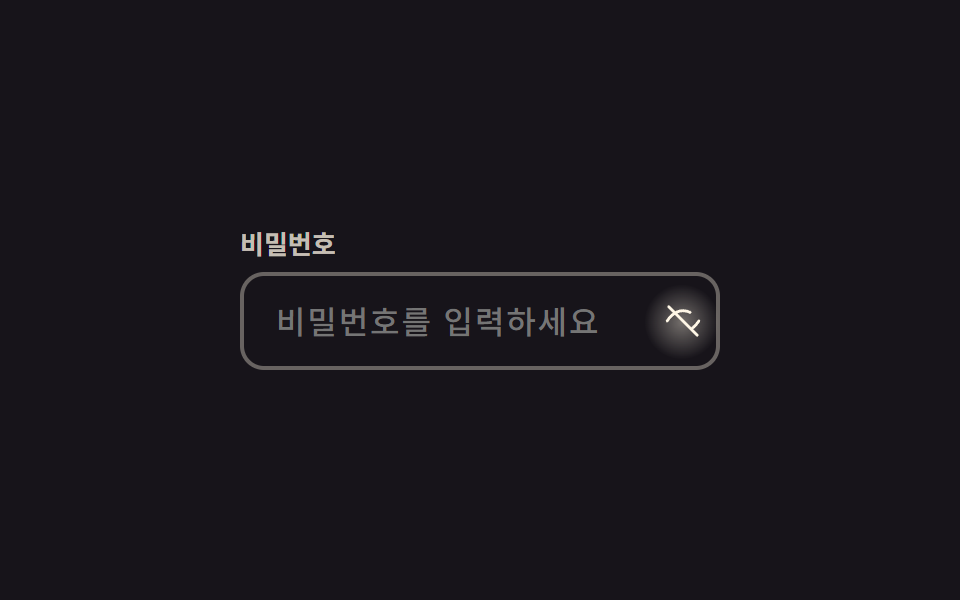
Bấm icon mắt thì type của input thật sự đổi qua lại giữa password và text, icon mắt tự crossfade sang mắt gạch chéo qua opacity và scale.
Dùng choÔ mật khẩu form đăng nhập, ô mật khẩu thẻ trong form thanh toán
type toggleopacity scale220ms
<main class="stage">
  <div class="pw is-demo">
    <label class="pw__label" for="pw-input">Mật khẩu</label>
    <div class="pw__frame">
      <input id="pw-input" class="pw__input" type="password" placeholder="Nhập mật khẩu" autocomplete="current-password">
      <button type="button" class="pw__eye" aria-label="Hiện mật khẩu" aria-pressed="false">
        <svg class="pw__icon pw__icon--eye" viewBox="0 0 24 24" aria-hidden="true"><path d="M2 12s3.6-6.5 10-6.5S22 12 22 12s-3.6 6.5-10 6.5S2 12 2 12Z"/><circle cx="12" cy="12" r="2.6"/></svg>
        <svg class="pw__icon pw__icon--off" viewBox="0 0 24 24" aria-hidden="true"><path d="M2 12s3.6-6.5 10-6.5c1.7 0 3.2.4 4.5 1.1M22 12s-1.4 2.5-4 4.4M6.5 6.5 3 3m1.5 1.5L21 21"/></svg>
      </button>
    </div>
  </div>
</main>
@use "../../../../site/static/demo-tokens" as *;
// ── 변수 3개 ──────────────────────────────────────────
$duration: $dur-quick; // 아이콘이 바뀌는 시간
$easing: cubic-bezier(.3, 1.6, .4, 1); // 스프링 오버슛 — 아이콘 스케일이 1 을 지나 1.12 까지 뻗었다가 돌아온다
$color: $subject-cream; // 아이콘·포커스 색
@include stage($stage-ink);
.pw { width: min(240px, 82vw); }
.pw__label { display: block; margin-bottom: $sp-2; font-weight: 700; font-size: 13px; line-height: 1; font-family: inherit; color: rgba($subject-cream, .75); }
.pw__frame { position: relative; }
.pw__input {
box-sizing: border-box;
width: 100%;
border: 2px solid rgba($subject-cream, .35);
border-radius: $r-control;
padding: $sp-3 $sp-10 $sp-3 $sp-4;
font-weight: 500;
font-size: clamp(14px, 4vw, 16px);
line-height: 1;
font-family: inherit;
color: $subject-cream;
background: transparent;
letter-spacing: .06em;
&:focus { outline: none; border-color: $color; }
}
.pw__eye {
position: absolute;
right: $sp-1; top: 50%;
transform: translateY(-50%);
width: 30px; height: 30px;
border: 0;
border-radius: 50%;
background: transparent;
display: grid;
place-items: center;
cursor: pointer;
}
// 토글 누르는 순간 버튼 중심에서 번지는 radial 글로우 확산 한 겹
.pw__eye::after {
content: "";
position: absolute;
inset: -4px;
border-radius: 50%;
background: radial-gradient(circle, rgba($color, .4) 0%, rgba($color, 0) 70%);
opacity: 0;
pointer-events: none;
}
.pw__eye.is-shown::after { animation: pw-bloom $dur-quick $ease-out; }
@keyframes pw-bloom {
0% { opacity: 0; transform: scale(.5); }
40% { opacity: 1; transform: scale(1); }
100% { opacity: 0; transform: scale(1.3); }
}
.pw__icon {
position: absolute;
width: 19px; height: 19px;
fill: none;
stroke: $color;
stroke-width: 1.8;
stroke-linecap: round;
stroke-linejoin: round;
transform: scale(1);
opacity: 1;
transition: transform $duration $easing, opacity $duration $easing;
}
.pw__icon--off { transform: scale(.5); opacity: 0; }
.pw__eye.is-shown .pw__icon--eye { transform: scale(.5); opacity: 0; }
.pw__eye.is-shown .pw__icon--off { transform: scale(1); opacity: 1; }
@media (prefers-reduced-motion: reduce) {
.pw__icon { transition: none; }
.pw__eye.is-shown::after { animation: none; }
}html, body {
margin: 0;
overflow: hidden;
}
.stage {
box-sizing: border-box;
min-height: 100vh;
display: grid;
place-items: center;
margin: 0;
background: #17141a;
font-family: -apple-system, "Segoe UI", "Noto Sans KR", sans-serif;
padding: clamp(8px, 4vw, 24px);
}
.pw {
width: min(240px, 82vw);
}
.pw__label {
display: block;
margin-bottom: 8px;
font-weight: 700;
font-size: 13px;
line-height: 1;
font-family: inherit;
color: rgba(255, 247, 230, 0.75);
}
.pw__frame {
position: relative;
}
.pw__input {
box-sizing: border-box;
width: 100%;
border: 2px solid rgba(255, 247, 230, 0.35);
border-radius: 12px;
padding: 12px 40px 12px 16px;
font-weight: 500;
font-size: clamp(14px, 4vw, 16px);
line-height: 1;
font-family: inherit;
color: #fff7e6;
background: transparent;
letter-spacing: 0.06em;
}
.pw__input:focus {
outline: none;
border-color: #fff7e6;
}
.pw__eye {
position: absolute;
right: 4px;
top: 50%;
transform: translateY(-50%);
width: 30px;
height: 30px;
border: 0;
border-radius: 50%;
background: transparent;
display: grid;
place-items: center;
cursor: pointer;
}
.pw__eye::after {
content: "";
position: absolute;
inset: -4px;
border-radius: 50%;
background: radial-gradient(circle, rgba(255, 247, 230, 0.4) 0%, rgba(255, 247, 230, 0) 70%);
opacity: 0;
pointer-events: none;
}
.pw__eye.is-shown::after {
animation: pw-bloom 220ms ease-out;
}
@keyframes pw-bloom {
0% {
opacity: 0;
transform: scale(0.5);
}
40% {
opacity: 1;
transform: scale(1);
}
100% {
opacity: 0;
transform: scale(1.3);
}
}
.pw__icon {
position: absolute;
width: 19px;
height: 19px;
fill: none;
stroke: #fff7e6;
stroke-width: 1.8;
stroke-linecap: round;
stroke-linejoin: round;
transform: scale(1);
opacity: 1;
transition: transform 220ms cubic-bezier(0.3, 1.6, 0.4, 1), opacity 220ms cubic-bezier(0.3, 1.6, 0.4, 1);
}
.pw__icon--off {
transform: scale(0.5);
opacity: 0;
}
.pw__eye.is-shown .pw__icon--eye {
transform: scale(0.5);
opacity: 0;
}
.pw__eye.is-shown .pw__icon--off {
transform: scale(1);
opacity: 1;
}
@media (prefers-reduced-motion: reduce) {
.pw__icon {
transition: none;
}
.pw__eye.is-shown::after {
animation: none;
}
}// 실사용: 클릭으로 input type 을 바꾼다. 데모(.is-demo)는 주기적으로 토글 (7줄)
var btn = document.querySelector('.is-demo .pw__eye');
var input = document.querySelector('.is-demo .pw__input');
var t = function () {
var show = input.type === 'password';
input.type = show ? 'text' : 'password';
btn.setAttribute('aria-pressed', String(show));
btn.classList.toggle('is-shown', show);
};
t(); setInterval(t, 450);import { useState } from "react";
import type { CSSProperties, ChangeEvent } from "react";
import styles from "./PasswordEyeToggle.module.scss";
export type PasswordEyeToggleProps = {
id?: string;
label?: string;
placeholder?: string;
showLabel?: string;
duration?: number;
easing?: string;
color?: string;
};
type Vars = CSSProperties & { "--duration"?: string; "--easing"?: string; "--color"?: string };
export default function PasswordEyeToggle({
id = "pw-input",
label = "Password",
placeholder = "Enter your password",
showLabel = "Show password",
duration = 220,
easing = "cubic-bezier(.3,1.6,.4,1)",
color = "#fff7e6",
}: PasswordEyeToggleProps) {
const [value, setValue] = useState("");
const [shown, setShown] = useState(false);
const vars: Vars = { "--duration": `${duration}ms`, "--easing": easing, "--color": color };
return (
<div className={styles.pw} style={vars}>
<label htmlFor={id} className={styles.label}>{label}</label>
<div className={styles.frame}>
<input
id={id}
className={styles.input}
type={shown ? "text" : "password"}
placeholder={placeholder}
autoComplete="current-password"
value={value}
onChange={(e: ChangeEvent<HTMLInputElement>) => setValue(e.target.value)}
/>
<button
type="button"
className={shown ? `${styles.eye} ${styles.shown}` : styles.eye}
aria-label={showLabel}
aria-pressed={shown}
onClick={() => setShown((v) => !v)}
>
<svg className={`${styles.icon} ${styles.eyeIcon}`} viewBox="0 0 24 24" aria-hidden="true"><path d="M2 12s3.6-6.5 10-6.5S22 12 22 12s-3.6 6.5-10 6.5S2 12 2 12Z" /><circle cx="12" cy="12" r="2.6" /></svg>
<svg className={`${styles.icon} ${styles.offIcon}`} viewBox="0 0 24 24" aria-hidden="true"><path d="M2 12s3.6-6.5 10-6.5c1.7 0 3.2.4 4.5 1.1M22 12s-1.4 2.5-4 4.4M6.5 6.5 3 3m1.5 1.5L21 21" /></svg>
</button>
</div>
</div>
);
}09 Nút mắt hiện mật khẩu — Diện tích đo được 0.572% · khung hình chuyển động 6/23Nguyên tác GODRICH · SCSS và React nằm trong tệp zip · 9 CSS Input Focus Animation — dán 1 dòng là chạy
Bài viết chứa demo này
 9 CSS Input Focus Animation — dán 1 dòng là chạyCSS input focus animation là các hiệu ứng dùng thẳng trạng thái trình duyệt đã có sẵn — :focus, :focus-within, :placehol Xem tất cả demo trong bài này