03Thẻ lộ sáng theo con trỏ
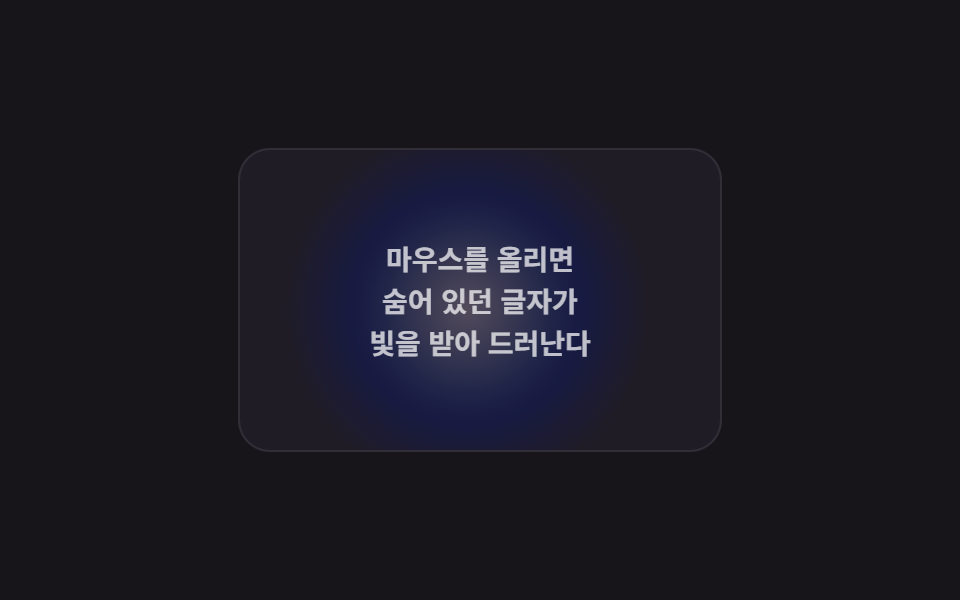
Di chuột trên thẻ, một đốm sáng tròn di chuyển theo và làm sáng chữ mờ ở nơi ánh sáng lướt qua.
Dùng choHiện chữ ẩn trên thẻ dark mode, thẻ teaser
mix-blend-mode: soft-lightpointermove translatehover:none 대체
<main class="stage">
  <div class="sp-card is-demo">
    <span class="sp-card__spot" aria-hidden="true"></span>
    <p class="sp-card__text">Khi di chuột vào và<br>chữ đang ẩn<br>bắt sáng và hiện ra</p>
  </div>
</main>
@use "../../../../site/static/demo-tokens" as *;
$duration: $dur-quick;
$easing: $ease-out;
$color: $stage-paper;
@include stage($stage-ink);
.sp-card {
position: relative;
width: min(240px, 78vw);
height: 150px;
overflow: hidden;
border-radius: $r-card;
background: #201c26;
border: 1px solid rgba(255, 255, 255, .08);
display: grid;
place-items: center;
}
.sp-card__spot {
position: absolute;
left: -90px;
top: -90px;
width: 180px;
height: 180px;
border-radius: 50%;
background: radial-gradient(circle, rgba(255, 255, 255, .9) 0%, rgba(47, 109, 246, .5) 45%, transparent 72%);
mix-blend-mode: soft-light;
transform: translate(120px, 75px);
transition: transform $duration $easing;
pointer-events: none;
}
.sp-card__text {
position: relative;
z-index: 1;
margin: 0;
padding: $sp-4;
text-align: center;
font-size: 14px;
line-height: 1.5;
font-weight: 700;
color: rgba(255, 255, 255, .72); // .22 + screen 은 스포트라이트 밖에서 1.95:1 이었다 — AA 4.5
mix-blend-mode: screen;
}
@media (hover: none), (pointer: coarse) {
.sp-card__spot { opacity: 0; } // 터치엔 계속 따라다닐 커서가 없다 — 꺼서 항상 어두운 카드로 둔다
.sp-card__text { color: rgba(255, 255, 255, .85); } // 대신 글자 자체를 밝혀 내용은 읽히게 한다
}
// 데모 강제 루프 — 스포트라이트가 카드 위를 대각선으로 오간다
.sp-card.is-demo .sp-card__spot { animation: sp-sweep $dur-loop $easing infinite; transition: none; }
@keyframes sp-sweep {
0%, 6% { transform: translate(10px, 10px); }
50% { transform: translate(190px, 130px); }
94%, 100% { transform: translate(10px, 10px); }
}
@media (prefers-reduced-motion: reduce) {
.sp-card__spot { animation: none !important; transition: none !important; transform: translate(120px, 75px); }
.sp-card__text { color: rgba(255, 255, 255, .72); }
}html, body {
margin: 0;
overflow: hidden;
}
.stage {
box-sizing: border-box;
min-height: 100vh;
display: grid;
place-items: center;
margin: 0;
background: #17141a;
font-family: -apple-system, "Segoe UI", "Noto Sans KR", sans-serif;
padding: clamp(8px, 4vw, 24px);
}
.sp-card {
position: relative;
width: min(240px, 78vw);
height: 150px;
overflow: hidden;
border-radius: 16px;
background: #201c26;
border: 1px solid rgba(255, 255, 255, 0.08);
display: grid;
place-items: center;
}
.sp-card__spot {
position: absolute;
left: -90px;
top: -90px;
width: 180px;
height: 180px;
border-radius: 50%;
background: radial-gradient(circle, rgba(255, 255, 255, 0.9) 0%, rgba(47, 109, 246, 0.5) 45%, transparent 72%);
mix-blend-mode: soft-light;
transform: translate(120px, 75px);
transition: transform 220ms ease-out;
pointer-events: none;
}
.sp-card__text {
position: relative;
z-index: 1;
margin: 0;
padding: 16px;
text-align: center;
font-size: 14px;
line-height: 1.5;
font-weight: 700;
color: rgba(255, 255, 255, 0.72);
mix-blend-mode: screen;
}
@media (hover: none), (pointer: coarse) {
.sp-card__spot {
opacity: 0;
}
.sp-card__text {
color: rgba(255, 255, 255, 0.85);
}
}
.sp-card.is-demo .sp-card__spot {
animation: sp-sweep 2s ease-out infinite;
transition: none;
}
@keyframes sp-sweep {
0%, 6% {
transform: translate(10px, 10px);
}
50% {
transform: translate(190px, 130px);
}
94%, 100% {
transform: translate(10px, 10px);
}
}
@media (prefers-reduced-motion: reduce) {
.sp-card__spot {
animation: none !important;
transition: none !important;
transform: translate(120px, 75px);
}
.sp-card__text {
color: rgba(255, 255, 255, 0.72);
}
}(function () {
var card = document.querySelector('.sp-card');
var spot = card.querySelector('.sp-card__spot');
// 실제 사용자: pointermove 좌표를 그대로 스포트라이트 위치에 반영
card.addEventListener('pointermove', function (e) {
if (card.classList.contains('is-demo')) return;
var r = card.getBoundingClientRect();
spot.style.transform = 'translate(' + (e.clientX - r.left) + 'px,' + (e.clientY - r.top) + 'px)';
});
card.addEventListener('pointerenter', function () { card.classList.remove('is-demo'); card.classList.add('is-live'); });
card.addEventListener('pointerleave', function () { card.classList.remove('is-live'); spot.style.transform = ''; });
})();import { useRef, type CSSProperties, type PointerEvent } from "react";
import styles from "./CursorSpotlightCardReveal.module.scss";
export type CursorSpotlightCardRevealProps = {
text?: string;
duration?: number;
easing?: string;
color?: string;
};
type Vars = CSSProperties & { "--duration"?: string; "--easing"?: string; "--color"?: string };
/** pointermove 좌표를 그대로 spotlight 엘리먼트의 translate 에 반영한다. mix-blend-mode 로 글자가 밝아진다 */
export default function CursorSpotlightCardReveal({
text = "마우스를 올리면 숨어 있던 글자가 빛을 받아 드러난다",
duration = 220,
easing = "ease-out",
color = "#ffffff",
}: CursorSpotlightCardRevealProps) {
const spotRef = useRef<HTMLSpanElement>(null);
const vars: Vars = { "--duration": `${duration}ms`, "--easing": easing, "--color": color };
const move = (e: PointerEvent<HTMLDivElement>) => {
const spot = spotRef.current;
if (!spot) return;
const r = e.currentTarget.getBoundingClientRect();
spot.style.transform = `translate(${e.clientX - r.left}px,${e.clientY - r.top}px)`;
};
const leave = () => { if (spotRef.current) spotRef.current.style.transform = ""; };
return (
<div className={styles.card} style={vars} onPointerMove={move} onPointerLeave={leave}>
<span ref={spotRef} className={styles.spot} aria-hidden="true" />
<p className={styles.text}>{text}</p>
</div>
);
}03 Thẻ lộ sáng theo con trỏ — Diện tích đo được 20.166% · khung hình chuyển động 17/23Nguyên tác GODRICH · SCSS và React nằm trong tệp zip · 9 hiệu ứng chuột máy tính bạn có thể copy-paste
Bài viết chứa demo này
 9 hiệu ứng chuột máy tính bạn có thể copy-pasteHiệu ứng chuột máy tính là tương tác nhỏ phản ứng theo cách con trỏ di chuyển, click, kéo hoặc cuộn. Chỉ mới di chuyển c Xem tất cả demo trong bài này
Nếu bạn thích hiệu ứng này - demo tương tự
 Giao diện đăng nhập · xác thực01 Thẻ đăng nhập kiểu kính mờ (glassmorphism)9 mẫu form đăng ký & đăng nhập copy-paste được
 Giao diện danh sách · bảng01 Vuốt để xóa (reveal)9 mẫu List UI: swipe to delete css và phân trang
 Giao diện nhập liệu01 Tự chuyển sang ô kế tiếpOTP Input UI: 9 tình huống kèm validation