06Menu chuột phải tùy chỉnh
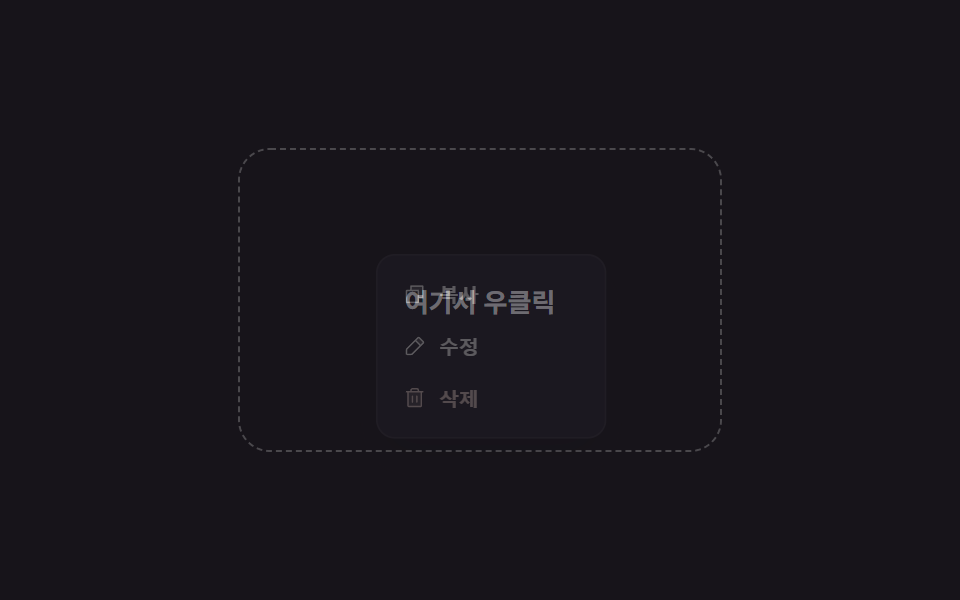
Bấm chuột phải vào vùng này sẽ hiện menu biểu tượng sao chép/sửa/xóa bật lên tại điểm bấm, thay cho menu mặc định của trình duyệt.
Dùng choBảng quản trị/danh sách file, quản lý mục trong app ghi chú
contextmenu preventDefault좌표 클램프Escape·바깥 클릭 닫기
<main class="stage">
  <div class="cx-pad is-demo">
    <p class="cx-hint">Bấm chuột phải vào đây</p>
    <div class="cx-menu" role="menu">
      <button class="cx-menu__item" type="button" role="menuitem">
        <svg viewBox="0 0 256 256" aria-hidden="true"><g fill="currentColor"><path d="M216 40v128h-48V88H88V40Z" opacity=".2"/><path d="M216 32H88a8 8 0 0 0-8 8v40H40a8 8 0 0 0-8 8v128a8 8 0 0 0 8 8h128a8 8 0 0 0 8-8v-40h40a8 8 0 0 0 8-8V40a8 8 0 0 0-8-8m-56 176H48V96h112Zm48-48h-32V88a8 8 0 0 0-8-8H96V48h112Z"/></g></svg>
        Sao chép
      </button>
      <button class="cx-menu__item" type="button" role="menuitem">
        <svg viewBox="0 0 256 256" aria-hidden="true"><g fill="currentColor"><path d="M221.66 90.34L192 120l-56-56l29.66-29.66a8 8 0 0 1 11.31 0L221.66 79a8 8 0 0 1 0 11.34" opacity=".2"/><path d="m227.31 73.37l-44.68-44.69a16 16 0 0 0-22.63 0L36.69 152A15.86 15.86 0 0 0 32 163.31V208a16 16 0 0 0 16 16h44.69a15.86 15.86 0 0 0 11.31-4.69L227.31 96a16 16 0 0 0 0-22.63M92.69 208H48v-44.69l88-88L180.69 120ZM192 108.68L147.31 64l24-24L216 84.68Z"/></g></svg>
        Sửa
      </button>
      <button class="cx-menu__item cx-menu__item--danger" type="button" role="menuitem">
        <svg viewBox="0 0 256 256" aria-hidden="true"><g fill="currentColor"><path d="M200 56v152a8 8 0 0 1-8 8H64a8 8 0 0 1-8-8V56Z" opacity=".2"/><path d="M216 48h-40v-8a24 24 0 0 0-24-24h-48a24 24 0 0 0-24 24v8H40a8 8 0 0 0 0 16h8v144a16 16 0 0 0 16 16h128a16 16 0 0 0 16-16V64h8a8 8 0 0 0 0-16M96 40a8 8 0 0 1 8-8h48a8 8 0 0 1 8 8v8H96Zm96 168H64V64h128Zm-80-104v64a8 8 0 0 1-16 0v-64a8 8 0 0 1 16 0m48 0v64a8 8 0 0 1-16 0v-64a8 8 0 0 1 16 0"/></g></svg>
        Xóa
      </button>
    </div>
  </div>
</main>
@use "../../../../site/static/demo-tokens" as *;
$duration: $dur-quick;
$easing: $ease-pop;
$color: $stage-paper;
@include stage($stage-ink);
.cx-pad {
position: relative;
width: min(240px, 78vw);
height: 150px;
border-radius: $r-card;
border: 1px dashed rgba(255, 255, 255, .22);
display: grid;
place-items: center;
user-select: none;
}
.cx-hint { margin: 0; color: rgba(255, 255, 255, .5); font-size: 13px; font-weight: 700; }
.cx-menu {
position: absolute;
left: 68px;
top: 52px;
min-width: 128px;
display: flex;
flex-direction: column;
padding: $sp-2;
border-radius: $r-control;
background: #26212e;
box-shadow: $shadow-raised;
border: 1px solid rgba(255, 255, 255, .08);
transform: scale(.7);
transform-origin: top left; // 규칙8: 클릭 지점에서 메뉴 펼침
opacity: 0;
pointer-events: none;
transition: transform $duration $easing, opacity $duration $easing;
}
.cx-pad.is-open .cx-menu { transform: scale(1); opacity: 1; pointer-events: auto; }
.cx-menu__item {
display: flex;
align-items: center;
gap: $sp-2;
padding: $sp-2 $sp-2;
border: 0;
border-radius: $r-sm;
background: transparent;
color: $color;
font-size: 12.5px;
font-weight: 600;
cursor: pointer;
text-align: left;
}
.cx-menu__item svg { width: 15px; height: 15px; flex: 0 0 auto; }
.cx-menu__item:hover, .cx-menu__item:focus-visible { background: rgba(255, 255, 255, .08); }
.cx-menu__item--danger { color: #e2cac5; }
// 데모 강제 루프 — 우클릭 → 메뉴 등장 → 사라짐
.cx-pad.is-demo .cx-menu { animation: cx-loop $dur-loop $easing infinite; }
@keyframes cx-loop {
0%, 10% { transform: scale(.7); opacity: 0; }
32% { transform: scale(1.05); opacity: 1; }
42%, 68% { transform: scale(1); opacity: 1; }
88%, 100% { transform: scale(.7); opacity: 0; }
}
@media (prefers-reduced-motion: reduce) {
.cx-menu { transition: none; }
}html, body {
margin: 0;
overflow: hidden;
}
.stage {
box-sizing: border-box;
min-height: 100vh;
display: grid;
place-items: center;
margin: 0;
background: #17141a;
font-family: -apple-system, "Segoe UI", "Noto Sans KR", sans-serif;
padding: clamp(8px, 4vw, 24px);
}
.cx-pad {
position: relative;
width: min(240px, 78vw);
height: 150px;
border-radius: 16px;
border: 1px dashed rgba(255, 255, 255, 0.22);
display: grid;
place-items: center;
user-select: none;
}
.cx-hint {
margin: 0;
color: rgba(255, 255, 255, 0.5);
font-size: 13px;
font-weight: 700;
}
.cx-menu {
position: absolute;
left: 68px;
top: 52px;
min-width: 128px;
display: flex;
flex-direction: column;
padding: 8px;
border-radius: 12px;
background: #26212e;
box-shadow: 0 14px 24px rgba(23, 20, 26, 0.32);
border: 1px solid rgba(255, 255, 255, 0.08);
transform: scale(0.7);
transform-origin: top left;
opacity: 0;
pointer-events: none;
transition: transform 220ms cubic-bezier(0.2, 1.4, 0.4, 1), opacity 220ms cubic-bezier(0.2, 1.4, 0.4, 1);
}
.cx-pad.is-open .cx-menu {
transform: scale(1);
opacity: 1;
pointer-events: auto;
}
.cx-menu__item {
display: flex;
align-items: center;
gap: 8px;
padding: 8px 8px;
border: 0;
border-radius: 8px;
background: transparent;
color: #ffffff;
font-size: 12.5px;
font-weight: 600;
cursor: pointer;
text-align: left;
}
.cx-menu__item svg {
width: 15px;
height: 15px;
flex: 0 0 auto;
}
.cx-menu__item:hover, .cx-menu__item:focus-visible {
background: rgba(255, 255, 255, 0.08);
}
.cx-menu__item--danger {
color: #e2cac5;
}
.cx-pad.is-demo .cx-menu {
animation: cx-loop 2s cubic-bezier(0.2, 1.4, 0.4, 1) infinite;
}
@keyframes cx-loop {
0%, 10% {
transform: scale(0.7);
opacity: 0;
}
32% {
transform: scale(1.05);
opacity: 1;
}
42%, 68% {
transform: scale(1);
opacity: 1;
}
88%, 100% {
transform: scale(0.7);
opacity: 0;
}
}
@media (prefers-reduced-motion: reduce) {
.cx-menu {
transition: none;
}
}(function () {
var pad = document.querySelector('.cx-pad');
var menu = pad.querySelector('.cx-menu');
function close() { pad.classList.remove('is-open'); menu.style.left = menu.style.top = ''; }
pad.addEventListener('contextmenu', function (e) {
e.preventDefault();
if (pad.classList.contains('is-demo')) return;
var r = pad.getBoundingClientRect();
var x = Math.min(e.clientX - r.left, r.width - 132);
var y = Math.min(e.clientY - r.top, r.height - 112);
menu.style.left = x + 'px'; menu.style.top = y + 'px';
pad.classList.add('is-open');
});
document.addEventListener('click', function (e) { if (!menu.contains(e.target)) close(); });
document.addEventListener('keydown', function (e) { if (e.key === 'Escape') close(); });
})();import { useEffect, useRef, useState, type CSSProperties, type MouseEvent } from "react";
import styles from "./CursorContextMenuCustom.module.scss";
export type CursorContextMenuCustomProps = {
duration?: number;
easing?: string;
color?: string;
};
type Vars = CSSProperties & { "--duration"?: string; "--easing"?: string; "--color"?: string };
/** contextmenu 를 막고 클릭 좌표(클램프 처리)에 커스텀 메뉴를 띄운다. 바깥 클릭·Escape 로 닫는다 */
export default function CursorContextMenuCustom({
duration = 220,
easing = "cubic-bezier(.2,1.4,.4,1)",
color = "#ffffff",
}: CursorContextMenuCustomProps) {
const padRef = useRef<HTMLDivElement>(null);
const [open, setOpen] = useState(false);
const [pos, setPos] = useState({ x: 68, y: 52 });
const vars: Vars = { "--duration": `${duration}ms`, "--easing": easing, "--color": color };
const onContext = (e: MouseEvent<HTMLDivElement>) => {
e.preventDefault();
const r = e.currentTarget.getBoundingClientRect();
setPos({
x: Math.min(e.clientX - r.left, r.width - 132),
y: Math.min(e.clientY - r.top, r.height - 112),
});
setOpen(true);
};
useEffect(() => {
const close = () => setOpen(false);
const onKey = (e: KeyboardEvent) => { if (e.key === "Escape") setOpen(false); };
document.addEventListener("click", close);
document.addEventListener("keydown", onKey);
return () => { document.removeEventListener("click", close); document.removeEventListener("keydown", onKey); };
}, []);
return (
<div ref={padRef} className={styles.pad} style={vars} onContextMenu={onContext}>
<p className={styles.hint}>여기서 우클릭</p>
<div
className={`${styles.menu} ${open ? styles.open : ""}`}
role="menu"
style={{ left: pos.x, top: pos.y }}
onClick={(e: MouseEvent<HTMLDivElement>) => e.stopPropagation()}
>
<button className={styles.item} type="button" role="menuitem">
<svg viewBox="0 0 256 256" aria-hidden="true"><g fill="currentColor"><path d="M216 40v128h-48V88H88V40Z" opacity=".2" /><path d="M216 32H88a8 8 0 0 0-8 8v40H40a8 8 0 0 0-8 8v128a8 8 0 0 0 8 8h128a8 8 0 0 0 8-8v-40h40a8 8 0 0 0 8-8V40a8 8 0 0 0-8-8m-56 176H48V96h112Zm48-48h-32V88a8 8 0 0 0-8-8H96V48h112Z" /></g></svg>
복사
</button>
<button className={styles.item} type="button" role="menuitem">
<svg viewBox="0 0 256 256" aria-hidden="true"><g fill="currentColor"><path d="M221.66 90.34L192 120l-56-56l29.66-29.66a8 8 0 0 1 11.31 0L221.66 79a8 8 0 0 1 0 11.34" opacity=".2" /><path d="m227.31 73.37l-44.68-44.69a16 16 0 0 0-22.63 0L36.69 152A15.86 15.86 0 0 0 32 163.31V208a16 16 0 0 0 16 16h44.69a15.86 15.86 0 0 0 11.31-4.69L227.31 96a16 16 0 0 0 0-22.63M92.69 208H48v-44.69l88-88L180.69 120ZM192 108.68L147.31 64l24-24L216 84.68Z" /></g></svg>
수정
</button>
<button className={`${styles.item} ${styles.danger}`} type="button" role="menuitem">
<svg viewBox="0 0 256 256" aria-hidden="true"><g fill="currentColor"><path d="M200 56v152a8 8 0 0 1-8 8H64a8 8 0 0 1-8-8V56Z" opacity=".2" /><path d="M216 48h-40v-8a24 24 0 0 0-24-24h-48a24 24 0 0 0-24 24v8H40a8 8 0 0 0 0 16h8v144a16 16 0 0 0 16 16h128a16 16 0 0 0 16-16V64h8a8 8 0 0 0 0-16M96 40a8 8 0 0 1 8-8h48a8 8 0 0 1 8 8v8H96Zm96 168H64V64h128Zm-80-104v64a8 8 0 0 1-16 0v-64a8 8 0 0 1 16 0m48 0v64a8 8 0 0 1-16 0v-64a8 8 0 0 1 16 0" /></g></svg>
삭제
</button>
</div>
</div>
);
}06 Menu chuột phải tùy chỉnh — Diện tích đo được 13.451% · khung hình chuyển động 11/23Nguyên tác GODRICH · SCSS và React nằm trong tệp zip · 9 hiệu ứng chuột máy tính bạn có thể copy-paste
Bài viết chứa demo này
 9 hiệu ứng chuột máy tính bạn có thể copy-pasteHiệu ứng chuột máy tính là tương tác nhỏ phản ứng theo cách con trỏ di chuyển, click, kéo hoặc cuộn. Chỉ mới di chuyển c Xem tất cả demo trong bài này