05Phát lại animation bằng key prop
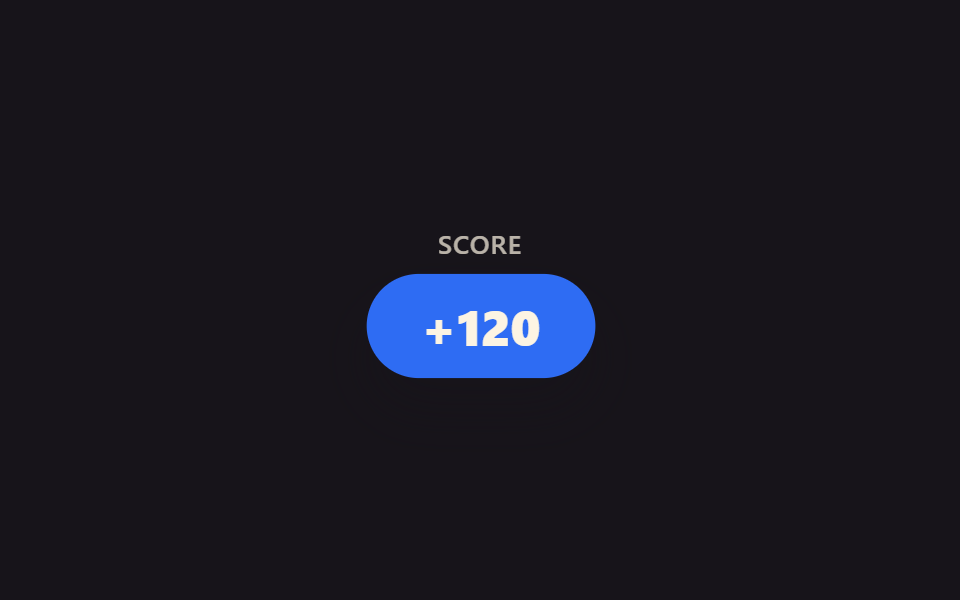
Đổi giá trị key prop khiến React unmount nguyên component rồi mount một instance hoàn toàn mới, nên animation xuất hiện vốn chạy đúng một lần lúc mount có thể phát lại bất cứ lúc nào.
Dùng choPhát lại cú rung báo đáp án, bùng lại hiệu ứng chúc mừng mỗi lần điểm thay đổi
key propremount@keyframes
<main class="stage">
  <div class="kr-wrap">
    <span class="kr-label">Score</span>
    <span class="kr-badge is-demo">+120</span>
  </div>
</main>
@use "../../../../site/static/demo-tokens" as *;
// ── 변수 3개 ──────────────────────────────────────────
$duration: 640ms;
$easing: $ease-pop;
$color: $subject-blue;
@include stage($stage-ink);
.kr-wrap {
display: flex;
flex-direction: column;
align-items: center;
gap: $sp-3;
font-family: -apple-system, "Segoe UI", sans-serif;
color: $subject-cream;
}
.kr-label { font-weight: 500; font-size: 13px; line-height: 1; font-family: inherit; opacity: .7; letter-spacing: .04em; text-transform: uppercase; }
.kr-badge {
padding: $sp-3 $sp-6;
border-radius: $r-pill;
background: $color;
color: $subject-cream;
font-weight: 800;
font-size: 22px;
line-height: 1;
font-family: inherit;
box-shadow: $shadow-raised;
}
// 실사용 원리: key prop 을 바꾸면 리액트가 이 배지를 통째로 언마운트하고 새 인스턴스로
// 다시 마운트한다 — "마운트 때 한 번만" 재생되는 팝 애니메이션이 매번 처음부터 다시 돈다.
// 캡처용 루프: 2초 중 앞부분에 팝 → 나머지는 정지 상태로 유지 (재트리거를 기다리는 느낌)
@keyframes kr-pop {
0% { opacity: 0; transform: scale(.4); }
28% { opacity: 1; transform: scale(1.14); }
38% { opacity: 1; transform: scale(.96); }
48%, 100% { opacity: 1; transform: scale(1); }
}
.kr-badge.is-demo { animation: kr-pop $dur-loop $easing infinite; }
@media (prefers-reduced-motion: reduce) {
.kr-badge.is-demo { animation: none !important; opacity: 1; transform: none; }
}html, body {
margin: 0;
overflow: hidden;
}
.stage {
box-sizing: border-box;
min-height: 100vh;
display: grid;
place-items: center;
margin: 0;
background: #17141a;
font-family: -apple-system, "Segoe UI", "Noto Sans KR", sans-serif;
padding: clamp(8px, 4vw, 24px);
}
.kr-wrap {
display: flex;
flex-direction: column;
align-items: center;
gap: 12px;
font-family: -apple-system, "Segoe UI", sans-serif;
color: #fff7e6;
}
.kr-label {
font-weight: 500;
font-size: 13px;
line-height: 1;
font-family: inherit;
opacity: 0.7;
letter-spacing: 0.04em;
text-transform: uppercase;
}
.kr-badge {
padding: 12px 24px;
border-radius: 999px;
background: #2f6df6;
color: #fff7e6;
font-weight: 800;
font-size: 22px;
line-height: 1;
font-family: inherit;
box-shadow: 0 14px 24px rgba(23, 20, 26, 0.32);
}
@keyframes kr-pop {
0% {
opacity: 0;
transform: scale(0.4);
}
28% {
opacity: 1;
transform: scale(1.14);
}
38% {
opacity: 1;
transform: scale(0.96);
}
48%, 100% {
opacity: 1;
transform: scale(1);
}
}
.kr-badge.is-demo {
animation: kr-pop 2s cubic-bezier(0.2, 1.4, 0.4, 1) infinite;
}
@media (prefers-reduced-motion: reduce) {
.kr-badge.is-demo {
animation: none !important;
opacity: 1;
transform: none;
}
}import { CSSProperties, useState } from "react";
import styles from "./KeyRetrigger.module.scss";
function Badge({ value }: { value: number; key?: number }) {
// The key on this element (set by the caller below) forces React to unmount and
// remount it on every change, so the pop-in @keyframes — which only plays once per
// mount — replays from scratch each time the score bumps.
return <span className={styles.badge}>+{value}</span>;
}
export interface KeyRetriggerProps {
duration?: string;
easing?: string;
}
export default function KeyRetrigger({
duration = "640ms",
easing = "cubic-bezier(.2, 1.4, .4, 1)",
}: KeyRetriggerProps) {
const [score, setScore] = useState(120);
const style: CSSProperties & { "--duration"?: string; "--easing"?: string } = {
"--duration": duration,
"--easing": easing,
};
return (
<div className={styles.wrap} style={style}>
<span className={styles.label}>Score</span>
<Badge key={score} value={score} />
<button className={styles.btn} onClick={() => setScore((s) => s + 10)}>+10</button>
</div>
);
}05 Phát lại animation bằng key prop — Diện tích đo được 4.161% · khung hình chuyển động 10/23Nguyên tác GODRICH · SCSS và React nằm trong tệp zip · 9 hiệu ứng react css animation không cần library
Bài viết chứa demo này
 9 hiệu ứng react css animation không cần libraryReact css animation là cách thêm chuyển động cho component bằng chính CSS, không cần cài library. Chín hiệu ứng dưới đây Xem tất cả demo trong bài này