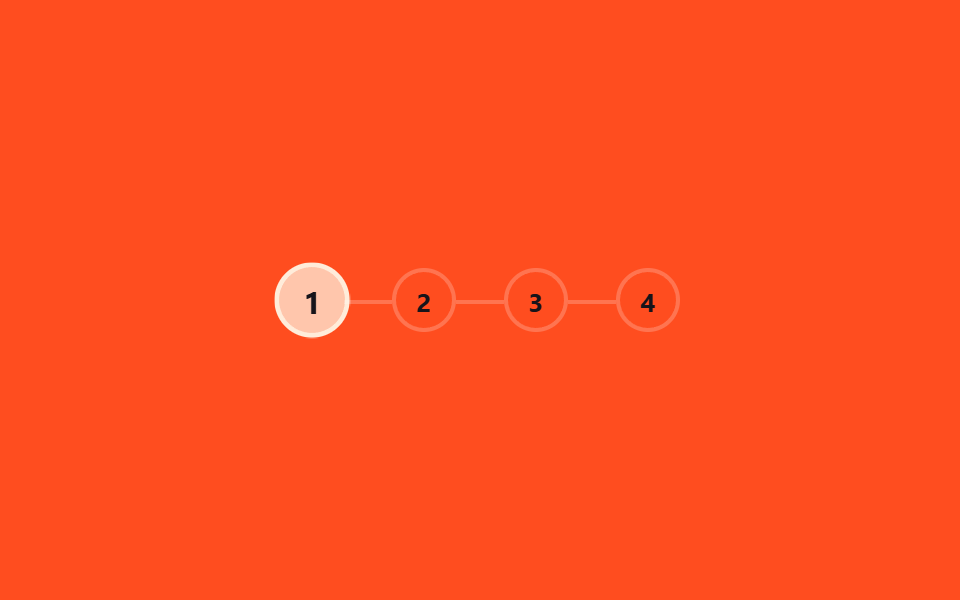
07Bước theo chương
Trong dãy số chương ở trên, chỉ vòng tròn của chương đang đọc được tô màu đầy.
Dùng choSeries hướng dẫn, bài viết dạng nhiều bước
원 채움챕터 4개scale 1.25배
<main class="stage">
  <ol class="steps is-demo" aria-label="Tiến độ chương">
    <li class="step"><span class="step__circle">1</span></li>
    <li class="step"><span class="step__circle">2</span></li>
    <li class="step"><span class="step__circle">3</span></li>
    <li class="step"><span class="step__circle">4</span></li>
  </ol>
</main>
@use "../../../../site/static/demo-tokens" as *;
// ── 변수 3개 ──────────────────────────────────────────
$duration: $dur-loop;
$color: $subject-cream; // 채워진 원 색
$track: rgba(255, 255, 255, .22); // 연결선 색
@include stage($stage-orange);
.steps {
position: relative;
display: flex;
gap: $sp-6;
margin: 0; padding: 0;
list-style: none;
}
.step {
position: relative;
&:not(:first-child)::before {
content: "";
position: absolute;
right: 100%; top: 50%;
width: $sp-6; height: 2px;
background: $track;
}
}
.step__circle {
display: grid;
place-items: center;
width: 28px; height: 28px;
border-radius: 50%;
border: 2px solid $track;
background: transparent;
color: $subject-ink; // AA: 채워지기 전 원 숫자 — 주황 무대 위 5.50:1
font-weight: 700;
font-size: 13px;
line-height: 1;
font-family: inherit;
}
// ── 실제 사용: 같은 스텝 키프레임을 시간 대신 스크롤 구간(animation-range)에 건다 ──
// .step:nth-child(2) .step__circle { animation: fill-2 linear both; animation-timeline: scroll(root); }
// ── 데모: 챕터 번호가 순서대로 하나씩 부풀며 채워지고, 루프가 돌면 처음으로 되돌아간다 ──
// (색만 순간 전환하면 프레임 사이 변화가 한두 장뿐이라 눈에 덜 띈다 — scale 팝으로 구간을 넓힌다)
.steps.is-demo .step:nth-child(1) .step__circle { animation: fill-1 $duration ease-out infinite; }
.steps.is-demo .step:nth-child(2) .step__circle { animation: fill-2 $duration ease-out infinite; }
.steps.is-demo .step:nth-child(3) .step__circle { animation: fill-3 $duration ease-out infinite; }
.steps.is-demo .step:nth-child(4) .step__circle { animation: fill-4 $duration ease-out infinite; }
@keyframes fill-1 {
0% { background: transparent; color: $subject-ink; border-color: $track; transform: scale(1); }
8% { background: $color; color: $subject-ink; border-color: $color; transform: scale(1.25); }
15%, 100% { background: $color; color: $subject-ink; border-color: $color; transform: scale(1); }
}
@keyframes fill-2 {
0%, 25% { background: transparent; color: $subject-ink; border-color: $track; transform: scale(1); }
33% { background: $color; color: $subject-ink; border-color: $color; transform: scale(1.25); }
40%, 100% { background: $color; color: $subject-ink; border-color: $color; transform: scale(1); }
}
@keyframes fill-3 {
0%, 50% { background: transparent; color: $subject-ink; border-color: $track; transform: scale(1); }
58% { background: $color; color: $subject-ink; border-color: $color; transform: scale(1.25); }
65%, 100% { background: $color; color: $subject-ink; border-color: $color; transform: scale(1); }
}
@keyframes fill-4 {
0%, 75% { background: transparent; color: $subject-ink; border-color: $track; transform: scale(1); }
83% { background: $color; color: $subject-ink; border-color: $color; transform: scale(1.25); }
90%, 100% { background: $color; color: $subject-ink; border-color: $color; transform: scale(1); }
}
@media (prefers-reduced-motion: reduce) {
.steps.is-demo .step__circle { animation: none !important; background: $color; border-color: $color; }
}html, body {
margin: 0;
overflow: hidden;
}
.stage {
box-sizing: border-box;
min-height: 100vh;
display: grid;
place-items: center;
margin: 0;
background: #ff4d1f;
font-family: -apple-system, "Segoe UI", "Noto Sans KR", sans-serif;
padding: clamp(8px, 4vw, 24px);
}
.steps {
position: relative;
display: flex;
gap: 24px;
margin: 0;
padding: 0;
list-style: none;
}
.step {
position: relative;
}
.step:not(:first-child)::before {
content: "";
position: absolute;
right: 100%;
top: 50%;
width: 24px;
height: 2px;
background: rgba(255, 255, 255, 0.22);
}
.step__circle {
display: grid;
place-items: center;
width: 28px;
height: 28px;
border-radius: 50%;
border: 2px solid rgba(255, 255, 255, 0.22);
background: transparent;
color: #17141a;
font-weight: 700;
font-size: 13px;
line-height: 1;
font-family: inherit;
}
.steps.is-demo .step:nth-child(1) .step__circle {
animation: fill-1 2s ease-out infinite;
}
.steps.is-demo .step:nth-child(2) .step__circle {
animation: fill-2 2s ease-out infinite;
}
.steps.is-demo .step:nth-child(3) .step__circle {
animation: fill-3 2s ease-out infinite;
}
.steps.is-demo .step:nth-child(4) .step__circle {
animation: fill-4 2s ease-out infinite;
}
@keyframes fill-1 {
0% {
background: transparent;
color: #17141a;
border-color: rgba(255, 255, 255, 0.22);
transform: scale(1);
}
8% {
background: #fff7e6;
color: #17141a;
border-color: #fff7e6;
transform: scale(1.25);
}
15%, 100% {
background: #fff7e6;
color: #17141a;
border-color: #fff7e6;
transform: scale(1);
}
}
@keyframes fill-2 {
0%, 25% {
background: transparent;
color: #17141a;
border-color: rgba(255, 255, 255, 0.22);
transform: scale(1);
}
33% {
background: #fff7e6;
color: #17141a;
border-color: #fff7e6;
transform: scale(1.25);
}
40%, 100% {
background: #fff7e6;
color: #17141a;
border-color: #fff7e6;
transform: scale(1);
}
}
@keyframes fill-3 {
0%, 50% {
background: transparent;
color: #17141a;
border-color: rgba(255, 255, 255, 0.22);
transform: scale(1);
}
58% {
background: #fff7e6;
color: #17141a;
border-color: #fff7e6;
transform: scale(1.25);
}
65%, 100% {
background: #fff7e6;
color: #17141a;
border-color: #fff7e6;
transform: scale(1);
}
}
@keyframes fill-4 {
0%, 75% {
background: transparent;
color: #17141a;
border-color: rgba(255, 255, 255, 0.22);
transform: scale(1);
}
83% {
background: #fff7e6;
color: #17141a;
border-color: #fff7e6;
transform: scale(1.25);
}
90%, 100% {
background: #fff7e6;
color: #17141a;
border-color: #fff7e6;
transform: scale(1);
}
}
@media (prefers-reduced-motion: reduce) {
.steps.is-demo .step__circle {
animation: none !important;
background: #fff7e6;
border-color: #fff7e6;
}
}import { useEffect, useState } from "react";
import styles from "./ChapterSteps.module.scss";
export type ChapterStepsProps = {
/** 챕터 수 */
total: number;
/** 채워진 원 색 */
color?: string;
};
// 실제 쓰임: 전체 스크롤 진행률을 챕터 수로 나눠 지금 챕터를 계산한다.
export default function ChapterSteps({ total, color = "#fff7e6" }: ChapterStepsProps) {
const [current, setCurrent] = useState(0);
useEffect(() => {
const onScroll = () => {
const max = document.documentElement.scrollHeight - window.innerHeight;
const p = max > 0 ? Math.min(1, window.scrollY / max) : 0;
setCurrent(Math.min(total - 1, Math.floor(p * total)));
};
onScroll();
window.addEventListener("scroll", onScroll, { passive: true });
return () => window.removeEventListener("scroll", onScroll);
}, [total]);
return (
<ol className={styles.steps} aria-label="Chapter progress">
{Array.from({ length: total }, (_, i) => (
<li key={i} className={styles.step}>
<span className={styles.circle} style={i <= current ? { background: color, borderColor: color } : undefined}>
{i + 1}
</span>
</li>
))}
</ol>
);
}07 Bước theo chương — Diện tích đo được 3.558% · khung hình chuyển động 16/23Nguyên tác GODRICH · SCSS và React nằm trong tệp zip · 9 CSS Scroll Progress Bar — không cần JS
Bài viết chứa demo này
 9 CSS Scroll Progress Bar — không cần JSCSS scroll progress bar là thanh, vòng hay con số cho biết bạn đã đọc được bao nhiêu phần trang, tính trực tiếp từ vị tr Xem tất cả demo trong bài này