9 CSS Scroll Progress Bar — không cần JS
CSS scroll progress bar là thanh, vòng hay con số cho biết bạn đã đọc được bao nhiêu phần trang, tính trực tiếp từ vị trí cuộn.
 01 scroll-progress-indicator-top-bar
 02 scroll-progress-indicator-ring-badge
 03 scroll-progress-indicator-section-dots
 04 scroll-progress-indicator-side-rail
 05 scroll-progress-indicator-text-fill
 06 scroll-progress-indicator-percent-counter
 07 scroll-progress-indicator-chapter-steps
 08 scroll-progress-indicator-toc-highlight
 09 scroll-progress-indicator-reading-time
Tự chạy · bấm ô để tới mục đó · cả 9 trong một zip
- 01 Thanh mỏng phía trên
- 02 Huy hiệu vòng tròn
- 03 Chấm điều hướng theo section
- 04 Thanh dọc bên cạnh
- 05 Chữ được tô đầy dần
- 06 Số phần trăm
- 07 Bước theo chương
- 08 Mục lục được làm nổi bật
- 09 Thời gian đọc còn lại
Chín kiểu này không xếp theo mức độ phổ biến mà theo thứ tự mắt bạn chạm tới trước. 01 đến 04 nằm ở mép màn hình, tự lọt vào mắt mà không cần nhìn thẳng vào đó. 05 và 06 nằm ngay trong nội dung bạn đang đọc. 07 đến 09 mô tả chính cấu trúc bài viết — chương, mục lục, thời gian còn lại. Cách mỗi kiểu đọc được vị trí cuộn nằm trong phần mô tả của từng mục dưới đây, còn bản thay thế cho trình duyệt chưa hỗ trợ animation-timeline: scroll() thì nằm ngay trong phần bẫy phía dưới.
01Thanh mỏng phía trên
Bạn thấy gì
Thanh 3px dán ở mép trên cùng màn hình lấp đầy từ trái sang phải đúng theo mức bạn đã cuộn, chỉ bằng animation-timeline: scroll(root) đặt trong @supports.
<main class="stage">
  <div class="track" role="progressbar" aria-label="Tiến độ đọc" aria-valuemin="0" aria-valuemax="100" aria-valuenow="0">
    <div class="bar is-demo"></div>
  </div>
  <div class="page">
    <div class="page__block"></div>
    <div class="page__block"></div>
    <div class="page__block short"></div>
  </div>
</main>
@use "../../../../site/static/demo-tokens" as *;
// ── 변수 3개. 변형은 이것만 바꾼다 ──────────────────────────
$thickness: 3px; // 바 두께. 굵게 6px
$color: $subject-blue; // 채워진 구간 색
$track: rgba(255, 255, 255, .16); // 안 읽은 구간
@include stage($stage-ink);
.track {
position: fixed;
top: 0; left: 0; right: 0;
height: $thickness;
background: $track;
}
.bar {
height: 100%;
width: 100%;
background: $color;
transform: scaleX(0);
transform-origin: left; // 규칙8: 진행바 left 채움
// 실제 사용: 문서 스크롤 진행률이 곧 바 길이 (Chrome·Edge 115+ · Safari 26+ · Firefox 158+ 플래그, 편브리프 표)
@supports (animation-timeline: scroll()) {
animation: fill linear both;
animation-timeline: scroll(root);
}
}
@keyframes fill { to { transform: scaleX(1); } }
// ── 데모(.is-demo): 스크롤 없이 2초 루프로 흉내 ────────────────
.bar.is-demo { animation: fill-loop $dur-loop linear infinite; }
@keyframes fill-loop {
0% { transform: scaleX(0); }
92% { transform: scaleX(1); }
100% { transform: scaleX(1); }
}
.page { padding: $sp-10 $sp-6 0; }
.page__block {
height: $sp-6;
margin: 0 0 $sp-4;
border-radius: $r-sm;
background: rgba(255, 255, 255, .12);
&.short { width: 55%; }
}
// ── 접근성: 움직임 줄이기 — 다 채워진 상태로 고정 ────────────
@media (prefers-reduced-motion: reduce) {
.bar, .bar.is-demo { animation: none !important; transform: scaleX(1); }
}html, body {
margin: 0;
overflow: hidden;
}
.stage {
box-sizing: border-box;
min-height: 100vh;
display: grid;
place-items: center;
margin: 0;
background: #17141a;
font-family: -apple-system, "Segoe UI", "Noto Sans KR", sans-serif;
padding: clamp(8px, 4vw, 24px);
}
.track {
position: fixed;
top: 0;
left: 0;
right: 0;
height: 3px;
background: rgba(255, 255, 255, 0.16);
}
.bar {
height: 100%;
width: 100%;
background: #2f6df6;
transform: scaleX(0);
transform-origin: left;
}
@supports (animation-timeline: scroll()) {
.bar {
animation: fill linear both;
animation-timeline: scroll(root);
}
}
@keyframes fill {
to {
transform: scaleX(1);
}
}
.bar.is-demo {
animation: fill-loop 2s linear infinite;
}
@keyframes fill-loop {
0% {
transform: scaleX(0);
}
92% {
transform: scaleX(1);
}
100% {
transform: scaleX(1);
}
}
.page {
padding: 40px 24px 0;
}
.page__block {
height: 24px;
margin: 0 0 16px;
border-radius: 8px;
background: rgba(255, 255, 255, 0.12);
}
.page__block.short {
width: 55%;
}
@media (prefers-reduced-motion: reduce) {
.bar, .bar.is-demo {
animation: none !important;
transform: scaleX(1);
}
}import { useEffect, useState } from "react";
import type { CSSProperties } from "react";
import styles from "./TopBar.module.scss";
export type TopBarProps = {
/** 바 두께 (기본 3px) */
thickness?: number;
/** 바 색 */
color?: string;
};
type Vars = CSSProperties & { "--thickness"?: string; "--color"?: string };
// 실제 쓰임: 문서 스크롤 비율을 window scroll 로 재서 --scale 에 반영한다.
// scroll() 타임라인을 쓸 수 있는 브라우저(Chrome·Edge 115+, Safari 26+)에서는 CSS 만으로도 되지만,
// React 컴포넌트는 아직 지원이 갈린 Firefox 를 포함해 항상 움직여야 하므로 스크롤 리스너로 재계산한다.
export default function TopBar({ thickness = 3, color = "#2f6df6" }: TopBarProps) {
const [scale, setScale] = useState(0);
useEffect(() => {
const onScroll = () => {
const max = document.documentElement.scrollHeight - window.innerHeight;
setScale(max > 0 ? Math.min(1, window.scrollY / max) : 0);
};
onScroll();
window.addEventListener("scroll", onScroll, { passive: true });
return () => window.removeEventListener("scroll", onScroll);
}, []);
const vars: Vars = { "--thickness": `${thickness}px`, "--color": color };
return (
<div className={styles.track} style={vars} role="progressbar" aria-label="Reading progress"
aria-valuemin={0} aria-valuemax={100} aria-valuenow={Math.round(scale * 100)}>
<div className={styles.bar} style={{ transform: `scaleX(${scale})` }} />
</div>
);
}01 · Thanh mỏng phía trên — Diện tích đo được 1.0% · khung hình chuyển động 23/23Nguyên tác GODRICH · SCSS và React nằm trong tệp zip · Xem mật khẩu
Dùng ở đâu
Vị trí quen thuộc nhất là ngay đầu bài blog dài hoặc dưới header của trang tài liệu.
.bar {
  width: 100%;
  transform: scaleX(0);
  transform-origin: left;

  @supports (animation-timeline: scroll()) {
    animation: fill linear both;
    animation-timeline: scroll(root);
  }
}
@keyframes fill { to { transform: scaleX(1); } }
02Huy hiệu vòng tròn
Chuyện gì diễn ra trên màn hình
Huy hiệu tròn nổi ở góc dưới bên phải được tô đầy dần bằng một vòng conic-gradient, với biến --p đăng ký qua @property để trình duyệt nội suy mượt từng độ thay vì nhảy giật cục.
<main class="stage">
  <div class="badge is-demo" role="progressbar" aria-label="Lên đầu trang" aria-valuemin="0" aria-valuemax="100" aria-valuenow="0">
    <span class="badge__inner"><span class="badge__arrow" aria-hidden="true"></span></span>
  </div>
</main>
@use "../../../../site/static/demo-tokens" as *;
// ── 변수 3개 ──────────────────────────────────────────
$size: 56px; // 배지 지름
$color: $subject-ink; // 링 색
$duration: $dur-loop; // 한 바퀴(스크롤 전체) 도는 시간
@include stage($stage-yellow);
// 정수라야 링 각도가 매끄럽게 보간된다
@property --p {
syntax: '<number>';
initial-value: 0;
inherits: false;
}
.badge {
--p: 0;
position: fixed;
right: $sp-6; bottom: $sp-6;
width: $size; height: $size;
border-radius: 50%;
display: grid;
place-items: center;
background: conic-gradient($color calc(var(--p) * 1%), $stage-paper 0);
box-shadow: $shadow-raised;
// 실제 사용: 링 배지는 플로팅 위로가기 버튼에 흔히 결합된다
@supports (animation-timeline: scroll()) {
animation: fill-ring linear both;
animation-timeline: scroll(root);
}
}
@keyframes fill-ring { from { --p: 0; } to { --p: 100; } }
.badge.is-demo { animation: fill-ring-loop $duration linear infinite; }
@keyframes fill-ring-loop {
0% { --p: 0; }
92% { --p: 100; }
100% { --p: 100; }
}
.badge__inner {
width: 44px; height: 44px;
border-radius: 50%;
background: $stage-paper;
display: grid;
place-items: center;
}
.badge__arrow {
width: 0; height: 0;
border-left: 6px solid transparent;
border-right: 6px solid transparent;
border-bottom: 9px solid $subject-ink;
}
@media (prefers-reduced-motion: reduce) {
.badge, .badge.is-demo { animation: none !important; --p: 100; }
}html, body {
margin: 0;
overflow: hidden;
}
.stage {
box-sizing: border-box;
min-height: 100vh;
display: grid;
place-items: center;
margin: 0;
background: #ffd23f;
font-family: -apple-system, "Segoe UI", "Noto Sans KR", sans-serif;
padding: clamp(8px, 4vw, 24px);
}
@property --p {
syntax: "<number>";
initial-value: 0;
inherits: false;
}
.badge {
--p: 0;
position: fixed;
right: 24px;
bottom: 24px;
width: 56px;
height: 56px;
border-radius: 50%;
display: grid;
place-items: center;
background: conic-gradient(#17141a calc(var(--p) * 1%), #ffffff 0);
box-shadow: 0 14px 24px rgba(23, 20, 26, 0.32);
}
@supports (animation-timeline: scroll()) {
.badge {
animation: fill-ring linear both;
animation-timeline: scroll(root);
}
}
@keyframes fill-ring {
from {
--p: 0;
}
to {
--p: 100;
}
}
.badge.is-demo {
animation: fill-ring-loop 2s linear infinite;
}
@keyframes fill-ring-loop {
0% {
--p: 0;
}
92% {
--p: 100;
}
100% {
--p: 100;
}
}
.badge__inner {
width: 44px;
height: 44px;
border-radius: 50%;
background: #ffffff;
display: grid;
place-items: center;
}
.badge__arrow {
width: 0;
height: 0;
border-left: 6px solid transparent;
border-right: 6px solid transparent;
border-bottom: 9px solid #17141a;
}
@media (prefers-reduced-motion: reduce) {
.badge, .badge.is-demo {
animation: none !important;
--p: 100;
}
}import { useEffect, useState } from "react";
import type { CSSProperties, MouseEvent } from "react";
import styles from "./RingBadge.module.scss";
export type RingBadgeProps = {
/** 배지 지름 (기본 56px) */
size?: number;
/** 링 색 */
color?: string;
onClick?: (e: MouseEvent<HTMLButtonElement>) => void;
};
type Vars = CSSProperties & { "--size"?: string; "--color"?: string; "--p"?: number };
// 실제 쓰임: 위로가기 버튼과 결합. percent 만큼 conic-gradient 링이 채워진다.
export default function RingBadge({ size = 56, color = "#17141a", onClick }: RingBadgeProps) {
const [percent, setPercent] = useState(0);
useEffect(() => {
const onScroll = () => {
const max = document.documentElement.scrollHeight - window.innerHeight;
setPercent(max > 0 ? Math.min(100, Math.round((window.scrollY / max) * 100)) : 0);
};
onScroll();
window.addEventListener("scroll", onScroll, { passive: true });
return () => window.removeEventListener("scroll", onScroll);
}, []);
const vars: Vars = { "--size": `${size}px`, "--color": color, "--p": percent };
return (
<button
type="button"
className={styles.badge}
style={vars}
role="progressbar"
aria-label="Back to top"
aria-valuemin={0}
aria-valuemax={100}
aria-valuenow={percent}
onClick={(e: MouseEvent<HTMLButtonElement>) => { window.scrollTo({ top: 0, behavior: "smooth" }); onClick?.(e); }}
>
<span className={styles.inner}><span className={styles.arrow} /></span>
</button>
);
}02 · Huy hiệu vòng tròn — Diện tích đo được 0.736% · khung hình chuyển động 23/23Nguyên tác GODRICH · SCSS và React nằm trong tệp zip · Xem mật khẩu
Chỗ dùng
Khi ghép chung với nút back-to-top nổi, một huy hiệu vừa dẫn đường vừa báo tiến độ đọc.
@property --p { syntax: '<number>'; initial-value: 0; inherits: false; }

.badge {
  --p: 0;
  border-radius: 50%;
  background: conic-gradient($color calc(var(--p) * 1%), $stage-paper 0);

  @supports (animation-timeline: scroll()) {
    animation: fill-ring linear both;
    animation-timeline: scroll(root);
  }
}
@keyframes fill-ring { from { --p: 0; } to { --p: 100; } }
03Chấm điều hướng theo section
Chuyển động thế nào
Trong hàng chấm dọc xếp bên cạnh trang, chỉ chấm của section bạn đang đọc phóng to lên 1.6 lần và sáng lên, còn ở bản thật thì IntersectionObserver theo dõi section nào chiếm phần lớn khung nhìn để bật đúng chấm đó.
<main class="stage">
  <nav class="dots is-demo" aria-label="Điều hướng section">
    <span class="dot" aria-hidden="true"></span>
    <span class="dot" aria-hidden="true"></span>
    <span class="dot" aria-hidden="true"></span>
    <span class="dot" aria-hidden="true"></span>
    <span class="dot" aria-hidden="true"></span>
    <span class="dot" aria-hidden="true"></span>
  </nav>
</main>
@use "../../../../site/static/demo-tokens" as *;
// ── 변수 3개 ──────────────────────────────────────────
$duration: $dur-loop; // 점 하나가 켜졌다 꺼지는 한 순환
$easing: $ease-out;
$color: $subject-cream; // 활성 점 색
@include stage($stage-orange);
.dots {
position: fixed;
right: $sp-6; top: 50%;
transform: translateY(-50%);
display: flex;
flex-direction: column;
gap: $sp-3;
}
.dot {
width: 8px; height: 8px;
border-radius: 50%;
background: rgba(23, 20, 26, .28);
transition: transform 200ms $easing, background 200ms $easing;
}
// ── 실제 사용: 섹션이 뷰포트에 들어오는 순간 그 섹션의 점에 .is-active 를 켠다 (IntersectionObserver) ──
.dot.is-active { transform: scale(1.6); background: $color; }
// ── 데모: 점을 순서대로 하나씩 밝힌다 ────────────────────
.dots.is-demo .dot { animation: pulse $duration linear infinite; }
.dots.is-demo .dot:nth-child(1) { animation-delay: 0s; }
.dots.is-demo .dot:nth-child(2) { animation-delay: .333s; }
.dots.is-demo .dot:nth-child(3) { animation-delay: .667s; }
.dots.is-demo .dot:nth-child(4) { animation-delay: 1s; }
.dots.is-demo .dot:nth-child(5) { animation-delay: 1.333s; }
.dots.is-demo .dot:nth-child(6) { animation-delay: 1.667s; }
@keyframes pulse {
0%, 83.34%, 100% { transform: scale(1); background: rgba(23, 20, 26, .28); }
8.33%, 16.66% { transform: scale(1.6); background: $color; }
}
@media (prefers-reduced-motion: reduce) {
.dots.is-demo .dot { animation: none !important; }
.dots.is-demo .dot:first-child { transform: scale(1.6); background: $color; }
}html, body {
margin: 0;
overflow: hidden;
}
.stage {
box-sizing: border-box;
min-height: 100vh;
display: grid;
place-items: center;
margin: 0;
background: #ff4d1f;
font-family: -apple-system, "Segoe UI", "Noto Sans KR", sans-serif;
padding: clamp(8px, 4vw, 24px);
}
.dots {
position: fixed;
right: 24px;
top: 50%;
transform: translateY(-50%);
display: flex;
flex-direction: column;
gap: 12px;
}
.dot {
width: 8px;
height: 8px;
border-radius: 50%;
background: rgba(23, 20, 26, 0.28);
transition: transform 200ms ease-out, background 200ms ease-out;
}
.dot.is-active {
transform: scale(1.6);
background: #fff7e6;
}
.dots.is-demo .dot {
animation: pulse 2s linear infinite;
}
.dots.is-demo .dot:nth-child(1) {
animation-delay: 0s;
}
.dots.is-demo .dot:nth-child(2) {
animation-delay: 0.333s;
}
.dots.is-demo .dot:nth-child(3) {
animation-delay: 0.667s;
}
.dots.is-demo .dot:nth-child(4) {
animation-delay: 1s;
}
.dots.is-demo .dot:nth-child(5) {
animation-delay: 1.333s;
}
.dots.is-demo .dot:nth-child(6) {
animation-delay: 1.667s;
}
@keyframes pulse {
0%, 83.34%, 100% {
transform: scale(1);
background: rgba(23, 20, 26, 0.28);
}
8.33%, 16.66% {
transform: scale(1.6);
background: #fff7e6;
}
}
@media (prefers-reduced-motion: reduce) {
.dots.is-demo .dot {
animation: none !important;
}
.dots.is-demo .dot:first-child {
transform: scale(1.6);
background: #fff7e6;
}
}import { useEffect, useState } from "react";
import styles from "./SectionDots.module.scss";
export type SectionDotsProps = {
/** 관찰할 섹션 id 목록 (순서대로) */
sectionIds: string[];
/** 활성 점 색 */
color?: string;
};
// 실제 쓰임: IntersectionObserver 로 지금 뷰포트에 가장 많이 걸친 섹션을 찾아 그 점만 켠다.
export default function SectionDots({ sectionIds, color = "#fff7e6" }: SectionDotsProps) {
const [active, setActive] = useState(0);
useEffect(() => {
const els = sectionIds.map((id) => document.getElementById(id)).filter(Boolean) as HTMLElement[];
const io = new IntersectionObserver(
(entries) => {
const top = entries.filter((e) => e.isIntersecting).sort((a, b) => b.intersectionRatio - a.intersectionRatio)[0];
if (top) setActive(els.indexOf(top.target as HTMLElement));
},
{ threshold: [0.3, 0.6] }
);
els.forEach((el) => io.observe(el));
return () => io.disconnect();
}, [sectionIds]);
return (
<nav className={styles.dots} aria-label="Section navigation">
{sectionIds.map((id, i) => (
<a
key={id}
href={`#${id}`}
className={`${styles.dot} ${i === active ? styles.active : ""}`}
style={i === active ? { background: color } : undefined}
aria-hidden="true"
tabIndex={-1}
/>
))}
</nav>
);
}03 · Chấm điều hướng theo section — Diện tích đo được 0.683% · khung hình chuyển động 21/23Nguyên tác GODRICH · SCSS và React nằm trong tệp zip · Xem mật khẩu
Dùng khi nào
Kiểu này hợp với trang kể chuyện dạng một trang hoặc thanh điều hướng section của trang landing.
const io = new IntersectionObserver((entries) => {
  const top = entries
    .filter((e) => e.isIntersecting)
    .sort((a, b) => b.intersectionRatio - a.intersectionRatio)[0];
  if (top) setActive(sections.indexOf(top.target));
}, { threshold: [0.3, 0.6] });
sections.forEach((el) => io.observe(el));
04Thanh dọc bên cạnh
Bạn thấy gì
Track dọc mỏng ở mép phải màn hình được lấp đầy từ trên xuống dưới bằng scaleY(0→1), dùng đúng kỹ thuật animation-timeline: scroll(root) như thanh trên nhưng xoay trục dọc.
<main class="stage">
  <div class="rail" role="progressbar" aria-label="Vị trí đã đọc" aria-valuemin="0" aria-valuemax="100" aria-valuenow="0">
    <div class="rail__fill is-demo"></div>
  </div>
  <div class="page">
    <div class="page__block"></div>
    <div class="page__block"></div>
    <div class="page__block short"></div>
  </div>
</main>
@use "../../../../site/static/demo-tokens" as *;
// ── 변수 3개 ──────────────────────────────────────────
$thickness: 4px; // 레일 두께
$color: $subject-blue; // 채워진 구간 색
$track: rgba(23, 20, 26, .1); // 안 읽은 구간
@include stage($stage-paper);
.rail {
position: fixed;
top: 0; right: 0;
width: $thickness;
height: 100%;
background: $track;
}
.rail__fill {
width: 100%;
height: 100%;
background: $color;
transform: scaleY(0);
transform-origin: top; // 규칙8: 세로레일 top 채움
// 실제 사용: 문서 안에서 지금까지 읽은 위치를 세로로 보여준다
@supports (animation-timeline: scroll()) {
animation: fill-y linear both;
animation-timeline: scroll(root);
}
}
@keyframes fill-y { to { transform: scaleY(1); } }
.rail__fill.is-demo { animation: fill-y-loop $dur-loop linear infinite; }
@keyframes fill-y-loop {
0% { transform: scaleY(0); }
92% { transform: scaleY(1); }
100% { transform: scaleY(1); }
}
.page { padding: $sp-10 $sp-8 0 $sp-6; }
.page__block {
height: $sp-6;
margin: 0 0 $sp-4;
border-radius: $r-sm;
background: rgba(23, 20, 26, .08);
&.short { width: 55%; }
}
@media (prefers-reduced-motion: reduce) {
.rail__fill, .rail__fill.is-demo { animation: none !important; transform: scaleY(1); }
}html, body {
margin: 0;
overflow: hidden;
}
.stage {
box-sizing: border-box;
min-height: 100vh;
display: grid;
place-items: center;
margin: 0;
background: #ffffff;
font-family: -apple-system, "Segoe UI", "Noto Sans KR", sans-serif;
padding: clamp(8px, 4vw, 24px);
}
.rail {
position: fixed;
top: 0;
right: 0;
width: 4px;
height: 100%;
background: rgba(23, 20, 26, 0.1);
}
.rail__fill {
width: 100%;
height: 100%;
background: #2f6df6;
transform: scaleY(0);
transform-origin: top;
}
@supports (animation-timeline: scroll()) {
.rail__fill {
animation: fill-y linear both;
animation-timeline: scroll(root);
}
}
@keyframes fill-y {
to {
transform: scaleY(1);
}
}
.rail__fill.is-demo {
animation: fill-y-loop 2s linear infinite;
}
@keyframes fill-y-loop {
0% {
transform: scaleY(0);
}
92% {
transform: scaleY(1);
}
100% {
transform: scaleY(1);
}
}
.page {
padding: 40px 32px 0 24px;
}
.page__block {
height: 24px;
margin: 0 0 16px;
border-radius: 8px;
background: rgba(23, 20, 26, 0.08);
}
.page__block.short {
width: 55%;
}
@media (prefers-reduced-motion: reduce) {
.rail__fill, .rail__fill.is-demo {
animation: none !important;
transform: scaleY(1);
}
}import { useEffect, useState } from "react";
import type { CSSProperties } from "react";
import styles from "./SideRail.module.scss";
export type SideRailProps = {
/** 레일 두께 (기본 4px) */
thickness?: number;
/** 채워진 구간 색 */
color?: string;
};
type Vars = CSSProperties & { "--thickness"?: string; "--color"?: string };
// 실제 쓰임: TopBar 와 같은 계산을 세로(scaleY)로 그린다.
export default function SideRail({ thickness = 4, color = "#2f6df6" }: SideRailProps) {
const [scale, setScale] = useState(0);
useEffect(() => {
const onScroll = () => {
const max = document.documentElement.scrollHeight - window.innerHeight;
setScale(max > 0 ? Math.min(1, window.scrollY / max) : 0);
};
onScroll();
window.addEventListener("scroll", onScroll, { passive: true });
return () => window.removeEventListener("scroll", onScroll);
}, []);
const vars: Vars = { "--thickness": `${thickness}px`, "--color": color };
return (
<div className={styles.rail} style={vars} role="progressbar" aria-label="Reading position"
aria-valuemin={0} aria-valuemax={100} aria-valuenow={Math.round(scale * 100)}>
<div className={styles.fill} style={{ transform: `scaleY(${scale})` }} />
</div>
);
}04 · Thanh dọc bên cạnh — Diện tích đo được 0.833% · khung hình chuyển động 23/23Nguyên tác GODRICH · SCSS và React nằm trong tệp zip · Xem mật khẩu
Dùng ở đâu
Trang tài liệu hay lề phải của một bài blog kỹ thuật dài là nơi nó thường xuất hiện.
.rail__fill {
  height: 100%;
  transform: scaleY(0);
  transform-origin: top;

  @supports (animation-timeline: scroll()) {
    animation: fill-y linear both;
    animation-timeline: scroll(root);
  }
}
@keyframes fill-y { to { transform: scaleY(1); } }
05Chữ được tô đầy dần
Chuyện gì diễn ra trên màn hình
Màu chữ tiêu đề chuyển từ xám sang màu chính đúng theo tỉ lệ đã đọc, vẽ bằng một linear-gradient được cắt qua background-clip: text nên không cần thêm phần tử phụ nào cả.
<main class="stage">
  <h2 class="headline is-demo">Tiêu đề được tô đầy theo mức đã đọc</h2>
</main>
@use "../../../../site/static/demo-tokens" as *;
// ── 변수 3개 ──────────────────────────────────────────
$color: $subject-blue; // 읽은 구간 색
$dim: rgba(255, 255, 255, .32); // 안 읽은 구간 색
$duration: $dur-loop;
@include stage($stage-ink);
// 퍼센트라야 그라데이션 경계가 매끄럽게 보간된다
@property --p {
syntax: '<percentage>';
initial-value: 0%;
inherits: false;
}
.headline {
--p: 0%;
max-width: 80%;
margin: 0;
text-align: center;
font-weight: 800;
font-size: clamp(20px, 6vw, 28px);
line-height: 1.35;
font-family: inherit;
background-image: linear-gradient(90deg, $color var(--p), $dim var(--p));
background-clip: text;
-webkit-background-clip: text;
color: transparent;
// 실제 사용: 헤드라인 색이 스크롤 진행률만큼 왼쪽부터 채워진다
@supports (animation-timeline: scroll()) {
animation: fill-text linear both;
animation-timeline: scroll(root);
}
}
@keyframes fill-text { from { --p: 0%; } to { --p: 100%; } }
.headline.is-demo { animation: fill-text-loop $duration linear infinite; }
@keyframes fill-text-loop {
0% { --p: 0%; }
92% { --p: 100%; }
100% { --p: 100%; }
}
@media (prefers-reduced-motion: reduce) {
.headline, .headline.is-demo { animation: none !important; --p: 100%; }
}html, body {
margin: 0;
overflow: hidden;
}
.stage {
box-sizing: border-box;
min-height: 100vh;
display: grid;
place-items: center;
margin: 0;
background: #17141a;
font-family: -apple-system, "Segoe UI", "Noto Sans KR", sans-serif;
padding: clamp(8px, 4vw, 24px);
}
@property --p {
syntax: "<percentage>";
initial-value: 0%;
inherits: false;
}
.headline {
--p: 0%;
max-width: 80%;
margin: 0;
text-align: center;
font-weight: 800;
font-size: clamp(20px, 6vw, 28px);
line-height: 1.35;
font-family: inherit;
background-image: linear-gradient(90deg, #2f6df6 var(--p), rgba(255, 255, 255, 0.32) var(--p));
background-clip: text;
-webkit-background-clip: text;
color: transparent;
}
@supports (animation-timeline: scroll()) {
.headline {
animation: fill-text linear both;
animation-timeline: scroll(root);
}
}
@keyframes fill-text {
from {
--p: 0%;
}
to {
--p: 100%;
}
}
.headline.is-demo {
animation: fill-text-loop 2s linear infinite;
}
@keyframes fill-text-loop {
0% {
--p: 0%;
}
92% {
--p: 100%;
}
100% {
--p: 100%;
}
}
@media (prefers-reduced-motion: reduce) {
.headline, .headline.is-demo {
animation: none !important;
--p: 100%;
}
}import { useEffect, useState } from "react";
import type { CSSProperties, ReactNode } from "react";
import styles from "./TextFill.module.scss";
export type TextFillProps = {
children: ReactNode;
/** 읽은 구간 색 */
color?: string;
/** 안 읽은 구간 색 */
dim?: string;
};
type Vars = CSSProperties & { "--p"?: string; "--color"?: string; "--dim"?: string };
// 실제 쓰임: 헤드라인 색이 스크롤 진행률만큼 왼쪽부터 채워진다.
export default function TextFill({ children, color = "#2f6df6", dim = "rgba(255,255,255,.32)" }: TextFillProps) {
const [percent, setPercent] = useState(0);
useEffect(() => {
const onScroll = () => {
const max = document.documentElement.scrollHeight - window.innerHeight;
setPercent(max > 0 ? Math.min(100, (window.scrollY / max) * 100) : 0);
};
onScroll();
window.addEventListener("scroll", onScroll, { passive: true });
return () => window.removeEventListener("scroll", onScroll);
}, []);
const vars: Vars = { "--p": `${percent}%`, "--color": color, "--dim": dim };
return <h2 className={styles.headline} style={vars}>{children}</h2>;
}05 · Chữ được tô đầy dần — Diện tích đo được 2.938% · khung hình chuyển động 23/23Nguyên tác GODRICH · SCSS và React nằm trong tệp zip · Xem mật khẩu
Chỗ dùng
Hiệu ứng hợp với headline hero hay tiêu đề bài viết muốn nhấn mạnh.
@property --p { syntax: '<percentage>'; initial-value: 0%; inherits: false; }

.headline {
  --p: 0%;
  background-image: linear-gradient(90deg, $color var(--p), $dim var(--p));
  background-clip: text;
  -webkit-background-clip: text;
  color: transparent;
}
06Số phần trăm
Chuyển động thế nào
Con số nhỏ ở góc trên bên phải đếm từ 0 lên 100 đúng theo mức cuộn, nhờ @property đăng ký kiểu integer nên biến chỉ nội suy ra số nguyên chứ không dừng ở số thập phân lưng chừng.
<main class="stage">
  <div class="counter" role="status" aria-label="Tiến độ đọc">
    <span class="counter__num is-demo" aria-hidden="true"></span>
  </div>
</main>
@use "../../../../site/static/demo-tokens" as *;
// ── 변수 3개 ──────────────────────────────────────────
$color: $subject-ink; // 숫자 색
$duration: $dur-loop;
$easing: linear; // 스크롤과 1:1로 움직이니 linear 가 맞다
@include stage($stage-yellow);
// 정수라야 애니메이션 중간값도 정수로 보간된다 (029 와 같은 기법)
@property --num {
syntax: '<integer>';
initial-value: 0;
inherits: false;
}
.counter {
position: fixed;
top: $sp-6; right: $sp-6;
}
.counter__num {
--num: 0;
counter-reset: num var(--num);
display: block;
font-weight: 800;
font-size: clamp(26px, 8vw, 36px);
line-height: 1;
font-family: inherit;
font-variant-numeric: tabular-nums;
color: $color;
&::before { content: counter(num) '%'; }
// 실제 사용: 전체 문서를 스크롤한 비율이 그대로 숫자가 된다
@supports (animation-timeline: scroll()) {
animation: count-up $easing both;
animation-timeline: scroll(root);
}
}
@keyframes count-up { from { --num: 0; } to { --num: 100; } }
.counter__num.is-demo { animation: count-up-loop $duration $easing infinite; }
@keyframes count-up-loop {
0% { --num: 0; }
92% { --num: 100; }
100% { --num: 100; }
}
@media (prefers-reduced-motion: reduce) {
.counter__num, .counter__num.is-demo { animation: none !important; --num: 100; }
}html, body {
margin: 0;
overflow: hidden;
}
.stage {
box-sizing: border-box;
min-height: 100vh;
display: grid;
place-items: center;
margin: 0;
background: #ffd23f;
font-family: -apple-system, "Segoe UI", "Noto Sans KR", sans-serif;
padding: clamp(8px, 4vw, 24px);
}
@property --num {
syntax: "<integer>";
initial-value: 0;
inherits: false;
}
.counter {
position: fixed;
top: 24px;
right: 24px;
}
.counter__num {
--num: 0;
counter-reset: num var(--num);
display: block;
font-weight: 800;
font-size: clamp(26px, 8vw, 36px);
line-height: 1;
font-family: inherit;
font-variant-numeric: tabular-nums;
color: #17141a;
}
.counter__num::before {
content: counter(num) "%";
}
@supports (animation-timeline: scroll()) {
.counter__num {
animation: count-up linear both;
animation-timeline: scroll(root);
}
}
@keyframes count-up {
from {
--num: 0;
}
to {
--num: 100;
}
}
.counter__num.is-demo {
animation: count-up-loop 2s linear infinite;
}
@keyframes count-up-loop {
0% {
--num: 0;
}
92% {
--num: 100;
}
100% {
--num: 100;
}
}
@media (prefers-reduced-motion: reduce) {
.counter__num, .counter__num.is-demo {
animation: none !important;
--num: 100;
}
}import { useEffect, useState } from "react";
import styles from "./PercentCounter.module.scss";
export type PercentCounterProps = {
/** 숫자 색 */
color?: string;
};
// 실제 쓰임: 스크롤 진행률을 그대로 정수 퍼센트로 보여준다.
export default function PercentCounter({ color = "#17141a" }: PercentCounterProps) {
const [percent, setPercent] = useState(0);
useEffect(() => {
const onScroll = () => {
const max = document.documentElement.scrollHeight - window.innerHeight;
setPercent(max > 0 ? Math.min(100, Math.round((window.scrollY / max) * 100)) : 0);
};
onScroll();
window.addEventListener("scroll", onScroll, { passive: true });
return () => window.removeEventListener("scroll", onScroll);
}, []);
return (
<div className={styles.counter} role="status" aria-label="Reading progress">
<span className={styles.num} style={{ color }}>{percent}%</span>
</div>
);
}06 · Số phần trăm — Diện tích đo được 0.872% · khung hình chuyển động 22/23Nguyên tác GODRICH · SCSS và React nằm trong tệp zip · Xem mật khẩu
Dùng khi nào
Khảo sát dài hay tutorial nhiều bước thường đặt số này ở góc màn hình.
@property --num { syntax: '<integer>'; initial-value: 0; inherits: false; }

.counter__num {
  --num: 0;
  counter-reset: num var(--num);
  &::before { content: counter(num) '%'; }

  @supports (animation-timeline: scroll()) {
    animation: count-up linear both;
    animation-timeline: scroll(root);
  }
}
@keyframes count-up { from { --num: 0; } to { --num: 100; } }
07Bước theo chương
Bạn thấy gì
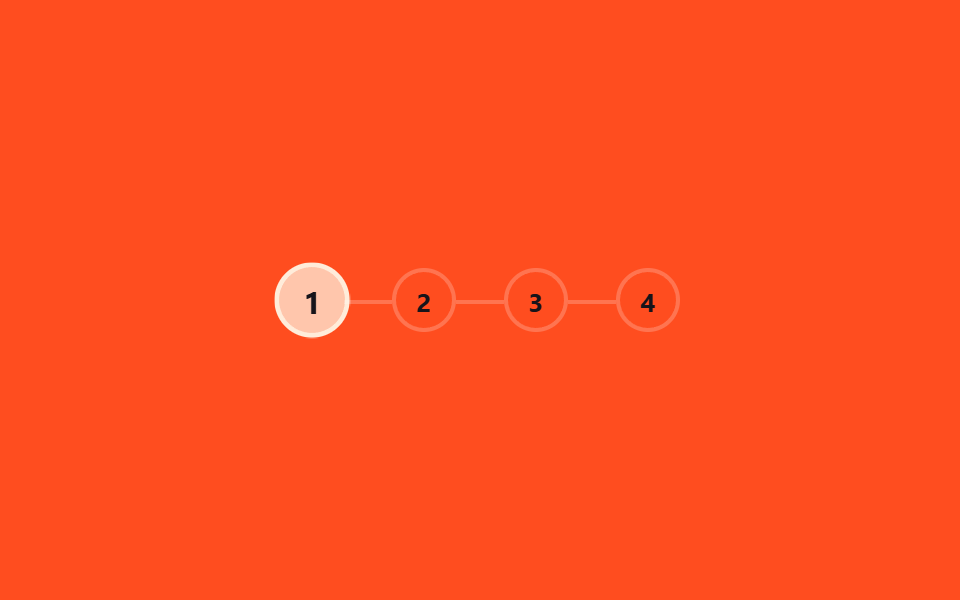
Trong bốn vòng tròn đánh số chương xếp ngang, chỉ vòng của chương đang đọc đổi màu và phồng lên rồi xẹp lại, nhờ một @keyframes riêng cho từng chương, còn bản thật tính chương hiện tại bằng Math.floor(tỉ lệ cuộn × số chương) trong React.
<main class="stage">
  <ol class="steps is-demo" aria-label="Tiến độ chương">
    <li class="step"><span class="step__circle">1</span></li>
    <li class="step"><span class="step__circle">2</span></li>
    <li class="step"><span class="step__circle">3</span></li>
    <li class="step"><span class="step__circle">4</span></li>
  </ol>
</main>
@use "../../../../site/static/demo-tokens" as *;
// ── 변수 3개 ──────────────────────────────────────────
$duration: $dur-loop;
$color: $subject-cream; // 채워진 원 색
$track: rgba(255, 255, 255, .22); // 연결선 색
@include stage($stage-orange);
.steps {
position: relative;
display: flex;
gap: $sp-6;
margin: 0; padding: 0;
list-style: none;
}
.step {
position: relative;
&:not(:first-child)::before {
content: "";
position: absolute;
right: 100%; top: 50%;
width: $sp-6; height: 2px;
background: $track;
}
}
.step__circle {
display: grid;
place-items: center;
width: 28px; height: 28px;
border-radius: 50%;
border: 2px solid $track;
background: transparent;
color: $subject-ink; // AA: 채워지기 전 원 숫자 — 주황 무대 위 5.50:1
font-weight: 700;
font-size: 13px;
line-height: 1;
font-family: inherit;
}
// ── 실제 사용: 같은 스텝 키프레임을 시간 대신 스크롤 구간(animation-range)에 건다 ──
// .step:nth-child(2) .step__circle { animation: fill-2 linear both; animation-timeline: scroll(root); }
// ── 데모: 챕터 번호가 순서대로 하나씩 부풀며 채워지고, 루프가 돌면 처음으로 되돌아간다 ──
// (색만 순간 전환하면 프레임 사이 변화가 한두 장뿐이라 눈에 덜 띈다 — scale 팝으로 구간을 넓힌다)
.steps.is-demo .step:nth-child(1) .step__circle { animation: fill-1 $duration ease-out infinite; }
.steps.is-demo .step:nth-child(2) .step__circle { animation: fill-2 $duration ease-out infinite; }
.steps.is-demo .step:nth-child(3) .step__circle { animation: fill-3 $duration ease-out infinite; }
.steps.is-demo .step:nth-child(4) .step__circle { animation: fill-4 $duration ease-out infinite; }
@keyframes fill-1 {
0% { background: transparent; color: $subject-ink; border-color: $track; transform: scale(1); }
8% { background: $color; color: $subject-ink; border-color: $color; transform: scale(1.25); }
15%, 100% { background: $color; color: $subject-ink; border-color: $color; transform: scale(1); }
}
@keyframes fill-2 {
0%, 25% { background: transparent; color: $subject-ink; border-color: $track; transform: scale(1); }
33% { background: $color; color: $subject-ink; border-color: $color; transform: scale(1.25); }
40%, 100% { background: $color; color: $subject-ink; border-color: $color; transform: scale(1); }
}
@keyframes fill-3 {
0%, 50% { background: transparent; color: $subject-ink; border-color: $track; transform: scale(1); }
58% { background: $color; color: $subject-ink; border-color: $color; transform: scale(1.25); }
65%, 100% { background: $color; color: $subject-ink; border-color: $color; transform: scale(1); }
}
@keyframes fill-4 {
0%, 75% { background: transparent; color: $subject-ink; border-color: $track; transform: scale(1); }
83% { background: $color; color: $subject-ink; border-color: $color; transform: scale(1.25); }
90%, 100% { background: $color; color: $subject-ink; border-color: $color; transform: scale(1); }
}
@media (prefers-reduced-motion: reduce) {
.steps.is-demo .step__circle { animation: none !important; background: $color; border-color: $color; }
}html, body {
margin: 0;
overflow: hidden;
}
.stage {
box-sizing: border-box;
min-height: 100vh;
display: grid;
place-items: center;
margin: 0;
background: #ff4d1f;
font-family: -apple-system, "Segoe UI", "Noto Sans KR", sans-serif;
padding: clamp(8px, 4vw, 24px);
}
.steps {
position: relative;
display: flex;
gap: 24px;
margin: 0;
padding: 0;
list-style: none;
}
.step {
position: relative;
}
.step:not(:first-child)::before {
content: "";
position: absolute;
right: 100%;
top: 50%;
width: 24px;
height: 2px;
background: rgba(255, 255, 255, 0.22);
}
.step__circle {
display: grid;
place-items: center;
width: 28px;
height: 28px;
border-radius: 50%;
border: 2px solid rgba(255, 255, 255, 0.22);
background: transparent;
color: #17141a;
font-weight: 700;
font-size: 13px;
line-height: 1;
font-family: inherit;
}
.steps.is-demo .step:nth-child(1) .step__circle {
animation: fill-1 2s ease-out infinite;
}
.steps.is-demo .step:nth-child(2) .step__circle {
animation: fill-2 2s ease-out infinite;
}
.steps.is-demo .step:nth-child(3) .step__circle {
animation: fill-3 2s ease-out infinite;
}
.steps.is-demo .step:nth-child(4) .step__circle {
animation: fill-4 2s ease-out infinite;
}
@keyframes fill-1 {
0% {
background: transparent;
color: #17141a;
border-color: rgba(255, 255, 255, 0.22);
transform: scale(1);
}
8% {
background: #fff7e6;
color: #17141a;
border-color: #fff7e6;
transform: scale(1.25);
}
15%, 100% {
background: #fff7e6;
color: #17141a;
border-color: #fff7e6;
transform: scale(1);
}
}
@keyframes fill-2 {
0%, 25% {
background: transparent;
color: #17141a;
border-color: rgba(255, 255, 255, 0.22);
transform: scale(1);
}
33% {
background: #fff7e6;
color: #17141a;
border-color: #fff7e6;
transform: scale(1.25);
}
40%, 100% {
background: #fff7e6;
color: #17141a;
border-color: #fff7e6;
transform: scale(1);
}
}
@keyframes fill-3 {
0%, 50% {
background: transparent;
color: #17141a;
border-color: rgba(255, 255, 255, 0.22);
transform: scale(1);
}
58% {
background: #fff7e6;
color: #17141a;
border-color: #fff7e6;
transform: scale(1.25);
}
65%, 100% {
background: #fff7e6;
color: #17141a;
border-color: #fff7e6;
transform: scale(1);
}
}
@keyframes fill-4 {
0%, 75% {
background: transparent;
color: #17141a;
border-color: rgba(255, 255, 255, 0.22);
transform: scale(1);
}
83% {
background: #fff7e6;
color: #17141a;
border-color: #fff7e6;
transform: scale(1.25);
}
90%, 100% {
background: #fff7e6;
color: #17141a;
border-color: #fff7e6;
transform: scale(1);
}
}
@media (prefers-reduced-motion: reduce) {
.steps.is-demo .step__circle {
animation: none !important;
background: #fff7e6;
border-color: #fff7e6;
}
}import { useEffect, useState } from "react";
import styles from "./ChapterSteps.module.scss";
export type ChapterStepsProps = {
/** 챕터 수 */
total: number;
/** 채워진 원 색 */
color?: string;
};
// 실제 쓰임: 전체 스크롤 진행률을 챕터 수로 나눠 지금 챕터를 계산한다.
export default function ChapterSteps({ total, color = "#fff7e6" }: ChapterStepsProps) {
const [current, setCurrent] = useState(0);
useEffect(() => {
const onScroll = () => {
const max = document.documentElement.scrollHeight - window.innerHeight;
const p = max > 0 ? Math.min(1, window.scrollY / max) : 0;
setCurrent(Math.min(total - 1, Math.floor(p * total)));
};
onScroll();
window.addEventListener("scroll", onScroll, { passive: true });
return () => window.removeEventListener("scroll", onScroll);
}, [total]);
return (
<ol className={styles.steps} aria-label="Chapter progress">
{Array.from({ length: total }, (_, i) => (
<li key={i} className={styles.step}>
<span className={styles.circle} style={i <= current ? { background: color, borderColor: color } : undefined}>
{i + 1}
</span>
</li>
))}
</ol>
);
}07 · Bước theo chương — Diện tích đo được 3.558% · khung hình chuyển động 16/23Nguyên tác GODRICH · SCSS và React nằm trong tệp zip · Xem mật khẩu
Dùng ở đâu
Series tutorial hay bài hướng dẫn nhiều bước là nơi nó hợp nhất.
@keyframes fill-2 {
  0%, 25%    { background: transparent; transform: scale(1); }
  33%        { background: $color; transform: scale(1.25); }
  40%, 100%  { background: $color; transform: scale(1); }
}
.step:nth-child(2) .step__circle { animation: fill-2 linear both; }
08Mục lục được làm nổi bật
Chuyện gì diễn ra trên màn hình
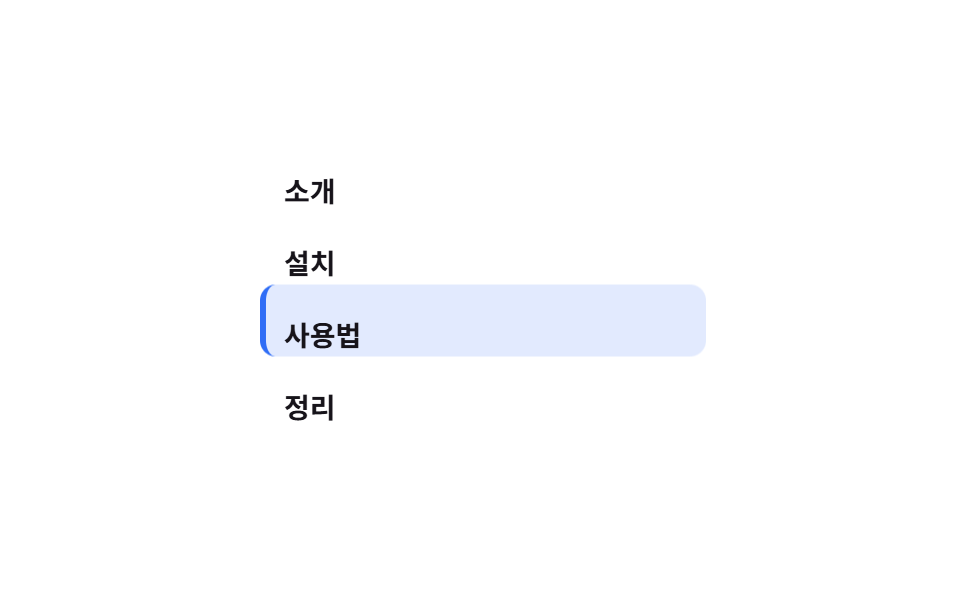
Trong mục lục bên cạnh, một nền viên thuốc trượt theo translateY để chỉ bám đúng tiêu đề đang đọc, còn màu tô ban đầu vốn là một màu đặc, nhưng lại làm mất tương phản chữ ở khung hình chuyển giữa hai dòng, nên đã đổi sang tint nhạt 14% cộng viền trái 3px.
<main class="stage">
  <nav class="toc is-demo" aria-label="Mục lục">
    <span class="toc__pill" aria-hidden="true"></span>
    <a class="toc__item" href="#" tabindex="-1">Giới thiệu</a>
    <a class="toc__item" href="#" tabindex="-1">Cài đặt</a>
    <a class="toc__item" href="#" tabindex="-1">Cách dùng</a>
    <a class="toc__item" href="#" tabindex="-1">Tổng kết</a>
  </nav>
</main>
@use "../../../../site/static/demo-tokens" as *;
// ── 변수 3개 ──────────────────────────────────────────
$duration: $dur-loop;
$color: $subject-blue; // 활성 알약 색
$row: 36px; // 목차 한 줄 높이 (알약 이동 간격)
@include stage($stage-paper);
.toc {
position: relative;
display: flex;
flex-direction: column;
width: min(220px, 80vw);
}
// 옅은 색 칩이라야 알약이 두 줄에 걸치는 전환 중에도 글자 대비가 안 깨진다 (진한 배경 + 어두운 글자는 전환 중 대비가 무너진다)
.toc__pill {
position: absolute;
left: 0; top: 0;
width: 100%; height: $row;
border-radius: $r-sm;
background: rgba(47, 109, 246, .14);
border-left: 3px solid $color;
z-index: 0;
transform: translateY(0);
}
.toc__item {
position: relative;
z-index: 1;
height: $row;
display: flex;
align-items: center;
padding: 0 $sp-3;
font-weight: 600;
font-size: 14px;
line-height: 1;
font-family: inherit;
color: $subject-ink;
text-decoration: none;
}
// ── 실제 사용: 흔히 IntersectionObserver 로 지금 보이는 제목을 찾아 --active 를 바꾼다.
// 구간 크기가 고르면 animation-timeline: scroll(root) 로도 같은 스텝 키프레임을 쓸 수 있다 ──
// ── 데모: 알약이 항목 네 개를 순서대로 미끄러지듯 오르내린다 ──
// (구간마다 바로 다음 값으로 점프하면 프레임 사이 변화가 한두 장뿐이다 — 구간의 절반을 이동에 쓴다)
.toc.is-demo .toc__pill { animation: move $duration ease-in-out infinite; }
@keyframes move {
0%, 10% { transform: translateY(0); }
25%, 35% { transform: translateY($row); }
50%, 60% { transform: translateY($row * 2); }
75%, 85% { transform: translateY($row * 3); }
100% { transform: translateY(0); }
}
@media (prefers-reduced-motion: reduce) {
.toc.is-demo .toc__pill { animation: none !important; }
}html, body {
margin: 0;
overflow: hidden;
}
.stage {
box-sizing: border-box;
min-height: 100vh;
display: grid;
place-items: center;
margin: 0;
background: #ffffff;
font-family: -apple-system, "Segoe UI", "Noto Sans KR", sans-serif;
padding: clamp(8px, 4vw, 24px);
}
.toc {
position: relative;
display: flex;
flex-direction: column;
width: min(220px, 80vw);
}
.toc__pill {
position: absolute;
left: 0;
top: 0;
width: 100%;
height: 36px;
border-radius: 8px;
background: rgba(47, 109, 246, 0.14);
border-left: 3px solid #2f6df6;
z-index: 0;
transform: translateY(0);
}
.toc__item {
position: relative;
z-index: 1;
height: 36px;
display: flex;
align-items: center;
padding: 0 12px;
font-weight: 600;
font-size: 14px;
line-height: 1;
font-family: inherit;
color: #17141a;
text-decoration: none;
}
.toc.is-demo .toc__pill {
animation: move 2s ease-in-out infinite;
}
@keyframes move {
0%, 10% {
transform: translateY(0);
}
25%, 35% {
transform: translateY(36px);
}
50%, 60% {
transform: translateY(72px);
}
75%, 85% {
transform: translateY(108px);
}
100% {
transform: translateY(0);
}
}
@media (prefers-reduced-motion: reduce) {
.toc.is-demo .toc__pill {
animation: none !important;
}
}import { useEffect, useState } from "react";
import styles from "./TocHighlight.module.scss";
export type TocItem = { id: string; label: string };
export type TocHighlightProps = {
items: TocItem[];
/** 알약 색 */
color?: string;
/** 한 줄 높이 (px) */
row?: number;
};
// 실제 쓰임: IntersectionObserver 로 지금 보이는 제목을 찾아 알약을 그 줄로 옮긴다.
export default function TocHighlight({ items, color = "#2f6df6", row = 36 }: TocHighlightProps) {
const [active, setActive] = useState(0);
useEffect(() => {
const els = items.map((it) => document.getElementById(it.id)).filter(Boolean) as HTMLElement[];
const io = new IntersectionObserver(
(entries) => {
const top = entries.filter((e) => e.isIntersecting).sort((a, b) => b.intersectionRatio - a.intersectionRatio)[0];
if (top) setActive(els.indexOf(top.target as HTMLElement));
},
{ threshold: [0.3, 0.6] }
);
els.forEach((el) => io.observe(el));
return () => io.disconnect();
}, [items]);
return (
<nav className={styles.toc} aria-label="Contents" style={{ width: 220 }}>
<span className={styles.pill} style={{ borderLeftColor: color, height: row, transform: `translateY(${active * row}px)` }} />
{items.map((it) => (
<a key={it.id} href={`#${it.id}`} className={styles.item} style={{ height: row }}>
{it.label}
</a>
))}
</nav>
);
}08 · Mục lục được làm nổi bật — Diện tích đo được 21.896% · khung hình chuyển động 15/23Nguyên tác GODRICH · SCSS và React nằm trong tệp zip · Xem mật khẩu
Chỗ dùng
Kiểu này hợp với mục lục cạnh trang tài liệu hoặc bài hướng dẫn dài kiểu scroll-spy.
.toc__pill {
  position: absolute;
  background: rgba(47, 109, 246, .14);
  border-left: 3px solid $color;
  animation: move $dur-loop ease-in-out infinite;
}
@keyframes move {
  0%, 10%  { transform: translateY(0); }
  25%, 35% { transform: translateY($row); }
}
09Thời gian đọc còn lại
Chuyển động thế nào
Con số trong cụm "còn N phút" giảm dần khi bạn cuộn, tính bằng cách lấy tổng số phút trừ đi phần tương ứng với tỉ lệ trang đã đọc, qua một biến --min kiểu integer.
<main class="stage">
  <p class="time is-demo" role="status">
    <span class="time__label">còn</span>
    <span class="time__num" aria-hidden="true"></span>
    <span class="time__label">phút</span>
  </p>
</main>
@use "../../../../site/static/demo-tokens" as *;
// ── 변수 3개 ──────────────────────────────────────────
$total: 12; // 전체 예상 분 (두 자릿수로 시작해야 자릿수가 바뀌는 순간도 보인다)
$color: $subject-cream; // 숫자 색
$duration: $dur-loop;
@include stage($stage-ink);
@property --min {
syntax: '<integer>';
initial-value: #{$total};
inherits: false;
}
.time {
display: flex;
align-items: baseline;
gap: $sp-2;
margin: 0;
color: rgba(255, 255, 255, .7);
font-weight: 600;
font-size: 16px;
line-height: 1;
font-family: inherit;
}
.time__num {
--min: #{$total};
counter-reset: min var(--min);
color: $color;
font-weight: 800;
font-size: clamp(34px, 11vw, 46px);
line-height: 1;
font-family: inherit;
font-variant-numeric: tabular-nums;
&::before { content: counter(min); }
// 실제 사용: 남은 분수 = 전체 분수 × (1 − 스크롤 진행률)
@supports (animation-timeline: scroll()) {
animation: count-down linear both;
animation-timeline: scroll(root);
}
}
@keyframes count-down { from { --min: #{$total}; } to { --min: 0; } }
.time.is-demo .time__num { animation: count-down-loop $duration linear infinite; }
@keyframes count-down-loop {
0% { --min: #{$total}; }
92% { --min: 0; }
100% { --min: 0; }
}
@media (prefers-reduced-motion: reduce) {
.time__num, .time.is-demo .time__num { animation: none !important; --min: 0; }
}html, body {
margin: 0;
overflow: hidden;
}
.stage {
box-sizing: border-box;
min-height: 100vh;
display: grid;
place-items: center;
margin: 0;
background: #17141a;
font-family: -apple-system, "Segoe UI", "Noto Sans KR", sans-serif;
padding: clamp(8px, 4vw, 24px);
}
@property --min {
syntax: "<integer>";
initial-value: 12;
inherits: false;
}
.time {
display: flex;
align-items: baseline;
gap: 8px;
margin: 0;
color: rgba(255, 255, 255, 0.7);
font-weight: 600;
font-size: 16px;
line-height: 1;
font-family: inherit;
}
.time__num {
--min: 12;
counter-reset: min var(--min);
color: #fff7e6;
font-weight: 800;
font-size: clamp(34px, 11vw, 46px);
line-height: 1;
font-family: inherit;
font-variant-numeric: tabular-nums;
}
.time__num::before {
content: counter(min);
}
@supports (animation-timeline: scroll()) {
.time__num {
animation: count-down linear both;
animation-timeline: scroll(root);
}
}
@keyframes count-down {
from {
--min: 12;
}
to {
--min: 0;
}
}
.time.is-demo .time__num {
animation: count-down-loop 2s linear infinite;
}
@keyframes count-down-loop {
0% {
--min: 12;
}
92% {
--min: 0;
}
100% {
--min: 0;
}
}
@media (prefers-reduced-motion: reduce) {
.time__num, .time.is-demo .time__num {
animation: none !important;
--min: 0;
}
}import { useEffect, useState } from "react";
import styles from "./ReadingTime.module.scss";
export type ReadingTimeProps = {
/** 전체 예상 분 */
totalMinutes: number;
/** 숫자 색 */
color?: string;
};
// 실제 쓰임: 남은 분 = 전체 분 × (1 − 스크롤 진행률).
export default function ReadingTime({ totalMinutes, color = "#fff7e6" }: ReadingTimeProps) {
const [left, setLeft] = useState(totalMinutes);
useEffect(() => {
const onScroll = () => {
const max = document.documentElement.scrollHeight - window.innerHeight;
const p = max > 0 ? Math.min(1, window.scrollY / max) : 0;
setLeft(Math.max(0, Math.round(totalMinutes * (1 - p))));
};
onScroll();
window.addEventListener("scroll", onScroll, { passive: true });
return () => window.removeEventListener("scroll", onScroll);
}, [totalMinutes]);
return (
<p className={styles.time} role="status">
<span>left</span>
<span className={styles.num} style={{ color }}>{left}</span>
<span>min</span>
</p>
);
}09 · Thời gian đọc còn lại — Diện tích đo được 1.545% · khung hình chuyển động 12/23Nguyên tác GODRICH · SCSS và React nằm trong tệp zip · Xem mật khẩu
Dùng khi nào
Header của bài viết dài hay bản web của newsletter là nơi con số đang đếm ngược này thường xuất hiện.
@property --min { syntax: '<integer>'; initial-value: 12; inherits: false; }

.time__num {
  --min: 12;
  counter-reset: min var(--min);
  &::before { content: counter(min); }
}
@keyframes count-down { from { --min: 12; } to { --min: 0; } }
Bẫy ở đâu — chỗ dễ hỏng nhất
Hỗ trợ trình duyệt
Hỗ trợ animation-timeline: scroll() vẫn chưa đều giữa các trình duyệt, theo tài liệu MDN về scroll-driven animations và bảng caniuse, thực đo ngày 2026-09-10 như sau.
| Tính năng | Chrome·Edge | Safari | Firefox |
|---|---|---|---|
animation-timeline scroll() |
115+ | 26+ (2025-09) | 158+, bản chính thức 2026-09 vẫn nằm sau cờ thử nghiệm |
@property |
85+ | 16.4+ | 128+ |
Thay thế bằng JS trên Firefox
Trên Firefox — trình duyệt chưa hỗ trợ animation-timeline: scroll() chính thức — sáu kiểu dùng kỹ thuật này (01, 02, 04, 05, 06, 09) đứng yên tại chỗ nếu không có gì thay thế. Vì vậy bản react/ trong zip tính lại cùng giá trị cho sáu kiểu đó bằng sự kiện scroll của window, nên chúng vẫn chạy đúng trên mọi trình duyệt kể cả Firefox; còn 03, 07 và 08 vốn đã chạy bằng JS ngay từ bản dùng thật — IntersectionObserver cho 03 và 08 vì hai kiểu đó theo dõi section chứ không theo toàn tài liệu, Math.floor theo tỉ lệ cuộn cho 07 — nên không phụ thuộc animation-timeline: scroll() và cũng chạy như nhau trên mọi trình duyệt. Một bẫy khác chỉ lộ ra khi dựng thật: với 07 bước theo chương, nếu chỉ đổi màu tức thời thì số khung hình thay đổi giữa hai lần đo chỉ còn bốn, dưới hẳn ngưỡng đo chuyển động — thêm một cú phồng scale(1.25) đúng lúc chuyển bước mới kéo số khung hình lên đủ để máy đo tính là có chuyển động thật. Chín file trong gói đã sửa theo đúng cách đó rồi, mật khẩu để mở gói nén là 3rmg234a, gõ đúng như nó hiện trên dòng chữ này, không thêm khoảng trắng nào.
Khả năng tiếp cận
Trạng thái khi tắt animation
Cả chín kiểu đều tắt animation khi prefers-reduced-motion: reduce được bật. Với những kiểu tính theo phần trăm đã đọc (01, 02, 04, 05, 06, 09), chúng không dừng ở khung hình đầu mà nhảy thẳng tới trạng thái đã đọc xong 100%, vì đó mới là thông tin người dùng cần thấy ngay lập tức; riêng 03 chấm section và 08 mục lục thì giữ nguyên ở mục đầu tiên, đúng với vị trí khi trang còn ở trên cùng. Con số được vẽ bằng counter() ở 06 và 09 là chỗ dễ bị bỏ sót nhất: trình đọc màn hình không đọc được nội dung counter(), nên bản thân con số phải mang aria-hidden còn phần tử bọc ngoài cần role="status" hoặc role="progressbar" cộng aria-valuenow riêng để giữ lại đúng thông tin đó. Riêng 08 mục lục vốn có thể bấm để nhảy tới, dùng khung <a href="#id"> thật nên vẫn cho phép đến đúng nơi bằng bàn phím dù animation đã tắt hẳn; còn các chấm ở 03 chỉ mang aria-hidden để trang trí, không phải link, nên tự chúng không thêm điểm dừng bàn phím nào. Phạm vi hỗ trợ của chính prefers-reduced-motion nằm trong tài liệu MDN.
Các kiểu hiệu ứng cuộn khác đang nằm trong chuyên mục CSS, còn trang giới thiệu nói rõ site này thật ra bán gì.
FAQ
Trình duyệt chưa hỗ trợ scroll() thì hiển thị thế nào?
@supports (animation-timeline: scroll()) bọc quanh rule chuyển động của sáu kiểu dùng kỹ thuật này (01, 02, 04, 05, 06, 09), nên trình duyệt không hỗ trợ chỉ đơn giản bỏ qua khối đó chứ không báo lỗi gì cả — ba kiểu 03, 07, 08 vốn đã chạy bằng JS nên không cần khối này. Bản react/ trong zip tính cùng giá trị bằng sự kiện scroll của window cho sáu kiểu kia nên vẫn chạy đúng trên Firefox hay bất kỳ trình duyệt nào chưa theo kịp.
Có thể bật cùng lúc mấy kiểu trong chín kiểu này không?
Được, miễn vị trí không đè lên nhau — 01 thanh trên và 04 thanh cạnh nằm ở hai mép khác nhau nên hợp dùng cùng lúc. Nhưng 06 số phần trăm và 09 thời gian còn lại cùng chiếm góc trên bên phải, vì vậy chỉ nên chọn một — bật cả hai chỉ khiến mắt phân vân xem đọc số nào trước.
Bài cần bao nhiêu H2 mới nên dùng kiểu 08 mục lục?
Dưới bốn H2 thì viên thuốc gần như không di chuyển đủ xa để người đọc để ý, nên 08 chỉ đáng dùng khi bài có ít nhất bốn tiêu đề mục trở lên. Bài ngắn hơn thì thanh 01 ở đầu trang đã đủ báo tiến độ rồi.
Có thể bạn cũng thích
 Cuộn trang9 hiệu ứng css scroll animation không cần JS
 Cuộn trang9 CSS Marquee Infinite Loop — chỉ CSS, không JS
 Cuộn trangCSS only carousel — 9 image slider css dán là chạy
 Cuộn trang9 css timeline animation không JS, copy-paste
 Cuộn trang9 hiệu ứng css parallax scrolling, không cần JS
 Cuộn trang9 CSS sticky header không cần JS
 Cuộn trang9 CSS Stagger Animation Demos Copy-Paste Là Chạy
 Cuộn trang9 hero section css animation — không cần JS
 Cuộn trang9 nút back to top button css — hiện khi cuộn
 Cuộn trang9 mẫu css sticky header — copy-paste là chạy