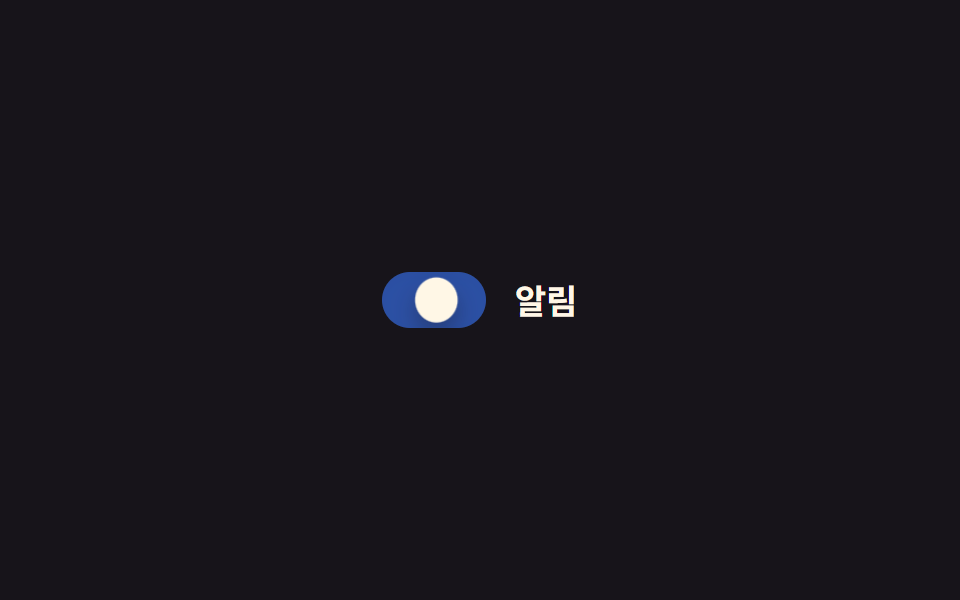
05Hiệu ứng bóp khi nhấn
Trong lúc giữ nhấn, núm giãn ngang qua scaleX để mô phỏng cảm giác bị bóp, buông tay thì bật lại thành hình tròn.
Dùng choForm di động ưu tiên chạm, UI cài đặt nhấn mạnh xúc giác
scaleX:active0.15초

<main class="stage">
  <label class="switch is-demo">
    <input type="checkbox" class="switch__input" role="switch">
    <span class="switch__track">
      <span class="switch__bg switch__bg--off"></span>
      <span class="switch__bg switch__bg--on"></span>
      <span class="switch__knob"></span>
    </span>
    <span class="switch__label">Phản hồi rung</span>
  </label>
</main>
@use "../../../../site/static/demo-tokens" as *;
// ── 변수 3개 ──────────────────────────────
$duration: $dur-instant;
$easing: $ease-pop;
$color: $subject-blue;
// ── 데모 무대 ───────────────────────────────
@include stage($stage-ink);
.switch {
position: relative;
display: inline-flex; align-items: center; gap: clamp(10px, 3vw, 14px);
cursor: pointer;
-webkit-tap-highlight-color: transparent;
}
.switch__input {
position: absolute; inset: 0; width: 100%; height: 100%;
margin: 0; opacity: 0; cursor: pointer;
}
.switch__track {
position: relative; overflow: hidden;
width: clamp(44px, 12vw, 52px); height: clamp(24px, 6.5vw, 28px);
border-radius: $r-pill;
transition: box-shadow $duration $easing;
}
.switch__bg { position: absolute; inset: 0; }
.switch__bg--off { background: rgba(255, 255, 255, .18); opacity: 1; }
.switch__bg--on { background: $color; opacity: 0; }
.switch__knob {
--x: 0px; --sx: 1; --sy: 1;
position: absolute; top: 3px; left: 3px; z-index: 1;
width: clamp(18px, 5vw, 22px); height: clamp(18px, 5vw, 22px);
border-radius: 50%;
background: $subject-cream;
box-shadow: $shadow-press;
transform: translateX(var(--x)) scaleX(var(--sx)) scaleY(var(--sy));
transition: transform $duration $easing;
}
.switch__label { color: $subject-cream; font-weight: 600; font-size: clamp(14px, 4vw, 17px); line-height: 1; font-family: inherit; }
// ── 실제 동작: :checked 는 위치, :active 는 눌림만 (서로 안 덮는다) ──
.switch__input:checked ~ .switch__track .switch__bg--off { opacity: 0; transition: opacity $duration $easing; }
.switch__input:checked ~ .switch__track .switch__bg--on { opacity: 1; transition: opacity $duration $easing; }
.switch__input:checked ~ .switch__track .switch__knob { --x: 24px; }
.switch:active .switch__knob { --sx: 1.35; --sy: .8; }
.switch__input:focus-visible ~ .switch__track {
outline: 2px solid $subject-cream; outline-offset: 3px;
}
// ── 데모 루프: 눌림 → 이동 → 눌림 → 되돌아감 ────────────
// 한 겹: 이동 도착 지점(28%) 앞에 오버슈트+squash 스트로크를 보강하고,
// 트랙은 상태 전환 때 내부 그림자가 깊어졌다 얕아진다.
.switch.is-demo .switch__bg--off { animation: bg-off-loop $dur-loop $ease-out infinite; }
.switch.is-demo .switch__bg--on { animation: bg-on-loop $dur-loop $ease-out infinite; }
.switch.is-demo .switch__knob { animation: squish-loop $dur-loop $easing infinite; }
.switch.is-demo .switch__track { animation: shadow-depth-loop $dur-loop $easing infinite; }
@keyframes bg-off-loop { 0%, 20% { opacity: 1; } 28%, 60% { opacity: 0; } 85%, 100% { opacity: 1; } }
@keyframes bg-on-loop { 0%, 20% { opacity: 0; } 28%, 60% { opacity: 1; } 85%, 100% { opacity: 0; } }
@keyframes squish-loop {
0%, 8% { transform: translateX(0) scaleX(1) scaleY(1); }
16% { transform: translateX(0) scaleX(1.35) scaleY(.8); }
24% { transform: translateX(26px) scaleX(1.2) scaleY(.88); } // 이동 오버슈트 + squash
28%, 60% { transform: translateX(24px) scaleX(1) scaleY(1); }
68% { transform: translateX(24px) scaleX(1.35) scaleY(.8); }
85%, 100% { transform: translateX(0) scaleX(1) scaleY(1); }
}
@keyframes shadow-depth-loop {
0%, 20% { box-shadow: inset 0 1px 3px rgba(0, 0, 0, .15); }
24% { box-shadow: inset 0 3px 8px rgba(0, 0, 0, .28); }
28%, 60% { box-shadow: inset 0 3px 8px rgba(0, 0, 0, .28); }
85%, 100% { box-shadow: inset 0 1px 3px rgba(0, 0, 0, .15); }
}
@media (prefers-reduced-motion: reduce) {
.switch.is-demo .switch__bg--off, .switch.is-demo .switch__bg--on, .switch.is-demo .switch__knob,
.switch.is-demo .switch__track {
animation: none !important;
}
.switch__knob, .switch__bg--off, .switch__bg--on { transition: none; }
.switch__track { transition: none; }
}html, body {
margin: 0;
overflow: hidden;
}
.stage {
box-sizing: border-box;
min-height: 100vh;
display: grid;
place-items: center;
margin: 0;
background: #17141a;
font-family: -apple-system, "Segoe UI", "Noto Sans KR", sans-serif;
padding: clamp(8px, 4vw, 24px);
}
.switch {
position: relative;
display: inline-flex;
align-items: center;
gap: clamp(10px, 3vw, 14px);
cursor: pointer;
-webkit-tap-highlight-color: transparent;
}
.switch__input {
position: absolute;
inset: 0;
width: 100%;
height: 100%;
margin: 0;
opacity: 0;
cursor: pointer;
}
.switch__track {
position: relative;
overflow: hidden;
width: clamp(44px, 12vw, 52px);
height: clamp(24px, 6.5vw, 28px);
border-radius: 999px;
transition: box-shadow 140ms cubic-bezier(0.2, 1.4, 0.4, 1);
}
.switch__bg {
position: absolute;
inset: 0;
}
.switch__bg--off {
background: rgba(255, 255, 255, 0.18);
opacity: 1;
}
.switch__bg--on {
background: #2f6df6;
opacity: 0;
}
.switch__knob {
--x: 0px;
--sx: 1;
--sy: 1;
position: absolute;
top: 3px;
left: 3px;
z-index: 1;
width: clamp(18px, 5vw, 22px);
height: clamp(18px, 5vw, 22px);
border-radius: 50%;
background: #fff7e6;
box-shadow: 0 6px 12px rgba(23, 20, 26, 0.32);
transform: translateX(var(--x)) scaleX(var(--sx)) scaleY(var(--sy));
transition: transform 140ms cubic-bezier(0.2, 1.4, 0.4, 1);
}
.switch__label {
color: #fff7e6;
font-weight: 600;
font-size: clamp(14px, 4vw, 17px);
line-height: 1;
font-family: inherit;
}
.switch__input:checked ~ .switch__track .switch__bg--off {
opacity: 0;
transition: opacity 140ms cubic-bezier(0.2, 1.4, 0.4, 1);
}
.switch__input:checked ~ .switch__track .switch__bg--on {
opacity: 1;
transition: opacity 140ms cubic-bezier(0.2, 1.4, 0.4, 1);
}
.switch__input:checked ~ .switch__track .switch__knob {
--x: 24px;
}
.switch:active .switch__knob {
--sx: 1.35;
--sy: .8;
}
.switch__input:focus-visible ~ .switch__track {
outline: 2px solid #fff7e6;
outline-offset: 3px;
}
.switch.is-demo .switch__bg--off {
animation: bg-off-loop 2s ease-out infinite;
}
.switch.is-demo .switch__bg--on {
animation: bg-on-loop 2s ease-out infinite;
}
.switch.is-demo .switch__knob {
animation: squish-loop 2s cubic-bezier(0.2, 1.4, 0.4, 1) infinite;
}
.switch.is-demo .switch__track {
animation: shadow-depth-loop 2s cubic-bezier(0.2, 1.4, 0.4, 1) infinite;
}
@keyframes bg-off-loop {
0%, 20% {
opacity: 1;
}
28%, 60% {
opacity: 0;
}
85%, 100% {
opacity: 1;
}
}
@keyframes bg-on-loop {
0%, 20% {
opacity: 0;
}
28%, 60% {
opacity: 1;
}
85%, 100% {
opacity: 0;
}
}
@keyframes squish-loop {
0%, 8% {
transform: translateX(0) scaleX(1) scaleY(1);
}
16% {
transform: translateX(0) scaleX(1.35) scaleY(0.8);
}
24% {
transform: translateX(26px) scaleX(1.2) scaleY(0.88);
}
28%, 60% {
transform: translateX(24px) scaleX(1) scaleY(1);
}
68% {
transform: translateX(24px) scaleX(1.35) scaleY(0.8);
}
85%, 100% {
transform: translateX(0) scaleX(1) scaleY(1);
}
}
@keyframes shadow-depth-loop {
0%, 20% {
box-shadow: inset 0 1px 3px rgba(0, 0, 0, 0.15);
}
24% {
box-shadow: inset 0 3px 8px rgba(0, 0, 0, 0.28);
}
28%, 60% {
box-shadow: inset 0 3px 8px rgba(0, 0, 0, 0.28);
}
85%, 100% {
box-shadow: inset 0 1px 3px rgba(0, 0, 0, 0.15);
}
}
@media (prefers-reduced-motion: reduce) {
.switch.is-demo .switch__bg--off, .switch.is-demo .switch__bg--on, .switch.is-demo .switch__knob,
.switch.is-demo .switch__track {
animation: none !important;
}
.switch__knob, .switch__bg--off, .switch__bg--on {
transition: none;
}
.switch__track {
transition: none;
}
}document.querySelectorAll(".switch").forEach(function (s) {
var input = s.querySelector(".switch__input");
var sync = function () { input.setAttribute("aria-checked", String(input.checked)); };
input.addEventListener("pointerdown", function () { s.classList.remove("is-demo"); });
input.addEventListener("change", sync);
sync();
});import { useState } from "react";
import type { ChangeEvent, CSSProperties } from "react";
import styles from "./SquishToggle.module.scss";
export type SquishToggleProps = {
label?: string;
/** 눌림 트랜지션 시간 (기본 140ms) */
duration?: number;
/** 팝 이징 */
easing?: string;
color?: string;
defaultChecked?: boolean;
onChange?: (checked: boolean) => void;
};
type Vars = CSSProperties & { "--duration"?: string; "--easing"?: string; "--color"?: string };
export default function SquishToggle({
label = "진동 피드백",
duration = 140,
easing = "cubic-bezier(.2,1.4,.4,1)",
color = "#2f6df6",
defaultChecked = false,
onChange,
}: SquishToggleProps) {
const [checked, setChecked] = useState(defaultChecked);
const vars: Vars = { "--duration": `${duration}ms`, "--easing": easing, "--color": color };
return (
<label className={styles.switch} style={vars}>
<input
type="checkbox"
role="switch"
aria-checked={checked}
className={styles.switch__input}
checked={checked}
onChange={(e: ChangeEvent<HTMLInputElement>) => { setChecked(e.target.checked); onChange?.(e.target.checked); }}
/>
<span className={styles.switch__track}>
<span className={styles["switch__bg--off"]} />
<span className={styles["switch__bg--on"]} />
<span className={styles.switch__knob} />
</span>
<span className={styles.switch__label}>{label}</span>
</label>
);
}05 Hiệu ứng bóp khi nhấn — Diện tích đo được 0.917% · khung hình chuyển động 13/23Nguyên tác GODRICH · SCSS và React nằm trong tệp zip · 9 CSS Toggle Switches — dán 1 dòng là chạy
Bài viết chứa demo này
 9 CSS Toggle Switches — dán 1 dòng là chạyCSS toggle switch là control chỉ dùng một input checkbox để bật tắt thật, còn track và núm là lớp vỏ CSS phủ lên trên. C Xem tất cả demo trong bài này