01Hiện phía trên cơ bản
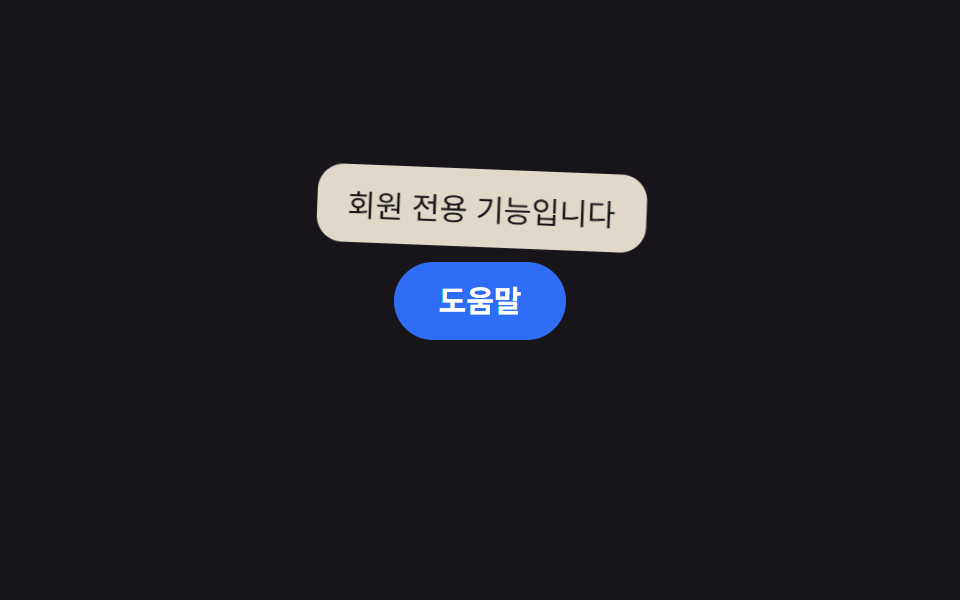
Một bong bóng nhỏ hiện phía trên phần tử bằng opacity và dịch chuyển theo trục dọc, rồi biến mất khi con trỏ rời đi.
Dùng choicon trợ giúp cạnh nút, chú thích cho từ viết tắt trong tiêu đề bảng
상단 8px 간격opacity + translate 4px200ms

<main class="stage">
  <div class="tip-wrap">
    <button class="info-btn" type="button" aria-describedby="tip01">Trợ giúp</button>
    <span class="tooltip is-demo" role="tooltip" id="tip01">Tính năng dành cho thành viên</span>
  </div>
</main>
@use "../../../../site/static/demo-tokens" as *;
$duration: $dur-loop; // 숨김→표시→숨김 한 주기
$easing: $ease-out; // 나타날 땐 빠르게, 사라질 땐 부드럽게
$color: $subject-blue; // 트리거 버튼 색
@include stage($stage-ink);
.tip-wrap {
position: relative; // 툴팁 위치의 기준
}
.info-btn {
border: 0;
border-radius: $r-pill;
padding: 12px 22px;
font-weight: 600;
font-size: 15px;
line-height: 1;
font-family: inherit;
color: #fff;
background: $color;
cursor: pointer;
}
.tooltip {
position: absolute;
bottom: calc(100% + 8px); // 버튼 바로 위, 8px 간격
left: 50%;
transform-origin: bottom center; // 규칙8: 화살표(버튼 쪽 아래변) 축 — 흔들림의 회전 중심
transform: translate(-50%, 4px);
opacity: 0;
background: $subject-cream;
color: $stage-ink;
padding: 8px 14px;
border-radius: $r-control;
font-size: clamp(12px, 3.4vw, 14px);
white-space: nowrap;
pointer-events: none;
}
// 데모: 호버 없이 혼자 표시→숨김을 반복한다
.tooltip.is-demo {
animation: tip-loop $duration $easing infinite;
}
// 등장 스프링 한 겹 — 스케일은 .85 에서 1.12 로 목표를 지나쳤다가 감쇠 반동(.95 → 1.03)으로 멎고,
// 회전은 화살표 축(아래변 중심)을 중심으로 2.6° → -1.5° → .6° 로 감쇠하며 흔들린다
@keyframes tip-loop {
0% { opacity: 0; transform: translate(-50%, 4px) scale(.85) rotate(0deg); }
12% { opacity: 1; transform: translate(-50%, 0) scale(1.12) rotate(2.6deg); }
22% { opacity: 1; transform: translate(-50%, 0) scale(.95) rotate(-1.5deg); }
30% { opacity: 1; transform: translate(-50%, 0) scale(1.03) rotate(.6deg); }
36%, 55% { opacity: 1; transform: translate(-50%, 0) scale(1) rotate(0deg); }
80% { opacity: 0; transform: translate(-50%, 4px) scale(.85) rotate(0deg); }
100% { opacity: 0; transform: translate(-50%, 4px) scale(.85) rotate(0deg); }
}
@media (prefers-reduced-motion: reduce) {
.tooltip.is-demo { animation: none; opacity: 1; transform: translate(-50%, 0) scale(1); }
}html, body {
margin: 0;
overflow: hidden;
}
.stage {
box-sizing: border-box;
min-height: 100vh;
display: grid;
place-items: center;
margin: 0;
background: #17141a;
font-family: -apple-system, "Segoe UI", "Noto Sans KR", sans-serif;
padding: clamp(8px, 4vw, 24px);
}
.tip-wrap {
position: relative;
}
.info-btn {
border: 0;
border-radius: 999px;
padding: 12px 22px;
font-weight: 600;
font-size: 15px;
line-height: 1;
font-family: inherit;
color: #fff;
background: #2f6df6;
cursor: pointer;
}
.tooltip {
position: absolute;
bottom: calc(100% + 8px);
left: 50%;
transform-origin: bottom center;
transform: translate(-50%, 4px);
opacity: 0;
background: #fff7e6;
color: #17141a;
padding: 8px 14px;
border-radius: 12px;
font-size: clamp(12px, 3.4vw, 14px);
white-space: nowrap;
pointer-events: none;
}
.tooltip.is-demo {
animation: tip-loop 2s ease-out infinite;
}
@keyframes tip-loop {
0% {
opacity: 0;
transform: translate(-50%, 4px) scale(0.85) rotate(0deg);
}
12% {
opacity: 1;
transform: translate(-50%, 0) scale(1.12) rotate(2.6deg);
}
22% {
opacity: 1;
transform: translate(-50%, 0) scale(0.95) rotate(-1.5deg);
}
30% {
opacity: 1;
transform: translate(-50%, 0) scale(1.03) rotate(0.6deg);
}
36%, 55% {
opacity: 1;
transform: translate(-50%, 0) scale(1) rotate(0deg);
}
80% {
opacity: 0;
transform: translate(-50%, 4px) scale(0.85) rotate(0deg);
}
100% {
opacity: 0;
transform: translate(-50%, 4px) scale(0.85) rotate(0deg);
}
}
@media (prefers-reduced-motion: reduce) {
.tooltip.is-demo {
animation: none;
opacity: 1;
transform: translate(-50%, 0) scale(1);
}
}import { useState } from "react";
import type { CSSProperties, ReactNode } from "react";
import styles from "./TopTooltip.module.scss";
export type TopTooltipProps = {
/** 버튼 글자 */
label: ReactNode;
/** 툴팁 글자 */
text: string;
/** 나타나고 사라지는 시간 (기본 200ms) */
duration?: number;
/** CSS easing */
easing?: string;
/** 버튼 색 */
color?: string;
};
type Vars = CSSProperties & { "--duration"?: string; "--easing"?: string; "--color"?: string };
export default function TopTooltip({
label,
text,
duration = 200,
easing = "ease-out",
color = "#2f6df6",
}: TopTooltipProps) {
const [open, setOpen] = useState(false);
const vars: Vars = { "--duration": `${duration}ms`, "--easing": easing, "--color": color };
return (
<span className={styles.wrap} style={vars}>
<button
type="button"
className={styles.btn}
aria-describedby="top-tooltip"
onMouseEnter={() => setOpen(true)}
onMouseLeave={() => setOpen(false)}
onFocus={() => setOpen(true)}
onBlur={() => setOpen(false)}
>
{label}
</button>
<span id="top-tooltip" role="tooltip" className={styles.tooltip} data-open={open}>
{text}
</span>
</span>
);
}01 Hiện phía trên cơ bản — Diện tích đo được 4.959% · khung hình chuyển động 15/23Nguyên tác GODRICH · SCSS và React nằm trong tệp zip · 9 CSS tooltip examples — copy dán một dòng là chạy
Bài viết chứa demo này
 9 CSS tooltip examples — copy dán một dòng là chạyCSS tooltip examples ở đây là chín kiểu bong bóng chú thích hiện lên khi bạn hover hoặc focus vào một phần tử, hầu hết c Xem tất cả demo trong bài này