04Thích lạc quan (tức thời + rollback)
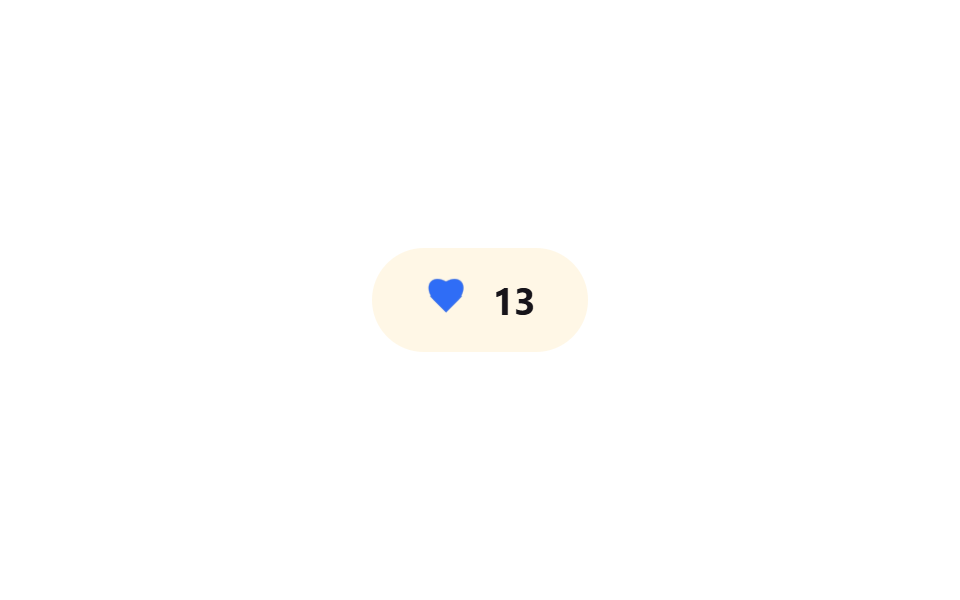
Bấm tim, giao diện tô đỏ và tăng số đếm ngay không đợi server, rồi rollback sau khi mô phỏng thất bại.
Dùng choNút thích trên mạng xã hội, nút bookmark
낙관적 업데이트롤백 애니메이션0.8초
<main class="stage">
  <button class="like is-demo" type="button" aria-pressed="false" aria-label="Thích">
    <span class="like__icon" aria-hidden="true">
      <span class="like__heart like__heart--base"></span>
      <span class="like__heart like__heart--fill"></span>
    </span>
    <span class="like__count" aria-hidden="true">
      <span class="like__count-track">
        <span class="like__count-num">12</span>
        <span class="like__count-num">13</span>
      </span>
    </span>
  </button>
</main>
@use "../../../../site/static/demo-tokens" as *;
// ── 변수 3개 ──────────────────────────────────────────
$duration: $dur-quick; // 하트가 차오르는 시간
$easing: $ease-pop; // 팝업 이징
$color: $subject-blue; // 좋아요 강조색
// ── 데모 무대 ──────────────────────────────────────────
@include stage($stage-paper);
@mixin heart-shape {
content: "";
position: absolute;
top: 0;
width: 50%;
height: 80%;
border-radius: 50% 50% 0 0;
background: currentColor;
}
.like {
display: inline-flex;
align-items: center;
gap: clamp(8px, 2.6vw, 12px);
border: 0;
border-radius: $r-pill;
padding: clamp(12px, 4vw, 16px) clamp(20px, 6vw, 26px);
font-weight: 700;
font-size: clamp(15px, 4.2vw, 19px);
line-height: 1;
font-family: inherit;
color: $stage-ink;
background: $subject-cream;
cursor: pointer;
-webkit-tap-highlight-color: transparent;
&__icon { position: relative; width: 22px; height: 20px; flex: none; color: $stage-ink; }
&__heart {
position: absolute; inset: 0;
transform: scale(1);
&::before { @include heart-shape; left: 50%; transform: rotate(-45deg); transform-origin: 0 100%; } // 규칙8: 하트 로브 꼭짓점 조형
&::after { @include heart-shape; left: 0; transform: rotate(45deg); transform-origin: 100% 100%; } // 규칙8: 하트 로브 꼭짓점 조형
}
&__heart--base { opacity: .28; }
&__heart--fill {
color: $color;
opacity: 0;
transform: scale(.5);
transition: opacity $duration $easing, transform $duration $easing;
}
&__count { position: relative; height: 1em; overflow: hidden; }
&__count-track {
display: flex;
flex-direction: column;
transform: translateY(0);
transition: transform $duration $easing;
}
&__count-num { height: 1em; line-height: 1; }
&.is-liked &__heart--fill { opacity: 1; transform: scale(1); }
&.is-liked &__count-track { transform: translateY(-50%); }
&.is-demo &__heart--fill { animation: fill-loop $dur-loop $easing infinite; }
&.is-demo &__count-track { animation: count-loop $dur-loop $easing infinite; }
}
@keyframes fill-loop {
0%, 20% { opacity: 0; transform: scale(.5); }
35%, 60% { opacity: 1; transform: scale(1); }
80%, 100% { opacity: 0; transform: scale(.5); }
}
@keyframes count-loop {
0%, 20% { transform: translateY(0); }
35%, 60% { transform: translateY(-50%); }
80%, 100% { transform: translateY(0); }
}
// ── 접근성: 움직임 줄이기 설정이면 순간 전환만, 롤백 상태는 유지 ────
@media (prefers-reduced-motion: reduce) {
.like__heart--fill, .like__count-track { transition: none; }
.like.is-demo .like__heart--fill,
.like.is-demo .like__count-track { animation: none !important; }
}html, body {
margin: 0;
overflow: hidden;
}
.stage {
box-sizing: border-box;
min-height: 100vh;
display: grid;
place-items: center;
margin: 0;
background: #ffffff;
font-family: -apple-system, "Segoe UI", "Noto Sans KR", sans-serif;
padding: clamp(8px, 4vw, 24px);
}
.like {
display: inline-flex;
align-items: center;
gap: clamp(8px, 2.6vw, 12px);
border: 0;
border-radius: 999px;
padding: clamp(12px, 4vw, 16px) clamp(20px, 6vw, 26px);
font-weight: 700;
font-size: clamp(15px, 4.2vw, 19px);
line-height: 1;
font-family: inherit;
color: #17141a;
background: #fff7e6;
cursor: pointer;
-webkit-tap-highlight-color: transparent;
}
.like__icon {
position: relative;
width: 22px;
height: 20px;
flex: none;
color: #17141a;
}
.like__heart {
position: absolute;
inset: 0;
transform: scale(1);
}
.like__heart::before {
content: "";
position: absolute;
top: 0;
width: 50%;
height: 80%;
border-radius: 50% 50% 0 0;
background: currentColor;
left: 50%;
transform: rotate(-45deg);
transform-origin: 0 100%;
}
.like__heart::after {
content: "";
position: absolute;
top: 0;
width: 50%;
height: 80%;
border-radius: 50% 50% 0 0;
background: currentColor;
left: 0;
transform: rotate(45deg);
transform-origin: 100% 100%;
}
.like__heart--base {
opacity: 0.28;
}
.like__heart--fill {
color: #2f6df6;
opacity: 0;
transform: scale(0.5);
transition: opacity 220ms cubic-bezier(0.2, 1.4, 0.4, 1), transform 220ms cubic-bezier(0.2, 1.4, 0.4, 1);
}
.like__count {
position: relative;
height: 1em;
overflow: hidden;
}
.like__count-track {
display: flex;
flex-direction: column;
transform: translateY(0);
transition: transform 220ms cubic-bezier(0.2, 1.4, 0.4, 1);
}
.like__count-num {
height: 1em;
line-height: 1;
}
.like.is-liked .like__heart--fill {
opacity: 1;
transform: scale(1);
}
.like.is-liked .like__count-track {
transform: translateY(-50%);
}
.like.is-demo .like__heart--fill {
animation: fill-loop 2s cubic-bezier(0.2, 1.4, 0.4, 1) infinite;
}
.like.is-demo .like__count-track {
animation: count-loop 2s cubic-bezier(0.2, 1.4, 0.4, 1) infinite;
}
@keyframes fill-loop {
0%, 20% {
opacity: 0;
transform: scale(0.5);
}
35%, 60% {
opacity: 1;
transform: scale(1);
}
80%, 100% {
opacity: 0;
transform: scale(0.5);
}
}
@keyframes count-loop {
0%, 20% {
transform: translateY(0);
}
35%, 60% {
transform: translateY(-50%);
}
80%, 100% {
transform: translateY(0);
}
}
@media (prefers-reduced-motion: reduce) {
.like__heart--fill, .like__count-track {
transition: none;
}
.like.is-demo .like__heart--fill,
.like.is-demo .like__count-track {
animation: none !important;
}
}// 실제 클릭: 서버 응답 없이 즉시 Thích 표시 → 0.8초 뒤 실패했다고 가정하고 되돌린다.
var b = document.querySelector('.like');
b.addEventListener('click', function () {
b.classList.remove('is-demo');
var liked = b.classList.toggle('is-liked');
b.setAttribute('aria-pressed', liked);
if (liked) setTimeout(function () { b.classList.remove('is-liked'); b.setAttribute('aria-pressed', 'false'); }, 800);
});import { useEffect, useRef, useState } from "react";
import type { CSSProperties } from "react";
import styles from "./OptimisticLikeButton.module.scss";
export type OptimisticLikeButtonProps = {
count: number;
ariaLabel: string;
/** 낙관적 업데이트가 유지되는 시간 — 이후 실패로 가정하고 롤백 (기본 800ms) */
rollbackAfter?: number;
duration?: number;
easing?: string;
color?: string;
/** 실제로는 여기서 서버에 요청을 보내고, 실패하면 되돌린다 */
onToggle?: (liked: boolean) => Promise<boolean>;
};
type Vars = CSSProperties & { "--duration"?: string; "--easing"?: string; "--color"?: string };
export default function OptimisticLikeButton({
count,
ariaLabel,
rollbackAfter = 800,
duration = 220,
easing = "cubic-bezier(.2,1.4,.4,1)",
color = "#2f6df6",
onToggle,
}: OptimisticLikeButtonProps) {
const [liked, setLiked] = useState(false);
const timer = useRef<ReturnType<typeof setTimeout> | null>(null);
const vars: Vars = { "--duration": `${duration}ms`, "--easing": easing, "--color": color };
useEffect(() => () => { if (timer.current) clearTimeout(timer.current); }, []);
const handle = async () => {
setLiked(true); // 서버 응답을 기다리지 않고 즉시 반영
const ok = onToggle ? await onToggle(true) : false;
if (!ok) timer.current = setTimeout(() => setLiked(false), rollbackAfter);
};
return (
<button
type="button"
className={liked ? `${styles.like} ${styles.liked}` : styles.like}
style={vars}
aria-pressed={liked}
aria-label={ariaLabel}
onClick={handle}
>
<span className={styles.icon} aria-hidden="true">
<span className={`${styles.heart} ${styles.base}`} />
<span className={`${styles.heart} ${styles.fill}`} />
</span>
<span className={styles.count} aria-hidden="true">
<span className={styles.track}>
<span className={styles.num}>{count}</span>
<span className={styles.num}>{count + 1}</span>
</span>
</span>
</button>
);
}04 Thích lạc quan (tức thời + rollback) — Diện tích đo được 0.354% · khung hình chuyển động 9/23Nguyên tác GODRICH · SCSS và React nằm trong tệp zip · 9 micro interactions css — dán 1 dòng chạy ngay
Bài viết chứa demo này
 9 micro interactions css — dán 1 dòng chạy ngayMicro interactions css là những phản hồi cực nhỏ trên giao diện — nút lún xuống, icon đổi hình, toast xếp chồng — báo ch Xem tất cả demo trong bài này