09Checklist gạch ngang khi hoàn thành
Bấm checkbox sẽ tô đầy màu kẹo và bật ra dấu tick, chữ bị gạch ngang từ trái sang phải rồi mờ dần.
Dùng choĐánh dấu hoàn thành to-do, tick vào danh sách mua sắm
scale(1.15) 체크scaleX 취소선캔디 파스텔 톤
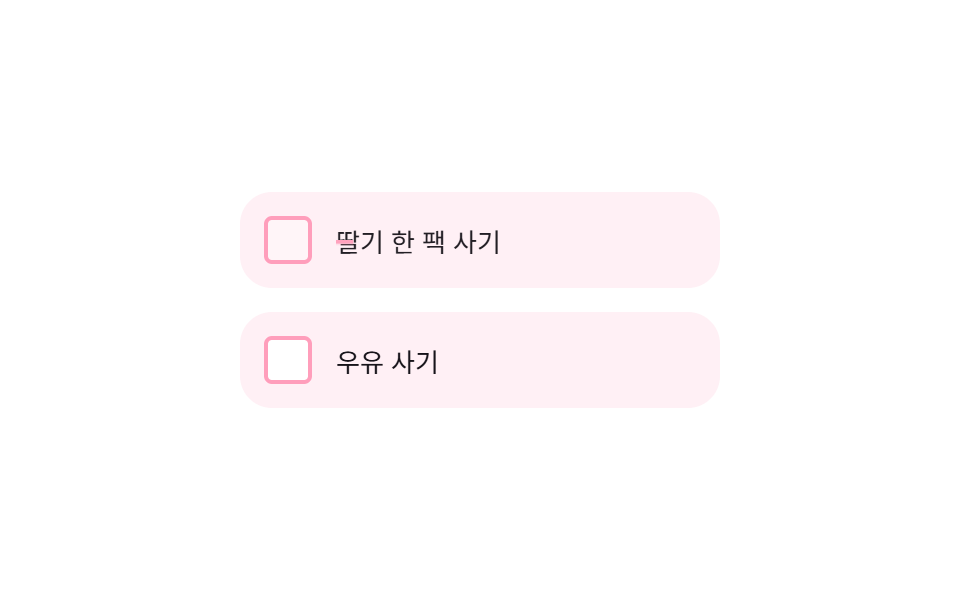
<main class="stage">
  <ul class="ck-list" aria-label="Danh sách mua sắm">
    <li class="ck-item is-demo">
      <button class="ck-item__box" type="button" role="checkbox" aria-checked="false">
        <svg viewBox="0 0 256 256" aria-hidden="true"><g fill="currentColor"><path d="M232 56v144a16 16 0 0 1-16 16H40a16 16 0 0 1-16-16V56a16 16 0 0 1 16-16h176a16 16 0 0 1 16 16" opacity=".2"/><path d="m205.66 85.66l-96 96a8 8 0 0 1-11.32 0l-40-40a8 8 0 0 1 11.32-11.32L104 164.69l90.34-90.35a8 8 0 0 1 11.32 11.32"/></g></svg>
      </button>
      <span class="ck-item__text">Mua một hộp dâu tây</span>
    </li>
    <li class="ck-item">
      <button class="ck-item__box" type="button" role="checkbox" aria-checked="false">
        <svg viewBox="0 0 256 256" aria-hidden="true"><g fill="currentColor"><path d="M232 56v144a16 16 0 0 1-16 16H40a16 16 0 0 1-16-16V56a16 16 0 0 1 16-16h176a16 16 0 0 1 16 16" opacity=".2"/><path d="m205.66 85.66l-96 96a8 8 0 0 1-11.32 0l-40-40a8 8 0 0 1 11.32-11.32L104 164.69l90.34-90.35a8 8 0 0 1 11.32 11.32"/></g></svg>
      </button>
      <span class="ck-item__text">Mua sữa</span>
    </li>
  </ul>
</main>
@use "../../../../site/static/demo-tokens" as *;
$duration: $dur-base; // 체크·취소선 시간
$easing: $ease-pop;
$color: $subject-pink; // 캔디 체크 색
@include stage($stage-paper);
.ck-list {
list-style: none;
margin: 0;
padding: 0;
width: min(240px, 78vw);
display: flex;
flex-direction: column;
gap: $sp-3;
}
.ck-item {
display: flex;
align-items: center;
gap: $sp-3;
padding: $sp-3;
border-radius: $r-card;
background: #fff0f5; // $subject-pink 를 흰 배경에 옅게 섞은 불투명 톤
}
.ck-item__box {
position: relative;
width: 24px;
height: 24px;
flex: 0 0 auto;
border: 2px solid $color;
border-radius: $r-xs;
background: $stage-paper;
cursor: pointer;
display: grid;
place-items: center;
transition: background $duration $easing;
}
.ck-item__box:focus-visible { outline: 2px solid $subject-blue; outline-offset: 2px; }
.ck-item__box svg { width: 14px; height: 14px; color: $stage-paper; transform: scale(.4); opacity: 0; transition: transform $duration $easing, opacity $duration $easing; }
.ck-item.is-checked .ck-item__box { background: $color; }
.ck-item.is-checked .ck-item__box svg { transform: scale(1); opacity: 1; }
.ck-item__text {
position: relative;
font-size: 13px;
color: $stage-ink;
transition: opacity $duration $easing;
}
.ck-item__text::after {
content: "";
position: absolute;
left: 0;
right: 0;
top: 50%;
height: 2px;
background: $color;
transform: scaleX(0);
transform-origin: left; // 규칙8: 취소선 왼쪽 그리기
transition: transform $duration $easing;
}
.ck-item.is-checked .ck-item__text { opacity: .5; }
.ck-item.is-checked .ck-item__text::after { transform: scaleX(1); }
// 데모 강제 루프 — 체크 → 취소선 → 원복 을 keyframes 로
.ck-item.is-demo .ck-item__box { animation: ck-box-loop $dur-loop $easing infinite; }
.ck-item.is-demo .ck-item__box svg { animation: ck-check-loop $dur-loop $easing infinite; }
.ck-item.is-demo .ck-item__text { animation: ck-text-loop $dur-loop $easing infinite; }
.ck-item.is-demo .ck-item__text::after { animation: ck-line-loop $dur-loop $easing infinite; }
@keyframes ck-box-loop {
0%, 10% { background: $stage-paper; }
35%, 80% { background: $color; }
95%, 100% { background: $stage-paper; }
}
@keyframes ck-check-loop {
0%, 10% { transform: scale(.4); opacity: 0; }
40% { transform: scale(1.15); opacity: 1; }
50%, 80% { transform: scale(1); opacity: 1; }
95%, 100% { transform: scale(.4); opacity: 0; }
}
@keyframes ck-text-loop {
0%, 10% { opacity: 1; }
35%, 80% { opacity: .5; }
95%, 100% { opacity: 1; }
}
@keyframes ck-line-loop {
0%, 10% { transform: scaleX(0); }
40%, 80% { transform: scaleX(1); }
95%, 100% { transform: scaleX(0); }
}
@media (prefers-reduced-motion: reduce) {
.ck-item__box, .ck-item__box svg, .ck-item__text, .ck-item__text::after { transition: none; }
}html, body {
margin: 0;
overflow: hidden;
}
.stage {
box-sizing: border-box;
min-height: 100vh;
display: grid;
place-items: center;
margin: 0;
background: #ffffff;
font-family: -apple-system, "Segoe UI", "Noto Sans KR", sans-serif;
padding: clamp(8px, 4vw, 24px);
}
.ck-list {
list-style: none;
margin: 0;
padding: 0;
width: min(240px, 78vw);
display: flex;
flex-direction: column;
gap: 12px;
}
.ck-item {
display: flex;
align-items: center;
gap: 12px;
padding: 12px;
border-radius: 16px;
background: #fff0f5;
}
.ck-item__box {
position: relative;
width: 24px;
height: 24px;
flex: 0 0 auto;
border: 2px solid #ff9ebb;
border-radius: 4px;
background: #ffffff;
cursor: pointer;
display: grid;
place-items: center;
transition: background 300ms cubic-bezier(0.2, 1.4, 0.4, 1);
}
.ck-item__box:focus-visible {
outline: 2px solid #2f6df6;
outline-offset: 2px;
}
.ck-item__box svg {
width: 14px;
height: 14px;
color: #ffffff;
transform: scale(0.4);
opacity: 0;
transition: transform 300ms cubic-bezier(0.2, 1.4, 0.4, 1), opacity 300ms cubic-bezier(0.2, 1.4, 0.4, 1);
}
.ck-item.is-checked .ck-item__box {
background: #ff9ebb;
}
.ck-item.is-checked .ck-item__box svg {
transform: scale(1);
opacity: 1;
}
.ck-item__text {
position: relative;
font-size: 13px;
color: #17141a;
transition: opacity 300ms cubic-bezier(0.2, 1.4, 0.4, 1);
}
.ck-item__text::after {
content: "";
position: absolute;
left: 0;
right: 0;
top: 50%;
height: 2px;
background: #ff9ebb;
transform: scaleX(0);
transform-origin: left;
transition: transform 300ms cubic-bezier(0.2, 1.4, 0.4, 1);
}
.ck-item.is-checked .ck-item__text {
opacity: 0.5;
}
.ck-item.is-checked .ck-item__text::after {
transform: scaleX(1);
}
.ck-item.is-demo .ck-item__box {
animation: ck-box-loop 2s cubic-bezier(0.2, 1.4, 0.4, 1) infinite;
}
.ck-item.is-demo .ck-item__box svg {
animation: ck-check-loop 2s cubic-bezier(0.2, 1.4, 0.4, 1) infinite;
}
.ck-item.is-demo .ck-item__text {
animation: ck-text-loop 2s cubic-bezier(0.2, 1.4, 0.4, 1) infinite;
}
.ck-item.is-demo .ck-item__text::after {
animation: ck-line-loop 2s cubic-bezier(0.2, 1.4, 0.4, 1) infinite;
}
@keyframes ck-box-loop {
0%, 10% {
background: #ffffff;
}
35%, 80% {
background: #ff9ebb;
}
95%, 100% {
background: #ffffff;
}
}
@keyframes ck-check-loop {
0%, 10% {
transform: scale(0.4);
opacity: 0;
}
40% {
transform: scale(1.15);
opacity: 1;
}
50%, 80% {
transform: scale(1);
opacity: 1;
}
95%, 100% {
transform: scale(0.4);
opacity: 0;
}
}
@keyframes ck-text-loop {
0%, 10% {
opacity: 1;
}
35%, 80% {
opacity: 0.5;
}
95%, 100% {
opacity: 1;
}
}
@keyframes ck-line-loop {
0%, 10% {
transform: scaleX(0);
}
40%, 80% {
transform: scaleX(1);
}
95%, 100% {
transform: scaleX(0);
}
}
@media (prefers-reduced-motion: reduce) {
.ck-item__box, .ck-item__box svg, .ck-item__text, .ck-item__text::after {
transition: none;
}
}(function () {
document.querySelectorAll('.ck-item__box').forEach(function (box) {
box.addEventListener('click', function () {
var item = box.closest('.ck-item');
item.classList.remove('is-demo');
var checked = box.getAttribute('aria-checked') === 'true';
box.setAttribute('aria-checked', checked ? 'false' : 'true');
item.classList.toggle('is-checked', !checked);
});
});
})();import { useState, type CSSProperties } from "react";
import styles from "./ChecklistStrikethroughComplete.module.scss";
export type ChecklistStrikethroughCompleteProps = {
items: string[];
/** 체크·취소선 시간 (기본 300ms) */
duration?: number;
easing?: string;
/** 캔디 체크 색 */
color?: string;
};
type Vars = CSSProperties & { "--duration"?: string; "--easing"?: string; "--color"?: string };
/** 체크박스를 누르면 캔디 색으로 차오르고, 글자엔 왼쪽에서 오른쪽으로 취소선이 그어진다 */
export default function ChecklistStrikethroughComplete({
items,
duration = 300,
easing = "cubic-bezier(.2,1.4,.4,1)",
color = "#ff9ebb",
}: ChecklistStrikethroughCompleteProps) {
const [checked, setChecked] = useState<Record<number, boolean>>({});
const vars: Vars = { "--duration": `${duration}ms`, "--easing": easing, "--color": color };
return (
<ul className={styles.list} style={vars} aria-label="장보기 목록">
{items.map((text, i) => {
const done = !!checked[i];
return (
<li key={text} className={`${styles.item} ${done ? styles.checked : ""}`}>
<button
className={styles.box}
type="button"
role="checkbox"
aria-checked={done}
onClick={() => setChecked((c) => ({ ...c, [i]: !c[i] }))}
>
<svg viewBox="0 0 256 256" aria-hidden="true"><g fill="currentColor"><path d="M232 56v144a16 16 0 0 1-16 16H40a16 16 0 0 1-16-16V56a16 16 0 0 1 16-16h176a16 16 0 0 1 16 16" opacity=".2" /><path d="m205.66 85.66l-96 96a8 8 0 0 1-11.32 0l-40-40a8 8 0 0 1 11.32-11.32L104 164.69l90.34-90.35a8 8 0 0 1 11.32 11.32" /></g></svg>
</button>
<span className={styles.text}>{text}</span>
</li>
);
})}
</ul>
);
}09 Checklist gạch ngang khi hoàn thành — Diện tích đo được 0.621% · khung hình chuyển động 13/23Nguyên tác GODRICH · SCSS và React nằm trong tệp zip · 9 mẫu List UI: accordion list css và checklist
Bài viết chứa demo này
 9 mẫu List UI: accordion list css và checklistAccordion list css là kiểu danh sách mà khi bạn bấm vào một dòng, chiều cao của nó tự giãn ra để lộ nội dung chi tiết — Xem tất cả demo trong bài này
Nếu bạn thích hiệu ứng này - demo tương tự
 Giao diện danh sách · bảng01 Vuốt để xóa (reveal)9 mẫu List UI: swipe to delete css và phân trang
 Giao diện nhập liệu01 Tự chuyển sang ô kế tiếpOTP Input UI: 9 tình huống kèm validation
 Giao diện đăng nhập · xác thực01 Thẻ đăng nhập kiểu kính mờ (glassmorphism)9 mẫu form đăng ký & đăng nhập copy-paste được