9 mẫu List UI: accordion list css và checklist
Accordion list css là kiểu danh sách mà khi bạn bấm vào một dòng, chiều cao của nó tự giãn ra để lộ nội dung chi tiết — chín mẫu chạy thật dưới đây sẽ cho bạn
 01 row-expand-inline-detail
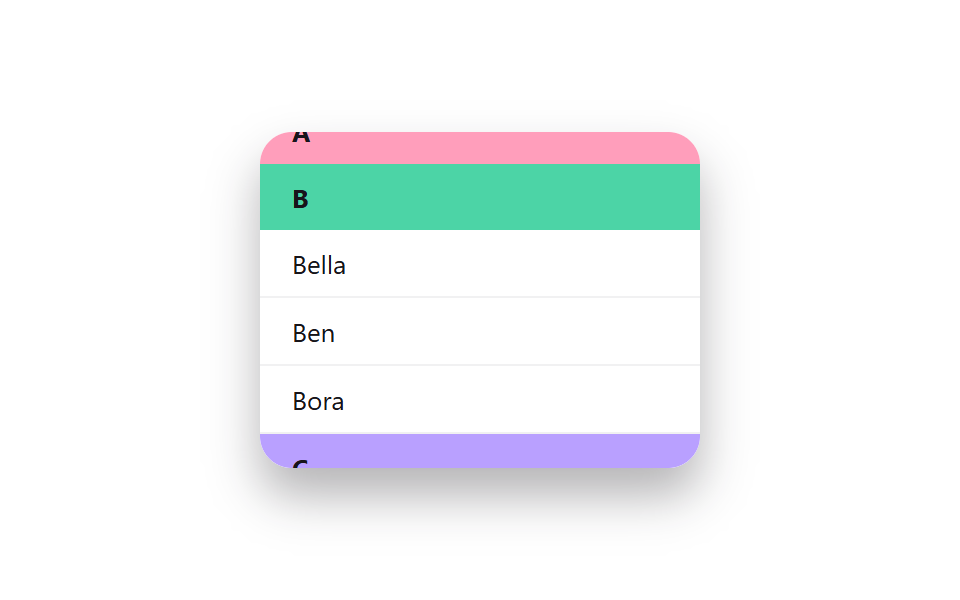 02 grouped-header-sticky-section
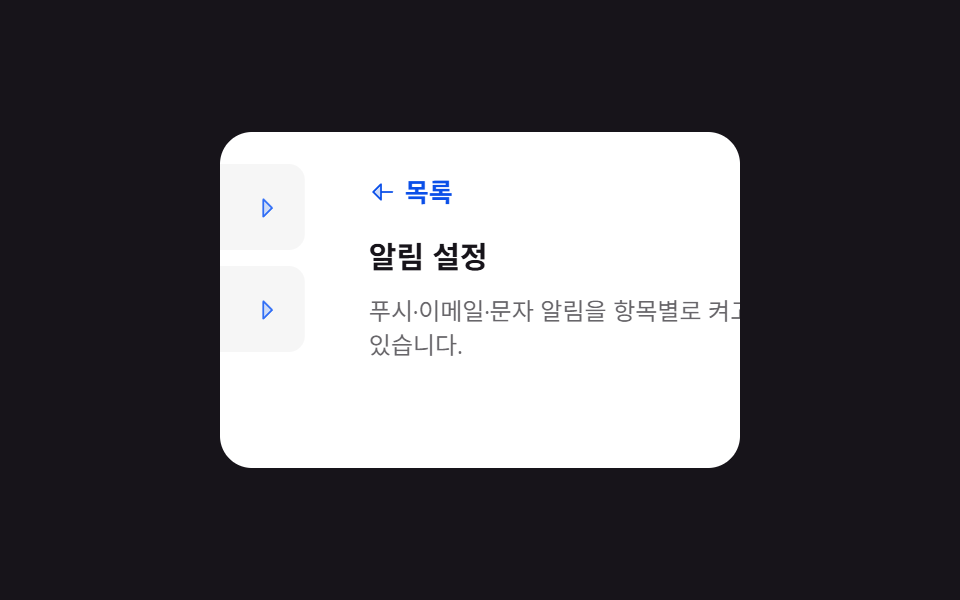 03 list-to-detail-slide-transition
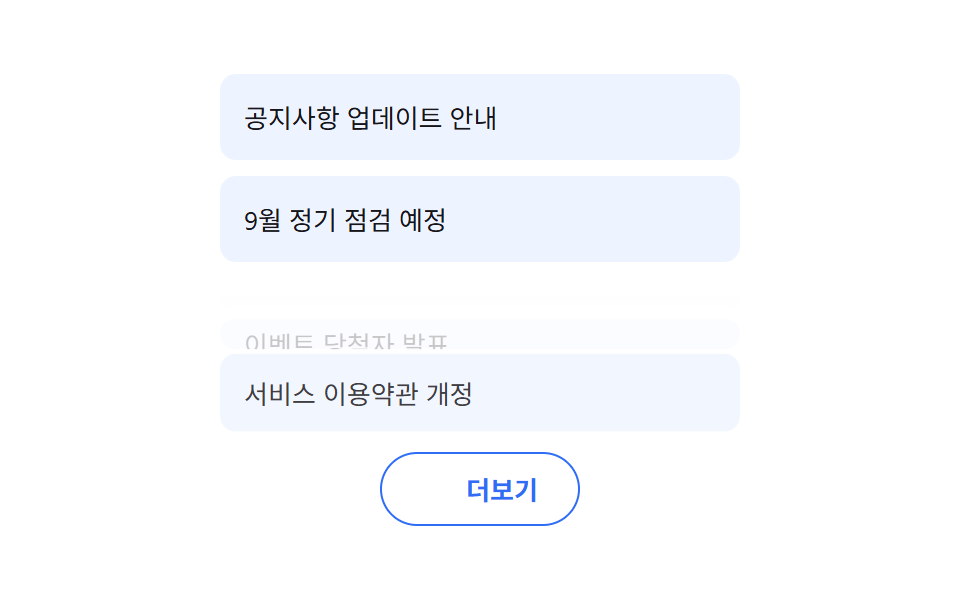 04 load-more-button
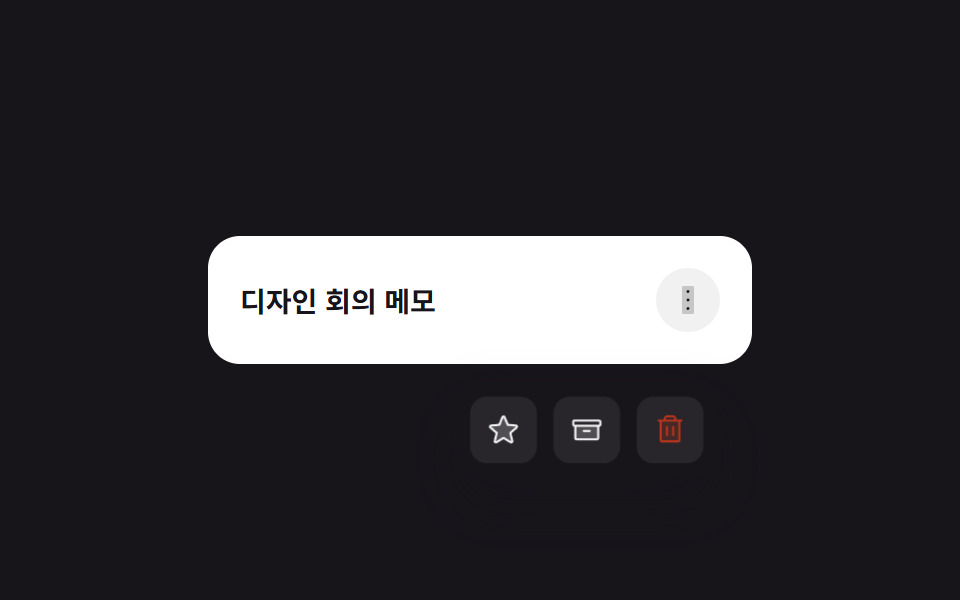 05 long-press-actions-menu
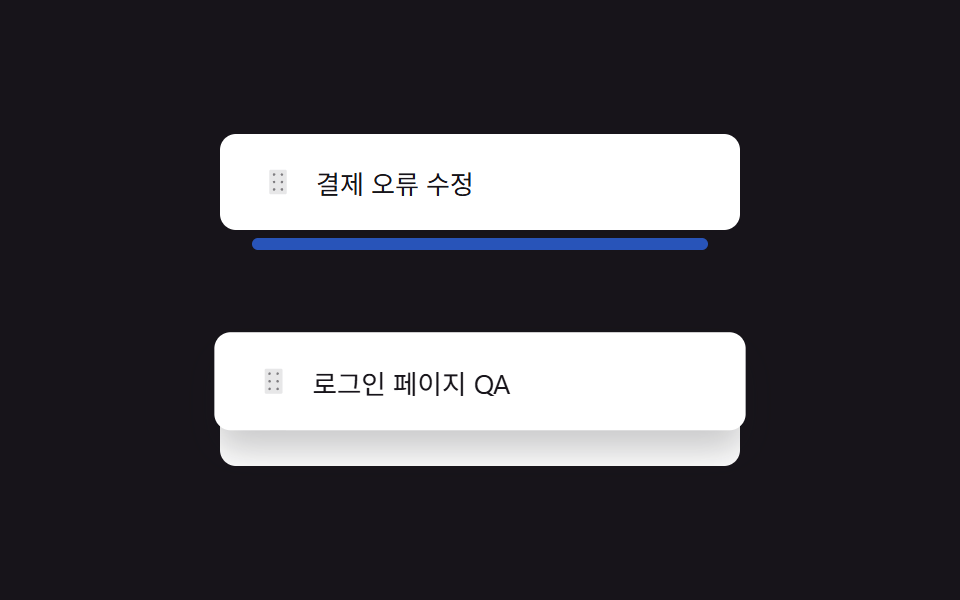 06 reorder-indicator-drop-gap
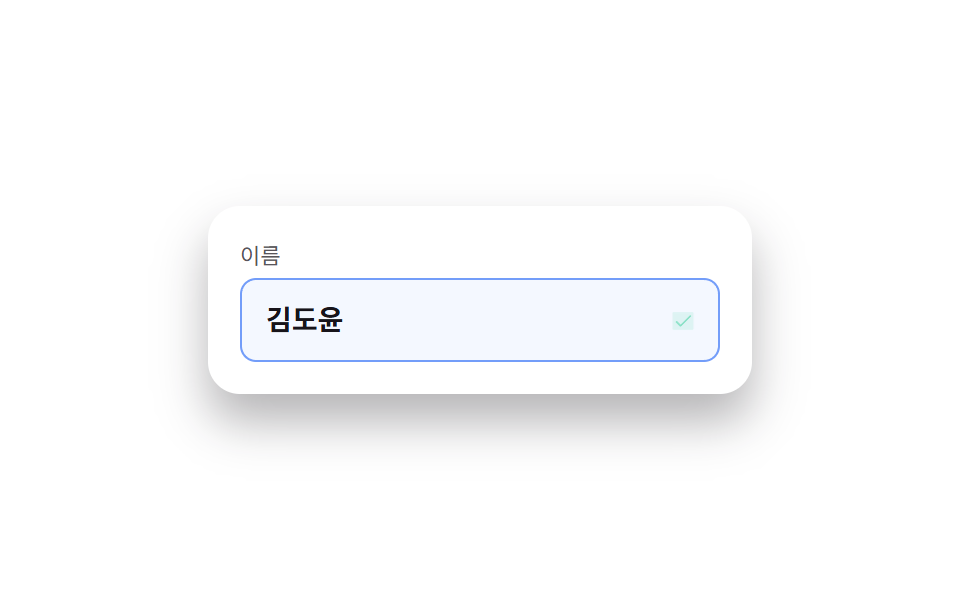 07 inline-edit-field
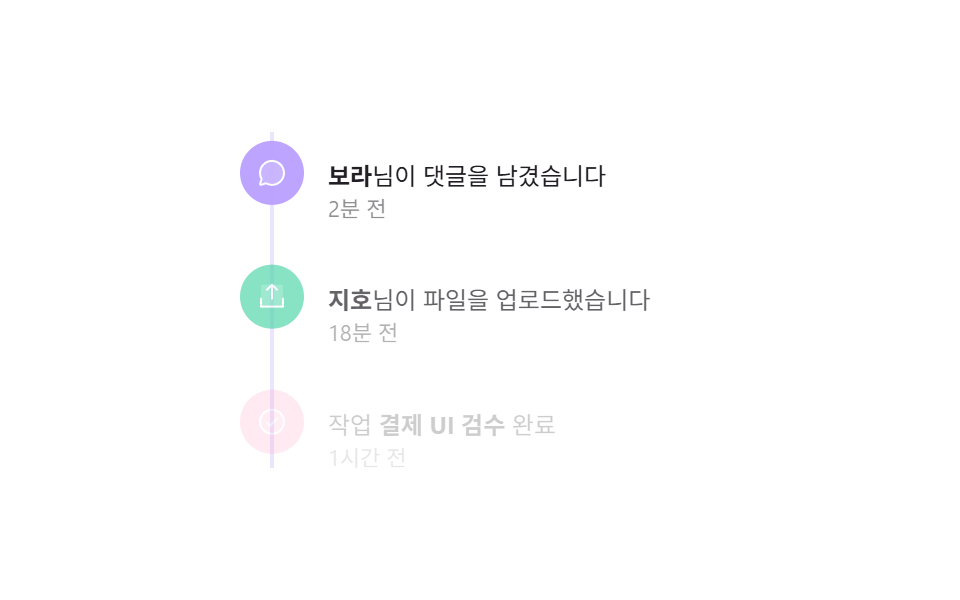 08 activity-timeline-log
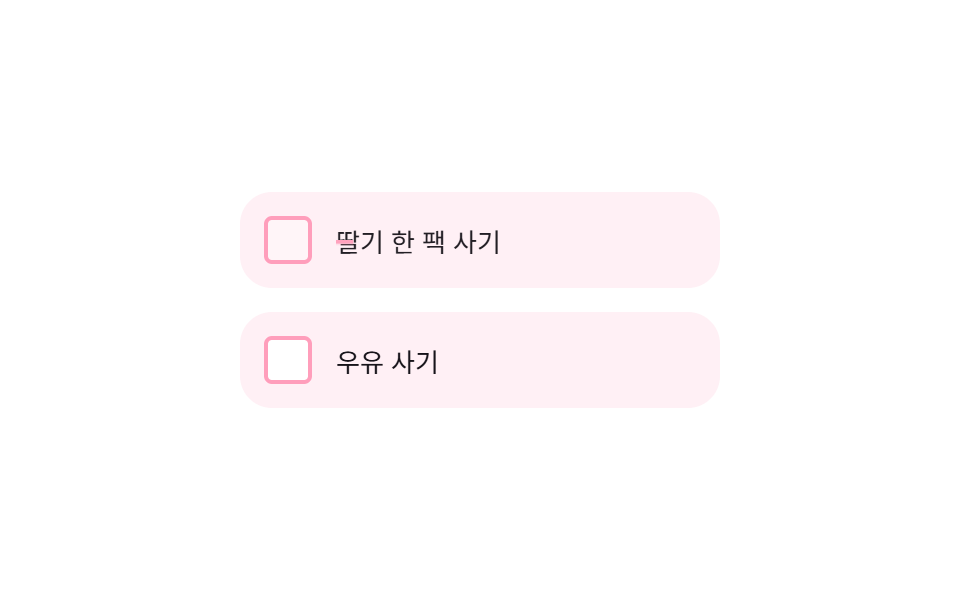 09 checklist-strikethrough-complete
Tự chạy · bấm ô để tới mục đó · cả 9 trong một zip
- 01 Bung chi tiết trong dòng
- 02 Header nhóm cố định
- 03 Chuyển slide từ list sang chi tiết
- 04 Nút tải thêm danh sách
- 05 Menu hành động khi nhấn giữ
- 06 Sắp xếp lại có vạch báo vị trí thả
- 07 Sửa trực tiếp trong danh sách
- 08 Dòng thời gian hoạt động
- 09 Checklist gạch ngang khi hoàn thành
Chín mục dưới đây không xếp theo độ phổ biến mà theo đúng trình tự mà một dòng danh sách thực sự trải qua. Bắt đầu từ thao tác cơ bản nhất — mở một dòng để xem chi tiết (01) — rồi đến nhóm các dòng lại để cuộn dễ hơn (02), chuyển hẳn sang màn hình khác (03). Tiếp theo là khi cần tải thêm dữ liệu (04), giấu bớt thao tác ít dùng (05), đổi thứ tự (06), sửa giá trị ngay tại chỗ (07), ghi lại việc đã xảy ra (08), và cuối cùng là đánh dấu hoàn thành (09).
01Bung chi tiết trong dòng
Bạn thấy gì
Bấm vào một dòng lịch sử đơn hàng sẽ xoay mũi tên 90 độ và mở nội dung chi tiết bên dưới.
<main class="stage">
  <ul class="rowx-list" aria-label="Lịch sử đơn hàng">
    <li class="rowx-item">
      <button class="rowx-item__head is-demo" type="button" aria-expanded="false">
        <svg class="rowx-item__caret" viewBox="0 0 256 256" aria-hidden="true"><g fill="currentColor"><path d="m176 128l-80 80V48Z" opacity=".2"/><path d="m181.66 122.34l-80-80A8 8 0 0 0 88 48v160a8 8 0 0 0 13.66 5.66l80-80a8 8 0 0 0 0-11.32M104 188.69V67.31L164.69 128Z"/></g></svg>
        <span class="rowx-item__title">Đơn hàng #10493</span>
        <span class="rowx-item__meta">32.000₩</span>
      </button>
      <div class="rowx-item__body">
        <div class="rowx-item__body-inner">
          <p>Giao đến Gangnam, Seoul · Thanh toán KakaoPay</p>
          <p>Dự kiến đến 2026-09-08</p>
        </div>
      </div>
    </li>
    <li class="rowx-item">
      <button class="rowx-item__head" type="button" aria-expanded="false">
        <svg class="rowx-item__caret" viewBox="0 0 256 256" aria-hidden="true"><g fill="currentColor"><path d="m176 128l-80 80V48Z" opacity=".2"/><path d="m181.66 122.34l-80-80A8 8 0 0 0 88 48v160a8 8 0 0 0 13.66 5.66l80-80a8 8 0 0 0 0-11.32M104 188.69V67.31L164.69 128Z"/></g></svg>
        <span class="rowx-item__title">Đơn hàng #10488</span>
        <span class="rowx-item__meta">18.500₩</span>
      </button>
      <div class="rowx-item__body">
        <div class="rowx-item__body-inner">
          <p>Giao đến Seongnam, Gyeonggi · Thanh toán thẻ</p>
          <p>Đã giao 2026-09-05</p>
        </div>
      </div>
    </li>
  </ul>
</main>@use "../../../../site/static/demo-tokens" as *;
$duration: $dur-base; // 펼침 시간
$easing: $ease-spring;
$color: $subject-blue; // 캐럿·강조색
@include stage($stage-ink);
.rowx-list {
list-style: none;
margin: 0;
padding: 0;
width: min(300px, 84vw);
display: flex;
flex-direction: column;
gap: $sp-3;
}
.rowx-item {
border-radius: $r-card;
background: $stage-paper;
overflow: hidden;
}
.rowx-item__head {
width: 100%;
display: flex;
align-items: center;
gap: $sp-2;
padding: $sp-4;
border: 0;
background: none;
cursor: pointer;
text-align: left;
font-family: inherit;
}
.rowx-item__head:focus-visible { outline: 2px solid $color; outline-offset: -2px; border-radius: $r-card; }
.rowx-item__caret {
width: 16px;
height: 16px;
flex: 0 0 auto;
color: $color;
transition: transform $duration $easing;
}
.rowx-item.is-open .rowx-item__caret { transform: rotate(90deg); }
.rowx-item__title { flex: 1 1 auto; font-weight: 700; font-size: 14px; color: $stage-ink; }
.rowx-item__meta { font-size: 12px; color: rgba(23, 20, 26, .6); }
.rowx-item__body {
display: grid;
grid-template-rows: 0fr;
transition: grid-template-rows $duration $easing;
}
.rowx-item.is-open .rowx-item__body { grid-template-rows: 1fr; }
.rowx-item__body-inner {
overflow: hidden;
visibility: hidden; // 접힌 상태(0fr) 에서 글자가 겹쳐 보이는 것을 막는다 — 열리면 보임
padding: 0 $sp-4;
display: flex;
flex-direction: column;
gap: $sp-1;
}
.rowx-item.is-open .rowx-item__body-inner { padding: 0 $sp-4 $sp-4; visibility: visible; }
.rowx-item__body-inner p { margin: 0; font-size: 12px; color: rgba(23, 20, 26, .72); }
// 데모 강제 루프 — 첫 항목만 열림/닫힘을 keyframes 로 반복 (document.getAnimations() 가 잡도록 transition 이 아니라 animation)
.rowx-item__head.is-demo { pointer-events: none; }
.rowx-item__head.is-demo .rowx-item__caret { animation: rowx-caret-loop $dur-loop $easing infinite; }
.rowx-item:has(.rowx-item__head.is-demo) .rowx-item__body { animation: rowx-rows-loop $dur-loop $easing infinite; }
@keyframes rowx-caret-loop {
0%, 10% { transform: rotate(0deg); }
40%, 65% { transform: rotate(90deg); }
95%, 100% { transform: rotate(0deg); }
}
@keyframes rowx-rows-loop {
0%, 10% { grid-template-rows: 0fr; }
40%, 65% { grid-template-rows: 1fr; }
95%, 100% { grid-template-rows: 0fr; }
}
@media (prefers-reduced-motion: reduce) {
.rowx-item__caret, .rowx-item__body { transition: none; }
}html, body {
margin: 0;
overflow: hidden;
}
.stage {
box-sizing: border-box;
min-height: 100vh;
display: grid;
place-items: center;
margin: 0;
background: #17141a;
font-family: -apple-system, "Segoe UI", "Noto Sans KR", sans-serif;
padding: clamp(8px, 4vw, 24px);
}
.rowx-list {
list-style: none;
margin: 0;
padding: 0;
width: min(300px, 84vw);
display: flex;
flex-direction: column;
gap: 12px;
}
.rowx-item {
border-radius: 16px;
background: #ffffff;
overflow: hidden;
}
.rowx-item__head {
width: 100%;
display: flex;
align-items: center;
gap: 8px;
padding: 16px;
border: 0;
background: none;
cursor: pointer;
text-align: left;
font-family: inherit;
}
.rowx-item__head:focus-visible {
outline: 2px solid #2f6df6;
outline-offset: -2px;
border-radius: 16px;
}
.rowx-item__caret {
width: 16px;
height: 16px;
flex: 0 0 auto;
color: #2f6df6;
transition: transform 300ms cubic-bezier(0.2, 0.8, 0.2, 1);
}
.rowx-item.is-open .rowx-item__caret {
transform: rotate(90deg);
}
.rowx-item__title {
flex: 1 1 auto;
font-weight: 700;
font-size: 14px;
color: #17141a;
}
.rowx-item__meta {
font-size: 12px;
color: rgba(23, 20, 26, 0.6);
}
.rowx-item__body {
display: grid;
grid-template-rows: 0fr;
transition: grid-template-rows 300ms cubic-bezier(0.2, 0.8, 0.2, 1);
}
.rowx-item.is-open .rowx-item__body {
grid-template-rows: 1fr;
}
.rowx-item__body-inner {
overflow: hidden;
visibility: hidden;
padding: 0 16px;
display: flex;
flex-direction: column;
gap: 4px;
}
.rowx-item.is-open .rowx-item__body-inner {
padding: 0 16px 16px;
visibility: visible;
}
.rowx-item__body-inner p {
margin: 0;
font-size: 12px;
color: rgba(23, 20, 26, 0.72);
}
.rowx-item__head.is-demo {
pointer-events: none;
}
.rowx-item__head.is-demo .rowx-item__caret {
animation: rowx-caret-loop 2s cubic-bezier(0.2, 0.8, 0.2, 1) infinite;
}
.rowx-item:has(.rowx-item__head.is-demo) .rowx-item__body {
animation: rowx-rows-loop 2s cubic-bezier(0.2, 0.8, 0.2, 1) infinite;
}
@keyframes rowx-caret-loop {
0%, 10% {
transform: rotate(0deg);
}
40%, 65% {
transform: rotate(90deg);
}
95%, 100% {
transform: rotate(0deg);
}
}
@keyframes rowx-rows-loop {
0%, 10% {
grid-template-rows: 0fr;
}
40%, 65% {
grid-template-rows: 1fr;
}
95%, 100% {
grid-template-rows: 0fr;
}
}
@media (prefers-reduced-motion: reduce) {
.rowx-item__caret, .rowx-item__body {
transition: none;
}
}(function () {
document.querySelectorAll('.rowx-item__head').forEach(function (btn) {
var item = btn.closest('.rowx-item');
btn.addEventListener('click', function () {
btn.classList.remove('is-demo');
var open = item.classList.toggle('is-open');
btn.setAttribute('aria-expanded', open ? 'true' : 'false');
});
});
})();import { useState, type CSSProperties } from "react";
import styles from "./RowExpandInlineDetail.module.scss";
export type OrderRow = { title: string; meta: string; lines: string[] };
export type RowExpandInlineDetailProps = {
rows: OrderRow[];
/** 펼침 시간 (기본 300ms) */
duration?: number;
easing?: string;
/** 캐럿·강조색 */
color?: string;
};
type Vars = CSSProperties & { "--duration"?: string; "--easing"?: string; "--color"?: string };
/** 클릭한 행의 인덱스를 열림 상태로 토글. grid-template-rows 0fr→1fr 로 높이를 부드럽게 편다 */
export default function RowExpandInlineDetail({
rows,
duration = 300,
easing = "cubic-bezier(.2,.8,.2,1)",
color = "#2f6df6",
}: RowExpandInlineDetailProps) {
const [openIdx, setOpenIdx] = useState<number | null>(null);
const vars: Vars = { "--duration": `${duration}ms`, "--easing": easing, "--color": color };
return (
<ul className={styles.list} style={vars}>
{rows.map((row, i) => {
const open = openIdx === i;
return (
<li key={row.title} className={styles.item}>
<button
className={styles.head}
type="button"
aria-expanded={open}
onClick={() => setOpenIdx(open ? null : i)}
>
<svg className={styles.caret} style={{ transform: open ? "rotate(90deg)" : undefined }} viewBox="0 0 256 256" aria-hidden="true">
<g fill="currentColor"><path d="m176 128l-80 80V48Z" opacity=".2" /><path d="m181.66 122.34l-80-80A8 8 0 0 0 88 48v160a8 8 0 0 0 13.66 5.66l80-80a8 8 0 0 0 0-11.32M104 188.69V67.31L164.69 128Z" /></g>
</svg>
<span className={styles.title}>{row.title}</span>
<span className={styles.meta}>{row.meta}</span>
</button>
<div className={styles.body} style={{ gridTemplateRows: open ? "1fr" : "0fr" }}>
<div className={styles.bodyInner} style={{ visibility: open ? "visible" : "hidden" }}>
{row.lines.map((line) => <p key={line}>{line}</p>)}
</div>
</div>
</li>
);
})}
</ul>
);
}01 · Bung chi tiết trong dòng — Diện tích đo được 19.034% · khung hình chuyển động 14/23Nguyên tác GODRICH · SCSS và React nằm trong tệp zip · Xem mật khẩu
Dùng ở đâu
.rowx-item__body {
  display: grid;
  grid-template-rows: 0fr;
  transition: grid-template-rows .3s cubic-bezier(.2,.8,.2,1);
}
.rowx-item.is-open .rowx-item__body { grid-template-rows: 1fr; }
.rowx-item__body-inner { overflow: hidden; }
height: auto không animate được, nhưng grid-template-rows nội suy mượt từ 0fr sang 1fr, nên dòng vẫn mở êm dù không biết trước chiều cao nội dung.
02Header nhóm cố định
Chuyện gì diễn ra trên màn hình
Trong danh bạ được nhóm theo chữ cái đầu, header của nhóm đang cuộn tới sẽ dính trên cùng cho đến khi nhóm kế tiếp đẩy nó lên.
<main class="stage">
  <div class="grp-wrap is-demo" tabindex="0" aria-label="Danh sách liên hệ. Cuộn bằng phím mũi tên hoặc kéo">
    <ul class="grp-list">
      <li class="grp-group">
        <div class="grp-group__header">A</div>
        <ul class="grp-group__rows">
          <li>Ari</li><li>Aiden</li><li>Ava</li>
        </ul>
      </li>
      <li class="grp-group">
        <div class="grp-group__header">B</div>
        <ul class="grp-group__rows">
          <li>Bella</li><li>Ben</li><li>Bora</li>
        </ul>
      </li>
      <li class="grp-group">
        <div class="grp-group__header">C</div>
        <ul class="grp-group__rows">
          <li>Chloe</li><li>Charlie</li><li>Cyan</li>
        </ul>
      </li>
    </ul>
  </div>
</main>
@use "../../../../site/static/demo-tokens" as *;
$duration: $dur-base; // 스크롤 자동 시연 왕복 시간(스크립트 값과 맞춤)
$easing: $ease-out;
$color: $subject-pink; // 그룹 헤더 배경 (파스텔)
@include stage($stage-paper);
.grp-wrap {
width: 220px;
height: 168px;
overflow: auto;
border-radius: $r-card;
background: $stage-paper;
box-shadow: $shadow-raised;
}
.grp-wrap:focus-visible { outline: 2px solid $subject-blue; outline-offset: 2px; }
.grp-list { list-style: none; margin: 0; padding: 0; }
.grp-group { margin: 0; padding: 0; }
.grp-group__header {
position: sticky;
top: 0;
z-index: 1;
padding: $sp-2 $sp-4;
font-weight: 700;
font-size: 13px;
color: $stage-ink;
background: $color;
}
.grp-group:nth-of-type(2) .grp-group__header { background: $subject-mint; }
.grp-group:nth-of-type(3) .grp-group__header { background: $subject-lilac; }
.grp-group__rows {
list-style: none;
margin: 0;
padding: 0;
}
.grp-group__rows li {
padding: $sp-2 $sp-4;
font-size: 13px;
color: $stage-ink;
border-bottom: 1px solid rgba(23, 20, 26, .06);
}
@media (prefers-reduced-motion: reduce) {
.grp-wrap { scroll-behavior: auto; }
}html, body {
margin: 0;
overflow: hidden;
}
.stage {
box-sizing: border-box;
min-height: 100vh;
display: grid;
place-items: center;
margin: 0;
background: #ffffff;
font-family: -apple-system, "Segoe UI", "Noto Sans KR", sans-serif;
padding: clamp(8px, 4vw, 24px);
}
.grp-wrap {
width: 220px;
height: 168px;
overflow: auto;
border-radius: 16px;
background: #ffffff;
box-shadow: 0 14px 24px rgba(23, 20, 26, 0.32);
}
.grp-wrap:focus-visible {
outline: 2px solid #2f6df6;
outline-offset: 2px;
}
.grp-list {
list-style: none;
margin: 0;
padding: 0;
}
.grp-group {
margin: 0;
padding: 0;
}
.grp-group__header {
position: sticky;
top: 0;
z-index: 1;
padding: 8px 16px;
font-weight: 700;
font-size: 13px;
color: #17141a;
background: #ff9ebb;
}
.grp-group:nth-of-type(2) .grp-group__header {
background: #4cd4a6;
}
.grp-group:nth-of-type(3) .grp-group__header {
background: #b9a0ff;
}
.grp-group__rows {
list-style: none;
margin: 0;
padding: 0;
}
.grp-group__rows li {
padding: 8px 16px;
font-size: 13px;
color: #17141a;
border-bottom: 1px solid rgba(23, 20, 26, 0.06);
}
@media (prefers-reduced-motion: reduce) {
.grp-wrap {
scroll-behavior: auto;
}
}(function () {
var wrap = document.querySelector('.grp-wrap');
var reduce = window.matchMedia('(prefers-reduced-motion: reduce)').matches;
var raf = null, t0 = null;
function maxY() { return wrap.scrollHeight - wrap.clientHeight; }
function loop(ts) {
if (!wrap.classList.contains('is-demo')) return;
if (t0 === null) t0 = ts;
var p = ((ts - t0) / 2000) % 1;
var s = p < .5 ? p * 2 : 2 - p * 2;
wrap.scrollTop = s * maxY();
raf = requestAnimationFrame(loop);
}
function stop() {
wrap.classList.remove('is-demo');
if (raf) cancelAnimationFrame(raf);
}
wrap.addEventListener('pointerdown', stop);
wrap.addEventListener('wheel', stop, { passive: true });
wrap.addEventListener('keydown', function (e) {
var step = 24;
if (e.key === 'ArrowDown') { stop(); wrap.scrollTop += step; }
else if (e.key === 'ArrowUp') { stop(); wrap.scrollTop -= step; }
else return;
e.preventDefault();
});
if (!reduce) requestAnimationFrame(loop);
})();import type { CSSProperties } from "react";
import styles from "./GroupedHeaderStickySection.module.scss";
export type Group = { letter: string; names: string[] };
export type GroupedHeaderStickySectionProps = {
groups: Group[];
/** 스크롤 이징 (기본 300ms) */
duration?: number;
easing?: string;
/** 첫 그룹 헤더 배경(파스텔) */
color?: string;
};
type Vars = CSSProperties & { "--duration"?: string; "--easing"?: string; "--color"?: string };
/** 그룹 헤더가 position:sticky 로 스크롤 중 위에 붙어 있다가 다음 그룹이 밀어 올린다 */
export default function GroupedHeaderStickySection({
groups,
duration = 300,
easing = "ease-out",
color = "#ff9ebb",
}: GroupedHeaderStickySectionProps) {
const vars: Vars = { "--duration": `${duration}ms`, "--easing": easing, "--color": color };
return (
<div className={styles.wrap} style={vars} tabIndex={0} aria-label="연락처 목록">
<ul className={styles.list}>
{groups.map((g, i) => (
<li key={g.letter} className={styles.group}>
<div className={styles.header} data-i={i % 3}>{g.letter}</div>
<ul className={styles.rows}>
{g.names.map((n) => <li key={n}>{n}</li>)}
</ul>
</li>
))}
</ul>
</div>
);
}02 · Header nhóm cố định — Diện tích đo được 25.533% · khung hình chuyển động 23/23Nguyên tác GODRICH · SCSS và React nằm trong tệp zip · Xem mật khẩu
Chỗ dùng
.grp-group__header {
  position: sticky;
  top: 0;
  z-index: 1;
  background: #ff9ebb;
}
position: sticky chỉ dính trong phạm vi chiều cao của phần tử cha, nên mỗi nhóm cần một khung bọc riêng để nhóm sau đẩy được header của nhóm trước lên.
03Chuyển slide từ list sang chi tiết
Chuyển động thế nào
Bấm vào một mục sẽ trượt panel danh sách sang trái trong khi panel chi tiết trượt vào từ phải — kiểu chuyển màn hay gặp trong cài đặt.
<main class="stage">
  <div class="ltd-viewport is-demo">
    <div class="ltd-track">
      <ul class="ltd-list" aria-label="Cài đặt">
        <li>
          <button class="ltd-list__row" type="button">
            <span>Cài đặt thông báo</span>
            <svg viewBox="0 0 256 256" aria-hidden="true"><g fill="currentColor"><path d="m176 128l-80 80V48Z" opacity=".2"/><path d="m181.66 122.34l-80-80A8 8 0 0 0 88 48v160a8 8 0 0 0 13.66 5.66l80-80a8 8 0 0 0 0-11.32M104 188.69V67.31L164.69 128Z"/></g></svg>
          </button>
        </li>
        <li>
          <button class="ltd-list__row" type="button">
            <span>Quyền riêng tư</span>
            <svg viewBox="0 0 256 256" aria-hidden="true"><g fill="currentColor"><path d="m176 128l-80 80V48Z" opacity=".2"/><path d="m181.66 122.34l-80-80A8 8 0 0 0 88 48v160a8 8 0 0 0 13.66 5.66l80-80a8 8 0 0 0 0-11.32M104 188.69V67.31L164.69 128Z"/></g></svg>
          </button>
        </li>
      </ul>
      <div class="ltd-detail">
        <button class="ltd-detail__back" type="button">
          <svg viewBox="0 0 256 256" aria-hidden="true"><g fill="currentColor"><path d="M112 56v144l-72-72Z" opacity=".2"/><path d="M216 120h-96V56a8 8 0 0 0-13.66-5.66l-72 72a8 8 0 0 0 0 11.32l72 72A8 8 0 0 0 120 200v-64h96a8 8 0 0 0 0-16m-112 60.69L51.31 128L104 75.31Z"/></g></svg>
          Danh sách
        </button>
        <h2>Cài đặt thông báo</h2>
        <p>Bật/tắt thông báo push, email, tin nhắn theo từng mục.</p>
      </div>
    </div>
  </div>
</main>@use "../../../../site/static/demo-tokens" as *;
$duration: $dur-base; // 패널 슬라이드 시간
$easing: $ease-spring;
$color: $subject-blue;
@include stage($stage-ink);
.ltd-viewport {
width: min(260px, 80vw);
height: 168px;
overflow: hidden;
border-radius: $r-card;
background: $stage-paper;
position: relative;
}
.ltd-track {
display: flex;
width: 200%;
height: 100%;
transition: transform $duration $easing;
}
.ltd-viewport.is-open .ltd-track { transform: translateX(-50%); }
.ltd-list, .ltd-detail {
width: 50%;
flex: 0 0 auto;
box-sizing: border-box;
padding: $sp-4;
}
.ltd-list { list-style: none; margin: 0; display: flex; flex-direction: column; gap: $sp-2; }
.ltd-list__row {
width: 100%;
display: flex;
align-items: center;
justify-content: space-between;
border: 0;
background: rgba(23, 20, 26, .04);
border-radius: $r-sm;
padding: $sp-3;
font-size: 13px;
color: $stage-ink;
cursor: pointer;
font-family: inherit;
}
.ltd-list__row:focus-visible { outline: 2px solid $color; outline-offset: 2px; }
.ltd-list__row svg { width: 14px; height: 14px; color: $color; }
.ltd-detail { display: flex; flex-direction: column; gap: $sp-2; }
.ltd-detail h2 { margin: 0; font-size: 15px; color: $stage-ink; }
.ltd-detail p { margin: 0; font-size: 12px; color: rgba(23, 20, 26, .65); }
.ltd-detail__back {
display: inline-flex;
align-items: center;
gap: $sp-1;
align-self: flex-start;
border: 0;
background: none;
color: $subject-blue-deep; // 페이퍼 패널 위 파란 글자 — $subject-blue 는 4.25:1
font-weight: 700;
font-size: 13px;
cursor: pointer;
padding: $sp-1 0;
font-family: inherit;
}
.ltd-detail__back:focus-visible { outline: 2px solid $subject-blue-deep; outline-offset: 2px; }
.ltd-detail__back svg { width: 14px; height: 14px; }
// 데모 강제 루프 — track 을 keyframes 로 자동 왕복
.ltd-viewport.is-demo .ltd-track { animation: ltd-loop $dur-loop $easing infinite; }
@keyframes ltd-loop {
0%, 10% { transform: translateX(0); }
45%, 65% { transform: translateX(-50%); }
95%, 100% { transform: translateX(0); }
}
@media (prefers-reduced-motion: reduce) {
.ltd-track { transition: none; }
}html, body {
margin: 0;
overflow: hidden;
}
.stage {
box-sizing: border-box;
min-height: 100vh;
display: grid;
place-items: center;
margin: 0;
background: #17141a;
font-family: -apple-system, "Segoe UI", "Noto Sans KR", sans-serif;
padding: clamp(8px, 4vw, 24px);
}
.ltd-viewport {
width: min(260px, 80vw);
height: 168px;
overflow: hidden;
border-radius: 16px;
background: #ffffff;
position: relative;
}
.ltd-track {
display: flex;
width: 200%;
height: 100%;
transition: transform 300ms cubic-bezier(0.2, 0.8, 0.2, 1);
}
.ltd-viewport.is-open .ltd-track {
transform: translateX(-50%);
}
.ltd-list, .ltd-detail {
width: 50%;
flex: 0 0 auto;
box-sizing: border-box;
padding: 16px;
}
.ltd-list {
list-style: none;
margin: 0;
display: flex;
flex-direction: column;
gap: 8px;
}
.ltd-list__row {
width: 100%;
display: flex;
align-items: center;
justify-content: space-between;
border: 0;
background: rgba(23, 20, 26, 0.04);
border-radius: 8px;
padding: 12px;
font-size: 13px;
color: #17141a;
cursor: pointer;
font-family: inherit;
}
.ltd-list__row:focus-visible {
outline: 2px solid #2f6df6;
outline-offset: 2px;
}
.ltd-list__row svg {
width: 14px;
height: 14px;
color: #2f6df6;
}
.ltd-detail {
display: flex;
flex-direction: column;
gap: 8px;
}
.ltd-detail h2 {
margin: 0;
font-size: 15px;
color: #17141a;
}
.ltd-detail p {
margin: 0;
font-size: 12px;
color: rgba(23, 20, 26, 0.65);
}
.ltd-detail__back {
display: inline-flex;
align-items: center;
gap: 4px;
align-self: flex-start;
border: 0;
background: none;
color: #0a4fe8;
font-weight: 700;
font-size: 13px;
cursor: pointer;
padding: 4px 0;
font-family: inherit;
}
.ltd-detail__back:focus-visible {
outline: 2px solid #0a4fe8;
outline-offset: 2px;
}
.ltd-detail__back svg {
width: 14px;
height: 14px;
}
.ltd-viewport.is-demo .ltd-track {
animation: ltd-loop 2s cubic-bezier(0.2, 0.8, 0.2, 1) infinite;
}
@keyframes ltd-loop {
0%, 10% {
transform: translateX(0);
}
45%, 65% {
transform: translateX(-50%);
}
95%, 100% {
transform: translateX(0);
}
}
@media (prefers-reduced-motion: reduce) {
.ltd-track {
transition: none;
}
}(function () {
var view = document.querySelector('.ltd-viewport');
function open() { view.classList.remove('is-demo'); view.classList.add('is-open'); view.querySelector('.ltd-detail__back').focus({ preventScroll: true }); }
function close() { view.classList.remove('is-demo'); view.classList.remove('is-open'); view.querySelector('.ltd-list__row').focus({ preventScroll: true }); }
view.querySelectorAll('.ltd-list__row').forEach(function (row) {
row.addEventListener('click', open);
});
view.querySelector('.ltd-detail__back').addEventListener('click', close);
view.addEventListener('keydown', function (e) {
if (e.key === 'Escape' && view.classList.contains('is-open')) close();
});
})();import { useRef, useState, type CSSProperties } from "react";
import styles from "./ListToDetailSlideTransition.module.scss";
export type ListRow = { title: string; heading: string; body: string };
export type ListToDetailSlideTransitionProps = {
rows: ListRow[];
/** 패널 슬라이드 시간 (기본 300ms) */
duration?: number;
easing?: string;
color?: string;
};
type Vars = CSSProperties & { "--duration"?: string; "--easing"?: string; "--color"?: string };
/** 목록 패널과 상세 패널을 나란히 두고 track 전체를 translateX 로 밀어 전환한다 */
export default function ListToDetailSlideTransition({
rows,
duration = 300,
easing = "cubic-bezier(.2,.8,.2,1)",
color = "#2f6df6",
}: ListToDetailSlideTransitionProps) {
const [open, setOpen] = useState<ListRow | null>(null);
const backRef = useRef<HTMLButtonElement>(null);
const vars: Vars = { "--duration": `${duration}ms`, "--easing": easing, "--color": color };
return (
<div
className={styles.viewport}
style={vars}
onKeyDown={(e: any) => { if (e.key === "Escape" && open) setOpen(null); }}
>
<div className={styles.track} style={{ transform: open ? "translateX(-50%)" : undefined }}>
<ul className={styles.list}>
{rows.map((row) => (
<li key={row.title}>
<button className={styles.row} type="button" onClick={() => setOpen(row)}>
<span>{row.title}</span>
<svg viewBox="0 0 256 256" aria-hidden="true"><g fill="currentColor"><path d="m176 128l-80 80V48Z" opacity=".2" /><path d="m181.66 122.34l-80-80A8 8 0 0 0 88 48v160a8 8 0 0 0 13.66 5.66l80-80a8 8 0 0 0 0-11.32M104 188.69V67.31L164.69 128Z" /></g></svg>
</button>
</li>
))}
</ul>
<div className={styles.detail}>
<button ref={backRef} className={styles.back} type="button" onClick={() => setOpen(null)}>
<svg viewBox="0 0 256 256" aria-hidden="true"><g fill="currentColor"><path d="M112 56v144l-72-72Z" opacity=".2" /><path d="M216 120h-96V56a8 8 0 0 0-13.66-5.66l-72 72a8 8 0 0 0 0 11.32l72 72A8 8 0 0 0 120 200v-64h96a8 8 0 0 0 0-16m-112 60.69L51.31 128L104 75.31Z" /></g></svg>
목록
</button>
{open && <><h2>{open.heading}</h2><p>{open.body}</p></>}
</div>
</div>
</div>
);
}03 · Chuyển slide từ list sang chi tiết — Diện tích đo được 6.846% · khung hình chuyển động 17/23Nguyên tác GODRICH · SCSS và React nằm trong tệp zip · Xem mật khẩu
Dùng khi nào
.ltd-track {
  display: flex;
  width: 200%;
  transition: transform .3s cubic-bezier(.2,.8,.2,1);
}
.ltd-viewport.is-open .ltd-track { transform: translateX(-50%); }
Danh sách và chi tiết nằm cạnh nhau trong một track duy nhất, nên chỉ cần một transform để đẩy cả hai thay vì animate riêng từng panel.
04Nút tải thêm danh sách
Bạn thấy gì
Bấm tải thêm sẽ quay spinner một chút, rồi ba dòng mới lần lượt trượt lên chứ không hiện ra cùng lúc.
<main class="stage">
  <div class="lm-list is-demo">
    <ul class="lm-rows">
      <li class="lm-row">Thông báo cập nhật bảng tin</li>
      <li class="lm-row">Bảo trì định kỳ tháng 9</li>
      <li class="lm-row lm-row--pending" data-n="1">Ghi chú phát hành tính năng mới</li>
      <li class="lm-row lm-row--pending" data-n="2">Công bố người trúng sự kiện</li>
      <li class="lm-row lm-row--pending" data-n="3">Cập nhật điều khoản dịch vụ</li>
    </ul>
    <button class="lm-btn" type="button">
      <svg class="lm-btn__icon" viewBox="0 0 256 256" aria-hidden="true"><g fill="currentColor"><path d="M216 128a88 88 0 1 1-88-88a88 88 0 0 1 88 88" opacity=".2"/><path d="M240 56v48a8 8 0 0 1-8 8h-48a8 8 0 0 1 0-16h27.4l-26.59-24.36l-.25-.24a80 80 0 1 0-1.67 114.78a8 8 0 0 1 11 11.63A95.44 95.44 0 0 1 128 224h-1.32a96 96 0 1 1 69.07-164L224 85.8V56a8 8 0 1 1 16 0"/></g></svg>
      <span class="lm-btn__label">Tải thêm</span>
    </button>
  </div>
</main>
@use "../../../../site/static/demo-tokens" as *;
$duration: $dur-enter; // 새 행이 밀려 올라오는 시간
$easing: $ease-spring;
$color: $subject-blue; // 신뢰감 있는 브랜드 컬러(밝은 SaaS 톤)
@include stage($stage-paper);
.lm-list {
width: min(260px, 82vw);
display: flex;
flex-direction: column;
gap: $sp-3;
}
.lm-rows { list-style: none; margin: 0; padding: 0; display: flex; flex-direction: column; gap: $sp-2; }
.lm-row {
padding: $sp-3;
border-radius: $r-sm;
background: #eef4ff; // $subject-blue 를 흰 배경에 6% 섞은 불투명 톤
font-size: 13px;
color: $stage-ink;
}
.lm-row--pending {
max-height: 0;
opacity: 0;
transform: translateY(10px);
overflow: hidden;
padding-top: 0;
padding-bottom: 0;
margin: 0;
transition: max-height $duration $easing, opacity $duration $easing, transform $duration $easing, padding $duration $easing;
}
.lm-list.has-loaded .lm-row--pending { max-height: 40px; opacity: 1; transform: translateY(0); padding-top: $sp-3; padding-bottom: $sp-3; }
.lm-list.has-loaded .lm-row--pending[data-n="2"] { transition-delay: 90ms; }
.lm-list.has-loaded .lm-row--pending[data-n="3"] { transition-delay: 180ms; }
.lm-btn {
align-self: center;
display: inline-flex;
align-items: center;
gap: $sp-2;
border: 1px solid $color;
background: $stage-paper;
color: $color;
font-weight: 700;
font-size: 13px;
border-radius: $r-pill;
padding: $sp-2 $sp-5;
cursor: pointer;
font-family: inherit;
}
.lm-btn:focus-visible { outline: 2px solid $color; outline-offset: 2px; }
.lm-btn:disabled { opacity: .5; cursor: default; }
.lm-btn__icon { width: 14px; height: 14px; opacity: 0; width: 0; transition: opacity $dur-quick, width $dur-quick; }
.lm-list.is-loading .lm-btn__icon { opacity: 1; width: 14px; animation: lm-spin .6s linear infinite; }
@keyframes lm-spin { to { transform: rotate(360deg); } }
// 데모 강제 루프 — 스피너 회전 → 대기 행 순차 등장 → 리셋 을 한 keyframes 로
.lm-list.is-demo .lm-btn__icon {
opacity: 1; width: 14px;
animation: lm-loop-spin $dur-loop linear infinite;
}
.lm-list.is-demo .lm-row--pending {
animation: lm-loop-row $dur-loop $easing infinite;
}
.lm-list.is-demo .lm-row--pending[data-n="2"] { animation-delay: 60ms; }
.lm-list.is-demo .lm-row--pending[data-n="3"] { animation-delay: 120ms; }
@keyframes lm-loop-spin {
0%, 15% { transform: rotate(0deg); opacity: 1; }
30% { transform: rotate(360deg); opacity: 1; }
35%, 100% { opacity: 0; }
}
@keyframes lm-loop-row {
0%, 30% { max-height: 0; opacity: 0; transform: translateY(10px); padding-top: 0; padding-bottom: 0; }
55%, 85% { max-height: 40px; opacity: 1; transform: translateY(0); padding-top: $sp-3; padding-bottom: $sp-3; }
100% { max-height: 0; opacity: 0; transform: translateY(10px); padding-top: 0; padding-bottom: 0; }
}
@media (prefers-reduced-motion: reduce) {
.lm-row--pending, .lm-btn__icon { transition: none; animation: none; }
.lm-list.has-loaded .lm-row--pending { opacity: 1; transform: none; }
}html, body {
margin: 0;
overflow: hidden;
}
.stage {
box-sizing: border-box;
min-height: 100vh;
display: grid;
place-items: center;
margin: 0;
background: #ffffff;
font-family: -apple-system, "Segoe UI", "Noto Sans KR", sans-serif;
padding: clamp(8px, 4vw, 24px);
}
.lm-list {
width: min(260px, 82vw);
display: flex;
flex-direction: column;
gap: 12px;
}
.lm-rows {
list-style: none;
margin: 0;
padding: 0;
display: flex;
flex-direction: column;
gap: 8px;
}
.lm-row {
padding: 12px;
border-radius: 8px;
background: #eef4ff;
font-size: 13px;
color: #17141a;
}
.lm-row--pending {
max-height: 0;
opacity: 0;
transform: translateY(10px);
overflow: hidden;
padding-top: 0;
padding-bottom: 0;
margin: 0;
transition: max-height 600ms cubic-bezier(0.2, 0.8, 0.2, 1), opacity 600ms cubic-bezier(0.2, 0.8, 0.2, 1), transform 600ms cubic-bezier(0.2, 0.8, 0.2, 1), padding 600ms cubic-bezier(0.2, 0.8, 0.2, 1);
}
.lm-list.has-loaded .lm-row--pending {
max-height: 40px;
opacity: 1;
transform: translateY(0);
padding-top: 12px;
padding-bottom: 12px;
}
.lm-list.has-loaded .lm-row--pending[data-n="2"] {
transition-delay: 90ms;
}
.lm-list.has-loaded .lm-row--pending[data-n="3"] {
transition-delay: 180ms;
}
.lm-btn {
align-self: center;
display: inline-flex;
align-items: center;
gap: 8px;
border: 1px solid #2f6df6;
background: #ffffff;
color: #2f6df6;
font-weight: 700;
font-size: 13px;
border-radius: 999px;
padding: 8px 20px;
cursor: pointer;
font-family: inherit;
}
.lm-btn:focus-visible {
outline: 2px solid #2f6df6;
outline-offset: 2px;
}
.lm-btn:disabled {
opacity: 0.5;
cursor: default;
}
.lm-btn__icon {
width: 14px;
height: 14px;
opacity: 0;
width: 0;
transition: opacity 220ms, width 220ms;
}
.lm-list.is-loading .lm-btn__icon {
opacity: 1;
width: 14px;
animation: lm-spin 0.6s linear infinite;
}
@keyframes lm-spin {
to {
transform: rotate(360deg);
}
}
.lm-list.is-demo .lm-btn__icon {
opacity: 1;
width: 14px;
animation: lm-loop-spin 2s linear infinite;
}
.lm-list.is-demo .lm-row--pending {
animation: lm-loop-row 2s cubic-bezier(0.2, 0.8, 0.2, 1) infinite;
}
.lm-list.is-demo .lm-row--pending[data-n="2"] {
animation-delay: 60ms;
}
.lm-list.is-demo .lm-row--pending[data-n="3"] {
animation-delay: 120ms;
}
@keyframes lm-loop-spin {
0%, 15% {
transform: rotate(0deg);
opacity: 1;
}
30% {
transform: rotate(360deg);
opacity: 1;
}
35%, 100% {
opacity: 0;
}
}
@keyframes lm-loop-row {
0%, 30% {
max-height: 0;
opacity: 0;
transform: translateY(10px);
padding-top: 0;
padding-bottom: 0;
}
55%, 85% {
max-height: 40px;
opacity: 1;
transform: translateY(0);
padding-top: 12px;
padding-bottom: 12px;
}
100% {
max-height: 0;
opacity: 0;
transform: translateY(10px);
padding-top: 0;
padding-bottom: 0;
}
}
@media (prefers-reduced-motion: reduce) {
.lm-row--pending, .lm-btn__icon {
transition: none;
animation: none;
}
.lm-list.has-loaded .lm-row--pending {
opacity: 1;
transform: none;
}
}(function () {
var list = document.querySelector('.lm-list');
var btn = list.querySelector('.lm-btn');
btn.addEventListener('click', function () {
if (list.classList.contains('has-loaded')) return;
list.classList.remove('is-demo');
list.classList.add('is-loading');
setTimeout(function () {
list.classList.remove('is-loading');
list.classList.add('has-loaded');
btn.querySelector('.lm-btn__label').textContent = 'Không còn mục nào';
btn.disabled = true;
}, 500);
});
})();import { useState, type CSSProperties } from "react";
import styles from "./LoadMoreButton.module.scss";
export type LoadMoreButtonProps = {
initial: string[];
more: string[];
/** 새 행이 밀려 올라오는 시간 (기본 600ms) */
duration?: number;
easing?: string;
/** 브랜드 컬러 */
color?: string;
};
type Vars = CSSProperties & { "--duration"?: string; "--easing"?: string; "--color"?: string };
/** 더보기 클릭 → 로딩 스피너 → 대기 행이 stagger 로 펼쳐진다 */
export default function LoadMoreButton({
initial,
more,
duration = 600,
easing = "cubic-bezier(.2,.8,.2,1)",
color = "#2f6df6",
}: LoadMoreButtonProps) {
const [loading, setLoading] = useState(false);
const [loaded, setLoaded] = useState(false);
const vars: Vars = { "--duration": `${duration}ms`, "--easing": easing, "--color": color };
const click = () => {
if (loaded) return;
setLoading(true);
setTimeout(() => { setLoading(false); setLoaded(true); }, 500);
};
return (
<div className={styles.list} style={vars}>
<ul className={styles.rows}>
{initial.map((t) => <li key={t} className={styles.row}>{t}</li>)}
{more.map((t, i) => (
<li key={t} className={`${styles.row} ${styles.pending} ${loaded ? styles.shown : ""}`} style={{ transitionDelay: `${i * 90}ms` }}>{t}</li>
))}
</ul>
<button className={styles.btn} type="button" onClick={click} disabled={loaded}>
<svg className={`${styles.icon} ${loading ? styles.spin : ""}`} viewBox="0 0 256 256" aria-hidden="true">
<g fill="currentColor"><path d="M216 128a88 88 0 1 1-88-88a88 88 0 0 1 88 88" opacity=".2" /><path d="M240 56v48a8 8 0 0 1-8 8h-48a8 8 0 0 1 0-16h27.4l-26.59-24.36l-.25-.24a80 80 0 1 0-1.67 114.78a8 8 0 0 1 11 11.63A95.44 95.44 0 0 1 128 224h-1.32a96 96 0 1 1 69.07-164L224 85.8V56a8 8 0 1 1 16 0" /></g>
</svg>
<span>{loaded ? "더 이상 없음" : "더보기"}</span>
</button>
</div>
);
}04 · Nút tải thêm danh sách — Diện tích đo được 43.192% · khung hình chuyển động 13/23Nguyên tác GODRICH · SCSS và React nằm trong tệp zip · Xem mật khẩu
Dùng ở đâu
btn.addEventListener('click', () => {
  list.classList.add('is-loading');
  setTimeout(() => {
    list.classList.remove('is-loading');
    list.classList.add('has-loaded');
  }, 500);
});
Ba dòng mới bắt đầu ở trạng thái max-height: 0, mỗi dòng có transition-delay khác nhau một chút để chúng hiện lần lượt thay vì cùng lúc.
05Menu hành động khi nhấn giữ
Chuyện gì diễn ra trên màn hình
Nhấn giữ một dòng nửa giây sẽ bật lên menu biểu tượng yêu thích/lưu trữ/xóa với hiệu ứng nảy.
<main class="stage">
  <div class="lp-row is-demo">
    <span class="lp-row__title">Ghi chú họp thiết kế</span>
    <button class="lp-row__more" type="button" aria-haspopup="true" aria-expanded="false" aria-label="Mở menu thao tác">
      <svg viewBox="0 0 256 256" aria-hidden="true"><g fill="currentColor"><path d="M176 32v192a16 16 0 0 1-16 16H96a16 16 0 0 1-16-16V32a16 16 0 0 1 16-16h64a16 16 0 0 1 16 16" opacity=".2"/><path d="M140 128a12 12 0 1 1-12-12a12 12 0 0 1 12 12m-12-56a12 12 0 1 0-12-12a12 12 0 0 0 12 12m0 112a12 12 0 1 0 12 12a12 12 0 0 0-12-12"/></g></svg>
    </button>
    <div class="lp-menu" role="menu">
      <button class="lp-menu__item" type="button" role="menuitem" aria-label="Yêu thích">
        <svg viewBox="0 0 256 256" aria-hidden="true"><g fill="currentColor"><path d="m229.06 108.79l-48.7 42l14.88 62.79a8.4 8.4 0 0 1-12.52 9.17L128 189.09l-54.72 33.65a8.4 8.4 0 0 1-12.52-9.17l14.88-62.79l-48.7-42A8.46 8.46 0 0 1 31.73 94l63.91-5.2l24.62-59.6a8.36 8.36 0 0 1 15.48 0l24.62 59.6l63.91 5.2a8.46 8.46 0 0 1 4.79 14.79" opacity=".2"/><path d="M239.18 97.26A16.38 16.38 0 0 0 224.92 86l-59-4.76l-22.78-55.09a16.36 16.36 0 0 0-30.27 0L90.11 81.23L31.08 86a16.46 16.46 0 0 0-9.37 28.86l45 38.83L53 211.75a16.38 16.38 0 0 0 24.5 17.82l50.5-31.08l50.53 31.08A16.4 16.4 0 0 0 203 211.75l-13.76-58.07l45-38.83a16.43 16.43 0 0 0 4.94-17.59m-15.34 5.47l-48.7 42a8 8 0 0 0-2.56 7.91l14.88 62.8a.37.37 0 0 1-.17.48c-.18.14-.23.11-.38 0l-54.72-33.65a8 8 0 0 0-8.38 0l-54.72 33.67c-.15.09-.19.12-.38 0a.37.37 0 0 1-.17-.48l14.88-62.8a8 8 0 0 0-2.56-7.91l-48.7-42c-.12-.1-.23-.19-.13-.5s.18-.27.33-.29l63.92-5.16a8 8 0 0 0 6.72-4.94l24.62-59.61c.08-.17.11-.25.35-.25s.27.08.35.25L153 91.86a8 8 0 0 0 6.75 4.92l63.92 5.16c.15 0 .24 0 .33.29s0 .4-.16.5"/></g></svg>
      </button>
      <button class="lp-menu__item" type="button" role="menuitem" aria-label="Lưu trữ">
        <svg viewBox="0 0 256 256" aria-hidden="true"><g fill="currentColor"><path d="M216 96v96a8 8 0 0 1-8 8H48a8 8 0 0 1-8-8V96Z" opacity=".2"/><path d="M224 48H32a16 16 0 0 0-16 16v24a16 16 0 0 0 16 16v88a16 16 0 0 0 16 16h160a16 16 0 0 0 16-16v-88a16 16 0 0 0 16-16V64a16 16 0 0 0-16-16m-16 144H48v-88h160Zm16-104H32V64h192zM96 136a8 8 0 0 1 8-8h48a8 8 0 0 1 0 16h-48a8 8 0 0 1-8-8"/></g></svg>
      </button>
      <button class="lp-menu__item lp-menu__item--danger" type="button" role="menuitem" aria-label="Xóa">
        <svg viewBox="0 0 256 256" aria-hidden="true"><g fill="currentColor"><path d="M200 56v152a8 8 0 0 1-8 8H64a8 8 0 0 1-8-8V56Z" opacity=".2"/><path d="M216 48h-40v-8a24 24 0 0 0-24-24h-48a24 24 0 0 0-24 24v8H40a8 8 0 0 0 0 16h8v144a16 16 0 0 0 16 16h128a16 16 0 0 0 16-16V64h8a8 8 0 0 0 0-16M96 40a8 8 0 0 1 8-8h48a8 8 0 0 1 8 8v8H96Zm96 168H64V64h128Zm-80-104v64a8 8 0 0 1-16 0v-64a8 8 0 0 1 16 0m48 0v64a8 8 0 0 1-16 0v-64a8 8 0 0 1 16 0"/></g></svg>
      </button>
    </div>
  </div>
</main>
@use "../../../../site/static/demo-tokens" as *;
$duration: $dur-quick; // 메뉴 확대 시간
$easing: $ease-pop;
$color: $stage-ink;
@include stage($stage-ink);
.lp-row {
position: relative;
width: min(240px, 78vw);
display: flex;
align-items: center;
justify-content: space-between;
padding: $sp-4;
border-radius: $r-card;
background: $stage-paper;
touch-action: manipulation;
}
.lp-row__title { font-size: 14px; font-weight: 700; color: $color; }
.lp-row__more {
width: 32px;
height: 32px;
display: grid;
place-items: center;
border: 0;
border-radius: $r-pill;
background: rgba(23, 20, 26, .06);
color: $color;
cursor: pointer;
}
.lp-row__more svg { width: 16px; height: 16px; }
.lp-row__more:focus-visible { outline: 2px solid $subject-blue; outline-offset: 2px; }
.lp-menu {
position: absolute;
top: 100%;
right: $sp-4;
margin-top: $sp-2;
display: flex;
gap: $sp-2;
padding: $sp-2;
border-radius: $r-control;
background: $color;
box-shadow: $shadow-raised;
transform: scale(.6);
opacity: 0;
transform-origin: top right; // 규칙8: 우상단 참조 변에서 펼침
transition: transform $duration $easing, opacity $duration $easing;
pointer-events: none;
}
.lp-row.is-open .lp-menu { transform: scale(1); opacity: 1; pointer-events: auto; }
.lp-menu__item {
width: 32px;
height: 32px;
display: grid;
place-items: center;
border: 0;
border-radius: $r-sm;
background: rgba(255, 255, 255, .08);
color: $stage-paper;
cursor: pointer;
}
.lp-menu__item svg { width: 16px; height: 16px; }
.lp-menu__item--danger { color: $error; }
.lp-menu__item:focus-visible { outline: 2px solid $subject-blue; outline-offset: 2px; }
// 데모 강제 루프 — 메뉴가 튀어 오르듯 나타났다 사라짐을 keyframes 로
.lp-row.is-demo .lp-menu { animation: lp-loop $dur-loop $easing infinite; }
@keyframes lp-loop {
0%, 10% { transform: scale(.6); opacity: 0; }
35% { transform: scale(1.06); opacity: 1; }
45%, 70% { transform: scale(1); opacity: 1; }
90%, 100% { transform: scale(.6); opacity: 0; }
}
@media (prefers-reduced-motion: reduce) {
.lp-menu { transition: none; }
}html, body {
margin: 0;
overflow: hidden;
}
.stage {
box-sizing: border-box;
min-height: 100vh;
display: grid;
place-items: center;
margin: 0;
background: #17141a;
font-family: -apple-system, "Segoe UI", "Noto Sans KR", sans-serif;
padding: clamp(8px, 4vw, 24px);
}
.lp-row {
position: relative;
width: min(240px, 78vw);
display: flex;
align-items: center;
justify-content: space-between;
padding: 16px;
border-radius: 16px;
background: #ffffff;
touch-action: manipulation;
}
.lp-row__title {
font-size: 14px;
font-weight: 700;
color: #17141a;
}
.lp-row__more {
width: 32px;
height: 32px;
display: grid;
place-items: center;
border: 0;
border-radius: 999px;
background: rgba(23, 20, 26, 0.06);
color: #17141a;
cursor: pointer;
}
.lp-row__more svg {
width: 16px;
height: 16px;
}
.lp-row__more:focus-visible {
outline: 2px solid #2f6df6;
outline-offset: 2px;
}
.lp-menu {
position: absolute;
top: 100%;
right: 16px;
margin-top: 8px;
display: flex;
gap: 8px;
padding: 8px;
border-radius: 12px;
background: #17141a;
box-shadow: 0 14px 24px rgba(23, 20, 26, 0.32);
transform: scale(0.6);
opacity: 0;
transform-origin: top right;
transition: transform 220ms cubic-bezier(0.2, 1.4, 0.4, 1), opacity 220ms cubic-bezier(0.2, 1.4, 0.4, 1);
pointer-events: none;
}
.lp-row.is-open .lp-menu {
transform: scale(1);
opacity: 1;
pointer-events: auto;
}
.lp-menu__item {
width: 32px;
height: 32px;
display: grid;
place-items: center;
border: 0;
border-radius: 8px;
background: rgba(255, 255, 255, 0.08);
color: #ffffff;
cursor: pointer;
}
.lp-menu__item svg {
width: 16px;
height: 16px;
}
.lp-menu__item--danger {
color: #c2361a;
}
.lp-menu__item:focus-visible {
outline: 2px solid #2f6df6;
outline-offset: 2px;
}
.lp-row.is-demo .lp-menu {
animation: lp-loop 2s cubic-bezier(0.2, 1.4, 0.4, 1) infinite;
}
@keyframes lp-loop {
0%, 10% {
transform: scale(0.6);
opacity: 0;
}
35% {
transform: scale(1.06);
opacity: 1;
}
45%, 70% {
transform: scale(1);
opacity: 1;
}
90%, 100% {
transform: scale(0.6);
opacity: 0;
}
}
@media (prefers-reduced-motion: reduce) {
.lp-menu {
transition: none;
}
}(function () {
var row = document.querySelector('.lp-row');
var more = row.querySelector('.lp-row__more');
var timer = null;
function openMenu() {
row.classList.remove('is-demo');
row.classList.add('is-open');
more.setAttribute('aria-expanded', 'true');
}
function closeMenu() {
row.classList.remove('is-open');
more.setAttribute('aria-expanded', 'false');
}
row.addEventListener('pointerdown', function (e) {
if (e.target.closest('button')) return;
timer = setTimeout(openMenu, 500);
});
['pointerup', 'pointerleave', 'pointercancel'].forEach(function (ev) {
row.addEventListener(ev, function () { clearTimeout(timer); });
});
more.addEventListener('click', function () {
row.classList.contains('is-open') ? closeMenu() : openMenu();
});
document.addEventListener('keydown', function (e) {
if (e.key === 'Escape' && row.classList.contains('is-open')) { closeMenu(); more.focus({ preventScroll: true }); }
});
})();import { useRef, useState, type CSSProperties, type PointerEvent } from "react";
import styles from "./LongPressActionsMenu.module.scss";
export type LongPressActionsMenuProps = {
title: string;
/** 메뉴 확대 시간 (기본 220ms) */
duration?: number;
easing?: string;
color?: string;
};
type Vars = CSSProperties & { "--duration"?: string; "--easing"?: string; "--color"?: string };
const HOLD_MS = 500;
/** pointerdown 후 500ms 유지하면 메뉴가 열린다. "..." 버튼은 길게 누르기 없이도 같은 메뉴를 여는 키보드 대체 수단 */
export default function LongPressActionsMenu({
title,
duration = 220,
easing = "cubic-bezier(.2,1.4,.4,1)",
color = "#17141a",
}: LongPressActionsMenuProps) {
const [open, setOpen] = useState(false);
const timer = useRef<ReturnType<typeof setTimeout> | null>(null);
const moreRef = useRef<HTMLButtonElement>(null);
const vars: Vars = { "--duration": `${duration}ms`, "--easing": easing, "--color": color };
const down = (e: PointerEvent<HTMLDivElement>) => {
if ((e.target as HTMLElement).closest("button")) return;
timer.current = setTimeout(() => setOpen(true), HOLD_MS);
};
const cancel = () => { if (timer.current) clearTimeout(timer.current); };
return (
<div
className={styles.row}
style={vars}
onPointerDown={down}
onPointerUp={cancel}
onPointerLeave={cancel}
onPointerCancel={cancel}
onKeyDown={(e: any) => { if (e.key === "Escape" && open) { setOpen(false); moreRef.current?.focus(); } }}
>
<span className={styles.title}>{title}</span>
<button ref={moreRef} className={styles.more} type="button" aria-haspopup="true" aria-expanded={open} aria-label="작업 메뉴 열기" onClick={() => setOpen((v) => !v)}>
<svg viewBox="0 0 256 256" aria-hidden="true"><g fill="currentColor"><path d="M176 32v192a16 16 0 0 1-16 16H96a16 16 0 0 1-16-16V32a16 16 0 0 1 16-16h64a16 16 0 0 1 16 16" opacity=".2" /><path d="M140 128a12 12 0 1 1-12-12a12 12 0 0 1 12 12m-12-56a12 12 0 1 0-12-12a12 12 0 0 0 12 12m0 112a12 12 0 1 0 12 12a12 12 0 0 0-12-12" /></g></svg>
</button>
<div className={`${styles.menu} ${open ? styles.open : ""}`} role="menu">
<button className={styles.item} type="button" role="menuitem" aria-label="즐겨찾기">
<svg viewBox="0 0 256 256" aria-hidden="true"><g fill="currentColor"><path d="m229.06 108.79l-48.7 42l14.88 62.79a8.4 8.4 0 0 1-12.52 9.17L128 189.09l-54.72 33.65a8.4 8.4 0 0 1-12.52-9.17l14.88-62.79l-48.7-42A8.46 8.46 0 0 1 31.73 94l63.91-5.2l24.62-59.6a8.36 8.36 0 0 1 15.48 0l24.62 59.6l63.91 5.2a8.46 8.46 0 0 1 4.79 14.79" opacity=".2" /><path d="M239.18 97.26A16.38 16.38 0 0 0 224.92 86l-59-4.76l-22.78-55.09a16.36 16.36 0 0 0-30.27 0L90.11 81.23L31.08 86a16.46 16.46 0 0 0-9.37 28.86l45 38.83L53 211.75a16.38 16.38 0 0 0 24.5 17.82l50.5-31.08l50.53 31.08A16.4 16.4 0 0 0 203 211.75l-13.76-58.07l45-38.83a16.43 16.43 0 0 0 4.94-17.59m-15.34 5.47l-48.7 42a8 8 0 0 0-2.56 7.91l14.88 62.8a.37.37 0 0 1-.17.48c-.18.14-.23.11-.38 0l-54.72-33.65a8 8 0 0 0-8.38 0l-54.72 33.67c-.15.09-.19.12-.38 0a.37.37 0 0 1-.17-.48l14.88-62.8a8 8 0 0 0-2.56-7.91l-48.7-42c-.12-.1-.23-.19-.13-.5s.18-.27.33-.29l63.92-5.16a8 8 0 0 0 6.72-4.94l24.62-59.61c.08-.17.11-.25.35-.25s.27.08.35.25L153 91.86a8 8 0 0 0 6.75 4.92l63.92 5.16c.15 0 .24 0 .33.29s0 .4-.16.5" /></g></svg>
</button>
<button className={styles.item} type="button" role="menuitem" aria-label="보관">
<svg viewBox="0 0 256 256" aria-hidden="true"><g fill="currentColor"><path d="M216 96v96a8 8 0 0 1-8 8H48a8 8 0 0 1-8-8V96Z" opacity=".2" /><path d="M224 48H32a16 16 0 0 0-16 16v24a16 16 0 0 0 16 16v88a16 16 0 0 0 16 16h160a16 16 0 0 0 16-16v-88a16 16 0 0 0 16-16V64a16 16 0 0 0-16-16m-16 144H48v-88h160Zm16-104H32V64h192zM96 136a8 8 0 0 1 8-8h48a8 8 0 0 1 0 16h-48a8 8 0 0 1-8-8" /></g></svg>
</button>
<button className={`${styles.item} ${styles.danger}`} type="button" role="menuitem" aria-label="삭제">
<svg viewBox="0 0 256 256" aria-hidden="true"><g fill="currentColor"><path d="M200 56v152a8 8 0 0 1-8 8H64a8 8 0 0 1-8-8V56Z" opacity=".2" /><path d="M216 48h-40v-8a24 24 0 0 0-24-24h-48a24 24 0 0 0-24 24v8H40a8 8 0 0 0 0 16h8v144a16 16 0 0 0 16 16h128a16 16 0 0 0 16-16V64h8a8 8 0 0 0 0-16M96 40a8 8 0 0 1 8-8h48a8 8 0 0 1 8 8v8H96Zm96 168H64V64h128Zm-80-104v64a8 8 0 0 1-16 0v-64a8 8 0 0 1 16 0m48 0v64a8 8 0 0 1-16 0v-64a8 8 0 0 1 16 0" /></g></svg>
</button>
</div>
</div>
);
}05 · Menu hành động khi nhấn giữ — Diện tích đo được 2.742% · khung hình chuyển động 11/23Nguyên tác GODRICH · SCSS và React nằm trong tệp zip · Xem mật khẩu
Chỗ dùng
row.addEventListener('pointerdown', (e) => {
  if (e.target.closest('button')) return;
  timer = setTimeout(openMenu, 500);
});
['pointerup', 'pointerleave'].forEach((ev) =>
  row.addEventListener(ev, () => clearTimeout(timer))
);
Thả tay sớm sẽ hủy bộ đếm giờ ngay, nên chạm nhẹ để cuộn không vô tình mở menu. Nút "···" luôn hiển thị cũng mở cùng menu đó, dành cho những ai không nhấn giữ được.
06Sắp xếp lại có vạch báo vị trí thả
Chuyển động thế nào
Kéo tay cầm sáu chấm sẽ hiện một vạch trống màu xanh báo trước vị trí sẽ thả, thay vì chỉ đẩy các dòng khác sang một bên.
<main class="stage">
  <ul class="rd-list is-demo" aria-label="Danh sách ưu tiên. Trên tay cầm, dùng Alt+Lên/Xuống để sắp xếp">
    <li class="rd-item" data-i="0">
      <button class="rd-item__handle" type="button" aria-label="Sắp xếp lại, mũi tên lên/xuống">
        <svg viewBox="0 0 256 256" aria-hidden="true"><g fill="currentColor"><path d="M208 32v192a16 16 0 0 1-16 16H64a16 16 0 0 1-16-16V32a16 16 0 0 1 16-16h128a16 16 0 0 1 16 16" opacity=".2"/><path d="M104 60a12 12 0 1 1-12-12a12 12 0 0 1 12 12m60 12a12 12 0 1 0-12-12a12 12 0 0 0 12 12m-72 44a12 12 0 1 0 12 12a12 12 0 0 0-12-12m72 0a12 12 0 1 0 12 12a12 12 0 0 0-12-12m-72 68a12 12 0 1 0 12 12a12 12 0 0 0-12-12m72 0a12 12 0 1 0 12 12a12 12 0 0 0-12-12"/></g></svg>
      </button>
      <span>Sửa lỗi thanh toán</span>
    </li>
    <li class="rd-drop-indicator" aria-hidden="true"></li>
    <li class="rd-item rd-item--lifted" data-i="1">
      <button class="rd-item__handle" type="button" aria-label="Sắp xếp lại, mũi tên lên/xuống">
        <svg viewBox="0 0 256 256" aria-hidden="true"><g fill="currentColor"><path d="M208 32v192a16 16 0 0 1-16 16H64a16 16 0 0 1-16-16V32a16 16 0 0 1 16-16h128a16 16 0 0 1 16 16" opacity=".2"/><path d="M104 60a12 12 0 1 1-12-12a12 12 0 0 1 12 12m60 12a12 12 0 1 0-12-12a12 12 0 0 0 12 12m-72 44a12 12 0 1 0 12 12a12 12 0 0 0-12-12m72 0a12 12 0 1 0 12 12a12 12 0 0 0-12-12m-72 68a12 12 0 1 0 12 12a12 12 0 0 0-12-12m72 0a12 12 0 1 0 12 12a12 12 0 0 0-12-12"/></g></svg>
      </button>
      <span>QA trang đăng nhập</span>
    </li>
    <li class="rd-item" data-i="2">
      <button class="rd-item__handle" type="button" aria-label="Sắp xếp lại, mũi tên lên/xuống">
        <svg viewBox="0 0 256 256" aria-hidden="true"><g fill="currentColor"><path d="M208 32v192a16 16 0 0 1-16 16H64a16 16 0 0 1-16-16V32a16 16 0 0 1 16-16h128a16 16 0 0 1 16 16" opacity=".2"/><path d="M104 60a12 12 0 1 1-12-12a12 12 0 0 1 12 12m60 12a12 12 0 1 0-12-12a12 12 0 0 0 12 12m-72 44a12 12 0 1 0 12 12a12 12 0 0 0-12-12m72 0a12 12 0 1 0 12 12a12 12 0 0 0-12-12m-72 68a12 12 0 1 0 12 12a12 12 0 0 0-12-12m72 0a12 12 0 1 0 12 12a12 12 0 0 0-12-12"/></g></svg>
      </button>
      <span>Sắp xếp tài liệu triển khai</span>
    </li>
  </ul>
</main>
@use "../../../../site/static/demo-tokens" as *;
$duration: $dur-base; // 들어올림·이동 시간
$easing: $ease-spring;
$color: $subject-blue; // 드롭 인디케이터 색
@include stage($stage-ink);
.rd-list {
list-style: none;
margin: 0;
padding: 0;
width: min(260px, 82vw);
display: flex;
flex-direction: column;
}
.rd-item {
display: flex;
align-items: center;
gap: $sp-2;
padding: $sp-3 $sp-4;
margin: $sp-1 0;
border-radius: $r-sm;
background: $stage-paper;
transition: transform $duration $easing, box-shadow $duration $easing;
}
.rd-item span { font-size: 13px; color: $stage-ink; }
.rd-item.is-dragging {
position: relative;
z-index: 2;
box-shadow: $shadow-raised;
transition: none;
cursor: grabbing;
}
.rd-item__handle {
width: 24px;
height: 24px;
display: grid;
place-items: center;
border: 0;
background: none;
color: rgba(23, 20, 26, .5);
cursor: grab;
flex: 0 0 auto;
touch-action: none;
}
.rd-item__handle svg { width: 14px; height: 14px; }
.rd-item__handle:focus-visible { outline: 2px solid $color; outline-offset: 2px; border-radius: $r-xs; }
.rd-drop-indicator {
height: 0;
margin: 0 $sp-4;
border-radius: $r-xs;
background: $color;
opacity: 0;
transition: height $duration $easing, opacity $duration $easing;
}
.rd-list.is-dragging .rd-drop-indicator { height: 8px; opacity: 1; }
// 데모 강제 루프 — 가운데 항목이 들리고, 그 아래 자리에 드롭 인디케이터가 나타났다 정리되는 흐름
.rd-list.is-demo .rd-item--lifted {
animation: rd-lift-loop $dur-loop $easing infinite;
}
.rd-list.is-demo .rd-drop-indicator {
animation: rd-gap-loop $dur-loop $easing infinite;
}
@keyframes rd-lift-loop {
0%, 10% { transform: translateY(0) scale(1); box-shadow: none; }
40%, 65% { transform: translateY(52px) scale(1.03); box-shadow: $shadow-raised; }
95%, 100% { transform: translateY(0) scale(1); box-shadow: none; }
}
@keyframes rd-gap-loop {
0%, 10% { height: 0; opacity: 0; }
40%, 65% { height: 8px; opacity: 1; }
95%, 100% { height: 0; opacity: 0; }
}
@media (prefers-reduced-motion: reduce) {
.rd-item, .rd-drop-indicator { transition: none; }
}html, body {
margin: 0;
overflow: hidden;
}
.stage {
box-sizing: border-box;
min-height: 100vh;
display: grid;
place-items: center;
margin: 0;
background: #17141a;
font-family: -apple-system, "Segoe UI", "Noto Sans KR", sans-serif;
padding: clamp(8px, 4vw, 24px);
}
.rd-list {
list-style: none;
margin: 0;
padding: 0;
width: min(260px, 82vw);
display: flex;
flex-direction: column;
}
.rd-item {
display: flex;
align-items: center;
gap: 8px;
padding: 12px 16px;
margin: 4px 0;
border-radius: 8px;
background: #ffffff;
transition: transform 300ms cubic-bezier(0.2, 0.8, 0.2, 1), box-shadow 300ms cubic-bezier(0.2, 0.8, 0.2, 1);
}
.rd-item span {
font-size: 13px;
color: #17141a;
}
.rd-item.is-dragging {
position: relative;
z-index: 2;
box-shadow: 0 14px 24px rgba(23, 20, 26, 0.32);
transition: none;
cursor: grabbing;
}
.rd-item__handle {
width: 24px;
height: 24px;
display: grid;
place-items: center;
border: 0;
background: none;
color: rgba(23, 20, 26, 0.5);
cursor: grab;
flex: 0 0 auto;
touch-action: none;
}
.rd-item__handle svg {
width: 14px;
height: 14px;
}
.rd-item__handle:focus-visible {
outline: 2px solid #2f6df6;
outline-offset: 2px;
border-radius: 4px;
}
.rd-drop-indicator {
height: 0;
margin: 0 16px;
border-radius: 4px;
background: #2f6df6;
opacity: 0;
transition: height 300ms cubic-bezier(0.2, 0.8, 0.2, 1), opacity 300ms cubic-bezier(0.2, 0.8, 0.2, 1);
}
.rd-list.is-dragging .rd-drop-indicator {
height: 8px;
opacity: 1;
}
.rd-list.is-demo .rd-item--lifted {
animation: rd-lift-loop 2s cubic-bezier(0.2, 0.8, 0.2, 1) infinite;
}
.rd-list.is-demo .rd-drop-indicator {
animation: rd-gap-loop 2s cubic-bezier(0.2, 0.8, 0.2, 1) infinite;
}
@keyframes rd-lift-loop {
0%, 10% {
transform: translateY(0) scale(1);
box-shadow: none;
}
40%, 65% {
transform: translateY(52px) scale(1.03);
box-shadow: 0 14px 24px rgba(23, 20, 26, 0.32);
}
95%, 100% {
transform: translateY(0) scale(1);
box-shadow: none;
}
}
@keyframes rd-gap-loop {
0%, 10% {
height: 0;
opacity: 0;
}
40%, 65% {
height: 8px;
opacity: 1;
}
95%, 100% {
height: 0;
opacity: 0;
}
}
@media (prefers-reduced-motion: reduce) {
.rd-item, .rd-drop-indicator {
transition: none;
}
}(function () {
var list = document.querySelector('.rd-list');
var indicator = list.querySelector('.rd-drop-indicator');
function order() { return Array.prototype.slice.call(list.querySelectorAll('.rd-item')); }
order().forEach(function (item) {
var handle = item.querySelector('.rd-item__handle');
var dragging = false, startY = 0;
handle.addEventListener('pointerdown', function (e) {
list.classList.remove('is-demo');
dragging = true;
startY = e.clientY;
item.classList.add('is-dragging');
list.classList.add('is-dragging');
handle.setPointerCapture(e.pointerId);
});
handle.addEventListener('pointermove', function (e) {
if (!dragging) return;
item.style.transform = 'translateY(' + (e.clientY - startY) + 'px)';
var rest = order().filter(function (r) { return r !== item; });
var target = rest.filter(function (r) {
var rect = r.getBoundingClientRect();
return e.clientY < rect.top + rect.height / 2;
})[0];
if (target) list.insertBefore(indicator, target);
else list.insertBefore(indicator, null);
});
function drop() {
if (!dragging) return;
dragging = false;
item.style.transform = '';
item.classList.remove('is-dragging');
list.classList.remove('is-dragging');
list.insertBefore(item, indicator);
}
handle.addEventListener('pointerup', drop);
handle.addEventListener('pointercancel', drop);
handle.addEventListener('keydown', function (e) {
if ((e.key !== 'ArrowUp' && e.key !== 'ArrowDown') || !e.altKey) return;
e.preventDefault();
list.classList.remove('is-demo');
var o = order();
var idx = o.indexOf(item);
var targetIdx = e.key === 'ArrowUp' ? idx - 1 : idx + 1;
if (targetIdx < 0 || targetIdx >= o.length) return;
if (e.key === 'ArrowUp') list.insertBefore(item, o[targetIdx]);
else list.insertBefore(item, o[targetIdx].nextSibling);
handle.focus({ preventScroll: true });
});
});
})();import { useRef, useState, type CSSProperties } from "react";
import styles from "./ReorderIndicatorDropGap.module.scss";
export type ReorderIndicatorDropGapProps = {
items: string[];
/** 들어올림·이동 시간 (기본 300ms) */
duration?: number;
easing?: string;
/** 드롭 인디케이터 색 */
color?: string;
};
type Vars = CSSProperties & { "--duration"?: string; "--easing"?: string; "--color"?: string };
/**
* 손잡이를 드래그하면 항목이 통째로 밀리는 대신 놓일 자리에 빈 줄 인디케이터가 먼저 나타난다.
* 마우스를 못 쓰는 사람은 손잡이 포커스 후 Alt+화살표로 같은 순서 변경을 할 수 있다.
*/
export default function ReorderIndicatorDropGap({
items,
duration = 300,
easing = "cubic-bezier(.2,.8,.2,1)",
color = "#2f6df6",
}: ReorderIndicatorDropGapProps) {
const [order, setOrder] = useState(items);
const [dragIdx, setDragIdx] = useState<number | null>(null);
const [dragY, setDragY] = useState(0);
const [dropIdx, setDropIdx] = useState<number | null>(null);
const rowRefs = useRef<Array<HTMLLIElement | null>>([]);
const startY = useRef(0);
const vars: Vars = { "--duration": `${duration}ms`, "--easing": easing, "--color": color };
const move = (i: number, dir: -1 | 1) => {
const j = i + dir;
if (j < 0 || j >= order.length) return;
const next = order.slice();
[next[i], next[j]] = [next[j], next[i]];
setOrder(next);
};
const down = (i: number, e: any) => {
setDragIdx(i);
setDropIdx(i);
startY.current = e.clientY;
e.currentTarget.setPointerCapture(e.pointerId);
};
const dragMove = (e: any) => {
if (dragIdx === null) return;
setDragY(e.clientY - (startY.current ?? e.clientY));
let target = order.length;
const refs = rowRefs.current ?? [];
for (let k = 0; k < order.length; k++) {
const el = refs[k];
if (!el || k === dragIdx) continue;
const rect = el.getBoundingClientRect();
if (e.clientY < rect.top + rect.height / 2) { target = k; break; }
}
setDropIdx(target);
};
const drop = () => {
if (dragIdx === null || dropIdx === null) { setDragIdx(null); return; }
const next = order.slice();
const [moved] = next.splice(dragIdx, 1);
next.splice(dropIdx > dragIdx ? dropIdx - 1 : dropIdx, 0, moved);
setOrder(next);
setDragIdx(null); setDropIdx(null); setDragY(0);
};
const rows = order.flatMap((label, i) => {
const nodes = [];
if (dropIdx === i && dragIdx !== null) {
nodes.push(<li key={`gap-${label}`} className={styles.indicator} aria-hidden="true" />);
}
nodes.push(
<li
key={label}
ref={(el: HTMLLIElement | null) => { if (rowRefs.current) rowRefs.current[i] = el; }}
className={`${styles.item} ${dragIdx === i ? styles.dragging : ""}`}
style={dragIdx === i ? { transform: `translateY(${dragY}px)` } : undefined}
>
<button
className={styles.handle}
type="button"
aria-label="순서 변경, 위/아래 화살표"
onPointerDown={(e: any) => down(i, e)}
onPointerMove={dragMove}
onPointerUp={drop}
onPointerCancel={drop}
onKeyDown={(e: any) => {
if ((e.key === "ArrowUp" || e.key === "ArrowDown") && e.altKey) {
e.preventDefault();
move(i, e.key === "ArrowUp" ? -1 : 1);
}
}}
>
<svg viewBox="0 0 256 256" aria-hidden="true"><g fill="currentColor"><path d="M208 32v192a16 16 0 0 1-16 16H64a16 16 0 0 1-16-16V32a16 16 0 0 1 16-16h128a16 16 0 0 1 16 16" opacity=".2" /><path d="M104 60a12 12 0 1 1-12-12a12 12 0 0 1 12 12m60 12a12 12 0 1 0-12-12a12 12 0 0 0 12 12m-72 44a12 12 0 1 0 12 12a12 12 0 0 0-12-12m72 0a12 12 0 1 0 12 12a12 12 0 0 0-12-12m-72 68a12 12 0 1 0 12 12a12 12 0 0 0-12-12m72 0a12 12 0 1 0 12 12a12 12 0 0 0-12-12" /></g></svg>
</button>
<span>{label}</span>
</li>
);
return nodes;
});
return (
<ul className={styles.list} style={vars} aria-label="우선순위 목록. 손잡이에서 화살표 키(Alt+위/아래)로 순서 변경">
{rows}
{dropIdx === order.length && dragIdx !== null && <li className={styles.indicator} aria-hidden="true" />}
</ul>
);
}06 · Sắp xếp lại có vạch báo vị trí thả — Diện tích đo được 19.851% · khung hình chuyển động 16/23Nguyên tác GODRICH · SCSS và React nằm trong tệp zip · Xem mật khẩu
Dùng khi nào
handle.addEventListener('keydown', (e) => {
  if (!e.altKey || (e.key !== 'ArrowUp' && e.key !== 'ArrowDown')) return;
  e.preventDefault();
  const targetIdx = order().indexOf(item) + (e.key === 'ArrowUp' ? -1 : 1);
  list.insertBefore(item, order()[targetIdx]);
});
Ai không kéo chuột được vẫn có thể focus vào tay cầm rồi dùng Alt+phím mũi tên để làm được điều tương tự — đó là điều khiến danh sách sắp xếp lại thực sự dùng được cho mọi người.
07Sửa trực tiếp trong danh sách
Bạn thấy gì
Bấm vào ô tên, ô đó sẽ biến ngay thành ô nhập liệu; nhấn Enter hoặc bấm ra ngoài để lưu, biểu tượng bút chì đổi thành dấu tick.
<main class="stage">
  <div class="ie-row is-demo">
    <label class="ie-row__label" for="ie-name">Tên</label>
    <div class="ie-row__field">
      <input id="ie-name" class="ie-row__input" type="text" value="Kim Do-yoon" readonly>
      <button class="ie-row__toggle" type="button" aria-label="Sửa tên">
        <svg class="ie-row__icon ie-row__icon--pencil" viewBox="0 0 256 256" aria-hidden="true"><g fill="currentColor"><path d="M221.66 90.34L192 120l-56-56l29.66-29.66a8 8 0 0 1 11.31 0L221.66 79a8 8 0 0 1 0 11.34" opacity=".2"/><path d="m227.31 73.37l-44.68-44.69a16 16 0 0 0-22.63 0L36.69 152A15.86 15.86 0 0 0 32 163.31V208a16 16 0 0 0 16 16h44.69a15.86 15.86 0 0 0 11.31-4.69L227.31 96a16 16 0 0 0 0-22.63M92.69 208H48v-44.69l88-88L180.69 120ZM192 108.68L147.31 64l24-24L216 84.68Z"/></g></svg>
        <svg class="ie-row__icon ie-row__icon--check" viewBox="0 0 256 256" aria-hidden="true"><g fill="currentColor"><path d="M232 56v144a16 16 0 0 1-16 16H40a16 16 0 0 1-16-16V56a16 16 0 0 1 16-16h176a16 16 0 0 1 16 16" opacity=".2"/><path d="m205.66 85.66l-96 96a8 8 0 0 1-11.32 0l-40-40a8 8 0 0 1 11.32-11.32L104 164.69l90.34-90.35a8 8 0 0 1 11.32 11.32"/></g></svg>
      </button>
    </div>
  </div>
</main>
@use "../../../../site/static/demo-tokens" as *;
$duration: $dur-quick; // 테두리·아이콘 전환 시간
$easing: $ease-out;
$color: $subject-blue; // 신뢰감 있는 밝은 SaaS 브랜드 컬러
@include stage($stage-paper);
.ie-row {
width: min(240px, 78vw);
display: flex;
flex-direction: column;
gap: $sp-1;
padding: $sp-4;
border-radius: $r-card;
background: $stage-paper;
box-shadow: $shadow-raised;
}
.ie-row__label { font-size: 11px; color: rgba(23, 20, 26, .72); }
.ie-row__field {
display: flex;
align-items: center;
gap: $sp-2;
border-radius: $r-sm;
border: 1px solid transparent;
padding: $sp-2 $sp-3;
transition: border-color $duration $easing, background $duration $easing;
}
.ie-row.is-editing .ie-row__field { border-color: $color; background: #eef4ff; }
.ie-row__input {
flex: 1 1 auto;
border: 0;
background: none;
font: 700 14px/1.3 sans-serif;
font-family: inherit;
color: $stage-ink;
padding: 0;
}
.ie-row__input:focus { outline: none; }
.ie-row__toggle {
position: relative;
width: 24px;
height: 24px;
flex: 0 0 auto;
display: grid;
place-items: center;
border: 0;
background: none;
color: $color;
cursor: pointer;
}
.ie-row__toggle:focus-visible { outline: 2px solid $color; outline-offset: 2px; border-radius: $r-xs; }
.ie-row__icon {
position: absolute;
width: 15px;
height: 15px;
transition: opacity $duration $easing, transform $duration $easing;
}
.ie-row__icon--check { opacity: 0; transform: scale(.6); color: $subject-mint; }
.ie-row.is-saved .ie-row__icon--pencil { opacity: 0; transform: scale(.6); }
.ie-row.is-saved .ie-row__icon--check { opacity: 1; transform: scale(1); }
// 데모 강제 루프 — 편집 상태 진입 → 저장(체크 표시) → 원복 을 keyframes 로
.ie-row.is-demo .ie-row__field { animation: ie-field-loop $dur-loop $easing infinite; }
.ie-row.is-demo .ie-row__icon--pencil { animation: ie-pencil-loop $dur-loop $easing infinite; }
.ie-row.is-demo .ie-row__icon--check { animation: ie-check-loop $dur-loop $easing infinite; }
@keyframes ie-field-loop {
0%, 10% { border-color: transparent; background: transparent; }
30%, 80% { border-color: $color; background: #eef4ff; }
95%, 100% { border-color: transparent; background: transparent; }
}
@keyframes ie-pencil-loop {
0%, 10% { opacity: 1; transform: scale(1); }
35%, 100% { opacity: 0; transform: scale(.6); }
}
@keyframes ie-check-loop {
0%, 30% { opacity: 0; transform: scale(.6); }
40%, 80% { opacity: 1; transform: scale(1); }
95%, 100% { opacity: 0; transform: scale(.6); }
}
@media (prefers-reduced-motion: reduce) {
.ie-row__field, .ie-row__icon { transition: none; }
}html, body {
margin: 0;
overflow: hidden;
}
.stage {
box-sizing: border-box;
min-height: 100vh;
display: grid;
place-items: center;
margin: 0;
background: #ffffff;
font-family: -apple-system, "Segoe UI", "Noto Sans KR", sans-serif;
padding: clamp(8px, 4vw, 24px);
}
.ie-row {
width: min(240px, 78vw);
display: flex;
flex-direction: column;
gap: 4px;
padding: 16px;
border-radius: 16px;
background: #ffffff;
box-shadow: 0 14px 24px rgba(23, 20, 26, 0.32);
}
.ie-row__label {
font-size: 11px;
color: rgba(23, 20, 26, 0.72);
}
.ie-row__field {
display: flex;
align-items: center;
gap: 8px;
border-radius: 8px;
border: 1px solid transparent;
padding: 8px 12px;
transition: border-color 220ms ease-out, background 220ms ease-out;
}
.ie-row.is-editing .ie-row__field {
border-color: #2f6df6;
background: #eef4ff;
}
.ie-row__input {
flex: 1 1 auto;
border: 0;
background: none;
font: 700 14px/1.3 sans-serif;
font-family: inherit;
color: #17141a;
padding: 0;
}
.ie-row__input:focus {
outline: none;
}
.ie-row__toggle {
position: relative;
width: 24px;
height: 24px;
flex: 0 0 auto;
display: grid;
place-items: center;
border: 0;
background: none;
color: #2f6df6;
cursor: pointer;
}
.ie-row__toggle:focus-visible {
outline: 2px solid #2f6df6;
outline-offset: 2px;
border-radius: 4px;
}
.ie-row__icon {
position: absolute;
width: 15px;
height: 15px;
transition: opacity 220ms ease-out, transform 220ms ease-out;
}
.ie-row__icon--check {
opacity: 0;
transform: scale(0.6);
color: #4cd4a6;
}
.ie-row.is-saved .ie-row__icon--pencil {
opacity: 0;
transform: scale(0.6);
}
.ie-row.is-saved .ie-row__icon--check {
opacity: 1;
transform: scale(1);
}
.ie-row.is-demo .ie-row__field {
animation: ie-field-loop 2s ease-out infinite;
}
.ie-row.is-demo .ie-row__icon--pencil {
animation: ie-pencil-loop 2s ease-out infinite;
}
.ie-row.is-demo .ie-row__icon--check {
animation: ie-check-loop 2s ease-out infinite;
}
@keyframes ie-field-loop {
0%, 10% {
border-color: transparent;
background: transparent;
}
30%, 80% {
border-color: #2f6df6;
background: #eef4ff;
}
95%, 100% {
border-color: transparent;
background: transparent;
}
}
@keyframes ie-pencil-loop {
0%, 10% {
opacity: 1;
transform: scale(1);
}
35%, 100% {
opacity: 0;
transform: scale(0.6);
}
}
@keyframes ie-check-loop {
0%, 30% {
opacity: 0;
transform: scale(0.6);
}
40%, 80% {
opacity: 1;
transform: scale(1);
}
95%, 100% {
opacity: 0;
transform: scale(0.6);
}
}
@media (prefers-reduced-motion: reduce) {
.ie-row__field, .ie-row__icon {
transition: none;
}
}(function () {
var row = document.querySelector('.ie-row');
var input = row.querySelector('.ie-row__input');
var toggle = row.querySelector('.ie-row__toggle');
var original = input.value;
function edit() {
row.classList.remove('is-demo');
row.classList.add('is-editing');
input.readOnly = false;
input.focus({ preventScroll: true });
input.select();
}
function save() {
original = input.value;
row.classList.remove('is-editing');
row.classList.add('is-saved');
input.readOnly = true;
setTimeout(function () { row.classList.remove('is-saved'); }, 900);
}
function cancel() {
input.value = original;
row.classList.remove('is-editing');
input.readOnly = true;
}
toggle.addEventListener('click', function () {
row.classList.contains('is-editing') ? save() : edit();
});
input.addEventListener('click', function () { if (input.readOnly) edit(); });
input.addEventListener('keydown', function (e) {
if (e.key === 'Enter') { e.preventDefault(); save(); }
else if (e.key === 'Escape') { cancel(); }
});
input.addEventListener('blur', function () { if (!input.readOnly) save(); });
})();import { useRef, useState, type CSSProperties } from "react";
import styles from "./InlineEditField.module.scss";
export type InlineEditFieldProps = {
label: string;
initialValue: string;
onSave?: (value: string) => void;
/** 테두리·아이콘 전환 시간 (기본 220ms) */
duration?: number;
easing?: string;
color?: string;
};
type Vars = CSSProperties & { "--duration"?: string; "--easing"?: string; "--color"?: string };
/** 클릭하면 readOnly 를 풀고 focus, Enter·blur 로 저장, Escape 로 되돌린다 */
export default function InlineEditField({
label,
initialValue,
onSave,
duration = 220,
easing = "ease-out",
color = "#2f6df6",
}: InlineEditFieldProps) {
const [value, setValue] = useState(initialValue);
const [editing, setEditing] = useState(false);
const [saved, setSaved] = useState(false);
const inputRef = useRef<HTMLInputElement>(null);
const before = useRef(initialValue);
const vars: Vars = { "--duration": `${duration}ms`, "--easing": easing, "--color": color };
const startEdit = () => {
before.current = value;
setEditing(true);
requestAnimationFrame(() => { inputRef.current?.focus(); inputRef.current?.select(); });
};
const save = () => {
setEditing(false);
setSaved(true);
onSave?.(value);
setTimeout(() => setSaved(false), 900);
};
const cancel = () => { setValue(before.current ?? initialValue); setEditing(false); };
return (
<div className={`${styles.row} ${saved ? styles.savedFlash : ""}`} style={vars}>
<label className={styles.label} htmlFor="ie-name-react">{label}</label>
<div className={`${styles.field} ${editing ? styles.editing : ""}`}>
<input
id="ie-name-react"
ref={inputRef}
className={styles.input}
type="text"
readOnly={!editing}
value={value}
onChange={(e: any) => setValue(e.target.value)}
onClick={() => !editing && startEdit()}
onBlur={() => editing && save()}
onKeyDown={(e: any) => {
if (e.key === "Enter") { e.preventDefault(); save(); }
else if (e.key === "Escape") cancel();
}}
/>
<button className={styles.toggle} type="button" aria-label={`${label} 편집`} onClick={() => (editing ? save() : startEdit())}>
<svg className={`${styles.icon} ${saved ? styles.hidden : ""}`} viewBox="0 0 256 256" aria-hidden="true"><g fill="currentColor"><path d="M221.66 90.34L192 120l-56-56l29.66-29.66a8 8 0 0 1 11.31 0L221.66 79a8 8 0 0 1 0 11.34" opacity=".2" /><path d="m227.31 73.37l-44.68-44.69a16 16 0 0 0-22.63 0L36.69 152A15.86 15.86 0 0 0 32 163.31V208a16 16 0 0 0 16 16h44.69a15.86 15.86 0 0 0 11.31-4.69L227.31 96a16 16 0 0 0 0-22.63M92.69 208H48v-44.69l88-88L180.69 120ZM192 108.68L147.31 64l24-24L216 84.68Z" /></g></svg>
<svg className={`${styles.icon} ${styles.check} ${saved ? styles.shown : ""}`} viewBox="0 0 256 256" aria-hidden="true"><g fill="currentColor"><path d="M232 56v144a16 16 0 0 1-16 16H40a16 16 0 0 1-16-16V56a16 16 0 0 1 16-16h176a16 16 0 0 1 16 16" opacity=".2" /><path d="m205.66 85.66l-96 96a8 8 0 0 1-11.32 0l-40-40a8 8 0 0 1 11.32-11.32L104 164.69l90.34-90.35a8 8 0 0 1 11.32 11.32" /></g></svg>
</button>
</div>
</div>
);
}07 · Sửa trực tiếp trong danh sách — Diện tích đo được 6.801% · khung hình chuyển động 12/23Nguyên tác GODRICH · SCSS và React nằm trong tệp zip · Xem mật khẩu
Dùng ở đâu
input.addEventListener('click', () => { if (input.readOnly) startEdit(); });
input.addEventListener('keydown', (e) => {
  if (e.key === 'Enter') save();
  else if (e.key === 'Escape') cancel();
});
input.addEventListener('blur', () => { if (!input.readOnly) save(); });
Dùng <input readonly> bình thường thay vì contenteditable nghĩa là việc kiểm tra giá trị và hủy bằng Escape đã có sẵn nhờ hành vi mặc định của input, nhờ vậy code ngắn hơn hẳn.
08Dòng thời gian hoạt động
Chuyện gì diễn ra trên màn hình
Các chấm biểu tượng nằm dọc theo đường kẻ đứng lần lượt mờ dần hiện lên từ trên xuống dưới.
<main class="stage">
  <ul class="tl-list is-demo" aria-label="Nhật ký hoạt động">
    <li class="tl-item" style="--n:0">
      <span class="tl-item__dot">
        <svg viewBox="0 0 256 256" aria-hidden="true"><g fill="currentColor"><path d="M224 128a96 96 0 0 1-144.07 83.11l-37.39 12.47a8 8 0 0 1-10.12-10.12l12.47-37.39A96 96 0 1 1 224 128" opacity=".2"/><path d="M128 24a104 104 0 0 0-91.82 152.88l-11.35 34.05a16 16 0 0 0 20.24 20.24l34.05-11.35A104 104 0 1 0 128 24m0 192a87.87 87.87 0 0 1-44.06-11.81a8 8 0 0 0-6.54-.67L40 216l12.47-37.4a8 8 0 0 0-.66-6.54A88 88 0 1 1 128 216"/></g></svg>
      </span>
      <div class="tl-item__body"><b>Bora</b> đã để lại bình luận<time>2 phút trước</time></div>
    </li>
    <li class="tl-item" style="--n:1">
      <span class="tl-item__dot">
        <svg viewBox="0 0 256 256" aria-hidden="true"><g fill="currentColor"><path d="M216 48v160H40V48a16 16 0 0 1 16-16h144a16 16 0 0 1 16 16" opacity=".2"/><path d="M224 144v64a8 8 0 0 1-8 8H40a8 8 0 0 1-8-8v-64a8 8 0 0 1 16 0v56h160v-56a8 8 0 0 1 16 0M93.66 77.66L120 51.31V144a8 8 0 0 0 16 0V51.31l26.34 26.35a8 8 0 0 0 11.32-11.32l-40-40a8 8 0 0 0-11.32 0l-40 40a8 8 0 0 0 11.32 11.32"/></g></svg>
      </span>
      <div class="tl-item__body"><b>Ji-ho</b> đã tải lên một tệp<time>18 phút trước</time></div>
    </li>
    <li class="tl-item" style="--n:2">
      <span class="tl-item__dot">
        <svg viewBox="0 0 256 256" aria-hidden="true"><g fill="currentColor"><path d="M224 128a96 96 0 1 1-96-96a96 96 0 0 1 96 96" opacity=".2"/><path d="M173.66 98.34a8 8 0 0 1 0 11.32l-56 56a8 8 0 0 1-11.32 0l-24-24a8 8 0 0 1 11.32-11.32L112 148.69l50.34-50.35a8 8 0 0 1 11.32 0M232 128A104 104 0 1 1 128 24a104.11 104.11 0 0 1 104 104m-16 0a88 88 0 1 0-88 88a88.1 88.1 0 0 0 88-88"/></g></svg>
      </span>
      <div class="tl-item__body">Công việc <b>Kiểm tra UI thanh toán</b>  hoàn thành<time>1 giờ trước</time></div>
    </li>
  </ul>
</main>
@use "../../../../site/static/demo-tokens" as *;
$duration: $dur-enter; // 항목이 떠오르는 시간
$easing: $ease-out;
$color: $subject-lilac; // 세로선·점 배경(파스텔)
@include stage($stage-paper);
.tl-list {
list-style: none;
margin: 0;
padding: 0;
width: min(240px, 78vw);
position: relative;
}
.tl-list::before {
content: "";
position: absolute;
left: 15px;
top: 4px;
bottom: 4px;
width: 2px;
background: #ece3ff; // $subject-lilac 를 흰 배경에 옅게 섞은 불투명 톤
}
.tl-item {
position: relative;
display: flex;
gap: $sp-3;
padding: $sp-2 0;
opacity: 0;
transform: translateY(10px);
}
.tl-item__dot {
position: relative;
z-index: 1;
width: 32px;
height: 32px;
flex: 0 0 auto;
display: grid;
place-items: center;
border-radius: $r-pill;
background: $color;
color: $stage-paper;
}
.tl-item:nth-child(2) .tl-item__dot { background: $subject-mint; }
.tl-item:nth-child(3) .tl-item__dot { background: $subject-pink; }
.tl-item__dot svg { width: 16px; height: 16px; }
.tl-item__body { font-size: 12px; color: $stage-ink; line-height: 1.5; padding-top: $sp-2; }
.tl-item__body b { font-weight: 700; }
.tl-item__body time { display: block; font-size: 11px; color: rgba(23, 20, 26, .5); }
// 데모 강제 루프 — 위에서부터 순서대로 옅게 떠오름을 stagger keyframes 로
.tl-list.is-demo .tl-item {
animation: tl-loop $dur-loop $easing infinite;
animation-delay: calc(var(--n) * 140ms);
}
@keyframes tl-loop {
0% { opacity: 0; transform: translateY(10px); }
20%, 90% { opacity: 1; transform: translateY(0); }
100% { opacity: 0; transform: translateY(10px); }
}
@media (prefers-reduced-motion: reduce) {
.tl-item { animation: none !important; opacity: 1; transform: none; }
}html, body {
margin: 0;
overflow: hidden;
}
.stage {
box-sizing: border-box;
min-height: 100vh;
display: grid;
place-items: center;
margin: 0;
background: #ffffff;
font-family: -apple-system, "Segoe UI", "Noto Sans KR", sans-serif;
padding: clamp(8px, 4vw, 24px);
}
.tl-list {
list-style: none;
margin: 0;
padding: 0;
width: min(240px, 78vw);
position: relative;
}
.tl-list::before {
content: "";
position: absolute;
left: 15px;
top: 4px;
bottom: 4px;
width: 2px;
background: #ece3ff;
}
.tl-item {
position: relative;
display: flex;
gap: 12px;
padding: 8px 0;
opacity: 0;
transform: translateY(10px);
}
.tl-item__dot {
position: relative;
z-index: 1;
width: 32px;
height: 32px;
flex: 0 0 auto;
display: grid;
place-items: center;
border-radius: 999px;
background: #b9a0ff;
color: #ffffff;
}
.tl-item:nth-child(2) .tl-item__dot {
background: #4cd4a6;
}
.tl-item:nth-child(3) .tl-item__dot {
background: #ff9ebb;
}
.tl-item__dot svg {
width: 16px;
height: 16px;
}
.tl-item__body {
font-size: 12px;
color: #17141a;
line-height: 1.5;
padding-top: 8px;
}
.tl-item__body b {
font-weight: 700;
}
.tl-item__body time {
display: block;
font-size: 11px;
color: rgba(23, 20, 26, 0.5);
}
.tl-list.is-demo .tl-item {
animation: tl-loop 2s ease-out infinite;
animation-delay: calc(var(--n) * 140ms);
}
@keyframes tl-loop {
0% {
opacity: 0;
transform: translateY(10px);
}
20%, 90% {
opacity: 1;
transform: translateY(0);
}
100% {
opacity: 0;
transform: translateY(10px);
}
}
@media (prefers-reduced-motion: reduce) {
.tl-item {
animation: none !important;
opacity: 1;
transform: none;
}
}import { useEffect, useState, type CSSProperties, type ReactNode } from "react";
import styles from "./ActivityTimelineLog.module.scss";
export type ActivityEvent = { text: ReactNode; time: string; icon: "chat" | "upload" | "check" };
export type ActivityTimelineLogProps = {
events: ActivityEvent[];
/** 항목이 떠오르는 시간 (기본 600ms) */
duration?: number;
easing?: string;
/** 세로선·점 배경(파스텔) */
color?: string;
};
type Vars = CSSProperties & { "--duration"?: string; "--easing"?: string; "--color"?: string };
const ICONS: Record<ActivityEvent["icon"], ReactNode> = {
chat: (
<svg viewBox="0 0 256 256" aria-hidden="true"><g fill="currentColor"><path d="M224 128a96 96 0 0 1-144.07 83.11l-37.39 12.47a8 8 0 0 1-10.12-10.12l12.47-37.39A96 96 0 1 1 224 128" opacity=".2" /><path d="M128 24a104 104 0 0 0-91.82 152.88l-11.35 34.05a16 16 0 0 0 20.24 20.24l34.05-11.35A104 104 0 1 0 128 24m0 192a87.87 87.87 0 0 1-44.06-11.81a8 8 0 0 0-6.54-.67L40 216l12.47-37.4a8 8 0 0 0-.66-6.54A88 88 0 1 1 128 216" /></g></svg>
),
upload: (
<svg viewBox="0 0 256 256" aria-hidden="true"><g fill="currentColor"><path d="M216 48v160H40V48a16 16 0 0 1 16-16h144a16 16 0 0 1 16 16" opacity=".2" /><path d="M224 144v64a8 8 0 0 1-8 8H40a8 8 0 0 1-8-8v-64a8 8 0 0 1 16 0v56h160v-56a8 8 0 0 1 16 0M93.66 77.66L120 51.31V144a8 8 0 0 0 16 0V51.31l26.34 26.35a8 8 0 0 0 11.32-11.32l-40-40a8 8 0 0 0-11.32 0l-40 40a8 8 0 0 0 11.32 11.32" /></g></svg>
),
check: (
<svg viewBox="0 0 256 256" aria-hidden="true"><g fill="currentColor"><path d="M224 128a96 96 0 1 1-96-96a96 96 0 0 1 96 96" opacity=".2" /><path d="M173.66 98.34a8 8 0 0 1 0 11.32l-56 56a8 8 0 0 1-11.32 0l-24-24a8 8 0 0 1 11.32-11.32L112 148.69l50.34-50.35a8 8 0 0 1 11.32 0M232 128A104 104 0 1 1 128 24a104.11 104.11 0 0 1 104 104m-16 0a88 88 0 1 0-88 88a88.1 88.1 0 0 0 88-88" /></g></svg>
),
};
/** 위에서부터 순서대로 옅게 떠오르는 stagger — CSS 변수 --n 을 각 li 에 주고 transition-delay 로 순서를 만든다 */
export default function ActivityTimelineLog({
events,
duration = 600,
easing = "ease-out",
color = "#b9a0ff",
}: ActivityTimelineLogProps) {
const vars: Vars = { "--duration": `${duration}ms`, "--easing": easing, "--color": color };
const [shown, setShown] = useState(false);
useEffect(() => { const id = requestAnimationFrame(() => setShown(true)); return () => cancelAnimationFrame(id); }, []);
return (
<ul className={styles.list} style={vars} aria-label="활동 내역">
{events.map((ev, i) => (
<li key={i} className={`${styles.item} ${shown ? styles.shown : ""}`} data-i={i % 3} style={{ transitionDelay: `${i * 140}ms` }}>
<span className={styles.dot}>{ICONS[ev.icon]}</span>
<div className={styles.body}>{ev.text}<time>{ev.time}</time></div>
</li>
))}
</ul>
);
}08 · Dòng thời gian hoạt động — Diện tích đo được 6.644% · khung hình chuyển động 10/23Nguyên tác GODRICH · SCSS và React nằm trong tệp zip · Xem mật khẩu
Chỗ dùng
.tl-item {
  opacity: 0;
  transform: translateY(10px);
  animation: tl-in .6s ease-out forwards;
  animation-delay: calc(var(--n) * 140ms);
}
@keyframes tl-in { to { opacity: 1; transform: translateY(0); } }
Truyền số thứ tự của mỗi mục qua biến --n rồi tính độ trễ bằng calc() giúp bao nhiêu mục cũng hiện lần lượt mà không cần vòng lặp trong chính animation.
09Checklist gạch ngang khi hoàn thành
Chuyển động thế nào
Bấm checkbox sẽ tô đầy màu và bật ra dấu tick, chữ bị gạch ngang từ trái sang phải rồi mờ dần.
<main class="stage">
  <ul class="ck-list" aria-label="Danh sách mua sắm">
    <li class="ck-item is-demo">
      <button class="ck-item__box" type="button" role="checkbox" aria-checked="false">
        <svg viewBox="0 0 256 256" aria-hidden="true"><g fill="currentColor"><path d="M232 56v144a16 16 0 0 1-16 16H40a16 16 0 0 1-16-16V56a16 16 0 0 1 16-16h176a16 16 0 0 1 16 16" opacity=".2"/><path d="m205.66 85.66l-96 96a8 8 0 0 1-11.32 0l-40-40a8 8 0 0 1 11.32-11.32L104 164.69l90.34-90.35a8 8 0 0 1 11.32 11.32"/></g></svg>
      </button>
      <span class="ck-item__text">Mua một hộp dâu tây</span>
    </li>
    <li class="ck-item">
      <button class="ck-item__box" type="button" role="checkbox" aria-checked="false">
        <svg viewBox="0 0 256 256" aria-hidden="true"><g fill="currentColor"><path d="M232 56v144a16 16 0 0 1-16 16H40a16 16 0 0 1-16-16V56a16 16 0 0 1 16-16h176a16 16 0 0 1 16 16" opacity=".2"/><path d="m205.66 85.66l-96 96a8 8 0 0 1-11.32 0l-40-40a8 8 0 0 1 11.32-11.32L104 164.69l90.34-90.35a8 8 0 0 1 11.32 11.32"/></g></svg>
      </button>
      <span class="ck-item__text">Mua sữa</span>
    </li>
  </ul>
</main>
@use "../../../../site/static/demo-tokens" as *;
$duration: $dur-base; // 체크·취소선 시간
$easing: $ease-pop;
$color: $subject-pink; // 캔디 체크 색
@include stage($stage-paper);
.ck-list {
list-style: none;
margin: 0;
padding: 0;
width: min(240px, 78vw);
display: flex;
flex-direction: column;
gap: $sp-3;
}
.ck-item {
display: flex;
align-items: center;
gap: $sp-3;
padding: $sp-3;
border-radius: $r-card;
background: #fff0f5; // $subject-pink 를 흰 배경에 옅게 섞은 불투명 톤
}
.ck-item__box {
position: relative;
width: 24px;
height: 24px;
flex: 0 0 auto;
border: 2px solid $color;
border-radius: $r-xs;
background: $stage-paper;
cursor: pointer;
display: grid;
place-items: center;
transition: background $duration $easing;
}
.ck-item__box:focus-visible { outline: 2px solid $subject-blue; outline-offset: 2px; }
.ck-item__box svg { width: 14px; height: 14px; color: $stage-paper; transform: scale(.4); opacity: 0; transition: transform $duration $easing, opacity $duration $easing; }
.ck-item.is-checked .ck-item__box { background: $color; }
.ck-item.is-checked .ck-item__box svg { transform: scale(1); opacity: 1; }
.ck-item__text {
position: relative;
font-size: 13px;
color: $stage-ink;
transition: opacity $duration $easing;
}
.ck-item__text::after {
content: "";
position: absolute;
left: 0;
right: 0;
top: 50%;
height: 2px;
background: $color;
transform: scaleX(0);
transform-origin: left; // 규칙8: 취소선 왼쪽 그리기
transition: transform $duration $easing;
}
.ck-item.is-checked .ck-item__text { opacity: .5; }
.ck-item.is-checked .ck-item__text::after { transform: scaleX(1); }
// 데모 강제 루프 — 체크 → 취소선 → 원복 을 keyframes 로
.ck-item.is-demo .ck-item__box { animation: ck-box-loop $dur-loop $easing infinite; }
.ck-item.is-demo .ck-item__box svg { animation: ck-check-loop $dur-loop $easing infinite; }
.ck-item.is-demo .ck-item__text { animation: ck-text-loop $dur-loop $easing infinite; }
.ck-item.is-demo .ck-item__text::after { animation: ck-line-loop $dur-loop $easing infinite; }
@keyframes ck-box-loop {
0%, 10% { background: $stage-paper; }
35%, 80% { background: $color; }
95%, 100% { background: $stage-paper; }
}
@keyframes ck-check-loop {
0%, 10% { transform: scale(.4); opacity: 0; }
40% { transform: scale(1.15); opacity: 1; }
50%, 80% { transform: scale(1); opacity: 1; }
95%, 100% { transform: scale(.4); opacity: 0; }
}
@keyframes ck-text-loop {
0%, 10% { opacity: 1; }
35%, 80% { opacity: .5; }
95%, 100% { opacity: 1; }
}
@keyframes ck-line-loop {
0%, 10% { transform: scaleX(0); }
40%, 80% { transform: scaleX(1); }
95%, 100% { transform: scaleX(0); }
}
@media (prefers-reduced-motion: reduce) {
.ck-item__box, .ck-item__box svg, .ck-item__text, .ck-item__text::after { transition: none; }
}html, body {
margin: 0;
overflow: hidden;
}
.stage {
box-sizing: border-box;
min-height: 100vh;
display: grid;
place-items: center;
margin: 0;
background: #ffffff;
font-family: -apple-system, "Segoe UI", "Noto Sans KR", sans-serif;
padding: clamp(8px, 4vw, 24px);
}
.ck-list {
list-style: none;
margin: 0;
padding: 0;
width: min(240px, 78vw);
display: flex;
flex-direction: column;
gap: 12px;
}
.ck-item {
display: flex;
align-items: center;
gap: 12px;
padding: 12px;
border-radius: 16px;
background: #fff0f5;
}
.ck-item__box {
position: relative;
width: 24px;
height: 24px;
flex: 0 0 auto;
border: 2px solid #ff9ebb;
border-radius: 4px;
background: #ffffff;
cursor: pointer;
display: grid;
place-items: center;
transition: background 300ms cubic-bezier(0.2, 1.4, 0.4, 1);
}
.ck-item__box:focus-visible {
outline: 2px solid #2f6df6;
outline-offset: 2px;
}
.ck-item__box svg {
width: 14px;
height: 14px;
color: #ffffff;
transform: scale(0.4);
opacity: 0;
transition: transform 300ms cubic-bezier(0.2, 1.4, 0.4, 1), opacity 300ms cubic-bezier(0.2, 1.4, 0.4, 1);
}
.ck-item.is-checked .ck-item__box {
background: #ff9ebb;
}
.ck-item.is-checked .ck-item__box svg {
transform: scale(1);
opacity: 1;
}
.ck-item__text {
position: relative;
font-size: 13px;
color: #17141a;
transition: opacity 300ms cubic-bezier(0.2, 1.4, 0.4, 1);
}
.ck-item__text::after {
content: "";
position: absolute;
left: 0;
right: 0;
top: 50%;
height: 2px;
background: #ff9ebb;
transform: scaleX(0);
transform-origin: left;
transition: transform 300ms cubic-bezier(0.2, 1.4, 0.4, 1);
}
.ck-item.is-checked .ck-item__text {
opacity: 0.5;
}
.ck-item.is-checked .ck-item__text::after {
transform: scaleX(1);
}
.ck-item.is-demo .ck-item__box {
animation: ck-box-loop 2s cubic-bezier(0.2, 1.4, 0.4, 1) infinite;
}
.ck-item.is-demo .ck-item__box svg {
animation: ck-check-loop 2s cubic-bezier(0.2, 1.4, 0.4, 1) infinite;
}
.ck-item.is-demo .ck-item__text {
animation: ck-text-loop 2s cubic-bezier(0.2, 1.4, 0.4, 1) infinite;
}
.ck-item.is-demo .ck-item__text::after {
animation: ck-line-loop 2s cubic-bezier(0.2, 1.4, 0.4, 1) infinite;
}
@keyframes ck-box-loop {
0%, 10% {
background: #ffffff;
}
35%, 80% {
background: #ff9ebb;
}
95%, 100% {
background: #ffffff;
}
}
@keyframes ck-check-loop {
0%, 10% {
transform: scale(0.4);
opacity: 0;
}
40% {
transform: scale(1.15);
opacity: 1;
}
50%, 80% {
transform: scale(1);
opacity: 1;
}
95%, 100% {
transform: scale(0.4);
opacity: 0;
}
}
@keyframes ck-text-loop {
0%, 10% {
opacity: 1;
}
35%, 80% {
opacity: 0.5;
}
95%, 100% {
opacity: 1;
}
}
@keyframes ck-line-loop {
0%, 10% {
transform: scaleX(0);
}
40%, 80% {
transform: scaleX(1);
}
95%, 100% {
transform: scaleX(0);
}
}
@media (prefers-reduced-motion: reduce) {
.ck-item__box, .ck-item__box svg, .ck-item__text, .ck-item__text::after {
transition: none;
}
}(function () {
document.querySelectorAll('.ck-item__box').forEach(function (box) {
box.addEventListener('click', function () {
var item = box.closest('.ck-item');
item.classList.remove('is-demo');
var checked = box.getAttribute('aria-checked') === 'true';
box.setAttribute('aria-checked', checked ? 'false' : 'true');
item.classList.toggle('is-checked', !checked);
});
});
})();import { useState, type CSSProperties } from "react";
import styles from "./ChecklistStrikethroughComplete.module.scss";
export type ChecklistStrikethroughCompleteProps = {
items: string[];
/** 체크·취소선 시간 (기본 300ms) */
duration?: number;
easing?: string;
/** 캔디 체크 색 */
color?: string;
};
type Vars = CSSProperties & { "--duration"?: string; "--easing"?: string; "--color"?: string };
/** 체크박스를 누르면 캔디 색으로 차오르고, 글자엔 왼쪽에서 오른쪽으로 취소선이 그어진다 */
export default function ChecklistStrikethroughComplete({
items,
duration = 300,
easing = "cubic-bezier(.2,1.4,.4,1)",
color = "#ff9ebb",
}: ChecklistStrikethroughCompleteProps) {
const [checked, setChecked] = useState<Record<number, boolean>>({});
const vars: Vars = { "--duration": `${duration}ms`, "--easing": easing, "--color": color };
return (
<ul className={styles.list} style={vars} aria-label="장보기 목록">
{items.map((text, i) => {
const done = !!checked[i];
return (
<li key={text} className={`${styles.item} ${done ? styles.checked : ""}`}>
<button
className={styles.box}
type="button"
role="checkbox"
aria-checked={done}
onClick={() => setChecked((c) => ({ ...c, [i]: !c[i] }))}
>
<svg viewBox="0 0 256 256" aria-hidden="true"><g fill="currentColor"><path d="M232 56v144a16 16 0 0 1-16 16H40a16 16 0 0 1-16-16V56a16 16 0 0 1 16-16h176a16 16 0 0 1 16 16" opacity=".2" /><path d="m205.66 85.66l-96 96a8 8 0 0 1-11.32 0l-40-40a8 8 0 0 1 11.32-11.32L104 164.69l90.34-90.35a8 8 0 0 1 11.32 11.32" /></g></svg>
</button>
<span className={styles.text}>{text}</span>
</li>
);
})}
</ul>
);
}09 · Checklist gạch ngang khi hoàn thành — Diện tích đo được 0.621% · khung hình chuyển động 13/23Nguyên tác GODRICH · SCSS và React nằm trong tệp zip · Xem mật khẩu
Dùng khi nào
.ck-item__text::after {
  content: "";
  position: absolute; inset: 50% 0 auto 0; height: 2px;
  background: #ff9ebb;
  transform: scaleX(0);
  transform-origin: left;
  transition: transform .3s;
}
.ck-item.is-checked .ck-item__text::after { transform: scaleX(1); }
text-decoration-line không animate mượt trên mọi trình duyệt, nên thay vào đó dùng một đường gạch giả co giãn từ scaleX(0) sang scaleX(1). Cố định transform-origin: left là lý do đường kẻ vẽ từ bên trái.
Accordion list dễ vỡ ở đâu
Animate grid-template-rows tới auto
Cái bẫy thật sự ở mục 01 là thử animate grid-template-rows thẳng tới auto — auto không phải giá trị đầu hay cuối mà trình duyệt nội suy được, nên dòng bật mở tức thì thay vì giãn êm. Phải animate giữa hai giá trị tỷ lệ lưới như 0fr và 1fr. Cái thứ hai gặp ở mục 04: giấu các dòng mới bằng display: none rồi mới đổi class khiến trình duyệt hoàn tất thay đổi layout trước khi kịp chuyển tiếp, nên dòng hiện ra đột ngột không animate — phải bắt đầu từ max-height: 0, vốn vẫn được render nhưng kích thước bằng 0, animation mới hiện được. Mật khẩu giải nén chín file này là pw5ht9pc, giải nén xong bạn có thể so sánh trực tiếp hai bản vanilla và react của cả chín mục.
Các chủ đề list và table khác nằm ở danh mục UI thực chiến, chín mẫu khác về vuốt, sắp xếp và phân trang nằm ở 9 mẫu List UI: swipe to delete css và phân trang, còn trang này là gì thì xem ở trang giới thiệu. Cách grid-template-rows nội suy đơn vị fr được ghi ở trang grid-template-rows của MDN, phạm vi hoạt động của position: sticky ở trang position của MDN.
Khả năng tiếp cận — reduced-motion tắt gì ở từng mục
Trạng thái cuối của từng demo
Khi bật giảm chuyển động trong hệ thống, cả chín demo đều tắt transition và animation, nhảy thẳng đến trạng thái cuối. Các mục như 01, 03 nơi chiều cao hay vị trí thay đổi sẽ chuyển thẳng đến trạng thái mở/đã chuyển; các mục như 05, 09 nơi hiệu ứng nảy là trọng tâm sẽ mất hiệu ứng đó nhưng kết quả (menu mở, checkbox tick) vẫn còn nguyên. Mục 06 sắp xếp lại và 07 sửa trực tiếp vốn đã thao tác được hoàn toàn bằng bàn phím nên không đổi gì cả.
FAQ
Có dùng thẳng thẻ <details> của HTML thay vì tự làm được không?
<details>/<summary> cho sẵn việc mở/đóng, nhưng animation chiều cao vẫn phải tự thêm và giao diện mặc định khác nhau tùy trình duyệt — vì vậy chín demo này dùng button cùng grid-template-rows để kiểm soát chi tiết hơn. Nếu ưu tiên khả năng tiếp cận, gắn style lên trên <details> cũng là một lựa chọn hợp lý.
Danh sách có vài trăm mục thì các mẫu này còn dùng được không?
Với 01, 02, 08 — nơi mỗi dòng hiển thị đều mang animation riêng — danh sách lên tới vài trăm mục cần thêm tối ưu như virtual scroll (chỉ render phần đang hiện trên màn hình). Code trong zip được làm cho quy mô vài chục mục trên một trang.
Menu nhấn giữ có hoạt động giống vậy trên di động không?
Có — sự kiện pointerdown/pointerup xử lý chuột, cảm ứng và bút bằng cùng một đoạn code. Tuy nhiên trình duyệt di động có thể bật menu ngữ cảnh hoặc chọn văn bản riêng khi nhấn giữ, nên demo dùng touch-action: manipulation để tránh xung đột đó.
Có thể bạn cũng thích
 Giao diện danh sách · bảng9 mẫu List UI: swipe to delete css và phân trang
 Nút bấm9 hiệu ứng css button animation copy-paste
 Giao diện đăng nhập · xác thực9 mẫu form đăng ký & đăng nhập copy-paste được
 Giao diện lựa chọn9 Segmented Control UI — dán là chạy
 Chuyển cảnh9 hiệu ứng css modal animation gọn nhẹ
 Loading9 hiệu ứng css skeleton loading copy-paste
 Loading9 hiệu ứng css loading spinner animation gọn nhẹ
 Loading9 CSS Progress Bar Circle Gauges — chỉ cần đổi số
 Chuyển cảnh9 CSS Toast Notification — không cần JS
 Chuyển cảnh9 CSS Tab Switch Animations — gần như chỉ CSS