06Cố định header + cột đầu
Cuộn bảng theo cả hai chiều thì hàng header trên cùng và cột ngoài cùng bên trái vẫn dính nguyên tại chỗ.
Dùng choBảng kiểu spreadsheet lớn, ma trận so sánh tính năng
position:sticky top+leftz-index 겹침 순서border 겹선 보정
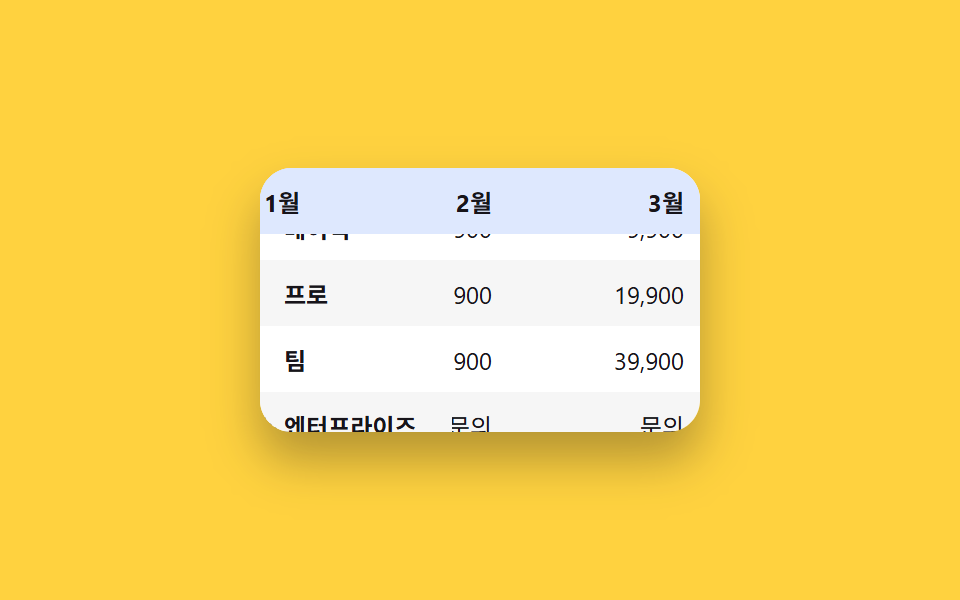
<main class="stage">
  <div class="freeze-wrap is-demo" tabindex="0" aria-label="Bảng so sánh giá. Cuộn bằng phím mũi tên hoặc kéo">
    <table class="freeze-table">
      <thead>
        <tr>
          <th class="freeze-table__corner">Gói</th>
          <th>Th1</th><th>Th2</th><th>Th3</th><th>Th4</th>
        </tr>
      </thead>
      <tbody>
        <tr><th scope="row">Cơ bản</th><td>9,900</td><td>9,900</td><td>9,900</td><td>9,900</td></tr>
        <tr><th scope="row">Pro</th><td>19,900</td><td>19,900</td><td>19,900</td><td>19,900</td></tr>
        <tr><th scope="row">Nhóm</th><td>39,900</td><td>39,900</td><td>39,900</td><td>39,900</td></tr>
        <tr><th scope="row">Doanh nghiệp</th><td>Liên hệ</td><td>Liên hệ</td><td>Liên hệ</td><td>Liên hệ</td></tr>
      </tbody>
    </table>
  </div>
</main>
@use "../../../../site/static/demo-tokens" as *;
$duration: $dur-base; // 스크롤 자동 시연 왕복 시간(스크립트 값과 맞춤)
$easing: $ease-out;
$color: $subject-blue; // 헤더·첫 열 배경
@include stage($stage-yellow);
.freeze-wrap {
width: 220px;
height: 132px;
overflow: auto;
border-radius: $r-card;
background: $stage-paper;
box-shadow: $shadow-raised;
}
.freeze-wrap:focus-visible { outline: 2px solid $stage-ink; outline-offset: 2px; }
.freeze-table {
border-collapse: separate;
border-spacing: 0;
font-size: 12px;
color: $stage-ink;
}
.freeze-table th, .freeze-table td {
padding: $sp-2 $sp-3;
min-width: 72px;
white-space: nowrap;
text-align: right;
background: $stage-paper;
}
// 스티키 셀은 스크롤되는 내용 위로 겹쳐 그려지므로 배경이 완전 불투명해야 한다.
// rgba(..., .16) 처럼 반투명으로 두면 아래로 스크롤되는 글자가 비쳐 보여 겹침(고스팅)이 생긴다 — 실측으로 확인
.freeze-table thead th {
position: sticky;
top: 0;
z-index: 2;
background: #dee8fe; // $subject-blue 를 흰 배경에 16% 섞은 불투명 값
text-align: right;
font-weight: 700;
}
.freeze-table tbody th[scope="row"] {
position: sticky;
left: 0;
z-index: 1;
text-align: left;
font-weight: 700;
background: $stage-paper;
}
.freeze-table__corner {
position: sticky;
top: 0;
left: 0;
z-index: 3;
text-align: left !important;
background: #c5d6fc !important; // $subject-blue 를 28% 섞은 불투명 값
}
// 여기도 th[scope="row"]는 스티키(왼쪽 고정)라 불투명해야 한다 — td는 스크롤에 그냥 같이 움직이니 상관없다
.freeze-table tbody tr:nth-child(even) td { background: rgba(23, 20, 26, .04); }
.freeze-table tbody tr:nth-child(even) th[scope="row"] { background: #f6f6f6; }
@media (prefers-reduced-motion: reduce) {
.freeze-wrap { scroll-behavior: auto; }
}html, body {
margin: 0;
overflow: hidden;
}
.stage {
box-sizing: border-box;
min-height: 100vh;
display: grid;
place-items: center;
margin: 0;
background: #ffd23f;
font-family: -apple-system, "Segoe UI", "Noto Sans KR", sans-serif;
padding: clamp(8px, 4vw, 24px);
}
.freeze-wrap {
width: 220px;
height: 132px;
overflow: auto;
border-radius: 16px;
background: #ffffff;
box-shadow: 0 14px 24px rgba(23, 20, 26, 0.32);
}
.freeze-wrap:focus-visible {
outline: 2px solid #17141a;
outline-offset: 2px;
}
.freeze-table {
border-collapse: separate;
border-spacing: 0;
font-size: 12px;
color: #17141a;
}
.freeze-table th, .freeze-table td {
padding: 8px 12px;
min-width: 72px;
white-space: nowrap;
text-align: right;
background: #ffffff;
}
.freeze-table thead th {
position: sticky;
top: 0;
z-index: 2;
background: #dee8fe;
text-align: right;
font-weight: 700;
}
.freeze-table tbody th[scope=row] {
position: sticky;
left: 0;
z-index: 1;
text-align: left;
font-weight: 700;
background: #ffffff;
}
.freeze-table__corner {
position: sticky;
top: 0;
left: 0;
z-index: 3;
text-align: left !important;
background: #c5d6fc !important;
}
.freeze-table tbody tr:nth-child(even) td {
background: rgba(23, 20, 26, 0.04);
}
.freeze-table tbody tr:nth-child(even) th[scope=row] {
background: #f6f6f6;
}
@media (prefers-reduced-motion: reduce) {
.freeze-wrap {
scroll-behavior: auto;
}
}(function () {
var wrap = document.querySelector('.freeze-wrap');
var reduce = window.matchMedia('(prefers-reduced-motion: reduce)').matches;
var raf = null, t0 = null;
function maxX() { return wrap.scrollWidth - wrap.clientWidth; }
function maxY() { return wrap.scrollHeight - wrap.clientHeight; }
function loop(ts) {
if (!wrap.classList.contains('is-demo')) return;
if (t0 === null) t0 = ts;
var p = ((ts - t0) / 2000) % 1;
var s = p < .5 ? p * 2 : 2 - p * 2;
wrap.scrollLeft = s * maxX();
wrap.scrollTop = s * maxY();
raf = requestAnimationFrame(loop);
}
function stop() {
wrap.classList.remove('is-demo');
if (raf) cancelAnimationFrame(raf);
}
wrap.addEventListener('pointerdown', stop);
wrap.addEventListener('wheel', stop, { passive: true });
wrap.addEventListener('keydown', function (e) {
var step = 24;
if (e.key === 'ArrowRight') { stop(); wrap.scrollLeft += step; }
else if (e.key === 'ArrowLeft') { stop(); wrap.scrollLeft -= step; }
else if (e.key === 'ArrowDown') { stop(); wrap.scrollTop += step; }
else if (e.key === 'ArrowUp') { stop(); wrap.scrollTop -= step; }
else return;
e.preventDefault();
});
if (!reduce) requestAnimationFrame(loop);
})();import { useRef, type CSSProperties } from "react";
import styles from "./StickyHeaderColumnFreeze.module.scss";
export type StickyHeaderColumnFreezeProps = {
columns: string[];
rows: { label: string; values: string[] }[];
/** 헤더·첫 열 배경 색 */
color?: string;
};
type Vars = CSSProperties & { "--color"?: string };
export default function StickyHeaderColumnFreeze({ columns, rows, color = "#2f6df6" }: StickyHeaderColumnFreezeProps) {
const wrap = useRef<HTMLDivElement | null>(null);
const vars: Vars = { "--color": color };
const key = (e: any) => {
const el = wrap.current;
if (!el) return;
const step = 24;
if (e.key === "ArrowRight") { e.preventDefault(); el.scrollLeft += step; }
else if (e.key === "ArrowLeft") { e.preventDefault(); el.scrollLeft -= step; }
else if (e.key === "ArrowDown") { e.preventDefault(); el.scrollTop += step; }
else if (e.key === "ArrowUp") { e.preventDefault(); el.scrollTop -= step; }
};
return (
<div
className={styles.wrap}
style={vars}
ref={wrap}
tabIndex={0}
aria-label="가격 비교표. 화살표 키나 드래그로 스크롤"
onKeyDown={key}
>
<table className={styles.table}>
<thead>
<tr>
<th className={styles.corner}>플랜</th>
{columns.map((c) => <th key={c}>{c}</th>)}
</tr>
</thead>
<tbody>
{rows.map((r) => (
<tr key={r.label}>
<th scope="row">{r.label}</th>
{r.values.map((v, i) => <td key={i}>{v}</td>)}
</tr>
))}
</tbody>
</table>
</div>
);
}06 Cố định header + cột đầu — Diện tích đo được 11.599% · khung hình chuyển động 23/23Nguyên tác GODRICH · SCSS và React nằm trong tệp zip · 9 mẫu List UI: swipe to delete css và phân trang
Bài viết chứa demo này
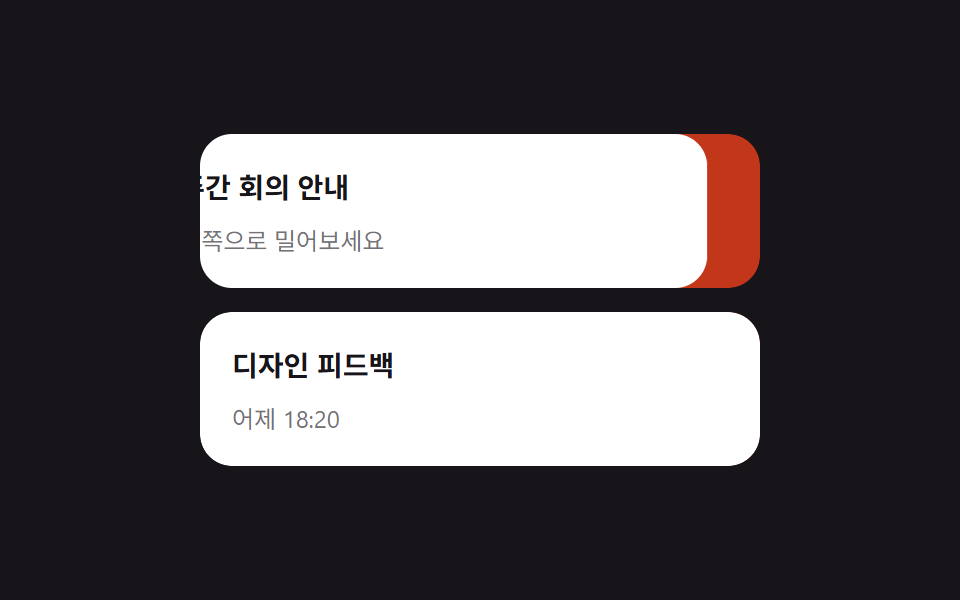 9 mẫu List UI: swipe to delete css và phân trangSwipe to delete css là vuốt một dòng để lộ nút xóa phía sau — thao tác bạn hay thấy trong app, giờ có luôn trên web. Bài Xem tất cả demo trong bài này
Nếu bạn thích hiệu ứng này - demo tương tự
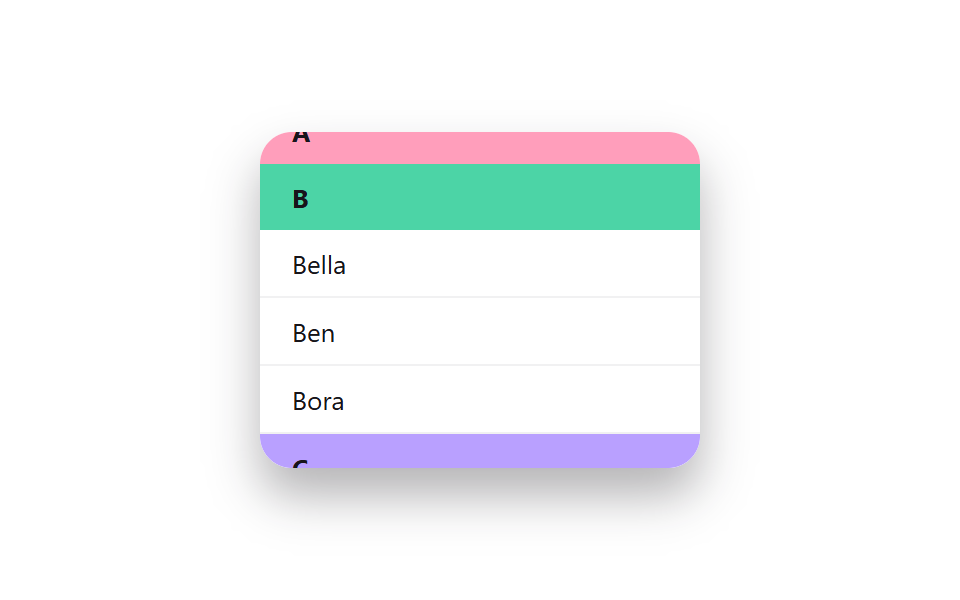 Giao diện danh sách · bảng02 Header nhóm cố định9 mẫu List UI: accordion list css và checklist
 Giao diện nhập liệu01 Tự chuyển sang ô kế tiếpOTP Input UI: 9 tình huống kèm validation
 Giao diện đăng nhập · xác thực01 Thẻ đăng nhập kiểu kính mờ (glassmorphism)9 mẫu form đăng ký & đăng nhập copy-paste được