07Coxcomb Chart Fanning Out Petals With a Radius per Value
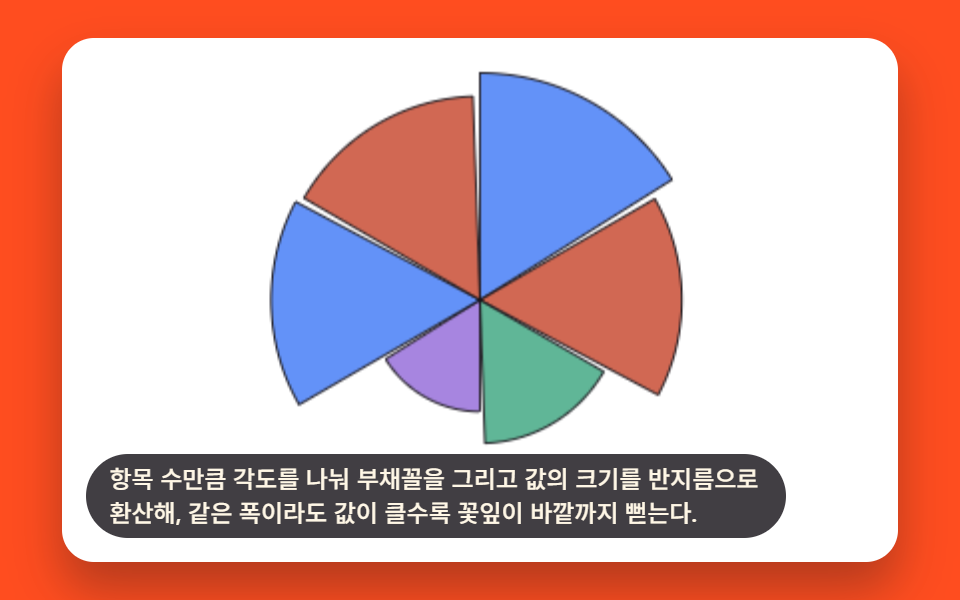
The circle is split into equal-angle wedges, and each value is converted into a radius, so a bigger value stretches its petal farther out even at the same width.
Best forMonthly recurring metric comparison dashboard card
COXCOMB_PETAL_GAP_DEGtargetRadiiradiusAt
<main class="stage">
<div class="cxc is-demo" id="cxcRoot">
  <canvas class="cxc__canvas" id="cxcCanvas" width="480" height="300"></canvas>
  <p class="cxc__caption">Divide the angle by the number of items and draw a fan shape, converting each value's size into a radius, so even with the same width, a larger value makes the petal reach further outward.</p>
</div>
</main>
@use "../../../../site/static/demo-tokens" as *;
@include stage($stage-orange);
.cxc {
position: relative;
width: min(92vw, calc(160vh - 12.8vw));
aspect-ratio: 480 / 300;
margin: 0 auto;
border-radius: $r-card;
overflow: hidden;
box-shadow: $shadow-raised;
background: $stage-paper;
}
.cxc__canvas {
display: block;
width: 100%;
height: 100%;
}
.cxc__caption {
position: absolute;
left: $sp-3;
bottom: $sp-3;
max-width: 78%;
margin: 0;
padding: $sp-1 $sp-3;
border-radius: $r-pill;
background: rgba(23, 20, 26, .82);
color: $subject-cream;
font-weight: 500;
font-size: 12px;
line-height: 1.4;
pointer-events: none;
}
@media (max-width: 340px) {
.cxc__caption { font-size: 10px; padding: $sp-1 $sp-2; }
}
@media (prefers-reduced-motion: reduce) {
.cxc { cursor: default; }
}html, body {
margin: 0;
overflow: hidden;
}
.stage {
box-sizing: border-box;
min-height: 100vh;
display: grid;
place-items: center;
margin: 0;
background: #ff4d1f;
font-family: -apple-system, "Segoe UI", "Noto Sans KR", sans-serif;
padding: clamp(8px, 4vw, 24px);
}
.cxc {
position: relative;
width: min(92vw, 160vh - 12.8vw);
aspect-ratio: 480/300;
margin: 0 auto;
border-radius: 16px;
overflow: hidden;
box-shadow: 0 14px 24px rgba(23, 20, 26, 0.32);
background: #ffffff;
}
.cxc__canvas {
display: block;
width: 100%;
height: 100%;
}
.cxc__caption {
position: absolute;
left: 12px;
bottom: 12px;
max-width: 78%;
margin: 0;
padding: 4px 12px;
border-radius: 999px;
background: rgba(23, 20, 26, 0.82);
color: #fff7e6;
font-weight: 500;
font-size: 12px;
line-height: 1.4;
pointer-events: none;
}
@media (max-width: 340px) {
.cxc__caption {
font-size: 10px;
padding: 4px 8px;
}
}
@media (prefers-reduced-motion: reduce) {
.cxc {
cursor: default;
}
}(function () {
// 기법: 항목 수만큼 중심각을 똑같이 나눠 부채꼴(꽃잎) 자리를 만들고, 값의 크기를
// 반지름 목표치로 환산한다. 매 프레임 꽃잎마다 다른 시작 지연을 둔 완화 곡선으로
// 반지름을 0에서 목표까지 실제로 다시 계산해 그려 순차로 자라나는 과정을 보여준다.
var root = document.getElementById('cxcRoot');
var canvas = document.getElementById('cxcCanvas');
var ctx = canvas.getContext('2d');
var wrap = canvas.parentElement;
function seedRand(seed) {
var s = seed >>> 0;
return function () { s = (s * 1664525 + 1013904223) >>> 0; return s / 4294967296; };
}
var CALC_W = 480, CALC_H = 300;
var LOOP_MS = 2000;
var rand = seedRand(425071);
var COUNT = 6;
var VALUES = [];
for (var vi = 0; vi < COUNT; vi += 1) VALUES.push(20 + rand() * 80);
var COXCOMB_PETAL_GAP_DEG = 2;
var anglePerPetal = (360 - COXCOMB_PETAL_GAP_DEG * COUNT) / COUNT;
var MIN_R = 18, MAX_R = 130;
var maxValue = Math.max.apply(null, VALUES);
var targetRadii = VALUES.map(function (v) { return MIN_R + (v / maxValue) * (MAX_R - MIN_R); });
function easeOutCubic(x) { return 1 - Math.pow(1 - x, 3); }
function easeInCubic(x) { return x * x * x; }
function clamp01(x) { return Math.max(0, Math.min(1, x)); }
var CENTER_X = CALC_W * 0.5, CENTER_Y = CALC_H * 0.5;
var FILL_COLORS = ['47,109,246', '194,54,26', '43,157,116', '138,92,214'];
var INK_STROKE = '23,20,26';
function radiusAt(i, t) {
var target = targetRadii[i];
if (t < 1400) {
var growProgress = clamp01((t - i * 90) / 500);
return target * easeOutCubic(growProgress);
}
if (t < 1750) return target;
var shrinkProgress = clamp01((t - 1750) / 200);
return target * (1 - easeInCubic(shrinkProgress));
}
var cw = 480, ch = 300;
function draw(t) {
var sx = cw / CALC_W, sy = ch / CALC_H;
var scale = (sx + sy) / 2;
ctx.clearRect(0, 0, cw, ch);
var cx = CENTER_X * sx, cy = CENTER_Y * sy;
var startDeg = -90;
for (var i = 0; i < COUNT; i += 1) {
var r = radiusAt(i, t) * scale;
var a0 = startDeg * Math.PI / 180;
var a1 = (startDeg + anglePerPetal) * Math.PI / 180;
ctx.beginPath();
ctx.moveTo(cx, cy);
ctx.arc(cx, cy, r, a0, a1);
ctx.closePath();
ctx.fillStyle = 'rgba(' + FILL_COLORS[i % 4] + ',.75)';
ctx.fill();
ctx.strokeStyle = 'rgba(' + INK_STROKE + ',.9)';
ctx.lineWidth = 1;
ctx.stroke();
startDeg += anglePerPetal + COXCOMB_PETAL_GAP_DEG;
}
}
var reduce = window.matchMedia('(prefers-reduced-motion: reduce)').matches;
var elapsed = 0;
if (reduce) root.classList.remove('is-demo');
function phaseOf(ms) { return reduce ? LOOP_MS * 0.72 : (ms % LOOP_MS); }
function fit() {
var r = wrap.getBoundingClientRect();
cw = Math.max(1, Math.round(r.width));
ch = Math.max(1, Math.round(r.height));
canvas.width = cw; canvas.height = ch;
draw(phaseOf(elapsed));
}
var lastTs = null;
function tick(ts) {
if (lastTs === null) lastTs = ts;
var dt = Math.min(ts - lastTs, 48);
lastTs = ts;
if (!reduce) elapsed += dt;
draw(phaseOf(elapsed));
requestAnimationFrame(tick);
}
fit();
window.addEventListener('resize', fit);
draw(phaseOf(elapsed));
requestAnimationFrame(tick);
})();import { useEffect, useRef } from "react";
import styles from "./ChartAdvancedCoxcombRadialPetal.module.scss";
export default function ChartAdvancedCoxcombRadialPetal() {
const rootRef = useRef<HTMLDivElement>(null);
const canvasRef = useRef<HTMLCanvasElement>(null);
useEffect(() => {
const root = rootRef.current;
const canvas = canvasRef.current;
if (!root || !canvas) return;
const ctx = canvas.getContext("2d");
if (!ctx) return;
const wrap = canvas.parentElement as HTMLElement;
function seedRand(seed: number) {
let s = seed >>> 0;
return function () { s = (s * 1664525 + 1013904223) >>> 0; return s / 4294967296; };
}
const CALC_W = 480, CALC_H = 300;
const LOOP_MS = 2000;
const rand = seedRand(425071);
const COUNT = 6;
const VALUES: number[] = [];
for (let vi = 0; vi < COUNT; vi += 1) VALUES.push(20 + rand() * 80);
const COXCOMB_PETAL_GAP_DEG = 2;
const anglePerPetal = (360 - COXCOMB_PETAL_GAP_DEG * COUNT) / COUNT;
const MIN_R = 18, MAX_R = 130;
const maxValue = Math.max.apply(null, VALUES);
const targetRadii = VALUES.map(function (v) { return MIN_R + (v / maxValue) * (MAX_R - MIN_R); });
function easeOutCubic(x: number) { return 1 - Math.pow(1 - x, 3); }
function easeInCubic(x: number) { return x * x * x; }
function clamp01(x: number) { return Math.max(0, Math.min(1, x)); }
const CENTER_X = CALC_W * 0.5, CENTER_Y = CALC_H * 0.5;
const FILL_COLORS = ["47,109,246", "194,54,26", "43,157,116", "138,92,214"];
const INK_STROKE = "23,20,26";
function radiusAt(i: number, t: number) {
const target = targetRadii[i];
if (t < 1400) {
const growProgress = clamp01((t - i * 90) / 500);
return target * easeOutCubic(growProgress);
}
if (t < 1750) return target;
const shrinkProgress = clamp01((t - 1750) / 200);
return target * (1 - easeInCubic(shrinkProgress));
}
let cw = 480, ch = 300;
function draw(t: number) {
const sx = cw / CALC_W, sy = ch / CALC_H;
const scale = (sx + sy) / 2;
ctx!.clearRect(0, 0, cw, ch);
const cx = CENTER_X * sx, cy = CENTER_Y * sy;
let startDeg = -90;
for (let i = 0; i < COUNT; i += 1) {
const r = radiusAt(i, t) * scale;
const a0 = startDeg * Math.PI / 180;
const a1 = (startDeg + anglePerPetal) * Math.PI / 180;
ctx!.beginPath();
ctx!.moveTo(cx, cy);
ctx!.arc(cx, cy, r, a0, a1);
ctx!.closePath();
ctx!.fillStyle = "rgba(" + FILL_COLORS[i % 4] + ",.75)";
ctx!.fill();
ctx!.strokeStyle = "rgba(" + INK_STROKE + ",.9)";
ctx!.lineWidth = 1;
ctx!.stroke();
startDeg += anglePerPetal + COXCOMB_PETAL_GAP_DEG;
}
}
const reduce = window.matchMedia("(prefers-reduced-motion: reduce)").matches;
let elapsed = 0;
if (reduce) root.classList.remove("is-demo");
function phaseOf(ms: number) { return reduce ? LOOP_MS * 0.72 : (ms % LOOP_MS); }
function fit() {
const r = wrap.getBoundingClientRect();
cw = Math.max(1, Math.round(r.width));
ch = Math.max(1, Math.round(r.height));
canvas!.width = cw; canvas!.height = ch;
draw(phaseOf(elapsed));
}
let lastTs: number | null = null;
let raf = 0;
function tick(ts: number) {
if (lastTs === null) lastTs = ts;
const dt = Math.min(ts - lastTs, 48);
lastTs = ts;
if (!reduce) elapsed += dt;
draw(phaseOf(elapsed));
raf = requestAnimationFrame(tick);
}
fit();
window.addEventListener("resize", fit);
draw(phaseOf(elapsed));
raf = requestAnimationFrame(tick);
return () => {
cancelAnimationFrame(raf);
window.removeEventListener("resize", fit);
};
}, []);
return (
<main className={styles.stage}>
<div className={`${styles.cxc} is-demo`} ref={rootRef}>
<canvas className={styles.cxc__canvas} ref={canvasRef} width={480} height={300} />
<p className={styles.cxc__caption}>항목 수만큼 각도를 나눠 부채꼴을 그리고 값의 크기를 반지름으로 환산해, 같은 폭이라도 값이 클수록 꽃잎이 바깥까지 뻗는다.</p>
</div>
</main>
);
}07 Coxcomb Chart Fanning Out Petals With a Radius per Value — Measured area 19.5% · moving frames 17/23Original by GODRICH · SCSS and React ship in the zip · 9 Data Visualization Chart Types With Real Math
The post this demo lives in
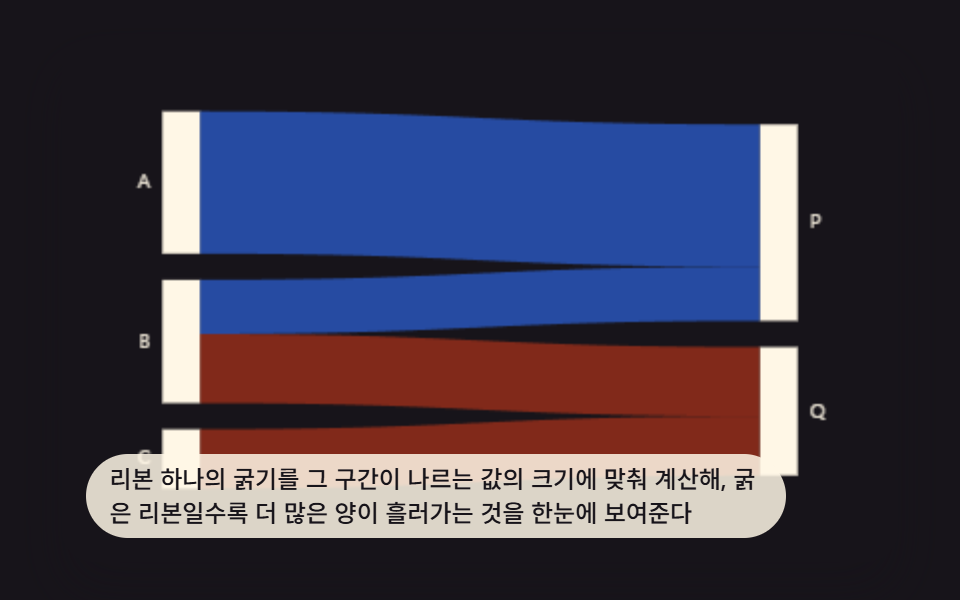 9 Data Visualization Chart Types With Real MathA data visualization chart types set built from real math, not screenshots. Three of the nine flow like ribbons, three b See all demos in this post
If you like this effect - similar demos
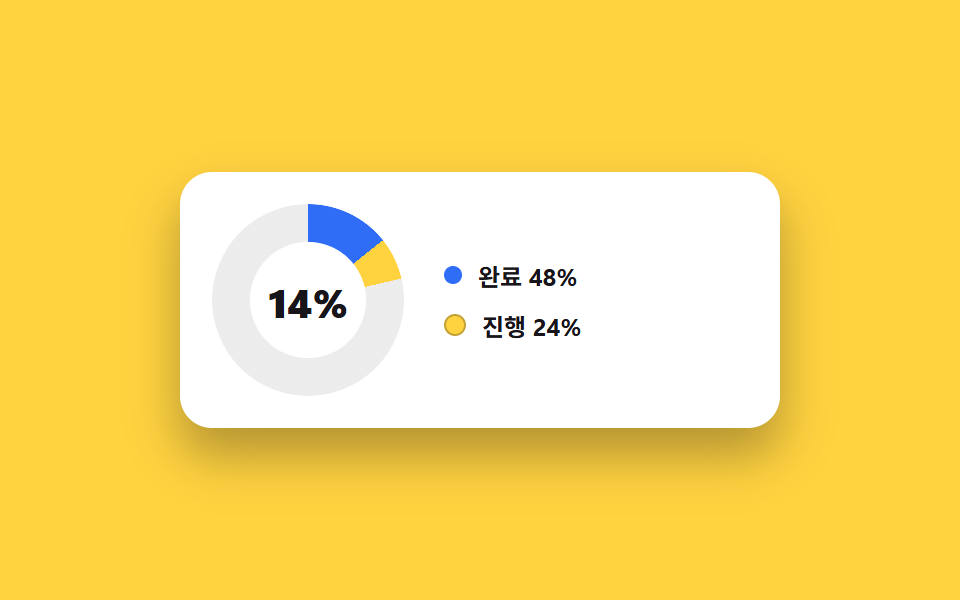 Dashboard UI04 Donut chart card with center counterDashboard Sidebar Design + 9 Widget UI Pieces
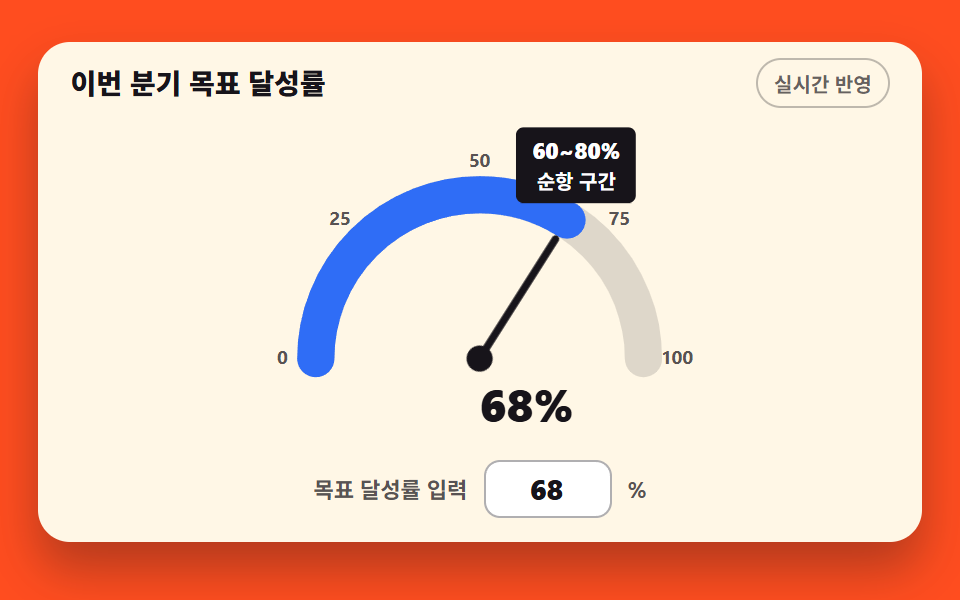 Dashboard UI09 Half-circle gauge with a live needleCSS Chart Design: 9 SVG Graphs, No Library
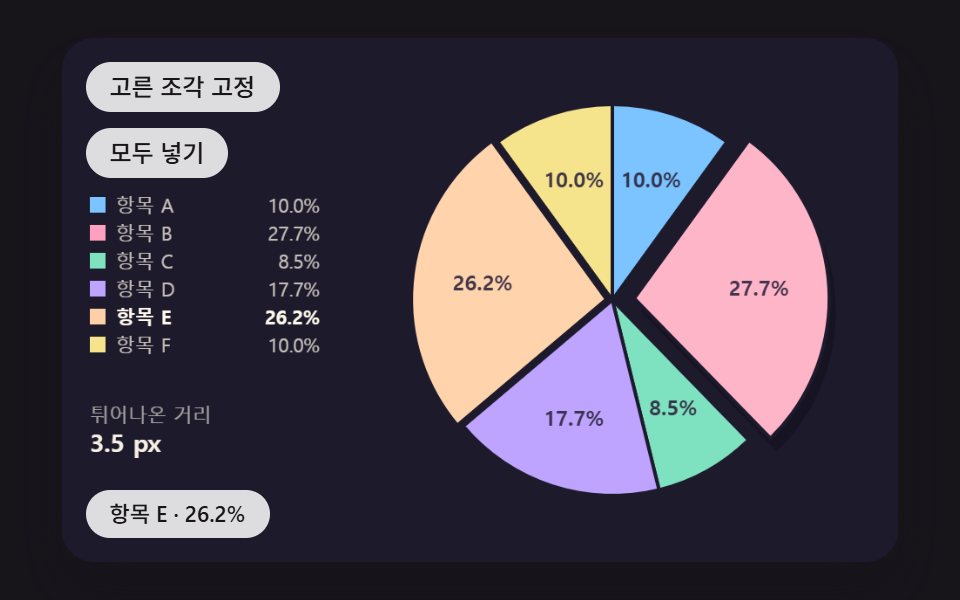 Dashboard UI02 A Pie Chart Whose Hovered Slice Springs Out Along Its Center LinePie Chart CSS: 9 Slices That Pop, Tilt and Morph