9 Data Visualization Chart Types With Real Math
A data visualization chart types set built from real math, not screenshots. Three of the nine flow like ribbons, three break into bars, two clump into circles,
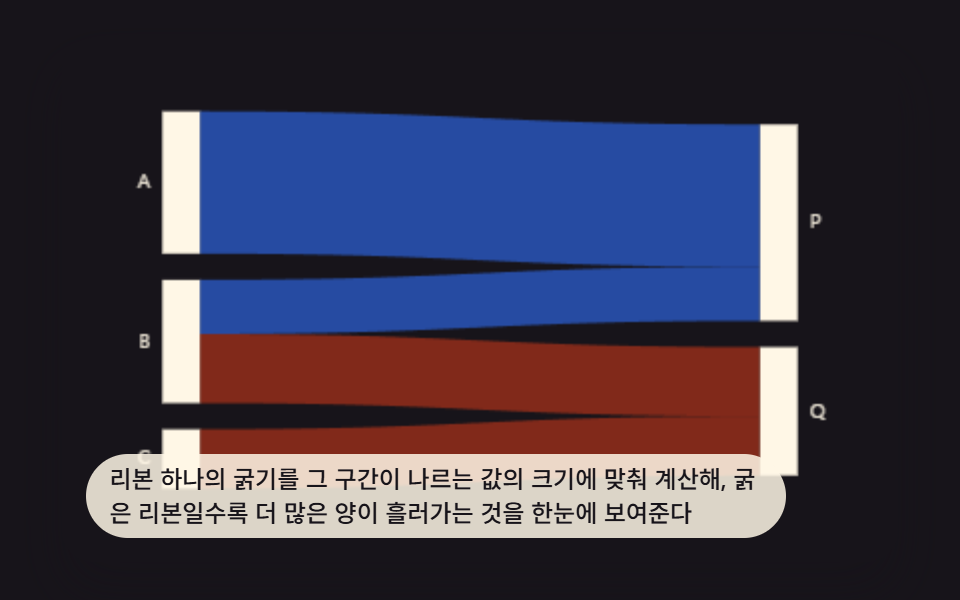 01 chart-advanced-sankey-flow-ribbon
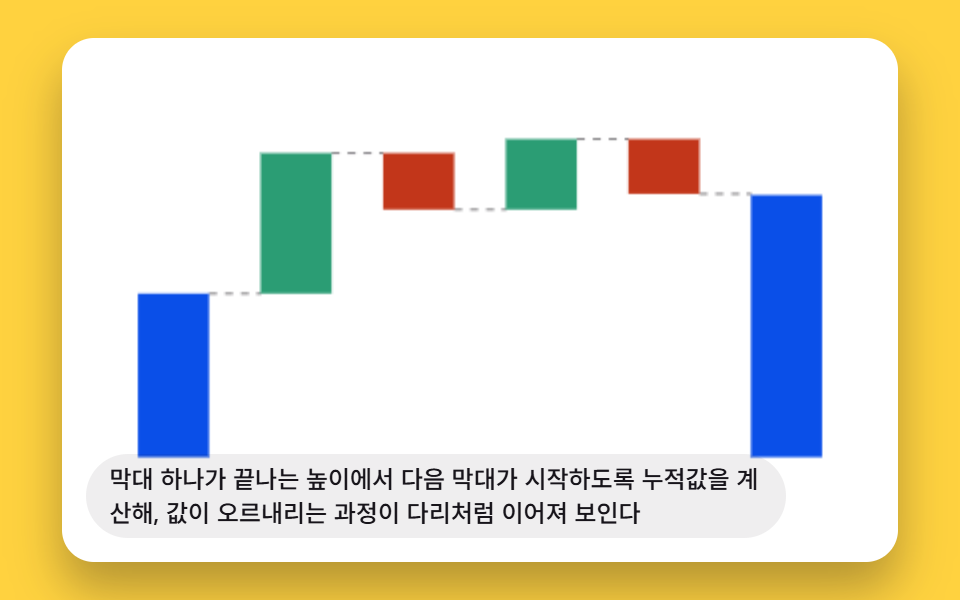 02 chart-advanced-waterfall-bridge-connector
 03 chart-advanced-funnel-stage-taper
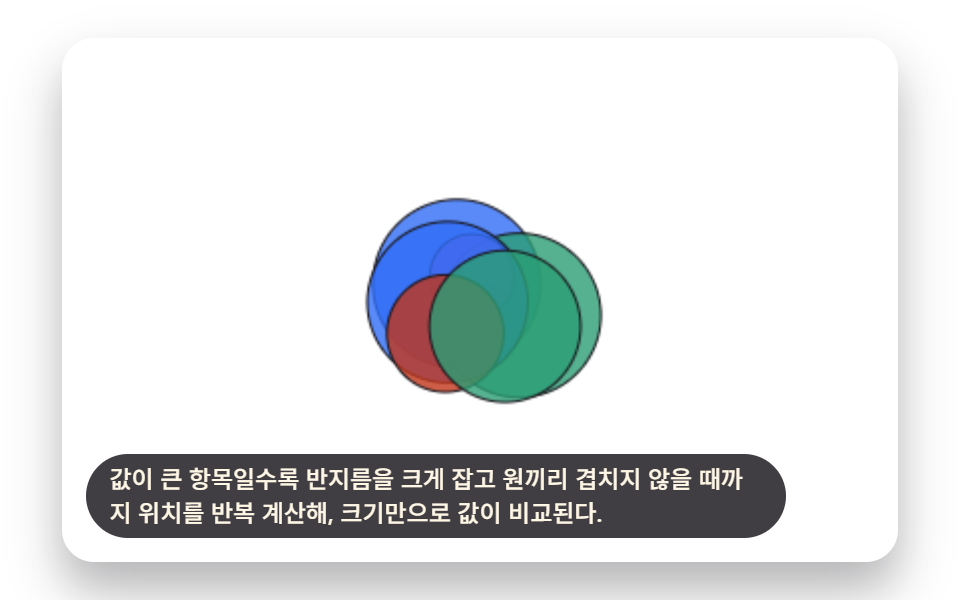 04 chart-advanced-bubble-pack-collision
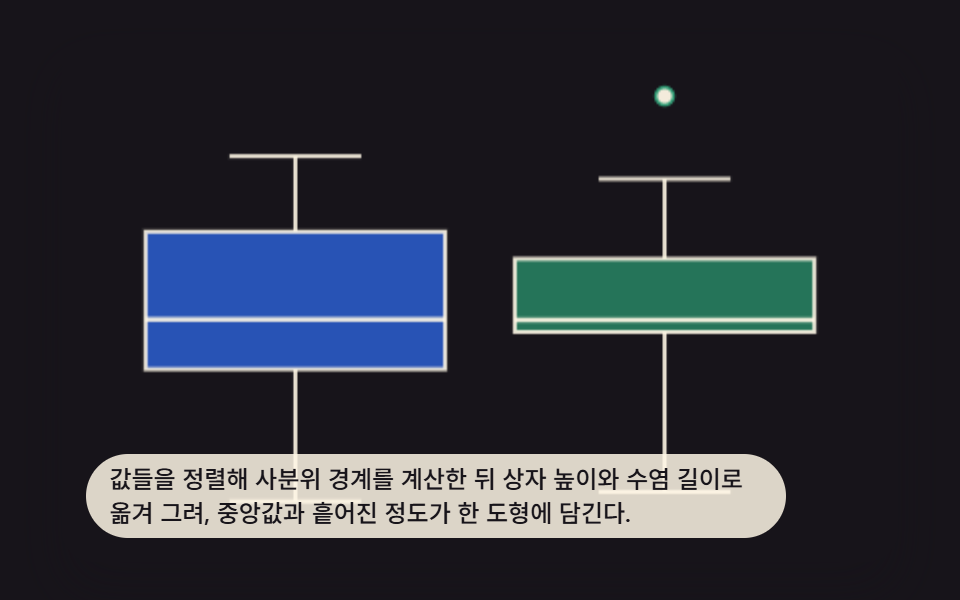 05 chart-advanced-boxplot-quartile-whisker
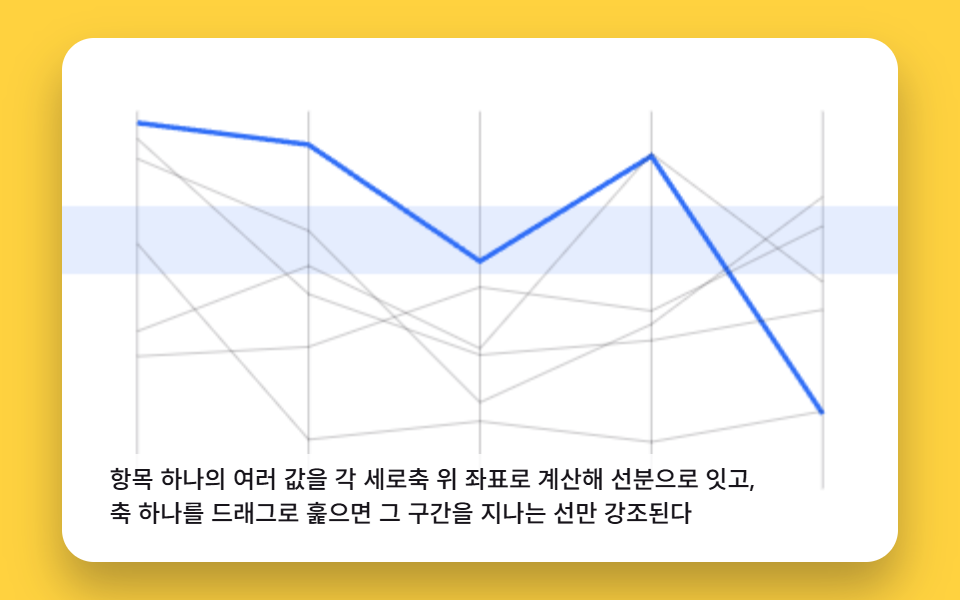 06 chart-advanced-parallel-coordinates-brush
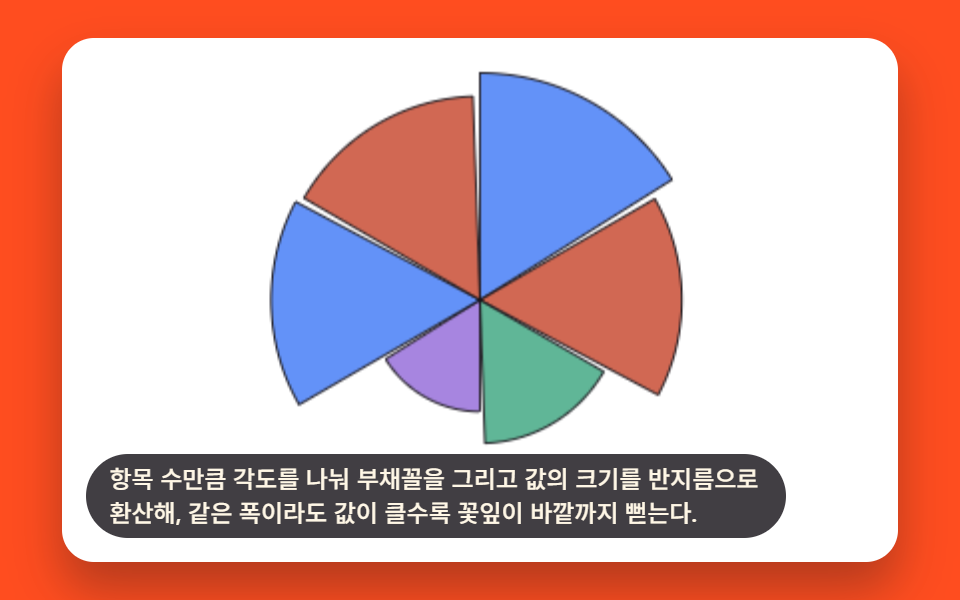 07 chart-advanced-coxcomb-radial-petal
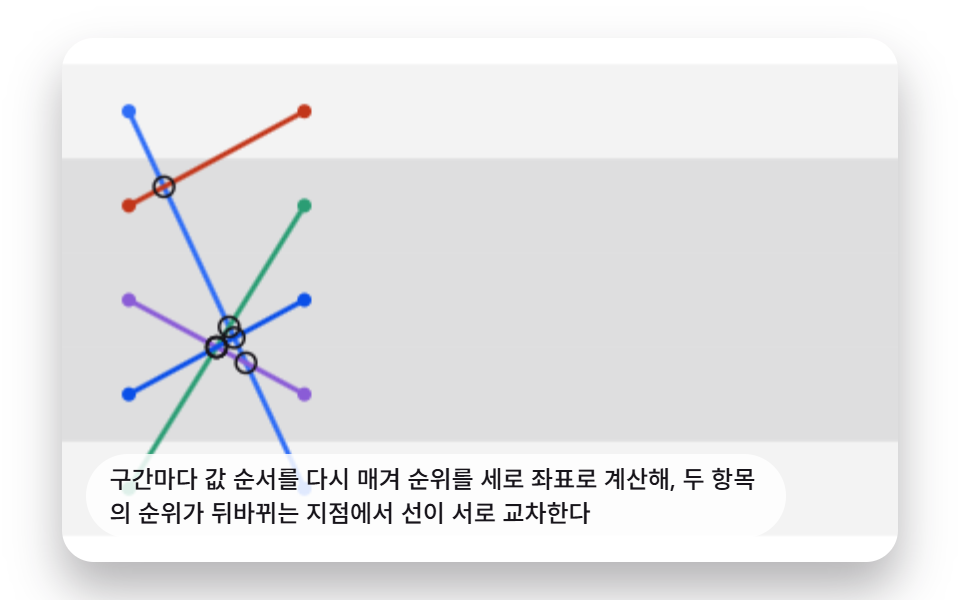 08 chart-advanced-bump-rank-crossing
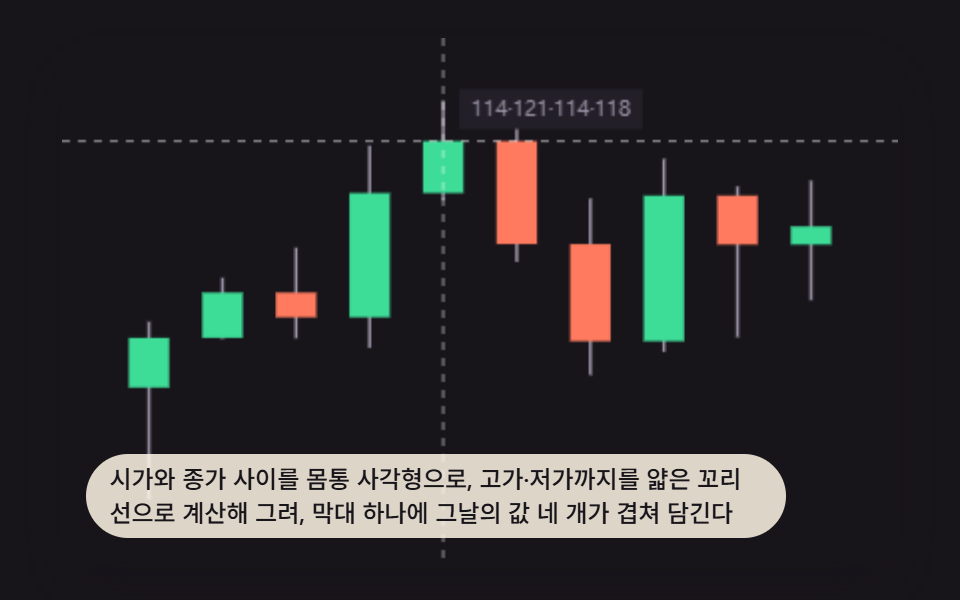 09 chart-advanced-candlestick-ohlc-wick
Auto-plays · click a tile to jump to its section · all nine in one zip
- 01 Sankey Ribbon Diagram Whose Width Encodes Flow Value
- 02 Waterfall Bridge Chart Connecting Each Rise and Fall
- 03 Funnel Chart That Narrows at Every Stage
- 04 Bubble-Pack Chart Where Circles Push Apart by Value Size
- 05 Boxplot Drawing Quartiles as a Box and Whiskers
- 06 Parallel-Coordinates Chart Linking Values Across Axes With Crossing Lines
- 07 Coxcomb Chart Fanning Out Petals With a Radius per Value
- 08 Bump Chart Where Lines Cross as Rankings Change
- 09 Candlestick Chart Drawing Open-High-Low-Close With Body and Wick
9 Data Visualization Chart Types: How One Value Reshapes the Drawing
Most roundups list data visualization charts and graphs in whatever order looks best in a thumbnail; this one is ordered by how much of the drawing a single input value actually reshapes. Item 01 turns one flow amount into a ribbon's thickness, items 02 through 04 turn a running total, a stage share, and a category size into a bar height, a trapezoid width, and a circle radius, and item 05 turns a sorted array into a box-and-whisker shape. From there, items 06 through 08 compare several values across axes, brushes, or ranked positions at once, and item 09 closes the set by packing four numbers — open, high, low, close — into a single candlestick mark. Reading them in this order shows the same idea scaling up: one JavaScript number in, one shape out.
Code by Chart Type
Nine index.html/style.scss pairs sit behind this set, one canvas per chart type, and each snippet below is pulled straight from the file the live demo runs — not a simplified rewrite. If you've been hunting for sankey diagram examples that show the ribbon math instead of just a finished screenshot, item 01 is the one to read first.
01Sankey Ribbon Diagram Whose Width Encodes Flow Value
Each ribbon's thickness is calculated from the amount it carries, so a wider ribbon reads at a glance as a bigger flow. It fits a budget-allocation or traffic-source report, where the reader needs to compare flow sizes without reading a single number.
<main class="stage">
<div class="skr is-demo" id="skrRoot">
  <canvas class="skr__canvas" id="skrCanvas" width="480" height="300"></canvas>
  <p class="skr__caption">Each ribbon's thickness is calculated from the size of the value it carries, so a thicker ribbon instantly shows a larger amount flowing through.</p>
</div>
</main>
@use "../../../../site/static/demo-tokens" as *;
@include stage($stage-ink);
.skr {
position: relative;
width: min(92vw, calc(160vh - 12.8vw));
aspect-ratio: 480 / 300;
margin: 0 auto;
border-radius: $r-card;
overflow: hidden;
box-shadow: $shadow-raised;
background: $stage-ink;
}
.skr__canvas {
display: block;
width: 100%;
height: 100%;
}
.skr__caption {
position: absolute;
left: $sp-3;
bottom: $sp-3;
max-width: 78%;
margin: 0;
padding: $sp-1 $sp-3;
border-radius: $r-pill;
background: rgba(255, 247, 230, .85);
color: $subject-ink;
font-weight: 500;
font-size: 12px;
line-height: 1.4;
pointer-events: none;
}
@media (max-width: 340px) {
.skr__caption { font-size: 10px; padding: $sp-1 $sp-2; }
}
@media (prefers-reduced-motion: reduce) {
.skr { cursor: default; }
}html, body {
margin: 0;
overflow: hidden;
}
.stage {
box-sizing: border-box;
min-height: 100vh;
display: grid;
place-items: center;
margin: 0;
background: #17141a;
font-family: -apple-system, "Segoe UI", "Noto Sans KR", sans-serif;
padding: clamp(8px, 4vw, 24px);
}
.skr {
position: relative;
width: min(92vw, 160vh - 12.8vw);
aspect-ratio: 480/300;
margin: 0 auto;
border-radius: 16px;
overflow: hidden;
box-shadow: 0 14px 24px rgba(23, 20, 26, 0.32);
background: #17141a;
}
.skr__canvas {
display: block;
width: 100%;
height: 100%;
}
.skr__caption {
position: absolute;
left: 12px;
bottom: 12px;
max-width: 78%;
margin: 0;
padding: 4px 12px;
border-radius: 999px;
background: rgba(255, 247, 230, 0.85);
color: #17141a;
font-weight: 500;
font-size: 12px;
line-height: 1.4;
pointer-events: none;
}
@media (max-width: 340px) {
.skr__caption {
font-size: 10px;
padding: 4px 8px;
}
}
@media (prefers-reduced-motion: reduce) {
.skr {
cursor: default;
}
}(function () {
// 기법: 좌우 노드의 총합을 공통 SCALE 하나로 픽셀에 매핑해 리본 두께가 실제 값 비율을
// 그대로 나타내게 하고(진짜 산키 보존), 리본마다 시작 지연을 두고 사각 클립을 왼쪽에서
// 오른쪽으로 넓혀가며 그 안에 리본 전체 도형을 그려 "그어지는" 진행을 만든다.
var root = document.getElementById('skrRoot');
var canvas = document.getElementById('skrCanvas');
var ctx = canvas.getContext('2d');
var wrap = canvas.parentElement;
function seedRand(seed) {
var s = seed >>> 0;
return function () { s = (s * 1664525 + 1013904223) >>> 0; return s / 4294967296; };
}
var rand = seedRand(425011);
var LEFT = ['A', 'B', 'C'];
var RIGHT = ['P', 'Q'];
var FLOW = [
[18 + rand() * 40, 0],
[10 + rand() * 30, 14 + rand() * 36],
[0, 22 + rand() * 44]
];
// 리본이 왼쪽에서 오른쪽으로 그어지는 데 걸리는 시간(ms). 변형은 900 → 1800 으로 바뀐다.
var SANKEY_DRAW_DURATION_MS = 900;
var RIBBON_STAGGER_MS = 90;
function clamp(v, a, b) { return Math.max(a, Math.min(b, v)); }
function lerp(a, b, t) { return a + (b - a) * t; }
function easeOutCubic(x) { return 1 - Math.pow(1 - x, 3); }
function buildLayout(cw, ch) {
var nodeW = Math.max(8, cw * 0.045);
var marginX = cw * 0.12;
var marginY = ch * 0.14;
var nodeGap = ch * 0.05;
var leftX = marginX;
var rightX = cw - marginX - nodeW;
var availH = ch - marginY * 2;
var leftTotal = [0, 0, 0];
var rightTotal = [0, 0];
for (var i = 0; i < LEFT.length; i += 1) {
for (var j = 0; j < RIGHT.length; j += 1) {
leftTotal[i] += FLOW[i][j];
rightTotal[j] += FLOW[i][j];
}
}
var grandTotal = leftTotal[0] + leftTotal[1] + leftTotal[2];
var leftGaps = nodeGap * (LEFT.length - 1);
var rightGaps = nodeGap * (RIGHT.length - 1);
var usableH = availH - Math.max(leftGaps, rightGaps);
var SCALE = usableH / grandTotal;
var leftH = [leftTotal[0] * SCALE, leftTotal[1] * SCALE, leftTotal[2] * SCALE];
var rightH = [rightTotal[0] * SCALE, rightTotal[1] * SCALE];
var totalLeftH = leftH[0] + leftH[1] + leftH[2] + leftGaps;
var totalRightH = rightH[0] + rightH[1] + rightGaps;
var leftStartY = marginY + (availH - totalLeftH) / 2;
var rightStartY = marginY + (availH - totalRightH) / 2;
var leftY = [];
var cursorL = leftStartY;
for (i = 0; i < LEFT.length; i += 1) { leftY.push(cursorL); cursorL += leftH[i] + nodeGap; }
var rightY = [];
var cursorR = rightStartY;
for (j = 0; j < RIGHT.length; j += 1) { rightY.push(cursorR); cursorR += rightH[j] + nodeGap; }
var leftCursor = leftY.slice();
var rightCursor = rightY.slice();
var ribbons = [];
var idx = 0;
for (i = 0; i < LEFT.length; i += 1) {
for (j = 0; j < RIGHT.length; j += 1) {
var v = FLOW[i][j];
if (v <= 0) continue;
var thick = v * SCALE;
var leftTop = leftCursor[i];
var leftBot = leftTop + thick;
leftCursor[i] = leftBot;
var rightTop = rightCursor[j];
var rightBot = rightTop + thick;
rightCursor[j] = rightBot;
ribbons.push({
j: j, leftTop: leftTop, leftBot: leftBot, rightTop: rightTop, rightBot: rightBot,
delay: idx * RIBBON_STAGGER_MS
});
idx += 1;
}
}
return {
nodeW: nodeW, leftX: leftX, rightX: rightX,
leftY: leftY, rightY: rightY, leftH: leftH, rightH: rightH,
ribbons: ribbons
};
}
var COLOR_P = '47,109,246';
var COLOR_Q = '194,54,26';
function drawRibbon(r, progress, fadeAlpha) {
var startX = layout.leftX + layout.nodeW;
var endX = layout.rightX;
var midX = (startX + endX) / 2;
var clipRight = lerp(startX, endX, progress);
ctx.save();
ctx.beginPath();
ctx.rect(0, 0, clipRight, ch);
ctx.clip();
ctx.beginPath();
ctx.moveTo(startX, r.leftTop);
ctx.bezierCurveTo(midX, r.leftTop, midX, r.rightTop, endX, r.rightTop);
ctx.lineTo(endX, r.rightBot);
ctx.bezierCurveTo(midX, r.rightBot, midX, r.leftBot, startX, r.leftBot);
ctx.closePath();
var rgb = r.j === 0 ? COLOR_P : COLOR_Q;
ctx.fillStyle = 'rgba(' + rgb + ',' + (0.62 * fadeAlpha) + ')';
ctx.fill();
ctx.restore();
}
function drawNodes() {
ctx.font = Math.max(9, cw * 0.024) + 'px sans-serif';
ctx.textBaseline = 'middle';
var i, j;
for (i = 0; i < LEFT.length; i += 1) {
ctx.fillStyle = '#fff7e6';
ctx.fillRect(layout.leftX, layout.leftY[i], layout.nodeW, layout.leftH[i]);
ctx.fillStyle = 'rgba(255,247,230,.92)';
ctx.textAlign = 'right';
ctx.fillText(LEFT[i], layout.leftX - 6, layout.leftY[i] + layout.leftH[i] / 2);
}
for (j = 0; j < RIGHT.length; j += 1) {
ctx.fillStyle = '#fff7e6';
ctx.fillRect(layout.rightX, layout.rightY[j], layout.nodeW, layout.rightH[j]);
ctx.fillStyle = 'rgba(255,247,230,.92)';
ctx.textAlign = 'left';
ctx.fillText(RIGHT[j], layout.rightX + layout.nodeW + 6, layout.rightY[j] + layout.rightH[j] / 2);
}
}
var LOOP_MS = 2000;
var T0 = 200;
var cw = 480, ch = 300;
var layout = buildLayout(cw, ch);
function draw(nowMs) {
var phase = reduce ? 1500 : (nowMs % LOOP_MS);
var t = Math.max(0, phase - T0);
layout = buildLayout(cw, ch);
ctx.clearRect(0, 0, cw, ch);
var fadeAlpha = 1;
if (phase > 1650) fadeAlpha = 1 - clamp((phase - 1650) / (1900 - 1650), 0, 1);
for (var k = 0; k < layout.ribbons.length; k += 1) {
var r = layout.ribbons[k];
var p = easeOutCubic(clamp((t - r.delay) / SANKEY_DRAW_DURATION_MS, 0, 1));
if (p <= 0) continue;
drawRibbon(r, p, fadeAlpha);
}
drawNodes();
}
function fit() {
var r = wrap.getBoundingClientRect();
cw = Math.max(1, Math.round(r.width));
ch = Math.max(1, Math.round(r.height));
canvas.width = cw; canvas.height = ch;
draw(elapsed);
}
var reduce = window.matchMedia('(prefers-reduced-motion: reduce)').matches;
var elapsed = 0;
if (reduce) root.classList.remove('is-demo');
var lastTs = null;
function tick(ts) {
if (lastTs === null) lastTs = ts;
var dt = Math.min(ts - lastTs, 48);
lastTs = ts;
if (!reduce) { elapsed += dt; draw(elapsed); }
requestAnimationFrame(tick);
}
fit();
window.addEventListener('resize', fit);
draw(elapsed);
requestAnimationFrame(tick);
})();import { useEffect, useRef } from "react";
import styles from "./ChartAdvancedSankeyFlowRibbon.module.scss";
type Ribbon = { j: number; leftTop: number; leftBot: number; rightTop: number; rightBot: number; delay: number };
type Layout = {
nodeW: number; leftX: number; rightX: number;
leftY: number[]; rightY: number[]; leftH: number[]; rightH: number[];
ribbons: Ribbon[];
};
export default function ChartAdvancedSankeyFlowRibbon() {
const rootRef = useRef<HTMLDivElement>(null);
const canvasRef = useRef<HTMLCanvasElement>(null);
useEffect(() => {
const root = rootRef.current;
const canvas = canvasRef.current;
if (!root || !canvas) return;
const ctx = canvas.getContext("2d");
if (!ctx) return;
const wrap = canvas.parentElement as HTMLElement;
function seedRand(seed: number) {
let s = seed >>> 0;
return function () { s = (s * 1664525 + 1013904223) >>> 0; return s / 4294967296; };
}
const rand = seedRand(425011);
const LEFT = ["A", "B", "C"];
const RIGHT = ["P", "Q"];
const FLOW = [
[18 + rand() * 40, 0],
[10 + rand() * 30, 14 + rand() * 36],
[0, 22 + rand() * 44]
];
// 리본이 왼쪽에서 오른쪽으로 그어지는 데 걸리는 시간(ms). 변형은 900 → 1800 으로 바뀐다.
const SANKEY_DRAW_DURATION_MS = 900;
const RIBBON_STAGGER_MS = 90;
function clamp(v: number, a: number, b: number) { return Math.max(a, Math.min(b, v)); }
function lerp(a: number, b: number, t: number) { return a + (b - a) * t; }
function easeOutCubic(x: number) { return 1 - Math.pow(1 - x, 3); }
function buildLayout(cwv: number, chv: number): Layout {
const nodeW = Math.max(8, cwv * 0.045);
const marginX = cwv * 0.12;
const marginY = chv * 0.14;
const nodeGap = chv * 0.05;
const leftX = marginX;
const rightX = cwv - marginX - nodeW;
const availH = chv - marginY * 2;
const leftTotal = [0, 0, 0];
const rightTotal = [0, 0];
let i, j;
for (i = 0; i < LEFT.length; i += 1) {
for (j = 0; j < RIGHT.length; j += 1) {
leftTotal[i] += FLOW[i][j];
rightTotal[j] += FLOW[i][j];
}
}
const grandTotal = leftTotal[0] + leftTotal[1] + leftTotal[2];
const leftGaps = nodeGap * (LEFT.length - 1);
const rightGaps = nodeGap * (RIGHT.length - 1);
const usableH = availH - Math.max(leftGaps, rightGaps);
const SCALE = usableH / grandTotal;
const leftH = [leftTotal[0] * SCALE, leftTotal[1] * SCALE, leftTotal[2] * SCALE];
const rightH = [rightTotal[0] * SCALE, rightTotal[1] * SCALE];
const totalLeftH = leftH[0] + leftH[1] + leftH[2] + leftGaps;
const totalRightH = rightH[0] + rightH[1] + rightGaps;
const leftStartY = marginY + (availH - totalLeftH) / 2;
const rightStartY = marginY + (availH - totalRightH) / 2;
const leftY: number[] = [];
let cursorL = leftStartY;
for (i = 0; i < LEFT.length; i += 1) { leftY.push(cursorL); cursorL += leftH[i] + nodeGap; }
const rightY: number[] = [];
let cursorR = rightStartY;
for (j = 0; j < RIGHT.length; j += 1) { rightY.push(cursorR); cursorR += rightH[j] + nodeGap; }
const leftCursor = leftY.slice();
const rightCursor = rightY.slice();
const ribbons: Ribbon[] = [];
let idx = 0;
for (i = 0; i < LEFT.length; i += 1) {
for (j = 0; j < RIGHT.length; j += 1) {
const v = FLOW[i][j];
if (v <= 0) continue;
const thick = v * SCALE;
const leftTop = leftCursor[i];
const leftBot = leftTop + thick;
leftCursor[i] = leftBot;
const rightTop = rightCursor[j];
const rightBot = rightTop + thick;
rightCursor[j] = rightBot;
ribbons.push({ j, leftTop, leftBot, rightTop, rightBot, delay: idx * RIBBON_STAGGER_MS });
idx += 1;
}
}
return { nodeW, leftX, rightX, leftY, rightY, leftH, rightH, ribbons };
}
const COLOR_P = "47,109,246";
const COLOR_Q = "194,54,26";
let cw = 480, ch = 300;
let layout = buildLayout(cw, ch);
function drawRibbon(r: Ribbon, progress: number, fadeAlpha: number) {
const startX = layout.leftX + layout.nodeW;
const endX = layout.rightX;
const midX = (startX + endX) / 2;
const clipRight = lerp(startX, endX, progress);
ctx!.save();
ctx!.beginPath();
ctx!.rect(0, 0, clipRight, ch);
ctx!.clip();
ctx!.beginPath();
ctx!.moveTo(startX, r.leftTop);
ctx!.bezierCurveTo(midX, r.leftTop, midX, r.rightTop, endX, r.rightTop);
ctx!.lineTo(endX, r.rightBot);
ctx!.bezierCurveTo(midX, r.rightBot, midX, r.leftBot, startX, r.leftBot);
ctx!.closePath();
const rgb = r.j === 0 ? COLOR_P : COLOR_Q;
ctx!.fillStyle = "rgba(" + rgb + "," + (0.62 * fadeAlpha) + ")";
ctx!.fill();
ctx!.restore();
}
function drawNodes() {
ctx!.font = Math.max(9, cw * 0.024) + "px sans-serif";
ctx!.textBaseline = "middle";
let i, j;
for (i = 0; i < LEFT.length; i += 1) {
ctx!.fillStyle = "#fff7e6";
ctx!.fillRect(layout.leftX, layout.leftY[i], layout.nodeW, layout.leftH[i]);
ctx!.fillStyle = "rgba(255,247,230,.92)";
ctx!.textAlign = "right";
ctx!.fillText(LEFT[i], layout.leftX - 6, layout.leftY[i] + layout.leftH[i] / 2);
}
for (j = 0; j < RIGHT.length; j += 1) {
ctx!.fillStyle = "#fff7e6";
ctx!.fillRect(layout.rightX, layout.rightY[j], layout.nodeW, layout.rightH[j]);
ctx!.fillStyle = "rgba(255,247,230,.92)";
ctx!.textAlign = "left";
ctx!.fillText(RIGHT[j], layout.rightX + layout.nodeW + 6, layout.rightY[j] + layout.rightH[j] / 2);
}
}
const LOOP_MS = 2000;
const T0 = 200;
function draw(nowMs: number) {
const phase = reduce ? 1500 : (nowMs % LOOP_MS);
const t = Math.max(0, phase - T0);
layout = buildLayout(cw, ch);
ctx!.clearRect(0, 0, cw, ch);
let fadeAlpha = 1;
if (phase > 1650) fadeAlpha = 1 - clamp((phase - 1650) / (1900 - 1650), 0, 1);
for (let k = 0; k < layout.ribbons.length; k += 1) {
const r = layout.ribbons[k];
const p = easeOutCubic(clamp((t - r.delay) / SANKEY_DRAW_DURATION_MS, 0, 1));
if (p <= 0) continue;
drawRibbon(r, p, fadeAlpha);
}
drawNodes();
}
function fit() {
const r = wrap.getBoundingClientRect();
cw = Math.max(1, Math.round(r.width));
ch = Math.max(1, Math.round(r.height));
canvas!.width = cw; canvas!.height = ch;
draw(elapsed);
}
const reduce = window.matchMedia("(prefers-reduced-motion: reduce)").matches;
let elapsed = 0;
if (reduce) root.classList.remove("is-demo");
let lastTs: number | null = null;
let raf = 0;
function tick(ts: number) {
if (lastTs === null) lastTs = ts;
const dt = Math.min(ts - lastTs, 48);
lastTs = ts;
if (!reduce) { elapsed += dt; draw(elapsed); }
raf = requestAnimationFrame(tick);
}
fit();
window.addEventListener("resize", fit);
draw(elapsed);
raf = requestAnimationFrame(tick);
return () => {
cancelAnimationFrame(raf);
window.removeEventListener("resize", fit);
};
}, []);
return (
<main className={styles.stage}>
<div className={`${styles.skr} is-demo`} ref={rootRef}>
<canvas className={styles.skr__canvas} ref={canvasRef} width={480} height={300} />
<p className={styles.skr__caption}>리본 하나의 굵기를 그 구간이 나르는 값의 크기에 맞춰 계산해, 굵은 리본일수록 더 많은 양이 흘러가는 것을 한눈에 보여준다</p>
</div>
</main>
);
}01 · Sankey Ribbon Diagram Whose Width Encodes Flow Value — Measured area 31.643% · moving frames 19/23Original by GODRICH · SCSS and React ship in the zip · See the password
  var rand = seedRand(425011);
  var LEFT = ['A', 'B', 'C'];
  var RIGHT = ['P', 'Q'];
  var FLOW = [
    [18 + rand() * 40, 0],
    [10 + rand() * 30, 14 + rand() * 36],
    [0, 22 + rand() * 44]
  ];

  // Time (ms) for a ribbon to draw from left to right. The variant changes this from 900 to 1800.
  var SANKEY_DRAW_DURATION_MS = 900;
  var RIBBON_STAGGER_MS = 90;

  function clamp(v, a, b) { return Math.max(a, Math.min(b, v)); }
  function lerp(a, b, t) { return a + (b - a) * t; }
  function easeOutCubic(x) { return 1 - Math.pow(1 - x, 3); }

  function buildLayout(cw, ch) {
Item 01 repainted 31.6% of the frame at an average intensity of 88.9 across 19/23 measured frames.
02Waterfall Bridge Chart Connecting Each Rise and Fall
Each bar starts exactly where the previous one's running total ended, so the rises and falls read as a connected bridge instead of a row of disconnected columns. It suits a monthly revenue bridge for a briefing slide, where a viewer needs to see which single change moved the total the most.
<main class="stage">
<div class="wfb is-demo" id="wfbRoot">
  <canvas class="wfb__canvas" id="wfbCanvas" width="480" height="300"></canvas>
  <p class="wfb__caption">The cumulative value is calculated so each bar starts exactly where the previous one ended, making the rises and falls look bridged together.</p>
</div>
</main>
@use "../../../../site/static/demo-tokens" as *;
@include stage($stage-yellow);
.wfb {
position: relative;
width: min(92vw, calc(160vh - 12.8vw));
aspect-ratio: 480 / 300;
margin: 0 auto;
border-radius: $r-card;
overflow: hidden;
box-shadow: $shadow-raised;
background: $stage-paper;
}
.wfb__canvas {
display: block;
width: 100%;
height: 100%;
}
.wfb__caption {
position: absolute;
left: $sp-3;
bottom: $sp-3;
max-width: 78%;
margin: 0;
padding: $sp-1 $sp-3;
border-radius: $r-pill;
background: rgba(23, 20, 26, .07);
color: $subject-ink;
font-weight: 500;
font-size: 12px;
line-height: 1.4;
pointer-events: none;
}
@media (max-width: 340px) {
.wfb__caption { font-size: 10px; padding: $sp-1 $sp-2; }
}
@media (prefers-reduced-motion: reduce) {
.wfb { cursor: default; }
}html, body {
margin: 0;
overflow: hidden;
}
.stage {
box-sizing: border-box;
min-height: 100vh;
display: grid;
place-items: center;
margin: 0;
background: #ffd23f;
font-family: -apple-system, "Segoe UI", "Noto Sans KR", sans-serif;
padding: clamp(8px, 4vw, 24px);
}
.wfb {
position: relative;
width: min(92vw, 160vh - 12.8vw);
aspect-ratio: 480/300;
margin: 0 auto;
border-radius: 16px;
overflow: hidden;
box-shadow: 0 14px 24px rgba(23, 20, 26, 0.32);
background: #ffffff;
}
.wfb__canvas {
display: block;
width: 100%;
height: 100%;
}
.wfb__caption {
position: absolute;
left: 12px;
bottom: 12px;
max-width: 78%;
margin: 0;
padding: 4px 12px;
border-radius: 999px;
background: rgba(23, 20, 26, 0.07);
color: #17141a;
font-weight: 500;
font-size: 12px;
line-height: 1.4;
pointer-events: none;
}
@media (max-width: 340px) {
.wfb__caption {
font-size: 10px;
padding: 4px 8px;
}
}
@media (prefers-reduced-motion: reduce) {
.wfb {
cursor: default;
}
}(function () {
// 기법: 시작·종료 총합과 4개 증감값에서 누적값 배열을 계산해 막대 y 위치를 실제 값에 그대로
// 매핑하고(하드코딩 좌표 없음), 막대마다 순서대로 지연을 두어 이전 누적값에서 다음 누적값
// 쪽으로 높이가 자라도록 그린다. 다 자란 막대 사이는 점선으로 이어 다리처럼 보이게 한다.
var root = document.getElementById('wfbRoot');
var canvas = document.getElementById('wfbCanvas');
var ctx = canvas.getContext('2d');
var wrap = canvas.parentElement;
function seedRand(seed) {
var s = seed >>> 0;
return function () { s = (s * 1664525 + 1013904223) >>> 0; return s / 4294967296; };
}
var rand = seedRand(425021);
var deltas = [18 + rand() * 22, -(10 + rand() * 20), 14 + rand() * 26, -(8 + rand() * 18)];
var startVal = 40 + rand() * 10;
var running = [startVal];
for (var di = 0; di < deltas.length; di += 1) running.push(running[running.length - 1] + deltas[di]);
var endVal = running[running.length - 1];
var BAR_GROW_MS = 260;
var BAR_STAGGER_MS = 210;
function clamp(v, a, b) { return Math.max(a, Math.min(b, v)); }
function lerp(a, b, t) { return a + (b - a) * t; }
function easeOutCubic(x) { return 1 - Math.pow(1 - x, 3); }
// bars[0]·bars[5] 는 총합, bars[1..4] 는 증감. base/top 은 애니메이션이 자라나는 기준점(anchor)이다.
var bars = [
{ kind: 'total', value: startVal, anchor: 0, target: startVal },
{ kind: 'delta', value: deltas[0], anchor: running[0], target: running[1] },
{ kind: 'delta', value: deltas[1], anchor: running[1], target: running[2] },
{ kind: 'delta', value: deltas[2], anchor: running[2], target: running[3] },
{ kind: 'delta', value: deltas[3], anchor: running[3], target: running[4] },
{ kind: 'total', value: endVal, anchor: 0, target: endVal }
];
var COLOR_TOTAL = '#0a4fe8';
var COLOR_UP = '#2b9d74';
var COLOR_DOWN = '#c2361a';
var LOOP_MS = 2000;
var T0 = 200;
var cw = 480, ch = 300;
function draw(nowMs) {
var phase = reduce ? 1500 : (nowMs % LOOP_MS);
var t = Math.max(0, phase - T0);
ctx.clearRect(0, 0, cw, ch);
var fadeAlpha = 1;
if (phase > 1650) fadeAlpha = 1 - clamp((phase - 1650) / (1950 - 1650), 0, 1);
var maxVal = startVal;
var i;
for (i = 0; i < running.length; i += 1) maxVal = Math.max(maxVal, running[i]);
maxVal *= 1.12;
var marginX = cw * 0.06;
var chartTop = ch * 0.12;
var chartBottom = ch * 0.8;
var chartH = chartBottom - chartTop;
var scaleY = chartH / maxVal;
function yFor(v) { return chartBottom - v * scaleY; }
var n = bars.length;
var slotW = (cw - marginX * 2) / n;
var barW = slotW * 0.58;
ctx.globalAlpha = fadeAlpha;
// 다 자란 막대 사이 점선 연결선
ctx.setLineDash([4, 4]);
ctx.strokeStyle = 'rgba(23,20,26,.55)';
ctx.lineWidth = 1;
for (i = 0; i < n - 1; i += 1) {
var p1 = easeOutCubic(clamp((t - bars[i].delay) / BAR_GROW_MS, 0, 1));
if (p1 < 1) continue;
var x1 = marginX + slotW * i + (slotW - barW) / 2 + barW;
var x2 = marginX + slotW * (i + 1) + (slotW - barW) / 2;
var boundaryVal = i === 0 ? startVal : running[i];
var y = yFor(boundaryVal);
ctx.beginPath();
ctx.moveTo(x1, y);
ctx.lineTo(x2, y);
ctx.stroke();
}
ctx.setLineDash([]);
for (i = 0; i < n; i += 1) {
var b = bars[i];
var delay = i * BAR_STAGGER_MS;
var progress = easeOutCubic(clamp((t - delay) / BAR_GROW_MS, 0, 1));
var currentVal = lerp(b.anchor, b.target, progress);
var topVal = Math.max(b.anchor, currentVal);
var botVal = Math.min(b.anchor, currentVal);
var x = marginX + slotW * i + (slotW - barW) / 2;
var y1 = yFor(topVal);
var y2 = yFor(botVal);
var color = b.kind === 'total' ? COLOR_TOTAL : (b.value >= 0 ? COLOR_UP : COLOR_DOWN);
ctx.fillStyle = color;
ctx.fillRect(x, y1, barW, Math.max(1, y2 - y1));
}
ctx.globalAlpha = 1;
}
// 막대별 지연을 미리 붙여 둔다(연결선 계산에서도 재사용)
for (var bi = 0; bi < bars.length; bi += 1) bars[bi].delay = bi * BAR_STAGGER_MS;
function fit() {
var r = wrap.getBoundingClientRect();
cw = Math.max(1, Math.round(r.width));
ch = Math.max(1, Math.round(r.height));
canvas.width = cw; canvas.height = ch;
draw(elapsed);
}
var reduce = window.matchMedia('(prefers-reduced-motion: reduce)').matches;
var elapsed = 0;
if (reduce) root.classList.remove('is-demo');
var lastTs = null;
function tick(ts) {
if (lastTs === null) lastTs = ts;
var dt = Math.min(ts - lastTs, 48);
lastTs = ts;
if (!reduce) { elapsed += dt; draw(elapsed); }
requestAnimationFrame(tick);
}
fit();
window.addEventListener('resize', fit);
draw(elapsed);
requestAnimationFrame(tick);
})();import { useEffect, useRef } from "react";
import styles from "./ChartAdvancedWaterfallBridgeConnector.module.scss";
type Bar = { kind: "total" | "delta"; value: number; anchor: number; target: number; delay: number };
export default function ChartAdvancedWaterfallBridgeConnector() {
const rootRef = useRef<HTMLDivElement>(null);
const canvasRef = useRef<HTMLCanvasElement>(null);
useEffect(() => {
const root = rootRef.current;
const canvas = canvasRef.current;
if (!root || !canvas) return;
const ctx = canvas.getContext("2d");
if (!ctx) return;
const wrap = canvas.parentElement as HTMLElement;
function seedRand(seed: number) {
let s = seed >>> 0;
return function () { s = (s * 1664525 + 1013904223) >>> 0; return s / 4294967296; };
}
const rand = seedRand(425021);
const deltas = [18 + rand() * 22, -(10 + rand() * 20), 14 + rand() * 26, -(8 + rand() * 18)];
const startVal = 40 + rand() * 10;
const running = [startVal];
for (let di = 0; di < deltas.length; di += 1) running.push(running[running.length - 1] + deltas[di]);
const endVal = running[running.length - 1];
const BAR_GROW_MS = 260;
const BAR_STAGGER_MS = 210;
function clamp(v: number, a: number, b: number) { return Math.max(a, Math.min(b, v)); }
function lerp(a: number, b: number, t: number) { return a + (b - a) * t; }
function easeOutCubic(x: number) { return 1 - Math.pow(1 - x, 3); }
// bars[0]·bars[5] 는 총합, bars[1..4] 는 증감. anchor/target 은 애니메이션이 자라나는 기준점이다.
const bars: Bar[] = [
{ kind: "total", value: startVal, anchor: 0, target: startVal, delay: 0 },
{ kind: "delta", value: deltas[0], anchor: running[0], target: running[1], delay: BAR_STAGGER_MS },
{ kind: "delta", value: deltas[1], anchor: running[1], target: running[2], delay: BAR_STAGGER_MS * 2 },
{ kind: "delta", value: deltas[2], anchor: running[2], target: running[3], delay: BAR_STAGGER_MS * 3 },
{ kind: "delta", value: deltas[3], anchor: running[3], target: running[4], delay: BAR_STAGGER_MS * 4 },
{ kind: "total", value: endVal, anchor: 0, target: endVal, delay: BAR_STAGGER_MS * 5 }
];
const COLOR_TOTAL = "#0a4fe8";
const COLOR_UP = "#2b9d74";
const COLOR_DOWN = "#c2361a";
const LOOP_MS = 2000;
const T0 = 200;
let cw = 480, ch = 300;
function draw(nowMs: number) {
const phase = reduce ? 1500 : (nowMs % LOOP_MS);
const t = Math.max(0, phase - T0);
ctx!.clearRect(0, 0, cw, ch);
let fadeAlpha = 1;
if (phase > 1650) fadeAlpha = 1 - clamp((phase - 1650) / (1950 - 1650), 0, 1);
let maxVal = startVal;
let i;
for (i = 0; i < running.length; i += 1) maxVal = Math.max(maxVal, running[i]);
maxVal *= 1.12;
const marginX = cw * 0.06;
const chartTop = ch * 0.12;
const chartBottom = ch * 0.8;
const chartH = chartBottom - chartTop;
const scaleY = chartH / maxVal;
function yFor(v: number) { return chartBottom - v * scaleY; }
const n = bars.length;
const slotW = (cw - marginX * 2) / n;
const barW = slotW * 0.58;
ctx!.globalAlpha = fadeAlpha;
ctx!.setLineDash([4, 4]);
ctx!.strokeStyle = "rgba(23,20,26,.55)";
ctx!.lineWidth = 1;
for (i = 0; i < n - 1; i += 1) {
const p1 = easeOutCubic(clamp((t - bars[i].delay) / BAR_GROW_MS, 0, 1));
if (p1 < 1) continue;
const x1 = marginX + slotW * i + (slotW - barW) / 2 + barW;
const x2 = marginX + slotW * (i + 1) + (slotW - barW) / 2;
const boundaryVal = i === 0 ? startVal : running[i];
const y = yFor(boundaryVal);
ctx!.beginPath();
ctx!.moveTo(x1, y);
ctx!.lineTo(x2, y);
ctx!.stroke();
}
ctx!.setLineDash([]);
for (i = 0; i < n; i += 1) {
const b = bars[i];
const progress = easeOutCubic(clamp((t - b.delay) / BAR_GROW_MS, 0, 1));
const currentVal = lerp(b.anchor, b.target, progress);
const topVal = Math.max(b.anchor, currentVal);
const botVal = Math.min(b.anchor, currentVal);
const x = marginX + slotW * i + (slotW - barW) / 2;
const y1 = yFor(topVal);
const y2 = yFor(botVal);
const color = b.kind === "total" ? COLOR_TOTAL : (b.value >= 0 ? COLOR_UP : COLOR_DOWN);
ctx!.fillStyle = color;
ctx!.fillRect(x, y1, barW, Math.max(1, y2 - y1));
}
ctx!.globalAlpha = 1;
}
function fit() {
const r = wrap.getBoundingClientRect();
cw = Math.max(1, Math.round(r.width));
ch = Math.max(1, Math.round(r.height));
canvas!.width = cw; canvas!.height = ch;
draw(elapsed);
}
const reduce = window.matchMedia("(prefers-reduced-motion: reduce)").matches;
let elapsed = 0;
if (reduce) root.classList.remove("is-demo");
let lastTs: number | null = null;
let raf = 0;
function tick(ts: number) {
if (lastTs === null) lastTs = ts;
const dt = Math.min(ts - lastTs, 48);
lastTs = ts;
if (!reduce) { elapsed += dt; draw(elapsed); }
raf = requestAnimationFrame(tick);
}
fit();
window.addEventListener("resize", fit);
draw(elapsed);
raf = requestAnimationFrame(tick);
return () => {
cancelAnimationFrame(raf);
window.removeEventListener("resize", fit);
};
}, []);
return (
<main className={styles.stage}>
<div className={`${styles.wfb} is-demo`} ref={rootRef}>
<canvas className={styles.wfb__canvas} ref={canvasRef} width={480} height={300} />
<p className={styles.wfb__caption}>막대 하나가 끝나는 높이에서 다음 막대가 시작하도록 누적값을 계산해, 값이 오르내리는 과정이 다리처럼 이어져 보인다</p>
</div>
</main>
);
}02 · Waterfall Bridge Chart Connecting Each Rise and Fall — Measured area 10.019% · moving frames 22/23Original by GODRICH · SCSS and React ship in the zip · See the password
  var BAR_GROW_MS = 260;
  var BAR_STAGGER_MS = 210;

  function clamp(v, a, b) { return Math.max(a, Math.min(b, v)); }
  function lerp(a, b, t) { return a + (b - a) * t; }
  function easeOutCubic(x) { return 1 - Math.pow(1 - x, 3); }

  // bars[0] and bars[5] are totals, bars[1..4] are deltas. anchor is the point the bar's grow animation starts from.
  var bars = [
    { kind: 'total', value: startVal, anchor: 0, target: startVal },
    { kind: 'delta', value: deltas[0], anchor: running[0], target: running[1] },
    { kind: 'delta', value: deltas[1], anchor: running[1], target: running[2] },
    { kind: 'delta', value: deltas[2], anchor: running[2], target: running[3] },
    { kind: 'delta', value: deltas[3], anchor: running[3], target: running[4] },
    { kind: 'total', value: endVal, anchor: 0, target: endVal }
  ];

  var COLOR_TOTAL = '#0a4fe8';
  var COLOR_UP = '#2b9d74';
  var COLOR_DOWN = '#c2361a';
Item 02 repainted 10.0% of the frame at an average intensity of 171.7 across 22/23 measured frames — the sharpest per-pixel change of the nine, since a whole bar swaps color and height in one step.
03Funnel Chart That Narrows at Every Stage
Each stage's trapezoid width is calculated from its share of the value before it, so drop-off shows up as a visible narrowing rather than a number you have to subtract yourself. It's built for a signup-to-checkout conversion funnel report, where the point of biggest loss needs to jump out visually.
<main class="stage">
<div class="fst is-demo" id="fstRoot">
  <canvas class="fst__canvas" id="fstCanvas" width="480" height="300"></canvas>
  <p class="fst__caption">Each stage's trapezoid width is calculated from its value ratio and narrowed accordingly, so the width difference reveals how much was lost from the previous stage.</p>
</div>
</main>
@use "../../../../site/static/demo-tokens" as *;
@include stage($stage-orange);
.fst {
position: relative;
width: min(92vw, calc(160vh - 12.8vw));
aspect-ratio: 480 / 300;
margin: 0 auto;
border-radius: $r-card;
overflow: hidden;
box-shadow: $shadow-raised;
background: $stage-paper;
}
.fst__canvas {
display: block;
width: 100%;
height: 100%;
}
.fst__caption {
position: absolute;
left: $sp-3;
bottom: $sp-3;
max-width: 78%;
margin: 0;
padding: $sp-1 $sp-3;
border-radius: $r-pill;
background: rgba(23, 20, 26, .07);
color: $subject-ink;
font-weight: 500;
font-size: 12px;
line-height: 1.4;
pointer-events: none;
}
@media (max-width: 340px) {
.fst__caption { font-size: 10px; padding: $sp-1 $sp-2; }
}
@media (prefers-reduced-motion: reduce) {
.fst { cursor: default; }
}html, body {
margin: 0;
overflow: hidden;
}
.stage {
box-sizing: border-box;
min-height: 100vh;
display: grid;
place-items: center;
margin: 0;
background: #ff4d1f;
font-family: -apple-system, "Segoe UI", "Noto Sans KR", sans-serif;
padding: clamp(8px, 4vw, 24px);
}
.fst {
position: relative;
width: min(92vw, 160vh - 12.8vw);
aspect-ratio: 480/300;
margin: 0 auto;
border-radius: 16px;
overflow: hidden;
box-shadow: 0 14px 24px rgba(23, 20, 26, 0.32);
background: #ffffff;
}
.fst__canvas {
display: block;
width: 100%;
height: 100%;
}
.fst__caption {
position: absolute;
left: 12px;
bottom: 12px;
max-width: 78%;
margin: 0;
padding: 4px 12px;
border-radius: 999px;
background: rgba(23, 20, 26, 0.07);
color: #17141a;
font-weight: 500;
font-size: 12px;
line-height: 1.4;
pointer-events: none;
}
@media (max-width: 340px) {
.fst__caption {
font-size: 10px;
padding: 4px 8px;
}
}
@media (prefers-reduced-motion: reduce) {
.fst {
cursor: default;
}
}(function () {
// 기법: 시드로 두 데이터셋(A/B)을 만들고, 삼각파 blend 값으로 두 데이터셋을 단계별 값
// 단위에서 lerp 해 매 프레임 사다리꼴 폭을 다시 계산한다. 정적인 두 장을 겹쳐 페이드하는
// 것이 아니라 값 자체가 매 프레임 보간되므로 폭이 실제로 넓어지고 좁아진다.
var root = document.getElementById('fstRoot');
var canvas = document.getElementById('fstCanvas');
var ctx = canvas.getContext('2d');
var wrap = canvas.parentElement;
function seedRand(seed) {
var s = seed >>> 0;
return function () { s = (s * 1664525 + 1013904223) >>> 0; return s / 4294967296; };
}
  var rand = seedRand(425031);
  function makeFunnel() {
    var v = 100;
    var out = [v];
    for (var i = 0; i < 4; i += 1) {
      v = v * (0.55 + rand() * 0.25);
      out.push(v);
    }
    return out;
  }
  var DATASET_A = makeFunnel();
  var DATASET_B = makeFunnel();

  var STAGE_COLORS = ['#2f6df6', '#c2361a', '#2b9d74', '#8a5cd6', '#0a4fe8'];
var STAGE_COLORS_B = ['#8ec5ff', '#ffb199', '#8be0c2', '#d7c2fa', '#bcd4ff'];
function clamp(v, a, b) { return Math.max(a, Math.min(b, v)); }
function lerp(a, b, t) { return a + (b - a) * t; }
function hexToRgb(hex) {
var n = parseInt(hex.slice(1), 16);
return [(n >> 16) & 255, (n >> 8) & 255, n & 255];
}
function lerpColor(hexA, hexB, t) {
var a = hexToRgb(hexA), b = hexToRgb(hexB);
return 'rgb(' + Math.round(lerp(a[0], b[0], t)) + ',' + Math.round(lerp(a[1], b[1], t)) + ',' + Math.round(lerp(a[2], b[2], t)) + ')';
}
var LOOP_MS = 800;
var T0 = 200;
var cw = 480, ch = 300;
function draw(nowMs) {
var phase = reduce ? 1200 : (nowMs % LOOP_MS);
var t = Math.max(0, phase - T0);
ctx.clearRect(0, 0, cw, ch);
var half = (LOOP_MS - T0) / 2;
var blend = t < half ? t / half : 2 - t / half;
blend = clamp(blend, 0, 1);
var values = [];
var i;
for (i = 0; i < DATASET_A.length; i += 1) values.push(lerp(DATASET_A[i], DATASET_B[i], blend));
var marginY = ch * 0.05;
var availH = ch - marginY * 2;
var bandH = availH / values.length;
var maxWidth = cw * 0.92;
var cx = cw / 2;
var baseFont = Math.max(10, cw * 0.026);
ctx.textAlign = 'center';
ctx.textBaseline = 'middle';
for (i = 0; i < values.length; i += 1) {
var topVal = values[i];
var botVal = i < values.length - 1 ? values[i + 1] : values[i] * 0.86;
var topW = (topVal / 100) * maxWidth;
var botW = (botVal / 100) * maxWidth;
var y0 = marginY + bandH * i;
var y1 = y0 + bandH;
ctx.beginPath();
ctx.moveTo(cx - topW / 2, y0);
ctx.lineTo(cx + topW / 2, y0);
ctx.lineTo(cx + botW / 2, y1);
ctx.lineTo(cx - botW / 2, y1);
ctx.closePath();
ctx.fillStyle = lerpColor(STAGE_COLORS[i], STAGE_COLORS_B[i], blend);
ctx.fill();
var dropRate = i > 0 ? Math.max(0, (values[i - 1] - topVal) / values[i - 1] * 100) : 0;
ctx.font = baseFont + 'px sans-serif';
ctx.fillStyle = 'rgba(255,247,230,.95)';
ctx.fillText(String(Math.round(topVal)), cx, y0 + bandH / 2 - baseFont * 0.5);
if (i > 0) {
ctx.font = (baseFont * 0.78) + 'px sans-serif';
ctx.fillStyle = 'rgba(255,247,230,.78)';
ctx.fillText('-' + dropRate.toFixed(0) + '%', cx, y0 + bandH / 2 + baseFont * 0.62);
}
}
}
function fit() {
var r = wrap.getBoundingClientRect();
cw = Math.max(1, Math.round(r.width));
ch = Math.max(1, Math.round(r.height));
canvas.width = cw; canvas.height = ch;
draw(elapsed);
}
var reduce = window.matchMedia('(prefers-reduced-motion: reduce)').matches;
var elapsed = 0;
if (reduce) root.classList.remove('is-demo');
var lastTs = null;
function tick(ts) {
if (lastTs === null) lastTs = ts;
var dt = Math.min(ts - lastTs, 48);
lastTs = ts;
if (!reduce) { elapsed += dt; draw(elapsed); }
requestAnimationFrame(tick);
}
fit();
window.addEventListener('resize', fit);
draw(elapsed);
requestAnimationFrame(tick);
})();import { useEffect, useRef } from "react";
import styles from "./ChartAdvancedFunnelStageTaper.module.scss";
export default function ChartAdvancedFunnelStageTaper() {
const rootRef = useRef<HTMLDivElement>(null);
const canvasRef = useRef<HTMLCanvasElement>(null);
useEffect(() => {
const root = rootRef.current;
const canvas = canvasRef.current;
if (!root || !canvas) return;
const ctx = canvas.getContext("2d");
if (!ctx) return;
const wrap = canvas.parentElement as HTMLElement;
function seedRand(seed: number) {
let s = seed >>> 0;
return function () { s = (s * 1664525 + 1013904223) >>> 0; return s / 4294967296; };
}
const rand = seedRand(425031);
function makeFunnel() {
let v = 100;
const out = [v];
for (let i = 0; i < 4; i += 1) {
v = v * (0.55 + rand() * 0.25);
out.push(v);
}
return out;
}
const DATASET_A = makeFunnel();
const DATASET_B = makeFunnel();
const STAGE_COLORS = ["#2f6df6", "#c2361a", "#2b9d74", "#8a5cd6", "#0a4fe8"];
const STAGE_COLORS_B = ["#8ec5ff", "#ffb199", "#8be0c2", "#d7c2fa", "#bcd4ff"];
function clamp(v: number, a: number, b: number) { return Math.max(a, Math.min(b, v)); }
function lerp(a: number, b: number, t: number) { return a + (b - a) * t; }
function hexToRgb(hex: string) {
const n = parseInt(hex.slice(1), 16);
return [(n >> 16) & 255, (n >> 8) & 255, n & 255];
}
function lerpColor(hexA: string, hexB: string, t: number) {
const a = hexToRgb(hexA), b = hexToRgb(hexB);
return "rgb(" + Math.round(lerp(a[0], b[0], t)) + "," + Math.round(lerp(a[1], b[1], t)) + "," + Math.round(lerp(a[2], b[2], t)) + ")";
}
const LOOP_MS = 800;
const T0 = 200;
let cw = 480, ch = 300;
function draw(nowMs: number) {
const phase = reduce ? 1200 : (nowMs % LOOP_MS);
const t = Math.max(0, phase - T0);
ctx!.clearRect(0, 0, cw, ch);
const half = (LOOP_MS - T0) / 2;
let blend = t < half ? t / half : 2 - t / half;
blend = clamp(blend, 0, 1);
const values: number[] = [];
let i;
for (i = 0; i < DATASET_A.length; i += 1) values.push(lerp(DATASET_A[i], DATASET_B[i], blend));
const marginY = ch * 0.05;
const availH = ch - marginY * 2;
const bandH = availH / values.length;
const maxWidth = cw * 0.92;
const cx = cw / 2;
const baseFont = Math.max(10, cw * 0.026);
ctx!.textAlign = "center";
ctx!.textBaseline = "middle";
for (i = 0; i < values.length; i += 1) {
const topVal = values[i];
const botVal = i < values.length - 1 ? values[i + 1] : values[i] * 0.86;
const topW = (topVal / 100) * maxWidth;
const botW = (botVal / 100) * maxWidth;
const y0 = marginY + bandH * i;
const y1 = y0 + bandH;
ctx!.beginPath();
ctx!.moveTo(cx - topW / 2, y0);
ctx!.lineTo(cx + topW / 2, y0);
ctx!.lineTo(cx + botW / 2, y1);
ctx!.lineTo(cx - botW / 2, y1);
ctx!.closePath();
ctx!.fillStyle = lerpColor(STAGE_COLORS[i], STAGE_COLORS_B[i], blend);
ctx!.fill();
const dropRate = i > 0 ? Math.max(0, (values[i - 1] - topVal) / values[i - 1] * 100) : 0;
ctx!.font = baseFont + "px sans-serif";
ctx!.fillStyle = "rgba(255,247,230,.95)";
ctx!.fillText(String(Math.round(topVal)), cx, y0 + bandH / 2 - baseFont * 0.5);
if (i > 0) {
ctx!.font = (baseFont * 0.78) + "px sans-serif";
ctx!.fillStyle = "rgba(255,247,230,.78)";
ctx!.fillText("-" + dropRate.toFixed(0) + "%", cx, y0 + bandH / 2 + baseFont * 0.62);
}
}
}
function fit() {
const r = wrap.getBoundingClientRect();
cw = Math.max(1, Math.round(r.width));
ch = Math.max(1, Math.round(r.height));
canvas!.width = cw; canvas!.height = ch;
draw(elapsed);
}
const reduce = window.matchMedia("(prefers-reduced-motion: reduce)").matches;
let elapsed = 0;
if (reduce) root.classList.remove("is-demo");
let lastTs: number | null = null;
let raf = 0;
function tick(ts: number) {
if (lastTs === null) lastTs = ts;
const dt = Math.min(ts - lastTs, 48);
lastTs = ts;
if (!reduce) { elapsed += dt; draw(elapsed); }
raf = requestAnimationFrame(tick);
}
fit();
window.addEventListener("resize", fit);
draw(elapsed);
raf = requestAnimationFrame(tick);
return () => {
cancelAnimationFrame(raf);
window.removeEventListener("resize", fit);
};
}, []);
return (
<main className={styles.stage}>
<div className={`${styles.fst} is-demo`} ref={rootRef}>
<canvas className={styles.fst__canvas} ref={canvasRef} width={480} height={300} />
<p className={styles.fst__caption}>각 단계의 값 비율만큼 사다리꼴 폭을 계산해 좁혀, 이전 단계에서 얼마나 이탈했는지가 폭 차이로 드러난다</p>
</div>
</main>
);
}03 · Funnel Chart That Narrows at Every Stage — Measured area 29.776% · moving frames 21/23Original by GODRICH · SCSS and React ship in the zip · See the password
var rand = seedRand(425031);
function makeFunnel() {
var v = 100;
var out = [v];
for (var i = 0; i < 4; i += 1) {
v = v * (0.55 + rand() * 0.25);
out.push(v);
}
return out;
}
var DATASET_A = makeFunnel();
var DATASET_B = makeFunnel();
var STAGE_COLORS = ['#2f6df6', '#c2361a', '#2b9d74', '#8a5cd6', '#0a4fe8'];
Item 03 repainted 29.8% of the frame at an average intensity of 40.7 across 21/23 measured frames.
04Bubble-Pack Chart Where Circles Push Apart by Value Size
Bigger values get a bigger radius, and positions are recalculated repeatedly until no two circles overlap, so size alone compares the values without any axis at all. It works as a category revenue-share comparison card, where a small dashboard tile has no room for labeled axes.
<main class="stage">
<div class="bpk is-demo" id="bpkRoot">
  <canvas class="bpk__canvas" id="bpkCanvas" width="480" height="300"></canvas>
  <p class="bpk__caption">The larger the value, the bigger the radius it gets, and positions are recalculated repeatedly until no circles overlap, so size alone lets you compare values.</p>
</div>
</main>
@use "../../../../site/static/demo-tokens" as *;
@include stage($stage-paper);
.bpk {
position: relative;
width: min(92vw, calc(160vh - 12.8vw));
aspect-ratio: 480 / 300;
margin: 0 auto;
border-radius: $r-card;
overflow: hidden;
box-shadow: $shadow-raised;
background: $stage-paper;
}
.bpk__canvas {
display: block;
width: 100%;
height: 100%;
}
.bpk__caption {
position: absolute;
left: $sp-3;
bottom: $sp-3;
max-width: 78%;
margin: 0;
padding: $sp-1 $sp-3;
border-radius: $r-pill;
background: rgba(23, 20, 26, .82);
color: $subject-cream;
font-weight: 500;
font-size: 12px;
line-height: 1.4;
pointer-events: none;
}
@media (max-width: 340px) {
.bpk__caption { font-size: 10px; padding: $sp-1 $sp-2; }
}
@media (prefers-reduced-motion: reduce) {
.bpk { cursor: default; }
}html, body {
margin: 0;
overflow: hidden;
}
.stage {
box-sizing: border-box;
min-height: 100vh;
display: grid;
place-items: center;
margin: 0;
background: #ffffff;
font-family: -apple-system, "Segoe UI", "Noto Sans KR", sans-serif;
padding: clamp(8px, 4vw, 24px);
}
.bpk {
position: relative;
width: min(92vw, 160vh - 12.8vw);
aspect-ratio: 480/300;
margin: 0 auto;
border-radius: 16px;
overflow: hidden;
box-shadow: 0 14px 24px rgba(23, 20, 26, 0.32);
background: #ffffff;
}
.bpk__canvas {
display: block;
width: 100%;
height: 100%;
}
.bpk__caption {
position: absolute;
left: 12px;
bottom: 12px;
max-width: 78%;
margin: 0;
padding: 4px 12px;
border-radius: 999px;
background: rgba(23, 20, 26, 0.82);
color: #fff7e6;
font-weight: 500;
font-size: 12px;
line-height: 1.4;
pointer-events: none;
}
@media (max-width: 340px) {
.bpk__caption {
font-size: 10px;
padding: 4px 8px;
}
}
@media (prefers-reduced-motion: reduce) {
.bpk {
cursor: default;
}
}(function () {
// 기법: 값마다 반지름을 정한 뒤 겹치는 원 쌍을 찾아 겹친 만큼 절반씩 밀어내는 완화
// (relaxation) 을 정해진 횟수만큼 반복한다. 매 반복 뒤의 좌표를 스냅샷으로 저장해두고,
// 재생 시점에는 그 스냅샷 사이를 시간에 따라 보간해서 그린다 — 물리 엔진 없이 배열
// 하나로 원들이 서서히 자리를 잡아 벌어지는 과정을 재현한다.
var root = document.getElementById('bpkRoot');
var canvas = document.getElementById('bpkCanvas');
var ctx = canvas.getContext('2d');
var wrap = canvas.parentElement;
function seedRand(seed) {
var s = seed >>> 0;
return function () { s = (s * 1664525 + 1013904223) >>> 0; return s / 4294967296; };
}
var CALC_W = 480, CALC_H = 300;
var LOOP_MS = 2000;
var T0 = 200;
  var COUNT = 7;
  var K = 3.1;
  var BUBBLE_PACK_COLLISION_ITERATIONS = 30;

  function buildPack(seed) {
    var pr = seedRand(seed);
    var values = [];
    for (var vi = 0; vi < COUNT; vi += 1) values.push(30 + pr() * 220);
    var radii = values.map(function (v) { return Math.sqrt(v) * K; });
    var packCenterX = CALC_W * 0.5;
    var packCenterY = CALC_H * 0.5;
    var initialPositions = [];
    for (var pi = 0; pi < COUNT; pi += 1) {
      initialPositions.push({
        x: packCenterX + (pr() - 0.5) * 46,
        y: packCenterY + (pr() - 0.5) * 46
      });
    }
    var snapshots = [initialPositions.map(function (p) { return { x: p.x, y: p.y }; })];
    var relaxed = initialPositions.map(function (p) { return { x: p.x, y: p.y }; });
    for (var iter = 0; iter < BUBBLE_PACK_COLLISION_ITERATIONS; iter += 1) {
for (var a = 0; a < COUNT; a += 1) {
for (var b = a + 1; b < COUNT; b += 1) {
var pa = relaxed[a], pb = relaxed[b];
var dx = pb.x - pa.x, dy = pb.y - pa.y;
var dist = Math.sqrt(dx * dx + dy * dy);
var minDist = radii[a] + radii[b];
if (dist < minDist) {
if (dist < 0.001) {
var ang = ((a * 37 + b * 53 + seed) % 360) * Math.PI / 180;
dx = Math.cos(ang); dy = Math.sin(ang); dist = 0.001;
}
var overlap = minDist - dist;
var nx = dx / dist, ny = dy / dist;
var push = overlap * 0.5;
pa.x -= nx * push; pa.y -= ny * push;
pb.x += nx * push; pb.y += ny * push;
}
}
}
for (var c = 0; c < COUNT; c += 1) {
var pc = relaxed[c], rc = radii[c];
pc.x = Math.max(rc, Math.min(CALC_W - rc, pc.x));
pc.y = Math.max(rc, Math.min(CALC_H - rc, pc.y));
}
snapshots.push(relaxed.map(function (p) { return { x: p.x, y: p.y }; }));
}
return { radii: radii, snapshots: snapshots };
}
// 값 리셔플 2회: 세 팩을 시연 구간에 나눠 배치해, 완화가 한 번에 끝나지 않고
// 시연 내내 진행되다가 경계마다 다시 밀어내는 과정을 두 번 더 보여준다.
var PACKS = [buildPack(425041), buildPack(425042), buildPack(425043)];
var FILL_COLORS = ['47,109,246', '194,54,26', '43,157,116', '138,92,214'];
var INK_STROKE = '23,20,26';
function lerp(x0, x1, f) { return x0 + (x1 - x0) * f; }
var cw = 480, ch = 300;
function draw(t) {
var sx = cw / CALC_W, sy = ch / CALC_H;
ctx.clearRect(0, 0, cw, ch);
var et = Math.max(0, t - T0);
var seg = (LOOP_MS - T0) / PACKS.length;
var segIdx = Math.min(PACKS.length - 1, Math.floor(et / seg));
var localT = et - segIdx * seg;
var unit = Math.max(0, Math.min(1, localT / seg));
var tri = unit < 0.5 ? unit * 2 : 2 - unit * 2;
// 완화 초반(적은 반복)이 위치 변화가 크고 후반은 변화가 작아, 시간을 선형으로 매핑하면
// 뒤쪽 프레임이 정지해 보인다 — frac 을 볼록(위로 가속)하게 눌러 반복 인덱스가
// 초반엔 느리게(그래도 위치는 크게 바뀜), 후반엔 빠르게 지나가 프레임마다 변화가 이어진다.
var frac = Math.pow(tri, 3.6);
var iterFrac = frac * BUBBLE_PACK_COLLISION_ITERATIONS;
var lo = Math.floor(iterFrac);
var hi = Math.min(lo + 1, BUBBLE_PACK_COLLISION_ITERATIONS);
var f2 = iterFrac - lo;
var pack = PACKS[segIdx];
var snapLo = pack.snapshots[lo], snapHi = pack.snapshots[hi];
var radii = pack.radii;
for (var i = 0; i < COUNT; i += 1) {
var px = lerp(snapLo[i].x, snapHi[i].x, f2);
var py = lerp(snapLo[i].y, snapHi[i].y, f2);
var dx = px * sx, dy = py * sy, dr = radii[i] * ((sx + sy) / 2);
ctx.beginPath();
ctx.fillStyle = 'rgba(' + FILL_COLORS[i % 4] + ',0.8)';
ctx.strokeStyle = 'rgba(' + INK_STROKE + ',1)';
ctx.lineWidth = 1;
ctx.arc(dx, dy, dr, 0, Math.PI * 2);
ctx.fill();
ctx.stroke();
}
}
var reduce = window.matchMedia('(prefers-reduced-motion: reduce)').matches;
var elapsed = 0;
if (reduce) root.classList.remove('is-demo');
function phaseOf(ms) { return reduce ? LOOP_MS * 0.72 : (ms % LOOP_MS); }
function fit() {
var r = wrap.getBoundingClientRect();
cw = Math.max(1, Math.round(r.width));
ch = Math.max(1, Math.round(r.height));
canvas.width = cw; canvas.height = ch;
draw(phaseOf(elapsed));
}
var lastTs = null;
function tick(ts) {
if (lastTs === null) lastTs = ts;
var dt = Math.min(ts - lastTs, 48);
lastTs = ts;
if (!reduce) elapsed += dt;
draw(phaseOf(elapsed));
requestAnimationFrame(tick);
}
fit();
window.addEventListener('resize', fit);
draw(phaseOf(elapsed));
requestAnimationFrame(tick);
})();import { useEffect, useRef } from "react";
import styles from "./ChartAdvancedBubblePackCollision.module.scss";
type Pos = { x: number; y: number };
export default function ChartAdvancedBubblePackCollision() {
const rootRef = useRef<HTMLDivElement>(null);
const canvasRef = useRef<HTMLCanvasElement>(null);
useEffect(() => {
const root = rootRef.current;
const canvas = canvasRef.current;
if (!root || !canvas) return;
const ctx = canvas.getContext("2d");
if (!ctx) return;
const wrap = canvas.parentElement as HTMLElement;
function seedRand(seed: number) {
let s = seed >>> 0;
return function () { s = (s * 1664525 + 1013904223) >>> 0; return s / 4294967296; };
}
const CALC_W = 480, CALC_H = 300;
const LOOP_MS = 2000;
const T0 = 200;
const COUNT = 7;
const K = 3.1;
const BUBBLE_PACK_COLLISION_ITERATIONS = 30;
function buildPack(seed: number) {
const pr = seedRand(seed);
const values: number[] = [];
for (let vi = 0; vi < COUNT; vi += 1) values.push(30 + pr() * 220);
const radii = values.map(function (v) { return Math.sqrt(v) * K; });
const packCenterX = CALC_W * 0.5;
const packCenterY = CALC_H * 0.5;
const initialPositions: Pos[] = [];
for (let pi = 0; pi < COUNT; pi += 1) {
initialPositions.push({
x: packCenterX + (pr() - 0.5) * 46,
y: packCenterY + (pr() - 0.5) * 46
});
}
const snapshots: Pos[][] = [initialPositions.map(function (p) { return { x: p.x, y: p.y }; })];
const relaxed: Pos[] = initialPositions.map(function (p) { return { x: p.x, y: p.y }; });
for (let iter = 0; iter < BUBBLE_PACK_COLLISION_ITERATIONS; iter += 1) {
for (let a = 0; a < COUNT; a += 1) {
for (let b = a + 1; b < COUNT; b += 1) {
const pa = relaxed[a], pb = relaxed[b];
let dx = pb.x - pa.x, dy = pb.y - pa.y;
let dist = Math.sqrt(dx * dx + dy * dy);
const minDist = radii[a] + radii[b];
if (dist < minDist) {
if (dist < 0.001) {
const ang = ((a * 37 + b * 53 + seed) % 360) * Math.PI / 180;
dx = Math.cos(ang); dy = Math.sin(ang); dist = 0.001;
}
const overlap = minDist - dist;
const nx = dx / dist, ny = dy / dist;
const push = overlap * 0.5;
pa.x -= nx * push; pa.y -= ny * push;
pb.x += nx * push; pb.y += ny * push;
}
}
}
for (let c = 0; c < COUNT; c += 1) {
const pc = relaxed[c], rc = radii[c];
pc.x = Math.max(rc, Math.min(CALC_W - rc, pc.x));
pc.y = Math.max(rc, Math.min(CALC_H - rc, pc.y));
}
snapshots.push(relaxed.map(function (p) { return { x: p.x, y: p.y }; }));
}
return { radii, snapshots };
}
// 값 리셔플 2회: 세 팩을 시연 구간에 나눠 배치해, 완화가 한 번에 끝나지 않고
// 시연 내내 진행되다가 경계마다 다시 밀어내는 과정을 두 번 더 보여준다.
const PACKS = [buildPack(425041), buildPack(425042), buildPack(425043)];
const FILL_COLORS = ["47,109,246", "194,54,26", "43,157,116", "138,92,214"];
const INK_STROKE = "23,20,26";
function lerp(x0: number, x1: number, f: number) { return x0 + (x1 - x0) * f; }
let cw = 480, ch = 300;
function draw(t: number) {
const sx = cw / CALC_W, sy = ch / CALC_H;
ctx!.clearRect(0, 0, cw, ch);
const et = Math.max(0, t - T0);
const seg = (LOOP_MS - T0) / PACKS.length;
const segIdx = Math.min(PACKS.length - 1, Math.floor(et / seg));
const localT = et - segIdx * seg;
const unit = Math.max(0, Math.min(1, localT / seg));
const tri = unit < 0.5 ? unit * 2 : 2 - unit * 2;
// 완화 초반(적은 반복)이 위치 변화가 크고 후반은 변화가 작아, 시간을 선형으로 매핑하면
// 뒤쪽 프레임이 정지해 보인다 — frac 을 볼록(위로 가속)하게 눌러 반복 인덱스가
// 초반엔 느리게(그래도 위치는 크게 바뀜), 후반엔 빠르게 지나가 프레임마다 변화가 이어진다.
const frac = Math.pow(tri, 3.6);
const iterFrac = frac * BUBBLE_PACK_COLLISION_ITERATIONS;
const lo = Math.floor(iterFrac);
const hi = Math.min(lo + 1, BUBBLE_PACK_COLLISION_ITERATIONS);
const f2 = iterFrac - lo;
const pack = PACKS[segIdx];
const snapLo = pack.snapshots[lo], snapHi = pack.snapshots[hi];
const radii = pack.radii;
for (let i = 0; i < COUNT; i += 1) {
const px = lerp(snapLo[i].x, snapHi[i].x, f2);
const py = lerp(snapLo[i].y, snapHi[i].y, f2);
const dx = px * sx, dy = py * sy, dr = radii[i] * ((sx + sy) / 2);
ctx!.beginPath();
ctx!.fillStyle = "rgba(" + FILL_COLORS[i % 4] + ",0.8)";
ctx!.strokeStyle = "rgba(" + INK_STROKE + ",1)";
ctx!.lineWidth = 1;
ctx!.arc(dx, dy, dr, 0, Math.PI * 2);
ctx!.fill();
ctx!.stroke();
}
}
const reduce = window.matchMedia("(prefers-reduced-motion: reduce)").matches;
let elapsed = 0;
if (reduce) root.classList.remove("is-demo");
function phaseOf(ms: number) { return reduce ? LOOP_MS * 0.72 : (ms % LOOP_MS); }
function fit() {
const r = wrap.getBoundingClientRect();
cw = Math.max(1, Math.round(r.width));
ch = Math.max(1, Math.round(r.height));
canvas!.width = cw; canvas!.height = ch;
draw(phaseOf(elapsed));
}
let lastTs: number | null = null;
let raf = 0;
function tick(ts: number) {
if (lastTs === null) lastTs = ts;
const dt = Math.min(ts - lastTs, 48);
lastTs = ts;
if (!reduce) elapsed += dt;
draw(phaseOf(elapsed));
raf = requestAnimationFrame(tick);
}
fit();
window.addEventListener("resize", fit);
draw(phaseOf(elapsed));
raf = requestAnimationFrame(tick);
return () => {
cancelAnimationFrame(raf);
window.removeEventListener("resize", fit);
};
}, []);
return (
<main className={styles.stage}>
<div className={`${styles.bpk} is-demo`} ref={rootRef}>
<canvas className={styles.bpk__canvas} ref={canvasRef} width={480} height={300} />
<p className={styles.bpk__caption}>값이 큰 항목일수록 반지름을 크게 잡고 원끼리 겹치지 않을 때까지 위치를 반복 계산해, 크기만으로 값이 비교된다.</p>
</div>
</main>
);
}04 · Bubble-Pack Chart Where Circles Push Apart by Value Size — Measured area 25.791% · moving frames 18/23Original by GODRICH · SCSS and React ship in the zip · See the password
var COUNT = 7;
var K = 3.1;
var BUBBLE_PACK_COLLISION_ITERATIONS = 30;
function buildPack(seed) {
var pr = seedRand(seed);
var values = [];
for (var vi = 0; vi < COUNT; vi += 1) values.push(30 + pr() * 220);
var radii = values.map(function (v) { return Math.sqrt(v) * K; });
var packCenterX = CALC_W * 0.5;
var packCenterY = CALC_H * 0.5;
var initialPositions = [];
for (var pi = 0; pi < COUNT; pi += 1) {
initialPositions.push({
x: packCenterX + (pr() - 0.5) * 46,
y: packCenterY + (pr() - 0.5) * 46
});
}
var snapshots = [initialPositions.map(function (p) { return { x: p.x, y: p.y }; })];
var relaxed = initialPositions.map(function (p) { return { x: p.x, y: p.y }; });
for (var iter = 0; iter < BUBBLE_PACK_COLLISION_ITERATIONS; iter += 1) {
Item 04 repainted 25.8% of the frame at an average intensity of 117.6 across 18/23 measured frames.
05Boxplot Drawing Quartiles as a Box and Whiskers
Values are sorted to compute the quartile boundaries, then mapped into the box height and whisker length, so the median and spread live in one shape instead of a table of five numbers. It fits a response-time distribution comparison by group, where the spread matters as much as the average.
<main class="stage">
<div class="bxw is-demo" id="bxwRoot">
  <canvas class="bxw__canvas" id="bxwCanvas" width="480" height="300"></canvas>
  <p class="bxw__caption">Sort the values to work out the quartile boundaries, then translate them into box height and whisker length, so the median and how spread out the data is come together in one shape.</p>
</div>
</main>
@use "../../../../site/static/demo-tokens" as *;
@include stage($stage-ink);
.bxw {
position: relative;
width: min(92vw, calc(160vh - 12.8vw));
aspect-ratio: 480 / 300;
margin: 0 auto;
border-radius: $r-card;
overflow: hidden;
box-shadow: $shadow-raised;
background: $stage-ink;
}
.bxw__canvas {
display: block;
width: 100%;
height: 100%;
}
.bxw__caption {
position: absolute;
left: $sp-3;
bottom: $sp-3;
max-width: 78%;
margin: 0;
padding: $sp-1 $sp-3;
border-radius: $r-pill;
background: rgba(255, 247, 230, .85);
color: $subject-ink;
font-weight: 500;
font-size: 12px;
line-height: 1.4;
pointer-events: none;
}
@media (max-width: 340px) {
.bxw__caption { font-size: 10px; padding: $sp-1 $sp-2; }
}
@media (prefers-reduced-motion: reduce) {
.bxw { cursor: default; }
}html, body {
margin: 0;
overflow: hidden;
}
.stage {
box-sizing: border-box;
min-height: 100vh;
display: grid;
place-items: center;
margin: 0;
background: #17141a;
font-family: -apple-system, "Segoe UI", "Noto Sans KR", sans-serif;
padding: clamp(8px, 4vw, 24px);
}
.bxw {
position: relative;
width: min(92vw, 160vh - 12.8vw);
aspect-ratio: 480/300;
margin: 0 auto;
border-radius: 16px;
overflow: hidden;
box-shadow: 0 14px 24px rgba(23, 20, 26, 0.32);
background: #17141a;
}
.bxw__canvas {
display: block;
width: 100%;
height: 100%;
}
.bxw__caption {
position: absolute;
left: 12px;
bottom: 12px;
max-width: 78%;
margin: 0;
padding: 4px 12px;
border-radius: 999px;
background: rgba(255, 247, 230, 0.85);
color: #17141a;
font-weight: 500;
font-size: 12px;
line-height: 1.4;
pointer-events: none;
}
@media (max-width: 340px) {
.bxw__caption {
font-size: 10px;
padding: 4px 8px;
}
}
@media (prefers-reduced-motion: reduce) {
.bxw {
cursor: default;
}
}(function () {
// 기법: 두 그룹 각각에 표본 집합을 두 벌씩 두고 사분위(최소·1사분위·중앙값·3사분위·최대)를
// 미리 계산해둔다. 매 프레임 삼각파(0→1→0)로 두 표본 집합의 사분위 값을 요소별로 보간해
// 그 프레임의 상자·수염 좌표를 다시 계산해서 그린다 — 정적인 두 장을 겹쳐 페이드하는 것이
// 아니라 통계값 자체가 시간에 따라 움직인다.
var root = document.getElementById('bxwRoot');
var canvas = document.getElementById('bxwCanvas');
var ctx = canvas.getContext('2d');
var wrap = canvas.parentElement;
function seedRand(seed) {
var s = seed >>> 0;
return function () { s = (s * 1664525 + 1013904223) >>> 0; return s / 4294967296; };
}
var CALC_W = 480, CALC_H = 300;
var LOOP_MS = 800;
var T0 = 200;
function clamp(v, a, b) { return Math.max(a, Math.min(b, v)); }
var rand = seedRand(425051);
function sample(n) {
var out = [];
for (var i = 0; i < n; i += 1) out.push(20 + rand() * 80);
return out;
}
  var GROUP_A_1 = sample(9), GROUP_A_2 = sample(9);
  var GROUP_B_1 = sample(9), GROUP_B_2 = sample(9);

  function quartiles(arr) {
    var s = arr.slice().sort(function (a, b) { return a - b; });
    function pct(p) {
      var idx = (s.length - 1) * p, lo = Math.floor(idx), hi = Math.ceil(idx);
      return s[lo] + (s[hi] - s[lo]) * (idx - lo);
    }
    return { min: s[0], q1: pct(0.25), med: pct(0.5), q3: pct(0.75), max: s[s.length - 1] };
  }
  var qA1 = quartiles(GROUP_A_1), qA2 = quartiles(GROUP_A_2);
  var qB1 = quartiles(GROUP_B_1), qB2 = quartiles(GROUP_B_2);

  function lerp(x0, x1, f) { return x0 + (x1 - x0) * f; }
  function lerpStats(s1, s2, f) {
    return {
      min: lerp(s1.min, s2.min, f),
      q1: lerp(s1.q1, s2.q1, f),
      med: lerp(s1.med, s2.med, f),
      q3: lerp(s1.q3, s2.q3, f),
      max: lerp(s1.max, s2.max, f)
    };
  }
var DOMAIN_MIN = 10, DOMAIN_MAX = 115;
var PLOT_TOP = 22, PLOT_BOTTOM = 292;
function valueToY(v) {
var f = (v - DOMAIN_MIN) / (DOMAIN_MAX - DOMAIN_MIN);
return PLOT_BOTTOM - f * (PLOT_BOTTOM - PLOT_TOP);
}
var BOX_FILL = ['47,109,246', '43,157,116'];
var CREAM_LINE = '255,247,230';
var BOX_WIDTH = 172;
var GROUP_X = [134, 346];
var OUTLIER_MULT = 1.2;
function drawBox(cx, stats, fillRgb, sx, sy, showOutlier) {
var yMin = valueToY(stats.min), yQ1 = valueToY(stats.q1);
var yMed = valueToY(stats.med), yQ3 = valueToY(stats.q3), yMax = valueToY(stats.max);
var xLeft = cx - BOX_WIDTH / 2;
var capHalf = BOX_WIDTH * 0.22;
ctx.strokeStyle = 'rgba(' + CREAM_LINE + ',.9)';
ctx.lineWidth = 2;
ctx.beginPath();
ctx.moveTo(cx * sx, yMax * sy); ctx.lineTo(cx * sx, yQ3 * sy); ctx.stroke();
ctx.beginPath();
ctx.moveTo(cx * sx, yQ1 * sy); ctx.lineTo(cx * sx, yMin * sy); ctx.stroke();
ctx.beginPath();
ctx.moveTo((cx - capHalf) * sx, yMax * sy); ctx.lineTo((cx + capHalf) * sx, yMax * sy); ctx.stroke();
ctx.beginPath();
ctx.moveTo((cx - capHalf) * sx, yMin * sy); ctx.lineTo((cx + capHalf) * sx, yMin * sy); ctx.stroke();
ctx.fillStyle = 'rgba(' + fillRgb + ',.7)';
ctx.fillRect(xLeft * sx, yQ3 * sy, BOX_WIDTH * sx, (yQ1 - yQ3) * sy);
ctx.strokeStyle = 'rgba(' + CREAM_LINE + ',.9)';
ctx.strokeRect(xLeft * sx, yQ3 * sy, BOX_WIDTH * sx, (yQ1 - yQ3) * sy);
ctx.beginPath();
ctx.moveTo(xLeft * sx, yMed * sy);
ctx.lineTo((xLeft + BOX_WIDTH) * sx, yMed * sy);
ctx.lineWidth = 2.4;
ctx.stroke();
if (showOutlier) {
var yOut = valueToY(stats.max * OUTLIER_MULT);
ctx.beginPath();
ctx.fillStyle = 'rgba(' + CREAM_LINE + ',.95)';
ctx.arc(cx * sx, yOut * sy, 4.4, 0, Math.PI * 2);
ctx.fill();
ctx.strokeStyle = 'rgba(' + fillRgb + ',.95)';
ctx.lineWidth = 1.6;
ctx.stroke();
}
}
var cw = 480, ch = 300;
function draw(phase) {
var sx = cw / CALC_W, sy = ch / CALC_H;
ctx.clearRect(0, 0, cw, ch);
var t = Math.max(0, phase - T0);
var half = (LOOP_MS - T0) / 2;
var blend = t < half ? t / half : 2 - t / half;
blend = clamp(blend, 0, 1);
var statsA = lerpStats(qA1, qA2, blend);
var statsB = lerpStats(qB1, qB2, blend);
drawBox(GROUP_X[0], statsA, BOX_FILL[0], sx, sy, blend > 0.62);
drawBox(GROUP_X[1], statsB, BOX_FILL[1], sx, sy, blend < 0.38);
}
var reduce = window.matchMedia('(prefers-reduced-motion: reduce)').matches;
var elapsed = 0;
if (reduce) root.classList.remove('is-demo');
function phaseOf(ms) { return reduce ? LOOP_MS * 0.5 : (ms % LOOP_MS); }
function fit() {
var r = wrap.getBoundingClientRect();
cw = Math.max(1, Math.round(r.width));
ch = Math.max(1, Math.round(r.height));
canvas.width = cw; canvas.height = ch;
draw(phaseOf(elapsed));
}
var lastTs = null;
function tick(ts) {
if (lastTs === null) lastTs = ts;
var dt = Math.min(ts - lastTs, 48);
lastTs = ts;
if (!reduce) elapsed += dt;
draw(phaseOf(elapsed));
requestAnimationFrame(tick);
}
fit();
window.addEventListener('resize', fit);
draw(phaseOf(elapsed));
requestAnimationFrame(tick);
})();import { useEffect, useRef } from "react";
import styles from "./ChartAdvancedBoxplotQuartileWhisker.module.scss";
type Stats = { min: number; q1: number; med: number; q3: number; max: number };
export default function ChartAdvancedBoxplotQuartileWhisker() {
const rootRef = useRef<HTMLDivElement>(null);
const canvasRef = useRef<HTMLCanvasElement>(null);
useEffect(() => {
const root = rootRef.current;
const canvas = canvasRef.current;
if (!root || !canvas) return;
const ctx = canvas.getContext("2d");
if (!ctx) return;
const wrap = canvas.parentElement as HTMLElement;
function seedRand(seed: number) {
let s = seed >>> 0;
return function () { s = (s * 1664525 + 1013904223) >>> 0; return s / 4294967296; };
}
const CALC_W = 480, CALC_H = 300;
const LOOP_MS = 800;
const T0 = 200;
function clamp(v: number, a: number, b: number) { return Math.max(a, Math.min(b, v)); }
const rand = seedRand(425051);
function sample(n: number) {
const out: number[] = [];
for (let i = 0; i < n; i += 1) out.push(20 + rand() * 80);
return out;
}
const GROUP_A_1 = sample(9), GROUP_A_2 = sample(9);
const GROUP_B_1 = sample(9), GROUP_B_2 = sample(9);
function quartiles(arr: number[]): Stats {
const s = arr.slice().sort(function (a, b) { return a - b; });
function pct(p: number) {
const idx = (s.length - 1) * p, lo = Math.floor(idx), hi = Math.ceil(idx);
return s[lo] + (s[hi] - s[lo]) * (idx - lo);
}
return { min: s[0], q1: pct(0.25), med: pct(0.5), q3: pct(0.75), max: s[s.length - 1] };
}
const qA1 = quartiles(GROUP_A_1), qA2 = quartiles(GROUP_A_2);
const qB1 = quartiles(GROUP_B_1), qB2 = quartiles(GROUP_B_2);
function lerp(x0: number, x1: number, f: number) { return x0 + (x1 - x0) * f; }
function lerpStats(s1: Stats, s2: Stats, f: number): Stats {
return {
min: lerp(s1.min, s2.min, f),
q1: lerp(s1.q1, s2.q1, f),
med: lerp(s1.med, s2.med, f),
q3: lerp(s1.q3, s2.q3, f),
max: lerp(s1.max, s2.max, f)
};
}
const DOMAIN_MIN = 10, DOMAIN_MAX = 115;
const PLOT_TOP = 22, PLOT_BOTTOM = 292;
function valueToY(v: number) {
const f = (v - DOMAIN_MIN) / (DOMAIN_MAX - DOMAIN_MIN);
return PLOT_BOTTOM - f * (PLOT_BOTTOM - PLOT_TOP);
}
const BOX_FILL = ["47,109,246", "43,157,116"];
const CREAM_LINE = "255,247,230";
const BOX_WIDTH = 172;
const GROUP_X = [134, 346];
const OUTLIER_MULT = 1.2;
let cw = 480, ch = 300;
function drawBox(cx: number, stats: Stats, fillRgb: string, sx: number, sy: number, showOutlier: boolean) {
const yMin = valueToY(stats.min), yQ1 = valueToY(stats.q1);
const yMed = valueToY(stats.med), yQ3 = valueToY(stats.q3), yMax = valueToY(stats.max);
const xLeft = cx - BOX_WIDTH / 2;
const capHalf = BOX_WIDTH * 0.22;
ctx!.strokeStyle = "rgba(" + CREAM_LINE + ",.9)";
ctx!.lineWidth = 2;
ctx!.beginPath();
ctx!.moveTo(cx * sx, yMax * sy); ctx!.lineTo(cx * sx, yQ3 * sy); ctx!.stroke();
ctx!.beginPath();
ctx!.moveTo(cx * sx, yQ1 * sy); ctx!.lineTo(cx * sx, yMin * sy); ctx!.stroke();
ctx!.beginPath();
ctx!.moveTo((cx - capHalf) * sx, yMax * sy); ctx!.lineTo((cx + capHalf) * sx, yMax * sy); ctx!.stroke();
ctx!.beginPath();
ctx!.moveTo((cx - capHalf) * sx, yMin * sy); ctx!.lineTo((cx + capHalf) * sx, yMin * sy); ctx!.stroke();
ctx!.fillStyle = "rgba(" + fillRgb + ",.7)";
ctx!.fillRect(xLeft * sx, yQ3 * sy, BOX_WIDTH * sx, (yQ1 - yQ3) * sy);
ctx!.strokeStyle = "rgba(" + CREAM_LINE + ",.9)";
ctx!.strokeRect(xLeft * sx, yQ3 * sy, BOX_WIDTH * sx, (yQ1 - yQ3) * sy);
ctx!.beginPath();
ctx!.moveTo(xLeft * sx, yMed * sy);
ctx!.lineTo((xLeft + BOX_WIDTH) * sx, yMed * sy);
ctx!.lineWidth = 2.4;
ctx!.stroke();
if (showOutlier) {
const yOut = valueToY(stats.max * OUTLIER_MULT);
ctx!.beginPath();
ctx!.fillStyle = "rgba(" + CREAM_LINE + ",.95)";
ctx!.arc(cx * sx, yOut * sy, 4.4, 0, Math.PI * 2);
ctx!.fill();
ctx!.strokeStyle = "rgba(" + fillRgb + ",.95)";
ctx!.lineWidth = 1.6;
ctx!.stroke();
}
}
function draw(phase: number) {
const sx = cw / CALC_W, sy = ch / CALC_H;
ctx!.clearRect(0, 0, cw, ch);
const t = Math.max(0, phase - T0);
const half = (LOOP_MS - T0) / 2;
let blend = t < half ? t / half : 2 - t / half;
blend = clamp(blend, 0, 1);
const statsA = lerpStats(qA1, qA2, blend);
const statsB = lerpStats(qB1, qB2, blend);
drawBox(GROUP_X[0], statsA, BOX_FILL[0], sx, sy, blend > 0.62);
drawBox(GROUP_X[1], statsB, BOX_FILL[1], sx, sy, blend < 0.38);
}
const reduce = window.matchMedia("(prefers-reduced-motion: reduce)").matches;
let elapsed = 0;
if (reduce) root.classList.remove("is-demo");
function phaseOf(ms: number) { return reduce ? LOOP_MS * 0.5 : (ms % LOOP_MS); }
function fit() {
const r = wrap.getBoundingClientRect();
cw = Math.max(1, Math.round(r.width));
ch = Math.max(1, Math.round(r.height));
canvas!.width = cw; canvas!.height = ch;
draw(phaseOf(elapsed));
}
let lastTs: number | null = null;
let raf = 0;
function tick(ts: number) {
if (lastTs === null) lastTs = ts;
const dt = Math.min(ts - lastTs, 48);
lastTs = ts;
if (!reduce) elapsed += dt;
draw(phaseOf(elapsed));
raf = requestAnimationFrame(tick);
}
fit();
window.addEventListener("resize", fit);
draw(phaseOf(elapsed));
raf = requestAnimationFrame(tick);
return () => {
cancelAnimationFrame(raf);
window.removeEventListener("resize", fit);
};
}, []);
return (
<main className={styles.stage}>
<div className={`${styles.bxw} is-demo`} ref={rootRef}>
<canvas className={styles.bxw__canvas} ref={canvasRef} width={480} height={300} />
<p className={styles.bxw__caption}>값들을 정렬해 사분위 경계를 계산한 뒤 상자 높이와 수염 길이로 옮겨 그려, 중앙값과 흩어진 정도가 한 도형에 담긴다.</p>
</div>
</main>
);
}05 · Boxplot Drawing Quartiles as a Box and Whiskers — Measured area 12.065% · moving frames 20/23Original by GODRICH · SCSS and React ship in the zip · See the password
var GROUP_A_1 = sample(9), GROUP_A_2 = sample(9);
var GROUP_B_1 = sample(9), GROUP_B_2 = sample(9);
function quartiles(arr) {
var s = arr.slice().sort(function (a, b) { return a - b; });
function pct(p) {
var idx = (s.length - 1) * p, lo = Math.floor(idx), hi = Math.ceil(idx);
return s[lo] + (s[hi] - s[lo]) * (idx - lo);
}
return { min: s[0], q1: pct(0.25), med: pct(0.5), q3: pct(0.75), max: s[s.length - 1] };
}
var qA1 = quartiles(GROUP_A_1), qA2 = quartiles(GROUP_A_2);
var qB1 = quartiles(GROUP_B_1), qB2 = quartiles(GROUP_B_2);
function lerp(x0, x1, f) { return x0 + (x1 - x0) * f; }
function lerpStats(s1, s2, f) {
return {
min: lerp(s1.min, s2.min, f),
q1: lerp(s1.q1, s2.q1, f),
med: lerp(s1.med, s2.med, f),
q3: lerp(s1.q3, s2.q3, f),
max: lerp(s1.max, s2.max, f)
};
}
Item 05 repainted 12.1% of the frame at an average intensity of 128.2 across 20/23 measured frames.
06Parallel-Coordinates Chart Linking Values Across Axes With Crossing Lines
One item's several values are calculated as coordinates on each vertical axis and joined by line segments, and dragging across one axis highlights only the lines passing through it. It suits a multi-attribute product spec comparison, and it's one of only two items in this set — the other is 09 — that also responds to arrow-key input, not just a pointer.
<main class="stage">
<div class="pcb is-demo" id="pcbRoot">
  <canvas class="pcb__canvas" id="pcbCanvas" width="480" height="300"></canvas>
  <div class="pcb__kbd" id="pcbKbd" tabindex="0" aria-label="Move brush"></div>
  <p class="pcb__caption">Each item's multiple values are calculated as coordinates on separate vertical axes and joined with line segments, and dragging one axis to sweep it highlights only the lines passing through that range</p>
</div>
</main>
@use "../../../../site/static/demo-tokens" as *;
@include stage($stage-yellow);
.pcb {
position: relative;
width: min(92vw, calc(160vh - 12.8vw));
aspect-ratio: 480 / 300;
margin: 0 auto;
border-radius: $r-card;
overflow: hidden;
box-shadow: $shadow-raised;
background: $stage-paper;
}
.pcb__canvas {
display: block;
width: 100%;
height: 100%;
}
.pcb__kbd {
position: absolute;
inset: 0;
background: transparent;
outline-offset: -2px;
pointer-events: none;
}
.pcb__kbd:focus-visible {
outline: 2px solid $subject-blue-light;
}
.pcb__caption {
position: absolute;
left: $sp-3;
bottom: $sp-3;
max-width: 78%;
margin: 0;
padding: $sp-1 $sp-3;
border-radius: $r-pill;
background: rgba(255, 255, 255, .85);
color: $subject-ink;
font-weight: 500;
font-size: 12px;
line-height: 1.4;
pointer-events: none;
}
@media (max-width: 340px) {
.pcb__caption { font-size: 10px; padding: $sp-1 $sp-2; }
}
@media (prefers-reduced-motion: reduce) {
.pcb { cursor: default; }
}html, body {
margin: 0;
overflow: hidden;
}
.stage {
box-sizing: border-box;
min-height: 100vh;
display: grid;
place-items: center;
margin: 0;
background: #ffd23f;
font-family: -apple-system, "Segoe UI", "Noto Sans KR", sans-serif;
padding: clamp(8px, 4vw, 24px);
}
.pcb {
position: relative;
width: min(92vw, 160vh - 12.8vw);
aspect-ratio: 480/300;
margin: 0 auto;
border-radius: 16px;
overflow: hidden;
box-shadow: 0 14px 24px rgba(23, 20, 26, 0.32);
background: #ffffff;
}
.pcb__canvas {
display: block;
width: 100%;
height: 100%;
}
.pcb__kbd {
position: absolute;
inset: 0;
background: transparent;
outline-offset: -2px;
pointer-events: none;
}
.pcb__kbd:focus-visible {
outline: 2px solid #5b8cf8;
}
.pcb__caption {
position: absolute;
left: 12px;
bottom: 12px;
max-width: 78%;
margin: 0;
padding: 4px 12px;
border-radius: 999px;
background: rgba(255, 255, 255, 0.85);
color: #17141a;
font-weight: 500;
font-size: 12px;
line-height: 1.4;
pointer-events: none;
}
@media (max-width: 340px) {
.pcb__caption {
font-size: 10px;
padding: 4px 8px;
}
}
@media (prefers-reduced-motion: reduce) {
.pcb {
cursor: default;
}
}(function () {
// 기법: 축마다 0~1 로 정규화된 값을 세로 좌표로 계산해 인접 축을 선분으로 이어 병렬좌표를
// 그리고, 가운데 축 위의 브러시 구간(포인터 드래그 · 화살표 키)에 걸리는 값을 가진 선만
// 강조 색으로 두껍게, 그렇지 않은 선은 흐리게 그린다. 매 프레임 전체 데이터를 다시 그리는
// 방식이라 별도의 상태 저장 없이 브러시 위치 하나만 갱신하면 된다.
var root = document.getElementById('pcbRoot');
var canvas = document.getElementById('pcbCanvas');
var kbdEl = document.getElementById('pcbKbd');
var ctx = canvas.getContext('2d');
var wrap = canvas.parentElement;
function seedRand(seed) {
var s = seed >>> 0;
return function () { s = (s * 1664525 + 1013904223) >>> 0; return s / 4294967296; };
}
var rand = seedRand(425061);
var AXIS_COUNT = 5, ITEM_COUNT = 6;
var DATA = [];
for (var di = 0; di < ITEM_COUNT; di += 1) {
var row = [];
for (var da = 0; da < AXIS_COUNT; da += 1) row.push(rand());
DATA.push(row);
}
var BRUSH_AXIS_INDEX = 2;
var BRUSH_HALF = 0.09;
var brushCenter = 0.5;
var dragging = false;
var lastUserInputAt = -9999;
var LOOP_MS = 2000;
var T0 = 200;
var cw = 480, ch = 300;
function clamp(v, lo, hi) { return Math.max(lo, Math.min(hi, v)); }
function axisX(a) {
var padX = cw * 0.09;
return padX + (cw - padX * 2) * (a / (AXIS_COUNT - 1));
}
function valueY(v) {
var padY = ch * 0.14;
return ch - padY - (ch - padY * 2) * v;
}
function yToValue(y) {
var padY = ch * 0.14;
return clamp(1 - (y - padY) / (ch - padY * 2), 0, 1);
}
function render() {
ctx.clearRect(0, 0, cw, ch);
ctx.strokeStyle = 'rgba(23,20,26,.22)';
ctx.lineWidth = 1;
for (var a = 0; a < AXIS_COUNT; a += 1) {
var x = axisX(a);
ctx.beginPath();
ctx.moveTo(x, valueY(0));
ctx.lineTo(x, valueY(1));
ctx.stroke();
}
var lo = brushCenter - BRUSH_HALF, hi = brushCenter + BRUSH_HALF;
var yLo = valueY(lo), yHi = valueY(hi);
ctx.fillStyle = 'rgba(91,140,248,.16)';
ctx.fillRect(0, yHi, cw, yLo - yHi);
for (var it = 0; it < ITEM_COUNT; it += 1) {
var v = DATA[it][BRUSH_AXIS_INDEX];
var inBand = v >= lo && v <= hi;
ctx.strokeStyle = inBand ? '#2f6df6' : 'rgba(23,20,26,.22)';
ctx.lineWidth = inBand ? 2.5 : 1;
ctx.beginPath();
for (var a2 = 0; a2 < AXIS_COUNT; a2 += 1) {
var px = axisX(a2), py = valueY(DATA[it][a2]);
if (a2 === 0) ctx.moveTo(px, py); else ctx.lineTo(px, py);
}
ctx.stroke();
}
}
  function setBrushCenter(v) {
    brushCenter = clamp(v, BRUSH_HALF, 1 - BRUSH_HALF);
    render();
  }

  canvas.addEventListener('pointerdown', function (e) {
    var rect = canvas.getBoundingClientRect();
    var x = (e.clientX - rect.left) * (cw / rect.width);
    var axisPx = axisX(BRUSH_AXIS_INDEX);
    if (Math.abs(x - axisPx) < cw * 0.14) {
      dragging = true;
      var y = (e.clientY - rect.top) * (ch / rect.height);
      lastUserInputAt = elapsed;
      setBrushCenter(yToValue(y));
    }
  });
  canvas.addEventListener('pointermove', function (e) {
    if (!dragging) return;
    var rect = canvas.getBoundingClientRect();
    var y = (e.clientY - rect.top) * (ch / rect.height);
    lastUserInputAt = elapsed;
    setBrushCenter(yToValue(y));
  });
  canvas.addEventListener('pointerup', function () { dragging = false; });
  canvas.addEventListener('pointerleave', function () { dragging = false; });
kbdEl.addEventListener('keydown', function (e) {
e.preventDefault();
if (e.key === 'ArrowUp') { lastUserInputAt = elapsed; setBrushCenter(brushCenter + 0.04); }
else if (e.key === 'ArrowDown') { lastUserInputAt = elapsed; setBrushCenter(brushCenter - 0.04); }
});
function autoDemoStep(elapsedMs) {
if (elapsedMs < T0) return;
if (elapsedMs - lastUserInputAt < 800) return;
var t = elapsedMs % LOOP_MS;
setBrushCenter(0.5 + Math.sin((t - T0) / LOOP_MS * Math.PI * 2) * 0.35);
}
function fit() {
var r = wrap.getBoundingClientRect();
cw = Math.max(1, Math.round(r.width));
ch = Math.max(1, Math.round(r.height));
canvas.width = cw; canvas.height = ch;
render();
}
var reduce = window.matchMedia('(prefers-reduced-motion: reduce)').matches;
if (reduce) root.classList.remove('is-demo');
var elapsed = 0;
var lastTs = null;
function tick(ts) {
if (lastTs === null) lastTs = ts;
var dt = Math.min(ts - lastTs, 48);
lastTs = ts;
if (!reduce) {
elapsed += dt;
autoDemoStep(elapsed);
}
requestAnimationFrame(tick);
}
fit();
window.addEventListener('resize', fit);
render();
requestAnimationFrame(tick);
})();import { useEffect, useRef } from "react";
import styles from "./ChartAdvancedParallelCoordinatesBrush.module.scss";
export default function ChartAdvancedParallelCoordinatesBrush() {
const rootRef = useRef<HTMLDivElement>(null);
const canvasRef = useRef<HTMLCanvasElement>(null);
const kbdRef = useRef<HTMLDivElement>(null);
useEffect(() => {
const root = rootRef.current;
const canvas = canvasRef.current;
const kbdEl = kbdRef.current;
if (!root || !canvas || !kbdEl) return;
const ctx = canvas.getContext("2d");
if (!ctx) return;
const wrap = canvas.parentElement as HTMLElement;
function seedRand(seed: number) {
let s = seed >>> 0;
return function () { s = (s * 1664525 + 1013904223) >>> 0; return s / 4294967296; };
}
const rand = seedRand(425061);
const AXIS_COUNT = 5, ITEM_COUNT = 6;
const DATA: number[][] = [];
for (let di = 0; di < ITEM_COUNT; di += 1) {
const row: number[] = [];
for (let da = 0; da < AXIS_COUNT; da += 1) row.push(rand());
DATA.push(row);
}
const BRUSH_AXIS_INDEX = 2;
const BRUSH_HALF = 0.09;
let brushCenter = 0.5;
let dragging = false;
let lastUserInputAt = -9999;
const LOOP_MS = 2000;
const T0 = 200;
let cw = 480, ch = 300;
function clamp(v: number, lo: number, hi: number) { return Math.max(lo, Math.min(hi, v)); }
function axisX(a: number) {
const padX = cw * 0.09;
return padX + (cw - padX * 2) * (a / (AXIS_COUNT - 1));
}
function valueY(v: number) {
const padY = ch * 0.14;
return ch - padY - (ch - padY * 2) * v;
}
function yToValue(y: number) {
const padY = ch * 0.14;
return clamp(1 - (y - padY) / (ch - padY * 2), 0, 1);
}
function render() {
ctx!.clearRect(0, 0, cw, ch);
ctx!.strokeStyle = "rgba(23,20,26,.22)";
ctx!.lineWidth = 1;
for (let a = 0; a < AXIS_COUNT; a += 1) {
const x = axisX(a);
ctx!.beginPath();
ctx!.moveTo(x, valueY(0));
ctx!.lineTo(x, valueY(1));
ctx!.stroke();
}
const lo = brushCenter - BRUSH_HALF, hi = brushCenter + BRUSH_HALF;
const yLo = valueY(lo), yHi = valueY(hi);
ctx!.fillStyle = "rgba(91,140,248,.16)";
ctx!.fillRect(0, yHi, cw, yLo - yHi);
for (let it = 0; it < ITEM_COUNT; it += 1) {
const v = DATA[it][BRUSH_AXIS_INDEX];
const inBand = v >= lo && v <= hi;
ctx!.strokeStyle = inBand ? "#2f6df6" : "rgba(23,20,26,.22)";
ctx!.lineWidth = inBand ? 2.5 : 1;
ctx!.beginPath();
for (let a2 = 0; a2 < AXIS_COUNT; a2 += 1) {
const px = axisX(a2), py = valueY(DATA[it][a2]);
if (a2 === 0) ctx!.moveTo(px, py); else ctx!.lineTo(px, py);
}
ctx!.stroke();
}
}
function setBrushCenter(v: number) {
brushCenter = clamp(v, BRUSH_HALF, 1 - BRUSH_HALF);
render();
}
function onPointerDown(e: PointerEvent) {
const rect = canvas!.getBoundingClientRect();
const x = (e.clientX - rect.left) * (cw / rect.width);
const axisPx = axisX(BRUSH_AXIS_INDEX);
if (Math.abs(x - axisPx) < cw * 0.14) {
dragging = true;
const y = (e.clientY - rect.top) * (ch / rect.height);
lastUserInputAt = elapsed;
setBrushCenter(yToValue(y));
}
}
function onPointerMove(e: PointerEvent) {
if (!dragging) return;
const rect = canvas!.getBoundingClientRect();
const y = (e.clientY - rect.top) * (ch / rect.height);
lastUserInputAt = elapsed;
setBrushCenter(yToValue(y));
}
function onPointerUp() { dragging = false; }
function onPointerLeave() { dragging = false; }
function onKeyDown(e: KeyboardEvent) {
e.preventDefault();
if (e.key === "ArrowUp") { lastUserInputAt = elapsed; setBrushCenter(brushCenter + 0.04); }
else if (e.key === "ArrowDown") { lastUserInputAt = elapsed; setBrushCenter(brushCenter - 0.04); }
}
canvas.addEventListener("pointerdown", onPointerDown);
canvas.addEventListener("pointermove", onPointerMove);
canvas.addEventListener("pointerup", onPointerUp);
canvas.addEventListener("pointerleave", onPointerLeave);
kbdEl.addEventListener("keydown", onKeyDown);
function autoDemoStep(elapsedMs: number) {
if (elapsedMs < T0) return;
if (elapsedMs - lastUserInputAt < 800) return;
const t = elapsedMs % LOOP_MS;
setBrushCenter(0.5 + Math.sin((t - T0) / LOOP_MS * Math.PI * 2) * 0.35);
}
function fit() {
const r = wrap.getBoundingClientRect();
cw = Math.max(1, Math.round(r.width));
ch = Math.max(1, Math.round(r.height));
canvas!.width = cw; canvas!.height = ch;
render();
}
const reduce = window.matchMedia("(prefers-reduced-motion: reduce)").matches;
if (reduce) root.classList.remove("is-demo");
let elapsed = 0;
let lastTs: number | null = null;
let raf = 0;
function tick(ts: number) {
if (lastTs === null) lastTs = ts;
const dt = Math.min(ts - lastTs, 48);
lastTs = ts;
if (!reduce) {
elapsed += dt;
autoDemoStep(elapsed);
}
raf = requestAnimationFrame(tick);
}
fit();
window.addEventListener("resize", fit);
render();
raf = requestAnimationFrame(tick);
return () => {
cancelAnimationFrame(raf);
window.removeEventListener("resize", fit);
canvas.removeEventListener("pointerdown", onPointerDown);
canvas.removeEventListener("pointermove", onPointerMove);
canvas.removeEventListener("pointerup", onPointerUp);
canvas.removeEventListener("pointerleave", onPointerLeave);
kbdEl.removeEventListener("keydown", onKeyDown);
};
}, []);
return (
<main className={styles.stage}>
<div className={`${styles.pcb} is-demo`} ref={rootRef}>
<canvas className={styles.pcb__canvas} ref={canvasRef} width={480} height={300} />
<div className={styles.pcb__kbd} ref={kbdRef} tabIndex={0} aria-label="브러시 이동" />
<p className={styles.pcb__caption}>항목 하나의 여러 값을 각 세로축 위 좌표로 계산해 선분으로 잇고, 축 하나를 드래그로 훑으면 그 구간을 지나는 선만 강조된다</p>
</div>
</main>
);
}06 · Parallel-Coordinates Chart Linking Values Across Axes With Crossing Lines — Measured area 46.867% · moving frames 21/23Original by GODRICH · SCSS and React ship in the zip · See the password
function setBrushCenter(v) {
brushCenter = clamp(v, BRUSH_HALF, 1 - BRUSH_HALF);
render();
}
canvas.addEventListener('pointerdown', function (e) {
var rect = canvas.getBoundingClientRect();
var x = (e.clientX - rect.left) * (cw / rect.width);
var axisPx = axisX(BRUSH_AXIS_INDEX);
if (Math.abs(x - axisPx) < cw * 0.14) {
dragging = true;
var y = (e.clientY - rect.top) * (ch / rect.height);
lastUserInputAt = elapsed;
setBrushCenter(yToValue(y));
}
});
canvas.addEventListener('pointermove', function (e) {
if (!dragging) return;
var rect = canvas.getBoundingClientRect();
var y = (e.clientY - rect.top) * (ch / rect.height);
lastUserInputAt = elapsed;
setBrushCenter(yToValue(y));
});
canvas.addEventListener('pointerup', function () { dragging = false; });
canvas.addEventListener('pointerleave', function () { dragging = false; });
Item 06 repainted 46.9% of the frame at an average intensity of 33.6 across 21/23 measured frames — the widest area of the nine, since dragging the brush redraws every line on the canvas at once.
07Coxcomb Chart Fanning Out Petals With a Radius per Value
The circle is split into equal-angle wedges, and each value is converted into a radius, so a bigger value stretches its petal farther out even at the same width. It's built for a monthly recurring metric comparison dashboard card, where every category needs the same visual weight except for its length.
<main class="stage">
<div class="cxc is-demo" id="cxcRoot">
  <canvas class="cxc__canvas" id="cxcCanvas" width="480" height="300"></canvas>
  <p class="cxc__caption">Divide the angle by the number of items and draw a fan shape, converting each value's size into a radius, so even with the same width, a larger value makes the petal reach further outward.</p>
</div>
</main>
@use "../../../../site/static/demo-tokens" as *;
@include stage($stage-orange);
.cxc {
position: relative;
width: min(92vw, calc(160vh - 12.8vw));
aspect-ratio: 480 / 300;
margin: 0 auto;
border-radius: $r-card;
overflow: hidden;
box-shadow: $shadow-raised;
background: $stage-paper;
}
.cxc__canvas {
display: block;
width: 100%;
height: 100%;
}
.cxc__caption {
position: absolute;
left: $sp-3;
bottom: $sp-3;
max-width: 78%;
margin: 0;
padding: $sp-1 $sp-3;
border-radius: $r-pill;
background: rgba(23, 20, 26, .82);
color: $subject-cream;
font-weight: 500;
font-size: 12px;
line-height: 1.4;
pointer-events: none;
}
@media (max-width: 340px) {
.cxc__caption { font-size: 10px; padding: $sp-1 $sp-2; }
}
@media (prefers-reduced-motion: reduce) {
.cxc { cursor: default; }
}html, body {
margin: 0;
overflow: hidden;
}
.stage {
box-sizing: border-box;
min-height: 100vh;
display: grid;
place-items: center;
margin: 0;
background: #ff4d1f;
font-family: -apple-system, "Segoe UI", "Noto Sans KR", sans-serif;
padding: clamp(8px, 4vw, 24px);
}
.cxc {
position: relative;
width: min(92vw, 160vh - 12.8vw);
aspect-ratio: 480/300;
margin: 0 auto;
border-radius: 16px;
overflow: hidden;
box-shadow: 0 14px 24px rgba(23, 20, 26, 0.32);
background: #ffffff;
}
.cxc__canvas {
display: block;
width: 100%;
height: 100%;
}
.cxc__caption {
position: absolute;
left: 12px;
bottom: 12px;
max-width: 78%;
margin: 0;
padding: 4px 12px;
border-radius: 999px;
background: rgba(23, 20, 26, 0.82);
color: #fff7e6;
font-weight: 500;
font-size: 12px;
line-height: 1.4;
pointer-events: none;
}
@media (max-width: 340px) {
.cxc__caption {
font-size: 10px;
padding: 4px 8px;
}
}
@media (prefers-reduced-motion: reduce) {
.cxc {
cursor: default;
}
}(function () {
// 기법: 항목 수만큼 중심각을 똑같이 나눠 부채꼴(꽃잎) 자리를 만들고, 값의 크기를
// 반지름 목표치로 환산한다. 매 프레임 꽃잎마다 다른 시작 지연을 둔 완화 곡선으로
// 반지름을 0에서 목표까지 실제로 다시 계산해 그려 순차로 자라나는 과정을 보여준다.
var root = document.getElementById('cxcRoot');
var canvas = document.getElementById('cxcCanvas');
var ctx = canvas.getContext('2d');
var wrap = canvas.parentElement;
function seedRand(seed) {
var s = seed >>> 0;
return function () { s = (s * 1664525 + 1013904223) >>> 0; return s / 4294967296; };
}
var CALC_W = 480, CALC_H = 300;
var LOOP_MS = 2000;
var rand = seedRand(425071);
var COUNT = 6;
var VALUES = [];
for (var vi = 0; vi < COUNT; vi += 1) VALUES.push(20 + rand() * 80);
  var COXCOMB_PETAL_GAP_DEG = 2;
  var anglePerPetal = (360 - COXCOMB_PETAL_GAP_DEG * COUNT) / COUNT;

  var MIN_R = 18, MAX_R = 130;
  var maxValue = Math.max.apply(null, VALUES);
  var targetRadii = VALUES.map(function (v) { return MIN_R + (v / maxValue) * (MAX_R - MIN_R); });

  function easeOutCubic(x) { return 1 - Math.pow(1 - x, 3); }
  function easeInCubic(x) { return x * x * x; }
  function clamp01(x) { return Math.max(0, Math.min(1, x)); }

  var CENTER_X = CALC_W * 0.5, CENTER_Y = CALC_H * 0.5;
  var FILL_COLORS = ['47,109,246', '194,54,26', '43,157,116', '138,92,214'];
  var INK_STROKE = '23,20,26';

  function radiusAt(i, t) {
    var target = targetRadii[i];
    if (t < 1400) {
      var growProgress = clamp01((t - i * 90) / 500);
      return target * easeOutCubic(growProgress);
    }
    if (t < 1750) return target;
    var shrinkProgress = clamp01((t - 1750) / 200);
    return target * (1 - easeInCubic(shrinkProgress));
  }
var cw = 480, ch = 300;
function draw(t) {
var sx = cw / CALC_W, sy = ch / CALC_H;
var scale = (sx + sy) / 2;
ctx.clearRect(0, 0, cw, ch);
var cx = CENTER_X * sx, cy = CENTER_Y * sy;
var startDeg = -90;
for (var i = 0; i < COUNT; i += 1) {
var r = radiusAt(i, t) * scale;
var a0 = startDeg * Math.PI / 180;
var a1 = (startDeg + anglePerPetal) * Math.PI / 180;
ctx.beginPath();
ctx.moveTo(cx, cy);
ctx.arc(cx, cy, r, a0, a1);
ctx.closePath();
ctx.fillStyle = 'rgba(' + FILL_COLORS[i % 4] + ',.75)';
ctx.fill();
ctx.strokeStyle = 'rgba(' + INK_STROKE + ',.9)';
ctx.lineWidth = 1;
ctx.stroke();
startDeg += anglePerPetal + COXCOMB_PETAL_GAP_DEG;
}
}
var reduce = window.matchMedia('(prefers-reduced-motion: reduce)').matches;
var elapsed = 0;
if (reduce) root.classList.remove('is-demo');
function phaseOf(ms) { return reduce ? LOOP_MS * 0.72 : (ms % LOOP_MS); }
function fit() {
var r = wrap.getBoundingClientRect();
cw = Math.max(1, Math.round(r.width));
ch = Math.max(1, Math.round(r.height));
canvas.width = cw; canvas.height = ch;
draw(phaseOf(elapsed));
}
var lastTs = null;
function tick(ts) {
if (lastTs === null) lastTs = ts;
var dt = Math.min(ts - lastTs, 48);
lastTs = ts;
if (!reduce) elapsed += dt;
draw(phaseOf(elapsed));
requestAnimationFrame(tick);
}
fit();
window.addEventListener('resize', fit);
draw(phaseOf(elapsed));
requestAnimationFrame(tick);
})();import { useEffect, useRef } from "react";
import styles from "./ChartAdvancedCoxcombRadialPetal.module.scss";
export default function ChartAdvancedCoxcombRadialPetal() {
const rootRef = useRef<HTMLDivElement>(null);
const canvasRef = useRef<HTMLCanvasElement>(null);
useEffect(() => {
const root = rootRef.current;
const canvas = canvasRef.current;
if (!root || !canvas) return;
const ctx = canvas.getContext("2d");
if (!ctx) return;
const wrap = canvas.parentElement as HTMLElement;
function seedRand(seed: number) {
let s = seed >>> 0;
return function () { s = (s * 1664525 + 1013904223) >>> 0; return s / 4294967296; };
}
const CALC_W = 480, CALC_H = 300;
const LOOP_MS = 2000;
const rand = seedRand(425071);
const COUNT = 6;
const VALUES: number[] = [];
for (let vi = 0; vi < COUNT; vi += 1) VALUES.push(20 + rand() * 80);
const COXCOMB_PETAL_GAP_DEG = 2;
const anglePerPetal = (360 - COXCOMB_PETAL_GAP_DEG * COUNT) / COUNT;
const MIN_R = 18, MAX_R = 130;
const maxValue = Math.max.apply(null, VALUES);
const targetRadii = VALUES.map(function (v) { return MIN_R + (v / maxValue) * (MAX_R - MIN_R); });
function easeOutCubic(x: number) { return 1 - Math.pow(1 - x, 3); }
function easeInCubic(x: number) { return x * x * x; }
function clamp01(x: number) { return Math.max(0, Math.min(1, x)); }
const CENTER_X = CALC_W * 0.5, CENTER_Y = CALC_H * 0.5;
const FILL_COLORS = ["47,109,246", "194,54,26", "43,157,116", "138,92,214"];
const INK_STROKE = "23,20,26";
function radiusAt(i: number, t: number) {
const target = targetRadii[i];
if (t < 1400) {
const growProgress = clamp01((t - i * 90) / 500);
return target * easeOutCubic(growProgress);
}
if (t < 1750) return target;
const shrinkProgress = clamp01((t - 1750) / 200);
return target * (1 - easeInCubic(shrinkProgress));
}
let cw = 480, ch = 300;
function draw(t: number) {
const sx = cw / CALC_W, sy = ch / CALC_H;
const scale = (sx + sy) / 2;
ctx!.clearRect(0, 0, cw, ch);
const cx = CENTER_X * sx, cy = CENTER_Y * sy;
let startDeg = -90;
for (let i = 0; i < COUNT; i += 1) {
const r = radiusAt(i, t) * scale;
const a0 = startDeg * Math.PI / 180;
const a1 = (startDeg + anglePerPetal) * Math.PI / 180;
ctx!.beginPath();
ctx!.moveTo(cx, cy);
ctx!.arc(cx, cy, r, a0, a1);
ctx!.closePath();
ctx!.fillStyle = "rgba(" + FILL_COLORS[i % 4] + ",.75)";
ctx!.fill();
ctx!.strokeStyle = "rgba(" + INK_STROKE + ",.9)";
ctx!.lineWidth = 1;
ctx!.stroke();
startDeg += anglePerPetal + COXCOMB_PETAL_GAP_DEG;
}
}
const reduce = window.matchMedia("(prefers-reduced-motion: reduce)").matches;
let elapsed = 0;
if (reduce) root.classList.remove("is-demo");
function phaseOf(ms: number) { return reduce ? LOOP_MS * 0.72 : (ms % LOOP_MS); }
function fit() {
const r = wrap.getBoundingClientRect();
cw = Math.max(1, Math.round(r.width));
ch = Math.max(1, Math.round(r.height));
canvas!.width = cw; canvas!.height = ch;
draw(phaseOf(elapsed));
}
let lastTs: number | null = null;
let raf = 0;
function tick(ts: number) {
if (lastTs === null) lastTs = ts;
const dt = Math.min(ts - lastTs, 48);
lastTs = ts;
if (!reduce) elapsed += dt;
draw(phaseOf(elapsed));
raf = requestAnimationFrame(tick);
}
fit();
window.addEventListener("resize", fit);
draw(phaseOf(elapsed));
raf = requestAnimationFrame(tick);
return () => {
cancelAnimationFrame(raf);
window.removeEventListener("resize", fit);
};
}, []);
return (
<main className={styles.stage}>
<div className={`${styles.cxc} is-demo`} ref={rootRef}>
<canvas className={styles.cxc__canvas} ref={canvasRef} width={480} height={300} />
<p className={styles.cxc__caption}>항목 수만큼 각도를 나눠 부채꼴을 그리고 값의 크기를 반지름으로 환산해, 같은 폭이라도 값이 클수록 꽃잎이 바깥까지 뻗는다.</p>
</div>
</main>
);
}07 · Coxcomb Chart Fanning Out Petals With a Radius per Value — Measured area 19.5% · moving frames 17/23Original by GODRICH · SCSS and React ship in the zip · See the password
var COXCOMB_PETAL_GAP_DEG = 2;
var anglePerPetal = (360 - COXCOMB_PETAL_GAP_DEG * COUNT) / COUNT;
var MIN_R = 18, MAX_R = 130;
var maxValue = Math.max.apply(null, VALUES);
var targetRadii = VALUES.map(function (v) { return MIN_R + (v / maxValue) * (MAX_R - MIN_R); });
function easeOutCubic(x) { return 1 - Math.pow(1 - x, 3); }
function easeInCubic(x) { return x * x * x; }
function clamp01(x) { return Math.max(0, Math.min(1, x)); }
var CENTER_X = CALC_W * 0.5, CENTER_Y = CALC_H * 0.5;
var FILL_COLORS = ['47,109,246', '194,54,26', '43,157,116', '138,92,214'];
var INK_STROKE = '23,20,26';
function radiusAt(i, t) {
var target = targetRadii[i];
if (t < 1400) {
var growProgress = clamp01((t - i * 90) / 500);
return target * easeOutCubic(growProgress);
}
if (t < 1750) return target;
var shrinkProgress = clamp01((t - 1750) / 200);
return target * (1 - easeInCubic(shrinkProgress));
}
Item 07 repainted 19.5% of the frame at an average intensity of 137.9 across 17/23 measured frames.
08Bump Chart Where Lines Cross as Rankings Change
Values are re-ranked at every period and turned into a vertical coordinate, so lines cross exactly where two items swap places. It fits a quarterly product-ranking change chart, where the crossing points themselves are the story.
<main class="stage">
<div class="bmp is-demo" id="bmpRoot">
  <canvas class="bmp__canvas" id="bmpCanvas" width="480" height="300"></canvas>
  <p class="bmp__caption">Values are re-ranked at every period and the rank is used as the vertical coordinate, so wherever two items swap places the lines cross each other</p>
</div>
</main>
@use "../../../../site/static/demo-tokens" as *;
@include stage($stage-paper);
.bmp {
position: relative;
width: min(92vw, calc(160vh - 12.8vw));
aspect-ratio: 480 / 300;
margin: 0 auto;
border-radius: $r-card;
overflow: hidden;
box-shadow: $shadow-raised;
background: $stage-paper;
}
.bmp__canvas {
display: block;
width: 100%;
height: 100%;
}
.bmp__caption {
position: absolute;
left: $sp-3;
bottom: $sp-3;
max-width: 78%;
margin: 0;
padding: $sp-1 $sp-3;
border-radius: $r-pill;
background: rgba(255, 255, 255, .85);
color: $subject-ink;
font-weight: 500;
font-size: 12px;
line-height: 1.4;
pointer-events: none;
}
@media (max-width: 340px) {
.bmp__caption { font-size: 10px; padding: $sp-1 $sp-2; }
}
@media (prefers-reduced-motion: reduce) {
.bmp { cursor: default; }
}html, body {
margin: 0;
overflow: hidden;
}
.stage {
box-sizing: border-box;
min-height: 100vh;
display: grid;
place-items: center;
margin: 0;
background: #ffffff;
font-family: -apple-system, "Segoe UI", "Noto Sans KR", sans-serif;
padding: clamp(8px, 4vw, 24px);
}
.bmp {
position: relative;
width: min(92vw, 160vh - 12.8vw);
aspect-ratio: 480/300;
margin: 0 auto;
border-radius: 16px;
overflow: hidden;
box-shadow: 0 14px 24px rgba(23, 20, 26, 0.32);
background: #ffffff;
}
.bmp__canvas {
display: block;
width: 100%;
height: 100%;
}
.bmp__caption {
position: absolute;
left: 12px;
bottom: 12px;
max-width: 78%;
margin: 0;
padding: 4px 12px;
border-radius: 999px;
background: rgba(255, 255, 255, 0.85);
color: #17141a;
font-weight: 500;
font-size: 12px;
line-height: 1.4;
pointer-events: none;
}
@media (max-width: 340px) {
.bmp__caption {
font-size: 10px;
padding: 4px 8px;
}
}
@media (prefers-reduced-motion: reduce) {
.bmp {
cursor: default;
}
}(function () {
// 기법: 기간마다 값을 다시 정렬해 순위(등수)를 매기고, 그 순위를 세로 좌표로 써서 항목별
// 꺾은선을 그린다. 두 항목의 순위가 인접 구간에서 뒤바뀌면 두 직선이 그 구간 안에서
// 반드시 교차하므로, 교차점을 대수적으로 계산해 순간적으로 강조한다. 왼쪽 구간부터
// 순서대로 공개(reveal)해 시간이 흐르며 그려지는 것처럼 보이게 한다.
var root = document.getElementById('bmpRoot');
var canvas = document.getElementById('bmpCanvas');
var ctx = canvas.getContext('2d');
var wrap = canvas.parentElement;
function seedRand(seed) {
var s = seed >>> 0;
return function () { s = (s * 1664525 + 1013904223) >>> 0; return s / 4294967296; };
}
  var rand = seedRand(425081);
  var ITEM_COUNT = 5, PERIOD_COUNT = 5;
  var VALUES = [];
  for (var p = 0; p < PERIOD_COUNT; p += 1) {
    var row = [];
    for (var i = 0; i < ITEM_COUNT; i += 1) row.push(10 + rand() * 90);
    VALUES.push(row);
  }
  function ranksOf(row) {
    var idx = row.map(function (v, i) { return i; });
    idx.sort(function (a, b) { return row[b] - row[a]; });
    var rank = new Array(row.length);
    idx.forEach(function (itemI, pos) { rank[itemI] = pos; });
    return rank;
  }
  var RANKS = VALUES.map(ranksOf);
  var LINE_COLORS = ['#2f6df6', '#c2361a', '#2b9d74', '#8a5cd6', '#0a4fe8'];

  var LOOP_MS = 2000;
  var T0 = 200;
  var SEG_MS = 300;
  var SEG_DUR = 260;
  var SEG_COUNT = PERIOD_COUNT - 1;
var cw = 480, ch = 300;
function clamp(v, lo, hi) { return Math.max(lo, Math.min(hi, v)); }
function periodX(p) {
var padX = cw * 0.08;
return padX + (cw - padX * 2) * (p / (PERIOD_COUNT - 1));
}
function rankY(r) {
var padY = ch * 0.14;
return padY + (ch - padY * 2) * (r / (ITEM_COUNT - 1));
}
function render(elapsedMs) {
var t = elapsedMs % LOOP_MS;
ctx.clearRect(0, 0, cw, ch);
var fadeAlpha = 1;
if (t >= 1750) fadeAlpha = clamp(1 - (t - 1750) / 200, 0, 1);
ctx.globalAlpha = fadeAlpha;
var rowH = (ch - ch * 0.28) / (ITEM_COUNT - 1);
var crossings = [];
for (var s = 0; s < SEG_COUNT; s += 1) {
var raw = (t - T0 - s * SEG_MS) / SEG_DUR;
if (raw < 0) continue;
var flashing = raw >= 0.9 && raw <= 1.2;
if (!flashing) continue;
for (var a = 0; a < ITEM_COUNT; a += 1) {
for (var b = a + 1; b < ITEM_COUNT; b += 1) {
var y1a = RANKS[s][a], y1b = RANKS[s + 1][a];
var y2a = RANKS[s][b], y2b = RANKS[s + 1][b];
var Da = y1a - y2a, Db = y1b - y2b;
if ((Da > 0) === (Db > 0)) continue;
var f = Da / (Da - Db);
if (f < 0 || f > 1) continue;
crossings.push({ s: s, f: f, rank: y1a + (y1b - y1a) * f });
}
}
}
for (var r = 0; r < ITEM_COUNT; r += 1) {
var boosted = crossings.some(function (c) { return Math.round(c.rank) === r; });
ctx.fillStyle = boosted ? 'rgba(23,20,26,.14)' : 'rgba(23,20,26,.05)';
var bandTop = Math.max(0, rankY(r) - rowH / 2);
var bandBottom = Math.min(ch, rankY(r) + rowH / 2);
ctx.fillRect(0, bandTop, cw, bandBottom - bandTop);
}
for (var it = 0; it < ITEM_COUNT; it += 1) {
ctx.strokeStyle = LINE_COLORS[it];
ctx.lineWidth = 2.5;
for (var s2 = 0; s2 < SEG_COUNT; s2 += 1) {
var raw2 = (t - T0 - s2 * SEG_MS) / SEG_DUR;
if (raw2 <= 0) break;
var frac2 = clamp(raw2, 0, 1);
var x0 = periodX(s2), x1 = periodX(s2 + 1);
var y0 = rankY(RANKS[s2][it]), y1v = rankY(RANKS[s2 + 1][it]);
var xEnd = x0 + (x1 - x0) * frac2;
var yEnd = y0 + (y1v - y0) * frac2;
ctx.beginPath();
ctx.moveTo(x0, y0);
ctx.lineTo(xEnd, yEnd);
ctx.stroke();
}
for (var pd = 0; pd < PERIOD_COUNT; pd += 1) {
var arrived = pd === 0 || clamp((t - T0 - (pd - 1) * SEG_MS) / SEG_DUR, 0, 1) >= 1;
if (!arrived) continue;
ctx.fillStyle = LINE_COLORS[it];
ctx.beginPath();
ctx.arc(periodX(pd), rankY(RANKS[pd][it]), 3.5, 0, Math.PI * 2);
ctx.fill();
}
}
for (var ci = 0; ci < crossings.length; ci += 1) {
var c = crossings[ci];
var cx0 = periodX(c.s), cx1 = periodX(c.s + 1);
var xc = cx0 + (cx1 - cx0) * c.f;
var yc = rankY(c.rank);
ctx.strokeStyle = '#17141a';
ctx.lineWidth = 1.5;
ctx.beginPath();
ctx.arc(xc, yc, 5, 0, Math.PI * 2);
ctx.stroke();
}
ctx.globalAlpha = 1;
}
function autoDemoStep(elapsedMs) {
render(elapsedMs);
}
function fit() {
var r = wrap.getBoundingClientRect();
cw = Math.max(1, Math.round(r.width));
ch = Math.max(1, Math.round(r.height));
canvas.width = cw; canvas.height = ch;
render(elapsed);
}
var reduce = window.matchMedia('(prefers-reduced-motion: reduce)').matches;
var elapsed = reduce ? 1500 : 0;
if (reduce) root.classList.remove('is-demo');
var lastTs = null;
function tick(ts) {
if (lastTs === null) lastTs = ts;
var dt = Math.min(ts - lastTs, 48);
lastTs = ts;
if (!reduce) {
elapsed += dt;
autoDemoStep(elapsed);
}
requestAnimationFrame(tick);
}
fit();
window.addEventListener('resize', fit);
render(elapsed);
requestAnimationFrame(tick);
})();import { useEffect, useRef } from "react";
import styles from "./ChartAdvancedBumpRankCrossing.module.scss";
type Crossing = { s: number; f: number; rank: number };
export default function ChartAdvancedBumpRankCrossing() {
const rootRef = useRef<HTMLDivElement>(null);
const canvasRef = useRef<HTMLCanvasElement>(null);
useEffect(() => {
const root = rootRef.current;
const canvas = canvasRef.current;
if (!root || !canvas) return;
const ctx = canvas.getContext("2d");
if (!ctx) return;
const wrap = canvas.parentElement as HTMLElement;
function seedRand(seed: number) {
let s = seed >>> 0;
return function () { s = (s * 1664525 + 1013904223) >>> 0; return s / 4294967296; };
}
const rand = seedRand(425081);
const ITEM_COUNT = 5, PERIOD_COUNT = 5;
const VALUES: number[][] = [];
for (let p = 0; p < PERIOD_COUNT; p += 1) {
const row: number[] = [];
for (let i = 0; i < ITEM_COUNT; i += 1) row.push(10 + rand() * 90);
VALUES.push(row);
}
function ranksOf(row: number[]) {
const idx = row.map((v, i) => i);
idx.sort((a, b) => row[b] - row[a]);
const rank = new Array(row.length);
idx.forEach((itemI, pos) => { rank[itemI] = pos; });
return rank;
}
const RANKS = VALUES.map(ranksOf);
const LINE_COLORS = ["#2f6df6", "#c2361a", "#2b9d74", "#8a5cd6", "#0a4fe8"];
const LOOP_MS = 2000;
const T0 = 200;
const SEG_MS = 300;
const SEG_DUR = 260;
const SEG_COUNT = PERIOD_COUNT - 1;
let cw = 480, ch = 300;
function clamp(v: number, lo: number, hi: number) { return Math.max(lo, Math.min(hi, v)); }
function periodX(p: number) {
const padX = cw * 0.08;
return padX + (cw - padX * 2) * (p / (PERIOD_COUNT - 1));
}
function rankY(r: number) {
const padY = ch * 0.14;
return padY + (ch - padY * 2) * (r / (ITEM_COUNT - 1));
}
function render(elapsedMs: number) {
const t = elapsedMs % LOOP_MS;
ctx!.clearRect(0, 0, cw, ch);
let fadeAlpha = 1;
if (t >= 1750) fadeAlpha = clamp(1 - (t - 1750) / 200, 0, 1);
ctx!.globalAlpha = fadeAlpha;
const rowH = (ch - ch * 0.28) / (ITEM_COUNT - 1);
const crossings: Crossing[] = [];
for (let s = 0; s < SEG_COUNT; s += 1) {
const raw = (t - T0 - s * SEG_MS) / SEG_DUR;
if (raw < 0) continue;
const flashing = raw >= 0.9 && raw <= 1.2;
if (!flashing) continue;
for (let a = 0; a < ITEM_COUNT; a += 1) {
for (let b = a + 1; b < ITEM_COUNT; b += 1) {
const y1a = RANKS[s][a], y1b = RANKS[s + 1][a];
const y2a = RANKS[s][b], y2b = RANKS[s + 1][b];
const Da = y1a - y2a, Db = y1b - y2b;
if ((Da > 0) === (Db > 0)) continue;
const f = Da / (Da - Db);
if (f < 0 || f > 1) continue;
crossings.push({ s: s, f: f, rank: y1a + (y1b - y1a) * f });
}
}
}
for (let r = 0; r < ITEM_COUNT; r += 1) {
const boosted = crossings.some((c) => Math.round(c.rank) === r);
ctx!.fillStyle = boosted ? "rgba(23,20,26,.14)" : "rgba(23,20,26,.05)";
const bandTop = Math.max(0, rankY(r) - rowH / 2);
const bandBottom = Math.min(ch, rankY(r) + rowH / 2);
ctx!.fillRect(0, bandTop, cw, bandBottom - bandTop);
}
for (let it = 0; it < ITEM_COUNT; it += 1) {
ctx!.strokeStyle = LINE_COLORS[it];
ctx!.lineWidth = 2.5;
for (let s2 = 0; s2 < SEG_COUNT; s2 += 1) {
const raw2 = (t - T0 - s2 * SEG_MS) / SEG_DUR;
if (raw2 <= 0) break;
const frac2 = clamp(raw2, 0, 1);
const x0 = periodX(s2), x1 = periodX(s2 + 1);
const y0 = rankY(RANKS[s2][it]), y1v = rankY(RANKS[s2 + 1][it]);
const xEnd = x0 + (x1 - x0) * frac2;
const yEnd = y0 + (y1v - y0) * frac2;
ctx!.beginPath();
ctx!.moveTo(x0, y0);
ctx!.lineTo(xEnd, yEnd);
ctx!.stroke();
}
for (let pd = 0; pd < PERIOD_COUNT; pd += 1) {
const arrived = pd === 0 || clamp((t - T0 - (pd - 1) * SEG_MS) / SEG_DUR, 0, 1) >= 1;
if (!arrived) continue;
ctx!.fillStyle = LINE_COLORS[it];
ctx!.beginPath();
ctx!.arc(periodX(pd), rankY(RANKS[pd][it]), 3.5, 0, Math.PI * 2);
ctx!.fill();
}
}
for (let ci = 0; ci < crossings.length; ci += 1) {
const c = crossings[ci];
const cx0 = periodX(c.s), cx1 = periodX(c.s + 1);
const xc = cx0 + (cx1 - cx0) * c.f;
const yc = rankY(c.rank);
ctx!.strokeStyle = "#17141a";
ctx!.lineWidth = 1.5;
ctx!.beginPath();
ctx!.arc(xc, yc, 5, 0, Math.PI * 2);
ctx!.stroke();
}
ctx!.globalAlpha = 1;
}
function autoDemoStep(elapsedMs: number) {
render(elapsedMs);
}
function fit() {
const r = wrap.getBoundingClientRect();
cw = Math.max(1, Math.round(r.width));
ch = Math.max(1, Math.round(r.height));
canvas!.width = cw; canvas!.height = ch;
render(elapsed);
}
const reduce = window.matchMedia("(prefers-reduced-motion: reduce)").matches;
let elapsed = reduce ? 1500 : 0;
if (reduce) root.classList.remove("is-demo");
let lastTs: number | null = null;
let raf = 0;
function tick(ts: number) {
if (lastTs === null) lastTs = ts;
const dt = Math.min(ts - lastTs, 48);
lastTs = ts;
if (!reduce) {
elapsed += dt;
autoDemoStep(elapsed);
}
raf = requestAnimationFrame(tick);
}
fit();
window.addEventListener("resize", fit);
render(elapsed);
raf = requestAnimationFrame(tick);
return () => {
cancelAnimationFrame(raf);
window.removeEventListener("resize", fit);
};
}, []);
return (
<main className={styles.stage}>
<div className={`${styles.bmp} is-demo`} ref={rootRef}>
<canvas className={styles.bmp__canvas} ref={canvasRef} width={480} height={300} />
<p className={styles.bmp__caption}>구간마다 값 순서를 다시 매겨 순위를 세로 좌표로 계산해, 두 항목의 순위가 뒤바뀌는 지점에서 선이 서로 교차한다</p>
</div>
</main>
);
}08 · Bump Chart Where Lines Cross as Rankings Change — Measured area 42.761% · moving frames 20/23Original by GODRICH · SCSS and React ship in the zip · See the password
var rand = seedRand(425081);
var ITEM_COUNT = 5, PERIOD_COUNT = 5;
var VALUES = [];
for (var p = 0; p < PERIOD_COUNT; p += 1) {
var row = [];
for (var i = 0; i < ITEM_COUNT; i += 1) row.push(10 + rand() * 90);
VALUES.push(row);
}
function ranksOf(row) {
var idx = row.map(function (v, i) { return i; });
idx.sort(function (a, b) { return row[b] - row[a]; });
var rank = new Array(row.length);
idx.forEach(function (itemI, pos) { rank[itemI] = pos; });
return rank;
}
var RANKS = VALUES.map(ranksOf);
var LINE_COLORS = ['#2f6df6', '#c2361a', '#2b9d74', '#8a5cd6', '#0a4fe8'];
var LOOP_MS = 2000;
var T0 = 200;
var SEG_MS = 300;
var SEG_DUR = 260;
var SEG_COUNT = PERIOD_COUNT - 1;
Item 08 repainted 42.8% of the frame at an average intensity of 75.8 across 20/23 measured frames.
09Candlestick Chart Drawing Open-High-Low-Close With Body and Wick
The gap between open and close is drawn as a solid body, while the reach up to the high and down to the low becomes a thin wick, packing four values into one bar. Candlestick is one of the few chart types in trading that fits this much information into a single mark, which is why item 09 is built as a coded stock or exchange-rate history panel.
<main class="stage">
<div class="cdl is-demo" id="cdlRoot">
  <canvas class="cdl__canvas" id="cdlCanvas" width="480" height="300"></canvas>
  <div class="cdl__kbd" id="cdlKbd" tabindex="0" aria-label="Browse candles"></div>
  <p class="cdl__caption">The range between the open and close is drawn as a rectangular body, and the reach to the high and low as a thin wick line, so one bar holds four values of the day layered together</p>
</div>
</main>
@use "../../../../site/static/demo-tokens" as *;
@include stage($stage-ink);
.cdl {
position: relative;
width: min(92vw, calc(160vh - 12.8vw));
aspect-ratio: 480 / 300;
margin: 0 auto;
border-radius: $r-card;
overflow: hidden;
box-shadow: $shadow-raised;
background: $stage-ink;
}
.cdl__canvas {
display: block;
width: 100%;
height: 100%;
}
.cdl__kbd {
position: absolute;
inset: 0;
background: transparent;
outline-offset: -2px;
pointer-events: none;
}
.cdl__kbd:focus-visible {
outline: 2px solid $subject-blue-light;
}
.cdl__caption {
position: absolute;
left: $sp-3;
bottom: $sp-3;
max-width: 78%;
margin: 0;
padding: $sp-1 $sp-3;
border-radius: $r-pill;
background: rgba(255, 247, 230, .85);
color: $subject-ink;
font-weight: 500;
font-size: 12px;
line-height: 1.4;
pointer-events: none;
}
@media (max-width: 340px) {
.cdl__caption { font-size: 10px; padding: $sp-1 $sp-2; }
}
@media (prefers-reduced-motion: reduce) {
.cdl { cursor: default; }
}html, body {
margin: 0;
overflow: hidden;
}
.stage {
box-sizing: border-box;
min-height: 100vh;
display: grid;
place-items: center;
margin: 0;
background: #17141a;
font-family: -apple-system, "Segoe UI", "Noto Sans KR", sans-serif;
padding: clamp(8px, 4vw, 24px);
}
.cdl {
position: relative;
width: min(92vw, 160vh - 12.8vw);
aspect-ratio: 480/300;
margin: 0 auto;
border-radius: 16px;
overflow: hidden;
box-shadow: 0 14px 24px rgba(23, 20, 26, 0.32);
background: #17141a;
}
.cdl__canvas {
display: block;
width: 100%;
height: 100%;
}
.cdl__kbd {
position: absolute;
inset: 0;
background: transparent;
outline-offset: -2px;
pointer-events: none;
}
.cdl__kbd:focus-visible {
outline: 2px solid #5b8cf8;
}
.cdl__caption {
position: absolute;
left: 12px;
bottom: 12px;
max-width: 78%;
margin: 0;
padding: 4px 12px;
border-radius: 999px;
background: rgba(255, 247, 230, 0.85);
color: #17141a;
font-weight: 500;
font-size: 12px;
line-height: 1.4;
pointer-events: none;
}
@media (max-width: 340px) {
.cdl__caption {
font-size: 10px;
padding: 4px 8px;
}
}
@media (prefers-reduced-motion: reduce) {
.cdl {
cursor: default;
}
}(function () {
// 기법: 시가·종가 사이를 몸통 사각형, 고가·저가 사이를 얇은 꼬리선으로 실제 값 좌표에 맞춰
// 계산해 그린다. 등장할 때는 값 위치는 고정한 채 중심에서부터 높이만 커지도록(진행도 스케일)
// 그려 부드럽게 나타나게 하고, 포인터·화살표 키로 특정 막대를 가리키면 크로스헤어와 함께
// 시가·고가·저가·종가 네 숫자를 칩에 표시한다.
var root = document.getElementById('cdlRoot');
var canvas = document.getElementById('cdlCanvas');
var kbdEl = document.getElementById('cdlKbd');
var ctx = canvas.getContext('2d');
var wrap = canvas.parentElement;
function seedRand(seed) {
var s = seed >>> 0;
return function () { s = (s * 1664525 + 1013904223) >>> 0; return s / 4294967296; };
}
var rand = seedRand(425091);
var CANDLE_COUNT = 10;
var candles = [];
var price = 100;
for (var i = 0; i < CANDLE_COUNT; i += 1) {
var open = price;
var vol = 4 + rand() * 10;
var close = open + (rand() - 0.5) * 2 * vol;
var high = Math.max(open, close) + rand() * vol * 0.6;
var low = Math.min(open, close) - rand() * vol * 0.6;
candles.push({ open: open, close: close, high: high, low: low });
price = close;
}
var scaleMin = Math.min.apply(null, candles.map(function (c) { return c.low; }));
var scaleMax = Math.max.apply(null, candles.map(function (c) { return c.high; }));
var CANDLE_REVEAL_STAGGER_MS = 110, CANDLE_REVEAL_DUR_MS = 160;
var hoverIndex = -1;
var lastUserInputAt = -9999;
var LOOP_MS = 2000;
var T0 = 200;
var ALL_DONE_MS = T0 + (CANDLE_COUNT - 1) * CANDLE_REVEAL_STAGGER_MS + CANDLE_REVEAL_DUR_MS;
var cw = 480, ch = 300;
  function clamp(v, lo, hi) { return Math.max(lo, Math.min(hi, v)); }
  function easeOutCubic(x) { return 1 - Math.pow(1 - x, 3); }

  function candleX(idx) {
    var padX = cw * 0.06;
    var slot = (cw - padX * 2) / CANDLE_COUNT;
    return padX + slot * (idx + 0.5);
  }
  function priceY(v) {
    var padY = ch * 0.12;
    return ch - padY - (ch - padY * 2) * (v - scaleMin) / (scaleMax - scaleMin);
  }
  function growP(idx, t) {
    return clamp((t - T0 - idx * CANDLE_REVEAL_STAGGER_MS) / CANDLE_REVEAL_DUR_MS, 0, 1);
  }
  function nearestCandle(x) {
    var best = 0, bestD = Infinity;
    for (var k = 0; k < CANDLE_COUNT; k += 1) {
      var d = Math.abs(candleX(k) - x);
      if (d < bestD) { bestD = d; best = k; }
    }
    return best;
  }
function render(elapsedMs) {
var t = elapsedMs % LOOP_MS;
ctx.clearRect(0, 0, cw, ch);
var padX = cw * 0.06;
var slot = (cw - padX * 2) / CANDLE_COUNT;
var bw = slot * 0.55;
for (var idx = 0; idx < CANDLE_COUNT; idx += 1) {
var c = candles[idx];
var grow = easeOutCubic(growP(idx, t));
var x = candleX(idx);
var wickTopFull = priceY(c.high), wickBotFull = priceY(c.low);
var wickCenter = (wickTopFull + wickBotFull) / 2;
var wickHalf = (wickBotFull - wickTopFull) / 2 * grow;
ctx.strokeStyle = '#9a93a6';
ctx.lineWidth = 1.5;
ctx.beginPath();
ctx.moveTo(x, wickCenter - wickHalf);
ctx.lineTo(x, wickCenter + wickHalf);
ctx.stroke();
var bodyTopFull = priceY(Math.max(c.open, c.close));
var bodyBotFull = priceY(Math.min(c.open, c.close));
var bodyCenter = (bodyTopFull + bodyBotFull) / 2;
var bodyHalf = Math.max(1, (bodyBotFull - bodyTopFull) / 2 * grow);
var up = c.close >= c.open;
ctx.fillStyle = up ? '#3ddc97' : '#ff7a5e';
ctx.fillRect(x - bw / 2, bodyCenter - bodyHalf, bw, bodyHalf * 2);
}
if (hoverIndex >= 0) {
var hc = candles[hoverIndex];
var hx = candleX(hoverIndex);
var hy = priceY(hc.close);
ctx.setLineDash([4, 4]);
ctx.strokeStyle = 'rgba(255,255,255,.55)';
ctx.lineWidth = 1;
ctx.beginPath(); ctx.moveTo(hx, 0); ctx.lineTo(hx, ch); ctx.stroke();
ctx.beginPath(); ctx.moveTo(0, hy); ctx.lineTo(cw, hy); ctx.stroke();
ctx.setLineDash([]);
var label = Math.round(hc.open) + '·' + Math.round(hc.high) + '·' + Math.round(hc.low) + '·' + Math.round(hc.close);
ctx.font = '11px sans-serif';
var padChip = 6;
var textW = ctx.measureText(label).width;
var chipW = textW + padChip * 2, chipH = 20;
var chipX = clamp(hx + 8, 4, cw - chipW - 4);
var chipY = Math.max(4, hy - chipH - 6);
ctx.fillStyle = '#231f28';
ctx.fillRect(chipX, chipY, chipW, chipH);
ctx.fillStyle = '#9a93a6';
ctx.textBaseline = 'middle';
ctx.fillText(label, chipX + padChip, chipY + chipH / 2);
}
}
function setHoverIndex(idx) {
hoverIndex = clamp(idx, -1, CANDLE_COUNT - 1);
render(elapsed);
}
canvas.addEventListener('pointermove', function (e) {
var rect = canvas.getBoundingClientRect();
var x = (e.clientX - rect.left) * (cw / rect.width);
lastUserInputAt = elapsed;
setHoverIndex(nearestCandle(x));
});
canvas.addEventListener('pointerleave', function () {
setHoverIndex(-1);
});
kbdEl.addEventListener('keydown', function (e) {
e.preventDefault();
if (e.key === 'ArrowLeft') {
lastUserInputAt = elapsed;
setHoverIndex(hoverIndex < 0 ? 0 : hoverIndex - 1);
} else if (e.key === 'ArrowRight') {
lastUserInputAt = elapsed;
setHoverIndex(hoverIndex < 0 ? 0 : hoverIndex + 1);
}
});
function autoDemoStep(elapsedMs) {
var t = elapsedMs % LOOP_MS;
if (elapsedMs - lastUserInputAt >= 800 && t >= ALL_DONE_MS) {
var span = Math.max(1, LOOP_MS - ALL_DONE_MS);
var frac = (t - ALL_DONE_MS) / span;
hoverIndex = Math.min(CANDLE_COUNT - 1, Math.floor(frac * CANDLE_COUNT));
}
render(elapsedMs);
}
function fit() {
var r = wrap.getBoundingClientRect();
cw = Math.max(1, Math.round(r.width));
ch = Math.max(1, Math.round(r.height));
canvas.width = cw; canvas.height = ch;
render(elapsed);
}
var reduce = window.matchMedia('(prefers-reduced-motion: reduce)').matches;
var elapsed = reduce ? ALL_DONE_MS + 50 : 0;
if (reduce) root.classList.remove('is-demo');
var lastTs = null;
function tick(ts) {
if (lastTs === null) lastTs = ts;
var dt = Math.min(ts - lastTs, 48);
lastTs = ts;
if (!reduce) {
elapsed += dt;
autoDemoStep(elapsed);
}
requestAnimationFrame(tick);
}
fit();
window.addEventListener('resize', fit);
render(elapsed);
requestAnimationFrame(tick);
})();import { useEffect, useRef } from "react";
import styles from "./ChartAdvancedCandlestickOhlcWick.module.scss";
type Candle = { open: number; close: number; high: number; low: number };
export default function ChartAdvancedCandlestickOhlcWick() {
const rootRef = useRef<HTMLDivElement>(null);
const canvasRef = useRef<HTMLCanvasElement>(null);
const kbdRef = useRef<HTMLDivElement>(null);
useEffect(() => {
const root = rootRef.current;
const canvas = canvasRef.current;
const kbdEl = kbdRef.current;
if (!root || !canvas || !kbdEl) return;
const ctx = canvas.getContext("2d");
if (!ctx) return;
const wrap = canvas.parentElement as HTMLElement;
function seedRand(seed: number) {
let s = seed >>> 0;
return function () { s = (s * 1664525 + 1013904223) >>> 0; return s / 4294967296; };
}
const rand = seedRand(425091);
const CANDLE_COUNT = 10;
const candles: Candle[] = [];
let price = 100;
for (let i = 0; i < CANDLE_COUNT; i += 1) {
const open = price;
const vol = 4 + rand() * 10;
const close = open + (rand() - 0.5) * 2 * vol;
const high = Math.max(open, close) + rand() * vol * 0.6;
const low = Math.min(open, close) - rand() * vol * 0.6;
candles.push({ open: open, close: close, high: high, low: low });
price = close;
}
const scaleMin = Math.min.apply(null, candles.map((c) => c.low));
const scaleMax = Math.max.apply(null, candles.map((c) => c.high));
const CANDLE_REVEAL_STAGGER_MS = 110, CANDLE_REVEAL_DUR_MS = 160;
let hoverIndex = -1;
let lastUserInputAt = -9999;
const LOOP_MS = 2000;
const T0 = 200;
const ALL_DONE_MS = T0 + (CANDLE_COUNT - 1) * CANDLE_REVEAL_STAGGER_MS + CANDLE_REVEAL_DUR_MS;
let cw = 480, ch = 300;
function clamp(v: number, lo: number, hi: number) { return Math.max(lo, Math.min(hi, v)); }
function easeOutCubic(x: number) { return 1 - Math.pow(1 - x, 3); }
function candleX(idx: number) {
const padX = cw * 0.06;
const slot = (cw - padX * 2) / CANDLE_COUNT;
return padX + slot * (idx + 0.5);
}
function priceY(v: number) {
const padY = ch * 0.12;
return ch - padY - (ch - padY * 2) * (v - scaleMin) / (scaleMax - scaleMin);
}
function growP(idx: number, t: number) {
return clamp((t - T0 - idx * CANDLE_REVEAL_STAGGER_MS) / CANDLE_REVEAL_DUR_MS, 0, 1);
}
function nearestCandle(x: number) {
let best = 0, bestD = Infinity;
for (let k = 0; k < CANDLE_COUNT; k += 1) {
const d = Math.abs(candleX(k) - x);
if (d < bestD) { bestD = d; best = k; }
}
return best;
}
function render(elapsedMs: number) {
const t = elapsedMs % LOOP_MS;
ctx!.clearRect(0, 0, cw, ch);
const padX = cw * 0.06;
const slot = (cw - padX * 2) / CANDLE_COUNT;
const bw = slot * 0.55;
for (let idx = 0; idx < CANDLE_COUNT; idx += 1) {
const c = candles[idx];
const grow = easeOutCubic(growP(idx, t));
const x = candleX(idx);
const wickTopFull = priceY(c.high), wickBotFull = priceY(c.low);
const wickCenter = (wickTopFull + wickBotFull) / 2;
const wickHalf = (wickBotFull - wickTopFull) / 2 * grow;
ctx!.strokeStyle = "#9a93a6";
ctx!.lineWidth = 1.5;
ctx!.beginPath();
ctx!.moveTo(x, wickCenter - wickHalf);
ctx!.lineTo(x, wickCenter + wickHalf);
ctx!.stroke();
const bodyTopFull = priceY(Math.max(c.open, c.close));
const bodyBotFull = priceY(Math.min(c.open, c.close));
const bodyCenter = (bodyTopFull + bodyBotFull) / 2;
const bodyHalf = Math.max(1, (bodyBotFull - bodyTopFull) / 2 * grow);
const up = c.close >= c.open;
ctx!.fillStyle = up ? "#3ddc97" : "#ff7a5e";
ctx!.fillRect(x - bw / 2, bodyCenter - bodyHalf, bw, bodyHalf * 2);
}
if (hoverIndex >= 0) {
const hc = candles[hoverIndex];
const hx = candleX(hoverIndex);
const hy = priceY(hc.close);
ctx!.setLineDash([4, 4]);
ctx!.strokeStyle = "rgba(255,255,255,.55)";
ctx!.lineWidth = 1;
ctx!.beginPath(); ctx!.moveTo(hx, 0); ctx!.lineTo(hx, ch); ctx!.stroke();
ctx!.beginPath(); ctx!.moveTo(0, hy); ctx!.lineTo(cw, hy); ctx!.stroke();
ctx!.setLineDash([]);
const label = Math.round(hc.open) + "·" + Math.round(hc.high) + "·" + Math.round(hc.low) + "·" + Math.round(hc.close);
ctx!.font = "11px sans-serif";
const padChip = 6;
const textW = ctx!.measureText(label).width;
const chipW = textW + padChip * 2, chipH = 20;
const chipX = clamp(hx + 8, 4, cw - chipW - 4);
const chipY = Math.max(4, hy - chipH - 6);
ctx!.fillStyle = "#231f28";
ctx!.fillRect(chipX, chipY, chipW, chipH);
ctx!.fillStyle = "#9a93a6";
ctx!.textBaseline = "middle";
ctx!.fillText(label, chipX + padChip, chipY + chipH / 2);
}
}
function setHoverIndex(idx: number) {
hoverIndex = clamp(idx, -1, CANDLE_COUNT - 1);
render(elapsed);
}
function onPointerMove(e: PointerEvent) {
const rect = canvas!.getBoundingClientRect();
const x = (e.clientX - rect.left) * (cw / rect.width);
lastUserInputAt = elapsed;
setHoverIndex(nearestCandle(x));
}
function onPointerLeave() { setHoverIndex(-1); }
function onKeyDown(e: KeyboardEvent) {
e.preventDefault();
if (e.key === "ArrowLeft") {
lastUserInputAt = elapsed;
setHoverIndex(hoverIndex < 0 ? 0 : hoverIndex - 1);
} else if (e.key === "ArrowRight") {
lastUserInputAt = elapsed;
setHoverIndex(hoverIndex < 0 ? 0 : hoverIndex + 1);
}
}
canvas.addEventListener("pointermove", onPointerMove);
canvas.addEventListener("pointerleave", onPointerLeave);
kbdEl.addEventListener("keydown", onKeyDown);
function autoDemoStep(elapsedMs: number) {
const t = elapsedMs % LOOP_MS;
if (elapsedMs - lastUserInputAt >= 800 && t >= ALL_DONE_MS) {
const span = Math.max(1, LOOP_MS - ALL_DONE_MS);
const frac = (t - ALL_DONE_MS) / span;
hoverIndex = Math.min(CANDLE_COUNT - 1, Math.floor(frac * CANDLE_COUNT));
}
render(elapsedMs);
}
function fit() {
const r = wrap.getBoundingClientRect();
cw = Math.max(1, Math.round(r.width));
ch = Math.max(1, Math.round(r.height));
canvas!.width = cw; canvas!.height = ch;
render(elapsed);
}
const reduce = window.matchMedia("(prefers-reduced-motion: reduce)").matches;
let elapsed = reduce ? ALL_DONE_MS + 50 : 0;
if (reduce) root.classList.remove("is-demo");
let lastTs: number | null = null;
let raf = 0;
function tick(ts: number) {
if (lastTs === null) lastTs = ts;
const dt = Math.min(ts - lastTs, 48);
lastTs = ts;
if (!reduce) {
elapsed += dt;
autoDemoStep(elapsed);
}
raf = requestAnimationFrame(tick);
}
fit();
window.addEventListener("resize", fit);
render(elapsed);
raf = requestAnimationFrame(tick);
return () => {
cancelAnimationFrame(raf);
window.removeEventListener("resize", fit);
canvas.removeEventListener("pointermove", onPointerMove);
canvas.removeEventListener("pointerleave", onPointerLeave);
kbdEl.removeEventListener("keydown", onKeyDown);
};
}, []);
return (
<main className={styles.stage}>
<div className={`${styles.cdl} is-demo`} ref={rootRef}>
<canvas className={styles.cdl__canvas} ref={canvasRef} width={480} height={300} />
<div className={styles.cdl__kbd} ref={kbdRef} tabIndex={0} aria-label="캔들 탐색" />
<p className={styles.cdl__caption}>시가와 종가 사이를 몸통 사각형으로, 고가·저가까지를 얇은 꼬리선으로 계산해 그려, 막대 하나에 그날의 값 네 개가 겹쳐 담긴다</p>
</div>
</main>
);
}09 · Candlestick Chart Drawing Open-High-Low-Close With Body and Wick — Measured area 13.603% · moving frames 23/23Original by GODRICH · SCSS and React ship in the zip · See the password
function clamp(v, lo, hi) { return Math.max(lo, Math.min(hi, v)); }
function easeOutCubic(x) { return 1 - Math.pow(1 - x, 3); }
function candleX(idx) {
var padX = cw * 0.06;
var slot = (cw - padX * 2) / CANDLE_COUNT;
return padX + slot * (idx + 0.5);
}
function priceY(v) {
var padY = ch * 0.12;
return ch - padY - (ch - padY * 2) * (v - scaleMin) / (scaleMax - scaleMin);
}
function growP(idx, t) {
return clamp((t - T0 - idx * CANDLE_REVEAL_STAGGER_MS) / CANDLE_REVEAL_DUR_MS, 0, 1);
}
function nearestCandle(x) {
var best = 0, bestD = Infinity;
for (var k = 0; k < CANDLE_COUNT; k += 1) {
var d = Math.abs(candleX(k) - x);
if (d < bestD) { bestD = d; best = k; }
}
return best;
}
Item 09 repainted 13.6% of the frame at an average intensity of 121.0 across 23/23 measured frames — every one of the 23 measured deltas moved, more than any other item in this set.
Where the Value Changes the Drawing — Ribbon Width, Circle Radius, Petal Angle
None of these nine draw a fixed shape and swap a label — the shape itself is a function of the value. Item 01's ribbon, timed by SANKEY_DRAW_DURATION_MS, gets its width from FLOW; item 04's radii come from Math.sqrt(v) * K, so circle area, not radius, tracks the value linearly; and item 07's radiusAt(i, t) reads straight from targetRadii, which is VALUES rescaled between MIN_R and MAX_R. The requestAnimationFrame loop behind each canvas (see MDN's Window.requestAnimationFrame()) only decides how the shape gets there — the destination itself always comes from the data. The table below measures how much of each canvas actually repaints on the way:
| Pattern | Cumulative area | Avg. intensity | Frames moved |
|---|---|---|---|
| 01 Sankey ribbon | 31.6% | 88.9 | 19/23 |
| 02 Waterfall bridge | 10.0% | 171.7 | 22/23 |
| 03 Funnel taper | 29.8% | 40.7 | 21/23 |
| 04 Bubble-pack collision | 25.8% | 117.6 | 18/23 |
| 05 Boxplot whiskers | 12.1% | 128.2 | 20/23 |
| 06 Parallel-coordinates brush | 46.9% | 33.6 | 21/23 |
| 07 Coxcomb petals | 19.5% | 137.9 | 17/23 |
| 08 Bump rank crossing | 42.8% | 75.8 | 20/23 |
| 09 Candlestick OHLC | 13.6% | 121.0 | 23/23 |
Where It Breaks — Reduced Motion, Narrow Screens, Zero or Negative Values
All nine items check window.matchMedia('(prefers-reduced-motion: reduce)') before they auto-play, so none of them force a moving canvas on a reader who has that setting on — only two of the nine, 06 and 09, also take arrow-key input as a pointer alternative, and the other seven stay pointer- or autoplay-only. On narrow screens, every item's fit() function reads wrap.getBoundingClientRect() and resizes the canvas to match, so the drawing always fills its wrapper — but item 09's OHLC label chip is still set with a fixed ctx.font = '11px sans-serif', so on a phone-width demo that label can crowd against the candle it's naming instead of shrinking with everything else — all nine items' below-canvas caption text does shrink to 10px under a shared @media (max-width: 340px) rule, but that CSS rule can't reach text drawn inside the canvas itself. Zero and negative values aren't all handled the same way, z7mev6vs, and that gap is worth knowing before you drop a real dataset in: item 02's waterfall explicitly branches on b.value >= 0 ? COLOR_UP : COLOR_DOWN, so a negative delta paints correctly on purpose, but item 03's dropRate divides by values[i - 1] with no zero guard, so a stage with a value of exactly zero produces a non-finite drop-rate label, and item 09's priceY() divides by (scaleMax - scaleMin), so a flat dataset where every candle shares the same high and low collapses that range to zero and breaks the vertical scale.
Three Variants and Accessibility
| Variant | Constant & values | Effect |
|---|---|---|
| Sankey draw-in speed | SANKEY_DRAW_DURATION_MS 900 → 1800 |
Lowering the value draws every ribbon in one quick sweep, while raising it slows the draw so each ribbon appears to trace its flow. |
| Bubble-pack collision iterations | BUBBLE_PACK_COLLISION_ITERATIONS 30 → 80 |
Lowering the value settles the circles quickly while some still overlap, while raising it keeps nudging them longer until every overlap is fully resolved. |
| Coxcomb petal gap angle | COXCOMB_PETAL_GAP_DEG 2 → 10 |
Lowering the value packs the petals almost edge to edge into one solid disc, while raising it opens gaps so each petal reads as a separate wedge. |
Every canvas in this set is built with the CanvasRenderingContext2D API and nothing else — no chart library, no WebGL context — so the accessibility story is whatever the nine index.html files do themselves. Nine out of nine skip their autoplay loop under prefers-reduced-motion: reduce and settle on a static final frame instead of looping forever, which matters more here than on a CSS transition because a canvas redraw doesn't pause on its own. Only items 06 and 09 add a keydown handler (ArrowUp/ArrowDown for the brush, ArrowLeft/ArrowRight for the candle cursor) as a non-pointer way to reach the same interaction a mouse or touch drag already gives you; the other seven items are autoplay-only demos with no interactive state to reach by keyboard in the first place.
What Sets These Chart Types for Data Visualization Apart?
A charting library gives you all nine of these encodings behind one config object, which is exactly why it's hard to see what each one is actually doing with your numbers. Stripped down to plain canvas math, item 01's ribbon width, item 05's quartile box, and item 08's rank-swap crossing point are each doing one clear conversion from array to pixel, and reading that conversion is the fastest way to know which chart type actually fits a dataset instead of just looking impressive next to it. CSS Chart Design: 9 SVG Graphs, No Library draws a different five of these encodings in SVG path data instead of canvas pixels, which is the version to reach for when the chart needs to stay crisp at any zoom level, and Chart UI Design: 9 Interactions You Can Drag picks up right where this set stops — turning a finished chart into something a reader can drag, brush, or filter. If the flow-and-stage half of this set is closer to what you need, JavaScript Chart Drawing, 9 Ways — No Library covers a second, non-overlapping batch of canvas-drawn chart types built the same no-library way.
FAQ: What to Check Before Wiring These Into a Live Dashboard
Are these good sankey diagram examples for a real dataset, or just a demo with fake numbers?
The seeded random numbers in item 01 are only there so the demo replays the same layout every time; the buildLayout() function reads FLOW the same way regardless of where those numbers came from, so swapping in a real dataset only means changing what fills that array, not how the ribbon width is calculated.
Why does item 02 use anchor instead of just drawing each bar at its own value?
Because a waterfall bar has to start where the previous total ended, not at zero — anchor stores that running total so the bar's grow animation has a fixed floor to climb from, and the visual bridge between bars only works if that floor is correct.
Does the bubble-pack chart in item 04 ever fully stop overlapping?
Not always inside BUBBLE_PACK_COLLISION_ITERATIONS at its default of 30 — that's a fixed iteration count, not a check for "no overlap left," so a crowded dataset can still show a slight overlap when the loop ends; raising the constant toward 80, as the second variant does, gives the relaxation more passes to fully separate every circle.
You might also like
 Dashboard UI9 SVG Progress Ring Widgets, Math Included
 Dashboard UICSS Chart Design: 9 SVG Graphs, No Library
 Dashboard UIHabit Tracker UI: 9 Parts from Grid to Badge
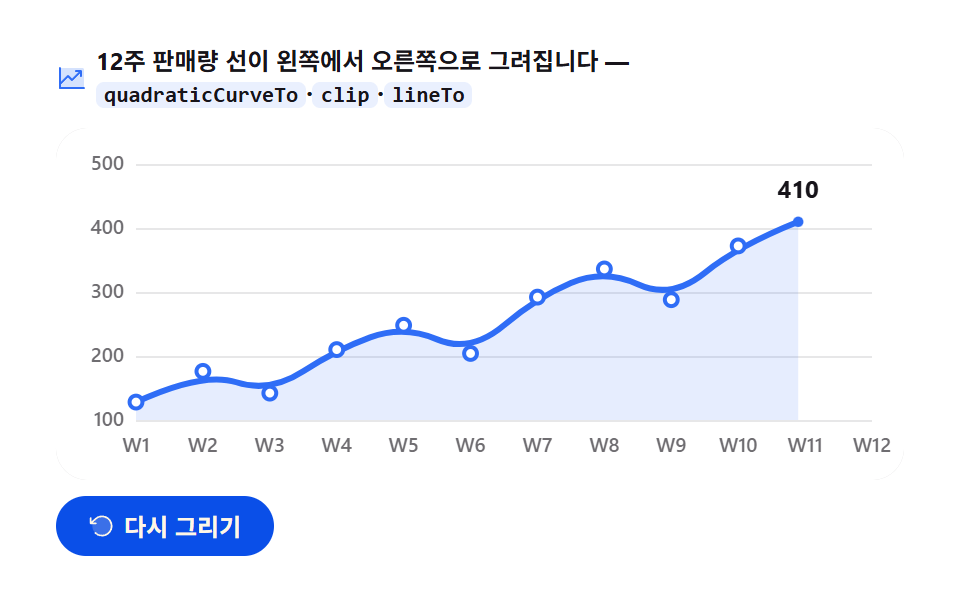 Dashboard UIJavaScript Chart Drawing, 9 Ways — No Library
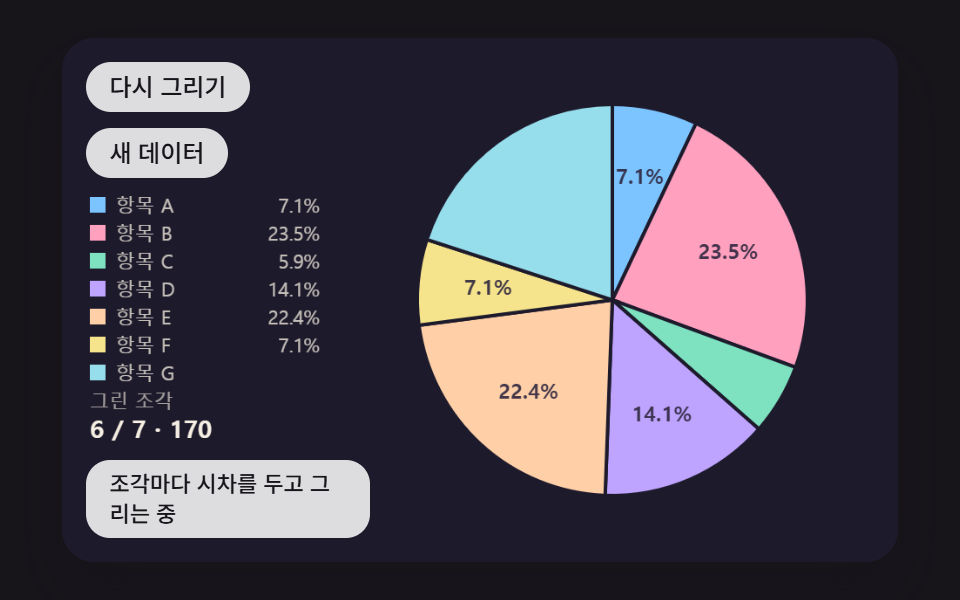 Dashboard UIPie Chart CSS: 9 Slices That Pop, Tilt and Morph
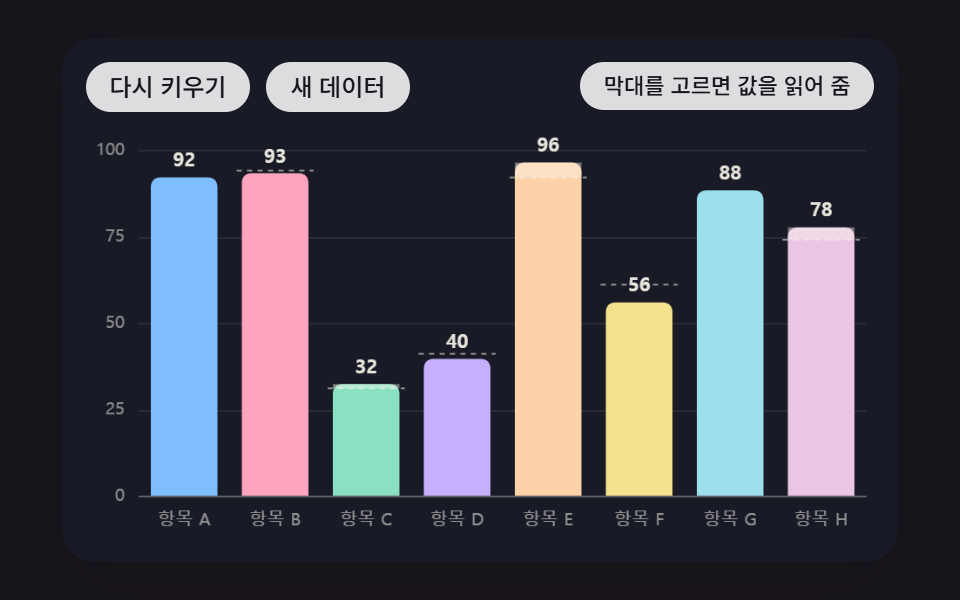 Dashboard UIBar Chart Animation: 9 Demos From Spring to Race
 Dashboard UIWord Cloud JavaScript: 9 Scenes, Spiral to 3D
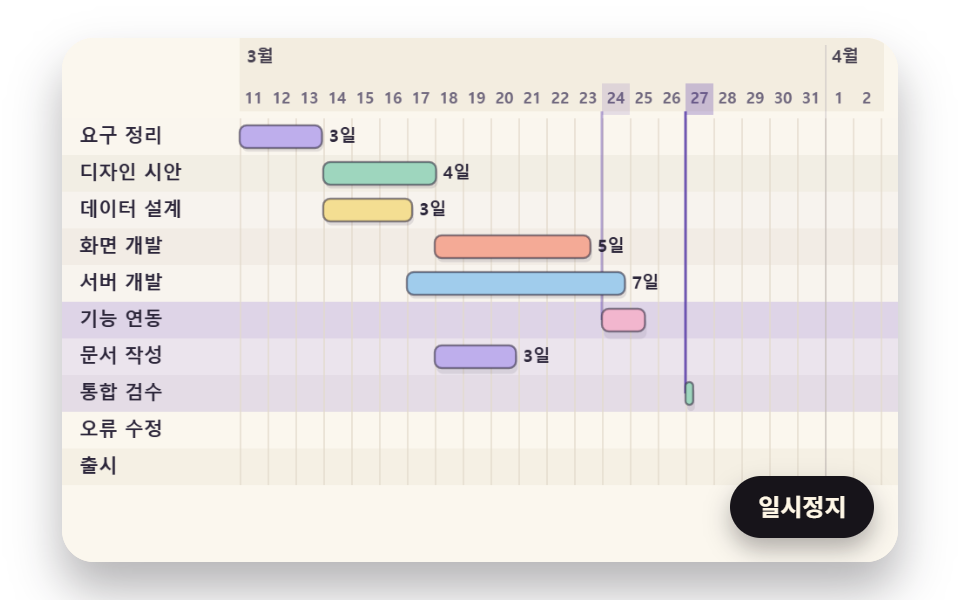 Dashboard UIGantt Chart JavaScript: 9 Self-Scheduling Views
 Dashboard UIDashboard Sidebar Design + 9 Widget UI Pieces
 Dashboard UI9 Dashboard Components, Not the Whole Page