Word Cloud JavaScript: 9 Scenes, Spiral to 3D
Word cloud JavaScript on canvas: if every new vote reshuffles the cloud, nobody can read it.
From Survey Summaries to a Live Poll Board — Nine Screens Where Words Find Their Place
 01 wc-text-count-area-scale
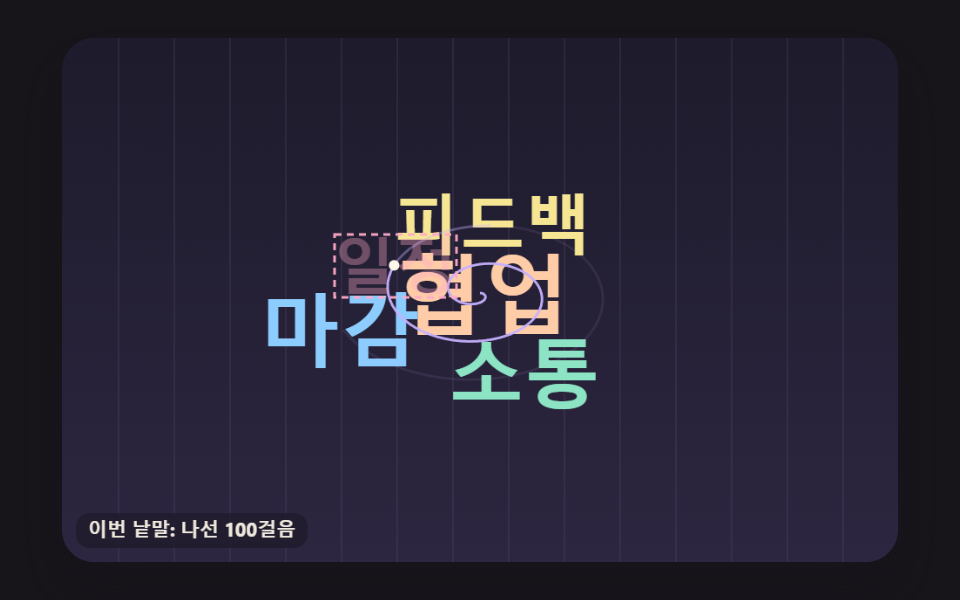 02 wc-spiral-bitgrid-place
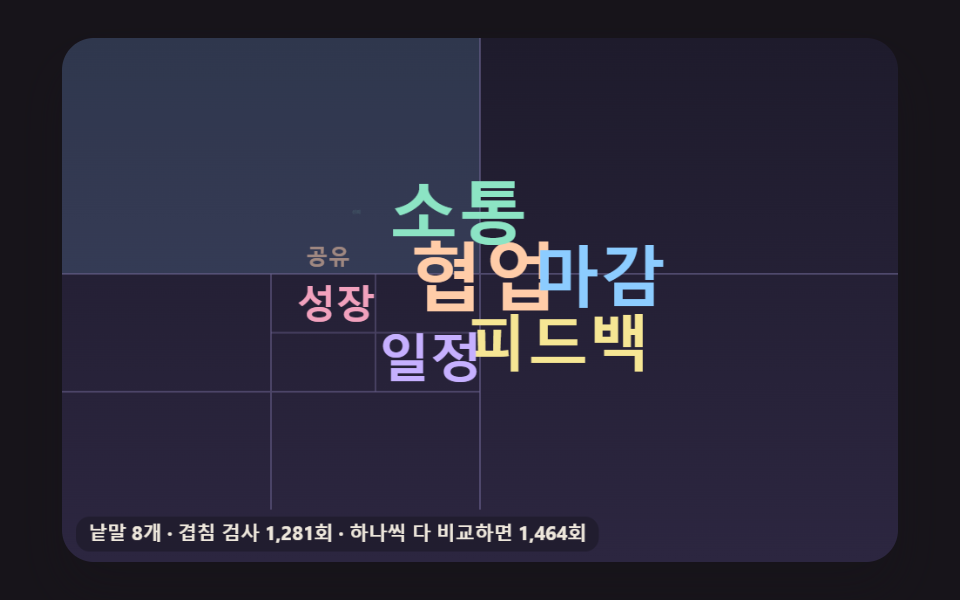 03 wc-quad-split-collision-cells
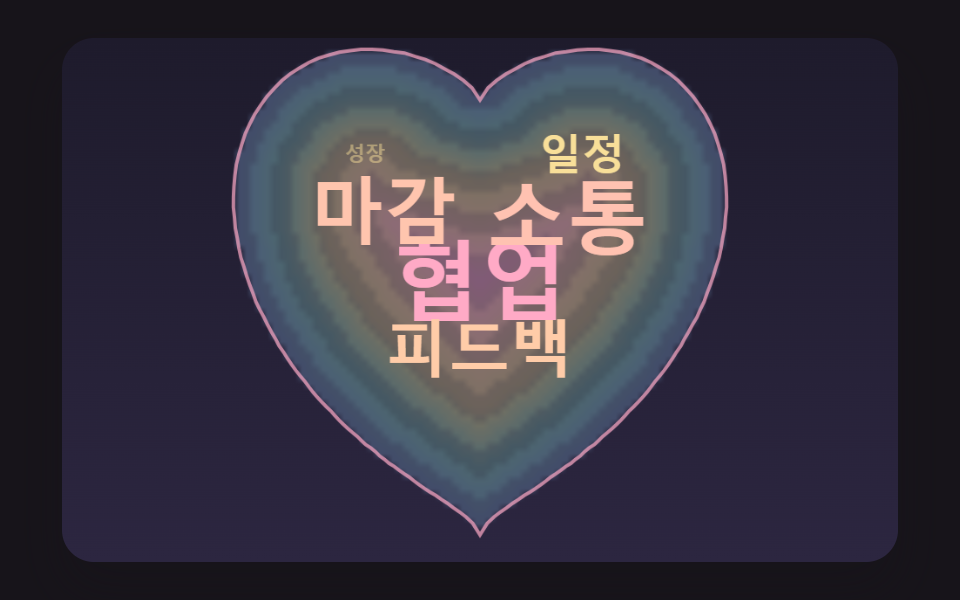 04 wc-heart-mask-depth-fill
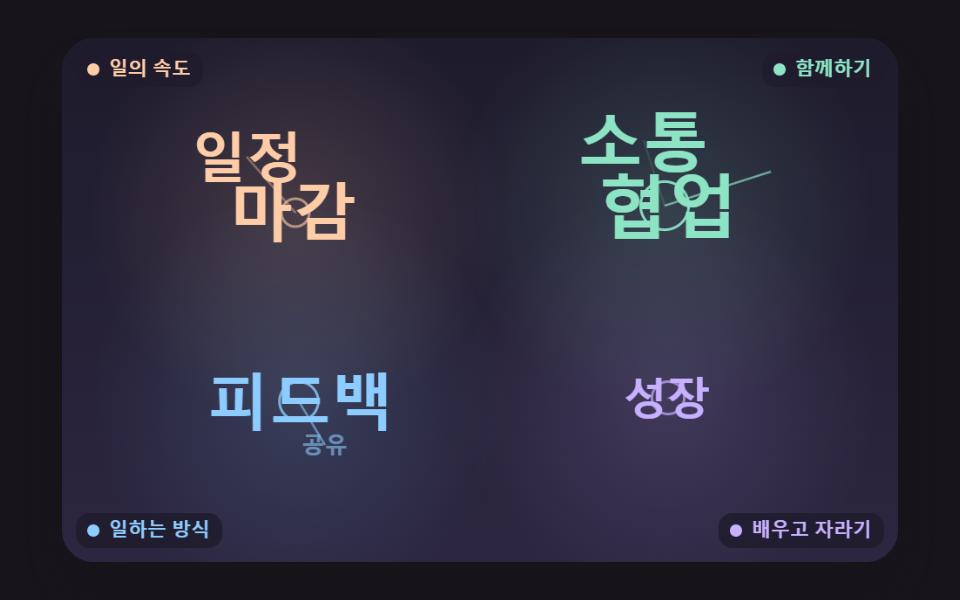 05 wc-theme-cluster-anchor
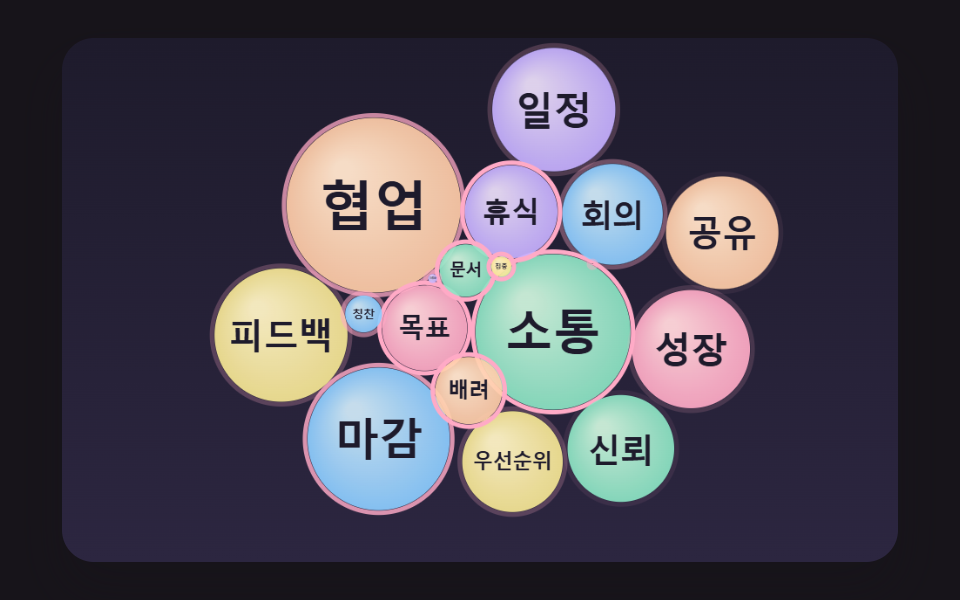 06 wc-bubble-force-relax-pack
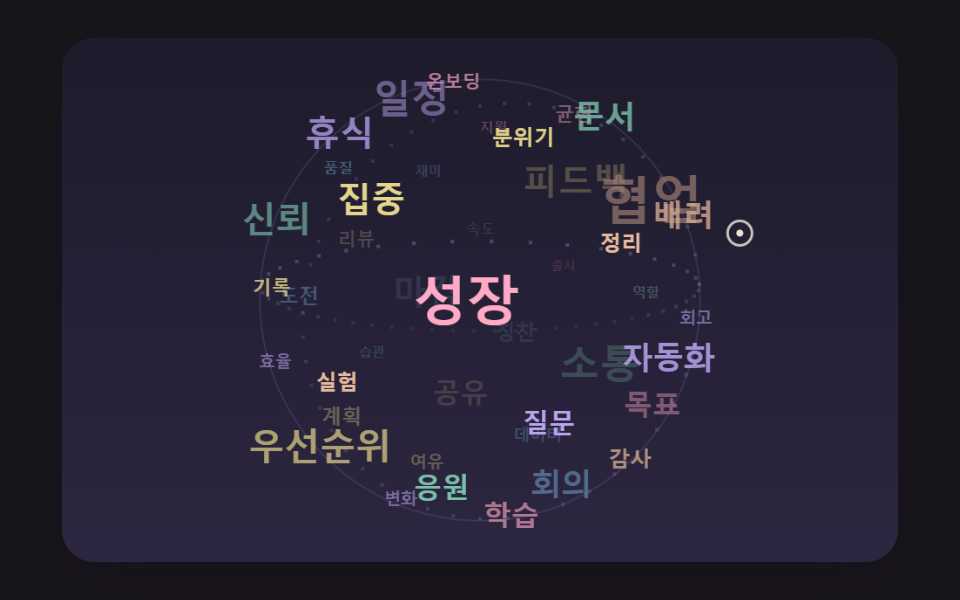 07 wc-golden-angle-sphere-orbit
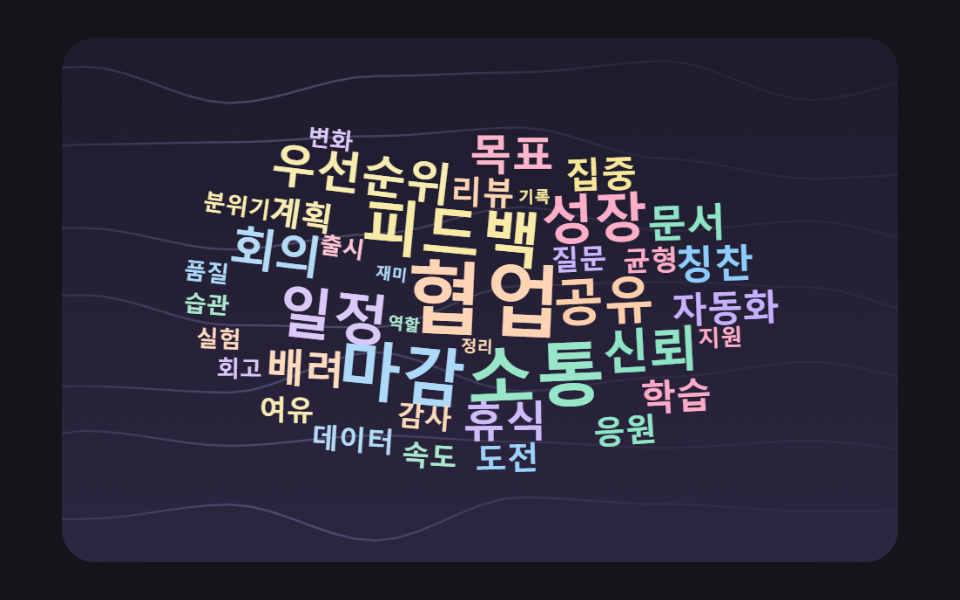 08 wc-noise-wind-sway
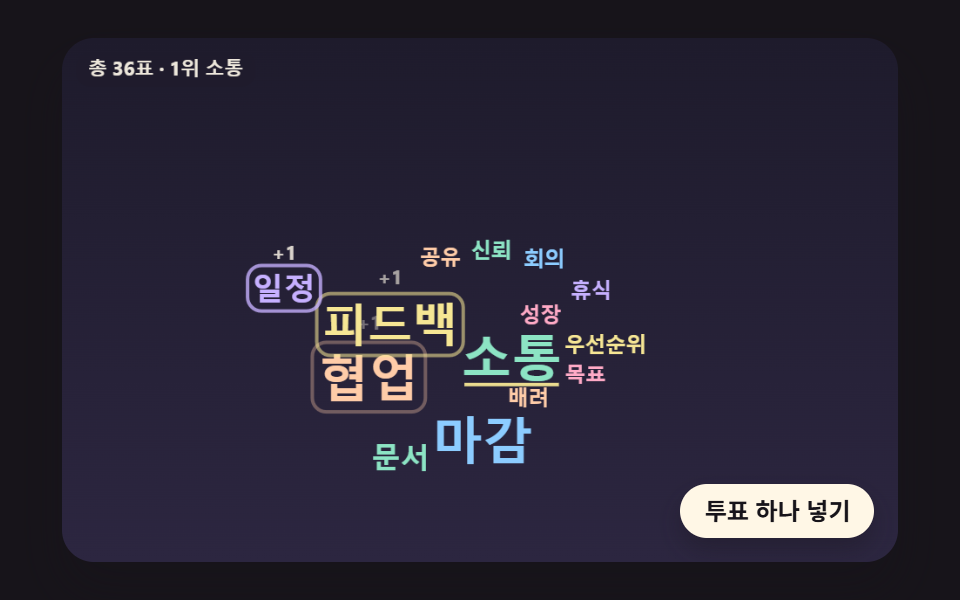 09 wc-live-poll-reflow-spring
Auto-plays · click a tile to jump to its section · all nine in one zip
- 01 A Word Board Sized by Counting the Text
- 02 Walking a Spiral to Find Empty Space
- 03 Splitting Cells in Four for Faster Collision Checks
- 04 Filling a Heart Shape by Depth
- 05 Color Clouds Grouped by Topic
- 06 Word Bubbles That Push Into Place
- 07 A 3D Sphere of Words That Spins
- 08 A Word Background Swaying in the Wind
- 09 A Live Word Board That Grows With Each Vote
A word cloud tallies how often each word shows up, draws the common ones large and the rare ones small, and packs all of them onto one board so that no two words touch. Left alone, each board here runs a seeded demo by itself: 01 to 05 drop words in one at a time and start over once the board is full, 06 inflates its bubbles on the first loop only and after that kicks them outward every 6 seconds and lets them pack back together, and 07 spins a sphere that leans toward a virtual pointer drawn as a cream ring. 08 sways in the wind without pause, and 09 feeds in 56 pre-drawn votes, one every 125 ms. The first time a real pointer moves over a canvas the demo flag comes off. From then on, 01 to 05 and 08 ring the word under the pointer and add a tooltip with its count (05 names its topic instead), 06 and 09 show the tooltip without a ring (09 gives the vote count), and 07 shows it only for words on the front of the sphere.
When weighted badges flowing in rows are all you need, the tech stack tag cloud already covers that. The difference here is position: nothing flows in rows, and every word computes a spot where its letters overlap none of the letters already on the board.
Turning Open-Ended Survey Answers Into One Picture
If you have a pile of open-ended survey answers and need to show at a glance what came up most, start with 01. It takes the answer sentences as written, splits and counts them, and sizes the words in one pass, so the 30 sample answers are the only part you swap for real ones. For retrospective feedback that should be grouped by theme, 05 fits better, because each topic gets its own color and its own anchor point.
A Poll Board for the Screen at a Talk
For audience votes during a talk or class, 09 is the board to adapt. Its button takes the next vote from the schedule and hands it to castVote, which raises the count, sets the new target size and checks whether the leader changed, so feeding in real responses appears to need nothing more than calling that function with an option index. The 14 option words are fixed from the start (3, 3, 2, 2 and 2 votes, then nine options with 1), so a board that accepts free text would need the counting step from 01 in front of it.
How Does Word Cloud Work, and Why Are the Biggest Words Placed First?
01 to 05 and 08 place words from the most frequent down. The other three skip that order: 07 scatters words over sphere slots shuffled by a seed regardless of size, 06 inflates bubbles one by one and lets forces tidy them, and 09 guards each option's existing spot.
The First Word Lands on Step One
On an empty board the first word finds room on the very first step of the spiral. In 02 the first word took 1 step and the next four took 139, 154, 112 and 162. Leave the big words for last and a 50 px word would face a board already peppered with small letters, so it would likely need a far longer walk or a few 0.85× shrinks, and in a picture where size stands for count, a shrunken leader states the ranking wrong.
Small Words Fill What Is Left
03 pushes this order all the way. After its 48 main words it writes the same words again at 11, 10, 9 and 8 px to plug the gaps between big letters, and it stops at 153 because the board is full. 04 also seats words from the deepest cell outward: the first one lands at the deepest point, 106.7 px from the edge, and the rim is left to the small words.
Size by Area, Place by Spiral — Square-Root Scaling of Counts and Bit-Grid Overlap Tests to Find a Free Spot
Twice the Count, Twice the Area
In 01 to 05, 07 and 08, a single line in sizeFor sets every word's size: 50 × (count ÷ top count)^0.5, with a floor of 10 px (07 then scales the result by 0.62). 06 and 09 define it without calling it, sizing with their own square-root formulas instead. The area a word covers grows with the square of its font size, so an exponent of 0.5 makes area proportional to count. 01's 16 words run from 50 px for 12 mentions through 35.4 px for 6 and 25 px for 3 down to 14.4 px for 1, yet size squared divided by count comes out at 208.3 for all 16. With an exponent of 1, height would follow the count while area followed its square, and the leader would look much further ahead than the votes say.
Thirty-Two Pixels in One Integer
Overlap is tested against letter shapes rather than boxes. makeSprite draws a word on a small canvas, reads it back with getImageData, sets a 1 bit for every pixel with alpha above 40, and marks the 3×3 neighborhood too, which leaves a 1 px gap between words. Thirty-two pixels of a row fit in one 32-bit integer, so the 480 px board is 17 integers per row (15, plus 2 of slack) by 300 rows. To try a word at x, each of its integers is shifted right by ox & 31, the remainder after dividing by 32, the bits that spill out are carried into the next integer, and the result is ANDed with the board; anything nonzero means at least one pixel overlaps.
        bitTests += 1;
        const s = ox & 31;
        const base = ox >> 5;
        const inv = 32 - s;
        for (let r = 0; r < sp.h; r += 1) {
            const row = (oy + r) * BOARD_INTS + base;
            const sr = r * sp.mw;
            let carry = 0;
            for (let k = 0; k < sp.mw; k += 1) {
                const v = sp.bits[sr + k];
                const part = s === 0 ? v : ((v >>> s) | carry);
                if ((board[row + k] & part) !== 0) {
                    return true;
                }
                carry = s === 0 ? 0 : (v << inv);
            }
            if (carry !== 0 && (board[row + sp.mw] & carry) !== 0) {
                return true;
            }
        }
One AND covers 32 pixels, so on paper a test needs a thirty-second of the comparisons a pixel-by-pixel check would make. That ratio is arithmetic about operation counts, not a timing. What the demo did measure is that 02 ran exactly one bit test per spiral step, 9,007 of each, so no step was thrown out for leaving the board before the test.
Where the Spiral Looks for Room
Candidate spots sit on a spiral running outward from the center. Step i turns i × 0.1 radians and lies i × 0.35 px from the center, stretched 1.6× sideways to suit the wide board, so each turn of about 62.8 steps adds 21.99 px of radius. The walk ends at step 809, half the board diagonal divided by 0.35, and a word that finds nothing by then is shrunk and tried again, as the edge case further down shows.
Word Cloud JavaScript: 9 Scenes — Count-Based Sizing, Spiral Placement, Split-Cell Collisions, Heart Fill, Topic Clusters, Word Bubbles, a 3D Sphere, Wind Sway and a Live Poll
All nine boards are drawn with canvas 2D and plain JavaScript: no library, no WebGL, no CDN and no image files. 06, 07, 08 and 09 need randomness and get it from the seeded makeRng, and everything else is arithmetic, so every run draws the same scene. Time advances in fixed 16 ms steps driven by requestAnimationFrame, up to six steps per frame with frame gaps capped at 100 ms, and there are no CSS keyframes and no timers.
Step and pixel counts in this post were taken with the Korean word set, which the measurements were run on. English words are wider, so the English version of 02 needs 10,308 spiral steps instead of 9,007 and 01 paints 35,109 pixels instead of 20,224, while sizes and vote tallies come from the counts alone and match across languages.
Twenty-Three Frame Comparisons in Two Seconds
Each board was captured as 24 frames over 2 seconds, and neighboring frames were compared 23 times. Accumulated area is the share of the board where a pixel changed at least once across those comparisons.
| Board | Accumulated area | Frames moved | Mean intensity |
|---|---|---|---|
| 01 Counting board | 15.3% | 18/23 | 84.3 |
| 02 Spiral placement | 18.5% | 23/23 | 73.2 |
| 03 Split-cell collisions | 63.0% | 23/23 | 46.2 |
| 04 Heart fill | 20.3% | 22/23 | 61.1 |
| 05 Topic clusters | 18.2% | 23/23 | 71.3 |
| 06 Word bubbles | 44.1% | 23/23 | 92.2 |
| 07 3D sphere | 31.1% | 23/23 | 69.5 |
| 08 Wind sway | 29.7% | 23/23 | 33.4 |
| 09 Live poll | 10.1% | 22/23 | 76.7 |
03 covers the most area, 63.0%, most likely because it redraws the cell borders whenever the word count changes and tints the cells a new word touches in sky blue. 09 covers the least, 10.1%, which appears to come from only the voted word and the neighbors it bumps moving at all. The 18/23 for 01 and 22/23 for 04 and 09 look like frames caught while the screen held still, after a board filled up or between two votes.
01A Word Board Sized by Counting the Text
Thirty sample answers are cut at spaces, commas, periods, question marks and similar marks into 75 words that collapse to 16 unique ones, and these pop in from the most frequent at 105 ms intervals, each with a tag such as "12 mentions" floating above it. Case is folded, so a capitalized word at the start of an answer counts with its lowercase twin, which matters when raw survey text arrives exactly as people typed it. The code is the body of countWords, and on a tie the word that appeared first stays ahead.
<main class="stage">
<div class="wc is-demo" id="wc">
  <canvas class="wc__canvas" data-role="canvas" width="480" height="300" role="img" aria-label="A word cloud that counts the words in survey answers and draws the most frequent ones largest."></canvas>
  <ol class="wc__list" data-role="list" aria-label="Words ranked by frequency"></ol>
</div>
</main>
@use "../../../../site/static/demo-tokens" as *;
@include stage($stage-ink);
.wc {
position: relative;
width: min(92vw, calc(160vh - 12.8vw));
aspect-ratio: 480 / 300;
margin: 0 auto;
border-radius: $r-card;
overflow: hidden;
box-shadow: $shadow-raised;
background: $subject-ink;
}
.wc__canvas {
position: absolute;
inset: 0;
display: block;
width: 100%;
height: 100%;
}
// 화면에서는 숨기고 화면 낭독기는 읽는 빈도 순 목록·알림 줄 — display: none 이 아니라 1px 상자로 줄여 접근성 트리에 남긴다
.wc__list,
.wc__live {
position: absolute;
width: 1px;
height: 1px;
padding: 0;
overflow: hidden;
clip-path: inset(50%);
white-space: nowrap;
border: 0;
}
.wc__vote {
position: absolute;
right: $sp-3;
bottom: $sp-3;
padding: $sp-1 $sp-3;
border: 0;
border-radius: $r-pill;
background: $subject-cream;
color: $subject-ink;
font-family: inherit;
font-weight: 700;
font-size: 12px;
line-height: 1.6;
cursor: pointer;
box-shadow: $shadow-press;
transition: transform $dur-quick $ease-spring;
}
.wc__vote:hover {
transform: translateY(-2px);
}
.wc__vote:active {
transform: translateY(1px);
}
.wc__vote:focus-visible {
outline: 2px solid $subject-cream;
outline-offset: 2px;
}
@media (max-width: 340px) {
.wc__vote { font-size: 11px; padding: $sp-1 $sp-2; }
}
// 동작 줄이기 — 장면은 스크립트가 마지막 배치 한 장면으로 멈춘다. 버튼도 떠오르지 않게
@media (prefers-reduced-motion: reduce) {
.wc__vote { transition: none !important; }
.wc__vote:hover,
.wc__vote:active { transform: none !important; }
}html, body {
margin: 0;
overflow: hidden;
}
.stage {
box-sizing: border-box;
min-height: 100vh;
display: grid;
place-items: center;
margin: 0;
background: #17141a;
font-family: -apple-system, "Segoe UI", "Noto Sans KR", sans-serif;
padding: clamp(8px, 4vw, 24px);
}
.wc {
position: relative;
width: min(92vw, 160vh - 12.8vw);
aspect-ratio: 480/300;
margin: 0 auto;
border-radius: 16px;
overflow: hidden;
box-shadow: 0 14px 24px rgba(23, 20, 26, 0.32);
background: #17141a;
}
.wc__canvas {
position: absolute;
inset: 0;
display: block;
width: 100%;
height: 100%;
}
.wc__list,
.wc__live {
position: absolute;
width: 1px;
height: 1px;
padding: 0;
overflow: hidden;
clip-path: inset(50%);
white-space: nowrap;
border: 0;
}
.wc__vote {
position: absolute;
right: 12px;
bottom: 12px;
padding: 4px 12px;
border: 0;
border-radius: 999px;
background: #fff7e6;
color: #17141a;
font-family: inherit;
font-weight: 700;
font-size: 12px;
line-height: 1.6;
cursor: pointer;
box-shadow: 0 6px 12px rgba(23, 20, 26, 0.32);
transition: transform 220ms cubic-bezier(0.2, 0.8, 0.2, 1);
}
.wc__vote:hover {
transform: translateY(-2px);
}
.wc__vote:active {
transform: translateY(1px);
}
.wc__vote:focus-visible {
outline: 2px solid #fff7e6;
outline-offset: 2px;
}
@media (max-width: 340px) {
.wc__vote {
font-size: 11px;
padding: 4px 8px;
}
}
@media (prefers-reduced-motion: reduce) {
.wc__vote {
transition: none !important;
}
.wc__vote:hover,
.wc__vote:active {
transform: none !important;
}
}(function () {
const root = document.getElementById("wc");
if (!root) return;
const W = 480;
const H = 300;
const FIXED_DT = 16;
const TAU = Math.PI * 2;
// 파스텔 팔레트 — 어두운 판 위에 밝은 파스텔 글자를 얹어 명도 차로 글자가 읽힌다
const BG = [30, 27, 44];
const BG_LOW = [44, 38, 64];
const GUIDE = [104, 96, 140];
const CREAM = [255, 248, 234];
const PEACH = [255, 204, 168];
const MINT = [140, 228, 196];
const SKY = [140, 204, 255];
const LEMON = [246, 230, 148];
const LILAC = [198, 176, 255];
const PINK = [255, 170, 198];
const WORD_COLORS = [PEACH, MINT, SKY, LEMON, LILAC, PINK];
// 글꼴 — 기기에 이미 있는 시스템 글꼴 목록만. 바깥에서 글꼴 파일을 불러오지 않는다
const FONT_FAMILY = '"Segoe UI", "Malgun Gothic", "Hiragino Sans", "Noto Sans KR", sans-serif';
const FONT_WEIGHT = 700;
// 크기 = SIZE_MAX × (횟수 / 1위 횟수)^SIZE_EXPONENT. 0.5(제곱근)면 글자 넓이(크기의 제곱)가 횟수에 비례한다
const SIZE_EXPONENT = 0.5;
const SIZE_MAX = 50;
const SIZE_MIN = 10;
function sizeFor(count, top) {
return Math.max(SIZE_MIN, SIZE_MAX * Math.pow(count / top, SIZE_EXPONENT));
}
// meetings·설문에서 흔히 나오는 낱말과 횟수 — 많이 나온 순. theme 은 0 Pace · 1 Together · 2 How we work · 3 Growing
const VOCAB = [
{ text: 'collaboration', count: 24, theme: 1 },
{ text: 'communication', count: 19, theme: 1 },
{ text: 'deadline', count: 16, theme: 0 },
{ text: 'feedback', count: 14, theme: 2 },
{ text: 'schedule', count: 12, theme: 0 },
{ text: 'growth', count: 11, theme: 3 },
{ text: 'sharing', count: 10, theme: 2 },
{ text: 'trust', count: 9, theme: 1 },
{ text: 'meetings', count: 8, theme: 0 },
{ text: 'priorities', count: 8, theme: 0 },
{ text: 'rest', count: 7, theme: 3 },
{ text: 'goals', count: 7, theme: 0 },
{ text: 'kindness', count: 6, theme: 1 },
{ text: 'docs', count: 6, theme: 2 },
{ text: 'praise', count: 6, theme: 1 },
{ text: 'focus', count: 5, theme: 0 },
{ text: 'automation', count: 5, theme: 2 },
{ text: 'learning', count: 5, theme: 3 },
{ text: 'reviews', count: 4, theme: 2 },
{ text: 'cheering', count: 4, theme: 1 },
{ text: 'challenge', count: 4, theme: 3 },
{ text: 'planning', count: 4, theme: 0 },
{ text: 'questions', count: 3, theme: 2 },
{ text: 'balance', count: 3, theme: 3 },
{ text: 'thanks', count: 3, theme: 1 },
{ text: 'speed', count: 3, theme: 0 },
{ text: 'data', count: 3, theme: 2 },
{ text: 'leeway', count: 3, theme: 3 },
{ text: 'retros', count: 2, theme: 0 },
{ text: 'support', count: 2, theme: 1 },
{ text: 'experiments', count: 2, theme: 2 },
{ text: 'habits', count: 2, theme: 3 },
{ text: 'quality', count: 2, theme: 2 },
{ text: 'mood', count: 2, theme: 1 },
{ text: 'change', count: 2, theme: 3 },
{ text: 'launch', count: 2, theme: 0 },
{ text: 'cleanup', count: 1, theme: 2 },
{ text: 'roles', count: 1, theme: 1 },
{ text: 'fun', count: 1, theme: 1 },
{ text: 'notes', count: 1, theme: 0 },
{ text: 'efficiency', count: 1, theme: 0 },
{ text: 'onboarding', count: 1, theme: 2 },
{ text: 'connection', count: 1, theme: 1 },
{ text: 'ideas', count: 1, theme: 3 },
{ text: 'stability', count: 1, theme: 3 },
{ text: 'transparency', count: 1, theme: 2 },
{ text: 'customers', count: 1, theme: 2 },
{ text: 'practice', count: 1, theme: 3 }
];
// 횟수 문구 — 1 은 따로 둔다(영어판의 단수형 자리)
const COUNT_LABEL = '{n} mentions';
const COUNT_ONE = '1 mention';
const TOP_LABEL = 'Most frequent:';
// 캔버스 요약에서 1~3위 앞에 붙는 말 — 09 투표판은 자기 말로 바꾼다
let rankHeading = TOP_LABEL;
function countText(n) { return n === 1 ? COUNT_ONE : COUNT_LABEL.replace('{n}', String(n)); }
function clamp(v, lo, hi) { return v < lo ? lo : (v > hi ? hi : v); }
function lerp(a, b, k) { return a + (b - a) * k; }
function smooth(x) { const c = clamp(x, 0, 1); return c * c * (3 - 2 * c); }
function rgba(c, a) {
return 'rgba(' + Math.round(clamp(c[0], 0, 255)) + ',' + Math.round(clamp(c[1], 0, 255)) + ',' + Math.round(clamp(c[2], 0, 255)) + ',' + clamp(a, 0, 1).toFixed(3) + ')';
}
function mixRGB(a, b, k) { return [lerp(a[0], b[0], k), lerp(a[1], b[1], k), lerp(a[2], b[2], k)]; }
// 시드 고정 난수 — 같은 시드면 같은 배치·일정표가 다시 나온다 (32비트 정수 섞기)
function makeRng(seed) {
let s = seed >>> 0;
return function () {
s = (s + 0x6d2b79f5) >>> 0;
let t = s;
t = Math.imul(t ^ (t >>> 15), t | 1);
t ^= t + Math.imul(t ^ (t >>> 7), t | 61);
return ((t ^ (t >>> 14)) >>> 0) / 4294967296;
};
}
// 튀어나오기 — 감쇠 진동 1 − e^(−POP_DAMP·t)·cos(POP_FREQ·t), t 는 초. goals 크기를 한 번 넘겼다가 자리 잡는다
const POP_DAMP = 7;
const POP_FREQ = 11;
function popScale(t) {
if (t <= 0) {
return 0;
}
return 1 - Math.exp(-POP_DAMP * t) * Math.cos(POP_FREQ * t);
}
const canvasEl = root.querySelector('[data-role="canvas"]');
const listEl = root.querySelector('[data-role="list"]');
const ctxRaw = canvasEl ? canvasEl.getContext('2d') : null;
if (!canvasEl || !ctxRaw || !listEl) {
return;
}
const cv = canvasEl;
const ctx = ctxRaw;
const list = listEl;
// 캔버스 요약 — HTML 에 적힌 장면 설명 뒤에 지금 1~3위를 덧붙인다
const baseAria = cv.getAttribute('aria-label') || '';
const reduceQuery = window.matchMedia('(prefers-reduced-motion: reduce)');
// 페이지를 연 채 동작 줄이기 설정을 바꿔도 change 리스너가 이 값을 다시 읽는다
let still = reduceQuery.matches;
// 자동 시연 중인가 — 사람이 처음 손대면 시연 표시를 뗀다
let demo = root.classList.contains('is-demo');
// 리스너는 한 묶음으로 달고 정리할 때 한 번에 뗀다
const off = new AbortController();
// 포인터 자리(판 좌표) — 판 밖이면 -1
let hoverX = -1;
let hoverY = -1;
function fitCanvas() {
// 배율은 2 에서 자른다 — 배율 3 기기에서 화소가 2.25배로 늘어 프레임마다 일이 그만큼 커지지 않게
const dpr = Math.min(window.devicePixelRatio || 1, 2);
cv.width = Math.round(W * dpr);
cv.height = Math.round(H * dpr);
ctx.setTransform(dpr, 0, 0, dpr, 0, 0);
}
function clearStage() {
const g = ctx.createLinearGradient(0, 0, 0, H);
g.addColorStop(0, rgba(BG, 1));
g.addColorStop(1, rgba(BG_LOW, 1));
ctx.fillStyle = g;
ctx.fillRect(0, 0, W, H);
}
function fontOf(size) { return FONT_WEIGHT + ' ' + size.toFixed(1) + 'px ' + FONT_FAMILY; }
function roundRectPath(x, y, w, h, r) {
ctx.beginPath();
ctx.moveTo(x + r, y);
ctx.arcTo(x + w, y, x + w, y + h, r);
ctx.arcTo(x + w, y + h, x, y + h, r);
ctx.arcTo(x, y + h, x, y, r);
ctx.arcTo(x, y, x + w, y, r);
ctx.closePath();
}
// 놓인 낱말 그리기 — 상자 가운데를 중심으로 scale 배·angle 라디안 돌리고 lift 만큼 띄운다. 비트 칸을 만든 자리와 같은 기준선에 찍는다
function drawPlaced(p, alpha, scale, angle, lift, color) {
if (alpha <= 0.002 || scale <= 0.001) {
return;
}
const cx = p.x + p.w / 2;
const cy = p.y + p.h / 2;
ctx.save();
ctx.translate(cx, cy - lift);
if (angle !== 0) {
ctx.rotate(angle);
}
if (scale !== 1) {
ctx.scale(scale, scale);
}
ctx.font = fontOf(p.size);
ctx.textAlign = 'left';
ctx.textBaseline = 'alphabetic';
ctx.fillStyle = rgba(color, alpha);
ctx.fillText(p.text, p.x + p.dx - cx, p.y + p.dy - cy);
ctx.restore();
}
function hitPlaced(p) {
return hoverX >= p.x && hoverX <= p.x + p.w && hoverY >= p.y && hoverY <= p.y + p.h;
}
// 포인터 아래 낱말 — 뒤에 그린 것이 위에 있으니 뒤에서부터 찾는다. shown(i) 가 거짓인 낱말은 건너뛴다
function pickPlaced(ps, shown) {
if (hoverX < 0) {
return -1;
}
for (let i = ps.length - 1; i >= 0; i -= 1) {
if (shown(i) && hitPlaced(ps[i])) {
return i;
}
}
return -1;
}
function drawHalo(x, y, w, h) {
ctx.lineWidth = 1.5;
ctx.strokeStyle = rgba(CREAM, 0.9);
roundRectPath(x - 3, y - 2, w + 6, h + 4, 6);
ctx.stroke();
}
// 말풍선 — 낱말과 횟수를 크림 바탕에 진한 글자로
function drawTip(label, ax, ay) {
ctx.font = fontOf(11);
const bw = ctx.measureText(label).width + 16;
const bh = 22;
const bx = clamp(ax - bw / 2, 4, W - bw - 4);
const by = ay - bh - 8 < 4 ? ay + 10 : ay - bh - 8;
ctx.fillStyle = rgba(CREAM, 0.96);
roundRectPath(bx, by, bw, bh, 8);
ctx.fill();
ctx.fillStyle = rgba(BG, 1);
ctx.textAlign = 'center';
ctx.textBaseline = 'middle';
ctx.fillText(label, bx + bw / 2, by + bh / 2 + 0.5);
}
// 판 위 설명 글 — 어두운 알약 바탕에 작은 크림 글자. 돌려주는 값은 차지한 상자 [x, y, w, h]
function drawCaption(text, x, y, alignRight) {
ctx.font = fontOf(11);
const bw = ctx.measureText(text).width + 14;
const bh = 20;
const bx = alignRight ? x - bw : x;
ctx.fillStyle = rgba(BG, 0.82);
roundRectPath(bx, y, bw, bh, 8);
ctx.fill();
ctx.fillStyle = rgba(CREAM, 0.92);
ctx.textAlign = 'left';
ctx.textBaseline = 'middle';
ctx.fillText(text, bx + 7, y + bh / 2 + 0.5);
return [bx, y, bw, bh];
}
const SPRITE_PAD = 2;
const INK_ALPHA = 40;
// 판 비트 칸 — 한 줄에 BOARD_INTS 개 정수(480px = 정수 15개 + 밀려난 끝을 받을 leeway 2개)
const BOARD_INTS = (W >> 5) + 2;
const scratch = document.createElement('canvas');
const scratchRaw = scratch.getContext('2d', { willReadFrequently: true });
if (!scratchRaw) {
return;
}
const sctx = scratchRaw;
// 비트 AND 로 겹침을 잰 횟수 — 판 밖이라 바로 거른 자리는 세지 않는다
let bitTests = 0;
function makeSprite(text, size) {
sctx.font = fontOf(size);
const m = sctx.measureText(text);
const left = Math.ceil(m.actualBoundingBoxLeft);
const right = Math.ceil(m.actualBoundingBoxRight);
const asc = Math.ceil(m.actualBoundingBoxAscent);
const desc = Math.ceil(m.actualBoundingBoxDescent);
const w = Math.max(1, left + right) + SPRITE_PAD * 2;
const h = Math.max(1, asc + desc) + SPRITE_PAD * 2;
// 크기를 바꾸면 그리기 설정이 초기화되므로 글꼴은 그 뒤에 다시 준다
if (scratch.width < w) {
scratch.width = w;
}
if (scratch.height < h) {
scratch.height = h;
}
sctx.clearRect(0, 0, w, h);
sctx.font = fontOf(size);
sctx.textAlign = 'left';
sctx.textBaseline = 'alphabetic';
sctx.fillStyle = '#000';
const dx = SPRITE_PAD + left;
const dy = SPRITE_PAD + asc;
sctx.fillText(text, dx, dy);
const px = sctx.getImageData(0, 0, w, h).data;
const mw = (w >> 5) + 1;
const bits = new Uint32Array(mw * h);
for (let y = 0; y < h; y += 1) {
for (let x = 0; x < w; x += 1) {
if (px[(y * w + x) * 4 + 3] <= INK_ALPHA) {
continue;
}
// 한 픽셀 둘레(3×3)까지 칠해 두 글자 사이에 1px 틈이 남게 한다
for (let yy = Math.max(0, y - 1); yy <= Math.min(h - 1, y + 1); yy += 1) {
for (let xx = Math.max(0, x - 1); xx <= Math.min(w - 1, x + 1); xx += 1) {
bits[yy * mw + (xx >> 5)] |= (0x80000000 >>> (xx & 31));
}
}
}
}
return { w: w, h: h, mw: mw, bits: bits, dx: dx, dy: dy };
}
function makeBoard() { return new Uint32Array(BOARD_INTS * H); }
// 겹침 검사 — 글자 줄마다 정수를 판의 x 자리만큼 밀어(>>> s) 판 정수와 AND. 0 이 아니면 이미 칠해진 픽셀과 겹친다
function collides(board, sp, ox, oy) {
// 판 밖으로 한 픽셀이라도 나가면 겹친 것으로 친다 — 판 끝 긴 단어가 잘린 채 놓이지 않게
if (ox < 0 || oy < 0 || ox + sp.w > W || oy + sp.h > H) {
return true;
}
bitTests += 1;
const s = ox & 31;
const base = ox >> 5;
const inv = 32 - s;
for (let r = 0; r < sp.h; r += 1) {
const row = (oy + r) * BOARD_INTS + base;
const sr = r * sp.mw;
let carry = 0;
for (let k = 0; k < sp.mw; k += 1) {
const v = sp.bits[sr + k];
const part = s === 0 ? v : ((v >>> s) | carry);
if ((board[row + k] & part) !== 0) {
return true;
}
carry = s === 0 ? 0 : (v << inv);
}
if (carry !== 0 && (board[row + sp.mw] & carry) !== 0) {
return true;
}
}
return false;
}
// 찍기 — 겹침 검사와 같은 밀기로 글자 비트를 판에 OR 한다
function stamp(board, sp, ox, oy) {
const s = ox & 31;
const base = ox >> 5;
const inv = 32 - s;
for (let r = 0; r < sp.h; r += 1) {
const row = (oy + r) * BOARD_INTS + base;
const sr = r * sp.mw;
let carry = 0;
for (let k = 0; k < sp.mw; k += 1) {
const v = sp.bits[sr + k];
board[row + k] |= s === 0 ? v : ((v >>> s) | carry);
carry = s === 0 ? 0 : (v << inv);
}
if (carry !== 0) {
board[row + sp.mw] |= carry;
}
}
}
// 픽셀 하나 칠하기 — 설명 글 자리·모양 바깥처럼 낱말이 들어가면 안 되는 곳을 미리 막는다
function blockPixel(board, x, y) {
board[y * BOARD_INTS + (x >> 5)] |= (0x80000000 >>> (x & 31));
}
function blockRect(board, x, y, w, h) {
const x0 = Math.max(0, Math.floor(x));
const y0 = Math.max(0, Math.floor(y));
const x1 = Math.min(W, Math.ceil(x + w));
const y1 = Math.min(H, Math.ceil(y + h));
for (let yy = y0; yy < y1; yy += 1) {
for (let xx = x0; xx < x1; xx += 1) {
blockPixel(board, xx, yy);
}
}
}
// 칠해진 픽셀 수 — 판이 얼마나 찼는지(변형 비교용)
function inkCount(board) {
let n = 0;
for (let i = 0; i < board.length; i += 1) {
let v = board[i];
while (v !== 0) {
v &= v - 1;
n += 1;
}
}
return n;
}
// 반지름이 일정하게 늘어나는 나선 — 걸음 i 에서 각 = i × SPIRAL_TURN(라디안), 반지름 = i × SPIRAL_STEP(px).
// 한 바퀴(2π / SPIRAL_TURN 걸음)마다 반지름이 같은 폭만큼 커진다. 가로는 SPIRAL_ASPECT 배로 늘려 넓은 판을 고르게 훑는다
const SPIRAL_STEP = 0.35;
const SPIRAL_TURN = 0.1;
const SPIRAL_ASPECT = 1.6;
// 나선을 끝낼 걸음 — 반지름이 판 대각선 절반에 닿으면 그만 찾는다
const SPIRAL_LIMIT = Math.ceil(Math.hypot(W, H) / 2 / SPIRAL_STEP);
// 지금까지 나선에서 내디딘 걸음 수 — 자리 하나 찾는 데 든 일
let spiralSteps = 0;
function spiralAt(i) {
const a = i * SPIRAL_TURN;
const r = i * SPIRAL_STEP;
return [Math.cos(a) * r * SPIRAL_ASPECT, Math.sin(a) * r];
}
// 나선 탐색 — 기준점 (cx, cy) 에서 나선을 한 걸음씩 옮기며, 글자 상자 가운데를 그 점에 두고 비트 칸이 안 겹치는 첫 자리를 돌려준다.
// trail 을 주면 지나온 나선 점을 모두 적는다(02 가 그 자취를 그린다)
function searchSpiral(board, sp, cx, cy, trail) {
for (let i = 0; i < SPIRAL_LIMIT; i += 1) {
spiralSteps += 1;
const p = spiralAt(i);
const ox = Math.round(cx + p[0] - sp.w / 2);
const oy = Math.round(cy + p[1] - sp.h / 2);
if (trail) {
trail.push([cx + p[0], cy + p[1]]);
}
if (!collides(board, sp, ox, oy)) {
return [ox, oy];
}
}
return null;
}
// 판 끝 긴 단어 — 나선을 끝까지 돌아도 자리가 없으면 SHRINK_RATIO 배로 한 단계 작게 다시 놓는다. SIZE_FLOOR 보다 작아지면 버린다
const SHRINK_RATIO = 0.85;
const SIZE_FLOOR = 8;
let shrinkCount = 0;
let dropCount = 0;
function placeEntry(board, e, size, cx, cy, color, trail) {
let s = size;
let shrinks = 0;
while (s >= SIZE_FLOOR) {
const sp = makeSprite(e.text, s);
if (trail) {
trail.length = 0;
}
const at = searchSpiral(board, sp, cx, cy, trail);
if (at) {
stamp(board, sp, at[0], at[1]);
return { text: e.text, count: e.count, theme: e.theme, size: s, x: at[0], y: at[1], w: sp.w, h: sp.h, dx: sp.dx, dy: sp.dy, color: color, shrinks: shrinks };
}
s *= SHRINK_RATIO;
shrinks += 1;
shrinkCount += 1;
}
dropCount += 1;
return null;
}
// 예시 답변 — 설문 「이번 분기를 낱말 몇 개로 말하면?」 에 들어온 답. 낱말 사이는 띄어쓰기·쉼표·「、」
const ANSWERS = [
'collaboration feedback priorities',
'collaboration feedback priorities',
'collaboration feedback priorities',
'collaboration feedback rest',
'collaboration feedback rest',
'collaboration feedback rest',
'collaboration schedule goals',
'collaboration schedule goals',
'collaboration schedule goals',
'collaboration schedule kindness',
'collaboration schedule kindness',
'collaboration schedule docs',
'communication growth docs',
'communication growth praise',
'communication growth focus',
'communication growth',
'communication growth',
'communication sharing',
'communication sharing',
'communication sharing',
'communication sharing',
'deadline sharing',
'deadline trust',
'deadline trust',
'deadline trust',
'deadline trust',
'deadline meetings',
'deadline meetings',
'deadline meetings',
'feedback meetings'
];
// 낱말 가르기 — 띄어쓰기·쉼표·마침표·물음표·느낌표와 「、」「。」「・」 에서 자른다
const SPLIT_PATTERN = /[\s,.!?、。・,]+/;
// 낱말 세기 — 소문자로 맞춘 낱말마다 Map 에 횟수를 더하고, 많이 나온 순(같으면 먼저 나온 순)으로 줄 세운다.
// theme 자리에는 처음 나온 순번을 적어 같은 횟수끼리의 순서를 정한다
function countWords(lines) {
        const counts = new Map();
        const order = [];
        let tokens = 0;
        for (let i = 0; i < lines.length; i += 1) {
            const parts = lines[i].split(SPLIT_PATTERN);
            for (let k = 0; k < parts.length; k += 1) {
                const w = parts[k].trim().toLowerCase();
                if (!w) {
                    continue;
                }
                tokens += 1;
                const c = counts.get(w);
                if (c === undefined) {
                    order.push(w);
                    counts.set(w, 1);
                }
                else {
                    counts.set(w, c + 1);
                }
            }
        }
        const entries = order.map(function (w, i) { return { text: w, count: counts.get(w) || 0, theme: i }; });
        entries.sort(function (a, b) { return b.count - a.count || a.theme - b.theme; });
        return { entries: entries, tokens: tokens };
}
// 시연 — APPEAR_START_MS 부터 APPEAR_GAP_MS 마다 한 낱말씩(많이 나온 순) 튀어나오고, HOLD_END_MS 까지 머문 뒤 FADE_MS 동안 사라진다
const APPEAR_START_MS = 200;
const APPEAR_GAP_MS = 105;
const BADGE_MS = 700;
// 다 센 순간 — COUNT_DONE_MS 부터 COUNT_SHOW_MS 동안 모든 낱말이 밝아지고 횟수가 한꺼번에 떠, 넓이와 횟수를 한눈에 견준다
const COUNT_DONE_MS = 2300;
const COUNT_SHOW_MS = 900;
const HOLD_END_MS = 3900;
const FADE_MS = 400;
const LOOP_MS = 4500;
const CENTER_Y = 146;
const SUMMARY_LABEL = '{a} answers · {t} words → {k} unique';
const FORMULA_LABEL = 'size = count^{e}';
let tally = { entries: [], tokens: 0 };
let placed = [];
let t = 0;
function summaryText() {
return SUMMARY_LABEL.replace('{a}', String(ANSWERS.length)).replace('{t}', String(tally.tokens)).replace('{k}', String(tally.entries.length));
}
function formulaText() { return FORMULA_LABEL.replace('{e}', String(SIZE_EXPONENT)); }
function build() {
tally = countWords(ANSWERS);
const top = tally.entries.length > 0 ? tally.entries[0].count : 1;
const board = makeBoard();
// 설명 글 두 줄 자리를 먼저 막는다 — 낱말이 그 밑으로 숨지 않게
ctx.font = fontOf(11);
const sw = ctx.measureText(summaryText()).width + 14;
const fw = ctx.measureText(formulaText()).width + 14;
blockRect(board, 6, 6, sw + 4, 24);
blockRect(board, W - 10 - fw, H - 30, fw + 4, 24);
placed = [];
for (let i = 0; i < tally.entries.length; i += 1) {
const e = tally.entries[i];
const p = placeEntry(board, e, sizeFor(e.count, top), W / 2, CENTER_Y, WORD_COLORS[i % WORD_COLORS.length], null);
if (p) {
placed.push(p);
}
}
}
function loopLength() { return LOOP_MS; }
function step(ms) { t = ms; }
// 동작 줄이기 — 모든 낱말이 자리를 잡고 머무는 시각의 한 장면
function finalScene() { t = HOLD_END_MS - 1; }
function onWake() { }
function appearAt(i) { return APPEAR_START_MS + i * APPEAR_GAP_MS; }
function draw() {
clearStage();
const fade = 1 - smooth((t - HOLD_END_MS) / FADE_MS);
drawCaption(summaryText(), 8, 8, false);
drawCaption(formulaText(), W - 8, H - 28, true);
const done = t >= COUNT_DONE_MS && t < COUNT_DONE_MS + COUNT_SHOW_MS;
for (let i = 0; i < placed.length; i += 1) {
const p = placed[i];
const age = (t - appearAt(i)) / 1000;
if (age <= 0) {
continue;
}
drawPlaced(p, clamp(age * 8, 0, 1) * fade, popScale(age), 0, 0, done ? mixRGB(p.color, CREAM, 0.45) : p.color);
// 횟수 꼬리표 — 막 나타난 낱말 위로 잠깐 떠올랐다 사라지고, 다 센 순간에는 모든 낱말 위에 한꺼번에 뜬다
if (age * 1000 < BADGE_MS || done) {
const k = done ? 0 : age * 1000 / BADGE_MS;
ctx.font = fontOf(10);
ctx.textAlign = 'center';
ctx.textBaseline = 'bottom';
ctx.fillStyle = rgba(CREAM, (1 - k) * 0.9 * fade);
ctx.fillText(countText(p.count), p.x + p.w / 2, p.y + 2 - k * 10);
}
}
const hi = pickPlaced(placed, function (i) { return t >= appearAt(i); });
if (hi >= 0 && fade > 0.5) {
const p = placed[hi];
drawHalo(p.x, p.y, p.w, p.h);
drawTip(p.text + ' · ' + countText(p.count), p.x + p.w / 2, p.y);
}
}
function ranking() {
return tally.entries.map(function (e) { return [e.text, e.count, countText(e.count)]; });
}
// 글꼴 준비가 끝나 배치를 계산했는가
let ready = false;
// cleanup 뒤(리액트 언마운트)에 늦게 온 글꼴 준비 알림이 일을 시작하지 않게
let alive = true;
// 시연 시계(ms) — 16ms 고정 스텝으로만 늘어난다
let clock = 0;
function wake() {
if (!demo) {
return;
}
demo = false;
root.classList.remove('is-demo');
onWake();
}
// 포인터 자리를 판 좌표(480×300)로 — 화면에 보이는 캔버스 크기와 상관없이
function toBoard(ev) {
const r = cv.getBoundingClientRect();
return [(ev.clientX - r.left) * W / Math.max(1, r.width), (ev.clientY - r.top) * H / Math.max(1, r.height)];
}
cv.addEventListener('pointermove', function (ev) {
const p = toBoard(ev);
hoverX = p[0];
hoverY = p[1];
wake();
if (still && ready) {
render();
}
}, { signal: off.signal });
cv.addEventListener('pointerleave', function () {
hoverX = -1;
hoverY = -1;
if (still && ready) {
render();
}
}, { signal: off.signal });
// 숨긴 목록 — 순위나 횟수가 바뀐 때만 다시 쓴다. 캔버스 요약에는 1~3위를 붙인다
let listKey = '';
function syncList() {
const rows = ranking();
const key = rows.map(function (r) { return r[0] + ':' + r[1]; }).join('|');
if (key === listKey) {
return;
}
listKey = key;
while (list.firstChild) {
list.removeChild(list.firstChild);
}
for (let i = 0; i < rows.length; i += 1) {
const li = document.createElement('li');
li.textContent = rows[i][0] + ' — ' + rows[i][2];
list.appendChild(li);
}
const top = rows.slice(0, 3).map(function (r) { return r[0] + ' ' + r[2]; }).join(', ');
cv.setAttribute('aria-label', baseAria + ' ' + rankHeading + ' ' + top);
}
function render() {
draw();
syncList();
}
let rafId = 0;
let lastTs = -1;
let acc = 0;
function frame(ts) {
if (still) {
rafId = 0;
return;
}
if (lastTs < 0) {
lastTs = ts;
}
// 탭이 숨었다 돌아와도 한 번에 100ms 까지만 따라잡는다
acc += Math.min(ts - lastTs, 100);
lastTs = ts;
let n = 0;
while (acc >= FIXED_DT && n < 6) {
clock += FIXED_DT;
step(clock % loopLength());
acc -= FIXED_DT;
n += 1;
}
render();
rafId = window.requestAnimationFrame(frame);
}
function startLoop() {
if (rafId) {
return;
}
lastTs = -1;
acc = 0;
rafId = window.requestAnimationFrame(frame);
}
function stopLoop() {
if (rafId) {
window.cancelAnimationFrame(rafId);
rafId = 0;
}
}
// 동작 줄이기 — 루프를 돌리지 않고 배치를 끝까지 계산한 마지막 한 장면만 그린다
function showStill() {
stopLoop();
finalScene();
render();
}
function play() {
clock = 0;
step(0);
render();
startLoop();
}
// 설정이 페이지를 연 채 바뀌면 — 켜지면 마지막 장면에서 멈추고, 꺼지면 시연을 처음부터
function onMotionPref() {
still = reduceQuery.matches;
if (!ready) {
return;
}
if (still) {
showStill();
}
else {
play();
}
}
reduceQuery.addEventListener('change', onMotionPref, { signal: off.signal });
window.addEventListener('resize', function () {
fitCanvas();
if (ready) {
render();
}
}, { signal: off.signal });
function begin() {
if (!alive) {
return;
}
fitCanvas();
build();
ready = true;
if (still) {
showStill();
}
else {
play();
}
}
// 글꼴 — 준비(document.fonts.ready)가 끝난 뒤에 글자 폭을 잰다. 준비 전에 재면 나중에 바뀐 글꼴과 비트 칸이 어긋난다
const fontSet = document.fonts;
// 늦게 도착한 글꼴 — 배치를 마친 뒤 글꼴이 새로 들어오면 글자 폭을 다시 재 배치를 다시 계산한다
fontSet.addEventListener('loadingdone', function () {
if (!ready || !alive) {
return;
}
build();
if (still) {
finalScene();
}
render();
}, { signal: off.signal });
fontSet.ready.then(begin);
return function () {
alive = false;
stopLoop();
off.abort();
};
})();// TextCountAreaScale - vanilla 판(01-wc-text-count-area-scale) 의 React 포트. 같은 계산을 useEffect 안에서 돌린다.
import { useEffect, useRef } from "react";
import styles from "./TextCountAreaScale.module.scss";
const cx = (s: string): string => s.split(" ").map((n) => styles[n] ?? n).join(" ");
export default function TextCountAreaScale() {
const rootRef = useRef<HTMLDivElement | null>(null);
useEffect(() => {
const rootEl = rootRef.current;
if (!rootEl) return;
const root: HTMLElement = rootEl;
type RGB = [number, number, number];
type Pt = [number, number];
// 낱말 하나 — 글자, 나온 횟수, 주제 번호(05 무리 색)
type Entry = { text: string; count: number; theme: number };
// 판에 놓인 낱말 — (x, y) 는 글자 상자 왼쪽 위, w·h 는 상자 크기, (dx, dy) 는 상자 왼쪽 위에서 글자 기준선 시작점까지
type Placed = { text: string; count: number; theme: number; size: number; x: number; y: number; w: number; h: number; dx: number; dy: number; color: RGB; shrinks: number };
// 숨긴 목록 한 줄 — 낱말, 횟수, 읽어 줄 횟수 문구
type Row = [string, number, string];
const W = 480;
const H = 300;
const FIXED_DT = 16;
const TAU = Math.PI * 2;
// 파스텔 팔레트 — 어두운 판 위에 밝은 파스텔 글자를 얹어 명도 차로 글자가 읽힌다
const BG: RGB = [30, 27, 44];
const BG_LOW: RGB = [44, 38, 64];
const GUIDE: RGB = [104, 96, 140];
const CREAM: RGB = [255, 248, 234];
const PEACH: RGB = [255, 204, 168];
const MINT: RGB = [140, 228, 196];
const SKY: RGB = [140, 204, 255];
const LEMON: RGB = [246, 230, 148];
const LILAC: RGB = [198, 176, 255];
const PINK: RGB = [255, 170, 198];
const WORD_COLORS: RGB[] = [PEACH, MINT, SKY, LEMON, LILAC, PINK];
// 글꼴 — 기기에 이미 있는 시스템 글꼴 목록만. 바깥에서 글꼴 파일을 불러오지 않는다
const FONT_FAMILY = '"Segoe UI", "Malgun Gothic", "Hiragino Sans", "Noto Sans KR", sans-serif';
const FONT_WEIGHT = 700;
// 크기 = SIZE_MAX × (횟수 / 1위 횟수)^SIZE_EXPONENT. 0.5(제곱근)면 글자 넓이(크기의 제곱)가 횟수에 비례한다
const SIZE_EXPONENT = 0.5;
const SIZE_MAX = 50;
const SIZE_MIN = 10;
function sizeFor(count: number, top: number): number {
return Math.max(SIZE_MIN, SIZE_MAX * Math.pow(count / top, SIZE_EXPONENT));
}
// 회의·설문에서 흔히 나오는 낱말과 횟수 — 많이 나온 순. theme 은 0 일의 속도 · 1 함께하기 · 2 일하는 방식 · 3 배우고 자라기
const VOCAB: Entry[] = [
{ text: '협업', count: 24, theme: 1 },
{ text: '소통', count: 19, theme: 1 },
{ text: '마감', count: 16, theme: 0 },
{ text: '피드백', count: 14, theme: 2 },
{ text: '일정', count: 12, theme: 0 },
{ text: '성장', count: 11, theme: 3 },
{ text: '공유', count: 10, theme: 2 },
{ text: '신뢰', count: 9, theme: 1 },
{ text: '회의', count: 8, theme: 0 },
{ text: '우선순위', count: 8, theme: 0 },
{ text: '휴식', count: 7, theme: 3 },
{ text: '목표', count: 7, theme: 0 },
{ text: '배려', count: 6, theme: 1 },
{ text: '문서', count: 6, theme: 2 },
{ text: '칭찬', count: 6, theme: 1 },
{ text: '집중', count: 5, theme: 0 },
{ text: '자동화', count: 5, theme: 2 },
{ text: '학습', count: 5, theme: 3 },
{ text: '리뷰', count: 4, theme: 2 },
{ text: '응원', count: 4, theme: 1 },
{ text: '도전', count: 4, theme: 3 },
{ text: '계획', count: 4, theme: 0 },
{ text: '질문', count: 3, theme: 2 },
{ text: '균형', count: 3, theme: 3 },
{ text: '감사', count: 3, theme: 1 },
{ text: '속도', count: 3, theme: 0 },
{ text: '데이터', count: 3, theme: 2 },
{ text: '여유', count: 3, theme: 3 },
{ text: '회고', count: 2, theme: 0 },
{ text: '지원', count: 2, theme: 1 },
{ text: '실험', count: 2, theme: 2 },
{ text: '습관', count: 2, theme: 3 },
{ text: '품질', count: 2, theme: 2 },
{ text: '분위기', count: 2, theme: 1 },
{ text: '변화', count: 2, theme: 3 },
{ text: '출시', count: 2, theme: 0 },
{ text: '정리', count: 1, theme: 2 },
{ text: '역할', count: 1, theme: 1 },
{ text: '재미', count: 1, theme: 1 },
{ text: '기록', count: 1, theme: 0 },
{ text: '효율', count: 1, theme: 0 },
{ text: '온보딩', count: 1, theme: 2 },
{ text: '연결', count: 1, theme: 1 },
{ text: '아이디어', count: 1, theme: 3 },
{ text: '안정', count: 1, theme: 3 },
{ text: '투명성', count: 1, theme: 2 },
{ text: '고객', count: 1, theme: 2 },
{ text: '연습', count: 1, theme: 3 }
];
// 횟수 문구 — 1 은 따로 둔다(영어판의 단수형 자리)
const COUNT_LABEL = '{n}회';
const COUNT_ONE = '1회';
const TOP_LABEL = '가장 많이 나온 말:';
// 캔버스 요약에서 1~3위 앞에 붙는 말 — 09 투표판은 자기 말로 바꾼다
let rankHeading = TOP_LABEL;
function countText(n: number): string { return n === 1 ? COUNT_ONE : COUNT_LABEL.replace('{n}', String(n)); }
function clamp(v: number, lo: number, hi: number): number { return v < lo ? lo : (v > hi ? hi : v); }
function lerp(a: number, b: number, k: number): number { return a + (b - a) * k; }
function smooth(x: number): number { const c = clamp(x, 0, 1); return c * c * (3 - 2 * c); }
function rgba(c: RGB, a: number): string {
return 'rgba(' + Math.round(clamp(c[0], 0, 255)) + ',' + Math.round(clamp(c[1], 0, 255)) + ',' + Math.round(clamp(c[2], 0, 255)) + ',' + clamp(a, 0, 1).toFixed(3) + ')';
}
function mixRGB(a: RGB, b: RGB, k: number): RGB { return [lerp(a[0], b[0], k), lerp(a[1], b[1], k), lerp(a[2], b[2], k)]; }
// 시드 고정 난수 — 같은 시드면 같은 배치·일정표가 다시 나온다 (32비트 정수 섞기)
function makeRng(seed: number): () => number {
let s = seed >>> 0;
return function (): number {
s = (s + 0x6d2b79f5) >>> 0;
let t = s;
t = Math.imul(t ^ (t >>> 15), t | 1);
t ^= t + Math.imul(t ^ (t >>> 7), t | 61);
return ((t ^ (t >>> 14)) >>> 0) / 4294967296;
};
}
// 튀어나오기 — 감쇠 진동 1 − e^(−POP_DAMP·t)·cos(POP_FREQ·t), t 는 초. 목표 크기를 한 번 넘겼다가 자리 잡는다
const POP_DAMP = 7;
const POP_FREQ = 11;
function popScale(t: number): number {
if (t <= 0) { return 0; }
return 1 - Math.exp(-POP_DAMP * t) * Math.cos(POP_FREQ * t);
}
const canvasEl = root.querySelector('[data-role="canvas"]') as HTMLCanvasElement | null;
const listEl = root.querySelector('[data-role="list"]') as HTMLElement | null;
const ctxRaw = canvasEl ? canvasEl.getContext('2d') : null;
if (!canvasEl || !ctxRaw || !listEl) { return; }
const cv: HTMLCanvasElement = canvasEl;
const ctx: CanvasRenderingContext2D = ctxRaw;
const list: HTMLElement = listEl;
// 캔버스 요약 — HTML 에 적힌 장면 설명 뒤에 지금 1~3위를 덧붙인다
const baseAria = cv.getAttribute('aria-label') || '';
const reduceQuery = window.matchMedia('(prefers-reduced-motion: reduce)');
// 페이지를 연 채 동작 줄이기 설정을 바꿔도 change 리스너가 이 값을 다시 읽는다
let still = reduceQuery.matches;
// 자동 시연 중인가 — 사람이 처음 손대면 시연 표시를 뗀다
let demo = root.classList.contains('is-demo');
// 리스너는 한 묶음으로 달고 정리할 때 한 번에 뗀다
const off = new AbortController();
// 포인터 자리(판 좌표) — 판 밖이면 -1
let hoverX = -1;
let hoverY = -1;
function fitCanvas(): void {
// 배율은 2 에서 자른다 — 배율 3 기기에서 화소가 2.25배로 늘어 프레임마다 일이 그만큼 커지지 않게
const dpr = Math.min(window.devicePixelRatio || 1, 2);
cv.width = Math.round(W * dpr);
cv.height = Math.round(H * dpr);
ctx.setTransform(dpr, 0, 0, dpr, 0, 0);
}
function clearStage(): void {
const g = ctx.createLinearGradient(0, 0, 0, H);
g.addColorStop(0, rgba(BG, 1));
g.addColorStop(1, rgba(BG_LOW, 1));
ctx.fillStyle = g;
ctx.fillRect(0, 0, W, H);
}
function fontOf(size: number): string { return FONT_WEIGHT + ' ' + size.toFixed(1) + 'px ' + FONT_FAMILY; }
function roundRectPath(x: number, y: number, w: number, h: number, r: number): void {
ctx.beginPath();
ctx.moveTo(x + r, y);
ctx.arcTo(x + w, y, x + w, y + h, r);
ctx.arcTo(x + w, y + h, x, y + h, r);
ctx.arcTo(x, y + h, x, y, r);
ctx.arcTo(x, y, x + w, y, r);
ctx.closePath();
}
// 놓인 낱말 그리기 — 상자 가운데를 중심으로 scale 배·angle 라디안 돌리고 lift 만큼 띄운다. 비트 칸을 만든 자리와 같은 기준선에 찍는다
function drawPlaced(p: Placed, alpha: number, scale: number, angle: number, lift: number, color: RGB): void {
if (alpha <= 0.002 || scale <= 0.001) { return; }
const cx = p.x + p.w / 2;
const cy = p.y + p.h / 2;
ctx.save();
ctx.translate(cx, cy - lift);
if (angle !== 0) { ctx.rotate(angle); }
if (scale !== 1) { ctx.scale(scale, scale); }
ctx.font = fontOf(p.size);
ctx.textAlign = 'left';
ctx.textBaseline = 'alphabetic';
ctx.fillStyle = rgba(color, alpha);
ctx.fillText(p.text, p.x + p.dx - cx, p.y + p.dy - cy);
ctx.restore();
}
function hitPlaced(p: Placed): boolean {
return hoverX >= p.x && hoverX <= p.x + p.w && hoverY >= p.y && hoverY <= p.y + p.h;
}
// 포인터 아래 낱말 — 뒤에 그린 것이 위에 있으니 뒤에서부터 찾는다. shown(i) 가 거짓인 낱말은 건너뛴다
function pickPlaced(ps: Placed[], shown: (i: number) => boolean): number {
if (hoverX < 0) { return -1; }
for (let i = ps.length - 1; i >= 0; i -= 1) {
if (shown(i) && hitPlaced(ps[i])) { return i; }
}
return -1;
}
function drawHalo(x: number, y: number, w: number, h: number): void {
ctx.lineWidth = 1.5;
ctx.strokeStyle = rgba(CREAM, 0.9);
roundRectPath(x - 3, y - 2, w + 6, h + 4, 6);
ctx.stroke();
}
// 말풍선 — 낱말과 횟수를 크림 바탕에 진한 글자로
function drawTip(label: string, ax: number, ay: number): void {
ctx.font = fontOf(11);
const bw = ctx.measureText(label).width + 16;
const bh = 22;
const bx = clamp(ax - bw / 2, 4, W - bw - 4);
const by = ay - bh - 8 < 4 ? ay + 10 : ay - bh - 8;
ctx.fillStyle = rgba(CREAM, 0.96);
roundRectPath(bx, by, bw, bh, 8);
ctx.fill();
ctx.fillStyle = rgba(BG, 1);
ctx.textAlign = 'center';
ctx.textBaseline = 'middle';
ctx.fillText(label, bx + bw / 2, by + bh / 2 + 0.5);
}
// 판 위 설명 글 — 어두운 알약 바탕에 작은 크림 글자. 돌려주는 값은 차지한 상자 [x, y, w, h]
function drawCaption(text: string, x: number, y: number, alignRight: boolean): [number, number, number, number] {
ctx.font = fontOf(11);
const bw = ctx.measureText(text).width + 14;
const bh = 20;
const bx = alignRight ? x - bw : x;
ctx.fillStyle = rgba(BG, 0.82);
roundRectPath(bx, y, bw, bh, 8);
ctx.fill();
ctx.fillStyle = rgba(CREAM, 0.92);
ctx.textAlign = 'left';
ctx.textBaseline = 'middle';
ctx.fillText(text, bx + 7, y + bh / 2 + 0.5);
return [bx, y, bw, bh];
}
// 글자 모양 비트 칸 — 글자를 작은 캔버스에 그려 알파가 INK_ALPHA 를 넘는 픽셀을 비트 1 로 두고, 한 줄을 32비트 정수 mw 개로 묶는다
// (dx, dy) 는 상자 왼쪽 위에서 글자 기준선 시작점까지 — 판에 찍을 때 같은 자리에 그린다
type Sprite = { w: number; h: number; mw: number; bits: Uint32Array; dx: number; dy: number };
const SPRITE_PAD = 2;
const INK_ALPHA = 40;
// 판 비트 칸 — 한 줄에 BOARD_INTS 개 정수(480px = 정수 15개 + 밀려난 끝을 받을 여유 2개)
const BOARD_INTS = (W >> 5) + 2;
const scratch = document.createElement('canvas');
const scratchRaw = scratch.getContext('2d', { willReadFrequently: true });
if (!scratchRaw) { return; }
const sctx: CanvasRenderingContext2D = scratchRaw;
// 비트 AND 로 겹침을 잰 횟수 — 판 밖이라 바로 거른 자리는 세지 않는다
let bitTests = 0;
function makeSprite(text: string, size: number): Sprite {
sctx.font = fontOf(size);
const m = sctx.measureText(text);
const left = Math.ceil(m.actualBoundingBoxLeft);
const right = Math.ceil(m.actualBoundingBoxRight);
const asc = Math.ceil(m.actualBoundingBoxAscent);
const desc = Math.ceil(m.actualBoundingBoxDescent);
const w = Math.max(1, left + right) + SPRITE_PAD * 2;
const h = Math.max(1, asc + desc) + SPRITE_PAD * 2;
// 크기를 바꾸면 그리기 설정이 초기화되므로 글꼴은 그 뒤에 다시 준다
if (scratch.width < w) { scratch.width = w; }
if (scratch.height < h) { scratch.height = h; }
sctx.clearRect(0, 0, w, h);
sctx.font = fontOf(size);
sctx.textAlign = 'left';
sctx.textBaseline = 'alphabetic';
sctx.fillStyle = '#000';
const dx = SPRITE_PAD + left;
const dy = SPRITE_PAD + asc;
sctx.fillText(text, dx, dy);
const px = sctx.getImageData(0, 0, w, h).data;
const mw = (w >> 5) + 1;
const bits = new Uint32Array(mw * h);
for (let y = 0; y < h; y += 1) {
for (let x = 0; x < w; x += 1) {
if (px[(y * w + x) * 4 + 3] <= INK_ALPHA) { continue; }
// 한 픽셀 둘레(3×3)까지 칠해 두 글자 사이에 1px 틈이 남게 한다
for (let yy = Math.max(0, y - 1); yy <= Math.min(h - 1, y + 1); yy += 1) {
for (let xx = Math.max(0, x - 1); xx <= Math.min(w - 1, x + 1); xx += 1) {
bits[yy * mw + (xx >> 5)] |= (0x80000000 >>> (xx & 31));
}
}
}
}
return { w: w, h: h, mw: mw, bits: bits, dx: dx, dy: dy };
}
function makeBoard(): Uint32Array { return new Uint32Array(BOARD_INTS * H); }
// 겹침 검사 — 글자 줄마다 정수를 판의 x 자리만큼 밀어(>>> s) 판 정수와 AND. 0 이 아니면 이미 칠해진 픽셀과 겹친다
function collides(board: Uint32Array, sp: Sprite, ox: number, oy: number): boolean {
// 판 밖으로 한 픽셀이라도 나가면 겹친 것으로 친다 — 판 끝 긴 단어가 잘린 채 놓이지 않게
if (ox < 0 || oy < 0 || ox + sp.w > W || oy + sp.h > H) { return true; }
bitTests += 1;
const s = ox & 31;
const base = ox >> 5;
const inv = 32 - s;
for (let r = 0; r < sp.h; r += 1) {
const row = (oy + r) * BOARD_INTS + base;
const sr = r * sp.mw;
let carry = 0;
for (let k = 0; k < sp.mw; k += 1) {
const v = sp.bits[sr + k];
const part = s === 0 ? v : ((v >>> s) | carry);
if ((board[row + k] & part) !== 0) { return true; }
carry = s === 0 ? 0 : (v << inv);
}
if (carry !== 0 && (board[row + sp.mw] & carry) !== 0) { return true; }
}
return false;
}
// 찍기 — 겹침 검사와 같은 밀기로 글자 비트를 판에 OR 한다
function stamp(board: Uint32Array, sp: Sprite, ox: number, oy: number): void {
const s = ox & 31;
const base = ox >> 5;
const inv = 32 - s;
for (let r = 0; r < sp.h; r += 1) {
const row = (oy + r) * BOARD_INTS + base;
const sr = r * sp.mw;
let carry = 0;
for (let k = 0; k < sp.mw; k += 1) {
const v = sp.bits[sr + k];
board[row + k] |= s === 0 ? v : ((v >>> s) | carry);
carry = s === 0 ? 0 : (v << inv);
}
if (carry !== 0) { board[row + sp.mw] |= carry; }
}
}
// 픽셀 하나 칠하기 — 설명 글 자리·모양 바깥처럼 낱말이 들어가면 안 되는 곳을 미리 막는다
function blockPixel(board: Uint32Array, x: number, y: number): void {
board[y * BOARD_INTS + (x >> 5)] |= (0x80000000 >>> (x & 31));
}
function blockRect(board: Uint32Array, x: number, y: number, w: number, h: number): void {
const x0 = Math.max(0, Math.floor(x));
const y0 = Math.max(0, Math.floor(y));
const x1 = Math.min(W, Math.ceil(x + w));
const y1 = Math.min(H, Math.ceil(y + h));
for (let yy = y0; yy < y1; yy += 1) {
for (let xx = x0; xx < x1; xx += 1) { blockPixel(board, xx, yy); }
}
}
// 칠해진 픽셀 수 — 판이 얼마나 찼는지(변형 비교용)
function inkCount(board: Uint32Array): number {
let n = 0;
for (let i = 0; i < board.length; i += 1) {
let v = board[i];
while (v !== 0) { v &= v - 1; n += 1; }
}
return n;
}
// 반지름이 일정하게 늘어나는 나선 — 걸음 i 에서 각 = i × SPIRAL_TURN(라디안), 반지름 = i × SPIRAL_STEP(px).
// 한 바퀴(2π / SPIRAL_TURN 걸음)마다 반지름이 같은 폭만큼 커진다. 가로는 SPIRAL_ASPECT 배로 늘려 넓은 판을 고르게 훑는다
const SPIRAL_STEP = 0.35;
const SPIRAL_TURN = 0.1;
const SPIRAL_ASPECT = 1.6;
// 나선을 끝낼 걸음 — 반지름이 판 대각선 절반에 닿으면 그만 찾는다
const SPIRAL_LIMIT = Math.ceil(Math.hypot(W, H) / 2 / SPIRAL_STEP);
// 지금까지 나선에서 내디딘 걸음 수 — 자리 하나 찾는 데 든 일
let spiralSteps = 0;
function spiralAt(i: number): Pt {
const a = i * SPIRAL_TURN;
const r = i * SPIRAL_STEP;
return [Math.cos(a) * r * SPIRAL_ASPECT, Math.sin(a) * r];
}
// 나선 탐색 — 기준점 (cx, cy) 에서 나선을 한 걸음씩 옮기며, 글자 상자 가운데를 그 점에 두고 비트 칸이 안 겹치는 첫 자리를 돌려준다.
// trail 을 주면 지나온 나선 점을 모두 적는다(02 가 그 자취를 그린다)
function searchSpiral(board: Uint32Array, sp: Sprite, cx: number, cy: number, trail: Pt[] | null): Pt | null {
for (let i = 0; i < SPIRAL_LIMIT; i += 1) {
spiralSteps += 1;
const p = spiralAt(i);
const ox = Math.round(cx + p[0] - sp.w / 2);
const oy = Math.round(cy + p[1] - sp.h / 2);
if (trail) { trail.push([cx + p[0], cy + p[1]]); }
if (!collides(board, sp, ox, oy)) { return [ox, oy]; }
}
return null;
}
// 판 끝 긴 단어 — 나선을 끝까지 돌아도 자리가 없으면 SHRINK_RATIO 배로 한 단계 작게 다시 놓는다. SIZE_FLOOR 보다 작아지면 버린다
const SHRINK_RATIO = 0.85;
const SIZE_FLOOR = 8;
let shrinkCount = 0;
let dropCount = 0;
function placeEntry(board: Uint32Array, e: Entry, size: number, cx: number, cy: number, color: RGB, trail: Pt[] | null): Placed | null {
let s = size;
let shrinks = 0;
while (s >= SIZE_FLOOR) {
const sp = makeSprite(e.text, s);
if (trail) { trail.length = 0; }
const at = searchSpiral(board, sp, cx, cy, trail);
if (at) {
stamp(board, sp, at[0], at[1]);
return { text: e.text, count: e.count, theme: e.theme, size: s, x: at[0], y: at[1], w: sp.w, h: sp.h, dx: sp.dx, dy: sp.dy, color: color, shrinks: shrinks };
}
s *= SHRINK_RATIO;
shrinks += 1;
shrinkCount += 1;
}
dropCount += 1;
return null;
}
// 예시 답변 — 설문 「이번 분기를 낱말 몇 개로 말하면?」 에 들어온 답. 낱말 사이는 띄어쓰기·쉼표·「、」
const ANSWERS: string[] = [
'협업 피드백 우선순위',
'협업 피드백 우선순위',
'협업 피드백 우선순위',
'협업 피드백 휴식',
'협업 피드백 휴식',
'협업 피드백 휴식',
'협업 일정 목표',
'협업 일정 목표',
'협업 일정 목표',
'협업 일정 배려',
'협업 일정 배려',
'협업 일정 문서',
'소통 성장 문서',
'소통 성장 칭찬',
'소통 성장 집중',
'소통 성장',
'소통 성장',
'소통 공유',
'소통 공유',
'소통 공유',
'소통 공유',
'마감 공유',
'마감 신뢰',
'마감 신뢰',
'마감 신뢰',
'마감 신뢰',
'마감 회의',
'마감 회의',
'마감 회의',
'피드백 회의'
];
// 낱말 가르기 — 띄어쓰기·쉼표·마침표·물음표·느낌표와 「、」「。」「・」 에서 자른다
const SPLIT_PATTERN = /[\s,.!?、。・,]+/;
type Tally = { entries: Entry[]; tokens: number };
// 낱말 세기 — 소문자로 맞춘 낱말마다 Map 에 횟수를 더하고, 많이 나온 순(같으면 먼저 나온 순)으로 줄 세운다.
// theme 자리에는 처음 나온 순번을 적어 같은 횟수끼리의 순서를 정한다
function countWords(lines: string[]): Tally {
const counts = new Map<string, number>();
const order: string[] = [];
let tokens = 0;
for (let i = 0; i < lines.length; i += 1) {
const parts = lines[i].split(SPLIT_PATTERN);
for (let k = 0; k < parts.length; k += 1) {
const w = parts[k].trim().toLowerCase();
if (!w) { continue; }
tokens += 1;
const c = counts.get(w);
if (c === undefined) { order.push(w); counts.set(w, 1); } else { counts.set(w, c + 1); }
}
}
const entries = order.map(function (w: string, i: number): Entry { return { text: w, count: counts.get(w) || 0, theme: i }; });
entries.sort(function (a: Entry, b: Entry): number { return b.count - a.count || a.theme - b.theme; });
return { entries: entries, tokens: tokens };
}
// 시연 — APPEAR_START_MS 부터 APPEAR_GAP_MS 마다 한 낱말씩(많이 나온 순) 튀어나오고, HOLD_END_MS 까지 머문 뒤 FADE_MS 동안 사라진다
const APPEAR_START_MS = 200;
const APPEAR_GAP_MS = 105;
const BADGE_MS = 700;
// 다 센 순간 — COUNT_DONE_MS 부터 COUNT_SHOW_MS 동안 모든 낱말이 밝아지고 횟수가 한꺼번에 떠, 넓이와 횟수를 한눈에 견준다
const COUNT_DONE_MS = 2300;
const COUNT_SHOW_MS = 900;
const HOLD_END_MS = 3900;
const FADE_MS = 400;
const LOOP_MS = 4500;
const CENTER_Y = 146;
const SUMMARY_LABEL = '답변 {a}개 · 낱말 {t}개 → {k}종';
const FORMULA_LABEL = '크기 = 횟수^{e}';
let tally: Tally = { entries: [], tokens: 0 };
let placed: Placed[] = [];
let t = 0;
function summaryText(): string {
return SUMMARY_LABEL.replace('{a}', String(ANSWERS.length)).replace('{t}', String(tally.tokens)).replace('{k}', String(tally.entries.length));
}
function formulaText(): string { return FORMULA_LABEL.replace('{e}', String(SIZE_EXPONENT)); }
function build(): void {
tally = countWords(ANSWERS);
const top = tally.entries.length > 0 ? tally.entries[0].count : 1;
const board = makeBoard();
// 설명 글 두 줄 자리를 먼저 막는다 — 낱말이 그 밑으로 숨지 않게
ctx.font = fontOf(11);
const sw = ctx.measureText(summaryText()).width + 14;
const fw = ctx.measureText(formulaText()).width + 14;
blockRect(board, 6, 6, sw + 4, 24);
blockRect(board, W - 10 - fw, H - 30, fw + 4, 24);
placed = [];
for (let i = 0; i < tally.entries.length; i += 1) {
const e = tally.entries[i];
const p = placeEntry(board, e, sizeFor(e.count, top), W / 2, CENTER_Y, WORD_COLORS[i % WORD_COLORS.length], null);
if (p) { placed.push(p); }
}
}
function loopLength(): number { return LOOP_MS; }
function step(ms: number): void { t = ms; }
// 동작 줄이기 — 모든 낱말이 자리를 잡고 머무는 시각의 한 장면
function finalScene(): void { t = HOLD_END_MS - 1; }
function onWake(): void { }
function appearAt(i: number): number { return APPEAR_START_MS + i * APPEAR_GAP_MS; }
function draw(): void {
clearStage();
const fade = 1 - smooth((t - HOLD_END_MS) / FADE_MS);
drawCaption(summaryText(), 8, 8, false);
drawCaption(formulaText(), W - 8, H - 28, true);
const done = t >= COUNT_DONE_MS && t < COUNT_DONE_MS + COUNT_SHOW_MS;
for (let i = 0; i < placed.length; i += 1) {
const p = placed[i];
const age = (t - appearAt(i)) / 1000;
if (age <= 0) { continue; }
drawPlaced(p, clamp(age * 8, 0, 1) * fade, popScale(age), 0, 0, done ? mixRGB(p.color, CREAM, 0.45) : p.color);
// 횟수 꼬리표 — 막 나타난 낱말 위로 잠깐 떠올랐다 사라지고, 다 센 순간에는 모든 낱말 위에 한꺼번에 뜬다
if (age * 1000 < BADGE_MS || done) {
const k = done ? 0 : age * 1000 / BADGE_MS;
ctx.font = fontOf(10);
ctx.textAlign = 'center';
ctx.textBaseline = 'bottom';
ctx.fillStyle = rgba(CREAM, (1 - k) * 0.9 * fade);
ctx.fillText(countText(p.count), p.x + p.w / 2, p.y + 2 - k * 10);
}
}
const hi = pickPlaced(placed, function (i: number): boolean { return t >= appearAt(i); });
if (hi >= 0 && fade > 0.5) {
const p = placed[hi];
drawHalo(p.x, p.y, p.w, p.h);
drawTip(p.text + ' · ' + countText(p.count), p.x + p.w / 2, p.y);
}
}
function ranking(): Row[] {
return tally.entries.map(function (e: Entry): Row { return [e.text, e.count, countText(e.count)]; });
}
// 글꼴 준비가 끝나 배치를 계산했는가
let ready = false;
// 정리 뒤(리액트 언마운트)에 늦게 온 글꼴 준비 알림이 일을 시작하지 않게
let alive = true;
// 시연 시계(ms) — 16ms 고정 스텝으로만 늘어난다
let clock = 0;
function wake(): void {
if (!demo) { return; }
demo = false;
root.classList.remove('is-demo');
onWake();
}
// 포인터 자리를 판 좌표(480×300)로 — 화면에 보이는 캔버스 크기와 상관없이
function toBoard(ev: PointerEvent): Pt {
const r = cv.getBoundingClientRect();
return [(ev.clientX - r.left) * W / Math.max(1, r.width), (ev.clientY - r.top) * H / Math.max(1, r.height)];
}
cv.addEventListener('pointermove', function (ev: PointerEvent): void {
const p = toBoard(ev);
hoverX = p[0];
hoverY = p[1];
wake();
if (still && ready) { render(); }
}, { signal: off.signal });
cv.addEventListener('pointerleave', function (): void {
hoverX = -1;
hoverY = -1;
if (still && ready) { render(); }
}, { signal: off.signal });
// 숨긴 목록 — 순위나 횟수가 바뀐 때만 다시 쓴다. 캔버스 요약에는 1~3위를 붙인다
let listKey = '';
function syncList(): void {
const rows = ranking();
const key = rows.map(function (r: Row): string { return r[0] + ':' + r[1]; }).join('|');
if (key === listKey) { return; }
listKey = key;
while (list.firstChild) { list.removeChild(list.firstChild); }
for (let i = 0; i < rows.length; i += 1) {
const li = document.createElement('li');
li.textContent = rows[i][0] + ' — ' + rows[i][2];
list.appendChild(li);
}
const top = rows.slice(0, 3).map(function (r: Row): string { return r[0] + ' ' + r[2]; }).join(', ');
cv.setAttribute('aria-label', baseAria + ' ' + rankHeading + ' ' + top);
}
function render(): void {
draw();
syncList();
}
let rafId = 0;
let lastTs = -1;
let acc = 0;
function frame(ts: number): void {
if (still) { rafId = 0; return; }
if (lastTs < 0) { lastTs = ts; }
// 탭이 숨었다 돌아와도 한 번에 100ms 까지만 따라잡는다
acc += Math.min(ts - lastTs, 100);
lastTs = ts;
let n = 0;
while (acc >= FIXED_DT && n < 6) {
clock += FIXED_DT;
step(clock % loopLength());
acc -= FIXED_DT;
n += 1;
}
render();
rafId = window.requestAnimationFrame(frame);
}
function startLoop(): void {
if (rafId) { return; }
lastTs = -1;
acc = 0;
rafId = window.requestAnimationFrame(frame);
}
function stopLoop(): void {
if (rafId) { window.cancelAnimationFrame(rafId); rafId = 0; }
}
// 동작 줄이기 — 루프를 돌리지 않고 배치를 끝까지 계산한 마지막 한 장면만 그린다
function showStill(): void {
stopLoop();
finalScene();
render();
}
function play(): void {
clock = 0;
step(0);
render();
startLoop();
}
// 설정이 페이지를 연 채 바뀌면 — 켜지면 마지막 장면에서 멈추고, 꺼지면 시연을 처음부터
function onMotionPref(): void {
still = reduceQuery.matches;
if (!ready) { return; }
if (still) { showStill(); } else { play(); }
}
reduceQuery.addEventListener('change', onMotionPref, { signal: off.signal });
window.addEventListener('resize', function (): void {
fitCanvas();
if (ready) { render(); }
}, { signal: off.signal });
function begin(): void {
if (!alive) { return; }
fitCanvas();
build();
ready = true;
if (still) { showStill(); } else { play(); }
}
// 글꼴 — 준비(document.fonts.ready)가 끝난 뒤에 글자 폭을 잰다. 준비 전에 재면 나중에 바뀐 글꼴과 비트 칸이 어긋난다
const fontSet = document.fonts;
// 늦게 도착한 글꼴 — 배치를 마친 뒤 글꼴이 새로 들어오면 글자 폭을 다시 재 배치를 다시 계산한다
fontSet.addEventListener('loadingdone', function (): void {
if (!ready || !alive) { return; }
build();
if (still) { finalScene(); }
render();
}, { signal: off.signal });
fontSet.ready.then(begin);
return function (): void {
alive = false;
stopLoop();
off.abort();
};
}, []);
return (
<div className={cx("wc") + " is-demo"} ref={rootRef}>
<canvas className={cx("wc__canvas")} data-role="canvas" width={480} height={300} role="img" aria-label="설문 답변을 낱말로 세어, 많이 나온 말일수록 크게 놓은 워드 클라우드."></canvas>
<ol className={cx("wc__list")} data-role="list" aria-label="빈도 순 낱말 목록"></ol>
</div>
);
}01 · A Word Board Sized by Counting the Text — Measured area 15.29% · moving frames 18/23Original by GODRICH · SCSS and React ship in the zip · See the password
const counts = new Map();
const order = [];
let tokens = 0;
for (let i = 0; i < lines.length; i += 1) {
const parts = lines[i].split(SPLIT_PATTERN);
for (let k = 0; k < parts.length; k += 1) {
const w = parts[k].trim().toLowerCase();
if (!w) {
continue;
}
tokens += 1;
const c = counts.get(w);
if (c === undefined) {
order.push(w);
counts.set(w, 1);
}
else {
counts.set(w, c + 1);
}
}
}
const entries = order.map(function (w, i) { return { text: w, count: counts.get(w) || 0, theme: i }; });
entries.sort(function (a, b) { return b.count - a.count || a.theme - b.theme; });
return { entries: entries, tokens: tokens };
02Walking a Spiral to Find Empty Space
The first 36 words leave from (240, 146) and step along the spiral, testing the word's bit grid against the board at every step and dropping into the first free spot. A faint trail of the walk and a dashed pink box around the spot being tested make this a tag cloud JavaScript demo that shows its own reasoning, which suits a blog tag overview page that explains how its layout was built. The 36 words took 9,007 steps, 250.2 per word on average and 325 at most, and the caption in the lower left reads "This word: N spiral steps" for the word in flight.
<main class="stage">
<div class="wc is-demo" id="wc">
  <canvas class="wc__canvas" data-role="canvas" width="480" height="300" role="img" aria-label="A word cloud that places words one at a time by walking a spiral out from the center to find free space."></canvas>
  <ol class="wc__list" data-role="list" aria-label="Words ranked by frequency"></ol>
</div>
</main>
@use "../../../../site/static/demo-tokens" as *;
@include stage($stage-ink);
.wc {
position: relative;
width: min(92vw, calc(160vh - 12.8vw));
aspect-ratio: 480 / 300;
margin: 0 auto;
border-radius: $r-card;
overflow: hidden;
box-shadow: $shadow-raised;
background: $subject-ink;
}
.wc__canvas {
position: absolute;
inset: 0;
display: block;
width: 100%;
height: 100%;
}
// 화면에서는 숨기고 화면 낭독기는 읽는 빈도 순 목록·알림 줄 — display: none 이 아니라 1px 상자로 줄여 접근성 트리에 남긴다
.wc__list,
.wc__live {
position: absolute;
width: 1px;
height: 1px;
padding: 0;
overflow: hidden;
clip-path: inset(50%);
white-space: nowrap;
border: 0;
}
.wc__vote {
position: absolute;
right: $sp-3;
bottom: $sp-3;
padding: $sp-1 $sp-3;
border: 0;
border-radius: $r-pill;
background: $subject-cream;
color: $subject-ink;
font-family: inherit;
font-weight: 700;
font-size: 12px;
line-height: 1.6;
cursor: pointer;
box-shadow: $shadow-press;
transition: transform $dur-quick $ease-spring;
}
.wc__vote:hover {
transform: translateY(-2px);
}
.wc__vote:active {
transform: translateY(1px);
}
.wc__vote:focus-visible {
outline: 2px solid $subject-cream;
outline-offset: 2px;
}
@media (max-width: 340px) {
.wc__vote { font-size: 11px; padding: $sp-1 $sp-2; }
}
// 동작 줄이기 — 장면은 스크립트가 마지막 배치 한 장면으로 멈춘다. 버튼도 떠오르지 않게
@media (prefers-reduced-motion: reduce) {
.wc__vote { transition: none !important; }
.wc__vote:hover,
.wc__vote:active { transform: none !important; }
}html, body {
margin: 0;
overflow: hidden;
}
.stage {
box-sizing: border-box;
min-height: 100vh;
display: grid;
place-items: center;
margin: 0;
background: #17141a;
font-family: -apple-system, "Segoe UI", "Noto Sans KR", sans-serif;
padding: clamp(8px, 4vw, 24px);
}
.wc {
position: relative;
width: min(92vw, 160vh - 12.8vw);
aspect-ratio: 480/300;
margin: 0 auto;
border-radius: 16px;
overflow: hidden;
box-shadow: 0 14px 24px rgba(23, 20, 26, 0.32);
background: #17141a;
}
.wc__canvas {
position: absolute;
inset: 0;
display: block;
width: 100%;
height: 100%;
}
.wc__list,
.wc__live {
position: absolute;
width: 1px;
height: 1px;
padding: 0;
overflow: hidden;
clip-path: inset(50%);
white-space: nowrap;
border: 0;
}
.wc__vote {
position: absolute;
right: 12px;
bottom: 12px;
padding: 4px 12px;
border: 0;
border-radius: 999px;
background: #fff7e6;
color: #17141a;
font-family: inherit;
font-weight: 700;
font-size: 12px;
line-height: 1.6;
cursor: pointer;
box-shadow: 0 6px 12px rgba(23, 20, 26, 0.32);
transition: transform 220ms cubic-bezier(0.2, 0.8, 0.2, 1);
}
.wc__vote:hover {
transform: translateY(-2px);
}
.wc__vote:active {
transform: translateY(1px);
}
.wc__vote:focus-visible {
outline: 2px solid #fff7e6;
outline-offset: 2px;
}
@media (max-width: 340px) {
.wc__vote {
font-size: 11px;
padding: 4px 8px;
}
}
@media (prefers-reduced-motion: reduce) {
.wc__vote {
transition: none !important;
}
.wc__vote:hover,
.wc__vote:active {
transform: none !important;
}
}(function () {
const root = document.getElementById("wc");
if (!root) return;
const W = 480;
const H = 300;
const FIXED_DT = 16;
const TAU = Math.PI * 2;
// 파스텔 팔레트 — 어두운 판 위에 밝은 파스텔 글자를 얹어 명도 차로 글자가 읽힌다
const BG = [30, 27, 44];
const BG_LOW = [44, 38, 64];
const GUIDE = [104, 96, 140];
const CREAM = [255, 248, 234];
const PEACH = [255, 204, 168];
const MINT = [140, 228, 196];
const SKY = [140, 204, 255];
const LEMON = [246, 230, 148];
const LILAC = [198, 176, 255];
const PINK = [255, 170, 198];
const WORD_COLORS = [PEACH, MINT, SKY, LEMON, LILAC, PINK];
// 글꼴 — 기기에 이미 있는 시스템 글꼴 목록만. 바깥에서 글꼴 파일을 불러오지 않는다
const FONT_FAMILY = '"Segoe UI", "Malgun Gothic", "Hiragino Sans", "Noto Sans KR", sans-serif';
const FONT_WEIGHT = 700;
// 크기 = SIZE_MAX × (횟수 / 1위 횟수)^SIZE_EXPONENT. 0.5(제곱근)면 글자 넓이(크기의 제곱)가 횟수에 비례한다
const SIZE_EXPONENT = 0.5;
const SIZE_MAX = 50;
const SIZE_MIN = 10;
function sizeFor(count, top) {
return Math.max(SIZE_MIN, SIZE_MAX * Math.pow(count / top, SIZE_EXPONENT));
}
// meetings·설문에서 흔히 나오는 낱말과 횟수 — 많이 나온 순. theme 은 0 Pace · 1 Together · 2 How we work · 3 Growing
const VOCAB = [
{ text: 'collaboration', count: 24, theme: 1 },
{ text: 'communication', count: 19, theme: 1 },
{ text: 'deadline', count: 16, theme: 0 },
{ text: 'feedback', count: 14, theme: 2 },
{ text: 'schedule', count: 12, theme: 0 },
{ text: 'growth', count: 11, theme: 3 },
{ text: 'sharing', count: 10, theme: 2 },
{ text: 'trust', count: 9, theme: 1 },
{ text: 'meetings', count: 8, theme: 0 },
{ text: 'priorities', count: 8, theme: 0 },
{ text: 'rest', count: 7, theme: 3 },
{ text: 'goals', count: 7, theme: 0 },
{ text: 'kindness', count: 6, theme: 1 },
{ text: 'docs', count: 6, theme: 2 },
{ text: 'praise', count: 6, theme: 1 },
{ text: 'focus', count: 5, theme: 0 },
{ text: 'automation', count: 5, theme: 2 },
{ text: 'learning', count: 5, theme: 3 },
{ text: 'reviews', count: 4, theme: 2 },
{ text: 'cheering', count: 4, theme: 1 },
{ text: 'challenge', count: 4, theme: 3 },
{ text: 'planning', count: 4, theme: 0 },
{ text: 'questions', count: 3, theme: 2 },
{ text: 'balance', count: 3, theme: 3 },
{ text: 'thanks', count: 3, theme: 1 },
{ text: 'speed', count: 3, theme: 0 },
{ text: 'data', count: 3, theme: 2 },
{ text: 'leeway', count: 3, theme: 3 },
{ text: 'retros', count: 2, theme: 0 },
{ text: 'support', count: 2, theme: 1 },
{ text: 'experiments', count: 2, theme: 2 },
{ text: 'habits', count: 2, theme: 3 },
{ text: 'quality', count: 2, theme: 2 },
{ text: 'mood', count: 2, theme: 1 },
{ text: 'change', count: 2, theme: 3 },
{ text: 'launch', count: 2, theme: 0 },
{ text: 'cleanup', count: 1, theme: 2 },
{ text: 'roles', count: 1, theme: 1 },
{ text: 'fun', count: 1, theme: 1 },
{ text: 'notes', count: 1, theme: 0 },
{ text: 'efficiency', count: 1, theme: 0 },
{ text: 'onboarding', count: 1, theme: 2 },
{ text: 'connection', count: 1, theme: 1 },
{ text: 'ideas', count: 1, theme: 3 },
{ text: 'stability', count: 1, theme: 3 },
{ text: 'transparency', count: 1, theme: 2 },
{ text: 'customers', count: 1, theme: 2 },
{ text: 'practice', count: 1, theme: 3 }
];
// 횟수 문구 — 1 은 따로 둔다(영어판의 단수형 자리)
const COUNT_LABEL = '{n} mentions';
const COUNT_ONE = '1 mention';
const TOP_LABEL = 'Most frequent:';
// 캔버스 요약에서 1~3위 앞에 붙는 말 — 09 투표판은 자기 말로 바꾼다
let rankHeading = TOP_LABEL;
function countText(n) { return n === 1 ? COUNT_ONE : COUNT_LABEL.replace('{n}', String(n)); }
function clamp(v, lo, hi) { return v < lo ? lo : (v > hi ? hi : v); }
function lerp(a, b, k) { return a + (b - a) * k; }
function smooth(x) { const c = clamp(x, 0, 1); return c * c * (3 - 2 * c); }
function rgba(c, a) {
return 'rgba(' + Math.round(clamp(c[0], 0, 255)) + ',' + Math.round(clamp(c[1], 0, 255)) + ',' + Math.round(clamp(c[2], 0, 255)) + ',' + clamp(a, 0, 1).toFixed(3) + ')';
}
function mixRGB(a, b, k) { return [lerp(a[0], b[0], k), lerp(a[1], b[1], k), lerp(a[2], b[2], k)]; }
// 시드 고정 난수 — 같은 시드면 같은 배치·일정표가 다시 나온다 (32비트 정수 섞기)
function makeRng(seed) {
let s = seed >>> 0;
return function () {
s = (s + 0x6d2b79f5) >>> 0;
let t = s;
t = Math.imul(t ^ (t >>> 15), t | 1);
t ^= t + Math.imul(t ^ (t >>> 7), t | 61);
return ((t ^ (t >>> 14)) >>> 0) / 4294967296;
};
}
// 튀어나오기 — 감쇠 진동 1 − e^(−POP_DAMP·t)·cos(POP_FREQ·t), t 는 초. goals 크기를 한 번 넘겼다가 자리 잡는다
const POP_DAMP = 7;
const POP_FREQ = 11;
function popScale(t) {
if (t <= 0) {
return 0;
}
return 1 - Math.exp(-POP_DAMP * t) * Math.cos(POP_FREQ * t);
}
const canvasEl = root.querySelector('[data-role="canvas"]');
const listEl = root.querySelector('[data-role="list"]');
const ctxRaw = canvasEl ? canvasEl.getContext('2d') : null;
if (!canvasEl || !ctxRaw || !listEl) {
return;
}
const cv = canvasEl;
const ctx = ctxRaw;
const list = listEl;
// 캔버스 요약 — HTML 에 적힌 장면 설명 뒤에 지금 1~3위를 덧붙인다
const baseAria = cv.getAttribute('aria-label') || '';
const reduceQuery = window.matchMedia('(prefers-reduced-motion: reduce)');
// 페이지를 연 채 동작 줄이기 설정을 바꿔도 change 리스너가 이 값을 다시 읽는다
let still = reduceQuery.matches;
// 자동 시연 중인가 — 사람이 처음 손대면 시연 표시를 뗀다
let demo = root.classList.contains('is-demo');
// 리스너는 한 묶음으로 달고 정리할 때 한 번에 뗀다
const off = new AbortController();
// 포인터 자리(판 좌표) — 판 밖이면 -1
let hoverX = -1;
let hoverY = -1;
function fitCanvas() {
// 배율은 2 에서 자른다 — 배율 3 기기에서 화소가 2.25배로 늘어 프레임마다 일이 그만큼 커지지 않게
const dpr = Math.min(window.devicePixelRatio || 1, 2);
cv.width = Math.round(W * dpr);
cv.height = Math.round(H * dpr);
ctx.setTransform(dpr, 0, 0, dpr, 0, 0);
}
function clearStage() {
const g = ctx.createLinearGradient(0, 0, 0, H);
g.addColorStop(0, rgba(BG, 1));
g.addColorStop(1, rgba(BG_LOW, 1));
ctx.fillStyle = g;
ctx.fillRect(0, 0, W, H);
}
function fontOf(size) { return FONT_WEIGHT + ' ' + size.toFixed(1) + 'px ' + FONT_FAMILY; }
function roundRectPath(x, y, w, h, r) {
ctx.beginPath();
ctx.moveTo(x + r, y);
ctx.arcTo(x + w, y, x + w, y + h, r);
ctx.arcTo(x + w, y + h, x, y + h, r);
ctx.arcTo(x, y + h, x, y, r);
ctx.arcTo(x, y, x + w, y, r);
ctx.closePath();
}
// 놓인 낱말 그리기 — 상자 가운데를 중심으로 scale 배·angle 라디안 돌리고 lift 만큼 띄운다. 비트 칸을 만든 자리와 같은 기준선에 찍는다
function drawPlaced(p, alpha, scale, angle, lift, color) {
if (alpha <= 0.002 || scale <= 0.001) {
return;
}
const cx = p.x + p.w / 2;
const cy = p.y + p.h / 2;
ctx.save();
ctx.translate(cx, cy - lift);
if (angle !== 0) {
ctx.rotate(angle);
}
if (scale !== 1) {
ctx.scale(scale, scale);
}
ctx.font = fontOf(p.size);
ctx.textAlign = 'left';
ctx.textBaseline = 'alphabetic';
ctx.fillStyle = rgba(color, alpha);
ctx.fillText(p.text, p.x + p.dx - cx, p.y + p.dy - cy);
ctx.restore();
}
function hitPlaced(p) {
return hoverX >= p.x && hoverX <= p.x + p.w && hoverY >= p.y && hoverY <= p.y + p.h;
}
// 포인터 아래 낱말 — 뒤에 그린 것이 위에 있으니 뒤에서부터 찾는다. shown(i) 가 거짓인 낱말은 건너뛴다
function pickPlaced(ps, shown) {
if (hoverX < 0) {
return -1;
}
for (let i = ps.length - 1; i >= 0; i -= 1) {
if (shown(i) && hitPlaced(ps[i])) {
return i;
}
}
return -1;
}
function drawHalo(x, y, w, h) {
ctx.lineWidth = 1.5;
ctx.strokeStyle = rgba(CREAM, 0.9);
roundRectPath(x - 3, y - 2, w + 6, h + 4, 6);
ctx.stroke();
}
// 말풍선 — 낱말과 횟수를 크림 바탕에 진한 글자로
function drawTip(label, ax, ay) {
ctx.font = fontOf(11);
const bw = ctx.measureText(label).width + 16;
const bh = 22;
const bx = clamp(ax - bw / 2, 4, W - bw - 4);
const by = ay - bh - 8 < 4 ? ay + 10 : ay - bh - 8;
ctx.fillStyle = rgba(CREAM, 0.96);
roundRectPath(bx, by, bw, bh, 8);
ctx.fill();
ctx.fillStyle = rgba(BG, 1);
ctx.textAlign = 'center';
ctx.textBaseline = 'middle';
ctx.fillText(label, bx + bw / 2, by + bh / 2 + 0.5);
}
// 판 위 설명 글 — 어두운 알약 바탕에 작은 크림 글자. 돌려주는 값은 차지한 상자 [x, y, w, h]
function drawCaption(text, x, y, alignRight) {
ctx.font = fontOf(11);
const bw = ctx.measureText(text).width + 14;
const bh = 20;
const bx = alignRight ? x - bw : x;
ctx.fillStyle = rgba(BG, 0.82);
roundRectPath(bx, y, bw, bh, 8);
ctx.fill();
ctx.fillStyle = rgba(CREAM, 0.92);
ctx.textAlign = 'left';
ctx.textBaseline = 'middle';
ctx.fillText(text, bx + 7, y + bh / 2 + 0.5);
return [bx, y, bw, bh];
}
const SPRITE_PAD = 2;
const INK_ALPHA = 40;
// 판 비트 칸 — 한 줄에 BOARD_INTS 개 정수(480px = 정수 15개 + 밀려난 끝을 받을 leeway 2개)
const BOARD_INTS = (W >> 5) + 2;
const scratch = document.createElement('canvas');
const scratchRaw = scratch.getContext('2d', { willReadFrequently: true });
if (!scratchRaw) {
return;
}
const sctx = scratchRaw;
// 비트 AND 로 겹침을 잰 횟수 — 판 밖이라 바로 거른 자리는 세지 않는다
let bitTests = 0;
function makeSprite(text, size) {
sctx.font = fontOf(size);
const m = sctx.measureText(text);
const left = Math.ceil(m.actualBoundingBoxLeft);
const right = Math.ceil(m.actualBoundingBoxRight);
const asc = Math.ceil(m.actualBoundingBoxAscent);
const desc = Math.ceil(m.actualBoundingBoxDescent);
const w = Math.max(1, left + right) + SPRITE_PAD * 2;
const h = Math.max(1, asc + desc) + SPRITE_PAD * 2;
// 크기를 바꾸면 그리기 설정이 초기화되므로 글꼴은 그 뒤에 다시 준다
if (scratch.width < w) {
scratch.width = w;
}
if (scratch.height < h) {
scratch.height = h;
}
sctx.clearRect(0, 0, w, h);
sctx.font = fontOf(size);
sctx.textAlign = 'left';
sctx.textBaseline = 'alphabetic';
sctx.fillStyle = '#000';
const dx = SPRITE_PAD + left;
const dy = SPRITE_PAD + asc;
sctx.fillText(text, dx, dy);
const px = sctx.getImageData(0, 0, w, h).data;
const mw = (w >> 5) + 1;
const bits = new Uint32Array(mw * h);
for (let y = 0; y < h; y += 1) {
for (let x = 0; x < w; x += 1) {
if (px[(y * w + x) * 4 + 3] <= INK_ALPHA) {
continue;
}
// 한 픽셀 둘레(3×3)까지 칠해 두 글자 사이에 1px 틈이 남게 한다
for (let yy = Math.max(0, y - 1); yy <= Math.min(h - 1, y + 1); yy += 1) {
for (let xx = Math.max(0, x - 1); xx <= Math.min(w - 1, x + 1); xx += 1) {
bits[yy * mw + (xx >> 5)] |= (0x80000000 >>> (xx & 31));
}
}
}
}
return { w: w, h: h, mw: mw, bits: bits, dx: dx, dy: dy };
}
function makeBoard() { return new Uint32Array(BOARD_INTS * H); }
// 겹침 검사 — 글자 줄마다 정수를 판의 x 자리만큼 밀어(>>> s) 판 정수와 AND. 0 이 아니면 이미 칠해진 픽셀과 겹친다
function collides(board, sp, ox, oy) {
// 판 밖으로 한 픽셀이라도 나가면 겹친 것으로 친다 — 판 끝 긴 단어가 잘린 채 놓이지 않게
if (ox < 0 || oy < 0 || ox + sp.w > W || oy + sp.h > H) {
return true;
}
bitTests += 1;
const s = ox & 31;
const base = ox >> 5;
const inv = 32 - s;
for (let r = 0; r < sp.h; r += 1) {
const row = (oy + r) * BOARD_INTS + base;
const sr = r * sp.mw;
let carry = 0;
for (let k = 0; k < sp.mw; k += 1) {
const v = sp.bits[sr + k];
const part = s === 0 ? v : ((v >>> s) | carry);
if ((board[row + k] & part) !== 0) {
return true;
}
carry = s === 0 ? 0 : (v << inv);
}
if (carry !== 0 && (board[row + sp.mw] & carry) !== 0) {
return true;
}
}
return false;
}
// 찍기 — 겹침 검사와 같은 밀기로 글자 비트를 판에 OR 한다
function stamp(board, sp, ox, oy) {
const s = ox & 31;
const base = ox >> 5;
const inv = 32 - s;
for (let r = 0; r < sp.h; r += 1) {
const row = (oy + r) * BOARD_INTS + base;
const sr = r * sp.mw;
let carry = 0;
for (let k = 0; k < sp.mw; k += 1) {
const v = sp.bits[sr + k];
board[row + k] |= s === 0 ? v : ((v >>> s) | carry);
carry = s === 0 ? 0 : (v << inv);
}
if (carry !== 0) {
board[row + sp.mw] |= carry;
}
}
}
// 픽셀 하나 칠하기 — 설명 글 자리·모양 바깥처럼 낱말이 들어가면 안 되는 곳을 미리 막는다
function blockPixel(board, x, y) {
board[y * BOARD_INTS + (x >> 5)] |= (0x80000000 >>> (x & 31));
}
function blockRect(board, x, y, w, h) {
const x0 = Math.max(0, Math.floor(x));
const y0 = Math.max(0, Math.floor(y));
const x1 = Math.min(W, Math.ceil(x + w));
const y1 = Math.min(H, Math.ceil(y + h));
for (let yy = y0; yy < y1; yy += 1) {
for (let xx = x0; xx < x1; xx += 1) {
blockPixel(board, xx, yy);
}
}
}
// 칠해진 픽셀 수 — 판이 얼마나 찼는지(변형 비교용)
function inkCount(board) {
let n = 0;
for (let i = 0; i < board.length; i += 1) {
let v = board[i];
while (v !== 0) {
v &= v - 1;
n += 1;
}
}
return n;
}
// 반지름이 일정하게 늘어나는 나선 — 걸음 i 에서 각 = i × SPIRAL_TURN(라디안), 반지름 = i × SPIRAL_STEP(px).
// 한 바퀴(2π / SPIRAL_TURN 걸음)마다 반지름이 같은 폭만큼 커진다. 가로는 SPIRAL_ASPECT 배로 늘려 넓은 판을 고르게 훑는다
const SPIRAL_STEP = 0.35;
const SPIRAL_TURN = 0.1;
const SPIRAL_ASPECT = 1.6;
// 나선을 끝낼 걸음 — 반지름이 판 대각선 절반에 닿으면 그만 찾는다
const SPIRAL_LIMIT = Math.ceil(Math.hypot(W, H) / 2 / SPIRAL_STEP);
// 지금까지 나선에서 내디딘 걸음 수 — 자리 하나 찾는 데 든 일
let spiralSteps = 0;
function spiralAt(i) {
const a = i * SPIRAL_TURN;
const r = i * SPIRAL_STEP;
return [Math.cos(a) * r * SPIRAL_ASPECT, Math.sin(a) * r];
}
// 나선 탐색 — 기준점 (cx, cy) 에서 나선을 한 걸음씩 옮기며, 글자 상자 가운데를 그 점에 두고 비트 칸이 안 겹치는 첫 자리를 돌려준다.
// trail 을 주면 지나온 나선 점을 모두 적는다(02 가 그 자취를 그린다)
function searchSpiral(board, sp, cx, cy, trail) {
for (let i = 0; i < SPIRAL_LIMIT; i += 1) {
spiralSteps += 1;
const p = spiralAt(i);
const ox = Math.round(cx + p[0] - sp.w / 2);
const oy = Math.round(cy + p[1] - sp.h / 2);
if (trail) {
trail.push([cx + p[0], cy + p[1]]);
}
if (!collides(board, sp, ox, oy)) {
return [ox, oy];
}
}
return null;
}
// 판 끝 긴 단어 — 나선을 끝까지 돌아도 자리가 없으면 SHRINK_RATIO 배로 한 단계 작게 다시 놓는다. SIZE_FLOOR 보다 작아지면 버린다
const SHRINK_RATIO = 0.85;
const SIZE_FLOOR = 8;
let shrinkCount = 0;
let dropCount = 0;
function placeEntry(board, e, size, cx, cy, color, trail) {
let s = size;
let shrinks = 0;
while (s >= SIZE_FLOOR) {
const sp = makeSprite(e.text, s);
if (trail) {
trail.length = 0;
}
const at = searchSpiral(board, sp, cx, cy, trail);
if (at) {
stamp(board, sp, at[0], at[1]);
return { text: e.text, count: e.count, theme: e.theme, size: s, x: at[0], y: at[1], w: sp.w, h: sp.h, dx: sp.dx, dy: sp.dy, color: color, shrinks: shrinks };
}
s *= SHRINK_RATIO;
shrinks += 1;
shrinkCount += 1;
}
dropCount += 1;
return null;
}
// 나선에 올릴 낱말 수 — 많이 나온 순으로 앞에서부터
const WORD_COUNT = 36;
const CENTER_Y = 146;
// 자취 재생 — 한 낱말의 나선 자취를 걸음 수 × TRAIL_MS_PER_STEP(TRAIL_MIN_MS~TRAIL_MAX_MS) 동안 따라간 뒤, 자리를 찾으면 낱말이 튀어나온다
const START_MS = 200;
const TRAIL_MS_PER_STEP = 0.9;
const TRAIL_MIN_MS = 90;
const TRAIL_MAX_MS = 420;
const LAND_GAP_MS = 50;
const TRAIL_FADE_MS = 350;
const HOLD_MS = 1200;
const FADE_MS = 400;
const STEPS_LABEL = 'This word: {s} spiral steps';
let walks = [];
let loopMs = 6000;
let t = 0;
function build() {
const top = VOCAB[0].count;
const board = makeBoard();
// 아래 왼쪽 걸음 수 글 자리를 막는다
blockRect(board, 4, H - 32, 200, 28);
walks = [];
spiralSteps = 0;
bitTests = 0;
let at = START_MS;
for (let i = 0; i < Math.min(WORD_COUNT, VOCAB.length); i += 1) {
const e = VOCAB[i];
const trail = [];
const p = placeEntry(board, e, sizeFor(e.count, top), W / 2, CENTER_Y, WORD_COLORS[i % WORD_COLORS.length], trail);
if (!p) {
continue;
}
const dur = clamp(trail.length * TRAIL_MS_PER_STEP, TRAIL_MIN_MS, TRAIL_MAX_MS);
walks.push({ p: p, trail: trail.slice(), start: at, dur: dur });
at += dur + LAND_GAP_MS;
}
loopMs = at + HOLD_MS + FADE_MS + 200;
}
function loopLength() { return loopMs; }
function step(ms) { t = ms; }
function holdEnd() { return loopMs - FADE_MS - 200; }
// 동작 줄이기 — 모든 낱말이 내려앉은 뒤의 한 장면(자취는 없다)
function finalScene() { t = holdEnd() - 1; }
function onWake() { }
function strokeTrail(tr, n, alpha) {
if (n < 2 || alpha <= 0) {
return;
}
ctx.lineWidth = 1.4;
ctx.strokeStyle = rgba(LILAC, alpha);
ctx.beginPath();
ctx.moveTo(tr[0][0], tr[0][1]);
for (let i = 1; i < n; i += 1) {
ctx.lineTo(tr[i][0], tr[i][1]);
}
ctx.stroke();
}
function draw() {
clearStage();
const fade = 1 - smooth((t - holdEnd()) / FADE_MS);
// 32px 마다 세로 안내선 — 비트 칸 한 줄에서 32비트 정수 하나가 맡는 폭
ctx.strokeStyle = rgba(GUIDE, 0.18);
ctx.lineWidth = 1;
ctx.beginPath();
for (let x = 32; x < W; x += 32) {
ctx.moveTo(x + 0.5, 0);
ctx.lineTo(x + 0.5, H);
}
ctx.stroke();
let current = -1;
for (let i = 0; i < walks.length; i += 1) {
const wk = walks[i];
if (t < wk.start) {
break;
}
const landAt = wk.start + wk.dur;
if (t < landAt) {
current = i;
continue;
}
const age = (t - landAt) / 1000;
drawPlaced(wk.p, clamp(age * 10, 0, 1) * fade, popScale(age), 0, 0, wk.p.color);
// 막 내려앉은 낱말의 자취는 TRAIL_FADE_MS 동안 옅어진다
if (age * 1000 < TRAIL_FADE_MS) {
strokeTrail(wk.trail, wk.trail.length, (1 - age * 1000 / TRAIL_FADE_MS) * 0.55 * fade);
}
}
if (current >= 0) {
const wk = walks[current];
const k = clamp((t - wk.start) / wk.dur, 0, 1);
const n = Math.max(1, Math.ceil(k * wk.trail.length));
strokeTrail(wk.trail, n, 0.9);
const head = wk.trail[n - 1];
const bx = Math.round(head[0] - wk.p.w / 2);
const by = Math.round(head[1] - wk.p.h / 2);
// 지금 재는 글자 — 나선 위 점에 상자 가운데를 두고 흐리게 겹쳐 본다
drawPlaced({ text: wk.p.text, count: wk.p.count, theme: wk.p.theme, size: wk.p.size, x: bx, y: by, w: wk.p.w, h: wk.p.h, dx: wk.p.dx, dy: wk.p.dy, color: wk.p.color, shrinks: wk.p.shrinks }, 0.35, 1, 0, 0, PINK);
ctx.setLineDash([4, 3]);
ctx.lineWidth = 1.5;
ctx.strokeStyle = rgba(PINK, 0.95);
ctx.strokeRect(bx + 0.5, by + 0.5, wk.p.w, wk.p.h);
ctx.setLineDash([]);
ctx.fillStyle = rgba(CREAM, 1);
ctx.beginPath();
ctx.arc(head[0], head[1], 3, 0, TAU);
ctx.fill();
drawCaption(STEPS_LABEL.replace('{s}', String(n)), 8, H - 28, false);
}
const hi = pickPlaced(walks.map(function (wk) { return wk.p; }), function (i) { return t >= walks[i].start + walks[i].dur; });
if (hi >= 0 && fade > 0.5) {
const p = walks[hi].p;
drawHalo(p.x, p.y, p.w, p.h);
drawTip(p.text + ' · ' + countText(p.count), p.x + p.w / 2, p.y);
}
}
function ranking() {
return walks.map(function (wk) { return [wk.p.text, wk.p.count, countText(wk.p.count)]; });
}
// 글꼴 준비가 끝나 배치를 계산했는가
let ready = false;
// cleanup 뒤(리액트 언마운트)에 늦게 온 글꼴 준비 알림이 일을 시작하지 않게
let alive = true;
// 시연 시계(ms) — 16ms 고정 스텝으로만 늘어난다
let clock = 0;
function wake() {
if (!demo) {
return;
}
demo = false;
root.classList.remove('is-demo');
onWake();
}
// 포인터 자리를 판 좌표(480×300)로 — 화면에 보이는 캔버스 크기와 상관없이
function toBoard(ev) {
const r = cv.getBoundingClientRect();
return [(ev.clientX - r.left) * W / Math.max(1, r.width), (ev.clientY - r.top) * H / Math.max(1, r.height)];
}
cv.addEventListener('pointermove', function (ev) {
const p = toBoard(ev);
hoverX = p[0];
hoverY = p[1];
wake();
if (still && ready) {
render();
}
}, { signal: off.signal });
cv.addEventListener('pointerleave', function () {
hoverX = -1;
hoverY = -1;
if (still && ready) {
render();
}
}, { signal: off.signal });
// 숨긴 목록 — 순위나 횟수가 바뀐 때만 다시 쓴다. 캔버스 요약에는 1~3위를 붙인다
let listKey = '';
function syncList() {
const rows = ranking();
const key = rows.map(function (r) { return r[0] + ':' + r[1]; }).join('|');
if (key === listKey) {
return;
}
listKey = key;
while (list.firstChild) {
list.removeChild(list.firstChild);
}
for (let i = 0; i < rows.length; i += 1) {
const li = document.createElement('li');
li.textContent = rows[i][0] + ' — ' + rows[i][2];
list.appendChild(li);
}
const top = rows.slice(0, 3).map(function (r) { return r[0] + ' ' + r[2]; }).join(', ');
cv.setAttribute('aria-label', baseAria + ' ' + rankHeading + ' ' + top);
}
function render() {
draw();
syncList();
}
let rafId = 0;
let lastTs = -1;
let acc = 0;
function frame(ts) {
if (still) {
rafId = 0;
return;
}
if (lastTs < 0) {
lastTs = ts;
}
// 탭이 숨었다 돌아와도 한 번에 100ms 까지만 따라잡는다
acc += Math.min(ts - lastTs, 100);
lastTs = ts;
let n = 0;
while (acc >= FIXED_DT && n < 6) {
clock += FIXED_DT;
step(clock % loopLength());
acc -= FIXED_DT;
n += 1;
}
render();
rafId = window.requestAnimationFrame(frame);
}
function startLoop() {
if (rafId) {
return;
}
lastTs = -1;
acc = 0;
rafId = window.requestAnimationFrame(frame);
}
function stopLoop() {
if (rafId) {
window.cancelAnimationFrame(rafId);
rafId = 0;
}
}
// 동작 줄이기 — 루프를 돌리지 않고 배치를 끝까지 계산한 마지막 한 장면만 그린다
function showStill() {
stopLoop();
finalScene();
render();
}
function play() {
clock = 0;
step(0);
render();
startLoop();
}
// 설정이 페이지를 연 채 바뀌면 — 켜지면 마지막 장면에서 멈추고, 꺼지면 시연을 처음부터
function onMotionPref() {
still = reduceQuery.matches;
if (!ready) {
return;
}
if (still) {
showStill();
}
else {
play();
}
}
reduceQuery.addEventListener('change', onMotionPref, { signal: off.signal });
window.addEventListener('resize', function () {
fitCanvas();
if (ready) {
render();
}
}, { signal: off.signal });
function begin() {
if (!alive) {
return;
}
fitCanvas();
build();
ready = true;
if (still) {
showStill();
}
else {
play();
}
}
// 글꼴 — 준비(document.fonts.ready)가 끝난 뒤에 글자 폭을 잰다. 준비 전에 재면 나중에 바뀐 글꼴과 비트 칸이 어긋난다
const fontSet = document.fonts;
// 늦게 도착한 글꼴 — 배치를 마친 뒤 글꼴이 새로 들어오면 글자 폭을 다시 재 배치를 다시 계산한다
fontSet.addEventListener('loadingdone', function () {
if (!ready || !alive) {
return;
}
build();
if (still) {
finalScene();
}
render();
}, { signal: off.signal });
fontSet.ready.then(begin);
return function () {
alive = false;
stopLoop();
off.abort();
};
})();// SpiralBitGridPlace - vanilla 판(02-wc-spiral-bitgrid-place) 의 React 포트. 같은 계산을 useEffect 안에서 돌린다.
import { useEffect, useRef } from "react";
import styles from "./SpiralBitGridPlace.module.scss";
const cx = (s: string): string => s.split(" ").map((n) => styles[n] ?? n).join(" ");
export default function SpiralBitGridPlace() {
const rootRef = useRef<HTMLDivElement | null>(null);
useEffect(() => {
const rootEl = rootRef.current;
if (!rootEl) return;
const root: HTMLElement = rootEl;
type RGB = [number, number, number];
type Pt = [number, number];
// 낱말 하나 — 글자, 나온 횟수, 주제 번호(05 무리 색)
type Entry = { text: string; count: number; theme: number };
// 판에 놓인 낱말 — (x, y) 는 글자 상자 왼쪽 위, w·h 는 상자 크기, (dx, dy) 는 상자 왼쪽 위에서 글자 기준선 시작점까지
type Placed = { text: string; count: number; theme: number; size: number; x: number; y: number; w: number; h: number; dx: number; dy: number; color: RGB; shrinks: number };
// 숨긴 목록 한 줄 — 낱말, 횟수, 읽어 줄 횟수 문구
type Row = [string, number, string];
const W = 480;
const H = 300;
const FIXED_DT = 16;
const TAU = Math.PI * 2;
// 파스텔 팔레트 — 어두운 판 위에 밝은 파스텔 글자를 얹어 명도 차로 글자가 읽힌다
const BG: RGB = [30, 27, 44];
const BG_LOW: RGB = [44, 38, 64];
const GUIDE: RGB = [104, 96, 140];
const CREAM: RGB = [255, 248, 234];
const PEACH: RGB = [255, 204, 168];
const MINT: RGB = [140, 228, 196];
const SKY: RGB = [140, 204, 255];
const LEMON: RGB = [246, 230, 148];
const LILAC: RGB = [198, 176, 255];
const PINK: RGB = [255, 170, 198];
const WORD_COLORS: RGB[] = [PEACH, MINT, SKY, LEMON, LILAC, PINK];
// 글꼴 — 기기에 이미 있는 시스템 글꼴 목록만. 바깥에서 글꼴 파일을 불러오지 않는다
const FONT_FAMILY = '"Segoe UI", "Malgun Gothic", "Hiragino Sans", "Noto Sans KR", sans-serif';
const FONT_WEIGHT = 700;
// 크기 = SIZE_MAX × (횟수 / 1위 횟수)^SIZE_EXPONENT. 0.5(제곱근)면 글자 넓이(크기의 제곱)가 횟수에 비례한다
const SIZE_EXPONENT = 0.5;
const SIZE_MAX = 50;
const SIZE_MIN = 10;
function sizeFor(count: number, top: number): number {
return Math.max(SIZE_MIN, SIZE_MAX * Math.pow(count / top, SIZE_EXPONENT));
}
// 회의·설문에서 흔히 나오는 낱말과 횟수 — 많이 나온 순. theme 은 0 일의 속도 · 1 함께하기 · 2 일하는 방식 · 3 배우고 자라기
const VOCAB: Entry[] = [
{ text: '협업', count: 24, theme: 1 },
{ text: '소통', count: 19, theme: 1 },
{ text: '마감', count: 16, theme: 0 },
{ text: '피드백', count: 14, theme: 2 },
{ text: '일정', count: 12, theme: 0 },
{ text: '성장', count: 11, theme: 3 },
{ text: '공유', count: 10, theme: 2 },
{ text: '신뢰', count: 9, theme: 1 },
{ text: '회의', count: 8, theme: 0 },
{ text: '우선순위', count: 8, theme: 0 },
{ text: '휴식', count: 7, theme: 3 },
{ text: '목표', count: 7, theme: 0 },
{ text: '배려', count: 6, theme: 1 },
{ text: '문서', count: 6, theme: 2 },
{ text: '칭찬', count: 6, theme: 1 },
{ text: '집중', count: 5, theme: 0 },
{ text: '자동화', count: 5, theme: 2 },
{ text: '학습', count: 5, theme: 3 },
{ text: '리뷰', count: 4, theme: 2 },
{ text: '응원', count: 4, theme: 1 },
{ text: '도전', count: 4, theme: 3 },
{ text: '계획', count: 4, theme: 0 },
{ text: '질문', count: 3, theme: 2 },
{ text: '균형', count: 3, theme: 3 },
{ text: '감사', count: 3, theme: 1 },
{ text: '속도', count: 3, theme: 0 },
{ text: '데이터', count: 3, theme: 2 },
{ text: '여유', count: 3, theme: 3 },
{ text: '회고', count: 2, theme: 0 },
{ text: '지원', count: 2, theme: 1 },
{ text: '실험', count: 2, theme: 2 },
{ text: '습관', count: 2, theme: 3 },
{ text: '품질', count: 2, theme: 2 },
{ text: '분위기', count: 2, theme: 1 },
{ text: '변화', count: 2, theme: 3 },
{ text: '출시', count: 2, theme: 0 },
{ text: '정리', count: 1, theme: 2 },
{ text: '역할', count: 1, theme: 1 },
{ text: '재미', count: 1, theme: 1 },
{ text: '기록', count: 1, theme: 0 },
{ text: '효율', count: 1, theme: 0 },
{ text: '온보딩', count: 1, theme: 2 },
{ text: '연결', count: 1, theme: 1 },
{ text: '아이디어', count: 1, theme: 3 },
{ text: '안정', count: 1, theme: 3 },
{ text: '투명성', count: 1, theme: 2 },
{ text: '고객', count: 1, theme: 2 },
{ text: '연습', count: 1, theme: 3 }
];
// 횟수 문구 — 1 은 따로 둔다(영어판의 단수형 자리)
const COUNT_LABEL = '{n}회';
const COUNT_ONE = '1회';
const TOP_LABEL = '가장 많이 나온 말:';
// 캔버스 요약에서 1~3위 앞에 붙는 말 — 09 투표판은 자기 말로 바꾼다
let rankHeading = TOP_LABEL;
function countText(n: number): string { return n === 1 ? COUNT_ONE : COUNT_LABEL.replace('{n}', String(n)); }
function clamp(v: number, lo: number, hi: number): number { return v < lo ? lo : (v > hi ? hi : v); }
function lerp(a: number, b: number, k: number): number { return a + (b - a) * k; }
function smooth(x: number): number { const c = clamp(x, 0, 1); return c * c * (3 - 2 * c); }
function rgba(c: RGB, a: number): string {
return 'rgba(' + Math.round(clamp(c[0], 0, 255)) + ',' + Math.round(clamp(c[1], 0, 255)) + ',' + Math.round(clamp(c[2], 0, 255)) + ',' + clamp(a, 0, 1).toFixed(3) + ')';
}
function mixRGB(a: RGB, b: RGB, k: number): RGB { return [lerp(a[0], b[0], k), lerp(a[1], b[1], k), lerp(a[2], b[2], k)]; }
// 시드 고정 난수 — 같은 시드면 같은 배치·일정표가 다시 나온다 (32비트 정수 섞기)
function makeRng(seed: number): () => number {
let s = seed >>> 0;
return function (): number {
s = (s + 0x6d2b79f5) >>> 0;
let t = s;
t = Math.imul(t ^ (t >>> 15), t | 1);
t ^= t + Math.imul(t ^ (t >>> 7), t | 61);
return ((t ^ (t >>> 14)) >>> 0) / 4294967296;
};
}
// 튀어나오기 — 감쇠 진동 1 − e^(−POP_DAMP·t)·cos(POP_FREQ·t), t 는 초. 목표 크기를 한 번 넘겼다가 자리 잡는다
const POP_DAMP = 7;
const POP_FREQ = 11;
function popScale(t: number): number {
if (t <= 0) { return 0; }
return 1 - Math.exp(-POP_DAMP * t) * Math.cos(POP_FREQ * t);
}
const canvasEl = root.querySelector('[data-role="canvas"]') as HTMLCanvasElement | null;
const listEl = root.querySelector('[data-role="list"]') as HTMLElement | null;
const ctxRaw = canvasEl ? canvasEl.getContext('2d') : null;
if (!canvasEl || !ctxRaw || !listEl) { return; }
const cv: HTMLCanvasElement = canvasEl;
const ctx: CanvasRenderingContext2D = ctxRaw;
const list: HTMLElement = listEl;
// 캔버스 요약 — HTML 에 적힌 장면 설명 뒤에 지금 1~3위를 덧붙인다
const baseAria = cv.getAttribute('aria-label') || '';
const reduceQuery = window.matchMedia('(prefers-reduced-motion: reduce)');
// 페이지를 연 채 동작 줄이기 설정을 바꿔도 change 리스너가 이 값을 다시 읽는다
let still = reduceQuery.matches;
// 자동 시연 중인가 — 사람이 처음 손대면 시연 표시를 뗀다
let demo = root.classList.contains('is-demo');
// 리스너는 한 묶음으로 달고 정리할 때 한 번에 뗀다
const off = new AbortController();
// 포인터 자리(판 좌표) — 판 밖이면 -1
let hoverX = -1;
let hoverY = -1;
function fitCanvas(): void {
// 배율은 2 에서 자른다 — 배율 3 기기에서 화소가 2.25배로 늘어 프레임마다 일이 그만큼 커지지 않게
const dpr = Math.min(window.devicePixelRatio || 1, 2);
cv.width = Math.round(W * dpr);
cv.height = Math.round(H * dpr);
ctx.setTransform(dpr, 0, 0, dpr, 0, 0);
}
function clearStage(): void {
const g = ctx.createLinearGradient(0, 0, 0, H);
g.addColorStop(0, rgba(BG, 1));
g.addColorStop(1, rgba(BG_LOW, 1));
ctx.fillStyle = g;
ctx.fillRect(0, 0, W, H);
}
function fontOf(size: number): string { return FONT_WEIGHT + ' ' + size.toFixed(1) + 'px ' + FONT_FAMILY; }
function roundRectPath(x: number, y: number, w: number, h: number, r: number): void {
ctx.beginPath();
ctx.moveTo(x + r, y);
ctx.arcTo(x + w, y, x + w, y + h, r);
ctx.arcTo(x + w, y + h, x, y + h, r);
ctx.arcTo(x, y + h, x, y, r);
ctx.arcTo(x, y, x + w, y, r);
ctx.closePath();
}
// 놓인 낱말 그리기 — 상자 가운데를 중심으로 scale 배·angle 라디안 돌리고 lift 만큼 띄운다. 비트 칸을 만든 자리와 같은 기준선에 찍는다
function drawPlaced(p: Placed, alpha: number, scale: number, angle: number, lift: number, color: RGB): void {
if (alpha <= 0.002 || scale <= 0.001) { return; }
const cx = p.x + p.w / 2;
const cy = p.y + p.h / 2;
ctx.save();
ctx.translate(cx, cy - lift);
if (angle !== 0) { ctx.rotate(angle); }
if (scale !== 1) { ctx.scale(scale, scale); }
ctx.font = fontOf(p.size);
ctx.textAlign = 'left';
ctx.textBaseline = 'alphabetic';
ctx.fillStyle = rgba(color, alpha);
ctx.fillText(p.text, p.x + p.dx - cx, p.y + p.dy - cy);
ctx.restore();
}
function hitPlaced(p: Placed): boolean {
return hoverX >= p.x && hoverX <= p.x + p.w && hoverY >= p.y && hoverY <= p.y + p.h;
}
// 포인터 아래 낱말 — 뒤에 그린 것이 위에 있으니 뒤에서부터 찾는다. shown(i) 가 거짓인 낱말은 건너뛴다
function pickPlaced(ps: Placed[], shown: (i: number) => boolean): number {
if (hoverX < 0) { return -1; }
for (let i = ps.length - 1; i >= 0; i -= 1) {
if (shown(i) && hitPlaced(ps[i])) { return i; }
}
return -1;
}
function drawHalo(x: number, y: number, w: number, h: number): void {
ctx.lineWidth = 1.5;
ctx.strokeStyle = rgba(CREAM, 0.9);
roundRectPath(x - 3, y - 2, w + 6, h + 4, 6);
ctx.stroke();
}
// 말풍선 — 낱말과 횟수를 크림 바탕에 진한 글자로
function drawTip(label: string, ax: number, ay: number): void {
ctx.font = fontOf(11);
const bw = ctx.measureText(label).width + 16;
const bh = 22;
const bx = clamp(ax - bw / 2, 4, W - bw - 4);
const by = ay - bh - 8 < 4 ? ay + 10 : ay - bh - 8;
ctx.fillStyle = rgba(CREAM, 0.96);
roundRectPath(bx, by, bw, bh, 8);
ctx.fill();
ctx.fillStyle = rgba(BG, 1);
ctx.textAlign = 'center';
ctx.textBaseline = 'middle';
ctx.fillText(label, bx + bw / 2, by + bh / 2 + 0.5);
}
// 판 위 설명 글 — 어두운 알약 바탕에 작은 크림 글자. 돌려주는 값은 차지한 상자 [x, y, w, h]
function drawCaption(text: string, x: number, y: number, alignRight: boolean): [number, number, number, number] {
ctx.font = fontOf(11);
const bw = ctx.measureText(text).width + 14;
const bh = 20;
const bx = alignRight ? x - bw : x;
ctx.fillStyle = rgba(BG, 0.82);
roundRectPath(bx, y, bw, bh, 8);
ctx.fill();
ctx.fillStyle = rgba(CREAM, 0.92);
ctx.textAlign = 'left';
ctx.textBaseline = 'middle';
ctx.fillText(text, bx + 7, y + bh / 2 + 0.5);
return [bx, y, bw, bh];
}
// 글자 모양 비트 칸 — 글자를 작은 캔버스에 그려 알파가 INK_ALPHA 를 넘는 픽셀을 비트 1 로 두고, 한 줄을 32비트 정수 mw 개로 묶는다
// (dx, dy) 는 상자 왼쪽 위에서 글자 기준선 시작점까지 — 판에 찍을 때 같은 자리에 그린다
type Sprite = { w: number; h: number; mw: number; bits: Uint32Array; dx: number; dy: number };
const SPRITE_PAD = 2;
const INK_ALPHA = 40;
// 판 비트 칸 — 한 줄에 BOARD_INTS 개 정수(480px = 정수 15개 + 밀려난 끝을 받을 여유 2개)
const BOARD_INTS = (W >> 5) + 2;
const scratch = document.createElement('canvas');
const scratchRaw = scratch.getContext('2d', { willReadFrequently: true });
if (!scratchRaw) { return; }
const sctx: CanvasRenderingContext2D = scratchRaw;
// 비트 AND 로 겹침을 잰 횟수 — 판 밖이라 바로 거른 자리는 세지 않는다
let bitTests = 0;
function makeSprite(text: string, size: number): Sprite {
sctx.font = fontOf(size);
const m = sctx.measureText(text);
const left = Math.ceil(m.actualBoundingBoxLeft);
const right = Math.ceil(m.actualBoundingBoxRight);
const asc = Math.ceil(m.actualBoundingBoxAscent);
const desc = Math.ceil(m.actualBoundingBoxDescent);
const w = Math.max(1, left + right) + SPRITE_PAD * 2;
const h = Math.max(1, asc + desc) + SPRITE_PAD * 2;
// 크기를 바꾸면 그리기 설정이 초기화되므로 글꼴은 그 뒤에 다시 준다
if (scratch.width < w) { scratch.width = w; }
if (scratch.height < h) { scratch.height = h; }
sctx.clearRect(0, 0, w, h);
sctx.font = fontOf(size);
sctx.textAlign = 'left';
sctx.textBaseline = 'alphabetic';
sctx.fillStyle = '#000';
const dx = SPRITE_PAD + left;
const dy = SPRITE_PAD + asc;
sctx.fillText(text, dx, dy);
const px = sctx.getImageData(0, 0, w, h).data;
const mw = (w >> 5) + 1;
const bits = new Uint32Array(mw * h);
for (let y = 0; y < h; y += 1) {
for (let x = 0; x < w; x += 1) {
if (px[(y * w + x) * 4 + 3] <= INK_ALPHA) { continue; }
// 한 픽셀 둘레(3×3)까지 칠해 두 글자 사이에 1px 틈이 남게 한다
for (let yy = Math.max(0, y - 1); yy <= Math.min(h - 1, y + 1); yy += 1) {
for (let xx = Math.max(0, x - 1); xx <= Math.min(w - 1, x + 1); xx += 1) {
bits[yy * mw + (xx >> 5)] |= (0x80000000 >>> (xx & 31));
}
}
}
}
return { w: w, h: h, mw: mw, bits: bits, dx: dx, dy: dy };
}
function makeBoard(): Uint32Array { return new Uint32Array(BOARD_INTS * H); }
// 겹침 검사 — 글자 줄마다 정수를 판의 x 자리만큼 밀어(>>> s) 판 정수와 AND. 0 이 아니면 이미 칠해진 픽셀과 겹친다
function collides(board: Uint32Array, sp: Sprite, ox: number, oy: number): boolean {
// 판 밖으로 한 픽셀이라도 나가면 겹친 것으로 친다 — 판 끝 긴 단어가 잘린 채 놓이지 않게
if (ox < 0 || oy < 0 || ox + sp.w > W || oy + sp.h > H) { return true; }
bitTests += 1;
const s = ox & 31;
const base = ox >> 5;
const inv = 32 - s;
for (let r = 0; r < sp.h; r += 1) {
const row = (oy + r) * BOARD_INTS + base;
const sr = r * sp.mw;
let carry = 0;
for (let k = 0; k < sp.mw; k += 1) {
const v = sp.bits[sr + k];
const part = s === 0 ? v : ((v >>> s) | carry);
if ((board[row + k] & part) !== 0) { return true; }
carry = s === 0 ? 0 : (v << inv);
}
if (carry !== 0 && (board[row + sp.mw] & carry) !== 0) { return true; }
}
return false;
}
// 찍기 — 겹침 검사와 같은 밀기로 글자 비트를 판에 OR 한다
function stamp(board: Uint32Array, sp: Sprite, ox: number, oy: number): void {
const s = ox & 31;
const base = ox >> 5;
const inv = 32 - s;
for (let r = 0; r < sp.h; r += 1) {
const row = (oy + r) * BOARD_INTS + base;
const sr = r * sp.mw;
let carry = 0;
for (let k = 0; k < sp.mw; k += 1) {
const v = sp.bits[sr + k];
board[row + k] |= s === 0 ? v : ((v >>> s) | carry);
carry = s === 0 ? 0 : (v << inv);
}
if (carry !== 0) { board[row + sp.mw] |= carry; }
}
}
// 픽셀 하나 칠하기 — 설명 글 자리·모양 바깥처럼 낱말이 들어가면 안 되는 곳을 미리 막는다
function blockPixel(board: Uint32Array, x: number, y: number): void {
board[y * BOARD_INTS + (x >> 5)] |= (0x80000000 >>> (x & 31));
}
function blockRect(board: Uint32Array, x: number, y: number, w: number, h: number): void {
const x0 = Math.max(0, Math.floor(x));
const y0 = Math.max(0, Math.floor(y));
const x1 = Math.min(W, Math.ceil(x + w));
const y1 = Math.min(H, Math.ceil(y + h));
for (let yy = y0; yy < y1; yy += 1) {
for (let xx = x0; xx < x1; xx += 1) { blockPixel(board, xx, yy); }
}
}
// 칠해진 픽셀 수 — 판이 얼마나 찼는지(변형 비교용)
function inkCount(board: Uint32Array): number {
let n = 0;
for (let i = 0; i < board.length; i += 1) {
let v = board[i];
while (v !== 0) { v &= v - 1; n += 1; }
}
return n;
}
// 반지름이 일정하게 늘어나는 나선 — 걸음 i 에서 각 = i × SPIRAL_TURN(라디안), 반지름 = i × SPIRAL_STEP(px).
// 한 바퀴(2π / SPIRAL_TURN 걸음)마다 반지름이 같은 폭만큼 커진다. 가로는 SPIRAL_ASPECT 배로 늘려 넓은 판을 고르게 훑는다
const SPIRAL_STEP = 0.35;
const SPIRAL_TURN = 0.1;
const SPIRAL_ASPECT = 1.6;
// 나선을 끝낼 걸음 — 반지름이 판 대각선 절반에 닿으면 그만 찾는다
const SPIRAL_LIMIT = Math.ceil(Math.hypot(W, H) / 2 / SPIRAL_STEP);
// 지금까지 나선에서 내디딘 걸음 수 — 자리 하나 찾는 데 든 일
let spiralSteps = 0;
function spiralAt(i: number): Pt {
const a = i * SPIRAL_TURN;
const r = i * SPIRAL_STEP;
return [Math.cos(a) * r * SPIRAL_ASPECT, Math.sin(a) * r];
}
// 나선 탐색 — 기준점 (cx, cy) 에서 나선을 한 걸음씩 옮기며, 글자 상자 가운데를 그 점에 두고 비트 칸이 안 겹치는 첫 자리를 돌려준다.
// trail 을 주면 지나온 나선 점을 모두 적는다(02 가 그 자취를 그린다)
function searchSpiral(board: Uint32Array, sp: Sprite, cx: number, cy: number, trail: Pt[] | null): Pt | null {
for (let i = 0; i < SPIRAL_LIMIT; i += 1) {
spiralSteps += 1;
const p = spiralAt(i);
const ox = Math.round(cx + p[0] - sp.w / 2);
const oy = Math.round(cy + p[1] - sp.h / 2);
if (trail) { trail.push([cx + p[0], cy + p[1]]); }
if (!collides(board, sp, ox, oy)) { return [ox, oy]; }
}
return null;
}
// 판 끝 긴 단어 — 나선을 끝까지 돌아도 자리가 없으면 SHRINK_RATIO 배로 한 단계 작게 다시 놓는다. SIZE_FLOOR 보다 작아지면 버린다
const SHRINK_RATIO = 0.85;
const SIZE_FLOOR = 8;
let shrinkCount = 0;
let dropCount = 0;
function placeEntry(board: Uint32Array, e: Entry, size: number, cx: number, cy: number, color: RGB, trail: Pt[] | null): Placed | null {
let s = size;
let shrinks = 0;
while (s >= SIZE_FLOOR) {
const sp = makeSprite(e.text, s);
if (trail) { trail.length = 0; }
const at = searchSpiral(board, sp, cx, cy, trail);
if (at) {
stamp(board, sp, at[0], at[1]);
return { text: e.text, count: e.count, theme: e.theme, size: s, x: at[0], y: at[1], w: sp.w, h: sp.h, dx: sp.dx, dy: sp.dy, color: color, shrinks: shrinks };
}
s *= SHRINK_RATIO;
shrinks += 1;
shrinkCount += 1;
}
dropCount += 1;
return null;
}
// 나선에 올릴 낱말 수 — 많이 나온 순으로 앞에서부터
const WORD_COUNT = 36;
const CENTER_Y = 146;
// 자취 재생 — 한 낱말의 나선 자취를 걸음 수 × TRAIL_MS_PER_STEP(TRAIL_MIN_MS~TRAIL_MAX_MS) 동안 따라간 뒤, 자리를 찾으면 낱말이 튀어나온다
const START_MS = 200;
const TRAIL_MS_PER_STEP = 0.9;
const TRAIL_MIN_MS = 90;
const TRAIL_MAX_MS = 420;
const LAND_GAP_MS = 50;
const TRAIL_FADE_MS = 350;
const HOLD_MS = 1200;
const FADE_MS = 400;
const STEPS_LABEL = '이번 낱말: 나선 {s}걸음';
type Walk = { p: Placed; trail: Pt[]; start: number; dur: number };
let walks: Walk[] = [];
let loopMs = 6000;
let t = 0;
function build(): void {
const top = VOCAB[0].count;
const board = makeBoard();
// 아래 왼쪽 걸음 수 글 자리를 막는다
blockRect(board, 4, H - 32, 200, 28);
walks = [];
spiralSteps = 0;
bitTests = 0;
let at = START_MS;
for (let i = 0; i < Math.min(WORD_COUNT, VOCAB.length); i += 1) {
const e = VOCAB[i];
const trail: Pt[] = [];
const p = placeEntry(board, e, sizeFor(e.count, top), W / 2, CENTER_Y, WORD_COLORS[i % WORD_COLORS.length], trail);
if (!p) { continue; }
const dur = clamp(trail.length * TRAIL_MS_PER_STEP, TRAIL_MIN_MS, TRAIL_MAX_MS);
walks.push({ p: p, trail: trail.slice(), start: at, dur: dur });
at += dur + LAND_GAP_MS;
}
loopMs = at + HOLD_MS + FADE_MS + 200;
}
function loopLength(): number { return loopMs; }
function step(ms: number): void { t = ms; }
function holdEnd(): number { return loopMs - FADE_MS - 200; }
// 동작 줄이기 — 모든 낱말이 내려앉은 뒤의 한 장면(자취는 없다)
function finalScene(): void { t = holdEnd() - 1; }
function onWake(): void { }
function strokeTrail(tr: Pt[], n: number, alpha: number): void {
if (n < 2 || alpha <= 0) { return; }
ctx.lineWidth = 1.4;
ctx.strokeStyle = rgba(LILAC, alpha);
ctx.beginPath();
ctx.moveTo(tr[0][0], tr[0][1]);
for (let i = 1; i < n; i += 1) { ctx.lineTo(tr[i][0], tr[i][1]); }
ctx.stroke();
}
function draw(): void {
clearStage();
const fade = 1 - smooth((t - holdEnd()) / FADE_MS);
// 32px 마다 세로 안내선 — 비트 칸 한 줄에서 32비트 정수 하나가 맡는 폭
ctx.strokeStyle = rgba(GUIDE, 0.18);
ctx.lineWidth = 1;
ctx.beginPath();
for (let x = 32; x < W; x += 32) { ctx.moveTo(x + 0.5, 0); ctx.lineTo(x + 0.5, H); }
ctx.stroke();
let current = -1;
for (let i = 0; i < walks.length; i += 1) {
const wk = walks[i];
if (t < wk.start) { break; }
const landAt = wk.start + wk.dur;
if (t < landAt) { current = i; continue; }
const age = (t - landAt) / 1000;
drawPlaced(wk.p, clamp(age * 10, 0, 1) * fade, popScale(age), 0, 0, wk.p.color);
// 막 내려앉은 낱말의 자취는 TRAIL_FADE_MS 동안 옅어진다
if (age * 1000 < TRAIL_FADE_MS) { strokeTrail(wk.trail, wk.trail.length, (1 - age * 1000 / TRAIL_FADE_MS) * 0.55 * fade); }
}
if (current >= 0) {
const wk = walks[current];
const k = clamp((t - wk.start) / wk.dur, 0, 1);
const n = Math.max(1, Math.ceil(k * wk.trail.length));
strokeTrail(wk.trail, n, 0.9);
const head = wk.trail[n - 1];
const bx = Math.round(head[0] - wk.p.w / 2);
const by = Math.round(head[1] - wk.p.h / 2);
// 지금 재는 글자 — 나선 위 점에 상자 가운데를 두고 흐리게 겹쳐 본다
drawPlaced({ text: wk.p.text, count: wk.p.count, theme: wk.p.theme, size: wk.p.size, x: bx, y: by, w: wk.p.w, h: wk.p.h, dx: wk.p.dx, dy: wk.p.dy, color: wk.p.color, shrinks: wk.p.shrinks }, 0.35, 1, 0, 0, PINK);
ctx.setLineDash([4, 3]);
ctx.lineWidth = 1.5;
ctx.strokeStyle = rgba(PINK, 0.95);
ctx.strokeRect(bx + 0.5, by + 0.5, wk.p.w, wk.p.h);
ctx.setLineDash([]);
ctx.fillStyle = rgba(CREAM, 1);
ctx.beginPath();
ctx.arc(head[0], head[1], 3, 0, TAU);
ctx.fill();
drawCaption(STEPS_LABEL.replace('{s}', String(n)), 8, H - 28, false);
}
const hi = pickPlaced(walks.map(function (wk: Walk): Placed { return wk.p; }), function (i: number): boolean { return t >= walks[i].start + walks[i].dur; });
if (hi >= 0 && fade > 0.5) {
const p = walks[hi].p;
drawHalo(p.x, p.y, p.w, p.h);
drawTip(p.text + ' · ' + countText(p.count), p.x + p.w / 2, p.y);
}
}
function ranking(): Row[] {
return walks.map(function (wk: Walk): Row { return [wk.p.text, wk.p.count, countText(wk.p.count)]; });
}
// 글꼴 준비가 끝나 배치를 계산했는가
let ready = false;
// 정리 뒤(리액트 언마운트)에 늦게 온 글꼴 준비 알림이 일을 시작하지 않게
let alive = true;
// 시연 시계(ms) — 16ms 고정 스텝으로만 늘어난다
let clock = 0;
function wake(): void {
if (!demo) { return; }
demo = false;
root.classList.remove('is-demo');
onWake();
}
// 포인터 자리를 판 좌표(480×300)로 — 화면에 보이는 캔버스 크기와 상관없이
function toBoard(ev: PointerEvent): Pt {
const r = cv.getBoundingClientRect();
return [(ev.clientX - r.left) * W / Math.max(1, r.width), (ev.clientY - r.top) * H / Math.max(1, r.height)];
}
cv.addEventListener('pointermove', function (ev: PointerEvent): void {
const p = toBoard(ev);
hoverX = p[0];
hoverY = p[1];
wake();
if (still && ready) { render(); }
}, { signal: off.signal });
cv.addEventListener('pointerleave', function (): void {
hoverX = -1;
hoverY = -1;
if (still && ready) { render(); }
}, { signal: off.signal });
// 숨긴 목록 — 순위나 횟수가 바뀐 때만 다시 쓴다. 캔버스 요약에는 1~3위를 붙인다
let listKey = '';
function syncList(): void {
const rows = ranking();
const key = rows.map(function (r: Row): string { return r[0] + ':' + r[1]; }).join('|');
if (key === listKey) { return; }
listKey = key;
while (list.firstChild) { list.removeChild(list.firstChild); }
for (let i = 0; i < rows.length; i += 1) {
const li = document.createElement('li');
li.textContent = rows[i][0] + ' — ' + rows[i][2];
list.appendChild(li);
}
const top = rows.slice(0, 3).map(function (r: Row): string { return r[0] + ' ' + r[2]; }).join(', ');
cv.setAttribute('aria-label', baseAria + ' ' + rankHeading + ' ' + top);
}
function render(): void {
draw();
syncList();
}
let rafId = 0;
let lastTs = -1;
let acc = 0;
function frame(ts: number): void {
if (still) { rafId = 0; return; }
if (lastTs < 0) { lastTs = ts; }
// 탭이 숨었다 돌아와도 한 번에 100ms 까지만 따라잡는다
acc += Math.min(ts - lastTs, 100);
lastTs = ts;
let n = 0;
while (acc >= FIXED_DT && n < 6) {
clock += FIXED_DT;
step(clock % loopLength());
acc -= FIXED_DT;
n += 1;
}
render();
rafId = window.requestAnimationFrame(frame);
}
function startLoop(): void {
if (rafId) { return; }
lastTs = -1;
acc = 0;
rafId = window.requestAnimationFrame(frame);
}
function stopLoop(): void {
if (rafId) { window.cancelAnimationFrame(rafId); rafId = 0; }
}
// 동작 줄이기 — 루프를 돌리지 않고 배치를 끝까지 계산한 마지막 한 장면만 그린다
function showStill(): void {
stopLoop();
finalScene();
render();
}
function play(): void {
clock = 0;
step(0);
render();
startLoop();
}
// 설정이 페이지를 연 채 바뀌면 — 켜지면 마지막 장면에서 멈추고, 꺼지면 시연을 처음부터
function onMotionPref(): void {
still = reduceQuery.matches;
if (!ready) { return; }
if (still) { showStill(); } else { play(); }
}
reduceQuery.addEventListener('change', onMotionPref, { signal: off.signal });
window.addEventListener('resize', function (): void {
fitCanvas();
if (ready) { render(); }
}, { signal: off.signal });
function begin(): void {
if (!alive) { return; }
fitCanvas();
build();
ready = true;
if (still) { showStill(); } else { play(); }
}
// 글꼴 — 준비(document.fonts.ready)가 끝난 뒤에 글자 폭을 잰다. 준비 전에 재면 나중에 바뀐 글꼴과 비트 칸이 어긋난다
const fontSet = document.fonts;
// 늦게 도착한 글꼴 — 배치를 마친 뒤 글꼴이 새로 들어오면 글자 폭을 다시 재 배치를 다시 계산한다
fontSet.addEventListener('loadingdone', function (): void {
if (!ready || !alive) { return; }
build();
if (still) { finalScene(); }
render();
}, { signal: off.signal });
fontSet.ready.then(begin);
return function (): void {
alive = false;
stopLoop();
off.abort();
};
}, []);
return (
<div className={cx("wc") + " is-demo"} ref={rootRef}>
<canvas className={cx("wc__canvas")} data-role="canvas" width={480} height={300} role="img" aria-label="가운데서 나선을 따라 빈자리를 찾아 단어를 하나씩 놓는 워드 클라우드."></canvas>
<ol className={cx("wc__list")} data-role="list" aria-label="빈도 순 낱말 목록"></ol>
</div>
);
}02 · Walking a Spiral to Find Empty Space — Measured area 18.528% · moving frames 23/23Original by GODRICH · SCSS and React ship in the zip · See the password
    function spiralAt(i) {
        const a = i * SPIRAL_TURN;
        const r = i * SPIRAL_STEP;
        return [Math.cos(a) * r * SPIRAL_ASPECT, Math.sin(a) * r];
    }
    // Spiral search: step along the spiral from the anchor (cx, cy), center the glyph box on each point, and return the first spot where the bit grids do not overlap.
    // Pass a trail to record every spiral point walked (02 draws that trail)
    function searchSpiral(board, sp, cx, cy, trail) {
        for (let i = 0; i < SPIRAL_LIMIT; i += 1) {
            spiralSteps += 1;
            const p = spiralAt(i);
            const ox = Math.round(cx + p[0] - sp.w / 2);
            const oy = Math.round(cy + p[1] - sp.h / 2);
            if (trail) {
                trail.push([cx + p[0], cy + p[1]]);
            }
            if (!collides(board, sp, ox, oy)) {
                return [ox, oy];
            }
        }
        return null;
    }
03Splitting Cells in Four for Faster Collision Checks
Each word box is filed into the cells it touches, and a cell holding more than 4 boxes splits into four, down to depth 6, so a new box is compared only with the boxes sharing its cells. The 48 main words plus refills at 11 to 8 px reach 153 before the cap of 160 is used up, leaving 187 leaf cells with the deepest at depth 5, and the strip along the bottom reports 140,332 cell checks against 2,301,880 for comparing one by one, 16.4 times fewer. Boxes here come from measureText rather than bit grids, and the marks stamp in the code stops a box that spans several cells from being counted twice, a fit for a comment keyword dashboard with many short terms.
<main class="stage">
<div class="wc is-demo" id="wc">
  <canvas class="wc__canvas" data-role="canvas" width="480" height="300" role="img" aria-label="A word cloud packed down to the smallest words on a board split into four cells again and again."></canvas>
  <ol class="wc__list" data-role="list" aria-label="Words ranked by frequency"></ol>
</div>
</main>
@use "../../../../site/static/demo-tokens" as *;
@include stage($stage-ink);
.wc {
position: relative;
width: min(92vw, calc(160vh - 12.8vw));
aspect-ratio: 480 / 300;
margin: 0 auto;
border-radius: $r-card;
overflow: hidden;
box-shadow: $shadow-raised;
background: $subject-ink;
}
.wc__canvas {
position: absolute;
inset: 0;
display: block;
width: 100%;
height: 100%;
}
// 화면에서는 숨기고 화면 낭독기는 읽는 빈도 순 목록·알림 줄 — display: none 이 아니라 1px 상자로 줄여 접근성 트리에 남긴다
.wc__list,
.wc__live {
position: absolute;
width: 1px;
height: 1px;
padding: 0;
overflow: hidden;
clip-path: inset(50%);
white-space: nowrap;
border: 0;
}
.wc__vote {
position: absolute;
right: $sp-3;
bottom: $sp-3;
padding: $sp-1 $sp-3;
border: 0;
border-radius: $r-pill;
background: $subject-cream;
color: $subject-ink;
font-family: inherit;
font-weight: 700;
font-size: 12px;
line-height: 1.6;
cursor: pointer;
box-shadow: $shadow-press;
transition: transform $dur-quick $ease-spring;
}
.wc__vote:hover {
transform: translateY(-2px);
}
.wc__vote:active {
transform: translateY(1px);
}
.wc__vote:focus-visible {
outline: 2px solid $subject-cream;
outline-offset: 2px;
}
@media (max-width: 340px) {
.wc__vote { font-size: 11px; padding: $sp-1 $sp-2; }
}
// 동작 줄이기 — 장면은 스크립트가 마지막 배치 한 장면으로 멈춘다. 버튼도 떠오르지 않게
@media (prefers-reduced-motion: reduce) {
.wc__vote { transition: none !important; }
.wc__vote:hover,
.wc__vote:active { transform: none !important; }
}html, body {
margin: 0;
overflow: hidden;
}
.stage {
box-sizing: border-box;
min-height: 100vh;
display: grid;
place-items: center;
margin: 0;
background: #17141a;
font-family: -apple-system, "Segoe UI", "Noto Sans KR", sans-serif;
padding: clamp(8px, 4vw, 24px);
}
.wc {
position: relative;
width: min(92vw, 160vh - 12.8vw);
aspect-ratio: 480/300;
margin: 0 auto;
border-radius: 16px;
overflow: hidden;
box-shadow: 0 14px 24px rgba(23, 20, 26, 0.32);
background: #17141a;
}
.wc__canvas {
position: absolute;
inset: 0;
display: block;
width: 100%;
height: 100%;
}
.wc__list,
.wc__live {
position: absolute;
width: 1px;
height: 1px;
padding: 0;
overflow: hidden;
clip-path: inset(50%);
white-space: nowrap;
border: 0;
}
.wc__vote {
position: absolute;
right: 12px;
bottom: 12px;
padding: 4px 12px;
border: 0;
border-radius: 999px;
background: #fff7e6;
color: #17141a;
font-family: inherit;
font-weight: 700;
font-size: 12px;
line-height: 1.6;
cursor: pointer;
box-shadow: 0 6px 12px rgba(23, 20, 26, 0.32);
transition: transform 220ms cubic-bezier(0.2, 0.8, 0.2, 1);
}
.wc__vote:hover {
transform: translateY(-2px);
}
.wc__vote:active {
transform: translateY(1px);
}
.wc__vote:focus-visible {
outline: 2px solid #fff7e6;
outline-offset: 2px;
}
@media (max-width: 340px) {
.wc__vote {
font-size: 11px;
padding: 4px 8px;
}
}
@media (prefers-reduced-motion: reduce) {
.wc__vote {
transition: none !important;
}
.wc__vote:hover,
.wc__vote:active {
transform: none !important;
}
}(function () {
const root = document.getElementById("wc");
if (!root) return;
const W = 480;
const H = 300;
const FIXED_DT = 16;
const TAU = Math.PI * 2;
// 파스텔 팔레트 — 어두운 판 위에 밝은 파스텔 글자를 얹어 명도 차로 글자가 읽힌다
const BG = [30, 27, 44];
const BG_LOW = [44, 38, 64];
const GUIDE = [104, 96, 140];
const CREAM = [255, 248, 234];
const PEACH = [255, 204, 168];
const MINT = [140, 228, 196];
const SKY = [140, 204, 255];
const LEMON = [246, 230, 148];
const LILAC = [198, 176, 255];
const PINK = [255, 170, 198];
const WORD_COLORS = [PEACH, MINT, SKY, LEMON, LILAC, PINK];
// 글꼴 — 기기에 이미 있는 시스템 글꼴 목록만. 바깥에서 글꼴 파일을 불러오지 않는다
const FONT_FAMILY = '"Segoe UI", "Malgun Gothic", "Hiragino Sans", "Noto Sans KR", sans-serif';
const FONT_WEIGHT = 700;
// 크기 = SIZE_MAX × (횟수 / 1위 횟수)^SIZE_EXPONENT. 0.5(제곱근)면 글자 넓이(크기의 제곱)가 횟수에 비례한다
const SIZE_EXPONENT = 0.5;
const SIZE_MAX = 50;
const SIZE_MIN = 10;
function sizeFor(count, top) {
return Math.max(SIZE_MIN, SIZE_MAX * Math.pow(count / top, SIZE_EXPONENT));
}
// meetings·설문에서 흔히 나오는 낱말과 횟수 — 많이 나온 순. theme 은 0 Pace · 1 Together · 2 How we work · 3 Growing
const VOCAB = [
{ text: 'collaboration', count: 24, theme: 1 },
{ text: 'communication', count: 19, theme: 1 },
{ text: 'deadline', count: 16, theme: 0 },
{ text: 'feedback', count: 14, theme: 2 },
{ text: 'schedule', count: 12, theme: 0 },
{ text: 'growth', count: 11, theme: 3 },
{ text: 'sharing', count: 10, theme: 2 },
{ text: 'trust', count: 9, theme: 1 },
{ text: 'meetings', count: 8, theme: 0 },
{ text: 'priorities', count: 8, theme: 0 },
{ text: 'rest', count: 7, theme: 3 },
{ text: 'goals', count: 7, theme: 0 },
{ text: 'kindness', count: 6, theme: 1 },
{ text: 'docs', count: 6, theme: 2 },
{ text: 'praise', count: 6, theme: 1 },
{ text: 'focus', count: 5, theme: 0 },
{ text: 'automation', count: 5, theme: 2 },
{ text: 'learning', count: 5, theme: 3 },
{ text: 'reviews', count: 4, theme: 2 },
{ text: 'cheering', count: 4, theme: 1 },
{ text: 'challenge', count: 4, theme: 3 },
{ text: 'planning', count: 4, theme: 0 },
{ text: 'questions', count: 3, theme: 2 },
{ text: 'balance', count: 3, theme: 3 },
{ text: 'thanks', count: 3, theme: 1 },
{ text: 'speed', count: 3, theme: 0 },
{ text: 'data', count: 3, theme: 2 },
{ text: 'leeway', count: 3, theme: 3 },
{ text: 'retros', count: 2, theme: 0 },
{ text: 'support', count: 2, theme: 1 },
{ text: 'experiments', count: 2, theme: 2 },
{ text: 'habits', count: 2, theme: 3 },
{ text: 'quality', count: 2, theme: 2 },
{ text: 'mood', count: 2, theme: 1 },
{ text: 'change', count: 2, theme: 3 },
{ text: 'launch', count: 2, theme: 0 },
{ text: 'cleanup', count: 1, theme: 2 },
{ text: 'roles', count: 1, theme: 1 },
{ text: 'fun', count: 1, theme: 1 },
{ text: 'notes', count: 1, theme: 0 },
{ text: 'efficiency', count: 1, theme: 0 },
{ text: 'onboarding', count: 1, theme: 2 },
{ text: 'connection', count: 1, theme: 1 },
{ text: 'ideas', count: 1, theme: 3 },
{ text: 'stability', count: 1, theme: 3 },
{ text: 'transparency', count: 1, theme: 2 },
{ text: 'customers', count: 1, theme: 2 },
{ text: 'practice', count: 1, theme: 3 }
];
// 횟수 문구 — 1 은 따로 둔다(영어판의 단수형 자리)
const COUNT_LABEL = '{n} mentions';
const COUNT_ONE = '1 mention';
const TOP_LABEL = 'Most frequent:';
// 캔버스 요약에서 1~3위 앞에 붙는 말 — 09 투표판은 자기 말로 바꾼다
let rankHeading = TOP_LABEL;
function countText(n) { return n === 1 ? COUNT_ONE : COUNT_LABEL.replace('{n}', String(n)); }
function clamp(v, lo, hi) { return v < lo ? lo : (v > hi ? hi : v); }
function lerp(a, b, k) { return a + (b - a) * k; }
function smooth(x) { const c = clamp(x, 0, 1); return c * c * (3 - 2 * c); }
function rgba(c, a) {
return 'rgba(' + Math.round(clamp(c[0], 0, 255)) + ',' + Math.round(clamp(c[1], 0, 255)) + ',' + Math.round(clamp(c[2], 0, 255)) + ',' + clamp(a, 0, 1).toFixed(3) + ')';
}
function mixRGB(a, b, k) { return [lerp(a[0], b[0], k), lerp(a[1], b[1], k), lerp(a[2], b[2], k)]; }
// 시드 고정 난수 — 같은 시드면 같은 배치·일정표가 다시 나온다 (32비트 정수 섞기)
function makeRng(seed) {
let s = seed >>> 0;
return function () {
s = (s + 0x6d2b79f5) >>> 0;
let t = s;
t = Math.imul(t ^ (t >>> 15), t | 1);
t ^= t + Math.imul(t ^ (t >>> 7), t | 61);
return ((t ^ (t >>> 14)) >>> 0) / 4294967296;
};
}
// 튀어나오기 — 감쇠 진동 1 − e^(−POP_DAMP·t)·cos(POP_FREQ·t), t 는 초. goals 크기를 한 번 넘겼다가 자리 잡는다
const POP_DAMP = 7;
const POP_FREQ = 11;
function popScale(t) {
if (t <= 0) {
return 0;
}
return 1 - Math.exp(-POP_DAMP * t) * Math.cos(POP_FREQ * t);
}
const canvasEl = root.querySelector('[data-role="canvas"]');
const listEl = root.querySelector('[data-role="list"]');
const ctxRaw = canvasEl ? canvasEl.getContext('2d') : null;
if (!canvasEl || !ctxRaw || !listEl) {
return;
}
const cv = canvasEl;
const ctx = ctxRaw;
const list = listEl;
// 캔버스 요약 — HTML 에 적힌 장면 설명 뒤에 지금 1~3위를 덧붙인다
const baseAria = cv.getAttribute('aria-label') || '';
const reduceQuery = window.matchMedia('(prefers-reduced-motion: reduce)');
// 페이지를 연 채 동작 줄이기 설정을 바꿔도 change 리스너가 이 값을 다시 읽는다
let still = reduceQuery.matches;
// 자동 시연 중인가 — 사람이 처음 손대면 시연 표시를 뗀다
let demo = root.classList.contains('is-demo');
// 리스너는 한 묶음으로 달고 정리할 때 한 번에 뗀다
const off = new AbortController();
// 포인터 자리(판 좌표) — 판 밖이면 -1
let hoverX = -1;
let hoverY = -1;
function fitCanvas() {
// 배율은 2 에서 자른다 — 배율 3 기기에서 화소가 2.25배로 늘어 프레임마다 일이 그만큼 커지지 않게
const dpr = Math.min(window.devicePixelRatio || 1, 2);
cv.width = Math.round(W * dpr);
cv.height = Math.round(H * dpr);
ctx.setTransform(dpr, 0, 0, dpr, 0, 0);
}
function clearStage() {
const g = ctx.createLinearGradient(0, 0, 0, H);
g.addColorStop(0, rgba(BG, 1));
g.addColorStop(1, rgba(BG_LOW, 1));
ctx.fillStyle = g;
ctx.fillRect(0, 0, W, H);
}
function fontOf(size) { return FONT_WEIGHT + ' ' + size.toFixed(1) + 'px ' + FONT_FAMILY; }
function roundRectPath(x, y, w, h, r) {
ctx.beginPath();
ctx.moveTo(x + r, y);
ctx.arcTo(x + w, y, x + w, y + h, r);
ctx.arcTo(x + w, y + h, x, y + h, r);
ctx.arcTo(x, y + h, x, y, r);
ctx.arcTo(x, y, x + w, y, r);
ctx.closePath();
}
// 놓인 낱말 그리기 — 상자 가운데를 중심으로 scale 배·angle 라디안 돌리고 lift 만큼 띄운다. 비트 칸을 만든 자리와 같은 기준선에 찍는다
function drawPlaced(p, alpha, scale, angle, lift, color) {
if (alpha <= 0.002 || scale <= 0.001) {
return;
}
const cx = p.x + p.w / 2;
const cy = p.y + p.h / 2;
ctx.save();
ctx.translate(cx, cy - lift);
if (angle !== 0) {
ctx.rotate(angle);
}
if (scale !== 1) {
ctx.scale(scale, scale);
}
ctx.font = fontOf(p.size);
ctx.textAlign = 'left';
ctx.textBaseline = 'alphabetic';
ctx.fillStyle = rgba(color, alpha);
ctx.fillText(p.text, p.x + p.dx - cx, p.y + p.dy - cy);
ctx.restore();
}
function hitPlaced(p) {
return hoverX >= p.x && hoverX <= p.x + p.w && hoverY >= p.y && hoverY <= p.y + p.h;
}
// 포인터 아래 낱말 — 뒤에 그린 것이 위에 있으니 뒤에서부터 찾는다. shown(i) 가 거짓인 낱말은 건너뛴다
function pickPlaced(ps, shown) {
if (hoverX < 0) {
return -1;
}
for (let i = ps.length - 1; i >= 0; i -= 1) {
if (shown(i) && hitPlaced(ps[i])) {
return i;
}
}
return -1;
}
function drawHalo(x, y, w, h) {
ctx.lineWidth = 1.5;
ctx.strokeStyle = rgba(CREAM, 0.9);
roundRectPath(x - 3, y - 2, w + 6, h + 4, 6);
ctx.stroke();
}
// 말풍선 — 낱말과 횟수를 크림 바탕에 진한 글자로
function drawTip(label, ax, ay) {
ctx.font = fontOf(11);
const bw = ctx.measureText(label).width + 16;
const bh = 22;
const bx = clamp(ax - bw / 2, 4, W - bw - 4);
const by = ay - bh - 8 < 4 ? ay + 10 : ay - bh - 8;
ctx.fillStyle = rgba(CREAM, 0.96);
roundRectPath(bx, by, bw, bh, 8);
ctx.fill();
ctx.fillStyle = rgba(BG, 1);
ctx.textAlign = 'center';
ctx.textBaseline = 'middle';
ctx.fillText(label, bx + bw / 2, by + bh / 2 + 0.5);
}
// 판 위 설명 글 — 어두운 알약 바탕에 작은 크림 글자. 돌려주는 값은 차지한 상자 [x, y, w, h]
function drawCaption(text, x, y, alignRight) {
ctx.font = fontOf(11);
const bw = ctx.measureText(text).width + 14;
const bh = 20;
const bx = alignRight ? x - bw : x;
ctx.fillStyle = rgba(BG, 0.82);
roundRectPath(bx, y, bw, bh, 8);
ctx.fill();
ctx.fillStyle = rgba(CREAM, 0.92);
ctx.textAlign = 'left';
ctx.textBaseline = 'middle';
ctx.fillText(text, bx + 7, y + bh / 2 + 0.5);
return [bx, y, bw, bh];
}
// 반지름이 일정하게 늘어나는 나선 — 걸음 i 에서 각 = i × SPIRAL_TURN(라디안), 반지름 = i × SPIRAL_STEP(px).
// 한 바퀴(2π / SPIRAL_TURN 걸음)마다 반지름이 같은 폭만큼 커진다. 가로는 SPIRAL_ASPECT 배로 늘려 넓은 판을 고르게 훑는다
const SPIRAL_STEP = 0.35;
const SPIRAL_TURN = 0.1;
const SPIRAL_ASPECT = 1.6;
// 나선을 끝낼 걸음 — 반지름이 판 대각선 절반에 닿으면 그만 찾는다
const SPIRAL_LIMIT = Math.ceil(Math.hypot(W, H) / 2 / SPIRAL_STEP);
// 지금까지 나선에서 내디딘 걸음 수 — 자리 하나 찾는 데 든 일
let spiralSteps = 0;
function spiralAt(i) {
const a = i * SPIRAL_TURN;
const r = i * SPIRAL_STEP;
return [Math.cos(a) * r * SPIRAL_ASPECT, Math.sin(a) * r];
}
const QUAD_CAPACITY = 4;
const QUAD_MAX_DEPTH = 6;
// 놓을 낱말 수 — 앞 낱말 전부를 놓은 뒤 남는 칸은 같은 낱말을 FILL_SIZES 크기로 다시 써서 채운다
const WORD_TARGET = 160;
const FILL_SIZES = [11, 10, 9, 8];
const SIZE_SCALE = 0.8;
const BOX_PAD = 1;
const CENTER_Y = 136;
// 아래 설명 띠 위까지만 낱말을 놓는다
const FLOOR_Y = H - 30;
// 겹침 검사 횟수 — treeChecks 는 칸 나누기로 걸러낸 뒤 실제로 견준 상자 수, pairChecks 는 놓인 상자를 하나씩 다 견줬다면 든 수
let treeChecks = 0;
let pairChecks = 0;
let words = [];
let boxes = [];
let marks = new Int32Array(0);
let markStamp = 0;
let mainCount = 0;
let loopMs = 6000;
let t = 0;
const CHECK_LABEL = '{n} words · {t} overlap checks · {p} if compared one by one';
function makeNode(x, y, w, h, depth) {
return { x: x, y: y, w: w, h: h, depth: depth, ids: [], kids: null };
}
function boxesTouch(a, b) {
return a.x < b.x + b.w && b.x < a.x + a.w && a.y < b.y + b.h && b.y < a.y + a.h;
}
// 넣기 — 상자가 걸친 칸마다 번호를 적는다. 칸이 넘치면 넷으로 쪼개 그 칸의 번호를 아래 칸으로 다시 나눠 넣는다
function quadInsert(n, id, all) {
if (!boxesTouch(n, all[id])) {
return;
}
if (n.kids) {
for (let k = 0; k < 4; k += 1) {
quadInsert(n.kids[k], id, all);
}
return;
}
n.ids.push(id);
if (n.ids.length > QUAD_CAPACITY && n.depth < QUAD_MAX_DEPTH) {
const hw = n.w / 2;
const hh = n.h / 2;
n.kids = [makeNode(n.x, n.y, hw, hh, n.depth + 1), makeNode(n.x + hw, n.y, hw, hh, n.depth + 1),
makeNode(n.x, n.y + hh, hw, hh, n.depth + 1), makeNode(n.x + hw, n.y + hh, hw, hh, n.depth + 1)];
const old = n.ids;
n.ids = [];
for (let i = 0; i < old.length; i += 1) {
for (let k = 0; k < 4; k += 1) {
quadInsert(n.kids[k], old[i], all);
}
}
}
}
// 칸 나누기로 겹침 찾기 — b 가 걸친 칸에 든 상자만 견준다. 여러 칸에 걸친 상자는 marks 로 한 번만 센다
    function quadHits(n, b, all) {
        if (!boxesTouch(n, b)) {
            return false;
        }
        if (n.kids) {
            for (let k = 0; k < 4; k += 1) {
                if (quadHits(n.kids[k], b, all)) {
                    return true;
                }
            }
            return false;
        }
        for (let i = 0; i < n.ids.length; i += 1) {
            const id = n.ids[i];
            if (marks[id] === markStamp) {
                continue;
            }
            marks[id] = markStamp;
            treeChecks += 1;
            if (boxesTouch(all[id], b)) {
                return true;
            }
        }
        return false;
    }
// 하나씩 다 견주기 — 칸 나누기가 없을 때 드는 일(첫 겹침에서 멈춘다)
function pairHits(b, all) {
for (let i = 0; i < all.length; i += 1) {
pairChecks += 1;
if (boxesTouch(all[i], b)) {
return true;
}
}
return false;
}
let tree = makeNode(0, 0, W, FLOOR_Y, 0);
function measureBox(text, size) {
ctx.font = fontOf(size);
const m = ctx.measureText(text);
const left = Math.ceil(m.actualBoundingBoxLeft);
const asc = Math.ceil(m.actualBoundingBoxAscent);
const w = left + Math.ceil(m.actualBoundingBoxRight) + BOX_PAD * 2;
const h = asc + Math.ceil(m.actualBoundingBoxDescent) + BOX_PAD * 2;
return [w, h, BOX_PAD + left, BOX_PAD + asc];
}
// 나선을 따라가며 첫 빈자리 — 두 방식으로 같은 답을 내며 각자의 검사 횟수를 센다
function placeBox(e, size, color) {
const m = measureBox(e.text, size);
const tree0 = treeChecks;
const pairs0 = pairChecks;
for (let i = 0; i < SPIRAL_LIMIT; i += 1) {
spiralSteps += 1;
const p = spiralAt(i);
const b = { x: Math.round(W / 2 + p[0] - m[0] / 2), y: Math.round(CENTER_Y + p[1] - m[1] / 2), w: m[0], h: m[1] };
if (b.x < 2 || b.y < 2 || b.x + b.w > W - 2 || b.y + b.h > FLOOR_Y) {
continue;
}
markStamp += 1;
const hit = quadHits(tree, b, boxes);
// 비교용 — 같은 자리를 하나씩 다 견주는 방식으로도 재서 횟수만 센다(답은 칸 나누기 쪽을 쓴다)
pairHits(b, boxes);
if (!hit) {
const id = boxes.length;
boxes.push(b);
quadInsert(tree, id, boxes);
const pl = { text: e.text, count: e.count, theme: e.theme, size: size, x: b.x, y: b.y, w: b.w, h: b.h, dx: m[2], dy: m[3], color: color, shrinks: 0 };
return { p: pl, box: b, tree: treeChecks - tree0, pairs: pairChecks - pairs0 };
}
}
return null;
}
function build() {
const top = VOCAB[0].count;
words = [];
boxes = [];
tree = makeNode(0, 0, W, FLOOR_Y, 0);
treeChecks = 0;
pairChecks = 0;
marks = new Int32Array(WORD_TARGET + 1);
markStamp = 0;
const plan = [];
for (let i = 0; i < VOCAB.length; i += 1) {
plan.push([VOCAB[i], sizeFor(VOCAB[i].count, top) * SIZE_SCALE, WORD_COLORS[i % WORD_COLORS.length]]);
}
for (let f = 0; f < FILL_SIZES.length; f += 1) {
for (let i = 0; i < VOCAB.length; i += 1) {
plan.push([VOCAB[(i * 7 + f * 5) % VOCAB.length], FILL_SIZES[f], mixRGB(WORD_COLORS[(i + f) % WORD_COLORS.length], BG, 0.3)]);
}
}
for (let i = 0; i < plan.length && words.length < WORD_TARGET; i += 1) {
const wd = placeBox(plan[i][0], plan[i][1], plan[i][2]);
if (wd) {
words.push(wd);
}
if (i === VOCAB.length - 1) {
mainCount = words.length;
}
}
loopMs = appearAt(words.length) + 300 + 1500 + 400 + 200;
}
// 나타나는 시각 — 앞 낱말은 34ms, 채우는 작은 낱말은 12ms 간격
function appearAt(i) {
return 200 + (i < mainCount ? i * 34 : mainCount * 34 + (i - mainCount) * 12);
}
function loopLength() { return loopMs; }
function step(ms) { t = ms; }
function holdEnd() { return loopMs - 600; }
function finalScene() { t = holdEnd() - 1; }
function onWake() { }
// 그릴 칸 — 지금까지 나타난 낱말 수가 바뀔 때만 그 낱말들로 칸 나누기를 다시 만든다
let shownTree = makeNode(0, 0, W, FLOOR_Y, 0);
let shownCount = -1;
function treeFor(k) {
if (k === shownCount) {
return shownTree;
}
shownCount = k;
shownTree = makeNode(0, 0, W, FLOOR_Y, 0);
const part = boxes.slice(0, k);
for (let i = 0; i < k; i += 1) {
quadInsert(shownTree, i, part);
}
return shownTree;
}
function strokeCells(n, alpha) {
if (!n.kids) {
return;
}
ctx.strokeStyle = rgba(GUIDE, alpha * (0.85 - n.depth * 0.1));
ctx.beginPath();
ctx.moveTo(n.x + n.w / 2, n.y);
ctx.lineTo(n.x + n.w / 2, n.y + n.h);
ctx.moveTo(n.x, n.y + n.h / 2);
ctx.lineTo(n.x + n.w, n.y + n.h / 2);
ctx.stroke();
for (let k = 0; k < 4; k += 1) {
strokeCells(n.kids[k], alpha);
}
}
function fillLeaves(n, b, alpha) {
if (!boxesTouch(n, b)) {
return;
}
if (n.kids) {
for (let k = 0; k < 4; k += 1) {
fillLeaves(n.kids[k], b, alpha);
}
return;
}
// 아직 한 번도 안 쪼갠 판(깊이 0)은 칠하지 않는다 — 판 전체가 한 칸이라 걸러낸 것이 없다
if (n.depth === 0) {
return;
}
ctx.fillStyle = rgba(SKY, alpha);
ctx.fillRect(n.x, n.y, n.w, n.h);
}
function group(n) { return String(n).replace(/\B(?=(\d{3})+(?!\d))/g, ','); }
function draw() {
clearStage();
const fade = 1 - smooth((t - holdEnd()) / 400);
let k = 0;
while (k < words.length && t >= appearAt(k)) {
k += 1;
}
const shown = treeFor(k);
// 막 놓인 낱말이 걸친 칸 — 이 칸에 든 상자만 견줬다
if (k > 0) {
const age = (t - appearAt(k - 1)) / 1000;
fillLeaves(shown, words[k - 1].box, clamp(0.16 - age * 0.4, 0, 0.16) * fade);
}
ctx.lineWidth = 1;
strokeCells(shown, 0.75 * fade);
let tc = 0;
let pc = 0;
for (let i = 0; i < k; i += 1) {
const wd = words[i];
tc += wd.tree;
pc += wd.pairs;
const age = (t - appearAt(i)) / 1000;
drawPlaced(wd.p, clamp(age * 12, 0, 1) * fade, i < mainCount ? popScale(age * 1.4) : 1, 0, 0, wd.p.color);
}
drawCaption(CHECK_LABEL.replace('{n}', String(k)).replace('{t}', group(tc)).replace('{p}', group(pc)), 8, H - 26, false);
const hi = pickPlaced(words.map(function (wd) { return wd.p; }), function (i) { return i < k; });
if (hi >= 0 && fade > 0.5) {
const p = words[hi].p;
drawHalo(p.x, p.y, p.w, p.h);
drawTip(p.text + ' · ' + countText(p.count), p.x + p.w / 2, p.y);
}
}
function ranking() {
return VOCAB.map(function (e) { return [e.text, e.count, countText(e.count)]; });
}
// 글꼴 준비가 끝나 배치를 계산했는가
let ready = false;
// cleanup 뒤(리액트 언마운트)에 늦게 온 글꼴 준비 알림이 일을 시작하지 않게
let alive = true;
// 시연 시계(ms) — 16ms 고정 스텝으로만 늘어난다
let clock = 0;
function wake() {
if (!demo) {
return;
}
demo = false;
root.classList.remove('is-demo');
onWake();
}
// 포인터 자리를 판 좌표(480×300)로 — 화면에 보이는 캔버스 크기와 상관없이
function toBoard(ev) {
const r = cv.getBoundingClientRect();
return [(ev.clientX - r.left) * W / Math.max(1, r.width), (ev.clientY - r.top) * H / Math.max(1, r.height)];
}
cv.addEventListener('pointermove', function (ev) {
const p = toBoard(ev);
hoverX = p[0];
hoverY = p[1];
wake();
if (still && ready) {
render();
}
}, { signal: off.signal });
cv.addEventListener('pointerleave', function () {
hoverX = -1;
hoverY = -1;
if (still && ready) {
render();
}
}, { signal: off.signal });
// 숨긴 목록 — 순위나 횟수가 바뀐 때만 다시 쓴다. 캔버스 요약에는 1~3위를 붙인다
let listKey = '';
function syncList() {
const rows = ranking();
const key = rows.map(function (r) { return r[0] + ':' + r[1]; }).join('|');
if (key === listKey) {
return;
}
listKey = key;
while (list.firstChild) {
list.removeChild(list.firstChild);
}
for (let i = 0; i < rows.length; i += 1) {
const li = document.createElement('li');
li.textContent = rows[i][0] + ' — ' + rows[i][2];
list.appendChild(li);
}
const top = rows.slice(0, 3).map(function (r) { return r[0] + ' ' + r[2]; }).join(', ');
cv.setAttribute('aria-label', baseAria + ' ' + rankHeading + ' ' + top);
}
function render() {
draw();
syncList();
}
let rafId = 0;
let lastTs = -1;
let acc = 0;
function frame(ts) {
if (still) {
rafId = 0;
return;
}
if (lastTs < 0) {
lastTs = ts;
}
// 탭이 숨었다 돌아와도 한 번에 100ms 까지만 따라잡는다
acc += Math.min(ts - lastTs, 100);
lastTs = ts;
let n = 0;
while (acc >= FIXED_DT && n < 6) {
clock += FIXED_DT;
step(clock % loopLength());
acc -= FIXED_DT;
n += 1;
}
render();
rafId = window.requestAnimationFrame(frame);
}
function startLoop() {
if (rafId) {
return;
}
lastTs = -1;
acc = 0;
rafId = window.requestAnimationFrame(frame);
}
function stopLoop() {
if (rafId) {
window.cancelAnimationFrame(rafId);
rafId = 0;
}
}
// 동작 줄이기 — 루프를 돌리지 않고 배치를 끝까지 계산한 마지막 한 장면만 그린다
function showStill() {
stopLoop();
finalScene();
render();
}
function play() {
clock = 0;
step(0);
render();
startLoop();
}
// 설정이 페이지를 연 채 바뀌면 — 켜지면 마지막 장면에서 멈추고, 꺼지면 시연을 처음부터
function onMotionPref() {
still = reduceQuery.matches;
if (!ready) {
return;
}
if (still) {
showStill();
}
else {
play();
}
}
reduceQuery.addEventListener('change', onMotionPref, { signal: off.signal });
window.addEventListener('resize', function () {
fitCanvas();
if (ready) {
render();
}
}, { signal: off.signal });
function begin() {
if (!alive) {
return;
}
fitCanvas();
build();
ready = true;
if (still) {
showStill();
}
else {
play();
}
}
// 글꼴 — 준비(document.fonts.ready)가 끝난 뒤에 글자 폭을 잰다. 준비 전에 재면 나중에 바뀐 글꼴과 비트 칸이 어긋난다
const fontSet = document.fonts;
// 늦게 도착한 글꼴 — 배치를 마친 뒤 글꼴이 새로 들어오면 글자 폭을 다시 재 배치를 다시 계산한다
fontSet.addEventListener('loadingdone', function () {
if (!ready || !alive) {
return;
}
build();
if (still) {
finalScene();
}
render();
}, { signal: off.signal });
fontSet.ready.then(begin);
return function () {
alive = false;
stopLoop();
off.abort();
};
})();// QuadSplitCollisionCells - vanilla 판(03-wc-quad-split-collision-cells) 의 React 포트. 같은 계산을 useEffect 안에서 돌린다.
import { useEffect, useRef } from "react";
import styles from "./QuadSplitCollisionCells.module.scss";
const cx = (s: string): string => s.split(" ").map((n) => styles[n] ?? n).join(" ");
export default function QuadSplitCollisionCells() {
const rootRef = useRef<HTMLDivElement | null>(null);
useEffect(() => {
const rootEl = rootRef.current;
if (!rootEl) return;
const root: HTMLElement = rootEl;
type RGB = [number, number, number];
type Pt = [number, number];
// 낱말 하나 — 글자, 나온 횟수, 주제 번호(05 무리 색)
type Entry = { text: string; count: number; theme: number };
// 판에 놓인 낱말 — (x, y) 는 글자 상자 왼쪽 위, w·h 는 상자 크기, (dx, dy) 는 상자 왼쪽 위에서 글자 기준선 시작점까지
type Placed = { text: string; count: number; theme: number; size: number; x: number; y: number; w: number; h: number; dx: number; dy: number; color: RGB; shrinks: number };
// 숨긴 목록 한 줄 — 낱말, 횟수, 읽어 줄 횟수 문구
type Row = [string, number, string];
const W = 480;
const H = 300;
const FIXED_DT = 16;
const TAU = Math.PI * 2;
// 파스텔 팔레트 — 어두운 판 위에 밝은 파스텔 글자를 얹어 명도 차로 글자가 읽힌다
const BG: RGB = [30, 27, 44];
const BG_LOW: RGB = [44, 38, 64];
const GUIDE: RGB = [104, 96, 140];
const CREAM: RGB = [255, 248, 234];
const PEACH: RGB = [255, 204, 168];
const MINT: RGB = [140, 228, 196];
const SKY: RGB = [140, 204, 255];
const LEMON: RGB = [246, 230, 148];
const LILAC: RGB = [198, 176, 255];
const PINK: RGB = [255, 170, 198];
const WORD_COLORS: RGB[] = [PEACH, MINT, SKY, LEMON, LILAC, PINK];
// 글꼴 — 기기에 이미 있는 시스템 글꼴 목록만. 바깥에서 글꼴 파일을 불러오지 않는다
const FONT_FAMILY = '"Segoe UI", "Malgun Gothic", "Hiragino Sans", "Noto Sans KR", sans-serif';
const FONT_WEIGHT = 700;
// 크기 = SIZE_MAX × (횟수 / 1위 횟수)^SIZE_EXPONENT. 0.5(제곱근)면 글자 넓이(크기의 제곱)가 횟수에 비례한다
const SIZE_EXPONENT = 0.5;
const SIZE_MAX = 50;
const SIZE_MIN = 10;
function sizeFor(count: number, top: number): number {
return Math.max(SIZE_MIN, SIZE_MAX * Math.pow(count / top, SIZE_EXPONENT));
}
// 회의·설문에서 흔히 나오는 낱말과 횟수 — 많이 나온 순. theme 은 0 일의 속도 · 1 함께하기 · 2 일하는 방식 · 3 배우고 자라기
const VOCAB: Entry[] = [
{ text: '협업', count: 24, theme: 1 },
{ text: '소통', count: 19, theme: 1 },
{ text: '마감', count: 16, theme: 0 },
{ text: '피드백', count: 14, theme: 2 },
{ text: '일정', count: 12, theme: 0 },
{ text: '성장', count: 11, theme: 3 },
{ text: '공유', count: 10, theme: 2 },
{ text: '신뢰', count: 9, theme: 1 },
{ text: '회의', count: 8, theme: 0 },
{ text: '우선순위', count: 8, theme: 0 },
{ text: '휴식', count: 7, theme: 3 },
{ text: '목표', count: 7, theme: 0 },
{ text: '배려', count: 6, theme: 1 },
{ text: '문서', count: 6, theme: 2 },
{ text: '칭찬', count: 6, theme: 1 },
{ text: '집중', count: 5, theme: 0 },
{ text: '자동화', count: 5, theme: 2 },
{ text: '학습', count: 5, theme: 3 },
{ text: '리뷰', count: 4, theme: 2 },
{ text: '응원', count: 4, theme: 1 },
{ text: '도전', count: 4, theme: 3 },
{ text: '계획', count: 4, theme: 0 },
{ text: '질문', count: 3, theme: 2 },
{ text: '균형', count: 3, theme: 3 },
{ text: '감사', count: 3, theme: 1 },
{ text: '속도', count: 3, theme: 0 },
{ text: '데이터', count: 3, theme: 2 },
{ text: '여유', count: 3, theme: 3 },
{ text: '회고', count: 2, theme: 0 },
{ text: '지원', count: 2, theme: 1 },
{ text: '실험', count: 2, theme: 2 },
{ text: '습관', count: 2, theme: 3 },
{ text: '품질', count: 2, theme: 2 },
{ text: '분위기', count: 2, theme: 1 },
{ text: '변화', count: 2, theme: 3 },
{ text: '출시', count: 2, theme: 0 },
{ text: '정리', count: 1, theme: 2 },
{ text: '역할', count: 1, theme: 1 },
{ text: '재미', count: 1, theme: 1 },
{ text: '기록', count: 1, theme: 0 },
{ text: '효율', count: 1, theme: 0 },
{ text: '온보딩', count: 1, theme: 2 },
{ text: '연결', count: 1, theme: 1 },
{ text: '아이디어', count: 1, theme: 3 },
{ text: '안정', count: 1, theme: 3 },
{ text: '투명성', count: 1, theme: 2 },
{ text: '고객', count: 1, theme: 2 },
{ text: '연습', count: 1, theme: 3 }
];
// 횟수 문구 — 1 은 따로 둔다(영어판의 단수형 자리)
const COUNT_LABEL = '{n}회';
const COUNT_ONE = '1회';
const TOP_LABEL = '가장 많이 나온 말:';
// 캔버스 요약에서 1~3위 앞에 붙는 말 — 09 투표판은 자기 말로 바꾼다
let rankHeading = TOP_LABEL;
function countText(n: number): string { return n === 1 ? COUNT_ONE : COUNT_LABEL.replace('{n}', String(n)); }
function clamp(v: number, lo: number, hi: number): number { return v < lo ? lo : (v > hi ? hi : v); }
function lerp(a: number, b: number, k: number): number { return a + (b - a) * k; }
function smooth(x: number): number { const c = clamp(x, 0, 1); return c * c * (3 - 2 * c); }
function rgba(c: RGB, a: number): string {
return 'rgba(' + Math.round(clamp(c[0], 0, 255)) + ',' + Math.round(clamp(c[1], 0, 255)) + ',' + Math.round(clamp(c[2], 0, 255)) + ',' + clamp(a, 0, 1).toFixed(3) + ')';
}
function mixRGB(a: RGB, b: RGB, k: number): RGB { return [lerp(a[0], b[0], k), lerp(a[1], b[1], k), lerp(a[2], b[2], k)]; }
// 시드 고정 난수 — 같은 시드면 같은 배치·일정표가 다시 나온다 (32비트 정수 섞기)
function makeRng(seed: number): () => number {
let s = seed >>> 0;
return function (): number {
s = (s + 0x6d2b79f5) >>> 0;
let t = s;
t = Math.imul(t ^ (t >>> 15), t | 1);
t ^= t + Math.imul(t ^ (t >>> 7), t | 61);
return ((t ^ (t >>> 14)) >>> 0) / 4294967296;
};
}
// 튀어나오기 — 감쇠 진동 1 − e^(−POP_DAMP·t)·cos(POP_FREQ·t), t 는 초. 목표 크기를 한 번 넘겼다가 자리 잡는다
const POP_DAMP = 7;
const POP_FREQ = 11;
function popScale(t: number): number {
if (t <= 0) { return 0; }
return 1 - Math.exp(-POP_DAMP * t) * Math.cos(POP_FREQ * t);
}
const canvasEl = root.querySelector('[data-role="canvas"]') as HTMLCanvasElement | null;
const listEl = root.querySelector('[data-role="list"]') as HTMLElement | null;
const ctxRaw = canvasEl ? canvasEl.getContext('2d') : null;
if (!canvasEl || !ctxRaw || !listEl) { return; }
const cv: HTMLCanvasElement = canvasEl;
const ctx: CanvasRenderingContext2D = ctxRaw;
const list: HTMLElement = listEl;
// 캔버스 요약 — HTML 에 적힌 장면 설명 뒤에 지금 1~3위를 덧붙인다
const baseAria = cv.getAttribute('aria-label') || '';
const reduceQuery = window.matchMedia('(prefers-reduced-motion: reduce)');
// 페이지를 연 채 동작 줄이기 설정을 바꿔도 change 리스너가 이 값을 다시 읽는다
let still = reduceQuery.matches;
// 자동 시연 중인가 — 사람이 처음 손대면 시연 표시를 뗀다
let demo = root.classList.contains('is-demo');
// 리스너는 한 묶음으로 달고 정리할 때 한 번에 뗀다
const off = new AbortController();
// 포인터 자리(판 좌표) — 판 밖이면 -1
let hoverX = -1;
let hoverY = -1;
function fitCanvas(): void {
// 배율은 2 에서 자른다 — 배율 3 기기에서 화소가 2.25배로 늘어 프레임마다 일이 그만큼 커지지 않게
const dpr = Math.min(window.devicePixelRatio || 1, 2);
cv.width = Math.round(W * dpr);
cv.height = Math.round(H * dpr);
ctx.setTransform(dpr, 0, 0, dpr, 0, 0);
}
function clearStage(): void {
const g = ctx.createLinearGradient(0, 0, 0, H);
g.addColorStop(0, rgba(BG, 1));
g.addColorStop(1, rgba(BG_LOW, 1));
ctx.fillStyle = g;
ctx.fillRect(0, 0, W, H);
}
function fontOf(size: number): string { return FONT_WEIGHT + ' ' + size.toFixed(1) + 'px ' + FONT_FAMILY; }
function roundRectPath(x: number, y: number, w: number, h: number, r: number): void {
ctx.beginPath();
ctx.moveTo(x + r, y);
ctx.arcTo(x + w, y, x + w, y + h, r);
ctx.arcTo(x + w, y + h, x, y + h, r);
ctx.arcTo(x, y + h, x, y, r);
ctx.arcTo(x, y, x + w, y, r);
ctx.closePath();
}
// 놓인 낱말 그리기 — 상자 가운데를 중심으로 scale 배·angle 라디안 돌리고 lift 만큼 띄운다. 비트 칸을 만든 자리와 같은 기준선에 찍는다
function drawPlaced(p: Placed, alpha: number, scale: number, angle: number, lift: number, color: RGB): void {
if (alpha <= 0.002 || scale <= 0.001) { return; }
const cx = p.x + p.w / 2;
const cy = p.y + p.h / 2;
ctx.save();
ctx.translate(cx, cy - lift);
if (angle !== 0) { ctx.rotate(angle); }
if (scale !== 1) { ctx.scale(scale, scale); }
ctx.font = fontOf(p.size);
ctx.textAlign = 'left';
ctx.textBaseline = 'alphabetic';
ctx.fillStyle = rgba(color, alpha);
ctx.fillText(p.text, p.x + p.dx - cx, p.y + p.dy - cy);
ctx.restore();
}
function hitPlaced(p: Placed): boolean {
return hoverX >= p.x && hoverX <= p.x + p.w && hoverY >= p.y && hoverY <= p.y + p.h;
}
// 포인터 아래 낱말 — 뒤에 그린 것이 위에 있으니 뒤에서부터 찾는다. shown(i) 가 거짓인 낱말은 건너뛴다
function pickPlaced(ps: Placed[], shown: (i: number) => boolean): number {
if (hoverX < 0) { return -1; }
for (let i = ps.length - 1; i >= 0; i -= 1) {
if (shown(i) && hitPlaced(ps[i])) { return i; }
}
return -1;
}
function drawHalo(x: number, y: number, w: number, h: number): void {
ctx.lineWidth = 1.5;
ctx.strokeStyle = rgba(CREAM, 0.9);
roundRectPath(x - 3, y - 2, w + 6, h + 4, 6);
ctx.stroke();
}
// 말풍선 — 낱말과 횟수를 크림 바탕에 진한 글자로
function drawTip(label: string, ax: number, ay: number): void {
ctx.font = fontOf(11);
const bw = ctx.measureText(label).width + 16;
const bh = 22;
const bx = clamp(ax - bw / 2, 4, W - bw - 4);
const by = ay - bh - 8 < 4 ? ay + 10 : ay - bh - 8;
ctx.fillStyle = rgba(CREAM, 0.96);
roundRectPath(bx, by, bw, bh, 8);
ctx.fill();
ctx.fillStyle = rgba(BG, 1);
ctx.textAlign = 'center';
ctx.textBaseline = 'middle';
ctx.fillText(label, bx + bw / 2, by + bh / 2 + 0.5);
}
// 판 위 설명 글 — 어두운 알약 바탕에 작은 크림 글자. 돌려주는 값은 차지한 상자 [x, y, w, h]
function drawCaption(text: string, x: number, y: number, alignRight: boolean): [number, number, number, number] {
ctx.font = fontOf(11);
const bw = ctx.measureText(text).width + 14;
const bh = 20;
const bx = alignRight ? x - bw : x;
ctx.fillStyle = rgba(BG, 0.82);
roundRectPath(bx, y, bw, bh, 8);
ctx.fill();
ctx.fillStyle = rgba(CREAM, 0.92);
ctx.textAlign = 'left';
ctx.textBaseline = 'middle';
ctx.fillText(text, bx + 7, y + bh / 2 + 0.5);
return [bx, y, bw, bh];
}
// 반지름이 일정하게 늘어나는 나선 — 걸음 i 에서 각 = i × SPIRAL_TURN(라디안), 반지름 = i × SPIRAL_STEP(px).
// 한 바퀴(2π / SPIRAL_TURN 걸음)마다 반지름이 같은 폭만큼 커진다. 가로는 SPIRAL_ASPECT 배로 늘려 넓은 판을 고르게 훑는다
const SPIRAL_STEP = 0.35;
const SPIRAL_TURN = 0.1;
const SPIRAL_ASPECT = 1.6;
// 나선을 끝낼 걸음 — 반지름이 판 대각선 절반에 닿으면 그만 찾는다
const SPIRAL_LIMIT = Math.ceil(Math.hypot(W, H) / 2 / SPIRAL_STEP);
// 지금까지 나선에서 내디딘 걸음 수 — 자리 하나 찾는 데 든 일
let spiralSteps = 0;
function spiralAt(i: number): Pt {
const a = i * SPIRAL_TURN;
const r = i * SPIRAL_STEP;
return [Math.cos(a) * r * SPIRAL_ASPECT, Math.sin(a) * r];
}
// 상자 하나 — 글자 상자(왼쪽 위·폭·높이)
type Box = { x: number; y: number; w: number; h: number };
// 판을 넷씩 쪼개는 칸 — 칸에 든 상자가 QUAD_CAPACITY 개를 넘으면 네 칸으로 나누고 상자를 아래 칸으로 내린다(깊이 QUAD_MAX_DEPTH 까지)
type QNode = { x: number; y: number; w: number; h: number; depth: number; ids: number[]; kids: QNode[] | null };
const QUAD_CAPACITY = 4;
const QUAD_MAX_DEPTH = 6;
// 놓을 낱말 수 — 앞 낱말 전부를 놓은 뒤 남는 칸은 같은 낱말을 FILL_SIZES 크기로 다시 써서 채운다
const WORD_TARGET = 160;
const FILL_SIZES = [11, 10, 9, 8];
const SIZE_SCALE = 0.8;
const BOX_PAD = 1;
const CENTER_Y = 136;
// 아래 설명 띠 위까지만 낱말을 놓는다
const FLOOR_Y = H - 30;
// 겹침 검사 횟수 — treeChecks 는 칸 나누기로 걸러낸 뒤 실제로 견준 상자 수, pairChecks 는 놓인 상자를 하나씩 다 견줬다면 든 수
let treeChecks = 0;
let pairChecks = 0;
type Word = { p: Placed; box: Box; tree: number; pairs: number };
let words: Word[] = [];
let boxes: Box[] = [];
let marks: Int32Array = new Int32Array(0);
let markStamp = 0;
let mainCount = 0;
let loopMs = 6000;
let t = 0;
const CHECK_LABEL = '낱말 {n}개 · 겹침 검사 {t}회 · 하나씩 다 비교하면 {p}회';
function makeNode(x: number, y: number, w: number, h: number, depth: number): QNode {
return { x: x, y: y, w: w, h: h, depth: depth, ids: [], kids: null };
}
function boxesTouch(a: Box, b: Box): boolean {
return a.x < b.x + b.w && b.x < a.x + a.w && a.y < b.y + b.h && b.y < a.y + a.h;
}
// 넣기 — 상자가 걸친 칸마다 번호를 적는다. 칸이 넘치면 넷으로 쪼개 그 칸의 번호를 아래 칸으로 다시 나눠 넣는다
function quadInsert(n: QNode, id: number, all: Box[]): void {
if (!boxesTouch(n, all[id])) { return; }
if (n.kids) {
for (let k = 0; k < 4; k += 1) { quadInsert(n.kids[k], id, all); }
return;
}
n.ids.push(id);
if (n.ids.length > QUAD_CAPACITY && n.depth < QUAD_MAX_DEPTH) {
const hw = n.w / 2;
const hh = n.h / 2;
n.kids = [makeNode(n.x, n.y, hw, hh, n.depth + 1), makeNode(n.x + hw, n.y, hw, hh, n.depth + 1),
makeNode(n.x, n.y + hh, hw, hh, n.depth + 1), makeNode(n.x + hw, n.y + hh, hw, hh, n.depth + 1)];
const old = n.ids;
n.ids = [];
for (let i = 0; i < old.length; i += 1) {
for (let k = 0; k < 4; k += 1) { quadInsert(n.kids[k], old[i], all); }
}
}
}
// 칸 나누기로 겹침 찾기 — b 가 걸친 칸에 든 상자만 견준다. 여러 칸에 걸친 상자는 marks 로 한 번만 센다
function quadHits(n: QNode, b: Box, all: Box[]): boolean {
if (!boxesTouch(n, b)) { return false; }
if (n.kids) {
for (let k = 0; k < 4; k += 1) {
if (quadHits(n.kids[k], b, all)) { return true; }
}
return false;
}
for (let i = 0; i < n.ids.length; i += 1) {
const id = n.ids[i];
if (marks[id] === markStamp) { continue; }
marks[id] = markStamp;
treeChecks += 1;
if (boxesTouch(all[id], b)) { return true; }
}
return false;
}
// 하나씩 다 견주기 — 칸 나누기가 없을 때 드는 일(첫 겹침에서 멈춘다)
function pairHits(b: Box, all: Box[]): boolean {
for (let i = 0; i < all.length; i += 1) {
pairChecks += 1;
if (boxesTouch(all[i], b)) { return true; }
}
return false;
}
let tree: QNode = makeNode(0, 0, W, FLOOR_Y, 0);
function measureBox(text: string, size: number): [number, number, number, number] {
ctx.font = fontOf(size);
const m = ctx.measureText(text);
const left = Math.ceil(m.actualBoundingBoxLeft);
const asc = Math.ceil(m.actualBoundingBoxAscent);
const w = left + Math.ceil(m.actualBoundingBoxRight) + BOX_PAD * 2;
const h = asc + Math.ceil(m.actualBoundingBoxDescent) + BOX_PAD * 2;
return [w, h, BOX_PAD + left, BOX_PAD + asc];
}
// 나선을 따라가며 첫 빈자리 — 두 방식으로 같은 답을 내며 각자의 검사 횟수를 센다
function placeBox(e: Entry, size: number, color: RGB): Word | null {
const m = measureBox(e.text, size);
const tree0 = treeChecks;
const pairs0 = pairChecks;
for (let i = 0; i < SPIRAL_LIMIT; i += 1) {
spiralSteps += 1;
const p = spiralAt(i);
const b: Box = { x: Math.round(W / 2 + p[0] - m[0] / 2), y: Math.round(CENTER_Y + p[1] - m[1] / 2), w: m[0], h: m[1] };
if (b.x < 2 || b.y < 2 || b.x + b.w > W - 2 || b.y + b.h > FLOOR_Y) { continue; }
markStamp += 1;
const hit = quadHits(tree, b, boxes);
// 비교용 — 같은 자리를 하나씩 다 견주는 방식으로도 재서 횟수만 센다(답은 칸 나누기 쪽을 쓴다)
pairHits(b, boxes);
if (!hit) {
const id = boxes.length;
boxes.push(b);
quadInsert(tree, id, boxes);
const pl: Placed = { text: e.text, count: e.count, theme: e.theme, size: size, x: b.x, y: b.y, w: b.w, h: b.h, dx: m[2], dy: m[3], color: color, shrinks: 0 };
return { p: pl, box: b, tree: treeChecks - tree0, pairs: pairChecks - pairs0 };
}
}
return null;
}
function build(): void {
const top = VOCAB[0].count;
words = [];
boxes = [];
tree = makeNode(0, 0, W, FLOOR_Y, 0);
treeChecks = 0;
pairChecks = 0;
marks = new Int32Array(WORD_TARGET + 1);
markStamp = 0;
const plan: [Entry, number, RGB][] = [];
for (let i = 0; i < VOCAB.length; i += 1) {
plan.push([VOCAB[i], sizeFor(VOCAB[i].count, top) * SIZE_SCALE, WORD_COLORS[i % WORD_COLORS.length]]);
}
for (let f = 0; f < FILL_SIZES.length; f += 1) {
for (let i = 0; i < VOCAB.length; i += 1) {
plan.push([VOCAB[(i * 7 + f * 5) % VOCAB.length], FILL_SIZES[f], mixRGB(WORD_COLORS[(i + f) % WORD_COLORS.length], BG, 0.3)]);
}
}
for (let i = 0; i < plan.length && words.length < WORD_TARGET; i += 1) {
const wd = placeBox(plan[i][0], plan[i][1], plan[i][2]);
if (wd) { words.push(wd); }
if (i === VOCAB.length - 1) { mainCount = words.length; }
}
loopMs = appearAt(words.length) + 300 + 1500 + 400 + 200;
}
// 나타나는 시각 — 앞 낱말은 34ms, 채우는 작은 낱말은 12ms 간격
function appearAt(i: number): number {
return 200 + (i < mainCount ? i * 34 : mainCount * 34 + (i - mainCount) * 12);
}
function loopLength(): number { return loopMs; }
function step(ms: number): void { t = ms; }
function holdEnd(): number { return loopMs - 600; }
function finalScene(): void { t = holdEnd() - 1; }
function onWake(): void { }
// 그릴 칸 — 지금까지 나타난 낱말 수가 바뀔 때만 그 낱말들로 칸 나누기를 다시 만든다
let shownTree: QNode = makeNode(0, 0, W, FLOOR_Y, 0);
let shownCount = -1;
function treeFor(k: number): QNode {
if (k === shownCount) { return shownTree; }
shownCount = k;
shownTree = makeNode(0, 0, W, FLOOR_Y, 0);
const part = boxes.slice(0, k);
for (let i = 0; i < k; i += 1) { quadInsert(shownTree, i, part); }
return shownTree;
}
function strokeCells(n: QNode, alpha: number): void {
if (!n.kids) { return; }
ctx.strokeStyle = rgba(GUIDE, alpha * (0.85 - n.depth * 0.1));
ctx.beginPath();
ctx.moveTo(n.x + n.w / 2, n.y);
ctx.lineTo(n.x + n.w / 2, n.y + n.h);
ctx.moveTo(n.x, n.y + n.h / 2);
ctx.lineTo(n.x + n.w, n.y + n.h / 2);
ctx.stroke();
for (let k = 0; k < 4; k += 1) { strokeCells(n.kids[k], alpha); }
}
function fillLeaves(n: QNode, b: Box, alpha: number): void {
if (!boxesTouch(n, b)) { return; }
if (n.kids) {
for (let k = 0; k < 4; k += 1) { fillLeaves(n.kids[k], b, alpha); }
return;
}
// 아직 한 번도 안 쪼갠 판(깊이 0)은 칠하지 않는다 — 판 전체가 한 칸이라 걸러낸 것이 없다
if (n.depth === 0) { return; }
ctx.fillStyle = rgba(SKY, alpha);
ctx.fillRect(n.x, n.y, n.w, n.h);
}
function group(n: number): string { return String(n).replace(/\B(?=(\d{3})+(?!\d))/g, ','); }
function draw(): void {
clearStage();
const fade = 1 - smooth((t - holdEnd()) / 400);
let k = 0;
while (k < words.length && t >= appearAt(k)) { k += 1; }
const shown = treeFor(k);
// 막 놓인 낱말이 걸친 칸 — 이 칸에 든 상자만 견줬다
if (k > 0) {
const age = (t - appearAt(k - 1)) / 1000;
fillLeaves(shown, words[k - 1].box, clamp(0.16 - age * 0.4, 0, 0.16) * fade);
}
ctx.lineWidth = 1;
strokeCells(shown, 0.75 * fade);
let tc = 0;
let pc = 0;
for (let i = 0; i < k; i += 1) {
const wd = words[i];
tc += wd.tree;
pc += wd.pairs;
const age = (t - appearAt(i)) / 1000;
drawPlaced(wd.p, clamp(age * 12, 0, 1) * fade, i < mainCount ? popScale(age * 1.4) : 1, 0, 0, wd.p.color);
}
drawCaption(CHECK_LABEL.replace('{n}', String(k)).replace('{t}', group(tc)).replace('{p}', group(pc)), 8, H - 26, false);
const hi = pickPlaced(words.map(function (wd: Word): Placed { return wd.p; }), function (i: number): boolean { return i < k; });
if (hi >= 0 && fade > 0.5) {
const p = words[hi].p;
drawHalo(p.x, p.y, p.w, p.h);
drawTip(p.text + ' · ' + countText(p.count), p.x + p.w / 2, p.y);
}
}
function ranking(): Row[] {
return VOCAB.map(function (e: Entry): Row { return [e.text, e.count, countText(e.count)]; });
}
// 글꼴 준비가 끝나 배치를 계산했는가
let ready = false;
// 정리 뒤(리액트 언마운트)에 늦게 온 글꼴 준비 알림이 일을 시작하지 않게
let alive = true;
// 시연 시계(ms) — 16ms 고정 스텝으로만 늘어난다
let clock = 0;
function wake(): void {
if (!demo) { return; }
demo = false;
root.classList.remove('is-demo');
onWake();
}
// 포인터 자리를 판 좌표(480×300)로 — 화면에 보이는 캔버스 크기와 상관없이
function toBoard(ev: PointerEvent): Pt {
const r = cv.getBoundingClientRect();
return [(ev.clientX - r.left) * W / Math.max(1, r.width), (ev.clientY - r.top) * H / Math.max(1, r.height)];
}
cv.addEventListener('pointermove', function (ev: PointerEvent): void {
const p = toBoard(ev);
hoverX = p[0];
hoverY = p[1];
wake();
if (still && ready) { render(); }
}, { signal: off.signal });
cv.addEventListener('pointerleave', function (): void {
hoverX = -1;
hoverY = -1;
if (still && ready) { render(); }
}, { signal: off.signal });
// 숨긴 목록 — 순위나 횟수가 바뀐 때만 다시 쓴다. 캔버스 요약에는 1~3위를 붙인다
let listKey = '';
function syncList(): void {
const rows = ranking();
const key = rows.map(function (r: Row): string { return r[0] + ':' + r[1]; }).join('|');
if (key === listKey) { return; }
listKey = key;
while (list.firstChild) { list.removeChild(list.firstChild); }
for (let i = 0; i < rows.length; i += 1) {
const li = document.createElement('li');
li.textContent = rows[i][0] + ' — ' + rows[i][2];
list.appendChild(li);
}
const top = rows.slice(0, 3).map(function (r: Row): string { return r[0] + ' ' + r[2]; }).join(', ');
cv.setAttribute('aria-label', baseAria + ' ' + rankHeading + ' ' + top);
}
function render(): void {
draw();
syncList();
}
let rafId = 0;
let lastTs = -1;
let acc = 0;
function frame(ts: number): void {
if (still) { rafId = 0; return; }
if (lastTs < 0) { lastTs = ts; }
// 탭이 숨었다 돌아와도 한 번에 100ms 까지만 따라잡는다
acc += Math.min(ts - lastTs, 100);
lastTs = ts;
let n = 0;
while (acc >= FIXED_DT && n < 6) {
clock += FIXED_DT;
step(clock % loopLength());
acc -= FIXED_DT;
n += 1;
}
render();
rafId = window.requestAnimationFrame(frame);
}
function startLoop(): void {
if (rafId) { return; }
lastTs = -1;
acc = 0;
rafId = window.requestAnimationFrame(frame);
}
function stopLoop(): void {
if (rafId) { window.cancelAnimationFrame(rafId); rafId = 0; }
}
// 동작 줄이기 — 루프를 돌리지 않고 배치를 끝까지 계산한 마지막 한 장면만 그린다
function showStill(): void {
stopLoop();
finalScene();
render();
}
function play(): void {
clock = 0;
step(0);
render();
startLoop();
}
// 설정이 페이지를 연 채 바뀌면 — 켜지면 마지막 장면에서 멈추고, 꺼지면 시연을 처음부터
function onMotionPref(): void {
still = reduceQuery.matches;
if (!ready) { return; }
if (still) { showStill(); } else { play(); }
}
reduceQuery.addEventListener('change', onMotionPref, { signal: off.signal });
window.addEventListener('resize', function (): void {
fitCanvas();
if (ready) { render(); }
}, { signal: off.signal });
function begin(): void {
if (!alive) { return; }
fitCanvas();
build();
ready = true;
if (still) { showStill(); } else { play(); }
}
// 글꼴 — 준비(document.fonts.ready)가 끝난 뒤에 글자 폭을 잰다. 준비 전에 재면 나중에 바뀐 글꼴과 비트 칸이 어긋난다
const fontSet = document.fonts;
// 늦게 도착한 글꼴 — 배치를 마친 뒤 글꼴이 새로 들어오면 글자 폭을 다시 재 배치를 다시 계산한다
fontSet.addEventListener('loadingdone', function (): void {
if (!ready || !alive) { return; }
build();
if (still) { finalScene(); }
render();
}, { signal: off.signal });
fontSet.ready.then(begin);
return function (): void {
alive = false;
stopLoop();
off.abort();
};
}, []);
return (
<div className={cx("wc") + " is-demo"} ref={rootRef}>
<canvas className={cx("wc__canvas")} data-role="canvas" width={480} height={300} role="img" aria-label="판을 네 칸씩 쪼갠 격자 위에 작은 단어까지 빽빽하게 채워 넣는 워드 클라우드."></canvas>
<ol className={cx("wc__list")} data-role="list" aria-label="빈도 순 낱말 목록"></ol>
</div>
);
}03 · Splitting Cells in Four for Faster Collision Checks — Measured area 63.024% · moving frames 23/23Original by GODRICH · SCSS and React ship in the zip · See the password
function quadHits(n, b, all) {
if (!boxesTouch(n, b)) {
return false;
}
if (n.kids) {
for (let k = 0; k < 4; k += 1) {
if (quadHits(n.kids[k], b, all)) {
return true;
}
}
return false;
}
for (let i = 0; i < n.ids.length; i += 1) {
const id = n.ids[i];
if (marks[id] === markStamp) {
continue;
}
marks[id] = markStamp;
treeChecks += 1;
if (boxesTouch(all[id], b)) {
return true;
}
}
return false;
}
04Filling a Heart Shape by Depth
The board is tiled into 4 px cells, 120 × 75 = 9,000 of them, and the 3,516 that fall inside the curve (u² + v² − 1)³ − u²v³ ≤ 0 get their distance to the edge from two sweeps that add 3 for a straight step and 4 for a diagonal one. Pixels outside the heart are painted into the board in advance, so the ordinary overlap test alone keeps words inside, and words are seated from the deepest cell at 106.7 px outward: all 48 fit, sizes fall from 45 px to 9.2 px where the later words had to shrink, and 18 refill words bring the total to 66, filling the shape well before the cap of 170. Colors follow depth from pink through peach, lemon and mint to sky, which reads like an anniversary or thank-you poster.
<main class="stage">
<div class="wc is-demo" id="wc">
  <canvas class="wc__canvas" data-role="canvas" width="480" height="300" role="img" aria-label="A word cloud that fills a heart shape with big words from the deepest part inward out."></canvas>
  <ol class="wc__list" data-role="list" aria-label="Words ranked by frequency"></ol>
</div>
</main>
@use "../../../../site/static/demo-tokens" as *;
@include stage($stage-ink);
.wc {
position: relative;
width: min(92vw, calc(160vh - 12.8vw));
aspect-ratio: 480 / 300;
margin: 0 auto;
border-radius: $r-card;
overflow: hidden;
box-shadow: $shadow-raised;
background: $subject-ink;
}
.wc__canvas {
position: absolute;
inset: 0;
display: block;
width: 100%;
height: 100%;
}
// 화면에서는 숨기고 화면 낭독기는 읽는 빈도 순 목록·알림 줄 — display: none 이 아니라 1px 상자로 줄여 접근성 트리에 남긴다
.wc__list,
.wc__live {
position: absolute;
width: 1px;
height: 1px;
padding: 0;
overflow: hidden;
clip-path: inset(50%);
white-space: nowrap;
border: 0;
}
.wc__vote {
position: absolute;
right: $sp-3;
bottom: $sp-3;
padding: $sp-1 $sp-3;
border: 0;
border-radius: $r-pill;
background: $subject-cream;
color: $subject-ink;
font-family: inherit;
font-weight: 700;
font-size: 12px;
line-height: 1.6;
cursor: pointer;
box-shadow: $shadow-press;
transition: transform $dur-quick $ease-spring;
}
.wc__vote:hover {
transform: translateY(-2px);
}
.wc__vote:active {
transform: translateY(1px);
}
.wc__vote:focus-visible {
outline: 2px solid $subject-cream;
outline-offset: 2px;
}
@media (max-width: 340px) {
.wc__vote { font-size: 11px; padding: $sp-1 $sp-2; }
}
// 동작 줄이기 — 장면은 스크립트가 마지막 배치 한 장면으로 멈춘다. 버튼도 떠오르지 않게
@media (prefers-reduced-motion: reduce) {
.wc__vote { transition: none !important; }
.wc__vote:hover,
.wc__vote:active { transform: none !important; }
}html, body {
margin: 0;
overflow: hidden;
}
.stage {
box-sizing: border-box;
min-height: 100vh;
display: grid;
place-items: center;
margin: 0;
background: #17141a;
font-family: -apple-system, "Segoe UI", "Noto Sans KR", sans-serif;
padding: clamp(8px, 4vw, 24px);
}
.wc {
position: relative;
width: min(92vw, 160vh - 12.8vw);
aspect-ratio: 480/300;
margin: 0 auto;
border-radius: 16px;
overflow: hidden;
box-shadow: 0 14px 24px rgba(23, 20, 26, 0.32);
background: #17141a;
}
.wc__canvas {
position: absolute;
inset: 0;
display: block;
width: 100%;
height: 100%;
}
.wc__list,
.wc__live {
position: absolute;
width: 1px;
height: 1px;
padding: 0;
overflow: hidden;
clip-path: inset(50%);
white-space: nowrap;
border: 0;
}
.wc__vote {
position: absolute;
right: 12px;
bottom: 12px;
padding: 4px 12px;
border: 0;
border-radius: 999px;
background: #fff7e6;
color: #17141a;
font-family: inherit;
font-weight: 700;
font-size: 12px;
line-height: 1.6;
cursor: pointer;
box-shadow: 0 6px 12px rgba(23, 20, 26, 0.32);
transition: transform 220ms cubic-bezier(0.2, 0.8, 0.2, 1);
}
.wc__vote:hover {
transform: translateY(-2px);
}
.wc__vote:active {
transform: translateY(1px);
}
.wc__vote:focus-visible {
outline: 2px solid #fff7e6;
outline-offset: 2px;
}
@media (max-width: 340px) {
.wc__vote {
font-size: 11px;
padding: 4px 8px;
}
}
@media (prefers-reduced-motion: reduce) {
.wc__vote {
transition: none !important;
}
.wc__vote:hover,
.wc__vote:active {
transform: none !important;
}
}(function () {
const root = document.getElementById("wc");
if (!root) return;
const W = 480;
const H = 300;
const FIXED_DT = 16;
const TAU = Math.PI * 2;
// 파스텔 팔레트 — 어두운 판 위에 밝은 파스텔 글자를 얹어 명도 차로 글자가 읽힌다
const BG = [30, 27, 44];
const BG_LOW = [44, 38, 64];
const GUIDE = [104, 96, 140];
const CREAM = [255, 248, 234];
const PEACH = [255, 204, 168];
const MINT = [140, 228, 196];
const SKY = [140, 204, 255];
const LEMON = [246, 230, 148];
const LILAC = [198, 176, 255];
const PINK = [255, 170, 198];
const WORD_COLORS = [PEACH, MINT, SKY, LEMON, LILAC, PINK];
// 글꼴 — 기기에 이미 있는 시스템 글꼴 목록만. 바깥에서 글꼴 파일을 불러오지 않는다
const FONT_FAMILY = '"Segoe UI", "Malgun Gothic", "Hiragino Sans", "Noto Sans KR", sans-serif';
const FONT_WEIGHT = 700;
// 크기 = SIZE_MAX × (횟수 / 1위 횟수)^SIZE_EXPONENT. 0.5(제곱근)면 글자 넓이(크기의 제곱)가 횟수에 비례한다
const SIZE_EXPONENT = 0.5;
const SIZE_MAX = 50;
const SIZE_MIN = 10;
function sizeFor(count, top) {
return Math.max(SIZE_MIN, SIZE_MAX * Math.pow(count / top, SIZE_EXPONENT));
}
// meetings·설문에서 흔히 나오는 낱말과 횟수 — 많이 나온 순. theme 은 0 Pace · 1 Together · 2 How we work · 3 Growing
const VOCAB = [
{ text: 'collaboration', count: 24, theme: 1 },
{ text: 'communication', count: 19, theme: 1 },
{ text: 'deadline', count: 16, theme: 0 },
{ text: 'feedback', count: 14, theme: 2 },
{ text: 'schedule', count: 12, theme: 0 },
{ text: 'growth', count: 11, theme: 3 },
{ text: 'sharing', count: 10, theme: 2 },
{ text: 'trust', count: 9, theme: 1 },
{ text: 'meetings', count: 8, theme: 0 },
{ text: 'priorities', count: 8, theme: 0 },
{ text: 'rest', count: 7, theme: 3 },
{ text: 'goals', count: 7, theme: 0 },
{ text: 'kindness', count: 6, theme: 1 },
{ text: 'docs', count: 6, theme: 2 },
{ text: 'praise', count: 6, theme: 1 },
{ text: 'focus', count: 5, theme: 0 },
{ text: 'automation', count: 5, theme: 2 },
{ text: 'learning', count: 5, theme: 3 },
{ text: 'reviews', count: 4, theme: 2 },
{ text: 'cheering', count: 4, theme: 1 },
{ text: 'challenge', count: 4, theme: 3 },
{ text: 'planning', count: 4, theme: 0 },
{ text: 'questions', count: 3, theme: 2 },
{ text: 'balance', count: 3, theme: 3 },
{ text: 'thanks', count: 3, theme: 1 },
{ text: 'speed', count: 3, theme: 0 },
{ text: 'data', count: 3, theme: 2 },
{ text: 'leeway', count: 3, theme: 3 },
{ text: 'retros', count: 2, theme: 0 },
{ text: 'support', count: 2, theme: 1 },
{ text: 'experiments', count: 2, theme: 2 },
{ text: 'habits', count: 2, theme: 3 },
{ text: 'quality', count: 2, theme: 2 },
{ text: 'mood', count: 2, theme: 1 },
{ text: 'change', count: 2, theme: 3 },
{ text: 'launch', count: 2, theme: 0 },
{ text: 'cleanup', count: 1, theme: 2 },
{ text: 'roles', count: 1, theme: 1 },
{ text: 'fun', count: 1, theme: 1 },
{ text: 'notes', count: 1, theme: 0 },
{ text: 'efficiency', count: 1, theme: 0 },
{ text: 'onboarding', count: 1, theme: 2 },
{ text: 'connection', count: 1, theme: 1 },
{ text: 'ideas', count: 1, theme: 3 },
{ text: 'stability', count: 1, theme: 3 },
{ text: 'transparency', count: 1, theme: 2 },
{ text: 'customers', count: 1, theme: 2 },
{ text: 'practice', count: 1, theme: 3 }
];
// 횟수 문구 — 1 은 따로 둔다(영어판의 단수형 자리)
const COUNT_LABEL = '{n} mentions';
const COUNT_ONE = '1 mention';
const TOP_LABEL = 'Most frequent:';
// 캔버스 요약에서 1~3위 앞에 붙는 말 — 09 투표판은 자기 말로 바꾼다
let rankHeading = TOP_LABEL;
function countText(n) { return n === 1 ? COUNT_ONE : COUNT_LABEL.replace('{n}', String(n)); }
function clamp(v, lo, hi) { return v < lo ? lo : (v > hi ? hi : v); }
function lerp(a, b, k) { return a + (b - a) * k; }
function smooth(x) { const c = clamp(x, 0, 1); return c * c * (3 - 2 * c); }
function rgba(c, a) {
return 'rgba(' + Math.round(clamp(c[0], 0, 255)) + ',' + Math.round(clamp(c[1], 0, 255)) + ',' + Math.round(clamp(c[2], 0, 255)) + ',' + clamp(a, 0, 1).toFixed(3) + ')';
}
function mixRGB(a, b, k) { return [lerp(a[0], b[0], k), lerp(a[1], b[1], k), lerp(a[2], b[2], k)]; }
// 시드 고정 난수 — 같은 시드면 같은 배치·일정표가 다시 나온다 (32비트 정수 섞기)
function makeRng(seed) {
let s = seed >>> 0;
return function () {
s = (s + 0x6d2b79f5) >>> 0;
let t = s;
t = Math.imul(t ^ (t >>> 15), t | 1);
t ^= t + Math.imul(t ^ (t >>> 7), t | 61);
return ((t ^ (t >>> 14)) >>> 0) / 4294967296;
};
}
// 튀어나오기 — 감쇠 진동 1 − e^(−POP_DAMP·t)·cos(POP_FREQ·t), t 는 초. goals 크기를 한 번 넘겼다가 자리 잡는다
const POP_DAMP = 7;
const POP_FREQ = 11;
function popScale(t) {
if (t <= 0) {
return 0;
}
return 1 - Math.exp(-POP_DAMP * t) * Math.cos(POP_FREQ * t);
}
const canvasEl = root.querySelector('[data-role="canvas"]');
const listEl = root.querySelector('[data-role="list"]');
const ctxRaw = canvasEl ? canvasEl.getContext('2d') : null;
if (!canvasEl || !ctxRaw || !listEl) {
return;
}
const cv = canvasEl;
const ctx = ctxRaw;
const list = listEl;
// 캔버스 요약 — HTML 에 적힌 장면 설명 뒤에 지금 1~3위를 덧붙인다
const baseAria = cv.getAttribute('aria-label') || '';
const reduceQuery = window.matchMedia('(prefers-reduced-motion: reduce)');
// 페이지를 연 채 동작 줄이기 설정을 바꿔도 change 리스너가 이 값을 다시 읽는다
let still = reduceQuery.matches;
// 자동 시연 중인가 — 사람이 처음 손대면 시연 표시를 뗀다
let demo = root.classList.contains('is-demo');
// 리스너는 한 묶음으로 달고 정리할 때 한 번에 뗀다
const off = new AbortController();
// 포인터 자리(판 좌표) — 판 밖이면 -1
let hoverX = -1;
let hoverY = -1;
function fitCanvas() {
// 배율은 2 에서 자른다 — 배율 3 기기에서 화소가 2.25배로 늘어 프레임마다 일이 그만큼 커지지 않게
const dpr = Math.min(window.devicePixelRatio || 1, 2);
cv.width = Math.round(W * dpr);
cv.height = Math.round(H * dpr);
ctx.setTransform(dpr, 0, 0, dpr, 0, 0);
}
function clearStage() {
const g = ctx.createLinearGradient(0, 0, 0, H);
g.addColorStop(0, rgba(BG, 1));
g.addColorStop(1, rgba(BG_LOW, 1));
ctx.fillStyle = g;
ctx.fillRect(0, 0, W, H);
}
function fontOf(size) { return FONT_WEIGHT + ' ' + size.toFixed(1) + 'px ' + FONT_FAMILY; }
function roundRectPath(x, y, w, h, r) {
ctx.beginPath();
ctx.moveTo(x + r, y);
ctx.arcTo(x + w, y, x + w, y + h, r);
ctx.arcTo(x + w, y + h, x, y + h, r);
ctx.arcTo(x, y + h, x, y, r);
ctx.arcTo(x, y, x + w, y, r);
ctx.closePath();
}
// 놓인 낱말 그리기 — 상자 가운데를 중심으로 scale 배·angle 라디안 돌리고 lift 만큼 띄운다. 비트 칸을 만든 자리와 같은 기준선에 찍는다
function drawPlaced(p, alpha, scale, angle, lift, color) {
if (alpha <= 0.002 || scale <= 0.001) {
return;
}
const cx = p.x + p.w / 2;
const cy = p.y + p.h / 2;
ctx.save();
ctx.translate(cx, cy - lift);
if (angle !== 0) {
ctx.rotate(angle);
}
if (scale !== 1) {
ctx.scale(scale, scale);
}
ctx.font = fontOf(p.size);
ctx.textAlign = 'left';
ctx.textBaseline = 'alphabetic';
ctx.fillStyle = rgba(color, alpha);
ctx.fillText(p.text, p.x + p.dx - cx, p.y + p.dy - cy);
ctx.restore();
}
function hitPlaced(p) {
return hoverX >= p.x && hoverX <= p.x + p.w && hoverY >= p.y && hoverY <= p.y + p.h;
}
// 포인터 아래 낱말 — 뒤에 그린 것이 위에 있으니 뒤에서부터 찾는다. shown(i) 가 거짓인 낱말은 건너뛴다
function pickPlaced(ps, shown) {
if (hoverX < 0) {
return -1;
}
for (let i = ps.length - 1; i >= 0; i -= 1) {
if (shown(i) && hitPlaced(ps[i])) {
return i;
}
}
return -1;
}
function drawHalo(x, y, w, h) {
ctx.lineWidth = 1.5;
ctx.strokeStyle = rgba(CREAM, 0.9);
roundRectPath(x - 3, y - 2, w + 6, h + 4, 6);
ctx.stroke();
}
// 말풍선 — 낱말과 횟수를 크림 바탕에 진한 글자로
function drawTip(label, ax, ay) {
ctx.font = fontOf(11);
const bw = ctx.measureText(label).width + 16;
const bh = 22;
const bx = clamp(ax - bw / 2, 4, W - bw - 4);
const by = ay - bh - 8 < 4 ? ay + 10 : ay - bh - 8;
ctx.fillStyle = rgba(CREAM, 0.96);
roundRectPath(bx, by, bw, bh, 8);
ctx.fill();
ctx.fillStyle = rgba(BG, 1);
ctx.textAlign = 'center';
ctx.textBaseline = 'middle';
ctx.fillText(label, bx + bw / 2, by + bh / 2 + 0.5);
}
// 판 위 설명 글 — 어두운 알약 바탕에 작은 크림 글자. 돌려주는 값은 차지한 상자 [x, y, w, h]
function drawCaption(text, x, y, alignRight) {
ctx.font = fontOf(11);
const bw = ctx.measureText(text).width + 14;
const bh = 20;
const bx = alignRight ? x - bw : x;
ctx.fillStyle = rgba(BG, 0.82);
roundRectPath(bx, y, bw, bh, 8);
ctx.fill();
ctx.fillStyle = rgba(CREAM, 0.92);
ctx.textAlign = 'left';
ctx.textBaseline = 'middle';
ctx.fillText(text, bx + 7, y + bh / 2 + 0.5);
return [bx, y, bw, bh];
}
const SPRITE_PAD = 2;
const INK_ALPHA = 40;
// 판 비트 칸 — 한 줄에 BOARD_INTS 개 정수(480px = 정수 15개 + 밀려난 끝을 받을 leeway 2개)
const BOARD_INTS = (W >> 5) + 2;
const scratch = document.createElement('canvas');
const scratchRaw = scratch.getContext('2d', { willReadFrequently: true });
if (!scratchRaw) {
return;
}
const sctx = scratchRaw;
// 비트 AND 로 겹침을 잰 횟수 — 판 밖이라 바로 거른 자리는 세지 않는다
let bitTests = 0;
function makeSprite(text, size) {
sctx.font = fontOf(size);
const m = sctx.measureText(text);
const left = Math.ceil(m.actualBoundingBoxLeft);
const right = Math.ceil(m.actualBoundingBoxRight);
const asc = Math.ceil(m.actualBoundingBoxAscent);
const desc = Math.ceil(m.actualBoundingBoxDescent);
const w = Math.max(1, left + right) + SPRITE_PAD * 2;
const h = Math.max(1, asc + desc) + SPRITE_PAD * 2;
// 크기를 바꾸면 그리기 설정이 초기화되므로 글꼴은 그 뒤에 다시 준다
if (scratch.width < w) {
scratch.width = w;
}
if (scratch.height < h) {
scratch.height = h;
}
sctx.clearRect(0, 0, w, h);
sctx.font = fontOf(size);
sctx.textAlign = 'left';
sctx.textBaseline = 'alphabetic';
sctx.fillStyle = '#000';
const dx = SPRITE_PAD + left;
const dy = SPRITE_PAD + asc;
sctx.fillText(text, dx, dy);
const px = sctx.getImageData(0, 0, w, h).data;
const mw = (w >> 5) + 1;
const bits = new Uint32Array(mw * h);
for (let y = 0; y < h; y += 1) {
for (let x = 0; x < w; x += 1) {
if (px[(y * w + x) * 4 + 3] <= INK_ALPHA) {
continue;
}
// 한 픽셀 둘레(3×3)까지 칠해 두 글자 사이에 1px 틈이 남게 한다
for (let yy = Math.max(0, y - 1); yy <= Math.min(h - 1, y + 1); yy += 1) {
for (let xx = Math.max(0, x - 1); xx <= Math.min(w - 1, x + 1); xx += 1) {
bits[yy * mw + (xx >> 5)] |= (0x80000000 >>> (xx & 31));
}
}
}
}
return { w: w, h: h, mw: mw, bits: bits, dx: dx, dy: dy };
}
function makeBoard() { return new Uint32Array(BOARD_INTS * H); }
// 겹침 검사 — 글자 줄마다 정수를 판의 x 자리만큼 밀어(>>> s) 판 정수와 AND. 0 이 아니면 이미 칠해진 픽셀과 겹친다
function collides(board, sp, ox, oy) {
// 판 밖으로 한 픽셀이라도 나가면 겹친 것으로 친다 — 판 끝 긴 단어가 잘린 채 놓이지 않게
if (ox < 0 || oy < 0 || ox + sp.w > W || oy + sp.h > H) {
return true;
}
bitTests += 1;
const s = ox & 31;
const base = ox >> 5;
const inv = 32 - s;
for (let r = 0; r < sp.h; r += 1) {
const row = (oy + r) * BOARD_INTS + base;
const sr = r * sp.mw;
let carry = 0;
for (let k = 0; k < sp.mw; k += 1) {
const v = sp.bits[sr + k];
const part = s === 0 ? v : ((v >>> s) | carry);
if ((board[row + k] & part) !== 0) {
return true;
}
carry = s === 0 ? 0 : (v << inv);
}
if (carry !== 0 && (board[row + sp.mw] & carry) !== 0) {
return true;
}
}
return false;
}
// 찍기 — 겹침 검사와 같은 밀기로 글자 비트를 판에 OR 한다
function stamp(board, sp, ox, oy) {
const s = ox & 31;
const base = ox >> 5;
const inv = 32 - s;
for (let r = 0; r < sp.h; r += 1) {
const row = (oy + r) * BOARD_INTS + base;
const sr = r * sp.mw;
let carry = 0;
for (let k = 0; k < sp.mw; k += 1) {
const v = sp.bits[sr + k];
board[row + k] |= s === 0 ? v : ((v >>> s) | carry);
carry = s === 0 ? 0 : (v << inv);
}
if (carry !== 0) {
board[row + sp.mw] |= carry;
}
}
}
// 픽셀 하나 칠하기 — 설명 글 자리·모양 바깥처럼 낱말이 들어가면 안 되는 곳을 미리 막는다
function blockPixel(board, x, y) {
board[y * BOARD_INTS + (x >> 5)] |= (0x80000000 >>> (x & 31));
}
function blockRect(board, x, y, w, h) {
const x0 = Math.max(0, Math.floor(x));
const y0 = Math.max(0, Math.floor(y));
const x1 = Math.min(W, Math.ceil(x + w));
const y1 = Math.min(H, Math.ceil(y + h));
for (let yy = y0; yy < y1; yy += 1) {
for (let xx = x0; xx < x1; xx += 1) {
blockPixel(board, xx, yy);
}
}
}
// 칠해진 픽셀 수 — 판이 얼마나 찼는지(변형 비교용)
function inkCount(board) {
let n = 0;
for (let i = 0; i < board.length; i += 1) {
let v = board[i];
while (v !== 0) {
v &= v - 1;
n += 1;
}
}
return n;
}
// 하트 — (u² + v² − 1)³ − u²·v³ ≤ 0 이면 안쪽. u·v 는 (HEART_CX, HEART_CY) 에서 잰 거리를 HEART_SCALE 로 나눈 값, v 는 위쪽이 +
const HEART_SCALE = 124;
const HEART_CX = 240;
const HEART_CY = 160;
// 거리장 칸 — DEPTH_CELL px 마다 한 칸(120 × 75)
const DEPTH_CELL = 4;
const GW = W / DEPTH_CELL;
const GH = H / DEPTH_CELL;
// 채울 낱말 — 앞 낱말 전부를 크기 순으로, 그다음 같은 낱말을 FILL_SIZES 크기로 다시 써서 가장자리를 메운다(많아야 WORD_TARGET 개 — 모양이 차면 그 전에 멈춘다)
const WORD_TARGET = 170;
const FILL_SIZES = [13, 11, 10, 9, 8];
const SIZE_SCALE = 0.9;
const SHRINK_RATIO = 0.85;
const SIZE_FLOOR = 8;
// 시연 — 거리장과 윤곽은 처음부터 보이고, START_MS 부터 깊은 곳 낱말이 차례로 앉는다
const START_MS = 300;
const MAIN_GAP_MS = 52;
const FILL_GAP_MS = 12;
const HOLD_MS = 1500;
const FADE_MS = 400;
function insideHeart(px, py) {
const u = (px - HEART_CX) / HEART_SCALE;
const v = -(py - HEART_CY) / HEART_SCALE;
const a = u * u + v * v - 1;
return a * a * a - u * u * v * v * v <= 0;
}
// 거리장 — 칸마다 가장자리(바깥 칸)까지의 거리. 두 번 훑기(왼쪽 위 → 오른쪽 아래, 그 반대)로 이웃 칸 +3(곧은 칸)·+4(대각선 칸)을 견줘 줄인 뒤 px 로 바꾼다
function depthField() {
const BIG = 1e9;
const d = new Float32Array(GW * GH);
for (let j = 0; j < GH; j += 1) {
for (let i = 0; i < GW; i += 1) {
d[j * GW + i] = insideHeart((i + 0.5) * DEPTH_CELL, (j + 0.5) * DEPTH_CELL) ? BIG : 0;
}
}
// 판 밖은 바깥(0)으로 친다
const at = function (i, j) { return i < 0 || j < 0 || i >= GW || j >= GH ? 0 : d[j * GW + i]; };
for (let j = 0; j < GH; j += 1) {
for (let i = 0; i < GW; i += 1) {
const c = j * GW + i;
if (d[c] === 0) {
continue;
}
d[c] = Math.min(d[c], at(i - 1, j) + 3, at(i, j - 1) + 3, at(i - 1, j - 1) + 4, at(i + 1, j - 1) + 4);
}
}
for (let j = GH - 1; j >= 0; j -= 1) {
for (let i = GW - 1; i >= 0; i -= 1) {
const c = j * GW + i;
if (d[c] === 0) {
continue;
}
d[c] = Math.min(d[c], at(i + 1, j) + 3, at(i, j + 1) + 3, at(i + 1, j + 1) + 4, at(i - 1, j + 1) + 4);
}
}
for (let c = 0; c < d.length; c += 1) {
d[c] = d[c] * DEPTH_CELL / 3;
}
return d;
}
let seats = [];
let mainCount = 0;
let maxDepth = 1;
let outline = [];
let loopMs = 7000;
let t = 0;
const fieldCanvas = document.createElement('canvas');
fieldCanvas.width = GW;
fieldCanvas.height = GH;
// 깊이 → 색 — 깊은 곳은 분홍·복숭아, 가장자리로 갈수록 레몬·민트·하늘
const DEPTH_COLORS = [SKY, MINT, LEMON, PEACH, PINK];
function depthColor(k) {
const x = clamp(k, 0, 1) * (DEPTH_COLORS.length - 1);
const i = Math.min(Math.floor(x), DEPTH_COLORS.length - 2);
return mixRGB(DEPTH_COLORS[i], DEPTH_COLORS[i + 1], x - i);
}
// 깊이 순 자리 찾기 — 깊은 칸부터 글자 상자 가운데를 칸 가운데에 두고 비트 칸 겹침을 잰다.
// 상자가 들어가려면 가운데가 가장자리에서 짧은 변의 절반은 떨어져 있어야 하므로, 그보다 얕은 칸에 닿으면 한 단계 작게 다시
function seatWord(board, depth, order, e, size) {
let s = size;
while (s >= SIZE_FLOOR) {
const sp = makeSprite(e.text, s);
const need = Math.min(sp.w, sp.h) / 2 - SPRITE_PAD - DEPTH_CELL;
for (let n = 0; n < order.length; n += 1) {
const c = order[n];
if (depth[c] < need) {
break;
}
const cx = (c % GW + 0.5) * DEPTH_CELL;
const cy = (Math.floor(c / GW) + 0.5) * DEPTH_CELL;
const ox = Math.round(cx - sp.w / 2);
const oy = Math.round(cy - sp.h / 2);
if (!collides(board, sp, ox, oy)) {
stamp(board, sp, ox, oy);
const k = depth[c] / maxDepth;
return { p: { text: e.text, count: e.count, theme: e.theme, size: s, x: ox, y: oy, w: sp.w, h: sp.h, dx: sp.dx, dy: sp.dy, color: depthColor(k), shrinks: 0 }, depth: depth[c] };
}
}
s *= SHRINK_RATIO;
}
return null;
}
function paintField(depth) {
const g = fieldCanvas.getContext('2d');
if (!g) {
return;
}
const img = g.createImageData(GW, GH);
for (let c = 0; c < depth.length; c += 1) {
if (depth[c] <= 0) {
continue;
}
const k = depth[c] / maxDepth;
// 12px 마다 줄무늬 — 등고선처럼 깊이가 같은 띠가 보인다
const band = Math.floor(depth[c] / 12) % 2 === 0 ? 0.0 : 0.08;
const col = mixRGB(BG_LOW, depthColor(k), 0.22 + band + k * 0.18);
img.data[c * 4] = col[0];
img.data[c * 4 + 1] = col[1];
img.data[c * 4 + 2] = col[2];
img.data[c * 4 + 3] = 255;
}
g.putImageData(img, 0, 0);
}
function build() {
const depth = depthField();
maxDepth = 1;
for (let c = 0; c < depth.length; c += 1) {
if (depth[c] > maxDepth) {
maxDepth = depth[c];
}
}
paintField(depth);
// 모양 바깥 픽셀을 판에 미리 칠한다 — 겹침 검사 하나로 모양 안에만 놓인다
const board = makeBoard();
for (let y = 0; y < H; y += 1) {
for (let x = 0; x < W; x += 1) {
if (!insideHeart(x + 0.5, y + 0.5)) {
blockPixel(board, x, y);
}
}
}
const order = [];
for (let c = 0; c < depth.length; c += 1) {
if (depth[c] > 0) {
order.push(c);
}
}
order.sort(function (a, b) { return depth[b] - depth[a] || a - b; });
const top = VOCAB[0].count;
seats = [];
for (let i = 0; i < VOCAB.length; i += 1) {
const st = seatWord(board, depth, order, VOCAB[i], sizeFor(VOCAB[i].count, top) * SIZE_SCALE);
if (st) {
seats.push(st);
}
}
mainCount = seats.length;
for (let f = 0; f < FILL_SIZES.length && seats.length < WORD_TARGET; f += 1) {
for (let i = 0; i < VOCAB.length && seats.length < WORD_TARGET; i += 1) {
const st = seatWord(board, depth, order, VOCAB[(i * 5 + f * 3) % VOCAB.length], FILL_SIZES[f]);
if (st) {
seats.push(st);
}
}
}
// 윤곽 — 하트 가운데에서 2° 마다 바깥으로 0.5px 씩 나가 처음 바깥이 되는 점
outline = [];
for (let a = 0; a < 360; a += 2) {
const r0 = a * Math.PI / 180;
let r = 0;
while (r < 300 && insideHeart(HEART_CX + Math.cos(r0) * r, HEART_CY + Math.sin(r0) * r)) {
r += 0.5;
}
outline.push([HEART_CX + Math.cos(r0) * r, HEART_CY + Math.sin(r0) * r]);
}
loopMs = appearAt(seats.length) + 300 + HOLD_MS + FADE_MS + 200;
}
function appearAt(i) {
return START_MS + (i < mainCount ? i * MAIN_GAP_MS : mainCount * MAIN_GAP_MS + (i - mainCount) * FILL_GAP_MS);
}
function loopLength() { return loopMs; }
function step(ms) { t = ms; }
function holdEnd() { return loopMs - FADE_MS - 200; }
function finalScene() { t = holdEnd() - 1; }
function onWake() { }
function draw() {
clearStage();
const fade = 1 - smooth((t - holdEnd()) / FADE_MS);
ctx.save();
ctx.globalAlpha = fade;
ctx.imageSmoothingEnabled = true;
ctx.drawImage(fieldCanvas, 0, 0, W, H);
ctx.restore();
ctx.lineWidth = 2;
ctx.strokeStyle = rgba(PINK, 0.7 * fade);
ctx.beginPath();
for (let i = 0; i < outline.length; i += 1) {
if (i === 0) {
ctx.moveTo(outline[i][0], outline[i][1]);
}
else {
ctx.lineTo(outline[i][0], outline[i][1]);
}
}
ctx.closePath();
ctx.stroke();
for (let i = 0; i < seats.length; i += 1) {
const age = (t - appearAt(i)) / 1000;
if (age <= 0) {
break;
}
const s = seats[i];
drawPlaced(s.p, clamp(age * 10, 0, 1) * fade, i < mainCount ? popScale(age) : 1, 0, 0, s.p.color);
}
const hi = pickPlaced(seats.map(function (s) { return s.p; }), function (i) { return t >= appearAt(i); });
if (hi >= 0 && fade > 0.5) {
const p = seats[hi].p;
drawHalo(p.x, p.y, p.w, p.h);
drawTip(p.text + ' · ' + countText(p.count), p.x + p.w / 2, p.y);
}
}
function ranking() {
return VOCAB.map(function (e) { return [e.text, e.count, countText(e.count)]; });
}
// 글꼴 준비가 끝나 배치를 계산했는가
let ready = false;
// cleanup 뒤(리액트 언마운트)에 늦게 온 글꼴 준비 알림이 일을 시작하지 않게
let alive = true;
// 시연 시계(ms) — 16ms 고정 스텝으로만 늘어난다
let clock = 0;
function wake() {
if (!demo) {
return;
}
demo = false;
root.classList.remove('is-demo');
onWake();
}
// 포인터 자리를 판 좌표(480×300)로 — 화면에 보이는 캔버스 크기와 상관없이
function toBoard(ev) {
const r = cv.getBoundingClientRect();
return [(ev.clientX - r.left) * W / Math.max(1, r.width), (ev.clientY - r.top) * H / Math.max(1, r.height)];
}
cv.addEventListener('pointermove', function (ev) {
const p = toBoard(ev);
hoverX = p[0];
hoverY = p[1];
wake();
if (still && ready) {
render();
}
}, { signal: off.signal });
cv.addEventListener('pointerleave', function () {
hoverX = -1;
hoverY = -1;
if (still && ready) {
render();
}
}, { signal: off.signal });
// 숨긴 목록 — 순위나 횟수가 바뀐 때만 다시 쓴다. 캔버스 요약에는 1~3위를 붙인다
let listKey = '';
function syncList() {
const rows = ranking();
const key = rows.map(function (r) { return r[0] + ':' + r[1]; }).join('|');
if (key === listKey) {
return;
}
listKey = key;
while (list.firstChild) {
list.removeChild(list.firstChild);
}
for (let i = 0; i < rows.length; i += 1) {
const li = document.createElement('li');
li.textContent = rows[i][0] + ' — ' + rows[i][2];
list.appendChild(li);
}
const top = rows.slice(0, 3).map(function (r) { return r[0] + ' ' + r[2]; }).join(', ');
cv.setAttribute('aria-label', baseAria + ' ' + rankHeading + ' ' + top);
}
function render() {
draw();
syncList();
}
let rafId = 0;
let lastTs = -1;
let acc = 0;
function frame(ts) {
if (still) {
rafId = 0;
return;
}
if (lastTs < 0) {
lastTs = ts;
}
// 탭이 숨었다 돌아와도 한 번에 100ms 까지만 따라잡는다
acc += Math.min(ts - lastTs, 100);
lastTs = ts;
let n = 0;
while (acc >= FIXED_DT && n < 6) {
clock += FIXED_DT;
step(clock % loopLength());
acc -= FIXED_DT;
n += 1;
}
render();
rafId = window.requestAnimationFrame(frame);
}
function startLoop() {
if (rafId) {
return;
}
lastTs = -1;
acc = 0;
rafId = window.requestAnimationFrame(frame);
}
function stopLoop() {
if (rafId) {
window.cancelAnimationFrame(rafId);
rafId = 0;
}
}
// 동작 줄이기 — 루프를 돌리지 않고 배치를 끝까지 계산한 마지막 한 장면만 그린다
function showStill() {
stopLoop();
finalScene();
render();
}
function play() {
clock = 0;
step(0);
render();
startLoop();
}
// 설정이 페이지를 연 채 바뀌면 — 켜지면 마지막 장면에서 멈추고, 꺼지면 시연을 처음부터
function onMotionPref() {
still = reduceQuery.matches;
if (!ready) {
return;
}
if (still) {
showStill();
}
else {
play();
}
}
reduceQuery.addEventListener('change', onMotionPref, { signal: off.signal });
window.addEventListener('resize', function () {
fitCanvas();
if (ready) {
render();
}
}, { signal: off.signal });
function begin() {
if (!alive) {
return;
}
fitCanvas();
build();
ready = true;
if (still) {
showStill();
}
else {
play();
}
}
// 글꼴 — 준비(document.fonts.ready)가 끝난 뒤에 글자 폭을 잰다. 준비 전에 재면 나중에 바뀐 글꼴과 비트 칸이 어긋난다
const fontSet = document.fonts;
// 늦게 도착한 글꼴 — 배치를 마친 뒤 글꼴이 새로 들어오면 글자 폭을 다시 재 배치를 다시 계산한다
fontSet.addEventListener('loadingdone', function () {
if (!ready || !alive) {
return;
}
build();
if (still) {
finalScene();
}
render();
}, { signal: off.signal });
fontSet.ready.then(begin);
return function () {
alive = false;
stopLoop();
off.abort();
};
})();// HeartMaskDepthFill - vanilla 판(04-wc-heart-mask-depth-fill) 의 React 포트. 같은 계산을 useEffect 안에서 돌린다.
import { useEffect, useRef } from "react";
import styles from "./HeartMaskDepthFill.module.scss";
const cx = (s: string): string => s.split(" ").map((n) => styles[n] ?? n).join(" ");
export default function HeartMaskDepthFill() {
const rootRef = useRef<HTMLDivElement | null>(null);
useEffect(() => {
const rootEl = rootRef.current;
if (!rootEl) return;
const root: HTMLElement = rootEl;
type RGB = [number, number, number];
type Pt = [number, number];
// 낱말 하나 — 글자, 나온 횟수, 주제 번호(05 무리 색)
type Entry = { text: string; count: number; theme: number };
// 판에 놓인 낱말 — (x, y) 는 글자 상자 왼쪽 위, w·h 는 상자 크기, (dx, dy) 는 상자 왼쪽 위에서 글자 기준선 시작점까지
type Placed = { text: string; count: number; theme: number; size: number; x: number; y: number; w: number; h: number; dx: number; dy: number; color: RGB; shrinks: number };
// 숨긴 목록 한 줄 — 낱말, 횟수, 읽어 줄 횟수 문구
type Row = [string, number, string];
const W = 480;
const H = 300;
const FIXED_DT = 16;
const TAU = Math.PI * 2;
// 파스텔 팔레트 — 어두운 판 위에 밝은 파스텔 글자를 얹어 명도 차로 글자가 읽힌다
const BG: RGB = [30, 27, 44];
const BG_LOW: RGB = [44, 38, 64];
const GUIDE: RGB = [104, 96, 140];
const CREAM: RGB = [255, 248, 234];
const PEACH: RGB = [255, 204, 168];
const MINT: RGB = [140, 228, 196];
const SKY: RGB = [140, 204, 255];
const LEMON: RGB = [246, 230, 148];
const LILAC: RGB = [198, 176, 255];
const PINK: RGB = [255, 170, 198];
const WORD_COLORS: RGB[] = [PEACH, MINT, SKY, LEMON, LILAC, PINK];
// 글꼴 — 기기에 이미 있는 시스템 글꼴 목록만. 바깥에서 글꼴 파일을 불러오지 않는다
const FONT_FAMILY = '"Segoe UI", "Malgun Gothic", "Hiragino Sans", "Noto Sans KR", sans-serif';
const FONT_WEIGHT = 700;
// 크기 = SIZE_MAX × (횟수 / 1위 횟수)^SIZE_EXPONENT. 0.5(제곱근)면 글자 넓이(크기의 제곱)가 횟수에 비례한다
const SIZE_EXPONENT = 0.5;
const SIZE_MAX = 50;
const SIZE_MIN = 10;
function sizeFor(count: number, top: number): number {
return Math.max(SIZE_MIN, SIZE_MAX * Math.pow(count / top, SIZE_EXPONENT));
}
// 회의·설문에서 흔히 나오는 낱말과 횟수 — 많이 나온 순. theme 은 0 일의 속도 · 1 함께하기 · 2 일하는 방식 · 3 배우고 자라기
const VOCAB: Entry[] = [
{ text: '협업', count: 24, theme: 1 },
{ text: '소통', count: 19, theme: 1 },
{ text: '마감', count: 16, theme: 0 },
{ text: '피드백', count: 14, theme: 2 },
{ text: '일정', count: 12, theme: 0 },
{ text: '성장', count: 11, theme: 3 },
{ text: '공유', count: 10, theme: 2 },
{ text: '신뢰', count: 9, theme: 1 },
{ text: '회의', count: 8, theme: 0 },
{ text: '우선순위', count: 8, theme: 0 },
{ text: '휴식', count: 7, theme: 3 },
{ text: '목표', count: 7, theme: 0 },
{ text: '배려', count: 6, theme: 1 },
{ text: '문서', count: 6, theme: 2 },
{ text: '칭찬', count: 6, theme: 1 },
{ text: '집중', count: 5, theme: 0 },
{ text: '자동화', count: 5, theme: 2 },
{ text: '학습', count: 5, theme: 3 },
{ text: '리뷰', count: 4, theme: 2 },
{ text: '응원', count: 4, theme: 1 },
{ text: '도전', count: 4, theme: 3 },
{ text: '계획', count: 4, theme: 0 },
{ text: '질문', count: 3, theme: 2 },
{ text: '균형', count: 3, theme: 3 },
{ text: '감사', count: 3, theme: 1 },
{ text: '속도', count: 3, theme: 0 },
{ text: '데이터', count: 3, theme: 2 },
{ text: '여유', count: 3, theme: 3 },
{ text: '회고', count: 2, theme: 0 },
{ text: '지원', count: 2, theme: 1 },
{ text: '실험', count: 2, theme: 2 },
{ text: '습관', count: 2, theme: 3 },
{ text: '품질', count: 2, theme: 2 },
{ text: '분위기', count: 2, theme: 1 },
{ text: '변화', count: 2, theme: 3 },
{ text: '출시', count: 2, theme: 0 },
{ text: '정리', count: 1, theme: 2 },
{ text: '역할', count: 1, theme: 1 },
{ text: '재미', count: 1, theme: 1 },
{ text: '기록', count: 1, theme: 0 },
{ text: '효율', count: 1, theme: 0 },
{ text: '온보딩', count: 1, theme: 2 },
{ text: '연결', count: 1, theme: 1 },
{ text: '아이디어', count: 1, theme: 3 },
{ text: '안정', count: 1, theme: 3 },
{ text: '투명성', count: 1, theme: 2 },
{ text: '고객', count: 1, theme: 2 },
{ text: '연습', count: 1, theme: 3 }
];
// 횟수 문구 — 1 은 따로 둔다(영어판의 단수형 자리)
const COUNT_LABEL = '{n}회';
const COUNT_ONE = '1회';
const TOP_LABEL = '가장 많이 나온 말:';
// 캔버스 요약에서 1~3위 앞에 붙는 말 — 09 투표판은 자기 말로 바꾼다
let rankHeading = TOP_LABEL;
function countText(n: number): string { return n === 1 ? COUNT_ONE : COUNT_LABEL.replace('{n}', String(n)); }
function clamp(v: number, lo: number, hi: number): number { return v < lo ? lo : (v > hi ? hi : v); }
function lerp(a: number, b: number, k: number): number { return a + (b - a) * k; }
function smooth(x: number): number { const c = clamp(x, 0, 1); return c * c * (3 - 2 * c); }
function rgba(c: RGB, a: number): string {
return 'rgba(' + Math.round(clamp(c[0], 0, 255)) + ',' + Math.round(clamp(c[1], 0, 255)) + ',' + Math.round(clamp(c[2], 0, 255)) + ',' + clamp(a, 0, 1).toFixed(3) + ')';
}
function mixRGB(a: RGB, b: RGB, k: number): RGB { return [lerp(a[0], b[0], k), lerp(a[1], b[1], k), lerp(a[2], b[2], k)]; }
// 시드 고정 난수 — 같은 시드면 같은 배치·일정표가 다시 나온다 (32비트 정수 섞기)
function makeRng(seed: number): () => number {
let s = seed >>> 0;
return function (): number {
s = (s + 0x6d2b79f5) >>> 0;
let t = s;
t = Math.imul(t ^ (t >>> 15), t | 1);
t ^= t + Math.imul(t ^ (t >>> 7), t | 61);
return ((t ^ (t >>> 14)) >>> 0) / 4294967296;
};
}
// 튀어나오기 — 감쇠 진동 1 − e^(−POP_DAMP·t)·cos(POP_FREQ·t), t 는 초. 목표 크기를 한 번 넘겼다가 자리 잡는다
const POP_DAMP = 7;
const POP_FREQ = 11;
function popScale(t: number): number {
if (t <= 0) { return 0; }
return 1 - Math.exp(-POP_DAMP * t) * Math.cos(POP_FREQ * t);
}
const canvasEl = root.querySelector('[data-role="canvas"]') as HTMLCanvasElement | null;
const listEl = root.querySelector('[data-role="list"]') as HTMLElement | null;
const ctxRaw = canvasEl ? canvasEl.getContext('2d') : null;
if (!canvasEl || !ctxRaw || !listEl) { return; }
const cv: HTMLCanvasElement = canvasEl;
const ctx: CanvasRenderingContext2D = ctxRaw;
const list: HTMLElement = listEl;
// 캔버스 요약 — HTML 에 적힌 장면 설명 뒤에 지금 1~3위를 덧붙인다
const baseAria = cv.getAttribute('aria-label') || '';
const reduceQuery = window.matchMedia('(prefers-reduced-motion: reduce)');
// 페이지를 연 채 동작 줄이기 설정을 바꿔도 change 리스너가 이 값을 다시 읽는다
let still = reduceQuery.matches;
// 자동 시연 중인가 — 사람이 처음 손대면 시연 표시를 뗀다
let demo = root.classList.contains('is-demo');
// 리스너는 한 묶음으로 달고 정리할 때 한 번에 뗀다
const off = new AbortController();
// 포인터 자리(판 좌표) — 판 밖이면 -1
let hoverX = -1;
let hoverY = -1;
function fitCanvas(): void {
// 배율은 2 에서 자른다 — 배율 3 기기에서 화소가 2.25배로 늘어 프레임마다 일이 그만큼 커지지 않게
const dpr = Math.min(window.devicePixelRatio || 1, 2);
cv.width = Math.round(W * dpr);
cv.height = Math.round(H * dpr);
ctx.setTransform(dpr, 0, 0, dpr, 0, 0);
}
function clearStage(): void {
const g = ctx.createLinearGradient(0, 0, 0, H);
g.addColorStop(0, rgba(BG, 1));
g.addColorStop(1, rgba(BG_LOW, 1));
ctx.fillStyle = g;
ctx.fillRect(0, 0, W, H);
}
function fontOf(size: number): string { return FONT_WEIGHT + ' ' + size.toFixed(1) + 'px ' + FONT_FAMILY; }
function roundRectPath(x: number, y: number, w: number, h: number, r: number): void {
ctx.beginPath();
ctx.moveTo(x + r, y);
ctx.arcTo(x + w, y, x + w, y + h, r);
ctx.arcTo(x + w, y + h, x, y + h, r);
ctx.arcTo(x, y + h, x, y, r);
ctx.arcTo(x, y, x + w, y, r);
ctx.closePath();
}
// 놓인 낱말 그리기 — 상자 가운데를 중심으로 scale 배·angle 라디안 돌리고 lift 만큼 띄운다. 비트 칸을 만든 자리와 같은 기준선에 찍는다
function drawPlaced(p: Placed, alpha: number, scale: number, angle: number, lift: number, color: RGB): void {
if (alpha <= 0.002 || scale <= 0.001) { return; }
const cx = p.x + p.w / 2;
const cy = p.y + p.h / 2;
ctx.save();
ctx.translate(cx, cy - lift);
if (angle !== 0) { ctx.rotate(angle); }
if (scale !== 1) { ctx.scale(scale, scale); }
ctx.font = fontOf(p.size);
ctx.textAlign = 'left';
ctx.textBaseline = 'alphabetic';
ctx.fillStyle = rgba(color, alpha);
ctx.fillText(p.text, p.x + p.dx - cx, p.y + p.dy - cy);
ctx.restore();
}
function hitPlaced(p: Placed): boolean {
return hoverX >= p.x && hoverX <= p.x + p.w && hoverY >= p.y && hoverY <= p.y + p.h;
}
// 포인터 아래 낱말 — 뒤에 그린 것이 위에 있으니 뒤에서부터 찾는다. shown(i) 가 거짓인 낱말은 건너뛴다
function pickPlaced(ps: Placed[], shown: (i: number) => boolean): number {
if (hoverX < 0) { return -1; }
for (let i = ps.length - 1; i >= 0; i -= 1) {
if (shown(i) && hitPlaced(ps[i])) { return i; }
}
return -1;
}
function drawHalo(x: number, y: number, w: number, h: number): void {
ctx.lineWidth = 1.5;
ctx.strokeStyle = rgba(CREAM, 0.9);
roundRectPath(x - 3, y - 2, w + 6, h + 4, 6);
ctx.stroke();
}
// 말풍선 — 낱말과 횟수를 크림 바탕에 진한 글자로
function drawTip(label: string, ax: number, ay: number): void {
ctx.font = fontOf(11);
const bw = ctx.measureText(label).width + 16;
const bh = 22;
const bx = clamp(ax - bw / 2, 4, W - bw - 4);
const by = ay - bh - 8 < 4 ? ay + 10 : ay - bh - 8;
ctx.fillStyle = rgba(CREAM, 0.96);
roundRectPath(bx, by, bw, bh, 8);
ctx.fill();
ctx.fillStyle = rgba(BG, 1);
ctx.textAlign = 'center';
ctx.textBaseline = 'middle';
ctx.fillText(label, bx + bw / 2, by + bh / 2 + 0.5);
}
// 판 위 설명 글 — 어두운 알약 바탕에 작은 크림 글자. 돌려주는 값은 차지한 상자 [x, y, w, h]
function drawCaption(text: string, x: number, y: number, alignRight: boolean): [number, number, number, number] {
ctx.font = fontOf(11);
const bw = ctx.measureText(text).width + 14;
const bh = 20;
const bx = alignRight ? x - bw : x;
ctx.fillStyle = rgba(BG, 0.82);
roundRectPath(bx, y, bw, bh, 8);
ctx.fill();
ctx.fillStyle = rgba(CREAM, 0.92);
ctx.textAlign = 'left';
ctx.textBaseline = 'middle';
ctx.fillText(text, bx + 7, y + bh / 2 + 0.5);
return [bx, y, bw, bh];
}
// 글자 모양 비트 칸 — 글자를 작은 캔버스에 그려 알파가 INK_ALPHA 를 넘는 픽셀을 비트 1 로 두고, 한 줄을 32비트 정수 mw 개로 묶는다
// (dx, dy) 는 상자 왼쪽 위에서 글자 기준선 시작점까지 — 판에 찍을 때 같은 자리에 그린다
type Sprite = { w: number; h: number; mw: number; bits: Uint32Array; dx: number; dy: number };
const SPRITE_PAD = 2;
const INK_ALPHA = 40;
// 판 비트 칸 — 한 줄에 BOARD_INTS 개 정수(480px = 정수 15개 + 밀려난 끝을 받을 여유 2개)
const BOARD_INTS = (W >> 5) + 2;
const scratch = document.createElement('canvas');
const scratchRaw = scratch.getContext('2d', { willReadFrequently: true });
if (!scratchRaw) { return; }
const sctx: CanvasRenderingContext2D = scratchRaw;
// 비트 AND 로 겹침을 잰 횟수 — 판 밖이라 바로 거른 자리는 세지 않는다
let bitTests = 0;
function makeSprite(text: string, size: number): Sprite {
sctx.font = fontOf(size);
const m = sctx.measureText(text);
const left = Math.ceil(m.actualBoundingBoxLeft);
const right = Math.ceil(m.actualBoundingBoxRight);
const asc = Math.ceil(m.actualBoundingBoxAscent);
const desc = Math.ceil(m.actualBoundingBoxDescent);
const w = Math.max(1, left + right) + SPRITE_PAD * 2;
const h = Math.max(1, asc + desc) + SPRITE_PAD * 2;
// 크기를 바꾸면 그리기 설정이 초기화되므로 글꼴은 그 뒤에 다시 준다
if (scratch.width < w) { scratch.width = w; }
if (scratch.height < h) { scratch.height = h; }
sctx.clearRect(0, 0, w, h);
sctx.font = fontOf(size);
sctx.textAlign = 'left';
sctx.textBaseline = 'alphabetic';
sctx.fillStyle = '#000';
const dx = SPRITE_PAD + left;
const dy = SPRITE_PAD + asc;
sctx.fillText(text, dx, dy);
const px = sctx.getImageData(0, 0, w, h).data;
const mw = (w >> 5) + 1;
const bits = new Uint32Array(mw * h);
for (let y = 0; y < h; y += 1) {
for (let x = 0; x < w; x += 1) {
if (px[(y * w + x) * 4 + 3] <= INK_ALPHA) { continue; }
// 한 픽셀 둘레(3×3)까지 칠해 두 글자 사이에 1px 틈이 남게 한다
for (let yy = Math.max(0, y - 1); yy <= Math.min(h - 1, y + 1); yy += 1) {
for (let xx = Math.max(0, x - 1); xx <= Math.min(w - 1, x + 1); xx += 1) {
bits[yy * mw + (xx >> 5)] |= (0x80000000 >>> (xx & 31));
}
}
}
}
return { w: w, h: h, mw: mw, bits: bits, dx: dx, dy: dy };
}
function makeBoard(): Uint32Array { return new Uint32Array(BOARD_INTS * H); }
// 겹침 검사 — 글자 줄마다 정수를 판의 x 자리만큼 밀어(>>> s) 판 정수와 AND. 0 이 아니면 이미 칠해진 픽셀과 겹친다
function collides(board: Uint32Array, sp: Sprite, ox: number, oy: number): boolean {
// 판 밖으로 한 픽셀이라도 나가면 겹친 것으로 친다 — 판 끝 긴 단어가 잘린 채 놓이지 않게
if (ox < 0 || oy < 0 || ox + sp.w > W || oy + sp.h > H) { return true; }
bitTests += 1;
const s = ox & 31;
const base = ox >> 5;
const inv = 32 - s;
for (let r = 0; r < sp.h; r += 1) {
const row = (oy + r) * BOARD_INTS + base;
const sr = r * sp.mw;
let carry = 0;
for (let k = 0; k < sp.mw; k += 1) {
const v = sp.bits[sr + k];
const part = s === 0 ? v : ((v >>> s) | carry);
if ((board[row + k] & part) !== 0) { return true; }
carry = s === 0 ? 0 : (v << inv);
}
if (carry !== 0 && (board[row + sp.mw] & carry) !== 0) { return true; }
}
return false;
}
// 찍기 — 겹침 검사와 같은 밀기로 글자 비트를 판에 OR 한다
function stamp(board: Uint32Array, sp: Sprite, ox: number, oy: number): void {
const s = ox & 31;
const base = ox >> 5;
const inv = 32 - s;
for (let r = 0; r < sp.h; r += 1) {
const row = (oy + r) * BOARD_INTS + base;
const sr = r * sp.mw;
let carry = 0;
for (let k = 0; k < sp.mw; k += 1) {
const v = sp.bits[sr + k];
board[row + k] |= s === 0 ? v : ((v >>> s) | carry);
carry = s === 0 ? 0 : (v << inv);
}
if (carry !== 0) { board[row + sp.mw] |= carry; }
}
}
// 픽셀 하나 칠하기 — 설명 글 자리·모양 바깥처럼 낱말이 들어가면 안 되는 곳을 미리 막는다
function blockPixel(board: Uint32Array, x: number, y: number): void {
board[y * BOARD_INTS + (x >> 5)] |= (0x80000000 >>> (x & 31));
}
function blockRect(board: Uint32Array, x: number, y: number, w: number, h: number): void {
const x0 = Math.max(0, Math.floor(x));
const y0 = Math.max(0, Math.floor(y));
const x1 = Math.min(W, Math.ceil(x + w));
const y1 = Math.min(H, Math.ceil(y + h));
for (let yy = y0; yy < y1; yy += 1) {
for (let xx = x0; xx < x1; xx += 1) { blockPixel(board, xx, yy); }
}
}
// 칠해진 픽셀 수 — 판이 얼마나 찼는지(변형 비교용)
function inkCount(board: Uint32Array): number {
let n = 0;
for (let i = 0; i < board.length; i += 1) {
let v = board[i];
while (v !== 0) { v &= v - 1; n += 1; }
}
return n;
}
// 하트 — (u² + v² − 1)³ − u²·v³ ≤ 0 이면 안쪽. u·v 는 (HEART_CX, HEART_CY) 에서 잰 거리를 HEART_SCALE 로 나눈 값, v 는 위쪽이 +
const HEART_SCALE = 124;
const HEART_CX = 240;
const HEART_CY = 160;
// 거리장 칸 — DEPTH_CELL px 마다 한 칸(120 × 75)
const DEPTH_CELL = 4;
const GW = W / DEPTH_CELL;
const GH = H / DEPTH_CELL;
// 채울 낱말 — 앞 낱말 전부를 크기 순으로, 그다음 같은 낱말을 FILL_SIZES 크기로 다시 써서 가장자리를 메운다(많아야 WORD_TARGET 개 — 모양이 차면 그 전에 멈춘다)
const WORD_TARGET = 170;
const FILL_SIZES = [13, 11, 10, 9, 8];
const SIZE_SCALE = 0.9;
const SHRINK_RATIO = 0.85;
const SIZE_FLOOR = 8;
// 시연 — 거리장과 윤곽은 처음부터 보이고, START_MS 부터 깊은 곳 낱말이 차례로 앉는다
const START_MS = 300;
const MAIN_GAP_MS = 52;
const FILL_GAP_MS = 12;
const HOLD_MS = 1500;
const FADE_MS = 400;
function insideHeart(px: number, py: number): boolean {
const u = (px - HEART_CX) / HEART_SCALE;
const v = -(py - HEART_CY) / HEART_SCALE;
const a = u * u + v * v - 1;
return a * a * a - u * u * v * v * v <= 0;
}
// 거리장 — 칸마다 가장자리(바깥 칸)까지의 거리. 두 번 훑기(왼쪽 위 → 오른쪽 아래, 그 반대)로 이웃 칸 +3(곧은 칸)·+4(대각선 칸)을 견줘 줄인 뒤 px 로 바꾼다
function depthField(): Float32Array {
const BIG = 1e9;
const d = new Float32Array(GW * GH);
for (let j = 0; j < GH; j += 1) {
for (let i = 0; i < GW; i += 1) {
d[j * GW + i] = insideHeart((i + 0.5) * DEPTH_CELL, (j + 0.5) * DEPTH_CELL) ? BIG : 0;
}
}
// 판 밖은 바깥(0)으로 친다
const at = function (i: number, j: number): number { return i < 0 || j < 0 || i >= GW || j >= GH ? 0 : d[j * GW + i]; };
for (let j = 0; j < GH; j += 1) {
for (let i = 0; i < GW; i += 1) {
const c = j * GW + i;
if (d[c] === 0) { continue; }
d[c] = Math.min(d[c], at(i - 1, j) + 3, at(i, j - 1) + 3, at(i - 1, j - 1) + 4, at(i + 1, j - 1) + 4);
}
}
for (let j = GH - 1; j >= 0; j -= 1) {
for (let i = GW - 1; i >= 0; i -= 1) {
const c = j * GW + i;
if (d[c] === 0) { continue; }
d[c] = Math.min(d[c], at(i + 1, j) + 3, at(i, j + 1) + 3, at(i + 1, j + 1) + 4, at(i - 1, j + 1) + 4);
}
}
for (let c = 0; c < d.length; c += 1) { d[c] = d[c] * DEPTH_CELL / 3; }
return d;
}
type Seat = { p: Placed; depth: number };
let seats: Seat[] = [];
let mainCount = 0;
let maxDepth = 1;
let outline: Pt[] = [];
let loopMs = 7000;
let t = 0;
const fieldCanvas = document.createElement('canvas');
fieldCanvas.width = GW;
fieldCanvas.height = GH;
// 깊이 → 색 — 깊은 곳은 분홍·복숭아, 가장자리로 갈수록 레몬·민트·하늘
const DEPTH_COLORS: RGB[] = [SKY, MINT, LEMON, PEACH, PINK];
function depthColor(k: number): RGB {
const x = clamp(k, 0, 1) * (DEPTH_COLORS.length - 1);
const i = Math.min(Math.floor(x), DEPTH_COLORS.length - 2);
return mixRGB(DEPTH_COLORS[i], DEPTH_COLORS[i + 1], x - i);
}
// 깊이 순 자리 찾기 — 깊은 칸부터 글자 상자 가운데를 칸 가운데에 두고 비트 칸 겹침을 잰다.
// 상자가 들어가려면 가운데가 가장자리에서 짧은 변의 절반은 떨어져 있어야 하므로, 그보다 얕은 칸에 닿으면 한 단계 작게 다시
function seatWord(board: Uint32Array, depth: Float32Array, order: number[], e: Entry, size: number): Seat | null {
let s = size;
while (s >= SIZE_FLOOR) {
const sp = makeSprite(e.text, s);
const need = Math.min(sp.w, sp.h) / 2 - SPRITE_PAD - DEPTH_CELL;
for (let n = 0; n < order.length; n += 1) {
const c = order[n];
if (depth[c] < need) { break; }
const cx = (c % GW + 0.5) * DEPTH_CELL;
const cy = (Math.floor(c / GW) + 0.5) * DEPTH_CELL;
const ox = Math.round(cx - sp.w / 2);
const oy = Math.round(cy - sp.h / 2);
if (!collides(board, sp, ox, oy)) {
stamp(board, sp, ox, oy);
const k = depth[c] / maxDepth;
return { p: { text: e.text, count: e.count, theme: e.theme, size: s, x: ox, y: oy, w: sp.w, h: sp.h, dx: sp.dx, dy: sp.dy, color: depthColor(k), shrinks: 0 }, depth: depth[c] };
}
}
s *= SHRINK_RATIO;
}
return null;
}
function paintField(depth: Float32Array): void {
const g = fieldCanvas.getContext('2d');
if (!g) { return; }
const img = g.createImageData(GW, GH);
for (let c = 0; c < depth.length; c += 1) {
if (depth[c] <= 0) { continue; }
const k = depth[c] / maxDepth;
// 12px 마다 줄무늬 — 등고선처럼 깊이가 같은 띠가 보인다
const band = Math.floor(depth[c] / 12) % 2 === 0 ? 0.0 : 0.08;
const col = mixRGB(BG_LOW, depthColor(k), 0.22 + band + k * 0.18);
img.data[c * 4] = col[0];
img.data[c * 4 + 1] = col[1];
img.data[c * 4 + 2] = col[2];
img.data[c * 4 + 3] = 255;
}
g.putImageData(img, 0, 0);
}
function build(): void {
const depth = depthField();
maxDepth = 1;
for (let c = 0; c < depth.length; c += 1) { if (depth[c] > maxDepth) { maxDepth = depth[c]; } }
paintField(depth);
// 모양 바깥 픽셀을 판에 미리 칠한다 — 겹침 검사 하나로 모양 안에만 놓인다
const board = makeBoard();
for (let y = 0; y < H; y += 1) {
for (let x = 0; x < W; x += 1) {
if (!insideHeart(x + 0.5, y + 0.5)) { blockPixel(board, x, y); }
}
}
const order: number[] = [];
for (let c = 0; c < depth.length; c += 1) { if (depth[c] > 0) { order.push(c); } }
order.sort(function (a: number, b: number): number { return depth[b] - depth[a] || a - b; });
const top = VOCAB[0].count;
seats = [];
for (let i = 0; i < VOCAB.length; i += 1) {
const st = seatWord(board, depth, order, VOCAB[i], sizeFor(VOCAB[i].count, top) * SIZE_SCALE);
if (st) { seats.push(st); }
}
mainCount = seats.length;
for (let f = 0; f < FILL_SIZES.length && seats.length < WORD_TARGET; f += 1) {
for (let i = 0; i < VOCAB.length && seats.length < WORD_TARGET; i += 1) {
const st = seatWord(board, depth, order, VOCAB[(i * 5 + f * 3) % VOCAB.length], FILL_SIZES[f]);
if (st) { seats.push(st); }
}
}
// 윤곽 — 하트 가운데에서 2° 마다 바깥으로 0.5px 씩 나가 처음 바깥이 되는 점
outline = [];
for (let a = 0; a < 360; a += 2) {
const r0 = a * Math.PI / 180;
let r = 0;
while (r < 300 && insideHeart(HEART_CX + Math.cos(r0) * r, HEART_CY + Math.sin(r0) * r)) { r += 0.5; }
outline.push([HEART_CX + Math.cos(r0) * r, HEART_CY + Math.sin(r0) * r]);
}
loopMs = appearAt(seats.length) + 300 + HOLD_MS + FADE_MS + 200;
}
function appearAt(i: number): number {
return START_MS + (i < mainCount ? i * MAIN_GAP_MS : mainCount * MAIN_GAP_MS + (i - mainCount) * FILL_GAP_MS);
}
function loopLength(): number { return loopMs; }
function step(ms: number): void { t = ms; }
function holdEnd(): number { return loopMs - FADE_MS - 200; }
function finalScene(): void { t = holdEnd() - 1; }
function onWake(): void { }
function draw(): void {
clearStage();
const fade = 1 - smooth((t - holdEnd()) / FADE_MS);
ctx.save();
ctx.globalAlpha = fade;
ctx.imageSmoothingEnabled = true;
ctx.drawImage(fieldCanvas, 0, 0, W, H);
ctx.restore();
ctx.lineWidth = 2;
ctx.strokeStyle = rgba(PINK, 0.7 * fade);
ctx.beginPath();
for (let i = 0; i < outline.length; i += 1) {
if (i === 0) { ctx.moveTo(outline[i][0], outline[i][1]); } else { ctx.lineTo(outline[i][0], outline[i][1]); }
}
ctx.closePath();
ctx.stroke();
for (let i = 0; i < seats.length; i += 1) {
const age = (t - appearAt(i)) / 1000;
if (age <= 0) { break; }
const s = seats[i];
drawPlaced(s.p, clamp(age * 10, 0, 1) * fade, i < mainCount ? popScale(age) : 1, 0, 0, s.p.color);
}
const hi = pickPlaced(seats.map(function (s: Seat): Placed { return s.p; }), function (i: number): boolean { return t >= appearAt(i); });
if (hi >= 0 && fade > 0.5) {
const p = seats[hi].p;
drawHalo(p.x, p.y, p.w, p.h);
drawTip(p.text + ' · ' + countText(p.count), p.x + p.w / 2, p.y);
}
}
function ranking(): Row[] {
return VOCAB.map(function (e: Entry): Row { return [e.text, e.count, countText(e.count)]; });
}
// 글꼴 준비가 끝나 배치를 계산했는가
let ready = false;
// 정리 뒤(리액트 언마운트)에 늦게 온 글꼴 준비 알림이 일을 시작하지 않게
let alive = true;
// 시연 시계(ms) — 16ms 고정 스텝으로만 늘어난다
let clock = 0;
function wake(): void {
if (!demo) { return; }
demo = false;
root.classList.remove('is-demo');
onWake();
}
// 포인터 자리를 판 좌표(480×300)로 — 화면에 보이는 캔버스 크기와 상관없이
function toBoard(ev: PointerEvent): Pt {
const r = cv.getBoundingClientRect();
return [(ev.clientX - r.left) * W / Math.max(1, r.width), (ev.clientY - r.top) * H / Math.max(1, r.height)];
}
cv.addEventListener('pointermove', function (ev: PointerEvent): void {
const p = toBoard(ev);
hoverX = p[0];
hoverY = p[1];
wake();
if (still && ready) { render(); }
}, { signal: off.signal });
cv.addEventListener('pointerleave', function (): void {
hoverX = -1;
hoverY = -1;
if (still && ready) { render(); }
}, { signal: off.signal });
// 숨긴 목록 — 순위나 횟수가 바뀐 때만 다시 쓴다. 캔버스 요약에는 1~3위를 붙인다
let listKey = '';
function syncList(): void {
const rows = ranking();
const key = rows.map(function (r: Row): string { return r[0] + ':' + r[1]; }).join('|');
if (key === listKey) { return; }
listKey = key;
while (list.firstChild) { list.removeChild(list.firstChild); }
for (let i = 0; i < rows.length; i += 1) {
const li = document.createElement('li');
li.textContent = rows[i][0] + ' — ' + rows[i][2];
list.appendChild(li);
}
const top = rows.slice(0, 3).map(function (r: Row): string { return r[0] + ' ' + r[2]; }).join(', ');
cv.setAttribute('aria-label', baseAria + ' ' + rankHeading + ' ' + top);
}
function render(): void {
draw();
syncList();
}
let rafId = 0;
let lastTs = -1;
let acc = 0;
function frame(ts: number): void {
if (still) { rafId = 0; return; }
if (lastTs < 0) { lastTs = ts; }
// 탭이 숨었다 돌아와도 한 번에 100ms 까지만 따라잡는다
acc += Math.min(ts - lastTs, 100);
lastTs = ts;
let n = 0;
while (acc >= FIXED_DT && n < 6) {
clock += FIXED_DT;
step(clock % loopLength());
acc -= FIXED_DT;
n += 1;
}
render();
rafId = window.requestAnimationFrame(frame);
}
function startLoop(): void {
if (rafId) { return; }
lastTs = -1;
acc = 0;
rafId = window.requestAnimationFrame(frame);
}
function stopLoop(): void {
if (rafId) { window.cancelAnimationFrame(rafId); rafId = 0; }
}
// 동작 줄이기 — 루프를 돌리지 않고 배치를 끝까지 계산한 마지막 한 장면만 그린다
function showStill(): void {
stopLoop();
finalScene();
render();
}
function play(): void {
clock = 0;
step(0);
render();
startLoop();
}
// 설정이 페이지를 연 채 바뀌면 — 켜지면 마지막 장면에서 멈추고, 꺼지면 시연을 처음부터
function onMotionPref(): void {
still = reduceQuery.matches;
if (!ready) { return; }
if (still) { showStill(); } else { play(); }
}
reduceQuery.addEventListener('change', onMotionPref, { signal: off.signal });
window.addEventListener('resize', function (): void {
fitCanvas();
if (ready) { render(); }
}, { signal: off.signal });
function begin(): void {
if (!alive) { return; }
fitCanvas();
build();
ready = true;
if (still) { showStill(); } else { play(); }
}
// 글꼴 — 준비(document.fonts.ready)가 끝난 뒤에 글자 폭을 잰다. 준비 전에 재면 나중에 바뀐 글꼴과 비트 칸이 어긋난다
const fontSet = document.fonts;
// 늦게 도착한 글꼴 — 배치를 마친 뒤 글꼴이 새로 들어오면 글자 폭을 다시 재 배치를 다시 계산한다
fontSet.addEventListener('loadingdone', function (): void {
if (!ready || !alive) { return; }
build();
if (still) { finalScene(); }
render();
}, { signal: off.signal });
fontSet.ready.then(begin);
return function (): void {
alive = false;
stopLoop();
off.abort();
};
}, []);
return (
<div className={cx("wc") + " is-demo"} ref={rootRef}>
<canvas className={cx("wc__canvas")} data-role="canvas" width={480} height={300} role="img" aria-label="하트 모양 안쪽 깊은 곳부터 큰 단어로 채운 워드 클라우드."></canvas>
<ol className={cx("wc__list")} data-role="list" aria-label="빈도 순 낱말 목록"></ol>
</div>
);
}04 · Filling a Heart Shape by Depth — Measured area 20.323% · moving frames 22/23Original by GODRICH · SCSS and React ship in the zip · See the password
        // Anything off the board counts as outside (0)
        const at = function (i, j) { return i < 0 || j < 0 || i >= GW || j >= GH ? 0 : d[j * GW + i]; };
        for (let j = 0; j < GH; j += 1) {
            for (let i = 0; i < GW; i += 1) {
                const c = j * GW + i;
                if (d[c] === 0) {
                    continue;
                }
                d[c] = Math.min(d[c], at(i - 1, j) + 3, at(i, j - 1) + 3, at(i - 1, j - 1) + 4, at(i + 1, j - 1) + 4);
            }
        }
        for (let j = GH - 1; j >= 0; j -= 1) {
            for (let i = GW - 1; i >= 0; i -= 1) {
                const c = j * GW + i;
                if (d[c] === 0) {
                    continue;
                }
                d[c] = Math.min(d[c], at(i + 1, j) + 3, at(i, j + 1) + 3, at(i + 1, j + 1) + 4, at(i - 1, j + 1) + 4);
            }
        }
        for (let c = 0; c < d.length; c += 1) {
            d[c] = d[c] * DEPTH_CELL / 3;
        }
05Color Clouds Grouped by Topic
Every word belongs to one of four topics, Pace, Together, How we work and Growing, and searches a spiral that starts at its topic's anchor, (134, 100), (346, 96), (136, 208) or (348, 206), all on one shared board. The 48 words land 12, 12, 13 and 11 per topic without a single shrink, and each topic's first word sits within 1 px of its anchor. As each word lands, a thread back to its anchor shows for 450 ms and the anchor ring swells and eases back, a clear way to sort feedback from a team retrospective into groups you can see.
<main class="stage">
<div class="wc is-demo" id="wc">
  <canvas class="wc__canvas" data-role="canvas" width="480" height="300" role="img" aria-label="A word cloud that forms four clusters, one color per topic."></canvas>
  <ol class="wc__list" data-role="list" aria-label="Words ranked by frequency"></ol>
</div>
</main>
@use "../../../../site/static/demo-tokens" as *;
@include stage($stage-ink);
.wc {
position: relative;
width: min(92vw, calc(160vh - 12.8vw));
aspect-ratio: 480 / 300;
margin: 0 auto;
border-radius: $r-card;
overflow: hidden;
box-shadow: $shadow-raised;
background: $subject-ink;
}
.wc__canvas {
position: absolute;
inset: 0;
display: block;
width: 100%;
height: 100%;
}
// 화면에서는 숨기고 화면 낭독기는 읽는 빈도 순 목록·알림 줄 — display: none 이 아니라 1px 상자로 줄여 접근성 트리에 남긴다
.wc__list,
.wc__live {
position: absolute;
width: 1px;
height: 1px;
padding: 0;
overflow: hidden;
clip-path: inset(50%);
white-space: nowrap;
border: 0;
}
.wc__vote {
position: absolute;
right: $sp-3;
bottom: $sp-3;
padding: $sp-1 $sp-3;
border: 0;
border-radius: $r-pill;
background: $subject-cream;
color: $subject-ink;
font-family: inherit;
font-weight: 700;
font-size: 12px;
line-height: 1.6;
cursor: pointer;
box-shadow: $shadow-press;
transition: transform $dur-quick $ease-spring;
}
.wc__vote:hover {
transform: translateY(-2px);
}
.wc__vote:active {
transform: translateY(1px);
}
.wc__vote:focus-visible {
outline: 2px solid $subject-cream;
outline-offset: 2px;
}
@media (max-width: 340px) {
.wc__vote { font-size: 11px; padding: $sp-1 $sp-2; }
}
// 동작 줄이기 — 장면은 스크립트가 마지막 배치 한 장면으로 멈춘다. 버튼도 떠오르지 않게
@media (prefers-reduced-motion: reduce) {
.wc__vote { transition: none !important; }
.wc__vote:hover,
.wc__vote:active { transform: none !important; }
}html, body {
margin: 0;
overflow: hidden;
}
.stage {
box-sizing: border-box;
min-height: 100vh;
display: grid;
place-items: center;
margin: 0;
background: #17141a;
font-family: -apple-system, "Segoe UI", "Noto Sans KR", sans-serif;
padding: clamp(8px, 4vw, 24px);
}
.wc {
position: relative;
width: min(92vw, 160vh - 12.8vw);
aspect-ratio: 480/300;
margin: 0 auto;
border-radius: 16px;
overflow: hidden;
box-shadow: 0 14px 24px rgba(23, 20, 26, 0.32);
background: #17141a;
}
.wc__canvas {
position: absolute;
inset: 0;
display: block;
width: 100%;
height: 100%;
}
.wc__list,
.wc__live {
position: absolute;
width: 1px;
height: 1px;
padding: 0;
overflow: hidden;
clip-path: inset(50%);
white-space: nowrap;
border: 0;
}
.wc__vote {
position: absolute;
right: 12px;
bottom: 12px;
padding: 4px 12px;
border: 0;
border-radius: 999px;
background: #fff7e6;
color: #17141a;
font-family: inherit;
font-weight: 700;
font-size: 12px;
line-height: 1.6;
cursor: pointer;
box-shadow: 0 6px 12px rgba(23, 20, 26, 0.32);
transition: transform 220ms cubic-bezier(0.2, 0.8, 0.2, 1);
}
.wc__vote:hover {
transform: translateY(-2px);
}
.wc__vote:active {
transform: translateY(1px);
}
.wc__vote:focus-visible {
outline: 2px solid #fff7e6;
outline-offset: 2px;
}
@media (max-width: 340px) {
.wc__vote {
font-size: 11px;
padding: 4px 8px;
}
}
@media (prefers-reduced-motion: reduce) {
.wc__vote {
transition: none !important;
}
.wc__vote:hover,
.wc__vote:active {
transform: none !important;
}
}(function () {
const root = document.getElementById("wc");
if (!root) return;
const W = 480;
const H = 300;
const FIXED_DT = 16;
const TAU = Math.PI * 2;
// 파스텔 팔레트 — 어두운 판 위에 밝은 파스텔 글자를 얹어 명도 차로 글자가 읽힌다
const BG = [30, 27, 44];
const BG_LOW = [44, 38, 64];
const GUIDE = [104, 96, 140];
const CREAM = [255, 248, 234];
const PEACH = [255, 204, 168];
const MINT = [140, 228, 196];
const SKY = [140, 204, 255];
const LEMON = [246, 230, 148];
const LILAC = [198, 176, 255];
const PINK = [255, 170, 198];
const WORD_COLORS = [PEACH, MINT, SKY, LEMON, LILAC, PINK];
// 글꼴 — 기기에 이미 있는 시스템 글꼴 목록만. 바깥에서 글꼴 파일을 불러오지 않는다
const FONT_FAMILY = '"Segoe UI", "Malgun Gothic", "Hiragino Sans", "Noto Sans KR", sans-serif';
const FONT_WEIGHT = 700;
// 크기 = SIZE_MAX × (횟수 / 1위 횟수)^SIZE_EXPONENT. 0.5(제곱근)면 글자 넓이(크기의 제곱)가 횟수에 비례한다
const SIZE_EXPONENT = 0.5;
const SIZE_MAX = 50;
const SIZE_MIN = 10;
function sizeFor(count, top) {
return Math.max(SIZE_MIN, SIZE_MAX * Math.pow(count / top, SIZE_EXPONENT));
}
// meetings·설문에서 흔히 나오는 낱말과 횟수 — 많이 나온 순. theme 은 0 Pace · 1 Together · 2 How we work · 3 Growing
const VOCAB = [
{ text: 'collaboration', count: 24, theme: 1 },
{ text: 'communication', count: 19, theme: 1 },
{ text: 'deadline', count: 16, theme: 0 },
{ text: 'feedback', count: 14, theme: 2 },
{ text: 'schedule', count: 12, theme: 0 },
{ text: 'growth', count: 11, theme: 3 },
{ text: 'sharing', count: 10, theme: 2 },
{ text: 'trust', count: 9, theme: 1 },
{ text: 'meetings', count: 8, theme: 0 },
{ text: 'priorities', count: 8, theme: 0 },
{ text: 'rest', count: 7, theme: 3 },
{ text: 'goals', count: 7, theme: 0 },
{ text: 'kindness', count: 6, theme: 1 },
{ text: 'docs', count: 6, theme: 2 },
{ text: 'praise', count: 6, theme: 1 },
{ text: 'focus', count: 5, theme: 0 },
{ text: 'automation', count: 5, theme: 2 },
{ text: 'learning', count: 5, theme: 3 },
{ text: 'reviews', count: 4, theme: 2 },
{ text: 'cheering', count: 4, theme: 1 },
{ text: 'challenge', count: 4, theme: 3 },
{ text: 'planning', count: 4, theme: 0 },
{ text: 'questions', count: 3, theme: 2 },
{ text: 'balance', count: 3, theme: 3 },
{ text: 'thanks', count: 3, theme: 1 },
{ text: 'speed', count: 3, theme: 0 },
{ text: 'data', count: 3, theme: 2 },
{ text: 'leeway', count: 3, theme: 3 },
{ text: 'retros', count: 2, theme: 0 },
{ text: 'support', count: 2, theme: 1 },
{ text: 'experiments', count: 2, theme: 2 },
{ text: 'habits', count: 2, theme: 3 },
{ text: 'quality', count: 2, theme: 2 },
{ text: 'mood', count: 2, theme: 1 },
{ text: 'change', count: 2, theme: 3 },
{ text: 'launch', count: 2, theme: 0 },
{ text: 'cleanup', count: 1, theme: 2 },
{ text: 'roles', count: 1, theme: 1 },
{ text: 'fun', count: 1, theme: 1 },
{ text: 'notes', count: 1, theme: 0 },
{ text: 'efficiency', count: 1, theme: 0 },
{ text: 'onboarding', count: 1, theme: 2 },
{ text: 'connection', count: 1, theme: 1 },
{ text: 'ideas', count: 1, theme: 3 },
{ text: 'stability', count: 1, theme: 3 },
{ text: 'transparency', count: 1, theme: 2 },
{ text: 'customers', count: 1, theme: 2 },
{ text: 'practice', count: 1, theme: 3 }
];
// 횟수 문구 — 1 은 따로 둔다(영어판의 단수형 자리)
const COUNT_LABEL = '{n} mentions';
const COUNT_ONE = '1 mention';
const TOP_LABEL = 'Most frequent:';
// 캔버스 요약에서 1~3위 앞에 붙는 말 — 09 투표판은 자기 말로 바꾼다
let rankHeading = TOP_LABEL;
function countText(n) { return n === 1 ? COUNT_ONE : COUNT_LABEL.replace('{n}', String(n)); }
function clamp(v, lo, hi) { return v < lo ? lo : (v > hi ? hi : v); }
function lerp(a, b, k) { return a + (b - a) * k; }
function smooth(x) { const c = clamp(x, 0, 1); return c * c * (3 - 2 * c); }
function rgba(c, a) {
return 'rgba(' + Math.round(clamp(c[0], 0, 255)) + ',' + Math.round(clamp(c[1], 0, 255)) + ',' + Math.round(clamp(c[2], 0, 255)) + ',' + clamp(a, 0, 1).toFixed(3) + ')';
}
function mixRGB(a, b, k) { return [lerp(a[0], b[0], k), lerp(a[1], b[1], k), lerp(a[2], b[2], k)]; }
// 시드 고정 난수 — 같은 시드면 같은 배치·일정표가 다시 나온다 (32비트 정수 섞기)
function makeRng(seed) {
let s = seed >>> 0;
return function () {
s = (s + 0x6d2b79f5) >>> 0;
let t = s;
t = Math.imul(t ^ (t >>> 15), t | 1);
t ^= t + Math.imul(t ^ (t >>> 7), t | 61);
return ((t ^ (t >>> 14)) >>> 0) / 4294967296;
};
}
// 튀어나오기 — 감쇠 진동 1 − e^(−POP_DAMP·t)·cos(POP_FREQ·t), t 는 초. goals 크기를 한 번 넘겼다가 자리 잡는다
const POP_DAMP = 7;
const POP_FREQ = 11;
function popScale(t) {
if (t <= 0) {
return 0;
}
return 1 - Math.exp(-POP_DAMP * t) * Math.cos(POP_FREQ * t);
}
const canvasEl = root.querySelector('[data-role="canvas"]');
const listEl = root.querySelector('[data-role="list"]');
const ctxRaw = canvasEl ? canvasEl.getContext('2d') : null;
if (!canvasEl || !ctxRaw || !listEl) {
return;
}
const cv = canvasEl;
const ctx = ctxRaw;
const list = listEl;
// 캔버스 요약 — HTML 에 적힌 장면 설명 뒤에 지금 1~3위를 덧붙인다
const baseAria = cv.getAttribute('aria-label') || '';
const reduceQuery = window.matchMedia('(prefers-reduced-motion: reduce)');
// 페이지를 연 채 동작 줄이기 설정을 바꿔도 change 리스너가 이 값을 다시 읽는다
let still = reduceQuery.matches;
// 자동 시연 중인가 — 사람이 처음 손대면 시연 표시를 뗀다
let demo = root.classList.contains('is-demo');
// 리스너는 한 묶음으로 달고 정리할 때 한 번에 뗀다
const off = new AbortController();
// 포인터 자리(판 좌표) — 판 밖이면 -1
let hoverX = -1;
let hoverY = -1;
function fitCanvas() {
// 배율은 2 에서 자른다 — 배율 3 기기에서 화소가 2.25배로 늘어 프레임마다 일이 그만큼 커지지 않게
const dpr = Math.min(window.devicePixelRatio || 1, 2);
cv.width = Math.round(W * dpr);
cv.height = Math.round(H * dpr);
ctx.setTransform(dpr, 0, 0, dpr, 0, 0);
}
function clearStage() {
const g = ctx.createLinearGradient(0, 0, 0, H);
g.addColorStop(0, rgba(BG, 1));
g.addColorStop(1, rgba(BG_LOW, 1));
ctx.fillStyle = g;
ctx.fillRect(0, 0, W, H);
}
function fontOf(size) { return FONT_WEIGHT + ' ' + size.toFixed(1) + 'px ' + FONT_FAMILY; }
function roundRectPath(x, y, w, h, r) {
ctx.beginPath();
ctx.moveTo(x + r, y);
ctx.arcTo(x + w, y, x + w, y + h, r);
ctx.arcTo(x + w, y + h, x, y + h, r);
ctx.arcTo(x, y + h, x, y, r);
ctx.arcTo(x, y, x + w, y, r);
ctx.closePath();
}
// 놓인 낱말 그리기 — 상자 가운데를 중심으로 scale 배·angle 라디안 돌리고 lift 만큼 띄운다. 비트 칸을 만든 자리와 같은 기준선에 찍는다
function drawPlaced(p, alpha, scale, angle, lift, color) {
if (alpha <= 0.002 || scale <= 0.001) {
return;
}
const cx = p.x + p.w / 2;
const cy = p.y + p.h / 2;
ctx.save();
ctx.translate(cx, cy - lift);
if (angle !== 0) {
ctx.rotate(angle);
}
if (scale !== 1) {
ctx.scale(scale, scale);
}
ctx.font = fontOf(p.size);
ctx.textAlign = 'left';
ctx.textBaseline = 'alphabetic';
ctx.fillStyle = rgba(color, alpha);
ctx.fillText(p.text, p.x + p.dx - cx, p.y + p.dy - cy);
ctx.restore();
}
function hitPlaced(p) {
return hoverX >= p.x && hoverX <= p.x + p.w && hoverY >= p.y && hoverY <= p.y + p.h;
}
// 포인터 아래 낱말 — 뒤에 그린 것이 위에 있으니 뒤에서부터 찾는다. shown(i) 가 거짓인 낱말은 건너뛴다
function pickPlaced(ps, shown) {
if (hoverX < 0) {
return -1;
}
for (let i = ps.length - 1; i >= 0; i -= 1) {
if (shown(i) && hitPlaced(ps[i])) {
return i;
}
}
return -1;
}
function drawHalo(x, y, w, h) {
ctx.lineWidth = 1.5;
ctx.strokeStyle = rgba(CREAM, 0.9);
roundRectPath(x - 3, y - 2, w + 6, h + 4, 6);
ctx.stroke();
}
// 말풍선 — 낱말과 횟수를 크림 바탕에 진한 글자로
function drawTip(label, ax, ay) {
ctx.font = fontOf(11);
const bw = ctx.measureText(label).width + 16;
const bh = 22;
const bx = clamp(ax - bw / 2, 4, W - bw - 4);
const by = ay - bh - 8 < 4 ? ay + 10 : ay - bh - 8;
ctx.fillStyle = rgba(CREAM, 0.96);
roundRectPath(bx, by, bw, bh, 8);
ctx.fill();
ctx.fillStyle = rgba(BG, 1);
ctx.textAlign = 'center';
ctx.textBaseline = 'middle';
ctx.fillText(label, bx + bw / 2, by + bh / 2 + 0.5);
}
// 판 위 설명 글 — 어두운 알약 바탕에 작은 크림 글자. 돌려주는 값은 차지한 상자 [x, y, w, h]
function drawCaption(text, x, y, alignRight) {
ctx.font = fontOf(11);
const bw = ctx.measureText(text).width + 14;
const bh = 20;
const bx = alignRight ? x - bw : x;
ctx.fillStyle = rgba(BG, 0.82);
roundRectPath(bx, y, bw, bh, 8);
ctx.fill();
ctx.fillStyle = rgba(CREAM, 0.92);
ctx.textAlign = 'left';
ctx.textBaseline = 'middle';
ctx.fillText(text, bx + 7, y + bh / 2 + 0.5);
return [bx, y, bw, bh];
}
const SPRITE_PAD = 2;
const INK_ALPHA = 40;
// 판 비트 칸 — 한 줄에 BOARD_INTS 개 정수(480px = 정수 15개 + 밀려난 끝을 받을 leeway 2개)
const BOARD_INTS = (W >> 5) + 2;
const scratch = document.createElement('canvas');
const scratchRaw = scratch.getContext('2d', { willReadFrequently: true });
if (!scratchRaw) {
return;
}
const sctx = scratchRaw;
// 비트 AND 로 겹침을 잰 횟수 — 판 밖이라 바로 거른 자리는 세지 않는다
let bitTests = 0;
function makeSprite(text, size) {
sctx.font = fontOf(size);
const m = sctx.measureText(text);
const left = Math.ceil(m.actualBoundingBoxLeft);
const right = Math.ceil(m.actualBoundingBoxRight);
const asc = Math.ceil(m.actualBoundingBoxAscent);
const desc = Math.ceil(m.actualBoundingBoxDescent);
const w = Math.max(1, left + right) + SPRITE_PAD * 2;
const h = Math.max(1, asc + desc) + SPRITE_PAD * 2;
// 크기를 바꾸면 그리기 설정이 초기화되므로 글꼴은 그 뒤에 다시 준다
if (scratch.width < w) {
scratch.width = w;
}
if (scratch.height < h) {
scratch.height = h;
}
sctx.clearRect(0, 0, w, h);
sctx.font = fontOf(size);
sctx.textAlign = 'left';
sctx.textBaseline = 'alphabetic';
sctx.fillStyle = '#000';
const dx = SPRITE_PAD + left;
const dy = SPRITE_PAD + asc;
sctx.fillText(text, dx, dy);
const px = sctx.getImageData(0, 0, w, h).data;
const mw = (w >> 5) + 1;
const bits = new Uint32Array(mw * h);
for (let y = 0; y < h; y += 1) {
for (let x = 0; x < w; x += 1) {
if (px[(y * w + x) * 4 + 3] <= INK_ALPHA) {
continue;
}
// 한 픽셀 둘레(3×3)까지 칠해 두 글자 사이에 1px 틈이 남게 한다
for (let yy = Math.max(0, y - 1); yy <= Math.min(h - 1, y + 1); yy += 1) {
for (let xx = Math.max(0, x - 1); xx <= Math.min(w - 1, x + 1); xx += 1) {
bits[yy * mw + (xx >> 5)] |= (0x80000000 >>> (xx & 31));
}
}
}
}
return { w: w, h: h, mw: mw, bits: bits, dx: dx, dy: dy };
}
function makeBoard() { return new Uint32Array(BOARD_INTS * H); }
// 겹침 검사 — 글자 줄마다 정수를 판의 x 자리만큼 밀어(>>> s) 판 정수와 AND. 0 이 아니면 이미 칠해진 픽셀과 겹친다
function collides(board, sp, ox, oy) {
// 판 밖으로 한 픽셀이라도 나가면 겹친 것으로 친다 — 판 끝 긴 단어가 잘린 채 놓이지 않게
if (ox < 0 || oy < 0 || ox + sp.w > W || oy + sp.h > H) {
return true;
}
bitTests += 1;
const s = ox & 31;
const base = ox >> 5;
const inv = 32 - s;
for (let r = 0; r < sp.h; r += 1) {
const row = (oy + r) * BOARD_INTS + base;
const sr = r * sp.mw;
let carry = 0;
for (let k = 0; k < sp.mw; k += 1) {
const v = sp.bits[sr + k];
const part = s === 0 ? v : ((v >>> s) | carry);
if ((board[row + k] & part) !== 0) {
return true;
}
carry = s === 0 ? 0 : (v << inv);
}
if (carry !== 0 && (board[row + sp.mw] & carry) !== 0) {
return true;
}
}
return false;
}
// 찍기 — 겹침 검사와 같은 밀기로 글자 비트를 판에 OR 한다
function stamp(board, sp, ox, oy) {
const s = ox & 31;
const base = ox >> 5;
const inv = 32 - s;
for (let r = 0; r < sp.h; r += 1) {
const row = (oy + r) * BOARD_INTS + base;
const sr = r * sp.mw;
let carry = 0;
for (let k = 0; k < sp.mw; k += 1) {
const v = sp.bits[sr + k];
board[row + k] |= s === 0 ? v : ((v >>> s) | carry);
carry = s === 0 ? 0 : (v << inv);
}
if (carry !== 0) {
board[row + sp.mw] |= carry;
}
}
}
// 픽셀 하나 칠하기 — 설명 글 자리·모양 바깥처럼 낱말이 들어가면 안 되는 곳을 미리 막는다
function blockPixel(board, x, y) {
board[y * BOARD_INTS + (x >> 5)] |= (0x80000000 >>> (x & 31));
}
function blockRect(board, x, y, w, h) {
const x0 = Math.max(0, Math.floor(x));
const y0 = Math.max(0, Math.floor(y));
const x1 = Math.min(W, Math.ceil(x + w));
const y1 = Math.min(H, Math.ceil(y + h));
for (let yy = y0; yy < y1; yy += 1) {
for (let xx = x0; xx < x1; xx += 1) {
blockPixel(board, xx, yy);
}
}
}
// 칠해진 픽셀 수 — 판이 얼마나 찼는지(변형 비교용)
function inkCount(board) {
let n = 0;
for (let i = 0; i < board.length; i += 1) {
let v = board[i];
while (v !== 0) {
v &= v - 1;
n += 1;
}
}
return n;
}
// 반지름이 일정하게 늘어나는 나선 — 걸음 i 에서 각 = i × SPIRAL_TURN(라디안), 반지름 = i × SPIRAL_STEP(px).
// 한 바퀴(2π / SPIRAL_TURN 걸음)마다 반지름이 같은 폭만큼 커진다. 가로는 SPIRAL_ASPECT 배로 늘려 넓은 판을 고르게 훑는다
const SPIRAL_STEP = 0.35;
const SPIRAL_TURN = 0.1;
const SPIRAL_ASPECT = 1.6;
// 나선을 끝낼 걸음 — 반지름이 판 대각선 절반에 닿으면 그만 찾는다
const SPIRAL_LIMIT = Math.ceil(Math.hypot(W, H) / 2 / SPIRAL_STEP);
// 지금까지 나선에서 내디딘 걸음 수 — 자리 하나 찾는 데 든 일
let spiralSteps = 0;
function spiralAt(i) {
const a = i * SPIRAL_TURN;
const r = i * SPIRAL_STEP;
return [Math.cos(a) * r * SPIRAL_ASPECT, Math.sin(a) * r];
}
// 나선 탐색 — 기준점 (cx, cy) 에서 나선을 한 걸음씩 옮기며, 글자 상자 가운데를 그 점에 두고 비트 칸이 안 겹치는 첫 자리를 돌려준다.
// trail 을 주면 지나온 나선 점을 모두 적는다(02 가 그 자취를 그린다)
function searchSpiral(board, sp, cx, cy, trail) {
for (let i = 0; i < SPIRAL_LIMIT; i += 1) {
spiralSteps += 1;
const p = spiralAt(i);
const ox = Math.round(cx + p[0] - sp.w / 2);
const oy = Math.round(cy + p[1] - sp.h / 2);
if (trail) {
trail.push([cx + p[0], cy + p[1]]);
}
if (!collides(board, sp, ox, oy)) {
return [ox, oy];
}
}
return null;
}
// 판 끝 긴 단어 — 나선을 끝까지 돌아도 자리가 없으면 SHRINK_RATIO 배로 한 단계 작게 다시 놓는다. SIZE_FLOOR 보다 작아지면 버린다
const SHRINK_RATIO = 0.85;
const SIZE_FLOOR = 8;
let shrinkCount = 0;
let dropCount = 0;
function placeEntry(board, e, size, cx, cy, color, trail) {
let s = size;
let shrinks = 0;
while (s >= SIZE_FLOOR) {
const sp = makeSprite(e.text, s);
if (trail) {
trail.length = 0;
}
const at = searchSpiral(board, sp, cx, cy, trail);
if (at) {
stamp(board, sp, at[0], at[1]);
return { text: e.text, count: e.count, theme: e.theme, size: s, x: at[0], y: at[1], w: sp.w, h: sp.h, dx: sp.dx, dy: sp.dy, color: color, shrinks: shrinks };
}
s *= SHRINK_RATIO;
shrinks += 1;
shrinkCount += 1;
}
dropCount += 1;
return null;
}
// 주제 — 0 Pace · 1 Together · 2 How we work · 3 Growing. 같은 주제는 같은 파스텔 색
const THEME_LABELS = ['Pace', 'Together', 'How we work', 'Growing'];
const THEME_COLORS = [PEACH, MINT, SKY, LILAC];
// 주제마다 기준점 — 그 주제 낱말의 나선은 여기서 시작한다. 판 하나를 같이 쓰므로 먼저 놓인 무리를 피해 섬처럼 뭉친다
const THEME_ANCHORS = [[134, 100], [346, 96], [136, 208], [348, 206]];
const SIZE_SCALE = 0.8;
// 시연 — START_MS 부터 GAP_MS 마다 한 낱말(많이 나온 순). 막 놓인 낱말에서 기준점까지 LINK_MS 동안 실이 보인다
const START_MS = 200;
const GAP_MS = 60;
const LINK_MS = 450;
const HOLD_MS = 1400;
const FADE_MS = 400;
let placed = [];
let labels = [];
let loopMs = 5000;
let t = 0;
// 이름표 자리 — 판 네 귀퉁이(왼쪽 위·오른쪽 위·왼쪽 아래·오른쪽 아래)
function labelBox(i) {
ctx.font = fontOf(11);
const w = ctx.measureText(THEME_LABELS[i]).width + 26;
const x = i % 2 === 0 ? 8 : W - 8 - w;
const y = i < 2 ? 8 : H - 28;
return [x, y, w, 20];
}
function build() {
const top = VOCAB[0].count;
const board = makeBoard();
labels = [];
        for (let i = 0; i < THEME_LABELS.length; i += 1) {
            const b = labelBox(i);
            labels.push(b);
            blockRect(board, b[0] - 2, b[1] - 2, b[2] + 4, b[3] + 4);
        }
        placed = [];
        for (let i = 0; i < VOCAB.length; i += 1) {
            const e = VOCAB[i];
            const a = THEME_ANCHORS[e.theme];
            const p = placeEntry(board, e, sizeFor(e.count, top) * SIZE_SCALE, a[0], a[1], THEME_COLORS[e.theme], null);
            if (p) {
                placed.push(p);
            }
        }
loopMs = START_MS + placed.length * GAP_MS + 300 + HOLD_MS + FADE_MS + 200;
}
function appearAt(i) { return START_MS + i * GAP_MS; }
function loopLength() { return loopMs; }
function step(ms) { t = ms; }
function holdEnd() { return loopMs - FADE_MS - 200; }
function finalScene() { t = holdEnd() - 1; }
function onWake() { }
function draw() {
clearStage();
const fade = 1 - smooth((t - holdEnd()) / FADE_MS);
const glowIn = smooth(t / 300) * fade;
// 무리 자리 — 기준점마다 그 주제 색으로 옅게 번지는 원
for (let i = 0; i < THEME_ANCHORS.length; i += 1) {
const a = THEME_ANCHORS[i];
const g = ctx.createRadialGradient(a[0], a[1], 0, a[0], a[1], 120);
g.addColorStop(0, rgba(THEME_COLORS[i], 0.16 * glowIn));
g.addColorStop(1, rgba(THEME_COLORS[i], 0));
ctx.fillStyle = g;
ctx.fillRect(a[0] - 120, a[1] - 120, 240, 240);
}
// 기준점 맥박 — 그 주제에 낱말이 막 놓이면 고리가 커졌다 줄어든다
const pulse = [0, 0, 0, 0];
for (let i = 0; i < placed.length; i += 1) {
const age = (t - appearAt(i)) / 1000;
if (age < 0) {
break;
}
const p = placed[i];
pulse[p.theme] = Math.max(pulse[p.theme], Math.exp(-age * 6));
drawPlaced(p, clamp(age * 9, 0, 1) * fade, popScale(age), 0, 0, p.color);
if (age * 1000 < LINK_MS) {
const a = THEME_ANCHORS[p.theme];
ctx.lineWidth = 1.2;
ctx.strokeStyle = rgba(p.color, (1 - age * 1000 / LINK_MS) * 0.7 * fade);
ctx.beginPath();
ctx.moveTo(a[0], a[1]);
ctx.lineTo(p.x + p.w / 2, p.y + p.h / 2);
ctx.stroke();
}
}
for (let i = 0; i < THEME_ANCHORS.length; i += 1) {
const a = THEME_ANCHORS[i];
ctx.lineWidth = 1.5;
ctx.strokeStyle = rgba(THEME_COLORS[i], (0.45 + pulse[i] * 0.5) * glowIn);
ctx.beginPath();
ctx.arc(a[0], a[1], 5 + pulse[i] * 9, 0, TAU);
ctx.stroke();
// 이름표 — 어두운 알약 위에 주제 색 점과 글자
const b = labels[i];
ctx.fillStyle = rgba(BG, 0.82 * glowIn);
roundRectPath(b[0], b[1], b[2], b[3], 8);
ctx.fill();
ctx.fillStyle = rgba(THEME_COLORS[i], glowIn);
ctx.beginPath();
ctx.arc(b[0] + 10, b[1] + b[3] / 2, 3.5, 0, TAU);
ctx.fill();
ctx.font = fontOf(11);
ctx.textAlign = 'left';
ctx.textBaseline = 'middle';
ctx.fillText(THEME_LABELS[i], b[0] + 19, b[1] + b[3] / 2 + 0.5);
}
const hi = pickPlaced(placed, function (i) { return t >= appearAt(i); });
if (hi >= 0 && fade > 0.5) {
const p = placed[hi];
drawHalo(p.x, p.y, p.w, p.h);
drawTip(p.text + ' · ' + THEME_LABELS[p.theme], p.x + p.w / 2, p.y);
}
}
function ranking() {
return placed.map(function (p) { return [p.text, p.count, countText(p.count) + ' · ' + THEME_LABELS[p.theme]]; });
}
// 글꼴 준비가 끝나 배치를 계산했는가
let ready = false;
// cleanup 뒤(리액트 언마운트)에 늦게 온 글꼴 준비 알림이 일을 시작하지 않게
let alive = true;
// 시연 시계(ms) — 16ms 고정 스텝으로만 늘어난다
let clock = 0;
function wake() {
if (!demo) {
return;
}
demo = false;
root.classList.remove('is-demo');
onWake();
}
// 포인터 자리를 판 좌표(480×300)로 — 화면에 보이는 캔버스 크기와 상관없이
function toBoard(ev) {
const r = cv.getBoundingClientRect();
return [(ev.clientX - r.left) * W / Math.max(1, r.width), (ev.clientY - r.top) * H / Math.max(1, r.height)];
}
cv.addEventListener('pointermove', function (ev) {
const p = toBoard(ev);
hoverX = p[0];
hoverY = p[1];
wake();
if (still && ready) {
render();
}
}, { signal: off.signal });
cv.addEventListener('pointerleave', function () {
hoverX = -1;
hoverY = -1;
if (still && ready) {
render();
}
}, { signal: off.signal });
// 숨긴 목록 — 순위나 횟수가 바뀐 때만 다시 쓴다. 캔버스 요약에는 1~3위를 붙인다
let listKey = '';
function syncList() {
const rows = ranking();
const key = rows.map(function (r) { return r[0] + ':' + r[1]; }).join('|');
if (key === listKey) {
return;
}
listKey = key;
while (list.firstChild) {
list.removeChild(list.firstChild);
}
for (let i = 0; i < rows.length; i += 1) {
const li = document.createElement('li');
li.textContent = rows[i][0] + ' — ' + rows[i][2];
list.appendChild(li);
}
const top = rows.slice(0, 3).map(function (r) { return r[0] + ' ' + r[2]; }).join(', ');
cv.setAttribute('aria-label', baseAria + ' ' + rankHeading + ' ' + top);
}
function render() {
draw();
syncList();
}
let rafId = 0;
let lastTs = -1;
let acc = 0;
function frame(ts) {
if (still) {
rafId = 0;
return;
}
if (lastTs < 0) {
lastTs = ts;
}
// 탭이 숨었다 돌아와도 한 번에 100ms 까지만 따라잡는다
acc += Math.min(ts - lastTs, 100);
lastTs = ts;
let n = 0;
while (acc >= FIXED_DT && n < 6) {
clock += FIXED_DT;
step(clock % loopLength());
acc -= FIXED_DT;
n += 1;
}
render();
rafId = window.requestAnimationFrame(frame);
}
function startLoop() {
if (rafId) {
return;
}
lastTs = -1;
acc = 0;
rafId = window.requestAnimationFrame(frame);
}
function stopLoop() {
if (rafId) {
window.cancelAnimationFrame(rafId);
rafId = 0;
}
}
// 동작 줄이기 — 루프를 돌리지 않고 배치를 끝까지 계산한 마지막 한 장면만 그린다
function showStill() {
stopLoop();
finalScene();
render();
}
function play() {
clock = 0;
step(0);
render();
startLoop();
}
// 설정이 페이지를 연 채 바뀌면 — 켜지면 마지막 장면에서 멈추고, 꺼지면 시연을 처음부터
function onMotionPref() {
still = reduceQuery.matches;
if (!ready) {
return;
}
if (still) {
showStill();
}
else {
play();
}
}
reduceQuery.addEventListener('change', onMotionPref, { signal: off.signal });
window.addEventListener('resize', function () {
fitCanvas();
if (ready) {
render();
}
}, { signal: off.signal });
function begin() {
if (!alive) {
return;
}
fitCanvas();
build();
ready = true;
if (still) {
showStill();
}
else {
play();
}
}
// 글꼴 — 준비(document.fonts.ready)가 끝난 뒤에 글자 폭을 잰다. 준비 전에 재면 나중에 바뀐 글꼴과 비트 칸이 어긋난다
const fontSet = document.fonts;
// 늦게 도착한 글꼴 — 배치를 마친 뒤 글꼴이 새로 들어오면 글자 폭을 다시 재 배치를 다시 계산한다
fontSet.addEventListener('loadingdone', function () {
if (!ready || !alive) {
return;
}
build();
if (still) {
finalScene();
}
render();
}, { signal: off.signal });
fontSet.ready.then(begin);
return function () {
alive = false;
stopLoop();
off.abort();
};
})();// ThemeClusterAnchor - vanilla 판(05-wc-theme-cluster-anchor) 의 React 포트. 같은 계산을 useEffect 안에서 돌린다.
import { useEffect, useRef } from "react";
import styles from "./ThemeClusterAnchor.module.scss";
const cx = (s: string): string => s.split(" ").map((n) => styles[n] ?? n).join(" ");
export default function ThemeClusterAnchor() {
const rootRef = useRef<HTMLDivElement | null>(null);
useEffect(() => {
const rootEl = rootRef.current;
if (!rootEl) return;
const root: HTMLElement = rootEl;
type RGB = [number, number, number];
type Pt = [number, number];
// 낱말 하나 — 글자, 나온 횟수, 주제 번호(05 무리 색)
type Entry = { text: string; count: number; theme: number };
// 판에 놓인 낱말 — (x, y) 는 글자 상자 왼쪽 위, w·h 는 상자 크기, (dx, dy) 는 상자 왼쪽 위에서 글자 기준선 시작점까지
type Placed = { text: string; count: number; theme: number; size: number; x: number; y: number; w: number; h: number; dx: number; dy: number; color: RGB; shrinks: number };
// 숨긴 목록 한 줄 — 낱말, 횟수, 읽어 줄 횟수 문구
type Row = [string, number, string];
const W = 480;
const H = 300;
const FIXED_DT = 16;
const TAU = Math.PI * 2;
// 파스텔 팔레트 — 어두운 판 위에 밝은 파스텔 글자를 얹어 명도 차로 글자가 읽힌다
const BG: RGB = [30, 27, 44];
const BG_LOW: RGB = [44, 38, 64];
const GUIDE: RGB = [104, 96, 140];
const CREAM: RGB = [255, 248, 234];
const PEACH: RGB = [255, 204, 168];
const MINT: RGB = [140, 228, 196];
const SKY: RGB = [140, 204, 255];
const LEMON: RGB = [246, 230, 148];
const LILAC: RGB = [198, 176, 255];
const PINK: RGB = [255, 170, 198];
const WORD_COLORS: RGB[] = [PEACH, MINT, SKY, LEMON, LILAC, PINK];
// 글꼴 — 기기에 이미 있는 시스템 글꼴 목록만. 바깥에서 글꼴 파일을 불러오지 않는다
const FONT_FAMILY = '"Segoe UI", "Malgun Gothic", "Hiragino Sans", "Noto Sans KR", sans-serif';
const FONT_WEIGHT = 700;
// 크기 = SIZE_MAX × (횟수 / 1위 횟수)^SIZE_EXPONENT. 0.5(제곱근)면 글자 넓이(크기의 제곱)가 횟수에 비례한다
const SIZE_EXPONENT = 0.5;
const SIZE_MAX = 50;
const SIZE_MIN = 10;
function sizeFor(count: number, top: number): number {
return Math.max(SIZE_MIN, SIZE_MAX * Math.pow(count / top, SIZE_EXPONENT));
}
// 회의·설문에서 흔히 나오는 낱말과 횟수 — 많이 나온 순. theme 은 0 일의 속도 · 1 함께하기 · 2 일하는 방식 · 3 배우고 자라기
const VOCAB: Entry[] = [
{ text: '협업', count: 24, theme: 1 },
{ text: '소통', count: 19, theme: 1 },
{ text: '마감', count: 16, theme: 0 },
{ text: '피드백', count: 14, theme: 2 },
{ text: '일정', count: 12, theme: 0 },
{ text: '성장', count: 11, theme: 3 },
{ text: '공유', count: 10, theme: 2 },
{ text: '신뢰', count: 9, theme: 1 },
{ text: '회의', count: 8, theme: 0 },
{ text: '우선순위', count: 8, theme: 0 },
{ text: '휴식', count: 7, theme: 3 },
{ text: '목표', count: 7, theme: 0 },
{ text: '배려', count: 6, theme: 1 },
{ text: '문서', count: 6, theme: 2 },
{ text: '칭찬', count: 6, theme: 1 },
{ text: '집중', count: 5, theme: 0 },
{ text: '자동화', count: 5, theme: 2 },
{ text: '학습', count: 5, theme: 3 },
{ text: '리뷰', count: 4, theme: 2 },
{ text: '응원', count: 4, theme: 1 },
{ text: '도전', count: 4, theme: 3 },
{ text: '계획', count: 4, theme: 0 },
{ text: '질문', count: 3, theme: 2 },
{ text: '균형', count: 3, theme: 3 },
{ text: '감사', count: 3, theme: 1 },
{ text: '속도', count: 3, theme: 0 },
{ text: '데이터', count: 3, theme: 2 },
{ text: '여유', count: 3, theme: 3 },
{ text: '회고', count: 2, theme: 0 },
{ text: '지원', count: 2, theme: 1 },
{ text: '실험', count: 2, theme: 2 },
{ text: '습관', count: 2, theme: 3 },
{ text: '품질', count: 2, theme: 2 },
{ text: '분위기', count: 2, theme: 1 },
{ text: '변화', count: 2, theme: 3 },
{ text: '출시', count: 2, theme: 0 },
{ text: '정리', count: 1, theme: 2 },
{ text: '역할', count: 1, theme: 1 },
{ text: '재미', count: 1, theme: 1 },
{ text: '기록', count: 1, theme: 0 },
{ text: '효율', count: 1, theme: 0 },
{ text: '온보딩', count: 1, theme: 2 },
{ text: '연결', count: 1, theme: 1 },
{ text: '아이디어', count: 1, theme: 3 },
{ text: '안정', count: 1, theme: 3 },
{ text: '투명성', count: 1, theme: 2 },
{ text: '고객', count: 1, theme: 2 },
{ text: '연습', count: 1, theme: 3 }
];
// 횟수 문구 — 1 은 따로 둔다(영어판의 단수형 자리)
const COUNT_LABEL = '{n}회';
const COUNT_ONE = '1회';
const TOP_LABEL = '가장 많이 나온 말:';
// 캔버스 요약에서 1~3위 앞에 붙는 말 — 09 투표판은 자기 말로 바꾼다
let rankHeading = TOP_LABEL;
function countText(n: number): string { return n === 1 ? COUNT_ONE : COUNT_LABEL.replace('{n}', String(n)); }
function clamp(v: number, lo: number, hi: number): number { return v < lo ? lo : (v > hi ? hi : v); }
function lerp(a: number, b: number, k: number): number { return a + (b - a) * k; }
function smooth(x: number): number { const c = clamp(x, 0, 1); return c * c * (3 - 2 * c); }
function rgba(c: RGB, a: number): string {
return 'rgba(' + Math.round(clamp(c[0], 0, 255)) + ',' + Math.round(clamp(c[1], 0, 255)) + ',' + Math.round(clamp(c[2], 0, 255)) + ',' + clamp(a, 0, 1).toFixed(3) + ')';
}
function mixRGB(a: RGB, b: RGB, k: number): RGB { return [lerp(a[0], b[0], k), lerp(a[1], b[1], k), lerp(a[2], b[2], k)]; }
// 시드 고정 난수 — 같은 시드면 같은 배치·일정표가 다시 나온다 (32비트 정수 섞기)
function makeRng(seed: number): () => number {
let s = seed >>> 0;
return function (): number {
s = (s + 0x6d2b79f5) >>> 0;
let t = s;
t = Math.imul(t ^ (t >>> 15), t | 1);
t ^= t + Math.imul(t ^ (t >>> 7), t | 61);
return ((t ^ (t >>> 14)) >>> 0) / 4294967296;
};
}
// 튀어나오기 — 감쇠 진동 1 − e^(−POP_DAMP·t)·cos(POP_FREQ·t), t 는 초. 목표 크기를 한 번 넘겼다가 자리 잡는다
const POP_DAMP = 7;
const POP_FREQ = 11;
function popScale(t: number): number {
if (t <= 0) { return 0; }
return 1 - Math.exp(-POP_DAMP * t) * Math.cos(POP_FREQ * t);
}
const canvasEl = root.querySelector('[data-role="canvas"]') as HTMLCanvasElement | null;
const listEl = root.querySelector('[data-role="list"]') as HTMLElement | null;
const ctxRaw = canvasEl ? canvasEl.getContext('2d') : null;
if (!canvasEl || !ctxRaw || !listEl) { return; }
const cv: HTMLCanvasElement = canvasEl;
const ctx: CanvasRenderingContext2D = ctxRaw;
const list: HTMLElement = listEl;
// 캔버스 요약 — HTML 에 적힌 장면 설명 뒤에 지금 1~3위를 덧붙인다
const baseAria = cv.getAttribute('aria-label') || '';
const reduceQuery = window.matchMedia('(prefers-reduced-motion: reduce)');
// 페이지를 연 채 동작 줄이기 설정을 바꿔도 change 리스너가 이 값을 다시 읽는다
let still = reduceQuery.matches;
// 자동 시연 중인가 — 사람이 처음 손대면 시연 표시를 뗀다
let demo = root.classList.contains('is-demo');
// 리스너는 한 묶음으로 달고 정리할 때 한 번에 뗀다
const off = new AbortController();
// 포인터 자리(판 좌표) — 판 밖이면 -1
let hoverX = -1;
let hoverY = -1;
function fitCanvas(): void {
// 배율은 2 에서 자른다 — 배율 3 기기에서 화소가 2.25배로 늘어 프레임마다 일이 그만큼 커지지 않게
const dpr = Math.min(window.devicePixelRatio || 1, 2);
cv.width = Math.round(W * dpr);
cv.height = Math.round(H * dpr);
ctx.setTransform(dpr, 0, 0, dpr, 0, 0);
}
function clearStage(): void {
const g = ctx.createLinearGradient(0, 0, 0, H);
g.addColorStop(0, rgba(BG, 1));
g.addColorStop(1, rgba(BG_LOW, 1));
ctx.fillStyle = g;
ctx.fillRect(0, 0, W, H);
}
function fontOf(size: number): string { return FONT_WEIGHT + ' ' + size.toFixed(1) + 'px ' + FONT_FAMILY; }
function roundRectPath(x: number, y: number, w: number, h: number, r: number): void {
ctx.beginPath();
ctx.moveTo(x + r, y);
ctx.arcTo(x + w, y, x + w, y + h, r);
ctx.arcTo(x + w, y + h, x, y + h, r);
ctx.arcTo(x, y + h, x, y, r);
ctx.arcTo(x, y, x + w, y, r);
ctx.closePath();
}
// 놓인 낱말 그리기 — 상자 가운데를 중심으로 scale 배·angle 라디안 돌리고 lift 만큼 띄운다. 비트 칸을 만든 자리와 같은 기준선에 찍는다
function drawPlaced(p: Placed, alpha: number, scale: number, angle: number, lift: number, color: RGB): void {
if (alpha <= 0.002 || scale <= 0.001) { return; }
const cx = p.x + p.w / 2;
const cy = p.y + p.h / 2;
ctx.save();
ctx.translate(cx, cy - lift);
if (angle !== 0) { ctx.rotate(angle); }
if (scale !== 1) { ctx.scale(scale, scale); }
ctx.font = fontOf(p.size);
ctx.textAlign = 'left';
ctx.textBaseline = 'alphabetic';
ctx.fillStyle = rgba(color, alpha);
ctx.fillText(p.text, p.x + p.dx - cx, p.y + p.dy - cy);
ctx.restore();
}
function hitPlaced(p: Placed): boolean {
return hoverX >= p.x && hoverX <= p.x + p.w && hoverY >= p.y && hoverY <= p.y + p.h;
}
// 포인터 아래 낱말 — 뒤에 그린 것이 위에 있으니 뒤에서부터 찾는다. shown(i) 가 거짓인 낱말은 건너뛴다
function pickPlaced(ps: Placed[], shown: (i: number) => boolean): number {
if (hoverX < 0) { return -1; }
for (let i = ps.length - 1; i >= 0; i -= 1) {
if (shown(i) && hitPlaced(ps[i])) { return i; }
}
return -1;
}
function drawHalo(x: number, y: number, w: number, h: number): void {
ctx.lineWidth = 1.5;
ctx.strokeStyle = rgba(CREAM, 0.9);
roundRectPath(x - 3, y - 2, w + 6, h + 4, 6);
ctx.stroke();
}
// 말풍선 — 낱말과 횟수를 크림 바탕에 진한 글자로
function drawTip(label: string, ax: number, ay: number): void {
ctx.font = fontOf(11);
const bw = ctx.measureText(label).width + 16;
const bh = 22;
const bx = clamp(ax - bw / 2, 4, W - bw - 4);
const by = ay - bh - 8 < 4 ? ay + 10 : ay - bh - 8;
ctx.fillStyle = rgba(CREAM, 0.96);
roundRectPath(bx, by, bw, bh, 8);
ctx.fill();
ctx.fillStyle = rgba(BG, 1);
ctx.textAlign = 'center';
ctx.textBaseline = 'middle';
ctx.fillText(label, bx + bw / 2, by + bh / 2 + 0.5);
}
// 판 위 설명 글 — 어두운 알약 바탕에 작은 크림 글자. 돌려주는 값은 차지한 상자 [x, y, w, h]
function drawCaption(text: string, x: number, y: number, alignRight: boolean): [number, number, number, number] {
ctx.font = fontOf(11);
const bw = ctx.measureText(text).width + 14;
const bh = 20;
const bx = alignRight ? x - bw : x;
ctx.fillStyle = rgba(BG, 0.82);
roundRectPath(bx, y, bw, bh, 8);
ctx.fill();
ctx.fillStyle = rgba(CREAM, 0.92);
ctx.textAlign = 'left';
ctx.textBaseline = 'middle';
ctx.fillText(text, bx + 7, y + bh / 2 + 0.5);
return [bx, y, bw, bh];
}
// 글자 모양 비트 칸 — 글자를 작은 캔버스에 그려 알파가 INK_ALPHA 를 넘는 픽셀을 비트 1 로 두고, 한 줄을 32비트 정수 mw 개로 묶는다
// (dx, dy) 는 상자 왼쪽 위에서 글자 기준선 시작점까지 — 판에 찍을 때 같은 자리에 그린다
type Sprite = { w: number; h: number; mw: number; bits: Uint32Array; dx: number; dy: number };
const SPRITE_PAD = 2;
const INK_ALPHA = 40;
// 판 비트 칸 — 한 줄에 BOARD_INTS 개 정수(480px = 정수 15개 + 밀려난 끝을 받을 여유 2개)
const BOARD_INTS = (W >> 5) + 2;
const scratch = document.createElement('canvas');
const scratchRaw = scratch.getContext('2d', { willReadFrequently: true });
if (!scratchRaw) { return; }
const sctx: CanvasRenderingContext2D = scratchRaw;
// 비트 AND 로 겹침을 잰 횟수 — 판 밖이라 바로 거른 자리는 세지 않는다
let bitTests = 0;
function makeSprite(text: string, size: number): Sprite {
sctx.font = fontOf(size);
const m = sctx.measureText(text);
const left = Math.ceil(m.actualBoundingBoxLeft);
const right = Math.ceil(m.actualBoundingBoxRight);
const asc = Math.ceil(m.actualBoundingBoxAscent);
const desc = Math.ceil(m.actualBoundingBoxDescent);
const w = Math.max(1, left + right) + SPRITE_PAD * 2;
const h = Math.max(1, asc + desc) + SPRITE_PAD * 2;
// 크기를 바꾸면 그리기 설정이 초기화되므로 글꼴은 그 뒤에 다시 준다
if (scratch.width < w) { scratch.width = w; }
if (scratch.height < h) { scratch.height = h; }
sctx.clearRect(0, 0, w, h);
sctx.font = fontOf(size);
sctx.textAlign = 'left';
sctx.textBaseline = 'alphabetic';
sctx.fillStyle = '#000';
const dx = SPRITE_PAD + left;
const dy = SPRITE_PAD + asc;
sctx.fillText(text, dx, dy);
const px = sctx.getImageData(0, 0, w, h).data;
const mw = (w >> 5) + 1;
const bits = new Uint32Array(mw * h);
for (let y = 0; y < h; y += 1) {
for (let x = 0; x < w; x += 1) {
if (px[(y * w + x) * 4 + 3] <= INK_ALPHA) { continue; }
// 한 픽셀 둘레(3×3)까지 칠해 두 글자 사이에 1px 틈이 남게 한다
for (let yy = Math.max(0, y - 1); yy <= Math.min(h - 1, y + 1); yy += 1) {
for (let xx = Math.max(0, x - 1); xx <= Math.min(w - 1, x + 1); xx += 1) {
bits[yy * mw + (xx >> 5)] |= (0x80000000 >>> (xx & 31));
}
}
}
}
return { w: w, h: h, mw: mw, bits: bits, dx: dx, dy: dy };
}
function makeBoard(): Uint32Array { return new Uint32Array(BOARD_INTS * H); }
// 겹침 검사 — 글자 줄마다 정수를 판의 x 자리만큼 밀어(>>> s) 판 정수와 AND. 0 이 아니면 이미 칠해진 픽셀과 겹친다
function collides(board: Uint32Array, sp: Sprite, ox: number, oy: number): boolean {
// 판 밖으로 한 픽셀이라도 나가면 겹친 것으로 친다 — 판 끝 긴 단어가 잘린 채 놓이지 않게
if (ox < 0 || oy < 0 || ox + sp.w > W || oy + sp.h > H) { return true; }
bitTests += 1;
const s = ox & 31;
const base = ox >> 5;
const inv = 32 - s;
for (let r = 0; r < sp.h; r += 1) {
const row = (oy + r) * BOARD_INTS + base;
const sr = r * sp.mw;
let carry = 0;
for (let k = 0; k < sp.mw; k += 1) {
const v = sp.bits[sr + k];
const part = s === 0 ? v : ((v >>> s) | carry);
if ((board[row + k] & part) !== 0) { return true; }
carry = s === 0 ? 0 : (v << inv);
}
if (carry !== 0 && (board[row + sp.mw] & carry) !== 0) { return true; }
}
return false;
}
// 찍기 — 겹침 검사와 같은 밀기로 글자 비트를 판에 OR 한다
function stamp(board: Uint32Array, sp: Sprite, ox: number, oy: number): void {
const s = ox & 31;
const base = ox >> 5;
const inv = 32 - s;
for (let r = 0; r < sp.h; r += 1) {
const row = (oy + r) * BOARD_INTS + base;
const sr = r * sp.mw;
let carry = 0;
for (let k = 0; k < sp.mw; k += 1) {
const v = sp.bits[sr + k];
board[row + k] |= s === 0 ? v : ((v >>> s) | carry);
carry = s === 0 ? 0 : (v << inv);
}
if (carry !== 0) { board[row + sp.mw] |= carry; }
}
}
// 픽셀 하나 칠하기 — 설명 글 자리·모양 바깥처럼 낱말이 들어가면 안 되는 곳을 미리 막는다
function blockPixel(board: Uint32Array, x: number, y: number): void {
board[y * BOARD_INTS + (x >> 5)] |= (0x80000000 >>> (x & 31));
}
function blockRect(board: Uint32Array, x: number, y: number, w: number, h: number): void {
const x0 = Math.max(0, Math.floor(x));
const y0 = Math.max(0, Math.floor(y));
const x1 = Math.min(W, Math.ceil(x + w));
const y1 = Math.min(H, Math.ceil(y + h));
for (let yy = y0; yy < y1; yy += 1) {
for (let xx = x0; xx < x1; xx += 1) { blockPixel(board, xx, yy); }
}
}
// 칠해진 픽셀 수 — 판이 얼마나 찼는지(변형 비교용)
function inkCount(board: Uint32Array): number {
let n = 0;
for (let i = 0; i < board.length; i += 1) {
let v = board[i];
while (v !== 0) { v &= v - 1; n += 1; }
}
return n;
}
// 반지름이 일정하게 늘어나는 나선 — 걸음 i 에서 각 = i × SPIRAL_TURN(라디안), 반지름 = i × SPIRAL_STEP(px).
// 한 바퀴(2π / SPIRAL_TURN 걸음)마다 반지름이 같은 폭만큼 커진다. 가로는 SPIRAL_ASPECT 배로 늘려 넓은 판을 고르게 훑는다
const SPIRAL_STEP = 0.35;
const SPIRAL_TURN = 0.1;
const SPIRAL_ASPECT = 1.6;
// 나선을 끝낼 걸음 — 반지름이 판 대각선 절반에 닿으면 그만 찾는다
const SPIRAL_LIMIT = Math.ceil(Math.hypot(W, H) / 2 / SPIRAL_STEP);
// 지금까지 나선에서 내디딘 걸음 수 — 자리 하나 찾는 데 든 일
let spiralSteps = 0;
function spiralAt(i: number): Pt {
const a = i * SPIRAL_TURN;
const r = i * SPIRAL_STEP;
return [Math.cos(a) * r * SPIRAL_ASPECT, Math.sin(a) * r];
}
// 나선 탐색 — 기준점 (cx, cy) 에서 나선을 한 걸음씩 옮기며, 글자 상자 가운데를 그 점에 두고 비트 칸이 안 겹치는 첫 자리를 돌려준다.
// trail 을 주면 지나온 나선 점을 모두 적는다(02 가 그 자취를 그린다)
function searchSpiral(board: Uint32Array, sp: Sprite, cx: number, cy: number, trail: Pt[] | null): Pt | null {
for (let i = 0; i < SPIRAL_LIMIT; i += 1) {
spiralSteps += 1;
const p = spiralAt(i);
const ox = Math.round(cx + p[0] - sp.w / 2);
const oy = Math.round(cy + p[1] - sp.h / 2);
if (trail) { trail.push([cx + p[0], cy + p[1]]); }
if (!collides(board, sp, ox, oy)) { return [ox, oy]; }
}
return null;
}
// 판 끝 긴 단어 — 나선을 끝까지 돌아도 자리가 없으면 SHRINK_RATIO 배로 한 단계 작게 다시 놓는다. SIZE_FLOOR 보다 작아지면 버린다
const SHRINK_RATIO = 0.85;
const SIZE_FLOOR = 8;
let shrinkCount = 0;
let dropCount = 0;
function placeEntry(board: Uint32Array, e: Entry, size: number, cx: number, cy: number, color: RGB, trail: Pt[] | null): Placed | null {
let s = size;
let shrinks = 0;
while (s >= SIZE_FLOOR) {
const sp = makeSprite(e.text, s);
if (trail) { trail.length = 0; }
const at = searchSpiral(board, sp, cx, cy, trail);
if (at) {
stamp(board, sp, at[0], at[1]);
return { text: e.text, count: e.count, theme: e.theme, size: s, x: at[0], y: at[1], w: sp.w, h: sp.h, dx: sp.dx, dy: sp.dy, color: color, shrinks: shrinks };
}
s *= SHRINK_RATIO;
shrinks += 1;
shrinkCount += 1;
}
dropCount += 1;
return null;
}
// 주제 — 0 일의 속도 · 1 함께하기 · 2 일하는 방식 · 3 배우고 자라기. 같은 주제는 같은 파스텔 색
const THEME_LABELS: string[] = ['일의 속도', '함께하기', '일하는 방식', '배우고 자라기'];
const THEME_COLORS: RGB[] = [PEACH, MINT, SKY, LILAC];
// 주제마다 기준점 — 그 주제 낱말의 나선은 여기서 시작한다. 판 하나를 같이 쓰므로 먼저 놓인 무리를 피해 섬처럼 뭉친다
const THEME_ANCHORS: Pt[] = [[134, 100], [346, 96], [136, 208], [348, 206]];
const SIZE_SCALE = 0.8;
// 시연 — START_MS 부터 GAP_MS 마다 한 낱말(많이 나온 순). 막 놓인 낱말에서 기준점까지 LINK_MS 동안 실이 보인다
const START_MS = 200;
const GAP_MS = 60;
const LINK_MS = 450;
const HOLD_MS = 1400;
const FADE_MS = 400;
let placed: Placed[] = [];
let labels: [number, number, number, number][] = [];
let loopMs = 5000;
let t = 0;
// 이름표 자리 — 판 네 귀퉁이(왼쪽 위·오른쪽 위·왼쪽 아래·오른쪽 아래)
function labelBox(i: number): [number, number, number, number] {
ctx.font = fontOf(11);
const w = ctx.measureText(THEME_LABELS[i]).width + 26;
const x = i % 2 === 0 ? 8 : W - 8 - w;
const y = i < 2 ? 8 : H - 28;
return [x, y, w, 20];
}
function build(): void {
const top = VOCAB[0].count;
const board = makeBoard();
labels = [];
for (let i = 0; i < THEME_LABELS.length; i += 1) {
const b = labelBox(i);
labels.push(b);
blockRect(board, b[0] - 2, b[1] - 2, b[2] + 4, b[3] + 4);
}
placed = [];
for (let i = 0; i < VOCAB.length; i += 1) {
const e = VOCAB[i];
const a = THEME_ANCHORS[e.theme];
const p = placeEntry(board, e, sizeFor(e.count, top) * SIZE_SCALE, a[0], a[1], THEME_COLORS[e.theme], null);
if (p) { placed.push(p); }
}
loopMs = START_MS + placed.length * GAP_MS + 300 + HOLD_MS + FADE_MS + 200;
}
function appearAt(i: number): number { return START_MS + i * GAP_MS; }
function loopLength(): number { return loopMs; }
function step(ms: number): void { t = ms; }
function holdEnd(): number { return loopMs - FADE_MS - 200; }
function finalScene(): void { t = holdEnd() - 1; }
function onWake(): void { }
function draw(): void {
clearStage();
const fade = 1 - smooth((t - holdEnd()) / FADE_MS);
const glowIn = smooth(t / 300) * fade;
// 무리 자리 — 기준점마다 그 주제 색으로 옅게 번지는 원
for (let i = 0; i < THEME_ANCHORS.length; i += 1) {
const a = THEME_ANCHORS[i];
const g = ctx.createRadialGradient(a[0], a[1], 0, a[0], a[1], 120);
g.addColorStop(0, rgba(THEME_COLORS[i], 0.16 * glowIn));
g.addColorStop(1, rgba(THEME_COLORS[i], 0));
ctx.fillStyle = g;
ctx.fillRect(a[0] - 120, a[1] - 120, 240, 240);
}
// 기준점 맥박 — 그 주제에 낱말이 막 놓이면 고리가 커졌다 줄어든다
const pulse = [0, 0, 0, 0];
for (let i = 0; i < placed.length; i += 1) {
const age = (t - appearAt(i)) / 1000;
if (age < 0) { break; }
const p = placed[i];
pulse[p.theme] = Math.max(pulse[p.theme], Math.exp(-age * 6));
drawPlaced(p, clamp(age * 9, 0, 1) * fade, popScale(age), 0, 0, p.color);
if (age * 1000 < LINK_MS) {
const a = THEME_ANCHORS[p.theme];
ctx.lineWidth = 1.2;
ctx.strokeStyle = rgba(p.color, (1 - age * 1000 / LINK_MS) * 0.7 * fade);
ctx.beginPath();
ctx.moveTo(a[0], a[1]);
ctx.lineTo(p.x + p.w / 2, p.y + p.h / 2);
ctx.stroke();
}
}
for (let i = 0; i < THEME_ANCHORS.length; i += 1) {
const a = THEME_ANCHORS[i];
ctx.lineWidth = 1.5;
ctx.strokeStyle = rgba(THEME_COLORS[i], (0.45 + pulse[i] * 0.5) * glowIn);
ctx.beginPath();
ctx.arc(a[0], a[1], 5 + pulse[i] * 9, 0, TAU);
ctx.stroke();
// 이름표 — 어두운 알약 위에 주제 색 점과 글자
const b = labels[i];
ctx.fillStyle = rgba(BG, 0.82 * glowIn);
roundRectPath(b[0], b[1], b[2], b[3], 8);
ctx.fill();
ctx.fillStyle = rgba(THEME_COLORS[i], glowIn);
ctx.beginPath();
ctx.arc(b[0] + 10, b[1] + b[3] / 2, 3.5, 0, TAU);
ctx.fill();
ctx.font = fontOf(11);
ctx.textAlign = 'left';
ctx.textBaseline = 'middle';
ctx.fillText(THEME_LABELS[i], b[0] + 19, b[1] + b[3] / 2 + 0.5);
}
const hi = pickPlaced(placed, function (i: number): boolean { return t >= appearAt(i); });
if (hi >= 0 && fade > 0.5) {
const p = placed[hi];
drawHalo(p.x, p.y, p.w, p.h);
drawTip(p.text + ' · ' + THEME_LABELS[p.theme], p.x + p.w / 2, p.y);
}
}
function ranking(): Row[] {
return placed.map(function (p: Placed): Row { return [p.text, p.count, countText(p.count) + ' · ' + THEME_LABELS[p.theme]]; });
}
// 글꼴 준비가 끝나 배치를 계산했는가
let ready = false;
// 정리 뒤(리액트 언마운트)에 늦게 온 글꼴 준비 알림이 일을 시작하지 않게
let alive = true;
// 시연 시계(ms) — 16ms 고정 스텝으로만 늘어난다
let clock = 0;
function wake(): void {
if (!demo) { return; }
demo = false;
root.classList.remove('is-demo');
onWake();
}
// 포인터 자리를 판 좌표(480×300)로 — 화면에 보이는 캔버스 크기와 상관없이
function toBoard(ev: PointerEvent): Pt {
const r = cv.getBoundingClientRect();
return [(ev.clientX - r.left) * W / Math.max(1, r.width), (ev.clientY - r.top) * H / Math.max(1, r.height)];
}
cv.addEventListener('pointermove', function (ev: PointerEvent): void {
const p = toBoard(ev);
hoverX = p[0];
hoverY = p[1];
wake();
if (still && ready) { render(); }
}, { signal: off.signal });
cv.addEventListener('pointerleave', function (): void {
hoverX = -1;
hoverY = -1;
if (still && ready) { render(); }
}, { signal: off.signal });
// 숨긴 목록 — 순위나 횟수가 바뀐 때만 다시 쓴다. 캔버스 요약에는 1~3위를 붙인다
let listKey = '';
function syncList(): void {
const rows = ranking();
const key = rows.map(function (r: Row): string { return r[0] + ':' + r[1]; }).join('|');
if (key === listKey) { return; }
listKey = key;
while (list.firstChild) { list.removeChild(list.firstChild); }
for (let i = 0; i < rows.length; i += 1) {
const li = document.createElement('li');
li.textContent = rows[i][0] + ' — ' + rows[i][2];
list.appendChild(li);
}
const top = rows.slice(0, 3).map(function (r: Row): string { return r[0] + ' ' + r[2]; }).join(', ');
cv.setAttribute('aria-label', baseAria + ' ' + rankHeading + ' ' + top);
}
function render(): void {
draw();
syncList();
}
let rafId = 0;
let lastTs = -1;
let acc = 0;
function frame(ts: number): void {
if (still) { rafId = 0; return; }
if (lastTs < 0) { lastTs = ts; }
// 탭이 숨었다 돌아와도 한 번에 100ms 까지만 따라잡는다
acc += Math.min(ts - lastTs, 100);
lastTs = ts;
let n = 0;
while (acc >= FIXED_DT && n < 6) {
clock += FIXED_DT;
step(clock % loopLength());
acc -= FIXED_DT;
n += 1;
}
render();
rafId = window.requestAnimationFrame(frame);
}
function startLoop(): void {
if (rafId) { return; }
lastTs = -1;
acc = 0;
rafId = window.requestAnimationFrame(frame);
}
function stopLoop(): void {
if (rafId) { window.cancelAnimationFrame(rafId); rafId = 0; }
}
// 동작 줄이기 — 루프를 돌리지 않고 배치를 끝까지 계산한 마지막 한 장면만 그린다
function showStill(): void {
stopLoop();
finalScene();
render();
}
function play(): void {
clock = 0;
step(0);
render();
startLoop();
}
// 설정이 페이지를 연 채 바뀌면 — 켜지면 마지막 장면에서 멈추고, 꺼지면 시연을 처음부터
function onMotionPref(): void {
still = reduceQuery.matches;
if (!ready) { return; }
if (still) { showStill(); } else { play(); }
}
reduceQuery.addEventListener('change', onMotionPref, { signal: off.signal });
window.addEventListener('resize', function (): void {
fitCanvas();
if (ready) { render(); }
}, { signal: off.signal });
function begin(): void {
if (!alive) { return; }
fitCanvas();
build();
ready = true;
if (still) { showStill(); } else { play(); }
}
// 글꼴 — 준비(document.fonts.ready)가 끝난 뒤에 글자 폭을 잰다. 준비 전에 재면 나중에 바뀐 글꼴과 비트 칸이 어긋난다
const fontSet = document.fonts;
// 늦게 도착한 글꼴 — 배치를 마친 뒤 글꼴이 새로 들어오면 글자 폭을 다시 재 배치를 다시 계산한다
fontSet.addEventListener('loadingdone', function (): void {
if (!ready || !alive) { return; }
build();
if (still) { finalScene(); }
render();
}, { signal: off.signal });
fontSet.ready.then(begin);
return function (): void {
alive = false;
stopLoop();
off.abort();
};
}, []);
return (
<div className={cx("wc") + " is-demo"} ref={rootRef}>
<canvas className={cx("wc__canvas")} data-role="canvas" width={480} height={300} role="img" aria-label="주제마다 다른 색으로 네 무리를 이룬 워드 클라우드."></canvas>
<ol className={cx("wc__list")} data-role="list" aria-label="빈도 순 낱말 목록"></ol>
</div>
);
}05 · Color Clouds Grouped by Topic — Measured area 18.234% · moving frames 23/23Original by GODRICH · SCSS and React ship in the zip · See the password
for (let i = 0; i < THEME_LABELS.length; i += 1) {
const b = labelBox(i);
labels.push(b);
blockRect(board, b[0] - 2, b[1] - 2, b[2] + 4, b[3] + 4);
}
placed = [];
for (let i = 0; i < VOCAB.length; i += 1) {
const e = VOCAB[i];
const a = THEME_ANCHORS[e.theme];
const p = placeEntry(board, e, sizeFor(e.count, top) * SIZE_SCALE, a[0], a[1], THEME_COLORS[e.theme], null);
if (p) {
placed.push(p);
}
}
06Word Bubbles That Push Into Place
Twenty-two bubbles get a radius of 50 × √(count ÷ 24) with a floor of 14, so area tracks count (50, 44.5, 40.8 and on down to 20.4 px), and they inflate one by one at 60 ms intervals. Each 16 ms tick pulls every bubble toward the center, 1.8 times harder vertically, and then three relaxation passes push apart any pair closer than their radii plus 3 px, splitting the move by area so the smaller bubble gives way more. The summed overlap peaks at 143.6 px at 1,504 ms while bubbles are still growing and sinks to about 25 px, a packed cluster for a trending keyword ranking board, and since growth only ever raises a radius toward its maximum, the inflating plays in the first loop only and later loops show the outward kick at 3,000 ms and the regroup.
<main class="stage">
<div class="wc is-demo" id="wc">
  <canvas class="wc__canvas" data-role="canvas" width="480" height="300" role="img" aria-label="Round bubbles holding words push each other apart as they gather toward the center."></canvas>
  <ol class="wc__list" data-role="list" aria-label="Words ranked by frequency"></ol>
</div>
</main>
@use "../../../../site/static/demo-tokens" as *;
@include stage($stage-ink);
.wc {
position: relative;
width: min(92vw, calc(160vh - 12.8vw));
aspect-ratio: 480 / 300;
margin: 0 auto;
border-radius: $r-card;
overflow: hidden;
box-shadow: $shadow-raised;
background: $subject-ink;
}
.wc__canvas {
position: absolute;
inset: 0;
display: block;
width: 100%;
height: 100%;
}
// 화면에서는 숨기고 화면 낭독기는 읽는 빈도 순 목록·알림 줄 — display: none 이 아니라 1px 상자로 줄여 접근성 트리에 남긴다
.wc__list,
.wc__live {
position: absolute;
width: 1px;
height: 1px;
padding: 0;
overflow: hidden;
clip-path: inset(50%);
white-space: nowrap;
border: 0;
}
.wc__vote {
position: absolute;
right: $sp-3;
bottom: $sp-3;
padding: $sp-1 $sp-3;
border: 0;
border-radius: $r-pill;
background: $subject-cream;
color: $subject-ink;
font-family: inherit;
font-weight: 700;
font-size: 12px;
line-height: 1.6;
cursor: pointer;
box-shadow: $shadow-press;
transition: transform $dur-quick $ease-spring;
}
.wc__vote:hover {
transform: translateY(-2px);
}
.wc__vote:active {
transform: translateY(1px);
}
.wc__vote:focus-visible {
outline: 2px solid $subject-cream;
outline-offset: 2px;
}
@media (max-width: 340px) {
.wc__vote { font-size: 11px; padding: $sp-1 $sp-2; }
}
// 동작 줄이기 — 장면은 스크립트가 마지막 배치 한 장면으로 멈춘다. 버튼도 떠오르지 않게
@media (prefers-reduced-motion: reduce) {
.wc__vote { transition: none !important; }
.wc__vote:hover,
.wc__vote:active { transform: none !important; }
}html, body {
margin: 0;
overflow: hidden;
}
.stage {
box-sizing: border-box;
min-height: 100vh;
display: grid;
place-items: center;
margin: 0;
background: #17141a;
font-family: -apple-system, "Segoe UI", "Noto Sans KR", sans-serif;
padding: clamp(8px, 4vw, 24px);
}
.wc {
position: relative;
width: min(92vw, 160vh - 12.8vw);
aspect-ratio: 480/300;
margin: 0 auto;
border-radius: 16px;
overflow: hidden;
box-shadow: 0 14px 24px rgba(23, 20, 26, 0.32);
background: #17141a;
}
.wc__canvas {
position: absolute;
inset: 0;
display: block;
width: 100%;
height: 100%;
}
.wc__list,
.wc__live {
position: absolute;
width: 1px;
height: 1px;
padding: 0;
overflow: hidden;
clip-path: inset(50%);
white-space: nowrap;
border: 0;
}
.wc__vote {
position: absolute;
right: 12px;
bottom: 12px;
padding: 4px 12px;
border: 0;
border-radius: 999px;
background: #fff7e6;
color: #17141a;
font-family: inherit;
font-weight: 700;
font-size: 12px;
line-height: 1.6;
cursor: pointer;
box-shadow: 0 6px 12px rgba(23, 20, 26, 0.32);
transition: transform 220ms cubic-bezier(0.2, 0.8, 0.2, 1);
}
.wc__vote:hover {
transform: translateY(-2px);
}
.wc__vote:active {
transform: translateY(1px);
}
.wc__vote:focus-visible {
outline: 2px solid #fff7e6;
outline-offset: 2px;
}
@media (max-width: 340px) {
.wc__vote {
font-size: 11px;
padding: 4px 8px;
}
}
@media (prefers-reduced-motion: reduce) {
.wc__vote {
transition: none !important;
}
.wc__vote:hover,
.wc__vote:active {
transform: none !important;
}
}(function () {
const root = document.getElementById("wc");
if (!root) return;
const W = 480;
const H = 300;
const FIXED_DT = 16;
const TAU = Math.PI * 2;
// 파스텔 팔레트 — 어두운 판 위에 밝은 파스텔 글자를 얹어 명도 차로 글자가 읽힌다
const BG = [30, 27, 44];
const BG_LOW = [44, 38, 64];
const GUIDE = [104, 96, 140];
const CREAM = [255, 248, 234];
const PEACH = [255, 204, 168];
const MINT = [140, 228, 196];
const SKY = [140, 204, 255];
const LEMON = [246, 230, 148];
const LILAC = [198, 176, 255];
const PINK = [255, 170, 198];
const WORD_COLORS = [PEACH, MINT, SKY, LEMON, LILAC, PINK];
// 글꼴 — 기기에 이미 있는 시스템 글꼴 목록만. 바깥에서 글꼴 파일을 불러오지 않는다
const FONT_FAMILY = '"Segoe UI", "Malgun Gothic", "Hiragino Sans", "Noto Sans KR", sans-serif';
const FONT_WEIGHT = 700;
// 크기 = SIZE_MAX × (횟수 / 1위 횟수)^SIZE_EXPONENT. 0.5(제곱근)면 글자 넓이(크기의 제곱)가 횟수에 비례한다
const SIZE_EXPONENT = 0.5;
const SIZE_MAX = 50;
const SIZE_MIN = 10;
function sizeFor(count, top) {
return Math.max(SIZE_MIN, SIZE_MAX * Math.pow(count / top, SIZE_EXPONENT));
}
// meetings·설문에서 흔히 나오는 낱말과 횟수 — 많이 나온 순. theme 은 0 Pace · 1 Together · 2 How we work · 3 Growing
const VOCAB = [
{ text: 'collaboration', count: 24, theme: 1 },
{ text: 'communication', count: 19, theme: 1 },
{ text: 'deadline', count: 16, theme: 0 },
{ text: 'feedback', count: 14, theme: 2 },
{ text: 'schedule', count: 12, theme: 0 },
{ text: 'growth', count: 11, theme: 3 },
{ text: 'sharing', count: 10, theme: 2 },
{ text: 'trust', count: 9, theme: 1 },
{ text: 'meetings', count: 8, theme: 0 },
{ text: 'priorities', count: 8, theme: 0 },
{ text: 'rest', count: 7, theme: 3 },
{ text: 'goals', count: 7, theme: 0 },
{ text: 'kindness', count: 6, theme: 1 },
{ text: 'docs', count: 6, theme: 2 },
{ text: 'praise', count: 6, theme: 1 },
{ text: 'focus', count: 5, theme: 0 },
{ text: 'automation', count: 5, theme: 2 },
{ text: 'learning', count: 5, theme: 3 },
{ text: 'reviews', count: 4, theme: 2 },
{ text: 'cheering', count: 4, theme: 1 },
{ text: 'challenge', count: 4, theme: 3 },
{ text: 'planning', count: 4, theme: 0 },
{ text: 'questions', count: 3, theme: 2 },
{ text: 'balance', count: 3, theme: 3 },
{ text: 'thanks', count: 3, theme: 1 },
{ text: 'speed', count: 3, theme: 0 },
{ text: 'data', count: 3, theme: 2 },
{ text: 'leeway', count: 3, theme: 3 },
{ text: 'retros', count: 2, theme: 0 },
{ text: 'support', count: 2, theme: 1 },
{ text: 'experiments', count: 2, theme: 2 },
{ text: 'habits', count: 2, theme: 3 },
{ text: 'quality', count: 2, theme: 2 },
{ text: 'mood', count: 2, theme: 1 },
{ text: 'change', count: 2, theme: 3 },
{ text: 'launch', count: 2, theme: 0 },
{ text: 'cleanup', count: 1, theme: 2 },
{ text: 'roles', count: 1, theme: 1 },
{ text: 'fun', count: 1, theme: 1 },
{ text: 'notes', count: 1, theme: 0 },
{ text: 'efficiency', count: 1, theme: 0 },
{ text: 'onboarding', count: 1, theme: 2 },
{ text: 'connection', count: 1, theme: 1 },
{ text: 'ideas', count: 1, theme: 3 },
{ text: 'stability', count: 1, theme: 3 },
{ text: 'transparency', count: 1, theme: 2 },
{ text: 'customers', count: 1, theme: 2 },
{ text: 'practice', count: 1, theme: 3 }
];
// 횟수 문구 — 1 은 따로 둔다(영어판의 단수형 자리)
const COUNT_LABEL = '{n} mentions';
const COUNT_ONE = '1 mention';
const TOP_LABEL = 'Most frequent:';
// 캔버스 요약에서 1~3위 앞에 붙는 말 — 09 투표판은 자기 말로 바꾼다
let rankHeading = TOP_LABEL;
function countText(n) { return n === 1 ? COUNT_ONE : COUNT_LABEL.replace('{n}', String(n)); }
function clamp(v, lo, hi) { return v < lo ? lo : (v > hi ? hi : v); }
function lerp(a, b, k) { return a + (b - a) * k; }
function smooth(x) { const c = clamp(x, 0, 1); return c * c * (3 - 2 * c); }
function rgba(c, a) {
return 'rgba(' + Math.round(clamp(c[0], 0, 255)) + ',' + Math.round(clamp(c[1], 0, 255)) + ',' + Math.round(clamp(c[2], 0, 255)) + ',' + clamp(a, 0, 1).toFixed(3) + ')';
}
function mixRGB(a, b, k) { return [lerp(a[0], b[0], k), lerp(a[1], b[1], k), lerp(a[2], b[2], k)]; }
// 시드 고정 난수 — 같은 시드면 같은 배치·일정표가 다시 나온다 (32비트 정수 섞기)
function makeRng(seed) {
let s = seed >>> 0;
return function () {
s = (s + 0x6d2b79f5) >>> 0;
let t = s;
t = Math.imul(t ^ (t >>> 15), t | 1);
t ^= t + Math.imul(t ^ (t >>> 7), t | 61);
return ((t ^ (t >>> 14)) >>> 0) / 4294967296;
};
}
// 튀어나오기 — 감쇠 진동 1 − e^(−POP_DAMP·t)·cos(POP_FREQ·t), t 는 초. goals 크기를 한 번 넘겼다가 자리 잡는다
const POP_DAMP = 7;
const POP_FREQ = 11;
function popScale(t) {
if (t <= 0) {
return 0;
}
return 1 - Math.exp(-POP_DAMP * t) * Math.cos(POP_FREQ * t);
}
const canvasEl = root.querySelector('[data-role="canvas"]');
const listEl = root.querySelector('[data-role="list"]');
const ctxRaw = canvasEl ? canvasEl.getContext('2d') : null;
if (!canvasEl || !ctxRaw || !listEl) {
return;
}
const cv = canvasEl;
const ctx = ctxRaw;
const list = listEl;
// 캔버스 요약 — HTML 에 적힌 장면 설명 뒤에 지금 1~3위를 덧붙인다
const baseAria = cv.getAttribute('aria-label') || '';
const reduceQuery = window.matchMedia('(prefers-reduced-motion: reduce)');
// 페이지를 연 채 동작 줄이기 설정을 바꿔도 change 리스너가 이 값을 다시 읽는다
let still = reduceQuery.matches;
// 자동 시연 중인가 — 사람이 처음 손대면 시연 표시를 뗀다
let demo = root.classList.contains('is-demo');
// 리스너는 한 묶음으로 달고 정리할 때 한 번에 뗀다
const off = new AbortController();
// 포인터 자리(판 좌표) — 판 밖이면 -1
let hoverX = -1;
let hoverY = -1;
function fitCanvas() {
// 배율은 2 에서 자른다 — 배율 3 기기에서 화소가 2.25배로 늘어 프레임마다 일이 그만큼 커지지 않게
const dpr = Math.min(window.devicePixelRatio || 1, 2);
cv.width = Math.round(W * dpr);
cv.height = Math.round(H * dpr);
ctx.setTransform(dpr, 0, 0, dpr, 0, 0);
}
function clearStage() {
const g = ctx.createLinearGradient(0, 0, 0, H);
g.addColorStop(0, rgba(BG, 1));
g.addColorStop(1, rgba(BG_LOW, 1));
ctx.fillStyle = g;
ctx.fillRect(0, 0, W, H);
}
function fontOf(size) { return FONT_WEIGHT + ' ' + size.toFixed(1) + 'px ' + FONT_FAMILY; }
function roundRectPath(x, y, w, h, r) {
ctx.beginPath();
ctx.moveTo(x + r, y);
ctx.arcTo(x + w, y, x + w, y + h, r);
ctx.arcTo(x + w, y + h, x, y + h, r);
ctx.arcTo(x, y + h, x, y, r);
ctx.arcTo(x, y, x + w, y, r);
ctx.closePath();
}
// 놓인 낱말 그리기 — 상자 가운데를 중심으로 scale 배·angle 라디안 돌리고 lift 만큼 띄운다. 비트 칸을 만든 자리와 같은 기준선에 찍는다
function drawPlaced(p, alpha, scale, angle, lift, color) {
if (alpha <= 0.002 || scale <= 0.001) {
return;
}
const cx = p.x + p.w / 2;
const cy = p.y + p.h / 2;
ctx.save();
ctx.translate(cx, cy - lift);
if (angle !== 0) {
ctx.rotate(angle);
}
if (scale !== 1) {
ctx.scale(scale, scale);
}
ctx.font = fontOf(p.size);
ctx.textAlign = 'left';
ctx.textBaseline = 'alphabetic';
ctx.fillStyle = rgba(color, alpha);
ctx.fillText(p.text, p.x + p.dx - cx, p.y + p.dy - cy);
ctx.restore();
}
function hitPlaced(p) {
return hoverX >= p.x && hoverX <= p.x + p.w && hoverY >= p.y && hoverY <= p.y + p.h;
}
// 포인터 아래 낱말 — 뒤에 그린 것이 위에 있으니 뒤에서부터 찾는다. shown(i) 가 거짓인 낱말은 건너뛴다
function pickPlaced(ps, shown) {
if (hoverX < 0) {
return -1;
}
for (let i = ps.length - 1; i >= 0; i -= 1) {
if (shown(i) && hitPlaced(ps[i])) {
return i;
}
}
return -1;
}
function drawHalo(x, y, w, h) {
ctx.lineWidth = 1.5;
ctx.strokeStyle = rgba(CREAM, 0.9);
roundRectPath(x - 3, y - 2, w + 6, h + 4, 6);
ctx.stroke();
}
// 말풍선 — 낱말과 횟수를 크림 바탕에 진한 글자로
function drawTip(label, ax, ay) {
ctx.font = fontOf(11);
const bw = ctx.measureText(label).width + 16;
const bh = 22;
const bx = clamp(ax - bw / 2, 4, W - bw - 4);
const by = ay - bh - 8 < 4 ? ay + 10 : ay - bh - 8;
ctx.fillStyle = rgba(CREAM, 0.96);
roundRectPath(bx, by, bw, bh, 8);
ctx.fill();
ctx.fillStyle = rgba(BG, 1);
ctx.textAlign = 'center';
ctx.textBaseline = 'middle';
ctx.fillText(label, bx + bw / 2, by + bh / 2 + 0.5);
}
// 판 위 설명 글 — 어두운 알약 바탕에 작은 크림 글자. 돌려주는 값은 차지한 상자 [x, y, w, h]
function drawCaption(text, x, y, alignRight) {
ctx.font = fontOf(11);
const bw = ctx.measureText(text).width + 14;
const bh = 20;
const bx = alignRight ? x - bw : x;
ctx.fillStyle = rgba(BG, 0.82);
roundRectPath(bx, y, bw, bh, 8);
ctx.fill();
ctx.fillStyle = rgba(CREAM, 0.92);
ctx.textAlign = 'left';
ctx.textBaseline = 'middle';
ctx.fillText(text, bx + 7, y + bh / 2 + 0.5);
return [bx, y, bw, bh];
}
const BUBBLE_COUNT = 22;
const BUBBLE_MAX_R = 50;
const BUBBLE_MIN_R = 14;
// 가운데 끌기 — 틱마다 가운데까지 거리의 PULL 배를 속도에 더한다(세로는 PULL_Y 배 더 세게 — 판이 가로로 넓어서)
const PULL = 0.0011;
const PULL_Y = 1.8;
// 겹친 만큼 밀어내기 — 두 거품이 BUBBLE_GAP 보다 가까우면 모자란 거리의 PUSH 배를 둘이 나눠 비킨다(작은 쪽이 더 많이). RELAX_PASSES 번 되풀이
const PUSH = 0.45;
const RELAX_PASSES = 3;
const BUBBLE_GAP = 3;
const DAMPING = 0.9;
// 맞닿음 감쇠 — 겹친 거리 합(px) 1 마다 속도를 1 / (1 + CONTACT_DAMP) 배로
const CONTACT_DAMP = 0.5;
// 시작 — 가운데 둘레 START_SPREAD px 안에 시드 고정으로 모아 두고, START_MS 부터 GROW_GAP_MS 간격으로 하나씩 GROW_MS 동안 부풀린다.
// 부푼 거품이 이웃을 밀어내며 자리를 찾고, KICK_MS 에 바깥으로 한 번 튕겨 다시 모인다
const SCATTER_SEED = 4776;
const START_SPREAD = 70;
const START_MS = 200;
const GROW_GAP_MS = 60;
const GROW_MS = 500;
const KICK_MS = 3000;
const KICK = 6;
const LOOP_MS = 6000;
const SETTLE_TICKS = 600;
let bubbles = [];
let fresh = true;
let lastT = -1;
// 지금 겹친 거리의 합(px) — 첫 되풀이에서 잰다. 0 에 가까울수록 다 비켜선 것
let overlapSum = 0;
function build() {
const top = VOCAB[0].count;
bubbles = [];
for (let i = 0; i < Math.min(BUBBLE_COUNT, VOCAB.length); i += 1) {
const e = VOCAB[i];
const r = Math.max(BUBBLE_MIN_R, BUBBLE_MAX_R * Math.sqrt(e.count / top));
// 글자 크기 — 20px 로 잰 폭을 거품 지름의 78% 에 맞추고, 반지름의 0.62 배를 넘지 않게
ctx.font = fontOf(20);
const m = ctx.measureText(e.text);
const size = Math.min(r * 0.62, (2 * r * 0.78) / Math.max(1, m.width) * 20);
ctx.font = fontOf(size);
const mm = ctx.measureText(e.text);
bubbles.push({ e: e, r: r, size: size, base: (mm.actualBoundingBoxAscent - mm.actualBoundingBoxDescent) / 2, x: 0, y: 0, vx: 0, vy: 0, color: WORD_COLORS[i % WORD_COLORS.length], press: 0, grow: 0 });
}
fresh = true;
}
function scatter() {
const rng = makeRng(SCATTER_SEED);
for (let i = 0; i < bubbles.length; i += 1) {
const b = bubbles[i];
const a = rng() * TAU;
const d = rng() * START_SPREAD;
b.x = W / 2 + Math.cos(a) * d * 1.6;
b.y = H / 2 + Math.sin(a) * d;
b.vx = 0;
b.vy = 0;
b.grow = 0;
}
}
function kick() {
for (let i = 0; i < bubbles.length; i += 1) {
const b = bubbles[i];
const dx = b.x - W / 2;
const dy = b.y - H / 2;
const d = Math.hypot(dx, dy) || 1;
b.vx += dx / d * KICK;
b.vy += dy / d * KICK;
}
}
function physicsTick() {
        for (let i = 0; i < bubbles.length; i += 1) {
            const b = bubbles[i];
            b.vx = (b.vx + (W / 2 - b.x) * PULL) * DAMPING;
            b.vy = (b.vy + (H / 2 - b.y) * PULL * PULL_Y) * DAMPING;
            b.x += b.vx;
            b.y += b.vy;
            b.press = 0;
        }
overlapSum = 0;
for (let pass = 0; pass < RELAX_PASSES; pass += 1) {
for (let i = 0; i < bubbles.length; i += 1) {
for (let j = i + 1; j < bubbles.length; j += 1) {
const a = bubbles[i];
const b = bubbles[j];
const ra = a.r * a.grow;
const rb = b.r * b.grow;
if (ra <= 0 || rb <= 0) {
continue;
}
const dx = b.x - a.x;
const dy = b.y - a.y;
const d = Math.hypot(dx, dy) || 0.01;
const gap = ra + rb + BUBBLE_GAP - d;
if (gap <= 0) {
continue;
}
if (pass === 0) {
overlapSum += gap;
a.press += gap;
b.press += gap;
}
const nx = dx / d;
const ny = dy / d;
// 작은 거품이 더 많이 비킨다 — 내 몫 = 상대 넓이 / 둘의 넓이 합
const share = (rb * rb) / (ra * ra + rb * rb);
a.x -= nx * gap * PUSH * share;
a.y -= ny * gap * PUSH * share;
b.x += nx * gap * PUSH * (1 - share);
b.y += ny * gap * PUSH * (1 - share);
}
}
}
// 판 벽 — 넘으면 벽에 붙이고 그 방향 속도를 없앤다. 눌린 거품은 눌린 만큼 속도를 잃는다(맞닿은 면이 힘을 받아 준다)
for (let i = 0; i < bubbles.length; i += 1) {
const b = bubbles[i];
const r = b.r * b.grow;
const hold = 1 / (1 + b.press * CONTACT_DAMP);
b.vx *= hold;
b.vy *= hold;
if (b.x < r) {
b.x = r;
b.vx = 0;
}
if (b.x > W - r) {
b.x = W - r;
b.vx = 0;
}
if (b.y < r) {
b.y = r;
b.vy = 0;
}
if (b.y > H - r) {
b.y = H - r;
b.vy = 0;
}
}
}
function loopLength() { return LOOP_MS; }
function step(ms) {
if (fresh) {
scatter();
fresh = false;
lastT = -1;
}
if (lastT >= 0 && lastT < KICK_MS && ms >= KICK_MS) {
kick();
}
lastT = ms;
for (let i = 0; i < bubbles.length; i += 1) {
bubbles[i].grow = Math.max(bubbles[i].grow, smooth((ms - START_MS - i * GROW_GAP_MS) / GROW_MS));
}
if (ms >= START_MS) {
physicsTick();
}
}
// 동작 줄이기 — 다 부푼 거품으로 SETTLE_TICKS 번 이완을 그리지 않고 한 번에 돌린 뒤 가라앉은 덩어리 한 장면
function finalScene() {
scatter();
for (let i = 0; i < bubbles.length; i += 1) {
bubbles[i].grow = 1;
}
for (let k = 0; k < SETTLE_TICKS; k += 1) {
physicsTick();
}
fresh = false;
}
function onWake() { }
function hitBubble(b) { return hoverX >= 0 && Math.hypot(hoverX - b.x, hoverY - b.y) <= b.r * b.grow; }
function draw() {
clearStage();
let hi = -1;
for (let i = bubbles.length - 1; i >= 0; i -= 1) {
if (hitBubble(bubbles[i])) {
hi = i;
break;
}
}
for (let i = 0; i < bubbles.length; i += 1) {
const b = bubbles[i];
if (b.grow <= 0.01) {
continue;
}
const k = (i === hi ? 1.06 : 1) * b.grow;
const r = b.r * k;
// 거품 — 왼쪽 위가 밝은 원형 그라디언트(빛이 위에서 온다)
const g = ctx.createRadialGradient(b.x - r * 0.35, b.y - r * 0.4, r * 0.1, b.x, b.y, r);
g.addColorStop(0, rgba(mixRGB(b.color, CREAM, 0.55), 0.96));
g.addColorStop(1, rgba(b.color, 0.92));
ctx.fillStyle = g;
ctx.beginPath();
ctx.arc(b.x, b.y, r, 0, TAU);
ctx.fill();
// 눌린 만큼 테두리 — 겹친 거리가 클수록 진한 분홍 고리
if (b.press > 0.3) {
ctx.lineWidth = 2.5;
ctx.strokeStyle = rgba(PINK, clamp(b.press / 14, 0, 1));
ctx.beginPath();
ctx.arc(b.x, b.y, r + 1.5, 0, TAU);
ctx.stroke();
}
ctx.font = fontOf(b.size * k);
ctx.textAlign = 'center';
ctx.textBaseline = 'alphabetic';
ctx.fillStyle = rgba(BG, 1);
ctx.fillText(b.e.text, b.x, b.y + b.base * k);
}
if (hi >= 0) {
const b = bubbles[hi];
drawTip(b.e.text + ' · ' + countText(b.e.count), b.x, b.y - b.r * b.grow);
}
}
function ranking() {
return bubbles.map(function (b) { return [b.e.text, b.e.count, countText(b.e.count)]; });
}
// 글꼴 준비가 끝나 배치를 계산했는가
let ready = false;
// cleanup 뒤(리액트 언마운트)에 늦게 온 글꼴 준비 알림이 일을 시작하지 않게
let alive = true;
// 시연 시계(ms) — 16ms 고정 스텝으로만 늘어난다
let clock = 0;
function wake() {
if (!demo) {
return;
}
demo = false;
root.classList.remove('is-demo');
onWake();
}
// 포인터 자리를 판 좌표(480×300)로 — 화면에 보이는 캔버스 크기와 상관없이
function toBoard(ev) {
const r = cv.getBoundingClientRect();
return [(ev.clientX - r.left) * W / Math.max(1, r.width), (ev.clientY - r.top) * H / Math.max(1, r.height)];
}
cv.addEventListener('pointermove', function (ev) {
const p = toBoard(ev);
hoverX = p[0];
hoverY = p[1];
wake();
if (still && ready) {
render();
}
}, { signal: off.signal });
cv.addEventListener('pointerleave', function () {
hoverX = -1;
hoverY = -1;
if (still && ready) {
render();
}
}, { signal: off.signal });
// 숨긴 목록 — 순위나 횟수가 바뀐 때만 다시 쓴다. 캔버스 요약에는 1~3위를 붙인다
let listKey = '';
function syncList() {
const rows = ranking();
const key = rows.map(function (r) { return r[0] + ':' + r[1]; }).join('|');
if (key === listKey) {
return;
}
listKey = key;
while (list.firstChild) {
list.removeChild(list.firstChild);
}
for (let i = 0; i < rows.length; i += 1) {
const li = document.createElement('li');
li.textContent = rows[i][0] + ' — ' + rows[i][2];
list.appendChild(li);
}
const top = rows.slice(0, 3).map(function (r) { return r[0] + ' ' + r[2]; }).join(', ');
cv.setAttribute('aria-label', baseAria + ' ' + rankHeading + ' ' + top);
}
function render() {
draw();
syncList();
}
let rafId = 0;
let lastTs = -1;
let acc = 0;
function frame(ts) {
if (still) {
rafId = 0;
return;
}
if (lastTs < 0) {
lastTs = ts;
}
// 탭이 숨었다 돌아와도 한 번에 100ms 까지만 따라잡는다
acc += Math.min(ts - lastTs, 100);
lastTs = ts;
let n = 0;
while (acc >= FIXED_DT && n < 6) {
clock += FIXED_DT;
step(clock % loopLength());
acc -= FIXED_DT;
n += 1;
}
render();
rafId = window.requestAnimationFrame(frame);
}
function startLoop() {
if (rafId) {
return;
}
lastTs = -1;
acc = 0;
rafId = window.requestAnimationFrame(frame);
}
function stopLoop() {
if (rafId) {
window.cancelAnimationFrame(rafId);
rafId = 0;
}
}
// 동작 줄이기 — 루프를 돌리지 않고 배치를 끝까지 계산한 마지막 한 장면만 그린다
function showStill() {
stopLoop();
finalScene();
render();
}
function play() {
clock = 0;
step(0);
render();
startLoop();
}
// 설정이 페이지를 연 채 바뀌면 — 켜지면 마지막 장면에서 멈추고, 꺼지면 시연을 처음부터
function onMotionPref() {
still = reduceQuery.matches;
if (!ready) {
return;
}
if (still) {
showStill();
}
else {
play();
}
}
reduceQuery.addEventListener('change', onMotionPref, { signal: off.signal });
window.addEventListener('resize', function () {
fitCanvas();
if (ready) {
render();
}
}, { signal: off.signal });
function begin() {
if (!alive) {
return;
}
fitCanvas();
build();
ready = true;
if (still) {
showStill();
}
else {
play();
}
}
// 글꼴 — 준비(document.fonts.ready)가 끝난 뒤에 글자 폭을 잰다. 준비 전에 재면 나중에 바뀐 글꼴과 비트 칸이 어긋난다
const fontSet = document.fonts;
// 늦게 도착한 글꼴 — 배치를 마친 뒤 글꼴이 새로 들어오면 글자 폭을 다시 재 배치를 다시 계산한다
fontSet.addEventListener('loadingdone', function () {
if (!ready || !alive) {
return;
}
build();
if (still) {
finalScene();
}
render();
}, { signal: off.signal });
fontSet.ready.then(begin);
return function () {
alive = false;
stopLoop();
off.abort();
};
})();// BubbleForceRelaxPack - vanilla 판(06-wc-bubble-force-relax-pack) 의 React 포트. 같은 계산을 useEffect 안에서 돌린다.
import { useEffect, useRef } from "react";
import styles from "./BubbleForceRelaxPack.module.scss";
const cx = (s: string): string => s.split(" ").map((n) => styles[n] ?? n).join(" ");
export default function BubbleForceRelaxPack() {
const rootRef = useRef<HTMLDivElement | null>(null);
useEffect(() => {
const rootEl = rootRef.current;
if (!rootEl) return;
const root: HTMLElement = rootEl;
type RGB = [number, number, number];
type Pt = [number, number];
// 낱말 하나 — 글자, 나온 횟수, 주제 번호(05 무리 색)
type Entry = { text: string; count: number; theme: number };
// 판에 놓인 낱말 — (x, y) 는 글자 상자 왼쪽 위, w·h 는 상자 크기, (dx, dy) 는 상자 왼쪽 위에서 글자 기준선 시작점까지
type Placed = { text: string; count: number; theme: number; size: number; x: number; y: number; w: number; h: number; dx: number; dy: number; color: RGB; shrinks: number };
// 숨긴 목록 한 줄 — 낱말, 횟수, 읽어 줄 횟수 문구
type Row = [string, number, string];
const W = 480;
const H = 300;
const FIXED_DT = 16;
const TAU = Math.PI * 2;
// 파스텔 팔레트 — 어두운 판 위에 밝은 파스텔 글자를 얹어 명도 차로 글자가 읽힌다
const BG: RGB = [30, 27, 44];
const BG_LOW: RGB = [44, 38, 64];
const GUIDE: RGB = [104, 96, 140];
const CREAM: RGB = [255, 248, 234];
const PEACH: RGB = [255, 204, 168];
const MINT: RGB = [140, 228, 196];
const SKY: RGB = [140, 204, 255];
const LEMON: RGB = [246, 230, 148];
const LILAC: RGB = [198, 176, 255];
const PINK: RGB = [255, 170, 198];
const WORD_COLORS: RGB[] = [PEACH, MINT, SKY, LEMON, LILAC, PINK];
// 글꼴 — 기기에 이미 있는 시스템 글꼴 목록만. 바깥에서 글꼴 파일을 불러오지 않는다
const FONT_FAMILY = '"Segoe UI", "Malgun Gothic", "Hiragino Sans", "Noto Sans KR", sans-serif';
const FONT_WEIGHT = 700;
// 크기 = SIZE_MAX × (횟수 / 1위 횟수)^SIZE_EXPONENT. 0.5(제곱근)면 글자 넓이(크기의 제곱)가 횟수에 비례한다
const SIZE_EXPONENT = 0.5;
const SIZE_MAX = 50;
const SIZE_MIN = 10;
function sizeFor(count: number, top: number): number {
return Math.max(SIZE_MIN, SIZE_MAX * Math.pow(count / top, SIZE_EXPONENT));
}
// 회의·설문에서 흔히 나오는 낱말과 횟수 — 많이 나온 순. theme 은 0 일의 속도 · 1 함께하기 · 2 일하는 방식 · 3 배우고 자라기
const VOCAB: Entry[] = [
{ text: '협업', count: 24, theme: 1 },
{ text: '소통', count: 19, theme: 1 },
{ text: '마감', count: 16, theme: 0 },
{ text: '피드백', count: 14, theme: 2 },
{ text: '일정', count: 12, theme: 0 },
{ text: '성장', count: 11, theme: 3 },
{ text: '공유', count: 10, theme: 2 },
{ text: '신뢰', count: 9, theme: 1 },
{ text: '회의', count: 8, theme: 0 },
{ text: '우선순위', count: 8, theme: 0 },
{ text: '휴식', count: 7, theme: 3 },
{ text: '목표', count: 7, theme: 0 },
{ text: '배려', count: 6, theme: 1 },
{ text: '문서', count: 6, theme: 2 },
{ text: '칭찬', count: 6, theme: 1 },
{ text: '집중', count: 5, theme: 0 },
{ text: '자동화', count: 5, theme: 2 },
{ text: '학습', count: 5, theme: 3 },
{ text: '리뷰', count: 4, theme: 2 },
{ text: '응원', count: 4, theme: 1 },
{ text: '도전', count: 4, theme: 3 },
{ text: '계획', count: 4, theme: 0 },
{ text: '질문', count: 3, theme: 2 },
{ text: '균형', count: 3, theme: 3 },
{ text: '감사', count: 3, theme: 1 },
{ text: '속도', count: 3, theme: 0 },
{ text: '데이터', count: 3, theme: 2 },
{ text: '여유', count: 3, theme: 3 },
{ text: '회고', count: 2, theme: 0 },
{ text: '지원', count: 2, theme: 1 },
{ text: '실험', count: 2, theme: 2 },
{ text: '습관', count: 2, theme: 3 },
{ text: '품질', count: 2, theme: 2 },
{ text: '분위기', count: 2, theme: 1 },
{ text: '변화', count: 2, theme: 3 },
{ text: '출시', count: 2, theme: 0 },
{ text: '정리', count: 1, theme: 2 },
{ text: '역할', count: 1, theme: 1 },
{ text: '재미', count: 1, theme: 1 },
{ text: '기록', count: 1, theme: 0 },
{ text: '효율', count: 1, theme: 0 },
{ text: '온보딩', count: 1, theme: 2 },
{ text: '연결', count: 1, theme: 1 },
{ text: '아이디어', count: 1, theme: 3 },
{ text: '안정', count: 1, theme: 3 },
{ text: '투명성', count: 1, theme: 2 },
{ text: '고객', count: 1, theme: 2 },
{ text: '연습', count: 1, theme: 3 }
];
// 횟수 문구 — 1 은 따로 둔다(영어판의 단수형 자리)
const COUNT_LABEL = '{n}회';
const COUNT_ONE = '1회';
const TOP_LABEL = '가장 많이 나온 말:';
// 캔버스 요약에서 1~3위 앞에 붙는 말 — 09 투표판은 자기 말로 바꾼다
let rankHeading = TOP_LABEL;
function countText(n: number): string { return n === 1 ? COUNT_ONE : COUNT_LABEL.replace('{n}', String(n)); }
function clamp(v: number, lo: number, hi: number): number { return v < lo ? lo : (v > hi ? hi : v); }
function lerp(a: number, b: number, k: number): number { return a + (b - a) * k; }
function smooth(x: number): number { const c = clamp(x, 0, 1); return c * c * (3 - 2 * c); }
function rgba(c: RGB, a: number): string {
return 'rgba(' + Math.round(clamp(c[0], 0, 255)) + ',' + Math.round(clamp(c[1], 0, 255)) + ',' + Math.round(clamp(c[2], 0, 255)) + ',' + clamp(a, 0, 1).toFixed(3) + ')';
}
function mixRGB(a: RGB, b: RGB, k: number): RGB { return [lerp(a[0], b[0], k), lerp(a[1], b[1], k), lerp(a[2], b[2], k)]; }
// 시드 고정 난수 — 같은 시드면 같은 배치·일정표가 다시 나온다 (32비트 정수 섞기)
function makeRng(seed: number): () => number {
let s = seed >>> 0;
return function (): number {
s = (s + 0x6d2b79f5) >>> 0;
let t = s;
t = Math.imul(t ^ (t >>> 15), t | 1);
t ^= t + Math.imul(t ^ (t >>> 7), t | 61);
return ((t ^ (t >>> 14)) >>> 0) / 4294967296;
};
}
// 튀어나오기 — 감쇠 진동 1 − e^(−POP_DAMP·t)·cos(POP_FREQ·t), t 는 초. 목표 크기를 한 번 넘겼다가 자리 잡는다
const POP_DAMP = 7;
const POP_FREQ = 11;
function popScale(t: number): number {
if (t <= 0) { return 0; }
return 1 - Math.exp(-POP_DAMP * t) * Math.cos(POP_FREQ * t);
}
const canvasEl = root.querySelector('[data-role="canvas"]') as HTMLCanvasElement | null;
const listEl = root.querySelector('[data-role="list"]') as HTMLElement | null;
const ctxRaw = canvasEl ? canvasEl.getContext('2d') : null;
if (!canvasEl || !ctxRaw || !listEl) { return; }
const cv: HTMLCanvasElement = canvasEl;
const ctx: CanvasRenderingContext2D = ctxRaw;
const list: HTMLElement = listEl;
// 캔버스 요약 — HTML 에 적힌 장면 설명 뒤에 지금 1~3위를 덧붙인다
const baseAria = cv.getAttribute('aria-label') || '';
const reduceQuery = window.matchMedia('(prefers-reduced-motion: reduce)');
// 페이지를 연 채 동작 줄이기 설정을 바꿔도 change 리스너가 이 값을 다시 읽는다
let still = reduceQuery.matches;
// 자동 시연 중인가 — 사람이 처음 손대면 시연 표시를 뗀다
let demo = root.classList.contains('is-demo');
// 리스너는 한 묶음으로 달고 정리할 때 한 번에 뗀다
const off = new AbortController();
// 포인터 자리(판 좌표) — 판 밖이면 -1
let hoverX = -1;
let hoverY = -1;
function fitCanvas(): void {
// 배율은 2 에서 자른다 — 배율 3 기기에서 화소가 2.25배로 늘어 프레임마다 일이 그만큼 커지지 않게
const dpr = Math.min(window.devicePixelRatio || 1, 2);
cv.width = Math.round(W * dpr);
cv.height = Math.round(H * dpr);
ctx.setTransform(dpr, 0, 0, dpr, 0, 0);
}
function clearStage(): void {
const g = ctx.createLinearGradient(0, 0, 0, H);
g.addColorStop(0, rgba(BG, 1));
g.addColorStop(1, rgba(BG_LOW, 1));
ctx.fillStyle = g;
ctx.fillRect(0, 0, W, H);
}
function fontOf(size: number): string { return FONT_WEIGHT + ' ' + size.toFixed(1) + 'px ' + FONT_FAMILY; }
function roundRectPath(x: number, y: number, w: number, h: number, r: number): void {
ctx.beginPath();
ctx.moveTo(x + r, y);
ctx.arcTo(x + w, y, x + w, y + h, r);
ctx.arcTo(x + w, y + h, x, y + h, r);
ctx.arcTo(x, y + h, x, y, r);
ctx.arcTo(x, y, x + w, y, r);
ctx.closePath();
}
// 놓인 낱말 그리기 — 상자 가운데를 중심으로 scale 배·angle 라디안 돌리고 lift 만큼 띄운다. 비트 칸을 만든 자리와 같은 기준선에 찍는다
function drawPlaced(p: Placed, alpha: number, scale: number, angle: number, lift: number, color: RGB): void {
if (alpha <= 0.002 || scale <= 0.001) { return; }
const cx = p.x + p.w / 2;
const cy = p.y + p.h / 2;
ctx.save();
ctx.translate(cx, cy - lift);
if (angle !== 0) { ctx.rotate(angle); }
if (scale !== 1) { ctx.scale(scale, scale); }
ctx.font = fontOf(p.size);
ctx.textAlign = 'left';
ctx.textBaseline = 'alphabetic';
ctx.fillStyle = rgba(color, alpha);
ctx.fillText(p.text, p.x + p.dx - cx, p.y + p.dy - cy);
ctx.restore();
}
function hitPlaced(p: Placed): boolean {
return hoverX >= p.x && hoverX <= p.x + p.w && hoverY >= p.y && hoverY <= p.y + p.h;
}
// 포인터 아래 낱말 — 뒤에 그린 것이 위에 있으니 뒤에서부터 찾는다. shown(i) 가 거짓인 낱말은 건너뛴다
function pickPlaced(ps: Placed[], shown: (i: number) => boolean): number {
if (hoverX < 0) { return -1; }
for (let i = ps.length - 1; i >= 0; i -= 1) {
if (shown(i) && hitPlaced(ps[i])) { return i; }
}
return -1;
}
function drawHalo(x: number, y: number, w: number, h: number): void {
ctx.lineWidth = 1.5;
ctx.strokeStyle = rgba(CREAM, 0.9);
roundRectPath(x - 3, y - 2, w + 6, h + 4, 6);
ctx.stroke();
}
// 말풍선 — 낱말과 횟수를 크림 바탕에 진한 글자로
function drawTip(label: string, ax: number, ay: number): void {
ctx.font = fontOf(11);
const bw = ctx.measureText(label).width + 16;
const bh = 22;
const bx = clamp(ax - bw / 2, 4, W - bw - 4);
const by = ay - bh - 8 < 4 ? ay + 10 : ay - bh - 8;
ctx.fillStyle = rgba(CREAM, 0.96);
roundRectPath(bx, by, bw, bh, 8);
ctx.fill();
ctx.fillStyle = rgba(BG, 1);
ctx.textAlign = 'center';
ctx.textBaseline = 'middle';
ctx.fillText(label, bx + bw / 2, by + bh / 2 + 0.5);
}
// 판 위 설명 글 — 어두운 알약 바탕에 작은 크림 글자. 돌려주는 값은 차지한 상자 [x, y, w, h]
function drawCaption(text: string, x: number, y: number, alignRight: boolean): [number, number, number, number] {
ctx.font = fontOf(11);
const bw = ctx.measureText(text).width + 14;
const bh = 20;
const bx = alignRight ? x - bw : x;
ctx.fillStyle = rgba(BG, 0.82);
roundRectPath(bx, y, bw, bh, 8);
ctx.fill();
ctx.fillStyle = rgba(CREAM, 0.92);
ctx.textAlign = 'left';
ctx.textBaseline = 'middle';
ctx.fillText(text, bx + 7, y + bh / 2 + 0.5);
return [bx, y, bw, bh];
}
// 거품 하나 — 반지름은 넓이가 횟수에 비례하게(√횟수), 글자는 거품 안에 들어가는 크기. grow 는 0~1 로 부풀어 오른 정도
type Bubble = { e: Entry; r: number; size: number; base: number; x: number; y: number; vx: number; vy: number; color: RGB; press: number; grow: number };
const BUBBLE_COUNT = 22;
const BUBBLE_MAX_R = 50;
const BUBBLE_MIN_R = 14;
// 가운데 끌기 — 틱마다 가운데까지 거리의 PULL 배를 속도에 더한다(세로는 PULL_Y 배 더 세게 — 판이 가로로 넓어서)
const PULL = 0.0011;
const PULL_Y = 1.8;
// 겹친 만큼 밀어내기 — 두 거품이 BUBBLE_GAP 보다 가까우면 모자란 거리의 PUSH 배를 둘이 나눠 비킨다(작은 쪽이 더 많이). RELAX_PASSES 번 되풀이
const PUSH = 0.45;
const RELAX_PASSES = 3;
const BUBBLE_GAP = 3;
const DAMPING = 0.9;
// 맞닿음 감쇠 — 겹친 거리 합(px) 1 마다 속도를 1 / (1 + CONTACT_DAMP) 배로
const CONTACT_DAMP = 0.5;
// 시작 — 가운데 둘레 START_SPREAD px 안에 시드 고정으로 모아 두고, START_MS 부터 GROW_GAP_MS 간격으로 하나씩 GROW_MS 동안 부풀린다.
// 부푼 거품이 이웃을 밀어내며 자리를 찾고, KICK_MS 에 바깥으로 한 번 튕겨 다시 모인다
const SCATTER_SEED = 4776;
const START_SPREAD = 70;
const START_MS = 200;
const GROW_GAP_MS = 60;
const GROW_MS = 500;
const KICK_MS = 3000;
const KICK = 6;
const LOOP_MS = 6000;
const SETTLE_TICKS = 600;
let bubbles: Bubble[] = [];
let fresh = true;
let lastT = -1;
// 지금 겹친 거리의 합(px) — 첫 되풀이에서 잰다. 0 에 가까울수록 다 비켜선 것
let overlapSum = 0;
function build(): void {
const top = VOCAB[0].count;
bubbles = [];
for (let i = 0; i < Math.min(BUBBLE_COUNT, VOCAB.length); i += 1) {
const e = VOCAB[i];
const r = Math.max(BUBBLE_MIN_R, BUBBLE_MAX_R * Math.sqrt(e.count / top));
// 글자 크기 — 20px 로 잰 폭을 거품 지름의 78% 에 맞추고, 반지름의 0.62 배를 넘지 않게
ctx.font = fontOf(20);
const m = ctx.measureText(e.text);
const size = Math.min(r * 0.62, (2 * r * 0.78) / Math.max(1, m.width) * 20);
ctx.font = fontOf(size);
const mm = ctx.measureText(e.text);
bubbles.push({ e: e, r: r, size: size, base: (mm.actualBoundingBoxAscent - mm.actualBoundingBoxDescent) / 2, x: 0, y: 0, vx: 0, vy: 0, color: WORD_COLORS[i % WORD_COLORS.length], press: 0, grow: 0 });
}
fresh = true;
}
function scatter(): void {
const rng = makeRng(SCATTER_SEED);
for (let i = 0; i < bubbles.length; i += 1) {
const b = bubbles[i];
const a = rng() * TAU;
const d = rng() * START_SPREAD;
b.x = W / 2 + Math.cos(a) * d * 1.6;
b.y = H / 2 + Math.sin(a) * d;
b.vx = 0;
b.vy = 0;
b.grow = 0;
}
}
function kick(): void {
for (let i = 0; i < bubbles.length; i += 1) {
const b = bubbles[i];
const dx = b.x - W / 2;
const dy = b.y - H / 2;
const d = Math.hypot(dx, dy) || 1;
b.vx += dx / d * KICK;
b.vy += dy / d * KICK;
}
}
function physicsTick(): void {
for (let i = 0; i < bubbles.length; i += 1) {
const b = bubbles[i];
b.vx = (b.vx + (W / 2 - b.x) * PULL) * DAMPING;
b.vy = (b.vy + (H / 2 - b.y) * PULL * PULL_Y) * DAMPING;
b.x += b.vx;
b.y += b.vy;
b.press = 0;
}
overlapSum = 0;
for (let pass = 0; pass < RELAX_PASSES; pass += 1) {
for (let i = 0; i < bubbles.length; i += 1) {
for (let j = i + 1; j < bubbles.length; j += 1) {
const a = bubbles[i];
const b = bubbles[j];
const ra = a.r * a.grow;
const rb = b.r * b.grow;
if (ra <= 0 || rb <= 0) { continue; }
const dx = b.x - a.x;
const dy = b.y - a.y;
const d = Math.hypot(dx, dy) || 0.01;
const gap = ra + rb + BUBBLE_GAP - d;
if (gap <= 0) { continue; }
if (pass === 0) { overlapSum += gap; a.press += gap; b.press += gap; }
const nx = dx / d;
const ny = dy / d;
// 작은 거품이 더 많이 비킨다 — 내 몫 = 상대 넓이 / 둘의 넓이 합
const share = (rb * rb) / (ra * ra + rb * rb);
a.x -= nx * gap * PUSH * share;
a.y -= ny * gap * PUSH * share;
b.x += nx * gap * PUSH * (1 - share);
b.y += ny * gap * PUSH * (1 - share);
}
}
}
// 판 벽 — 넘으면 벽에 붙이고 그 방향 속도를 없앤다. 눌린 거품은 눌린 만큼 속도를 잃는다(맞닿은 면이 힘을 받아 준다)
for (let i = 0; i < bubbles.length; i += 1) {
const b = bubbles[i];
const r = b.r * b.grow;
const hold = 1 / (1 + b.press * CONTACT_DAMP);
b.vx *= hold;
b.vy *= hold;
if (b.x < r) { b.x = r; b.vx = 0; }
if (b.x > W - r) { b.x = W - r; b.vx = 0; }
if (b.y < r) { b.y = r; b.vy = 0; }
if (b.y > H - r) { b.y = H - r; b.vy = 0; }
}
}
function loopLength(): number { return LOOP_MS; }
function step(ms: number): void {
if (fresh) { scatter(); fresh = false; lastT = -1; }
if (lastT >= 0 && lastT < KICK_MS && ms >= KICK_MS) { kick(); }
lastT = ms;
for (let i = 0; i < bubbles.length; i += 1) {
bubbles[i].grow = Math.max(bubbles[i].grow, smooth((ms - START_MS - i * GROW_GAP_MS) / GROW_MS));
}
if (ms >= START_MS) { physicsTick(); }
}
// 동작 줄이기 — 다 부푼 거품으로 SETTLE_TICKS 번 이완을 그리지 않고 한 번에 돌린 뒤 가라앉은 덩어리 한 장면
function finalScene(): void {
scatter();
for (let i = 0; i < bubbles.length; i += 1) { bubbles[i].grow = 1; }
for (let k = 0; k < SETTLE_TICKS; k += 1) { physicsTick(); }
fresh = false;
}
function onWake(): void { }
function hitBubble(b: Bubble): boolean { return hoverX >= 0 && Math.hypot(hoverX - b.x, hoverY - b.y) <= b.r * b.grow; }
function draw(): void {
clearStage();
let hi = -1;
for (let i = bubbles.length - 1; i >= 0; i -= 1) { if (hitBubble(bubbles[i])) { hi = i; break; } }
for (let i = 0; i < bubbles.length; i += 1) {
const b = bubbles[i];
if (b.grow <= 0.01) { continue; }
const k = (i === hi ? 1.06 : 1) * b.grow;
const r = b.r * k;
// 거품 — 왼쪽 위가 밝은 원형 그라디언트(빛이 위에서 온다)
const g = ctx.createRadialGradient(b.x - r * 0.35, b.y - r * 0.4, r * 0.1, b.x, b.y, r);
g.addColorStop(0, rgba(mixRGB(b.color, CREAM, 0.55), 0.96));
g.addColorStop(1, rgba(b.color, 0.92));
ctx.fillStyle = g;
ctx.beginPath();
ctx.arc(b.x, b.y, r, 0, TAU);
ctx.fill();
// 눌린 만큼 테두리 — 겹친 거리가 클수록 진한 분홍 고리
if (b.press > 0.3) {
ctx.lineWidth = 2.5;
ctx.strokeStyle = rgba(PINK, clamp(b.press / 14, 0, 1));
ctx.beginPath();
ctx.arc(b.x, b.y, r + 1.5, 0, TAU);
ctx.stroke();
}
ctx.font = fontOf(b.size * k);
ctx.textAlign = 'center';
ctx.textBaseline = 'alphabetic';
ctx.fillStyle = rgba(BG, 1);
ctx.fillText(b.e.text, b.x, b.y + b.base * k);
}
if (hi >= 0) {
const b = bubbles[hi];
drawTip(b.e.text + ' · ' + countText(b.e.count), b.x, b.y - b.r * b.grow);
}
}
function ranking(): Row[] {
return bubbles.map(function (b: Bubble): Row { return [b.e.text, b.e.count, countText(b.e.count)]; });
}
// 글꼴 준비가 끝나 배치를 계산했는가
let ready = false;
// 정리 뒤(리액트 언마운트)에 늦게 온 글꼴 준비 알림이 일을 시작하지 않게
let alive = true;
// 시연 시계(ms) — 16ms 고정 스텝으로만 늘어난다
let clock = 0;
function wake(): void {
if (!demo) { return; }
demo = false;
root.classList.remove('is-demo');
onWake();
}
// 포인터 자리를 판 좌표(480×300)로 — 화면에 보이는 캔버스 크기와 상관없이
function toBoard(ev: PointerEvent): Pt {
const r = cv.getBoundingClientRect();
return [(ev.clientX - r.left) * W / Math.max(1, r.width), (ev.clientY - r.top) * H / Math.max(1, r.height)];
}
cv.addEventListener('pointermove', function (ev: PointerEvent): void {
const p = toBoard(ev);
hoverX = p[0];
hoverY = p[1];
wake();
if (still && ready) { render(); }
}, { signal: off.signal });
cv.addEventListener('pointerleave', function (): void {
hoverX = -1;
hoverY = -1;
if (still && ready) { render(); }
}, { signal: off.signal });
// 숨긴 목록 — 순위나 횟수가 바뀐 때만 다시 쓴다. 캔버스 요약에는 1~3위를 붙인다
let listKey = '';
function syncList(): void {
const rows = ranking();
const key = rows.map(function (r: Row): string { return r[0] + ':' + r[1]; }).join('|');
if (key === listKey) { return; }
listKey = key;
while (list.firstChild) { list.removeChild(list.firstChild); }
for (let i = 0; i < rows.length; i += 1) {
const li = document.createElement('li');
li.textContent = rows[i][0] + ' — ' + rows[i][2];
list.appendChild(li);
}
const top = rows.slice(0, 3).map(function (r: Row): string { return r[0] + ' ' + r[2]; }).join(', ');
cv.setAttribute('aria-label', baseAria + ' ' + rankHeading + ' ' + top);
}
function render(): void {
draw();
syncList();
}
let rafId = 0;
let lastTs = -1;
let acc = 0;
function frame(ts: number): void {
if (still) { rafId = 0; return; }
if (lastTs < 0) { lastTs = ts; }
// 탭이 숨었다 돌아와도 한 번에 100ms 까지만 따라잡는다
acc += Math.min(ts - lastTs, 100);
lastTs = ts;
let n = 0;
while (acc >= FIXED_DT && n < 6) {
clock += FIXED_DT;
step(clock % loopLength());
acc -= FIXED_DT;
n += 1;
}
render();
rafId = window.requestAnimationFrame(frame);
}
function startLoop(): void {
if (rafId) { return; }
lastTs = -1;
acc = 0;
rafId = window.requestAnimationFrame(frame);
}
function stopLoop(): void {
if (rafId) { window.cancelAnimationFrame(rafId); rafId = 0; }
}
// 동작 줄이기 — 루프를 돌리지 않고 배치를 끝까지 계산한 마지막 한 장면만 그린다
function showStill(): void {
stopLoop();
finalScene();
render();
}
function play(): void {
clock = 0;
step(0);
render();
startLoop();
}
// 설정이 페이지를 연 채 바뀌면 — 켜지면 마지막 장면에서 멈추고, 꺼지면 시연을 처음부터
function onMotionPref(): void {
still = reduceQuery.matches;
if (!ready) { return; }
if (still) { showStill(); } else { play(); }
}
reduceQuery.addEventListener('change', onMotionPref, { signal: off.signal });
window.addEventListener('resize', function (): void {
fitCanvas();
if (ready) { render(); }
}, { signal: off.signal });
function begin(): void {
if (!alive) { return; }
fitCanvas();
build();
ready = true;
if (still) { showStill(); } else { play(); }
}
// 글꼴 — 준비(document.fonts.ready)가 끝난 뒤에 글자 폭을 잰다. 준비 전에 재면 나중에 바뀐 글꼴과 비트 칸이 어긋난다
const fontSet = document.fonts;
// 늦게 도착한 글꼴 — 배치를 마친 뒤 글꼴이 새로 들어오면 글자 폭을 다시 재 배치를 다시 계산한다
fontSet.addEventListener('loadingdone', function (): void {
if (!ready || !alive) { return; }
build();
if (still) { finalScene(); }
render();
}, { signal: off.signal });
fontSet.ready.then(begin);
return function (): void {
alive = false;
stopLoop();
off.abort();
};
}, []);
return (
<div className={cx("wc") + " is-demo"} ref={rootRef}>
<canvas className={cx("wc__canvas")} data-role="canvas" width={480} height={300} role="img" aria-label="단어를 담은 둥근 거품들이 서로 밀어내며 가운데로 모이는 장면."></canvas>
<ol className={cx("wc__list")} data-role="list" aria-label="빈도 순 낱말 목록"></ol>
</div>
);
}06 · Word Bubbles That Push Into Place — Measured area 44.077% · moving frames 23/23Original by GODRICH · SCSS and React ship in the zip · See the password
for (let i = 0; i < bubbles.length; i += 1) {
const b = bubbles[i];
b.vx = (b.vx + (W / 2 - b.x) * PULL) * DAMPING;
b.vy = (b.vy + (H / 2 - b.y) * PULL * PULL_Y) * DAMPING;
b.x += b.vx;
b.y += b.vy;
b.press = 0;
}
                    const dx = b.x - a.x;
                    const dy = b.y - a.y;
                    const d = Math.hypot(dx, dy) || 0.01;
                    const gap = ra + rb + BUBBLE_GAP - d;
                    if (gap <= 0) {
                        continue;
                    }
                    if (pass === 0) {
                        overlapSum += gap;
                        a.press += gap;
                        b.press += gap;
                    }
                    const nx = dx / d;
                    const ny = dy / d;
                    // The smaller bubble moves more: my share = the other's area / the sum of both areas
                    const share = (rb * rb) / (ra * ra + rb * rb);
                    a.x -= nx * gap * PUSH * share;
                    a.y -= ny * gap * PUSH * share;
                    b.x += nx * gap * PUSH * (1 - share);
                    b.y += ny * gap * PUSH * (1 - share);
07A 3D Sphere of Words That Spins
This 3D word cloud JavaScript needs no 3D library: 42 words sit on points whose height steps evenly from top to bottom while each step turns a further 137.51°, the golden angle, and on a unit sphere the nearest neighbors end up between 0.477 and 0.525 apart. project rotates each point and scales it by 3.2 ÷ (3.2 + z), 1.455 at the front and 0.762 at the back, and words are drawn back to front, nearer ones more opaque and farther ones blended up to 55% into the board color. The sphere turns at 31.5° per second and leans up to 34.4° toward an 8-point virtual pointer loop until a real pointer takes over the lean, and front words show a tooltip, which suits the skills section of a portfolio.
<main class="stage">
<div class="wc is-demo" id="wc">
  <canvas class="wc__canvas" data-role="canvas" width="480" height="300" role="img" aria-label="A 3D sphere of words arranged over a ball and turning slowly."></canvas>
  <ol class="wc__list" data-role="list" aria-label="Words ranked by frequency"></ol>
</div>
</main>
@use "../../../../site/static/demo-tokens" as *;
@include stage($stage-ink);
.wc {
position: relative;
width: min(92vw, calc(160vh - 12.8vw));
aspect-ratio: 480 / 300;
margin: 0 auto;
border-radius: $r-card;
overflow: hidden;
box-shadow: $shadow-raised;
background: $subject-ink;
}
.wc__canvas {
position: absolute;
inset: 0;
display: block;
width: 100%;
height: 100%;
}
// 화면에서는 숨기고 화면 낭독기는 읽는 빈도 순 목록·알림 줄 — display: none 이 아니라 1px 상자로 줄여 접근성 트리에 남긴다
.wc__list,
.wc__live {
position: absolute;
width: 1px;
height: 1px;
padding: 0;
overflow: hidden;
clip-path: inset(50%);
white-space: nowrap;
border: 0;
}
.wc__vote {
position: absolute;
right: $sp-3;
bottom: $sp-3;
padding: $sp-1 $sp-3;
border: 0;
border-radius: $r-pill;
background: $subject-cream;
color: $subject-ink;
font-family: inherit;
font-weight: 700;
font-size: 12px;
line-height: 1.6;
cursor: pointer;
box-shadow: $shadow-press;
transition: transform $dur-quick $ease-spring;
}
.wc__vote:hover {
transform: translateY(-2px);
}
.wc__vote:active {
transform: translateY(1px);
}
.wc__vote:focus-visible {
outline: 2px solid $subject-cream;
outline-offset: 2px;
}
@media (max-width: 340px) {
.wc__vote { font-size: 11px; padding: $sp-1 $sp-2; }
}
// 동작 줄이기 — 장면은 스크립트가 마지막 배치 한 장면으로 멈춘다. 버튼도 떠오르지 않게
@media (prefers-reduced-motion: reduce) {
.wc__vote { transition: none !important; }
.wc__vote:hover,
.wc__vote:active { transform: none !important; }
}html, body {
margin: 0;
overflow: hidden;
}
.stage {
box-sizing: border-box;
min-height: 100vh;
display: grid;
place-items: center;
margin: 0;
background: #17141a;
font-family: -apple-system, "Segoe UI", "Noto Sans KR", sans-serif;
padding: clamp(8px, 4vw, 24px);
}
.wc {
position: relative;
width: min(92vw, 160vh - 12.8vw);
aspect-ratio: 480/300;
margin: 0 auto;
border-radius: 16px;
overflow: hidden;
box-shadow: 0 14px 24px rgba(23, 20, 26, 0.32);
background: #17141a;
}
.wc__canvas {
position: absolute;
inset: 0;
display: block;
width: 100%;
height: 100%;
}
.wc__list,
.wc__live {
position: absolute;
width: 1px;
height: 1px;
padding: 0;
overflow: hidden;
clip-path: inset(50%);
white-space: nowrap;
border: 0;
}
.wc__vote {
position: absolute;
right: 12px;
bottom: 12px;
padding: 4px 12px;
border: 0;
border-radius: 999px;
background: #fff7e6;
color: #17141a;
font-family: inherit;
font-weight: 700;
font-size: 12px;
line-height: 1.6;
cursor: pointer;
box-shadow: 0 6px 12px rgba(23, 20, 26, 0.32);
transition: transform 220ms cubic-bezier(0.2, 0.8, 0.2, 1);
}
.wc__vote:hover {
transform: translateY(-2px);
}
.wc__vote:active {
transform: translateY(1px);
}
.wc__vote:focus-visible {
outline: 2px solid #fff7e6;
outline-offset: 2px;
}
@media (max-width: 340px) {
.wc__vote {
font-size: 11px;
padding: 4px 8px;
}
}
@media (prefers-reduced-motion: reduce) {
.wc__vote {
transition: none !important;
}
.wc__vote:hover,
.wc__vote:active {
transform: none !important;
}
}(function () {
const root = document.getElementById("wc");
if (!root) return;
const W = 480;
const H = 300;
const FIXED_DT = 16;
const TAU = Math.PI * 2;
// 파스텔 팔레트 — 어두운 판 위에 밝은 파스텔 글자를 얹어 명도 차로 글자가 읽힌다
const BG = [30, 27, 44];
const BG_LOW = [44, 38, 64];
const GUIDE = [104, 96, 140];
const CREAM = [255, 248, 234];
const PEACH = [255, 204, 168];
const MINT = [140, 228, 196];
const SKY = [140, 204, 255];
const LEMON = [246, 230, 148];
const LILAC = [198, 176, 255];
const PINK = [255, 170, 198];
const WORD_COLORS = [PEACH, MINT, SKY, LEMON, LILAC, PINK];
// 글꼴 — 기기에 이미 있는 시스템 글꼴 목록만. 바깥에서 글꼴 파일을 불러오지 않는다
const FONT_FAMILY = '"Segoe UI", "Malgun Gothic", "Hiragino Sans", "Noto Sans KR", sans-serif';
const FONT_WEIGHT = 700;
// 크기 = SIZE_MAX × (횟수 / 1위 횟수)^SIZE_EXPONENT. 0.5(제곱근)면 글자 넓이(크기의 제곱)가 횟수에 비례한다
const SIZE_EXPONENT = 0.5;
const SIZE_MAX = 50;
const SIZE_MIN = 10;
function sizeFor(count, top) {
return Math.max(SIZE_MIN, SIZE_MAX * Math.pow(count / top, SIZE_EXPONENT));
}
// meetings·설문에서 흔히 나오는 낱말과 횟수 — 많이 나온 순. theme 은 0 Pace · 1 Together · 2 How we work · 3 Growing
const VOCAB = [
{ text: 'collaboration', count: 24, theme: 1 },
{ text: 'communication', count: 19, theme: 1 },
{ text: 'deadline', count: 16, theme: 0 },
{ text: 'feedback', count: 14, theme: 2 },
{ text: 'schedule', count: 12, theme: 0 },
{ text: 'growth', count: 11, theme: 3 },
{ text: 'sharing', count: 10, theme: 2 },
{ text: 'trust', count: 9, theme: 1 },
{ text: 'meetings', count: 8, theme: 0 },
{ text: 'priorities', count: 8, theme: 0 },
{ text: 'rest', count: 7, theme: 3 },
{ text: 'goals', count: 7, theme: 0 },
{ text: 'kindness', count: 6, theme: 1 },
{ text: 'docs', count: 6, theme: 2 },
{ text: 'praise', count: 6, theme: 1 },
{ text: 'focus', count: 5, theme: 0 },
{ text: 'automation', count: 5, theme: 2 },
{ text: 'learning', count: 5, theme: 3 },
{ text: 'reviews', count: 4, theme: 2 },
{ text: 'cheering', count: 4, theme: 1 },
{ text: 'challenge', count: 4, theme: 3 },
{ text: 'planning', count: 4, theme: 0 },
{ text: 'questions', count: 3, theme: 2 },
{ text: 'balance', count: 3, theme: 3 },
{ text: 'thanks', count: 3, theme: 1 },
{ text: 'speed', count: 3, theme: 0 },
{ text: 'data', count: 3, theme: 2 },
{ text: 'leeway', count: 3, theme: 3 },
{ text: 'retros', count: 2, theme: 0 },
{ text: 'support', count: 2, theme: 1 },
{ text: 'experiments', count: 2, theme: 2 },
{ text: 'habits', count: 2, theme: 3 },
{ text: 'quality', count: 2, theme: 2 },
{ text: 'mood', count: 2, theme: 1 },
{ text: 'change', count: 2, theme: 3 },
{ text: 'launch', count: 2, theme: 0 },
{ text: 'cleanup', count: 1, theme: 2 },
{ text: 'roles', count: 1, theme: 1 },
{ text: 'fun', count: 1, theme: 1 },
{ text: 'notes', count: 1, theme: 0 },
{ text: 'efficiency', count: 1, theme: 0 },
{ text: 'onboarding', count: 1, theme: 2 },
{ text: 'connection', count: 1, theme: 1 },
{ text: 'ideas', count: 1, theme: 3 },
{ text: 'stability', count: 1, theme: 3 },
{ text: 'transparency', count: 1, theme: 2 },
{ text: 'customers', count: 1, theme: 2 },
{ text: 'practice', count: 1, theme: 3 }
];
// 횟수 문구 — 1 은 따로 둔다(영어판의 단수형 자리)
const COUNT_LABEL = '{n} mentions';
const COUNT_ONE = '1 mention';
const TOP_LABEL = 'Most frequent:';
// 캔버스 요약에서 1~3위 앞에 붙는 말 — 09 투표판은 자기 말로 바꾼다
let rankHeading = TOP_LABEL;
function countText(n) { return n === 1 ? COUNT_ONE : COUNT_LABEL.replace('{n}', String(n)); }
function clamp(v, lo, hi) { return v < lo ? lo : (v > hi ? hi : v); }
function lerp(a, b, k) { return a + (b - a) * k; }
function smooth(x) { const c = clamp(x, 0, 1); return c * c * (3 - 2 * c); }
function rgba(c, a) {
return 'rgba(' + Math.round(clamp(c[0], 0, 255)) + ',' + Math.round(clamp(c[1], 0, 255)) + ',' + Math.round(clamp(c[2], 0, 255)) + ',' + clamp(a, 0, 1).toFixed(3) + ')';
}
function mixRGB(a, b, k) { return [lerp(a[0], b[0], k), lerp(a[1], b[1], k), lerp(a[2], b[2], k)]; }
// 시드 고정 난수 — 같은 시드면 같은 배치·일정표가 다시 나온다 (32비트 정수 섞기)
function makeRng(seed) {
let s = seed >>> 0;
return function () {
s = (s + 0x6d2b79f5) >>> 0;
let t = s;
t = Math.imul(t ^ (t >>> 15), t | 1);
t ^= t + Math.imul(t ^ (t >>> 7), t | 61);
return ((t ^ (t >>> 14)) >>> 0) / 4294967296;
};
}
// 튀어나오기 — 감쇠 진동 1 − e^(−POP_DAMP·t)·cos(POP_FREQ·t), t 는 초. goals 크기를 한 번 넘겼다가 자리 잡는다
const POP_DAMP = 7;
const POP_FREQ = 11;
function popScale(t) {
if (t <= 0) {
return 0;
}
return 1 - Math.exp(-POP_DAMP * t) * Math.cos(POP_FREQ * t);
}
const canvasEl = root.querySelector('[data-role="canvas"]');
const listEl = root.querySelector('[data-role="list"]');
const ctxRaw = canvasEl ? canvasEl.getContext('2d') : null;
if (!canvasEl || !ctxRaw || !listEl) {
return;
}
const cv = canvasEl;
const ctx = ctxRaw;
const list = listEl;
// 캔버스 요약 — HTML 에 적힌 장면 설명 뒤에 지금 1~3위를 덧붙인다
const baseAria = cv.getAttribute('aria-label') || '';
const reduceQuery = window.matchMedia('(prefers-reduced-motion: reduce)');
// 페이지를 연 채 동작 줄이기 설정을 바꿔도 change 리스너가 이 값을 다시 읽는다
let still = reduceQuery.matches;
// 자동 시연 중인가 — 사람이 처음 손대면 시연 표시를 뗀다
let demo = root.classList.contains('is-demo');
// 리스너는 한 묶음으로 달고 정리할 때 한 번에 뗀다
const off = new AbortController();
// 포인터 자리(판 좌표) — 판 밖이면 -1
let hoverX = -1;
let hoverY = -1;
function fitCanvas() {
// 배율은 2 에서 자른다 — 배율 3 기기에서 화소가 2.25배로 늘어 프레임마다 일이 그만큼 커지지 않게
const dpr = Math.min(window.devicePixelRatio || 1, 2);
cv.width = Math.round(W * dpr);
cv.height = Math.round(H * dpr);
ctx.setTransform(dpr, 0, 0, dpr, 0, 0);
}
function clearStage() {
const g = ctx.createLinearGradient(0, 0, 0, H);
g.addColorStop(0, rgba(BG, 1));
g.addColorStop(1, rgba(BG_LOW, 1));
ctx.fillStyle = g;
ctx.fillRect(0, 0, W, H);
}
function fontOf(size) { return FONT_WEIGHT + ' ' + size.toFixed(1) + 'px ' + FONT_FAMILY; }
function roundRectPath(x, y, w, h, r) {
ctx.beginPath();
ctx.moveTo(x + r, y);
ctx.arcTo(x + w, y, x + w, y + h, r);
ctx.arcTo(x + w, y + h, x, y + h, r);
ctx.arcTo(x, y + h, x, y, r);
ctx.arcTo(x, y, x + w, y, r);
ctx.closePath();
}
// 놓인 낱말 그리기 — 상자 가운데를 중심으로 scale 배·angle 라디안 돌리고 lift 만큼 띄운다. 비트 칸을 만든 자리와 같은 기준선에 찍는다
function drawPlaced(p, alpha, scale, angle, lift, color) {
if (alpha <= 0.002 || scale <= 0.001) {
return;
}
const cx = p.x + p.w / 2;
const cy = p.y + p.h / 2;
ctx.save();
ctx.translate(cx, cy - lift);
if (angle !== 0) {
ctx.rotate(angle);
}
if (scale !== 1) {
ctx.scale(scale, scale);
}
ctx.font = fontOf(p.size);
ctx.textAlign = 'left';
ctx.textBaseline = 'alphabetic';
ctx.fillStyle = rgba(color, alpha);
ctx.fillText(p.text, p.x + p.dx - cx, p.y + p.dy - cy);
ctx.restore();
}
function hitPlaced(p) {
return hoverX >= p.x && hoverX <= p.x + p.w && hoverY >= p.y && hoverY <= p.y + p.h;
}
// 포인터 아래 낱말 — 뒤에 그린 것이 위에 있으니 뒤에서부터 찾는다. shown(i) 가 거짓인 낱말은 건너뛴다
function pickPlaced(ps, shown) {
if (hoverX < 0) {
return -1;
}
for (let i = ps.length - 1; i >= 0; i -= 1) {
if (shown(i) && hitPlaced(ps[i])) {
return i;
}
}
return -1;
}
function drawHalo(x, y, w, h) {
ctx.lineWidth = 1.5;
ctx.strokeStyle = rgba(CREAM, 0.9);
roundRectPath(x - 3, y - 2, w + 6, h + 4, 6);
ctx.stroke();
}
// 말풍선 — 낱말과 횟수를 크림 바탕에 진한 글자로
function drawTip(label, ax, ay) {
ctx.font = fontOf(11);
const bw = ctx.measureText(label).width + 16;
const bh = 22;
const bx = clamp(ax - bw / 2, 4, W - bw - 4);
const by = ay - bh - 8 < 4 ? ay + 10 : ay - bh - 8;
ctx.fillStyle = rgba(CREAM, 0.96);
roundRectPath(bx, by, bw, bh, 8);
ctx.fill();
ctx.fillStyle = rgba(BG, 1);
ctx.textAlign = 'center';
ctx.textBaseline = 'middle';
ctx.fillText(label, bx + bw / 2, by + bh / 2 + 0.5);
}
// 판 위 설명 글 — 어두운 알약 바탕에 작은 크림 글자. 돌려주는 값은 차지한 상자 [x, y, w, h]
function drawCaption(text, x, y, alignRight) {
ctx.font = fontOf(11);
const bw = ctx.measureText(text).width + 14;
const bh = 20;
const bx = alignRight ? x - bw : x;
ctx.fillStyle = rgba(BG, 0.82);
roundRectPath(bx, y, bw, bh, 8);
ctx.fill();
ctx.fillStyle = rgba(CREAM, 0.92);
ctx.textAlign = 'left';
ctx.textBaseline = 'middle';
ctx.fillText(text, bx + 7, y + bh / 2 + 0.5);
return [bx, y, bw, bh];
}
// 구에 올릴 낱말 수와 구 반지름(px)
const SPHERE_COUNT = 42;
const SPHERE_R = 120;
// 황금각 — 한 점마다 경도를 π(3 − √5) 라디안(약 137.5°)씩 돌리고 위도는 고르게 내려, 구 위에 점이 고르게 흩어진다
const GOLDEN_ANGLE = Math.PI * (3 - Math.sqrt(5));
// 원근 — 눈은 구 가운데에서 CAMERA_DIST(구 반지름 단위) 앞. 크기 배율 = CAMERA_DIST / (CAMERA_DIST + z)
const CAMERA_DIST = 3.2;
// 저절로 도는 빠르기(라디안/초)와 포인터 쪽 기울기 — 최대 TILT_MAX 라디안, 틱마다 남은 차의 TILT_FOLLOW 만큼 따라간다
const AUTO_SPIN = 0.55;
const TILT_MAX = 0.6;
const TILT_FOLLOW = 0.08;
const SIZE_SCALE = 0.62;
// 구 위 글자의 가장 작은 크기(px, 원근 배율 전) — 뒤쪽으로 돌아가도 읽힐 만큼
const STAR_MIN_SIZE = 9;
const SHUFFLE_SEED = 4777;
// 동작 줄이기에서 멈춰 보일 각
const STILL_YAW = 0.7;
// 가상 포인터 일정표 — [시각 ms, x, y]. 손대지 않으면 이 길을 따라 포인터가 움직이는 것처럼 기운다
const POINTER_SCHEDULE = [[0, 240, 150], [300, 240, 150], [1300, 392, 92], [2300, 372, 232], [3300, 104, 214], [4300, 118, 82], [5300, 240, 150], [6000, 240, 150]];
const LOOP_MS = 6000;
let stars = [];
let yaw = 0;
let tiltX = 0;
let tiltY = 0;
let t = 0;
let lastT = -1;
// 고르게 흩은 점 — i 번째 점의 높이는 1 − (i + 0.5) × 2 / n, 경도는 i × GOLDEN_ANGLE
    function spherePoint(i, n) {
        const y = 1 - (i + 0.5) * 2 / n;
        const r = Math.sqrt(Math.max(0, 1 - y * y));
        const phi = i * GOLDEN_ANGLE;
        return [Math.cos(phi) * r, y, Math.sin(phi) * r];
    }
function build() {
const n = Math.min(SPHERE_COUNT, VOCAB.length);
// 큰 낱말이 한쪽 극에 몰리지 않게 자리 번호를 시드로 섞는다
const slots = [];
for (let i = 0; i < n; i += 1) {
slots.push(i);
}
const rng = makeRng(SHUFFLE_SEED);
for (let i = n - 1; i > 0; i -= 1) {
const j = Math.floor(rng() * (i + 1));
const tmp = slots[i];
slots[i] = slots[j];
slots[j] = tmp;
}
const top = VOCAB[0].count;
stars = [];
for (let i = 0; i < n; i += 1) {
const p = spherePoint(slots[i], n);
stars.push({ e: VOCAB[i], ux: p[0], uy: p[1], uz: p[2], size: Math.max(STAR_MIN_SIZE, sizeFor(VOCAB[i].count, top) * SIZE_SCALE), color: WORD_COLORS[i % WORD_COLORS.length] });
}
}
function pointerAt(ms) {
const s = POINTER_SCHEDULE;
for (let i = 0; i < s.length - 1; i += 1) {
if (ms <= s[i + 1][0]) {
const k = smooth((ms - s[i][0]) / Math.max(1, s[i + 1][0] - s[i][0]));
return [lerp(s[i][1], s[i + 1][1], k), lerp(s[i][2], s[i + 1][2], k)];
}
}
return [W / 2, H / 2];
}
// 회전 + 원근 투영 — 세로축으로 (yaw + tiltY), 가로축으로 tiltX 돌린 뒤 z 가 클수록(멀수록) 작게
    function project(ux, uy, uz) {
        const a = yaw + tiltY;
        const x1 = ux * Math.cos(a) - uz * Math.sin(a);
        const z1 = ux * Math.sin(a) + uz * Math.cos(a);
        const y2 = uy * Math.cos(tiltX) - z1 * Math.sin(tiltX);
        const z2 = uy * Math.sin(tiltX) + z1 * Math.cos(tiltX);
        const k = CAMERA_DIST / (CAMERA_DIST + z2);
        return [W / 2 + x1 * SPHERE_R * k, H / 2 - y2 * SPHERE_R * k, z2, k];
    }
function loopLength() { return LOOP_MS; }
function step(ms) {
if (lastT < 0) {
yaw = 0;
tiltX = 0;
tiltY = 0;
}
lastT = ms;
t = ms;
yaw += AUTO_SPIN * FIXED_DT / 1000;
const ptr = hoverX >= 0 ? [hoverX, hoverY] : (demo ? pointerAt(ms) : [W / 2, H / 2]);
const goalY = (ptr[0] - W / 2) / (W / 2) * TILT_MAX;
const goalX = -(ptr[1] - H / 2) / (H / 2) * TILT_MAX;
tiltY += (goalY - tiltY) * TILT_FOLLOW;
tiltX += (goalX - tiltX) * TILT_FOLLOW;
}
function finalScene() {
yaw = STILL_YAW;
tiltX = 0;
tiltY = 0;
lastT = -1;
}
function onWake() { }
function ring(pts, n) {
for (let i = 0; i < n; i += 1) {
const u = pts(i);
const p = project(u[0], u[1], u[2]);
ctx.fillStyle = rgba(GUIDE, 0.18 + (1 - p[2]) * 0.22);
ctx.fillRect(p[0] - 1, p[1] - 1, 2, 2);
}
}
function draw() {
clearStage();
// 구 가장자리와 적도·자오선 — 점선 고리로 회전이 읽히게
ctx.lineWidth = 1;
ctx.strokeStyle = rgba(GUIDE, 0.28);
ctx.beginPath();
ctx.arc(W / 2, H / 2, SPHERE_R * CAMERA_DIST / Math.sqrt(CAMERA_DIST * CAMERA_DIST - 1), 0, TAU);
ctx.stroke();
ring(function (i) { return [Math.cos(i / 48 * TAU), 0, Math.sin(i / 48 * TAU)]; }, 48);
ring(function (i) { return [0, Math.cos(i / 48 * TAU), Math.sin(i / 48 * TAU)]; }, 48);
const shown = stars.map(function (s, i) {
const p = project(s.ux, s.uy, s.uz);
return { i: i, x: p[0], y: p[1], z: p[2], k: p[3] };
});
// 깊이 정렬 — 먼 것부터 그려 가까운 낱말이 위에 온다
shown.sort(function (a, b) { return b.z - a.z; });
let hi = -1;
for (let n = 0; n < shown.length; n += 1) {
const sh = shown[n];
const s = stars[sh.i];
const near = (1 - sh.z) / 2;
ctx.font = fontOf(s.size * sh.k);
ctx.textAlign = 'center';
ctx.textBaseline = 'middle';
ctx.fillStyle = rgba(mixRGB(s.color, BG, (1 - near) * 0.55), lerp(0.25, 1, near));
ctx.fillText(s.e.text, sh.x, sh.y);
if (hoverX >= 0 && sh.z < 0) {
const hw = ctx.measureText(s.e.text).width / 2;
const hh = s.size * sh.k / 2;
if (Math.abs(hoverX - sh.x) <= hw && Math.abs(hoverY - sh.y) <= hh) {
hi = n;
}
}
}
// 가상 포인터 — 시연 중 기울기가 따라가는 자리
if (demo && hoverX < 0) {
const p = pointerAt(t);
ctx.lineWidth = 1.5;
ctx.strokeStyle = rgba(CREAM, 0.75);
ctx.beginPath();
ctx.arc(p[0], p[1], 7, 0, TAU);
ctx.stroke();
ctx.fillStyle = rgba(CREAM, 0.9);
ctx.beginPath();
ctx.arc(p[0], p[1], 2, 0, TAU);
ctx.fill();
}
if (hi >= 0) {
const sh = shown[hi];
const s = stars[sh.i];
drawTip(s.e.text + ' · ' + countText(s.e.count), sh.x, sh.y - s.size * sh.k / 2);
}
}
function ranking() {
return stars.map(function (s) { return [s.e.text, s.e.count, countText(s.e.count)]; });
}
// 글꼴 준비가 끝나 배치를 계산했는가
let ready = false;
// cleanup 뒤(리액트 언마운트)에 늦게 온 글꼴 준비 알림이 일을 시작하지 않게
let alive = true;
// 시연 시계(ms) — 16ms 고정 스텝으로만 늘어난다
let clock = 0;
function wake() {
if (!demo) {
return;
}
demo = false;
root.classList.remove('is-demo');
onWake();
}
// 포인터 자리를 판 좌표(480×300)로 — 화면에 보이는 캔버스 크기와 상관없이
function toBoard(ev) {
const r = cv.getBoundingClientRect();
return [(ev.clientX - r.left) * W / Math.max(1, r.width), (ev.clientY - r.top) * H / Math.max(1, r.height)];
}
cv.addEventListener('pointermove', function (ev) {
const p = toBoard(ev);
hoverX = p[0];
hoverY = p[1];
wake();
if (still && ready) {
render();
}
}, { signal: off.signal });
cv.addEventListener('pointerleave', function () {
hoverX = -1;
hoverY = -1;
if (still && ready) {
render();
}
}, { signal: off.signal });
// 숨긴 목록 — 순위나 횟수가 바뀐 때만 다시 쓴다. 캔버스 요약에는 1~3위를 붙인다
let listKey = '';
function syncList() {
const rows = ranking();
const key = rows.map(function (r) { return r[0] + ':' + r[1]; }).join('|');
if (key === listKey) {
return;
}
listKey = key;
while (list.firstChild) {
list.removeChild(list.firstChild);
}
for (let i = 0; i < rows.length; i += 1) {
const li = document.createElement('li');
li.textContent = rows[i][0] + ' — ' + rows[i][2];
list.appendChild(li);
}
const top = rows.slice(0, 3).map(function (r) { return r[0] + ' ' + r[2]; }).join(', ');
cv.setAttribute('aria-label', baseAria + ' ' + rankHeading + ' ' + top);
}
function render() {
draw();
syncList();
}
let rafId = 0;
let lastTs = -1;
let acc = 0;
function frame(ts) {
if (still) {
rafId = 0;
return;
}
if (lastTs < 0) {
lastTs = ts;
}
// 탭이 숨었다 돌아와도 한 번에 100ms 까지만 따라잡는다
acc += Math.min(ts - lastTs, 100);
lastTs = ts;
let n = 0;
while (acc >= FIXED_DT && n < 6) {
clock += FIXED_DT;
step(clock % loopLength());
acc -= FIXED_DT;
n += 1;
}
render();
rafId = window.requestAnimationFrame(frame);
}
function startLoop() {
if (rafId) {
return;
}
lastTs = -1;
acc = 0;
rafId = window.requestAnimationFrame(frame);
}
function stopLoop() {
if (rafId) {
window.cancelAnimationFrame(rafId);
rafId = 0;
}
}
// 동작 줄이기 — 루프를 돌리지 않고 배치를 끝까지 계산한 마지막 한 장면만 그린다
function showStill() {
stopLoop();
finalScene();
render();
}
function play() {
clock = 0;
step(0);
render();
startLoop();
}
// 설정이 페이지를 연 채 바뀌면 — 켜지면 마지막 장면에서 멈추고, 꺼지면 시연을 처음부터
function onMotionPref() {
still = reduceQuery.matches;
if (!ready) {
return;
}
if (still) {
showStill();
}
else {
play();
}
}
reduceQuery.addEventListener('change', onMotionPref, { signal: off.signal });
window.addEventListener('resize', function () {
fitCanvas();
if (ready) {
render();
}
}, { signal: off.signal });
function begin() {
if (!alive) {
return;
}
fitCanvas();
build();
ready = true;
if (still) {
showStill();
}
else {
play();
}
}
// 글꼴 — 준비(document.fonts.ready)가 끝난 뒤에 글자 폭을 잰다. 준비 전에 재면 나중에 바뀐 글꼴과 비트 칸이 어긋난다
const fontSet = document.fonts;
// 늦게 도착한 글꼴 — 배치를 마친 뒤 글꼴이 새로 들어오면 글자 폭을 다시 재 배치를 다시 계산한다
fontSet.addEventListener('loadingdone', function () {
if (!ready || !alive) {
return;
}
build();
if (still) {
finalScene();
}
render();
}, { signal: off.signal });
fontSet.ready.then(begin);
return function () {
alive = false;
stopLoop();
off.abort();
};
})();// GoldenAngleSphereOrbit - vanilla 판(07-wc-golden-angle-sphere-orbit) 의 React 포트. 같은 계산을 useEffect 안에서 돌린다.
import { useEffect, useRef } from "react";
import styles from "./GoldenAngleSphereOrbit.module.scss";
const cx = (s: string): string => s.split(" ").map((n) => styles[n] ?? n).join(" ");
export default function GoldenAngleSphereOrbit() {
const rootRef = useRef<HTMLDivElement | null>(null);
useEffect(() => {
const rootEl = rootRef.current;
if (!rootEl) return;
const root: HTMLElement = rootEl;
type RGB = [number, number, number];
type Pt = [number, number];
// 낱말 하나 — 글자, 나온 횟수, 주제 번호(05 무리 색)
type Entry = { text: string; count: number; theme: number };
// 판에 놓인 낱말 — (x, y) 는 글자 상자 왼쪽 위, w·h 는 상자 크기, (dx, dy) 는 상자 왼쪽 위에서 글자 기준선 시작점까지
type Placed = { text: string; count: number; theme: number; size: number; x: number; y: number; w: number; h: number; dx: number; dy: number; color: RGB; shrinks: number };
// 숨긴 목록 한 줄 — 낱말, 횟수, 읽어 줄 횟수 문구
type Row = [string, number, string];
const W = 480;
const H = 300;
const FIXED_DT = 16;
const TAU = Math.PI * 2;
// 파스텔 팔레트 — 어두운 판 위에 밝은 파스텔 글자를 얹어 명도 차로 글자가 읽힌다
const BG: RGB = [30, 27, 44];
const BG_LOW: RGB = [44, 38, 64];
const GUIDE: RGB = [104, 96, 140];
const CREAM: RGB = [255, 248, 234];
const PEACH: RGB = [255, 204, 168];
const MINT: RGB = [140, 228, 196];
const SKY: RGB = [140, 204, 255];
const LEMON: RGB = [246, 230, 148];
const LILAC: RGB = [198, 176, 255];
const PINK: RGB = [255, 170, 198];
const WORD_COLORS: RGB[] = [PEACH, MINT, SKY, LEMON, LILAC, PINK];
// 글꼴 — 기기에 이미 있는 시스템 글꼴 목록만. 바깥에서 글꼴 파일을 불러오지 않는다
const FONT_FAMILY = '"Segoe UI", "Malgun Gothic", "Hiragino Sans", "Noto Sans KR", sans-serif';
const FONT_WEIGHT = 700;
// 크기 = SIZE_MAX × (횟수 / 1위 횟수)^SIZE_EXPONENT. 0.5(제곱근)면 글자 넓이(크기의 제곱)가 횟수에 비례한다
const SIZE_EXPONENT = 0.5;
const SIZE_MAX = 50;
const SIZE_MIN = 10;
function sizeFor(count: number, top: number): number {
return Math.max(SIZE_MIN, SIZE_MAX * Math.pow(count / top, SIZE_EXPONENT));
}
// 회의·설문에서 흔히 나오는 낱말과 횟수 — 많이 나온 순. theme 은 0 일의 속도 · 1 함께하기 · 2 일하는 방식 · 3 배우고 자라기
const VOCAB: Entry[] = [
{ text: '협업', count: 24, theme: 1 },
{ text: '소통', count: 19, theme: 1 },
{ text: '마감', count: 16, theme: 0 },
{ text: '피드백', count: 14, theme: 2 },
{ text: '일정', count: 12, theme: 0 },
{ text: '성장', count: 11, theme: 3 },
{ text: '공유', count: 10, theme: 2 },
{ text: '신뢰', count: 9, theme: 1 },
{ text: '회의', count: 8, theme: 0 },
{ text: '우선순위', count: 8, theme: 0 },
{ text: '휴식', count: 7, theme: 3 },
{ text: '목표', count: 7, theme: 0 },
{ text: '배려', count: 6, theme: 1 },
{ text: '문서', count: 6, theme: 2 },
{ text: '칭찬', count: 6, theme: 1 },
{ text: '집중', count: 5, theme: 0 },
{ text: '자동화', count: 5, theme: 2 },
{ text: '학습', count: 5, theme: 3 },
{ text: '리뷰', count: 4, theme: 2 },
{ text: '응원', count: 4, theme: 1 },
{ text: '도전', count: 4, theme: 3 },
{ text: '계획', count: 4, theme: 0 },
{ text: '질문', count: 3, theme: 2 },
{ text: '균형', count: 3, theme: 3 },
{ text: '감사', count: 3, theme: 1 },
{ text: '속도', count: 3, theme: 0 },
{ text: '데이터', count: 3, theme: 2 },
{ text: '여유', count: 3, theme: 3 },
{ text: '회고', count: 2, theme: 0 },
{ text: '지원', count: 2, theme: 1 },
{ text: '실험', count: 2, theme: 2 },
{ text: '습관', count: 2, theme: 3 },
{ text: '품질', count: 2, theme: 2 },
{ text: '분위기', count: 2, theme: 1 },
{ text: '변화', count: 2, theme: 3 },
{ text: '출시', count: 2, theme: 0 },
{ text: '정리', count: 1, theme: 2 },
{ text: '역할', count: 1, theme: 1 },
{ text: '재미', count: 1, theme: 1 },
{ text: '기록', count: 1, theme: 0 },
{ text: '효율', count: 1, theme: 0 },
{ text: '온보딩', count: 1, theme: 2 },
{ text: '연결', count: 1, theme: 1 },
{ text: '아이디어', count: 1, theme: 3 },
{ text: '안정', count: 1, theme: 3 },
{ text: '투명성', count: 1, theme: 2 },
{ text: '고객', count: 1, theme: 2 },
{ text: '연습', count: 1, theme: 3 }
];
// 횟수 문구 — 1 은 따로 둔다(영어판의 단수형 자리)
const COUNT_LABEL = '{n}회';
const COUNT_ONE = '1회';
const TOP_LABEL = '가장 많이 나온 말:';
// 캔버스 요약에서 1~3위 앞에 붙는 말 — 09 투표판은 자기 말로 바꾼다
let rankHeading = TOP_LABEL;
function countText(n: number): string { return n === 1 ? COUNT_ONE : COUNT_LABEL.replace('{n}', String(n)); }
function clamp(v: number, lo: number, hi: number): number { return v < lo ? lo : (v > hi ? hi : v); }
function lerp(a: number, b: number, k: number): number { return a + (b - a) * k; }
function smooth(x: number): number { const c = clamp(x, 0, 1); return c * c * (3 - 2 * c); }
function rgba(c: RGB, a: number): string {
return 'rgba(' + Math.round(clamp(c[0], 0, 255)) + ',' + Math.round(clamp(c[1], 0, 255)) + ',' + Math.round(clamp(c[2], 0, 255)) + ',' + clamp(a, 0, 1).toFixed(3) + ')';
}
function mixRGB(a: RGB, b: RGB, k: number): RGB { return [lerp(a[0], b[0], k), lerp(a[1], b[1], k), lerp(a[2], b[2], k)]; }
// 시드 고정 난수 — 같은 시드면 같은 배치·일정표가 다시 나온다 (32비트 정수 섞기)
function makeRng(seed: number): () => number {
let s = seed >>> 0;
return function (): number {
s = (s + 0x6d2b79f5) >>> 0;
let t = s;
t = Math.imul(t ^ (t >>> 15), t | 1);
t ^= t + Math.imul(t ^ (t >>> 7), t | 61);
return ((t ^ (t >>> 14)) >>> 0) / 4294967296;
};
}
// 튀어나오기 — 감쇠 진동 1 − e^(−POP_DAMP·t)·cos(POP_FREQ·t), t 는 초. 목표 크기를 한 번 넘겼다가 자리 잡는다
const POP_DAMP = 7;
const POP_FREQ = 11;
function popScale(t: number): number {
if (t <= 0) { return 0; }
return 1 - Math.exp(-POP_DAMP * t) * Math.cos(POP_FREQ * t);
}
const canvasEl = root.querySelector('[data-role="canvas"]') as HTMLCanvasElement | null;
const listEl = root.querySelector('[data-role="list"]') as HTMLElement | null;
const ctxRaw = canvasEl ? canvasEl.getContext('2d') : null;
if (!canvasEl || !ctxRaw || !listEl) { return; }
const cv: HTMLCanvasElement = canvasEl;
const ctx: CanvasRenderingContext2D = ctxRaw;
const list: HTMLElement = listEl;
// 캔버스 요약 — HTML 에 적힌 장면 설명 뒤에 지금 1~3위를 덧붙인다
const baseAria = cv.getAttribute('aria-label') || '';
const reduceQuery = window.matchMedia('(prefers-reduced-motion: reduce)');
// 페이지를 연 채 동작 줄이기 설정을 바꿔도 change 리스너가 이 값을 다시 읽는다
let still = reduceQuery.matches;
// 자동 시연 중인가 — 사람이 처음 손대면 시연 표시를 뗀다
let demo = root.classList.contains('is-demo');
// 리스너는 한 묶음으로 달고 정리할 때 한 번에 뗀다
const off = new AbortController();
// 포인터 자리(판 좌표) — 판 밖이면 -1
let hoverX = -1;
let hoverY = -1;
function fitCanvas(): void {
// 배율은 2 에서 자른다 — 배율 3 기기에서 화소가 2.25배로 늘어 프레임마다 일이 그만큼 커지지 않게
const dpr = Math.min(window.devicePixelRatio || 1, 2);
cv.width = Math.round(W * dpr);
cv.height = Math.round(H * dpr);
ctx.setTransform(dpr, 0, 0, dpr, 0, 0);
}
function clearStage(): void {
const g = ctx.createLinearGradient(0, 0, 0, H);
g.addColorStop(0, rgba(BG, 1));
g.addColorStop(1, rgba(BG_LOW, 1));
ctx.fillStyle = g;
ctx.fillRect(0, 0, W, H);
}
function fontOf(size: number): string { return FONT_WEIGHT + ' ' + size.toFixed(1) + 'px ' + FONT_FAMILY; }
function roundRectPath(x: number, y: number, w: number, h: number, r: number): void {
ctx.beginPath();
ctx.moveTo(x + r, y);
ctx.arcTo(x + w, y, x + w, y + h, r);
ctx.arcTo(x + w, y + h, x, y + h, r);
ctx.arcTo(x, y + h, x, y, r);
ctx.arcTo(x, y, x + w, y, r);
ctx.closePath();
}
// 놓인 낱말 그리기 — 상자 가운데를 중심으로 scale 배·angle 라디안 돌리고 lift 만큼 띄운다. 비트 칸을 만든 자리와 같은 기준선에 찍는다
function drawPlaced(p: Placed, alpha: number, scale: number, angle: number, lift: number, color: RGB): void {
if (alpha <= 0.002 || scale <= 0.001) { return; }
const cx = p.x + p.w / 2;
const cy = p.y + p.h / 2;
ctx.save();
ctx.translate(cx, cy - lift);
if (angle !== 0) { ctx.rotate(angle); }
if (scale !== 1) { ctx.scale(scale, scale); }
ctx.font = fontOf(p.size);
ctx.textAlign = 'left';
ctx.textBaseline = 'alphabetic';
ctx.fillStyle = rgba(color, alpha);
ctx.fillText(p.text, p.x + p.dx - cx, p.y + p.dy - cy);
ctx.restore();
}
function hitPlaced(p: Placed): boolean {
return hoverX >= p.x && hoverX <= p.x + p.w && hoverY >= p.y && hoverY <= p.y + p.h;
}
// 포인터 아래 낱말 — 뒤에 그린 것이 위에 있으니 뒤에서부터 찾는다. shown(i) 가 거짓인 낱말은 건너뛴다
function pickPlaced(ps: Placed[], shown: (i: number) => boolean): number {
if (hoverX < 0) { return -1; }
for (let i = ps.length - 1; i >= 0; i -= 1) {
if (shown(i) && hitPlaced(ps[i])) { return i; }
}
return -1;
}
function drawHalo(x: number, y: number, w: number, h: number): void {
ctx.lineWidth = 1.5;
ctx.strokeStyle = rgba(CREAM, 0.9);
roundRectPath(x - 3, y - 2, w + 6, h + 4, 6);
ctx.stroke();
}
// 말풍선 — 낱말과 횟수를 크림 바탕에 진한 글자로
function drawTip(label: string, ax: number, ay: number): void {
ctx.font = fontOf(11);
const bw = ctx.measureText(label).width + 16;
const bh = 22;
const bx = clamp(ax - bw / 2, 4, W - bw - 4);
const by = ay - bh - 8 < 4 ? ay + 10 : ay - bh - 8;
ctx.fillStyle = rgba(CREAM, 0.96);
roundRectPath(bx, by, bw, bh, 8);
ctx.fill();
ctx.fillStyle = rgba(BG, 1);
ctx.textAlign = 'center';
ctx.textBaseline = 'middle';
ctx.fillText(label, bx + bw / 2, by + bh / 2 + 0.5);
}
// 판 위 설명 글 — 어두운 알약 바탕에 작은 크림 글자. 돌려주는 값은 차지한 상자 [x, y, w, h]
function drawCaption(text: string, x: number, y: number, alignRight: boolean): [number, number, number, number] {
ctx.font = fontOf(11);
const bw = ctx.measureText(text).width + 14;
const bh = 20;
const bx = alignRight ? x - bw : x;
ctx.fillStyle = rgba(BG, 0.82);
roundRectPath(bx, y, bw, bh, 8);
ctx.fill();
ctx.fillStyle = rgba(CREAM, 0.92);
ctx.textAlign = 'left';
ctx.textBaseline = 'middle';
ctx.fillText(text, bx + 7, y + bh / 2 + 0.5);
return [bx, y, bw, bh];
}
// 구에 올릴 낱말 수와 구 반지름(px)
const SPHERE_COUNT = 42;
const SPHERE_R = 120;
// 황금각 — 한 점마다 경도를 π(3 − √5) 라디안(약 137.5°)씩 돌리고 위도는 고르게 내려, 구 위에 점이 고르게 흩어진다
const GOLDEN_ANGLE = Math.PI * (3 - Math.sqrt(5));
// 원근 — 눈은 구 가운데에서 CAMERA_DIST(구 반지름 단위) 앞. 크기 배율 = CAMERA_DIST / (CAMERA_DIST + z)
const CAMERA_DIST = 3.2;
// 저절로 도는 빠르기(라디안/초)와 포인터 쪽 기울기 — 최대 TILT_MAX 라디안, 틱마다 남은 차의 TILT_FOLLOW 만큼 따라간다
const AUTO_SPIN = 0.55;
const TILT_MAX = 0.6;
const TILT_FOLLOW = 0.08;
const SIZE_SCALE = 0.62;
// 구 위 글자의 가장 작은 크기(px, 원근 배율 전) — 뒤쪽으로 돌아가도 읽힐 만큼
const STAR_MIN_SIZE = 9;
const SHUFFLE_SEED = 4777;
// 동작 줄이기에서 멈춰 보일 각
const STILL_YAW = 0.7;
// 가상 포인터 일정표 — [시각 ms, x, y]. 손대지 않으면 이 길을 따라 포인터가 움직이는 것처럼 기운다
const POINTER_SCHEDULE: [number, number, number][] = [[0, 240, 150], [300, 240, 150], [1300, 392, 92], [2300, 372, 232], [3300, 104, 214], [4300, 118, 82], [5300, 240, 150], [6000, 240, 150]];
const LOOP_MS = 6000;
type Star = { e: Entry; ux: number; uy: number; uz: number; size: number; color: RGB };
type Shown = { i: number; x: number; y: number; z: number; k: number };
let stars: Star[] = [];
let yaw = 0;
let tiltX = 0;
let tiltY = 0;
let t = 0;
let lastT = -1;
// 고르게 흩은 점 — i 번째 점의 높이는 1 − (i + 0.5) × 2 / n, 경도는 i × GOLDEN_ANGLE
function spherePoint(i: number, n: number): [number, number, number] {
const y = 1 - (i + 0.5) * 2 / n;
const r = Math.sqrt(Math.max(0, 1 - y * y));
const phi = i * GOLDEN_ANGLE;
return [Math.cos(phi) * r, y, Math.sin(phi) * r];
}
function build(): void {
const n = Math.min(SPHERE_COUNT, VOCAB.length);
// 큰 낱말이 한쪽 극에 몰리지 않게 자리 번호를 시드로 섞는다
const slots: number[] = [];
for (let i = 0; i < n; i += 1) { slots.push(i); }
const rng = makeRng(SHUFFLE_SEED);
for (let i = n - 1; i > 0; i -= 1) {
const j = Math.floor(rng() * (i + 1));
const tmp = slots[i];
slots[i] = slots[j];
slots[j] = tmp;
}
const top = VOCAB[0].count;
stars = [];
for (let i = 0; i < n; i += 1) {
const p = spherePoint(slots[i], n);
stars.push({ e: VOCAB[i], ux: p[0], uy: p[1], uz: p[2], size: Math.max(STAR_MIN_SIZE, sizeFor(VOCAB[i].count, top) * SIZE_SCALE), color: WORD_COLORS[i % WORD_COLORS.length] });
}
}
function pointerAt(ms: number): Pt {
const s = POINTER_SCHEDULE;
for (let i = 0; i < s.length - 1; i += 1) {
if (ms <= s[i + 1][0]) {
const k = smooth((ms - s[i][0]) / Math.max(1, s[i + 1][0] - s[i][0]));
return [lerp(s[i][1], s[i + 1][1], k), lerp(s[i][2], s[i + 1][2], k)];
}
}
return [W / 2, H / 2];
}
// 회전 + 원근 투영 — 세로축으로 (yaw + tiltY), 가로축으로 tiltX 돌린 뒤 z 가 클수록(멀수록) 작게
function project(ux: number, uy: number, uz: number): [number, number, number, number] {
const a = yaw + tiltY;
const x1 = ux * Math.cos(a) - uz * Math.sin(a);
const z1 = ux * Math.sin(a) + uz * Math.cos(a);
const y2 = uy * Math.cos(tiltX) - z1 * Math.sin(tiltX);
const z2 = uy * Math.sin(tiltX) + z1 * Math.cos(tiltX);
const k = CAMERA_DIST / (CAMERA_DIST + z2);
return [W / 2 + x1 * SPHERE_R * k, H / 2 - y2 * SPHERE_R * k, z2, k];
}
function loopLength(): number { return LOOP_MS; }
function step(ms: number): void {
if (lastT < 0) { yaw = 0; tiltX = 0; tiltY = 0; }
lastT = ms;
t = ms;
yaw += AUTO_SPIN * FIXED_DT / 1000;
const ptr = hoverX >= 0 ? [hoverX, hoverY] : (demo ? pointerAt(ms) : [W / 2, H / 2]);
const goalY = (ptr[0] - W / 2) / (W / 2) * TILT_MAX;
const goalX = -(ptr[1] - H / 2) / (H / 2) * TILT_MAX;
tiltY += (goalY - tiltY) * TILT_FOLLOW;
tiltX += (goalX - tiltX) * TILT_FOLLOW;
}
function finalScene(): void {
yaw = STILL_YAW;
tiltX = 0;
tiltY = 0;
lastT = -1;
}
function onWake(): void { }
function ring(pts: (i: number) => [number, number, number], n: number): void {
for (let i = 0; i < n; i += 1) {
const u = pts(i);
const p = project(u[0], u[1], u[2]);
ctx.fillStyle = rgba(GUIDE, 0.18 + (1 - p[2]) * 0.22);
ctx.fillRect(p[0] - 1, p[1] - 1, 2, 2);
}
}
function draw(): void {
clearStage();
// 구 가장자리와 적도·자오선 — 점선 고리로 회전이 읽히게
ctx.lineWidth = 1;
ctx.strokeStyle = rgba(GUIDE, 0.28);
ctx.beginPath();
ctx.arc(W / 2, H / 2, SPHERE_R * CAMERA_DIST / Math.sqrt(CAMERA_DIST * CAMERA_DIST - 1), 0, TAU);
ctx.stroke();
ring(function (i: number): [number, number, number] { return [Math.cos(i / 48 * TAU), 0, Math.sin(i / 48 * TAU)]; }, 48);
ring(function (i: number): [number, number, number] { return [0, Math.cos(i / 48 * TAU), Math.sin(i / 48 * TAU)]; }, 48);
const shown: Shown[] = stars.map(function (s: Star, i: number): Shown {
const p = project(s.ux, s.uy, s.uz);
return { i: i, x: p[0], y: p[1], z: p[2], k: p[3] };
});
// 깊이 정렬 — 먼 것부터 그려 가까운 낱말이 위에 온다
shown.sort(function (a: Shown, b: Shown): number { return b.z - a.z; });
let hi = -1;
for (let n = 0; n < shown.length; n += 1) {
const sh = shown[n];
const s = stars[sh.i];
const near = (1 - sh.z) / 2;
ctx.font = fontOf(s.size * sh.k);
ctx.textAlign = 'center';
ctx.textBaseline = 'middle';
ctx.fillStyle = rgba(mixRGB(s.color, BG, (1 - near) * 0.55), lerp(0.25, 1, near));
ctx.fillText(s.e.text, sh.x, sh.y);
if (hoverX >= 0 && sh.z < 0) {
const hw = ctx.measureText(s.e.text).width / 2;
const hh = s.size * sh.k / 2;
if (Math.abs(hoverX - sh.x) <= hw && Math.abs(hoverY - sh.y) <= hh) { hi = n; }
}
}
// 가상 포인터 — 시연 중 기울기가 따라가는 자리
if (demo && hoverX < 0) {
const p = pointerAt(t);
ctx.lineWidth = 1.5;
ctx.strokeStyle = rgba(CREAM, 0.75);
ctx.beginPath();
ctx.arc(p[0], p[1], 7, 0, TAU);
ctx.stroke();
ctx.fillStyle = rgba(CREAM, 0.9);
ctx.beginPath();
ctx.arc(p[0], p[1], 2, 0, TAU);
ctx.fill();
}
if (hi >= 0) {
const sh = shown[hi];
const s = stars[sh.i];
drawTip(s.e.text + ' · ' + countText(s.e.count), sh.x, sh.y - s.size * sh.k / 2);
}
}
function ranking(): Row[] {
return stars.map(function (s: Star): Row { return [s.e.text, s.e.count, countText(s.e.count)]; });
}
// 글꼴 준비가 끝나 배치를 계산했는가
let ready = false;
// 정리 뒤(리액트 언마운트)에 늦게 온 글꼴 준비 알림이 일을 시작하지 않게
let alive = true;
// 시연 시계(ms) — 16ms 고정 스텝으로만 늘어난다
let clock = 0;
function wake(): void {
if (!demo) { return; }
demo = false;
root.classList.remove('is-demo');
onWake();
}
// 포인터 자리를 판 좌표(480×300)로 — 화면에 보이는 캔버스 크기와 상관없이
function toBoard(ev: PointerEvent): Pt {
const r = cv.getBoundingClientRect();
return [(ev.clientX - r.left) * W / Math.max(1, r.width), (ev.clientY - r.top) * H / Math.max(1, r.height)];
}
cv.addEventListener('pointermove', function (ev: PointerEvent): void {
const p = toBoard(ev);
hoverX = p[0];
hoverY = p[1];
wake();
if (still && ready) { render(); }
}, { signal: off.signal });
cv.addEventListener('pointerleave', function (): void {
hoverX = -1;
hoverY = -1;
if (still && ready) { render(); }
}, { signal: off.signal });
// 숨긴 목록 — 순위나 횟수가 바뀐 때만 다시 쓴다. 캔버스 요약에는 1~3위를 붙인다
let listKey = '';
function syncList(): void {
const rows = ranking();
const key = rows.map(function (r: Row): string { return r[0] + ':' + r[1]; }).join('|');
if (key === listKey) { return; }
listKey = key;
while (list.firstChild) { list.removeChild(list.firstChild); }
for (let i = 0; i < rows.length; i += 1) {
const li = document.createElement('li');
li.textContent = rows[i][0] + ' — ' + rows[i][2];
list.appendChild(li);
}
const top = rows.slice(0, 3).map(function (r: Row): string { return r[0] + ' ' + r[2]; }).join(', ');
cv.setAttribute('aria-label', baseAria + ' ' + rankHeading + ' ' + top);
}
function render(): void {
draw();
syncList();
}
let rafId = 0;
let lastTs = -1;
let acc = 0;
function frame(ts: number): void {
if (still) { rafId = 0; return; }
if (lastTs < 0) { lastTs = ts; }
// 탭이 숨었다 돌아와도 한 번에 100ms 까지만 따라잡는다
acc += Math.min(ts - lastTs, 100);
lastTs = ts;
let n = 0;
while (acc >= FIXED_DT && n < 6) {
clock += FIXED_DT;
step(clock % loopLength());
acc -= FIXED_DT;
n += 1;
}
render();
rafId = window.requestAnimationFrame(frame);
}
function startLoop(): void {
if (rafId) { return; }
lastTs = -1;
acc = 0;
rafId = window.requestAnimationFrame(frame);
}
function stopLoop(): void {
if (rafId) { window.cancelAnimationFrame(rafId); rafId = 0; }
}
// 동작 줄이기 — 루프를 돌리지 않고 배치를 끝까지 계산한 마지막 한 장면만 그린다
function showStill(): void {
stopLoop();
finalScene();
render();
}
function play(): void {
clock = 0;
step(0);
render();
startLoop();
}
// 설정이 페이지를 연 채 바뀌면 — 켜지면 마지막 장면에서 멈추고, 꺼지면 시연을 처음부터
function onMotionPref(): void {
still = reduceQuery.matches;
if (!ready) { return; }
if (still) { showStill(); } else { play(); }
}
reduceQuery.addEventListener('change', onMotionPref, { signal: off.signal });
window.addEventListener('resize', function (): void {
fitCanvas();
if (ready) { render(); }
}, { signal: off.signal });
function begin(): void {
if (!alive) { return; }
fitCanvas();
build();
ready = true;
if (still) { showStill(); } else { play(); }
}
// 글꼴 — 준비(document.fonts.ready)가 끝난 뒤에 글자 폭을 잰다. 준비 전에 재면 나중에 바뀐 글꼴과 비트 칸이 어긋난다
const fontSet = document.fonts;
// 늦게 도착한 글꼴 — 배치를 마친 뒤 글꼴이 새로 들어오면 글자 폭을 다시 재 배치를 다시 계산한다
fontSet.addEventListener('loadingdone', function (): void {
if (!ready || !alive) { return; }
build();
if (still) { finalScene(); }
render();
}, { signal: off.signal });
fontSet.ready.then(begin);
return function (): void {
alive = false;
stopLoop();
off.abort();
};
}, []);
return (
<div className={cx("wc") + " is-demo"} ref={rootRef}>
<canvas className={cx("wc__canvas")} data-role="canvas" width={480} height={300} role="img" aria-label="단어들이 공 모양으로 늘어서 천천히 도는 3D 단어 구."></canvas>
<ol className={cx("wc__list")} data-role="list" aria-label="빈도 순 낱말 목록"></ol>
</div>
);
}07 · A 3D Sphere of Words That Spins — Measured area 31.059% · moving frames 23/23Original by GODRICH · SCSS and React ship in the zip · See the password
function spherePoint(i, n) {
const y = 1 - (i + 0.5) * 2 / n;
const r = Math.sqrt(Math.max(0, 1 - y * y));
const phi = i * GOLDEN_ANGLE;
return [Math.cos(phi) * r, y, Math.sin(phi) * r];
}
function project(ux, uy, uz) {
const a = yaw + tiltY;
const x1 = ux * Math.cos(a) - uz * Math.sin(a);
const z1 = ux * Math.sin(a) + uz * Math.cos(a);
const y2 = uy * Math.cos(tiltX) - z1 * Math.sin(tiltX);
const z2 = uy * Math.sin(tiltX) + z1 * Math.cos(tiltX);
const k = CAMERA_DIST / (CAMERA_DIST + z2);
return [W / 2 + x1 * SPHERE_R * k, H / 2 - y2 * SPHERE_R * k, z2, k];
}
08A Word Background Swaying in the Wind
noise2 gives each whole-number grid point a value from a seeded shuffle table and blends between neighbors with a cubic ease, and each of the 40 placed words reads two such values that drift over time to set its tilt and its lift. A gust, 0.3 at rest plus 0.7 under a bell 120 px wide, crosses from left to right at 190 px per second, one pass taking 3,789 ms, and words under it brighten by up to 35% toward cream. Across 4 seconds the largest tilt was 8.6° and the largest lift 5.7 px, gentle enough to sit behind the headline of a landing page hero.
<main class="stage">
<div class="wc is-demo" id="wc">
  <canvas class="wc__canvas" data-role="canvas" width="480" height="300" role="img" aria-label="A word cloud whose words tilt and lift gently as the wind passes."></canvas>
  <ol class="wc__list" data-role="list" aria-label="Words ranked by frequency"></ol>
</div>
</main>
@use "../../../../site/static/demo-tokens" as *;
@include stage($stage-ink);
.wc {
position: relative;
width: min(92vw, calc(160vh - 12.8vw));
aspect-ratio: 480 / 300;
margin: 0 auto;
border-radius: $r-card;
overflow: hidden;
box-shadow: $shadow-raised;
background: $subject-ink;
}
.wc__canvas {
position: absolute;
inset: 0;
display: block;
width: 100%;
height: 100%;
}
// 화면에서는 숨기고 화면 낭독기는 읽는 빈도 순 목록·알림 줄 — display: none 이 아니라 1px 상자로 줄여 접근성 트리에 남긴다
.wc__list,
.wc__live {
position: absolute;
width: 1px;
height: 1px;
padding: 0;
overflow: hidden;
clip-path: inset(50%);
white-space: nowrap;
border: 0;
}
.wc__vote {
position: absolute;
right: $sp-3;
bottom: $sp-3;
padding: $sp-1 $sp-3;
border: 0;
border-radius: $r-pill;
background: $subject-cream;
color: $subject-ink;
font-family: inherit;
font-weight: 700;
font-size: 12px;
line-height: 1.6;
cursor: pointer;
box-shadow: $shadow-press;
transition: transform $dur-quick $ease-spring;
}
.wc__vote:hover {
transform: translateY(-2px);
}
.wc__vote:active {
transform: translateY(1px);
}
.wc__vote:focus-visible {
outline: 2px solid $subject-cream;
outline-offset: 2px;
}
@media (max-width: 340px) {
.wc__vote { font-size: 11px; padding: $sp-1 $sp-2; }
}
// 동작 줄이기 — 장면은 스크립트가 마지막 배치 한 장면으로 멈춘다. 버튼도 떠오르지 않게
@media (prefers-reduced-motion: reduce) {
.wc__vote { transition: none !important; }
.wc__vote:hover,
.wc__vote:active { transform: none !important; }
}html, body {
margin: 0;
overflow: hidden;
}
.stage {
box-sizing: border-box;
min-height: 100vh;
display: grid;
place-items: center;
margin: 0;
background: #17141a;
font-family: -apple-system, "Segoe UI", "Noto Sans KR", sans-serif;
padding: clamp(8px, 4vw, 24px);
}
.wc {
position: relative;
width: min(92vw, 160vh - 12.8vw);
aspect-ratio: 480/300;
margin: 0 auto;
border-radius: 16px;
overflow: hidden;
box-shadow: 0 14px 24px rgba(23, 20, 26, 0.32);
background: #17141a;
}
.wc__canvas {
position: absolute;
inset: 0;
display: block;
width: 100%;
height: 100%;
}
.wc__list,
.wc__live {
position: absolute;
width: 1px;
height: 1px;
padding: 0;
overflow: hidden;
clip-path: inset(50%);
white-space: nowrap;
border: 0;
}
.wc__vote {
position: absolute;
right: 12px;
bottom: 12px;
padding: 4px 12px;
border: 0;
border-radius: 999px;
background: #fff7e6;
color: #17141a;
font-family: inherit;
font-weight: 700;
font-size: 12px;
line-height: 1.6;
cursor: pointer;
box-shadow: 0 6px 12px rgba(23, 20, 26, 0.32);
transition: transform 220ms cubic-bezier(0.2, 0.8, 0.2, 1);
}
.wc__vote:hover {
transform: translateY(-2px);
}
.wc__vote:active {
transform: translateY(1px);
}
.wc__vote:focus-visible {
outline: 2px solid #fff7e6;
outline-offset: 2px;
}
@media (max-width: 340px) {
.wc__vote {
font-size: 11px;
padding: 4px 8px;
}
}
@media (prefers-reduced-motion: reduce) {
.wc__vote {
transition: none !important;
}
.wc__vote:hover,
.wc__vote:active {
transform: none !important;
}
}(function () {
const root = document.getElementById("wc");
if (!root) return;
const W = 480;
const H = 300;
const FIXED_DT = 16;
const TAU = Math.PI * 2;
// 파스텔 팔레트 — 어두운 판 위에 밝은 파스텔 글자를 얹어 명도 차로 글자가 읽힌다
const BG = [30, 27, 44];
const BG_LOW = [44, 38, 64];
const GUIDE = [104, 96, 140];
const CREAM = [255, 248, 234];
const PEACH = [255, 204, 168];
const MINT = [140, 228, 196];
const SKY = [140, 204, 255];
const LEMON = [246, 230, 148];
const LILAC = [198, 176, 255];
const PINK = [255, 170, 198];
const WORD_COLORS = [PEACH, MINT, SKY, LEMON, LILAC, PINK];
// 글꼴 — 기기에 이미 있는 시스템 글꼴 목록만. 바깥에서 글꼴 파일을 불러오지 않는다
const FONT_FAMILY = '"Segoe UI", "Malgun Gothic", "Hiragino Sans", "Noto Sans KR", sans-serif';
const FONT_WEIGHT = 700;
// 크기 = SIZE_MAX × (횟수 / 1위 횟수)^SIZE_EXPONENT. 0.5(제곱근)면 글자 넓이(크기의 제곱)가 횟수에 비례한다
const SIZE_EXPONENT = 0.5;
const SIZE_MAX = 50;
const SIZE_MIN = 10;
function sizeFor(count, top) {
return Math.max(SIZE_MIN, SIZE_MAX * Math.pow(count / top, SIZE_EXPONENT));
}
// meetings·설문에서 흔히 나오는 낱말과 횟수 — 많이 나온 순. theme 은 0 Pace · 1 Together · 2 How we work · 3 Growing
const VOCAB = [
{ text: 'collaboration', count: 24, theme: 1 },
{ text: 'communication', count: 19, theme: 1 },
{ text: 'deadline', count: 16, theme: 0 },
{ text: 'feedback', count: 14, theme: 2 },
{ text: 'schedule', count: 12, theme: 0 },
{ text: 'growth', count: 11, theme: 3 },
{ text: 'sharing', count: 10, theme: 2 },
{ text: 'trust', count: 9, theme: 1 },
{ text: 'meetings', count: 8, theme: 0 },
{ text: 'priorities', count: 8, theme: 0 },
{ text: 'rest', count: 7, theme: 3 },
{ text: 'goals', count: 7, theme: 0 },
{ text: 'kindness', count: 6, theme: 1 },
{ text: 'docs', count: 6, theme: 2 },
{ text: 'praise', count: 6, theme: 1 },
{ text: 'focus', count: 5, theme: 0 },
{ text: 'automation', count: 5, theme: 2 },
{ text: 'learning', count: 5, theme: 3 },
{ text: 'reviews', count: 4, theme: 2 },
{ text: 'cheering', count: 4, theme: 1 },
{ text: 'challenge', count: 4, theme: 3 },
{ text: 'planning', count: 4, theme: 0 },
{ text: 'questions', count: 3, theme: 2 },
{ text: 'balance', count: 3, theme: 3 },
{ text: 'thanks', count: 3, theme: 1 },
{ text: 'speed', count: 3, theme: 0 },
{ text: 'data', count: 3, theme: 2 },
{ text: 'leeway', count: 3, theme: 3 },
{ text: 'retros', count: 2, theme: 0 },
{ text: 'support', count: 2, theme: 1 },
{ text: 'experiments', count: 2, theme: 2 },
{ text: 'habits', count: 2, theme: 3 },
{ text: 'quality', count: 2, theme: 2 },
{ text: 'mood', count: 2, theme: 1 },
{ text: 'change', count: 2, theme: 3 },
{ text: 'launch', count: 2, theme: 0 },
{ text: 'cleanup', count: 1, theme: 2 },
{ text: 'roles', count: 1, theme: 1 },
{ text: 'fun', count: 1, theme: 1 },
{ text: 'notes', count: 1, theme: 0 },
{ text: 'efficiency', count: 1, theme: 0 },
{ text: 'onboarding', count: 1, theme: 2 },
{ text: 'connection', count: 1, theme: 1 },
{ text: 'ideas', count: 1, theme: 3 },
{ text: 'stability', count: 1, theme: 3 },
{ text: 'transparency', count: 1, theme: 2 },
{ text: 'customers', count: 1, theme: 2 },
{ text: 'practice', count: 1, theme: 3 }
];
// 횟수 문구 — 1 은 따로 둔다(영어판의 단수형 자리)
const COUNT_LABEL = '{n} mentions';
const COUNT_ONE = '1 mention';
const TOP_LABEL = 'Most frequent:';
// 캔버스 요약에서 1~3위 앞에 붙는 말 — 09 투표판은 자기 말로 바꾼다
let rankHeading = TOP_LABEL;
function countText(n) { return n === 1 ? COUNT_ONE : COUNT_LABEL.replace('{n}', String(n)); }
function clamp(v, lo, hi) { return v < lo ? lo : (v > hi ? hi : v); }
function lerp(a, b, k) { return a + (b - a) * k; }
function smooth(x) { const c = clamp(x, 0, 1); return c * c * (3 - 2 * c); }
function rgba(c, a) {
return 'rgba(' + Math.round(clamp(c[0], 0, 255)) + ',' + Math.round(clamp(c[1], 0, 255)) + ',' + Math.round(clamp(c[2], 0, 255)) + ',' + clamp(a, 0, 1).toFixed(3) + ')';
}
function mixRGB(a, b, k) { return [lerp(a[0], b[0], k), lerp(a[1], b[1], k), lerp(a[2], b[2], k)]; }
// 시드 고정 난수 — 같은 시드면 같은 배치·일정표가 다시 나온다 (32비트 정수 섞기)
function makeRng(seed) {
let s = seed >>> 0;
return function () {
s = (s + 0x6d2b79f5) >>> 0;
let t = s;
t = Math.imul(t ^ (t >>> 15), t | 1);
t ^= t + Math.imul(t ^ (t >>> 7), t | 61);
return ((t ^ (t >>> 14)) >>> 0) / 4294967296;
};
}
// 튀어나오기 — 감쇠 진동 1 − e^(−POP_DAMP·t)·cos(POP_FREQ·t), t 는 초. goals 크기를 한 번 넘겼다가 자리 잡는다
const POP_DAMP = 7;
const POP_FREQ = 11;
function popScale(t) {
if (t <= 0) {
return 0;
}
return 1 - Math.exp(-POP_DAMP * t) * Math.cos(POP_FREQ * t);
}
const canvasEl = root.querySelector('[data-role="canvas"]');
const listEl = root.querySelector('[data-role="list"]');
const ctxRaw = canvasEl ? canvasEl.getContext('2d') : null;
if (!canvasEl || !ctxRaw || !listEl) {
return;
}
const cv = canvasEl;
const ctx = ctxRaw;
const list = listEl;
// 캔버스 요약 — HTML 에 적힌 장면 설명 뒤에 지금 1~3위를 덧붙인다
const baseAria = cv.getAttribute('aria-label') || '';
const reduceQuery = window.matchMedia('(prefers-reduced-motion: reduce)');
// 페이지를 연 채 동작 줄이기 설정을 바꿔도 change 리스너가 이 값을 다시 읽는다
let still = reduceQuery.matches;
// 자동 시연 중인가 — 사람이 처음 손대면 시연 표시를 뗀다
let demo = root.classList.contains('is-demo');
// 리스너는 한 묶음으로 달고 정리할 때 한 번에 뗀다
const off = new AbortController();
// 포인터 자리(판 좌표) — 판 밖이면 -1
let hoverX = -1;
let hoverY = -1;
function fitCanvas() {
// 배율은 2 에서 자른다 — 배율 3 기기에서 화소가 2.25배로 늘어 프레임마다 일이 그만큼 커지지 않게
const dpr = Math.min(window.devicePixelRatio || 1, 2);
cv.width = Math.round(W * dpr);
cv.height = Math.round(H * dpr);
ctx.setTransform(dpr, 0, 0, dpr, 0, 0);
}
function clearStage() {
const g = ctx.createLinearGradient(0, 0, 0, H);
g.addColorStop(0, rgba(BG, 1));
g.addColorStop(1, rgba(BG_LOW, 1));
ctx.fillStyle = g;
ctx.fillRect(0, 0, W, H);
}
function fontOf(size) { return FONT_WEIGHT + ' ' + size.toFixed(1) + 'px ' + FONT_FAMILY; }
function roundRectPath(x, y, w, h, r) {
ctx.beginPath();
ctx.moveTo(x + r, y);
ctx.arcTo(x + w, y, x + w, y + h, r);
ctx.arcTo(x + w, y + h, x, y + h, r);
ctx.arcTo(x, y + h, x, y, r);
ctx.arcTo(x, y, x + w, y, r);
ctx.closePath();
}
// 놓인 낱말 그리기 — 상자 가운데를 중심으로 scale 배·angle 라디안 돌리고 lift 만큼 띄운다. 비트 칸을 만든 자리와 같은 기준선에 찍는다
function drawPlaced(p, alpha, scale, angle, lift, color) {
if (alpha <= 0.002 || scale <= 0.001) {
return;
}
const cx = p.x + p.w / 2;
const cy = p.y + p.h / 2;
ctx.save();
ctx.translate(cx, cy - lift);
if (angle !== 0) {
ctx.rotate(angle);
}
if (scale !== 1) {
ctx.scale(scale, scale);
}
ctx.font = fontOf(p.size);
ctx.textAlign = 'left';
ctx.textBaseline = 'alphabetic';
ctx.fillStyle = rgba(color, alpha);
ctx.fillText(p.text, p.x + p.dx - cx, p.y + p.dy - cy);
ctx.restore();
}
function hitPlaced(p) {
return hoverX >= p.x && hoverX <= p.x + p.w && hoverY >= p.y && hoverY <= p.y + p.h;
}
// 포인터 아래 낱말 — 뒤에 그린 것이 위에 있으니 뒤에서부터 찾는다. shown(i) 가 거짓인 낱말은 건너뛴다
function pickPlaced(ps, shown) {
if (hoverX < 0) {
return -1;
}
for (let i = ps.length - 1; i >= 0; i -= 1) {
if (shown(i) && hitPlaced(ps[i])) {
return i;
}
}
return -1;
}
function drawHalo(x, y, w, h) {
ctx.lineWidth = 1.5;
ctx.strokeStyle = rgba(CREAM, 0.9);
roundRectPath(x - 3, y - 2, w + 6, h + 4, 6);
ctx.stroke();
}
// 말풍선 — 낱말과 횟수를 크림 바탕에 진한 글자로
function drawTip(label, ax, ay) {
ctx.font = fontOf(11);
const bw = ctx.measureText(label).width + 16;
const bh = 22;
const bx = clamp(ax - bw / 2, 4, W - bw - 4);
const by = ay - bh - 8 < 4 ? ay + 10 : ay - bh - 8;
ctx.fillStyle = rgba(CREAM, 0.96);
roundRectPath(bx, by, bw, bh, 8);
ctx.fill();
ctx.fillStyle = rgba(BG, 1);
ctx.textAlign = 'center';
ctx.textBaseline = 'middle';
ctx.fillText(label, bx + bw / 2, by + bh / 2 + 0.5);
}
// 판 위 설명 글 — 어두운 알약 바탕에 작은 크림 글자. 돌려주는 값은 차지한 상자 [x, y, w, h]
function drawCaption(text, x, y, alignRight) {
ctx.font = fontOf(11);
const bw = ctx.measureText(text).width + 14;
const bh = 20;
const bx = alignRight ? x - bw : x;
ctx.fillStyle = rgba(BG, 0.82);
roundRectPath(bx, y, bw, bh, 8);
ctx.fill();
ctx.fillStyle = rgba(CREAM, 0.92);
ctx.textAlign = 'left';
ctx.textBaseline = 'middle';
ctx.fillText(text, bx + 7, y + bh / 2 + 0.5);
return [bx, y, bw, bh];
}
const SPRITE_PAD = 2;
const INK_ALPHA = 40;
// 판 비트 칸 — 한 줄에 BOARD_INTS 개 정수(480px = 정수 15개 + 밀려난 끝을 받을 leeway 2개)
const BOARD_INTS = (W >> 5) + 2;
const scratch = document.createElement('canvas');
const scratchRaw = scratch.getContext('2d', { willReadFrequently: true });
if (!scratchRaw) {
return;
}
const sctx = scratchRaw;
// 비트 AND 로 겹침을 잰 횟수 — 판 밖이라 바로 거른 자리는 세지 않는다
let bitTests = 0;
function makeSprite(text, size) {
sctx.font = fontOf(size);
const m = sctx.measureText(text);
const left = Math.ceil(m.actualBoundingBoxLeft);
const right = Math.ceil(m.actualBoundingBoxRight);
const asc = Math.ceil(m.actualBoundingBoxAscent);
const desc = Math.ceil(m.actualBoundingBoxDescent);
const w = Math.max(1, left + right) + SPRITE_PAD * 2;
const h = Math.max(1, asc + desc) + SPRITE_PAD * 2;
// 크기를 바꾸면 그리기 설정이 초기화되므로 글꼴은 그 뒤에 다시 준다
if (scratch.width < w) {
scratch.width = w;
}
if (scratch.height < h) {
scratch.height = h;
}
sctx.clearRect(0, 0, w, h);
sctx.font = fontOf(size);
sctx.textAlign = 'left';
sctx.textBaseline = 'alphabetic';
sctx.fillStyle = '#000';
const dx = SPRITE_PAD + left;
const dy = SPRITE_PAD + asc;
sctx.fillText(text, dx, dy);
const px = sctx.getImageData(0, 0, w, h).data;
const mw = (w >> 5) + 1;
const bits = new Uint32Array(mw * h);
for (let y = 0; y < h; y += 1) {
for (let x = 0; x < w; x += 1) {
if (px[(y * w + x) * 4 + 3] <= INK_ALPHA) {
continue;
}
// 한 픽셀 둘레(3×3)까지 칠해 두 글자 사이에 1px 틈이 남게 한다
for (let yy = Math.max(0, y - 1); yy <= Math.min(h - 1, y + 1); yy += 1) {
for (let xx = Math.max(0, x - 1); xx <= Math.min(w - 1, x + 1); xx += 1) {
bits[yy * mw + (xx >> 5)] |= (0x80000000 >>> (xx & 31));
}
}
}
}
return { w: w, h: h, mw: mw, bits: bits, dx: dx, dy: dy };
}
function makeBoard() { return new Uint32Array(BOARD_INTS * H); }
// 겹침 검사 — 글자 줄마다 정수를 판의 x 자리만큼 밀어(>>> s) 판 정수와 AND. 0 이 아니면 이미 칠해진 픽셀과 겹친다
function collides(board, sp, ox, oy) {
// 판 밖으로 한 픽셀이라도 나가면 겹친 것으로 친다 — 판 끝 긴 단어가 잘린 채 놓이지 않게
if (ox < 0 || oy < 0 || ox + sp.w > W || oy + sp.h > H) {
return true;
}
bitTests += 1;
const s = ox & 31;
const base = ox >> 5;
const inv = 32 - s;
for (let r = 0; r < sp.h; r += 1) {
const row = (oy + r) * BOARD_INTS + base;
const sr = r * sp.mw;
let carry = 0;
for (let k = 0; k < sp.mw; k += 1) {
const v = sp.bits[sr + k];
const part = s === 0 ? v : ((v >>> s) | carry);
if ((board[row + k] & part) !== 0) {
return true;
}
carry = s === 0 ? 0 : (v << inv);
}
if (carry !== 0 && (board[row + sp.mw] & carry) !== 0) {
return true;
}
}
return false;
}
// 찍기 — 겹침 검사와 같은 밀기로 글자 비트를 판에 OR 한다
function stamp(board, sp, ox, oy) {
const s = ox & 31;
const base = ox >> 5;
const inv = 32 - s;
for (let r = 0; r < sp.h; r += 1) {
const row = (oy + r) * BOARD_INTS + base;
const sr = r * sp.mw;
let carry = 0;
for (let k = 0; k < sp.mw; k += 1) {
const v = sp.bits[sr + k];
board[row + k] |= s === 0 ? v : ((v >>> s) | carry);
carry = s === 0 ? 0 : (v << inv);
}
if (carry !== 0) {
board[row + sp.mw] |= carry;
}
}
}
// 픽셀 하나 칠하기 — 설명 글 자리·모양 바깥처럼 낱말이 들어가면 안 되는 곳을 미리 막는다
function blockPixel(board, x, y) {
board[y * BOARD_INTS + (x >> 5)] |= (0x80000000 >>> (x & 31));
}
function blockRect(board, x, y, w, h) {
const x0 = Math.max(0, Math.floor(x));
const y0 = Math.max(0, Math.floor(y));
const x1 = Math.min(W, Math.ceil(x + w));
const y1 = Math.min(H, Math.ceil(y + h));
for (let yy = y0; yy < y1; yy += 1) {
for (let xx = x0; xx < x1; xx += 1) {
blockPixel(board, xx, yy);
}
}
}
// 칠해진 픽셀 수 — 판이 얼마나 찼는지(변형 비교용)
function inkCount(board) {
let n = 0;
for (let i = 0; i < board.length; i += 1) {
let v = board[i];
while (v !== 0) {
v &= v - 1;
n += 1;
}
}
return n;
}
// 반지름이 일정하게 늘어나는 나선 — 걸음 i 에서 각 = i × SPIRAL_TURN(라디안), 반지름 = i × SPIRAL_STEP(px).
// 한 바퀴(2π / SPIRAL_TURN 걸음)마다 반지름이 같은 폭만큼 커진다. 가로는 SPIRAL_ASPECT 배로 늘려 넓은 판을 고르게 훑는다
const SPIRAL_STEP = 0.35;
const SPIRAL_TURN = 0.1;
const SPIRAL_ASPECT = 1.6;
// 나선을 끝낼 걸음 — 반지름이 판 대각선 절반에 닿으면 그만 찾는다
const SPIRAL_LIMIT = Math.ceil(Math.hypot(W, H) / 2 / SPIRAL_STEP);
// 지금까지 나선에서 내디딘 걸음 수 — 자리 하나 찾는 데 든 일
let spiralSteps = 0;
function spiralAt(i) {
const a = i * SPIRAL_TURN;
const r = i * SPIRAL_STEP;
return [Math.cos(a) * r * SPIRAL_ASPECT, Math.sin(a) * r];
}
// 나선 탐색 — 기준점 (cx, cy) 에서 나선을 한 걸음씩 옮기며, 글자 상자 가운데를 그 점에 두고 비트 칸이 안 겹치는 첫 자리를 돌려준다.
// trail 을 주면 지나온 나선 점을 모두 적는다(02 가 그 자취를 그린다)
function searchSpiral(board, sp, cx, cy, trail) {
for (let i = 0; i < SPIRAL_LIMIT; i += 1) {
spiralSteps += 1;
const p = spiralAt(i);
const ox = Math.round(cx + p[0] - sp.w / 2);
const oy = Math.round(cy + p[1] - sp.h / 2);
if (trail) {
trail.push([cx + p[0], cy + p[1]]);
}
if (!collides(board, sp, ox, oy)) {
return [ox, oy];
}
}
return null;
}
// 판 끝 긴 단어 — 나선을 끝까지 돌아도 자리가 없으면 SHRINK_RATIO 배로 한 단계 작게 다시 놓는다. SIZE_FLOOR 보다 작아지면 버린다
const SHRINK_RATIO = 0.85;
const SIZE_FLOOR = 8;
let shrinkCount = 0;
let dropCount = 0;
function placeEntry(board, e, size, cx, cy, color, trail) {
let s = size;
let shrinks = 0;
while (s >= SIZE_FLOOR) {
const sp = makeSprite(e.text, s);
if (trail) {
trail.length = 0;
}
const at = searchSpiral(board, sp, cx, cy, trail);
if (at) {
stamp(board, sp, at[0], at[1]);
return { text: e.text, count: e.count, theme: e.theme, size: s, x: at[0], y: at[1], w: sp.w, h: sp.h, dx: sp.dx, dy: sp.dy, color: color, shrinks: shrinks };
}
s *= SHRINK_RATIO;
shrinks += 1;
shrinkCount += 1;
}
dropCount += 1;
return null;
}
const WORD_COUNT = 40;
const SIZE_SCALE = 0.9;
// 2D 값 노이즈 — 정수 격자점마다 시드로 섞은 값(-1~1)을 두고, 칸 안은 3차 부드러운 보간으로 잇는다
const NOISE_SEED = 4778;
const PERM = new Uint8Array(256);
const noiseRng = makeRng(NOISE_SEED);
for (let i = 0; i < 256; i += 1) {
PERM[i] = i;
}
for (let i = 255; i > 0; i -= 1) {
const j = Math.floor(noiseRng() * (i + 1));
const tmp = PERM[i];
PERM[i] = PERM[j];
PERM[j] = tmp;
}
function lattice(ix, iy) { return PERM[(PERM[ix & 255] + iy) & 255] / 127.5 - 1; }
    function noise2(x, y) {
        const ix = Math.floor(x);
        const iy = Math.floor(y);
        const fx = x - ix;
        const fy = y - iy;
        const u = fx * fx * (3 - 2 * fx);
        const v = fy * fy * (3 - 2 * fy);
        return lerp(lerp(lattice(ix, iy), lattice(ix + 1, iy), u), lerp(lattice(ix, iy + 1), lattice(ix + 1, iy + 1), u), v);
    }
// 바람 — 낱말 자리(px)에 NOISE_SCALE 을 곱한 좌표를 시간 × WIND_SPEED 만큼 밀며 노이즈를 읽는다.
// 기울기 = 노이즈 × SWAY_MAX(라디안), 떠오름 = 노이즈(0~1) × LIFT_MAX(px). 둘 다 지나가는 돌풍 세기를 곱한다
const NOISE_SCALE = 0.009;
const WIND_SPEED = 0.6;
const SWAY_MAX = 0.26;
const LIFT_MAX = 8;
// 돌풍 — 폭 GUST_WIDTH 의 띠가 GUST_SPEED(px/초)로 판을 왼쪽에서 오른쪽으로 훑는다. 띠 밖도 GUST_BASE 만큼은 흔들린다
const GUST_SPEED = 190;
const GUST_WIDTH = 120;
const GUST_BASE = 0.3;
const WISP_COUNT = 7;
const LOOP_MS = 24000;
let placed = [];
let windTime = 0;
// 1 이면 바람이 분다, 0 이면 잔잔(동작 줄이기)
let calm = 1;
function gustAt(x, ts) {
const gx = (ts * GUST_SPEED) % (W + 2 * GUST_WIDTH) - GUST_WIDTH;
const q = (x - gx) / GUST_WIDTH;
return GUST_BASE + (1 - GUST_BASE) * Math.exp(-q * q);
}
function build() {
const top = VOCAB[0].count;
const board = makeBoard();
placed = [];
for (let i = 0; i < Math.min(WORD_COUNT, VOCAB.length); i += 1) {
const e = VOCAB[i];
const p = placeEntry(board, e, sizeFor(e.count, top) * SIZE_SCALE, W / 2, H / 2, WORD_COLORS[i % WORD_COLORS.length], null);
if (p) {
placed.push(p);
}
}
}
function loopLength() { return LOOP_MS; }
function step(ms) {
calm = 1;
windTime = ms / 1000;
}
// 동작 줄이기 — 바람 없이 제자리에 선 배치 한 장면
function finalScene() {
calm = 0;
windTime = 0;
}
function onWake() { }
function draw() {
clearStage();
const ts = windTime;
// 바람결 — 판을 가로지르는 가는 선. 높이는 노이즈로 굽고, 돌풍 띠를 지나는 토막이 밝다
ctx.lineWidth = 1.2;
for (let k = 0; k < WISP_COUNT; k += 1) {
const baseY = 24 + k * 42;
let px = -12;
let py = baseY + noise2(px * 0.012 - ts * WIND_SPEED * 1.4, k * 2.7) * 16 * calm;
for (let x = 0; x <= W + 12; x += 12) {
const y = baseY + noise2(x * 0.012 - ts * WIND_SPEED * 1.4, k * 2.7) * 16 * calm;
ctx.strokeStyle = rgba(GUIDE, 0.12 + (gustAt(x, ts) - GUST_BASE) * 0.7 * calm);
ctx.beginPath();
ctx.moveTo(px, py);
ctx.lineTo(x, y);
ctx.stroke();
px = x;
py = y;
}
}
for (let i = 0; i < placed.length; i += 1) {
const p = placed[i];
const cx = p.x + p.w / 2;
const cy = p.y + p.h / 2;
const gust = gustAt(cx, ts);
const g = gust * calm;
const n1 = noise2(cx * NOISE_SCALE - ts * WIND_SPEED, cy * NOISE_SCALE);
const n2 = noise2(cx * NOISE_SCALE + 17.3, cy * NOISE_SCALE - ts * WIND_SPEED * 0.8);
// 돌풍이 지나는 낱말은 크림 쪽으로 살짝 밝아진다
const glow = calm * (gust - GUST_BASE) / (1 - GUST_BASE);
drawPlaced(p, 1, 1, n1 * SWAY_MAX * g, (n2 * 0.5 + 0.5) * LIFT_MAX * g, mixRGB(p.color, CREAM, 0.35 * clamp(glow, 0, 1)));
}
const hi = pickPlaced(placed, function () { return true; });
if (hi >= 0) {
const p = placed[hi];
drawHalo(p.x, p.y, p.w, p.h);
drawTip(p.text + ' · ' + countText(p.count), p.x + p.w / 2, p.y);
}
}
function ranking() {
return placed.map(function (p) { return [p.text, p.count, countText(p.count)]; });
}
// 글꼴 준비가 끝나 배치를 계산했는가
let ready = false;
// cleanup 뒤(리액트 언마운트)에 늦게 온 글꼴 준비 알림이 일을 시작하지 않게
let alive = true;
// 시연 시계(ms) — 16ms 고정 스텝으로만 늘어난다
let clock = 0;
function wake() {
if (!demo) {
return;
}
demo = false;
root.classList.remove('is-demo');
onWake();
}
// 포인터 자리를 판 좌표(480×300)로 — 화면에 보이는 캔버스 크기와 상관없이
function toBoard(ev) {
const r = cv.getBoundingClientRect();
return [(ev.clientX - r.left) * W / Math.max(1, r.width), (ev.clientY - r.top) * H / Math.max(1, r.height)];
}
cv.addEventListener('pointermove', function (ev) {
const p = toBoard(ev);
hoverX = p[0];
hoverY = p[1];
wake();
if (still && ready) {
render();
}
}, { signal: off.signal });
cv.addEventListener('pointerleave', function () {
hoverX = -1;
hoverY = -1;
if (still && ready) {
render();
}
}, { signal: off.signal });
// 숨긴 목록 — 순위나 횟수가 바뀐 때만 다시 쓴다. 캔버스 요약에는 1~3위를 붙인다
let listKey = '';
function syncList() {
const rows = ranking();
const key = rows.map(function (r) { return r[0] + ':' + r[1]; }).join('|');
if (key === listKey) {
return;
}
listKey = key;
while (list.firstChild) {
list.removeChild(list.firstChild);
}
for (let i = 0; i < rows.length; i += 1) {
const li = document.createElement('li');
li.textContent = rows[i][0] + ' — ' + rows[i][2];
list.appendChild(li);
}
const top = rows.slice(0, 3).map(function (r) { return r[0] + ' ' + r[2]; }).join(', ');
cv.setAttribute('aria-label', baseAria + ' ' + rankHeading + ' ' + top);
}
function render() {
draw();
syncList();
}
let rafId = 0;
let lastTs = -1;
let acc = 0;
function frame(ts) {
if (still) {
rafId = 0;
return;
}
if (lastTs < 0) {
lastTs = ts;
}
// 탭이 숨었다 돌아와도 한 번에 100ms 까지만 따라잡는다
acc += Math.min(ts - lastTs, 100);
lastTs = ts;
let n = 0;
while (acc >= FIXED_DT && n < 6) {
clock += FIXED_DT;
step(clock % loopLength());
acc -= FIXED_DT;
n += 1;
}
render();
rafId = window.requestAnimationFrame(frame);
}
function startLoop() {
if (rafId) {
return;
}
lastTs = -1;
acc = 0;
rafId = window.requestAnimationFrame(frame);
}
function stopLoop() {
if (rafId) {
window.cancelAnimationFrame(rafId);
rafId = 0;
}
}
// 동작 줄이기 — 루프를 돌리지 않고 배치를 끝까지 계산한 마지막 한 장면만 그린다
function showStill() {
stopLoop();
finalScene();
render();
}
function play() {
clock = 0;
step(0);
render();
startLoop();
}
// 설정이 페이지를 연 채 바뀌면 — 켜지면 마지막 장면에서 멈추고, 꺼지면 시연을 처음부터
function onMotionPref() {
still = reduceQuery.matches;
if (!ready) {
return;
}
if (still) {
showStill();
}
else {
play();
}
}
reduceQuery.addEventListener('change', onMotionPref, { signal: off.signal });
window.addEventListener('resize', function () {
fitCanvas();
if (ready) {
render();
}
}, { signal: off.signal });
function begin() {
if (!alive) {
return;
}
fitCanvas();
build();
ready = true;
if (still) {
showStill();
}
else {
play();
}
}
// 글꼴 — 준비(document.fonts.ready)가 끝난 뒤에 글자 폭을 잰다. 준비 전에 재면 나중에 바뀐 글꼴과 비트 칸이 어긋난다
const fontSet = document.fonts;
// 늦게 도착한 글꼴 — 배치를 마친 뒤 글꼴이 새로 들어오면 글자 폭을 다시 재 배치를 다시 계산한다
fontSet.addEventListener('loadingdone', function () {
if (!ready || !alive) {
return;
}
build();
if (still) {
finalScene();
}
render();
}, { signal: off.signal });
fontSet.ready.then(begin);
return function () {
alive = false;
stopLoop();
off.abort();
};
})();// NoiseWindSway - vanilla 판(08-wc-noise-wind-sway) 의 React 포트. 같은 계산을 useEffect 안에서 돌린다.
import { useEffect, useRef } from "react";
import styles from "./NoiseWindSway.module.scss";
const cx = (s: string): string => s.split(" ").map((n) => styles[n] ?? n).join(" ");
export default function NoiseWindSway() {
const rootRef = useRef<HTMLDivElement | null>(null);
useEffect(() => {
const rootEl = rootRef.current;
if (!rootEl) return;
const root: HTMLElement = rootEl;
type RGB = [number, number, number];
type Pt = [number, number];
// 낱말 하나 — 글자, 나온 횟수, 주제 번호(05 무리 색)
type Entry = { text: string; count: number; theme: number };
// 판에 놓인 낱말 — (x, y) 는 글자 상자 왼쪽 위, w·h 는 상자 크기, (dx, dy) 는 상자 왼쪽 위에서 글자 기준선 시작점까지
type Placed = { text: string; count: number; theme: number; size: number; x: number; y: number; w: number; h: number; dx: number; dy: number; color: RGB; shrinks: number };
// 숨긴 목록 한 줄 — 낱말, 횟수, 읽어 줄 횟수 문구
type Row = [string, number, string];
const W = 480;
const H = 300;
const FIXED_DT = 16;
const TAU = Math.PI * 2;
// 파스텔 팔레트 — 어두운 판 위에 밝은 파스텔 글자를 얹어 명도 차로 글자가 읽힌다
const BG: RGB = [30, 27, 44];
const BG_LOW: RGB = [44, 38, 64];
const GUIDE: RGB = [104, 96, 140];
const CREAM: RGB = [255, 248, 234];
const PEACH: RGB = [255, 204, 168];
const MINT: RGB = [140, 228, 196];
const SKY: RGB = [140, 204, 255];
const LEMON: RGB = [246, 230, 148];
const LILAC: RGB = [198, 176, 255];
const PINK: RGB = [255, 170, 198];
const WORD_COLORS: RGB[] = [PEACH, MINT, SKY, LEMON, LILAC, PINK];
// 글꼴 — 기기에 이미 있는 시스템 글꼴 목록만. 바깥에서 글꼴 파일을 불러오지 않는다
const FONT_FAMILY = '"Segoe UI", "Malgun Gothic", "Hiragino Sans", "Noto Sans KR", sans-serif';
const FONT_WEIGHT = 700;
// 크기 = SIZE_MAX × (횟수 / 1위 횟수)^SIZE_EXPONENT. 0.5(제곱근)면 글자 넓이(크기의 제곱)가 횟수에 비례한다
const SIZE_EXPONENT = 0.5;
const SIZE_MAX = 50;
const SIZE_MIN = 10;
function sizeFor(count: number, top: number): number {
return Math.max(SIZE_MIN, SIZE_MAX * Math.pow(count / top, SIZE_EXPONENT));
}
// 회의·설문에서 흔히 나오는 낱말과 횟수 — 많이 나온 순. theme 은 0 일의 속도 · 1 함께하기 · 2 일하는 방식 · 3 배우고 자라기
const VOCAB: Entry[] = [
{ text: '협업', count: 24, theme: 1 },
{ text: '소통', count: 19, theme: 1 },
{ text: '마감', count: 16, theme: 0 },
{ text: '피드백', count: 14, theme: 2 },
{ text: '일정', count: 12, theme: 0 },
{ text: '성장', count: 11, theme: 3 },
{ text: '공유', count: 10, theme: 2 },
{ text: '신뢰', count: 9, theme: 1 },
{ text: '회의', count: 8, theme: 0 },
{ text: '우선순위', count: 8, theme: 0 },
{ text: '휴식', count: 7, theme: 3 },
{ text: '목표', count: 7, theme: 0 },
{ text: '배려', count: 6, theme: 1 },
{ text: '문서', count: 6, theme: 2 },
{ text: '칭찬', count: 6, theme: 1 },
{ text: '집중', count: 5, theme: 0 },
{ text: '자동화', count: 5, theme: 2 },
{ text: '학습', count: 5, theme: 3 },
{ text: '리뷰', count: 4, theme: 2 },
{ text: '응원', count: 4, theme: 1 },
{ text: '도전', count: 4, theme: 3 },
{ text: '계획', count: 4, theme: 0 },
{ text: '질문', count: 3, theme: 2 },
{ text: '균형', count: 3, theme: 3 },
{ text: '감사', count: 3, theme: 1 },
{ text: '속도', count: 3, theme: 0 },
{ text: '데이터', count: 3, theme: 2 },
{ text: '여유', count: 3, theme: 3 },
{ text: '회고', count: 2, theme: 0 },
{ text: '지원', count: 2, theme: 1 },
{ text: '실험', count: 2, theme: 2 },
{ text: '습관', count: 2, theme: 3 },
{ text: '품질', count: 2, theme: 2 },
{ text: '분위기', count: 2, theme: 1 },
{ text: '변화', count: 2, theme: 3 },
{ text: '출시', count: 2, theme: 0 },
{ text: '정리', count: 1, theme: 2 },
{ text: '역할', count: 1, theme: 1 },
{ text: '재미', count: 1, theme: 1 },
{ text: '기록', count: 1, theme: 0 },
{ text: '효율', count: 1, theme: 0 },
{ text: '온보딩', count: 1, theme: 2 },
{ text: '연결', count: 1, theme: 1 },
{ text: '아이디어', count: 1, theme: 3 },
{ text: '안정', count: 1, theme: 3 },
{ text: '투명성', count: 1, theme: 2 },
{ text: '고객', count: 1, theme: 2 },
{ text: '연습', count: 1, theme: 3 }
];
// 횟수 문구 — 1 은 따로 둔다(영어판의 단수형 자리)
const COUNT_LABEL = '{n}회';
const COUNT_ONE = '1회';
const TOP_LABEL = '가장 많이 나온 말:';
// 캔버스 요약에서 1~3위 앞에 붙는 말 — 09 투표판은 자기 말로 바꾼다
let rankHeading = TOP_LABEL;
function countText(n: number): string { return n === 1 ? COUNT_ONE : COUNT_LABEL.replace('{n}', String(n)); }
function clamp(v: number, lo: number, hi: number): number { return v < lo ? lo : (v > hi ? hi : v); }
function lerp(a: number, b: number, k: number): number { return a + (b - a) * k; }
function smooth(x: number): number { const c = clamp(x, 0, 1); return c * c * (3 - 2 * c); }
function rgba(c: RGB, a: number): string {
return 'rgba(' + Math.round(clamp(c[0], 0, 255)) + ',' + Math.round(clamp(c[1], 0, 255)) + ',' + Math.round(clamp(c[2], 0, 255)) + ',' + clamp(a, 0, 1).toFixed(3) + ')';
}
function mixRGB(a: RGB, b: RGB, k: number): RGB { return [lerp(a[0], b[0], k), lerp(a[1], b[1], k), lerp(a[2], b[2], k)]; }
// 시드 고정 난수 — 같은 시드면 같은 배치·일정표가 다시 나온다 (32비트 정수 섞기)
function makeRng(seed: number): () => number {
let s = seed >>> 0;
return function (): number {
s = (s + 0x6d2b79f5) >>> 0;
let t = s;
t = Math.imul(t ^ (t >>> 15), t | 1);
t ^= t + Math.imul(t ^ (t >>> 7), t | 61);
return ((t ^ (t >>> 14)) >>> 0) / 4294967296;
};
}
// 튀어나오기 — 감쇠 진동 1 − e^(−POP_DAMP·t)·cos(POP_FREQ·t), t 는 초. 목표 크기를 한 번 넘겼다가 자리 잡는다
const POP_DAMP = 7;
const POP_FREQ = 11;
function popScale(t: number): number {
if (t <= 0) { return 0; }
return 1 - Math.exp(-POP_DAMP * t) * Math.cos(POP_FREQ * t);
}
const canvasEl = root.querySelector('[data-role="canvas"]') as HTMLCanvasElement | null;
const listEl = root.querySelector('[data-role="list"]') as HTMLElement | null;
const ctxRaw = canvasEl ? canvasEl.getContext('2d') : null;
if (!canvasEl || !ctxRaw || !listEl) { return; }
const cv: HTMLCanvasElement = canvasEl;
const ctx: CanvasRenderingContext2D = ctxRaw;
const list: HTMLElement = listEl;
// 캔버스 요약 — HTML 에 적힌 장면 설명 뒤에 지금 1~3위를 덧붙인다
const baseAria = cv.getAttribute('aria-label') || '';
const reduceQuery = window.matchMedia('(prefers-reduced-motion: reduce)');
// 페이지를 연 채 동작 줄이기 설정을 바꿔도 change 리스너가 이 값을 다시 읽는다
let still = reduceQuery.matches;
// 자동 시연 중인가 — 사람이 처음 손대면 시연 표시를 뗀다
let demo = root.classList.contains('is-demo');
// 리스너는 한 묶음으로 달고 정리할 때 한 번에 뗀다
const off = new AbortController();
// 포인터 자리(판 좌표) — 판 밖이면 -1
let hoverX = -1;
let hoverY = -1;
function fitCanvas(): void {
// 배율은 2 에서 자른다 — 배율 3 기기에서 화소가 2.25배로 늘어 프레임마다 일이 그만큼 커지지 않게
const dpr = Math.min(window.devicePixelRatio || 1, 2);
cv.width = Math.round(W * dpr);
cv.height = Math.round(H * dpr);
ctx.setTransform(dpr, 0, 0, dpr, 0, 0);
}
function clearStage(): void {
const g = ctx.createLinearGradient(0, 0, 0, H);
g.addColorStop(0, rgba(BG, 1));
g.addColorStop(1, rgba(BG_LOW, 1));
ctx.fillStyle = g;
ctx.fillRect(0, 0, W, H);
}
function fontOf(size: number): string { return FONT_WEIGHT + ' ' + size.toFixed(1) + 'px ' + FONT_FAMILY; }
function roundRectPath(x: number, y: number, w: number, h: number, r: number): void {
ctx.beginPath();
ctx.moveTo(x + r, y);
ctx.arcTo(x + w, y, x + w, y + h, r);
ctx.arcTo(x + w, y + h, x, y + h, r);
ctx.arcTo(x, y + h, x, y, r);
ctx.arcTo(x, y, x + w, y, r);
ctx.closePath();
}
// 놓인 낱말 그리기 — 상자 가운데를 중심으로 scale 배·angle 라디안 돌리고 lift 만큼 띄운다. 비트 칸을 만든 자리와 같은 기준선에 찍는다
function drawPlaced(p: Placed, alpha: number, scale: number, angle: number, lift: number, color: RGB): void {
if (alpha <= 0.002 || scale <= 0.001) { return; }
const cx = p.x + p.w / 2;
const cy = p.y + p.h / 2;
ctx.save();
ctx.translate(cx, cy - lift);
if (angle !== 0) { ctx.rotate(angle); }
if (scale !== 1) { ctx.scale(scale, scale); }
ctx.font = fontOf(p.size);
ctx.textAlign = 'left';
ctx.textBaseline = 'alphabetic';
ctx.fillStyle = rgba(color, alpha);
ctx.fillText(p.text, p.x + p.dx - cx, p.y + p.dy - cy);
ctx.restore();
}
function hitPlaced(p: Placed): boolean {
return hoverX >= p.x && hoverX <= p.x + p.w && hoverY >= p.y && hoverY <= p.y + p.h;
}
// 포인터 아래 낱말 — 뒤에 그린 것이 위에 있으니 뒤에서부터 찾는다. shown(i) 가 거짓인 낱말은 건너뛴다
function pickPlaced(ps: Placed[], shown: (i: number) => boolean): number {
if (hoverX < 0) { return -1; }
for (let i = ps.length - 1; i >= 0; i -= 1) {
if (shown(i) && hitPlaced(ps[i])) { return i; }
}
return -1;
}
function drawHalo(x: number, y: number, w: number, h: number): void {
ctx.lineWidth = 1.5;
ctx.strokeStyle = rgba(CREAM, 0.9);
roundRectPath(x - 3, y - 2, w + 6, h + 4, 6);
ctx.stroke();
}
// 말풍선 — 낱말과 횟수를 크림 바탕에 진한 글자로
function drawTip(label: string, ax: number, ay: number): void {
ctx.font = fontOf(11);
const bw = ctx.measureText(label).width + 16;
const bh = 22;
const bx = clamp(ax - bw / 2, 4, W - bw - 4);
const by = ay - bh - 8 < 4 ? ay + 10 : ay - bh - 8;
ctx.fillStyle = rgba(CREAM, 0.96);
roundRectPath(bx, by, bw, bh, 8);
ctx.fill();
ctx.fillStyle = rgba(BG, 1);
ctx.textAlign = 'center';
ctx.textBaseline = 'middle';
ctx.fillText(label, bx + bw / 2, by + bh / 2 + 0.5);
}
// 판 위 설명 글 — 어두운 알약 바탕에 작은 크림 글자. 돌려주는 값은 차지한 상자 [x, y, w, h]
function drawCaption(text: string, x: number, y: number, alignRight: boolean): [number, number, number, number] {
ctx.font = fontOf(11);
const bw = ctx.measureText(text).width + 14;
const bh = 20;
const bx = alignRight ? x - bw : x;
ctx.fillStyle = rgba(BG, 0.82);
roundRectPath(bx, y, bw, bh, 8);
ctx.fill();
ctx.fillStyle = rgba(CREAM, 0.92);
ctx.textAlign = 'left';
ctx.textBaseline = 'middle';
ctx.fillText(text, bx + 7, y + bh / 2 + 0.5);
return [bx, y, bw, bh];
}
// 글자 모양 비트 칸 — 글자를 작은 캔버스에 그려 알파가 INK_ALPHA 를 넘는 픽셀을 비트 1 로 두고, 한 줄을 32비트 정수 mw 개로 묶는다
// (dx, dy) 는 상자 왼쪽 위에서 글자 기준선 시작점까지 — 판에 찍을 때 같은 자리에 그린다
type Sprite = { w: number; h: number; mw: number; bits: Uint32Array; dx: number; dy: number };
const SPRITE_PAD = 2;
const INK_ALPHA = 40;
// 판 비트 칸 — 한 줄에 BOARD_INTS 개 정수(480px = 정수 15개 + 밀려난 끝을 받을 여유 2개)
const BOARD_INTS = (W >> 5) + 2;
const scratch = document.createElement('canvas');
const scratchRaw = scratch.getContext('2d', { willReadFrequently: true });
if (!scratchRaw) { return; }
const sctx: CanvasRenderingContext2D = scratchRaw;
// 비트 AND 로 겹침을 잰 횟수 — 판 밖이라 바로 거른 자리는 세지 않는다
let bitTests = 0;
function makeSprite(text: string, size: number): Sprite {
sctx.font = fontOf(size);
const m = sctx.measureText(text);
const left = Math.ceil(m.actualBoundingBoxLeft);
const right = Math.ceil(m.actualBoundingBoxRight);
const asc = Math.ceil(m.actualBoundingBoxAscent);
const desc = Math.ceil(m.actualBoundingBoxDescent);
const w = Math.max(1, left + right) + SPRITE_PAD * 2;
const h = Math.max(1, asc + desc) + SPRITE_PAD * 2;
// 크기를 바꾸면 그리기 설정이 초기화되므로 글꼴은 그 뒤에 다시 준다
if (scratch.width < w) { scratch.width = w; }
if (scratch.height < h) { scratch.height = h; }
sctx.clearRect(0, 0, w, h);
sctx.font = fontOf(size);
sctx.textAlign = 'left';
sctx.textBaseline = 'alphabetic';
sctx.fillStyle = '#000';
const dx = SPRITE_PAD + left;
const dy = SPRITE_PAD + asc;
sctx.fillText(text, dx, dy);
const px = sctx.getImageData(0, 0, w, h).data;
const mw = (w >> 5) + 1;
const bits = new Uint32Array(mw * h);
for (let y = 0; y < h; y += 1) {
for (let x = 0; x < w; x += 1) {
if (px[(y * w + x) * 4 + 3] <= INK_ALPHA) { continue; }
// 한 픽셀 둘레(3×3)까지 칠해 두 글자 사이에 1px 틈이 남게 한다
for (let yy = Math.max(0, y - 1); yy <= Math.min(h - 1, y + 1); yy += 1) {
for (let xx = Math.max(0, x - 1); xx <= Math.min(w - 1, x + 1); xx += 1) {
bits[yy * mw + (xx >> 5)] |= (0x80000000 >>> (xx & 31));
}
}
}
}
return { w: w, h: h, mw: mw, bits: bits, dx: dx, dy: dy };
}
function makeBoard(): Uint32Array { return new Uint32Array(BOARD_INTS * H); }
// 겹침 검사 — 글자 줄마다 정수를 판의 x 자리만큼 밀어(>>> s) 판 정수와 AND. 0 이 아니면 이미 칠해진 픽셀과 겹친다
function collides(board: Uint32Array, sp: Sprite, ox: number, oy: number): boolean {
// 판 밖으로 한 픽셀이라도 나가면 겹친 것으로 친다 — 판 끝 긴 단어가 잘린 채 놓이지 않게
if (ox < 0 || oy < 0 || ox + sp.w > W || oy + sp.h > H) { return true; }
bitTests += 1;
const s = ox & 31;
const base = ox >> 5;
const inv = 32 - s;
for (let r = 0; r < sp.h; r += 1) {
const row = (oy + r) * BOARD_INTS + base;
const sr = r * sp.mw;
let carry = 0;
for (let k = 0; k < sp.mw; k += 1) {
const v = sp.bits[sr + k];
const part = s === 0 ? v : ((v >>> s) | carry);
if ((board[row + k] & part) !== 0) { return true; }
carry = s === 0 ? 0 : (v << inv);
}
if (carry !== 0 && (board[row + sp.mw] & carry) !== 0) { return true; }
}
return false;
}
// 찍기 — 겹침 검사와 같은 밀기로 글자 비트를 판에 OR 한다
function stamp(board: Uint32Array, sp: Sprite, ox: number, oy: number): void {
const s = ox & 31;
const base = ox >> 5;
const inv = 32 - s;
for (let r = 0; r < sp.h; r += 1) {
const row = (oy + r) * BOARD_INTS + base;
const sr = r * sp.mw;
let carry = 0;
for (let k = 0; k < sp.mw; k += 1) {
const v = sp.bits[sr + k];
board[row + k] |= s === 0 ? v : ((v >>> s) | carry);
carry = s === 0 ? 0 : (v << inv);
}
if (carry !== 0) { board[row + sp.mw] |= carry; }
}
}
// 픽셀 하나 칠하기 — 설명 글 자리·모양 바깥처럼 낱말이 들어가면 안 되는 곳을 미리 막는다
function blockPixel(board: Uint32Array, x: number, y: number): void {
board[y * BOARD_INTS + (x >> 5)] |= (0x80000000 >>> (x & 31));
}
function blockRect(board: Uint32Array, x: number, y: number, w: number, h: number): void {
const x0 = Math.max(0, Math.floor(x));
const y0 = Math.max(0, Math.floor(y));
const x1 = Math.min(W, Math.ceil(x + w));
const y1 = Math.min(H, Math.ceil(y + h));
for (let yy = y0; yy < y1; yy += 1) {
for (let xx = x0; xx < x1; xx += 1) { blockPixel(board, xx, yy); }
}
}
// 칠해진 픽셀 수 — 판이 얼마나 찼는지(변형 비교용)
function inkCount(board: Uint32Array): number {
let n = 0;
for (let i = 0; i < board.length; i += 1) {
let v = board[i];
while (v !== 0) { v &= v - 1; n += 1; }
}
return n;
}
// 반지름이 일정하게 늘어나는 나선 — 걸음 i 에서 각 = i × SPIRAL_TURN(라디안), 반지름 = i × SPIRAL_STEP(px).
// 한 바퀴(2π / SPIRAL_TURN 걸음)마다 반지름이 같은 폭만큼 커진다. 가로는 SPIRAL_ASPECT 배로 늘려 넓은 판을 고르게 훑는다
const SPIRAL_STEP = 0.35;
const SPIRAL_TURN = 0.1;
const SPIRAL_ASPECT = 1.6;
// 나선을 끝낼 걸음 — 반지름이 판 대각선 절반에 닿으면 그만 찾는다
const SPIRAL_LIMIT = Math.ceil(Math.hypot(W, H) / 2 / SPIRAL_STEP);
// 지금까지 나선에서 내디딘 걸음 수 — 자리 하나 찾는 데 든 일
let spiralSteps = 0;
function spiralAt(i: number): Pt {
const a = i * SPIRAL_TURN;
const r = i * SPIRAL_STEP;
return [Math.cos(a) * r * SPIRAL_ASPECT, Math.sin(a) * r];
}
// 나선 탐색 — 기준점 (cx, cy) 에서 나선을 한 걸음씩 옮기며, 글자 상자 가운데를 그 점에 두고 비트 칸이 안 겹치는 첫 자리를 돌려준다.
// trail 을 주면 지나온 나선 점을 모두 적는다(02 가 그 자취를 그린다)
function searchSpiral(board: Uint32Array, sp: Sprite, cx: number, cy: number, trail: Pt[] | null): Pt | null {
for (let i = 0; i < SPIRAL_LIMIT; i += 1) {
spiralSteps += 1;
const p = spiralAt(i);
const ox = Math.round(cx + p[0] - sp.w / 2);
const oy = Math.round(cy + p[1] - sp.h / 2);
if (trail) { trail.push([cx + p[0], cy + p[1]]); }
if (!collides(board, sp, ox, oy)) { return [ox, oy]; }
}
return null;
}
// 판 끝 긴 단어 — 나선을 끝까지 돌아도 자리가 없으면 SHRINK_RATIO 배로 한 단계 작게 다시 놓는다. SIZE_FLOOR 보다 작아지면 버린다
const SHRINK_RATIO = 0.85;
const SIZE_FLOOR = 8;
let shrinkCount = 0;
let dropCount = 0;
function placeEntry(board: Uint32Array, e: Entry, size: number, cx: number, cy: number, color: RGB, trail: Pt[] | null): Placed | null {
let s = size;
let shrinks = 0;
while (s >= SIZE_FLOOR) {
const sp = makeSprite(e.text, s);
if (trail) { trail.length = 0; }
const at = searchSpiral(board, sp, cx, cy, trail);
if (at) {
stamp(board, sp, at[0], at[1]);
return { text: e.text, count: e.count, theme: e.theme, size: s, x: at[0], y: at[1], w: sp.w, h: sp.h, dx: sp.dx, dy: sp.dy, color: color, shrinks: shrinks };
}
s *= SHRINK_RATIO;
shrinks += 1;
shrinkCount += 1;
}
dropCount += 1;
return null;
}
const WORD_COUNT = 40;
const SIZE_SCALE = 0.9;
// 2D 값 노이즈 — 정수 격자점마다 시드로 섞은 값(-1~1)을 두고, 칸 안은 3차 부드러운 보간으로 잇는다
const NOISE_SEED = 4778;
const PERM = new Uint8Array(256);
const noiseRng = makeRng(NOISE_SEED);
for (let i = 0; i < 256; i += 1) { PERM[i] = i; }
for (let i = 255; i > 0; i -= 1) {
const j = Math.floor(noiseRng() * (i + 1));
const tmp = PERM[i];
PERM[i] = PERM[j];
PERM[j] = tmp;
}
function lattice(ix: number, iy: number): number { return PERM[(PERM[ix & 255] + iy) & 255] / 127.5 - 1; }
function noise2(x: number, y: number): number {
const ix = Math.floor(x);
const iy = Math.floor(y);
const fx = x - ix;
const fy = y - iy;
const u = fx * fx * (3 - 2 * fx);
const v = fy * fy * (3 - 2 * fy);
return lerp(lerp(lattice(ix, iy), lattice(ix + 1, iy), u), lerp(lattice(ix, iy + 1), lattice(ix + 1, iy + 1), u), v);
}
// 바람 — 낱말 자리(px)에 NOISE_SCALE 을 곱한 좌표를 시간 × WIND_SPEED 만큼 밀며 노이즈를 읽는다.
// 기울기 = 노이즈 × SWAY_MAX(라디안), 떠오름 = 노이즈(0~1) × LIFT_MAX(px). 둘 다 지나가는 돌풍 세기를 곱한다
const NOISE_SCALE = 0.009;
const WIND_SPEED = 0.6;
const SWAY_MAX = 0.26;
const LIFT_MAX = 8;
// 돌풍 — 폭 GUST_WIDTH 의 띠가 GUST_SPEED(px/초)로 판을 왼쪽에서 오른쪽으로 훑는다. 띠 밖도 GUST_BASE 만큼은 흔들린다
const GUST_SPEED = 190;
const GUST_WIDTH = 120;
const GUST_BASE = 0.3;
const WISP_COUNT = 7;
const LOOP_MS = 24000;
let placed: Placed[] = [];
let windTime = 0;
// 1 이면 바람이 분다, 0 이면 잔잔(동작 줄이기)
let calm = 1;
function gustAt(x: number, ts: number): number {
const gx = (ts * GUST_SPEED) % (W + 2 * GUST_WIDTH) - GUST_WIDTH;
const q = (x - gx) / GUST_WIDTH;
return GUST_BASE + (1 - GUST_BASE) * Math.exp(-q * q);
}
function build(): void {
const top = VOCAB[0].count;
const board = makeBoard();
placed = [];
for (let i = 0; i < Math.min(WORD_COUNT, VOCAB.length); i += 1) {
const e = VOCAB[i];
const p = placeEntry(board, e, sizeFor(e.count, top) * SIZE_SCALE, W / 2, H / 2, WORD_COLORS[i % WORD_COLORS.length], null);
if (p) { placed.push(p); }
}
}
function loopLength(): number { return LOOP_MS; }
function step(ms: number): void {
calm = 1;
windTime = ms / 1000;
}
// 동작 줄이기 — 바람 없이 제자리에 선 배치 한 장면
function finalScene(): void {
calm = 0;
windTime = 0;
}
function onWake(): void { }
function draw(): void {
clearStage();
const ts = windTime;
// 바람결 — 판을 가로지르는 가는 선. 높이는 노이즈로 굽고, 돌풍 띠를 지나는 토막이 밝다
ctx.lineWidth = 1.2;
for (let k = 0; k < WISP_COUNT; k += 1) {
const baseY = 24 + k * 42;
let px = -12;
let py = baseY + noise2(px * 0.012 - ts * WIND_SPEED * 1.4, k * 2.7) * 16 * calm;
for (let x = 0; x <= W + 12; x += 12) {
const y = baseY + noise2(x * 0.012 - ts * WIND_SPEED * 1.4, k * 2.7) * 16 * calm;
ctx.strokeStyle = rgba(GUIDE, 0.12 + (gustAt(x, ts) - GUST_BASE) * 0.7 * calm);
ctx.beginPath();
ctx.moveTo(px, py);
ctx.lineTo(x, y);
ctx.stroke();
px = x;
py = y;
}
}
for (let i = 0; i < placed.length; i += 1) {
const p = placed[i];
const cx = p.x + p.w / 2;
const cy = p.y + p.h / 2;
const gust = gustAt(cx, ts);
const g = gust * calm;
const n1 = noise2(cx * NOISE_SCALE - ts * WIND_SPEED, cy * NOISE_SCALE);
const n2 = noise2(cx * NOISE_SCALE + 17.3, cy * NOISE_SCALE - ts * WIND_SPEED * 0.8);
// 돌풍이 지나는 낱말은 크림 쪽으로 살짝 밝아진다
const glow = calm * (gust - GUST_BASE) / (1 - GUST_BASE);
drawPlaced(p, 1, 1, n1 * SWAY_MAX * g, (n2 * 0.5 + 0.5) * LIFT_MAX * g, mixRGB(p.color, CREAM, 0.35 * clamp(glow, 0, 1)));
}
const hi = pickPlaced(placed, function (): boolean { return true; });
if (hi >= 0) {
const p = placed[hi];
drawHalo(p.x, p.y, p.w, p.h);
drawTip(p.text + ' · ' + countText(p.count), p.x + p.w / 2, p.y);
}
}
function ranking(): Row[] {
return placed.map(function (p: Placed): Row { return [p.text, p.count, countText(p.count)]; });
}
// 글꼴 준비가 끝나 배치를 계산했는가
let ready = false;
// 정리 뒤(리액트 언마운트)에 늦게 온 글꼴 준비 알림이 일을 시작하지 않게
let alive = true;
// 시연 시계(ms) — 16ms 고정 스텝으로만 늘어난다
let clock = 0;
function wake(): void {
if (!demo) { return; }
demo = false;
root.classList.remove('is-demo');
onWake();
}
// 포인터 자리를 판 좌표(480×300)로 — 화면에 보이는 캔버스 크기와 상관없이
function toBoard(ev: PointerEvent): Pt {
const r = cv.getBoundingClientRect();
return [(ev.clientX - r.left) * W / Math.max(1, r.width), (ev.clientY - r.top) * H / Math.max(1, r.height)];
}
cv.addEventListener('pointermove', function (ev: PointerEvent): void {
const p = toBoard(ev);
hoverX = p[0];
hoverY = p[1];
wake();
if (still && ready) { render(); }
}, { signal: off.signal });
cv.addEventListener('pointerleave', function (): void {
hoverX = -1;
hoverY = -1;
if (still && ready) { render(); }
}, { signal: off.signal });
// 숨긴 목록 — 순위나 횟수가 바뀐 때만 다시 쓴다. 캔버스 요약에는 1~3위를 붙인다
let listKey = '';
function syncList(): void {
const rows = ranking();
const key = rows.map(function (r: Row): string { return r[0] + ':' + r[1]; }).join('|');
if (key === listKey) { return; }
listKey = key;
while (list.firstChild) { list.removeChild(list.firstChild); }
for (let i = 0; i < rows.length; i += 1) {
const li = document.createElement('li');
li.textContent = rows[i][0] + ' — ' + rows[i][2];
list.appendChild(li);
}
const top = rows.slice(0, 3).map(function (r: Row): string { return r[0] + ' ' + r[2]; }).join(', ');
cv.setAttribute('aria-label', baseAria + ' ' + rankHeading + ' ' + top);
}
function render(): void {
draw();
syncList();
}
let rafId = 0;
let lastTs = -1;
let acc = 0;
function frame(ts: number): void {
if (still) { rafId = 0; return; }
if (lastTs < 0) { lastTs = ts; }
// 탭이 숨었다 돌아와도 한 번에 100ms 까지만 따라잡는다
acc += Math.min(ts - lastTs, 100);
lastTs = ts;
let n = 0;
while (acc >= FIXED_DT && n < 6) {
clock += FIXED_DT;
step(clock % loopLength());
acc -= FIXED_DT;
n += 1;
}
render();
rafId = window.requestAnimationFrame(frame);
}
function startLoop(): void {
if (rafId) { return; }
lastTs = -1;
acc = 0;
rafId = window.requestAnimationFrame(frame);
}
function stopLoop(): void {
if (rafId) { window.cancelAnimationFrame(rafId); rafId = 0; }
}
// 동작 줄이기 — 루프를 돌리지 않고 배치를 끝까지 계산한 마지막 한 장면만 그린다
function showStill(): void {
stopLoop();
finalScene();
render();
}
function play(): void {
clock = 0;
step(0);
render();
startLoop();
}
// 설정이 페이지를 연 채 바뀌면 — 켜지면 마지막 장면에서 멈추고, 꺼지면 시연을 처음부터
function onMotionPref(): void {
still = reduceQuery.matches;
if (!ready) { return; }
if (still) { showStill(); } else { play(); }
}
reduceQuery.addEventListener('change', onMotionPref, { signal: off.signal });
window.addEventListener('resize', function (): void {
fitCanvas();
if (ready) { render(); }
}, { signal: off.signal });
function begin(): void {
if (!alive) { return; }
fitCanvas();
build();
ready = true;
if (still) { showStill(); } else { play(); }
}
// 글꼴 — 준비(document.fonts.ready)가 끝난 뒤에 글자 폭을 잰다. 준비 전에 재면 나중에 바뀐 글꼴과 비트 칸이 어긋난다
const fontSet = document.fonts;
// 늦게 도착한 글꼴 — 배치를 마친 뒤 글꼴이 새로 들어오면 글자 폭을 다시 재 배치를 다시 계산한다
fontSet.addEventListener('loadingdone', function (): void {
if (!ready || !alive) { return; }
build();
if (still) { finalScene(); }
render();
}, { signal: off.signal });
fontSet.ready.then(begin);
return function (): void {
alive = false;
stopLoop();
off.abort();
};
}, []);
return (
<div className={cx("wc") + " is-demo"} ref={rootRef}>
<canvas className={cx("wc__canvas")} data-role="canvas" width={480} height={300} role="img" aria-label="바람결에 단어들이 살랑살랑 기울고 떠오르는 워드 클라우드."></canvas>
<ol className={cx("wc__list")} data-role="list" aria-label="빈도 순 낱말 목록"></ol>
</div>
);
}08 · A Word Background Swaying in the Wind — Measured area 29.658% · moving frames 23/23Original by GODRICH · SCSS and React ship in the zip · See the password
function noise2(x, y) {
const ix = Math.floor(x);
const iy = Math.floor(y);
const fx = x - ix;
const fy = y - iy;
const u = fx * fx * (3 - 2 * fx);
const v = fy * fy * (3 - 2 * fy);
return lerp(lerp(lattice(ix, iy), lattice(ix + 1, iy), u), lerp(lattice(ix, iy + 1), lattice(ix + 1, iy + 1), u), v);
}
            const gust = gustAt(cx, ts);
            const g = gust * calm;
            const n1 = noise2(cx * NOISE_SCALE - ts * WIND_SPEED, cy * NOISE_SCALE);
            const n2 = noise2(cx * NOISE_SCALE + 17.3, cy * NOISE_SCALE - ts * WIND_SPEED * 0.8);
            // Words under the gust brighten slightly toward cream
            const glow = calm * (gust - GUST_BASE) / (1 - GUST_BASE);
            drawPlaced(p, 1, 1, n1 * SWAY_MAX * g, (n2 * 0.5 + 0.5) * LIFT_MAX * g, mixRGB(p.color, CREAM, 0.35 * clamp(glow, 0, 1)));
09A Live Word Board That Grows With Each Vote
Fourteen options receive 56 scheduled votes, one every 125 ms from 300 ms on, and each word closes 12% of the gap to its new size on every tick. When two target boxes overlap, only the side with fewer votes, the later one on a tie, runs relocate, which walks up to 700 spiral steps out from its current target to the first free spot, and the word follows on a spring with stiffness 0.18 and damping 0.72. Over one loop of the schedule the lead changed four times, to communication at 304 ms, deadline at 2,304, collaboration at 2,560 and deadline again at 3,312 ms, yet all 54 moves were neighbors stepping aside and no step rebuilt the whole board, which is what a live poll screen for a talk or class needs.
<main class="stage">
<div class="wc is-demo" id="wc">
  <canvas class="wc__canvas" data-role="canvas" width="480" height="300" role="img" aria-label="A live poll board where a word grows with each vote and only the neighbors it overlaps step aside."></canvas>
  <ol class="wc__list" data-role="list" aria-label="Words ranked by frequency"></ol>
  <button class="wc__vote" data-role="vote" type="button">Add one vote</button>
  <p class="wc__live" data-role="live" aria-live="off"></p>
</div>
</main>
@use "../../../../site/static/demo-tokens" as *;
@include stage($stage-ink);
.wc {
position: relative;
width: min(92vw, calc(160vh - 12.8vw));
aspect-ratio: 480 / 300;
margin: 0 auto;
border-radius: $r-card;
overflow: hidden;
box-shadow: $shadow-raised;
background: $subject-ink;
}
.wc__canvas {
position: absolute;
inset: 0;
display: block;
width: 100%;
height: 100%;
}
// 화면에서는 숨기고 화면 낭독기는 읽는 빈도 순 목록·알림 줄 — display: none 이 아니라 1px 상자로 줄여 접근성 트리에 남긴다
.wc__list,
.wc__live {
position: absolute;
width: 1px;
height: 1px;
padding: 0;
overflow: hidden;
clip-path: inset(50%);
white-space: nowrap;
border: 0;
}
.wc__vote {
position: absolute;
right: $sp-3;
bottom: $sp-3;
padding: $sp-1 $sp-3;
border: 0;
border-radius: $r-pill;
background: $subject-cream;
color: $subject-ink;
font-family: inherit;
font-weight: 700;
font-size: 12px;
line-height: 1.6;
cursor: pointer;
box-shadow: $shadow-press;
transition: transform $dur-quick $ease-spring;
}
.wc__vote:hover {
transform: translateY(-2px);
}
.wc__vote:active {
transform: translateY(1px);
}
.wc__vote:focus-visible {
outline: 2px solid $subject-cream;
outline-offset: 2px;
}
@media (max-width: 340px) {
.wc__vote { font-size: 11px; padding: $sp-1 $sp-2; }
}
// 동작 줄이기 — 장면은 스크립트가 마지막 배치 한 장면으로 멈춘다. 버튼도 떠오르지 않게
@media (prefers-reduced-motion: reduce) {
.wc__vote { transition: none !important; }
.wc__vote:hover,
.wc__vote:active { transform: none !important; }
}html, body {
margin: 0;
overflow: hidden;
}
.stage {
box-sizing: border-box;
min-height: 100vh;
display: grid;
place-items: center;
margin: 0;
background: #17141a;
font-family: -apple-system, "Segoe UI", "Noto Sans KR", sans-serif;
padding: clamp(8px, 4vw, 24px);
}
.wc {
position: relative;
width: min(92vw, 160vh - 12.8vw);
aspect-ratio: 480/300;
margin: 0 auto;
border-radius: 16px;
overflow: hidden;
box-shadow: 0 14px 24px rgba(23, 20, 26, 0.32);
background: #17141a;
}
.wc__canvas {
position: absolute;
inset: 0;
display: block;
width: 100%;
height: 100%;
}
.wc__list,
.wc__live {
position: absolute;
width: 1px;
height: 1px;
padding: 0;
overflow: hidden;
clip-path: inset(50%);
white-space: nowrap;
border: 0;
}
.wc__vote {
position: absolute;
right: 12px;
bottom: 12px;
padding: 4px 12px;
border: 0;
border-radius: 999px;
background: #fff7e6;
color: #17141a;
font-family: inherit;
font-weight: 700;
font-size: 12px;
line-height: 1.6;
cursor: pointer;
box-shadow: 0 6px 12px rgba(23, 20, 26, 0.32);
transition: transform 220ms cubic-bezier(0.2, 0.8, 0.2, 1);
}
.wc__vote:hover {
transform: translateY(-2px);
}
.wc__vote:active {
transform: translateY(1px);
}
.wc__vote:focus-visible {
outline: 2px solid #fff7e6;
outline-offset: 2px;
}
@media (max-width: 340px) {
.wc__vote {
font-size: 11px;
padding: 4px 8px;
}
}
@media (prefers-reduced-motion: reduce) {
.wc__vote {
transition: none !important;
}
.wc__vote:hover,
.wc__vote:active {
transform: none !important;
}
}(function () {
const root = document.getElementById("wc");
if (!root) return;
const W = 480;
const H = 300;
const FIXED_DT = 16;
const TAU = Math.PI * 2;
// 파스텔 팔레트 — 어두운 판 위에 밝은 파스텔 글자를 얹어 명도 차로 글자가 읽힌다
const BG = [30, 27, 44];
const BG_LOW = [44, 38, 64];
const GUIDE = [104, 96, 140];
const CREAM = [255, 248, 234];
const PEACH = [255, 204, 168];
const MINT = [140, 228, 196];
const SKY = [140, 204, 255];
const LEMON = [246, 230, 148];
const LILAC = [198, 176, 255];
const PINK = [255, 170, 198];
const WORD_COLORS = [PEACH, MINT, SKY, LEMON, LILAC, PINK];
// 글꼴 — 기기에 이미 있는 시스템 글꼴 목록만. 바깥에서 글꼴 파일을 불러오지 않는다
const FONT_FAMILY = '"Segoe UI", "Malgun Gothic", "Hiragino Sans", "Noto Sans KR", sans-serif';
const FONT_WEIGHT = 700;
// 크기 = SIZE_MAX × (횟수 / 1위 횟수)^SIZE_EXPONENT. 0.5(제곱근)면 글자 넓이(크기의 제곱)가 횟수에 비례한다
const SIZE_EXPONENT = 0.5;
const SIZE_MAX = 50;
const SIZE_MIN = 10;
function sizeFor(count, top) {
return Math.max(SIZE_MIN, SIZE_MAX * Math.pow(count / top, SIZE_EXPONENT));
}
// meetings·설문에서 흔히 나오는 낱말과 횟수 — 많이 나온 순. theme 은 0 Pace · 1 Together · 2 How we work · 3 Growing
const VOCAB = [
{ text: 'collaboration', count: 24, theme: 1 },
{ text: 'communication', count: 19, theme: 1 },
{ text: 'deadline', count: 16, theme: 0 },
{ text: 'feedback', count: 14, theme: 2 },
{ text: 'schedule', count: 12, theme: 0 },
{ text: 'growth', count: 11, theme: 3 },
{ text: 'sharing', count: 10, theme: 2 },
{ text: 'trust', count: 9, theme: 1 },
{ text: 'meetings', count: 8, theme: 0 },
{ text: 'priorities', count: 8, theme: 0 },
{ text: 'rest', count: 7, theme: 3 },
{ text: 'goals', count: 7, theme: 0 },
{ text: 'kindness', count: 6, theme: 1 },
{ text: 'docs', count: 6, theme: 2 },
{ text: 'praise', count: 6, theme: 1 },
{ text: 'focus', count: 5, theme: 0 },
{ text: 'automation', count: 5, theme: 2 },
{ text: 'learning', count: 5, theme: 3 },
{ text: 'reviews', count: 4, theme: 2 },
{ text: 'cheering', count: 4, theme: 1 },
{ text: 'challenge', count: 4, theme: 3 },
{ text: 'planning', count: 4, theme: 0 },
{ text: 'questions', count: 3, theme: 2 },
{ text: 'balance', count: 3, theme: 3 },
{ text: 'thanks', count: 3, theme: 1 },
{ text: 'speed', count: 3, theme: 0 },
{ text: 'data', count: 3, theme: 2 },
{ text: 'leeway', count: 3, theme: 3 },
{ text: 'retros', count: 2, theme: 0 },
{ text: 'support', count: 2, theme: 1 },
{ text: 'experiments', count: 2, theme: 2 },
{ text: 'habits', count: 2, theme: 3 },
{ text: 'quality', count: 2, theme: 2 },
{ text: 'mood', count: 2, theme: 1 },
{ text: 'change', count: 2, theme: 3 },
{ text: 'launch', count: 2, theme: 0 },
{ text: 'cleanup', count: 1, theme: 2 },
{ text: 'roles', count: 1, theme: 1 },
{ text: 'fun', count: 1, theme: 1 },
{ text: 'notes', count: 1, theme: 0 },
{ text: 'efficiency', count: 1, theme: 0 },
{ text: 'onboarding', count: 1, theme: 2 },
{ text: 'connection', count: 1, theme: 1 },
{ text: 'ideas', count: 1, theme: 3 },
{ text: 'stability', count: 1, theme: 3 },
{ text: 'transparency', count: 1, theme: 2 },
{ text: 'customers', count: 1, theme: 2 },
{ text: 'practice', count: 1, theme: 3 }
];
// 횟수 문구 — 1 은 따로 둔다(영어판의 단수형 자리)
const COUNT_LABEL = '{n} mentions';
const COUNT_ONE = '1 mention';
const TOP_LABEL = 'Most frequent:';
// 캔버스 요약에서 1~3위 앞에 붙는 말 — 09 투표판은 자기 말로 바꾼다
let rankHeading = TOP_LABEL;
function countText(n) { return n === 1 ? COUNT_ONE : COUNT_LABEL.replace('{n}', String(n)); }
function clamp(v, lo, hi) { return v < lo ? lo : (v > hi ? hi : v); }
function lerp(a, b, k) { return a + (b - a) * k; }
function smooth(x) { const c = clamp(x, 0, 1); return c * c * (3 - 2 * c); }
function rgba(c, a) {
return 'rgba(' + Math.round(clamp(c[0], 0, 255)) + ',' + Math.round(clamp(c[1], 0, 255)) + ',' + Math.round(clamp(c[2], 0, 255)) + ',' + clamp(a, 0, 1).toFixed(3) + ')';
}
function mixRGB(a, b, k) { return [lerp(a[0], b[0], k), lerp(a[1], b[1], k), lerp(a[2], b[2], k)]; }
// 시드 고정 난수 — 같은 시드면 같은 배치·일정표가 다시 나온다 (32비트 정수 섞기)
function makeRng(seed) {
let s = seed >>> 0;
return function () {
s = (s + 0x6d2b79f5) >>> 0;
let t = s;
t = Math.imul(t ^ (t >>> 15), t | 1);
t ^= t + Math.imul(t ^ (t >>> 7), t | 61);
return ((t ^ (t >>> 14)) >>> 0) / 4294967296;
};
}
// 튀어나오기 — 감쇠 진동 1 − e^(−POP_DAMP·t)·cos(POP_FREQ·t), t 는 초. goals 크기를 한 번 넘겼다가 자리 잡는다
const POP_DAMP = 7;
const POP_FREQ = 11;
function popScale(t) {
if (t <= 0) {
return 0;
}
return 1 - Math.exp(-POP_DAMP * t) * Math.cos(POP_FREQ * t);
}
const canvasEl = root.querySelector('[data-role="canvas"]');
const listEl = root.querySelector('[data-role="list"]');
const ctxRaw = canvasEl ? canvasEl.getContext('2d') : null;
if (!canvasEl || !ctxRaw || !listEl) {
return;
}
const cv = canvasEl;
const ctx = ctxRaw;
const list = listEl;
// 캔버스 요약 — HTML 에 적힌 장면 설명 뒤에 지금 1~3위를 덧붙인다
const baseAria = cv.getAttribute('aria-label') || '';
const reduceQuery = window.matchMedia('(prefers-reduced-motion: reduce)');
// 페이지를 연 채 동작 줄이기 설정을 바꿔도 change 리스너가 이 값을 다시 읽는다
let still = reduceQuery.matches;
// 자동 시연 중인가 — 사람이 처음 손대면 시연 표시를 뗀다
let demo = root.classList.contains('is-demo');
// 리스너는 한 묶음으로 달고 정리할 때 한 번에 뗀다
const off = new AbortController();
// 포인터 자리(판 좌표) — 판 밖이면 -1
let hoverX = -1;
let hoverY = -1;
function fitCanvas() {
// 배율은 2 에서 자른다 — 배율 3 기기에서 화소가 2.25배로 늘어 프레임마다 일이 그만큼 커지지 않게
const dpr = Math.min(window.devicePixelRatio || 1, 2);
cv.width = Math.round(W * dpr);
cv.height = Math.round(H * dpr);
ctx.setTransform(dpr, 0, 0, dpr, 0, 0);
}
function clearStage() {
const g = ctx.createLinearGradient(0, 0, 0, H);
g.addColorStop(0, rgba(BG, 1));
g.addColorStop(1, rgba(BG_LOW, 1));
ctx.fillStyle = g;
ctx.fillRect(0, 0, W, H);
}
function fontOf(size) { return FONT_WEIGHT + ' ' + size.toFixed(1) + 'px ' + FONT_FAMILY; }
function roundRectPath(x, y, w, h, r) {
ctx.beginPath();
ctx.moveTo(x + r, y);
ctx.arcTo(x + w, y, x + w, y + h, r);
ctx.arcTo(x + w, y + h, x, y + h, r);
ctx.arcTo(x, y + h, x, y, r);
ctx.arcTo(x, y, x + w, y, r);
ctx.closePath();
}
// 놓인 낱말 그리기 — 상자 가운데를 중심으로 scale 배·angle 라디안 돌리고 lift 만큼 띄운다. 비트 칸을 만든 자리와 같은 기준선에 찍는다
function drawPlaced(p, alpha, scale, angle, lift, color) {
if (alpha <= 0.002 || scale <= 0.001) {
return;
}
const cx = p.x + p.w / 2;
const cy = p.y + p.h / 2;
ctx.save();
ctx.translate(cx, cy - lift);
if (angle !== 0) {
ctx.rotate(angle);
}
if (scale !== 1) {
ctx.scale(scale, scale);
}
ctx.font = fontOf(p.size);
ctx.textAlign = 'left';
ctx.textBaseline = 'alphabetic';
ctx.fillStyle = rgba(color, alpha);
ctx.fillText(p.text, p.x + p.dx - cx, p.y + p.dy - cy);
ctx.restore();
}
function hitPlaced(p) {
return hoverX >= p.x && hoverX <= p.x + p.w && hoverY >= p.y && hoverY <= p.y + p.h;
}
// 포인터 아래 낱말 — 뒤에 그린 것이 위에 있으니 뒤에서부터 찾는다. shown(i) 가 거짓인 낱말은 건너뛴다
function pickPlaced(ps, shown) {
if (hoverX < 0) {
return -1;
}
for (let i = ps.length - 1; i >= 0; i -= 1) {
if (shown(i) && hitPlaced(ps[i])) {
return i;
}
}
return -1;
}
function drawHalo(x, y, w, h) {
ctx.lineWidth = 1.5;
ctx.strokeStyle = rgba(CREAM, 0.9);
roundRectPath(x - 3, y - 2, w + 6, h + 4, 6);
ctx.stroke();
}
// 말풍선 — 낱말과 횟수를 크림 바탕에 진한 글자로
function drawTip(label, ax, ay) {
ctx.font = fontOf(11);
const bw = ctx.measureText(label).width + 16;
const bh = 22;
const bx = clamp(ax - bw / 2, 4, W - bw - 4);
const by = ay - bh - 8 < 4 ? ay + 10 : ay - bh - 8;
ctx.fillStyle = rgba(CREAM, 0.96);
roundRectPath(bx, by, bw, bh, 8);
ctx.fill();
ctx.fillStyle = rgba(BG, 1);
ctx.textAlign = 'center';
ctx.textBaseline = 'middle';
ctx.fillText(label, bx + bw / 2, by + bh / 2 + 0.5);
}
// 판 위 설명 글 — 어두운 알약 바탕에 작은 크림 글자. 돌려주는 값은 차지한 상자 [x, y, w, h]
function drawCaption(text, x, y, alignRight) {
ctx.font = fontOf(11);
const bw = ctx.measureText(text).width + 14;
const bh = 20;
const bx = alignRight ? x - bw : x;
ctx.fillStyle = rgba(BG, 0.82);
roundRectPath(bx, y, bw, bh, 8);
ctx.fill();
ctx.fillStyle = rgba(CREAM, 0.92);
ctx.textAlign = 'left';
ctx.textBaseline = 'middle';
ctx.fillText(text, bx + 7, y + bh / 2 + 0.5);
return [bx, y, bw, bh];
}
// 반지름이 일정하게 늘어나는 나선 — 걸음 i 에서 각 = i × SPIRAL_TURN(라디안), 반지름 = i × SPIRAL_STEP(px).
// 한 바퀴(2π / SPIRAL_TURN 걸음)마다 반지름이 같은 폭만큼 커진다. 가로는 SPIRAL_ASPECT 배로 늘려 넓은 판을 고르게 훑는다
const SPIRAL_STEP = 0.35;
const SPIRAL_TURN = 0.1;
const SPIRAL_ASPECT = 1.6;
// 나선을 끝낼 걸음 — 반지름이 판 대각선 절반에 닿으면 그만 찾는다
const SPIRAL_LIMIT = Math.ceil(Math.hypot(W, H) / 2 / SPIRAL_STEP);
// 지금까지 나선에서 내디딘 걸음 수 — 자리 하나 찾는 데 든 일
let spiralSteps = 0;
function spiralAt(i) {
const a = i * SPIRAL_TURN;
const r = i * SPIRAL_STEP;
return [Math.cos(a) * r * SPIRAL_ASPECT, Math.sin(a) * r];
}
const POLL_WORDS = 14;
const START_VOTES = [3, 3, 2, 2, 2, 1, 1, 1, 1, 1, 1, 1, 1, 1];
// 투표 일정표 — 시드 고정. 표는 VOTE_START_MS 부터 VOTE_GAP_MS 마다 하나, 선택지는 VOTE_WEIGHTS 비율로 뽑는다(앞 셋이 1위를 다툰다)
const VOTE_WEIGHTS = [5, 6, 4.5, 3, 2, 2, 1.5, 1.5, 1, 1, 1, 1, 1, 1];
const POLL_SEED = 4779;
const VOTE_TOTAL = 56;
const VOTE_START_MS = 300;
const VOTE_GAP_MS = 125;
const LOOP_MS = VOTE_START_MS + VOTE_TOTAL * VOTE_GAP_MS + 2200;
// 크기 — POLL_SIZE_REF 표에서 SIZE_MAX. 지금 크기는 틱마다 남은 차의 SIZE_LERP 만큼 가야 할 크기로 다가간다
const POLL_SIZE_REF = 18;
const SIZE_LERP = 0.12;
// 비켜서기 스프링 — 틱마다 남은 거리의 REFLOW_STIFFNESS 배를 속도에 더하고 REFLOW_DAMPING 배로 줄인다
const REFLOW_STIFFNESS = 0.18;
const REFLOW_DAMPING = 0.72;
const BOX_GAP = 4;
// 빈자리 찾기 — 밀려난 낱말의 지금 목표에서 나선을 SEARCH_LIMIT 걸음까지 돌며 처음 비는 자리
const SEARCH_LIMIT = 700;
const FLASH_MS = 520;
const SETTLE_TICKS = 600;
// 낱말이 들어가지 않는 자리 — 왼쪽 위 집계 글, 오른쪽 아래 버튼
const KEEP_OUT = [{ x: 0, y: 0, w: 210, h: 32 }, { x: W - 150, y: H - 46, w: 150, h: 46 }];
const VOTE_LABEL = '{n} votes';
const VOTE_ONE = '1 vote';
const LEADER_LABEL = 'New leader: {w}';
const TALLY_LABEL = '{n} votes · leader {w}';
const POLL_TOP_LABEL = 'Current leaders:';
rankHeading = POLL_TOP_LABEL;
const voteBtnEl = root.querySelector('[data-role="vote"]');
const liveEl = root.querySelector('[data-role="live"]');
if (!voteBtnEl || !liveEl) {
return;
}
const voteBtn = voteBtnEl;
const live = liveEl;
let options = [];
let schedule = [];
let nextVote = 0;
let leader = 0;
let totalVotes = 0;
// 지금까지 비켜선 횟수(빈자리를 새로 찾은 횟수)와 1위가 바뀐 횟수
let moves = 0;
let leaderChanges = 0;
let lastT = -1;
let fresh = true;
function votesText(n) { return n === 1 ? VOTE_ONE : VOTE_LABEL.replace('{n}', String(n)); }
function pollSize(v) { return Math.min(SIZE_MAX, Math.max(SIZE_MIN, SIZE_MAX * Math.pow(v / POLL_SIZE_REF, SIZE_EXPONENT))); }
function rectOf(o, cx, cy, size) {
const w = o.wpp * size + BOX_GAP;
const h = (o.asc + o.desc) * size + BOX_GAP;
return { x: cx - w / 2, y: cy - h / 2, w: w, h: h };
}
function touch(a, b) { return a.x < b.x + b.w && b.x < a.x + a.w && a.y < b.y + b.h && b.y < a.y + a.h; }
// 들어갈 수 있는가 — 판 안, 막은 자리 밖, 다른 낱말의 goals 상자(가야 할 크기)와 안 겹침
function fits(i, r) {
if (r.x < 4 || r.y < 4 || r.x + r.w > W - 4 || r.y + r.h > H - 4) {
return false;
}
for (let k = 0; k < KEEP_OUT.length; k += 1) {
if (touch(r, KEEP_OUT[k])) {
return false;
}
}
for (let j = 0; j < options.length; j += 1) {
if (j === i) {
continue;
}
const o = options[j];
if (touch(r, rectOf(o, o.tx, o.ty, o.goal))) {
return false;
}
}
return true;
}
// 가까운 빈자리 — 지금 목표에서 나선을 돌며 처음 들어맞는 자리로 목표만 옮긴다(낱말은 스프링으로 따라간다)
    function relocate(i) {
        const o = options[i];
        for (let s = 1; s < SEARCH_LIMIT; s += 1) {
            const p = spiralAt(s);
            const r = rectOf(o, o.tx + p[0], o.ty + p[1], o.goal);
            if (fits(i, r)) {
                o.tx += p[0];
                o.ty += p[1];
                moves += 1;
                return true;
            }
        }
        return false;
    }
function build() {
options = [];
for (let i = 0; i < Math.min(POLL_WORDS, VOCAB.length); i += 1) {
const e = VOCAB[i];
ctx.font = fontOf(100);
const m = ctx.measureText(e.text);
options.push({ e: e, votes: 0, size: SIZE_MIN, goal: SIZE_MIN, x: 0, y: 0, vx: 0, vy: 0, tx: 0, ty: 0,
wpp: (m.actualBoundingBoxLeft + m.actualBoundingBoxRight) / 100, asc: m.actualBoundingBoxAscent / 100, desc: m.actualBoundingBoxDescent / 100, flash: 0, color: WORD_COLORS[i % WORD_COLORS.length] });
}
// 일정표 — 무게 비율로 뽑은 선택지 번호를 VOTE_TOTAL 개 미리 적어 둔다
const rng = makeRng(POLL_SEED);
let sum = 0;
for (let i = 0; i < options.length; i += 1) {
sum += VOTE_WEIGHTS[i];
}
schedule = [];
for (let n = 0; n < VOTE_TOTAL; n += 1) {
let r = rng() * sum;
let pick = 0;
while (pick < options.length - 1 && r >= VOTE_WEIGHTS[pick]) {
r -= VOTE_WEIGHTS[pick];
pick += 1;
}
schedule.push(pick);
}
fresh = true;
}
// 처음 판 — 시작 표로 크기를 정하고 가운데서 나선을 따라 겹치지 않는 자리에 하나씩
function resetPoll() {
totalVotes = 0;
for (let i = 0; i < options.length; i += 1) {
const o = options[i];
o.votes = START_VOTES[i];
totalVotes += o.votes;
o.goal = pollSize(o.votes);
o.size = o.goal;
o.tx = -999;
o.ty = -999;
o.vx = 0;
o.vy = 0;
o.flash = 0;
}
for (let i = 0; i < options.length; i += 1) {
const o = options[i];
for (let s = 0; s < SPIRAL_LIMIT * 2; s += 1) {
const p = spiralAt(s);
if (fits(i, rectOf(o, W / 2 + p[0], H / 2 + 10 + p[1], o.goal))) {
o.tx = W / 2 + p[0];
o.ty = H / 2 + 10 + p[1];
break;
}
}
o.x = o.tx;
o.y = o.ty;
}
nextVote = 0;
leader = 0;
moves = 0;
leaderChanges = 0;
live.textContent = '';
}
// 1위 — 표가 가장 많은 선택지. 같으면 지금 1위가 그대로
function checkLeader() {
let best = leader;
for (let i = 0; i < options.length; i += 1) {
if (options[i].votes > options[best].votes) {
best = i;
}
}
if (best !== leader) {
leader = best;
leaderChanges += 1;
// 1위가 바뀐 때만 알림 줄을 고친다 — 시연 중에는 aria-live 가 off 라 읽지 않고, 사람이 손댄 뒤에는 polite 로 읽는다
live.textContent = LEADER_LABEL.replace('{w}', options[leader].e.text);
}
}
function castVote(i) {
const o = options[i];
o.votes += 1;
totalVotes += 1;
o.goal = pollSize(o.votes);
o.flash = FLASH_MS;
checkLeader();
}
// 한 틱 — 크기를 가야 할 크기로 다가가게 하고, goals 상자가 겹친 쌍에서 표가 적은 쪽(같으면 뒤 번호)만 빈자리로 비킨 뒤 스프링으로 따라간다
function physicsTick() {
for (let i = 0; i < options.length; i += 1) {
const o = options[i];
o.size += (o.goal - o.size) * SIZE_LERP;
o.flash = Math.max(0, o.flash - FIXED_DT);
}
        for (let i = 0; i < options.length; i += 1) {
            for (let j = i + 1; j < options.length; j += 1) {
                const a = options[i];
                const b = options[j];
                if (!touch(rectOf(a, a.tx, a.ty, a.goal), rectOf(b, b.tx, b.ty, b.goal))) {
                    continue;
                }
                relocate(b.votes > a.votes ? i : j);
            }
        }
        for (let i = 0; i < options.length; i += 1) {
            const o = options[i];
            o.vx = (o.vx + (o.tx - o.x) * REFLOW_STIFFNESS) * REFLOW_DAMPING;
            o.vy = (o.vy + (o.ty - o.y) * REFLOW_STIFFNESS) * REFLOW_DAMPING;
            o.x += o.vx;
            o.y += o.vy;
        }
}
function loopLength() { return LOOP_MS; }
function step(ms) {
if (fresh || (demo && ms < lastT)) {
resetPoll();
fresh = false;
}
lastT = ms;
if (demo) {
while (nextVote < schedule.length && ms >= VOTE_START_MS + nextVote * VOTE_GAP_MS) {
castVote(schedule[nextVote]);
nextVote += 1;
}
}
physicsTick();
}
// 그리지 않고 끝까지 — 스프링이 가라앉을 만큼 틱을 돌린 뒤 크기·자리를 목표에 맞춘다
function settlePoll() {
for (let k = 0; k < SETTLE_TICKS; k += 1) {
physicsTick();
}
for (let i = 0; i < options.length; i += 1) {
const o = options[i];
o.size = o.goal;
o.x = o.tx;
o.y = o.ty;
o.vx = 0;
o.vy = 0;
o.flash = 0;
}
}
// 동작 줄이기 — 일정표의 표를 모두 넣고 자리를 끝까지 계산한 최종 집계 한 장면
function finalScene() {
resetPoll();
fresh = false;
while (nextVote < schedule.length) {
castVote(schedule[nextVote]);
nextVote += 1;
}
settlePoll();
}
// 사람이 손대면 — 시연 표는 멈추고, 1위가 바뀔 때 알림 줄을 화면 낭독기가 읽는다
function onWake() { live.setAttribute('aria-live', 'polite'); }
// 버튼 — 일정표의 다음 표 하나를 넣는다(끝까지 가면 처음부터 다시 돈다)
voteBtn.addEventListener('click', function () {
wake();
if (fresh) {
resetPoll();
fresh = false;
}
castVote(schedule[nextVote % schedule.length]);
nextVote += 1;
if (still) {
settlePoll();
render();
}
}, { signal: off.signal });
function draw() {
clearStage();
let hi = -1;
for (let i = 0; i < options.length; i += 1) {
const o = options[i];
const r = rectOf(o, o.x, o.y, o.size);
if (hoverX >= r.x && hoverX <= r.x + r.w && hoverY >= r.y && hoverY <= r.y + r.h) {
hi = i;
}
// 스프링으로 옮겨 가는 중 — 지금 자리에서 목표까지 옅은 실
const far = Math.hypot(o.tx - o.x, o.ty - o.y);
if (far > 2) {
ctx.lineWidth = 1.2;
ctx.setLineDash([3, 4]);
ctx.strokeStyle = rgba(o.color, clamp(far / 30, 0, 0.6));
ctx.beginPath();
ctx.moveTo(o.x, o.y);
ctx.lineTo(o.tx, o.ty);
ctx.stroke();
ctx.setLineDash([]);
}
// 막 표를 받은 낱말 — 상자 둘레가 밝아지고 「+1」 이 떠오른다
if (o.flash > 0) {
const k = 1 - o.flash / FLASH_MS;
ctx.lineWidth = 2;
ctx.strokeStyle = rgba(o.color, (1 - k) * 0.9);
roundRectPath(r.x - 2 - k * 4, r.y - 2 - k * 4, r.w + 4 + k * 8, r.h + 4 + k * 8, 8);
ctx.stroke();
ctx.font = fontOf(11);
ctx.textAlign = 'center';
ctx.textBaseline = 'bottom';
ctx.fillStyle = rgba(CREAM, (1 - k) * 0.95);
ctx.fillText('+1', o.x, r.y - 2 - k * 12);
}
ctx.font = fontOf(o.size);
ctx.textAlign = 'center';
ctx.textBaseline = 'alphabetic';
ctx.fillStyle = rgba(o.color, 1);
ctx.fillText(o.e.text, o.x, o.y + (o.asc - o.desc) * o.size / 2);
if (i === leader) {
ctx.fillStyle = rgba(LEMON, 0.95);
ctx.fillRect(o.x - o.wpp * o.size / 2, r.y + r.h - 1, o.wpp * o.size, 2);
}
}
if (options.length > 0) {
drawCaption(TALLY_LABEL.replace('{n}', String(totalVotes)).replace('{w}', options[leader].e.text), 8, 8, false);
}
if (hi >= 0) {
const o = options[hi];
drawTip(o.e.text + ' · ' + votesText(o.votes), o.x, o.y - (o.asc + o.desc) * o.size / 2);
}
}
function ranking() {
const rows = options.map(function (o) { return [o.e.text, o.votes, votesText(o.votes)]; });
rows.sort(function (a, b) { return b[1] - a[1]; });
return rows;
}
// 글꼴 준비가 끝나 배치를 계산했는가
let ready = false;
// cleanup 뒤(리액트 언마운트)에 늦게 온 글꼴 준비 알림이 일을 시작하지 않게
let alive = true;
// 시연 시계(ms) — 16ms 고정 스텝으로만 늘어난다
let clock = 0;
function wake() {
if (!demo) {
return;
}
demo = false;
root.classList.remove('is-demo');
onWake();
}
// 포인터 자리를 판 좌표(480×300)로 — 화면에 보이는 캔버스 크기와 상관없이
function toBoard(ev) {
const r = cv.getBoundingClientRect();
return [(ev.clientX - r.left) * W / Math.max(1, r.width), (ev.clientY - r.top) * H / Math.max(1, r.height)];
}
cv.addEventListener('pointermove', function (ev) {
const p = toBoard(ev);
hoverX = p[0];
hoverY = p[1];
wake();
if (still && ready) {
render();
}
}, { signal: off.signal });
cv.addEventListener('pointerleave', function () {
hoverX = -1;
hoverY = -1;
if (still && ready) {
render();
}
}, { signal: off.signal });
// 숨긴 목록 — 순위나 횟수가 바뀐 때만 다시 쓴다. 캔버스 요약에는 1~3위를 붙인다
let listKey = '';
function syncList() {
const rows = ranking();
const key = rows.map(function (r) { return r[0] + ':' + r[1]; }).join('|');
if (key === listKey) {
return;
}
listKey = key;
while (list.firstChild) {
list.removeChild(list.firstChild);
}
for (let i = 0; i < rows.length; i += 1) {
const li = document.createElement('li');
li.textContent = rows[i][0] + ' — ' + rows[i][2];
list.appendChild(li);
}
const top = rows.slice(0, 3).map(function (r) { return r[0] + ' ' + r[2]; }).join(', ');
cv.setAttribute('aria-label', baseAria + ' ' + rankHeading + ' ' + top);
}
function render() {
draw();
syncList();
}
let rafId = 0;
let lastTs = -1;
let acc = 0;
function frame(ts) {
if (still) {
rafId = 0;
return;
}
if (lastTs < 0) {
lastTs = ts;
}
// 탭이 숨었다 돌아와도 한 번에 100ms 까지만 따라잡는다
acc += Math.min(ts - lastTs, 100);
lastTs = ts;
let n = 0;
while (acc >= FIXED_DT && n < 6) {
clock += FIXED_DT;
step(clock % loopLength());
acc -= FIXED_DT;
n += 1;
}
render();
rafId = window.requestAnimationFrame(frame);
}
function startLoop() {
if (rafId) {
return;
}
lastTs = -1;
acc = 0;
rafId = window.requestAnimationFrame(frame);
}
function stopLoop() {
if (rafId) {
window.cancelAnimationFrame(rafId);
rafId = 0;
}
}
// 동작 줄이기 — 루프를 돌리지 않고 배치를 끝까지 계산한 마지막 한 장면만 그린다
function showStill() {
stopLoop();
finalScene();
render();
}
function play() {
clock = 0;
step(0);
render();
startLoop();
}
// 설정이 페이지를 연 채 바뀌면 — 켜지면 마지막 장면에서 멈추고, 꺼지면 시연을 처음부터
function onMotionPref() {
still = reduceQuery.matches;
if (!ready) {
return;
}
if (still) {
showStill();
}
else {
play();
}
}
reduceQuery.addEventListener('change', onMotionPref, { signal: off.signal });
window.addEventListener('resize', function () {
fitCanvas();
if (ready) {
render();
}
}, { signal: off.signal });
function begin() {
if (!alive) {
return;
}
fitCanvas();
build();
ready = true;
if (still) {
showStill();
}
else {
play();
}
}
// 글꼴 — 준비(document.fonts.ready)가 끝난 뒤에 글자 폭을 잰다. 준비 전에 재면 나중에 바뀐 글꼴과 비트 칸이 어긋난다
const fontSet = document.fonts;
// 늦게 도착한 글꼴 — 배치를 마친 뒤 글꼴이 새로 들어오면 글자 폭을 다시 재 배치를 다시 계산한다
fontSet.addEventListener('loadingdone', function () {
if (!ready || !alive) {
return;
}
build();
if (still) {
finalScene();
}
render();
}, { signal: off.signal });
fontSet.ready.then(begin);
return function () {
alive = false;
stopLoop();
off.abort();
};
})();// LivePollReflowSpring - vanilla 판(09-wc-live-poll-reflow-spring) 의 React 포트. 같은 계산을 useEffect 안에서 돌린다.
import { useEffect, useRef } from "react";
import styles from "./LivePollReflowSpring.module.scss";
const cx = (s: string): string => s.split(" ").map((n) => styles[n] ?? n).join(" ");
export default function LivePollReflowSpring() {
const rootRef = useRef<HTMLDivElement | null>(null);
useEffect(() => {
const rootEl = rootRef.current;
if (!rootEl) return;
const root: HTMLElement = rootEl;
type RGB = [number, number, number];
type Pt = [number, number];
// 낱말 하나 — 글자, 나온 횟수, 주제 번호(05 무리 색)
type Entry = { text: string; count: number; theme: number };
// 판에 놓인 낱말 — (x, y) 는 글자 상자 왼쪽 위, w·h 는 상자 크기, (dx, dy) 는 상자 왼쪽 위에서 글자 기준선 시작점까지
type Placed = { text: string; count: number; theme: number; size: number; x: number; y: number; w: number; h: number; dx: number; dy: number; color: RGB; shrinks: number };
// 숨긴 목록 한 줄 — 낱말, 횟수, 읽어 줄 횟수 문구
type Row = [string, number, string];
const W = 480;
const H = 300;
const FIXED_DT = 16;
const TAU = Math.PI * 2;
// 파스텔 팔레트 — 어두운 판 위에 밝은 파스텔 글자를 얹어 명도 차로 글자가 읽힌다
const BG: RGB = [30, 27, 44];
const BG_LOW: RGB = [44, 38, 64];
const GUIDE: RGB = [104, 96, 140];
const CREAM: RGB = [255, 248, 234];
const PEACH: RGB = [255, 204, 168];
const MINT: RGB = [140, 228, 196];
const SKY: RGB = [140, 204, 255];
const LEMON: RGB = [246, 230, 148];
const LILAC: RGB = [198, 176, 255];
const PINK: RGB = [255, 170, 198];
const WORD_COLORS: RGB[] = [PEACH, MINT, SKY, LEMON, LILAC, PINK];
// 글꼴 — 기기에 이미 있는 시스템 글꼴 목록만. 바깥에서 글꼴 파일을 불러오지 않는다
const FONT_FAMILY = '"Segoe UI", "Malgun Gothic", "Hiragino Sans", "Noto Sans KR", sans-serif';
const FONT_WEIGHT = 700;
// 크기 = SIZE_MAX × (횟수 / 1위 횟수)^SIZE_EXPONENT. 0.5(제곱근)면 글자 넓이(크기의 제곱)가 횟수에 비례한다
const SIZE_EXPONENT = 0.5;
const SIZE_MAX = 50;
const SIZE_MIN = 10;
function sizeFor(count: number, top: number): number {
return Math.max(SIZE_MIN, SIZE_MAX * Math.pow(count / top, SIZE_EXPONENT));
}
// 회의·설문에서 흔히 나오는 낱말과 횟수 — 많이 나온 순. theme 은 0 일의 속도 · 1 함께하기 · 2 일하는 방식 · 3 배우고 자라기
const VOCAB: Entry[] = [
{ text: '협업', count: 24, theme: 1 },
{ text: '소통', count: 19, theme: 1 },
{ text: '마감', count: 16, theme: 0 },
{ text: '피드백', count: 14, theme: 2 },
{ text: '일정', count: 12, theme: 0 },
{ text: '성장', count: 11, theme: 3 },
{ text: '공유', count: 10, theme: 2 },
{ text: '신뢰', count: 9, theme: 1 },
{ text: '회의', count: 8, theme: 0 },
{ text: '우선순위', count: 8, theme: 0 },
{ text: '휴식', count: 7, theme: 3 },
{ text: '목표', count: 7, theme: 0 },
{ text: '배려', count: 6, theme: 1 },
{ text: '문서', count: 6, theme: 2 },
{ text: '칭찬', count: 6, theme: 1 },
{ text: '집중', count: 5, theme: 0 },
{ text: '자동화', count: 5, theme: 2 },
{ text: '학습', count: 5, theme: 3 },
{ text: '리뷰', count: 4, theme: 2 },
{ text: '응원', count: 4, theme: 1 },
{ text: '도전', count: 4, theme: 3 },
{ text: '계획', count: 4, theme: 0 },
{ text: '질문', count: 3, theme: 2 },
{ text: '균형', count: 3, theme: 3 },
{ text: '감사', count: 3, theme: 1 },
{ text: '속도', count: 3, theme: 0 },
{ text: '데이터', count: 3, theme: 2 },
{ text: '여유', count: 3, theme: 3 },
{ text: '회고', count: 2, theme: 0 },
{ text: '지원', count: 2, theme: 1 },
{ text: '실험', count: 2, theme: 2 },
{ text: '습관', count: 2, theme: 3 },
{ text: '품질', count: 2, theme: 2 },
{ text: '분위기', count: 2, theme: 1 },
{ text: '변화', count: 2, theme: 3 },
{ text: '출시', count: 2, theme: 0 },
{ text: '정리', count: 1, theme: 2 },
{ text: '역할', count: 1, theme: 1 },
{ text: '재미', count: 1, theme: 1 },
{ text: '기록', count: 1, theme: 0 },
{ text: '효율', count: 1, theme: 0 },
{ text: '온보딩', count: 1, theme: 2 },
{ text: '연결', count: 1, theme: 1 },
{ text: '아이디어', count: 1, theme: 3 },
{ text: '안정', count: 1, theme: 3 },
{ text: '투명성', count: 1, theme: 2 },
{ text: '고객', count: 1, theme: 2 },
{ text: '연습', count: 1, theme: 3 }
];
// 횟수 문구 — 1 은 따로 둔다(영어판의 단수형 자리)
const COUNT_LABEL = '{n}회';
const COUNT_ONE = '1회';
const TOP_LABEL = '가장 많이 나온 말:';
// 캔버스 요약에서 1~3위 앞에 붙는 말 — 09 투표판은 자기 말로 바꾼다
let rankHeading = TOP_LABEL;
function countText(n: number): string { return n === 1 ? COUNT_ONE : COUNT_LABEL.replace('{n}', String(n)); }
function clamp(v: number, lo: number, hi: number): number { return v < lo ? lo : (v > hi ? hi : v); }
function lerp(a: number, b: number, k: number): number { return a + (b - a) * k; }
function smooth(x: number): number { const c = clamp(x, 0, 1); return c * c * (3 - 2 * c); }
function rgba(c: RGB, a: number): string {
return 'rgba(' + Math.round(clamp(c[0], 0, 255)) + ',' + Math.round(clamp(c[1], 0, 255)) + ',' + Math.round(clamp(c[2], 0, 255)) + ',' + clamp(a, 0, 1).toFixed(3) + ')';
}
function mixRGB(a: RGB, b: RGB, k: number): RGB { return [lerp(a[0], b[0], k), lerp(a[1], b[1], k), lerp(a[2], b[2], k)]; }
// 시드 고정 난수 — 같은 시드면 같은 배치·일정표가 다시 나온다 (32비트 정수 섞기)
function makeRng(seed: number): () => number {
let s = seed >>> 0;
return function (): number {
s = (s + 0x6d2b79f5) >>> 0;
let t = s;
t = Math.imul(t ^ (t >>> 15), t | 1);
t ^= t + Math.imul(t ^ (t >>> 7), t | 61);
return ((t ^ (t >>> 14)) >>> 0) / 4294967296;
};
}
// 튀어나오기 — 감쇠 진동 1 − e^(−POP_DAMP·t)·cos(POP_FREQ·t), t 는 초. 목표 크기를 한 번 넘겼다가 자리 잡는다
const POP_DAMP = 7;
const POP_FREQ = 11;
function popScale(t: number): number {
if (t <= 0) { return 0; }
return 1 - Math.exp(-POP_DAMP * t) * Math.cos(POP_FREQ * t);
}
const canvasEl = root.querySelector('[data-role="canvas"]') as HTMLCanvasElement | null;
const listEl = root.querySelector('[data-role="list"]') as HTMLElement | null;
const ctxRaw = canvasEl ? canvasEl.getContext('2d') : null;
if (!canvasEl || !ctxRaw || !listEl) { return; }
const cv: HTMLCanvasElement = canvasEl;
const ctx: CanvasRenderingContext2D = ctxRaw;
const list: HTMLElement = listEl;
// 캔버스 요약 — HTML 에 적힌 장면 설명 뒤에 지금 1~3위를 덧붙인다
const baseAria = cv.getAttribute('aria-label') || '';
const reduceQuery = window.matchMedia('(prefers-reduced-motion: reduce)');
// 페이지를 연 채 동작 줄이기 설정을 바꿔도 change 리스너가 이 값을 다시 읽는다
let still = reduceQuery.matches;
// 자동 시연 중인가 — 사람이 처음 손대면 시연 표시를 뗀다
let demo = root.classList.contains('is-demo');
// 리스너는 한 묶음으로 달고 정리할 때 한 번에 뗀다
const off = new AbortController();
// 포인터 자리(판 좌표) — 판 밖이면 -1
let hoverX = -1;
let hoverY = -1;
function fitCanvas(): void {
// 배율은 2 에서 자른다 — 배율 3 기기에서 화소가 2.25배로 늘어 프레임마다 일이 그만큼 커지지 않게
const dpr = Math.min(window.devicePixelRatio || 1, 2);
cv.width = Math.round(W * dpr);
cv.height = Math.round(H * dpr);
ctx.setTransform(dpr, 0, 0, dpr, 0, 0);
}
function clearStage(): void {
const g = ctx.createLinearGradient(0, 0, 0, H);
g.addColorStop(0, rgba(BG, 1));
g.addColorStop(1, rgba(BG_LOW, 1));
ctx.fillStyle = g;
ctx.fillRect(0, 0, W, H);
}
function fontOf(size: number): string { return FONT_WEIGHT + ' ' + size.toFixed(1) + 'px ' + FONT_FAMILY; }
function roundRectPath(x: number, y: number, w: number, h: number, r: number): void {
ctx.beginPath();
ctx.moveTo(x + r, y);
ctx.arcTo(x + w, y, x + w, y + h, r);
ctx.arcTo(x + w, y + h, x, y + h, r);
ctx.arcTo(x, y + h, x, y, r);
ctx.arcTo(x, y, x + w, y, r);
ctx.closePath();
}
// 놓인 낱말 그리기 — 상자 가운데를 중심으로 scale 배·angle 라디안 돌리고 lift 만큼 띄운다. 비트 칸을 만든 자리와 같은 기준선에 찍는다
function drawPlaced(p: Placed, alpha: number, scale: number, angle: number, lift: number, color: RGB): void {
if (alpha <= 0.002 || scale <= 0.001) { return; }
const cx = p.x + p.w / 2;
const cy = p.y + p.h / 2;
ctx.save();
ctx.translate(cx, cy - lift);
if (angle !== 0) { ctx.rotate(angle); }
if (scale !== 1) { ctx.scale(scale, scale); }
ctx.font = fontOf(p.size);
ctx.textAlign = 'left';
ctx.textBaseline = 'alphabetic';
ctx.fillStyle = rgba(color, alpha);
ctx.fillText(p.text, p.x + p.dx - cx, p.y + p.dy - cy);
ctx.restore();
}
function hitPlaced(p: Placed): boolean {
return hoverX >= p.x && hoverX <= p.x + p.w && hoverY >= p.y && hoverY <= p.y + p.h;
}
// 포인터 아래 낱말 — 뒤에 그린 것이 위에 있으니 뒤에서부터 찾는다. shown(i) 가 거짓인 낱말은 건너뛴다
function pickPlaced(ps: Placed[], shown: (i: number) => boolean): number {
if (hoverX < 0) { return -1; }
for (let i = ps.length - 1; i >= 0; i -= 1) {
if (shown(i) && hitPlaced(ps[i])) { return i; }
}
return -1;
}
function drawHalo(x: number, y: number, w: number, h: number): void {
ctx.lineWidth = 1.5;
ctx.strokeStyle = rgba(CREAM, 0.9);
roundRectPath(x - 3, y - 2, w + 6, h + 4, 6);
ctx.stroke();
}
// 말풍선 — 낱말과 횟수를 크림 바탕에 진한 글자로
function drawTip(label: string, ax: number, ay: number): void {
ctx.font = fontOf(11);
const bw = ctx.measureText(label).width + 16;
const bh = 22;
const bx = clamp(ax - bw / 2, 4, W - bw - 4);
const by = ay - bh - 8 < 4 ? ay + 10 : ay - bh - 8;
ctx.fillStyle = rgba(CREAM, 0.96);
roundRectPath(bx, by, bw, bh, 8);
ctx.fill();
ctx.fillStyle = rgba(BG, 1);
ctx.textAlign = 'center';
ctx.textBaseline = 'middle';
ctx.fillText(label, bx + bw / 2, by + bh / 2 + 0.5);
}
// 판 위 설명 글 — 어두운 알약 바탕에 작은 크림 글자. 돌려주는 값은 차지한 상자 [x, y, w, h]
function drawCaption(text: string, x: number, y: number, alignRight: boolean): [number, number, number, number] {
ctx.font = fontOf(11);
const bw = ctx.measureText(text).width + 14;
const bh = 20;
const bx = alignRight ? x - bw : x;
ctx.fillStyle = rgba(BG, 0.82);
roundRectPath(bx, y, bw, bh, 8);
ctx.fill();
ctx.fillStyle = rgba(CREAM, 0.92);
ctx.textAlign = 'left';
ctx.textBaseline = 'middle';
ctx.fillText(text, bx + 7, y + bh / 2 + 0.5);
return [bx, y, bw, bh];
}
// 반지름이 일정하게 늘어나는 나선 — 걸음 i 에서 각 = i × SPIRAL_TURN(라디안), 반지름 = i × SPIRAL_STEP(px).
// 한 바퀴(2π / SPIRAL_TURN 걸음)마다 반지름이 같은 폭만큼 커진다. 가로는 SPIRAL_ASPECT 배로 늘려 넓은 판을 고르게 훑는다
const SPIRAL_STEP = 0.35;
const SPIRAL_TURN = 0.1;
const SPIRAL_ASPECT = 1.6;
// 나선을 끝낼 걸음 — 반지름이 판 대각선 절반에 닿으면 그만 찾는다
const SPIRAL_LIMIT = Math.ceil(Math.hypot(W, H) / 2 / SPIRAL_STEP);
// 지금까지 나선에서 내디딘 걸음 수 — 자리 하나 찾는 데 든 일
let spiralSteps = 0;
function spiralAt(i: number): Pt {
const a = i * SPIRAL_TURN;
const r = i * SPIRAL_STEP;
return [Math.cos(a) * r * SPIRAL_ASPECT, Math.sin(a) * r];
}
// 투표 선택지 — 표 수(votes), 지금 크기(size)와 가야 할 크기(goal), 지금 자리(x, y 는 글자 상자 가운데)와 가야 할 자리(tx, ty), 스프링 속도
type Option = { e: Entry; votes: number; size: number; goal: number; x: number; y: number; vx: number; vy: number; tx: number; ty: number; wpp: number; asc: number; desc: number; flash: number; color: RGB };
type Rect = { x: number; y: number; w: number; h: number };
const POLL_WORDS = 14;
const START_VOTES = [3, 3, 2, 2, 2, 1, 1, 1, 1, 1, 1, 1, 1, 1];
// 투표 일정표 — 시드 고정. 표는 VOTE_START_MS 부터 VOTE_GAP_MS 마다 하나, 선택지는 VOTE_WEIGHTS 비율로 뽑는다(앞 셋이 1위를 다툰다)
const VOTE_WEIGHTS = [5, 6, 4.5, 3, 2, 2, 1.5, 1.5, 1, 1, 1, 1, 1, 1];
const POLL_SEED = 4779;
const VOTE_TOTAL = 56;
const VOTE_START_MS = 300;
const VOTE_GAP_MS = 125;
const LOOP_MS = VOTE_START_MS + VOTE_TOTAL * VOTE_GAP_MS + 2200;
// 크기 — POLL_SIZE_REF 표에서 SIZE_MAX. 지금 크기는 틱마다 남은 차의 SIZE_LERP 만큼 가야 할 크기로 다가간다
const POLL_SIZE_REF = 18;
const SIZE_LERP = 0.12;
// 비켜서기 스프링 — 틱마다 남은 거리의 REFLOW_STIFFNESS 배를 속도에 더하고 REFLOW_DAMPING 배로 줄인다
const REFLOW_STIFFNESS = 0.18;
const REFLOW_DAMPING = 0.72;
const BOX_GAP = 4;
// 빈자리 찾기 — 밀려난 낱말의 지금 목표에서 나선을 SEARCH_LIMIT 걸음까지 돌며 처음 비는 자리
const SEARCH_LIMIT = 700;
const FLASH_MS = 520;
const SETTLE_TICKS = 600;
// 낱말이 들어가지 않는 자리 — 왼쪽 위 집계 글, 오른쪽 아래 버튼
const KEEP_OUT: Rect[] = [{ x: 0, y: 0, w: 210, h: 32 }, { x: W - 150, y: H - 46, w: 150, h: 46 }];
const VOTE_LABEL = '{n}표';
const VOTE_ONE = '1표';
const LEADER_LABEL = '1위가 바뀌었어요: {w}';
const TALLY_LABEL = '총 {n}표 · 1위 {w}';
const POLL_TOP_LABEL = '지금 표가 많은 순:';
rankHeading = POLL_TOP_LABEL;
const voteBtnEl = root.querySelector('[data-role="vote"]') as HTMLButtonElement | null;
const liveEl = root.querySelector('[data-role="live"]') as HTMLElement | null;
if (!voteBtnEl || !liveEl) { return; }
const voteBtn: HTMLButtonElement = voteBtnEl;
const live: HTMLElement = liveEl;
let options: Option[] = [];
let schedule: number[] = [];
let nextVote = 0;
let leader = 0;
let totalVotes = 0;
// 지금까지 비켜선 횟수(빈자리를 새로 찾은 횟수)와 1위가 바뀐 횟수
let moves = 0;
let leaderChanges = 0;
let lastT = -1;
let fresh = true;
function votesText(n: number): string { return n === 1 ? VOTE_ONE : VOTE_LABEL.replace('{n}', String(n)); }
function pollSize(v: number): number { return Math.min(SIZE_MAX, Math.max(SIZE_MIN, SIZE_MAX * Math.pow(v / POLL_SIZE_REF, SIZE_EXPONENT))); }
function rectOf(o: Option, cx: number, cy: number, size: number): Rect {
const w = o.wpp * size + BOX_GAP;
const h = (o.asc + o.desc) * size + BOX_GAP;
return { x: cx - w / 2, y: cy - h / 2, w: w, h: h };
}
function touch(a: Rect, b: Rect): boolean { return a.x < b.x + b.w && b.x < a.x + a.w && a.y < b.y + b.h && b.y < a.y + a.h; }
// 들어갈 수 있는가 — 판 안, 막은 자리 밖, 다른 낱말의 목표 상자(가야 할 크기)와 안 겹침
function fits(i: number, r: Rect): boolean {
if (r.x < 4 || r.y < 4 || r.x + r.w > W - 4 || r.y + r.h > H - 4) { return false; }
for (let k = 0; k < KEEP_OUT.length; k += 1) { if (touch(r, KEEP_OUT[k])) { return false; } }
for (let j = 0; j < options.length; j += 1) {
if (j === i) { continue; }
const o = options[j];
if (touch(r, rectOf(o, o.tx, o.ty, o.goal))) { return false; }
}
return true;
}
// 가까운 빈자리 — 지금 목표에서 나선을 돌며 처음 들어맞는 자리로 목표만 옮긴다(낱말은 스프링으로 따라간다)
function relocate(i: number): boolean {
const o = options[i];
for (let s = 1; s < SEARCH_LIMIT; s += 1) {
const p = spiralAt(s);
const r = rectOf(o, o.tx + p[0], o.ty + p[1], o.goal);
if (fits(i, r)) {
o.tx += p[0];
o.ty += p[1];
moves += 1;
return true;
}
}
return false;
}
function build(): void {
options = [];
for (let i = 0; i < Math.min(POLL_WORDS, VOCAB.length); i += 1) {
const e = VOCAB[i];
ctx.font = fontOf(100);
const m = ctx.measureText(e.text);
options.push({ e: e, votes: 0, size: SIZE_MIN, goal: SIZE_MIN, x: 0, y: 0, vx: 0, vy: 0, tx: 0, ty: 0,
wpp: (m.actualBoundingBoxLeft + m.actualBoundingBoxRight) / 100, asc: m.actualBoundingBoxAscent / 100, desc: m.actualBoundingBoxDescent / 100, flash: 0, color: WORD_COLORS[i % WORD_COLORS.length] });
}
// 일정표 — 무게 비율로 뽑은 선택지 번호를 VOTE_TOTAL 개 미리 적어 둔다
const rng = makeRng(POLL_SEED);
let sum = 0;
for (let i = 0; i < options.length; i += 1) { sum += VOTE_WEIGHTS[i]; }
schedule = [];
for (let n = 0; n < VOTE_TOTAL; n += 1) {
let r = rng() * sum;
let pick = 0;
while (pick < options.length - 1 && r >= VOTE_WEIGHTS[pick]) { r -= VOTE_WEIGHTS[pick]; pick += 1; }
schedule.push(pick);
}
fresh = true;
}
// 처음 판 — 시작 표로 크기를 정하고 가운데서 나선을 따라 겹치지 않는 자리에 하나씩
function resetPoll(): void {
totalVotes = 0;
for (let i = 0; i < options.length; i += 1) {
const o = options[i];
o.votes = START_VOTES[i];
totalVotes += o.votes;
o.goal = pollSize(o.votes);
o.size = o.goal;
o.tx = -999;
o.ty = -999;
o.vx = 0;
o.vy = 0;
o.flash = 0;
}
for (let i = 0; i < options.length; i += 1) {
const o = options[i];
for (let s = 0; s < SPIRAL_LIMIT * 2; s += 1) {
const p = spiralAt(s);
if (fits(i, rectOf(o, W / 2 + p[0], H / 2 + 10 + p[1], o.goal))) { o.tx = W / 2 + p[0]; o.ty = H / 2 + 10 + p[1]; break; }
}
o.x = o.tx;
o.y = o.ty;
}
nextVote = 0;
leader = 0;
moves = 0;
leaderChanges = 0;
live.textContent = '';
}
// 1위 — 표가 가장 많은 선택지. 같으면 지금 1위가 그대로
function checkLeader(): void {
let best = leader;
for (let i = 0; i < options.length; i += 1) { if (options[i].votes > options[best].votes) { best = i; } }
if (best !== leader) {
leader = best;
leaderChanges += 1;
// 1위가 바뀐 때만 알림 줄을 고친다 — 시연 중에는 aria-live 가 off 라 읽지 않고, 사람이 손댄 뒤에는 polite 로 읽는다
live.textContent = LEADER_LABEL.replace('{w}', options[leader].e.text);
}
}
function castVote(i: number): void {
const o = options[i];
o.votes += 1;
totalVotes += 1;
o.goal = pollSize(o.votes);
o.flash = FLASH_MS;
checkLeader();
}
// 한 틱 — 크기를 가야 할 크기로 다가가게 하고, 목표 상자가 겹친 쌍에서 표가 적은 쪽(같으면 뒤 번호)만 빈자리로 비킨 뒤 스프링으로 따라간다
function physicsTick(): void {
for (let i = 0; i < options.length; i += 1) {
const o = options[i];
o.size += (o.goal - o.size) * SIZE_LERP;
o.flash = Math.max(0, o.flash - FIXED_DT);
}
for (let i = 0; i < options.length; i += 1) {
for (let j = i + 1; j < options.length; j += 1) {
const a = options[i];
const b = options[j];
if (!touch(rectOf(a, a.tx, a.ty, a.goal), rectOf(b, b.tx, b.ty, b.goal))) { continue; }
relocate(b.votes > a.votes ? i : j);
}
}
for (let i = 0; i < options.length; i += 1) {
const o = options[i];
o.vx = (o.vx + (o.tx - o.x) * REFLOW_STIFFNESS) * REFLOW_DAMPING;
o.vy = (o.vy + (o.ty - o.y) * REFLOW_STIFFNESS) * REFLOW_DAMPING;
o.x += o.vx;
o.y += o.vy;
}
}
function loopLength(): number { return LOOP_MS; }
function step(ms: number): void {
if (fresh || (demo && ms < lastT)) { resetPoll(); fresh = false; }
lastT = ms;
if (demo) {
while (nextVote < schedule.length && ms >= VOTE_START_MS + nextVote * VOTE_GAP_MS) {
castVote(schedule[nextVote]);
nextVote += 1;
}
}
physicsTick();
}
// 그리지 않고 끝까지 — 스프링이 가라앉을 만큼 틱을 돌린 뒤 크기·자리를 목표에 맞춘다
function settlePoll(): void {
for (let k = 0; k < SETTLE_TICKS; k += 1) { physicsTick(); }
for (let i = 0; i < options.length; i += 1) {
const o = options[i];
o.size = o.goal;
o.x = o.tx;
o.y = o.ty;
o.vx = 0;
o.vy = 0;
o.flash = 0;
}
}
// 동작 줄이기 — 일정표의 표를 모두 넣고 자리를 끝까지 계산한 최종 집계 한 장면
function finalScene(): void {
resetPoll();
fresh = false;
while (nextVote < schedule.length) { castVote(schedule[nextVote]); nextVote += 1; }
settlePoll();
}
// 사람이 손대면 — 시연 표는 멈추고, 1위가 바뀔 때 알림 줄을 화면 낭독기가 읽는다
function onWake(): void { live.setAttribute('aria-live', 'polite'); }
// 버튼 — 일정표의 다음 표 하나를 넣는다(끝까지 가면 처음부터 다시 돈다)
voteBtn.addEventListener('click', function (): void {
wake();
if (fresh) { resetPoll(); fresh = false; }
castVote(schedule[nextVote % schedule.length]);
nextVote += 1;
if (still) { settlePoll(); render(); }
}, { signal: off.signal });
function draw(): void {
clearStage();
let hi = -1;
for (let i = 0; i < options.length; i += 1) {
const o = options[i];
const r = rectOf(o, o.x, o.y, o.size);
if (hoverX >= r.x && hoverX <= r.x + r.w && hoverY >= r.y && hoverY <= r.y + r.h) { hi = i; }
// 스프링으로 옮겨 가는 중 — 지금 자리에서 목표까지 옅은 실
const far = Math.hypot(o.tx - o.x, o.ty - o.y);
if (far > 2) {
ctx.lineWidth = 1.2;
ctx.setLineDash([3, 4]);
ctx.strokeStyle = rgba(o.color, clamp(far / 30, 0, 0.6));
ctx.beginPath();
ctx.moveTo(o.x, o.y);
ctx.lineTo(o.tx, o.ty);
ctx.stroke();
ctx.setLineDash([]);
}
// 막 표를 받은 낱말 — 상자 둘레가 밝아지고 「+1」 이 떠오른다
if (o.flash > 0) {
const k = 1 - o.flash / FLASH_MS;
ctx.lineWidth = 2;
ctx.strokeStyle = rgba(o.color, (1 - k) * 0.9);
roundRectPath(r.x - 2 - k * 4, r.y - 2 - k * 4, r.w + 4 + k * 8, r.h + 4 + k * 8, 8);
ctx.stroke();
ctx.font = fontOf(11);
ctx.textAlign = 'center';
ctx.textBaseline = 'bottom';
ctx.fillStyle = rgba(CREAM, (1 - k) * 0.95);
ctx.fillText('+1', o.x, r.y - 2 - k * 12);
}
ctx.font = fontOf(o.size);
ctx.textAlign = 'center';
ctx.textBaseline = 'alphabetic';
ctx.fillStyle = rgba(o.color, 1);
ctx.fillText(o.e.text, o.x, o.y + (o.asc - o.desc) * o.size / 2);
if (i === leader) {
ctx.fillStyle = rgba(LEMON, 0.95);
ctx.fillRect(o.x - o.wpp * o.size / 2, r.y + r.h - 1, o.wpp * o.size, 2);
}
}
if (options.length > 0) {
drawCaption(TALLY_LABEL.replace('{n}', String(totalVotes)).replace('{w}', options[leader].e.text), 8, 8, false);
}
if (hi >= 0) {
const o = options[hi];
drawTip(o.e.text + ' · ' + votesText(o.votes), o.x, o.y - (o.asc + o.desc) * o.size / 2);
}
}
function ranking(): Row[] {
const rows = options.map(function (o: Option): Row { return [o.e.text, o.votes, votesText(o.votes)]; });
rows.sort(function (a: Row, b: Row): number { return b[1] - a[1]; });
return rows;
}
// 글꼴 준비가 끝나 배치를 계산했는가
let ready = false;
// 정리 뒤(리액트 언마운트)에 늦게 온 글꼴 준비 알림이 일을 시작하지 않게
let alive = true;
// 시연 시계(ms) — 16ms 고정 스텝으로만 늘어난다
let clock = 0;
function wake(): void {
if (!demo) { return; }
demo = false;
root.classList.remove('is-demo');
onWake();
}
// 포인터 자리를 판 좌표(480×300)로 — 화면에 보이는 캔버스 크기와 상관없이
function toBoard(ev: PointerEvent): Pt {
const r = cv.getBoundingClientRect();
return [(ev.clientX - r.left) * W / Math.max(1, r.width), (ev.clientY - r.top) * H / Math.max(1, r.height)];
}
cv.addEventListener('pointermove', function (ev: PointerEvent): void {
const p = toBoard(ev);
hoverX = p[0];
hoverY = p[1];
wake();
if (still && ready) { render(); }
}, { signal: off.signal });
cv.addEventListener('pointerleave', function (): void {
hoverX = -1;
hoverY = -1;
if (still && ready) { render(); }
}, { signal: off.signal });
// 숨긴 목록 — 순위나 횟수가 바뀐 때만 다시 쓴다. 캔버스 요약에는 1~3위를 붙인다
let listKey = '';
function syncList(): void {
const rows = ranking();
const key = rows.map(function (r: Row): string { return r[0] + ':' + r[1]; }).join('|');
if (key === listKey) { return; }
listKey = key;
while (list.firstChild) { list.removeChild(list.firstChild); }
for (let i = 0; i < rows.length; i += 1) {
const li = document.createElement('li');
li.textContent = rows[i][0] + ' — ' + rows[i][2];
list.appendChild(li);
}
const top = rows.slice(0, 3).map(function (r: Row): string { return r[0] + ' ' + r[2]; }).join(', ');
cv.setAttribute('aria-label', baseAria + ' ' + rankHeading + ' ' + top);
}
function render(): void {
draw();
syncList();
}
let rafId = 0;
let lastTs = -1;
let acc = 0;
function frame(ts: number): void {
if (still) { rafId = 0; return; }
if (lastTs < 0) { lastTs = ts; }
// 탭이 숨었다 돌아와도 한 번에 100ms 까지만 따라잡는다
acc += Math.min(ts - lastTs, 100);
lastTs = ts;
let n = 0;
while (acc >= FIXED_DT && n < 6) {
clock += FIXED_DT;
step(clock % loopLength());
acc -= FIXED_DT;
n += 1;
}
render();
rafId = window.requestAnimationFrame(frame);
}
function startLoop(): void {
if (rafId) { return; }
lastTs = -1;
acc = 0;
rafId = window.requestAnimationFrame(frame);
}
function stopLoop(): void {
if (rafId) { window.cancelAnimationFrame(rafId); rafId = 0; }
}
// 동작 줄이기 — 루프를 돌리지 않고 배치를 끝까지 계산한 마지막 한 장면만 그린다
function showStill(): void {
stopLoop();
finalScene();
render();
}
function play(): void {
clock = 0;
step(0);
render();
startLoop();
}
// 설정이 페이지를 연 채 바뀌면 — 켜지면 마지막 장면에서 멈추고, 꺼지면 시연을 처음부터
function onMotionPref(): void {
still = reduceQuery.matches;
if (!ready) { return; }
if (still) { showStill(); } else { play(); }
}
reduceQuery.addEventListener('change', onMotionPref, { signal: off.signal });
window.addEventListener('resize', function (): void {
fitCanvas();
if (ready) { render(); }
}, { signal: off.signal });
function begin(): void {
if (!alive) { return; }
fitCanvas();
build();
ready = true;
if (still) { showStill(); } else { play(); }
}
// 글꼴 — 준비(document.fonts.ready)가 끝난 뒤에 글자 폭을 잰다. 준비 전에 재면 나중에 바뀐 글꼴과 비트 칸이 어긋난다
const fontSet = document.fonts;
// 늦게 도착한 글꼴 — 배치를 마친 뒤 글꼴이 새로 들어오면 글자 폭을 다시 재 배치를 다시 계산한다
fontSet.addEventListener('loadingdone', function (): void {
if (!ready || !alive) { return; }
build();
if (still) { finalScene(); }
render();
}, { signal: off.signal });
fontSet.ready.then(begin);
return function (): void {
alive = false;
stopLoop();
off.abort();
};
}, []);
return (
<div className={cx("wc") + " is-demo"} ref={rootRef}>
<canvas className={cx("wc__canvas")} data-role="canvas" width={480} height={300} role="img" aria-label="투표가 들어올 때마다 단어가 커지고 겹친 이웃 단어만 비켜서는 실시간 투표판."></canvas>
<ol className={cx("wc__list")} data-role="list" aria-label="빈도 순 낱말 목록"></ol>
<button className={cx("wc__vote")} data-role="vote" type="button">{'투표 하나 넣기'}</button>
<p className={cx("wc__live")} data-role="live" aria-live="off"></p>
</div>
);
}09 · A Live Word Board That Grows With Each Vote — Measured area 10.128% · moving frames 22/23Original by GODRICH · SCSS and React ship in the zip · See the password
function relocate(i) {
const o = options[i];
for (let s = 1; s < SEARCH_LIMIT; s += 1) {
const p = spiralAt(s);
const r = rectOf(o, o.tx + p[0], o.ty + p[1], o.goal);
if (fits(i, r)) {
o.tx += p[0];
o.ty += p[1];
moves += 1;
return true;
}
}
return false;
}
for (let i = 0; i < options.length; i += 1) {
for (let j = i + 1; j < options.length; j += 1) {
const a = options[i];
const b = options[j];
if (!touch(rectOf(a, a.tx, a.ty, a.goal), rectOf(b, b.tx, b.ty, b.goal))) {
continue;
}
relocate(b.votes > a.votes ? i : j);
}
}
for (let i = 0; i < options.length; i += 1) {
const o = options[i];
o.vx = (o.vx + (o.tx - o.x) * REFLOW_STIFFNESS) * REFLOW_DAMPING;
o.vy = (o.vy + (o.ty - o.y) * REFLOW_STIFFNESS) * REFLOW_DAMPING;
o.x += o.vx;
o.y += o.vy;
}
Three Ways a Word Cloud Layout Breaks: Long Words at the Edge, Fonts That Load Late, Hundreds of Words
A Long Word Hanging Off the Edge
Because the spiral is stretched sideways and runs out to half the diagonal, a good share of its candidate spots cross the board edge. That is why collides treats a box that leaves the board by even 1 px as an overlap; without that check, a long word would be placed with its end cut off. When no spot turns up at all, placeEntry shrinks the word to 0.85× and searches again from the start, and it drops the word once the size falls below 8 px.
    function placeEntry(board, e, size, cx, cy, color, trail) {
        let s = size;
        let shrinks = 0;
        while (s >= SIZE_FLOOR) {
            const sp = makeSprite(e.text, s);
            if (trail) {
                trail.length = 0;
            }
            const at = searchSpiral(board, sp, cx, cy, trail);
            if (at) {
                stamp(board, sp, at[0], at[1]);
                return { text: e.text, count: e.count, theme: e.theme, size: s, x: at[0], y: at[1], w: sp.w, h: sp.h, dx: sp.dx, dy: sp.dy, color: color, shrinks: shrinks };
            }
            s *= SHRINK_RATIO;
            shrinks += 1;
            shrinkCount += 1;
        }
        dropCount += 1;
        return null;
    }
On an empty board, a three-word Korean phrase meaning "communication feedback meetings" set at 90 px needed five shrinks before it fit, ending at 39.9 px and 461 px wide, while "collaboration" at 90 px needed one, landing at 76.5 px and 478 px wide. At 50 px the same "collaboration" fit unchanged, 314 px wide. In the default layouts 01, 02, 05 and 08 shrank zero words in all three languages; only 04 shrinks, because the heart runs short of depth and its later big words drop to 9.2 px.
A Font That Arrives Late
A bit grid is a snapshot of a word drawn once, so if the font changes after the grid is built, the letters on screen and the grid no longer match. Measured at 50 px in the demo font and in a fallback serif, the Korean word for collaboration came out 1 px narrower and the Korean word for feedback 1 px wider, but "collaboration" grew by 10 px (314 against 324 px) and the Japanese katakana word for feedback by 11 px (332 against 343 px). So every board waits for document.fonts.ready before it lays anything out, and if a loadingdone event reports a new font afterward, it measures the widths again and rebuilds the layout. The demo font is a list of fonts installed on the device, so nothing is downloaded, though a web font added on top would likely make this ordering matter more.
Hundreds of Words
Checking a new word against every word already placed costs more with each word on the board. In 03, 153 words took 140,332 cell checks against 2,301,880 one-by-one comparisons, 16.4 times fewer, and shrinking the sizes until 238 words fit pushed that to 473,909 against 17,821,535, or 37.6 times. About 1.6 times as many words more than doubled the gap, so a board meant for hundreds of words needs something that narrows the comparison set first, either the cell split in 03 or the bit grid in 02, which tests one word against the board as a whole.
The nine boards with all three of these guards, plus React versions generated from the same source, come in one zip that opens with the password p49vy6me when you extract it.
A Tighter Spiral, Bigger Size Gaps, a Softer Spring — Three One-Value Variations
Like the step counts above, these figures come from the Korean word set.
| Name | Changed value | What changes |
|---|---|---|
| Tighten the spiral | 02 SPIRAL_STEP 0.35 → 0.15 |
Each turn widens by 9.42 px instead of 21.99 px, steps climb from 9,007 to 19,547 (543 per word on average), and the same letters pack into 360 × 211 px instead of 383 × 221 px, raising ink inside the bounds from 38.9% to 43.3% |
| Widen the size gap | 01 SIZE_EXPONENT 0.5 → 0.8 |
The top word's share of all word-box area grows from 13.5% to 19.0%, words said once fall from 14.4 px to the 10 px floor, and painted pixels drop from 20,224 to 14,534; all 16 words still fit |
| Soften the spring | 09 REFLOW_STIFFNESS 0.18 → 0.08 |
With the target moved 40 px, first entry into the ±0.5 px band slows from 224 ms to 384 ms, but overshoot shrinks from 9.52 px to 3.15 px and the word stays in once it arrives, so it is settled for good at 384 ms instead of 432 ms |
Each variation gives something up. The tighter spiral stretches the 02 demo loop from 12.0 to 17.8 seconds. The 0.8 exponent breaks area-for-count, spreading size squared over count from 208.3 for the top word to 71.1 for the last, so the leader looks bigger than its lead. The softer spring reacts later but rocks less, and for a poll where votes arrive in bursts, 0.08 would likely be easier to read.
Accessibility for a Cloud of Words: A Ranked List Screen Readers Can Follow and a Still Layout Under Reduced Motion
A Hidden Ranked List Beside Each Canvas
Letters painted onto a canvas are invisible to a screen reader, so every board keeps a visually hidden <ol> labeled "Words ranked by frequency", with entries in rank order in the form "word — 12 mentions". It is hidden with a 1 px box and clip-path: inset(50%) rather than display: none, so assistive tech still reaches it, and an <li> is rewritten only when a rank or count changes. The lists hold 16 entries in 01, 36 in 02, 48 in 03 to 05, 22 in 06, 42 in 07, 40 in 08 and 14 in 09. The canvas carries role="img" and an aria-label that pairs the scene description with the top three after "Most frequent:" ("Current leaders:" in 09), and the label is updated whenever the ranking moves.
The One Frame Drawn Under Reduced Motion
With prefers-reduced-motion set to reduce, none of the nine boards starts its frame loop; finalScene() runs the layout to the end and draws that single frame. 01 to 05 show every word in place, 06 a bubble cluster settled through 600 undrawn ticks, 07 the sphere at 0.7 radians with no tilt, 08 a board with the wind gone still, and 09 the final tally after all 56 votes: deadline 16, collaboration 12, communication 12, feedback 8. A change listener applies the setting even if it flips while the page is open. Tooltips still appear under the pointer in this mode, front words on 07 included, but 07 stops leaning toward the pointer since its loop is not running, and 09's button still adds a vote and redraws at once.
09 Speaks Only When the Lead Changes
During the automatic demo the announcement line in 09 stays at aria-live="off", so a vote every 125 ms is not read aloud, and the first pointer move or button press switches it to polite. Even then it rewrites its text only when the lead changes hands, as in "New leader: deadline". The "Add one vote" button is a real <button> that Tab reaches and Enter presses, with a 2 px focus outline.
Questions People Ask Before Adding a Word Cloud to a Report or Live Poll
Can a word cloud animation be saved as a still image for a report?
Not as shipped: the demos have no save path, so this is something you would add. The natural route is to draw the finished layout the way finalScene() does under reduced motion and then export the canvas as an image, keeping in mind that the canvas holds its display size times the device pixel ratio, capped at 2. Where exact numbers matter, the hidden ranked list can sit beside the picture as a table.
Why does one word look bigger than another with the same count?
The size sets the font size, so a longer word gets a wider box at the same size. At 50 px "collaboration" is 314 px wide, and with identical counts 01 paints 35,109 pixels on the English board against 20,224 on the Korean one. Matching area to count exactly would mean solving for the font size from each word's measured box, whereas this demo keys everything to font size.
How many words can a spiral and a bit grid handle on their own?
A few dozen words is easy: 02 places its 36 in 9,007 spiral steps on the Korean board and 10,308 on the English one. Going from 153 to 238 words in 03 lifted one-by-one comparisons from about 2.3 million to 17.8 million, so once a board passes a hundred words or so, the cell split is worth adding. For points and lines that pull and push into place, continue with force-directed network graphs, and for the same dashboard family drawn as bars, see animated bar charts.
You might also like
 Dashboard UICSS Chart Design: 9 SVG Graphs, No Library
 Dashboard UIPie Chart CSS: 9 Slices That Pop, Tilt and Morph
 Dashboard UIGantt Chart JavaScript: 9 Self-Scheduling Views
 Dashboard UI9 SVG Progress Ring Widgets, Math Included
 Dashboard UIChart UI Design: 9 Interactions You Can Drag
 Dashboard UIStock Ticker UI: 9 Live Price Widgets, No API Key
 Dashboard UIHabit Tracker UI: 9 Parts from Grid to Badge
 Dashboard UIJavaScript Chart Drawing, 9 Ways — No Library
 Dashboard UICSS Countdown Timer: 9 Clocks That Drain and Flip
 Dashboard UIBar Chart Animation: 9 Demos From Spring to Race