JavaScript Chart Drawing, 9 Ways — No Library
A javascript chart is a data array turned into x·y coordinates painted onto a canvas as lines, bars, and arcs.
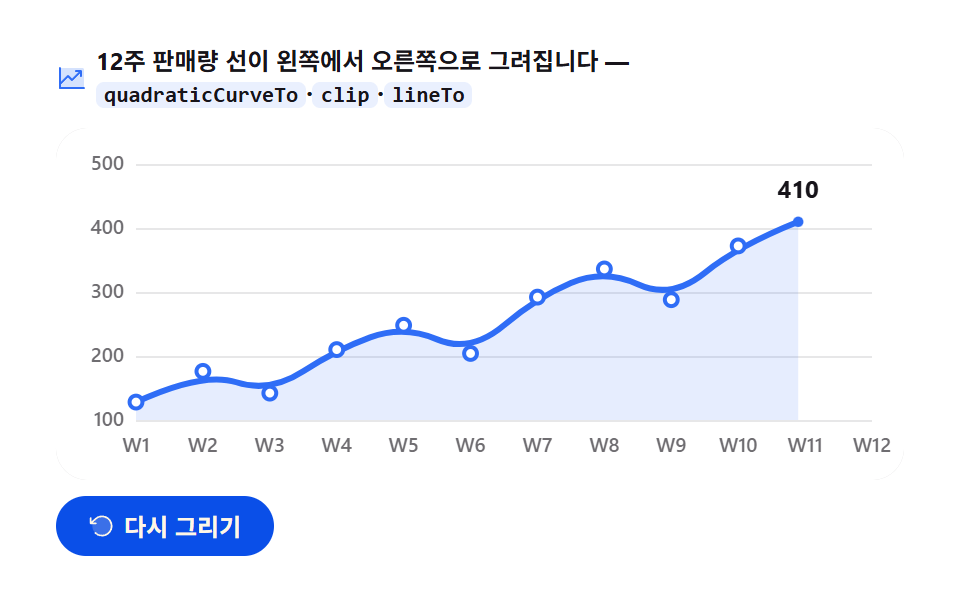 01 chart-canvas-line-draw
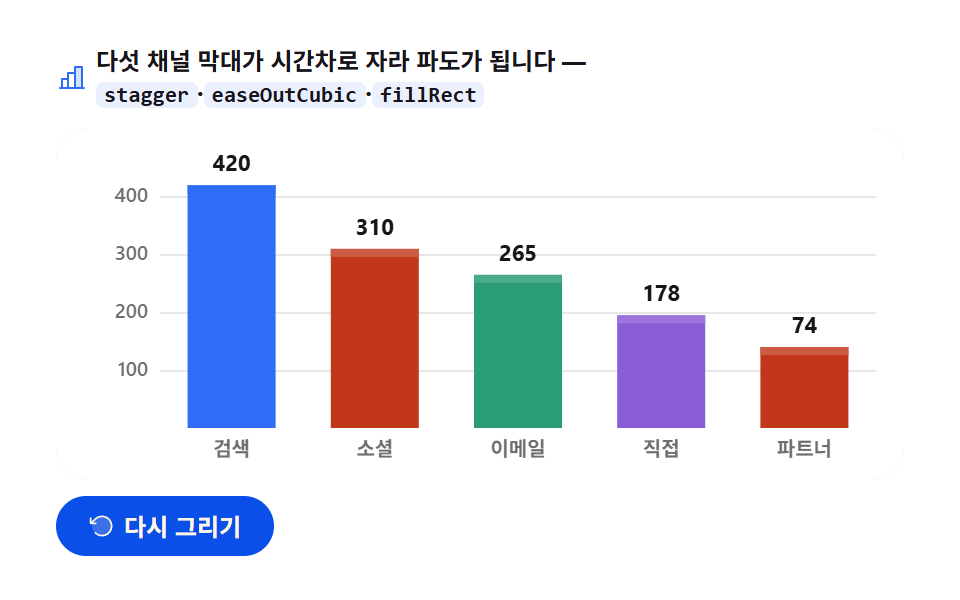 02 chart-canvas-bar-grow
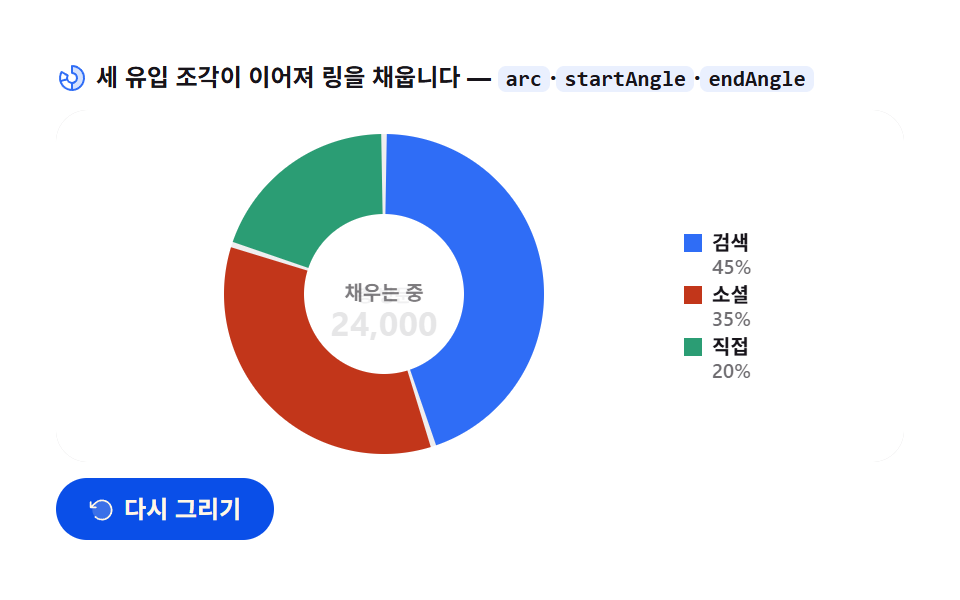 03 chart-canvas-donut-sweep
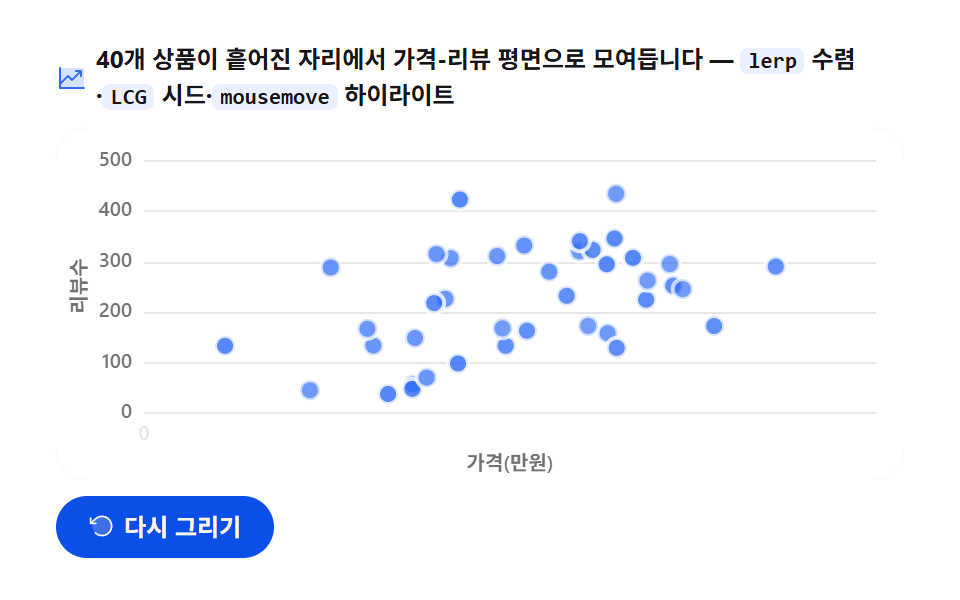 04 chart-canvas-scatter-arrival
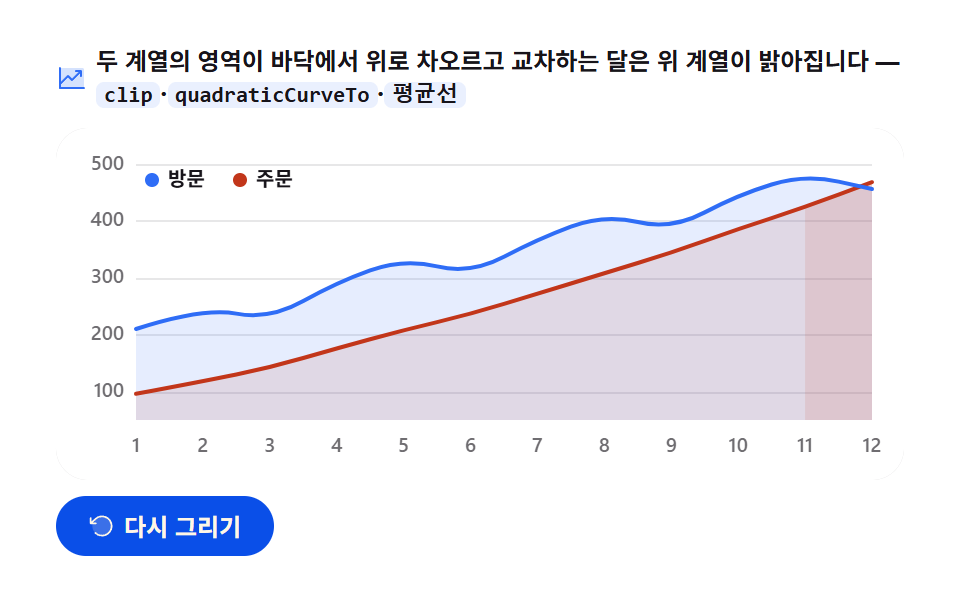 05 chart-canvas-area-rise
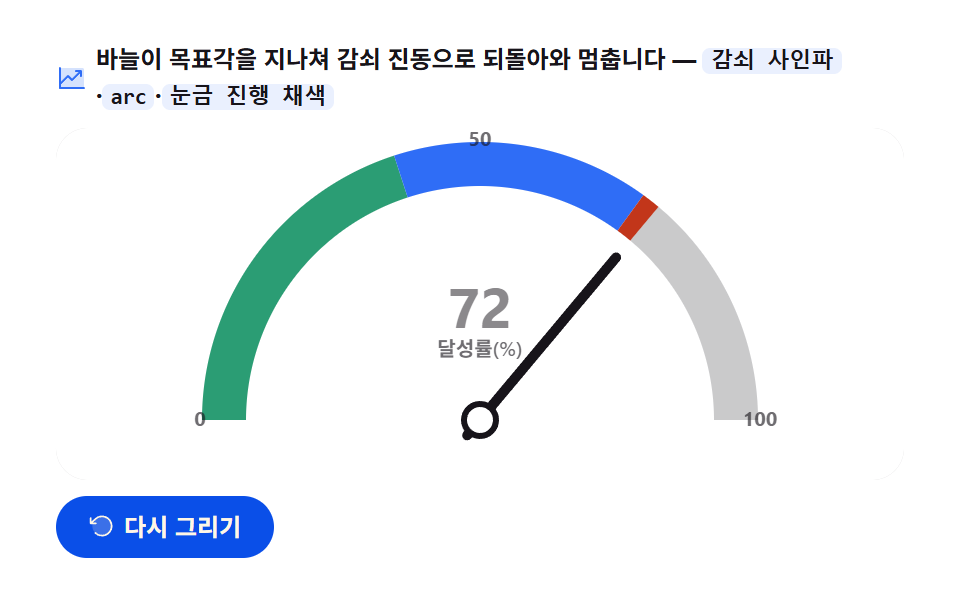 06 chart-canvas-gauge-needle
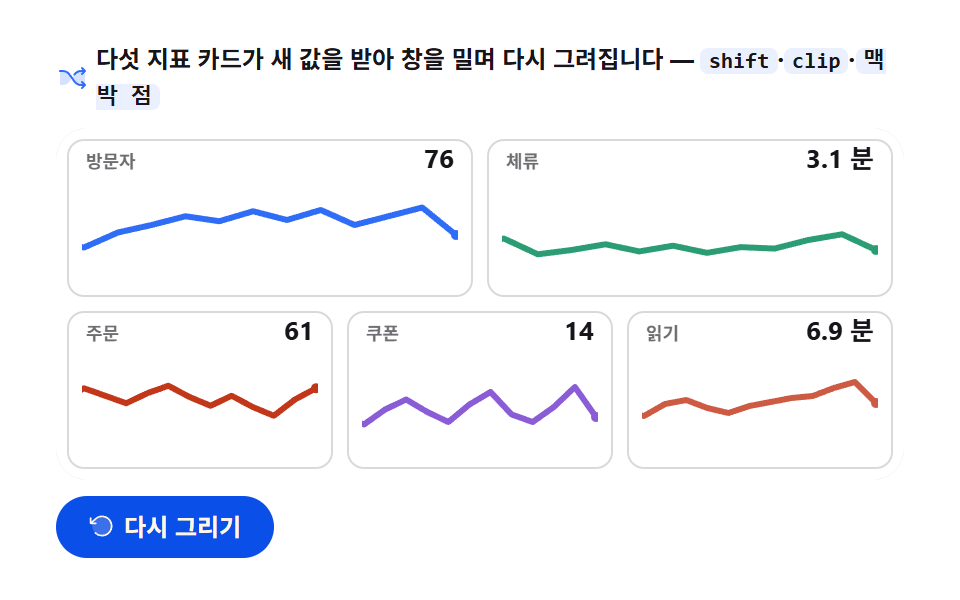 07 chart-canvas-sparkline-stream
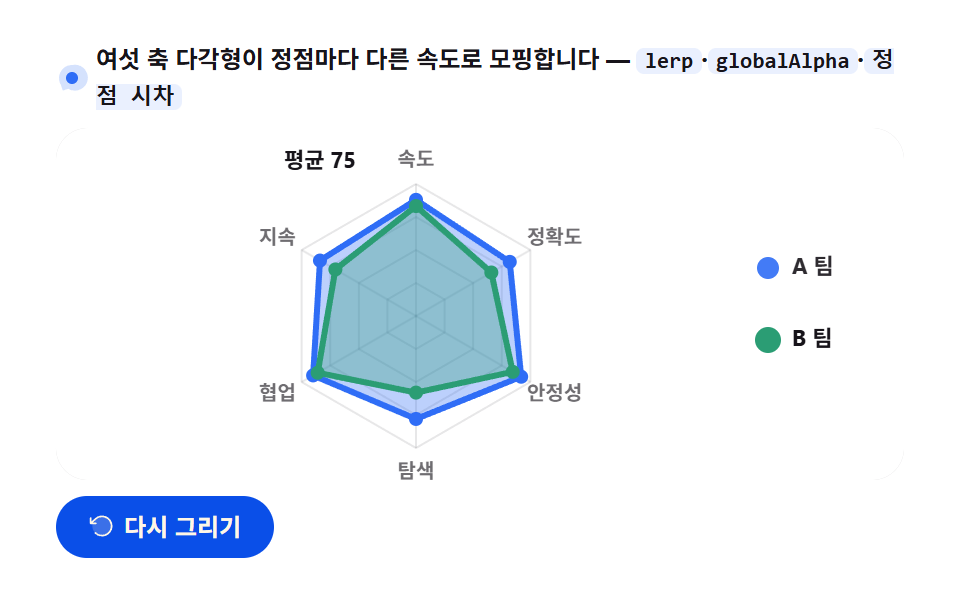 08 chart-canvas-radar-morph
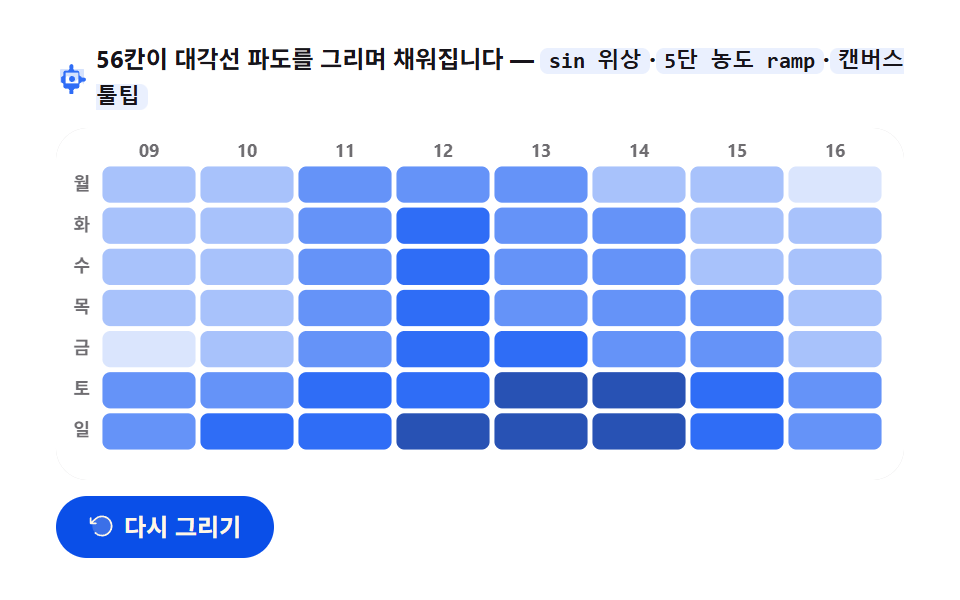 09 chart-canvas-heatmap-wave
Auto-plays · click a tile to jump to its section · all nine in one zip
- 01 Line chart draw
- 02 Bar chart grow
- 03 Donut chart sweep
- 04 Scatter arrival
- 05 Area chart rise
- 06 Gauge needle swing
- 07 Sparkline stream
- 08 Radar morph
- 09 Heatmap wave
The order here isn't difficulty; it's how many drawing tools get added to the canvas, one at a time. A single stroke (01) picks up a rectangle fill and becomes a bar (02), then an arc and becomes a donut (03). Scatter forty points on that same plane and you get a scatter plot (04); stack two filled shapes and you get an area chart (05). The next four are about how that ink moves — a needle overshoots and settles on one number (06), a time window slides while five mini lines stay alive (07), a polygon morphs with a different speed per vertex (08), and finally 56 cells fill in a wave (09). If pixel math interests you more than charts, 9 canvas special-effect scenes covers water-droplet refraction and a black-hole lens; for vector drawing there's SVG chart drawing, 9 ways, and for charts you can already drag and click, see dashboard chart interactions, 9 ways.
01Line chart draw — twelve weeks revealed as a clip opens
What you're looking at
Press replay and twelve weeks of sales [128, 176, 142, 210, 248, 204, 292, 336, 288, 372, 414, 468] draw themselves left to right; a paper-colored marker lands on every vertex the pen has passed, then the end point grows from radius 2.6 to 5.5 and holds.
<main class="stage">
<div class="lc" id="lc">
  <p class="lc__hint">
    <svg class="lc__ico" viewBox="0 0 256 256" aria-hidden="true"><g fill="currentColor"><path d="M224 64v144H32V48h176a16 16 0 0 1 16 16" opacity=".2"/><path d="M232 208a8 8 0 0 1-8 8H32a8 8 0 0 1-8-8V48a8 8 0 0 1 16 0v108.69l50.34-50.35a8 8 0 0 1 11.32 0L128 132.69L180.69 80H160a8 8 0 0 1 0-16h40a8 8 0 0 1 8 8v40a8 8 0 0 1-16 0V91.31l-58.34 58.35a8 8 0 0 1-11.32 0L96 123.31l-56 56V200h184a8 8 0 0 1 8 8"/></g></svg>
    <span>A 12-week sales line draws itself from left to right — <code>quadraticCurveTo</code>·<code>clip</code>·<code>lineTo</code></span>
  </p>
  <div class="lc__field" id="field" role="application" aria-label="Line chart drawing test board" tabindex="0">
    <canvas class="lc__cv" id="cv" role="img" aria-label="12-week sales line chart — a bending line climbing week by week"></canvas>
  </div>
  <div class="lc__bar">
    <button class="lc__btn" id="replay" type="button">
      <svg class="lc__bico" viewBox="0 0 256 256" aria-hidden="true"><g fill="currentColor"><path d="M216 128a88 88 0 1 1-88-88a88 88 0 0 1 88 88" opacity=".2"/><path d="M224 128a96 96 0 0 1-94.71 96H128a95.38 95.38 0 0 1-65.9-26.2a8 8 0 0 1 11-11.63a80 80 0 1 0-1.67-114.78a3 3 0 0 1-.26.25L44.59 96H72a8 8 0 0 1 0 16H24a8 8 0 0 1-8-8V56a8 8 0 0 1 16 0v29.8L60.25 60A96 96 0 0 1 224 128"/></g></svg>
      <span>Redraw</span>
    </button>
    <table class="sr-only">
      <caption>12-week sales (unit: units)</caption>
      <thead><tr><th scope="col">Week</th><th scope="col">Sales</th></tr></thead>
      <tbody>
        <tr><th scope="row">W1</th><td>128</td></tr>
        <tr><th scope="row">W2</th><td>176</td></tr>
        <tr><th scope="row">W3</th><td>142</td></tr>
        <tr><th scope="row">W4</th><td>210</td></tr>
        <tr><th scope="row">W5</th><td>248</td></tr>
        <tr><th scope="row">W6</th><td>204</td></tr>
        <tr><th scope="row">W7</th><td>292</td></tr>
        <tr><th scope="row">W8</th><td>336</td></tr>
        <tr><th scope="row">W9</th><td>288</td></tr>
        <tr><th scope="row">W10</th><td>372</td></tr>
        <tr><th scope="row">W11</th><td>414</td></tr>
        <tr><th scope="row">W12</th><td>468</td></tr>
      </tbody>
    </table>
  </div>
</div>
</main>@use "../../../../site/static/demo-tokens" as *;
// 선 그래프 그리기 — 움직임은 전부 캔버스 rAF 루프 안(끝점 이동 + quadraticCurveTo 경로 + clip 리빌).
// CSS 애니메이션이 0개여야 렌더러가 실시간 24장을 찍는다(077·304 선례).
// 무대는 $stage-paper(흰) — 차트는 밝은 무대가 정석. 색은 차트 토큰 고정 순서 1번.
$duration: $dur-loop;
$easing: $ease-spring;
$color: $chart-1;
@include stage($stage-paper);
// 화면 낭독기용 표 — 캔버스를 읽지 못하므로 같은 데이터를 표로 붙인다
.sr-only {
// fixed + top/left 명시 — absolute 였을 때 표의 실제 콘텐츠 높이(12행 ≒ 390px)가 scrollHeight 에
// 잡혀 데스크톱·폰 전부 세로 넘침(BD8/BD9)이 났다. top 을 주지 않으면 static 자리 기준으로
// 배치돼 여전히 scrollHeight 에 들어간다 — 좌상단 고정으로 문서 흐름에서 완전히 뺀다.
position: fixed; top: 0; left: 0; width: 1px; height: 1px; margin: -1px;
overflow: hidden; clip: rect(0 0 0 0); white-space: nowrap;
}
.lc {
// 캔버스가 읽는 색 — JS 가 getComputedStyle 로 꺼내 쓴다. vivid 리터럴은 두지 않는다(BD26)
--chart-1: #{$color};
--fill-1: #{rgba($chart-1, .12)};
--ink: #{$subject-ink};
--mute: #{rgba($subject-ink, .62)};
--grid: #{rgba($subject-ink, .10)};
--paper: #{$stage-paper};
display: flex; flex-direction: column; gap: $sp-2;
width: 100%; max-width: 424px;
}
.lc__hint {
display: flex; align-items: center; gap: $sp-1; margin: 0;
font-weight: 700; font-size: clamp(10px, 2.8vw, 12px); line-height: 1.35;
color: $subject-ink;
}
.lc__hint code {
padding: 0 $sp-1; border-radius: $r-xs;
background: rgba($chart-1, .10);
color: $subject-ink;
font-weight: 700; font-size: .92em; line-height: 1.3;
}
.lc__ico { width: 16px; height: 16px; flex: 0 0 auto; color: $color; }
.lc__field {
position: relative; height: 176px;
border-radius: $r-card; overflow: hidden;
background: $stage-paper;
box-shadow: inset 0 0 0 1px rgba($subject-ink, .16);
}
.lc__cv { display: block; width: 100%; height: 100%; }
.lc__bar {
display: flex; align-items: center; gap: $sp-2;
}
.lc__btn {
display: inline-flex; align-items: center; gap: $sp-1;
box-sizing: border-box; padding: $sp-2 $sp-4; border: 0;
border-radius: $r-pill; background: $subject-blue-deep; color: $subject-cream;
font-family: inherit; font-weight: 700; font-size: 12px; line-height: 1.2;
cursor: pointer;
}
.lc__btn:focus-visible { outline: 2px solid $color; outline-offset: 2px; }
.lc__bico { width: 14px; height: 14px; flex: 0 0 auto; }
@media (max-width: 340px) {
.lc { gap: $sp-1; }
.lc__field { height: 112px; }
.lc__hint { font-size: 10px; }
.lc__btn { padding: $sp-1 $sp-3; font-size: 11px; }
}
// reduce — 루프가 아예 안 돌므로 끄고 말고 할 애니메이션이 없다.
// 완성 상태 한 장이 남으므로 "다시 그리기"는 여전히 정지 이미지를 다시 그린다.
@media (prefers-reduced-motion: reduce) {
.lc__btn { cursor: default; }
}html, body {
margin: 0;
overflow: hidden;
}
.stage {
box-sizing: border-box;
min-height: 100vh;
display: grid;
place-items: center;
margin: 0;
background: #ffffff;
font-family: -apple-system, "Segoe UI", "Noto Sans KR", sans-serif;
padding: clamp(8px, 4vw, 24px);
}
.sr-only {
position: fixed;
top: 0;
left: 0;
width: 1px;
height: 1px;
margin: -1px;
overflow: hidden;
clip: rect(0 0 0 0);
white-space: nowrap;
}
.lc {
--chart-1: #2f6df6;
--fill-1: rgba(47, 109, 246, 0.12);
--ink: #17141a;
--mute: rgba(23, 20, 26, 0.62);
--grid: rgba(23, 20, 26, 0.1);
--paper: #ffffff;
display: flex;
flex-direction: column;
gap: 8px;
width: 100%;
max-width: 424px;
}
.lc__hint {
display: flex;
align-items: center;
gap: 4px;
margin: 0;
font-weight: 700;
font-size: clamp(10px, 2.8vw, 12px);
line-height: 1.35;
color: #17141a;
}
.lc__hint code {
padding: 0 4px;
border-radius: 4px;
background: rgba(47, 109, 246, 0.1);
color: #17141a;
font-weight: 700;
font-size: 0.92em;
line-height: 1.3;
}
.lc__ico {
width: 16px;
height: 16px;
flex: 0 0 auto;
color: #2f6df6;
}
.lc__field {
position: relative;
height: 176px;
border-radius: 16px;
overflow: hidden;
background: #ffffff;
box-shadow: inset 0 0 0 1px rgba(23, 20, 26, 0.16);
}
.lc__cv {
display: block;
width: 100%;
height: 100%;
}
.lc__bar {
display: flex;
align-items: center;
gap: 8px;
}
.lc__btn {
display: inline-flex;
align-items: center;
gap: 4px;
box-sizing: border-box;
padding: 8px 16px;
border: 0;
border-radius: 999px;
background: #0a4fe8;
color: #fff7e6;
font-family: inherit;
font-weight: 700;
font-size: 12px;
line-height: 1.2;
cursor: pointer;
}
.lc__btn:focus-visible {
outline: 2px solid #2f6df6;
outline-offset: 2px;
}
.lc__bico {
width: 14px;
height: 14px;
flex: 0 0 auto;
}
@media (max-width: 340px) {
.lc {
gap: 4px;
}
.lc__field {
height: 112px;
}
.lc__hint {
font-size: 10px;
}
.lc__btn {
padding: 4px 12px;
font-size: 11px;
}
}
@media (prefers-reduced-motion: reduce) {
.lc__btn {
cursor: default;
}
}// 선 그래프 그리기 — W12 판매량을 이어 그리는 애니메이션.
// 두 겹이 함께 움직인다:
// 1) 끝점이 x 축을 따라 이동하며, 지나온 꼭짓점들은 quadraticCurveTo 로 모서리를 눌러 이어진다(중점 제어).
// 2) 클리핑 사각형이 같은 속도로 왼쪽에서 오른쪽으로 열려, 선이 지나온 순서대로 드러난다.
// 그리드와 Axis 라벨은 정적이므로 reveal 초반에 먼저 띄우고, 선이 그 위를 지나간다.
var root = document.getElementById('lc');
var field = document.getElementById('field');
var cv = document.getElementById('cv');
var ctx = cv.getContext('2d');
var replayBtn = document.getElementById('replay');
var css = getComputedStyle(root);
var C_LINE = css.getPropertyValue('--chart-1').trim();
var C_FILL = css.getPropertyValue('--fill-1').trim();
var C_INK = css.getPropertyValue('--ink').trim();
var C_MUTE = css.getPropertyValue('--mute').trim();
var C_GRID = css.getPropertyValue('--grid').trim();
var C_PAPER = css.getPropertyValue('--paper').trim();
var FONT = '-apple-system, "Segoe UI", "Noto Sans KR", sans-serif';
// 고정 시드 데이터 — W12 Sales(개). 난수가 아니라 코드 안 배열이므로 다시 그려도 같은 그림
var WEEKS = [128, 176, 142, 210, 248, 204, 292, 336, 288, 372, 414, 468];
var PAD_L = 40, PAD_R = 16, PAD_T = 18, PAD_B = 30; // Axis 라벨 여백(CSS px)
var LOOP = 2; // 한 사이클 2초 — 캡처 창과 같아 gif 가 이어진다
var DRAW_AT = 0.88; // 전체 2초의 88% 에 그리기가 끝나고, 끝점이 커지며 잠시 쉰다
var Y_TOP = 100, Y_SPAN = 500; // y Axis 스케일 고정(100~500개)
var reduce = window.matchMedia('(prefers-reduced-motion: reduce)').matches;
var W = 0, H = 0, dpr = 1;
var t0 = 0, raf = 0;
function fit() {
var r = field.getBoundingClientRect();
dpr = window.devicePixelRatio || 1;
W = r.width; H = r.height;
cv.width = Math.round(W * dpr);
cv.height = Math.round(H * dpr);
ctx.setTransform(dpr, 0, 0, dpr, 0, 0);
}
// 데이터 인덱스 → 플롯 좌표. y 는 위로 갈수록 크다
function xAt(i) { return PAD_L + (W - PAD_L - PAD_R) * (i / (WEEKS.length - 1)); }
function yAt(v) { return PAD_T + (H - PAD_T - PAD_B) * (1 - (v - Y_TOP) / (Y_SPAN - Y_TOP)); }
// 그리기 진행 p(0..1) → { i, k, ex, ey, f }
// f = 0..11 정규화 경과, i·k = 현재 변, (ex,ey) = 끝점 좌표
function headAt(p) {
var n = WEEKS.length;
var f = Math.min(1, p / DRAW_AT) * (n - 1);
var i = Math.min(n - 2, Math.floor(f));
var k = f - i;
var ex = xAt(i) + (xAt(i + 1) - xAt(i)) * k;
var ey = yAt(WEEKS[i]) + (yAt(WEEKS[i + 1]) - yAt(WEEKS[i])) * k;
return { i: i, k: k, f: f, ex: ex, ey: ey };
}
// 현재 끝점까지의 부드러운 경로를 만든다.
// 지나온 꼭짓점은 제어점으로 삼아 다음 꼭짓점과의 중점까지 quadraticCurveTo 로 누른다(정점을 스치듯),
// 마지막 구간은 현재 끝점까지 직선(lineTo) — 그리고 있는 순간의 펜 끝이다.
function tracePath(p) {
var d = headAt(p);
ctx.beginPath();
ctx.moveTo(xAt(0), yAt(WEEKS[0]));
for (var j = 1; j < d.i; j++) {
ctx.quadraticCurveTo(xAt(j), yAt(WEEKS[j]), (xAt(j) + xAt(j + 1)) / 2, (yAt(WEEKS[j]) + yAt(WEEKS[j + 1])) / 2);
}
if (d.i >= 1) {
ctx.quadraticCurveTo(xAt(d.i), yAt(WEEKS[d.i]), d.ex, d.ey);
} else {
ctx.lineTo(d.ex, d.ey);
}
return d;
}
// 목표를 살짝 넘겼다가 돌아오는 오버슛 — 끝점이 자리 잡을 때 커지는 감
function easeOutBack(t) {
var c = 1.7;
return 1 + (c + 1) * Math.pow(t - 1, 3) + c * Math.pow(t - 1, 2);
}
function draw(p) {
ctx.clearRect(0, 0, W, H);
ctx.fillStyle = C_PAPER;
ctx.fillRect(0, 0, W, H);
// 가로 그리드 + y 라벨 — 100~500 다섯 줄. 첫 12% 동안 아래에서 위로 떠오른다
var axisP = Math.min(1, p / 0.12);
ctx.lineWidth = 1;
ctx.font = '600 10px ' + FONT;
ctx.textBaseline = 'middle';
ctx.textAlign = 'right';
for (var g = Y_TOP; g <= Y_SPAN; g += 100) {
var gy = yAt(g) + (1 - axisP) * 14;
ctx.strokeStyle = C_GRID;
ctx.beginPath();
ctx.moveTo(PAD_L, Math.round(gy) + 0.5);
ctx.lineTo(W - PAD_R, Math.round(gy) + 0.5);
ctx.stroke();
ctx.fillStyle = C_MUTE;
ctx.globalAlpha = axisP;
ctx.fillText(String(g), PAD_L - 6, gy);
ctx.globalAlpha = 1;
}
// x 라벨(Week) — 축이 뜬 뒤 왼쪽부터 차례로 나타난다
ctx.textAlign = 'center';
for (var w = 0; w < WEEKS.length; w++) {
var wp = Math.max(0, Math.min(1, (p - 0.10 - w * 0.018) / 0.10));
if (wp <= 0) continue;
ctx.fillStyle = C_MUTE;
ctx.globalAlpha = wp;
ctx.fillText('W' + (w + 1), xAt(w), H - PAD_B + 13);
ctx.globalAlpha = 1;
}
// 클리핑 사각형 — 왼쪽에서 오른쪽으로 열린다. 이 안에서만 면과 선이 보인다
var cutX = PAD_L + (W - PAD_L - PAD_R) * Math.min(1, p / DRAW_AT);
ctx.save();
ctx.beginPath();
ctx.rect(0, 0, cutX + 1, H);
ctx.clip();
// 영역 채움(면) — 선 아래를 옅게 깐다. 움직이는 면적이 커야 측정 강도가 오른다
var d0 = tracePath(p);
ctx.lineTo(d0.ex, H - PAD_B);
ctx.lineTo(xAt(0), H - PAD_B);
ctx.closePath();
ctx.fillStyle = C_FILL;
ctx.fill();
// 선 — 3px. 경로를 다시 만들어 그린다
var d1 = tracePath(p);
ctx.strokeStyle = C_LINE;
ctx.lineWidth = 3;
ctx.lineJoin = 'round';
ctx.lineCap = 'round';
ctx.stroke();
ctx.restore();
// 꼭짓점 마커 — 끝점이 지나온 점만 종이색 속에 파란 테두리로 박는다(지나온 순서 확인)
for (var m = 0; m <= d1.i; m++) {
ctx.beginPath();
ctx.arc(xAt(m), yAt(WEEKS[m]), 3.2, 0, Math.PI * 2);
ctx.fillStyle = C_PAPER;
ctx.fill();
ctx.strokeStyle = C_LINE;
ctx.lineWidth = 2;
ctx.stroke();
}
// 끝점 — 그리기가 끝나면 오버슛으로 커진다(2.6 에서 5.5 로). 커지며 링이 한 번 퍼진다
var settled = Math.max(0, (p - DRAW_AT) / (1 - DRAW_AT));
var r0 = 2.6 + 2.9 * easeOutBack(Math.min(1, settled * 1.8));
ctx.beginPath();
ctx.arc(d1.ex, d1.ey, r0, 0, Math.PI * 2);
ctx.fillStyle = C_LINE;
ctx.fill();
if (settled > 0 && settled < 1) {
ctx.beginPath();
ctx.arc(d1.ex, d1.ey, r0 + 14 * settled, 0, Math.PI * 2);
ctx.strokeStyle = C_LINE;
ctx.globalAlpha = 0.5 * (1 - settled);
ctx.lineWidth = 2;
ctx.stroke();
ctx.globalAlpha = 1;
}
// 끝 Value 라벨 — 끝점 위에서 따라오르는 Value(변 위에서 보간되어 카운트업처럼 오른다)
if (p > 0.06) {
var lv = Math.round(WEEKS[d1.i] + (WEEKS[d1.i + 1] - WEEKS[d1.i]) * d1.k);
ctx.font = '700 12px ' + FONT;
ctx.textAlign = 'center';
ctx.textBaseline = 'alphabetic';
ctx.fillStyle = C_INK;
ctx.fillText(String(lv), Math.min(W - 20, Math.max(PAD_L, d1.ex)), d1.ey - 12 - 6 * settled);
}
}
function frame(now) {
if (!t0) t0 = now;
var p = ((now - t0) / 1000 % LOOP) / LOOP; // 0..1, 2초 루프
draw(p);
raf = requestAnimationFrame(frame);
}
replayBtn.addEventListener('click', function () { t0 = 0; });
window.addEventListener('resize', function () { fit(); if (reduce) draw(1); });
fit();
if (reduce) {
// reduce — 루프 없이 완성 상태(W12 전체가 그려지고 끝점이 커진 한 장)만 그린다
draw(1);
} else {
raf = requestAnimationFrame(frame);
}// LineDrawChart — vanilla 판(run/305/demo/01-chart-canvas-line-draw/index.html) 의 React 포트.
// 끝점이 x 축을 따라 이동하며 지나온 꼭짓점은 quadraticCurveTo 로 눌리고,
// 클리핑 사각형이 왼쪽에서 오른쪽으로 열려 선이 지나온 순서대로 드러난다.
// 움직임은 캔버스 rAF 루프가 전부 그리므로 @keyframes 가 없다 — props 는 CSS 변수로 내려간다.
import { useEffect, useRef } from "react";
import type { CSSProperties } from "react";
import styles from "./LineDrawChart.module.scss";
export type LineDrawChartProps = {
duration?: string;
easing?: string;
color?: string;
};
type Vars = CSSProperties & { "--duration"?: string; "--easing"?: string; "--color"?: string };
// useRef 는 T | null 을 돌려준다. 처음부터 값이 있고 절대 비지 않는 상자는 이렇게 좁혀 쓴다
type Box<T> = { current: T };
// 고정 시드 데이터 — 12주 판매량(개). 난수가 아니라 코드 안 배열
const WEEKS = [128, 176, 142, 210, 248, 204, 292, 336, 288, 372, 414, 468];
const PAD_L = 40, PAD_R = 16, PAD_T = 18, PAD_B = 30;
const LOOP = 2; // 한 사이클 2초
const DRAW_AT = 0.88; // 전체의 88% 에 그리기가 끝나고 끝점이 커지며 쉰다
const Y_TOP = 100, Y_SPAN = 500;
const FONT = '-apple-system, "Segoe UI", "Noto Sans KR", sans-serif';
const FIELD_LABEL = "선 그래프 그리기 실험판";
const CV_LABEL = "12주 판매량 선 그래프 — 꺾이는 선이 주차를 따라 오르는 모습";
export default function LineDrawChart({
duration = "2s", // vanilla $duration: $dur-loop
easing = "cubic-bezier(.2, .8, .2, 1)", // vanilla $easing: $ease-spring
color = "#2f6df6", // vanilla $color: $chart-1
}: LineDrawChartProps) {
const rootRef = useRef<HTMLDivElement | null>(null);
const cvRef = useRef<HTMLCanvasElement | null>(null);
const ctxRef = useRef<CanvasRenderingContext2D | null>(null);
const sizeRef = useRef({ w: 0, h: 0 }) as Box<{ w: number; h: number }>;
const t0Ref = useRef(0) as Box<number>;
const rafRef = useRef(0) as Box<number>;
const vars: Vars = { "--duration": duration, "--easing": easing, "--color": color };
function reduced(): boolean {
return window.matchMedia("(prefers-reduced-motion: reduce)").matches;
}
function cssv(n: string): string {
const root = rootRef.current;
return root ? getComputedStyle(root).getPropertyValue(n).trim() : "";
}
// 고DPI — 배킹 스토어는 devicePixelRatio 배, 그리기 좌표계는 CSS 픽셀 그대로
function fit(): void {
const cv = cvRef.current;
const s = sizeRef.current;
if (!cv) return;
const r = cv.getBoundingClientRect();
const dpr = window.devicePixelRatio || 1;
s.w = r.width; s.h = r.height;
cv.width = Math.round(r.width * dpr);
cv.height = Math.round(r.height * dpr);
const ctx = ctxRef.current;
if (ctx) ctx.setTransform(dpr, 0, 0, dpr, 0, 0);
}
function xAt(i: number): number {
const W = sizeRef.current.w;
return PAD_L + (W - PAD_L - PAD_R) * (i / (WEEKS.length - 1));
}
function yAt(v: number): number {
const H = sizeRef.current.h;
return PAD_T + (H - PAD_T - PAD_B) * (1 - (v - Y_TOP) / (Y_SPAN - Y_TOP));
}
// 그리기 진행 p(0..1) → 끝점 정보. f = 정규화 경과, i·k = 현재 변, (ex,ey) = 끝점
function headAt(p: number): { i: number; k: number; f: number; ex: number; ey: number } {
const n = WEEKS.length;
const f = Math.min(1, p / DRAW_AT) * (n - 1);
const i = Math.min(n - 2, Math.floor(f));
const k = f - i;
const ex = xAt(i) + (xAt(i + 1) - xAt(i)) * k;
const ey = yAt(WEEKS[i]) + (yAt(WEEKS[i + 1]) - yAt(WEEKS[i])) * k;
return { i, k, f, ex, ey };
}
// 지나온 꼭짓점을 중점 제어로 누른 경로. 마지막 구간은 현재 끝점까지 직선
function tracePath(p: number): { i: number; k: number; f: number; ex: number; ey: number } {
const ctx = ctxRef.current!;
const d = headAt(p);
ctx.beginPath();
ctx.moveTo(xAt(0), yAt(WEEKS[0]));
for (let j = 1; j < d.i; j++) {
ctx.quadraticCurveTo(xAt(j), yAt(WEEKS[j]), (xAt(j) + xAt(j + 1)) / 2, (yAt(WEEKS[j]) + yAt(WEEKS[j + 1])) / 2);
}
if (d.i >= 1) {
ctx.quadraticCurveTo(xAt(d.i), yAt(WEEKS[d.i]), d.ex, d.ey);
} else {
ctx.lineTo(d.ex, d.ey);
}
return d;
}
// 목표를 살짝 넘겼다가 돌아오는 오버슛 — 끝점이 자리 잡을 때 커지는 감
function easeOutBack(t: number): number {
const c = 1.7;
return 1 + (c + 1) * Math.pow(t - 1, 3) + c * Math.pow(t - 1, 2);
}
function draw(p: number): void {
const ctx = ctxRef.current;
if (!ctx) return;
const W = sizeRef.current.w, H = sizeRef.current.h;
const C_LINE = cssv("--chart-1") || color;
const C_FILL = cssv("--fill-1");
const C_INK = cssv("--ink");
const C_MUTE = cssv("--mute");
const C_GRID = cssv("--grid");
const C_PAPER = cssv("--paper");
ctx.clearRect(0, 0, W, H);
ctx.fillStyle = C_PAPER;
ctx.fillRect(0, 0, W, H);
// 가로 그리드 + y 라벨 — 첫 12% 동안 아래에서 위로 떠오른다
const axisP = Math.min(1, p / 0.12);
ctx.lineWidth = 1;
ctx.font = "600 10px " + FONT;
ctx.textBaseline = "middle";
ctx.textAlign = "right";
for (let g = Y_TOP; g <= Y_SPAN; g += 100) {
const gy = yAt(g) + (1 - axisP) * 14;
ctx.strokeStyle = C_GRID;
ctx.beginPath();
ctx.moveTo(PAD_L, Math.round(gy) + 0.5);
ctx.lineTo(W - PAD_R, Math.round(gy) + 0.5);
ctx.stroke();
ctx.fillStyle = C_MUTE;
ctx.globalAlpha = axisP;
ctx.fillText(String(g), PAD_L - 6, gy);
ctx.globalAlpha = 1;
}
// x 라벨(주차) — 왼쪽부터 차례로
ctx.textAlign = "center";
for (let w = 0; w < WEEKS.length; w++) {
const wp = Math.max(0, Math.min(1, (p - 0.10 - w * 0.018) / 0.10));
if (wp <= 0) continue;
ctx.fillStyle = C_MUTE;
ctx.globalAlpha = wp;
ctx.fillText("W" + (w + 1), xAt(w), H - PAD_B + 13);
ctx.globalAlpha = 1;
}
// 클리핑 사각형 — 왼쪽에서 오른쪽으로 열린다
const cutX = PAD_L + (W - PAD_L - PAD_R) * Math.min(1, p / DRAW_AT);
ctx.save();
ctx.beginPath();
ctx.rect(0, 0, cutX + 1, H);
ctx.clip();
// 영역 채움 — 선 아래를 옅게 깐다
const d0 = tracePath(p);
ctx.lineTo(d0.ex, H - PAD_B);
ctx.lineTo(xAt(0), H - PAD_B);
ctx.closePath();
ctx.fillStyle = C_FILL;
ctx.fill();
// 선 — 2px
const d1 = tracePath(p);
ctx.strokeStyle = C_LINE;
ctx.lineWidth = 2;
ctx.lineJoin = "round";
ctx.lineCap = "round";
ctx.stroke();
ctx.restore();
// 꼭짓점 마커 — 끝점이 지나온 점만
for (let m = 0; m <= d1.i; m++) {
ctx.beginPath();
ctx.arc(xAt(m), yAt(WEEKS[m]), 2.6, 0, Math.PI * 2);
ctx.fillStyle = C_PAPER;
ctx.fill();
ctx.strokeStyle = C_LINE;
ctx.lineWidth = 2;
ctx.stroke();
}
// 끝점 — 착지하며 오버슛으로 커지고 링이 한 번 퍼진다
const settled = Math.max(0, (p - DRAW_AT) / (1 - DRAW_AT));
const r0 = 2.6 + 2.9 * easeOutBack(Math.min(1, settled * 1.8));
ctx.beginPath();
ctx.arc(d1.ex, d1.ey, r0, 0, Math.PI * 2);
ctx.fillStyle = C_LINE;
ctx.fill();
if (settled > 0 && settled < 1) {
ctx.beginPath();
ctx.arc(d1.ex, d1.ey, r0 + 14 * settled, 0, Math.PI * 2);
ctx.strokeStyle = C_LINE;
ctx.globalAlpha = 0.5 * (1 - settled);
ctx.lineWidth = 2;
ctx.stroke();
ctx.globalAlpha = 1;
}
// 끝 값 라벨 — 끝점 위에서 보간되어 오른다
if (p > 0.06) {
const lv = Math.round(WEEKS[d1.i] + (WEEKS[d1.i + 1] - WEEKS[d1.i]) * d1.k);
ctx.font = "700 12px " + FONT;
ctx.textAlign = "center";
ctx.textBaseline = "alphabetic";
ctx.fillStyle = C_INK;
ctx.fillText(String(lv), Math.min(W - 20, Math.max(PAD_L, d1.ex)), d1.ey - 12 - 6 * settled);
}
}
function frame(now: number): void {
if (!t0Ref.current) t0Ref.current = now;
const p = ((now - t0Ref.current) / 1000 % LOOP) / LOOP;
draw(p);
rafRef.current = requestAnimationFrame(frame);
}
function replay(): void {
t0Ref.current = 0;
}
function onResize(): void {
fit();
if (reduced()) draw(1);
}
useEffect(() => {
const cv = cvRef.current;
if (!cv) return;
ctxRef.current = cv.getContext("2d");
if (!ctxRef.current) return;
fit();
window.addEventListener("resize", onResize);
if (reduced()) {
// reduce — 루프 없이 완성 상태 한 장만 그린다
draw(1);
} else {
rafRef.current = requestAnimationFrame(frame);
}
return () => {
window.removeEventListener("resize", onResize);
cancelAnimationFrame(rafRef.current);
};
}, []);
return (
<main className={styles.stage}>
<div className={styles.root} ref={rootRef} style={vars}>
<p className={styles.hint}>
<svg className={styles.ico} viewBox="0 0 256 256" aria-hidden="true"><g fill="currentColor"><path d="M224 64v144H32V48h176a16 16 0 0 1 16 16" opacity=".2"/><path d="M232 208a8 8 0 0 1-8 8H32a8 8 0 0 1-8-8V48a8 8 0 0 1 16 0v108.69l50.34-50.35a8 8 0 0 1 11.32 0L128 132.69L180.69 80H160a8 8 0 0 1 0-16h40a8 8 0 0 1 8 8v40a8 8 0 0 1-16 0V91.31l-58.34 58.35a8 8 0 0 1-11.32 0L96 123.31l-56 56V200h184a8 8 0 0 1 8 8"/></g></svg>
<span>12주 판매량 선이 왼쪽에서 오른쪽으로 그려집니다 — <code>quadraticCurveTo</code>·<code>clip</code>·<code>lineTo</code></span>
</p>
<div className={styles.field} role="application" aria-label={FIELD_LABEL} tabIndex={0}>
<canvas className={styles.cv} ref={cvRef} role="img" aria-label={CV_LABEL}></canvas>
</div>
<div className={styles.bar}>
<button className={styles.btn} type="button" onClick={replay}>
<svg className={styles.bico} viewBox="0 0 256 256" aria-hidden="true"><g fill="currentColor"><path d="M216 128a88 88 0 1 1-88-88a88 88 0 0 1 88 88" opacity=".2"/><path d="M224 128a96 96 0 0 1-94.71 96H128a95.38 95.38 0 0 1-65.9-26.2a8 8 0 0 1 11-11.63a80 80 0 1 0-1.67-114.78a3 3 0 0 1-.26.25L44.59 96H72a8 8 0 0 1 0 16H24a8 8 0 0 1-8-8V56a8 8 0 0 1 16 0v29.8L60.25 60A96 96 0 0 1 224 128"/></g></svg>
<span>다시 그리기</span>
</button>
<table className={styles.srOnly}>
<caption>12주 판매량(단위: 개)</caption>
<thead><tr><th scope="col">주차</th><th scope="col">판매량</th></tr></thead>
<tbody>
{WEEKS.map((v, i) => (
<tr key={i}><th scope="row">{i + 1}주</th><td>{v}</td></tr>
))}
</tbody>
</table>
</div>
</div>
</main>
);
}01 · Line chart draw — Measured area 20.228% · moving frames 23/23Original by GODRICH · SCSS and React ship in the zip · See the password
Where the math lives
Across a 2-second loop, 23 of 24 frames moved and cumulative area came in at 20.228% — a good fit for the first row of a weekly or monthly report, driven by projecting progress p onto eleven week-to-week segments to get the current edge and end-point coordinates.
// draw progress p(0..1) -> { i, k, ex, ey, f }
//   f = 0..11 normalized elapsed, i·k = current edge, (ex,ey) = end point
function headAt(p) {
  var n = WEEKS.length;
  var f = Math.min(1, p / DRAW_AT) * (n - 1);
  var i = Math.min(n - 2, Math.floor(f));
  var k = f - i;
  var ex = xAt(i) + (xAt(i + 1) - xAt(i)) * k;
  var ey = yAt(WEEKS[i]) + (yAt(WEEKS[i + 1]) - yAt(WEEKS[i])) * k;
  return { i: i, k: k, f: f, ex: ex, ey: ey };
}
// each passed vertex becomes a control point pressed toward the midpoint
// of the next vertex via quadraticCurveTo, so the line grazes each value
function tracePath(p) {
  var d = headAt(p);
  ctx.beginPath();
  ctx.moveTo(xAt(0), yAt(WEEKS[0]));
  for (var j = 1; j < d.i; j++) {
    ctx.quadraticCurveTo(xAt(j), yAt(WEEKS[j]), (xAt(j) + xAt(j + 1)) / 2, (yAt(WEEKS[j]) + yAt(WEEKS[j + 1])) / 2);
  }
  if (d.i >= 1) {
    ctx.quadraticCurveTo(xAt(d.i), yAt(WEEKS[d.i]), d.ex, d.ey);
  } else {
    ctx.lineTo(d.ex, d.ey);
  }
  return d;
}
Using each vertex as a control point pressed toward the midpoint of the next keeps the curve grazing the real data instead of snapping through it like a staircase, while a clipping rect opens at the same rate so the line only ever shows what it has already drawn.
02Bar chart grow — a wave that spreads through stagger
What you're looking at
Five revenue bars grow from the floor toward their value, each one starting later than the last (stagger) so growth ripples like a wave across the row; once a bar lands, its value label counts up above it.
<main class="stage">
<div class="bg" id="bg">
  <p class="bg__hint">
    <svg class="bg__ico" viewBox="0 0 256 256" aria-hidden="true"><g fill="currentColor"><path d="M208 40v168h-56V40Z" opacity=".2"/><path d="M224 200h-8V40a8 8 0 0 0-8-8h-56a8 8 0 0 0-8 8v40H96a8 8 0 0 0-8 8v40H48a8 8 0 0 0-8 8v64h-8a8 8 0 0 0 0 16h192a8 8 0 0 0 0-16M160 48h40v152h-40Zm-56 48h40v104h-40Zm-48 48h32v56H56Z"/></g></svg>
    <span>Five channel bars grow in sequence and become a wave — <code>stagger</code>·<code>easeOutCubic</code>·<code>fillRect</code></span>
  </p>
  <div class="bg__field" id="field" role="application" aria-label="Bar chart growth test board" tabindex="0">
    <canvas class="bg__cv" id="cv" role="img" aria-label="Five-channel revenue bar chart — bars growing from the floor to their values"></canvas>
  </div>
  <div class="bg__bar">
    <button class="bg__btn" id="replay" type="button">
      <svg class="bg__bico" viewBox="0 0 256 256" aria-hidden="true"><g fill="currentColor"><path d="M216 128a88 88 0 1 1-88-88a88 88 0 0 1 88 88" opacity=".2"/><path d="M224 128a96 96 0 0 1-94.71 96H128a95.38 95.38 0 0 1-65.9-26.2a8 8 0 0 1 11-11.63a80 80 0 1 0-1.67-114.78a3 3 0 0 1-.26.25L44.59 96H72a8 8 0 0 1 0 16H24a8 8 0 0 1-8-8V56a8 8 0 0 1 16 0v29.8L60.25 60A96 96 0 0 1 224 128"/></g></svg>
      <span>Redraw</span>
    </button>
    <table class="sr-only">
      <caption>Quarterly revenue by channel (unit: 10K KRW)</caption>
      <thead><tr><th scope="col">Channel</th><th scope="col">Revenue</th></tr></thead>
      <tbody>
        <tr><th scope="row">Search</th><td>420</td></tr>
        <tr><th scope="row">Social</th><td>310</td></tr>
        <tr><th scope="row">Email</th><td>265</td></tr>
        <tr><th scope="row">Direct</th><td>195</td></tr>
        <tr><th scope="row">Partner</th><td>140</td></tr>
      </tbody>
    </table>
  </div>
</div>
</main>@use "sass:color";
@use "../../../../site/static/demo-tokens" as *;
// 막대 그래프 성장 — 움직임은 전부 캔버스 rAF 루프 안(막대 stagger 성장 + 값 카운트업).
// CSS 애니메이션 0개 — 렌더러가 실시간 24장을 찍는다(077·304 선례).
// 막대 여러 개는 차트 토큰 고정 순서대로. 2·3·4번 계열은 파스텔 카운터파트(한 단 밝게)로 밝은 무대에 맞춘다.
$duration: $dur-loop;
$easing: $ease-out; // easeOutCubic 을 JS 에서 계산하므로 CSS 쪽 이징 토큰은 감속 역할명으로
$color: $chart-1;
@include stage($stage-paper);
// 화면 낭독기용 표 — 캔버스를 읽지 못하므로 같은 데이터를 표로 붙인다
.sr-only {
// fixed + top/left 명시 — absolute 였을 때 표의 실제 콘텐츠 높이(행 수만큼 ≒ 390px)가
// scrollHeight 에 잡혀 데스크톱·폰 전부 세로 넘침(BD8/BD9)이 났다. top 을 주지 않으면
// static 자리 기준으로 배치돼 여전히 scrollHeight 에 들어간다 — 좌상단 고정으로 뺀다.
position: fixed; top: 0; left: 0; width: 1px; height: 1px; margin: -1px;
overflow: hidden; clip: rect(0 0 0 0); white-space: nowrap;
}
.bg {
// 캔버스가 읽는 색 — JS 가 getComputedStyle 로 꺼내 쓴다
--chart-1: #{$chart-1};
--chart-2: #{$chart-2};
--chart-3: #{$chart-3};
--chart-4: #{$chart-4};
// 파스텔 카운터파트 — 어두운 무대 기준 계열색을 흰 무대 위 가시에 맞춘 리프트
--chart-2-lift: #{color.mix(#ffffff, $chart-2, 18%)};
--chart-3-lift: #{color.mix(#ffffff, $chart-3, 14%)};
--chart-4-lift: #{color.mix(#ffffff, $chart-4, 16%)};
--ink: #{$subject-ink};
--mute: #{rgba($subject-ink, .62)};
--grid: #{rgba($subject-ink, .10)};
--track: #{rgba($subject-ink, .06)};
--paper: #{$stage-paper};
display: flex; flex-direction: column; gap: $sp-2;
width: 100%; max-width: 424px;
}
.bg__hint {
display: flex; align-items: center; gap: $sp-1; margin: 0;
font-weight: 700; font-size: clamp(10px, 2.8vw, 12px); line-height: 1.35;
color: $subject-ink;
}
.bg__hint code {
padding: 0 $sp-1; border-radius: $r-xs;
background: rgba($chart-1, .10);
color: $subject-ink;
font-weight: 700; font-size: .92em; line-height: 1.3;
}
.bg__ico { width: 16px; height: 16px; flex: 0 0 auto; color: $color; }
.bg__field {
position: relative; height: 176px;
border-radius: $r-card; overflow: hidden;
background: $stage-paper;
box-shadow: inset 0 0 0 1px rgba($subject-ink, .16);
}
.bg__cv { display: block; width: 100%; height: 100%; }
.bg__bar {
display: flex; align-items: center; gap: $sp-2;
}
.bg__btn {
display: inline-flex; align-items: center; gap: $sp-1;
box-sizing: border-box; padding: $sp-2 $sp-4; border: 0;
border-radius: $r-pill; background: $subject-blue-deep; color: $subject-cream;
font-family: inherit; font-weight: 700; font-size: 12px; line-height: 1.2;
cursor: pointer;
}
.bg__btn:focus-visible { outline: 2px solid $color; outline-offset: 2px; }
.bg__bico { width: 14px; height: 14px; flex: 0 0 auto; }
@media (max-width: 340px) {
.bg { gap: $sp-1; }
.bg__field { height: 112px; }
.bg__hint { font-size: 10px; }
.bg__btn { padding: $sp-1 $sp-3; font-size: 11px; }
}
// reduce — 루프가 아예 안 돌므로 끌 애니메이션이 없다. 완성 상태 한 장만 남는다.
@media (prefers-reduced-motion: reduce) {
.bg__btn { cursor: default; }
}html, body {
margin: 0;
overflow: hidden;
}
.stage {
box-sizing: border-box;
min-height: 100vh;
display: grid;
place-items: center;
margin: 0;
background: #ffffff;
font-family: -apple-system, "Segoe UI", "Noto Sans KR", sans-serif;
padding: clamp(8px, 4vw, 24px);
}
.sr-only {
position: fixed;
top: 0;
left: 0;
width: 1px;
height: 1px;
margin: -1px;
overflow: hidden;
clip: rect(0 0 0 0);
white-space: nowrap;
}
.bg {
--chart-1: #2f6df6;
--chart-2: #c2361a;
--chart-3: #2b9d74;
--chart-4: #8a5cd6;
--chart-2-lift: rgb(80.3843137255%, 35.3647058824%, 26.3607843137%);
--chart-3-lift: rgb(28.5019607843%, 66.9490196078%, 53.1215686275%);
--chart-4-lift: rgb(61.4588235294%, 46.3058823529%, 86.4941176471%);
--ink: #17141a;
--mute: rgba(23, 20, 26, 0.62);
--grid: rgba(23, 20, 26, 0.1);
--track: rgba(23, 20, 26, 0.06);
--paper: #ffffff;
display: flex;
flex-direction: column;
gap: 8px;
width: 100%;
max-width: 424px;
}
.bg__hint {
display: flex;
align-items: center;
gap: 4px;
margin: 0;
font-weight: 700;
font-size: clamp(10px, 2.8vw, 12px);
line-height: 1.35;
color: #17141a;
}
.bg__hint code {
padding: 0 4px;
border-radius: 4px;
background: rgba(47, 109, 246, 0.1);
color: #17141a;
font-weight: 700;
font-size: 0.92em;
line-height: 1.3;
}
.bg__ico {
width: 16px;
height: 16px;
flex: 0 0 auto;
color: #2f6df6;
}
.bg__field {
position: relative;
height: 176px;
border-radius: 16px;
overflow: hidden;
background: #ffffff;
box-shadow: inset 0 0 0 1px rgba(23, 20, 26, 0.16);
}
.bg__cv {
display: block;
width: 100%;
height: 100%;
}
.bg__bar {
display: flex;
align-items: center;
gap: 8px;
}
.bg__btn {
display: inline-flex;
align-items: center;
gap: 4px;
box-sizing: border-box;
padding: 8px 16px;
border: 0;
border-radius: 999px;
background: #0a4fe8;
color: #fff7e6;
font-family: inherit;
font-weight: 700;
font-size: 12px;
line-height: 1.2;
cursor: pointer;
}
.bg__btn:focus-visible {
outline: 2px solid #2f6df6;
outline-offset: 2px;
}
.bg__bico {
width: 14px;
height: 14px;
flex: 0 0 auto;
}
@media (max-width: 340px) {
.bg {
gap: 4px;
}
.bg__field {
height: 112px;
}
.bg__hint {
font-size: 10px;
}
.bg__btn {
padding: 4px 12px;
font-size: 11px;
}
}
@media (prefers-reduced-motion: reduce) {
.bg__btn {
cursor: default;
}
}// 막대 그래프 성장 — 다섯 Channel 매출이 바닥에서 값까지 자란다.
// 각 막대의 시작 시각이 오른쪽으로 갈수록 늦춰져(stagger) 파도처럼 번지고,
// 성장 곡선은 easeOutCubic(처음 빠르고 끝에서 뭉툭해지는 감속) — 막대가 "콩" 하고 착지하는 맛을 만든다.
// 막대가 다 자란 뒤(각자 자기 시각에) Value 레이블이 0 에서 값까지 카운트업된다.
var root = document.getElementById('bg');
var field = document.getElementById('field');
var cv = document.getElementById('cv');
var ctx = cv.getContext('2d');
var replayBtn = document.getElementById('replay');
var css = getComputedStyle(root);
var C_1 = css.getPropertyValue('--chart-1').trim();
var C_2 = css.getPropertyValue('--chart-2').trim();
var C_3 = css.getPropertyValue('--chart-3').trim();
var C_4 = css.getPropertyValue('--chart-4').trim();
var C_2L = css.getPropertyValue('--chart-2-lift').trim();
var C_3L = css.getPropertyValue('--chart-3-lift').trim();
var C_4L = css.getPropertyValue('--chart-4-lift').trim();
var C_INK = css.getPropertyValue('--ink').trim();
var C_MUTE = css.getPropertyValue('--mute').trim();
var C_GRID = css.getPropertyValue('--grid').trim();
var C_TRACK = css.getPropertyValue('--track').trim();
var C_PAPER = css.getPropertyValue('--paper').trim();
var FONT = '-apple-system, "Segoe UI", "Noto Sans KR", sans-serif';
// 고정 시드 데이터 — 다섯 Channel 분기 Revenue(만원). 파스텔 카운터파트: 첫 계열은 그대로, 나머지는 한 단계 밝게
var ROWS = [
{ name: 'Search', v: 420, c: C_1, lift: C_1 },
{ name: 'Social', v: 310, c: C_2, lift: C_2L },
{ name: 'Email', v: 265, c: C_3, lift: C_3L },
{ name: 'Direct', v: 195, c: C_4, lift: C_4L },
{ name: 'Partner', v: 140, c: C_2, lift: C_2L }
];
var PAD_L = 52, PAD_R = 14, PAD_T = 20, PAD_B = 26;
var LOOP = 2; // 한 사이클 2초
var GROW = 0.46; // 막대 하나가 자라는 데 쓰는 구간(전체의 46%)
var STAGGER = 0.075; // 오른쪽 막대가 늦게 시작하는 간격 — 5개면 마지막은 0.30 에 시작
var COUNT_AT = 0.62; // Value 레이블 카운트업 시작(마지막 막대 착지 직후)
var reduce = window.matchMedia('(prefers-reduced-motion: reduce)').matches;
var W = 0, H = 0, dpr = 1;
var t0 = 0, raf = 0;
function fit() {
var r = field.getBoundingClientRect();
dpr = window.devicePixelRatio || 1;
W = r.width; H = r.height;
cv.width = Math.round(W * dpr);
cv.height = Math.round(H * dpr);
ctx.setTransform(dpr, 0, 0, dpr, 0, 0);
}
// 감속 이징 — 1 - (1-t)^3. 처음에 빨랐다가 목표에서 미끄러지듯 멈춘다
function easeOutCubic(t) { return 1 - Math.pow(1 - t, 3); }
function draw(p) {
ctx.clearRect(0, 0, W, H);
ctx.fillStyle = C_PAPER;
ctx.fillRect(0, 0, W, H);
var plotW = W - PAD_L - PAD_R;
var plotH = H - PAD_T - PAD_B;
var baseY = PAD_T + plotH;
var n = ROWS.length;
var slot = plotW / n;
var barW = Math.min(44, Math.max(18, slot * 0.62));
// 가로 그리드 — 100/200/300/400 네 줄. 첫 10% 에 아래에서 뜬다
var axisP = Math.min(1, p / 0.10);
ctx.lineWidth = 1;
ctx.font = '600 10px ' + FONT;
ctx.textBaseline = 'middle';
ctx.textAlign = 'right';
for (var g = 100; g <= 400; g += 100) {
var gy = baseY - plotH * (g / 450) + (1 - axisP) * 12;
ctx.strokeStyle = C_GRID;
ctx.beginPath();
ctx.moveTo(PAD_L, Math.round(gy) + 0.5);
ctx.lineTo(W - PAD_R, Math.round(gy) + 0.5);
ctx.stroke();
ctx.fillStyle = C_MUTE;
ctx.globalAlpha = axisP;
ctx.fillText(String(g), PAD_L - 6, gy);
ctx.globalAlpha = 1;
}
// 막대 다섯 개 — i 번째는 i*STAGGER 에 시작해 GROW 동안 자란다(stagger 파도)
for (var i = 0; i < n; i++) {
var row = ROWS[i];
var cx = PAD_L + slot * (i + 0.5);
var fullH = plotH * (row.v / 450);
// 바닥 트랙 — 다 자랐을 때의 자리를 옅게 미리 깔아 둔다(착지 목표가 보인다)
ctx.fillStyle = C_TRACK;
ctx.fillRect(cx - barW / 2, baseY - fullH, barW, fullH);
var local = Math.max(0, Math.min(1, (p - i * STAGGER) / GROW));
var eased = easeOutCubic(local);
var h = fullH * eased;
var y = baseY - h;
// 막대 — fillRect. 위 4px 를 같은 색의 밝은 단(lift)으로 덮어 둥근 데이터 끝처럼 보이게 한다
if (h > 0) {
ctx.fillStyle = row.c;
ctx.fillRect(cx - barW / 2, y, barW, h);
if (h > 5) {
ctx.fillStyle = row.lift;
ctx.fillRect(cx - barW / 2, y, barW, Math.min(4, h));
}
}
// 착지 순간의 잔물결 — 자라는 동안 막대 꼭대기에 작은 캡이 붙었다가 착지하며 사라진다
if (local > 0 && local < 1) {
ctx.beginPath();
ctx.arc(cx, y, 2.4, 0, Math.PI * 2);
ctx.fillStyle = row.c;
ctx.fill();
}
// Channel 이름 — Axis 아래. 왼쪽부터 차례로 나타난다
var lp = Math.max(0, Math.min(1, (p - 0.06 - i * STAGGER) / 0.12));
ctx.textAlign = 'center';
ctx.textBaseline = 'alphabetic';
ctx.fillStyle = C_MUTE;
ctx.globalAlpha = lp;
ctx.font = '600 10px ' + FONT;
ctx.fillText(row.name, cx, baseY + 14);
ctx.globalAlpha = 1;
// Value 레이블 — 막대 착지 뒤 자기 차례에 카운트업. 착지 전엔 그리지 않는다
if (local >= 1) {
var cp = Math.max(0, Math.min(1, (p - (i * STAGGER + GROW)) / 0.22));
var shown = Math.round(row.v * easeOutCubic(cp));
ctx.font = '700 11px ' + FONT;
ctx.fillStyle = C_INK;
ctx.fillText(String(shown), cx, y - 7);
}
}
}
function frame(now) {
if (!t0) t0 = now;
var p = ((now - t0) / 1000 % LOOP) / LOOP; // 0..1, 2초 루프
draw(p);
raf = requestAnimationFrame(frame);
}
replayBtn.addEventListener('click', function () { t0 = 0; });
window.addEventListener('resize', function () { fit(); if (reduce) draw(1); });
fit();
if (reduce) {
// reduce — 루프 없이 완성 상태(다 자란 막대와 카운트업 끝난 Value) 한 장만 그린다
draw(1);
} else {
raf = requestAnimationFrame(frame);
}// BarGrowChart — vanilla 판(run/305/demo/02-chart-canvas-bar-grow/index.html) 의 React 포트.
// 다섯 채널 막대가 stagger 로 시간차를 두고 바닥에서 값까지 easeOutCubic 으로 자라며,
// 착지한 막대부터 값 레이블이 카운트업된다. @keyframes 없음 — props 는 CSS 변수로 내려간다.
import { useEffect, useRef } from "react";
import type { CSSProperties } from "react";
import styles from "./BarGrowChart.module.scss";
export type BarGrowChartProps = {
duration?: string;
easing?: string;
color?: string;
};
type Vars = CSSProperties & { "--duration"?: string; "--easing"?: string; "--color"?: string };
type Box<T> = { current: T };
type Row = { name: string; v: number; cvar: string; liftvar: string };
// 고정 시드 데이터 — 다섯 채널 분기 매출(만원). 색은 CSS 변수 이름으로 달아둔다(그릴 때 읽는다)
const ROWS: Row[] = [
{ name: "검색", v: 420, cvar: "--chart-1", liftvar: "--chart-1" },
{ name: "소셜", v: 310, cvar: "--chart-2", liftvar: "--chart-2-lift" },
{ name: "이메일", v: 265, cvar: "--chart-3", liftvar: "--chart-3-lift" },
{ name: "직접", v: 195, cvar: "--chart-4", liftvar: "--chart-4-lift" },
{ name: "파트너", v: 140, cvar: "--chart-2", liftvar: "--chart-2-lift" }
];
const PAD_L = 52, PAD_R = 14, PAD_T = 20, PAD_B = 26;
const LOOP = 2; // 한 사이클 2초
const GROW = 0.46; // 막대 하나가 자라는 구간
const STAGGER = 0.075; // 오른쪽 막대가 늦게 시작하는 간격
const FONT = '-apple-system, "Segoe UI", "Noto Sans KR", sans-serif';
const FIELD_LABEL = "막대 그래프 성장 실험판";
const CV_LABEL = "다섯 채널 매출 막대 그래프 — 막대가 바닥에서 값까지 자라는 모습";
export default function BarGrowChart({
duration = "2s",
easing = "ease-out",
color = "#2f6df6",
}: BarGrowChartProps) {
const rootRef = useRef<HTMLDivElement | null>(null);
const cvRef = useRef<HTMLCanvasElement | null>(null);
const ctxRef = useRef<CanvasRenderingContext2D | null>(null);
const sizeRef = useRef({ w: 0, h: 0 }) as Box<{ w: number; h: number }>;
const t0Ref = useRef(0) as Box<number>;
const rafRef = useRef(0) as Box<number>;
const vars: Vars = { "--duration": duration, "--easing": easing, "--color": color };
function reduced(): boolean {
return window.matchMedia("(prefers-reduced-motion: reduce)").matches;
}
function cssv(n: string): string {
const root = rootRef.current;
return root ? getComputedStyle(root).getPropertyValue(n).trim() : "";
}
// 고DPI — 배킹 스토어는 devicePixelRatio 배, 그리기 좌표계는 CSS 픽셀 그대로
function fit(): void {
const cv = cvRef.current;
const s = sizeRef.current;
if (!cv) return;
const r = cv.getBoundingClientRect();
const dpr = window.devicePixelRatio || 1;
s.w = r.width; s.h = r.height;
cv.width = Math.round(r.width * dpr);
cv.height = Math.round(r.height * dpr);
const ctx = ctxRef.current;
if (ctx) ctx.setTransform(dpr, 0, 0, dpr, 0, 0);
}
// 감속 이징 — 1 - (1-t)^3
function easeOutCubic(t: number): number {
return 1 - Math.pow(1 - t, 3);
}
function draw(p: number): void {
const ctx = ctxRef.current;
if (!ctx) return;
const W = sizeRef.current.w, H = sizeRef.current.h;
const C_INK = cssv("--ink");
const C_MUTE = cssv("--mute");
const C_GRID = cssv("--grid");
const C_TRACK = cssv("--track");
const C_PAPER = cssv("--paper");
ctx.clearRect(0, 0, W, H);
ctx.fillStyle = C_PAPER;
ctx.fillRect(0, 0, W, H);
const plotW = W - PAD_L - PAD_R;
const plotH = H - PAD_T - PAD_B;
const baseY = PAD_T + plotH;
const n = ROWS.length;
const slot = plotW / n;
const barW = Math.min(30, Math.max(14, slot * 0.42));
// 가로 그리드 — 첫 10% 에 아래에서 뜬다
const axisP = Math.min(1, p / 0.10);
ctx.lineWidth = 1;
ctx.font = "600 10px " + FONT;
ctx.textBaseline = "middle";
ctx.textAlign = "right";
for (let g = 100; g <= 400; g += 100) {
const gy = baseY - plotH * (g / 450) + (1 - axisP) * 12;
ctx.strokeStyle = C_GRID;
ctx.beginPath();
ctx.moveTo(PAD_L, Math.round(gy) + 0.5);
ctx.lineTo(W - PAD_R, Math.round(gy) + 0.5);
ctx.stroke();
ctx.fillStyle = C_MUTE;
ctx.globalAlpha = axisP;
ctx.fillText(String(g), PAD_L - 6, gy);
ctx.globalAlpha = 1;
}
// 막대 — i 번째는 i*STAGGER 에 시작해 GROW 동안 자란다
for (let i = 0; i < n; i++) {
const row = ROWS[i];
const cx = PAD_L + slot * (i + 0.5);
const fullH = plotH * (row.v / 450);
const rowC = row.cvar === "--chart-1" ? (cssv(row.cvar) || color) : cssv(row.cvar);
// 바닥 트랙 — 착지 목표 자리를 옅게 깐다
ctx.fillStyle = C_TRACK;
ctx.fillRect(cx - barW / 2, baseY - fullH, barW, fullH);
const local = Math.max(0, Math.min(1, (p - i * STAGGER) / GROW));
const eased = easeOutCubic(local);
const h = fullH * eased;
const y = baseY - h;
// 막대 — fillRect. 위 4px 를 밝은 단(lift)으로 덮어 둥근 데이터 끝처럼 보이게 한다
if (h > 0) {
ctx.fillStyle = rowC;
ctx.fillRect(cx - barW / 2, y, barW, h);
if (h > 5) {
ctx.fillStyle = cssv(row.liftvar);
ctx.fillRect(cx - barW / 2, y, barW, Math.min(4, h));
}
}
// 자라는 동안 막대 꼭대기 캡
if (local > 0 && local < 1) {
ctx.beginPath();
ctx.arc(cx, y, 2.4, 0, Math.PI * 2);
ctx.fillStyle = rowC;
ctx.fill();
}
// 채널 이름 — 왼쪽부터 차례로
const lp = Math.max(0, Math.min(1, (p - 0.06 - i * STAGGER) / 0.12));
ctx.textAlign = "center";
ctx.textBaseline = "alphabetic";
ctx.fillStyle = C_MUTE;
ctx.globalAlpha = lp;
ctx.font = "600 10px " + FONT;
ctx.fillText(row.name, cx, baseY + 14);
ctx.globalAlpha = 1;
// 값 레이블 — 착지 뒤 자기 차례에 카운트업
if (local >= 1) {
const cp = Math.max(0, Math.min(1, (p - (i * STAGGER + GROW)) / 0.22));
const shown = Math.round(row.v * easeOutCubic(cp));
ctx.font = "700 11px " + FONT;
ctx.fillStyle = C_INK;
ctx.fillText(String(shown), cx, y - 7);
}
}
}
function frame(now: number): void {
if (!t0Ref.current) t0Ref.current = now;
const p = ((now - t0Ref.current) / 1000 % LOOP) / LOOP;
draw(p);
rafRef.current = requestAnimationFrame(frame);
}
function replay(): void {
t0Ref.current = 0;
}
function onResize(): void {
fit();
if (reduced()) draw(1);
}
useEffect(() => {
const cv = cvRef.current;
if (!cv) return;
ctxRef.current = cv.getContext("2d");
if (!ctxRef.current) return;
fit();
window.addEventListener("resize", onResize);
if (reduced()) {
// reduce — 루프 없이 완성 상태 한 장만 그린다
draw(1);
} else {
rafRef.current = requestAnimationFrame(frame);
}
return () => {
window.removeEventListener("resize", onResize);
cancelAnimationFrame(rafRef.current);
};
}, []);
return (
<main className={styles.stage}>
<div className={styles.root} ref={rootRef} style={vars}>
<p className={styles.hint}>
<svg className={styles.ico} viewBox="0 0 256 256" aria-hidden="true"><g fill="currentColor"><path d="M208 40v168h-56V40Z" opacity=".2"/><path d="M224 200h-8V40a8 8 0 0 0-8-8h-56a8 8 0 0 0-8 8v40H96a8 8 0 0 0-8 8v40H48a8 8 0 0 0-8 8v64h-8a8 8 0 0 0 0 16h192a8 8 0 0 0 0-16M160 48h40v152h-40Zm-56 48h40v104h-40Zm-48 48h32v56H56Z"/></g></svg>
<span>다섯 채널 막대가 시간차로 자라 파도가 됩니다 — <code>stagger</code>·<code>easeOutCubic</code>·<code>fillRect</code></span>
</p>
<div className={styles.field} role="application" aria-label={FIELD_LABEL} tabIndex={0}>
<canvas className={styles.cv} ref={cvRef} role="img" aria-label={CV_LABEL}></canvas>
</div>
<div className={styles.bar}>
<button className={styles.btn} type="button" onClick={replay}>
<svg className={styles.bico} viewBox="0 0 256 256" aria-hidden="true"><g fill="currentColor"><path d="M216 128a88 88 0 1 1-88-88a88 88 0 0 1 88 88" opacity=".2"/><path d="M224 128a96 96 0 0 1-94.71 96H128a95.38 95.38 0 0 1-65.9-26.2a8 8 0 0 1 11-11.63a80 80 0 1 0-1.67-114.78a3 3 0 0 1-.26.25L44.59 96H72a8 8 0 0 1 0 16H24a8 8 0 0 1-8-8V56a8 8 0 0 1 16 0v29.8L60.25 60A96 96 0 0 1 224 128"/></g></svg>
<span>다시 그리기</span>
</button>
<table className={styles.srOnly}>
<caption>채널별 분기 매출(단위: 만원)</caption>
<thead><tr><th scope="col">채널</th><th scope="col">매출</th></tr></thead>
<tbody>
{ROWS.map((r, i) => (
<tr key={i}><th scope="row">{r.name}</th><td>{r.v}</td></tr>
))}
</tbody>
</table>
</div>
</div>
</main>
);
}02 · Bar chart grow — Measured area 14.631% · moving frames 23/23Original by GODRICH · SCSS and React ship in the zip · See the password
Where the math lives
23 of 24 frames moved with cumulative area at 14.631% — this reads best in a channel or location comparison dashboard, thanks to easeOutCubic (fast start, blunt landing), which is what makes each bar feel like it thuds into place instead of just stopping.
function easeOutCubic(t) { return 1 - Math.pow(1 - t, 3); }

// five bars — bar i starts at i*STAGGER and grows over GROW (the stagger wave)
for (var i = 0; i < n; i++) {
  var row = ROWS[i];
  var cx = PAD_L + slot * (i + 0.5);
  var fullH = plotH * (row.v / 450);

  // floor track — the landing spot is drawn faint up front so the target is visible
  ctx.fillStyle = C_TRACK;
  ctx.fillRect(cx - barW / 2, baseY - fullH, barW, fullH);

  var local = Math.max(0, Math.min(1, (p - i * STAGGER) / GROW));
  var eased = easeOutCubic(local);
  var h = fullH * eased;
  var y = baseY - h;

  if (h > 0) {
    ctx.fillStyle = row.c;
    ctx.fillRect(cx - barW / 2, y, barW, h);
  }
}
The five bars share one easeOutCubic curve, and only the stagger offset (i * STAGGER) differs between them — that single offset is what turns five identical fillRect growths into a wave instead of five bars ticking up in lockstep.
03Donut chart sweep — the next slice starts where the last one ended
What you're looking at
Three traffic sources sweep in as arcs, painted with arc; the second slice's startAngle picks up exactly where the first slice's endAngle left off, so the ring fills without a seam, and the center total flips to its final number last.
<main class="stage">
<div class="dn" id="dn">
  <p class="dn__hint">
    <svg class="dn__ico" viewBox="0 0 256 256" aria-hidden="true"><g fill="currentColor"><path d="M224 128a96 96 0 0 1-96 96v-56a40 40 0 0 0 0-80V32a96 96 0 0 1 96 96" opacity=".2"/><path d="M128 24a8 8 0 0 0-8 8v56a8 8 0 0 0 8 8a32 32 0 1 1-27.72 16a8 8 0 0 0-2.93-10.93l-48.5-28A8 8 0 0 0 37.92 76A104 104 0 1 0 128 24M48.09 91.1L83 111.26A48.1 48.1 0 0 0 80 128c0 1.53.08 3 .22 4.52L41.28 143a88.16 88.16 0 0 1 6.81-51.9m-2.67 67.31l39-10.44A48.1 48.1 0 0 0 120 175.32v40.31a88.2 88.2 0 0 1-74.58-57.22M136 215.63v-40.31a48 48 0 0 0 0-94.65V40.36a88 88 0 0 1 0 175.27"/></g></svg>
    <span>Three traffic slices join up to fill the ring — <code>arc</code>·<code>startAngle</code>·<code>endAngle</code></span>
  </p>
  <div class="dn__field" id="field" role="application" aria-label="Donut chart sweep test board" tabindex="0">
    <canvas class="dn__cv" id="cv" role="img" aria-label="Traffic-source donut chart — three slices filling in clockwise"></canvas>
  </div>
  <div class="dn__bar">
    <button class="dn__btn" id="replay" type="button">
      <svg class="dn__bico" viewBox="0 0 256 256" aria-hidden="true"><g fill="currentColor"><path d="M216 128a88 88 0 1 1-88-88a88 88 0 0 1 88 88" opacity=".2"/><path d="M224 128a96 96 0 0 1-94.71 96H128a95.38 95.38 0 0 1-65.9-26.2a8 8 0 0 1 11-11.63a80 80 0 1 0-1.67-114.78a3 3 0 0 1-.26.25L44.59 96H72a8 8 0 0 1 0 16H24a8 8 0 0 1-8-8V56a8 8 0 0 1 16 0v29.8L60.25 60A96 96 0 0 1 224 128"/></g></svg>
      <span>Redraw</span>
    </button>
    <table class="sr-only">
      <caption>Traffic source mix (unit: visits, total 24,000)</caption>
      <thead><tr><th scope="col">Source</th><th scope="col">Visits</th><th scope="col">Share</th></tr></thead>
      <tbody>
        <tr><th scope="row">Search</th><td>10,800</td><td>45%</td></tr>
        <tr><th scope="row">Social</th><td>8,400</td><td>35%</td></tr>
        <tr><th scope="row">Direct</th><td>4,800</td><td>20%</td></tr>
      </tbody>
    </table>
  </div>
</div>
</main>@use "../../../../site/static/demo-tokens" as *;
// 도넛 그래프 스윕 — 움직임은 전부 캔버스 rAF 루프 안(이어지는 arc 스윕 + 중앙 총량 플립).
// CSS 애니메이션 0개 — 렌더러가 실시간 24장을 찍는다(077·304 선례).
// 조각은 차트 토큰 고정 순서 1·2·3번.
$duration: $dur-loop;
$easing: $ease-out; // 스윕 감속은 JS 에서 계산하므로 CSS 쪽 이징 토큰은 감속 역할명으로
$color: $chart-1;
@include stage($stage-paper);
// 화면 낭독기용 표 — 캔버스를 읽지 못하므로 같은 데이터를 표로 붙인다
.sr-only {
// fixed + top/left 명시 — absolute 였을 때 표의 실제 콘텐츠 높이(행 수만큼 ≒ 390px)가
// scrollHeight 에 잡혀 데스크톱·폰 전부 세로 넘침(BD8/BD9)이 났다. top 을 주지 않으면
// static 자리 기준으로 배치돼 여전히 scrollHeight 에 들어간다 — 좌상단 고정으로 뺀다.
position: fixed; top: 0; left: 0; width: 1px; height: 1px; margin: -1px;
overflow: hidden; clip: rect(0 0 0 0); white-space: nowrap;
}
.dn {
// 캔버스가 읽는 색 — JS 가 getComputedStyle 로 꺼내 쓴다
--chart-1: #{$chart-1};
--chart-2: #{$chart-2};
--chart-3: #{$chart-3};
--ink: #{$subject-ink};
--mute: #{rgba($subject-ink, .62)};
--track: #{rgba($subject-ink, .07)};
--paper: #{$stage-paper};
display: flex; flex-direction: column; gap: $sp-2;
width: 100%; max-width: 424px;
}
.dn__hint {
display: flex; align-items: center; gap: $sp-1; margin: 0;
font-weight: 700; font-size: clamp(10px, 2.8vw, 12px); line-height: 1.35;
color: $subject-ink;
}
.dn__hint code {
padding: 0 $sp-1; border-radius: $r-xs;
background: rgba($chart-1, .10);
color: $subject-ink;
font-weight: 700; font-size: .92em; line-height: 1.3;
}
.dn__ico { width: 16px; height: 16px; flex: 0 0 auto; color: $color; }
.dn__field {
position: relative; height: 176px;
border-radius: $r-card; overflow: hidden;
background: $stage-paper;
box-shadow: inset 0 0 0 1px rgba($subject-ink, .16);
}
.dn__cv { display: block; width: 100%; height: 100%; }
.dn__bar {
display: flex; align-items: center; gap: $sp-2;
}
.dn__btn {
display: inline-flex; align-items: center; gap: $sp-1;
box-sizing: border-box; padding: $sp-2 $sp-4; border: 0;
border-radius: $r-pill; background: $subject-blue-deep; color: $subject-cream;
font-family: inherit; font-weight: 700; font-size: 12px; line-height: 1.2;
cursor: pointer;
}
.dn__btn:focus-visible { outline: 2px solid $color; outline-offset: 2px; }
.dn__bico { width: 14px; height: 14px; flex: 0 0 auto; }
@media (max-width: 340px) {
.dn { gap: $sp-1; }
.dn__field { height: 112px; }
.dn__hint { font-size: 10px; }
.dn__btn { padding: $sp-1 $sp-3; font-size: 11px; }
}
// reduce — 루프가 아예 안 돌므로 끌 애니메이션이 없다. 완성 상태 한 장만 남는다.
@media (prefers-reduced-motion: reduce) {
.dn__btn { cursor: default; }
}html, body {
margin: 0;
overflow: hidden;
}
.stage {
box-sizing: border-box;
min-height: 100vh;
display: grid;
place-items: center;
margin: 0;
background: #ffffff;
font-family: -apple-system, "Segoe UI", "Noto Sans KR", sans-serif;
padding: clamp(8px, 4vw, 24px);
}
.sr-only {
position: fixed;
top: 0;
left: 0;
width: 1px;
height: 1px;
margin: -1px;
overflow: hidden;
clip: rect(0 0 0 0);
white-space: nowrap;
}
.dn {
--chart-1: #2f6df6;
--chart-2: #c2361a;
--chart-3: #2b9d74;
--ink: #17141a;
--mute: rgba(23, 20, 26, 0.62);
--track: rgba(23, 20, 26, 0.07);
--paper: #ffffff;
display: flex;
flex-direction: column;
gap: 8px;
width: 100%;
max-width: 424px;
}
.dn__hint {
display: flex;
align-items: center;
gap: 4px;
margin: 0;
font-weight: 700;
font-size: clamp(10px, 2.8vw, 12px);
line-height: 1.35;
color: #17141a;
}
.dn__hint code {
padding: 0 4px;
border-radius: 4px;
background: rgba(47, 109, 246, 0.1);
color: #17141a;
font-weight: 700;
font-size: 0.92em;
line-height: 1.3;
}
.dn__ico {
width: 16px;
height: 16px;
flex: 0 0 auto;
color: #2f6df6;
}
.dn__field {
position: relative;
height: 176px;
border-radius: 16px;
overflow: hidden;
background: #ffffff;
box-shadow: inset 0 0 0 1px rgba(23, 20, 26, 0.16);
}
.dn__cv {
display: block;
width: 100%;
height: 100%;
}
.dn__bar {
display: flex;
align-items: center;
gap: 8px;
}
.dn__btn {
display: inline-flex;
align-items: center;
gap: 4px;
box-sizing: border-box;
padding: 8px 16px;
border: 0;
border-radius: 999px;
background: #0a4fe8;
color: #fff7e6;
font-family: inherit;
font-weight: 700;
font-size: 12px;
line-height: 1.2;
cursor: pointer;
}
.dn__btn:focus-visible {
outline: 2px solid #2f6df6;
outline-offset: 2px;
}
.dn__bico {
width: 14px;
height: 14px;
flex: 0 0 auto;
}
@media (max-width: 340px) {
.dn {
gap: 4px;
}
.dn__field {
height: 112px;
}
.dn__hint {
font-size: 10px;
}
.dn__btn {
padding: 4px 12px;
font-size: 11px;
}
}
@media (prefers-reduced-motion: reduce) {
.dn__btn {
cursor: default;
}
}// 도넛 그래프 스윕 — 세 트래픽 유입의 점유가 링을 채운다.
// 각 조각은 arc 로 그리되, 이어지는 조각의 시작각(startAngle)이 앞 조각의 현재 끝각(endAngle)에서 출발한다.
// 그래서 조각 경계에서 펜이 멈추지 않고 링 전체가 한 번에 흐른다.
// 중앙 총량은 링이 다 채워진 뒤 숫자가 뒤집히며(세로 슬라이드 교체) 나타난다.
var root = document.getElementById('dn');
var field = document.getElementById('field');
var cv = document.getElementById('cv');
var ctx = cv.getContext('2d');
var replayBtn = document.getElementById('replay');
var css = getComputedStyle(root);
var C_1 = css.getPropertyValue('--chart-1').trim();
var C_2 = css.getPropertyValue('--chart-2').trim();
var C_3 = css.getPropertyValue('--chart-3').trim();
var C_INK = css.getPropertyValue('--ink').trim();
var C_MUTE = css.getPropertyValue('--mute').trim();
var C_TRACK = css.getPropertyValue('--track').trim();
var C_PAPER = css.getPropertyValue('--paper').trim();
var FONT = '-apple-system, "Segoe UI", "Noto Sans KR", sans-serif';
// 고정 시드 데이터 — 세 유입원의 Visits Wed(합계 24,000). 난수가 아니라 코드 안 배열
var SRC = [
{ name: 'Search', v: 10800, c: C_1 }, // 45%
{ name: 'Social', v: 8400, c: C_2 }, // 35%
{ name: 'Direct', v: 4800, c: C_3 } // 20%
];
var TOTAL = 24000;
var TAU = Math.PI * 2;
var START = -Math.PI / 2; // 12h 방향에서 시작
var GAP = 0.035; // 조각 사이 표면 틈(라디안) — 붙어 있으면 경계가 안 읽힌다
var LOOP = 2; // 한 사이클 2초
var SWEEP = 0.80; // 전체 2초의 80% 동안 링이 채워진다
var reduce = window.matchMedia('(prefers-reduced-motion: reduce)').matches;
var W = 0, H = 0, dpr = 1;
var t0 = 0, raf = 0;
function fit() {
var r = field.getBoundingClientRect();
dpr = window.devicePixelRatio || 1;
W = r.width; H = r.height;
cv.width = Math.round(W * dpr);
cv.height = Math.round(H * dpr);
ctx.setTransform(dpr, 0, 0, dpr, 0, 0);
}
// p(0..1) → 이어지는 스윕의 현재 각도. 진행률을 점유합(1.0)에 얹는다
function sweepAngle(p) {
var q = Math.max(0, Math.min(1, p / SWEEP));
return q; // 0..1, 1 이면 링 전체
}
function draw(p) {
ctx.clearRect(0, 0, W, H);
ctx.fillStyle = C_PAPER;
ctx.fillRect(0, 0, W, H);
// 도넛 중심·반지름 — 캔버스를 채운다(누적면적). 범례는 오른쪽 세로 줄
var legendW = Math.min(96, Math.max(72, W * 0.26));
var cx = PAD_L() + (W - PAD_L() - legendW - PAD_R()) / 2;
var cy = H * 0.5 + 4;
var R = Math.min((W - PAD_L() - legendW - PAD_R()) / 2 - 4, H / 2 - 8);
var ring = Math.max(16, R * 0.5);
// 링 트랙 — 다 채워질 자리를 옅게 깐다. 스윕 진행까지만 깔린다:
// 첫 프레임에 전체 트랙을 깔면 그 자리는 끝까지 변하지 않아 누적면적이 죽는다 —
// 펜이 지나가며 트랙이 열리고 조각이 따라 붙는 그림(077 품질 기준선: 화면이 살아 있어야 한다)
var qTrack = sweepAngle(p);
if (qTrack > 0.005) {
ctx.beginPath();
ctx.arc(cx, cy, R - ring / 2, START, START + qTrack * TAU);
ctx.strokeStyle = C_TRACK;
ctx.lineWidth = ring;
ctx.stroke();
}
// 조각 — 이어지는 스윕. 진행 q 를 각 조각 점유에 분배한다:
// 앞 조각이 다 채워졌으면 전체 각을 확정하고, 현재 조각은 남은 진행으로 부분각을 그린다.
var q = qTrack;
var pen = START;
var acc = 0;
var cur = -1;
for (var i = 0; i < SRC.length; i++) {
var share = SRC[i].v / TOTAL;
var segEnd = acc + share;
if (q >= segEnd) {
// 이미 지나온 조각 — 전체 각을 그린다(양쪽에 틈 반씩)
var a0 = START + acc * TAU + GAP / 2;
var a1 = START + segEnd * TAU - GAP / 2;
slice(cx, cy, R, ring, a0, a1, SRC[i].c, 1);
pen = a1;
acc = segEnd;
} else if (q > acc) {
// 현재 그려지는 조각 — 시작각은 앞 조각의 끝각. 끝각은 진행에 따라 벌어진다
cur = i;
var a0c = START + acc * TAU + (i === 0 ? 0 : GAP / 2);
var a1c = START + q * TAU;
slice(cx, cy, R, ring, a0c, a1c, SRC[i].c, 1);
acc = segEnd;
} else {
break;
}
}
// 스윕 펜 끝 — 지나가는 지점에 작은 점. 조각이 흐른다는 감을 준다
if (cur >= 0 && q < 1) {
var penA = START + q * TAU;
var px = cx + Math.cos(penA) * (R - ring / 2);
var py = cy + Math.sin(penA) * (R - ring / 2);
ctx.beginPath();
ctx.arc(px, py, 2.6, 0, TAU);
ctx.fillStyle = C_PAPER;
ctx.fill();
ctx.strokeStyle = SRC[cur].c;
ctx.lineWidth = 2;
ctx.stroke();
}
// 중앙 총량 — 링이 다 채워진 뒤(SWEEP 이후) 세로 슬라이드로 뒤집혀 나타난다
var flipP = Math.max(0, Math.min(1, (p - SWEEP) / 0.16));
var midY = cy + 2;
var label = 'Total visits';
var value = '24,000';
if (flipP > 0) {
// 숫자가 위에서 내려오고 "Total visits" 은 자리를 비켜 준다 — 두 줄이 교체되는 뒤집힘
var up = 1 - flipP;
ctx.save();
ctx.beginPath();
ctx.rect(cx - R, cy - R, R * 2, R * 2);
ctx.clip();
ctx.globalAlpha = up;
ctx.fillStyle = C_MUTE;
ctx.textAlign = 'center';
ctx.textBaseline = 'middle';
ctx.font = '600 10px ' + FONT;
ctx.fillText('Filling', cx, midY - flipP * 18);
ctx.restore();
ctx.globalAlpha = 1;
}
if (flipP > 0) {
ctx.textAlign = 'center';
ctx.textBaseline = 'middle';
ctx.globalAlpha = flipP;
ctx.fillStyle = C_INK;
ctx.font = '700 17px ' + FONT;
ctx.fillText(value, cx, midY + (1 - flipP) * 16);
ctx.fillStyle = C_MUTE;
ctx.font = '600 9px ' + FONT;
ctx.fillText(label, cx, midY - 13 + (1 - flipP) * 14);
ctx.globalAlpha = 1;
} else {
ctx.textAlign = 'center';
ctx.textBaseline = 'middle';
ctx.fillStyle = C_MUTE;
ctx.font = '600 10px ' + FONT;
ctx.fillText('Filling', cx, midY);
}
// 범례 — 오른쪽 세로 줄. 각 항목은 조각이 시작될 때 나타난다
var lx = W - PAD_R() - legendW;
var ly = cy - 30;
for (var k = 0; k < SRC.length; k++) {
var appear = Math.max(0, Math.min(1, (p - (k * 0.26)) / 0.14));
if (appear <= 0) continue;
ctx.globalAlpha = appear;
var ly2 = ly + k * 26;
ctx.fillStyle = SRC[k].c;
ctx.fillRect(lx, ly2, 9, 9);
ctx.fillStyle = C_INK;
ctx.textAlign = 'left';
ctx.textBaseline = 'alphabetic';
ctx.font = '700 10px ' + FONT;
ctx.fillText(SRC[k].name, lx + 14, ly2 + 8);
ctx.fillStyle = C_MUTE;
ctx.font = '600 10px ' + FONT;
ctx.fillText(Math.round(SRC[k].v / TOTAL * 100) + '%', lx + 14, ly2 + 20);
ctx.globalAlpha = 1;
}
}
// 링 조각 한 덩이 — arc 를 stroke 로 그린다(선 두께 = 링 두께). cap 을 butt 로 둬야 각이 정확하다
function slice(cx, cy, R, ring, a0, a1, color, alpha) {
if (a1 <= a0) return;
ctx.beginPath();
ctx.arc(cx, cy, R - ring / 2, a0, a1);
ctx.strokeStyle = color;
ctx.lineWidth = ring;
ctx.lineCap = 'butt';
ctx.globalAlpha = alpha;
ctx.stroke();
ctx.globalAlpha = 1;
}
// 왼쪽 패드 — 폭이 좁으면 라벨 패드를 줄인다
function PAD_L() { return W < 220 ? 10 : 14; }
function PAD_R() { return W < 220 ? 8 : 14; }
function frame(now) {
if (!t0) t0 = now;
var p = ((now - t0) / 1000 % LOOP) / LOOP; // 0..1, 2초 루프
draw(p);
raf = requestAnimationFrame(frame);
}
replayBtn.addEventListener('click', function () { t0 = 0; });
window.addEventListener('resize', function () { fit(); if (reduce) draw(1); });
fit();
if (reduce) {
// reduce — 루프 없이 완성 상태(링이 다 채워지고 총량이 떠 있는 한 장)만 그린다
draw(1);
} else {
raf = requestAnimationFrame(frame);
}// DonutSweepChart — vanilla 판(run/305/demo/03-chart-canvas-donut-sweep/index.html) 의 React 포트.
// 세 트래픽 조각이 arc 로 채색되되 이어지는 조각의 시작각이 앞 조각의 끝각에서 출발해
// 링이 멈추지 않고 흐른다. 중앙 총량은 링이 다 채워진 뒤 뒤집혀 나타난다.
// @keyframes 없음 — props 는 CSS 변수로 내려간다.
import { useEffect, useRef } from "react";
import type { CSSProperties } from "react";
import styles from "./DonutSweepChart.module.scss";
export type DonutSweepChartProps = {
duration?: string;
easing?: string;
color?: string;
};
type Vars = CSSProperties & { "--duration"?: string; "--easing"?: string; "--color"?: string };
type Box<T> = { current: T };
// 고정 시드 데이터 — 세 유입원의 방문 수(합계 24,000)
const SRC = [
{ name: "검색", v: 10800, cvar: "--chart-1" },
{ name: "소셜", v: 8400, cvar: "--chart-2" },
{ name: "직접", v: 4800, cvar: "--chart-3" }
];
const TOTAL = 24000;
const TAU = Math.PI * 2;
const START = -Math.PI / 2; // 12시 방향에서 시작
const GAP = 0.035; // 조각 사이 표면 틈(라디안)
const LOOP = 2; // 한 사이클 2초
const SWEEP = 0.80; // 전체의 80% 동안 링이 채워진다
const FONT = '-apple-system, "Segoe UI", "Noto Sans KR", sans-serif';
const FIELD_LABEL = "도넛 그래프 스윕 실험판";
const CV_LABEL = "트래픽 유입 도넛 그래프 — 세 조각이 시계 방향으로 채워지는 모습";
export default function DonutSweepChart({
duration = "2s",
easing = "ease-out",
color = "#2f6df6",
}: DonutSweepChartProps) {
const rootRef = useRef<HTMLDivElement | null>(null);
const cvRef = useRef<HTMLCanvasElement | null>(null);
const ctxRef = useRef<CanvasRenderingContext2D | null>(null);
const sizeRef = useRef({ w: 0, h: 0 }) as Box<{ w: number; h: number }>;
const t0Ref = useRef(0) as Box<number>;
const rafRef = useRef(0) as Box<number>;
const vars: Vars = { "--duration": duration, "--easing": easing, "--color": color };
function reduced(): boolean {
return window.matchMedia("(prefers-reduced-motion: reduce)").matches;
}
function cssv(n: string): string {
const root = rootRef.current;
return root ? getComputedStyle(root).getPropertyValue(n).trim() : "";
}
// 고DPI — 배킹 스토어는 devicePixelRatio 배, 그리기 좌표계는 CSS 픽셀 그대로
function fit(): void {
const cv = cvRef.current;
const s = sizeRef.current;
if (!cv) return;
const r = cv.getBoundingClientRect();
const dpr = window.devicePixelRatio || 1;
s.w = r.width; s.h = r.height;
cv.width = Math.round(r.width * dpr);
cv.height = Math.round(r.height * dpr);
const ctx = ctxRef.current;
if (ctx) ctx.setTransform(dpr, 0, 0, dpr, 0, 0);
}
// 링 조각 한 덩이 — arc 를 stroke 로 그린다(선 두께 = 링 두께). cap 을 butt 로 둬야 각이 정확하다
function slice(cx: number, cy: number, R: number, ring: number, a0: number, a1: number, col: string): void {
const ctx = ctxRef.current;
if (!ctx || a1 <= a0) return;
ctx.beginPath();
ctx.arc(cx, cy, R - ring / 2, a0, a1);
ctx.strokeStyle = col;
ctx.lineWidth = ring;
ctx.lineCap = "butt";
ctx.stroke();
}
function draw(p: number): void {
const ctx = ctxRef.current;
if (!ctx) return;
const W = sizeRef.current.w, H = sizeRef.current.h;
const C_INK = cssv("--ink");
const C_MUTE = cssv("--mute");
const C_TRACK = cssv("--track");
const C_PAPER = cssv("--paper");
ctx.clearRect(0, 0, W, H);
ctx.fillStyle = C_PAPER;
ctx.fillRect(0, 0, W, H);
// 도넛 중심·반지름 — 캔버스를 채운다(누적면적). 범례는 오른쪽 세로 줄
const padL = W < 220 ? 10 : 14;
const padR = W < 220 ? 8 : 14;
const legendW = Math.min(96, Math.max(72, W * 0.26));
const cx = padL + (W - padL - legendW - padR) / 2;
const cy = H * 0.5 + 4;
const R = Math.min((W - padL - legendW - padR) / 2 - 8, H / 2 - 14);
const ring = Math.max(16, R * 0.34);
// 링 트랙 — 다 채워질 자리를 옅게 깐다
ctx.beginPath();
ctx.arc(cx, cy, R - ring / 2, 0, TAU);
ctx.strokeStyle = C_TRACK;
ctx.lineWidth = ring;
ctx.stroke();
// 조각 — 이어지는 스윕. q(0..1) 를 점유에 분배한다
const q = Math.max(0, Math.min(1, p / SWEEP));
let acc = 0;
let cur = -1;
for (let i = 0; i < SRC.length; i++) {
const share = SRC[i].v / TOTAL;
const segEnd = acc + share;
const col = i === 0 ? (cssv(SRC[i].cvar) || color) : cssv(SRC[i].cvar);
if (q >= segEnd) {
// 지나온 조각 — 전체 각(양쪽 틈 반씩)
const a0 = START + acc * TAU + GAP / 2;
const a1 = START + segEnd * TAU - GAP / 2;
slice(cx, cy, R, ring, a0, a1, col);
acc = segEnd;
} else if (q > acc) {
// 현재 조각 — 시작각은 앞 조각 끝각. 끝각은 진행에 따라 벌어진다
cur = i;
const a0c = START + acc * TAU + (i === 0 ? 0 : GAP / 2);
const a1c = START + q * TAU;
slice(cx, cy, R, ring, a0c, a1c, col);
acc = segEnd;
} else {
break;
}
}
// 스윕 펜 끝 — 지나가는 지점의 작은 점
if (cur >= 0 && q < 1) {
const penA = START + q * TAU;
const px = cx + Math.cos(penA) * (R - ring / 2);
const py = cy + Math.sin(penA) * (R - ring / 2);
const col = cur === 0 ? (cssv(SRC[cur].cvar) || color) : cssv(SRC[cur].cvar);
ctx.beginPath();
ctx.arc(px, py, 2.6, 0, TAU);
ctx.fillStyle = C_PAPER;
ctx.fill();
ctx.strokeStyle = col;
ctx.lineWidth = 2;
ctx.stroke();
}
// 중앙 총량 — 링이 다 채워진 뒤 세로 슬라이드로 뒤집혀 나타난다
const flipP = Math.max(0, Math.min(1, (p - SWEEP) / 0.16));
const midY = cy + 2;
ctx.textAlign = "center";
ctx.textBaseline = "middle";
if (flipP > 0) {
ctx.globalAlpha = 1 - flipP;
ctx.fillStyle = C_MUTE;
ctx.font = "600 10px " + FONT;
ctx.fillText("채우는 중", cx, midY - flipP * 18);
ctx.globalAlpha = 1;
ctx.globalAlpha = flipP;
ctx.fillStyle = C_INK;
ctx.font = "700 17px " + FONT;
ctx.fillText("24,000", cx, midY + (1 - flipP) * 16);
ctx.fillStyle = C_MUTE;
ctx.font = "600 9px " + FONT;
ctx.fillText("총 방문", cx, midY - 13 + (1 - flipP) * 14);
ctx.globalAlpha = 1;
} else {
ctx.fillStyle = C_MUTE;
ctx.font = "600 10px " + FONT;
ctx.fillText("채우는 중", cx, midY);
}
// 범례 — 각 항목은 조각이 시작될 때 나타난다
const lx = W - padR - legendW;
const ly = cy - 30;
for (let k = 0; k < SRC.length; k++) {
const appear = Math.max(0, Math.min(1, (p - k * 0.26) / 0.14));
if (appear <= 0) continue;
const col = k === 0 ? (cssv(SRC[k].cvar) || color) : cssv(SRC[k].cvar);
const ly2 = ly + k * 26;
ctx.globalAlpha = appear;
ctx.fillStyle = col;
ctx.fillRect(lx, ly2, 9, 9);
ctx.fillStyle = C_INK;
ctx.textAlign = "left";
ctx.textBaseline = "alphabetic";
ctx.font = "700 10px " + FONT;
ctx.fillText(SRC[k].name, lx + 14, ly2 + 8);
ctx.fillStyle = C_MUTE;
ctx.font = "600 10px " + FONT;
ctx.fillText(Math.round(SRC[k].v / TOTAL * 100) + "%", lx + 14, ly2 + 20);
ctx.globalAlpha = 1;
}
}
function frame(now: number): void {
if (!t0Ref.current) t0Ref.current = now;
const p = ((now - t0Ref.current) / 1000 % LOOP) / LOOP;
draw(p);
rafRef.current = requestAnimationFrame(frame);
}
function replay(): void {
t0Ref.current = 0;
}
function onResize(): void {
fit();
if (reduced()) draw(1);
}
useEffect(() => {
const cv = cvRef.current;
if (!cv) return;
ctxRef.current = cv.getContext("2d");
if (!ctxRef.current) return;
fit();
window.addEventListener("resize", onResize);
if (reduced()) {
// reduce — 루프 없이 완성 상태 한 장만 그린다
draw(1);
} else {
rafRef.current = requestAnimationFrame(frame);
}
return () => {
window.removeEventListener("resize", onResize);
cancelAnimationFrame(rafRef.current);
};
}, []);
return (
<main className={styles.stage}>
<div className={styles.root} ref={rootRef} style={vars}>
<p className={styles.hint}>
<svg className={styles.ico} viewBox="0 0 256 256" aria-hidden="true"><g fill="currentColor"><path d="M224 128a96 96 0 0 1-96 96v-56a40 40 0 0 0 0-80V32a96 96 0 0 1 96 96" opacity=".2"/><path d="M128 24a8 8 0 0 0-8 8v56a8 8 0 0 0 8 8a32 32 0 1 1-27.72 16a8 8 0 0 0-2.93-10.93l-48.5-28A8 8 0 0 0 37.92 76A104 104 0 1 0 128 24M48.09 91.1L83 111.26A48.1 48.1 0 0 0 80 128c0 1.53.08 3 .22 4.52L41.28 143a88.16 88.16 0 0 1 6.81-51.9m-2.67 67.31l39-10.44A48.1 48.1 0 0 0 120 175.32v40.31a88.2 88.2 0 0 1-74.58-57.22M136 215.63v-40.31a48 48 0 0 0 0-94.65V40.36a88 88 0 0 1 0 175.27"/></g></svg>
<span>세 유입 조각이 이어져 링을 채웁니다 — <code>arc</code>·<code>startAngle</code>·<code>endAngle</code></span>
</p>
<div className={styles.field} role="application" aria-label={FIELD_LABEL} tabIndex={0}>
<canvas className={styles.cv} ref={cvRef} role="img" aria-label={CV_LABEL}></canvas>
</div>
<div className={styles.bar}>
<button className={styles.btn} type="button" onClick={replay}>
<svg className={styles.bico} viewBox="0 0 256 256" aria-hidden="true"><g fill="currentColor"><path d="M216 128a88 88 0 1 1-88-88a88 88 0 0 1 88 88" opacity=".2"/><path d="M224 128a96 96 0 0 1-94.71 96H128a95.38 95.38 0 0 1-65.9-26.2a8 8 0 0 1 11-11.63a80 80 0 1 0-1.67-114.78a3 3 0 0 1-.26.25L44.59 96H72a8 8 0 0 1 0 16H24a8 8 0 0 1-8-8V56a8 8 0 0 1 16 0v29.8L60.25 60A96 96 0 0 1 224 128"/></g></svg>
<span>다시 그리기</span>
</button>
<table className={styles.srOnly}>
<caption>트래픽 유입 구성(단위: 방문, 합계 24,000)</caption>
<thead><tr><th scope="col">유입원</th><th scope="col">방문</th><th scope="col">점유</th></tr></thead>
<tbody>
{SRC.map((s, i) => (
<tr key={i}><th scope="row">{s.name}</th><td>{s.v.toLocaleString()}</td><td>{Math.round(s.v / TOTAL * 100)}%</td></tr>
))}
</tbody>
</table>
</div>
</div>
</main>
);
}03 · Donut chart sweep — Measured area 11.843% · moving frames 23/23Original by GODRICH · SCSS and React ship in the zip · See the password
Where the math lives
Cumulative area lands at 11.843% over 23 of 24 moving frames — modest, since a ring only paints a stroke around its own radius, which is exactly what makes it good for traffic mix and composition at a glance.
function sweepAngle(p) {
  var q = Math.max(0, Math.min(1, p / SWEEP));
  return q;   // 0..1, 1 = full ring
}

function slice(cx, cy, R, ring, a0, a1, color, alpha) {
  if (a1 <= a0) return;
  ctx.beginPath();
  ctx.arc(cx, cy, R - ring / 2, a0, a1);
  ctx.strokeStyle = color;
  ctx.lineWidth = ring;
  ctx.lineCap = 'butt';
  ctx.globalAlpha = alpha;
  ctx.stroke();
  ctx.globalAlpha = 1;
}
Chaining each slice's a0 to the previous slice's a1 is the whole trick — it's the only reason three separate arc calls read as one continuous ring instead of three stacked strokes.
04Scatter arrival — forty points converging through lerp
What you're looking at
Forty products start at random positions and settle onto the price-review plane through repeated lerps; hover catches the nearest point and shows the product name.
<main class="stage">
<div class="sa" id="sa">
  <p class="sa__hint">
    <svg class="sa__ico" viewBox="0 0 256 256" aria-hidden="true"><g fill="currentColor"><path d="M224 64v144H32V48h176a16 16 0 0 1 16 16" opacity=".2"/><path d="M232 208a8 8 0 0 1-8 8H32a8 8 0 0 1-8-8V48a8 8 0 0 1 16 0v108.69l50.34-50.35a8 8 0 0 1 11.32 0L128 132.69L180.69 80H160a8 8 0 0 1 0-16h40a8 8 0 0 1 8 8v40a8 8 0 0 1-16 0V91.31l-58.34 58.35a8 8 0 0 1-11.32 0L96 123.31l-56 56V200h184a8 8 0 0 1 8 8"/></g></svg>
    <span>Forty products converge from scattered spots onto the price-review plane — <code>lerp</code> convergence ·<code>LCG</code> seed ·<code>mousemove</code> highlight</span>
  </p>
  <div class="sa__field" id="field" role="application" aria-label="Scatter arrival test board" tabindex="0">
    <canvas class="sa__cv" id="cv" role="img" aria-label="Scatter arrival — forty product dots converging from scattered spots to their price-review places"></canvas>
  </div>
  <div class="sa__bar">
    <button class="sa__btn" id="replay" type="button">
      <svg class="sa__bico" viewBox="0 0 256 256" aria-hidden="true"><g fill="currentColor"><path d="M216 128a88 88 0 1 1-88-88a88 88 0 0 1 88 88" opacity=".2"/><path d="M224 128a96 96 0 0 1-94.71 96H128a95.38 95.38 0 0 1-65.9-26.2a8 8 0 0 1 11-11.63a80 80 0 1 0-1.67-114.78a3 3 0 0 1-.26.25L44.59 96H72a8 8 0 0 1 0 16H24a8 8 0 0 1-8-8V56a8 8 0 0 1 16 0v29.8L60.25 60A96 96 0 0 1 224 128"/></g></svg>
      <span>Redraw</span>
    </button>
    <table class="sr-only">
      <caption>8 of 40 products as a sample — price (10K KRW) · reviews</caption>
      <thead><tr><th scope="col">Product</th><th scope="col">Price (10K KRW)</th><th scope="col">Reviews</th></tr></thead>
      <tbody id="sampleBody"></tbody>
    </table>
  </div>
</div>
</main>
@use "../../../../site/static/demo-tokens" as *;
// 산포 등장 — 움직임은 전부 캔버스 rAF 루프 안(지수 감쇠 lerp 수렴 + 최근접점 하이라이트).
// CSS 애니메이션이 0개여야 렌더러가 실시간 24장을 찍는다(077·304 선례).
// 무대는 $stage-paper(흰) — 차트는 밝은 무대가 정석. 색은 차트 토큰 고정 순서 1번.
$duration: $dur-loop;
$easing: $ease-out; // 지수 감쇠 수렴을 JS 에서 계산하므로 CSS 쪽 이징 토큰은 감속 역할명으로
$color: $chart-1;
@include stage($stage-paper);
// 화면 낭독기용 표 — 캔버스를 읽지 못하므로 같은 데이터를 표로 붙인다
.sr-only {
// fixed + top/left 명시 — absolute 였을 때 표의 실제 콘텐츠 높이(행 수만큼 ≒ 390px)가
// scrollHeight 에 잡혀 데스크톱·폰 전부 세로 넘침(BD8/BD9)이 났다. top 을 주지 않으면
// static 자리 기준으로 배치돼 여전히 scrollHeight 에 들어간다 — 좌상단 고정으로 뺀다.
position: fixed; top: 0; left: 0; width: 1px; height: 1px; margin: -1px;
overflow: hidden; clip: rect(0 0 0 0); white-space: nowrap;
}
.sa {
// 캔버스가 읽는 색 — JS 가 getComputedStyle 로 꺼내 쓴다. vivid 리터럴은 두지 않는다(BD26)
--chart-1: #{$color};
--fill-1: #{rgba($chart-1, .12)};
--ink: #{$subject-ink};
--mute: #{rgba($subject-ink, .62)};
--grid: #{rgba($subject-ink, .10)};
--paper: #{$stage-paper};
display: flex; flex-direction: column; gap: $sp-2;
width: 100%; max-width: 424px;
}
.sa__hint {
display: flex; align-items: center; gap: $sp-1; margin: 0;
font-weight: 700; font-size: clamp(10px, 2.8vw, 12px); line-height: 1.35;
color: $subject-ink;
}
.sa__hint code {
padding: 0 $sp-1; border-radius: $r-xs;
background: rgba($chart-1, .10);
color: $subject-ink;
font-weight: 700; font-size: .92em; line-height: 1.3;
}
.sa__ico { width: 16px; height: 16px; flex: 0 0 auto; color: $color; }
.sa__field {
position: relative; height: 176px;
border-radius: $r-card; overflow: hidden;
background: $stage-paper;
box-shadow: inset 0 0 0 1px rgba($subject-ink, .16);
}
.sa__cv { display: block; width: 100%; height: 100%; }
.sa__bar {
display: flex; align-items: center; gap: $sp-2;
}
.sa__btn {
display: inline-flex; align-items: center; gap: $sp-1;
box-sizing: border-box; padding: $sp-2 $sp-4; border: 0;
border-radius: $r-pill; background: $subject-blue-deep; color: $subject-cream;
font-family: inherit; font-weight: 700; font-size: 12px; line-height: 1.2;
cursor: pointer;
}
.sa__btn:focus-visible { outline: 2px solid $color; outline-offset: 2px; }
.sa__bico { width: 14px; height: 14px; flex: 0 0 auto; }
@media (max-width: 340px) {
.sa { gap: $sp-1; }
.sa__field { height: 112px; }
.sa__hint { font-size: 10px; }
.sa__btn { padding: $sp-1 $sp-3; font-size: 11px; }
}
// reduce — 루프가 아예 안 돌므로 끄고 말고 할 애니메이션이 없다.
// 완성 상태 한 장이 남으므로 "다시 그리기"는 여전히 정지 이미지를 다시 그린다.
@media (prefers-reduced-motion: reduce) {
.sa__btn { cursor: default; }
}html, body {
margin: 0;
overflow: hidden;
}
.stage {
box-sizing: border-box;
min-height: 100vh;
display: grid;
place-items: center;
margin: 0;
background: #ffffff;
font-family: -apple-system, "Segoe UI", "Noto Sans KR", sans-serif;
padding: clamp(8px, 4vw, 24px);
}
.sr-only {
position: fixed;
top: 0;
left: 0;
width: 1px;
height: 1px;
margin: -1px;
overflow: hidden;
clip: rect(0 0 0 0);
white-space: nowrap;
}
.sa {
--chart-1: #2f6df6;
--fill-1: rgba(47, 109, 246, 0.12);
--ink: #17141a;
--mute: rgba(23, 20, 26, 0.62);
--grid: rgba(23, 20, 26, 0.1);
--paper: #ffffff;
display: flex;
flex-direction: column;
gap: 8px;
width: 100%;
max-width: 424px;
}
.sa__hint {
display: flex;
align-items: center;
gap: 4px;
margin: 0;
font-weight: 700;
font-size: clamp(10px, 2.8vw, 12px);
line-height: 1.35;
color: #17141a;
}
.sa__hint code {
padding: 0 4px;
border-radius: 4px;
background: rgba(47, 109, 246, 0.1);
color: #17141a;
font-weight: 700;
font-size: 0.92em;
line-height: 1.3;
}
.sa__ico {
width: 16px;
height: 16px;
flex: 0 0 auto;
color: #2f6df6;
}
.sa__field {
position: relative;
height: 176px;
border-radius: 16px;
overflow: hidden;
background: #ffffff;
box-shadow: inset 0 0 0 1px rgba(23, 20, 26, 0.16);
}
.sa__cv {
display: block;
width: 100%;
height: 100%;
}
.sa__bar {
display: flex;
align-items: center;
gap: 8px;
}
.sa__btn {
display: inline-flex;
align-items: center;
gap: 4px;
box-sizing: border-box;
padding: 8px 16px;
border: 0;
border-radius: 999px;
background: #0a4fe8;
color: #fff7e6;
font-family: inherit;
font-weight: 700;
font-size: 12px;
line-height: 1.2;
cursor: pointer;
}
.sa__btn:focus-visible {
outline: 2px solid #2f6df6;
outline-offset: 2px;
}
.sa__bico {
width: 14px;
height: 14px;
flex: 0 0 auto;
}
@media (max-width: 340px) {
.sa {
gap: 4px;
}
.sa__field {
height: 112px;
}
.sa__hint {
font-size: 10px;
}
.sa__btn {
padding: 4px 12px;
font-size: 11px;
}
}
@media (prefers-reduced-motion: reduce) {
.sa__btn {
cursor: default;
}
}// 산포 등장 — 40개 Product 점이 무작위 시작좌표에서 가격- reviews 평면의 제자리로 모여드는 수렴 애니메이션.
// 두 겹이 함께 움직인다:
// 1) 각 점은 lerp(반복 학습)의 닫힌형인 지수 감쇠 pos = start + (target-start) * (1 - e^(-lam*t)) 로
// 프레임이 아니라 경과시간의 함수로 위치가 나온다 — 루프가 돌아가도 같은 p 에는 같은 그림.
// 2) lam(수렴 Speed)을 점마다 3.0~6.0 으로 흩어 도착 시간이 어긋나 살아 있어 보인다.
// 시작좌표·목표좌표·lam 은 전부 시드 상수 LCG(선형합동법)로 만든다 — Math.random 금지, 재생마다 같은 그림.
var root = document.getElementById('sa');
var field = document.getElementById('field');
var cv = document.getElementById('cv');
var ctx = cv.getContext('2d');
var replayBtn = document.getElementById('replay');
var css = getComputedStyle(root);
var C_LINE = css.getPropertyValue('--chart-1').trim();
var C_FILL = css.getPropertyValue('--fill-1').trim();
var C_INK = css.getPropertyValue('--ink').trim();
var C_MUTE = css.getPropertyValue('--mute').trim();
var C_GRID = css.getPropertyValue('--grid').trim();
var C_PAPER = css.getPropertyValue('--paper').trim();
var FONT = '-apple-system, "Segoe UI", "Noto Sans KR", sans-serif';
// 결정적 난수 — minstd 선형합동법. 곱이 2^53 을 넘지 않아 부동소수점 오염도 없다
var SEED = 3050416;
var rs = SEED;
function rnd() {
rs = (rs * 48271) % 2147483647;
return rs / 2147483647;
}
var NAMES = [
'Tumbler', 'Wireless mouse', 'Mechanical keyboard', 'LED desk lamp', 'Laptop stand',
'Bluetooth earbuds', 'Camping chair', 'Stainless bottle', 'Mini fan', 'Wireless charging pad',
'Wrist rest', 'Aroma diffuser', 'Desk mat', 'Gaming headset', 'Smart scale',
'Travel pouch', 'Folding umbrella', 'Flashlight', 'Power strip', 'Desk air purifier',
'Electric kettle', 'Coffee grinder', 'Wooden coaster', 'Leather keyring', 'Smartwatch',
'Mouse pad', 'Webcam', 'Mic stand', 'Bookshelf speaker', 'Car mount',
'Running belt', 'Yoga mat', 'Foam roller', 'Resistance band', 'Jump rope',
'Canvas backpack', 'Tote bag', 'Sunglasses', 'Mini blocks', 'Sticker pack'
];
// 40개 점 생성 — rnd 호출 순서가 고정이라 목표·시작·속도가 전부 결정적.
// 목표: 가격 0.5~19.5만원, Reviews 10~480. 시작: 평면 안 정규화 좌표 0.04~0.96
var PTS = [];
for (var i = 0; i < 40; i++) {
PTS.push({
name: NAMES[i],
price: Math.round((0.5 + rnd() * 19) * 10) / 10,
rv: Math.round(10 + rnd() * 470),
sx: 0.04 + rnd() * 0.92,
sy: 0.04 + rnd() * 0.92,
lam: 3.0 + rnd() * 3.0,
cx: 0, cy: 0
});
}
var PAD_L = 44, PAD_R = 14, PAD_T = 16, PAD_B = 34; // Axis 라벨·제목 여백(CSS px)
var LOOP = 2.4; // 한 사이클 2.4초 — 캡처 창(2초) 내내 수렴 진행 중이게 마지막 프레임까지 산다
var DRAW_AT = 0.85; // 전체 2초의 85% 동안 모여들고, 끝 15% 는 도착해 쉰다
var CONV_SEC = 1.6; // 수렴 시간(초) — elapsed 스케일
var X_SPAN = 20; // x Axis: 가격 0~20만원
var Y_SPAN = 500; // y Axis: Reviews 0~500
var reduce = window.matchMedia('(prefers-reduced-motion: reduce)').matches;
var W = 0, H = 0, dpr = 1;
var t0 = 0, raf = 0;
var mouse = { x: 0, y: 0, on: false };
function fit() {
var r = field.getBoundingClientRect();
dpr = window.devicePixelRatio || 1;
W = r.width; H = r.height;
cv.width = Math.round(W * dpr);
cv.height = Math.round(H * dpr);
ctx.setTransform(dpr, 0, 0, dpr, 0, 0);
}
// 데이터 Value → 플롯 좌표. x 는 Price (10K KRW), y 는 Reviews(위로 갈수록 크다)
function px(v) { return PAD_L + (W - PAD_L - PAD_R) * (v / X_SPAN); }
function py(v) { return PAD_T + (H - PAD_T - PAD_B) * (1 - v / Y_SPAN); }
// 닫힌형 lerp 수렴 — 경과시간 e(초)에서 점 위치를 결정적으로 계산해 cx·cy 에 저장, 진행도 t 반환
function converge(pt, e) {
var t = 1 - Math.exp(-pt.lam * e);
var x0 = PAD_L + (W - PAD_L - PAD_R) * pt.sx;
var y0 = PAD_T + (H - PAD_T - PAD_B) * pt.sy;
pt.cx = x0 + (px(pt.price) - x0) * t;
pt.cy = y0 + (py(pt.rv) - y0) * t;
return t;
}
// 모서리가 둥근 상자 경로 — roundRect 를 못 쓰는 환경은 사각형으로 물러난다
function boxPath(x, y, w, h, r) {
if (typeof ctx.roundRect === 'function') { ctx.roundRect(x, y, w, h, r); }
else { ctx.rect(x, y, w, h); }
}
function draw(p) {
ctx.clearRect(0, 0, W, H);
ctx.fillStyle = C_PAPER;
ctx.fillRect(0, 0, W, H);
// 가로 그리드 + y 라벨(Reviews) — 첫 12% 동안 아래에서 위로 떠오른다
var axisP = Math.min(1, p / 0.12);
ctx.lineWidth = 1;
ctx.font = '600 10px ' + FONT;
ctx.textBaseline = 'middle';
ctx.textAlign = 'right';
for (var g = 0; g <= Y_SPAN; g += 100) {
var gy = py(g) + (1 - axisP) * 14;
ctx.strokeStyle = C_GRID;
ctx.beginPath();
ctx.moveTo(PAD_L, Math.round(gy) + 0.5);
ctx.lineTo(W - PAD_R, Math.round(gy) + 0.5);
ctx.stroke();
ctx.fillStyle = C_MUTE;
ctx.globalAlpha = axisP;
ctx.fillText(String(g), PAD_L - 6, gy);
ctx.globalAlpha = 1;
}
// x 라벨(가격 만원) — 왼쪽부터 차례로 나타난다
ctx.textAlign = 'center';
for (var xv = 0; xv <= X_SPAN; xv += 5) {
var xp = Math.max(0, Math.min(1, (p - 0.10 - (xv / 5) * 0.022) / 0.10));
if (xp <= 0) continue;
ctx.fillStyle = C_MUTE;
ctx.globalAlpha = xp;
ctx.fillText(String(xv), px(xv), H - PAD_B + 11);
ctx.globalAlpha = 1;
}
// Axis 제목 — y 는 왼쪽에 세로로, x 는 아래 중앙에
ctx.save();
ctx.translate(12, (PAD_T + H - PAD_B) / 2);
ctx.rotate(-Math.PI / 2);
ctx.fillStyle = C_MUTE;
ctx.globalAlpha = axisP;
ctx.fillText('Reviews', 0, 0);
ctx.restore();
ctx.globalAlpha = axisP;
ctx.fillStyle = C_MUTE;
ctx.fillText('Price (10K KRW)', (PAD_L + W - PAD_R) / 2, H - 8);
ctx.globalAlpha = 1;
// 수렴 — elapsed = (p / DRAW_AT) * CONV_SEC. 루프가 0 으로 돌아가면 e 도 0 이 되어 점들이 시작좌표로 리셋
var e = CONV_SEC * Math.min(1, p / DRAW_AT);
var hi = -1, hd = Infinity;
for (var k = 0; k < PTS.length; k++) {
var t = converge(PTS[k], e);
// 점 — 도착할수록 진해진다. 종이색 테두리로 겹치는 점을 갈라 놓는다
ctx.globalAlpha = 0.35 + 0.65 * t;
ctx.beginPath();
ctx.arc(PTS[k].cx, PTS[k].cy, 5, 0, Math.PI * 2);
ctx.fillStyle = C_LINE;
ctx.fill();
ctx.lineWidth = 2;
ctx.strokeStyle = C_PAPER;
ctx.stroke();
ctx.globalAlpha = 1;
// 최근접점 후보 — 마우스가 안 있으면 계산만 비운다
if (mouse.on) {
var dd = (PTS[k].cx - mouse.x) * (PTS[k].cx - mouse.x) + (PTS[k].cy - mouse.y) * (PTS[k].cy - mouse.y);
if (dd < hd) { hd = dd; hi = k; }
}
}
// 최근접점 highlight — 옅은 뒤광 위에 큰 점과 링, 그 위에 상품명 라벨
if (hi >= 0) {
var hp = PTS[hi];
ctx.beginPath();
ctx.arc(hp.cx, hp.cy, 13, 0, Math.PI * 2);
ctx.fillStyle = C_FILL;
ctx.fill();
ctx.beginPath();
ctx.arc(hp.cx, hp.cy, 8.5, 0, Math.PI * 2);
ctx.strokeStyle = C_LINE;
ctx.globalAlpha = 0.4;
ctx.lineWidth = 2;
ctx.stroke();
ctx.globalAlpha = 1;
ctx.beginPath();
ctx.arc(hp.cx, hp.cy, 5.5, 0, Math.PI * 2);
ctx.fillStyle = C_LINE;
ctx.fill();
// 라벨 상자 — 상품명(굵게) + 가격·Reviews(옅게). 위에 띄우고 잘리면 아래로
var nm = hp.name;
var info = hp.price.toFixed(1) + '×10K KRW · ' + hp.rv + ' reviews';
ctx.font = '700 11px ' + FONT;
var w1 = ctx.measureText(nm).width;
ctx.font = '600 10px ' + FONT;
var w2 = ctx.measureText(info).width;
var bw = Math.max(w1, w2) + 16, bh = 34;
var lx = Math.max(6, Math.min(W - bw - 6, hp.cx - bw / 2));
var ly = hp.cy - 16 - bh;
if (ly < 6) ly = hp.cy + 16;
ctx.beginPath();
boxPath(lx, ly, bw, bh, 5);
ctx.fillStyle = C_PAPER;
ctx.fill();
ctx.strokeStyle = C_GRID;
ctx.lineWidth = 1;
ctx.stroke();
ctx.textAlign = 'left';
ctx.textBaseline = 'alphabetic';
ctx.font = '700 11px ' + FONT;
ctx.fillStyle = C_INK;
ctx.fillText(nm, lx + 8, ly + 14);
ctx.font = '600 10px ' + FONT;
ctx.fillStyle = C_MUTE;
ctx.fillText(info, lx + 8, ly + 26);
}
}
function frame(now) {
if (!t0) t0 = now;
var p = ((now - t0) / 1000 % LOOP) / LOOP; // 0..1, 2초 루프
draw(p);
raf = requestAnimationFrame(frame);
}
replayBtn.addEventListener('click', function () { t0 = 0; });
field.addEventListener('mousemove', function (ev) {
var r = cv.getBoundingClientRect();
mouse.x = ev.clientX - r.left;
mouse.y = ev.clientY - r.top;
mouse.on = true;
if (reduce) draw(1); // 정지 화면에서는 이벤트에 그려 응답한다
});
field.addEventListener('mouseleave', function () {
mouse.on = false;
if (reduce) draw(1);
});
window.addEventListener('resize', function () { fit(); if (reduce) draw(1); });
// 화면 낭독기용 표 — 40행은 너무 기니 대표 8개만. 값은 위 LCG 계산과 같은 배열에서 가져온다
var tb = document.getElementById('sampleBody');
for (var s = 0; s < 8; s++) {
var tr = document.createElement('tr');
var th = document.createElement('th');
th.setAttribute('scope', 'row');
th.textContent = PTS[s].name;
var td1 = document.createElement('td');
td1.textContent = PTS[s].price.toFixed(1);
var td2 = document.createElement('td');
td2.textContent = String(PTS[s].rv);
tr.appendChild(th); tr.appendChild(td1); tr.appendChild(td2);
tb.appendChild(tr);
}
fit();
if (reduce) {
// reduce — 루프 없이 다 모여든 완성 상태(40개 전부 제자리) 한 장만 그린다
draw(1);
} else {
raf = requestAnimationFrame(frame);
}// ScatterArrivalChart — vanilla 판(run/305/demo/04-chart-canvas-scatter-arrival/index.html) 의 React 포트.
// 40개 상품 점이 흩어진 시작좌표에서 지수 감쇠 lerp 로 가격-리뷰 평면의 제자리로 모여들고,
// mousemove 최근접점이 커지며 상품명 라벨이 뜬다. 시작·목표 좌표는 시드 상수 LCG 로 결정적으로 만든다.
// 움직임은 캔버스 rAF 루프가 전부 그리므로 @keyframes 가 없다 — props 는 CSS 변수로 내려간다.
import { useEffect, useRef } from "react";
import type { CSSProperties, MouseEvent as ReactMouseEvent } from "react";
import styles from "./ScatterArrivalChart.module.scss";
export type ScatterArrivalChartProps = {
duration?: string;
easing?: string;
color?: string;
};
type Vars = CSSProperties & { "--duration"?: string; "--easing"?: string; "--color"?: string };
// useRef 는 T | null 을 돌려준다. 처음부터 값이 있고 절대 비지 않는 상자는 이렇게 좁혀 쓴다
type Box<T> = { current: T };
type Pt = {
name: string; price: number; rv: number;
sx: number; sy: number; lam: number; cx: number; cy: number;
};
const NAMES = [
"텀블러", "무선 마우스", "기계식 키보드", "LED 데스크 램프", "노트북 거치대",
"블루투스 이어폰", "캠핑 의자", "스테인리스 보틀", "미니 선풍기", "무선 충전 패드",
"손목 받침대", "아로마 디퓨저", "데스크 매트", "게이밍 헤드셋", "스마트 체중계",
"여행용 파우치", "접이식 우산", "무전등", "멀티탭", "책상용 공기청정기",
"전기 주전자", "커피 그라인더", "원목 코스터", "가죽 키링", "스마트 워치",
"마우스 패드", "웹캠", "마이크 스탠드", "북셸프 스피커", "차량용 홀더",
"러닝 벨트", "요가 매트", "폼롤러", "저항 밴드", "점프 로프",
"캔버스 배낭", "토트백", "선글라스", "미니 블록", "스티커 묶음"
];
const PAD_L = 44, PAD_R = 14, PAD_T = 16, PAD_B = 34;
const LOOP = 2; // 한 사이클 2초
const DRAW_AT = 0.85; // 전체의 85% 동안 모여들고 끝 15% 는 쉰다
const CONV_SEC = 1.6; // 수렴 시간(초) — elapsed 스케일
const X_SPAN = 20; // x 축: 가격 0~20만원
const Y_SPAN = 500; // y 축: 리뷰수 0~500
const SEED = 3050416; // LCG 시드 — 재생마다 같은 그림
const FONT = '-apple-system, "Segoe UI", "Noto Sans KR", sans-serif';
const FIELD_LABEL = "산포 등장 실험판";
const CV_LABEL = "산포 등장 — 40개 상품 점이 흩어진 자리에서 가격-리뷰 평면의 제자리로 모여드는 모습";
// 40개 점 생성 — rnd 호출 순서가 고정이라 목표·시작·속도가 전부 결정적
function buildPts(): Pt[] {
const pts: Pt[] = [];
let rs = SEED;
const rnd = (): number => {
rs = (rs * 48271) % 2147483647; // minstd 선형합동법 — 곱이 2^53 을 안 넘는다
return rs / 2147483647;
};
for (let i = 0; i < 40; i++) {
pts.push({
name: NAMES[i],
price: Math.round((0.5 + rnd() * 19) * 10) / 10,
rv: Math.round(10 + rnd() * 470),
sx: 0.04 + rnd() * 0.92,
sy: 0.04 + rnd() * 0.92,
lam: 3.0 + rnd() * 3.0,
cx: 0, cy: 0,
});
}
return pts;
}
export default function ScatterArrivalChart({
duration = "2s", // vanilla $duration: $dur-loop
easing = "ease-out", // vanilla $easing: $ease-out
color = "#2f6df6", // vanilla $color: $chart-1
}: ScatterArrivalChartProps) {
const rootRef = useRef<HTMLDivElement | null>(null);
const cvRef = useRef<HTMLCanvasElement | null>(null);
const ctxRef = useRef<CanvasRenderingContext2D | null>(null);
const sizeRef = useRef({ w: 0, h: 0 }) as Box<{ w: number; h: number }>;
const t0Ref = useRef(0) as Box<number>;
const rafRef = useRef(0) as Box<number>;
const ptsRef = useRef<Pt[]>(buildPts()) as Box<Pt[]>;
const mouseRef = useRef({ x: 0, y: 0, on: false }) as Box<{ x: number; y: number; on: boolean }>;
const vars: Vars = { "--duration": duration, "--easing": easing, "--color": color };
function reduced(): boolean {
return window.matchMedia("(prefers-reduced-motion: reduce)").matches;
}
function cssv(n: string): string {
const root = rootRef.current;
return root ? getComputedStyle(root).getPropertyValue(n).trim() : "";
}
// 고DPI — 배킹 스토어는 devicePixelRatio 배, 그리기 좌표계는 CSS 픽셀 그대로
function fit(): void {
const cv = cvRef.current;
const s = sizeRef.current;
if (!cv) return;
const r = cv.getBoundingClientRect();
const dpr = window.devicePixelRatio || 1;
s.w = r.width; s.h = r.height;
cv.width = Math.round(r.width * dpr);
cv.height = Math.round(r.height * dpr);
const ctx = ctxRef.current;
if (ctx) ctx.setTransform(dpr, 0, 0, dpr, 0, 0);
}
// 데이터 값 → 플롯 좌표. x 는 가격(만원), y 는 리뷰수(위로 갈수록 크다)
function px(v: number): number {
const W = sizeRef.current.w;
return PAD_L + (W - PAD_L - PAD_R) * (v / X_SPAN);
}
function py(v: number): number {
const H = sizeRef.current.h;
return PAD_T + (H - PAD_T - PAD_B) * (1 - v / Y_SPAN);
}
// 닫힌형 lerp 수렴 — 경과시간 e(초)에서 점 위치를 결정적으로 계산해 cx·cy 에 저장
function converge(pt: Pt, e: number): number {
const W = sizeRef.current.w, H = sizeRef.current.h;
const t = 1 - Math.exp(-pt.lam * e);
const x0 = PAD_L + (W - PAD_L - PAD_R) * pt.sx;
const y0 = PAD_T + (H - PAD_T - PAD_B) * pt.sy;
pt.cx = x0 + (px(pt.price) - x0) * t;
pt.cy = y0 + (py(pt.rv) - y0) * t;
return t;
}
// 모서리가 둥근 상자 경로 — roundRect 를 못 쓰는 환경은 사각형으로 물러난다
function boxPath(x: number, y: number, w: number, h: number, r: number): void {
const ctx = ctxRef.current!;
if (typeof ctx.roundRect === "function") { ctx.roundRect(x, y, w, h, r); }
else { ctx.rect(x, y, w, h); }
}
function draw(p: number): void {
const ctx = ctxRef.current;
if (!ctx) return;
const W = sizeRef.current.w, H = sizeRef.current.h;
const PTS = ptsRef.current;
const mouse = mouseRef.current;
const C_LINE = cssv("--chart-1") || color;
const C_FILL = cssv("--fill-1");
const C_INK = cssv("--ink");
const C_MUTE = cssv("--mute");
const C_GRID = cssv("--grid");
const C_PAPER = cssv("--paper");
ctx.clearRect(0, 0, W, H);
ctx.fillStyle = C_PAPER;
ctx.fillRect(0, 0, W, H);
// 가로 그리드 + y 라벨(리뷰수) — 첫 12% 동안 아래에서 위로 떠오른다
const axisP = Math.min(1, p / 0.12);
ctx.lineWidth = 1;
ctx.font = "600 10px " + FONT;
ctx.textBaseline = "middle";
ctx.textAlign = "right";
for (let g = 0; g <= Y_SPAN; g += 100) {
const gy = py(g) + (1 - axisP) * 14;
ctx.strokeStyle = C_GRID;
ctx.beginPath();
ctx.moveTo(PAD_L, Math.round(gy) + 0.5);
ctx.lineTo(W - PAD_R, Math.round(gy) + 0.5);
ctx.stroke();
ctx.fillStyle = C_MUTE;
ctx.globalAlpha = axisP;
ctx.fillText(String(g), PAD_L - 6, gy);
ctx.globalAlpha = 1;
}
// x 라벨(가격 만원) — 왼쪽부터 차례로 나타난다
ctx.textAlign = "center";
for (let xv = 0; xv <= X_SPAN; xv += 5) {
const xp = Math.max(0, Math.min(1, (p - 0.10 - (xv / 5) * 0.022) / 0.10));
if (xp <= 0) continue;
ctx.fillStyle = C_MUTE;
ctx.globalAlpha = xp;
ctx.fillText(String(xv), px(xv), H - PAD_B + 11);
ctx.globalAlpha = 1;
}
// 축 제목 — y 는 왼쪽에 세로로, x 는 아래 중앙에
ctx.save();
ctx.translate(12, (PAD_T + H - PAD_B) / 2);
ctx.rotate(-Math.PI / 2);
ctx.fillStyle = C_MUTE;
ctx.globalAlpha = axisP;
ctx.fillText("리뷰수", 0, 0);
ctx.restore();
ctx.globalAlpha = axisP;
ctx.fillStyle = C_MUTE;
ctx.fillText("가격(만원)", (PAD_L + W - PAD_R) / 2, H - 8);
ctx.globalAlpha = 1;
// 수렴 — elapsed = (p / DRAW_AT) * CONV_SEC. 루프가 0 으로 돌아가면 점들이 시작좌표로 리셋
const e = CONV_SEC * Math.min(1, p / DRAW_AT);
let hi = -1, hd = Infinity;
for (let k = 0; k < PTS.length; k++) {
const t = converge(PTS[k], e);
// 점 — 도착할수록 진해진다. 종이색 테두리로 겹치는 점을 갈라 놓는다
ctx.globalAlpha = 0.35 + 0.65 * t;
ctx.beginPath();
ctx.arc(PTS[k].cx, PTS[k].cy, 3, 0, Math.PI * 2);
ctx.fillStyle = C_LINE;
ctx.fill();
ctx.lineWidth = 1.5;
ctx.strokeStyle = C_PAPER;
ctx.stroke();
ctx.globalAlpha = 1;
// 최근접점 후보 — 마우스가 안 있으면 계산만 비운다
if (mouse.on) {
const dd = (PTS[k].cx - mouse.x) * (PTS[k].cx - mouse.x) + (PTS[k].cy - mouse.y) * (PTS[k].cy - mouse.y);
if (dd < hd) { hd = dd; hi = k; }
}
}
// 최근접점 하이라이트 — 옅은 뒤광 위에 큰 점과 링, 그 위에 상품명 라벨
if (hi >= 0) {
const hp = PTS[hi];
ctx.beginPath();
ctx.arc(hp.cx, hp.cy, 13, 0, Math.PI * 2);
ctx.fillStyle = C_FILL;
ctx.fill();
ctx.beginPath();
ctx.arc(hp.cx, hp.cy, 8.5, 0, Math.PI * 2);
ctx.strokeStyle = C_LINE;
ctx.globalAlpha = 0.4;
ctx.lineWidth = 2;
ctx.stroke();
ctx.globalAlpha = 1;
ctx.beginPath();
ctx.arc(hp.cx, hp.cy, 5.5, 0, Math.PI * 2);
ctx.fillStyle = C_LINE;
ctx.fill();
// 라벨 상자 — 상품명(굵게) + 가격·리뷰수(옅게). 위에 띄우고 잘리면 아래로
const nm = hp.name;
const info = hp.price.toFixed(1) + "만원 · " + hp.rv + "리뷰";
ctx.font = "700 11px " + FONT;
const w1 = ctx.measureText(nm).width;
ctx.font = "600 10px " + FONT;
const w2 = ctx.measureText(info).width;
const bw = Math.max(w1, w2) + 16, bh = 34;
const lx = Math.max(6, Math.min(W - bw - 6, hp.cx - bw / 2));
let ly = hp.cy - 16 - bh;
if (ly < 6) ly = hp.cy + 16;
ctx.beginPath();
boxPath(lx, ly, bw, bh, 5);
ctx.fillStyle = C_PAPER;
ctx.fill();
ctx.strokeStyle = C_GRID;
ctx.lineWidth = 1;
ctx.stroke();
ctx.textAlign = "left";
ctx.textBaseline = "alphabetic";
ctx.font = "700 11px " + FONT;
ctx.fillStyle = C_INK;
ctx.fillText(nm, lx + 8, ly + 14);
ctx.font = "600 10px " + FONT;
ctx.fillStyle = C_MUTE;
ctx.fillText(info, lx + 8, ly + 26);
}
}
function frame(now: number): void {
if (!t0Ref.current) t0Ref.current = now;
const p = ((now - t0Ref.current) / 1000 % LOOP) / LOOP;
draw(p);
rafRef.current = requestAnimationFrame(frame);
}
function replay(): void {
t0Ref.current = 0;
}
function onMove(ev: ReactMouseEvent<HTMLDivElement>): void {
const cv = cvRef.current;
const mouse = mouseRef.current;
if (!cv) return;
const r = cv.getBoundingClientRect();
mouse.x = ev.clientX - r.left;
mouse.y = ev.clientY - r.top;
mouse.on = true;
if (reduced()) draw(1); // 정지 화면에서는 이벤트에 그려 응답한다
}
function onLeave(): void {
mouseRef.current.on = false;
if (reduced()) draw(1);
}
function onResize(): void {
fit();
if (reduced()) draw(1);
}
useEffect(() => {
const cv = cvRef.current;
if (!cv) return;
ctxRef.current = cv.getContext("2d");
if (!ctxRef.current) return;
fit();
window.addEventListener("resize", onResize);
if (reduced()) {
// reduce — 루프 없이 다 모여든 완성 상태 한 장만 그린다
draw(1);
} else {
rafRef.current = requestAnimationFrame(frame);
}
return () => {
window.removeEventListener("resize", onResize);
cancelAnimationFrame(rafRef.current);
};
}, []);
return (
<main className={styles.stage}>
<div className={styles.root} ref={rootRef} style={vars}>
<p className={styles.hint}>
<svg className={styles.ico} viewBox="0 0 256 256" aria-hidden="true"><g fill="currentColor"><path d="M224 64v144H32V48h176a16 16 0 0 1 16 16" opacity=".2"/><path d="M232 208a8 8 0 0 1-8 8H32a8 8 0 0 1-8-8V48a8 8 0 0 1 16 0v108.69l50.34-50.35a8 8 0 0 1 11.32 0L128 132.69L180.69 80H160a8 8 0 0 1 0-16h40a8 8 0 0 1 8 8v40a8 8 0 0 1-16 0V91.31l-58.34 58.35a8 8 0 0 1-11.32 0L96 123.31l-56 56V200h184a8 8 0 0 1 8 8"/></g></svg>
<span>40개 상품이 흩어진 자리에서 가격-리뷰 평면으로 모여듭니다 — <code>lerp</code> 수렴·<code>LCG</code> 시드·<code>mousemove</code> 하이라이트</span>
</p>
<div
className={styles.field}
role="application"
aria-label={FIELD_LABEL}
tabIndex={0}
onMouseMove={onMove}
onMouseLeave={onLeave}
>
<canvas className={styles.cv} ref={cvRef} role="img" aria-label={CV_LABEL}></canvas>
</div>
<div className={styles.bar}>
<button className={styles.btn} type="button" onClick={replay}>
<svg className={styles.bico} viewBox="0 0 256 256" aria-hidden="true"><g fill="currentColor"><path d="M216 128a88 88 0 1 1-88-88a88 88 0 0 1 88 88" opacity=".2"/><path d="M224 128a96 96 0 0 1-94.71 96H128a95.38 95.38 0 0 1-65.9-26.2a8 8 0 0 1 11-11.63a80 80 0 1 0-1.67-114.78a3 3 0 0 1-.26.25L44.59 96H72a8 8 0 0 1 0 16H24a8 8 0 0 1-8-8V56a8 8 0 0 1 16 0v29.8L60.25 60A96 96 0 0 1 224 128"/></g></svg>
<span>다시 그리기</span>
</button>
<table className={styles.srOnly}>
<caption>상품 40개 중 8개 예시 — 가격(만원)·리뷰수</caption>
<thead><tr><th scope="col">상품</th><th scope="col">가격(만원)</th><th scope="col">리뷰수</th></tr></thead>
<tbody>
{ptsRef.current.slice(0, 8).map((pt, i) => (
<tr key={i}><th scope="row">{pt.name}</th><td>{pt.price.toFixed(1)}</td><td>{pt.rv}</td></tr>
))}
</tbody>
</table>
</div>
</div>
</main>
);
}04 · Scatter arrival — Measured area 19.836% · moving frames 21/23Original by GODRICH · SCSS and React ship in the zip · See the password
Where the math lives
21 of 24 frames moved with cumulative area at 19.836% — well ahead of most items here because forty moving dots cover a lot of the canvas even before they land, which is why this is the item to reach for when exploring price-satisfaction correlation.
// data value -> plotted coordinate. x is price, y is review count (up = more)
function px(v) { return PAD_L + (W - PAD_L - PAD_R) * (v / X_SPAN); }
function py(v) { return PAD_T + (H - PAD_T - PAD_B) * (1 - v / Y_SPAN); }

// closed-form lerp convergence — deterministically places a point at
// elapsed time e(seconds), writes cx·cy, returns progress t
function converge(pt, e) {
  var t = 1 - Math.exp(-pt.lam * e);
  var x0 = PAD_L + (W - PAD_L - PAD_R) * pt.sx;
  var y0 = PAD_T + (H - PAD_T - PAD_B) * pt.sy;
  pt.cx = x0 + (px(pt.price) - x0) * t;
  pt.cy = y0 + (py(pt.rv) - y0) * t;
  return t;
}
converge never accumulates a running velocity — it recomputes position straight from elapsed time e with Math.exp, so scrubbing, pausing, or resizing mid-flight can never leave a point stuck between its start and target.
05Area chart rise — two series that brighten where they cross
What you're looking at
Two series fill upward through a rising clip rect, and in any month where the leading series changes, the series now in front brightens slightly; once the fill lands, an average line is ruled straight across both.
<main class="stage">
<div class="ar" id="ar">
  <p class="ar__hint">
    <svg class="ar__ico" viewBox="0 0 256 256" aria-hidden="true"><g fill="currentColor"><path d="M224 64v144H32V48h176a16 16 0 0 1 16 16" opacity=".2"/><path d="M232 208a8 8 0 0 1-8 8H32a8 8 0 0 1-8-8V48a8 8 0 0 1 16 0v108.69l50.34-50.35a8 8 0 0 1 11.32 0L128 132.69L180.69 80H160a8 8 0 0 1 0-16h40a8 8 0 0 1 8 8v40a8 8 0 0 1-16 0V91.31l-58.34 58.35a8 8 0 0 1-11.32 0L96 123.31l-56 56V200h184a8 8 0 0 1 8 8"/></g></svg>
    <span>Two series areas rise from the floor; in crossing months the upper series brightens — <code>clip</code>·<code>quadraticCurveTo</code>·<code>Average line</code></span>
  </p>
  <div class="ar__field" id="field" role="application" aria-label="Area fill test board" tabindex="0">
    <canvas class="ar__cv" id="cv" role="img" aria-label="12-month visits/orders area chart — fills rising from the bottom, crossing months brightening the upper series, and a late average line crossing through"></canvas>
  </div>
  <div class="ar__bar">
    <button class="ar__btn" id="replay" type="button">
      <svg class="ar__bico" viewBox="0 0 256 256" aria-hidden="true"><g fill="currentColor"><path d="M216 128a88 88 0 1 1-88-88a88 88 0 0 1 88 88" opacity=".2"/><path d="M224 128a96 96 0 0 1-94.71 96H128a95.38 95.38 0 0 1-65.9-26.2a8 8 0 0 1 11-11.63a80 80 0 1 0-1.67-114.78a3 3 0 0 1-.26.25L44.59 96H72a8 8 0 0 1 0 16H24a8 8 0 0 1-8-8V56a8 8 0 0 1 16 0v29.8L60.25 60A96 96 0 0 1 224 128"/></g></svg>
      <span>Redraw</span>
    </button>
    <table class="sr-only">
      <caption>12-month visits and orders (unit: people)</caption>
      <thead><tr><th scope="col">Mon</th><th scope="col">Visits</th><th scope="col">Orders</th></tr></thead>
      <tbody>
        <tr><th scope="row">Jan</th><td>210</td><td>96</td></tr>
        <tr><th scope="row">Feb</th><td>248</td><td>118</td></tr>
        <tr><th scope="row">Mar</th><td>226</td><td>142</td></tr>
        <tr><th scope="row">Apr</th><td>292</td><td>176</td></tr>
        <tr><th scope="row">May</th><td>334</td><td>208</td></tr>
        <tr><th scope="row">Jun</th><td>306</td><td>236</td></tr>
        <tr><th scope="row">Jul</th><td>368</td><td>272</td></tr>
        <tr><th scope="row">Aug</th><td>412</td><td>308</td></tr>
        <tr><th scope="row">Sep</th><td>384</td><td>344</td></tr>
        <tr><th scope="row">Oct</th><td>446</td><td>386</td></tr>
        <tr><th scope="row">Nov</th><td>482</td><td>424</td></tr>
        <tr><th scope="row">Dec</th><td>456</td><td>468</td></tr>
      </tbody>
    </table>
  </div>
</div>
</main>@use "sass:color";
@use "../../../../site/static/demo-tokens" as *;
// 영역 채움 — 움직임은 전부 캔버스 rAF 루프 안(아래→위 clip 리빌 + 면 높이 감속 + 교차 리프트 + 평균선).
// CSS 애니메이션이 0개여야 렌더러가 실시간 24장을 찍는다(077·304 선례).
// 무대는 $stage-paper(흰) — 차트는 밝은 무대가 정석. 두 계열은 차트 토큰 고정 순서 1·2번.
$duration: $dur-loop;
$easing: $ease-out; // easeOutCubic 을 JS 에서 계산하므로 CSS 쪽 이징 토큰은 감속 역할명으로
$color: $chart-1;
@include stage($stage-paper);
// 화면 낭독기용 표 — 캔버스를 읽지 못하므로 같은 데이터를 표로 붙인다
.sr-only {
// fixed + top/left 명시 — absolute 였을 때 표의 실제 콘텐츠 높이(행 수만큼 ≒ 390px)가
// scrollHeight 에 잡혀 데스크톱·폰 전부 세로 넘침(BD8/BD9)이 났다. top 을 주지 않으면
// static 자리 기준으로 배치돼 여전히 scrollHeight 에 들어간다 — 좌상단 고정으로 뺀다.
position: fixed; top: 0; left: 0; width: 1px; height: 1px; margin: -1px;
overflow: hidden; clip: rect(0 0 0 0); white-space: nowrap;
}
.ar {
// 캔버스가 읽는 색 — JS 가 getComputedStyle 로 꺼내 쓴다. vivid 리터럴은 두지 않는다(BD26)
--chart-1: #{$chart-1};
--chart-2: #{$chart-2};
--fill-1: #{rgba($chart-1, .12)};
--fill-2: #{rgba($chart-2, .12)};
// 교차 구간 리프트 — 위 계열의 면이 밝아지는 톤. 채움색 한 단 위
--fill-1-lift: #{rgba(color.mix(#ffffff, $chart-1, 18%), .34)};
--fill-2-lift: #{rgba(color.mix(#ffffff, $chart-2, 16%), .34)};
--ink: #{$subject-ink};
--mute: #{rgba($subject-ink, .62)};
--grid: #{rgba($subject-ink, .10)};
--paper: #{$stage-paper};
display: flex; flex-direction: column; gap: $sp-2;
width: 100%; max-width: 424px;
}
.ar__hint {
display: flex; align-items: center; gap: $sp-1; margin: 0;
font-weight: 700; font-size: clamp(10px, 2.8vw, 12px); line-height: 1.35;
color: $subject-ink;
}
.ar__hint code {
padding: 0 $sp-1; border-radius: $r-xs;
background: rgba($chart-1, .10);
color: $subject-ink;
font-weight: 700; font-size: .92em; line-height: 1.3;
}
.ar__ico { width: 16px; height: 16px; flex: 0 0 auto; color: $color; }
.ar__field {
position: relative; height: 176px;
border-radius: $r-card; overflow: hidden;
background: $stage-paper;
box-shadow: inset 0 0 0 1px rgba($subject-ink, .16);
}
.ar__cv { display: block; width: 100%; height: 100%; }
.ar__bar {
display: flex; align-items: center; gap: $sp-2;
}
.ar__btn {
display: inline-flex; align-items: center; gap: $sp-1;
box-sizing: border-box; padding: $sp-2 $sp-4; border: 0;
border-radius: $r-pill; background: $subject-blue-deep; color: $subject-cream;
font-family: inherit; font-weight: 700; font-size: 12px; line-height: 1.2;
cursor: pointer;
}
.ar__btn:focus-visible { outline: 2px solid $color; outline-offset: 2px; }
.ar__bico { width: 14px; height: 14px; flex: 0 0 auto; }
@media (max-width: 340px) {
.ar { gap: $sp-1; }
.ar__field { height: 112px; }
.ar__hint { font-size: 10px; }
.ar__btn { padding: $sp-1 $sp-3; font-size: 11px; }
}
// reduce — 루프가 아예 안 돌므로 끄고 말고 할 애니메이션이 없다.
// 완성 상태 한 장이 남으므로 "다시 그리기"는 여전히 정지 이미지를 다시 그린다.
@media (prefers-reduced-motion: reduce) {
.ar__btn { cursor: default; }
}html, body {
margin: 0;
overflow: hidden;
}
.stage {
box-sizing: border-box;
min-height: 100vh;
display: grid;
place-items: center;
margin: 0;
background: #ffffff;
font-family: -apple-system, "Segoe UI", "Noto Sans KR", sans-serif;
padding: clamp(8px, 4vw, 24px);
}
.sr-only {
position: fixed;
top: 0;
left: 0;
width: 1px;
height: 1px;
margin: -1px;
overflow: hidden;
clip: rect(0 0 0 0);
white-space: nowrap;
}
.ar {
--chart-1: #2f6df6;
--chart-2: #c2361a;
--fill-1: rgba(47, 109, 246, 0.12);
--fill-2: rgba(194, 54, 26, 0.12);
--fill-1-lift: rgba(33.1137254902%, 53.0509803922%, 97.1058823529%, 0.34);
--fill-2-lift: rgba(79.9058823529%, 33.7882352941%, 24.5647058824%, 0.34);
--ink: #17141a;
--mute: rgba(23, 20, 26, 0.62);
--grid: rgba(23, 20, 26, 0.1);
--paper: #ffffff;
display: flex;
flex-direction: column;
gap: 8px;
width: 100%;
max-width: 424px;
}
.ar__hint {
display: flex;
align-items: center;
gap: 4px;
margin: 0;
font-weight: 700;
font-size: clamp(10px, 2.8vw, 12px);
line-height: 1.35;
color: #17141a;
}
.ar__hint code {
padding: 0 4px;
border-radius: 4px;
background: rgba(47, 109, 246, 0.1);
color: #17141a;
font-weight: 700;
font-size: 0.92em;
line-height: 1.3;
}
.ar__ico {
width: 16px;
height: 16px;
flex: 0 0 auto;
color: #2f6df6;
}
.ar__field {
position: relative;
height: 176px;
border-radius: 16px;
overflow: hidden;
background: #ffffff;
box-shadow: inset 0 0 0 1px rgba(23, 20, 26, 0.16);
}
.ar__cv {
display: block;
width: 100%;
height: 100%;
}
.ar__bar {
display: flex;
align-items: center;
gap: 8px;
}
.ar__btn {
display: inline-flex;
align-items: center;
gap: 4px;
box-sizing: border-box;
padding: 8px 16px;
border: 0;
border-radius: 999px;
background: #0a4fe8;
color: #fff7e6;
font-family: inherit;
font-weight: 700;
font-size: 12px;
line-height: 1.2;
cursor: pointer;
}
.ar__btn:focus-visible {
outline: 2px solid #2f6df6;
outline-offset: 2px;
}
.ar__bico {
width: 14px;
height: 14px;
flex: 0 0 auto;
}
@media (max-width: 340px) {
.ar {
gap: 4px;
}
.ar__field {
height: 112px;
}
.ar__hint {
font-size: 10px;
}
.ar__btn {
padding: 4px 12px;
font-size: 11px;
}
}
@media (prefers-reduced-motion: reduce) {
.ar__btn {
cursor: default;
}
}// 영역 채움 — 12개월 두 계열(Visits·Orders)의 면이 바닥에서 위로 차오른다.
// 세 겹이 함께 움직인다:
// 1) 클리핑 사각형이 아래에서 위로 열린다(01 의 좌→우 clip 과 축만 다른 같은 기법).
// 2) 면의 꼭짓점 높이를 같은 진행률로 (Value-바닥)*s+바닥 으로 눌러, 클립과 면이 함께 위로 차오르는
// 키가 큰 면을 만든다(누적면적). 곡선은 quadraticCurveTo 중점 제어로 부드럽게.
// 3) 두 계열이 교차하는 달(11~Dec)은 채움이 그 달에 닿은 순간부터 위 계열의 면을 리프트 톤(한 단 밝게)으로.
// 채움이 끝나면(0.85) 두 계열 평균의 수평선이 왼쪽에서 오른쪽으로 그 위를 가로질러 긋는다(--ink 점선).
var root = document.getElementById('ar');
var field = document.getElementById('field');
var cv = document.getElementById('cv');
var ctx = cv.getContext('2d');
var replayBtn = document.getElementById('replay');
var css = getComputedStyle(root);
var C_1 = css.getPropertyValue('--chart-1').trim();
var C_2 = css.getPropertyValue('--chart-2').trim();
var C_1F = css.getPropertyValue('--fill-1').trim();
var C_2F = css.getPropertyValue('--fill-2').trim();
var C_1L = css.getPropertyValue('--fill-1-lift').trim();
var C_2L = css.getPropertyValue('--fill-2-lift').trim();
var C_INK = css.getPropertyValue('--ink').trim();
var C_MUTE = css.getPropertyValue('--mute').trim();
var C_GRID = css.getPropertyValue('--grid').trim();
var C_PAPER = css.getPropertyValue('--paper').trim();
var FONT = '-apple-system, "Segoe UI", "Noto Sans KR", sans-serif';
// 고정 시드 데이터 — 손으로 쓴 배열이라 다시 그려도 같은 그림.
// 연말(Dec)에 주문이 방문을 앞지른다 — 11→Dec 구간이 교차 구간이 되어 리프트가 목격된다
var A = [210, 248, 226, 292, 334, 306, 368, 412, 384, 446, 482, 456]; // Visits(계열 1)
var B = [ 96, 118, 142, 176, 208, 236, 272, 308, 344, 386, 424, 468]; // Orders(계열 2)
var MONTHS = ['1', '2', '3', '4', '5', '6', '7', '8', '9', '10', '11', '12'];
var PAD_L = 40, PAD_R = 16, PAD_T = 18, PAD_B = 30; // Axis 라벨 여백(CSS px)
var LOOP = 2; // 한 사이클 2초 — 캡처 창과 같아 gif 가 이어진다
var FILL_AT = 0.85; // 전체 2초의 85% 동안 차오르고, 그 뒤 평균선이 그 위를 지나간다
var LINE_AT = 0.93; // Average line 그리기가 끝나는 지점 — 이후 확정 상태로 쉰다
var Y_TOP = 50, Y_SPAN = 500; // y Axis 스케일 고정(50~500명)
// 두 계열의 전 기간 Average — Average line(확정선)의 y Value
var sumA = 0, sumB = 0;
for (var q = 0; q < 12; q++) { sumA += A[q]; sumB += B[q]; }
var AVG_A = Math.round(sumA / 12);
var AVG_B = Math.round(sumB / 12);
var AVG = Math.round((AVG_A + AVG_B) / 2);
var reduce = window.matchMedia('(prefers-reduced-motion: reduce)').matches;
var W = 0, H = 0, dpr = 1;
var t0 = 0, raf = 0;
function fit() {
var r = field.getBoundingClientRect();
dpr = window.devicePixelRatio || 1;
W = r.width; H = r.height;
cv.width = Math.round(W * dpr);
cv.height = Math.round(H * dpr);
ctx.setTransform(dpr, 0, 0, dpr, 0, 0);
}
// 데이터 인덱스 → 플롯 x. 월은 12칸 균등
function xAt(i) { return PAD_L + (W - PAD_L - PAD_R) * (i / (A.length - 1)); }
// 데이터 Value → 플롯 y. 위로 갈수록 크다
function yAt(v) { return PAD_T + (H - PAD_T - PAD_B) * (1 - (v - Y_TOP) / (Y_SPAN - Y_TOP)); }
// 채움 진행 s(0..1) 가 누른 꼭짓점 높이 — 바닥(Y_TOP) 기준 (v-바닥)*s+바닥. s=1 이면 제값
function vAt(v, s) { return Y_TOP + (v - Y_TOP) * s; }
// 계열의 윗가장자리 곡선 — 꼭짓점을 중점 제어로 눌러 부드럽게 이은 열린 경로
function linePath(S, s) {
var n = S.length;
ctx.beginPath();
ctx.moveTo(xAt(0), yAt(vAt(S[0], s)));
for (var j = 1; j < n - 1; j++) {
ctx.quadraticCurveTo(xAt(j), yAt(vAt(S[j], s)),
(xAt(j) + xAt(j + 1)) / 2, (yAt(vAt(S[j], s)) + yAt(vAt(S[j + 1], s))) / 2);
}
ctx.lineTo(xAt(n - 1), yAt(vAt(S[n - 1], s)));
}
// 면 경로 — 윗가장자리 곡선을 바닥까지 닫는다
function areaPath(S, s) {
linePath(S, s);
ctx.lineTo(xAt(S.length - 1), H - PAD_B);
ctx.lineTo(xAt(0), H - PAD_B);
ctx.closePath();
}
// 감속 이징 — 1 - (1-t)^3. 채움이 끝에서 뭉툭해지며 멈춘다
function easeOutCubic(t) { return 1 - Math.pow(1 - t, 3); }
function draw(p) {
ctx.clearRect(0, 0, W, H);
ctx.fillStyle = C_PAPER;
ctx.fillRect(0, 0, W, H);
// 가로 그리드 + y 라벨 — 100~500 다섯 줄. 첫 12% 동안 아래에서 위로 떠오른다
var axisP = Math.min(1, p / 0.12);
ctx.lineWidth = 1;
ctx.font = '600 10px ' + FONT;
ctx.textBaseline = 'middle';
ctx.textAlign = 'right';
for (var g = 100; g <= Y_SPAN; g += 100) {
var gy = yAt(g) + (1 - axisP) * 14;
ctx.strokeStyle = C_GRID;
ctx.beginPath();
ctx.moveTo(PAD_L, Math.round(gy) + 0.5);
ctx.lineTo(W - PAD_R, Math.round(gy) + 0.5);
ctx.stroke();
ctx.fillStyle = C_MUTE;
ctx.globalAlpha = axisP;
ctx.fillText(String(g), PAD_L - 6, gy);
ctx.globalAlpha = 1;
}
// x 라벨(Mon) — 축이 뜬 뒤 왼쪽부터 차례로 나타난다
ctx.textAlign = 'center';
for (var m = 0; m < MONTHS.length; m++) {
var mp = Math.max(0, Math.min(1, (p - 0.10 - m * 0.018) / 0.10));
if (mp <= 0) continue;
ctx.fillStyle = C_MUTE;
ctx.globalAlpha = mp;
ctx.fillText(MONTHS[m], xAt(m), H - PAD_B + 13);
ctx.globalAlpha = 1;
}
// 채움 진행률 — 감속 이징 하나로 클립과 면 높이를 함께 누른다
var f = easeOutCubic(Math.min(1, p / FILL_AT));
var s = f * f; // 면 높이 — 시작이 급하고 끝에 붙는 감
// 클리핑 사각형 — 바닥에서 위로 열린다. 이 안에서만 면과 선이 보인다
var cutY = (H - PAD_B) - (H - PAD_T - PAD_B) * f;
ctx.save();
ctx.beginPath();
ctx.rect(0, cutY - 1, W, H);
ctx.clip();
// 계열 2(Orders) 면 — 아래 깔리는 쪽. 채움 내내 채워진다
areaPath(B, s);
ctx.fillStyle = C_2F;
ctx.fill();
// 계열 1(Visits) 면 — 위에 겹친다
areaPath(A, s);
ctx.fillStyle = C_1F;
ctx.fill();
// 교차 리프트 — 두 계열의 순서가 바뀌는 구간에서, 채움이 닿은 순간부터
// 그 달 구간의 위 계열 면을 리프트 톤(한 단 밝게)으로 다시 깐다
var reachI = Math.floor(Math.min(1, p / FILL_AT) * (A.length - 1)); // 채움이 닿은 마지막 달
for (var c = 0; c < A.length - 1; c++) {
if (c > reachI) break; // 아직 채움이 닿지 않은 달은 두지 않는다
var topNow = A[c + 1] >= B[c + 1] ? 1 : 2; // 구간 끝 월에서 위에 있는 계열
var topPrev = A[c] >= B[c] ? 1 : 2; // 구간 시작 월에서 위에 있는 계열
if (topNow === topPrev) continue; // 교차가 없는 구간은 그대로
var S2 = topNow === 1 ? A : B;
var lift = topNow === 1 ? C_1L : C_2L;
ctx.save();
ctx.beginPath();
ctx.rect(xAt(c), 0, xAt(c + 1) - xAt(c) + 1, H); // 그 달 구간만
ctx.clip();
areaPath(S2, s);
ctx.fillStyle = lift;
ctx.globalAlpha = 0.4;
ctx.fill();
ctx.globalAlpha = 1;
ctx.restore();
}
// 계열 2 윤곽선 — 면 위 가장자리만 얇게(2px. 마크 규격)
ctx.strokeStyle = C_2;
ctx.lineWidth = 2;
ctx.lineJoin = 'round';
ctx.lineCap = 'round';
linePath(B, s);
ctx.stroke();
// 계열 1 윤곽선
ctx.strokeStyle = C_1;
linePath(A, s);
ctx.stroke();
ctx.restore();
// 범례 — 계열 1·2 색점과 이름. 왼쪽 위(초반 저값 구간)에 채움과 함께 뜬다
if (f > 0.15) {
ctx.globalAlpha = Math.min(1, (f - 0.15) / 0.2);
ctx.textAlign = 'left';
ctx.textBaseline = 'middle';
ctx.font = '700 10px ' + FONT;
ctx.beginPath();
ctx.arc(PAD_L + 8, PAD_T + 8, 3.5, 0, Math.PI * 2);
ctx.fillStyle = C_1;
ctx.fill();
ctx.fillStyle = C_INK;
ctx.fillText('Visits', PAD_L + 16, PAD_T + 8);
ctx.beginPath();
ctx.arc(PAD_L + 52, PAD_T + 8, 3.5, 0, Math.PI * 2);
ctx.fillStyle = C_2;
ctx.fill();
ctx.fillStyle = C_INK;
ctx.fillText('Orders', PAD_L + 60, PAD_T + 8);
ctx.globalAlpha = 1;
}
// Average line — 채움 완료(0.85) 뒤 왼쪽에서 오른쪽으로 그 위를 가로질러 긋는다(--ink 점선)
if (p > FILL_AT) {
var lp = Math.min(1, (p - FILL_AT) / (LINE_AT - FILL_AT));
var ly = yAt(AVG);
var lx = PAD_L + (W - PAD_L - PAD_R) * easeOutCubic(lp);
ctx.beginPath();
ctx.moveTo(PAD_L, ly);
ctx.lineTo(lx, ly);
ctx.strokeStyle = C_INK;
ctx.lineWidth = 1.5;
ctx.setLineDash([6, 4]);
ctx.stroke();
ctx.setLineDash([]);
// Average 라벨 — 선 끝에 붙어 따라간다
ctx.font = '700 10px ' + FONT;
ctx.textAlign = 'left';
ctx.textBaseline = 'alphabetic';
ctx.fillStyle = C_INK;
ctx.fillText('Average ' + AVG, Math.min(W - PAD_R - 52, PAD_L + 6), ly - 7);
}
}
function frame(now) {
if (!t0) t0 = now;
var p = ((now - t0) / 1000 % LOOP) / LOOP; // 0..1, 2초 루프
draw(p);
raf = requestAnimationFrame(frame);
}
replayBtn.addEventListener('click', function () { t0 = 0; });
window.addEventListener('resize', function () { fit(); if (reduce) draw(1); });
fit();
if (reduce) {
// reduce — 루프 없이 완성 상태(두 면이 가득 차고 평균선이 끝까지 그어진 한 장)만 그린다
draw(1);
} else {
raf = requestAnimationFrame(frame);
}// AreaRiseChart — vanilla 판(run/305/demo/05-chart-canvas-area-rise/index.html) 의 React 포트.
// 두 계열의 면이 클리핑 사각형(아래→위)과 면 높이 감속으로 바닥에서 위로 차오르고,
// 교차하는 달은 위 계열의 면이 리프트 톤으로 밝아지며, 채움 뒤 평균선이 가로지른다.
// 움직임은 캔버스 rAF 루프가 전부 그리므로 @keyframes 가 없다 — props 는 CSS 변수로 내려간다.
import { useEffect, useRef } from "react";
import type { CSSProperties } from "react";
import styles from "./AreaRiseChart.module.scss";
export type AreaRiseChartProps = {
duration?: string;
easing?: string;
color?: string;
};
type Vars = CSSProperties & { "--duration"?: string; "--easing"?: string; "--color"?: string };
// useRef 는 T | null 을 돌려준다. 처음부터 값이 있고 절대 비지 않는 상자는 이렇게 좁혀 쓴다
type Box<T> = { current: T };
// 고정 시드 데이터 — 손으로 쓴 배열. 연말(12월)에 주문이 방문을 앞지른다(교차 구간)
const A = [210, 248, 226, 292, 334, 306, 368, 412, 384, 446, 482, 456]; // 방문(계열 1)
const B = [96, 118, 142, 176, 208, 236, 272, 308, 344, 386, 424, 468]; // 주문(계열 2)
const MONTHS = ["1", "2", "3", "4", "5", "6", "7", "8", "9", "10", "11", "12"];
const PAD_L = 40, PAD_R = 16, PAD_T = 18, PAD_B = 30;
const LOOP = 2; // 한 사이클 2초
const FILL_AT = 0.85; // 전체의 85% 동안 차오르고 그 뒤 평균선이 지나간다
const LINE_AT = 0.93; // 평균선 그리기가 끝나는 지점
const Y_TOP = 50, Y_SPAN = 500;
const FONT = '-apple-system, "Segoe UI", "Noto Sans KR", sans-serif';
const FIELD_LABEL = "영역 채움 실험판";
const CV_LABEL = "12개월 방문·주문 두 계열 영역 그래프 — 채움이 아래에서 위로 차오르고 교차하는 달은 위 계열이 밝아지며, 뒤늦게 평균선이 가로지르는 모습";
// 두 계열의 전 기간 평균 — 평균선(확정선)의 값
const AVG_A = Math.round(A.reduce((s, v) => s + v, 0) / A.length);
const AVG_B = Math.round(B.reduce((s, v) => s + v, 0) / B.length);
const AVG = Math.round((AVG_A + AVG_B) / 2);
export default function AreaRiseChart({
duration = "2s", // vanilla $duration: $dur-loop
easing = "ease-out", // vanilla $easing: $ease-out
color = "#2f6df6", // vanilla $color: $chart-1
}: AreaRiseChartProps) {
const rootRef = useRef<HTMLDivElement | null>(null);
const cvRef = useRef<HTMLCanvasElement | null>(null);
const ctxRef = useRef<CanvasRenderingContext2D | null>(null);
const sizeRef = useRef({ w: 0, h: 0 }) as Box<{ w: number; h: number }>;
const t0Ref = useRef(0) as Box<number>;
const rafRef = useRef(0) as Box<number>;
const vars: Vars = { "--duration": duration, "--easing": easing, "--color": color };
function reduced(): boolean {
return window.matchMedia("(prefers-reduced-motion: reduce)").matches;
}
function cssv(n: string): string {
const root = rootRef.current;
return root ? getComputedStyle(root).getPropertyValue(n).trim() : "";
}
// 고DPI — 배킹 스토어는 devicePixelRatio 배, 그리기 좌표계는 CSS 픽셀 그대로
function fit(): void {
const cv = cvRef.current;
const s = sizeRef.current;
if (!cv) return;
const r = cv.getBoundingClientRect();
const dpr = window.devicePixelRatio || 1;
s.w = r.width; s.h = r.height;
cv.width = Math.round(r.width * dpr);
cv.height = Math.round(r.height * dpr);
const ctx = ctxRef.current;
if (ctx) ctx.setTransform(dpr, 0, 0, dpr, 0, 0);
}
// 데이터 인덱스 → 플롯 x. 월은 12칸 균등
function xAt(i: number): number {
const W = sizeRef.current.w;
return PAD_L + (W - PAD_L - PAD_R) * (i / (A.length - 1));
}
// 데이터 값 → 플롯 y. 위로 갈수록 크다
function yAt(v: number): number {
const H = sizeRef.current.h;
return PAD_T + (H - PAD_T - PAD_B) * (1 - (v - Y_TOP) / (Y_SPAN - Y_TOP));
}
// 채움 진행 s(0..1) 가 누른 꼭짓점 높이 — 바닥(Y_TOP) 기준 (v-바닥)*s+바닥. s=1 이면 제값
function vAt(v: number, s: number): number {
return Y_TOP + (v - Y_TOP) * s;
}
// 계열의 윗가장자리 곡선 — 꼭짓점을 중점 제어로 눌러 부드럽게 이은 열린 경로
function linePath(S: number[], s: number): void {
const ctx = ctxRef.current!;
const n = S.length;
ctx.beginPath();
ctx.moveTo(xAt(0), yAt(vAt(S[0], s)));
for (let j = 1; j < n - 1; j++) {
ctx.quadraticCurveTo(xAt(j), yAt(vAt(S[j], s)),
(xAt(j) + xAt(j + 1)) / 2, (yAt(vAt(S[j], s)) + yAt(vAt(S[j + 1], s))) / 2);
}
ctx.lineTo(xAt(n - 1), yAt(vAt(S[n - 1], s)));
}
// 면 경로 — 윗가장자리 곡선을 바닥까지 닫는다
function areaPath(S: number[], s: number): void {
const ctx = ctxRef.current!;
linePath(S, s);
ctx.lineTo(xAt(S.length - 1), sizeRef.current.h - PAD_B);
ctx.lineTo(xAt(0), sizeRef.current.h - PAD_B);
ctx.closePath();
}
// 감속 이징 — 1 - (1-t)^3. 채움이 끝에서 뭉툭해지며 멈춘다
function easeOutCubic(t: number): number {
return 1 - Math.pow(1 - t, 3);
}
function draw(p: number): void {
const ctx = ctxRef.current;
if (!ctx) return;
const W = sizeRef.current.w, H = sizeRef.current.h;
const C_1 = cssv("--chart-1") || color;
const C_2 = cssv("--chart-2");
const C_1F = cssv("--fill-1");
const C_2F = cssv("--fill-2");
const C_1L = cssv("--fill-1-lift");
const C_2L = cssv("--fill-2-lift");
const C_INK = cssv("--ink");
const C_MUTE = cssv("--mute");
const C_GRID = cssv("--grid");
const C_PAPER = cssv("--paper");
ctx.clearRect(0, 0, W, H);
ctx.fillStyle = C_PAPER;
ctx.fillRect(0, 0, W, H);
// 가로 그리드 + y 라벨 — 100~500 다섯 줄. 첫 12% 동안 아래에서 위로 떠오른다
const axisP = Math.min(1, p / 0.12);
ctx.lineWidth = 1;
ctx.font = "600 10px " + FONT;
ctx.textBaseline = "middle";
ctx.textAlign = "right";
for (let g = 100; g <= Y_SPAN; g += 100) {
const gy = yAt(g) + (1 - axisP) * 14;
ctx.strokeStyle = C_GRID;
ctx.beginPath();
ctx.moveTo(PAD_L, Math.round(gy) + 0.5);
ctx.lineTo(W - PAD_R, Math.round(gy) + 0.5);
ctx.stroke();
ctx.fillStyle = C_MUTE;
ctx.globalAlpha = axisP;
ctx.fillText(String(g), PAD_L - 6, gy);
ctx.globalAlpha = 1;
}
// x 라벨(월) — 축이 뜬 뒤 왼쪽부터 차례로 나타난다
ctx.textAlign = "center";
for (let m = 0; m < MONTHS.length; m++) {
const mp = Math.max(0, Math.min(1, (p - 0.10 - m * 0.018) / 0.10));
if (mp <= 0) continue;
ctx.fillStyle = C_MUTE;
ctx.globalAlpha = mp;
ctx.fillText(MONTHS[m], xAt(m), H - PAD_B + 13);
ctx.globalAlpha = 1;
}
// 채움 진행률 — 감속 이징 하나로 클립과 면 높이를 함께 누른다
const f = easeOutCubic(Math.min(1, p / FILL_AT));
const s = f * f; // 면 높이 — 시작이 급하고 끝에 붙는 감
// 클리핑 사각형 — 바닥에서 위로 열린다. 이 안에서만 면과 선이 보인다
const cutY = (H - PAD_B) - (H - PAD_T - PAD_B) * f;
ctx.save();
ctx.beginPath();
ctx.rect(0, cutY - 1, W, H);
ctx.clip();
// 계열 2(주문) 면 — 아래 깔리는 쪽
areaPath(B, s);
ctx.fillStyle = C_2F;
ctx.fill();
// 계열 1(방문) 면 — 위에 겹친다
areaPath(A, s);
ctx.fillStyle = C_1F;
ctx.fill();
// 교차 리프트 — 두 계열의 순서가 바뀌는 구간에서, 채움이 닿은 순간부터
// 그 달 구간의 위 계열 면을 리프트 톤(한 단 밝게)으로 다시 깐다
const reachI = Math.floor(Math.min(1, p / FILL_AT) * (A.length - 1)); // 채움이 닿은 마지막 달
for (let c = 0; c < A.length - 1; c++) {
if (c > reachI) break; // 아직 채움이 닿지 않은 달은 두지 않는다
const topNow = A[c + 1] >= B[c + 1] ? 1 : 2; // 구간 끝 월에서 위에 있는 계열
const topPrev = A[c] >= B[c] ? 1 : 2; // 구간 시작 월에서 위에 있는 계열
if (topNow === topPrev) continue; // 교차가 없는 구간은 그대로
const S2 = topNow === 1 ? A : B;
const lift = topNow === 1 ? C_1L : C_2L;
ctx.save();
ctx.beginPath();
ctx.rect(xAt(c), 0, xAt(c + 1) - xAt(c) + 1, H); // 그 달 구간만
ctx.clip();
areaPath(S2, s);
ctx.fillStyle = lift;
ctx.globalAlpha = 0.4;
ctx.fill();
ctx.globalAlpha = 1;
ctx.restore();
}
// 계열 2 윤곽선 — 면 위 가장자리만 얇게(2px. 마크 규격)
ctx.strokeStyle = C_2;
ctx.lineWidth = 2;
ctx.lineJoin = "round";
ctx.lineCap = "round";
linePath(B, s);
ctx.stroke();
// 계열 1 윤곽선
ctx.strokeStyle = C_1;
linePath(A, s);
ctx.stroke();
ctx.restore();
// 범례 — 계열 1·2 색점과 이름. 왼쪽 위(초반 저값 구간)에 채움과 함께 뜬다
if (f > 0.15) {
ctx.globalAlpha = Math.min(1, (f - 0.15) / 0.2);
ctx.textAlign = "left";
ctx.textBaseline = "middle";
ctx.font = "700 10px " + FONT;
ctx.beginPath();
ctx.arc(PAD_L + 8, PAD_T + 8, 3.5, 0, Math.PI * 2);
ctx.fillStyle = C_1;
ctx.fill();
ctx.fillStyle = C_INK;
ctx.fillText("방문", PAD_L + 16, PAD_T + 8);
ctx.beginPath();
ctx.arc(PAD_L + 52, PAD_T + 8, 3.5, 0, Math.PI * 2);
ctx.fillStyle = C_2;
ctx.fill();
ctx.fillStyle = C_INK;
ctx.fillText("주문", PAD_L + 60, PAD_T + 8);
ctx.globalAlpha = 1;
}
// 평균선 — 채움 완료(0.85) 뒤 왼쪽에서 오른쪽으로 그 위를 가로질러 긋는다(--ink 점선)
if (p > FILL_AT) {
const lp = Math.min(1, (p - FILL_AT) / (LINE_AT - FILL_AT));
const ly = yAt(AVG);
const lx = PAD_L + (W - PAD_L - PAD_R) * easeOutCubic(lp);
ctx.beginPath();
ctx.moveTo(PAD_L, ly);
ctx.lineTo(lx, ly);
ctx.strokeStyle = C_INK;
ctx.lineWidth = 1.5;
ctx.setLineDash([6, 4]);
ctx.stroke();
ctx.setLineDash([]);
// 평균 라벨 — 선 끝에 붙어 따라간다
ctx.font = "700 10px " + FONT;
ctx.textAlign = "left";
ctx.textBaseline = "alphabetic";
ctx.fillStyle = C_INK;
ctx.fillText("평균 " + AVG, Math.min(W - PAD_R - 52, PAD_L + 6), ly - 7);
}
}
function frame(now: number): void {
if (!t0Ref.current) t0Ref.current = now;
const p = ((now - t0Ref.current) / 1000 % LOOP) / LOOP;
draw(p);
rafRef.current = requestAnimationFrame(frame);
}
function replay(): void {
t0Ref.current = 0;
}
function onResize(): void {
fit();
if (reduced()) draw(1);
}
useEffect(() => {
const cv = cvRef.current;
if (!cv) return;
ctxRef.current = cv.getContext("2d");
if (!ctxRef.current) return;
fit();
window.addEventListener("resize", onResize);
if (reduced()) {
// reduce — 루프 없이 완성 상태(두 면이 가득 차고 평균선이 끝까지 그어진 한 장)만 그린다
draw(1);
} else {
rafRef.current = requestAnimationFrame(frame);
}
return () => {
window.removeEventListener("resize", onResize);
cancelAnimationFrame(rafRef.current);
};
}, []);
return (
<main className={styles.stage}>
<div className={styles.root} ref={rootRef} style={vars}>
<p className={styles.hint}>
<svg className={styles.ico} viewBox="0 0 256 256" aria-hidden="true"><g fill="currentColor"><path d="M224 64v144H32V48h176a16 16 0 0 1 16 16" opacity=".2"/><path d="M232 208a8 8 0 0 1-8 8H32a8 8 0 0 1-8-8V48a8 8 0 0 1 16 0v108.69l50.34-50.35a8 8 0 0 1 11.32 0L128 132.69L180.69 80H160a8 8 0 0 1 0-16h40a8 8 0 0 1 8 8v40a8 8 0 0 1-16 0V91.31l-58.34 58.35a8 8 0 0 1-11.32 0L96 123.31l-56 56V200h184a8 8 0 0 1 8 8"/></g></svg>
<span>두 계열의 영역이 바닥에서 위로 차오르고 교차하는 달은 위 계열이 밝아집니다 — <code>clip</code>·<code>quadraticCurveTo</code>·<code>평균선</code></span>
</p>
<div className={styles.field} role="application" aria-label={FIELD_LABEL} tabIndex={0}>
<canvas className={styles.cv} ref={cvRef} role="img" aria-label={CV_LABEL}></canvas>
</div>
<div className={styles.bar}>
<button className={styles.btn} type="button" onClick={replay}>
<svg className={styles.bico} viewBox="0 0 256 256" aria-hidden="true"><g fill="currentColor"><path d="M216 128a88 88 0 1 1-88-88a88 88 0 0 1 88 88" opacity=".2"/><path d="M224 128a96 96 0 0 1-94.71 96H128a95.38 95.38 0 0 1-65.9-26.2a8 8 0 0 1 11-11.63a80 80 0 1 0-1.67-114.78a3 3 0 0 1-.26.25L44.59 96H72a8 8 0 0 1 0 16H24a8 8 0 0 1-8-8V56a8 8 0 0 1 16 0v29.8L60.25 60A96 96 0 0 1 224 128"/></g></svg>
<span>다시 그리기</span>
</button>
<table className={styles.srOnly}>
<caption>12개월 방문수·주문수(단위: 명)</caption>
<thead><tr><th scope="col">월</th><th scope="col">방문수</th><th scope="col">주문수</th></tr></thead>
<tbody>
{A.map((v, i) => (
<tr key={i}><th scope="row">{i + 1}월</th><td>{v}</td><td>{B[i]}</td></tr>
))}
</tbody>
</table>
</div>
</div>
</main>
);
}05 · Area chart rise — Measured area 25.02% · moving frames 23/23Original by GODRICH · SCSS and React ship in the zip · See the password
Where the math lives
23 of 24 frames moved and cumulative area hit 25.02% — the second-highest of the nine, since two stacked fills cover more pixels than a single line or ring, which suits actual-versus-target reporting where the cumulative trend matters more than any single point.
// fill progress — one easing curve drives both the clip and the fill height together
var f = easeOutCubic(Math.min(1, p / FILL_AT));
var s = f * f;                                   // fill height — fast start, settles at the end

// clipping rect — opens upward from the floor. only what's inside it is painted
var cutY = (H - PAD_B) - (H - PAD_T - PAD_B) * f;

ctx.save();
ctx.beginPath();
ctx.rect(0, cutY - 1, W, H);
ctx.clip();

ctx.globalAlpha = 0.4;
// ... fill path drawn here, then the crossing series switches globalAlpha
ctx.globalAlpha = 1;
Squaring the eased value (s = f * f) for the fill height while leaving the clip rect on the linear f is what keeps the paint edge and the visible fill in sync without a second easing curve — one easeOutCubic call drives the whole rise.
06Gauge needle swing — overshoot and spring damping
What you're looking at
The half-dial needle swings past its target angle and returns through spring damping before settling (an overshoot); only the segment of the scale up to the current value is colored, and the number locks in at the final angle.
<main class="stage">
<div class="gn" id="gn">
  <p class="gn__hint">
    <svg class="gn__ico" viewBox="0 0 256 256" aria-hidden="true"><g fill="currentColor"><path d="M224 64v144H32V48h176a16 16 0 0 1 16 16" opacity=".2"/><path d="M232 208a8 8 0 0 1-8 8H32a8 8 0 0 1-8-8V48a8 8 0 0 1 16 0v108.69l50.34-50.35a8 8 0 0 1 11.32 0L128 132.69L180.69 80H160a8 8 0 0 1 0-16h40a8 8 0 0 1 8 8v40a8 8 0 0 1-16 0V91.31l-58.34 58.35a8 8 0 0 1-11.32 0L96 123.31l-56 56V200h184a8 8 0 0 1 8 8"/></g></svg>
    <span>The needle overshoots the target angle and settles back with damped oscillation — <code>Damped sine wave</code>·<code>arc</code>·<code>Progressive tick coloring</code></span>
  </p>
  <div class="gn__field" id="field" role="application" aria-label="Gauge needle test board" tabindex="0">
    <canvas class="gn__cv" id="cv" role="img" aria-label="Goal attainment semicircle gauge — the needle overshoots 72 percent, settles with damped oscillation, and ticks color in order"></canvas>
  </div>
  <div class="gn__bar">
    <button class="gn__btn" id="replay" type="button">
      <svg class="gn__bico" viewBox="0 0 256 256" aria-hidden="true"><g fill="currentColor"><path d="M216 128a88 88 0 1 1-88-88a88 88 0 0 1 88 88" opacity=".2"/><path d="M224 128a96 96 0 0 1-94.71 96H128a95.38 95.38 0 0 1-65.9-26.2a8 8 0 0 1 11-11.63a80 80 0 1 0-1.67-114.78a3 3 0 0 1-.26.25L44.59 96H72a8 8 0 0 1 0 16H24a8 8 0 0 1-8-8V56a8 8 0 0 1 16 0v29.8L60.25 60A96 96 0 0 1 224 128"/></g></svg>
      <span>Redraw</span>
    </button>
    <table class="sr-only">
      <caption>Goal attainment gauge — the value and three tick zones</caption>
      <thead><tr><th scope="col">Item</th><th scope="col">Value</th></tr></thead>
      <tbody>
        <tr><th scope="row">Attainment</th><td>72%</td></tr>
        <tr><th scope="row">Low zone (0-40)</th><td>Pastel deep mint</td></tr>
        <tr><th scope="row">Mid zone (40-70)</th><td>Pastel blue</td></tr>
        <tr><th scope="row">High zone (70-100)</th><td>Pastel red-orange</td></tr>
      </tbody>
    </table>
  </div>
</div>
</main>@use "../../../../site/static/demo-tokens" as *;
// 게이지 바늘 — 움직임은 전부 캔버스 rAF 루프 안(감쇠 사인파 스윕 + 눈금 진행 채색 + 값 팝).
// CSS 애니메이션이 0개여야 렌더러가 실시간 24장을 찍는다(077·304 선례).
// 무대는 $stage-paper(흰) — 차트는 밝은 무대가 정석. 눈금 3구간은 저=3(민트)·중=1(블루)·고=2(레드오렌지) 파스텔 순서.
$duration: $dur-loop;
$easing: $ease-spring; // 감쇠 진동을 JS 에서 계산하므로 CSS 쪽 이징 토큰은 스프링 역할명으로
$color: $chart-1;
@include stage($stage-paper);
// 화면 낭독기용 표 — 캔버스를 읽지 못하므로 같은 데이터를 표로 붙인다
.sr-only {
// fixed + top/left 명시 — absolute 였을 때 표의 실제 콘텐츠 높이(행 수만큼 ≒ 390px)가
// scrollHeight 에 잡혀 데스크톱·폰 전부 세로 넘침(BD8/BD9)이 났다. top 을 주지 않으면
// static 자리 기준으로 배치돼 여전히 scrollHeight 에 들어간다 — 좌상단 고정으로 뺀다.
position: fixed; top: 0; left: 0; width: 1px; height: 1px; margin: -1px;
overflow: hidden; clip: rect(0 0 0 0); white-space: nowrap;
}
.gn {
// 캔버스가 읽는 색 — JS 가 getComputedStyle 로 꺼내 쓴다. vivid 리터럴은 두지 않는다(BD26)
--chart-1: #{$chart-1};
--chart-2: #{$chart-2};
--chart-3: #{$chart-3};
--ink: #{$subject-ink};
--mute: #{rgba($subject-ink, .62)};
--grid: #{rgba($subject-ink, .18)};
--track: #{rgba($subject-ink, .06)};
--paper: #{$stage-paper};
display: flex; flex-direction: column; gap: $sp-2;
width: 100%; max-width: 424px;
}
.gn__hint {
display: flex; align-items: center; gap: $sp-1; margin: 0;
font-weight: 700; font-size: clamp(10px, 2.8vw, 12px); line-height: 1.35;
color: $subject-ink;
}
.gn__hint code {
padding: 0 $sp-1; border-radius: $r-xs;
background: rgba($chart-1, .10);
color: $subject-ink;
font-weight: 700; font-size: .92em; line-height: 1.3;
}
.gn__ico { width: 16px; height: 16px; flex: 0 0 auto; color: $color; }
.gn__field {
position: relative; height: 176px;
border-radius: $r-card; overflow: hidden;
background: $stage-paper;
box-shadow: inset 0 0 0 1px rgba($subject-ink, .16);
}
.gn__cv { display: block; width: 100%; height: 100%; }
.gn__bar {
display: flex; align-items: center; gap: $sp-2;
}
.gn__btn {
display: inline-flex; align-items: center; gap: $sp-1;
box-sizing: border-box; padding: $sp-2 $sp-4; border: 0;
border-radius: $r-pill; background: $subject-blue-deep; color: $subject-cream;
font-family: inherit; font-weight: 700; font-size: 12px; line-height: 1.2;
cursor: pointer;
}
.gn__btn:focus-visible { outline: 2px solid $color; outline-offset: 2px; }
.gn__bico { width: 14px; height: 14px; flex: 0 0 auto; }
@media (max-width: 340px) {
.gn { gap: $sp-1; }
.gn__field { height: 112px; }
.gn__hint { font-size: 10px; }
.gn__btn { padding: $sp-1 $sp-3; font-size: 11px; }
}
// reduce — 루프가 아예 안 돌므로 끄고 말고 할 애니메이션이 없다.
// 완성 상태 한 장이 남으므로 "다시 그리기"는 여전히 정지 이미지를 다시 그린다.
@media (prefers-reduced-motion: reduce) {
.gn__btn { cursor: default; }
}html, body {
margin: 0;
overflow: hidden;
}
.stage {
box-sizing: border-box;
min-height: 100vh;
display: grid;
place-items: center;
margin: 0;
background: #ffffff;
font-family: -apple-system, "Segoe UI", "Noto Sans KR", sans-serif;
padding: clamp(8px, 4vw, 24px);
}
.sr-only {
position: fixed;
top: 0;
left: 0;
width: 1px;
height: 1px;
margin: -1px;
overflow: hidden;
clip: rect(0 0 0 0);
white-space: nowrap;
}
.gn {
--chart-1: #2f6df6;
--chart-2: #c2361a;
--chart-3: #2b9d74;
--ink: #17141a;
--mute: rgba(23, 20, 26, 0.62);
--grid: rgba(23, 20, 26, 0.18);
--track: rgba(23, 20, 26, 0.06);
--paper: #ffffff;
display: flex;
flex-direction: column;
gap: 8px;
width: 100%;
max-width: 424px;
}
.gn__hint {
display: flex;
align-items: center;
gap: 4px;
margin: 0;
font-weight: 700;
font-size: clamp(10px, 2.8vw, 12px);
line-height: 1.35;
color: #17141a;
}
.gn__hint code {
padding: 0 4px;
border-radius: 4px;
background: rgba(47, 109, 246, 0.1);
color: #17141a;
font-weight: 700;
font-size: 0.92em;
line-height: 1.3;
}
.gn__ico {
width: 16px;
height: 16px;
flex: 0 0 auto;
color: #2f6df6;
}
.gn__field {
position: relative;
height: 176px;
border-radius: 16px;
overflow: hidden;
background: #ffffff;
box-shadow: inset 0 0 0 1px rgba(23, 20, 26, 0.16);
}
.gn__cv {
display: block;
width: 100%;
height: 100%;
}
.gn__bar {
display: flex;
align-items: center;
gap: 8px;
}
.gn__btn {
display: inline-flex;
align-items: center;
gap: 4px;
box-sizing: border-box;
padding: 8px 16px;
border: 0;
border-radius: 999px;
background: #0a4fe8;
color: #fff7e6;
font-family: inherit;
font-weight: 700;
font-size: 12px;
line-height: 1.2;
cursor: pointer;
}
.gn__btn:focus-visible {
outline: 2px solid #2f6df6;
outline-offset: 2px;
}
.gn__bico {
width: 14px;
height: 14px;
flex: 0 0 auto;
}
@media (max-width: 340px) {
.gn {
gap: 4px;
}
.gn__field {
height: 112px;
}
.gn__hint {
font-size: 10px;
}
.gn__btn {
padding: 4px 12px;
font-size: 11px;
}
}
@media (prefers-reduced-motion: reduce) {
.gn__btn {
cursor: default;
}
}// 게이지 바늘 — 반원(180도) 게이지에서 바늘이 목표각(Value 72)을 지나쳐 스프링 감쇠 진동으로 되돌아와 멈춘다.
// 세 겹이 함께 움직인다:
// 1) 스윕 진행 u(0..1) → 바늘 각도 = 목표각 * Damped sine wave(u). sin 으로 목표를 넘겼다 되돌아오는
// 오버슛을 만들고 e^(-감삭*u) 로 진폭을 줄여 몇 번 흔들리다 멈춘다 — 속성 트윈이 아니라 계산.
// 2) 눈금 3구간(저=3번·중=1번·고=2번 계열)은 바늘 현재 각도까지만 채색, 나머지는 --grid 트랙.
// 3) Value 숫자(72)는 바늘이 완전히 멈춘 뒤(루프 마지막 구간)에만 확정 표시 — 그 전엔 현재각을 조금씩 보인다.
// 루프: 0~0.1 눈금 등장, 0.1~0.75 스윕+오버슈트 진동, 0.75~0.9 Value 확정+팝, 0.9~1.0 유지.
var root = document.getElementById('gn');
var field = document.getElementById('field');
var cv = document.getElementById('cv');
var ctx = cv.getContext('2d');
var replayBtn = document.getElementById('replay');
var css = getComputedStyle(root);
var C_1 = css.getPropertyValue('--chart-1').trim();
var C_2 = css.getPropertyValue('--chart-2').trim();
var C_3 = css.getPropertyValue('--chart-3').trim();
var C_INK = css.getPropertyValue('--ink').trim();
var C_MUTE = css.getPropertyValue('--mute').trim();
var C_GRID = css.getPropertyValue('--grid').trim();
var C_TRACK = css.getPropertyValue('--track').trim();
var C_PAPER = css.getPropertyValue('--paper').trim();
var FONT = '-apple-system, "Segoe UI", "Noto Sans KR", sans-serif';
// Value·눈금 — 72(중간 구간 끝자락, 높음 구간 살짝 침범). 3구간은 파스텔 순서 저=3·중=1·고=2
var VALUE = 72;
var SEGS = [
{ from: 0, to: 40, c: 'C3' },
{ from: 40, to: 70, c: 'C1' },
{ from: 70, to: 100, c: 'C2' }
];
var LOOP = 2.4; // 한 사이클 2.4초 — 캡처 창(2초) 내내 스윕·진동이 진행 중이다
var SWEEP = 0.65; // 0.1~0.75 — 스윕+오버슈트 진동 구간의 길이
var DECAY = 5.2; // 감쇠 계수 — 진폭이 줄며 흔들리다 멈춘다
var OMEGA = 10.5; // 진동 각진동수 — 목표를 지나쳤다 돌아오며 몇 번 흔들린다
var reduce = window.matchMedia('(prefers-reduced-motion: reduce)').matches;
var W = 0, H = 0, dpr = 1;
var t0 = 0, raf = 0;
function fit() {
var r = field.getBoundingClientRect();
dpr = window.devicePixelRatio || 1;
W = r.width; H = r.height;
cv.width = Math.round(W * dpr);
cv.height = Math.round(H * dpr);
ctx.setTransform(dpr, 0, 0, dpr, 0, 0);
}
// 게이지 기하 — 중심은 판 아래쪽 중앙. 반경은 판 폭에 맞춘다
function cx() { return W / 2; }
function cy() { return H - 30; }
function R() { return Math.min((W - 44) / 2, H - 48); }
// Value(0~100) → 캔버스 각도(라디안). 캔버스는 y 축이 아래로 열려 있으므로
// 위쪽 반원은 PI(왼쪽) → 1.5PI(꼭대기) → 2PI(오른쪽) 순으로 돈다 — 시계 방향(각도 증가)
function angOf(v) { return Math.PI + Math.PI * (v / 100); }
// Value → 반경 r 위치(극 → 직교). 각이 커질수록 시계 방향(왼쪽에서 꼭대기를 지나 오른쪽)
function pt(v, r) {
var a = angOf(v);
return { x: cx() + Math.cos(a) * r, y: cy() + Math.sin(a) * r };
}
// 스윕 진행 u(0..1) → 바늘 Value(0~100+). 감쇠 사인파로 목표를 지나쳤다 되돌아온다:
// 목표 이상 성분 VALUE * (1 - e^(-DECAY*u) * cos(OMEGA*u)) — u=0 에서 0, u→1 에서 VALUE 로 수렴
function needleVal(u) {
return VALUE * (1 - Math.exp(-DECAY * u) * Math.cos(OMEGA * u));
}
// 목표를 살짝 넘겼다가 돌아오는 오버슛 — Value 팝에 쓰는 감
function easeOutBack(t) {
var c = 1.7;
return 1 + (c + 1) * Math.pow(t - 1, 3) + c * Math.pow(t - 1, 2);
}
function draw(p) {
ctx.clearRect(0, 0, W, H);
ctx.fillStyle = C_PAPER;
ctx.fillRect(0, 0, W, H);
// 구간별 눈금 게이지 — 첫 10% 동안 트랙이 떠오른다(위에서 아래로 그린 Value 내려붙기)
var trackP = Math.min(1, p / 0.1);
// 바늘 현재 Value — 0.1~0.75 구간에서 스윕+진동, 이후 VALUE 로 확정
var u = Math.max(0, Math.min(1, (p - 0.1) / SWEEP));
var nv = p < 0.1 ? 0 : needleVal(u);
var lw = 22;
// 트랙 전체(옅은) — 등장하는 동안 알파로 뜬다. PI→2PI 시계 방향은 위쪽 반원을 지난다
ctx.globalAlpha = trackP;
ctx.lineCap = 'butt';
ctx.lineWidth = lw;
ctx.beginPath();
ctx.arc(cx(), cy(), R(), angOf(0), angOf(100));
ctx.strokeStyle = C_TRACK;
ctx.stroke();
// 눈금 3구간 채색 — 바늘 현재 각도까지만 채우고, 못 미친 나머지는 --grid 로 남긴다
for (var i = 0; i < SEGS.length; i++) {
var seg = SEGS[i];
var col = seg.c === 'C1' ? C_1 : seg.c === 'C2' ? C_2 : C_3;
var to = Math.min(seg.to, nv);
if (to > seg.from) {
ctx.beginPath(); // 닿은 만큼 — 계열색
ctx.arc(cx(), cy(), R(), angOf(seg.from), angOf(to));
ctx.strokeStyle = col;
ctx.stroke();
}
if (to < seg.to) {
ctx.beginPath(); // 못 미친 나머지 — grid 톤
ctx.arc(cx(), cy(), R(), angOf(to), angOf(seg.to));
ctx.strokeStyle = C_GRID;
ctx.stroke();
}
}
ctx.globalAlpha = 1;
// 눈금 라벨 0·50·100 — 트랙 위 바깥. 등장 후 함께 뜬다
ctx.font = '700 10px ' + FONT;
ctx.textBaseline = 'middle';
ctx.textAlign = 'center';
ctx.globalAlpha = trackP;
var LABS = [{ v: 0, s: '0' }, { v: 50, s: '50' }, { v: 100, s: '100' }];
for (var l = 0; l < LABS.length; l++) {
var lp2 = pt(LABS[l].v, R() + 12);
ctx.fillStyle = C_MUTE;
ctx.fillText(LABS[l].s, lp2.x, lp2.y);
}
ctx.globalAlpha = 1;
// 바늘 — 중심을 지나 현재각으로 뻗는다. 꽁무니는 음의 반경(중심 반대편 10px) — 회전축 무게중심
var tip = pt(nv, R() - 22);
var tail = pt(nv, -10);
ctx.beginPath();
ctx.moveTo(tail.x, tail.y);
ctx.lineTo(tip.x, tip.y);
ctx.strokeStyle = C_INK;
ctx.lineWidth = 5;
ctx.lineCap = 'round';
ctx.stroke();
// Axis 허브 — 종이색 속에 잉크 테두리
ctx.beginPath();
ctx.arc(cx(), cy(), 8, 0, Math.PI * 2);
ctx.fillStyle = C_PAPER;
ctx.fill();
ctx.lineWidth = 3;
ctx.strokeStyle = C_INK;
ctx.stroke();
// Value 숫자 — 바늘이 완전히 멈춘 뒤(0.75~)에만 확정 표시. 그 전엔 현재각을 조금씩 보인다
var settle = Math.max(0, Math.min(1, (p - 0.75) / 0.15)); // 0.75~0.9 Value 확정+팝
var shown = settle >= 1 ? VALUE : Math.max(0, Math.min(100, nv));
var popR = settle > 0 ? easeOutBack(Math.min(1, settle * 1.6)) : 0;
var numY = cy() - R() * 0.36;
ctx.textAlign = 'center';
ctx.textBaseline = 'alphabetic';
ctx.font = '700 ' + Math.round(22 + 6 * popR) + 'px ' + FONT;
ctx.globalAlpha = settle >= 1 ? 1 : Math.min(1, p / 0.2) * 0.5;
ctx.fillStyle = C_INK;
ctx.fillText(String(Math.round(shown)), cx(), numY);
ctx.font = '600 10px ' + FONT;
ctx.globalAlpha = 1;
ctx.fillStyle = C_MUTE;
ctx.fillText('Attainment (%)', cx(), numY + 14);
}
function frame(now) {
if (!t0) t0 = now;
var p = ((now - t0) / 1000 % LOOP) / LOOP; // 0..1, 2초 루프
draw(p);
raf = requestAnimationFrame(frame);
}
replayBtn.addEventListener('click', function () { t0 = 0; });
window.addEventListener('resize', function () { fit(); if (reduce) draw(1); });
fit();
if (reduce) {
// reduce — 루프 없이 완성 상태(바늘이 72 에 멈추고 값이 확정된 한 장)만 그린다
draw(0.95);
} else {
raf = requestAnimationFrame(frame);
}// GaugeNeedleChart — vanilla 판(run/305/demo/06-chart-canvas-gauge-needle/index.html) 의 React 포트.
// 반원 게이지에서 바늘이 목표각(값 72)을 지나쳐 감쇠 사인파로 진동하며 되돌아와 멈추고,
// 눈금 3구간은 바늘 현재 각도까지만 채색된다. 값 숫자는 바늘이 멈춘 뒤 확정 표시.
// 움직임은 캔버스 rAF 루프가 전부 그리므로 @keyframes 가 없다 — props 는 CSS 변수로 내려간다.
import { useEffect, useRef } from "react";
import type { CSSProperties } from "react";
import styles from "./GaugeNeedleChart.module.scss";
export type GaugeNeedleChartProps = {
duration?: string;
easing?: string;
color?: string;
};
type Vars = CSSProperties & { "--duration"?: string; "--easing"?: string; "--color"?: string };
// useRef 는 T | null 을 돌려준다. 처음부터 값이 있고 절대 비지 않는 상자는 이렇게 좁혀 쓴다
type Box<T> = { current: T };
type Seg = { from: number; to: number; c: "C1" | "C2" | "C3" };
const VALUE = 72;
// 눈금 3구간 — 파스텔 순서 저=3(민트)·중=1(블루)·고=2(레드오렌지)
const SEGS: Seg[] = [
{ from: 0, to: 40, c: "C3" },
{ from: 40, to: 70, c: "C1" },
{ from: 70, to: 100, c: "C2" }
];
const LOOP = 2; // 한 사이클 2초
const SWEEP = 0.65; // 0.1~0.75 — 스윕+오버슈트 진동 구간의 길이
const DECAY = 5.2; // 감쇠 계수 — 진폭이 줄며 흔들리다 멈춘다
const OMEGA = 10.5; // 진동 각진동수 — 목표를 지나쳤다 돌아오며 몇 번 흔들린다
const FONT = '-apple-system, "Segoe UI", "Noto Sans KR", sans-serif';
const FIELD_LABEL = "게이지 바늘 실험판";
const CV_LABEL = "목표 달성률 반원 게이지 — 바늘이 값 72 퍼센트를 지나쳤다가 감쇠 진동하며 멈추고 눈금이 순서대로 채색되는 모습";
export default function GaugeNeedleChart({
duration = "2s", // vanilla $duration: $dur-loop
easing = "cubic-bezier(.2, .8, .2, 1)", // vanilla $easing: $ease-spring
color = "#2f6df6", // vanilla $color: $chart-1
}: GaugeNeedleChartProps) {
const rootRef = useRef<HTMLDivElement | null>(null);
const cvRef = useRef<HTMLCanvasElement | null>(null);
const ctxRef = useRef<CanvasRenderingContext2D | null>(null);
const sizeRef = useRef({ w: 0, h: 0 }) as Box<{ w: number; h: number }>;
const t0Ref = useRef(0) as Box<number>;
const rafRef = useRef(0) as Box<number>;
const vars: Vars = { "--duration": duration, "--easing": easing, "--color": color };
function reduced(): boolean {
return window.matchMedia("(prefers-reduced-motion: reduce)").matches;
}
function cssv(n: string): string {
const root = rootRef.current;
return root ? getComputedStyle(root).getPropertyValue(n).trim() : "";
}
// 고DPI — 배킹 스토어는 devicePixelRatio 배, 그리기 좌표계는 CSS 픽셀 그대로
function fit(): void {
const cv = cvRef.current;
const s = sizeRef.current;
if (!cv) return;
const r = cv.getBoundingClientRect();
const dpr = window.devicePixelRatio || 1;
s.w = r.width; s.h = r.height;
cv.width = Math.round(r.width * dpr);
cv.height = Math.round(r.height * dpr);
const ctx = ctxRef.current;
if (ctx) ctx.setTransform(dpr, 0, 0, dpr, 0, 0);
}
// 게이지 기하 — 중심은 판 아래쪽 중앙. 반경은 판 폭에 맞춘다
function cx(): number { return sizeRef.current.w / 2; }
function cy(): number { return sizeRef.current.h - 30; }
function R(): number { return Math.min((sizeRef.current.w - 44) / 2, sizeRef.current.h - 48); }
// 값(0~100) → 캔버스 각도(라디안). 캔버스는 y 축이 아래로 열려 있으므로
// 위쪽 반원은 PI(왼쪽) → 1.5PI(꼭대기) → 2PI(오른쪽) 순으로 돈다 — 시계 방향(각도 증가)
function angOf(v: number): number { return Math.PI + Math.PI * (v / 100); }
// 값 → 반경 r 위치(극 → 직교). 각이 커질수록 시계 방향(왼쪽에서 꼭대기를 지나 오른쪽)
function pt(v: number, r: number): { x: number; y: number } {
const a = angOf(v);
return { x: cx() + Math.cos(a) * r, y: cy() + Math.sin(a) * r };
}
// 스윕 진행 u(0..1) → 바늘 값(0~100+). 감쇠 사인파로 목표를 지나쳤다 되돌아온다:
// 목표 이상 성분 VALUE * (1 - e^(-DECAY*u) * cos(OMEGA*u)) — u=0 에서 0, u→1 에서 VALUE 로 수렴
function needleVal(u: number): number {
return VALUE * (1 - Math.exp(-DECAY * u) * Math.cos(OMEGA * u));
}
// 목표를 살짝 넘겼다가 돌아오는 오버슛 — 값 팝에 쓰는 감
function easeOutBack(t: number): number {
const c = 1.7;
return 1 + (c + 1) * Math.pow(t - 1, 3) + c * Math.pow(t - 1, 2);
}
function draw(p: number): void {
const ctx = ctxRef.current;
if (!ctx) return;
const W = sizeRef.current.w, H = sizeRef.current.h;
const C_1 = cssv("--chart-1") || color;
const C_2 = cssv("--chart-2");
const C_3 = cssv("--chart-3");
const C_INK = cssv("--ink");
const C_MUTE = cssv("--mute");
const C_GRID = cssv("--grid");
const C_TRACK = cssv("--track");
const C_PAPER = cssv("--paper");
ctx.clearRect(0, 0, W, H);
ctx.fillStyle = C_PAPER;
ctx.fillRect(0, 0, W, H);
// 구간별 눈금 게이지 — 첫 10% 동안 트랙이 떠오른다
const trackP = Math.min(1, p / 0.1);
// 바늘 현재 값 — 0.1~0.75 구간에서 스윕+진동, 이후 VALUE 로 확정
const u = Math.max(0, Math.min(1, (p - 0.1) / SWEEP));
const nv = p < 0.1 ? 0 : needleVal(u);
const lw = 13;
// 트랙 전체(옅은) — 등장하는 동안 알파로 뜬다. PI→2PI 시계 방향은 위쪽 반원을 지난다
ctx.globalAlpha = trackP;
ctx.lineCap = "butt";
ctx.lineWidth = lw;
ctx.beginPath();
ctx.arc(cx(), cy(), R(), angOf(0), angOf(100));
ctx.strokeStyle = C_TRACK;
ctx.stroke();
// 눈금 3구간 채색 — 바늘 현재 각도까지만 채우고, 못 미친 나머지는 --grid 로 남긴다
for (let i = 0; i < SEGS.length; i++) {
const seg = SEGS[i];
const col = seg.c === "C1" ? C_1 : seg.c === "C2" ? C_2 : C_3;
const to = Math.min(seg.to, nv);
if (to > seg.from) {
ctx.beginPath(); // 닿은 만큼 — 계열색
ctx.arc(cx(), cy(), R(), angOf(seg.from), angOf(to));
ctx.strokeStyle = col;
ctx.stroke();
}
if (to < seg.to) {
ctx.beginPath(); // 못 미친 나머지 — grid 톤
ctx.arc(cx(), cy(), R(), angOf(to), angOf(seg.to));
ctx.strokeStyle = C_GRID;
ctx.stroke();
}
}
ctx.globalAlpha = 1;
// 눈금 라벨 0·50·100 — 트랙 위 바깥. 등장 후 함께 뜬다
ctx.font = "700 10px " + FONT;
ctx.textBaseline = "middle";
ctx.textAlign = "center";
ctx.globalAlpha = trackP;
const LABS = [{ v: 0, s: "0" }, { v: 50, s: "50" }, { v: 100, s: "100" }];
for (let l = 0; l < LABS.length; l++) {
const lp2 = pt(LABS[l].v, R() + 12);
ctx.fillStyle = C_MUTE;
ctx.fillText(LABS[l].s, lp2.x, lp2.y);
}
ctx.globalAlpha = 1;
// 바늘 — 중심을 지나 현재각으로 뻗는다. 꽁무니는 음의 반경(중심 반대편 10px) — 회전축 무게중심
const tip = pt(nv, R() - 22);
const tail = pt(nv, -10);
ctx.beginPath();
ctx.moveTo(tail.x, tail.y);
ctx.lineTo(tip.x, tip.y);
ctx.strokeStyle = C_INK;
ctx.lineWidth = 3;
ctx.lineCap = "round";
ctx.stroke();
// 축 허브 — 종이색 속에 잉크 테두리
ctx.beginPath();
ctx.arc(cx(), cy(), 6, 0, Math.PI * 2);
ctx.fillStyle = C_PAPER;
ctx.fill();
ctx.lineWidth = 3;
ctx.strokeStyle = C_INK;
ctx.stroke();
// 값 숫자 — 바늘이 완전히 멈춘 뒤(0.75~)에만 확정 표시. 그 전엔 현재각을 조금씩 보인다
const settle = Math.max(0, Math.min(1, (p - 0.75) / 0.15)); // 0.75~0.9 값 확정+팝
const shown = settle >= 1 ? VALUE : Math.max(0, Math.min(100, nv));
const popR = settle > 0 ? easeOutBack(Math.min(1, settle * 1.6)) : 0;
const numY = cy() - R() * 0.36;
ctx.textAlign = "center";
ctx.textBaseline = "alphabetic";
ctx.font = "700 " + Math.round(22 + 6 * popR) + "px " + FONT;
ctx.globalAlpha = settle >= 1 ? 1 : Math.min(1, p / 0.2) * 0.5;
ctx.fillStyle = C_INK;
ctx.fillText(String(Math.round(shown)), cx(), numY);
ctx.font = "600 10px " + FONT;
ctx.globalAlpha = 1;
ctx.fillStyle = C_MUTE;
ctx.fillText("달성률(%)", cx(), numY + 14);
}
function frame(now: number): void {
if (!t0Ref.current) t0Ref.current = now;
const p = ((now - t0Ref.current) / 1000 % LOOP) / LOOP;
draw(p);
rafRef.current = requestAnimationFrame(frame);
}
function replay(): void {
t0Ref.current = 0;
}
function onResize(): void {
fit();
if (reduced()) draw(0.95);
}
useEffect(() => {
const cv = cvRef.current;
if (!cv) return;
ctxRef.current = cv.getContext("2d");
if (!ctxRef.current) return;
fit();
window.addEventListener("resize", onResize);
if (reduced()) {
// reduce — 루프 없이 완성 상태(바늘이 72 에 멈추고 값이 확정된 한 장)만 그린다
draw(0.95);
} else {
rafRef.current = requestAnimationFrame(frame);
}
return () => {
window.removeEventListener("resize", onResize);
cancelAnimationFrame(rafRef.current);
};
}, []);
return (
<main className={styles.stage}>
<div className={styles.root} ref={rootRef} style={vars}>
<p className={styles.hint}>
<svg className={styles.ico} viewBox="0 0 256 256" aria-hidden="true"><g fill="currentColor"><path d="M224 64v144H32V48h176a16 16 0 0 1 16 16" opacity=".2"/><path d="M232 208a8 8 0 0 1-8 8H32a8 8 0 0 1-8-8V48a8 8 0 0 1 16 0v108.69l50.34-50.35a8 8 0 0 1 11.32 0L128 132.69L180.69 80H160a8 8 0 0 1 0-16h40a8 8 0 0 1 8 8v40a8 8 0 0 1-16 0V91.31l-58.34 58.35a8 8 0 0 1-11.32 0L96 123.31l-56 56V200h184a8 8 0 0 1 8 8"/></g></svg>
<span>바늘이 목표각(72)을 지나쳐 감쇠 진동으로 되돌아와 멈춥니다 — <code>감쇠 사인파</code>·<code>arc</code>·<code>눈금 진행 채색</code></span>
</p>
<div className={styles.field} role="application" aria-label={FIELD_LABEL} tabIndex={0}>
<canvas className={styles.cv} ref={cvRef} role="img" aria-label={CV_LABEL}></canvas>
</div>
<div className={styles.bar}>
<button className={styles.btn} type="button" onClick={replay}>
<svg className={styles.bico} viewBox="0 0 256 256" aria-hidden="true"><g fill="currentColor"><path d="M216 128a88 88 0 1 1-88-88a88 88 0 0 1 88 88" opacity=".2"/><path d="M224 128a96 96 0 0 1-94.71 96H128a95.38 95.38 0 0 1-65.9-26.2a8 8 0 0 1 11-11.63a80 80 0 1 0-1.67-114.78a3 3 0 0 1-.26.25L44.59 96H72a8 8 0 0 1 0 16H24a8 8 0 0 1-8-8V56a8 8 0 0 1 16 0v29.8L60.25 60A96 96 0 0 1 224 128"/></g></svg>
<span>다시 그리기</span>
</button>
<table className={styles.srOnly}>
<caption>목표 달성률 게이지 — 값과 눈금 3구간</caption>
<thead><tr><th scope="col">항목</th><th scope="col">값</th></tr></thead>
<tbody>
<tr><th scope="row">달성률</th><td>72%</td></tr>
<tr><th scope="row">낮음 구간(0~40)</th><td>파스텔 딥민트</td></tr>
<tr><th scope="row">중간 구간(40~70)</th><td>파스텔 블루</td></tr>
<tr><th scope="row">높음 구간(70~100)</th><td>파스텔 레드오렌지</td></tr>
</tbody>
</table>
</div>
</div>
</main>
);
}06 · Gauge needle swing — Measured area 10.783% · moving frames 21/23Original by GODRICH · SCSS and React ship in the zip · See the password
Where the math lives
21 of 24 frames moved with cumulative area at 10.783%, the second-lowest of the nine, since a needle and a thin arc occupy less canvas than a filled shape — a fair tradeoff for a KPI attainment or service-status tile where one number is the entire point.
function angOf(v) { return Math.PI + Math.PI * (v / 100); }

// value -> point at radius r (polar to cartesian). angle increases clockwise
// (from the left, over the top, to the right)
function pt(v, r) {
  var a = angOf(v);
  return { x: cx() + Math.cos(a) * r, y: cy() + Math.sin(a) * r };
}

// sweep progress u(0..1) -> needle value (0..100+), a damped cosine wave
// that overshoots the target and settles back: VALUE * (1 - e^(-DECAY*u) * cos(OMEGA*u))
function needleVal(u) {
  return VALUE * (1 - Math.exp(-DECAY * u) * Math.cos(OMEGA * u));
}
Math.cos paired with an exponential decay is what produces the overshoot — a plain easeOutCubic needle would glide straight to the target with no swing, which is a duller signal for "attainment just landed."
07Sparkline stream — five cards living on a sliding window
What you're looking at
Five card mini-lines shift their time window three times over a two-second loop and redraw; the newest point pulses and the value updates the moment it lands.
<main class="stage">
<div class="ss" id="ss">
  <p class="ss__hint">
    <svg class="ss__ico" viewBox="0 0 256 256" aria-hidden="true"><g fill="currentColor"><path d="M107.14 98.8L128 128l-20.86 29.2A64 64 0 0 1 55.06 184H32V72h23.06a64 64 0 0 1 52.08 26.8m93.8-26.8a64 64 0 0 0-52.08 26.8L128 128l20.86 29.2a64 64 0 0 0 52.08 26.8H232V72Z" opacity=".2"/><path d="M237.66 178.34a8 8 0 0 1 0 11.32l-24 24a8 8 0 0 1-11.32-11.32L212.69 192h-11.75a72.12 72.12 0 0 1-58.59-30.15l-41.72-58.4A56.1 56.1 0 0 0 55.06 80H32a8 8 0 0 1 0-16h23.06a72.12 72.12 0 0 1 58.59 30.15l41.72 58.4A56.1 56.1 0 0 0 200.94 176h11.75l-10.35-10.34a8 8 0 0 1 11.32-11.32ZM143 107a8 8 0 0 0 11.16-1.86l1.2-1.67A56.1 56.1 0 0 1 200.94 80h11.75l-10.35 10.34a8 8 0 0 0 11.32 11.32l24-24a8 8 0 0 0 0-11.32l-24-24a8 8 0 0 0-11.32 11.32L212.69 64h-11.75a72.12 72.12 0 0 0-58.59 30.15l-1.2 1.67A8 8 0 0 0 143 107"/></g></svg>
    <span>Five metric cards receive new values, push the window, and redraw — <code>shift</code>·<code>clip</code>·<code>Pulse dot</code></span>
  </p>
  <div class="ss__field" id="field" role="application" aria-label="Sparkline stream test board" tabindex="0">
    <canvas class="ss__cv" id="cv" role="img" aria-label="Mini sparklines on five metric cards — the 12-value window gets pushed by new values and the last dot pulses"></canvas>
  </div>
  <div class="ss__bar">
    <button class="ss__btn" id="replay" type="button">
      <svg class="ss__bico" viewBox="0 0 256 256" aria-hidden="true"><g fill="currentColor"><path d="M216 128a88 88 0 1 1-88-88a88 88 0 0 1 88 88" opacity=".2"/><path d="M224 128a96 96 0 0 1-94.71 96H128a95.38 95.38 0 0 1-65.9-26.2a8 8 0 0 1 11-11.63a80 80 0 1 0-1.67-114.78a3 3 0 0 1-.26.25L44.59 96H72a8 8 0 0 1 0 16H24a8 8 0 0 1-8-8V56a8 8 0 0 1 16 0v29.8L60.25 60A96 96 0 0 1 224 128"/></g></svg>
      <span>Redraw</span>
    </button>
    <table class="sr-only">
      <caption>Last 12 values per metric (including the just-received value)</caption>
      <thead><tr><th scope="col">Metric</th><th scope="col">Just received</th></tr></thead>
      <tbody>
        <tr><th scope="row">Visitors</th><td>91</td></tr>
        <tr><th scope="row">Stay (min)</th><td>3.8</td></tr>
        <tr><th scope="row">Orders</th><td>39</td></tr>
        <tr><th scope="row">Coupons</th><td>18</td></tr>
        <tr><th scope="row">Reading (min)</th><td>8.4</td></tr>
      </tbody>
    </table>
  </div>
</div>
</main>@use "sass:color";
@use "../../../../site/static/demo-tokens" as *;
// 스파크라인 스트림 — 움직임은 전부 캔버스 rAF 루프 안(카드 5장 틀도 캔버스가 그린다 + 창 밀기 + 맥박 점).
// CSS 애니메이션 0개 — 렌더러가 실시간 24장을 찍는다(077·304 선례).
// 다섯 계열색은 차트 토큰 고정 순서 1~4 + 한 장은 lift 톤. 무대는 $stage-paper(흰).
$duration: $dur-loop;
$easing: $ease-out; // easeOutCubic 을 JS 에서 계산하므로 CSS 쪽 이징 토큰은 감속 역할명으로
$color: $chart-1;
@include stage($stage-paper);
// 화면 낭독기용 표 — 캔버스를 읽지 못하므로 같은 데이터를 표로 붙인다
.sr-only {
// fixed + top/left 명시 — absolute 였을 때 표의 실제 콘텐츠 높이(행 수만큼 ≒ 390px)가
// scrollHeight 에 잡혀 데스크톱·폰 전부 세로 넘침(BD8/BD9)이 났다. top 을 주지 않으면
// static 자리 기준으로 배치돼 여전히 scrollHeight 에 들어간다 — 좌상단 고정으로 뺀다.
position: fixed; top: 0; left: 0; width: 1px; height: 1px; margin: -1px;
overflow: hidden; clip: rect(0 0 0 0); white-space: nowrap;
}
.ss {
// 캔버스가 읽는 색 — JS 가 getComputedStyle 로 꺼내 쓴다. vivid 리터럴은 두지 않는다(BD26)
--chart-1: #{$chart-1};
--chart-2: #{$chart-2};
--chart-3: #{$chart-3};
--chart-4: #{$chart-4};
// 파스텔 카운터파트 — 다섯째 카드 계열(어두운 무대 기준색을 흰 무대 위 가시에 맞춘 리프트)
--chart-2-lift: #{color.mix(#ffffff, $chart-2, 18%)};
--ink: #{$subject-ink};
--mute: #{rgba($subject-ink, .62)};
--card: #{$stage-paper};
--edge: #{rgba($subject-ink, .16)};
--track: #{rgba($subject-ink, .12)};
--paper: #{$stage-paper};
display: flex; flex-direction: column; gap: $sp-2;
width: 100%; max-width: 424px;
}
.ss__hint {
display: flex; align-items: center; gap: $sp-1; margin: 0;
font-weight: 700; font-size: clamp(10px, 2.8vw, 12px); line-height: 1.35;
color: $subject-ink;
}
.ss__hint code {
padding: 0 $sp-1; border-radius: $r-xs;
background: rgba($chart-1, .10);
color: $subject-ink;
font-weight: 700; font-size: .92em; line-height: 1.3;
}
.ss__ico { width: 16px; height: 16px; flex: 0 0 auto; color: $color; }
.ss__field {
position: relative; height: 176px;
border-radius: $r-card; overflow: hidden;
background: $stage-paper;
box-shadow: inset 0 0 0 1px rgba($subject-ink, .16);
}
.ss__cv { display: block; width: 100%; height: 100%; }
.ss__bar {
display: flex; align-items: center; gap: $sp-2;
}
.ss__btn {
display: inline-flex; align-items: center; gap: $sp-1;
box-sizing: border-box; padding: $sp-2 $sp-4; border: 0;
border-radius: $r-pill; background: $subject-blue-deep; color: $subject-cream;
font-family: inherit; font-weight: 700; font-size: 12px; line-height: 1.2;
cursor: pointer;
}
.ss__btn:focus-visible { outline: 2px solid $color; outline-offset: 2px; }
.ss__bico { width: 14px; height: 14px; flex: 0 0 auto; }
@media (max-width: 340px) {
.ss { gap: $sp-1; }
.ss__field { height: 112px; }
.ss__hint { font-size: 10px; }
.ss__btn { padding: $sp-1 $sp-3; font-size: 11px; }
}
// reduce — 루프가 아예 안 돌므로 끌 애니메이션이 없다. 완성 상태 한 장만 남는다.
@media (prefers-reduced-motion: reduce) {
.ss__btn { cursor: default; }
}html, body {
margin: 0;
overflow: hidden;
}
.stage {
box-sizing: border-box;
min-height: 100vh;
display: grid;
place-items: center;
margin: 0;
background: #ffffff;
font-family: -apple-system, "Segoe UI", "Noto Sans KR", sans-serif;
padding: clamp(8px, 4vw, 24px);
}
.sr-only {
position: fixed;
top: 0;
left: 0;
width: 1px;
height: 1px;
margin: -1px;
overflow: hidden;
clip: rect(0 0 0 0);
white-space: nowrap;
}
.ss {
--chart-1: #2f6df6;
--chart-2: #c2361a;
--chart-3: #2b9d74;
--chart-4: #8a5cd6;
--chart-2-lift: rgb(80.3843137255%, 35.3647058824%, 26.3607843137%);
--ink: #17141a;
--mute: rgba(23, 20, 26, 0.62);
--card: #ffffff;
--edge: rgba(23, 20, 26, 0.16);
--track: rgba(23, 20, 26, 0.12);
--paper: #ffffff;
display: flex;
flex-direction: column;
gap: 8px;
width: 100%;
max-width: 424px;
}
.ss__hint {
display: flex;
align-items: center;
gap: 4px;
margin: 0;
font-weight: 700;
font-size: clamp(10px, 2.8vw, 12px);
line-height: 1.35;
color: #17141a;
}
.ss__hint code {
padding: 0 4px;
border-radius: 4px;
background: rgba(47, 109, 246, 0.1);
color: #17141a;
font-weight: 700;
font-size: 0.92em;
line-height: 1.3;
}
.ss__ico {
width: 16px;
height: 16px;
flex: 0 0 auto;
color: #2f6df6;
}
.ss__field {
position: relative;
height: 176px;
border-radius: 16px;
overflow: hidden;
background: #ffffff;
box-shadow: inset 0 0 0 1px rgba(23, 20, 26, 0.16);
}
.ss__cv {
display: block;
width: 100%;
height: 100%;
}
.ss__bar {
display: flex;
align-items: center;
gap: 8px;
}
.ss__btn {
display: inline-flex;
align-items: center;
gap: 4px;
box-sizing: border-box;
padding: 8px 16px;
border: 0;
border-radius: 999px;
background: #0a4fe8;
color: #fff7e6;
font-family: inherit;
font-weight: 700;
font-size: 12px;
line-height: 1.2;
cursor: pointer;
}
.ss__btn:focus-visible {
outline: 2px solid #2f6df6;
outline-offset: 2px;
}
.ss__bico {
width: 14px;
height: 14px;
flex: 0 0 auto;
}
@media (max-width: 340px) {
.ss {
gap: 4px;
}
.ss__field {
height: 112px;
}
.ss__hint {
font-size: 10px;
}
.ss__btn {
padding: 4px 12px;
font-size: 11px;
}
}
@media (prefers-reduced-motion: reduce) {
.ss__btn {
cursor: default;
}
}// 스파크라인 스트림 — 카드 5장(틀도 전부 캔버스가 그린다)이 2초 루프 안에서 값을 2번 받아
// 시간 창(최근 12개)을 밀고 다시 그린다. Value 교체 경계는 p=0.33·0.66 — 이 편 데모 규격이
// 2초라서 그 안에서 창 밀기가 두 번 일어난다. 카드마다 작은 시차(stagger)를 둬 서로 어긋나게 한다.
// 창 밀기 그림: 전체 값열(seed+next)에서 옛 창과 새 창을 겹친 13점을 그리되
// x = px + 칸*(m - slide) 로 놓는다 — slide=0 이면 옛 창 정렬, slide=1 이면 새 창 정렬.
// 플롯 사각형으로 clip 해 새 점은 오른쪽에서, 밀려나는 점은 왼쪽에서 사라진다.
// 마지막 점은 맥박(반지름 진동) — Value 도착 직후 강하게 뛰고 사이엔 잔 진동만 남는다.
var root = document.getElementById('ss');
var field = document.getElementById('field');
var cv = document.getElementById('cv');
var ctx = cv.getContext('2d');
var replayBtn = document.getElementById('replay');
var css = getComputedStyle(root);
var C_1 = css.getPropertyValue('--chart-1').trim();
var C_2 = css.getPropertyValue('--chart-2').trim();
var C_3 = css.getPropertyValue('--chart-3').trim();
var C_4 = css.getPropertyValue('--chart-4').trim();
var C_LIFT = css.getPropertyValue('--chart-2-lift').trim();
var C_INK = css.getPropertyValue('--ink').trim();
var C_MUTE = css.getPropertyValue('--mute').trim();
var C_CARD = css.getPropertyValue('--card').trim();
var C_EDGE = css.getPropertyValue('--edge').trim();
var C_TRACK = css.getPropertyValue('--track').trim();
var C_PAPER = css.getPropertyValue('--paper').trim();
var FONT = '-apple-system, "Segoe UI", "Noto Sans KR", sans-serif';
// 고정 시드 — 카드마다 다른 배열(12개)과 다음 Value 2개. 시드이므로 다시 그려도 같은 흐름.
// 다섯 계열색은 차트 토큰 고정 순서(1~4) + 한 장은 lift 톤(파스텔 카운터파트).
var CARDS = [
{ name: 'Visitors', unit: '', dec: 0, vMin: 40, vMax: 120, color: C_1, seed: [62, 71, 66, 78, 84, 91, 87, 95, 88, 96, 84, 91], next: [98, 76] },
{ name: 'Stay', unit: 'min', dec: 1, vMin: 1, vMax: 8, color: C_3, seed: [4.1, 3.6, 3.9, 2.8, 3.1, 3.5, 3.0, 3.4, 2.9, 3.3, 3.2, 3.8], next: [4.2, 3.1] },
{ name: 'Orders', unit: '', dec: 0, vMin: 10, vMax: 90, color: C_2, seed: [58, 52, 61, 55, 49, 57, 63, 54, 47, 55, 46, 39], next: [52, 61] },
{ name: 'Coupons', unit: '', dec: 0, vMin: 0, vMax: 40, color: C_4, seed: [8, 14, 11, 17, 21, 16, 12, 19, 24, 15, 12, 18], next: [26, 14] },
{ name: 'Reading', unit: 'min', dec: 1, vMin: 2, vMax: 12, color: C_LIFT, seed: [5.2, 6.0, 5.6, 6.8, 7.2, 6.4, 5.9, 6.6, 7.0, 7.4, 7.6, 8.4], next: [9.0, 6.9] }
];
var WIN = 12; // 시간 창 — 최근 12개
var LOOP = 2; // 한 사이클 2초 — 캡처 창과 같아 gif 가 이어진다
var SWAP_AT = [0.28, 0.55, 0.82]; // Value 교체 경계 — 루프 안에서 3번 창을 민다
var SWAP_DUR = 0.10; // 한 번 창을 미는 데 걸리는 구간(전체의 10%)
var STAG = 0.018; // 카드마다 어긋나는 시차
var reduce = window.matchMedia('(prefers-reduced-motion: reduce)').matches;
var W = 0, H = 0, dpr = 1;
var t0 = 0, raf = 0;
function fit() {
var r = field.getBoundingClientRect();
dpr = window.devicePixelRatio || 1;
W = r.width; H = r.height;
cv.width = Math.round(W * dpr);
cv.height = Math.round(H * dpr);
ctx.setTransform(dpr, 0, 0, dpr, 0, 0);
}
// 감속 이징 — 창 밀기가 시작에서 미끄러지듯 멈춘다
function easeOutCubic(t) { return 1 - Math.pow(1 - t, 3); }
// Value 표시 형식 — dec 0 은 정수, 1 은 소수 한 자리
function fmtV(card, v) {
return card.dec === 1 ? v.toFixed(1) : String(Math.round(v));
}
// 카드 i 의 루프 시각 p(0..1) 상태 — 몇 번 밀렸는지(shift)와 현재 밀기 진행(slide 0..1, 이즈 적용).
// shift=0(첫 등장~첫 교체 전) 은 창이 그대로 앉아 있으므로 slide=0.
function swapState(i, p) {
var shift = 0;
if (p >= SWAP_AT[1]) shift = 2;
else if (p >= SWAP_AT[0]) shift = 1;
if (shift === 0) return { shift: shift, slide: 0 };
var lastAt = SWAP_AT[shift - 1] + i * STAG;
var raw = Math.min(1, Math.max(0, (p - lastAt) / SWAP_DUR));
return { shift: shift, slide: easeOutCubic(raw) };
}
// 라운드 사각 경로 — 안쪽 미니 카드 반경 8(토큰 $r-sm 과 같은 눈금)
function roundRect(x, y, w, h, r) {
ctx.beginPath();
ctx.moveTo(x + r, y);
ctx.arcTo(x + w, y, x + w, y + h, r);
ctx.arcTo(x + w, y + h, x, y + h, r);
ctx.arcTo(x, y + h, x, y, r);
ctx.arcTo(x, y, x + w, y, r);
ctx.closePath();
}
// 카드 하나를 그린다 — 틀(라운드 사각 + 제목 + Value 숫자)·미니 라인·Pulse dot 전부 캔버스가 그린다
function drawCard(i, rect, p, appear) {
var card = CARDS[i];
var st = swapState(i, p);
var x = rect.x, y = rect.y, w = rect.w, h = rect.h;
var ay = y + (1 - appear) * 10; // 등장 — 아래에서 떠오른다
ctx.save();
ctx.globalAlpha = appear;
// 카드 틀 — 흰 카드에 옅은 테두리
roundRect(x, ay, w, h, 8);
ctx.fillStyle = C_CARD;
ctx.fill();
ctx.strokeStyle = C_EDGE;
ctx.lineWidth = 1;
ctx.stroke();
// 제목 — 왼쪽 위 작게
ctx.fillStyle = C_MUTE;
ctx.font = '700 9px ' + FONT;
ctx.textAlign = 'left';
ctx.textBaseline = 'alphabetic';
ctx.fillText(card.name, x + 9, ay + 14);
// Value 숫자 — 창이 밀리는 동안 이전 값에서 새 값으로 넘어간다(첫 등장은 시드 끝값 그대로)
var all = card.seed.concat(card.next);
var lastV = all[WIN - 1 + st.shift];
var prevV = st.shift === 0 ? lastV : all[WIN - 2 + st.shift];
var shownV = lastV + (prevV - lastV) * (1 - st.slide);
ctx.fillStyle = C_INK;
ctx.font = '700 13px ' + FONT;
ctx.textAlign = 'right';
ctx.fillText(fmtV(card, shownV) + (card.unit ? ' ' + card.unit : ''), x + w - 9, ay + 14);
// 미니 라인 영역 — 카드 하단부
var px = x + 8, pw = w - 16;
var py = ay + 20, ph = h - 28;
var slot = pw / (WIN - 1);
var slide = st.slide;
// 그릴 값열 — 밀기 전후 창을 겹친 13점(첫 등장 shift=0 은 시드 12점)
var from = Math.max(0, st.shift - 1);
var to = WIN - 1 + st.shift;
var pts = [];
for (var j = from; j <= to; j++) {
var m = j - from; // 그릴 열 안쪽 순번
var vx = px + slot * (m - slide); // slide=0 옛 창 정렬 → slide=1 새 창 정렬
var vy = py + ph * (1 - (all[j] - card.vMin) / (card.vMax - card.vMin));
pts.push({ x: vx, y: vy });
}
// 플롯 사각형 클립 — 새 점은 오른쪽에서 들어오고 밀려나는 점은 왼쪽에서 잘린다
ctx.save();
ctx.beginPath();
ctx.rect(px - 1, py - 3, pw + 2, ph + 6);
ctx.clip();
// 바닥 트랙 — 라인이 앉을 자리를 옅게 깐다
ctx.strokeStyle = C_TRACK;
ctx.lineWidth = 1;
ctx.beginPath();
ctx.moveTo(pts[0].x, pts[0].y);
for (var s = 1; s < pts.length; s++) ctx.lineTo(pts[s].x, pts[s].y);
ctx.stroke();
// 미니 라인 — 카드 계열색 3px
ctx.strokeStyle = card.color;
ctx.lineWidth = 3;
ctx.lineJoin = 'round';
ctx.lineCap = 'round';
ctx.beginPath();
ctx.moveTo(pts[0].x, pts[0].y);
for (var d = 1; d < pts.length; d++) ctx.lineTo(pts[d].x, pts[d].y);
ctx.stroke();
// Pulse dot — 마지막 점의 반지름이 진동한다. Value 도착 직후 강하게, 사이엔 잔 진동
var last = pts[pts.length - 1];
var phase = p * Math.PI * 2;
var beating = st.slide > 0 && st.slide < 1;
var beat = beating ? (1 - st.slide) : 0.25;
var pr = 2.2 + Math.abs(Math.sin(phase * 3)) * 2.4 * beat;
ctx.beginPath();
ctx.arc(last.x, last.y, pr, 0, Math.PI * 2);
ctx.fillStyle = card.color;
ctx.fill();
// 맥박 링 — Value 도착 순간 한 번 퍼진다
if (beating && st.slide < 0.7) {
var ring = st.slide / 0.7;
ctx.beginPath();
ctx.arc(last.x, last.y, pr + 8 * ring, 0, Math.PI * 2);
ctx.strokeStyle = card.color;
ctx.globalAlpha = 0.5 * (1 - ring) * appear;
ctx.lineWidth = 2;
ctx.stroke();
ctx.globalAlpha = appear;
}
ctx.restore(); // 플롯 클립 해제
ctx.restore(); // 카드 appear 알파 해제
}
function draw(p) {
ctx.clearRect(0, 0, W, H);
ctx.fillStyle = C_PAPER;
ctx.fillRect(0, 0, W, H);
// 카드 배치 — 넓을 때 2+3(두 줄), 좁으면 세로 1열
var gap = 8, m = 6;
var rects = [];
if (W >= 300) {
var w2 = (W - m * 2 - gap) / 2;
var w3 = (W - m * 2 - gap * 2) / 3;
var hRow = (H - m * 2 - gap) / 2;
rects.push({ x: m, y: m, w: w2, h: hRow });
rects.push({ x: m + w2 + gap, y: m, w: w2, h: hRow });
rects.push({ x: m, y: m + hRow + gap, w: w3, h: hRow });
rects.push({ x: m + w3 + gap, y: m + hRow + gap, w: w3, h: hRow });
rects.push({ x: m + (w3 + gap) * 2, y: m + hRow + gap, w: w3, h: hRow });
} else {
var w1 = W - m * 2;
var h1 = (H - m * 2 - gap * 4) / 5;
for (var v = 0; v < 5; v++) rects.push({ x: m, y: m + v * (h1 + gap), w: w1, h: h1 });
}
// 등장 — 카드가 왼쪽부터 시차로 뜬다(첫 20%)
for (var i = 0; i < CARDS.length; i++) {
var appear = easeOutCubic(Math.min(1, Math.max(0, (p - i * 0.04) / 0.16)));
drawCard(i, rects[i], p, appear);
}
}
function frame(now) {
if (!t0) t0 = now;
var p = ((now - t0) / 1000 % LOOP) / LOOP; // 0..1, 2초 루프
draw(p);
raf = requestAnimationFrame(frame);
}
replayBtn.addEventListener('click', function () { t0 = 0; });
window.addEventListener('resize', function () { fit(); if (reduce) draw(1); });
fit();
if (reduce) {
// reduce — 루프 없이 완성 상태(다섯 카드가 찬 창과 가만한 마지막 점) 한 장만 그린다
draw(1);
} else {
raf = requestAnimationFrame(frame);
}// SparklineStreamChart — vanilla 판(run/305/demo/07-chart-canvas-sparkline-stream/index.html) 의 React 포트.
// 카드 5장(틀도 캔버스가 그린다)이 2초 루프 안에서 값을 2번 받아 시간 창(최근 12개)을 밀고 다시 그린다.
// 움직임은 캔버스 rAF 루프가 전부 그리므로 @keyframes 가 없다 — props 는 CSS 변수로 내려간다.
import { useEffect, useRef } from "react";
import type { CSSProperties } from "react";
import styles from "./SparklineStreamChart.module.scss";
export type SparklineStreamChartProps = {
duration?: string;
easing?: string;
color?: string;
};
type Vars = CSSProperties & { "--duration"?: string; "--easing"?: string; "--color"?: string };
// useRef 는 T | null 을 돌려준다. 처음부터 값이 있고 절대 비지 않는 상자는 이렇게 좁혀 쓴다
type Box<T> = { current: T };
// 고정 시드 — 카드마다 다른 배열(12개)과 다음 값 2개. tone 은 계열 CSS 변수 키(1~4 + lift)
const CARDS = [
{ name: "방문자", unit: "", dec: 0, vMin: 40, vMax: 120, tone: "1", seed: [62, 71, 66, 78, 84, 91, 87, 95, 88, 96, 84, 91], next: [98, 76] },
{ name: "체류", unit: "분", dec: 1, vMin: 1, vMax: 8, tone: "3", seed: [4.1, 3.6, 3.9, 2.8, 3.1, 3.5, 3.0, 3.4, 2.9, 3.3, 3.2, 3.8], next: [4.2, 3.1] },
{ name: "주문", unit: "", dec: 0, vMin: 10, vMax: 90, tone: "2", seed: [58, 52, 61, 55, 49, 57, 63, 54, 47, 55, 46, 39], next: [52, 61] },
{ name: "쿠폰", unit: "", dec: 0, vMin: 0, vMax: 40, tone: "4", seed: [8, 14, 11, 17, 21, 16, 12, 19, 24, 15, 12, 18], next: [26, 14] },
{ name: "읽기", unit: "분", dec: 1, vMin: 2, vMax: 12, tone: "lift", seed: [5.2, 6.0, 5.6, 6.8, 7.2, 6.4, 5.9, 6.6, 7.0, 7.4, 7.6, 8.4], next: [9.0, 6.9] }
] as const;
const WIN = 12; // 시간 창 — 최근 12개
const LOOP = 2; // 한 사이클 2초
const SWAP_AT = [0.33, 0.66]; // 값 교체 경계 — 루프 안에서 2번 창을 민다
const SWAP_DUR = 0.10; // 한 번 창을 미는 데 걸리는 구간(전체의 10%)
const STAG = 0.018; // 카드마다 어긋나는 시차
const FONT = '-apple-system, "Segoe UI", "Noto Sans KR", sans-serif';
const FIELD_LABEL = "스파크라인 스트림 실험판";
const CV_LABEL = "다섯 지표 카드의 미니 스파크라인 — 최근 12개 값 창이 새 값으로 밀리며 마지막 점이 맥박친다";
export default function SparklineStreamChart({
duration = "2s", // vanilla $duration: $dur-loop
easing = "ease-out", // vanilla $easing: $ease-out
color = "#2f6df6", // vanilla $color: $chart-1
}: SparklineStreamChartProps) {
const rootRef = useRef<HTMLDivElement | null>(null);
const cvRef = useRef<HTMLCanvasElement | null>(null);
const ctxRef = useRef<CanvasRenderingContext2D | null>(null);
const sizeRef = useRef({ w: 0, h: 0 }) as Box<{ w: number; h: number }>;
const t0Ref = useRef(0) as Box<number>;
const rafRef = useRef(0) as Box<number>;
const vars: Vars = { "--duration": duration, "--easing": easing, "--color": color };
function reduced(): boolean {
return window.matchMedia("(prefers-reduced-motion: reduce)").matches;
}
function cssv(n: string): string {
const root = rootRef.current;
return root ? getComputedStyle(root).getPropertyValue(n).trim() : "";
}
// 고DPI — 배킹 스토어는 devicePixelRatio 배, 그리기 좌표계는 CSS 픽셀 그대로
function fit(): void {
const cv = cvRef.current;
const s = sizeRef.current;
if (!cv) return;
const r = cv.getBoundingClientRect();
const dpr = window.devicePixelRatio || 1;
s.w = r.width; s.h = r.height;
cv.width = Math.round(r.width * dpr);
cv.height = Math.round(r.height * dpr);
const ctx = ctxRef.current;
if (ctx) ctx.setTransform(dpr, 0, 0, dpr, 0, 0);
}
// 감속 이징 — 창 밀기가 시작에서 미끄러지듯 멈춘다
function easeOutCubic(t: number): number {
return 1 - Math.pow(1 - t, 3);
}
// 값 표시 형식 — dec 0 은 정수, 1 은 소수 한 자리
function fmtV(card: (typeof CARDS)[number], v: number): string {
return card.dec === 1 ? v.toFixed(1) : String(Math.round(v));
}
// 카드 i 의 루프 시각 p(0..1) 상태 — 몇 번 밀렸는지(shift)와 현재 밀기 진행(slide 0..1).
// shift=0(첫 등장~첫 교체 전) 은 창이 그대로 앉아 있으므로 slide=0.
function swapState(i: number, p: number): { shift: number; slide: number } {
let shift = 0;
if (p >= SWAP_AT[1]) shift = 2;
else if (p >= SWAP_AT[0]) shift = 1;
if (shift === 0) return { shift, slide: 0 };
const lastAt = SWAP_AT[shift - 1] + i * STAG;
const raw = Math.min(1, Math.max(0, (p - lastAt) / SWAP_DUR));
return { shift, slide: easeOutCubic(raw) };
}
// 라운드 사각 경로 — 안쪽 미니 카드 반경 8(토큰 $r-sm 과 같은 눈금)
function roundRect(ctx: CanvasRenderingContext2D, x: number, y: number, w: number, h: number, r: number): void {
ctx.beginPath();
ctx.moveTo(x + r, y);
ctx.arcTo(x + w, y, x + w, y + h, r);
ctx.arcTo(x + w, y + h, x, y + h, r);
ctx.arcTo(x, y + h, x, y, r);
ctx.arcTo(x, y, x + w, y, r);
ctx.closePath();
}
// 카드 하나를 그린다 — 틀·미니 라인·맥박 점 전부 캔버스가 그린다
function drawCard(i: number, rect: { x: number; y: number; w: number; h: number }, p: number, appear: number): void {
const ctx = ctxRef.current;
if (!ctx) return;
const card = CARDS[i];
const st = swapState(i, p);
const { x, y, w, h } = rect;
const ay = y + (1 - appear) * 10; // 등장 — 아래에서 떠오른다
const C_CARD = cssv("--card");
const C_EDGE = cssv("--edge");
const C_TRACK = cssv("--track");
const C_INK = cssv("--ink");
const C_MUTE = cssv("--mute");
const toneKey = card.tone === "lift" ? "--chart-2-lift" : ("--chart-" + card.tone);
const C_SERIES = cssv(toneKey) || color;
ctx.save();
ctx.globalAlpha = appear;
// 카드 틀 — 흰 카드에 옅은 테두리
roundRect(ctx, x, ay, w, h, 8);
ctx.fillStyle = C_CARD;
ctx.fill();
ctx.strokeStyle = C_EDGE;
ctx.lineWidth = 1;
ctx.stroke();
// 제목 — 왼쪽 위 작게
ctx.fillStyle = C_MUTE;
ctx.font = "700 9px " + FONT;
ctx.textAlign = "left";
ctx.textBaseline = "alphabetic";
ctx.fillText(card.name, x + 9, ay + 14);
// 값 숫자 — 창이 밀리는 동안 이전 값에서 새 값으로 넘어간다(첫 등장은 시드 끝값 그대로)
const all = (card.seed as readonly number[]).concat(card.next as readonly number[]);
const lastV = all[WIN - 1 + st.shift];
const prevV = st.shift === 0 ? lastV : all[WIN - 2 + st.shift];
const shownV = lastV + (prevV - lastV) * (1 - st.slide);
ctx.fillStyle = C_INK;
ctx.font = "700 13px " + FONT;
ctx.textAlign = "right";
ctx.fillText(fmtV(card, shownV) + (card.unit ? " " + card.unit : ""), x + w - 9, ay + 14);
// 미니 라인 영역 — 카드 하단부
const px = x + 8, pw = w - 16;
const py = ay + 20, ph = h - 28;
const slot = pw / (WIN - 1);
const slide = st.slide;
// 그릴 값열 — 밀기 전후 창을 겹친 점들(첫 등장 shift=0 은 시드 12점)
const from = Math.max(0, st.shift - 1);
const to = WIN - 1 + st.shift;
const pts: { x: number; y: number }[] = [];
for (let j = from; j <= to; j++) {
const m = j - from; // 그릴 열 안쪽 순번
const vx = px + slot * (m - slide); // slide=0 옛 창 정렬 → slide=1 새 창 정렬
const vy = py + ph * (1 - (all[j] - card.vMin) / (card.vMax - card.vMin));
pts.push({ x: vx, y: vy });
}
// 플롯 사각형 클립 — 새 점은 오른쪽에서 들어오고 밀려나는 점은 왼쪽에서 잘린다
ctx.save();
ctx.beginPath();
ctx.rect(px - 1, py - 3, pw + 2, ph + 6);
ctx.clip();
// 바닥 트랙 — 라인이 앉을 자리를 옅게 깐다
ctx.strokeStyle = C_TRACK;
ctx.lineWidth = 1;
ctx.beginPath();
ctx.moveTo(pts[0].x, pts[0].y);
for (let s = 1; s < pts.length; s++) ctx.lineTo(pts[s].x, pts[s].y);
ctx.stroke();
// 미니 라인 — 카드 계열색 2px
ctx.strokeStyle = C_SERIES;
ctx.lineWidth = 2;
ctx.lineJoin = "round";
ctx.lineCap = "round";
ctx.beginPath();
ctx.moveTo(pts[0].x, pts[0].y);
for (let d = 1; d < pts.length; d++) ctx.lineTo(pts[d].x, pts[d].y);
ctx.stroke();
// 맥박 점 — 마지막 점의 반지름이 진동한다. 값 도착 직후 강하게, 사이엔 잔 진동
const last = pts[pts.length - 1];
const phase = p * Math.PI * 2;
const beating = st.slide > 0 && st.slide < 1;
const beat = beating ? 1 - st.slide : 0.25;
const pr = 2.2 + Math.abs(Math.sin(phase * 3)) * 2.4 * beat;
ctx.beginPath();
ctx.arc(last.x, last.y, pr, 0, Math.PI * 2);
ctx.fillStyle = C_SERIES;
ctx.fill();
// 맥박 링 — 값 도착 순간 한 번 퍼진다
if (beating && st.slide < 0.7) {
const ring = st.slide / 0.7;
ctx.beginPath();
ctx.arc(last.x, last.y, pr + 8 * ring, 0, Math.PI * 2);
ctx.strokeStyle = C_SERIES;
ctx.globalAlpha = 0.5 * (1 - ring) * appear;
ctx.lineWidth = 2;
ctx.stroke();
ctx.globalAlpha = appear;
}
ctx.restore(); // 플롯 클립 해제
ctx.restore(); // 카드 appear 알파 해제
}
function draw(p: number): void {
const ctx = ctxRef.current;
if (!ctx) return;
const W = sizeRef.current.w, H = sizeRef.current.h;
const C_PAPER = cssv("--paper");
ctx.clearRect(0, 0, W, H);
ctx.fillStyle = C_PAPER;
ctx.fillRect(0, 0, W, H);
// 카드 배치 — 넓을 때 2+3(두 줄), 좁으면 세로 1열
const gap = 8, m = 6;
const rects: { x: number; y: number; w: number; h: number }[] = [];
if (W >= 300) {
const w2 = (W - m * 2 - gap) / 2;
const w3 = (W - m * 2 - gap * 2) / 3;
const hRow = (H - m * 2 - gap) / 2;
rects.push({ x: m, y: m, w: w2, h: hRow });
rects.push({ x: m + w2 + gap, y: m, w: w2, h: hRow });
rects.push({ x: m, y: m + hRow + gap, w: w3, h: hRow });
rects.push({ x: m + w3 + gap, y: m + hRow + gap, w: w3, h: hRow });
rects.push({ x: m + (w3 + gap) * 2, y: m + hRow + gap, w: w3, h: hRow });
} else {
const w1 = W - m * 2;
const h1 = (H - m * 2 - gap * 4) / 5;
for (let v = 0; v < 5; v++) rects.push({ x: m, y: m + v * (h1 + gap), w: w1, h: h1 });
}
// 등장 — 카드가 왼쪽부터 시차로 뜬다(첫 20%)
for (let i = 0; i < CARDS.length; i++) {
const appear = easeOutCubic(Math.min(1, Math.max(0, (p - i * 0.04) / 0.16)));
drawCard(i, rects[i], p, appear);
}
}
function frame(now: number): void {
if (!t0Ref.current) t0Ref.current = now;
const p = ((now - t0Ref.current) / 1000 % LOOP) / LOOP;
draw(p);
rafRef.current = requestAnimationFrame(frame);
}
function replay(): void {
t0Ref.current = 0;
}
function onResize(): void {
fit();
if (reduced()) draw(1);
}
useEffect(() => {
const cv = cvRef.current;
if (!cv) return;
ctxRef.current = cv.getContext("2d");
if (!ctxRef.current) return;
fit();
window.addEventListener("resize", onResize);
if (reduced()) {
// reduce — 루프 없이 완성 상태(다섯 카드가 찬 창과 가만한 마지막 점) 한 장만 그린다
draw(1);
} else {
rafRef.current = requestAnimationFrame(frame);
}
return () => {
window.removeEventListener("resize", onResize);
cancelAnimationFrame(rafRef.current);
};
}, []);
return (
<main className={styles.stage}>
<div className={styles.root} ref={rootRef} style={vars}>
<p className={styles.hint}>
<svg className={styles.ico} viewBox="0 0 256 256" aria-hidden="true"><g fill="currentColor"><path d="M107.14 98.8L128 128l-20.86 29.2A64 64 0 0 1 55.06 184H32V72h23.06a64 64 0 0 1 52.08 26.8m93.8-26.8a64 64 0 0 0-52.08 26.8L128 128l20.86 29.2a64 64 0 0 0 52.08 26.8H232V72Z" opacity=".2"/><path d="M237.66 178.34a8 8 0 0 1 0 11.32l-24 24a8 8 0 0 1-11.32-11.32L212.69 192h-11.75a72.12 72.12 0 0 1-58.59-30.15l-41.72-58.4A56.1 56.1 0 0 0 55.06 80H32a8 8 0 0 1 0-16h23.06a72.12 72.12 0 0 1 58.59 30.15l41.72 58.4A56.1 56.1 0 0 0 200.94 176h11.75l-10.35-10.34a8 8 0 0 1 11.32-11.32ZM143 107a8 8 0 0 0 11.16-1.86l1.2-1.67A56.1 56.1 0 0 1 200.94 80h11.75l-10.35 10.34a8 8 0 0 0 11.32 11.32l24-24a8 8 0 0 0 0-11.32l-24-24a8 8 0 0 0-11.32 11.32L212.69 64h-11.75a72.12 72.12 0 0 0-58.59 30.15l-1.2 1.67A8 8 0 0 0 143 107"/></g></svg>
<span>다섯 지표 카드가 새 값을 받아 창을 밀며 다시 그려집니다 — <code>shift</code>·<code>clip</code>·<code>맥박 점</code></span>
</p>
<div className={styles.field} role="application" aria-label={FIELD_LABEL} tabIndex={0}>
<canvas className={styles.cv} ref={cvRef} role="img" aria-label={CV_LABEL}></canvas>
</div>
<div className={styles.bar}>
<button className={styles.btn} type="button" onClick={replay}>
<svg className={styles.bico} viewBox="0 0 256 256" aria-hidden="true"><g fill="currentColor"><path d="M216 128a88 88 0 1 1-88-88a88 88 0 0 1 88 88" opacity=".2"/><path d="M224 128a96 96 0 0 1-94.71 96H128a95.38 95.38 0 0 1-65.9-26.2a8 8 0 0 1 11-11.63a80 80 0 1 0-1.67-114.78a3 3 0 0 1-.26.25L44.59 96H72a8 8 0 0 1 0 16H24a8 8 0 0 1-8-8V56a8 8 0 0 1 16 0v29.8L60.25 60A96 96 0 0 1 224 128"/></g></svg>
<span>다시 그리기</span>
</button>
<table className={styles.srOnly}>
<caption>다섯 지표 최근 12개 값 창(방금 받은 값 포함)</caption>
<thead><tr><th scope="col">지표</th><th scope="col">방금 받은 값</th></tr></thead>
<tbody>
<tr><th scope="row">방문자</th><td>91</td></tr>
<tr><th scope="row">체류(분)</th><td>3.8</td></tr>
<tr><th scope="row">주문</th><td>39</td></tr>
<tr><th scope="row">쿠폰</th><td>18</td></tr>
<tr><th scope="row">읽기(분)</th><td>8.4</td></tr>
</tbody>
</table>
</div>
</div>
</main>
);
}07 · Sparkline stream — Measured area 11.706% · moving frames 23/23Original by GODRICH · SCSS and React ship in the zip · See the password
Where the math lives
23 of 24 frames moved and cumulative area sits at 11.706% — small, because a sparkline is deliberately a thin line inside a card rather than a filled region, which is exactly the shape you want for mini metrics buried inside list rows.
function swapState(i, p) {
  var shift = 0;
  if (p >= SWAP_AT[1]) shift = 2;
  else if (p >= SWAP_AT[0]) shift = 1;
  if (shift === 0) return { shift: shift, slide: 0 };
  var lastAt = SWAP_AT[shift - 1] + i * STAG;
  var raw = Math.min(1, Math.max(0, (p - lastAt) / SWAP_DUR));
  return { shift: shift, slide: easeOutCubic(raw) };
}

// entrance — cards appear left to right with a stagger (first 20% of the loop)
for (var i = 0; i < CARDS.length; i++) {
  var appear = easeOutCubic(Math.min(1, Math.max(0, (p - i * 0.04) / 0.16)));
  drawCard(i, rects[i], p, appear);
}
swapState is what makes the window feel like it's streaming rather than resetting — each card slides its oldest point out with the same easeOutCubic curve used for the entrance, staggered per card by i * STAG inside a requestAnimationFrame loop so all five don't shift on the same frame.
08Radar morph — a different clock per vertex
What you're looking at
The six-axis polygon morphs from team A's shape to team B's, but each vertex eases on its own clock; two translucent fills overlap so the shared region between the shapes reads darker.
<main class="stage">
<div class="rm" id="rm">
  <p class="rm__hint">
    <svg class="rm__ico" viewBox="0 0 256 256" aria-hidden="true"><g fill="currentColor"><path d="M128 24a104 104 0 0 0-90.08 155.86l12.47 37.39a8 8 0 0 0 10.12 10.12l37.39-12.47A104 104 0 1 0 128 24m0 136a32 32 0 1 1 32-32a32 32 0 0 1-32 32" opacity=".2"/><path d="M176 128a48 48 0 1 1-48-48a48 48 0 0 1 48 48"/></g></svg>
    <span>Six-axis polygons morph at a different speed per vertex — <code>lerp</code>·<code>globalAlpha</code>·<code>Vertex stagger</code></span>
  </p>
  <div class="rm__field" id="field" role="application" aria-label="Radar chart morph test board" tabindex="0">
    <canvas class="rm__cv" id="cv" role="img" aria-label="Six-axis capability radar chart — team A's polygon turns into team B's at per-vertex speeds while two translucent fills overlap"></canvas>
  </div>
  <div class="rm__bar">
    <button class="rm__btn" id="replay" type="button">
      <svg class="rm__bico" viewBox="0 0 256 256" aria-hidden="true"><g fill="currentColor"><path d="M216 128a88 88 0 1 1-88-88a88 88 0 0 1 88 88" opacity=".2"/><path d="M224 128a96 96 0 0 1-94.71 96H128a95.38 95.38 0 0 1-65.9-26.2a8 8 0 0 1 11-11.63a80 80 0 1 0-1.67-114.78a3 3 0 0 1-.26.25L44.59 96H72a8 8 0 0 1 0 16H24a8 8 0 0 1-8-8V56a8 8 0 0 1 16 0v29.8L60.25 60A96 96 0 0 1 224 128"/></g></svg>
      <span>Redraw</span>
    </button>
    <table class="sr-only">
      <caption>Six-axis capability scores (out of 100) — team A and team B</caption>
      <thead><tr><th scope="col">Axis</th><th scope="col">Team A</th><th scope="col">Team B</th></tr></thead>
      <tbody>
        <tr><th scope="row">Speed</th><td>72</td><td>58</td></tr>
        <tr><th scope="row">Accuracy</th><td>64</td><td>82</td></tr>
        <tr><th scope="row">Stability</th><td>80</td><td>90</td></tr>
        <tr><th scope="row">Exploration</th><td>52</td><td>74</td></tr>
        <tr><th scope="row">Collaboration</th><td>76</td><td>60</td></tr>
        <tr><th scope="row">Endurance</th><td>58</td><td>78</td></tr>
      </tbody>
    </table>
  </div>
</div>
</main>@use "../../../../site/static/demo-tokens" as *;
// 레이더 차트 모핑 — 움직임은 전부 캔버스 rAF 루프 안(정점별 시차 모핑 + 반투명 두 층 겹침).
// CSS 애니메이션 0개 — 렌더러가 실시간 24장을 찍는다(077·304 선례).
// 두 계열은 차트 토큰 1번(A 팀)과 3번(B 팀). 무대는 $stage-paper(흰).
$duration: $dur-loop;
$easing: $ease-out; // easeOutCubic 을 JS 에서 계산하므로 CSS 쪽 이징 토큰은 감속 역할명으로
$color: $chart-1;
@include stage($stage-paper);
// 화면 낭독기용 표 — 캔버스를 읽지 못하므로 같은 데이터를 표로 붙인다
.sr-only {
// fixed + top/left 명시 — absolute 였을 때 표의 실제 콘텐츠 높이(행 수만큼 ≒ 390px)가
// scrollHeight 에 잡혀 데스크톱·폰 전부 세로 넘침(BD8/BD9)이 났다. top 을 주지 않으면
// static 자리 기준으로 배치돼 여전히 scrollHeight 에 들어간다 — 좌상단 고정으로 뺀다.
position: fixed; top: 0; left: 0; width: 1px; height: 1px; margin: -1px;
overflow: hidden; clip: rect(0 0 0 0); white-space: nowrap;
}
.rm {
// 캔버스가 읽는 색 — JS 가 getComputedStyle 로 꺼내 쓴다. vivid 리터럴은 두지 않는다(BD26)
--chart-1: #{$chart-1};
--chart-3: #{$chart-3};
--ink: #{$subject-ink};
--mute: #{rgba($subject-ink, .62)};
--grid: #{rgba($subject-ink, .10)};
--paper: #{$stage-paper};
display: flex; flex-direction: column; gap: $sp-2;
width: 100%; max-width: 424px;
}
.rm__hint {
display: flex; align-items: center; gap: $sp-1; margin: 0;
font-weight: 700; font-size: clamp(10px, 2.8vw, 12px); line-height: 1.35;
color: $subject-ink;
}
.rm__hint code {
padding: 0 $sp-1; border-radius: $r-xs;
background: rgba($chart-1, .10);
color: $subject-ink;
font-weight: 700; font-size: .92em; line-height: 1.3;
}
.rm__ico { width: 16px; height: 16px; flex: 0 0 auto; color: $color; }
.rm__field {
position: relative; height: 176px;
border-radius: $r-card; overflow: hidden;
background: $stage-paper;
box-shadow: inset 0 0 0 1px rgba($subject-ink, .16);
}
.rm__cv { display: block; width: 100%; height: 100%; }
.rm__bar {
display: flex; align-items: center; gap: $sp-2;
}
.rm__btn {
display: inline-flex; align-items: center; gap: $sp-1;
box-sizing: border-box; padding: $sp-2 $sp-4; border: 0;
border-radius: $r-pill; background: $subject-blue-deep; color: $subject-cream;
font-family: inherit; font-weight: 700; font-size: 12px; line-height: 1.2;
cursor: pointer;
}
.rm__btn:focus-visible { outline: 2px solid $color; outline-offset: 2px; }
.rm__bico { width: 14px; height: 14px; flex: 0 0 auto; }
@media (max-width: 340px) {
.rm { gap: $sp-1; }
.rm__field { height: 112px; }
.rm__hint { font-size: 10px; }
.rm__btn { padding: $sp-1 $sp-3; font-size: 11px; }
}
// reduce — 루프가 아예 안 돌므로 끌 애니메이션이 없다. 완성 상태 한 장만 남는다.
@media (prefers-reduced-motion: reduce) {
.rm__btn { cursor: default; }
}html, body {
margin: 0;
overflow: hidden;
}
.stage {
box-sizing: border-box;
min-height: 100vh;
display: grid;
place-items: center;
margin: 0;
background: #ffffff;
font-family: -apple-system, "Segoe UI", "Noto Sans KR", sans-serif;
padding: clamp(8px, 4vw, 24px);
}
.sr-only {
position: fixed;
top: 0;
left: 0;
width: 1px;
height: 1px;
margin: -1px;
overflow: hidden;
clip: rect(0 0 0 0);
white-space: nowrap;
}
.rm {
--chart-1: #2f6df6;
--chart-3: #2b9d74;
--ink: #17141a;
--mute: rgba(23, 20, 26, 0.62);
--grid: rgba(23, 20, 26, 0.1);
--paper: #ffffff;
display: flex;
flex-direction: column;
gap: 8px;
width: 100%;
max-width: 424px;
}
.rm__hint {
display: flex;
align-items: center;
gap: 4px;
margin: 0;
font-weight: 700;
font-size: clamp(10px, 2.8vw, 12px);
line-height: 1.35;
color: #17141a;
}
.rm__hint code {
padding: 0 4px;
border-radius: 4px;
background: rgba(47, 109, 246, 0.1);
color: #17141a;
font-weight: 700;
font-size: 0.92em;
line-height: 1.3;
}
.rm__ico {
width: 16px;
height: 16px;
flex: 0 0 auto;
color: #2f6df6;
}
.rm__field {
position: relative;
height: 176px;
border-radius: 16px;
overflow: hidden;
background: #ffffff;
box-shadow: inset 0 0 0 1px rgba(23, 20, 26, 0.16);
}
.rm__cv {
display: block;
width: 100%;
height: 100%;
}
.rm__bar {
display: flex;
align-items: center;
gap: 8px;
}
.rm__btn {
display: inline-flex;
align-items: center;
gap: 4px;
box-sizing: border-box;
padding: 8px 16px;
border: 0;
border-radius: 999px;
background: #0a4fe8;
color: #fff7e6;
font-family: inherit;
font-weight: 700;
font-size: 12px;
line-height: 1.2;
cursor: pointer;
}
.rm__btn:focus-visible {
outline: 2px solid #2f6df6;
outline-offset: 2px;
}
.rm__bico {
width: 14px;
height: 14px;
flex: 0 0 auto;
}
@media (max-width: 340px) {
.rm {
gap: 4px;
}
.rm__field {
height: 112px;
}
.rm__hint {
font-size: 10px;
}
.rm__btn {
padding: 4px 12px;
font-size: 11px;
}
}
@media (prefers-reduced-motion: reduce) {
.rm__btn {
cursor: default;
}
}// 레이더 차트 모핑 — 6Axis 다각형이 팀 A 값에서 팀 B 값으로 정점마다 서로 다른 속도로 바뀐다.
// 정점별 속도차는 시작 시각(offset)과 Endurance 배율(rate) 두 개로 만든다 — 같은 시각에 출발해도
// 배율이 다르면 도착이 어긋나고, 다각형이 찌그러졌다가 제 모양으로 펴지는 모핑의 핵이 그 어긋남이다.
// 두 팀 면은 반투명 fill(알파 0.25)로 겹친다 — source-over 겹침으로 교차 영역이 자연히 진해진다.
// 2초 루프: 0~0.08 Axis 라벨 등장, 0.08~0.62 A→B 모핑, 0.62~0.75 범례 칩 강조, 0.75~0.90 복귀.
var root = document.getElementById('rm');
var field = document.getElementById('field');
var cv = document.getElementById('cv');
var ctx = cv.getContext('2d');
var replayBtn = document.getElementById('replay');
var css = getComputedStyle(root);
var C_A = css.getPropertyValue('--chart-1').trim();
var C_B = css.getPropertyValue('--chart-3').trim();
var C_INK = css.getPropertyValue('--ink').trim();
var C_MUTE = css.getPropertyValue('--mute').trim();
var C_GRID = css.getPropertyValue('--grid').trim();
var C_PAPER = css.getPropertyValue('--paper').trim();
var FONT = '-apple-system, "Segoe UI", "Noto Sans KR", sans-serif';
// 고정 시드 — 여섯 Axis 역량 점수 두 세트(백점 만점)
var AXES = ['Speed', 'Accuracy', 'Stability', 'Exploration', 'Collaboration', 'Endurance'];
var A_VAL = [88, 82, 92, 78, 90, 84];
var B_VAL = [34, 26, 40, 22, 30, 28];
// 정점별 모핑 Speed — 시작 시차(offset)와 Endurance 배율(rate). 여섯 정점이 제각각 어긋난다
var VTX = [
{ off: 0.00, rate: 1.25 },
{ off: 0.04, rate: 0.80 },
{ off: 0.02, rate: 1.10 },
{ off: 0.06, rate: 0.70 },
{ off: 0.01, rate: 1.35 },
{ off: 0.05, rate: 0.90 }
];
var LOOP = 2; // 한 사이클 2초
var MORPH0 = 0.08; // 모핑 시작 — 그 전까지 Axis 라벨이 뜬다
var MORPH1 = 0.62; // 모핑 끝 — 이 뒤 범례 칩이 강조된다
var BACK1 = 0.90; // 복귀 완료 — 루프 끝(90%) 안에서 A 로 되돌아간다
var N = AXES.length;
var reduce = window.matchMedia('(prefers-reduced-motion: reduce)').matches;
var W = 0, H = 0, dpr = 1;
var t0 = 0, raf = 0;
function fit() {
var r = field.getBoundingClientRect();
dpr = window.devicePixelRatio || 1;
W = r.width; H = r.height;
cv.width = Math.round(W * dpr);
cv.height = Math.round(H * dpr);
ctx.setTransform(dpr, 0, 0, dpr, 0, 0);
}
// 감속 이징 — 정점이 목표에 미끄러지듯 닿는다
function easeOutCubic(t) { return 1 - Math.pow(1 - t, 3); }
// Axis i 방향의 단위 벡터 — 12시부터 시계 방향
function angleAt(i) { return -Math.PI / 2 + (Math.PI * 2 * i) / N; }
// 정점 i 의 모핑 진행(0..1). p 는 루프 전체 진행, span 은 이 구간의 전체 길이(정규화).
// VTX[i].off 만큼 늦게 출발하고 VTX[i].rate 배로 빨리/느리게 끝난다 — 정점마다 어긋난다.
function vertexP(i, p, span, start) {
var local = (p - start - VTX[i].off) / (span / VTX[i].rate);
return Math.max(0, Math.min(1, local));
}
// 반경 — Value(0..100)을 최대 반경에 얹는다
function rAt(v) { return R * Math.max(0.08, v / 100); }
var R = 0;
// 다각형 경로 — 값열을 정점 좌표로 잇는다
function polyPath(vals) {
ctx.beginPath();
for (var i = 0; i < N; i++) {
var a = angleAt(i);
var x = CX + Math.cos(a) * rAt(vals[i]);
var y = CY + Math.sin(a) * rAt(vals[i]);
if (i === 0) ctx.moveTo(x, y); else ctx.lineTo(x, y);
}
ctx.closePath();
}
var CX = 0, CY = 0;
// 한 팀 층 — 그릴 값열과 계열색. 면(알파 0.25) + 테두리 + 정점 점
function drawLayer(vals, color, alpha) {
polyPath(vals);
ctx.globalAlpha = 0.32 * alpha;
ctx.fillStyle = color;
ctx.fill();
ctx.globalAlpha = alpha;
ctx.strokeStyle = color;
ctx.lineWidth = 3;
ctx.lineJoin = 'round';
ctx.stroke();
for (var i = 0; i < N; i++) {
var a = angleAt(i);
ctx.beginPath();
ctx.arc(CX + Math.cos(a) * rAt(vals[i]), CY + Math.sin(a) * rAt(vals[i]), 3.5, 0, Math.PI * 2);
ctx.fillStyle = color;
ctx.fill();
}
ctx.globalAlpha = 1;
}
function draw(p) {
ctx.clearRect(0, 0, W, H);
ctx.fillStyle = C_PAPER;
ctx.fillRect(0, 0, W, H);
// 중심·반경 — 필드 안쪽. 왼쪽에 범례 침을 둘 자리를 남긴다
var legendW = 76;
CX = (W - legendW) / 2 + 6;
CY = H / 2 + 6;
R = Math.min(W - legendW - 24, H - 44) / 2;
var axisP = Math.min(1, p / 0.08); // Axis 라벨 등장(첫 8%)
// 거미줄 그리드 — 25/50/75/100 농도 고리 + Axis 살
ctx.lineWidth = 1;
for (var ring = 25; ring <= 100; ring += 25) {
polyGrid(ring);
ctx.strokeStyle = C_GRID;
ctx.stroke();
}
for (var i = 0; i < N; i++) {
var a = angleAt(i);
ctx.beginPath();
ctx.moveTo(CX, CY);
ctx.lineTo(CX + Math.cos(a) * R, CY + Math.sin(a) * R);
ctx.strokeStyle = C_GRID;
ctx.stroke();
}
// Axis 라벨 — 농도 고리가 뜬 뒤 반경 밖에 붙는다
ctx.font = '700 10px ' + FONT;
ctx.textAlign = 'center';
ctx.textBaseline = 'middle';
for (var l = 0; l < N; l++) {
var la = angleAt(l);
ctx.fillStyle = C_MUTE;
ctx.globalAlpha = axisP;
ctx.fillText(AXES[l], CX + Math.cos(la) * (R + 14), CY + Math.sin(la) * (R + 12));
ctx.globalAlpha = 1;
}
// 모핑 값열 — A 팀은 고정, B 팀은 정점별 진행으로 A→B 사이를 간다
var morphing = A_VAL.slice();
var back = Math.max(0, (p - 0.75) / (BACK1 - 0.75)); // 0.75~0.90 복귀
for (var m = 0; m < N; m++) {
var fwd = easeOutCubic(vertexP(m, p, MORPH1 - MORPH0, MORPH0));
var v = A_VAL[m] + (B_VAL[m] - A_VAL[m]) * fwd;
// 복귀 — B 에 도달한 뒤 다시 A 로. 복귀도 정점 배율을 그대로 쓴다
var bk = easeOutCubic(Math.max(0, (back - VTX[m].off * 0.5) * VTX[m].rate));
morphing[m] = v + (A_VAL[m] - v) * Math.min(1, bk);
}
// 두 층 — Team A(고정, 뒤) 과 모핑 층(앞). 반투명 면이 겹쳐 교차 영역이 진해진다
drawLayer(A_VAL, C_A, axisP);
drawLayer(morphing, C_B, Math.min(1, axisP * 1.2));
// 범례 칩 — 오른쪽 세로. 모핑이 끝난 뒤(0.62~0.75) 강조로 커진다
var hi = Math.max(0, Math.min(1, (p - MORPH1) / 0.13));
drawChip(C_A, 'Team A', H / 2 - 26, axisP * 0.9, hi * 0.6);
drawChip(C_B, 'Team B', H / 2 + 10, Math.min(1, axisP * 1.2), 0.6 + hi * 0.4);
// Average 라벨 — 모핑 층의 현재 Average. 모핑이 끝나면 뜬다
if (p > MORPH1) {
var sum = 0;
for (var s = 0; s < N; s++) sum += morphing[s];
ctx.font = '700 11px ' + FONT;
ctx.textAlign = 'left';
ctx.textBaseline = 'alphabetic';
ctx.fillStyle = C_INK;
ctx.fillText('Average ' + Math.round(sum / N), CX - R, CY - R - 8);
}
}
// 농도 고리 경로 — Value ring(0..100) 반경의 육각형
function polyGrid(ring) {
ctx.beginPath();
for (var i = 0; i < N; i++) {
var a = angleAt(i);
var r = R * ring / 100;
var x = CX + Math.cos(a) * r;
var y = CY + Math.sin(a) * r;
if (i === 0) ctx.moveTo(x, y); else ctx.lineTo(x, y);
}
ctx.closePath();
}
// 범례 칩 — 오른쪽 세로 배치. 색점 + 팀명. 강조(hi)로 색점이 커진다
function drawChip(color, label, y, alpha, hi) {
var x = W - 68;
ctx.globalAlpha = alpha;
ctx.beginPath();
ctx.arc(x, y + 8, 4 + hi * 2.5, 0, Math.PI * 2);
ctx.fillStyle = color;
ctx.fill();
ctx.font = '700 11px ' + FONT;
ctx.textAlign = 'left';
ctx.textBaseline = 'middle';
ctx.fillStyle = C_INK;
ctx.fillText(label, x + 12, y + 8);
ctx.globalAlpha = 1;
}
function frame(now) {
if (!t0) t0 = now;
var p = ((now - t0) / 1000 % LOOP) / LOOP; // 0..1, 2초 루프
draw(p);
raf = requestAnimationFrame(frame);
}
replayBtn.addEventListener('click', function () { t0 = 0; });
window.addEventListener('resize', function () { fit(); if (reduce) draw(1); });
fit();
if (reduce) {
// reduce — 루프 없이 완성 상태(두 다각형이 겹친 Team B 도달 장면) 한 장만 그린다
draw(0.75);
} else {
raf = requestAnimationFrame(frame);
}// RadarMorphChart — vanilla 판(run/305/demo/08-chart-canvas-radar-morph/index.html) 의 React 포트.
// 6축 다각형이 팀 A 값에서 팀 B 값으로 정점마다 서로 다른 속도(시차+배율)로 모핑하고
// 두 반투명 fill(알파 0.25)이 겹쳐 교차 영역이 진해진다.
// 움직임은 캔버스 rAF 루프가 전부 그리므로 @keyframes 가 없다 — props 는 CSS 변수로 내려간다.
import { useEffect, useRef } from "react";
import type { CSSProperties } from "react";
import styles from "./RadarMorphChart.module.scss";
export type RadarMorphChartProps = {
duration?: string;
easing?: string;
color?: string;
};
type Vars = CSSProperties & { "--duration"?: string; "--easing"?: string; "--color"?: string };
// useRef 는 T | null 을 돌려준다. 처음부터 값이 있고 절대 비지 않는 상자는 이렇게 좁혀 쓴다
type Box<T> = { current: T };
// 고정 시드 — 여섯 축 역량 점수 두 세트(백점 만점)와 정점별 모핑 속도(시차·배율)
const AXES = ["속도", "정확도", "안정성", "탐색", "협업", "지속"];
const A_VAL = [72, 64, 80, 52, 76, 58];
const B_VAL = [58, 82, 90, 74, 60, 78];
const VTX = [
{ off: 0.00, rate: 1.25 },
{ off: 0.04, rate: 0.80 },
{ off: 0.02, rate: 1.10 },
{ off: 0.06, rate: 0.70 },
{ off: 0.01, rate: 1.35 },
{ off: 0.05, rate: 0.90 }
];
const LOOP = 2; // 한 사이클 2초
const MORPH0 = 0.08; // 모핑 시작 — 그 전까지 축 라벨이 뜬다
const MORPH1 = 0.62; // 모핑 끝 — 이 뒤 범례 칩이 강조된다
const BACK1 = 0.90; // 복귀 완료 — 루프 끝(90%) 안에서 A 로 되돌아간다
const N = AXES.length;
const FONT = '-apple-system, "Segoe UI", "Noto Sans KR", sans-serif';
const FIELD_LABEL = "레이더 차트 모핑 실험판";
const CV_LABEL = "여섯 축 역량 레이더 차트 — A 팀 다각형이 B 팀 다각형으로 정점마다 제각각 속도로 바뀌며 두 반투명 면이 겹친다";
export default function RadarMorphChart({
duration = "2s", // vanilla $duration: $dur-loop
easing = "ease-out", // vanilla $easing: $ease-out
color = "#2f6df6", // vanilla $color: $chart-1
}: RadarMorphChartProps) {
const rootRef = useRef<HTMLDivElement | null>(null);
const cvRef = useRef<HTMLCanvasElement | null>(null);
const ctxRef = useRef<CanvasRenderingContext2D | null>(null);
const sizeRef = useRef({ w: 0, h: 0 }) as Box<{ w: number; h: number }>;
const t0Ref = useRef(0) as Box<number>;
const rafRef = useRef(0) as Box<number>;
const vars: Vars = { "--duration": duration, "--easing": easing, "--color": color };
function reduced(): boolean {
return window.matchMedia("(prefers-reduced-motion: reduce)").matches;
}
function cssv(n: string): string {
const root = rootRef.current;
return root ? getComputedStyle(root).getPropertyValue(n).trim() : "";
}
// 고DPI — 배킹 스토어는 devicePixelRatio 배, 그리기 좌표계는 CSS 픽셀 그대로
function fit(): void {
const cv = cvRef.current;
const s = sizeRef.current;
if (!cv) return;
const r = cv.getBoundingClientRect();
const dpr = window.devicePixelRatio || 1;
s.w = r.width; s.h = r.height;
cv.width = Math.round(r.width * dpr);
cv.height = Math.round(r.height * dpr);
const ctx = ctxRef.current;
if (ctx) ctx.setTransform(dpr, 0, 0, dpr, 0, 0);
}
// 감속 이징 — 정점이 목표에 미끄러지듯 닿는다
function easeOutCubic(t: number): number {
return 1 - Math.pow(1 - t, 3);
}
// 축 i 방향의 각도 — 12시부터 시계 방향
function angleAt(i: number): number {
return -Math.PI / 2 + (Math.PI * 2 * i) / N;
}
// 정점 i 의 모핑 진행(0..1). 시차(off)만큼 늦게 출발하고 배율(rate)로 빨리/느리게 끝난다
function vertexP(i: number, p: number, span: number, start: number): number {
const local = (p - start - VTX[i].off) / (span / VTX[i].rate);
return Math.max(0, Math.min(1, local));
}
// 다각형 경로 — 값열을 정점 좌표로 잇는다
function polyPath(cx: number, cy: number, R: number, vals: number[]): void {
const ctx = ctxRef.current!;
ctx.beginPath();
for (let i = 0; i < N; i++) {
const a = angleAt(i);
const r = R * Math.max(0.08, vals[i] / 100);
const x = cx + Math.cos(a) * r;
const y = cy + Math.sin(a) * r;
if (i === 0) ctx.moveTo(x, y); else ctx.lineTo(x, y);
}
ctx.closePath();
}
// 농도 고리 경로 — 값 ring(0..100) 반경의 육각형
function polyGrid(cx: number, cy: number, R: number, ring: number): void {
const ctx = ctxRef.current!;
ctx.beginPath();
for (let i = 0; i < N; i++) {
const a = angleAt(i);
const r = R * ring / 100;
const x = cx + Math.cos(a) * r;
const y = cy + Math.sin(a) * r;
if (i === 0) ctx.moveTo(x, y); else ctx.lineTo(x, y);
}
ctx.closePath();
}
// 한 팀 층 — 면(알파 0.25) + 테두리 + 정점 점. 두 층이 겹치면 교차 영역이 진해진다
function drawLayer(cx: number, cy: number, R: number, vals: number[], colorStr: string, alpha: number): void {
const ctx = ctxRef.current!;
polyPath(cx, cy, R, vals);
ctx.globalAlpha = 0.25 * alpha;
ctx.fillStyle = colorStr;
ctx.fill();
ctx.globalAlpha = alpha;
ctx.strokeStyle = colorStr;
ctx.lineWidth = 2;
ctx.lineJoin = "round";
ctx.stroke();
for (let i = 0; i < N; i++) {
const a = angleAt(i);
ctx.beginPath();
ctx.arc(cx + Math.cos(a) * R * Math.max(0.08, vals[i] / 100), cy + Math.sin(a) * R * Math.max(0.08, vals[i] / 100), 2.4, 0, Math.PI * 2);
ctx.fillStyle = colorStr;
ctx.fill();
}
ctx.globalAlpha = 1;
}
// 범례 칩 — 오른쪽 세로 배치. 색점 + 팀명. 강조(hi)로 색점이 커진다
function drawChip(colorStr: string, label: string, x: number, y: number, alpha: number, hi: number, C_INK: string): void {
const ctx = ctxRef.current!;
ctx.globalAlpha = alpha;
ctx.beginPath();
ctx.arc(x, y + 8, 4 + hi * 2.5, 0, Math.PI * 2);
ctx.fillStyle = colorStr;
ctx.fill();
ctx.font = "700 11px " + FONT;
ctx.textAlign = "left";
ctx.textBaseline = "middle";
ctx.fillStyle = C_INK;
ctx.fillText(label, x + 12, y + 8);
ctx.globalAlpha = 1;
}
function draw(p: number): void {
const ctx = ctxRef.current;
if (!ctx) return;
const W = sizeRef.current.w, H = sizeRef.current.h;
const C_A = cssv("--chart-1") || color;
const C_B = cssv("--chart-3");
const C_INK = cssv("--ink");
const C_MUTE = cssv("--mute");
const C_GRID = cssv("--grid");
const C_PAPER = cssv("--paper");
ctx.clearRect(0, 0, W, H);
ctx.fillStyle = C_PAPER;
ctx.fillRect(0, 0, W, H);
// 중심·반경 — 필드 안쪽. 오른쪽에 범례 침을 둘 자리를 남긴다
const legendW = 76;
const CX = (W - legendW) / 2 + 6;
const CY = H / 2 + 6;
const R = Math.min(W - legendW - 24, H - 44) / 2;
const axisP = Math.min(1, p / 0.08); // 축 라벨 등장(첫 8%)
// 거미줄 그리드 — 25/50/75/100 농도 고리 + 축 살
ctx.lineWidth = 1;
for (let ring = 25; ring <= 100; ring += 25) {
polyGrid(CX, CY, R, ring);
ctx.strokeStyle = C_GRID;
ctx.stroke();
}
for (let i = 0; i < N; i++) {
const a = angleAt(i);
ctx.beginPath();
ctx.moveTo(CX, CY);
ctx.lineTo(CX + Math.cos(a) * R, CY + Math.sin(a) * R);
ctx.strokeStyle = C_GRID;
ctx.stroke();
}
// 축 라벨 — 농도 고리가 뜬 뒤 반경 밖에 붙는다
ctx.font = "700 10px " + FONT;
ctx.textAlign = "center";
ctx.textBaseline = "middle";
for (let l = 0; l < N; l++) {
const la = angleAt(l);
ctx.fillStyle = C_MUTE;
ctx.globalAlpha = axisP;
ctx.fillText(AXES[l], CX + Math.cos(la) * (R + 14), CY + Math.sin(la) * (R + 12));
ctx.globalAlpha = 1;
}
// 모핑 값열 — A 팀은 고정, B 팀은 정점별 진행으로 A→B 사이를 간다
const morphing = A_VAL.slice();
const back = Math.max(0, (p - 0.75) / (BACK1 - 0.75)); // 0.75~0.90 복귀
for (let m = 0; m < N; m++) {
const fwd = easeOutCubic(vertexP(m, p, MORPH1 - MORPH0, MORPH0));
const v = A_VAL[m] + (B_VAL[m] - A_VAL[m]) * fwd;
// 복귀 — B 에 도달한 뒤 다시 A 로. 복귀도 정점 배율을 그대로 쓴다
const bk = easeOutCubic(Math.max(0, (back - VTX[m].off * 0.5) * VTX[m].rate));
morphing[m] = v + (A_VAL[m] - v) * Math.min(1, bk);
}
// 두 층 — A 팀(고정, 뒤) 과 모핑 층(앞). 반투명 면이 겹쳐 교차 영역이 진해진다
drawLayer(CX, CY, R, A_VAL, C_A, axisP);
drawLayer(CX, CY, R, morphing, C_B, Math.min(1, axisP * 1.2));
// 범례 칩 — 오른쪽 세로. 모핑이 끝난 뒤(0.62~0.75) 강조로 커진다
const hi = Math.max(0, Math.min(1, (p - MORPH1) / 0.13));
drawChip(C_A, "A 팀", W - 68, H / 2 - 26, axisP * 0.9, hi * 0.6, C_INK);
drawChip(C_B, "B 팀", W - 68, H / 2 + 10, Math.min(1, axisP * 1.2), 0.6 + hi * 0.4, C_INK);
// 평균 라벨 — 모핑 층의 현재 평균. 모핑이 끝나면 뜬다
if (p > MORPH1) {
let sum = 0;
for (let s = 0; s < N; s++) sum += morphing[s];
ctx.font = "700 11px " + FONT;
ctx.textAlign = "left";
ctx.textBaseline = "alphabetic";
ctx.fillStyle = C_INK;
ctx.fillText("평균 " + Math.round(sum / N), CX - R, CY - R - 8);
}
}
function frame(now: number): void {
if (!t0Ref.current) t0Ref.current = now;
const p = ((now - t0Ref.current) / 1000 % LOOP) / LOOP;
draw(p);
rafRef.current = requestAnimationFrame(frame);
}
function replay(): void {
t0Ref.current = 0;
}
function onResize(): void {
fit();
if (reduced()) draw(0.75);
}
useEffect(() => {
const cv = cvRef.current;
if (!cv) return;
ctxRef.current = cv.getContext("2d");
if (!ctxRef.current) return;
fit();
window.addEventListener("resize", onResize);
if (reduced()) {
// reduce — 루프 없이 완성 상태(두 다각형이 겹친 B 팀 도달 장면) 한 장만 그린다
draw(0.75);
} else {
rafRef.current = requestAnimationFrame(frame);
}
return () => {
window.removeEventListener("resize", onResize);
cancelAnimationFrame(rafRef.current);
};
}, []);
return (
<main className={styles.stage}>
<div className={styles.root} ref={rootRef} style={vars}>
<p className={styles.hint}>
<svg className={styles.ico} viewBox="0 0 256 256" aria-hidden="true"><g fill="currentColor"><path d="M128 24a104 104 0 0 0-90.08 155.86l12.47 37.39a8 8 0 0 0 10.12 10.12l37.39-12.47A104 104 0 1 0 128 24m0 136a32 32 0 1 1 32-32a32 32 0 0 1-32 32" opacity=".2"/><path d="M176 128a48 48 0 1 1-48-48a48 48 0 0 1 48 48"/></g></svg>
<span>여섯 축 다각형이 정점마다 다른 속도로 모핑합니다 — <code>lerp</code>·<code>globalAlpha</code>·<code>정점 시차</code></span>
</p>
<div className={styles.field} role="application" aria-label={FIELD_LABEL} tabIndex={0}>
<canvas className={styles.cv} ref={cvRef} role="img" aria-label={CV_LABEL}></canvas>
</div>
<div className={styles.bar}>
<button className={styles.btn} type="button" onClick={replay}>
<svg className={styles.bico} viewBox="0 0 256 256" aria-hidden="true"><g fill="currentColor"><path d="M216 128a88 88 0 1 1-88-88a88 88 0 0 1 88 88" opacity=".2"/><path d="M224 128a96 96 0 0 1-94.71 96H128a95.38 95.38 0 0 1-65.9-26.2a8 8 0 0 1 11-11.63a80 80 0 1 0-1.67-114.78a3 3 0 0 1-.26.25L44.59 96H72a8 8 0 0 1 0 16H24a8 8 0 0 1-8-8V56a8 8 0 0 1 16 0v29.8L60.25 60A96 96 0 0 1 224 128"/></g></svg>
<span>다시 그리기</span>
</button>
<table className={styles.srOnly}>
<caption>여섯 축 역량 점수(백점 만점) — A 팀과 B 팀</caption>
<thead><tr><th scope="col">축</th><th scope="col">A 팀</th><th scope="col">B 팀</th></tr></thead>
<tbody>
{AXES.map((ax, i) => (
<tr key={ax}><th scope="row">{ax}</th><td>{A_VAL[i]}</td><td>{B_VAL[i]}</td></tr>
))}
</tbody>
</table>
</div>
</div>
</main>
);
}08 · Radar morph — Measured area 7.3% · moving frames 23/23Original by GODRICH · SCSS and React ship in the zip · See the password
Where the math lives
23 of 24 frames moved with cumulative area at 7.3% — the lowest of all nine, since a six-point polygon outline covers far less canvas than any bar, area, or donut, yet it still earns its place for side-by-side skill comparisons where shape, not area, is what a viewer reads.
function easeOutCubic(t) { return 1 - Math.pow(1 - t, 3); }

// unit direction for axis i — clockwise starting at 12 o'clock
function angleAt(i) { return -Math.PI / 2 + (Math.PI * 2 * i) / N; }

// morph progress for vertex i (0..1). p is overall loop progress, span is
// this segment's total length (normalized). starts VTX[i].off late and
// finishes VTX[i].rate times faster/slower — every vertex drifts apart.
function vertexP(i, p, span, start) {
  var local = (p - start - VTX[i].off) / (span / VTX[i].rate);
  return Math.max(0, Math.min(1, local));
}
Giving every vertex its own off and rate inside vertexP, instead of one shared easeOutCubic progress for the whole polygon, is what makes six points morph at visibly different speeds rather than snapping through the same shape in unison; globalAlpha on the two overlapping fills is what turns their intersection into a third, darker region for free.
09Heatmap wave — 56 cells filling on a diagonal
What you're looking at
Seven days by eight hours fill in one cell at a time in a wave from the top-left, with each value mapped through a scale into five pastel steps; hovering a cell reads out its day and value.
<main class="stage">
<div class="hw" id="hw">
  <p class="hw__hint">
    <svg class="hw__ico" viewBox="0 0 256 256" aria-hidden="true"><g fill="currentColor"><path d="M224 56v122.06l-39.72-39.72a8 8 0 0 0-11.31 0L147.31 164l-49.65-49.66a8 8 0 0 0-11.32 0L32 168.69V64a8 8 0 0 1 8-8h176a8 8 0 0 1 8 8" opacity=".2"/><path d="M111 51h-4V32a16 16 0 0 1 32 0v19h-4a102.63 102.63 0 0 1 13 18h23a16 16 0 0 1 16 16v23a102.63 102.63 0 0 1 18 13v4h19a16 16 0 0 1 0 32h-19v4a102.63 102.63 0 0 1-18 13v23a16 16 0 0 1-16 16h-23a102.63 102.63 0 0 1-13 18h4v19a16 16 0 0 1-32 0v-19h4a102.63 102.63 0 0 1-13-18H75a16 16 0 0 1-16-16v-23a102.63 102.63 0 0 1-18-13v-4a102.63 102.63 0 0 1 0-32v-4a102.63 102.63 0 0 1 18-13V85a16 16 0 0 1 16-16h23a102.63 102.63 0 0 1 13-18m-34 34v86h102V85Zm51 75a24 24 0 1 1 24-24a24 24 0 0 1-24 24"/></g></svg>
    <span>Fifty-six cells fill in a diagonal wave — <code>sin phase</code>·<code>5-step density ramp</code>·<code>Canvas tooltip</code></span>
  </p>
  <div class="hw__field" id="field" role="application" aria-label="Heatmap wave test board" tabindex="0">
    <canvas class="hw__cv" id="cv" role="img" aria-label="Day-by-hour visit density heatmap — cells fill in a diagonal wave from the top left while the average and peak cells pop up"></canvas>
  </div>
  <div class="hw__bar">
    <button class="hw__btn" id="replay" type="button">
      <svg class="hw__bico" viewBox="0 0 256 256" aria-hidden="true"><g fill="currentColor"><path d="M216 128a88 88 0 1 1-88-88a88 88 0 0 1 88 88" opacity=".2"/><path d="M224 128a96 96 0 0 1-94.71 96H128a95.38 95.38 0 0 1-65.9-26.2a8 8 0 0 1 11-11.63a80 80 0 1 0-1.67-114.78a3 3 0 0 1-.26.25L44.59 96H72a8 8 0 0 1 0 16H24a8 8 0 0 1-8-8V56a8 8 0 0 1 16 0v29.8L60.25 60A96 96 0 0 1 224 128"/></g></svg>
      <span>Redraw</span>
    </button>
    <table class="sr-only">
      <caption>Visit density by day and hour (0-100) — hours paired into bands</caption>
      <thead><tr><th scope="col">Day</th><th scope="col">09-10h</th><th scope="col">11-12h</th><th scope="col">13-14h</th><th scope="col">15-16h</th></tr></thead>
      <tbody>
        <tr><th scope="row">Mon</th><td>28</td><td>50</td><td>41</td><td>24</td></tr>
        <tr><th scope="row">Tue</th><td>32</td><td>58</td><td>46</td><td>27</td></tr>
        <tr><th scope="row">Wed</th><td>30</td><td>61</td><td>50</td><td>29</td></tr>
        <tr><th scope="row">Thu</th><td>26</td><td>61</td><td>54</td><td>32</td></tr>
        <tr><th scope="row">Fri</th><td>23</td><td>61</td><td>59</td><td>37</td></tr>
        <tr><th scope="row">Sat</th><td>48</td><td>72</td><td>86</td><td>67</td></tr>
        <tr><th scope="row">Sun</th><td>57</td><td>80</td><td>88</td><td>59</td></tr>
      </tbody>
    </table>
  </div>
</div>
</main>@use "sass:color";
@use "../../../../site/static/demo-tokens" as *;
// 히트맵 파도 — 움직임은 전부 캔버스 rAF 루프 안(대각선 파도 타이밍 셀 채움 + 캔버스 안 툴팁).
// CSS 애니메이션 0개 — 렌더러가 실시간 24장을 찍는다(077·304 선례).
// 농도 ramp 는 한 색 계열의 5단(밝은 파스텔 → 차트 블루 → 잉크 곁 파랑) — 순차 스케일이라
// 색상 변별이 필요 없고 밝기만 읽으면 된다(dataviz 순차 스케일 원칙, 297 계열과 같은 판단).
// 숫자 라벨은 칩 색 위가 아니라 흰 무대 배경 위에 그린다(대비).
$duration: $dur-loop;
$easing: $ease-out; // easeOutCubic 을 JS 에서 계산하므로 CSS 쪽 이징 토큰은 감속 역할명으로
$color: $chart-1;
@include stage($stage-paper);
// 화면 낭독기용 표 — 캔버스를 읽지 못하므로 같은 데이터를 표로 붙인다
.sr-only {
// fixed + top/left 명시 — absolute 였을 때 표의 실제 콘텐츠 높이(행 수만큼 ≒ 390px)가
// scrollHeight 에 잡혀 데스크톱·폰 전부 세로 넘침(BD8/BD9)이 났다. top 을 주지 않으면
// static 자리 기준으로 배치돼 여전히 scrollHeight 에 들어간다 — 좌상단 고정으로 뺀다.
position: fixed; top: 0; left: 0; width: 1px; height: 1px; margin: -1px;
overflow: hidden; clip: rect(0 0 0 0); white-space: nowrap;
}
.hw {
// 캔버스가 읽는 색 — JS 가 getComputedStyle 로 꺼내 쓴다. vivid 리터럴은 두지 않는다(BD26).
// 5단 농도 ramp: 값 0~19 는 1(가장 옅음), 80~100 은 5(가장 짙음)
--heat-1: #{color.mix(#ffffff, $chart-1, 82%)};
--heat-2: #{color.mix(#ffffff, $chart-1, 58%)};
--heat-3: #{color.mix(#ffffff, $chart-1, 26%)};
--heat-4: #{$chart-1};
--heat-5: #{color.mix($subject-ink, $chart-1, 30%)};
--ink: #{$subject-ink};
--mute: #{rgba($subject-ink, .62)};
--paper: #{$stage-paper};
display: flex; flex-direction: column; gap: $sp-2;
width: 100%; max-width: 424px;
}
.hw__hint {
display: flex; align-items: center; gap: $sp-1; margin: 0;
font-weight: 700; font-size: clamp(10px, 2.8vw, 12px); line-height: 1.35;
color: $subject-ink;
}
.hw__hint code {
padding: 0 $sp-1; border-radius: $r-xs;
background: rgba($chart-1, .10);
color: $subject-ink;
font-weight: 700; font-size: .92em; line-height: 1.3;
}
.hw__ico { width: 16px; height: 16px; flex: 0 0 auto; color: $color; }
.hw__field {
position: relative; height: 176px;
border-radius: $r-card; overflow: hidden;
background: $stage-paper;
box-shadow: inset 0 0 0 1px rgba($subject-ink, .16);
}
.hw__cv { display: block; width: 100%; height: 100%; }
.hw__bar {
display: flex; align-items: center; gap: $sp-2;
}
.hw__btn {
display: inline-flex; align-items: center; gap: $sp-1;
box-sizing: border-box; padding: $sp-2 $sp-4; border: 0;
border-radius: $r-pill; background: $subject-blue-deep; color: $subject-cream;
font-family: inherit; font-weight: 700; font-size: 12px; line-height: 1.2;
cursor: pointer;
}
.hw__btn:focus-visible { outline: 2px solid $color; outline-offset: 2px; }
.hw__bico { width: 14px; height: 14px; flex: 0 0 auto; }
@media (max-width: 340px) {
.hw { gap: $sp-1; }
.hw__field { height: 112px; }
.hw__hint { font-size: 10px; }
.hw__btn { padding: $sp-1 $sp-3; font-size: 11px; }
}
// reduce — 루프가 아예 안 돌므로 끌 애니메이션이 없다. 완성 상태 한 장만 남는다.
// hover 툴팁은 reduce 에서도 반응한다(마우스 이벤트는 애니메이션이 아니다).
@media (prefers-reduced-motion: reduce) {
.hw__btn { cursor: default; }
}html, body {
margin: 0;
overflow: hidden;
}
.stage {
box-sizing: border-box;
min-height: 100vh;
display: grid;
place-items: center;
margin: 0;
background: #ffffff;
font-family: -apple-system, "Segoe UI", "Noto Sans KR", sans-serif;
padding: clamp(8px, 4vw, 24px);
}
.sr-only {
position: fixed;
top: 0;
left: 0;
width: 1px;
height: 1px;
margin: -1px;
overflow: hidden;
clip: rect(0 0 0 0);
white-space: nowrap;
}
.hw {
--heat-1: rgb(85.3176470588%, 89.6941176471%, 99.3647058824%);
--heat-2: rgb(65.7411764706%, 75.9529411765%, 98.5176470588%);
--heat-3: rgb(39.6392156863%, 57.631372549%, 97.3882352941%);
--heat-4: #2f6df6;
--heat-5: rgb(15.6078431373%, 32.2745098039%, 70.5882352941%);
--ink: #17141a;
--mute: rgba(23, 20, 26, 0.62);
--paper: #ffffff;
display: flex;
flex-direction: column;
gap: 8px;
width: 100%;
max-width: 424px;
}
.hw__hint {
display: flex;
align-items: center;
gap: 4px;
margin: 0;
font-weight: 700;
font-size: clamp(10px, 2.8vw, 12px);
line-height: 1.35;
color: #17141a;
}
.hw__hint code {
padding: 0 4px;
border-radius: 4px;
background: rgba(47, 109, 246, 0.1);
color: #17141a;
font-weight: 700;
font-size: 0.92em;
line-height: 1.3;
}
.hw__ico {
width: 16px;
height: 16px;
flex: 0 0 auto;
color: #2f6df6;
}
.hw__field {
position: relative;
height: 176px;
border-radius: 16px;
overflow: hidden;
background: #ffffff;
box-shadow: inset 0 0 0 1px rgba(23, 20, 26, 0.16);
}
.hw__cv {
display: block;
width: 100%;
height: 100%;
}
.hw__bar {
display: flex;
align-items: center;
gap: 8px;
}
.hw__btn {
display: inline-flex;
align-items: center;
gap: 4px;
box-sizing: border-box;
padding: 8px 16px;
border: 0;
border-radius: 999px;
background: #0a4fe8;
color: #fff7e6;
font-family: inherit;
font-weight: 700;
font-size: 12px;
line-height: 1.2;
cursor: pointer;
}
.hw__btn:focus-visible {
outline: 2px solid #2f6df6;
outline-offset: 2px;
}
.hw__bico {
width: 14px;
height: 14px;
flex: 0 0 auto;
}
@media (max-width: 340px) {
.hw {
gap: 4px;
}
.hw__field {
height: 112px;
}
.hw__hint {
font-size: 10px;
}
.hw__btn {
padding: 4px 12px;
font-size: 11px;
}
}
@media (prefers-reduced-motion: reduce) {
.hw__btn {
cursor: default;
}
}// 히트맵 파도 — 7Sun×8시간(56셀) 그리드가 왼쪽 위부터 대각선 파도로 채워진다.
// 셀(i,j) 의 등장 시각 = (i+j)*계수 + 사인 위상 — 같은 대각선끼리 병행하고 위상이 살짝 어긋나
// 순차+병행이 섞인 파도가 된다. 색은 Value(0~100)을 5-step density ramp(--heat-1..--heat-5)로 얹는다.
// hover(mousemove)하면 셀 좌표를 계산해 Day·시간대·Value 툴팁을 캔버스 안에 그린다(DOM 아님).
// 채워진 뒤(0.8) Average·Peak 셀 라벨이 뜬다. 숫자 라벨은 칩 색 위가 아니라 흰 무대 배경 위(297 계열 — 대비).
var root = document.getElementById('hw');
var field = document.getElementById('field');
var cv = document.getElementById('cv');
var ctx = cv.getContext('2d');
var replayBtn = document.getElementById('replay');
var css = getComputedStyle(root);
var HEAT = [
css.getPropertyValue('--heat-1').trim(),
css.getPropertyValue('--heat-2').trim(),
css.getPropertyValue('--heat-3').trim(),
css.getPropertyValue('--heat-4').trim(),
css.getPropertyValue('--heat-5').trim()
];
var C_INK = css.getPropertyValue('--ink').trim();
var C_MUTE = css.getPropertyValue('--mute').trim();
var C_PAPER = css.getPropertyValue('--paper').trim();
var FONT = '-apple-system, "Segoe UI", "Noto Sans KR", sans-serif';
// 고정 시드 — 7Sun(Mon~Sun)×8시간대(09~16h) Visits 밀도(0~100). 난수가 아니라 코드 안 배열
var DAYS = ['Mon', 'Tue', 'Wed', 'Thu', 'Fri', 'Sat', 'Sun'];
var HOURS = ['09', '10', '11', '12', '13', '14', '15', '16'];
var GRID = [
[22, 34, 48, 52, 44, 38, 30, 18],
[26, 38, 55, 60, 50, 42, 34, 20],
[24, 36, 58, 64, 54, 46, 36, 22],
[20, 32, 54, 68, 58, 50, 40, 24],
[18, 28, 50, 72, 62, 56, 46, 28],
[42, 54, 66, 78, 84, 88, 76, 58],
[52, 62, 74, 86, 92, 84, 70, 48]
];
var ROWS = DAYS.length, COLS = HOURS.length;
var LOOP = 2.4; // 한 사이클 2.4초 — 캡처 창(2초) 내내 파동이 지나가는 중이다
var FILL_END = 0.56; // 파도가 마지막 셀까지 채우는 지점
var DIAG = 0.045; // 대각선 계수 — (i+j) 마다 등장 시각이 이만큼 늦춰진다
var WAVE = 0.06; // 사인 위상 폭 — 같은 대각선 안에서도 어긋나게
var GROW = 0.10; // 셀 하나가 0에서 1로 차오르는 구간
var reduce = window.matchMedia('(prefers-reduced-motion: reduce)').matches;
var W = 0, H = 0, dpr = 1;
var t0 = 0, raf = 0;
var hover = null; // { di, hi } — 현재 hover 셀. 없으면 null
function fit() {
var r = field.getBoundingClientRect();
dpr = window.devicePixelRatio || 1;
W = r.width; H = r.height;
cv.width = Math.round(W * dpr);
cv.height = Math.round(H * dpr);
ctx.setTransform(dpr, 0, 0, dpr, 0, 0);
}
// 감속 이징 — 셀이 차오를 때 미끄러지듯 멈춘다
function easeOutCubic(t) { return 1 - Math.pow(1 - t, 3); }
// Value(0~100) → 5-step density ramp 인덱스(0..4). 20점 간격 계량(scale)
function rampAt(v) {
return Math.min(4, Math.floor(v / 20));
}
// 셀(i,j) 의 채워짐 진행(0..1) — 대각선 파도: (i+j)*계수 + 사인 위상
function cellAt(i, j, p) {
var phase = Math.sin((i * 3.7 + j * 2.9)) * WAVE; // 셀마다 정해진 위상 어긋남(시드)
var start = (i + j) * DIAG + phase;
return Math.max(0, Math.min(1, (p - start) / GROW));
}
// 그리드 지오메트리 — 라벨 여백을 남기고 셀 칸을 잡는다
function geo() {
var padL = 22, padT = 18, padB = 14, padR = 10;
var gw = W - padL - padR;
var gh = H - padT - padB;
return {
x0: padL, y0: padT,
cw: gw / COLS, ch: gh / ROWS,
gap: Math.min(3, (gw + gh) / 220)
};
}
// hover 셀 계산 — mousemove 좌표를 셀 칸으로 되돌린다
function cellFromPoint(mx, my) {
var g = geo();
var cj = Math.floor((mx - g.x0) / g.cw);
var ci = Math.floor((my - g.y0) / g.ch);
if (ci < 0 || ci >= ROWS || cj < 0 || cj >= COLS) return null;
return { di: ci, hi: cj };
}
function draw(p) {
ctx.clearRect(0, 0, W, H);
ctx.fillStyle = C_PAPER;
ctx.fillRect(0, 0, W, H);
var g = geo();
// Day 라벨 — 첫 10% 에 뜬다
var rowP = Math.min(1, p / 0.10);
ctx.font = '700 9px ' + FONT;
ctx.textAlign = 'right';
ctx.textBaseline = 'middle';
for (var i = 0; i < ROWS; i++) {
ctx.fillStyle = C_MUTE;
ctx.globalAlpha = rowP;
ctx.fillText(DAYS[i], g.x0 - 5, g.y0 + g.ch * (i + 0.5));
ctx.globalAlpha = 1;
}
// 시간 라벨 — Day 다음 순으로 뜬다
ctx.textAlign = 'center';
for (var j = 0; j < COLS; j++) {
var colP = Math.min(1, Math.max(0, (p - 0.05) / 0.10));
ctx.fillStyle = C_MUTE;
ctx.globalAlpha = colP;
ctx.fillText(HOURS[j], g.x0 + g.cw * (j + 0.5), g.y0 - 6);
ctx.globalAlpha = 1;
}
// 셀 56개 — Value 계량 → 5단 ramp 색. 채워짐 진행만큼 알파와 크기가 찬다
var maxV = 0, maxCell = null, sum = 0, filled = 0;
for (var r = 0; r < ROWS; r++) {
for (var c = 0; c < COLS; c++) {
var gp = easeOutCubic(cellAt(r, c, p));
if (gp <= 0) continue;
var v = GRID[r][c];
if (gp >= 1) {
filled += 1; sum += v;
if (v > maxV) { maxV = v; maxCell = { r: r, c: c }; }
}
var isHover = hover && hover.di === r && hover.hi === c;
var cx = g.x0 + g.cw * c + g.gap / 2 + (g.cw - g.gap) * (1 - gp) / 2; // 중심에서 자라난다
var cy = g.y0 + g.ch * r + g.gap / 2 + (g.ch - g.gap) * (1 - gp) / 2;
var cw = (g.cw - g.gap) * gp;
var ch = (g.ch - g.gap) * gp;
ctx.globalAlpha = 0.30 + 0.70 * gp; // 트랙(0.30)에서 실제 농도로 진해진다
ctx.fillStyle = HEAT[rampAt(v)];
roundRectFill(cx, cy, cw, ch, 4);
ctx.globalAlpha = 1;
// hover 셀 — 흰 테두리 링
if (isHover && gp >= 1) {
ctx.strokeStyle = C_PAPER;
ctx.lineWidth = 2;
roundRectStroke(g.x0 + g.cw * c + g.gap / 2, g.y0 + g.ch * r + g.gap / 2,
g.cw - g.gap, g.ch - g.gap, 4);
}
}
}
// Average·Peak 라벨 — 전부 찬 뒤(0.8) 흰 무대 위에 뜬다(칩 색 위가 아니라 — 297 계열 대비)
if (p > 0.8) {
var lp = Math.min(1, (p - 0.8) / 0.10);
ctx.globalAlpha = lp;
ctx.font = '700 10px ' + FONT;
ctx.textAlign = 'left';
ctx.textBaseline = 'alphabetic';
ctx.fillStyle = C_INK;
ctx.fillText('Average ' + (filled ? Math.round(sum / filled) : 0), g.x0, H - 3);
ctx.textAlign = 'right';
ctx.fillStyle = C_INK;
if (maxCell) {
ctx.fillText('Peak ' + DAYS[maxCell.r] + ' ' + HOURS[maxCell.c] + 'h ' + maxV, W - 10, H - 3);
}
ctx.globalAlpha = 1;
}
// 캔버스 안 툴팁 — hover 셀의 Day·시간대·Value. 셀 위에 흰 카드로 그린다(DOM 아님)
if (hover) {
var hv = GRID[hover.di][hover.hi];
var tx = g.x0 + g.cw * (hover.hi + 0.5);
var ty = g.y0 + g.ch * hover.di;
var label = DAYS[hover.di] + ' ' + HOURS[hover.hi] + 'h';
ctx.font = '700 10px ' + FONT;
var lw = Math.max(ctx.measureText(label).width, ctx.measureText('Value ' + hv).width) + 16;
var bx = Math.min(W - lw - 4, Math.max(4, tx - lw / 2));
var by = Math.max(4, ty - 34);
ctx.fillStyle = C_PAPER;
roundRectFill(bx, by, lw, 28, 6);
ctx.strokeStyle = C_MUTE;
ctx.lineWidth = 1;
roundRectStroke(bx, by, lw, 28, 6);
ctx.fillStyle = C_INK;
ctx.textAlign = 'center';
ctx.textBaseline = 'alphabetic';
ctx.fillText(label, bx + lw / 2, by + 12);
ctx.fillStyle = HEAT[rampAt(hv)];
ctx.fillRect(bx + 8, by + 17, 8, 8);
ctx.fillStyle = C_INK;
ctx.textAlign = 'left';
ctx.fillText('Value ' + hv, bx + 20, by + 25);
}
}
// 라운드 사각 채우기 — 히트 셀 반경 4(토큰 $r-xs 와 같은 눈금)
function roundRectFill(x, y, w, h, r) {
ctx.beginPath();
ctx.moveTo(x + r, y);
ctx.arcTo(x + w, y, x + w, y + h, r);
ctx.arcTo(x + w, y + h, x, y + h, r);
ctx.arcTo(x, y + h, x, y, r);
ctx.arcTo(x, y, x + w, y, r);
ctx.closePath();
ctx.fill();
}
// 라운드 사각 테두리 — 위 경로에 stroke 만 얹는다
function roundRectStroke(x, y, w, h, r) {
ctx.beginPath();
ctx.moveTo(x + r, y);
ctx.arcTo(x + w, y, x + w, y + h, r);
ctx.arcTo(x + w, y + h, x, y + h, r);
ctx.arcTo(x, y + h, x, y, r);
ctx.arcTo(x, y, x + w, y, r);
ctx.closePath();
ctx.stroke();
}
function frame(now) {
if (!t0) t0 = now;
var p = ((now - t0) / 1000 % LOOP) / LOOP; // 0..1, 2초 루프
draw(p);
raf = requestAnimationFrame(frame);
}
replayBtn.addEventListener('click', function () { t0 = 0; });
cv.addEventListener('mousemove', function (e) {
var r = cv.getBoundingClientRect();
hover = cellFromPoint(e.clientX - r.left, e.clientY - r.top);
if (reduce) draw(1);
});
cv.addEventListener('mouseleave', function () {
hover = null;
if (reduce) draw(1);
});
window.addEventListener('resize', function () { fit(); if (reduce) draw(1); });
fit();
if (reduce) {
// reduce — 루프 없이 완성 상태(56셀 전부 찬 히트맵 + Average·Peak 라벨) 한 장만 그린다
draw(1);
} else {
raf = requestAnimationFrame(frame);
}// HeatmapWaveChart — vanilla 판(run/305/demo/09-chart-canvas-heatmap-wave/index.html) 의 React 포트.
// 7일×8시간(56셀) 그리드가 왼쪽 위부터 대각선 파도로 채워지고 hover 하면 캔버스 안 툴팁이 뜬다.
// 움직임은 캔버스 rAF 루프가 전부 그리므로 @keyframes 가 없다 — props 는 CSS 변수로 내려간다.
import { useEffect, useRef } from "react";
import type { CSSProperties, MouseEvent as ReactMouseEvent } from "react";
import styles from "./HeatmapWaveChart.module.scss";
export type HeatmapWaveChartProps = {
duration?: string;
easing?: string;
color?: string;
};
type Vars = CSSProperties & { "--duration"?: string; "--easing"?: string; "--color"?: string };
// useRef 는 T | null 을 돌려준다. 처음부터 값이 있고 절대 비지 않는 상자는 이렇게 좁혀 쓴다
type Box<T> = { current: T };
// 고정 시드 — 7일(월~일)×8시간대(09~16시) 방문 밀도(0~100). 난수가 아니라 코드 안 배열
const DAYS = ["월", "화", "수", "목", "금", "토", "일"];
const HOURS = ["09", "10", "11", "12", "13", "14", "15", "16"];
const GRID = [
[22, 34, 48, 52, 44, 38, 30, 18],
[26, 38, 55, 60, 50, 42, 34, 20],
[24, 36, 58, 64, 54, 46, 36, 22],
[20, 32, 54, 68, 58, 50, 40, 24],
[18, 28, 50, 72, 62, 56, 46, 28],
[42, 54, 66, 78, 84, 88, 76, 58],
[52, 62, 74, 86, 92, 84, 70, 48]
];
const ROWS = DAYS.length, COLS = HOURS.length;
const LOOP = 2; // 한 사이클 2초
const DIAG = 0.045; // 대각선 계수 — (i+j) 마다 등장 시각이 이만큼 늦춰진다
const WAVE = 0.06; // 사인 위상 폭 — 같은 대각선 안에서도 어긋나게
const GROW = 0.10; // 셀 하나가 0에서 1로 차오르는 구간
const FONT = '-apple-system, "Segoe UI", "Noto Sans KR", sans-serif';
const FIELD_LABEL = "히트맵 파도 실험판";
const CV_LABEL = "요일×시간대 방문 밀도 히트맵 — 셀이 왼쪽 위에서 대각선 파도로 채워지고 평균과 최고 셀이 뜬다";
export default function HeatmapWaveChart({
duration = "2s", // vanilla $duration: $dur-loop
easing = "ease-out", // vanilla $easing: $ease-out
color = "#2f6df6", // vanilla $color: $chart-1
}: HeatmapWaveChartProps) {
const rootRef = useRef<HTMLDivElement | null>(null);
const cvRef = useRef<HTMLCanvasElement | null>(null);
const ctxRef = useRef<CanvasRenderingContext2D | null>(null);
const sizeRef = useRef({ w: 0, h: 0 }) as Box<{ w: number; h: number }>;
const t0Ref = useRef(0) as Box<number>;
const rafRef = useRef(0) as Box<number>;
const hoverRef = useRef<{ di: number; hi: number } | null>(null) as Box<{ di: number; hi: number } | null>;
const vars: Vars = { "--duration": duration, "--easing": easing, "--color": color };
function reduced(): boolean {
return window.matchMedia("(prefers-reduced-motion: reduce)").matches;
}
function cssv(n: string): string {
const root = rootRef.current;
return root ? getComputedStyle(root).getPropertyValue(n).trim() : "";
}
// 고DPI — 배킹 스토어는 devicePixelRatio 배, 그리기 좌표계는 CSS 픽셀 그대로
function fit(): void {
const cv = cvRef.current;
const s = sizeRef.current;
if (!cv) return;
const r = cv.getBoundingClientRect();
const dpr = window.devicePixelRatio || 1;
s.w = r.width; s.h = r.height;
cv.width = Math.round(r.width * dpr);
cv.height = Math.round(r.height * dpr);
const ctx = ctxRef.current;
if (ctx) ctx.setTransform(dpr, 0, 0, dpr, 0, 0);
}
// 감속 이징 — 셀이 차오를 때 미끄러지듯 멈춘다
function easeOutCubic(t: number): number {
return 1 - Math.pow(1 - t, 3);
}
// 값(0~100) → 5단 농도 ramp 인덱스(0..4). 20점 간격 계량(scale)
function rampAt(v: number): number {
return Math.min(4, Math.floor(v / 20));
}
// 셀(i,j) 의 채워짐 진행(0..1) — 대각선 파도: (i+j)*계수 + 사인 위상
function cellAt(i: number, j: number, p: number): number {
const phase = Math.sin(i * 3.7 + j * 2.9) * WAVE; // 셀마다 정해진 위상 어긋남(시드)
const start = (i + j) * DIAG + phase;
return Math.max(0, Math.min(1, (p - start) / GROW));
}
// 그리드 지오메트리 — 라벨 여백을 남기고 셀 칸을 잡는다
function geo() {
const W = sizeRef.current.w, H = sizeRef.current.h;
const padL = 22, padT = 18, padB = 14, padR = 10;
const gw = W - padL - padR;
const gh = H - padT - padB;
return { x0: padL, y0: padT, cw: gw / COLS, ch: gh / ROWS, gap: Math.min(3, (gw + gh) / 220) };
}
// hover 셀 계산 — mousemove 좌표를 셀 칸으로 되돌린다
function cellFromPoint(mx: number, my: number): { di: number; hi: number } | null {
const g = geo();
const cj = Math.floor((mx - g.x0) / g.cw);
const ci = Math.floor((my - g.y0) / g.ch);
if (ci < 0 || ci >= ROWS || cj < 0 || cj >= COLS) return null;
return { di: ci, hi: cj };
}
// 라운드 사각 경로 — 히트 셀 반경 4(토큰 $r-xs 와 같은 눈금)
function roundRect(ctx: CanvasRenderingContext2D, x: number, y: number, w: number, h: number, r: number): void {
ctx.beginPath();
ctx.moveTo(x + r, y);
ctx.arcTo(x + w, y, x + w, y + h, r);
ctx.arcTo(x + w, y + h, x, y + h, r);
ctx.arcTo(x, y + h, x, y, r);
ctx.arcTo(x, y, x + w, y, r);
ctx.closePath();
}
function draw(p: number): void {
const ctx = ctxRef.current;
if (!ctx) return;
const W = sizeRef.current.w, H = sizeRef.current.h;
const HEAT = [cssv("--heat-1"), cssv("--heat-2"), cssv("--heat-3"), cssv("--heat-4"), cssv("--heat-5")];
const C_INK = cssv("--ink");
const C_MUTE = cssv("--mute");
const C_PAPER = cssv("--paper");
ctx.clearRect(0, 0, W, H);
ctx.fillStyle = C_PAPER;
ctx.fillRect(0, 0, W, H);
const g = geo();
// 요일 라벨 — 첫 10% 에 뜬다
const rowP = Math.min(1, p / 0.10);
ctx.font = "700 9px " + FONT;
ctx.textAlign = "right";
ctx.textBaseline = "middle";
for (let i = 0; i < ROWS; i++) {
ctx.fillStyle = C_MUTE;
ctx.globalAlpha = rowP;
ctx.fillText(DAYS[i], g.x0 - 5, g.y0 + g.ch * (i + 0.5));
ctx.globalAlpha = 1;
}
// 시간 라벨 — 요일 다음 순으로 뜬다
ctx.textAlign = "center";
for (let j = 0; j < COLS; j++) {
const colP = Math.min(1, Math.max(0, (p - 0.05) / 0.10));
ctx.fillStyle = C_MUTE;
ctx.globalAlpha = colP;
ctx.fillText(HOURS[j], g.x0 + g.cw * (j + 0.5), g.y0 - 6);
ctx.globalAlpha = 1;
}
// 셀 56개 — 값 계량 → 5단 ramp 색. 채워짐 진행만큼 알파와 크기가 찬다
const hover = hoverRef.current;
let maxV = 0;
let maxCell: { r: number; c: number } | null = null;
let sum = 0, filled = 0;
for (let r = 0; r < ROWS; r++) {
for (let c = 0; c < COLS; c++) {
const gp = easeOutCubic(cellAt(r, c, p));
if (gp <= 0) continue;
const v = GRID[r][c];
if (gp >= 1) {
filled += 1; sum += v;
if (v > maxV) { maxV = v; maxCell = { r, c }; }
}
const isHover = hover !== null && hover.di === r && hover.hi === c;
const cx = g.x0 + g.cw * c + g.gap / 2 + (g.cw - g.gap) * (1 - gp) / 2; // 중심에서 자라난다
const cy = g.y0 + g.ch * r + g.gap / 2 + (g.ch - g.gap) * (1 - gp) / 2;
const cw = (g.cw - g.gap) * gp;
const ch = (g.ch - g.gap) * gp;
ctx.globalAlpha = 0.30 + 0.70 * gp; // 트랙(0.30)에서 실제 농도로 진해진다
ctx.fillStyle = HEAT[rampAt(v)] || color;
roundRect(ctx, cx, cy, cw, ch, 4);
ctx.fill();
ctx.globalAlpha = 1;
// hover 셀 — 흰 테두리 링
if (isHover && gp >= 1) {
ctx.strokeStyle = C_PAPER;
ctx.lineWidth = 2;
roundRect(ctx, g.x0 + g.cw * c + g.gap / 2, g.y0 + g.ch * r + g.gap / 2, g.cw - g.gap, g.ch - g.gap, 4);
ctx.stroke();
}
}
}
// 평균·최고 라벨 — 전부 찬 뒤(0.8) 흰 무대 위에 뜬다(칩 색 위가 아니라 — 대비)
if (p > 0.8) {
const lp = Math.min(1, (p - 0.8) / 0.10);
ctx.globalAlpha = lp;
ctx.font = "700 10px " + FONT;
ctx.textAlign = "left";
ctx.textBaseline = "alphabetic";
ctx.fillStyle = C_INK;
ctx.fillText("평균 " + (filled ? Math.round(sum / filled) : 0), g.x0, H - 3);
ctx.textAlign = "right";
ctx.fillStyle = C_INK;
if (maxCell) {
ctx.fillText("최고 " + DAYS[maxCell.r] + " " + HOURS[maxCell.c] + "시 " + maxV, W - 10, H - 3);
}
ctx.globalAlpha = 1;
}
// 캔버스 안 툴팁 — hover 셀의 요일·시간대·값. 셀 위에 흰 카드로 그린다(DOM 아님)
if (hover) {
const hv = GRID[hover.di][hover.hi];
const tx = g.x0 + g.cw * (hover.hi + 0.5);
const ty = g.y0 + g.ch * hover.di;
const label = DAYS[hover.di] + " " + HOURS[hover.hi] + "시";
ctx.font = "700 10px " + FONT;
const lw = Math.max(ctx.measureText(label).width, ctx.measureText("값 " + hv).width) + 16;
const bx = Math.min(W - lw - 4, Math.max(4, tx - lw / 2));
const by = Math.max(4, ty - 34);
ctx.fillStyle = C_PAPER;
roundRect(ctx, bx, by, lw, 28, 6);
ctx.fill();
ctx.strokeStyle = C_MUTE;
ctx.lineWidth = 1;
roundRect(ctx, bx, by, lw, 28, 6);
ctx.stroke();
ctx.fillStyle = C_INK;
ctx.textAlign = "center";
ctx.textBaseline = "alphabetic";
ctx.fillText(label, bx + lw / 2, by + 12);
ctx.fillStyle = HEAT[rampAt(hv)] || color;
ctx.fillRect(bx + 8, by + 17, 8, 8);
ctx.fillStyle = C_INK;
ctx.textAlign = "left";
ctx.fillText("값 " + hv, bx + 20, by + 25);
}
}
function frame(now: number): void {
if (!t0Ref.current) t0Ref.current = now;
const p = ((now - t0Ref.current) / 1000 % LOOP) / LOOP;
draw(p);
rafRef.current = requestAnimationFrame(frame);
}
function replay(): void {
t0Ref.current = 0;
}
function onMouseMove(e: ReactMouseEvent<HTMLCanvasElement>): void {
const cv = cvRef.current;
if (!cv) return;
const r = cv.getBoundingClientRect();
hoverRef.current = cellFromPoint(e.clientX - r.left, e.clientY - r.top);
if (reduced()) draw(1);
}
function onMouseLeave(): void {
hoverRef.current = null;
if (reduced()) draw(1);
}
function onResize(): void {
fit();
if (reduced()) draw(1);
}
useEffect(() => {
const cv = cvRef.current;
if (!cv) return;
ctxRef.current = cv.getContext("2d");
if (!ctxRef.current) return;
fit();
window.addEventListener("resize", onResize);
if (reduced()) {
// reduce — 루프 없이 완성 상태(56셀 전부 찬 히트맵 + 평균·최고 라벨) 한 장만 그린다
draw(1);
} else {
rafRef.current = requestAnimationFrame(frame);
}
return () => {
window.removeEventListener("resize", onResize);
cancelAnimationFrame(rafRef.current);
};
}, []);
return (
<main className={styles.stage}>
<div className={styles.root} ref={rootRef} style={vars}>
<p className={styles.hint}>
<svg className={styles.ico} viewBox="0 0 256 256" aria-hidden="true"><g fill="currentColor"><path d="M224 56v122.06l-39.72-39.72a8 8 0 0 0-11.31 0L147.31 164l-49.65-49.66a8 8 0 0 0-11.32 0L32 168.69V64a8 8 0 0 1 8-8h176a8 8 0 0 1 8 8" opacity=".2"/><path d="M111 51h-4V32a16 16 0 0 1 32 0v19h-4a102.63 102.63 0 0 1 13 18h23a16 16 0 0 1 16 16v23a102.63 102.63 0 0 1 18 13v4h19a16 16 0 0 1 0 32h-19v4a102.63 102.63 0 0 1-18 13v23a16 16 0 0 1-16 16h-23a102.63 102.63 0 0 1-13 18h4v19a16 16 0 0 1-32 0v-19h4a102.63 102.63 0 0 1-13-18H75a16 16 0 0 1-16-16v-23a102.63 102.63 0 0 1-18-13v-4a102.63 102.63 0 0 1 0-32v-4a102.63 102.63 0 0 1 18-13V85a16 16 0 0 1 16-16h23a102.63 102.63 0 0 1 13-18m-34 34v86h102V85Zm51 75a24 24 0 1 1 24-24a24 24 0 0 1-24 24"/></g></svg>
<span>56칸이 대각선 파도를 그리며 채워집니다 — <code>sin 위상</code>·<code>5단 농도 ramp</code>·<code>캔버스 툴팁</code></span>
</p>
<div className={styles.field} role="application" aria-label={FIELD_LABEL} tabIndex={0}>
<canvas
className={styles.cv}
ref={cvRef}
role="img"
aria-label={CV_LABEL}
onMouseMove={onMouseMove}
onMouseLeave={onMouseLeave}
></canvas>
</div>
<div className={styles.bar}>
<button className={styles.btn} type="button" onClick={replay}>
<svg className={styles.bico} viewBox="0 0 256 256" aria-hidden="true"><g fill="currentColor"><path d="M216 128a88 88 0 1 1-88-88a88 88 0 0 1 88 88" opacity=".2"/><path d="M224 128a96 96 0 0 1-94.71 96H128a95.38 95.38 0 0 1-65.9-26.2a8 8 0 0 1 11-11.63a80 80 0 1 0-1.67-114.78a3 3 0 0 1-.26.25L44.59 96H72a8 8 0 0 1 0 16H24a8 8 0 0 1-8-8V56a8 8 0 0 1 16 0v29.8L60.25 60A96 96 0 0 1 224 128"/></g></svg>
<span>다시 그리기</span>
</button>
<table className={styles.srOnly}>
<caption>요일×시간대 방문 밀도(0~100) — 시간대 둘씩 묶은 요약</caption>
<thead><tr><th scope="col">요일</th><th scope="col">09~10시</th><th scope="col">11~12시</th><th scope="col">13~14시</th><th scope="col">15~16시</th></tr></thead>
<tbody>
{DAYS.map((d, i) => (
<tr key={d}>
<th scope="row">{d}</th>
<td>{Math.round((GRID[i][0] + GRID[i][1]) / 2)}</td>
<td>{Math.round((GRID[i][2] + GRID[i][3]) / 2)}</td>
<td>{Math.round((GRID[i][4] + GRID[i][5]) / 2)}</td>
<td>{Math.round((GRID[i][6] + GRID[i][7]) / 2)}</td>
</tr>
))}
</tbody>
</table>
</div>
</div>
</main>
);
}09 · Heatmap wave — Measured area 34.969% · moving frames 21/23Original by GODRICH · SCSS and React ship in the zip · See the password
Where the math lives
21 of 24 frames moved and cumulative area is the highest of the nine at 34.969% — 56 cells filling in sequence simply paint more of the canvas than a single line or arc ever does, which is exactly the point for scanning a visit-time or usage pattern at a glance.
function easeOutCubic(t) { return 1 - Math.pow(1 - t, 3); }

// value (0..100) -> a 5-step color-ramp index (0..4). a 20-point scale
function rampAt(v) {
  return Math.min(4, Math.floor(v / 20));
}

// fill progress for cell (i,j) (0..1) — diagonal wave: (i+j)*coefficient
// plus a sine phase so no two cells start at exactly the same instant
function cellAt(i, j, p) {
  var phase = Math.sin((i * 3.7 + j * 2.9)) * WAVE;
  var start = (i + j) * DIAG + phase;
  return Math.max(0, Math.min(1, (p - start) / GROW));
}
cellAt keys the start time off (i + j), the diagonal distance from the top-left cell, which is the entire reason 56 independent cells read as one wave instead of 56 cells blinking on in random order; the sine phase only nudges neighbors apart so no two cells land on the exact same frame.
Where should a javascript chart example start — data, scale, or easing?
Nail the axis scale before anything else
An html grid and one script file is all you need to start, but there are two numbers to settle before any coordinate math: the y-axis floor and range. In this set, 01 runs 100–500, 05 runs 50–500, and 04 pairs y 0–500 with x 0–20 (in thousands) — each chosen by hand. Leave the axis at the data's raw min/max and the margins shrink but the tick labels land on awkward numbers; round the range to a clean number and the picture feels stable instead. Bar chart (02) locks its scale to four fixed 100-unit ticks so the axis never jumps around when the underlying data changes.
The easing function decides what the picture says
Swap the easing on identical data and you get a different chart. Five of these nine (02·05·07·08·09) share one decelerating curve, 1 - (1-t)^3, because a curve that's fast at first and slides to a stop matches the personality of a chart about "values accumulating and settling." 06's needle instead runs on a damped cosine wave, and 01's end point uses easeOutBack — each pulled its own curve on purpose. Anyone building a javascript graph library from scratch will find that where easing goes isn't polish, it's the difference between a chart that reads as calm and one that reads as urgent.
Match devicePixelRatio to the physical pixel grid
All nine re-run fit() whenever the window resizes, and inside it cv.width = Math.round(W * dpr) is followed by ctx.setTransform(dpr, 0, 0, dpr, 0, 0) to align the coordinate system. Skip that one line and axis labels and value numbers turn soft on any display denser than 1x — canvas code should always be written in logical pixels, with the physical resolution touched exactly once, at setup.
Where it breaks — pitfalls
The mistake we hit most often is that canvas's y-axis opens downward. Plot a value straight onto y and the line goes down as sales go up — which is why 01's yAt flips it with 1 - (v - floor) / range, and why 06 counts its upper half-circle from PI (left) through 1.5PI (top) to 2PI (right) for the same reason. The same flip governs rotation, too — canvas angles increase clockwise, not counter-clockwise as on a standard unit circle, which is why 03 starts its sweep at -90 degrees and lets the angle grow to keep the slices landing in order. The second recurring trap is the track — the faint background a chart draws to show where a shape will land. Painting 03's full track on the very first frame leaves that area static for the entire animation, so half the canvas never actually moves; switching to opening the track only as far as the pen has already traveled is what brought cumulative area back to life.
| What breaks | How it shows up | How it was handled |
|---|---|---|
| Plotting the raw value onto y | The line goes down as values go up | Flip with 1-(v-floor)/range |
No dpr set |
Labels and numbers blur on 2x displays | setTransform(dpr,0,0,dpr,0,0) |
| Full track painted on frame one | That area never visibly changes | Track opens only as far as drawn (03) |
roundRect unsupported in the browser |
An error leaves the whole canvas blank | typeof check falls back to rect (04) |
| Value labels over a saturated chip color | Contrast falls below the target | Placed on the plain stage background instead (09) |
The password to open the file that holds all nine as one download is 6ypv8dkk, and once it's unzipped every item has its own browser-ready HTML page and stylesheet.
Accessibility
A canvas is a picture, so it's an empty box to a screen reader — every one of the nine attaches role="img" with an aria-label describing what's drawn (MDN aria-label), plus a visually-hidden sr-only table beside it carrying the same data as text (04 shows 8 representative rows out of 40 since the full set would be long, and 09 summarizes hours in pairs). Following the WCAG 1.4.1 rule that color alone must never carry meaning, 03's donut legend spells out each name and percentage, and 09's heatmap states its average and peak cell in words.
Under prefers-reduced-motion: reduce, all nine drop their loop and render a single finished frame instead — 01 shows all twelve weeks drawn with the end point already enlarged, 02 shows fully-grown bars with the count-up finished, 03 shows a complete ring with the total already reading 24,000. 04 and 09 still redraw on mousemove even at rest, so hover highlights and tooltips keep working for anyone who's turned motion down. 06 settles with its needle locked at 72 (progress 0.95), and 08 holds the two overlapping polygons at team B's shape (progress 0.75).
FAQ
Can this be used like a graph drawing site you just open and try?
Yes. Each item's HTML is a single self-contained page that runs the moment you open the file, with no values to type in first — the demo window on this page embeds that exact file, so what you see here and what you get from the download draw the same picture.
What's the difference from using a javascript graph library?
A library gets you axes, legends, and tooltips in one call, at the cost of drawing everything its own way. These nine items have zero external dependencies, so copying one file drops it into any page, and every detail — how many gridlines (02 fixes four at 100-unit steps), how wide the gap is between donut slices (03 uses 0.035 radians), how many times the needle swings (06 uses damping 5.2 at angular frequency 10.5) — is something you set directly in the code. Once a dashboard grows past a couple of charts and needs synced tooltips across them, a library earns its place; for one or two charts you want to actually own, this route is shorter.
What do I change to plug in real data?
Swap the constant arrays near the top of each file — WEEKS in 01, ROWS in 02, the point list in 04 — for your own numbers, then re-check the axis floor and range described above, since a wider real dataset will usually need a new Y_SPAN or X_SPAN rather than the demo's rounded defaults. The easing calls and clip rects don't need to change at all — they run identically over a different array. Anyone searching for a canvas chart js starting point can use these files as-is: rename the input array, keep the render loop.
You might also like
 Dashboard UIHabit Tracker UI: 9 Parts from Grid to Badge
 Dashboard UI9 SVG Progress Ring Widgets, Math Included
 Dashboard UICSS Chart Design: 9 SVG Graphs, No Library
 Dashboard UIStock Ticker UI: 9 Live Price Widgets, No API Key
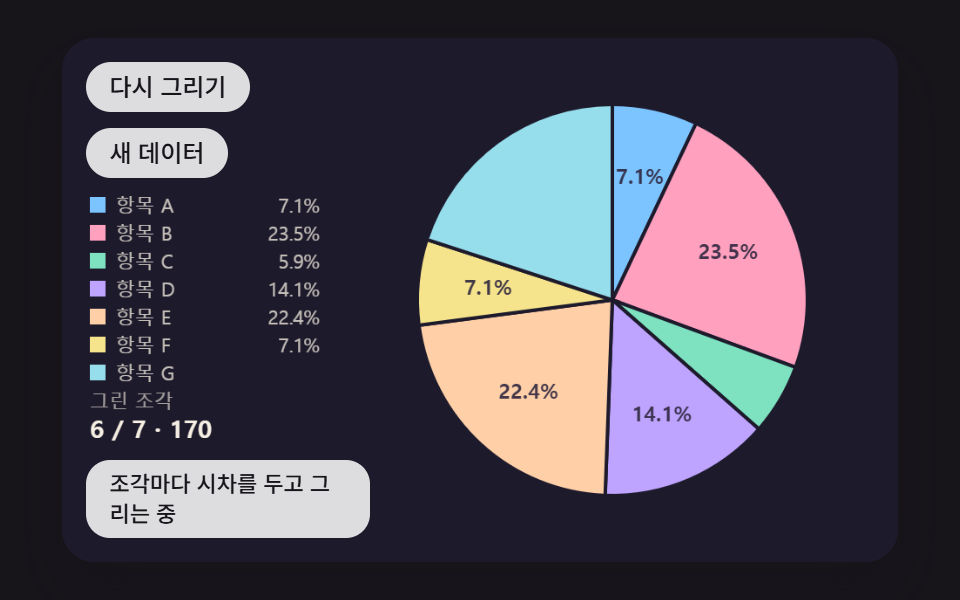 Dashboard UIPie Chart CSS: 9 Slices That Pop, Tilt and Morph
 Dashboard UIWord Cloud JavaScript: 9 Scenes, Spiral to 3D
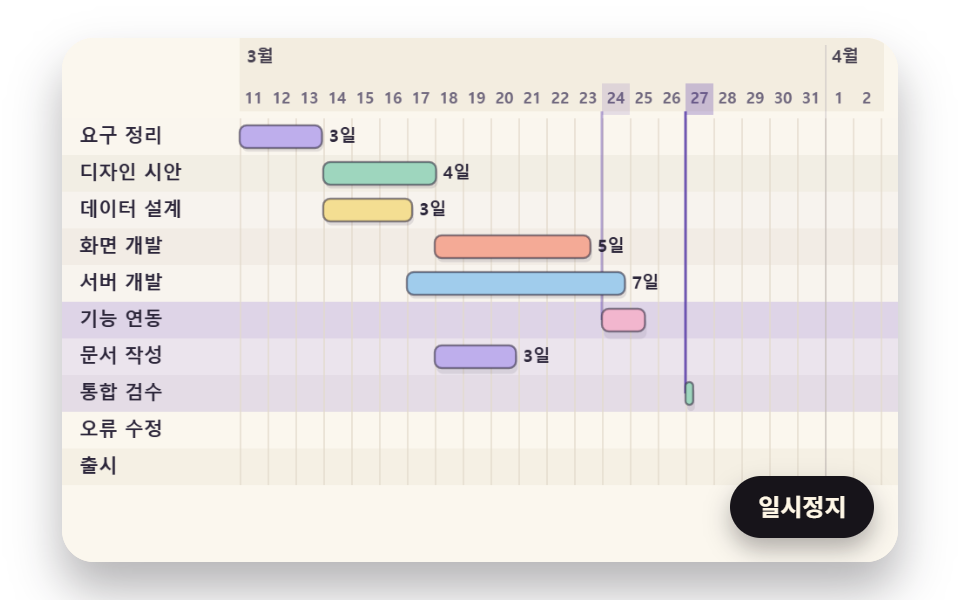 Dashboard UIGantt Chart JavaScript: 9 Self-Scheduling Views
 Dashboard UIDashboard Sidebar Design + 9 Widget UI Pieces
 Dashboard UI9 Dashboard Components, Not the Whole Page
 Dashboard UICommand Palette UI Design — 9 That Really Open