Pie Chart CSS: 9 Slices That Pop, Tilt and Morph
A pie chart earns its keep after drawing — 02 springs the hovered slice out along its center line, 03 tilts the disc and paints its side back to front, and 06
Everything that moves is drawn on a <canvas>, so the stylesheet holds the 480:300 stage, the buttons and the focus outline while JavaScript works out every angle. No chart library, CDN or WebGL is loaded, and the numbers inside each chart are seeded sample values rather than real statistics.
Nine Pie Charts Drawn From Seeded Sample Data, Ready to Poke
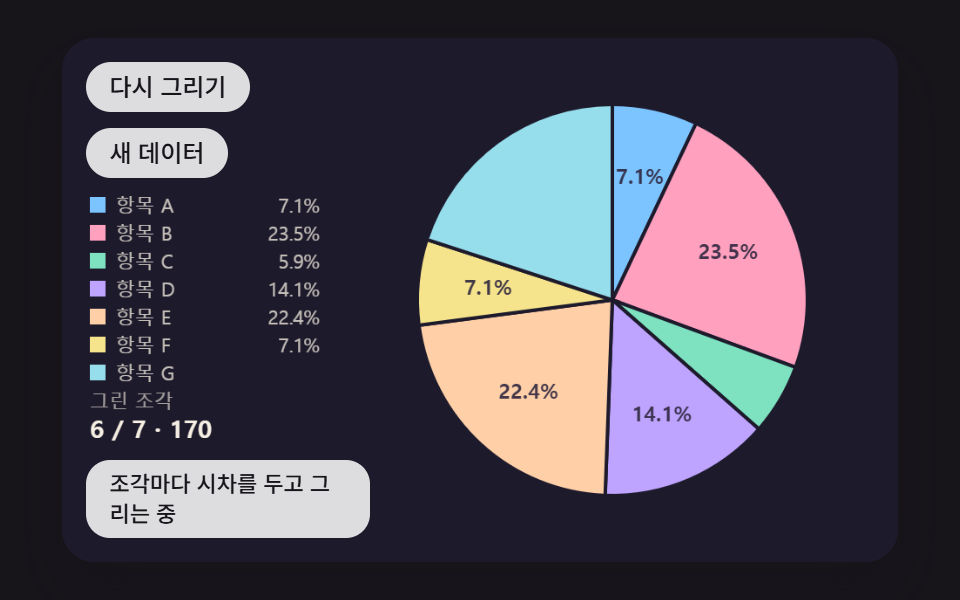 01 pie-chart-sweep-stagger-draw
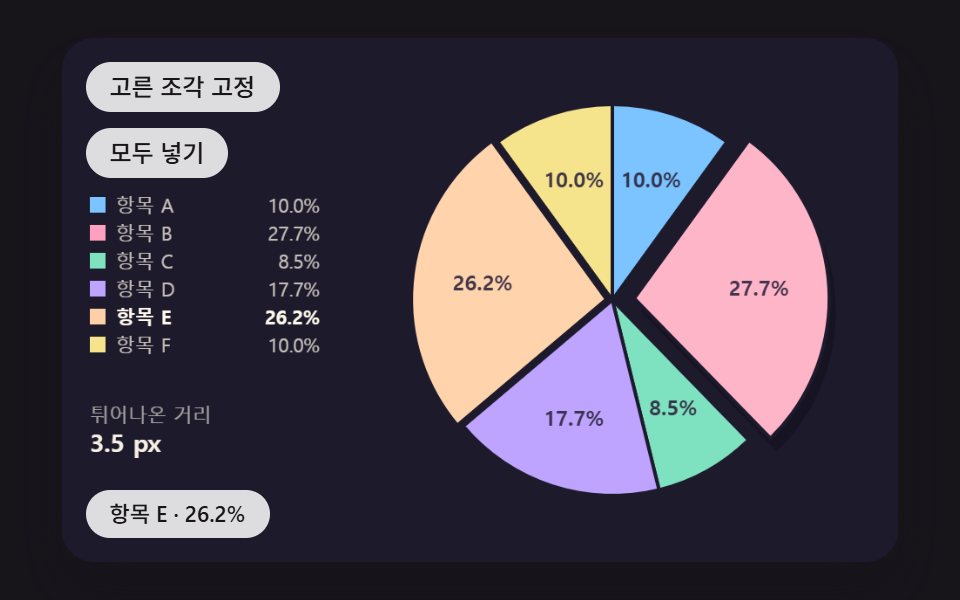 02 pie-chart-slice-pop-spring
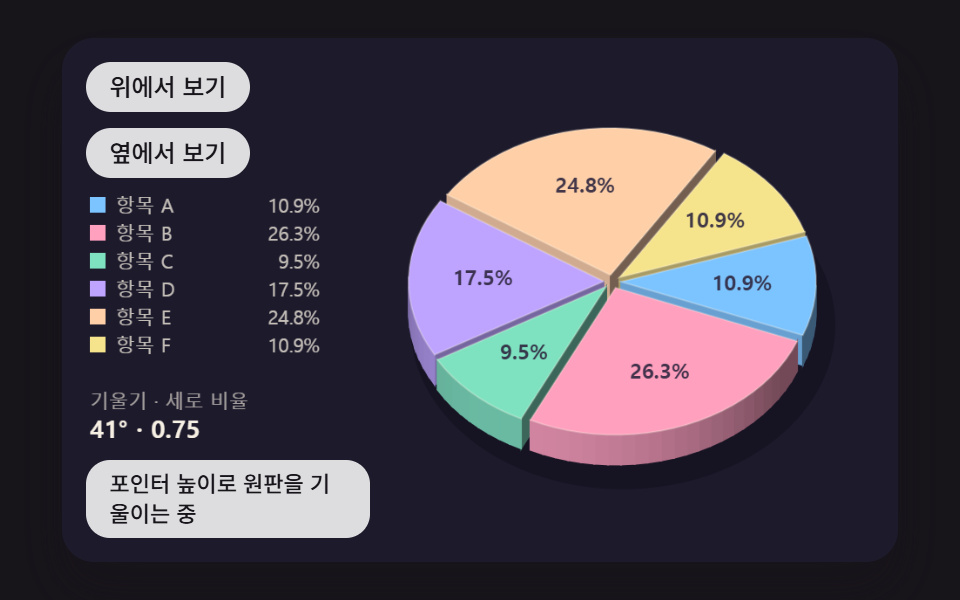 03 pie-chart-3d-tilt-side-wall
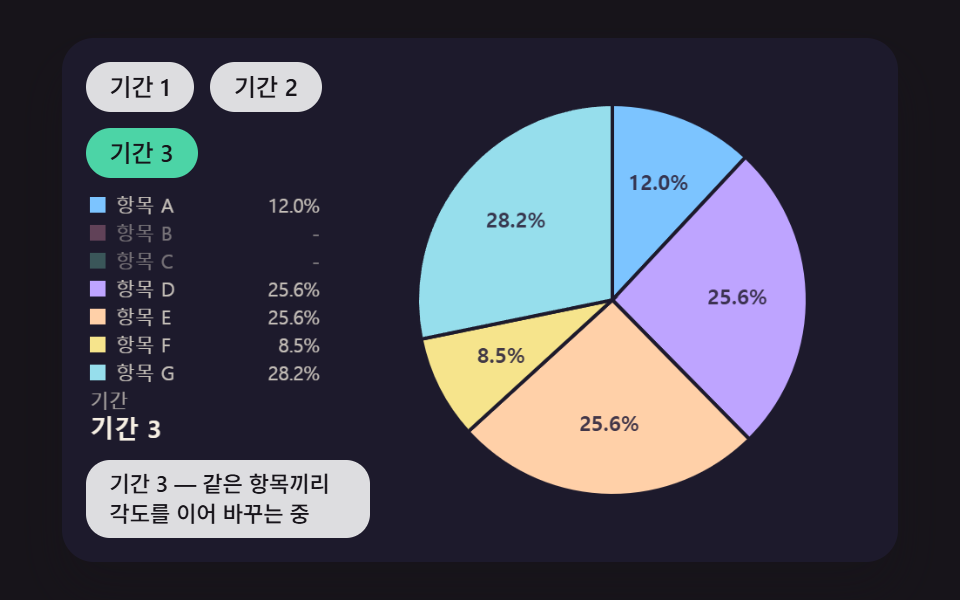 04 pie-chart-data-morph-angle-lerp
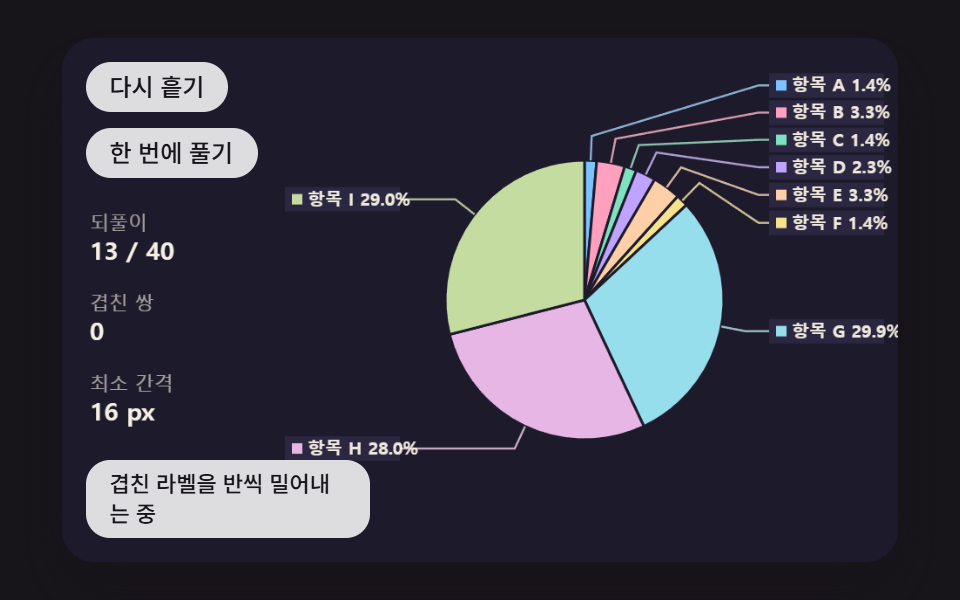 05 pie-chart-label-leader-relax
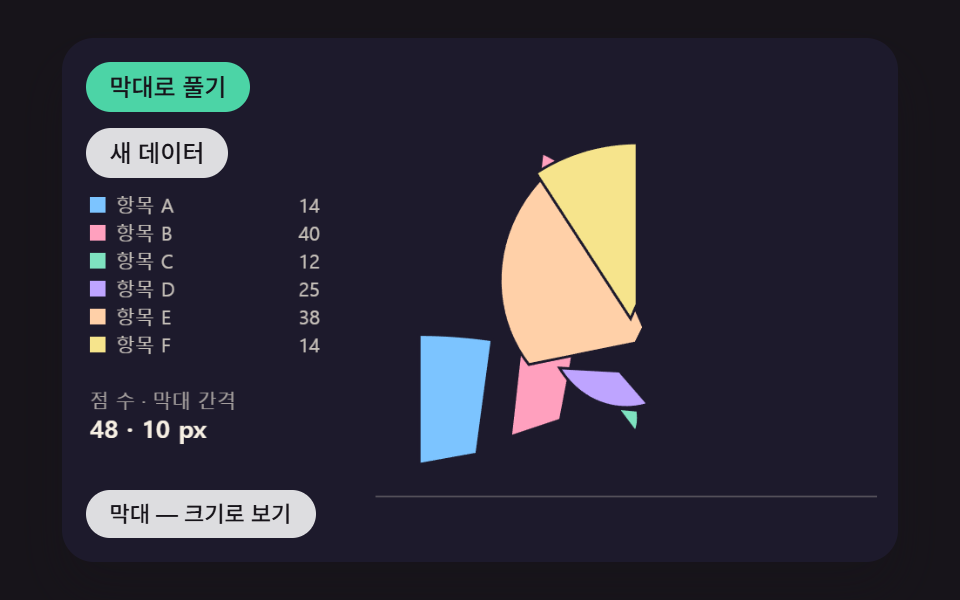 06 pie-chart-unroll-to-bars
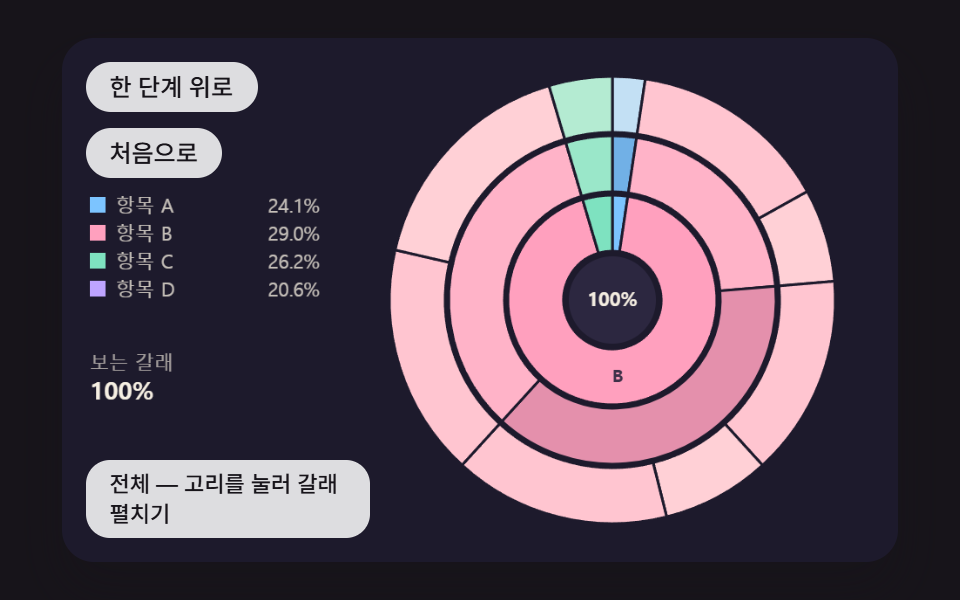 07 pie-chart-sunburst-drill-ring
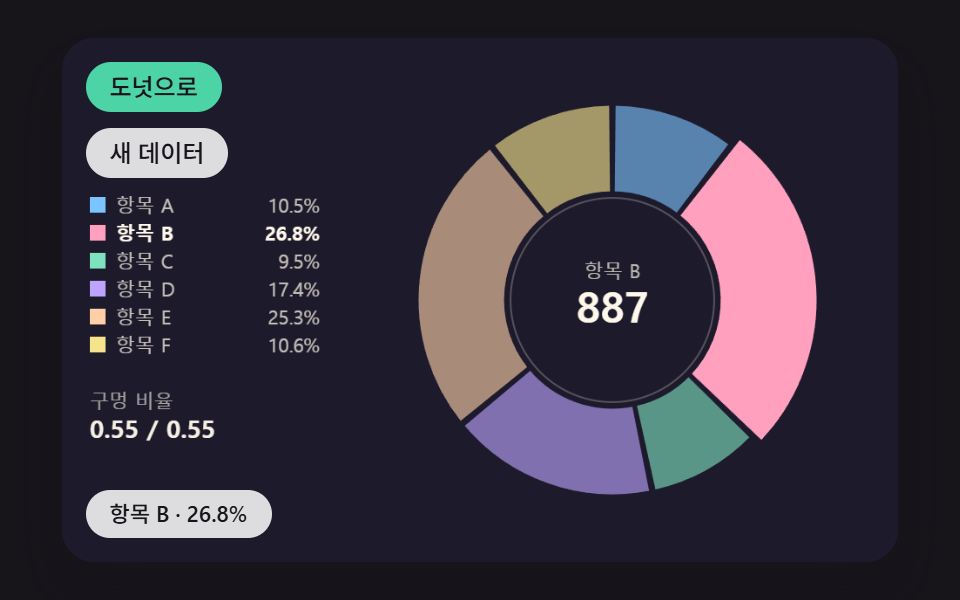 08 pie-chart-donut-hole-spring-count
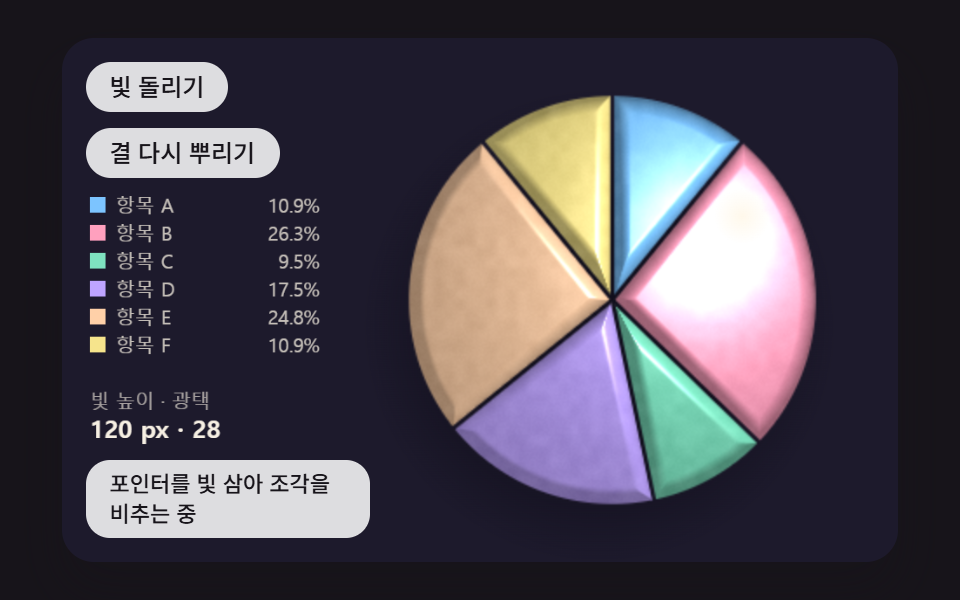 09 pie-chart-pointer-light-grain
Auto-plays · click a tile to jump to its section · all nine in one zip
- 01 A Pie Chart That Sweeps In Clockwise, One Slice After Another
- 02 A Pie Chart Whose Hovered Slice Springs Out Along Its Center Line
- 03 A 3D Pie Chart That Tilts the Disc and Draws Its Side Wall
- 04 A Pie Chart That Glides Its Slice Angles to New Shares When the Period Changes
- 05 A Pie Chart With Leader-Line Labels That Push Apart When They Overlap
- 06 A Pie Chart That Unrolls Into a Bar Chart, Slice by Slice
- 07 A Sunburst That Splits Into Inner and Outer Rings and Expands a Branch on Click
- 08 A Pie That Springs Open Into a Donut Chart While the Total Counts Up
- 09 A Pie Chart Scene Where the Pointer Acts as a Light Over Every Slice
Hover, click or tab into any card and use the arrow keys; every card picks its slice with the same angle test explained further down.
Pie Chart CSS: 9 Charts — Sweep, Pop-Out, 3D Tilt, Data Morph, Label Push, Bar Unroll, Sunburst, Donut Hole and Light Grain
The order follows a chart's working life. 01 is the first draw, 02 and 03 answer a pointer resting on a slice, 04 and 05 deal with new numbers and crowded labels, 06, 07 and 08 turn the circle into another shape, and 09 ends by lighting the disc pixel by pixel. Each scene paints into one 2D canvas, and there is no @keyframes rule anywhere; apart from a background-color transition on the buttons, motion comes from requestAnimationFrame advancing in fixed 16ms steps.
Seeded sample values instead of real statistics
The values come from makeRng(seed), a small generator that scrambles 32-bit integers, and the slice names are placeholders running from Item A to Item I. With the default seed 467, the seven values in 01 are 12, 40, 10, 24, 38, 12 and 34, adding up to 170, and pressing New data raises the seed by one for a fresh set. None of the nine index.html files calls Math.random, Date.now, fetch or localStorage, so each scene is a plain pie chart HTML CSS JavaScript page whose shares and timings repeat exactly under the same seed.
Twenty-four captures in two seconds at 480×300
Each scene was captured 24 times across 2 seconds and every capture was compared with the one before it, which leaves 23 comparisons as the denominator of the last column.
| Scene | Cumulative area | Mean intensity | Moving frames |
|---|---|---|---|
| 01 Staggered sweep | 22.6% | 122.5 | 19/23 |
| 02 Spring pop-out | 25.6% | 84.0 | 23/23 |
| 03 3D tilt with side wall | 19.7% | 85.1 | 23/23 |
| 04 Period morph | 23.7% | 84.4 | 20/23 |
| 05 Label push | 5.3% | 90.6 | 18/23 |
| 06 Pie to bars | 26.3% | 156.5 | 19/23 |
| 07 Sunburst drill | 26.0% | 79.8 | 18/23 |
| 08 Donut hole and count | 22.9% | 103.2 | 22/23 |
| 09 Pointer light and grain | 22.0% | 26.6 | 23/23 |
05 is the only scene below 10% cumulative area, at 5.3%, because the circle stays put while only the outside labels and their leader lines slide up and down. 01 starts sweeping at 200ms, finishes at 1,580ms and then holds until its next round, and 05 and 07 also go quiet once their push or expansion is done, so those three stop at 19, 18 and 18 frames. 09 shifts the brightness of broad areas only a little as the light travels, which keeps its mean intensity at 26.6 despite 22.0% coverage.
Matching a scene to a report, a deck or a dashboard
A report opener or a survey result card that shows the shares once and moves on needs nothing more than the sweep in 01, while a dashboard where people point at slices to check them starts from the pop-out in 02. A deck cover that wants depth takes 03, and a card whose mix changes by month or quarter takes 04. A report with so many categories that names collide uses 05, a card that flips between shares and sizes uses 06, and a breakdown with subcategories under each category uses 07. 08 belongs on a KPI card with the total in the middle, and 09 suits a landing page where the chart also serves as decoration.
How Does a List of Numbers Become Start and End Angles?
Every wedge angle comes from one ratio: value ÷ total × 2π. The layout function below keeps a running sum, divides it by the total and multiplies by 2π, giving each slice a start angle a0, an end angle a1 and a share. One slice's a1 is the next slice's a0, so there is no room for a gap or an overlap, and the last slice closes at exactly 2π because the running sum equals the total at that moment. The zero angle TOP is −π/2, which is 12 o'clock, angles grow clockwise, and dirX and dirY add TOP before turning an angle into screen cosine and sine.
    function layout(values) {
        let total = 0;
        for (let i = 0; i < values.length; i += 1) {
            total += values[i];
        }
        const out = [];
        let acc = 0;
        for (let i = 0; i < values.length; i += 1) {
            const a0 = (acc / total) * TAU;
            acc += values[i];
            out.push({ value: values[i], share: values[i] / total, a0: a0, a1: (acc / total) * TAU });
        }
        return out;
    }
    function dirX(a) { return Math.cos(TOP + a); }
    function dirY(a) { return Math.sin(TOP + a); }
Feeding in the seed 467 values gives shares of 7.1, 23.5, 5.9, 14.1, 22.4, 7.1 and 20.0% of 170. Seven scenes build their angles with this function; 04 keeps its own fixed-order running sum in anglesOf, and 07 re-divides each parent range by its children's shares in split. A donut chart javascript example can look like a separate chart type, yet in this source the two differ by a single inner radius handed to wedgePath, which closes the wedge at the center point when that radius is 0.5px or less and cuts a ring segment when it is larger.
Why Does a Slice Pop Out Along the Cosine and Sine of Its Middle Angle?
A slice's middle angle, midOf(i) = (a0 + a1) ÷ 2, is the line that splits the wedge into two equal halves. 02 shifts the whole slice by x pixels toward (dirX(m), dirY(m)); that direction is a unit vector, so x is the distance traveled, and the slice moves straight away from the center while opening gaps of equal width on both sides. Push it along any other line and it pulls away from one neighbor while riding up over the other.
Going the other way, finding the slice under the pointer means taking the angle of that point and checking which start and end angles it falls between. angleAt below takes the screen angle from Math.atan2(y − cy, x − cx), subtracts TOP and wraps the result into 0 to 2π so it lines up with the angles from layout. All nine scenes choose slices with this one angle; 03 first undoes the tilted projection to recover flat coordinates, and 07 takes the angle first and then turns it back into a share of the range in view to find the node.
    // Angle under the pointer — moves the atan2 screen angle into 0 to 2π measured from 12 o'clock
    function angleAt(x, y, cx, cy) {
        let a = Math.atan2(y - cy, x - cx) - TOP;
        while (a < 0) {
            a += TAU;
        }
        while (a >= TAU) {
            a -= TAU;
        }
        return a;
    }
01A Pie Chart That Sweeps In Clockwise, One Slice After Another
On a full circle rather than a donut, seven slices each grow from their own start angle, 80ms after the one before, so gaps open between slices and then close; the radius widens from 0.9R to R alongside them, and a bright line rides each opening end angle. The full draw takes (7 − 1) × 80 + 900 = 1,380ms, and with easeOutCubic each slice has covered 87.5% of its angle at the halfway point of its own time, while every round raises the seed by one and redraws with new sample values. It fits a report opener that reveals the shares once, and the render measured 22.6% cumulative area, 122.5 mean intensity and 19/23 moving frames.
<main class="stage">
<div class="pc is-demo" id="pc">
  <canvas class="pc__canvas" data-role="canvas" width="480" height="300" tabindex="0" aria-label="A pie chart that sweeps seven sample values in clockwise, each slice starting a little later. Pick a slice with ←/→ to hear its name and share"></canvas>
  <p class="pc__status" data-role="status" aria-live="off">Drawing each slice with a time offset</p>
  <div class="pc__tools">
    <button class="pc__btn" data-role="replay" type="button">Draw again</button>
    <button class="pc__btn" data-role="data" type="button">New data</button>
  </div>
</div>
</main>
@use "../../../../site/static/demo-tokens" as *;
@include stage($stage-ink);
.pc {
position: relative;
width: min(92vw, calc(160vh - 12.8vw));
aspect-ratio: 480 / 300;
margin: 0 auto;
border-radius: $r-card;
overflow: hidden;
box-shadow: $shadow-raised;
background: $subject-ink;
}
.pc__canvas {
display: block;
width: 100%;
height: 100%;
cursor: crosshair;
}
.pc__canvas:focus-visible {
outline: 2px solid rgba(255, 255, 255, .85);
outline-offset: -6px;
}
.pc__status {
position: absolute;
left: $sp-3;
bottom: $sp-3;
box-sizing: border-box;
max-width: 34%;
margin: 0;
padding: $sp-1 $sp-3;
border-radius: $r-control;
background: rgba(255, 255, 255, .85);
color: $subject-ink;
font-weight: 500;
font-size: 11px;
line-height: 1.4;
pointer-events: none;
}
// 판은 오른쪽에 있다 — 버튼은 왼쪽 위 칸에 두고, 좁으면 줄을 바꿔 판을 덮지 않는다
.pc__tools {
position: absolute;
left: $sp-3;
top: $sp-3;
box-sizing: border-box;
max-width: 34%;
display: flex;
flex-wrap: wrap;
gap: $sp-2;
}
.pc__btn {
margin: 0;
padding: $sp-1 $sp-3;
border: 0;
border-radius: $r-pill;
background: rgba(255, 255, 255, .85);
color: $subject-ink;
font: inherit;
font-weight: 500;
font-size: 12px;
line-height: 1.4;
cursor: pointer;
transition: background-color $dur-quick ease-out;
}
.pc__btn:hover {
background: $subject-cream;
}
.pc__btn[aria-pressed="true"] {
background: $subject-mint;
}
.pc__btn:focus-visible {
outline: 2px solid rgba(255, 255, 255, .95);
outline-offset: 2px;
}
// 손가락 가로 끌기는 이 캔버스가 받고, 세로 쓸기는 브라우저에 남겨 페이지 스크롤이 막히지 않게 한다
.pc__canvas { touch-action: pan-y; }
@media (max-width: 340px) {
.pc__btn { font-size: 10px; padding: $sp-1 $sp-2; }
.pc__status { font-size: 10px; padding: $sp-1 $sp-2; }
}
@media (prefers-reduced-motion: reduce) {
.pc__btn { transition: none; }
}html, body {
margin: 0;
overflow: hidden;
}
.stage {
box-sizing: border-box;
min-height: 100vh;
display: grid;
place-items: center;
margin: 0;
background: #17141a;
font-family: -apple-system, "Segoe UI", "Noto Sans KR", sans-serif;
padding: clamp(8px, 4vw, 24px);
}
.pc {
position: relative;
width: min(92vw, 160vh - 12.8vw);
aspect-ratio: 480/300;
margin: 0 auto;
border-radius: 16px;
overflow: hidden;
box-shadow: 0 14px 24px rgba(23, 20, 26, 0.32);
background: #17141a;
}
.pc__canvas {
display: block;
width: 100%;
height: 100%;
cursor: crosshair;
}
.pc__canvas:focus-visible {
outline: 2px solid rgba(255, 255, 255, 0.85);
outline-offset: -6px;
}
.pc__status {
position: absolute;
left: 12px;
bottom: 12px;
box-sizing: border-box;
max-width: 34%;
margin: 0;
padding: 4px 12px;
border-radius: 12px;
background: rgba(255, 255, 255, 0.85);
color: #17141a;
font-weight: 500;
font-size: 11px;
line-height: 1.4;
pointer-events: none;
}
.pc__tools {
position: absolute;
left: 12px;
top: 12px;
box-sizing: border-box;
max-width: 34%;
display: flex;
flex-wrap: wrap;
gap: 8px;
}
.pc__btn {
margin: 0;
padding: 4px 12px;
border: 0;
border-radius: 999px;
background: rgba(255, 255, 255, 0.85);
color: #17141a;
font: inherit;
font-weight: 500;
font-size: 12px;
line-height: 1.4;
cursor: pointer;
transition: background-color 220ms ease-out;
}
.pc__btn:hover {
background: #fff7e6;
}
.pc__btn[aria-pressed=true] {
background: #4cd4a6;
}
.pc__btn:focus-visible {
outline: 2px solid rgba(255, 255, 255, 0.95);
outline-offset: 2px;
}
.pc__canvas {
touch-action: pan-y;
}
@media (max-width: 340px) {
.pc__btn {
font-size: 10px;
padding: 4px 8px;
}
.pc__status {
font-size: 10px;
padding: 4px 8px;
}
}
@media (prefers-reduced-motion: reduce) {
.pc__btn {
transition: none;
}
}(function () {
const root = document.getElementById("pc");
if (!root) return;
const W = 480;
const H = 300;
const FIXED_DT = 16;
const TAU = Math.PI * 2;
// 각도 원점 — 12시 방향에서 시계 방향으로 잰다 (캔버스는 y 가 아래로 커서 양의 각이 시계 방향)
const TOP = -Math.PI / 2;
// 파스텔 팔레트 — 어두운 무대 위에 밝은 조각을 얹어 명도 차로 경계가 읽힌다
const BG = [29, 26, 44];
const PANEL = [44, 39, 64];
const PAPER = [255, 248, 234];
const INK = [46, 38, 62];
const PAL = [
[124, 196, 255],
[255, 160, 190],
[126, 226, 192],
[190, 164, 255],
[255, 208, 168],
[246, 228, 140],
[150, 222, 236],
[232, 182, 228],
[196, 220, 160],
];
// 가상 데이터의 이름 — 실제 항목이 아니라 순서만 뜻한다
const LABELS = ['Item A', 'Item B', 'Item C', 'Item D', 'Item E', 'Item F', 'Item G', 'Item H', 'Item I'];
function clamp(v, lo, hi) { return v < lo ? lo : (v > hi ? hi : v); }
function lerp(a, b, k) { return a + (b - a) * k; }
function smooth(x) { const c = clamp(x, 0, 1); return c * c * (3 - 2 * c); }
function easeOutCubic(x) { const c = 1 - clamp(x, 0, 1); return 1 - c * c * c; }
// 앞뒤가 대칭인 거듭제곱 이징 — p 가 클수록 가운데에서 더 빨리 지나간다
function easeInOutPow(x, p) {
const c = clamp(x, 0, 1);
return c < 0.5 ? 0.5 * Math.pow(2 * c, p) : 1 - 0.5 * Math.pow(2 - 2 * c, p);
}
function rgba(c, a) {
return 'rgba(' + Math.round(c[0]) + ',' + Math.round(c[1]) + ',' + Math.round(c[2]) + ',' + clamp(a, 0, 1).toFixed(3) + ')';
}
function mix(a, b, k) { return [lerp(a[0], b[0], k), lerp(a[1], b[1], k), lerp(a[2], b[2], k)]; }
const canvasEl = root.querySelector('[data-role="canvas"]');
const statusEl = root.querySelector('[data-role="status"]');
const ctxRaw = canvasEl ? canvasEl.getContext('2d') : null;
if (!canvasEl || !ctxRaw || !statusEl) {
return;
}
const cv = canvasEl;
const ctx = ctxRaw;
const status = statusEl;
const reduceQuery = window.matchMedia('(prefers-reduced-motion: reduce)');
const still = reduceQuery.matches;
// 자동 시연 중인가 — 사람이 처음 만지는 순간 시연을 멈추고 상태 줄을 읽어 주기 시작한다
let demo = root.classList.contains('is-demo');
function wake() {
if (!demo) {
return;
}
demo = false;
root.classList.remove('is-demo');
status.setAttribute('aria-live', 'polite');
}
function say(text) {
if (status.textContent !== text) {
status.textContent = text;
}
}
function fitCanvas() {
// 배율은 2 에서 자른다 — 배율 3 기기에서 화소가 2.25배로 늘어 프레임마다 일이 그만큼 커지지 않게
const dpr = Math.min(window.devicePixelRatio || 1, 2);
cv.width = Math.round(W * dpr);
cv.height = Math.round(H * dpr);
ctx.setTransform(dpr, 0, 0, dpr, 0, 0);
}
function onResize() {
fitCanvas();
draw();
}
fitCanvas();
window.addEventListener('resize', onResize);
// 화면 좌표(CSS px) → 장면 좌표(480x300). 리사이즈 뒤에도 늘 현재 크기로 다시 잰다
function toScene(ev) {
const r = cv.getBoundingClientRect();
return [((ev.clientX - r.left) / r.width) * W, ((ev.clientY - r.top) / r.height) * H];
}
// 시드 고정 난수 — 같은 시드면 같은 가상 데이터가 다시 나온다 (32비트 정수 섞기)
function makeRng(seed) {
let s = seed >>> 0;
return function () {
s = (s + 0x6d2b79f5) >>> 0;
let t = s;
t = Math.imul(t ^ (t >>> 15), t | 1);
t ^= t + Math.imul(t ^ (t >>> 7), t | 61);
return ((t ^ (t >>> 14)) >>> 0) / 4294967296;
};
}
function seededValues(seed, n, lo, hi) {
const rnd = makeRng(seed);
const out = [];
for (let i = 0; i < n; i += 1) {
out.push(lo + Math.floor(rnd() * (hi - lo + 1)));
}
return out;
}
// 숫자 목록 → 부채꼴 — 합계로 나눈 몫을 앞에서부터 쌓아 시작 각과 끝 각을 만든다
function layout(values) {
let total = 0;
for (let i = 0; i < values.length; i += 1) {
total += values[i];
}
const out = [];
let acc = 0;
for (let i = 0; i < values.length; i += 1) {
const a0 = (acc / total) * TAU;
acc += values[i];
out.push({ value: values[i], share: values[i] / total, a0: a0, a1: (acc / total) * TAU });
}
return out;
}
function dirX(a) { return Math.cos(TOP + a); }
function dirY(a) { return Math.sin(TOP + a); }
// 포인터가 가리키는 각 — atan2 로 구한 화면 각을 12시 기준 0 ~ 2π 로 옮긴다
function angleAt(x, y, cx, cy) {
let a = Math.atan2(y - cy, x - cx) - TOP;
while (a < 0) {
a += TAU;
}
while (a >= TAU) {
a -= TAU;
}
return a;
}
function sliceAt(slices, a) {
for (let i = 0; i < slices.length; i += 1) {
if (a >= slices[i].a0 && a < slices[i].a1) {
return i;
}
}
return -1;
}
// 부채꼴 경로 — 안쪽 반지름 r0 이 0 이면 가운데 점까지, 아니면 도넛 조각
function wedgePath(c, cx, cy, r0, r1, a0, a1) {
c.beginPath();
c.arc(cx, cy, r1, TOP + a0, TOP + a1, false);
if (r0 > 0.5) {
c.arc(cx, cy, r0, TOP + a1, TOP + a0, true);
}
else {
c.lineTo(cx, cy);
}
c.closePath();
}
function pctText(share) { return (share * 100).toFixed(1) + '%'; }
function sayPick(i, share) { say(LABELS[i] + ' · ' + pctText(share)); }
// 세 자리마다 쉼표 — 지역 설정에 기대지 않는다
function groupDigits(n) {
const s = String(Math.round(Math.abs(n)));
let out = '';
for (let i = 0; i < s.length; i += 1) {
if (i > 0 && (s.length - i) % 3 === 0) {
out += ',';
}
out += s[i];
}
return (n < 0 ? '-' : '') + out;
}
// 왼쪽 범례 — 색 칩 + 이름 + 비율, 고른 줄은 밝게
const LEG_X = 16;
const LEG_Y = 100;
const LEG_ROW = 16;
function legendRow(row, label, value, c, on, dim) {
const y = LEG_Y + row * LEG_ROW;
ctx.fillStyle = rgba(c, dim ? 0.3 : 1);
ctx.fillRect(LEG_X, y - 9, 9, 9);
ctx.textBaseline = 'alphabetic';
ctx.textAlign = 'left';
ctx.font = (on ? '700' : '500') + ' 11px sans-serif';
ctx.fillStyle = rgba(PAPER, on ? 1 : (dim ? 0.4 : 0.74));
ctx.fillText(label, LEG_X + 15, y);
ctx.textAlign = 'right';
ctx.fillText(value, LEG_X + 132, y);
}
// 범례 아래 수치 한 줄 — 이름표 + 값
function statRow(y, label, value) {
ctx.textBaseline = 'alphabetic';
ctx.textAlign = 'left';
ctx.fillStyle = rgba(PAPER, 0.6);
ctx.font = '500 11px sans-serif';
ctx.fillText(label, LEG_X, y);
ctx.fillStyle = rgba(PAPER, 0.96);
ctx.font = '700 14px sans-serif';
ctx.fillText(value, LEG_X, y + 17);
}
function clearStage() {
ctx.fillStyle = rgba(BG, 1);
ctx.fillRect(0, 0, W, H);
}
// 시연 일정 — 루프 안의 시각(ms) 표를 지날 때마다 한 번씩 부른다
let schedCycle = -1;
let schedIdx = 0;
function runSchedule(t, loop, marks, fire) {
const cyc = Math.floor(t / loop);
const p = t - cyc * loop;
if (cyc !== schedCycle) {
schedCycle = cyc;
schedIdx = 0;
}
while (schedIdx < marks.length && p >= marks[schedIdx]) {
fire(schedIdx, cyc);
schedIdx += 1;
}
}
// 조각 하나가 폭 0 에서 제 각도까지 펼쳐지는 시간
const SWEEP_MS = 900;
// i 번째 조각은 i × SLICE_STAGGER 만큼 늦게 출발한다 — 앞 조각이 다 펴지기 전에 다음 조각이 따라 나온다
const SLICE_STAGGER = 80;
// 가상 데이터 시드 — 같은 시드면 같은 값이 다시 나온다 (실제 통계가 아니다)
const DATA_SEED = 467;
const SLICE_N = 7;
const CX = 316;
const CY = 150;
const R = 112;
const DEMO_LOOP = 2000;
const TXT_DRAW = 'Drawing each slice with a time offset';
const TXT_DONE = 'Done — pick a slice with ←/→';
const replayBtn = root.querySelector('[data-role="replay"]');
const dataBtn = root.querySelector('[data-role="data"]');
let seed = DATA_SEED;
let slices = layout(seededValues(seed, SLICE_N, 6, 40));
// -1 이면 출발 전(빈 원판), 0 부터 ms 로 센다
let elapsed = -1;
let pick = -1;
function totalMs() { return (SLICE_N - 1) * SLICE_STAGGER + SWEEP_MS; }
// i 번째 조각의 진행률 0~1 — 늦게 출발한 만큼 빼고 이징을 건다
    function progress(i) {
        if (elapsed < 0) {
            return 0;
        }
        return easeOutCubic((elapsed - i * SLICE_STAGGER) / SWEEP_MS);
    }
function done() { return elapsed >= totalMs(); }
function report() {
if (pick >= 0) {
sayPick(pick, slices[pick].share);
return;
}
say(done() ? TXT_DONE : TXT_DRAW);
}
function setData(s) {
seed = s;
slices = layout(seededValues(seed, SLICE_N, 6, 40));
pick = -1;
}
function step() {
if (elapsed < 0 || done()) {
return;
}
elapsed += FIXED_DT;
}
function settle() {
if (elapsed < totalMs()) {
elapsed = totalMs();
}
}
function demoTick(t) {
runSchedule(t, DEMO_LOOP, [0, 200], function (k, cyc) {
if (k === 0) {
if (cyc > 0) {
setData(DATA_SEED + cyc);
}
elapsed = -1;
}
else {
elapsed = 0;
}
report();
});
}
function draw() {
clearStage();
// 빈 원판 자리 — 그리기 전에도 무대가 비어 보이지 않게
ctx.fillStyle = rgba(PANEL, 1);
ctx.beginPath();
ctx.arc(CX, CY, R, 0, TAU);
ctx.fill();
for (let i = 0; i < slices.length; i += 1) {
const s = slices[i];
const e = progress(i);
if (e <= 0) {
continue;
}
const end = s.a0 + (s.a1 - s.a0) * e;
const r = R * (0.9 + 0.1 * e) + (i === pick ? 6 : 0);
const c = pick >= 0 && i !== pick ? mix(PAL[i], BG, 0.38) : PAL[i];
ctx.fillStyle = rgba(c, 1);
wedgePath(ctx, CX, CY, 0, r, s.a0, end);
ctx.fill();
ctx.strokeStyle = rgba(BG, 1);
ctx.lineWidth = 2;
ctx.stroke();
// 펼쳐지는 앞날 — 아직 펴지는 조각의 끝 각에 밝은 선
if (e < 1) {
ctx.strokeStyle = rgba(PAPER, 0.9 * (1 - e));
ctx.lineWidth = 2;
ctx.beginPath();
ctx.moveTo(CX, CY);
ctx.lineTo(CX + dirX(end) * r, CY + dirY(end) * r);
ctx.stroke();
}
}
// 비율 글자 — 다 펴진 조각 가운데 각 위, 6% 이상인 조각만
ctx.textAlign = 'center';
ctx.textBaseline = 'middle';
ctx.font = '700 12px sans-serif';
for (let i = 0; i < slices.length; i += 1) {
const s = slices[i];
const e = progress(i);
if (e < 1 || s.share < 0.06) {
continue;
}
const mid = (s.a0 + s.a1) / 2;
ctx.fillStyle = rgba(INK, 0.9);
ctx.fillText(pctText(s.share), CX + dirX(mid) * R * 0.64, CY + dirY(mid) * R * 0.64);
}
let total = 0;
let drawn = 0;
for (let i = 0; i < slices.length; i += 1) {
const e = progress(i);
legendRow(i, LABELS[i], e >= 1 ? pctText(slices[i].share) : '', PAL[i], i === pick, e <= 0);
total += slices[i].value;
if (e >= 1) {
drawn += 1;
}
}
statRow(212, 'Slices drawn', String(drawn) + ' / ' + String(SLICE_N) + ' · ' + groupDigits(total));
}
function after() {
// 시연이 빈 원판에서 멈췄으면 사람 입력과 함께 그리기를 시작한다
if (elapsed < 0) {
elapsed = 0;
}
if (still) {
settle();
}
report();
draw();
}
function replay() {
elapsed = 0;
after();
}
function movePick(d) {
pick = pick < 0 ? (d > 0 ? 0 : SLICE_N - 1) : (pick + d + SLICE_N) % SLICE_N;
after();
}
cv.addEventListener('pointerdown', function (ev) {
wake();
const p = toScene(ev);
if (Math.hypot(p[0] - CX, p[1] - CY) <= R + 8) {
pick = sliceAt(slices, angleAt(p[0], p[1], CX, CY));
after();
}
else {
replay();
}
});
cv.addEventListener('keydown', function (ev) {
if (ev.key === 'ArrowRight') {
ev.preventDefault();
wake();
movePick(1);
}
else if (ev.key === 'ArrowLeft') {
ev.preventDefault();
wake();
movePick(-1);
}
else if (ev.key === 'Enter') {
ev.preventDefault();
wake();
replay();
}
else if (ev.key === ' ') {
ev.preventDefault();
wake();
setData(seed + 1);
replay();
}
else if (ev.key === 'Escape') {
ev.preventDefault();
wake();
pick = -1;
after();
}
});
if (replayBtn) {
replayBtn.addEventListener('click', function () { wake(); replay(); });
}
if (dataBtn) {
dataBtn.addEventListener('click', function () { wake(); setData(seed + 1); replay(); });
}
report();
let rafId = 0;
let lastTs = -1;
let acc = 0;
let clock = 0;
function frame(ts) {
if (lastTs < 0) {
lastTs = ts;
}
// 탭이 숨었다 돌아와도 한 번에 100ms 까지만 따라잡는다 — 순간이동 대신 이어서 움직인다
acc += Math.min(ts - lastTs, 100);
lastTs = ts;
let n = 0;
while (acc >= FIXED_DT && n < 6) {
clock += FIXED_DT;
if (demo) {
demoTick(clock);
}
step();
acc -= FIXED_DT;
n += 1;
}
draw();
rafId = window.requestAnimationFrame(frame);
}
if (still) {
settle();
draw();
}
else {
rafId = window.requestAnimationFrame(frame);
}
return function () {
window.cancelAnimationFrame(rafId);
window.removeEventListener('resize', onResize);
};
})();// PieSweepStaggerDraw - vanilla 판(01-pie-chart-sweep-stagger-draw) 의 React 포트. 같은 계산을 useEffect 안에서 돌린다.
import { useEffect, useRef } from "react";
import styles from "./PieSweepStaggerDraw.module.scss";
const cx = (s: string): string => s.split(" ").map((n) => styles[n] ?? n).join(" ");
export default function PieSweepStaggerDraw() {
const rootRef = useRef<HTMLDivElement | null>(null);
useEffect(() => {
const rootEl = rootRef.current;
if (!rootEl) return;
const root: HTMLElement = rootEl;
type RGB = [number, number, number];
const W = 480;
const H = 300;
const FIXED_DT = 16;
const TAU = Math.PI * 2;
// 각도 원점 — 12시 방향에서 시계 방향으로 잰다 (캔버스는 y 가 아래로 커서 양의 각이 시계 방향)
const TOP = -Math.PI / 2;
// 파스텔 팔레트 — 어두운 무대 위에 밝은 조각을 얹어 명도 차로 경계가 읽힌다
const BG: RGB = [29, 26, 44];
const PANEL: RGB = [44, 39, 64];
const PAPER: RGB = [255, 248, 234];
const INK: RGB = [46, 38, 62];
const PAL: RGB[] = [
[124, 196, 255],
[255, 160, 190],
[126, 226, 192],
[190, 164, 255],
[255, 208, 168],
[246, 228, 140],
[150, 222, 236],
[232, 182, 228],
[196, 220, 160],
];
// 가상 데이터의 이름 — 실제 항목이 아니라 순서만 뜻한다
const LABELS = ['항목 A', '항목 B', '항목 C', '항목 D', '항목 E', '항목 F', '항목 G', '항목 H', '항목 I'];
function clamp(v: number, lo: number, hi: number): number { return v < lo ? lo : (v > hi ? hi : v); }
function lerp(a: number, b: number, k: number): number { return a + (b - a) * k; }
function smooth(x: number): number { const c = clamp(x, 0, 1); return c * c * (3 - 2 * c); }
function easeOutCubic(x: number): number { const c = 1 - clamp(x, 0, 1); return 1 - c * c * c; }
// 앞뒤가 대칭인 거듭제곱 이징 — p 가 클수록 가운데에서 더 빨리 지나간다
function easeInOutPow(x: number, p: number): number {
const c = clamp(x, 0, 1);
return c < 0.5 ? 0.5 * Math.pow(2 * c, p) : 1 - 0.5 * Math.pow(2 - 2 * c, p);
}
function rgba(c: RGB, a: number): string {
return 'rgba(' + Math.round(c[0]) + ',' + Math.round(c[1]) + ',' + Math.round(c[2]) + ',' + clamp(a, 0, 1).toFixed(3) + ')';
}
function mix(a: RGB, b: RGB, k: number): RGB { return [lerp(a[0], b[0], k), lerp(a[1], b[1], k), lerp(a[2], b[2], k)]; }
const canvasEl = root.querySelector('[data-role="canvas"]') as HTMLCanvasElement | null;
const statusEl = root.querySelector('[data-role="status"]') as HTMLElement | null;
const ctxRaw = canvasEl ? canvasEl.getContext('2d') : null;
if (!canvasEl || !ctxRaw || !statusEl) { return; }
const cv: HTMLCanvasElement = canvasEl;
const ctx: CanvasRenderingContext2D = ctxRaw;
const status: HTMLElement = statusEl;
const reduceQuery = window.matchMedia('(prefers-reduced-motion: reduce)');
const still = reduceQuery.matches;
// 자동 시연 중인가 — 사람이 처음 만지는 순간 시연을 멈추고 상태 줄을 읽어 주기 시작한다
let demo = root.classList.contains('is-demo');
function wake(): void {
if (!demo) { return; }
demo = false;
root.classList.remove('is-demo');
status.setAttribute('aria-live', 'polite');
}
function say(text: string): void {
if (status.textContent !== text) { status.textContent = text; }
}
function fitCanvas(): void {
// 배율은 2 에서 자른다 — 배율 3 기기에서 화소가 2.25배로 늘어 프레임마다 일이 그만큼 커지지 않게
const dpr = Math.min(window.devicePixelRatio || 1, 2);
cv.width = Math.round(W * dpr);
cv.height = Math.round(H * dpr);
ctx.setTransform(dpr, 0, 0, dpr, 0, 0);
}
function onResize(): void {
fitCanvas();
draw();
}
fitCanvas();
window.addEventListener('resize', onResize);
// 화면 좌표(CSS px) → 장면 좌표(480x300). 리사이즈 뒤에도 늘 현재 크기로 다시 잰다
function toScene(ev: PointerEvent): [number, number] {
const r = cv.getBoundingClientRect();
return [((ev.clientX - r.left) / r.width) * W, ((ev.clientY - r.top) / r.height) * H];
}
// 시드 고정 난수 — 같은 시드면 같은 가상 데이터가 다시 나온다 (32비트 정수 섞기)
function makeRng(seed: number): () => number {
let s = seed >>> 0;
return function (): number {
s = (s + 0x6d2b79f5) >>> 0;
let t = s;
t = Math.imul(t ^ (t >>> 15), t | 1);
t ^= t + Math.imul(t ^ (t >>> 7), t | 61);
return ((t ^ (t >>> 14)) >>> 0) / 4294967296;
};
}
function seededValues(seed: number, n: number, lo: number, hi: number): number[] {
const rnd = makeRng(seed);
const out: number[] = [];
for (let i = 0; i < n; i += 1) { out.push(lo + Math.floor(rnd() * (hi - lo + 1))); }
return out;
}
type Slice = { value: number; share: number; a0: number; a1: number };
// 숫자 목록 → 부채꼴 — 합계로 나눈 몫을 앞에서부터 쌓아 시작 각과 끝 각을 만든다
function layout(values: number[]): Slice[] {
let total = 0;
for (let i = 0; i < values.length; i += 1) { total += values[i]; }
const out: Slice[] = [];
let acc = 0;
for (let i = 0; i < values.length; i += 1) {
const a0 = (acc / total) * TAU;
acc += values[i];
out.push({ value: values[i], share: values[i] / total, a0: a0, a1: (acc / total) * TAU });
}
return out;
}
function dirX(a: number): number { return Math.cos(TOP + a); }
function dirY(a: number): number { return Math.sin(TOP + a); }
// 포인터가 가리키는 각 — atan2 로 구한 화면 각을 12시 기준 0 ~ 2π 로 옮긴다
function angleAt(x: number, y: number, cx: number, cy: number): number {
let a = Math.atan2(y - cy, x - cx) - TOP;
while (a < 0) { a += TAU; }
while (a >= TAU) { a -= TAU; }
return a;
}
function sliceAt(slices: Slice[], a: number): number {
for (let i = 0; i < slices.length; i += 1) {
if (a >= slices[i].a0 && a < slices[i].a1) { return i; }
}
return -1;
}
// 부채꼴 경로 — 안쪽 반지름 r0 이 0 이면 가운데 점까지, 아니면 도넛 조각
function wedgePath(c: CanvasRenderingContext2D, cx: number, cy: number, r0: number, r1: number, a0: number, a1: number): void {
c.beginPath();
c.arc(cx, cy, r1, TOP + a0, TOP + a1, false);
if (r0 > 0.5) { c.arc(cx, cy, r0, TOP + a1, TOP + a0, true); } else { c.lineTo(cx, cy); }
c.closePath();
}
function pctText(share: number): string { return (share * 100).toFixed(1) + '%'; }
function sayPick(i: number, share: number): void { say(LABELS[i] + ' · ' + pctText(share)); }
// 세 자리마다 쉼표 — 지역 설정에 기대지 않는다
function groupDigits(n: number): string {
const s = String(Math.round(Math.abs(n)));
let out = '';
for (let i = 0; i < s.length; i += 1) {
if (i > 0 && (s.length - i) % 3 === 0) { out += ','; }
out += s[i];
}
return (n < 0 ? '-' : '') + out;
}
// 왼쪽 범례 — 색 칩 + 이름 + 비율, 고른 줄은 밝게
const LEG_X = 16;
const LEG_Y = 100;
const LEG_ROW = 16;
function legendRow(row: number, label: string, value: string, c: RGB, on: boolean, dim: boolean): void {
const y = LEG_Y + row * LEG_ROW;
ctx.fillStyle = rgba(c, dim ? 0.3 : 1);
ctx.fillRect(LEG_X, y - 9, 9, 9);
ctx.textBaseline = 'alphabetic';
ctx.textAlign = 'left';
ctx.font = (on ? '700' : '500') + ' 11px sans-serif';
ctx.fillStyle = rgba(PAPER, on ? 1 : (dim ? 0.4 : 0.74));
ctx.fillText(label, LEG_X + 15, y);
ctx.textAlign = 'right';
ctx.fillText(value, LEG_X + 132, y);
}
// 범례 아래 수치 한 줄 — 이름표 + 값
function statRow(y: number, label: string, value: string): void {
ctx.textBaseline = 'alphabetic';
ctx.textAlign = 'left';
ctx.fillStyle = rgba(PAPER, 0.6);
ctx.font = '500 11px sans-serif';
ctx.fillText(label, LEG_X, y);
ctx.fillStyle = rgba(PAPER, 0.96);
ctx.font = '700 14px sans-serif';
ctx.fillText(value, LEG_X, y + 17);
}
function clearStage(): void {
ctx.fillStyle = rgba(BG, 1);
ctx.fillRect(0, 0, W, H);
}
// 시연 일정 — 루프 안의 시각(ms) 표를 지날 때마다 한 번씩 부른다
let schedCycle = -1;
let schedIdx = 0;
function runSchedule(t: number, loop: number, marks: number[], fire: (k: number, cycle: number) => void): void {
const cyc = Math.floor(t / loop);
const p = t - cyc * loop;
if (cyc !== schedCycle) { schedCycle = cyc; schedIdx = 0; }
while (schedIdx < marks.length && p >= marks[schedIdx]) {
fire(schedIdx, cyc);
schedIdx += 1;
}
}
// 조각 하나가 폭 0 에서 제 각도까지 펼쳐지는 시간
const SWEEP_MS = 900;
// i 번째 조각은 i × SLICE_STAGGER 만큼 늦게 출발한다 — 앞 조각이 다 펴지기 전에 다음 조각이 따라 나온다
const SLICE_STAGGER = 80;
// 가상 데이터 시드 — 같은 시드면 같은 값이 다시 나온다 (실제 통계가 아니다)
const DATA_SEED = 467;
const SLICE_N = 7;
const CX = 316;
const CY = 150;
const R = 112;
const DEMO_LOOP = 2000;
const TXT_DRAW = '조각마다 시차를 두고 그리는 중';
const TXT_DONE = '다 그림 — ←/→ 로 조각 고르기';
const replayBtn = root.querySelector('[data-role="replay"]') as HTMLButtonElement | null;
const dataBtn = root.querySelector('[data-role="data"]') as HTMLButtonElement | null;
let seed = DATA_SEED;
let slices: Slice[] = layout(seededValues(seed, SLICE_N, 6, 40));
// -1 이면 출발 전(빈 원판), 0 부터 ms 로 센다
let elapsed = -1;
let pick = -1;
function totalMs(): number { return (SLICE_N - 1) * SLICE_STAGGER + SWEEP_MS; }
// i 번째 조각의 진행률 0~1 — 늦게 출발한 만큼 빼고 이징을 건다
function progress(i: number): number {
if (elapsed < 0) { return 0; }
return easeOutCubic((elapsed - i * SLICE_STAGGER) / SWEEP_MS);
}
function done(): boolean { return elapsed >= totalMs(); }
function report(): void {
if (pick >= 0) { sayPick(pick, slices[pick].share); return; }
say(done() ? TXT_DONE : TXT_DRAW);
}
function setData(s: number): void {
seed = s;
slices = layout(seededValues(seed, SLICE_N, 6, 40));
pick = -1;
}
function step(): void {
if (elapsed < 0 || done()) { return; }
elapsed += FIXED_DT;
}
function settle(): void {
if (elapsed < totalMs()) { elapsed = totalMs(); }
}
function demoTick(t: number): void {
runSchedule(t, DEMO_LOOP, [0, 200], function (k: number, cyc: number): void {
if (k === 0) {
if (cyc > 0) { setData(DATA_SEED + cyc); }
elapsed = -1;
} else {
elapsed = 0;
}
report();
});
}
function draw(): void {
clearStage();
// 빈 원판 자리 — 그리기 전에도 무대가 비어 보이지 않게
ctx.fillStyle = rgba(PANEL, 1);
ctx.beginPath();
ctx.arc(CX, CY, R, 0, TAU);
ctx.fill();
for (let i = 0; i < slices.length; i += 1) {
const s = slices[i];
const e = progress(i);
if (e <= 0) { continue; }
const end = s.a0 + (s.a1 - s.a0) * e;
const r = R * (0.9 + 0.1 * e) + (i === pick ? 6 : 0);
const c = pick >= 0 && i !== pick ? mix(PAL[i], BG, 0.38) : PAL[i];
ctx.fillStyle = rgba(c, 1);
wedgePath(ctx, CX, CY, 0, r, s.a0, end);
ctx.fill();
ctx.strokeStyle = rgba(BG, 1);
ctx.lineWidth = 2;
ctx.stroke();
// 펼쳐지는 앞날 — 아직 펴지는 조각의 끝 각에 밝은 선
if (e < 1) {
ctx.strokeStyle = rgba(PAPER, 0.9 * (1 - e));
ctx.lineWidth = 2;
ctx.beginPath();
ctx.moveTo(CX, CY);
ctx.lineTo(CX + dirX(end) * r, CY + dirY(end) * r);
ctx.stroke();
}
}
// 비율 글자 — 다 펴진 조각 가운데 각 위, 6% 이상인 조각만
ctx.textAlign = 'center';
ctx.textBaseline = 'middle';
ctx.font = '700 12px sans-serif';
for (let i = 0; i < slices.length; i += 1) {
const s = slices[i];
const e = progress(i);
if (e < 1 || s.share < 0.06) { continue; }
const mid = (s.a0 + s.a1) / 2;
ctx.fillStyle = rgba(INK, 0.9);
ctx.fillText(pctText(s.share), CX + dirX(mid) * R * 0.64, CY + dirY(mid) * R * 0.64);
}
let total = 0;
let drawn = 0;
for (let i = 0; i < slices.length; i += 1) {
const e = progress(i);
legendRow(i, LABELS[i], e >= 1 ? pctText(slices[i].share) : '', PAL[i], i === pick, e <= 0);
total += slices[i].value;
if (e >= 1) { drawn += 1; }
}
statRow(212, '그린 조각', String(drawn) + ' / ' + String(SLICE_N) + ' · ' + groupDigits(total));
}
function after(): void {
// 시연이 빈 원판에서 멈췄으면 사람 입력과 함께 그리기를 시작한다
if (elapsed < 0) { elapsed = 0; }
if (still) { settle(); }
report();
draw();
}
function replay(): void {
elapsed = 0;
after();
}
function movePick(d: number): void {
pick = pick < 0 ? (d > 0 ? 0 : SLICE_N - 1) : (pick + d + SLICE_N) % SLICE_N;
after();
}
cv.addEventListener('pointerdown', function (ev: PointerEvent): void {
wake();
const p = toScene(ev);
if (Math.hypot(p[0] - CX, p[1] - CY) <= R + 8) {
pick = sliceAt(slices, angleAt(p[0], p[1], CX, CY));
after();
} else {
replay();
}
});
cv.addEventListener('keydown', function (ev: KeyboardEvent): void {
if (ev.key === 'ArrowRight') { ev.preventDefault(); wake(); movePick(1); }
else if (ev.key === 'ArrowLeft') { ev.preventDefault(); wake(); movePick(-1); }
else if (ev.key === 'Enter') { ev.preventDefault(); wake(); replay(); }
else if (ev.key === ' ') { ev.preventDefault(); wake(); setData(seed + 1); replay(); }
else if (ev.key === 'Escape') { ev.preventDefault(); wake(); pick = -1; after(); }
});
if (replayBtn) { replayBtn.addEventListener('click', function (): void { wake(); replay(); }); }
if (dataBtn) { dataBtn.addEventListener('click', function (): void { wake(); setData(seed + 1); replay(); }); }
report();
let rafId = 0;
let lastTs = -1;
let acc = 0;
let clock = 0;
function frame(ts: number): void {
if (lastTs < 0) { lastTs = ts; }
// 탭이 숨었다 돌아와도 한 번에 100ms 까지만 따라잡는다 — 순간이동 대신 이어서 움직인다
acc += Math.min(ts - lastTs, 100);
lastTs = ts;
let n = 0;
while (acc >= FIXED_DT && n < 6) {
clock += FIXED_DT;
if (demo) { demoTick(clock); }
step();
acc -= FIXED_DT;
n += 1;
}
draw();
rafId = window.requestAnimationFrame(frame);
}
if (still) {
settle();
draw();
} else {
rafId = window.requestAnimationFrame(frame);
}
return function (): void {
window.cancelAnimationFrame(rafId);
window.removeEventListener('resize', onResize);
};
}, []);
return (
<div className={cx("pc") + " is-demo"} ref={rootRef}>
<canvas className={cx("pc__canvas")} data-role="canvas" width={480} height={300} tabIndex={0} aria-label="가상 값 일곱 개를 조각마다 시차를 두고 시계 방향으로 쓸며 그리는 원형 그래프. ←/→ 로 조각을 고르면 이름과 비율을 읽어 준다"></canvas>
<p className={cx("pc__status")} data-role="status" aria-live="off">조각마다 시차를 두고 그리는 중</p>
<div className={cx("pc__tools")}>
<button className={cx("pc__btn")} data-role="replay" type="button">다시 그리기</button>
<button className={cx("pc__btn")} data-role="data" type="button">새 데이터</button>
</div>
</div>
);
}01 · A Pie Chart That Sweeps In Clockwise, One Slice After Another — Measured area 22.602% · moving frames 19/23Original by GODRICH · SCSS and React ship in the zip · See the password
function progress(i) {
if (elapsed < 0) {
return 0;
}
return easeOutCubic((elapsed - i * SLICE_STAGGER) / SWEEP_MS);
}
02A Pie Chart Whose Hovered Slice Springs Out Along Its Center Line
Only the slice under the pointer, or the one pinned by a click, receives the 16px target, and one spring value x feeds its position, brightness and shadow offset together so the slice appears to lift off the page. With SPRING_K 170 and SPRING_DAMP 14 the damping ratio is 14 ÷ (2√170) = 0.537, so the slice overshoots by 11.3% to 17.82px at 272ms and stays within ±0.5px from 400ms on, and slices are painted from least to most extended so the raised one is not hidden by its neighbors. It works on dashboards where people point at a slice to read its share, and the render measured 25.6% cumulative area, 84.0 mean intensity and 23/23 moving frames.
<main class="stage">
<div class="pc is-demo" id="pc">
  <canvas class="pc__canvas" data-role="canvas" width="480" height="300" tabindex="0" aria-label="A pie chart whose hovered slice springs out along its middle angle. Pick a slice with ←/→ and pin it with Enter"></canvas>
  <p class="pc__status" data-role="status" aria-live="off">Hover a slice</p>
  <div class="pc__tools">
    <button class="pc__btn" data-role="pin" type="button" aria-pressed="false">Pin the slice</button>
    <button class="pc__btn" data-role="reset" type="button">Put all back</button>
  </div>
</div>
</main>
@use "../../../../site/static/demo-tokens" as *;
@include stage($stage-ink);
.pc {
position: relative;
width: min(92vw, calc(160vh - 12.8vw));
aspect-ratio: 480 / 300;
margin: 0 auto;
border-radius: $r-card;
overflow: hidden;
box-shadow: $shadow-raised;
background: $subject-ink;
}
.pc__canvas {
display: block;
width: 100%;
height: 100%;
cursor: crosshair;
}
.pc__canvas:focus-visible {
outline: 2px solid rgba(255, 255, 255, .85);
outline-offset: -6px;
}
.pc__status {
position: absolute;
left: $sp-3;
bottom: $sp-3;
box-sizing: border-box;
max-width: 34%;
margin: 0;
padding: $sp-1 $sp-3;
border-radius: $r-control;
background: rgba(255, 255, 255, .85);
color: $subject-ink;
font-weight: 500;
font-size: 11px;
line-height: 1.4;
pointer-events: none;
}
// 판은 오른쪽에 있다 — 버튼은 왼쪽 위 칸에 두고, 좁으면 줄을 바꿔 판을 덮지 않는다
.pc__tools {
position: absolute;
left: $sp-3;
top: $sp-3;
box-sizing: border-box;
max-width: 34%;
display: flex;
flex-wrap: wrap;
gap: $sp-2;
}
.pc__btn {
margin: 0;
padding: $sp-1 $sp-3;
border: 0;
border-radius: $r-pill;
background: rgba(255, 255, 255, .85);
color: $subject-ink;
font: inherit;
font-weight: 500;
font-size: 12px;
line-height: 1.4;
cursor: pointer;
transition: background-color $dur-quick ease-out;
}
.pc__btn:hover {
background: $subject-cream;
}
.pc__btn[aria-pressed="true"] {
background: $subject-mint;
}
.pc__btn:focus-visible {
outline: 2px solid rgba(255, 255, 255, .95);
outline-offset: 2px;
}
// 손가락 가로 끌기는 이 캔버스가 받고, 세로 쓸기는 브라우저에 남겨 페이지 스크롤이 막히지 않게 한다
.pc__canvas { touch-action: pan-y; }
@media (max-width: 340px) {
.pc__btn { font-size: 10px; padding: $sp-1 $sp-2; }
.pc__status { font-size: 10px; padding: $sp-1 $sp-2; }
}
@media (prefers-reduced-motion: reduce) {
.pc__btn { transition: none; }
}html, body {
margin: 0;
overflow: hidden;
}
.stage {
box-sizing: border-box;
min-height: 100vh;
display: grid;
place-items: center;
margin: 0;
background: #17141a;
font-family: -apple-system, "Segoe UI", "Noto Sans KR", sans-serif;
padding: clamp(8px, 4vw, 24px);
}
.pc {
position: relative;
width: min(92vw, 160vh - 12.8vw);
aspect-ratio: 480/300;
margin: 0 auto;
border-radius: 16px;
overflow: hidden;
box-shadow: 0 14px 24px rgba(23, 20, 26, 0.32);
background: #17141a;
}
.pc__canvas {
display: block;
width: 100%;
height: 100%;
cursor: crosshair;
}
.pc__canvas:focus-visible {
outline: 2px solid rgba(255, 255, 255, 0.85);
outline-offset: -6px;
}
.pc__status {
position: absolute;
left: 12px;
bottom: 12px;
box-sizing: border-box;
max-width: 34%;
margin: 0;
padding: 4px 12px;
border-radius: 12px;
background: rgba(255, 255, 255, 0.85);
color: #17141a;
font-weight: 500;
font-size: 11px;
line-height: 1.4;
pointer-events: none;
}
.pc__tools {
position: absolute;
left: 12px;
top: 12px;
box-sizing: border-box;
max-width: 34%;
display: flex;
flex-wrap: wrap;
gap: 8px;
}
.pc__btn {
margin: 0;
padding: 4px 12px;
border: 0;
border-radius: 999px;
background: rgba(255, 255, 255, 0.85);
color: #17141a;
font: inherit;
font-weight: 500;
font-size: 12px;
line-height: 1.4;
cursor: pointer;
transition: background-color 220ms ease-out;
}
.pc__btn:hover {
background: #fff7e6;
}
.pc__btn[aria-pressed=true] {
background: #4cd4a6;
}
.pc__btn:focus-visible {
outline: 2px solid rgba(255, 255, 255, 0.95);
outline-offset: 2px;
}
.pc__canvas {
touch-action: pan-y;
}
@media (max-width: 340px) {
.pc__btn {
font-size: 10px;
padding: 4px 8px;
}
.pc__status {
font-size: 10px;
padding: 4px 8px;
}
}
@media (prefers-reduced-motion: reduce) {
.pc__btn {
transition: none;
}
}(function () {
const root = document.getElementById("pc");
if (!root) return;
const W = 480;
const H = 300;
const FIXED_DT = 16;
const TAU = Math.PI * 2;
// 각도 원점 — 12시 방향에서 시계 방향으로 잰다 (캔버스는 y 가 아래로 커서 양의 각이 시계 방향)
const TOP = -Math.PI / 2;
// 파스텔 팔레트 — 어두운 무대 위에 밝은 조각을 얹어 명도 차로 경계가 읽힌다
const BG = [29, 26, 44];
const PANEL = [44, 39, 64];
const PAPER = [255, 248, 234];
const INK = [46, 38, 62];
const PAL = [
[124, 196, 255],
[255, 160, 190],
[126, 226, 192],
[190, 164, 255],
[255, 208, 168],
[246, 228, 140],
[150, 222, 236],
[232, 182, 228],
[196, 220, 160],
];
// 가상 데이터의 이름 — 실제 항목이 아니라 순서만 뜻한다
const LABELS = ['Item A', 'Item B', 'Item C', 'Item D', 'Item E', 'Item F', 'Item G', 'Item H', 'Item I'];
function clamp(v, lo, hi) { return v < lo ? lo : (v > hi ? hi : v); }
function lerp(a, b, k) { return a + (b - a) * k; }
function smooth(x) { const c = clamp(x, 0, 1); return c * c * (3 - 2 * c); }
function easeOutCubic(x) { const c = 1 - clamp(x, 0, 1); return 1 - c * c * c; }
// 앞뒤가 대칭인 거듭제곱 이징 — p 가 클수록 가운데에서 더 빨리 지나간다
function easeInOutPow(x, p) {
const c = clamp(x, 0, 1);
return c < 0.5 ? 0.5 * Math.pow(2 * c, p) : 1 - 0.5 * Math.pow(2 - 2 * c, p);
}
function rgba(c, a) {
return 'rgba(' + Math.round(c[0]) + ',' + Math.round(c[1]) + ',' + Math.round(c[2]) + ',' + clamp(a, 0, 1).toFixed(3) + ')';
}
function mix(a, b, k) { return [lerp(a[0], b[0], k), lerp(a[1], b[1], k), lerp(a[2], b[2], k)]; }
const canvasEl = root.querySelector('[data-role="canvas"]');
const statusEl = root.querySelector('[data-role="status"]');
const ctxRaw = canvasEl ? canvasEl.getContext('2d') : null;
if (!canvasEl || !ctxRaw || !statusEl) {
return;
}
const cv = canvasEl;
const ctx = ctxRaw;
const status = statusEl;
const reduceQuery = window.matchMedia('(prefers-reduced-motion: reduce)');
const still = reduceQuery.matches;
// 자동 시연 중인가 — 사람이 처음 만지는 순간 시연을 멈추고 상태 줄을 읽어 주기 시작한다
let demo = root.classList.contains('is-demo');
function wake() {
if (!demo) {
return;
}
demo = false;
root.classList.remove('is-demo');
status.setAttribute('aria-live', 'polite');
}
function say(text) {
if (status.textContent !== text) {
status.textContent = text;
}
}
function fitCanvas() {
// 배율은 2 에서 자른다 — 배율 3 기기에서 화소가 2.25배로 늘어 프레임마다 일이 그만큼 커지지 않게
const dpr = Math.min(window.devicePixelRatio || 1, 2);
cv.width = Math.round(W * dpr);
cv.height = Math.round(H * dpr);
ctx.setTransform(dpr, 0, 0, dpr, 0, 0);
}
function onResize() {
fitCanvas();
draw();
}
fitCanvas();
window.addEventListener('resize', onResize);
// 화면 좌표(CSS px) → 장면 좌표(480x300). 리사이즈 뒤에도 늘 현재 크기로 다시 잰다
function toScene(ev) {
const r = cv.getBoundingClientRect();
return [((ev.clientX - r.left) / r.width) * W, ((ev.clientY - r.top) / r.height) * H];
}
// 시드 고정 난수 — 같은 시드면 같은 가상 데이터가 다시 나온다 (32비트 정수 섞기)
function makeRng(seed) {
let s = seed >>> 0;
return function () {
s = (s + 0x6d2b79f5) >>> 0;
let t = s;
t = Math.imul(t ^ (t >>> 15), t | 1);
t ^= t + Math.imul(t ^ (t >>> 7), t | 61);
return ((t ^ (t >>> 14)) >>> 0) / 4294967296;
};
}
function seededValues(seed, n, lo, hi) {
const rnd = makeRng(seed);
const out = [];
for (let i = 0; i < n; i += 1) {
out.push(lo + Math.floor(rnd() * (hi - lo + 1)));
}
return out;
}
// 숫자 목록 → 부채꼴 — 합계로 나눈 몫을 앞에서부터 쌓아 시작 각과 끝 각을 만든다
function layout(values) {
let total = 0;
for (let i = 0; i < values.length; i += 1) {
total += values[i];
}
const out = [];
let acc = 0;
for (let i = 0; i < values.length; i += 1) {
const a0 = (acc / total) * TAU;
acc += values[i];
out.push({ value: values[i], share: values[i] / total, a0: a0, a1: (acc / total) * TAU });
}
return out;
}
function dirX(a) { return Math.cos(TOP + a); }
function dirY(a) { return Math.sin(TOP + a); }
// 포인터가 가리키는 각 — atan2 로 구한 화면 각을 12시 기준 0 ~ 2π 로 옮긴다
function angleAt(x, y, cx, cy) {
let a = Math.atan2(y - cy, x - cx) - TOP;
while (a < 0) {
a += TAU;
}
while (a >= TAU) {
a -= TAU;
}
return a;
}
function sliceAt(slices, a) {
for (let i = 0; i < slices.length; i += 1) {
if (a >= slices[i].a0 && a < slices[i].a1) {
return i;
}
}
return -1;
}
// 부채꼴 경로 — 안쪽 반지름 r0 이 0 이면 가운데 점까지, 아니면 도넛 조각
function wedgePath(c, cx, cy, r0, r1, a0, a1) {
c.beginPath();
c.arc(cx, cy, r1, TOP + a0, TOP + a1, false);
if (r0 > 0.5) {
c.arc(cx, cy, r0, TOP + a1, TOP + a0, true);
}
else {
c.lineTo(cx, cy);
}
c.closePath();
}
function pctText(share) { return (share * 100).toFixed(1) + '%'; }
function sayPick(i, share) { say(LABELS[i] + ' · ' + pctText(share)); }
// 세 자리마다 쉼표 — 지역 설정에 기대지 않는다
function groupDigits(n) {
const s = String(Math.round(Math.abs(n)));
let out = '';
for (let i = 0; i < s.length; i += 1) {
if (i > 0 && (s.length - i) % 3 === 0) {
out += ',';
}
out += s[i];
}
return (n < 0 ? '-' : '') + out;
}
// 왼쪽 범례 — 색 칩 + 이름 + 비율, 고른 줄은 밝게
const LEG_X = 16;
const LEG_Y = 100;
const LEG_ROW = 16;
function legendRow(row, label, value, c, on, dim) {
const y = LEG_Y + row * LEG_ROW;
ctx.fillStyle = rgba(c, dim ? 0.3 : 1);
ctx.fillRect(LEG_X, y - 9, 9, 9);
ctx.textBaseline = 'alphabetic';
ctx.textAlign = 'left';
ctx.font = (on ? '700' : '500') + ' 11px sans-serif';
ctx.fillStyle = rgba(PAPER, on ? 1 : (dim ? 0.4 : 0.74));
ctx.fillText(label, LEG_X + 15, y);
ctx.textAlign = 'right';
ctx.fillText(value, LEG_X + 132, y);
}
// 범례 아래 수치 한 줄 — 이름표 + 값
function statRow(y, label, value) {
ctx.textBaseline = 'alphabetic';
ctx.textAlign = 'left';
ctx.fillStyle = rgba(PAPER, 0.6);
ctx.font = '500 11px sans-serif';
ctx.fillText(label, LEG_X, y);
ctx.fillStyle = rgba(PAPER, 0.96);
ctx.font = '700 14px sans-serif';
ctx.fillText(value, LEG_X, y + 17);
}
function clearStage() {
ctx.fillStyle = rgba(BG, 1);
ctx.fillRect(0, 0, W, H);
}
// 시연 일정 — 루프 안의 시각(ms) 표를 지날 때마다 한 번씩 부른다
let schedCycle = -1;
let schedIdx = 0;
function runSchedule(t, loop, marks, fire) {
const cyc = Math.floor(t / loop);
const p = t - cyc * loop;
if (cyc !== schedCycle) {
schedCycle = cyc;
schedIdx = 0;
}
while (schedIdx < marks.length && p >= marks[schedIdx]) {
fire(schedIdx, cyc);
schedIdx += 1;
}
}
function springStep(s, k, d, dt) {
const acc = -k * (s.x - s.to) - d * s.v;
s.v += acc * dt;
s.x += s.v * dt;
}
// 고른 조각이 가운데 각 방향(코사인·사인)으로 밀려나는 거리(px)
const EXPLODE_DIST = 16;
// 감쇠 스프링 — 당기는 힘(1/s²)과 끄는 힘(1/s). 감쇠비 = SPRING_DAMP / (2√SPRING_K) 이 1 보다 작아 한 번 살짝 넘쳤다 선다
const SPRING_K = 170;
const SPRING_DAMP = 14;
const SLICE_N = 6;
const SEED = 467;
const CX = 316;
const CY = 150;
const R = 112;
const DEMO_LOOP = 2000;
const TXT_IDLE = 'Hover a slice';
const pinBtn = root.querySelector('[data-role="pin"]');
const resetBtn = root.querySelector('[data-role="reset"]');
const slices = layout(seededValues(SEED, SLICE_N, 8, 36));
const springs = [];
for (let i = 0; i < SLICE_N; i += 1) {
springs.push({ x: 0, v: 0, to: 0 });
}
// 시연은 큰 조각부터 네 개를 차례로 띄운다
const DEMO_PICKS = slices.map(function (_s, i) { return i; })
.sort(function (a, b) { return slices[b].share - slices[a].share; }).slice(0, 4);
let hover = -1;
let pinned = -1;
function focusIdx() { return hover >= 0 ? hover : pinned; }
function retarget() {
for (let i = 0; i < SLICE_N; i += 1) {
springs[i].to = i === hover || i === pinned ? EXPLODE_DIST : 0;
}
}
function report() {
const f = focusIdx();
if (f >= 0) {
sayPick(f, slices[f].share);
}
else {
say(TXT_IDLE);
}
}
function step() {
const dt = FIXED_DT / 1000;
for (let i = 0; i < SLICE_N; i += 1) {
springStep(springs[i], SPRING_K, SPRING_DAMP, dt);
}
}
function settle() {
for (let i = 0; i < SLICE_N; i += 1) {
springs[i].x = springs[i].to;
springs[i].v = 0;
}
}
function demoTick(t) {
runSchedule(t, DEMO_LOOP, [200, 600, 1000, 1400, 1800], function (k) {
hover = k < DEMO_PICKS.length ? DEMO_PICKS[k] : -1;
retarget();
report();
});
}
function midOf(i) { return (slices[i].a0 + slices[i].a1) / 2; }
function draw() {
clearStage();
// 덜 나온 조각부터 칠해 튀어나온 조각이 맨 위에 오게 한다
const order = slices.map(function (_s, i) { return i; })
.sort(function (a, b) { return springs[a].x - springs[b].x; });
// 그림자 — 튀어나온 만큼 짙어지고 아래로 멀어진다
for (let n = 0; n < order.length; n += 1) {
const i = order[n];
const x = springs[i].x;
if (x <= 0.3) {
continue;
}
const m = midOf(i);
const k = clamp(x / EXPLODE_DIST, 0, 1.4);
ctx.fillStyle = 'rgba(8,6,16,' + (0.42 * Math.min(k, 1)).toFixed(3) + ')';
wedgePath(ctx, CX + dirX(m) * x + x * 0.3, CY + dirY(m) * x + x * 0.6, 0, R, slices[i].a0, slices[i].a1);
ctx.fill();
}
for (let n = 0; n < order.length; n += 1) {
const i = order[n];
const x = springs[i].x;
const m = midOf(i);
// 밀려난 거리만큼 밝아진다 — 같은 값이 위치·밝기·그림자 셋에 함께 쓰인다
const lift = clamp(x / EXPLODE_DIST, 0, 1.3);
ctx.fillStyle = rgba(mix(PAL[i], PAPER, 0.3 * lift), 1);
wedgePath(ctx, CX + dirX(m) * x, CY + dirY(m) * x, 0, R, slices[i].a0, slices[i].a1);
ctx.fill();
ctx.strokeStyle = rgba(BG, 1);
ctx.lineWidth = 2;
ctx.stroke();
if (slices[i].share >= 0.07) {
ctx.textAlign = 'center';
ctx.textBaseline = 'middle';
ctx.font = (x > 2 ? '800' : '700') + ' 12px sans-serif';
ctx.fillStyle = rgba(INK, 0.9);
ctx.fillText(pctText(slices[i].share), CX + dirX(m) * (R * 0.64 + x), CY + dirY(m) * (R * 0.64 + x));
}
}
const f = focusIdx();
for (let i = 0; i < SLICE_N; i += 1) {
legendRow(i, LABELS[i], pctText(slices[i].share), PAL[i], i === f, false);
}
statRow(220, 'Pop-out distance', (f >= 0 ? springs[f].x : 0).toFixed(1) + ' px');
}
function after() {
retarget();
if (still) {
settle();
}
report();
draw();
if (pinBtn) {
pinBtn.setAttribute('aria-pressed', pinned >= 0 ? 'true' : 'false');
}
}
// 포인터 자리의 조각 — 각은 atan2, 거리는 그 조각이 지금 밀려난 만큼 넉넉히 본다
function hitSlice(x, y) {
const i = sliceAt(slices, angleAt(x, y, CX, CY));
if (i < 0) {
return -1;
}
return Math.hypot(x - CX, y - CY) <= R + Math.max(0, springs[i].x) + 4 ? i : -1;
}
function togglePin(i) {
pinned = i < 0 || pinned === i ? -1 : i;
}
function movePick(d) {
const f = focusIdx();
hover = f < 0 ? (d > 0 ? 0 : SLICE_N - 1) : (f + d + SLICE_N) % SLICE_N;
after();
}
cv.addEventListener('pointermove', function (ev) {
wake();
const p = toScene(ev);
const i = hitSlice(p[0], p[1]);
if (i !== hover) {
hover = i;
after();
}
});
cv.addEventListener('pointerleave', function () {
if (demo) {
return;
}
hover = -1;
after();
});
cv.addEventListener('pointerdown', function (ev) {
wake();
const p = toScene(ev);
togglePin(hitSlice(p[0], p[1]));
after();
});
cv.addEventListener('keydown', function (ev) {
if (ev.key === 'ArrowRight') {
ev.preventDefault();
wake();
movePick(1);
}
else if (ev.key === 'ArrowLeft') {
ev.preventDefault();
wake();
movePick(-1);
}
else if (ev.key === 'Enter' || ev.key === ' ') {
ev.preventDefault();
wake();
togglePin(focusIdx());
after();
}
else if (ev.key === 'Escape') {
ev.preventDefault();
wake();
hover = -1;
pinned = -1;
after();
}
});
if (pinBtn) {
pinBtn.addEventListener('click', function () { wake(); togglePin(focusIdx() >= 0 ? focusIdx() : DEMO_PICKS[0]); after(); });
}
if (resetBtn) {
resetBtn.addEventListener('click', function () { wake(); hover = -1; pinned = -1; after(); });
}
report();
let rafId = 0;
let lastTs = -1;
let acc = 0;
let clock = 0;
function frame(ts) {
if (lastTs < 0) {
lastTs = ts;
}
// 탭이 숨었다 돌아와도 한 번에 100ms 까지만 따라잡는다 — 순간이동 대신 이어서 움직인다
acc += Math.min(ts - lastTs, 100);
lastTs = ts;
let n = 0;
while (acc >= FIXED_DT && n < 6) {
clock += FIXED_DT;
if (demo) {
demoTick(clock);
}
step();
acc -= FIXED_DT;
n += 1;
}
draw();
rafId = window.requestAnimationFrame(frame);
}
if (still) {
settle();
draw();
}
else {
rafId = window.requestAnimationFrame(frame);
}
return function () {
window.cancelAnimationFrame(rafId);
window.removeEventListener('resize', onResize);
};
})();// PieSlicePopSpring - vanilla 판(02-pie-chart-slice-pop-spring) 의 React 포트. 같은 계산을 useEffect 안에서 돌린다.
import { useEffect, useRef } from "react";
import styles from "./PieSlicePopSpring.module.scss";
const cx = (s: string): string => s.split(" ").map((n) => styles[n] ?? n).join(" ");
export default function PieSlicePopSpring() {
const rootRef = useRef<HTMLDivElement | null>(null);
useEffect(() => {
const rootEl = rootRef.current;
if (!rootEl) return;
const root: HTMLElement = rootEl;
type RGB = [number, number, number];
const W = 480;
const H = 300;
const FIXED_DT = 16;
const TAU = Math.PI * 2;
// 각도 원점 — 12시 방향에서 시계 방향으로 잰다 (캔버스는 y 가 아래로 커서 양의 각이 시계 방향)
const TOP = -Math.PI / 2;
// 파스텔 팔레트 — 어두운 무대 위에 밝은 조각을 얹어 명도 차로 경계가 읽힌다
const BG: RGB = [29, 26, 44];
const PANEL: RGB = [44, 39, 64];
const PAPER: RGB = [255, 248, 234];
const INK: RGB = [46, 38, 62];
const PAL: RGB[] = [
[124, 196, 255],
[255, 160, 190],
[126, 226, 192],
[190, 164, 255],
[255, 208, 168],
[246, 228, 140],
[150, 222, 236],
[232, 182, 228],
[196, 220, 160],
];
// 가상 데이터의 이름 — 실제 항목이 아니라 순서만 뜻한다
const LABELS = ['항목 A', '항목 B', '항목 C', '항목 D', '항목 E', '항목 F', '항목 G', '항목 H', '항목 I'];
function clamp(v: number, lo: number, hi: number): number { return v < lo ? lo : (v > hi ? hi : v); }
function lerp(a: number, b: number, k: number): number { return a + (b - a) * k; }
function smooth(x: number): number { const c = clamp(x, 0, 1); return c * c * (3 - 2 * c); }
function easeOutCubic(x: number): number { const c = 1 - clamp(x, 0, 1); return 1 - c * c * c; }
// 앞뒤가 대칭인 거듭제곱 이징 — p 가 클수록 가운데에서 더 빨리 지나간다
function easeInOutPow(x: number, p: number): number {
const c = clamp(x, 0, 1);
return c < 0.5 ? 0.5 * Math.pow(2 * c, p) : 1 - 0.5 * Math.pow(2 - 2 * c, p);
}
function rgba(c: RGB, a: number): string {
return 'rgba(' + Math.round(c[0]) + ',' + Math.round(c[1]) + ',' + Math.round(c[2]) + ',' + clamp(a, 0, 1).toFixed(3) + ')';
}
function mix(a: RGB, b: RGB, k: number): RGB { return [lerp(a[0], b[0], k), lerp(a[1], b[1], k), lerp(a[2], b[2], k)]; }
const canvasEl = root.querySelector('[data-role="canvas"]') as HTMLCanvasElement | null;
const statusEl = root.querySelector('[data-role="status"]') as HTMLElement | null;
const ctxRaw = canvasEl ? canvasEl.getContext('2d') : null;
if (!canvasEl || !ctxRaw || !statusEl) { return; }
const cv: HTMLCanvasElement = canvasEl;
const ctx: CanvasRenderingContext2D = ctxRaw;
const status: HTMLElement = statusEl;
const reduceQuery = window.matchMedia('(prefers-reduced-motion: reduce)');
const still = reduceQuery.matches;
// 자동 시연 중인가 — 사람이 처음 만지는 순간 시연을 멈추고 상태 줄을 읽어 주기 시작한다
let demo = root.classList.contains('is-demo');
function wake(): void {
if (!demo) { return; }
demo = false;
root.classList.remove('is-demo');
status.setAttribute('aria-live', 'polite');
}
function say(text: string): void {
if (status.textContent !== text) { status.textContent = text; }
}
function fitCanvas(): void {
// 배율은 2 에서 자른다 — 배율 3 기기에서 화소가 2.25배로 늘어 프레임마다 일이 그만큼 커지지 않게
const dpr = Math.min(window.devicePixelRatio || 1, 2);
cv.width = Math.round(W * dpr);
cv.height = Math.round(H * dpr);
ctx.setTransform(dpr, 0, 0, dpr, 0, 0);
}
function onResize(): void {
fitCanvas();
draw();
}
fitCanvas();
window.addEventListener('resize', onResize);
// 화면 좌표(CSS px) → 장면 좌표(480x300). 리사이즈 뒤에도 늘 현재 크기로 다시 잰다
function toScene(ev: PointerEvent): [number, number] {
const r = cv.getBoundingClientRect();
return [((ev.clientX - r.left) / r.width) * W, ((ev.clientY - r.top) / r.height) * H];
}
// 시드 고정 난수 — 같은 시드면 같은 가상 데이터가 다시 나온다 (32비트 정수 섞기)
function makeRng(seed: number): () => number {
let s = seed >>> 0;
return function (): number {
s = (s + 0x6d2b79f5) >>> 0;
let t = s;
t = Math.imul(t ^ (t >>> 15), t | 1);
t ^= t + Math.imul(t ^ (t >>> 7), t | 61);
return ((t ^ (t >>> 14)) >>> 0) / 4294967296;
};
}
function seededValues(seed: number, n: number, lo: number, hi: number): number[] {
const rnd = makeRng(seed);
const out: number[] = [];
for (let i = 0; i < n; i += 1) { out.push(lo + Math.floor(rnd() * (hi - lo + 1))); }
return out;
}
type Slice = { value: number; share: number; a0: number; a1: number };
// 숫자 목록 → 부채꼴 — 합계로 나눈 몫을 앞에서부터 쌓아 시작 각과 끝 각을 만든다
function layout(values: number[]): Slice[] {
let total = 0;
for (let i = 0; i < values.length; i += 1) { total += values[i]; }
const out: Slice[] = [];
let acc = 0;
for (let i = 0; i < values.length; i += 1) {
const a0 = (acc / total) * TAU;
acc += values[i];
out.push({ value: values[i], share: values[i] / total, a0: a0, a1: (acc / total) * TAU });
}
return out;
}
function dirX(a: number): number { return Math.cos(TOP + a); }
function dirY(a: number): number { return Math.sin(TOP + a); }
// 포인터가 가리키는 각 — atan2 로 구한 화면 각을 12시 기준 0 ~ 2π 로 옮긴다
function angleAt(x: number, y: number, cx: number, cy: number): number {
let a = Math.atan2(y - cy, x - cx) - TOP;
while (a < 0) { a += TAU; }
while (a >= TAU) { a -= TAU; }
return a;
}
function sliceAt(slices: Slice[], a: number): number {
for (let i = 0; i < slices.length; i += 1) {
if (a >= slices[i].a0 && a < slices[i].a1) { return i; }
}
return -1;
}
// 부채꼴 경로 — 안쪽 반지름 r0 이 0 이면 가운데 점까지, 아니면 도넛 조각
function wedgePath(c: CanvasRenderingContext2D, cx: number, cy: number, r0: number, r1: number, a0: number, a1: number): void {
c.beginPath();
c.arc(cx, cy, r1, TOP + a0, TOP + a1, false);
if (r0 > 0.5) { c.arc(cx, cy, r0, TOP + a1, TOP + a0, true); } else { c.lineTo(cx, cy); }
c.closePath();
}
function pctText(share: number): string { return (share * 100).toFixed(1) + '%'; }
function sayPick(i: number, share: number): void { say(LABELS[i] + ' · ' + pctText(share)); }
// 세 자리마다 쉼표 — 지역 설정에 기대지 않는다
function groupDigits(n: number): string {
const s = String(Math.round(Math.abs(n)));
let out = '';
for (let i = 0; i < s.length; i += 1) {
if (i > 0 && (s.length - i) % 3 === 0) { out += ','; }
out += s[i];
}
return (n < 0 ? '-' : '') + out;
}
// 왼쪽 범례 — 색 칩 + 이름 + 비율, 고른 줄은 밝게
const LEG_X = 16;
const LEG_Y = 100;
const LEG_ROW = 16;
function legendRow(row: number, label: string, value: string, c: RGB, on: boolean, dim: boolean): void {
const y = LEG_Y + row * LEG_ROW;
ctx.fillStyle = rgba(c, dim ? 0.3 : 1);
ctx.fillRect(LEG_X, y - 9, 9, 9);
ctx.textBaseline = 'alphabetic';
ctx.textAlign = 'left';
ctx.font = (on ? '700' : '500') + ' 11px sans-serif';
ctx.fillStyle = rgba(PAPER, on ? 1 : (dim ? 0.4 : 0.74));
ctx.fillText(label, LEG_X + 15, y);
ctx.textAlign = 'right';
ctx.fillText(value, LEG_X + 132, y);
}
// 범례 아래 수치 한 줄 — 이름표 + 값
function statRow(y: number, label: string, value: string): void {
ctx.textBaseline = 'alphabetic';
ctx.textAlign = 'left';
ctx.fillStyle = rgba(PAPER, 0.6);
ctx.font = '500 11px sans-serif';
ctx.fillText(label, LEG_X, y);
ctx.fillStyle = rgba(PAPER, 0.96);
ctx.font = '700 14px sans-serif';
ctx.fillText(value, LEG_X, y + 17);
}
function clearStage(): void {
ctx.fillStyle = rgba(BG, 1);
ctx.fillRect(0, 0, W, H);
}
// 시연 일정 — 루프 안의 시각(ms) 표를 지날 때마다 한 번씩 부른다
let schedCycle = -1;
let schedIdx = 0;
function runSchedule(t: number, loop: number, marks: number[], fire: (k: number, cycle: number) => void): void {
const cyc = Math.floor(t / loop);
const p = t - cyc * loop;
if (cyc !== schedCycle) { schedCycle = cyc; schedIdx = 0; }
while (schedIdx < marks.length && p >= marks[schedIdx]) {
fire(schedIdx, cyc);
schedIdx += 1;
}
}
// 감쇠 스프링 — x 가 목표 to 로 당겨지고(k, 1/s²) 속도에 비례해 끌린다(d, 1/s). 속도를 먼저 고치는 반암시 오일러
type Spring = { x: number; v: number; to: number };
function springStep(s: Spring, k: number, d: number, dt: number): void {
const acc = -k * (s.x - s.to) - d * s.v;
s.v += acc * dt;
s.x += s.v * dt;
}
// 고른 조각이 가운데 각 방향(코사인·사인)으로 밀려나는 거리(px)
const EXPLODE_DIST = 16;
// 감쇠 스프링 — 당기는 힘(1/s²)과 끄는 힘(1/s). 감쇠비 = SPRING_DAMP / (2√SPRING_K) 이 1 보다 작아 한 번 살짝 넘쳤다 선다
const SPRING_K = 170;
const SPRING_DAMP = 14;
const SLICE_N = 6;
const SEED = 467;
const CX = 316;
const CY = 150;
const R = 112;
const DEMO_LOOP = 2000;
const TXT_IDLE = '조각에 포인터를 올려 보기';
const pinBtn = root.querySelector('[data-role="pin"]') as HTMLButtonElement | null;
const resetBtn = root.querySelector('[data-role="reset"]') as HTMLButtonElement | null;
const slices: Slice[] = layout(seededValues(SEED, SLICE_N, 8, 36));
const springs: Spring[] = [];
for (let i = 0; i < SLICE_N; i += 1) { springs.push({ x: 0, v: 0, to: 0 }); }
// 시연은 큰 조각부터 네 개를 차례로 띄운다
const DEMO_PICKS: number[] = slices.map(function (_s: Slice, i: number): number { return i; })
.sort(function (a: number, b: number): number { return slices[b].share - slices[a].share; }).slice(0, 4);
let hover = -1;
let pinned = -1;
function focusIdx(): number { return hover >= 0 ? hover : pinned; }
function retarget(): void {
for (let i = 0; i < SLICE_N; i += 1) { springs[i].to = i === hover || i === pinned ? EXPLODE_DIST : 0; }
}
function report(): void {
const f = focusIdx();
if (f >= 0) { sayPick(f, slices[f].share); } else { say(TXT_IDLE); }
}
function step(): void {
const dt = FIXED_DT / 1000;
for (let i = 0; i < SLICE_N; i += 1) { springStep(springs[i], SPRING_K, SPRING_DAMP, dt); }
}
function settle(): void {
for (let i = 0; i < SLICE_N; i += 1) { springs[i].x = springs[i].to; springs[i].v = 0; }
}
function demoTick(t: number): void {
runSchedule(t, DEMO_LOOP, [200, 600, 1000, 1400, 1800], function (k: number): void {
hover = k < DEMO_PICKS.length ? DEMO_PICKS[k] : -1;
retarget();
report();
});
}
function midOf(i: number): number { return (slices[i].a0 + slices[i].a1) / 2; }
function draw(): void {
clearStage();
// 덜 나온 조각부터 칠해 튀어나온 조각이 맨 위에 오게 한다
const order: number[] = slices.map(function (_s: Slice, i: number): number { return i; })
.sort(function (a: number, b: number): number { return springs[a].x - springs[b].x; });
// 그림자 — 튀어나온 만큼 짙어지고 아래로 멀어진다
for (let n = 0; n < order.length; n += 1) {
const i = order[n];
const x = springs[i].x;
if (x <= 0.3) { continue; }
const m = midOf(i);
const k = clamp(x / EXPLODE_DIST, 0, 1.4);
ctx.fillStyle = 'rgba(8,6,16,' + (0.42 * Math.min(k, 1)).toFixed(3) + ')';
wedgePath(ctx, CX + dirX(m) * x + x * 0.3, CY + dirY(m) * x + x * 0.6, 0, R, slices[i].a0, slices[i].a1);
ctx.fill();
}
for (let n = 0; n < order.length; n += 1) {
const i = order[n];
const x = springs[i].x;
const m = midOf(i);
// 밀려난 거리만큼 밝아진다 — 같은 값이 위치·밝기·그림자 셋에 함께 쓰인다
const lift = clamp(x / EXPLODE_DIST, 0, 1.3);
ctx.fillStyle = rgba(mix(PAL[i], PAPER, 0.3 * lift), 1);
wedgePath(ctx, CX + dirX(m) * x, CY + dirY(m) * x, 0, R, slices[i].a0, slices[i].a1);
ctx.fill();
ctx.strokeStyle = rgba(BG, 1);
ctx.lineWidth = 2;
ctx.stroke();
if (slices[i].share >= 0.07) {
ctx.textAlign = 'center';
ctx.textBaseline = 'middle';
ctx.font = (x > 2 ? '800' : '700') + ' 12px sans-serif';
ctx.fillStyle = rgba(INK, 0.9);
ctx.fillText(pctText(slices[i].share), CX + dirX(m) * (R * 0.64 + x), CY + dirY(m) * (R * 0.64 + x));
}
}
const f = focusIdx();
for (let i = 0; i < SLICE_N; i += 1) { legendRow(i, LABELS[i], pctText(slices[i].share), PAL[i], i === f, false); }
statRow(220, '튀어나온 거리', (f >= 0 ? springs[f].x : 0).toFixed(1) + ' px');
}
function after(): void {
retarget();
if (still) { settle(); }
report();
draw();
if (pinBtn) { pinBtn.setAttribute('aria-pressed', pinned >= 0 ? 'true' : 'false'); }
}
// 포인터 자리의 조각 — 각은 atan2, 거리는 그 조각이 지금 밀려난 만큼 넉넉히 본다
function hitSlice(x: number, y: number): number {
const i = sliceAt(slices, angleAt(x, y, CX, CY));
if (i < 0) { return -1; }
return Math.hypot(x - CX, y - CY) <= R + Math.max(0, springs[i].x) + 4 ? i : -1;
}
function togglePin(i: number): void {
pinned = i < 0 || pinned === i ? -1 : i;
}
function movePick(d: number): void {
const f = focusIdx();
hover = f < 0 ? (d > 0 ? 0 : SLICE_N - 1) : (f + d + SLICE_N) % SLICE_N;
after();
}
cv.addEventListener('pointermove', function (ev: PointerEvent): void {
wake();
const p = toScene(ev);
const i = hitSlice(p[0], p[1]);
if (i !== hover) { hover = i; after(); }
});
cv.addEventListener('pointerleave', function (): void {
if (demo) { return; }
hover = -1;
after();
});
cv.addEventListener('pointerdown', function (ev: PointerEvent): void {
wake();
const p = toScene(ev);
togglePin(hitSlice(p[0], p[1]));
after();
});
cv.addEventListener('keydown', function (ev: KeyboardEvent): void {
if (ev.key === 'ArrowRight') { ev.preventDefault(); wake(); movePick(1); }
else if (ev.key === 'ArrowLeft') { ev.preventDefault(); wake(); movePick(-1); }
else if (ev.key === 'Enter' || ev.key === ' ') { ev.preventDefault(); wake(); togglePin(focusIdx()); after(); }
else if (ev.key === 'Escape') { ev.preventDefault(); wake(); hover = -1; pinned = -1; after(); }
});
if (pinBtn) { pinBtn.addEventListener('click', function (): void { wake(); togglePin(focusIdx() >= 0 ? focusIdx() : DEMO_PICKS[0]); after(); }); }
if (resetBtn) { resetBtn.addEventListener('click', function (): void { wake(); hover = -1; pinned = -1; after(); }); }
report();
let rafId = 0;
let lastTs = -1;
let acc = 0;
let clock = 0;
function frame(ts: number): void {
if (lastTs < 0) { lastTs = ts; }
// 탭이 숨었다 돌아와도 한 번에 100ms 까지만 따라잡는다 — 순간이동 대신 이어서 움직인다
acc += Math.min(ts - lastTs, 100);
lastTs = ts;
let n = 0;
while (acc >= FIXED_DT && n < 6) {
clock += FIXED_DT;
if (demo) { demoTick(clock); }
step();
acc -= FIXED_DT;
n += 1;
}
draw();
rafId = window.requestAnimationFrame(frame);
}
if (still) {
settle();
draw();
} else {
rafId = window.requestAnimationFrame(frame);
}
return function (): void {
window.cancelAnimationFrame(rafId);
window.removeEventListener('resize', onResize);
};
}, []);
return (
<div className={cx("pc") + " is-demo"} ref={rootRef}>
<canvas className={cx("pc__canvas")} data-role="canvas" width={480} height={300} tabIndex={0} aria-label="포인터를 올린 조각이 가운데 각 방향으로 스프링처럼 튀어나오는 원형 그래프. ←/→ 로 조각을 고르고 Enter 로 고정한다"></canvas>
<p className={cx("pc__status")} data-role="status" aria-live="off">조각에 포인터를 올려 보기</p>
<div className={cx("pc__tools")}>
<button className={cx("pc__btn")} data-role="pin" type="button" aria-pressed="false">고른 조각 고정</button>
<button className={cx("pc__btn")} data-role="reset" type="button">모두 넣기</button>
</div>
</div>
);
}02 · A Pie Chart Whose Hovered Slice Springs Out Along Its Center Line — Measured area 25.572% · moving frames 23/23Original by GODRICH · SCSS and React ship in the zip · See the password
    function springStep(s, k, d, dt) {
        const acc = -k * (s.x - s.to) - d * s.v;
        s.v += acc * dt;
        s.x += s.v * dt;
    }
    // Distance (px) the chosen slice is pushed along its middle angle (cosine, sine)
    const EXPLODE_DIST = 16;
03A 3D Pie Chart That Tilts the Disc and Draws Its Side Wall
The disc leans back 55°, squashing its vertical axis to cos 55° = 0.574, and the 26px thickness, scaled by the sine, appears as a 21.3px side wall on screen. That wall is cut into 4° bands whose brightness, between 0.55 and 1, comes from the dot product of each band's normal with a light from the front left, and slices whose middle angle points toward the back are painted first, painter's-algorithm style, so the front ones cover them. It fits a presentation cover that wants depth, pointer height swings the tilt anywhere from 20° to 75°, and the render measured 19.7% cumulative area, 85.1 mean intensity and 23/23 moving frames.
<main class="stage">
<div class="pc is-demo" id="pc">
  <canvas class="pc__canvas" data-role="canvas" width="480" height="300" tabindex="0" aria-label="A 3D pie chart that tilts the disc and draws its side wall. Change the tilt with pointer height or ↑/↓, and pick a slice with ←/→"></canvas>
  <p class="pc__status" data-role="status" aria-live="off">Tilting the disc by pointer height</p>
  <div class="pc__tools">
    <button class="pc__btn" data-role="top" type="button">View from above</button>
    <button class="pc__btn" data-role="side" type="button">View from the side</button>
  </div>
</div>
</main>
@use "../../../../site/static/demo-tokens" as *;
@include stage($stage-ink);
.pc {
position: relative;
width: min(92vw, calc(160vh - 12.8vw));
aspect-ratio: 480 / 300;
margin: 0 auto;
border-radius: $r-card;
overflow: hidden;
box-shadow: $shadow-raised;
background: $subject-ink;
}
.pc__canvas {
display: block;
width: 100%;
height: 100%;
cursor: crosshair;
}
.pc__canvas:focus-visible {
outline: 2px solid rgba(255, 255, 255, .85);
outline-offset: -6px;
}
.pc__status {
position: absolute;
left: $sp-3;
bottom: $sp-3;
box-sizing: border-box;
max-width: 34%;
margin: 0;
padding: $sp-1 $sp-3;
border-radius: $r-control;
background: rgba(255, 255, 255, .85);
color: $subject-ink;
font-weight: 500;
font-size: 11px;
line-height: 1.4;
pointer-events: none;
}
// 판은 오른쪽에 있다 — 버튼은 왼쪽 위 칸에 두고, 좁으면 줄을 바꿔 판을 덮지 않는다
.pc__tools {
position: absolute;
left: $sp-3;
top: $sp-3;
box-sizing: border-box;
max-width: 34%;
display: flex;
flex-wrap: wrap;
gap: $sp-2;
}
.pc__btn {
margin: 0;
padding: $sp-1 $sp-3;
border: 0;
border-radius: $r-pill;
background: rgba(255, 255, 255, .85);
color: $subject-ink;
font: inherit;
font-weight: 500;
font-size: 12px;
line-height: 1.4;
cursor: pointer;
transition: background-color $dur-quick ease-out;
}
.pc__btn:hover {
background: $subject-cream;
}
.pc__btn[aria-pressed="true"] {
background: $subject-mint;
}
.pc__btn:focus-visible {
outline: 2px solid rgba(255, 255, 255, .95);
outline-offset: 2px;
}
// 손가락 가로 끌기는 이 캔버스가 받고, 세로 쓸기는 브라우저에 남겨 페이지 스크롤이 막히지 않게 한다
.pc__canvas { touch-action: pan-y; }
@media (max-width: 340px) {
.pc__btn { font-size: 10px; padding: $sp-1 $sp-2; }
.pc__status { font-size: 10px; padding: $sp-1 $sp-2; }
}
@media (prefers-reduced-motion: reduce) {
.pc__btn { transition: none; }
}html, body {
margin: 0;
overflow: hidden;
}
.stage {
box-sizing: border-box;
min-height: 100vh;
display: grid;
place-items: center;
margin: 0;
background: #17141a;
font-family: -apple-system, "Segoe UI", "Noto Sans KR", sans-serif;
padding: clamp(8px, 4vw, 24px);
}
.pc {
position: relative;
width: min(92vw, 160vh - 12.8vw);
aspect-ratio: 480/300;
margin: 0 auto;
border-radius: 16px;
overflow: hidden;
box-shadow: 0 14px 24px rgba(23, 20, 26, 0.32);
background: #17141a;
}
.pc__canvas {
display: block;
width: 100%;
height: 100%;
cursor: crosshair;
}
.pc__canvas:focus-visible {
outline: 2px solid rgba(255, 255, 255, 0.85);
outline-offset: -6px;
}
.pc__status {
position: absolute;
left: 12px;
bottom: 12px;
box-sizing: border-box;
max-width: 34%;
margin: 0;
padding: 4px 12px;
border-radius: 12px;
background: rgba(255, 255, 255, 0.85);
color: #17141a;
font-weight: 500;
font-size: 11px;
line-height: 1.4;
pointer-events: none;
}
.pc__tools {
position: absolute;
left: 12px;
top: 12px;
box-sizing: border-box;
max-width: 34%;
display: flex;
flex-wrap: wrap;
gap: 8px;
}
.pc__btn {
margin: 0;
padding: 4px 12px;
border: 0;
border-radius: 999px;
background: rgba(255, 255, 255, 0.85);
color: #17141a;
font: inherit;
font-weight: 500;
font-size: 12px;
line-height: 1.4;
cursor: pointer;
transition: background-color 220ms ease-out;
}
.pc__btn:hover {
background: #fff7e6;
}
.pc__btn[aria-pressed=true] {
background: #4cd4a6;
}
.pc__btn:focus-visible {
outline: 2px solid rgba(255, 255, 255, 0.95);
outline-offset: 2px;
}
.pc__canvas {
touch-action: pan-y;
}
@media (max-width: 340px) {
.pc__btn {
font-size: 10px;
padding: 4px 8px;
}
.pc__status {
font-size: 10px;
padding: 4px 8px;
}
}
@media (prefers-reduced-motion: reduce) {
.pc__btn {
transition: none;
}
}(function () {
const root = document.getElementById("pc");
if (!root) return;
const W = 480;
const H = 300;
const FIXED_DT = 16;
const TAU = Math.PI * 2;
// 각도 원점 — 12시 방향에서 시계 방향으로 잰다 (캔버스는 y 가 아래로 커서 양의 각이 시계 방향)
const TOP = -Math.PI / 2;
// 파스텔 팔레트 — 어두운 무대 위에 밝은 조각을 얹어 명도 차로 경계가 읽힌다
const BG = [29, 26, 44];
const PANEL = [44, 39, 64];
const PAPER = [255, 248, 234];
const INK = [46, 38, 62];
const PAL = [
[124, 196, 255],
[255, 160, 190],
[126, 226, 192],
[190, 164, 255],
[255, 208, 168],
[246, 228, 140],
[150, 222, 236],
[232, 182, 228],
[196, 220, 160],
];
// 가상 데이터의 이름 — 실제 항목이 아니라 순서만 뜻한다
const LABELS = ['Item A', 'Item B', 'Item C', 'Item D', 'Item E', 'Item F', 'Item G', 'Item H', 'Item I'];
function clamp(v, lo, hi) { return v < lo ? lo : (v > hi ? hi : v); }
function lerp(a, b, k) { return a + (b - a) * k; }
function smooth(x) { const c = clamp(x, 0, 1); return c * c * (3 - 2 * c); }
function easeOutCubic(x) { const c = 1 - clamp(x, 0, 1); return 1 - c * c * c; }
// 앞뒤가 대칭인 거듭제곱 이징 — p 가 클수록 가운데에서 더 빨리 지나간다
function easeInOutPow(x, p) {
const c = clamp(x, 0, 1);
return c < 0.5 ? 0.5 * Math.pow(2 * c, p) : 1 - 0.5 * Math.pow(2 - 2 * c, p);
}
function rgba(c, a) {
return 'rgba(' + Math.round(c[0]) + ',' + Math.round(c[1]) + ',' + Math.round(c[2]) + ',' + clamp(a, 0, 1).toFixed(3) + ')';
}
function mix(a, b, k) { return [lerp(a[0], b[0], k), lerp(a[1], b[1], k), lerp(a[2], b[2], k)]; }
const canvasEl = root.querySelector('[data-role="canvas"]');
const statusEl = root.querySelector('[data-role="status"]');
const ctxRaw = canvasEl ? canvasEl.getContext('2d') : null;
if (!canvasEl || !ctxRaw || !statusEl) {
return;
}
const cv = canvasEl;
const ctx = ctxRaw;
const status = statusEl;
const reduceQuery = window.matchMedia('(prefers-reduced-motion: reduce)');
const still = reduceQuery.matches;
// 자동 시연 중인가 — 사람이 처음 만지는 순간 시연을 멈추고 상태 줄을 읽어 주기 시작한다
let demo = root.classList.contains('is-demo');
function wake() {
if (!demo) {
return;
}
demo = false;
root.classList.remove('is-demo');
status.setAttribute('aria-live', 'polite');
}
function say(text) {
if (status.textContent !== text) {
status.textContent = text;
}
}
function fitCanvas() {
// 배율은 2 에서 자른다 — 배율 3 기기에서 화소가 2.25배로 늘어 프레임마다 일이 그만큼 커지지 않게
const dpr = Math.min(window.devicePixelRatio || 1, 2);
cv.width = Math.round(W * dpr);
cv.height = Math.round(H * dpr);
ctx.setTransform(dpr, 0, 0, dpr, 0, 0);
}
function onResize() {
fitCanvas();
draw();
}
fitCanvas();
window.addEventListener('resize', onResize);
// 화면 좌표(CSS px) → 장면 좌표(480x300). 리사이즈 뒤에도 늘 현재 크기로 다시 잰다
function toScene(ev) {
const r = cv.getBoundingClientRect();
return [((ev.clientX - r.left) / r.width) * W, ((ev.clientY - r.top) / r.height) * H];
}
// 시드 고정 난수 — 같은 시드면 같은 가상 데이터가 다시 나온다 (32비트 정수 섞기)
function makeRng(seed) {
let s = seed >>> 0;
return function () {
s = (s + 0x6d2b79f5) >>> 0;
let t = s;
t = Math.imul(t ^ (t >>> 15), t | 1);
t ^= t + Math.imul(t ^ (t >>> 7), t | 61);
return ((t ^ (t >>> 14)) >>> 0) / 4294967296;
};
}
function seededValues(seed, n, lo, hi) {
const rnd = makeRng(seed);
const out = [];
for (let i = 0; i < n; i += 1) {
out.push(lo + Math.floor(rnd() * (hi - lo + 1)));
}
return out;
}
// 숫자 목록 → 부채꼴 — 합계로 나눈 몫을 앞에서부터 쌓아 시작 각과 끝 각을 만든다
function layout(values) {
let total = 0;
for (let i = 0; i < values.length; i += 1) {
total += values[i];
}
const out = [];
let acc = 0;
for (let i = 0; i < values.length; i += 1) {
const a0 = (acc / total) * TAU;
acc += values[i];
out.push({ value: values[i], share: values[i] / total, a0: a0, a1: (acc / total) * TAU });
}
return out;
}
function dirX(a) { return Math.cos(TOP + a); }
function dirY(a) { return Math.sin(TOP + a); }
// 포인터가 가리키는 각 — atan2 로 구한 화면 각을 12시 기준 0 ~ 2π 로 옮긴다
function angleAt(x, y, cx, cy) {
let a = Math.atan2(y - cy, x - cx) - TOP;
while (a < 0) {
a += TAU;
}
while (a >= TAU) {
a -= TAU;
}
return a;
}
function sliceAt(slices, a) {
for (let i = 0; i < slices.length; i += 1) {
if (a >= slices[i].a0 && a < slices[i].a1) {
return i;
}
}
return -1;
}
// 부채꼴 경로 — 안쪽 반지름 r0 이 0 이면 가운데 점까지, 아니면 도넛 조각
function wedgePath(c, cx, cy, r0, r1, a0, a1) {
c.beginPath();
c.arc(cx, cy, r1, TOP + a0, TOP + a1, false);
if (r0 > 0.5) {
c.arc(cx, cy, r0, TOP + a1, TOP + a0, true);
}
else {
c.lineTo(cx, cy);
}
c.closePath();
}
function pctText(share) { return (share * 100).toFixed(1) + '%'; }
function sayPick(i, share) { say(LABELS[i] + ' · ' + pctText(share)); }
// 세 자리마다 쉼표 — 지역 설정에 기대지 않는다
function groupDigits(n) {
const s = String(Math.round(Math.abs(n)));
let out = '';
for (let i = 0; i < s.length; i += 1) {
if (i > 0 && (s.length - i) % 3 === 0) {
out += ',';
}
out += s[i];
}
return (n < 0 ? '-' : '') + out;
}
// 왼쪽 범례 — 색 칩 + 이름 + 비율, 고른 줄은 밝게
const LEG_X = 16;
const LEG_Y = 100;
const LEG_ROW = 16;
function legendRow(row, label, value, c, on, dim) {
const y = LEG_Y + row * LEG_ROW;
ctx.fillStyle = rgba(c, dim ? 0.3 : 1);
ctx.fillRect(LEG_X, y - 9, 9, 9);
ctx.textBaseline = 'alphabetic';
ctx.textAlign = 'left';
ctx.font = (on ? '700' : '500') + ' 11px sans-serif';
ctx.fillStyle = rgba(PAPER, on ? 1 : (dim ? 0.4 : 0.74));
ctx.fillText(label, LEG_X + 15, y);
ctx.textAlign = 'right';
ctx.fillText(value, LEG_X + 132, y);
}
// 범례 아래 수치 한 줄 — 이름표 + 값
function statRow(y, label, value) {
ctx.textBaseline = 'alphabetic';
ctx.textAlign = 'left';
ctx.fillStyle = rgba(PAPER, 0.6);
ctx.font = '500 11px sans-serif';
ctx.fillText(label, LEG_X, y);
ctx.fillStyle = rgba(PAPER, 0.96);
ctx.font = '700 14px sans-serif';
ctx.fillText(value, LEG_X, y + 17);
}
function clearStage() {
ctx.fillStyle = rgba(BG, 1);
ctx.fillRect(0, 0, W, H);
}
// 시연 일정 — 루프 안의 시각(ms) 표를 지날 때마다 한 번씩 부른다
let schedCycle = -1;
let schedIdx = 0;
function runSchedule(t, loop, marks, fire) {
const cyc = Math.floor(t / loop);
const p = t - cyc * loop;
if (cyc !== schedCycle) {
schedCycle = cyc;
schedIdx = 0;
}
while (schedIdx < marks.length && p >= marks[schedIdx]) {
fire(schedIdx, cyc);
schedIdx += 1;
}
}
// 원판을 앞으로 눕히는 각(도) — 원 위의 점을 세로로 cos(기울기) 만큼 눌러 타원으로 투영한다
const TILT_DEG = 55;
// 원판 두께(px) — 화면에서는 sin(기울기) 를 곱한 만큼만 보인다 (위에서 보면 0, 옆에서 보면 전부)
const DEPTH_PX = 26;
// 옆면이 빛을 등질수록 어두워지는 몫 — 0 이면 옆면 밝기가 한결같다
const SIDE_SHADE = 0.45;
const GAP_PX = 5;
const LIFT_PX = 10;
const TILT_MIN = 20;
const TILT_MAX = 75;
// 시연 중에만 원판을 돌린다(rad/s)
const SPIN_SPEED = 0.8;
const SEG = (4 * Math.PI) / 180;
const DEG = Math.PI / 180;
// 빛은 왼쪽 앞에서 — 바깥 법선이 이쪽을 볼수록 옆면이 밝다
const LIGHT_X = -0.55;
const LIGHT_Y = 0.83;
const SLICE_N = 6;
const SEED = 467;
const CX = 316;
const CY = 148;
const R = 112;
const DEMO_LOOP = 2000;
const TXT_IDLE = 'Tilting the disc by pointer height';
const topBtn = root.querySelector('[data-role="top"]');
const sideBtn = root.querySelector('[data-role="side"]');
const slices = layout(seededValues(SEED, SLICE_N, 10, 36));
let tilt = TILT_DEG * DEG;
let tiltTo = tilt;
let rot = 0;
let rotTo = 0;
let pick = -1;
const lifts = slices.map(function () { return 0; });
function report() {
if (pick >= 0) {
sayPick(pick, slices[pick].share);
}
else {
say(TXT_IDLE);
}
}
function follow(cur, to, rate) {
return cur + (to - cur) * (1 - Math.exp(-rate * FIXED_DT / 1000));
}
function step() {
tilt = follow(tilt, tiltTo, 9);
rot = follow(rot, rotTo, 9);
for (let i = 0; i < SLICE_N; i += 1) {
lifts[i] = follow(lifts[i], i === pick ? LIFT_PX : 0, 10);
}
}
function settle() {
tilt = tiltTo;
rot = rotTo;
for (let i = 0; i < SLICE_N; i += 1) {
lifts[i] = i === pick ? LIFT_PX : 0;
}
}
function demoTick(t) {
if (t < 200) {
return;
}
const p = t - 200;
tiltTo = (TILT_DEG + 15 * Math.sin((TAU * p) / DEMO_LOOP)) * DEG;
rotTo = (SPIN_SPEED * p) / 1000;
}
// 판 위의 점(px, py, 높이 z) → 화면. 세로는 cos(기울기) 로 눌리고 높이는 sin(기울기) 만큼 위로 선다
function proj(px, py, z) {
return [CX + px, CY + py * Math.cos(tilt) + (DEPTH_PX / 2 - z) * Math.sin(tilt)];
}
function quad(p, c) {
ctx.beginPath();
ctx.moveTo(p[0][0], p[0][1]);
for (let k = 1; k < p.length; k += 1) {
ctx.lineTo(p[k][0], p[k][1]);
}
ctx.closePath();
ctx.fillStyle = rgba(c, 1);
ctx.fill();
// 이웃 띠 사이 머리카락 틈을 같은 색 선으로 메운다
ctx.strokeStyle = rgba(c, 1);
ctx.lineWidth = 0.8;
ctx.stroke();
}
// 옆면 밝기 — 판 위 법선(nx, ny)과 빛 방향의 내적, 등질수록 SIDE_SHADE 만큼 어두워진다
function sideColor(i, nx, ny) {
const f = 1 - SIDE_SHADE * (1 - Math.max(0, nx * LIGHT_X + ny * LIGHT_Y));
const base = mix(PAL[i], BG, 0.2);
return [base[0] * f, base[1] * f, base[2] * f];
}
function drawSlice(i) {
const s = slices[i];
const m = (s.a0 + s.a1) / 2 + rot;
const ox = Math.cos(TOP + m) * GAP_PX;
const oy = Math.sin(TOP + m) * GAP_PX;
const zb = lifts[i];
const zt = DEPTH_PX + lifts[i];
const f0 = TOP + s.a0 + rot;
const f1 = TOP + s.a1 + rot;
// 자른 면 두 장 — 바깥 법선이 보는 사람 쪽(+y)일 때만 보인다
const walls = [[f0, Math.sin(f0), -Math.cos(f0)], [f1, -Math.sin(f1), Math.cos(f1)]];
for (let w = 0; w < 2; w += 1) {
const f = walls[w][0];
const nx = walls[w][1];
const ny = walls[w][2];
if (ny <= 0) {
continue;
}
const ex = ox + Math.cos(f) * R;
const ey = oy + Math.sin(f) * R;
quad([proj(ox, oy, zt), proj(ex, ey, zt), proj(ex, ey, zb), proj(ox, oy, zb)], sideColor(i, nx, ny));
}
// 바깥 옆면 — 4° 띠마다 법선을 따로 재서 각도별로 밝기가 바뀐다
const n = Math.max(1, Math.ceil((f1 - f0) / SEG));
for (let k = 0; k < n; k += 1) {
const g0 = f0 + ((f1 - f0) * k) / n;
const g1 = f0 + ((f1 - f0) * (k + 1)) / n;
const gm = (g0 + g1) / 2;
if (Math.sin(gm) <= 0) {
continue;
}
const x0 = ox + Math.cos(g0) * R;
const y0 = oy + Math.sin(g0) * R;
const x1 = ox + Math.cos(g1) * R;
const y1 = oy + Math.sin(g1) * R;
quad([proj(x0, y0, zt), proj(x1, y1, zt), proj(x1, y1, zb), proj(x0, y0, zb)], sideColor(i, Math.cos(gm), Math.sin(gm)));
}
// 윗면 — 타원 위 부채꼴
ctx.beginPath();
const c0 = proj(ox, oy, zt);
ctx.moveTo(c0[0], c0[1]);
for (let k = 0; k <= n; k += 1) {
const g = f0 + ((f1 - f0) * k) / n;
const q = proj(ox + Math.cos(g) * R, oy + Math.sin(g) * R, zt);
ctx.lineTo(q[0], q[1]);
}
ctx.closePath();
ctx.fillStyle = rgba(i === pick ? mix(PAL[i], PAPER, 0.25) : PAL[i], 1);
ctx.fill();
ctx.strokeStyle = rgba(PAPER, 0.28);
ctx.lineWidth = 1;
ctx.stroke();
if (s.share >= 0.07) {
const t = proj(ox + Math.cos(m + TOP) * R * 0.62, oy + Math.sin(m + TOP) * R * 0.62, zt);
ctx.textAlign = 'center';
ctx.textBaseline = 'middle';
ctx.font = '700 12px sans-serif';
ctx.fillStyle = rgba(INK, 0.9);
ctx.fillText(pctText(s.share), t[0], t[1]);
}
}
function draw() {
clearStage();
// 바닥 그림자 — 원판 아래 타원
const g = proj(0, 0, 0);
ctx.fillStyle = 'rgba(8,6,16,0.35)';
ctx.beginPath();
ctx.ellipse(g[0] + 6, g[1] + 8, R + 10, (R + 10) * Math.cos(tilt) + 2, 0, 0, TAU);
ctx.fill();
// 화가 알고리즘 — 가운데 각이 화면 뒤(작은 y)인 조각부터 칠해 앞 조각이 뒤 조각의 옆면을 덮게 한다
const order = slices.map(function (_s, i) { return i; }).sort(function (a, b) {
const ma = (slices[a].a0 + slices[a].a1) / 2 + rot;
const mb = (slices[b].a0 + slices[b].a1) / 2 + rot;
return Math.sin(TOP + ma) - Math.sin(TOP + mb);
});
for (let k = 0; k < order.length; k += 1) {
drawSlice(order[k]);
}
for (let i = 0; i < SLICE_N; i += 1) {
legendRow(i, LABELS[i], pctText(slices[i].share), PAL[i], i === pick, false);
}
statRow(212, 'Tilt · vertical ratio', (tilt / DEG).toFixed(0) + '° · ' + Math.cos(tilt).toFixed(2));
}
function after() {
if (still) {
settle();
}
report();
draw();
}
// 화면 → 판 위 각 — 윗면 높이에서 투영을 거꾸로 풀고 atan2 로 각을 잰다
function hitSlice(x, y) {
const py = (y - CY + (DEPTH_PX / 2) * Math.sin(tilt)) / Math.cos(tilt);
const px = x - CX;
if (Math.hypot(px, py) > R + GAP_PX) {
return -1;
}
let a = angleAt(px, py, 0, 0) - rot;
a = ((a % TAU) + TAU) % TAU;
return sliceAt(slices, a);
}
function setTilt(deg) { tiltTo = clamp(deg, TILT_MIN, TILT_MAX) * DEG; }
function movePick(d) {
pick = pick < 0 ? (d > 0 ? 0 : SLICE_N - 1) : (pick + d + SLICE_N) % SLICE_N;
after();
}
cv.addEventListener('pointermove', function (ev) {
wake();
const p = toScene(ev);
setTilt(lerp(TILT_MIN, TILT_MAX, clamp((p[1] - 20) / 260, 0, 1)));
after();
});
cv.addEventListener('pointerdown', function (ev) {
wake();
const p = toScene(ev);
const i = hitSlice(p[0], p[1]);
pick = i === pick ? -1 : i;
after();
});
cv.addEventListener('keydown', function (ev) {
if (ev.key === 'ArrowRight') {
ev.preventDefault();
wake();
movePick(1);
}
else if (ev.key === 'ArrowLeft') {
ev.preventDefault();
wake();
movePick(-1);
}
else if (ev.key === 'ArrowUp') {
ev.preventDefault();
wake();
setTilt(tiltTo / DEG - 5);
after();
}
else if (ev.key === 'ArrowDown') {
ev.preventDefault();
wake();
setTilt(tiltTo / DEG + 5);
after();
}
else if (ev.key === 'Enter' || ev.key === ' ') {
ev.preventDefault();
wake();
pick = pick < 0 ? 0 : -1;
after();
}
else if (ev.key === 'Escape') {
ev.preventDefault();
wake();
pick = -1;
after();
}
});
if (topBtn) {
topBtn.addEventListener('click', function () { wake(); setTilt(TILT_MIN); after(); });
}
if (sideBtn) {
sideBtn.addEventListener('click', function () { wake(); setTilt(TILT_MAX); after(); });
}
report();
let rafId = 0;
let lastTs = -1;
let acc = 0;
let clock = 0;
function frame(ts) {
if (lastTs < 0) {
lastTs = ts;
}
// 탭이 숨었다 돌아와도 한 번에 100ms 까지만 따라잡는다 — 순간이동 대신 이어서 움직인다
acc += Math.min(ts - lastTs, 100);
lastTs = ts;
let n = 0;
while (acc >= FIXED_DT && n < 6) {
clock += FIXED_DT;
if (demo) {
demoTick(clock);
}
step();
acc -= FIXED_DT;
n += 1;
}
draw();
rafId = window.requestAnimationFrame(frame);
}
if (still) {
settle();
draw();
}
else {
rafId = window.requestAnimationFrame(frame);
}
return function () {
window.cancelAnimationFrame(rafId);
window.removeEventListener('resize', onResize);
};
})();// PieTiltSideWall3d - vanilla 판(03-pie-chart-3d-tilt-side-wall) 의 React 포트. 같은 계산을 useEffect 안에서 돌린다.
import { useEffect, useRef } from "react";
import styles from "./PieTiltSideWall3d.module.scss";
const cx = (s: string): string => s.split(" ").map((n) => styles[n] ?? n).join(" ");
export default function PieTiltSideWall3d() {
const rootRef = useRef<HTMLDivElement | null>(null);
useEffect(() => {
const rootEl = rootRef.current;
if (!rootEl) return;
const root: HTMLElement = rootEl;
type RGB = [number, number, number];
const W = 480;
const H = 300;
const FIXED_DT = 16;
const TAU = Math.PI * 2;
// 각도 원점 — 12시 방향에서 시계 방향으로 잰다 (캔버스는 y 가 아래로 커서 양의 각이 시계 방향)
const TOP = -Math.PI / 2;
// 파스텔 팔레트 — 어두운 무대 위에 밝은 조각을 얹어 명도 차로 경계가 읽힌다
const BG: RGB = [29, 26, 44];
const PANEL: RGB = [44, 39, 64];
const PAPER: RGB = [255, 248, 234];
const INK: RGB = [46, 38, 62];
const PAL: RGB[] = [
[124, 196, 255],
[255, 160, 190],
[126, 226, 192],
[190, 164, 255],
[255, 208, 168],
[246, 228, 140],
[150, 222, 236],
[232, 182, 228],
[196, 220, 160],
];
// 가상 데이터의 이름 — 실제 항목이 아니라 순서만 뜻한다
const LABELS = ['항목 A', '항목 B', '항목 C', '항목 D', '항목 E', '항목 F', '항목 G', '항목 H', '항목 I'];
function clamp(v: number, lo: number, hi: number): number { return v < lo ? lo : (v > hi ? hi : v); }
function lerp(a: number, b: number, k: number): number { return a + (b - a) * k; }
function smooth(x: number): number { const c = clamp(x, 0, 1); return c * c * (3 - 2 * c); }
function easeOutCubic(x: number): number { const c = 1 - clamp(x, 0, 1); return 1 - c * c * c; }
// 앞뒤가 대칭인 거듭제곱 이징 — p 가 클수록 가운데에서 더 빨리 지나간다
function easeInOutPow(x: number, p: number): number {
const c = clamp(x, 0, 1);
return c < 0.5 ? 0.5 * Math.pow(2 * c, p) : 1 - 0.5 * Math.pow(2 - 2 * c, p);
}
function rgba(c: RGB, a: number): string {
return 'rgba(' + Math.round(c[0]) + ',' + Math.round(c[1]) + ',' + Math.round(c[2]) + ',' + clamp(a, 0, 1).toFixed(3) + ')';
}
function mix(a: RGB, b: RGB, k: number): RGB { return [lerp(a[0], b[0], k), lerp(a[1], b[1], k), lerp(a[2], b[2], k)]; }
const canvasEl = root.querySelector('[data-role="canvas"]') as HTMLCanvasElement | null;
const statusEl = root.querySelector('[data-role="status"]') as HTMLElement | null;
const ctxRaw = canvasEl ? canvasEl.getContext('2d') : null;
if (!canvasEl || !ctxRaw || !statusEl) { return; }
const cv: HTMLCanvasElement = canvasEl;
const ctx: CanvasRenderingContext2D = ctxRaw;
const status: HTMLElement = statusEl;
const reduceQuery = window.matchMedia('(prefers-reduced-motion: reduce)');
const still = reduceQuery.matches;
// 자동 시연 중인가 — 사람이 처음 만지는 순간 시연을 멈추고 상태 줄을 읽어 주기 시작한다
let demo = root.classList.contains('is-demo');
function wake(): void {
if (!demo) { return; }
demo = false;
root.classList.remove('is-demo');
status.setAttribute('aria-live', 'polite');
}
function say(text: string): void {
if (status.textContent !== text) { status.textContent = text; }
}
function fitCanvas(): void {
// 배율은 2 에서 자른다 — 배율 3 기기에서 화소가 2.25배로 늘어 프레임마다 일이 그만큼 커지지 않게
const dpr = Math.min(window.devicePixelRatio || 1, 2);
cv.width = Math.round(W * dpr);
cv.height = Math.round(H * dpr);
ctx.setTransform(dpr, 0, 0, dpr, 0, 0);
}
function onResize(): void {
fitCanvas();
draw();
}
fitCanvas();
window.addEventListener('resize', onResize);
// 화면 좌표(CSS px) → 장면 좌표(480x300). 리사이즈 뒤에도 늘 현재 크기로 다시 잰다
function toScene(ev: PointerEvent): [number, number] {
const r = cv.getBoundingClientRect();
return [((ev.clientX - r.left) / r.width) * W, ((ev.clientY - r.top) / r.height) * H];
}
// 시드 고정 난수 — 같은 시드면 같은 가상 데이터가 다시 나온다 (32비트 정수 섞기)
function makeRng(seed: number): () => number {
let s = seed >>> 0;
return function (): number {
s = (s + 0x6d2b79f5) >>> 0;
let t = s;
t = Math.imul(t ^ (t >>> 15), t | 1);
t ^= t + Math.imul(t ^ (t >>> 7), t | 61);
return ((t ^ (t >>> 14)) >>> 0) / 4294967296;
};
}
function seededValues(seed: number, n: number, lo: number, hi: number): number[] {
const rnd = makeRng(seed);
const out: number[] = [];
for (let i = 0; i < n; i += 1) { out.push(lo + Math.floor(rnd() * (hi - lo + 1))); }
return out;
}
type Slice = { value: number; share: number; a0: number; a1: number };
// 숫자 목록 → 부채꼴 — 합계로 나눈 몫을 앞에서부터 쌓아 시작 각과 끝 각을 만든다
function layout(values: number[]): Slice[] {
let total = 0;
for (let i = 0; i < values.length; i += 1) { total += values[i]; }
const out: Slice[] = [];
let acc = 0;
for (let i = 0; i < values.length; i += 1) {
const a0 = (acc / total) * TAU;
acc += values[i];
out.push({ value: values[i], share: values[i] / total, a0: a0, a1: (acc / total) * TAU });
}
return out;
}
function dirX(a: number): number { return Math.cos(TOP + a); }
function dirY(a: number): number { return Math.sin(TOP + a); }
// 포인터가 가리키는 각 — atan2 로 구한 화면 각을 12시 기준 0 ~ 2π 로 옮긴다
function angleAt(x: number, y: number, cx: number, cy: number): number {
let a = Math.atan2(y - cy, x - cx) - TOP;
while (a < 0) { a += TAU; }
while (a >= TAU) { a -= TAU; }
return a;
}
function sliceAt(slices: Slice[], a: number): number {
for (let i = 0; i < slices.length; i += 1) {
if (a >= slices[i].a0 && a < slices[i].a1) { return i; }
}
return -1;
}
// 부채꼴 경로 — 안쪽 반지름 r0 이 0 이면 가운데 점까지, 아니면 도넛 조각
function wedgePath(c: CanvasRenderingContext2D, cx: number, cy: number, r0: number, r1: number, a0: number, a1: number): void {
c.beginPath();
c.arc(cx, cy, r1, TOP + a0, TOP + a1, false);
if (r0 > 0.5) { c.arc(cx, cy, r0, TOP + a1, TOP + a0, true); } else { c.lineTo(cx, cy); }
c.closePath();
}
function pctText(share: number): string { return (share * 100).toFixed(1) + '%'; }
function sayPick(i: number, share: number): void { say(LABELS[i] + ' · ' + pctText(share)); }
// 세 자리마다 쉼표 — 지역 설정에 기대지 않는다
function groupDigits(n: number): string {
const s = String(Math.round(Math.abs(n)));
let out = '';
for (let i = 0; i < s.length; i += 1) {
if (i > 0 && (s.length - i) % 3 === 0) { out += ','; }
out += s[i];
}
return (n < 0 ? '-' : '') + out;
}
// 왼쪽 범례 — 색 칩 + 이름 + 비율, 고른 줄은 밝게
const LEG_X = 16;
const LEG_Y = 100;
const LEG_ROW = 16;
function legendRow(row: number, label: string, value: string, c: RGB, on: boolean, dim: boolean): void {
const y = LEG_Y + row * LEG_ROW;
ctx.fillStyle = rgba(c, dim ? 0.3 : 1);
ctx.fillRect(LEG_X, y - 9, 9, 9);
ctx.textBaseline = 'alphabetic';
ctx.textAlign = 'left';
ctx.font = (on ? '700' : '500') + ' 11px sans-serif';
ctx.fillStyle = rgba(PAPER, on ? 1 : (dim ? 0.4 : 0.74));
ctx.fillText(label, LEG_X + 15, y);
ctx.textAlign = 'right';
ctx.fillText(value, LEG_X + 132, y);
}
// 범례 아래 수치 한 줄 — 이름표 + 값
function statRow(y: number, label: string, value: string): void {
ctx.textBaseline = 'alphabetic';
ctx.textAlign = 'left';
ctx.fillStyle = rgba(PAPER, 0.6);
ctx.font = '500 11px sans-serif';
ctx.fillText(label, LEG_X, y);
ctx.fillStyle = rgba(PAPER, 0.96);
ctx.font = '700 14px sans-serif';
ctx.fillText(value, LEG_X, y + 17);
}
function clearStage(): void {
ctx.fillStyle = rgba(BG, 1);
ctx.fillRect(0, 0, W, H);
}
// 시연 일정 — 루프 안의 시각(ms) 표를 지날 때마다 한 번씩 부른다
let schedCycle = -1;
let schedIdx = 0;
function runSchedule(t: number, loop: number, marks: number[], fire: (k: number, cycle: number) => void): void {
const cyc = Math.floor(t / loop);
const p = t - cyc * loop;
if (cyc !== schedCycle) { schedCycle = cyc; schedIdx = 0; }
while (schedIdx < marks.length && p >= marks[schedIdx]) {
fire(schedIdx, cyc);
schedIdx += 1;
}
}
// 원판을 앞으로 눕히는 각(도) — 원 위의 점을 세로로 cos(기울기) 만큼 눌러 타원으로 투영한다
const TILT_DEG = 55;
// 원판 두께(px) — 화면에서는 sin(기울기) 를 곱한 만큼만 보인다 (위에서 보면 0, 옆에서 보면 전부)
const DEPTH_PX = 26;
// 옆면이 빛을 등질수록 어두워지는 몫 — 0 이면 옆면 밝기가 한결같다
const SIDE_SHADE = 0.45;
const GAP_PX = 5;
const LIFT_PX = 10;
const TILT_MIN = 20;
const TILT_MAX = 75;
// 시연 중에만 원판을 돌린다(rad/s)
const SPIN_SPEED = 0.8;
const SEG = (4 * Math.PI) / 180;
const DEG = Math.PI / 180;
// 빛은 왼쪽 앞에서 — 바깥 법선이 이쪽을 볼수록 옆면이 밝다
const LIGHT_X = -0.55;
const LIGHT_Y = 0.83;
const SLICE_N = 6;
const SEED = 467;
const CX = 316;
const CY = 148;
const R = 112;
const DEMO_LOOP = 2000;
const TXT_IDLE = '포인터 높이로 원판을 기울이는 중';
const topBtn = root.querySelector('[data-role="top"]') as HTMLButtonElement | null;
const sideBtn = root.querySelector('[data-role="side"]') as HTMLButtonElement | null;
const slices: Slice[] = layout(seededValues(SEED, SLICE_N, 10, 36));
let tilt = TILT_DEG * DEG;
let tiltTo = tilt;
let rot = 0;
let rotTo = 0;
let pick = -1;
const lifts: number[] = slices.map(function (): number { return 0; });
function report(): void {
if (pick >= 0) { sayPick(pick, slices[pick].share); } else { say(TXT_IDLE); }
}
function follow(cur: number, to: number, rate: number): number {
return cur + (to - cur) * (1 - Math.exp(-rate * FIXED_DT / 1000));
}
function step(): void {
tilt = follow(tilt, tiltTo, 9);
rot = follow(rot, rotTo, 9);
for (let i = 0; i < SLICE_N; i += 1) { lifts[i] = follow(lifts[i], i === pick ? LIFT_PX : 0, 10); }
}
function settle(): void {
tilt = tiltTo;
rot = rotTo;
for (let i = 0; i < SLICE_N; i += 1) { lifts[i] = i === pick ? LIFT_PX : 0; }
}
function demoTick(t: number): void {
if (t < 200) { return; }
const p = t - 200;
tiltTo = (TILT_DEG + 15 * Math.sin((TAU * p) / DEMO_LOOP)) * DEG;
rotTo = (SPIN_SPEED * p) / 1000;
}
// 판 위의 점(px, py, 높이 z) → 화면. 세로는 cos(기울기) 로 눌리고 높이는 sin(기울기) 만큼 위로 선다
function proj(px: number, py: number, z: number): [number, number] {
return [CX + px, CY + py * Math.cos(tilt) + (DEPTH_PX / 2 - z) * Math.sin(tilt)];
}
function quad(p: [number, number][], c: RGB): void {
ctx.beginPath();
ctx.moveTo(p[0][0], p[0][1]);
for (let k = 1; k < p.length; k += 1) { ctx.lineTo(p[k][0], p[k][1]); }
ctx.closePath();
ctx.fillStyle = rgba(c, 1);
ctx.fill();
// 이웃 띠 사이 머리카락 틈을 같은 색 선으로 메운다
ctx.strokeStyle = rgba(c, 1);
ctx.lineWidth = 0.8;
ctx.stroke();
}
// 옆면 밝기 — 판 위 법선(nx, ny)과 빛 방향의 내적, 등질수록 SIDE_SHADE 만큼 어두워진다
function sideColor(i: number, nx: number, ny: number): RGB {
const f = 1 - SIDE_SHADE * (1 - Math.max(0, nx * LIGHT_X + ny * LIGHT_Y));
const base = mix(PAL[i], BG, 0.2);
return [base[0] * f, base[1] * f, base[2] * f];
}
function drawSlice(i: number): void {
const s = slices[i];
const m = (s.a0 + s.a1) / 2 + rot;
const ox = Math.cos(TOP + m) * GAP_PX;
const oy = Math.sin(TOP + m) * GAP_PX;
const zb = lifts[i];
const zt = DEPTH_PX + lifts[i];
const f0 = TOP + s.a0 + rot;
const f1 = TOP + s.a1 + rot;
// 자른 면 두 장 — 바깥 법선이 보는 사람 쪽(+y)일 때만 보인다
const walls: [number, number, number][] = [[f0, Math.sin(f0), -Math.cos(f0)], [f1, -Math.sin(f1), Math.cos(f1)]];
for (let w = 0; w < 2; w += 1) {
const f = walls[w][0];
const nx = walls[w][1];
const ny = walls[w][2];
if (ny <= 0) { continue; }
const ex = ox + Math.cos(f) * R;
const ey = oy + Math.sin(f) * R;
quad([proj(ox, oy, zt), proj(ex, ey, zt), proj(ex, ey, zb), proj(ox, oy, zb)], sideColor(i, nx, ny));
}
// 바깥 옆면 — 4° 띠마다 법선을 따로 재서 각도별로 밝기가 바뀐다
const n = Math.max(1, Math.ceil((f1 - f0) / SEG));
for (let k = 0; k < n; k += 1) {
const g0 = f0 + ((f1 - f0) * k) / n;
const g1 = f0 + ((f1 - f0) * (k + 1)) / n;
const gm = (g0 + g1) / 2;
if (Math.sin(gm) <= 0) { continue; }
const x0 = ox + Math.cos(g0) * R;
const y0 = oy + Math.sin(g0) * R;
const x1 = ox + Math.cos(g1) * R;
const y1 = oy + Math.sin(g1) * R;
quad([proj(x0, y0, zt), proj(x1, y1, zt), proj(x1, y1, zb), proj(x0, y0, zb)], sideColor(i, Math.cos(gm), Math.sin(gm)));
}
// 윗면 — 타원 위 부채꼴
ctx.beginPath();
const c0 = proj(ox, oy, zt);
ctx.moveTo(c0[0], c0[1]);
for (let k = 0; k <= n; k += 1) {
const g = f0 + ((f1 - f0) * k) / n;
const q = proj(ox + Math.cos(g) * R, oy + Math.sin(g) * R, zt);
ctx.lineTo(q[0], q[1]);
}
ctx.closePath();
ctx.fillStyle = rgba(i === pick ? mix(PAL[i], PAPER, 0.25) : PAL[i], 1);
ctx.fill();
ctx.strokeStyle = rgba(PAPER, 0.28);
ctx.lineWidth = 1;
ctx.stroke();
if (s.share >= 0.07) {
const t = proj(ox + Math.cos(m + TOP) * R * 0.62, oy + Math.sin(m + TOP) * R * 0.62, zt);
ctx.textAlign = 'center';
ctx.textBaseline = 'middle';
ctx.font = '700 12px sans-serif';
ctx.fillStyle = rgba(INK, 0.9);
ctx.fillText(pctText(s.share), t[0], t[1]);
}
}
function draw(): void {
clearStage();
// 바닥 그림자 — 원판 아래 타원
const g = proj(0, 0, 0);
ctx.fillStyle = 'rgba(8,6,16,0.35)';
ctx.beginPath();
ctx.ellipse(g[0] + 6, g[1] + 8, R + 10, (R + 10) * Math.cos(tilt) + 2, 0, 0, TAU);
ctx.fill();
// 화가 알고리즘 — 가운데 각이 화면 뒤(작은 y)인 조각부터 칠해 앞 조각이 뒤 조각의 옆면을 덮게 한다
const order: number[] = slices.map(function (_s: Slice, i: number): number { return i; }).sort(function (a: number, b: number): number {
const ma = (slices[a].a0 + slices[a].a1) / 2 + rot;
const mb = (slices[b].a0 + slices[b].a1) / 2 + rot;
return Math.sin(TOP + ma) - Math.sin(TOP + mb);
});
for (let k = 0; k < order.length; k += 1) { drawSlice(order[k]); }
for (let i = 0; i < SLICE_N; i += 1) { legendRow(i, LABELS[i], pctText(slices[i].share), PAL[i], i === pick, false); }
statRow(212, '기울기 · 세로 비율', (tilt / DEG).toFixed(0) + '° · ' + Math.cos(tilt).toFixed(2));
}
function after(): void {
if (still) { settle(); }
report();
draw();
}
// 화면 → 판 위 각 — 윗면 높이에서 투영을 거꾸로 풀고 atan2 로 각을 잰다
function hitSlice(x: number, y: number): number {
const py = (y - CY + (DEPTH_PX / 2) * Math.sin(tilt)) / Math.cos(tilt);
const px = x - CX;
if (Math.hypot(px, py) > R + GAP_PX) { return -1; }
let a = angleAt(px, py, 0, 0) - rot;
a = ((a % TAU) + TAU) % TAU;
return sliceAt(slices, a);
}
function setTilt(deg: number): void { tiltTo = clamp(deg, TILT_MIN, TILT_MAX) * DEG; }
function movePick(d: number): void {
pick = pick < 0 ? (d > 0 ? 0 : SLICE_N - 1) : (pick + d + SLICE_N) % SLICE_N;
after();
}
cv.addEventListener('pointermove', function (ev: PointerEvent): void {
wake();
const p = toScene(ev);
setTilt(lerp(TILT_MIN, TILT_MAX, clamp((p[1] - 20) / 260, 0, 1)));
after();
});
cv.addEventListener('pointerdown', function (ev: PointerEvent): void {
wake();
const p = toScene(ev);
const i = hitSlice(p[0], p[1]);
pick = i === pick ? -1 : i;
after();
});
cv.addEventListener('keydown', function (ev: KeyboardEvent): void {
if (ev.key === 'ArrowRight') { ev.preventDefault(); wake(); movePick(1); }
else if (ev.key === 'ArrowLeft') { ev.preventDefault(); wake(); movePick(-1); }
else if (ev.key === 'ArrowUp') { ev.preventDefault(); wake(); setTilt(tiltTo / DEG - 5); after(); }
else if (ev.key === 'ArrowDown') { ev.preventDefault(); wake(); setTilt(tiltTo / DEG + 5); after(); }
else if (ev.key === 'Enter' || ev.key === ' ') { ev.preventDefault(); wake(); pick = pick < 0 ? 0 : -1; after(); }
else if (ev.key === 'Escape') { ev.preventDefault(); wake(); pick = -1; after(); }
});
if (topBtn) { topBtn.addEventListener('click', function (): void { wake(); setTilt(TILT_MIN); after(); }); }
if (sideBtn) { sideBtn.addEventListener('click', function (): void { wake(); setTilt(TILT_MAX); after(); }); }
report();
let rafId = 0;
let lastTs = -1;
let acc = 0;
let clock = 0;
function frame(ts: number): void {
if (lastTs < 0) { lastTs = ts; }
// 탭이 숨었다 돌아와도 한 번에 100ms 까지만 따라잡는다 — 순간이동 대신 이어서 움직인다
acc += Math.min(ts - lastTs, 100);
lastTs = ts;
let n = 0;
while (acc >= FIXED_DT && n < 6) {
clock += FIXED_DT;
if (demo) { demoTick(clock); }
step();
acc -= FIXED_DT;
n += 1;
}
draw();
rafId = window.requestAnimationFrame(frame);
}
if (still) {
settle();
draw();
} else {
rafId = window.requestAnimationFrame(frame);
}
return function (): void {
window.cancelAnimationFrame(rafId);
window.removeEventListener('resize', onResize);
};
}, []);
return (
<div className={cx("pc") + " is-demo"} ref={rootRef}>
<canvas className={cx("pc__canvas")} data-role="canvas" width={480} height={300} tabIndex={0} aria-label="원판을 기울여 옆면 두께까지 그리는 3차원 원형 차트. 포인터 높이나 ↑/↓ 로 기울기를 바꾸고 ←/→ 로 조각을 고른다"></canvas>
<p className={cx("pc__status")} data-role="status" aria-live="off">포인터 높이로 원판을 기울이는 중</p>
<div className={cx("pc__tools")}>
<button className={cx("pc__btn")} data-role="top" type="button">위에서 보기</button>
<button className={cx("pc__btn")} data-role="side" type="button">옆에서 보기</button>
</div>
</div>
);
}03 · A 3D Pie Chart That Tilts the Disc and Draws Its Side Wall — Measured area 19.733% · moving frames 23/23Original by GODRICH · SCSS and React ship in the zip · See the password
    function proj(px, py, z) {
        return [CX + px, CY + py * Math.cos(tilt) + (DEPTH_PX / 2 - z) * Math.sin(tilt)];
    }
    function quad(p, c) {
        ctx.beginPath();
        ctx.moveTo(p[0][0], p[0][1]);
        for (let k = 1; k < p.length; k += 1) {
            ctx.lineTo(p[k][0], p[k][1]);
        }
        ctx.closePath();
        ctx.fillStyle = rgba(c, 1);
        ctx.fill();
        // Fill the hairline seams between neighboring bands with a stroke of the same color
        ctx.strokeStyle = rgba(c, 1);
        ctx.lineWidth = 0.8;
        ctx.stroke();
    }
    // Side brightness — dot product of the in-plane normal (nx, ny) and the light; facing away darkens by up to SIDE_SHADE
    function sideColor(i, nx, ny) {
        const f = 1 - SIDE_SHADE * (1 - Math.max(0, nx * LIGHT_X + ny * LIGHT_Y));
        const base = mix(PAL[i], BG, 0.2);
        return [base[0] * f, base[1] * f, base[2] * f];
    }
04A Pie Chart That Glides Its Slice Angles to New Shares When the Period Changes
Each of the three periods holds values for only five of the seven items, so every switch grows two items in from zero width and shrinks two others out to zero. apply interpolates the start and end angles from the fixed-order anglesOf separately over 700ms with easeInOutPow(t, 3), and because neighbors share their boundary the total stays exactly 360° with zero boundary mismatch even in the middle of the morph. It suits monthly or quarterly share cards, and the render measured 23.7% cumulative area, 84.4 mean intensity and 20/23 moving frames.
<main class="stage">
<div class="pc is-demo" id="pc">
  <canvas class="pc__canvas" data-role="canvas" width="480" height="300" tabindex="0" aria-label="A pie chart that glides each item's start and end angles to new shares when the period changes. Switch periods with Enter or 1, 2, 3, and pick a slice with ←/→"></canvas>
  <p class="pc__status" data-role="status" aria-live="off">Gliding matching items to new angles</p>
  <div class="pc__tools">
    <button class="pc__btn" data-role="p0" type="button" aria-pressed="true">Period 1</button>
    <button class="pc__btn" data-role="p1" type="button" aria-pressed="false">Period 2</button>
    <button class="pc__btn" data-role="p2" type="button" aria-pressed="false">Period 3</button>
  </div>
</div>
</main>
@use "../../../../site/static/demo-tokens" as *;
@include stage($stage-ink);
.pc {
position: relative;
width: min(92vw, calc(160vh - 12.8vw));
aspect-ratio: 480 / 300;
margin: 0 auto;
border-radius: $r-card;
overflow: hidden;
box-shadow: $shadow-raised;
background: $subject-ink;
}
.pc__canvas {
display: block;
width: 100%;
height: 100%;
cursor: crosshair;
}
.pc__canvas:focus-visible {
outline: 2px solid rgba(255, 255, 255, .85);
outline-offset: -6px;
}
.pc__status {
position: absolute;
left: $sp-3;
bottom: $sp-3;
box-sizing: border-box;
max-width: 34%;
margin: 0;
padding: $sp-1 $sp-3;
border-radius: $r-control;
background: rgba(255, 255, 255, .85);
color: $subject-ink;
font-weight: 500;
font-size: 11px;
line-height: 1.4;
pointer-events: none;
}
// 판은 오른쪽에 있다 — 버튼은 왼쪽 위 칸에 두고, 좁으면 줄을 바꿔 판을 덮지 않는다
.pc__tools {
position: absolute;
left: $sp-3;
top: $sp-3;
box-sizing: border-box;
max-width: 34%;
display: flex;
flex-wrap: wrap;
gap: $sp-2;
}
.pc__btn {
margin: 0;
padding: $sp-1 $sp-3;
border: 0;
border-radius: $r-pill;
background: rgba(255, 255, 255, .85);
color: $subject-ink;
font: inherit;
font-weight: 500;
font-size: 12px;
line-height: 1.4;
cursor: pointer;
transition: background-color $dur-quick ease-out;
}
.pc__btn:hover {
background: $subject-cream;
}
.pc__btn[aria-pressed="true"] {
background: $subject-mint;
}
.pc__btn:focus-visible {
outline: 2px solid rgba(255, 255, 255, .95);
outline-offset: 2px;
}
// 손가락 가로 끌기는 이 캔버스가 받고, 세로 쓸기는 브라우저에 남겨 페이지 스크롤이 막히지 않게 한다
.pc__canvas { touch-action: pan-y; }
@media (max-width: 340px) {
.pc__btn { font-size: 10px; padding: $sp-1 $sp-2; }
.pc__status { font-size: 10px; padding: $sp-1 $sp-2; }
}
@media (prefers-reduced-motion: reduce) {
.pc__btn { transition: none; }
}html, body {
margin: 0;
overflow: hidden;
}
.stage {
box-sizing: border-box;
min-height: 100vh;
display: grid;
place-items: center;
margin: 0;
background: #17141a;
font-family: -apple-system, "Segoe UI", "Noto Sans KR", sans-serif;
padding: clamp(8px, 4vw, 24px);
}
.pc {
position: relative;
width: min(92vw, 160vh - 12.8vw);
aspect-ratio: 480/300;
margin: 0 auto;
border-radius: 16px;
overflow: hidden;
box-shadow: 0 14px 24px rgba(23, 20, 26, 0.32);
background: #17141a;
}
.pc__canvas {
display: block;
width: 100%;
height: 100%;
cursor: crosshair;
}
.pc__canvas:focus-visible {
outline: 2px solid rgba(255, 255, 255, 0.85);
outline-offset: -6px;
}
.pc__status {
position: absolute;
left: 12px;
bottom: 12px;
box-sizing: border-box;
max-width: 34%;
margin: 0;
padding: 4px 12px;
border-radius: 12px;
background: rgba(255, 255, 255, 0.85);
color: #17141a;
font-weight: 500;
font-size: 11px;
line-height: 1.4;
pointer-events: none;
}
.pc__tools {
position: absolute;
left: 12px;
top: 12px;
box-sizing: border-box;
max-width: 34%;
display: flex;
flex-wrap: wrap;
gap: 8px;
}
.pc__btn {
margin: 0;
padding: 4px 12px;
border: 0;
border-radius: 999px;
background: rgba(255, 255, 255, 0.85);
color: #17141a;
font: inherit;
font-weight: 500;
font-size: 12px;
line-height: 1.4;
cursor: pointer;
transition: background-color 220ms ease-out;
}
.pc__btn:hover {
background: #fff7e6;
}
.pc__btn[aria-pressed=true] {
background: #4cd4a6;
}
.pc__btn:focus-visible {
outline: 2px solid rgba(255, 255, 255, 0.95);
outline-offset: 2px;
}
.pc__canvas {
touch-action: pan-y;
}
@media (max-width: 340px) {
.pc__btn {
font-size: 10px;
padding: 4px 8px;
}
.pc__status {
font-size: 10px;
padding: 4px 8px;
}
}
@media (prefers-reduced-motion: reduce) {
.pc__btn {
transition: none;
}
}(function () {
const root = document.getElementById("pc");
if (!root) return;
const W = 480;
const H = 300;
const FIXED_DT = 16;
const TAU = Math.PI * 2;
// 각도 원점 — 12시 방향에서 시계 방향으로 잰다 (캔버스는 y 가 아래로 커서 양의 각이 시계 방향)
const TOP = -Math.PI / 2;
// 파스텔 팔레트 — 어두운 무대 위에 밝은 조각을 얹어 명도 차로 경계가 읽힌다
const BG = [29, 26, 44];
const PANEL = [44, 39, 64];
const PAPER = [255, 248, 234];
const INK = [46, 38, 62];
const PAL = [
[124, 196, 255],
[255, 160, 190],
[126, 226, 192],
[190, 164, 255],
[255, 208, 168],
[246, 228, 140],
[150, 222, 236],
[232, 182, 228],
[196, 220, 160],
];
// 가상 데이터의 이름 — 실제 항목이 아니라 순서만 뜻한다
const LABELS = ['Item A', 'Item B', 'Item C', 'Item D', 'Item E', 'Item F', 'Item G', 'Item H', 'Item I'];
function clamp(v, lo, hi) { return v < lo ? lo : (v > hi ? hi : v); }
function lerp(a, b, k) { return a + (b - a) * k; }
function smooth(x) { const c = clamp(x, 0, 1); return c * c * (3 - 2 * c); }
function easeOutCubic(x) { const c = 1 - clamp(x, 0, 1); return 1 - c * c * c; }
// 앞뒤가 대칭인 거듭제곱 이징 — p 가 클수록 가운데에서 더 빨리 지나간다
function easeInOutPow(x, p) {
const c = clamp(x, 0, 1);
return c < 0.5 ? 0.5 * Math.pow(2 * c, p) : 1 - 0.5 * Math.pow(2 - 2 * c, p);
}
function rgba(c, a) {
return 'rgba(' + Math.round(c[0]) + ',' + Math.round(c[1]) + ',' + Math.round(c[2]) + ',' + clamp(a, 0, 1).toFixed(3) + ')';
}
function mix(a, b, k) { return [lerp(a[0], b[0], k), lerp(a[1], b[1], k), lerp(a[2], b[2], k)]; }
const canvasEl = root.querySelector('[data-role="canvas"]');
const statusEl = root.querySelector('[data-role="status"]');
const ctxRaw = canvasEl ? canvasEl.getContext('2d') : null;
if (!canvasEl || !ctxRaw || !statusEl) {
return;
}
const cv = canvasEl;
const ctx = ctxRaw;
const status = statusEl;
const reduceQuery = window.matchMedia('(prefers-reduced-motion: reduce)');
const still = reduceQuery.matches;
// 자동 시연 중인가 — 사람이 처음 만지는 순간 시연을 멈추고 상태 줄을 읽어 주기 시작한다
let demo = root.classList.contains('is-demo');
function wake() {
if (!demo) {
return;
}
demo = false;
root.classList.remove('is-demo');
status.setAttribute('aria-live', 'polite');
}
function say(text) {
if (status.textContent !== text) {
status.textContent = text;
}
}
function fitCanvas() {
// 배율은 2 에서 자른다 — 배율 3 기기에서 화소가 2.25배로 늘어 프레임마다 일이 그만큼 커지지 않게
const dpr = Math.min(window.devicePixelRatio || 1, 2);
cv.width = Math.round(W * dpr);
cv.height = Math.round(H * dpr);
ctx.setTransform(dpr, 0, 0, dpr, 0, 0);
}
function onResize() {
fitCanvas();
draw();
}
fitCanvas();
window.addEventListener('resize', onResize);
// 화면 좌표(CSS px) → 장면 좌표(480x300). 리사이즈 뒤에도 늘 현재 크기로 다시 잰다
function toScene(ev) {
const r = cv.getBoundingClientRect();
return [((ev.clientX - r.left) / r.width) * W, ((ev.clientY - r.top) / r.height) * H];
}
// 시드 고정 난수 — 같은 시드면 같은 가상 데이터가 다시 나온다 (32비트 정수 섞기)
function makeRng(seed) {
let s = seed >>> 0;
return function () {
s = (s + 0x6d2b79f5) >>> 0;
let t = s;
t = Math.imul(t ^ (t >>> 15), t | 1);
t ^= t + Math.imul(t ^ (t >>> 7), t | 61);
return ((t ^ (t >>> 14)) >>> 0) / 4294967296;
};
}
function seededValues(seed, n, lo, hi) {
const rnd = makeRng(seed);
const out = [];
for (let i = 0; i < n; i += 1) {
out.push(lo + Math.floor(rnd() * (hi - lo + 1)));
}
return out;
}
// 숫자 목록 → 부채꼴 — 합계로 나눈 몫을 앞에서부터 쌓아 시작 각과 끝 각을 만든다
function layout(values) {
let total = 0;
for (let i = 0; i < values.length; i += 1) {
total += values[i];
}
const out = [];
let acc = 0;
for (let i = 0; i < values.length; i += 1) {
const a0 = (acc / total) * TAU;
acc += values[i];
out.push({ value: values[i], share: values[i] / total, a0: a0, a1: (acc / total) * TAU });
}
return out;
}
function dirX(a) { return Math.cos(TOP + a); }
function dirY(a) { return Math.sin(TOP + a); }
// 포인터가 가리키는 각 — atan2 로 구한 화면 각을 12시 기준 0 ~ 2π 로 옮긴다
function angleAt(x, y, cx, cy) {
let a = Math.atan2(y - cy, x - cx) - TOP;
while (a < 0) {
a += TAU;
}
while (a >= TAU) {
a -= TAU;
}
return a;
}
function sliceAt(slices, a) {
for (let i = 0; i < slices.length; i += 1) {
if (a >= slices[i].a0 && a < slices[i].a1) {
return i;
}
}
return -1;
}
// 부채꼴 경로 — 안쪽 반지름 r0 이 0 이면 가운데 점까지, 아니면 도넛 조각
function wedgePath(c, cx, cy, r0, r1, a0, a1) {
c.beginPath();
c.arc(cx, cy, r1, TOP + a0, TOP + a1, false);
if (r0 > 0.5) {
c.arc(cx, cy, r0, TOP + a1, TOP + a0, true);
}
else {
c.lineTo(cx, cy);
}
c.closePath();
}
function pctText(share) { return (share * 100).toFixed(1) + '%'; }
function sayPick(i, share) { say(LABELS[i] + ' · ' + pctText(share)); }
// 세 자리마다 쉼표 — 지역 설정에 기대지 않는다
function groupDigits(n) {
const s = String(Math.round(Math.abs(n)));
let out = '';
for (let i = 0; i < s.length; i += 1) {
if (i > 0 && (s.length - i) % 3 === 0) {
out += ',';
}
out += s[i];
}
return (n < 0 ? '-' : '') + out;
}
// 왼쪽 범례 — 색 칩 + 이름 + 비율, 고른 줄은 밝게
const LEG_X = 16;
const LEG_Y = 100;
const LEG_ROW = 16;
function legendRow(row, label, value, c, on, dim) {
const y = LEG_Y + row * LEG_ROW;
ctx.fillStyle = rgba(c, dim ? 0.3 : 1);
ctx.fillRect(LEG_X, y - 9, 9, 9);
ctx.textBaseline = 'alphabetic';
ctx.textAlign = 'left';
ctx.font = (on ? '700' : '500') + ' 11px sans-serif';
ctx.fillStyle = rgba(PAPER, on ? 1 : (dim ? 0.4 : 0.74));
ctx.fillText(label, LEG_X + 15, y);
ctx.textAlign = 'right';
ctx.fillText(value, LEG_X + 132, y);
}
// 범례 아래 수치 한 줄 — 이름표 + 값
function statRow(y, label, value) {
ctx.textBaseline = 'alphabetic';
ctx.textAlign = 'left';
ctx.fillStyle = rgba(PAPER, 0.6);
ctx.font = '500 11px sans-serif';
ctx.fillText(label, LEG_X, y);
ctx.fillStyle = rgba(PAPER, 0.96);
ctx.font = '700 14px sans-serif';
ctx.fillText(value, LEG_X, y + 17);
}
function clearStage() {
ctx.fillStyle = rgba(BG, 1);
ctx.fillRect(0, 0, W, H);
}
// 시연 일정 — 루프 안의 시각(ms) 표를 지날 때마다 한 번씩 부른다
let schedCycle = -1;
let schedIdx = 0;
function runSchedule(t, loop, marks, fire) {
const cyc = Math.floor(t / loop);
const p = t - cyc * loop;
if (cyc !== schedCycle) {
schedCycle = cyc;
schedIdx = 0;
}
while (schedIdx < marks.length && p >= marks[schedIdx]) {
fire(schedIdx, cyc);
schedIdx += 1;
}
}
// 한 기간에서 다음 기간으로 각도를 옮기는 시간
const MORPH_MS = 700;
// Period 수 — 기간마다 가상 값 한 벌을 시드로 만든다
const DATA_SETS = 3;
// 거듭제곱 이징의 지수 — 1 이면 등속, 클수록 처음과 끝이 느리고 가운데가 빠르다
const EASE_POW = 3;
const ITEM_N = 7;
const SEED = 467;
const CX = 316;
const CY = 150;
const R = 112;
const DEMO_LOOP = 2000;
const PERIODS = ['Period 1', 'Period 2', 'Period 3'];
const TXT_MORPH = 'Gliding matching items to new angles';
const periodBtns = [0, 1, 2].map(function (k) {
return root.querySelector('[data-role="p' + k + '"]');
});
// 기간마다 들어가는 항목 — (항목 번호 + Period × 2) % 7 < 5 인 다섯 개. 기간을 넘길 때마다 두 개가 빠지고 두 개가 새로 들어온다
function buildSets() {
const rnd = makeRng(SEED);
const sets = [];
for (let k = 0; k < DATA_SETS; k += 1) {
const row = [];
for (let j = 0; j < ITEM_N; j += 1) {
const v = 8 + Math.floor(rnd() * 34);
row.push((j + k * 2) % ITEM_N < 5 ? v : 0);
}
sets.push(row);
}
return sets;
}
const SETS = buildSets();
// 항목 순서를 고정하고 누적한다 — 없는 항목(값 0)은 폭 0 으로 그 자리에 남아 짝을 잃지 않는다
    function anglesOf(values) {
        let total = 0;
        for (let j = 0; j < ITEM_N; j += 1) {
            total += values[j];
        }
        const a0 = [];
        const a1 = [];
        let acc = 0;
        for (let j = 0; j < ITEM_N; j += 1) {
            a0.push((acc / total) * TAU);
            acc += values[j];
            a1.push((acc / total) * TAU);
        }
        return [a0, a1];
    }
let period = 0;
const start0 = anglesOf(SETS[0]);
let fromA0 = start0[0].slice();
let fromA1 = start0[1].slice();
let toA0 = start0[0].slice();
let toA1 = start0[1].slice();
const curA0 = start0[0].slice();
const curA1 = start0[1].slice();
let morphMs = MORPH_MS;
let pick = -1;
function width(j) { return curA1[j] - curA0[j]; }
// 시작 각과 끝 각을 따로 보간한다 — 이웃 조각이 경계를 함께 쓰므로 사이가 벌어지지 않는다
    function apply() {
        const e = easeInOutPow(morphMs / MORPH_MS, EASE_POW);
        for (let j = 0; j < ITEM_N; j += 1) {
            curA0[j] = lerp(fromA0[j], toA0[j], e);
            curA1[j] = lerp(fromA1[j], toA1[j], e);
        }
    }
function report() {
if (pick >= 0 && width(pick) > 0.001) {
sayPick(pick, width(pick) / TAU);
return;
}
say(PERIODS[period] + ' — ' + TXT_MORPH);
}
function goPeriod(k) {
// 지금 보이는 각에서 출발한다 — 바꾸는 도중에 눌러도 튀지 않는다
fromA0 = curA0.slice();
fromA1 = curA1.slice();
const t = anglesOf(SETS[k]);
toA0 = t[0];
toA1 = t[1];
period = k;
morphMs = 0;
if (pick >= 0 && SETS[k][pick] === 0) {
pick = -1;
}
for (let b = 0; b < periodBtns.length; b += 1) {
const btn = periodBtns[b];
if (btn) {
btn.setAttribute('aria-pressed', b === k ? 'true' : 'false');
}
}
}
function step() {
if (morphMs >= MORPH_MS) {
return;
}
morphMs = Math.min(MORPH_MS, morphMs + FIXED_DT);
apply();
}
function settle() {
morphMs = MORPH_MS;
apply();
}
function demoTick(t) {
runSchedule(t, DEMO_LOOP, [200, 1000], function () {
goPeriod((period + 1) % DATA_SETS);
report();
});
}
function draw() {
clearStage();
ctx.fillStyle = rgba(PANEL, 1);
ctx.beginPath();
ctx.arc(CX, CY, R, 0, TAU);
ctx.fill();
for (let j = 0; j < ITEM_N; j += 1) {
if (width(j) < 0.0005) {
continue;
}
const r = R + (j === pick ? 6 : 0);
ctx.fillStyle = rgba(pick >= 0 && j !== pick ? mix(PAL[j], BG, 0.38) : PAL[j], 1);
wedgePath(ctx, CX, CY, 0, r, curA0[j], curA1[j]);
ctx.fill();
ctx.strokeStyle = rgba(BG, 1);
ctx.lineWidth = 2;
ctx.stroke();
}
ctx.textAlign = 'center';
ctx.textBaseline = 'middle';
ctx.font = '700 12px sans-serif';
for (let j = 0; j < ITEM_N; j += 1) {
if (width(j) < 0.4) {
continue;
}
const mid = (curA0[j] + curA1[j]) / 2;
ctx.fillStyle = rgba(INK, 0.9);
ctx.fillText(pctText(width(j) / TAU), CX + dirX(mid) * R * 0.64, CY + dirY(mid) * R * 0.64);
}
for (let j = 0; j < ITEM_N; j += 1) {
const w = width(j);
legendRow(j, LABELS[j], w > 0.001 ? pctText(w / TAU) : '-', PAL[j], j === pick, w <= 0.001);
}
statRow(212, 'Period', PERIODS[period]);
}
function after() {
if (still) {
settle();
}
report();
draw();
}
function movePick(d) {
let j = pick;
for (let n = 0; n < ITEM_N; n += 1) {
j = j < 0 ? (d > 0 ? 0 : ITEM_N - 1) : (j + d + ITEM_N) % ITEM_N;
if (SETS[period][j] > 0) {
break;
}
}
pick = j;
after();
}
cv.addEventListener('pointerdown', function (ev) {
wake();
const p = toScene(ev);
if (Math.hypot(p[0] - CX, p[1] - CY) <= R + 8) {
const a = angleAt(p[0], p[1], CX, CY);
pick = -1;
for (let j = 0; j < ITEM_N; j += 1) {
if (a >= curA0[j] && a < curA1[j]) {
pick = j;
}
}
}
else {
goPeriod((period + 1) % DATA_SETS);
}
after();
});
cv.addEventListener('keydown', function (ev) {
if (ev.key === 'ArrowRight') {
ev.preventDefault();
wake();
movePick(1);
}
else if (ev.key === 'ArrowLeft') {
ev.preventDefault();
wake();
movePick(-1);
}
else if (ev.key === 'Enter' || ev.key === ' ') {
ev.preventDefault();
wake();
goPeriod((period + 1) % DATA_SETS);
after();
}
else if (ev.key === '1' || ev.key === '2' || ev.key === '3') {
ev.preventDefault();
wake();
goPeriod(Number(ev.key) - 1);
after();
}
else if (ev.key === 'Escape') {
ev.preventDefault();
wake();
pick = -1;
after();
}
});
for (let b = 0; b < periodBtns.length; b += 1) {
const btn = periodBtns[b];
if (btn) {
btn.addEventListener('click', function () { wake(); goPeriod(b); after(); });
}
}
report();
let rafId = 0;
let lastTs = -1;
let acc = 0;
let clock = 0;
function frame(ts) {
if (lastTs < 0) {
lastTs = ts;
}
// 탭이 숨었다 돌아와도 한 번에 100ms 까지만 따라잡는다 — 순간이동 대신 이어서 움직인다
acc += Math.min(ts - lastTs, 100);
lastTs = ts;
let n = 0;
while (acc >= FIXED_DT && n < 6) {
clock += FIXED_DT;
if (demo) {
demoTick(clock);
}
step();
acc -= FIXED_DT;
n += 1;
}
draw();
rafId = window.requestAnimationFrame(frame);
}
if (still) {
settle();
draw();
}
else {
rafId = window.requestAnimationFrame(frame);
}
return function () {
window.cancelAnimationFrame(rafId);
window.removeEventListener('resize', onResize);
};
})();// PieDataMorphAngleLerp - vanilla 판(04-pie-chart-data-morph-angle-lerp) 의 React 포트. 같은 계산을 useEffect 안에서 돌린다.
import { useEffect, useRef } from "react";
import styles from "./PieDataMorphAngleLerp.module.scss";
const cx = (s: string): string => s.split(" ").map((n) => styles[n] ?? n).join(" ");
export default function PieDataMorphAngleLerp() {
const rootRef = useRef<HTMLDivElement | null>(null);
useEffect(() => {
const rootEl = rootRef.current;
if (!rootEl) return;
const root: HTMLElement = rootEl;
type RGB = [number, number, number];
const W = 480;
const H = 300;
const FIXED_DT = 16;
const TAU = Math.PI * 2;
// 각도 원점 — 12시 방향에서 시계 방향으로 잰다 (캔버스는 y 가 아래로 커서 양의 각이 시계 방향)
const TOP = -Math.PI / 2;
// 파스텔 팔레트 — 어두운 무대 위에 밝은 조각을 얹어 명도 차로 경계가 읽힌다
const BG: RGB = [29, 26, 44];
const PANEL: RGB = [44, 39, 64];
const PAPER: RGB = [255, 248, 234];
const INK: RGB = [46, 38, 62];
const PAL: RGB[] = [
[124, 196, 255],
[255, 160, 190],
[126, 226, 192],
[190, 164, 255],
[255, 208, 168],
[246, 228, 140],
[150, 222, 236],
[232, 182, 228],
[196, 220, 160],
];
// 가상 데이터의 이름 — 실제 항목이 아니라 순서만 뜻한다
const LABELS = ['항목 A', '항목 B', '항목 C', '항목 D', '항목 E', '항목 F', '항목 G', '항목 H', '항목 I'];
function clamp(v: number, lo: number, hi: number): number { return v < lo ? lo : (v > hi ? hi : v); }
function lerp(a: number, b: number, k: number): number { return a + (b - a) * k; }
function smooth(x: number): number { const c = clamp(x, 0, 1); return c * c * (3 - 2 * c); }
function easeOutCubic(x: number): number { const c = 1 - clamp(x, 0, 1); return 1 - c * c * c; }
// 앞뒤가 대칭인 거듭제곱 이징 — p 가 클수록 가운데에서 더 빨리 지나간다
function easeInOutPow(x: number, p: number): number {
const c = clamp(x, 0, 1);
return c < 0.5 ? 0.5 * Math.pow(2 * c, p) : 1 - 0.5 * Math.pow(2 - 2 * c, p);
}
function rgba(c: RGB, a: number): string {
return 'rgba(' + Math.round(c[0]) + ',' + Math.round(c[1]) + ',' + Math.round(c[2]) + ',' + clamp(a, 0, 1).toFixed(3) + ')';
}
function mix(a: RGB, b: RGB, k: number): RGB { return [lerp(a[0], b[0], k), lerp(a[1], b[1], k), lerp(a[2], b[2], k)]; }
const canvasEl = root.querySelector('[data-role="canvas"]') as HTMLCanvasElement | null;
const statusEl = root.querySelector('[data-role="status"]') as HTMLElement | null;
const ctxRaw = canvasEl ? canvasEl.getContext('2d') : null;
if (!canvasEl || !ctxRaw || !statusEl) { return; }
const cv: HTMLCanvasElement = canvasEl;
const ctx: CanvasRenderingContext2D = ctxRaw;
const status: HTMLElement = statusEl;
const reduceQuery = window.matchMedia('(prefers-reduced-motion: reduce)');
const still = reduceQuery.matches;
// 자동 시연 중인가 — 사람이 처음 만지는 순간 시연을 멈추고 상태 줄을 읽어 주기 시작한다
let demo = root.classList.contains('is-demo');
function wake(): void {
if (!demo) { return; }
demo = false;
root.classList.remove('is-demo');
status.setAttribute('aria-live', 'polite');
}
function say(text: string): void {
if (status.textContent !== text) { status.textContent = text; }
}
function fitCanvas(): void {
// 배율은 2 에서 자른다 — 배율 3 기기에서 화소가 2.25배로 늘어 프레임마다 일이 그만큼 커지지 않게
const dpr = Math.min(window.devicePixelRatio || 1, 2);
cv.width = Math.round(W * dpr);
cv.height = Math.round(H * dpr);
ctx.setTransform(dpr, 0, 0, dpr, 0, 0);
}
function onResize(): void {
fitCanvas();
draw();
}
fitCanvas();
window.addEventListener('resize', onResize);
// 화면 좌표(CSS px) → 장면 좌표(480x300). 리사이즈 뒤에도 늘 현재 크기로 다시 잰다
function toScene(ev: PointerEvent): [number, number] {
const r = cv.getBoundingClientRect();
return [((ev.clientX - r.left) / r.width) * W, ((ev.clientY - r.top) / r.height) * H];
}
// 시드 고정 난수 — 같은 시드면 같은 가상 데이터가 다시 나온다 (32비트 정수 섞기)
function makeRng(seed: number): () => number {
let s = seed >>> 0;
return function (): number {
s = (s + 0x6d2b79f5) >>> 0;
let t = s;
t = Math.imul(t ^ (t >>> 15), t | 1);
t ^= t + Math.imul(t ^ (t >>> 7), t | 61);
return ((t ^ (t >>> 14)) >>> 0) / 4294967296;
};
}
function seededValues(seed: number, n: number, lo: number, hi: number): number[] {
const rnd = makeRng(seed);
const out: number[] = [];
for (let i = 0; i < n; i += 1) { out.push(lo + Math.floor(rnd() * (hi - lo + 1))); }
return out;
}
type Slice = { value: number; share: number; a0: number; a1: number };
// 숫자 목록 → 부채꼴 — 합계로 나눈 몫을 앞에서부터 쌓아 시작 각과 끝 각을 만든다
function layout(values: number[]): Slice[] {
let total = 0;
for (let i = 0; i < values.length; i += 1) { total += values[i]; }
const out: Slice[] = [];
let acc = 0;
for (let i = 0; i < values.length; i += 1) {
const a0 = (acc / total) * TAU;
acc += values[i];
out.push({ value: values[i], share: values[i] / total, a0: a0, a1: (acc / total) * TAU });
}
return out;
}
function dirX(a: number): number { return Math.cos(TOP + a); }
function dirY(a: number): number { return Math.sin(TOP + a); }
// 포인터가 가리키는 각 — atan2 로 구한 화면 각을 12시 기준 0 ~ 2π 로 옮긴다
function angleAt(x: number, y: number, cx: number, cy: number): number {
let a = Math.atan2(y - cy, x - cx) - TOP;
while (a < 0) { a += TAU; }
while (a >= TAU) { a -= TAU; }
return a;
}
function sliceAt(slices: Slice[], a: number): number {
for (let i = 0; i < slices.length; i += 1) {
if (a >= slices[i].a0 && a < slices[i].a1) { return i; }
}
return -1;
}
// 부채꼴 경로 — 안쪽 반지름 r0 이 0 이면 가운데 점까지, 아니면 도넛 조각
function wedgePath(c: CanvasRenderingContext2D, cx: number, cy: number, r0: number, r1: number, a0: number, a1: number): void {
c.beginPath();
c.arc(cx, cy, r1, TOP + a0, TOP + a1, false);
if (r0 > 0.5) { c.arc(cx, cy, r0, TOP + a1, TOP + a0, true); } else { c.lineTo(cx, cy); }
c.closePath();
}
function pctText(share: number): string { return (share * 100).toFixed(1) + '%'; }
function sayPick(i: number, share: number): void { say(LABELS[i] + ' · ' + pctText(share)); }
// 세 자리마다 쉼표 — 지역 설정에 기대지 않는다
function groupDigits(n: number): string {
const s = String(Math.round(Math.abs(n)));
let out = '';
for (let i = 0; i < s.length; i += 1) {
if (i > 0 && (s.length - i) % 3 === 0) { out += ','; }
out += s[i];
}
return (n < 0 ? '-' : '') + out;
}
// 왼쪽 범례 — 색 칩 + 이름 + 비율, 고른 줄은 밝게
const LEG_X = 16;
const LEG_Y = 100;
const LEG_ROW = 16;
function legendRow(row: number, label: string, value: string, c: RGB, on: boolean, dim: boolean): void {
const y = LEG_Y + row * LEG_ROW;
ctx.fillStyle = rgba(c, dim ? 0.3 : 1);
ctx.fillRect(LEG_X, y - 9, 9, 9);
ctx.textBaseline = 'alphabetic';
ctx.textAlign = 'left';
ctx.font = (on ? '700' : '500') + ' 11px sans-serif';
ctx.fillStyle = rgba(PAPER, on ? 1 : (dim ? 0.4 : 0.74));
ctx.fillText(label, LEG_X + 15, y);
ctx.textAlign = 'right';
ctx.fillText(value, LEG_X + 132, y);
}
// 범례 아래 수치 한 줄 — 이름표 + 값
function statRow(y: number, label: string, value: string): void {
ctx.textBaseline = 'alphabetic';
ctx.textAlign = 'left';
ctx.fillStyle = rgba(PAPER, 0.6);
ctx.font = '500 11px sans-serif';
ctx.fillText(label, LEG_X, y);
ctx.fillStyle = rgba(PAPER, 0.96);
ctx.font = '700 14px sans-serif';
ctx.fillText(value, LEG_X, y + 17);
}
function clearStage(): void {
ctx.fillStyle = rgba(BG, 1);
ctx.fillRect(0, 0, W, H);
}
// 시연 일정 — 루프 안의 시각(ms) 표를 지날 때마다 한 번씩 부른다
let schedCycle = -1;
let schedIdx = 0;
function runSchedule(t: number, loop: number, marks: number[], fire: (k: number, cycle: number) => void): void {
const cyc = Math.floor(t / loop);
const p = t - cyc * loop;
if (cyc !== schedCycle) { schedCycle = cyc; schedIdx = 0; }
while (schedIdx < marks.length && p >= marks[schedIdx]) {
fire(schedIdx, cyc);
schedIdx += 1;
}
}
// 한 기간에서 다음 기간으로 각도를 옮기는 시간
const MORPH_MS = 700;
// 기간 수 — 기간마다 가상 값 한 벌을 시드로 만든다
const DATA_SETS = 3;
// 거듭제곱 이징의 지수 — 1 이면 등속, 클수록 처음과 끝이 느리고 가운데가 빠르다
const EASE_POW = 3;
const ITEM_N = 7;
const SEED = 467;
const CX = 316;
const CY = 150;
const R = 112;
const DEMO_LOOP = 2000;
const PERIODS = ['기간 1', '기간 2', '기간 3'];
const TXT_MORPH = '같은 항목끼리 각도를 이어 바꾸는 중';
const periodBtns: (HTMLButtonElement | null)[] = [0, 1, 2].map(function (k: number): HTMLButtonElement | null {
return root.querySelector('[data-role="p' + k + '"]') as HTMLButtonElement | null;
});
// 기간마다 들어가는 항목 — (항목 번호 + 기간 × 2) % 7 < 5 인 다섯 개. 기간을 넘길 때마다 두 개가 빠지고 두 개가 새로 들어온다
function buildSets(): number[][] {
const rnd = makeRng(SEED);
const sets: number[][] = [];
for (let k = 0; k < DATA_SETS; k += 1) {
const row: number[] = [];
for (let j = 0; j < ITEM_N; j += 1) {
const v = 8 + Math.floor(rnd() * 34);
row.push((j + k * 2) % ITEM_N < 5 ? v : 0);
}
sets.push(row);
}
return sets;
}
const SETS = buildSets();
// 항목 순서를 고정하고 누적한다 — 없는 항목(값 0)은 폭 0 으로 그 자리에 남아 짝을 잃지 않는다
function anglesOf(values: number[]): number[][] {
let total = 0;
for (let j = 0; j < ITEM_N; j += 1) { total += values[j]; }
const a0: number[] = [];
const a1: number[] = [];
let acc = 0;
for (let j = 0; j < ITEM_N; j += 1) {
a0.push((acc / total) * TAU);
acc += values[j];
a1.push((acc / total) * TAU);
}
return [a0, a1];
}
let period = 0;
const start0 = anglesOf(SETS[0]);
let fromA0: number[] = start0[0].slice();
let fromA1: number[] = start0[1].slice();
let toA0: number[] = start0[0].slice();
let toA1: number[] = start0[1].slice();
const curA0: number[] = start0[0].slice();
const curA1: number[] = start0[1].slice();
let morphMs = MORPH_MS;
let pick = -1;
function width(j: number): number { return curA1[j] - curA0[j]; }
// 시작 각과 끝 각을 따로 보간한다 — 이웃 조각이 경계를 함께 쓰므로 사이가 벌어지지 않는다
function apply(): void {
const e = easeInOutPow(morphMs / MORPH_MS, EASE_POW);
for (let j = 0; j < ITEM_N; j += 1) {
curA0[j] = lerp(fromA0[j], toA0[j], e);
curA1[j] = lerp(fromA1[j], toA1[j], e);
}
}
function report(): void {
if (pick >= 0 && width(pick) > 0.001) { sayPick(pick, width(pick) / TAU); return; }
say(PERIODS[period] + ' — ' + TXT_MORPH);
}
function goPeriod(k: number): void {
// 지금 보이는 각에서 출발한다 — 바꾸는 도중에 눌러도 튀지 않는다
fromA0 = curA0.slice();
fromA1 = curA1.slice();
const t = anglesOf(SETS[k]);
toA0 = t[0];
toA1 = t[1];
period = k;
morphMs = 0;
if (pick >= 0 && SETS[k][pick] === 0) { pick = -1; }
for (let b = 0; b < periodBtns.length; b += 1) {
const btn = periodBtns[b];
if (btn) { btn.setAttribute('aria-pressed', b === k ? 'true' : 'false'); }
}
}
function step(): void {
if (morphMs >= MORPH_MS) { return; }
morphMs = Math.min(MORPH_MS, morphMs + FIXED_DT);
apply();
}
function settle(): void {
morphMs = MORPH_MS;
apply();
}
function demoTick(t: number): void {
runSchedule(t, DEMO_LOOP, [200, 1000], function (): void {
goPeriod((period + 1) % DATA_SETS);
report();
});
}
function draw(): void {
clearStage();
ctx.fillStyle = rgba(PANEL, 1);
ctx.beginPath();
ctx.arc(CX, CY, R, 0, TAU);
ctx.fill();
for (let j = 0; j < ITEM_N; j += 1) {
if (width(j) < 0.0005) { continue; }
const r = R + (j === pick ? 6 : 0);
ctx.fillStyle = rgba(pick >= 0 && j !== pick ? mix(PAL[j], BG, 0.38) : PAL[j], 1);
wedgePath(ctx, CX, CY, 0, r, curA0[j], curA1[j]);
ctx.fill();
ctx.strokeStyle = rgba(BG, 1);
ctx.lineWidth = 2;
ctx.stroke();
}
ctx.textAlign = 'center';
ctx.textBaseline = 'middle';
ctx.font = '700 12px sans-serif';
for (let j = 0; j < ITEM_N; j += 1) {
if (width(j) < 0.4) { continue; }
const mid = (curA0[j] + curA1[j]) / 2;
ctx.fillStyle = rgba(INK, 0.9);
ctx.fillText(pctText(width(j) / TAU), CX + dirX(mid) * R * 0.64, CY + dirY(mid) * R * 0.64);
}
for (let j = 0; j < ITEM_N; j += 1) {
const w = width(j);
legendRow(j, LABELS[j], w > 0.001 ? pctText(w / TAU) : '-', PAL[j], j === pick, w <= 0.001);
}
statRow(212, '기간', PERIODS[period]);
}
function after(): void {
if (still) { settle(); }
report();
draw();
}
function movePick(d: number): void {
let j = pick;
for (let n = 0; n < ITEM_N; n += 1) {
j = j < 0 ? (d > 0 ? 0 : ITEM_N - 1) : (j + d + ITEM_N) % ITEM_N;
if (SETS[period][j] > 0) { break; }
}
pick = j;
after();
}
cv.addEventListener('pointerdown', function (ev: PointerEvent): void {
wake();
const p = toScene(ev);
if (Math.hypot(p[0] - CX, p[1] - CY) <= R + 8) {
const a = angleAt(p[0], p[1], CX, CY);
pick = -1;
for (let j = 0; j < ITEM_N; j += 1) { if (a >= curA0[j] && a < curA1[j]) { pick = j; } }
} else {
goPeriod((period + 1) % DATA_SETS);
}
after();
});
cv.addEventListener('keydown', function (ev: KeyboardEvent): void {
if (ev.key === 'ArrowRight') { ev.preventDefault(); wake(); movePick(1); }
else if (ev.key === 'ArrowLeft') { ev.preventDefault(); wake(); movePick(-1); }
else if (ev.key === 'Enter' || ev.key === ' ') { ev.preventDefault(); wake(); goPeriod((period + 1) % DATA_SETS); after(); }
else if (ev.key === '1' || ev.key === '2' || ev.key === '3') { ev.preventDefault(); wake(); goPeriod(Number(ev.key) - 1); after(); }
else if (ev.key === 'Escape') { ev.preventDefault(); wake(); pick = -1; after(); }
});
for (let b = 0; b < periodBtns.length; b += 1) {
const btn = periodBtns[b];
if (btn) { btn.addEventListener('click', function (): void { wake(); goPeriod(b); after(); }); }
}
report();
let rafId = 0;
let lastTs = -1;
let acc = 0;
let clock = 0;
function frame(ts: number): void {
if (lastTs < 0) { lastTs = ts; }
// 탭이 숨었다 돌아와도 한 번에 100ms 까지만 따라잡는다 — 순간이동 대신 이어서 움직인다
acc += Math.min(ts - lastTs, 100);
lastTs = ts;
let n = 0;
while (acc >= FIXED_DT && n < 6) {
clock += FIXED_DT;
if (demo) { demoTick(clock); }
step();
acc -= FIXED_DT;
n += 1;
}
draw();
rafId = window.requestAnimationFrame(frame);
}
if (still) {
settle();
draw();
} else {
rafId = window.requestAnimationFrame(frame);
}
return function (): void {
window.cancelAnimationFrame(rafId);
window.removeEventListener('resize', onResize);
};
}, []);
return (
<div className={cx("pc") + " is-demo"} ref={rootRef}>
<canvas className={cx("pc__canvas")} data-role="canvas" width={480} height={300} tabIndex={0} aria-label="기간을 바꾸면 같은 항목끼리 시작 각과 끝 각을 이어 새 비율로 바뀌는 원형 그래프. Enter 나 1·2·3 으로 기간을 바꾸고 ←/→ 로 조각을 고른다"></canvas>
<p className={cx("pc__status")} data-role="status" aria-live="off">같은 항목끼리 각도를 이어 바꾸는 중</p>
<div className={cx("pc__tools")}>
<button className={cx("pc__btn")} data-role="p0" type="button" aria-pressed="true">기간 1</button>
<button className={cx("pc__btn")} data-role="p1" type="button" aria-pressed="false">기간 2</button>
<button className={cx("pc__btn")} data-role="p2" type="button" aria-pressed="false">기간 3</button>
</div>
</div>
);
}04 · A Pie Chart That Glides Its Slice Angles to New Shares When the Period Changes — Measured area 23.678% · moving frames 20/23Original by GODRICH · SCSS and React ship in the zip · See the password
function anglesOf(values) {
let total = 0;
for (let j = 0; j < ITEM_N; j += 1) {
total += values[j];
}
const a0 = [];
const a1 = [];
let acc = 0;
for (let j = 0; j < ITEM_N; j += 1) {
a0.push((acc / total) * TAU);
acc += values[j];
a1.push((acc / total) * TAU);
}
return [a0, a1];
}
function apply() {
const e = easeInOutPow(morphMs / MORPH_MS, EASE_POW);
for (let j = 0; j < ITEM_N; j += 1) {
curA0[j] = lerp(fromA0[j], toA0[j], e);
curA1[j] = lerp(fromA1[j], toA1[j], e);
}
}
05A Pie Chart With Leader-Line Labels That Push Apart When They Overlap
Six small slices of 1.4 to 3.3% sit just past 12 o'clock, so labels left at their elbow heights would overlap in five pairs, and relaxPass lines each side's labels up by height and moves any neighbors closer than 16px apart by half the shortfall in opposite directions. One pass runs every 40ms, and the overlapping pairs reach zero on the 15th pass, 600ms in, with the farthest label traveling 29.3px. It fits reports with many categories, and since the circle holds still while only labels move, the render measured 5.3% cumulative area, 90.6 mean intensity and 18/23 moving frames.
<main class="stage">
<div class="pc is-demo" id="pc">
  <canvas class="pc__canvas" data-role="canvas" width="480" height="300" tabindex="0" aria-label="A pie chart with leader-line labels that push apart by halves when they overlap. Scatter again with Enter, solve at once with Space, and pick a slice with ←/→"></canvas>
  <p class="pc__status" data-role="status" aria-live="off">Pushing overlapping labels apart by halves</p>
  <div class="pc__tools">
    <button class="pc__btn" data-role="scramble" type="button">Scatter again</button>
    <button class="pc__btn" data-role="solve" type="button">Solve at once</button>
  </div>
</div>
</main>
@use "../../../../site/static/demo-tokens" as *;
@include stage($stage-ink);
.pc {
position: relative;
width: min(92vw, calc(160vh - 12.8vw));
aspect-ratio: 480 / 300;
margin: 0 auto;
border-radius: $r-card;
overflow: hidden;
box-shadow: $shadow-raised;
background: $subject-ink;
}
.pc__canvas {
display: block;
width: 100%;
height: 100%;
cursor: crosshair;
}
.pc__canvas:focus-visible {
outline: 2px solid rgba(255, 255, 255, .85);
outline-offset: -6px;
}
.pc__status {
position: absolute;
left: $sp-3;
bottom: $sp-3;
box-sizing: border-box;
max-width: 34%;
margin: 0;
padding: $sp-1 $sp-3;
border-radius: $r-control;
background: rgba(255, 255, 255, .85);
color: $subject-ink;
font-weight: 500;
font-size: 11px;
line-height: 1.4;
pointer-events: none;
}
// 판은 오른쪽에 있다 — 버튼은 왼쪽 위 칸에 두고, 좁으면 줄을 바꿔 판을 덮지 않는다
.pc__tools {
position: absolute;
left: $sp-3;
top: $sp-3;
box-sizing: border-box;
max-width: 34%;
display: flex;
flex-wrap: wrap;
gap: $sp-2;
}
.pc__btn {
margin: 0;
padding: $sp-1 $sp-3;
border: 0;
border-radius: $r-pill;
background: rgba(255, 255, 255, .85);
color: $subject-ink;
font: inherit;
font-weight: 500;
font-size: 12px;
line-height: 1.4;
cursor: pointer;
transition: background-color $dur-quick ease-out;
}
.pc__btn:hover {
background: $subject-cream;
}
.pc__btn[aria-pressed="true"] {
background: $subject-mint;
}
.pc__btn:focus-visible {
outline: 2px solid rgba(255, 255, 255, .95);
outline-offset: 2px;
}
// 손가락 가로 끌기는 이 캔버스가 받고, 세로 쓸기는 브라우저에 남겨 페이지 스크롤이 막히지 않게 한다
.pc__canvas { touch-action: pan-y; }
@media (max-width: 340px) {
.pc__btn { font-size: 10px; padding: $sp-1 $sp-2; }
.pc__status { font-size: 10px; padding: $sp-1 $sp-2; }
}
@media (prefers-reduced-motion: reduce) {
.pc__btn { transition: none; }
}html, body {
margin: 0;
overflow: hidden;
}
.stage {
box-sizing: border-box;
min-height: 100vh;
display: grid;
place-items: center;
margin: 0;
background: #17141a;
font-family: -apple-system, "Segoe UI", "Noto Sans KR", sans-serif;
padding: clamp(8px, 4vw, 24px);
}
.pc {
position: relative;
width: min(92vw, 160vh - 12.8vw);
aspect-ratio: 480/300;
margin: 0 auto;
border-radius: 16px;
overflow: hidden;
box-shadow: 0 14px 24px rgba(23, 20, 26, 0.32);
background: #17141a;
}
.pc__canvas {
display: block;
width: 100%;
height: 100%;
cursor: crosshair;
}
.pc__canvas:focus-visible {
outline: 2px solid rgba(255, 255, 255, 0.85);
outline-offset: -6px;
}
.pc__status {
position: absolute;
left: 12px;
bottom: 12px;
box-sizing: border-box;
max-width: 34%;
margin: 0;
padding: 4px 12px;
border-radius: 12px;
background: rgba(255, 255, 255, 0.85);
color: #17141a;
font-weight: 500;
font-size: 11px;
line-height: 1.4;
pointer-events: none;
}
.pc__tools {
position: absolute;
left: 12px;
top: 12px;
box-sizing: border-box;
max-width: 34%;
display: flex;
flex-wrap: wrap;
gap: 8px;
}
.pc__btn {
margin: 0;
padding: 4px 12px;
border: 0;
border-radius: 999px;
background: rgba(255, 255, 255, 0.85);
color: #17141a;
font: inherit;
font-weight: 500;
font-size: 12px;
line-height: 1.4;
cursor: pointer;
transition: background-color 220ms ease-out;
}
.pc__btn:hover {
background: #fff7e6;
}
.pc__btn[aria-pressed=true] {
background: #4cd4a6;
}
.pc__btn:focus-visible {
outline: 2px solid rgba(255, 255, 255, 0.95);
outline-offset: 2px;
}
.pc__canvas {
touch-action: pan-y;
}
@media (max-width: 340px) {
.pc__btn {
font-size: 10px;
padding: 4px 8px;
}
.pc__status {
font-size: 10px;
padding: 4px 8px;
}
}
@media (prefers-reduced-motion: reduce) {
.pc__btn {
transition: none;
}
}(function () {
const root = document.getElementById("pc");
if (!root) return;
const W = 480;
const H = 300;
const FIXED_DT = 16;
const TAU = Math.PI * 2;
// 각도 원점 — 12시 방향에서 시계 방향으로 잰다 (캔버스는 y 가 아래로 커서 양의 각이 시계 방향)
const TOP = -Math.PI / 2;
// 파스텔 팔레트 — 어두운 무대 위에 밝은 조각을 얹어 명도 차로 경계가 읽힌다
const BG = [29, 26, 44];
const PANEL = [44, 39, 64];
const PAPER = [255, 248, 234];
const INK = [46, 38, 62];
const PAL = [
[124, 196, 255],
[255, 160, 190],
[126, 226, 192],
[190, 164, 255],
[255, 208, 168],
[246, 228, 140],
[150, 222, 236],
[232, 182, 228],
[196, 220, 160],
];
// 가상 데이터의 이름 — 실제 항목이 아니라 순서만 뜻한다
const LABELS = ['Item A', 'Item B', 'Item C', 'Item D', 'Item E', 'Item F', 'Item G', 'Item H', 'Item I'];
function clamp(v, lo, hi) { return v < lo ? lo : (v > hi ? hi : v); }
function lerp(a, b, k) { return a + (b - a) * k; }
function smooth(x) { const c = clamp(x, 0, 1); return c * c * (3 - 2 * c); }
function easeOutCubic(x) { const c = 1 - clamp(x, 0, 1); return 1 - c * c * c; }
// 앞뒤가 대칭인 거듭제곱 이징 — p 가 클수록 가운데에서 더 빨리 지나간다
function easeInOutPow(x, p) {
const c = clamp(x, 0, 1);
return c < 0.5 ? 0.5 * Math.pow(2 * c, p) : 1 - 0.5 * Math.pow(2 - 2 * c, p);
}
function rgba(c, a) {
return 'rgba(' + Math.round(c[0]) + ',' + Math.round(c[1]) + ',' + Math.round(c[2]) + ',' + clamp(a, 0, 1).toFixed(3) + ')';
}
function mix(a, b, k) { return [lerp(a[0], b[0], k), lerp(a[1], b[1], k), lerp(a[2], b[2], k)]; }
const canvasEl = root.querySelector('[data-role="canvas"]');
const statusEl = root.querySelector('[data-role="status"]');
const ctxRaw = canvasEl ? canvasEl.getContext('2d') : null;
if (!canvasEl || !ctxRaw || !statusEl) {
return;
}
const cv = canvasEl;
const ctx = ctxRaw;
const status = statusEl;
const reduceQuery = window.matchMedia('(prefers-reduced-motion: reduce)');
const still = reduceQuery.matches;
// 자동 시연 중인가 — 사람이 처음 만지는 순간 시연을 멈추고 상태 줄을 읽어 주기 시작한다
let demo = root.classList.contains('is-demo');
function wake() {
if (!demo) {
return;
}
demo = false;
root.classList.remove('is-demo');
status.setAttribute('aria-live', 'polite');
}
function say(text) {
if (status.textContent !== text) {
status.textContent = text;
}
}
function fitCanvas() {
// 배율은 2 에서 자른다 — 배율 3 기기에서 화소가 2.25배로 늘어 프레임마다 일이 그만큼 커지지 않게
const dpr = Math.min(window.devicePixelRatio || 1, 2);
cv.width = Math.round(W * dpr);
cv.height = Math.round(H * dpr);
ctx.setTransform(dpr, 0, 0, dpr, 0, 0);
}
function onResize() {
fitCanvas();
draw();
}
fitCanvas();
window.addEventListener('resize', onResize);
// 화면 좌표(CSS px) → 장면 좌표(480x300). 리사이즈 뒤에도 늘 현재 크기로 다시 잰다
function toScene(ev) {
const r = cv.getBoundingClientRect();
return [((ev.clientX - r.left) / r.width) * W, ((ev.clientY - r.top) / r.height) * H];
}
// 시드 고정 난수 — 같은 시드면 같은 가상 데이터가 다시 나온다 (32비트 정수 섞기)
function makeRng(seed) {
let s = seed >>> 0;
return function () {
s = (s + 0x6d2b79f5) >>> 0;
let t = s;
t = Math.imul(t ^ (t >>> 15), t | 1);
t ^= t + Math.imul(t ^ (t >>> 7), t | 61);
return ((t ^ (t >>> 14)) >>> 0) / 4294967296;
};
}
function seededValues(seed, n, lo, hi) {
const rnd = makeRng(seed);
const out = [];
for (let i = 0; i < n; i += 1) {
out.push(lo + Math.floor(rnd() * (hi - lo + 1)));
}
return out;
}
// 숫자 목록 → 부채꼴 — 합계로 나눈 몫을 앞에서부터 쌓아 시작 각과 끝 각을 만든다
function layout(values) {
let total = 0;
for (let i = 0; i < values.length; i += 1) {
total += values[i];
}
const out = [];
let acc = 0;
for (let i = 0; i < values.length; i += 1) {
const a0 = (acc / total) * TAU;
acc += values[i];
out.push({ value: values[i], share: values[i] / total, a0: a0, a1: (acc / total) * TAU });
}
return out;
}
function dirX(a) { return Math.cos(TOP + a); }
function dirY(a) { return Math.sin(TOP + a); }
// 포인터가 가리키는 각 — atan2 로 구한 화면 각을 12시 기준 0 ~ 2π 로 옮긴다
function angleAt(x, y, cx, cy) {
let a = Math.atan2(y - cy, x - cx) - TOP;
while (a < 0) {
a += TAU;
}
while (a >= TAU) {
a -= TAU;
}
return a;
}
function sliceAt(slices, a) {
for (let i = 0; i < slices.length; i += 1) {
if (a >= slices[i].a0 && a < slices[i].a1) {
return i;
}
}
return -1;
}
// 부채꼴 경로 — 안쪽 반지름 r0 이 0 이면 가운데 점까지, 아니면 도넛 조각
function wedgePath(c, cx, cy, r0, r1, a0, a1) {
c.beginPath();
c.arc(cx, cy, r1, TOP + a0, TOP + a1, false);
if (r0 > 0.5) {
c.arc(cx, cy, r0, TOP + a1, TOP + a0, true);
}
else {
c.lineTo(cx, cy);
}
c.closePath();
}
function pctText(share) { return (share * 100).toFixed(1) + '%'; }
function sayPick(i, share) { say(LABELS[i] + ' · ' + pctText(share)); }
// 세 자리마다 쉼표 — 지역 설정에 기대지 않는다
function groupDigits(n) {
const s = String(Math.round(Math.abs(n)));
let out = '';
for (let i = 0; i < s.length; i += 1) {
if (i > 0 && (s.length - i) % 3 === 0) {
out += ',';
}
out += s[i];
}
return (n < 0 ? '-' : '') + out;
}
// 왼쪽 범례 — 색 칩 + 이름 + 비율, 고른 줄은 밝게
const LEG_X = 16;
const LEG_Y = 100;
const LEG_ROW = 16;
function legendRow(row, label, value, c, on, dim) {
const y = LEG_Y + row * LEG_ROW;
ctx.fillStyle = rgba(c, dim ? 0.3 : 1);
ctx.fillRect(LEG_X, y - 9, 9, 9);
ctx.textBaseline = 'alphabetic';
ctx.textAlign = 'left';
ctx.font = (on ? '700' : '500') + ' 11px sans-serif';
ctx.fillStyle = rgba(PAPER, on ? 1 : (dim ? 0.4 : 0.74));
ctx.fillText(label, LEG_X + 15, y);
ctx.textAlign = 'right';
ctx.fillText(value, LEG_X + 132, y);
}
// 범례 아래 수치 한 줄 — 이름표 + 값
function statRow(y, label, value) {
ctx.textBaseline = 'alphabetic';
ctx.textAlign = 'left';
ctx.fillStyle = rgba(PAPER, 0.6);
ctx.font = '500 11px sans-serif';
ctx.fillText(label, LEG_X, y);
ctx.fillStyle = rgba(PAPER, 0.96);
ctx.font = '700 14px sans-serif';
ctx.fillText(value, LEG_X, y + 17);
}
function clearStage() {
ctx.fillStyle = rgba(BG, 1);
ctx.fillRect(0, 0, W, H);
}
// 시연 일정 — 루프 안의 시각(ms) 표를 지날 때마다 한 번씩 부른다
let schedCycle = -1;
let schedIdx = 0;
function runSchedule(t, loop, marks, fire) {
const cyc = Math.floor(t / loop);
const p = t - cyc * loop;
if (cyc !== schedCycle) {
schedCycle = cyc;
schedIdx = 0;
}
while (schedIdx < marks.length && p >= marks[schedIdx]) {
fire(schedIdx, cyc);
schedIdx += 1;
}
}
// 이웃 라벨 사이 최소 세로 간격(px)
const LABEL_GAP = 16;
// 밀어내기를 되풀이하는 최대 횟수 — 겹침이 먼저 풀리면 거기서 멈춘다
const RELAX_ITERS = 40;
// 조각 가장자리에서 꺾이는 점까지 지시선 길이(px)
const ELBOW_LEN = 14;
const RELAX_STEP_MS = 40;
const SLICE_N = 9;
const SEED = 467;
const CX = 300;
const CY = 150;
const R = 80;
const DEMO_LOOP = 2000;
// 라벨이 설 수 있는 높이 — 왼쪽은 버튼·상태 줄을 피한다
const LEFT_MIN = 78;
const LEFT_MAX = 236;
const RIGHT_MIN = 22;
const RIGHT_MAX = 282;
const PILL_H = 14;
const PILL_W = 66;
const TXT_RELAX = 'Pushing overlapping labels apart by halves';
const TXT_DONE = 'Labels no longer overlap';
const scrambleBtn = root.querySelector('[data-role="scramble"]');
const solveBtn = root.querySelector('[data-role="solve"]');
// 작은 조각 여섯을 12시 바로 뒤에 몰아 두고 큰 조각 셋을 그 뒤에 — 작은 조각들의 라벨이 오른쪽 위에 겹치게
function makeValues() {
const rnd = makeRng(SEED);
const out = [];
for (let i = 0; i < 6; i += 1) {
out.push(3 + Math.floor(rnd() * 5));
}
for (let i = 0; i < 3; i += 1) {
out.push(40 + Math.floor(rnd() * 30));
}
return out;
}
const slices = layout(makeValues());
const labels = [];
let pass = 0;
let passAcc = 0;
let solved = false;
let pick = -1;
function lo(side) { return side > 0 ? RIGHT_MIN : LEFT_MIN; }
function hi(side) { return side > 0 ? RIGHT_MAX : LEFT_MAX; }
// 첫 자리 — 조각 가운데 각에서 꺾이는 점의 높이. 오른쪽 반이면 오른쪽 무리, 아니면 왼쪽 무리
function placeLabels() {
labels.length = 0;
for (let i = 0; i < SLICE_N; i += 1) {
const mid = (slices[i].a0 + slices[i].a1) / 2;
const side = dirX(mid) >= 0 ? 1 : -1;
const y0 = CY + dirY(mid) * (R + ELBOW_LEN);
labels.push({ i: i, side: side, y0: y0, y: clamp(y0, lo(side), hi(side)) });
}
pass = 0;
passAcc = 0;
solved = false;
}
function group(side) {
return labels.filter(function (l) { return l.side === side; })
.sort(function (a, b) { return a.y - b.y; });
}
function overlapPairs() {
let n = 0;
for (const side of [-1, 1]) {
const g = group(side);
for (let j = 0; j + 1 < g.length; j += 1) {
if (g[j + 1].y - g[j].y < LABEL_GAP - 0.5) {
n += 1;
}
}
}
return n;
}
// 한 번 밀어내기 — 높이순으로 세운 이웃이 LABEL_GAP 보다 가까우면 모자란 만큼을 반씩 나눠 위아래로 민다
function relaxPass() {
let moved = 0;
for (const side of [-1, 1]) {
const g = group(side);
for (let j = 0; j + 1 < g.length; j += 1) {
const d = g[j + 1].y - g[j].y;
// 0.25px 안쪽까지 좁혀지면 다 민 것으로 친다 — 반씩 밀기는 간격에 한없이 다가가기만 하므로
if (d < LABEL_GAP - 0.25) {
const push = (LABEL_GAP - d) / 2;
g[j].y -= push;
g[j + 1].y += push;
moved += 1;
}
}
for (let j = 0; j < g.length; j += 1) {
g[j].y = clamp(g[j].y, lo(side), hi(side));
}
}
return moved;
}
function report() {
if (pick >= 0) {
sayPick(pick, slices[pick].share);
return;
}
say(solved ? TXT_DONE : TXT_RELAX);
}
function oneRound() {
if (solved) {
return;
}
if (pass >= RELAX_ITERS || relaxPass() === 0) {
solved = true;
return;
}
pass += 1;
}
// 시연은 겹친 첫 자리에서 출발한다 — 200ms 에 밀어내기 시작, 1100ms 에 다시 흩어 한 번 더
let relaxing = !demo;
function step() {
if (solved || !relaxing) {
return;
}
passAcc += FIXED_DT;
while (passAcc >= RELAX_STEP_MS && !solved) {
passAcc -= RELAX_STEP_MS;
oneRound();
}
}
function settle() {
while (!solved) {
oneRound();
}
}
function demoTick(t) {
runSchedule(t, DEMO_LOOP, [0, 200, 1100], function (k) {
if (k === 0 || k === 2) {
placeLabels();
}
relaxing = k !== 0;
report();
});
}
function labelX(side) { return side > 0 ? CX + R + ELBOW_LEN + 12 : CX - R - ELBOW_LEN - 12; }
function draw() {
clearStage();
for (let i = 0; i < SLICE_N; i += 1) {
const r = R + (i === pick ? 5 : 0);
ctx.fillStyle = rgba(pick >= 0 && i !== pick ? mix(PAL[i], BG, 0.38) : PAL[i], 1);
wedgePath(ctx, CX, CY, 0, r, slices[i].a0, slices[i].a1);
ctx.fill();
ctx.strokeStyle = rgba(BG, 1);
ctx.lineWidth = 1.5;
ctx.stroke();
}
// 겹친 라벨 표시 — 이웃과 LABEL_GAP 보다 가까운 라벨은 분홍 바탕
const tight = labels.map(function () { return false; });
for (const side of [-1, 1]) {
const g = group(side);
for (let j = 0; j + 1 < g.length; j += 1) {
if (g[j + 1].y - g[j].y < LABEL_GAP - 0.5) {
tight[g[j].i] = true;
tight[g[j + 1].i] = true;
}
}
}
for (let n = 0; n < labels.length; n += 1) {
const l = labels[n];
const s = slices[l.i];
const mid = (s.a0 + s.a1) / 2;
const x0 = CX + dirX(mid) * R;
const y0 = CY + dirY(mid) * R;
const x1 = CX + dirX(mid) * (R + ELBOW_LEN);
const lx = labelX(l.side);
// 지시선 — 가장자리 → 꺾이는 점 → 라벨 높이로 비스듬히 → 라벨 앞까지 가로
ctx.strokeStyle = rgba(l.i === pick ? PAPER : mix(PAL[l.i], PAPER, 0.3), l.i === pick ? 1 : 0.8);
ctx.lineWidth = 1.2;
ctx.beginPath();
ctx.moveTo(x0, y0);
ctx.lineTo(x1, l.y0);
ctx.lineTo(lx - l.side * 6, l.y);
ctx.lineTo(lx, l.y);
ctx.stroke();
const px = l.side > 0 ? lx : lx - PILL_W;
ctx.fillStyle = tight[l.i] ? rgba(PAL[1], 0.95) : rgba(l.i === pick ? PAPER : PANEL, 1);
ctx.fillRect(px, l.y - PILL_H / 2, PILL_W, PILL_H);
ctx.fillStyle = rgba(PAL[l.i], 1);
ctx.fillRect(px + 4, l.y - 3, 6, 6);
ctx.textAlign = 'left';
ctx.textBaseline = 'middle';
ctx.font = '600 10px sans-serif';
ctx.fillStyle = tight[l.i] || l.i === pick ? rgba(INK, 1) : rgba(PAPER, 0.92);
ctx.fillText(LABELS[l.i] + ' ' + pctText(s.share), px + 13, l.y + 0.5);
}
statRow(110, 'Passes', String(pass) + ' / ' + String(RELAX_ITERS));
statRow(156, 'Overlapping pairs', String(overlapPairs()));
statRow(202, 'Minimum gap', String(LABEL_GAP) + ' px');
}
function after() {
relaxing = true;
if (still) {
settle();
}
report();
draw();
}
function scramble() {
placeLabels();
after();
}
function movePick(d) {
pick = pick < 0 ? (d > 0 ? 0 : SLICE_N - 1) : (pick + d + SLICE_N) % SLICE_N;
after();
}
placeLabels();
if (!demo) {
settle();
}
cv.addEventListener('pointerdown', function (ev) {
wake();
const p = toScene(ev);
if (Math.hypot(p[0] - CX, p[1] - CY) <= R + 6) {
const i = sliceAt(slices, angleAt(p[0], p[1], CX, CY));
pick = i === pick ? -1 : i;
after();
}
else {
scramble();
}
});
cv.addEventListener('keydown', function (ev) {
if (ev.key === 'ArrowRight') {
ev.preventDefault();
wake();
movePick(1);
}
else if (ev.key === 'ArrowLeft') {
ev.preventDefault();
wake();
movePick(-1);
}
else if (ev.key === 'Enter') {
ev.preventDefault();
wake();
scramble();
}
else if (ev.key === ' ') {
ev.preventDefault();
wake();
settle();
after();
}
else if (ev.key === 'Escape') {
ev.preventDefault();
wake();
pick = -1;
after();
}
});
if (scrambleBtn) {
scrambleBtn.addEventListener('click', function () { wake(); scramble(); });
}
if (solveBtn) {
solveBtn.addEventListener('click', function () { wake(); settle(); after(); });
}
report();
let rafId = 0;
let lastTs = -1;
let acc = 0;
let clock = 0;
function frame(ts) {
if (lastTs < 0) {
lastTs = ts;
}
// 탭이 숨었다 돌아와도 한 번에 100ms 까지만 따라잡는다 — 순간이동 대신 이어서 움직인다
acc += Math.min(ts - lastTs, 100);
lastTs = ts;
let n = 0;
while (acc >= FIXED_DT && n < 6) {
clock += FIXED_DT;
if (demo) {
demoTick(clock);
}
step();
acc -= FIXED_DT;
n += 1;
}
draw();
rafId = window.requestAnimationFrame(frame);
}
if (still) {
settle();
draw();
}
else {
rafId = window.requestAnimationFrame(frame);
}
return function () {
window.cancelAnimationFrame(rafId);
window.removeEventListener('resize', onResize);
};
})();// PieLabelLeaderRelax - vanilla 판(05-pie-chart-label-leader-relax) 의 React 포트. 같은 계산을 useEffect 안에서 돌린다.
import { useEffect, useRef } from "react";
import styles from "./PieLabelLeaderRelax.module.scss";
const cx = (s: string): string => s.split(" ").map((n) => styles[n] ?? n).join(" ");
export default function PieLabelLeaderRelax() {
const rootRef = useRef<HTMLDivElement | null>(null);
useEffect(() => {
const rootEl = rootRef.current;
if (!rootEl) return;
const root: HTMLElement = rootEl;
type RGB = [number, number, number];
const W = 480;
const H = 300;
const FIXED_DT = 16;
const TAU = Math.PI * 2;
// 각도 원점 — 12시 방향에서 시계 방향으로 잰다 (캔버스는 y 가 아래로 커서 양의 각이 시계 방향)
const TOP = -Math.PI / 2;
// 파스텔 팔레트 — 어두운 무대 위에 밝은 조각을 얹어 명도 차로 경계가 읽힌다
const BG: RGB = [29, 26, 44];
const PANEL: RGB = [44, 39, 64];
const PAPER: RGB = [255, 248, 234];
const INK: RGB = [46, 38, 62];
const PAL: RGB[] = [
[124, 196, 255],
[255, 160, 190],
[126, 226, 192],
[190, 164, 255],
[255, 208, 168],
[246, 228, 140],
[150, 222, 236],
[232, 182, 228],
[196, 220, 160],
];
// 가상 데이터의 이름 — 실제 항목이 아니라 순서만 뜻한다
const LABELS = ['항목 A', '항목 B', '항목 C', '항목 D', '항목 E', '항목 F', '항목 G', '항목 H', '항목 I'];
function clamp(v: number, lo: number, hi: number): number { return v < lo ? lo : (v > hi ? hi : v); }
function lerp(a: number, b: number, k: number): number { return a + (b - a) * k; }
function smooth(x: number): number { const c = clamp(x, 0, 1); return c * c * (3 - 2 * c); }
function easeOutCubic(x: number): number { const c = 1 - clamp(x, 0, 1); return 1 - c * c * c; }
// 앞뒤가 대칭인 거듭제곱 이징 — p 가 클수록 가운데에서 더 빨리 지나간다
function easeInOutPow(x: number, p: number): number {
const c = clamp(x, 0, 1);
return c < 0.5 ? 0.5 * Math.pow(2 * c, p) : 1 - 0.5 * Math.pow(2 - 2 * c, p);
}
function rgba(c: RGB, a: number): string {
return 'rgba(' + Math.round(c[0]) + ',' + Math.round(c[1]) + ',' + Math.round(c[2]) + ',' + clamp(a, 0, 1).toFixed(3) + ')';
}
function mix(a: RGB, b: RGB, k: number): RGB { return [lerp(a[0], b[0], k), lerp(a[1], b[1], k), lerp(a[2], b[2], k)]; }
const canvasEl = root.querySelector('[data-role="canvas"]') as HTMLCanvasElement | null;
const statusEl = root.querySelector('[data-role="status"]') as HTMLElement | null;
const ctxRaw = canvasEl ? canvasEl.getContext('2d') : null;
if (!canvasEl || !ctxRaw || !statusEl) { return; }
const cv: HTMLCanvasElement = canvasEl;
const ctx: CanvasRenderingContext2D = ctxRaw;
const status: HTMLElement = statusEl;
const reduceQuery = window.matchMedia('(prefers-reduced-motion: reduce)');
const still = reduceQuery.matches;
// 자동 시연 중인가 — 사람이 처음 만지는 순간 시연을 멈추고 상태 줄을 읽어 주기 시작한다
let demo = root.classList.contains('is-demo');
function wake(): void {
if (!demo) { return; }
demo = false;
root.classList.remove('is-demo');
status.setAttribute('aria-live', 'polite');
}
function say(text: string): void {
if (status.textContent !== text) { status.textContent = text; }
}
function fitCanvas(): void {
// 배율은 2 에서 자른다 — 배율 3 기기에서 화소가 2.25배로 늘어 프레임마다 일이 그만큼 커지지 않게
const dpr = Math.min(window.devicePixelRatio || 1, 2);
cv.width = Math.round(W * dpr);
cv.height = Math.round(H * dpr);
ctx.setTransform(dpr, 0, 0, dpr, 0, 0);
}
function onResize(): void {
fitCanvas();
draw();
}
fitCanvas();
window.addEventListener('resize', onResize);
// 화면 좌표(CSS px) → 장면 좌표(480x300). 리사이즈 뒤에도 늘 현재 크기로 다시 잰다
function toScene(ev: PointerEvent): [number, number] {
const r = cv.getBoundingClientRect();
return [((ev.clientX - r.left) / r.width) * W, ((ev.clientY - r.top) / r.height) * H];
}
// 시드 고정 난수 — 같은 시드면 같은 가상 데이터가 다시 나온다 (32비트 정수 섞기)
function makeRng(seed: number): () => number {
let s = seed >>> 0;
return function (): number {
s = (s + 0x6d2b79f5) >>> 0;
let t = s;
t = Math.imul(t ^ (t >>> 15), t | 1);
t ^= t + Math.imul(t ^ (t >>> 7), t | 61);
return ((t ^ (t >>> 14)) >>> 0) / 4294967296;
};
}
function seededValues(seed: number, n: number, lo: number, hi: number): number[] {
const rnd = makeRng(seed);
const out: number[] = [];
for (let i = 0; i < n; i += 1) { out.push(lo + Math.floor(rnd() * (hi - lo + 1))); }
return out;
}
type Slice = { value: number; share: number; a0: number; a1: number };
// 숫자 목록 → 부채꼴 — 합계로 나눈 몫을 앞에서부터 쌓아 시작 각과 끝 각을 만든다
function layout(values: number[]): Slice[] {
let total = 0;
for (let i = 0; i < values.length; i += 1) { total += values[i]; }
const out: Slice[] = [];
let acc = 0;
for (let i = 0; i < values.length; i += 1) {
const a0 = (acc / total) * TAU;
acc += values[i];
out.push({ value: values[i], share: values[i] / total, a0: a0, a1: (acc / total) * TAU });
}
return out;
}
function dirX(a: number): number { return Math.cos(TOP + a); }
function dirY(a: number): number { return Math.sin(TOP + a); }
// 포인터가 가리키는 각 — atan2 로 구한 화면 각을 12시 기준 0 ~ 2π 로 옮긴다
function angleAt(x: number, y: number, cx: number, cy: number): number {
let a = Math.atan2(y - cy, x - cx) - TOP;
while (a < 0) { a += TAU; }
while (a >= TAU) { a -= TAU; }
return a;
}
function sliceAt(slices: Slice[], a: number): number {
for (let i = 0; i < slices.length; i += 1) {
if (a >= slices[i].a0 && a < slices[i].a1) { return i; }
}
return -1;
}
// 부채꼴 경로 — 안쪽 반지름 r0 이 0 이면 가운데 점까지, 아니면 도넛 조각
function wedgePath(c: CanvasRenderingContext2D, cx: number, cy: number, r0: number, r1: number, a0: number, a1: number): void {
c.beginPath();
c.arc(cx, cy, r1, TOP + a0, TOP + a1, false);
if (r0 > 0.5) { c.arc(cx, cy, r0, TOP + a1, TOP + a0, true); } else { c.lineTo(cx, cy); }
c.closePath();
}
function pctText(share: number): string { return (share * 100).toFixed(1) + '%'; }
function sayPick(i: number, share: number): void { say(LABELS[i] + ' · ' + pctText(share)); }
// 세 자리마다 쉼표 — 지역 설정에 기대지 않는다
function groupDigits(n: number): string {
const s = String(Math.round(Math.abs(n)));
let out = '';
for (let i = 0; i < s.length; i += 1) {
if (i > 0 && (s.length - i) % 3 === 0) { out += ','; }
out += s[i];
}
return (n < 0 ? '-' : '') + out;
}
// 왼쪽 범례 — 색 칩 + 이름 + 비율, 고른 줄은 밝게
const LEG_X = 16;
const LEG_Y = 100;
const LEG_ROW = 16;
function legendRow(row: number, label: string, value: string, c: RGB, on: boolean, dim: boolean): void {
const y = LEG_Y + row * LEG_ROW;
ctx.fillStyle = rgba(c, dim ? 0.3 : 1);
ctx.fillRect(LEG_X, y - 9, 9, 9);
ctx.textBaseline = 'alphabetic';
ctx.textAlign = 'left';
ctx.font = (on ? '700' : '500') + ' 11px sans-serif';
ctx.fillStyle = rgba(PAPER, on ? 1 : (dim ? 0.4 : 0.74));
ctx.fillText(label, LEG_X + 15, y);
ctx.textAlign = 'right';
ctx.fillText(value, LEG_X + 132, y);
}
// 범례 아래 수치 한 줄 — 이름표 + 값
function statRow(y: number, label: string, value: string): void {
ctx.textBaseline = 'alphabetic';
ctx.textAlign = 'left';
ctx.fillStyle = rgba(PAPER, 0.6);
ctx.font = '500 11px sans-serif';
ctx.fillText(label, LEG_X, y);
ctx.fillStyle = rgba(PAPER, 0.96);
ctx.font = '700 14px sans-serif';
ctx.fillText(value, LEG_X, y + 17);
}
function clearStage(): void {
ctx.fillStyle = rgba(BG, 1);
ctx.fillRect(0, 0, W, H);
}
// 시연 일정 — 루프 안의 시각(ms) 표를 지날 때마다 한 번씩 부른다
let schedCycle = -1;
let schedIdx = 0;
function runSchedule(t: number, loop: number, marks: number[], fire: (k: number, cycle: number) => void): void {
const cyc = Math.floor(t / loop);
const p = t - cyc * loop;
if (cyc !== schedCycle) { schedCycle = cyc; schedIdx = 0; }
while (schedIdx < marks.length && p >= marks[schedIdx]) {
fire(schedIdx, cyc);
schedIdx += 1;
}
}
// 이웃 라벨 사이 최소 세로 간격(px)
const LABEL_GAP = 16;
// 밀어내기를 되풀이하는 최대 횟수 — 겹침이 먼저 풀리면 거기서 멈춘다
const RELAX_ITERS = 40;
// 조각 가장자리에서 꺾이는 점까지 지시선 길이(px)
const ELBOW_LEN = 14;
const RELAX_STEP_MS = 40;
const SLICE_N = 9;
const SEED = 467;
const CX = 300;
const CY = 150;
const R = 80;
const DEMO_LOOP = 2000;
// 라벨이 설 수 있는 높이 — 왼쪽은 버튼·상태 줄을 피한다
const LEFT_MIN = 78;
const LEFT_MAX = 236;
const RIGHT_MIN = 22;
const RIGHT_MAX = 282;
const PILL_H = 14;
const PILL_W = 66;
const TXT_RELAX = '겹친 라벨을 반씩 밀어내는 중';
const TXT_DONE = '라벨 겹침이 풀림';
const scrambleBtn = root.querySelector('[data-role="scramble"]') as HTMLButtonElement | null;
const solveBtn = root.querySelector('[data-role="solve"]') as HTMLButtonElement | null;
// 작은 조각 여섯을 12시 바로 뒤에 몰아 두고 큰 조각 셋을 그 뒤에 — 작은 조각들의 라벨이 오른쪽 위에 겹치게
function makeValues(): number[] {
const rnd = makeRng(SEED);
const out: number[] = [];
for (let i = 0; i < 6; i += 1) { out.push(3 + Math.floor(rnd() * 5)); }
for (let i = 0; i < 3; i += 1) { out.push(40 + Math.floor(rnd() * 30)); }
return out;
}
const slices: Slice[] = layout(makeValues());
type Label = { i: number; side: number; y0: number; y: number };
const labels: Label[] = [];
let pass = 0;
let passAcc = 0;
let solved = false;
let pick = -1;
function lo(side: number): number { return side > 0 ? RIGHT_MIN : LEFT_MIN; }
function hi(side: number): number { return side > 0 ? RIGHT_MAX : LEFT_MAX; }
// 첫 자리 — 조각 가운데 각에서 꺾이는 점의 높이. 오른쪽 반이면 오른쪽 무리, 아니면 왼쪽 무리
function placeLabels(): void {
labels.length = 0;
for (let i = 0; i < SLICE_N; i += 1) {
const mid = (slices[i].a0 + slices[i].a1) / 2;
const side = dirX(mid) >= 0 ? 1 : -1;
const y0 = CY + dirY(mid) * (R + ELBOW_LEN);
labels.push({ i: i, side: side, y0: y0, y: clamp(y0, lo(side), hi(side)) });
}
pass = 0;
passAcc = 0;
solved = false;
}
function group(side: number): Label[] {
return labels.filter(function (l: Label): boolean { return l.side === side; })
.sort(function (a: Label, b: Label): number { return a.y - b.y; });
}
function overlapPairs(): number {
let n = 0;
for (const side of [-1, 1]) {
const g = group(side);
for (let j = 0; j + 1 < g.length; j += 1) { if (g[j + 1].y - g[j].y < LABEL_GAP - 0.5) { n += 1; } }
}
return n;
}
// 한 번 밀어내기 — 높이순으로 세운 이웃이 LABEL_GAP 보다 가까우면 모자란 만큼을 반씩 나눠 위아래로 민다
function relaxPass(): number {
let moved = 0;
for (const side of [-1, 1]) {
const g = group(side);
for (let j = 0; j + 1 < g.length; j += 1) {
const d = g[j + 1].y - g[j].y;
// 0.25px 안쪽까지 좁혀지면 다 민 것으로 친다 — 반씩 밀기는 간격에 한없이 다가가기만 하므로
if (d < LABEL_GAP - 0.25) {
const push = (LABEL_GAP - d) / 2;
g[j].y -= push;
g[j + 1].y += push;
moved += 1;
}
}
for (let j = 0; j < g.length; j += 1) { g[j].y = clamp(g[j].y, lo(side), hi(side)); }
}
return moved;
}
function report(): void {
if (pick >= 0) { sayPick(pick, slices[pick].share); return; }
say(solved ? TXT_DONE : TXT_RELAX);
}
function oneRound(): void {
if (solved) { return; }
if (pass >= RELAX_ITERS || relaxPass() === 0) { solved = true; return; }
pass += 1;
}
// 시연은 겹친 첫 자리에서 출발한다 — 200ms 에 밀어내기 시작, 1100ms 에 다시 흩어 한 번 더
let relaxing = !demo;
function step(): void {
if (solved || !relaxing) { return; }
passAcc += FIXED_DT;
while (passAcc >= RELAX_STEP_MS && !solved) {
passAcc -= RELAX_STEP_MS;
oneRound();
}
}
function settle(): void {
while (!solved) { oneRound(); }
}
function demoTick(t: number): void {
runSchedule(t, DEMO_LOOP, [0, 200, 1100], function (k: number): void {
if (k === 0 || k === 2) { placeLabels(); }
relaxing = k !== 0;
report();
});
}
function labelX(side: number): number { return side > 0 ? CX + R + ELBOW_LEN + 12 : CX - R - ELBOW_LEN - 12; }
function draw(): void {
clearStage();
for (let i = 0; i < SLICE_N; i += 1) {
const r = R + (i === pick ? 5 : 0);
ctx.fillStyle = rgba(pick >= 0 && i !== pick ? mix(PAL[i], BG, 0.38) : PAL[i], 1);
wedgePath(ctx, CX, CY, 0, r, slices[i].a0, slices[i].a1);
ctx.fill();
ctx.strokeStyle = rgba(BG, 1);
ctx.lineWidth = 1.5;
ctx.stroke();
}
// 겹친 라벨 표시 — 이웃과 LABEL_GAP 보다 가까운 라벨은 분홍 바탕
const tight: boolean[] = labels.map(function (): boolean { return false; });
for (const side of [-1, 1]) {
const g = group(side);
for (let j = 0; j + 1 < g.length; j += 1) {
if (g[j + 1].y - g[j].y < LABEL_GAP - 0.5) { tight[g[j].i] = true; tight[g[j + 1].i] = true; }
}
}
for (let n = 0; n < labels.length; n += 1) {
const l = labels[n];
const s = slices[l.i];
const mid = (s.a0 + s.a1) / 2;
const x0 = CX + dirX(mid) * R;
const y0 = CY + dirY(mid) * R;
const x1 = CX + dirX(mid) * (R + ELBOW_LEN);
const lx = labelX(l.side);
// 지시선 — 가장자리 → 꺾이는 점 → 라벨 높이로 비스듬히 → 라벨 앞까지 가로
ctx.strokeStyle = rgba(l.i === pick ? PAPER : mix(PAL[l.i], PAPER, 0.3), l.i === pick ? 1 : 0.8);
ctx.lineWidth = 1.2;
ctx.beginPath();
ctx.moveTo(x0, y0);
ctx.lineTo(x1, l.y0);
ctx.lineTo(lx - l.side * 6, l.y);
ctx.lineTo(lx, l.y);
ctx.stroke();
const px = l.side > 0 ? lx : lx - PILL_W;
ctx.fillStyle = tight[l.i] ? rgba(PAL[1], 0.95) : rgba(l.i === pick ? PAPER : PANEL, 1);
ctx.fillRect(px, l.y - PILL_H / 2, PILL_W, PILL_H);
ctx.fillStyle = rgba(PAL[l.i], 1);
ctx.fillRect(px + 4, l.y - 3, 6, 6);
ctx.textAlign = 'left';
ctx.textBaseline = 'middle';
ctx.font = '600 10px sans-serif';
ctx.fillStyle = tight[l.i] || l.i === pick ? rgba(INK, 1) : rgba(PAPER, 0.92);
ctx.fillText(LABELS[l.i] + ' ' + pctText(s.share), px + 13, l.y + 0.5);
}
statRow(110, '되풀이', String(pass) + ' / ' + String(RELAX_ITERS));
statRow(156, '겹친 쌍', String(overlapPairs()));
statRow(202, '최소 간격', String(LABEL_GAP) + ' px');
}
function after(): void {
relaxing = true;
if (still) { settle(); }
report();
draw();
}
function scramble(): void {
placeLabels();
after();
}
function movePick(d: number): void {
pick = pick < 0 ? (d > 0 ? 0 : SLICE_N - 1) : (pick + d + SLICE_N) % SLICE_N;
after();
}
placeLabels();
if (!demo) { settle(); }
cv.addEventListener('pointerdown', function (ev: PointerEvent): void {
wake();
const p = toScene(ev);
if (Math.hypot(p[0] - CX, p[1] - CY) <= R + 6) {
const i = sliceAt(slices, angleAt(p[0], p[1], CX, CY));
pick = i === pick ? -1 : i;
after();
} else {
scramble();
}
});
cv.addEventListener('keydown', function (ev: KeyboardEvent): void {
if (ev.key === 'ArrowRight') { ev.preventDefault(); wake(); movePick(1); }
else if (ev.key === 'ArrowLeft') { ev.preventDefault(); wake(); movePick(-1); }
else if (ev.key === 'Enter') { ev.preventDefault(); wake(); scramble(); }
else if (ev.key === ' ') { ev.preventDefault(); wake(); settle(); after(); }
else if (ev.key === 'Escape') { ev.preventDefault(); wake(); pick = -1; after(); }
});
if (scrambleBtn) { scrambleBtn.addEventListener('click', function (): void { wake(); scramble(); }); }
if (solveBtn) { solveBtn.addEventListener('click', function (): void { wake(); settle(); after(); }); }
report();
let rafId = 0;
let lastTs = -1;
let acc = 0;
let clock = 0;
function frame(ts: number): void {
if (lastTs < 0) { lastTs = ts; }
// 탭이 숨었다 돌아와도 한 번에 100ms 까지만 따라잡는다 — 순간이동 대신 이어서 움직인다
acc += Math.min(ts - lastTs, 100);
lastTs = ts;
let n = 0;
while (acc >= FIXED_DT && n < 6) {
clock += FIXED_DT;
if (demo) { demoTick(clock); }
step();
acc -= FIXED_DT;
n += 1;
}
draw();
rafId = window.requestAnimationFrame(frame);
}
if (still) {
settle();
draw();
} else {
rafId = window.requestAnimationFrame(frame);
}
return function (): void {
window.cancelAnimationFrame(rafId);
window.removeEventListener('resize', onResize);
};
}, []);
return (
<div className={cx("pc") + " is-demo"} ref={rootRef}>
<canvas className={cx("pc__canvas")} data-role="canvas" width={480} height={300} tabIndex={0} aria-label="바깥 라벨이 지시선을 달고 겹치면 반씩 밀려나는 원형 그래프. Enter 로 다시 흩고 Space 로 한 번에 풀며 ←/→ 로 조각을 고른다"></canvas>
<p className={cx("pc__status")} data-role="status" aria-live="off">겹친 라벨을 반씩 밀어내는 중</p>
<div className={cx("pc__tools")}>
<button className={cx("pc__btn")} data-role="scramble" type="button">다시 흩기</button>
<button className={cx("pc__btn")} data-role="solve" type="button">한 번에 풀기</button>
</div>
</div>
);
}05 · A Pie Chart With Leader-Line Labels That Push Apart When They Overlap — Measured area 5.303% · moving frames 18/23Original by GODRICH · SCSS and React ship in the zip · See the password
    function relaxPass() {
        let moved = 0;
        for (const side of [-1, 1]) {
            const g = group(side);
            for (let j = 0; j + 1 < g.length; j += 1) {
                const d = g[j + 1].y - g[j].y;
                // Counts as done once within 0.25px — pushing by halves only creeps toward the gap without reaching it
                if (d < LABEL_GAP - 0.25) {
                    const push = (LABEL_GAP - d) / 2;
                    g[j].y -= push;
                    g[j + 1].y += push;
                    moved += 1;
                }
            }
            for (let j = 0; j < g.length; j += 1) {
                g[j].y = clamp(g[j].y, lo(side), hi(side));
            }
        }
        return moved;
    }
06A Pie Chart That Unrolls Into a Bar Chart, Slice by Slice
Each slice outline is sampled as 48 points, 12 from the center out to the start angle, 24 along the arc and 12 from the end angle back in, and each bar outline is sampled the same way, 12 up the left side, 24 across the top and 12 down the right. Joining point k to point k with straight-line interpolation carries the polar wedge over to the rectangular bar, each slice setting off 50ms after the previous one and moving for 450ms. Reach for it when one card has to switch between share and size comparison, and the render measured 26.3% cumulative area, 156.5 mean intensity and 19/23 moving frames.
<main class="stage">
<div class="pc is-demo" id="pc">
  <canvas class="pc__canvas" data-role="canvas" width="480" height="300" tabindex="0" aria-label="A transition where the circle unrolls and the same slices line up as a bar chart. Switch between pie and bars with Enter, and pick a slice with ←/→"></canvas>
  <p class="pc__status" data-role="status" aria-live="off">Pie — read as shares</p>
  <div class="pc__tools">
    <button class="pc__btn" data-role="toggle" type="button" aria-pressed="false">Unroll into bars</button>
    <button class="pc__btn" data-role="data" type="button">New data</button>
  </div>
</div>
</main>
@use "../../../../site/static/demo-tokens" as *;
@include stage($stage-ink);
.pc {
position: relative;
width: min(92vw, calc(160vh - 12.8vw));
aspect-ratio: 480 / 300;
margin: 0 auto;
border-radius: $r-card;
overflow: hidden;
box-shadow: $shadow-raised;
background: $subject-ink;
}
.pc__canvas {
display: block;
width: 100%;
height: 100%;
cursor: crosshair;
}
.pc__canvas:focus-visible {
outline: 2px solid rgba(255, 255, 255, .85);
outline-offset: -6px;
}
.pc__status {
position: absolute;
left: $sp-3;
bottom: $sp-3;
box-sizing: border-box;
max-width: 34%;
margin: 0;
padding: $sp-1 $sp-3;
border-radius: $r-control;
background: rgba(255, 255, 255, .85);
color: $subject-ink;
font-weight: 500;
font-size: 11px;
line-height: 1.4;
pointer-events: none;
}
// 판은 오른쪽에 있다 — 버튼은 왼쪽 위 칸에 두고, 좁으면 줄을 바꿔 판을 덮지 않는다
.pc__tools {
position: absolute;
left: $sp-3;
top: $sp-3;
box-sizing: border-box;
max-width: 34%;
display: flex;
flex-wrap: wrap;
gap: $sp-2;
}
.pc__btn {
margin: 0;
padding: $sp-1 $sp-3;
border: 0;
border-radius: $r-pill;
background: rgba(255, 255, 255, .85);
color: $subject-ink;
font: inherit;
font-weight: 500;
font-size: 12px;
line-height: 1.4;
cursor: pointer;
transition: background-color $dur-quick ease-out;
}
.pc__btn:hover {
background: $subject-cream;
}
.pc__btn[aria-pressed="true"] {
background: $subject-mint;
}
.pc__btn:focus-visible {
outline: 2px solid rgba(255, 255, 255, .95);
outline-offset: 2px;
}
// 손가락 가로 끌기는 이 캔버스가 받고, 세로 쓸기는 브라우저에 남겨 페이지 스크롤이 막히지 않게 한다
.pc__canvas { touch-action: pan-y; }
@media (max-width: 340px) {
.pc__btn { font-size: 10px; padding: $sp-1 $sp-2; }
.pc__status { font-size: 10px; padding: $sp-1 $sp-2; }
}
@media (prefers-reduced-motion: reduce) {
.pc__btn { transition: none; }
}html, body {
margin: 0;
overflow: hidden;
}
.stage {
box-sizing: border-box;
min-height: 100vh;
display: grid;
place-items: center;
margin: 0;
background: #17141a;
font-family: -apple-system, "Segoe UI", "Noto Sans KR", sans-serif;
padding: clamp(8px, 4vw, 24px);
}
.pc {
position: relative;
width: min(92vw, 160vh - 12.8vw);
aspect-ratio: 480/300;
margin: 0 auto;
border-radius: 16px;
overflow: hidden;
box-shadow: 0 14px 24px rgba(23, 20, 26, 0.32);
background: #17141a;
}
.pc__canvas {
display: block;
width: 100%;
height: 100%;
cursor: crosshair;
}
.pc__canvas:focus-visible {
outline: 2px solid rgba(255, 255, 255, 0.85);
outline-offset: -6px;
}
.pc__status {
position: absolute;
left: 12px;
bottom: 12px;
box-sizing: border-box;
max-width: 34%;
margin: 0;
padding: 4px 12px;
border-radius: 12px;
background: rgba(255, 255, 255, 0.85);
color: #17141a;
font-weight: 500;
font-size: 11px;
line-height: 1.4;
pointer-events: none;
}
.pc__tools {
position: absolute;
left: 12px;
top: 12px;
box-sizing: border-box;
max-width: 34%;
display: flex;
flex-wrap: wrap;
gap: 8px;
}
.pc__btn {
margin: 0;
padding: 4px 12px;
border: 0;
border-radius: 999px;
background: rgba(255, 255, 255, 0.85);
color: #17141a;
font: inherit;
font-weight: 500;
font-size: 12px;
line-height: 1.4;
cursor: pointer;
transition: background-color 220ms ease-out;
}
.pc__btn:hover {
background: #fff7e6;
}
.pc__btn[aria-pressed=true] {
background: #4cd4a6;
}
.pc__btn:focus-visible {
outline: 2px solid rgba(255, 255, 255, 0.95);
outline-offset: 2px;
}
.pc__canvas {
touch-action: pan-y;
}
@media (max-width: 340px) {
.pc__btn {
font-size: 10px;
padding: 4px 8px;
}
.pc__status {
font-size: 10px;
padding: 4px 8px;
}
}
@media (prefers-reduced-motion: reduce) {
.pc__btn {
transition: none;
}
}(function () {
const root = document.getElementById("pc");
if (!root) return;
const W = 480;
const H = 300;
const FIXED_DT = 16;
const TAU = Math.PI * 2;
// 각도 원점 — 12시 방향에서 시계 방향으로 잰다 (캔버스는 y 가 아래로 커서 양의 각이 시계 방향)
const TOP = -Math.PI / 2;
// 파스텔 팔레트 — 어두운 무대 위에 밝은 조각을 얹어 명도 차로 경계가 읽힌다
const BG = [29, 26, 44];
const PANEL = [44, 39, 64];
const PAPER = [255, 248, 234];
const INK = [46, 38, 62];
const PAL = [
[124, 196, 255],
[255, 160, 190],
[126, 226, 192],
[190, 164, 255],
[255, 208, 168],
[246, 228, 140],
[150, 222, 236],
[232, 182, 228],
[196, 220, 160],
];
// 가상 데이터의 이름 — 실제 항목이 아니라 순서만 뜻한다
const LABELS = ['Item A', 'Item B', 'Item C', 'Item D', 'Item E', 'Item F', 'Item G', 'Item H', 'Item I'];
function clamp(v, lo, hi) { return v < lo ? lo : (v > hi ? hi : v); }
function lerp(a, b, k) { return a + (b - a) * k; }
function smooth(x) { const c = clamp(x, 0, 1); return c * c * (3 - 2 * c); }
function easeOutCubic(x) { const c = 1 - clamp(x, 0, 1); return 1 - c * c * c; }
// 앞뒤가 대칭인 거듭제곱 이징 — p 가 클수록 가운데에서 더 빨리 지나간다
function easeInOutPow(x, p) {
const c = clamp(x, 0, 1);
return c < 0.5 ? 0.5 * Math.pow(2 * c, p) : 1 - 0.5 * Math.pow(2 - 2 * c, p);
}
function rgba(c, a) {
return 'rgba(' + Math.round(c[0]) + ',' + Math.round(c[1]) + ',' + Math.round(c[2]) + ',' + clamp(a, 0, 1).toFixed(3) + ')';
}
function mix(a, b, k) { return [lerp(a[0], b[0], k), lerp(a[1], b[1], k), lerp(a[2], b[2], k)]; }
const canvasEl = root.querySelector('[data-role="canvas"]');
const statusEl = root.querySelector('[data-role="status"]');
const ctxRaw = canvasEl ? canvasEl.getContext('2d') : null;
if (!canvasEl || !ctxRaw || !statusEl) {
return;
}
const cv = canvasEl;
const ctx = ctxRaw;
const status = statusEl;
const reduceQuery = window.matchMedia('(prefers-reduced-motion: reduce)');
const still = reduceQuery.matches;
// 자동 시연 중인가 — 사람이 처음 만지는 순간 시연을 멈추고 상태 줄을 읽어 주기 시작한다
let demo = root.classList.contains('is-demo');
function wake() {
if (!demo) {
return;
}
demo = false;
root.classList.remove('is-demo');
status.setAttribute('aria-live', 'polite');
}
function say(text) {
if (status.textContent !== text) {
status.textContent = text;
}
}
function fitCanvas() {
// 배율은 2 에서 자른다 — 배율 3 기기에서 화소가 2.25배로 늘어 프레임마다 일이 그만큼 커지지 않게
const dpr = Math.min(window.devicePixelRatio || 1, 2);
cv.width = Math.round(W * dpr);
cv.height = Math.round(H * dpr);
ctx.setTransform(dpr, 0, 0, dpr, 0, 0);
}
function onResize() {
fitCanvas();
draw();
}
fitCanvas();
window.addEventListener('resize', onResize);
// 화면 좌표(CSS px) → 장면 좌표(480x300). 리사이즈 뒤에도 늘 현재 크기로 다시 잰다
function toScene(ev) {
const r = cv.getBoundingClientRect();
return [((ev.clientX - r.left) / r.width) * W, ((ev.clientY - r.top) / r.height) * H];
}
// 시드 고정 난수 — 같은 시드면 같은 가상 데이터가 다시 나온다 (32비트 정수 섞기)
function makeRng(seed) {
let s = seed >>> 0;
return function () {
s = (s + 0x6d2b79f5) >>> 0;
let t = s;
t = Math.imul(t ^ (t >>> 15), t | 1);
t ^= t + Math.imul(t ^ (t >>> 7), t | 61);
return ((t ^ (t >>> 14)) >>> 0) / 4294967296;
};
}
function seededValues(seed, n, lo, hi) {
const rnd = makeRng(seed);
const out = [];
for (let i = 0; i < n; i += 1) {
out.push(lo + Math.floor(rnd() * (hi - lo + 1)));
}
return out;
}
// 숫자 목록 → 부채꼴 — 합계로 나눈 몫을 앞에서부터 쌓아 시작 각과 끝 각을 만든다
function layout(values) {
let total = 0;
for (let i = 0; i < values.length; i += 1) {
total += values[i];
}
const out = [];
let acc = 0;
for (let i = 0; i < values.length; i += 1) {
const a0 = (acc / total) * TAU;
acc += values[i];
out.push({ value: values[i], share: values[i] / total, a0: a0, a1: (acc / total) * TAU });
}
return out;
}
function dirX(a) { return Math.cos(TOP + a); }
function dirY(a) { return Math.sin(TOP + a); }
// 포인터가 가리키는 각 — atan2 로 구한 화면 각을 12시 기준 0 ~ 2π 로 옮긴다
function angleAt(x, y, cx, cy) {
let a = Math.atan2(y - cy, x - cx) - TOP;
while (a < 0) {
a += TAU;
}
while (a >= TAU) {
a -= TAU;
}
return a;
}
function sliceAt(slices, a) {
for (let i = 0; i < slices.length; i += 1) {
if (a >= slices[i].a0 && a < slices[i].a1) {
return i;
}
}
return -1;
}
// 부채꼴 경로 — 안쪽 반지름 r0 이 0 이면 가운데 점까지, 아니면 도넛 조각
function wedgePath(c, cx, cy, r0, r1, a0, a1) {
c.beginPath();
c.arc(cx, cy, r1, TOP + a0, TOP + a1, false);
if (r0 > 0.5) {
c.arc(cx, cy, r0, TOP + a1, TOP + a0, true);
}
else {
c.lineTo(cx, cy);
}
c.closePath();
}
function pctText(share) { return (share * 100).toFixed(1) + '%'; }
function sayPick(i, share) { say(LABELS[i] + ' · ' + pctText(share)); }
// 세 자리마다 쉼표 — 지역 설정에 기대지 않는다
function groupDigits(n) {
const s = String(Math.round(Math.abs(n)));
let out = '';
for (let i = 0; i < s.length; i += 1) {
if (i > 0 && (s.length - i) % 3 === 0) {
out += ',';
}
out += s[i];
}
return (n < 0 ? '-' : '') + out;
}
// 왼쪽 범례 — 색 칩 + 이름 + 비율, 고른 줄은 밝게
const LEG_X = 16;
const LEG_Y = 100;
const LEG_ROW = 16;
function legendRow(row, label, value, c, on, dim) {
const y = LEG_Y + row * LEG_ROW;
ctx.fillStyle = rgba(c, dim ? 0.3 : 1);
ctx.fillRect(LEG_X, y - 9, 9, 9);
ctx.textBaseline = 'alphabetic';
ctx.textAlign = 'left';
ctx.font = (on ? '700' : '500') + ' 11px sans-serif';
ctx.fillStyle = rgba(PAPER, on ? 1 : (dim ? 0.4 : 0.74));
ctx.fillText(label, LEG_X + 15, y);
ctx.textAlign = 'right';
ctx.fillText(value, LEG_X + 132, y);
}
// 범례 아래 수치 한 줄 — 이름표 + 값
function statRow(y, label, value) {
ctx.textBaseline = 'alphabetic';
ctx.textAlign = 'left';
ctx.fillStyle = rgba(PAPER, 0.6);
ctx.font = '500 11px sans-serif';
ctx.fillText(label, LEG_X, y);
ctx.fillStyle = rgba(PAPER, 0.96);
ctx.font = '700 14px sans-serif';
ctx.fillText(value, LEG_X, y + 17);
}
function clearStage() {
ctx.fillStyle = rgba(BG, 1);
ctx.fillRect(0, 0, W, H);
}
// 시연 일정 — 루프 안의 시각(ms) 표를 지날 때마다 한 번씩 부른다
let schedCycle = -1;
let schedIdx = 0;
function runSchedule(t, loop, marks, fire) {
const cyc = Math.floor(t / loop);
const p = t - cyc * loop;
if (cyc !== schedCycle) {
schedCycle = cyc;
schedIdx = 0;
}
while (schedIdx < marks.length && p >= marks[schedIdx]) {
fire(schedIdx, cyc);
schedIdx += 1;
}
}
// 원 ↔ 막대 한 번 오가는 시간
const UNROLL_MS = 700;
// 막대 사이 간격(px)
const BAR_GAP = 10;
// 조각 하나의 테두리에서 뽑는 점 수 — 막대 둘레도 같은 수로 만들어 점끼리 짝짓는다
const OUTLINE_SAMPLES = 48;
const STAGGER_MS = 50;
const SLICE_N = 6;
const SEED = 467;
const CX = 316;
const CY = 150;
const R = 104;
const BAR_X0 = 184;
const BAR_X1 = 464;
const BASE_Y = 262;
const BAR_MAX_H = 196;
const DEMO_LOOP = 2000;
const TXT_PIE = 'Pie — read as shares';
const TXT_BARS = 'Bars — read as sizes';
const toggleBtn = root.querySelector('[data-role="toggle"]');
const dataBtn = root.querySelector('[data-role="data"]');
let seed = SEED;
let slices = [];
let pieOut = [];
let barOut = [];
let bars = false;
let pos = 0;
let pick = -1;
// 부채꼴 테두리 — 가운데에서 시작 각으로 4분의 1, 호를 따라 절반, 끝 각에서 가운데로 4분의 1
    function wedgeOutline(s) {
        const n = OUTLINE_SAMPLES;
        const q = Math.floor(n / 4);
        const out = [];
        for (let k = 0; k < n; k += 1) {
            let r = R;
            let a = s.a0;
            if (k < q) {
                r = (R * k) / q;
            }
            else if (k < n - q) {
                a = s.a0 + ((s.a1 - s.a0) * (k - q)) / (n - 2 * q);
            }
            else {
                r = R * (1 - (k - (n - q)) / q);
                a = s.a1;
            }
            out.push([CX + dirX(a) * r, CY + dirY(a) * r]);
        }
        return out;
    }
// 막대 둘레 — 왼쪽 변을 아래에서 위로, 윗변을 왼쪽에서 오른쪽으로, 오른쪽 변을 위에서 아래로 (아랫변은 닫는 선)
function barOutline(i, value, maxV) {
const n = OUTLINE_SAMPLES;
const q = Math.floor(n / 4);
const bw = (BAR_X1 - BAR_X0 - (SLICE_N - 1) * BAR_GAP) / SLICE_N;
const x0 = BAR_X0 + i * (bw + BAR_GAP);
const x1 = x0 + bw;
const yt = BASE_Y - (value / maxV) * BAR_MAX_H;
const out = [];
for (let k = 0; k < n; k += 1) {
if (k < q) {
out.push([x0, BASE_Y - ((BASE_Y - yt) * k) / q]);
}
else if (k < n - q) {
out.push([x0 + ((x1 - x0) * (k - q)) / (n - 2 * q), yt]);
}
else {
out.push([x1, yt + ((BASE_Y - yt) * (k - (n - q))) / q]);
}
}
return out;
}
function setData(s) {
seed = s;
const values = seededValues(seed, SLICE_N, 8, 40);
slices = layout(values);
let maxV = 0;
for (let i = 0; i < SLICE_N; i += 1) {
maxV = Math.max(maxV, values[i]);
}
pieOut = slices.map(function (sl) { return wedgeOutline(sl); });
barOut = slices.map(function (sl, i) { return barOutline(i, sl.value, maxV); });
}
setData(SEED);
// 조각마다 늦게 출발한 진행률 — 0 이면 원, 1 이면 막대
function sliceT(i) {
const span = UNROLL_MS - (SLICE_N - 1) * STAGGER_MS;
return smooth((pos - i * STAGGER_MS) / span);
}
function report() {
if (pick >= 0) {
sayPick(pick, slices[pick].share);
return;
}
say(bars ? TXT_BARS : TXT_PIE);
}
function step() {
const to = bars ? UNROLL_MS : 0;
if (pos === to) {
return;
}
pos = bars ? Math.min(to, pos + FIXED_DT) : Math.max(0, pos - FIXED_DT);
}
function settle() { pos = bars ? UNROLL_MS : 0; }
function setBars(on) {
bars = on;
if (toggleBtn) {
toggleBtn.setAttribute('aria-pressed', on ? 'true' : 'false');
}
}
function demoTick(t) {
runSchedule(t, DEMO_LOOP, [200, 1100], function (k) {
setBars(k === 0);
report();
});
}
function draw() {
clearStage();
const gAll = pos / UNROLL_MS;
// 막대 바닥선 — 막대 쪽으로 갈수록 진해진다
ctx.strokeStyle = rgba(PAPER, 0.5 * gAll);
ctx.lineWidth = 1;
ctx.beginPath();
ctx.moveTo(BAR_X0 - 4, BASE_Y + 0.5);
ctx.lineTo(BAR_X1 + 4, BASE_Y + 0.5);
ctx.stroke();
for (let i = 0; i < SLICE_N; i += 1) {
const e = sliceT(i);
const A = pieOut[i];
const B = barOut[i];
// 점마다 원 위치와 막대 위치를 같은 진행률로 보간한다
ctx.beginPath();
for (let k = 0; k < A.length; k += 1) {
const x = lerp(A[k][0], B[k][0], e);
const y = lerp(A[k][1], B[k][1], e);
if (k === 0) {
ctx.moveTo(x, y);
}
else {
ctx.lineTo(x, y);
}
}
ctx.closePath();
ctx.fillStyle = rgba(pick >= 0 && i !== pick ? mix(PAL[i], BG, 0.38) : (i === pick ? mix(PAL[i], PAPER, 0.2) : PAL[i]), 1);
ctx.fill();
ctx.strokeStyle = rgba(BG, 1);
ctx.lineWidth = 1.5;
ctx.stroke();
}
ctx.textAlign = 'center';
ctx.textBaseline = 'middle';
ctx.font = '700 12px sans-serif';
ctx.fillStyle = rgba(INK, 0.9);
for (let i = 0; i < SLICE_N; i += 1) {
const e = sliceT(i);
const s = slices[i];
if (e <= 0.02 && s.share >= 0.07) {
const mid = (s.a0 + s.a1) / 2;
ctx.fillText(pctText(s.share), CX + dirX(mid) * R * 0.64, CY + dirY(mid) * R * 0.64);
}
else if (e >= 0.98) {
const B = barOut[i];
const q = Math.floor(OUTLINE_SAMPLES / 4);
ctx.fillStyle = rgba(PAPER, 0.92);
ctx.fillText(String(s.value), (B[q][0] + B[OUTLINE_SAMPLES - q][0]) / 2, B[q][1] - 9);
ctx.fillStyle = rgba(INK, 0.9);
}
}
for (let i = 0; i < SLICE_N; i += 1) {
legendRow(i, LABELS[i], bars ? String(slices[i].value) : pctText(slices[i].share), PAL[i], i === pick, false);
}
statRow(212, 'Points · bar gap', String(OUTLINE_SAMPLES) + ' · ' + String(BAR_GAP) + ' px');
}
function after() {
if (still) {
settle();
}
report();
draw();
}
function hitSlice(x, y) {
if (pos < UNROLL_MS / 2) {
return Math.hypot(x - CX, y - CY) <= R + 6 ? sliceAt(slices, angleAt(x, y, CX, CY)) : -1;
}
for (let i = 0; i < SLICE_N; i += 1) {
const B = barOut[i];
const q = Math.floor(OUTLINE_SAMPLES / 4);
if (x >= B[0][0] - 2 && x <= B[OUTLINE_SAMPLES - 1][0] + 2 && y >= B[q][1] - 6 && y <= BASE_Y + 4) {
return i;
}
}
return -1;
}
function movePick(d) {
pick = pick < 0 ? (d > 0 ? 0 : SLICE_N - 1) : (pick + d + SLICE_N) % SLICE_N;
after();
}
cv.addEventListener('pointerdown', function (ev) {
wake();
const p = toScene(ev);
const i = hitSlice(p[0], p[1]);
if (i >= 0) {
pick = i === pick ? -1 : i;
}
else {
setBars(!bars);
}
after();
});
cv.addEventListener('keydown', function (ev) {
if (ev.key === 'ArrowRight') {
ev.preventDefault();
wake();
movePick(1);
}
else if (ev.key === 'ArrowLeft') {
ev.preventDefault();
wake();
movePick(-1);
}
else if (ev.key === 'Enter' || ev.key === ' ') {
ev.preventDefault();
wake();
setBars(!bars);
after();
}
else if (ev.key === 'Escape') {
ev.preventDefault();
wake();
pick = -1;
after();
}
});
if (toggleBtn) {
toggleBtn.addEventListener('click', function () { wake(); setBars(!bars); after(); });
}
if (dataBtn) {
dataBtn.addEventListener('click', function () { wake(); setData(seed + 1); pick = -1; after(); });
}
report();
let rafId = 0;
let lastTs = -1;
let acc = 0;
let clock = 0;
function frame(ts) {
if (lastTs < 0) {
lastTs = ts;
}
// 탭이 숨었다 돌아와도 한 번에 100ms 까지만 따라잡는다 — 순간이동 대신 이어서 움직인다
acc += Math.min(ts - lastTs, 100);
lastTs = ts;
let n = 0;
while (acc >= FIXED_DT && n < 6) {
clock += FIXED_DT;
if (demo) {
demoTick(clock);
}
step();
acc -= FIXED_DT;
n += 1;
}
draw();
rafId = window.requestAnimationFrame(frame);
}
if (still) {
settle();
draw();
}
else {
rafId = window.requestAnimationFrame(frame);
}
return function () {
window.cancelAnimationFrame(rafId);
window.removeEventListener('resize', onResize);
};
})();// PieUnrollToBars - vanilla 판(06-pie-chart-unroll-to-bars) 의 React 포트. 같은 계산을 useEffect 안에서 돌린다.
import { useEffect, useRef } from "react";
import styles from "./PieUnrollToBars.module.scss";
const cx = (s: string): string => s.split(" ").map((n) => styles[n] ?? n).join(" ");
export default function PieUnrollToBars() {
const rootRef = useRef<HTMLDivElement | null>(null);
useEffect(() => {
const rootEl = rootRef.current;
if (!rootEl) return;
const root: HTMLElement = rootEl;
type RGB = [number, number, number];
const W = 480;
const H = 300;
const FIXED_DT = 16;
const TAU = Math.PI * 2;
// 각도 원점 — 12시 방향에서 시계 방향으로 잰다 (캔버스는 y 가 아래로 커서 양의 각이 시계 방향)
const TOP = -Math.PI / 2;
// 파스텔 팔레트 — 어두운 무대 위에 밝은 조각을 얹어 명도 차로 경계가 읽힌다
const BG: RGB = [29, 26, 44];
const PANEL: RGB = [44, 39, 64];
const PAPER: RGB = [255, 248, 234];
const INK: RGB = [46, 38, 62];
const PAL: RGB[] = [
[124, 196, 255],
[255, 160, 190],
[126, 226, 192],
[190, 164, 255],
[255, 208, 168],
[246, 228, 140],
[150, 222, 236],
[232, 182, 228],
[196, 220, 160],
];
// 가상 데이터의 이름 — 실제 항목이 아니라 순서만 뜻한다
const LABELS = ['항목 A', '항목 B', '항목 C', '항목 D', '항목 E', '항목 F', '항목 G', '항목 H', '항목 I'];
function clamp(v: number, lo: number, hi: number): number { return v < lo ? lo : (v > hi ? hi : v); }
function lerp(a: number, b: number, k: number): number { return a + (b - a) * k; }
function smooth(x: number): number { const c = clamp(x, 0, 1); return c * c * (3 - 2 * c); }
function easeOutCubic(x: number): number { const c = 1 - clamp(x, 0, 1); return 1 - c * c * c; }
// 앞뒤가 대칭인 거듭제곱 이징 — p 가 클수록 가운데에서 더 빨리 지나간다
function easeInOutPow(x: number, p: number): number {
const c = clamp(x, 0, 1);
return c < 0.5 ? 0.5 * Math.pow(2 * c, p) : 1 - 0.5 * Math.pow(2 - 2 * c, p);
}
function rgba(c: RGB, a: number): string {
return 'rgba(' + Math.round(c[0]) + ',' + Math.round(c[1]) + ',' + Math.round(c[2]) + ',' + clamp(a, 0, 1).toFixed(3) + ')';
}
function mix(a: RGB, b: RGB, k: number): RGB { return [lerp(a[0], b[0], k), lerp(a[1], b[1], k), lerp(a[2], b[2], k)]; }
const canvasEl = root.querySelector('[data-role="canvas"]') as HTMLCanvasElement | null;
const statusEl = root.querySelector('[data-role="status"]') as HTMLElement | null;
const ctxRaw = canvasEl ? canvasEl.getContext('2d') : null;
if (!canvasEl || !ctxRaw || !statusEl) { return; }
const cv: HTMLCanvasElement = canvasEl;
const ctx: CanvasRenderingContext2D = ctxRaw;
const status: HTMLElement = statusEl;
const reduceQuery = window.matchMedia('(prefers-reduced-motion: reduce)');
const still = reduceQuery.matches;
// 자동 시연 중인가 — 사람이 처음 만지는 순간 시연을 멈추고 상태 줄을 읽어 주기 시작한다
let demo = root.classList.contains('is-demo');
function wake(): void {
if (!demo) { return; }
demo = false;
root.classList.remove('is-demo');
status.setAttribute('aria-live', 'polite');
}
function say(text: string): void {
if (status.textContent !== text) { status.textContent = text; }
}
function fitCanvas(): void {
// 배율은 2 에서 자른다 — 배율 3 기기에서 화소가 2.25배로 늘어 프레임마다 일이 그만큼 커지지 않게
const dpr = Math.min(window.devicePixelRatio || 1, 2);
cv.width = Math.round(W * dpr);
cv.height = Math.round(H * dpr);
ctx.setTransform(dpr, 0, 0, dpr, 0, 0);
}
function onResize(): void {
fitCanvas();
draw();
}
fitCanvas();
window.addEventListener('resize', onResize);
// 화면 좌표(CSS px) → 장면 좌표(480x300). 리사이즈 뒤에도 늘 현재 크기로 다시 잰다
function toScene(ev: PointerEvent): [number, number] {
const r = cv.getBoundingClientRect();
return [((ev.clientX - r.left) / r.width) * W, ((ev.clientY - r.top) / r.height) * H];
}
// 시드 고정 난수 — 같은 시드면 같은 가상 데이터가 다시 나온다 (32비트 정수 섞기)
function makeRng(seed: number): () => number {
let s = seed >>> 0;
return function (): number {
s = (s + 0x6d2b79f5) >>> 0;
let t = s;
t = Math.imul(t ^ (t >>> 15), t | 1);
t ^= t + Math.imul(t ^ (t >>> 7), t | 61);
return ((t ^ (t >>> 14)) >>> 0) / 4294967296;
};
}
function seededValues(seed: number, n: number, lo: number, hi: number): number[] {
const rnd = makeRng(seed);
const out: number[] = [];
for (let i = 0; i < n; i += 1) { out.push(lo + Math.floor(rnd() * (hi - lo + 1))); }
return out;
}
type Slice = { value: number; share: number; a0: number; a1: number };
// 숫자 목록 → 부채꼴 — 합계로 나눈 몫을 앞에서부터 쌓아 시작 각과 끝 각을 만든다
function layout(values: number[]): Slice[] {
let total = 0;
for (let i = 0; i < values.length; i += 1) { total += values[i]; }
const out: Slice[] = [];
let acc = 0;
for (let i = 0; i < values.length; i += 1) {
const a0 = (acc / total) * TAU;
acc += values[i];
out.push({ value: values[i], share: values[i] / total, a0: a0, a1: (acc / total) * TAU });
}
return out;
}
function dirX(a: number): number { return Math.cos(TOP + a); }
function dirY(a: number): number { return Math.sin(TOP + a); }
// 포인터가 가리키는 각 — atan2 로 구한 화면 각을 12시 기준 0 ~ 2π 로 옮긴다
function angleAt(x: number, y: number, cx: number, cy: number): number {
let a = Math.atan2(y - cy, x - cx) - TOP;
while (a < 0) { a += TAU; }
while (a >= TAU) { a -= TAU; }
return a;
}
function sliceAt(slices: Slice[], a: number): number {
for (let i = 0; i < slices.length; i += 1) {
if (a >= slices[i].a0 && a < slices[i].a1) { return i; }
}
return -1;
}
// 부채꼴 경로 — 안쪽 반지름 r0 이 0 이면 가운데 점까지, 아니면 도넛 조각
function wedgePath(c: CanvasRenderingContext2D, cx: number, cy: number, r0: number, r1: number, a0: number, a1: number): void {
c.beginPath();
c.arc(cx, cy, r1, TOP + a0, TOP + a1, false);
if (r0 > 0.5) { c.arc(cx, cy, r0, TOP + a1, TOP + a0, true); } else { c.lineTo(cx, cy); }
c.closePath();
}
function pctText(share: number): string { return (share * 100).toFixed(1) + '%'; }
function sayPick(i: number, share: number): void { say(LABELS[i] + ' · ' + pctText(share)); }
// 세 자리마다 쉼표 — 지역 설정에 기대지 않는다
function groupDigits(n: number): string {
const s = String(Math.round(Math.abs(n)));
let out = '';
for (let i = 0; i < s.length; i += 1) {
if (i > 0 && (s.length - i) % 3 === 0) { out += ','; }
out += s[i];
}
return (n < 0 ? '-' : '') + out;
}
// 왼쪽 범례 — 색 칩 + 이름 + 비율, 고른 줄은 밝게
const LEG_X = 16;
const LEG_Y = 100;
const LEG_ROW = 16;
function legendRow(row: number, label: string, value: string, c: RGB, on: boolean, dim: boolean): void {
const y = LEG_Y + row * LEG_ROW;
ctx.fillStyle = rgba(c, dim ? 0.3 : 1);
ctx.fillRect(LEG_X, y - 9, 9, 9);
ctx.textBaseline = 'alphabetic';
ctx.textAlign = 'left';
ctx.font = (on ? '700' : '500') + ' 11px sans-serif';
ctx.fillStyle = rgba(PAPER, on ? 1 : (dim ? 0.4 : 0.74));
ctx.fillText(label, LEG_X + 15, y);
ctx.textAlign = 'right';
ctx.fillText(value, LEG_X + 132, y);
}
// 범례 아래 수치 한 줄 — 이름표 + 값
function statRow(y: number, label: string, value: string): void {
ctx.textBaseline = 'alphabetic';
ctx.textAlign = 'left';
ctx.fillStyle = rgba(PAPER, 0.6);
ctx.font = '500 11px sans-serif';
ctx.fillText(label, LEG_X, y);
ctx.fillStyle = rgba(PAPER, 0.96);
ctx.font = '700 14px sans-serif';
ctx.fillText(value, LEG_X, y + 17);
}
function clearStage(): void {
ctx.fillStyle = rgba(BG, 1);
ctx.fillRect(0, 0, W, H);
}
// 시연 일정 — 루프 안의 시각(ms) 표를 지날 때마다 한 번씩 부른다
let schedCycle = -1;
let schedIdx = 0;
function runSchedule(t: number, loop: number, marks: number[], fire: (k: number, cycle: number) => void): void {
const cyc = Math.floor(t / loop);
const p = t - cyc * loop;
if (cyc !== schedCycle) { schedCycle = cyc; schedIdx = 0; }
while (schedIdx < marks.length && p >= marks[schedIdx]) {
fire(schedIdx, cyc);
schedIdx += 1;
}
}
// 원 ↔ 막대 한 번 오가는 시간
const UNROLL_MS = 700;
// 막대 사이 간격(px)
const BAR_GAP = 10;
// 조각 하나의 테두리에서 뽑는 점 수 — 막대 둘레도 같은 수로 만들어 점끼리 짝짓는다
const OUTLINE_SAMPLES = 48;
const STAGGER_MS = 50;
const SLICE_N = 6;
const SEED = 467;
const CX = 316;
const CY = 150;
const R = 104;
const BAR_X0 = 184;
const BAR_X1 = 464;
const BASE_Y = 262;
const BAR_MAX_H = 196;
const DEMO_LOOP = 2000;
const TXT_PIE = '원형 — 비율로 보기';
const TXT_BARS = '막대 — 크기로 보기';
const toggleBtn = root.querySelector('[data-role="toggle"]') as HTMLButtonElement | null;
const dataBtn = root.querySelector('[data-role="data"]') as HTMLButtonElement | null;
type Pt = [number, number];
let seed = SEED;
let slices: Slice[] = [];
let pieOut: Pt[][] = [];
let barOut: Pt[][] = [];
let bars = false;
let pos = 0;
let pick = -1;
// 부채꼴 테두리 — 가운데에서 시작 각으로 4분의 1, 호를 따라 절반, 끝 각에서 가운데로 4분의 1
function wedgeOutline(s: Slice): Pt[] {
const n = OUTLINE_SAMPLES;
const q = Math.floor(n / 4);
const out: Pt[] = [];
for (let k = 0; k < n; k += 1) {
let r = R;
let a = s.a0;
if (k < q) { r = (R * k) / q; }
else if (k < n - q) { a = s.a0 + ((s.a1 - s.a0) * (k - q)) / (n - 2 * q); }
else { r = R * (1 - (k - (n - q)) / q); a = s.a1; }
out.push([CX + dirX(a) * r, CY + dirY(a) * r]);
}
return out;
}
// 막대 둘레 — 왼쪽 변을 아래에서 위로, 윗변을 왼쪽에서 오른쪽으로, 오른쪽 변을 위에서 아래로 (아랫변은 닫는 선)
function barOutline(i: number, value: number, maxV: number): Pt[] {
const n = OUTLINE_SAMPLES;
const q = Math.floor(n / 4);
const bw = (BAR_X1 - BAR_X0 - (SLICE_N - 1) * BAR_GAP) / SLICE_N;
const x0 = BAR_X0 + i * (bw + BAR_GAP);
const x1 = x0 + bw;
const yt = BASE_Y - (value / maxV) * BAR_MAX_H;
const out: Pt[] = [];
for (let k = 0; k < n; k += 1) {
if (k < q) { out.push([x0, BASE_Y - ((BASE_Y - yt) * k) / q]); }
else if (k < n - q) { out.push([x0 + ((x1 - x0) * (k - q)) / (n - 2 * q), yt]); }
else { out.push([x1, yt + ((BASE_Y - yt) * (k - (n - q))) / q]); }
}
return out;
}
function setData(s: number): void {
seed = s;
const values = seededValues(seed, SLICE_N, 8, 40);
slices = layout(values);
let maxV = 0;
for (let i = 0; i < SLICE_N; i += 1) { maxV = Math.max(maxV, values[i]); }
pieOut = slices.map(function (sl: Slice): Pt[] { return wedgeOutline(sl); });
barOut = slices.map(function (sl: Slice, i: number): Pt[] { return barOutline(i, sl.value, maxV); });
}
setData(SEED);
// 조각마다 늦게 출발한 진행률 — 0 이면 원, 1 이면 막대
function sliceT(i: number): number {
const span = UNROLL_MS - (SLICE_N - 1) * STAGGER_MS;
return smooth((pos - i * STAGGER_MS) / span);
}
function report(): void {
if (pick >= 0) { sayPick(pick, slices[pick].share); return; }
say(bars ? TXT_BARS : TXT_PIE);
}
function step(): void {
const to = bars ? UNROLL_MS : 0;
if (pos === to) { return; }
pos = bars ? Math.min(to, pos + FIXED_DT) : Math.max(0, pos - FIXED_DT);
}
function settle(): void { pos = bars ? UNROLL_MS : 0; }
function setBars(on: boolean): void {
bars = on;
if (toggleBtn) { toggleBtn.setAttribute('aria-pressed', on ? 'true' : 'false'); }
}
function demoTick(t: number): void {
runSchedule(t, DEMO_LOOP, [200, 1100], function (k: number): void {
setBars(k === 0);
report();
});
}
function draw(): void {
clearStage();
const gAll = pos / UNROLL_MS;
// 막대 바닥선 — 막대 쪽으로 갈수록 진해진다
ctx.strokeStyle = rgba(PAPER, 0.5 * gAll);
ctx.lineWidth = 1;
ctx.beginPath();
ctx.moveTo(BAR_X0 - 4, BASE_Y + 0.5);
ctx.lineTo(BAR_X1 + 4, BASE_Y + 0.5);
ctx.stroke();
for (let i = 0; i < SLICE_N; i += 1) {
const e = sliceT(i);
const A = pieOut[i];
const B = barOut[i];
// 점마다 원 위치와 막대 위치를 같은 진행률로 보간한다
ctx.beginPath();
for (let k = 0; k < A.length; k += 1) {
const x = lerp(A[k][0], B[k][0], e);
const y = lerp(A[k][1], B[k][1], e);
if (k === 0) { ctx.moveTo(x, y); } else { ctx.lineTo(x, y); }
}
ctx.closePath();
ctx.fillStyle = rgba(pick >= 0 && i !== pick ? mix(PAL[i], BG, 0.38) : (i === pick ? mix(PAL[i], PAPER, 0.2) : PAL[i]), 1);
ctx.fill();
ctx.strokeStyle = rgba(BG, 1);
ctx.lineWidth = 1.5;
ctx.stroke();
}
ctx.textAlign = 'center';
ctx.textBaseline = 'middle';
ctx.font = '700 12px sans-serif';
ctx.fillStyle = rgba(INK, 0.9);
for (let i = 0; i < SLICE_N; i += 1) {
const e = sliceT(i);
const s = slices[i];
if (e <= 0.02 && s.share >= 0.07) {
const mid = (s.a0 + s.a1) / 2;
ctx.fillText(pctText(s.share), CX + dirX(mid) * R * 0.64, CY + dirY(mid) * R * 0.64);
} else if (e >= 0.98) {
const B = barOut[i];
const q = Math.floor(OUTLINE_SAMPLES / 4);
ctx.fillStyle = rgba(PAPER, 0.92);
ctx.fillText(String(s.value), (B[q][0] + B[OUTLINE_SAMPLES - q][0]) / 2, B[q][1] - 9);
ctx.fillStyle = rgba(INK, 0.9);
}
}
for (let i = 0; i < SLICE_N; i += 1) {
legendRow(i, LABELS[i], bars ? String(slices[i].value) : pctText(slices[i].share), PAL[i], i === pick, false);
}
statRow(212, '점 수 · 막대 간격', String(OUTLINE_SAMPLES) + ' · ' + String(BAR_GAP) + ' px');
}
function after(): void {
if (still) { settle(); }
report();
draw();
}
function hitSlice(x: number, y: number): number {
if (pos < UNROLL_MS / 2) {
return Math.hypot(x - CX, y - CY) <= R + 6 ? sliceAt(slices, angleAt(x, y, CX, CY)) : -1;
}
for (let i = 0; i < SLICE_N; i += 1) {
const B = barOut[i];
const q = Math.floor(OUTLINE_SAMPLES / 4);
if (x >= B[0][0] - 2 && x <= B[OUTLINE_SAMPLES - 1][0] + 2 && y >= B[q][1] - 6 && y <= BASE_Y + 4) { return i; }
}
return -1;
}
function movePick(d: number): void {
pick = pick < 0 ? (d > 0 ? 0 : SLICE_N - 1) : (pick + d + SLICE_N) % SLICE_N;
after();
}
cv.addEventListener('pointerdown', function (ev: PointerEvent): void {
wake();
const p = toScene(ev);
const i = hitSlice(p[0], p[1]);
if (i >= 0) { pick = i === pick ? -1 : i; } else { setBars(!bars); }
after();
});
cv.addEventListener('keydown', function (ev: KeyboardEvent): void {
if (ev.key === 'ArrowRight') { ev.preventDefault(); wake(); movePick(1); }
else if (ev.key === 'ArrowLeft') { ev.preventDefault(); wake(); movePick(-1); }
else if (ev.key === 'Enter' || ev.key === ' ') { ev.preventDefault(); wake(); setBars(!bars); after(); }
else if (ev.key === 'Escape') { ev.preventDefault(); wake(); pick = -1; after(); }
});
if (toggleBtn) { toggleBtn.addEventListener('click', function (): void { wake(); setBars(!bars); after(); }); }
if (dataBtn) { dataBtn.addEventListener('click', function (): void { wake(); setData(seed + 1); pick = -1; after(); }); }
report();
let rafId = 0;
let lastTs = -1;
let acc = 0;
let clock = 0;
function frame(ts: number): void {
if (lastTs < 0) { lastTs = ts; }
// 탭이 숨었다 돌아와도 한 번에 100ms 까지만 따라잡는다 — 순간이동 대신 이어서 움직인다
acc += Math.min(ts - lastTs, 100);
lastTs = ts;
let n = 0;
while (acc >= FIXED_DT && n < 6) {
clock += FIXED_DT;
if (demo) { demoTick(clock); }
step();
acc -= FIXED_DT;
n += 1;
}
draw();
rafId = window.requestAnimationFrame(frame);
}
if (still) {
settle();
draw();
} else {
rafId = window.requestAnimationFrame(frame);
}
return function (): void {
window.cancelAnimationFrame(rafId);
window.removeEventListener('resize', onResize);
};
}, []);
return (
<div className={cx("pc") + " is-demo"} ref={rootRef}>
<canvas className={cx("pc__canvas")} data-role="canvas" width={480} height={300} tabIndex={0} aria-label="원이 풀리며 같은 조각들이 막대 그래프로 늘어서는 전환. Enter 로 원과 막대를 오가고 ←/→ 로 조각을 고른다"></canvas>
<p className={cx("pc__status")} data-role="status" aria-live="off">원형 — 비율로 보기</p>
<div className={cx("pc__tools")}>
<button className={cx("pc__btn")} data-role="toggle" type="button" aria-pressed="false">막대로 풀기</button>
<button className={cx("pc__btn")} data-role="data" type="button">새 데이터</button>
</div>
</div>
);
}06 · A Pie Chart That Unrolls Into a Bar Chart, Slice by Slice — Measured area 26.331% · moving frames 19/23Original by GODRICH · SCSS and React ship in the zip · See the password
function wedgeOutline(s) {
const n = OUTLINE_SAMPLES;
const q = Math.floor(n / 4);
const out = [];
for (let k = 0; k < n; k += 1) {
let r = R;
let a = s.a0;
if (k < q) {
r = (R * k) / q;
}
else if (k < n - q) {
a = s.a0 + ((s.a1 - s.a0) * (k - q)) / (n - 2 * q);
}
else {
r = R * (1 - (k - (n - q)) / q);
a = s.a1;
}
out.push([CX + dirX(a) * r, CY + dirY(a) * r]);
}
return out;
}
07A Sunburst That Splits Into Inner and Outer Rings and Expands a Branch on Click
A three-level tree of 4, 9 and 22 nodes stores each range as a 0 to 1 share instead of an angle, split re-divides a parent range by its children's values, and at draw time mapA stretches the range in view, [v0, v1], across 0 to 2π while pinning slices outside it to the ends at zero width. Pressing a ring interpolates v0 and v1 over 650ms, and in the demo the largest branch, B at 29.0%, widens 3.446 times until it fills the circle. It suits revenue broken into categories and subcategories, and the render measured 26.0% cumulative area, 79.8 mean intensity and 18/23 moving frames.
<main class="stage">
<div class="pc is-demo" id="pc">
  <canvas class="pc__canvas" data-role="canvas" width="480" height="300" tabindex="0" aria-label="A sunburst split into inner and outer rings. Press a ring or Enter to expand a branch to the full circle, and Esc to go up one level"></canvas>
  <p class="pc__status" data-role="status" aria-live="off">All — press a ring to expand a branch</p>
  <div class="pc__tools">
    <button class="pc__btn" data-role="up" type="button">Up one level</button>
    <button class="pc__btn" data-role="home" type="button">Back to the top</button>
  </div>
</div>
</main>
@use "../../../../site/static/demo-tokens" as *;
@include stage($stage-ink);
.pc {
position: relative;
width: min(92vw, calc(160vh - 12.8vw));
aspect-ratio: 480 / 300;
margin: 0 auto;
border-radius: $r-card;
overflow: hidden;
box-shadow: $shadow-raised;
background: $subject-ink;
}
.pc__canvas {
display: block;
width: 100%;
height: 100%;
cursor: crosshair;
}
.pc__canvas:focus-visible {
outline: 2px solid rgba(255, 255, 255, .85);
outline-offset: -6px;
}
.pc__status {
position: absolute;
left: $sp-3;
bottom: $sp-3;
box-sizing: border-box;
max-width: 34%;
margin: 0;
padding: $sp-1 $sp-3;
border-radius: $r-control;
background: rgba(255, 255, 255, .85);
color: $subject-ink;
font-weight: 500;
font-size: 11px;
line-height: 1.4;
pointer-events: none;
}
// 판은 오른쪽에 있다 — 버튼은 왼쪽 위 칸에 두고, 좁으면 줄을 바꿔 판을 덮지 않는다
.pc__tools {
position: absolute;
left: $sp-3;
top: $sp-3;
box-sizing: border-box;
max-width: 34%;
display: flex;
flex-wrap: wrap;
gap: $sp-2;
}
.pc__btn {
margin: 0;
padding: $sp-1 $sp-3;
border: 0;
border-radius: $r-pill;
background: rgba(255, 255, 255, .85);
color: $subject-ink;
font: inherit;
font-weight: 500;
font-size: 12px;
line-height: 1.4;
cursor: pointer;
transition: background-color $dur-quick ease-out;
}
.pc__btn:hover {
background: $subject-cream;
}
.pc__btn[aria-pressed="true"] {
background: $subject-mint;
}
.pc__btn:focus-visible {
outline: 2px solid rgba(255, 255, 255, .95);
outline-offset: 2px;
}
// 손가락 가로 끌기는 이 캔버스가 받고, 세로 쓸기는 브라우저에 남겨 페이지 스크롤이 막히지 않게 한다
.pc__canvas { touch-action: pan-y; }
@media (max-width: 340px) {
.pc__btn { font-size: 10px; padding: $sp-1 $sp-2; }
.pc__status { font-size: 10px; padding: $sp-1 $sp-2; }
}
@media (prefers-reduced-motion: reduce) {
.pc__btn { transition: none; }
}html, body {
margin: 0;
overflow: hidden;
}
.stage {
box-sizing: border-box;
min-height: 100vh;
display: grid;
place-items: center;
margin: 0;
background: #17141a;
font-family: -apple-system, "Segoe UI", "Noto Sans KR", sans-serif;
padding: clamp(8px, 4vw, 24px);
}
.pc {
position: relative;
width: min(92vw, 160vh - 12.8vw);
aspect-ratio: 480/300;
margin: 0 auto;
border-radius: 16px;
overflow: hidden;
box-shadow: 0 14px 24px rgba(23, 20, 26, 0.32);
background: #17141a;
}
.pc__canvas {
display: block;
width: 100%;
height: 100%;
cursor: crosshair;
}
.pc__canvas:focus-visible {
outline: 2px solid rgba(255, 255, 255, 0.85);
outline-offset: -6px;
}
.pc__status {
position: absolute;
left: 12px;
bottom: 12px;
box-sizing: border-box;
max-width: 34%;
margin: 0;
padding: 4px 12px;
border-radius: 12px;
background: rgba(255, 255, 255, 0.85);
color: #17141a;
font-weight: 500;
font-size: 11px;
line-height: 1.4;
pointer-events: none;
}
.pc__tools {
position: absolute;
left: 12px;
top: 12px;
box-sizing: border-box;
max-width: 34%;
display: flex;
flex-wrap: wrap;
gap: 8px;
}
.pc__btn {
margin: 0;
padding: 4px 12px;
border: 0;
border-radius: 999px;
background: rgba(255, 255, 255, 0.85);
color: #17141a;
font: inherit;
font-weight: 500;
font-size: 12px;
line-height: 1.4;
cursor: pointer;
transition: background-color 220ms ease-out;
}
.pc__btn:hover {
background: #fff7e6;
}
.pc__btn[aria-pressed=true] {
background: #4cd4a6;
}
.pc__btn:focus-visible {
outline: 2px solid rgba(255, 255, 255, 0.95);
outline-offset: 2px;
}
.pc__canvas {
touch-action: pan-y;
}
@media (max-width: 340px) {
.pc__btn {
font-size: 10px;
padding: 4px 8px;
}
.pc__status {
font-size: 10px;
padding: 4px 8px;
}
}
@media (prefers-reduced-motion: reduce) {
.pc__btn {
transition: none;
}
}(function () {
const root = document.getElementById("pc");
if (!root) return;
const W = 480;
const H = 300;
const FIXED_DT = 16;
const TAU = Math.PI * 2;
// 각도 원점 — 12시 방향에서 시계 방향으로 잰다 (캔버스는 y 가 아래로 커서 양의 각이 시계 방향)
const TOP = -Math.PI / 2;
// 파스텔 팔레트 — 어두운 무대 위에 밝은 조각을 얹어 명도 차로 경계가 읽힌다
const BG = [29, 26, 44];
const PANEL = [44, 39, 64];
const PAPER = [255, 248, 234];
const INK = [46, 38, 62];
const PAL = [
[124, 196, 255],
[255, 160, 190],
[126, 226, 192],
[190, 164, 255],
[255, 208, 168],
[246, 228, 140],
[150, 222, 236],
[232, 182, 228],
[196, 220, 160],
];
// 가상 데이터의 이름 — 실제 항목이 아니라 순서만 뜻한다
const LABELS = ['Item A', 'Item B', 'Item C', 'Item D', 'Item E', 'Item F', 'Item G', 'Item H', 'Item I'];
function clamp(v, lo, hi) { return v < lo ? lo : (v > hi ? hi : v); }
function lerp(a, b, k) { return a + (b - a) * k; }
function smooth(x) { const c = clamp(x, 0, 1); return c * c * (3 - 2 * c); }
function easeOutCubic(x) { const c = 1 - clamp(x, 0, 1); return 1 - c * c * c; }
// 앞뒤가 대칭인 거듭제곱 이징 — p 가 클수록 가운데에서 더 빨리 지나간다
function easeInOutPow(x, p) {
const c = clamp(x, 0, 1);
return c < 0.5 ? 0.5 * Math.pow(2 * c, p) : 1 - 0.5 * Math.pow(2 - 2 * c, p);
}
function rgba(c, a) {
return 'rgba(' + Math.round(c[0]) + ',' + Math.round(c[1]) + ',' + Math.round(c[2]) + ',' + clamp(a, 0, 1).toFixed(3) + ')';
}
function mix(a, b, k) { return [lerp(a[0], b[0], k), lerp(a[1], b[1], k), lerp(a[2], b[2], k)]; }
const canvasEl = root.querySelector('[data-role="canvas"]');
const statusEl = root.querySelector('[data-role="status"]');
const ctxRaw = canvasEl ? canvasEl.getContext('2d') : null;
if (!canvasEl || !ctxRaw || !statusEl) {
return;
}
const cv = canvasEl;
const ctx = ctxRaw;
const status = statusEl;
const reduceQuery = window.matchMedia('(prefers-reduced-motion: reduce)');
const still = reduceQuery.matches;
// 자동 시연 중인가 — 사람이 처음 만지는 순간 시연을 멈추고 상태 줄을 읽어 주기 시작한다
let demo = root.classList.contains('is-demo');
function wake() {
if (!demo) {
return;
}
demo = false;
root.classList.remove('is-demo');
status.setAttribute('aria-live', 'polite');
}
function say(text) {
if (status.textContent !== text) {
status.textContent = text;
}
}
function fitCanvas() {
// 배율은 2 에서 자른다 — 배율 3 기기에서 화소가 2.25배로 늘어 프레임마다 일이 그만큼 커지지 않게
const dpr = Math.min(window.devicePixelRatio || 1, 2);
cv.width = Math.round(W * dpr);
cv.height = Math.round(H * dpr);
ctx.setTransform(dpr, 0, 0, dpr, 0, 0);
}
function onResize() {
fitCanvas();
draw();
}
fitCanvas();
window.addEventListener('resize', onResize);
// 화면 좌표(CSS px) → 장면 좌표(480x300). 리사이즈 뒤에도 늘 현재 크기로 다시 잰다
function toScene(ev) {
const r = cv.getBoundingClientRect();
return [((ev.clientX - r.left) / r.width) * W, ((ev.clientY - r.top) / r.height) * H];
}
// 시드 고정 난수 — 같은 시드면 같은 가상 데이터가 다시 나온다 (32비트 정수 섞기)
function makeRng(seed) {
let s = seed >>> 0;
return function () {
s = (s + 0x6d2b79f5) >>> 0;
let t = s;
t = Math.imul(t ^ (t >>> 15), t | 1);
t ^= t + Math.imul(t ^ (t >>> 7), t | 61);
return ((t ^ (t >>> 14)) >>> 0) / 4294967296;
};
}
function seededValues(seed, n, lo, hi) {
const rnd = makeRng(seed);
const out = [];
for (let i = 0; i < n; i += 1) {
out.push(lo + Math.floor(rnd() * (hi - lo + 1)));
}
return out;
}
// 숫자 목록 → 부채꼴 — 합계로 나눈 몫을 앞에서부터 쌓아 시작 각과 끝 각을 만든다
function layout(values) {
let total = 0;
for (let i = 0; i < values.length; i += 1) {
total += values[i];
}
const out = [];
let acc = 0;
for (let i = 0; i < values.length; i += 1) {
const a0 = (acc / total) * TAU;
acc += values[i];
out.push({ value: values[i], share: values[i] / total, a0: a0, a1: (acc / total) * TAU });
}
return out;
}
function dirX(a) { return Math.cos(TOP + a); }
function dirY(a) { return Math.sin(TOP + a); }
// 포인터가 가리키는 각 — atan2 로 구한 화면 각을 12시 기준 0 ~ 2π 로 옮긴다
function angleAt(x, y, cx, cy) {
let a = Math.atan2(y - cy, x - cx) - TOP;
while (a < 0) {
a += TAU;
}
while (a >= TAU) {
a -= TAU;
}
return a;
}
function sliceAt(slices, a) {
for (let i = 0; i < slices.length; i += 1) {
if (a >= slices[i].a0 && a < slices[i].a1) {
return i;
}
}
return -1;
}
// 부채꼴 경로 — 안쪽 반지름 r0 이 0 이면 가운데 점까지, 아니면 도넛 조각
function wedgePath(c, cx, cy, r0, r1, a0, a1) {
c.beginPath();
c.arc(cx, cy, r1, TOP + a0, TOP + a1, false);
if (r0 > 0.5) {
c.arc(cx, cy, r0, TOP + a1, TOP + a0, true);
}
else {
c.lineTo(cx, cy);
}
c.closePath();
}
function pctText(share) { return (share * 100).toFixed(1) + '%'; }
function sayPick(i, share) { say(LABELS[i] + ' · ' + pctText(share)); }
// 세 자리마다 쉼표 — 지역 설정에 기대지 않는다
function groupDigits(n) {
const s = String(Math.round(Math.abs(n)));
let out = '';
for (let i = 0; i < s.length; i += 1) {
if (i > 0 && (s.length - i) % 3 === 0) {
out += ',';
}
out += s[i];
}
return (n < 0 ? '-' : '') + out;
}
// 왼쪽 범례 — 색 칩 + 이름 + 비율, 고른 줄은 밝게
const LEG_X = 16;
const LEG_Y = 100;
const LEG_ROW = 16;
function legendRow(row, label, value, c, on, dim) {
const y = LEG_Y + row * LEG_ROW;
ctx.fillStyle = rgba(c, dim ? 0.3 : 1);
ctx.fillRect(LEG_X, y - 9, 9, 9);
ctx.textBaseline = 'alphabetic';
ctx.textAlign = 'left';
ctx.font = (on ? '700' : '500') + ' 11px sans-serif';
ctx.fillStyle = rgba(PAPER, on ? 1 : (dim ? 0.4 : 0.74));
ctx.fillText(label, LEG_X + 15, y);
ctx.textAlign = 'right';
ctx.fillText(value, LEG_X + 132, y);
}
// 범례 아래 수치 한 줄 — 이름표 + 값
function statRow(y, label, value) {
ctx.textBaseline = 'alphabetic';
ctx.textAlign = 'left';
ctx.fillStyle = rgba(PAPER, 0.6);
ctx.font = '500 11px sans-serif';
ctx.fillText(label, LEG_X, y);
ctx.fillStyle = rgba(PAPER, 0.96);
ctx.font = '700 14px sans-serif';
ctx.fillText(value, LEG_X, y + 17);
}
function clearStage() {
ctx.fillStyle = rgba(BG, 1);
ctx.fillRect(0, 0, W, H);
}
// 시연 일정 — 루프 안의 시각(ms) 표를 지날 때마다 한 번씩 부른다
let schedCycle = -1;
let schedIdx = 0;
function runSchedule(t, loop, marks, fire) {
const cyc = Math.floor(t / loop);
const p = t - cyc * loop;
if (cyc !== schedCycle) {
schedCycle = cyc;
schedIdx = 0;
}
while (schedIdx < marks.length && p >= marks[schedIdx]) {
fire(schedIdx, cyc);
schedIdx += 1;
}
}
// 고리 한 겹의 두께(px)
const RING_WIDTH = 34;
// 갈래를 펼치거나 되돌리는 시간
const DRILL_MS = 650;
// 나무의 깊이 — 묶음 · 하위 묶음 · 낱개, 고리 세 겹
const LEVELS = 3;
const HOLE_R = 28;
const SEED = 467;
const CX = 316;
const CY = 150;
const DEMO_LOOP = 2000;
const TXT_ROOT = 'All — press a ring to expand a branch';
const upBtn = root.querySelector('[data-role="up"]');
const homeBtn = root.querySelector('[data-role="home"]');
// 가상 나무 — 맨 위 묶음 넷, 그 아래 둘이나 셋씩, 맨 끝 낱개 값은 시드로
function buildTree() {
const rnd = makeRng(SEED);
const top = { code: '', top: -1, depth: 0, value: 0, f0: 0, f1: 1, parent: null, kids: [] };
function grow(n) {
if (n.depth >= LEVELS) {
n.value = 4 + Math.floor(rnd() * 17);
return;
}
const k = n.depth === 0 ? 4 : 2 + Math.floor(rnd() * 2);
for (let i = 0; i < k; i += 1) {
const code = n.depth === 0 ? String.fromCharCode(65 + i) : n.code + '-' + String(i + 1);
const c = { code: code, top: n.depth === 0 ? i : n.top, depth: n.depth + 1, value: 0, f0: 0, f1: 0, parent: n, kids: [] };
n.kids.push(c);
grow(c);
n.value += c.value;
}
}
// 부모의 범위 [f0, f1] 를 자식 값의 비율로 다시 나눈다 — 바깥 고리가 안쪽 조각 안에 들어맞는 까닭
        function split(n) {
            let acc = n.f0;
            for (let i = 0; i < n.kids.length; i += 1) {
                const c = n.kids[i];
                c.f0 = acc;
                acc += ((n.f1 - n.f0) * c.value) / n.value;
                c.f1 = acc;
                split(c);
            }
        }
grow(top);
split(top);
return top;
}
const tree = buildTree();
const nodes = [];
(function collect(n) {
for (let i = 0; i < n.kids.length; i += 1) {
nodes.push(n.kids[i]);
collect(n.kids[i]);
}
})(tree);
let focus = tree;
let v0 = 0;
let v1 = 1;
let from0 = 0;
let from1 = 1;
let drillMs = DRILL_MS;
let pick = -1;
// 비율 → 각 — 보고 있는 범위 [v0, v1] 를 0 ~ 2π 로 늘인다. 범위 밖은 양 끝에 붙어 폭 0 이 된다
function mapA(f) { return clamp((f - v0) / (v1 - v0), 0, 1) * TAU; }
function nameOf(n) { return n.depth === 1 ? LABELS[n.top] : n.code; }
function ring0(d) { return HOLE_R + (d - 1) * RING_WIDTH; }
function report() {
if (pick >= 0 && pick < focus.kids.length) {
const k = focus.kids[pick];
say(nameOf(k) + ' · ' + pctText(k.f1 - k.f0));
return;
}
if (focus === tree) {
say(TXT_ROOT);
}
else {
say(nameOf(focus) + ' · ' + pctText(focus.f1 - focus.f0));
}
}
function drill(n) {
from0 = v0;
from1 = v1;
focus = n;
drillMs = 0;
pick = -1;
}
function step() {
if (drillMs >= DRILL_MS) {
return;
}
drillMs = Math.min(DRILL_MS, drillMs + FIXED_DT);
const e = easeInOutPow(drillMs / DRILL_MS, 3);
v0 = lerp(from0, focus.f0, e);
v1 = lerp(from1, focus.f1, e);
}
function settle() {
drillMs = DRILL_MS;
v0 = focus.f0;
v1 = focus.f1;
}
function biggest(n) {
let b = n.kids[0];
for (let i = 1; i < n.kids.length; i += 1) {
if (n.kids[i].value > b.value) {
b = n.kids[i];
}
}
return b;
}
function demoTick(t) {
runSchedule(t, DEMO_LOOP, [200, 1100], function (k) {
drill(k === 0 ? biggest(tree) : tree);
report();
});
}
function colorOf(n, idx) {
const c = PAL[n.top];
if (n.depth === 1) {
return c;
}
if (n.depth === 2) {
return mix(c, idx % 2 === 0 ? PAPER : BG, idx % 2 === 0 ? 0.22 : 0.12);
}
return mix(c, PAPER, 0.42 + 0.12 * (idx % 2));
}
function draw() {
clearStage();
for (let n = 0; n < nodes.length; n += 1) {
const node = nodes[n];
const a0 = mapA(node.f0);
const a1 = mapA(node.f1);
if (a1 - a0 < 0.002) {
continue;
}
const idx = node.parent ? node.parent.kids.indexOf(node) : 0;
const on = pick >= 0 && focus.kids[pick] === node;
// 보고 있는 갈래의 윗대는 한 바퀴를 다 덮으니 어둡게 깐다
const above = node.depth <= focus.depth;
let c = colorOf(node, idx);
if (above) {
c = mix(c, BG, 0.55);
}
if (on) {
c = mix(c, PAPER, 0.3);
}
ctx.fillStyle = rgba(c, 1);
wedgePath(ctx, CX, CY, ring0(node.depth), ring0(node.depth) + RING_WIDTH - 2, a0, a1);
ctx.fill();
ctx.strokeStyle = rgba(BG, 1);
ctx.lineWidth = 1.5;
ctx.stroke();
if (node.depth === focus.depth + 1 && a1 - a0 > 0.32) {
const mid = (a0 + a1) / 2;
const rr = ring0(node.depth) + RING_WIDTH / 2 - 1;
ctx.textAlign = 'center';
ctx.textBaseline = 'middle';
ctx.font = '700 10px sans-serif';
ctx.fillStyle = rgba(INK, 0.92);
ctx.fillText(node.depth === 1 ? node.code : node.code.slice(2), CX + dirX(mid) * rr, CY + dirY(mid) * rr);
}
}
// 가운데 — 지금 Branch in view. 누르면 Up one level
ctx.fillStyle = rgba(PANEL, 1);
ctx.beginPath();
ctx.arc(CX, CY, HOLE_R - 3, 0, TAU);
ctx.fill();
ctx.textAlign = 'center';
ctx.textBaseline = 'middle';
ctx.font = '700 11px sans-serif';
ctx.fillStyle = rgba(PAPER, 0.95);
ctx.fillText(focus === tree ? '100%' : focus.code, CX, CY);
for (let i = 0; i < tree.kids.length; i += 1) {
const k = tree.kids[i];
legendRow(i, LABELS[i], pctText(k.f1 - k.f0), PAL[i], focus !== tree && focus.top === i, false);
}
statRow(190, 'Branch in view', focus === tree ? '100%' : nameOf(focus) + ' · ' + pctText(focus.f1 - focus.f0));
}
function after() {
if (still) {
settle();
}
report();
draw();
}
function goUp() {
if (focus.parent) {
drill(focus.parent);
}
}
// 포인터 자리의 마디 — 거리로 고리 겹을, atan2 각을 비율로 되돌려 그 겹의 마디를 찾는다
function hitNode(x, y) {
const d = Math.hypot(x - CX, y - CY);
const depth = 1 + Math.floor((d - HOLE_R) / RING_WIDTH);
if (d < HOLE_R || depth > LEVELS) {
return null;
}
const f = v0 + (angleAt(x, y, CX, CY) / TAU) * (v1 - v0);
for (let n = 0; n < nodes.length; n += 1) {
const node = nodes[n];
if (node.depth === depth && f >= node.f0 && f < node.f1) {
return node;
}
}
return null;
}
function open(node) {
if (node.kids.length > 0 && node !== focus) {
drill(node);
}
else if (node.parent) {
if (node.parent !== focus) {
drill(node.parent);
}
pick = node.parent.kids.indexOf(node);
}
}
function movePick(d) {
const n = focus.kids.length;
if (n === 0) {
return;
}
pick = pick < 0 ? (d > 0 ? 0 : n - 1) : (pick + d + n) % n;
after();
}
cv.addEventListener('pointerdown', function (ev) {
wake();
const p = toScene(ev);
if (Math.hypot(p[0] - CX, p[1] - CY) < HOLE_R) {
goUp();
after();
return;
}
const node = hitNode(p[0], p[1]);
if (node) {
open(node);
}
after();
});
cv.addEventListener('keydown', function (ev) {
if (ev.key === 'ArrowRight') {
ev.preventDefault();
wake();
movePick(1);
}
else if (ev.key === 'ArrowLeft') {
ev.preventDefault();
wake();
movePick(-1);
}
else if (ev.key === 'Enter' || ev.key === ' ') {
ev.preventDefault();
wake();
if (pick >= 0 && pick < focus.kids.length && focus.kids[pick].kids.length > 0) {
drill(focus.kids[pick]);
}
after();
}
else if (ev.key === 'Escape' || ev.key === 'Backspace') {
ev.preventDefault();
wake();
goUp();
after();
}
});
if (upBtn) {
upBtn.addEventListener('click', function () { wake(); goUp(); after(); });
}
if (homeBtn) {
homeBtn.addEventListener('click', function () { wake(); drill(tree); after(); });
}
report();
let rafId = 0;
let lastTs = -1;
let acc = 0;
let clock = 0;
function frame(ts) {
if (lastTs < 0) {
lastTs = ts;
}
// 탭이 숨었다 돌아와도 한 번에 100ms 까지만 따라잡는다 — 순간이동 대신 이어서 움직인다
acc += Math.min(ts - lastTs, 100);
lastTs = ts;
let n = 0;
while (acc >= FIXED_DT && n < 6) {
clock += FIXED_DT;
if (demo) {
demoTick(clock);
}
step();
acc -= FIXED_DT;
n += 1;
}
draw();
rafId = window.requestAnimationFrame(frame);
}
if (still) {
settle();
draw();
}
else {
rafId = window.requestAnimationFrame(frame);
}
return function () {
window.cancelAnimationFrame(rafId);
window.removeEventListener('resize', onResize);
};
})();// PieSunburstDrillRing - vanilla 판(07-pie-chart-sunburst-drill-ring) 의 React 포트. 같은 계산을 useEffect 안에서 돌린다.
import { useEffect, useRef } from "react";
import styles from "./PieSunburstDrillRing.module.scss";
const cx = (s: string): string => s.split(" ").map((n) => styles[n] ?? n).join(" ");
export default function PieSunburstDrillRing() {
const rootRef = useRef<HTMLDivElement | null>(null);
useEffect(() => {
const rootEl = rootRef.current;
if (!rootEl) return;
const root: HTMLElement = rootEl;
type RGB = [number, number, number];
const W = 480;
const H = 300;
const FIXED_DT = 16;
const TAU = Math.PI * 2;
// 각도 원점 — 12시 방향에서 시계 방향으로 잰다 (캔버스는 y 가 아래로 커서 양의 각이 시계 방향)
const TOP = -Math.PI / 2;
// 파스텔 팔레트 — 어두운 무대 위에 밝은 조각을 얹어 명도 차로 경계가 읽힌다
const BG: RGB = [29, 26, 44];
const PANEL: RGB = [44, 39, 64];
const PAPER: RGB = [255, 248, 234];
const INK: RGB = [46, 38, 62];
const PAL: RGB[] = [
[124, 196, 255],
[255, 160, 190],
[126, 226, 192],
[190, 164, 255],
[255, 208, 168],
[246, 228, 140],
[150, 222, 236],
[232, 182, 228],
[196, 220, 160],
];
// 가상 데이터의 이름 — 실제 항목이 아니라 순서만 뜻한다
const LABELS = ['항목 A', '항목 B', '항목 C', '항목 D', '항목 E', '항목 F', '항목 G', '항목 H', '항목 I'];
function clamp(v: number, lo: number, hi: number): number { return v < lo ? lo : (v > hi ? hi : v); }
function lerp(a: number, b: number, k: number): number { return a + (b - a) * k; }
function smooth(x: number): number { const c = clamp(x, 0, 1); return c * c * (3 - 2 * c); }
function easeOutCubic(x: number): number { const c = 1 - clamp(x, 0, 1); return 1 - c * c * c; }
// 앞뒤가 대칭인 거듭제곱 이징 — p 가 클수록 가운데에서 더 빨리 지나간다
function easeInOutPow(x: number, p: number): number {
const c = clamp(x, 0, 1);
return c < 0.5 ? 0.5 * Math.pow(2 * c, p) : 1 - 0.5 * Math.pow(2 - 2 * c, p);
}
function rgba(c: RGB, a: number): string {
return 'rgba(' + Math.round(c[0]) + ',' + Math.round(c[1]) + ',' + Math.round(c[2]) + ',' + clamp(a, 0, 1).toFixed(3) + ')';
}
function mix(a: RGB, b: RGB, k: number): RGB { return [lerp(a[0], b[0], k), lerp(a[1], b[1], k), lerp(a[2], b[2], k)]; }
const canvasEl = root.querySelector('[data-role="canvas"]') as HTMLCanvasElement | null;
const statusEl = root.querySelector('[data-role="status"]') as HTMLElement | null;
const ctxRaw = canvasEl ? canvasEl.getContext('2d') : null;
if (!canvasEl || !ctxRaw || !statusEl) { return; }
const cv: HTMLCanvasElement = canvasEl;
const ctx: CanvasRenderingContext2D = ctxRaw;
const status: HTMLElement = statusEl;
const reduceQuery = window.matchMedia('(prefers-reduced-motion: reduce)');
const still = reduceQuery.matches;
// 자동 시연 중인가 — 사람이 처음 만지는 순간 시연을 멈추고 상태 줄을 읽어 주기 시작한다
let demo = root.classList.contains('is-demo');
function wake(): void {
if (!demo) { return; }
demo = false;
root.classList.remove('is-demo');
status.setAttribute('aria-live', 'polite');
}
function say(text: string): void {
if (status.textContent !== text) { status.textContent = text; }
}
function fitCanvas(): void {
// 배율은 2 에서 자른다 — 배율 3 기기에서 화소가 2.25배로 늘어 프레임마다 일이 그만큼 커지지 않게
const dpr = Math.min(window.devicePixelRatio || 1, 2);
cv.width = Math.round(W * dpr);
cv.height = Math.round(H * dpr);
ctx.setTransform(dpr, 0, 0, dpr, 0, 0);
}
function onResize(): void {
fitCanvas();
draw();
}
fitCanvas();
window.addEventListener('resize', onResize);
// 화면 좌표(CSS px) → 장면 좌표(480x300). 리사이즈 뒤에도 늘 현재 크기로 다시 잰다
function toScene(ev: PointerEvent): [number, number] {
const r = cv.getBoundingClientRect();
return [((ev.clientX - r.left) / r.width) * W, ((ev.clientY - r.top) / r.height) * H];
}
// 시드 고정 난수 — 같은 시드면 같은 가상 데이터가 다시 나온다 (32비트 정수 섞기)
function makeRng(seed: number): () => number {
let s = seed >>> 0;
return function (): number {
s = (s + 0x6d2b79f5) >>> 0;
let t = s;
t = Math.imul(t ^ (t >>> 15), t | 1);
t ^= t + Math.imul(t ^ (t >>> 7), t | 61);
return ((t ^ (t >>> 14)) >>> 0) / 4294967296;
};
}
function seededValues(seed: number, n: number, lo: number, hi: number): number[] {
const rnd = makeRng(seed);
const out: number[] = [];
for (let i = 0; i < n; i += 1) { out.push(lo + Math.floor(rnd() * (hi - lo + 1))); }
return out;
}
type Slice = { value: number; share: number; a0: number; a1: number };
// 숫자 목록 → 부채꼴 — 합계로 나눈 몫을 앞에서부터 쌓아 시작 각과 끝 각을 만든다
function layout(values: number[]): Slice[] {
let total = 0;
for (let i = 0; i < values.length; i += 1) { total += values[i]; }
const out: Slice[] = [];
let acc = 0;
for (let i = 0; i < values.length; i += 1) {
const a0 = (acc / total) * TAU;
acc += values[i];
out.push({ value: values[i], share: values[i] / total, a0: a0, a1: (acc / total) * TAU });
}
return out;
}
function dirX(a: number): number { return Math.cos(TOP + a); }
function dirY(a: number): number { return Math.sin(TOP + a); }
// 포인터가 가리키는 각 — atan2 로 구한 화면 각을 12시 기준 0 ~ 2π 로 옮긴다
function angleAt(x: number, y: number, cx: number, cy: number): number {
let a = Math.atan2(y - cy, x - cx) - TOP;
while (a < 0) { a += TAU; }
while (a >= TAU) { a -= TAU; }
return a;
}
function sliceAt(slices: Slice[], a: number): number {
for (let i = 0; i < slices.length; i += 1) {
if (a >= slices[i].a0 && a < slices[i].a1) { return i; }
}
return -1;
}
// 부채꼴 경로 — 안쪽 반지름 r0 이 0 이면 가운데 점까지, 아니면 도넛 조각
function wedgePath(c: CanvasRenderingContext2D, cx: number, cy: number, r0: number, r1: number, a0: number, a1: number): void {
c.beginPath();
c.arc(cx, cy, r1, TOP + a0, TOP + a1, false);
if (r0 > 0.5) { c.arc(cx, cy, r0, TOP + a1, TOP + a0, true); } else { c.lineTo(cx, cy); }
c.closePath();
}
function pctText(share: number): string { return (share * 100).toFixed(1) + '%'; }
function sayPick(i: number, share: number): void { say(LABELS[i] + ' · ' + pctText(share)); }
// 세 자리마다 쉼표 — 지역 설정에 기대지 않는다
function groupDigits(n: number): string {
const s = String(Math.round(Math.abs(n)));
let out = '';
for (let i = 0; i < s.length; i += 1) {
if (i > 0 && (s.length - i) % 3 === 0) { out += ','; }
out += s[i];
}
return (n < 0 ? '-' : '') + out;
}
// 왼쪽 범례 — 색 칩 + 이름 + 비율, 고른 줄은 밝게
const LEG_X = 16;
const LEG_Y = 100;
const LEG_ROW = 16;
function legendRow(row: number, label: string, value: string, c: RGB, on: boolean, dim: boolean): void {
const y = LEG_Y + row * LEG_ROW;
ctx.fillStyle = rgba(c, dim ? 0.3 : 1);
ctx.fillRect(LEG_X, y - 9, 9, 9);
ctx.textBaseline = 'alphabetic';
ctx.textAlign = 'left';
ctx.font = (on ? '700' : '500') + ' 11px sans-serif';
ctx.fillStyle = rgba(PAPER, on ? 1 : (dim ? 0.4 : 0.74));
ctx.fillText(label, LEG_X + 15, y);
ctx.textAlign = 'right';
ctx.fillText(value, LEG_X + 132, y);
}
// 범례 아래 수치 한 줄 — 이름표 + 값
function statRow(y: number, label: string, value: string): void {
ctx.textBaseline = 'alphabetic';
ctx.textAlign = 'left';
ctx.fillStyle = rgba(PAPER, 0.6);
ctx.font = '500 11px sans-serif';
ctx.fillText(label, LEG_X, y);
ctx.fillStyle = rgba(PAPER, 0.96);
ctx.font = '700 14px sans-serif';
ctx.fillText(value, LEG_X, y + 17);
}
function clearStage(): void {
ctx.fillStyle = rgba(BG, 1);
ctx.fillRect(0, 0, W, H);
}
// 시연 일정 — 루프 안의 시각(ms) 표를 지날 때마다 한 번씩 부른다
let schedCycle = -1;
let schedIdx = 0;
function runSchedule(t: number, loop: number, marks: number[], fire: (k: number, cycle: number) => void): void {
const cyc = Math.floor(t / loop);
const p = t - cyc * loop;
if (cyc !== schedCycle) { schedCycle = cyc; schedIdx = 0; }
while (schedIdx < marks.length && p >= marks[schedIdx]) {
fire(schedIdx, cyc);
schedIdx += 1;
}
}
// 고리 한 겹의 두께(px)
const RING_WIDTH = 34;
// 갈래를 펼치거나 되돌리는 시간
const DRILL_MS = 650;
// 나무의 깊이 — 묶음 · 하위 묶음 · 낱개, 고리 세 겹
const LEVELS = 3;
const HOLE_R = 28;
const SEED = 467;
const CX = 316;
const CY = 150;
const DEMO_LOOP = 2000;
const TXT_ROOT = '전체 — 고리를 눌러 갈래 펼치기';
const upBtn = root.querySelector('[data-role="up"]') as HTMLButtonElement | null;
const homeBtn = root.querySelector('[data-role="home"]') as HTMLButtonElement | null;
type TreeNode = { code: string; top: number; depth: number; value: number; f0: number; f1: number; parent: TreeNode | null; kids: TreeNode[] };
// 가상 나무 — 맨 위 묶음 넷, 그 아래 둘이나 셋씩, 맨 끝 낱개 값은 시드로
function buildTree(): TreeNode {
const rnd = makeRng(SEED);
const top: TreeNode = { code: '', top: -1, depth: 0, value: 0, f0: 0, f1: 1, parent: null, kids: [] };
function grow(n: TreeNode): void {
if (n.depth >= LEVELS) { n.value = 4 + Math.floor(rnd() * 17); return; }
const k = n.depth === 0 ? 4 : 2 + Math.floor(rnd() * 2);
for (let i = 0; i < k; i += 1) {
const code = n.depth === 0 ? String.fromCharCode(65 + i) : n.code + '-' + String(i + 1);
const c: TreeNode = { code: code, top: n.depth === 0 ? i : n.top, depth: n.depth + 1, value: 0, f0: 0, f1: 0, parent: n, kids: [] };
n.kids.push(c);
grow(c);
n.value += c.value;
}
}
// 부모의 범위 [f0, f1] 를 자식 값의 비율로 다시 나눈다 — 바깥 고리가 안쪽 조각 안에 들어맞는 까닭
function split(n: TreeNode): void {
let acc = n.f0;
for (let i = 0; i < n.kids.length; i += 1) {
const c = n.kids[i];
c.f0 = acc;
acc += ((n.f1 - n.f0) * c.value) / n.value;
c.f1 = acc;
split(c);
}
}
grow(top);
split(top);
return top;
}
const tree = buildTree();
const nodes: TreeNode[] = [];
(function collect(n: TreeNode): void {
for (let i = 0; i < n.kids.length; i += 1) { nodes.push(n.kids[i]); collect(n.kids[i]); }
})(tree);
let focus: TreeNode = tree;
let v0 = 0;
let v1 = 1;
let from0 = 0;
let from1 = 1;
let drillMs = DRILL_MS;
let pick = -1;
// 비율 → 각 — 보고 있는 범위 [v0, v1] 를 0 ~ 2π 로 늘인다. 범위 밖은 양 끝에 붙어 폭 0 이 된다
function mapA(f: number): number { return clamp((f - v0) / (v1 - v0), 0, 1) * TAU; }
function nameOf(n: TreeNode): string { return n.depth === 1 ? LABELS[n.top] : n.code; }
function ring0(d: number): number { return HOLE_R + (d - 1) * RING_WIDTH; }
function report(): void {
if (pick >= 0 && pick < focus.kids.length) {
const k = focus.kids[pick];
say(nameOf(k) + ' · ' + pctText(k.f1 - k.f0));
return;
}
if (focus === tree) { say(TXT_ROOT); } else { say(nameOf(focus) + ' · ' + pctText(focus.f1 - focus.f0)); }
}
function drill(n: TreeNode): void {
from0 = v0;
from1 = v1;
focus = n;
drillMs = 0;
pick = -1;
}
function step(): void {
if (drillMs >= DRILL_MS) { return; }
drillMs = Math.min(DRILL_MS, drillMs + FIXED_DT);
const e = easeInOutPow(drillMs / DRILL_MS, 3);
v0 = lerp(from0, focus.f0, e);
v1 = lerp(from1, focus.f1, e);
}
function settle(): void {
drillMs = DRILL_MS;
v0 = focus.f0;
v1 = focus.f1;
}
function biggest(n: TreeNode): TreeNode {
let b = n.kids[0];
for (let i = 1; i < n.kids.length; i += 1) { if (n.kids[i].value > b.value) { b = n.kids[i]; } }
return b;
}
function demoTick(t: number): void {
runSchedule(t, DEMO_LOOP, [200, 1100], function (k: number): void {
drill(k === 0 ? biggest(tree) : tree);
report();
});
}
function colorOf(n: TreeNode, idx: number): RGB {
const c = PAL[n.top];
if (n.depth === 1) { return c; }
if (n.depth === 2) { return mix(c, idx % 2 === 0 ? PAPER : BG, idx % 2 === 0 ? 0.22 : 0.12); }
return mix(c, PAPER, 0.42 + 0.12 * (idx % 2));
}
function draw(): void {
clearStage();
for (let n = 0; n < nodes.length; n += 1) {
const node = nodes[n];
const a0 = mapA(node.f0);
const a1 = mapA(node.f1);
if (a1 - a0 < 0.002) { continue; }
const idx = node.parent ? node.parent.kids.indexOf(node) : 0;
const on = pick >= 0 && focus.kids[pick] === node;
// 보고 있는 갈래의 윗대는 한 바퀴를 다 덮으니 어둡게 깐다
const above = node.depth <= focus.depth;
let c = colorOf(node, idx);
if (above) { c = mix(c, BG, 0.55); }
if (on) { c = mix(c, PAPER, 0.3); }
ctx.fillStyle = rgba(c, 1);
wedgePath(ctx, CX, CY, ring0(node.depth), ring0(node.depth) + RING_WIDTH - 2, a0, a1);
ctx.fill();
ctx.strokeStyle = rgba(BG, 1);
ctx.lineWidth = 1.5;
ctx.stroke();
if (node.depth === focus.depth + 1 && a1 - a0 > 0.32) {
const mid = (a0 + a1) / 2;
const rr = ring0(node.depth) + RING_WIDTH / 2 - 1;
ctx.textAlign = 'center';
ctx.textBaseline = 'middle';
ctx.font = '700 10px sans-serif';
ctx.fillStyle = rgba(INK, 0.92);
ctx.fillText(node.depth === 1 ? node.code : node.code.slice(2), CX + dirX(mid) * rr, CY + dirY(mid) * rr);
}
}
// 가운데 — 지금 보는 갈래. 누르면 한 단계 위로
ctx.fillStyle = rgba(PANEL, 1);
ctx.beginPath();
ctx.arc(CX, CY, HOLE_R - 3, 0, TAU);
ctx.fill();
ctx.textAlign = 'center';
ctx.textBaseline = 'middle';
ctx.font = '700 11px sans-serif';
ctx.fillStyle = rgba(PAPER, 0.95);
ctx.fillText(focus === tree ? '100%' : focus.code, CX, CY);
for (let i = 0; i < tree.kids.length; i += 1) {
const k = tree.kids[i];
legendRow(i, LABELS[i], pctText(k.f1 - k.f0), PAL[i], focus !== tree && focus.top === i, false);
}
statRow(190, '보는 갈래', focus === tree ? '100%' : nameOf(focus) + ' · ' + pctText(focus.f1 - focus.f0));
}
function after(): void {
if (still) { settle(); }
report();
draw();
}
function goUp(): void {
if (focus.parent) { drill(focus.parent); }
}
// 포인터 자리의 마디 — 거리로 고리 겹을, atan2 각을 비율로 되돌려 그 겹의 마디를 찾는다
function hitNode(x: number, y: number): TreeNode | null {
const d = Math.hypot(x - CX, y - CY);
const depth = 1 + Math.floor((d - HOLE_R) / RING_WIDTH);
if (d < HOLE_R || depth > LEVELS) { return null; }
const f = v0 + (angleAt(x, y, CX, CY) / TAU) * (v1 - v0);
for (let n = 0; n < nodes.length; n += 1) {
const node = nodes[n];
if (node.depth === depth && f >= node.f0 && f < node.f1) { return node; }
}
return null;
}
function open(node: TreeNode): void {
if (node.kids.length > 0 && node !== focus) { drill(node); }
else if (node.parent) {
if (node.parent !== focus) { drill(node.parent); }
pick = node.parent.kids.indexOf(node);
}
}
function movePick(d: number): void {
const n = focus.kids.length;
if (n === 0) { return; }
pick = pick < 0 ? (d > 0 ? 0 : n - 1) : (pick + d + n) % n;
after();
}
cv.addEventListener('pointerdown', function (ev: PointerEvent): void {
wake();
const p = toScene(ev);
if (Math.hypot(p[0] - CX, p[1] - CY) < HOLE_R) { goUp(); after(); return; }
const node = hitNode(p[0], p[1]);
if (node) { open(node); }
after();
});
cv.addEventListener('keydown', function (ev: KeyboardEvent): void {
if (ev.key === 'ArrowRight') { ev.preventDefault(); wake(); movePick(1); }
else if (ev.key === 'ArrowLeft') { ev.preventDefault(); wake(); movePick(-1); }
else if (ev.key === 'Enter' || ev.key === ' ') {
ev.preventDefault();
wake();
if (pick >= 0 && pick < focus.kids.length && focus.kids[pick].kids.length > 0) { drill(focus.kids[pick]); }
after();
}
else if (ev.key === 'Escape' || ev.key === 'Backspace') { ev.preventDefault(); wake(); goUp(); after(); }
});
if (upBtn) { upBtn.addEventListener('click', function (): void { wake(); goUp(); after(); }); }
if (homeBtn) { homeBtn.addEventListener('click', function (): void { wake(); drill(tree); after(); }); }
report();
let rafId = 0;
let lastTs = -1;
let acc = 0;
let clock = 0;
function frame(ts: number): void {
if (lastTs < 0) { lastTs = ts; }
// 탭이 숨었다 돌아와도 한 번에 100ms 까지만 따라잡는다 — 순간이동 대신 이어서 움직인다
acc += Math.min(ts - lastTs, 100);
lastTs = ts;
let n = 0;
while (acc >= FIXED_DT && n < 6) {
clock += FIXED_DT;
if (demo) { demoTick(clock); }
step();
acc -= FIXED_DT;
n += 1;
}
draw();
rafId = window.requestAnimationFrame(frame);
}
if (still) {
settle();
draw();
} else {
rafId = window.requestAnimationFrame(frame);
}
return function (): void {
window.cancelAnimationFrame(rafId);
window.removeEventListener('resize', onResize);
};
}, []);
return (
<div className={cx("pc") + " is-demo"} ref={rootRef}>
<canvas className={cx("pc__canvas")} data-role="canvas" width={480} height={300} tabIndex={0} aria-label="안쪽 고리와 바깥 고리로 나뉜 선버스트. 고리를 누르거나 Enter 로 갈래를 한 바퀴로 펼치고 Esc 로 한 단계 위로 간다"></canvas>
<p className={cx("pc__status")} data-role="status" aria-live="off">전체 — 고리를 눌러 갈래 펼치기</p>
<div className={cx("pc__tools")}>
<button className={cx("pc__btn")} data-role="up" type="button">한 단계 위로</button>
<button className={cx("pc__btn")} data-role="home" type="button">처음으로</button>
</div>
</div>
);
}07 · A Sunburst That Splits Into Inner and Outer Rings and Expands a Branch on Click — Measured area 25.982% · moving frames 18/23Original by GODRICH · SCSS and React ship in the zip · See the password
function split(n) {
let acc = n.f0;
for (let i = 0; i < n.kids.length; i += 1) {
const c = n.kids[i];
c.f0 = acc;
acc += ((n.f1 - n.f0) * c.value) / n.value;
c.f1 = acc;
split(c);
}
}
    let v0 = 0;
    let v1 = 1;
    let from0 = 0;
    let from1 = 1;
    let drillMs = DRILL_MS;
    let pick = -1;
    // Share to angle — stretches the range in view [v0, v1] to 0 to 2π; anything outside sticks to the ends at zero width
    function mapA(f) { return clamp((f - v0) / (v1 - v0), 0, 1) * TAU; }
    function nameOf(n) { return n.depth === 1 ? LABELS[n.top] : n.code; }
    function ring0(d) { return HOLE_R + (d - 1) * RING_WIDTH; }
08A Pie That Springs Open Into a Donut Chart While the Total Counts Up
Pressing Make it a donut sends the inner radius ratio from 0 toward 0.55 on a spring with a damping ratio of 0.408, so the hole overshoots to 0.676 at 256ms and comes to rest at 656ms. The center total counts from 0 to 1,786 with easeOutCubic for 900ms starting the moment the hole begins to open, and choosing a slice restarts the count toward that slice's value. It belongs on share cards that put a KPI total in the middle, and the render measured 22.9% cumulative area, 103.2 mean intensity and 22/23 moving frames.
<main class="stage">
<div class="pc is-demo" id="pc">
  <canvas class="pc__canvas" data-role="canvas" width="480" height="300" tabindex="0" aria-label="A pie chart whose center hole springs open into a donut chart while the total counts up. Open and close the hole with Enter, and pick a slice with ←/→"></canvas>
  <p class="pc__status" data-role="status" aria-live="off">Pie — hole closed</p>
  <div class="pc__tools">
    <button class="pc__btn" data-role="hole" type="button" aria-pressed="false">Make it a donut</button>
    <button class="pc__btn" data-role="data" type="button">New data</button>
  </div>
</div>
</main>
@use "../../../../site/static/demo-tokens" as *;
@include stage($stage-ink);
.pc {
position: relative;
width: min(92vw, calc(160vh - 12.8vw));
aspect-ratio: 480 / 300;
margin: 0 auto;
border-radius: $r-card;
overflow: hidden;
box-shadow: $shadow-raised;
background: $subject-ink;
}
.pc__canvas {
display: block;
width: 100%;
height: 100%;
cursor: crosshair;
}
.pc__canvas:focus-visible {
outline: 2px solid rgba(255, 255, 255, .85);
outline-offset: -6px;
}
.pc__status {
position: absolute;
left: $sp-3;
bottom: $sp-3;
box-sizing: border-box;
max-width: 34%;
margin: 0;
padding: $sp-1 $sp-3;
border-radius: $r-control;
background: rgba(255, 255, 255, .85);
color: $subject-ink;
font-weight: 500;
font-size: 11px;
line-height: 1.4;
pointer-events: none;
}
// 판은 오른쪽에 있다 — 버튼은 왼쪽 위 칸에 두고, 좁으면 줄을 바꿔 판을 덮지 않는다
.pc__tools {
position: absolute;
left: $sp-3;
top: $sp-3;
box-sizing: border-box;
max-width: 34%;
display: flex;
flex-wrap: wrap;
gap: $sp-2;
}
.pc__btn {
margin: 0;
padding: $sp-1 $sp-3;
border: 0;
border-radius: $r-pill;
background: rgba(255, 255, 255, .85);
color: $subject-ink;
font: inherit;
font-weight: 500;
font-size: 12px;
line-height: 1.4;
cursor: pointer;
transition: background-color $dur-quick ease-out;
}
.pc__btn:hover {
background: $subject-cream;
}
.pc__btn[aria-pressed="true"] {
background: $subject-mint;
}
.pc__btn:focus-visible {
outline: 2px solid rgba(255, 255, 255, .95);
outline-offset: 2px;
}
// 손가락 가로 끌기는 이 캔버스가 받고, 세로 쓸기는 브라우저에 남겨 페이지 스크롤이 막히지 않게 한다
.pc__canvas { touch-action: pan-y; }
@media (max-width: 340px) {
.pc__btn { font-size: 10px; padding: $sp-1 $sp-2; }
.pc__status { font-size: 10px; padding: $sp-1 $sp-2; }
}
@media (prefers-reduced-motion: reduce) {
.pc__btn { transition: none; }
}html, body {
margin: 0;
overflow: hidden;
}
.stage {
box-sizing: border-box;
min-height: 100vh;
display: grid;
place-items: center;
margin: 0;
background: #17141a;
font-family: -apple-system, "Segoe UI", "Noto Sans KR", sans-serif;
padding: clamp(8px, 4vw, 24px);
}
.pc {
position: relative;
width: min(92vw, 160vh - 12.8vw);
aspect-ratio: 480/300;
margin: 0 auto;
border-radius: 16px;
overflow: hidden;
box-shadow: 0 14px 24px rgba(23, 20, 26, 0.32);
background: #17141a;
}
.pc__canvas {
display: block;
width: 100%;
height: 100%;
cursor: crosshair;
}
.pc__canvas:focus-visible {
outline: 2px solid rgba(255, 255, 255, 0.85);
outline-offset: -6px;
}
.pc__status {
position: absolute;
left: 12px;
bottom: 12px;
box-sizing: border-box;
max-width: 34%;
margin: 0;
padding: 4px 12px;
border-radius: 12px;
background: rgba(255, 255, 255, 0.85);
color: #17141a;
font-weight: 500;
font-size: 11px;
line-height: 1.4;
pointer-events: none;
}
.pc__tools {
position: absolute;
left: 12px;
top: 12px;
box-sizing: border-box;
max-width: 34%;
display: flex;
flex-wrap: wrap;
gap: 8px;
}
.pc__btn {
margin: 0;
padding: 4px 12px;
border: 0;
border-radius: 999px;
background: rgba(255, 255, 255, 0.85);
color: #17141a;
font: inherit;
font-weight: 500;
font-size: 12px;
line-height: 1.4;
cursor: pointer;
transition: background-color 220ms ease-out;
}
.pc__btn:hover {
background: #fff7e6;
}
.pc__btn[aria-pressed=true] {
background: #4cd4a6;
}
.pc__btn:focus-visible {
outline: 2px solid rgba(255, 255, 255, 0.95);
outline-offset: 2px;
}
.pc__canvas {
touch-action: pan-y;
}
@media (max-width: 340px) {
.pc__btn {
font-size: 10px;
padding: 4px 8px;
}
.pc__status {
font-size: 10px;
padding: 4px 8px;
}
}
@media (prefers-reduced-motion: reduce) {
.pc__btn {
transition: none;
}
}(function () {
const root = document.getElementById("pc");
if (!root) return;
const W = 480;
const H = 300;
const FIXED_DT = 16;
const TAU = Math.PI * 2;
// 각도 원점 — 12시 방향에서 시계 방향으로 잰다 (캔버스는 y 가 아래로 커서 양의 각이 시계 방향)
const TOP = -Math.PI / 2;
// 파스텔 팔레트 — 어두운 무대 위에 밝은 조각을 얹어 명도 차로 경계가 읽힌다
const BG = [29, 26, 44];
const PANEL = [44, 39, 64];
const PAPER = [255, 248, 234];
const INK = [46, 38, 62];
const PAL = [
[124, 196, 255],
[255, 160, 190],
[126, 226, 192],
[190, 164, 255],
[255, 208, 168],
[246, 228, 140],
[150, 222, 236],
[232, 182, 228],
[196, 220, 160],
];
// 가상 데이터의 이름 — 실제 항목이 아니라 순서만 뜻한다
const LABELS = ['Item A', 'Item B', 'Item C', 'Item D', 'Item E', 'Item F', 'Item G', 'Item H', 'Item I'];
function clamp(v, lo, hi) { return v < lo ? lo : (v > hi ? hi : v); }
function lerp(a, b, k) { return a + (b - a) * k; }
function smooth(x) { const c = clamp(x, 0, 1); return c * c * (3 - 2 * c); }
function easeOutCubic(x) { const c = 1 - clamp(x, 0, 1); return 1 - c * c * c; }
// 앞뒤가 대칭인 거듭제곱 이징 — p 가 클수록 가운데에서 더 빨리 지나간다
function easeInOutPow(x, p) {
const c = clamp(x, 0, 1);
return c < 0.5 ? 0.5 * Math.pow(2 * c, p) : 1 - 0.5 * Math.pow(2 - 2 * c, p);
}
function rgba(c, a) {
return 'rgba(' + Math.round(c[0]) + ',' + Math.round(c[1]) + ',' + Math.round(c[2]) + ',' + clamp(a, 0, 1).toFixed(3) + ')';
}
function mix(a, b, k) { return [lerp(a[0], b[0], k), lerp(a[1], b[1], k), lerp(a[2], b[2], k)]; }
const canvasEl = root.querySelector('[data-role="canvas"]');
const statusEl = root.querySelector('[data-role="status"]');
const ctxRaw = canvasEl ? canvasEl.getContext('2d') : null;
if (!canvasEl || !ctxRaw || !statusEl) {
return;
}
const cv = canvasEl;
const ctx = ctxRaw;
const status = statusEl;
const reduceQuery = window.matchMedia('(prefers-reduced-motion: reduce)');
const still = reduceQuery.matches;
// 자동 시연 중인가 — 사람이 처음 만지는 순간 시연을 멈추고 상태 줄을 읽어 주기 시작한다
let demo = root.classList.contains('is-demo');
function wake() {
if (!demo) {
return;
}
demo = false;
root.classList.remove('is-demo');
status.setAttribute('aria-live', 'polite');
}
function say(text) {
if (status.textContent !== text) {
status.textContent = text;
}
}
function fitCanvas() {
// 배율은 2 에서 자른다 — 배율 3 기기에서 화소가 2.25배로 늘어 프레임마다 일이 그만큼 커지지 않게
const dpr = Math.min(window.devicePixelRatio || 1, 2);
cv.width = Math.round(W * dpr);
cv.height = Math.round(H * dpr);
ctx.setTransform(dpr, 0, 0, dpr, 0, 0);
}
function onResize() {
fitCanvas();
draw();
}
fitCanvas();
window.addEventListener('resize', onResize);
// 화면 좌표(CSS px) → 장면 좌표(480x300). 리사이즈 뒤에도 늘 현재 크기로 다시 잰다
function toScene(ev) {
const r = cv.getBoundingClientRect();
return [((ev.clientX - r.left) / r.width) * W, ((ev.clientY - r.top) / r.height) * H];
}
// 시드 고정 난수 — 같은 시드면 같은 가상 데이터가 다시 나온다 (32비트 정수 섞기)
function makeRng(seed) {
let s = seed >>> 0;
return function () {
s = (s + 0x6d2b79f5) >>> 0;
let t = s;
t = Math.imul(t ^ (t >>> 15), t | 1);
t ^= t + Math.imul(t ^ (t >>> 7), t | 61);
return ((t ^ (t >>> 14)) >>> 0) / 4294967296;
};
}
function seededValues(seed, n, lo, hi) {
const rnd = makeRng(seed);
const out = [];
for (let i = 0; i < n; i += 1) {
out.push(lo + Math.floor(rnd() * (hi - lo + 1)));
}
return out;
}
// 숫자 목록 → 부채꼴 — 합계로 나눈 몫을 앞에서부터 쌓아 시작 각과 끝 각을 만든다
function layout(values) {
let total = 0;
for (let i = 0; i < values.length; i += 1) {
total += values[i];
}
const out = [];
let acc = 0;
for (let i = 0; i < values.length; i += 1) {
const a0 = (acc / total) * TAU;
acc += values[i];
out.push({ value: values[i], share: values[i] / total, a0: a0, a1: (acc / total) * TAU });
}
return out;
}
function dirX(a) { return Math.cos(TOP + a); }
function dirY(a) { return Math.sin(TOP + a); }
// 포인터가 가리키는 각 — atan2 로 구한 화면 각을 12시 기준 0 ~ 2π 로 옮긴다
function angleAt(x, y, cx, cy) {
let a = Math.atan2(y - cy, x - cx) - TOP;
while (a < 0) {
a += TAU;
}
while (a >= TAU) {
a -= TAU;
}
return a;
}
function sliceAt(slices, a) {
for (let i = 0; i < slices.length; i += 1) {
if (a >= slices[i].a0 && a < slices[i].a1) {
return i;
}
}
return -1;
}
// 부채꼴 경로 — 안쪽 반지름 r0 이 0 이면 가운데 점까지, 아니면 도넛 조각
function wedgePath(c, cx, cy, r0, r1, a0, a1) {
c.beginPath();
c.arc(cx, cy, r1, TOP + a0, TOP + a1, false);
if (r0 > 0.5) {
c.arc(cx, cy, r0, TOP + a1, TOP + a0, true);
}
else {
c.lineTo(cx, cy);
}
c.closePath();
}
function pctText(share) { return (share * 100).toFixed(1) + '%'; }
function sayPick(i, share) { say(LABELS[i] + ' · ' + pctText(share)); }
// 세 자리마다 쉼표 — 지역 설정에 기대지 않는다
function groupDigits(n) {
const s = String(Math.round(Math.abs(n)));
let out = '';
for (let i = 0; i < s.length; i += 1) {
if (i > 0 && (s.length - i) % 3 === 0) {
out += ',';
}
out += s[i];
}
return (n < 0 ? '-' : '') + out;
}
// 왼쪽 범례 — 색 칩 + 이름 + 비율, 고른 줄은 밝게
const LEG_X = 16;
const LEG_Y = 100;
const LEG_ROW = 16;
function legendRow(row, label, value, c, on, dim) {
const y = LEG_Y + row * LEG_ROW;
ctx.fillStyle = rgba(c, dim ? 0.3 : 1);
ctx.fillRect(LEG_X, y - 9, 9, 9);
ctx.textBaseline = 'alphabetic';
ctx.textAlign = 'left';
ctx.font = (on ? '700' : '500') + ' 11px sans-serif';
ctx.fillStyle = rgba(PAPER, on ? 1 : (dim ? 0.4 : 0.74));
ctx.fillText(label, LEG_X + 15, y);
ctx.textAlign = 'right';
ctx.fillText(value, LEG_X + 132, y);
}
// 범례 아래 수치 한 줄 — 이름표 + 값
function statRow(y, label, value) {
ctx.textBaseline = 'alphabetic';
ctx.textAlign = 'left';
ctx.fillStyle = rgba(PAPER, 0.6);
ctx.font = '500 11px sans-serif';
ctx.fillText(label, LEG_X, y);
ctx.fillStyle = rgba(PAPER, 0.96);
ctx.font = '700 14px sans-serif';
ctx.fillText(value, LEG_X, y + 17);
}
function clearStage() {
ctx.fillStyle = rgba(BG, 1);
ctx.fillRect(0, 0, W, H);
}
// 시연 일정 — 루프 안의 시각(ms) 표를 지날 때마다 한 번씩 부른다
let schedCycle = -1;
let schedIdx = 0;
function runSchedule(t, loop, marks, fire) {
const cyc = Math.floor(t / loop);
const p = t - cyc * loop;
if (cyc !== schedCycle) {
schedCycle = cyc;
schedIdx = 0;
}
while (schedIdx < marks.length && p >= marks[schedIdx]) {
fire(schedIdx, cyc);
schedIdx += 1;
}
}
function springStep(s, k, d, dt) {
const acc = -k * (s.x - s.to) - d * s.v;
s.v += acc * dt;
s.x += s.v * dt;
}
// 구멍이 열렸을 때 안쪽 반지름 ÷ 바깥 반지름
const HOLE_RATIO = 0.55;
// 구멍 스프링의 당기는 힘(1/s²) — 끄는 힘 HOLE_DAMP 와 함께 감쇠비가 정해진다
const HOLE_SPRING = 150;
const HOLE_DAMP = 10;
// 가운데 숫자를 세어 올리는 시간
const COUNT_MS = 900;
const SLICE_N = 6;
const SEED = 467;
const CX = 316;
const CY = 150;
const R = 112;
const DEMO_LOOP = 2000;
const TXT_PIE = 'Pie — hole closed';
const TXT_DONUT = 'Donut — counting the total in the center';
const holeBtn = root.querySelector('[data-role="hole"]');
const dataBtn = root.querySelector('[data-role="data"]');
let seed = SEED;
let slices = layout(seededValues(seed, SLICE_N, 120, 480));
const hole = { x: 0, v: 0, to: 0 };
let open = false;
let pick = -1;
let shown = 0;
let countFrom = 0;
let countTo = 0;
let countMs = COUNT_MS;
function total() {
let t = 0;
for (let i = 0; i < slices.length; i += 1) {
t += slices[i].value;
}
return t;
}
// 숫자는 지금 보이는 값에서 새 목표까지, 같은 시간 동안 끝이 느려지는 이징으로
function countToward(v) {
countFrom = shown;
countTo = v;
countMs = 0;
}
function target() { return pick >= 0 ? slices[pick].value : total(); }
function report() {
if (pick >= 0) {
sayPick(pick, slices[pick].share);
return;
}
say(open ? TXT_DONUT : TXT_PIE);
}
    function setOpen(on) {
        open = on;
        hole.to = on ? HOLE_RATIO : 0;
        if (on) {
            shown = 0;
            countToward(target());
        }
        if (holeBtn) {
            holeBtn.setAttribute('aria-pressed', on ? 'true' : 'false');
        }
    }
function step() {
springStep(hole, HOLE_SPRING, HOLE_DAMP, FIXED_DT / 1000);
if (countMs < COUNT_MS) {
countMs = Math.min(COUNT_MS, countMs + FIXED_DT);
shown = lerp(countFrom, countTo, easeOutCubic(countMs / COUNT_MS));
}
}
function settle() {
hole.x = hole.to;
hole.v = 0;
countMs = COUNT_MS;
shown = countTo;
}
function biggest() {
let b = 0;
for (let i = 1; i < slices.length; i += 1) {
if (slices[i].value > slices[b].value) {
b = i;
}
}
return b;
}
function demoTick(t) {
runSchedule(t, DEMO_LOOP, [200, 950, 1450], function (k) {
if (k === 0) {
pick = -1;
setOpen(true);
}
else if (k === 1) {
pick = biggest();
countToward(target());
}
else {
pick = -1;
setOpen(false);
}
report();
});
}
function draw() {
clearStage();
// 스프링이 0 아래로 넘치면 구멍이 없는 원으로 둔다
const ratio = Math.max(0, hole.x);
const r0 = R * ratio;
// 구멍이 열릴수록 조각 사이 틈도 벌어진다
const gap = 0.02 * clamp(ratio / HOLE_RATIO, 0, 1.3);
for (let i = 0; i < slices.length; i += 1) {
const s = slices[i];
const r1 = R + (i === pick ? 6 : 0);
ctx.fillStyle = rgba(pick >= 0 && i !== pick ? mix(PAL[i], BG, 0.38) : PAL[i], 1);
wedgePath(ctx, CX, CY, r0, r1, s.a0 + gap / 2, s.a1 - gap / 2);
ctx.fill();
ctx.strokeStyle = rgba(BG, 1);
ctx.lineWidth = 1.5;
ctx.stroke();
}
if (r0 > 5) {
ctx.strokeStyle = rgba(PAPER, 0.25);
ctx.lineWidth = 1;
ctx.beginPath();
ctx.arc(CX, CY, r0 - 3, 0, TAU);
ctx.stroke();
}
// 가운데 숫자 — 구멍이 글자를 담을 만큼 열려야 나타난다
const a = clamp((ratio - 0.22) / 0.2, 0, 1);
if (a > 0) {
ctx.textAlign = 'center';
ctx.textBaseline = 'middle';
ctx.fillStyle = rgba(PAPER, 0.7 * a);
ctx.font = '500 11px sans-serif';
ctx.fillText(pick >= 0 ? LABELS[pick] : 'Total', CX, CY - 16);
ctx.fillStyle = rgba(PAPER, a);
ctx.font = '800 24px sans-serif';
ctx.fillText(groupDigits(shown), CX, CY + 6);
}
for (let i = 0; i < slices.length; i += 1) {
legendRow(i, LABELS[i], pctText(slices[i].share), PAL[i], i === pick, false);
}
statRow(212, 'Hole ratio', ratio.toFixed(2) + ' / ' + HOLE_RATIO.toFixed(2));
}
function after() {
if (still) {
settle();
}
report();
draw();
}
function movePick(d) {
pick = pick < 0 ? (d > 0 ? 0 : SLICE_N - 1) : (pick + d + SLICE_N) % SLICE_N;
countToward(target());
after();
}
function newData() {
seed += 1;
slices = layout(seededValues(seed, SLICE_N, 120, 480));
pick = -1;
countToward(target());
}
cv.addEventListener('pointerdown', function (ev) {
wake();
const p = toScene(ev);
const d = Math.hypot(p[0] - CX, p[1] - CY);
if (d <= R + 8 && d >= R * Math.max(0, hole.x)) {
const i = sliceAt(slices, angleAt(p[0], p[1], CX, CY));
pick = i === pick ? -1 : i;
countToward(target());
}
else {
setOpen(!open);
}
after();
});
cv.addEventListener('keydown', function (ev) {
if (ev.key === 'ArrowRight') {
ev.preventDefault();
wake();
movePick(1);
}
else if (ev.key === 'ArrowLeft') {
ev.preventDefault();
wake();
movePick(-1);
}
else if (ev.key === 'Enter' || ev.key === ' ') {
ev.preventDefault();
wake();
setOpen(!open);
after();
}
else if (ev.key === 'Escape') {
ev.preventDefault();
wake();
pick = -1;
countToward(target());
after();
}
});
if (holeBtn) {
holeBtn.addEventListener('click', function () { wake(); setOpen(!open); after(); });
}
if (dataBtn) {
dataBtn.addEventListener('click', function () { wake(); newData(); after(); });
}
if (!demo) {
setOpen(true);
settle();
}
report();
let rafId = 0;
let lastTs = -1;
let acc = 0;
let clock = 0;
function frame(ts) {
if (lastTs < 0) {
lastTs = ts;
}
// 탭이 숨었다 돌아와도 한 번에 100ms 까지만 따라잡는다 — 순간이동 대신 이어서 움직인다
acc += Math.min(ts - lastTs, 100);
lastTs = ts;
let n = 0;
while (acc >= FIXED_DT && n < 6) {
clock += FIXED_DT;
if (demo) {
demoTick(clock);
}
step();
acc -= FIXED_DT;
n += 1;
}
draw();
rafId = window.requestAnimationFrame(frame);
}
if (still) {
settle();
draw();
}
else {
rafId = window.requestAnimationFrame(frame);
}
return function () {
window.cancelAnimationFrame(rafId);
window.removeEventListener('resize', onResize);
};
})();// PieDonutHoleSpringCount - vanilla 판(08-pie-chart-donut-hole-spring-count) 의 React 포트. 같은 계산을 useEffect 안에서 돌린다.
import { useEffect, useRef } from "react";
import styles from "./PieDonutHoleSpringCount.module.scss";
const cx = (s: string): string => s.split(" ").map((n) => styles[n] ?? n).join(" ");
export default function PieDonutHoleSpringCount() {
const rootRef = useRef<HTMLDivElement | null>(null);
useEffect(() => {
const rootEl = rootRef.current;
if (!rootEl) return;
const root: HTMLElement = rootEl;
type RGB = [number, number, number];
const W = 480;
const H = 300;
const FIXED_DT = 16;
const TAU = Math.PI * 2;
// 각도 원점 — 12시 방향에서 시계 방향으로 잰다 (캔버스는 y 가 아래로 커서 양의 각이 시계 방향)
const TOP = -Math.PI / 2;
// 파스텔 팔레트 — 어두운 무대 위에 밝은 조각을 얹어 명도 차로 경계가 읽힌다
const BG: RGB = [29, 26, 44];
const PANEL: RGB = [44, 39, 64];
const PAPER: RGB = [255, 248, 234];
const INK: RGB = [46, 38, 62];
const PAL: RGB[] = [
[124, 196, 255],
[255, 160, 190],
[126, 226, 192],
[190, 164, 255],
[255, 208, 168],
[246, 228, 140],
[150, 222, 236],
[232, 182, 228],
[196, 220, 160],
];
// 가상 데이터의 이름 — 실제 항목이 아니라 순서만 뜻한다
const LABELS = ['항목 A', '항목 B', '항목 C', '항목 D', '항목 E', '항목 F', '항목 G', '항목 H', '항목 I'];
function clamp(v: number, lo: number, hi: number): number { return v < lo ? lo : (v > hi ? hi : v); }
function lerp(a: number, b: number, k: number): number { return a + (b - a) * k; }
function smooth(x: number): number { const c = clamp(x, 0, 1); return c * c * (3 - 2 * c); }
function easeOutCubic(x: number): number { const c = 1 - clamp(x, 0, 1); return 1 - c * c * c; }
// 앞뒤가 대칭인 거듭제곱 이징 — p 가 클수록 가운데에서 더 빨리 지나간다
function easeInOutPow(x: number, p: number): number {
const c = clamp(x, 0, 1);
return c < 0.5 ? 0.5 * Math.pow(2 * c, p) : 1 - 0.5 * Math.pow(2 - 2 * c, p);
}
function rgba(c: RGB, a: number): string {
return 'rgba(' + Math.round(c[0]) + ',' + Math.round(c[1]) + ',' + Math.round(c[2]) + ',' + clamp(a, 0, 1).toFixed(3) + ')';
}
function mix(a: RGB, b: RGB, k: number): RGB { return [lerp(a[0], b[0], k), lerp(a[1], b[1], k), lerp(a[2], b[2], k)]; }
const canvasEl = root.querySelector('[data-role="canvas"]') as HTMLCanvasElement | null;
const statusEl = root.querySelector('[data-role="status"]') as HTMLElement | null;
const ctxRaw = canvasEl ? canvasEl.getContext('2d') : null;
if (!canvasEl || !ctxRaw || !statusEl) { return; }
const cv: HTMLCanvasElement = canvasEl;
const ctx: CanvasRenderingContext2D = ctxRaw;
const status: HTMLElement = statusEl;
const reduceQuery = window.matchMedia('(prefers-reduced-motion: reduce)');
const still = reduceQuery.matches;
// 자동 시연 중인가 — 사람이 처음 만지는 순간 시연을 멈추고 상태 줄을 읽어 주기 시작한다
let demo = root.classList.contains('is-demo');
function wake(): void {
if (!demo) { return; }
demo = false;
root.classList.remove('is-demo');
status.setAttribute('aria-live', 'polite');
}
function say(text: string): void {
if (status.textContent !== text) { status.textContent = text; }
}
function fitCanvas(): void {
// 배율은 2 에서 자른다 — 배율 3 기기에서 화소가 2.25배로 늘어 프레임마다 일이 그만큼 커지지 않게
const dpr = Math.min(window.devicePixelRatio || 1, 2);
cv.width = Math.round(W * dpr);
cv.height = Math.round(H * dpr);
ctx.setTransform(dpr, 0, 0, dpr, 0, 0);
}
function onResize(): void {
fitCanvas();
draw();
}
fitCanvas();
window.addEventListener('resize', onResize);
// 화면 좌표(CSS px) → 장면 좌표(480x300). 리사이즈 뒤에도 늘 현재 크기로 다시 잰다
function toScene(ev: PointerEvent): [number, number] {
const r = cv.getBoundingClientRect();
return [((ev.clientX - r.left) / r.width) * W, ((ev.clientY - r.top) / r.height) * H];
}
// 시드 고정 난수 — 같은 시드면 같은 가상 데이터가 다시 나온다 (32비트 정수 섞기)
function makeRng(seed: number): () => number {
let s = seed >>> 0;
return function (): number {
s = (s + 0x6d2b79f5) >>> 0;
let t = s;
t = Math.imul(t ^ (t >>> 15), t | 1);
t ^= t + Math.imul(t ^ (t >>> 7), t | 61);
return ((t ^ (t >>> 14)) >>> 0) / 4294967296;
};
}
function seededValues(seed: number, n: number, lo: number, hi: number): number[] {
const rnd = makeRng(seed);
const out: number[] = [];
for (let i = 0; i < n; i += 1) { out.push(lo + Math.floor(rnd() * (hi - lo + 1))); }
return out;
}
type Slice = { value: number; share: number; a0: number; a1: number };
// 숫자 목록 → 부채꼴 — 합계로 나눈 몫을 앞에서부터 쌓아 시작 각과 끝 각을 만든다
function layout(values: number[]): Slice[] {
let total = 0;
for (let i = 0; i < values.length; i += 1) { total += values[i]; }
const out: Slice[] = [];
let acc = 0;
for (let i = 0; i < values.length; i += 1) {
const a0 = (acc / total) * TAU;
acc += values[i];
out.push({ value: values[i], share: values[i] / total, a0: a0, a1: (acc / total) * TAU });
}
return out;
}
function dirX(a: number): number { return Math.cos(TOP + a); }
function dirY(a: number): number { return Math.sin(TOP + a); }
// 포인터가 가리키는 각 — atan2 로 구한 화면 각을 12시 기준 0 ~ 2π 로 옮긴다
function angleAt(x: number, y: number, cx: number, cy: number): number {
let a = Math.atan2(y - cy, x - cx) - TOP;
while (a < 0) { a += TAU; }
while (a >= TAU) { a -= TAU; }
return a;
}
function sliceAt(slices: Slice[], a: number): number {
for (let i = 0; i < slices.length; i += 1) {
if (a >= slices[i].a0 && a < slices[i].a1) { return i; }
}
return -1;
}
// 부채꼴 경로 — 안쪽 반지름 r0 이 0 이면 가운데 점까지, 아니면 도넛 조각
function wedgePath(c: CanvasRenderingContext2D, cx: number, cy: number, r0: number, r1: number, a0: number, a1: number): void {
c.beginPath();
c.arc(cx, cy, r1, TOP + a0, TOP + a1, false);
if (r0 > 0.5) { c.arc(cx, cy, r0, TOP + a1, TOP + a0, true); } else { c.lineTo(cx, cy); }
c.closePath();
}
function pctText(share: number): string { return (share * 100).toFixed(1) + '%'; }
function sayPick(i: number, share: number): void { say(LABELS[i] + ' · ' + pctText(share)); }
// 세 자리마다 쉼표 — 지역 설정에 기대지 않는다
function groupDigits(n: number): string {
const s = String(Math.round(Math.abs(n)));
let out = '';
for (let i = 0; i < s.length; i += 1) {
if (i > 0 && (s.length - i) % 3 === 0) { out += ','; }
out += s[i];
}
return (n < 0 ? '-' : '') + out;
}
// 왼쪽 범례 — 색 칩 + 이름 + 비율, 고른 줄은 밝게
const LEG_X = 16;
const LEG_Y = 100;
const LEG_ROW = 16;
function legendRow(row: number, label: string, value: string, c: RGB, on: boolean, dim: boolean): void {
const y = LEG_Y + row * LEG_ROW;
ctx.fillStyle = rgba(c, dim ? 0.3 : 1);
ctx.fillRect(LEG_X, y - 9, 9, 9);
ctx.textBaseline = 'alphabetic';
ctx.textAlign = 'left';
ctx.font = (on ? '700' : '500') + ' 11px sans-serif';
ctx.fillStyle = rgba(PAPER, on ? 1 : (dim ? 0.4 : 0.74));
ctx.fillText(label, LEG_X + 15, y);
ctx.textAlign = 'right';
ctx.fillText(value, LEG_X + 132, y);
}
// 범례 아래 수치 한 줄 — 이름표 + 값
function statRow(y: number, label: string, value: string): void {
ctx.textBaseline = 'alphabetic';
ctx.textAlign = 'left';
ctx.fillStyle = rgba(PAPER, 0.6);
ctx.font = '500 11px sans-serif';
ctx.fillText(label, LEG_X, y);
ctx.fillStyle = rgba(PAPER, 0.96);
ctx.font = '700 14px sans-serif';
ctx.fillText(value, LEG_X, y + 17);
}
function clearStage(): void {
ctx.fillStyle = rgba(BG, 1);
ctx.fillRect(0, 0, W, H);
}
// 시연 일정 — 루프 안의 시각(ms) 표를 지날 때마다 한 번씩 부른다
let schedCycle = -1;
let schedIdx = 0;
function runSchedule(t: number, loop: number, marks: number[], fire: (k: number, cycle: number) => void): void {
const cyc = Math.floor(t / loop);
const p = t - cyc * loop;
if (cyc !== schedCycle) { schedCycle = cyc; schedIdx = 0; }
while (schedIdx < marks.length && p >= marks[schedIdx]) {
fire(schedIdx, cyc);
schedIdx += 1;
}
}
// 감쇠 스프링 — x 가 목표 to 로 당겨지고(k, 1/s²) 속도에 비례해 끌린다(d, 1/s). 속도를 먼저 고치는 반암시 오일러
type Spring = { x: number; v: number; to: number };
function springStep(s: Spring, k: number, d: number, dt: number): void {
const acc = -k * (s.x - s.to) - d * s.v;
s.v += acc * dt;
s.x += s.v * dt;
}
// 구멍이 열렸을 때 안쪽 반지름 ÷ 바깥 반지름
const HOLE_RATIO = 0.55;
// 구멍 스프링의 당기는 힘(1/s²) — 끄는 힘 HOLE_DAMP 와 함께 감쇠비가 정해진다
const HOLE_SPRING = 150;
const HOLE_DAMP = 10;
// 가운데 숫자를 세어 올리는 시간
const COUNT_MS = 900;
const SLICE_N = 6;
const SEED = 467;
const CX = 316;
const CY = 150;
const R = 112;
const DEMO_LOOP = 2000;
const TXT_PIE = '원형 — 구멍 닫힘';
const TXT_DONUT = '도넛 — 가운데 합계를 세는 중';
const holeBtn = root.querySelector('[data-role="hole"]') as HTMLButtonElement | null;
const dataBtn = root.querySelector('[data-role="data"]') as HTMLButtonElement | null;
let seed = SEED;
let slices: Slice[] = layout(seededValues(seed, SLICE_N, 120, 480));
const hole: Spring = { x: 0, v: 0, to: 0 };
let open = false;
let pick = -1;
let shown = 0;
let countFrom = 0;
let countTo = 0;
let countMs = COUNT_MS;
function total(): number {
let t = 0;
for (let i = 0; i < slices.length; i += 1) { t += slices[i].value; }
return t;
}
// 숫자는 지금 보이는 값에서 새 목표까지, 같은 시간 동안 끝이 느려지는 이징으로
function countToward(v: number): void {
countFrom = shown;
countTo = v;
countMs = 0;
}
function target(): number { return pick >= 0 ? slices[pick].value : total(); }
function report(): void {
if (pick >= 0) { sayPick(pick, slices[pick].share); return; }
say(open ? TXT_DONUT : TXT_PIE);
}
function setOpen(on: boolean): void {
open = on;
hole.to = on ? HOLE_RATIO : 0;
if (on) { shown = 0; countToward(target()); }
if (holeBtn) { holeBtn.setAttribute('aria-pressed', on ? 'true' : 'false'); }
}
function step(): void {
springStep(hole, HOLE_SPRING, HOLE_DAMP, FIXED_DT / 1000);
if (countMs < COUNT_MS) {
countMs = Math.min(COUNT_MS, countMs + FIXED_DT);
shown = lerp(countFrom, countTo, easeOutCubic(countMs / COUNT_MS));
}
}
function settle(): void {
hole.x = hole.to;
hole.v = 0;
countMs = COUNT_MS;
shown = countTo;
}
function biggest(): number {
let b = 0;
for (let i = 1; i < slices.length; i += 1) { if (slices[i].value > slices[b].value) { b = i; } }
return b;
}
function demoTick(t: number): void {
runSchedule(t, DEMO_LOOP, [200, 950, 1450], function (k: number): void {
if (k === 0) { pick = -1; setOpen(true); }
else if (k === 1) { pick = biggest(); countToward(target()); }
else { pick = -1; setOpen(false); }
report();
});
}
function draw(): void {
clearStage();
// 스프링이 0 아래로 넘치면 구멍이 없는 원으로 둔다
const ratio = Math.max(0, hole.x);
const r0 = R * ratio;
// 구멍이 열릴수록 조각 사이 틈도 벌어진다
const gap = 0.02 * clamp(ratio / HOLE_RATIO, 0, 1.3);
for (let i = 0; i < slices.length; i += 1) {
const s = slices[i];
const r1 = R + (i === pick ? 6 : 0);
ctx.fillStyle = rgba(pick >= 0 && i !== pick ? mix(PAL[i], BG, 0.38) : PAL[i], 1);
wedgePath(ctx, CX, CY, r0, r1, s.a0 + gap / 2, s.a1 - gap / 2);
ctx.fill();
ctx.strokeStyle = rgba(BG, 1);
ctx.lineWidth = 1.5;
ctx.stroke();
}
if (r0 > 5) {
ctx.strokeStyle = rgba(PAPER, 0.25);
ctx.lineWidth = 1;
ctx.beginPath();
ctx.arc(CX, CY, r0 - 3, 0, TAU);
ctx.stroke();
}
// 가운데 숫자 — 구멍이 글자를 담을 만큼 열려야 나타난다
const a = clamp((ratio - 0.22) / 0.2, 0, 1);
if (a > 0) {
ctx.textAlign = 'center';
ctx.textBaseline = 'middle';
ctx.fillStyle = rgba(PAPER, 0.7 * a);
ctx.font = '500 11px sans-serif';
ctx.fillText(pick >= 0 ? LABELS[pick] : '합계', CX, CY - 16);
ctx.fillStyle = rgba(PAPER, a);
ctx.font = '800 24px sans-serif';
ctx.fillText(groupDigits(shown), CX, CY + 6);
}
for (let i = 0; i < slices.length; i += 1) { legendRow(i, LABELS[i], pctText(slices[i].share), PAL[i], i === pick, false); }
statRow(212, '구멍 비율', ratio.toFixed(2) + ' / ' + HOLE_RATIO.toFixed(2));
}
function after(): void {
if (still) { settle(); }
report();
draw();
}
function movePick(d: number): void {
pick = pick < 0 ? (d > 0 ? 0 : SLICE_N - 1) : (pick + d + SLICE_N) % SLICE_N;
countToward(target());
after();
}
function newData(): void {
seed += 1;
slices = layout(seededValues(seed, SLICE_N, 120, 480));
pick = -1;
countToward(target());
}
cv.addEventListener('pointerdown', function (ev: PointerEvent): void {
wake();
const p = toScene(ev);
const d = Math.hypot(p[0] - CX, p[1] - CY);
if (d <= R + 8 && d >= R * Math.max(0, hole.x)) {
const i = sliceAt(slices, angleAt(p[0], p[1], CX, CY));
pick = i === pick ? -1 : i;
countToward(target());
} else {
setOpen(!open);
}
after();
});
cv.addEventListener('keydown', function (ev: KeyboardEvent): void {
if (ev.key === 'ArrowRight') { ev.preventDefault(); wake(); movePick(1); }
else if (ev.key === 'ArrowLeft') { ev.preventDefault(); wake(); movePick(-1); }
else if (ev.key === 'Enter' || ev.key === ' ') { ev.preventDefault(); wake(); setOpen(!open); after(); }
else if (ev.key === 'Escape') { ev.preventDefault(); wake(); pick = -1; countToward(target()); after(); }
});
if (holeBtn) { holeBtn.addEventListener('click', function (): void { wake(); setOpen(!open); after(); }); }
if (dataBtn) { dataBtn.addEventListener('click', function (): void { wake(); newData(); after(); }); }
if (!demo) { setOpen(true); settle(); }
report();
let rafId = 0;
let lastTs = -1;
let acc = 0;
let clock = 0;
function frame(ts: number): void {
if (lastTs < 0) { lastTs = ts; }
// 탭이 숨었다 돌아와도 한 번에 100ms 까지만 따라잡는다 — 순간이동 대신 이어서 움직인다
acc += Math.min(ts - lastTs, 100);
lastTs = ts;
let n = 0;
while (acc >= FIXED_DT && n < 6) {
clock += FIXED_DT;
if (demo) { demoTick(clock); }
step();
acc -= FIXED_DT;
n += 1;
}
draw();
rafId = window.requestAnimationFrame(frame);
}
if (still) {
settle();
draw();
} else {
rafId = window.requestAnimationFrame(frame);
}
return function (): void {
window.cancelAnimationFrame(rafId);
window.removeEventListener('resize', onResize);
};
}, []);
return (
<div className={cx("pc") + " is-demo"} ref={rootRef}>
<canvas className={cx("pc__canvas")} data-role="canvas" width={480} height={300} tabIndex={0} aria-label="가운데 구멍이 스프링으로 열려 도넛 차트가 되고 합계 숫자가 차오르는 원형 그래프. Enter 로 구멍을 여닫고 ←/→ 로 조각을 고른다"></canvas>
<p className={cx("pc__status")} data-role="status" aria-live="off">원형 — 구멍 닫힘</p>
<div className={cx("pc__tools")}>
<button className={cx("pc__btn")} data-role="hole" type="button" aria-pressed="false">도넛으로</button>
<button className={cx("pc__btn")} data-role="data" type="button">새 데이터</button>
</div>
</div>
);
}08 · A Pie That Springs Open Into a Donut Chart While the Total Counts Up — Measured area 22.868% · moving frames 22/23Original by GODRICH · SCSS and React ship in the zip · See the password
function setOpen(on) {
open = on;
hole.to = on ? HOLE_RATIO : 0;
if (on) {
shown = 0;
countToward(target());
}
if (holeBtn) {
holeBtn.setAttribute('aria-pressed', on ? 'true' : 'false');
}
}
09A Pie Chart Scene Where the Pointer Acts as a Light Over Every Slice
The slices are painted in flat colors and read once with getImageData for their base colors, each pixel gets a baked height (a rounded 9px lip at the rim plus a dome rising 14px toward the middle) and a normal, and then every frame walks all 61,504 pixels of the 248×248 board, relighting the 42,142 that sit on a slice with diffuse and gloss terms from a light hovering 120px above the pointer. At a gloss exponent of 28 the highlight drops to half once the normal and the half vector are 12.7° apart, and grain noise of ±8 lays a fine texture over the pastel faces. It suits a landing-page metric scene where the chart doubles as decoration, and the render measured 22.0% cumulative area, 26.6 mean intensity and 23/23 moving frames.
<main class="stage">
<div class="pc is-demo" id="pc">
  <canvas class="pc__canvas" data-role="canvas" width="480" height="300" tabindex="0" aria-label="A pie chart where the pointer acts as a light, changing each slice's brightness and gloss. Move the pointer, or pick a slice with ←/→ to move the light"></canvas>
  <p class="pc__status" data-role="status" aria-live="off">Lighting the slices with the pointer</p>
  <div class="pc__tools">
    <button class="pc__btn" data-role="orbit" type="button" aria-pressed="false">Orbit the light</button>
    <button class="pc__btn" data-role="grain" type="button">Reseed the grain</button>
  </div>
</div>
</main>
@use "../../../../site/static/demo-tokens" as *;
@include stage($stage-ink);
.pc {
position: relative;
width: min(92vw, calc(160vh - 12.8vw));
aspect-ratio: 480 / 300;
margin: 0 auto;
border-radius: $r-card;
overflow: hidden;
box-shadow: $shadow-raised;
background: $subject-ink;
}
.pc__canvas {
display: block;
width: 100%;
height: 100%;
cursor: crosshair;
}
.pc__canvas:focus-visible {
outline: 2px solid rgba(255, 255, 255, .85);
outline-offset: -6px;
}
.pc__status {
position: absolute;
left: $sp-3;
bottom: $sp-3;
box-sizing: border-box;
max-width: 34%;
margin: 0;
padding: $sp-1 $sp-3;
border-radius: $r-control;
background: rgba(255, 255, 255, .85);
color: $subject-ink;
font-weight: 500;
font-size: 11px;
line-height: 1.4;
pointer-events: none;
}
// 판은 오른쪽에 있다 — 버튼은 왼쪽 위 칸에 두고, 좁으면 줄을 바꿔 판을 덮지 않는다
.pc__tools {
position: absolute;
left: $sp-3;
top: $sp-3;
box-sizing: border-box;
max-width: 34%;
display: flex;
flex-wrap: wrap;
gap: $sp-2;
}
.pc__btn {
margin: 0;
padding: $sp-1 $sp-3;
border: 0;
border-radius: $r-pill;
background: rgba(255, 255, 255, .85);
color: $subject-ink;
font: inherit;
font-weight: 500;
font-size: 12px;
line-height: 1.4;
cursor: pointer;
transition: background-color $dur-quick ease-out;
}
.pc__btn:hover {
background: $subject-cream;
}
.pc__btn[aria-pressed="true"] {
background: $subject-mint;
}
.pc__btn:focus-visible {
outline: 2px solid rgba(255, 255, 255, .95);
outline-offset: 2px;
}
// 손가락 가로 끌기는 이 캔버스가 받고, 세로 쓸기는 브라우저에 남겨 페이지 스크롤이 막히지 않게 한다
.pc__canvas { touch-action: pan-y; }
@media (max-width: 340px) {
.pc__btn { font-size: 10px; padding: $sp-1 $sp-2; }
.pc__status { font-size: 10px; padding: $sp-1 $sp-2; }
}
@media (prefers-reduced-motion: reduce) {
.pc__btn { transition: none; }
}html, body {
margin: 0;
overflow: hidden;
}
.stage {
box-sizing: border-box;
min-height: 100vh;
display: grid;
place-items: center;
margin: 0;
background: #17141a;
font-family: -apple-system, "Segoe UI", "Noto Sans KR", sans-serif;
padding: clamp(8px, 4vw, 24px);
}
.pc {
position: relative;
width: min(92vw, 160vh - 12.8vw);
aspect-ratio: 480/300;
margin: 0 auto;
border-radius: 16px;
overflow: hidden;
box-shadow: 0 14px 24px rgba(23, 20, 26, 0.32);
background: #17141a;
}
.pc__canvas {
display: block;
width: 100%;
height: 100%;
cursor: crosshair;
}
.pc__canvas:focus-visible {
outline: 2px solid rgba(255, 255, 255, 0.85);
outline-offset: -6px;
}
.pc__status {
position: absolute;
left: 12px;
bottom: 12px;
box-sizing: border-box;
max-width: 34%;
margin: 0;
padding: 4px 12px;
border-radius: 12px;
background: rgba(255, 255, 255, 0.85);
color: #17141a;
font-weight: 500;
font-size: 11px;
line-height: 1.4;
pointer-events: none;
}
.pc__tools {
position: absolute;
left: 12px;
top: 12px;
box-sizing: border-box;
max-width: 34%;
display: flex;
flex-wrap: wrap;
gap: 8px;
}
.pc__btn {
margin: 0;
padding: 4px 12px;
border: 0;
border-radius: 999px;
background: rgba(255, 255, 255, 0.85);
color: #17141a;
font: inherit;
font-weight: 500;
font-size: 12px;
line-height: 1.4;
cursor: pointer;
transition: background-color 220ms ease-out;
}
.pc__btn:hover {
background: #fff7e6;
}
.pc__btn[aria-pressed=true] {
background: #4cd4a6;
}
.pc__btn:focus-visible {
outline: 2px solid rgba(255, 255, 255, 0.95);
outline-offset: 2px;
}
.pc__canvas {
touch-action: pan-y;
}
@media (max-width: 340px) {
.pc__btn {
font-size: 10px;
padding: 4px 8px;
}
.pc__status {
font-size: 10px;
padding: 4px 8px;
}
}
@media (prefers-reduced-motion: reduce) {
.pc__btn {
transition: none;
}
}(function () {
const root = document.getElementById("pc");
if (!root) return;
const W = 480;
const H = 300;
const FIXED_DT = 16;
const TAU = Math.PI * 2;
// 각도 원점 — 12시 방향에서 시계 방향으로 잰다 (캔버스는 y 가 아래로 커서 양의 각이 시계 방향)
const TOP = -Math.PI / 2;
// 파스텔 팔레트 — 어두운 무대 위에 밝은 조각을 얹어 명도 차로 경계가 읽힌다
const BG = [29, 26, 44];
const PANEL = [44, 39, 64];
const PAPER = [255, 248, 234];
const INK = [46, 38, 62];
const PAL = [
[124, 196, 255],
[255, 160, 190],
[126, 226, 192],
[190, 164, 255],
[255, 208, 168],
[246, 228, 140],
[150, 222, 236],
[232, 182, 228],
[196, 220, 160],
];
// 가상 데이터의 이름 — 실제 항목이 아니라 순서만 뜻한다
const LABELS = ['Item A', 'Item B', 'Item C', 'Item D', 'Item E', 'Item F', 'Item G', 'Item H', 'Item I'];
function clamp(v, lo, hi) { return v < lo ? lo : (v > hi ? hi : v); }
function lerp(a, b, k) { return a + (b - a) * k; }
function smooth(x) { const c = clamp(x, 0, 1); return c * c * (3 - 2 * c); }
function easeOutCubic(x) { const c = 1 - clamp(x, 0, 1); return 1 - c * c * c; }
// 앞뒤가 대칭인 거듭제곱 이징 — p 가 클수록 가운데에서 더 빨리 지나간다
function easeInOutPow(x, p) {
const c = clamp(x, 0, 1);
return c < 0.5 ? 0.5 * Math.pow(2 * c, p) : 1 - 0.5 * Math.pow(2 - 2 * c, p);
}
function rgba(c, a) {
return 'rgba(' + Math.round(c[0]) + ',' + Math.round(c[1]) + ',' + Math.round(c[2]) + ',' + clamp(a, 0, 1).toFixed(3) + ')';
}
function mix(a, b, k) { return [lerp(a[0], b[0], k), lerp(a[1], b[1], k), lerp(a[2], b[2], k)]; }
const canvasEl = root.querySelector('[data-role="canvas"]');
const statusEl = root.querySelector('[data-role="status"]');
const ctxRaw = canvasEl ? canvasEl.getContext('2d') : null;
if (!canvasEl || !ctxRaw || !statusEl) {
return;
}
const cv = canvasEl;
const ctx = ctxRaw;
const status = statusEl;
const reduceQuery = window.matchMedia('(prefers-reduced-motion: reduce)');
const still = reduceQuery.matches;
// 자동 시연 중인가 — 사람이 처음 만지는 순간 시연을 멈추고 상태 줄을 읽어 주기 시작한다
let demo = root.classList.contains('is-demo');
function wake() {
if (!demo) {
return;
}
demo = false;
root.classList.remove('is-demo');
status.setAttribute('aria-live', 'polite');
}
function say(text) {
if (status.textContent !== text) {
status.textContent = text;
}
}
function fitCanvas() {
// 배율은 2 에서 자른다 — 배율 3 기기에서 화소가 2.25배로 늘어 프레임마다 일이 그만큼 커지지 않게
const dpr = Math.min(window.devicePixelRatio || 1, 2);
cv.width = Math.round(W * dpr);
cv.height = Math.round(H * dpr);
ctx.setTransform(dpr, 0, 0, dpr, 0, 0);
}
function onResize() {
fitCanvas();
draw();
}
fitCanvas();
window.addEventListener('resize', onResize);
// 화면 좌표(CSS px) → 장면 좌표(480x300). 리사이즈 뒤에도 늘 현재 크기로 다시 잰다
function toScene(ev) {
const r = cv.getBoundingClientRect();
return [((ev.clientX - r.left) / r.width) * W, ((ev.clientY - r.top) / r.height) * H];
}
// 시드 고정 난수 — 같은 시드면 같은 가상 데이터가 다시 나온다 (32비트 정수 섞기)
function makeRng(seed) {
let s = seed >>> 0;
return function () {
s = (s + 0x6d2b79f5) >>> 0;
let t = s;
t = Math.imul(t ^ (t >>> 15), t | 1);
t ^= t + Math.imul(t ^ (t >>> 7), t | 61);
return ((t ^ (t >>> 14)) >>> 0) / 4294967296;
};
}
function seededValues(seed, n, lo, hi) {
const rnd = makeRng(seed);
const out = [];
for (let i = 0; i < n; i += 1) {
out.push(lo + Math.floor(rnd() * (hi - lo + 1)));
}
return out;
}
// 숫자 목록 → 부채꼴 — 합계로 나눈 몫을 앞에서부터 쌓아 시작 각과 끝 각을 만든다
function layout(values) {
let total = 0;
for (let i = 0; i < values.length; i += 1) {
total += values[i];
}
const out = [];
let acc = 0;
for (let i = 0; i < values.length; i += 1) {
const a0 = (acc / total) * TAU;
acc += values[i];
out.push({ value: values[i], share: values[i] / total, a0: a0, a1: (acc / total) * TAU });
}
return out;
}
function dirX(a) { return Math.cos(TOP + a); }
function dirY(a) { return Math.sin(TOP + a); }
// 포인터가 가리키는 각 — atan2 로 구한 화면 각을 12시 기준 0 ~ 2π 로 옮긴다
function angleAt(x, y, cx, cy) {
let a = Math.atan2(y - cy, x - cx) - TOP;
while (a < 0) {
a += TAU;
}
while (a >= TAU) {
a -= TAU;
}
return a;
}
function sliceAt(slices, a) {
for (let i = 0; i < slices.length; i += 1) {
if (a >= slices[i].a0 && a < slices[i].a1) {
return i;
}
}
return -1;
}
// 부채꼴 경로 — 안쪽 반지름 r0 이 0 이면 가운데 점까지, 아니면 도넛 조각
function wedgePath(c, cx, cy, r0, r1, a0, a1) {
c.beginPath();
c.arc(cx, cy, r1, TOP + a0, TOP + a1, false);
if (r0 > 0.5) {
c.arc(cx, cy, r0, TOP + a1, TOP + a0, true);
}
else {
c.lineTo(cx, cy);
}
c.closePath();
}
function pctText(share) { return (share * 100).toFixed(1) + '%'; }
function sayPick(i, share) { say(LABELS[i] + ' · ' + pctText(share)); }
// 세 자리마다 쉼표 — 지역 설정에 기대지 않는다
function groupDigits(n) {
const s = String(Math.round(Math.abs(n)));
let out = '';
for (let i = 0; i < s.length; i += 1) {
if (i > 0 && (s.length - i) % 3 === 0) {
out += ',';
}
out += s[i];
}
return (n < 0 ? '-' : '') + out;
}
// 왼쪽 범례 — 색 칩 + 이름 + 비율, 고른 줄은 밝게
const LEG_X = 16;
const LEG_Y = 100;
const LEG_ROW = 16;
function legendRow(row, label, value, c, on, dim) {
const y = LEG_Y + row * LEG_ROW;
ctx.fillStyle = rgba(c, dim ? 0.3 : 1);
ctx.fillRect(LEG_X, y - 9, 9, 9);
ctx.textBaseline = 'alphabetic';
ctx.textAlign = 'left';
ctx.font = (on ? '700' : '500') + ' 11px sans-serif';
ctx.fillStyle = rgba(PAPER, on ? 1 : (dim ? 0.4 : 0.74));
ctx.fillText(label, LEG_X + 15, y);
ctx.textAlign = 'right';
ctx.fillText(value, LEG_X + 132, y);
}
// 범례 아래 수치 한 줄 — 이름표 + 값
function statRow(y, label, value) {
ctx.textBaseline = 'alphabetic';
ctx.textAlign = 'left';
ctx.fillStyle = rgba(PAPER, 0.6);
ctx.font = '500 11px sans-serif';
ctx.fillText(label, LEG_X, y);
ctx.fillStyle = rgba(PAPER, 0.96);
ctx.font = '700 14px sans-serif';
ctx.fillText(value, LEG_X, y + 17);
}
function clearStage() {
ctx.fillStyle = rgba(BG, 1);
ctx.fillRect(0, 0, W, H);
}
// 시연 일정 — 루프 안의 시각(ms) 표를 지날 때마다 한 번씩 부른다
let schedCycle = -1;
let schedIdx = 0;
function runSchedule(t, loop, marks, fire) {
const cyc = Math.floor(t / loop);
const p = t - cyc * loop;
if (cyc !== schedCycle) {
schedCycle = cyc;
schedIdx = 0;
}
while (schedIdx < marks.length && p >= marks[schedIdx]) {
fire(schedIdx, cyc);
schedIdx += 1;
}
}
// 빛의 높이(px) — 판 위 몇 px 에 떠 있나. 낮을수록 비스듬히 들어 밝고 어두운 차가 커진다
const LIGHT_HEIGHT = 120;
// 광택 지수 — 법선과 반벡터의 내적을 이만큼 거듭제곱한다. 클수록 반짝이는 점이 작고 날카롭다
const GLOSS_POW = 28;
// 결의 세기 — 시드 노이즈를 밝기에 ± 이만큼 더한다
const GRAIN_AMT = 8;
// 판 전체가 가운데로 부푸는 높이와 조각 가장자리가 둥글게 깎이는 폭(px)
const DOME_PX = 14;
const BEVEL_PX = 9;
const SLICE_GAP = 2.4;
const AMBIENT = 0.62;
const SPEC_K = 0.8;
const SLICE_N = 6;
const SEED = 467;
const CX = 316;
const CY = 150;
const R = 118;
// 빛 계산 판 한 변 — 장면 1배 좌표에서 계산하고 화면에는 drawImage 로 올린다(배율이 2 여도 화소 수가 늘지 않는다)
const BS = 248;
const BX0 = CX - BS / 2;
const BY0 = CY - BS / 2;
const ORBIT_RX = 100;
const ORBIT_RY = 72;
const DEMO_LOOP = 2000;
const TXT_LIGHT = 'Lighting the slices with the pointer';
const orbitBtn = root.querySelector('[data-role="orbit"]');
const grainBtn = root.querySelector('[data-role="grain"]');
const slices = layout(seededValues(SEED, SLICE_N, 10, 36));
const baseCv = document.createElement('canvas');
const litCv = document.createElement('canvas');
baseCv.width = BS;
baseCv.height = BS;
litCv.width = BS;
litCv.height = BS;
const bctxRaw = baseCv.getContext('2d');
const lctxRaw = litCv.getContext('2d');
if (!bctxRaw || !lctxRaw) {
return;
}
const bctx = bctxRaw;
const lctx = lctxRaw;
const N = BS * BS;
const baseRGB = new Float32Array(N * 3);
const alpha = new Float32Array(N);
const heightMap = new Float32Array(N);
const normals = new Float32Array(N * 3);
const grain = new Float32Array(N);
const sliceId = new Int8Array(N);
const outImg = lctx.createImageData(BS, BS);
let grainSeed = SEED;
let orbit = false;
let orbitMs = 0;
let pick = -1;
let dirty = true;
let toX = CX + ORBIT_RX;
let toY = CY;
let lightX = toX;
let lightY = toY;
// 굽기 1 — 평평한 색으로 조각을 그려 한 번 읽는다(getImageData 는 이 굽는 순간에만), 높이와 법선을 화소마다 저장한다
function bakeSurface() {
bctx.clearRect(0, 0, BS, BS);
for (let i = 0; i < SLICE_N; i += 1) {
bctx.fillStyle = rgba(PAL[i], 1);
wedgePath(bctx, BS / 2, BS / 2, 0, R, slices[i].a0, slices[i].a1);
bctx.fill();
}
const img = bctx.getImageData(0, 0, BS, BS).data;
for (let p = 0; p < N; p += 1) {
baseRGB[p * 3] = img[p * 4];
baseRGB[p * 3 + 1] = img[p * 4 + 1];
baseRGB[p * 3 + 2] = img[p * 4 + 2];
}
// 높이 — 판 전체가 가운데로 부푼 곡면 × 조각마다 가장자리가 둥글게 깎인 턱
for (let y = 0; y < BS; y += 1) {
for (let x = 0; x < BS; x += 1) {
const p = y * BS + x;
const px = x + 0.5 - BS / 2;
const py = y + 0.5 - BS / 2;
const r = Math.hypot(px, py);
heightMap[p] = 0;
alpha[p] = 0;
sliceId[p] = -1;
if (r > R) {
continue;
}
const a = angleAt(px, py, 0, 0);
let i = sliceAt(slices, a);
if (i < 0) {
i = SLICE_N - 1;
}
const s = slices[i];
const da = Math.min(a - s.a0, s.a1 - a);
// 가장자리까지 거리 — 바깥 호까지와 두 자른 선까지 중 가까운 쪽
const dRad = da < Math.PI / 2 ? r * Math.sin(da) : r;
const d = Math.min(R - r, dRad) - SLICE_GAP / 2;
alpha[p] = clamp(d + 0.5, 0, 1);
sliceId[p] = i;
const bevel = d >= BEVEL_PX ? 1 : (d <= 0 ? 0 : Math.sqrt(1 - (1 - d / BEVEL_PX) * (1 - d / BEVEL_PX)));
heightMap[p] = bevel * (BEVEL_PX + DOME_PX * (1 - (r / R) * (r / R)));
}
}
// 법선 — 이웃 화소의 높이 차로 기울기를 재 (-∂h/∂x, -∂h/∂y, 1) 을 길이 1 로
for (let y = 0; y < BS; y += 1) {
for (let x = 0; x < BS; x += 1) {
const p = y * BS + x;
let gx = 0;
let gy = 0;
if (x > 0 && x < BS - 1 && y > 0 && y < BS - 1) {
gx = (heightMap[p + 1] - heightMap[p - 1]) / 2;
gy = (heightMap[p + BS] - heightMap[p - BS]) / 2;
}
const inv = 1 / Math.sqrt(gx * gx + gy * gy + 1);
normals[p * 3] = -gx * inv;
normals[p * 3 + 1] = -gy * inv;
normals[p * 3 + 2] = inv;
}
}
dirty = true;
}
// 굽기 2 — 결: 6px 격자 값 노이즈(부드러운 얼룩) 70% + 화소마다 시드 난수(잔 알갱이) 30%
function bakeGrain() {
const rnd = makeRng(grainSeed);
const G = Math.ceil(BS / 6) + 2;
const lattice = new Float32Array(G * G);
for (let k = 0; k < G * G; k += 1) {
lattice[k] = rnd() * 2 - 1;
}
for (let y = 0; y < BS; y += 1) {
for (let x = 0; x < BS; x += 1) {
const gx = x / 6;
const gy = y / 6;
const ix = Math.floor(gx);
const iy = Math.floor(gy);
const fx = smooth(gx - ix);
const fy = smooth(gy - iy);
const top = lerp(lattice[iy * G + ix], lattice[iy * G + ix + 1], fx);
const bot = lerp(lattice[(iy + 1) * G + ix], lattice[(iy + 1) * G + ix + 1], fx);
grain[y * BS + x] = lerp(top, bot, fy) * 0.7 + (rnd() * 2 - 1) * 0.3;
}
}
dirty = true;
}
// 화소마다 빛 — 확산 = 법선·빛 방향 내적, 광택 = (법선·반벡터)^GLOSS_POW, 결은 그 위에 더한다
    function shade() {
        const o = outImg.data;
        const lx = lightX - BX0;
        const ly = lightY - BY0;
        for (let y = 0; y < BS; y += 1) {
            for (let x = 0; x < BS; x += 1) {
                const p = y * BS + x;
                const q = p * 4;
                const al = alpha[p];
                if (al <= 0) {
                    o[q + 3] = 0;
                    continue;
                }
                const nx = normals[p * 3];
                const ny = normals[p * 3 + 1];
                const nz = normals[p * 3 + 2];
                let vx = lx - x;
                let vy = ly - y;
                let vz = LIGHT_HEIGHT - heightMap[p];
                const inv = 1 / Math.sqrt(vx * vx + vy * vy + vz * vz);
                vx *= inv;
                vy *= inv;
                vz *= inv;
                const diff = Math.max(0, nx * vx + ny * vy + nz * vz);
// 반벡터 — 빛 방향과 보는 방향(정면 0, 0, 1)의 가운데
const hz = vz + 1;
const hinv = 1 / Math.sqrt(vx * vx + vy * vy + hz * hz);
const nh = Math.max(0, (nx * vx + ny * vy + nz * hz) * hinv);
const spec = Math.pow(nh, GLOSS_POW) * SPEC_K * 255;
// 확산 몫을 1.12 까지 열어 빛을 정면으로 받는 곳은 바탕색보다 조금 밝아진다
const lit = (AMBIENT + (1.12 - AMBIENT) * diff) * (pick >= 0 && sliceId[p] === pick ? 1.12 : 1);
const g = grain[p] * GRAIN_AMT;
o[q] = baseRGB[p * 3] * lit + spec + g;
o[q + 1] = baseRGB[p * 3 + 1] * lit + spec + g;
o[q + 2] = baseRGB[p * 3 + 2] * lit + spec + g;
o[q + 3] = 255 * al;
}
}
lctx.putImageData(outImg, 0, 0);
dirty = false;
}
function orbitTarget(ms) {
const a = (TAU * ms) / DEMO_LOOP;
toX = CX + ORBIT_RX * Math.cos(a);
toY = CY + ORBIT_RY * Math.sin(a);
}
function report() {
if (pick >= 0) {
sayPick(pick, slices[pick].share);
}
else {
say(TXT_LIGHT);
}
}
function step() {
if (orbit) {
orbitMs += FIXED_DT;
orbitTarget(orbitMs);
}
const k = 1 - Math.exp((-12 * FIXED_DT) / 1000);
const nx = lightX + (toX - lightX) * k;
const ny = lightY + (toY - lightY) * k;
if (Math.abs(nx - lightX) + Math.abs(ny - lightY) > 0.05) {
dirty = true;
}
lightX = nx;
lightY = ny;
}
function settle() {
lightX = toX;
lightY = toY;
dirty = true;
}
function demoTick(t) {
if (t < 200) {
return;
}
// 시연은 2초에 한 바퀴 — 빛을 바로 궤도 위에 놓아 루프가 이어진다
orbitTarget(t - 200);
lightX = toX;
lightY = toY;
dirty = true;
}
function draw() {
if (dirty) {
shade();
}
clearStage();
// 바닥 그림자 — 빛 반대쪽으로 조금 밀린 흐린 원
const sx = CX - (lightX - CX) * 0.1;
const sy = CY + 10 - (lightY - CY) * 0.1;
const g = ctx.createRadialGradient(sx, sy, R * 0.6, sx, sy, R + 18);
g.addColorStop(0, 'rgba(8,6,16,0.55)');
g.addColorStop(1, 'rgba(8,6,16,0)');
ctx.fillStyle = g;
ctx.beginPath();
ctx.arc(sx, sy, R + 18, 0, TAU);
ctx.fill();
ctx.drawImage(litCv, BX0, BY0);
const lg = ctx.createRadialGradient(lightX, lightY, 0, lightX, lightY, 16);
lg.addColorStop(0, 'rgba(255,248,234,0.95)');
lg.addColorStop(1, 'rgba(255,248,234,0)');
ctx.fillStyle = lg;
ctx.beginPath();
ctx.arc(lightX, lightY, 16, 0, TAU);
ctx.fill();
for (let i = 0; i < SLICE_N; i += 1) {
legendRow(i, LABELS[i], pctText(slices[i].share), PAL[i], i === pick, false);
}
statRow(212, 'Light height · gloss', String(LIGHT_HEIGHT) + ' px · ' + String(GLOSS_POW));
}
function after() {
if (still) {
settle();
}
report();
draw();
}
function setOrbit(on) {
orbit = on;
if (orbitBtn) {
orbitBtn.setAttribute('aria-pressed', on ? 'true' : 'false');
}
// 움직임을 줄인 환경에서는 누를 때마다 궤도를 8분의 1 바퀴씩 옮긴다
if (on && still) {
orbitMs += DEMO_LOOP / 8;
orbitTarget(orbitMs);
}
}
function aimAt(i) {
const m = (slices[i].a0 + slices[i].a1) / 2;
toX = CX + dirX(m) * R * 0.55;
toY = CY + dirY(m) * R * 0.55;
}
function movePick(d) {
pick = pick < 0 ? (d > 0 ? 0 : SLICE_N - 1) : (pick + d + SLICE_N) % SLICE_N;
setOrbit(false);
aimAt(pick);
dirty = true;
after();
}
bakeSurface();
bakeGrain();
orbitTarget(0);
lightX = toX;
lightY = toY;
cv.addEventListener('pointermove', function (ev) {
wake();
const p = toScene(ev);
setOrbit(false);
toX = p[0];
toY = p[1];
after();
});
cv.addEventListener('pointerdown', function (ev) {
wake();
const p = toScene(ev);
setOrbit(false);
toX = p[0];
toY = p[1];
pick = Math.hypot(p[0] - CX, p[1] - CY) <= R ? sliceAt(slices, angleAt(p[0], p[1], CX, CY)) : -1;
dirty = true;
after();
});
cv.addEventListener('keydown', function (ev) {
if (ev.key === 'ArrowRight') {
ev.preventDefault();
wake();
movePick(1);
}
else if (ev.key === 'ArrowLeft') {
ev.preventDefault();
wake();
movePick(-1);
}
else if (ev.key === 'Enter' || ev.key === ' ') {
ev.preventDefault();
wake();
setOrbit(!orbit);
after();
}
else if (ev.key === 'Escape') {
ev.preventDefault();
wake();
pick = -1;
dirty = true;
after();
}
});
if (orbitBtn) {
orbitBtn.addEventListener('click', function () { wake(); setOrbit(!orbit); after(); });
}
if (grainBtn) {
grainBtn.addEventListener('click', function () { wake(); grainSeed += 1; bakeGrain(); after(); });
}
report();
let rafId = 0;
let lastTs = -1;
let acc = 0;
let clock = 0;
function frame(ts) {
if (lastTs < 0) {
lastTs = ts;
}
// 탭이 숨었다 돌아와도 한 번에 100ms 까지만 따라잡는다 — 순간이동 대신 이어서 움직인다
acc += Math.min(ts - lastTs, 100);
lastTs = ts;
let n = 0;
while (acc >= FIXED_DT && n < 6) {
clock += FIXED_DT;
if (demo) {
demoTick(clock);
}
step();
acc -= FIXED_DT;
n += 1;
}
draw();
rafId = window.requestAnimationFrame(frame);
}
if (still) {
settle();
draw();
}
else {
rafId = window.requestAnimationFrame(frame);
}
return function () {
window.cancelAnimationFrame(rafId);
window.removeEventListener('resize', onResize);
};
})();// PiePointerLightGrain - vanilla 판(09-pie-chart-pointer-light-grain) 의 React 포트. 같은 계산을 useEffect 안에서 돌린다.
import { useEffect, useRef } from "react";
import styles from "./PiePointerLightGrain.module.scss";
const cx = (s: string): string => s.split(" ").map((n) => styles[n] ?? n).join(" ");
export default function PiePointerLightGrain() {
const rootRef = useRef<HTMLDivElement | null>(null);
useEffect(() => {
const rootEl = rootRef.current;
if (!rootEl) return;
const root: HTMLElement = rootEl;
type RGB = [number, number, number];
const W = 480;
const H = 300;
const FIXED_DT = 16;
const TAU = Math.PI * 2;
// 각도 원점 — 12시 방향에서 시계 방향으로 잰다 (캔버스는 y 가 아래로 커서 양의 각이 시계 방향)
const TOP = -Math.PI / 2;
// 파스텔 팔레트 — 어두운 무대 위에 밝은 조각을 얹어 명도 차로 경계가 읽힌다
const BG: RGB = [29, 26, 44];
const PANEL: RGB = [44, 39, 64];
const PAPER: RGB = [255, 248, 234];
const INK: RGB = [46, 38, 62];
const PAL: RGB[] = [
[124, 196, 255],
[255, 160, 190],
[126, 226, 192],
[190, 164, 255],
[255, 208, 168],
[246, 228, 140],
[150, 222, 236],
[232, 182, 228],
[196, 220, 160],
];
// 가상 데이터의 이름 — 실제 항목이 아니라 순서만 뜻한다
const LABELS = ['항목 A', '항목 B', '항목 C', '항목 D', '항목 E', '항목 F', '항목 G', '항목 H', '항목 I'];
function clamp(v: number, lo: number, hi: number): number { return v < lo ? lo : (v > hi ? hi : v); }
function lerp(a: number, b: number, k: number): number { return a + (b - a) * k; }
function smooth(x: number): number { const c = clamp(x, 0, 1); return c * c * (3 - 2 * c); }
function easeOutCubic(x: number): number { const c = 1 - clamp(x, 0, 1); return 1 - c * c * c; }
// 앞뒤가 대칭인 거듭제곱 이징 — p 가 클수록 가운데에서 더 빨리 지나간다
function easeInOutPow(x: number, p: number): number {
const c = clamp(x, 0, 1);
return c < 0.5 ? 0.5 * Math.pow(2 * c, p) : 1 - 0.5 * Math.pow(2 - 2 * c, p);
}
function rgba(c: RGB, a: number): string {
return 'rgba(' + Math.round(c[0]) + ',' + Math.round(c[1]) + ',' + Math.round(c[2]) + ',' + clamp(a, 0, 1).toFixed(3) + ')';
}
function mix(a: RGB, b: RGB, k: number): RGB { return [lerp(a[0], b[0], k), lerp(a[1], b[1], k), lerp(a[2], b[2], k)]; }
const canvasEl = root.querySelector('[data-role="canvas"]') as HTMLCanvasElement | null;
const statusEl = root.querySelector('[data-role="status"]') as HTMLElement | null;
const ctxRaw = canvasEl ? canvasEl.getContext('2d') : null;
if (!canvasEl || !ctxRaw || !statusEl) { return; }
const cv: HTMLCanvasElement = canvasEl;
const ctx: CanvasRenderingContext2D = ctxRaw;
const status: HTMLElement = statusEl;
const reduceQuery = window.matchMedia('(prefers-reduced-motion: reduce)');
const still = reduceQuery.matches;
// 자동 시연 중인가 — 사람이 처음 만지는 순간 시연을 멈추고 상태 줄을 읽어 주기 시작한다
let demo = root.classList.contains('is-demo');
function wake(): void {
if (!demo) { return; }
demo = false;
root.classList.remove('is-demo');
status.setAttribute('aria-live', 'polite');
}
function say(text: string): void {
if (status.textContent !== text) { status.textContent = text; }
}
function fitCanvas(): void {
// 배율은 2 에서 자른다 — 배율 3 기기에서 화소가 2.25배로 늘어 프레임마다 일이 그만큼 커지지 않게
const dpr = Math.min(window.devicePixelRatio || 1, 2);
cv.width = Math.round(W * dpr);
cv.height = Math.round(H * dpr);
ctx.setTransform(dpr, 0, 0, dpr, 0, 0);
}
function onResize(): void {
fitCanvas();
draw();
}
fitCanvas();
window.addEventListener('resize', onResize);
// 화면 좌표(CSS px) → 장면 좌표(480x300). 리사이즈 뒤에도 늘 현재 크기로 다시 잰다
function toScene(ev: PointerEvent): [number, number] {
const r = cv.getBoundingClientRect();
return [((ev.clientX - r.left) / r.width) * W, ((ev.clientY - r.top) / r.height) * H];
}
// 시드 고정 난수 — 같은 시드면 같은 가상 데이터가 다시 나온다 (32비트 정수 섞기)
function makeRng(seed: number): () => number {
let s = seed >>> 0;
return function (): number {
s = (s + 0x6d2b79f5) >>> 0;
let t = s;
t = Math.imul(t ^ (t >>> 15), t | 1);
t ^= t + Math.imul(t ^ (t >>> 7), t | 61);
return ((t ^ (t >>> 14)) >>> 0) / 4294967296;
};
}
function seededValues(seed: number, n: number, lo: number, hi: number): number[] {
const rnd = makeRng(seed);
const out: number[] = [];
for (let i = 0; i < n; i += 1) { out.push(lo + Math.floor(rnd() * (hi - lo + 1))); }
return out;
}
type Slice = { value: number; share: number; a0: number; a1: number };
// 숫자 목록 → 부채꼴 — 합계로 나눈 몫을 앞에서부터 쌓아 시작 각과 끝 각을 만든다
function layout(values: number[]): Slice[] {
let total = 0;
for (let i = 0; i < values.length; i += 1) { total += values[i]; }
const out: Slice[] = [];
let acc = 0;
for (let i = 0; i < values.length; i += 1) {
const a0 = (acc / total) * TAU;
acc += values[i];
out.push({ value: values[i], share: values[i] / total, a0: a0, a1: (acc / total) * TAU });
}
return out;
}
function dirX(a: number): number { return Math.cos(TOP + a); }
function dirY(a: number): number { return Math.sin(TOP + a); }
// 포인터가 가리키는 각 — atan2 로 구한 화면 각을 12시 기준 0 ~ 2π 로 옮긴다
function angleAt(x: number, y: number, cx: number, cy: number): number {
let a = Math.atan2(y - cy, x - cx) - TOP;
while (a < 0) { a += TAU; }
while (a >= TAU) { a -= TAU; }
return a;
}
function sliceAt(slices: Slice[], a: number): number {
for (let i = 0; i < slices.length; i += 1) {
if (a >= slices[i].a0 && a < slices[i].a1) { return i; }
}
return -1;
}
// 부채꼴 경로 — 안쪽 반지름 r0 이 0 이면 가운데 점까지, 아니면 도넛 조각
function wedgePath(c: CanvasRenderingContext2D, cx: number, cy: number, r0: number, r1: number, a0: number, a1: number): void {
c.beginPath();
c.arc(cx, cy, r1, TOP + a0, TOP + a1, false);
if (r0 > 0.5) { c.arc(cx, cy, r0, TOP + a1, TOP + a0, true); } else { c.lineTo(cx, cy); }
c.closePath();
}
function pctText(share: number): string { return (share * 100).toFixed(1) + '%'; }
function sayPick(i: number, share: number): void { say(LABELS[i] + ' · ' + pctText(share)); }
// 세 자리마다 쉼표 — 지역 설정에 기대지 않는다
function groupDigits(n: number): string {
const s = String(Math.round(Math.abs(n)));
let out = '';
for (let i = 0; i < s.length; i += 1) {
if (i > 0 && (s.length - i) % 3 === 0) { out += ','; }
out += s[i];
}
return (n < 0 ? '-' : '') + out;
}
// 왼쪽 범례 — 색 칩 + 이름 + 비율, 고른 줄은 밝게
const LEG_X = 16;
const LEG_Y = 100;
const LEG_ROW = 16;
function legendRow(row: number, label: string, value: string, c: RGB, on: boolean, dim: boolean): void {
const y = LEG_Y + row * LEG_ROW;
ctx.fillStyle = rgba(c, dim ? 0.3 : 1);
ctx.fillRect(LEG_X, y - 9, 9, 9);
ctx.textBaseline = 'alphabetic';
ctx.textAlign = 'left';
ctx.font = (on ? '700' : '500') + ' 11px sans-serif';
ctx.fillStyle = rgba(PAPER, on ? 1 : (dim ? 0.4 : 0.74));
ctx.fillText(label, LEG_X + 15, y);
ctx.textAlign = 'right';
ctx.fillText(value, LEG_X + 132, y);
}
// 범례 아래 수치 한 줄 — 이름표 + 값
function statRow(y: number, label: string, value: string): void {
ctx.textBaseline = 'alphabetic';
ctx.textAlign = 'left';
ctx.fillStyle = rgba(PAPER, 0.6);
ctx.font = '500 11px sans-serif';
ctx.fillText(label, LEG_X, y);
ctx.fillStyle = rgba(PAPER, 0.96);
ctx.font = '700 14px sans-serif';
ctx.fillText(value, LEG_X, y + 17);
}
function clearStage(): void {
ctx.fillStyle = rgba(BG, 1);
ctx.fillRect(0, 0, W, H);
}
// 시연 일정 — 루프 안의 시각(ms) 표를 지날 때마다 한 번씩 부른다
let schedCycle = -1;
let schedIdx = 0;
function runSchedule(t: number, loop: number, marks: number[], fire: (k: number, cycle: number) => void): void {
const cyc = Math.floor(t / loop);
const p = t - cyc * loop;
if (cyc !== schedCycle) { schedCycle = cyc; schedIdx = 0; }
while (schedIdx < marks.length && p >= marks[schedIdx]) {
fire(schedIdx, cyc);
schedIdx += 1;
}
}
// 빛의 높이(px) — 판 위 몇 px 에 떠 있나. 낮을수록 비스듬히 들어 밝고 어두운 차가 커진다
const LIGHT_HEIGHT = 120;
// 광택 지수 — 법선과 반벡터의 내적을 이만큼 거듭제곱한다. 클수록 반짝이는 점이 작고 날카롭다
const GLOSS_POW = 28;
// 결의 세기 — 시드 노이즈를 밝기에 ± 이만큼 더한다
const GRAIN_AMT = 8;
// 판 전체가 가운데로 부푸는 높이와 조각 가장자리가 둥글게 깎이는 폭(px)
const DOME_PX = 14;
const BEVEL_PX = 9;
const SLICE_GAP = 2.4;
const AMBIENT = 0.62;
const SPEC_K = 0.8;
const SLICE_N = 6;
const SEED = 467;
const CX = 316;
const CY = 150;
const R = 118;
// 빛 계산 판 한 변 — 장면 1배 좌표에서 계산하고 화면에는 drawImage 로 올린다(배율이 2 여도 화소 수가 늘지 않는다)
const BS = 248;
const BX0 = CX - BS / 2;
const BY0 = CY - BS / 2;
const ORBIT_RX = 100;
const ORBIT_RY = 72;
const DEMO_LOOP = 2000;
const TXT_LIGHT = '포인터를 빛 삼아 조각을 비추는 중';
const orbitBtn = root.querySelector('[data-role="orbit"]') as HTMLButtonElement | null;
const grainBtn = root.querySelector('[data-role="grain"]') as HTMLButtonElement | null;
const slices: Slice[] = layout(seededValues(SEED, SLICE_N, 10, 36));
const baseCv = document.createElement('canvas');
const litCv = document.createElement('canvas');
baseCv.width = BS;
baseCv.height = BS;
litCv.width = BS;
litCv.height = BS;
const bctxRaw = baseCv.getContext('2d');
const lctxRaw = litCv.getContext('2d');
if (!bctxRaw || !lctxRaw) { return; }
const bctx: CanvasRenderingContext2D = bctxRaw;
const lctx: CanvasRenderingContext2D = lctxRaw;
const N = BS * BS;
const baseRGB = new Float32Array(N * 3);
const alpha = new Float32Array(N);
const heightMap = new Float32Array(N);
const normals = new Float32Array(N * 3);
const grain = new Float32Array(N);
const sliceId = new Int8Array(N);
const outImg = lctx.createImageData(BS, BS);
let grainSeed = SEED;
let orbit = false;
let orbitMs = 0;
let pick = -1;
let dirty = true;
let toX = CX + ORBIT_RX;
let toY = CY;
let lightX = toX;
let lightY = toY;
// 굽기 1 — 평평한 색으로 조각을 그려 한 번 읽는다(getImageData 는 이 굽는 순간에만), 높이와 법선을 화소마다 저장한다
function bakeSurface(): void {
bctx.clearRect(0, 0, BS, BS);
for (let i = 0; i < SLICE_N; i += 1) {
bctx.fillStyle = rgba(PAL[i], 1);
wedgePath(bctx, BS / 2, BS / 2, 0, R, slices[i].a0, slices[i].a1);
bctx.fill();
}
const img = bctx.getImageData(0, 0, BS, BS).data;
for (let p = 0; p < N; p += 1) {
baseRGB[p * 3] = img[p * 4];
baseRGB[p * 3 + 1] = img[p * 4 + 1];
baseRGB[p * 3 + 2] = img[p * 4 + 2];
}
// 높이 — 판 전체가 가운데로 부푼 곡면 × 조각마다 가장자리가 둥글게 깎인 턱
for (let y = 0; y < BS; y += 1) {
for (let x = 0; x < BS; x += 1) {
const p = y * BS + x;
const px = x + 0.5 - BS / 2;
const py = y + 0.5 - BS / 2;
const r = Math.hypot(px, py);
heightMap[p] = 0;
alpha[p] = 0;
sliceId[p] = -1;
if (r > R) { continue; }
const a = angleAt(px, py, 0, 0);
let i = sliceAt(slices, a);
if (i < 0) { i = SLICE_N - 1; }
const s = slices[i];
const da = Math.min(a - s.a0, s.a1 - a);
// 가장자리까지 거리 — 바깥 호까지와 두 자른 선까지 중 가까운 쪽
const dRad = da < Math.PI / 2 ? r * Math.sin(da) : r;
const d = Math.min(R - r, dRad) - SLICE_GAP / 2;
alpha[p] = clamp(d + 0.5, 0, 1);
sliceId[p] = i;
const bevel = d >= BEVEL_PX ? 1 : (d <= 0 ? 0 : Math.sqrt(1 - (1 - d / BEVEL_PX) * (1 - d / BEVEL_PX)));
heightMap[p] = bevel * (BEVEL_PX + DOME_PX * (1 - (r / R) * (r / R)));
}
}
// 법선 — 이웃 화소의 높이 차로 기울기를 재 (-∂h/∂x, -∂h/∂y, 1) 을 길이 1 로
for (let y = 0; y < BS; y += 1) {
for (let x = 0; x < BS; x += 1) {
const p = y * BS + x;
let gx = 0;
let gy = 0;
if (x > 0 && x < BS - 1 && y > 0 && y < BS - 1) {
gx = (heightMap[p + 1] - heightMap[p - 1]) / 2;
gy = (heightMap[p + BS] - heightMap[p - BS]) / 2;
}
const inv = 1 / Math.sqrt(gx * gx + gy * gy + 1);
normals[p * 3] = -gx * inv;
normals[p * 3 + 1] = -gy * inv;
normals[p * 3 + 2] = inv;
}
}
dirty = true;
}
// 굽기 2 — 결: 6px 격자 값 노이즈(부드러운 얼룩) 70% + 화소마다 시드 난수(잔 알갱이) 30%
function bakeGrain(): void {
const rnd = makeRng(grainSeed);
const G = Math.ceil(BS / 6) + 2;
const lattice = new Float32Array(G * G);
for (let k = 0; k < G * G; k += 1) { lattice[k] = rnd() * 2 - 1; }
for (let y = 0; y < BS; y += 1) {
for (let x = 0; x < BS; x += 1) {
const gx = x / 6;
const gy = y / 6;
const ix = Math.floor(gx);
const iy = Math.floor(gy);
const fx = smooth(gx - ix);
const fy = smooth(gy - iy);
const top = lerp(lattice[iy * G + ix], lattice[iy * G + ix + 1], fx);
const bot = lerp(lattice[(iy + 1) * G + ix], lattice[(iy + 1) * G + ix + 1], fx);
grain[y * BS + x] = lerp(top, bot, fy) * 0.7 + (rnd() * 2 - 1) * 0.3;
}
}
dirty = true;
}
// 화소마다 빛 — 확산 = 법선·빛 방향 내적, 광택 = (법선·반벡터)^GLOSS_POW, 결은 그 위에 더한다
function shade(): void {
const o = outImg.data;
const lx = lightX - BX0;
const ly = lightY - BY0;
for (let y = 0; y < BS; y += 1) {
for (let x = 0; x < BS; x += 1) {
const p = y * BS + x;
const q = p * 4;
const al = alpha[p];
if (al <= 0) { o[q + 3] = 0; continue; }
const nx = normals[p * 3];
const ny = normals[p * 3 + 1];
const nz = normals[p * 3 + 2];
let vx = lx - x;
let vy = ly - y;
let vz = LIGHT_HEIGHT - heightMap[p];
const inv = 1 / Math.sqrt(vx * vx + vy * vy + vz * vz);
vx *= inv;
vy *= inv;
vz *= inv;
const diff = Math.max(0, nx * vx + ny * vy + nz * vz);
// 반벡터 — 빛 방향과 보는 방향(정면 0, 0, 1)의 가운데
const hz = vz + 1;
const hinv = 1 / Math.sqrt(vx * vx + vy * vy + hz * hz);
const nh = Math.max(0, (nx * vx + ny * vy + nz * hz) * hinv);
const spec = Math.pow(nh, GLOSS_POW) * SPEC_K * 255;
// 확산 몫을 1.12 까지 열어 빛을 정면으로 받는 곳은 바탕색보다 조금 밝아진다
const lit = (AMBIENT + (1.12 - AMBIENT) * diff) * (pick >= 0 && sliceId[p] === pick ? 1.12 : 1);
const g = grain[p] * GRAIN_AMT;
o[q] = baseRGB[p * 3] * lit + spec + g;
o[q + 1] = baseRGB[p * 3 + 1] * lit + spec + g;
o[q + 2] = baseRGB[p * 3 + 2] * lit + spec + g;
o[q + 3] = 255 * al;
}
}
lctx.putImageData(outImg, 0, 0);
dirty = false;
}
function orbitTarget(ms: number): void {
const a = (TAU * ms) / DEMO_LOOP;
toX = CX + ORBIT_RX * Math.cos(a);
toY = CY + ORBIT_RY * Math.sin(a);
}
function report(): void {
if (pick >= 0) { sayPick(pick, slices[pick].share); } else { say(TXT_LIGHT); }
}
function step(): void {
if (orbit) { orbitMs += FIXED_DT; orbitTarget(orbitMs); }
const k = 1 - Math.exp((-12 * FIXED_DT) / 1000);
const nx = lightX + (toX - lightX) * k;
const ny = lightY + (toY - lightY) * k;
if (Math.abs(nx - lightX) + Math.abs(ny - lightY) > 0.05) { dirty = true; }
lightX = nx;
lightY = ny;
}
function settle(): void {
lightX = toX;
lightY = toY;
dirty = true;
}
function demoTick(t: number): void {
if (t < 200) { return; }
// 시연은 2초에 한 바퀴 — 빛을 바로 궤도 위에 놓아 루프가 이어진다
orbitTarget(t - 200);
lightX = toX;
lightY = toY;
dirty = true;
}
function draw(): void {
if (dirty) { shade(); }
clearStage();
// 바닥 그림자 — 빛 반대쪽으로 조금 밀린 흐린 원
const sx = CX - (lightX - CX) * 0.1;
const sy = CY + 10 - (lightY - CY) * 0.1;
const g = ctx.createRadialGradient(sx, sy, R * 0.6, sx, sy, R + 18);
g.addColorStop(0, 'rgba(8,6,16,0.55)');
g.addColorStop(1, 'rgba(8,6,16,0)');
ctx.fillStyle = g;
ctx.beginPath();
ctx.arc(sx, sy, R + 18, 0, TAU);
ctx.fill();
ctx.drawImage(litCv, BX0, BY0);
const lg = ctx.createRadialGradient(lightX, lightY, 0, lightX, lightY, 16);
lg.addColorStop(0, 'rgba(255,248,234,0.95)');
lg.addColorStop(1, 'rgba(255,248,234,0)');
ctx.fillStyle = lg;
ctx.beginPath();
ctx.arc(lightX, lightY, 16, 0, TAU);
ctx.fill();
for (let i = 0; i < SLICE_N; i += 1) { legendRow(i, LABELS[i], pctText(slices[i].share), PAL[i], i === pick, false); }
statRow(212, '빛 높이 · 광택', String(LIGHT_HEIGHT) + ' px · ' + String(GLOSS_POW));
}
function after(): void {
if (still) { settle(); }
report();
draw();
}
function setOrbit(on: boolean): void {
orbit = on;
if (orbitBtn) { orbitBtn.setAttribute('aria-pressed', on ? 'true' : 'false'); }
// 움직임을 줄인 환경에서는 누를 때마다 궤도를 8분의 1 바퀴씩 옮긴다
if (on && still) { orbitMs += DEMO_LOOP / 8; orbitTarget(orbitMs); }
}
function aimAt(i: number): void {
const m = (slices[i].a0 + slices[i].a1) / 2;
toX = CX + dirX(m) * R * 0.55;
toY = CY + dirY(m) * R * 0.55;
}
function movePick(d: number): void {
pick = pick < 0 ? (d > 0 ? 0 : SLICE_N - 1) : (pick + d + SLICE_N) % SLICE_N;
setOrbit(false);
aimAt(pick);
dirty = true;
after();
}
bakeSurface();
bakeGrain();
orbitTarget(0);
lightX = toX;
lightY = toY;
cv.addEventListener('pointermove', function (ev: PointerEvent): void {
wake();
const p = toScene(ev);
setOrbit(false);
toX = p[0];
toY = p[1];
after();
});
cv.addEventListener('pointerdown', function (ev: PointerEvent): void {
wake();
const p = toScene(ev);
setOrbit(false);
toX = p[0];
toY = p[1];
pick = Math.hypot(p[0] - CX, p[1] - CY) <= R ? sliceAt(slices, angleAt(p[0], p[1], CX, CY)) : -1;
dirty = true;
after();
});
cv.addEventListener('keydown', function (ev: KeyboardEvent): void {
if (ev.key === 'ArrowRight') { ev.preventDefault(); wake(); movePick(1); }
else if (ev.key === 'ArrowLeft') { ev.preventDefault(); wake(); movePick(-1); }
else if (ev.key === 'Enter' || ev.key === ' ') { ev.preventDefault(); wake(); setOrbit(!orbit); after(); }
else if (ev.key === 'Escape') { ev.preventDefault(); wake(); pick = -1; dirty = true; after(); }
});
if (orbitBtn) { orbitBtn.addEventListener('click', function (): void { wake(); setOrbit(!orbit); after(); }); }
if (grainBtn) { grainBtn.addEventListener('click', function (): void { wake(); grainSeed += 1; bakeGrain(); after(); }); }
report();
let rafId = 0;
let lastTs = -1;
let acc = 0;
let clock = 0;
function frame(ts: number): void {
if (lastTs < 0) { lastTs = ts; }
// 탭이 숨었다 돌아와도 한 번에 100ms 까지만 따라잡는다 — 순간이동 대신 이어서 움직인다
acc += Math.min(ts - lastTs, 100);
lastTs = ts;
let n = 0;
while (acc >= FIXED_DT && n < 6) {
clock += FIXED_DT;
if (demo) { demoTick(clock); }
step();
acc -= FIXED_DT;
n += 1;
}
draw();
rafId = window.requestAnimationFrame(frame);
}
if (still) {
settle();
draw();
} else {
rafId = window.requestAnimationFrame(frame);
}
return function (): void {
window.cancelAnimationFrame(rafId);
window.removeEventListener('resize', onResize);
};
}, []);
return (
<div className={cx("pc") + " is-demo"} ref={rootRef}>
<canvas className={cx("pc__canvas")} data-role="canvas" width={480} height={300} tabIndex={0} aria-label="포인터를 빛으로 삼아 조각마다 밝기와 광택이 바뀌는 원형 그래프. 포인터를 움직이거나 ←/→ 로 조각을 골라 빛을 옮긴다"></canvas>
<p className={cx("pc__status")} data-role="status" aria-live="off">포인터를 빛 삼아 조각을 비추는 중</p>
<div className={cx("pc__tools")}>
<button className={cx("pc__btn")} data-role="orbit" type="button" aria-pressed="false">빛 돌리기</button>
<button className={cx("pc__btn")} data-role="grain" type="button">결 다시 뿌리기</button>
</div>
</div>
);
}09 · A Pie Chart Scene Where the Pointer Acts as a Light Over Every Slice — Measured area 21.997% · moving frames 23/23Original by GODRICH · SCSS and React ship in the zip · See the password
function shade() {
const o = outImg.data;
const lx = lightX - BX0;
const ly = lightY - BY0;
for (let y = 0; y < BS; y += 1) {
for (let x = 0; x < BS; x += 1) {
const p = y * BS + x;
const q = p * 4;
const al = alpha[p];
if (al <= 0) {
o[q + 3] = 0;
continue;
}
const nx = normals[p * 3];
const ny = normals[p * 3 + 1];
const nz = normals[p * 3 + 2];
let vx = lx - x;
let vy = ly - y;
let vz = LIGHT_HEIGHT - heightMap[p];
const inv = 1 / Math.sqrt(vx * vx + vy * vy + vz * vz);
vx *= inv;
vy *= inv;
vz *= inv;
const diff = Math.max(0, nx * vx + ny * vy + nz * vz);
                // Half vector — halfway between the light direction and the view direction (straight on, 0, 0, 1)
                const hz = vz + 1;
                const hinv = 1 / Math.sqrt(vx * vx + vy * vy + hz * hz);
                const nh = Math.max(0, (nx * vx + ny * vy + nz * hz) * hinv);
                const spec = Math.pow(nh, GLOSS_POW) * SPEC_K * 255;
                // Letting the diffuse term reach 1.12 makes spots facing the light a little brighter than the base color
                const lit = (AMBIENT + (1.12 - AMBIENT) * diff) * (pick >= 0 && sliceId[p] === pick ? 1.12 : 1);
                const g = grain[p] * GRAIN_AMT;
                o[q] = baseRGB[p * 3] * lit + spec + g;
                o[q + 1] = baseRGB[p * 3 + 1] * lit + spec + g;
                o[q + 2] = baseRGB[p * 3 + 2] * lit + spec + g;
                o[q + 3] = 255 * al;
            }
        }
        lctx.putImageData(outImg, 0, 0);
        dirty = false;
    }
Thin Slices, Crowded Labels, Narrow Screens — Where a Pie Chart Breaks
The figures in this section come from calling the source functions directly or from recomputing the formulas in the source; how long a frame takes on any particular device was outside what was measured.
Share labels on thin slices wait for the sweep to finish
Writing percentages while 01 is still opening would push the text past the edges of small wedges, so labels go only on slices of 6% or more whose progress has reached 1. That is why the third slice, 5.9% under seed 467, carries no number. The stagger has a ceiling too: once (slice count − 1) × 80ms grows past 900ms, the first slice is finished before the last one starts and the sweep breaks into separate steps, whereas the present 480ms keeps all seven growing together between 480ms and 900ms.
A popped slice jitters at its outer tip
If the hit test only reaches the original radius R, pointing at the outer tip of a popped slice (R + x) releases the hover, the slice drops back, the hover catches again and the slice jitters. hitSlice in 02 looks out to R + x + 4 to stop that loop. Raising the damping ratio to 1 or above removes the bounce in favor of a slow approach, and dropping it below 0.2 lets the slice swing back and forth several times until the chart itself looks unsteady.
Labels pinned at the edge of their range slow the push
A label pressed against the top boundary cannot move higher, so only its lower neighbor gives way by halves and the push converges more slowly. An early layout of 05 placed the small slices at the upper left, where overlapping pairs remained after every pass had run, and moving them to the upper right let them clear in 15 passes. Halving creeps toward the gap without ever landing on it, so testing for exactly 16 would spend all 40 allowed passes, which is the reason for the 0.25px tolerance.
Painting in data order lifts rear walls over the front
03 sorts slices by the sine of their middle angle and paints from the back of the screen forward. In plain data order, the side wall of a rear slice would land on top of a front slice. One middle angle per slice can misorder part of a wall once a slice spans more than 180°, but the largest slice in this data is 26.3%, so that case does not come up.
Pair items by identity, not by array position
In 04, pairing the remaining slices by array position from one period to the next would hand a color to the wrong item and send the shares drifting toward the wrong side. Interpolating a start angle and a width separately still leaves gaps or overlaps between neighbors, so both boundaries are interpolated and neighbors share them. Pressing again mid-transition would jump if the morph restarted from the target period's first angles, so goPeriod sets off from the angles currently on screen.
Point counts and winding direction have to agree
The two outlines in 06 must both come from the same OUTLINE_SAMPLES for the points to pair up. If one outline winds the opposite way, the points cross each other in flight and the in-between shape twists, and cutting the count to around 12 points turns the arc of a big slice into a visible polygon. With the current 48 points, the widest step between arc points is 4.2°.
Stretched angles need a clamp
When 07 widens the range in view, slices outside it would run past 2π and wrap around the circle more than once unless their angles were cut. The clamp inside mapA pins those slices to the ends at zero width. Adding a fourth level would put the outer ring radius at 28 + 4 × 34 = 164px, a diameter taller than the 300px stage.
A closing spring that dips below zero makes arc throw
When the hole in 08 closes, the spring overshoots past zero as well. A negative radius passed to arc throws an exception and halts the frame loop, which happened in an early build. So the inner radius is clipped to R × max(0, x) and the hole's rim line is drawn only at 5px or more; keep in mind as well that the count runs for 900ms while the hole settles at 656ms, so the two do not end together.
Reading pixels every frame holds the loop back
If 09 reread the base colors with getImageData on each frame, requestAnimationFrame would fall behind in headless renders or on low-end devices. The base colors are read once at bake time and kept in arrays, and the lighting runs on the 1x board instead of the real 2x pixels, cutting the work to a quarter before the board is scaled up. The trade-off is a slightly softer look on 2x screens, and an earlier, heavier grain made the pastel faces blotchy, which is how the amount settled at 8.
Taps still land on the right slice on a narrow screen
The stage width is min(92vw, calc(160vh − 12.8vw)) at a 480:300 ratio, so a narrow screen shrinks the whole canvas. Internal coordinates stay at 480×300, and the pointer is mapped into scene space in proportion to getBoundingClientRect, so the slice you touch on a smaller circle is the slice that gets picked. The backing pixels multiply by the device ratio capped at 2, and at 340px wide or less the button and status-line text drop to 10px.
When you want to drop in your own numbers and spring values and run the scenes on your machine, the archive opens with the password yukp4mxx. Every scene folder carries its vanilla source, and React versions that port the same math come in the same download.
Changing Pop Distance, Tilt Angle and Hole Size, Plus Accessibility Beyond Color
| Variant | Value | Feel |
|---|---|---|
| Push the pop-out distance further | 02 EXPLODE_DIST 16 → 30 | The slice moves from 14.3% to 26.8% of the 112px radius away and clearly leaves the circle. The spring is untouched, so the overshoot ratio stays at 11.3% with its peak at 272ms whatever the distance; only the overshoot itself grows from 1.82px to 3.40px. |
| Raise the tilt angle | 03 TILT_DEG 55 → 70 | The vertical ratio flattens from 0.574 to 0.342, shrinking the vertical radius from 64.2px to 38.3px. The visible wall only grows from 21.3px to 24.4px, yet the wall-to-top ratio climbs from 0.332 to 0.638, so the disc reads almost twice as thick. |
| Widen the donut hole | 08 HOLE_RATIO 0.55 → 0.75 | The ring thins from 45% to 25% of the radius and the painted area falls from 69.75% to 43.75%, freeing room for the center number. The overshoot stays at 22.9% at 256ms, and at its peak the hole opens to 103.2px, leaving a ring only 8.8px wide. |
Slices are not told apart by color alone. Choosing one makes the status line spell out its name and share, such as "Item B · 27.7%" (07 uses branch codes like "B-2 · 11.9%"), and the chosen slice also shows itself through the pop distance in 02, a 10px lift in 03 and the center number in 08. 01 writes the share directly on finished slices of 6% or more.
All nine scenes work without a mouse. Each canvas has tabindex="0" and an aria-label, so it takes focus, and in every scene ←/→ moves between slices and Escape releases the choice (in 07, Escape and Backspace go up one level). There are 19 real <button> elements, three in 04 for Period 1, 2 and 3 and two in each of the other scenes; the period buttons in 04 and the toggle buttons in 02, 06, 08 and 09 report their state through aria-pressed. 03 also changes the tilt in 5° steps with ↑/↓.
The status line stays silent with aria-live="off" during the automatic demo and switches to polite the first time someone touches the pointer, a key or a button, so only choices made after that are announced. Each scene reads prefers-reduced-motion once when it starts and adds no change listener, so flipping the system setting shows up after a reload. With reduced motion on, none of the nine starts its frame loop; settle() builds the end state and draw() runs once, input still works, and each press has after() compute the finished result and repaint, while Enter in 01 and 05 leads straight to the end state and leaves the same picture on screen.
Is a CSS 3D Pie Chart Possible With a Conic Gradient Alone?
A single still pie chart can be drawn with CSS by itself. conic-gradient paints color by angle range, so putting the cumulative angles in as color stops yields the same wedges layout computes, all in one background. The nine scenes in this post, though, are canvas drawings driven by JavaScript math, not CSS. One background gives no slice that can be lifted out on its own, so the pop-out in 02, the side wall in 03 and the bar transition in 06 have nothing to move, and telling which slice the pointer is on still needs an atan2 calculation like angleAt. The label push in 05, the count in 08 and the per-pixel lighting in 09 are repeated calculations as well, which puts them on the script side.
Other charts from the same data-visualization line live in nine SVG chart drawings, nine canvas chart animations and nine computed data-visualization chart types. For redrawing a chart from one changed value, see the graph animation picker, and for scenes built from per-pixel math, the nine canvas scene effects are the closest relatives.
Pie Chart Questions From People Wiring Up a Dashboard
Does this pie chart JS example need a chart library?
No. The nine scenes use no library, CDN or WebGL, only arc, path fills and requestAnimationFrame, with 09 adding getImageData and putImageData for its per-pixel lighting. Angles come from the running division in layout and picking comes from the single atan2 call in angleAt, so for a pie chart without axes or a legend those two functions are a solid place to begin.
Where do my own numbers go?
01, 02, 03, 08 and 09 generate sample values in one line, layout(seededValues(seed, SLICE_N, 6, 40)) in 01 with a different low and high bound in the other four, so passing your own array to layout in that spot is enough. If the slice count changes, update SLICE_N to match, and past nine slices extend the LABELS name array as well. In 04 the spot is buildSets, which builds the per-period arrays, in 05 it is makeValues, in 06 it is the seededValues call inside setData, and in 07 it is buildTree, which builds the grouped tree.
How does a screen reader announce the slice shares?
With focus on the canvas, moving between slices with ←/→ makes the status line read the chosen slice's name and share as one line. Nothing is read while the automatic demo runs, and announcements begin after the first key press, so the demo's motion does not set off a stream of speech.
You might also like
 Dashboard UI9 SVG Progress Ring Widgets, Math Included
 Dashboard UIChart UI Design: 9 Interactions You Can Drag
 Dashboard UICSS Chart Design: 9 SVG Graphs, No Library
 Dashboard UIHabit Tracker UI: 9 Parts from Grid to Badge
 Dashboard UIWord Cloud JavaScript: 9 Scenes, Spiral to 3D
 Dashboard UI9 Dashboard Components, Not the Whole Page
 Dashboard UICommand Palette UI Design — 9 That Really Open
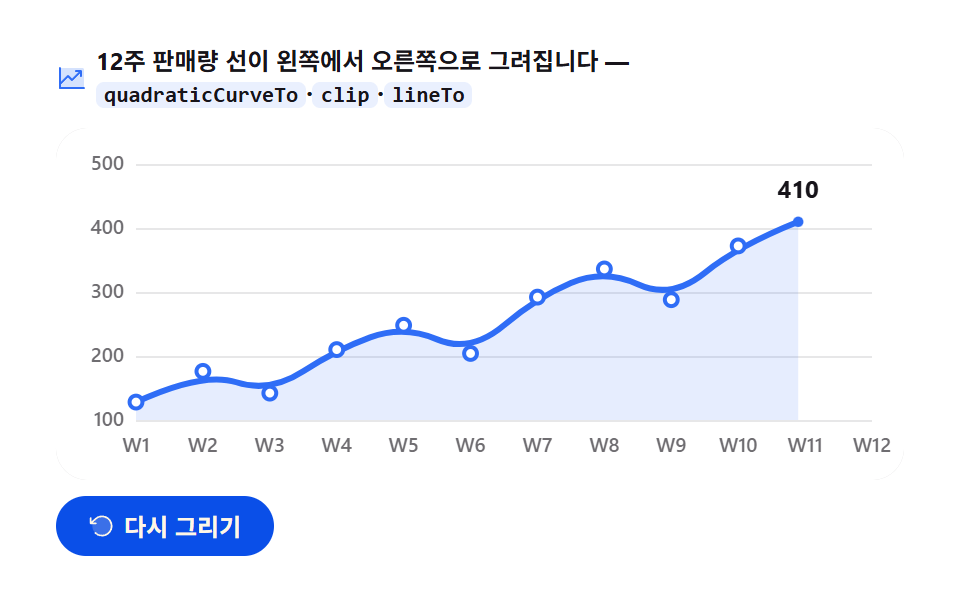 Dashboard UIJavaScript Chart Drawing, 9 Ways — No Library
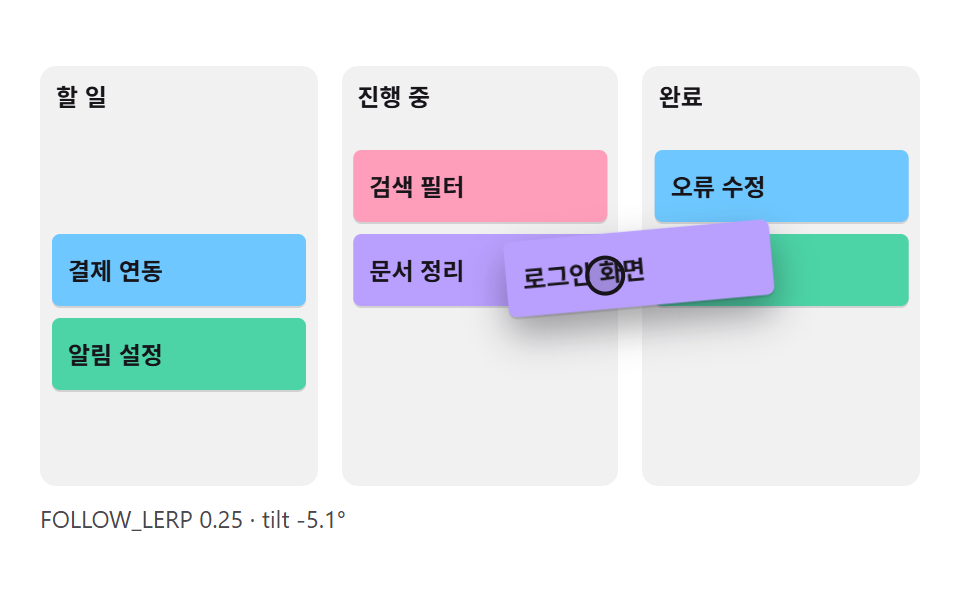 Dashboard UICSS Kanban Board: 9 Demos With Springs and Lerp
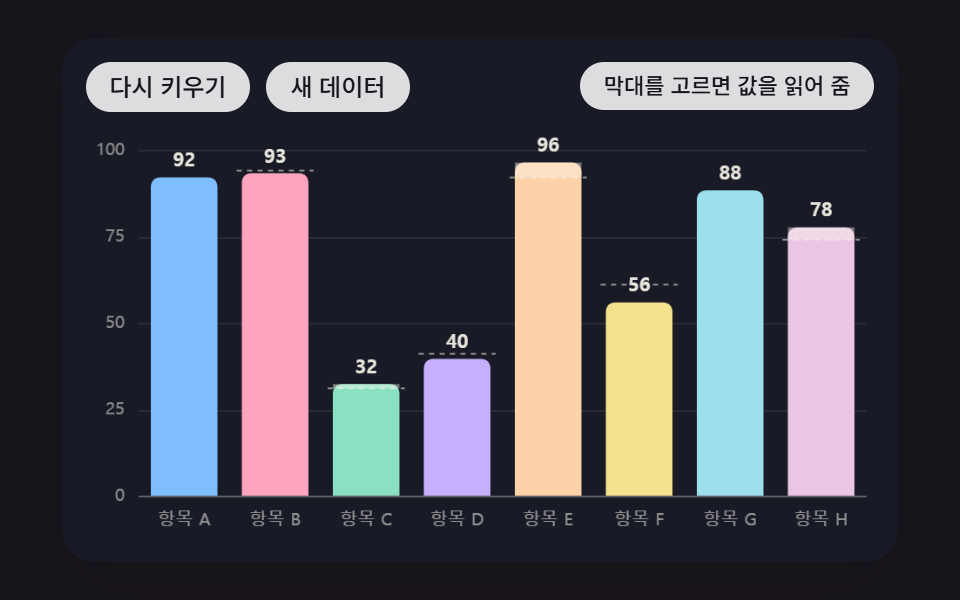 Dashboard UIBar Chart Animation: 9 Demos From Spring to Race