CSS Kanban Board: 9 Demos With Springs and Lerp
A css kanban board that only swaps card order leaves the held card off the cursor, hides the drop slot and accepts cards into a full column — scenes 01, 02 and
See All Nine Kanban Scenes Running on This Page
Each cell in the grid plays a short scripted run on its own, and the first real pointer move, key press or button click you make hands control to your input. Nothing is fetched, every distance is a constant and the seed is fixed, so what you watch is only how a board decides where a card goes and how it gets there.
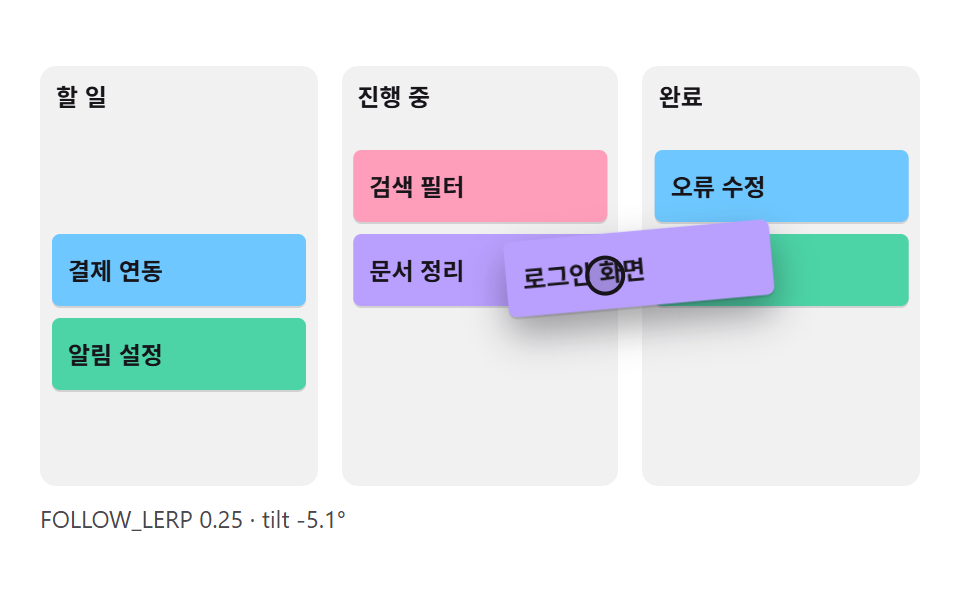 01 kbn-drag-pointer-lerp-tilt
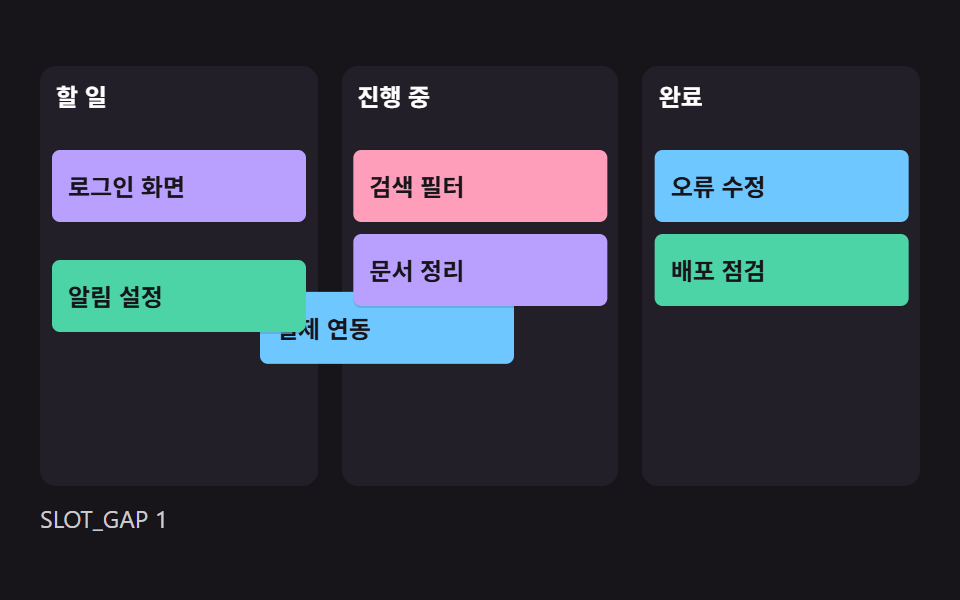 02 kbn-drop-slot-gap-spring
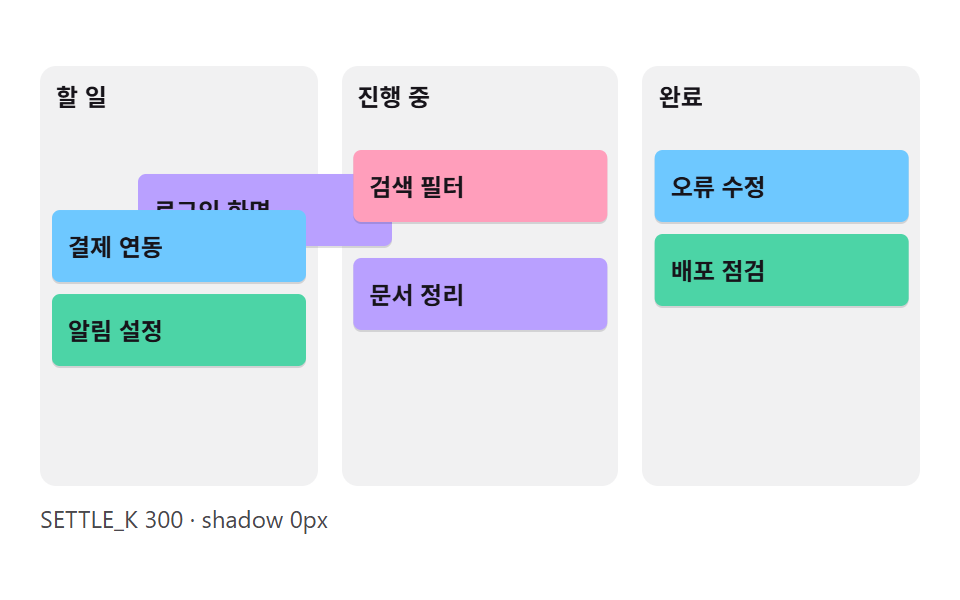 03 kbn-drop-settle-overshoot
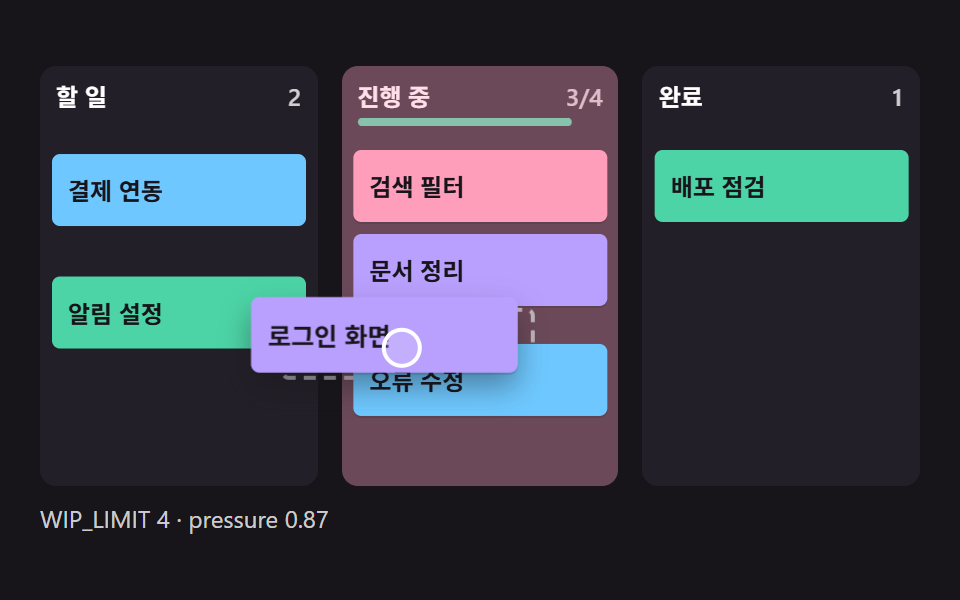 04 kbn-wip-limit-pressure
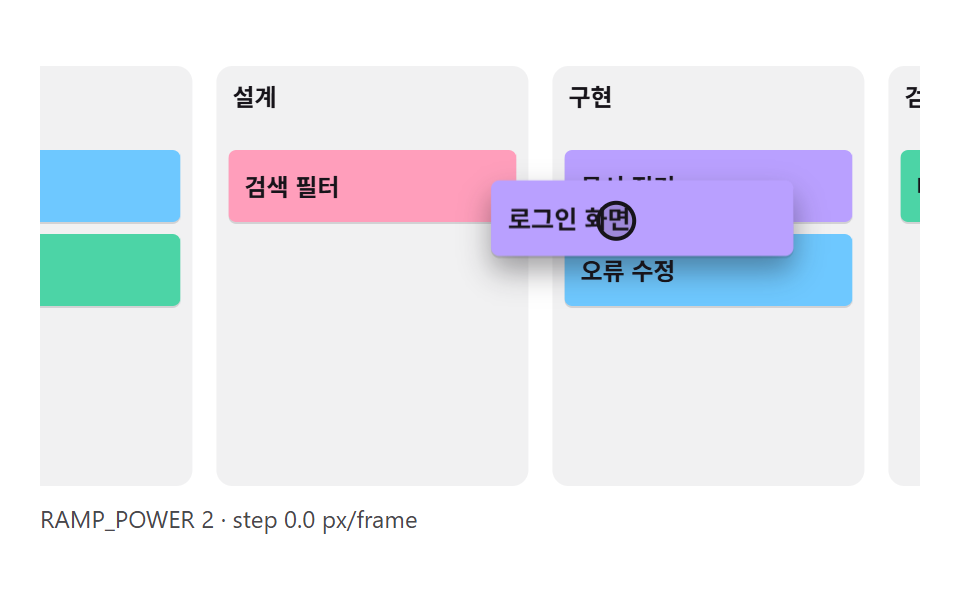 05 kbn-edge-autoscroll-ramp
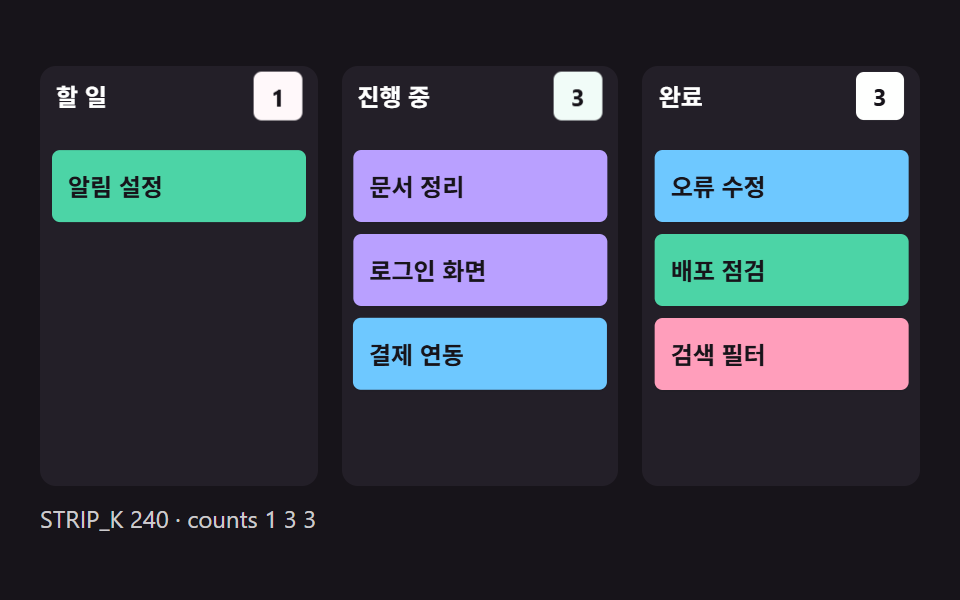 06 kbn-count-badge-digit-strip
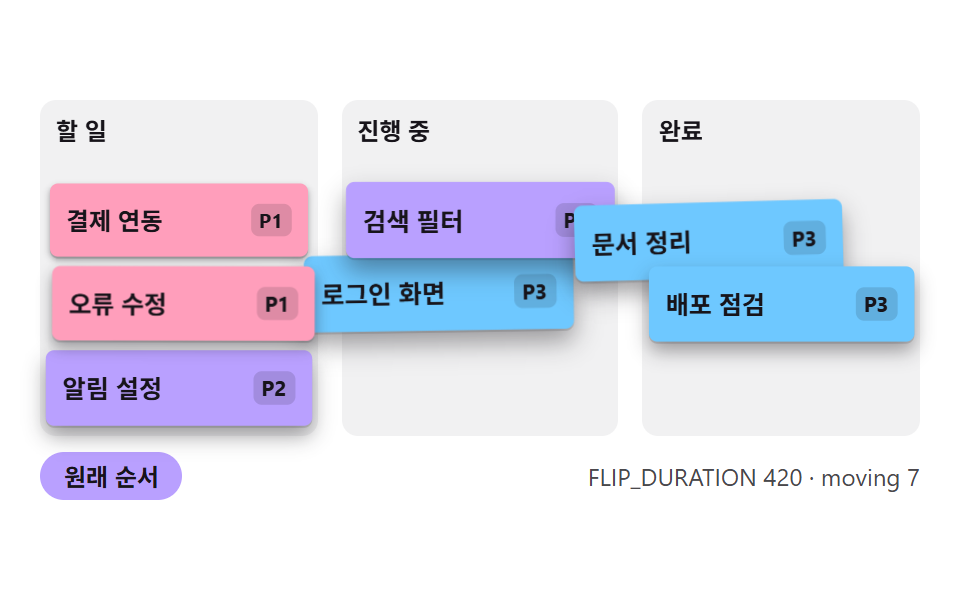 07 kbn-priority-sort-flip-stagger
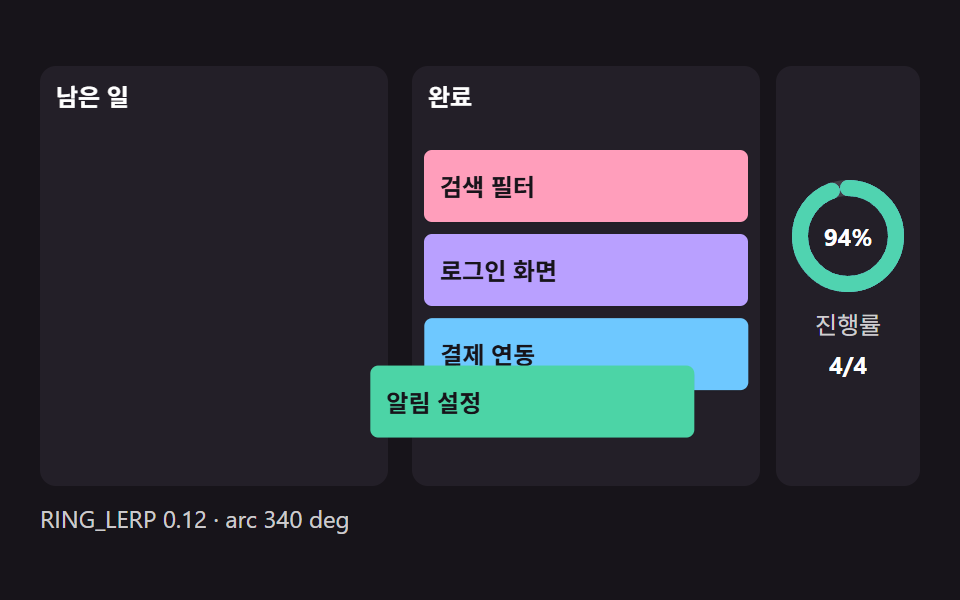 08 kbn-progress-ring-from-columns
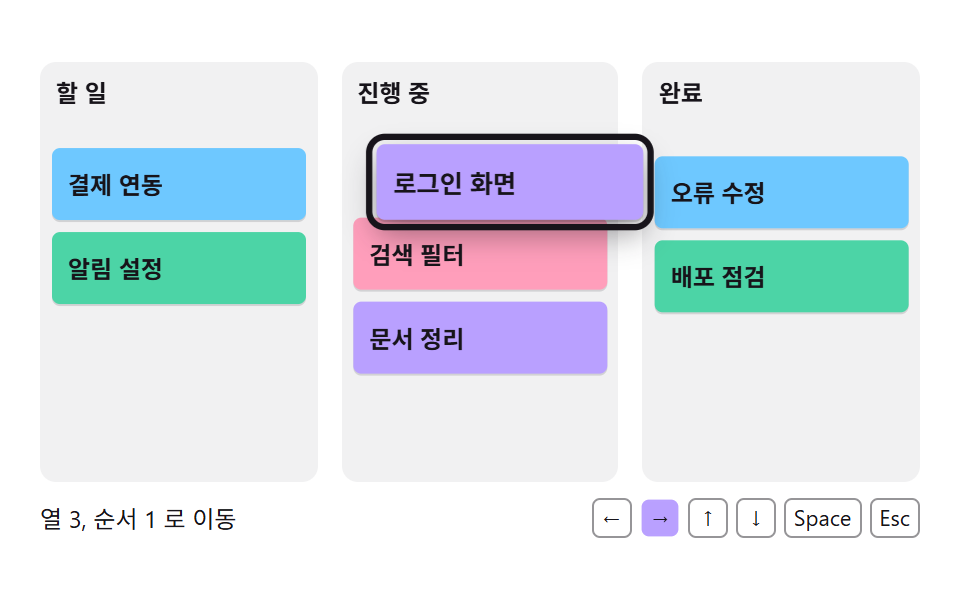 09 kbn-keyboard-move-announce
Auto-plays · click a tile to jump to its section · all nine in one zip
- 01 A Card That Follows the Cursor and Tilts With Its Motion
- 02 A Column That Opens a Drop Slot
- 03 A Card That Settles Into Its Slot on Release
- 04 A Column Header That Fills Toward Its Limit
- 05 Board Auto-Scroll Near the Edge
- 06 A Column Badge That Changes With the Card Count
- 07 Priority Sort That Moves Each Card
- 08 A Progress Ring Set by Card Moves
- 09 Moving a Card by Keyboard With a Spoken Update
CSS Kanban Board: 9 Demos Where Pointer, Gap and Spring Are Computed
The nine scenes follow the order in which one board gets used. Scene 01 is how a card trails the cursor, 02 is the gap that opens a drop slot and 03 is the spring that lets a released card settle. Scene 04 shows the pressure of a column filling toward its limit, 05 the speed at which the board slides near an edge, 06 the digit badge in a column header and 07 the order in which a sort button moves cards. Scene 08 turns the done column into a progress ring, and 09 moves a card by keyboard and says what happened in a sentence.
Where a Board Like This Fits
A product tour that introduces a task board starts with 01 and 03, because a card that follows the cursor is the first thing viewers watch on that screen. A page that explains moves between columns wants 02, and a help article about limiting work in progress wants 04. A wide board with many columns is the job of 05, and 06 suits the card count in a column header. A sort-by-priority button belongs with 07, a project summary card with 08, and a board that must work without a pointer with 09. If you are comparing a tailwind css kanban board with a hand-written one, note that the calculations here live in plain JS, so they carry over to any class system.
All nine scenes share one board grid. The unit U is 6px when the window is at least 260px tall and 4px otherwise, a card is 6U high, one card step is 7U and a column header is 5U, so the same code runs in a small embed and a large one with every distance scaled by U.
How This Set Differs From Neighboring Posts
Drag to Reorder UI: 9 Lists, One Drop Index centers on lists whose order changes by dragging, and 9 Dashboard Components, Not the Whole Page holds a static three-column board of cards. This set fills the space between them: the follow factor of a held card, the gap of an open slot and the pressure of a full column are each fixed as a number. Chart-side interaction is covered by Chart UI Design: 9 Interactions You Can Drag, and ordered rows with rank changes by Leaderboard UI Design: 9 Rank-Change List Patterns.
Code for Each Kanban Technique
Everything here is hand-written JS and CSS, and no library is loaded. Scenes 01 to 05 grab a card with pointerdown and setPointerCapture, while 06 to 09 have no pointer drag and move cards by click, sort button or keyboard. Every file reads the motion setting through matchMedia and runs its frames with requestAnimationFrame. Below, each snippet is only the stretch of source that decides the movement, copied as it stands.
01A Card That Follows the Cursor and Tilts With Its Motion
The held card closes only a FOLLOW_LERP share of its gap to the pointer every frame, and it leans in proportion to that frame's movement before returning to level when it stops. This scene never changes the column, so a released card goes back to where it started. The render logged 36.0% cumulative area, an intensity mean of 66.0 and motion in 23/23 frames.
<main class="stage">
<div class="kb is-demo" id="kb"><div class="kb__board" data-role="board"><div class="kb__track" data-role="track"><div class="kb__col" data-role="col"><div class="kb__head"><span class="kb__name">To do</span></div></div><div class="kb__col" data-role="col"><div class="kb__head"><span class="kb__name">Doing</span></div></div><div class="kb__col" data-role="col"><div class="kb__head"><span class="kb__name">Done</span></div></div><div class="kb__card" role="button" tabindex="0" data-role="card" data-tone="0" aria-pressed="false"><span class="kb__label" data-role="label">Login screen</span></div><div class="kb__card" role="button" tabindex="0" data-role="card" data-tone="1" aria-pressed="false"><span class="kb__label" data-role="label">Payment link</span></div><div class="kb__card" role="button" tabindex="0" data-role="card" data-tone="2" aria-pressed="false"><span class="kb__label" data-role="label">Alert settings</span></div><div class="kb__card" role="button" tabindex="0" data-role="card" data-tone="3" aria-pressed="false"><span class="kb__label" data-role="label">Search filter</span></div><div class="kb__card" role="button" tabindex="0" data-role="card" data-tone="0" aria-pressed="false"><span class="kb__label" data-role="label">Docs cleanup</span></div><div class="kb__card" role="button" tabindex="0" data-role="card" data-tone="1" aria-pressed="false"><span class="kb__label" data-role="label">Bug fix</span></div><div class="kb__card" role="button" tabindex="0" data-role="card" data-tone="2" aria-pressed="false"><span class="kb__label" data-role="label">Release check</span></div></div><div class="kb__cursor" data-role="cursor"></div></div><p class="kb__meta" data-role="meta"></p></div>
</main>
@use "../../../../site/static/demo-tokens" as *;
// 핵심: 집은 카드는 목표와의 거리 일부만 따라가고, 그 이동량이 기울기가 된다.
// 좌표는 JS 가 계산해 transform 으로만 넣는다. 열·카드 크기는 화면 높이에 맞춘 4px 격자 한 단위(U)에서 나온다.
$bg: $stage-paper;
$panel: rgba($stage-ink, .06);
$text: $subject-ink;
$mute: rgba($subject-ink, .78);
$ring: $subject-ink;
@include stage($bg);
.kb {
width: min(100%, 440px);
display: grid;
grid-template-columns: minmax(0, 1fr);
gap: $sp-2;
position: relative;
}
.kb__board {
position: relative;
}
.kb__track { position: absolute; inset: 0; will-change: transform; }
.kb__col {
position: absolute;
top: 0;
box-sizing: border-box;
border-radius: $r-sm;
background: $panel;
overflow: hidden;
}
.kb__head {
position: relative;
box-sizing: border-box;
height: var(--head, 20px);
display: flex;
align-items: center;
justify-content: space-between;
gap: $sp-2;
padding: 0 $sp-2;
font-size: 12px;
font-weight: 700;
line-height: 16px;
color: $text;
}
.kb__name { min-width: 0; overflow: hidden; text-overflow: ellipsis; white-space: nowrap; }
.kb__count { font-variant-numeric: tabular-nums; color: $mute; font-weight: 600; }
.kb__card {
position: absolute;
left: 0;
top: 0;
box-sizing: border-box;
margin: 0;
display: flex;
align-items: center;
gap: $sp-1;
padding: 0 $sp-2;
border: 0;
border-radius: $r-xs;
font: inherit;
font-size: 12px;
font-weight: 600;
line-height: 16px;
text-align: left;
color: $subject-ink;
cursor: grab;
user-select: none;
touch-action: none;
box-shadow: 0 calc(var(--lift-px, 0px) * .5) var(--lift-px, 0px) rgba($stage-ink, .4), 0 1px 0 rgba($stage-ink, .14);
}
.kb__card[data-tone="0"] { background: $subject-lilac; }
.kb__card[data-tone="1"] { background: $subject-sky; }
.kb__card[data-tone="2"] { background: $subject-mint; }
.kb__card[data-tone="3"] { background: $subject-pink; }
.kb__label { min-width: 0; overflow: hidden; text-overflow: ellipsis; white-space: nowrap; }
.kb__card:focus-visible,
.kb__card.is-focus { outline: var(--focus-ring, 2px) solid $ring; outline-offset: 2px; }
.is-held { z-index: 4; cursor: grabbing; }
.kb__ghost {
position: absolute;
left: 0;
top: 0;
box-sizing: border-box;
border: 2px dashed rgba($ring, .6);
border-radius: $r-xs;
opacity: 0;
pointer-events: none;
}
.kb__cursor {
position: absolute;
left: 0;
top: 0;
width: 20px;
height: 20px;
margin: -10px 0 0 -10px;
box-sizing: border-box;
border: 2px solid $ring;
border-radius: 50%;
background: rgba($ring, .16);
opacity: 0;
pointer-events: none;
z-index: 6;
}
.kb__meta {
margin: 0;
font-size: 12px;
line-height: 16px;
color: $mute;
font-variant-numeric: tabular-nums;
}
@media (max-height: 259px) {
.kb__head, .kb__card { font-size: 11px; }
}
@media (max-width: 340px) {
.kb__card { padding: 0 $sp-1; }
}
@media (prefers-reduced-motion: reduce) {
.kb__card, .kb__track, .kb__ghost { transition: none; animation: none; }
.kb__cursor { display: none; }
}html, body {
margin: 0;
overflow: hidden;
}
.stage {
box-sizing: border-box;
min-height: 100vh;
display: grid;
place-items: center;
margin: 0;
background: #ffffff;
font-family: -apple-system, "Segoe UI", "Noto Sans KR", sans-serif;
padding: clamp(8px, 4vw, 24px);
}
.kb {
width: min(100%, 440px);
display: grid;
grid-template-columns: minmax(0, 1fr);
gap: 8px;
position: relative;
}
.kb__board {
position: relative;
}
.kb__track {
position: absolute;
inset: 0;
will-change: transform;
}
.kb__col {
position: absolute;
top: 0;
box-sizing: border-box;
border-radius: 8px;
background: rgba(23, 20, 26, 0.06);
overflow: hidden;
}
.kb__head {
position: relative;
box-sizing: border-box;
height: var(--head, 20px);
display: flex;
align-items: center;
justify-content: space-between;
gap: 8px;
padding: 0 8px;
font-size: 12px;
font-weight: 700;
line-height: 16px;
color: #17141a;
}
.kb__name {
min-width: 0;
overflow: hidden;
text-overflow: ellipsis;
white-space: nowrap;
}
.kb__count {
font-variant-numeric: tabular-nums;
color: rgba(23, 20, 26, 0.78);
font-weight: 600;
}
.kb__card {
position: absolute;
left: 0;
top: 0;
box-sizing: border-box;
margin: 0;
display: flex;
align-items: center;
gap: 4px;
padding: 0 8px;
border: 0;
border-radius: 4px;
font: inherit;
font-size: 12px;
font-weight: 600;
line-height: 16px;
text-align: left;
color: #17141a;
cursor: grab;
user-select: none;
touch-action: none;
box-shadow: 0 calc(var(--lift-px, 0px) * 0.5) var(--lift-px, 0px) rgba(23, 20, 26, 0.4), 0 1px 0 rgba(23, 20, 26, 0.14);
}
.kb__card[data-tone="0"] {
background: #b9a0ff;
}
.kb__card[data-tone="1"] {
background: #6ec8ff;
}
.kb__card[data-tone="2"] {
background: #4cd4a6;
}
.kb__card[data-tone="3"] {
background: #ff9ebb;
}
.kb__label {
min-width: 0;
overflow: hidden;
text-overflow: ellipsis;
white-space: nowrap;
}
.kb__card:focus-visible,
.kb__card.is-focus {
outline: var(--focus-ring, 2px) solid #17141a;
outline-offset: 2px;
}
.is-held {
z-index: 4;
cursor: grabbing;
}
.kb__ghost {
position: absolute;
left: 0;
top: 0;
box-sizing: border-box;
border: 2px dashed rgba(23, 20, 26, 0.6);
border-radius: 4px;
opacity: 0;
pointer-events: none;
}
.kb__cursor {
position: absolute;
left: 0;
top: 0;
width: 20px;
height: 20px;
margin: -10px 0 0 -10px;
box-sizing: border-box;
border: 2px solid #17141a;
border-radius: 50%;
background: rgba(23, 20, 26, 0.16);
opacity: 0;
pointer-events: none;
z-index: 6;
}
.kb__meta {
margin: 0;
font-size: 12px;
line-height: 16px;
color: rgba(23, 20, 26, 0.78);
font-variant-numeric: tabular-nums;
}
@media (max-height: 259px) {
.kb__head, .kb__card {
font-size: 11px;
}
}
@media (max-width: 340px) {
.kb__card {
padding: 0 4px;
}
}
@media (prefers-reduced-motion: reduce) {
.kb__card, .kb__track, .kb__ghost {
transition: none;
animation: none;
}
.kb__cursor {
display: none;
}
}(function () {
var root = document.getElementById('kb');
var CLS = { demo: 'is-demo', held: 'is-held' };
var off = [];
var raf = 0;
var reduce = window.matchMedia('(prefers-reduced-motion: reduce)').matches;
function q(sel) {
return root.querySelector(sel);
}
function qa(sel) {
return Array.prototype.slice.call(root.querySelectorAll(sel));
}
function on(target, type, fn) {
target.addEventListener(type, fn);
off.push(function () { target.removeEventListener(type, fn); });
}
function clamp(v, lo, hi) {
return Math.max(lo, Math.min(hi, v));
}
// 칸 크기는 화면 높이에 맞춰 U(4 또는 6) 한 단위로 정한다
var U = 4;
var CARD_H = 24;
var STEP = 28;
var HEAD = 20;
var PAD = 4;
var GAP = 8;
var onUnit = function () { };
function setUnit() {
U = window.innerHeight >= 260 ? 6 : 4;
CARD_H = 6 * U;
STEP = 7 * U;
HEAD = 5 * U;
PAD = U;
GAP = 2 * PAD;
onUnit();
}
var CYCLE_MS = 2000;
var board = q('[data-role="board"]');
var cursorEl = q('[data-role="cursor"]');
var metaEl = q('[data-role="meta"]');
var colEls = qa('[data-role="col"]');
var COLS = colEls.length;
var boardW = 0;
var boardH = 0;
var colW = 0;
var cols = [];
var cards = qa('[data-role="card"]').map(function (el, i) {
return { el: el, i: i, x: 0, y: 0, vx: 0, vy: 0, rot: 0, sc: 1, lift: 0 };
});
var demo = !reduce;
var nowMs = 0;
var lastMeta = '';
var onStop = function () { };
var afterStep = function (dt) { };
var extraSettle = function () { };
function slotX(c) {
return c * (colW + GAP) + PAD;
}
function slotY(r) {
return HEAD + 2 * PAD + r * STEP;
}
function measure() {
setUnit();
boardW = board.clientWidth;
colW = FIXED_COL > 0 ? FIXED_COL : (boardW - GAP * (COLS - 1)) / COLS;
boardH = slotY(ROWS - 1) + CARD_H + PAD;
board.style.height = boardH + 'px';
board.style.setProperty('--head', HEAD + 'px');
colEls.forEach(function (el, c) {
el.style.left = c * (colW + GAP) + 'px';
el.style.width = colW + 'px';
el.style.height = boardH + 'px';
});
cards.forEach(function (c) {
c.el.style.width = (colW - 2 * PAD) + 'px';
c.el.style.height = CARD_H + 'px';
});
}
function locate(i) {
for (var c = 0; c < cols.length; c++) {
var r = cols[c].indexOf(i);
if (r >= 0) return { c: c, r: r };
}
return { c: 0, r: 0 };
}
function spring(c, tx, ty, k, d, dt) {
c.vx += (k * (tx - c.x) - d * c.vx) * dt;
c.x += c.vx * dt;
c.vy += (k * (ty - c.y) - d * c.vy) * dt;
c.y += c.vy * dt;
}
function draw() {
cards.forEach(function (c) {
c.el.style.transform = 'translate3d(' + c.x.toFixed(2) + 'px,' + c.y.toFixed(2) + 'px,0) rotate(' + c.rot.toFixed(2) + 'deg) scale(' + c.sc.toFixed(3) + ')';
});
}
function cardAt(t) {
var n = t;
while (n && n !== board) {
for (var k = 0; k < cards.length; k++) {
if (cards[k].el === n) return cards[k];
}
n = n.parentElement;
}
return null;
}
function showCursor(p) {
if (!p) { cursorEl.style.opacity = '0'; return; }
cursorEl.style.opacity = '1';
cursorEl.style.transform = 'translate3d(' + p.x.toFixed(1) + 'px,' + p.y.toFixed(1) + 'px,0)';
}
// keys: [시각 ms, x, y] 목록. 키 사이는 smoothstep 으로 잇는다
function keyAt(t, keys) {
var i = 0;
while (i < keys.length - 2 && t > keys[i + 1][0]) i++;
var a = keys[i];
var b = keys[i + 1];
var u = clamp((t - a[0]) / (b[0] - a[0]), 0, 1);
u = u * u * (3 - 2 * u);
return { x: a[1] + (b[1] - a[1]) * u, y: a[2] + (b[2] - a[2]) * u };
}
// 열·행 소수 좌표를 보드 픽셀로 바꾼다 (행 r 의 카드 중심선이 소수 r)
function pathPoint(t, keys) {
var k = keyAt(t, keys);
return { x: k.x * (colW + GAP) + colW / 2, y: slotY(0) + k.y * STEP + CARD_H / 2 };
}
function settleNow() {
cards.forEach(function (c) {
var t = targetOf(c);
c.x = t.x; c.y = t.y; c.vx = 0; c.vy = 0; c.rot = 0; c.sc = 1; c.lift = 0;
});
extraSettle();
}
// reduce: 보간 없이 입력 직후 목표 위치를 바로 그린다
function sync() {
if (!reduce) return;
settleNow();
draw();
report();
}
function report() {
var m = metaText();
if (m !== lastMeta) { lastMeta = m; metaEl.textContent = m; }
}
function stopDemo() {
if (!demo) return;
demo = false;
root.classList.remove(CLS.demo);
showCursor(null);
onStop();
}
function settleClass(c, h) {
if (c.el.classList.contains(CLS.held) && Math.abs(c.x - h.x) + Math.abs(c.y - h.y) < 1.5 && Math.abs(c.vx) + Math.abs(c.vy) < 30) {
c.el.classList.remove(CLS.held);
}
}
var t0 = -1;
var lastTs = 0;
var prevT = 0;
function frame(ts) {
if (t0 < 0) { t0 = ts; lastTs = ts; }
var dt = clamp((ts - lastTs) / 1000, 0.001, 0.033);
lastTs = ts;
nowMs = ts;
var t = (ts - t0) % CYCLE_MS;
if (demo) {
if (t < prevT) demoReset();
demoAt(t);
}
prevT = t;
cards.forEach(function (c) { stepCard(c, dt); });
afterStep(dt);
draw();
report();
raf = requestAnimationFrame(frame);
}
function boot() {
measure();
cols = initialCols();
settleNow();
draw();
report();
on(window, 'resize', function () { measure(); settleNow(); draw(); });
if (reduce) {
root.classList.remove(CLS.demo);
} else {
raf = requestAnimationFrame(frame);
}
}
var held = null;
var ptr = { x: 0, y: 0 };
var grabDX = 0;
var grabDY = 0;
onStop = function () { if (held) release(); };
function local(e) {
var r = board.getBoundingClientRect();
return { x: e.clientX - r.left, y: e.clientY - r.top };
}
function kbd(e) {
var c = cardAt(e.target);
if (!c) return;
var k = e.key;
if (k === ' ' || k === 'Enter') {
e.preventDefault();
stopDemo();
if (held === c) {
release();
} else if (!held) {
grab(c, c.x + (colW - 2 * PAD) / 2, c.y + CARD_H / 2);
}
sync();
return;
}
if (held !== c) return;
if (k === 'Escape') { e.preventDefault(); cancel(); sync(); return; }
var dx = k === 'ArrowRight' ? colW + GAP : k === 'ArrowLeft' ? -(colW + GAP) : 0;
var dy = k === 'ArrowDown' ? STEP : k === 'ArrowUp' ? -STEP : 0;
if (dx !== 0 || dy !== 0) { e.preventDefault(); moveTo(ptr.x + dx, ptr.y + dy); sync(); }
}
on(board, 'pointerdown', function (e) {
var pe = e;
var c = cardAt(pe.target);
if (!c) return;
stopDemo();
if (held) release();
var p = local(pe);
board.setPointerCapture(pe.pointerId);
grab(c, p.x, p.y);
sync();
});
on(board, 'pointermove', function (e) {
if (!held || demo) return;
var p = local(e);
moveTo(p.x, p.y);
sync();
});
function pointerEnd() {
if (held && !demo) { release(); sync(); }
}
on(board, 'pointerup', pointerEnd);
on(board, 'pointercancel', pointerEnd);
on(root, 'keydown', function (e) { kbd(e); });
var FOLLOW_LERP = 0.25;
var TILT_MAX = 12;
var TILT_PER_MOVE = 1.2;
var LIFT_SHADOW = 18;
var ROWS = 4;
var FIXED_COL = 0;
var tgt = { x: 0, y: 0 };
var demoGrabbed = false;
var grabAt = { x: 0, y: 0 };
function initialCols() {
return [[0, 1, 2], [3, 4], [5, 6]];
}
function targetOf(c) {
if (c === held) return tgt;
var s = locate(c.i);
return { x: slotX(s.c), y: slotY(s.r) };
}
function grab(c, px, py) {
held = c;
grabDX = px - c.x;
grabDY = py - c.y;
ptr = { x: px, y: py };
tgt = { x: c.x, y: c.y };
c.el.classList.add(CLS.held);
c.el.setAttribute('aria-pressed', 'true');
}
function moveTo(px, py) {
ptr = { x: clamp(px, 0, boardW), y: clamp(py, 0, boardH) };
tgt = { x: ptr.x - grabDX, y: ptr.y - grabDY };
}
function release() {
if (held) {
held.el.setAttribute('aria-pressed', 'false');
held = null;
}
}
function cancel() {
release();
}
// 핵심: 집은 카드는 목표와의 거리 FOLLOW_LERP 만큼만 따라가고, 그 이동량으로 기울기가 정해진다
function stepCard(c, dt) {
var f = dt * 60;
if (c === held) {
var k = reduce ? 1 : 1 - Math.pow(1 - FOLLOW_LERP, f);
var nx = c.x + (tgt.x - c.x) * k;
var ny = c.y + (tgt.y - c.y) * k;
var move = (nx - c.x) / f;
c.vx = (nx - c.x) / dt;
c.vy = (ny - c.y) / dt;
c.x = nx;
c.y = ny;
var want = clamp(move * TILT_PER_MOVE, -TILT_MAX, TILT_MAX);
c.rot += (want - c.rot) * (1 - Math.pow(0.7, f));
c.lift += (1 - c.lift) * (1 - Math.pow(0.75, f));
} else {
var h = targetOf(c);
spring(c, h.x, h.y, 180, 22, dt);
c.rot += (0 - c.rot) * (1 - Math.pow(0.8, f));
c.lift += (0 - c.lift) * (1 - Math.pow(0.75, f));
settleClass(c, h);
}
c.sc = 1 + 0.05 * c.lift;
c.el.style.setProperty('--lift-px', (c.lift * LIFT_SHADOW).toFixed(1) + 'px');
}
function demoAt(t) {
var c = cards[0];
if (t >= 200 && t < 1700) {
if (!demoGrabbed) {
demoGrabbed = true;
grab(c, c.x + (colW - 2 * PAD) / 2, c.y + CARD_H / 2);
grabAt = { x: ptr.x, y: ptr.y };
}
var u = (t - 200) / 1500;
var sweep = 0.5 - 0.5 * Math.cos(u * Math.PI * 2);
moveTo(grabAt.x + boardW * 0.6 * sweep, grabAt.y + boardH * 0.22 * Math.sin(u * Math.PI * 4));
showCursor(ptr);
} else {
if (held) release();
showCursor(null);
}
}
function demoReset() {
demoGrabbed = false;
}
function metaText() {
var tilt = 0;
cards.forEach(function (c) { if (Math.abs(c.rot) > Math.abs(tilt)) tilt = c.rot; });
return 'FOLLOW_LERP ' + FOLLOW_LERP + ' · tilt ' + tilt.toFixed(1) + '°';
}
boot();
})();// FollowCard — vanilla 판(kbn-drag-pointer-lerp-tilt) 의 React 포트. 집은 카드는 목표와의 거리 일부만 따라가고, 그 이동량이 기울기가 된다.
// 소스는 vanilla 와 같은 구조(공용 엔진 + 장면 코드)이고 정식 타입을 단다.
import { useEffect, useRef } from "react";
import styles from "./FollowCard.module.scss";
export default function FollowCard() {
const rootRef = useRef<HTMLDivElement>(null);
useEffect(() => {
const rootEl = rootRef.current;
if (!rootEl) return;
type Off = () => void;
type Step = (dt: number) => void;
type Card = { el: HTMLElement; i: number; x: number; y: number; vx: number; vy: number; rot: number; sc: number; lift: number };
type Pt = { x: number; y: number };
type Slot = { c: number; r: number };
var root: HTMLElement = rootEl;
var CLS = { demo: styles["is-demo"], held: styles["is-held"] };
var off: Off[] = [];
var raf = 0;
var reduce = window.matchMedia('(prefers-reduced-motion: reduce)').matches;
function q(sel: string): HTMLElement {
return root.querySelector(sel) as HTMLElement;
}
function qa(sel: string): HTMLElement[] {
return Array.prototype.slice.call(root.querySelectorAll(sel)) as HTMLElement[];
}
function on(target: EventTarget, type: string, fn: EventListener): void {
target.addEventListener(type, fn);
off.push(function () { target.removeEventListener(type, fn); });
}
function clamp(v: number, lo: number, hi: number): number {
return Math.max(lo, Math.min(hi, v));
}
// 칸 크기는 화면 높이에 맞춰 U(4 또는 6) 한 단위로 정한다
var U = 4;
var CARD_H = 24;
var STEP = 28;
var HEAD = 20;
var PAD = 4;
var GAP = 8;
var onUnit: Off = function () { };
function setUnit(): void {
U = window.innerHeight >= 260 ? 6 : 4;
CARD_H = 6 * U;
STEP = 7 * U;
HEAD = 5 * U;
PAD = U;
GAP = 2 * PAD;
onUnit();
}
var CYCLE_MS = 2000;
var board = q('[data-role="board"]');
var cursorEl = q('[data-role="cursor"]');
var metaEl = q('[data-role="meta"]');
var colEls = qa('[data-role="col"]');
var COLS = colEls.length;
var boardW = 0;
var boardH = 0;
var colW = 0;
var cols: number[][] = [];
var cards: Card[] = qa('[data-role="card"]').map(function (el: HTMLElement, i: number): Card {
return { el: el, i: i, x: 0, y: 0, vx: 0, vy: 0, rot: 0, sc: 1, lift: 0 };
});
var demo = !reduce;
var nowMs = 0;
var lastMeta = '';
var onStop: Off = function () { };
var afterStep: Step = function (dt: number) { };
var extraSettle: Off = function () { };
function slotX(c: number): number {
return c * (colW + GAP) + PAD;
}
function slotY(r: number): number {
return HEAD + 2 * PAD + r * STEP;
}
function measure(): void {
setUnit();
boardW = board.clientWidth;
colW = FIXED_COL > 0 ? FIXED_COL : (boardW - GAP * (COLS - 1)) / COLS;
boardH = slotY(ROWS - 1) + CARD_H + PAD;
board.style.height = boardH + 'px';
board.style.setProperty('--head', HEAD + 'px');
colEls.forEach(function (el: HTMLElement, c: number) {
el.style.left = c * (colW + GAP) + 'px';
el.style.width = colW + 'px';
el.style.height = boardH + 'px';
});
cards.forEach(function (c: Card) {
c.el.style.width = (colW - 2 * PAD) + 'px';
c.el.style.height = CARD_H + 'px';
});
}
function locate(i: number): Slot {
for (var c = 0; c < cols.length; c++) {
var r = cols[c].indexOf(i);
if (r >= 0) return { c: c, r: r };
}
return { c: 0, r: 0 };
}
function spring(c: Card, tx: number, ty: number, k: number, d: number, dt: number): void {
c.vx += (k * (tx - c.x) - d * c.vx) * dt;
c.x += c.vx * dt;
c.vy += (k * (ty - c.y) - d * c.vy) * dt;
c.y += c.vy * dt;
}
function draw(): void {
cards.forEach(function (c: Card) {
c.el.style.transform = 'translate3d(' + c.x.toFixed(2) + 'px,' + c.y.toFixed(2) + 'px,0) rotate(' + c.rot.toFixed(2) + 'deg) scale(' + c.sc.toFixed(3) + ')';
});
}
function cardAt(t: EventTarget | null): Card | null {
var n = t as HTMLElement | null;
while (n && n !== board) {
for (var k = 0; k < cards.length; k++) {
if (cards[k].el === n) return cards[k];
}
n = n.parentElement;
}
return null;
}
function showCursor(p: Pt | null): void {
if (!p) { cursorEl.style.opacity = '0'; return; }
cursorEl.style.opacity = '1';
cursorEl.style.transform = 'translate3d(' + p.x.toFixed(1) + 'px,' + p.y.toFixed(1) + 'px,0)';
}
// keys: [시각 ms, x, y] 목록. 키 사이는 smoothstep 으로 잇는다
function keyAt(t: number, keys: number[][]): Pt {
var i = 0;
while (i < keys.length - 2 && t > keys[i + 1][0]) i++;
var a = keys[i];
var b = keys[i + 1];
var u = clamp((t - a[0]) / (b[0] - a[0]), 0, 1);
u = u * u * (3 - 2 * u);
return { x: a[1] + (b[1] - a[1]) * u, y: a[2] + (b[2] - a[2]) * u };
}
// 열·행 소수 좌표를 보드 픽셀로 바꾼다 (행 r 의 카드 중심선이 소수 r)
function pathPoint(t: number, keys: number[][]): Pt {
var k = keyAt(t, keys);
return { x: k.x * (colW + GAP) + colW / 2, y: slotY(0) + k.y * STEP + CARD_H / 2 };
}
function settleNow(): void {
cards.forEach(function (c: Card) {
var t = targetOf(c);
c.x = t.x; c.y = t.y; c.vx = 0; c.vy = 0; c.rot = 0; c.sc = 1; c.lift = 0;
});
extraSettle();
}
// reduce: 보간 없이 입력 직후 목표 위치를 바로 그린다
function sync(): void {
if (!reduce) return;
settleNow();
draw();
report();
}
function report(): void {
var m = metaText();
if (m !== lastMeta) { lastMeta = m; metaEl.textContent = m; }
}
function stopDemo(): void {
if (!demo) return;
demo = false;
root.classList.remove(CLS.demo);
showCursor(null);
onStop();
}
function settleClass(c: Card, h: Pt): void {
if (c.el.classList.contains(CLS.held) && Math.abs(c.x - h.x) + Math.abs(c.y - h.y) < 1.5 && Math.abs(c.vx) + Math.abs(c.vy) < 30) {
c.el.classList.remove(CLS.held);
}
}
var t0 = -1;
var lastTs = 0;
var prevT = 0;
function frame(ts: number): void {
if (t0 < 0) { t0 = ts; lastTs = ts; }
var dt = clamp((ts - lastTs) / 1000, 0.001, 0.033);
lastTs = ts;
nowMs = ts;
var t = (ts - t0) % CYCLE_MS;
if (demo) {
if (t < prevT) demoReset();
demoAt(t);
}
prevT = t;
cards.forEach(function (c: Card) { stepCard(c, dt); });
afterStep(dt);
draw();
report();
raf = requestAnimationFrame(frame);
}
function boot(): void {
measure();
cols = initialCols();
settleNow();
draw();
report();
on(window, 'resize', function () { measure(); settleNow(); draw(); });
if (reduce) {
root.classList.remove(CLS.demo);
} else {
raf = requestAnimationFrame(frame);
}
}
var held: Card | null = null;
var ptr: Pt = { x: 0, y: 0 };
var grabDX = 0;
var grabDY = 0;
onStop = function () { if (held) release(); };
function local(e: PointerEvent): Pt {
var r = board.getBoundingClientRect();
return { x: e.clientX - r.left, y: e.clientY - r.top };
}
function kbd(e: KeyboardEvent): void {
var c = cardAt(e.target);
if (!c) return;
var k = e.key;
if (k === ' ' || k === 'Enter') {
e.preventDefault();
stopDemo();
if (held === c) {
release();
} else if (!held) {
grab(c, c.x + (colW - 2 * PAD) / 2, c.y + CARD_H / 2);
}
sync();
return;
}
if (held !== c) return;
if (k === 'Escape') { e.preventDefault(); cancel(); sync(); return; }
var dx = k === 'ArrowRight' ? colW + GAP : k === 'ArrowLeft' ? -(colW + GAP) : 0;
var dy = k === 'ArrowDown' ? STEP : k === 'ArrowUp' ? -STEP : 0;
if (dx !== 0 || dy !== 0) { e.preventDefault(); moveTo(ptr.x + dx, ptr.y + dy); sync(); }
}
on(board, 'pointerdown', function (e: Event) {
var pe = e as PointerEvent;
var c = cardAt(pe.target);
if (!c) return;
stopDemo();
if (held) release();
var p = local(pe);
board.setPointerCapture(pe.pointerId);
grab(c, p.x, p.y);
sync();
});
on(board, 'pointermove', function (e: Event) {
if (!held || demo) return;
var p = local(e as PointerEvent);
moveTo(p.x, p.y);
sync();
});
function pointerEnd(): void {
if (held && !demo) { release(); sync(); }
}
on(board, 'pointerup', pointerEnd);
on(board, 'pointercancel', pointerEnd);
on(root, 'keydown', function (e: Event) { kbd(e as KeyboardEvent); });
var FOLLOW_LERP = 0.25;
var TILT_MAX = 12;
var TILT_PER_MOVE = 1.2;
var LIFT_SHADOW = 18;
var ROWS = 4;
var FIXED_COL = 0;
var tgt: Pt = { x: 0, y: 0 };
var demoGrabbed = false;
var grabAt: Pt = { x: 0, y: 0 };
function initialCols(): number[][] {
return [[0, 1, 2], [3, 4], [5, 6]];
}
function targetOf(c: Card): Pt {
if (c === held) return tgt;
var s = locate(c.i);
return { x: slotX(s.c), y: slotY(s.r) };
}
function grab(c: Card, px: number, py: number): void {
held = c;
grabDX = px - c.x;
grabDY = py - c.y;
ptr = { x: px, y: py };
tgt = { x: c.x, y: c.y };
c.el.classList.add(CLS.held);
c.el.setAttribute('aria-pressed', 'true');
}
function moveTo(px: number, py: number): void {
ptr = { x: clamp(px, 0, boardW), y: clamp(py, 0, boardH) };
tgt = { x: ptr.x - grabDX, y: ptr.y - grabDY };
}
function release(): void {
if (held) {
held.el.setAttribute('aria-pressed', 'false');
held = null;
}
}
function cancel(): void {
release();
}
// 핵심: 집은 카드는 목표와의 거리 FOLLOW_LERP 만큼만 따라가고, 그 이동량으로 기울기가 정해진다
function stepCard(c: Card, dt: number): void {
var f = dt * 60;
if (c === held) {
var k = reduce ? 1 : 1 - Math.pow(1 - FOLLOW_LERP, f);
var nx = c.x + (tgt.x - c.x) * k;
var ny = c.y + (tgt.y - c.y) * k;
var move = (nx - c.x) / f;
c.vx = (nx - c.x) / dt;
c.vy = (ny - c.y) / dt;
c.x = nx;
c.y = ny;
var want = clamp(move * TILT_PER_MOVE, -TILT_MAX, TILT_MAX);
c.rot += (want - c.rot) * (1 - Math.pow(0.7, f));
c.lift += (1 - c.lift) * (1 - Math.pow(0.75, f));
} else {
var h = targetOf(c);
spring(c, h.x, h.y, 180, 22, dt);
c.rot += (0 - c.rot) * (1 - Math.pow(0.8, f));
c.lift += (0 - c.lift) * (1 - Math.pow(0.75, f));
settleClass(c, h);
}
c.sc = 1 + 0.05 * c.lift;
c.el.style.setProperty('--lift-px', (c.lift * LIFT_SHADOW).toFixed(1) + 'px');
}
function demoAt(t: number): void {
var c = cards[0];
if (t >= 200 && t < 1700) {
if (!demoGrabbed) {
demoGrabbed = true;
grab(c, c.x + (colW - 2 * PAD) / 2, c.y + CARD_H / 2);
grabAt = { x: ptr.x, y: ptr.y };
}
var u = (t - 200) / 1500;
var sweep = 0.5 - 0.5 * Math.cos(u * Math.PI * 2);
moveTo(grabAt.x + boardW * 0.6 * sweep, grabAt.y + boardH * 0.22 * Math.sin(u * Math.PI * 4));
showCursor(ptr);
} else {
if (held) release();
showCursor(null);
}
}
function demoReset(): void {
demoGrabbed = false;
}
function metaText(): string {
var tilt = 0;
cards.forEach(function (c: Card) { if (Math.abs(c.rot) > Math.abs(tilt)) tilt = c.rot; });
return 'FOLLOW_LERP ' + FOLLOW_LERP + ' · tilt ' + tilt.toFixed(1) + '°';
}
boot();
return () => {
cancelAnimationFrame(raf);
off.forEach(function (fn: Off) { fn(); });
};
}, []);
return (
<main className={styles["stage"]}><div className={styles["kb"] + " " + styles["is-demo"]} ref={rootRef}><div className={styles["kb__board"]} data-role="board"><div className={styles["kb__track"]} data-role="track"><div className={styles["kb__col"]} data-role="col"><div className={styles["kb__head"]}><span className={styles["kb__name"]}>할 일</span></div></div><div className={styles["kb__col"]} data-role="col"><div className={styles["kb__head"]}><span className={styles["kb__name"]}>진행 중</span></div></div><div className={styles["kb__col"]} data-role="col"><div className={styles["kb__head"]}><span className={styles["kb__name"]}>완료</span></div></div><div className={styles["kb__card"]} role="button" tabIndex="0" data-role="card" data-tone="0" aria-pressed="false"><span className={styles["kb__label"]} data-role="label">로그인 화면</span></div><div className={styles["kb__card"]} role="button" tabIndex="0" data-role="card" data-tone="1" aria-pressed="false"><span className={styles["kb__label"]} data-role="label">결제 연동</span></div><div className={styles["kb__card"]} role="button" tabIndex="0" data-role="card" data-tone="2" aria-pressed="false"><span className={styles["kb__label"]} data-role="label">알림 설정</span></div><div className={styles["kb__card"]} role="button" tabIndex="0" data-role="card" data-tone="3" aria-pressed="false"><span className={styles["kb__label"]} data-role="label">검색 필터</span></div><div className={styles["kb__card"]} role="button" tabIndex="0" data-role="card" data-tone="0" aria-pressed="false"><span className={styles["kb__label"]} data-role="label">문서 정리</span></div><div className={styles["kb__card"]} role="button" tabIndex="0" data-role="card" data-tone="1" aria-pressed="false"><span className={styles["kb__label"]} data-role="label">오류 수정</span></div><div className={styles["kb__card"]} role="button" tabIndex="0" data-role="card" data-tone="2" aria-pressed="false"><span className={styles["kb__label"]} data-role="label">배포 점검</span></div></div><div className={styles["kb__cursor"]} data-role="cursor"></div></div><p className={styles["kb__meta"]} data-role="meta"></p></div></main>
);
}01 · A Card That Follows the Cursor and Tilts With Its Motion — Measured area 35.966% · moving frames 23/23Original by GODRICH · SCSS and React ship in the zip · See the password
  // Core: the held card closes only FOLLOW_LERP of its distance to the target, and that movement sets the tilt
  function stepCard(c, dt) {
    var f = dt * 60;
    if (c === held) {
      var k = reduce ? 1 : 1 - Math.pow(1 - FOLLOW_LERP, f);
      var nx = c.x + (tgt.x - c.x) * k;
      var ny = c.y + (tgt.y - c.y) * k;
      var move = (nx - c.x) / f;
      c.vx = (nx - c.x) / dt;
      c.vy = (ny - c.y) / dt;
      c.x = nx;
      c.y = ny;
      var want = clamp(move * TILT_PER_MOVE, -TILT_MAX, TILT_MAX);
      c.rot += (want - c.rot) * (1 - Math.pow(0.7, f));
      c.lift += (1 - c.lift) * (1 - Math.pow(0.75, f));
    } else {
      var h = targetOf(c);
      spring(c, h.x, h.y, 180, 22, dt);
      c.rot += (0 - c.rot) * (1 - Math.pow(0.8, f));
      c.lift += (0 - c.lift) * (1 - Math.pow(0.75, f));
      settleClass(c, h);
    }
    c.sc = 1 + 0.05 * c.lift;
    c.el.style.setProperty('--lift-px', (c.lift * LIFT_SHADOW).toFixed(1) + 'px');
  }
02A Column That Opens a Drop Slot
The pointer height is compared with the midline of each card to find which index the card would take, and every card below that index moves down by SLOT_GAP on a spring to open the space. Because the unit is one card step, a value of 1 leaves exactly one card of room. The render logged 22.6% cumulative area, an intensity mean of 138.0 and motion in 23/23 frames.
<main class="stage">
<div class="kb is-demo" id="kb"><div class="kb__board" data-role="board"><div class="kb__track" data-role="track"><div class="kb__col" data-role="col"><div class="kb__head"><span class="kb__name">To do</span></div></div><div class="kb__col" data-role="col"><div class="kb__head"><span class="kb__name">Doing</span></div></div><div class="kb__col" data-role="col"><div class="kb__head"><span class="kb__name">Done</span></div></div><div class="kb__ghost" data-role="ghost"></div><div class="kb__card" role="button" tabindex="0" data-role="card" data-tone="0" aria-pressed="false"><span class="kb__label" data-role="label">Login screen</span></div><div class="kb__card" role="button" tabindex="0" data-role="card" data-tone="1" aria-pressed="false"><span class="kb__label" data-role="label">Payment link</span></div><div class="kb__card" role="button" tabindex="0" data-role="card" data-tone="2" aria-pressed="false"><span class="kb__label" data-role="label">Alert settings</span></div><div class="kb__card" role="button" tabindex="0" data-role="card" data-tone="3" aria-pressed="false"><span class="kb__label" data-role="label">Search filter</span></div><div class="kb__card" role="button" tabindex="0" data-role="card" data-tone="0" aria-pressed="false"><span class="kb__label" data-role="label">Docs cleanup</span></div><div class="kb__card" role="button" tabindex="0" data-role="card" data-tone="1" aria-pressed="false"><span class="kb__label" data-role="label">Bug fix</span></div><div class="kb__card" role="button" tabindex="0" data-role="card" data-tone="2" aria-pressed="false"><span class="kb__label" data-role="label">Release check</span></div></div><div class="kb__cursor" data-role="cursor"></div></div><p class="kb__meta" data-role="meta"></p></div>
</main>
@use "../../../../site/static/demo-tokens" as *;
// 핵심: 포인터 높이와 카드 중간선을 비교해 삽입 위치를 구하고, 아래 카드를 스프링으로 밀어 자리를 연다.
// 좌표는 JS 가 계산해 transform 으로만 넣는다. 열·카드 크기는 화면 높이에 맞춘 4px 격자 한 단위(U)에서 나온다.
$bg: $stage-ink;
$panel: $tick-panel;
$text: $stage-paper;
$mute: rgba($stage-paper, .78);
$ring: $stage-paper;
@include stage($bg);
.kb {
width: min(100%, 440px);
display: grid;
grid-template-columns: minmax(0, 1fr);
gap: $sp-2;
position: relative;
}
.kb__board {
position: relative;
}
.kb__track { position: absolute; inset: 0; will-change: transform; }
.kb__col {
position: absolute;
top: 0;
box-sizing: border-box;
border-radius: $r-sm;
background: $panel;
overflow: hidden;
}
.kb__head {
position: relative;
box-sizing: border-box;
height: var(--head, 20px);
display: flex;
align-items: center;
justify-content: space-between;
gap: $sp-2;
padding: 0 $sp-2;
font-size: 12px;
font-weight: 700;
line-height: 16px;
color: $text;
}
.kb__name { min-width: 0; overflow: hidden; text-overflow: ellipsis; white-space: nowrap; }
.kb__count { font-variant-numeric: tabular-nums; color: $mute; font-weight: 600; }
.kb__card {
position: absolute;
left: 0;
top: 0;
box-sizing: border-box;
margin: 0;
display: flex;
align-items: center;
gap: $sp-1;
padding: 0 $sp-2;
border: 0;
border-radius: $r-xs;
font: inherit;
font-size: 12px;
font-weight: 600;
line-height: 16px;
text-align: left;
color: $subject-ink;
cursor: grab;
user-select: none;
touch-action: none;
box-shadow: 0 calc(var(--lift-px, 0px) * .5) var(--lift-px, 0px) rgba($stage-ink, .4), 0 1px 0 rgba($stage-ink, .14);
}
.kb__card[data-tone="0"] { background: $subject-lilac; }
.kb__card[data-tone="1"] { background: $subject-sky; }
.kb__card[data-tone="2"] { background: $subject-mint; }
.kb__card[data-tone="3"] { background: $subject-pink; }
.kb__label { min-width: 0; overflow: hidden; text-overflow: ellipsis; white-space: nowrap; }
.kb__card:focus-visible,
.kb__card.is-focus { outline: var(--focus-ring, 2px) solid $ring; outline-offset: 2px; }
.is-held { z-index: 4; cursor: grabbing; }
.kb__ghost {
position: absolute;
left: 0;
top: 0;
box-sizing: border-box;
border: 2px dashed rgba($ring, .6);
border-radius: $r-xs;
opacity: 0;
pointer-events: none;
}
.kb__cursor {
position: absolute;
left: 0;
top: 0;
width: 20px;
height: 20px;
margin: -10px 0 0 -10px;
box-sizing: border-box;
border: 2px solid $ring;
border-radius: 50%;
background: rgba($ring, .16);
opacity: 0;
pointer-events: none;
z-index: 6;
}
.kb__meta {
margin: 0;
font-size: 12px;
line-height: 16px;
color: $mute;
font-variant-numeric: tabular-nums;
}
@media (max-height: 259px) {
.kb__head, .kb__card { font-size: 11px; }
}
@media (max-width: 340px) {
.kb__card { padding: 0 $sp-1; }
}
@media (prefers-reduced-motion: reduce) {
.kb__card, .kb__track, .kb__ghost { transition: none; animation: none; }
.kb__cursor { display: none; }
}html, body {
margin: 0;
overflow: hidden;
}
.stage {
box-sizing: border-box;
min-height: 100vh;
display: grid;
place-items: center;
margin: 0;
background: #17141a;
font-family: -apple-system, "Segoe UI", "Noto Sans KR", sans-serif;
padding: clamp(8px, 4vw, 24px);
}
.kb {
width: min(100%, 440px);
display: grid;
grid-template-columns: minmax(0, 1fr);
gap: 8px;
position: relative;
}
.kb__board {
position: relative;
}
.kb__track {
position: absolute;
inset: 0;
will-change: transform;
}
.kb__col {
position: absolute;
top: 0;
box-sizing: border-box;
border-radius: 8px;
background: #231f28;
overflow: hidden;
}
.kb__head {
position: relative;
box-sizing: border-box;
height: var(--head, 20px);
display: flex;
align-items: center;
justify-content: space-between;
gap: 8px;
padding: 0 8px;
font-size: 12px;
font-weight: 700;
line-height: 16px;
color: #ffffff;
}
.kb__name {
min-width: 0;
overflow: hidden;
text-overflow: ellipsis;
white-space: nowrap;
}
.kb__count {
font-variant-numeric: tabular-nums;
color: rgba(255, 255, 255, 0.78);
font-weight: 600;
}
.kb__card {
position: absolute;
left: 0;
top: 0;
box-sizing: border-box;
margin: 0;
display: flex;
align-items: center;
gap: 4px;
padding: 0 8px;
border: 0;
border-radius: 4px;
font: inherit;
font-size: 12px;
font-weight: 600;
line-height: 16px;
text-align: left;
color: #17141a;
cursor: grab;
user-select: none;
touch-action: none;
box-shadow: 0 calc(var(--lift-px, 0px) * 0.5) var(--lift-px, 0px) rgba(23, 20, 26, 0.4), 0 1px 0 rgba(23, 20, 26, 0.14);
}
.kb__card[data-tone="0"] {
background: #b9a0ff;
}
.kb__card[data-tone="1"] {
background: #6ec8ff;
}
.kb__card[data-tone="2"] {
background: #4cd4a6;
}
.kb__card[data-tone="3"] {
background: #ff9ebb;
}
.kb__label {
min-width: 0;
overflow: hidden;
text-overflow: ellipsis;
white-space: nowrap;
}
.kb__card:focus-visible,
.kb__card.is-focus {
outline: var(--focus-ring, 2px) solid #ffffff;
outline-offset: 2px;
}
.is-held {
z-index: 4;
cursor: grabbing;
}
.kb__ghost {
position: absolute;
left: 0;
top: 0;
box-sizing: border-box;
border: 2px dashed rgba(255, 255, 255, 0.6);
border-radius: 4px;
opacity: 0;
pointer-events: none;
}
.kb__cursor {
position: absolute;
left: 0;
top: 0;
width: 20px;
height: 20px;
margin: -10px 0 0 -10px;
box-sizing: border-box;
border: 2px solid #ffffff;
border-radius: 50%;
background: rgba(255, 255, 255, 0.16);
opacity: 0;
pointer-events: none;
z-index: 6;
}
.kb__meta {
margin: 0;
font-size: 12px;
line-height: 16px;
color: rgba(255, 255, 255, 0.78);
font-variant-numeric: tabular-nums;
}
@media (max-height: 259px) {
.kb__head, .kb__card {
font-size: 11px;
}
}
@media (max-width: 340px) {
.kb__card {
padding: 0 4px;
}
}
@media (prefers-reduced-motion: reduce) {
.kb__card, .kb__track, .kb__ghost {
transition: none;
animation: none;
}
.kb__cursor {
display: none;
}
}(function () {
var root = document.getElementById('kb');
var CLS = { demo: 'is-demo', held: 'is-held' };
var off = [];
var raf = 0;
var reduce = window.matchMedia('(prefers-reduced-motion: reduce)').matches;
function q(sel) {
return root.querySelector(sel);
}
function qa(sel) {
return Array.prototype.slice.call(root.querySelectorAll(sel));
}
function on(target, type, fn) {
target.addEventListener(type, fn);
off.push(function () { target.removeEventListener(type, fn); });
}
function clamp(v, lo, hi) {
return Math.max(lo, Math.min(hi, v));
}
// 칸 크기는 화면 높이에 맞춰 U(4 또는 6) 한 단위로 정한다
var U = 4;
var CARD_H = 24;
var STEP = 28;
var HEAD = 20;
var PAD = 4;
var GAP = 8;
var onUnit = function () { };
function setUnit() {
U = window.innerHeight >= 260 ? 6 : 4;
CARD_H = 6 * U;
STEP = 7 * U;
HEAD = 5 * U;
PAD = U;
GAP = 2 * PAD;
onUnit();
}
var CYCLE_MS = 2000;
var board = q('[data-role="board"]');
var cursorEl = q('[data-role="cursor"]');
var metaEl = q('[data-role="meta"]');
var colEls = qa('[data-role="col"]');
var COLS = colEls.length;
var boardW = 0;
var boardH = 0;
var colW = 0;
var cols = [];
var cards = qa('[data-role="card"]').map(function (el, i) {
return { el: el, i: i, x: 0, y: 0, vx: 0, vy: 0, rot: 0, sc: 1, lift: 0 };
});
var demo = !reduce;
var nowMs = 0;
var lastMeta = '';
var onStop = function () { };
var afterStep = function (dt) { };
var extraSettle = function () { };
function slotX(c) {
return c * (colW + GAP) + PAD;
}
function slotY(r) {
return HEAD + 2 * PAD + r * STEP;
}
function measure() {
setUnit();
boardW = board.clientWidth;
colW = FIXED_COL > 0 ? FIXED_COL : (boardW - GAP * (COLS - 1)) / COLS;
boardH = slotY(ROWS - 1) + CARD_H + PAD;
board.style.height = boardH + 'px';
board.style.setProperty('--head', HEAD + 'px');
colEls.forEach(function (el, c) {
el.style.left = c * (colW + GAP) + 'px';
el.style.width = colW + 'px';
el.style.height = boardH + 'px';
});
cards.forEach(function (c) {
c.el.style.width = (colW - 2 * PAD) + 'px';
c.el.style.height = CARD_H + 'px';
});
}
function locate(i) {
for (var c = 0; c < cols.length; c++) {
var r = cols[c].indexOf(i);
if (r >= 0) return { c: c, r: r };
}
return { c: 0, r: 0 };
}
function spring(c, tx, ty, k, d, dt) {
c.vx += (k * (tx - c.x) - d * c.vx) * dt;
c.x += c.vx * dt;
c.vy += (k * (ty - c.y) - d * c.vy) * dt;
c.y += c.vy * dt;
}
function draw() {
cards.forEach(function (c) {
c.el.style.transform = 'translate3d(' + c.x.toFixed(2) + 'px,' + c.y.toFixed(2) + 'px,0) rotate(' + c.rot.toFixed(2) + 'deg) scale(' + c.sc.toFixed(3) + ')';
});
}
function cardAt(t) {
var n = t;
while (n && n !== board) {
for (var k = 0; k < cards.length; k++) {
if (cards[k].el === n) return cards[k];
}
n = n.parentElement;
}
return null;
}
function showCursor(p) {
if (!p) { cursorEl.style.opacity = '0'; return; }
cursorEl.style.opacity = '1';
cursorEl.style.transform = 'translate3d(' + p.x.toFixed(1) + 'px,' + p.y.toFixed(1) + 'px,0)';
}
// keys: [시각 ms, x, y] 목록. 키 사이는 smoothstep 으로 잇는다
function keyAt(t, keys) {
var i = 0;
while (i < keys.length - 2 && t > keys[i + 1][0]) i++;
var a = keys[i];
var b = keys[i + 1];
var u = clamp((t - a[0]) / (b[0] - a[0]), 0, 1);
u = u * u * (3 - 2 * u);
return { x: a[1] + (b[1] - a[1]) * u, y: a[2] + (b[2] - a[2]) * u };
}
// 열·행 소수 좌표를 보드 픽셀로 바꾼다 (행 r 의 카드 중심선이 소수 r)
function pathPoint(t, keys) {
var k = keyAt(t, keys);
return { x: k.x * (colW + GAP) + colW / 2, y: slotY(0) + k.y * STEP + CARD_H / 2 };
}
function settleNow() {
cards.forEach(function (c) {
var t = targetOf(c);
c.x = t.x; c.y = t.y; c.vx = 0; c.vy = 0; c.rot = 0; c.sc = 1; c.lift = 0;
});
extraSettle();
}
// reduce: 보간 없이 입력 직후 목표 위치를 바로 그린다
function sync() {
if (!reduce) return;
settleNow();
draw();
report();
}
function report() {
var m = metaText();
if (m !== lastMeta) { lastMeta = m; metaEl.textContent = m; }
}
function stopDemo() {
if (!demo) return;
demo = false;
root.classList.remove(CLS.demo);
showCursor(null);
onStop();
}
function settleClass(c, h) {
if (c.el.classList.contains(CLS.held) && Math.abs(c.x - h.x) + Math.abs(c.y - h.y) < 1.5 && Math.abs(c.vx) + Math.abs(c.vy) < 30) {
c.el.classList.remove(CLS.held);
}
}
var t0 = -1;
var lastTs = 0;
var prevT = 0;
function frame(ts) {
if (t0 < 0) { t0 = ts; lastTs = ts; }
var dt = clamp((ts - lastTs) / 1000, 0.001, 0.033);
lastTs = ts;
nowMs = ts;
var t = (ts - t0) % CYCLE_MS;
if (demo) {
if (t < prevT) demoReset();
demoAt(t);
}
prevT = t;
cards.forEach(function (c) { stepCard(c, dt); });
afterStep(dt);
draw();
report();
raf = requestAnimationFrame(frame);
}
function boot() {
measure();
cols = initialCols();
settleNow();
draw();
report();
on(window, 'resize', function () { measure(); settleNow(); draw(); });
if (reduce) {
root.classList.remove(CLS.demo);
} else {
raf = requestAnimationFrame(frame);
}
}
var held = null;
var ptr = { x: 0, y: 0 };
var grabDX = 0;
var grabDY = 0;
onStop = function () { if (held) release(); };
function local(e) {
var r = board.getBoundingClientRect();
return { x: e.clientX - r.left, y: e.clientY - r.top };
}
function kbd(e) {
var c = cardAt(e.target);
if (!c) return;
var k = e.key;
if (k === ' ' || k === 'Enter') {
e.preventDefault();
stopDemo();
if (held === c) {
release();
} else if (!held) {
grab(c, c.x + (colW - 2 * PAD) / 2, c.y + CARD_H / 2);
}
sync();
return;
}
if (held !== c) return;
if (k === 'Escape') { e.preventDefault(); cancel(); sync(); return; }
var dx = k === 'ArrowRight' ? colW + GAP : k === 'ArrowLeft' ? -(colW + GAP) : 0;
var dy = k === 'ArrowDown' ? STEP : k === 'ArrowUp' ? -STEP : 0;
if (dx !== 0 || dy !== 0) { e.preventDefault(); moveTo(ptr.x + dx, ptr.y + dy); sync(); }
}
on(board, 'pointerdown', function (e) {
var pe = e;
var c = cardAt(pe.target);
if (!c) return;
stopDemo();
if (held) release();
var p = local(pe);
board.setPointerCapture(pe.pointerId);
grab(c, p.x, p.y);
sync();
});
on(board, 'pointermove', function (e) {
if (!held || demo) return;
var p = local(e);
moveTo(p.x, p.y);
sync();
});
function pointerEnd() {
if (held && !demo) { release(); sync(); }
}
on(board, 'pointerup', pointerEnd);
on(board, 'pointercancel', pointerEnd);
on(root, 'keydown', function (e) { kbd(e); });
var SLOT_GAP = 1;
var SPRING_K = 170;
var SPRING_DAMP = 21;
var MIDLINE_BIAS = 0;
var ROWS = 4;
var FIXED_COL = 0;
var tgt = { x: 0, y: 0 };
var ins = null;
var origin = { c: 0, r: 0 };
var demoGrabbed = false;
var KEYS = [[200, 0, 1], [650, 1, -0.3], [1000, 1, 0.5], [1350, 1, 1.6], [1700, 1, 1.6]];
  function insertionAt(px, py) {
    var c = clamp(Math.floor(px / (colW + GAP)), 0, COLS - 1);
    var r = 0;
    for (var k = 0; k < cols[c].length; k++) {
      if (slotY(k) + CARD_H / 2 + MIDLINE_BIAS < py) r = k + 1;
    }
    return { c: c, r: r };
  }
var ghost = q('[data-role="ghost"]');
var gx = 0;
var gy = 0;
var ghostO = 0;
function paintGhost() {
ghost.style.opacity = ghostO.toFixed(3);
ghost.style.transform = 'translate3d(' + gx.toFixed(1) + 'px,' + gy.toFixed(1) + 'px,0)';
}
function ghostStep(dt) {
var f = dt * 60;
var show = held && ins ? 1 : 0;
if (ins) {
gx += (slotX(ins.c) - gx) * (1 - Math.pow(0.7, f));
gy += (slotY(ins.r) - gy) * (1 - Math.pow(0.7, f));
}
ghostO += (show - ghostO) * (1 - Math.pow(0.7, f));
paintGhost();
}
function initialCols() {
return [[0, 1, 2], [3, 4], [5, 6]];
}
// 놓을 자리 이후의 카드는 SLOT_GAP 칸만큼 아래로 목표가 밀린다
function targetOf(c) {
if (c === held) return tgt;
var s = locate(c.i);
var y = slotY(s.r);
if (ins && ins.c === s.c && s.r >= ins.r) y += SLOT_GAP * STEP;
return { x: slotX(s.c), y: y };
}
function grab(c, px, py) {
origin = locate(c.i);
cols[origin.c].splice(origin.r, 1);
ins = { c: origin.c, r: origin.r };
held = c;
grabDX = px - c.x;
grabDY = py - c.y;
ptr = { x: px, y: py };
tgt = { x: c.x, y: c.y };
gx = slotX(origin.c);
gy = slotY(origin.r);
ghost.style.width = (colW - 2 * PAD) + 'px';
ghost.style.height = CARD_H + 'px';
c.el.classList.add(CLS.held);
c.el.setAttribute('aria-pressed', 'true');
}
function moveTo(px, py) {
ptr = { x: clamp(px, 0, boardW), y: clamp(py, 0, boardH) };
tgt = { x: ptr.x - grabDX, y: ptr.y - grabDY };
ins = insertionAt(ptr.x, ptr.y);
}
function release() {
if (!held) return;
var s = ins ? ins : origin;
cols[s.c].splice(s.r, 0, held.i);
held.el.setAttribute('aria-pressed', 'false');
held = null;
ins = null;
}
function cancel() {
ins = { c: origin.c, r: origin.r };
release();
}
function stepCard(c, dt) {
var f = dt * 60;
if (c === held) {
var k = reduce ? 1 : 1 - Math.pow(0.5, f);
c.vx = ((tgt.x - c.x) * k) / dt;
c.vy = ((tgt.y - c.y) * k) / dt;
c.x += (tgt.x - c.x) * k;
c.y += (tgt.y - c.y) * k;
c.lift += (1 - c.lift) * (1 - Math.pow(0.75, f));
} else {
var h = targetOf(c);
spring(c, h.x, h.y, SPRING_K, SPRING_DAMP, dt);
c.lift += (0 - c.lift) * (1 - Math.pow(0.75, f));
settleClass(c, h);
}
c.sc = 1 + 0.05 * c.lift;
c.el.style.setProperty('--lift-px', (c.lift * 14).toFixed(1) + 'px');
}
afterStep = ghostStep;
extraSettle = function () {
ghostO = held && ins ? 1 : 0;
if (ins) { gx = slotX(ins.c); gy = slotY(ins.r); }
paintGhost();
};
function demoAt(t) {
var c = cards[1];
if (t >= 200 && t < 1700) {
if (!demoGrabbed) {
demoGrabbed = true;
grab(c, c.x + (colW - 2 * PAD) / 2, c.y + CARD_H / 2);
}
var p = pathPoint(t, KEYS);
moveTo(p.x, p.y);
showCursor(ptr);
} else {
if (held) release();
showCursor(null);
}
}
function demoReset() {
demoGrabbed = false;
cols = initialCols();
ins = null;
}
function metaText() {
return 'SLOT_GAP ' + SLOT_GAP + (ins ? ' · slot ' + (ins.c + 1) + '/' + (ins.r + 1) : '');
}
boot();
})();// DropSlot — vanilla 판(kbn-drop-slot-gap-spring) 의 React 포트. 포인터 높이와 카드 중간선을 비교해 삽입 위치를 구하고, 아래 카드를 스프링으로 밀어 자리를 연다.
// 소스는 vanilla 와 같은 구조(공용 엔진 + 장면 코드)이고 정식 타입을 단다.
import { useEffect, useRef } from "react";
import styles from "./DropSlot.module.scss";
export default function DropSlot() {
const rootRef = useRef<HTMLDivElement>(null);
useEffect(() => {
const rootEl = rootRef.current;
if (!rootEl) return;
type Off = () => void;
type Step = (dt: number) => void;
type Card = { el: HTMLElement; i: number; x: number; y: number; vx: number; vy: number; rot: number; sc: number; lift: number };
type Pt = { x: number; y: number };
type Slot = { c: number; r: number };
var root: HTMLElement = rootEl;
var CLS = { demo: styles["is-demo"], held: styles["is-held"] };
var off: Off[] = [];
var raf = 0;
var reduce = window.matchMedia('(prefers-reduced-motion: reduce)').matches;
function q(sel: string): HTMLElement {
return root.querySelector(sel) as HTMLElement;
}
function qa(sel: string): HTMLElement[] {
return Array.prototype.slice.call(root.querySelectorAll(sel)) as HTMLElement[];
}
function on(target: EventTarget, type: string, fn: EventListener): void {
target.addEventListener(type, fn);
off.push(function () { target.removeEventListener(type, fn); });
}
function clamp(v: number, lo: number, hi: number): number {
return Math.max(lo, Math.min(hi, v));
}
// 칸 크기는 화면 높이에 맞춰 U(4 또는 6) 한 단위로 정한다
var U = 4;
var CARD_H = 24;
var STEP = 28;
var HEAD = 20;
var PAD = 4;
var GAP = 8;
var onUnit: Off = function () { };
function setUnit(): void {
U = window.innerHeight >= 260 ? 6 : 4;
CARD_H = 6 * U;
STEP = 7 * U;
HEAD = 5 * U;
PAD = U;
GAP = 2 * PAD;
onUnit();
}
var CYCLE_MS = 2000;
var board = q('[data-role="board"]');
var cursorEl = q('[data-role="cursor"]');
var metaEl = q('[data-role="meta"]');
var colEls = qa('[data-role="col"]');
var COLS = colEls.length;
var boardW = 0;
var boardH = 0;
var colW = 0;
var cols: number[][] = [];
var cards: Card[] = qa('[data-role="card"]').map(function (el: HTMLElement, i: number): Card {
return { el: el, i: i, x: 0, y: 0, vx: 0, vy: 0, rot: 0, sc: 1, lift: 0 };
});
var demo = !reduce;
var nowMs = 0;
var lastMeta = '';
var onStop: Off = function () { };
var afterStep: Step = function (dt: number) { };
var extraSettle: Off = function () { };
function slotX(c: number): number {
return c * (colW + GAP) + PAD;
}
function slotY(r: number): number {
return HEAD + 2 * PAD + r * STEP;
}
function measure(): void {
setUnit();
boardW = board.clientWidth;
colW = FIXED_COL > 0 ? FIXED_COL : (boardW - GAP * (COLS - 1)) / COLS;
boardH = slotY(ROWS - 1) + CARD_H + PAD;
board.style.height = boardH + 'px';
board.style.setProperty('--head', HEAD + 'px');
colEls.forEach(function (el: HTMLElement, c: number) {
el.style.left = c * (colW + GAP) + 'px';
el.style.width = colW + 'px';
el.style.height = boardH + 'px';
});
cards.forEach(function (c: Card) {
c.el.style.width = (colW - 2 * PAD) + 'px';
c.el.style.height = CARD_H + 'px';
});
}
function locate(i: number): Slot {
for (var c = 0; c < cols.length; c++) {
var r = cols[c].indexOf(i);
if (r >= 0) return { c: c, r: r };
}
return { c: 0, r: 0 };
}
function spring(c: Card, tx: number, ty: number, k: number, d: number, dt: number): void {
c.vx += (k * (tx - c.x) - d * c.vx) * dt;
c.x += c.vx * dt;
c.vy += (k * (ty - c.y) - d * c.vy) * dt;
c.y += c.vy * dt;
}
function draw(): void {
cards.forEach(function (c: Card) {
c.el.style.transform = 'translate3d(' + c.x.toFixed(2) + 'px,' + c.y.toFixed(2) + 'px,0) rotate(' + c.rot.toFixed(2) + 'deg) scale(' + c.sc.toFixed(3) + ')';
});
}
function cardAt(t: EventTarget | null): Card | null {
var n = t as HTMLElement | null;
while (n && n !== board) {
for (var k = 0; k < cards.length; k++) {
if (cards[k].el === n) return cards[k];
}
n = n.parentElement;
}
return null;
}
function showCursor(p: Pt | null): void {
if (!p) { cursorEl.style.opacity = '0'; return; }
cursorEl.style.opacity = '1';
cursorEl.style.transform = 'translate3d(' + p.x.toFixed(1) + 'px,' + p.y.toFixed(1) + 'px,0)';
}
// keys: [시각 ms, x, y] 목록. 키 사이는 smoothstep 으로 잇는다
function keyAt(t: number, keys: number[][]): Pt {
var i = 0;
while (i < keys.length - 2 && t > keys[i + 1][0]) i++;
var a = keys[i];
var b = keys[i + 1];
var u = clamp((t - a[0]) / (b[0] - a[0]), 0, 1);
u = u * u * (3 - 2 * u);
return { x: a[1] + (b[1] - a[1]) * u, y: a[2] + (b[2] - a[2]) * u };
}
// 열·행 소수 좌표를 보드 픽셀로 바꾼다 (행 r 의 카드 중심선이 소수 r)
function pathPoint(t: number, keys: number[][]): Pt {
var k = keyAt(t, keys);
return { x: k.x * (colW + GAP) + colW / 2, y: slotY(0) + k.y * STEP + CARD_H / 2 };
}
function settleNow(): void {
cards.forEach(function (c: Card) {
var t = targetOf(c);
c.x = t.x; c.y = t.y; c.vx = 0; c.vy = 0; c.rot = 0; c.sc = 1; c.lift = 0;
});
extraSettle();
}
// reduce: 보간 없이 입력 직후 목표 위치를 바로 그린다
function sync(): void {
if (!reduce) return;
settleNow();
draw();
report();
}
function report(): void {
var m = metaText();
if (m !== lastMeta) { lastMeta = m; metaEl.textContent = m; }
}
function stopDemo(): void {
if (!demo) return;
demo = false;
root.classList.remove(CLS.demo);
showCursor(null);
onStop();
}
function settleClass(c: Card, h: Pt): void {
if (c.el.classList.contains(CLS.held) && Math.abs(c.x - h.x) + Math.abs(c.y - h.y) < 1.5 && Math.abs(c.vx) + Math.abs(c.vy) < 30) {
c.el.classList.remove(CLS.held);
}
}
var t0 = -1;
var lastTs = 0;
var prevT = 0;
function frame(ts: number): void {
if (t0 < 0) { t0 = ts; lastTs = ts; }
var dt = clamp((ts - lastTs) / 1000, 0.001, 0.033);
lastTs = ts;
nowMs = ts;
var t = (ts - t0) % CYCLE_MS;
if (demo) {
if (t < prevT) demoReset();
demoAt(t);
}
prevT = t;
cards.forEach(function (c: Card) { stepCard(c, dt); });
afterStep(dt);
draw();
report();
raf = requestAnimationFrame(frame);
}
function boot(): void {
measure();
cols = initialCols();
settleNow();
draw();
report();
on(window, 'resize', function () { measure(); settleNow(); draw(); });
if (reduce) {
root.classList.remove(CLS.demo);
} else {
raf = requestAnimationFrame(frame);
}
}
var held: Card | null = null;
var ptr: Pt = { x: 0, y: 0 };
var grabDX = 0;
var grabDY = 0;
onStop = function () { if (held) release(); };
function local(e: PointerEvent): Pt {
var r = board.getBoundingClientRect();
return { x: e.clientX - r.left, y: e.clientY - r.top };
}
function kbd(e: KeyboardEvent): void {
var c = cardAt(e.target);
if (!c) return;
var k = e.key;
if (k === ' ' || k === 'Enter') {
e.preventDefault();
stopDemo();
if (held === c) {
release();
} else if (!held) {
grab(c, c.x + (colW - 2 * PAD) / 2, c.y + CARD_H / 2);
}
sync();
return;
}
if (held !== c) return;
if (k === 'Escape') { e.preventDefault(); cancel(); sync(); return; }
var dx = k === 'ArrowRight' ? colW + GAP : k === 'ArrowLeft' ? -(colW + GAP) : 0;
var dy = k === 'ArrowDown' ? STEP : k === 'ArrowUp' ? -STEP : 0;
if (dx !== 0 || dy !== 0) { e.preventDefault(); moveTo(ptr.x + dx, ptr.y + dy); sync(); }
}
on(board, 'pointerdown', function (e: Event) {
var pe = e as PointerEvent;
var c = cardAt(pe.target);
if (!c) return;
stopDemo();
if (held) release();
var p = local(pe);
board.setPointerCapture(pe.pointerId);
grab(c, p.x, p.y);
sync();
});
on(board, 'pointermove', function (e: Event) {
if (!held || demo) return;
var p = local(e as PointerEvent);
moveTo(p.x, p.y);
sync();
});
function pointerEnd(): void {
if (held && !demo) { release(); sync(); }
}
on(board, 'pointerup', pointerEnd);
on(board, 'pointercancel', pointerEnd);
on(root, 'keydown', function (e: Event) { kbd(e as KeyboardEvent); });
var SLOT_GAP = 1;
var SPRING_K = 170;
var SPRING_DAMP = 21;
var MIDLINE_BIAS = 0;
var ROWS = 4;
var FIXED_COL = 0;
var tgt: Pt = { x: 0, y: 0 };
var ins: Slot | null = null;
var origin: Slot = { c: 0, r: 0 };
var demoGrabbed = false;
var KEYS: number[][] = [[200, 0, 1], [650, 1, -0.3], [1000, 1, 0.5], [1350, 1, 1.6], [1700, 1, 1.6]];
function insertionAt(px: number, py: number): Slot {
var c = clamp(Math.floor(px / (colW + GAP)), 0, COLS - 1);
var r = 0;
for (var k = 0; k < cols[c].length; k++) {
if (slotY(k) + CARD_H / 2 + MIDLINE_BIAS < py) r = k + 1;
}
return { c: c, r: r };
}
var ghost = q('[data-role="ghost"]');
var gx = 0;
var gy = 0;
var ghostO = 0;
function paintGhost(): void {
ghost.style.opacity = ghostO.toFixed(3);
ghost.style.transform = 'translate3d(' + gx.toFixed(1) + 'px,' + gy.toFixed(1) + 'px,0)';
}
function ghostStep(dt: number): void {
var f = dt * 60;
var show = held && ins ? 1 : 0;
if (ins) {
gx += (slotX(ins.c) - gx) * (1 - Math.pow(0.7, f));
gy += (slotY(ins.r) - gy) * (1 - Math.pow(0.7, f));
}
ghostO += (show - ghostO) * (1 - Math.pow(0.7, f));
paintGhost();
}
function initialCols(): number[][] {
return [[0, 1, 2], [3, 4], [5, 6]];
}
// 놓을 자리 이후의 카드는 SLOT_GAP 칸만큼 아래로 목표가 밀린다
function targetOf(c: Card): Pt {
if (c === held) return tgt;
var s = locate(c.i);
var y = slotY(s.r);
if (ins && ins.c === s.c && s.r >= ins.r) y += SLOT_GAP * STEP;
return { x: slotX(s.c), y: y };
}
function grab(c: Card, px: number, py: number): void {
origin = locate(c.i);
cols[origin.c].splice(origin.r, 1);
ins = { c: origin.c, r: origin.r };
held = c;
grabDX = px - c.x;
grabDY = py - c.y;
ptr = { x: px, y: py };
tgt = { x: c.x, y: c.y };
gx = slotX(origin.c);
gy = slotY(origin.r);
ghost.style.width = (colW - 2 * PAD) + 'px';
ghost.style.height = CARD_H + 'px';
c.el.classList.add(CLS.held);
c.el.setAttribute('aria-pressed', 'true');
}
function moveTo(px: number, py: number): void {
ptr = { x: clamp(px, 0, boardW), y: clamp(py, 0, boardH) };
tgt = { x: ptr.x - grabDX, y: ptr.y - grabDY };
ins = insertionAt(ptr.x, ptr.y);
}
function release(): void {
if (!held) return;
var s = ins ? ins : origin;
cols[s.c].splice(s.r, 0, held.i);
held.el.setAttribute('aria-pressed', 'false');
held = null;
ins = null;
}
function cancel(): void {
ins = { c: origin.c, r: origin.r };
release();
}
function stepCard(c: Card, dt: number): void {
var f = dt * 60;
if (c === held) {
var k = reduce ? 1 : 1 - Math.pow(0.5, f);
c.vx = ((tgt.x - c.x) * k) / dt;
c.vy = ((tgt.y - c.y) * k) / dt;
c.x += (tgt.x - c.x) * k;
c.y += (tgt.y - c.y) * k;
c.lift += (1 - c.lift) * (1 - Math.pow(0.75, f));
} else {
var h = targetOf(c);
spring(c, h.x, h.y, SPRING_K, SPRING_DAMP, dt);
c.lift += (0 - c.lift) * (1 - Math.pow(0.75, f));
settleClass(c, h);
}
c.sc = 1 + 0.05 * c.lift;
c.el.style.setProperty('--lift-px', (c.lift * 14).toFixed(1) + 'px');
}
afterStep = ghostStep;
extraSettle = function () {
ghostO = held && ins ? 1 : 0;
if (ins) { gx = slotX(ins.c); gy = slotY(ins.r); }
paintGhost();
};
function demoAt(t: number): void {
var c = cards[1];
if (t >= 200 && t < 1700) {
if (!demoGrabbed) {
demoGrabbed = true;
grab(c, c.x + (colW - 2 * PAD) / 2, c.y + CARD_H / 2);
}
var p = pathPoint(t, KEYS);
moveTo(p.x, p.y);
showCursor(ptr);
} else {
if (held) release();
showCursor(null);
}
}
function demoReset(): void {
demoGrabbed = false;
cols = initialCols();
ins = null;
}
function metaText(): string {
return 'SLOT_GAP ' + SLOT_GAP + (ins ? ' · slot ' + (ins.c + 1) + '/' + (ins.r + 1) : '');
}
boot();
return () => {
cancelAnimationFrame(raf);
off.forEach(function (fn: Off) { fn(); });
};
}, []);
return (
<main className={styles["stage"]}><div className={styles["kb"] + " " + styles["is-demo"]} ref={rootRef}><div className={styles["kb__board"]} data-role="board"><div className={styles["kb__track"]} data-role="track"><div className={styles["kb__col"]} data-role="col"><div className={styles["kb__head"]}><span className={styles["kb__name"]}>할 일</span></div></div><div className={styles["kb__col"]} data-role="col"><div className={styles["kb__head"]}><span className={styles["kb__name"]}>진행 중</span></div></div><div className={styles["kb__col"]} data-role="col"><div className={styles["kb__head"]}><span className={styles["kb__name"]}>완료</span></div></div><div className={styles["kb__ghost"]} data-role="ghost"></div><div className={styles["kb__card"]} role="button" tabIndex="0" data-role="card" data-tone="0" aria-pressed="false"><span className={styles["kb__label"]} data-role="label">로그인 화면</span></div><div className={styles["kb__card"]} role="button" tabIndex="0" data-role="card" data-tone="1" aria-pressed="false"><span className={styles["kb__label"]} data-role="label">결제 연동</span></div><div className={styles["kb__card"]} role="button" tabIndex="0" data-role="card" data-tone="2" aria-pressed="false"><span className={styles["kb__label"]} data-role="label">알림 설정</span></div><div className={styles["kb__card"]} role="button" tabIndex="0" data-role="card" data-tone="3" aria-pressed="false"><span className={styles["kb__label"]} data-role="label">검색 필터</span></div><div className={styles["kb__card"]} role="button" tabIndex="0" data-role="card" data-tone="0" aria-pressed="false"><span className={styles["kb__label"]} data-role="label">문서 정리</span></div><div className={styles["kb__card"]} role="button" tabIndex="0" data-role="card" data-tone="1" aria-pressed="false"><span className={styles["kb__label"]} data-role="label">오류 수정</span></div><div className={styles["kb__card"]} role="button" tabIndex="0" data-role="card" data-tone="2" aria-pressed="false"><span className={styles["kb__label"]} data-role="label">배포 점검</span></div></div><div className={styles["kb__cursor"]} data-role="cursor"></div></div><p className={styles["kb__meta"]} data-role="meta"></p></div></main>
);
}02 · A Column That Opens a Drop Slot — Measured area 22.584% · moving frames 23/23Original by GODRICH · SCSS and React ship in the zip · See the password
function insertionAt(px, py) {
var c = clamp(Math.floor(px / (colW + GAP)), 0, COLS - 1);
var r = 0;
for (var k = 0; k < cols[c].length; k++) {
if (slotY(k) + CARD_H / 2 + MIDLINE_BIAS < py) r = k + 1;
}
return { c: c, r: r };
}
  // Cards after the drop slot get their target pushed down by SLOT_GAP steps
  function targetOf(c) {
    if (c === held) return tgt;
    var s = locate(c.i);
    var y = slotY(s.r);
    if (ins && ins.c === s.c && s.r >= ins.r) y += SLOT_GAP * STEP;
    return { x: slotX(s.c), y: y };
  }
03A Card That Settles Into Its Slot on Release
The held card floats HOVER_PX above the pointer, and on release a settle spring carries it down to the slot, past the target once and back. Its shadow shrinks in proportion to the height still left to travel. The render logged 27.4% cumulative area, an intensity mean of 76.0 and motion in 20/23 frames.
<main class="stage">
<div class="kb is-demo" id="kb"><div class="kb__board" data-role="board"><div class="kb__track" data-role="track"><div class="kb__col" data-role="col"><div class="kb__head"><span class="kb__name">To do</span></div></div><div class="kb__col" data-role="col"><div class="kb__head"><span class="kb__name">Doing</span></div></div><div class="kb__col" data-role="col"><div class="kb__head"><span class="kb__name">Done</span></div></div><div class="kb__ghost" data-role="ghost"></div><div class="kb__card" role="button" tabindex="0" data-role="card" data-tone="0" aria-pressed="false"><span class="kb__label" data-role="label">Login screen</span></div><div class="kb__card" role="button" tabindex="0" data-role="card" data-tone="1" aria-pressed="false"><span class="kb__label" data-role="label">Payment link</span></div><div class="kb__card" role="button" tabindex="0" data-role="card" data-tone="2" aria-pressed="false"><span class="kb__label" data-role="label">Alert settings</span></div><div class="kb__card" role="button" tabindex="0" data-role="card" data-tone="3" aria-pressed="false"><span class="kb__label" data-role="label">Search filter</span></div><div class="kb__card" role="button" tabindex="0" data-role="card" data-tone="0" aria-pressed="false"><span class="kb__label" data-role="label">Docs cleanup</span></div><div class="kb__card" role="button" tabindex="0" data-role="card" data-tone="1" aria-pressed="false"><span class="kb__label" data-role="label">Bug fix</span></div><div class="kb__card" role="button" tabindex="0" data-role="card" data-tone="2" aria-pressed="false"><span class="kb__label" data-role="label">Release check</span></div></div><div class="kb__cursor" data-role="cursor"></div></div><p class="kb__meta" data-role="meta"></p></div>
</main>
@use "../../../../site/static/demo-tokens" as *;
// 핵심: 놓은 카드는 언더댐핑 스프링으로 슬롯에 내려앉고 그림자는 높이 차에 비례해 줄어든다.
// 좌표는 JS 가 계산해 transform 으로만 넣는다. 열·카드 크기는 화면 높이에 맞춘 4px 격자 한 단위(U)에서 나온다.
$bg: $stage-paper;
$panel: rgba($stage-ink, .06);
$text: $subject-ink;
$mute: rgba($subject-ink, .78);
$ring: $subject-ink;
@include stage($bg);
.kb {
width: min(100%, 440px);
display: grid;
grid-template-columns: minmax(0, 1fr);
gap: $sp-2;
position: relative;
}
.kb__board {
position: relative;
}
.kb__track { position: absolute; inset: 0; will-change: transform; }
.kb__col {
position: absolute;
top: 0;
box-sizing: border-box;
border-radius: $r-sm;
background: $panel;
overflow: hidden;
}
.kb__head {
position: relative;
box-sizing: border-box;
height: var(--head, 20px);
display: flex;
align-items: center;
justify-content: space-between;
gap: $sp-2;
padding: 0 $sp-2;
font-size: 12px;
font-weight: 700;
line-height: 16px;
color: $text;
}
.kb__name { min-width: 0; overflow: hidden; text-overflow: ellipsis; white-space: nowrap; }
.kb__count { font-variant-numeric: tabular-nums; color: $mute; font-weight: 600; }
.kb__card {
position: absolute;
left: 0;
top: 0;
box-sizing: border-box;
margin: 0;
display: flex;
align-items: center;
gap: $sp-1;
padding: 0 $sp-2;
border: 0;
border-radius: $r-xs;
font: inherit;
font-size: 12px;
font-weight: 600;
line-height: 16px;
text-align: left;
color: $subject-ink;
cursor: grab;
user-select: none;
touch-action: none;
box-shadow: 0 calc(var(--lift-px, 0px) * .5) var(--lift-px, 0px) rgba($stage-ink, .4), 0 1px 0 rgba($stage-ink, .14);
}
.kb__card[data-tone="0"] { background: $subject-lilac; }
.kb__card[data-tone="1"] { background: $subject-sky; }
.kb__card[data-tone="2"] { background: $subject-mint; }
.kb__card[data-tone="3"] { background: $subject-pink; }
.kb__label { min-width: 0; overflow: hidden; text-overflow: ellipsis; white-space: nowrap; }
.kb__card:focus-visible,
.kb__card.is-focus { outline: var(--focus-ring, 2px) solid $ring; outline-offset: 2px; }
.is-held { z-index: 4; cursor: grabbing; }
.kb__ghost {
position: absolute;
left: 0;
top: 0;
box-sizing: border-box;
border: 2px dashed rgba($ring, .6);
border-radius: $r-xs;
opacity: 0;
pointer-events: none;
}
.kb__cursor {
position: absolute;
left: 0;
top: 0;
width: 20px;
height: 20px;
margin: -10px 0 0 -10px;
box-sizing: border-box;
border: 2px solid $ring;
border-radius: 50%;
background: rgba($ring, .16);
opacity: 0;
pointer-events: none;
z-index: 6;
}
.kb__meta {
margin: 0;
font-size: 12px;
line-height: 16px;
color: $mute;
font-variant-numeric: tabular-nums;
}
@media (max-height: 259px) {
.kb__head, .kb__card { font-size: 11px; }
}
@media (max-width: 340px) {
.kb__card { padding: 0 $sp-1; }
}
@media (prefers-reduced-motion: reduce) {
.kb__card, .kb__track, .kb__ghost { transition: none; animation: none; }
.kb__cursor { display: none; }
}html, body {
margin: 0;
overflow: hidden;
}
.stage {
box-sizing: border-box;
min-height: 100vh;
display: grid;
place-items: center;
margin: 0;
background: #ffffff;
font-family: -apple-system, "Segoe UI", "Noto Sans KR", sans-serif;
padding: clamp(8px, 4vw, 24px);
}
.kb {
width: min(100%, 440px);
display: grid;
grid-template-columns: minmax(0, 1fr);
gap: 8px;
position: relative;
}
.kb__board {
position: relative;
}
.kb__track {
position: absolute;
inset: 0;
will-change: transform;
}
.kb__col {
position: absolute;
top: 0;
box-sizing: border-box;
border-radius: 8px;
background: rgba(23, 20, 26, 0.06);
overflow: hidden;
}
.kb__head {
position: relative;
box-sizing: border-box;
height: var(--head, 20px);
display: flex;
align-items: center;
justify-content: space-between;
gap: 8px;
padding: 0 8px;
font-size: 12px;
font-weight: 700;
line-height: 16px;
color: #17141a;
}
.kb__name {
min-width: 0;
overflow: hidden;
text-overflow: ellipsis;
white-space: nowrap;
}
.kb__count {
font-variant-numeric: tabular-nums;
color: rgba(23, 20, 26, 0.78);
font-weight: 600;
}
.kb__card {
position: absolute;
left: 0;
top: 0;
box-sizing: border-box;
margin: 0;
display: flex;
align-items: center;
gap: 4px;
padding: 0 8px;
border: 0;
border-radius: 4px;
font: inherit;
font-size: 12px;
font-weight: 600;
line-height: 16px;
text-align: left;
color: #17141a;
cursor: grab;
user-select: none;
touch-action: none;
box-shadow: 0 calc(var(--lift-px, 0px) * 0.5) var(--lift-px, 0px) rgba(23, 20, 26, 0.4), 0 1px 0 rgba(23, 20, 26, 0.14);
}
.kb__card[data-tone="0"] {
background: #b9a0ff;
}
.kb__card[data-tone="1"] {
background: #6ec8ff;
}
.kb__card[data-tone="2"] {
background: #4cd4a6;
}
.kb__card[data-tone="3"] {
background: #ff9ebb;
}
.kb__label {
min-width: 0;
overflow: hidden;
text-overflow: ellipsis;
white-space: nowrap;
}
.kb__card:focus-visible,
.kb__card.is-focus {
outline: var(--focus-ring, 2px) solid #17141a;
outline-offset: 2px;
}
.is-held {
z-index: 4;
cursor: grabbing;
}
.kb__ghost {
position: absolute;
left: 0;
top: 0;
box-sizing: border-box;
border: 2px dashed rgba(23, 20, 26, 0.6);
border-radius: 4px;
opacity: 0;
pointer-events: none;
}
.kb__cursor {
position: absolute;
left: 0;
top: 0;
width: 20px;
height: 20px;
margin: -10px 0 0 -10px;
box-sizing: border-box;
border: 2px solid #17141a;
border-radius: 50%;
background: rgba(23, 20, 26, 0.16);
opacity: 0;
pointer-events: none;
z-index: 6;
}
.kb__meta {
margin: 0;
font-size: 12px;
line-height: 16px;
color: rgba(23, 20, 26, 0.78);
font-variant-numeric: tabular-nums;
}
@media (max-height: 259px) {
.kb__head, .kb__card {
font-size: 11px;
}
}
@media (max-width: 340px) {
.kb__card {
padding: 0 4px;
}
}
@media (prefers-reduced-motion: reduce) {
.kb__card, .kb__track, .kb__ghost {
transition: none;
animation: none;
}
.kb__cursor {
display: none;
}
}(function () {
var root = document.getElementById('kb');
var CLS = { demo: 'is-demo', held: 'is-held' };
var off = [];
var raf = 0;
var reduce = window.matchMedia('(prefers-reduced-motion: reduce)').matches;
function q(sel) {
return root.querySelector(sel);
}
function qa(sel) {
return Array.prototype.slice.call(root.querySelectorAll(sel));
}
function on(target, type, fn) {
target.addEventListener(type, fn);
off.push(function () { target.removeEventListener(type, fn); });
}
function clamp(v, lo, hi) {
return Math.max(lo, Math.min(hi, v));
}
// 칸 크기는 화면 높이에 맞춰 U(4 또는 6) 한 단위로 정한다
var U = 4;
var CARD_H = 24;
var STEP = 28;
var HEAD = 20;
var PAD = 4;
var GAP = 8;
var onUnit = function () { };
function setUnit() {
U = window.innerHeight >= 260 ? 6 : 4;
CARD_H = 6 * U;
STEP = 7 * U;
HEAD = 5 * U;
PAD = U;
GAP = 2 * PAD;
onUnit();
}
var CYCLE_MS = 2000;
var board = q('[data-role="board"]');
var cursorEl = q('[data-role="cursor"]');
var metaEl = q('[data-role="meta"]');
var colEls = qa('[data-role="col"]');
var COLS = colEls.length;
var boardW = 0;
var boardH = 0;
var colW = 0;
var cols = [];
var cards = qa('[data-role="card"]').map(function (el, i) {
return { el: el, i: i, x: 0, y: 0, vx: 0, vy: 0, rot: 0, sc: 1, lift: 0 };
});
var demo = !reduce;
var nowMs = 0;
var lastMeta = '';
var onStop = function () { };
var afterStep = function (dt) { };
var extraSettle = function () { };
function slotX(c) {
return c * (colW + GAP) + PAD;
}
function slotY(r) {
return HEAD + 2 * PAD + r * STEP;
}
function measure() {
setUnit();
boardW = board.clientWidth;
colW = FIXED_COL > 0 ? FIXED_COL : (boardW - GAP * (COLS - 1)) / COLS;
boardH = slotY(ROWS - 1) + CARD_H + PAD;
board.style.height = boardH + 'px';
board.style.setProperty('--head', HEAD + 'px');
colEls.forEach(function (el, c) {
el.style.left = c * (colW + GAP) + 'px';
el.style.width = colW + 'px';
el.style.height = boardH + 'px';
});
cards.forEach(function (c) {
c.el.style.width = (colW - 2 * PAD) + 'px';
c.el.style.height = CARD_H + 'px';
});
}
function locate(i) {
for (var c = 0; c < cols.length; c++) {
var r = cols[c].indexOf(i);
if (r >= 0) return { c: c, r: r };
}
return { c: 0, r: 0 };
}
function spring(c, tx, ty, k, d, dt) {
c.vx += (k * (tx - c.x) - d * c.vx) * dt;
c.x += c.vx * dt;
c.vy += (k * (ty - c.y) - d * c.vy) * dt;
c.y += c.vy * dt;
}
function draw() {
cards.forEach(function (c) {
c.el.style.transform = 'translate3d(' + c.x.toFixed(2) + 'px,' + c.y.toFixed(2) + 'px,0) rotate(' + c.rot.toFixed(2) + 'deg) scale(' + c.sc.toFixed(3) + ')';
});
}
function cardAt(t) {
var n = t;
while (n && n !== board) {
for (var k = 0; k < cards.length; k++) {
if (cards[k].el === n) return cards[k];
}
n = n.parentElement;
}
return null;
}
function showCursor(p) {
if (!p) { cursorEl.style.opacity = '0'; return; }
cursorEl.style.opacity = '1';
cursorEl.style.transform = 'translate3d(' + p.x.toFixed(1) + 'px,' + p.y.toFixed(1) + 'px,0)';
}
// keys: [시각 ms, x, y] 목록. 키 사이는 smoothstep 으로 잇는다
function keyAt(t, keys) {
var i = 0;
while (i < keys.length - 2 && t > keys[i + 1][0]) i++;
var a = keys[i];
var b = keys[i + 1];
var u = clamp((t - a[0]) / (b[0] - a[0]), 0, 1);
u = u * u * (3 - 2 * u);
return { x: a[1] + (b[1] - a[1]) * u, y: a[2] + (b[2] - a[2]) * u };
}
// 열·행 소수 좌표를 보드 픽셀로 바꾼다 (행 r 의 카드 중심선이 소수 r)
function pathPoint(t, keys) {
var k = keyAt(t, keys);
return { x: k.x * (colW + GAP) + colW / 2, y: slotY(0) + k.y * STEP + CARD_H / 2 };
}
function settleNow() {
cards.forEach(function (c) {
var t = targetOf(c);
c.x = t.x; c.y = t.y; c.vx = 0; c.vy = 0; c.rot = 0; c.sc = 1; c.lift = 0;
});
extraSettle();
}
// reduce: 보간 없이 입력 직후 목표 위치를 바로 그린다
function sync() {
if (!reduce) return;
settleNow();
draw();
report();
}
function report() {
var m = metaText();
if (m !== lastMeta) { lastMeta = m; metaEl.textContent = m; }
}
function stopDemo() {
if (!demo) return;
demo = false;
root.classList.remove(CLS.demo);
showCursor(null);
onStop();
}
function settleClass(c, h) {
if (c.el.classList.contains(CLS.held) && Math.abs(c.x - h.x) + Math.abs(c.y - h.y) < 1.5 && Math.abs(c.vx) + Math.abs(c.vy) < 30) {
c.el.classList.remove(CLS.held);
}
}
var t0 = -1;
var lastTs = 0;
var prevT = 0;
function frame(ts) {
if (t0 < 0) { t0 = ts; lastTs = ts; }
var dt = clamp((ts - lastTs) / 1000, 0.001, 0.033);
lastTs = ts;
nowMs = ts;
var t = (ts - t0) % CYCLE_MS;
if (demo) {
if (t < prevT) demoReset();
demoAt(t);
}
prevT = t;
cards.forEach(function (c) { stepCard(c, dt); });
afterStep(dt);
draw();
report();
raf = requestAnimationFrame(frame);
}
function boot() {
measure();
cols = initialCols();
settleNow();
draw();
report();
on(window, 'resize', function () { measure(); settleNow(); draw(); });
if (reduce) {
root.classList.remove(CLS.demo);
} else {
raf = requestAnimationFrame(frame);
}
}
var held = null;
var ptr = { x: 0, y: 0 };
var grabDX = 0;
var grabDY = 0;
onStop = function () { if (held) release(); };
function local(e) {
var r = board.getBoundingClientRect();
return { x: e.clientX - r.left, y: e.clientY - r.top };
}
function kbd(e) {
var c = cardAt(e.target);
if (!c) return;
var k = e.key;
if (k === ' ' || k === 'Enter') {
e.preventDefault();
stopDemo();
if (held === c) {
release();
} else if (!held) {
grab(c, c.x + (colW - 2 * PAD) / 2, c.y + CARD_H / 2);
}
sync();
return;
}
if (held !== c) return;
if (k === 'Escape') { e.preventDefault(); cancel(); sync(); return; }
var dx = k === 'ArrowRight' ? colW + GAP : k === 'ArrowLeft' ? -(colW + GAP) : 0;
var dy = k === 'ArrowDown' ? STEP : k === 'ArrowUp' ? -STEP : 0;
if (dx !== 0 || dy !== 0) { e.preventDefault(); moveTo(ptr.x + dx, ptr.y + dy); sync(); }
}
on(board, 'pointerdown', function (e) {
var pe = e;
var c = cardAt(pe.target);
if (!c) return;
stopDemo();
if (held) release();
var p = local(pe);
board.setPointerCapture(pe.pointerId);
grab(c, p.x, p.y);
sync();
});
on(board, 'pointermove', function (e) {
if (!held || demo) return;
var p = local(e);
moveTo(p.x, p.y);
sync();
});
function pointerEnd() {
if (held && !demo) { release(); sync(); }
}
on(board, 'pointerup', pointerEnd);
on(board, 'pointercancel', pointerEnd);
on(root, 'keydown', function (e) { kbd(e); });
var SETTLE_K = 300;
var SETTLE_DAMP = 14;
var DROP_SHADOW = 22;
var OVERSHOOT_CAP = 6;
var HOVER_PX = 18;
var SLOT_GAP = 1;
var MIDLINE_BIAS = 0;
var ROWS = 4;
var FIXED_COL = 0;
var tgt = { x: 0, y: 0 };
var ins = null;
var origin = { c: 0, r: 0 };
var dropped = null;
var demoGrabbed = false;
var KEYS = [[200, 0, 0], [500, 0.5, -0.2], [900, 1, 0.6]];
function insertionAt(px, py) {
var c = clamp(Math.floor(px / (colW + GAP)), 0, COLS - 1);
var r = 0;
for (var k = 0; k < cols[c].length; k++) {
if (slotY(k) + CARD_H / 2 + MIDLINE_BIAS < py) r = k + 1;
}
return { c: c, r: r };
}
var ghost = q('[data-role="ghost"]');
var gx = 0;
var gy = 0;
var ghostO = 0;
function paintGhost() {
ghost.style.opacity = ghostO.toFixed(3);
ghost.style.transform = 'translate3d(' + gx.toFixed(1) + 'px,' + gy.toFixed(1) + 'px,0)';
}
function ghostStep(dt) {
var f = dt * 60;
var show = held && ins ? 1 : 0;
if (ins) {
gx += (slotX(ins.c) - gx) * (1 - Math.pow(0.7, f));
gy += (slotY(ins.r) - gy) * (1 - Math.pow(0.7, f));
}
ghostO += (show - ghostO) * (1 - Math.pow(0.7, f));
paintGhost();
}
function initialCols() {
return [[0, 1, 2], [3, 4], [5, 6]];
}
function targetOf(c) {
if (c === held) return tgt;
var s = locate(c.i);
var y = slotY(s.r);
if (ins && ins.c === s.c && s.r >= ins.r) y += SLOT_GAP * STEP;
return { x: slotX(s.c), y: y };
}
function grab(c, px, py) {
origin = locate(c.i);
cols[origin.c].splice(origin.r, 1);
ins = { c: origin.c, r: origin.r };
held = c;
dropped = null;
grabDX = px - c.x;
grabDY = py - c.y;
ptr = { x: px, y: py };
tgt = { x: c.x, y: c.y - HOVER_PX };
gx = slotX(origin.c);
gy = slotY(origin.r);
ghost.style.width = (colW - 2 * PAD) + 'px';
ghost.style.height = CARD_H + 'px';
c.el.classList.add(CLS.held);
c.el.setAttribute('aria-pressed', 'true');
}
function moveTo(px, py) {
ptr = { x: clamp(px, 0, boardW), y: clamp(py, 0, boardH) };
tgt = { x: ptr.x - grabDX, y: ptr.y - grabDY - HOVER_PX };
ins = insertionAt(ptr.x, ptr.y);
}
function release() {
if (!held) return;
var s = ins ? ins : origin;
cols[s.c].splice(s.r, 0, held.i);
held.el.setAttribute('aria-pressed', 'false');
dropped = held;
held = null;
ins = null;
}
function cancel() {
ins = { c: origin.c, r: origin.r };
release();
}
// 핵심: 놓은 카드는 SETTLE_K·SETTLE_DAMP 스프링으로 슬롯에 내려앉고, 그림자는 슬롯과의 높이 차에 비례해 줄어든다
function stepCard(c, dt) {
var f = dt * 60;
if (c === held) {
var k = reduce ? 1 : 1 - Math.pow(0.5, f);
c.vx = ((tgt.x - c.x) * k) / dt;
c.vy = ((tgt.y - c.y) * k) / dt;
c.x += (tgt.x - c.x) * k;
c.y += (tgt.y - c.y) * k;
c.lift += (1 - c.lift) * (1 - Math.pow(0.75, f));
} else if (c === dropped) {
var h = targetOf(c);
spring(c, h.x, h.y, SETTLE_K, SETTLE_DAMP, dt);
var over = c.y - h.y;
if (over > OVERSHOOT_CAP) {
c.y = h.y + OVERSHOOT_CAP;
if (c.vy > 0) c.vy = 0;
}
var want = clamp((h.y - c.y) / HOVER_PX, 0, 1);
c.lift += (want - c.lift) * (1 - Math.pow(0.5, f));
if (Math.abs(over) < 0.4 && Math.abs(c.vy) < 12 && Math.abs(c.x - h.x) < 0.5) {
dropped = null;
c.el.classList.remove(CLS.held);
}
} else {
var g = targetOf(c);
spring(c, g.x, g.y, 170, 21, dt);
c.lift += (0 - c.lift) * (1 - Math.pow(0.75, f));
settleClass(c, g);
}
c.sc = 1 + 0.05 * c.lift;
c.el.style.setProperty('--lift-px', (c.lift * DROP_SHADOW).toFixed(1) + 'px');
}
afterStep = ghostStep;
extraSettle = function () {
dropped = null;
ghostO = held && ins ? 1 : 0;
if (ins) { gx = slotX(ins.c); gy = slotY(ins.r); }
paintGhost();
};
function demoAt(t) {
var c = cards[0];
if (t >= 200 && t < 1000) {
if (!demoGrabbed) {
demoGrabbed = true;
grab(c, c.x + (colW - 2 * PAD) / 2, c.y + CARD_H / 2);
}
var p = pathPoint(t, KEYS);
moveTo(p.x, p.y);
showCursor(ptr);
} else {
if (held) release();
showCursor(null);
}
}
function demoReset() {
demoGrabbed = false;
cols = initialCols();
ins = null;
dropped = null;
}
function metaText() {
var s = 0;
cards.forEach(function (c) { s = Math.max(s, c.lift); });
return 'SETTLE_K ' + SETTLE_K + ' · shadow ' + (s * DROP_SHADOW).toFixed(0) + 'px';
}
boot();
})();// SettleCard — vanilla 판(kbn-drop-settle-overshoot) 의 React 포트. 놓은 카드는 언더댐핑 스프링으로 슬롯에 내려앉고 그림자는 높이 차에 비례해 줄어든다.
// 소스는 vanilla 와 같은 구조(공용 엔진 + 장면 코드)이고 정식 타입을 단다.
import { useEffect, useRef } from "react";
import styles from "./SettleCard.module.scss";
export default function SettleCard() {
const rootRef = useRef<HTMLDivElement>(null);
useEffect(() => {
const rootEl = rootRef.current;
if (!rootEl) return;
type Off = () => void;
type Step = (dt: number) => void;
type Card = { el: HTMLElement; i: number; x: number; y: number; vx: number; vy: number; rot: number; sc: number; lift: number };
type Pt = { x: number; y: number };
type Slot = { c: number; r: number };
var root: HTMLElement = rootEl;
var CLS = { demo: styles["is-demo"], held: styles["is-held"] };
var off: Off[] = [];
var raf = 0;
var reduce = window.matchMedia('(prefers-reduced-motion: reduce)').matches;
function q(sel: string): HTMLElement {
return root.querySelector(sel) as HTMLElement;
}
function qa(sel: string): HTMLElement[] {
return Array.prototype.slice.call(root.querySelectorAll(sel)) as HTMLElement[];
}
function on(target: EventTarget, type: string, fn: EventListener): void {
target.addEventListener(type, fn);
off.push(function () { target.removeEventListener(type, fn); });
}
function clamp(v: number, lo: number, hi: number): number {
return Math.max(lo, Math.min(hi, v));
}
// 칸 크기는 화면 높이에 맞춰 U(4 또는 6) 한 단위로 정한다
var U = 4;
var CARD_H = 24;
var STEP = 28;
var HEAD = 20;
var PAD = 4;
var GAP = 8;
var onUnit: Off = function () { };
function setUnit(): void {
U = window.innerHeight >= 260 ? 6 : 4;
CARD_H = 6 * U;
STEP = 7 * U;
HEAD = 5 * U;
PAD = U;
GAP = 2 * PAD;
onUnit();
}
var CYCLE_MS = 2000;
var board = q('[data-role="board"]');
var cursorEl = q('[data-role="cursor"]');
var metaEl = q('[data-role="meta"]');
var colEls = qa('[data-role="col"]');
var COLS = colEls.length;
var boardW = 0;
var boardH = 0;
var colW = 0;
var cols: number[][] = [];
var cards: Card[] = qa('[data-role="card"]').map(function (el: HTMLElement, i: number): Card {
return { el: el, i: i, x: 0, y: 0, vx: 0, vy: 0, rot: 0, sc: 1, lift: 0 };
});
var demo = !reduce;
var nowMs = 0;
var lastMeta = '';
var onStop: Off = function () { };
var afterStep: Step = function (dt: number) { };
var extraSettle: Off = function () { };
function slotX(c: number): number {
return c * (colW + GAP) + PAD;
}
function slotY(r: number): number {
return HEAD + 2 * PAD + r * STEP;
}
function measure(): void {
setUnit();
boardW = board.clientWidth;
colW = FIXED_COL > 0 ? FIXED_COL : (boardW - GAP * (COLS - 1)) / COLS;
boardH = slotY(ROWS - 1) + CARD_H + PAD;
board.style.height = boardH + 'px';
board.style.setProperty('--head', HEAD + 'px');
colEls.forEach(function (el: HTMLElement, c: number) {
el.style.left = c * (colW + GAP) + 'px';
el.style.width = colW + 'px';
el.style.height = boardH + 'px';
});
cards.forEach(function (c: Card) {
c.el.style.width = (colW - 2 * PAD) + 'px';
c.el.style.height = CARD_H + 'px';
});
}
function locate(i: number): Slot {
for (var c = 0; c < cols.length; c++) {
var r = cols[c].indexOf(i);
if (r >= 0) return { c: c, r: r };
}
return { c: 0, r: 0 };
}
function spring(c: Card, tx: number, ty: number, k: number, d: number, dt: number): void {
c.vx += (k * (tx - c.x) - d * c.vx) * dt;
c.x += c.vx * dt;
c.vy += (k * (ty - c.y) - d * c.vy) * dt;
c.y += c.vy * dt;
}
function draw(): void {
cards.forEach(function (c: Card) {
c.el.style.transform = 'translate3d(' + c.x.toFixed(2) + 'px,' + c.y.toFixed(2) + 'px,0) rotate(' + c.rot.toFixed(2) + 'deg) scale(' + c.sc.toFixed(3) + ')';
});
}
function cardAt(t: EventTarget | null): Card | null {
var n = t as HTMLElement | null;
while (n && n !== board) {
for (var k = 0; k < cards.length; k++) {
if (cards[k].el === n) return cards[k];
}
n = n.parentElement;
}
return null;
}
function showCursor(p: Pt | null): void {
if (!p) { cursorEl.style.opacity = '0'; return; }
cursorEl.style.opacity = '1';
cursorEl.style.transform = 'translate3d(' + p.x.toFixed(1) + 'px,' + p.y.toFixed(1) + 'px,0)';
}
// keys: [시각 ms, x, y] 목록. 키 사이는 smoothstep 으로 잇는다
function keyAt(t: number, keys: number[][]): Pt {
var i = 0;
while (i < keys.length - 2 && t > keys[i + 1][0]) i++;
var a = keys[i];
var b = keys[i + 1];
var u = clamp((t - a[0]) / (b[0] - a[0]), 0, 1);
u = u * u * (3 - 2 * u);
return { x: a[1] + (b[1] - a[1]) * u, y: a[2] + (b[2] - a[2]) * u };
}
// 열·행 소수 좌표를 보드 픽셀로 바꾼다 (행 r 의 카드 중심선이 소수 r)
function pathPoint(t: number, keys: number[][]): Pt {
var k = keyAt(t, keys);
return { x: k.x * (colW + GAP) + colW / 2, y: slotY(0) + k.y * STEP + CARD_H / 2 };
}
function settleNow(): void {
cards.forEach(function (c: Card) {
var t = targetOf(c);
c.x = t.x; c.y = t.y; c.vx = 0; c.vy = 0; c.rot = 0; c.sc = 1; c.lift = 0;
});
extraSettle();
}
// reduce: 보간 없이 입력 직후 목표 위치를 바로 그린다
function sync(): void {
if (!reduce) return;
settleNow();
draw();
report();
}
function report(): void {
var m = metaText();
if (m !== lastMeta) { lastMeta = m; metaEl.textContent = m; }
}
function stopDemo(): void {
if (!demo) return;
demo = false;
root.classList.remove(CLS.demo);
showCursor(null);
onStop();
}
function settleClass(c: Card, h: Pt): void {
if (c.el.classList.contains(CLS.held) && Math.abs(c.x - h.x) + Math.abs(c.y - h.y) < 1.5 && Math.abs(c.vx) + Math.abs(c.vy) < 30) {
c.el.classList.remove(CLS.held);
}
}
var t0 = -1;
var lastTs = 0;
var prevT = 0;
function frame(ts: number): void {
if (t0 < 0) { t0 = ts; lastTs = ts; }
var dt = clamp((ts - lastTs) / 1000, 0.001, 0.033);
lastTs = ts;
nowMs = ts;
var t = (ts - t0) % CYCLE_MS;
if (demo) {
if (t < prevT) demoReset();
demoAt(t);
}
prevT = t;
cards.forEach(function (c: Card) { stepCard(c, dt); });
afterStep(dt);
draw();
report();
raf = requestAnimationFrame(frame);
}
function boot(): void {
measure();
cols = initialCols();
settleNow();
draw();
report();
on(window, 'resize', function () { measure(); settleNow(); draw(); });
if (reduce) {
root.classList.remove(CLS.demo);
} else {
raf = requestAnimationFrame(frame);
}
}
var held: Card | null = null;
var ptr: Pt = { x: 0, y: 0 };
var grabDX = 0;
var grabDY = 0;
onStop = function () { if (held) release(); };
function local(e: PointerEvent): Pt {
var r = board.getBoundingClientRect();
return { x: e.clientX - r.left, y: e.clientY - r.top };
}
function kbd(e: KeyboardEvent): void {
var c = cardAt(e.target);
if (!c) return;
var k = e.key;
if (k === ' ' || k === 'Enter') {
e.preventDefault();
stopDemo();
if (held === c) {
release();
} else if (!held) {
grab(c, c.x + (colW - 2 * PAD) / 2, c.y + CARD_H / 2);
}
sync();
return;
}
if (held !== c) return;
if (k === 'Escape') { e.preventDefault(); cancel(); sync(); return; }
var dx = k === 'ArrowRight' ? colW + GAP : k === 'ArrowLeft' ? -(colW + GAP) : 0;
var dy = k === 'ArrowDown' ? STEP : k === 'ArrowUp' ? -STEP : 0;
if (dx !== 0 || dy !== 0) { e.preventDefault(); moveTo(ptr.x + dx, ptr.y + dy); sync(); }
}
on(board, 'pointerdown', function (e: Event) {
var pe = e as PointerEvent;
var c = cardAt(pe.target);
if (!c) return;
stopDemo();
if (held) release();
var p = local(pe);
board.setPointerCapture(pe.pointerId);
grab(c, p.x, p.y);
sync();
});
on(board, 'pointermove', function (e: Event) {
if (!held || demo) return;
var p = local(e as PointerEvent);
moveTo(p.x, p.y);
sync();
});
function pointerEnd(): void {
if (held && !demo) { release(); sync(); }
}
on(board, 'pointerup', pointerEnd);
on(board, 'pointercancel', pointerEnd);
on(root, 'keydown', function (e: Event) { kbd(e as KeyboardEvent); });
var SETTLE_K = 300;
var SETTLE_DAMP = 14;
var DROP_SHADOW = 22;
var OVERSHOOT_CAP = 6;
var HOVER_PX = 18;
var SLOT_GAP = 1;
var MIDLINE_BIAS = 0;
var ROWS = 4;
var FIXED_COL = 0;
var tgt: Pt = { x: 0, y: 0 };
var ins: Slot | null = null;
var origin: Slot = { c: 0, r: 0 };
var dropped: Card | null = null;
var demoGrabbed = false;
var KEYS: number[][] = [[200, 0, 0], [500, 0.5, -0.2], [900, 1, 0.6]];
function insertionAt(px: number, py: number): Slot {
var c = clamp(Math.floor(px / (colW + GAP)), 0, COLS - 1);
var r = 0;
for (var k = 0; k < cols[c].length; k++) {
if (slotY(k) + CARD_H / 2 + MIDLINE_BIAS < py) r = k + 1;
}
return { c: c, r: r };
}
var ghost = q('[data-role="ghost"]');
var gx = 0;
var gy = 0;
var ghostO = 0;
function paintGhost(): void {
ghost.style.opacity = ghostO.toFixed(3);
ghost.style.transform = 'translate3d(' + gx.toFixed(1) + 'px,' + gy.toFixed(1) + 'px,0)';
}
function ghostStep(dt: number): void {
var f = dt * 60;
var show = held && ins ? 1 : 0;
if (ins) {
gx += (slotX(ins.c) - gx) * (1 - Math.pow(0.7, f));
gy += (slotY(ins.r) - gy) * (1 - Math.pow(0.7, f));
}
ghostO += (show - ghostO) * (1 - Math.pow(0.7, f));
paintGhost();
}
function initialCols(): number[][] {
return [[0, 1, 2], [3, 4], [5, 6]];
}
function targetOf(c: Card): Pt {
if (c === held) return tgt;
var s = locate(c.i);
var y = slotY(s.r);
if (ins && ins.c === s.c && s.r >= ins.r) y += SLOT_GAP * STEP;
return { x: slotX(s.c), y: y };
}
function grab(c: Card, px: number, py: number): void {
origin = locate(c.i);
cols[origin.c].splice(origin.r, 1);
ins = { c: origin.c, r: origin.r };
held = c;
dropped = null;
grabDX = px - c.x;
grabDY = py - c.y;
ptr = { x: px, y: py };
tgt = { x: c.x, y: c.y - HOVER_PX };
gx = slotX(origin.c);
gy = slotY(origin.r);
ghost.style.width = (colW - 2 * PAD) + 'px';
ghost.style.height = CARD_H + 'px';
c.el.classList.add(CLS.held);
c.el.setAttribute('aria-pressed', 'true');
}
function moveTo(px: number, py: number): void {
ptr = { x: clamp(px, 0, boardW), y: clamp(py, 0, boardH) };
tgt = { x: ptr.x - grabDX, y: ptr.y - grabDY - HOVER_PX };
ins = insertionAt(ptr.x, ptr.y);
}
function release(): void {
if (!held) return;
var s = ins ? ins : origin;
cols[s.c].splice(s.r, 0, held.i);
held.el.setAttribute('aria-pressed', 'false');
dropped = held;
held = null;
ins = null;
}
function cancel(): void {
ins = { c: origin.c, r: origin.r };
release();
}
// 핵심: 놓은 카드는 SETTLE_K·SETTLE_DAMP 스프링으로 슬롯에 내려앉고, 그림자는 슬롯과의 높이 차에 비례해 줄어든다
function stepCard(c: Card, dt: number): void {
var f = dt * 60;
if (c === held) {
var k = reduce ? 1 : 1 - Math.pow(0.5, f);
c.vx = ((tgt.x - c.x) * k) / dt;
c.vy = ((tgt.y - c.y) * k) / dt;
c.x += (tgt.x - c.x) * k;
c.y += (tgt.y - c.y) * k;
c.lift += (1 - c.lift) * (1 - Math.pow(0.75, f));
} else if (c === dropped) {
var h = targetOf(c);
spring(c, h.x, h.y, SETTLE_K, SETTLE_DAMP, dt);
var over = c.y - h.y;
if (over > OVERSHOOT_CAP) {
c.y = h.y + OVERSHOOT_CAP;
if (c.vy > 0) c.vy = 0;
}
var want = clamp((h.y - c.y) / HOVER_PX, 0, 1);
c.lift += (want - c.lift) * (1 - Math.pow(0.5, f));
if (Math.abs(over) < 0.4 && Math.abs(c.vy) < 12 && Math.abs(c.x - h.x) < 0.5) {
dropped = null;
c.el.classList.remove(CLS.held);
}
} else {
var g = targetOf(c);
spring(c, g.x, g.y, 170, 21, dt);
c.lift += (0 - c.lift) * (1 - Math.pow(0.75, f));
settleClass(c, g);
}
c.sc = 1 + 0.05 * c.lift;
c.el.style.setProperty('--lift-px', (c.lift * DROP_SHADOW).toFixed(1) + 'px');
}
afterStep = ghostStep;
extraSettle = function () {
dropped = null;
ghostO = held && ins ? 1 : 0;
if (ins) { gx = slotX(ins.c); gy = slotY(ins.r); }
paintGhost();
};
function demoAt(t: number): void {
var c = cards[0];
if (t >= 200 && t < 1000) {
if (!demoGrabbed) {
demoGrabbed = true;
grab(c, c.x + (colW - 2 * PAD) / 2, c.y + CARD_H / 2);
}
var p = pathPoint(t, KEYS);
moveTo(p.x, p.y);
showCursor(ptr);
} else {
if (held) release();
showCursor(null);
}
}
function demoReset(): void {
demoGrabbed = false;
cols = initialCols();
ins = null;
dropped = null;
}
function metaText(): string {
var s = 0;
cards.forEach(function (c: Card) { s = Math.max(s, c.lift); });
return 'SETTLE_K ' + SETTLE_K + ' · shadow ' + (s * DROP_SHADOW).toFixed(0) + 'px';
}
boot();
return () => {
cancelAnimationFrame(raf);
off.forEach(function (fn: Off) { fn(); });
};
}, []);
return (
<main className={styles["stage"]}><div className={styles["kb"] + " " + styles["is-demo"]} ref={rootRef}><div className={styles["kb__board"]} data-role="board"><div className={styles["kb__track"]} data-role="track"><div className={styles["kb__col"]} data-role="col"><div className={styles["kb__head"]}><span className={styles["kb__name"]}>할 일</span></div></div><div className={styles["kb__col"]} data-role="col"><div className={styles["kb__head"]}><span className={styles["kb__name"]}>진행 중</span></div></div><div className={styles["kb__col"]} data-role="col"><div className={styles["kb__head"]}><span className={styles["kb__name"]}>완료</span></div></div><div className={styles["kb__ghost"]} data-role="ghost"></div><div className={styles["kb__card"]} role="button" tabIndex="0" data-role="card" data-tone="0" aria-pressed="false"><span className={styles["kb__label"]} data-role="label">로그인 화면</span></div><div className={styles["kb__card"]} role="button" tabIndex="0" data-role="card" data-tone="1" aria-pressed="false"><span className={styles["kb__label"]} data-role="label">결제 연동</span></div><div className={styles["kb__card"]} role="button" tabIndex="0" data-role="card" data-tone="2" aria-pressed="false"><span className={styles["kb__label"]} data-role="label">알림 설정</span></div><div className={styles["kb__card"]} role="button" tabIndex="0" data-role="card" data-tone="3" aria-pressed="false"><span className={styles["kb__label"]} data-role="label">검색 필터</span></div><div className={styles["kb__card"]} role="button" tabIndex="0" data-role="card" data-tone="0" aria-pressed="false"><span className={styles["kb__label"]} data-role="label">문서 정리</span></div><div className={styles["kb__card"]} role="button" tabIndex="0" data-role="card" data-tone="1" aria-pressed="false"><span className={styles["kb__label"]} data-role="label">오류 수정</span></div><div className={styles["kb__card"]} role="button" tabIndex="0" data-role="card" data-tone="2" aria-pressed="false"><span className={styles["kb__label"]} data-role="label">배포 점검</span></div></div><div className={styles["kb__cursor"]} data-role="cursor"></div></div><p className={styles["kb__meta"]} data-role="meta"></p></div></main>
);
}03 · A Card That Settles Into Its Slot on Release — Measured area 27.447% · moving frames 20/23Original by GODRICH · SCSS and React ship in the zip · See the password
  // Core: a released card settles into the slot on the SETTLE_K and SETTLE_DAMP spring, and its shadow shrinks with the height left to the slot
  function stepCard(c, dt) {
    var f = dt * 60;
    if (c === held) {
      var k = reduce ? 1 : 1 - Math.pow(0.5, f);
      c.vx = ((tgt.x - c.x) * k) / dt;
      c.vy = ((tgt.y - c.y) * k) / dt;
      c.x += (tgt.x - c.x) * k;
      c.y += (tgt.y - c.y) * k;
      c.lift += (1 - c.lift) * (1 - Math.pow(0.75, f));
    } else if (c === dropped) {
      var h = targetOf(c);
      spring(c, h.x, h.y, SETTLE_K, SETTLE_DAMP, dt);
      var over = c.y - h.y;
      if (over > OVERSHOOT_CAP) {
        c.y = h.y + OVERSHOOT_CAP;
        if (c.vy > 0) c.vy = 0;
      }
      var want = clamp((h.y - c.y) / HOVER_PX, 0, 1);
      c.lift += (want - c.lift) * (1 - Math.pow(0.5, f));
      if (Math.abs(over) < 0.4 && Math.abs(c.vy) < 12 && Math.abs(c.x - h.x) < 0.5) {
        dropped = null;
        c.el.classList.remove(CLS.held);
      }
04A Column Header That Fills Toward Its Limit
The cards in the middle column divided by WIP_LIMIT become a pressure value, and that value raises the header gauge and the background tint. Over a full column no slot opens, so a dropped card rides a spring back to the column it came from. The render logged 29.1% cumulative area, an intensity mean of 116.9 and motion in 23/23 frames.
<main class="stage">
<div class="kb is-demo" id="kb"><div class="kb__board" data-role="board"><div class="kb__track" data-role="track"><div class="kb__col" data-role="col"><div class="kb__head"><span class="kb__name">To do</span><span class="kb__count" data-role="count"></span></div></div><div class="kb__col" data-role="col"><div class="kb__head"><span class="kb__name">Doing</span><span class="kb__count" data-role="count"></span><span class="kb__gauge" data-role="gauge"></span></div><div class="kb__tint" data-role="tint"></div></div><div class="kb__col" data-role="col"><div class="kb__head"><span class="kb__name">Done</span><span class="kb__count" data-role="count"></span></div></div><div class="kb__ghost" data-role="ghost"></div><div class="kb__card" role="button" tabindex="0" data-role="card" data-tone="0" aria-pressed="false"><span class="kb__label" data-role="label">Login screen</span></div><div class="kb__card" role="button" tabindex="0" data-role="card" data-tone="1" aria-pressed="false"><span class="kb__label" data-role="label">Payment link</span></div><div class="kb__card" role="button" tabindex="0" data-role="card" data-tone="2" aria-pressed="false"><span class="kb__label" data-role="label">Alert settings</span></div><div class="kb__card" role="button" tabindex="0" data-role="card" data-tone="3" aria-pressed="false"><span class="kb__label" data-role="label">Search filter</span></div><div class="kb__card" role="button" tabindex="0" data-role="card" data-tone="0" aria-pressed="false"><span class="kb__label" data-role="label">Docs cleanup</span></div><div class="kb__card" role="button" tabindex="0" data-role="card" data-tone="1" aria-pressed="false"><span class="kb__label" data-role="label">Bug fix</span></div><div class="kb__card" role="button" tabindex="0" data-role="card" data-tone="2" aria-pressed="false"><span class="kb__label" data-role="label">Release check</span></div></div><div class="kb__cursor" data-role="cursor"></div></div><p class="kb__meta" data-role="meta"></p></div>
</main>
@use "../../../../site/static/demo-tokens" as *;
// 핵심: 열의 카드 수 ÷ 한도 비율을 보간해 게이지와 배경 농도를 올리고, 찬 열은 카드를 되돌려 보낸다.
// 좌표는 JS 가 계산해 transform 으로만 넣는다. 열·카드 크기는 화면 높이에 맞춘 4px 격자 한 단위(U)에서 나온다.
$bg: $stage-ink;
$panel: $tick-panel;
$text: $stage-paper;
$mute: rgba($stage-paper, .78);
$ring: $stage-paper;
@include stage($bg);
.kb {
width: min(100%, 440px);
display: grid;
grid-template-columns: minmax(0, 1fr);
gap: $sp-2;
position: relative;
}
.kb__board {
position: relative;
}
.kb__track { position: absolute; inset: 0; will-change: transform; }
.kb__col {
position: absolute;
top: 0;
box-sizing: border-box;
border-radius: $r-sm;
background: $panel;
overflow: hidden;
}
.kb__head {
position: relative;
box-sizing: border-box;
height: var(--head, 20px);
display: flex;
align-items: center;
justify-content: space-between;
gap: $sp-2;
padding: 0 $sp-2;
font-size: 12px;
font-weight: 700;
line-height: 16px;
color: $text;
}
.kb__name { min-width: 0; overflow: hidden; text-overflow: ellipsis; white-space: nowrap; }
.kb__count { font-variant-numeric: tabular-nums; color: $mute; font-weight: 600; }
.kb__card {
position: absolute;
left: 0;
top: 0;
box-sizing: border-box;
margin: 0;
display: flex;
align-items: center;
gap: $sp-1;
padding: 0 $sp-2;
border: 0;
border-radius: $r-xs;
font: inherit;
font-size: 12px;
font-weight: 600;
line-height: 16px;
text-align: left;
color: $subject-ink;
cursor: grab;
user-select: none;
touch-action: none;
box-shadow: 0 calc(var(--lift-px, 0px) * .5) var(--lift-px, 0px) rgba($stage-ink, .4), 0 1px 0 rgba($stage-ink, .14);
}
.kb__card[data-tone="0"] { background: $subject-lilac; }
.kb__card[data-tone="1"] { background: $subject-sky; }
.kb__card[data-tone="2"] { background: $subject-mint; }
.kb__card[data-tone="3"] { background: $subject-pink; }
.kb__label { min-width: 0; overflow: hidden; text-overflow: ellipsis; white-space: nowrap; }
.kb__card:focus-visible,
.kb__card.is-focus { outline: var(--focus-ring, 2px) solid $ring; outline-offset: 2px; }
.is-held { z-index: 4; cursor: grabbing; }
.kb__ghost {
position: absolute;
left: 0;
top: 0;
box-sizing: border-box;
border: 2px dashed rgba($ring, .6);
border-radius: $r-xs;
opacity: 0;
pointer-events: none;
}
.kb__cursor {
position: absolute;
left: 0;
top: 0;
width: 20px;
height: 20px;
margin: -10px 0 0 -10px;
box-sizing: border-box;
border: 2px solid $ring;
border-radius: 50%;
background: rgba($ring, .16);
opacity: 0;
pointer-events: none;
z-index: 6;
}
.kb__meta {
margin: 0;
font-size: 12px;
line-height: 16px;
color: $mute;
font-variant-numeric: tabular-nums;
}
.kb__tint { position: absolute; inset: 0; background: $subject-pink; opacity: 0; pointer-events: none; }
// 게이지는 시작 변(왼쪽)에서 자란다 — 중심이 아니라 붙는 변이 기준이라 transform-origin 이 0 50% 다
.kb__gauge {
position: absolute;
left: $sp-2;
right: $sp-2;
bottom: 0;
height: 4px;
border-radius: $r-pill;
background: $subject-mint;
transform-origin: 0 50%;
transform: scaleX(0);
}
.is-blocked .kb__gauge { background: $subject-pink; }
@media (max-height: 259px) {
.kb__head, .kb__card { font-size: 11px; }
}
@media (max-width: 340px) {
.kb__card { padding: 0 $sp-1; }
}
@media (prefers-reduced-motion: reduce) {
.kb__card, .kb__track, .kb__ghost { transition: none; animation: none; }
.kb__cursor { display: none; }
}html, body {
margin: 0;
overflow: hidden;
}
.stage {
box-sizing: border-box;
min-height: 100vh;
display: grid;
place-items: center;
margin: 0;
background: #17141a;
font-family: -apple-system, "Segoe UI", "Noto Sans KR", sans-serif;
padding: clamp(8px, 4vw, 24px);
}
.kb {
width: min(100%, 440px);
display: grid;
grid-template-columns: minmax(0, 1fr);
gap: 8px;
position: relative;
}
.kb__board {
position: relative;
}
.kb__track {
position: absolute;
inset: 0;
will-change: transform;
}
.kb__col {
position: absolute;
top: 0;
box-sizing: border-box;
border-radius: 8px;
background: #231f28;
overflow: hidden;
}
.kb__head {
position: relative;
box-sizing: border-box;
height: var(--head, 20px);
display: flex;
align-items: center;
justify-content: space-between;
gap: 8px;
padding: 0 8px;
font-size: 12px;
font-weight: 700;
line-height: 16px;
color: #ffffff;
}
.kb__name {
min-width: 0;
overflow: hidden;
text-overflow: ellipsis;
white-space: nowrap;
}
.kb__count {
font-variant-numeric: tabular-nums;
color: rgba(255, 255, 255, 0.78);
font-weight: 600;
}
.kb__card {
position: absolute;
left: 0;
top: 0;
box-sizing: border-box;
margin: 0;
display: flex;
align-items: center;
gap: 4px;
padding: 0 8px;
border: 0;
border-radius: 4px;
font: inherit;
font-size: 12px;
font-weight: 600;
line-height: 16px;
text-align: left;
color: #17141a;
cursor: grab;
user-select: none;
touch-action: none;
box-shadow: 0 calc(var(--lift-px, 0px) * 0.5) var(--lift-px, 0px) rgba(23, 20, 26, 0.4), 0 1px 0 rgba(23, 20, 26, 0.14);
}
.kb__card[data-tone="0"] {
background: #b9a0ff;
}
.kb__card[data-tone="1"] {
background: #6ec8ff;
}
.kb__card[data-tone="2"] {
background: #4cd4a6;
}
.kb__card[data-tone="3"] {
background: #ff9ebb;
}
.kb__label {
min-width: 0;
overflow: hidden;
text-overflow: ellipsis;
white-space: nowrap;
}
.kb__card:focus-visible,
.kb__card.is-focus {
outline: var(--focus-ring, 2px) solid #ffffff;
outline-offset: 2px;
}
.is-held {
z-index: 4;
cursor: grabbing;
}
.kb__ghost {
position: absolute;
left: 0;
top: 0;
box-sizing: border-box;
border: 2px dashed rgba(255, 255, 255, 0.6);
border-radius: 4px;
opacity: 0;
pointer-events: none;
}
.kb__cursor {
position: absolute;
left: 0;
top: 0;
width: 20px;
height: 20px;
margin: -10px 0 0 -10px;
box-sizing: border-box;
border: 2px solid #ffffff;
border-radius: 50%;
background: rgba(255, 255, 255, 0.16);
opacity: 0;
pointer-events: none;
z-index: 6;
}
.kb__meta {
margin: 0;
font-size: 12px;
line-height: 16px;
color: rgba(255, 255, 255, 0.78);
font-variant-numeric: tabular-nums;
}
.kb__tint {
position: absolute;
inset: 0;
background: #ff9ebb;
opacity: 0;
pointer-events: none;
}
.kb__gauge {
position: absolute;
left: 8px;
right: 8px;
bottom: 0;
height: 4px;
border-radius: 999px;
background: #4cd4a6;
transform-origin: 0 50%;
transform: scaleX(0);
}
.is-blocked .kb__gauge {
background: #ff9ebb;
}
@media (max-height: 259px) {
.kb__head, .kb__card {
font-size: 11px;
}
}
@media (max-width: 340px) {
.kb__card {
padding: 0 4px;
}
}
@media (prefers-reduced-motion: reduce) {
.kb__card, .kb__track, .kb__ghost {
transition: none;
animation: none;
}
.kb__cursor {
display: none;
}
}(function () {
var root = document.getElementById('kb');
var CLS = { demo: 'is-demo', held: 'is-held', blocked: 'is-blocked' };
var off = [];
var raf = 0;
var reduce = window.matchMedia('(prefers-reduced-motion: reduce)').matches;
function q(sel) {
return root.querySelector(sel);
}
function qa(sel) {
return Array.prototype.slice.call(root.querySelectorAll(sel));
}
function on(target, type, fn) {
target.addEventListener(type, fn);
off.push(function () { target.removeEventListener(type, fn); });
}
function clamp(v, lo, hi) {
return Math.max(lo, Math.min(hi, v));
}
// 칸 크기는 화면 높이에 맞춰 U(4 또는 6) 한 단위로 정한다
var U = 4;
var CARD_H = 24;
var STEP = 28;
var HEAD = 20;
var PAD = 4;
var GAP = 8;
var onUnit = function () { };
function setUnit() {
U = window.innerHeight >= 260 ? 6 : 4;
CARD_H = 6 * U;
STEP = 7 * U;
HEAD = 5 * U;
PAD = U;
GAP = 2 * PAD;
onUnit();
}
var CYCLE_MS = 2000;
var board = q('[data-role="board"]');
var cursorEl = q('[data-role="cursor"]');
var metaEl = q('[data-role="meta"]');
var colEls = qa('[data-role="col"]');
var COLS = colEls.length;
var boardW = 0;
var boardH = 0;
var colW = 0;
var cols = [];
var cards = qa('[data-role="card"]').map(function (el, i) {
return { el: el, i: i, x: 0, y: 0, vx: 0, vy: 0, rot: 0, sc: 1, lift: 0 };
});
var demo = !reduce;
var nowMs = 0;
var lastMeta = '';
var onStop = function () { };
var afterStep = function (dt) { };
var extraSettle = function () { };
function slotX(c) {
return c * (colW + GAP) + PAD;
}
function slotY(r) {
return HEAD + 2 * PAD + r * STEP;
}
function measure() {
setUnit();
boardW = board.clientWidth;
colW = FIXED_COL > 0 ? FIXED_COL : (boardW - GAP * (COLS - 1)) / COLS;
boardH = slotY(ROWS - 1) + CARD_H + PAD;
board.style.height = boardH + 'px';
board.style.setProperty('--head', HEAD + 'px');
colEls.forEach(function (el, c) {
el.style.left = c * (colW + GAP) + 'px';
el.style.width = colW + 'px';
el.style.height = boardH + 'px';
});
cards.forEach(function (c) {
c.el.style.width = (colW - 2 * PAD) + 'px';
c.el.style.height = CARD_H + 'px';
});
}
function locate(i) {
for (var c = 0; c < cols.length; c++) {
var r = cols[c].indexOf(i);
if (r >= 0) return { c: c, r: r };
}
return { c: 0, r: 0 };
}
function spring(c, tx, ty, k, d, dt) {
c.vx += (k * (tx - c.x) - d * c.vx) * dt;
c.x += c.vx * dt;
c.vy += (k * (ty - c.y) - d * c.vy) * dt;
c.y += c.vy * dt;
}
function draw() {
cards.forEach(function (c) {
c.el.style.transform = 'translate3d(' + c.x.toFixed(2) + 'px,' + c.y.toFixed(2) + 'px,0) rotate(' + c.rot.toFixed(2) + 'deg) scale(' + c.sc.toFixed(3) + ')';
});
}
function cardAt(t) {
var n = t;
while (n && n !== board) {
for (var k = 0; k < cards.length; k++) {
if (cards[k].el === n) return cards[k];
}
n = n.parentElement;
}
return null;
}
function showCursor(p) {
if (!p) { cursorEl.style.opacity = '0'; return; }
cursorEl.style.opacity = '1';
cursorEl.style.transform = 'translate3d(' + p.x.toFixed(1) + 'px,' + p.y.toFixed(1) + 'px,0)';
}
// keys: [시각 ms, x, y] 목록. 키 사이는 smoothstep 으로 잇는다
function keyAt(t, keys) {
var i = 0;
while (i < keys.length - 2 && t > keys[i + 1][0]) i++;
var a = keys[i];
var b = keys[i + 1];
var u = clamp((t - a[0]) / (b[0] - a[0]), 0, 1);
u = u * u * (3 - 2 * u);
return { x: a[1] + (b[1] - a[1]) * u, y: a[2] + (b[2] - a[2]) * u };
}
// 열·행 소수 좌표를 보드 픽셀로 바꾼다 (행 r 의 카드 중심선이 소수 r)
function pathPoint(t, keys) {
var k = keyAt(t, keys);
return { x: k.x * (colW + GAP) + colW / 2, y: slotY(0) + k.y * STEP + CARD_H / 2 };
}
function settleNow() {
cards.forEach(function (c) {
var t = targetOf(c);
c.x = t.x; c.y = t.y; c.vx = 0; c.vy = 0; c.rot = 0; c.sc = 1; c.lift = 0;
});
extraSettle();
}
// reduce: 보간 없이 입력 직후 목표 위치를 바로 그린다
function sync() {
if (!reduce) return;
settleNow();
draw();
report();
}
function report() {
var m = metaText();
if (m !== lastMeta) { lastMeta = m; metaEl.textContent = m; }
}
function stopDemo() {
if (!demo) return;
demo = false;
root.classList.remove(CLS.demo);
showCursor(null);
onStop();
}
function settleClass(c, h) {
if (c.el.classList.contains(CLS.held) && Math.abs(c.x - h.x) + Math.abs(c.y - h.y) < 1.5 && Math.abs(c.vx) + Math.abs(c.vy) < 30) {
c.el.classList.remove(CLS.held);
}
}
var t0 = -1;
var lastTs = 0;
var prevT = 0;
function frame(ts) {
if (t0 < 0) { t0 = ts; lastTs = ts; }
var dt = clamp((ts - lastTs) / 1000, 0.001, 0.033);
lastTs = ts;
nowMs = ts;
var t = (ts - t0) % CYCLE_MS;
if (demo) {
if (t < prevT) demoReset();
demoAt(t);
}
prevT = t;
cards.forEach(function (c) { stepCard(c, dt); });
afterStep(dt);
draw();
report();
raf = requestAnimationFrame(frame);
}
function boot() {
measure();
cols = initialCols();
settleNow();
draw();
report();
on(window, 'resize', function () { measure(); settleNow(); draw(); });
if (reduce) {
root.classList.remove(CLS.demo);
} else {
raf = requestAnimationFrame(frame);
}
}
var held = null;
var ptr = { x: 0, y: 0 };
var grabDX = 0;
var grabDY = 0;
onStop = function () { if (held) release(); };
function local(e) {
var r = board.getBoundingClientRect();
return { x: e.clientX - r.left, y: e.clientY - r.top };
}
function kbd(e) {
var c = cardAt(e.target);
if (!c) return;
var k = e.key;
if (k === ' ' || k === 'Enter') {
e.preventDefault();
stopDemo();
if (held === c) {
release();
} else if (!held) {
grab(c, c.x + (colW - 2 * PAD) / 2, c.y + CARD_H / 2);
}
sync();
return;
}
if (held !== c) return;
if (k === 'Escape') { e.preventDefault(); cancel(); sync(); return; }
var dx = k === 'ArrowRight' ? colW + GAP : k === 'ArrowLeft' ? -(colW + GAP) : 0;
var dy = k === 'ArrowDown' ? STEP : k === 'ArrowUp' ? -STEP : 0;
if (dx !== 0 || dy !== 0) { e.preventDefault(); moveTo(ptr.x + dx, ptr.y + dy); sync(); }
}
on(board, 'pointerdown', function (e) {
var pe = e;
var c = cardAt(pe.target);
if (!c) return;
stopDemo();
if (held) release();
var p = local(pe);
board.setPointerCapture(pe.pointerId);
grab(c, p.x, p.y);
sync();
});
on(board, 'pointermove', function (e) {
if (!held || demo) return;
var p = local(e);
moveTo(p.x, p.y);
sync();
});
function pointerEnd() {
if (held && !demo) { release(); sync(); }
}
on(board, 'pointerup', pointerEnd);
on(board, 'pointercancel', pointerEnd);
on(root, 'keydown', function (e) { kbd(e); });
var WIP_LIMIT = 4;
var PRESSURE_LERP = 0.15;
var RETURN_K = 150;
var TINT_MAX = 0.5;
var MIDLINE_BIAS = 0;
var DOING = 1;
var ROWS = 4;
var FIXED_COL = 0;
var tgt = { x: 0, y: 0 };
var ins = null;
var origin = { c: 0, r: 0 };
var blocked = false;
var returning = null;
var pressure = 0;
var demoGrabbed = false;
var KEYS_A = [[200, 0, 0], [600, 1, 2.6]];
var KEYS_B = [[850, 0, 0], [1250, 1, 2.6]];
var gauge = q('[data-role="gauge"]');
var tint = q('[data-role="tint"]');
var counts = qa('[data-role="count"]');
function insertionAt(px, py) {
var c = clamp(Math.floor(px / (colW + GAP)), 0, COLS - 1);
var r = 0;
for (var k = 0; k < cols[c].length; k++) {
if (slotY(k) + CARD_H / 2 + MIDLINE_BIAS < py) r = k + 1;
}
return { c: c, r: r };
}
var ghost = q('[data-role="ghost"]');
var gx = 0;
var gy = 0;
var ghostO = 0;
function paintGhost() {
ghost.style.opacity = ghostO.toFixed(3);
ghost.style.transform = 'translate3d(' + gx.toFixed(1) + 'px,' + gy.toFixed(1) + 'px,0)';
}
function ghostStep(dt) {
var f = dt * 60;
var show = held && ins ? 1 : 0;
if (ins) {
gx += (slotX(ins.c) - gx) * (1 - Math.pow(0.7, f));
gy += (slotY(ins.r) - gy) * (1 - Math.pow(0.7, f));
}
ghostO += (show - ghostO) * (1 - Math.pow(0.7, f));
paintGhost();
}
function initialCols() {
return [[0, 1, 2], [3, 4, 5], [6]];
}
function targetOf(c) {
if (c === held) return tgt;
var s = locate(c.i);
var y = slotY(s.r);
if (ins && ins.c === s.c && s.r >= ins.r) y += STEP;
return { x: slotX(s.c), y: y };
}
// 열의 카드 수 ÷ 한도. 집은 카드가 그 열 위에 있으면 하나 더 들어온 것으로 미리 센다
  function pressureGoal() {
    var n = cols[DOING].length;
    if (held) n = blocked ? WIP_LIMIT : n + (ins && ins.c === DOING ? 1 : 0);
    return Math.min(1, n / WIP_LIMIT);
  }
  function grab(c, px, py) {
    origin = locate(c.i);
    cols[origin.c].splice(origin.r, 1);
ins = { c: origin.c, r: origin.r };
blocked = false;
held = c;
returning = null;
grabDX = px - c.x;
grabDY = py - c.y;
ptr = { x: px, y: py };
tgt = { x: c.x, y: c.y };
gx = slotX(origin.c);
gy = slotY(origin.r);
ghost.style.width = (colW - 2 * PAD) + 'px';
ghost.style.height = CARD_H + 'px';
c.el.classList.add(CLS.held);
c.el.setAttribute('aria-pressed', 'true');
}
function moveTo(px, py) {
ptr = { x: clamp(px, 0, boardW), y: clamp(py, 0, boardH) };
tgt = { x: ptr.x - grabDX, y: ptr.y - grabDY };
var s = insertionAt(ptr.x, ptr.y);
    blocked = s.c === DOING && cols[DOING].length >= WIP_LIMIT;
    ins = blocked ? null : s;
  }
// 한도에 찬 열이면 카드는 원래 자리로 돌아간다 (RETURN_K 스프링이 한 번 넘었다 돌아온다)
function release() {
if (!held) return;
var s = ins ? ins : origin;
if (!ins) returning = held;
cols[s.c].splice(s.r, 0, held.i);
held.el.setAttribute('aria-pressed', 'false');
held = null;
ins = null;
blocked = false;
}
function cancel() {
ins = null;
release();
}
function stepCard(c, dt) {
var f = dt * 60;
if (c === held) {
var k = reduce ? 1 : 1 - Math.pow(0.5, f);
c.vx = ((tgt.x - c.x) * k) / dt;
c.vy = ((tgt.y - c.y) * k) / dt;
c.x += (tgt.x - c.x) * k;
c.y += (tgt.y - c.y) * k;
c.lift += (1 - c.lift) * (1 - Math.pow(0.75, f));
} else {
var h = targetOf(c);
if (c === returning) {
spring(c, h.x, h.y, RETURN_K, 12, dt);
if (Math.abs(c.x - h.x) + Math.abs(c.y - h.y) < 1 && Math.abs(c.vx) + Math.abs(c.vy) < 20) returning = null;
} else {
spring(c, h.x, h.y, 170, 21, dt);
}
c.lift += (0 - c.lift) * (1 - Math.pow(0.75, f));
settleClass(c, h);
}
c.sc = 1 + 0.05 * c.lift;
c.el.style.setProperty('--lift-px', (c.lift * 14).toFixed(1) + 'px');
}
function paintPressure() {
gauge.style.transform = 'scaleX(' + pressure.toFixed(3) + ')';
tint.style.opacity = (Math.pow(pressure, 3) * TINT_MAX).toFixed(3);
colEls[DOING].classList.toggle(CLS.blocked, blocked);
counts.forEach(function (el, c) {
el.textContent = c === DOING ? cols[c].length + '/' + WIP_LIMIT : String(cols[c].length);
});
}
afterStep = function (dt) {
pressure += (pressureGoal() - pressure) * (1 - Math.pow(1 - PRESSURE_LERP, dt * 60));
paintPressure();
ghostStep(dt);
};
extraSettle = function () {
pressure = pressureGoal();
paintPressure();
ghostO = held && ins ? 1 : 0;
if (ins) { gx = slotX(ins.c); gy = slotY(ins.r); }
paintGhost();
};
function drive(c, t, keys) {
if (held !== c) grab(c, c.x + (colW - 2 * PAD) / 2, c.y + CARD_H / 2);
var p = pathPoint(t, keys);
moveTo(p.x, p.y);
showCursor(ptr);
}
function demoAt(t) {
if (t >= 200 && t < 700) {
drive(cards[0], t, KEYS_A);
} else if (t >= 850 && t < 1400) {
drive(cards[1], t, KEYS_B);
} else {
if (held) release();
showCursor(null);
}
}
function demoReset() {
cols = initialCols();
ins = null;
blocked = false;
returning = null;
}
function metaText() {
return 'WIP_LIMIT ' + WIP_LIMIT + ' · pressure ' + pressure.toFixed(2);
}
boot();
})();// WipLimit — vanilla 판(kbn-wip-limit-pressure) 의 React 포트. 열의 카드 수 ÷ 한도 비율을 보간해 게이지와 배경 농도를 올리고, 찬 열은 카드를 되돌려 보낸다.
// 소스는 vanilla 와 같은 구조(공용 엔진 + 장면 코드)이고 정식 타입을 단다.
import { useEffect, useRef } from "react";
import styles from "./WipLimit.module.scss";
export default function WipLimit() {
const rootRef = useRef<HTMLDivElement>(null);
useEffect(() => {
const rootEl = rootRef.current;
if (!rootEl) return;
type Off = () => void;
type Step = (dt: number) => void;
type Card = { el: HTMLElement; i: number; x: number; y: number; vx: number; vy: number; rot: number; sc: number; lift: number };
type Pt = { x: number; y: number };
type Slot = { c: number; r: number };
var root: HTMLElement = rootEl;
var CLS = { demo: styles["is-demo"], held: styles["is-held"], blocked: styles["is-blocked"] };
var off: Off[] = [];
var raf = 0;
var reduce = window.matchMedia('(prefers-reduced-motion: reduce)').matches;
function q(sel: string): HTMLElement {
return root.querySelector(sel) as HTMLElement;
}
function qa(sel: string): HTMLElement[] {
return Array.prototype.slice.call(root.querySelectorAll(sel)) as HTMLElement[];
}
function on(target: EventTarget, type: string, fn: EventListener): void {
target.addEventListener(type, fn);
off.push(function () { target.removeEventListener(type, fn); });
}
function clamp(v: number, lo: number, hi: number): number {
return Math.max(lo, Math.min(hi, v));
}
// 칸 크기는 화면 높이에 맞춰 U(4 또는 6) 한 단위로 정한다
var U = 4;
var CARD_H = 24;
var STEP = 28;
var HEAD = 20;
var PAD = 4;
var GAP = 8;
var onUnit: Off = function () { };
function setUnit(): void {
U = window.innerHeight >= 260 ? 6 : 4;
CARD_H = 6 * U;
STEP = 7 * U;
HEAD = 5 * U;
PAD = U;
GAP = 2 * PAD;
onUnit();
}
var CYCLE_MS = 2000;
var board = q('[data-role="board"]');
var cursorEl = q('[data-role="cursor"]');
var metaEl = q('[data-role="meta"]');
var colEls = qa('[data-role="col"]');
var COLS = colEls.length;
var boardW = 0;
var boardH = 0;
var colW = 0;
var cols: number[][] = [];
var cards: Card[] = qa('[data-role="card"]').map(function (el: HTMLElement, i: number): Card {
return { el: el, i: i, x: 0, y: 0, vx: 0, vy: 0, rot: 0, sc: 1, lift: 0 };
});
var demo = !reduce;
var nowMs = 0;
var lastMeta = '';
var onStop: Off = function () { };
var afterStep: Step = function (dt: number) { };
var extraSettle: Off = function () { };
function slotX(c: number): number {
return c * (colW + GAP) + PAD;
}
function slotY(r: number): number {
return HEAD + 2 * PAD + r * STEP;
}
function measure(): void {
setUnit();
boardW = board.clientWidth;
colW = FIXED_COL > 0 ? FIXED_COL : (boardW - GAP * (COLS - 1)) / COLS;
boardH = slotY(ROWS - 1) + CARD_H + PAD;
board.style.height = boardH + 'px';
board.style.setProperty('--head', HEAD + 'px');
colEls.forEach(function (el: HTMLElement, c: number) {
el.style.left = c * (colW + GAP) + 'px';
el.style.width = colW + 'px';
el.style.height = boardH + 'px';
});
cards.forEach(function (c: Card) {
c.el.style.width = (colW - 2 * PAD) + 'px';
c.el.style.height = CARD_H + 'px';
});
}
function locate(i: number): Slot {
for (var c = 0; c < cols.length; c++) {
var r = cols[c].indexOf(i);
if (r >= 0) return { c: c, r: r };
}
return { c: 0, r: 0 };
}
function spring(c: Card, tx: number, ty: number, k: number, d: number, dt: number): void {
c.vx += (k * (tx - c.x) - d * c.vx) * dt;
c.x += c.vx * dt;
c.vy += (k * (ty - c.y) - d * c.vy) * dt;
c.y += c.vy * dt;
}
function draw(): void {
cards.forEach(function (c: Card) {
c.el.style.transform = 'translate3d(' + c.x.toFixed(2) + 'px,' + c.y.toFixed(2) + 'px,0) rotate(' + c.rot.toFixed(2) + 'deg) scale(' + c.sc.toFixed(3) + ')';
});
}
function cardAt(t: EventTarget | null): Card | null {
var n = t as HTMLElement | null;
while (n && n !== board) {
for (var k = 0; k < cards.length; k++) {
if (cards[k].el === n) return cards[k];
}
n = n.parentElement;
}
return null;
}
function showCursor(p: Pt | null): void {
if (!p) { cursorEl.style.opacity = '0'; return; }
cursorEl.style.opacity = '1';
cursorEl.style.transform = 'translate3d(' + p.x.toFixed(1) + 'px,' + p.y.toFixed(1) + 'px,0)';
}
// keys: [시각 ms, x, y] 목록. 키 사이는 smoothstep 으로 잇는다
function keyAt(t: number, keys: number[][]): Pt {
var i = 0;
while (i < keys.length - 2 && t > keys[i + 1][0]) i++;
var a = keys[i];
var b = keys[i + 1];
var u = clamp((t - a[0]) / (b[0] - a[0]), 0, 1);
u = u * u * (3 - 2 * u);
return { x: a[1] + (b[1] - a[1]) * u, y: a[2] + (b[2] - a[2]) * u };
}
// 열·행 소수 좌표를 보드 픽셀로 바꾼다 (행 r 의 카드 중심선이 소수 r)
function pathPoint(t: number, keys: number[][]): Pt {
var k = keyAt(t, keys);
return { x: k.x * (colW + GAP) + colW / 2, y: slotY(0) + k.y * STEP + CARD_H / 2 };
}
function settleNow(): void {
cards.forEach(function (c: Card) {
var t = targetOf(c);
c.x = t.x; c.y = t.y; c.vx = 0; c.vy = 0; c.rot = 0; c.sc = 1; c.lift = 0;
});
extraSettle();
}
// reduce: 보간 없이 입력 직후 목표 위치를 바로 그린다
function sync(): void {
if (!reduce) return;
settleNow();
draw();
report();
}
function report(): void {
var m = metaText();
if (m !== lastMeta) { lastMeta = m; metaEl.textContent = m; }
}
function stopDemo(): void {
if (!demo) return;
demo = false;
root.classList.remove(CLS.demo);
showCursor(null);
onStop();
}
function settleClass(c: Card, h: Pt): void {
if (c.el.classList.contains(CLS.held) && Math.abs(c.x - h.x) + Math.abs(c.y - h.y) < 1.5 && Math.abs(c.vx) + Math.abs(c.vy) < 30) {
c.el.classList.remove(CLS.held);
}
}
var t0 = -1;
var lastTs = 0;
var prevT = 0;
function frame(ts: number): void {
if (t0 < 0) { t0 = ts; lastTs = ts; }
var dt = clamp((ts - lastTs) / 1000, 0.001, 0.033);
lastTs = ts;
nowMs = ts;
var t = (ts - t0) % CYCLE_MS;
if (demo) {
if (t < prevT) demoReset();
demoAt(t);
}
prevT = t;
cards.forEach(function (c: Card) { stepCard(c, dt); });
afterStep(dt);
draw();
report();
raf = requestAnimationFrame(frame);
}
function boot(): void {
measure();
cols = initialCols();
settleNow();
draw();
report();
on(window, 'resize', function () { measure(); settleNow(); draw(); });
if (reduce) {
root.classList.remove(CLS.demo);
} else {
raf = requestAnimationFrame(frame);
}
}
var held: Card | null = null;
var ptr: Pt = { x: 0, y: 0 };
var grabDX = 0;
var grabDY = 0;
onStop = function () { if (held) release(); };
function local(e: PointerEvent): Pt {
var r = board.getBoundingClientRect();
return { x: e.clientX - r.left, y: e.clientY - r.top };
}
function kbd(e: KeyboardEvent): void {
var c = cardAt(e.target);
if (!c) return;
var k = e.key;
if (k === ' ' || k === 'Enter') {
e.preventDefault();
stopDemo();
if (held === c) {
release();
} else if (!held) {
grab(c, c.x + (colW - 2 * PAD) / 2, c.y + CARD_H / 2);
}
sync();
return;
}
if (held !== c) return;
if (k === 'Escape') { e.preventDefault(); cancel(); sync(); return; }
var dx = k === 'ArrowRight' ? colW + GAP : k === 'ArrowLeft' ? -(colW + GAP) : 0;
var dy = k === 'ArrowDown' ? STEP : k === 'ArrowUp' ? -STEP : 0;
if (dx !== 0 || dy !== 0) { e.preventDefault(); moveTo(ptr.x + dx, ptr.y + dy); sync(); }
}
on(board, 'pointerdown', function (e: Event) {
var pe = e as PointerEvent;
var c = cardAt(pe.target);
if (!c) return;
stopDemo();
if (held) release();
var p = local(pe);
board.setPointerCapture(pe.pointerId);
grab(c, p.x, p.y);
sync();
});
on(board, 'pointermove', function (e: Event) {
if (!held || demo) return;
var p = local(e as PointerEvent);
moveTo(p.x, p.y);
sync();
});
function pointerEnd(): void {
if (held && !demo) { release(); sync(); }
}
on(board, 'pointerup', pointerEnd);
on(board, 'pointercancel', pointerEnd);
on(root, 'keydown', function (e: Event) { kbd(e as KeyboardEvent); });
var WIP_LIMIT = 4;
var PRESSURE_LERP = 0.15;
var RETURN_K = 150;
var TINT_MAX = 0.5;
var MIDLINE_BIAS = 0;
var DOING = 1;
var ROWS = 4;
var FIXED_COL = 0;
var tgt: Pt = { x: 0, y: 0 };
var ins: Slot | null = null;
var origin: Slot = { c: 0, r: 0 };
var blocked = false;
var returning: Card | null = null;
var pressure = 0;
var demoGrabbed = false;
var KEYS_A: number[][] = [[200, 0, 0], [600, 1, 2.6]];
var KEYS_B: number[][] = [[850, 0, 0], [1250, 1, 2.6]];
var gauge = q('[data-role="gauge"]');
var tint = q('[data-role="tint"]');
var counts = qa('[data-role="count"]');
function insertionAt(px: number, py: number): Slot {
var c = clamp(Math.floor(px / (colW + GAP)), 0, COLS - 1);
var r = 0;
for (var k = 0; k < cols[c].length; k++) {
if (slotY(k) + CARD_H / 2 + MIDLINE_BIAS < py) r = k + 1;
}
return { c: c, r: r };
}
var ghost = q('[data-role="ghost"]');
var gx = 0;
var gy = 0;
var ghostO = 0;
function paintGhost(): void {
ghost.style.opacity = ghostO.toFixed(3);
ghost.style.transform = 'translate3d(' + gx.toFixed(1) + 'px,' + gy.toFixed(1) + 'px,0)';
}
function ghostStep(dt: number): void {
var f = dt * 60;
var show = held && ins ? 1 : 0;
if (ins) {
gx += (slotX(ins.c) - gx) * (1 - Math.pow(0.7, f));
gy += (slotY(ins.r) - gy) * (1 - Math.pow(0.7, f));
}
ghostO += (show - ghostO) * (1 - Math.pow(0.7, f));
paintGhost();
}
function initialCols(): number[][] {
return [[0, 1, 2], [3, 4, 5], [6]];
}
function targetOf(c: Card): Pt {
if (c === held) return tgt;
var s = locate(c.i);
var y = slotY(s.r);
if (ins && ins.c === s.c && s.r >= ins.r) y += STEP;
return { x: slotX(s.c), y: y };
}
// 열의 카드 수 ÷ 한도. 집은 카드가 그 열 위에 있으면 하나 더 들어온 것으로 미리 센다
function pressureGoal(): number {
var n = cols[DOING].length;
if (held) n = blocked ? WIP_LIMIT : n + (ins && ins.c === DOING ? 1 : 0);
return Math.min(1, n / WIP_LIMIT);
}
function grab(c: Card, px: number, py: number): void {
origin = locate(c.i);
cols[origin.c].splice(origin.r, 1);
ins = { c: origin.c, r: origin.r };
blocked = false;
held = c;
returning = null;
grabDX = px - c.x;
grabDY = py - c.y;
ptr = { x: px, y: py };
tgt = { x: c.x, y: c.y };
gx = slotX(origin.c);
gy = slotY(origin.r);
ghost.style.width = (colW - 2 * PAD) + 'px';
ghost.style.height = CARD_H + 'px';
c.el.classList.add(CLS.held);
c.el.setAttribute('aria-pressed', 'true');
}
function moveTo(px: number, py: number): void {
ptr = { x: clamp(px, 0, boardW), y: clamp(py, 0, boardH) };
tgt = { x: ptr.x - grabDX, y: ptr.y - grabDY };
var s = insertionAt(ptr.x, ptr.y);
blocked = s.c === DOING && cols[DOING].length >= WIP_LIMIT;
ins = blocked ? null : s;
}
// 한도에 찬 열이면 카드는 원래 자리로 돌아간다 (RETURN_K 스프링이 한 번 넘었다 돌아온다)
function release(): void {
if (!held) return;
var s = ins ? ins : origin;
if (!ins) returning = held;
cols[s.c].splice(s.r, 0, held.i);
held.el.setAttribute('aria-pressed', 'false');
held = null;
ins = null;
blocked = false;
}
function cancel(): void {
ins = null;
release();
}
function stepCard(c: Card, dt: number): void {
var f = dt * 60;
if (c === held) {
var k = reduce ? 1 : 1 - Math.pow(0.5, f);
c.vx = ((tgt.x - c.x) * k) / dt;
c.vy = ((tgt.y - c.y) * k) / dt;
c.x += (tgt.x - c.x) * k;
c.y += (tgt.y - c.y) * k;
c.lift += (1 - c.lift) * (1 - Math.pow(0.75, f));
} else {
var h = targetOf(c);
if (c === returning) {
spring(c, h.x, h.y, RETURN_K, 12, dt);
if (Math.abs(c.x - h.x) + Math.abs(c.y - h.y) < 1 && Math.abs(c.vx) + Math.abs(c.vy) < 20) returning = null;
} else {
spring(c, h.x, h.y, 170, 21, dt);
}
c.lift += (0 - c.lift) * (1 - Math.pow(0.75, f));
settleClass(c, h);
}
c.sc = 1 + 0.05 * c.lift;
c.el.style.setProperty('--lift-px', (c.lift * 14).toFixed(1) + 'px');
}
function paintPressure(): void {
gauge.style.transform = 'scaleX(' + pressure.toFixed(3) + ')';
tint.style.opacity = (Math.pow(pressure, 3) * TINT_MAX).toFixed(3);
colEls[DOING].classList.toggle(CLS.blocked, blocked);
counts.forEach(function (el: HTMLElement, c: number) {
el.textContent = c === DOING ? cols[c].length + '/' + WIP_LIMIT : String(cols[c].length);
});
}
afterStep = function (dt: number) {
pressure += (pressureGoal() - pressure) * (1 - Math.pow(1 - PRESSURE_LERP, dt * 60));
paintPressure();
ghostStep(dt);
};
extraSettle = function () {
pressure = pressureGoal();
paintPressure();
ghostO = held && ins ? 1 : 0;
if (ins) { gx = slotX(ins.c); gy = slotY(ins.r); }
paintGhost();
};
function drive(c: Card, t: number, keys: number[][]): void {
if (held !== c) grab(c, c.x + (colW - 2 * PAD) / 2, c.y + CARD_H / 2);
var p = pathPoint(t, keys);
moveTo(p.x, p.y);
showCursor(ptr);
}
function demoAt(t: number): void {
if (t >= 200 && t < 700) {
drive(cards[0], t, KEYS_A);
} else if (t >= 850 && t < 1400) {
drive(cards[1], t, KEYS_B);
} else {
if (held) release();
showCursor(null);
}
}
function demoReset(): void {
cols = initialCols();
ins = null;
blocked = false;
returning = null;
}
function metaText(): string {
return 'WIP_LIMIT ' + WIP_LIMIT + ' · pressure ' + pressure.toFixed(2);
}
boot();
return () => {
cancelAnimationFrame(raf);
off.forEach(function (fn: Off) { fn(); });
};
}, []);
return (
<main className={styles["stage"]}><div className={styles["kb"] + " " + styles["is-demo"]} ref={rootRef}><div className={styles["kb__board"]} data-role="board"><div className={styles["kb__track"]} data-role="track"><div className={styles["kb__col"]} data-role="col"><div className={styles["kb__head"]}><span className={styles["kb__name"]}>할 일</span><span className={styles["kb__count"]} data-role="count"></span></div></div><div className={styles["kb__col"]} data-role="col"><div className={styles["kb__head"]}><span className={styles["kb__name"]}>진행 중</span><span className={styles["kb__count"]} data-role="count"></span><span className={styles["kb__gauge"]} data-role="gauge"></span></div><div className={styles["kb__tint"]} data-role="tint"></div></div><div className={styles["kb__col"]} data-role="col"><div className={styles["kb__head"]}><span className={styles["kb__name"]}>완료</span><span className={styles["kb__count"]} data-role="count"></span></div></div><div className={styles["kb__ghost"]} data-role="ghost"></div><div className={styles["kb__card"]} role="button" tabIndex="0" data-role="card" data-tone="0" aria-pressed="false"><span className={styles["kb__label"]} data-role="label">로그인 화면</span></div><div className={styles["kb__card"]} role="button" tabIndex="0" data-role="card" data-tone="1" aria-pressed="false"><span className={styles["kb__label"]} data-role="label">결제 연동</span></div><div className={styles["kb__card"]} role="button" tabIndex="0" data-role="card" data-tone="2" aria-pressed="false"><span className={styles["kb__label"]} data-role="label">알림 설정</span></div><div className={styles["kb__card"]} role="button" tabIndex="0" data-role="card" data-tone="3" aria-pressed="false"><span className={styles["kb__label"]} data-role="label">검색 필터</span></div><div className={styles["kb__card"]} role="button" tabIndex="0" data-role="card" data-tone="0" aria-pressed="false"><span className={styles["kb__label"]} data-role="label">문서 정리</span></div><div className={styles["kb__card"]} role="button" tabIndex="0" data-role="card" data-tone="1" aria-pressed="false"><span className={styles["kb__label"]} data-role="label">오류 수정</span></div><div className={styles["kb__card"]} role="button" tabIndex="0" data-role="card" data-tone="2" aria-pressed="false"><span className={styles["kb__label"]} data-role="label">배포 점검</span></div></div><div className={styles["kb__cursor"]} data-role="cursor"></div></div><p className={styles["kb__meta"]} data-role="meta"></p></div></main>
);
}04 · A Column Header That Fills Toward Its Limit — Measured area 29.077% · moving frames 23/23Original by GODRICH · SCSS and React ship in the zip · See the password
function pressureGoal() {
var n = cols[DOING].length;
if (held) n = blocked ? WIP_LIMIT : n + (ins && ins.c === DOING ? 1 : 0);
return Math.min(1, n / WIP_LIMIT);
}
function grab(c, px, py) {
origin = locate(c.i);
cols[origin.c].splice(origin.r, 1);
blocked = s.c === DOING && cols[DOING].length >= WIP_LIMIT;
ins = blocked ? null : s;
}
05Board Auto-Scroll Near the Edge
How deep the pointer has entered the edge zone, from 0 to 1, is raised to RAMP_POWER, so the distance moved per frame grows sharply toward the very edge. A depth of 0.5 gives 3.5px per frame and a depth of 1 gives 14px. This is the six-column board, and the render logged 51.0% cumulative area, an intensity mean of 71.2 and motion in 23/23 frames.
<main class="stage">
<div class="kb is-demo" id="kb"><div class="kb__board" data-role="board" tabindex="0" role="group" aria-label="Kanban board — arrow keys scroll sideways"><div class="kb__track" data-role="track"><div class="kb__col" data-role="col"><div class="kb__head"><span class="kb__name">Backlog</span></div></div><div class="kb__col" data-role="col"><div class="kb__head"><span class="kb__name">Analysis</span></div></div><div class="kb__col" data-role="col"><div class="kb__head"><span class="kb__name">Design</span></div></div><div class="kb__col" data-role="col"><div class="kb__head"><span class="kb__name">Build</span></div></div><div class="kb__col" data-role="col"><div class="kb__head"><span class="kb__name">Review</span></div></div><div class="kb__col" data-role="col"><div class="kb__head"><span class="kb__name">Ship</span></div></div><div class="kb__card" role="button" tabindex="0" data-role="card" data-tone="0" aria-pressed="false"><span class="kb__label" data-role="label">Login screen</span></div><div class="kb__card" role="button" tabindex="0" data-role="card" data-tone="1" aria-pressed="false"><span class="kb__label" data-role="label">Payment link</span></div><div class="kb__card" role="button" tabindex="0" data-role="card" data-tone="2" aria-pressed="false"><span class="kb__label" data-role="label">Alert settings</span></div><div class="kb__card" role="button" tabindex="0" data-role="card" data-tone="3" aria-pressed="false"><span class="kb__label" data-role="label">Search filter</span></div><div class="kb__card" role="button" tabindex="0" data-role="card" data-tone="0" aria-pressed="false"><span class="kb__label" data-role="label">Docs cleanup</span></div><div class="kb__card" role="button" tabindex="0" data-role="card" data-tone="1" aria-pressed="false"><span class="kb__label" data-role="label">Bug fix</span></div><div class="kb__card" role="button" tabindex="0" data-role="card" data-tone="2" aria-pressed="false"><span class="kb__label" data-role="label">Release check</span></div></div><div class="kb__edge kb__edge--l" data-role="edge-l"></div><div class="kb__edge kb__edge--r" data-role="edge-r"></div><div class="kb__cursor" data-role="cursor"></div></div><p class="kb__meta" data-role="meta"></p></div>
</main>
@use "../../../../site/static/demo-tokens" as *;
// 핵심: 가장자리 구역 안쪽 깊이를 거듭제곱해 한 프레임 스크롤 이동량을 정한다.
// 좌표는 JS 가 계산해 transform 으로만 넣는다. 열·카드 크기는 화면 높이에 맞춘 4px 격자 한 단위(U)에서 나온다.
$bg: $stage-paper;
$panel: rgba($stage-ink, .06);
$text: $subject-ink;
$mute: rgba($subject-ink, .78);
$ring: $subject-ink;
@include stage($bg);
.kb {
width: min(100%, 440px);
display: grid;
grid-template-columns: minmax(0, 1fr);
gap: $sp-2;
position: relative;
}
.kb__board {
position: relative;
overflow: hidden;
}
.kb__track { position: absolute; inset: 0; will-change: transform; }
.kb__col {
position: absolute;
top: 0;
box-sizing: border-box;
border-radius: $r-sm;
background: $panel;
overflow: hidden;
}
.kb__head {
position: relative;
box-sizing: border-box;
height: var(--head, 20px);
display: flex;
align-items: center;
justify-content: space-between;
gap: $sp-2;
padding: 0 $sp-2;
font-size: 12px;
font-weight: 700;
line-height: 16px;
color: $text;
}
.kb__name { min-width: 0; overflow: hidden; text-overflow: ellipsis; white-space: nowrap; }
.kb__count { font-variant-numeric: tabular-nums; color: $mute; font-weight: 600; }
.kb__card {
position: absolute;
left: 0;
top: 0;
box-sizing: border-box;
margin: 0;
display: flex;
align-items: center;
gap: $sp-1;
padding: 0 $sp-2;
border: 0;
border-radius: $r-xs;
font: inherit;
font-size: 12px;
font-weight: 600;
line-height: 16px;
text-align: left;
color: $subject-ink;
cursor: grab;
user-select: none;
touch-action: none;
box-shadow: 0 calc(var(--lift-px, 0px) * .5) var(--lift-px, 0px) rgba($stage-ink, .4), 0 1px 0 rgba($stage-ink, .14);
}
.kb__card[data-tone="0"] { background: $subject-lilac; }
.kb__card[data-tone="1"] { background: $subject-sky; }
.kb__card[data-tone="2"] { background: $subject-mint; }
.kb__card[data-tone="3"] { background: $subject-pink; }
.kb__label { min-width: 0; overflow: hidden; text-overflow: ellipsis; white-space: nowrap; }
.kb__card:focus-visible,
.kb__card.is-focus { outline: var(--focus-ring, 2px) solid $ring; outline-offset: 2px; }
.is-held { z-index: 4; cursor: grabbing; }
.kb__ghost {
position: absolute;
left: 0;
top: 0;
box-sizing: border-box;
border: 2px dashed rgba($ring, .6);
border-radius: $r-xs;
opacity: 0;
pointer-events: none;
}
.kb__cursor {
position: absolute;
left: 0;
top: 0;
width: 20px;
height: 20px;
margin: -10px 0 0 -10px;
box-sizing: border-box;
border: 2px solid $ring;
border-radius: 50%;
background: rgba($ring, .16);
opacity: 0;
pointer-events: none;
z-index: 6;
}
.kb__meta {
margin: 0;
font-size: 12px;
line-height: 16px;
color: $mute;
font-variant-numeric: tabular-nums;
}
.kb__edge { position: absolute; top: 0; bottom: 0; width: 25%; opacity: 0; pointer-events: none; z-index: 5; }
.kb__edge--l { left: 0; background: linear-gradient(90deg, rgba($subject-lilac, .55), rgba($subject-lilac, 0)); }
.kb__edge--r { right: 0; background: linear-gradient(270deg, rgba($subject-lilac, .55), rgba($subject-lilac, 0)); }
.kb__board:focus-visible { outline: 2px solid $ring; outline-offset: 2px; }
@media (max-height: 259px) {
.kb__head, .kb__card { font-size: 11px; }
}
@media (max-width: 340px) {
.kb__card { padding: 0 $sp-1; }
}
@media (prefers-reduced-motion: reduce) {
.kb__card, .kb__track, .kb__ghost { transition: none; animation: none; }
.kb__cursor { display: none; }
}html, body {
margin: 0;
overflow: hidden;
}
.stage {
box-sizing: border-box;
min-height: 100vh;
display: grid;
place-items: center;
margin: 0;
background: #ffffff;
font-family: -apple-system, "Segoe UI", "Noto Sans KR", sans-serif;
padding: clamp(8px, 4vw, 24px);
}
.kb {
width: min(100%, 440px);
display: grid;
grid-template-columns: minmax(0, 1fr);
gap: 8px;
position: relative;
}
.kb__board {
position: relative;
overflow: hidden;
}
.kb__track {
position: absolute;
inset: 0;
will-change: transform;
}
.kb__col {
position: absolute;
top: 0;
box-sizing: border-box;
border-radius: 8px;
background: rgba(23, 20, 26, 0.06);
overflow: hidden;
}
.kb__head {
position: relative;
box-sizing: border-box;
height: var(--head, 20px);
display: flex;
align-items: center;
justify-content: space-between;
gap: 8px;
padding: 0 8px;
font-size: 12px;
font-weight: 700;
line-height: 16px;
color: #17141a;
}
.kb__name {
min-width: 0;
overflow: hidden;
text-overflow: ellipsis;
white-space: nowrap;
}
.kb__count {
font-variant-numeric: tabular-nums;
color: rgba(23, 20, 26, 0.78);
font-weight: 600;
}
.kb__card {
position: absolute;
left: 0;
top: 0;
box-sizing: border-box;
margin: 0;
display: flex;
align-items: center;
gap: 4px;
padding: 0 8px;
border: 0;
border-radius: 4px;
font: inherit;
font-size: 12px;
font-weight: 600;
line-height: 16px;
text-align: left;
color: #17141a;
cursor: grab;
user-select: none;
touch-action: none;
box-shadow: 0 calc(var(--lift-px, 0px) * 0.5) var(--lift-px, 0px) rgba(23, 20, 26, 0.4), 0 1px 0 rgba(23, 20, 26, 0.14);
}
.kb__card[data-tone="0"] {
background: #b9a0ff;
}
.kb__card[data-tone="1"] {
background: #6ec8ff;
}
.kb__card[data-tone="2"] {
background: #4cd4a6;
}
.kb__card[data-tone="3"] {
background: #ff9ebb;
}
.kb__label {
min-width: 0;
overflow: hidden;
text-overflow: ellipsis;
white-space: nowrap;
}
.kb__card:focus-visible,
.kb__card.is-focus {
outline: var(--focus-ring, 2px) solid #17141a;
outline-offset: 2px;
}
.is-held {
z-index: 4;
cursor: grabbing;
}
.kb__ghost {
position: absolute;
left: 0;
top: 0;
box-sizing: border-box;
border: 2px dashed rgba(23, 20, 26, 0.6);
border-radius: 4px;
opacity: 0;
pointer-events: none;
}
.kb__cursor {
position: absolute;
left: 0;
top: 0;
width: 20px;
height: 20px;
margin: -10px 0 0 -10px;
box-sizing: border-box;
border: 2px solid #17141a;
border-radius: 50%;
background: rgba(23, 20, 26, 0.16);
opacity: 0;
pointer-events: none;
z-index: 6;
}
.kb__meta {
margin: 0;
font-size: 12px;
line-height: 16px;
color: rgba(23, 20, 26, 0.78);
font-variant-numeric: tabular-nums;
}
.kb__edge {
position: absolute;
top: 0;
bottom: 0;
width: 25%;
opacity: 0;
pointer-events: none;
z-index: 5;
}
.kb__edge--l {
left: 0;
background: linear-gradient(90deg, rgba(185, 160, 255, 0.55), rgba(185, 160, 255, 0));
}
.kb__edge--r {
right: 0;
background: linear-gradient(270deg, rgba(185, 160, 255, 0.55), rgba(185, 160, 255, 0));
}
.kb__board:focus-visible {
outline: 2px solid #17141a;
outline-offset: 2px;
}
@media (max-height: 259px) {
.kb__head, .kb__card {
font-size: 11px;
}
}
@media (max-width: 340px) {
.kb__card {
padding: 0 4px;
}
}
@media (prefers-reduced-motion: reduce) {
.kb__card, .kb__track, .kb__ghost {
transition: none;
animation: none;
}
.kb__cursor {
display: none;
}
}(function () {
var root = document.getElementById('kb');
var CLS = { demo: 'is-demo', held: 'is-held' };
var off = [];
var raf = 0;
var reduce = window.matchMedia('(prefers-reduced-motion: reduce)').matches;
function q(sel) {
return root.querySelector(sel);
}
function qa(sel) {
return Array.prototype.slice.call(root.querySelectorAll(sel));
}
function on(target, type, fn) {
target.addEventListener(type, fn);
off.push(function () { target.removeEventListener(type, fn); });
}
function clamp(v, lo, hi) {
return Math.max(lo, Math.min(hi, v));
}
// 칸 크기는 화면 높이에 맞춰 U(4 또는 6) 한 단위로 정한다
var U = 4;
var CARD_H = 24;
var STEP = 28;
var HEAD = 20;
var PAD = 4;
var GAP = 8;
var onUnit = function () { };
function setUnit() {
U = window.innerHeight >= 260 ? 6 : 4;
CARD_H = 6 * U;
STEP = 7 * U;
HEAD = 5 * U;
PAD = U;
GAP = 2 * PAD;
onUnit();
}
var CYCLE_MS = 2000;
var board = q('[data-role="board"]');
var cursorEl = q('[data-role="cursor"]');
var metaEl = q('[data-role="meta"]');
var colEls = qa('[data-role="col"]');
var COLS = colEls.length;
var boardW = 0;
var boardH = 0;
var colW = 0;
var cols = [];
var cards = qa('[data-role="card"]').map(function (el, i) {
return { el: el, i: i, x: 0, y: 0, vx: 0, vy: 0, rot: 0, sc: 1, lift: 0 };
});
var demo = !reduce;
var nowMs = 0;
var lastMeta = '';
var onStop = function () { };
var afterStep = function (dt) { };
var extraSettle = function () { };
function slotX(c) {
return c * (colW + GAP) + PAD;
}
function slotY(r) {
return HEAD + 2 * PAD + r * STEP;
}
function measure() {
setUnit();
boardW = board.clientWidth;
colW = FIXED_COL > 0 ? FIXED_COL : (boardW - GAP * (COLS - 1)) / COLS;
boardH = slotY(ROWS - 1) + CARD_H + PAD;
board.style.height = boardH + 'px';
board.style.setProperty('--head', HEAD + 'px');
colEls.forEach(function (el, c) {
el.style.left = c * (colW + GAP) + 'px';
el.style.width = colW + 'px';
el.style.height = boardH + 'px';
});
cards.forEach(function (c) {
c.el.style.width = (colW - 2 * PAD) + 'px';
c.el.style.height = CARD_H + 'px';
});
}
function locate(i) {
for (var c = 0; c < cols.length; c++) {
var r = cols[c].indexOf(i);
if (r >= 0) return { c: c, r: r };
}
return { c: 0, r: 0 };
}
function spring(c, tx, ty, k, d, dt) {
c.vx += (k * (tx - c.x) - d * c.vx) * dt;
c.x += c.vx * dt;
c.vy += (k * (ty - c.y) - d * c.vy) * dt;
c.y += c.vy * dt;
}
function draw() {
cards.forEach(function (c) {
c.el.style.transform = 'translate3d(' + c.x.toFixed(2) + 'px,' + c.y.toFixed(2) + 'px,0) rotate(' + c.rot.toFixed(2) + 'deg) scale(' + c.sc.toFixed(3) + ')';
});
}
function cardAt(t) {
var n = t;
while (n && n !== board) {
for (var k = 0; k < cards.length; k++) {
if (cards[k].el === n) return cards[k];
}
n = n.parentElement;
}
return null;
}
function showCursor(p) {
if (!p) { cursorEl.style.opacity = '0'; return; }
cursorEl.style.opacity = '1';
cursorEl.style.transform = 'translate3d(' + p.x.toFixed(1) + 'px,' + p.y.toFixed(1) + 'px,0)';
}
// keys: [시각 ms, x, y] 목록. 키 사이는 smoothstep 으로 잇는다
function keyAt(t, keys) {
var i = 0;
while (i < keys.length - 2 && t > keys[i + 1][0]) i++;
var a = keys[i];
var b = keys[i + 1];
var u = clamp((t - a[0]) / (b[0] - a[0]), 0, 1);
u = u * u * (3 - 2 * u);
return { x: a[1] + (b[1] - a[1]) * u, y: a[2] + (b[2] - a[2]) * u };
}
// 열·행 소수 좌표를 보드 픽셀로 바꾼다 (행 r 의 카드 중심선이 소수 r)
function pathPoint(t, keys) {
var k = keyAt(t, keys);
return { x: k.x * (colW + GAP) + colW / 2, y: slotY(0) + k.y * STEP + CARD_H / 2 };
}
function settleNow() {
cards.forEach(function (c) {
var t = targetOf(c);
c.x = t.x; c.y = t.y; c.vx = 0; c.vy = 0; c.rot = 0; c.sc = 1; c.lift = 0;
});
extraSettle();
}
// reduce: 보간 없이 입력 직후 목표 위치를 바로 그린다
function sync() {
if (!reduce) return;
settleNow();
draw();
report();
}
function report() {
var m = metaText();
if (m !== lastMeta) { lastMeta = m; metaEl.textContent = m; }
}
function stopDemo() {
if (!demo) return;
demo = false;
root.classList.remove(CLS.demo);
showCursor(null);
onStop();
}
function settleClass(c, h) {
if (c.el.classList.contains(CLS.held) && Math.abs(c.x - h.x) + Math.abs(c.y - h.y) < 1.5 && Math.abs(c.vx) + Math.abs(c.vy) < 30) {
c.el.classList.remove(CLS.held);
}
}
var t0 = -1;
var lastTs = 0;
var prevT = 0;
function frame(ts) {
if (t0 < 0) { t0 = ts; lastTs = ts; }
var dt = clamp((ts - lastTs) / 1000, 0.001, 0.033);
lastTs = ts;
nowMs = ts;
var t = (ts - t0) % CYCLE_MS;
if (demo) {
if (t < prevT) demoReset();
demoAt(t);
}
prevT = t;
cards.forEach(function (c) { stepCard(c, dt); });
afterStep(dt);
draw();
report();
raf = requestAnimationFrame(frame);
}
function boot() {
measure();
cols = initialCols();
settleNow();
draw();
report();
on(window, 'resize', function () { measure(); settleNow(); draw(); });
if (reduce) {
root.classList.remove(CLS.demo);
} else {
raf = requestAnimationFrame(frame);
}
}
var held = null;
var ptr = { x: 0, y: 0 };
var grabDX = 0;
var grabDY = 0;
onStop = function () { if (held) release(); };
function local(e) {
var r = board.getBoundingClientRect();
return { x: e.clientX - r.left, y: e.clientY - r.top };
}
function kbd(e) {
var c = cardAt(e.target);
if (!c) return;
var k = e.key;
if (k === ' ' || k === 'Enter') {
e.preventDefault();
stopDemo();
if (held === c) {
release();
} else if (!held) {
grab(c, c.x + (colW - 2 * PAD) / 2, c.y + CARD_H / 2);
}
sync();
return;
}
if (held !== c) return;
if (k === 'Escape') { e.preventDefault(); cancel(); sync(); return; }
var dx = k === 'ArrowRight' ? colW + GAP : k === 'ArrowLeft' ? -(colW + GAP) : 0;
var dy = k === 'ArrowDown' ? STEP : k === 'ArrowUp' ? -STEP : 0;
if (dx !== 0 || dy !== 0) { e.preventDefault(); moveTo(ptr.x + dx, ptr.y + dy); sync(); }
}
on(board, 'pointerdown', function (e) {
var pe = e;
var c = cardAt(pe.target);
if (!c) return;
stopDemo();
if (held) release();
var p = local(pe);
board.setPointerCapture(pe.pointerId);
grab(c, p.x, p.y);
sync();
});
on(board, 'pointermove', function (e) {
if (!held || demo) return;
var p = local(e);
moveTo(p.x, p.y);
sync();
});
function pointerEnd() {
if (held && !demo) { release(); sync(); }
}
on(board, 'pointerup', pointerEnd);
on(board, 'pointercancel', pointerEnd);
on(root, 'keydown', function (e) { kbd(e); });
var EDGE_ZONE = 16 * U;
var MAX_STEP = 14;
var RAMP_POWER = 2;
var COLUMN_COUNT = COLS;
var ROWS = 4;
var FIXED_COL = 26 * U;
onUnit = function () {
EDGE_ZONE = 16 * U;
FIXED_COL = 26 * U;
};
var track = q('[data-role="track"]');
var edgeL = q('[data-role="edge-l"]');
var edgeR = q('[data-role="edge-r"]');
var scroll = 0;
var scrollGoal = 0;
var stepNow = 0;
var origin = { c: 0, r: 0 };
var demoGrabbed = false;
var KEYS = [[200, 0.18, 0.29], [650, 0.72, 0.3], [1400, 0.99, 0.3], [1800, 0.5, 0.4]];
function initialCols() {
return [[0], [1, 2], [3], [4, 5], [6], []];
}
function maxScroll() {
return Math.max(0, COLS * (colW + GAP) - GAP - boardW);
}
// 핵심: 가장자리 구역에 들어간 깊이(0 에서 1)를 RAMP_POWER 제곱해 한 프레임 이동량으로 쓴다
function rampStep(x) {
var left = clamp((EDGE_ZONE - x) / EDGE_ZONE, 0, 1);
var right = clamp((x - (boardW - EDGE_ZONE)) / EDGE_ZONE, 0, 1);
return MAX_STEP * (Math.pow(right, RAMP_POWER) - Math.pow(left, RAMP_POWER));
}
function targetOf(c) {
if (c === held) return { x: ptr.x + scroll - grabDX, y: ptr.y - grabDY };
var s = locate(c.i);
return { x: slotX(s.c), y: slotY(s.r) };
}
function grab(c, px, py) {
origin = locate(c.i);
cols[origin.c].splice(origin.r, 1);
held = c;
grabDX = px + scroll - c.x;
grabDY = py - c.y;
ptr = { x: px, y: py };
c.el.classList.add(CLS.held);
c.el.setAttribute('aria-pressed', 'true');
}
function moveTo(px, py) {
ptr = { x: clamp(px, 0, boardW), y: clamp(py, 0, boardH) };
if (reduce) scroll = clamp(scroll + rampStep(ptr.x), 0, maxScroll());
}
function release() {
if (!held) return;
var wx = ptr.x + scroll;
var c = clamp(Math.floor(wx / (colW + GAP)), 0, COLS - 1);
var r = 0;
for (var k = 0; k < cols[c].length; k++) {
if (slotY(k) + CARD_H / 2 < ptr.y) r = k + 1;
}
cols[c].splice(r, 0, held.i);
held.el.setAttribute('aria-pressed', 'false');
held = null;
}
function cancel() {
if (!held) return;
cols[origin.c].splice(origin.r, 0, held.i);
held.el.setAttribute('aria-pressed', 'false');
held = null;
}
function stepCard(c, dt) {
var f = dt * 60;
if (c === held) {
var t = targetOf(c);
var k = reduce ? 1 : 1 - Math.pow(0.5, f);
c.x += (t.x - c.x) * k;
c.y += (t.y - c.y) * k;
c.lift += (1 - c.lift) * (1 - Math.pow(0.75, f));
} else {
var h = targetOf(c);
spring(c, h.x, h.y, 170, 21, dt);
c.lift += (0 - c.lift) * (1 - Math.pow(0.75, f));
settleClass(c, h);
}
c.sc = 1 + 0.05 * c.lift;
c.el.style.setProperty('--lift-px', (c.lift * 14).toFixed(1) + 'px');
}
function paintTrack() {
track.style.transform = 'translate3d(' + (-scroll).toFixed(1) + 'px,0,0)';
var l = held ? clamp((EDGE_ZONE - ptr.x) / EDGE_ZONE, 0, 1) : 0;
var r = held ? clamp((ptr.x - (boardW - EDGE_ZONE)) / EDGE_ZONE, 0, 1) : 0;
edgeL.style.opacity = l.toFixed(3);
edgeR.style.opacity = r.toFixed(3);
}
afterStep = function (dt) {
var f = dt * 60;
if (held) {
stepNow = rampStep(ptr.x);
scroll = clamp(scroll + stepNow * f, 0, maxScroll());
scrollGoal = scroll;
} else {
stepNow = 0;
scroll += (scrollGoal - scroll) * (1 - Math.pow(0.88, f));
}
paintTrack();
};
extraSettle = function () {
scroll = scrollGoal = clamp(held ? scroll : scrollGoal, 0, maxScroll());
paintTrack();
};
on(board, 'keydown', function (e) {
var ke = e;
if (ke.target !== board) return;
var dir = ke.key === 'ArrowRight' ? 1 : ke.key === 'ArrowLeft' ? -1 : 0;
if (dir === 0) return;
ke.preventDefault();
stopDemo();
scrollGoal = clamp(scrollGoal + dir * (colW + GAP), 0, maxScroll());
sync();
});
function demoAt(t) {
var c = cards[0];
if (t >= 200 && t < 1850) {
if (!demoGrabbed) {
demoGrabbed = true;
grab(c, c.x + (colW - 2 * PAD) / 2, c.y + CARD_H / 2);
}
var p = keyAt(t, KEYS);
moveTo(p.x * boardW, p.y * boardH);
showCursor(ptr);
} else {
if (held) release();
showCursor(null);
}
}
function demoReset() {
demoGrabbed = false;
cols = initialCols();
scrollGoal = 0;
}
function metaText() {
return 'RAMP_POWER ' + RAMP_POWER + ' · step ' + stepNow.toFixed(1) + ' px/frame';
}
boot();
})();// EdgeScroll — vanilla 판(kbn-edge-autoscroll-ramp) 의 React 포트. 가장자리 구역 안쪽 깊이를 거듭제곱해 한 프레임 스크롤 이동량을 정한다.
// 소스는 vanilla 와 같은 구조(공용 엔진 + 장면 코드)이고 정식 타입을 단다.
import { useEffect, useRef } from "react";
import styles from "./EdgeScroll.module.scss";
export default function EdgeScroll() {
const rootRef = useRef<HTMLDivElement>(null);
useEffect(() => {
const rootEl = rootRef.current;
if (!rootEl) return;
type Off = () => void;
type Step = (dt: number) => void;
type Card = { el: HTMLElement; i: number; x: number; y: number; vx: number; vy: number; rot: number; sc: number; lift: number };
type Pt = { x: number; y: number };
type Slot = { c: number; r: number };
var root: HTMLElement = rootEl;
var CLS = { demo: styles["is-demo"], held: styles["is-held"] };
var off: Off[] = [];
var raf = 0;
var reduce = window.matchMedia('(prefers-reduced-motion: reduce)').matches;
function q(sel: string): HTMLElement {
return root.querySelector(sel) as HTMLElement;
}
function qa(sel: string): HTMLElement[] {
return Array.prototype.slice.call(root.querySelectorAll(sel)) as HTMLElement[];
}
function on(target: EventTarget, type: string, fn: EventListener): void {
target.addEventListener(type, fn);
off.push(function () { target.removeEventListener(type, fn); });
}
function clamp(v: number, lo: number, hi: number): number {
return Math.max(lo, Math.min(hi, v));
}
// 칸 크기는 화면 높이에 맞춰 U(4 또는 6) 한 단위로 정한다
var U = 4;
var CARD_H = 24;
var STEP = 28;
var HEAD = 20;
var PAD = 4;
var GAP = 8;
var onUnit: Off = function () { };
function setUnit(): void {
U = window.innerHeight >= 260 ? 6 : 4;
CARD_H = 6 * U;
STEP = 7 * U;
HEAD = 5 * U;
PAD = U;
GAP = 2 * PAD;
onUnit();
}
var CYCLE_MS = 2000;
var board = q('[data-role="board"]');
var cursorEl = q('[data-role="cursor"]');
var metaEl = q('[data-role="meta"]');
var colEls = qa('[data-role="col"]');
var COLS = colEls.length;
var boardW = 0;
var boardH = 0;
var colW = 0;
var cols: number[][] = [];
var cards: Card[] = qa('[data-role="card"]').map(function (el: HTMLElement, i: number): Card {
return { el: el, i: i, x: 0, y: 0, vx: 0, vy: 0, rot: 0, sc: 1, lift: 0 };
});
var demo = !reduce;
var nowMs = 0;
var lastMeta = '';
var onStop: Off = function () { };
var afterStep: Step = function (dt: number) { };
var extraSettle: Off = function () { };
function slotX(c: number): number {
return c * (colW + GAP) + PAD;
}
function slotY(r: number): number {
return HEAD + 2 * PAD + r * STEP;
}
function measure(): void {
setUnit();
boardW = board.clientWidth;
colW = FIXED_COL > 0 ? FIXED_COL : (boardW - GAP * (COLS - 1)) / COLS;
boardH = slotY(ROWS - 1) + CARD_H + PAD;
board.style.height = boardH + 'px';
board.style.setProperty('--head', HEAD + 'px');
colEls.forEach(function (el: HTMLElement, c: number) {
el.style.left = c * (colW + GAP) + 'px';
el.style.width = colW + 'px';
el.style.height = boardH + 'px';
});
cards.forEach(function (c: Card) {
c.el.style.width = (colW - 2 * PAD) + 'px';
c.el.style.height = CARD_H + 'px';
});
}
function locate(i: number): Slot {
for (var c = 0; c < cols.length; c++) {
var r = cols[c].indexOf(i);
if (r >= 0) return { c: c, r: r };
}
return { c: 0, r: 0 };
}
function spring(c: Card, tx: number, ty: number, k: number, d: number, dt: number): void {
c.vx += (k * (tx - c.x) - d * c.vx) * dt;
c.x += c.vx * dt;
c.vy += (k * (ty - c.y) - d * c.vy) * dt;
c.y += c.vy * dt;
}
function draw(): void {
cards.forEach(function (c: Card) {
c.el.style.transform = 'translate3d(' + c.x.toFixed(2) + 'px,' + c.y.toFixed(2) + 'px,0) rotate(' + c.rot.toFixed(2) + 'deg) scale(' + c.sc.toFixed(3) + ')';
});
}
function cardAt(t: EventTarget | null): Card | null {
var n = t as HTMLElement | null;
while (n && n !== board) {
for (var k = 0; k < cards.length; k++) {
if (cards[k].el === n) return cards[k];
}
n = n.parentElement;
}
return null;
}
function showCursor(p: Pt | null): void {
if (!p) { cursorEl.style.opacity = '0'; return; }
cursorEl.style.opacity = '1';
cursorEl.style.transform = 'translate3d(' + p.x.toFixed(1) + 'px,' + p.y.toFixed(1) + 'px,0)';
}
// keys: [시각 ms, x, y] 목록. 키 사이는 smoothstep 으로 잇는다
function keyAt(t: number, keys: number[][]): Pt {
var i = 0;
while (i < keys.length - 2 && t > keys[i + 1][0]) i++;
var a = keys[i];
var b = keys[i + 1];
var u = clamp((t - a[0]) / (b[0] - a[0]), 0, 1);
u = u * u * (3 - 2 * u);
return { x: a[1] + (b[1] - a[1]) * u, y: a[2] + (b[2] - a[2]) * u };
}
// 열·행 소수 좌표를 보드 픽셀로 바꾼다 (행 r 의 카드 중심선이 소수 r)
function pathPoint(t: number, keys: number[][]): Pt {
var k = keyAt(t, keys);
return { x: k.x * (colW + GAP) + colW / 2, y: slotY(0) + k.y * STEP + CARD_H / 2 };
}
function settleNow(): void {
cards.forEach(function (c: Card) {
var t = targetOf(c);
c.x = t.x; c.y = t.y; c.vx = 0; c.vy = 0; c.rot = 0; c.sc = 1; c.lift = 0;
});
extraSettle();
}
// reduce: 보간 없이 입력 직후 목표 위치를 바로 그린다
function sync(): void {
if (!reduce) return;
settleNow();
draw();
report();
}
function report(): void {
var m = metaText();
if (m !== lastMeta) { lastMeta = m; metaEl.textContent = m; }
}
function stopDemo(): void {
if (!demo) return;
demo = false;
root.classList.remove(CLS.demo);
showCursor(null);
onStop();
}
function settleClass(c: Card, h: Pt): void {
if (c.el.classList.contains(CLS.held) && Math.abs(c.x - h.x) + Math.abs(c.y - h.y) < 1.5 && Math.abs(c.vx) + Math.abs(c.vy) < 30) {
c.el.classList.remove(CLS.held);
}
}
var t0 = -1;
var lastTs = 0;
var prevT = 0;
function frame(ts: number): void {
if (t0 < 0) { t0 = ts; lastTs = ts; }
var dt = clamp((ts - lastTs) / 1000, 0.001, 0.033);
lastTs = ts;
nowMs = ts;
var t = (ts - t0) % CYCLE_MS;
if (demo) {
if (t < prevT) demoReset();
demoAt(t);
}
prevT = t;
cards.forEach(function (c: Card) { stepCard(c, dt); });
afterStep(dt);
draw();
report();
raf = requestAnimationFrame(frame);
}
function boot(): void {
measure();
cols = initialCols();
settleNow();
draw();
report();
on(window, 'resize', function () { measure(); settleNow(); draw(); });
if (reduce) {
root.classList.remove(CLS.demo);
} else {
raf = requestAnimationFrame(frame);
}
}
var held: Card | null = null;
var ptr: Pt = { x: 0, y: 0 };
var grabDX = 0;
var grabDY = 0;
onStop = function () { if (held) release(); };
function local(e: PointerEvent): Pt {
var r = board.getBoundingClientRect();
return { x: e.clientX - r.left, y: e.clientY - r.top };
}
function kbd(e: KeyboardEvent): void {
var c = cardAt(e.target);
if (!c) return;
var k = e.key;
if (k === ' ' || k === 'Enter') {
e.preventDefault();
stopDemo();
if (held === c) {
release();
} else if (!held) {
grab(c, c.x + (colW - 2 * PAD) / 2, c.y + CARD_H / 2);
}
sync();
return;
}
if (held !== c) return;
if (k === 'Escape') { e.preventDefault(); cancel(); sync(); return; }
var dx = k === 'ArrowRight' ? colW + GAP : k === 'ArrowLeft' ? -(colW + GAP) : 0;
var dy = k === 'ArrowDown' ? STEP : k === 'ArrowUp' ? -STEP : 0;
if (dx !== 0 || dy !== 0) { e.preventDefault(); moveTo(ptr.x + dx, ptr.y + dy); sync(); }
}
on(board, 'pointerdown', function (e: Event) {
var pe = e as PointerEvent;
var c = cardAt(pe.target);
if (!c) return;
stopDemo();
if (held) release();
var p = local(pe);
board.setPointerCapture(pe.pointerId);
grab(c, p.x, p.y);
sync();
});
on(board, 'pointermove', function (e: Event) {
if (!held || demo) return;
var p = local(e as PointerEvent);
moveTo(p.x, p.y);
sync();
});
function pointerEnd(): void {
if (held && !demo) { release(); sync(); }
}
on(board, 'pointerup', pointerEnd);
on(board, 'pointercancel', pointerEnd);
on(root, 'keydown', function (e: Event) { kbd(e as KeyboardEvent); });
var EDGE_ZONE = 16 * U;
var MAX_STEP = 14;
var RAMP_POWER = 2;
var COLUMN_COUNT = COLS;
var ROWS = 4;
var FIXED_COL = 26 * U;
onUnit = function () {
EDGE_ZONE = 16 * U;
FIXED_COL = 26 * U;
};
var track = q('[data-role="track"]');
var edgeL = q('[data-role="edge-l"]');
var edgeR = q('[data-role="edge-r"]');
var scroll = 0;
var scrollGoal = 0;
var stepNow = 0;
var origin: Slot = { c: 0, r: 0 };
var demoGrabbed = false;
var KEYS: number[][] = [[200, 0.18, 0.29], [650, 0.72, 0.3], [1400, 0.99, 0.3], [1800, 0.5, 0.4]];
function initialCols(): number[][] {
return [[0], [1, 2], [3], [4, 5], [6], []];
}
function maxScroll(): number {
return Math.max(0, COLS * (colW + GAP) - GAP - boardW);
}
// 핵심: 가장자리 구역에 들어간 깊이(0 에서 1)를 RAMP_POWER 제곱해 한 프레임 이동량으로 쓴다
function rampStep(x: number): number {
var left = clamp((EDGE_ZONE - x) / EDGE_ZONE, 0, 1);
var right = clamp((x - (boardW - EDGE_ZONE)) / EDGE_ZONE, 0, 1);
return MAX_STEP * (Math.pow(right, RAMP_POWER) - Math.pow(left, RAMP_POWER));
}
function targetOf(c: Card): Pt {
if (c === held) return { x: ptr.x + scroll - grabDX, y: ptr.y - grabDY };
var s = locate(c.i);
return { x: slotX(s.c), y: slotY(s.r) };
}
function grab(c: Card, px: number, py: number): void {
origin = locate(c.i);
cols[origin.c].splice(origin.r, 1);
held = c;
grabDX = px + scroll - c.x;
grabDY = py - c.y;
ptr = { x: px, y: py };
c.el.classList.add(CLS.held);
c.el.setAttribute('aria-pressed', 'true');
}
function moveTo(px: number, py: number): void {
ptr = { x: clamp(px, 0, boardW), y: clamp(py, 0, boardH) };
if (reduce) scroll = clamp(scroll + rampStep(ptr.x), 0, maxScroll());
}
function release(): void {
if (!held) return;
var wx = ptr.x + scroll;
var c = clamp(Math.floor(wx / (colW + GAP)), 0, COLS - 1);
var r = 0;
for (var k = 0; k < cols[c].length; k++) {
if (slotY(k) + CARD_H / 2 < ptr.y) r = k + 1;
}
cols[c].splice(r, 0, held.i);
held.el.setAttribute('aria-pressed', 'false');
held = null;
}
function cancel(): void {
if (!held) return;
cols[origin.c].splice(origin.r, 0, held.i);
held.el.setAttribute('aria-pressed', 'false');
held = null;
}
function stepCard(c: Card, dt: number): void {
var f = dt * 60;
if (c === held) {
var t = targetOf(c);
var k = reduce ? 1 : 1 - Math.pow(0.5, f);
c.x += (t.x - c.x) * k;
c.y += (t.y - c.y) * k;
c.lift += (1 - c.lift) * (1 - Math.pow(0.75, f));
} else {
var h = targetOf(c);
spring(c, h.x, h.y, 170, 21, dt);
c.lift += (0 - c.lift) * (1 - Math.pow(0.75, f));
settleClass(c, h);
}
c.sc = 1 + 0.05 * c.lift;
c.el.style.setProperty('--lift-px', (c.lift * 14).toFixed(1) + 'px');
}
function paintTrack(): void {
track.style.transform = 'translate3d(' + (-scroll).toFixed(1) + 'px,0,0)';
var l = held ? clamp((EDGE_ZONE - ptr.x) / EDGE_ZONE, 0, 1) : 0;
var r = held ? clamp((ptr.x - (boardW - EDGE_ZONE)) / EDGE_ZONE, 0, 1) : 0;
edgeL.style.opacity = l.toFixed(3);
edgeR.style.opacity = r.toFixed(3);
}
afterStep = function (dt: number) {
var f = dt * 60;
if (held) {
stepNow = rampStep(ptr.x);
scroll = clamp(scroll + stepNow * f, 0, maxScroll());
scrollGoal = scroll;
} else {
stepNow = 0;
scroll += (scrollGoal - scroll) * (1 - Math.pow(0.88, f));
}
paintTrack();
};
extraSettle = function () {
scroll = scrollGoal = clamp(held ? scroll : scrollGoal, 0, maxScroll());
paintTrack();
};
on(board, 'keydown', function (e: Event) {
var ke = e as KeyboardEvent;
if (ke.target !== board) return;
var dir = ke.key === 'ArrowRight' ? 1 : ke.key === 'ArrowLeft' ? -1 : 0;
if (dir === 0) return;
ke.preventDefault();
stopDemo();
scrollGoal = clamp(scrollGoal + dir * (colW + GAP), 0, maxScroll());
sync();
});
function demoAt(t: number): void {
var c = cards[0];
if (t >= 200 && t < 1850) {
if (!demoGrabbed) {
demoGrabbed = true;
grab(c, c.x + (colW - 2 * PAD) / 2, c.y + CARD_H / 2);
}
var p = keyAt(t, KEYS);
moveTo(p.x * boardW, p.y * boardH);
showCursor(ptr);
} else {
if (held) release();
showCursor(null);
}
}
function demoReset(): void {
demoGrabbed = false;
cols = initialCols();
scrollGoal = 0;
}
function metaText(): string {
return 'RAMP_POWER ' + RAMP_POWER + ' · step ' + stepNow.toFixed(1) + ' px/frame';
}
boot();
return () => {
cancelAnimationFrame(raf);
off.forEach(function (fn: Off) { fn(); });
};
}, []);
return (
<main className={styles["stage"]}><div className={styles["kb"] + " " + styles["is-demo"]} ref={rootRef}><div className={styles["kb__board"]} data-role="board" tabIndex="0" role="group" aria-label="칸반 보드 — 좌우 방향키로 가로 이동"><div className={styles["kb__track"]} data-role="track"><div className={styles["kb__col"]} data-role="col"><div className={styles["kb__head"]}><span className={styles["kb__name"]}>백로그</span></div></div><div className={styles["kb__col"]} data-role="col"><div className={styles["kb__head"]}><span className={styles["kb__name"]}>분석</span></div></div><div className={styles["kb__col"]} data-role="col"><div className={styles["kb__head"]}><span className={styles["kb__name"]}>설계</span></div></div><div className={styles["kb__col"]} data-role="col"><div className={styles["kb__head"]}><span className={styles["kb__name"]}>구현</span></div></div><div className={styles["kb__col"]} data-role="col"><div className={styles["kb__head"]}><span className={styles["kb__name"]}>검수</span></div></div><div className={styles["kb__col"]} data-role="col"><div className={styles["kb__head"]}><span className={styles["kb__name"]}>출시</span></div></div><div className={styles["kb__card"]} role="button" tabIndex="0" data-role="card" data-tone="0" aria-pressed="false"><span className={styles["kb__label"]} data-role="label">로그인 화면</span></div><div className={styles["kb__card"]} role="button" tabIndex="0" data-role="card" data-tone="1" aria-pressed="false"><span className={styles["kb__label"]} data-role="label">결제 연동</span></div><div className={styles["kb__card"]} role="button" tabIndex="0" data-role="card" data-tone="2" aria-pressed="false"><span className={styles["kb__label"]} data-role="label">알림 설정</span></div><div className={styles["kb__card"]} role="button" tabIndex="0" data-role="card" data-tone="3" aria-pressed="false"><span className={styles["kb__label"]} data-role="label">검색 필터</span></div><div className={styles["kb__card"]} role="button" tabIndex="0" data-role="card" data-tone="0" aria-pressed="false"><span className={styles["kb__label"]} data-role="label">문서 정리</span></div><div className={styles["kb__card"]} role="button" tabIndex="0" data-role="card" data-tone="1" aria-pressed="false"><span className={styles["kb__label"]} data-role="label">오류 수정</span></div><div className={styles["kb__card"]} role="button" tabIndex="0" data-role="card" data-tone="2" aria-pressed="false"><span className={styles["kb__label"]} data-role="label">배포 점검</span></div></div><div className={styles["kb__edge"] + " " + styles["kb__edge--l"]} data-role="edge-l"></div><div className={styles["kb__edge"] + " " + styles["kb__edge--r"]} data-role="edge-r"></div><div className={styles["kb__cursor"]} data-role="cursor"></div></div><p className={styles["kb__meta"]} data-role="meta"></p></div></main>
);
}05 · Board Auto-Scroll Near the Edge — Measured area 50.992% · moving frames 23/23Original by GODRICH · SCSS and React ship in the zip · See the password
  // Core: the depth inside the edge zone (0 to 1) is raised to RAMP_POWER and used as the movement per frame
  function rampStep(x) {
    var left = clamp((EDGE_ZONE - x) / EDGE_ZONE, 0, 1);
    var right = clamp((x - (boardW - EDGE_ZONE)) / EDGE_ZONE, 0, 1);
    return MAX_STEP * (Math.pow(right, RAMP_POWER) - Math.pow(left, RAMP_POWER));
  }
06A Column Badge That Changes With the Card Count
Pressing a card sends it to the end of the next column, and the digit strip in that header slides to the new count on a spring. It travels up when the number rises and down when it falls, with one small pulse at the moment of change. The render logged 37.3% cumulative area, an intensity mean of 142.4 and motion in 23/23 frames.
<main class="stage">
<div class="kb is-demo" id="kb"><div class="kb__board" data-role="board"><div class="kb__track" data-role="track"><div class="kb__col" data-role="col"><div class="kb__head"><span class="kb__name">To do</span><span class="kb__badge" data-role="badge"><i class="kb__flash" data-role="flash"></i><span class="kb__strip" data-role="strip"><i>0</i><i>1</i><i>2</i><i>3</i><i>4</i><i>5</i><i>6</i><i>7</i><i>8</i><i>9</i></span></span></div></div><div class="kb__col" data-role="col"><div class="kb__head"><span class="kb__name">Doing</span><span class="kb__badge" data-role="badge"><i class="kb__flash" data-role="flash"></i><span class="kb__strip" data-role="strip"><i>0</i><i>1</i><i>2</i><i>3</i><i>4</i><i>5</i><i>6</i><i>7</i><i>8</i><i>9</i></span></span></div></div><div class="kb__col" data-role="col"><div class="kb__head"><span class="kb__name">Done</span><span class="kb__badge" data-role="badge"><i class="kb__flash" data-role="flash"></i><span class="kb__strip" data-role="strip"><i>0</i><i>1</i><i>2</i><i>3</i><i>4</i><i>5</i><i>6</i><i>7</i><i>8</i><i>9</i></span></span></div></div><button class="kb__card" type="button" data-role="card" data-tone="0"><span class="kb__label" data-role="label">Login screen</span></button><button class="kb__card" type="button" data-role="card" data-tone="1"><span class="kb__label" data-role="label">Payment link</span></button><button class="kb__card" type="button" data-role="card" data-tone="2"><span class="kb__label" data-role="label">Alert settings</span></button><button class="kb__card" type="button" data-role="card" data-tone="3"><span class="kb__label" data-role="label">Search filter</span></button><button class="kb__card" type="button" data-role="card" data-tone="0"><span class="kb__label" data-role="label">Docs cleanup</span></button><button class="kb__card" type="button" data-role="card" data-tone="1"><span class="kb__label" data-role="label">Bug fix</span></button><button class="kb__card" type="button" data-role="card" data-tone="2"><span class="kb__label" data-role="label">Release check</span></button></div><div class="kb__cursor" data-role="cursor"></div></div><p class="kb__meta" data-role="meta"></p></div>
</main>
@use "../../../../site/static/demo-tokens" as *;
// 핵심: 열의 카드 수가 숫자 띠의 목표 위치이고, 띠는 스프링으로 그 위치까지 이동한다.
// 좌표는 JS 가 계산해 transform 으로만 넣는다. 열·카드 크기는 화면 높이에 맞춘 4px 격자 한 단위(U)에서 나온다.
$bg: $stage-ink;
$panel: $tick-panel;
$text: $stage-paper;
$mute: rgba($stage-paper, .78);
$ring: $stage-paper;
@include stage($bg);
.kb {
width: min(100%, 440px);
display: grid;
grid-template-columns: minmax(0, 1fr);
gap: $sp-2;
position: relative;
}
.kb__board {
position: relative;
}
.kb__track { position: absolute; inset: 0; will-change: transform; }
.kb__col {
position: absolute;
top: 0;
box-sizing: border-box;
border-radius: $r-sm;
background: $panel;
overflow: hidden;
}
.kb__head {
position: relative;
box-sizing: border-box;
height: var(--head, 20px);
display: flex;
align-items: center;
justify-content: space-between;
gap: $sp-2;
padding: 0 $sp-2;
font-size: 12px;
font-weight: 700;
line-height: 16px;
color: $text;
}
.kb__name { min-width: 0; overflow: hidden; text-overflow: ellipsis; white-space: nowrap; }
.kb__count { font-variant-numeric: tabular-nums; color: $mute; font-weight: 600; }
.kb__card {
position: absolute;
left: 0;
top: 0;
box-sizing: border-box;
margin: 0;
display: flex;
align-items: center;
gap: $sp-1;
padding: 0 $sp-2;
border: 0;
border-radius: $r-xs;
font: inherit;
font-size: 12px;
font-weight: 600;
line-height: 16px;
text-align: left;
color: $subject-ink;
cursor: pointer;
user-select: none;
touch-action: manipulation;
box-shadow: 0 calc(var(--lift-px, 0px) * .5) var(--lift-px, 0px) rgba($stage-ink, .4), 0 1px 0 rgba($stage-ink, .14);
}
.kb__card[data-tone="0"] { background: $subject-lilac; }
.kb__card[data-tone="1"] { background: $subject-sky; }
.kb__card[data-tone="2"] { background: $subject-mint; }
.kb__card[data-tone="3"] { background: $subject-pink; }
.kb__label { min-width: 0; overflow: hidden; text-overflow: ellipsis; white-space: nowrap; }
.kb__card:focus-visible,
.kb__card.is-focus { outline: var(--focus-ring, 2px) solid $ring; outline-offset: 2px; }
.is-held { z-index: 4; cursor: grabbing; }
.kb__ghost {
position: absolute;
left: 0;
top: 0;
box-sizing: border-box;
border: 2px dashed rgba($ring, .6);
border-radius: $r-xs;
opacity: 0;
pointer-events: none;
}
.kb__cursor {
position: absolute;
left: 0;
top: 0;
width: 20px;
height: 20px;
margin: -10px 0 0 -10px;
box-sizing: border-box;
border: 2px solid $ring;
border-radius: 50%;
background: rgba($ring, .16);
opacity: 0;
pointer-events: none;
z-index: 6;
}
.kb__meta {
margin: 0;
font-size: 12px;
line-height: 16px;
color: $mute;
font-variant-numeric: tabular-nums;
}
.kb__badge {
position: relative;
box-sizing: border-box;
width: 24px;
height: var(--digit, 16px);
overflow: hidden;
border-radius: $r-xs;
background: $stage-paper;
color: $subject-ink;
}
.kb__flash { position: absolute; inset: 0; opacity: 0; background: $subject-mint; }
.kb__flash.is-down { background: $subject-pink; }
.kb__flash.is-up { background: $subject-mint; }
.kb__strip { position: relative; display: flex; flex-direction: column; will-change: transform; }
.kb__strip i {
display: block;
height: var(--digit, 16px);
line-height: var(--digit, 16px);
text-align: center;
font-style: normal;
font-size: 12px;
font-weight: 700;
font-variant-numeric: tabular-nums;
}
@media (max-height: 259px) {
.kb__head, .kb__card { font-size: 11px; }
}
@media (max-width: 340px) {
.kb__card { padding: 0 $sp-1; }
}
@media (prefers-reduced-motion: reduce) {
.kb__card, .kb__track, .kb__ghost { transition: none; animation: none; }
.kb__cursor { display: none; }
}html, body {
margin: 0;
overflow: hidden;
}
.stage {
box-sizing: border-box;
min-height: 100vh;
display: grid;
place-items: center;
margin: 0;
background: #17141a;
font-family: -apple-system, "Segoe UI", "Noto Sans KR", sans-serif;
padding: clamp(8px, 4vw, 24px);
}
.kb {
width: min(100%, 440px);
display: grid;
grid-template-columns: minmax(0, 1fr);
gap: 8px;
position: relative;
}
.kb__board {
position: relative;
}
.kb__track {
position: absolute;
inset: 0;
will-change: transform;
}
.kb__col {
position: absolute;
top: 0;
box-sizing: border-box;
border-radius: 8px;
background: #231f28;
overflow: hidden;
}
.kb__head {
position: relative;
box-sizing: border-box;
height: var(--head, 20px);
display: flex;
align-items: center;
justify-content: space-between;
gap: 8px;
padding: 0 8px;
font-size: 12px;
font-weight: 700;
line-height: 16px;
color: #ffffff;
}
.kb__name {
min-width: 0;
overflow: hidden;
text-overflow: ellipsis;
white-space: nowrap;
}
.kb__count {
font-variant-numeric: tabular-nums;
color: rgba(255, 255, 255, 0.78);
font-weight: 600;
}
.kb__card {
position: absolute;
left: 0;
top: 0;
box-sizing: border-box;
margin: 0;
display: flex;
align-items: center;
gap: 4px;
padding: 0 8px;
border: 0;
border-radius: 4px;
font: inherit;
font-size: 12px;
font-weight: 600;
line-height: 16px;
text-align: left;
color: #17141a;
cursor: pointer;
user-select: none;
touch-action: manipulation;
box-shadow: 0 calc(var(--lift-px, 0px) * 0.5) var(--lift-px, 0px) rgba(23, 20, 26, 0.4), 0 1px 0 rgba(23, 20, 26, 0.14);
}
.kb__card[data-tone="0"] {
background: #b9a0ff;
}
.kb__card[data-tone="1"] {
background: #6ec8ff;
}
.kb__card[data-tone="2"] {
background: #4cd4a6;
}
.kb__card[data-tone="3"] {
background: #ff9ebb;
}
.kb__label {
min-width: 0;
overflow: hidden;
text-overflow: ellipsis;
white-space: nowrap;
}
.kb__card:focus-visible,
.kb__card.is-focus {
outline: var(--focus-ring, 2px) solid #ffffff;
outline-offset: 2px;
}
.is-held {
z-index: 4;
cursor: grabbing;
}
.kb__ghost {
position: absolute;
left: 0;
top: 0;
box-sizing: border-box;
border: 2px dashed rgba(255, 255, 255, 0.6);
border-radius: 4px;
opacity: 0;
pointer-events: none;
}
.kb__cursor {
position: absolute;
left: 0;
top: 0;
width: 20px;
height: 20px;
margin: -10px 0 0 -10px;
box-sizing: border-box;
border: 2px solid #ffffff;
border-radius: 50%;
background: rgba(255, 255, 255, 0.16);
opacity: 0;
pointer-events: none;
z-index: 6;
}
.kb__meta {
margin: 0;
font-size: 12px;
line-height: 16px;
color: rgba(255, 255, 255, 0.78);
font-variant-numeric: tabular-nums;
}
.kb__badge {
position: relative;
box-sizing: border-box;
width: 24px;
height: var(--digit, 16px);
overflow: hidden;
border-radius: 4px;
background: #ffffff;
color: #17141a;
}
.kb__flash {
position: absolute;
inset: 0;
opacity: 0;
background: #4cd4a6;
}
.kb__flash.is-down {
background: #ff9ebb;
}
.kb__flash.is-up {
background: #4cd4a6;
}
.kb__strip {
position: relative;
display: flex;
flex-direction: column;
will-change: transform;
}
.kb__strip i {
display: block;
height: var(--digit, 16px);
line-height: var(--digit, 16px);
text-align: center;
font-style: normal;
font-size: 12px;
font-weight: 700;
font-variant-numeric: tabular-nums;
}
@media (max-height: 259px) {
.kb__head, .kb__card {
font-size: 11px;
}
}
@media (max-width: 340px) {
.kb__card {
padding: 0 4px;
}
}
@media (prefers-reduced-motion: reduce) {
.kb__card, .kb__track, .kb__ghost {
transition: none;
animation: none;
}
.kb__cursor {
display: none;
}
}(function () {
var root = document.getElementById('kb');
var CLS = { demo: 'is-demo', held: 'is-held', up: 'is-up', down: 'is-down' };
var off = [];
var raf = 0;
var reduce = window.matchMedia('(prefers-reduced-motion: reduce)').matches;
function q(sel) {
return root.querySelector(sel);
}
function qa(sel) {
return Array.prototype.slice.call(root.querySelectorAll(sel));
}
function on(target, type, fn) {
target.addEventListener(type, fn);
off.push(function () { target.removeEventListener(type, fn); });
}
function clamp(v, lo, hi) {
return Math.max(lo, Math.min(hi, v));
}
// 칸 크기는 화면 높이에 맞춰 U(4 또는 6) 한 단위로 정한다
var U = 4;
var CARD_H = 24;
var STEP = 28;
var HEAD = 20;
var PAD = 4;
var GAP = 8;
var onUnit = function () { };
function setUnit() {
U = window.innerHeight >= 260 ? 6 : 4;
CARD_H = 6 * U;
STEP = 7 * U;
HEAD = 5 * U;
PAD = U;
GAP = 2 * PAD;
onUnit();
}
var CYCLE_MS = 2000;
var board = q('[data-role="board"]');
var cursorEl = q('[data-role="cursor"]');
var metaEl = q('[data-role="meta"]');
var colEls = qa('[data-role="col"]');
var COLS = colEls.length;
var boardW = 0;
var boardH = 0;
var colW = 0;
var cols = [];
var cards = qa('[data-role="card"]').map(function (el, i) {
return { el: el, i: i, x: 0, y: 0, vx: 0, vy: 0, rot: 0, sc: 1, lift: 0 };
});
var demo = !reduce;
var nowMs = 0;
var lastMeta = '';
var onStop = function () { };
var afterStep = function (dt) { };
var extraSettle = function () { };
function slotX(c) {
return c * (colW + GAP) + PAD;
}
function slotY(r) {
return HEAD + 2 * PAD + r * STEP;
}
function measure() {
setUnit();
boardW = board.clientWidth;
colW = FIXED_COL > 0 ? FIXED_COL : (boardW - GAP * (COLS - 1)) / COLS;
boardH = slotY(ROWS - 1) + CARD_H + PAD;
board.style.height = boardH + 'px';
board.style.setProperty('--head', HEAD + 'px');
colEls.forEach(function (el, c) {
el.style.left = c * (colW + GAP) + 'px';
el.style.width = colW + 'px';
el.style.height = boardH + 'px';
});
cards.forEach(function (c) {
c.el.style.width = (colW - 2 * PAD) + 'px';
c.el.style.height = CARD_H + 'px';
});
}
function locate(i) {
for (var c = 0; c < cols.length; c++) {
var r = cols[c].indexOf(i);
if (r >= 0) return { c: c, r: r };
}
return { c: 0, r: 0 };
}
function spring(c, tx, ty, k, d, dt) {
c.vx += (k * (tx - c.x) - d * c.vx) * dt;
c.x += c.vx * dt;
c.vy += (k * (ty - c.y) - d * c.vy) * dt;
c.y += c.vy * dt;
}
function draw() {
cards.forEach(function (c) {
c.el.style.transform = 'translate3d(' + c.x.toFixed(2) + 'px,' + c.y.toFixed(2) + 'px,0) rotate(' + c.rot.toFixed(2) + 'deg) scale(' + c.sc.toFixed(3) + ')';
});
}
function cardAt(t) {
var n = t;
while (n && n !== board) {
for (var k = 0; k < cards.length; k++) {
if (cards[k].el === n) return cards[k];
}
n = n.parentElement;
}
return null;
}
function showCursor(p) {
if (!p) { cursorEl.style.opacity = '0'; return; }
cursorEl.style.opacity = '1';
cursorEl.style.transform = 'translate3d(' + p.x.toFixed(1) + 'px,' + p.y.toFixed(1) + 'px,0)';
}
// keys: [시각 ms, x, y] 목록. 키 사이는 smoothstep 으로 잇는다
function keyAt(t, keys) {
var i = 0;
while (i < keys.length - 2 && t > keys[i + 1][0]) i++;
var a = keys[i];
var b = keys[i + 1];
var u = clamp((t - a[0]) / (b[0] - a[0]), 0, 1);
u = u * u * (3 - 2 * u);
return { x: a[1] + (b[1] - a[1]) * u, y: a[2] + (b[2] - a[2]) * u };
}
// 열·행 소수 좌표를 보드 픽셀로 바꾼다 (행 r 의 카드 중심선이 소수 r)
function pathPoint(t, keys) {
var k = keyAt(t, keys);
return { x: k.x * (colW + GAP) + colW / 2, y: slotY(0) + k.y * STEP + CARD_H / 2 };
}
function settleNow() {
cards.forEach(function (c) {
var t = targetOf(c);
c.x = t.x; c.y = t.y; c.vx = 0; c.vy = 0; c.rot = 0; c.sc = 1; c.lift = 0;
});
extraSettle();
}
// reduce: 보간 없이 입력 직후 목표 위치를 바로 그린다
function sync() {
if (!reduce) return;
settleNow();
draw();
report();
}
function report() {
var m = metaText();
if (m !== lastMeta) { lastMeta = m; metaEl.textContent = m; }
}
function stopDemo() {
if (!demo) return;
demo = false;
root.classList.remove(CLS.demo);
showCursor(null);
onStop();
}
function settleClass(c, h) {
if (c.el.classList.contains(CLS.held) && Math.abs(c.x - h.x) + Math.abs(c.y - h.y) < 1.5 && Math.abs(c.vx) + Math.abs(c.vy) < 30) {
c.el.classList.remove(CLS.held);
}
}
var t0 = -1;
var lastTs = 0;
var prevT = 0;
function frame(ts) {
if (t0 < 0) { t0 = ts; lastTs = ts; }
var dt = clamp((ts - lastTs) / 1000, 0.001, 0.033);
lastTs = ts;
nowMs = ts;
var t = (ts - t0) % CYCLE_MS;
if (demo) {
if (t < prevT) demoReset();
demoAt(t);
}
prevT = t;
cards.forEach(function (c) { stepCard(c, dt); });
afterStep(dt);
draw();
report();
raf = requestAnimationFrame(frame);
}
function boot() {
measure();
cols = initialCols();
settleNow();
draw();
report();
on(window, 'resize', function () { measure(); settleNow(); draw(); });
if (reduce) {
root.classList.remove(CLS.demo);
} else {
raf = requestAnimationFrame(frame);
}
}
var STRIP_K = 240;
var STRIP_DAMP = 17;
var DIGIT_HEIGHT = 4 * U;
var PULSE_SCALE = 1.18;
var ROWS = 4;
var FIXED_COL = 0;
var strips = qa('[data-role="strip"]').map(function (el, c) {
return {
el: el,
badge: colEls[c].querySelector('[data-role="badge"]'),
flash: colEls[c].querySelector('[data-role="flash"]'),
p: 0, v: 0, n: 0, pulse: 0
};
});
var MOVES = [[250, 0], [750, 3], [1250, 1], [1750, 5]];
var demoN = 0;
onUnit = function () {
DIGIT_HEIGHT = 4 * U;
board.style.setProperty('--digit', DIGIT_HEIGHT + 'px');
};
function initialCols() {
return [[0, 1, 2], [3, 4], [5, 6]];
}
function targetOf(c) {
var s = locate(c.i);
return { x: slotX(s.c), y: slotY(s.r) };
}
function advance(c) {
var s = locate(c.i);
cols[s.c].splice(s.r, 1);
cols[(s.c + 1) % COLS].push(c.i);
}
function stepCard(c, dt) {
var h = targetOf(c);
spring(c, h.x, h.y, 170, 21, dt);
}
function paintStrips() {
strips.forEach(function (s) {
s.el.style.transform = 'translate3d(0,' + (-s.p * DIGIT_HEIGHT).toFixed(2) + 'px,0)';
s.badge.style.transform = 'scale(' + (1 + (PULSE_SCALE - 1) * s.pulse).toFixed(3) + ')';
s.flash.style.opacity = (s.pulse * 0.9).toFixed(3);
});
}
// 핵심: 열의 카드 수가 목표 숫자 위치이고, 숫자 띠가 그 위치로 스프링 이동한다 (늘면 위로, 줄면 아래로)
afterStep = function (dt) {
strips.forEach(function (s, c) {
var n = cols[c].length;
if (n !== s.n) {
s.flash.classList.toggle(CLS.up, n > s.n);
s.flash.classList.toggle(CLS.down, n < s.n);
s.n = n;
s.pulse = 1;
}
s.v += (STRIP_K * (n - s.p) - STRIP_DAMP * s.v) * dt;
s.p += s.v * dt;
s.pulse *= Math.pow(0.9, dt * 60);
});
paintStrips();
};
extraSettle = function () {
strips.forEach(function (s, c) {
s.n = cols[c].length;
s.p = s.n;
s.v = 0;
s.pulse = 0;
});
paintStrips();
};
on(board, 'click', function (e) {
var c = cardAt(e.target);
if (!c) return;
stopDemo();
advance(c);
sync();
});
function demoAt(t) {
while (demoN < MOVES.length && t >= MOVES[demoN][0]) {
advance(cards[MOVES[demoN][1]]);
demoN++;
}
}
function demoReset() {
demoN = 0;
cols = initialCols();
}
function metaText() {
return 'STRIP_K ' + STRIP_K + ' · counts ' + cols.map(function (l) { return String(l.length); }).join(' ');
}
boot();
})();// CountBadge — vanilla 판(kbn-count-badge-digit-strip) 의 React 포트. 열의 카드 수가 숫자 띠의 목표 위치이고, 띠는 스프링으로 그 위치까지 이동한다.
// 소스는 vanilla 와 같은 구조(공용 엔진 + 장면 코드)이고 정식 타입을 단다.
import { useEffect, useRef } from "react";
import styles from "./CountBadge.module.scss";
export default function CountBadge() {
const rootRef = useRef<HTMLDivElement>(null);
useEffect(() => {
const rootEl = rootRef.current;
if (!rootEl) return;
type Off = () => void;
type Step = (dt: number) => void;
type Card = { el: HTMLElement; i: number; x: number; y: number; vx: number; vy: number; rot: number; sc: number; lift: number };
type Pt = { x: number; y: number };
type Slot = { c: number; r: number };
var root: HTMLElement = rootEl;
var CLS = { demo: styles["is-demo"], held: styles["is-held"], up: styles["is-up"], down: styles["is-down"] };
var off: Off[] = [];
var raf = 0;
var reduce = window.matchMedia('(prefers-reduced-motion: reduce)').matches;
function q(sel: string): HTMLElement {
return root.querySelector(sel) as HTMLElement;
}
function qa(sel: string): HTMLElement[] {
return Array.prototype.slice.call(root.querySelectorAll(sel)) as HTMLElement[];
}
function on(target: EventTarget, type: string, fn: EventListener): void {
target.addEventListener(type, fn);
off.push(function () { target.removeEventListener(type, fn); });
}
function clamp(v: number, lo: number, hi: number): number {
return Math.max(lo, Math.min(hi, v));
}
// 칸 크기는 화면 높이에 맞춰 U(4 또는 6) 한 단위로 정한다
var U = 4;
var CARD_H = 24;
var STEP = 28;
var HEAD = 20;
var PAD = 4;
var GAP = 8;
var onUnit: Off = function () { };
function setUnit(): void {
U = window.innerHeight >= 260 ? 6 : 4;
CARD_H = 6 * U;
STEP = 7 * U;
HEAD = 5 * U;
PAD = U;
GAP = 2 * PAD;
onUnit();
}
var CYCLE_MS = 2000;
var board = q('[data-role="board"]');
var cursorEl = q('[data-role="cursor"]');
var metaEl = q('[data-role="meta"]');
var colEls = qa('[data-role="col"]');
var COLS = colEls.length;
var boardW = 0;
var boardH = 0;
var colW = 0;
var cols: number[][] = [];
var cards: Card[] = qa('[data-role="card"]').map(function (el: HTMLElement, i: number): Card {
return { el: el, i: i, x: 0, y: 0, vx: 0, vy: 0, rot: 0, sc: 1, lift: 0 };
});
var demo = !reduce;
var nowMs = 0;
var lastMeta = '';
var onStop: Off = function () { };
var afterStep: Step = function (dt: number) { };
var extraSettle: Off = function () { };
function slotX(c: number): number {
return c * (colW + GAP) + PAD;
}
function slotY(r: number): number {
return HEAD + 2 * PAD + r * STEP;
}
function measure(): void {
setUnit();
boardW = board.clientWidth;
colW = FIXED_COL > 0 ? FIXED_COL : (boardW - GAP * (COLS - 1)) / COLS;
boardH = slotY(ROWS - 1) + CARD_H + PAD;
board.style.height = boardH + 'px';
board.style.setProperty('--head', HEAD + 'px');
colEls.forEach(function (el: HTMLElement, c: number) {
el.style.left = c * (colW + GAP) + 'px';
el.style.width = colW + 'px';
el.style.height = boardH + 'px';
});
cards.forEach(function (c: Card) {
c.el.style.width = (colW - 2 * PAD) + 'px';
c.el.style.height = CARD_H + 'px';
});
}
function locate(i: number): Slot {
for (var c = 0; c < cols.length; c++) {
var r = cols[c].indexOf(i);
if (r >= 0) return { c: c, r: r };
}
return { c: 0, r: 0 };
}
function spring(c: Card, tx: number, ty: number, k: number, d: number, dt: number): void {
c.vx += (k * (tx - c.x) - d * c.vx) * dt;
c.x += c.vx * dt;
c.vy += (k * (ty - c.y) - d * c.vy) * dt;
c.y += c.vy * dt;
}
function draw(): void {
cards.forEach(function (c: Card) {
c.el.style.transform = 'translate3d(' + c.x.toFixed(2) + 'px,' + c.y.toFixed(2) + 'px,0) rotate(' + c.rot.toFixed(2) + 'deg) scale(' + c.sc.toFixed(3) + ')';
});
}
function cardAt(t: EventTarget | null): Card | null {
var n = t as HTMLElement | null;
while (n && n !== board) {
for (var k = 0; k < cards.length; k++) {
if (cards[k].el === n) return cards[k];
}
n = n.parentElement;
}
return null;
}
function showCursor(p: Pt | null): void {
if (!p) { cursorEl.style.opacity = '0'; return; }
cursorEl.style.opacity = '1';
cursorEl.style.transform = 'translate3d(' + p.x.toFixed(1) + 'px,' + p.y.toFixed(1) + 'px,0)';
}
// keys: [시각 ms, x, y] 목록. 키 사이는 smoothstep 으로 잇는다
function keyAt(t: number, keys: number[][]): Pt {
var i = 0;
while (i < keys.length - 2 && t > keys[i + 1][0]) i++;
var a = keys[i];
var b = keys[i + 1];
var u = clamp((t - a[0]) / (b[0] - a[0]), 0, 1);
u = u * u * (3 - 2 * u);
return { x: a[1] + (b[1] - a[1]) * u, y: a[2] + (b[2] - a[2]) * u };
}
// 열·행 소수 좌표를 보드 픽셀로 바꾼다 (행 r 의 카드 중심선이 소수 r)
function pathPoint(t: number, keys: number[][]): Pt {
var k = keyAt(t, keys);
return { x: k.x * (colW + GAP) + colW / 2, y: slotY(0) + k.y * STEP + CARD_H / 2 };
}
function settleNow(): void {
cards.forEach(function (c: Card) {
var t = targetOf(c);
c.x = t.x; c.y = t.y; c.vx = 0; c.vy = 0; c.rot = 0; c.sc = 1; c.lift = 0;
});
extraSettle();
}
// reduce: 보간 없이 입력 직후 목표 위치를 바로 그린다
function sync(): void {
if (!reduce) return;
settleNow();
draw();
report();
}
function report(): void {
var m = metaText();
if (m !== lastMeta) { lastMeta = m; metaEl.textContent = m; }
}
function stopDemo(): void {
if (!demo) return;
demo = false;
root.classList.remove(CLS.demo);
showCursor(null);
onStop();
}
function settleClass(c: Card, h: Pt): void {
if (c.el.classList.contains(CLS.held) && Math.abs(c.x - h.x) + Math.abs(c.y - h.y) < 1.5 && Math.abs(c.vx) + Math.abs(c.vy) < 30) {
c.el.classList.remove(CLS.held);
}
}
var t0 = -1;
var lastTs = 0;
var prevT = 0;
function frame(ts: number): void {
if (t0 < 0) { t0 = ts; lastTs = ts; }
var dt = clamp((ts - lastTs) / 1000, 0.001, 0.033);
lastTs = ts;
nowMs = ts;
var t = (ts - t0) % CYCLE_MS;
if (demo) {
if (t < prevT) demoReset();
demoAt(t);
}
prevT = t;
cards.forEach(function (c: Card) { stepCard(c, dt); });
afterStep(dt);
draw();
report();
raf = requestAnimationFrame(frame);
}
function boot(): void {
measure();
cols = initialCols();
settleNow();
draw();
report();
on(window, 'resize', function () { measure(); settleNow(); draw(); });
if (reduce) {
root.classList.remove(CLS.demo);
} else {
raf = requestAnimationFrame(frame);
}
}
var STRIP_K = 240;
var STRIP_DAMP = 17;
var DIGIT_HEIGHT = 4 * U;
var PULSE_SCALE = 1.18;
var ROWS = 4;
var FIXED_COL = 0;
type Strip = { el: HTMLElement; badge: HTMLElement; flash: HTMLElement; p: number; v: number; n: number; pulse: number };
var strips: Strip[] = qa('[data-role="strip"]').map(function (el: HTMLElement, c: number): Strip {
return {
el: el,
badge: colEls[c].querySelector('[data-role="badge"]') as HTMLElement,
flash: colEls[c].querySelector('[data-role="flash"]') as HTMLElement,
p: 0, v: 0, n: 0, pulse: 0
};
});
var MOVES: number[][] = [[250, 0], [750, 3], [1250, 1], [1750, 5]];
var demoN = 0;
onUnit = function () {
DIGIT_HEIGHT = 4 * U;
board.style.setProperty('--digit', DIGIT_HEIGHT + 'px');
};
function initialCols(): number[][] {
return [[0, 1, 2], [3, 4], [5, 6]];
}
function targetOf(c: Card): Pt {
var s = locate(c.i);
return { x: slotX(s.c), y: slotY(s.r) };
}
function advance(c: Card): void {
var s = locate(c.i);
cols[s.c].splice(s.r, 1);
cols[(s.c + 1) % COLS].push(c.i);
}
function stepCard(c: Card, dt: number): void {
var h = targetOf(c);
spring(c, h.x, h.y, 170, 21, dt);
}
function paintStrips(): void {
strips.forEach(function (s: Strip) {
s.el.style.transform = 'translate3d(0,' + (-s.p * DIGIT_HEIGHT).toFixed(2) + 'px,0)';
s.badge.style.transform = 'scale(' + (1 + (PULSE_SCALE - 1) * s.pulse).toFixed(3) + ')';
s.flash.style.opacity = (s.pulse * 0.9).toFixed(3);
});
}
// 핵심: 열의 카드 수가 목표 숫자 위치이고, 숫자 띠가 그 위치로 스프링 이동한다 (늘면 위로, 줄면 아래로)
afterStep = function (dt: number) {
strips.forEach(function (s: Strip, c: number) {
var n = cols[c].length;
if (n !== s.n) {
s.flash.classList.toggle(CLS.up, n > s.n);
s.flash.classList.toggle(CLS.down, n < s.n);
s.n = n;
s.pulse = 1;
}
s.v += (STRIP_K * (n - s.p) - STRIP_DAMP * s.v) * dt;
s.p += s.v * dt;
s.pulse *= Math.pow(0.9, dt * 60);
});
paintStrips();
};
extraSettle = function () {
strips.forEach(function (s: Strip, c: number) {
s.n = cols[c].length;
s.p = s.n;
s.v = 0;
s.pulse = 0;
});
paintStrips();
};
on(board, 'click', function (e: Event) {
var c = cardAt(e.target);
if (!c) return;
stopDemo();
advance(c);
sync();
});
function demoAt(t: number): void {
while (demoN < MOVES.length && t >= MOVES[demoN][0]) {
advance(cards[MOVES[demoN][1]]);
demoN++;
}
}
function demoReset(): void {
demoN = 0;
cols = initialCols();
}
function metaText(): string {
return 'STRIP_K ' + STRIP_K + ' · counts ' + cols.map(function (l: number[]) { return String(l.length); }).join(' ');
}
boot();
return () => {
cancelAnimationFrame(raf);
off.forEach(function (fn: Off) { fn(); });
};
}, []);
return (
<main className={styles["stage"]}><div className={styles["kb"] + " " + styles["is-demo"]} ref={rootRef}><div className={styles["kb__board"]} data-role="board"><div className={styles["kb__track"]} data-role="track"><div className={styles["kb__col"]} data-role="col"><div className={styles["kb__head"]}><span className={styles["kb__name"]}>할 일</span><span className={styles["kb__badge"]} data-role="badge"><i className={styles["kb__flash"]} data-role="flash"></i><span className={styles["kb__strip"]} data-role="strip"><i>0</i><i>1</i><i>2</i><i>3</i><i>4</i><i>5</i><i>6</i><i>7</i><i>8</i><i>9</i></span></span></div></div><div className={styles["kb__col"]} data-role="col"><div className={styles["kb__head"]}><span className={styles["kb__name"]}>진행 중</span><span className={styles["kb__badge"]} data-role="badge"><i className={styles["kb__flash"]} data-role="flash"></i><span className={styles["kb__strip"]} data-role="strip"><i>0</i><i>1</i><i>2</i><i>3</i><i>4</i><i>5</i><i>6</i><i>7</i><i>8</i><i>9</i></span></span></div></div><div className={styles["kb__col"]} data-role="col"><div className={styles["kb__head"]}><span className={styles["kb__name"]}>완료</span><span className={styles["kb__badge"]} data-role="badge"><i className={styles["kb__flash"]} data-role="flash"></i><span className={styles["kb__strip"]} data-role="strip"><i>0</i><i>1</i><i>2</i><i>3</i><i>4</i><i>5</i><i>6</i><i>7</i><i>8</i><i>9</i></span></span></div></div><button className={styles["kb__card"]} type="button" data-role="card" data-tone="0"><span className={styles["kb__label"]} data-role="label">로그인 화면</span></button><button className={styles["kb__card"]} type="button" data-role="card" data-tone="1"><span className={styles["kb__label"]} data-role="label">결제 연동</span></button><button className={styles["kb__card"]} type="button" data-role="card" data-tone="2"><span className={styles["kb__label"]} data-role="label">알림 설정</span></button><button className={styles["kb__card"]} type="button" data-role="card" data-tone="3"><span className={styles["kb__label"]} data-role="label">검색 필터</span></button><button className={styles["kb__card"]} type="button" data-role="card" data-tone="0"><span className={styles["kb__label"]} data-role="label">문서 정리</span></button><button className={styles["kb__card"]} type="button" data-role="card" data-tone="1"><span className={styles["kb__label"]} data-role="label">오류 수정</span></button><button className={styles["kb__card"]} type="button" data-role="card" data-tone="2"><span className={styles["kb__label"]} data-role="label">배포 점검</span></button></div><div className={styles["kb__cursor"]} data-role="cursor"></div></div><p className={styles["kb__meta"]} data-role="meta"></p></div></main>
);
}06 · A Column Badge That Changes With the Card Count — Measured area 37.273% · moving frames 23/23Original by GODRICH · SCSS and React ship in the zip · See the password
  // Core: the card count of a column is the target digit position, and the digit strip springs to it (up when it rises, down when it falls)
  afterStep = function (dt) {
    strips.forEach(function (s, c) {
      var n = cols[c].length;
      if (n !== s.n) {
        s.flash.classList.toggle(CLS.up, n > s.n);
        s.flash.classList.toggle(CLS.down, n < s.n);
        s.n = n;
        s.pulse = 1;
      }
      s.v += (STRIP_K * (n - s.p) - STRIP_DAMP * s.v) * dt;
      s.p += s.v * dt;
      s.pulse *= Math.pow(0.9, dt * 60);
    });
    paintStrips();
  };
07Priority Sort That Moves Each Card
The sort button takes each card's coordinate before and after sorting, applies the difference in reverse and then releases it to zero, with a later start for each rank. With seven cards the last one lands at 420 + 6 × 45 = 690ms. The render logged 27.6% cumulative area, an intensity mean of 78.9 and motion in 20/23 frames.
<main class="stage">
<div class="kb is-demo" id="kb"><div class="kb__board" data-role="board"><div class="kb__track" data-role="track"><div class="kb__col" data-role="col"><div class="kb__head"><span class="kb__name">To do</span></div></div><div class="kb__col" data-role="col"><div class="kb__head"><span class="kb__name">Doing</span></div></div><div class="kb__col" data-role="col"><div class="kb__head"><span class="kb__name">Done</span></div></div><div class="kb__card" role="button" tabindex="0" data-role="card" data-tone="1" aria-pressed="false"><span class="kb__label" data-role="label">Login screen</span><i class="kb__prio">P3</i></div><div class="kb__card" role="button" tabindex="0" data-role="card" data-tone="3" aria-pressed="false"><span class="kb__label" data-role="label">Payment link</span><i class="kb__prio">P1</i></div><div class="kb__card" role="button" tabindex="0" data-role="card" data-tone="0" aria-pressed="false"><span class="kb__label" data-role="label">Alert settings</span><i class="kb__prio">P2</i></div><div class="kb__card" role="button" tabindex="0" data-role="card" data-tone="0" aria-pressed="false"><span class="kb__label" data-role="label">Search filter</span><i class="kb__prio">P2</i></div><div class="kb__card" role="button" tabindex="0" data-role="card" data-tone="1" aria-pressed="false"><span class="kb__label" data-role="label">Docs cleanup</span><i class="kb__prio">P3</i></div><div class="kb__card" role="button" tabindex="0" data-role="card" data-tone="3" aria-pressed="false"><span class="kb__label" data-role="label">Bug fix</span><i class="kb__prio">P1</i></div><div class="kb__card" role="button" tabindex="0" data-role="card" data-tone="1" aria-pressed="false"><span class="kb__label" data-role="label">Release check</span><i class="kb__prio">P3</i></div></div><div class="kb__cursor" data-role="cursor"></div></div><div class="kb__bar"><button class="kb__btn" type="button" data-role="sort" aria-pressed="false"><span class="kb__lab kb__lab--a">Sort by priority</span><span class="kb__lab kb__lab--b">Original order</span></button><p class="kb__meta" data-role="meta"></p></div></div>
</main>
@use "../../../../site/static/demo-tokens" as *;
// 핵심: 정렬 전후 좌표 차(FLIP)를 거꾸로 적용하고 순번마다 시작 시각을 어긋나게 둔다.
// 좌표는 JS 가 계산해 transform 으로만 넣는다. 열·카드 크기는 화면 높이에 맞춘 4px 격자 한 단위(U)에서 나온다.
$bg: $stage-paper;
$panel: rgba($stage-ink, .06);
$text: $subject-ink;
$mute: rgba($subject-ink, .78);
$ring: $subject-ink;
@include stage($bg);
.kb {
width: min(100%, 440px);
display: grid;
grid-template-columns: minmax(0, 1fr);
gap: $sp-2;
position: relative;
}
.kb__board {
position: relative;
}
.kb__track { position: absolute; inset: 0; will-change: transform; }
.kb__col {
position: absolute;
top: 0;
box-sizing: border-box;
border-radius: $r-sm;
background: $panel;
overflow: hidden;
}
.kb__head {
position: relative;
box-sizing: border-box;
height: var(--head, 20px);
display: flex;
align-items: center;
justify-content: space-between;
gap: $sp-2;
padding: 0 $sp-2;
font-size: 12px;
font-weight: 700;
line-height: 16px;
color: $text;
}
.kb__name { min-width: 0; overflow: hidden; text-overflow: ellipsis; white-space: nowrap; }
.kb__count { font-variant-numeric: tabular-nums; color: $mute; font-weight: 600; }
.kb__card {
position: absolute;
left: 0;
top: 0;
box-sizing: border-box;
margin: 0;
display: flex;
align-items: center;
gap: $sp-1;
padding: 0 $sp-2;
border: 0;
border-radius: $r-xs;
font: inherit;
font-size: 12px;
font-weight: 600;
line-height: 16px;
text-align: left;
color: $subject-ink;
cursor: pointer;
user-select: none;
touch-action: manipulation;
box-shadow: 0 calc(var(--lift-px, 0px) * .5) var(--lift-px, 0px) rgba($stage-ink, .4), 0 1px 0 rgba($stage-ink, .14);
}
.kb__card[data-tone="0"] { background: $subject-lilac; }
.kb__card[data-tone="1"] { background: $subject-sky; }
.kb__card[data-tone="2"] { background: $subject-mint; }
.kb__card[data-tone="3"] { background: $subject-pink; }
.kb__label { min-width: 0; overflow: hidden; text-overflow: ellipsis; white-space: nowrap; }
.kb__card:focus-visible,
.kb__card.is-focus { outline: var(--focus-ring, 2px) solid $ring; outline-offset: 2px; }
.is-held { z-index: 4; cursor: grabbing; }
.kb__ghost {
position: absolute;
left: 0;
top: 0;
box-sizing: border-box;
border: 2px dashed rgba($ring, .6);
border-radius: $r-xs;
opacity: 0;
pointer-events: none;
}
.kb__cursor {
position: absolute;
left: 0;
top: 0;
width: 20px;
height: 20px;
margin: -10px 0 0 -10px;
box-sizing: border-box;
border: 2px solid $ring;
border-radius: 50%;
background: rgba($ring, .16);
opacity: 0;
pointer-events: none;
z-index: 6;
}
.kb__meta {
margin: 0;
font-size: 12px;
line-height: 16px;
color: $mute;
font-variant-numeric: tabular-nums;
}
.kb__bar { display: flex; align-items: center; justify-content: space-between; gap: $sp-2; }
.kb__btn {
flex: none;
box-sizing: border-box;
height: 24px;
padding: 0 $sp-3;
border: 0;
border-radius: $r-control;
background: $subject-lilac;
color: $subject-ink;
font: inherit;
font-size: 12px;
font-weight: 700;
line-height: 16px;
cursor: pointer;
}
.kb__btn:focus-visible { outline: 2px solid $ring; outline-offset: 2px; }
.kb__lab--b { display: none; }
.kb__btn[aria-pressed="true"] .kb__lab--a { display: none; }
.kb__btn[aria-pressed="true"] .kb__lab--b { display: inline; }
.kb__prio {
flex: none;
margin-left: auto;
padding: 0 $sp-1;
border-radius: $r-xs;
background: rgba($stage-ink, .14);
font-style: normal;
font-size: 10px;
font-weight: 700;
line-height: 16px;
}
@media (max-height: 259px) {
.kb__head, .kb__card { font-size: 11px; }
}
@media (max-width: 340px) {
.kb__card { padding: 0 $sp-1; }
}
@media (prefers-reduced-motion: reduce) {
.kb__card, .kb__track, .kb__ghost { transition: none; animation: none; }
.kb__cursor { display: none; }
}html, body {
margin: 0;
overflow: hidden;
}
.stage {
box-sizing: border-box;
min-height: 100vh;
display: grid;
place-items: center;
margin: 0;
background: #ffffff;
font-family: -apple-system, "Segoe UI", "Noto Sans KR", sans-serif;
padding: clamp(8px, 4vw, 24px);
}
.kb {
width: min(100%, 440px);
display: grid;
grid-template-columns: minmax(0, 1fr);
gap: 8px;
position: relative;
}
.kb__board {
position: relative;
}
.kb__track {
position: absolute;
inset: 0;
will-change: transform;
}
.kb__col {
position: absolute;
top: 0;
box-sizing: border-box;
border-radius: 8px;
background: rgba(23, 20, 26, 0.06);
overflow: hidden;
}
.kb__head {
position: relative;
box-sizing: border-box;
height: var(--head, 20px);
display: flex;
align-items: center;
justify-content: space-between;
gap: 8px;
padding: 0 8px;
font-size: 12px;
font-weight: 700;
line-height: 16px;
color: #17141a;
}
.kb__name {
min-width: 0;
overflow: hidden;
text-overflow: ellipsis;
white-space: nowrap;
}
.kb__count {
font-variant-numeric: tabular-nums;
color: rgba(23, 20, 26, 0.78);
font-weight: 600;
}
.kb__card {
position: absolute;
left: 0;
top: 0;
box-sizing: border-box;
margin: 0;
display: flex;
align-items: center;
gap: 4px;
padding: 0 8px;
border: 0;
border-radius: 4px;
font: inherit;
font-size: 12px;
font-weight: 600;
line-height: 16px;
text-align: left;
color: #17141a;
cursor: pointer;
user-select: none;
touch-action: manipulation;
box-shadow: 0 calc(var(--lift-px, 0px) * 0.5) var(--lift-px, 0px) rgba(23, 20, 26, 0.4), 0 1px 0 rgba(23, 20, 26, 0.14);
}
.kb__card[data-tone="0"] {
background: #b9a0ff;
}
.kb__card[data-tone="1"] {
background: #6ec8ff;
}
.kb__card[data-tone="2"] {
background: #4cd4a6;
}
.kb__card[data-tone="3"] {
background: #ff9ebb;
}
.kb__label {
min-width: 0;
overflow: hidden;
text-overflow: ellipsis;
white-space: nowrap;
}
.kb__card:focus-visible,
.kb__card.is-focus {
outline: var(--focus-ring, 2px) solid #17141a;
outline-offset: 2px;
}
.is-held {
z-index: 4;
cursor: grabbing;
}
.kb__ghost {
position: absolute;
left: 0;
top: 0;
box-sizing: border-box;
border: 2px dashed rgba(23, 20, 26, 0.6);
border-radius: 4px;
opacity: 0;
pointer-events: none;
}
.kb__cursor {
position: absolute;
left: 0;
top: 0;
width: 20px;
height: 20px;
margin: -10px 0 0 -10px;
box-sizing: border-box;
border: 2px solid #17141a;
border-radius: 50%;
background: rgba(23, 20, 26, 0.16);
opacity: 0;
pointer-events: none;
z-index: 6;
}
.kb__meta {
margin: 0;
font-size: 12px;
line-height: 16px;
color: rgba(23, 20, 26, 0.78);
font-variant-numeric: tabular-nums;
}
.kb__bar {
display: flex;
align-items: center;
justify-content: space-between;
gap: 8px;
}
.kb__btn {
flex: none;
box-sizing: border-box;
height: 24px;
padding: 0 12px;
border: 0;
border-radius: 12px;
background: #b9a0ff;
color: #17141a;
font: inherit;
font-size: 12px;
font-weight: 700;
line-height: 16px;
cursor: pointer;
}
.kb__btn:focus-visible {
outline: 2px solid #17141a;
outline-offset: 2px;
}
.kb__lab--b {
display: none;
}
.kb__btn[aria-pressed=true] .kb__lab--a {
display: none;
}
.kb__btn[aria-pressed=true] .kb__lab--b {
display: inline;
}
.kb__prio {
flex: none;
margin-left: auto;
padding: 0 4px;
border-radius: 4px;
background: rgba(23, 20, 26, 0.14);
font-style: normal;
font-size: 10px;
font-weight: 700;
line-height: 16px;
}
@media (max-height: 259px) {
.kb__head, .kb__card {
font-size: 11px;
}
}
@media (max-width: 340px) {
.kb__card {
padding: 0 4px;
}
}
@media (prefers-reduced-motion: reduce) {
.kb__card, .kb__track, .kb__ghost {
transition: none;
animation: none;
}
.kb__cursor {
display: none;
}
}(function () {
var root = document.getElementById('kb');
var CLS = { demo: 'is-demo', held: 'is-held' };
var off = [];
var raf = 0;
var reduce = window.matchMedia('(prefers-reduced-motion: reduce)').matches;
function q(sel) {
return root.querySelector(sel);
}
function qa(sel) {
return Array.prototype.slice.call(root.querySelectorAll(sel));
}
function on(target, type, fn) {
target.addEventListener(type, fn);
off.push(function () { target.removeEventListener(type, fn); });
}
function clamp(v, lo, hi) {
return Math.max(lo, Math.min(hi, v));
}
// 칸 크기는 화면 높이에 맞춰 U(4 또는 6) 한 단위로 정한다
var U = 4;
var CARD_H = 24;
var STEP = 28;
var HEAD = 20;
var PAD = 4;
var GAP = 8;
var onUnit = function () { };
function setUnit() {
U = window.innerHeight >= 260 ? 6 : 4;
CARD_H = 6 * U;
STEP = 7 * U;
HEAD = 5 * U;
PAD = U;
GAP = 2 * PAD;
onUnit();
}
var CYCLE_MS = 2000;
var board = q('[data-role="board"]');
var cursorEl = q('[data-role="cursor"]');
var metaEl = q('[data-role="meta"]');
var colEls = qa('[data-role="col"]');
var COLS = colEls.length;
var boardW = 0;
var boardH = 0;
var colW = 0;
var cols = [];
var cards = qa('[data-role="card"]').map(function (el, i) {
return { el: el, i: i, x: 0, y: 0, vx: 0, vy: 0, rot: 0, sc: 1, lift: 0 };
});
var demo = !reduce;
var nowMs = 0;
var lastMeta = '';
var onStop = function () { };
var afterStep = function (dt) { };
var extraSettle = function () { };
function slotX(c) {
return c * (colW + GAP) + PAD;
}
function slotY(r) {
return HEAD + 2 * PAD + r * STEP;
}
function measure() {
setUnit();
boardW = board.clientWidth;
colW = FIXED_COL > 0 ? FIXED_COL : (boardW - GAP * (COLS - 1)) / COLS;
boardH = slotY(ROWS - 1) + CARD_H + PAD;
board.style.height = boardH + 'px';
board.style.setProperty('--head', HEAD + 'px');
colEls.forEach(function (el, c) {
el.style.left = c * (colW + GAP) + 'px';
el.style.width = colW + 'px';
el.style.height = boardH + 'px';
});
cards.forEach(function (c) {
c.el.style.width = (colW - 2 * PAD) + 'px';
c.el.style.height = CARD_H + 'px';
});
}
function locate(i) {
for (var c = 0; c < cols.length; c++) {
var r = cols[c].indexOf(i);
if (r >= 0) return { c: c, r: r };
}
return { c: 0, r: 0 };
}
function spring(c, tx, ty, k, d, dt) {
c.vx += (k * (tx - c.x) - d * c.vx) * dt;
c.x += c.vx * dt;
c.vy += (k * (ty - c.y) - d * c.vy) * dt;
c.y += c.vy * dt;
}
function draw() {
cards.forEach(function (c) {
c.el.style.transform = 'translate3d(' + c.x.toFixed(2) + 'px,' + c.y.toFixed(2) + 'px,0) rotate(' + c.rot.toFixed(2) + 'deg) scale(' + c.sc.toFixed(3) + ')';
});
}
function cardAt(t) {
var n = t;
while (n && n !== board) {
for (var k = 0; k < cards.length; k++) {
if (cards[k].el === n) return cards[k];
}
n = n.parentElement;
}
return null;
}
function showCursor(p) {
if (!p) { cursorEl.style.opacity = '0'; return; }
cursorEl.style.opacity = '1';
cursorEl.style.transform = 'translate3d(' + p.x.toFixed(1) + 'px,' + p.y.toFixed(1) + 'px,0)';
}
// keys: [시각 ms, x, y] 목록. 키 사이는 smoothstep 으로 잇는다
function keyAt(t, keys) {
var i = 0;
while (i < keys.length - 2 && t > keys[i + 1][0]) i++;
var a = keys[i];
var b = keys[i + 1];
var u = clamp((t - a[0]) / (b[0] - a[0]), 0, 1);
u = u * u * (3 - 2 * u);
return { x: a[1] + (b[1] - a[1]) * u, y: a[2] + (b[2] - a[2]) * u };
}
// 열·행 소수 좌표를 보드 픽셀로 바꾼다 (행 r 의 카드 중심선이 소수 r)
function pathPoint(t, keys) {
var k = keyAt(t, keys);
return { x: k.x * (colW + GAP) + colW / 2, y: slotY(0) + k.y * STEP + CARD_H / 2 };
}
function settleNow() {
cards.forEach(function (c) {
var t = targetOf(c);
c.x = t.x; c.y = t.y; c.vx = 0; c.vy = 0; c.rot = 0; c.sc = 1; c.lift = 0;
});
extraSettle();
}
// reduce: 보간 없이 입력 직후 목표 위치를 바로 그린다
function sync() {
if (!reduce) return;
settleNow();
draw();
report();
}
function report() {
var m = metaText();
if (m !== lastMeta) { lastMeta = m; metaEl.textContent = m; }
}
function stopDemo() {
if (!demo) return;
demo = false;
root.classList.remove(CLS.demo);
showCursor(null);
onStop();
}
function settleClass(c, h) {
if (c.el.classList.contains(CLS.held) && Math.abs(c.x - h.x) + Math.abs(c.y - h.y) < 1.5 && Math.abs(c.vx) + Math.abs(c.vy) < 30) {
c.el.classList.remove(CLS.held);
}
}
var t0 = -1;
var lastTs = 0;
var prevT = 0;
function frame(ts) {
if (t0 < 0) { t0 = ts; lastTs = ts; }
var dt = clamp((ts - lastTs) / 1000, 0.001, 0.033);
lastTs = ts;
nowMs = ts;
var t = (ts - t0) % CYCLE_MS;
if (demo) {
if (t < prevT) demoReset();
demoAt(t);
}
prevT = t;
cards.forEach(function (c) { stepCard(c, dt); });
afterStep(dt);
draw();
report();
raf = requestAnimationFrame(frame);
}
function boot() {
measure();
cols = initialCols();
settleNow();
draw();
report();
on(window, 'resize', function () { measure(); settleNow(); draw(); });
if (reduce) {
root.classList.remove(CLS.demo);
} else {
raf = requestAnimationFrame(frame);
}
}
var FLIP_DURATION = 420;
var STAGGER_STEP = 45;
var PRIORITY_ORDER = [0, 1, 2];
var EASE_POWER = 3;
var PRIO = [2, 0, 1, 1, 2, 0, 2];
var ROWS = 3;
var FIXED_COL = 0;
var flips = [];
var sorted = false;
var btn = q('[data-role="sort"]');
var demoStep = 0;
var TOGGLES = [250, 1250];
function initialCols() {
return [[0, 1, 2], [3, 4], [5, 6]];
}
function sortedCols() {
var order = [];
PRIORITY_ORDER.forEach(function (p) {
PRIO.forEach(function (v, i) { if (v === p) order.push(i); });
});
return [order.slice(0, 3), order.slice(3, 5), order.slice(5, 7)];
}
function targetOf(c) {
var s = locate(c.i);
return { x: slotX(s.c), y: slotY(s.r) };
}
// 핵심: 옮기기 전 좌표(First)와 옮긴 뒤 좌표(Last)의 차를 거꾸로 적용하고, 순번마다 늦게 시작해 0 으로 보낸다
function toggleSort() {
sorted = !sorted;
cols = sorted ? sortedCols() : initialCols();
var rank = 0;
cols.forEach(function (list) {
list.forEach(function (i) {
var c = cards[i];
var t = targetOf(c);
flips[i] = { fx: c.x, fy: c.y, tx: t.x, ty: t.y, start: nowMs, delay: rank * STAGGER_STEP };
rank++;
});
});
btn.setAttribute('aria-pressed', sorted ? 'true' : 'false');
}
function stepCard(c, dt) {
var f = flips[c.i];
var p = clamp((nowMs - f.start - f.delay) / FLIP_DURATION, 0, 1);
var e = 1 - Math.pow(1 - p, EASE_POWER);
var invX = f.fx - f.tx;
var invY = f.fy - f.ty;
c.x = f.tx + invX * (1 - e);
c.y = f.ty + invY * (1 - e);
c.lift = p > 0 && p < 1 ? Math.sin(p * Math.PI) : 0;
c.sc = 1 + 0.06 * c.lift;
c.rot = clamp((invX * (1 - e)) / 24, -5, 5);
c.el.style.setProperty('--lift-px', (c.lift * 12).toFixed(1) + 'px');
}
extraSettle = function () {
cards.forEach(function (c) {
flips[c.i] = { fx: c.x, fy: c.y, tx: c.x, ty: c.y, start: -1000000, delay: 0 };
});
};
on(btn, 'click', function () {
stopDemo();
toggleSort();
sync();
});
function demoAt(t) {
if (demoStep < TOGGLES.length && t >= TOGGLES[demoStep]) {
toggleSort();
demoStep++;
}
}
function demoReset() {
demoStep = 0;
if (sorted) toggleSort();
}
function metaText() {
var n = 0;
flips.forEach(function (f) {
if (nowMs - f.start < FLIP_DURATION + f.delay) n++;
});
return 'FLIP_DURATION ' + FLIP_DURATION + ' · moving ' + n;
}
boot();
})();// PrioritySort — vanilla 판(kbn-priority-sort-flip-stagger) 의 React 포트. 정렬 전후 좌표 차(FLIP)를 거꾸로 적용하고 순번마다 시작 시각을 어긋나게 둔다.
// 소스는 vanilla 와 같은 구조(공용 엔진 + 장면 코드)이고 정식 타입을 단다.
import { useEffect, useRef } from "react";
import styles from "./PrioritySort.module.scss";
export default function PrioritySort() {
const rootRef = useRef<HTMLDivElement>(null);
useEffect(() => {
const rootEl = rootRef.current;
if (!rootEl) return;
type Off = () => void;
type Step = (dt: number) => void;
type Card = { el: HTMLElement; i: number; x: number; y: number; vx: number; vy: number; rot: number; sc: number; lift: number };
type Pt = { x: number; y: number };
type Slot = { c: number; r: number };
var root: HTMLElement = rootEl;
var CLS = { demo: styles["is-demo"], held: styles["is-held"] };
var off: Off[] = [];
var raf = 0;
var reduce = window.matchMedia('(prefers-reduced-motion: reduce)').matches;
function q(sel: string): HTMLElement {
return root.querySelector(sel) as HTMLElement;
}
function qa(sel: string): HTMLElement[] {
return Array.prototype.slice.call(root.querySelectorAll(sel)) as HTMLElement[];
}
function on(target: EventTarget, type: string, fn: EventListener): void {
target.addEventListener(type, fn);
off.push(function () { target.removeEventListener(type, fn); });
}
function clamp(v: number, lo: number, hi: number): number {
return Math.max(lo, Math.min(hi, v));
}
// 칸 크기는 화면 높이에 맞춰 U(4 또는 6) 한 단위로 정한다
var U = 4;
var CARD_H = 24;
var STEP = 28;
var HEAD = 20;
var PAD = 4;
var GAP = 8;
var onUnit: Off = function () { };
function setUnit(): void {
U = window.innerHeight >= 260 ? 6 : 4;
CARD_H = 6 * U;
STEP = 7 * U;
HEAD = 5 * U;
PAD = U;
GAP = 2 * PAD;
onUnit();
}
var CYCLE_MS = 2000;
var board = q('[data-role="board"]');
var cursorEl = q('[data-role="cursor"]');
var metaEl = q('[data-role="meta"]');
var colEls = qa('[data-role="col"]');
var COLS = colEls.length;
var boardW = 0;
var boardH = 0;
var colW = 0;
var cols: number[][] = [];
var cards: Card[] = qa('[data-role="card"]').map(function (el: HTMLElement, i: number): Card {
return { el: el, i: i, x: 0, y: 0, vx: 0, vy: 0, rot: 0, sc: 1, lift: 0 };
});
var demo = !reduce;
var nowMs = 0;
var lastMeta = '';
var onStop: Off = function () { };
var afterStep: Step = function (dt: number) { };
var extraSettle: Off = function () { };
function slotX(c: number): number {
return c * (colW + GAP) + PAD;
}
function slotY(r: number): number {
return HEAD + 2 * PAD + r * STEP;
}
function measure(): void {
setUnit();
boardW = board.clientWidth;
colW = FIXED_COL > 0 ? FIXED_COL : (boardW - GAP * (COLS - 1)) / COLS;
boardH = slotY(ROWS - 1) + CARD_H + PAD;
board.style.height = boardH + 'px';
board.style.setProperty('--head', HEAD + 'px');
colEls.forEach(function (el: HTMLElement, c: number) {
el.style.left = c * (colW + GAP) + 'px';
el.style.width = colW + 'px';
el.style.height = boardH + 'px';
});
cards.forEach(function (c: Card) {
c.el.style.width = (colW - 2 * PAD) + 'px';
c.el.style.height = CARD_H + 'px';
});
}
function locate(i: number): Slot {
for (var c = 0; c < cols.length; c++) {
var r = cols[c].indexOf(i);
if (r >= 0) return { c: c, r: r };
}
return { c: 0, r: 0 };
}
function spring(c: Card, tx: number, ty: number, k: number, d: number, dt: number): void {
c.vx += (k * (tx - c.x) - d * c.vx) * dt;
c.x += c.vx * dt;
c.vy += (k * (ty - c.y) - d * c.vy) * dt;
c.y += c.vy * dt;
}
function draw(): void {
cards.forEach(function (c: Card) {
c.el.style.transform = 'translate3d(' + c.x.toFixed(2) + 'px,' + c.y.toFixed(2) + 'px,0) rotate(' + c.rot.toFixed(2) + 'deg) scale(' + c.sc.toFixed(3) + ')';
});
}
function cardAt(t: EventTarget | null): Card | null {
var n = t as HTMLElement | null;
while (n && n !== board) {
for (var k = 0; k < cards.length; k++) {
if (cards[k].el === n) return cards[k];
}
n = n.parentElement;
}
return null;
}
function showCursor(p: Pt | null): void {
if (!p) { cursorEl.style.opacity = '0'; return; }
cursorEl.style.opacity = '1';
cursorEl.style.transform = 'translate3d(' + p.x.toFixed(1) + 'px,' + p.y.toFixed(1) + 'px,0)';
}
// keys: [시각 ms, x, y] 목록. 키 사이는 smoothstep 으로 잇는다
function keyAt(t: number, keys: number[][]): Pt {
var i = 0;
while (i < keys.length - 2 && t > keys[i + 1][0]) i++;
var a = keys[i];
var b = keys[i + 1];
var u = clamp((t - a[0]) / (b[0] - a[0]), 0, 1);
u = u * u * (3 - 2 * u);
return { x: a[1] + (b[1] - a[1]) * u, y: a[2] + (b[2] - a[2]) * u };
}
// 열·행 소수 좌표를 보드 픽셀로 바꾼다 (행 r 의 카드 중심선이 소수 r)
function pathPoint(t: number, keys: number[][]): Pt {
var k = keyAt(t, keys);
return { x: k.x * (colW + GAP) + colW / 2, y: slotY(0) + k.y * STEP + CARD_H / 2 };
}
function settleNow(): void {
cards.forEach(function (c: Card) {
var t = targetOf(c);
c.x = t.x; c.y = t.y; c.vx = 0; c.vy = 0; c.rot = 0; c.sc = 1; c.lift = 0;
});
extraSettle();
}
// reduce: 보간 없이 입력 직후 목표 위치를 바로 그린다
function sync(): void {
if (!reduce) return;
settleNow();
draw();
report();
}
function report(): void {
var m = metaText();
if (m !== lastMeta) { lastMeta = m; metaEl.textContent = m; }
}
function stopDemo(): void {
if (!demo) return;
demo = false;
root.classList.remove(CLS.demo);
showCursor(null);
onStop();
}
function settleClass(c: Card, h: Pt): void {
if (c.el.classList.contains(CLS.held) && Math.abs(c.x - h.x) + Math.abs(c.y - h.y) < 1.5 && Math.abs(c.vx) + Math.abs(c.vy) < 30) {
c.el.classList.remove(CLS.held);
}
}
var t0 = -1;
var lastTs = 0;
var prevT = 0;
function frame(ts: number): void {
if (t0 < 0) { t0 = ts; lastTs = ts; }
var dt = clamp((ts - lastTs) / 1000, 0.001, 0.033);
lastTs = ts;
nowMs = ts;
var t = (ts - t0) % CYCLE_MS;
if (demo) {
if (t < prevT) demoReset();
demoAt(t);
}
prevT = t;
cards.forEach(function (c: Card) { stepCard(c, dt); });
afterStep(dt);
draw();
report();
raf = requestAnimationFrame(frame);
}
function boot(): void {
measure();
cols = initialCols();
settleNow();
draw();
report();
on(window, 'resize', function () { measure(); settleNow(); draw(); });
if (reduce) {
root.classList.remove(CLS.demo);
} else {
raf = requestAnimationFrame(frame);
}
}
var FLIP_DURATION = 420;
var STAGGER_STEP = 45;
var PRIORITY_ORDER: number[] = [0, 1, 2];
var EASE_POWER = 3;
var PRIO: number[] = [2, 0, 1, 1, 2, 0, 2];
var ROWS = 3;
var FIXED_COL = 0;
type Flip = { fx: number; fy: number; tx: number; ty: number; start: number; delay: number };
var flips: Flip[] = [];
var sorted = false;
var btn = q('[data-role="sort"]');
var demoStep = 0;
var TOGGLES: number[] = [250, 1250];
function initialCols(): number[][] {
return [[0, 1, 2], [3, 4], [5, 6]];
}
function sortedCols(): number[][] {
var order: number[] = [];
PRIORITY_ORDER.forEach(function (p: number) {
PRIO.forEach(function (v: number, i: number) { if (v === p) order.push(i); });
});
return [order.slice(0, 3), order.slice(3, 5), order.slice(5, 7)];
}
function targetOf(c: Card): Pt {
var s = locate(c.i);
return { x: slotX(s.c), y: slotY(s.r) };
}
// 핵심: 옮기기 전 좌표(First)와 옮긴 뒤 좌표(Last)의 차를 거꾸로 적용하고, 순번마다 늦게 시작해 0 으로 보낸다
function toggleSort(): void {
sorted = !sorted;
cols = sorted ? sortedCols() : initialCols();
var rank = 0;
cols.forEach(function (list: number[]) {
list.forEach(function (i: number) {
var c = cards[i];
var t = targetOf(c);
flips[i] = { fx: c.x, fy: c.y, tx: t.x, ty: t.y, start: nowMs, delay: rank * STAGGER_STEP };
rank++;
});
});
btn.setAttribute('aria-pressed', sorted ? 'true' : 'false');
}
function stepCard(c: Card, dt: number): void {
var f = flips[c.i];
var p = clamp((nowMs - f.start - f.delay) / FLIP_DURATION, 0, 1);
var e = 1 - Math.pow(1 - p, EASE_POWER);
var invX = f.fx - f.tx;
var invY = f.fy - f.ty;
c.x = f.tx + invX * (1 - e);
c.y = f.ty + invY * (1 - e);
c.lift = p > 0 && p < 1 ? Math.sin(p * Math.PI) : 0;
c.sc = 1 + 0.06 * c.lift;
c.rot = clamp((invX * (1 - e)) / 24, -5, 5);
c.el.style.setProperty('--lift-px', (c.lift * 12).toFixed(1) + 'px');
}
extraSettle = function () {
cards.forEach(function (c: Card) {
flips[c.i] = { fx: c.x, fy: c.y, tx: c.x, ty: c.y, start: -1000000, delay: 0 };
});
};
on(btn, 'click', function () {
stopDemo();
toggleSort();
sync();
});
function demoAt(t: number): void {
if (demoStep < TOGGLES.length && t >= TOGGLES[demoStep]) {
toggleSort();
demoStep++;
}
}
function demoReset(): void {
demoStep = 0;
if (sorted) toggleSort();
}
function metaText(): string {
var n = 0;
flips.forEach(function (f: Flip) {
if (nowMs - f.start < FLIP_DURATION + f.delay) n++;
});
return 'FLIP_DURATION ' + FLIP_DURATION + ' · moving ' + n;
}
boot();
return () => {
cancelAnimationFrame(raf);
off.forEach(function (fn: Off) { fn(); });
};
}, []);
return (
<main className={styles["stage"]}><div className={styles["kb"] + " " + styles["is-demo"]} ref={rootRef}><div className={styles["kb__board"]} data-role="board"><div className={styles["kb__track"]} data-role="track"><div className={styles["kb__col"]} data-role="col"><div className={styles["kb__head"]}><span className={styles["kb__name"]}>할 일</span></div></div><div className={styles["kb__col"]} data-role="col"><div className={styles["kb__head"]}><span className={styles["kb__name"]}>진행 중</span></div></div><div className={styles["kb__col"]} data-role="col"><div className={styles["kb__head"]}><span className={styles["kb__name"]}>완료</span></div></div><div className={styles["kb__card"]} role="button" tabIndex="0" data-role="card" data-tone="1" aria-pressed="false"><span className={styles["kb__label"]} data-role="label">로그인 화면</span><i className={styles["kb__prio"]}>P3</i></div><div className={styles["kb__card"]} role="button" tabIndex="0" data-role="card" data-tone="3" aria-pressed="false"><span className={styles["kb__label"]} data-role="label">결제 연동</span><i className={styles["kb__prio"]}>P1</i></div><div className={styles["kb__card"]} role="button" tabIndex="0" data-role="card" data-tone="0" aria-pressed="false"><span className={styles["kb__label"]} data-role="label">알림 설정</span><i className={styles["kb__prio"]}>P2</i></div><div className={styles["kb__card"]} role="button" tabIndex="0" data-role="card" data-tone="0" aria-pressed="false"><span className={styles["kb__label"]} data-role="label">검색 필터</span><i className={styles["kb__prio"]}>P2</i></div><div className={styles["kb__card"]} role="button" tabIndex="0" data-role="card" data-tone="1" aria-pressed="false"><span className={styles["kb__label"]} data-role="label">문서 정리</span><i className={styles["kb__prio"]}>P3</i></div><div className={styles["kb__card"]} role="button" tabIndex="0" data-role="card" data-tone="3" aria-pressed="false"><span className={styles["kb__label"]} data-role="label">오류 수정</span><i className={styles["kb__prio"]}>P1</i></div><div className={styles["kb__card"]} role="button" tabIndex="0" data-role="card" data-tone="1" aria-pressed="false"><span className={styles["kb__label"]} data-role="label">배포 점검</span><i className={styles["kb__prio"]}>P3</i></div></div><div className={styles["kb__cursor"]} data-role="cursor"></div></div><div className={styles["kb__bar"]}><button className={styles["kb__btn"]} type="button" data-role="sort" aria-pressed="false"><span className={styles["kb__lab"] + " " + styles["kb__lab--a"]}>우선순위 정렬</span><span className={styles["kb__lab"] + " " + styles["kb__lab--b"]}>원래 순서</span></button><p className={styles["kb__meta"]} data-role="meta"></p></div></div></main>
);
}07 · Priority Sort That Moves Each Card — Measured area 27.56% · moving frames 20/23Original by GODRICH · SCSS and React ship in the zip · See the password
  // Core: apply the difference between the coordinate before (First) and after (Last) the move in reverse, then send it to 0 with a later start for each rank
  function toggleSort() {
    sorted = !sorted;
    cols = sorted ? sortedCols() : initialCols();
    var rank = 0;
    cols.forEach(function (list) {
      list.forEach(function (i) {
        var c = cards[i];
        var t = targetOf(c);
        flips[i] = { fx: c.x, fy: c.y, tx: t.x, ty: t.y, start: nowMs, delay: rank * STAGGER_STEP };
        rank++;
      });
    });
    btn.setAttribute('aria-pressed', sorted ? 'true' : 'false');
  }
  function stepCard(c, dt) {
    var f = flips[c.i];
    var p = clamp((nowMs - f.start - f.delay) / FLIP_DURATION, 0, 1);
    var e = 1 - Math.pow(1 - p, EASE_POWER);
    var invX = f.fx - f.tx;
    var invY = f.fy - f.ty;
    c.x = f.tx + invX * (1 - e);
    c.y = f.ty + invY * (1 - e);
    c.lift = p > 0 && p < 1 ? Math.sin(p * Math.PI) : 0;
    c.sc = 1 + 0.06 * c.lift;
    c.rot = clamp((invX * (1 - e)) / 24, -5, 5);
    c.el.style.setProperty('--lift-px', (c.lift * 12).toFixed(1) + 'px');
  }
08A Progress Ring Set by Card Moves
Cards in the done column divided by all cards give the arc length, and each time a card crosses a column the arc follows its new target by RING_LERP. With four cards the arc has only five stops, 0, 25, 50, 75 and 100%. The render logged 35.8% cumulative area, an intensity mean of 151.0 and motion in 23/23 frames.
<main class="stage">
<div class="kb is-demo" id="kb"><div class="kb__row"><div class="kb__board" data-role="board"><div class="kb__track" data-role="track"><div class="kb__col" data-role="col"><div class="kb__head"><span class="kb__name">Left</span></div></div><div class="kb__col" data-role="col"><div class="kb__head"><span class="kb__name">Done</span></div></div><button class="kb__card" type="button" data-role="card" data-tone="0"><span class="kb__label" data-role="label">Login screen</span></button><button class="kb__card" type="button" data-role="card" data-tone="1"><span class="kb__label" data-role="label">Payment link</span></button><button class="kb__card" type="button" data-role="card" data-tone="2"><span class="kb__label" data-role="label">Alert settings</span></button><button class="kb__card" type="button" data-role="card" data-tone="3"><span class="kb__label" data-role="label">Search filter</span></button></div><div class="kb__cursor" data-role="cursor"></div></div><div class="kb__ringbox"><div class="kb__dial"><svg viewBox="0 0 64 64" width="64" height="64" aria-hidden="true"><circle class="kb__arc kb__arc--bg" cx="32" cy="32" r="24"></circle><circle class="kb__arc kb__arc--a" data-role="arc-a" cx="32" cy="32" r="24"></circle><circle class="kb__arc kb__arc--b" data-role="arc-b" cx="32" cy="32" r="24"></circle></svg><span class="kb__pct" data-role="pct"></span></div><span class="kb__ringname">Progress</span><span class="kb__ringdone" data-role="done"></span></div></div><p class="kb__meta" data-role="meta"></p></div>
</main>
@use "../../../../site/static/demo-tokens" as *;
// 핵심: 완료 열 카드 수 ÷ 전체 카드 수로 호의 길이를 구하고 목표가 바뀌면 보간한다.
// 좌표는 JS 가 계산해 transform 으로만 넣는다. 열·카드 크기는 화면 높이에 맞춘 4px 격자 한 단위(U)에서 나온다.
$bg: $stage-ink;
$panel: $tick-panel;
$text: $stage-paper;
$mute: rgba($stage-paper, .78);
$ring: $stage-paper;
@include stage($bg);
.kb {
width: min(100%, 440px);
display: grid;
grid-template-columns: minmax(0, 1fr);
gap: $sp-2;
position: relative;
}
.kb__board {
position: relative;
}
.kb__track { position: absolute; inset: 0; will-change: transform; }
.kb__col {
position: absolute;
top: 0;
box-sizing: border-box;
border-radius: $r-sm;
background: $panel;
overflow: hidden;
}
.kb__head {
position: relative;
box-sizing: border-box;
height: var(--head, 20px);
display: flex;
align-items: center;
justify-content: space-between;
gap: $sp-2;
padding: 0 $sp-2;
font-size: 12px;
font-weight: 700;
line-height: 16px;
color: $text;
}
.kb__name { min-width: 0; overflow: hidden; text-overflow: ellipsis; white-space: nowrap; }
.kb__count { font-variant-numeric: tabular-nums; color: $mute; font-weight: 600; }
.kb__card {
position: absolute;
left: 0;
top: 0;
box-sizing: border-box;
margin: 0;
display: flex;
align-items: center;
gap: $sp-1;
padding: 0 $sp-2;
border: 0;
border-radius: $r-xs;
font: inherit;
font-size: 12px;
font-weight: 600;
line-height: 16px;
text-align: left;
color: $subject-ink;
cursor: pointer;
user-select: none;
touch-action: manipulation;
box-shadow: 0 calc(var(--lift-px, 0px) * .5) var(--lift-px, 0px) rgba($stage-ink, .4), 0 1px 0 rgba($stage-ink, .14);
}
.kb__card[data-tone="0"] { background: $subject-lilac; }
.kb__card[data-tone="1"] { background: $subject-sky; }
.kb__card[data-tone="2"] { background: $subject-mint; }
.kb__card[data-tone="3"] { background: $subject-pink; }
.kb__label { min-width: 0; overflow: hidden; text-overflow: ellipsis; white-space: nowrap; }
.kb__card:focus-visible,
.kb__card.is-focus { outline: var(--focus-ring, 2px) solid $ring; outline-offset: 2px; }
.is-held { z-index: 4; cursor: grabbing; }
.kb__ghost {
position: absolute;
left: 0;
top: 0;
box-sizing: border-box;
border: 2px dashed rgba($ring, .6);
border-radius: $r-xs;
opacity: 0;
pointer-events: none;
}
.kb__cursor {
position: absolute;
left: 0;
top: 0;
width: 20px;
height: 20px;
margin: -10px 0 0 -10px;
box-sizing: border-box;
border: 2px solid $ring;
border-radius: 50%;
background: rgba($ring, .16);
opacity: 0;
pointer-events: none;
z-index: 6;
}
.kb__meta {
margin: 0;
font-size: 12px;
line-height: 16px;
color: $mute;
font-variant-numeric: tabular-nums;
}
.kb__row { display: grid; grid-template-columns: minmax(0, 1fr) 72px; gap: $sp-2; }
.kb__ringbox {
box-sizing: border-box;
border-radius: $r-sm;
background: $panel;
display: flex;
flex-direction: column;
align-items: center;
justify-content: center;
gap: $sp-1;
color: $text;
font-size: 12px;
line-height: 16px;
}
.kb__dial { position: relative; width: 64px; height: 64px; display: grid; place-items: center; }
.kb__dial svg { position: absolute; inset: 0; }
.kb__arc { fill: none; stroke-width: 8; stroke-linecap: round; transform-box: fill-box; transform-origin: center; }
.kb__arc--bg { stroke: rgba($stage-paper, .14); }
.kb__arc--a { stroke: $subject-sky; }
.kb__arc--b { stroke: $subject-mint; opacity: 0; }
.kb__pct { position: relative; font-weight: 700; font-variant-numeric: tabular-nums; }
.kb__ringname { color: $mute; }
.kb__ringdone { font-weight: 700; font-variant-numeric: tabular-nums; }
@media (max-height: 259px) {
.kb__head, .kb__card { font-size: 11px; }
}
@media (max-width: 340px) {
.kb__card { padding: 0 $sp-1; }
}
@media (prefers-reduced-motion: reduce) {
.kb__card, .kb__track, .kb__ghost { transition: none; animation: none; }
.kb__cursor { display: none; }
}html, body {
margin: 0;
overflow: hidden;
}
.stage {
box-sizing: border-box;
min-height: 100vh;
display: grid;
place-items: center;
margin: 0;
background: #17141a;
font-family: -apple-system, "Segoe UI", "Noto Sans KR", sans-serif;
padding: clamp(8px, 4vw, 24px);
}
.kb {
width: min(100%, 440px);
display: grid;
grid-template-columns: minmax(0, 1fr);
gap: 8px;
position: relative;
}
.kb__board {
position: relative;
}
.kb__track {
position: absolute;
inset: 0;
will-change: transform;
}
.kb__col {
position: absolute;
top: 0;
box-sizing: border-box;
border-radius: 8px;
background: #231f28;
overflow: hidden;
}
.kb__head {
position: relative;
box-sizing: border-box;
height: var(--head, 20px);
display: flex;
align-items: center;
justify-content: space-between;
gap: 8px;
padding: 0 8px;
font-size: 12px;
font-weight: 700;
line-height: 16px;
color: #ffffff;
}
.kb__name {
min-width: 0;
overflow: hidden;
text-overflow: ellipsis;
white-space: nowrap;
}
.kb__count {
font-variant-numeric: tabular-nums;
color: rgba(255, 255, 255, 0.78);
font-weight: 600;
}
.kb__card {
position: absolute;
left: 0;
top: 0;
box-sizing: border-box;
margin: 0;
display: flex;
align-items: center;
gap: 4px;
padding: 0 8px;
border: 0;
border-radius: 4px;
font: inherit;
font-size: 12px;
font-weight: 600;
line-height: 16px;
text-align: left;
color: #17141a;
cursor: pointer;
user-select: none;
touch-action: manipulation;
box-shadow: 0 calc(var(--lift-px, 0px) * 0.5) var(--lift-px, 0px) rgba(23, 20, 26, 0.4), 0 1px 0 rgba(23, 20, 26, 0.14);
}
.kb__card[data-tone="0"] {
background: #b9a0ff;
}
.kb__card[data-tone="1"] {
background: #6ec8ff;
}
.kb__card[data-tone="2"] {
background: #4cd4a6;
}
.kb__card[data-tone="3"] {
background: #ff9ebb;
}
.kb__label {
min-width: 0;
overflow: hidden;
text-overflow: ellipsis;
white-space: nowrap;
}
.kb__card:focus-visible,
.kb__card.is-focus {
outline: var(--focus-ring, 2px) solid #ffffff;
outline-offset: 2px;
}
.is-held {
z-index: 4;
cursor: grabbing;
}
.kb__ghost {
position: absolute;
left: 0;
top: 0;
box-sizing: border-box;
border: 2px dashed rgba(255, 255, 255, 0.6);
border-radius: 4px;
opacity: 0;
pointer-events: none;
}
.kb__cursor {
position: absolute;
left: 0;
top: 0;
width: 20px;
height: 20px;
margin: -10px 0 0 -10px;
box-sizing: border-box;
border: 2px solid #ffffff;
border-radius: 50%;
background: rgba(255, 255, 255, 0.16);
opacity: 0;
pointer-events: none;
z-index: 6;
}
.kb__meta {
margin: 0;
font-size: 12px;
line-height: 16px;
color: rgba(255, 255, 255, 0.78);
font-variant-numeric: tabular-nums;
}
.kb__row {
display: grid;
grid-template-columns: minmax(0, 1fr) 72px;
gap: 8px;
}
.kb__ringbox {
box-sizing: border-box;
border-radius: 8px;
background: #231f28;
display: flex;
flex-direction: column;
align-items: center;
justify-content: center;
gap: 4px;
color: #ffffff;
font-size: 12px;
line-height: 16px;
}
.kb__dial {
position: relative;
width: 64px;
height: 64px;
display: grid;
place-items: center;
}
.kb__dial svg {
position: absolute;
inset: 0;
}
.kb__arc {
fill: none;
stroke-width: 8;
stroke-linecap: round;
transform-box: fill-box;
transform-origin: center;
}
.kb__arc--bg {
stroke: rgba(255, 255, 255, 0.14);
}
.kb__arc--a {
stroke: #6ec8ff;
}
.kb__arc--b {
stroke: #4cd4a6;
opacity: 0;
}
.kb__pct {
position: relative;
font-weight: 700;
font-variant-numeric: tabular-nums;
}
.kb__ringname {
color: rgba(255, 255, 255, 0.78);
}
.kb__ringdone {
font-weight: 700;
font-variant-numeric: tabular-nums;
}
@media (max-height: 259px) {
.kb__head, .kb__card {
font-size: 11px;
}
}
@media (max-width: 340px) {
.kb__card {
padding: 0 4px;
}
}
@media (prefers-reduced-motion: reduce) {
.kb__card, .kb__track, .kb__ghost {
transition: none;
animation: none;
}
.kb__cursor {
display: none;
}
}(function () {
var root = document.getElementById('kb');
var CLS = { demo: 'is-demo', held: 'is-held' };
var off = [];
var raf = 0;
var reduce = window.matchMedia('(prefers-reduced-motion: reduce)').matches;
function q(sel) {
return root.querySelector(sel);
}
function qa(sel) {
return Array.prototype.slice.call(root.querySelectorAll(sel));
}
function on(target, type, fn) {
target.addEventListener(type, fn);
off.push(function () { target.removeEventListener(type, fn); });
}
function clamp(v, lo, hi) {
return Math.max(lo, Math.min(hi, v));
}
// 칸 크기는 화면 높이에 맞춰 U(4 또는 6) 한 단위로 정한다
var U = 4;
var CARD_H = 24;
var STEP = 28;
var HEAD = 20;
var PAD = 4;
var GAP = 8;
var onUnit = function () { };
function setUnit() {
U = window.innerHeight >= 260 ? 6 : 4;
CARD_H = 6 * U;
STEP = 7 * U;
HEAD = 5 * U;
PAD = U;
GAP = 2 * PAD;
onUnit();
}
var CYCLE_MS = 2000;
var board = q('[data-role="board"]');
var cursorEl = q('[data-role="cursor"]');
var metaEl = q('[data-role="meta"]');
var colEls = qa('[data-role="col"]');
var COLS = colEls.length;
var boardW = 0;
var boardH = 0;
var colW = 0;
var cols = [];
var cards = qa('[data-role="card"]').map(function (el, i) {
return { el: el, i: i, x: 0, y: 0, vx: 0, vy: 0, rot: 0, sc: 1, lift: 0 };
});
var demo = !reduce;
var nowMs = 0;
var lastMeta = '';
var onStop = function () { };
var afterStep = function (dt) { };
var extraSettle = function () { };
function slotX(c) {
return c * (colW + GAP) + PAD;
}
function slotY(r) {
return HEAD + 2 * PAD + r * STEP;
}
function measure() {
setUnit();
boardW = board.clientWidth;
colW = FIXED_COL > 0 ? FIXED_COL : (boardW - GAP * (COLS - 1)) / COLS;
boardH = slotY(ROWS - 1) + CARD_H + PAD;
board.style.height = boardH + 'px';
board.style.setProperty('--head', HEAD + 'px');
colEls.forEach(function (el, c) {
el.style.left = c * (colW + GAP) + 'px';
el.style.width = colW + 'px';
el.style.height = boardH + 'px';
});
cards.forEach(function (c) {
c.el.style.width = (colW - 2 * PAD) + 'px';
c.el.style.height = CARD_H + 'px';
});
}
function locate(i) {
for (var c = 0; c < cols.length; c++) {
var r = cols[c].indexOf(i);
if (r >= 0) return { c: c, r: r };
}
return { c: 0, r: 0 };
}
function spring(c, tx, ty, k, d, dt) {
c.vx += (k * (tx - c.x) - d * c.vx) * dt;
c.x += c.vx * dt;
c.vy += (k * (ty - c.y) - d * c.vy) * dt;
c.y += c.vy * dt;
}
function draw() {
cards.forEach(function (c) {
c.el.style.transform = 'translate3d(' + c.x.toFixed(2) + 'px,' + c.y.toFixed(2) + 'px,0) rotate(' + c.rot.toFixed(2) + 'deg) scale(' + c.sc.toFixed(3) + ')';
});
}
function cardAt(t) {
var n = t;
while (n && n !== board) {
for (var k = 0; k < cards.length; k++) {
if (cards[k].el === n) return cards[k];
}
n = n.parentElement;
}
return null;
}
function showCursor(p) {
if (!p) { cursorEl.style.opacity = '0'; return; }
cursorEl.style.opacity = '1';
cursorEl.style.transform = 'translate3d(' + p.x.toFixed(1) + 'px,' + p.y.toFixed(1) + 'px,0)';
}
// keys: [시각 ms, x, y] 목록. 키 사이는 smoothstep 으로 잇는다
function keyAt(t, keys) {
var i = 0;
while (i < keys.length - 2 && t > keys[i + 1][0]) i++;
var a = keys[i];
var b = keys[i + 1];
var u = clamp((t - a[0]) / (b[0] - a[0]), 0, 1);
u = u * u * (3 - 2 * u);
return { x: a[1] + (b[1] - a[1]) * u, y: a[2] + (b[2] - a[2]) * u };
}
// 열·행 소수 좌표를 보드 픽셀로 바꾼다 (행 r 의 카드 중심선이 소수 r)
function pathPoint(t, keys) {
var k = keyAt(t, keys);
return { x: k.x * (colW + GAP) + colW / 2, y: slotY(0) + k.y * STEP + CARD_H / 2 };
}
function settleNow() {
cards.forEach(function (c) {
var t = targetOf(c);
c.x = t.x; c.y = t.y; c.vx = 0; c.vy = 0; c.rot = 0; c.sc = 1; c.lift = 0;
});
extraSettle();
}
// reduce: 보간 없이 입력 직후 목표 위치를 바로 그린다
function sync() {
if (!reduce) return;
settleNow();
draw();
report();
}
function report() {
var m = metaText();
if (m !== lastMeta) { lastMeta = m; metaEl.textContent = m; }
}
function stopDemo() {
if (!demo) return;
demo = false;
root.classList.remove(CLS.demo);
showCursor(null);
onStop();
}
function settleClass(c, h) {
if (c.el.classList.contains(CLS.held) && Math.abs(c.x - h.x) + Math.abs(c.y - h.y) < 1.5 && Math.abs(c.vx) + Math.abs(c.vy) < 30) {
c.el.classList.remove(CLS.held);
}
}
var t0 = -1;
var lastTs = 0;
var prevT = 0;
function frame(ts) {
if (t0 < 0) { t0 = ts; lastTs = ts; }
var dt = clamp((ts - lastTs) / 1000, 0.001, 0.033);
lastTs = ts;
nowMs = ts;
var t = (ts - t0) % CYCLE_MS;
if (demo) {
if (t < prevT) demoReset();
demoAt(t);
}
prevT = t;
cards.forEach(function (c) { stepCard(c, dt); });
afterStep(dt);
draw();
report();
raf = requestAnimationFrame(frame);
}
function boot() {
measure();
cols = initialCols();
settleNow();
draw();
report();
on(window, 'resize', function () { measure(); settleNow(); draw(); });
if (reduce) {
root.classList.remove(CLS.demo);
} else {
raf = requestAnimationFrame(frame);
}
}
var RING_RADIUS = 24;
var RING_LERP = 0.12;
var DONE_COLUMN = 1;
var ARC_START = -90;
var ROWS = 4;
var FIXED_COL = 0;
var CIRC = 2 * Math.PI * RING_RADIUS;
var arcA = q('[data-role="arc-a"]');
var arcB = q('[data-role="arc-b"]');
var pctEl = q('[data-role="pct"]');
var doneEl = q('[data-role="done"]');
var ring = 0;
var MOVES = [[250, 0], [650, 1], [1050, 2], [1450, 3]];
var demoN = 0;
[arcA, arcB].forEach(function (a) {
a.setAttribute('r', String(RING_RADIUS));
a.style.strokeDasharray = CIRC.toFixed(2);
a.style.transform = 'rotate(' + ARC_START + 'deg)';
});
function initialCols() {
return [[0, 1, 2], [3]];
}
function targetOf(c) {
var s = locate(c.i);
return { x: slotX(s.c), y: slotY(s.r) };
}
function toggleCard(c) {
var s = locate(c.i);
cols[s.c].splice(s.r, 1);
cols[1 - s.c].push(c.i);
}
function stepCard(c, dt) {
var h = targetOf(c);
spring(c, h.x, h.y, 170, 21, dt);
}
// 핵심: 호의 길이 = Done 열 카드 수 ÷ 전체 카드 수. 목표가 바뀌면 RING_LERP 만큼씩 따라간다
function goal() {
return cols[DONE_COLUMN].length / cards.length;
}
function paintRing() {
var rest = CIRC * (1 - ring);
arcA.style.strokeDashoffset = rest.toFixed(2);
arcB.style.strokeDashoffset = rest.toFixed(2);
arcB.style.opacity = (ring * ring).toFixed(3);
pctEl.textContent = Math.round(ring * 100) + '%';
doneEl.textContent = cols[DONE_COLUMN].length + '/' + cards.length;
}
afterStep = function (dt) {
ring += (goal() - ring) * (1 - Math.pow(1 - RING_LERP, dt * 60));
paintRing();
};
extraSettle = function () {
ring = goal();
paintRing();
};
on(board, 'click', function (e) {
var c = cardAt(e.target);
if (!c) return;
stopDemo();
toggleCard(c);
sync();
});
function demoAt(t) {
while (demoN < MOVES.length && t >= MOVES[demoN][0]) {
toggleCard(cards[MOVES[demoN][1]]);
demoN++;
}
}
function demoReset() {
demoN = 0;
cols = initialCols();
}
function metaText() {
return 'RING_LERP ' + RING_LERP + ' · arc ' + (ring * 360).toFixed(0) + ' deg';
}
boot();
})();// ProgressRing — vanilla 판(kbn-progress-ring-from-columns) 의 React 포트. 완료 열 카드 수 ÷ 전체 카드 수로 호의 길이를 구하고 목표가 바뀌면 보간한다.
// 소스는 vanilla 와 같은 구조(공용 엔진 + 장면 코드)이고 정식 타입을 단다.
import { useEffect, useRef } from "react";
import styles from "./ProgressRing.module.scss";
export default function ProgressRing() {
const rootRef = useRef<HTMLDivElement>(null);
useEffect(() => {
const rootEl = rootRef.current;
if (!rootEl) return;
type Off = () => void;
type Step = (dt: number) => void;
type Card = { el: HTMLElement; i: number; x: number; y: number; vx: number; vy: number; rot: number; sc: number; lift: number };
type Pt = { x: number; y: number };
type Slot = { c: number; r: number };
var root: HTMLElement = rootEl;
var CLS = { demo: styles["is-demo"], held: styles["is-held"] };
var off: Off[] = [];
var raf = 0;
var reduce = window.matchMedia('(prefers-reduced-motion: reduce)').matches;
function q(sel: string): HTMLElement {
return root.querySelector(sel) as HTMLElement;
}
function qa(sel: string): HTMLElement[] {
return Array.prototype.slice.call(root.querySelectorAll(sel)) as HTMLElement[];
}
function on(target: EventTarget, type: string, fn: EventListener): void {
target.addEventListener(type, fn);
off.push(function () { target.removeEventListener(type, fn); });
}
function clamp(v: number, lo: number, hi: number): number {
return Math.max(lo, Math.min(hi, v));
}
// 칸 크기는 화면 높이에 맞춰 U(4 또는 6) 한 단위로 정한다
var U = 4;
var CARD_H = 24;
var STEP = 28;
var HEAD = 20;
var PAD = 4;
var GAP = 8;
var onUnit: Off = function () { };
function setUnit(): void {
U = window.innerHeight >= 260 ? 6 : 4;
CARD_H = 6 * U;
STEP = 7 * U;
HEAD = 5 * U;
PAD = U;
GAP = 2 * PAD;
onUnit();
}
var CYCLE_MS = 2000;
var board = q('[data-role="board"]');
var cursorEl = q('[data-role="cursor"]');
var metaEl = q('[data-role="meta"]');
var colEls = qa('[data-role="col"]');
var COLS = colEls.length;
var boardW = 0;
var boardH = 0;
var colW = 0;
var cols: number[][] = [];
var cards: Card[] = qa('[data-role="card"]').map(function (el: HTMLElement, i: number): Card {
return { el: el, i: i, x: 0, y: 0, vx: 0, vy: 0, rot: 0, sc: 1, lift: 0 };
});
var demo = !reduce;
var nowMs = 0;
var lastMeta = '';
var onStop: Off = function () { };
var afterStep: Step = function (dt: number) { };
var extraSettle: Off = function () { };
function slotX(c: number): number {
return c * (colW + GAP) + PAD;
}
function slotY(r: number): number {
return HEAD + 2 * PAD + r * STEP;
}
function measure(): void {
setUnit();
boardW = board.clientWidth;
colW = FIXED_COL > 0 ? FIXED_COL : (boardW - GAP * (COLS - 1)) / COLS;
boardH = slotY(ROWS - 1) + CARD_H + PAD;
board.style.height = boardH + 'px';
board.style.setProperty('--head', HEAD + 'px');
colEls.forEach(function (el: HTMLElement, c: number) {
el.style.left = c * (colW + GAP) + 'px';
el.style.width = colW + 'px';
el.style.height = boardH + 'px';
});
cards.forEach(function (c: Card) {
c.el.style.width = (colW - 2 * PAD) + 'px';
c.el.style.height = CARD_H + 'px';
});
}
function locate(i: number): Slot {
for (var c = 0; c < cols.length; c++) {
var r = cols[c].indexOf(i);
if (r >= 0) return { c: c, r: r };
}
return { c: 0, r: 0 };
}
function spring(c: Card, tx: number, ty: number, k: number, d: number, dt: number): void {
c.vx += (k * (tx - c.x) - d * c.vx) * dt;
c.x += c.vx * dt;
c.vy += (k * (ty - c.y) - d * c.vy) * dt;
c.y += c.vy * dt;
}
function draw(): void {
cards.forEach(function (c: Card) {
c.el.style.transform = 'translate3d(' + c.x.toFixed(2) + 'px,' + c.y.toFixed(2) + 'px,0) rotate(' + c.rot.toFixed(2) + 'deg) scale(' + c.sc.toFixed(3) + ')';
});
}
function cardAt(t: EventTarget | null): Card | null {
var n = t as HTMLElement | null;
while (n && n !== board) {
for (var k = 0; k < cards.length; k++) {
if (cards[k].el === n) return cards[k];
}
n = n.parentElement;
}
return null;
}
function showCursor(p: Pt | null): void {
if (!p) { cursorEl.style.opacity = '0'; return; }
cursorEl.style.opacity = '1';
cursorEl.style.transform = 'translate3d(' + p.x.toFixed(1) + 'px,' + p.y.toFixed(1) + 'px,0)';
}
// keys: [시각 ms, x, y] 목록. 키 사이는 smoothstep 으로 잇는다
function keyAt(t: number, keys: number[][]): Pt {
var i = 0;
while (i < keys.length - 2 && t > keys[i + 1][0]) i++;
var a = keys[i];
var b = keys[i + 1];
var u = clamp((t - a[0]) / (b[0] - a[0]), 0, 1);
u = u * u * (3 - 2 * u);
return { x: a[1] + (b[1] - a[1]) * u, y: a[2] + (b[2] - a[2]) * u };
}
// 열·행 소수 좌표를 보드 픽셀로 바꾼다 (행 r 의 카드 중심선이 소수 r)
function pathPoint(t: number, keys: number[][]): Pt {
var k = keyAt(t, keys);
return { x: k.x * (colW + GAP) + colW / 2, y: slotY(0) + k.y * STEP + CARD_H / 2 };
}
function settleNow(): void {
cards.forEach(function (c: Card) {
var t = targetOf(c);
c.x = t.x; c.y = t.y; c.vx = 0; c.vy = 0; c.rot = 0; c.sc = 1; c.lift = 0;
});
extraSettle();
}
// reduce: 보간 없이 입력 직후 목표 위치를 바로 그린다
function sync(): void {
if (!reduce) return;
settleNow();
draw();
report();
}
function report(): void {
var m = metaText();
if (m !== lastMeta) { lastMeta = m; metaEl.textContent = m; }
}
function stopDemo(): void {
if (!demo) return;
demo = false;
root.classList.remove(CLS.demo);
showCursor(null);
onStop();
}
function settleClass(c: Card, h: Pt): void {
if (c.el.classList.contains(CLS.held) && Math.abs(c.x - h.x) + Math.abs(c.y - h.y) < 1.5 && Math.abs(c.vx) + Math.abs(c.vy) < 30) {
c.el.classList.remove(CLS.held);
}
}
var t0 = -1;
var lastTs = 0;
var prevT = 0;
function frame(ts: number): void {
if (t0 < 0) { t0 = ts; lastTs = ts; }
var dt = clamp((ts - lastTs) / 1000, 0.001, 0.033);
lastTs = ts;
nowMs = ts;
var t = (ts - t0) % CYCLE_MS;
if (demo) {
if (t < prevT) demoReset();
demoAt(t);
}
prevT = t;
cards.forEach(function (c: Card) { stepCard(c, dt); });
afterStep(dt);
draw();
report();
raf = requestAnimationFrame(frame);
}
function boot(): void {
measure();
cols = initialCols();
settleNow();
draw();
report();
on(window, 'resize', function () { measure(); settleNow(); draw(); });
if (reduce) {
root.classList.remove(CLS.demo);
} else {
raf = requestAnimationFrame(frame);
}
}
var RING_RADIUS = 24;
var RING_LERP = 0.12;
var DONE_COLUMN = 1;
var ARC_START = -90;
var ROWS = 4;
var FIXED_COL = 0;
var CIRC = 2 * Math.PI * RING_RADIUS;
var arcA = q('[data-role="arc-a"]');
var arcB = q('[data-role="arc-b"]');
var pctEl = q('[data-role="pct"]');
var doneEl = q('[data-role="done"]');
var ring = 0;
var MOVES: number[][] = [[250, 0], [650, 1], [1050, 2], [1450, 3]];
var demoN = 0;
[arcA, arcB].forEach(function (a: HTMLElement) {
a.setAttribute('r', String(RING_RADIUS));
a.style.strokeDasharray = CIRC.toFixed(2);
a.style.transform = 'rotate(' + ARC_START + 'deg)';
});
function initialCols(): number[][] {
return [[0, 1, 2], [3]];
}
function targetOf(c: Card): Pt {
var s = locate(c.i);
return { x: slotX(s.c), y: slotY(s.r) };
}
function toggleCard(c: Card): void {
var s = locate(c.i);
cols[s.c].splice(s.r, 1);
cols[1 - s.c].push(c.i);
}
function stepCard(c: Card, dt: number): void {
var h = targetOf(c);
spring(c, h.x, h.y, 170, 21, dt);
}
// 핵심: 호의 길이 = 완료 열 카드 수 ÷ 전체 카드 수. 목표가 바뀌면 RING_LERP 만큼씩 따라간다
function goal(): number {
return cols[DONE_COLUMN].length / cards.length;
}
function paintRing(): void {
var rest = CIRC * (1 - ring);
arcA.style.strokeDashoffset = rest.toFixed(2);
arcB.style.strokeDashoffset = rest.toFixed(2);
arcB.style.opacity = (ring * ring).toFixed(3);
pctEl.textContent = Math.round(ring * 100) + '%';
doneEl.textContent = cols[DONE_COLUMN].length + '/' + cards.length;
}
afterStep = function (dt: number) {
ring += (goal() - ring) * (1 - Math.pow(1 - RING_LERP, dt * 60));
paintRing();
};
extraSettle = function () {
ring = goal();
paintRing();
};
on(board, 'click', function (e: Event) {
var c = cardAt(e.target);
if (!c) return;
stopDemo();
toggleCard(c);
sync();
});
function demoAt(t: number): void {
while (demoN < MOVES.length && t >= MOVES[demoN][0]) {
toggleCard(cards[MOVES[demoN][1]]);
demoN++;
}
}
function demoReset(): void {
demoN = 0;
cols = initialCols();
}
function metaText(): string {
return 'RING_LERP ' + RING_LERP + ' · arc ' + (ring * 360).toFixed(0) + ' deg';
}
boot();
return () => {
cancelAnimationFrame(raf);
off.forEach(function (fn: Off) { fn(); });
};
}, []);
return (
<main className={styles["stage"]}><div className={styles["kb"] + " " + styles["is-demo"]} ref={rootRef}><div className={styles["kb__row"]}><div className={styles["kb__board"]} data-role="board"><div className={styles["kb__track"]} data-role="track"><div className={styles["kb__col"]} data-role="col"><div className={styles["kb__head"]}><span className={styles["kb__name"]}>남은 일</span></div></div><div className={styles["kb__col"]} data-role="col"><div className={styles["kb__head"]}><span className={styles["kb__name"]}>완료</span></div></div><button className={styles["kb__card"]} type="button" data-role="card" data-tone="0"><span className={styles["kb__label"]} data-role="label">로그인 화면</span></button><button className={styles["kb__card"]} type="button" data-role="card" data-tone="1"><span className={styles["kb__label"]} data-role="label">결제 연동</span></button><button className={styles["kb__card"]} type="button" data-role="card" data-tone="2"><span className={styles["kb__label"]} data-role="label">알림 설정</span></button><button className={styles["kb__card"]} type="button" data-role="card" data-tone="3"><span className={styles["kb__label"]} data-role="label">검색 필터</span></button></div><div className={styles["kb__cursor"]} data-role="cursor"></div></div><div className={styles["kb__ringbox"]}><div className={styles["kb__dial"]}><svg viewBox="0 0 64 64" width="64" height="64" aria-hidden="true"><circle className={styles["kb__arc"] + " " + styles["kb__arc--bg"]} cx="32" cy="32" r="24"></circle><circle className={styles["kb__arc"] + " " + styles["kb__arc--a"]} data-role="arc-a" cx="32" cy="32" r="24"></circle><circle className={styles["kb__arc"] + " " + styles["kb__arc--b"]} data-role="arc-b" cx="32" cy="32" r="24"></circle></svg><span className={styles["kb__pct"]} data-role="pct"></span></div><span className={styles["kb__ringname"]}>진행률</span><span className={styles["kb__ringdone"]} data-role="done"></span></div></div><p className={styles["kb__meta"]} data-role="meta"></p></div></main>
);
}08 · A Progress Ring Set by Card Moves — Measured area 35.783% · moving frames 23/23Original by GODRICH · SCSS and React ship in the zip · See the password
  // Core: arc length = done-column cards / all cards; when the target changes the arc follows it by RING_LERP
  function goal() {
    return cols[DONE_COLUMN].length / cards.length;
  }
  function paintRing() {
    var rest = CIRC * (1 - ring);
    arcA.style.strokeDashoffset = rest.toFixed(2);
    arcB.style.strokeDashoffset = rest.toFixed(2);
    arcB.style.opacity = (ring * ring).toFixed(3);
    pctEl.textContent = Math.round(ring * 100) + '%';
    doneEl.textContent = cols[DONE_COLUMN].length + '/' + cards.length;
  }
  afterStep = function (dt) {
    ring += (goal() - ring) * (1 - Math.pow(1 - RING_LERP, dt * 60));
    paintRing();
  };
09Moving a Card by Keyboard With a Spoken Update
Space or Enter picks a card up, the arrow keys change its column and position, and every move writes a sentence into a region that assistive technology reads out. Esc sends the card back to its first column and row and announces the cancel. The render logged 38.5% cumulative area, an intensity mean of 94.2 and motion in 21/23 frames.
<main class="stage">
<div class="kb is-demo" id="kb"><div class="kb__board" data-role="board"><div class="kb__track" data-role="track"><div class="kb__col" data-role="col"><div class="kb__head"><span class="kb__name">To do</span></div></div><div class="kb__col" data-role="col"><div class="kb__head"><span class="kb__name">Doing</span></div></div><div class="kb__col" data-role="col"><div class="kb__head"><span class="kb__name">Done</span></div></div><button class="kb__card" type="button" data-role="card" data-tone="0" aria-pressed="false"><span class="kb__label" data-role="label">Login screen</span></button><button class="kb__card" type="button" data-role="card" data-tone="1" aria-pressed="false"><span class="kb__label" data-role="label">Payment link</span></button><button class="kb__card" type="button" data-role="card" data-tone="2" aria-pressed="false"><span class="kb__label" data-role="label">Alert settings</span></button><button class="kb__card" type="button" data-role="card" data-tone="3" aria-pressed="false"><span class="kb__label" data-role="label">Search filter</span></button><button class="kb__card" type="button" data-role="card" data-tone="0" aria-pressed="false"><span class="kb__label" data-role="label">Docs cleanup</span></button><button class="kb__card" type="button" data-role="card" data-tone="1" aria-pressed="false"><span class="kb__label" data-role="label">Bug fix</span></button><button class="kb__card" type="button" data-role="card" data-tone="2" aria-pressed="false"><span class="kb__label" data-role="label">Release check</span></button></div><div class="kb__cursor" data-role="cursor"></div></div><div class="kb__bar"><p class="kb__live" data-role="live" aria-live="polite">Space to pick, arrows to move</p><div class="kb__keys"><kbd class="kb__key" data-key="ArrowLeft">←</kbd><kbd class="kb__key" data-key="ArrowRight">→</kbd><kbd class="kb__key" data-key="ArrowUp">↑</kbd><kbd class="kb__key" data-key="ArrowDown">↓</kbd><kbd class="kb__key" data-key=" ">Space</kbd><kbd class="kb__key" data-key="Escape">Esc</kbd></div></div><span hidden data-msg="pick">Picked %card% — column %col%, row %row%</span><span hidden data-msg="move">Moved to column %col%, row %row%</span><span hidden data-msg="drop">Dropped %card% — column %col%, row %row%</span><span hidden data-msg="cancel">Cancelled — %card% back in place</span><span hidden data-msg="hint">Space to pick, arrows to move</span><p hidden data-role="meta"></p></div>
</main>
@use "../../../../site/static/demo-tokens" as *;
// 핵심: 키로 카드를 고르고 옮긴 뒤 결과를 aria-live 영역에 문장으로 알린다.
// 좌표는 JS 가 계산해 transform 으로만 넣는다. 열·카드 크기는 화면 높이에 맞춘 4px 격자 한 단위(U)에서 나온다.
$bg: $stage-paper;
$panel: rgba($stage-ink, .06);
$text: $subject-ink;
$mute: rgba($subject-ink, .78);
$ring: $subject-ink;
@include stage($bg);
.kb {
width: min(100%, 440px);
display: grid;
grid-template-columns: minmax(0, 1fr);
gap: $sp-2;
position: relative;
}
.kb__board {
position: relative;
}
.kb__track { position: absolute; inset: 0; will-change: transform; }
.kb__col {
position: absolute;
top: 0;
box-sizing: border-box;
border-radius: $r-sm;
background: $panel;
overflow: hidden;
}
.kb__head {
position: relative;
box-sizing: border-box;
height: var(--head, 20px);
display: flex;
align-items: center;
justify-content: space-between;
gap: $sp-2;
padding: 0 $sp-2;
font-size: 12px;
font-weight: 700;
line-height: 16px;
color: $text;
}
.kb__name { min-width: 0; overflow: hidden; text-overflow: ellipsis; white-space: nowrap; }
.kb__count { font-variant-numeric: tabular-nums; color: $mute; font-weight: 600; }
.kb__card {
position: absolute;
left: 0;
top: 0;
box-sizing: border-box;
margin: 0;
display: flex;
align-items: center;
gap: $sp-1;
padding: 0 $sp-2;
border: 0;
border-radius: $r-xs;
font: inherit;
font-size: 12px;
font-weight: 600;
line-height: 16px;
text-align: left;
color: $subject-ink;
cursor: pointer;
user-select: none;
touch-action: manipulation;
box-shadow: 0 calc(var(--lift-px, 0px) * .5) var(--lift-px, 0px) rgba($stage-ink, .4), 0 1px 0 rgba($stage-ink, .14);
}
.kb__card[data-tone="0"] { background: $subject-lilac; }
.kb__card[data-tone="1"] { background: $subject-sky; }
.kb__card[data-tone="2"] { background: $subject-mint; }
.kb__card[data-tone="3"] { background: $subject-pink; }
.kb__label { min-width: 0; overflow: hidden; text-overflow: ellipsis; white-space: nowrap; }
.kb__card:focus-visible,
.kb__card.is-focus { outline: var(--focus-ring, 2px) solid $ring; outline-offset: 2px; }
.is-held { z-index: 4; cursor: grabbing; }
.kb__ghost {
position: absolute;
left: 0;
top: 0;
box-sizing: border-box;
border: 2px dashed rgba($ring, .6);
border-radius: $r-xs;
opacity: 0;
pointer-events: none;
}
.kb__cursor {
position: absolute;
left: 0;
top: 0;
width: 20px;
height: 20px;
margin: -10px 0 0 -10px;
box-sizing: border-box;
border: 2px solid $ring;
border-radius: 50%;
background: rgba($ring, .16);
opacity: 0;
pointer-events: none;
z-index: 6;
}
.kb__meta {
margin: 0;
font-size: 12px;
line-height: 16px;
color: $mute;
font-variant-numeric: tabular-nums;
}
.kb__bar { display: flex; align-items: center; justify-content: space-between; gap: $sp-2; min-height: 20px; }
.kb__live { flex: 1; min-width: 0; margin: 0; overflow: hidden; text-overflow: ellipsis; white-space: nowrap; font-size: 12px; line-height: 16px; color: $text; }
.kb__keys { display: flex; flex: none; gap: $sp-1; }
.kb__key {
box-sizing: border-box;
min-width: 20px;
height: 20px;
padding: 0 $sp-1;
display: grid;
place-items: center;
border: 1px solid rgba($ring, .45);
border-radius: $r-xs;
font: inherit;
font-size: 11px;
line-height: 16px;
color: $text;
}
.kb__key.is-on { background: $subject-lilac; border-color: $subject-lilac; color: $subject-ink; transform: scale(.92); }
.is-picked { z-index: 4; }
@media (max-height: 259px) {
.kb__head, .kb__card { font-size: 11px; }
}
@media (max-width: 340px) {
.kb__card { padding: 0 $sp-1; }
}
@media (prefers-reduced-motion: reduce) {
.kb__card, .kb__track, .kb__ghost { transition: none; animation: none; }
.kb__cursor { display: none; }
}html, body {
margin: 0;
overflow: hidden;
}
.stage {
box-sizing: border-box;
min-height: 100vh;
display: grid;
place-items: center;
margin: 0;
background: #ffffff;
font-family: -apple-system, "Segoe UI", "Noto Sans KR", sans-serif;
padding: clamp(8px, 4vw, 24px);
}
.kb {
width: min(100%, 440px);
display: grid;
grid-template-columns: minmax(0, 1fr);
gap: 8px;
position: relative;
}
.kb__board {
position: relative;
}
.kb__track {
position: absolute;
inset: 0;
will-change: transform;
}
.kb__col {
position: absolute;
top: 0;
box-sizing: border-box;
border-radius: 8px;
background: rgba(23, 20, 26, 0.06);
overflow: hidden;
}
.kb__head {
position: relative;
box-sizing: border-box;
height: var(--head, 20px);
display: flex;
align-items: center;
justify-content: space-between;
gap: 8px;
padding: 0 8px;
font-size: 12px;
font-weight: 700;
line-height: 16px;
color: #17141a;
}
.kb__name {
min-width: 0;
overflow: hidden;
text-overflow: ellipsis;
white-space: nowrap;
}
.kb__count {
font-variant-numeric: tabular-nums;
color: rgba(23, 20, 26, 0.78);
font-weight: 600;
}
.kb__card {
position: absolute;
left: 0;
top: 0;
box-sizing: border-box;
margin: 0;
display: flex;
align-items: center;
gap: 4px;
padding: 0 8px;
border: 0;
border-radius: 4px;
font: inherit;
font-size: 12px;
font-weight: 600;
line-height: 16px;
text-align: left;
color: #17141a;
cursor: pointer;
user-select: none;
touch-action: manipulation;
box-shadow: 0 calc(var(--lift-px, 0px) * 0.5) var(--lift-px, 0px) rgba(23, 20, 26, 0.4), 0 1px 0 rgba(23, 20, 26, 0.14);
}
.kb__card[data-tone="0"] {
background: #b9a0ff;
}
.kb__card[data-tone="1"] {
background: #6ec8ff;
}
.kb__card[data-tone="2"] {
background: #4cd4a6;
}
.kb__card[data-tone="3"] {
background: #ff9ebb;
}
.kb__label {
min-width: 0;
overflow: hidden;
text-overflow: ellipsis;
white-space: nowrap;
}
.kb__card:focus-visible,
.kb__card.is-focus {
outline: var(--focus-ring, 2px) solid #17141a;
outline-offset: 2px;
}
.is-held {
z-index: 4;
cursor: grabbing;
}
.kb__ghost {
position: absolute;
left: 0;
top: 0;
box-sizing: border-box;
border: 2px dashed rgba(23, 20, 26, 0.6);
border-radius: 4px;
opacity: 0;
pointer-events: none;
}
.kb__cursor {
position: absolute;
left: 0;
top: 0;
width: 20px;
height: 20px;
margin: -10px 0 0 -10px;
box-sizing: border-box;
border: 2px solid #17141a;
border-radius: 50%;
background: rgba(23, 20, 26, 0.16);
opacity: 0;
pointer-events: none;
z-index: 6;
}
.kb__meta {
margin: 0;
font-size: 12px;
line-height: 16px;
color: rgba(23, 20, 26, 0.78);
font-variant-numeric: tabular-nums;
}
.kb__bar {
display: flex;
align-items: center;
justify-content: space-between;
gap: 8px;
min-height: 20px;
}
.kb__live {
flex: 1;
min-width: 0;
margin: 0;
overflow: hidden;
text-overflow: ellipsis;
white-space: nowrap;
font-size: 12px;
line-height: 16px;
color: #17141a;
}
.kb__keys {
display: flex;
flex: none;
gap: 4px;
}
.kb__key {
box-sizing: border-box;
min-width: 20px;
height: 20px;
padding: 0 4px;
display: grid;
place-items: center;
border: 1px solid rgba(23, 20, 26, 0.45);
border-radius: 4px;
font: inherit;
font-size: 11px;
line-height: 16px;
color: #17141a;
}
.kb__key.is-on {
background: #b9a0ff;
border-color: #b9a0ff;
color: #17141a;
transform: scale(0.92);
}
.is-picked {
z-index: 4;
}
@media (max-height: 259px) {
.kb__head, .kb__card {
font-size: 11px;
}
}
@media (max-width: 340px) {
.kb__card {
padding: 0 4px;
}
}
@media (prefers-reduced-motion: reduce) {
.kb__card, .kb__track, .kb__ghost {
transition: none;
animation: none;
}
.kb__cursor {
display: none;
}
}(function () {
var root = document.getElementById('kb');
var CLS = { demo: 'is-demo', held: 'is-held', picked: 'is-picked', focus: 'is-focus', on: 'is-on' };
var off = [];
var raf = 0;
var reduce = window.matchMedia('(prefers-reduced-motion: reduce)').matches;
function q(sel) {
return root.querySelector(sel);
}
function qa(sel) {
return Array.prototype.slice.call(root.querySelectorAll(sel));
}
function on(target, type, fn) {
target.addEventListener(type, fn);
off.push(function () { target.removeEventListener(type, fn); });
}
function clamp(v, lo, hi) {
return Math.max(lo, Math.min(hi, v));
}
// 칸 크기는 화면 높이에 맞춰 U(4 또는 6) 한 단위로 정한다
var U = 4;
var CARD_H = 24;
var STEP = 28;
var HEAD = 20;
var PAD = 4;
var GAP = 8;
var onUnit = function () { };
function setUnit() {
U = window.innerHeight >= 260 ? 6 : 4;
CARD_H = 6 * U;
STEP = 7 * U;
HEAD = 5 * U;
PAD = U;
GAP = 2 * PAD;
onUnit();
}
var CYCLE_MS = 2000;
var board = q('[data-role="board"]');
var cursorEl = q('[data-role="cursor"]');
var metaEl = q('[data-role="meta"]');
var colEls = qa('[data-role="col"]');
var COLS = colEls.length;
var boardW = 0;
var boardH = 0;
var colW = 0;
var cols = [];
var cards = qa('[data-role="card"]').map(function (el, i) {
return { el: el, i: i, x: 0, y: 0, vx: 0, vy: 0, rot: 0, sc: 1, lift: 0 };
});
var demo = !reduce;
var nowMs = 0;
var lastMeta = '';
var onStop = function () { };
var afterStep = function (dt) { };
var extraSettle = function () { };
function slotX(c) {
return c * (colW + GAP) + PAD;
}
function slotY(r) {
return HEAD + 2 * PAD + r * STEP;
}
function measure() {
setUnit();
boardW = board.clientWidth;
colW = FIXED_COL > 0 ? FIXED_COL : (boardW - GAP * (COLS - 1)) / COLS;
boardH = slotY(ROWS - 1) + CARD_H + PAD;
board.style.height = boardH + 'px';
board.style.setProperty('--head', HEAD + 'px');
colEls.forEach(function (el, c) {
el.style.left = c * (colW + GAP) + 'px';
el.style.width = colW + 'px';
el.style.height = boardH + 'px';
});
cards.forEach(function (c) {
c.el.style.width = (colW - 2 * PAD) + 'px';
c.el.style.height = CARD_H + 'px';
});
}
function locate(i) {
for (var c = 0; c < cols.length; c++) {
var r = cols[c].indexOf(i);
if (r >= 0) return { c: c, r: r };
}
return { c: 0, r: 0 };
}
function spring(c, tx, ty, k, d, dt) {
c.vx += (k * (tx - c.x) - d * c.vx) * dt;
c.x += c.vx * dt;
c.vy += (k * (ty - c.y) - d * c.vy) * dt;
c.y += c.vy * dt;
}
function draw() {
cards.forEach(function (c) {
c.el.style.transform = 'translate3d(' + c.x.toFixed(2) + 'px,' + c.y.toFixed(2) + 'px,0) rotate(' + c.rot.toFixed(2) + 'deg) scale(' + c.sc.toFixed(3) + ')';
});
}
function cardAt(t) {
var n = t;
while (n && n !== board) {
for (var k = 0; k < cards.length; k++) {
if (cards[k].el === n) return cards[k];
}
n = n.parentElement;
}
return null;
}
function showCursor(p) {
if (!p) { cursorEl.style.opacity = '0'; return; }
cursorEl.style.opacity = '1';
cursorEl.style.transform = 'translate3d(' + p.x.toFixed(1) + 'px,' + p.y.toFixed(1) + 'px,0)';
}
// keys: [시각 ms, x, y] 목록. 키 사이는 smoothstep 으로 잇는다
function keyAt(t, keys) {
var i = 0;
while (i < keys.length - 2 && t > keys[i + 1][0]) i++;
var a = keys[i];
var b = keys[i + 1];
var u = clamp((t - a[0]) / (b[0] - a[0]), 0, 1);
u = u * u * (3 - 2 * u);
return { x: a[1] + (b[1] - a[1]) * u, y: a[2] + (b[2] - a[2]) * u };
}
// 열·행 소수 좌표를 보드 픽셀로 바꾼다 (행 r 의 카드 중심선이 소수 r)
function pathPoint(t, keys) {
var k = keyAt(t, keys);
return { x: k.x * (colW + GAP) + colW / 2, y: slotY(0) + k.y * STEP + CARD_H / 2 };
}
function settleNow() {
cards.forEach(function (c) {
var t = targetOf(c);
c.x = t.x; c.y = t.y; c.vx = 0; c.vy = 0; c.rot = 0; c.sc = 1; c.lift = 0;
});
extraSettle();
}
// reduce: 보간 없이 입력 직후 목표 위치를 바로 그린다
function sync() {
if (!reduce) return;
settleNow();
draw();
report();
}
function report() {
var m = metaText();
if (m !== lastMeta) { lastMeta = m; metaEl.textContent = m; }
}
function stopDemo() {
if (!demo) return;
demo = false;
root.classList.remove(CLS.demo);
showCursor(null);
onStop();
}
function settleClass(c, h) {
if (c.el.classList.contains(CLS.held) && Math.abs(c.x - h.x) + Math.abs(c.y - h.y) < 1.5 && Math.abs(c.vx) + Math.abs(c.vy) < 30) {
c.el.classList.remove(CLS.held);
}
}
var t0 = -1;
var lastTs = 0;
var prevT = 0;
function frame(ts) {
if (t0 < 0) { t0 = ts; lastTs = ts; }
var dt = clamp((ts - lastTs) / 1000, 0.001, 0.033);
lastTs = ts;
nowMs = ts;
var t = (ts - t0) % CYCLE_MS;
if (demo) {
if (t < prevT) demoReset();
demoAt(t);
}
prevT = t;
cards.forEach(function (c) { stepCard(c, dt); });
afterStep(dt);
draw();
report();
raf = requestAnimationFrame(frame);
}
function boot() {
measure();
cols = initialCols();
settleNow();
draw();
report();
on(window, 'resize', function () { measure(); settleNow(); draw(); });
if (reduce) {
root.classList.remove(CLS.demo);
} else {
raf = requestAnimationFrame(frame);
}
}
var LIVE_REGION = q('[data-role="live"]');
var MOVE_STEP = 1;
var FOCUS_RING = 3;
function tpl(name) {
return q('[data-msg="' + name + '"]').textContent;
}
var ANNOUNCE_TEXT = { pick: tpl('pick'), move: tpl('move'), drop: tpl('drop'), cancel: tpl('cancel') };
var ROWS = 4;
var FIXED_COL = 0;
var picked = null;
var origin = { c: 0, r: 0 };
var keyEls = qa('[data-key]');
var pulses = keyEls.map(function () { return 0; });
var SCRIPT = [['250', ' '], ['520', 'ArrowRight'], ['800', 'ArrowRight'], ['1080', 'ArrowDown'], ['1380', 'Enter']];
var demoN = 0;
board.style.setProperty('--focus-ring', FOCUS_RING + 'px');
function initialCols() {
return [[0, 1, 2], [3, 4], [5, 6]];
}
function targetOf(c) {
var s = locate(c.i);
return { x: slotX(s.c), y: slotY(s.r) };
}
function stepCard(c, dt) {
var h = targetOf(c);
spring(c, h.x, h.y, 170, 21, dt);
c.lift += ((c === picked ? 1 : 0) - c.lift) * (1 - Math.pow(0.75, dt * 60));
c.sc = 1 + 0.05 * c.lift;
c.el.style.setProperty('--lift-px', (c.lift * 14).toFixed(1) + 'px');
}
// 옮긴 결과를 문장으로 만들어 보조 기술용 영역(aria-live)에 쓴다
function say(kind, c) {
var s = locate(c.i);
var label = (c.el.querySelector('[data-role="label"]')).textContent;
LIVE_REGION.textContent = ANNOUNCE_TEXT[kind]
.replace('%card%', label)
.replace('%col%', String(s.c + 1))
.replace('%row%', String(s.r + 1));
}
function moveCard(c, nc, nr) {
var s = locate(c.i);
cols[s.c].splice(s.r, 1);
cols[nc].splice(nr, 0, c.i);
}
function setPicked(c) {
if (picked) {
picked.el.setAttribute('aria-pressed', 'false');
picked.el.classList.remove(CLS.picked);
}
picked = c;
if (c) {
c.el.setAttribute('aria-pressed', 'true');
c.el.classList.add(CLS.picked);
}
}
  function press(k, c) {
    var s = locate(c.i);
    if (k === ' ' || k === 'Enter') {
      if (picked === c) {
        setPicked(null);
        say('drop', c);
      } else if (!picked) {
        origin = { c: s.c, r: s.r };
        setPicked(c);
        say('pick', c);
      }
      return;
    }
    if (picked !== c) return;
    if (k === 'Escape') {
      moveCard(c, origin.c, Math.min(origin.r, cols[origin.c].length));
      setPicked(null);
      say('cancel', c);
      return;
    }
    var nc = s.c;
    var nr = s.r;
    if (k === 'ArrowRight') nc = Math.min(COLS - 1, s.c + MOVE_STEP);
    if (k === 'ArrowLeft') nc = Math.max(0, s.c - MOVE_STEP);
    if (k === 'ArrowDown') nr = s.r + MOVE_STEP;
    if (k === 'ArrowUp') nr = s.r - MOVE_STEP;
    nr = nc === s.c ? clamp(nr, 0, cols[nc].length - 1) : Math.min(nr, cols[nc].length);
    if (nc === s.c && nr === s.r) return;
    moveCard(c, nc, nr);
    say('move', c);
  }
function pulseKey(k) {
keyEls.forEach(function (el, i) {
if (el.getAttribute('data-key') === k) pulses[i] = 1;
});
}
afterStep = function (dt) {
keyEls.forEach(function (el, i) {
pulses[i] *= Math.pow(0.9, dt * 60);
el.classList.toggle(CLS.on, pulses[i] > 0.25);
});
};
on(root, 'keydown', function (e) {
var ke = e;
var c = cardAt(ke.target);
if (!c) return;
if (ke.key.indexOf('Arrow') !== 0 && ke.key !== ' ' && ke.key !== 'Enter' && ke.key !== 'Escape') return;
ke.preventDefault();
stopDemo();
pulseKey(ke.key);
press(ke.key, c);
sync();
});
function demoAt(t) {
var c = cards[0];
c.el.classList.add(CLS.focus);
while (demoN < SCRIPT.length && t >= Number(SCRIPT[demoN][0])) {
pulseKey(SCRIPT[demoN][1]);
press(SCRIPT[demoN][1], c);
demoN++;
}
}
function demoReset() {
demoN = 0;
setPicked(null);
cols = initialCols();
LIVE_REGION.textContent = tpl('hint');
}
extraSettle = function () {
cards.forEach(function (c) { c.el.classList.remove(CLS.focus); });
};
function metaText() {
return '';
}
boot();
})();// KeyboardMove — vanilla 판(kbn-keyboard-move-announce) 의 React 포트. 키로 카드를 고르고 옮긴 뒤 결과를 aria-live 영역에 문장으로 알린다.
// 소스는 vanilla 와 같은 구조(공용 엔진 + 장면 코드)이고 정식 타입을 단다.
import { useEffect, useRef } from "react";
import styles from "./KeyboardMove.module.scss";
export default function KeyboardMove() {
const rootRef = useRef<HTMLDivElement>(null);
useEffect(() => {
const rootEl = rootRef.current;
if (!rootEl) return;
type Off = () => void;
type Step = (dt: number) => void;
type Card = { el: HTMLElement; i: number; x: number; y: number; vx: number; vy: number; rot: number; sc: number; lift: number };
type Pt = { x: number; y: number };
type Slot = { c: number; r: number };
var root: HTMLElement = rootEl;
var CLS = { demo: styles["is-demo"], held: styles["is-held"], picked: styles["is-picked"], focus: styles["is-focus"], on: styles["is-on"] };
var off: Off[] = [];
var raf = 0;
var reduce = window.matchMedia('(prefers-reduced-motion: reduce)').matches;
function q(sel: string): HTMLElement {
return root.querySelector(sel) as HTMLElement;
}
function qa(sel: string): HTMLElement[] {
return Array.prototype.slice.call(root.querySelectorAll(sel)) as HTMLElement[];
}
function on(target: EventTarget, type: string, fn: EventListener): void {
target.addEventListener(type, fn);
off.push(function () { target.removeEventListener(type, fn); });
}
function clamp(v: number, lo: number, hi: number): number {
return Math.max(lo, Math.min(hi, v));
}
// 칸 크기는 화면 높이에 맞춰 U(4 또는 6) 한 단위로 정한다
var U = 4;
var CARD_H = 24;
var STEP = 28;
var HEAD = 20;
var PAD = 4;
var GAP = 8;
var onUnit: Off = function () { };
function setUnit(): void {
U = window.innerHeight >= 260 ? 6 : 4;
CARD_H = 6 * U;
STEP = 7 * U;
HEAD = 5 * U;
PAD = U;
GAP = 2 * PAD;
onUnit();
}
var CYCLE_MS = 2000;
var board = q('[data-role="board"]');
var cursorEl = q('[data-role="cursor"]');
var metaEl = q('[data-role="meta"]');
var colEls = qa('[data-role="col"]');
var COLS = colEls.length;
var boardW = 0;
var boardH = 0;
var colW = 0;
var cols: number[][] = [];
var cards: Card[] = qa('[data-role="card"]').map(function (el: HTMLElement, i: number): Card {
return { el: el, i: i, x: 0, y: 0, vx: 0, vy: 0, rot: 0, sc: 1, lift: 0 };
});
var demo = !reduce;
var nowMs = 0;
var lastMeta = '';
var onStop: Off = function () { };
var afterStep: Step = function (dt: number) { };
var extraSettle: Off = function () { };
function slotX(c: number): number {
return c * (colW + GAP) + PAD;
}
function slotY(r: number): number {
return HEAD + 2 * PAD + r * STEP;
}
function measure(): void {
setUnit();
boardW = board.clientWidth;
colW = FIXED_COL > 0 ? FIXED_COL : (boardW - GAP * (COLS - 1)) / COLS;
boardH = slotY(ROWS - 1) + CARD_H + PAD;
board.style.height = boardH + 'px';
board.style.setProperty('--head', HEAD + 'px');
colEls.forEach(function (el: HTMLElement, c: number) {
el.style.left = c * (colW + GAP) + 'px';
el.style.width = colW + 'px';
el.style.height = boardH + 'px';
});
cards.forEach(function (c: Card) {
c.el.style.width = (colW - 2 * PAD) + 'px';
c.el.style.height = CARD_H + 'px';
});
}
function locate(i: number): Slot {
for (var c = 0; c < cols.length; c++) {
var r = cols[c].indexOf(i);
if (r >= 0) return { c: c, r: r };
}
return { c: 0, r: 0 };
}
function spring(c: Card, tx: number, ty: number, k: number, d: number, dt: number): void {
c.vx += (k * (tx - c.x) - d * c.vx) * dt;
c.x += c.vx * dt;
c.vy += (k * (ty - c.y) - d * c.vy) * dt;
c.y += c.vy * dt;
}
function draw(): void {
cards.forEach(function (c: Card) {
c.el.style.transform = 'translate3d(' + c.x.toFixed(2) + 'px,' + c.y.toFixed(2) + 'px,0) rotate(' + c.rot.toFixed(2) + 'deg) scale(' + c.sc.toFixed(3) + ')';
});
}
function cardAt(t: EventTarget | null): Card | null {
var n = t as HTMLElement | null;
while (n && n !== board) {
for (var k = 0; k < cards.length; k++) {
if (cards[k].el === n) return cards[k];
}
n = n.parentElement;
}
return null;
}
function showCursor(p: Pt | null): void {
if (!p) { cursorEl.style.opacity = '0'; return; }
cursorEl.style.opacity = '1';
cursorEl.style.transform = 'translate3d(' + p.x.toFixed(1) + 'px,' + p.y.toFixed(1) + 'px,0)';
}
// keys: [시각 ms, x, y] 목록. 키 사이는 smoothstep 으로 잇는다
function keyAt(t: number, keys: number[][]): Pt {
var i = 0;
while (i < keys.length - 2 && t > keys[i + 1][0]) i++;
var a = keys[i];
var b = keys[i + 1];
var u = clamp((t - a[0]) / (b[0] - a[0]), 0, 1);
u = u * u * (3 - 2 * u);
return { x: a[1] + (b[1] - a[1]) * u, y: a[2] + (b[2] - a[2]) * u };
}
// 열·행 소수 좌표를 보드 픽셀로 바꾼다 (행 r 의 카드 중심선이 소수 r)
function pathPoint(t: number, keys: number[][]): Pt {
var k = keyAt(t, keys);
return { x: k.x * (colW + GAP) + colW / 2, y: slotY(0) + k.y * STEP + CARD_H / 2 };
}
function settleNow(): void {
cards.forEach(function (c: Card) {
var t = targetOf(c);
c.x = t.x; c.y = t.y; c.vx = 0; c.vy = 0; c.rot = 0; c.sc = 1; c.lift = 0;
});
extraSettle();
}
// reduce: 보간 없이 입력 직후 목표 위치를 바로 그린다
function sync(): void {
if (!reduce) return;
settleNow();
draw();
report();
}
function report(): void {
var m = metaText();
if (m !== lastMeta) { lastMeta = m; metaEl.textContent = m; }
}
function stopDemo(): void {
if (!demo) return;
demo = false;
root.classList.remove(CLS.demo);
showCursor(null);
onStop();
}
function settleClass(c: Card, h: Pt): void {
if (c.el.classList.contains(CLS.held) && Math.abs(c.x - h.x) + Math.abs(c.y - h.y) < 1.5 && Math.abs(c.vx) + Math.abs(c.vy) < 30) {
c.el.classList.remove(CLS.held);
}
}
var t0 = -1;
var lastTs = 0;
var prevT = 0;
function frame(ts: number): void {
if (t0 < 0) { t0 = ts; lastTs = ts; }
var dt = clamp((ts - lastTs) / 1000, 0.001, 0.033);
lastTs = ts;
nowMs = ts;
var t = (ts - t0) % CYCLE_MS;
if (demo) {
if (t < prevT) demoReset();
demoAt(t);
}
prevT = t;
cards.forEach(function (c: Card) { stepCard(c, dt); });
afterStep(dt);
draw();
report();
raf = requestAnimationFrame(frame);
}
function boot(): void {
measure();
cols = initialCols();
settleNow();
draw();
report();
on(window, 'resize', function () { measure(); settleNow(); draw(); });
if (reduce) {
root.classList.remove(CLS.demo);
} else {
raf = requestAnimationFrame(frame);
}
}
var LIVE_REGION = q('[data-role="live"]');
var MOVE_STEP = 1;
var FOCUS_RING = 3;
type Dict = { [k: string]: string };
function tpl(name: string): string {
return q('[data-msg="' + name + '"]').textContent as string;
}
var ANNOUNCE_TEXT: Dict = { pick: tpl('pick'), move: tpl('move'), drop: tpl('drop'), cancel: tpl('cancel') };
var ROWS = 4;
var FIXED_COL = 0;
var picked: Card | null = null;
var origin: Slot = { c: 0, r: 0 };
var keyEls = qa('[data-key]');
var pulses: number[] = keyEls.map(function () { return 0; });
var SCRIPT: string[][] = [['250', ' '], ['520', 'ArrowRight'], ['800', 'ArrowRight'], ['1080', 'ArrowDown'], ['1380', 'Enter']];
var demoN = 0;
board.style.setProperty('--focus-ring', FOCUS_RING + 'px');
function initialCols(): number[][] {
return [[0, 1, 2], [3, 4], [5, 6]];
}
function targetOf(c: Card): Pt {
var s = locate(c.i);
return { x: slotX(s.c), y: slotY(s.r) };
}
function stepCard(c: Card, dt: number): void {
var h = targetOf(c);
spring(c, h.x, h.y, 170, 21, dt);
c.lift += ((c === picked ? 1 : 0) - c.lift) * (1 - Math.pow(0.75, dt * 60));
c.sc = 1 + 0.05 * c.lift;
c.el.style.setProperty('--lift-px', (c.lift * 14).toFixed(1) + 'px');
}
// 옮긴 결과를 문장으로 만들어 보조 기술용 영역(aria-live)에 쓴다
function say(kind: string, c: Card): void {
var s = locate(c.i);
var label = (c.el.querySelector('[data-role="label"]') as HTMLElement).textContent as string;
LIVE_REGION.textContent = ANNOUNCE_TEXT[kind]
.replace('%card%', label)
.replace('%col%', String(s.c + 1))
.replace('%row%', String(s.r + 1));
}
function moveCard(c: Card, nc: number, nr: number): void {
var s = locate(c.i);
cols[s.c].splice(s.r, 1);
cols[nc].splice(nr, 0, c.i);
}
function setPicked(c: Card | null): void {
if (picked) {
picked.el.setAttribute('aria-pressed', 'false');
picked.el.classList.remove(CLS.picked);
}
picked = c;
if (c) {
c.el.setAttribute('aria-pressed', 'true');
c.el.classList.add(CLS.picked);
}
}
function press(k: string, c: Card): void {
var s = locate(c.i);
if (k === ' ' || k === 'Enter') {
if (picked === c) {
setPicked(null);
say('drop', c);
} else if (!picked) {
origin = { c: s.c, r: s.r };
setPicked(c);
say('pick', c);
}
return;
}
if (picked !== c) return;
if (k === 'Escape') {
moveCard(c, origin.c, Math.min(origin.r, cols[origin.c].length));
setPicked(null);
say('cancel', c);
return;
}
var nc = s.c;
var nr = s.r;
if (k === 'ArrowRight') nc = Math.min(COLS - 1, s.c + MOVE_STEP);
if (k === 'ArrowLeft') nc = Math.max(0, s.c - MOVE_STEP);
if (k === 'ArrowDown') nr = s.r + MOVE_STEP;
if (k === 'ArrowUp') nr = s.r - MOVE_STEP;
nr = nc === s.c ? clamp(nr, 0, cols[nc].length - 1) : Math.min(nr, cols[nc].length);
if (nc === s.c && nr === s.r) return;
moveCard(c, nc, nr);
say('move', c);
}
function pulseKey(k: string): void {
keyEls.forEach(function (el: HTMLElement, i: number) {
if (el.getAttribute('data-key') === k) pulses[i] = 1;
});
}
afterStep = function (dt: number) {
keyEls.forEach(function (el: HTMLElement, i: number) {
pulses[i] *= Math.pow(0.9, dt * 60);
el.classList.toggle(CLS.on, pulses[i] > 0.25);
});
};
on(root, 'keydown', function (e: Event) {
var ke = e as KeyboardEvent;
var c = cardAt(ke.target);
if (!c) return;
if (ke.key.indexOf('Arrow') !== 0 && ke.key !== ' ' && ke.key !== 'Enter' && ke.key !== 'Escape') return;
ke.preventDefault();
stopDemo();
pulseKey(ke.key);
press(ke.key, c);
sync();
});
function demoAt(t: number): void {
var c = cards[0];
c.el.classList.add(CLS.focus);
while (demoN < SCRIPT.length && t >= Number(SCRIPT[demoN][0])) {
pulseKey(SCRIPT[demoN][1]);
press(SCRIPT[demoN][1], c);
demoN++;
}
}
function demoReset(): void {
demoN = 0;
setPicked(null);
cols = initialCols();
LIVE_REGION.textContent = tpl('hint');
}
extraSettle = function () {
cards.forEach(function (c: Card) { c.el.classList.remove(CLS.focus); });
};
function metaText(): string {
return '';
}
boot();
return () => {
cancelAnimationFrame(raf);
off.forEach(function (fn: Off) { fn(); });
};
}, []);
return (
<main className={styles["stage"]}><div className={styles["kb"] + " " + styles["is-demo"]} ref={rootRef}><div className={styles["kb__board"]} data-role="board"><div className={styles["kb__track"]} data-role="track"><div className={styles["kb__col"]} data-role="col"><div className={styles["kb__head"]}><span className={styles["kb__name"]}>할 일</span></div></div><div className={styles["kb__col"]} data-role="col"><div className={styles["kb__head"]}><span className={styles["kb__name"]}>진행 중</span></div></div><div className={styles["kb__col"]} data-role="col"><div className={styles["kb__head"]}><span className={styles["kb__name"]}>완료</span></div></div><button className={styles["kb__card"]} type="button" data-role="card" data-tone="0" aria-pressed="false"><span className={styles["kb__label"]} data-role="label">로그인 화면</span></button><button className={styles["kb__card"]} type="button" data-role="card" data-tone="1" aria-pressed="false"><span className={styles["kb__label"]} data-role="label">결제 연동</span></button><button className={styles["kb__card"]} type="button" data-role="card" data-tone="2" aria-pressed="false"><span className={styles["kb__label"]} data-role="label">알림 설정</span></button><button className={styles["kb__card"]} type="button" data-role="card" data-tone="3" aria-pressed="false"><span className={styles["kb__label"]} data-role="label">검색 필터</span></button><button className={styles["kb__card"]} type="button" data-role="card" data-tone="0" aria-pressed="false"><span className={styles["kb__label"]} data-role="label">문서 정리</span></button><button className={styles["kb__card"]} type="button" data-role="card" data-tone="1" aria-pressed="false"><span className={styles["kb__label"]} data-role="label">오류 수정</span></button><button className={styles["kb__card"]} type="button" data-role="card" data-tone="2" aria-pressed="false"><span className={styles["kb__label"]} data-role="label">배포 점검</span></button></div><div className={styles["kb__cursor"]} data-role="cursor"></div></div><div className={styles["kb__bar"]}><p className={styles["kb__live"]} data-role="live" aria-live="polite">Space 로 집고 방향키로 옮기세요</p><div className={styles["kb__keys"]}><kbd className={styles["kb__key"]} data-key="ArrowLeft">←</kbd><kbd className={styles["kb__key"]} data-key="ArrowRight">→</kbd><kbd className={styles["kb__key"]} data-key="ArrowUp">↑</kbd><kbd className={styles["kb__key"]} data-key="ArrowDown">↓</kbd><kbd className={styles["kb__key"]} data-key=" ">Space</kbd><kbd className={styles["kb__key"]} data-key="Escape">Esc</kbd></div></div><span hidden data-msg="pick">%card% 집음 — 열 %col%, 순서 %row%</span><span hidden data-msg="move">열 %col%, 순서 %row% 로 이동</span><span hidden data-msg="drop">%card% 놓음 — 열 %col%, 순서 %row%</span><span hidden data-msg="cancel">%card% 취소 — 원래 자리로</span><span hidden data-msg="hint">Space 로 집고 방향키로 옮기세요</span><p hidden data-role="meta"></p></div></main>
);
}09 · Moving a Card by Keyboard With a Spoken Update — Measured area 38.513% · moving frames 21/23Original by GODRICH · SCSS and React ship in the zip · See the password
function press(k, c) {
var s = locate(c.i);
if (k === ' ' || k === 'Enter') {
if (picked === c) {
setPicked(null);
say('drop', c);
} else if (!picked) {
origin = { c: s.c, r: s.r };
setPicked(c);
say('pick', c);
}
return;
}
if (picked !== c) return;
if (k === 'Escape') {
moveCard(c, origin.c, Math.min(origin.r, cols[origin.c].length));
setPicked(null);
say('cancel', c);
return;
}
var nc = s.c;
var nr = s.r;
if (k === 'ArrowRight') nc = Math.min(COLS - 1, s.c + MOVE_STEP);
if (k === 'ArrowLeft') nc = Math.max(0, s.c - MOVE_STEP);
if (k === 'ArrowDown') nr = s.r + MOVE_STEP;
if (k === 'ArrowUp') nr = s.r - MOVE_STEP;
nr = nc === s.c ? clamp(nr, 0, cols[nc].length - 1) : Math.min(nr, cols[nc].length);
if (nc === s.c && nr === s.r) return;
moveCard(c, nc, nr);
say('move', c);
}
Where the Values Change the Scene — Follow Factor, Gap Size, WIP Limit
Three constants set how closely a card follows the hand, how big the open slot is and when a column shuts. The numbers in the table come from comparing the rendered frames of each scene one by one.
| Scene | What it shows | Cumulative area % | Intensity mean | Frames moving |
|---|---|---|---|---|
| 01 | Cursor follow and tilt | 36.0% | 66.0 | 23/23 |
| 02 | Opening the drop slot | 22.6% | 138.0 | 23/23 |
| 03 | Settling after release | 27.4% | 76.0 | 20/23 |
| 04 | WIP limit pressure | 29.1% | 116.9 | 23/23 |
| 05 | Edge auto-scroll | 51.0% | 71.2 | 23/23 |
| 06 | Column count badge | 37.3% | 142.4 | 23/23 |
| 07 | Priority sort | 27.6% | 78.9 | 20/23 |
| 08 | Progress ring | 35.8% | 151.0 | 23/23 |
| 09 | Keyboard move | 38.5% | 94.2 | 21/23 |
How the Follow Factor Sets the Distance to the Cursor
With FOLLOW_LERP at 0.25 the card needs 8 frames, about 133ms, to close 90% of the gap. At 0.1 it needs about 22 frames, about 364ms, so at the same drag speed the card trails the cursor by a wide margin.
How the Gap Size Sets the Shape of the Open Slot
SLOT_GAP counts in card steps, so 1 pushes the lower cards down by 28px or 42px. At 0.5 they move only 14px or 21px, less than the card height of 24px or 36px, and they overlap the slot marker.
When the WIP Limit Shuts a Column
With WIP_LIMIT at 4 the middle column starts at 3 cards, so one card fits and the second bounces back. Drop the value to 2 and that column is full from the first frame, with the pressure gauge already at the top.
Where It Breaks — Narrow Screens, Dropping Into an Empty Column, Keyboard Only
A Fifth Card Is Cut Off at the Bottom
The board height is fixed at four card rows in units of U. A column that opens a fifth slot lands past that height and loses its bottom 24px, which is most visible in a scene like 02 that opens slots, so raise the row count whenever you raise the cards.
The Unit Changes With Window Height
U is 4px under a 260px window height and 6px at or above it. A low embed shrinks the cards and the spring distances together, while anything you sized in fixed pixels elsewhere does not shrink with them.
Dropping Into an Empty Column Lands on Row 0
In 09 a keyboard move into an empty column gives row 0, and up and down stop at the ends inside one column. When you cross to a shorter column by arrow key the row is cut to that column's length, so the card can land higher than you expect.
A Large Height Gap Cuts the Overshoot
At the default HOVER_PX of 18 scene 03 overshoots by about 4.5px, so OVERSHOOT_CAP at 6 never triggers. Raise HOVER_PX past about 24px and the cap clamps the spring, which then looks cut off midway.
A Low Limit Blocks Reordering Inside the Same Column
Set WIP_LIMIT to 2 and even lifting a middle-column card leaves 2 behind, which counts as full, so reordering within that column is refused too. The check counts the column without the card you hold and has no exception for that card's own column, so to allow reordering you would need to skip the check when the drop target is the column the card came from.
If you want the source and styles of all nine kanban scenes as files, so you can change the constants yourself, unzip the archive below with the password n98rrum3 and open each folder.
Three Variants and Accessibility
| Scene | Constant | Value | Effect |
|---|---|---|---|
| 01 | FOLLOW_LERP | 0.25 → 0.1 | The card arrives about 364ms behind the cursor and the tilt weakens |
| 02 | SLOT_GAP | 1 → 0.5 | Lower cards move half a step, so the cards below clear only half of the slot |
| 04 | WIP_LIMIT | 4 → 2 | The middle column is blocked from the start and no card can enter |
Cards in 01 to 05 and 07 are div role="button" elements with a tabindex, while the cards in 06, 08 and 09 are <button> elements, and 07 adds a sort <button>. When prefers-reduced-motion is set to reduce, no frame loop and no scripted run starts, and each input places every card at its target coordinate at once. In 05 a pointer resting at the edge no longer scrolls, because the board moves one step per pointer move, and in 09 the announcement sentences stay the same even though the move is instant. Only 09 has an announcement region, and it is read through aria-live.
Is Swapping Card Order Enough for an HTML CSS Kanban Board?
If all you need is to pick a card up and put it down, swapping order is enough. What it leaves out is a card that tracks the cursor, a slot that opens where the card will go and any limit on a column. Scene 01 fills the first with a follow factor, 02 fills the second with a gap and 04 fills the third with pressure, and for a board you show off or hand to users those three layers are what a user sees that a plain order swap does not show. The reference for pointer events is the Pointer events page.
Questions People Ask Before Building a CSS Kanban Board
Do I need a library for a kanban board html css js build?
No. The nine scenes use plain JS and CSS, and the springs and interpolation are a few lines written by hand.
Can a tailwind css kanban board use the same calculations?
Yes, because the calculation is JS that decides coordinates and does not depend on class names. Take only the part that writes the card position as a transform value and the same motion appears whether the card is a Tailwind-classed div or a plain one.
What do I change first in a kanban board template html css?
Start with the number of columns, the number of cards and the row count of the board height. Then tune FOLLOW_LERP in 01 and WIP_LIMIT in 04 to suit your service.
You might also like
 Dashboard UI9 Dashboard Components, Not the Whole Page
 Dashboard UI9 SVG Progress Ring Widgets, Math Included
 Dashboard UICommand Palette UI Design — 9 That Really Open
 Dashboard UIChart UI Design: 9 Interactions You Can Drag
 Dashboard UIHabit Tracker UI: 9 Parts from Grid to Badge
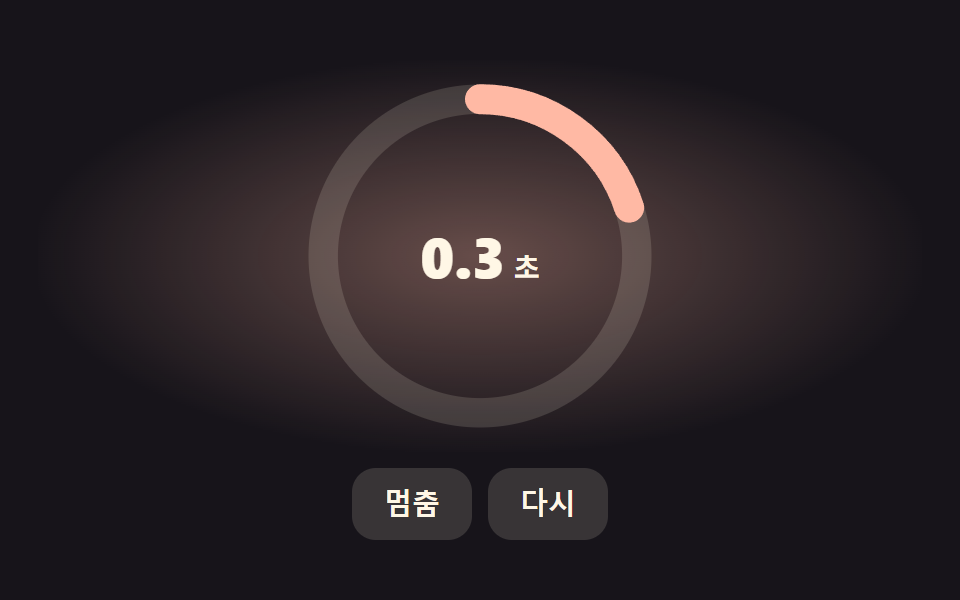 Dashboard UICSS Countdown Timer: 9 Clocks That Drain and Flip
 Dashboard UIPie Chart CSS: 9 Slices That Pop, Tilt and Morph
 Dashboard UIDashboard Sidebar Design + 9 Widget UI Pieces
 Dashboard UICSS Chart Design: 9 SVG Graphs, No Library
 Dashboard UIStock Ticker UI: 9 Live Price Widgets, No API Key