Stock Ticker UI: 9 Live Price Widgets, No API Key
A stock ticker ui is the strip of numbers in a finance app that keeps changing while you watch it.
 01 ticker-price-flash-cell
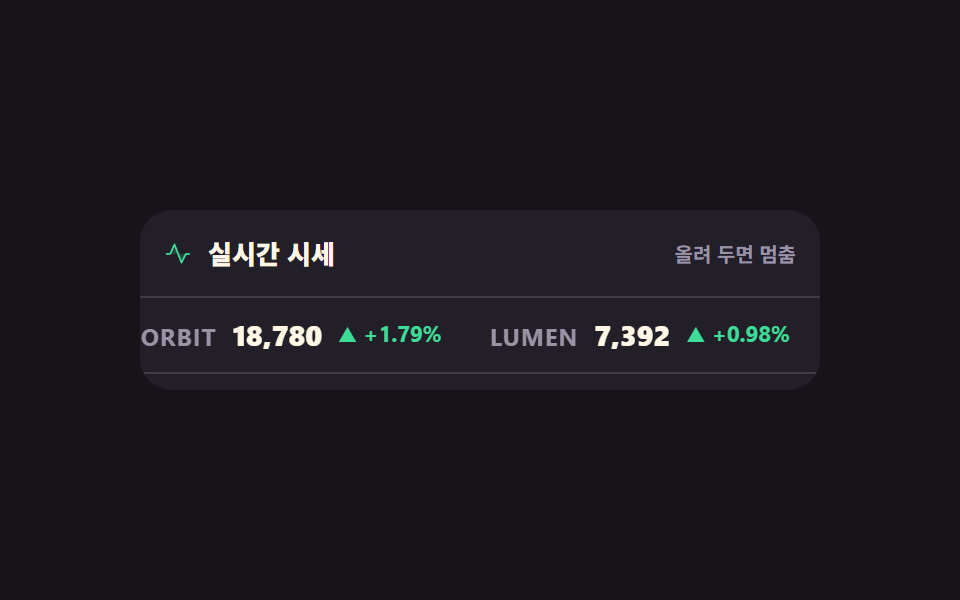 02 ticker-tape-horizontal
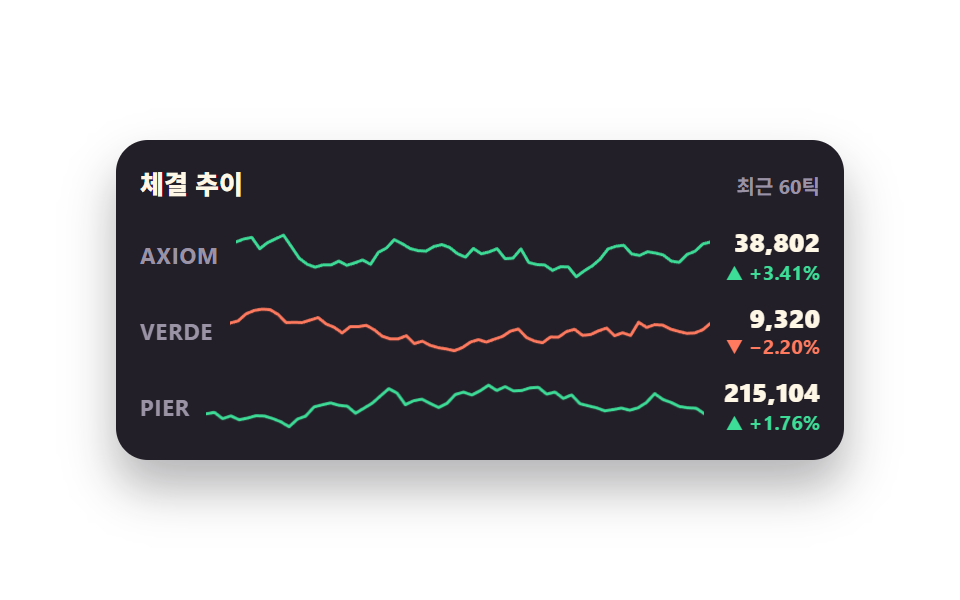 03 ticker-sparkline-shift
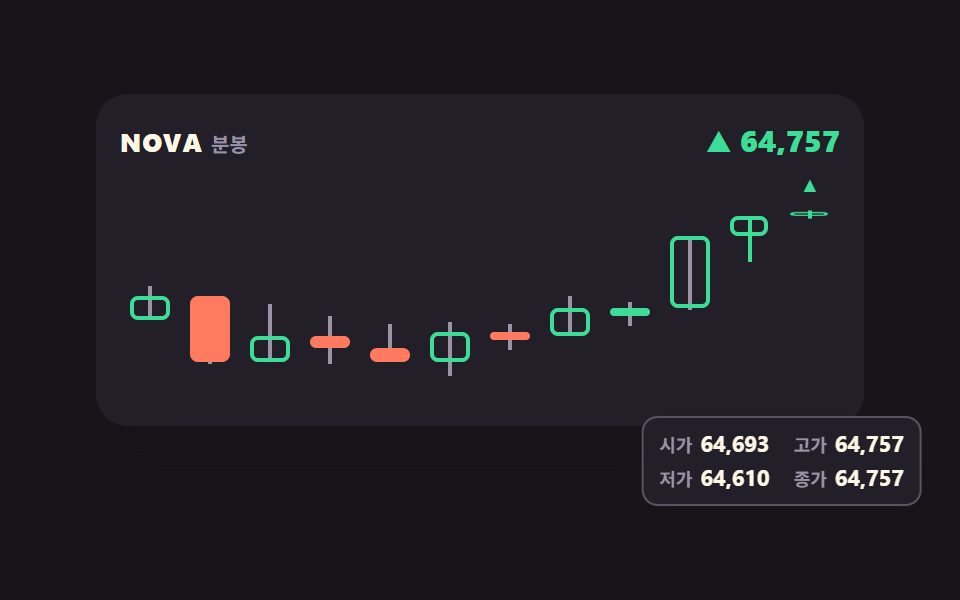 04 ticker-candle-live
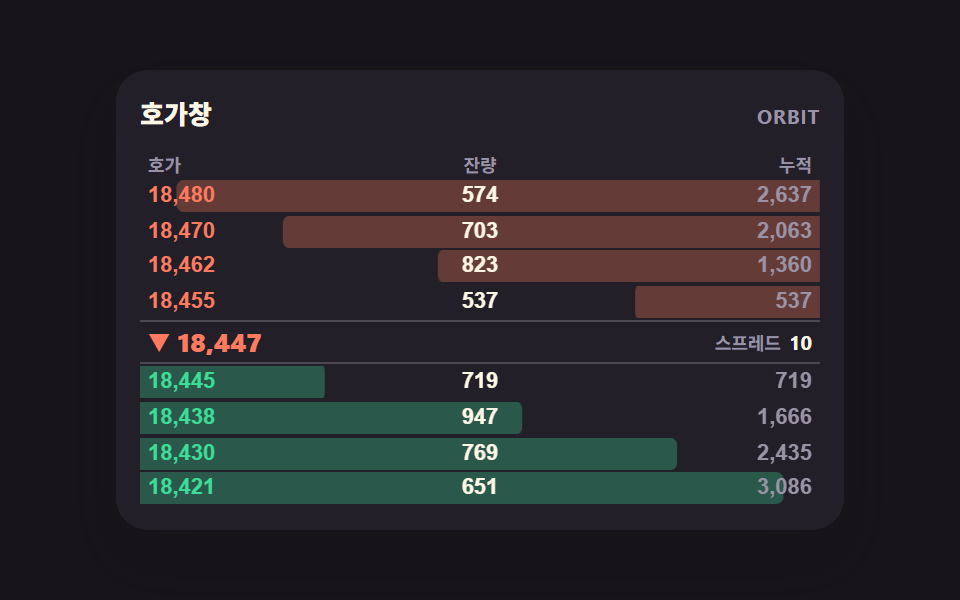 05 ticker-orderbook-depth
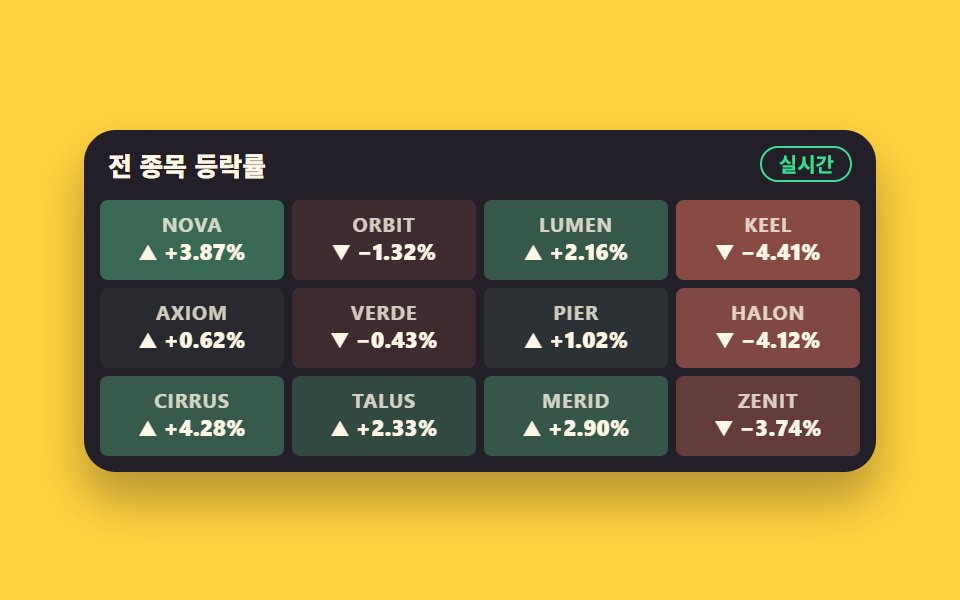 06 ticker-change-heatmap
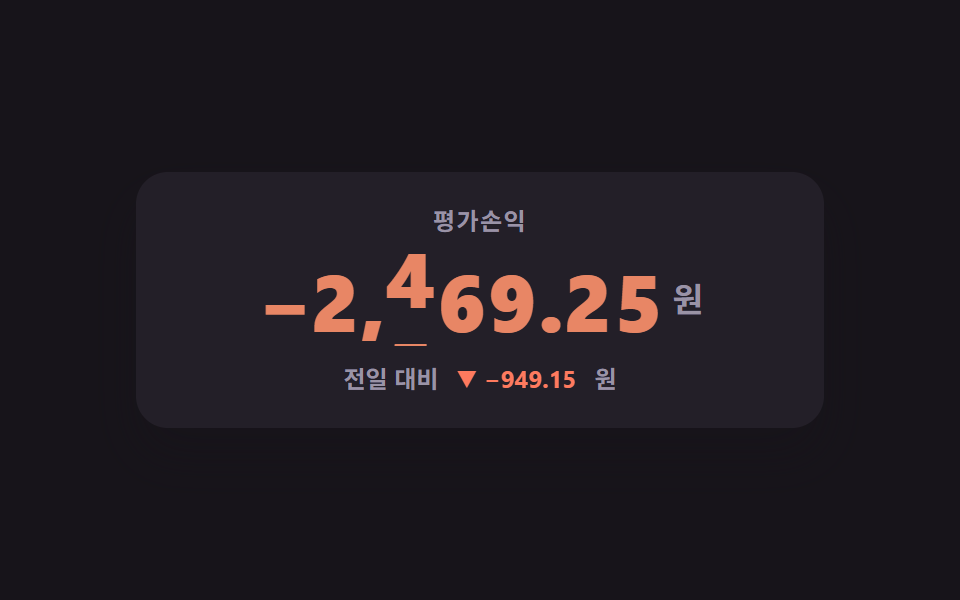 07 ticker-odometer-roll
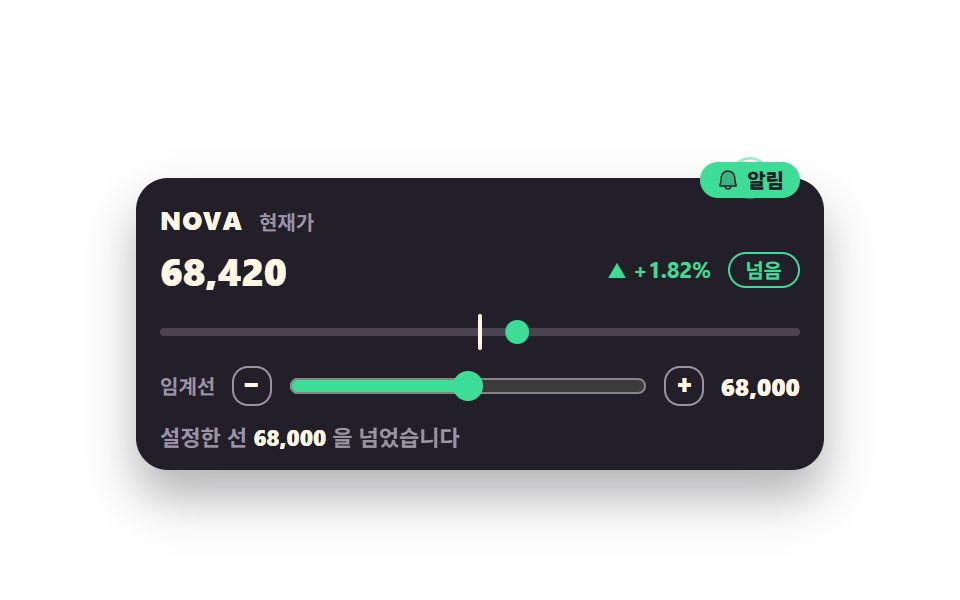 08 ticker-alert-threshold
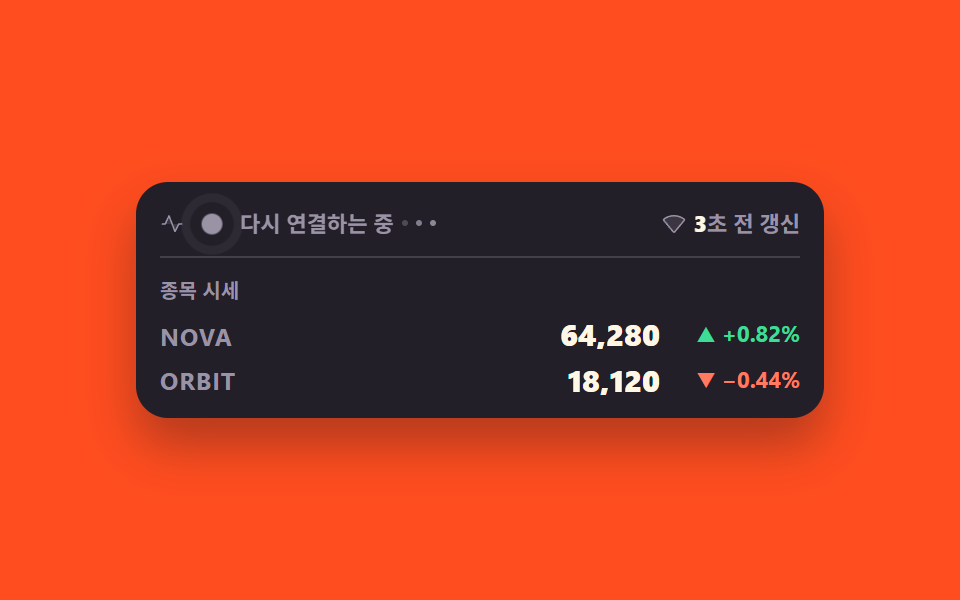 09 ticker-connection-status
Auto-plays · click a tile to jump to its section · all nine in one zip
- 01 Price cell that flashes green up, red down
- 02 Horizontal ticker tape
- 03 Sparkline that shifts left as new points arrive
- 04 Candle chart whose last bar keeps growing
- 05 Order book whose bid and ask depth breathes
- 06 Grid heatmap that recolors by percent change
- 07 Big number board with rolling digits
- 08 Threshold badge that fires when the line is crossed
- 09 Connection state and update lag readout
The nine follow what a price does after it arrives, not what looks impressive in a gallery. It lands in a cell (01), streams past in a strip (02), and drags a trail behind it (03). Then it takes on shapes — candles that close (04), depth bars on both sides of a book (05), a grid of tiles that recolors (06), and one enormous number (07). The last two stop being about the price and start being about trust: a line you set yourself (08), and the readout that says the feed is still breathing (09). Every price here comes from a seeded generator inside the file, which is why the same page replays the same walk for everyone who opens it. If you want to draw a finished dataset once instead of updating it, see CSS Chart Design: 9 SVG Graphs, No Library, and to drag, toggle, and inspect a chart that is already drawn, see Chart UI Design: 9 Interactions You Can Drag. A plain css ticker that only scrolls is 9 CSS Marquee Infinite Loop — No JS, Scroll-Driven; the strip in 02 also rewrites its numbers while it travels. Stacking values by the day rather than by the second is the job of Habit Tracker UI: 9 Parts from Grid to Badge, the other end of this same pillar.
01Price cell that flashes green up, red down
What you see
A new price lands in the cell, the row lights up in a single frame, and the tint drains away while the digits stay locked in their columns. In a watchlist, that flash is the only thing telling you which of the four rows actually moved.
<main class="stage">
<div class="pf is-demo" id="pf">
  <div class="pf__board">
    <div class="pf__head">
      <p class="pf__title">Watchlist</p>
      <span class="pf__live">LIVE</span>
    </div>
    <ul class="pf__rows">
      <!-- 행마다 이전값·현재값 두 장을 같은 칸에 겹친다 — steps(1, end) 컷이라 반투명 유령이 안 생긴다 -->
      <li class="pf__row" data-row="0">
        <span class="pf__sym">NOVA</span>
        <span class="pf__priceWrap">
          <span class="pf__price pf__price--prev" data-prev>0</span>
          <span class="pf__price pf__price--next" data-next>0</span>
        </span>
        <span class="pf__chgWrap">
          <span class="pf__chg pf__chg--prev" data-chgprev>0</span>
          <span class="pf__chg pf__chg--next" data-chgnext>0</span>
        </span>
      </li>
      <li class="pf__row" data-row="1">
        <span class="pf__sym">ORBIT</span>
        <span class="pf__priceWrap">
          <span class="pf__price pf__price--prev" data-prev>0</span>
          <span class="pf__price pf__price--next" data-next>0</span>
        </span>
        <span class="pf__chgWrap">
          <span class="pf__chg pf__chg--prev" data-chgprev>0</span>
          <span class="pf__chg pf__chg--next" data-chgnext>0</span>
        </span>
      </li>
      <li class="pf__row" data-row="2">
        <span class="pf__sym">LUMEN</span>
        <span class="pf__priceWrap">
          <span class="pf__price pf__price--prev" data-prev>0</span>
          <span class="pf__price pf__price--next" data-next>0</span>
        </span>
        <span class="pf__chgWrap">
          <span class="pf__chg pf__chg--prev" data-chgprev>0</span>
          <span class="pf__chg pf__chg--next" data-chgnext>0</span>
        </span>
      </li>
      <li class="pf__row" data-row="3">
        <span class="pf__sym">KEEL</span>
        <span class="pf__priceWrap">
          <span class="pf__price pf__price--prev" data-prev>0</span>
          <span class="pf__price pf__price--next" data-next>0</span>
        </span>
        <span class="pf__chgWrap">
          <span class="pf__chg pf__chg--prev" data-chgprev>0</span>
          <span class="pf__chg pf__chg--next" data-chgnext>0</span>
        </span>
      </li>
    </ul>
  </div>
</div>
</main>@use "../../../../site/static/demo-tokens" as *;
// 관심 종목 시세판 — 실사용에서는 시드 PRNG 가 setInterval 로 900ms 마다 한 행씩 값을 바꾸고,
// 바뀐 행의 배경이 한 프레임에 켜졌다가 천천히 꺼진다(가격 플래시). 방향은 색만으로 전하지 않고
// 화살표(▲▼)와 부호를 같이 적는다.
// 미리보기(.is-demo)는 같은 플래시를 CSS 키프레임으로 2초 루프에 눕혀 세 행이 차례로 켜지게 한다 —
// JS 는 미리보기 동안 값을 안 건드려 24프레임이 같은 순간을 재현한다.
$duration: $dur-loop;
$easing: $ease-out;
$flash-up: rgba(61, 220, 151, .3);
$flash-down: rgba(255, 122, 94, .3);
@include stage($stage-ink);
.pf { display: flex; justify-content: center; width: 100%; }
.pf__board {
width: min(100%, 320px); background: $tick-panel; border-radius: $r-card;
box-shadow: $shadow-raised; padding: $sp-3 $sp-2 $sp-2; overflow: hidden;
}
.pf__head { display: flex; align-items: center; justify-content: space-between; padding: 0 $sp-2 $sp-2; }
.pf__title { margin: 0; font-weight: 800; font-size: clamp(11px, 3vw, 13px); color: $subject-cream; }
// 라이브 배지 — 글자로도 상태를 말한다
.pf__live {
font-weight: 700; font-size: clamp(9px, 2.4vw, 10px); color: $tick-up;
border: 1px solid $tick-up; border-radius: $r-pill; padding: 0 $sp-2; line-height: 1.6;
}
.pf__rows { list-style: none; margin: 0; padding: 0; }
.pf__row {
display: grid; grid-template-columns: 1fr auto auto; align-items: center;
gap: $sp-2; padding: $sp-1 $sp-2; border-radius: $r-sm;
background-color: transparent;
}
.pf__sym {
font-weight: 700; font-size: clamp(10px, 2.8vw, 12px); color: $tick-mute; letter-spacing: .04em;
}
// 이전값·현재값을 같은 칸에 겹친다 — 컷 교체라 폭이 달라도 자리가 흔들리지 않는다
.pf__priceWrap, .pf__chgWrap { display: grid; justify-items: end; }
.pf__price, .pf__chg { grid-area: 1 / 1; font-variant-numeric: tabular-nums; }
.pf__price {
font-weight: 800; font-size: clamp(12px, 3.4vw, 15px); line-height: 1.5; color: $subject-cream;
}
.pf__chg {
font-weight: 700; font-size: clamp(10px, 2.6vw, 11px); line-height: 1.5; min-width: 62px;
}
.pf__chg.is-up { color: $tick-up; }
.pf__chg.is-down { color: $tick-down; }
// 실사용(정적 경로)에서는 현재값만 보인다 — 이전값은 자리만 지키고 안 보인다
.pf:not(.is-demo) .pf__price--prev, .pf:not(.is-demo) .pf__chg--prev { opacity: 0; }
// 실사용 플래시 — JS 가 붙인 is-up / is-down 이 한 프레임에 배경을 켜고 스스로 꺼진다.
// steps(1, end) 로 켜는 건 값 교체 쪽이고, 배경은 켜진 값에서 시작해 이어서 빠진다
.pf__row.is-up { animation: pfFlashUp 600ms $easing 1; }
.pf__row.is-down { animation: pfFlashDown 600ms $easing 1; }
@keyframes pfFlashUp { from { background-color: $flash-up; } to { background-color: transparent; } }
@keyframes pfFlashDown { from { background-color: $flash-down; } to { background-color: transparent; } }
// ── 미리보기 루프(2초): 6% 1번 행이 오르며 켜짐 → 34% 3번 행이 내리며 켜짐 → 62% 2번 행이 오르며 켜짐.
// 한 행의 배경은 켜진 뒤 다음 26% 동안 빠진다. 루프 안에서 세 번 = 초당 1.5회로 WCAG 2.3.1(초당 3회 미만) 아래.
// 값 교체(이전값 → 현재값)는 steps(1, end) 컷이라 두 장이 반투명하게 겹치는 유령 프레임이 없다.
// 되돌림은 96% 안에 끝난다 — 24프레임의 마지막 장이 2초의 95.8% 지점이라 그 뒤는 샘플이 없다.
.pf.is-demo .pf__row {
animation-duration: $duration;
animation-timing-function: $easing;
animation-iteration-count: infinite;
}
.pf.is-demo .pf__row[data-row="0"] { animation-name: pfRowA; }
.pf.is-demo .pf__row[data-row="2"] { animation-name: pfRowB; }
.pf.is-demo .pf__row[data-row="1"] { animation-name: pfRowC; }
@keyframes pfRowA {
0%, 4% { background-color: transparent; }
6% { background-color: $flash-up; }
32%, 100% { background-color: transparent; }
}
@keyframes pfRowB {
0%, 32% { background-color: transparent; }
34% { background-color: $flash-down; }
60%, 100% { background-color: transparent; }
}
@keyframes pfRowC {
0%, 60% { background-color: transparent; }
62% { background-color: $flash-up; }
88%, 100% { background-color: transparent; }
}
// 값 교체 — 켜지는 그 프레임에 이전값이 현재값으로 컷된다
.pf.is-demo .pf__price--prev, .pf.is-demo .pf__price--next,
.pf.is-demo .pf__chg--prev, .pf.is-demo .pf__chg--next {
animation-duration: $duration;
animation-timing-function: steps(1, end);
animation-iteration-count: infinite;
}
.pf.is-demo .pf__row[data-row="0"] .pf__price--prev,
.pf.is-demo .pf__row[data-row="0"] .pf__chg--prev { animation-name: pfPrevA; }
.pf.is-demo .pf__row[data-row="0"] .pf__price--next,
.pf.is-demo .pf__row[data-row="0"] .pf__chg--next { animation-name: pfNextA; }
.pf.is-demo .pf__row[data-row="2"] .pf__price--prev,
.pf.is-demo .pf__row[data-row="2"] .pf__chg--prev { animation-name: pfPrevB; }
.pf.is-demo .pf__row[data-row="2"] .pf__price--next,
.pf.is-demo .pf__row[data-row="2"] .pf__chg--next { animation-name: pfNextB; }
.pf.is-demo .pf__row[data-row="1"] .pf__price--prev,
.pf.is-demo .pf__row[data-row="1"] .pf__chg--prev { animation-name: pfPrevC; }
.pf.is-demo .pf__row[data-row="1"] .pf__price--next,
.pf.is-demo .pf__row[data-row="1"] .pf__chg--next { animation-name: pfNextC; }
.pf.is-demo .pf__row[data-row="3"] .pf__price--prev,
.pf.is-demo .pf__row[data-row="3"] .pf__chg--prev { opacity: 0; }
@keyframes pfPrevA { 0%, 4% { opacity: 1; } 6%, 100% { opacity: 0; } }
@keyframes pfNextA { 0%, 4% { opacity: 0; } 6%, 100% { opacity: 1; } }
@keyframes pfPrevB { 0%, 32% { opacity: 1; } 34%, 100% { opacity: 0; } }
@keyframes pfNextB { 0%, 32% { opacity: 0; } 34%, 100% { opacity: 1; } }
@keyframes pfPrevC { 0%, 60% { opacity: 1; } 62%, 100% { opacity: 0; } }
@keyframes pfNextC { 0%, 60% { opacity: 0; } 62%, 100% { opacity: 1; } }
@media (max-width: 340px) {
.pf__board { padding: $sp-2 $sp-1 $sp-1; }
.pf__head { padding: 0 $sp-1 $sp-1; }
.pf__row { gap: $sp-1; padding: 0 $sp-1; }
.pf__chg { min-width: 56px; }
}
@media (prefers-reduced-motion: reduce) {
// 플래시는 끄고 값만 갱신한다 — 방향은 화살표·부호·색이 그대로 말해 준다
.pf__row.is-up, .pf__row.is-down,
.pf.is-demo .pf__row { animation: none !important; background-color: transparent !important; }
.pf.is-demo .pf__price--prev, .pf.is-demo .pf__chg--prev { animation: none !important; opacity: 0 !important; }
.pf.is-demo .pf__price--next, .pf.is-demo .pf__chg--next { animation: none !important; opacity: 1 !important; }
}html, body {
margin: 0;
overflow: hidden;
}
.stage {
box-sizing: border-box;
min-height: 100vh;
display: grid;
place-items: center;
margin: 0;
background: #17141a;
font-family: -apple-system, "Segoe UI", "Noto Sans KR", sans-serif;
padding: clamp(8px, 4vw, 24px);
}
.pf {
display: flex;
justify-content: center;
width: 100%;
}
.pf__board {
width: min(100%, 320px);
background: #231f28;
border-radius: 16px;
box-shadow: 0 14px 24px rgba(23, 20, 26, 0.32);
padding: 12px 8px 8px;
overflow: hidden;
}
.pf__head {
display: flex;
align-items: center;
justify-content: space-between;
padding: 0 8px 8px;
}
.pf__title {
margin: 0;
font-weight: 800;
font-size: clamp(11px, 3vw, 13px);
color: #fff7e6;
}
.pf__live {
font-weight: 700;
font-size: clamp(9px, 2.4vw, 10px);
color: #3ddc97;
border: 1px solid #3ddc97;
border-radius: 999px;
padding: 0 8px;
line-height: 1.6;
}
.pf__rows {
list-style: none;
margin: 0;
padding: 0;
}
.pf__row {
display: grid;
grid-template-columns: 1fr auto auto;
align-items: center;
gap: 8px;
padding: 4px 8px;
border-radius: 8px;
background-color: transparent;
}
.pf__sym {
font-weight: 700;
font-size: clamp(10px, 2.8vw, 12px);
color: #9a93a6;
letter-spacing: 0.04em;
}
.pf__priceWrap, .pf__chgWrap {
display: grid;
justify-items: end;
}
.pf__price, .pf__chg {
grid-area: 1/1;
font-variant-numeric: tabular-nums;
}
.pf__price {
font-weight: 800;
font-size: clamp(12px, 3.4vw, 15px);
line-height: 1.5;
color: #fff7e6;
}
.pf__chg {
font-weight: 700;
font-size: clamp(10px, 2.6vw, 11px);
line-height: 1.5;
min-width: 62px;
}
.pf__chg.is-up {
color: #3ddc97;
}
.pf__chg.is-down {
color: #ff7a5e;
}
.pf:not(.is-demo) .pf__price--prev, .pf:not(.is-demo) .pf__chg--prev {
opacity: 0;
}
.pf__row.is-up {
animation: pfFlashUp 600ms ease-out 1;
}
.pf__row.is-down {
animation: pfFlashDown 600ms ease-out 1;
}
@keyframes pfFlashUp {
from {
background-color: rgba(61, 220, 151, 0.3);
}
to {
background-color: transparent;
}
}
@keyframes pfFlashDown {
from {
background-color: rgba(255, 122, 94, 0.3);
}
to {
background-color: transparent;
}
}
.pf.is-demo .pf__row {
animation-duration: 2s;
animation-timing-function: ease-out;
animation-iteration-count: infinite;
}
.pf.is-demo .pf__row[data-row="0"] {
animation-name: pfRowA;
}
.pf.is-demo .pf__row[data-row="2"] {
animation-name: pfRowB;
}
.pf.is-demo .pf__row[data-row="1"] {
animation-name: pfRowC;
}
@keyframes pfRowA {
0%, 4% {
background-color: transparent;
}
6% {
background-color: rgba(61, 220, 151, 0.3);
}
32%, 100% {
background-color: transparent;
}
}
@keyframes pfRowB {
0%, 32% {
background-color: transparent;
}
34% {
background-color: rgba(255, 122, 94, 0.3);
}
60%, 100% {
background-color: transparent;
}
}
@keyframes pfRowC {
0%, 60% {
background-color: transparent;
}
62% {
background-color: rgba(61, 220, 151, 0.3);
}
88%, 100% {
background-color: transparent;
}
}
.pf.is-demo .pf__price--prev, .pf.is-demo .pf__price--next,
.pf.is-demo .pf__chg--prev, .pf.is-demo .pf__chg--next {
animation-duration: 2s;
animation-timing-function: steps(1, end);
animation-iteration-count: infinite;
}
.pf.is-demo .pf__row[data-row="0"] .pf__price--prev,
.pf.is-demo .pf__row[data-row="0"] .pf__chg--prev {
animation-name: pfPrevA;
}
.pf.is-demo .pf__row[data-row="0"] .pf__price--next,
.pf.is-demo .pf__row[data-row="0"] .pf__chg--next {
animation-name: pfNextA;
}
.pf.is-demo .pf__row[data-row="2"] .pf__price--prev,
.pf.is-demo .pf__row[data-row="2"] .pf__chg--prev {
animation-name: pfPrevB;
}
.pf.is-demo .pf__row[data-row="2"] .pf__price--next,
.pf.is-demo .pf__row[data-row="2"] .pf__chg--next {
animation-name: pfNextB;
}
.pf.is-demo .pf__row[data-row="1"] .pf__price--prev,
.pf.is-demo .pf__row[data-row="1"] .pf__chg--prev {
animation-name: pfPrevC;
}
.pf.is-demo .pf__row[data-row="1"] .pf__price--next,
.pf.is-demo .pf__row[data-row="1"] .pf__chg--next {
animation-name: pfNextC;
}
.pf.is-demo .pf__row[data-row="3"] .pf__price--prev,
.pf.is-demo .pf__row[data-row="3"] .pf__chg--prev {
opacity: 0;
}
@keyframes pfPrevA {
0%, 4% {
opacity: 1;
}
6%, 100% {
opacity: 0;
}
}
@keyframes pfNextA {
0%, 4% {
opacity: 0;
}
6%, 100% {
opacity: 1;
}
}
@keyframes pfPrevB {
0%, 32% {
opacity: 1;
}
34%, 100% {
opacity: 0;
}
}
@keyframes pfNextB {
0%, 32% {
opacity: 0;
}
34%, 100% {
opacity: 1;
}
}
@keyframes pfPrevC {
0%, 60% {
opacity: 1;
}
62%, 100% {
opacity: 0;
}
}
@keyframes pfNextC {
0%, 60% {
opacity: 0;
}
62%, 100% {
opacity: 1;
}
}
@media (max-width: 340px) {
.pf__board {
padding: 8px 4px 4px;
}
.pf__head {
padding: 0 4px 4px;
}
.pf__row {
gap: 4px;
padding: 0 4px;
}
.pf__chg {
min-width: 56px;
}
}
@media (prefers-reduced-motion: reduce) {
.pf__row.is-up, .pf__row.is-down,
.pf.is-demo .pf__row {
animation: none !important;
background-color: transparent !important;
}
.pf.is-demo .pf__price--prev, .pf.is-demo .pf__chg--prev {
animation: none !important;
opacity: 0 !important;
}
.pf.is-demo .pf__price--next, .pf.is-demo .pf__chg--next {
animation: none !important;
opacity: 1 !important;
}
}// 가짜 시세는 시드 PRNG 로 만든다 — 같은 시드면 누가 열어도 같은 흐름이 재현된다.
// 외부 API·키가 필요 없고, 심볼도 실존 종목이 아니다.
var SEED = 296;
function mulberry32(a) {
return function () {
a |= 0; a = a + 0x6D2B79F5 | 0;
var t = Math.imul(a ^ a >>> 15, 1 | a);
t = t + Math.imul(t ^ t >>> 7, 61 | t) ^ t;
return ((t ^ t >>> 14) >>> 0) / 4294967296;
};
}
var rand = mulberry32(SEED);
var BASE = [64200, 18450, 7320, 132900]; // 전일 Close 4종 — 등락률의 기준
// vs prev close 등락을 먼저 한 번 굴려 오늘 가격을 만든다. 그래야 첫 화면부터 등락률이 0 이 아니다
var state = BASE.map(function (p) {
var day = (rand() - 0.55) * 0.055;
var now = Math.round(p * (1 + day));
return { price: now, chg: (now - p) / p * 100 };
});
var pf = document.getElementById('pf');
var rows = [].slice.call(pf.querySelectorAll('.pf__row'));
// 숫자는 자리가 흔들리면 읽기 어렵다 — 천 단위 구분자까지 넣어 고정 폭으로 그린다
function money(n) { return n.toLocaleString('en-US'); }
function pct(v) { return (v >= 0 ? '+' : '−') + Math.abs(v).toFixed(2) + '%'; }
function arrow(v) { return v >= 0 ? '▲' : '▼'; }
// 방향은 색만으로 전하지 않는다 — 화살표와 부호를 같이 적는다
function paint(i) {
var s = state[i], row = rows[i];
row.querySelector('[data-next]').textContent = money(s.price);
row.querySelector('[data-chgnext]').textContent = arrow(s.chg) + ' ' + pct(s.chg);
row.querySelector('[data-chgnext]').className = 'pf__chg pf__chg--next ' + (s.chg >= 0 ? 'is-up' : 'is-down');
}
function tick(i, flash) {
var s = state[i], row = rows[i];
var prevPrice = s.price, prevChg = s.chg;
var step = Math.round((rand() - 0.48) * s.price * 0.004);
if (step === 0) { step = rand() < 0.5 ? -1 : 1; }
s.price = prevPrice + step;
s.chg = (s.price - BASE[i]) / BASE[i] * 100;
// 직전 값을 뒤 장에 남겨 둔다 — 사람이 "얼마에서 얼마로" 를 한 눈에 본다
row.querySelector('[data-prev]').textContent = money(prevPrice);
var cp = row.querySelector('[data-chgprev]');
cp.textContent = arrow(prevChg) + ' ' + pct(prevChg);
cp.className = 'pf__chg pf__chg--prev ' + (prevChg >= 0 ? 'is-up' : 'is-down');
paint(i);
if (!flash) { return; }
// 플래시는 한 프레임에 켜고 스스로 꺼진다. 클래스를 떼었다 붙여야 같은 행이 연속으로 깜빡인다
row.classList.remove('is-up', 'is-down');
void row.offsetWidth;
row.classList.add(step >= 0 ? 'is-up' : 'is-down');
}
// 첫 화면부터 "직전 값 → 현재 값" 이 서로 다르게 서 있어야 미리보기 컷이 뜻을 갖는다.
// 그래서 시작가에서 한 번씩만 값을 굴려 두고(플래시 없이) 시작한다
state.forEach(function (s, i) { tick(i, false); });
// 격자 미리보기(.is-demo) 동안에는 CSS 키프레임만 돌고 JS 는 값을 안 건드린다 — 프레임이 같은 순간에 고정돼야
// 렌더 측정이 흔들리지 않는다. 사람이 포인터를 올리거나 키보드로 들어오면 그때부터 시드 시세가 실제로 갱신된다.
function live() { if (pf.classList.contains('is-demo')) { pf.classList.remove('is-demo'); } }
['pointerdown', 'pointermove', 'focusin'].forEach(function (ev) { pf.addEventListener(ev, live); });
// 한 번에 한 행만 바꾼다 — WCAG 2.3.1 은 초당 3회 미만을 요구하고, 900ms 간격이면 1.1회다
var cursor = 0;
var timer = setInterval(function () {
if (pf.classList.contains('is-demo')) { return; }
if (document.visibilityState === 'hidden') { return; }
tick(cursor);
cursor = (cursor + 1) % rows.length;
}, 900);
// 탭을 다시 보면 현재 상태를 그대로 다시 그린다 — 안 보이는 동안 쌓아 두지 않는다
document.addEventListener('visibilitychange', function () {
if (document.visibilityState === 'visible') { state.forEach(function (s, i) { paint(i); }); }
});
window.addEventListener('pagehide', function () { clearInterval(timer); });// PriceFlashCell — vanilla 판(run/296/demo/01-ticker-price-flash-cell/index.html) 의 React 포트.
// 관심 종목 시세판. 시드 PRNG 가 900ms 마다 한 행씩 값을 바꾸고, 바뀐 행의 배경이 한 프레임에
// 켜졌다가 스스로 꺼진다. 방향은 색만으로 전하지 않고 화살표(▲▼)와 부호를 같이 적는다.
import { useEffect, useRef, useState } from "react";
import styles from "./PriceFlashCell.module.scss";
export type PriceFlashCellProps = {
/** 격자 미리보기용 2초 자동 루프. 포인터를 올리거나 키보드로 들어오면 꺼지고 실제 갱신이 시작된다 */
demo?: boolean;
/** 시드 — 같은 값이면 누가 열어도 같은 시세 흐름이 재현된다 */
seed?: number;
/** 갱신 간격(ms). WCAG 2.3.1 은 초당 3회 미만을 요구한다 */
intervalMs?: number;
};
type Box<T> = { current: T };
type Row = { sym: string; base: number; price: number; chg: number; prev: number; prevChg: number; dir: number };
const SYMBOLS = ["NOVA", "ORBIT", "LUMEN", "KEEL"];
const BASE = [64200, 18450, 7320, 132900]; // 전일 종가 4종 — 등락률의 기준
/** 시드 PRNG — 외부 API·키가 필요 없고 심볼도 실존 종목이 아니다 */
function mulberry32(a: number) {
return function () {
a |= 0; a = a + 0x6D2B79F5 | 0;
let t = Math.imul(a ^ a >>> 15, 1 | a);
t = t + Math.imul(t ^ t >>> 7, 61 | t) ^ t;
return ((t ^ t >>> 14) >>> 0) / 4294967296;
};
}
/** 숫자는 자리가 흔들리면 읽기 어렵다 — 천 단위 구분자까지 넣어 고정 폭으로 그린다 */
const money = (n: number) => n.toLocaleString("en-US");
const pct = (v: number) => (v >= 0 ? "+" : "−") + Math.abs(v).toFixed(2) + "%";
const arrow = (v: number) => (v >= 0 ? "▲" : "▼");
function initialRows(rand: () => number): Row[] {
return SYMBOLS.map((sym, i) => {
// 전일 대비 등락을 먼저 한 번 굴려 오늘 가격을 만든다. 그래야 첫 화면부터 등락률이 0 이 아니다
const day = (rand() - 0.55) * 0.055;
const now = Math.round(BASE[i] * (1 + day));
const chg = (now - BASE[i]) / BASE[i] * 100;
return { sym, base: BASE[i], price: now, chg, prev: BASE[i], prevChg: 0, dir: 0 };
});
}
export default function PriceFlashCell({ demo = true, seed = 296, intervalMs = 900 }: PriceFlashCellProps) {
const randRef: Box<(() => number) | null> = useRef(null);
if (randRef.current === null) { randRef.current = mulberry32(seed); }
const [rows, setRows] = useState<Row[]>(() => initialRows(randRef.current as () => number));
const [live, setLive] = useState(!demo);
const cursor = useRef(0) as Box<number>;
useEffect(() => {
if (!live) { return; }
const id = window.setInterval(() => {
// 탭이 안 보이는 동안은 세지 않는다 — 돌아왔을 때 밀린 갱신이 한꺼번에 터지지 않게
if (document.visibilityState === "hidden") { return; }
const i = cursor.current;
cursor.current = (i + 1) % SYMBOLS.length;
setRows((old) => old.map((r, k) => {
if (k !== i) { return { ...r, dir: 0 }; }
const rand = randRef.current as () => number;
let step = Math.round((rand() - 0.48) * r.price * 0.004);
if (step === 0) { step = rand() < 0.5 ? -1 : 1; }
const price = r.price + step;
return { ...r, prev: r.price, prevChg: r.chg, price, chg: (price - r.base) / r.base * 100, dir: step >= 0 ? 1 : -1 };
}));
}, intervalMs);
return () => window.clearInterval(id);
}, [live, intervalMs]);
const rootCls = [styles.root, live ? "" : styles.isDemo].filter(Boolean).join(" ");
return (
<div
className={rootCls}
onPointerMove={() => setLive(true)}
onPointerDown={() => setLive(true)}
onFocus={() => setLive(true)}
>
<div className={styles.board}>
<div className={styles.head}>
<p className={styles.title}>관심 종목</p>
<span className={styles.liveTag}>실시간</span>
</div>
<ul className={styles.rows}>
{rows.map((r, i) => (
/* 행마다 이전값·현재값 두 장을 같은 칸에 겹친다 — steps(1, end) 컷이라 반투명 유령이 안 생긴다 */
<li
key={r.sym}
className={[styles.row, r.dir > 0 ? styles.isUp : "", r.dir < 0 ? styles.isDown : ""].filter(Boolean).join(" ")}
data-row={i}
>
<span className={styles.sym}>{r.sym}</span>
<span className={styles.priceWrap}>
<span className={`${styles.price} ${styles.pricePrev}`}>{money(r.prev)}</span>
<span className={`${styles.price} ${styles.priceNext}`}>{money(r.price)}</span>
</span>
<span className={styles.chgWrap}>
<span className={`${styles.chg} ${styles.chgPrev} ${r.prevChg >= 0 ? styles.upText : styles.downText}`}>
{arrow(r.prevChg)} {pct(r.prevChg)}
</span>
<span className={`${styles.chg} ${styles.chgNext} ${r.chg >= 0 ? styles.upText : styles.downText}`}>
{arrow(r.chg)} {pct(r.chg)}
</span>
</span>
</li>
))}
</ul>
</div>
</div>
);
}01 · Price cell that flashes green up, red down — Measured area 19.33% · moving frames 9/23Original by GODRICH · SCSS and React ship in the zip · See the password
Where to look in the code
The preview loop lights three different rows within two seconds, and the render found movement in 9 of the 23 frame pairs, so the board reads as a few cells changing rather than a wall of noise.
// Previous and next value share one grid cell — a cut swap keeps the column steady even when the width changes
.pf__priceWrap, .pf__chgWrap { display: grid; justify-items: end; }
.pf__price, .pf__chg { grid-area: 1 / 1; font-variant-numeric: tabular-nums; }
.pf__chg.is-up { color: $tick-up; }
.pf__chg.is-down { color: $tick-down; }

// The live flash — the is-up / is-down class JS adds turns the background on in one frame and it drains on its own.
// steps(1, end) is what cuts the value swap; the background starts from the lit color and fades out from there
.pf__row.is-up { animation: pfFlashUp 600ms $easing 1; }
.pf__row.is-down { animation: pfFlashDown 600ms $easing 1; }
@keyframes pfFlashUp { from { background-color: $flash-up; } to { background-color: transparent; } }
@keyframes pfFlashDown { from { background-color: $flash-down; } to { background-color: transparent; } }
02Horizontal ticker tape
What you see
Two identical copies of the row travel left, and by the time the seam arrives, the track is already back where it started. Putting a pointer anywhere on the tape holds it still, which is what you want on a lobby monitor someone is trying to read.
<main class="stage">
<div class="tt is-demo" id="tt">
  <div class="tt__panel">
    <div class="tt__head">
      <span class="tt__pulse" aria-hidden="true"><svg xmlns="http://www.w3.org/2000/svg" width="1em" height="1em" viewBox="0 0 256 256"><g fill="currentColor"><path d="m96 40l33.52 88H56Zm104 88h-70.48L160 208Z" opacity=".2"/><path d="M240 128a8 8 0 0 1-8 8h-27.06l-37.78 75.58A8 8 0 0 1 160 216h-.4a8 8 0 0 1-7.08-5.14L95.35 60.76l-32.07 70.55A8 8 0 0 1 56 136H24a8 8 0 0 1 0-16h26.85l37.87-83.31a8 8 0 0 1 14.76.46l57.51 151l31.85-63.71A8 8 0 0 1 200 120h32a8 8 0 0 1 8 8"/></g></svg></span>
      <p class="tt__title">Live prices</p>
      <span class="tt__hint">Hover to pause</span>
    </div>
    <!-- 테이프 창(overflow:hidden)과 흐르는 트랙을 분리한다. transform 은 언제나 트랙에만 건다 -->
    <div class="tt__tape" id="ttTape" tabindex="0" aria-label="Price tape">
      <div class="tt__track" id="ttTrack">
        <!-- 같은 줄을 두 벌 이어 붙였다. 두 벌의 폭이 픽셀 단위로 같아야 -50% 가 정확히 한 벌이라
             한 바퀴가 이음매 없이 이어진다. 그래서 간격은 트랙의 flex gap 이 아니라 항목마다 margin-right 다 -->
        <div class="tt__half" data-half="0">
          <span class="tt__item" data-i="0"><span class="tt__sym">NOVA</span><span class="tt__price">0</span><span class="tt__chg">0</span></span>
          <span class="tt__item" data-i="1"><span class="tt__sym">ORBIT</span><span class="tt__price">0</span><span class="tt__chg">0</span></span>
          <span class="tt__item" data-i="2"><span class="tt__sym">LUMEN</span><span class="tt__price">0</span><span class="tt__chg">0</span></span>
        </div>
        <div class="tt__half" data-half="1" aria-hidden="true">
          <span class="tt__item" data-i="0"><span class="tt__sym">NOVA</span><span class="tt__price">0</span><span class="tt__chg">0</span></span>
          <span class="tt__item" data-i="1"><span class="tt__sym">ORBIT</span><span class="tt__price">0</span><span class="tt__chg">0</span></span>
          <span class="tt__item" data-i="2"><span class="tt__sym">LUMEN</span><span class="tt__price">0</span><span class="tt__chg">0</span></span>
        </div>
      </div>
    </div>
  </div>
</div>
</main>@use "../../../../site/static/demo-tokens" as *;
// 가로로 흐르는 티커 테이프 — 같은 줄을 두 벌 이어 붙이고 트랙을 translateX(-50%) 로 민다.
// -50% 는 트랙 폭의 절반이라 "정확히 한 벌"이어야 한 바퀴가 이음매 없이 이어진다. 그래서 간격은
// 트랙의 flex gap 이 아니라 항목마다의 margin-right 로 준다 — gap 은 2N 개 사이에 2N-1 번만 생겨
// -50% 가 gap 절반만큼 모자라고 한 바퀴마다 테이프가 튄다 (BD15, 028 실측 4~20px).
// 028(세로 마퀴)과 갈리는 지점: 028 은 세로로 도는 정지 목록이고, 이건 가로로 흐르면서 값이 실시간으로 갱신된다.
// 루프 안 플래시 0회 — 깜빡이지 않고 흐르기만 한다.
$duration: 10s; // 실사용 속도(초당 45px 쯤). 미리보기는 아래 .is-demo 가 한 바퀴를 2초로 배속한다
$easing: linear; // 등속 — 완급을 주면 글자를 따라 읽을 수 없다
$color: $subject-cream;
@include stage($stage-ink);
.tt { display: flex; justify-content: center; width: 100%; }
// 폭은 100% 가 아니라 뷰포트 단위로 못박는다 — overflow:hidden 은 잘라 보여 줄 뿐 요소의 max-content 를
// 줄이지 않아서, 폭이 100%(불확정)면 무대 격자가 트랙의 max-content(1,000px 넘음)만큼 벌어진다 (실측 480px 무대에서 1,047px)
.tt__panel {
width: min(340px, 84vw); background: $tick-panel; border-radius: $r-card;
box-shadow: $shadow-raised; padding: $sp-3 0 $sp-2; overflow: hidden;
}
.tt__head { display: flex; align-items: center; gap: $sp-2; padding: 0 $sp-3 $sp-3; }
// 아이콘은 Phosphor Duotone SVG 를 그대로 인라인했다 — 색은 currentColor 로 물려받는다
.tt__pulse { display: inline-flex; width: 14px; height: 14px; color: $tick-up; }
.tt__pulse svg { display: block; width: 100%; height: 100%; }
.tt__title { margin: 0; font-weight: 800; font-size: clamp(11px, 3vw, 13px); color: $color; }
.tt__hint { margin-left: auto; font-weight: 700; font-size: clamp(9px, 2.4vw, 10px); color: $tick-mute; }
// 테이프 창(overflow:hidden)과 흐르는 트랙을 분리한다 — transform 은 언제나 트랙에만 건다
.tt__tape {
overflow: hidden; padding: $sp-2 0;
border-top: 1px solid rgba(154, 147, 166, .24);
border-bottom: 1px solid rgba(154, 147, 166, .24);
}
.tt__tape:focus-visible { outline: 2px solid $tick-up; outline-offset: -2px; }
.tt__track {
display: flex; width: max-content;
animation-name: ttSlide;
animation-duration: $duration;
animation-timing-function: $easing;
animation-iteration-count: infinite;
}
.tt__half { display: flex; }
.tt__item {
display: inline-flex; align-items: center; flex-shrink: 0; white-space: nowrap;
margin-right: $sp-6; // 트랙의 gap 대신 — 한 벌의 폭이 (칸 + 간격) × N 으로 딱 떨어진다
}
.tt__sym {
margin-right: $sp-2; font-weight: 700; font-size: clamp(10px, 2.8vw, 12px);
color: $tick-mute; letter-spacing: .04em;
}
.tt__price {
margin-right: $sp-2; font-weight: 800; font-size: clamp(11px, 3.2vw, 14px); line-height: 1.5;
color: $color; font-variant-numeric: tabular-nums;
}
.tt__chg { font-weight: 700; font-size: clamp(10px, 2.6vw, 11px); line-height: 1.5; font-variant-numeric: tabular-nums; }
.tt__chg.is-up { color: $tick-up; }
.tt__chg.is-down { color: $tick-down; }
@keyframes ttSlide {
from { transform: translateX(0); }
to { transform: translateX(-50%); }
}
// 포인터·터치·키보드 어느 쪽으로 들어와도 테이프가 선다 — 읽는 중에 글자가 지나가지 않게.
// 멈추는 건 animation-play-state 하나뿐이라 위치를 JS 로 붙잡을 필요가 없다
.tt__tape:hover .tt__track,
.tt:focus-within .tt__track { animation-play-state: paused; }
// 격자 미리보기: 한 바퀴를 2초에 맞춰 gif 루프와 이음매를 겹친다 (24프레임이 정확히 한 바퀴)
.tt.is-demo .tt__track { animation-duration: $dur-loop; }
@media (max-width: 340px) {
.tt__panel { padding: $sp-2 0 $sp-1; }
.tt__head { padding: 0 $sp-2 $sp-2; }
.tt__tape { padding: $sp-1 0; }
.tt__item { margin-right: $sp-5; }
}
@media (prefers-reduced-motion: reduce) {
// 흐름을 멈추고 값만 갱신한다 — 테이프는 맨 앞에 선 채로 숫자만 바뀐다
.tt__track,
.tt.is-demo .tt__track { animation: none !important; transform: translateX(0) !important; }
}html, body {
margin: 0;
overflow: hidden;
}
.stage {
box-sizing: border-box;
min-height: 100vh;
display: grid;
place-items: center;
margin: 0;
background: #17141a;
font-family: -apple-system, "Segoe UI", "Noto Sans KR", sans-serif;
padding: clamp(8px, 4vw, 24px);
}
.tt {
display: flex;
justify-content: center;
width: 100%;
}
.tt__panel {
width: min(340px, 84vw);
background: #231f28;
border-radius: 16px;
box-shadow: 0 14px 24px rgba(23, 20, 26, 0.32);
padding: 12px 0 8px;
overflow: hidden;
}
.tt__head {
display: flex;
align-items: center;
gap: 8px;
padding: 0 12px 12px;
}
.tt__pulse {
display: inline-flex;
width: 14px;
height: 14px;
color: #3ddc97;
}
.tt__pulse svg {
display: block;
width: 100%;
height: 100%;
}
.tt__title {
margin: 0;
font-weight: 800;
font-size: clamp(11px, 3vw, 13px);
color: #fff7e6;
}
.tt__hint {
margin-left: auto;
font-weight: 700;
font-size: clamp(9px, 2.4vw, 10px);
color: #9a93a6;
}
.tt__tape {
overflow: hidden;
padding: 8px 0;
border-top: 1px solid rgba(154, 147, 166, 0.24);
border-bottom: 1px solid rgba(154, 147, 166, 0.24);
}
.tt__tape:focus-visible {
outline: 2px solid #3ddc97;
outline-offset: -2px;
}
.tt__track {
display: flex;
width: max-content;
animation-name: ttSlide;
animation-duration: 10s;
animation-timing-function: linear;
animation-iteration-count: infinite;
}
.tt__half {
display: flex;
}
.tt__item {
display: inline-flex;
align-items: center;
flex-shrink: 0;
white-space: nowrap;
margin-right: 24px;
}
.tt__sym {
margin-right: 8px;
font-weight: 700;
font-size: clamp(10px, 2.8vw, 12px);
color: #9a93a6;
letter-spacing: 0.04em;
}
.tt__price {
margin-right: 8px;
font-weight: 800;
font-size: clamp(11px, 3.2vw, 14px);
line-height: 1.5;
color: #fff7e6;
font-variant-numeric: tabular-nums;
}
.tt__chg {
font-weight: 700;
font-size: clamp(10px, 2.6vw, 11px);
line-height: 1.5;
font-variant-numeric: tabular-nums;
}
.tt__chg.is-up {
color: #3ddc97;
}
.tt__chg.is-down {
color: #ff7a5e;
}
@keyframes ttSlide {
from {
transform: translateX(0);
}
to {
transform: translateX(-50%);
}
}
.tt__tape:hover .tt__track,
.tt:focus-within .tt__track {
animation-play-state: paused;
}
.tt.is-demo .tt__track {
animation-duration: 2s;
}
@media (max-width: 340px) {
.tt__panel {
padding: 8px 0 4px;
}
.tt__head {
padding: 0 8px 8px;
}
.tt__tape {
padding: 4px 0;
}
.tt__item {
margin-right: 20px;
}
}
@media (prefers-reduced-motion: reduce) {
.tt__track,
.tt.is-demo .tt__track {
animation: none !important;
transform: translateX(0) !important;
}
}// 가짜 시세는 시드 PRNG(mulberry32)로 만든다 — 외부 API·키가 필요 없고, 같은 시드면 누가 열어도 같은 흐름이다.
// 심볼도 실존 종목이 아니다.
var SEED = 296;
function mulberry32(a) {
return function () {
a |= 0; a = a + 0x6D2B79F5 | 0;
var t = Math.imul(a ^ a >>> 15, 1 | a);
t = t + Math.imul(t ^ t >>> 7, 61 | t) ^ t;
return ((t ^ t >>> 14) >>> 0) / 4294967296;
};
}
var rand = mulberry32(SEED);
var START = [{ sym: 'NOVA', base: 64200 }, { sym: 'ORBIT', base: 18450 }, { sym: 'LUMEN', base: 7320 }];
var LATER = [{ sym: 'KEEL', base: 132900 }, { sym: 'AXIOM', base: 38400 }, { sym: 'VERDE', base: 9160 }];
var PX_PER_SEC = 45; // 실사용 흐름 속도. 칸이 늘어도 이 속도를 지키려고 한 바퀴 시간을 다시 잡는다
var tt = document.getElementById('tt');
var track = document.getElementById('ttTrack');
var halves = [].slice.call(track.querySelectorAll('.tt__half'));
var items = START.map(function (s) {
// vs prev close 등락을 한 번 굴려 오늘 가격을 만든다 — 첫 화면부터 등락률이 0 이 아니다
var day = (rand() - 0.5) * 0.06;
return { sym: s.sym, base: s.base, price: Math.round(s.base * (1 + day)) };
});
// 숫자는 자리가 흔들리면 읽기 어렵다 — 천 단위 구분자까지 넣어 고정 폭으로 그린다
function money(n) { return n.toLocaleString('en-US'); }
function pct(v) { return (v >= 0 ? '+' : '−') + Math.abs(v).toFixed(2) + '%'; }
function arrow(v) { return v >= 0 ? '▲' : '▼'; }
// 방향은 색만으로 전하지 않는다 — 화살표와 부호를 늘 같이 적는다.
// 두 벌 모두 같은 값으로 칠해야 이음매에서 앞뒤 값이 갈리지 않는다
function paint(k) {
var it = items[k], chg = (it.price - it.base) / it.base * 100;
halves.forEach(function (h) {
var cell = h.querySelector('[data-i="' + k + '"]');
if (!cell) { return; }
cell.querySelector('.tt__price').textContent = money(it.price);
var c = cell.querySelector('.tt__chg');
c.textContent = arrow(chg) + ' ' + pct(chg);
c.className = 'tt__chg ' + (chg >= 0 ? 'is-up' : 'is-down');
});
}
items.forEach(function (it, k) { paint(k); });
// 격자 미리보기(.is-demo) 동안에는 CSS 키프레임만 돌고 JS 는 DOM 을 안 건드린다 — 24프레임이 같은 순간을
// 재현해야 측정이 흔들리지 않는다. 포인터·터치·키보드 중 하나가 들어오면 그때부터 시드 시세가 실제로 갱신된다
function live() { if (tt.classList.contains('is-demo')) { tt.classList.remove('is-demo'); } }
['pointerdown', 'pointermove', 'focusin'].forEach(function (ev) { tt.addEventListener(ev, live); });
var calm = window.matchMedia('(prefers-reduced-motion: reduce)');
var pending = [];
var added = 0;
// 새 종목이 상장하면 테이프 오른쪽 끝에 한 칸이 덧붙는다. 넣을 때는 반드시 두 벌에 같이 넣는다 —
// 한쪽만 늘면 두 벌의 폭이 달라져 -50% 가 어긋나고 한 바퀴마다 테이프가 튄다
function makeCell(k) {
var el = document.createElement('span');
el.className = 'tt__item';
el.setAttribute('data-i', String(k));
el.innerHTML = '<span class="tt__sym"></span><span class="tt__price"></span><span class="tt__chg"></span>';
el.querySelector('.tt__sym').textContent = items[k].sym;
return el;
}
function queueNew() {
if (added >= LATER.length) { return; }
var s = LATER[added];
added += 1;
items.push({ sym: s.sym, base: s.base, price: Math.round(s.base * (1 + (rand() - 0.5) * 0.06)) });
pending.push(items.length - 1);
// 움직임을 끈 화면에서는 이음매를 맞출 한 바퀴가 없다 — 그 자리에서 바로 넣는다
if (calm.matches) { flush(); }
}
// 칸을 붙이면 한 벌의 폭이 늘어 흐르는 위치가 그 자리에서 튄다. 그래서 붙이는 시점을 한 바퀴가 막 끝난
// 순간(animationiteration)으로 미룬다 — 그 순간의 위치는 0 이라 폭이 바뀌어도 눈에 안 띈다.
// 사람이 테이프를 세워 둔 동안에는 이 사건이 안 일어나니 읽는 중에 줄이 바뀌지도 않는다
function flush() {
if (!pending.length) { return; }
pending.forEach(function (k) {
halves.forEach(function (h) { h.appendChild(makeCell(k)); });
paint(k);
});
pending = [];
// 거리가 늘었으니 시간도 그만큼 늘려 초당 흐름 속도를 지킨다. 위치가 0 인 이 순간에 다시 시작한다
var w = halves[0].getBoundingClientRect().width;
track.style.animationName = 'none';
void track.offsetWidth;
track.style.animationDuration = (w / PX_PER_SEC).toFixed(2) + 's';
track.style.animationName = '';
}
track.addEventListener('animationiteration', flush);
// 한 번에 한 칸만 바꾼다. 700ms 간격이라 한 종목은 2초에 한 번꼴로 갱신된다
var cursor = 0;
var ticks = 0;
var timer = setInterval(function () {
if (tt.classList.contains('is-demo')) { return; }
if (document.visibilityState === 'hidden') { return; }
var it = items[cursor];
var step = Math.round((rand() - 0.48) * it.price * 0.004);
if (step === 0) { step = rand() < 0.5 ? -1 : 1; }
it.price = it.price + step;
paint(cursor);
cursor = (cursor + 1) % items.length;
ticks += 1;
if (ticks % 8 === 0) { queueNew(); }
}, 700);
// 탭을 다시 보면 현재 상태를 그대로 다시 그린다 — 안 보이는 동안 쌓아 두지 않는다
document.addEventListener('visibilitychange', function () {
if (document.visibilityState === 'visible') { items.forEach(function (it, k) { paint(k); }); }
});
window.addEventListener('pagehide', function () { clearInterval(timer); });// TickerTape — vanilla 판(run/296/demo/02-ticker-tape-horizontal/index.html) 의 React 포트.
// 같은 줄을 두 벌 이어 붙여 translateX(-50%) 로 미는 가로 티커 테이프. 포인터·터치·키보드가 들어오면
// animation-play-state 로 테이프가 서고, 시드 PRNG 가 값을 갱신하면서 새 종목 한 칸을 오른쪽 끝에 덧붙인다.
// 간격은 트랙의 flex gap 이 아니라 칸마다의 margin-right 다 — gap 은 2N 개 사이에 2N-1 번만 생겨
// -50% 가 gap 절반만큼 모자라고 한 바퀴마다 테이프가 튄다.
import { useEffect, useRef, useState } from "react";
import styles from "./TickerTape.module.scss";
export type TickerTapeProps = {
/** 격자 미리보기용 2초 루프. 포인터를 올리거나 키보드로 들어오면 꺼지고 실제 갱신이 시작된다 */
demo?: boolean;
/** 시드 — 같은 값이면 누가 열어도 같은 시세 흐름이 재현된다 */
seed?: number;
/** 흐름 속도(초당 px). 칸이 늘어도 이 속도를 지키려고 한 바퀴 시간을 다시 잡는다 */
pxPerSec?: number;
/** 값 갱신 간격(ms) */
intervalMs?: number;
};
type Box<T> = { current: T };
type Item = { sym: string; base: number; price: number };
const START: Item[] = [
{ sym: "NOVA", base: 64200, price: 64200 },
{ sym: "ORBIT", base: 18450, price: 18450 },
{ sym: "LUMEN", base: 7320, price: 7320 },
];
const LATER = [
{ sym: "KEEL", base: 132900 },
{ sym: "AXIOM", base: 38400 },
{ sym: "VERDE", base: 9160 },
];
/** 시드 PRNG — 외부 API·키가 필요 없고 심볼도 실존 종목이 아니다 */
function mulberry32(a: number) {
return function () {
a |= 0; a = a + 0x6D2B79F5 | 0;
let t = Math.imul(a ^ a >>> 15, 1 | a);
t = t + Math.imul(t ^ t >>> 7, 61 | t) ^ t;
return ((t ^ t >>> 14) >>> 0) / 4294967296;
};
}
/** 숫자는 자리가 흔들리면 읽기 어렵다 — 천 단위 구분자까지 넣어 고정 폭으로 그린다 */
const money = (n: number) => n.toLocaleString("en-US");
const pct = (v: number) => (v >= 0 ? "+" : "−") + Math.abs(v).toFixed(2) + "%";
const arrow = (v: number) => (v >= 0 ? "▲" : "▼");
export default function TickerTape({ demo = true, seed = 296, pxPerSec = 45, intervalMs = 700 }: TickerTapeProps) {
const randRef: Box<(() => number) | null> = useRef(null);
if (randRef.current === null) { randRef.current = mulberry32(seed); }
const [items, setItems] = useState<Item[]>(() => START.map((it) => {
// 전일 대비 등락을 한 번 굴려 오늘 가격을 만든다 — 첫 화면부터 등락률이 0 이 아니다
const rand = randRef.current as () => number;
return { ...it, price: Math.round(it.base * (1 + (rand() - 0.5) * 0.06)) };
}));
const [live, setLive] = useState(!demo);
const [durationS, setDurationS] = useState(10);
const halfRef = useRef<HTMLDivElement>(null);
const pending = useRef<Item[]>([]) as Box<Item[]>;
const added = useRef(0) as Box<number>;
const cursor = useRef(0) as Box<number>;
const ticks = useRef(0) as Box<number>;
useEffect(() => {
if (!live) { return; }
const id = window.setInterval(() => {
// 탭이 안 보이는 동안은 세지 않는다 — 돌아왔을 때 밀린 갱신이 한꺼번에 터지지 않게
if (document.visibilityState === "hidden") { return; }
const rand = randRef.current as () => number;
const i = cursor.current;
setItems((old) => old.map((it, k) => {
if (k !== i) { return it; }
let step = Math.round((rand() - 0.48) * it.price * 0.004);
if (step === 0) { step = rand() < 0.5 ? -1 : 1; }
return { ...it, price: it.price + step };
}));
cursor.current = (i + 1) % Math.max(1, items.length);
ticks.current += 1;
// 새 종목은 곧바로 넣지 않고 대기줄에 세운다 — 한 바퀴가 끝나는 순간에 두 벌에 같이 들어간다
if (ticks.current % 8 === 0 && added.current < LATER.length) {
const s = LATER[added.current];
added.current += 1;
pending.current.push({ sym: s.sym, base: s.base, price: Math.round(s.base * (1 + (rand() - 0.5) * 0.06)) });
}
}, intervalMs);
return () => window.clearInterval(id);
}, [live, intervalMs, items.length]);
// 칸이 늘면 한 바퀴 거리가 늘어난다. 거리에 비례해 시간을 다시 잡아야 초당 흐름 속도가 그대로다
useEffect(() => {
const el = halfRef.current;
if (!el) { return; }
const w = el.getBoundingClientRect().width;
if (w > 0) { setDurationS(Math.max(2, w / pxPerSec)); }
}, [items.length, pxPerSec]);
// 칸을 붙이면 흐르는 위치가 그 자리에서 튄다. 그래서 붙이는 시점을 한 바퀴가 막 끝난 순간으로 미룬다 —
// 그 순간의 위치는 0 이라 두 벌의 폭이 바뀌어도 눈에 안 띈다. 테이프가 서 있으면 이 사건도 안 일어난다
const onIteration = () => {
if (!pending.current.length) { return; }
const incoming = pending.current;
pending.current = [];
setItems((old) => old.concat(incoming));
};
const rootCls = [styles.root, live ? "" : styles.isDemo].filter(Boolean).join(" ");
const cell = (it: Item, k: number, half: number) => {
const chg = (it.price - it.base) / it.base * 100;
return (
/* 방향은 색만으로 전하지 않는다 — 화살표와 부호를 늘 같이 적는다 */
<span className={styles.item} key={half + "-" + k} data-i={k}>
<span className={styles.sym}>{it.sym}</span>
<span className={styles.price}>{money(it.price)}</span>
<span className={`${styles.chg} ${chg >= 0 ? styles.upText : styles.downText}`}>
{arrow(chg)} {pct(chg)}
</span>
</span>
);
};
return (
<div
className={rootCls}
onPointerMove={() => setLive(true)}
onPointerDown={() => setLive(true)}
onFocus={() => setLive(true)}
>
<div className={styles.panel}>
<div className={styles.head}>
{/* 아이콘은 Phosphor Duotone SVG 를 그대로 인라인했다 — 색은 currentColor 로 물려받는다 */}
<span className={styles.pulse} aria-hidden="true">
<svg xmlns="http://www.w3.org/2000/svg" width="1em" height="1em" viewBox="0 0 256 256">
<g fill="currentColor">
<path d="m96 40l33.52 88H56Zm104 88h-70.48L160 208Z" opacity=".2" />
<path d="M240 128a8 8 0 0 1-8 8h-27.06l-37.78 75.58A8 8 0 0 1 160 216h-.4a8 8 0 0 1-7.08-5.14L95.35 60.76l-32.07 70.55A8 8 0 0 1 56 136H24a8 8 0 0 1 0-16h26.85l37.87-83.31a8 8 0 0 1 14.76.46l57.51 151l31.85-63.71A8 8 0 0 1 200 120h32a8 8 0 0 1 8 8" />
</g>
</svg>
</span>
<p className={styles.title}>실시간 시세</p>
<span className={styles.hint}>올려 두면 멈춤</span>
</div>
{/* 테이프 창(overflow:hidden)과 흐르는 트랙을 분리한다 — transform 은 언제나 트랙에만 건다 */}
<div className={styles.tape} tabIndex={0} aria-label="시세 테이프">
<div
className={styles.track}
style={live ? { animationDuration: durationS.toFixed(2) + "s" } : undefined}
onAnimationIteration={onIteration}
>
<div className={styles.half} ref={halfRef} data-half="0">
{items.map((it, k) => cell(it, k, 0))}
</div>
<div className={styles.half} data-half="1" aria-hidden="true">
{items.map((it, k) => cell(it, k, 1))}
</div>
</div>
</div>
</div>
</div>
);
}02 · Horizontal ticker tape — Measured area 2.469% · moving frames 23/23Original by GODRICH · SCSS and React ship in the zip · See the password
How to read the code
A single animation moving in 23 of the 23 frame pairs is all a strip pinned to the top of an app should cost: constant, cheap, and never blinking.
.tt__track {
  display: flex; width: max-content;
  animation-name: ttSlide;
  animation-duration: $duration;
  animation-timing-function: $easing;
  animation-iteration-count: infinite;
}
.tt__item {
  display: inline-flex; align-items: center; flex-shrink: 0; white-space: nowrap;
  margin-right: $sp-6;   // instead of gap on the track — one copy then measures (cell + space) × N exactly
}
@keyframes ttSlide {
  from { transform: translateX(0); }
  to   { transform: translateX(-50%); }
}
// Pointer, touch, or keyboard all stop the tape, so words never slide away mid-sentence.
// Nothing but animation-play-state is involved, so no JS has to hold the position
.tt__tape:hover .tt__track,
.tt:focus-within .tt__track { animation-play-state: paused; }
03Sparkline that shifts left as new points arrive
What you see
Each row holds the last 60 ticks, and every new point enters from the right while the whole line steps one notch left. The same shape works for requests-per-second beside each row of a monitoring table.
<main class="stage">
<div class="sp is-demo" id="sp">
  <div class="sp__board">
    <div class="sp__head">
      <p class="sp__title">Trade trend</p>
      <span class="sp__unit">Last 60 ticks</span>
    </div>
    <ul class="sp__rows">
      <!-- 행마다 60칸짜리 미니 스파크라인. 새 값이 들어오면 통째로 다시 그리지 않고 점 하나를 끝에 붙인 뒤
           트랙을 한 칸(translateX)만 민다. 창 밖으로 나간 왼쪽 점은 svg 가 viewBox 에서 잘라 낸다 -->
      <li class="sp__row" data-row="0" data-base="37524" data-price="38400" data-lo="37637" data-hi="39029">
        <span class="sp__sym">AXIOM</span>
        <span class="sp__chart">
          <svg class="sp__svg" viewBox="0 0 60 24" preserveAspectRatio="none" aria-hidden="true" focusable="false">
            <g class="sp__track" data-track>
              <polyline class="sp__line is-up" data-line points="0,11.07 1,11.78 2,10.04 3,10.65 4,11.54 5,14.38 6,14.95 7,11.30 8,9.84 9,6.43 10,5.53 11,4.16 12,3.46 13,8.65 14,5.82 15,4.10 16,2.40 17,7.67 18,13.10 19,15.81 20,17.19 21,16.11 22,16.14 23,14.38 24,16.31 25,15.21 26,13.85 27,15.84 28,10.27 29,8.39 30,4.47 31,6.33 32,8.57 33,9.55 34,9.78 35,7.66 36,6.76 37,8.07 38,11.00 39,12.54 40,8.55 41,11.01 42,10.12 43,8.65 44,13.27 45,13.01 46,8.75 47,15.04 48,15.95 49,16.17 50,18.66 51,16.97 52,17.06 53,21.60 54,18.86 55,16.62 56,13.50 57,8.81 58,7.54 59,7.05 60,11.07 61,11.78 62,10.04 63,10.65 64,11.54 65,14.38 66,14.95 67,11.30 68,9.84 69,6.43 70,5.53 71,4.16 72,3.46 73,8.65 74,5.82 75,4.10 76,2.40 77,7.67 78,13.10 79,15.81 80,17.19 81,16.11 82,16.14 83,14.38 84,16.31 85,15.21 86,13.85 87,15.84 88,10.27 89,8.39 90,4.47 91,6.33 92,8.57 93,9.55 94,9.78 95,7.66 96,6.76 97,8.07 98,11.00 99,12.54 100,8.55 101,11.01 102,10.12 103,8.65 104,13.27 105,13.01 106,8.75 107,15.04 108,15.95 109,16.17 110,18.66 111,16.97 112,17.06 113,21.60 114,18.86 115,16.62 116,13.50 117,8.81 118,7.54 119,7.05 120,11.07"></polyline>
            </g>
          </svg>
        </span>
        <span class="sp__vals">
          <span class="sp__val" data-v="0"><span class="sp__num">38,400</span><span class="sp__chg is-up">▲ +2.33%</span></span>
          <span class="sp__val" data-v="1"><span class="sp__num">38,802</span><span class="sp__chg is-up">▲ +3.41%</span></span>
          <span class="sp__val" data-v="2"><span class="sp__num">37,957</span><span class="sp__chg is-up">▲ +1.15%</span></span>
          <span class="sp__val" data-v="3"><span class="sp__num">38,879</span><span class="sp__chg is-up">▲ +3.61%</span></span>
          <span class="sp__val" data-v="4"><span class="sp__num">38,583</span><span class="sp__chg is-up">▲ +2.82%</span></span>
          <span class="sp__val" data-v="5"><span class="sp__num">37,850</span><span class="sp__chg is-up">▲ +0.87%</span></span>
        </span>
      </li>
      <li class="sp__row" data-row="1" data-base="9529" data-price="9160" data-lo="8961" data-hi="9501">
        <span class="sp__sym">VERDE</span>
        <span class="sp__chart">
          <svg class="sp__svg" viewBox="0 0 60 24" preserveAspectRatio="none" aria-hidden="true" focusable="false">
            <g class="sp__track" data-track>
              <polyline class="sp__line is-down" data-line points="0,14.53 1,8.42 2,10.85 3,9.55 4,9.78 5,11.62 6,12.67 7,13.57 8,13.38 9,11.91 10,8.82 11,7.85 12,4.57 13,3.02 14,2.40 15,2.63 16,4.82 17,8.60 18,8.48 19,8.60 20,7.45 21,6.28 22,9.23 23,10.77 24,13.36 25,10.47 26,10.47 27,9.86 28,11.91 29,14.90 30,16.13 31,16.11 32,14.64 33,18.29 34,17.16 35,19.10 36,20.18 37,20.76 38,21.60 39,20.15 40,17.62 41,16.47 42,17.60 43,16.25 44,15.01 45,12.53 46,11.57 47,15.46 48,17.14 49,17.91 50,15.26 51,15.34 52,12.73 53,11.71 54,14.50 55,14.12 56,12.42 57,11.11 58,14.65 59,13.29 60,14.53 61,8.42 62,10.85 63,9.55 64,9.78 65,11.62 66,12.67 67,13.57 68,13.38 69,11.91 70,8.82 71,7.85 72,4.57 73,3.02 74,2.40 75,2.63 76,4.82 77,8.60 78,8.48 79,8.60 80,7.45 81,6.28 82,9.23 83,10.77 84,13.36 85,10.47 86,10.47 87,9.86 88,11.91 89,14.90 90,16.13 91,16.11 92,14.64 93,18.29 94,17.16 95,19.10 96,20.18 97,20.76 98,21.60 99,20.15 100,17.62 101,16.47 102,17.60 103,16.25 104,15.01 105,12.53 106,11.57 107,15.46 108,17.14 109,17.91 110,15.26 111,15.34 112,12.73 113,11.71 114,14.50 115,14.12 116,12.42 117,11.11 118,14.65 119,13.29 120,14.53"></polyline>
            </g>
          </svg>
        </span>
        <span class="sp__vals">
          <span class="sp__val" data-v="0"><span class="sp__num">9,160</span><span class="sp__chg is-down">▼ −3.87%</span></span>
          <span class="sp__val" data-v="1"><span class="sp__num">9,320</span><span class="sp__chg is-down">▼ −2.20%</span></span>
          <span class="sp__val" data-v="2"><span class="sp__num">9,359</span><span class="sp__chg is-down">▼ −1.79%</span></span>
          <span class="sp__val" data-v="3"><span class="sp__num">9,115</span><span class="sp__chg is-down">▼ −4.35%</span></span>
          <span class="sp__val" data-v="4"><span class="sp__num">9,073</span><span class="sp__chg is-down">▼ −4.79%</span></span>
          <span class="sp__val" data-v="5"><span class="sp__num">9,139</span><span class="sp__chg is-down">▼ −4.10%</span></span>
        </span>
      </li>
      <li class="sp__row" data-row="2" data-base="211392" data-price="216500" data-lo="212028" data-hi="221979">
        <span class="sp__sym">PIER</span>
        <span class="sp__chart">
          <svg class="sp__svg" viewBox="0 0 60 24" preserveAspectRatio="none" aria-hidden="true" focusable="false">
            <g class="sp__track" data-track>
              <polyline class="sp__line is-up" data-line points="0,12.97 1,13.98 2,12.85 3,10.41 4,6.31 5,9.03 6,10.43 7,12.27 8,12.84 9,13.05 10,15.67 11,14.96 12,17.87 13,16.58 14,18.37 15,17.60 16,16.51 17,16.62 18,17.77 19,19.30 20,21.60 21,18.09 22,16.65 23,12.44 24,11.47 25,10.58 26,11.70 27,12.10 28,15.35 29,13.05 30,10.75 31,7.35 32,4.01 33,6.10 34,11.41 35,9.58 36,8.87 37,10.86 38,12.71 39,10.80 40,6.72 41,5.60 42,6.95 43,4.96 44,2.40 45,4.87 46,3.07 47,5.06 48,4.86 49,3.65 50,3.39 51,6.54 52,5.57 53,8.54 54,6.89 55,10.95 56,11.92 57,12.85 58,14.26 59,13.67 60,12.97 61,13.98 62,12.85 63,10.41 64,6.31 65,9.03 66,10.43 67,12.27 68,12.84 69,13.05 70,15.67 71,14.96 72,17.87 73,16.58 74,18.37 75,17.60 76,16.51 77,16.62 78,17.77 79,19.30 80,21.60 81,18.09 82,16.65 83,12.44 84,11.47 85,10.58 86,11.70 87,12.10 88,15.35 89,13.05 90,10.75 91,7.35 92,4.01 93,6.10 94,11.41 95,9.58 96,8.87 97,10.86 98,12.71 99,10.80 100,6.72 101,5.60 102,6.95 103,4.96 104,2.40 105,4.87 106,3.07 107,5.06 108,4.86 109,3.65 110,3.39 111,6.54 112,5.57 113,8.54 114,6.89 115,10.95 116,11.92 117,12.85 118,14.26 119,13.67 120,12.97"></polyline>
            </g>
          </svg>
        </span>
        <span class="sp__vals">
          <span class="sp__val" data-v="0"><span class="sp__num">216,500</span><span class="sp__chg is-up">▲ +2.42%</span></span>
          <span class="sp__val" data-v="1"><span class="sp__num">215,104</span><span class="sp__chg is-up">▲ +1.76%</span></span>
          <span class="sp__val" data-v="2"><span class="sp__num">212,028</span><span class="sp__chg is-up">▲ +0.30%</span></span>
          <span class="sp__val" data-v="3"><span class="sp__num">217,653</span><span class="sp__chg is-up">▲ +2.96%</span></span>
          <span class="sp__val" data-v="4"><span class="sp__num">219,742</span><span class="sp__chg is-up">▲ +3.95%</span></span>
          <span class="sp__val" data-v="5"><span class="sp__num">221,467</span><span class="sp__chg is-up">▲ +4.77%</span></span>
        </span>
      </li>
    </ul>
  </div>
</div>
</main>@use "../../../../site/static/demo-tokens" as *;
// 새 값이 들어오면 왼쪽으로 밀리는 스파크라인 — 60칸짜리 polyline 을 통째로 다시 그리지 않고
// 점 하나를 끝에 붙인 뒤 트랙(<g>)을 한 칸(translateX)만 민다. SVG 안에서 CSS transform 의 1px 은
// 사용자 좌표 1칸이라, viewBox 를 한 칸 단위로 잡아 두면 "한 칸 밀기" 가 곧 translateX(-1px) 이다.
// 창 밖으로 나간 왼쪽 점은 svg 가 viewBox 경계에서 잘라 낸다(뿌리 svg 는 기본이 overflow:hidden).
// 289(chart-draw-sparkline-dot, stroke-dashoffset 로 한 번 그리기)·264(chart-ia-sparkline-row-expand,
// 호버 확장)와 다른 축이다 — 여기는 이미 그려진 선이 실시간으로 밀리는 쪽이고, 그리기 연출은 쓰지 않는다.
// 루프 안 플래시 0회 — 깜빡임 없이 밀기와 숫자 컷만 있다.
$duration: $dur-loop;
$easing: $ease-out;
$color: $tick-up;
@include stage($stage-paper);
.sp { display: flex; justify-content: center; width: 100%; }
// 밝은 무대 위에 어두운 시세판을 얹는다 — 등락색은 이 표면 기준으로 대비를 잡아 둔 색이다
.sp__board {
width: min(340px, 84vw); background: $tick-panel; border-radius: $r-card;
box-shadow: $shadow-raised; padding: $sp-3 $sp-3 $sp-2;
}
.sp__head { display: flex; align-items: baseline; justify-content: space-between; padding: 0 0 $sp-2; }
.sp__title { margin: 0; font-weight: 800; font-size: clamp(11px, 3vw, 13px); color: $subject-cream; }
.sp__unit { font-weight: 700; font-size: clamp(9px, 2.4vw, 10px); color: $tick-mute; }
.sp__rows { list-style: none; margin: 0; padding: 0; }
.sp__row {
display: grid; grid-template-columns: auto 1fr auto; align-items: center;
gap: $sp-2; padding: $sp-1 0;
}
.sp__sym { font-weight: 700; font-size: clamp(9px, 2.6vw, 11px); color: $tick-mute; letter-spacing: .04em; }
.sp__chart { display: block; min-width: 0; }
// preserveAspectRatio="none" 이라 가로·세로 배율이 다르다 — non-scaling-stroke 가 없으면 선이 한쪽으로 눌린다
.sp__svg { display: block; width: 100%; height: clamp(20px, 7vw, 26px); overflow: hidden; }
.sp__line {
fill: none; stroke-width: 1.5px; stroke-linejoin: round; stroke-linecap: round;
vector-effect: non-scaling-stroke;
}
.sp__line.is-up { stroke: $color; }
.sp__line.is-down { stroke: $tick-down; }
// 실사용에서 JS 가 인라인 transform 을 한 칸씩 올리면 이 transition 이 그 한 칸을 부드럽게 민다
.sp__track { transition: transform $dur-base $easing; }
// 값 여섯 장을 같은 칸에 겹친다 — 컷 교체라 자릿수가 달라도 자리가 흔들리지 않는다
.sp__vals { display: grid; justify-items: end; }
.sp__val { grid-area: 1 / 1; display: grid; justify-items: end; }
.sp__num {
font-weight: 800; font-size: clamp(11px, 3vw, 13px); line-height: 1.3; color: $subject-cream;
font-variant-numeric: tabular-nums;
}
.sp__chg { font-weight: 700; font-size: clamp(9px, 2.4vw, 10px); line-height: 1.3; font-variant-numeric: tabular-nums; }
.sp__chg.is-up { color: $color; }
.sp__chg.is-down { color: $tick-down; }
// 실사용(정적 경로)에서는 첫 장만 보인다 — 나머지 다섯 장은 자리만 지키고 안 보인다(레이아웃 폭 유지)
.sp:not(.is-demo) .sp__val { opacity: 0; }
.sp:not(.is-demo) .sp__val[data-v="0"] { opacity: 1; }
// ── 미리보기 루프(2초): 여섯 번 민다. 한 번 밀 때 8% 동안(160ms) 미끄러지고 다음 밀기까지 선다.
// 실사용은 "새 값 하나 = 한 칸" 이지만, 미리보기는 2초 안에 한 주기(60칸)를 정확히 돌아야 한다 —
// 폴리라인 데이터가 60칸 주기로 닫혀 있어서(뒤에 같은 한 벌을 이어 붙였다) 60칸을 밀면 처음과 같은
// 그림이 되고, 그래서 루프가 되돌아올 때 튀지 않는다. 60칸을 여섯 번에 나누니 한 번에 열 칸이다.
// 마지막 밀기는 96% 에 끝난다 — 24프레임의 마지막 장이 2초의 95.8% 지점이라 그 뒤는 샘플이 없다.
.sp.is-demo .sp__track {
animation-name: spShift;
animation-duration: $duration;
animation-timing-function: $easing;
animation-iteration-count: infinite;
}
@keyframes spShift {
0%, 8% { transform: translateX(0); }
16%, 24% { transform: translateX(-10px); }
32%, 40% { transform: translateX(-20px); }
48%, 56% { transform: translateX(-30px); }
64%, 72% { transform: translateX(-40px); }
80%, 88% { transform: translateX(-50px); }
96%, 100% { transform: translateX(-60px); }
}
// 값 라벨은 밀기가 끝나는 순간 steps(1, end) 로 컷 교체한다 — 크로스페이드는 poster 에 반투명 유령을 만든다
.sp.is-demo .sp__val {
animation-duration: $duration;
animation-timing-function: steps(1, end);
animation-iteration-count: infinite;
}
.sp.is-demo .sp__val[data-v="0"] { animation-name: spV0; }
.sp.is-demo .sp__val[data-v="1"] { animation-name: spV1; }
.sp.is-demo .sp__val[data-v="2"] { animation-name: spV2; }
.sp.is-demo .sp__val[data-v="3"] { animation-name: spV3; }
.sp.is-demo .sp__val[data-v="4"] { animation-name: spV4; }
.sp.is-demo .sp__val[data-v="5"] { animation-name: spV5; }
@keyframes spV0 { 0% { opacity: 1; } 16%, 100% { opacity: 0; } }
@keyframes spV1 { 0% { opacity: 0; } 16% { opacity: 1; } 32%, 100% { opacity: 0; } }
@keyframes spV2 { 0% { opacity: 0; } 32% { opacity: 1; } 48%, 100% { opacity: 0; } }
@keyframes spV3 { 0% { opacity: 0; } 48% { opacity: 1; } 64%, 100% { opacity: 0; } }
@keyframes spV4 { 0% { opacity: 0; } 64% { opacity: 1; } 80%, 100% { opacity: 0; } }
@keyframes spV5 { 0% { opacity: 0; } 80% { opacity: 1; } 100% { opacity: 1; } }
@media (max-width: 340px) {
.sp__board { padding: $sp-2; }
.sp__head { padding: 0 0 $sp-1; }
.sp__row { gap: $sp-1; padding: 0; }
}
@media (prefers-reduced-motion: reduce) {
// 밀기를 멈추고 숫자만 갱신한다 — 마지막 값 한 장만 남긴다
.sp.is-demo .sp__track { animation: none !important; transform: translateX(0) !important; }
.sp__track { transition: none !important; }
.sp.is-demo .sp__val { animation: none !important; opacity: 0 !important; }
.sp.is-demo .sp__val[data-v="0"] { opacity: 1 !important; }
}html, body {
margin: 0;
overflow: hidden;
}
.stage {
box-sizing: border-box;
min-height: 100vh;
display: grid;
place-items: center;
margin: 0;
background: #ffffff;
font-family: -apple-system, "Segoe UI", "Noto Sans KR", sans-serif;
padding: clamp(8px, 4vw, 24px);
}
.sp {
display: flex;
justify-content: center;
width: 100%;
}
.sp__board {
width: min(340px, 84vw);
background: #231f28;
border-radius: 16px;
box-shadow: 0 14px 24px rgba(23, 20, 26, 0.32);
padding: 12px 12px 8px;
}
.sp__head {
display: flex;
align-items: baseline;
justify-content: space-between;
padding: 0 0 8px;
}
.sp__title {
margin: 0;
font-weight: 800;
font-size: clamp(11px, 3vw, 13px);
color: #fff7e6;
}
.sp__unit {
font-weight: 700;
font-size: clamp(9px, 2.4vw, 10px);
color: #9a93a6;
}
.sp__rows {
list-style: none;
margin: 0;
padding: 0;
}
.sp__row {
display: grid;
grid-template-columns: auto 1fr auto;
align-items: center;
gap: 8px;
padding: 4px 0;
}
.sp__sym {
font-weight: 700;
font-size: clamp(9px, 2.6vw, 11px);
color: #9a93a6;
letter-spacing: 0.04em;
}
.sp__chart {
display: block;
min-width: 0;
}
.sp__svg {
display: block;
width: 100%;
height: clamp(20px, 7vw, 26px);
overflow: hidden;
}
.sp__line {
fill: none;
stroke-width: 1.5px;
stroke-linejoin: round;
stroke-linecap: round;
vector-effect: non-scaling-stroke;
}
.sp__line.is-up {
stroke: #3ddc97;
}
.sp__line.is-down {
stroke: #ff7a5e;
}
.sp__track {
transition: transform 300ms ease-out;
}
.sp__vals {
display: grid;
justify-items: end;
}
.sp__val {
grid-area: 1/1;
display: grid;
justify-items: end;
}
.sp__num {
font-weight: 800;
font-size: clamp(11px, 3vw, 13px);
line-height: 1.3;
color: #fff7e6;
font-variant-numeric: tabular-nums;
}
.sp__chg {
font-weight: 700;
font-size: clamp(9px, 2.4vw, 10px);
line-height: 1.3;
font-variant-numeric: tabular-nums;
}
.sp__chg.is-up {
color: #3ddc97;
}
.sp__chg.is-down {
color: #ff7a5e;
}
.sp:not(.is-demo) .sp__val {
opacity: 0;
}
.sp:not(.is-demo) .sp__val[data-v="0"] {
opacity: 1;
}
.sp.is-demo .sp__track {
animation-name: spShift;
animation-duration: 2s;
animation-timing-function: ease-out;
animation-iteration-count: infinite;
}
@keyframes spShift {
0%, 8% {
transform: translateX(0);
}
16%, 24% {
transform: translateX(-10px);
}
32%, 40% {
transform: translateX(-20px);
}
48%, 56% {
transform: translateX(-30px);
}
64%, 72% {
transform: translateX(-40px);
}
80%, 88% {
transform: translateX(-50px);
}
96%, 100% {
transform: translateX(-60px);
}
}
.sp.is-demo .sp__val {
animation-duration: 2s;
animation-timing-function: steps(1, end);
animation-iteration-count: infinite;
}
.sp.is-demo .sp__val[data-v="0"] {
animation-name: spV0;
}
.sp.is-demo .sp__val[data-v="1"] {
animation-name: spV1;
}
.sp.is-demo .sp__val[data-v="2"] {
animation-name: spV2;
}
.sp.is-demo .sp__val[data-v="3"] {
animation-name: spV3;
}
.sp.is-demo .sp__val[data-v="4"] {
animation-name: spV4;
}
.sp.is-demo .sp__val[data-v="5"] {
animation-name: spV5;
}
@keyframes spV0 {
0% {
opacity: 1;
}
16%, 100% {
opacity: 0;
}
}
@keyframes spV1 {
0% {
opacity: 0;
}
16% {
opacity: 1;
}
32%, 100% {
opacity: 0;
}
}
@keyframes spV2 {
0% {
opacity: 0;
}
32% {
opacity: 1;
}
48%, 100% {
opacity: 0;
}
}
@keyframes spV3 {
0% {
opacity: 0;
}
48% {
opacity: 1;
}
64%, 100% {
opacity: 0;
}
}
@keyframes spV4 {
0% {
opacity: 0;
}
64% {
opacity: 1;
}
80%, 100% {
opacity: 0;
}
}
@keyframes spV5 {
0% {
opacity: 0;
}
80% {
opacity: 1;
}
100% {
opacity: 1;
}
}
@media (max-width: 340px) {
.sp__board {
padding: 8px;
}
.sp__head {
padding: 0 0 4px;
}
.sp__row {
gap: 4px;
padding: 0;
}
}
@media (prefers-reduced-motion: reduce) {
.sp.is-demo .sp__track {
animation: none !important;
transform: translateX(0) !important;
}
.sp__track {
transition: none !important;
}
.sp.is-demo .sp__val {
animation: none !important;
opacity: 0 !important;
}
.sp.is-demo .sp__val[data-v="0"] {
opacity: 1 !important;
}
}// 가짜 시세는 시드 PRNG(mulberry32)로 만든다 — 외부 API·키가 필요 없고 심볼도 실존 종목이 아니다.
var SEED = 2963;
function mulberry32(a) {
return function () {
a |= 0; a = a + 0x6D2B79F5 | 0;
var t = Math.imul(a ^ a >>> 15, 1 | a);
t = t + Math.imul(t ^ t >>> 7, 61 | t) ^ t;
return ((t ^ t >>> 14) >>> 0) / 4294967296;
};
}
var rand = mulberry32(SEED);
var TOP = 2.4; // viewBox(0 0 60 24) 안에서 선이 쓰는 세로 범위 — 위아래로 선 굵기만큼 비워 둔다
var BOTTOM = 21.6;
var sp = document.getElementById('sp');
// 숫자는 자리가 흔들리면 읽기 어렵다 — 천 단위 구분자까지 넣어 고정 폭으로 그린다
function money(n) { return n.toLocaleString('en-US'); }
function pct(v) { return (v >= 0 ? '+' : '−') + Math.abs(v).toFixed(2) + '%'; }
function arrow(v) { return v >= 0 ? '▲' : '▼'; }
var rows = [].slice.call(sp.querySelectorAll('.sp__row')).map(function (el) {
var line = el.querySelector('[data-line]');
return {
line: line,
track: el.querySelector('[data-track]'),
num: el.querySelector('[data-v="0"] .sp__num'),
chg: el.querySelector('[data-v="0"] .sp__chg'),
base: +el.getAttribute('data-base'),
price: +el.getAttribute('data-price'),
lo: +el.getAttribute('data-lo'),
hi: +el.getAttribute('data-hi'),
// 지금까지 찍은 점의 개수. x 좌표는 0 부터 count-1 까지라 새 점은 언제나 x = count 다
count: line.getAttribute('points').trim().split(/\s+/).length,
shift: 0
};
});
// 값 → viewBox 세로 좌표. 범위를 벗어나면 위아래에 붙인다(실서비스라면 여기서 눈금을 다시 잡는다)
function toY(r, p) {
var t = (p - r.lo) / (r.hi - r.lo);
return Math.max(TOP, Math.min(BOTTOM, BOTTOM - t * (BOTTOM - TOP)));
}
// 좌표는 계속 커지기만 한다. 아주 오래 열어 두면 문자열이 길어지니 400칸마다 한 번만
// 최근 61칸을 남겨 0 부터 다시 번호를 매긴다 — 값이 올 때마다가 아니라 아주 가끔이다
function rebase(r) {
var pts = r.line.getAttribute('points').trim().split(/\s+/).slice(-61);
r.line.setAttribute('points', pts.map(function (pt, i) { return i + ',' + pt.split(',')[1]; }).join(' '));
r.count = pts.length;
r.shift = 0;
r.track.style.transition = 'none';
r.track.style.transform = 'translateX(0)';
void r.track.getBoundingClientRect();
r.track.style.transition = '';
}
// 새 값 하나 = 점 하나 + 한 칸. 60개를 다시 그리지 않는 게 이 부품의 전부다
function tick(r) {
var mid = (r.lo + r.hi) / 2, span = r.hi - r.lo;
// 평균으로 조금씩 돌아오는 임의보행 — 눈금 밖으로 영영 달아나지 않는다
var p = Math.round(r.price + (rand() - 0.5) * span * 0.22 - (r.price - mid) * 0.05);
r.price = p;
r.line.setAttribute('points', r.line.getAttribute('points') + ' ' + r.count + ',' + toY(r, p).toFixed(2));
r.count += 1;
r.shift += 1;
r.track.style.transform = 'translateX(-' + r.shift + 'px)';
var chg = (p - r.base) / r.base * 100;
r.num.textContent = money(p);
// 방향은 색만으로 전하지 않는다 — 화살표와 부호를 늘 같이 적는다
r.chg.textContent = arrow(chg) + ' ' + pct(chg);
r.chg.className = 'sp__chg ' + (chg >= 0 ? 'is-up' : 'is-down');
if (r.count > 400) { rebase(r); }
}
// 격자 미리보기(.is-demo) 동안에는 CSS 키프레임만 돌고 JS 는 DOM 을 안 건드린다 — 24프레임이 같은 순간을
// 재현해야 측정이 흔들리지 않는다. 포인터·터치·키보드 중 하나가 들어오면 그때부터 시드 시세가 실제로 갱신된다
function live() { if (sp.classList.contains('is-demo')) { sp.classList.remove('is-demo'); } }
['pointerdown', 'pointermove', 'focusin'].forEach(function (ev) { sp.addEventListener(ev, live); });
var timer = setInterval(function () {
if (sp.classList.contains('is-demo')) { return; }
if (document.visibilityState === 'hidden') { return; }
rows.forEach(tick);
}, 600);
window.addEventListener('pagehide', function () { clearInterval(timer); });// SparklineShift — vanilla 판(run/296/demo/03-ticker-sparkline-shift/index.html) 의 React 포트.
// 새 값이 들어오면 60칸짜리 polyline 을 통째로 다시 그리지 않고 점 하나를 끝에 붙인 뒤
// 트랙(<g>)을 한 칸(translateX)만 민다. SVG 안에서 CSS transform 의 1px 은 사용자 좌표 1칸이다.
// 창 밖으로 나간 왼쪽 점은 svg 가 viewBox 경계에서 잘라 낸다.
import { useEffect, useRef, useState } from "react";
import styles from "./SparklineShift.module.scss";
export type SparklineShiftProps = {
/** 격자 미리보기용 2초 자동 루프. 포인터를 올리거나 키보드로 들어오면 꺼지고 실제 갱신이 시작된다 */
demo?: boolean;
/** 시드 — 같은 값이면 누가 열어도 같은 시세 흐름이 재현된다 */
seed?: number;
/** 새 값이 들어오는 간격(ms) */
intervalMs?: number;
};
type Box<T> = { current: T };
type Label = { num: string; chg: string; up: boolean };
type Row = {
sym: string; base: number; lo: number; hi: number; up: boolean;
price: number; points: string; count: number; shift: number; preview: Label[];
};
const TOP = 2.4; // viewBox(0 0 60 24) 안에서 선이 쓰는 세로 범위 — 위아래로 선 굵기만큼 비워 둔다
const BOTTOM = 21.6;
// 미리보기 데이터는 60칸 주기로 닫혀 있다(뒤에 같은 한 벌을 이어 붙였다) — 60칸을 밀면 처음과 같은 그림이라
// 2초 루프가 되돌아올 때 튀지 않는다. 실사용에서는 이 뒤로 시드 PRNG 가 만든 값이 한 칸씩 붙는다
const SERIES: Row[] = [
{
sym: "AXIOM", base: 37524, lo: 37637, hi: 39029, up: true, price: 38400, count: 121, shift: 0,
points: "0,11.07 1,11.78 2,10.04 3,10.65 4,11.54 5,14.38 6,14.95 7,11.30 8,9.84 9,6.43 10,5.53 11,4.16 12,3.46 13,8.65 14,5.82 15,4.10 16,2.40 17,7.67 18,13.10 19,15.81 20,17.19 21,16.11 22,16.14 23,14.38 24,16.31 25,15.21 26,13.85 27,15.84 28,10.27 29,8.39 30,4.47 31,6.33 32,8.57 33,9.55 34,9.78 35,7.66 36,6.76 37,8.07 38,11.00 39,12.54 40,8.55 41,11.01 42,10.12 43,8.65 44,13.27 45,13.01 46,8.75 47,15.04 48,15.95 49,16.17 50,18.66 51,16.97 52,17.06 53,21.60 54,18.86 55,16.62 56,13.50 57,8.81 58,7.54 59,7.05 60,11.07 61,11.78 62,10.04 63,10.65 64,11.54 65,14.38 66,14.95 67,11.30 68,9.84 69,6.43 70,5.53 71,4.16 72,3.46 73,8.65 74,5.82 75,4.10 76,2.40 77,7.67 78,13.10 79,15.81 80,17.19 81,16.11 82,16.14 83,14.38 84,16.31 85,15.21 86,13.85 87,15.84 88,10.27 89,8.39 90,4.47 91,6.33 92,8.57 93,9.55 94,9.78 95,7.66 96,6.76 97,8.07 98,11.00 99,12.54 100,8.55 101,11.01 102,10.12 103,8.65 104,13.27 105,13.01 106,8.75 107,15.04 108,15.95 109,16.17 110,18.66 111,16.97 112,17.06 113,21.60 114,18.86 115,16.62 116,13.50 117,8.81 118,7.54 119,7.05 120,11.07",
preview: [
{ num: "38,802", chg: "▲ +3.41%", up: true },
{ num: "37,957", chg: "▲ +1.15%", up: true },
{ num: "38,879", chg: "▲ +3.61%", up: true },
{ num: "38,583", chg: "▲ +2.82%", up: true },
{ num: "37,850", chg: "▲ +0.87%", up: true },
],
},
{
sym: "VERDE", base: 9529, lo: 8961, hi: 9501, up: false, price: 9160, count: 121, shift: 0,
points: "0,14.53 1,8.42 2,10.85 3,9.55 4,9.78 5,11.62 6,12.67 7,13.57 8,13.38 9,11.91 10,8.82 11,7.85 12,4.57 13,3.02 14,2.40 15,2.63 16,4.82 17,8.60 18,8.48 19,8.60 20,7.45 21,6.28 22,9.23 23,10.77 24,13.36 25,10.47 26,10.47 27,9.86 28,11.91 29,14.90 30,16.13 31,16.11 32,14.64 33,18.29 34,17.16 35,19.10 36,20.18 37,20.76 38,21.60 39,20.15 40,17.62 41,16.47 42,17.60 43,16.25 44,15.01 45,12.53 46,11.57 47,15.46 48,17.14 49,17.91 50,15.26 51,15.34 52,12.73 53,11.71 54,14.50 55,14.12 56,12.42 57,11.11 58,14.65 59,13.29 60,14.53 61,8.42 62,10.85 63,9.55 64,9.78 65,11.62 66,12.67 67,13.57 68,13.38 69,11.91 70,8.82 71,7.85 72,4.57 73,3.02 74,2.40 75,2.63 76,4.82 77,8.60 78,8.48 79,8.60 80,7.45 81,6.28 82,9.23 83,10.77 84,13.36 85,10.47 86,10.47 87,9.86 88,11.91 89,14.90 90,16.13 91,16.11 92,14.64 93,18.29 94,17.16 95,19.10 96,20.18 97,20.76 98,21.60 99,20.15 100,17.62 101,16.47 102,17.60 103,16.25 104,15.01 105,12.53 106,11.57 107,15.46 108,17.14 109,17.91 110,15.26 111,15.34 112,12.73 113,11.71 114,14.50 115,14.12 116,12.42 117,11.11 118,14.65 119,13.29 120,14.53",
preview: [
{ num: "9,320", chg: "▼ −2.20%", up: false },
{ num: "9,359", chg: "▼ −1.79%", up: false },
{ num: "9,115", chg: "▼ −4.35%", up: false },
{ num: "9,073", chg: "▼ −4.79%", up: false },
{ num: "9,139", chg: "▼ −4.10%", up: false },
],
},
{
sym: "PIER", base: 211392, lo: 212028, hi: 221979, up: true, price: 216500, count: 121, shift: 0,
points: "0,12.97 1,13.98 2,12.85 3,10.41 4,6.31 5,9.03 6,10.43 7,12.27 8,12.84 9,13.05 10,15.67 11,14.96 12,17.87 13,16.58 14,18.37 15,17.60 16,16.51 17,16.62 18,17.77 19,19.30 20,21.60 21,18.09 22,16.65 23,12.44 24,11.47 25,10.58 26,11.70 27,12.10 28,15.35 29,13.05 30,10.75 31,7.35 32,4.01 33,6.10 34,11.41 35,9.58 36,8.87 37,10.86 38,12.71 39,10.80 40,6.72 41,5.60 42,6.95 43,4.96 44,2.40 45,4.87 46,3.07 47,5.06 48,4.86 49,3.65 50,3.39 51,6.54 52,5.57 53,8.54 54,6.89 55,10.95 56,11.92 57,12.85 58,14.26 59,13.67 60,12.97 61,13.98 62,12.85 63,10.41 64,6.31 65,9.03 66,10.43 67,12.27 68,12.84 69,13.05 70,15.67 71,14.96 72,17.87 73,16.58 74,18.37 75,17.60 76,16.51 77,16.62 78,17.77 79,19.30 80,21.60 81,18.09 82,16.65 83,12.44 84,11.47 85,10.58 86,11.70 87,12.10 88,15.35 89,13.05 90,10.75 91,7.35 92,4.01 93,6.10 94,11.41 95,9.58 96,8.87 97,10.86 98,12.71 99,10.80 100,6.72 101,5.60 102,6.95 103,4.96 104,2.40 105,4.87 106,3.07 107,5.06 108,4.86 109,3.65 110,3.39 111,6.54 112,5.57 113,8.54 114,6.89 115,10.95 116,11.92 117,12.85 118,14.26 119,13.67 120,12.97",
preview: [
{ num: "215,104", chg: "▲ +1.76%", up: true },
{ num: "212,028", chg: "▲ +0.30%", up: true },
{ num: "217,653", chg: "▲ +2.96%", up: true },
{ num: "219,742", chg: "▲ +3.95%", up: true },
{ num: "221,467", chg: "▲ +4.77%", up: true },
],
},
];
/** 시드 PRNG — 외부 API·키가 필요 없고 심볼도 실존 종목이 아니다 */
function mulberry32(a: number) {
return function () {
a |= 0; a = a + 0x6D2B79F5 | 0;
let t = Math.imul(a ^ a >>> 15, 1 | a);
t = t + Math.imul(t ^ t >>> 7, 61 | t) ^ t;
return ((t ^ t >>> 14) >>> 0) / 4294967296;
};
}
/** 숫자는 자리가 흔들리면 읽기 어렵다 — 천 단위 구분자까지 넣어 고정 폭으로 그린다 */
const money = (n: number) => n.toLocaleString("en-US");
const pct = (v: number) => (v >= 0 ? "+" : "−") + Math.abs(v).toFixed(2) + "%";
const arrow = (v: number) => (v >= 0 ? "▲" : "▼");
/** 값 → viewBox 세로 좌표. 범위를 벗어나면 위아래에 붙인다(실서비스라면 여기서 눈금을 다시 잡는다) */
function toY(r: Row, p: number) {
const t = (p - r.lo) / (r.hi - r.lo);
return Math.max(TOP, Math.min(BOTTOM, BOTTOM - t * (BOTTOM - TOP)));
}
/** 새 값 하나 = 점 하나 + 한 칸. 60개를 다시 그리지 않는 게 이 부품의 전부다 */
function advance(r: Row, rand: () => number): Row {
const mid = (r.lo + r.hi) / 2;
const span = r.hi - r.lo;
// 평균으로 조금씩 돌아오는 임의보행 — 눈금 밖으로 영영 달아나지 않는다
const price = Math.round(r.price + (rand() - 0.5) * span * 0.22 - (r.price - mid) * 0.05);
const next: Row = {
...r, price,
points: r.points + " " + r.count + "," + toY(r, price).toFixed(2),
count: r.count + 1,
shift: r.shift + 1,
};
// 좌표는 계속 커지기만 한다. 400칸마다 한 번만 최근 61칸을 남겨 0 부터 다시 번호를 매긴다
if (next.count > 400) {
const pts = next.points.trim().split(/\s+/).slice(-61);
next.points = pts.map((pt, i) => i + "," + pt.split(",")[1]).join(" ");
next.count = pts.length;
next.shift = 0;
}
return next;
}
export default function SparklineShift({ demo = true, seed = 2963, intervalMs = 600 }: SparklineShiftProps) {
const randRef: Box<(() => number) | null> = useRef(null);
if (randRef.current === null) { randRef.current = mulberry32(seed); }
const [rows, setRows] = useState<Row[]>(SERIES);
const [live, setLive] = useState(!demo);
useEffect(() => {
if (!live) { return; }
const id = window.setInterval(() => {
// 탭이 안 보이는 동안은 세지 않는다 — 돌아왔을 때 밀린 갱신이 한꺼번에 터지지 않게
if (document.visibilityState === "hidden") { return; }
const rand = randRef.current as () => number;
setRows((old) => old.map((r) => advance(r, rand)));
}, intervalMs);
return () => window.clearInterval(id);
}, [live, intervalMs]);
const rootCls = [styles.root, live ? "" : styles.isDemo].filter(Boolean).join(" ");
return (
<div
className={rootCls}
onPointerMove={() => setLive(true)}
onPointerDown={() => setLive(true)}
onFocus={() => setLive(true)}
>
{/* 밝은 무대 위에 어두운 시세판을 얹는다 — 등락색은 이 표면 기준으로 대비를 잡아 둔 색이다 */}
<div className={styles.board}>
<div className={styles.head}>
<p className={styles.title}>체결 추이</p>
<span className={styles.unit}>최근 60틱</span>
</div>
<ul className={styles.rows}>
{rows.map((r) => {
const chg = (r.price - r.base) / r.base * 100;
return (
<li className={styles.row} key={r.sym}>
<span className={styles.sym}>{r.sym}</span>
<span className={styles.chart}>
{/* preserveAspectRatio="none" 이라 가로·세로 배율이 다르다 — non-scaling-stroke 가 없으면 선이 눌린다 */}
<svg className={styles.svg} viewBox="0 0 60 24" preserveAspectRatio="none" aria-hidden="true" focusable="false">
<g className={styles.track} style={live ? { transform: "translateX(-" + r.shift + "px)" } : undefined}>
<polyline className={`${styles.line} ${r.up ? styles.upLine : styles.downLine}`} points={r.points} />
</g>
</svg>
</span>
{/* 값 여섯 장을 같은 칸에 겹친다 — 컷 교체라 자릿수가 달라도 자리가 흔들리지 않는다 */}
<span className={styles.vals}>
<span className={styles.val} data-v="0">
<span className={styles.num}>{money(r.price)}</span>
{/* 방향은 색만으로 전하지 않는다 — 화살표와 부호를 늘 같이 적는다 */}
<span className={`${styles.chg} ${chg >= 0 ? styles.upText : styles.downText}`}>
{arrow(chg)} {pct(chg)}
</span>
</span>
{r.preview.map((p, i) => (
<span className={styles.val} data-v={i + 1} key={p.num + i}>
<span className={styles.num}>{p.num}</span>
<span className={`${styles.chg} ${p.up ? styles.upText : styles.downText}`}>{p.chg}</span>
</span>
))}
</span>
</li>
);
})}
</ul>
</div>
</div>
);
}03 · Sparkline that shifts left as new points arrive — Measured area 10.465% · moving frames 17/23Original by GODRICH · SCSS and React ship in the zip · See the password
Where to look in the code
One tick appends one point and moves the track by one unit rather than rebuilding the polyline, which is how 21 animations still add up to only 10.465% cumulative motion over the loop.
// One new value = one point + one step. Not redrawing the other 60 is the whole trick
function tick(r) {
  var mid = (r.lo + r.hi) / 2, span = r.hi - r.lo;
  // A random walk that leans back toward the middle — the line never runs off the scale for good
  var p = Math.round(r.price + (rand() - 0.5) * span * 0.22 - (r.price - mid) * 0.05);
  r.price = p;
  r.line.setAttribute('points', r.line.getAttribute('points') + ' ' + r.count + ',' + toY(r, p).toFixed(2));
  r.count += 1;
  r.shift += 1;
  r.track.style.transform = 'translateX(-' + r.shift + 'px)';
  var chg = (p - r.base) / r.base * 100;
  r.num.textContent = money(p);
  // Direction is never left to color alone — the arrow and the sign always travel with it
  r.chg.textContent = arrow(chg) + ' ' + pct(chg);
  r.chg.className = 'sp__chg ' + (chg >= 0 ? 'is-up' : 'is-down');
  if (r.count > 400) { rebase(r); }
}
04Candle chart whose last bar keeps growing
What you see
The eleven settled candles never move again; only the rightmost one stretches toward its own high and low, and when the period closes, the whole chart cuts one slot to the left. That is the minute-candle area under the period tabs of a trading app.
<main class="stage">
<div class="cl is-demo" id="cl">
  <div class="cl__board">
    <div class="cl__head">
      <p class="cl__name"><span class="cl__sym">NOVA</span><span class="cl__unit">1-min</span></p>
      <span class="cl__now" data-now>0</span>
    </div>
    <div class="cl__plot" id="clPlot">
      <!-- 칸 13개 = 화면에 12개 + 오른쪽에 대기 1개. 대기 칸은 확정 컷 뒤에 밀려 들어온다 -->
      <div class="cl__track" id="clTrack" data-label="Candle {n}">
        <button type="button" class="cl__slot" data-i="0"><span class="cl__wick cl__wick--up" data-wu></span><span class="cl__wick cl__wick--dn" data-wd></span><span class="cl__body" data-bd></span></button>
        <button type="button" class="cl__slot" data-i="1"><span class="cl__wick cl__wick--up" data-wu></span><span class="cl__wick cl__wick--dn" data-wd></span><span class="cl__body" data-bd></span></button>
        <button type="button" class="cl__slot" data-i="2"><span class="cl__wick cl__wick--up" data-wu></span><span class="cl__wick cl__wick--dn" data-wd></span><span class="cl__body" data-bd></span></button>
        <button type="button" class="cl__slot" data-i="3"><span class="cl__wick cl__wick--up" data-wu></span><span class="cl__wick cl__wick--dn" data-wd></span><span class="cl__body" data-bd></span></button>
        <button type="button" class="cl__slot" data-i="4"><span class="cl__wick cl__wick--up" data-wu></span><span class="cl__wick cl__wick--dn" data-wd></span><span class="cl__body" data-bd></span></button>
        <button type="button" class="cl__slot" data-i="5"><span class="cl__wick cl__wick--up" data-wu></span><span class="cl__wick cl__wick--dn" data-wd></span><span class="cl__body" data-bd></span></button>
        <button type="button" class="cl__slot" data-i="6"><span class="cl__wick cl__wick--up" data-wu></span><span class="cl__wick cl__wick--dn" data-wd></span><span class="cl__body" data-bd></span></button>
        <button type="button" class="cl__slot" data-i="7"><span class="cl__wick cl__wick--up" data-wu></span><span class="cl__wick cl__wick--dn" data-wd></span><span class="cl__body" data-bd></span></button>
        <button type="button" class="cl__slot" data-i="8"><span class="cl__wick cl__wick--up" data-wu></span><span class="cl__wick cl__wick--dn" data-wd></span><span class="cl__body" data-bd></span></button>
        <button type="button" class="cl__slot" data-i="9"><span class="cl__wick cl__wick--up" data-wu></span><span class="cl__wick cl__wick--dn" data-wd></span><span class="cl__body" data-bd></span></button>
        <button type="button" class="cl__slot" data-i="10"><span class="cl__wick cl__wick--up" data-wu></span><span class="cl__wick cl__wick--dn" data-wd></span><span class="cl__body" data-bd></span></button>
        <!-- 11 = 아직 안 끝난 봉. 이 하나만 자란다 -->
        <button type="button" class="cl__slot cl__slot--live" data-i="11"><span class="cl__tag" aria-hidden="true">▲</span><span class="cl__wick cl__wick--up" data-wu></span><span class="cl__wick cl__wick--dn" data-wd></span><span class="cl__body" data-bd></span></button>
        <!-- 12 = 확정 컷 뒤 오른쪽에 서는 새 봉. 실사용에서는 자리만 지킨다(opacity 0) -->
        <button type="button" class="cl__slot cl__slot--next" data-i="12"><span class="cl__tag" aria-hidden="true">▲</span><span class="cl__wick cl__wick--up" data-wu></span><span class="cl__wick cl__wick--dn" data-wd></span><span class="cl__body" data-bd></span></button>
      </div>
    </div>
  </div>
  <div class="cl__tip" data-tip>
    <span class="cl__tipRow"><span class="cl__tipK">Open</span><span class="cl__tipV" data-v0>0</span></span>
    <span class="cl__tipRow"><span class="cl__tipK">High</span><span class="cl__tipV" data-v1>0</span></span>
    <span class="cl__tipRow"><span class="cl__tipK">Low</span><span class="cl__tipV" data-v2>0</span></span>
    <span class="cl__tipRow"><span class="cl__tipK">Close</span><span class="cl__tipV" data-v3>0</span></span>
  </div>
</div>
</main>@use "../../../../site/static/demo-tokens" as *;
// 마지막 봉이 자라는 캔들 차트 — 확정된 봉 11개는 값이 굳어 그대로 서 있고, 맨 오른쪽 한 봉만
// 새 값이 들어올 때마다 늘어난다. 주기가 끝나면 그 봉이 확정되고 차트가 한 칸 왼쪽으로 밀린다.
//
// 289(SVG 그래프 그리기)와 갈리는 지점: 289 는 이미 다 들어와 있는 정적 데이터를 한 번에 그리고,
// 여기는 데이터가 계속 들어와 마지막 한 봉이 그 자리에서 실시간으로 늘어난다.
//
// 실사용에서는 시드 PRNG 가 260ms 마다 마지막 봉을 갱신하고 JS 가 몸통·심지의 top/height 를 다시 적는다.
// 미리보기(.is-demo)는 같은 서사를 2초 CSS 루프에 눕힌다 — JS 는 그동안 값을 안 건드린다.
$duration: $dur-loop;
$easing: $ease-out;
$color: $tick-up;
@include stage($stage-ink);
// 툴팁이 절대 배치라 부모 높이 계산에서 빠진다 — 그 높이만큼 아래에 자리를 비워 둔다 (BD8·BD9)
.cl { position: relative; display: flex; justify-content: center; width: 100%; padding-bottom: $sp-10; }
.cl__board {
width: min(100%, 360px); background: $tick-panel; border-radius: $r-card;
box-shadow: $shadow-raised; padding: $sp-3 $sp-3 $sp-2;
}
.cl__head { display: flex; align-items: baseline; justify-content: space-between; gap: $sp-2; padding-bottom: $sp-2; }
.cl__name { margin: 0; }
.cl__sym { font-weight: 800; font-size: clamp(11px, 3vw, 13px); color: $subject-cream; letter-spacing: .04em; }
.cl__unit { font-weight: 700; font-size: clamp(9px, 2.4vw, 10px); color: $tick-mute; margin-left: $sp-1; }
.cl__now {
font-weight: 800; font-size: clamp(12px, 3.4vw, 15px); line-height: 1.4;
font-variant-numeric: tabular-nums; color: $subject-cream;
}
.cl__now.is-up { color: $color; }
.cl__now.is-down { color: $tick-down; }
.cl__plot { position: relative; height: clamp(76px, 25vw, 116px); overflow: hidden; }
// 칸을 13개로 짜고 트랙을 13/12 만큼 넓혀 12칸만 보이게 한다 — 한 칸 밀기가 translateX(-100%/13) 로 딱 떨어진다
.cl__track { display: grid; grid-template-columns: repeat(13, 1fr); width: calc(100% * 13 / 12); height: 100%; }
// 버튼은 폭이 fit-content 라 격자 칸이 0 으로 접힌다 — width: 100% 를 반드시 적는다 (281-04 실측)
.cl__slot {
position: relative; width: 100%; height: 100%;
padding: 0; margin: 0; border: 0; background: transparent; cursor: pointer;
}
.cl__slot:focus-visible { outline: 2px solid $tick-mute; outline-offset: -2px; }
.cl__wick { position: absolute; left: calc(50% - 1px); width: 2px; background: $tick-mute; }
// 심지도 몸통도 **여는 값 쪽 변**이 기준점이다. 가운데를 기준으로 늘리면 이미 확정된 여는 값 자리까지
// 같이 움직여 차트가 거짓말을 한다 — 위로 자라는 것은 아래 변, 아래로 자라는 것은 위 변이 origin
.cl__wick--up { transform-origin: 50% 100%; }
.cl__wick--dn { transform-origin: 50% 0; }
.cl__slot--live .cl__wick, .cl__slot--next .cl__wick { background: $color; }
.cl__body { box-sizing: border-box; position: absolute; left: 18%; right: 18%; border-radius: $r-xs; }
// 방향을 색만으로 전하지 않는다 — 오르는 봉은 속 빈 몸통, 내리는 봉은 채운 몸통으로 형태가 갈린다
.cl__body.is-up { border: 2px solid $color; background: transparent; transform-origin: 50% 100%; }
.cl__body.is-down { border: 2px solid $tick-down; background: $tick-down; transform-origin: 50% 0; }
// 아직 안 끝난 봉 위에 붙는 방향 표시 — 색을 못 읽어도 ▲ 로 어느 쪽으로 자라는지 안다
.cl__tag {
position: absolute; top: 0; left: 50%; transform: translateX(-50%);
font-weight: 700; font-size: clamp(7px, 2vw, 9px); line-height: 1; color: $color;
}
// 툴팁 — 실사용에서는 봉 위에 포인터를 올리면 JS 가 left 를 옮기고 네 값을 갈아 끼운다
.cl__tip {
position: absolute; bottom: 0; left: 50%; transform: translateX(-50%);
display: grid; grid-template-columns: repeat(2, auto); gap: 0 $sp-3;
background: $tick-panel; border: 1px solid rgba(154, 147, 166, .45); border-radius: $r-sm;
box-shadow: $shadow-press; padding: $sp-1 $sp-2; white-space: nowrap; max-width: 100%;
}
.cl__tipRow { display: flex; align-items: baseline; gap: $sp-1; }
.cl__tipK { font-weight: 700; font-size: clamp(8px, 2.1vw, 9px); line-height: 1.6; color: $tick-mute; }
.cl__tipV {
font-weight: 700; font-size: clamp(9px, 2.4vw, 11px); line-height: 1.6;
color: $subject-cream; font-variant-numeric: tabular-nums;
}
// 실사용(정적 경로)에서는 대기 칸이 보이면 안 된다. display: none 이 아니라 opacity 0 이라야
// 격자 칸 폭이 그대로 남아 나머지 12개의 자리가 안 흔들린다
.cl:not(.is-demo) .cl__slot--next { opacity: 0; }
.cl__slot--next .cl__tag { opacity: 0; }
// ── 미리보기 루프(2초)
// 0 → 70% 마지막 봉이 여는 값 선에서 위로 자란다 (몸통·심지 모두 scaleY)
// 72% 확정 컷 — 트랙이 한 칸 왼쪽으로 밀리고 오른쪽에서 새 봉이 선다 (steps(1, end))
// 72 → 92% 새 봉이 조금 자란다
// 94% 루프 복귀 컷 — 24프레임의 마지막 장이 2초의 95.8% 지점이라 96% 안에서 끝낸다
// 루프 안에서 컷은 두 번(확정·복귀) = 초당 1회로 WCAG 2.3.1 의 초당 3회 미만 아래다
.cl.is-demo .cl__track {
animation-name: clShift;
animation-duration: $duration;
animation-timing-function: steps(1, end);
animation-iteration-count: infinite;
}
@keyframes clShift {
0%, 70% { transform: translateX(0); }
72%, 92% { transform: translateX(calc(-100% / 13)); }
94%, 100% { transform: translateX(0); }
}
.cl.is-demo .cl__slot--live .cl__body,
.cl.is-demo .cl__slot--live .cl__wick,
.cl.is-demo .cl__slot--next .cl__body,
.cl.is-demo .cl__slot--next .cl__wick {
animation-duration: $duration;
animation-timing-function: $easing;
animation-iteration-count: infinite;
}
.cl.is-demo .cl__slot--live .cl__body { animation-name: clGrowBody; }
.cl.is-demo .cl__slot--live .cl__wick--up { animation-name: clGrowUp; }
.cl.is-demo .cl__slot--live .cl__wick--dn { animation-name: clGrowDn; }
.cl.is-demo .cl__slot--next .cl__body,
.cl.is-demo .cl__slot--next .cl__wick { animation-name: clGrowNext; }
@keyframes clGrowBody {
0% { transform: scaleY(.18); }
12% { transform: scaleY(.42); }
24% { transform: scaleY(.31); }
38% { transform: scaleY(.68); }
52% { transform: scaleY(.57); }
70% { transform: scaleY(1); }
92% { transform: scaleY(1); animation-timing-function: steps(1, end); }
94%, 100% { transform: scaleY(.18); }
}
@keyframes clGrowUp {
0% { transform: scaleY(.24); }
12% { transform: scaleY(.5); }
24% { transform: scaleY(.46); }
38% { transform: scaleY(.76); }
52% { transform: scaleY(.72); }
70% { transform: scaleY(1); }
92% { transform: scaleY(1); animation-timing-function: steps(1, end); }
94%, 100% { transform: scaleY(.24); }
}
@keyframes clGrowDn {
0% { transform: scaleY(.3); }
24% { transform: scaleY(1); }
92% { transform: scaleY(1); animation-timing-function: steps(1, end); }
94%, 100% { transform: scaleY(.3); }
}
@keyframes clGrowNext {
0% { transform: scaleY(0); }
70% { transform: scaleY(0); animation-timing-function: steps(1, end); }
72% { transform: scaleY(.26); animation-timing-function: $easing; }
84% { transform: scaleY(.48); }
92% { transform: scaleY(.62); animation-timing-function: steps(1, end); }
94%, 100% { transform: scaleY(0); }
}
// 방향 표시는 확정 컷에 맞춰 자리를 넘긴다 — 아직 안 끝난 봉 위에만 떠 있어야 뜻이 맞는다
.cl.is-demo .cl__slot--live .cl__tag,
.cl.is-demo .cl__slot--next .cl__tag {
animation-duration: $duration;
animation-timing-function: steps(1, end);
animation-iteration-count: infinite;
}
.cl.is-demo .cl__slot--live .cl__tag { animation-name: clTagLive; }
.cl.is-demo .cl__slot--next .cl__tag { animation-name: clTagNext; }
@keyframes clTagLive { 0%, 70% { opacity: 1; } 72%, 92% { opacity: 0; } 94%, 100% { opacity: 1; } }
@keyframes clTagNext { 0%, 70% { opacity: 0; } 72%, 92% { opacity: 1; } 94%, 100% { opacity: 0; } }
@media (max-width: 340px) {
.cl { padding-bottom: $sp-8; }
.cl__board { padding: $sp-2; }
.cl__head { padding-bottom: $sp-1; }
.cl__tip { gap: 0 $sp-2; padding: $sp-1; }
}
@media (prefers-reduced-motion: reduce) {
// 자라는 연출과 확정 컷을 멈추고 마지막 봉을 다 자란 크기로 세워 둔다 — 값은 그대로 갱신된다
.cl.is-demo .cl__track { animation: none !important; transform: none !important; }
.cl.is-demo .cl__slot--live .cl__body,
.cl.is-demo .cl__slot--live .cl__wick { animation: none !important; transform: none !important; }
.cl.is-demo .cl__slot--next .cl__body,
.cl.is-demo .cl__slot--next .cl__wick { animation: none !important; transform: scaleY(0) !important; }
.cl.is-demo .cl__slot--live .cl__tag { animation: none !important; opacity: 1 !important; }
.cl.is-demo .cl__slot--next .cl__tag { animation: none !important; opacity: 0 !important; }
}html, body {
margin: 0;
overflow: hidden;
}
.stage {
box-sizing: border-box;
min-height: 100vh;
display: grid;
place-items: center;
margin: 0;
background: #17141a;
font-family: -apple-system, "Segoe UI", "Noto Sans KR", sans-serif;
padding: clamp(8px, 4vw, 24px);
}
.cl {
position: relative;
display: flex;
justify-content: center;
width: 100%;
padding-bottom: 40px;
}
.cl__board {
width: min(100%, 360px);
background: #231f28;
border-radius: 16px;
box-shadow: 0 14px 24px rgba(23, 20, 26, 0.32);
padding: 12px 12px 8px;
}
.cl__head {
display: flex;
align-items: baseline;
justify-content: space-between;
gap: 8px;
padding-bottom: 8px;
}
.cl__name {
margin: 0;
}
.cl__sym {
font-weight: 800;
font-size: clamp(11px, 3vw, 13px);
color: #fff7e6;
letter-spacing: 0.04em;
}
.cl__unit {
font-weight: 700;
font-size: clamp(9px, 2.4vw, 10px);
color: #9a93a6;
margin-left: 4px;
}
.cl__now {
font-weight: 800;
font-size: clamp(12px, 3.4vw, 15px);
line-height: 1.4;
font-variant-numeric: tabular-nums;
color: #fff7e6;
}
.cl__now.is-up {
color: #3ddc97;
}
.cl__now.is-down {
color: #ff7a5e;
}
.cl__plot {
position: relative;
height: clamp(76px, 25vw, 116px);
overflow: hidden;
}
.cl__track {
display: grid;
grid-template-columns: repeat(13, 1fr);
width: 108.3333333333%;
height: 100%;
}
.cl__slot {
position: relative;
width: 100%;
height: 100%;
padding: 0;
margin: 0;
border: 0;
background: transparent;
cursor: pointer;
}
.cl__slot:focus-visible {
outline: 2px solid #9a93a6;
outline-offset: -2px;
}
.cl__wick {
position: absolute;
left: calc(50% - 1px);
width: 2px;
background: #9a93a6;
}
.cl__wick--up {
transform-origin: 50% 100%;
}
.cl__wick--dn {
transform-origin: 50% 0;
}
.cl__slot--live .cl__wick, .cl__slot--next .cl__wick {
background: #3ddc97;
}
.cl__body {
box-sizing: border-box;
position: absolute;
left: 18%;
right: 18%;
border-radius: 4px;
}
.cl__body.is-up {
border: 2px solid #3ddc97;
background: transparent;
transform-origin: 50% 100%;
}
.cl__body.is-down {
border: 2px solid #ff7a5e;
background: #ff7a5e;
transform-origin: 50% 0;
}
.cl__tag {
position: absolute;
top: 0;
left: 50%;
transform: translateX(-50%);
font-weight: 700;
font-size: clamp(7px, 2vw, 9px);
line-height: 1;
color: #3ddc97;
}
.cl__tip {
position: absolute;
bottom: 0;
left: 50%;
transform: translateX(-50%);
display: grid;
grid-template-columns: repeat(2, auto);
gap: 0 12px;
background: #231f28;
border: 1px solid rgba(154, 147, 166, 0.45);
border-radius: 8px;
box-shadow: 0 6px 12px rgba(23, 20, 26, 0.32);
padding: 4px 8px;
white-space: nowrap;
max-width: 100%;
}
.cl__tipRow {
display: flex;
align-items: baseline;
gap: 4px;
}
.cl__tipK {
font-weight: 700;
font-size: clamp(8px, 2.1vw, 9px);
line-height: 1.6;
color: #9a93a6;
}
.cl__tipV {
font-weight: 700;
font-size: clamp(9px, 2.4vw, 11px);
line-height: 1.6;
color: #fff7e6;
font-variant-numeric: tabular-nums;
}
.cl:not(.is-demo) .cl__slot--next {
opacity: 0;
}
.cl__slot--next .cl__tag {
opacity: 0;
}
.cl.is-demo .cl__track {
animation-name: clShift;
animation-duration: 2s;
animation-timing-function: steps(1, end);
animation-iteration-count: infinite;
}
@keyframes clShift {
0%, 70% {
transform: translateX(0);
}
72%, 92% {
transform: translateX(-7.6923076923%);
}
94%, 100% {
transform: translateX(0);
}
}
.cl.is-demo .cl__slot--live .cl__body,
.cl.is-demo .cl__slot--live .cl__wick,
.cl.is-demo .cl__slot--next .cl__body,
.cl.is-demo .cl__slot--next .cl__wick {
animation-duration: 2s;
animation-timing-function: ease-out;
animation-iteration-count: infinite;
}
.cl.is-demo .cl__slot--live .cl__body {
animation-name: clGrowBody;
}
.cl.is-demo .cl__slot--live .cl__wick--up {
animation-name: clGrowUp;
}
.cl.is-demo .cl__slot--live .cl__wick--dn {
animation-name: clGrowDn;
}
.cl.is-demo .cl__slot--next .cl__body,
.cl.is-demo .cl__slot--next .cl__wick {
animation-name: clGrowNext;
}
@keyframes clGrowBody {
0% {
transform: scaleY(0.18);
}
12% {
transform: scaleY(0.42);
}
24% {
transform: scaleY(0.31);
}
38% {
transform: scaleY(0.68);
}
52% {
transform: scaleY(0.57);
}
70% {
transform: scaleY(1);
}
92% {
transform: scaleY(1);
animation-timing-function: steps(1, end);
}
94%, 100% {
transform: scaleY(0.18);
}
}
@keyframes clGrowUp {
0% {
transform: scaleY(0.24);
}
12% {
transform: scaleY(0.5);
}
24% {
transform: scaleY(0.46);
}
38% {
transform: scaleY(0.76);
}
52% {
transform: scaleY(0.72);
}
70% {
transform: scaleY(1);
}
92% {
transform: scaleY(1);
animation-timing-function: steps(1, end);
}
94%, 100% {
transform: scaleY(0.24);
}
}
@keyframes clGrowDn {
0% {
transform: scaleY(0.3);
}
24% {
transform: scaleY(1);
}
92% {
transform: scaleY(1);
animation-timing-function: steps(1, end);
}
94%, 100% {
transform: scaleY(0.3);
}
}
@keyframes clGrowNext {
0% {
transform: scaleY(0);
}
70% {
transform: scaleY(0);
animation-timing-function: steps(1, end);
}
72% {
transform: scaleY(0.26);
animation-timing-function: ease-out;
}
84% {
transform: scaleY(0.48);
}
92% {
transform: scaleY(0.62);
animation-timing-function: steps(1, end);
}
94%, 100% {
transform: scaleY(0);
}
}
.cl.is-demo .cl__slot--live .cl__tag,
.cl.is-demo .cl__slot--next .cl__tag {
animation-duration: 2s;
animation-timing-function: steps(1, end);
animation-iteration-count: infinite;
}
.cl.is-demo .cl__slot--live .cl__tag {
animation-name: clTagLive;
}
.cl.is-demo .cl__slot--next .cl__tag {
animation-name: clTagNext;
}
@keyframes clTagLive {
0%, 70% {
opacity: 1;
}
72%, 92% {
opacity: 0;
}
94%, 100% {
opacity: 1;
}
}
@keyframes clTagNext {
0%, 70% {
opacity: 0;
}
72%, 92% {
opacity: 1;
}
94%, 100% {
opacity: 0;
}
}
@media (max-width: 340px) {
.cl {
padding-bottom: 32px;
}
.cl__board {
padding: 8px;
}
.cl__head {
padding-bottom: 4px;
}
.cl__tip {
gap: 0 8px;
padding: 4px;
}
}
@media (prefers-reduced-motion: reduce) {
.cl.is-demo .cl__track {
animation: none !important;
transform: none !important;
}
.cl.is-demo .cl__slot--live .cl__body,
.cl.is-demo .cl__slot--live .cl__wick {
animation: none !important;
transform: none !important;
}
.cl.is-demo .cl__slot--next .cl__body,
.cl.is-demo .cl__slot--next .cl__wick {
animation: none !important;
transform: scaleY(0) !important;
}
.cl.is-demo .cl__slot--live .cl__tag {
animation: none !important;
opacity: 1 !important;
}
.cl.is-demo .cl__slot--next .cl__tag {
animation: none !important;
opacity: 0 !important;
}
}// 가짜 시세는 시드 PRNG 로 만든다 — 같은 시드면 누가 열어도 같은 흐름이 재현되고 외부 API·키가 필요 없다.
// 심볼도 실존 종목이 아니다.
var SEED = 296;
function mulberry32(a) {
return function () {
a |= 0; a = a + 0x6D2B79F5 | 0;
var t = Math.imul(a ^ a >>> 15, 1 | a);
t = t + Math.imul(t ^ t >>> 7, 61 | t) ^ t;
return ((t ^ t >>> 14) >>> 0) / 4294967296;
};
}
var rand = mulberry32(SEED);
var VISIBLE = 12; // 화면에 서 있는 봉 수 (마지막 하나가 아직 안 끝난 봉)
var TICKS = 10; // 한 봉이 끝날 때까지의 갱신 횟수
var STEP_MS = 260; // 갱신 간격 — 2초에 7.7회, 값만 바뀌고 깜빡이지 않는다
var LIVE = VISIBLE - 1;
var root = document.getElementById('cl');
var plot = document.getElementById('clPlot');
var slots = [].slice.call(root.querySelectorAll('.cl__slot'));
var tip = root.querySelector('[data-tip]');
var tipV = [
root.querySelector('[data-v0]'), root.querySelector('[data-v1]'),
root.querySelector('[data-v2]'), root.querySelector('[data-v3]')
];
var nowEl = root.querySelector('[data-now]');
var labelTpl = document.getElementById('clTrack').getAttribute('data-label');
// 한 봉은 네 값을 쥔다: 여는 값 o, 그 주기의 최고 h, 최저 l, 닫는 값 c
function newBar(open) { return { o: open, h: open, l: open, c: open }; }
function grow(b) {
var step = Math.round((rand() - 0.47) * b.o * 0.0018);
if (step === 0) { step = rand() < 0.5 ? -1 : 1; }
b.c += step;
if (b.c > b.h) { b.h = b.c; }
if (b.c < b.l) { b.l = b.c; }
}
var bars = [];
var seedPrice = 64200;
for (var i = 0; i < VISIBLE; i++) {
var b = newBar(seedPrice);
for (var s = 0; s < TICKS; s++) { grow(b); }
bars.push(b);
seedPrice = b.c;
}
// 미리보기 첫 장면은 오르는 봉이어야 "어느 쪽으로 자라는가" 가 한눈에 읽힌다 — 마지막 봉만 위로 맞춰 둔다
var last = bars[LIVE];
if (last.c <= last.o) { last.c = last.o + Math.max(2, Math.round(last.o * 0.0018)); }
if (last.h < last.c) { last.h = last.c + Math.round(last.o * 0.0006); }
if (last.l > last.o) { last.l = last.o - Math.round(last.o * 0.0005); }
// 13번째 칸 — 확정 컷 뒤에 오른쪽에서 서는 새 봉
function makePending() {
var p = bars[LIVE].c;
return { o: p, h: p + Math.round(p * 0.0008), l: p - Math.round(p * 0.0004), c: p + Math.round(p * 0.0006) };
}
var pending = makePending();
function money(n) { return n.toLocaleString('en-US'); }
function arrow(v) { return v >= 0 ? '▲' : '▼'; }
// 값 → 판 위에서 위에서부터의 % (판은 위가 비쌀수록 위). 0~100 안에 들도록 위아래로 여유를 둔다
var hi = 0, lo = 0;
function scale() {
var all = bars.concat([pending]);
hi = -Infinity; lo = Infinity;
all.forEach(function (b) { if (b.h > hi) { hi = b.h; } if (b.l < lo) { lo = b.l; } });
var pad = (hi - lo) * 0.12 || 1;
hi += pad; lo -= pad;
}
function y(p) { return (hi - p) / (hi - lo) * 100; }
// 몸통도 심지도 **여는 값 쪽 변**을 기준점으로 늘린다. 가운데가 아니라 변을 origin 으로 잡는 이유는
// 봉이 커질 때 여는 값 자리가 그대로 있어야 하기 때문이다 — 가운데를 기준으로 늘리면 이미 확정된
// 여는 값까지 같이 움직여 차트가 거짓말을 한다.
function drawBar(el, b) {
var up = b.c >= b.o;
var wu = el.querySelector('[data-wu]'), wd = el.querySelector('[data-wd]'), bd = el.querySelector('[data-bd]');
wu.style.top = y(b.h) + '%';
wu.style.height = Math.max(0, y(b.o) - y(b.h)) + '%';
wd.style.top = y(b.o) + '%';
wd.style.height = Math.max(0, y(b.l) - y(b.o)) + '%';
bd.style.top = (up ? y(b.c) : y(b.o)) + '%';
bd.style.height = Math.max(1.4, up ? y(b.o) - y(b.c) : y(b.c) - y(b.o)) + '%';
bd.className = 'cl__body ' + (up ? 'is-up' : 'is-down');
}
function draw() {
scale();
for (var i = 0; i < VISIBLE; i++) { drawBar(slots[i], bars[i]); }
drawBar(slots[VISIBLE], pending);
var live = bars[LIVE];
nowEl.textContent = arrow(live.c - live.o) + ' ' + money(live.c);
nowEl.className = 'cl__now ' + (live.c >= live.o ? 'is-up' : 'is-down');
}
// 툴팁은 절대 배치라 판의 높이 계산에서 빠진다 — 뿌리(.cl)에 padding-bottom 으로 자리를 미리 비워 둬야
// 320px 에서 세로가 넘치지 않는다(BD8·BD9).
var tipIdx = LIVE;
function showTip(i) {
tipIdx = i;
var b = i >= VISIBLE ? pending : bars[i];
tipV[0].textContent = money(b.o);
tipV[1].textContent = money(b.h);
tipV[2].textContent = money(b.l);
tipV[3].textContent = money(b.c);
var r = slots[i].getBoundingClientRect(), rr = root.getBoundingClientRect();
var half = tip.offsetWidth / 2;
var x = r.left - rr.left + r.width / 2;
tip.style.left = Math.min(Math.max(x, half), rr.width - half) + 'px';
}
slots.forEach(function (el, i) {
el.setAttribute('aria-label', labelTpl.replace('{n}', i + 1));
el.addEventListener('pointerenter', function () { showTip(i); });
el.addEventListener('focus', function () { showTip(i); });
});
plot.addEventListener('pointerleave', function () { showTip(LIVE); });
// 툴팁 left 는 px 로 박히므로 폭이 바뀌면 다시 재야 한다 — 안 하면 폰 폭에서 판 밖으로 삐져나간다
window.addEventListener('resize', function () { showTip(tipIdx); });
draw();
showTip(LIVE);
// 격자 미리보기(.is-demo) 동안에는 CSS 키프레임만 돌고 JS 는 값을 안 건드린다 — 렌더 24프레임이 같은
// 순간을 재현해야 측정이 안 흔들린다. 포인터를 올리거나 키보드로 들어오면 그때부터 시드 시세가 갱신된다.
function live() { if (root.classList.contains('is-demo')) { root.classList.remove('is-demo'); } }
['pointerdown', 'pointermove', 'focusin'].forEach(function (ev) { root.addEventListener(ev, live); });
var left = TICKS;
var timer = setInterval(function () {
if (root.classList.contains('is-demo')) { return; }
if (document.visibilityState === 'hidden') { return; }
grow(bars[LIVE]);
left -= 1;
if (left <= 0) {
// 주기가 끝났다 — 맨 왼쪽 봉을 버리고 한 칸 밀린 자리에 새 봉을 세운다. 실사용에서도 이 교체는
// 중간 장면 없이 한 번에 바뀐다(미리보기의 steps(1, end) 컷과 같은 순간)
bars.shift();
bars.push(pending);
pending = makePending();
left = TICKS;
}
draw();
}, STEP_MS);
document.addEventListener('visibilitychange', function () {
if (document.visibilityState === 'visible') { draw(); }
});
window.addEventListener('pagehide', function () { clearInterval(timer); });// CandleLive — vanilla 판(run/296/demo/04-ticker-candle-live/index.html) 의 React 포트.
// 확정된 봉 11개는 값이 굳어 서 있고, 맨 오른쪽 아직 안 끝난 봉 하나만 새 값이 들어올 때마다 늘어난다.
// 주기가 끝나면 그 봉이 확정되고 차트가 한 칸 왼쪽으로 밀린다.
// 289(SVG 그래프 그리기)와 갈리는 지점: 289 는 정적 데이터를 한 번에 그리고, 여기는 마지막 한 봉이
// 그 자리에서 실시간으로 늘어난다.
import { useEffect, useRef, useState } from "react";
import styles from "./CandleLive.module.scss";
export type CandleLiveProps = {
/** 격자 미리보기용 2초 자동 루프. 포인터를 올리거나 키보드로 들어오면 꺼지고 실제 갱신이 시작된다 */
demo?: boolean;
/** 시드 — 같은 값이면 누가 열어도 같은 시세 흐름이 재현된다 */
seed?: number;
/** 갱신 간격(ms). 값만 바뀌고 깜빡이지 않으므로 WCAG 2.3.1 의 초당 3회 제한과 무관하다 */
stepMs?: number;
};
type Box<T> = { current: T };
/** 한 봉은 네 값을 쥔다: 여는 값 o, 그 주기의 최고 h, 최저 l, 닫는 값 c */
type Bar = { o: number; h: number; l: number; c: number };
const VISIBLE = 12; // 화면에 서 있는 봉 수 (마지막 하나가 아직 안 끝난 봉)
const TICKS = 10; // 한 봉이 끝날 때까지의 갱신 횟수
const LIVE = VISIBLE - 1;
const LABEL = "{n}번째 봉";
const START = 64200;
/** 시드 PRNG — 외부 API·키가 필요 없고 심볼도 실존 종목이 아니다 */
function mulberry32(a: number) {
return function () {
a |= 0; a = a + 0x6D2B79F5 | 0;
let t = Math.imul(a ^ a >>> 15, 1 | a);
t = t + Math.imul(t ^ t >>> 7, 61 | t) ^ t;
return ((t ^ t >>> 14) >>> 0) / 4294967296;
};
}
/** 새 값 하나를 붙인 봉을 돌려준다 — React 는 상태를 갈아 끼우므로 원본을 고치지 않는다 */
function grow(b: Bar, rand: () => number): Bar {
let step = Math.round((rand() - 0.47) * b.o * 0.0018);
if (step === 0) { step = rand() < 0.5 ? -1 : 1; }
const c = b.c + step;
return { o: b.o, h: Math.max(b.h, c), l: Math.min(b.l, c), c };
}
function nextBar(open: number): Bar {
return {
o: open,
h: open + Math.round(open * 0.0008),
l: open - Math.round(open * 0.0004),
c: open + Math.round(open * 0.0006),
};
}
function initial(rand: () => number): { bars: Bar[]; pending: Bar } {
const bars: Bar[] = [];
let seedPrice = START;
for (let i = 0; i < VISIBLE; i += 1) {
let b: Bar = { o: seedPrice, h: seedPrice, l: seedPrice, c: seedPrice };
for (let s = 0; s < TICKS; s += 1) { b = grow(b, rand); }
bars.push(b);
seedPrice = b.c;
}
// 미리보기 첫 장면은 오르는 봉이어야 "어느 쪽으로 자라는가" 가 한눈에 읽힌다 — 마지막 봉만 위로 맞춘다
const last = bars[LIVE];
const c = last.c <= last.o ? last.o + Math.max(2, Math.round(last.o * 0.0018)) : last.c;
bars[LIVE] = {
o: last.o,
h: Math.max(last.h, c + Math.round(last.o * 0.0006)),
l: Math.min(last.l, last.o - Math.round(last.o * 0.0005)),
c,
};
return { bars, pending: nextBar(bars[LIVE].c) };
}
const money = (n: number) => n.toLocaleString("en-US");
const arrow = (v: number) => (v >= 0 ? "▲" : "▼");
export default function CandleLive({ demo = true, seed = 296, stepMs = 260 }: CandleLiveProps) {
const randRef: Box<(() => number) | null> = useRef(null);
if (randRef.current === null) { randRef.current = mulberry32(seed); }
const rand = randRef.current as () => number;
const [chart, setChart] = useState(() => initial(rand));
const [live, setLive] = useState(!demo);
const [tipIdx, setTipIdx] = useState(LIVE);
const [tipX, setTipX] = useState(-1);
const leftTicks = useRef(TICKS) as Box<number>;
const rootRef = useRef<HTMLDivElement>(null);
const plotRef = useRef<HTMLDivElement>(null);
const tipRef = useRef<HTMLDivElement>(null);
useEffect(() => {
if (!live) { return; }
const id = window.setInterval(() => {
// 탭이 안 보이는 동안은 세지 않는다 — 돌아왔을 때 밀린 갱신이 한꺼번에 터지지 않게
if (document.visibilityState === "hidden") { return; }
setChart((old) => {
const bars = old.bars.slice();
bars[LIVE] = grow(bars[LIVE], rand);
leftTicks.current -= 1;
if (leftTicks.current > 0) { return { bars, pending: old.pending }; }
// 주기가 끝났다 — 맨 왼쪽 봉을 버리고 한 칸 밀린 자리에 새 봉을 세운다. 실사용에서도 이 교체는
// 중간 장면 없이 한 번에 바뀐다(미리보기의 steps(1, end) 컷과 같은 순간)
bars.shift();
bars.push(old.pending);
leftTicks.current = TICKS;
return { bars, pending: nextBar(bars[LIVE].c) };
});
}, stepMs);
return () => window.clearInterval(id);
}, [live, stepMs, rand]);
// 툴팁은 절대 배치라 부모 높이 계산에서 빠진다 — 뿌리에 padding-bottom 으로 자리를 비워 두고(BD8·BD9),
// 가로로는 뿌리 안에 들어오도록 반 폭만큼 잘라 준다
useEffect(() => {
const place = () => {
const root = rootRef.current, plot = plotRef.current, tip = tipRef.current;
if (!root || !plot || !tip) { return; }
const rr = root.getBoundingClientRect(), pr = plot.getBoundingClientRect();
const half = tip.offsetWidth / 2;
const x = pr.left - rr.left + (tipIdx + 0.5) / VISIBLE * pr.width;
setTipX(Math.min(Math.max(x, half), rr.width - half));
};
place();
// left 는 px 로 박히므로 폭이 바뀌면 다시 재야 한다 — 안 하면 폰 폭에서 판 밖으로 삐져나간다
window.addEventListener("resize", place);
return () => window.removeEventListener("resize", place);
}, [tipIdx]);
const all = chart.bars.concat([chart.pending]);
let hi = -Infinity, lo = Infinity;
all.forEach((b) => { if (b.h > hi) { hi = b.h; } if (b.l < lo) { lo = b.l; } });
const pad = (hi - lo) * 0.12 || 1;
hi += pad; lo -= pad;
// 값 → 판 위에서 위에서부터의 % (판은 비쌀수록 위)
const y = (p: number) => (hi - p) / (hi - lo) * 100;
const shown = chart.bars[LIVE];
const tipBar = tipIdx >= VISIBLE ? chart.pending : chart.bars[tipIdx];
const rootCls = [styles.root, live ? "" : styles.isDemo].filter(Boolean).join(" ");
return (
<div
className={rootCls}
ref={rootRef}
onPointerMove={() => setLive(true)}
onPointerDown={() => setLive(true)}
onFocus={() => setLive(true)}
>
<div className={styles.board}>
<div className={styles.head}>
<p className={styles.name}>
<span className={styles.sym}>NOVA</span><span className={styles.unit}>분봉</span>
</p>
<span className={`${styles.now} ${shown.c >= shown.o ? styles.nowUp : styles.nowDown}`}>
{arrow(shown.c - shown.o)} {money(shown.c)}
</span>
</div>
<div className={styles.plot} ref={plotRef}>
{/* 칸 13개 = 화면에 12개 + 오른쪽에 대기 1개. 대기 칸은 확정 컷 뒤에 밀려 들어온다 */}
<div className={styles.track}>
{all.map((b, i) => {
const up = b.c >= b.o;
const cls = [
styles.slot,
i === LIVE ? styles.slotLive : "",
i === VISIBLE ? styles.slotNext : "",
].filter(Boolean).join(" ");
return (
<button
key={i}
type="button"
className={cls}
aria-label={LABEL.replace("{n}", String(i + 1))}
onPointerEnter={() => setTipIdx(i)}
onFocus={() => setTipIdx(i)}
>
{i >= LIVE ? <span className={styles.tag} aria-hidden="true">▲</span> : null}
<span
className={`${styles.wick} ${styles.wickUp}`}
style={{ top: y(b.h) + "%", height: Math.max(0, y(b.o) - y(b.h)) + "%" }}
/>
<span
className={`${styles.wick} ${styles.wickDn}`}
style={{ top: y(b.o) + "%", height: Math.max(0, y(b.l) - y(b.o)) + "%" }}
/>
<span
className={`${styles.body} ${up ? styles.bodyUp : styles.bodyDown}`}
style={{
top: (up ? y(b.c) : y(b.o)) + "%",
height: Math.max(1.4, up ? y(b.o) - y(b.c) : y(b.c) - y(b.o)) + "%",
}}
/>
</button>
);
})}
</div>
</div>
</div>
<div className={styles.tip} ref={tipRef} style={tipX < 0 ? undefined : { left: tipX + "px" }}>
<span className={styles.tipRow}><span className={styles.tipK}>시가</span><span className={styles.tipV}>{money(tipBar.o)}</span></span>
<span className={styles.tipRow}><span className={styles.tipK}>고가</span><span className={styles.tipV}>{money(tipBar.h)}</span></span>
<span className={styles.tipRow}><span className={styles.tipK}>저가</span><span className={styles.tipV}>{money(tipBar.l)}</span></span>
<span className={styles.tipRow}><span className={styles.tipK}>종가</span><span className={styles.tipV}>{money(tipBar.c)}</span></span>
</div>
</div>
);
}04 · Candle chart whose last bar keeps growing — Measured area 2.771% · moving frames 23/23Original by GODRICH · SCSS and React ship in the zip · See the password
Where to look in the code
Growth is scaleY anchored at the open-price edge, so the open never drifts while the bar fills out — the render caught movement in 23 of the 23 frame pairs from just 9 animations.
.cl__wick { position: absolute; left: calc(50% - 1px); width: 2px; background: $tick-mute; }
// The wick and the body both grow from the **open-price edge**. Growing from the center would drag the
// already-settled open along with it and the chart would lie — what grows upward is anchored at its bottom
// edge, what grows downward at its top edge
.cl__wick--up { transform-origin: 50% 100%; }
.cl__wick--dn { transform-origin: 50% 0; }
.cl__body { box-sizing: border-box; position: absolute; left: 18%; right: 18%; border-radius: $r-xs; }
// Direction is not left to color alone — an up bar is a hollow body, a down bar a filled one
.cl__body.is-up { border: 2px solid $color; background: transparent; transform-origin: 50% 100%; }
.cl__body.is-down { border: 2px solid $tick-down; background: $tick-down; transform-origin: 50% 0; }
@keyframes clShift {
  0%, 70% { transform: translateX(0); }
  72%, 92% { transform: translateX(calc(-100% / 13)); }
  94%, 100% { transform: translateX(0); }
}
05Order book whose bid and ask depth breathes
What you see
Every row shows how much has piled up to that price, asks reach in from the right and bids from the left, so the two sides swell and shrink as sizes change. It is the book beside a trading screen, or an internal tool someone checks liquidity with.
<main class="stage">
<div class="ob is-demo" id="ob">
  <div class="ob__board">
    <div class="ob__head">
      <p class="ob__title">Order book</p>
      <span class="ob__sym">ORBIT</span>
    </div>
    <div class="ob__legend"><span>Price</span><span>Size</span><span>Total</span></div>
    <!-- 위쪽은 파는 쪽. 가운데에서 멀어질수록 쌓인 양이 커진다 -->
    <ul class="ob__side" id="obAsk" data-ask="Ask level {n}">
      <li class="ob__row" data-lv="4"><button type="button" class="ob__cell ob__cell--ask"><span class="ob__bar ob__bar--ask" data-bar></span><span class="ob__price">18,480</span><span class="ob__qty" data-qty>0</span><span class="ob__cum" data-cum>0</span></button></li>
      <li class="ob__row" data-lv="3"><button type="button" class="ob__cell ob__cell--ask"><span class="ob__bar ob__bar--ask" data-bar></span><span class="ob__price">18,470</span><span class="ob__qty" data-qty>0</span><span class="ob__cum" data-cum>0</span></button></li>
      <li class="ob__row" data-lv="2"><button type="button" class="ob__cell ob__cell--ask"><span class="ob__bar ob__bar--ask" data-bar></span><span class="ob__price">18,462</span><span class="ob__qty" data-qty>0</span><span class="ob__cum" data-cum>0</span></button></li>
      <li class="ob__row" data-lv="1"><button type="button" class="ob__cell ob__cell--ask"><span class="ob__bar ob__bar--ask" data-bar></span><span class="ob__price">18,455</span><span class="ob__qty" data-qty>0</span><span class="ob__cum" data-cum>0</span></button></li>
    </ul>
    <div class="ob__mid">
      <!-- 두 장을 같은 칸에 겹쳐 두고 steps(1, end) 로 컷 교체한다 — 반투명 유령 프레임이 안 생긴다 -->
      <span class="ob__nowWrap">
        <span class="ob__now ob__now--a is-up" data-now>▲ 18,450</span>
        <span class="ob__now ob__now--b is-down">▼ 18,447</span>
      </span>
      <span class="ob__spread"><span class="ob__spreadK">Spread</span><span class="ob__spreadV" data-spread>0</span></span>
    </div>
    <!-- 아래쪽은 사는 쪽 -->
    <ul class="ob__side" id="obBid" data-bid="Bid level {n}">
      <li class="ob__row" data-lv="1"><button type="button" class="ob__cell ob__cell--bid"><span class="ob__bar ob__bar--bid" data-bar></span><span class="ob__price">18,445</span><span class="ob__qty" data-qty>0</span><span class="ob__cum" data-cum>0</span></button></li>
      <li class="ob__row" data-lv="2"><button type="button" class="ob__cell ob__cell--bid"><span class="ob__bar ob__bar--bid" data-bar></span><span class="ob__price">18,438</span><span class="ob__qty" data-qty>0</span><span class="ob__cum" data-cum>0</span></button></li>
      <li class="ob__row" data-lv="3"><button type="button" class="ob__cell ob__cell--bid"><span class="ob__bar ob__bar--bid" data-bar></span><span class="ob__price">18,430</span><span class="ob__qty" data-qty>0</span><span class="ob__cum" data-cum>0</span></button></li>
      <li class="ob__row" data-lv="4"><button type="button" class="ob__cell ob__cell--bid"><span class="ob__bar ob__bar--bid" data-bar></span><span class="ob__price">18,421</span><span class="ob__qty" data-qty>0</span><span class="ob__cum" data-cum>0</span></button></li>
    </ul>
  </div>
</div>
</main>@use "../../../../site/static/demo-tokens" as *;
// 매수·매도 깊이가 늘었다 줄었다 하는 판 — 가운데 체결가를 두고 위는 파는 쪽, 아래는 사는 쪽.
// 줄마다 그 줄까지 쌓인 양을 막대로 그리고, 새 값이 들어올 때마다 막대 길이가 달라진다.
//
// 실사용에서는 시드 PRNG 가 400ms 마다 줄마다의 남은 수량을 다시 굴리고 JS 가 scaleX 만 갈아 끼운다.
// 미리보기(.is-demo)는 같은 흐름을 2초 CSS 루프에 눕힌다 — JS 는 그동안 값을 안 건드린다.
$duration: $dur-loop;
$easing: $ease-out;
$color: $tick-up;
@include stage($stage-ink);
.ob { display: flex; justify-content: center; width: 100%; }
.ob__board {
width: min(100%, 340px); background: $tick-panel; border-radius: $r-card;
box-shadow: $shadow-raised; padding: $sp-3;
}
.ob__head { display: flex; align-items: baseline; justify-content: space-between; gap: $sp-2; padding-bottom: $sp-2; }
.ob__title { margin: 0; font-weight: 800; font-size: clamp(11px, 3vw, 13px); line-height: 1.5; color: $subject-cream; }
.ob__sym { font-weight: 700; font-size: clamp(9px, 2.4vw, 10px); line-height: 1.5; color: $tick-mute; letter-spacing: .04em; }
// 칸은 repeat(N, 1fr) 로 짠다 — flex: 1 1 0 칸 위에 scaleX 막대를 얹으면 BD19(탭 인디케이터) 오탐을 부르고,
// 칸 폭도 내용에 따라 흔들린다
.ob__legend, .ob__cell, .ob__mid { display: grid; grid-template-columns: repeat(3, 1fr); align-items: center; }
.ob__legend { padding: 0 $sp-1; }
.ob__legend span { font-weight: 700; font-size: clamp(8px, 2vw, 9px); line-height: 1.6; color: $tick-mute; }
.ob__legend span:nth-child(2) { text-align: center; }
.ob__legend span:nth-child(3) { text-align: right; }
.ob__side { list-style: none; margin: 0; padding: 0; }
.ob__row { position: relative; }
// 버튼은 폭이 fit-content 라 1fr 칸이 0 으로 접힌다 — width: 100% 를 반드시 적는다 (281-04 실측)
.ob__cell {
position: relative; width: 100%; padding: 0 $sp-1; margin: 0; border: 0;
background: transparent; cursor: pointer; text-align: left;
}
.ob__cell:focus-visible { outline: 2px solid $tick-mute; outline-offset: -2px; }
// 그 줄까지 쌓인 양 막대. 절대 배치라 글자 칸의 자리를 안 먹고, 글자는 position: relative 로 막대 위에 올린다.
// 갱신마다 transition 이 길이를 이어 준다 — 값이 튀지 않고 흘러간다
.ob__bar { position: absolute; top: 1px; bottom: 1px; left: 0; right: 0; transition: transform $dur-quick $ease-out; }
// 파는 쪽은 오른쪽 끝에서 왼쪽으로, 사는 쪽은 왼쪽 끝에서 오른쪽으로 뻗는다 — transform-origin 이 서로 반대다.
// 가운데를 기준으로 늘리면 막대의 두 끝이 같이 움직여 "어느 쪽에서 쌓이는가" 가 사라진다.
// 끝 모서리도 서로 반대로 둥글려 색을 못 읽어도 방향이 보이게 했다
.ob__bar--ask { transform-origin: 100% 50%; background: rgba(255, 122, 94, .3); border-radius: $r-xs 0 0 $r-xs; }
.ob__bar--bid { transform-origin: 0 50%; background: rgba(61, 220, 151, .3); border-radius: 0 $r-xs $r-xs 0; }
.ob__price, .ob__qty, .ob__cum {
position: relative; font-weight: 700; font-size: clamp(9px, 2.4vw, 11px); line-height: 1.6;
font-variant-numeric: tabular-nums;
}
.ob__cell--ask .ob__price { color: $tick-down; }
.ob__cell--bid .ob__price { color: $color; }
.ob__qty { color: $subject-cream; text-align: center; }
// 오른쪽 끝 숫자가 "그 줄까지 쌓인 양" 이다 — 막대 길이가 무엇을 뜻하는지 숫자로도 읽힌다
.ob__cum { color: $tick-mute; text-align: right; }
.ob__mid {
padding: 0 $sp-1;
border-top: 1px solid rgba(154, 147, 166, .35);
border-bottom: 1px solid rgba(154, 147, 166, .35);
}
.ob__nowWrap { display: grid; grid-column: span 2; }
.ob__now {
grid-area: 1 / 1; font-weight: 800; font-size: clamp(11px, 3vw, 13px); line-height: 1.6;
font-variant-numeric: tabular-nums; color: $subject-cream;
}
.ob__now.is-up { color: $color; }
.ob__now.is-down { color: $tick-down; }
.ob__spread { display: flex; justify-content: flex-end; align-items: baseline; gap: $sp-1; }
.ob__spreadK { font-weight: 700; font-size: clamp(8px, 2vw, 9px); line-height: 1.6; color: $tick-mute; }
.ob__spreadV {
font-weight: 700; font-size: clamp(9px, 2.4vw, 10px); line-height: 1.6;
color: $subject-cream; font-variant-numeric: tabular-nums;
}
// 실사용(정적 경로)에서는 지금 값 한 장만 보인다 — 겹쳐 둔 뒤 장은 자리만 지키고 안 보인다
.ob:not(.is-demo) .ob__now--b { opacity: 0; }
// ── 미리보기 루프(2초)
// 막대 넷은 체결가에서 멀수록 길다(쌓인 양이니까). 줄마다 위상을 달리해 2초 안에 세 번씩 길이가 달라지고,
// 복귀는 92~94% 안에 끝난다 — 24프레임의 마지막 장이 2초의 95.8% 지점이라 그 뒤는 샘플이 없다.
// 체결가 숫자는 48% 에 한 번 컷되고 94% 에 되돌아온다. 루프 안 컷은 두 번 = 초당 1회로
// WCAG 2.3.1 의 초당 3회 미만 아래다.
.ob.is-demo .ob__bar {
animation-duration: $duration;
animation-timing-function: $easing;
animation-iteration-count: infinite;
}
.ob.is-demo .ob__row[data-lv="1"] .ob__bar { animation-name: obBar1; }
.ob.is-demo .ob__row[data-lv="2"] .ob__bar { animation-name: obBar2; }
.ob.is-demo .ob__row[data-lv="3"] .ob__bar { animation-name: obBar3; }
.ob.is-demo .ob__row[data-lv="4"] .ob__bar { animation-name: obBar4; }
@keyframes obBar1 {
0%, 10% { transform: scaleX(.26); }
22%, 46% { transform: scaleX(.35); }
58%, 82% { transform: scaleX(.19); }
92%, 100% { transform: scaleX(.26); }
}
@keyframes obBar2 {
0%, 4% { transform: scaleX(.48); }
16%, 40% { transform: scaleX(.39); }
52%, 76% { transform: scaleX(.57); }
88%, 100% { transform: scaleX(.48); }
}
@keyframes obBar3 {
0%, 16% { transform: scaleX(.66); }
28%, 50% { transform: scaleX(.79); }
62%, 82% { transform: scaleX(.59); }
94%, 100% { transform: scaleX(.66); }
}
@keyframes obBar4 {
0%, 8% { transform: scaleX(.92); }
20%, 44% { transform: scaleX(.83); }
56%, 78% { transform: scaleX(1); }
90%, 100% { transform: scaleX(.92); }
}
.ob.is-demo .ob__now {
animation-duration: $duration;
animation-timing-function: steps(1, end);
animation-iteration-count: infinite;
}
.ob.is-demo .ob__now--a { animation-name: obNowA; }
.ob.is-demo .ob__now--b { animation-name: obNowB; }
@keyframes obNowA { 0%, 46% { opacity: 1; } 48%, 92% { opacity: 0; } 94%, 100% { opacity: 1; } }
@keyframes obNowB { 0%, 46% { opacity: 0; } 48%, 92% { opacity: 1; } 94%, 100% { opacity: 0; } }
@media (max-width: 340px) {
// 320px 무대의 세로 여유는 174px 뿐이다 — 간격을 올리지 않고 내리고, 가장 바깥 줄 하나씩을 접는다
.ob__board { padding: $sp-1; }
.ob__head { padding-bottom: $sp-1; }
.ob__legend { padding: 0; }
.ob__cell { padding: 0; }
.ob__mid { padding: 0; }
.ob__row[data-lv="4"] { display: none; }
}
@media (prefers-reduced-motion: reduce) {
// 막대가 흐르는 연출과 숫자 컷을 멈추고 지금 값만 남긴다 — 길이는 그대로 갱신된다
.ob__bar { transition: none !important; }
.ob.is-demo .ob__bar { animation: none !important; }
.ob.is-demo .ob__now--a { animation: none !important; opacity: 1 !important; }
.ob.is-demo .ob__now--b { animation: none !important; opacity: 0 !important; }
}html, body {
margin: 0;
overflow: hidden;
}
.stage {
box-sizing: border-box;
min-height: 100vh;
display: grid;
place-items: center;
margin: 0;
background: #17141a;
font-family: -apple-system, "Segoe UI", "Noto Sans KR", sans-serif;
padding: clamp(8px, 4vw, 24px);
}
.ob {
display: flex;
justify-content: center;
width: 100%;
}
.ob__board {
width: min(100%, 340px);
background: #231f28;
border-radius: 16px;
box-shadow: 0 14px 24px rgba(23, 20, 26, 0.32);
padding: 12px;
}
.ob__head {
display: flex;
align-items: baseline;
justify-content: space-between;
gap: 8px;
padding-bottom: 8px;
}
.ob__title {
margin: 0;
font-weight: 800;
font-size: clamp(11px, 3vw, 13px);
line-height: 1.5;
color: #fff7e6;
}
.ob__sym {
font-weight: 700;
font-size: clamp(9px, 2.4vw, 10px);
line-height: 1.5;
color: #9a93a6;
letter-spacing: 0.04em;
}
.ob__legend, .ob__cell, .ob__mid {
display: grid;
grid-template-columns: repeat(3, 1fr);
align-items: center;
}
.ob__legend {
padding: 0 4px;
}
.ob__legend span {
font-weight: 700;
font-size: clamp(8px, 2vw, 9px);
line-height: 1.6;
color: #9a93a6;
}
.ob__legend span:nth-child(2) {
text-align: center;
}
.ob__legend span:nth-child(3) {
text-align: right;
}
.ob__side {
list-style: none;
margin: 0;
padding: 0;
}
.ob__row {
position: relative;
}
.ob__cell {
position: relative;
width: 100%;
padding: 0 4px;
margin: 0;
border: 0;
background: transparent;
cursor: pointer;
text-align: left;
}
.ob__cell:focus-visible {
outline: 2px solid #9a93a6;
outline-offset: -2px;
}
.ob__bar {
position: absolute;
top: 1px;
bottom: 1px;
left: 0;
right: 0;
transition: transform 220ms ease-out;
}
.ob__bar--ask {
transform-origin: 100% 50%;
background: rgba(255, 122, 94, 0.3);
border-radius: 4px 0 0 4px;
}
.ob__bar--bid {
transform-origin: 0 50%;
background: rgba(61, 220, 151, 0.3);
border-radius: 0 4px 4px 0;
}
.ob__price, .ob__qty, .ob__cum {
position: relative;
font-weight: 700;
font-size: clamp(9px, 2.4vw, 11px);
line-height: 1.6;
font-variant-numeric: tabular-nums;
}
.ob__cell--ask .ob__price {
color: #ff7a5e;
}
.ob__cell--bid .ob__price {
color: #3ddc97;
}
.ob__qty {
color: #fff7e6;
text-align: center;
}
.ob__cum {
color: #9a93a6;
text-align: right;
}
.ob__mid {
padding: 0 4px;
border-top: 1px solid rgba(154, 147, 166, 0.35);
border-bottom: 1px solid rgba(154, 147, 166, 0.35);
}
.ob__nowWrap {
display: grid;
grid-column: span 2;
}
.ob__now {
grid-area: 1/1;
font-weight: 800;
font-size: clamp(11px, 3vw, 13px);
line-height: 1.6;
font-variant-numeric: tabular-nums;
color: #fff7e6;
}
.ob__now.is-up {
color: #3ddc97;
}
.ob__now.is-down {
color: #ff7a5e;
}
.ob__spread {
display: flex;
justify-content: flex-end;
align-items: baseline;
gap: 4px;
}
.ob__spreadK {
font-weight: 700;
font-size: clamp(8px, 2vw, 9px);
line-height: 1.6;
color: #9a93a6;
}
.ob__spreadV {
font-weight: 700;
font-size: clamp(9px, 2.4vw, 10px);
line-height: 1.6;
color: #fff7e6;
font-variant-numeric: tabular-nums;
}
.ob:not(.is-demo) .ob__now--b {
opacity: 0;
}
.ob.is-demo .ob__bar {
animation-duration: 2s;
animation-timing-function: ease-out;
animation-iteration-count: infinite;
}
.ob.is-demo .ob__row[data-lv="1"] .ob__bar {
animation-name: obBar1;
}
.ob.is-demo .ob__row[data-lv="2"] .ob__bar {
animation-name: obBar2;
}
.ob.is-demo .ob__row[data-lv="3"] .ob__bar {
animation-name: obBar3;
}
.ob.is-demo .ob__row[data-lv="4"] .ob__bar {
animation-name: obBar4;
}
@keyframes obBar1 {
0%, 10% {
transform: scaleX(0.26);
}
22%, 46% {
transform: scaleX(0.35);
}
58%, 82% {
transform: scaleX(0.19);
}
92%, 100% {
transform: scaleX(0.26);
}
}
@keyframes obBar2 {
0%, 4% {
transform: scaleX(0.48);
}
16%, 40% {
transform: scaleX(0.39);
}
52%, 76% {
transform: scaleX(0.57);
}
88%, 100% {
transform: scaleX(0.48);
}
}
@keyframes obBar3 {
0%, 16% {
transform: scaleX(0.66);
}
28%, 50% {
transform: scaleX(0.79);
}
62%, 82% {
transform: scaleX(0.59);
}
94%, 100% {
transform: scaleX(0.66);
}
}
@keyframes obBar4 {
0%, 8% {
transform: scaleX(0.92);
}
20%, 44% {
transform: scaleX(0.83);
}
56%, 78% {
transform: scaleX(1);
}
90%, 100% {
transform: scaleX(0.92);
}
}
.ob.is-demo .ob__now {
animation-duration: 2s;
animation-timing-function: steps(1, end);
animation-iteration-count: infinite;
}
.ob.is-demo .ob__now--a {
animation-name: obNowA;
}
.ob.is-demo .ob__now--b {
animation-name: obNowB;
}
@keyframes obNowA {
0%, 46% {
opacity: 1;
}
48%, 92% {
opacity: 0;
}
94%, 100% {
opacity: 1;
}
}
@keyframes obNowB {
0%, 46% {
opacity: 0;
}
48%, 92% {
opacity: 1;
}
94%, 100% {
opacity: 0;
}
}
@media (max-width: 340px) {
.ob__board {
padding: 4px;
}
.ob__head {
padding-bottom: 4px;
}
.ob__legend {
padding: 0;
}
.ob__cell {
padding: 0;
}
.ob__mid {
padding: 0;
}
.ob__row[data-lv="4"] {
display: none;
}
}
@media (prefers-reduced-motion: reduce) {
.ob__bar {
transition: none !important;
}
.ob.is-demo .ob__bar {
animation: none !important;
}
.ob.is-demo .ob__now--a {
animation: none !important;
opacity: 1 !important;
}
.ob.is-demo .ob__now--b {
animation: none !important;
opacity: 0 !important;
}
}// 가짜 시세는 시드 PRNG 로 만든다 — 같은 시드면 누가 열어도 같은 흐름이 재현되고 외부 API·키가 필요 없다.
// 심볼도 실존 종목이 아니다.
var SEED = 296;
function mulberry32(a) {
return function () {
a |= 0; a = a + 0x6D2B79F5 | 0;
var t = Math.imul(a ^ a >>> 15, 1 | a);
t = t + Math.imul(t ^ t >>> 7, 61 | t) ^ t;
return ((t ^ t >>> 14) >>> 0) / 4294967296;
};
}
var rand = mulberry32(SEED);
var STEP_MS = 400; // 갱신 간격 — 2초에 5회. 막대는 transition 이 이어 주고 숫자만 갈린다
var BEST_BID = 18445;
var BEST_ASK = 18455;
var root = document.getElementById('ob');
var askList = document.getElementById('obAsk');
var bidList = document.getElementById('obBid');
// 가운데에서 바깥으로 세는 순서로 뒤집는다 — 쌓인 양은 체결가에 가까운 줄부터 더해 간다
var askCells = [].slice.call(askList.querySelectorAll('.ob__cell')).reverse();
var bidCells = [].slice.call(bidList.querySelectorAll('.ob__cell'));
var nowEl = root.querySelector('[data-now]');
function money(n) { return n.toLocaleString('en-US'); }
// 한 쪽을 굴려 줄마다 남은 수량과 거기까지 쌓인 양을 만든다
function roll(cells) {
var sum = 0, out = [];
cells.forEach(function (el) {
var q = 120 + Math.round(rand() * 880);
sum += q;
out.push({ el: el, q: q, sum: sum });
});
return out;
}
function repaint() {
var rows = roll(askCells).concat(roll(bidCells));
var max = 0;
rows.forEach(function (r) { if (r.sum > max) { max = r.sum; } });
rows.forEach(function (r) {
r.el.querySelector('[data-qty]').textContent = money(r.q);
r.el.querySelector('[data-cum]').textContent = money(r.sum);
// 막대는 width 가 아니라 scaleX 로 늘린다 — 레이아웃을 다시 계산하지 않으니 줄이 흔들리지 않고,
// 길이 변화는 transition 이 이어 준다
r.el.querySelector('[data-bar]').style.transform = 'scaleX(' + (0.16 + 0.84 * r.sum / max).toFixed(3) + ')';
});
}
var price = 18450, before = 18448;
function paintPrice() {
var up = price >= before;
// 방향을 색만으로 전하지 않는다 — 화살표를 숫자 앞에 같이 적는다
nowEl.textContent = (up ? '▲' : '▼') + ' ' + money(price);
nowEl.className = 'ob__now ob__now--a ' + (up ? 'is-up' : 'is-down');
}
var askTpl = askList.getAttribute('data-ask');
var bidTpl = bidList.getAttribute('data-bid');
askCells.forEach(function (el, i) { el.setAttribute('aria-label', askTpl.replace('{n}', i + 1)); });
bidCells.forEach(function (el, i) { el.setAttribute('aria-label', bidTpl.replace('{n}', i + 1)); });
root.querySelector('[data-spread]').textContent = money(BEST_ASK - BEST_BID);
repaint();
paintPrice();
// 격자 미리보기(.is-demo) 동안에는 CSS 키프레임만 돌고 JS 는 값을 안 건드린다 — 렌더 24프레임이 같은
// 순간을 재현해야 측정이 안 흔들린다. 포인터를 올리거나 키보드로 들어오면 그때부터 시드 시세가 갱신된다.
function live() { if (root.classList.contains('is-demo')) { root.classList.remove('is-demo'); } }
['pointerdown', 'pointermove', 'focusin'].forEach(function (ev) { root.addEventListener(ev, live); });
var timer = setInterval(function () {
if (root.classList.contains('is-demo')) { return; }
if (document.visibilityState === 'hidden') { return; }
before = price;
price = BEST_BID + Math.round(rand() * (BEST_ASK - BEST_BID));
repaint();
paintPrice();
}, STEP_MS);
document.addEventListener('visibilitychange', function () {
if (document.visibilityState === 'visible') { paintPrice(); }
});
window.addEventListener('pagehide', function () { clearInterval(timer); });// OrderBookDepth — vanilla 판(run/296/demo/05-ticker-orderbook-depth/index.html) 의 React 포트.
// 가운데 체결가를 두고 위는 파는 쪽, 아래는 사는 쪽. 줄마다 그 줄까지 쌓인 양을 막대로 그리고,
// 새 값이 들어올 때마다 막대 길이가 달라진다. 막대는 width 가 아니라 scaleX 라 레이아웃을 다시
// 계산하지 않고, 길이 변화는 transition 이 이어 준다.
import { useEffect, useRef, useState } from "react";
import styles from "./OrderBookDepth.module.scss";
export type OrderBookDepthProps = {
/** 격자 미리보기용 2초 자동 루프. 포인터를 올리거나 키보드로 들어오면 꺼지고 실제 갱신이 시작된다 */
demo?: boolean;
/** 시드 — 같은 값이면 누가 열어도 같은 흐름이 재현된다 */
seed?: number;
/** 갱신 간격(ms) */
stepMs?: number;
};
type Box<T> = { current: T };
/** 한 줄 = 그 값의 남은 수량 q 와 체결가 쪽부터 거기까지 쌓인 양 sum */
type Row = { price: number; lv: number; q: number; sum: number };
type Book = { ask: Row[]; bid: Row[]; price: number; before: number };
// 가운데에서 바깥으로 세는 순서 — 쌓인 양은 체결가에 가까운 줄부터 더해 간다
const ASK_PRICES = [18455, 18462, 18470, 18480];
const BID_PRICES = [18445, 18438, 18430, 18421];
const BEST_ASK = 18455;
const BEST_BID = 18445;
const ASK_LABEL = "매도 {n}호가";
const BID_LABEL = "매수 {n}호가";
/** 시드 PRNG — 외부 API·키가 필요 없고 심볼도 실존 종목이 아니다 */
function mulberry32(a: number) {
return function () {
a |= 0; a = a + 0x6D2B79F5 | 0;
let t = Math.imul(a ^ a >>> 15, 1 | a);
t = t + Math.imul(t ^ t >>> 7, 61 | t) ^ t;
return ((t ^ t >>> 14) >>> 0) / 4294967296;
};
}
function roll(prices: number[], rand: () => number): Row[] {
let sum = 0;
return prices.map((price, i) => {
const q = 120 + Math.round(rand() * 880);
sum += q;
return { price, lv: i + 1, q, sum };
});
}
const money = (n: number) => n.toLocaleString("en-US");
export default function OrderBookDepth({ demo = true, seed = 296, stepMs = 400 }: OrderBookDepthProps) {
const randRef: Box<(() => number) | null> = useRef(null);
if (randRef.current === null) { randRef.current = mulberry32(seed); }
const rand = randRef.current as () => number;
const [book, setBook] = useState<Book>(() => ({
ask: roll(ASK_PRICES, rand), bid: roll(BID_PRICES, rand), price: 18450, before: 18448,
}));
const [live, setLive] = useState(!demo);
useEffect(() => {
if (!live) { return; }
const id = window.setInterval(() => {
// 탭이 안 보이는 동안은 세지 않는다 — 돌아왔을 때 밀린 갱신이 한꺼번에 터지지 않게
if (document.visibilityState === "hidden") { return; }
setBook((old) => ({
ask: roll(ASK_PRICES, rand),
bid: roll(BID_PRICES, rand),
before: old.price,
price: BEST_BID + Math.round(rand() * (BEST_ASK - BEST_BID)),
}));
}, stepMs);
return () => window.clearInterval(id);
}, [live, stepMs, rand]);
let max = 0;
book.ask.concat(book.bid).forEach((r) => { if (r.sum > max) { max = r.sum; } });
const scale = (sum: number) => (0.16 + 0.84 * sum / max).toFixed(3);
const up = book.price >= book.before;
const rootCls = [styles.root, live ? "" : styles.isDemo].filter(Boolean).join(" ");
const line = (r: Row, side: "ask" | "bid") => (
<li key={r.price} className={styles.row} data-lv={r.lv}>
<button
type="button"
className={`${styles.cell} ${side === "ask" ? styles.cellAsk : styles.cellBid}`}
aria-label={(side === "ask" ? ASK_LABEL : BID_LABEL).replace("{n}", String(r.lv))}
>
<span
className={`${styles.bar} ${side === "ask" ? styles.barAsk : styles.barBid}`}
style={{ transform: "scaleX(" + scale(r.sum) + ")" }}
/>
<span className={`${styles.price} ${side === "ask" ? styles.priceAsk : styles.priceBid}`}>{money(r.price)}</span>
<span className={styles.qty}>{money(r.q)}</span>
{/* 오른쪽 끝 숫자가 "그 줄까지 쌓인 양" 이다 — 막대 길이가 무엇을 뜻하는지 숫자로도 읽힌다 */}
<span className={styles.cum}>{money(r.sum)}</span>
</button>
</li>
);
return (
<div
className={rootCls}
onPointerMove={() => setLive(true)}
onPointerDown={() => setLive(true)}
onFocus={() => setLive(true)}
>
<div className={styles.board}>
<div className={styles.head}>
<p className={styles.title}>호가창</p>
<span className={styles.sym}>ORBIT</span>
</div>
<div className={styles.legend}><span>호가</span><span>잔량</span><span>누적</span></div>
{/* 위쪽은 파는 쪽. 가운데에서 멀어질수록 쌓인 양이 커진다 */}
<ul className={styles.side}>{book.ask.slice().reverse().map((r) => line(r, "ask"))}</ul>
<div className={styles.mid}>
{/* 두 장을 같은 칸에 겹쳐 두고 steps(1, end) 로 컷 교체한다 — 반투명 유령 프레임이 안 생긴다 */}
<span className={styles.nowWrap}>
<span className={`${styles.now} ${styles.nowA} ${up ? styles.nowUp : styles.nowDown}`}>
{up ? "▲" : "▼"} {money(book.price)}
</span>
<span className={`${styles.now} ${styles.nowB} ${styles.nowDown}`}>▼ 18,447</span>
</span>
<span className={styles.spread}>
<span className={styles.spreadK}>스프레드</span>
<span className={styles.spreadV}>{money(BEST_ASK - BEST_BID)}</span>
</span>
</div>
{/* 아래쪽은 사는 쪽 */}
<ul className={styles.side}>{book.bid.map((r) => line(r, "bid"))}</ul>
</div>
</div>
);
}05 · Order book whose bid and ask depth breathes — Measured area 5.564% · moving frames 18/23Original by GODRICH · SCSS and React ship in the zip · See the password
How to read the code
Updates touch nothing but scaleX, and transition carries the new length, which held the loop to 5.564% cumulative motion across 18 of the 23 frame pairs.
// The bar for everything stacked up to that row. It is absolutely placed so it never eats the text cell's
// space, and every update lets transition carry the length instead of snapping it
.ob__bar { position: absolute; top: 1px; bottom: 1px; left: 0; right: 0; transition: transform $dur-quick $ease-out; }
// Asks reach in from the right edge, bids out from the left — the two transform-origins are opposites.
// Growing from the center would move both ends and lose the "which side is this stacking from" cue.
// The end corners are rounded the opposite way too, so the side survives without color
.ob__bar--ask { transform-origin: 100% 50%; background: rgba(255, 122, 94, .3); border-radius: $r-xs 0 0 $r-xs; }
.ob__bar--bid { transform-origin: 0 50%; background: rgba(61, 220, 151, .3); border-radius: 0 $r-xs $r-xs 0; }
@keyframes obBar3 {
  0%, 16% { transform: scaleX(.66); }
  28%, 50% { transform: scaleX(.79); }
  62%, 82% { transform: scaleX(.59); }
  94%, 100% { transform: scaleX(.66); }
}
06Grid heatmap that recolors by percent change
What you see
Twelve equal tiles recolor by percent change, three at a time, and the color slides toward the new value instead of snapping to it. This is a whole-portfolio glance or a sector summary widget, and nothing more.
<main class="stage">
<div class="hm is-demo" id="hm">
  <div class="hm__board">
    <div class="hm__head">
      <p class="hm__title">Change by symbol</p>
      <span class="hm__live">LIVE</span>
    </div>
    <!-- 균등 격자 4×3. 트리맵이 아니라 칸 크기가 전부 같다 — 크기는 정보를 안 나르고 색만 나른다.
         타일마다 자기 --va(지금 값) 와 --vb(다음 값) 를 지니고, 미리보기는 그 둘 사이를 --p 로 오간다. -->
    <ul class="hm__grid">
      <li class="hm__tile" data-g="0" style="--va: 2.41; --vb: 3.87">
        <span class="hm__sym">NOVA</span>
        <span class="hm__val">
          <span class="hm__chg hm__chg--a" data-a>▲ +2.41%</span>
          <span class="hm__chg hm__chg--b" data-b>▲ +3.87%</span>
        </span>
      </li>
      <li class="hm__tile" data-g="1" style="--va: -1.32; --vb: 0.94">
        <span class="hm__sym">ORBIT</span>
        <span class="hm__val">
          <span class="hm__chg hm__chg--a" data-a>▼ −1.32%</span>
          <span class="hm__chg hm__chg--b" data-b>▲ +0.94%</span>
        </span>
      </li>
      <li class="hm__tile" data-g="2" style="--va: 4.05; --vb: 2.16">
        <span class="hm__sym">LUMEN</span>
        <span class="hm__val">
          <span class="hm__chg hm__chg--a" data-a>▲ +4.05%</span>
          <span class="hm__chg hm__chg--b" data-b>▲ +2.16%</span>
        </span>
      </li>
      <li class="hm__tile" data-g="0" style="--va: -3.28; --vb: -4.41">
        <span class="hm__sym">KEEL</span>
        <span class="hm__val">
          <span class="hm__chg hm__chg--a" data-a>▼ −3.28%</span>
          <span class="hm__chg hm__chg--b" data-b>▼ −4.41%</span>
        </span>
      </li>
      <li class="hm__tile" data-g="1" style="--va: 0.62; --vb: -1.85">
        <span class="hm__sym">AXIOM</span>
        <span class="hm__val">
          <span class="hm__chg hm__chg--a" data-a>▲ +0.62%</span>
          <span class="hm__chg hm__chg--b" data-b>▼ −1.85%</span>
        </span>
      </li>
      <li class="hm__tile" data-g="2" style="--va: -2.17; --vb: -0.43">
        <span class="hm__sym">VERDE</span>
        <span class="hm__val">
          <span class="hm__chg hm__chg--a" data-a>▼ −2.17%</span>
          <span class="hm__chg hm__chg--b" data-b>▼ −0.43%</span>
        </span>
      </li>
      <li class="hm__tile" data-g="0" style="--va: 3.36; --vb: 1.02">
        <span class="hm__sym">PIER</span>
        <span class="hm__val">
          <span class="hm__chg hm__chg--a" data-a>▲ +3.36%</span>
          <span class="hm__chg hm__chg--b" data-b>▲ +1.02%</span>
        </span>
      </li>
      <li class="hm__tile" data-g="1" style="--va: -4.12; --vb: -2.58">
        <span class="hm__sym">HALON</span>
        <span class="hm__val">
          <span class="hm__chg hm__chg--a" data-a>▼ −4.12%</span>
          <span class="hm__chg hm__chg--b" data-b>▼ −2.58%</span>
        </span>
      </li>
      <li class="hm__tile" data-g="2" style="--va: 1.74; --vb: 4.28">
        <span class="hm__sym">CIRRUS</span>
        <span class="hm__val">
          <span class="hm__chg hm__chg--a" data-a>▲ +1.74%</span>
          <span class="hm__chg hm__chg--b" data-b>▲ +4.28%</span>
        </span>
      </li>
      <li class="hm__tile" data-g="0" style="--va: -0.85; --vb: 2.33">
        <span class="hm__sym">TALUS</span>
        <span class="hm__val">
          <span class="hm__chg hm__chg--a" data-a>▼ −0.85%</span>
          <span class="hm__chg hm__chg--b" data-b>▲ +2.33%</span>
        </span>
      </li>
      <li class="hm__tile" data-g="1" style="--va: 2.90; --vb: 0.17">
        <span class="hm__sym">MERID</span>
        <span class="hm__val">
          <span class="hm__chg hm__chg--a" data-a>▲ +2.90%</span>
          <span class="hm__chg hm__chg--b" data-b>▲ +0.17%</span>
        </span>
      </li>
      <li class="hm__tile" data-g="2" style="--va: -1.96; --vb: -3.74">
        <span class="hm__sym">ZENIT</span>
        <span class="hm__val">
          <span class="hm__chg hm__chg--a" data-a>▼ −1.96%</span>
          <span class="hm__chg hm__chg--b" data-b>▼ −3.74%</span>
        </span>
      </li>
    </ul>
  </div>
</div>
</main>@use "../../../../site/static/demo-tokens" as *;
// 등락률 히트맵 — 균등 격자(4×3) 타일의 배경이 등락률을 따라 색으로 바뀐다.
// 289 의 요일×시간 히트맵과 갈리는 지점: 여기는 축이 없고(시간축 없음) 색이 실시간으로 바뀐다.
// 실사용에서는 시드 PRNG 가 850ms 마다 타일 세 개씩 --chg 를 갈아 끼우고, 등록된 커스텀 속성이라
// 색이 컷으로 튀지 않고 이어서 흐른다. 방향은 색만으로 전하지 않고 ▲▼ 와 +/− 부호를 같이 적는다.
// 미리보기(.is-demo)는 같은 흐름을 CSS 키프레임으로 2초 루프에 눕혀 대각선 세 파도로 갈라 보여 준다.
// 등락률은 숫자라야 보간된다 — 등록하지 않으면 키프레임·transition 이 컷으로 점프한다.
// inherits: false 로 등록했으므로 값은 반드시 타일 자신에 올린다 (부모 격자에 걸면 안 먹는다).
@property --chg { syntax: "<number>"; inherits: false; initial-value: 0; }
@property --va { syntax: "<number>"; inherits: false; initial-value: 0; }
@property --vb { syntax: "<number>"; inherits: false; initial-value: 0; }
@property --p { syntax: "<number>"; inherits: false; initial-value: 0; }
$duration: $dur-loop;
$easing: $ease-out;
// 혼합 상한 50%. 이 위로 올리면 타일이 밝아져 크림 글자가 4.5:1 아래로 떨어진다
// (run/296/_probe/타일대비.py 실측: 상승 50% #3c775e 위 크림 4.93:1 · 하락 50% #8a4c45 위 6.16:1,
// 상승 55% 는 4.35:1 로 미달). 그래서 글자색은 타일 어디서나 크림 한 가지로 간다
$mix-cap: 50%;
@include stage($stage-yellow);
.hm { display: flex; justify-content: center; width: 100%; }
.hm__board {
width: min(100%, 380px); background: $tick-panel; border-radius: $r-card;
box-shadow: $shadow-raised; padding: $sp-2; overflow: hidden;
}
.hm__head { display: flex; align-items: center; justify-content: space-between; padding: 0 $sp-1 $sp-2; }
.hm__title { margin: 0; font-weight: 800; font-size: clamp(11px, 3vw, 13px); color: $subject-cream; }
// 라이브 배지 — 글자로도 상태를 말한다
.hm__live {
font-weight: 700; font-size: clamp(9px, 2.4vw, 10px); color: $tick-up;
border: 1px solid $tick-up; border-radius: $r-pill; padding: 0 $sp-2; line-height: 1.6;
}
// 균등 격자 — 트리맵처럼 칸 크기가 값을 나르지 않는다. 4열 3행 모두 같은 크기다
.hm__grid {
list-style: none; margin: 0; padding: 0;
display: grid; grid-template-columns: repeat(4, 1fr); gap: $sp-1;
}
.hm__tile {
// 타일의 등락률: 미리보기는 --p 로 지금 값(--va)과 다음 값(--vb) 사이를 오가고,
// 실사용에서는 JS 가 이 자리에 인라인으로 --chg 를 써 넣어 이 규칙을 덮는다
--chg: calc(var(--va) + (var(--vb) - var(--va)) * var(--p));
// 0 부근은 판 색 그대로. 위로 갈수록 상승색, 아래로 갈수록 하락색을 섞는다 (1% 당 11%, 상한 50%)
--up-mix: clamp(0%, calc(var(--chg) * 11%), #{$mix-cap});
--down-mix: clamp(0%, calc(var(--chg) * -11%), #{$mix-cap});
background-color: color-mix(in oklab, $tick-down var(--down-mix),
color-mix(in oklab, $tick-up var(--up-mix), $tick-panel));
// 실사용에서 값이 바뀔 때 색이 컷으로 튀지 않고 이어진다 — 등록한 숫자 속성이라 보간된다
transition: --chg $dur-base $easing;
display: grid; align-content: center; justify-items: center; gap: 0;
min-height: 32px; padding: $sp-1 0; border-radius: $r-xs;
}
.hm__sym {
font-weight: 700; font-size: clamp(8px, 2.2vw, 10px); line-height: 1.3;
color: $subject-cream; letter-spacing: .04em; opacity: .78;
}
// 지금 값·다음 값 두 장을 같은 칸에 겹친다 — 컷 교체라 폭이 달라도 자리가 안 흔들린다
.hm__val { display: grid; justify-items: center; }
.hm__chg {
grid-area: 1 / 1; font-variant-numeric: tabular-nums;
font-weight: 800; font-size: clamp(9px, 2.6vw, 11px); line-height: 1.3; color: $subject-cream;
}
// 실사용(정적 경로)에서는 지금 값만 보인다 — 다음 값 장은 자리만 지키고 안 보인다.
// display: none 으로 지우면 칸 폭이 무너진다
.hm:not(.is-demo) .hm__chg--b { opacity: 0; }
// ── 미리보기 루프(2초): 8% 에 숫자가 컷으로 바뀌고 색은 8~20% 에 이어서 따라간다(실사용과 같은 순서 —
// JS 가 숫자를 쓰면 색은 transition 으로 따라온다). 60% 에 원래 값으로 되돌아오고 72% 에 색이 앉는다.
// 되돌림이 96% 안에 끝난다 — 24프레임의 마지막 장이 2초의 95.8% 지점이라 그 뒤는 샘플이 없다.
// 한 타일의 색 변화는 루프 안에서 2회 = 초당 1회로 WCAG 2.3.1(초당 3회 미만) 아래다.
.hm.is-demo .hm__tile {
animation-name: hmWave;
animation-duration: $duration;
animation-timing-function: $easing;
animation-iteration-count: infinite;
animation-fill-mode: backwards;
}
// 대각선 세 파도. 지연은 낱개 속성으로 준다 — animation 단축은 delay 를 0 으로 리셋한다.
// 음수 지연이라 루프 이음매가 안 생긴다(어느 순간을 찍어도 같은 위상)
.hm.is-demo .hm__tile[data-g="1"] { animation-delay: -667ms; }
.hm.is-demo .hm__tile[data-g="2"] { animation-delay: -1333ms; }
@keyframes hmWave {
0%, 8% { --p: 0; }
20%, 60% { --p: 1; }
72%, 100% { --p: 0; }
}
// 숫자 교체는 steps(1, end) 컷 — 반투명하게 겹친 유령 프레임이 안 생긴다
.hm.is-demo .hm__chg--a, .hm.is-demo .hm__chg--b {
animation-duration: $duration;
animation-timing-function: steps(1, end);
animation-iteration-count: infinite;
animation-fill-mode: backwards;
}
.hm.is-demo .hm__chg--a { animation-name: hmTextA; }
.hm.is-demo .hm__chg--b { animation-name: hmTextB; }
.hm.is-demo .hm__tile[data-g="1"] .hm__chg--a,
.hm.is-demo .hm__tile[data-g="1"] .hm__chg--b { animation-delay: -667ms; }
.hm.is-demo .hm__tile[data-g="2"] .hm__chg--a,
.hm.is-demo .hm__tile[data-g="2"] .hm__chg--b { animation-delay: -1333ms; }
@keyframes hmTextA {
0%, 6% { opacity: 1; }
8%, 58% { opacity: 0; }
60%, 100% { opacity: 1; }
}
@keyframes hmTextB {
0%, 6% { opacity: 0; }
8%, 58% { opacity: 1; }
60%, 100% { opacity: 0; }
}
@media (max-width: 340px) {
.hm__board { padding: $sp-1; }
.hm__head { padding: 0 $sp-1 $sp-1; }
.hm__tile { min-height: 30px; padding: 0; }
}
@media (prefers-reduced-motion: reduce) {
// 색이 흐르는 것과 숫자가 바뀌는 것만 멈춘다 — 값은 그대로 읽히고 방향은 ▲▼ 와 부호가 말한다
.hm__tile { transition: none !important; }
.hm.is-demo .hm__tile { animation: none !important; }
.hm.is-demo .hm__chg--a { animation: none !important; opacity: 1 !important; }
.hm.is-demo .hm__chg--b { animation: none !important; opacity: 0 !important; }
}@property --chg {
syntax: "<number>";
inherits: false;
initial-value: 0;
}
@property --va {
syntax: "<number>";
inherits: false;
initial-value: 0;
}
@property --vb {
syntax: "<number>";
inherits: false;
initial-value: 0;
}
@property --p {
syntax: "<number>";
inherits: false;
initial-value: 0;
}
html, body {
margin: 0;
overflow: hidden;
}
.stage {
box-sizing: border-box;
min-height: 100vh;
display: grid;
place-items: center;
margin: 0;
background: #ffd23f;
font-family: -apple-system, "Segoe UI", "Noto Sans KR", sans-serif;
padding: clamp(8px, 4vw, 24px);
}
.hm {
display: flex;
justify-content: center;
width: 100%;
}
.hm__board {
width: min(100%, 380px);
background: #231f28;
border-radius: 16px;
box-shadow: 0 14px 24px rgba(23, 20, 26, 0.32);
padding: 8px;
overflow: hidden;
}
.hm__head {
display: flex;
align-items: center;
justify-content: space-between;
padding: 0 4px 8px;
}
.hm__title {
margin: 0;
font-weight: 800;
font-size: clamp(11px, 3vw, 13px);
color: #fff7e6;
}
.hm__live {
font-weight: 700;
font-size: clamp(9px, 2.4vw, 10px);
color: #3ddc97;
border: 1px solid #3ddc97;
border-radius: 999px;
padding: 0 8px;
line-height: 1.6;
}
.hm__grid {
list-style: none;
margin: 0;
padding: 0;
display: grid;
grid-template-columns: repeat(4, 1fr);
gap: 4px;
}
.hm__tile {
--chg: calc(var(--va) + (var(--vb) - var(--va)) * var(--p));
--up-mix: clamp(0%, calc(var(--chg) * 11%), 50%);
--down-mix: clamp(0%, calc(var(--chg) * -11%), 50%);
background-color: color-mix(in oklab, #ff7a5e var(--down-mix), color-mix(in oklab, #3ddc97 var(--up-mix), #231f28));
transition: --chg 300ms ease-out;
display: grid;
align-content: center;
justify-items: center;
gap: 0;
min-height: 32px;
padding: 4px 0;
border-radius: 4px;
}
.hm__sym {
font-weight: 700;
font-size: clamp(8px, 2.2vw, 10px);
line-height: 1.3;
color: #fff7e6;
letter-spacing: 0.04em;
opacity: 0.78;
}
.hm__val {
display: grid;
justify-items: center;
}
.hm__chg {
grid-area: 1/1;
font-variant-numeric: tabular-nums;
font-weight: 800;
font-size: clamp(9px, 2.6vw, 11px);
line-height: 1.3;
color: #fff7e6;
}
.hm:not(.is-demo) .hm__chg--b {
opacity: 0;
}
.hm.is-demo .hm__tile {
animation-name: hmWave;
animation-duration: 2s;
animation-timing-function: ease-out;
animation-iteration-count: infinite;
animation-fill-mode: backwards;
}
.hm.is-demo .hm__tile[data-g="1"] {
animation-delay: -667ms;
}
.hm.is-demo .hm__tile[data-g="2"] {
animation-delay: -1333ms;
}
@keyframes hmWave {
0%, 8% {
--p: 0;
}
20%, 60% {
--p: 1;
}
72%, 100% {
--p: 0;
}
}
.hm.is-demo .hm__chg--a, .hm.is-demo .hm__chg--b {
animation-duration: 2s;
animation-timing-function: steps(1, end);
animation-iteration-count: infinite;
animation-fill-mode: backwards;
}
.hm.is-demo .hm__chg--a {
animation-name: hmTextA;
}
.hm.is-demo .hm__chg--b {
animation-name: hmTextB;
}
.hm.is-demo .hm__tile[data-g="1"] .hm__chg--a,
.hm.is-demo .hm__tile[data-g="1"] .hm__chg--b {
animation-delay: -667ms;
}
.hm.is-demo .hm__tile[data-g="2"] .hm__chg--a,
.hm.is-demo .hm__tile[data-g="2"] .hm__chg--b {
animation-delay: -1333ms;
}
@keyframes hmTextA {
0%, 6% {
opacity: 1;
}
8%, 58% {
opacity: 0;
}
60%, 100% {
opacity: 1;
}
}
@keyframes hmTextB {
0%, 6% {
opacity: 0;
}
8%, 58% {
opacity: 1;
}
60%, 100% {
opacity: 0;
}
}
@media (max-width: 340px) {
.hm__board {
padding: 4px;
}
.hm__head {
padding: 0 4px 4px;
}
.hm__tile {
min-height: 30px;
padding: 0;
}
}
@media (prefers-reduced-motion: reduce) {
.hm__tile {
transition: none !important;
}
.hm.is-demo .hm__tile {
animation: none !important;
}
.hm.is-demo .hm__chg--a {
animation: none !important;
opacity: 1 !important;
}
.hm.is-demo .hm__chg--b {
animation: none !important;
opacity: 0 !important;
}
}// 가짜 시세는 시드 PRNG 로 만든다 — 같은 시드면 누가 열어도 같은 흐름이 재현된다.
// 외부 API·키가 필요 없고, 심볼도 실존 종목이 아니다.
var SEED = 2966;
function mulberry32(a) {
return function () {
a |= 0; a = a + 0x6D2B79F5 | 0;
var t = Math.imul(a ^ a >>> 15, 1 | a);
t = t + Math.imul(t ^ t >>> 7, 61 | t) ^ t;
return ((t ^ t >>> 14) >>> 0) / 4294967296;
};
}
var rand = mulberry32(SEED);
var hm = document.getElementById('hm');
var tiles = [].slice.call(hm.querySelectorAll('.hm__tile'));
// 첫 화면의 값은 HTML 의 --va 그대로다 — JS 가 늦게 깨어나도 격자가 비지 않는다
var chg = tiles.map(function (t) { return parseFloat(t.style.getPropertyValue('--va')); });
// 방향을 색만으로 전하지 않는다 — 화살표와 부호를 숫자 옆에 같이 적는다
function arrow(v) { return v >= 0 ? '▲' : '▼'; }
function pct(v) { return (v >= 0 ? '+' : '−') + Math.abs(v).toFixed(2) + '%'; }
// 색은 --chg 를 타일 자신에 올려야 먹는다. @property 를 inherits: false 로 등록했으므로
// 부모(격자)에 걸면 타일이 못 읽는다 — 262-08 에서 같은 함정을 실측했다
function paint(i) {
var t = tiles[i];
t.style.setProperty('--chg', chg[i].toFixed(2));
t.querySelector('[data-a]').textContent = arrow(chg[i]) + ' ' + pct(chg[i]);
}
// 등락률은 -4.6 ~ +4.6 안에서 걷는다. 흔들림 폭(4.2)과 되돌리는 힘(0.22)이 균형을 이뤄
// 값이 0 근처로 주저앉지도, 한쪽 끝에 붙어 살지도 않는다 — 격자가 계속 색으로 갈린다
function roll(i) {
var next = chg[i] + (rand() - 0.5) * 4.2 - chg[i] * 0.22;
if (next > 4.6) { next = 4.6; }
if (next < -4.6) { next = -4.6; }
chg[i] = next;
paint(i);
}
// 격자 미리보기(.is-demo) 동안에는 CSS 키프레임만 돌고 JS 는 DOM 을 안 건드린다 — 24프레임이 같은 순간을
// 재현해야 측정이 안 흔들린다. 포인터가 닿거나 키보드로 들어오면 그때부터 시드 시세가 실제로 갱신된다
function live() { if (hm.classList.contains('is-demo')) { hm.classList.remove('is-demo'); } }
['pointerdown', 'pointermove', 'focusin'].forEach(function (ev) { hm.addEventListener(ev, live); });
// 한 번에 타일 세 개만 굴린다. 850ms 간격이면 한 타일이 초당 0.3회 바뀌어 WCAG 2.3.1(초당 3회 미만) 아래다
var cursor = 0;
var timer = setInterval(function () {
if (hm.classList.contains('is-demo')) { return; }
if (document.visibilityState === 'hidden') { return; }
for (var k = 0; k < 3; k++) {
roll((cursor + k * 5) % tiles.length);
}
cursor = (cursor + 1) % tiles.length;
}, 850);
// 탭을 다시 보면 현재 상태를 그대로 다시 그린다 — 안 보이는 동안 갱신을 쌓아 두지 않는다
document.addEventListener('visibilitychange', function () {
if (document.visibilityState === 'visible') { tiles.forEach(function (t, i) { paint(i); }); }
});
window.addEventListener('pagehide', function () { clearInterval(timer); });// ChangeHeatmap — vanilla 판(run/296/demo/06-ticker-change-heatmap/index.html) 의 React 포트.
// 균등 격자(4×3) 히트맵. 타일마다 --chg 를 자기 자신에 올리고, 등록한 커스텀 속성이라
// 색이 컷으로 튀지 않고 이어서 흐른다. 방향은 색만으로 전하지 않고 ▲▼ 와 +/− 부호를 같이 적는다.
import { useEffect, useRef, useState } from "react";
import styles from "./ChangeHeatmap.module.scss";
export type ChangeHeatmapProps = {
/** 격자 미리보기용 2초 자동 루프. 포인터를 올리거나 키보드로 들어오면 꺼지고 실제 갱신이 시작된다 */
demo?: boolean;
/** 시드 — 같은 값이면 누가 열어도 같은 등락 흐름이 재현된다 */
seed?: number;
/** 갱신 간격(ms). WCAG 2.3.1 은 초당 3회 미만을 요구한다 */
intervalMs?: number;
};
type Box<T> = { current: T };
type Tile = { sym: string; va: number; vb: number; group: number; chg: number };
// 가짜 심볼 — 실존 종목·거래소 이름이 아니다. va 는 지금 값, vb 는 미리보기가 오가는 다음 값
const SEEDS: Array<[string, number, number]> = [
["NOVA", 2.41, 3.87], ["ORBIT", -1.32, 0.94], ["LUMEN", 4.05, 2.16], ["KEEL", -3.28, -4.41],
["AXIOM", 0.62, -1.85], ["VERDE", -2.17, -0.43], ["PIER", 3.36, 1.02], ["HALON", -4.12, -2.58],
["CIRRUS", 1.74, 4.28], ["TALUS", -0.85, 2.33], ["MERID", 2.90, 0.17], ["ZENIT", -1.96, -3.74],
];
/** 시드 PRNG — 외부 API·키가 필요 없다 */
function mulberry32(a: number) {
return function () {
a |= 0; a = a + 0x6D2B79F5 | 0;
let t = Math.imul(a ^ a >>> 15, 1 | a);
t = t + Math.imul(t ^ t >>> 7, 61 | t) ^ t;
return ((t ^ t >>> 14) >>> 0) / 4294967296;
};
}
// 방향을 색만으로 전하지 않는다 — 화살표와 부호를 숫자 옆에 같이 적는다
const arrow = (v: number) => (v >= 0 ? "▲" : "▼");
const pct = (v: number) => (v >= 0 ? "+" : "−") + Math.abs(v).toFixed(2) + "%";
function initialTiles(): Tile[] {
// 대각선 세 파도 — (행 + 열) % 3 이 같은 타일끼리 한 파도로 묶인다
return SEEDS.map(([sym, va, vb], i) => ({
sym, va, vb, group: (Math.floor(i / 4) + (i % 4)) % 3, chg: va,
}));
}
export default function ChangeHeatmap({ demo = true, seed = 2966, intervalMs = 850 }: ChangeHeatmapProps) {
const randRef: Box<(() => number) | null> = useRef(null);
if (randRef.current === null) { randRef.current = mulberry32(seed); }
const [tiles, setTiles] = useState<Tile[]>(initialTiles);
const [live, setLive] = useState(!demo);
const cursor = useRef(0) as Box<number>;
useEffect(() => {
if (!live) { return; }
const id = window.setInterval(() => {
// 탭이 안 보이는 동안은 세지 않는다 — 돌아왔을 때 밀린 갱신이 한꺼번에 터지지 않게
if (document.visibilityState === "hidden") { return; }
const at = cursor.current;
cursor.current = (at + 1) % SEEDS.length;
setTiles((old) => old.map((t, i) => {
// 한 번에 타일 세 개만 굴린다 — 한 타일이 초당 0.3회 바뀌어 WCAG 2.3.1 아래다
const hit = [0, 1, 2].some((k) => (at + k * 5) % SEEDS.length === i);
if (!hit) { return t; }
const rand = randRef.current as () => number;
// 등락률은 -4.6 ~ +4.6 안에서 걷는다. 흔들림 폭(4.2)과 되돌리는 힘(0.22)이 균형을 이뤄
// 값이 0 근처로 주저앉지도, 한쪽 끝에 붙어 살지도 않는다
let next = t.chg + (rand() - 0.5) * 4.2 - t.chg * 0.22;
if (next > 4.6) { next = 4.6; }
if (next < -4.6) { next = -4.6; }
return { ...t, chg: next };
}));
}, intervalMs);
return () => window.clearInterval(id);
}, [live, intervalMs]);
const rootCls = [styles.root, live ? "" : styles.isDemo].filter(Boolean).join(" ");
return (
<div
className={rootCls}
onPointerMove={() => setLive(true)}
onPointerDown={() => setLive(true)}
onFocus={() => setLive(true)}
>
<div className={styles.board}>
<div className={styles.head}>
<p className={styles.title}>전 종목 등락률</p>
<span className={styles.liveTag}>실시간</span>
</div>
{/* 균등 격자 4×3. 트리맵이 아니라 칸 크기가 전부 같다 — 크기는 정보를 안 나르고 색만 나른다 */}
<ul className={styles.grid}>
{tiles.map((t) => (
<li
key={t.sym}
className={styles.tile}
data-g={t.group}
/* --chg 는 타일 자신에 올린다. @property 를 inherits: false 로 등록했으므로
부모(격자)에 걸면 타일이 못 읽는다 — 262-08 에서 같은 함정을 실측했다 */
style={live
? { "--va": t.va, "--vb": t.vb, "--chg": t.chg.toFixed(2) }
: { "--va": t.va, "--vb": t.vb }}
>
<span className={styles.sym}>{t.sym}</span>
<span className={styles.val}>
{/* 지금 값·다음 값 두 장을 같은 칸에 겹친다 — 컷 교체라 폭이 달라도 자리가 안 흔들린다 */}
<span className={`${styles.chg} ${styles.chgA}`}>{arrow(t.chg)} {pct(t.chg)}</span>
<span className={`${styles.chg} ${styles.chgB}`}>{arrow(t.vb)} {pct(t.vb)}</span>
</span>
</li>
))}
</ul>
</div>
</div>
);
}06 · Grid heatmap that recolors by percent change — Measured area 29.14% · moving frames 16/23Original by GODRICH · SCSS and React ship in the zip · See the password
Where to look in the code
Registering --chg with @property is the entire reason color-mix can interpolate, and it makes this the busiest of the nine at 36 animations and 29.14% cumulative motion.
// A percent change has to be a number to interpolate — unregistered, keyframes and transitions jump instead.
// Registered with inherits: false, so the value must sit on the tile itself (on the parent grid it does nothing)
@property --chg { syntax: "<number>"; inherits: false; initial-value: 0; }
.hm__tile {
  --chg: calc(var(--va) + (var(--vb) - var(--va)) * var(--p));
  // Near zero the panel color stands. Upward mixes in the up color, downward the down color — 11% per percent, capped at 50%
  --up-mix: clamp(0%, calc(var(--chg) * 11%), #{$mix-cap});
  --down-mix: clamp(0%, calc(var(--chg) * -11%), #{$mix-cap});
  background-color: color-mix(in oklab, $tick-down var(--down-mix),
                    color-mix(in oklab, $tick-up var(--up-mix), $tick-panel));
  // When a live value changes the color follows instead of cutting — a registered number property interpolates
  transition: --chg $dur-base $easing;
}
07Big number board with rolling digits
What you see
An unrealized P/L figure rolls one digit column after another while the sign, the thousands separator, and the decimal point stay nailed down. Columns depart 3% apart starting from the right, so most of the number is still readable mid-roll.
<main class="stage">
<div class="od is-demo" id="od">
  <div class="od__board">
    <p class="od__label">Unrealized P/L</p>
    <!-- 자릿수 칸 개수는 고정이다 — 값이 커지거나 작아져도 판이 좌우로 안 튄다.
         구분자(,)와 소수점(.)은 굴리지 않고 제자리에 박혀 있고, 부호 칸만 따로 컷으로 바뀐다. -->
    <p class="od__value">
      <span class="od__sign">
        <span class="od__glyph od__glyph--a" data-signa>−</span>
        <span class="od__glyph od__glyph--b" data-signb>+</span>
      </span>
      <span class="od__digit"><span class="od__strip" data-d="0" style="--d: 1"><span class="od__n">0</span><span class="od__n">1</span><span class="od__n">2</span><span class="od__n">3</span><span class="od__n">4</span><span class="od__n">5</span><span class="od__n">6</span><span class="od__n">7</span><span class="od__n">8</span><span class="od__n">9</span></span></span>
      <span class="od__fixed" data-lead-mark>,</span>
      <span class="od__digit"><span class="od__strip" data-d="1" style="--d: 3"><span class="od__n">0</span><span class="od__n">1</span><span class="od__n">2</span><span class="od__n">3</span><span class="od__n">4</span><span class="od__n">5</span><span class="od__n">6</span><span class="od__n">7</span><span class="od__n">8</span><span class="od__n">9</span></span></span>
      <span class="od__digit"><span class="od__strip" data-d="2" style="--d: 6"><span class="od__n">0</span><span class="od__n">1</span><span class="od__n">2</span><span class="od__n">3</span><span class="od__n">4</span><span class="od__n">5</span><span class="od__n">6</span><span class="od__n">7</span><span class="od__n">8</span><span class="od__n">9</span></span></span>
      <span class="od__digit"><span class="od__strip" data-d="3" style="--d: 9"><span class="od__n">0</span><span class="od__n">1</span><span class="od__n">2</span><span class="od__n">3</span><span class="od__n">4</span><span class="od__n">5</span><span class="od__n">6</span><span class="od__n">7</span><span class="od__n">8</span><span class="od__n">9</span></span></span>
      <span class="od__fixed">.</span>
      <span class="od__digit"><span class="od__strip" data-d="4" style="--d: 2"><span class="od__n">0</span><span class="od__n">1</span><span class="od__n">2</span><span class="od__n">3</span><span class="od__n">4</span><span class="od__n">5</span><span class="od__n">6</span><span class="od__n">7</span><span class="od__n">8</span><span class="od__n">9</span></span></span>
      <span class="od__digit"><span class="od__strip" data-d="5" style="--d: 5"><span class="od__n">0</span><span class="od__n">1</span><span class="od__n">2</span><span class="od__n">3</span><span class="od__n">4</span><span class="od__n">5</span><span class="od__n">6</span><span class="od__n">7</span><span class="od__n">8</span><span class="od__n">9</span></span></span>
      <span class="od__unit">USD</span>
    </p>
    <p class="od__delta">
      <span class="od__deltaLabel">vs prev close</span>
      <span class="od__deltaWrap">
        <span class="od__deltaText od__deltaText--a" data-dela>▼ −949.15</span>
        <span class="od__deltaText od__deltaText--b" data-delb>▲ +3,196.75</span>
      </span>
      <span class="od__unit">USD</span>
    </p>
  </div>
</div>
</main>@use "../../../../site/static/demo-tokens" as *;
// 오도미터 숫자판 — 평가손익 한 덩어리가 자릿수마다 세로로 굴러간다.
// 278-07 의 카운트업과 갈리는 지점: ① 소수점 두 자리까지 굴리고 ② 음수가 되면 부호 칸이 바뀌고
// ③ 천 단위 구분자와 소수점은 굴리지 않고 제자리에 박혀 있고 ④ 오르내림이 색 방향까지 바꾼다.
// 실사용에서는 시드 PRNG 가 700ms 마다 값을 올렸다 내렸다 하고, 등록한 --d 가 transition 으로
// 이어져 자릿수가 실제로 굴러간다. 미리보기(.is-demo)는 같은 두 번(오름 → 내림)을 CSS 키프레임에 눕혔다.
// 굴림 위치는 숫자라야 보간된다 — 등록하지 않으면 9 에서 0 으로 컷으로 점프한다.
// inherits: false 로 등록했으므로 값은 반드시 자릿수 칸 자신에 올린다 (부모에 걸면 안 먹는다).
@property --d { syntax: "<number>"; inherits: false; initial-value: 0; }
$duration: $dur-loop;
$easing: $ease-out;
// 한 칸의 높이. 굴림 거리는 이 값의 배수다 — 글자 높이와 칸 높이가 같아야 위아래가 안 잘린다
$cell: 1.15em;
@include stage($stage-ink);
.od { display: flex; justify-content: center; width: 100%; }
.od__board {
width: min(100%, 320px); background: $tick-panel; border-radius: $r-card;
box-shadow: $shadow-raised; padding: $sp-4 $sp-3; overflow: hidden; text-align: center;
}
.od__label {
margin: 0 0 $sp-2; font-weight: 700; font-size: clamp(10px, 2.8vw, 12px);
line-height: 1.4; color: $tick-mute; letter-spacing: .06em;
}
// ── 숫자판. 자릿수 칸 개수가 고정이라 값이 커지거나 작아져도 판이 좌우로 안 튄다
.od__value {
margin: 0; display: flex; align-items: center; justify-content: center;
font-weight: 800; font-size: clamp(26px, 9vw, 40px); line-height: 1.15;
font-variant-numeric: tabular-nums; color: $tick-down;
// 값이 오르면 상승색, 내리면 하락색 — 방향은 색만이 아니라 아래 줄의 ▲▼ 와 부호도 같이 말한다
transition: color $dur-base $easing;
}
.od.is-up .od__value { color: $tick-up; }
.od.is-down .od__value { color: $tick-down; }
// 부호 칸 — 두 글자를 같은 칸에 겹쳐 두고 컷으로 갈아 끼운다
.od__sign { display: grid; width: .66em; height: $cell; }
.od__glyph { grid-area: 1 / 1; line-height: 1.15; }
.od:not(.is-demo) .od__glyph--b { opacity: 0; }
// 자릿수 칸 — 0 부터 9 까지 세로로 쌓은 띠를 끌어올린다. 칸은 넘치는 부분을 자른다
.od__digit { display: block; overflow: hidden; width: .64em; height: $cell; }
.od__strip {
display: block;
transform: translateY(calc(var(--d) * -#{$cell}));
// 실사용에서 값이 바뀌면 여기가 굴러간다. 등록한 숫자 속성이라 9 에서 0 으로도 이어서 흐른다
transition: --d $dur-enter $easing;
}
.od__n { display: block; height: $cell; line-height: 1.15; text-align: center; }
// 구분자와 소수점은 굴리지 않는다 — 제자리에 박혀 있어야 자릿수가 어디서 끊기는지 눈이 안 잃는다
.od__fixed { display: block; width: .3em; height: $cell; line-height: 1.15; }
// 앞자리 0 은 흐리게. 칸은 그대로 두고 읽는 자리만 또렷하게 남긴다 (값이 0 을 지날 때 실사용에서 나타난다)
.od__digit.is-lead, .od__fixed.is-lead { opacity: .32; }
.od__unit {
align-self: center; margin-left: $sp-1; font-weight: 700; font-size: .42em;
line-height: 1.4; color: $tick-mute;
}
// ── 전일 대비 한 줄
.od__delta {
margin: $sp-2 0 0; display: flex; align-items: center; justify-content: center; gap: $sp-1;
font-weight: 700; font-size: clamp(10px, 2.8vw, 12px); line-height: 1.4;
font-variant-numeric: tabular-nums;
}
.od__deltaLabel { color: $tick-mute; }
// 두 장을 같은 칸에 겹친다 — 컷 교체라 자릿수가 늘어도 줄이 안 흔들린다
.od__deltaWrap { display: grid; justify-items: center; }
.od__deltaText { grid-area: 1 / 1; }
.od__deltaText--a, .od__deltaText.is-minus { color: $tick-down; }
.od__deltaText--b, .od__deltaText.is-plus { color: $tick-up; }
.od__delta .od__unit { font-size: 1em; margin-left: 0; }
.od:not(.is-demo) .od__deltaText--b { opacity: 0; }
// ── 미리보기 루프(2초): 24~45% 에 값이 오르고(상승색) 60~81% 에 도로 내린다(하락색).
// 자릿수는 오른쪽 끝부터 3% 씩 밀려 굴러간다 — 진짜 오도미터의 자리올림 순서이자,
// 한 프레임에 한두 칸만 굴러 나머지 자리가 읽히게 하는 장치다(poster 가 통째로 흐려지지 않는다).
// 부호 칸과 전일 대비 줄은 굴림이 시작되는 자리(25% · 61%)에서 steps(1, end) 컷으로 갈린다 —
// 실사용과 같은 순서다: JS 가 부호·전일 대비를 즉시 쓰고, 자릿수는 transition 으로 뒤따라 굴러온다.
// 반투명하게 겹친 유령 프레임이 안 생긴다. 되돌림이 81% 에 끝난다: 24프레임의 마지막 장이
// 2초의 95.8% 지점이라 96% 뒤는 샘플이 없다. 색 방향은 루프 안에서 2회 = 초당 1회로
// WCAG 2.3.1(초당 3회 미만) 아래다.
.od.is-demo .od__value { animation-name: odHue; }
.od.is-demo .od__strip[data-d="0"] { animation-name: odRoll0; }
.od.is-demo .od__strip[data-d="1"] { animation-name: odRoll1; }
.od.is-demo .od__strip[data-d="2"] { animation-name: odRoll2; }
.od.is-demo .od__strip[data-d="3"] { animation-name: odRoll3; }
.od.is-demo .od__strip[data-d="4"] { animation-name: odRoll4; }
.od.is-demo .od__strip[data-d="5"] { animation-name: odRoll5; }
.od.is-demo .od__value, .od.is-demo .od__strip {
animation-duration: $duration;
animation-timing-function: $easing;
animation-iteration-count: infinite;
animation-fill-mode: backwards;
}
// −1,369.25 에서 +2,776.65 로 올랐다 도로 내린다. 자릿수마다 굴러갈 곳과 굴러갈 때가 다르다 —
// 오른쪽 끝(odRoll5)이 먼저 떠나고 왼쪽으로 3% 씩 밀린다
@keyframes odRoll5 { 0%, 24% { --d: 5; } 30%, 60% { --d: 5; } 66%, 100% { --d: 5; } }
@keyframes odRoll4 { 0%, 27% { --d: 2; } 33%, 63% { --d: 6; } 69%, 100% { --d: 2; } }
@keyframes odRoll3 { 0%, 30% { --d: 9; } 36%, 66% { --d: 6; } 72%, 100% { --d: 9; } }
@keyframes odRoll2 { 0%, 33% { --d: 6; } 39%, 69% { --d: 7; } 75%, 100% { --d: 6; } }
@keyframes odRoll1 { 0%, 36% { --d: 3; } 42%, 72% { --d: 7; } 78%, 100% { --d: 3; } }
@keyframes odRoll0 { 0%, 39% { --d: 1; } 45%, 75% { --d: 2; } 81%, 100% { --d: 1; } }
@keyframes odHue {
0%, 24% { color: $tick-down; }
45%, 60% { color: $tick-up; }
81%, 100% { color: $tick-down; }
}
// 부호 칸·전일 대비 줄의 컷 — 굴림이 시작되는 프레임에 한 번에 갈린다
.od.is-demo .od__glyph--a, .od.is-demo .od__glyph--b,
.od.is-demo .od__deltaText--a, .od.is-demo .od__deltaText--b {
animation-duration: $duration;
animation-timing-function: steps(1, end);
animation-iteration-count: infinite;
animation-fill-mode: backwards;
}
.od.is-demo .od__glyph--a, .od.is-demo .od__deltaText--a { animation-name: odCutA; }
.od.is-demo .od__glyph--b, .od.is-demo .od__deltaText--b { animation-name: odCutB; }
@keyframes odCutA {
0%, 23% { opacity: 1; }
25%, 59% { opacity: 0; }
61%, 100% { opacity: 1; }
}
@keyframes odCutB {
0%, 23% { opacity: 0; }
25%, 59% { opacity: 1; }
61%, 100% { opacity: 0; }
}
@media (max-width: 340px) {
.od__board { padding: $sp-2; }
.od__label { margin: 0 0 $sp-1; }
.od__delta { margin: $sp-1 0 0; }
}
@media (prefers-reduced-motion: reduce) {
// 굴림과 색 흐름만 멈춘다 — 값은 그 자리에 그대로 서 있고 방향은 ▲▼ 와 부호가 말한다
.od__value { transition: none !important; }
.od__strip { transition: none !important; }
.od.is-demo .od__value, .od.is-demo .od__strip { animation: none !important; }
.od.is-demo .od__glyph--a, .od.is-demo .od__deltaText--a { animation: none !important; opacity: 1 !important; }
.od.is-demo .od__glyph--b, .od.is-demo .od__deltaText--b { animation: none !important; opacity: 0 !important; }
}@property --d {
syntax: "<number>";
inherits: false;
initial-value: 0;
}
html, body {
margin: 0;
overflow: hidden;
}
.stage {
box-sizing: border-box;
min-height: 100vh;
display: grid;
place-items: center;
margin: 0;
background: #17141a;
font-family: -apple-system, "Segoe UI", "Noto Sans KR", sans-serif;
padding: clamp(8px, 4vw, 24px);
}
.od {
display: flex;
justify-content: center;
width: 100%;
}
.od__board {
width: min(100%, 320px);
background: #231f28;
border-radius: 16px;
box-shadow: 0 14px 24px rgba(23, 20, 26, 0.32);
padding: 16px 12px;
overflow: hidden;
text-align: center;
}
.od__label {
margin: 0 0 8px;
font-weight: 700;
font-size: clamp(10px, 2.8vw, 12px);
line-height: 1.4;
color: #9a93a6;
letter-spacing: 0.06em;
}
.od__value {
margin: 0;
display: flex;
align-items: center;
justify-content: center;
font-weight: 800;
font-size: clamp(26px, 9vw, 40px);
line-height: 1.15;
font-variant-numeric: tabular-nums;
color: #ff7a5e;
transition: color 300ms ease-out;
}
.od.is-up .od__value {
color: #3ddc97;
}
.od.is-down .od__value {
color: #ff7a5e;
}
.od__sign {
display: grid;
width: 0.66em;
height: 1.15em;
}
.od__glyph {
grid-area: 1/1;
line-height: 1.15;
}
.od:not(.is-demo) .od__glyph--b {
opacity: 0;
}
.od__digit {
display: block;
overflow: hidden;
width: 0.64em;
height: 1.15em;
}
.od__strip {
display: block;
transform: translateY(calc(var(--d) * -1.15em));
transition: --d 600ms ease-out;
}
.od__n {
display: block;
height: 1.15em;
line-height: 1.15;
text-align: center;
}
.od__fixed {
display: block;
width: 0.3em;
height: 1.15em;
line-height: 1.15;
}
.od__digit.is-lead, .od__fixed.is-lead {
opacity: 0.32;
}
.od__unit {
align-self: center;
margin-left: 4px;
font-weight: 700;
font-size: 0.42em;
line-height: 1.4;
color: #9a93a6;
}
.od__delta {
margin: 8px 0 0;
display: flex;
align-items: center;
justify-content: center;
gap: 4px;
font-weight: 700;
font-size: clamp(10px, 2.8vw, 12px);
line-height: 1.4;
font-variant-numeric: tabular-nums;
}
.od__deltaLabel {
color: #9a93a6;
}
.od__deltaWrap {
display: grid;
justify-items: center;
}
.od__deltaText {
grid-area: 1/1;
}
.od__deltaText--a, .od__deltaText.is-minus {
color: #ff7a5e;
}
.od__deltaText--b, .od__deltaText.is-plus {
color: #3ddc97;
}
.od__delta .od__unit {
font-size: 1em;
margin-left: 0;
}
.od:not(.is-demo) .od__deltaText--b {
opacity: 0;
}
.od.is-demo .od__value {
animation-name: odHue;
}
.od.is-demo .od__strip[data-d="0"] {
animation-name: odRoll0;
}
.od.is-demo .od__strip[data-d="1"] {
animation-name: odRoll1;
}
.od.is-demo .od__strip[data-d="2"] {
animation-name: odRoll2;
}
.od.is-demo .od__strip[data-d="3"] {
animation-name: odRoll3;
}
.od.is-demo .od__strip[data-d="4"] {
animation-name: odRoll4;
}
.od.is-demo .od__strip[data-d="5"] {
animation-name: odRoll5;
}
.od.is-demo .od__value, .od.is-demo .od__strip {
animation-duration: 2s;
animation-timing-function: ease-out;
animation-iteration-count: infinite;
animation-fill-mode: backwards;
}
@keyframes odRoll5 {
0%, 24% {
--d: 5;
}
30%, 60% {
--d: 5;
}
66%, 100% {
--d: 5;
}
}
@keyframes odRoll4 {
0%, 27% {
--d: 2;
}
33%, 63% {
--d: 6;
}
69%, 100% {
--d: 2;
}
}
@keyframes odRoll3 {
0%, 30% {
--d: 9;
}
36%, 66% {
--d: 6;
}
72%, 100% {
--d: 9;
}
}
@keyframes odRoll2 {
0%, 33% {
--d: 6;
}
39%, 69% {
--d: 7;
}
75%, 100% {
--d: 6;
}
}
@keyframes odRoll1 {
0%, 36% {
--d: 3;
}
42%, 72% {
--d: 7;
}
78%, 100% {
--d: 3;
}
}
@keyframes odRoll0 {
0%, 39% {
--d: 1;
}
45%, 75% {
--d: 2;
}
81%, 100% {
--d: 1;
}
}
@keyframes odHue {
0%, 24% {
color: #ff7a5e;
}
45%, 60% {
color: #3ddc97;
}
81%, 100% {
color: #ff7a5e;
}
}
.od.is-demo .od__glyph--a, .od.is-demo .od__glyph--b,
.od.is-demo .od__deltaText--a, .od.is-demo .od__deltaText--b {
animation-duration: 2s;
animation-timing-function: steps(1, end);
animation-iteration-count: infinite;
animation-fill-mode: backwards;
}
.od.is-demo .od__glyph--a, .od.is-demo .od__deltaText--a {
animation-name: odCutA;
}
.od.is-demo .od__glyph--b, .od.is-demo .od__deltaText--b {
animation-name: odCutB;
}
@keyframes odCutA {
0%, 23% {
opacity: 1;
}
25%, 59% {
opacity: 0;
}
61%, 100% {
opacity: 1;
}
}
@keyframes odCutB {
0%, 23% {
opacity: 0;
}
25%, 59% {
opacity: 1;
}
61%, 100% {
opacity: 0;
}
}
@media (max-width: 340px) {
.od__board {
padding: 8px;
}
.od__label {
margin: 0 0 4px;
}
.od__delta {
margin: 4px 0 0;
}
}
@media (prefers-reduced-motion: reduce) {
.od__value {
transition: none !important;
}
.od__strip {
transition: none !important;
}
.od.is-demo .od__value, .od.is-demo .od__strip {
animation: none !important;
}
.od.is-demo .od__glyph--a, .od.is-demo .od__deltaText--a {
animation: none !important;
opacity: 1 !important;
}
.od.is-demo .od__glyph--b, .od.is-demo .od__deltaText--b {
animation: none !important;
opacity: 0 !important;
}
}// 가짜 손익은 시드 PRNG 로 만든다 — 같은 시드면 누가 열어도 같은 흐름이 재현된다.
// 외부 API·키가 필요 없다.
var SEED = 2967;
function mulberry32(a) {
return function () {
a |= 0; a = a + 0x6D2B79F5 | 0;
var t = Math.imul(a ^ a >>> 15, 1 | a);
t = t + Math.imul(t ^ t >>> 7, 61 | t) ^ t;
return ((t ^ t >>> 14) >>> 0) / 4294967296;
};
}
var rand = mulberry32(SEED);
var PREV_CLOSE = -420.10; // 전일 손익 — Below 줄의 「vs prev close」는 이 값과의 차다
var LIMIT = 9999.99; // 자릿수 칸이 4+2 개라 여기까지만 걷는다
var od = document.getElementById('od');
var strips = [].slice.call(od.querySelectorAll('.od__strip'));
var signA = od.querySelector('[data-signa]');
var deltaA = od.querySelector('[data-dela]');
var leadMark = od.querySelector('[data-lead-mark]');
var value = -1369.25; // HTML 의 첫 화면과 같은 값에서 출발한다
// 278-07 의 카운터와 갈리는 지점: 여기는 소수점 두 자리까지 굴리고, 음수가 되면 부호 칸이 바뀌고,
// 구분자와 소수점은 굴리지 않고 제자리에 있고, 오르내림이 색 방향까지 바꾼다.
function digitsOf(v) {
var s = Math.abs(v).toFixed(2); // 예: 1369.25
var dot = s.indexOf('.');
var whole = s.slice(0, dot);
while (whole.length < 4) { whole = '0' + whole; }
return (whole + s.slice(dot + 1)).split('');
}
// 굴림 위치는 자릿수 칸 자신에 올린다. @property 를 inherits: false 로 등록했으므로
// 부모에 걸면 칸이 못 읽는다 — 262-08 에서 같은 함정을 실측했다
function paint(dir) {
var d = digitsOf(value);
strips.forEach(function (s, i) { s.style.setProperty('--d', d[i]); });
signA.textContent = value < 0 ? '−' : '+';
// 앞자리 0 은 흐리게 — 칸 개수는 그대로 두고 읽는 자리만 또렷하게 남긴다.
// 정수 네 자리 중 마지막 자리는 값이 0 이어도 항상 또렷하게 둔다
var leading = true;
for (var i = 0; i < 3; i++) {
leading = leading && d[i] === '0';
strips[i].parentNode.classList.toggle('is-lead', leading);
}
// 천 단위 구분자는 앞 묶음이 비었을 때만 함께 흐려진다
leadMark.classList.toggle('is-lead', d[0] === '0');
var gap = value - PREV_CLOSE;
var whole = Math.floor(Math.abs(gap)).toLocaleString('en-US');
var frac = Math.abs(gap).toFixed(2).slice(-2);
deltaA.textContent = (gap >= 0 ? '▲ +' : '▼ −') + whole + '.' + frac;
deltaA.className = 'od__deltaText od__deltaText--a ' + (gap >= 0 ? 'is-plus' : 'is-minus');
// 방향이 없는 다시 그리기(탭 복귀)에서는 색을 건드리지 않는다 — 없던 오름·내림을 지어내지 않는다
if (dir === 0) { return; }
od.classList.remove('is-up', 'is-down');
od.classList.add(dir > 0 ? 'is-up' : 'is-down');
}
// 손익은 0 을 가운데 두고 걷는다 — 되돌리는 힘이 있어 한쪽 끝에 붙어 살지 않고 부호가 실제로 뒤집힌다
function step() {
var before = value;
var next = value + (rand() - 0.5) * 3400 - value * 0.22;
if (next > LIMIT) { next = LIMIT; }
if (next < -LIMIT) { next = -LIMIT; }
value = next;
paint(next - before);
}
// 격자 미리보기(.is-demo) 동안에는 CSS 키프레임만 돌고 JS 는 DOM 을 안 건드린다 — 24프레임이 같은
// 순간을 재현해야 측정이 안 흔들린다. 포인터가 닿거나 키보드로 들어오면 그때부터 실제로 굴러간다
function live() { if (od.classList.contains('is-demo')) { od.classList.remove('is-demo'); } }
['pointerdown', 'pointermove', 'focusin'].forEach(function (ev) { od.addEventListener(ev, live); });
// 700ms 간격이면 색 방향이 초당 1.4회 바뀐다 — WCAG 2.3.1(초당 3회 미만) 아래다
var timer = setInterval(function () {
if (od.classList.contains('is-demo')) { return; }
if (document.visibilityState === 'hidden') { return; }
step();
}, 700);
// 탭을 다시 보면 현재 상태를 그대로 다시 그린다 — 안 보이는 동안 갱신을 쌓아 두지 않는다
document.addEventListener('visibilitychange', function () {
if (document.visibilityState === 'visible') { paint(0); }
});
window.addEventListener('pagehide', function () { clearInterval(timer); });// OdometerRoll — vanilla 판(run/296/demo/07-ticker-odometer-roll/index.html) 의 React 포트.
// 평가손익 한 덩어리가 자릿수마다 세로로 굴러간다. 소수점 두 자리까지 굴리고, 음수가 되면 부호 칸이
// 바뀌고, 천 단위 구분자와 소수점은 굴리지 않고 제자리에 있고, 오르내림이 색 방향까지 바꾼다.
import { useEffect, useRef, useState } from "react";
import styles from "./OdometerRoll.module.scss";
export type OdometerRollProps = {
/** 격자 미리보기용 2초 자동 루프. 포인터를 올리거나 키보드로 들어오면 꺼지고 실제 굴림이 시작된다 */
demo?: boolean;
/** 시드 — 같은 값이면 누가 열어도 같은 손익 흐름이 재현된다 */
seed?: number;
/** 갱신 간격(ms). WCAG 2.3.1 은 초당 3회 미만을 요구한다 */
intervalMs?: number;
};
type Box<T> = { current: T };
const PREV_CLOSE = -420.10; // 전일 손익 — 아래 줄의 「전일 대비」는 이 값과의 차다
const LIMIT = 9999.99; // 자릿수 칸이 4+2 개라 여기까지만 걷는다
const START = -1369.25; // 첫 화면 값 — 서버에서 그려도 판이 비지 않는다
const CELLS = [0, 1, 2, 3, 4, 5, 6, 7, 8, 9];
/** 시드 PRNG — 외부 API·키가 필요 없다 */
function mulberry32(a: number) {
return function () {
a |= 0; a = a + 0x6D2B79F5 | 0;
let t = Math.imul(a ^ a >>> 15, 1 | a);
t = t + Math.imul(t ^ t >>> 7, 61 | t) ^ t;
return ((t ^ t >>> 14) >>> 0) / 4294967296;
};
}
/** 정수 네 자리 + 소수 두 자리로 잘라 자릿수 칸에 하나씩 넣는다 */
function digitsOf(v: number): number[] {
const s = Math.abs(v).toFixed(2);
const dot = s.indexOf(".");
let whole = s.slice(0, dot);
while (whole.length < 4) { whole = "0" + whole; }
return (whole + s.slice(dot + 1)).split("").map((c) => Number(c));
}
/** 전일 대비 — 천 단위 구분자는 정수부에만 넣는다 */
function gapText(v: number): string {
const gap = v - PREV_CLOSE;
const whole = Math.floor(Math.abs(gap)).toLocaleString("en-US");
const frac = Math.abs(gap).toFixed(2).slice(-2);
return (gap >= 0 ? "▲ +" : "▼ −") + whole + "." + frac;
}
export default function OdometerRoll({ demo = true, seed = 2967, intervalMs = 700 }: OdometerRollProps) {
const randRef: Box<(() => number) | null> = useRef(null);
if (randRef.current === null) { randRef.current = mulberry32(seed); }
const [value, setValue] = useState(START);
const [dir, setDir] = useState(0);
const [live, setLive] = useState(!demo);
useEffect(() => {
if (!live) { return; }
const id = window.setInterval(() => {
// 탭이 안 보이는 동안은 세지 않는다 — 돌아왔을 때 밀린 갱신이 한꺼번에 터지지 않게
if (document.visibilityState === "hidden") { return; }
setValue((old) => {
const rand = randRef.current as () => number;
// 손익은 0 을 가운데 두고 걷는다 — 되돌리는 힘이 있어 한쪽 끝에 붙어 살지 않고 부호가 실제로 뒤집힌다
let next = old + (rand() - 0.5) * 3400 - old * 0.22;
if (next > LIMIT) { next = LIMIT; }
if (next < -LIMIT) { next = -LIMIT; }
setDir(next - old > 0 ? 1 : -1);
return next;
});
}, intervalMs);
return () => window.clearInterval(id);
}, [live, intervalMs]);
const d = digitsOf(value);
const gap = value - PREV_CLOSE;
// 앞자리 0 은 흐리게 — 칸 개수는 그대로 두고 읽는 자리만 또렷하게 남긴다.
// 정수 네 자리 중 마지막 자리는 값이 0 이어도 항상 또렷하게 둔다
const dim = [0, 1, 2].map((i) => (d.slice(0, i + 1).every((n) => n === 0) ? ` ${styles.isLead}` : ""));
const rootCls = [
styles.root, live ? "" : styles.isDemo,
dir > 0 ? styles.isUp : "", dir < 0 ? styles.isDown : "",
].filter(Boolean).join(" ");
/* 굴림 위치는 자릿수 칸 자신에 올린다. @property 를 inherits: false 로 등록했으므로
부모에 걸면 칸이 못 읽는다 — 262-08 에서 같은 함정을 실측했다 */
const digit = (i: number, extra: string) => (
<span className={styles.digit + extra} key={i}>
<span className={styles.strip} data-d={i} style={{ "--d": d[i] }}>
{CELLS.map((n) => <span className={styles.n} key={n}>{n}</span>)}
</span>
</span>
);
return (
<div
className={rootCls}
onPointerMove={() => setLive(true)}
onPointerDown={() => setLive(true)}
onFocus={() => setLive(true)}
>
<div className={styles.board}>
<p className={styles.label}>평가손익</p>
{/* 자릿수 칸 개수는 고정이다 — 값이 커지거나 작아져도 판이 좌우로 안 튄다 */}
<p className={styles.value}>
<span className={styles.sign}>
<span className={`${styles.glyph} ${styles.glyphA}`}>{value < 0 ? "−" : "+"}</span>
<span className={`${styles.glyph} ${styles.glyphB}`}>+</span>
</span>
{digit(0, dim[0])}
{/* 구분자와 소수점은 굴리지 않고 제자리에 박혀 있다 — 앞 묶음이 비면 같이 흐려진다 */}
<span className={styles.fixed + dim[0]}>,</span>
{digit(1, dim[1])}
{digit(2, dim[2])}
{digit(3, "")}
<span className={styles.fixed}>.</span>
{digit(4, "")}
{digit(5, "")}
<span className={styles.unit}>원</span>
</p>
<p className={styles.delta}>
<span className={styles.deltaLabel}>전일 대비</span>
{/* 두 장을 같은 칸에 겹친다 — 컷 교체라 자릿수가 늘어도 줄이 안 흔들린다 */}
<span className={styles.deltaWrap}>
<span className={`${styles.deltaText} ${styles.deltaA} ${gap >= 0 ? styles.isPlus : styles.isMinus}`}>
{gapText(value)}
</span>
<span className={`${styles.deltaText} ${styles.deltaB}`}>▲ +3,196.75</span>
</span>
<span className={styles.unit}>원</span>
</p>
</div>
</div>
);
}07 · Big number board with rolling digits — Measured area 3.781% · moving frames 12/23Original by GODRICH · SCSS and React ship in the zip · See the password
Where to look in the code
Each column is a 0-to-9 strip pulled up by translateY, and the registered --d is what lets 9 roll into 0 instead of jumping there — movement showed in 12 of the 23 frame pairs.
// The roll position has to be a number to interpolate — unregistered, 9 jumps to 0 instead of rolling.
// Registered with inherits: false, so the value must sit on the digit column itself (on the parent it does nothing)
@property --d { syntax: "<number>"; inherits: false; initial-value: 0; }
// One cell's height. The roll distance is a multiple of it — glyph height and cell height have to match
$cell: 1.15em;
// A digit column — 0 through 9 stacked vertically and pulled up. The column clips whatever overflows
.od__digit { display: block; overflow: hidden; width: .64em; height: $cell; }
.od__strip {
  display: block;
  transform: translateY(calc(var(--d) * -#{$cell}));
  // This is what rolls when a live value changes. A registered number property carries 9 into 0 as well
  transition: --d $dur-enter $easing;
}
// The separator and the decimal point never roll — they stay put so the eye keeps track of the grouping
.od__fixed { display: block; width: .3em; height: $cell; line-height: 1.15; }
// The rightmost column leaves first and each column to its left follows 3% later
@keyframes odRoll5 { 0%, 24% { --d: 5; } 30%, 60% { --d: 5; } 66%, 100% { --d: 5; } }
@keyframes odRoll4 { 0%, 27% { --d: 2; } 33%, 63% { --d: 6; } 69%, 100% { --d: 2; } }
@keyframes odRoll3 { 0%, 30% { --d: 9; } 36%, 66% { --d: 6; } 72%, 100% { --d: 9; } }
@keyframes odRoll2 { 0%, 33% { --d: 6; } 39%, 69% { --d: 7; } 75%, 100% { --d: 6; } }
@keyframes odRoll1 { 0%, 36% { --d: 3; } 42%, 72% { --d: 7; } 78%, 100% { --d: 3; } }
@keyframes odRoll0 { 0%, 39% { --d: 1; } 45%, 75% { --d: 2; } 81%, 100% { --d: 1; } }
08Threshold badge that fires when the line is crossed
What you see
The badge appears on the one frame where the price crosses the line you set, and it stays quiet while the price wanders around on the same side of it. Slider, buttons, and keyboard all move that line, which is how a price-alert settings screen behaves before anyone wires up a notification.
<main class="stage">
<div class="at is-demo" id="at">
  <div class="at__card">
    <div class="at__head">
      <span class="at__sym">NOVA</span>
      <span class="at__cap">Last price</span>
    </div>

    <p class="at__priceRow">
      <!-- 이전값·현재값을 같은 칸에 겹친다 — steps(1, end) 컷이라 반투명 유령이 안 생긴다 -->
      <span class="at__priceWrap">
        <span class="at__price at__price--prev">66,940</span>
        <span class="at__price at__price--next" data-price>68,420</span>
      </span>
      <span class="at__dirWrap">
        <span class="at__dir at__dir--prev is-down">▼ −0.39%</span>
        <span class="at__dir at__dir--next is-up" data-dir>▲ +1.82%</span>
      </span>
      <!-- 방향을 색만으로 전하지 않는다 — ▲▼ 와 부호에 더해 "Above / Below" 를 글자로도 적는다 -->
      <span class="at__chipWrap">
        <span class="at__chip at__chip--under">Below</span>
        <span class="at__chip at__chip--over">Above</span>
      </span>
    </p>

    <div class="at__track">
      <span class="at__rail" aria-hidden="true"></span>
      <span class="at__lineHolder" data-line aria-hidden="true"><span class="at__line"></span></span>
      <span class="at__dotHolder" data-dot aria-hidden="true"><span class="at__dot"></span></span>
    </div>

    <div class="at__ctrl">
      <span class="at__ctrlLabel">Alert line</span>
      <button class="at__btn" type="button" data-step="-1" aria-label="Lower the alert line">−</button>
      <input class="at__range" type="range" min="64000" max="72000" step="200" value="68000"
             aria-label="Alert line value" data-range>
      <button class="at__btn" type="button" data-step="1" aria-label="Raise the alert line">+</button>
      <span class="at__ctrlVal" data-threshold>68,000</span>
    </div>

    <!-- aria-live 는 이 Alert 한 줄에만 붙인다 — 갱신되는 가격 칸에 붙이면 시세 전체가 계속 읽혀 스크린리더로 못 쓴다 -->
    <p class="at__alert" aria-live="polite">Your line <b class="at__alertVal" data-alertval>68,000</b> <span class="at__msgWrap"><span class="at__msg at__msg--under">is not reached yet</span><span class="at__msg at__msg--over">is crossed</span></span></p>

    <span class="at__alertBox">
      <span class="at__pulse" aria-hidden="true"></span>
      <span class="at__badge"><svg class="at__bell" xmlns="http://www.w3.org/2000/svg" width="1em" height="1em" viewBox="0 0 256 256" aria-hidden="true"><g fill="currentColor"><path d="M208 192H48a8 8 0 0 1-6.88-12C47.71 168.6 56 139.81 56 104a72 72 0 0 1 144 0c0 35.82 8.3 64.6 14.9 76a8 8 0 0 1-6.9 12" opacity=".2"/><path d="M221.8 175.94c-5.55-9.56-13.8-36.61-13.8-71.94a80 80 0 1 0-160 0c0 35.34-8.26 62.38-13.81 71.94A16 16 0 0 0 48 200h40.81a40 40 0 0 0 78.38 0H208a16 16 0 0 0 13.8-24.06M128 216a24 24 0 0 1-22.62-16h45.24A24 24 0 0 1 128 216m-80-32c7.7-13.24 16-43.92 16-80a64 64 0 1 1 128 0c0 36.05 8.28 66.73 16 80Z"/></g></svg>Alert</span>
    </span>
  </div>
</div>
</main>@use "../../../../site/static/demo-tokens" as *;
// 임계 배지 — 현재가와 "사용자가 정한 임계선" 이 한 카드 안에 같이 선다. 값이 그 선을 넘는 순간에만
// 배지가 뜨고 소리 없는 펄스가 퍼진다. 실사용에서는 시드 PRNG 가 setInterval 로 값을 움직이고,
// 임계 통과는 이전 상태와 지금 상태가 선을 사이에 두고 갈릴 때만 한 번 발동한다 — 같은 쪽에 머무는
// 동안에는 다시 울리지 않는다. 임계선은 슬라이더·버튼·키보드로 실제로 움직인다.
// 방향은 색만으로 전하지 않는다: ▲▼ 와 +/− 부호에 더해 "넘음 / 아래" 를 글자로도 적는다.
//
// 미리보기(.is-demo)는 같은 장면을 CSS 키프레임 2초 루프로 눕힌다 — JS 는 그동안 화면을 안 건드려
// 24프레임이 같은 순간을 재현한다. 루프 안 깜빡임은 펄스 2회 = 초당 1회로 WCAG 2.3.1(초당 3회 미만) 아래.
// 배지가 사라지는 장면은 루프에서 재현하지 않는다(퇴장이 poster 를 이긴다 — 255-03): 되돌림을 96% 컷으로
// 두면 24프레임의 마지막 장(2초의 95.8%)에는 안 잡힌다.
$duration: $dur-loop;
$easing: $ease-out;
$pulse: rgba(61, 220, 151, .8); // $tick-up 의 반투명 판 — 펄스 고리
@include stage($stage-paper);
// 배지가 카드 윗변에 걸쳐 올라앉고 그 둘레로 펄스가 퍼진다 — 그만큼을 뿌리에서 미리 비워 둔다 (BD8·BD9)
.at { position: relative; display: flex; justify-content: center; width: 100%; padding-top: $sp-6; }
.at__card {
position: relative; width: min(100%, 320px); background: $tick-panel; border-radius: $r-card;
box-shadow: $shadow-raised; padding: $sp-3 $sp-3 $sp-2;
}
.at__head { display: flex; align-items: baseline; gap: $sp-2; padding: 0 0 $sp-1; }
.at__sym { font-weight: 800; font-size: clamp(11px, 3vw, 13px); color: $subject-cream; letter-spacing: .04em; }
.at__cap { font-weight: 700; font-size: clamp(9px, 2.4vw, 10px); color: $tick-mute; }
.at__priceRow {
display: grid; grid-template-columns: auto 1fr auto; align-items: center;
gap: $sp-2; margin: 0 0 $sp-2;
}
// 이전값·현재값을 같은 칸에 겹친다 — 컷 교체라 자릿수가 달라져도 자리가 안 흔들린다
.at__priceWrap, .at__dirWrap, .at__chipWrap { display: grid; }
.at__dirWrap, .at__chipWrap { justify-items: end; }
.at__price, .at__dir, .at__chip { grid-area: 1 / 1; font-variant-numeric: tabular-nums; }
.at__price { font-weight: 800; font-size: clamp(15px, 4.4vw, 19px); line-height: 1.4; color: $subject-cream; }
.at__dir { font-weight: 700; font-size: clamp(10px, 2.6vw, 11px); line-height: 1.5; }
.at__dir.is-up { color: $tick-up; }
.at__dir.is-down { color: $tick-down; }
.at__chip {
font-weight: 700; font-size: clamp(9px, 2.4vw, 10px); line-height: 1.6;
padding: 0 $sp-2; border-radius: $r-pill; border: 1px solid currentColor; white-space: nowrap;
}
.at__chip--under { color: $tick-mute; }
.at__chip--over { color: $tick-up; opacity: 0; }
// ── 트랙: 임계선 표식과 현재가 점이 같은 자 위에 선다
.at__track { position: relative; height: 18px; margin: 0 0 $sp-2; overflow: hidden; }
.at__rail {
position: absolute; left: 0; right: 0; top: 50%; height: 4px;
transform: translateY(-50%); border-radius: $r-pill; background: rgba(154, 147, 166, .32);
}
// 홀더는 트랙과 같은 폭이라 translateX 의 % 가 곧 트랙 위 위치가 된다.
// 표식·점 자신에게 %를 주면 자기 폭(2px·12px)이 기준이 돼 자를 못 쓴다 — 그래서 홀더를 한 겹 둔다
.at__lineHolder, .at__dotHolder { position: absolute; inset: 0; }
.at__lineHolder { transform: translateX(50%); }
.at__dotHolder { transform: translateX(36.8%); transition: transform $dur-base $easing; }
// 표식·점은 자기 중심이 홀더의 왼쪽 변에 오도록 스스로 반 칸 물러선다
.at__line {
position: absolute; left: 0; top: 0; bottom: 0; width: 2px;
transform: translateX(-50%); border-radius: $r-pill; background: $subject-cream;
}
.at__dot {
position: absolute; left: 0; top: 50%; width: 12px; height: 12px;
transform: translate(-50%, -50%); border-radius: 50%; background: $tick-up;
}
// ── 임계선 조절: 슬라이더 + 위/아래 버튼. 둘 다 키보드로 닿는다
.at__ctrl {
display: grid; grid-template-columns: auto auto minmax(0, 1fr) auto auto;
align-items: center; gap: $sp-2; padding: 0 0 $sp-2;
}
.at__ctrlLabel { font-weight: 700; font-size: clamp(9px, 2.4vw, 10px); color: $tick-mute; white-space: nowrap; }
.at__btn {
width: 20px; height: 20px; display: grid; place-items: center; padding: 0;
border: 1px solid $tick-mute; border-radius: $r-sm; background: transparent;
color: $subject-cream; font-weight: 800; font-size: 12px; line-height: 1; cursor: pointer;
}
.at__btn:hover, .at__btn:focus-visible { border-color: $tick-up; color: $tick-up; }
.at__range { width: 100%; min-width: 0; height: 16px; margin: 0; accent-color: $tick-up; }
.at__ctrlVal {
font-weight: 800; font-size: clamp(10px, 2.8vw, 12px); color: $subject-cream;
font-variant-numeric: tabular-nums; white-space: nowrap;
}
.at__alert {
margin: 0; font-weight: 700; font-size: clamp(9px, 2.4vw, 11px); line-height: 1.5; color: $tick-mute;
}
.at__alertVal { font-weight: 800; color: $subject-cream; font-variant-numeric: tabular-nums; }
.at__msgWrap { display: inline-grid; vertical-align: baseline; }
.at__msg { grid-area: 1 / 1; white-space: nowrap; }
.at__msg--over { opacity: 0; }
// ── 배지와 펄스: 카드 윗변에 걸터앉는다. top 은 간격이 아니라 배치 오프셋이라 격자 대상이 아니다
.at__alertBox { position: absolute; top: -10px; right: $sp-3; }
.at__pulse {
position: absolute; top: 50%; left: 50%; width: 28px; height: 28px; border-radius: 50%;
border: 2px solid $pulse; opacity: 0; transform: translate(-50%, -50%) scale(.55);
}
.at__badge {
position: relative; display: inline-flex; align-items: center; gap: $sp-1;
padding: 0 $sp-2; border-radius: $r-pill; background: $tick-up; color: $tick-panel;
font-weight: 800; font-size: clamp(9px, 2.4vw, 10px); line-height: 1.8; white-space: nowrap; opacity: 0;
}
.at__bell { width: 12px; height: 12px; font-size: 12px; flex: 0 0 auto; }
// ── 실사용(정적 경로) — 미리보기 전용 장은 자리만 지키고 안 보인다 (display:none 은 폭까지 지운다)
.at:not(.is-demo) .at__price--prev, .at:not(.is-demo) .at__dir--prev { opacity: 0; }
.at:not(.is-demo).is-over .at__chip--under, .at:not(.is-demo).is-over .at__msg--under { opacity: 0; }
.at:not(.is-demo).is-over .at__chip--over, .at:not(.is-demo).is-over .at__msg--over,
.at:not(.is-demo).is-over .at__badge { opacity: 1; }
// 실사용 펄스 — 선을 넘는 순간 한 번만. 소리는 없다
.at.is-fired .at__pulse { animation: atPulseOnce $dur-enter $easing 1; }
@keyframes atPulseOnce {
from { opacity: .7; transform: translate(-50%, -50%) scale(.6); }
to { opacity: 0; transform: translate(-50%, -50%) scale(1.6); }
}
// ── 미리보기 루프(2초)
// 0~8% 선 아래에서 대기 18% 선을 넘는 컷 — 값·등락·칩·알림 한 줄·배지가 한 프레임에 갈린다
// 18~96% 점이 선 위에서 계속 오른다 96% 되돌림 컷 (마지막 표본이 95.8% 라 이 장면은 안 찍힌다)
// 펄스는 20~46% · 52~78% 두 번 = 초당 1회
.at.is-demo .at__price--prev, .at.is-demo .at__price--next,
.at.is-demo .at__dir--prev, .at.is-demo .at__dir--next,
.at.is-demo .at__chip--under, .at.is-demo .at__chip--over,
.at.is-demo .at__msg--under, .at.is-demo .at__msg--over,
.at.is-demo .at__badge {
animation-duration: $duration;
animation-timing-function: steps(1, end);
animation-iteration-count: infinite;
}
.at.is-demo .at__price--prev, .at.is-demo .at__dir--prev,
.at.is-demo .at__chip--under, .at.is-demo .at__msg--under { animation-name: atCutOut; }
.at.is-demo .at__price--next, .at.is-demo .at__dir--next,
.at.is-demo .at__chip--over, .at.is-demo .at__msg--over,
.at.is-demo .at__badge { animation-name: atCutIn; }
@keyframes atCutIn { 0% { opacity: 0; } 18% { opacity: 1; } 96% { opacity: 0; } }
@keyframes atCutOut { 0% { opacity: 1; } 18% { opacity: 0; } 96% { opacity: 1; } }
.at.is-demo .at__dotHolder {
animation-name: atDot;
animation-duration: $duration;
animation-timing-function: $easing;
animation-iteration-count: infinite;
}
@keyframes atDot {
0%, 8% { transform: translateX(36.8%); }
18% { transform: translateX(55.3%); }
// 마지막 표본(95.8%)까지 선 위에 있다가 96% 에 제자리로 컷 — 되돌아가는 장면이 poster 로 안 뽑힌다
96% { transform: translateX(64%); animation-timing-function: steps(1, end); }
100% { transform: translateX(36.8%); }
}
.at.is-demo .at__pulse {
animation-name: atPulse;
animation-duration: $duration;
animation-timing-function: $easing;
animation-iteration-count: infinite;
}
@keyframes atPulse {
0%, 18% { opacity: 0; transform: translate(-50%, -50%) scale(.55); }
20% { opacity: .7; transform: translate(-50%, -50%) scale(.6); }
// 다 퍼진 고리를 다음 펄스 직전까지 컷으로 붙잡는다 — 줄어드는 유령 고리를 안 만든다
46% { opacity: 0; transform: translate(-50%, -50%) scale(1.6); animation-timing-function: steps(1, end); }
52% { opacity: .7; transform: translate(-50%, -50%) scale(.6); }
78%, 100% { opacity: 0; transform: translate(-50%, -50%) scale(1.6); }
}
@media (max-width: 340px) {
.at { padding-top: $sp-5; }
.at__card { padding: $sp-2; }
.at__priceRow { gap: $sp-1; margin: 0 0 $sp-1; }
.at__track { height: 16px; margin: 0 0 $sp-1; }
.at__ctrl { gap: $sp-1; padding: 0 0 $sp-1; }
.at__alertBox { right: $sp-2; }
}
@media (prefers-reduced-motion: reduce) {
// 움직임은 멈추고 "넘은 뒤" 상태를 그대로 세워 둔다 — 알림 내용은 글자로 남는다
.at.is-fired .at__pulse, .at.is-demo .at__pulse { animation: none !important; opacity: 0 !important; }
.at.is-demo .at__dotHolder { animation: none !important; transform: translateX(55.3%) !important; }
.at.is-demo .at__price--prev, .at.is-demo .at__dir--prev,
.at.is-demo .at__chip--under, .at.is-demo .at__msg--under { animation: none !important; opacity: 0 !important; }
.at.is-demo .at__price--next, .at.is-demo .at__dir--next,
.at.is-demo .at__chip--over, .at.is-demo .at__msg--over,
.at.is-demo .at__badge { animation: none !important; opacity: 1 !important; }
}html, body {
margin: 0;
overflow: hidden;
}
.stage {
box-sizing: border-box;
min-height: 100vh;
display: grid;
place-items: center;
margin: 0;
background: #ffffff;
font-family: -apple-system, "Segoe UI", "Noto Sans KR", sans-serif;
padding: clamp(8px, 4vw, 24px);
}
.at {
position: relative;
display: flex;
justify-content: center;
width: 100%;
padding-top: 24px;
}
.at__card {
position: relative;
width: min(100%, 320px);
background: #231f28;
border-radius: 16px;
box-shadow: 0 14px 24px rgba(23, 20, 26, 0.32);
padding: 12px 12px 8px;
}
.at__head {
display: flex;
align-items: baseline;
gap: 8px;
padding: 0 0 4px;
}
.at__sym {
font-weight: 800;
font-size: clamp(11px, 3vw, 13px);
color: #fff7e6;
letter-spacing: 0.04em;
}
.at__cap {
font-weight: 700;
font-size: clamp(9px, 2.4vw, 10px);
color: #9a93a6;
}
.at__priceRow {
display: grid;
grid-template-columns: auto 1fr auto;
align-items: center;
gap: 8px;
margin: 0 0 8px;
}
.at__priceWrap, .at__dirWrap, .at__chipWrap {
display: grid;
}
.at__dirWrap, .at__chipWrap {
justify-items: end;
}
.at__price, .at__dir, .at__chip {
grid-area: 1/1;
font-variant-numeric: tabular-nums;
}
.at__price {
font-weight: 800;
font-size: clamp(15px, 4.4vw, 19px);
line-height: 1.4;
color: #fff7e6;
}
.at__dir {
font-weight: 700;
font-size: clamp(10px, 2.6vw, 11px);
line-height: 1.5;
}
.at__dir.is-up {
color: #3ddc97;
}
.at__dir.is-down {
color: #ff7a5e;
}
.at__chip {
font-weight: 700;
font-size: clamp(9px, 2.4vw, 10px);
line-height: 1.6;
padding: 0 8px;
border-radius: 999px;
border: 1px solid currentColor;
white-space: nowrap;
}
.at__chip--under {
color: #9a93a6;
}
.at__chip--over {
color: #3ddc97;
opacity: 0;
}
.at__track {
position: relative;
height: 18px;
margin: 0 0 8px;
overflow: hidden;
}
.at__rail {
position: absolute;
left: 0;
right: 0;
top: 50%;
height: 4px;
transform: translateY(-50%);
border-radius: 999px;
background: rgba(154, 147, 166, 0.32);
}
.at__lineHolder, .at__dotHolder {
position: absolute;
inset: 0;
}
.at__lineHolder {
transform: translateX(50%);
}
.at__dotHolder {
transform: translateX(36.8%);
transition: transform 300ms ease-out;
}
.at__line {
position: absolute;
left: 0;
top: 0;
bottom: 0;
width: 2px;
transform: translateX(-50%);
border-radius: 999px;
background: #fff7e6;
}
.at__dot {
position: absolute;
left: 0;
top: 50%;
width: 12px;
height: 12px;
transform: translate(-50%, -50%);
border-radius: 50%;
background: #3ddc97;
}
.at__ctrl {
display: grid;
grid-template-columns: auto auto minmax(0, 1fr) auto auto;
align-items: center;
gap: 8px;
padding: 0 0 8px;
}
.at__ctrlLabel {
font-weight: 700;
font-size: clamp(9px, 2.4vw, 10px);
color: #9a93a6;
white-space: nowrap;
}
.at__btn {
width: 20px;
height: 20px;
display: grid;
place-items: center;
padding: 0;
border: 1px solid #9a93a6;
border-radius: 8px;
background: transparent;
color: #fff7e6;
font-weight: 800;
font-size: 12px;
line-height: 1;
cursor: pointer;
}
.at__btn:hover, .at__btn:focus-visible {
border-color: #3ddc97;
color: #3ddc97;
}
.at__range {
width: 100%;
min-width: 0;
height: 16px;
margin: 0;
accent-color: #3ddc97;
}
.at__ctrlVal {
font-weight: 800;
font-size: clamp(10px, 2.8vw, 12px);
color: #fff7e6;
font-variant-numeric: tabular-nums;
white-space: nowrap;
}
.at__alert {
margin: 0;
font-weight: 700;
font-size: clamp(9px, 2.4vw, 11px);
line-height: 1.5;
color: #9a93a6;
}
.at__alertVal {
font-weight: 800;
color: #fff7e6;
font-variant-numeric: tabular-nums;
}
.at__msgWrap {
display: inline-grid;
vertical-align: baseline;
}
.at__msg {
grid-area: 1/1;
white-space: nowrap;
}
.at__msg--over {
opacity: 0;
}
.at__alertBox {
position: absolute;
top: -10px;
right: 12px;
}
.at__pulse {
position: absolute;
top: 50%;
left: 50%;
width: 28px;
height: 28px;
border-radius: 50%;
border: 2px solid rgba(61, 220, 151, 0.8);
opacity: 0;
transform: translate(-50%, -50%) scale(0.55);
}
.at__badge {
position: relative;
display: inline-flex;
align-items: center;
gap: 4px;
padding: 0 8px;
border-radius: 999px;
background: #3ddc97;
color: #231f28;
font-weight: 800;
font-size: clamp(9px, 2.4vw, 10px);
line-height: 1.8;
white-space: nowrap;
opacity: 0;
}
.at__bell {
width: 12px;
height: 12px;
font-size: 12px;
flex: 0 0 auto;
}
.at:not(.is-demo) .at__price--prev, .at:not(.is-demo) .at__dir--prev {
opacity: 0;
}
.at:not(.is-demo).is-over .at__chip--under, .at:not(.is-demo).is-over .at__msg--under {
opacity: 0;
}
.at:not(.is-demo).is-over .at__chip--over, .at:not(.is-demo).is-over .at__msg--over,
.at:not(.is-demo).is-over .at__badge {
opacity: 1;
}
.at.is-fired .at__pulse {
animation: atPulseOnce 600ms ease-out 1;
}
@keyframes atPulseOnce {
from {
opacity: 0.7;
transform: translate(-50%, -50%) scale(0.6);
}
to {
opacity: 0;
transform: translate(-50%, -50%) scale(1.6);
}
}
.at.is-demo .at__price--prev, .at.is-demo .at__price--next,
.at.is-demo .at__dir--prev, .at.is-demo .at__dir--next,
.at.is-demo .at__chip--under, .at.is-demo .at__chip--over,
.at.is-demo .at__msg--under, .at.is-demo .at__msg--over,
.at.is-demo .at__badge {
animation-duration: 2s;
animation-timing-function: steps(1, end);
animation-iteration-count: infinite;
}
.at.is-demo .at__price--prev, .at.is-demo .at__dir--prev,
.at.is-demo .at__chip--under, .at.is-demo .at__msg--under {
animation-name: atCutOut;
}
.at.is-demo .at__price--next, .at.is-demo .at__dir--next,
.at.is-demo .at__chip--over, .at.is-demo .at__msg--over,
.at.is-demo .at__badge {
animation-name: atCutIn;
}
@keyframes atCutIn {
0% {
opacity: 0;
}
18% {
opacity: 1;
}
96% {
opacity: 0;
}
}
@keyframes atCutOut {
0% {
opacity: 1;
}
18% {
opacity: 0;
}
96% {
opacity: 1;
}
}
.at.is-demo .at__dotHolder {
animation-name: atDot;
animation-duration: 2s;
animation-timing-function: ease-out;
animation-iteration-count: infinite;
}
@keyframes atDot {
0%, 8% {
transform: translateX(36.8%);
}
18% {
transform: translateX(55.3%);
}
96% {
transform: translateX(64%);
animation-timing-function: steps(1, end);
}
100% {
transform: translateX(36.8%);
}
}
.at.is-demo .at__pulse {
animation-name: atPulse;
animation-duration: 2s;
animation-timing-function: ease-out;
animation-iteration-count: infinite;
}
@keyframes atPulse {
0%, 18% {
opacity: 0;
transform: translate(-50%, -50%) scale(0.55);
}
20% {
opacity: 0.7;
transform: translate(-50%, -50%) scale(0.6);
}
46% {
opacity: 0;
transform: translate(-50%, -50%) scale(1.6);
animation-timing-function: steps(1, end);
}
52% {
opacity: 0.7;
transform: translate(-50%, -50%) scale(0.6);
}
78%, 100% {
opacity: 0;
transform: translate(-50%, -50%) scale(1.6);
}
}
@media (max-width: 340px) {
.at {
padding-top: 20px;
}
.at__card {
padding: 8px;
}
.at__priceRow {
gap: 4px;
margin: 0 0 4px;
}
.at__track {
height: 16px;
margin: 0 0 4px;
}
.at__ctrl {
gap: 4px;
padding: 0 0 4px;
}
.at__alertBox {
right: 8px;
}
}
@media (prefers-reduced-motion: reduce) {
.at.is-fired .at__pulse, .at.is-demo .at__pulse {
animation: none !important;
opacity: 0 !important;
}
.at.is-demo .at__dotHolder {
animation: none !important;
transform: translateX(55.3%) !important;
}
.at.is-demo .at__price--prev, .at.is-demo .at__dir--prev,
.at.is-demo .at__chip--under, .at.is-demo .at__msg--under {
animation: none !important;
opacity: 0 !important;
}
.at.is-demo .at__price--next, .at.is-demo .at__dir--next,
.at.is-demo .at__chip--over, .at.is-demo .at__msg--over,
.at.is-demo .at__badge {
animation: none !important;
opacity: 1 !important;
}
}// 가짜 시세는 시드 PRNG 로 만든다 — 같은 시드면 누가 열어도 같은 흐름이 재현되고 외부 API·키가 필요 없다.
// 심볼도 실존 종목이 아니다.
var SEED = 296;
function mulberry32(a) {
return function () {
a |= 0; a = a + 0x6D2B79F5 | 0;
var t = Math.imul(a ^ a >>> 15, 1 | a);
t = t + Math.imul(t ^ t >>> 7, 61 | t) ^ t;
return ((t ^ t >>> 14) >>> 0) / 4294967296;
};
}
var rand = mulberry32(SEED);
var LOW = 64000, HIGH = 72000; // 트랙(=슬라이더)의 양 끝. 가격도 임계선도 이 자를 공유한다
var BASE = 67200; // 전일 Close — 등락률의 기준
var price = 68420; // 미리보기 컷의 "현재값" 과 같은 값에서 실사용이 이어진다
var wasOver = null; // 아직 한 번도 재지 않았다는 뜻
var root = document.getElementById('at');
var rangeEl = root.querySelector('[data-range]');
var priceEl = root.querySelector('[data-price]');
var dirEl = root.querySelector('[data-dir]');
var thEl = root.querySelector('[data-threshold]');
var alertValEl = root.querySelector('[data-alertval]');
var dotEl = root.querySelector('[data-dot]');
var lineEl = root.querySelector('[data-line]');
// 숫자는 자리가 흔들리면 읽기 어렵다 — 천 단위 구분자까지 넣어 고정 폭으로 그린다
function money(n) { return n.toLocaleString('en-US'); }
function pct(v) { return (v >= 0 ? '+' : '−') + Math.abs(v).toFixed(2) + '%'; }
function arrow(v) { return v >= 0 ? '▲' : '▼'; }
// 값 하나를 트랙 위 백분율로. 양 끝에 점이 반쯤 잘리지 않게 2~98% 로 가둔다
function posOf(v) { return Math.max(2, Math.min(98, (v - LOW) / (HIGH - LOW) * 100)); }
// 펄스는 소리가 없다. 같은 클래스를 다시 붙여도 처음부터 돌게 한 번 떼었다 붙인다
function fire() {
root.classList.remove('is-fired');
void root.offsetWidth;
root.classList.add('is-fired');
}
function paint() {
var th = Number(rangeEl.value);
var chg = (price - BASE) / BASE * 100;
priceEl.textContent = money(price);
dirEl.textContent = arrow(chg) + ' ' + pct(chg);
dirEl.className = 'at__dir at__dir--next ' + (chg >= 0 ? 'is-up' : 'is-down');
thEl.textContent = money(th);
alertValEl.textContent = money(th);
// 홀더는 트랙 폭과 같아서 translateX 의 % 가 곧 트랙 위 위치다 (점 자신의 폭이 기준이 되지 않는다)
dotEl.style.transform = 'translateX(' + posOf(price).toFixed(1) + '%)';
lineEl.style.transform = 'translateX(' + posOf(th).toFixed(1) + '%)';
// 임계 통과는 "이전 상태와 지금 상태가 선을 사이에 두고 갈릴 때" 만 한 번 발동한다.
// 같은 쪽에 머무는 동안에는 값이 아무리 움직여도 다시 울리지 않는다
var over = price >= th;
if (wasOver === false && over) { fire(); }
wasOver = over;
root.classList.toggle('is-over', over);
}
function tick() {
var step = Math.round((rand() - 0.46) * price * 0.006);
if (step === 0) { step = rand() < 0.5 ? -1 : 1; }
price = Math.max(LOW + 400, Math.min(HIGH - 400, price + step));
paint();
}
// 임계선은 슬라이더로도 버튼으로도 키보드로도 움직인다. 움직이는 즉시 선 위치와 "넘었는가" 판정이 바뀐다
rangeEl.addEventListener('input', paint);
[].slice.call(root.querySelectorAll('[data-step]')).forEach(function (b) {
b.addEventListener('click', function () {
var d = Number(b.getAttribute('data-step')) * Number(rangeEl.step);
var v = Number(rangeEl.value) + d;
rangeEl.value = String(Math.max(Number(rangeEl.min), Math.min(Number(rangeEl.max), v)));
paint();
});
});
// 격자 미리보기(.is-demo) 동안에는 CSS 키프레임만 돌고 JS 는 화면을 안 건드린다 — 24프레임이 같은 순간을
// 재현해야 렌더 측정이 흔들리지 않는다. 포인터를 올리거나 키보드로 들어오면 그때부터 시드 시세가 갱신된다
function live() {
if (root.classList.contains('is-demo')) { root.classList.remove('is-demo'); paint(); }
}
['pointerdown', 'pointermove', 'focusin'].forEach(function (ev) { root.addEventListener(ev, live); });
paint();
var timer = setInterval(function () {
if (root.classList.contains('is-demo')) { return; }
if (document.visibilityState === 'hidden') { return; }
tick();
}, 700);
// 탭을 다시 보면 현재 상태를 그대로 다시 그린다 — 안 보이는 동안 밀린 갱신을 쌓아 두지 않는다
document.addEventListener('visibilitychange', function () {
if (document.visibilityState === 'visible') { paint(); }
});
window.addEventListener('pagehide', function () { clearInterval(timer); });// AlertThreshold — vanilla 판(run/296/demo/08-ticker-alert-threshold/index.html) 의 React 포트.
// 현재가와 "사용자가 정한 임계선" 이 한 카드 안에 같이 선다. 값이 그 선을 넘는 순간에만 배지가 뜨고
// 소리 없는 펄스가 한 번 퍼진다. 임계 통과는 이전 상태와 지금 상태가 선을 사이에 두고 갈릴 때만
// 발동한다 — 같은 쪽에 머무는 동안에는 값이 아무리 움직여도 다시 울리지 않는다.
// 방향은 색만으로 전하지 않는다: ▲▼ 와 +/− 부호에 더해 "넘음 / 아래" 를 글자로도 적는다.
import { useEffect, useRef, useState } from "react";
import styles from "./AlertThreshold.module.scss";
export type AlertThresholdProps = {
/** 격자 미리보기용 2초 자동 루프. 포인터를 올리거나 키보드로 들어오면 꺼지고 실제 갱신이 시작된다 */
demo?: boolean;
/** 시드 — 같은 값이면 누가 열어도 같은 시세 흐름이 재현된다 */
seed?: number;
/** 갱신 간격(ms) */
intervalMs?: number;
/** 트랙(=슬라이더)의 양 끝. 가격도 임계선도 이 자를 공유한다 */
low?: number;
high?: number;
/** 처음 세워 둘 임계선 */
initialThreshold?: number;
};
type Box<T> = { current: T };
type RangeEvt = { target: { value: string } };
const BASE = 67200; // 전일 종가 — 등락률의 기준
const START = 68420; // 미리보기 컷의 "현재값" 과 같은 값에서 실사용이 이어진다
const STEP = 200; // 슬라이더 눈금
/** 시드 PRNG — 외부 API·키가 필요 없고 심볼도 실존 종목이 아니다 */
function mulberry32(a: number) {
return function () {
a |= 0; a = a + 0x6D2B79F5 | 0;
let t = Math.imul(a ^ a >>> 15, 1 | a);
t = t + Math.imul(t ^ t >>> 7, 61 | t) ^ t;
return ((t ^ t >>> 14) >>> 0) / 4294967296;
};
}
/** 숫자는 자리가 흔들리면 읽기 어렵다 — 천 단위 구분자까지 넣어 고정 폭으로 그린다 */
const money = (n: number) => n.toLocaleString("en-US");
const pct = (v: number) => (v >= 0 ? "+" : "−") + Math.abs(v).toFixed(2) + "%";
const arrow = (v: number) => (v >= 0 ? "▲" : "▼");
export default function AlertThreshold({
demo = true, seed = 296, intervalMs = 700, low = 64000, high = 72000, initialThreshold = 68000,
}: AlertThresholdProps) {
const randRef: Box<(() => number) | null> = useRef(null);
if (randRef.current === null) { randRef.current = mulberry32(seed); }
const [price, setPrice] = useState(START);
const [threshold, setThreshold] = useState(initialThreshold);
const [live, setLive] = useState(!demo);
const [fireCount, setFireCount] = useState(0);
const wasOver = useRef(null) as Box<boolean | null>;
const over = price >= threshold;
const chg = (price - BASE) / BASE * 100;
// 값 하나를 트랙 위 백분율로. 양 끝에 점이 반쯤 잘리지 않게 2~98% 로 가둔다
const posOf = (v: number) => Math.max(2, Math.min(98, (v - low) / (high - low) * 100));
// 임계 통과는 "이전 상태와 지금 상태가 선을 사이에 두고 갈릴 때" 만 한 번 발동한다.
// 가격이 움직여서든 사람이 선을 내려서든 판정은 똑같다
useEffect(() => {
if (wasOver.current === false && over) { setFireCount((c) => c + 1); }
wasOver.current = over;
}, [over]);
useEffect(() => {
if (!live) { return; }
const id = window.setInterval(() => {
// 탭이 안 보이는 동안은 세지 않는다 — 돌아왔을 때 밀린 갱신이 한꺼번에 터지지 않게
if (document.visibilityState === "hidden") { return; }
setPrice((p) => {
const rand = randRef.current as () => number;
let step = Math.round((rand() - 0.46) * p * 0.006);
if (step === 0) { step = rand() < 0.5 ? -1 : 1; }
return Math.max(low + 400, Math.min(high - 400, p + step));
});
}, intervalMs);
return () => window.clearInterval(id);
}, [live, intervalMs, low, high]);
const nudge = (dir: number) => {
setThreshold((t) => Math.max(low, Math.min(high, t + dir * STEP)));
};
const rootCls = [styles.root, live ? "" : styles.isDemo, over ? styles.isOver : ""].filter(Boolean).join(" ");
return (
<div
className={rootCls}
onPointerMove={() => setLive(true)}
onPointerDown={() => setLive(true)}
onFocus={() => setLive(true)}
>
<div className={styles.card}>
<div className={styles.head}>
<span className={styles.sym}>NOVA</span>
<span className={styles.cap}>현재가</span>
</div>
<p className={styles.priceRow}>
{/* 이전값·현재값을 같은 칸에 겹친다 — steps(1, end) 컷이라 반투명 유령이 안 생긴다 */}
<span className={styles.priceWrap}>
<span className={`${styles.price} ${styles.pricePrev}`}>66,940</span>
<span className={`${styles.price} ${styles.priceNext}`}>{money(price)}</span>
</span>
<span className={styles.dirWrap}>
<span className={`${styles.dir} ${styles.dirPrev} ${styles.downText}`}>▼ −0.39%</span>
<span className={`${styles.dir} ${styles.dirNext} ${chg >= 0 ? styles.upText : styles.downText}`}>
{arrow(chg)} {pct(chg)}
</span>
</span>
<span className={styles.chipWrap}>
<span className={`${styles.chip} ${styles.chipUnder}`}>아래</span>
<span className={`${styles.chip} ${styles.chipOver}`}>넘음</span>
</span>
</p>
<div className={styles.track}>
<span className={styles.rail} aria-hidden="true" />
{/* 홀더는 트랙과 같은 폭이라 translateX 의 % 가 곧 트랙 위 위치다 — 표식·점 자신에게 %를 주면
자기 폭(2px·12px)이 기준이 돼 자를 못 쓴다 */}
<span className={styles.lineHolder} aria-hidden="true" style={{ transform: `translateX(${posOf(threshold).toFixed(1)}%)` }}>
<span className={styles.line} />
</span>
<span className={styles.dotHolder} aria-hidden="true" style={{ transform: `translateX(${posOf(price).toFixed(1)}%)` }}>
<span className={styles.dot} />
</span>
</div>
{/* 임계선은 슬라이더로도 버튼으로도 키보드로도 움직인다 */}
<div className={styles.ctrl}>
<span className={styles.ctrlLabel}>임계선</span>
<button className={styles.btn} type="button" aria-label="임계선 내리기" onClick={() => nudge(-1)}>−</button>
<input
className={styles.range}
type="range"
min={low}
max={high}
step={STEP}
value={threshold}
aria-label="임계선 값"
onChange={(e: RangeEvt) => setThreshold(Number(e.target.value))}
/>
<button className={styles.btn} type="button" aria-label="임계선 올리기" onClick={() => nudge(1)}>+</button>
<span className={styles.ctrlVal}>{money(threshold)}</span>
</div>
{/* aria-live 는 이 알림 한 줄에만 붙인다 — 갱신되는 가격 칸에 붙이면 시세 전체가 계속 읽혀 스크린리더로 못 쓴다 */}
<p className={styles.alert} aria-live="polite">
설정한 선 <b className={styles.alertVal}>{money(threshold)}</b>{" "}
<span className={styles.msgWrap}>
<span className={`${styles.msg} ${styles.msgUnder}`}>보다 낮습니다</span>
<span className={`${styles.msg} ${styles.msgOver}`}>을 넘었습니다</span>
</span>
</p>
<span className={styles.alertBox}>
{/* key 가 바뀌면 고리가 새로 마운트돼 펄스가 처음부터 돈다 — 같은 클래스를 다시 붙이는 것과 같은 뜻 */}
<span key={fireCount} className={`${styles.pulse} ${fireCount > 0 ? styles.pulseFired : ""}`} aria-hidden="true" />
<span className={styles.badge}>
<svg className={styles.bell} xmlns="http://www.w3.org/2000/svg" width="1em" height="1em" viewBox="0 0 256 256" aria-hidden="true"><g fill="currentColor"><path d="M208 192H48a8 8 0 0 1-6.88-12C47.71 168.6 56 139.81 56 104a72 72 0 0 1 144 0c0 35.82 8.3 64.6 14.9 76a8 8 0 0 1-6.9 12" opacity=".2" /><path d="M221.8 175.94c-5.55-9.56-13.8-36.61-13.8-71.94a80 80 0 1 0-160 0c0 35.34-8.26 62.38-13.81 71.94A16 16 0 0 0 48 200h40.81a40 40 0 0 0 78.38 0H208a16 16 0 0 0 13.8-24.06M128 216a24 24 0 0 1-22.62-16h45.24A24 24 0 0 1 128 216m-80-32c7.7-13.24 16-43.92 16-80a64 64 0 1 1 128 0c0 36.05 8.28 66.73 16 80Z" /></g></svg>
알림
</span>
</span>
</div>
</div>
);
}08 · Threshold badge that fires when the line is crossed — Measured area 2.406% · moving frames 21/23Original by GODRICH · SCSS and React ship in the zip · See the password
Where to look in the code
Three seconds after a pointer woke this item, the probe found two text cells and one inline style rewritten (run/296/_갱신실측.json), and the alert sentence — not the price column — is the one carrying aria-live="polite".
function paint() {
  var th = Number(rangeEl.value);
  var chg = (price - BASE) / BASE * 100;
  priceEl.textContent = money(price);
  dirEl.textContent = arrow(chg) + ' ' + pct(chg);
  dirEl.className = 'at__dir at__dir--next ' + (chg >= 0 ? 'is-up' : 'is-down');
  thEl.textContent = money(th);
  alertValEl.textContent = money(th);
  // The holder is as wide as the track, so a % in translateX is a position on the track (the dot's own width is not the ruler)
  dotEl.style.transform = 'translateX(' + posOf(price).toFixed(1) + '%)';
  lineEl.style.transform = 'translateX(' + posOf(th).toFixed(1) + '%)';
  // A crossing fires once, and only when the previous state and this one land on opposite sides of the line.
  // While the value stays on the same side it never rings again, however far it travels
  var over = price >= th;
  if (wasOver === false && over) { fire(); }
  wasOver = over;
  root.classList.toggle('is-over', over);
}
09Connection state and update lag readout
What you see
A dot breathes, a counter says how many seconds have passed since the last value, and after a long enough silence the line walks itself from live to disconnected to reconnecting. That is the status corner of a live screen, or the banner that admits the socket went away.
<main class="stage">
<div class="cs is-demo is-live" id="cs">
  <div class="cs__board">
    <div class="cs__bar">
      <span class="cs__left">
        <svg class="cs__ic" xmlns="http://www.w3.org/2000/svg" width="1em" height="1em" viewBox="0 0 256 256" aria-hidden="true"><g fill="currentColor"><path d="m96 40l33.52 88H56Zm104 88h-70.48L160 208Z" opacity=".2"/><path d="M240 128a8 8 0 0 1-8 8h-27.06l-37.78 75.58A8 8 0 0 1 160 216h-.4a8 8 0 0 1-7.08-5.14L95.35 60.76l-32.07 70.55A8 8 0 0 1 56 136H24a8 8 0 0 1 0-16h26.85l37.87-83.31a8 8 0 0 1 14.76.46l57.51 151l31.85-63.71A8 8 0 0 1 200 120h32a8 8 0 0 1 8 8"/></g></svg>
        <span class="cs__dotWrap" aria-hidden="true">
          <span class="cs__halo"></span>
          <span class="cs__dot"></span>
        </span>
        <!-- 상태는 점 색·움직임만으로 전하지 않는다 — 세 상태의 글자를 늘 같은 자리에 겹쳐 두고 한 장만 보인다 -->
        <span class="cs__stateWrap">
          <span class="cs__state cs__state--live">LIVE</span>
          <span class="cs__state cs__state--lost">Disconnected</span>
          <span class="cs__state cs__state--retry">Reconnecting<span class="cs__dots" aria-hidden="true"><i></i><i></i><i></i></span></span>
        </span>
      </span>
      <span class="cs__right">
        <svg class="cs__ic" xmlns="http://www.w3.org/2000/svg" width="1em" height="1em" viewBox="0 0 256 256" aria-hidden="true"><g fill="currentColor"><path d="m238.2 87.69l-104 125.43a8 8 0 0 1-12.3 0L17.8 87.69a7.79 7.79 0 0 1 1.31-11.21a180.75 180.75 0 0 1 217.78 0a7.79 7.79 0 0 1 1.31 11.21" opacity=".2"/><path d="M247.89 80.91a15.93 15.93 0 0 0-6.17-10.81A186.67 186.67 0 0 0 128 32A186.67 186.67 0 0 0 14.28 70.1a15.93 15.93 0 0 0-6.17 10.81a15.65 15.65 0 0 0 3.54 11.89l104 125.43A15.93 15.93 0 0 0 128 224a15.93 15.93 0 0 0 12.31-5.77l104-125.43a15.65 15.65 0 0 0 3.58-11.89M128 208L24.09 82.74A170.76 170.76 0 0 1 128 48a170.76 170.76 0 0 1 103.91 34.74Z"/></g></svg>
        <!-- 지연 숫자만 칸을 겹쳐 컷 교체한다. 단위 글자는 HTML 에 두고 JS 는 숫자만 갈아 끼운다 -->
        <span class="cs__lagText"><span class="cs__lagWrap">
          <span class="cs__lag cs__lag--now" data-lag>0</span>
          <span class="cs__lag cs__lag--d0" aria-hidden="true">0</span>
          <span class="cs__lag cs__lag--d1" aria-hidden="true">1</span>
          <span class="cs__lag cs__lag--d2" aria-hidden="true">2</span>
          <span class="cs__lag cs__lag--d3" aria-hidden="true">3</span>
        </span>s ago</span>
      </span>
    </div>

    <p class="cs__cap">Prices</p>
    <ul class="cs__rows">
      <li class="cs__row">
        <span class="cs__sym">NOVA</span>
        <span class="cs__price" data-price0>64,280</span>
        <span class="cs__chg is-up" data-chg0>▲ +0.82%</span>
      </li>
      <li class="cs__row">
        <span class="cs__sym">ORBIT</span>
        <span class="cs__price" data-price1>18,120</span>
        <span class="cs__chg is-down" data-chg1>▼ −0.44%</span>
      </li>
    </ul>
  </div>
</div>
</main>@use "../../../../site/static/demo-tokens" as *;
// 연결 상태 줄 — 시세판 머리에 붙는다. 한 자리에 셋이 같이 산다.
// ① 라이브 점: 숨 쉬듯 커졌다 작아진다. 점 옆에 상태 글자를 반드시 같이 둔다(색·움직임만으로 전하지 않는다)
// ② 지연 표시: 마지막 갱신이 몇 초 전인지. 숫자는 tabular-nums 로 자리가 안 흔들린다
// ③ 재연결 시뮬: 값이 한동안 안 오면 실시간 → 연결 끊김 → 다시 연결하는 중 → 실시간 으로 스스로 넘어간다
// 실사용에서는 document.visibilityState 가 hidden 이면 타이머가 아예 세지 않는다(index.html 주석 참고).
// "다시 연결하는 중" 뒤의 점 세 개는 소스에 말줄임표를 남기지 않으려고 요소 세 개 + opacity 애니메이션으로 만든다.
//
// 미리보기(.is-demo)는 같은 장면을 CSS 키프레임 2초 루프로 눕힌다 — JS 는 그동안 화면을 안 건드린다.
// 루프 안 깜빡임: 숨결 2회 = 초당 1회로 WCAG 2.3.1(초당 3회 미만) 아래.
// 되돌림은 96% 컷이라 24프레임의 마지막 장(2초의 95.8%)에는 되돌아가는 장면이 안 찍힌다.
$duration: $dur-loop;
$easing: $ease-out;
$breath: 1s; // 숨결 한 번 — 2초의 약수라 루프가 안 끊긴다
@include stage($stage-orange);
.cs { display: flex; justify-content: center; width: 100%; }
.cs__board {
width: min(100%, 320px); background: $tick-panel; border-radius: $r-card;
box-shadow: $shadow-raised; padding: $sp-3 $sp-3 $sp-2;
}
.cs__bar {
display: flex; align-items: center; justify-content: space-between; gap: $sp-2;
padding: 0 0 $sp-2; border-bottom: 1px solid rgba(154, 147, 166, .28);
}
.cs__left, .cs__right { display: inline-flex; align-items: center; gap: $sp-1; }
.cs__ic { width: 12px; height: 12px; font-size: 12px; flex: 0 0 auto; color: $tick-mute; }
// ── 라이브 점과 숨결 고리. 색은 wrap 이 쥐고 점·고리는 currentColor 를 받는다 (상태 하나만 바꾸면 된다)
.cs__dotWrap { position: relative; width: 20px; height: 10px; flex: 0 0 auto; color: $tick-up; }
.cs__dot {
position: absolute; top: 50%; left: 50%; width: 8px; height: 8px; border-radius: 50%;
transform: translate(-50%, -50%); background: currentColor;
}
.cs__halo {
position: absolute; top: 50%; left: 50%; width: 10px; height: 10px; border-radius: 50%;
border: 2px solid currentColor; opacity: 0; transform: translate(-50%, -50%) scale(.6);
}
.cs__stateWrap { display: grid; }
.cs__state {
grid-area: 1 / 1; display: inline-flex; align-items: center; white-space: nowrap;
font-weight: 700; font-size: clamp(10px, 2.6vw, 11px); line-height: 1.6; opacity: 0;
}
.cs__state--live { color: $tick-up; }
.cs__state--lost { color: $tick-down; }
.cs__state--retry { color: $tick-mute; }
// 점 세 개 — 말줄임표 대신 요소 셋을 차례로 밝힌다
.cs__dots { display: inline-flex; align-items: center; gap: $sp-1; margin-left: $sp-1; }
.cs__dots i {
width: 3px; height: 3px; border-radius: 50%; background: currentColor; opacity: .25;
animation-name: csTypeDot;
animation-duration: $breath;
animation-timing-function: $easing;
animation-iteration-count: infinite;
animation-fill-mode: backwards; // 지연 구간에도 키프레임 첫 장을 쓴다 — 첫 프레임 번쩍임 방지
}
.cs__dots i:nth-child(2) { animation-delay: 150ms; }
.cs__dots i:nth-child(3) { animation-delay: 300ms; }
@keyframes csTypeDot { 0%, 60%, 100% { opacity: .25; } 30% { opacity: 1; } }
// ── 지연 표시. 숫자 칸만 겹쳐 두고 단위 글자는 HTML 에 그대로 둔다
.cs__right { color: $tick-mute; font-weight: 700; font-size: clamp(10px, 2.6vw, 11px); line-height: 1.6; }
.cs__lagText { white-space: nowrap; }
.cs__lagWrap { display: inline-grid; justify-items: end; }
.cs__lag {
grid-area: 1 / 1; font-variant-numeric: tabular-nums;
font-weight: 800; color: $subject-cream;
}
.cs__lag--d0, .cs__lag--d1, .cs__lag--d2, .cs__lag--d3 { opacity: 0; }
.cs__cap {
margin: $sp-2 0 $sp-1; font-weight: 700; font-size: clamp(9px, 2.4vw, 10px); color: $tick-mute;
}
.cs__rows { list-style: none; margin: 0; padding: 0; }
.cs__row { display: grid; grid-template-columns: 1fr auto auto; align-items: center; gap: $sp-2; }
.cs__sym { font-weight: 700; font-size: clamp(10px, 2.8vw, 12px); color: $tick-mute; letter-spacing: .04em; }
.cs__price {
font-weight: 800; font-size: clamp(12px, 3.4vw, 15px); line-height: 1.5; color: $subject-cream;
font-variant-numeric: tabular-nums;
}
.cs__chg {
font-weight: 700; font-size: clamp(10px, 2.6vw, 11px); line-height: 1.5; min-width: 62px;
text-align: right; font-variant-numeric: tabular-nums;
}
.cs__chg.is-up { color: $tick-up; }
.cs__chg.is-down { color: $tick-down; }
// ── 실사용(정적 경로): 지금 상태의 글자 한 장만 보이고 점 색도 따라간다
.cs:not(.is-demo).is-live .cs__state--live,
.cs:not(.is-demo).is-lost .cs__state--lost,
.cs:not(.is-demo).is-retry .cs__state--retry { opacity: 1; }
.cs:not(.is-demo).is-lost .cs__dotWrap { color: $tick-down; }
.cs:not(.is-demo).is-retry .cs__dotWrap { color: $tick-mute; }
// 끊긴 동안에는 숨결을 멈춘다 — 살아 있다는 신호를 거짓으로 주지 않는다
.cs:not(.is-demo).is-lost .cs__halo { animation: none; opacity: 0; }
// 숨결은 미리보기에서도 실사용에서도 똑같이 돈다 (2초 루프 안에서 두 번)
.cs__halo {
animation-name: csHalo;
animation-duration: $breath;
animation-timing-function: $easing;
animation-iteration-count: infinite;
}
@keyframes csHalo {
0% { opacity: .8; transform: translate(-50%, -50%) scale(.6); }
70%, 100% { opacity: 0; transform: translate(-50%, -50%) scale(2.4); }
}
.cs__dot {
animation-name: csBreath;
animation-duration: $breath;
animation-timing-function: $easing;
animation-iteration-count: infinite;
}
@keyframes csBreath {
0%, 100% { transform: translate(-50%, -50%) scale(1); }
50% { transform: translate(-50%, -50%) scale(1.3); }
}
// ── 미리보기 루프(2초)
// 지연 숫자는 24% 마다 steps(1, end) 로 0 → 1 → 2 → 3 컷 교체.
// 72% 에 상태가 "실시간" 에서 "다시 연결하는 중" 으로 한 번 바뀌고 점 색도 같이 바뀐다.
// 96% 되돌림 컷 — 마지막 표본이 95.8% 라 되돌아가는 장면은 안 찍힌다.
.cs.is-demo .cs__lag--now { opacity: 0; }
.cs.is-demo .cs__lag--d0, .cs.is-demo .cs__lag--d1,
.cs.is-demo .cs__lag--d2, .cs.is-demo .cs__lag--d3,
.cs.is-demo .cs__state--live, .cs.is-demo .cs__state--retry,
.cs.is-demo .cs__dotWrap {
animation-duration: $duration;
animation-timing-function: steps(1, end);
animation-iteration-count: infinite;
}
.cs.is-demo .cs__lag--d0 { animation-name: csD0; }
.cs.is-demo .cs__lag--d1 { animation-name: csD1; }
.cs.is-demo .cs__lag--d2 { animation-name: csD2; }
.cs.is-demo .cs__lag--d3 { animation-name: csD3; }
.cs.is-demo .cs__state--live { animation-name: csCutOut; }
.cs.is-demo .cs__state--retry { animation-name: csCutIn; }
.cs.is-demo .cs__dotWrap { animation-name: csHue; }
@keyframes csD0 { 0% { opacity: 1; } 24% { opacity: 0; } 96% { opacity: 1; } }
@keyframes csD1 { 0% { opacity: 0; } 24% { opacity: 1; } 48% { opacity: 0; } }
@keyframes csD2 { 0% { opacity: 0; } 48% { opacity: 1; } 72% { opacity: 0; } }
@keyframes csD3 { 0% { opacity: 0; } 72% { opacity: 1; } 96% { opacity: 0; } }
@keyframes csCutOut { 0% { opacity: 1; } 72% { opacity: 0; } 96% { opacity: 1; } }
@keyframes csCutIn { 0% { opacity: 0; } 72% { opacity: 1; } 96% { opacity: 0; } }
@keyframes csHue { 0% { color: $tick-up; } 72% { color: $tick-mute; } 96% { color: $tick-up; } }
@media (max-width: 340px) {
.cs__board { padding: $sp-2; }
.cs__bar { gap: $sp-1; padding: 0 0 $sp-1; }
.cs__cap { margin: $sp-1 0 0; }
.cs__row { gap: $sp-1; }
.cs__chg { min-width: 56px; }
}
@media (prefers-reduced-motion: reduce) {
// 숨결·점멸은 멈추고 상태 글자와 숫자만 남긴다 — 상태는 색이 아니라 글자가 말한다
.cs__halo { animation: none !important; opacity: 0 !important; }
.cs__dot { animation: none !important; transform: translate(-50%, -50%) scale(1) !important; }
.cs__dots i { animation: none !important; opacity: .6 !important; }
.cs.is-demo .cs__lag--now { opacity: 1 !important; }
.cs.is-demo .cs__lag--d0, .cs.is-demo .cs__lag--d1,
.cs.is-demo .cs__lag--d2, .cs.is-demo .cs__lag--d3 { animation: none !important; opacity: 0 !important; }
.cs.is-demo .cs__state--live { animation: none !important; opacity: 1 !important; }
.cs.is-demo .cs__state--retry { animation: none !important; opacity: 0 !important; }
.cs.is-demo .cs__dotWrap { animation: none !important; color: $tick-up !important; }
}html, body {
margin: 0;
overflow: hidden;
}
.stage {
box-sizing: border-box;
min-height: 100vh;
display: grid;
place-items: center;
margin: 0;
background: #ff4d1f;
font-family: -apple-system, "Segoe UI", "Noto Sans KR", sans-serif;
padding: clamp(8px, 4vw, 24px);
}
.cs {
display: flex;
justify-content: center;
width: 100%;
}
.cs__board {
width: min(100%, 320px);
background: #231f28;
border-radius: 16px;
box-shadow: 0 14px 24px rgba(23, 20, 26, 0.32);
padding: 12px 12px 8px;
}
.cs__bar {
display: flex;
align-items: center;
justify-content: space-between;
gap: 8px;
padding: 0 0 8px;
border-bottom: 1px solid rgba(154, 147, 166, 0.28);
}
.cs__left, .cs__right {
display: inline-flex;
align-items: center;
gap: 4px;
}
.cs__ic {
width: 12px;
height: 12px;
font-size: 12px;
flex: 0 0 auto;
color: #9a93a6;
}
.cs__dotWrap {
position: relative;
width: 20px;
height: 10px;
flex: 0 0 auto;
color: #3ddc97;
}
.cs__dot {
position: absolute;
top: 50%;
left: 50%;
width: 8px;
height: 8px;
border-radius: 50%;
transform: translate(-50%, -50%);
background: currentColor;
}
.cs__halo {
position: absolute;
top: 50%;
left: 50%;
width: 10px;
height: 10px;
border-radius: 50%;
border: 2px solid currentColor;
opacity: 0;
transform: translate(-50%, -50%) scale(0.6);
}
.cs__stateWrap {
display: grid;
}
.cs__state {
grid-area: 1/1;
display: inline-flex;
align-items: center;
white-space: nowrap;
font-weight: 700;
font-size: clamp(10px, 2.6vw, 11px);
line-height: 1.6;
opacity: 0;
}
.cs__state--live {
color: #3ddc97;
}
.cs__state--lost {
color: #ff7a5e;
}
.cs__state--retry {
color: #9a93a6;
}
.cs__dots {
display: inline-flex;
align-items: center;
gap: 4px;
margin-left: 4px;
}
.cs__dots i {
width: 3px;
height: 3px;
border-radius: 50%;
background: currentColor;
opacity: 0.25;
animation-name: csTypeDot;
animation-duration: 1s;
animation-timing-function: ease-out;
animation-iteration-count: infinite;
animation-fill-mode: backwards;
}
.cs__dots i:nth-child(2) {
animation-delay: 150ms;
}
.cs__dots i:nth-child(3) {
animation-delay: 300ms;
}
@keyframes csTypeDot {
0%, 60%, 100% {
opacity: 0.25;
}
30% {
opacity: 1;
}
}
.cs__right {
color: #9a93a6;
font-weight: 700;
font-size: clamp(10px, 2.6vw, 11px);
line-height: 1.6;
}
.cs__lagText {
white-space: nowrap;
}
.cs__lagWrap {
display: inline-grid;
justify-items: end;
}
.cs__lag {
grid-area: 1/1;
font-variant-numeric: tabular-nums;
font-weight: 800;
color: #fff7e6;
}
.cs__lag--d0, .cs__lag--d1, .cs__lag--d2, .cs__lag--d3 {
opacity: 0;
}
.cs__cap {
margin: 8px 0 4px;
font-weight: 700;
font-size: clamp(9px, 2.4vw, 10px);
color: #9a93a6;
}
.cs__rows {
list-style: none;
margin: 0;
padding: 0;
}
.cs__row {
display: grid;
grid-template-columns: 1fr auto auto;
align-items: center;
gap: 8px;
}
.cs__sym {
font-weight: 700;
font-size: clamp(10px, 2.8vw, 12px);
color: #9a93a6;
letter-spacing: 0.04em;
}
.cs__price {
font-weight: 800;
font-size: clamp(12px, 3.4vw, 15px);
line-height: 1.5;
color: #fff7e6;
font-variant-numeric: tabular-nums;
}
.cs__chg {
font-weight: 700;
font-size: clamp(10px, 2.6vw, 11px);
line-height: 1.5;
min-width: 62px;
text-align: right;
font-variant-numeric: tabular-nums;
}
.cs__chg.is-up {
color: #3ddc97;
}
.cs__chg.is-down {
color: #ff7a5e;
}
.cs:not(.is-demo).is-live .cs__state--live,
.cs:not(.is-demo).is-lost .cs__state--lost,
.cs:not(.is-demo).is-retry .cs__state--retry {
opacity: 1;
}
.cs:not(.is-demo).is-lost .cs__dotWrap {
color: #ff7a5e;
}
.cs:not(.is-demo).is-retry .cs__dotWrap {
color: #9a93a6;
}
.cs:not(.is-demo).is-lost .cs__halo {
animation: none;
opacity: 0;
}
.cs__halo {
animation-name: csHalo;
animation-duration: 1s;
animation-timing-function: ease-out;
animation-iteration-count: infinite;
}
@keyframes csHalo {
0% {
opacity: 0.8;
transform: translate(-50%, -50%) scale(0.6);
}
70%, 100% {
opacity: 0;
transform: translate(-50%, -50%) scale(2.4);
}
}
.cs__dot {
animation-name: csBreath;
animation-duration: 1s;
animation-timing-function: ease-out;
animation-iteration-count: infinite;
}
@keyframes csBreath {
0%, 100% {
transform: translate(-50%, -50%) scale(1);
}
50% {
transform: translate(-50%, -50%) scale(1.3);
}
}
.cs.is-demo .cs__lag--now {
opacity: 0;
}
.cs.is-demo .cs__lag--d0, .cs.is-demo .cs__lag--d1,
.cs.is-demo .cs__lag--d2, .cs.is-demo .cs__lag--d3,
.cs.is-demo .cs__state--live, .cs.is-demo .cs__state--retry,
.cs.is-demo .cs__dotWrap {
animation-duration: 2s;
animation-timing-function: steps(1, end);
animation-iteration-count: infinite;
}
.cs.is-demo .cs__lag--d0 {
animation-name: csD0;
}
.cs.is-demo .cs__lag--d1 {
animation-name: csD1;
}
.cs.is-demo .cs__lag--d2 {
animation-name: csD2;
}
.cs.is-demo .cs__lag--d3 {
animation-name: csD3;
}
.cs.is-demo .cs__state--live {
animation-name: csCutOut;
}
.cs.is-demo .cs__state--retry {
animation-name: csCutIn;
}
.cs.is-demo .cs__dotWrap {
animation-name: csHue;
}
@keyframes csD0 {
0% {
opacity: 1;
}
24% {
opacity: 0;
}
96% {
opacity: 1;
}
}
@keyframes csD1 {
0% {
opacity: 0;
}
24% {
opacity: 1;
}
48% {
opacity: 0;
}
}
@keyframes csD2 {
0% {
opacity: 0;
}
48% {
opacity: 1;
}
72% {
opacity: 0;
}
}
@keyframes csD3 {
0% {
opacity: 0;
}
72% {
opacity: 1;
}
96% {
opacity: 0;
}
}
@keyframes csCutOut {
0% {
opacity: 1;
}
72% {
opacity: 0;
}
96% {
opacity: 1;
}
}
@keyframes csCutIn {
0% {
opacity: 0;
}
72% {
opacity: 1;
}
96% {
opacity: 0;
}
}
@keyframes csHue {
0% {
color: #3ddc97;
}
72% {
color: #9a93a6;
}
96% {
color: #3ddc97;
}
}
@media (max-width: 340px) {
.cs__board {
padding: 8px;
}
.cs__bar {
gap: 4px;
padding: 0 0 4px;
}
.cs__cap {
margin: 4px 0 0;
}
.cs__row {
gap: 4px;
}
.cs__chg {
min-width: 56px;
}
}
@media (prefers-reduced-motion: reduce) {
.cs__halo {
animation: none !important;
opacity: 0 !important;
}
.cs__dot {
animation: none !important;
transform: translate(-50%, -50%) scale(1) !important;
}
.cs__dots i {
animation: none !important;
opacity: 0.6 !important;
}
.cs.is-demo .cs__lag--now {
opacity: 1 !important;
}
.cs.is-demo .cs__lag--d0, .cs.is-demo .cs__lag--d1,
.cs.is-demo .cs__lag--d2, .cs.is-demo .cs__lag--d3 {
animation: none !important;
opacity: 0 !important;
}
.cs.is-demo .cs__state--live {
animation: none !important;
opacity: 1 !important;
}
.cs.is-demo .cs__state--retry {
animation: none !important;
opacity: 0 !important;
}
.cs.is-demo .cs__dotWrap {
animation: none !important;
color: #3ddc97 !important;
}
}// 가짜 시세는 시드 PRNG 로 만든다 — 외부 API·키·네트워크가 없어도 같은 흐름이 재현된다
var SEED = 296;
function mulberry32(a) {
return function () {
a |= 0; a = a + 0x6D2B79F5 | 0;
var t = Math.imul(a ^ a >>> 15, 1 | a);
t = t + Math.imul(t ^ t >>> 7, 61 | t) ^ t;
return ((t ^ t >>> 14) >>> 0) / 4294967296;
};
}
var rand = mulberry32(SEED);
var BASE = [63760, 18200];
var price = [64280, 18120];
var root = document.getElementById('cs');
var lagEl = root.querySelector('[data-lag]');
var cells = [
{ p: root.querySelector('[data-price0]'), c: root.querySelector('[data-chg0]') },
{ p: root.querySelector('[data-price1]'), c: root.querySelector('[data-chg1]') }
];
function money(n) { return n.toLocaleString('en-US'); }
function pct(v) { return (v >= 0 ? '+' : '−') + Math.abs(v).toFixed(2) + '%'; }
function arrow(v) { return v >= 0 ? '▲' : '▼'; }
// 상태 이름은 클래스로만 다룬다 — 화면 글자는 HTML 에 세 장 다 있고 CSS 가 한 장만 보여 준다
var LIVE = 'is-live', LOST = 'is-lost', RETRY = 'is-retry';
function setState(name) {
root.classList.remove(LIVE, LOST, RETRY);
root.classList.add(name);
}
var lastAt = Date.now(); // 마지막으로 값이 들어온 시각
var ticks = 0; // 몇 번 받았는지 — 일정 횟수마다 끊김을 흉내 낸다
var phase = LIVE;
function paint(i) {
var chg = (price[i] - BASE[i]) / BASE[i] * 100;
cells[i].p.textContent = money(price[i]);
// 방향은 색만으로 전하지 않는다 — 화살표와 부호를 같이 적는다
cells[i].c.textContent = arrow(chg) + ' ' + pct(chg);
cells[i].c.className = 'cs__chg ' + (chg >= 0 ? 'is-up' : 'is-down');
}
function feed() {
for (var i = 0; i < price.length; i++) {
var step = Math.round((rand() - 0.48) * price[i] * 0.004);
if (step === 0) { step = rand() < 0.5 ? -1 : 1; }
price[i] = price[i] + step;
paint(i);
}
lastAt = Date.now();
ticks += 1;
}
// 지연 표시는 "마지막 갱신이 몇 초 전인가" 다. 값이 안 들어오는 동안에는 숫자가 계속 커진다
function showLag() {
lagEl.textContent = String(Math.floor((Date.now() - lastAt) / 1000));
}
function step() {
if (root.classList.contains('is-demo')) { return; }
// 탭이 안 보이면 세지 않는다 — 안 보이는 화면의 지연 숫자는 뜻이 없고, 돌아왔을 때
// 밀린 갱신이 한꺼번에 터지지도 않게 한다 (document.visibilityState)
if (document.visibilityState === 'hidden') { return; }
var since = Date.now() - lastAt;
if (phase === LIVE) {
// 다섯 번 받고 나면 값이 안 오는 상황을 흉내 낸다 — 지연이 쌓이면 상태가 스스로 넘어간다
if (ticks > 0 && ticks % 5 === 0) {
if (since > 2600) { phase = LOST; setState(LOST); }
} else if (since > 1400) { feed(); }
} else if (phase === LOST) {
if (since > 4200) { phase = RETRY; setState(RETRY); }
} else if (since > 6000) {
phase = LIVE; setState(LIVE); feed();
}
showLag();
}
// 격자 미리보기(.is-demo) 동안에는 CSS 키프레임만 돌고 JS 는 화면을 안 건드린다 — 24프레임이 같은
// 순간을 재현해야 렌더 측정이 흔들리지 않는다. 사람이 닿으면 그때부터 실제 갱신이 시작된다
function live() {
if (root.classList.contains('is-demo')) {
root.classList.remove('is-demo');
lastAt = Date.now();
showLag();
}
}
['pointerdown', 'pointermove', 'focusin'].forEach(function (ev) { root.addEventListener(ev, live); });
var timer = setInterval(step, 250);
// 탭이 다시 보이면 지연을 지금부터 새로 센다 — 안 보던 동안의 초를 몰아서 보여 주지 않는다
document.addEventListener('visibilitychange', function () {
if (document.visibilityState === 'visible') { lastAt = Date.now(); showLag(); }
});
window.addEventListener('pagehide', function () { clearInterval(timer); });// ConnectionStatus — vanilla 판(run/296/demo/09-ticker-connection-status/index.html) 의 React 포트.
// 시세판 머리에 붙는 상태 줄. 라이브 점이 숨 쉬고, 마지막 갱신이 몇 초 전인지 세고,
// 값이 한동안 안 오면 실시간 → 연결 끊김 → 다시 연결하는 중 → 실시간 으로 스스로 넘어간다.
// 상태는 점 색·움직임만으로 전하지 않는다 — 점 옆에 상태 글자가 늘 같이 있다.
import { useEffect, useRef, useState } from "react";
import styles from "./ConnectionStatus.module.scss";
export type ConnectionStatusProps = {
/** 격자 미리보기용 2초 자동 루프. 포인터를 올리거나 키보드로 들어오면 꺼지고 실제 갱신이 시작된다 */
demo?: boolean;
/** 시드 — 같은 값이면 누가 열어도 같은 시세 흐름이 재현된다 */
seed?: number;
/** 값이 들어오는 간격(ms) */
feedMs?: number;
/** 몇 번 받고 나서 끊김을 흉내 낼지 */
dropEvery?: number;
};
type Box<T> = { current: T };
type Phase = "live" | "lost" | "retry";
type Quote = { sym: string; base: number; price: number };
const START: Quote[] = [
{ sym: "NOVA", base: 63760, price: 64280 },
{ sym: "ORBIT", base: 18200, price: 18120 },
];
/** 시드 PRNG — 외부 API·키·네트워크가 없어도 같은 흐름이 재현된다 */
function mulberry32(a: number) {
return function () {
a |= 0; a = a + 0x6D2B79F5 | 0;
let t = Math.imul(a ^ a >>> 15, 1 | a);
t = t + Math.imul(t ^ t >>> 7, 61 | t) ^ t;
return ((t ^ t >>> 14) >>> 0) / 4294967296;
};
}
const money = (n: number) => n.toLocaleString("en-US");
const pct = (v: number) => (v >= 0 ? "+" : "−") + Math.abs(v).toFixed(2) + "%";
const arrow = (v: number) => (v >= 0 ? "▲" : "▼");
export default function ConnectionStatus({
demo = true, seed = 296, feedMs = 1400, dropEvery = 5,
}: ConnectionStatusProps) {
const randRef: Box<(() => number) | null> = useRef(null);
if (randRef.current === null) { randRef.current = mulberry32(seed); }
const [rows, setRows] = useState<Quote[]>(START);
const [live, setLive] = useState(!demo);
const [phase, setPhase] = useState<Phase>("live");
const [lag, setLag] = useState(0);
const lastAt = useRef(Date.now()) as Box<number>;
const ticks = useRef(0) as Box<number>;
useEffect(() => {
if (!live) { return; }
lastAt.current = Date.now();
const feed = () => {
setRows((old) => old.map((r) => {
const rand = randRef.current as () => number;
let step = Math.round((rand() - 0.48) * r.price * 0.004);
if (step === 0) { step = rand() < 0.5 ? -1 : 1; }
return { ...r, price: r.price + step };
}));
lastAt.current = Date.now();
ticks.current += 1;
};
const id = window.setInterval(() => {
// 탭이 안 보이면 세지 않는다 — 안 보이는 화면의 지연 숫자는 뜻이 없고,
// 돌아왔을 때 밀린 갱신이 한꺼번에 터지지도 않게 한다
if (document.visibilityState === "hidden") { return; }
const since = Date.now() - lastAt.current;
setPhase((p) => {
if (p === "live") {
// 몇 번 받고 나면 값이 안 오는 상황을 흉내 낸다 — 지연이 쌓이면 상태가 스스로 넘어간다
if (ticks.current > 0 && ticks.current % dropEvery === 0) {
return since > feedMs + 1200 ? "lost" : p;
}
if (since > feedMs) { feed(); }
return p;
}
if (p === "lost") { return since > feedMs + 2800 ? "retry" : p; }
if (since > feedMs + 4600) { feed(); return "live"; }
return p;
});
setLag(Math.floor((Date.now() - lastAt.current) / 1000));
}, 250);
return () => window.clearInterval(id);
}, [live, feedMs, dropEvery]);
// 탭이 다시 보이면 지연을 지금부터 새로 센다 — 안 보던 동안의 초를 몰아서 보여 주지 않는다
useEffect(() => {
const onVis = () => {
if (document.visibilityState === "visible") { lastAt.current = Date.now(); setLag(0); }
};
document.addEventListener("visibilitychange", onVis);
return () => document.removeEventListener("visibilitychange", onVis);
}, []);
const phaseCls = phase === "live" ? styles.isLive : phase === "lost" ? styles.isLost : styles.isRetry;
const rootCls = [styles.root, live ? "" : styles.isDemo, phaseCls].filter(Boolean).join(" ");
return (
<div
className={rootCls}
onPointerMove={() => setLive(true)}
onPointerDown={() => setLive(true)}
onFocus={() => setLive(true)}
>
<div className={styles.board}>
<div className={styles.bar}>
<span className={styles.left}>
<svg className={styles.ic} xmlns="http://www.w3.org/2000/svg" width="1em" height="1em" viewBox="0 0 256 256" aria-hidden="true"><g fill="currentColor"><path d="m96 40l33.52 88H56Zm104 88h-70.48L160 208Z" opacity=".2" /><path d="M240 128a8 8 0 0 1-8 8h-27.06l-37.78 75.58A8 8 0 0 1 160 216h-.4a8 8 0 0 1-7.08-5.14L95.35 60.76l-32.07 70.55A8 8 0 0 1 56 136H24a8 8 0 0 1 0-16h26.85l37.87-83.31a8 8 0 0 1 14.76.46l57.51 151l31.85-63.71A8 8 0 0 1 200 120h32a8 8 0 0 1 8 8" /></g></svg>
<span className={styles.dotWrap} aria-hidden="true">
<span className={styles.halo} />
<span className={styles.dot} />
</span>
{/* 상태는 점 색·움직임만으로 전하지 않는다 — 세 장을 같은 자리에 겹쳐 두고 한 장만 보인다 */}
<span className={styles.stateWrap}>
<span className={`${styles.state} ${styles.stateLive}`}>실시간</span>
<span className={`${styles.state} ${styles.stateLost}`}>연결 끊김</span>
<span className={`${styles.state} ${styles.stateRetry}`}>
다시 연결하는 중
{/* 점 세 개는 말줄임표 대신 요소 셋 + opacity 애니메이션으로 만든다 */}
<span className={styles.dots} aria-hidden="true"><i /><i /><i /></span>
</span>
</span>
</span>
<span className={styles.right}>
<svg className={styles.ic} xmlns="http://www.w3.org/2000/svg" width="1em" height="1em" viewBox="0 0 256 256" aria-hidden="true"><g fill="currentColor"><path d="m238.2 87.69l-104 125.43a8 8 0 0 1-12.3 0L17.8 87.69a7.79 7.79 0 0 1 1.31-11.21a180.75 180.75 0 0 1 217.78 0a7.79 7.79 0 0 1 1.31 11.21" opacity=".2" /><path d="M247.89 80.91a15.93 15.93 0 0 0-6.17-10.81A186.67 186.67 0 0 0 128 32A186.67 186.67 0 0 0 14.28 70.1a15.93 15.93 0 0 0-6.17 10.81a15.65 15.65 0 0 0 3.54 11.89l104 125.43A15.93 15.93 0 0 0 128 224a15.93 15.93 0 0 0 12.31-5.77l104-125.43a15.65 15.65 0 0 0 3.58-11.89M128 208L24.09 82.74A170.76 170.76 0 0 1 128 48a170.76 170.76 0 0 1 103.91 34.74Z" /></g></svg>
{/* 지연 숫자만 칸을 겹쳐 컷 교체한다. 단위 글자는 마크업에 두고 숫자만 갈아 끼운다 */}
<span className={styles.lagText}><span className={styles.lagWrap}>
<span className={`${styles.lag} ${styles.lagNow}`}>{lag}</span>
<span className={`${styles.lag} ${styles.lagD0}`} aria-hidden="true">0</span>
<span className={`${styles.lag} ${styles.lagD1}`} aria-hidden="true">1</span>
<span className={`${styles.lag} ${styles.lagD2}`} aria-hidden="true">2</span>
<span className={`${styles.lag} ${styles.lagD3}`} aria-hidden="true">3</span>
</span>초 전 갱신</span>
</span>
</div>
<p className={styles.cap}>종목 시세</p>
<ul className={styles.rows}>
{rows.map((r) => {
const chg = (r.price - r.base) / r.base * 100;
return (
<li key={r.sym} className={styles.row}>
<span className={styles.sym}>{r.sym}</span>
<span className={styles.price}>{money(r.price)}</span>
{/* 방향은 색만으로 전하지 않는다 — 화살표와 부호를 같이 적는다 */}
<span className={`${styles.chg} ${chg >= 0 ? styles.upText : styles.downText}`}>
{arrow(chg)} {pct(chg)}
</span>
</li>
);
})}
</ul>
</div>
</div>
);
}09 · Connection state and update lag readout — Measured area 0.926% · moving frames 23/23Original by GODRICH · SCSS and React ship in the zip · See the password
Where to look in the code
The timer returns early whenever document.visibilityState is hidden, and the same probe watched four text cells change in three seconds while the loop came in at 0.926% cumulative motion — the quietest of the nine.
function step() {
  if (root.classList.contains('is-demo')) { return; }
  // If the tab is hidden, don't count — a lag number on a screen nobody is looking at means nothing, and
  // this keeps a backlog from bursting all at once on return (document.visibilityState)
  if (document.visibilityState === 'hidden') { return; }
  var since = Date.now() - lastAt;
  if (phase === LIVE) {
    // After five values it acts out a feed that stopped — once the lag piles up the state moves on by itself
    if (ticks > 0 && ticks % 5 === 0) {
      if (since > 2600) { phase = LOST; setState(LOST); }
    } else if (since > 1400) { feed(); }
  } else if (phase === LOST) {
    if (since > 4200) { phase = RETRY; setState(RETRY); }
  } else if (since > 6000) {
    phase = LIVE; setState(LIVE); feed();
  }
  showLag();
}
Where it breaks — the trap
Every stock price ui meets the same wall twice: the number is the easy part, and the box around it is not. The tape in 02 started with width: 100% on its panel, and since overflow: hidden only clips what you see and never shrinks the element's max-content, a 480px stage spread to 1,047px and grew a scrollbar; pinning the panel to min(340px, 84vw) ended it. The candle tooltip in 04 hard-coded left in pixels, and the render harness narrows the viewport from 480 to 320 without reloading, so the stale pixel value pushed the tooltip off the board until it was re-measured on resize behind a max-width: 100% guard. Color is the second wall. The first down color was $error (#c2361a), which measures 2.96:1 on the #231f28 panel and fails body text outright; #ff7a5e reads 6.31:1 on that same surface, and the up green #3ddc97 reads 9.15:1 there (run/296/_대비실측.json). The heatmap hits the same ceiling from the other side: mixing 55% toward the up color leaves cream text at 4.35:1, so the mix is capped at 50%, where up sits at 4.93:1 and down at 6.16:1 and one cream text color works on every tile. The odometer failed differently — with every digit column rolling on the same frame, the poster image blurred as a whole, and staggering the columns 3% apart from the right keeps most of the number legible in any single frame.
| What broke | Measured | Fix |
|---|---|---|
width: 100% on the tape panel |
480px stage spread to 1,047px | Pin it to min(340px, 84vw) |
Tooltip left hard-coded in pixels |
Fell outside the board at 320px | Re-measure on resize, max-width: 100% |
| Tile mix at 55% toward up | Cream text at 4.35:1, under 4.5:1 | Cap the mix at 50%, one cream text color |
| Every digit column rolling at once | The poster frame blurred entirely | Stagger the columns 3% apart from the right |
$error as the down color |
2.96:1 on the #231f28 panel | #ff7a5e, 6.31:1 on the same panel |
Losing the reader's eye when several rows refresh at once is not unique to a price board — the same shape turns up in 9 Activity Feed UI Widgets.
The password for the archive is m5tz6sq7, and opening it gives you all nine in two matching editions — a plain HTML file you drop into a browser and a React component you paste into an app.
Accessibility (reduced-motion)
None of the nine leaves direction to color: every number carries a ▲ or ▼ and a + or − beside it, 08 spells out whether the price is above or below your line in words, and 09 keeps a state word next to the breathing dot. Only one line in the whole set is announced — the alert sentence in 08 has aria-live="polite", and the updating price columns deliberately do not, because a screen reader would otherwise read the market out loud forever (MDN on aria-live). Blinking is kept low by design: the preview loop of 01 lights up three times in two seconds, which is 1.5 per second, 08 and 09 flash twice per loop, 1 per second, and 02 and 03 never flash at all — WCAG 2.3.1 asks for three or fewer per second. Under prefers-reduced-motion: reduce each item drops its motion and keeps its data: the flash in 01 is off while values still change, the tape in 02 parks at translateX(0) and only its numbers move, the sparkline in 03 stops shifting and shows the latest value, the live candle in 04 stands fully grown with no closing cut, the depth bars in 05 lose their transition but not their lengths, the heatmap in 06 and the odometer in 07 stop interpolating color and rolling digits, 08 holds the crossed state with the alert text intact, and 09 stops breathing while the state word and the lag number stay.
FAQ
Can I ship this stock ticker ui design with a real feed?
Yes, and the swap is smaller than it looks. Every item reads numbers from one place — a seeded generator that ticks on setInterval — so replacing that function with a socket message handler or a poll leaves the markup and the CSS untouched. Keep the update rhythm deliberate, though: the steady loops here run between 260ms and 900ms per change on purpose, and a feed that pushes hundreds of messages per second should be coalesced before it reaches the DOM.
Do the flashing colors break any accessibility rule?
Not as measured. The busiest item flashes 1.5 times per second, the rest are at 1 or zero, and the threshold is three per second, so there is headroom even if you shorten the interval. What does need care is the color pairing — check any tint you add against the panel it sits on rather than against the page background, since the same green reads 9.15:1 on #231f28 and fails completely on a white or yellow stage. How the alert itself stacks and leaves once a threshold fires is covered in Toast Notification UI: 9 Stacking Patterns.
Will tabular-nums and the Page Visibility API work in old browsers?
Both are effectively universal now. As measured on caniuse in September 2026, font-variant-numeric covers 96.75% globally — Chrome 52+, Edge 79+, Firefox 34+, Safari 9.1+, iOS Safari 9.3+ — and document.visibilityState covers 97.26% from Chrome 14+, Edge 12+, Firefox 10+, and Safari 6.1+ (MDN on visibilityState). Neither works in Opera Mini, and old Internet Explorer never got font-variant-numeric; in both cases the digits simply keep their normal spacing and the timer keeps counting, which costs you a little wobble rather than the widget.
You might also like
 Dashboard UICSS Chart Design: 9 SVG Graphs, No Library
 Dashboard UIHabit Tracker UI: 9 Parts from Grid to Badge
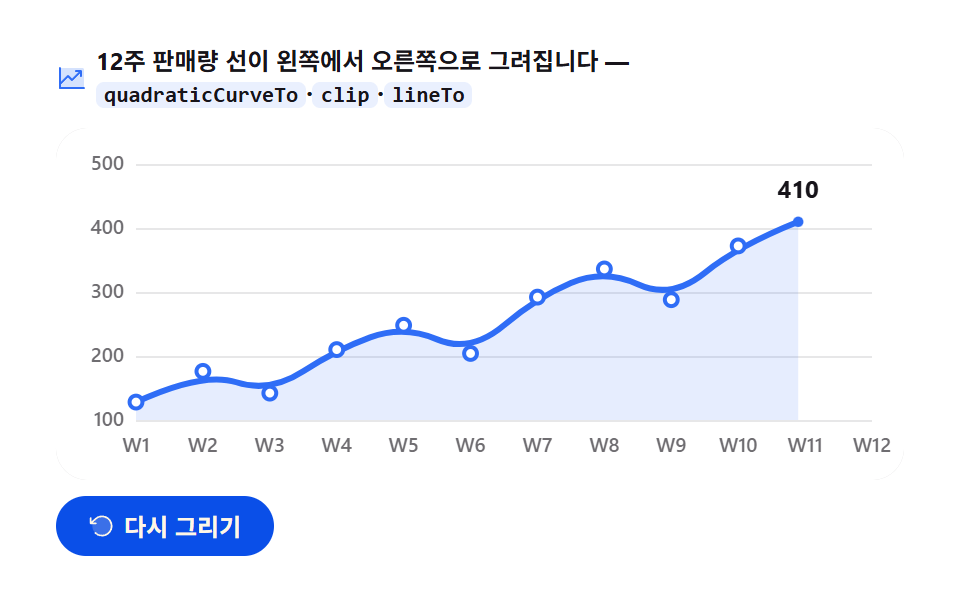 Dashboard UIJavaScript Chart Drawing, 9 Ways — No Library
 Dashboard UICSS Countdown Timer: 9 Clocks That Drain and Flip
 Dashboard UIWord Cloud JavaScript: 9 Scenes, Spiral to 3D
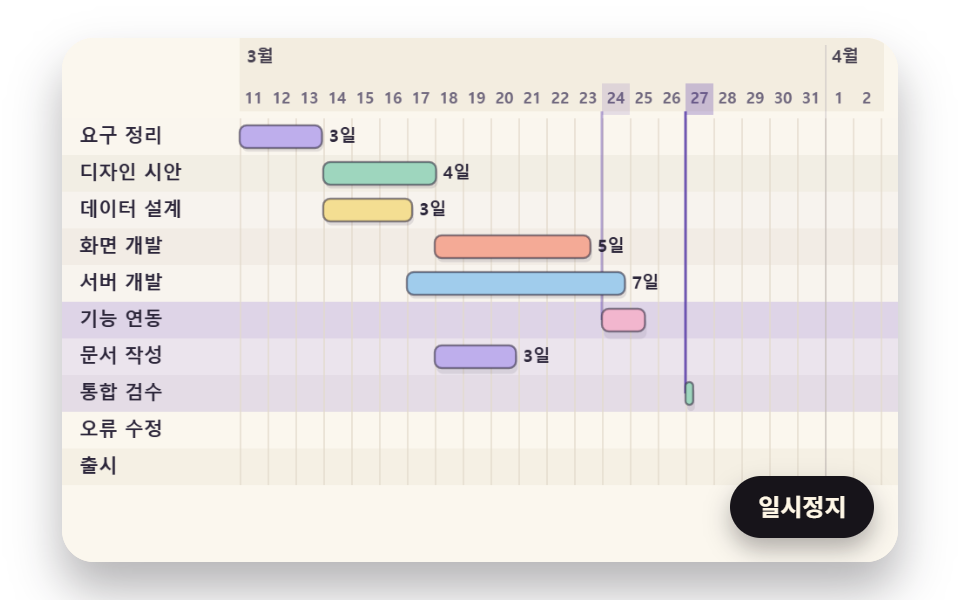 Dashboard UIGantt Chart JavaScript: 9 Self-Scheduling Views
 Dashboard UI9 Dashboard Components, Not the Whole Page
 Dashboard UI9 SVG Progress Ring Widgets, Math Included
 Dashboard UICommand Palette UI Design — 9 That Really Open
 Dashboard UIChart UI Design: 9 Interactions You Can Drag