Gantt Chart JavaScript: 9 Self-Scheduling Views
In Gantt chart JavaScript, when a design draft slips three days, moving one bar makes the schedule lie.
Drawing Bars Is the Easy Part — a Schedule That Re-Seats Downstream Tasks When One Date Slips
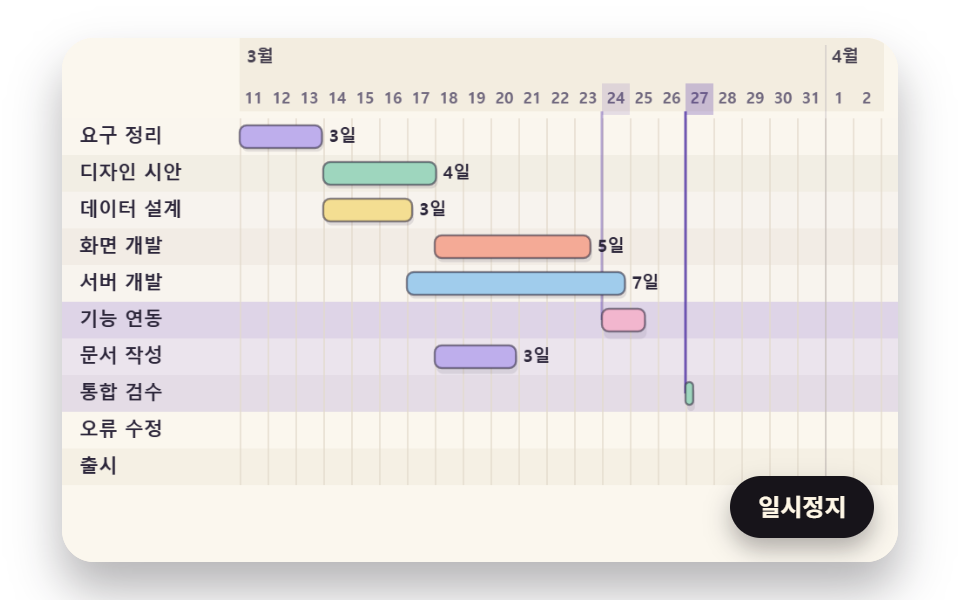 01 gantt-bar-date-scale-spring-grow
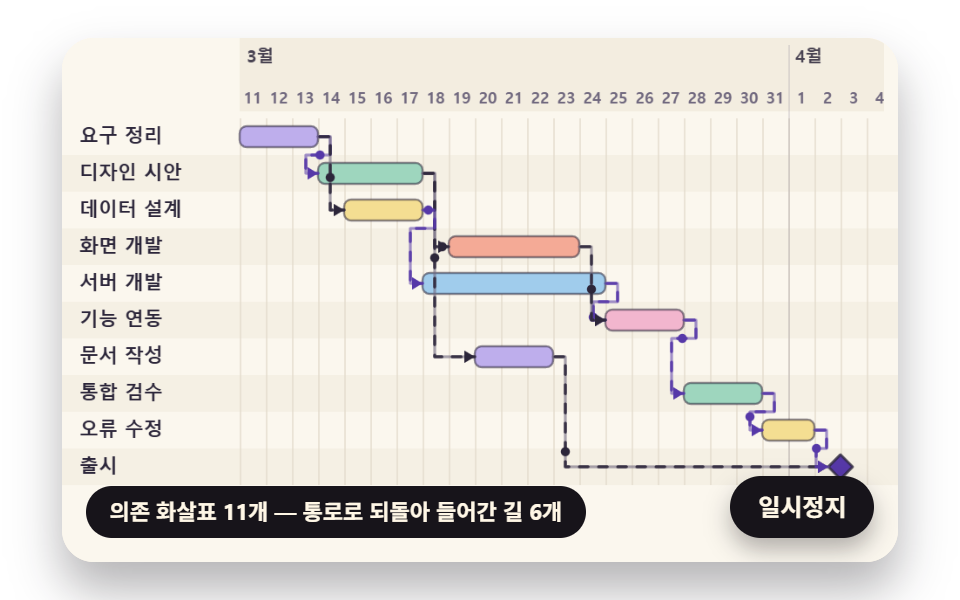 02 gantt-dependency-elbow-route-flow
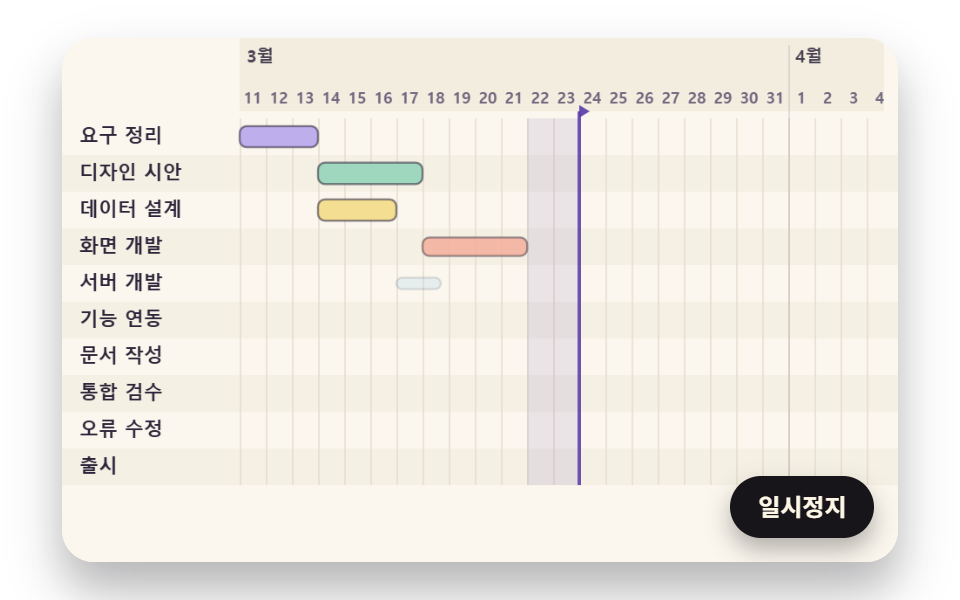 03 gantt-critical-path-slack-tail
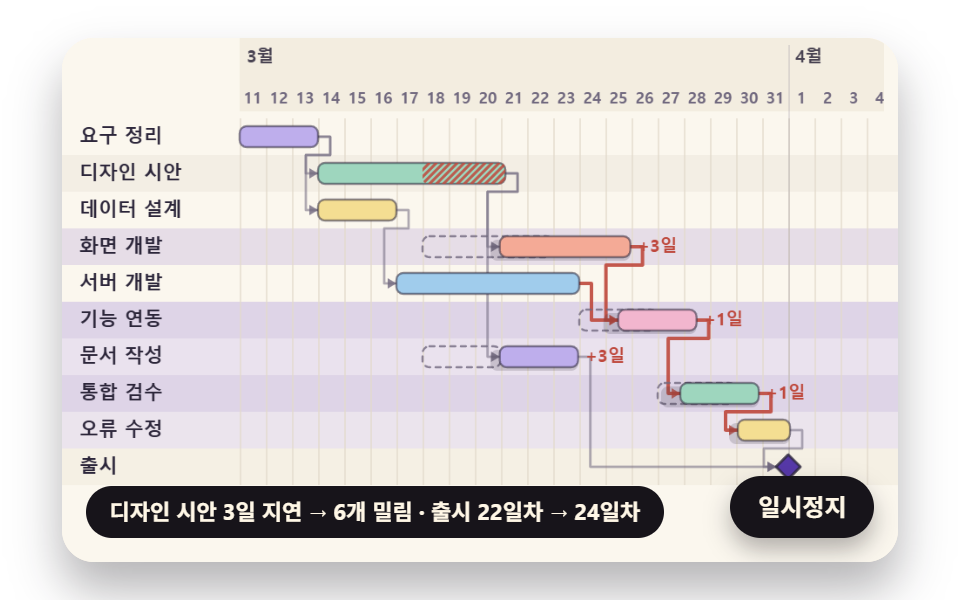 04 gantt-cascade-push-depth-spring
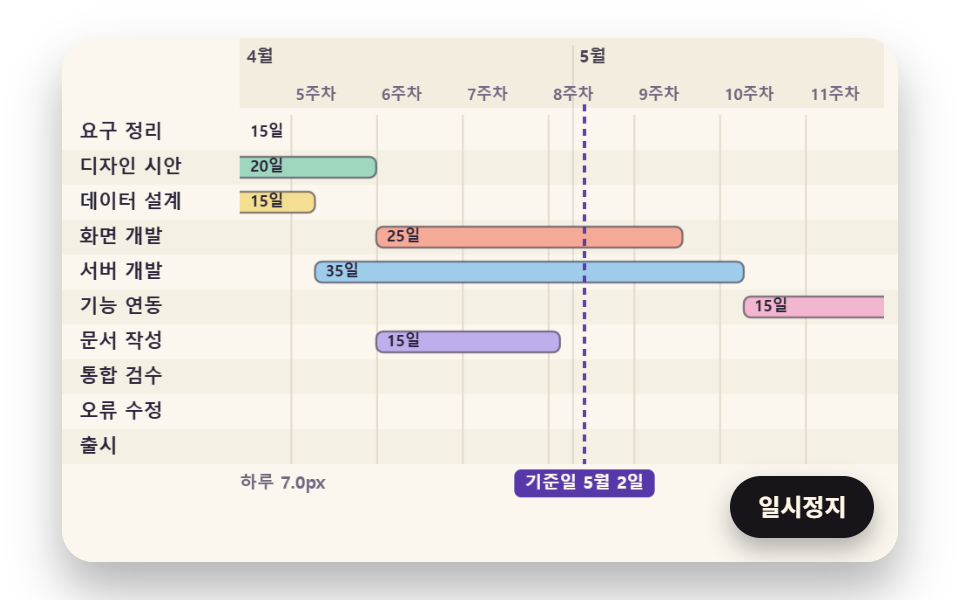 05 gantt-anchored-zoom-tick-crossfade
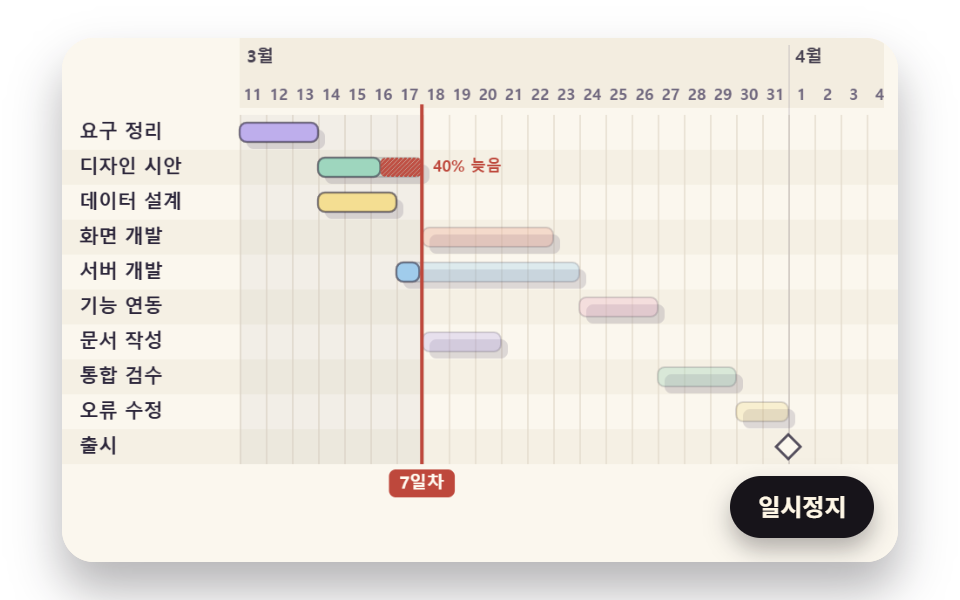 06 gantt-baseline-actual-today-lag
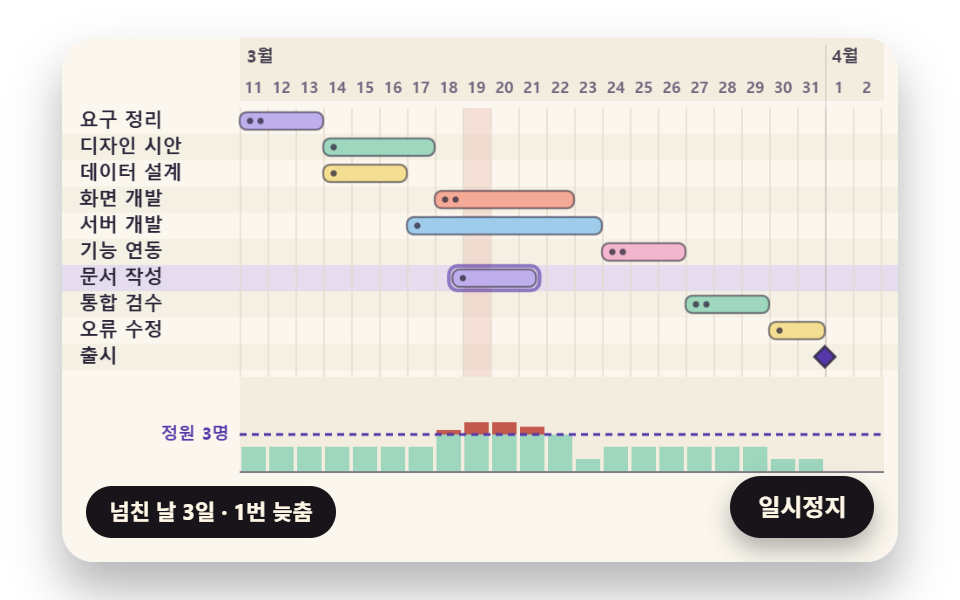 07 gantt-resource-load-level-reflow
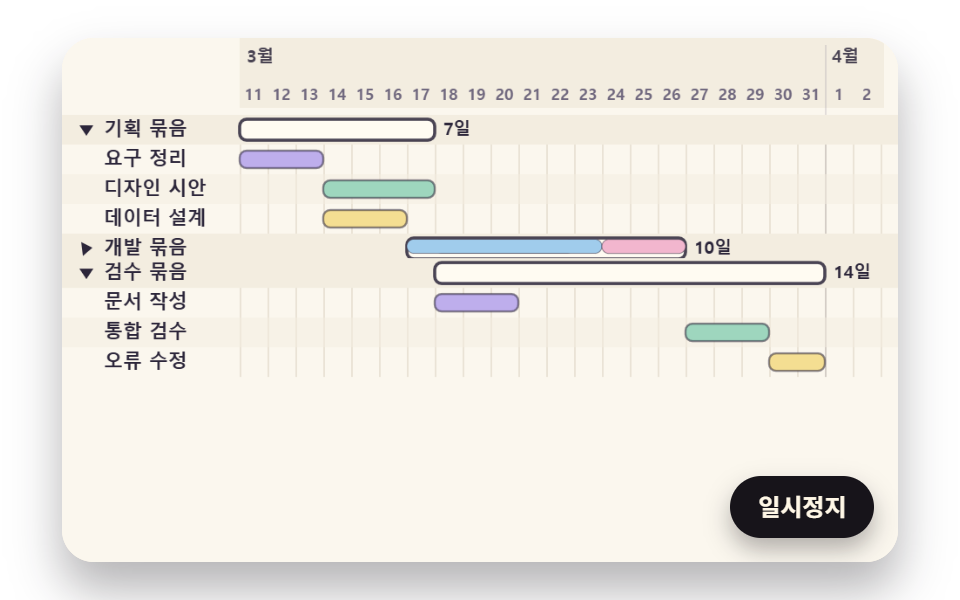 08 gantt-group-rollup-collapse-merge
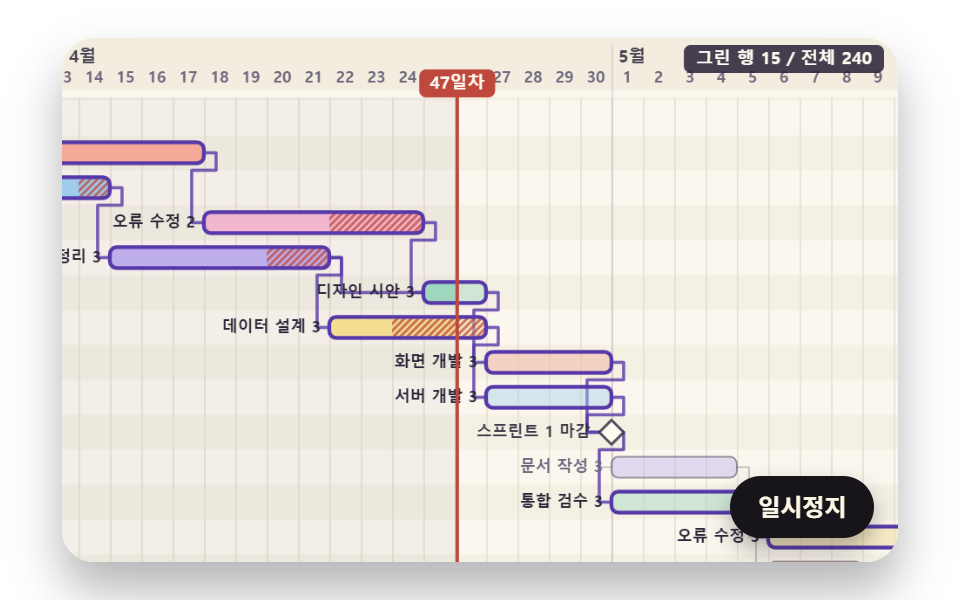 09 gantt-hero-sprint-camera-milestone
Auto-plays · click a tile to jump to its section · all nine in one zip
- 01 Spring Bars That Grow in Start-Date Order on a Date-to-Pixel Scale
- 02 Dependency Arrows That Turn at Right Angles from Each Task's End
- 03 The Longest Path, Lit by a Forward and Backward Sweep for Zero Slack
- 04 Later Tasks That Shift in Turn Along the Arrows When One Slips
- 05 A Timescale That Zooms Across Days, Weeks and Months Around a Fixed Date
- 06 Plan vs Actual Bars That a Moving Today Line Reveals as Behind
- 07 Workload Leveling That Trims Days Over the Daily Capacity
- 08 Collapsing Groups Where Subtasks Merge into One Summary Bar
- 09 A Sprint Hero Where the Camera Trails the Today Line to Each Milestone
A schedule chart lays each task on a date axis as a horizontal bar, its left edge at the start day and its length at the duration, then links the tasks with arrows so one picture shows who waits for whom. All nine scenes run the same project: ten tasks in BASE_TASKS, from Requirements through Design draft, Data design, UI build, Server build, Integration, Docs, QA review and Bug fixes to Launch. 05 multiplies every duration by 5 for a 105-day plan, 08 drops Launch and splits the other nine into three groups, and 09 swaps in 240 seeded tasks. Dates are plain integer day counts from day 0, and the month and day printed on screen, such as 3/11, come from a table of month lengths that calendarOf adds up, so the demo code holds no Date object anywhere.
The bars in the spring bar chart post grow to one value each, while a bar here takes two values from the date axis, a start and a length, and both get recalculated the moment a predecessor changes. Where the waterfall bridge in nine advanced chart types starts each bar at the height where the previous one ended, so the rises and falls add up in one line, the arrows in 02 carry a rule, that the next task cannot start before the previous one ends, and pick a route that respects it.
Weekly team reviews and launch planning
For a weekly team review, 01 and 06 pair well. 01 grows the bars in start order, so the first thing a viewer learns is what begins first, and 06 darkens hatching only on the tasks that have fallen behind plan once the today line passes them. In a meeting that sets the launch date, 03 does the talking: seven zero-slack tasks light up as one chain, which says "if any of these slips a day, launch slips a day" without a slide of text.
Staffing and change notices
A team with a fixed headcount reaches for 07 first. It stacks how many people each day ties up in a lower chart and, when a day goes over capacity, delays the task with the most slack one day at a time until the overflow is gone, with the finish date left where it was. On a page that shares a timeline with a client, 02 and 04 fit: an arrow answers "why does this task start next week", and a notice that the design is late can carry 04's scene of later tasks shifting step by step.
What Does a Simple Gantt Chart HTML Page Actually Have to Compute?
Every bar holds three numbers: the day it starts, how many days it takes, and how many days it can slip before the launch moves, which is its slack. People type the first two, but the third cannot be typed. Slack only comes out after following every task that hangs behind a bar all the way to the end, so changing one arrow can change the slack of a bar far down the chart.
Hand-placed coordinates go stale in a day
If you build a gantt chart html css mockup by writing each bar's left offset and width by hand, a one-day change to the design draft means retyping the coordinates of the six bars behind it. The nine scenes here store no coordinates. Each task carries four things, a name, a duration in days, the numbers of the tasks it waits for and a headcount, and the start day, slack and screen x are derived from those four on every pass.
Drawn on canvas, read from a hidden table
All nine scenes paint on a 2D canvas rather than building markup per bar. The likely reason is 09, where 240 bars move under a camera every frame, and one drawing routine can then serve every scene. A canvas is opaque to screen readers, so each scene also fills a hidden table with the same schedule in four columns: Task, Start, End and Slack.
Gantt Chart JavaScript: 9 Views — Spring Bars, Elbow Dependency Arrows, the Longest Path, Cascading Pushes, Anchored Zoom, Plan vs Actual, Workload Leveling, Collapsing Groups and a Sprint Hero
What a two-second capture of each scene recorded
Each scene was filmed at 480×300 for two seconds as 24 frames, and the figures compare every pair of neighboring frames, 23 comparisons per scene. 09, with 240 rows sliding under the camera, and 01, with ten bars growing at once, both changed more than half the frame, while 02 moves only a few thin lines, so it covered 2.3% yet changed in all 23 comparisons.
| Scene | Cumulative area | Frames that moved | Mean intensity |
|---|---|---|---|
| 01 Spring bars | 53.3% | 13/23 | 27.4 |
| 02 Right-angle dependency arrows | 2.3% | 23/23 | 61.6 |
| 03 Longest path and slack tails | 34.6% | 23/23 | 32.0 |
| 04 Cascading push | 40.3% | 11/23 | 36.1 |
| 05 Anchored zoom | 25.0% | 16/23 | 48.3 |
| 06 Plan vs actual | 14.0% | 23/23 | 93.2 |
| 07 Workload leveling | 10.8% | 11/23 | 39.8 |
| 08 Collapsing groups | 26.8% | 14/23 | 56.0 |
| 09 Sprint hero | 52.9% | 23/23 | 59.7 |
01, 04, 05, 07 and 08 moved in only 11 to 16 of the comparisons. Each of those five grows, shifts, zooms or folds once on its timetable and then holds still until the next change (5.6 s for 01, 4.8 s for 04, 4.6 s for 08), so the back half of the capture appears to be a still frame. 02 with its flowing dashes, 03 with its sweep line and glow band, and 06 and 09 with a moving today line changed in all 23.
01Spring Bars That Grow in Start-Date Order on a Date-to-Pixel Scale
dayX puts a bar's left edge at 102 + day × 16, so Requirements stands at 102 px with a 48 px width and Server build at 198 px with 112 px, and the bars launch in start-day order (upper row first on a tie), 70 ms apart, from 0.25 s to 0.88 s. Each width grows from 0 to 1 on a spring with stiffness 170 and damping 14 (damping ratio 0.537), overshoots its length by 13.0% and stays inside ±1% from 650 ms after launch, while the shadow lifts up to 4 px the faster a bar grows, so each bar seems to rise and then settle. Someone opening a project dashboard learns which work starts first from the order the bars extend, before reading a single date.
<main class="stage">
<div class="cf is-demo" id="cf">
  <canvas class="cf__canvas" data-role="canvas" width="480" height="300" role="img" aria-label="Ten task bars placed at day count times one day width, springing out in start-date order."></canvas>
  <table class="cf__sr" data-role="table"></table>
  <button class="cf__pause" data-role="pause" type="button" aria-pressed="false">Pause</button>
</div>
</main>
@use "../../../../site/static/demo-tokens" as *;
@include stage($stage-paper);
.cf {
position: relative;
width: min(92vw, calc(160vh - 12.8vw));
aspect-ratio: 480 / 300;
margin: 0 auto;
border-radius: $r-card;
overflow: hidden;
box-shadow: $shadow-raised;
background: $subject-cream;
}
.cf__canvas {
position: absolute;
inset: 0;
display: block;
width: 100%;
height: 100%;
}
.cf__pause {
position: absolute;
right: $sp-3;
bottom: $sp-3;
padding: $sp-1 $sp-3;
border: 2px solid $subject-ink;
border-radius: $r-pill;
background: $subject-ink;
color: $subject-cream;
font-family: inherit;
font-weight: 700;
font-size: 12px;
line-height: 1.6;
cursor: pointer;
box-shadow: $shadow-press;
transition: transform $dur-quick $ease-spring;
}
// 눌린 상태(멈춤) — 바탕과 글자색을 뒤집어 aria-pressed 가 눈에도 보이게
.cf__pause[aria-pressed="true"] {
background: $subject-cream;
color: $subject-ink;
}
.cf__pause:hover {
transform: translateY(-2px);
}
.cf__pause:active {
transform: translateY(1px);
}
.cf__pause:focus-visible {
outline: 3px solid $subject-ink;
outline-offset: 3px;
}
// 상태 줄 — 지금 일정에 무슨 일이 일어났는지 글자로. 시연 중에는 aria-live off, 사람이 처음 손대면 polite
.cf__status {
position: absolute;
left: $sp-3;
bottom: $sp-3;
max-width: calc(100% - 120px);
margin: 0;
padding: $sp-1 $sp-3;
border-radius: $r-pill;
background: $subject-ink;
color: $subject-cream;
font-weight: 700;
font-size: 11px;
line-height: 1.6;
white-space: nowrap;
overflow: hidden;
text-overflow: ellipsis;
pointer-events: none;
}
// 숨김 표 — 화면에서는 1px 로 접어 두고 화면 읽기 도구만 읽는다
.cf__sr {
position: absolute;
width: 1px;
height: 1px;
margin: -1px;
padding: 0;
overflow: hidden;
clip: rect(0 0 0 0);
clip-path: inset(50%);
white-space: nowrap;
border: 0;
}
@media (max-width: 340px) {
.cf__pause,
.cf__status { font-size: 10px; padding: $sp-1 $sp-2; }
}
// 동작 줄이기 — 장면은 스크립트가 최종 배치 한 장으로 멈춘다. 버튼도 떠오르지 않게
@media (prefers-reduced-motion: reduce) {
.cf__pause { transition: none !important; }
.cf__pause:hover,
.cf__pause:active { transform: none !important; }
}html, body {
margin: 0;
overflow: hidden;
}
.stage {
box-sizing: border-box;
min-height: 100vh;
display: grid;
place-items: center;
margin: 0;
background: #ffffff;
font-family: -apple-system, "Segoe UI", "Noto Sans KR", sans-serif;
padding: clamp(8px, 4vw, 24px);
}
.cf {
position: relative;
width: min(92vw, 160vh - 12.8vw);
aspect-ratio: 480/300;
margin: 0 auto;
border-radius: 16px;
overflow: hidden;
box-shadow: 0 14px 24px rgba(23, 20, 26, 0.32);
background: #fff7e6;
}
.cf__canvas {
position: absolute;
inset: 0;
display: block;
width: 100%;
height: 100%;
}
.cf__pause {
position: absolute;
right: 12px;
bottom: 12px;
padding: 4px 12px;
border: 2px solid #17141a;
border-radius: 999px;
background: #17141a;
color: #fff7e6;
font-family: inherit;
font-weight: 700;
font-size: 12px;
line-height: 1.6;
cursor: pointer;
box-shadow: 0 6px 12px rgba(23, 20, 26, 0.32);
transition: transform 220ms cubic-bezier(0.2, 0.8, 0.2, 1);
}
.cf__pause[aria-pressed=true] {
background: #fff7e6;
color: #17141a;
}
.cf__pause:hover {
transform: translateY(-2px);
}
.cf__pause:active {
transform: translateY(1px);
}
.cf__pause:focus-visible {
outline: 3px solid #17141a;
outline-offset: 3px;
}
.cf__status {
position: absolute;
left: 12px;
bottom: 12px;
max-width: calc(100% - 120px);
margin: 0;
padding: 4px 12px;
border-radius: 999px;
background: #17141a;
color: #fff7e6;
font-weight: 700;
font-size: 11px;
line-height: 1.6;
white-space: nowrap;
overflow: hidden;
text-overflow: ellipsis;
pointer-events: none;
}
.cf__sr {
position: absolute;
width: 1px;
height: 1px;
margin: -1px;
padding: 0;
overflow: hidden;
clip: rect(0 0 0 0);
clip-path: inset(50%);
white-space: nowrap;
border: 0;
}
@media (max-width: 340px) {
.cf__pause,
.cf__status {
font-size: 10px;
padding: 4px 8px;
}
}
@media (prefers-reduced-motion: reduce) {
.cf__pause {
transition: none !important;
}
.cf__pause:hover,
.cf__pause:active {
transform: none !important;
}
}(function () {
const root = document.getElementById("cf");
if (!root) return;
// 판 좌표 — 캔버스 안은 늘 480×300. 화면에 보이는 크기와 상관없이 계산은 이 좌표로 한다
const W = 480;
const H = 300;
const TAU = Math.PI * 2;
function clamp(v, lo, hi) { return v < lo ? lo : (v > hi ? hi : v); }
function lerp(a, b, k) { return a + (b - a) * k; }
function smooth(x) { const c = clamp(x, 0, 1); return c * c * (3 - 2 * c); }
// 따라가기 비율 — 1 − e^(−rate·dt). 프레임 시간이 달라도 1초에 같은 만큼 다가간다
function follow(rate, dt) { return 1 - Math.exp(-rate * dt); }
// 시드 고정 난수 — 같은 시드면 같은 일정이 다시 나온다 (32비트 정수 섞기)
function makeRng(seed) {
let s = seed >>> 0;
return function () {
s = (s + 0x6d2b79f5) >>> 0;
let t = s;
t = Math.imul(t ^ (t >>> 15), t | 1);
t ^= t + Math.imul(t ^ (t >>> 7), t | 61);
return ((t ^ (t >>> 14)) >>> 0) / 4294967296;
};
}
function makeSpring(x) { return { x: x, v: 0, to: x }; }
const SPRING_SUBSTEP = 1 / 240;
function stepSpring(s, stiffness, damping, dt) {
let left = dt;
while (left > 1e-9) {
const h = Math.min(SPRING_SUBSTEP, left);
s.v += (stiffness * (s.to - s.x) - damping * s.v) * h;
s.x += s.v * h;
left -= h;
}
}
function snapSpring(s, x) { s.x = x; s.v = 0; s.to = x; }
// ── 날짜 = 정수 일수 ─────────────────────────────────────────
// 날짜 객체를 쓰지 않는다. 기준일을 0 으로 세는 정수 일수(day index)만 다루고, 화면의 월·일 숫자는 아래 월 길이 표로 산수해 만든다
const MONTH_DAYS = [31, 28, 31, 30, 31, 30, 31, 31, 30, 31, 30, 31];
const YEAR_DAYS = 365;
// 기준일(일수 0) = 한 해의 70번째 날 → 표로 세면 3월 11일
const DAY_ZERO_OF_YEAR = 69;
function calendarOf(day) {
let r = ((day + DAY_ZERO_OF_YEAR) % YEAR_DAYS + YEAR_DAYS) % YEAR_DAYS;
let m = 0;
while (r >= MONTH_DAYS[m]) {
r -= MONTH_DAYS[m];
m += 1;
}
return [m + 1, r + 1];
}
const DAY_FMT = 'Day {n}';
const WEEK_FMT = 'Week {n}';
const MONTH_FMT = 'Month {n}';
const SLACK_FMT = '{n}d';
function dayText(day) { return DAY_FMT.replace('{n}', String(day + 1)); }
// 하루 차 계산의 함정 — 시각(시간 단위)끼리 빼서 24 로 나누면, 시계가 한 시간 당겨진 날이 끼었을 때 정수가 아니다(23시간짜리 하루).
// 그래서 바깥에서 들어온 시각은 반올림으로 정수 일수에 붙이고, 그다음부터는 정수끼리만 더하고 뺀다
const HOURS_PER_DAY = 24;
const CLOCK_SHIFT_HOURS = 1;
function hoursToDayIndex(hours) { return Math.round(hours / HOURS_PER_DAY); }
const BASE_TASKS = [
{ name: 'Requirements', dur: 3, deps: [], load: 2 },
{ name: 'Design draft', dur: 4, deps: [0], load: 1 },
{ name: 'Data design', dur: 3, deps: [0], load: 1 },
{ name: 'UI build', dur: 5, deps: [1], load: 2 },
{ name: 'Server build', dur: 7, deps: [2], load: 1 },
{ name: 'Integration', dur: 3, deps: [3, 4], load: 2 },
{ name: 'Docs', dur: 3, deps: [1], load: 1 },
{ name: 'QA review', dur: 3, deps: [5], load: 2 },
{ name: 'Bug fixes', dur: 2, deps: [7], load: 1 },
{ name: 'Launch', dur: 0, deps: [8, 6], load: 0 }
];
function copyTasks(ts) { return ts.map(function (t) { return { name: t.name, dur: t.dur, deps: t.deps.slice(), load: t.load }; }); }
function successorsOf(tasks) {
const out = tasks.map(function () { return []; });
tasks.forEach(function (t, i) { t.deps.forEach(function (p) { out[p].push(i); }); });
return out;
}
function sortByDeps(tasks) {
const succ = successorsOf(tasks);
const waiting = tasks.map(function (t) { return t.deps.length; });
const ready = [];
waiting.forEach(function (w, i) { if (w === 0) {
ready.push(i);
} });
const order = [];
while (ready.length) {
ready.sort(function (a, b) { return a - b; });
const i = ready.shift();
order.push(i);
succ[i].forEach(function (j) { waiting[j] -= 1; if (waiting[j] === 0) {
ready.push(j);
} });
}
const stuck = [];
waiting.forEach(function (w, i) { if (w > 0) {
stuck.push(i);
} });
return { order: order, stuck: stuck };
}
function sweepBoth(tasks, order, minStart) {
const n = tasks.length;
const es = new Array(n).fill(0);
const ef = new Array(n).fill(0);
for (const i of order) {
let s = minStart ? minStart[i] : 0;
for (const p of tasks[i].deps) {
s = Math.max(s, ef[p]);
}
es[i] = s;
ef[i] = s + tasks[i].dur;
}
let end = 0;
for (const i of order) {
end = Math.max(end, ef[i]);
}
const succ = successorsOf(tasks);
const ls = new Array(n).fill(0);
const lf = new Array(n).fill(0);
for (let k = order.length - 1; k >= 0; k -= 1) {
const i = order[k];
let f = end;
for (const j of succ[i]) {
f = Math.min(f, ls[j]);
}
lf[i] = f;
ls[i] = f - tasks[i].dur;
}
const slack = es.map(function (s, i) { return ls[i] - s; });
return { es: es, ef: ef, ls: ls, lf: lf, slack: slack, end: end };
}
function pushFrom(tasks, starts, from) {
const succ = successorsOf(tasks);
const out = starts.slice();
const depth = tasks.map(function () { return -1; });
depth[from] = 0;
const queue = [from];
let head = 0;
// 고리가 있어도 끝나도록 꺼내는 횟수에 상한을 둔다
const limit = tasks.length * tasks.length + 1;
while (head < queue.length && head < limit) {
const i = queue[head];
head += 1;
for (const j of succ[i]) {
let need = 0;
for (const p of tasks[j].deps) {
need = Math.max(need, out[p] + tasks[p].dur);
}
if (need > out[j]) {
out[j] = need;
depth[j] = Math.max(depth[j], depth[i] + 1);
queue.push(j);
}
}
}
return { starts: out, depth: depth };
}
// 날마다 걸린 일감 — 작업이 덮는 날(시작 ≤ 날 < 시작 + 일수)마다 사람 수를 더한다
function dailyLoad(tasks, starts, days) {
const load = new Array(days).fill(0);
tasks.forEach(function (t, i) {
for (let d = starts[i]; d < starts[i] + t.dur; d += 1) {
if (d >= 0 && d < days) {
load[d] += t.load;
}
}
});
return load;
}
// ── 직각 경로 ───────────────────────────────────────────────
// 앞 끝(ex, ey)에서 오른쪽으로 ROUTE_STUB 나간 뒤 아래로 꺾는다. 뒤 시작(sx)이 그 꺾인 자리 + ROUTE_STUB 보다 오른쪽이면 곧장 내려가 오른쪽으로 들어가고,
// 아니면 앞 행 바로 아래 통로(gapY)까지 내려가 왼쪽으로 돌아간 다음 뒤 시작보다 ROUTE_STUB 앞에서 내려가 오른쪽으로 들어간다
const ROUTE_STUB = 7;
function elbowRoute(ex, ey, sx, sy, gapY) {
const x1 = ex + ROUTE_STUB;
if (sx - ROUTE_STUB >= x1) {
return [ex, ey, x1, ey, x1, sy, sx, sy];
}
const x2 = sx - ROUTE_STUB;
return [ex, ey, x1, ey, x1, gapY, x2, gapY, x2, sy, sx, sy];
}
function routeLength(pts) {
let s = 0;
for (let i = 2; i < pts.length; i += 2) {
s += Math.hypot(pts[i] - pts[i - 2], pts[i + 1] - pts[i - 1]);
}
return s;
}
// 경로 위 거리 dist 자리의 점과 그 마디의 방향
function pointOnRoute(pts, dist) {
let left = Math.max(0, dist);
for (let i = 2; i < pts.length; i += 2) {
const dx = pts[i] - pts[i - 2];
const dy = pts[i + 1] - pts[i - 1];
const len = Math.hypot(dx, dy);
if (left <= len || i === pts.length - 2) {
const k = len > 0 ? Math.min(1, left / len) : 0;
return [pts[i - 2] + dx * k, pts[i - 1] + dy * k, len > 0 ? dx / len : 1, len > 0 ? dy / len : 0];
}
left -= len;
}
return [pts[0], pts[1], 1, 0];
}
// 경로를 앞에서부터 dist 만큼만 자른 점 목록 — 화살표가 그려져 나가는 장면에 쓴다
function cutRoute(pts, dist) {
const out = [pts[0], pts[1]];
let left = Math.max(0, dist);
for (let i = 2; i < pts.length; i += 2) {
const len = Math.hypot(pts[i] - pts[i - 2], pts[i + 1] - pts[i - 1]);
if (left >= len) {
out.push(pts[i], pts[i + 1]);
left -= len;
continue;
}
const k = len > 0 ? left / len : 0;
out.push(lerp(pts[i - 2], pts[i], k), lerp(pts[i - 1], pts[i + 1], k));
break;
}
return out;
}
// 장면 시계(초)와 상태 줄 글자 — 장면 계산이 고치고, 화면 쪽이 읽어 그린다
let sceneT = 0;
let simStatus = '';
// 파스텔 팔레트 — 크림 바탕 위 라벤더·민트·버터·산호 막대. 가장 긴 경로·오늘 선·글자는 진한 쪽으로 명도 차를 둔다
const PAPER = [251, 247, 238];
const PAPER_DIM = [243, 237, 224];
const GRID = [226, 218, 204];
const INK = [44, 38, 58];
const INK_SOFT = [112, 104, 126];
const CREAM = [255, 251, 242];
const LAVENDER = [190, 174, 236];
const MINT = [158, 214, 190];
const BUTTER = [244, 222, 146];
const CORAL = [244, 170, 150];
const SKY = [160, 204, 236];
const PINK = [242, 182, 206];
const PATH_DEEP = [86, 56, 168];
const TODAY_DEEP = [190, 72, 60];
const BAR_COLORS = [LAVENDER, MINT, BUTTER, CORAL, SKY, PINK];
function rgba(c, a) {
return 'rgba(' + Math.round(clamp(c[0], 0, 255)) + ',' + Math.round(clamp(c[1], 0, 255)) + ',' + Math.round(clamp(c[2], 0, 255)) + ',' + clamp(a, 0, 1).toFixed(3) + ')';
}
function mix(a, b, k) { return [lerp(a[0], b[0], k), lerp(a[1], b[1], k), lerp(a[2], b[2], k)]; }
// 표 한 줄 — 작업·시작·끝·여유. 끝은 그 작업이 덮는 마지막 날(일수 0 짜리는 시작과 같은 날)
function tableRow(name, start, dur, slack) {
return [name, dayText(start), dayText(start + Math.max(0, dur - 1)), SLACK_FMT.replace('{n}', String(slack))];
}
const canvasEl = root.querySelector('[data-role="canvas"]');
const pauseEl = root.querySelector('[data-role="pause"]');
const tableEl = root.querySelector('[data-role="table"]');
const statusEl = root.querySelector('[data-role="status"]');
const ctxRaw = canvasEl ? canvasEl.getContext('2d') : null;
if (!canvasEl || !ctxRaw || !pauseEl) {
return;
}
const cv = canvasEl;
const ctx = ctxRaw;
const pauseBtn = pauseEl;
const FONT_STACK = 'system-ui, -apple-system, "Segoe UI", "Noto Sans KR", sans-serif';
function fitCanvas() {
// 배율은 2 에서 자른다 — 배율 3 기기에서 화소가 2.25배로 늘어 프레임마다 일이 그만큼 커지지 않게
const dpr = Math.min(window.devicePixelRatio || 1, 2);
cv.width = Math.round(W * dpr);
cv.height = Math.round(H * dpr);
ctx.setTransform(dpr, 0, 0, dpr, 0, 0);
}
function clearStage() {
ctx.fillStyle = rgba(PAPER, 1);
ctx.fillRect(0, 0, W, H);
}
function label(s, x, y, c, a, px, weight, align) {
ctx.font = weight + ' ' + px + 'px ' + FONT_STACK;
ctx.textAlign = align;
ctx.textBaseline = 'middle';
ctx.fillStyle = rgba(c, a);
ctx.fillText(s, x, y);
}
function roundRectPath(x, y, w, h, r) {
const rr = Math.max(0, Math.min(r, w / 2, h / 2));
ctx.beginPath();
ctx.moveTo(x + rr, y);
ctx.lineTo(x + w - rr, y);
ctx.arcTo(x + w, y, x + w, y + rr, rr);
ctx.lineTo(x + w, y + h - rr);
ctx.arcTo(x + w, y + h, x + w - rr, y + h, rr);
ctx.lineTo(x + rr, y + h);
ctx.arcTo(x, y + h, x, y + h - rr, rr);
ctx.lineTo(x, y + rr);
ctx.arcTo(x, y, x + rr, y, rr);
ctx.closePath();
}
// 막대 하나 — 둥근 사각형 채움 + 진한 테두리. 폭이 0 이하이면 그리지 않는다
function bar(x, y, w, h, fill, a, line) {
if (w <= 0.2 || a <= 0) {
return;
}
roundRectPath(x, y, w, h, 4);
ctx.fillStyle = rgba(fill, a);
ctx.fill();
if (line > 0) {
ctx.lineWidth = line;
ctx.strokeStyle = rgba(INK, 0.55 * a);
ctx.stroke();
}
}
// 마일스톤 마름모
function diamond(cx, cy, r, fill, a) {
if (r <= 0.2 || a <= 0) {
return;
}
ctx.beginPath();
ctx.moveTo(cx, cy - r);
ctx.lineTo(cx + r, cy);
ctx.lineTo(cx, cy + r);
ctx.lineTo(cx - r, cy);
ctx.closePath();
ctx.fillStyle = rgba(fill, a);
ctx.fill();
ctx.lineWidth = 1.5;
ctx.strokeStyle = rgba(INK, 0.8 * a);
ctx.stroke();
}
function polyline(pts, c, a, width) {
if (pts.length < 4) {
return;
}
ctx.beginPath();
ctx.moveTo(pts[0], pts[1]);
for (let i = 2; i < pts.length; i += 2) {
ctx.lineTo(pts[i], pts[i + 1]);
}
ctx.lineWidth = width;
ctx.lineJoin = 'round';
ctx.lineCap = 'round';
ctx.strokeStyle = rgba(c, a);
ctx.stroke();
}
function arrowHead(x, y, dx, dy, size, c, a) {
ctx.beginPath();
ctx.moveTo(x, y);
ctx.lineTo(x - dx * size - dy * size * 0.6, y - dy * size + dx * size * 0.6);
ctx.lineTo(x - dx * size + dy * size * 0.6, y - dy * size - dx * size * 0.6);
ctx.closePath();
ctx.fillStyle = rgba(c, a);
ctx.fill();
}
// 빗금 — (x, y, w, h) 안에 45° 줄을 spacing 간격으로. 간격이 좁을수록 짙어 보인다
function hatch(x, y, w, h, spacing, c, a) {
if (w <= 0.5 || a <= 0) {
return;
}
ctx.save();
roundRectPath(x, y, w, h, 3);
ctx.clip();
ctx.beginPath();
for (let s = x - h; s < x + w; s += Math.max(2, spacing)) {
ctx.moveTo(s, y + h);
ctx.lineTo(s + h, y);
}
ctx.lineWidth = 1.6;
ctx.strokeStyle = rgba(c, a);
ctx.stroke();
ctx.restore();
}
// 시간 축 — 위 띠는 월 이름, 아래 띠는 일(월 안의 날 숫자)·주(주차) 층. 층마다 불투명도를 따로 받아 겹쳐 흐려지며 바뀌게 한다.
// 세로 격자도 같은 불투명도로 행 영역(top~bottom)에 긋는다. xOf 는 일수 → 화면 x
function timeAxis(xOf, dayW, d0, d1, left, right, top, bottom, ly) {
ctx.save();
ctx.beginPath();
ctx.rect(left, 0, right - left, H);
ctx.clip();
ctx.fillStyle = rgba(PAPER_DIM, 1);
ctx.fillRect(left, 0, right - left, top - 4);
for (let d = Math.floor(d0); d <= Math.ceil(d1); d += 1) {
const x = xOf(d);
const cal = calendarOf(d);
if (ly.day > 0.01) {
ctx.fillStyle = rgba(GRID, 0.7 * ly.day);
ctx.fillRect(x, top, 1, bottom - top);
if (dayW >= 13) {
label(String(cal[1]), x + dayW / 2, top - 11, INK_SOFT, ly.day, 9, 600, 'center');
}
}
// 주 층 — 글자가 겹치지 않을 만큼(36px) 주를 건너뛰며 적는다
const weekStep = 7 * dayW >= 36 ? 1 : (14 * dayW >= 36 ? 2 : 4);
if (ly.week > 0.01 && d % 7 === 0) {
ctx.fillStyle = rgba(GRID, ly.week);
ctx.fillRect(x, top, 1, bottom - top);
if ((d / 7) % weekStep === 0) {
label(WEEK_FMT.replace('{n}', String(d / 7 + 1)), x + 3, top - 11, INK_SOFT, ly.week, 9, 600, 'left');
}
}
if (cal[1] === 1) {
ctx.fillStyle = rgba(INK_SOFT, 0.18 + 0.4 * ly.month);
ctx.fillRect(x, 4, 1, bottom - 4);
label(MONTH_FMT.replace('{n}', String(cal[0])), x + 4, 11, INK, 0.85, 10, 700, 'left');
// 월 층 — 그달 칸 가운데에 그달 일수(월 길이 표에서)를 적는다
const len = MONTH_DAYS[cal[0] - 1];
if (ly.month > 0.01 && len * dayW >= 30) {
label(SLACK_FMT.replace('{n}', String(len)), x + len * dayW / 2, top - 11, INK_SOFT, ly.month, 9, 700, 'center');
}
}
else if (d === Math.floor(d0)) {
// 왼쪽 끝 월 이름 — 바로 오른쪽에 새 달이 시작하면 겹치므로 적지 않는다
const toNext = MONTH_DAYS[cal[0] - 1] - cal[1] + 1;
if (toNext * dayW >= 44) {
label(MONTH_FMT.replace('{n}', String(cal[0])), Math.max(x, left) + 4, 11, INK, 0.85, 10, 700, 'left');
}
}
}
ctx.restore();
}
// 왼쪽 Task 칸
function rowLabel(name, y, a, bold) {
label(name, 10, y, INK, a, 11, bold ? 800 : 600, 'left');
}
function rowStripe(y, h, i, a) {
if (i % 2 === 1) {
ctx.fillStyle = rgba(PAPER_DIM, 0.75 * a);
ctx.fillRect(0, y, W, h);
}
}
// 움직이는 행 빛 — 그 행 막대의 스프링 속도(k = 0~1)만큼 행 전체가 옅은 라벤더로 밝아진다. 막대가 서면 사라진다
function rowGlow(y, h, k) {
if (k <= 0.01) {
return;
}
ctx.fillStyle = rgba(LAVENDER, 0.42 * clamp(k, 0, 1));
ctx.fillRect(0, y, W, h);
}
// 상태 줄 — 바뀔 때만 글자를 고친다
let shownStatus = '';
function pushStatus() {
if (!statusEl || simStatus === shownStatus) {
return;
}
shownStatus = simStatus;
statusEl.textContent = simStatus;
}
// 숨김 표 — 같은 일정을 작업·시작·끝·여유 열로 읽게. 화면에는 안 보이고 화면 읽기 도구가 읽는다
const TABLE_HEAD = ['Task', 'Start', 'End', 'Slack'];
function fillTable(caption, rows) {
if (!tableEl) {
return;
}
const tb = tableEl;
while (tb.firstChild) {
tb.removeChild(tb.firstChild);
}
const cap = document.createElement('caption');
cap.textContent = caption;
tb.appendChild(cap);
const thead = document.createElement('thead');
const hr = document.createElement('tr');
TABLE_HEAD.forEach(function (h) {
const th = document.createElement('th');
th.scope = 'col';
th.textContent = h;
hr.appendChild(th);
});
thead.appendChild(hr);
tb.appendChild(thead);
const body = document.createElement('tbody');
rows.forEach(function (r) {
const tr = document.createElement('tr');
r.forEach(function (c, k) {
const cell = document.createElement(k === 0 ? 'th' : 'td');
if (k === 0) {
cell.scope = 'row';
}
cell.textContent = c;
tr.appendChild(cell);
});
body.appendChild(tr);
});
tb.appendChild(body);
}
// 01 — 날짜를 픽셀로: x = 막대 칸 왼쪽 + 일수 × 하루 폭. 막대 길이 = 일수 × 하루 폭
const LABEL_W = 96;
const PLOT_X = LABEL_W + 6;
const DAY_WIDTH = 16;
const ROWS_TOP = 46;
const ROW_H = 21;
const BAR_H = 13;
// 폭 성장 스프링 — 0(없음) → 1(제 길이). 감쇠비 = BAR_DAMPING / (2√BAR_STIFFNESS)
const BAR_STIFFNESS = 170;
const BAR_DAMPING = 14;
// 시작일이 이른 순서로 한 막대씩 BAR_STAGGER_MS 늦게 출발
const BAR_STAGGER_MS = 70;
const GROW_START_S = 0.25;
const SHRINK_AT_S = 5.6;
const LOOP_S = 7;
const TABLE_CAPTION = 'Task schedule, grown in start-date order';
const tasks01 = BASE_TASKS;
const plan01 = sweepBoth(tasks01, sortByDeps(tasks01).order, null);
function dayX(d) { return PLOT_X + d * DAY_WIDTH; }
// Start 순위 — 같은 날이면 위 행 먼저
const rank01 = (function () {
const idx = tasks01.map(function (_, i) { return i; });
idx.sort(function (a, b) { return plan01.es[a] - plan01.es[b] || a - b; });
const r = new Array(tasks01.length).fill(0);
idx.forEach(function (i, k) { r[i] = k; });
return r;
})();
const grow01 = tasks01.map(function () { return makeSpring(0); });
function growAt(i) { return GROW_START_S + rank01[i] * BAR_STAGGER_MS / 1000; }
function reset() { grow01.forEach(function (s) { snapSpring(s, 0); }); }
function update(dt) {
grow01.forEach(function (s, i) {
s.to = sceneT >= growAt(i) && sceneT < SHRINK_AT_S ? 1 : 0;
stepSpring(s, BAR_STIFFNESS, BAR_DAMPING, dt);
});
}
function restPose() { grow01.forEach(function (s) { snapSpring(s, 1); }); }
function tableRows() {
return tasks01.map(function (t, i) { return tableRow(t.name, plan01.es[i], t.dur, plan01.slack[i]); });
}
function draw() {
clearStage();
const bottom = ROWS_TOP + tasks01.length * ROW_H;
tasks01.forEach(function (_, i) {
rowStripe(ROWS_TOP + i * ROW_H, ROW_H, i, 1);
rowGlow(ROWS_TOP + i * ROW_H, ROW_H, Math.abs(grow01[i].v) / 6);
});
timeAxis(dayX, DAY_WIDTH, 0, 23, PLOT_X, W - 8, ROWS_TOP, bottom, { day: 1, week: 0, month: 0 });
// 날짜 → 픽셀 안내 — 막대가 출발하는 순간 그 Start 칸(위 눈금)에서 막대 시작 x 로 세로선이 내려오고, 막대가 자라는 만큼 흐려진다
tasks01.forEach(function (_, i) {
if (sceneT < growAt(i) || sceneT >= SHRINK_AT_S) {
return;
}
const a = 1 - smooth(clamp(grow01[i].x, 0, 1));
if (a <= 0.01) {
return;
}
const x = dayX(plan01.es[i]);
ctx.fillStyle = rgba(PATH_DEEP, 0.28 * a);
ctx.fillRect(x, ROWS_TOP - 20, DAY_WIDTH, 18);
ctx.fillStyle = rgba(PATH_DEEP, 0.85 * a);
ctx.fillRect(x - 0.75, ROWS_TOP - 4, 1.5, i * ROW_H + ROW_H / 2 + 4);
});
tasks01.forEach(function (t, i) {
const y = ROWS_TOP + i * ROW_H;
const cy = y + ROW_H / 2;
rowLabel(t.name, cy, 1, false);
const g = grow01[i];
const k = Math.max(0, g.x);
const x0 = dayX(plan01.es[i]);
if (t.dur === 0) {
diamond(dayX(plan01.es[i]), cy, 7 * k, PATH_DEEP, Math.min(1, k * 1.5));
return;
}
const w = t.dur * DAY_WIDTH * k;
// 그림자 — 막대가 빨리 자랄수록(속도 클수록) 더 떠올라 그림자가 아래로 멀어지고 옅어진다
const lift = clamp(Math.abs(g.v) * 0.35, 0, 4);
bar(x0 + 1, y + (ROW_H - BAR_H) / 2 + 2 + lift, w, BAR_H, INK, 0.12 - lift * 0.015, 0);
bar(x0, y + (ROW_H - BAR_H) / 2, w, BAR_H, BAR_COLORS[i % BAR_COLORS.length], 1, 1.2);
// 길이 표시 — 제 길이에 거의 닿았을 때 나타난다
const a = smooth((k - 0.7) / 0.3);
if (a > 0) {
label(SLACK_FMT.replace('{n}', String(t.dur)), x0 + w + 4, cy, INK, a, 10, 700, 'left');
}
});
}
// 한 프레임에 넘기는 시간 상한(초) — 탭을 오래 숨겼다 돌아온 첫 프레임에도 50ms 까지만 계산에 넣는다
const DT_MAX = 0.05;
let paused = false;
const reduceQuery = window.matchMedia('(prefers-reduced-motion: reduce)');
// 페이지를 연 채 동작 줄이기 설정을 바꿔도 change 리스너가 이 값을 다시 읽는다
let still = reduceQuery.matches;
// 자동 시연 중인가 — 사람이 처음 손대면 시연 표시를 떼고 상태 줄을 polite 로 켠다
let demo = root.classList.contains('is-demo');
// 리스너는 한 묶음으로 달고 정리할 때 한 번에 뗀다
const off = new AbortController();
function wake() {
if (!demo) {
return;
}
demo = false;
root.classList.remove('is-demo');
if (statusEl) {
statusEl.setAttribute('aria-live', 'polite');
}
}
// 장면 시계를 dt 만큼 — 한 바퀴(LOOP_S)를 넘으면 처음 배치로 되돌려 다시 시연한다
function advance(dt) {
sceneT += dt;
if (sceneT >= LOOP_S) {
sceneT -= LOOP_S;
reset();
}
update(dt);
}
let rafId = 0;
let lastTs = -1;
function frame(ts) {
if (still || paused) {
rafId = 0;
return;
}
if (lastTs < 0) {
lastTs = ts;
}
const dt = Math.min((ts - lastTs) / 1000, DT_MAX);
lastTs = ts;
if (dt > 0) {
advance(dt);
}
draw();
pushStatus();
rafId = window.requestAnimationFrame(frame);
}
function startLoop() {
if (rafId) {
return;
}
// 시계 다시 맞추기 — 멈췄던 사이의 시간을 첫 프레임 dt 로 넘기지 않는다
lastTs = -1;
rafId = window.requestAnimationFrame(frame);
}
function stopLoop() {
if (rafId) {
window.cancelAnimationFrame(rafId);
rafId = 0;
}
}
// 동작 줄이기 — 루프를 돌리지 않고 시연이 끝난 최종 배치 한 장만 그린다
function showRest() {
stopLoop();
sceneT = 0;
reset();
restPose();
draw();
pushStatus();
}
function play() {
sceneT = 0;
reset();
draw();
pushStatus();
if (!paused) {
startLoop();
}
}
pauseBtn.addEventListener('click', function () {
paused = !paused;
pauseBtn.setAttribute('aria-pressed', paused ? 'true' : 'false');
wake();
if (paused) {
stopLoop();
}
else if (!still) {
startLoop();
}
}, { signal: off.signal });
// 탭이 숨으면 루프를 멈추고, 돌아오면 시계를 다시 맞춰 시작한다 — 숨은 동안의 몇 초가 한 프레임에 몰리지 않게
document.addEventListener('visibilitychange', function () {
if (document.hidden) {
stopLoop();
}
else if (!paused && !still) {
startLoop();
}
}, { signal: off.signal });
// 설정이 페이지를 연 채 바뀌면 — 켜지면 최종 배치로 멈추고, 꺼지면 시연을 처음부터
reduceQuery.addEventListener('change', function () {
still = reduceQuery.matches;
if (still) {
showRest();
}
else {
play();
}
}, { signal: off.signal });
window.addEventListener('resize', function () {
fitCanvas();
draw();
}, { signal: off.signal });
fitCanvas();
fillTable(TABLE_CAPTION, tableRows());
if (still) {
showRest();
}
else {
play();
}
return function () {
stopLoop();
off.abort();
};
})();// ScheduleSpringBars - 같은 항목 vanilla 판 index.html 의 React 포트. 같은 계산을 useEffect 안에서 돌린다.
import { useEffect, useRef } from "react";
import styles from "./ScheduleSpringBars.module.scss";
const cx = (s: string): string => s.split(" ").map((n) => styles[n] ?? n).join(" ");
export default function ScheduleSpringBars() {
const rootRef = useRef<HTMLDivElement | null>(null);
useEffect(() => {
const rootEl = rootRef.current;
if (!rootEl) return;
const root: HTMLElement = rootEl;
type RGB = [number, number, number];
type Pt = [number, number];
// 판 좌표 — 캔버스 안은 늘 480×300. 화면에 보이는 크기와 상관없이 계산은 이 좌표로 한다
const W = 480;
const H = 300;
const TAU = Math.PI * 2;
function clamp(v: number, lo: number, hi: number): number { return v < lo ? lo : (v > hi ? hi : v); }
function lerp(a: number, b: number, k: number): number { return a + (b - a) * k; }
function smooth(x: number): number { const c = clamp(x, 0, 1); return c * c * (3 - 2 * c); }
// 따라가기 비율 — 1 − e^(−rate·dt). 프레임 시간이 달라도 1초에 같은 만큼 다가간다
function follow(rate: number, dt: number): number { return 1 - Math.exp(-rate * dt); }
// 시드 고정 난수 — 같은 시드면 같은 일정이 다시 나온다 (32비트 정수 섞기)
function makeRng(seed: number): () => number {
let s = seed >>> 0;
return function (): number {
s = (s + 0x6d2b79f5) >>> 0;
let t = s;
t = Math.imul(t ^ (t >>> 15), t | 1);
t ^= t + Math.imul(t ^ (t >>> 7), t | 61);
return ((t ^ (t >>> 14)) >>> 0) / 4294967296;
};
}
// ── 감쇠 스프링 ──────────────────────────────────────────────
// 가속 = 단단함 × (목표 − 위치) − 감쇠 × 속도. 속도를 먼저 고친 뒤 위치를 옮기는 적분을 1/240초 잔걸음으로 나눠 돌린다
type Spring = { x: number; v: number; to: number };
function makeSpring(x: number): Spring { return { x: x, v: 0, to: x }; }
const SPRING_SUBSTEP = 1 / 240;
function stepSpring(s: Spring, stiffness: number, damping: number, dt: number): void {
let left = dt;
while (left > 1e-9) {
const h = Math.min(SPRING_SUBSTEP, left);
s.v += (stiffness * (s.to - s.x) - damping * s.v) * h;
s.x += s.v * h;
left -= h;
}
}
function snapSpring(s: Spring, x: number): void { s.x = x; s.v = 0; s.to = x; }
// ── 날짜 = 정수 일수 ─────────────────────────────────────────
// 날짜 객체를 쓰지 않는다. 기준일을 0 으로 세는 정수 일수(day index)만 다루고, 화면의 월·일 숫자는 아래 월 길이 표로 산수해 만든다
const MONTH_DAYS = [31, 28, 31, 30, 31, 30, 31, 31, 30, 31, 30, 31];
const YEAR_DAYS = 365;
// 기준일(일수 0) = 한 해의 70번째 날 → 표로 세면 3월 11일
const DAY_ZERO_OF_YEAR = 69;
function calendarOf(day: number): [number, number] {
let r = ((day + DAY_ZERO_OF_YEAR) % YEAR_DAYS + YEAR_DAYS) % YEAR_DAYS;
let m = 0;
while (r >= MONTH_DAYS[m]) { r -= MONTH_DAYS[m]; m += 1; }
return [m + 1, r + 1];
}
const DAY_FMT = '{n}일차';
const WEEK_FMT = '{n}주차';
const MONTH_FMT = '{n}월';
const SLACK_FMT = '{n}일';
function dayText(day: number): string { return DAY_FMT.replace('{n}', String(day + 1)); }
// 하루 차 계산의 함정 — 시각(시간 단위)끼리 빼서 24 로 나누면, 시계가 한 시간 당겨진 날이 끼었을 때 정수가 아니다(23시간짜리 하루).
// 그래서 바깥에서 들어온 시각은 반올림으로 정수 일수에 붙이고, 그다음부터는 정수끼리만 더하고 뺀다
const HOURS_PER_DAY = 24;
const CLOCK_SHIFT_HOURS = 1;
function hoursToDayIndex(hours: number): number { return Math.round(hours / HOURS_PER_DAY); }
// ── 작업과 의존 ──────────────────────────────────────────────
// dur 는 일수(0 이면 마일스톤), deps 는 끝나야 시작할 수 있는 앞 작업 번호, load 는 그 작업에 붙는 사람 수
type Task = { name: string; dur: number; deps: number[]; load: number };
const BASE_TASKS: Task[] = [
{ name: '요구 정리', dur: 3, deps: [], load: 2 },
{ name: '디자인 시안', dur: 4, deps: [0], load: 1 },
{ name: '데이터 설계', dur: 3, deps: [0], load: 1 },
{ name: '화면 개발', dur: 5, deps: [1], load: 2 },
{ name: '서버 개발', dur: 7, deps: [2], load: 1 },
{ name: '기능 연동', dur: 3, deps: [3, 4], load: 2 },
{ name: '문서 작성', dur: 3, deps: [1], load: 1 },
{ name: '통합 검수', dur: 3, deps: [5], load: 2 },
{ name: '오류 수정', dur: 2, deps: [7], load: 1 },
{ name: '출시', dur: 0, deps: [8, 6], load: 0 }
];
function copyTasks(ts: Task[]): Task[] { return ts.map(function (t: Task): Task { return { name: t.name, dur: t.dur, deps: t.deps.slice(), load: t.load }; }); }
function successorsOf(tasks: Task[]): number[][] {
const out: number[][] = tasks.map(function (): number[] { return []; });
tasks.forEach(function (t: Task, i: number): void { t.deps.forEach(function (p: number): void { out[p].push(i); }); });
return out;
}
// 선후 순서로 줄 세우기 — 앞 작업이 하나도 안 남은(들어오는 화살표 0) 작업부터 꺼내고, 꺼낼 때마다 뒤 작업의 남은 수를 하나 줄인다.
// 꺼낼 것이 사라졌는데 남은 작업이 있으면 그 작업들은 서로를 기다리는 고리(순환 의존)에 걸렸거나 그 뒤에 매달린 것이다 → stuck
type Order = { order: number[]; stuck: number[] };
function sortByDeps(tasks: Task[]): Order {
const succ = successorsOf(tasks);
const waiting = tasks.map(function (t: Task): number { return t.deps.length; });
const ready: number[] = [];
waiting.forEach(function (w: number, i: number): void { if (w === 0) { ready.push(i); } });
const order: number[] = [];
while (ready.length) {
ready.sort(function (a: number, b: number): number { return a - b; });
const i = ready.shift() as number;
order.push(i);
succ[i].forEach(function (j: number): void { waiting[j] -= 1; if (waiting[j] === 0) { ready.push(j); } });
}
const stuck: number[] = [];
waiting.forEach(function (w: number, i: number): void { if (w > 0) { stuck.push(i); } });
return { order: order, stuck: stuck };
}
// 앞뒤 두 번 훑기 — 앞에서: 가장 이른 시작 = 앞 작업 끝 중 가장 늦은 날(과 정해 둔 시작일 중 늦은 쪽).
// 뒤에서: 가장 늦은 끝 = 뒤 작업의 가장 늦은 시작 중 가장 이른 날(뒤 작업이 없으면 전체 끝). 여유 = 가장 늦은 시작 − 가장 이른 시작
type Layers = { day: number; week: number; month: number };
type Sweep = { es: number[]; ef: number[]; ls: number[]; lf: number[]; slack: number[]; end: number };
function sweepBoth(tasks: Task[], order: number[], minStart: number[] | null): Sweep {
const n = tasks.length;
const es: number[] = new Array(n).fill(0);
const ef: number[] = new Array(n).fill(0);
for (const i of order) {
let s = minStart ? minStart[i] : 0;
for (const p of tasks[i].deps) { s = Math.max(s, ef[p]); }
es[i] = s;
ef[i] = s + tasks[i].dur;
}
let end = 0;
for (const i of order) { end = Math.max(end, ef[i]); }
const succ = successorsOf(tasks);
const ls: number[] = new Array(n).fill(0);
const lf: number[] = new Array(n).fill(0);
for (let k = order.length - 1; k >= 0; k -= 1) {
const i = order[k];
let f = end;
for (const j of succ[i]) { f = Math.min(f, ls[j]); }
lf[i] = f;
ls[i] = f - tasks[i].dur;
}
const slack = es.map(function (s: number, i: number): number { return ls[i] - s; });
return { es: es, ef: ef, ls: ls, lf: lf, slack: slack, end: end };
}
// 밀기 전파 — 밀린 작업에서 가까운 뒤 작업부터 너비 우선으로 훑으며, 새 시작 = 앞 작업 끝 중 가장 늦은 날(지금보다 늦을 때만).
// depth 는 밀린 작업에서 몇 단계 뒤인지(-1 이면 여유가 흡수해 안 밀림). 시작이 바뀐 작업만 다시 큐에 넣는다
type Push = { starts: number[]; depth: number[] };
function pushFrom(tasks: Task[], starts: number[], from: number): Push {
const succ = successorsOf(tasks);
const out = starts.slice();
const depth: number[] = tasks.map(function (): number { return -1; });
depth[from] = 0;
const queue: number[] = [from];
let head = 0;
// 고리가 있어도 끝나도록 꺼내는 횟수에 상한을 둔다
const limit = tasks.length * tasks.length + 1;
while (head < queue.length && head < limit) {
const i = queue[head];
head += 1;
for (const j of succ[i]) {
let need = 0;
for (const p of tasks[j].deps) { need = Math.max(need, out[p] + tasks[p].dur); }
if (need > out[j]) {
out[j] = need;
depth[j] = Math.max(depth[j], depth[i] + 1);
queue.push(j);
}
}
}
return { starts: out, depth: depth };
}
// 날마다 걸린 일감 — 작업이 덮는 날(시작 ≤ 날 < 시작 + 일수)마다 사람 수를 더한다
function dailyLoad(tasks: Task[], starts: number[], days: number): number[] {
const load: number[] = new Array(days).fill(0);
tasks.forEach(function (t: Task, i: number): void {
for (let d = starts[i]; d < starts[i] + t.dur; d += 1) { if (d >= 0 && d < days) { load[d] += t.load; } }
});
return load;
}
// ── 직각 경로 ───────────────────────────────────────────────
// 앞 끝(ex, ey)에서 오른쪽으로 ROUTE_STUB 나간 뒤 아래로 꺾는다. 뒤 시작(sx)이 그 꺾인 자리 + ROUTE_STUB 보다 오른쪽이면 곧장 내려가 오른쪽으로 들어가고,
// 아니면 앞 행 바로 아래 통로(gapY)까지 내려가 왼쪽으로 돌아간 다음 뒤 시작보다 ROUTE_STUB 앞에서 내려가 오른쪽으로 들어간다
const ROUTE_STUB = 7;
function elbowRoute(ex: number, ey: number, sx: number, sy: number, gapY: number): number[] {
const x1 = ex + ROUTE_STUB;
if (sx - ROUTE_STUB >= x1) { return [ex, ey, x1, ey, x1, sy, sx, sy]; }
const x2 = sx - ROUTE_STUB;
return [ex, ey, x1, ey, x1, gapY, x2, gapY, x2, sy, sx, sy];
}
function routeLength(pts: number[]): number {
let s = 0;
for (let i = 2; i < pts.length; i += 2) { s += Math.hypot(pts[i] - pts[i - 2], pts[i + 1] - pts[i - 1]); }
return s;
}
// 경로 위 거리 dist 자리의 점과 그 마디의 방향
function pointOnRoute(pts: number[], dist: number): [number, number, number, number] {
let left = Math.max(0, dist);
for (let i = 2; i < pts.length; i += 2) {
const dx = pts[i] - pts[i - 2];
const dy = pts[i + 1] - pts[i - 1];
const len = Math.hypot(dx, dy);
if (left <= len || i === pts.length - 2) {
const k = len > 0 ? Math.min(1, left / len) : 0;
return [pts[i - 2] + dx * k, pts[i - 1] + dy * k, len > 0 ? dx / len : 1, len > 0 ? dy / len : 0];
}
left -= len;
}
return [pts[0], pts[1], 1, 0];
}
// 경로를 앞에서부터 dist 만큼만 자른 점 목록 — 화살표가 그려져 나가는 장면에 쓴다
function cutRoute(pts: number[], dist: number): number[] {
const out: number[] = [pts[0], pts[1]];
let left = Math.max(0, dist);
for (let i = 2; i < pts.length; i += 2) {
const len = Math.hypot(pts[i] - pts[i - 2], pts[i + 1] - pts[i - 1]);
if (left >= len) { out.push(pts[i], pts[i + 1]); left -= len; continue; }
const k = len > 0 ? left / len : 0;
out.push(lerp(pts[i - 2], pts[i], k), lerp(pts[i - 1], pts[i + 1], k));
break;
}
return out;
}
// 장면 시계(초)와 상태 줄 글자 — 장면 계산이 고치고, 화면 쪽이 읽어 그린다
let sceneT = 0;
let simStatus = '';
// 파스텔 팔레트 — 크림 바탕 위 라벤더·민트·버터·산호 막대. 가장 긴 경로·오늘 선·글자는 진한 쪽으로 명도 차를 둔다
const PAPER: RGB = [251, 247, 238];
const PAPER_DIM: RGB = [243, 237, 224];
const GRID: RGB = [226, 218, 204];
const INK: RGB = [44, 38, 58];
const INK_SOFT: RGB = [112, 104, 126];
const CREAM: RGB = [255, 251, 242];
const LAVENDER: RGB = [190, 174, 236];
const MINT: RGB = [158, 214, 190];
const BUTTER: RGB = [244, 222, 146];
const CORAL: RGB = [244, 170, 150];
const SKY: RGB = [160, 204, 236];
const PINK: RGB = [242, 182, 206];
const PATH_DEEP: RGB = [86, 56, 168];
const TODAY_DEEP: RGB = [190, 72, 60];
const BAR_COLORS: RGB[] = [LAVENDER, MINT, BUTTER, CORAL, SKY, PINK];
function rgba(c: RGB, a: number): string {
return 'rgba(' + Math.round(clamp(c[0], 0, 255)) + ',' + Math.round(clamp(c[1], 0, 255)) + ',' + Math.round(clamp(c[2], 0, 255)) + ',' + clamp(a, 0, 1).toFixed(3) + ')';
}
function mix(a: RGB, b: RGB, k: number): RGB { return [lerp(a[0], b[0], k), lerp(a[1], b[1], k), lerp(a[2], b[2], k)]; }
// 표 한 줄 — 작업·시작·끝·여유. 끝은 그 작업이 덮는 마지막 날(일수 0 짜리는 시작과 같은 날)
function tableRow(name: string, start: number, dur: number, slack: number): string[] {
return [name, dayText(start), dayText(start + Math.max(0, dur - 1)), SLACK_FMT.replace('{n}', String(slack))];
}
const canvasEl = root.querySelector('[data-role="canvas"]') as HTMLCanvasElement | null;
const pauseEl = root.querySelector('[data-role="pause"]') as HTMLButtonElement | null;
const tableEl = root.querySelector('[data-role="table"]') as HTMLTableElement | null;
const statusEl = root.querySelector('[data-role="status"]') as HTMLElement | null;
const ctxRaw = canvasEl ? canvasEl.getContext('2d') : null;
if (!canvasEl || !ctxRaw || !pauseEl) { return; }
const cv: HTMLCanvasElement = canvasEl;
const ctx: CanvasRenderingContext2D = ctxRaw;
const pauseBtn: HTMLButtonElement = pauseEl;
const FONT_STACK = 'system-ui, -apple-system, "Segoe UI", "Noto Sans KR", sans-serif';
function fitCanvas(): void {
// 배율은 2 에서 자른다 — 배율 3 기기에서 화소가 2.25배로 늘어 프레임마다 일이 그만큼 커지지 않게
const dpr = Math.min(window.devicePixelRatio || 1, 2);
cv.width = Math.round(W * dpr);
cv.height = Math.round(H * dpr);
ctx.setTransform(dpr, 0, 0, dpr, 0, 0);
}
function clearStage(): void {
ctx.fillStyle = rgba(PAPER, 1);
ctx.fillRect(0, 0, W, H);
}
function label(s: string, x: number, y: number, c: RGB, a: number, px: number, weight: number, align: CanvasTextAlign): void {
ctx.font = weight + ' ' + px + 'px ' + FONT_STACK;
ctx.textAlign = align;
ctx.textBaseline = 'middle';
ctx.fillStyle = rgba(c, a);
ctx.fillText(s, x, y);
}
function roundRectPath(x: number, y: number, w: number, h: number, r: number): void {
const rr = Math.max(0, Math.min(r, w / 2, h / 2));
ctx.beginPath();
ctx.moveTo(x + rr, y);
ctx.lineTo(x + w - rr, y);
ctx.arcTo(x + w, y, x + w, y + rr, rr);
ctx.lineTo(x + w, y + h - rr);
ctx.arcTo(x + w, y + h, x + w - rr, y + h, rr);
ctx.lineTo(x + rr, y + h);
ctx.arcTo(x, y + h, x, y + h - rr, rr);
ctx.lineTo(x, y + rr);
ctx.arcTo(x, y, x + rr, y, rr);
ctx.closePath();
}
// 막대 하나 — 둥근 사각형 채움 + 진한 테두리. 폭이 0 이하이면 그리지 않는다
function bar(x: number, y: number, w: number, h: number, fill: RGB, a: number, line: number): void {
if (w <= 0.2 || a <= 0) { return; }
roundRectPath(x, y, w, h, 4);
ctx.fillStyle = rgba(fill, a);
ctx.fill();
if (line > 0) {
ctx.lineWidth = line;
ctx.strokeStyle = rgba(INK, 0.55 * a);
ctx.stroke();
}
}
// 마일스톤 마름모
function diamond(cx: number, cy: number, r: number, fill: RGB, a: number): void {
if (r <= 0.2 || a <= 0) { return; }
ctx.beginPath();
ctx.moveTo(cx, cy - r);
ctx.lineTo(cx + r, cy);
ctx.lineTo(cx, cy + r);
ctx.lineTo(cx - r, cy);
ctx.closePath();
ctx.fillStyle = rgba(fill, a);
ctx.fill();
ctx.lineWidth = 1.5;
ctx.strokeStyle = rgba(INK, 0.8 * a);
ctx.stroke();
}
function polyline(pts: number[], c: RGB, a: number, width: number): void {
if (pts.length < 4) { return; }
ctx.beginPath();
ctx.moveTo(pts[0], pts[1]);
for (let i = 2; i < pts.length; i += 2) { ctx.lineTo(pts[i], pts[i + 1]); }
ctx.lineWidth = width;
ctx.lineJoin = 'round';
ctx.lineCap = 'round';
ctx.strokeStyle = rgba(c, a);
ctx.stroke();
}
function arrowHead(x: number, y: number, dx: number, dy: number, size: number, c: RGB, a: number): void {
ctx.beginPath();
ctx.moveTo(x, y);
ctx.lineTo(x - dx * size - dy * size * 0.6, y - dy * size + dx * size * 0.6);
ctx.lineTo(x - dx * size + dy * size * 0.6, y - dy * size - dx * size * 0.6);
ctx.closePath();
ctx.fillStyle = rgba(c, a);
ctx.fill();
}
// 빗금 — (x, y, w, h) 안에 45° 줄을 spacing 간격으로. 간격이 좁을수록 짙어 보인다
function hatch(x: number, y: number, w: number, h: number, spacing: number, c: RGB, a: number): void {
if (w <= 0.5 || a <= 0) { return; }
ctx.save();
roundRectPath(x, y, w, h, 3);
ctx.clip();
ctx.beginPath();
for (let s = x - h; s < x + w; s += Math.max(2, spacing)) {
ctx.moveTo(s, y + h);
ctx.lineTo(s + h, y);
}
ctx.lineWidth = 1.6;
ctx.strokeStyle = rgba(c, a);
ctx.stroke();
ctx.restore();
}
// 시간 축 — 위 띠는 월 이름, 아래 띠는 일(월 안의 날 숫자)·주(주차) 층. 층마다 불투명도를 따로 받아 겹쳐 흐려지며 바뀌게 한다.
// 세로 격자도 같은 불투명도로 행 영역(top~bottom)에 긋는다. xOf 는 일수 → 화면 x
function timeAxis(xOf: (d: number) => number, dayW: number, d0: number, d1: number, left: number, right: number, top: number, bottom: number, ly: Layers): void {
ctx.save();
ctx.beginPath();
ctx.rect(left, 0, right - left, H);
ctx.clip();
ctx.fillStyle = rgba(PAPER_DIM, 1);
ctx.fillRect(left, 0, right - left, top - 4);
for (let d = Math.floor(d0); d <= Math.ceil(d1); d += 1) {
const x = xOf(d);
const cal = calendarOf(d);
if (ly.day > 0.01) {
ctx.fillStyle = rgba(GRID, 0.7 * ly.day);
ctx.fillRect(x, top, 1, bottom - top);
if (dayW >= 13) { label(String(cal[1]), x + dayW / 2, top - 11, INK_SOFT, ly.day, 9, 600, 'center'); }
}
// 주 층 — 글자가 겹치지 않을 만큼(36px) 주를 건너뛰며 적는다
const weekStep = 7 * dayW >= 36 ? 1 : (14 * dayW >= 36 ? 2 : 4);
if (ly.week > 0.01 && d % 7 === 0) {
ctx.fillStyle = rgba(GRID, ly.week);
ctx.fillRect(x, top, 1, bottom - top);
if ((d / 7) % weekStep === 0) { label(WEEK_FMT.replace('{n}', String(d / 7 + 1)), x + 3, top - 11, INK_SOFT, ly.week, 9, 600, 'left'); }
}
if (cal[1] === 1) {
ctx.fillStyle = rgba(INK_SOFT, 0.18 + 0.4 * ly.month);
ctx.fillRect(x, 4, 1, bottom - 4);
label(MONTH_FMT.replace('{n}', String(cal[0])), x + 4, 11, INK, 0.85, 10, 700, 'left');
// 월 층 — 그달 칸 가운데에 그달 일수(월 길이 표에서)를 적는다
const len = MONTH_DAYS[cal[0] - 1];
if (ly.month > 0.01 && len * dayW >= 30) { label(SLACK_FMT.replace('{n}', String(len)), x + len * dayW / 2, top - 11, INK_SOFT, ly.month, 9, 700, 'center'); }
} else if (d === Math.floor(d0)) {
// 왼쪽 끝 월 이름 — 바로 오른쪽에 새 달이 시작하면 겹치므로 적지 않는다
const toNext = MONTH_DAYS[cal[0] - 1] - cal[1] + 1;
if (toNext * dayW >= 44) { label(MONTH_FMT.replace('{n}', String(cal[0])), Math.max(x, left) + 4, 11, INK, 0.85, 10, 700, 'left'); }
}
}
ctx.restore();
}
// 왼쪽 작업 이름 칸
function rowLabel(name: string, y: number, a: number, bold: boolean): void {
label(name, 10, y, INK, a, 11, bold ? 800 : 600, 'left');
}
function rowStripe(y: number, h: number, i: number, a: number): void {
if (i % 2 === 1) {
ctx.fillStyle = rgba(PAPER_DIM, 0.75 * a);
ctx.fillRect(0, y, W, h);
}
}
// 움직이는 행 빛 — 그 행 막대의 스프링 속도(k = 0~1)만큼 행 전체가 옅은 라벤더로 밝아진다. 막대가 서면 사라진다
function rowGlow(y: number, h: number, k: number): void {
if (k <= 0.01) { return; }
ctx.fillStyle = rgba(LAVENDER, 0.42 * clamp(k, 0, 1));
ctx.fillRect(0, y, W, h);
}
// 상태 줄 — 바뀔 때만 글자를 고친다
let shownStatus = '';
function pushStatus(): void {
if (!statusEl || simStatus === shownStatus) { return; }
shownStatus = simStatus;
statusEl.textContent = simStatus;
}
// 숨김 표 — 같은 일정을 작업·시작·끝·여유 열로 읽게. 화면에는 안 보이고 화면 읽기 도구가 읽는다
const TABLE_HEAD = ['작업 이름', '시작일', '끝나는 날', '여유 일수'];
function fillTable(caption: string, rows: string[][]): void {
if (!tableEl) { return; }
const tb = tableEl;
while (tb.firstChild) { tb.removeChild(tb.firstChild); }
const cap = document.createElement('caption');
cap.textContent = caption;
tb.appendChild(cap);
const thead = document.createElement('thead');
const hr = document.createElement('tr');
TABLE_HEAD.forEach(function (h: string): void {
const th = document.createElement('th');
th.scope = 'col';
th.textContent = h;
hr.appendChild(th);
});
thead.appendChild(hr);
tb.appendChild(thead);
const body = document.createElement('tbody');
rows.forEach(function (r: string[]): void {
const tr = document.createElement('tr');
r.forEach(function (c: string, k: number): void {
const cell = document.createElement(k === 0 ? 'th' : 'td');
if (k === 0) { (cell as HTMLTableCellElement).scope = 'row'; }
cell.textContent = c;
tr.appendChild(cell);
});
body.appendChild(tr);
});
tb.appendChild(body);
}
// 01 — 날짜를 픽셀로: x = 막대 칸 왼쪽 + 일수 × 하루 폭. 막대 길이 = 일수 × 하루 폭
const LABEL_W = 96;
const PLOT_X = LABEL_W + 6;
const DAY_WIDTH = 16;
const ROWS_TOP = 46;
const ROW_H = 21;
const BAR_H = 13;
// 폭 성장 스프링 — 0(없음) → 1(제 길이). 감쇠비 = BAR_DAMPING / (2√BAR_STIFFNESS)
const BAR_STIFFNESS = 170;
const BAR_DAMPING = 14;
// 시작일이 이른 순서로 한 막대씩 BAR_STAGGER_MS 늦게 출발
const BAR_STAGGER_MS = 70;
const GROW_START_S = 0.25;
const SHRINK_AT_S = 5.6;
const LOOP_S = 7;
const TABLE_CAPTION = '작업 일정표 — 시작일 순 성장';
const tasks01 = BASE_TASKS;
const plan01 = sweepBoth(tasks01, sortByDeps(tasks01).order, null);
function dayX(d: number): number { return PLOT_X + d * DAY_WIDTH; }
// 시작일 순위 — 같은 날이면 위 행 먼저
const rank01: number[] = (function (): number[] {
const idx = tasks01.map(function (_: Task, i: number): number { return i; });
idx.sort(function (a: number, b: number): number { return plan01.es[a] - plan01.es[b] || a - b; });
const r: number[] = new Array(tasks01.length).fill(0);
idx.forEach(function (i: number, k: number): void { r[i] = k; });
return r;
})();
const grow01: Spring[] = tasks01.map(function (): Spring { return makeSpring(0); });
function growAt(i: number): number { return GROW_START_S + rank01[i] * BAR_STAGGER_MS / 1000; }
function reset(): void { grow01.forEach(function (s: Spring): void { snapSpring(s, 0); }); }
function update(dt: number): void {
grow01.forEach(function (s: Spring, i: number): void {
s.to = sceneT >= growAt(i) && sceneT < SHRINK_AT_S ? 1 : 0;
stepSpring(s, BAR_STIFFNESS, BAR_DAMPING, dt);
});
}
function restPose(): void { grow01.forEach(function (s: Spring): void { snapSpring(s, 1); }); }
function tableRows(): string[][] {
return tasks01.map(function (t: Task, i: number): string[] { return tableRow(t.name, plan01.es[i], t.dur, plan01.slack[i]); });
}
function draw(): void {
clearStage();
const bottom = ROWS_TOP + tasks01.length * ROW_H;
tasks01.forEach(function (_: Task, i: number): void {
rowStripe(ROWS_TOP + i * ROW_H, ROW_H, i, 1);
rowGlow(ROWS_TOP + i * ROW_H, ROW_H, Math.abs(grow01[i].v) / 6);
});
timeAxis(dayX, DAY_WIDTH, 0, 23, PLOT_X, W - 8, ROWS_TOP, bottom, { day: 1, week: 0, month: 0 });
// 날짜 → 픽셀 안내 — 막대가 출발하는 순간 그 시작일 칸(위 눈금)에서 막대 시작 x 로 세로선이 내려오고, 막대가 자라는 만큼 흐려진다
tasks01.forEach(function (_: Task, i: number): void {
if (sceneT < growAt(i) || sceneT >= SHRINK_AT_S) { return; }
const a = 1 - smooth(clamp(grow01[i].x, 0, 1));
if (a <= 0.01) { return; }
const x = dayX(plan01.es[i]);
ctx.fillStyle = rgba(PATH_DEEP, 0.28 * a);
ctx.fillRect(x, ROWS_TOP - 20, DAY_WIDTH, 18);
ctx.fillStyle = rgba(PATH_DEEP, 0.85 * a);
ctx.fillRect(x - 0.75, ROWS_TOP - 4, 1.5, i * ROW_H + ROW_H / 2 + 4);
});
tasks01.forEach(function (t: Task, i: number): void {
const y = ROWS_TOP + i * ROW_H;
const cy = y + ROW_H / 2;
rowLabel(t.name, cy, 1, false);
const g = grow01[i];
const k = Math.max(0, g.x);
const x0 = dayX(plan01.es[i]);
if (t.dur === 0) {
diamond(dayX(plan01.es[i]), cy, 7 * k, PATH_DEEP, Math.min(1, k * 1.5));
return;
}
const w = t.dur * DAY_WIDTH * k;
// 그림자 — 막대가 빨리 자랄수록(속도 클수록) 더 떠올라 그림자가 아래로 멀어지고 옅어진다
const lift = clamp(Math.abs(g.v) * 0.35, 0, 4);
bar(x0 + 1, y + (ROW_H - BAR_H) / 2 + 2 + lift, w, BAR_H, INK, 0.12 - lift * 0.015, 0);
bar(x0, y + (ROW_H - BAR_H) / 2, w, BAR_H, BAR_COLORS[i % BAR_COLORS.length], 1, 1.2);
// 길이 표시 — 제 길이에 거의 닿았을 때 나타난다
const a = smooth((k - 0.7) / 0.3);
if (a > 0) { label(SLACK_FMT.replace('{n}', String(t.dur)), x0 + w + 4, cy, INK, a, 10, 700, 'left'); }
});
}
// 한 프레임에 넘기는 시간 상한(초) — 탭을 오래 숨겼다 돌아온 첫 프레임에도 50ms 까지만 계산에 넣는다
const DT_MAX = 0.05;
let paused = false;
const reduceQuery = window.matchMedia('(prefers-reduced-motion: reduce)');
// 페이지를 연 채 동작 줄이기 설정을 바꿔도 change 리스너가 이 값을 다시 읽는다
let still = reduceQuery.matches;
// 자동 시연 중인가 — 사람이 처음 손대면 시연 표시를 떼고 상태 줄을 polite 로 켠다
let demo = root.classList.contains('is-demo');
// 리스너는 한 묶음으로 달고 정리할 때 한 번에 뗀다
const off = new AbortController();
function wake(): void {
if (!demo) { return; }
demo = false;
root.classList.remove('is-demo');
if (statusEl) { statusEl.setAttribute('aria-live', 'polite'); }
}
// 장면 시계를 dt 만큼 — 한 바퀴(LOOP_S)를 넘으면 처음 배치로 되돌려 다시 시연한다
function advance(dt: number): void {
sceneT += dt;
if (sceneT >= LOOP_S) {
sceneT -= LOOP_S;
reset();
}
update(dt);
}
let rafId = 0;
let lastTs = -1;
function frame(ts: number): void {
if (still || paused) { rafId = 0; return; }
if (lastTs < 0) { lastTs = ts; }
const dt = Math.min((ts - lastTs) / 1000, DT_MAX);
lastTs = ts;
if (dt > 0) { advance(dt); }
draw();
pushStatus();
rafId = window.requestAnimationFrame(frame);
}
function startLoop(): void {
if (rafId) { return; }
// 시계 다시 맞추기 — 멈췄던 사이의 시간을 첫 프레임 dt 로 넘기지 않는다
lastTs = -1;
rafId = window.requestAnimationFrame(frame);
}
function stopLoop(): void {
if (rafId) { window.cancelAnimationFrame(rafId); rafId = 0; }
}
// 동작 줄이기 — 루프를 돌리지 않고 시연이 끝난 최종 배치 한 장만 그린다
function showRest(): void {
stopLoop();
sceneT = 0;
reset();
restPose();
draw();
pushStatus();
}
function play(): void {
sceneT = 0;
reset();
draw();
pushStatus();
if (!paused) { startLoop(); }
}
pauseBtn.addEventListener('click', function (): void {
paused = !paused;
pauseBtn.setAttribute('aria-pressed', paused ? 'true' : 'false');
wake();
if (paused) { stopLoop(); } else if (!still) { startLoop(); }
}, { signal: off.signal });
// 탭이 숨으면 루프를 멈추고, 돌아오면 시계를 다시 맞춰 시작한다 — 숨은 동안의 몇 초가 한 프레임에 몰리지 않게
document.addEventListener('visibilitychange', function (): void {
if (document.hidden) { stopLoop(); } else if (!paused && !still) { startLoop(); }
}, { signal: off.signal });
// 설정이 페이지를 연 채 바뀌면 — 켜지면 최종 배치로 멈추고, 꺼지면 시연을 처음부터
reduceQuery.addEventListener('change', function (): void {
still = reduceQuery.matches;
if (still) { showRest(); } else { play(); }
}, { signal: off.signal });
window.addEventListener('resize', function (): void {
fitCanvas();
draw();
}, { signal: off.signal });
fitCanvas();
fillTable(TABLE_CAPTION, tableRows());
if (still) { showRest(); } else { play(); }
return function (): void {
stopLoop();
off.abort();
};
}, []);
return (
<div className={cx("cf") + " is-demo"} ref={rootRef}>
<canvas className={cx("cf__canvas")} data-role="canvas" width={480} height={300} role="img" aria-label="날짜를 일수로 바꿔 하루 폭을 곱한 자리에서 시작일 순서대로 스프링처럼 뻗어 나오는 작업 막대 열 개."></canvas>
<table className={cx("cf__sr")} data-role="table"></table>
<button className={cx("cf__pause")} data-role="pause" type="button" aria-pressed="false">{'일시정지'}</button>
</div>
);
}01 · Spring Bars That Grow in Start-Date Order on a Date-to-Pixel Scale — Measured area 53.288% · moving frames 13/23Original by GODRICH · SCSS and React ship in the zip · See the password
    function dayX(d) { return PLOT_X + d * DAY_WIDTH; }
    // start-day rank — on the same day, the upper row goes first
    const rank01 = (function () {
        const idx = tasks01.map(function (_, i) { return i; });
        idx.sort(function (a, b) { return plan01.es[a] - plan01.es[b] || a - b; });
        const r = new Array(tasks01.length).fill(0);
        idx.forEach(function (i, k) { r[i] = k; });
        return r;
    })();
    const grow01 = tasks01.map(function () { return makeSpring(0); });
    function growAt(i) { return GROW_START_S + rank01[i] * BAR_STAGGER_MS / 1000; }
    function reset() { grow01.forEach(function (s) { snapSpring(s, 0); }); }
    function update(dt) {
        grow01.forEach(function (s, i) {
            s.to = sceneT >= growAt(i) && sceneT < SHRINK_AT_S ? 1 : 0;
            stepSpring(s, BAR_STIFFNESS, BAR_DAMPING, dt);
        });
    }
    function restPose() { grow01.forEach(function (s) { snapSpring(s, 1); }); }
02Dependency Arrows That Turn at Right Angles from Each Task's End
elbowRoute steps 7 px out from the predecessor's end, and when the successor starts at least 7 px further right than that point the arrow turns straight in with 4 points; otherwise it drops to the corridor below the predecessor's row, runs back left and enters with 6 points, which is what 6 of the 11 arrows do, drawn in deep purple. Arrows leave 80 ms apart and draw themselves out over 360 ms, then dashes flow along each finished route at 26 px per second with one dot at 70 px per second, so direction reads on every route from 41 to 221 px long. A page that shares a production timeline with a client can show what each task is waiting for with a single line.
<main class="stage">
<div class="cf is-demo" id="cf">
  <canvas class="cf__canvas" data-role="canvas" width="480" height="300" role="img" aria-label="Dependency arrows that turn at right angles from each task end into the next task start, with dashes flowing along them."></canvas>
  <table class="cf__sr" data-role="table"></table>
  <p class="cf__status" data-role="status" aria-live="off">Drawing dependency arrows</p>
  <button class="cf__pause" data-role="pause" type="button" aria-pressed="false">Pause</button>
</div>
</main>
@use "../../../../site/static/demo-tokens" as *;
@include stage($stage-paper);
.cf {
position: relative;
width: min(92vw, calc(160vh - 12.8vw));
aspect-ratio: 480 / 300;
margin: 0 auto;
border-radius: $r-card;
overflow: hidden;
box-shadow: $shadow-raised;
background: $subject-cream;
}
.cf__canvas {
position: absolute;
inset: 0;
display: block;
width: 100%;
height: 100%;
}
.cf__pause {
position: absolute;
right: $sp-3;
bottom: $sp-3;
padding: $sp-1 $sp-3;
border: 2px solid $subject-ink;
border-radius: $r-pill;
background: $subject-ink;
color: $subject-cream;
font-family: inherit;
font-weight: 700;
font-size: 12px;
line-height: 1.6;
cursor: pointer;
box-shadow: $shadow-press;
transition: transform $dur-quick $ease-spring;
}
// 눌린 상태(멈춤) — 바탕과 글자색을 뒤집어 aria-pressed 가 눈에도 보이게
.cf__pause[aria-pressed="true"] {
background: $subject-cream;
color: $subject-ink;
}
.cf__pause:hover {
transform: translateY(-2px);
}
.cf__pause:active {
transform: translateY(1px);
}
.cf__pause:focus-visible {
outline: 3px solid $subject-ink;
outline-offset: 3px;
}
// 상태 줄 — 지금 일정에 무슨 일이 일어났는지 글자로. 시연 중에는 aria-live off, 사람이 처음 손대면 polite
.cf__status {
position: absolute;
left: $sp-3;
bottom: $sp-3;
max-width: calc(100% - 120px);
margin: 0;
padding: $sp-1 $sp-3;
border-radius: $r-pill;
background: $subject-ink;
color: $subject-cream;
font-weight: 700;
font-size: 11px;
line-height: 1.6;
white-space: nowrap;
overflow: hidden;
text-overflow: ellipsis;
pointer-events: none;
}
// 숨김 표 — 화면에서는 1px 로 접어 두고 화면 읽기 도구만 읽는다
.cf__sr {
position: absolute;
width: 1px;
height: 1px;
margin: -1px;
padding: 0;
overflow: hidden;
clip: rect(0 0 0 0);
clip-path: inset(50%);
white-space: nowrap;
border: 0;
}
@media (max-width: 340px) {
.cf__pause,
.cf__status { font-size: 10px; padding: $sp-1 $sp-2; }
}
// 동작 줄이기 — 장면은 스크립트가 최종 배치 한 장으로 멈춘다. 버튼도 떠오르지 않게
@media (prefers-reduced-motion: reduce) {
.cf__pause { transition: none !important; }
.cf__pause:hover,
.cf__pause:active { transform: none !important; }
}html, body {
margin: 0;
overflow: hidden;
}
.stage {
box-sizing: border-box;
min-height: 100vh;
display: grid;
place-items: center;
margin: 0;
background: #ffffff;
font-family: -apple-system, "Segoe UI", "Noto Sans KR", sans-serif;
padding: clamp(8px, 4vw, 24px);
}
.cf {
position: relative;
width: min(92vw, 160vh - 12.8vw);
aspect-ratio: 480/300;
margin: 0 auto;
border-radius: 16px;
overflow: hidden;
box-shadow: 0 14px 24px rgba(23, 20, 26, 0.32);
background: #fff7e6;
}
.cf__canvas {
position: absolute;
inset: 0;
display: block;
width: 100%;
height: 100%;
}
.cf__pause {
position: absolute;
right: 12px;
bottom: 12px;
padding: 4px 12px;
border: 2px solid #17141a;
border-radius: 999px;
background: #17141a;
color: #fff7e6;
font-family: inherit;
font-weight: 700;
font-size: 12px;
line-height: 1.6;
cursor: pointer;
box-shadow: 0 6px 12px rgba(23, 20, 26, 0.32);
transition: transform 220ms cubic-bezier(0.2, 0.8, 0.2, 1);
}
.cf__pause[aria-pressed=true] {
background: #fff7e6;
color: #17141a;
}
.cf__pause:hover {
transform: translateY(-2px);
}
.cf__pause:active {
transform: translateY(1px);
}
.cf__pause:focus-visible {
outline: 3px solid #17141a;
outline-offset: 3px;
}
.cf__status {
position: absolute;
left: 12px;
bottom: 12px;
max-width: calc(100% - 120px);
margin: 0;
padding: 4px 12px;
border-radius: 999px;
background: #17141a;
color: #fff7e6;
font-weight: 700;
font-size: 11px;
line-height: 1.6;
white-space: nowrap;
overflow: hidden;
text-overflow: ellipsis;
pointer-events: none;
}
.cf__sr {
position: absolute;
width: 1px;
height: 1px;
margin: -1px;
padding: 0;
overflow: hidden;
clip: rect(0 0 0 0);
clip-path: inset(50%);
white-space: nowrap;
border: 0;
}
@media (max-width: 340px) {
.cf__pause,
.cf__status {
font-size: 10px;
padding: 4px 8px;
}
}
@media (prefers-reduced-motion: reduce) {
.cf__pause {
transition: none !important;
}
.cf__pause:hover,
.cf__pause:active {
transform: none !important;
}
}(function () {
const root = document.getElementById("cf");
if (!root) return;
// 판 좌표 — 캔버스 안은 늘 480×300. 화면에 보이는 크기와 상관없이 계산은 이 좌표로 한다
const W = 480;
const H = 300;
const TAU = Math.PI * 2;
function clamp(v, lo, hi) { return v < lo ? lo : (v > hi ? hi : v); }
function lerp(a, b, k) { return a + (b - a) * k; }
function smooth(x) { const c = clamp(x, 0, 1); return c * c * (3 - 2 * c); }
// 따라가기 비율 — 1 − e^(−rate·dt). 프레임 시간이 달라도 1초에 같은 만큼 다가간다
function follow(rate, dt) { return 1 - Math.exp(-rate * dt); }
// 시드 고정 난수 — 같은 시드면 같은 일정이 다시 나온다 (32비트 정수 섞기)
function makeRng(seed) {
let s = seed >>> 0;
return function () {
s = (s + 0x6d2b79f5) >>> 0;
let t = s;
t = Math.imul(t ^ (t >>> 15), t | 1);
t ^= t + Math.imul(t ^ (t >>> 7), t | 61);
return ((t ^ (t >>> 14)) >>> 0) / 4294967296;
};
}
function makeSpring(x) { return { x: x, v: 0, to: x }; }
const SPRING_SUBSTEP = 1 / 240;
function stepSpring(s, stiffness, damping, dt) {
let left = dt;
while (left > 1e-9) {
const h = Math.min(SPRING_SUBSTEP, left);
s.v += (stiffness * (s.to - s.x) - damping * s.v) * h;
s.x += s.v * h;
left -= h;
}
}
function snapSpring(s, x) { s.x = x; s.v = 0; s.to = x; }
// ── 날짜 = 정수 일수 ─────────────────────────────────────────
// 날짜 객체를 쓰지 않는다. 기준일을 0 으로 세는 정수 일수(day index)만 다루고, 화면의 월·일 숫자는 아래 월 길이 표로 산수해 만든다
const MONTH_DAYS = [31, 28, 31, 30, 31, 30, 31, 31, 30, 31, 30, 31];
const YEAR_DAYS = 365;
// 기준일(일수 0) = 한 해의 70번째 날 → 표로 세면 3월 11일
const DAY_ZERO_OF_YEAR = 69;
function calendarOf(day) {
let r = ((day + DAY_ZERO_OF_YEAR) % YEAR_DAYS + YEAR_DAYS) % YEAR_DAYS;
let m = 0;
while (r >= MONTH_DAYS[m]) {
r -= MONTH_DAYS[m];
m += 1;
}
return [m + 1, r + 1];
}
const DAY_FMT = 'Day {n}';
const WEEK_FMT = 'Week {n}';
const MONTH_FMT = 'Month {n}';
const SLACK_FMT = '{n}d';
function dayText(day) { return DAY_FMT.replace('{n}', String(day + 1)); }
// 하루 차 계산의 함정 — 시각(시간 단위)끼리 빼서 24 로 나누면, 시계가 한 시간 당겨진 날이 끼었을 때 정수가 아니다(23시간짜리 하루).
// 그래서 바깥에서 들어온 시각은 반올림으로 정수 일수에 붙이고, 그다음부터는 정수끼리만 더하고 뺀다
const HOURS_PER_DAY = 24;
const CLOCK_SHIFT_HOURS = 1;
function hoursToDayIndex(hours) { return Math.round(hours / HOURS_PER_DAY); }
const BASE_TASKS = [
{ name: 'Requirements', dur: 3, deps: [], load: 2 },
{ name: 'Design draft', dur: 4, deps: [0], load: 1 },
{ name: 'Data design', dur: 3, deps: [0], load: 1 },
{ name: 'UI build', dur: 5, deps: [1], load: 2 },
{ name: 'Server build', dur: 7, deps: [2], load: 1 },
{ name: 'Integration', dur: 3, deps: [3, 4], load: 2 },
{ name: 'Docs', dur: 3, deps: [1], load: 1 },
{ name: 'QA review', dur: 3, deps: [5], load: 2 },
{ name: 'Bug fixes', dur: 2, deps: [7], load: 1 },
{ name: 'Launch', dur: 0, deps: [8, 6], load: 0 }
];
function copyTasks(ts) { return ts.map(function (t) { return { name: t.name, dur: t.dur, deps: t.deps.slice(), load: t.load }; }); }
function successorsOf(tasks) {
const out = tasks.map(function () { return []; });
tasks.forEach(function (t, i) { t.deps.forEach(function (p) { out[p].push(i); }); });
return out;
}
function sortByDeps(tasks) {
const succ = successorsOf(tasks);
const waiting = tasks.map(function (t) { return t.deps.length; });
const ready = [];
waiting.forEach(function (w, i) { if (w === 0) {
ready.push(i);
} });
const order = [];
while (ready.length) {
ready.sort(function (a, b) { return a - b; });
const i = ready.shift();
order.push(i);
succ[i].forEach(function (j) { waiting[j] -= 1; if (waiting[j] === 0) {
ready.push(j);
} });
}
const stuck = [];
waiting.forEach(function (w, i) { if (w > 0) {
stuck.push(i);
} });
return { order: order, stuck: stuck };
}
function sweepBoth(tasks, order, minStart) {
const n = tasks.length;
const es = new Array(n).fill(0);
const ef = new Array(n).fill(0);
for (const i of order) {
let s = minStart ? minStart[i] : 0;
for (const p of tasks[i].deps) {
s = Math.max(s, ef[p]);
}
es[i] = s;
ef[i] = s + tasks[i].dur;
}
let end = 0;
for (const i of order) {
end = Math.max(end, ef[i]);
}
const succ = successorsOf(tasks);
const ls = new Array(n).fill(0);
const lf = new Array(n).fill(0);
for (let k = order.length - 1; k >= 0; k -= 1) {
const i = order[k];
let f = end;
for (const j of succ[i]) {
f = Math.min(f, ls[j]);
}
lf[i] = f;
ls[i] = f - tasks[i].dur;
}
const slack = es.map(function (s, i) { return ls[i] - s; });
return { es: es, ef: ef, ls: ls, lf: lf, slack: slack, end: end };
}
function pushFrom(tasks, starts, from) {
const succ = successorsOf(tasks);
const out = starts.slice();
const depth = tasks.map(function () { return -1; });
depth[from] = 0;
const queue = [from];
let head = 0;
// 고리가 있어도 끝나도록 꺼내는 횟수에 상한을 둔다
const limit = tasks.length * tasks.length + 1;
while (head < queue.length && head < limit) {
const i = queue[head];
head += 1;
for (const j of succ[i]) {
let need = 0;
for (const p of tasks[j].deps) {
need = Math.max(need, out[p] + tasks[p].dur);
}
if (need > out[j]) {
out[j] = need;
depth[j] = Math.max(depth[j], depth[i] + 1);
queue.push(j);
}
}
}
return { starts: out, depth: depth };
}
// 날마다 걸린 일감 — 작업이 덮는 날(시작 ≤ 날 < 시작 + 일수)마다 사람 수를 더한다
function dailyLoad(tasks, starts, days) {
const load = new Array(days).fill(0);
tasks.forEach(function (t, i) {
for (let d = starts[i]; d < starts[i] + t.dur; d += 1) {
if (d >= 0 && d < days) {
load[d] += t.load;
}
}
});
return load;
}
// ── 직각 경로 ───────────────────────────────────────────────
// 앞 끝(ex, ey)에서 오른쪽으로 ROUTE_STUB 나간 뒤 아래로 꺾는다. 뒤 시작(sx)이 그 꺾인 자리 + ROUTE_STUB 보다 오른쪽이면 곧장 내려가 오른쪽으로 들어가고,
// 아니면 앞 행 바로 아래 통로(gapY)까지 내려가 왼쪽으로 돌아간 다음 뒤 시작보다 ROUTE_STUB 앞에서 내려가 오른쪽으로 들어간다
const ROUTE_STUB = 7;
function elbowRoute(ex, ey, sx, sy, gapY) {
const x1 = ex + ROUTE_STUB;
if (sx - ROUTE_STUB >= x1) {
return [ex, ey, x1, ey, x1, sy, sx, sy];
}
const x2 = sx - ROUTE_STUB;
return [ex, ey, x1, ey, x1, gapY, x2, gapY, x2, sy, sx, sy];
}
function routeLength(pts) {
let s = 0;
for (let i = 2; i < pts.length; i += 2) {
s += Math.hypot(pts[i] - pts[i - 2], pts[i + 1] - pts[i - 1]);
}
return s;
}
// 경로 위 거리 dist 자리의 점과 그 마디의 방향
function pointOnRoute(pts, dist) {
let left = Math.max(0, dist);
for (let i = 2; i < pts.length; i += 2) {
const dx = pts[i] - pts[i - 2];
const dy = pts[i + 1] - pts[i - 1];
const len = Math.hypot(dx, dy);
if (left <= len || i === pts.length - 2) {
const k = len > 0 ? Math.min(1, left / len) : 0;
return [pts[i - 2] + dx * k, pts[i - 1] + dy * k, len > 0 ? dx / len : 1, len > 0 ? dy / len : 0];
}
left -= len;
}
return [pts[0], pts[1], 1, 0];
}
// 경로를 앞에서부터 dist 만큼만 자른 점 목록 — 화살표가 그려져 나가는 장면에 쓴다
function cutRoute(pts, dist) {
const out = [pts[0], pts[1]];
let left = Math.max(0, dist);
for (let i = 2; i < pts.length; i += 2) {
const len = Math.hypot(pts[i] - pts[i - 2], pts[i + 1] - pts[i - 1]);
if (left >= len) {
out.push(pts[i], pts[i + 1]);
left -= len;
continue;
}
const k = len > 0 ? left / len : 0;
out.push(lerp(pts[i - 2], pts[i], k), lerp(pts[i - 1], pts[i + 1], k));
break;
}
return out;
}
// 장면 시계(초)와 상태 줄 글자 — 장면 계산이 고치고, 화면 쪽이 읽어 그린다
let sceneT = 0;
let simStatus = '';
// 파스텔 팔레트 — 크림 바탕 위 라벤더·민트·버터·산호 막대. 가장 긴 경로·오늘 선·글자는 진한 쪽으로 명도 차를 둔다
const PAPER = [251, 247, 238];
const PAPER_DIM = [243, 237, 224];
const GRID = [226, 218, 204];
const INK = [44, 38, 58];
const INK_SOFT = [112, 104, 126];
const CREAM = [255, 251, 242];
const LAVENDER = [190, 174, 236];
const MINT = [158, 214, 190];
const BUTTER = [244, 222, 146];
const CORAL = [244, 170, 150];
const SKY = [160, 204, 236];
const PINK = [242, 182, 206];
const PATH_DEEP = [86, 56, 168];
const TODAY_DEEP = [190, 72, 60];
const BAR_COLORS = [LAVENDER, MINT, BUTTER, CORAL, SKY, PINK];
function rgba(c, a) {
return 'rgba(' + Math.round(clamp(c[0], 0, 255)) + ',' + Math.round(clamp(c[1], 0, 255)) + ',' + Math.round(clamp(c[2], 0, 255)) + ',' + clamp(a, 0, 1).toFixed(3) + ')';
}
function mix(a, b, k) { return [lerp(a[0], b[0], k), lerp(a[1], b[1], k), lerp(a[2], b[2], k)]; }
// 표 한 줄 — 작업·시작·끝·여유. 끝은 그 작업이 덮는 마지막 날(일수 0 짜리는 시작과 같은 날)
function tableRow(name, start, dur, slack) {
return [name, dayText(start), dayText(start + Math.max(0, dur - 1)), SLACK_FMT.replace('{n}', String(slack))];
}
const canvasEl = root.querySelector('[data-role="canvas"]');
const pauseEl = root.querySelector('[data-role="pause"]');
const tableEl = root.querySelector('[data-role="table"]');
const statusEl = root.querySelector('[data-role="status"]');
const ctxRaw = canvasEl ? canvasEl.getContext('2d') : null;
if (!canvasEl || !ctxRaw || !pauseEl) {
return;
}
const cv = canvasEl;
const ctx = ctxRaw;
const pauseBtn = pauseEl;
const FONT_STACK = 'system-ui, -apple-system, "Segoe UI", "Noto Sans KR", sans-serif';
function fitCanvas() {
// 배율은 2 에서 자른다 — 배율 3 기기에서 화소가 2.25배로 늘어 프레임마다 일이 그만큼 커지지 않게
const dpr = Math.min(window.devicePixelRatio || 1, 2);
cv.width = Math.round(W * dpr);
cv.height = Math.round(H * dpr);
ctx.setTransform(dpr, 0, 0, dpr, 0, 0);
}
function clearStage() {
ctx.fillStyle = rgba(PAPER, 1);
ctx.fillRect(0, 0, W, H);
}
function label(s, x, y, c, a, px, weight, align) {
ctx.font = weight + ' ' + px + 'px ' + FONT_STACK;
ctx.textAlign = align;
ctx.textBaseline = 'middle';
ctx.fillStyle = rgba(c, a);
ctx.fillText(s, x, y);
}
function roundRectPath(x, y, w, h, r) {
const rr = Math.max(0, Math.min(r, w / 2, h / 2));
ctx.beginPath();
ctx.moveTo(x + rr, y);
ctx.lineTo(x + w - rr, y);
ctx.arcTo(x + w, y, x + w, y + rr, rr);
ctx.lineTo(x + w, y + h - rr);
ctx.arcTo(x + w, y + h, x + w - rr, y + h, rr);
ctx.lineTo(x + rr, y + h);
ctx.arcTo(x, y + h, x, y + h - rr, rr);
ctx.lineTo(x, y + rr);
ctx.arcTo(x, y, x + rr, y, rr);
ctx.closePath();
}
// 막대 하나 — 둥근 사각형 채움 + 진한 테두리. 폭이 0 이하이면 그리지 않는다
function bar(x, y, w, h, fill, a, line) {
if (w <= 0.2 || a <= 0) {
return;
}
roundRectPath(x, y, w, h, 4);
ctx.fillStyle = rgba(fill, a);
ctx.fill();
if (line > 0) {
ctx.lineWidth = line;
ctx.strokeStyle = rgba(INK, 0.55 * a);
ctx.stroke();
}
}
// 마일스톤 마름모
function diamond(cx, cy, r, fill, a) {
if (r <= 0.2 || a <= 0) {
return;
}
ctx.beginPath();
ctx.moveTo(cx, cy - r);
ctx.lineTo(cx + r, cy);
ctx.lineTo(cx, cy + r);
ctx.lineTo(cx - r, cy);
ctx.closePath();
ctx.fillStyle = rgba(fill, a);
ctx.fill();
ctx.lineWidth = 1.5;
ctx.strokeStyle = rgba(INK, 0.8 * a);
ctx.stroke();
}
function polyline(pts, c, a, width) {
if (pts.length < 4) {
return;
}
ctx.beginPath();
ctx.moveTo(pts[0], pts[1]);
for (let i = 2; i < pts.length; i += 2) {
ctx.lineTo(pts[i], pts[i + 1]);
}
ctx.lineWidth = width;
ctx.lineJoin = 'round';
ctx.lineCap = 'round';
ctx.strokeStyle = rgba(c, a);
ctx.stroke();
}
function arrowHead(x, y, dx, dy, size, c, a) {
ctx.beginPath();
ctx.moveTo(x, y);
ctx.lineTo(x - dx * size - dy * size * 0.6, y - dy * size + dx * size * 0.6);
ctx.lineTo(x - dx * size + dy * size * 0.6, y - dy * size - dx * size * 0.6);
ctx.closePath();
ctx.fillStyle = rgba(c, a);
ctx.fill();
}
// 빗금 — (x, y, w, h) 안에 45° 줄을 spacing 간격으로. 간격이 좁을수록 짙어 보인다
function hatch(x, y, w, h, spacing, c, a) {
if (w <= 0.5 || a <= 0) {
return;
}
ctx.save();
roundRectPath(x, y, w, h, 3);
ctx.clip();
ctx.beginPath();
for (let s = x - h; s < x + w; s += Math.max(2, spacing)) {
ctx.moveTo(s, y + h);
ctx.lineTo(s + h, y);
}
ctx.lineWidth = 1.6;
ctx.strokeStyle = rgba(c, a);
ctx.stroke();
ctx.restore();
}
// 시간 축 — 위 띠는 월 이름, 아래 띠는 일(월 안의 날 숫자)·주(주차) 층. 층마다 불투명도를 따로 받아 겹쳐 흐려지며 바뀌게 한다.
// 세로 격자도 같은 불투명도로 행 영역(top~bottom)에 긋는다. xOf 는 일수 → 화면 x
function timeAxis(xOf, dayW, d0, d1, left, right, top, bottom, ly) {
ctx.save();
ctx.beginPath();
ctx.rect(left, 0, right - left, H);
ctx.clip();
ctx.fillStyle = rgba(PAPER_DIM, 1);
ctx.fillRect(left, 0, right - left, top - 4);
for (let d = Math.floor(d0); d <= Math.ceil(d1); d += 1) {
const x = xOf(d);
const cal = calendarOf(d);
if (ly.day > 0.01) {
ctx.fillStyle = rgba(GRID, 0.7 * ly.day);
ctx.fillRect(x, top, 1, bottom - top);
if (dayW >= 13) {
label(String(cal[1]), x + dayW / 2, top - 11, INK_SOFT, ly.day, 9, 600, 'center');
}
}
// 주 층 — 글자가 겹치지 않을 만큼(36px) 주를 건너뛰며 적는다
const weekStep = 7 * dayW >= 36 ? 1 : (14 * dayW >= 36 ? 2 : 4);
if (ly.week > 0.01 && d % 7 === 0) {
ctx.fillStyle = rgba(GRID, ly.week);
ctx.fillRect(x, top, 1, bottom - top);
if ((d / 7) % weekStep === 0) {
label(WEEK_FMT.replace('{n}', String(d / 7 + 1)), x + 3, top - 11, INK_SOFT, ly.week, 9, 600, 'left');
}
}
if (cal[1] === 1) {
ctx.fillStyle = rgba(INK_SOFT, 0.18 + 0.4 * ly.month);
ctx.fillRect(x, 4, 1, bottom - 4);
label(MONTH_FMT.replace('{n}', String(cal[0])), x + 4, 11, INK, 0.85, 10, 700, 'left');
// 월 층 — 그달 칸 가운데에 그달 일수(월 길이 표에서)를 적는다
const len = MONTH_DAYS[cal[0] - 1];
if (ly.month > 0.01 && len * dayW >= 30) {
label(SLACK_FMT.replace('{n}', String(len)), x + len * dayW / 2, top - 11, INK_SOFT, ly.month, 9, 700, 'center');
}
}
else if (d === Math.floor(d0)) {
// 왼쪽 끝 월 이름 — 바로 오른쪽에 새 달이 시작하면 겹치므로 적지 않는다
const toNext = MONTH_DAYS[cal[0] - 1] - cal[1] + 1;
if (toNext * dayW >= 44) {
label(MONTH_FMT.replace('{n}', String(cal[0])), Math.max(x, left) + 4, 11, INK, 0.85, 10, 700, 'left');
}
}
}
ctx.restore();
}
// 왼쪽 Task 칸
function rowLabel(name, y, a, bold) {
label(name, 10, y, INK, a, 11, bold ? 800 : 600, 'left');
}
function rowStripe(y, h, i, a) {
if (i % 2 === 1) {
ctx.fillStyle = rgba(PAPER_DIM, 0.75 * a);
ctx.fillRect(0, y, W, h);
}
}
// 움직이는 행 빛 — 그 행 막대의 스프링 속도(k = 0~1)만큼 행 전체가 옅은 라벤더로 밝아진다. 막대가 서면 사라진다
function rowGlow(y, h, k) {
if (k <= 0.01) {
return;
}
ctx.fillStyle = rgba(LAVENDER, 0.42 * clamp(k, 0, 1));
ctx.fillRect(0, y, W, h);
}
// 상태 줄 — 바뀔 때만 글자를 고친다
let shownStatus = '';
function pushStatus() {
if (!statusEl || simStatus === shownStatus) {
return;
}
shownStatus = simStatus;
statusEl.textContent = simStatus;
}
// 숨김 표 — 같은 일정을 작업·시작·끝·여유 열로 읽게. 화면에는 안 보이고 화면 읽기 도구가 읽는다
const TABLE_HEAD = ['Task', 'Start', 'End', 'Slack'];
function fillTable(caption, rows) {
if (!tableEl) {
return;
}
const tb = tableEl;
while (tb.firstChild) {
tb.removeChild(tb.firstChild);
}
const cap = document.createElement('caption');
cap.textContent = caption;
tb.appendChild(cap);
const thead = document.createElement('thead');
const hr = document.createElement('tr');
TABLE_HEAD.forEach(function (h) {
const th = document.createElement('th');
th.scope = 'col';
th.textContent = h;
hr.appendChild(th);
});
thead.appendChild(hr);
tb.appendChild(thead);
const body = document.createElement('tbody');
rows.forEach(function (r) {
const tr = document.createElement('tr');
r.forEach(function (c, k) {
const cell = document.createElement(k === 0 ? 'th' : 'td');
if (k === 0) {
cell.scope = 'row';
}
cell.textContent = c;
tr.appendChild(cell);
});
body.appendChild(tr);
});
tb.appendChild(body);
}
// 02 — 의존 화살표 직각 경로. 정해 둔 Start(일부는 앞 작업 끝보다 하루 늦게)로 놓고, 화살표마다 elbowRoute 로 길을 고른다
const LABEL_W = 96;
const PLOT_X = LABEL_W + 6;
const DAY_WIDTH = 15;
const ROWS_TOP = 46;
const ROW_H = 21;
const BAR_H = 12;
// 정해 둔 Start — 앞 작업이 끝난 바로 그날 시작하는 작업은 되돌아 들어가는 길, 하루 이상 띄운 작업은 곧장 들어가는 길이 된다
const PLAN_STARTS = [0, 3, 4, 8, 7, 14, 9, 17, 20, 23];
// 화살표 하나가 그려져 나가는 시간과 다음 화살표까지의 간격
const ARROW_DRAW_MS = 360;
const ARROW_STAGGER_MS = 80;
const ARROW_START_S = 0.25;
// 점선 흐름 속도와 경로를 따라 도는 점의 속도(px/초) — 둘 다 경로 길이 위의 거리로 움직인다
const DASH_FLOW_SPEED = 26;
const DOT_SPEED = 70;
// 되돌아가는 의존(QA review → Design draft)이 잠깐 끼어드는 구간 — 줄 세우기가 남긴 작업을 순환으로 판정해 경고한다
const LOOP_EDGE = [7, 1];
const CYCLE_ON_S = 4.4;
const CYCLE_OFF_S = 6.6;
const LOOP_S = 7.6;
const TABLE_CAPTION = 'Task schedule, dependencies and set start dates';
const STATUS_ROUTES = '{n} dependency arrows, {m} routed back through the gap';
const STATUS_CYCLE = 'Circular dependency: {n} tasks could not be ordered';
const tasks02 = BASE_TASKS;
const sweep02 = sweepBoth(tasks02, sortByDeps(tasks02).order, PLAN_STARTS);
function dayX(d) { return PLOT_X + d * DAY_WIDTH; }
function rowMid(i) { return ROWS_TOP + i * ROW_H + ROW_H / 2; }
// 의존마다 경로 하나 — 앞 작업 시작일이 이른 순서(같으면 위 행)로 그려 나간다
const edges02 = (function () {
const out = [];
tasks02.forEach(function (t, j) {
t.deps.forEach(function (p) {
const ex = dayX(PLAN_STARTS[p] + tasks02[p].dur);
const sx = dayX(PLAN_STARTS[j]) - (tasks02[j].dur === 0 ? 7 : 0);
const pts = elbowRoute(ex, rowMid(p), sx, rowMid(j), ROWS_TOP + (p + 1) * ROW_H);
out.push({ from: p, to: j, pts: pts, len: routeLength(pts), back: pts.length > 8 });
});
});
out.sort(function (a, b) { return PLAN_STARTS[a.from] - PLAN_STARTS[b.from] || a.from - b.from || a.to - b.to; });
return out;
})();
// 순환 판정 — 되돌아가는 의존 하나를 더한 사본을 줄 세워 남은 작업을 고른다
const cycleTasks02 = (function () {
const c = copyTasks(tasks02);
c[LOOP_EDGE[1]].deps.push(LOOP_EDGE[0]);
return c;
})();
const stuck02 = sortByDeps(cycleTasks02).stuck;
let cycleOn = 0;
function edgeDrawn(k) { return clamp((sceneT - ARROW_START_S - k * ARROW_STAGGER_MS / 1000) / (ARROW_DRAW_MS / 1000), 0, 1); }
function reset() { cycleOn = 0; }
function update(dt) {
const want = sceneT >= CYCLE_ON_S && sceneT < CYCLE_OFF_S ? 1 : 0;
cycleOn = lerp(cycleOn, want, follow(9, dt));
const back = edges02.filter(function (e) { return e.back; }).length;
simStatus = want ? STATUS_CYCLE.replace('{n}', String(stuck02.length)) : STATUS_ROUTES.replace('{n}', String(edges02.length)).replace('{m}', String(back));
}
function restPose() {
// 최종 배치 — 화살표가 다 그려진 자리. 동작 줄이기에서는 점선도 멈춘 채
sceneT = ARROW_START_S + edges02.length * ARROW_STAGGER_MS / 1000 + ARROW_DRAW_MS / 1000;
cycleOn = 0;
update(0);
}
function tableRows() {
return tasks02.map(function (t, i) { return tableRow(t.name, PLAN_STARTS[i], t.dur, sweep02.slack[i]); });
}
function draw() {
clearStage();
const bottom = ROWS_TOP + tasks02.length * ROW_H;
tasks02.forEach(function (_, i) { rowStripe(ROWS_TOP + i * ROW_H, ROW_H, i, 1); });
timeAxis(dayX, DAY_WIDTH, 0, 25, PLOT_X, W - 8, ROWS_TOP, bottom, { day: 1, week: 0, month: 0 });
tasks02.forEach(function (t, i) {
const cy = rowMid(i);
const isStuck = stuck02.indexOf(i) >= 0;
rowLabel(t.name, cy, 1, isStuck && cycleOn > 0.5);
const x0 = dayX(PLAN_STARTS[i]);
if (t.dur === 0) {
diamond(x0, cy, 7, PATH_DEEP, 1);
}
else {
bar(x0, cy - BAR_H / 2, t.dur * DAY_WIDTH, BAR_H, BAR_COLORS[i % BAR_COLORS.length], 1, 1.2);
}
// 순환에 걸린 작업 — 경고 빗금. 줄 세우기가 끝내 꺼내지 못한 작업이다
if (isStuck && cycleOn > 0.01) {
const w = Math.max(14, t.dur * DAY_WIDTH);
hatch(x0 - (t.dur === 0 ? 7 : 0), cy - BAR_H / 2 - 1, w, BAR_H + 2, 4, TODAY_DEEP, 0.75 * cycleOn);
}
});
// 화살표 — 앞에서부터 그려져 나가고, 다 그려진 길 위로 점선과 점이 흐른다
edges02.forEach(function (e, k) {
const f = edgeDrawn(k);
if (f <= 0) {
return;
}
const fade = 1 - 0.55 * cycleOn;
const part = cutRoute(e.pts, e.len * f);
polyline(part, e.back ? PATH_DEEP : INK_SOFT, (e.back ? 0.55 : 0.6) * fade, 1.6);
if (f >= 1) {
ctx.save();
ctx.setLineDash([5, 6]);
ctx.lineDashOffset = -sceneT * DASH_FLOW_SPEED;
polyline(e.pts, e.back ? PATH_DEEP : INK, 0.9 * fade, 1.8);
ctx.restore();
const p = pointOnRoute(e.pts, (sceneT * DOT_SPEED + k * 23) % e.len);
ctx.beginPath();
ctx.arc(p[0], p[1], 2.6, 0, TAU);
ctx.fillStyle = rgba(e.back ? PATH_DEEP : INK, fade);
ctx.fill();
}
const tip = pointOnRoute(part, routeLength(part));
arrowHead(tip[0], tip[1], tip[2], tip[3], 6, e.back ? PATH_DEEP : INK, (0.4 + 0.6 * f) * fade);
});
// 되돌아가는 의존 — 길을 고르지 않고 끊긴 점선과 ✕ 로만 표시한다
if (cycleOn > 0.01) {
const a = LOOP_EDGE[0];
const b = LOOP_EDGE[1];
const ex = dayX(PLAN_STARTS[a] + tasks02[a].dur);
const sx = dayX(PLAN_STARTS[b]);
const topY = ROWS_TOP + b * ROW_H + 2;
const pts = [ex, rowMid(a), ex + ROUTE_STUB * 2, rowMid(a), ex + ROUTE_STUB * 2, topY, sx - ROUTE_STUB, topY, sx - ROUTE_STUB, rowMid(b), sx, rowMid(b)];
ctx.save();
ctx.setLineDash([3, 4]);
polyline(pts, TODAY_DEEP, cycleOn, 2);
ctx.restore();
const m = pointOnRoute(pts, routeLength(pts) * 0.5);
ctx.beginPath();
ctx.arc(m[0], m[1], 8, 0, TAU);
ctx.fillStyle = rgba(CREAM, cycleOn);
ctx.fill();
ctx.lineWidth = 2;
ctx.strokeStyle = rgba(TODAY_DEEP, cycleOn);
ctx.stroke();
ctx.beginPath();
ctx.moveTo(m[0] - 3.5, m[1] - 3.5);
ctx.lineTo(m[0] + 3.5, m[1] + 3.5);
ctx.moveTo(m[0] + 3.5, m[1] - 3.5);
ctx.lineTo(m[0] - 3.5, m[1] + 3.5);
ctx.stroke();
}
}
// 한 프레임에 넘기는 시간 상한(초) — 탭을 오래 숨겼다 돌아온 첫 프레임에도 50ms 까지만 계산에 넣는다
const DT_MAX = 0.05;
let paused = false;
const reduceQuery = window.matchMedia('(prefers-reduced-motion: reduce)');
// 페이지를 연 채 동작 줄이기 설정을 바꿔도 change 리스너가 이 값을 다시 읽는다
let still = reduceQuery.matches;
// 자동 시연 중인가 — 사람이 처음 손대면 시연 표시를 떼고 상태 줄을 polite 로 켠다
let demo = root.classList.contains('is-demo');
// 리스너는 한 묶음으로 달고 정리할 때 한 번에 뗀다
const off = new AbortController();
function wake() {
if (!demo) {
return;
}
demo = false;
root.classList.remove('is-demo');
if (statusEl) {
statusEl.setAttribute('aria-live', 'polite');
}
}
// 장면 시계를 dt 만큼 — 한 바퀴(LOOP_S)를 넘으면 처음 배치로 되돌려 다시 시연한다
function advance(dt) {
sceneT += dt;
if (sceneT >= LOOP_S) {
sceneT -= LOOP_S;
reset();
}
update(dt);
}
let rafId = 0;
let lastTs = -1;
function frame(ts) {
if (still || paused) {
rafId = 0;
return;
}
if (lastTs < 0) {
lastTs = ts;
}
const dt = Math.min((ts - lastTs) / 1000, DT_MAX);
lastTs = ts;
if (dt > 0) {
advance(dt);
}
draw();
pushStatus();
rafId = window.requestAnimationFrame(frame);
}
function startLoop() {
if (rafId) {
return;
}
// 시계 다시 맞추기 — 멈췄던 사이의 시간을 첫 프레임 dt 로 넘기지 않는다
lastTs = -1;
rafId = window.requestAnimationFrame(frame);
}
function stopLoop() {
if (rafId) {
window.cancelAnimationFrame(rafId);
rafId = 0;
}
}
// 동작 줄이기 — 루프를 돌리지 않고 시연이 끝난 최종 배치 한 장만 그린다
function showRest() {
stopLoop();
sceneT = 0;
reset();
restPose();
draw();
pushStatus();
}
function play() {
sceneT = 0;
reset();
draw();
pushStatus();
if (!paused) {
startLoop();
}
}
pauseBtn.addEventListener('click', function () {
paused = !paused;
pauseBtn.setAttribute('aria-pressed', paused ? 'true' : 'false');
wake();
if (paused) {
stopLoop();
}
else if (!still) {
startLoop();
}
}, { signal: off.signal });
// 탭이 숨으면 루프를 멈추고, 돌아오면 시계를 다시 맞춰 시작한다 — 숨은 동안의 몇 초가 한 프레임에 몰리지 않게
document.addEventListener('visibilitychange', function () {
if (document.hidden) {
stopLoop();
}
else if (!paused && !still) {
startLoop();
}
}, { signal: off.signal });
// 설정이 페이지를 연 채 바뀌면 — 켜지면 최종 배치로 멈추고, 꺼지면 시연을 처음부터
reduceQuery.addEventListener('change', function () {
still = reduceQuery.matches;
if (still) {
showRest();
}
else {
play();
}
}, { signal: off.signal });
window.addEventListener('resize', function () {
fitCanvas();
draw();
}, { signal: off.signal });
fitCanvas();
fillTable(TABLE_CAPTION, tableRows());
if (still) {
showRest();
}
else {
play();
}
return function () {
stopLoop();
off.abort();
};
})();// DependencyElbowArrows - 같은 항목 vanilla 판 index.html 의 React 포트. 같은 계산을 useEffect 안에서 돌린다.
import { useEffect, useRef } from "react";
import styles from "./DependencyElbowArrows.module.scss";
const cx = (s: string): string => s.split(" ").map((n) => styles[n] ?? n).join(" ");
export default function DependencyElbowArrows() {
const rootRef = useRef<HTMLDivElement | null>(null);
useEffect(() => {
const rootEl = rootRef.current;
if (!rootEl) return;
const root: HTMLElement = rootEl;
type RGB = [number, number, number];
type Pt = [number, number];
// 판 좌표 — 캔버스 안은 늘 480×300. 화면에 보이는 크기와 상관없이 계산은 이 좌표로 한다
const W = 480;
const H = 300;
const TAU = Math.PI * 2;
function clamp(v: number, lo: number, hi: number): number { return v < lo ? lo : (v > hi ? hi : v); }
function lerp(a: number, b: number, k: number): number { return a + (b - a) * k; }
function smooth(x: number): number { const c = clamp(x, 0, 1); return c * c * (3 - 2 * c); }
// 따라가기 비율 — 1 − e^(−rate·dt). 프레임 시간이 달라도 1초에 같은 만큼 다가간다
function follow(rate: number, dt: number): number { return 1 - Math.exp(-rate * dt); }
// 시드 고정 난수 — 같은 시드면 같은 일정이 다시 나온다 (32비트 정수 섞기)
function makeRng(seed: number): () => number {
let s = seed >>> 0;
return function (): number {
s = (s + 0x6d2b79f5) >>> 0;
let t = s;
t = Math.imul(t ^ (t >>> 15), t | 1);
t ^= t + Math.imul(t ^ (t >>> 7), t | 61);
return ((t ^ (t >>> 14)) >>> 0) / 4294967296;
};
}
// ── 감쇠 스프링 ──────────────────────────────────────────────
// 가속 = 단단함 × (목표 − 위치) − 감쇠 × 속도. 속도를 먼저 고친 뒤 위치를 옮기는 적분을 1/240초 잔걸음으로 나눠 돌린다
type Spring = { x: number; v: number; to: number };
function makeSpring(x: number): Spring { return { x: x, v: 0, to: x }; }
const SPRING_SUBSTEP = 1 / 240;
function stepSpring(s: Spring, stiffness: number, damping: number, dt: number): void {
let left = dt;
while (left > 1e-9) {
const h = Math.min(SPRING_SUBSTEP, left);
s.v += (stiffness * (s.to - s.x) - damping * s.v) * h;
s.x += s.v * h;
left -= h;
}
}
function snapSpring(s: Spring, x: number): void { s.x = x; s.v = 0; s.to = x; }
// ── 날짜 = 정수 일수 ─────────────────────────────────────────
// 날짜 객체를 쓰지 않는다. 기준일을 0 으로 세는 정수 일수(day index)만 다루고, 화면의 월·일 숫자는 아래 월 길이 표로 산수해 만든다
const MONTH_DAYS = [31, 28, 31, 30, 31, 30, 31, 31, 30, 31, 30, 31];
const YEAR_DAYS = 365;
// 기준일(일수 0) = 한 해의 70번째 날 → 표로 세면 3월 11일
const DAY_ZERO_OF_YEAR = 69;
function calendarOf(day: number): [number, number] {
let r = ((day + DAY_ZERO_OF_YEAR) % YEAR_DAYS + YEAR_DAYS) % YEAR_DAYS;
let m = 0;
while (r >= MONTH_DAYS[m]) { r -= MONTH_DAYS[m]; m += 1; }
return [m + 1, r + 1];
}
const DAY_FMT = '{n}일차';
const WEEK_FMT = '{n}주차';
const MONTH_FMT = '{n}월';
const SLACK_FMT = '{n}일';
function dayText(day: number): string { return DAY_FMT.replace('{n}', String(day + 1)); }
// 하루 차 계산의 함정 — 시각(시간 단위)끼리 빼서 24 로 나누면, 시계가 한 시간 당겨진 날이 끼었을 때 정수가 아니다(23시간짜리 하루).
// 그래서 바깥에서 들어온 시각은 반올림으로 정수 일수에 붙이고, 그다음부터는 정수끼리만 더하고 뺀다
const HOURS_PER_DAY = 24;
const CLOCK_SHIFT_HOURS = 1;
function hoursToDayIndex(hours: number): number { return Math.round(hours / HOURS_PER_DAY); }
// ── 작업과 의존 ──────────────────────────────────────────────
// dur 는 일수(0 이면 마일스톤), deps 는 끝나야 시작할 수 있는 앞 작업 번호, load 는 그 작업에 붙는 사람 수
type Task = { name: string; dur: number; deps: number[]; load: number };
const BASE_TASKS: Task[] = [
{ name: '요구 정리', dur: 3, deps: [], load: 2 },
{ name: '디자인 시안', dur: 4, deps: [0], load: 1 },
{ name: '데이터 설계', dur: 3, deps: [0], load: 1 },
{ name: '화면 개발', dur: 5, deps: [1], load: 2 },
{ name: '서버 개발', dur: 7, deps: [2], load: 1 },
{ name: '기능 연동', dur: 3, deps: [3, 4], load: 2 },
{ name: '문서 작성', dur: 3, deps: [1], load: 1 },
{ name: '통합 검수', dur: 3, deps: [5], load: 2 },
{ name: '오류 수정', dur: 2, deps: [7], load: 1 },
{ name: '출시', dur: 0, deps: [8, 6], load: 0 }
];
function copyTasks(ts: Task[]): Task[] { return ts.map(function (t: Task): Task { return { name: t.name, dur: t.dur, deps: t.deps.slice(), load: t.load }; }); }
function successorsOf(tasks: Task[]): number[][] {
const out: number[][] = tasks.map(function (): number[] { return []; });
tasks.forEach(function (t: Task, i: number): void { t.deps.forEach(function (p: number): void { out[p].push(i); }); });
return out;
}
// 선후 순서로 줄 세우기 — 앞 작업이 하나도 안 남은(들어오는 화살표 0) 작업부터 꺼내고, 꺼낼 때마다 뒤 작업의 남은 수를 하나 줄인다.
// 꺼낼 것이 사라졌는데 남은 작업이 있으면 그 작업들은 서로를 기다리는 고리(순환 의존)에 걸렸거나 그 뒤에 매달린 것이다 → stuck
type Order = { order: number[]; stuck: number[] };
function sortByDeps(tasks: Task[]): Order {
const succ = successorsOf(tasks);
const waiting = tasks.map(function (t: Task): number { return t.deps.length; });
const ready: number[] = [];
waiting.forEach(function (w: number, i: number): void { if (w === 0) { ready.push(i); } });
const order: number[] = [];
while (ready.length) {
ready.sort(function (a: number, b: number): number { return a - b; });
const i = ready.shift() as number;
order.push(i);
succ[i].forEach(function (j: number): void { waiting[j] -= 1; if (waiting[j] === 0) { ready.push(j); } });
}
const stuck: number[] = [];
waiting.forEach(function (w: number, i: number): void { if (w > 0) { stuck.push(i); } });
return { order: order, stuck: stuck };
}
// 앞뒤 두 번 훑기 — 앞에서: 가장 이른 시작 = 앞 작업 끝 중 가장 늦은 날(과 정해 둔 시작일 중 늦은 쪽).
// 뒤에서: 가장 늦은 끝 = 뒤 작업의 가장 늦은 시작 중 가장 이른 날(뒤 작업이 없으면 전체 끝). 여유 = 가장 늦은 시작 − 가장 이른 시작
type Layers = { day: number; week: number; month: number };
type Sweep = { es: number[]; ef: number[]; ls: number[]; lf: number[]; slack: number[]; end: number };
function sweepBoth(tasks: Task[], order: number[], minStart: number[] | null): Sweep {
const n = tasks.length;
const es: number[] = new Array(n).fill(0);
const ef: number[] = new Array(n).fill(0);
for (const i of order) {
let s = minStart ? minStart[i] : 0;
for (const p of tasks[i].deps) { s = Math.max(s, ef[p]); }
es[i] = s;
ef[i] = s + tasks[i].dur;
}
let end = 0;
for (const i of order) { end = Math.max(end, ef[i]); }
const succ = successorsOf(tasks);
const ls: number[] = new Array(n).fill(0);
const lf: number[] = new Array(n).fill(0);
for (let k = order.length - 1; k >= 0; k -= 1) {
const i = order[k];
let f = end;
for (const j of succ[i]) { f = Math.min(f, ls[j]); }
lf[i] = f;
ls[i] = f - tasks[i].dur;
}
const slack = es.map(function (s: number, i: number): number { return ls[i] - s; });
return { es: es, ef: ef, ls: ls, lf: lf, slack: slack, end: end };
}
// 밀기 전파 — 밀린 작업에서 가까운 뒤 작업부터 너비 우선으로 훑으며, 새 시작 = 앞 작업 끝 중 가장 늦은 날(지금보다 늦을 때만).
// depth 는 밀린 작업에서 몇 단계 뒤인지(-1 이면 여유가 흡수해 안 밀림). 시작이 바뀐 작업만 다시 큐에 넣는다
type Push = { starts: number[]; depth: number[] };
function pushFrom(tasks: Task[], starts: number[], from: number): Push {
const succ = successorsOf(tasks);
const out = starts.slice();
const depth: number[] = tasks.map(function (): number { return -1; });
depth[from] = 0;
const queue: number[] = [from];
let head = 0;
// 고리가 있어도 끝나도록 꺼내는 횟수에 상한을 둔다
const limit = tasks.length * tasks.length + 1;
while (head < queue.length && head < limit) {
const i = queue[head];
head += 1;
for (const j of succ[i]) {
let need = 0;
for (const p of tasks[j].deps) { need = Math.max(need, out[p] + tasks[p].dur); }
if (need > out[j]) {
out[j] = need;
depth[j] = Math.max(depth[j], depth[i] + 1);
queue.push(j);
}
}
}
return { starts: out, depth: depth };
}
// 날마다 걸린 일감 — 작업이 덮는 날(시작 ≤ 날 < 시작 + 일수)마다 사람 수를 더한다
function dailyLoad(tasks: Task[], starts: number[], days: number): number[] {
const load: number[] = new Array(days).fill(0);
tasks.forEach(function (t: Task, i: number): void {
for (let d = starts[i]; d < starts[i] + t.dur; d += 1) { if (d >= 0 && d < days) { load[d] += t.load; } }
});
return load;
}
// ── 직각 경로 ───────────────────────────────────────────────
// 앞 끝(ex, ey)에서 오른쪽으로 ROUTE_STUB 나간 뒤 아래로 꺾는다. 뒤 시작(sx)이 그 꺾인 자리 + ROUTE_STUB 보다 오른쪽이면 곧장 내려가 오른쪽으로 들어가고,
// 아니면 앞 행 바로 아래 통로(gapY)까지 내려가 왼쪽으로 돌아간 다음 뒤 시작보다 ROUTE_STUB 앞에서 내려가 오른쪽으로 들어간다
const ROUTE_STUB = 7;
function elbowRoute(ex: number, ey: number, sx: number, sy: number, gapY: number): number[] {
const x1 = ex + ROUTE_STUB;
if (sx - ROUTE_STUB >= x1) { return [ex, ey, x1, ey, x1, sy, sx, sy]; }
const x2 = sx - ROUTE_STUB;
return [ex, ey, x1, ey, x1, gapY, x2, gapY, x2, sy, sx, sy];
}
function routeLength(pts: number[]): number {
let s = 0;
for (let i = 2; i < pts.length; i += 2) { s += Math.hypot(pts[i] - pts[i - 2], pts[i + 1] - pts[i - 1]); }
return s;
}
// 경로 위 거리 dist 자리의 점과 그 마디의 방향
function pointOnRoute(pts: number[], dist: number): [number, number, number, number] {
let left = Math.max(0, dist);
for (let i = 2; i < pts.length; i += 2) {
const dx = pts[i] - pts[i - 2];
const dy = pts[i + 1] - pts[i - 1];
const len = Math.hypot(dx, dy);
if (left <= len || i === pts.length - 2) {
const k = len > 0 ? Math.min(1, left / len) : 0;
return [pts[i - 2] + dx * k, pts[i - 1] + dy * k, len > 0 ? dx / len : 1, len > 0 ? dy / len : 0];
}
left -= len;
}
return [pts[0], pts[1], 1, 0];
}
// 경로를 앞에서부터 dist 만큼만 자른 점 목록 — 화살표가 그려져 나가는 장면에 쓴다
function cutRoute(pts: number[], dist: number): number[] {
const out: number[] = [pts[0], pts[1]];
let left = Math.max(0, dist);
for (let i = 2; i < pts.length; i += 2) {
const len = Math.hypot(pts[i] - pts[i - 2], pts[i + 1] - pts[i - 1]);
if (left >= len) { out.push(pts[i], pts[i + 1]); left -= len; continue; }
const k = len > 0 ? left / len : 0;
out.push(lerp(pts[i - 2], pts[i], k), lerp(pts[i - 1], pts[i + 1], k));
break;
}
return out;
}
// 장면 시계(초)와 상태 줄 글자 — 장면 계산이 고치고, 화면 쪽이 읽어 그린다
let sceneT = 0;
let simStatus = '';
// 파스텔 팔레트 — 크림 바탕 위 라벤더·민트·버터·산호 막대. 가장 긴 경로·오늘 선·글자는 진한 쪽으로 명도 차를 둔다
const PAPER: RGB = [251, 247, 238];
const PAPER_DIM: RGB = [243, 237, 224];
const GRID: RGB = [226, 218, 204];
const INK: RGB = [44, 38, 58];
const INK_SOFT: RGB = [112, 104, 126];
const CREAM: RGB = [255, 251, 242];
const LAVENDER: RGB = [190, 174, 236];
const MINT: RGB = [158, 214, 190];
const BUTTER: RGB = [244, 222, 146];
const CORAL: RGB = [244, 170, 150];
const SKY: RGB = [160, 204, 236];
const PINK: RGB = [242, 182, 206];
const PATH_DEEP: RGB = [86, 56, 168];
const TODAY_DEEP: RGB = [190, 72, 60];
const BAR_COLORS: RGB[] = [LAVENDER, MINT, BUTTER, CORAL, SKY, PINK];
function rgba(c: RGB, a: number): string {
return 'rgba(' + Math.round(clamp(c[0], 0, 255)) + ',' + Math.round(clamp(c[1], 0, 255)) + ',' + Math.round(clamp(c[2], 0, 255)) + ',' + clamp(a, 0, 1).toFixed(3) + ')';
}
function mix(a: RGB, b: RGB, k: number): RGB { return [lerp(a[0], b[0], k), lerp(a[1], b[1], k), lerp(a[2], b[2], k)]; }
// 표 한 줄 — 작업·시작·끝·여유. 끝은 그 작업이 덮는 마지막 날(일수 0 짜리는 시작과 같은 날)
function tableRow(name: string, start: number, dur: number, slack: number): string[] {
return [name, dayText(start), dayText(start + Math.max(0, dur - 1)), SLACK_FMT.replace('{n}', String(slack))];
}
const canvasEl = root.querySelector('[data-role="canvas"]') as HTMLCanvasElement | null;
const pauseEl = root.querySelector('[data-role="pause"]') as HTMLButtonElement | null;
const tableEl = root.querySelector('[data-role="table"]') as HTMLTableElement | null;
const statusEl = root.querySelector('[data-role="status"]') as HTMLElement | null;
const ctxRaw = canvasEl ? canvasEl.getContext('2d') : null;
if (!canvasEl || !ctxRaw || !pauseEl) { return; }
const cv: HTMLCanvasElement = canvasEl;
const ctx: CanvasRenderingContext2D = ctxRaw;
const pauseBtn: HTMLButtonElement = pauseEl;
const FONT_STACK = 'system-ui, -apple-system, "Segoe UI", "Noto Sans KR", sans-serif';
function fitCanvas(): void {
// 배율은 2 에서 자른다 — 배율 3 기기에서 화소가 2.25배로 늘어 프레임마다 일이 그만큼 커지지 않게
const dpr = Math.min(window.devicePixelRatio || 1, 2);
cv.width = Math.round(W * dpr);
cv.height = Math.round(H * dpr);
ctx.setTransform(dpr, 0, 0, dpr, 0, 0);
}
function clearStage(): void {
ctx.fillStyle = rgba(PAPER, 1);
ctx.fillRect(0, 0, W, H);
}
function label(s: string, x: number, y: number, c: RGB, a: number, px: number, weight: number, align: CanvasTextAlign): void {
ctx.font = weight + ' ' + px + 'px ' + FONT_STACK;
ctx.textAlign = align;
ctx.textBaseline = 'middle';
ctx.fillStyle = rgba(c, a);
ctx.fillText(s, x, y);
}
function roundRectPath(x: number, y: number, w: number, h: number, r: number): void {
const rr = Math.max(0, Math.min(r, w / 2, h / 2));
ctx.beginPath();
ctx.moveTo(x + rr, y);
ctx.lineTo(x + w - rr, y);
ctx.arcTo(x + w, y, x + w, y + rr, rr);
ctx.lineTo(x + w, y + h - rr);
ctx.arcTo(x + w, y + h, x + w - rr, y + h, rr);
ctx.lineTo(x + rr, y + h);
ctx.arcTo(x, y + h, x, y + h - rr, rr);
ctx.lineTo(x, y + rr);
ctx.arcTo(x, y, x + rr, y, rr);
ctx.closePath();
}
// 막대 하나 — 둥근 사각형 채움 + 진한 테두리. 폭이 0 이하이면 그리지 않는다
function bar(x: number, y: number, w: number, h: number, fill: RGB, a: number, line: number): void {
if (w <= 0.2 || a <= 0) { return; }
roundRectPath(x, y, w, h, 4);
ctx.fillStyle = rgba(fill, a);
ctx.fill();
if (line > 0) {
ctx.lineWidth = line;
ctx.strokeStyle = rgba(INK, 0.55 * a);
ctx.stroke();
}
}
// 마일스톤 마름모
function diamond(cx: number, cy: number, r: number, fill: RGB, a: number): void {
if (r <= 0.2 || a <= 0) { return; }
ctx.beginPath();
ctx.moveTo(cx, cy - r);
ctx.lineTo(cx + r, cy);
ctx.lineTo(cx, cy + r);
ctx.lineTo(cx - r, cy);
ctx.closePath();
ctx.fillStyle = rgba(fill, a);
ctx.fill();
ctx.lineWidth = 1.5;
ctx.strokeStyle = rgba(INK, 0.8 * a);
ctx.stroke();
}
function polyline(pts: number[], c: RGB, a: number, width: number): void {
if (pts.length < 4) { return; }
ctx.beginPath();
ctx.moveTo(pts[0], pts[1]);
for (let i = 2; i < pts.length; i += 2) { ctx.lineTo(pts[i], pts[i + 1]); }
ctx.lineWidth = width;
ctx.lineJoin = 'round';
ctx.lineCap = 'round';
ctx.strokeStyle = rgba(c, a);
ctx.stroke();
}
function arrowHead(x: number, y: number, dx: number, dy: number, size: number, c: RGB, a: number): void {
ctx.beginPath();
ctx.moveTo(x, y);
ctx.lineTo(x - dx * size - dy * size * 0.6, y - dy * size + dx * size * 0.6);
ctx.lineTo(x - dx * size + dy * size * 0.6, y - dy * size - dx * size * 0.6);
ctx.closePath();
ctx.fillStyle = rgba(c, a);
ctx.fill();
}
// 빗금 — (x, y, w, h) 안에 45° 줄을 spacing 간격으로. 간격이 좁을수록 짙어 보인다
function hatch(x: number, y: number, w: number, h: number, spacing: number, c: RGB, a: number): void {
if (w <= 0.5 || a <= 0) { return; }
ctx.save();
roundRectPath(x, y, w, h, 3);
ctx.clip();
ctx.beginPath();
for (let s = x - h; s < x + w; s += Math.max(2, spacing)) {
ctx.moveTo(s, y + h);
ctx.lineTo(s + h, y);
}
ctx.lineWidth = 1.6;
ctx.strokeStyle = rgba(c, a);
ctx.stroke();
ctx.restore();
}
// 시간 축 — 위 띠는 월 이름, 아래 띠는 일(월 안의 날 숫자)·주(주차) 층. 층마다 불투명도를 따로 받아 겹쳐 흐려지며 바뀌게 한다.
// 세로 격자도 같은 불투명도로 행 영역(top~bottom)에 긋는다. xOf 는 일수 → 화면 x
function timeAxis(xOf: (d: number) => number, dayW: number, d0: number, d1: number, left: number, right: number, top: number, bottom: number, ly: Layers): void {
ctx.save();
ctx.beginPath();
ctx.rect(left, 0, right - left, H);
ctx.clip();
ctx.fillStyle = rgba(PAPER_DIM, 1);
ctx.fillRect(left, 0, right - left, top - 4);
for (let d = Math.floor(d0); d <= Math.ceil(d1); d += 1) {
const x = xOf(d);
const cal = calendarOf(d);
if (ly.day > 0.01) {
ctx.fillStyle = rgba(GRID, 0.7 * ly.day);
ctx.fillRect(x, top, 1, bottom - top);
if (dayW >= 13) { label(String(cal[1]), x + dayW / 2, top - 11, INK_SOFT, ly.day, 9, 600, 'center'); }
}
// 주 층 — 글자가 겹치지 않을 만큼(36px) 주를 건너뛰며 적는다
const weekStep = 7 * dayW >= 36 ? 1 : (14 * dayW >= 36 ? 2 : 4);
if (ly.week > 0.01 && d % 7 === 0) {
ctx.fillStyle = rgba(GRID, ly.week);
ctx.fillRect(x, top, 1, bottom - top);
if ((d / 7) % weekStep === 0) { label(WEEK_FMT.replace('{n}', String(d / 7 + 1)), x + 3, top - 11, INK_SOFT, ly.week, 9, 600, 'left'); }
}
if (cal[1] === 1) {
ctx.fillStyle = rgba(INK_SOFT, 0.18 + 0.4 * ly.month);
ctx.fillRect(x, 4, 1, bottom - 4);
label(MONTH_FMT.replace('{n}', String(cal[0])), x + 4, 11, INK, 0.85, 10, 700, 'left');
// 월 층 — 그달 칸 가운데에 그달 일수(월 길이 표에서)를 적는다
const len = MONTH_DAYS[cal[0] - 1];
if (ly.month > 0.01 && len * dayW >= 30) { label(SLACK_FMT.replace('{n}', String(len)), x + len * dayW / 2, top - 11, INK_SOFT, ly.month, 9, 700, 'center'); }
} else if (d === Math.floor(d0)) {
// 왼쪽 끝 월 이름 — 바로 오른쪽에 새 달이 시작하면 겹치므로 적지 않는다
const toNext = MONTH_DAYS[cal[0] - 1] - cal[1] + 1;
if (toNext * dayW >= 44) { label(MONTH_FMT.replace('{n}', String(cal[0])), Math.max(x, left) + 4, 11, INK, 0.85, 10, 700, 'left'); }
}
}
ctx.restore();
}
// 왼쪽 작업 이름 칸
function rowLabel(name: string, y: number, a: number, bold: boolean): void {
label(name, 10, y, INK, a, 11, bold ? 800 : 600, 'left');
}
function rowStripe(y: number, h: number, i: number, a: number): void {
if (i % 2 === 1) {
ctx.fillStyle = rgba(PAPER_DIM, 0.75 * a);
ctx.fillRect(0, y, W, h);
}
}
// 움직이는 행 빛 — 그 행 막대의 스프링 속도(k = 0~1)만큼 행 전체가 옅은 라벤더로 밝아진다. 막대가 서면 사라진다
function rowGlow(y: number, h: number, k: number): void {
if (k <= 0.01) { return; }
ctx.fillStyle = rgba(LAVENDER, 0.42 * clamp(k, 0, 1));
ctx.fillRect(0, y, W, h);
}
// 상태 줄 — 바뀔 때만 글자를 고친다
let shownStatus = '';
function pushStatus(): void {
if (!statusEl || simStatus === shownStatus) { return; }
shownStatus = simStatus;
statusEl.textContent = simStatus;
}
// 숨김 표 — 같은 일정을 작업·시작·끝·여유 열로 읽게. 화면에는 안 보이고 화면 읽기 도구가 읽는다
const TABLE_HEAD = ['작업 이름', '시작일', '끝나는 날', '여유 일수'];
function fillTable(caption: string, rows: string[][]): void {
if (!tableEl) { return; }
const tb = tableEl;
while (tb.firstChild) { tb.removeChild(tb.firstChild); }
const cap = document.createElement('caption');
cap.textContent = caption;
tb.appendChild(cap);
const thead = document.createElement('thead');
const hr = document.createElement('tr');
TABLE_HEAD.forEach(function (h: string): void {
const th = document.createElement('th');
th.scope = 'col';
th.textContent = h;
hr.appendChild(th);
});
thead.appendChild(hr);
tb.appendChild(thead);
const body = document.createElement('tbody');
rows.forEach(function (r: string[]): void {
const tr = document.createElement('tr');
r.forEach(function (c: string, k: number): void {
const cell = document.createElement(k === 0 ? 'th' : 'td');
if (k === 0) { (cell as HTMLTableCellElement).scope = 'row'; }
cell.textContent = c;
tr.appendChild(cell);
});
body.appendChild(tr);
});
tb.appendChild(body);
}
// 02 — 의존 화살표 직각 경로. 정해 둔 시작일(일부는 앞 작업 끝보다 하루 늦게)로 놓고, 화살표마다 elbowRoute 로 길을 고른다
const LABEL_W = 96;
const PLOT_X = LABEL_W + 6;
const DAY_WIDTH = 15;
const ROWS_TOP = 46;
const ROW_H = 21;
const BAR_H = 12;
// 정해 둔 시작일 — 앞 작업이 끝난 바로 그날 시작하는 작업은 되돌아 들어가는 길, 하루 이상 띄운 작업은 곧장 들어가는 길이 된다
const PLAN_STARTS = [0, 3, 4, 8, 7, 14, 9, 17, 20, 23];
// 화살표 하나가 그려져 나가는 시간과 다음 화살표까지의 간격
const ARROW_DRAW_MS = 360;
const ARROW_STAGGER_MS = 80;
const ARROW_START_S = 0.25;
// 점선 흐름 속도와 경로를 따라 도는 점의 속도(px/초) — 둘 다 경로 길이 위의 거리로 움직인다
const DASH_FLOW_SPEED = 26;
const DOT_SPEED = 70;
// 되돌아가는 의존(통합 검수 → 디자인 시안)이 잠깐 끼어드는 구간 — 줄 세우기가 남긴 작업을 순환으로 판정해 경고한다
const LOOP_EDGE: [number, number] = [7, 1];
const CYCLE_ON_S = 4.4;
const CYCLE_OFF_S = 6.6;
const LOOP_S = 7.6;
const TABLE_CAPTION = '작업 일정표 — 의존 관계와 정해 둔 시작일';
const STATUS_ROUTES = '의존 화살표 {n}개 — 통로로 되돌아 들어간 길 {m}개';
const STATUS_CYCLE = '순환 의존 — 줄 세우지 못한 작업 {n}개';
const tasks02 = BASE_TASKS;
const sweep02 = sweepBoth(tasks02, sortByDeps(tasks02).order, PLAN_STARTS);
function dayX(d: number): number { return PLOT_X + d * DAY_WIDTH; }
function rowMid(i: number): number { return ROWS_TOP + i * ROW_H + ROW_H / 2; }
type Edge = { from: number; to: number; pts: number[]; len: number; back: boolean };
// 의존마다 경로 하나 — 앞 작업 시작일이 이른 순서(같으면 위 행)로 그려 나간다
const edges02: Edge[] = (function (): Edge[] {
const out: Edge[] = [];
tasks02.forEach(function (t: Task, j: number): void {
t.deps.forEach(function (p: number): void {
const ex = dayX(PLAN_STARTS[p] + tasks02[p].dur);
const sx = dayX(PLAN_STARTS[j]) - (tasks02[j].dur === 0 ? 7 : 0);
const pts = elbowRoute(ex, rowMid(p), sx, rowMid(j), ROWS_TOP + (p + 1) * ROW_H);
out.push({ from: p, to: j, pts: pts, len: routeLength(pts), back: pts.length > 8 });
});
});
out.sort(function (a: Edge, b: Edge): number { return PLAN_STARTS[a.from] - PLAN_STARTS[b.from] || a.from - b.from || a.to - b.to; });
return out;
})();
// 순환 판정 — 되돌아가는 의존 하나를 더한 사본을 줄 세워 남은 작업을 고른다
const cycleTasks02: Task[] = (function (): Task[] {
const c = copyTasks(tasks02);
c[LOOP_EDGE[1]].deps.push(LOOP_EDGE[0]);
return c;
})();
const stuck02 = sortByDeps(cycleTasks02).stuck;
let cycleOn = 0;
function edgeDrawn(k: number): number { return clamp((sceneT - ARROW_START_S - k * ARROW_STAGGER_MS / 1000) / (ARROW_DRAW_MS / 1000), 0, 1); }
function reset(): void { cycleOn = 0; }
function update(dt: number): void {
const want = sceneT >= CYCLE_ON_S && sceneT < CYCLE_OFF_S ? 1 : 0;
cycleOn = lerp(cycleOn, want, follow(9, dt));
const back = edges02.filter(function (e: Edge): boolean { return e.back; }).length;
simStatus = want ? STATUS_CYCLE.replace('{n}', String(stuck02.length)) : STATUS_ROUTES.replace('{n}', String(edges02.length)).replace('{m}', String(back));
}
function restPose(): void {
// 최종 배치 — 화살표가 다 그려진 자리. 동작 줄이기에서는 점선도 멈춘 채
sceneT = ARROW_START_S + edges02.length * ARROW_STAGGER_MS / 1000 + ARROW_DRAW_MS / 1000;
cycleOn = 0;
update(0);
}
function tableRows(): string[][] {
return tasks02.map(function (t: Task, i: number): string[] { return tableRow(t.name, PLAN_STARTS[i], t.dur, sweep02.slack[i]); });
}
function draw(): void {
clearStage();
const bottom = ROWS_TOP + tasks02.length * ROW_H;
tasks02.forEach(function (_: Task, i: number): void { rowStripe(ROWS_TOP + i * ROW_H, ROW_H, i, 1); });
timeAxis(dayX, DAY_WIDTH, 0, 25, PLOT_X, W - 8, ROWS_TOP, bottom, { day: 1, week: 0, month: 0 });
tasks02.forEach(function (t: Task, i: number): void {
const cy = rowMid(i);
const isStuck = stuck02.indexOf(i) >= 0;
rowLabel(t.name, cy, 1, isStuck && cycleOn > 0.5);
const x0 = dayX(PLAN_STARTS[i]);
if (t.dur === 0) {
diamond(x0, cy, 7, PATH_DEEP, 1);
} else {
bar(x0, cy - BAR_H / 2, t.dur * DAY_WIDTH, BAR_H, BAR_COLORS[i % BAR_COLORS.length], 1, 1.2);
}
// 순환에 걸린 작업 — 경고 빗금. 줄 세우기가 끝내 꺼내지 못한 작업이다
if (isStuck && cycleOn > 0.01) {
const w = Math.max(14, t.dur * DAY_WIDTH);
hatch(x0 - (t.dur === 0 ? 7 : 0), cy - BAR_H / 2 - 1, w, BAR_H + 2, 4, TODAY_DEEP, 0.75 * cycleOn);
}
});
// 화살표 — 앞에서부터 그려져 나가고, 다 그려진 길 위로 점선과 점이 흐른다
edges02.forEach(function (e: Edge, k: number): void {
const f = edgeDrawn(k);
if (f <= 0) { return; }
const fade = 1 - 0.55 * cycleOn;
const part = cutRoute(e.pts, e.len * f);
polyline(part, e.back ? PATH_DEEP : INK_SOFT, (e.back ? 0.55 : 0.6) * fade, 1.6);
if (f >= 1) {
ctx.save();
ctx.setLineDash([5, 6]);
ctx.lineDashOffset = -sceneT * DASH_FLOW_SPEED;
polyline(e.pts, e.back ? PATH_DEEP : INK, 0.9 * fade, 1.8);
ctx.restore();
const p = pointOnRoute(e.pts, (sceneT * DOT_SPEED + k * 23) % e.len);
ctx.beginPath();
ctx.arc(p[0], p[1], 2.6, 0, TAU);
ctx.fillStyle = rgba(e.back ? PATH_DEEP : INK, fade);
ctx.fill();
}
const tip = pointOnRoute(part, routeLength(part));
arrowHead(tip[0], tip[1], tip[2], tip[3], 6, e.back ? PATH_DEEP : INK, (0.4 + 0.6 * f) * fade);
});
// 되돌아가는 의존 — 길을 고르지 않고 끊긴 점선과 ✕ 로만 표시한다
if (cycleOn > 0.01) {
const a = LOOP_EDGE[0];
const b = LOOP_EDGE[1];
const ex = dayX(PLAN_STARTS[a] + tasks02[a].dur);
const sx = dayX(PLAN_STARTS[b]);
const topY = ROWS_TOP + b * ROW_H + 2;
const pts = [ex, rowMid(a), ex + ROUTE_STUB * 2, rowMid(a), ex + ROUTE_STUB * 2, topY, sx - ROUTE_STUB, topY, sx - ROUTE_STUB, rowMid(b), sx, rowMid(b)];
ctx.save();
ctx.setLineDash([3, 4]);
polyline(pts, TODAY_DEEP, cycleOn, 2);
ctx.restore();
const m = pointOnRoute(pts, routeLength(pts) * 0.5);
ctx.beginPath();
ctx.arc(m[0], m[1], 8, 0, TAU);
ctx.fillStyle = rgba(CREAM, cycleOn);
ctx.fill();
ctx.lineWidth = 2;
ctx.strokeStyle = rgba(TODAY_DEEP, cycleOn);
ctx.stroke();
ctx.beginPath();
ctx.moveTo(m[0] - 3.5, m[1] - 3.5);
ctx.lineTo(m[0] + 3.5, m[1] + 3.5);
ctx.moveTo(m[0] + 3.5, m[1] - 3.5);
ctx.lineTo(m[0] - 3.5, m[1] + 3.5);
ctx.stroke();
}
}
// 한 프레임에 넘기는 시간 상한(초) — 탭을 오래 숨겼다 돌아온 첫 프레임에도 50ms 까지만 계산에 넣는다
const DT_MAX = 0.05;
let paused = false;
const reduceQuery = window.matchMedia('(prefers-reduced-motion: reduce)');
// 페이지를 연 채 동작 줄이기 설정을 바꿔도 change 리스너가 이 값을 다시 읽는다
let still = reduceQuery.matches;
// 자동 시연 중인가 — 사람이 처음 손대면 시연 표시를 떼고 상태 줄을 polite 로 켠다
let demo = root.classList.contains('is-demo');
// 리스너는 한 묶음으로 달고 정리할 때 한 번에 뗀다
const off = new AbortController();
function wake(): void {
if (!demo) { return; }
demo = false;
root.classList.remove('is-demo');
if (statusEl) { statusEl.setAttribute('aria-live', 'polite'); }
}
// 장면 시계를 dt 만큼 — 한 바퀴(LOOP_S)를 넘으면 처음 배치로 되돌려 다시 시연한다
function advance(dt: number): void {
sceneT += dt;
if (sceneT >= LOOP_S) {
sceneT -= LOOP_S;
reset();
}
update(dt);
}
let rafId = 0;
let lastTs = -1;
function frame(ts: number): void {
if (still || paused) { rafId = 0; return; }
if (lastTs < 0) { lastTs = ts; }
const dt = Math.min((ts - lastTs) / 1000, DT_MAX);
lastTs = ts;
if (dt > 0) { advance(dt); }
draw();
pushStatus();
rafId = window.requestAnimationFrame(frame);
}
function startLoop(): void {
if (rafId) { return; }
// 시계 다시 맞추기 — 멈췄던 사이의 시간을 첫 프레임 dt 로 넘기지 않는다
lastTs = -1;
rafId = window.requestAnimationFrame(frame);
}
function stopLoop(): void {
if (rafId) { window.cancelAnimationFrame(rafId); rafId = 0; }
}
// 동작 줄이기 — 루프를 돌리지 않고 시연이 끝난 최종 배치 한 장만 그린다
function showRest(): void {
stopLoop();
sceneT = 0;
reset();
restPose();
draw();
pushStatus();
}
function play(): void {
sceneT = 0;
reset();
draw();
pushStatus();
if (!paused) { startLoop(); }
}
pauseBtn.addEventListener('click', function (): void {
paused = !paused;
pauseBtn.setAttribute('aria-pressed', paused ? 'true' : 'false');
wake();
if (paused) { stopLoop(); } else if (!still) { startLoop(); }
}, { signal: off.signal });
// 탭이 숨으면 루프를 멈추고, 돌아오면 시계를 다시 맞춰 시작한다 — 숨은 동안의 몇 초가 한 프레임에 몰리지 않게
document.addEventListener('visibilitychange', function (): void {
if (document.hidden) { stopLoop(); } else if (!paused && !still) { startLoop(); }
}, { signal: off.signal });
// 설정이 페이지를 연 채 바뀌면 — 켜지면 최종 배치로 멈추고, 꺼지면 시연을 처음부터
reduceQuery.addEventListener('change', function (): void {
still = reduceQuery.matches;
if (still) { showRest(); } else { play(); }
}, { signal: off.signal });
window.addEventListener('resize', function (): void {
fitCanvas();
draw();
}, { signal: off.signal });
fitCanvas();
fillTable(TABLE_CAPTION, tableRows());
if (still) { showRest(); } else { play(); }
return function (): void {
stopLoop();
off.abort();
};
}, []);
return (
<div className={cx("cf") + " is-demo"} ref={rootRef}>
<canvas className={cx("cf__canvas")} data-role="canvas" width={480} height={300} role="img" aria-label="앞 작업 끝에서 직각으로 꺾여 뒤 작업 시작으로 들어가는 의존 화살표와 그 위를 흐르는 점선."></canvas>
<table className={cx("cf__sr")} data-role="table"></table>
<p className={cx("cf__status")} data-role="status" aria-live="off">{'의존 화살표를 그리는 중'}</p>
<button className={cx("cf__pause")} data-role="pause" type="button" aria-pressed="false">{'일시정지'}</button>
</div>
);
}02 · Dependency Arrows That Turn at Right Angles from Each Task's End — Measured area 2.342% · moving frames 23/23Original by GODRICH · SCSS and React ship in the zip · See the password
    // From the predecessor end (ex, ey), step ROUTE_STUB to the right, then turn down. If the successor start (sx) lies right of that bend + ROUTE_STUB, drop straight down and turn right into it,
    // otherwise drop to the corridor just below the predecessor row (gapY), run back left, then drop ROUTE_STUB before the successor start and turn right into it
    const ROUTE_STUB = 7;
    function elbowRoute(ex, ey, sx, sy, gapY) {
        const x1 = ex + ROUTE_STUB;
        if (sx - ROUTE_STUB >= x1) {
            return [ex, ey, x1, ey, x1, sy, sx, sy];
        }
        const x2 = sx - ROUTE_STUB;
        return [ex, ey, x1, ey, x1, gapY, x2, gapY, x2, sy, sx, sy];
    }
03The Longest Path, Lit by a Forward and Backward Sweep for Zero Slack
Tasks are computed in dependency order, one every 85 ms from 0.25 s, each bar springing in while a vertical sweep line stops at its earliest finish; from 1.25 s the line runs back toward each latest start and a slack tail springs out (stiffness 120, damping 13, ratio 0.593) with a label such as "Slack 11d", all done by 2.1 s. Then the seven zero-slack tasks, Requirements, Data design, Server build, Integration, QA review, Bug fixes and Launch, darken their outlines and connecting arrows in deep purple while a bright band runs along that path at 9 days per second, and the Docs tail overshoots to 12.03 days before resting at 11. On a launch-date review, this is the frame that shows which tasks cannot slip without moving the finish.
<main class="stage">
<div class="cf is-demo" id="cf">
  <canvas class="cf__canvas" data-role="canvas" width="480" height="300" role="img" aria-label="A schedule swept forward and backward that lights the zero-slack tasks as one path and gives the rest a faint slack tail."></canvas>
  <table class="cf__sr" data-role="table"></table>
  <button class="cf__pause" data-role="pause" type="button" aria-pressed="false">Pause</button>
</div>
</main>
@use "../../../../site/static/demo-tokens" as *;
@include stage($stage-paper);
.cf {
position: relative;
width: min(92vw, calc(160vh - 12.8vw));
aspect-ratio: 480 / 300;
margin: 0 auto;
border-radius: $r-card;
overflow: hidden;
box-shadow: $shadow-raised;
background: $subject-cream;
}
.cf__canvas {
position: absolute;
inset: 0;
display: block;
width: 100%;
height: 100%;
}
.cf__pause {
position: absolute;
right: $sp-3;
bottom: $sp-3;
padding: $sp-1 $sp-3;
border: 2px solid $subject-ink;
border-radius: $r-pill;
background: $subject-ink;
color: $subject-cream;
font-family: inherit;
font-weight: 700;
font-size: 12px;
line-height: 1.6;
cursor: pointer;
box-shadow: $shadow-press;
transition: transform $dur-quick $ease-spring;
}
// 눌린 상태(멈춤) — 바탕과 글자색을 뒤집어 aria-pressed 가 눈에도 보이게
.cf__pause[aria-pressed="true"] {
background: $subject-cream;
color: $subject-ink;
}
.cf__pause:hover {
transform: translateY(-2px);
}
.cf__pause:active {
transform: translateY(1px);
}
.cf__pause:focus-visible {
outline: 3px solid $subject-ink;
outline-offset: 3px;
}
// 상태 줄 — 지금 일정에 무슨 일이 일어났는지 글자로. 시연 중에는 aria-live off, 사람이 처음 손대면 polite
.cf__status {
position: absolute;
left: $sp-3;
bottom: $sp-3;
max-width: calc(100% - 120px);
margin: 0;
padding: $sp-1 $sp-3;
border-radius: $r-pill;
background: $subject-ink;
color: $subject-cream;
font-weight: 700;
font-size: 11px;
line-height: 1.6;
white-space: nowrap;
overflow: hidden;
text-overflow: ellipsis;
pointer-events: none;
}
// 숨김 표 — 화면에서는 1px 로 접어 두고 화면 읽기 도구만 읽는다
.cf__sr {
position: absolute;
width: 1px;
height: 1px;
margin: -1px;
padding: 0;
overflow: hidden;
clip: rect(0 0 0 0);
clip-path: inset(50%);
white-space: nowrap;
border: 0;
}
@media (max-width: 340px) {
.cf__pause,
.cf__status { font-size: 10px; padding: $sp-1 $sp-2; }
}
// 동작 줄이기 — 장면은 스크립트가 최종 배치 한 장으로 멈춘다. 버튼도 떠오르지 않게
@media (prefers-reduced-motion: reduce) {
.cf__pause { transition: none !important; }
.cf__pause:hover,
.cf__pause:active { transform: none !important; }
}html, body {
margin: 0;
overflow: hidden;
}
.stage {
box-sizing: border-box;
min-height: 100vh;
display: grid;
place-items: center;
margin: 0;
background: #ffffff;
font-family: -apple-system, "Segoe UI", "Noto Sans KR", sans-serif;
padding: clamp(8px, 4vw, 24px);
}
.cf {
position: relative;
width: min(92vw, 160vh - 12.8vw);
aspect-ratio: 480/300;
margin: 0 auto;
border-radius: 16px;
overflow: hidden;
box-shadow: 0 14px 24px rgba(23, 20, 26, 0.32);
background: #fff7e6;
}
.cf__canvas {
position: absolute;
inset: 0;
display: block;
width: 100%;
height: 100%;
}
.cf__pause {
position: absolute;
right: 12px;
bottom: 12px;
padding: 4px 12px;
border: 2px solid #17141a;
border-radius: 999px;
background: #17141a;
color: #fff7e6;
font-family: inherit;
font-weight: 700;
font-size: 12px;
line-height: 1.6;
cursor: pointer;
box-shadow: 0 6px 12px rgba(23, 20, 26, 0.32);
transition: transform 220ms cubic-bezier(0.2, 0.8, 0.2, 1);
}
.cf__pause[aria-pressed=true] {
background: #fff7e6;
color: #17141a;
}
.cf__pause:hover {
transform: translateY(-2px);
}
.cf__pause:active {
transform: translateY(1px);
}
.cf__pause:focus-visible {
outline: 3px solid #17141a;
outline-offset: 3px;
}
.cf__status {
position: absolute;
left: 12px;
bottom: 12px;
max-width: calc(100% - 120px);
margin: 0;
padding: 4px 12px;
border-radius: 999px;
background: #17141a;
color: #fff7e6;
font-weight: 700;
font-size: 11px;
line-height: 1.6;
white-space: nowrap;
overflow: hidden;
text-overflow: ellipsis;
pointer-events: none;
}
.cf__sr {
position: absolute;
width: 1px;
height: 1px;
margin: -1px;
padding: 0;
overflow: hidden;
clip: rect(0 0 0 0);
clip-path: inset(50%);
white-space: nowrap;
border: 0;
}
@media (max-width: 340px) {
.cf__pause,
.cf__status {
font-size: 10px;
padding: 4px 8px;
}
}
@media (prefers-reduced-motion: reduce) {
.cf__pause {
transition: none !important;
}
.cf__pause:hover,
.cf__pause:active {
transform: none !important;
}
}(function () {
const root = document.getElementById("cf");
if (!root) return;
// 판 좌표 — 캔버스 안은 늘 480×300. 화면에 보이는 크기와 상관없이 계산은 이 좌표로 한다
const W = 480;
const H = 300;
const TAU = Math.PI * 2;
function clamp(v, lo, hi) { return v < lo ? lo : (v > hi ? hi : v); }
function lerp(a, b, k) { return a + (b - a) * k; }
function smooth(x) { const c = clamp(x, 0, 1); return c * c * (3 - 2 * c); }
// 따라가기 비율 — 1 − e^(−rate·dt). 프레임 시간이 달라도 1초에 같은 만큼 다가간다
function follow(rate, dt) { return 1 - Math.exp(-rate * dt); }
// 시드 고정 난수 — 같은 시드면 같은 일정이 다시 나온다 (32비트 정수 섞기)
function makeRng(seed) {
let s = seed >>> 0;
return function () {
s = (s + 0x6d2b79f5) >>> 0;
let t = s;
t = Math.imul(t ^ (t >>> 15), t | 1);
t ^= t + Math.imul(t ^ (t >>> 7), t | 61);
return ((t ^ (t >>> 14)) >>> 0) / 4294967296;
};
}
function makeSpring(x) { return { x: x, v: 0, to: x }; }
const SPRING_SUBSTEP = 1 / 240;
function stepSpring(s, stiffness, damping, dt) {
let left = dt;
while (left > 1e-9) {
const h = Math.min(SPRING_SUBSTEP, left);
s.v += (stiffness * (s.to - s.x) - damping * s.v) * h;
s.x += s.v * h;
left -= h;
}
}
function snapSpring(s, x) { s.x = x; s.v = 0; s.to = x; }
// ── 날짜 = 정수 일수 ─────────────────────────────────────────
// 날짜 객체를 쓰지 않는다. 기준일을 0 으로 세는 정수 일수(day index)만 다루고, 화면의 월·일 숫자는 아래 월 길이 표로 산수해 만든다
const MONTH_DAYS = [31, 28, 31, 30, 31, 30, 31, 31, 30, 31, 30, 31];
const YEAR_DAYS = 365;
// 기준일(일수 0) = 한 해의 70번째 날 → 표로 세면 3월 11일
const DAY_ZERO_OF_YEAR = 69;
function calendarOf(day) {
let r = ((day + DAY_ZERO_OF_YEAR) % YEAR_DAYS + YEAR_DAYS) % YEAR_DAYS;
let m = 0;
while (r >= MONTH_DAYS[m]) {
r -= MONTH_DAYS[m];
m += 1;
}
return [m + 1, r + 1];
}
const DAY_FMT = 'Day {n}';
const WEEK_FMT = 'Week {n}';
const MONTH_FMT = 'Month {n}';
const SLACK_FMT = '{n}d';
function dayText(day) { return DAY_FMT.replace('{n}', String(day + 1)); }
// 하루 차 계산의 함정 — 시각(시간 단위)끼리 빼서 24 로 나누면, 시계가 한 시간 당겨진 날이 끼었을 때 정수가 아니다(23시간짜리 하루).
// 그래서 바깥에서 들어온 시각은 반올림으로 정수 일수에 붙이고, 그다음부터는 정수끼리만 더하고 뺀다
const HOURS_PER_DAY = 24;
const CLOCK_SHIFT_HOURS = 1;
function hoursToDayIndex(hours) { return Math.round(hours / HOURS_PER_DAY); }
const BASE_TASKS = [
{ name: 'Requirements', dur: 3, deps: [], load: 2 },
{ name: 'Design draft', dur: 4, deps: [0], load: 1 },
{ name: 'Data design', dur: 3, deps: [0], load: 1 },
{ name: 'UI build', dur: 5, deps: [1], load: 2 },
{ name: 'Server build', dur: 7, deps: [2], load: 1 },
{ name: 'Integration', dur: 3, deps: [3, 4], load: 2 },
{ name: 'Docs', dur: 3, deps: [1], load: 1 },
{ name: 'QA review', dur: 3, deps: [5], load: 2 },
{ name: 'Bug fixes', dur: 2, deps: [7], load: 1 },
{ name: 'Launch', dur: 0, deps: [8, 6], load: 0 }
];
function copyTasks(ts) { return ts.map(function (t) { return { name: t.name, dur: t.dur, deps: t.deps.slice(), load: t.load }; }); }
function successorsOf(tasks) {
const out = tasks.map(function () { return []; });
tasks.forEach(function (t, i) { t.deps.forEach(function (p) { out[p].push(i); }); });
return out;
}
function sortByDeps(tasks) {
const succ = successorsOf(tasks);
const waiting = tasks.map(function (t) { return t.deps.length; });
const ready = [];
waiting.forEach(function (w, i) { if (w === 0) {
ready.push(i);
} });
const order = [];
while (ready.length) {
ready.sort(function (a, b) { return a - b; });
const i = ready.shift();
order.push(i);
succ[i].forEach(function (j) { waiting[j] -= 1; if (waiting[j] === 0) {
ready.push(j);
} });
}
const stuck = [];
waiting.forEach(function (w, i) { if (w > 0) {
stuck.push(i);
} });
return { order: order, stuck: stuck };
}
function sweepBoth(tasks, order, minStart) {
const n = tasks.length;
const es = new Array(n).fill(0);
const ef = new Array(n).fill(0);
        for (const i of order) {
            let s = minStart ? minStart[i] : 0;
            for (const p of tasks[i].deps) {
                s = Math.max(s, ef[p]);
            }
            es[i] = s;
            ef[i] = s + tasks[i].dur;
        }
        let end = 0;
        for (const i of order) {
            end = Math.max(end, ef[i]);
        }
        const succ = successorsOf(tasks);
        const ls = new Array(n).fill(0);
        const lf = new Array(n).fill(0);
        for (let k = order.length - 1; k >= 0; k -= 1) {
            const i = order[k];
            let f = end;
            for (const j of succ[i]) {
                f = Math.min(f, ls[j]);
            }
            lf[i] = f;
            ls[i] = f - tasks[i].dur;
        }
        const slack = es.map(function (s, i) { return ls[i] - s; });
return { es: es, ef: ef, ls: ls, lf: lf, slack: slack, end: end };
}
function pushFrom(tasks, starts, from) {
const succ = successorsOf(tasks);
const out = starts.slice();
const depth = tasks.map(function () { return -1; });
depth[from] = 0;
const queue = [from];
let head = 0;
// 고리가 있어도 끝나도록 꺼내는 횟수에 상한을 둔다
const limit = tasks.length * tasks.length + 1;
while (head < queue.length && head < limit) {
const i = queue[head];
head += 1;
for (const j of succ[i]) {
let need = 0;
for (const p of tasks[j].deps) {
need = Math.max(need, out[p] + tasks[p].dur);
}
if (need > out[j]) {
out[j] = need;
depth[j] = Math.max(depth[j], depth[i] + 1);
queue.push(j);
}
}
}
return { starts: out, depth: depth };
}
// 날마다 걸린 일감 — 작업이 덮는 날(시작 ≤ 날 < 시작 + 일수)마다 사람 수를 더한다
function dailyLoad(tasks, starts, days) {
const load = new Array(days).fill(0);
tasks.forEach(function (t, i) {
for (let d = starts[i]; d < starts[i] + t.dur; d += 1) {
if (d >= 0 && d < days) {
load[d] += t.load;
}
}
});
return load;
}
// ── 직각 경로 ───────────────────────────────────────────────
// 앞 끝(ex, ey)에서 오른쪽으로 ROUTE_STUB 나간 뒤 아래로 꺾는다. 뒤 시작(sx)이 그 꺾인 자리 + ROUTE_STUB 보다 오른쪽이면 곧장 내려가 오른쪽으로 들어가고,
// 아니면 앞 행 바로 아래 통로(gapY)까지 내려가 왼쪽으로 돌아간 다음 뒤 시작보다 ROUTE_STUB 앞에서 내려가 오른쪽으로 들어간다
const ROUTE_STUB = 7;
function elbowRoute(ex, ey, sx, sy, gapY) {
const x1 = ex + ROUTE_STUB;
if (sx - ROUTE_STUB >= x1) {
return [ex, ey, x1, ey, x1, sy, sx, sy];
}
const x2 = sx - ROUTE_STUB;
return [ex, ey, x1, ey, x1, gapY, x2, gapY, x2, sy, sx, sy];
}
function routeLength(pts) {
let s = 0;
for (let i = 2; i < pts.length; i += 2) {
s += Math.hypot(pts[i] - pts[i - 2], pts[i + 1] - pts[i - 1]);
}
return s;
}
// 경로 위 거리 dist 자리의 점과 그 마디의 방향
function pointOnRoute(pts, dist) {
let left = Math.max(0, dist);
for (let i = 2; i < pts.length; i += 2) {
const dx = pts[i] - pts[i - 2];
const dy = pts[i + 1] - pts[i - 1];
const len = Math.hypot(dx, dy);
if (left <= len || i === pts.length - 2) {
const k = len > 0 ? Math.min(1, left / len) : 0;
return [pts[i - 2] + dx * k, pts[i - 1] + dy * k, len > 0 ? dx / len : 1, len > 0 ? dy / len : 0];
}
left -= len;
}
return [pts[0], pts[1], 1, 0];
}
// 경로를 앞에서부터 dist 만큼만 자른 점 목록 — 화살표가 그려져 나가는 장면에 쓴다
function cutRoute(pts, dist) {
const out = [pts[0], pts[1]];
let left = Math.max(0, dist);
for (let i = 2; i < pts.length; i += 2) {
const len = Math.hypot(pts[i] - pts[i - 2], pts[i + 1] - pts[i - 1]);
if (left >= len) {
out.push(pts[i], pts[i + 1]);
left -= len;
continue;
}
const k = len > 0 ? left / len : 0;
out.push(lerp(pts[i - 2], pts[i], k), lerp(pts[i - 1], pts[i + 1], k));
break;
}
return out;
}
// 장면 시계(초)와 상태 줄 글자 — 장면 계산이 고치고, 화면 쪽이 읽어 그린다
let sceneT = 0;
let simStatus = '';
// 파스텔 팔레트 — 크림 바탕 위 라벤더·민트·버터·산호 막대. 가장 긴 경로·오늘 선·글자는 진한 쪽으로 명도 차를 둔다
const PAPER = [251, 247, 238];
const PAPER_DIM = [243, 237, 224];
const GRID = [226, 218, 204];
const INK = [44, 38, 58];
const INK_SOFT = [112, 104, 126];
const CREAM = [255, 251, 242];
const LAVENDER = [190, 174, 236];
const MINT = [158, 214, 190];
const BUTTER = [244, 222, 146];
const CORAL = [244, 170, 150];
const SKY = [160, 204, 236];
const PINK = [242, 182, 206];
const PATH_DEEP = [86, 56, 168];
const TODAY_DEEP = [190, 72, 60];
const BAR_COLORS = [LAVENDER, MINT, BUTTER, CORAL, SKY, PINK];
function rgba(c, a) {
return 'rgba(' + Math.round(clamp(c[0], 0, 255)) + ',' + Math.round(clamp(c[1], 0, 255)) + ',' + Math.round(clamp(c[2], 0, 255)) + ',' + clamp(a, 0, 1).toFixed(3) + ')';
}
function mix(a, b, k) { return [lerp(a[0], b[0], k), lerp(a[1], b[1], k), lerp(a[2], b[2], k)]; }
// 표 한 줄 — 작업·시작·끝·여유. 끝은 그 작업이 덮는 마지막 날(일수 0 짜리는 시작과 같은 날)
function tableRow(name, start, dur, slack) {
return [name, dayText(start), dayText(start + Math.max(0, dur - 1)), SLACK_FMT.replace('{n}', String(slack))];
}
const canvasEl = root.querySelector('[data-role="canvas"]');
const pauseEl = root.querySelector('[data-role="pause"]');
const tableEl = root.querySelector('[data-role="table"]');
const statusEl = root.querySelector('[data-role="status"]');
const ctxRaw = canvasEl ? canvasEl.getContext('2d') : null;
if (!canvasEl || !ctxRaw || !pauseEl) {
return;
}
const cv = canvasEl;
const ctx = ctxRaw;
const pauseBtn = pauseEl;
const FONT_STACK = 'system-ui, -apple-system, "Segoe UI", "Noto Sans KR", sans-serif';
function fitCanvas() {
// 배율은 2 에서 자른다 — 배율 3 기기에서 화소가 2.25배로 늘어 프레임마다 일이 그만큼 커지지 않게
const dpr = Math.min(window.devicePixelRatio || 1, 2);
cv.width = Math.round(W * dpr);
cv.height = Math.round(H * dpr);
ctx.setTransform(dpr, 0, 0, dpr, 0, 0);
}
function clearStage() {
ctx.fillStyle = rgba(PAPER, 1);
ctx.fillRect(0, 0, W, H);
}
function label(s, x, y, c, a, px, weight, align) {
ctx.font = weight + ' ' + px + 'px ' + FONT_STACK;
ctx.textAlign = align;
ctx.textBaseline = 'middle';
ctx.fillStyle = rgba(c, a);
ctx.fillText(s, x, y);
}
function roundRectPath(x, y, w, h, r) {
const rr = Math.max(0, Math.min(r, w / 2, h / 2));
ctx.beginPath();
ctx.moveTo(x + rr, y);
ctx.lineTo(x + w - rr, y);
ctx.arcTo(x + w, y, x + w, y + rr, rr);
ctx.lineTo(x + w, y + h - rr);
ctx.arcTo(x + w, y + h, x + w - rr, y + h, rr);
ctx.lineTo(x + rr, y + h);
ctx.arcTo(x, y + h, x, y + h - rr, rr);
ctx.lineTo(x, y + rr);
ctx.arcTo(x, y, x + rr, y, rr);
ctx.closePath();
}
// 막대 하나 — 둥근 사각형 채움 + 진한 테두리. 폭이 0 이하이면 그리지 않는다
function bar(x, y, w, h, fill, a, line) {
if (w <= 0.2 || a <= 0) {
return;
}
roundRectPath(x, y, w, h, 4);
ctx.fillStyle = rgba(fill, a);
ctx.fill();
if (line > 0) {
ctx.lineWidth = line;
ctx.strokeStyle = rgba(INK, 0.55 * a);
ctx.stroke();
}
}
// 마일스톤 마름모
function diamond(cx, cy, r, fill, a) {
if (r <= 0.2 || a <= 0) {
return;
}
ctx.beginPath();
ctx.moveTo(cx, cy - r);
ctx.lineTo(cx + r, cy);
ctx.lineTo(cx, cy + r);
ctx.lineTo(cx - r, cy);
ctx.closePath();
ctx.fillStyle = rgba(fill, a);
ctx.fill();
ctx.lineWidth = 1.5;
ctx.strokeStyle = rgba(INK, 0.8 * a);
ctx.stroke();
}
function polyline(pts, c, a, width) {
if (pts.length < 4) {
return;
}
ctx.beginPath();
ctx.moveTo(pts[0], pts[1]);
for (let i = 2; i < pts.length; i += 2) {
ctx.lineTo(pts[i], pts[i + 1]);
}
ctx.lineWidth = width;
ctx.lineJoin = 'round';
ctx.lineCap = 'round';
ctx.strokeStyle = rgba(c, a);
ctx.stroke();
}
function arrowHead(x, y, dx, dy, size, c, a) {
ctx.beginPath();
ctx.moveTo(x, y);
ctx.lineTo(x - dx * size - dy * size * 0.6, y - dy * size + dx * size * 0.6);
ctx.lineTo(x - dx * size + dy * size * 0.6, y - dy * size - dx * size * 0.6);
ctx.closePath();
ctx.fillStyle = rgba(c, a);
ctx.fill();
}
// 빗금 — (x, y, w, h) 안에 45° 줄을 spacing 간격으로. 간격이 좁을수록 짙어 보인다
function hatch(x, y, w, h, spacing, c, a) {
if (w <= 0.5 || a <= 0) {
return;
}
ctx.save();
roundRectPath(x, y, w, h, 3);
ctx.clip();
ctx.beginPath();
for (let s = x - h; s < x + w; s += Math.max(2, spacing)) {
ctx.moveTo(s, y + h);
ctx.lineTo(s + h, y);
}
ctx.lineWidth = 1.6;
ctx.strokeStyle = rgba(c, a);
ctx.stroke();
ctx.restore();
}
// 시간 축 — 위 띠는 월 이름, 아래 띠는 일(월 안의 날 숫자)·주(주차) 층. 층마다 불투명도를 따로 받아 겹쳐 흐려지며 바뀌게 한다.
// 세로 격자도 같은 불투명도로 행 영역(top~bottom)에 긋는다. xOf 는 일수 → 화면 x
function timeAxis(xOf, dayW, d0, d1, left, right, top, bottom, ly) {
ctx.save();
ctx.beginPath();
ctx.rect(left, 0, right - left, H);
ctx.clip();
ctx.fillStyle = rgba(PAPER_DIM, 1);
ctx.fillRect(left, 0, right - left, top - 4);
for (let d = Math.floor(d0); d <= Math.ceil(d1); d += 1) {
const x = xOf(d);
const cal = calendarOf(d);
if (ly.day > 0.01) {
ctx.fillStyle = rgba(GRID, 0.7 * ly.day);
ctx.fillRect(x, top, 1, bottom - top);
if (dayW >= 13) {
label(String(cal[1]), x + dayW / 2, top - 11, INK_SOFT, ly.day, 9, 600, 'center');
}
}
// 주 층 — 글자가 겹치지 않을 만큼(36px) 주를 건너뛰며 적는다
const weekStep = 7 * dayW >= 36 ? 1 : (14 * dayW >= 36 ? 2 : 4);
if (ly.week > 0.01 && d % 7 === 0) {
ctx.fillStyle = rgba(GRID, ly.week);
ctx.fillRect(x, top, 1, bottom - top);
if ((d / 7) % weekStep === 0) {
label(WEEK_FMT.replace('{n}', String(d / 7 + 1)), x + 3, top - 11, INK_SOFT, ly.week, 9, 600, 'left');
}
}
if (cal[1] === 1) {
ctx.fillStyle = rgba(INK_SOFT, 0.18 + 0.4 * ly.month);
ctx.fillRect(x, 4, 1, bottom - 4);
label(MONTH_FMT.replace('{n}', String(cal[0])), x + 4, 11, INK, 0.85, 10, 700, 'left');
// 월 층 — 그달 칸 가운데에 그달 일수(월 길이 표에서)를 적는다
const len = MONTH_DAYS[cal[0] - 1];
if (ly.month > 0.01 && len * dayW >= 30) {
label(SLACK_FMT.replace('{n}', String(len)), x + len * dayW / 2, top - 11, INK_SOFT, ly.month, 9, 700, 'center');
}
}
else if (d === Math.floor(d0)) {
// 왼쪽 끝 월 이름 — 바로 오른쪽에 새 달이 시작하면 겹치므로 적지 않는다
const toNext = MONTH_DAYS[cal[0] - 1] - cal[1] + 1;
if (toNext * dayW >= 44) {
label(MONTH_FMT.replace('{n}', String(cal[0])), Math.max(x, left) + 4, 11, INK, 0.85, 10, 700, 'left');
}
}
}
ctx.restore();
}
// 왼쪽 Task 칸
function rowLabel(name, y, a, bold) {
label(name, 10, y, INK, a, 11, bold ? 800 : 600, 'left');
}
function rowStripe(y, h, i, a) {
if (i % 2 === 1) {
ctx.fillStyle = rgba(PAPER_DIM, 0.75 * a);
ctx.fillRect(0, y, W, h);
}
}
// 움직이는 행 빛 — 그 행 막대의 스프링 속도(k = 0~1)만큼 행 전체가 옅은 라벤더로 밝아진다. 막대가 서면 사라진다
function rowGlow(y, h, k) {
if (k <= 0.01) {
return;
}
ctx.fillStyle = rgba(LAVENDER, 0.42 * clamp(k, 0, 1));
ctx.fillRect(0, y, W, h);
}
// 상태 줄 — 바뀔 때만 글자를 고친다
let shownStatus = '';
function pushStatus() {
if (!statusEl || simStatus === shownStatus) {
return;
}
shownStatus = simStatus;
statusEl.textContent = simStatus;
}
// 숨김 표 — 같은 일정을 작업·시작·끝·여유 열로 읽게. 화면에는 안 보이고 화면 읽기 도구가 읽는다
const TABLE_HEAD = ['Task', 'Start', 'End', 'Slack'];
function fillTable(caption, rows) {
if (!tableEl) {
return;
}
const tb = tableEl;
while (tb.firstChild) {
tb.removeChild(tb.firstChild);
}
const cap = document.createElement('caption');
cap.textContent = caption;
tb.appendChild(cap);
const thead = document.createElement('thead');
const hr = document.createElement('tr');
TABLE_HEAD.forEach(function (h) {
const th = document.createElement('th');
th.scope = 'col';
th.textContent = h;
hr.appendChild(th);
});
thead.appendChild(hr);
tb.appendChild(thead);
const body = document.createElement('tbody');
rows.forEach(function (r) {
const tr = document.createElement('tr');
r.forEach(function (c, k) {
const cell = document.createElement(k === 0 ? 'th' : 'td');
if (k === 0) {
cell.scope = 'row';
}
cell.textContent = c;
tr.appendChild(cell);
});
body.appendChild(tr);
});
tb.appendChild(body);
}
// 03 — 가장 긴 경로. 선후 순서로 줄 세운 뒤 앞에서 한 번(가장 이른 시작), 뒤에서 한 번(가장 늦은 시작) 훑고, 차이(여유)가 0인 작업을 잇는다
const LABEL_W = 96;
const PLOT_X = LABEL_W + 6;
const DAY_WIDTH = 15;
const ROWS_TOP = 46;
const ROW_H = 21;
const BAR_H = 12;
// 한 작업을 훑는 데 걸리는 시간 — 앞 훑기 열 걸음, 뒤 훑기 열 걸음
const SWEEP_STEP_MS = 85;
const FORWARD_START_S = 0.25;
const SWEEP_PAUSE_S = 0.15;
// 여유 꼬리 스프링 — 0 에서 여유 일수까지 자란다
const TAIL_STIFFNESS = 120;
const TAIL_DAMPING = 13;
// 가장 긴 경로 빛 — 경로를 따라 흐르는 밝은 띠의 속도(일수/초)
const GLOW_SPEED_DAYS = 9;
const LOOP_S = 8;
const TABLE_CAPTION = 'Task schedule, slack and the longest path';
const tasks03 = BASE_TASKS;
const order03 = sortByDeps(tasks03).order;
const sweep03 = sweepBoth(tasks03, order03, null);
// 여유 0 인 작업 — 화면 순서대로
const critical03 = order03.filter(function (i) { return sweep03.slack[i] === 0; });
function dayX(d) { return PLOT_X + d * DAY_WIDTH; }
function rowMid(i) { return ROWS_TOP + i * ROW_H + ROW_H / 2; }
const FORWARD_END_S = FORWARD_START_S + order03.length * SWEEP_STEP_MS / 1000;
const BACKWARD_START_S = FORWARD_END_S + SWEEP_PAUSE_S;
const BACKWARD_END_S = BACKWARD_START_S + order03.length * SWEEP_STEP_MS / 1000;
// k 번째로 줄 선 작업이 앞 훑기·뒤 훑기에서 계산되는 시각
function forwardAt(k) { return FORWARD_START_S + k * SWEEP_STEP_MS / 1000; }
function backwardAt(k) { return BACKWARD_START_S + (order03.length - 1 - k) * SWEEP_STEP_MS / 1000; }
const reveal03 = tasks03.map(function () { return makeSpring(0); });
const tail03 = tasks03.map(function () { return makeSpring(0); });
let glow03 = 0;
function reset() {
reveal03.forEach(function (s) { snapSpring(s, 0); });
tail03.forEach(function (s) { snapSpring(s, 0); });
glow03 = 0;
}
function update(dt) {
order03.forEach(function (i, k) {
reveal03[i].to = sceneT >= forwardAt(k) ? 1 : 0;
stepSpring(reveal03[i], 260, 22, dt);
tail03[i].to = sceneT >= backwardAt(k) ? sweep03.slack[i] : 0;
stepSpring(tail03[i], TAIL_STIFFNESS, TAIL_DAMPING, dt);
});
glow03 = lerp(glow03, sceneT >= BACKWARD_END_S ? 1 : 0, follow(5, dt));
}
function restPose() {
reveal03.forEach(function (s) { snapSpring(s, 1); });
tail03.forEach(function (s, i) { snapSpring(s, sweep03.slack[i]); });
glow03 = 1;
sceneT = BACKWARD_END_S + 1;
}
// 지금 훑고 있는 자리 — 앞 훑기는 가장 이른 시작, 뒤 훑기는 가장 늦은 시작 쪽 세로선(일수)
function sweepDay() {
if (sceneT >= FORWARD_START_S && sceneT < FORWARD_END_S) {
const k = Math.min(order03.length - 1, Math.floor((sceneT - FORWARD_START_S) / (SWEEP_STEP_MS / 1000)));
return [sweep03.ef[order03[k]], 1];
}
if (sceneT >= BACKWARD_START_S && sceneT < BACKWARD_END_S) {
const k = order03.length - 1 - Math.min(order03.length - 1, Math.floor((sceneT - BACKWARD_START_S) / (SWEEP_STEP_MS / 1000)));
return [sweep03.ls[order03[k]], -1];
}
return [0, 0];
}
function tableRows() {
return tasks03.map(function (t, i) { return tableRow(t.name, sweep03.es[i], t.dur, sweep03.slack[i]); });
}
const SLACK_LABEL = 'Slack {n}d';
function draw() {
clearStage();
const bottom = ROWS_TOP + tasks03.length * ROW_H;
tasks03.forEach(function (_, i) { rowStripe(ROWS_TOP + i * ROW_H, ROW_H, i, 1); });
timeAxis(dayX, DAY_WIDTH, 0, 25, PLOT_X, W - 8, ROWS_TOP, bottom, { day: 1, week: 0, month: 0 });
// 훑는 선 — 앞 훑기는 오른쪽으로, 뒤 훑기는 왼쪽으로 지나간다
const sw = sweepDay();
if (sw[1] !== 0) {
const x = dayX(sw[0]);
ctx.fillStyle = rgba(PATH_DEEP, 0.1);
ctx.fillRect(sw[1] > 0 ? x - 30 : x, ROWS_TOP, 30, bottom - ROWS_TOP);
ctx.fillStyle = rgba(PATH_DEEP, 0.85);
ctx.fillRect(x - 1, ROWS_TOP - 4, 2, bottom - ROWS_TOP + 4);
arrowHead(x + sw[1] * 6, ROWS_TOP - 4, sw[1], 0, 6, PATH_DEEP, 0.9);
}
// 가장 긴 경로를 잇는 화살표 — 빛이 켜질 때 함께 진해진다
if (glow03 > 0.01) {
critical03.forEach(function (j) {
tasks03[j].deps.forEach(function (p) {
if (sweep03.slack[p] !== 0) {
return;
}
const pts = elbowRoute(dayX(sweep03.ef[p]), rowMid(p), dayX(sweep03.es[j]) - (tasks03[j].dur === 0 ? 7 : 0), rowMid(j), ROWS_TOP + (p + 1) * ROW_H);
polyline(pts, PATH_DEEP, 0.85 * glow03, 2.2);
const tip = pointOnRoute(pts, routeLength(pts));
arrowHead(tip[0], tip[1], tip[2], tip[3], 6, PATH_DEEP, glow03);
});
});
}
const glowDay = (sceneT * GLOW_SPEED_DAYS) % (sweep03.end + 6) - 3;
tasks03.forEach(function (t, i) {
const cy = rowMid(i);
const isCrit = sweep03.slack[i] === 0;
rowLabel(t.name, cy, 1, isCrit && glow03 > 0.5);
const r = clamp(reveal03[i].x, 0, 1.2);
const x0 = dayX(sweep03.es[i]);
const w = t.dur * DAY_WIDTH;
// 여유 꼬리 — 끝에서 여유 일수만큼 옅게 늘어난다
const tl = Math.max(0, tail03[i].x) * DAY_WIDTH;
if (tl > 0.5) {
const tx = x0 + w;
const c = BAR_COLORS[i % BAR_COLORS.length];
bar(tx, cy - BAR_H / 2 + 2, tl, BAR_H - 4, c, 0.35, 0);
ctx.save();
ctx.setLineDash([3, 3]);
roundRectPath(tx, cy - BAR_H / 2 + 2, tl, BAR_H - 4, 3);
ctx.lineWidth = 1;
ctx.strokeStyle = rgba(INK_SOFT, 0.7);
ctx.stroke();
ctx.restore();
const la = smooth((tail03[i].x / Math.max(1, sweep03.slack[i]) - 0.6) / 0.4);
if (la > 0) {
label(SLACK_LABEL.replace('{n}', String(sweep03.slack[i])), tx + tl + 4, cy, INK_SOFT, la, 9, 700, 'left');
}
}
if (t.dur === 0) {
diamond(x0, cy, 7 * r, isCrit ? PATH_DEEP : INK_SOFT, Math.min(1, r));
return;
}
const hh = BAR_H * (0.4 + 0.6 * r);
bar(x0, cy - hh / 2, w * Math.min(1, r), hh, BAR_COLORS[i % BAR_COLORS.length], Math.min(1, r), 1.2);
if (isCrit && glow03 > 0.01) {
// 빛 — 진한 테두리 + 경로를 따라 흐르는 밝은 띠(그 날짜를 덮는 막대만)
roundRectPath(x0 - 2, cy - hh / 2 - 2, w + 4, hh + 4, 6);
ctx.lineWidth = 2.4;
ctx.strokeStyle = rgba(PATH_DEEP, glow03);
ctx.stroke();
const gx = dayX(glowDay);
if (gx > x0 - 20 && gx < x0 + w + 20) {
ctx.save();
roundRectPath(x0, cy - hh / 2, w, hh, 4);
ctx.clip();
const g = ctx.createLinearGradient(gx - 22, 0, gx + 22, 0);
g.addColorStop(0, rgba(CREAM, 0));
g.addColorStop(0.5, rgba(CREAM, 0.85 * glow03));
g.addColorStop(1, rgba(CREAM, 0));
ctx.fillStyle = g;
ctx.fillRect(gx - 22, cy - hh / 2, 44, hh);
ctx.restore();
}
}
});
}
// 한 프레임에 넘기는 시간 상한(초) — 탭을 오래 숨겼다 돌아온 첫 프레임에도 50ms 까지만 계산에 넣는다
const DT_MAX = 0.05;
let paused = false;
const reduceQuery = window.matchMedia('(prefers-reduced-motion: reduce)');
// 페이지를 연 채 동작 줄이기 설정을 바꿔도 change 리스너가 이 값을 다시 읽는다
let still = reduceQuery.matches;
// 자동 시연 중인가 — 사람이 처음 손대면 시연 표시를 떼고 상태 줄을 polite 로 켠다
let demo = root.classList.contains('is-demo');
// 리스너는 한 묶음으로 달고 정리할 때 한 번에 뗀다
const off = new AbortController();
function wake() {
if (!demo) {
return;
}
demo = false;
root.classList.remove('is-demo');
if (statusEl) {
statusEl.setAttribute('aria-live', 'polite');
}
}
// 장면 시계를 dt 만큼 — 한 바퀴(LOOP_S)를 넘으면 처음 배치로 되돌려 다시 시연한다
function advance(dt) {
sceneT += dt;
if (sceneT >= LOOP_S) {
sceneT -= LOOP_S;
reset();
}
update(dt);
}
let rafId = 0;
let lastTs = -1;
function frame(ts) {
if (still || paused) {
rafId = 0;
return;
}
if (lastTs < 0) {
lastTs = ts;
}
const dt = Math.min((ts - lastTs) / 1000, DT_MAX);
lastTs = ts;
if (dt > 0) {
advance(dt);
}
draw();
pushStatus();
rafId = window.requestAnimationFrame(frame);
}
function startLoop() {
if (rafId) {
return;
}
// 시계 다시 맞추기 — 멈췄던 사이의 시간을 첫 프레임 dt 로 넘기지 않는다
lastTs = -1;
rafId = window.requestAnimationFrame(frame);
}
function stopLoop() {
if (rafId) {
window.cancelAnimationFrame(rafId);
rafId = 0;
}
}
// 동작 줄이기 — 루프를 돌리지 않고 시연이 끝난 최종 배치 한 장만 그린다
function showRest() {
stopLoop();
sceneT = 0;
reset();
restPose();
draw();
pushStatus();
}
function play() {
sceneT = 0;
reset();
draw();
pushStatus();
if (!paused) {
startLoop();
}
}
pauseBtn.addEventListener('click', function () {
paused = !paused;
pauseBtn.setAttribute('aria-pressed', paused ? 'true' : 'false');
wake();
if (paused) {
stopLoop();
}
else if (!still) {
startLoop();
}
}, { signal: off.signal });
// 탭이 숨으면 루프를 멈추고, 돌아오면 시계를 다시 맞춰 시작한다 — 숨은 동안의 몇 초가 한 프레임에 몰리지 않게
document.addEventListener('visibilitychange', function () {
if (document.hidden) {
stopLoop();
}
else if (!paused && !still) {
startLoop();
}
}, { signal: off.signal });
// 설정이 페이지를 연 채 바뀌면 — 켜지면 최종 배치로 멈추고, 꺼지면 시연을 처음부터
reduceQuery.addEventListener('change', function () {
still = reduceQuery.matches;
if (still) {
showRest();
}
else {
play();
}
}, { signal: off.signal });
window.addEventListener('resize', function () {
fitCanvas();
draw();
}, { signal: off.signal });
fitCanvas();
fillTable(TABLE_CAPTION, tableRows());
if (still) {
showRest();
}
else {
play();
}
return function () {
stopLoop();
off.abort();
};
})();// LongestPathSlackTail - 같은 항목 vanilla 판 index.html 의 React 포트. 같은 계산을 useEffect 안에서 돌린다.
import { useEffect, useRef } from "react";
import styles from "./LongestPathSlackTail.module.scss";
const cx = (s: string): string => s.split(" ").map((n) => styles[n] ?? n).join(" ");
export default function LongestPathSlackTail() {
const rootRef = useRef<HTMLDivElement | null>(null);
useEffect(() => {
const rootEl = rootRef.current;
if (!rootEl) return;
const root: HTMLElement = rootEl;
type RGB = [number, number, number];
type Pt = [number, number];
// 판 좌표 — 캔버스 안은 늘 480×300. 화면에 보이는 크기와 상관없이 계산은 이 좌표로 한다
const W = 480;
const H = 300;
const TAU = Math.PI * 2;
function clamp(v: number, lo: number, hi: number): number { return v < lo ? lo : (v > hi ? hi : v); }
function lerp(a: number, b: number, k: number): number { return a + (b - a) * k; }
function smooth(x: number): number { const c = clamp(x, 0, 1); return c * c * (3 - 2 * c); }
// 따라가기 비율 — 1 − e^(−rate·dt). 프레임 시간이 달라도 1초에 같은 만큼 다가간다
function follow(rate: number, dt: number): number { return 1 - Math.exp(-rate * dt); }
// 시드 고정 난수 — 같은 시드면 같은 일정이 다시 나온다 (32비트 정수 섞기)
function makeRng(seed: number): () => number {
let s = seed >>> 0;
return function (): number {
s = (s + 0x6d2b79f5) >>> 0;
let t = s;
t = Math.imul(t ^ (t >>> 15), t | 1);
t ^= t + Math.imul(t ^ (t >>> 7), t | 61);
return ((t ^ (t >>> 14)) >>> 0) / 4294967296;
};
}
// ── 감쇠 스프링 ──────────────────────────────────────────────
// 가속 = 단단함 × (목표 − 위치) − 감쇠 × 속도. 속도를 먼저 고친 뒤 위치를 옮기는 적분을 1/240초 잔걸음으로 나눠 돌린다
type Spring = { x: number; v: number; to: number };
function makeSpring(x: number): Spring { return { x: x, v: 0, to: x }; }
const SPRING_SUBSTEP = 1 / 240;
function stepSpring(s: Spring, stiffness: number, damping: number, dt: number): void {
let left = dt;
while (left > 1e-9) {
const h = Math.min(SPRING_SUBSTEP, left);
s.v += (stiffness * (s.to - s.x) - damping * s.v) * h;
s.x += s.v * h;
left -= h;
}
}
function snapSpring(s: Spring, x: number): void { s.x = x; s.v = 0; s.to = x; }
// ── 날짜 = 정수 일수 ─────────────────────────────────────────
// 날짜 객체를 쓰지 않는다. 기준일을 0 으로 세는 정수 일수(day index)만 다루고, 화면의 월·일 숫자는 아래 월 길이 표로 산수해 만든다
const MONTH_DAYS = [31, 28, 31, 30, 31, 30, 31, 31, 30, 31, 30, 31];
const YEAR_DAYS = 365;
// 기준일(일수 0) = 한 해의 70번째 날 → 표로 세면 3월 11일
const DAY_ZERO_OF_YEAR = 69;
function calendarOf(day: number): [number, number] {
let r = ((day + DAY_ZERO_OF_YEAR) % YEAR_DAYS + YEAR_DAYS) % YEAR_DAYS;
let m = 0;
while (r >= MONTH_DAYS[m]) { r -= MONTH_DAYS[m]; m += 1; }
return [m + 1, r + 1];
}
const DAY_FMT = '{n}일차';
const WEEK_FMT = '{n}주차';
const MONTH_FMT = '{n}월';
const SLACK_FMT = '{n}일';
function dayText(day: number): string { return DAY_FMT.replace('{n}', String(day + 1)); }
// 하루 차 계산의 함정 — 시각(시간 단위)끼리 빼서 24 로 나누면, 시계가 한 시간 당겨진 날이 끼었을 때 정수가 아니다(23시간짜리 하루).
// 그래서 바깥에서 들어온 시각은 반올림으로 정수 일수에 붙이고, 그다음부터는 정수끼리만 더하고 뺀다
const HOURS_PER_DAY = 24;
const CLOCK_SHIFT_HOURS = 1;
function hoursToDayIndex(hours: number): number { return Math.round(hours / HOURS_PER_DAY); }
// ── 작업과 의존 ──────────────────────────────────────────────
// dur 는 일수(0 이면 마일스톤), deps 는 끝나야 시작할 수 있는 앞 작업 번호, load 는 그 작업에 붙는 사람 수
type Task = { name: string; dur: number; deps: number[]; load: number };
const BASE_TASKS: Task[] = [
{ name: '요구 정리', dur: 3, deps: [], load: 2 },
{ name: '디자인 시안', dur: 4, deps: [0], load: 1 },
{ name: '데이터 설계', dur: 3, deps: [0], load: 1 },
{ name: '화면 개발', dur: 5, deps: [1], load: 2 },
{ name: '서버 개발', dur: 7, deps: [2], load: 1 },
{ name: '기능 연동', dur: 3, deps: [3, 4], load: 2 },
{ name: '문서 작성', dur: 3, deps: [1], load: 1 },
{ name: '통합 검수', dur: 3, deps: [5], load: 2 },
{ name: '오류 수정', dur: 2, deps: [7], load: 1 },
{ name: '출시', dur: 0, deps: [8, 6], load: 0 }
];
function copyTasks(ts: Task[]): Task[] { return ts.map(function (t: Task): Task { return { name: t.name, dur: t.dur, deps: t.deps.slice(), load: t.load }; }); }
function successorsOf(tasks: Task[]): number[][] {
const out: number[][] = tasks.map(function (): number[] { return []; });
tasks.forEach(function (t: Task, i: number): void { t.deps.forEach(function (p: number): void { out[p].push(i); }); });
return out;
}
// 선후 순서로 줄 세우기 — 앞 작업이 하나도 안 남은(들어오는 화살표 0) 작업부터 꺼내고, 꺼낼 때마다 뒤 작업의 남은 수를 하나 줄인다.
// 꺼낼 것이 사라졌는데 남은 작업이 있으면 그 작업들은 서로를 기다리는 고리(순환 의존)에 걸렸거나 그 뒤에 매달린 것이다 → stuck
type Order = { order: number[]; stuck: number[] };
function sortByDeps(tasks: Task[]): Order {
const succ = successorsOf(tasks);
const waiting = tasks.map(function (t: Task): number { return t.deps.length; });
const ready: number[] = [];
waiting.forEach(function (w: number, i: number): void { if (w === 0) { ready.push(i); } });
const order: number[] = [];
while (ready.length) {
ready.sort(function (a: number, b: number): number { return a - b; });
const i = ready.shift() as number;
order.push(i);
succ[i].forEach(function (j: number): void { waiting[j] -= 1; if (waiting[j] === 0) { ready.push(j); } });
}
const stuck: number[] = [];
waiting.forEach(function (w: number, i: number): void { if (w > 0) { stuck.push(i); } });
return { order: order, stuck: stuck };
}
// 앞뒤 두 번 훑기 — 앞에서: 가장 이른 시작 = 앞 작업 끝 중 가장 늦은 날(과 정해 둔 시작일 중 늦은 쪽).
// 뒤에서: 가장 늦은 끝 = 뒤 작업의 가장 늦은 시작 중 가장 이른 날(뒤 작업이 없으면 전체 끝). 여유 = 가장 늦은 시작 − 가장 이른 시작
type Layers = { day: number; week: number; month: number };
type Sweep = { es: number[]; ef: number[]; ls: number[]; lf: number[]; slack: number[]; end: number };
function sweepBoth(tasks: Task[], order: number[], minStart: number[] | null): Sweep {
const n = tasks.length;
const es: number[] = new Array(n).fill(0);
const ef: number[] = new Array(n).fill(0);
for (const i of order) {
let s = minStart ? minStart[i] : 0;
for (const p of tasks[i].deps) { s = Math.max(s, ef[p]); }
es[i] = s;
ef[i] = s + tasks[i].dur;
}
let end = 0;
for (const i of order) { end = Math.max(end, ef[i]); }
const succ = successorsOf(tasks);
const ls: number[] = new Array(n).fill(0);
const lf: number[] = new Array(n).fill(0);
for (let k = order.length - 1; k >= 0; k -= 1) {
const i = order[k];
let f = end;
for (const j of succ[i]) { f = Math.min(f, ls[j]); }
lf[i] = f;
ls[i] = f - tasks[i].dur;
}
const slack = es.map(function (s: number, i: number): number { return ls[i] - s; });
return { es: es, ef: ef, ls: ls, lf: lf, slack: slack, end: end };
}
// 밀기 전파 — 밀린 작업에서 가까운 뒤 작업부터 너비 우선으로 훑으며, 새 시작 = 앞 작업 끝 중 가장 늦은 날(지금보다 늦을 때만).
// depth 는 밀린 작업에서 몇 단계 뒤인지(-1 이면 여유가 흡수해 안 밀림). 시작이 바뀐 작업만 다시 큐에 넣는다
type Push = { starts: number[]; depth: number[] };
function pushFrom(tasks: Task[], starts: number[], from: number): Push {
const succ = successorsOf(tasks);
const out = starts.slice();
const depth: number[] = tasks.map(function (): number { return -1; });
depth[from] = 0;
const queue: number[] = [from];
let head = 0;
// 고리가 있어도 끝나도록 꺼내는 횟수에 상한을 둔다
const limit = tasks.length * tasks.length + 1;
while (head < queue.length && head < limit) {
const i = queue[head];
head += 1;
for (const j of succ[i]) {
let need = 0;
for (const p of tasks[j].deps) { need = Math.max(need, out[p] + tasks[p].dur); }
if (need > out[j]) {
out[j] = need;
depth[j] = Math.max(depth[j], depth[i] + 1);
queue.push(j);
}
}
}
return { starts: out, depth: depth };
}
// 날마다 걸린 일감 — 작업이 덮는 날(시작 ≤ 날 < 시작 + 일수)마다 사람 수를 더한다
function dailyLoad(tasks: Task[], starts: number[], days: number): number[] {
const load: number[] = new Array(days).fill(0);
tasks.forEach(function (t: Task, i: number): void {
for (let d = starts[i]; d < starts[i] + t.dur; d += 1) { if (d >= 0 && d < days) { load[d] += t.load; } }
});
return load;
}
// ── 직각 경로 ───────────────────────────────────────────────
// 앞 끝(ex, ey)에서 오른쪽으로 ROUTE_STUB 나간 뒤 아래로 꺾는다. 뒤 시작(sx)이 그 꺾인 자리 + ROUTE_STUB 보다 오른쪽이면 곧장 내려가 오른쪽으로 들어가고,
// 아니면 앞 행 바로 아래 통로(gapY)까지 내려가 왼쪽으로 돌아간 다음 뒤 시작보다 ROUTE_STUB 앞에서 내려가 오른쪽으로 들어간다
const ROUTE_STUB = 7;
function elbowRoute(ex: number, ey: number, sx: number, sy: number, gapY: number): number[] {
const x1 = ex + ROUTE_STUB;
if (sx - ROUTE_STUB >= x1) { return [ex, ey, x1, ey, x1, sy, sx, sy]; }
const x2 = sx - ROUTE_STUB;
return [ex, ey, x1, ey, x1, gapY, x2, gapY, x2, sy, sx, sy];
}
function routeLength(pts: number[]): number {
let s = 0;
for (let i = 2; i < pts.length; i += 2) { s += Math.hypot(pts[i] - pts[i - 2], pts[i + 1] - pts[i - 1]); }
return s;
}
// 경로 위 거리 dist 자리의 점과 그 마디의 방향
function pointOnRoute(pts: number[], dist: number): [number, number, number, number] {
let left = Math.max(0, dist);
for (let i = 2; i < pts.length; i += 2) {
const dx = pts[i] - pts[i - 2];
const dy = pts[i + 1] - pts[i - 1];
const len = Math.hypot(dx, dy);
if (left <= len || i === pts.length - 2) {
const k = len > 0 ? Math.min(1, left / len) : 0;
return [pts[i - 2] + dx * k, pts[i - 1] + dy * k, len > 0 ? dx / len : 1, len > 0 ? dy / len : 0];
}
left -= len;
}
return [pts[0], pts[1], 1, 0];
}
// 경로를 앞에서부터 dist 만큼만 자른 점 목록 — 화살표가 그려져 나가는 장면에 쓴다
function cutRoute(pts: number[], dist: number): number[] {
const out: number[] = [pts[0], pts[1]];
let left = Math.max(0, dist);
for (let i = 2; i < pts.length; i += 2) {
const len = Math.hypot(pts[i] - pts[i - 2], pts[i + 1] - pts[i - 1]);
if (left >= len) { out.push(pts[i], pts[i + 1]); left -= len; continue; }
const k = len > 0 ? left / len : 0;
out.push(lerp(pts[i - 2], pts[i], k), lerp(pts[i - 1], pts[i + 1], k));
break;
}
return out;
}
// 장면 시계(초)와 상태 줄 글자 — 장면 계산이 고치고, 화면 쪽이 읽어 그린다
let sceneT = 0;
let simStatus = '';
// 파스텔 팔레트 — 크림 바탕 위 라벤더·민트·버터·산호 막대. 가장 긴 경로·오늘 선·글자는 진한 쪽으로 명도 차를 둔다
const PAPER: RGB = [251, 247, 238];
const PAPER_DIM: RGB = [243, 237, 224];
const GRID: RGB = [226, 218, 204];
const INK: RGB = [44, 38, 58];
const INK_SOFT: RGB = [112, 104, 126];
const CREAM: RGB = [255, 251, 242];
const LAVENDER: RGB = [190, 174, 236];
const MINT: RGB = [158, 214, 190];
const BUTTER: RGB = [244, 222, 146];
const CORAL: RGB = [244, 170, 150];
const SKY: RGB = [160, 204, 236];
const PINK: RGB = [242, 182, 206];
const PATH_DEEP: RGB = [86, 56, 168];
const TODAY_DEEP: RGB = [190, 72, 60];
const BAR_COLORS: RGB[] = [LAVENDER, MINT, BUTTER, CORAL, SKY, PINK];
function rgba(c: RGB, a: number): string {
return 'rgba(' + Math.round(clamp(c[0], 0, 255)) + ',' + Math.round(clamp(c[1], 0, 255)) + ',' + Math.round(clamp(c[2], 0, 255)) + ',' + clamp(a, 0, 1).toFixed(3) + ')';
}
function mix(a: RGB, b: RGB, k: number): RGB { return [lerp(a[0], b[0], k), lerp(a[1], b[1], k), lerp(a[2], b[2], k)]; }
// 표 한 줄 — 작업·시작·끝·여유. 끝은 그 작업이 덮는 마지막 날(일수 0 짜리는 시작과 같은 날)
function tableRow(name: string, start: number, dur: number, slack: number): string[] {
return [name, dayText(start), dayText(start + Math.max(0, dur - 1)), SLACK_FMT.replace('{n}', String(slack))];
}
const canvasEl = root.querySelector('[data-role="canvas"]') as HTMLCanvasElement | null;
const pauseEl = root.querySelector('[data-role="pause"]') as HTMLButtonElement | null;
const tableEl = root.querySelector('[data-role="table"]') as HTMLTableElement | null;
const statusEl = root.querySelector('[data-role="status"]') as HTMLElement | null;
const ctxRaw = canvasEl ? canvasEl.getContext('2d') : null;
if (!canvasEl || !ctxRaw || !pauseEl) { return; }
const cv: HTMLCanvasElement = canvasEl;
const ctx: CanvasRenderingContext2D = ctxRaw;
const pauseBtn: HTMLButtonElement = pauseEl;
const FONT_STACK = 'system-ui, -apple-system, "Segoe UI", "Noto Sans KR", sans-serif';
function fitCanvas(): void {
// 배율은 2 에서 자른다 — 배율 3 기기에서 화소가 2.25배로 늘어 프레임마다 일이 그만큼 커지지 않게
const dpr = Math.min(window.devicePixelRatio || 1, 2);
cv.width = Math.round(W * dpr);
cv.height = Math.round(H * dpr);
ctx.setTransform(dpr, 0, 0, dpr, 0, 0);
}
function clearStage(): void {
ctx.fillStyle = rgba(PAPER, 1);
ctx.fillRect(0, 0, W, H);
}
function label(s: string, x: number, y: number, c: RGB, a: number, px: number, weight: number, align: CanvasTextAlign): void {
ctx.font = weight + ' ' + px + 'px ' + FONT_STACK;
ctx.textAlign = align;
ctx.textBaseline = 'middle';
ctx.fillStyle = rgba(c, a);
ctx.fillText(s, x, y);
}
function roundRectPath(x: number, y: number, w: number, h: number, r: number): void {
const rr = Math.max(0, Math.min(r, w / 2, h / 2));
ctx.beginPath();
ctx.moveTo(x + rr, y);
ctx.lineTo(x + w - rr, y);
ctx.arcTo(x + w, y, x + w, y + rr, rr);
ctx.lineTo(x + w, y + h - rr);
ctx.arcTo(x + w, y + h, x + w - rr, y + h, rr);
ctx.lineTo(x + rr, y + h);
ctx.arcTo(x, y + h, x, y + h - rr, rr);
ctx.lineTo(x, y + rr);
ctx.arcTo(x, y, x + rr, y, rr);
ctx.closePath();
}
// 막대 하나 — 둥근 사각형 채움 + 진한 테두리. 폭이 0 이하이면 그리지 않는다
function bar(x: number, y: number, w: number, h: number, fill: RGB, a: number, line: number): void {
if (w <= 0.2 || a <= 0) { return; }
roundRectPath(x, y, w, h, 4);
ctx.fillStyle = rgba(fill, a);
ctx.fill();
if (line > 0) {
ctx.lineWidth = line;
ctx.strokeStyle = rgba(INK, 0.55 * a);
ctx.stroke();
}
}
// 마일스톤 마름모
function diamond(cx: number, cy: number, r: number, fill: RGB, a: number): void {
if (r <= 0.2 || a <= 0) { return; }
ctx.beginPath();
ctx.moveTo(cx, cy - r);
ctx.lineTo(cx + r, cy);
ctx.lineTo(cx, cy + r);
ctx.lineTo(cx - r, cy);
ctx.closePath();
ctx.fillStyle = rgba(fill, a);
ctx.fill();
ctx.lineWidth = 1.5;
ctx.strokeStyle = rgba(INK, 0.8 * a);
ctx.stroke();
}
function polyline(pts: number[], c: RGB, a: number, width: number): void {
if (pts.length < 4) { return; }
ctx.beginPath();
ctx.moveTo(pts[0], pts[1]);
for (let i = 2; i < pts.length; i += 2) { ctx.lineTo(pts[i], pts[i + 1]); }
ctx.lineWidth = width;
ctx.lineJoin = 'round';
ctx.lineCap = 'round';
ctx.strokeStyle = rgba(c, a);
ctx.stroke();
}
function arrowHead(x: number, y: number, dx: number, dy: number, size: number, c: RGB, a: number): void {
ctx.beginPath();
ctx.moveTo(x, y);
ctx.lineTo(x - dx * size - dy * size * 0.6, y - dy * size + dx * size * 0.6);
ctx.lineTo(x - dx * size + dy * size * 0.6, y - dy * size - dx * size * 0.6);
ctx.closePath();
ctx.fillStyle = rgba(c, a);
ctx.fill();
}
// 빗금 — (x, y, w, h) 안에 45° 줄을 spacing 간격으로. 간격이 좁을수록 짙어 보인다
function hatch(x: number, y: number, w: number, h: number, spacing: number, c: RGB, a: number): void {
if (w <= 0.5 || a <= 0) { return; }
ctx.save();
roundRectPath(x, y, w, h, 3);
ctx.clip();
ctx.beginPath();
for (let s = x - h; s < x + w; s += Math.max(2, spacing)) {
ctx.moveTo(s, y + h);
ctx.lineTo(s + h, y);
}
ctx.lineWidth = 1.6;
ctx.strokeStyle = rgba(c, a);
ctx.stroke();
ctx.restore();
}
// 시간 축 — 위 띠는 월 이름, 아래 띠는 일(월 안의 날 숫자)·주(주차) 층. 층마다 불투명도를 따로 받아 겹쳐 흐려지며 바뀌게 한다.
// 세로 격자도 같은 불투명도로 행 영역(top~bottom)에 긋는다. xOf 는 일수 → 화면 x
function timeAxis(xOf: (d: number) => number, dayW: number, d0: number, d1: number, left: number, right: number, top: number, bottom: number, ly: Layers): void {
ctx.save();
ctx.beginPath();
ctx.rect(left, 0, right - left, H);
ctx.clip();
ctx.fillStyle = rgba(PAPER_DIM, 1);
ctx.fillRect(left, 0, right - left, top - 4);
for (let d = Math.floor(d0); d <= Math.ceil(d1); d += 1) {
const x = xOf(d);
const cal = calendarOf(d);
if (ly.day > 0.01) {
ctx.fillStyle = rgba(GRID, 0.7 * ly.day);
ctx.fillRect(x, top, 1, bottom - top);
if (dayW >= 13) { label(String(cal[1]), x + dayW / 2, top - 11, INK_SOFT, ly.day, 9, 600, 'center'); }
}
// 주 층 — 글자가 겹치지 않을 만큼(36px) 주를 건너뛰며 적는다
const weekStep = 7 * dayW >= 36 ? 1 : (14 * dayW >= 36 ? 2 : 4);
if (ly.week > 0.01 && d % 7 === 0) {
ctx.fillStyle = rgba(GRID, ly.week);
ctx.fillRect(x, top, 1, bottom - top);
if ((d / 7) % weekStep === 0) { label(WEEK_FMT.replace('{n}', String(d / 7 + 1)), x + 3, top - 11, INK_SOFT, ly.week, 9, 600, 'left'); }
}
if (cal[1] === 1) {
ctx.fillStyle = rgba(INK_SOFT, 0.18 + 0.4 * ly.month);
ctx.fillRect(x, 4, 1, bottom - 4);
label(MONTH_FMT.replace('{n}', String(cal[0])), x + 4, 11, INK, 0.85, 10, 700, 'left');
// 월 층 — 그달 칸 가운데에 그달 일수(월 길이 표에서)를 적는다
const len = MONTH_DAYS[cal[0] - 1];
if (ly.month > 0.01 && len * dayW >= 30) { label(SLACK_FMT.replace('{n}', String(len)), x + len * dayW / 2, top - 11, INK_SOFT, ly.month, 9, 700, 'center'); }
} else if (d === Math.floor(d0)) {
// 왼쪽 끝 월 이름 — 바로 오른쪽에 새 달이 시작하면 겹치므로 적지 않는다
const toNext = MONTH_DAYS[cal[0] - 1] - cal[1] + 1;
if (toNext * dayW >= 44) { label(MONTH_FMT.replace('{n}', String(cal[0])), Math.max(x, left) + 4, 11, INK, 0.85, 10, 700, 'left'); }
}
}
ctx.restore();
}
// 왼쪽 작업 이름 칸
function rowLabel(name: string, y: number, a: number, bold: boolean): void {
label(name, 10, y, INK, a, 11, bold ? 800 : 600, 'left');
}
function rowStripe(y: number, h: number, i: number, a: number): void {
if (i % 2 === 1) {
ctx.fillStyle = rgba(PAPER_DIM, 0.75 * a);
ctx.fillRect(0, y, W, h);
}
}
// 움직이는 행 빛 — 그 행 막대의 스프링 속도(k = 0~1)만큼 행 전체가 옅은 라벤더로 밝아진다. 막대가 서면 사라진다
function rowGlow(y: number, h: number, k: number): void {
if (k <= 0.01) { return; }
ctx.fillStyle = rgba(LAVENDER, 0.42 * clamp(k, 0, 1));
ctx.fillRect(0, y, W, h);
}
// 상태 줄 — 바뀔 때만 글자를 고친다
let shownStatus = '';
function pushStatus(): void {
if (!statusEl || simStatus === shownStatus) { return; }
shownStatus = simStatus;
statusEl.textContent = simStatus;
}
// 숨김 표 — 같은 일정을 작업·시작·끝·여유 열로 읽게. 화면에는 안 보이고 화면 읽기 도구가 읽는다
const TABLE_HEAD = ['작업 이름', '시작일', '끝나는 날', '여유 일수'];
function fillTable(caption: string, rows: string[][]): void {
if (!tableEl) { return; }
const tb = tableEl;
while (tb.firstChild) { tb.removeChild(tb.firstChild); }
const cap = document.createElement('caption');
cap.textContent = caption;
tb.appendChild(cap);
const thead = document.createElement('thead');
const hr = document.createElement('tr');
TABLE_HEAD.forEach(function (h: string): void {
const th = document.createElement('th');
th.scope = 'col';
th.textContent = h;
hr.appendChild(th);
});
thead.appendChild(hr);
tb.appendChild(thead);
const body = document.createElement('tbody');
rows.forEach(function (r: string[]): void {
const tr = document.createElement('tr');
r.forEach(function (c: string, k: number): void {
const cell = document.createElement(k === 0 ? 'th' : 'td');
if (k === 0) { (cell as HTMLTableCellElement).scope = 'row'; }
cell.textContent = c;
tr.appendChild(cell);
});
body.appendChild(tr);
});
tb.appendChild(body);
}
// 03 — 가장 긴 경로. 선후 순서로 줄 세운 뒤 앞에서 한 번(가장 이른 시작), 뒤에서 한 번(가장 늦은 시작) 훑고, 차이(여유)가 0인 작업을 잇는다
const LABEL_W = 96;
const PLOT_X = LABEL_W + 6;
const DAY_WIDTH = 15;
const ROWS_TOP = 46;
const ROW_H = 21;
const BAR_H = 12;
// 한 작업을 훑는 데 걸리는 시간 — 앞 훑기 열 걸음, 뒤 훑기 열 걸음
const SWEEP_STEP_MS = 85;
const FORWARD_START_S = 0.25;
const SWEEP_PAUSE_S = 0.15;
// 여유 꼬리 스프링 — 0 에서 여유 일수까지 자란다
const TAIL_STIFFNESS = 120;
const TAIL_DAMPING = 13;
// 가장 긴 경로 빛 — 경로를 따라 흐르는 밝은 띠의 속도(일수/초)
const GLOW_SPEED_DAYS = 9;
const LOOP_S = 8;
const TABLE_CAPTION = '작업 일정표 — 여유와 가장 긴 경로';
const tasks03 = BASE_TASKS;
const order03 = sortByDeps(tasks03).order;
const sweep03 = sweepBoth(tasks03, order03, null);
// 여유 0 인 작업 — 화면 순서대로
const critical03: number[] = order03.filter(function (i: number): boolean { return sweep03.slack[i] === 0; });
function dayX(d: number): number { return PLOT_X + d * DAY_WIDTH; }
function rowMid(i: number): number { return ROWS_TOP + i * ROW_H + ROW_H / 2; }
const FORWARD_END_S = FORWARD_START_S + order03.length * SWEEP_STEP_MS / 1000;
const BACKWARD_START_S = FORWARD_END_S + SWEEP_PAUSE_S;
const BACKWARD_END_S = BACKWARD_START_S + order03.length * SWEEP_STEP_MS / 1000;
// k 번째로 줄 선 작업이 앞 훑기·뒤 훑기에서 계산되는 시각
function forwardAt(k: number): number { return FORWARD_START_S + k * SWEEP_STEP_MS / 1000; }
function backwardAt(k: number): number { return BACKWARD_START_S + (order03.length - 1 - k) * SWEEP_STEP_MS / 1000; }
const reveal03: Spring[] = tasks03.map(function (): Spring { return makeSpring(0); });
const tail03: Spring[] = tasks03.map(function (): Spring { return makeSpring(0); });
let glow03 = 0;
function reset(): void {
reveal03.forEach(function (s: Spring): void { snapSpring(s, 0); });
tail03.forEach(function (s: Spring): void { snapSpring(s, 0); });
glow03 = 0;
}
function update(dt: number): void {
order03.forEach(function (i: number, k: number): void {
reveal03[i].to = sceneT >= forwardAt(k) ? 1 : 0;
stepSpring(reveal03[i], 260, 22, dt);
tail03[i].to = sceneT >= backwardAt(k) ? sweep03.slack[i] : 0;
stepSpring(tail03[i], TAIL_STIFFNESS, TAIL_DAMPING, dt);
});
glow03 = lerp(glow03, sceneT >= BACKWARD_END_S ? 1 : 0, follow(5, dt));
}
function restPose(): void {
reveal03.forEach(function (s: Spring): void { snapSpring(s, 1); });
tail03.forEach(function (s: Spring, i: number): void { snapSpring(s, sweep03.slack[i]); });
glow03 = 1;
sceneT = BACKWARD_END_S + 1;
}
// 지금 훑고 있는 자리 — 앞 훑기는 가장 이른 시작, 뒤 훑기는 가장 늦은 시작 쪽 세로선(일수)
function sweepDay(): [number, number] {
if (sceneT >= FORWARD_START_S && sceneT < FORWARD_END_S) {
const k = Math.min(order03.length - 1, Math.floor((sceneT - FORWARD_START_S) / (SWEEP_STEP_MS / 1000)));
return [sweep03.ef[order03[k]], 1];
}
if (sceneT >= BACKWARD_START_S && sceneT < BACKWARD_END_S) {
const k = order03.length - 1 - Math.min(order03.length - 1, Math.floor((sceneT - BACKWARD_START_S) / (SWEEP_STEP_MS / 1000)));
return [sweep03.ls[order03[k]], -1];
}
return [0, 0];
}
function tableRows(): string[][] {
return tasks03.map(function (t: Task, i: number): string[] { return tableRow(t.name, sweep03.es[i], t.dur, sweep03.slack[i]); });
}
const SLACK_LABEL = '여유 {n}일';
function draw(): void {
clearStage();
const bottom = ROWS_TOP + tasks03.length * ROW_H;
tasks03.forEach(function (_: Task, i: number): void { rowStripe(ROWS_TOP + i * ROW_H, ROW_H, i, 1); });
timeAxis(dayX, DAY_WIDTH, 0, 25, PLOT_X, W - 8, ROWS_TOP, bottom, { day: 1, week: 0, month: 0 });
// 훑는 선 — 앞 훑기는 오른쪽으로, 뒤 훑기는 왼쪽으로 지나간다
const sw = sweepDay();
if (sw[1] !== 0) {
const x = dayX(sw[0]);
ctx.fillStyle = rgba(PATH_DEEP, 0.1);
ctx.fillRect(sw[1] > 0 ? x - 30 : x, ROWS_TOP, 30, bottom - ROWS_TOP);
ctx.fillStyle = rgba(PATH_DEEP, 0.85);
ctx.fillRect(x - 1, ROWS_TOP - 4, 2, bottom - ROWS_TOP + 4);
arrowHead(x + sw[1] * 6, ROWS_TOP - 4, sw[1], 0, 6, PATH_DEEP, 0.9);
}
// 가장 긴 경로를 잇는 화살표 — 빛이 켜질 때 함께 진해진다
if (glow03 > 0.01) {
critical03.forEach(function (j: number): void {
tasks03[j].deps.forEach(function (p: number): void {
if (sweep03.slack[p] !== 0) { return; }
const pts = elbowRoute(dayX(sweep03.ef[p]), rowMid(p), dayX(sweep03.es[j]) - (tasks03[j].dur === 0 ? 7 : 0), rowMid(j), ROWS_TOP + (p + 1) * ROW_H);
polyline(pts, PATH_DEEP, 0.85 * glow03, 2.2);
const tip = pointOnRoute(pts, routeLength(pts));
arrowHead(tip[0], tip[1], tip[2], tip[3], 6, PATH_DEEP, glow03);
});
});
}
const glowDay = (sceneT * GLOW_SPEED_DAYS) % (sweep03.end + 6) - 3;
tasks03.forEach(function (t: Task, i: number): void {
const cy = rowMid(i);
const isCrit = sweep03.slack[i] === 0;
rowLabel(t.name, cy, 1, isCrit && glow03 > 0.5);
const r = clamp(reveal03[i].x, 0, 1.2);
const x0 = dayX(sweep03.es[i]);
const w = t.dur * DAY_WIDTH;
// 여유 꼬리 — 끝에서 여유 일수만큼 옅게 늘어난다
const tl = Math.max(0, tail03[i].x) * DAY_WIDTH;
if (tl > 0.5) {
const tx = x0 + w;
const c = BAR_COLORS[i % BAR_COLORS.length];
bar(tx, cy - BAR_H / 2 + 2, tl, BAR_H - 4, c, 0.35, 0);
ctx.save();
ctx.setLineDash([3, 3]);
roundRectPath(tx, cy - BAR_H / 2 + 2, tl, BAR_H - 4, 3);
ctx.lineWidth = 1;
ctx.strokeStyle = rgba(INK_SOFT, 0.7);
ctx.stroke();
ctx.restore();
const la = smooth((tail03[i].x / Math.max(1, sweep03.slack[i]) - 0.6) / 0.4);
if (la > 0) { label(SLACK_LABEL.replace('{n}', String(sweep03.slack[i])), tx + tl + 4, cy, INK_SOFT, la, 9, 700, 'left'); }
}
if (t.dur === 0) {
diamond(x0, cy, 7 * r, isCrit ? PATH_DEEP : INK_SOFT, Math.min(1, r));
return;
}
const hh = BAR_H * (0.4 + 0.6 * r);
bar(x0, cy - hh / 2, w * Math.min(1, r), hh, BAR_COLORS[i % BAR_COLORS.length], Math.min(1, r), 1.2);
if (isCrit && glow03 > 0.01) {
// 빛 — 진한 테두리 + 경로를 따라 흐르는 밝은 띠(그 날짜를 덮는 막대만)
roundRectPath(x0 - 2, cy - hh / 2 - 2, w + 4, hh + 4, 6);
ctx.lineWidth = 2.4;
ctx.strokeStyle = rgba(PATH_DEEP, glow03);
ctx.stroke();
const gx = dayX(glowDay);
if (gx > x0 - 20 && gx < x0 + w + 20) {
ctx.save();
roundRectPath(x0, cy - hh / 2, w, hh, 4);
ctx.clip();
const g = ctx.createLinearGradient(gx - 22, 0, gx + 22, 0);
g.addColorStop(0, rgba(CREAM, 0));
g.addColorStop(0.5, rgba(CREAM, 0.85 * glow03));
g.addColorStop(1, rgba(CREAM, 0));
ctx.fillStyle = g;
ctx.fillRect(gx - 22, cy - hh / 2, 44, hh);
ctx.restore();
}
}
});
}
// 한 프레임에 넘기는 시간 상한(초) — 탭을 오래 숨겼다 돌아온 첫 프레임에도 50ms 까지만 계산에 넣는다
const DT_MAX = 0.05;
let paused = false;
const reduceQuery = window.matchMedia('(prefers-reduced-motion: reduce)');
// 페이지를 연 채 동작 줄이기 설정을 바꿔도 change 리스너가 이 값을 다시 읽는다
let still = reduceQuery.matches;
// 자동 시연 중인가 — 사람이 처음 손대면 시연 표시를 떼고 상태 줄을 polite 로 켠다
let demo = root.classList.contains('is-demo');
// 리스너는 한 묶음으로 달고 정리할 때 한 번에 뗀다
const off = new AbortController();
function wake(): void {
if (!demo) { return; }
demo = false;
root.classList.remove('is-demo');
if (statusEl) { statusEl.setAttribute('aria-live', 'polite'); }
}
// 장면 시계를 dt 만큼 — 한 바퀴(LOOP_S)를 넘으면 처음 배치로 되돌려 다시 시연한다
function advance(dt: number): void {
sceneT += dt;
if (sceneT >= LOOP_S) {
sceneT -= LOOP_S;
reset();
}
update(dt);
}
let rafId = 0;
let lastTs = -1;
function frame(ts: number): void {
if (still || paused) { rafId = 0; return; }
if (lastTs < 0) { lastTs = ts; }
const dt = Math.min((ts - lastTs) / 1000, DT_MAX);
lastTs = ts;
if (dt > 0) { advance(dt); }
draw();
pushStatus();
rafId = window.requestAnimationFrame(frame);
}
function startLoop(): void {
if (rafId) { return; }
// 시계 다시 맞추기 — 멈췄던 사이의 시간을 첫 프레임 dt 로 넘기지 않는다
lastTs = -1;
rafId = window.requestAnimationFrame(frame);
}
function stopLoop(): void {
if (rafId) { window.cancelAnimationFrame(rafId); rafId = 0; }
}
// 동작 줄이기 — 루프를 돌리지 않고 시연이 끝난 최종 배치 한 장만 그린다
function showRest(): void {
stopLoop();
sceneT = 0;
reset();
restPose();
draw();
pushStatus();
}
function play(): void {
sceneT = 0;
reset();
draw();
pushStatus();
if (!paused) { startLoop(); }
}
pauseBtn.addEventListener('click', function (): void {
paused = !paused;
pauseBtn.setAttribute('aria-pressed', paused ? 'true' : 'false');
wake();
if (paused) { stopLoop(); } else if (!still) { startLoop(); }
}, { signal: off.signal });
// 탭이 숨으면 루프를 멈추고, 돌아오면 시계를 다시 맞춰 시작한다 — 숨은 동안의 몇 초가 한 프레임에 몰리지 않게
document.addEventListener('visibilitychange', function (): void {
if (document.hidden) { stopLoop(); } else if (!paused && !still) { startLoop(); }
}, { signal: off.signal });
// 설정이 페이지를 연 채 바뀌면 — 켜지면 최종 배치로 멈추고, 꺼지면 시연을 처음부터
reduceQuery.addEventListener('change', function (): void {
still = reduceQuery.matches;
if (still) { showRest(); } else { play(); }
}, { signal: off.signal });
window.addEventListener('resize', function (): void {
fitCanvas();
draw();
}, { signal: off.signal });
fitCanvas();
fillTable(TABLE_CAPTION, tableRows());
if (still) { showRest(); } else { play(); }
return function (): void {
stopLoop();
off.abort();
};
}, []);
return (
<div className={cx("cf") + " is-demo"} ref={rootRef}>
<canvas className={cx("cf__canvas")} data-role="canvas" width={480} height={300} role="img" aria-label="앞뒤로 두 번 훑어 여유가 0인 작업을 이어 빛내고 나머지에는 여유만큼 옅은 꼬리를 단 일정표."></canvas>
<table className={cx("cf__sr")} data-role="table"></table>
<button className={cx("cf__pause")} data-role="pause" type="button" aria-pressed="false">{'일시정지'}</button>
</div>
);
}03 · The Longest Path, Lit by a Forward and Backward Sweep for Zero Slack — Measured area 34.583% · moving frames 23/23Original by GODRICH · SCSS and React ship in the zip · See the password
for (const i of order) {
let s = minStart ? minStart[i] : 0;
for (const p of tasks[i].deps) {
s = Math.max(s, ef[p]);
}
es[i] = s;
ef[i] = s + tasks[i].dur;
}
let end = 0;
for (const i of order) {
end = Math.max(end, ef[i]);
}
const succ = successorsOf(tasks);
const ls = new Array(n).fill(0);
const lf = new Array(n).fill(0);
for (let k = order.length - 1; k >= 0; k -= 1) {
const i = order[k];
let f = end;
for (const j of succ[i]) {
f = Math.min(f, ls[j]);
}
lf[i] = f;
ls[i] = f - tasks[i].dur;
}
const slack = es.map(function (s, i) { return ls[i] - s; });
04Later Tasks That Shift in Turn Along the Arrows When One Slips
At 0.3 s the design draft gains 3 days and pushFrom walks the arrows breadth first, moving UI build and Docs by 3 days, then Integration, QA review, Bug fixes and Launch by 2 days each, six tasks across five steps. Integration also waits for Server build, which ends on day 13, so the one spare day UI build had absorbs one of the three lost days and Launch moves from Day 22 to Day 24 on screen (day 21 to day 23 counted from 0); each bar's start and length spring (stiffness 210, damping 19, ratio 0.656) from step × 60 ms, the last one leaving at 0.6 s, and the Launch diamond settles for good at 1.037 s. Old positions stay as dashed outlines, the three added days are hatched in red, and the status line reads "Design draft slips 3d → 6 pushed · launch Day 22 → Day 24", the kind of notice a client page needs when a draft runs late.
<main class="stage">
<div class="cf is-demo" id="cf">
  <canvas class="cf__canvas" data-role="canvas" width="480" height="300" role="img" aria-label="A schedule where one task slips three days and later tasks shift step by step along the arrows."></canvas>
  <table class="cf__sr" data-role="table"></table>
  <p class="cf__status" data-role="status" aria-live="off">Schedule unchanged</p>
  <button class="cf__pause" data-role="pause" type="button" aria-pressed="false">Pause</button>
</div>
</main>
@use "../../../../site/static/demo-tokens" as *;
@include stage($stage-paper);
.cf {
position: relative;
width: min(92vw, calc(160vh - 12.8vw));
aspect-ratio: 480 / 300;
margin: 0 auto;
border-radius: $r-card;
overflow: hidden;
box-shadow: $shadow-raised;
background: $subject-cream;
}
.cf__canvas {
position: absolute;
inset: 0;
display: block;
width: 100%;
height: 100%;
}
.cf__pause {
position: absolute;
right: $sp-3;
bottom: $sp-3;
padding: $sp-1 $sp-3;
border: 2px solid $subject-ink;
border-radius: $r-pill;
background: $subject-ink;
color: $subject-cream;
font-family: inherit;
font-weight: 700;
font-size: 12px;
line-height: 1.6;
cursor: pointer;
box-shadow: $shadow-press;
transition: transform $dur-quick $ease-spring;
}
// 눌린 상태(멈춤) — 바탕과 글자색을 뒤집어 aria-pressed 가 눈에도 보이게
.cf__pause[aria-pressed="true"] {
background: $subject-cream;
color: $subject-ink;
}
.cf__pause:hover {
transform: translateY(-2px);
}
.cf__pause:active {
transform: translateY(1px);
}
.cf__pause:focus-visible {
outline: 3px solid $subject-ink;
outline-offset: 3px;
}
// 상태 줄 — 지금 일정에 무슨 일이 일어났는지 글자로. 시연 중에는 aria-live off, 사람이 처음 손대면 polite
.cf__status {
position: absolute;
left: $sp-3;
bottom: $sp-3;
max-width: calc(100% - 120px);
margin: 0;
padding: $sp-1 $sp-3;
border-radius: $r-pill;
background: $subject-ink;
color: $subject-cream;
font-weight: 700;
font-size: 11px;
line-height: 1.6;
white-space: nowrap;
overflow: hidden;
text-overflow: ellipsis;
pointer-events: none;
}
// 숨김 표 — 화면에서는 1px 로 접어 두고 화면 읽기 도구만 읽는다
.cf__sr {
position: absolute;
width: 1px;
height: 1px;
margin: -1px;
padding: 0;
overflow: hidden;
clip: rect(0 0 0 0);
clip-path: inset(50%);
white-space: nowrap;
border: 0;
}
@media (max-width: 340px) {
.cf__pause,
.cf__status { font-size: 10px; padding: $sp-1 $sp-2; }
}
// 동작 줄이기 — 장면은 스크립트가 최종 배치 한 장으로 멈춘다. 버튼도 떠오르지 않게
@media (prefers-reduced-motion: reduce) {
.cf__pause { transition: none !important; }
.cf__pause:hover,
.cf__pause:active { transform: none !important; }
}html, body {
margin: 0;
overflow: hidden;
}
.stage {
box-sizing: border-box;
min-height: 100vh;
display: grid;
place-items: center;
margin: 0;
background: #ffffff;
font-family: -apple-system, "Segoe UI", "Noto Sans KR", sans-serif;
padding: clamp(8px, 4vw, 24px);
}
.cf {
position: relative;
width: min(92vw, 160vh - 12.8vw);
aspect-ratio: 480/300;
margin: 0 auto;
border-radius: 16px;
overflow: hidden;
box-shadow: 0 14px 24px rgba(23, 20, 26, 0.32);
background: #fff7e6;
}
.cf__canvas {
position: absolute;
inset: 0;
display: block;
width: 100%;
height: 100%;
}
.cf__pause {
position: absolute;
right: 12px;
bottom: 12px;
padding: 4px 12px;
border: 2px solid #17141a;
border-radius: 999px;
background: #17141a;
color: #fff7e6;
font-family: inherit;
font-weight: 700;
font-size: 12px;
line-height: 1.6;
cursor: pointer;
box-shadow: 0 6px 12px rgba(23, 20, 26, 0.32);
transition: transform 220ms cubic-bezier(0.2, 0.8, 0.2, 1);
}
.cf__pause[aria-pressed=true] {
background: #fff7e6;
color: #17141a;
}
.cf__pause:hover {
transform: translateY(-2px);
}
.cf__pause:active {
transform: translateY(1px);
}
.cf__pause:focus-visible {
outline: 3px solid #17141a;
outline-offset: 3px;
}
.cf__status {
position: absolute;
left: 12px;
bottom: 12px;
max-width: calc(100% - 120px);
margin: 0;
padding: 4px 12px;
border-radius: 999px;
background: #17141a;
color: #fff7e6;
font-weight: 700;
font-size: 11px;
line-height: 1.6;
white-space: nowrap;
overflow: hidden;
text-overflow: ellipsis;
pointer-events: none;
}
.cf__sr {
position: absolute;
width: 1px;
height: 1px;
margin: -1px;
padding: 0;
overflow: hidden;
clip: rect(0 0 0 0);
clip-path: inset(50%);
white-space: nowrap;
border: 0;
}
@media (max-width: 340px) {
.cf__pause,
.cf__status {
font-size: 10px;
padding: 4px 8px;
}
}
@media (prefers-reduced-motion: reduce) {
.cf__pause {
transition: none !important;
}
.cf__pause:hover,
.cf__pause:active {
transform: none !important;
}
}(function () {
const root = document.getElementById("cf");
if (!root) return;
// 판 좌표 — 캔버스 안은 늘 480×300. 화면에 보이는 크기와 상관없이 계산은 이 좌표로 한다
const W = 480;
const H = 300;
const TAU = Math.PI * 2;
function clamp(v, lo, hi) { return v < lo ? lo : (v > hi ? hi : v); }
function lerp(a, b, k) { return a + (b - a) * k; }
function smooth(x) { const c = clamp(x, 0, 1); return c * c * (3 - 2 * c); }
// 따라가기 비율 — 1 − e^(−rate·dt). 프레임 시간이 달라도 1초에 같은 만큼 다가간다
function follow(rate, dt) { return 1 - Math.exp(-rate * dt); }
// 시드 고정 난수 — 같은 시드면 같은 일정이 다시 나온다 (32비트 정수 섞기)
function makeRng(seed) {
let s = seed >>> 0;
return function () {
s = (s + 0x6d2b79f5) >>> 0;
let t = s;
t = Math.imul(t ^ (t >>> 15), t | 1);
t ^= t + Math.imul(t ^ (t >>> 7), t | 61);
return ((t ^ (t >>> 14)) >>> 0) / 4294967296;
};
}
function makeSpring(x) { return { x: x, v: 0, to: x }; }
const SPRING_SUBSTEP = 1 / 240;
function stepSpring(s, stiffness, damping, dt) {
let left = dt;
while (left > 1e-9) {
const h = Math.min(SPRING_SUBSTEP, left);
s.v += (stiffness * (s.to - s.x) - damping * s.v) * h;
s.x += s.v * h;
left -= h;
}
}
function snapSpring(s, x) { s.x = x; s.v = 0; s.to = x; }
// ── 날짜 = 정수 일수 ─────────────────────────────────────────
// 날짜 객체를 쓰지 않는다. 기준일을 0 으로 세는 정수 일수(day index)만 다루고, 화면의 월·일 숫자는 아래 월 길이 표로 산수해 만든다
const MONTH_DAYS = [31, 28, 31, 30, 31, 30, 31, 31, 30, 31, 30, 31];
const YEAR_DAYS = 365;
// 기준일(일수 0) = 한 해의 70번째 날 → 표로 세면 3월 11일
const DAY_ZERO_OF_YEAR = 69;
function calendarOf(day) {
let r = ((day + DAY_ZERO_OF_YEAR) % YEAR_DAYS + YEAR_DAYS) % YEAR_DAYS;
let m = 0;
while (r >= MONTH_DAYS[m]) {
r -= MONTH_DAYS[m];
m += 1;
}
return [m + 1, r + 1];
}
const DAY_FMT = 'Day {n}';
const WEEK_FMT = 'Week {n}';
const MONTH_FMT = 'Month {n}';
const SLACK_FMT = '{n}d';
function dayText(day) { return DAY_FMT.replace('{n}', String(day + 1)); }
// 하루 차 계산의 함정 — 시각(시간 단위)끼리 빼서 24 로 나누면, 시계가 한 시간 당겨진 날이 끼었을 때 정수가 아니다(23시간짜리 하루).
// 그래서 바깥에서 들어온 시각은 반올림으로 정수 일수에 붙이고, 그다음부터는 정수끼리만 더하고 뺀다
const HOURS_PER_DAY = 24;
const CLOCK_SHIFT_HOURS = 1;
function hoursToDayIndex(hours) { return Math.round(hours / HOURS_PER_DAY); }
const BASE_TASKS = [
{ name: 'Requirements', dur: 3, deps: [], load: 2 },
{ name: 'Design draft', dur: 4, deps: [0], load: 1 },
{ name: 'Data design', dur: 3, deps: [0], load: 1 },
{ name: 'UI build', dur: 5, deps: [1], load: 2 },
{ name: 'Server build', dur: 7, deps: [2], load: 1 },
{ name: 'Integration', dur: 3, deps: [3, 4], load: 2 },
{ name: 'Docs', dur: 3, deps: [1], load: 1 },
{ name: 'QA review', dur: 3, deps: [5], load: 2 },
{ name: 'Bug fixes', dur: 2, deps: [7], load: 1 },
{ name: 'Launch', dur: 0, deps: [8, 6], load: 0 }
];
function copyTasks(ts) { return ts.map(function (t) { return { name: t.name, dur: t.dur, deps: t.deps.slice(), load: t.load }; }); }
function successorsOf(tasks) {
const out = tasks.map(function () { return []; });
tasks.forEach(function (t, i) { t.deps.forEach(function (p) { out[p].push(i); }); });
return out;
}
function sortByDeps(tasks) {
const succ = successorsOf(tasks);
const waiting = tasks.map(function (t) { return t.deps.length; });
const ready = [];
waiting.forEach(function (w, i) { if (w === 0) {
ready.push(i);
} });
const order = [];
while (ready.length) {
ready.sort(function (a, b) { return a - b; });
const i = ready.shift();
order.push(i);
succ[i].forEach(function (j) { waiting[j] -= 1; if (waiting[j] === 0) {
ready.push(j);
} });
}
const stuck = [];
waiting.forEach(function (w, i) { if (w > 0) {
stuck.push(i);
} });
return { order: order, stuck: stuck };
}
function sweepBoth(tasks, order, minStart) {
const n = tasks.length;
const es = new Array(n).fill(0);
const ef = new Array(n).fill(0);
for (const i of order) {
let s = minStart ? minStart[i] : 0;
for (const p of tasks[i].deps) {
s = Math.max(s, ef[p]);
}
es[i] = s;
ef[i] = s + tasks[i].dur;
}
let end = 0;
for (const i of order) {
end = Math.max(end, ef[i]);
}
const succ = successorsOf(tasks);
const ls = new Array(n).fill(0);
const lf = new Array(n).fill(0);
for (let k = order.length - 1; k >= 0; k -= 1) {
const i = order[k];
let f = end;
for (const j of succ[i]) {
f = Math.min(f, ls[j]);
}
lf[i] = f;
ls[i] = f - tasks[i].dur;
}
const slack = es.map(function (s, i) { return ls[i] - s; });
return { es: es, ef: ef, ls: ls, lf: lf, slack: slack, end: end };
}
function pushFrom(tasks, starts, from) {
const succ = successorsOf(tasks);
const out = starts.slice();
const depth = tasks.map(function () { return -1; });
depth[from] = 0;
const queue = [from];
let head = 0;
// 고리가 있어도 끝나도록 꺼내는 횟수에 상한을 둔다
const limit = tasks.length * tasks.length + 1;
while (head < queue.length && head < limit) {
const i = queue[head];
head += 1;
for (const j of succ[i]) {
let need = 0;
for (const p of tasks[j].deps) {
need = Math.max(need, out[p] + tasks[p].dur);
}
if (need > out[j]) {
out[j] = need;
depth[j] = Math.max(depth[j], depth[i] + 1);
queue.push(j);
}
}
}
return { starts: out, depth: depth };
}
// 날마다 걸린 일감 — 작업이 덮는 날(시작 ≤ 날 < 시작 + 일수)마다 사람 수를 더한다
function dailyLoad(tasks, starts, days) {
const load = new Array(days).fill(0);
tasks.forEach(function (t, i) {
for (let d = starts[i]; d < starts[i] + t.dur; d += 1) {
if (d >= 0 && d < days) {
load[d] += t.load;
}
}
});
return load;
}
// ── 직각 경로 ───────────────────────────────────────────────
// 앞 끝(ex, ey)에서 오른쪽으로 ROUTE_STUB 나간 뒤 아래로 꺾는다. 뒤 시작(sx)이 그 꺾인 자리 + ROUTE_STUB 보다 오른쪽이면 곧장 내려가 오른쪽으로 들어가고,
// 아니면 앞 행 바로 아래 통로(gapY)까지 내려가 왼쪽으로 돌아간 다음 뒤 시작보다 ROUTE_STUB 앞에서 내려가 오른쪽으로 들어간다
const ROUTE_STUB = 7;
function elbowRoute(ex, ey, sx, sy, gapY) {
const x1 = ex + ROUTE_STUB;
if (sx - ROUTE_STUB >= x1) {
return [ex, ey, x1, ey, x1, sy, sx, sy];
}
const x2 = sx - ROUTE_STUB;
return [ex, ey, x1, ey, x1, gapY, x2, gapY, x2, sy, sx, sy];
}
function routeLength(pts) {
let s = 0;
for (let i = 2; i < pts.length; i += 2) {
s += Math.hypot(pts[i] - pts[i - 2], pts[i + 1] - pts[i - 1]);
}
return s;
}
// 경로 위 거리 dist 자리의 점과 그 마디의 방향
function pointOnRoute(pts, dist) {
let left = Math.max(0, dist);
for (let i = 2; i < pts.length; i += 2) {
const dx = pts[i] - pts[i - 2];
const dy = pts[i + 1] - pts[i - 1];
const len = Math.hypot(dx, dy);
if (left <= len || i === pts.length - 2) {
const k = len > 0 ? Math.min(1, left / len) : 0;
return [pts[i - 2] + dx * k, pts[i - 1] + dy * k, len > 0 ? dx / len : 1, len > 0 ? dy / len : 0];
}
left -= len;
}
return [pts[0], pts[1], 1, 0];
}
// 경로를 앞에서부터 dist 만큼만 자른 점 목록 — 화살표가 그려져 나가는 장면에 쓴다
function cutRoute(pts, dist) {
const out = [pts[0], pts[1]];
let left = Math.max(0, dist);
for (let i = 2; i < pts.length; i += 2) {
const len = Math.hypot(pts[i] - pts[i - 2], pts[i + 1] - pts[i - 1]);
if (left >= len) {
out.push(pts[i], pts[i + 1]);
left -= len;
continue;
}
const k = len > 0 ? left / len : 0;
out.push(lerp(pts[i - 2], pts[i], k), lerp(pts[i - 1], pts[i + 1], k));
break;
}
return out;
}
// 장면 시계(초)와 상태 줄 글자 — 장면 계산이 고치고, 화면 쪽이 읽어 그린다
let sceneT = 0;
let simStatus = '';
// 파스텔 팔레트 — 크림 바탕 위 라벤더·민트·버터·산호 막대. 가장 긴 경로·오늘 선·글자는 진한 쪽으로 명도 차를 둔다
const PAPER = [251, 247, 238];
const PAPER_DIM = [243, 237, 224];
const GRID = [226, 218, 204];
const INK = [44, 38, 58];
const INK_SOFT = [112, 104, 126];
const CREAM = [255, 251, 242];
const LAVENDER = [190, 174, 236];
const MINT = [158, 214, 190];
const BUTTER = [244, 222, 146];
const CORAL = [244, 170, 150];
const SKY = [160, 204, 236];
const PINK = [242, 182, 206];
const PATH_DEEP = [86, 56, 168];
const TODAY_DEEP = [190, 72, 60];
const BAR_COLORS = [LAVENDER, MINT, BUTTER, CORAL, SKY, PINK];
function rgba(c, a) {
return 'rgba(' + Math.round(clamp(c[0], 0, 255)) + ',' + Math.round(clamp(c[1], 0, 255)) + ',' + Math.round(clamp(c[2], 0, 255)) + ',' + clamp(a, 0, 1).toFixed(3) + ')';
}
function mix(a, b, k) { return [lerp(a[0], b[0], k), lerp(a[1], b[1], k), lerp(a[2], b[2], k)]; }
// 표 한 줄 — 작업·시작·끝·여유. 끝은 그 작업이 덮는 마지막 날(일수 0 짜리는 시작과 같은 날)
function tableRow(name, start, dur, slack) {
return [name, dayText(start), dayText(start + Math.max(0, dur - 1)), SLACK_FMT.replace('{n}', String(slack))];
}
const canvasEl = root.querySelector('[data-role="canvas"]');
const pauseEl = root.querySelector('[data-role="pause"]');
const tableEl = root.querySelector('[data-role="table"]');
const statusEl = root.querySelector('[data-role="status"]');
const ctxRaw = canvasEl ? canvasEl.getContext('2d') : null;
if (!canvasEl || !ctxRaw || !pauseEl) {
return;
}
const cv = canvasEl;
const ctx = ctxRaw;
const pauseBtn = pauseEl;
const FONT_STACK = 'system-ui, -apple-system, "Segoe UI", "Noto Sans KR", sans-serif';
function fitCanvas() {
// 배율은 2 에서 자른다 — 배율 3 기기에서 화소가 2.25배로 늘어 프레임마다 일이 그만큼 커지지 않게
const dpr = Math.min(window.devicePixelRatio || 1, 2);
cv.width = Math.round(W * dpr);
cv.height = Math.round(H * dpr);
ctx.setTransform(dpr, 0, 0, dpr, 0, 0);
}
function clearStage() {
ctx.fillStyle = rgba(PAPER, 1);
ctx.fillRect(0, 0, W, H);
}
function label(s, x, y, c, a, px, weight, align) {
ctx.font = weight + ' ' + px + 'px ' + FONT_STACK;
ctx.textAlign = align;
ctx.textBaseline = 'middle';
ctx.fillStyle = rgba(c, a);
ctx.fillText(s, x, y);
}
function roundRectPath(x, y, w, h, r) {
const rr = Math.max(0, Math.min(r, w / 2, h / 2));
ctx.beginPath();
ctx.moveTo(x + rr, y);
ctx.lineTo(x + w - rr, y);
ctx.arcTo(x + w, y, x + w, y + rr, rr);
ctx.lineTo(x + w, y + h - rr);
ctx.arcTo(x + w, y + h, x + w - rr, y + h, rr);
ctx.lineTo(x + rr, y + h);
ctx.arcTo(x, y + h, x, y + h - rr, rr);
ctx.lineTo(x, y + rr);
ctx.arcTo(x, y, x + rr, y, rr);
ctx.closePath();
}
// 막대 하나 — 둥근 사각형 채움 + 진한 테두리. 폭이 0 이하이면 그리지 않는다
function bar(x, y, w, h, fill, a, line) {
if (w <= 0.2 || a <= 0) {
return;
}
roundRectPath(x, y, w, h, 4);
ctx.fillStyle = rgba(fill, a);
ctx.fill();
if (line > 0) {
ctx.lineWidth = line;
ctx.strokeStyle = rgba(INK, 0.55 * a);
ctx.stroke();
}
}
// 마일스톤 마름모
function diamond(cx, cy, r, fill, a) {
if (r <= 0.2 || a <= 0) {
return;
}
ctx.beginPath();
ctx.moveTo(cx, cy - r);
ctx.lineTo(cx + r, cy);
ctx.lineTo(cx, cy + r);
ctx.lineTo(cx - r, cy);
ctx.closePath();
ctx.fillStyle = rgba(fill, a);
ctx.fill();
ctx.lineWidth = 1.5;
ctx.strokeStyle = rgba(INK, 0.8 * a);
ctx.stroke();
}
function polyline(pts, c, a, width) {
if (pts.length < 4) {
return;
}
ctx.beginPath();
ctx.moveTo(pts[0], pts[1]);
for (let i = 2; i < pts.length; i += 2) {
ctx.lineTo(pts[i], pts[i + 1]);
}
ctx.lineWidth = width;
ctx.lineJoin = 'round';
ctx.lineCap = 'round';
ctx.strokeStyle = rgba(c, a);
ctx.stroke();
}
function arrowHead(x, y, dx, dy, size, c, a) {
ctx.beginPath();
ctx.moveTo(x, y);
ctx.lineTo(x - dx * size - dy * size * 0.6, y - dy * size + dx * size * 0.6);
ctx.lineTo(x - dx * size + dy * size * 0.6, y - dy * size - dx * size * 0.6);
ctx.closePath();
ctx.fillStyle = rgba(c, a);
ctx.fill();
}
// 빗금 — (x, y, w, h) 안에 45° 줄을 spacing 간격으로. 간격이 좁을수록 짙어 보인다
function hatch(x, y, w, h, spacing, c, a) {
if (w <= 0.5 || a <= 0) {
return;
}
ctx.save();
roundRectPath(x, y, w, h, 3);
ctx.clip();
ctx.beginPath();
for (let s = x - h; s < x + w; s += Math.max(2, spacing)) {
ctx.moveTo(s, y + h);
ctx.lineTo(s + h, y);
}
ctx.lineWidth = 1.6;
ctx.strokeStyle = rgba(c, a);
ctx.stroke();
ctx.restore();
}
// 시간 축 — 위 띠는 월 이름, 아래 띠는 일(월 안의 날 숫자)·주(주차) 층. 층마다 불투명도를 따로 받아 겹쳐 흐려지며 바뀌게 한다.
// 세로 격자도 같은 불투명도로 행 영역(top~bottom)에 긋는다. xOf 는 일수 → 화면 x
function timeAxis(xOf, dayW, d0, d1, left, right, top, bottom, ly) {
ctx.save();
ctx.beginPath();
ctx.rect(left, 0, right - left, H);
ctx.clip();
ctx.fillStyle = rgba(PAPER_DIM, 1);
ctx.fillRect(left, 0, right - left, top - 4);
for (let d = Math.floor(d0); d <= Math.ceil(d1); d += 1) {
const x = xOf(d);
const cal = calendarOf(d);
if (ly.day > 0.01) {
ctx.fillStyle = rgba(GRID, 0.7 * ly.day);
ctx.fillRect(x, top, 1, bottom - top);
if (dayW >= 13) {
label(String(cal[1]), x + dayW / 2, top - 11, INK_SOFT, ly.day, 9, 600, 'center');
}
}
// 주 층 — 글자가 겹치지 않을 만큼(36px) 주를 건너뛰며 적는다
const weekStep = 7 * dayW >= 36 ? 1 : (14 * dayW >= 36 ? 2 : 4);
if (ly.week > 0.01 && d % 7 === 0) {
ctx.fillStyle = rgba(GRID, ly.week);
ctx.fillRect(x, top, 1, bottom - top);
if ((d / 7) % weekStep === 0) {
label(WEEK_FMT.replace('{n}', String(d / 7 + 1)), x + 3, top - 11, INK_SOFT, ly.week, 9, 600, 'left');
}
}
if (cal[1] === 1) {
ctx.fillStyle = rgba(INK_SOFT, 0.18 + 0.4 * ly.month);
ctx.fillRect(x, 4, 1, bottom - 4);
label(MONTH_FMT.replace('{n}', String(cal[0])), x + 4, 11, INK, 0.85, 10, 700, 'left');
// 월 층 — 그달 칸 가운데에 그달 일수(월 길이 표에서)를 적는다
const len = MONTH_DAYS[cal[0] - 1];
if (ly.month > 0.01 && len * dayW >= 30) {
label(SLACK_FMT.replace('{n}', String(len)), x + len * dayW / 2, top - 11, INK_SOFT, ly.month, 9, 700, 'center');
}
}
else if (d === Math.floor(d0)) {
// 왼쪽 끝 월 이름 — 바로 오른쪽에 새 달이 시작하면 겹치므로 적지 않는다
const toNext = MONTH_DAYS[cal[0] - 1] - cal[1] + 1;
if (toNext * dayW >= 44) {
label(MONTH_FMT.replace('{n}', String(cal[0])), Math.max(x, left) + 4, 11, INK, 0.85, 10, 700, 'left');
}
}
}
ctx.restore();
}
// 왼쪽 Task 칸
function rowLabel(name, y, a, bold) {
label(name, 10, y, INK, a, 11, bold ? 800 : 600, 'left');
}
function rowStripe(y, h, i, a) {
if (i % 2 === 1) {
ctx.fillStyle = rgba(PAPER_DIM, 0.75 * a);
ctx.fillRect(0, y, W, h);
}
}
// 움직이는 행 빛 — 그 행 막대의 스프링 속도(k = 0~1)만큼 행 전체가 옅은 라벤더로 밝아진다. 막대가 서면 사라진다
function rowGlow(y, h, k) {
if (k <= 0.01) {
return;
}
ctx.fillStyle = rgba(LAVENDER, 0.42 * clamp(k, 0, 1));
ctx.fillRect(0, y, W, h);
}
// 상태 줄 — 바뀔 때만 글자를 고친다
let shownStatus = '';
function pushStatus() {
if (!statusEl || simStatus === shownStatus) {
return;
}
shownStatus = simStatus;
statusEl.textContent = simStatus;
}
// 숨김 표 — 같은 일정을 작업·시작·끝·여유 열로 읽게. 화면에는 안 보이고 화면 읽기 도구가 읽는다
const TABLE_HEAD = ['Task', 'Start', 'End', 'Slack'];
function fillTable(caption, rows) {
if (!tableEl) {
return;
}
const tb = tableEl;
while (tb.firstChild) {
tb.removeChild(tb.firstChild);
}
const cap = document.createElement('caption');
cap.textContent = caption;
tb.appendChild(cap);
const thead = document.createElement('thead');
const hr = document.createElement('tr');
TABLE_HEAD.forEach(function (h) {
const th = document.createElement('th');
th.scope = 'col';
th.textContent = h;
hr.appendChild(th);
});
thead.appendChild(hr);
tb.appendChild(thead);
const body = document.createElement('tbody');
rows.forEach(function (r) {
const tr = document.createElement('tr');
r.forEach(function (c, k) {
const cell = document.createElement(k === 0 ? 'th' : 'td');
if (k === 0) {
cell.scope = 'row';
}
cell.textContent = c;
tr.appendChild(cell);
});
body.appendChild(tr);
});
tb.appendChild(body);
}
// 04 — 연쇄 밀기. 디자인 시안이 사흘 늦어지면 pushFrom 이 뒤 작업을 너비 우선으로 훑어 새 시작일을 정하고, 막대는 단계 깊이 × PUSH_STAGGER_MS 늦게 스프링으로 옮긴다
const LABEL_W = 96;
const PLOT_X = LABEL_W + 6;
const DAY_WIDTH = 15;
const ROWS_TOP = 46;
const ROW_H = 21;
const BAR_H = 12;
const SLIP_TASK = 1;
const SLIP_DAYS = 3;
const SLIP_AT_S = 0.3;
const RESTORE_AT_S = 4.8;
// 한 단계 뒤로 갈 때마다 늦게 출발하는 시간
const PUSH_STAGGER_MS = 60;
// 막대 이동 스프링(일수 단위)
const PUSH_STIFFNESS = 210;
const PUSH_DAMPING = 19;
const LOOP_S = 7.6;
const TABLE_CAPTION = 'Task schedule after the design draft slips three days';
const STATUS_IDLE = 'Schedule unchanged';
const STATUS_PUSHED = '{task} slips {d}d → {n} pushed · launch {a} → {b}';
const tasks04 = BASE_TASKS;
const order04 = sortByDeps(tasks04).order;
const before04 = sweepBoth(tasks04, order04, null);
// 늦어진 일정 — 작업 일수만 늘린 사본에서 밀린 작업부터 전파한다
const slipped04 = (function () { const c = copyTasks(tasks04); c[SLIP_TASK].dur += SLIP_DAYS; return c; })();
const push04 = pushFrom(slipped04, before04.es, SLIP_TASK);
const after04 = sweepBoth(slipped04, order04, null);
const moved04 = push04.depth.filter(function (d, i) { return d > 0 && push04.starts[i] !== before04.es[i]; }).length;
const lastTask04 = tasks04.length - 1;
// 막대마다 시작(일수)·길이(일수) 스프링
const startS04 = tasks04.map(function (_, i) { return makeSpring(before04.es[i]); });
const durS04 = tasks04.map(function (t) { return makeSpring(t.dur); });
function departAt(i, base) { return base + Math.max(0, push04.depth[i]) * PUSH_STAGGER_MS / 1000; }
function reset() {
tasks04.forEach(function (t, i) { snapSpring(startS04[i], before04.es[i]); snapSpring(durS04[i], t.dur); });
simStatus = STATUS_IDLE;
}
function update(dt) {
let slipped = false;
tasks04.forEach(function (t, i) {
const on = push04.depth[i] >= 0 && sceneT >= departAt(i, SLIP_AT_S) && sceneT < departAt(i, RESTORE_AT_S);
if (push04.depth[i] >= 0 && sceneT >= SLIP_AT_S && sceneT < RESTORE_AT_S) {
slipped = true;
}
startS04[i].to = on ? push04.starts[i] : before04.es[i];
durS04[i].to = on ? slipped04[i].dur : t.dur;
stepSpring(startS04[i], PUSH_STIFFNESS, PUSH_DAMPING, dt);
stepSpring(durS04[i], PUSH_STIFFNESS, PUSH_DAMPING, dt);
});
simStatus = slipped ? STATUS_PUSHED.replace('{task}', tasks04[SLIP_TASK].name).replace('{d}', String(SLIP_DAYS)).replace('{n}', String(moved04))
.replace('{a}', dayText(before04.es[lastTask04])).replace('{b}', dayText(push04.starts[lastTask04])) : STATUS_IDLE;
}
function restPose() {
sceneT = SLIP_AT_S + 2;
tasks04.forEach(function (_, i) {
snapSpring(startS04[i], push04.depth[i] >= 0 ? push04.starts[i] : before04.es[i]);
snapSpring(durS04[i], slipped04[i].dur);
});
update(0);
}
function tableRows() {
return slipped04.map(function (t, i) { return tableRow(t.name, push04.starts[i], t.dur, after04.slack[i]); });
}
function dayX(d) { return PLOT_X + d * DAY_WIDTH; }
function rowMid(i) { return ROWS_TOP + i * ROW_H + ROW_H / 2; }
function draw() {
clearStage();
const bottom = ROWS_TOP + tasks04.length * ROW_H;
tasks04.forEach(function (_, i) { rowStripe(ROWS_TOP + i * ROW_H, ROW_H, i, 1); rowGlow(ROWS_TOP + i * ROW_H, ROW_H, Math.max(Math.abs(startS04[i].v), Math.abs(durS04[i].v)) / 10); });
timeAxis(dayX, DAY_WIDTH, 0, 25, PLOT_X, W - 8, ROWS_TOP, bottom, { day: 1, week: 0, month: 0 });
// 화살표 — 지금 스프링 위치로 매 프레임 길을 다시 고른다
tasks04.forEach(function (t, j) {
t.deps.forEach(function (p) {
const ex = dayX(startS04[p].x + durS04[p].x);
const sx = dayX(startS04[j].x) - (t.dur === 0 ? 7 : 0);
const pts = elbowRoute(ex, rowMid(p), sx, rowMid(j), ROWS_TOP + (p + 1) * ROW_H);
const hot = push04.depth[j] > 0 && Math.abs(startS04[j].x - startS04[j].to) > 0.05;
polyline(pts, hot ? TODAY_DEEP : INK_SOFT, hot ? 0.9 : 0.55, hot ? 2 : 1.4);
const tip = pointOnRoute(pts, routeLength(pts));
arrowHead(tip[0], tip[1], tip[2], tip[3], 5, hot ? TODAY_DEEP : INK_SOFT, 0.8);
});
});
tasks04.forEach(function (t, i) {
const cy = rowMid(i);
rowLabel(t.name, cy, 1, push04.depth[i] >= 0 && startS04[i].to !== before04.es[i]);
const s = startS04[i].x;
const shift = s - before04.es[i];
// 원래 자리 — 밀려난 만큼 점선 윤곽으로 남긴다
if (shift > 0.08) {
ctx.save();
ctx.setLineDash([3, 3]);
if (t.dur === 0) {
diamond(dayX(before04.es[i]), cy, 6, PAPER, 0.9);
}
else {
roundRectPath(dayX(before04.es[i]), cy - BAR_H / 2, t.dur * DAY_WIDTH, BAR_H, 4);
ctx.lineWidth = 1.2;
ctx.strokeStyle = rgba(INK_SOFT, 0.8);
ctx.stroke();
}
ctx.restore();
}
const c = BAR_COLORS[i % BAR_COLORS.length];
if (t.dur === 0) {
diamond(dayX(s), cy, 7, PATH_DEEP, 1);
}
else {
// 이동 중에는 막대가 속도만큼 살짝 기울어진 그림자를 끈다
const v = startS04[i].v;
bar(dayX(s) - v * 0.8, cy - BAR_H / 2 + 2, t.dur * DAY_WIDTH + Math.abs(v) * 0.8, BAR_H, INK, clamp(Math.abs(v) * 0.03, 0, 0.18), 0);
bar(dayX(s), cy - BAR_H / 2, durS04[i].x * DAY_WIDTH, BAR_H, c, 1, 1.2);
}
// 늘어난 날 — 늦어진 작업의 덧붙은 일수에 빗금
if (i === SLIP_TASK && durS04[i].x > t.dur + 0.05) {
hatch(dayX(s + t.dur), cy - BAR_H / 2, (durS04[i].x - t.dur) * DAY_WIDTH, BAR_H, 4, TODAY_DEEP, 0.85);
}
if (shift > 0.3) {
label('+' + SLACK_FMT.replace('{n}', String(Math.round(shift))), dayX(s + Math.max(t.dur, durS04[i].x)) + (t.dur === 0 ? 10 : 4), cy, TODAY_DEEP, smooth(shift / 0.8), 10, 800, 'left');
}
});
}
// 한 프레임에 넘기는 시간 상한(초) — 탭을 오래 숨겼다 돌아온 첫 프레임에도 50ms 까지만 계산에 넣는다
const DT_MAX = 0.05;
let paused = false;
const reduceQuery = window.matchMedia('(prefers-reduced-motion: reduce)');
// 페이지를 연 채 동작 줄이기 설정을 바꿔도 change 리스너가 이 값을 다시 읽는다
let still = reduceQuery.matches;
// 자동 시연 중인가 — 사람이 처음 손대면 시연 표시를 떼고 상태 줄을 polite 로 켠다
let demo = root.classList.contains('is-demo');
// 리스너는 한 묶음으로 달고 정리할 때 한 번에 뗀다
const off = new AbortController();
function wake() {
if (!demo) {
return;
}
demo = false;
root.classList.remove('is-demo');
if (statusEl) {
statusEl.setAttribute('aria-live', 'polite');
}
}
// 장면 시계를 dt 만큼 — 한 바퀴(LOOP_S)를 넘으면 처음 배치로 되돌려 다시 시연한다
function advance(dt) {
sceneT += dt;
if (sceneT >= LOOP_S) {
sceneT -= LOOP_S;
reset();
}
update(dt);
}
let rafId = 0;
let lastTs = -1;
function frame(ts) {
if (still || paused) {
rafId = 0;
return;
}
if (lastTs < 0) {
lastTs = ts;
}
const dt = Math.min((ts - lastTs) / 1000, DT_MAX);
lastTs = ts;
if (dt > 0) {
advance(dt);
}
draw();
pushStatus();
rafId = window.requestAnimationFrame(frame);
}
function startLoop() {
if (rafId) {
return;
}
// 시계 다시 맞추기 — 멈췄던 사이의 시간을 첫 프레임 dt 로 넘기지 않는다
lastTs = -1;
rafId = window.requestAnimationFrame(frame);
}
function stopLoop() {
if (rafId) {
window.cancelAnimationFrame(rafId);
rafId = 0;
}
}
// 동작 줄이기 — 루프를 돌리지 않고 시연이 끝난 최종 배치 한 장만 그린다
function showRest() {
stopLoop();
sceneT = 0;
reset();
restPose();
draw();
pushStatus();
}
function play() {
sceneT = 0;
reset();
draw();
pushStatus();
if (!paused) {
startLoop();
}
}
pauseBtn.addEventListener('click', function () {
paused = !paused;
pauseBtn.setAttribute('aria-pressed', paused ? 'true' : 'false');
wake();
if (paused) {
stopLoop();
}
else if (!still) {
startLoop();
}
}, { signal: off.signal });
// 탭이 숨으면 루프를 멈추고, 돌아오면 시계를 다시 맞춰 시작한다 — 숨은 동안의 몇 초가 한 프레임에 몰리지 않게
document.addEventListener('visibilitychange', function () {
if (document.hidden) {
stopLoop();
}
else if (!paused && !still) {
startLoop();
}
}, { signal: off.signal });
// 설정이 페이지를 연 채 바뀌면 — 켜지면 최종 배치로 멈추고, 꺼지면 시연을 처음부터
reduceQuery.addEventListener('change', function () {
still = reduceQuery.matches;
if (still) {
showRest();
}
else {
play();
}
}, { signal: off.signal });
window.addEventListener('resize', function () {
fitCanvas();
draw();
}, { signal: off.signal });
fitCanvas();
fillTable(TABLE_CAPTION, tableRows());
if (still) {
showRest();
}
else {
play();
}
return function () {
stopLoop();
off.abort();
};
})();// CascadePushSpring - 같은 항목 vanilla 판 index.html 의 React 포트. 같은 계산을 useEffect 안에서 돌린다.
import { useEffect, useRef } from "react";
import styles from "./CascadePushSpring.module.scss";
const cx = (s: string): string => s.split(" ").map((n) => styles[n] ?? n).join(" ");
export default function CascadePushSpring() {
const rootRef = useRef<HTMLDivElement | null>(null);
useEffect(() => {
const rootEl = rootRef.current;
if (!rootEl) return;
const root: HTMLElement = rootEl;
type RGB = [number, number, number];
type Pt = [number, number];
// 판 좌표 — 캔버스 안은 늘 480×300. 화면에 보이는 크기와 상관없이 계산은 이 좌표로 한다
const W = 480;
const H = 300;
const TAU = Math.PI * 2;
function clamp(v: number, lo: number, hi: number): number { return v < lo ? lo : (v > hi ? hi : v); }
function lerp(a: number, b: number, k: number): number { return a + (b - a) * k; }
function smooth(x: number): number { const c = clamp(x, 0, 1); return c * c * (3 - 2 * c); }
// 따라가기 비율 — 1 − e^(−rate·dt). 프레임 시간이 달라도 1초에 같은 만큼 다가간다
function follow(rate: number, dt: number): number { return 1 - Math.exp(-rate * dt); }
// 시드 고정 난수 — 같은 시드면 같은 일정이 다시 나온다 (32비트 정수 섞기)
function makeRng(seed: number): () => number {
let s = seed >>> 0;
return function (): number {
s = (s + 0x6d2b79f5) >>> 0;
let t = s;
t = Math.imul(t ^ (t >>> 15), t | 1);
t ^= t + Math.imul(t ^ (t >>> 7), t | 61);
return ((t ^ (t >>> 14)) >>> 0) / 4294967296;
};
}
// ── 감쇠 스프링 ──────────────────────────────────────────────
// 가속 = 단단함 × (목표 − 위치) − 감쇠 × 속도. 속도를 먼저 고친 뒤 위치를 옮기는 적분을 1/240초 잔걸음으로 나눠 돌린다
type Spring = { x: number; v: number; to: number };
function makeSpring(x: number): Spring { return { x: x, v: 0, to: x }; }
const SPRING_SUBSTEP = 1 / 240;
function stepSpring(s: Spring, stiffness: number, damping: number, dt: number): void {
let left = dt;
while (left > 1e-9) {
const h = Math.min(SPRING_SUBSTEP, left);
s.v += (stiffness * (s.to - s.x) - damping * s.v) * h;
s.x += s.v * h;
left -= h;
}
}
function snapSpring(s: Spring, x: number): void { s.x = x; s.v = 0; s.to = x; }
// ── 날짜 = 정수 일수 ─────────────────────────────────────────
// 날짜 객체를 쓰지 않는다. 기준일을 0 으로 세는 정수 일수(day index)만 다루고, 화면의 월·일 숫자는 아래 월 길이 표로 산수해 만든다
const MONTH_DAYS = [31, 28, 31, 30, 31, 30, 31, 31, 30, 31, 30, 31];
const YEAR_DAYS = 365;
// 기준일(일수 0) = 한 해의 70번째 날 → 표로 세면 3월 11일
const DAY_ZERO_OF_YEAR = 69;
function calendarOf(day: number): [number, number] {
let r = ((day + DAY_ZERO_OF_YEAR) % YEAR_DAYS + YEAR_DAYS) % YEAR_DAYS;
let m = 0;
while (r >= MONTH_DAYS[m]) { r -= MONTH_DAYS[m]; m += 1; }
return [m + 1, r + 1];
}
const DAY_FMT = '{n}일차';
const WEEK_FMT = '{n}주차';
const MONTH_FMT = '{n}월';
const SLACK_FMT = '{n}일';
function dayText(day: number): string { return DAY_FMT.replace('{n}', String(day + 1)); }
// 하루 차 계산의 함정 — 시각(시간 단위)끼리 빼서 24 로 나누면, 시계가 한 시간 당겨진 날이 끼었을 때 정수가 아니다(23시간짜리 하루).
// 그래서 바깥에서 들어온 시각은 반올림으로 정수 일수에 붙이고, 그다음부터는 정수끼리만 더하고 뺀다
const HOURS_PER_DAY = 24;
const CLOCK_SHIFT_HOURS = 1;
function hoursToDayIndex(hours: number): number { return Math.round(hours / HOURS_PER_DAY); }
// ── 작업과 의존 ──────────────────────────────────────────────
// dur 는 일수(0 이면 마일스톤), deps 는 끝나야 시작할 수 있는 앞 작업 번호, load 는 그 작업에 붙는 사람 수
type Task = { name: string; dur: number; deps: number[]; load: number };
const BASE_TASKS: Task[] = [
{ name: '요구 정리', dur: 3, deps: [], load: 2 },
{ name: '디자인 시안', dur: 4, deps: [0], load: 1 },
{ name: '데이터 설계', dur: 3, deps: [0], load: 1 },
{ name: '화면 개발', dur: 5, deps: [1], load: 2 },
{ name: '서버 개발', dur: 7, deps: [2], load: 1 },
{ name: '기능 연동', dur: 3, deps: [3, 4], load: 2 },
{ name: '문서 작성', dur: 3, deps: [1], load: 1 },
{ name: '통합 검수', dur: 3, deps: [5], load: 2 },
{ name: '오류 수정', dur: 2, deps: [7], load: 1 },
{ name: '출시', dur: 0, deps: [8, 6], load: 0 }
];
function copyTasks(ts: Task[]): Task[] { return ts.map(function (t: Task): Task { return { name: t.name, dur: t.dur, deps: t.deps.slice(), load: t.load }; }); }
function successorsOf(tasks: Task[]): number[][] {
const out: number[][] = tasks.map(function (): number[] { return []; });
tasks.forEach(function (t: Task, i: number): void { t.deps.forEach(function (p: number): void { out[p].push(i); }); });
return out;
}
// 선후 순서로 줄 세우기 — 앞 작업이 하나도 안 남은(들어오는 화살표 0) 작업부터 꺼내고, 꺼낼 때마다 뒤 작업의 남은 수를 하나 줄인다.
// 꺼낼 것이 사라졌는데 남은 작업이 있으면 그 작업들은 서로를 기다리는 고리(순환 의존)에 걸렸거나 그 뒤에 매달린 것이다 → stuck
type Order = { order: number[]; stuck: number[] };
function sortByDeps(tasks: Task[]): Order {
const succ = successorsOf(tasks);
const waiting = tasks.map(function (t: Task): number { return t.deps.length; });
const ready: number[] = [];
waiting.forEach(function (w: number, i: number): void { if (w === 0) { ready.push(i); } });
const order: number[] = [];
while (ready.length) {
ready.sort(function (a: number, b: number): number { return a - b; });
const i = ready.shift() as number;
order.push(i);
succ[i].forEach(function (j: number): void { waiting[j] -= 1; if (waiting[j] === 0) { ready.push(j); } });
}
const stuck: number[] = [];
waiting.forEach(function (w: number, i: number): void { if (w > 0) { stuck.push(i); } });
return { order: order, stuck: stuck };
}
// 앞뒤 두 번 훑기 — 앞에서: 가장 이른 시작 = 앞 작업 끝 중 가장 늦은 날(과 정해 둔 시작일 중 늦은 쪽).
// 뒤에서: 가장 늦은 끝 = 뒤 작업의 가장 늦은 시작 중 가장 이른 날(뒤 작업이 없으면 전체 끝). 여유 = 가장 늦은 시작 − 가장 이른 시작
type Layers = { day: number; week: number; month: number };
type Sweep = { es: number[]; ef: number[]; ls: number[]; lf: number[]; slack: number[]; end: number };
function sweepBoth(tasks: Task[], order: number[], minStart: number[] | null): Sweep {
const n = tasks.length;
const es: number[] = new Array(n).fill(0);
const ef: number[] = new Array(n).fill(0);
for (const i of order) {
let s = minStart ? minStart[i] : 0;
for (const p of tasks[i].deps) { s = Math.max(s, ef[p]); }
es[i] = s;
ef[i] = s + tasks[i].dur;
}
let end = 0;
for (const i of order) { end = Math.max(end, ef[i]); }
const succ = successorsOf(tasks);
const ls: number[] = new Array(n).fill(0);
const lf: number[] = new Array(n).fill(0);
for (let k = order.length - 1; k >= 0; k -= 1) {
const i = order[k];
let f = end;
for (const j of succ[i]) { f = Math.min(f, ls[j]); }
lf[i] = f;
ls[i] = f - tasks[i].dur;
}
const slack = es.map(function (s: number, i: number): number { return ls[i] - s; });
return { es: es, ef: ef, ls: ls, lf: lf, slack: slack, end: end };
}
// 밀기 전파 — 밀린 작업에서 가까운 뒤 작업부터 너비 우선으로 훑으며, 새 시작 = 앞 작업 끝 중 가장 늦은 날(지금보다 늦을 때만).
// depth 는 밀린 작업에서 몇 단계 뒤인지(-1 이면 여유가 흡수해 안 밀림). 시작이 바뀐 작업만 다시 큐에 넣는다
type Push = { starts: number[]; depth: number[] };
function pushFrom(tasks: Task[], starts: number[], from: number): Push {
const succ = successorsOf(tasks);
const out = starts.slice();
const depth: number[] = tasks.map(function (): number { return -1; });
depth[from] = 0;
const queue: number[] = [from];
let head = 0;
// 고리가 있어도 끝나도록 꺼내는 횟수에 상한을 둔다
const limit = tasks.length * tasks.length + 1;
while (head < queue.length && head < limit) {
const i = queue[head];
head += 1;
for (const j of succ[i]) {
let need = 0;
for (const p of tasks[j].deps) { need = Math.max(need, out[p] + tasks[p].dur); }
if (need > out[j]) {
out[j] = need;
depth[j] = Math.max(depth[j], depth[i] + 1);
queue.push(j);
}
}
}
return { starts: out, depth: depth };
}
// 날마다 걸린 일감 — 작업이 덮는 날(시작 ≤ 날 < 시작 + 일수)마다 사람 수를 더한다
function dailyLoad(tasks: Task[], starts: number[], days: number): number[] {
const load: number[] = new Array(days).fill(0);
tasks.forEach(function (t: Task, i: number): void {
for (let d = starts[i]; d < starts[i] + t.dur; d += 1) { if (d >= 0 && d < days) { load[d] += t.load; } }
});
return load;
}
// ── 직각 경로 ───────────────────────────────────────────────
// 앞 끝(ex, ey)에서 오른쪽으로 ROUTE_STUB 나간 뒤 아래로 꺾는다. 뒤 시작(sx)이 그 꺾인 자리 + ROUTE_STUB 보다 오른쪽이면 곧장 내려가 오른쪽으로 들어가고,
// 아니면 앞 행 바로 아래 통로(gapY)까지 내려가 왼쪽으로 돌아간 다음 뒤 시작보다 ROUTE_STUB 앞에서 내려가 오른쪽으로 들어간다
const ROUTE_STUB = 7;
function elbowRoute(ex: number, ey: number, sx: number, sy: number, gapY: number): number[] {
const x1 = ex + ROUTE_STUB;
if (sx - ROUTE_STUB >= x1) { return [ex, ey, x1, ey, x1, sy, sx, sy]; }
const x2 = sx - ROUTE_STUB;
return [ex, ey, x1, ey, x1, gapY, x2, gapY, x2, sy, sx, sy];
}
function routeLength(pts: number[]): number {
let s = 0;
for (let i = 2; i < pts.length; i += 2) { s += Math.hypot(pts[i] - pts[i - 2], pts[i + 1] - pts[i - 1]); }
return s;
}
// 경로 위 거리 dist 자리의 점과 그 마디의 방향
function pointOnRoute(pts: number[], dist: number): [number, number, number, number] {
let left = Math.max(0, dist);
for (let i = 2; i < pts.length; i += 2) {
const dx = pts[i] - pts[i - 2];
const dy = pts[i + 1] - pts[i - 1];
const len = Math.hypot(dx, dy);
if (left <= len || i === pts.length - 2) {
const k = len > 0 ? Math.min(1, left / len) : 0;
return [pts[i - 2] + dx * k, pts[i - 1] + dy * k, len > 0 ? dx / len : 1, len > 0 ? dy / len : 0];
}
left -= len;
}
return [pts[0], pts[1], 1, 0];
}
// 경로를 앞에서부터 dist 만큼만 자른 점 목록 — 화살표가 그려져 나가는 장면에 쓴다
function cutRoute(pts: number[], dist: number): number[] {
const out: number[] = [pts[0], pts[1]];
let left = Math.max(0, dist);
for (let i = 2; i < pts.length; i += 2) {
const len = Math.hypot(pts[i] - pts[i - 2], pts[i + 1] - pts[i - 1]);
if (left >= len) { out.push(pts[i], pts[i + 1]); left -= len; continue; }
const k = len > 0 ? left / len : 0;
out.push(lerp(pts[i - 2], pts[i], k), lerp(pts[i - 1], pts[i + 1], k));
break;
}
return out;
}
// 장면 시계(초)와 상태 줄 글자 — 장면 계산이 고치고, 화면 쪽이 읽어 그린다
let sceneT = 0;
let simStatus = '';
// 파스텔 팔레트 — 크림 바탕 위 라벤더·민트·버터·산호 막대. 가장 긴 경로·오늘 선·글자는 진한 쪽으로 명도 차를 둔다
const PAPER: RGB = [251, 247, 238];
const PAPER_DIM: RGB = [243, 237, 224];
const GRID: RGB = [226, 218, 204];
const INK: RGB = [44, 38, 58];
const INK_SOFT: RGB = [112, 104, 126];
const CREAM: RGB = [255, 251, 242];
const LAVENDER: RGB = [190, 174, 236];
const MINT: RGB = [158, 214, 190];
const BUTTER: RGB = [244, 222, 146];
const CORAL: RGB = [244, 170, 150];
const SKY: RGB = [160, 204, 236];
const PINK: RGB = [242, 182, 206];
const PATH_DEEP: RGB = [86, 56, 168];
const TODAY_DEEP: RGB = [190, 72, 60];
const BAR_COLORS: RGB[] = [LAVENDER, MINT, BUTTER, CORAL, SKY, PINK];
function rgba(c: RGB, a: number): string {
return 'rgba(' + Math.round(clamp(c[0], 0, 255)) + ',' + Math.round(clamp(c[1], 0, 255)) + ',' + Math.round(clamp(c[2], 0, 255)) + ',' + clamp(a, 0, 1).toFixed(3) + ')';
}
function mix(a: RGB, b: RGB, k: number): RGB { return [lerp(a[0], b[0], k), lerp(a[1], b[1], k), lerp(a[2], b[2], k)]; }
// 표 한 줄 — 작업·시작·끝·여유. 끝은 그 작업이 덮는 마지막 날(일수 0 짜리는 시작과 같은 날)
function tableRow(name: string, start: number, dur: number, slack: number): string[] {
return [name, dayText(start), dayText(start + Math.max(0, dur - 1)), SLACK_FMT.replace('{n}', String(slack))];
}
const canvasEl = root.querySelector('[data-role="canvas"]') as HTMLCanvasElement | null;
const pauseEl = root.querySelector('[data-role="pause"]') as HTMLButtonElement | null;
const tableEl = root.querySelector('[data-role="table"]') as HTMLTableElement | null;
const statusEl = root.querySelector('[data-role="status"]') as HTMLElement | null;
const ctxRaw = canvasEl ? canvasEl.getContext('2d') : null;
if (!canvasEl || !ctxRaw || !pauseEl) { return; }
const cv: HTMLCanvasElement = canvasEl;
const ctx: CanvasRenderingContext2D = ctxRaw;
const pauseBtn: HTMLButtonElement = pauseEl;
const FONT_STACK = 'system-ui, -apple-system, "Segoe UI", "Noto Sans KR", sans-serif';
function fitCanvas(): void {
// 배율은 2 에서 자른다 — 배율 3 기기에서 화소가 2.25배로 늘어 프레임마다 일이 그만큼 커지지 않게
const dpr = Math.min(window.devicePixelRatio || 1, 2);
cv.width = Math.round(W * dpr);
cv.height = Math.round(H * dpr);
ctx.setTransform(dpr, 0, 0, dpr, 0, 0);
}
function clearStage(): void {
ctx.fillStyle = rgba(PAPER, 1);
ctx.fillRect(0, 0, W, H);
}
function label(s: string, x: number, y: number, c: RGB, a: number, px: number, weight: number, align: CanvasTextAlign): void {
ctx.font = weight + ' ' + px + 'px ' + FONT_STACK;
ctx.textAlign = align;
ctx.textBaseline = 'middle';
ctx.fillStyle = rgba(c, a);
ctx.fillText(s, x, y);
}
function roundRectPath(x: number, y: number, w: number, h: number, r: number): void {
const rr = Math.max(0, Math.min(r, w / 2, h / 2));
ctx.beginPath();
ctx.moveTo(x + rr, y);
ctx.lineTo(x + w - rr, y);
ctx.arcTo(x + w, y, x + w, y + rr, rr);
ctx.lineTo(x + w, y + h - rr);
ctx.arcTo(x + w, y + h, x + w - rr, y + h, rr);
ctx.lineTo(x + rr, y + h);
ctx.arcTo(x, y + h, x, y + h - rr, rr);
ctx.lineTo(x, y + rr);
ctx.arcTo(x, y, x + rr, y, rr);
ctx.closePath();
}
// 막대 하나 — 둥근 사각형 채움 + 진한 테두리. 폭이 0 이하이면 그리지 않는다
function bar(x: number, y: number, w: number, h: number, fill: RGB, a: number, line: number): void {
if (w <= 0.2 || a <= 0) { return; }
roundRectPath(x, y, w, h, 4);
ctx.fillStyle = rgba(fill, a);
ctx.fill();
if (line > 0) {
ctx.lineWidth = line;
ctx.strokeStyle = rgba(INK, 0.55 * a);
ctx.stroke();
}
}
// 마일스톤 마름모
function diamond(cx: number, cy: number, r: number, fill: RGB, a: number): void {
if (r <= 0.2 || a <= 0) { return; }
ctx.beginPath();
ctx.moveTo(cx, cy - r);
ctx.lineTo(cx + r, cy);
ctx.lineTo(cx, cy + r);
ctx.lineTo(cx - r, cy);
ctx.closePath();
ctx.fillStyle = rgba(fill, a);
ctx.fill();
ctx.lineWidth = 1.5;
ctx.strokeStyle = rgba(INK, 0.8 * a);
ctx.stroke();
}
function polyline(pts: number[], c: RGB, a: number, width: number): void {
if (pts.length < 4) { return; }
ctx.beginPath();
ctx.moveTo(pts[0], pts[1]);
for (let i = 2; i < pts.length; i += 2) { ctx.lineTo(pts[i], pts[i + 1]); }
ctx.lineWidth = width;
ctx.lineJoin = 'round';
ctx.lineCap = 'round';
ctx.strokeStyle = rgba(c, a);
ctx.stroke();
}
function arrowHead(x: number, y: number, dx: number, dy: number, size: number, c: RGB, a: number): void {
ctx.beginPath();
ctx.moveTo(x, y);
ctx.lineTo(x - dx * size - dy * size * 0.6, y - dy * size + dx * size * 0.6);
ctx.lineTo(x - dx * size + dy * size * 0.6, y - dy * size - dx * size * 0.6);
ctx.closePath();
ctx.fillStyle = rgba(c, a);
ctx.fill();
}
// 빗금 — (x, y, w, h) 안에 45° 줄을 spacing 간격으로. 간격이 좁을수록 짙어 보인다
function hatch(x: number, y: number, w: number, h: number, spacing: number, c: RGB, a: number): void {
if (w <= 0.5 || a <= 0) { return; }
ctx.save();
roundRectPath(x, y, w, h, 3);
ctx.clip();
ctx.beginPath();
for (let s = x - h; s < x + w; s += Math.max(2, spacing)) {
ctx.moveTo(s, y + h);
ctx.lineTo(s + h, y);
}
ctx.lineWidth = 1.6;
ctx.strokeStyle = rgba(c, a);
ctx.stroke();
ctx.restore();
}
// 시간 축 — 위 띠는 월 이름, 아래 띠는 일(월 안의 날 숫자)·주(주차) 층. 층마다 불투명도를 따로 받아 겹쳐 흐려지며 바뀌게 한다.
// 세로 격자도 같은 불투명도로 행 영역(top~bottom)에 긋는다. xOf 는 일수 → 화면 x
function timeAxis(xOf: (d: number) => number, dayW: number, d0: number, d1: number, left: number, right: number, top: number, bottom: number, ly: Layers): void {
ctx.save();
ctx.beginPath();
ctx.rect(left, 0, right - left, H);
ctx.clip();
ctx.fillStyle = rgba(PAPER_DIM, 1);
ctx.fillRect(left, 0, right - left, top - 4);
for (let d = Math.floor(d0); d <= Math.ceil(d1); d += 1) {
const x = xOf(d);
const cal = calendarOf(d);
if (ly.day > 0.01) {
ctx.fillStyle = rgba(GRID, 0.7 * ly.day);
ctx.fillRect(x, top, 1, bottom - top);
if (dayW >= 13) { label(String(cal[1]), x + dayW / 2, top - 11, INK_SOFT, ly.day, 9, 600, 'center'); }
}
// 주 층 — 글자가 겹치지 않을 만큼(36px) 주를 건너뛰며 적는다
const weekStep = 7 * dayW >= 36 ? 1 : (14 * dayW >= 36 ? 2 : 4);
if (ly.week > 0.01 && d % 7 === 0) {
ctx.fillStyle = rgba(GRID, ly.week);
ctx.fillRect(x, top, 1, bottom - top);
if ((d / 7) % weekStep === 0) { label(WEEK_FMT.replace('{n}', String(d / 7 + 1)), x + 3, top - 11, INK_SOFT, ly.week, 9, 600, 'left'); }
}
if (cal[1] === 1) {
ctx.fillStyle = rgba(INK_SOFT, 0.18 + 0.4 * ly.month);
ctx.fillRect(x, 4, 1, bottom - 4);
label(MONTH_FMT.replace('{n}', String(cal[0])), x + 4, 11, INK, 0.85, 10, 700, 'left');
// 월 층 — 그달 칸 가운데에 그달 일수(월 길이 표에서)를 적는다
const len = MONTH_DAYS[cal[0] - 1];
if (ly.month > 0.01 && len * dayW >= 30) { label(SLACK_FMT.replace('{n}', String(len)), x + len * dayW / 2, top - 11, INK_SOFT, ly.month, 9, 700, 'center'); }
} else if (d === Math.floor(d0)) {
// 왼쪽 끝 월 이름 — 바로 오른쪽에 새 달이 시작하면 겹치므로 적지 않는다
const toNext = MONTH_DAYS[cal[0] - 1] - cal[1] + 1;
if (toNext * dayW >= 44) { label(MONTH_FMT.replace('{n}', String(cal[0])), Math.max(x, left) + 4, 11, INK, 0.85, 10, 700, 'left'); }
}
}
ctx.restore();
}
// 왼쪽 작업 이름 칸
function rowLabel(name: string, y: number, a: number, bold: boolean): void {
label(name, 10, y, INK, a, 11, bold ? 800 : 600, 'left');
}
function rowStripe(y: number, h: number, i: number, a: number): void {
if (i % 2 === 1) {
ctx.fillStyle = rgba(PAPER_DIM, 0.75 * a);
ctx.fillRect(0, y, W, h);
}
}
// 움직이는 행 빛 — 그 행 막대의 스프링 속도(k = 0~1)만큼 행 전체가 옅은 라벤더로 밝아진다. 막대가 서면 사라진다
function rowGlow(y: number, h: number, k: number): void {
if (k <= 0.01) { return; }
ctx.fillStyle = rgba(LAVENDER, 0.42 * clamp(k, 0, 1));
ctx.fillRect(0, y, W, h);
}
// 상태 줄 — 바뀔 때만 글자를 고친다
let shownStatus = '';
function pushStatus(): void {
if (!statusEl || simStatus === shownStatus) { return; }
shownStatus = simStatus;
statusEl.textContent = simStatus;
}
// 숨김 표 — 같은 일정을 작업·시작·끝·여유 열로 읽게. 화면에는 안 보이고 화면 읽기 도구가 읽는다
const TABLE_HEAD = ['작업 이름', '시작일', '끝나는 날', '여유 일수'];
function fillTable(caption: string, rows: string[][]): void {
if (!tableEl) { return; }
const tb = tableEl;
while (tb.firstChild) { tb.removeChild(tb.firstChild); }
const cap = document.createElement('caption');
cap.textContent = caption;
tb.appendChild(cap);
const thead = document.createElement('thead');
const hr = document.createElement('tr');
TABLE_HEAD.forEach(function (h: string): void {
const th = document.createElement('th');
th.scope = 'col';
th.textContent = h;
hr.appendChild(th);
});
thead.appendChild(hr);
tb.appendChild(thead);
const body = document.createElement('tbody');
rows.forEach(function (r: string[]): void {
const tr = document.createElement('tr');
r.forEach(function (c: string, k: number): void {
const cell = document.createElement(k === 0 ? 'th' : 'td');
if (k === 0) { (cell as HTMLTableCellElement).scope = 'row'; }
cell.textContent = c;
tr.appendChild(cell);
});
body.appendChild(tr);
});
tb.appendChild(body);
}
// 04 — 연쇄 밀기. 디자인 시안이 사흘 늦어지면 pushFrom 이 뒤 작업을 너비 우선으로 훑어 새 시작일을 정하고, 막대는 단계 깊이 × PUSH_STAGGER_MS 늦게 스프링으로 옮긴다
const LABEL_W = 96;
const PLOT_X = LABEL_W + 6;
const DAY_WIDTH = 15;
const ROWS_TOP = 46;
const ROW_H = 21;
const BAR_H = 12;
const SLIP_TASK = 1;
const SLIP_DAYS = 3;
const SLIP_AT_S = 0.3;
const RESTORE_AT_S = 4.8;
// 한 단계 뒤로 갈 때마다 늦게 출발하는 시간
const PUSH_STAGGER_MS = 60;
// 막대 이동 스프링(일수 단위)
const PUSH_STIFFNESS = 210;
const PUSH_DAMPING = 19;
const LOOP_S = 7.6;
const TABLE_CAPTION = '작업 일정표 — 디자인 시안이 사흘 늦어진 뒤';
const STATUS_IDLE = '일정 그대로';
const STATUS_PUSHED = '{task} {d}일 지연 → {n}개 밀림 · 출시 {a} → {b}';
const tasks04 = BASE_TASKS;
const order04 = sortByDeps(tasks04).order;
const before04 = sweepBoth(tasks04, order04, null);
// 늦어진 일정 — 작업 일수만 늘린 사본에서 밀린 작업부터 전파한다
const slipped04: Task[] = (function (): Task[] { const c = copyTasks(tasks04); c[SLIP_TASK].dur += SLIP_DAYS; return c; })();
const push04 = pushFrom(slipped04, before04.es, SLIP_TASK);
const after04 = sweepBoth(slipped04, order04, null);
const moved04 = push04.depth.filter(function (d: number, i: number): boolean { return d > 0 && push04.starts[i] !== before04.es[i]; }).length;
const lastTask04 = tasks04.length - 1;
// 막대마다 시작(일수)·길이(일수) 스프링
const startS04: Spring[] = tasks04.map(function (_: Task, i: number): Spring { return makeSpring(before04.es[i]); });
const durS04: Spring[] = tasks04.map(function (t: Task): Spring { return makeSpring(t.dur); });
function departAt(i: number, base: number): number { return base + Math.max(0, push04.depth[i]) * PUSH_STAGGER_MS / 1000; }
function reset(): void {
tasks04.forEach(function (t: Task, i: number): void { snapSpring(startS04[i], before04.es[i]); snapSpring(durS04[i], t.dur); });
simStatus = STATUS_IDLE;
}
function update(dt: number): void {
let slipped = false;
tasks04.forEach(function (t: Task, i: number): void {
const on = push04.depth[i] >= 0 && sceneT >= departAt(i, SLIP_AT_S) && sceneT < departAt(i, RESTORE_AT_S);
if (push04.depth[i] >= 0 && sceneT >= SLIP_AT_S && sceneT < RESTORE_AT_S) { slipped = true; }
startS04[i].to = on ? push04.starts[i] : before04.es[i];
durS04[i].to = on ? slipped04[i].dur : t.dur;
stepSpring(startS04[i], PUSH_STIFFNESS, PUSH_DAMPING, dt);
stepSpring(durS04[i], PUSH_STIFFNESS, PUSH_DAMPING, dt);
});
simStatus = slipped ? STATUS_PUSHED.replace('{task}', tasks04[SLIP_TASK].name).replace('{d}', String(SLIP_DAYS)).replace('{n}', String(moved04))
.replace('{a}', dayText(before04.es[lastTask04])).replace('{b}', dayText(push04.starts[lastTask04])) : STATUS_IDLE;
}
function restPose(): void {
sceneT = SLIP_AT_S + 2;
tasks04.forEach(function (_: Task, i: number): void {
snapSpring(startS04[i], push04.depth[i] >= 0 ? push04.starts[i] : before04.es[i]);
snapSpring(durS04[i], slipped04[i].dur);
});
update(0);
}
function tableRows(): string[][] {
return slipped04.map(function (t: Task, i: number): string[] { return tableRow(t.name, push04.starts[i], t.dur, after04.slack[i]); });
}
function dayX(d: number): number { return PLOT_X + d * DAY_WIDTH; }
function rowMid(i: number): number { return ROWS_TOP + i * ROW_H + ROW_H / 2; }
function draw(): void {
clearStage();
const bottom = ROWS_TOP + tasks04.length * ROW_H;
tasks04.forEach(function (_: Task, i: number): void { rowStripe(ROWS_TOP + i * ROW_H, ROW_H, i, 1); rowGlow(ROWS_TOP + i * ROW_H, ROW_H, Math.max(Math.abs(startS04[i].v), Math.abs(durS04[i].v)) / 10); });
timeAxis(dayX, DAY_WIDTH, 0, 25, PLOT_X, W - 8, ROWS_TOP, bottom, { day: 1, week: 0, month: 0 });
// 화살표 — 지금 스프링 위치로 매 프레임 길을 다시 고른다
tasks04.forEach(function (t: Task, j: number): void {
t.deps.forEach(function (p: number): void {
const ex = dayX(startS04[p].x + durS04[p].x);
const sx = dayX(startS04[j].x) - (t.dur === 0 ? 7 : 0);
const pts = elbowRoute(ex, rowMid(p), sx, rowMid(j), ROWS_TOP + (p + 1) * ROW_H);
const hot = push04.depth[j] > 0 && Math.abs(startS04[j].x - startS04[j].to) > 0.05;
polyline(pts, hot ? TODAY_DEEP : INK_SOFT, hot ? 0.9 : 0.55, hot ? 2 : 1.4);
const tip = pointOnRoute(pts, routeLength(pts));
arrowHead(tip[0], tip[1], tip[2], tip[3], 5, hot ? TODAY_DEEP : INK_SOFT, 0.8);
});
});
tasks04.forEach(function (t: Task, i: number): void {
const cy = rowMid(i);
rowLabel(t.name, cy, 1, push04.depth[i] >= 0 && startS04[i].to !== before04.es[i]);
const s = startS04[i].x;
const shift = s - before04.es[i];
// 원래 자리 — 밀려난 만큼 점선 윤곽으로 남긴다
if (shift > 0.08) {
ctx.save();
ctx.setLineDash([3, 3]);
if (t.dur === 0) {
diamond(dayX(before04.es[i]), cy, 6, PAPER, 0.9);
} else {
roundRectPath(dayX(before04.es[i]), cy - BAR_H / 2, t.dur * DAY_WIDTH, BAR_H, 4);
ctx.lineWidth = 1.2;
ctx.strokeStyle = rgba(INK_SOFT, 0.8);
ctx.stroke();
}
ctx.restore();
}
const c = BAR_COLORS[i % BAR_COLORS.length];
if (t.dur === 0) {
diamond(dayX(s), cy, 7, PATH_DEEP, 1);
} else {
// 이동 중에는 막대가 속도만큼 살짝 기울어진 그림자를 끈다
const v = startS04[i].v;
bar(dayX(s) - v * 0.8, cy - BAR_H / 2 + 2, t.dur * DAY_WIDTH + Math.abs(v) * 0.8, BAR_H, INK, clamp(Math.abs(v) * 0.03, 0, 0.18), 0);
bar(dayX(s), cy - BAR_H / 2, durS04[i].x * DAY_WIDTH, BAR_H, c, 1, 1.2);
}
// 늘어난 날 — 늦어진 작업의 덧붙은 일수에 빗금
if (i === SLIP_TASK && durS04[i].x > t.dur + 0.05) {
hatch(dayX(s + t.dur), cy - BAR_H / 2, (durS04[i].x - t.dur) * DAY_WIDTH, BAR_H, 4, TODAY_DEEP, 0.85);
}
if (shift > 0.3) { label('+' + SLACK_FMT.replace('{n}', String(Math.round(shift))), dayX(s + Math.max(t.dur, durS04[i].x)) + (t.dur === 0 ? 10 : 4), cy, TODAY_DEEP, smooth(shift / 0.8), 10, 800, 'left'); }
});
}
// 한 프레임에 넘기는 시간 상한(초) — 탭을 오래 숨겼다 돌아온 첫 프레임에도 50ms 까지만 계산에 넣는다
const DT_MAX = 0.05;
let paused = false;
const reduceQuery = window.matchMedia('(prefers-reduced-motion: reduce)');
// 페이지를 연 채 동작 줄이기 설정을 바꿔도 change 리스너가 이 값을 다시 읽는다
let still = reduceQuery.matches;
// 자동 시연 중인가 — 사람이 처음 손대면 시연 표시를 떼고 상태 줄을 polite 로 켠다
let demo = root.classList.contains('is-demo');
// 리스너는 한 묶음으로 달고 정리할 때 한 번에 뗀다
const off = new AbortController();
function wake(): void {
if (!demo) { return; }
demo = false;
root.classList.remove('is-demo');
if (statusEl) { statusEl.setAttribute('aria-live', 'polite'); }
}
// 장면 시계를 dt 만큼 — 한 바퀴(LOOP_S)를 넘으면 처음 배치로 되돌려 다시 시연한다
function advance(dt: number): void {
sceneT += dt;
if (sceneT >= LOOP_S) {
sceneT -= LOOP_S;
reset();
}
update(dt);
}
let rafId = 0;
let lastTs = -1;
function frame(ts: number): void {
if (still || paused) { rafId = 0; return; }
if (lastTs < 0) { lastTs = ts; }
const dt = Math.min((ts - lastTs) / 1000, DT_MAX);
lastTs = ts;
if (dt > 0) { advance(dt); }
draw();
pushStatus();
rafId = window.requestAnimationFrame(frame);
}
function startLoop(): void {
if (rafId) { return; }
// 시계 다시 맞추기 — 멈췄던 사이의 시간을 첫 프레임 dt 로 넘기지 않는다
lastTs = -1;
rafId = window.requestAnimationFrame(frame);
}
function stopLoop(): void {
if (rafId) { window.cancelAnimationFrame(rafId); rafId = 0; }
}
// 동작 줄이기 — 루프를 돌리지 않고 시연이 끝난 최종 배치 한 장만 그린다
function showRest(): void {
stopLoop();
sceneT = 0;
reset();
restPose();
draw();
pushStatus();
}
function play(): void {
sceneT = 0;
reset();
draw();
pushStatus();
if (!paused) { startLoop(); }
}
pauseBtn.addEventListener('click', function (): void {
paused = !paused;
pauseBtn.setAttribute('aria-pressed', paused ? 'true' : 'false');
wake();
if (paused) { stopLoop(); } else if (!still) { startLoop(); }
}, { signal: off.signal });
// 탭이 숨으면 루프를 멈추고, 돌아오면 시계를 다시 맞춰 시작한다 — 숨은 동안의 몇 초가 한 프레임에 몰리지 않게
document.addEventListener('visibilitychange', function (): void {
if (document.hidden) { stopLoop(); } else if (!paused && !still) { startLoop(); }
}, { signal: off.signal });
// 설정이 페이지를 연 채 바뀌면 — 켜지면 최종 배치로 멈추고, 꺼지면 시연을 처음부터
reduceQuery.addEventListener('change', function (): void {
still = reduceQuery.matches;
if (still) { showRest(); } else { play(); }
}, { signal: off.signal });
window.addEventListener('resize', function (): void {
fitCanvas();
draw();
}, { signal: off.signal });
fitCanvas();
fillTable(TABLE_CAPTION, tableRows());
if (still) { showRest(); } else { play(); }
return function (): void {
stopLoop();
off.abort();
};
}, []);
return (
<div className={cx("cf") + " is-demo"} ref={rootRef}>
<canvas className={cx("cf__canvas")} data-role="canvas" width={480} height={300} role="img" aria-label="한 작업이 사흘 늦어지자 화살표를 따라 뒤 작업이 단계 순서대로 밀려나는 일정표."></canvas>
<table className={cx("cf__sr")} data-role="table"></table>
<p className={cx("cf__status")} data-role="status" aria-live="off">{'일정 그대로'}</p>
<button className={cx("cf__pause")} data-role="pause" type="button" aria-pressed="false">{'일시정지'}</button>
</div>
);
}04 · Later Tasks That Shift in Turn Along the Arrows When One Slips — Measured area 40.26% · moving frames 11/23Original by GODRICH · SCSS and React ship in the zip · See the password
        const succ = successorsOf(tasks);
        const out = starts.slice();
        const depth = tasks.map(function () { return -1; });
        depth[from] = 0;
        const queue = [from];
        let head = 0;
        // cap the number of dequeues so the loop ends even when there is a cycle
        const limit = tasks.length * tasks.length + 1;
        while (head < queue.length && head < limit) {
            const i = queue[head];
            head += 1;
            for (const j of succ[i]) {
                let need = 0;
                for (const p of tasks[j].deps) {
                    need = Math.max(need, out[p] + tasks[p].dur);
                }
                if (need > out[j]) {
                    out[j] = need;
                    depth[j] = Math.max(depth[j], depth[i] + 1);
                    queue.push(j);
                }
            }
        }
        return { starts: out, depth: depth };
05A Timescale That Zooms Across Days, Weeks and Months Around a Fixed Date
Every duration is multiplied by 5 for a 105-day plan, and dayX measures from the anchor date instead of the left edge, 300 + (day − 52) × day width, so the anchor 5/2 held a screen x error of 0 px across four seconds while the day width went from 26 to 2.2 px. The width is interpolated on a log scale, exp of a blend between ln 26 and ln 2.2, so at the halfway point it is 7.56 px, the geometric mean of the two ends, where a straight blend would give 14.1 px; the day, week and month tick layers cross-fade by width, weeks passing half opacity at 17.92 px and months at 4.49 px. A report that switches between a two-week view and a quarter view keeps the reader pinned on the date they were looking at.
<main class="stage">
<div class="cf is-demo" id="cf">
  <canvas class="cf__canvas" data-role="canvas" width="480" height="300" role="img" aria-label="A schedule whose day width changes around a fixed anchor date while day, week and month ticks cross-fade."></canvas>
  <table class="cf__sr" data-role="table"></table>
  <button class="cf__pause" data-role="pause" type="button" aria-pressed="false">Pause</button>
</div>
</main>
@use "../../../../site/static/demo-tokens" as *;
@include stage($stage-paper);
.cf {
position: relative;
width: min(92vw, calc(160vh - 12.8vw));
aspect-ratio: 480 / 300;
margin: 0 auto;
border-radius: $r-card;
overflow: hidden;
box-shadow: $shadow-raised;
background: $subject-cream;
}
.cf__canvas {
position: absolute;
inset: 0;
display: block;
width: 100%;
height: 100%;
}
.cf__pause {
position: absolute;
right: $sp-3;
bottom: $sp-3;
padding: $sp-1 $sp-3;
border: 2px solid $subject-ink;
border-radius: $r-pill;
background: $subject-ink;
color: $subject-cream;
font-family: inherit;
font-weight: 700;
font-size: 12px;
line-height: 1.6;
cursor: pointer;
box-shadow: $shadow-press;
transition: transform $dur-quick $ease-spring;
}
// 눌린 상태(멈춤) — 바탕과 글자색을 뒤집어 aria-pressed 가 눈에도 보이게
.cf__pause[aria-pressed="true"] {
background: $subject-cream;
color: $subject-ink;
}
.cf__pause:hover {
transform: translateY(-2px);
}
.cf__pause:active {
transform: translateY(1px);
}
.cf__pause:focus-visible {
outline: 3px solid $subject-ink;
outline-offset: 3px;
}
// 상태 줄 — 지금 일정에 무슨 일이 일어났는지 글자로. 시연 중에는 aria-live off, 사람이 처음 손대면 polite
.cf__status {
position: absolute;
left: $sp-3;
bottom: $sp-3;
max-width: calc(100% - 120px);
margin: 0;
padding: $sp-1 $sp-3;
border-radius: $r-pill;
background: $subject-ink;
color: $subject-cream;
font-weight: 700;
font-size: 11px;
line-height: 1.6;
white-space: nowrap;
overflow: hidden;
text-overflow: ellipsis;
pointer-events: none;
}
// 숨김 표 — 화면에서는 1px 로 접어 두고 화면 읽기 도구만 읽는다
.cf__sr {
position: absolute;
width: 1px;
height: 1px;
margin: -1px;
padding: 0;
overflow: hidden;
clip: rect(0 0 0 0);
clip-path: inset(50%);
white-space: nowrap;
border: 0;
}
@media (max-width: 340px) {
.cf__pause,
.cf__status { font-size: 10px; padding: $sp-1 $sp-2; }
}
// 동작 줄이기 — 장면은 스크립트가 최종 배치 한 장으로 멈춘다. 버튼도 떠오르지 않게
@media (prefers-reduced-motion: reduce) {
.cf__pause { transition: none !important; }
.cf__pause:hover,
.cf__pause:active { transform: none !important; }
}html, body {
margin: 0;
overflow: hidden;
}
.stage {
box-sizing: border-box;
min-height: 100vh;
display: grid;
place-items: center;
margin: 0;
background: #ffffff;
font-family: -apple-system, "Segoe UI", "Noto Sans KR", sans-serif;
padding: clamp(8px, 4vw, 24px);
}
.cf {
position: relative;
width: min(92vw, 160vh - 12.8vw);
aspect-ratio: 480/300;
margin: 0 auto;
border-radius: 16px;
overflow: hidden;
box-shadow: 0 14px 24px rgba(23, 20, 26, 0.32);
background: #fff7e6;
}
.cf__canvas {
position: absolute;
inset: 0;
display: block;
width: 100%;
height: 100%;
}
.cf__pause {
position: absolute;
right: 12px;
bottom: 12px;
padding: 4px 12px;
border: 2px solid #17141a;
border-radius: 999px;
background: #17141a;
color: #fff7e6;
font-family: inherit;
font-weight: 700;
font-size: 12px;
line-height: 1.6;
cursor: pointer;
box-shadow: 0 6px 12px rgba(23, 20, 26, 0.32);
transition: transform 220ms cubic-bezier(0.2, 0.8, 0.2, 1);
}
.cf__pause[aria-pressed=true] {
background: #fff7e6;
color: #17141a;
}
.cf__pause:hover {
transform: translateY(-2px);
}
.cf__pause:active {
transform: translateY(1px);
}
.cf__pause:focus-visible {
outline: 3px solid #17141a;
outline-offset: 3px;
}
.cf__status {
position: absolute;
left: 12px;
bottom: 12px;
max-width: calc(100% - 120px);
margin: 0;
padding: 4px 12px;
border-radius: 999px;
background: #17141a;
color: #fff7e6;
font-weight: 700;
font-size: 11px;
line-height: 1.6;
white-space: nowrap;
overflow: hidden;
text-overflow: ellipsis;
pointer-events: none;
}
.cf__sr {
position: absolute;
width: 1px;
height: 1px;
margin: -1px;
padding: 0;
overflow: hidden;
clip: rect(0 0 0 0);
clip-path: inset(50%);
white-space: nowrap;
border: 0;
}
@media (max-width: 340px) {
.cf__pause,
.cf__status {
font-size: 10px;
padding: 4px 8px;
}
}
@media (prefers-reduced-motion: reduce) {
.cf__pause {
transition: none !important;
}
.cf__pause:hover,
.cf__pause:active {
transform: none !important;
}
}(function () {
const root = document.getElementById("cf");
if (!root) return;
// 판 좌표 — 캔버스 안은 늘 480×300. 화면에 보이는 크기와 상관없이 계산은 이 좌표로 한다
const W = 480;
const H = 300;
const TAU = Math.PI * 2;
function clamp(v, lo, hi) { return v < lo ? lo : (v > hi ? hi : v); }
function lerp(a, b, k) { return a + (b - a) * k; }
function smooth(x) { const c = clamp(x, 0, 1); return c * c * (3 - 2 * c); }
// 따라가기 비율 — 1 − e^(−rate·dt). 프레임 시간이 달라도 1초에 같은 만큼 다가간다
function follow(rate, dt) { return 1 - Math.exp(-rate * dt); }
// 시드 고정 난수 — 같은 시드면 같은 일정이 다시 나온다 (32비트 정수 섞기)
function makeRng(seed) {
let s = seed >>> 0;
return function () {
s = (s + 0x6d2b79f5) >>> 0;
let t = s;
t = Math.imul(t ^ (t >>> 15), t | 1);
t ^= t + Math.imul(t ^ (t >>> 7), t | 61);
return ((t ^ (t >>> 14)) >>> 0) / 4294967296;
};
}
function makeSpring(x) { return { x: x, v: 0, to: x }; }
const SPRING_SUBSTEP = 1 / 240;
function stepSpring(s, stiffness, damping, dt) {
let left = dt;
while (left > 1e-9) {
const h = Math.min(SPRING_SUBSTEP, left);
s.v += (stiffness * (s.to - s.x) - damping * s.v) * h;
s.x += s.v * h;
left -= h;
}
}
function snapSpring(s, x) { s.x = x; s.v = 0; s.to = x; }
// ── 날짜 = 정수 일수 ─────────────────────────────────────────
// 날짜 객체를 쓰지 않는다. 기준일을 0 으로 세는 정수 일수(day index)만 다루고, 화면의 월·일 숫자는 아래 월 길이 표로 산수해 만든다
const MONTH_DAYS = [31, 28, 31, 30, 31, 30, 31, 31, 30, 31, 30, 31];
const YEAR_DAYS = 365;
// 기준일(일수 0) = 한 해의 70번째 날 → 표로 세면 3월 11일
const DAY_ZERO_OF_YEAR = 69;
function calendarOf(day) {
let r = ((day + DAY_ZERO_OF_YEAR) % YEAR_DAYS + YEAR_DAYS) % YEAR_DAYS;
let m = 0;
while (r >= MONTH_DAYS[m]) {
r -= MONTH_DAYS[m];
m += 1;
}
return [m + 1, r + 1];
}
const DAY_FMT = 'Day {n}';
const WEEK_FMT = 'Week {n}';
const MONTH_FMT = 'Month {n}';
const SLACK_FMT = '{n}d';
function dayText(day) { return DAY_FMT.replace('{n}', String(day + 1)); }
// 하루 차 계산의 함정 — 시각(시간 단위)끼리 빼서 24 로 나누면, 시계가 한 시간 당겨진 날이 끼었을 때 정수가 아니다(23시간짜리 하루).
// 그래서 바깥에서 들어온 시각은 반올림으로 정수 일수에 붙이고, 그다음부터는 정수끼리만 더하고 뺀다
const HOURS_PER_DAY = 24;
const CLOCK_SHIFT_HOURS = 1;
function hoursToDayIndex(hours) { return Math.round(hours / HOURS_PER_DAY); }
const BASE_TASKS = [
{ name: 'Requirements', dur: 3, deps: [], load: 2 },
{ name: 'Design draft', dur: 4, deps: [0], load: 1 },
{ name: 'Data design', dur: 3, deps: [0], load: 1 },
{ name: 'UI build', dur: 5, deps: [1], load: 2 },
{ name: 'Server build', dur: 7, deps: [2], load: 1 },
{ name: 'Integration', dur: 3, deps: [3, 4], load: 2 },
{ name: 'Docs', dur: 3, deps: [1], load: 1 },
{ name: 'QA review', dur: 3, deps: [5], load: 2 },
{ name: 'Bug fixes', dur: 2, deps: [7], load: 1 },
{ name: 'Launch', dur: 0, deps: [8, 6], load: 0 }
];
function copyTasks(ts) { return ts.map(function (t) { return { name: t.name, dur: t.dur, deps: t.deps.slice(), load: t.load }; }); }
function successorsOf(tasks) {
const out = tasks.map(function () { return []; });
tasks.forEach(function (t, i) { t.deps.forEach(function (p) { out[p].push(i); }); });
return out;
}
function sortByDeps(tasks) {
const succ = successorsOf(tasks);
const waiting = tasks.map(function (t) { return t.deps.length; });
const ready = [];
waiting.forEach(function (w, i) { if (w === 0) {
ready.push(i);
} });
const order = [];
while (ready.length) {
ready.sort(function (a, b) { return a - b; });
const i = ready.shift();
order.push(i);
succ[i].forEach(function (j) { waiting[j] -= 1; if (waiting[j] === 0) {
ready.push(j);
} });
}
const stuck = [];
waiting.forEach(function (w, i) { if (w > 0) {
stuck.push(i);
} });
return { order: order, stuck: stuck };
}
function sweepBoth(tasks, order, minStart) {
const n = tasks.length;
const es = new Array(n).fill(0);
const ef = new Array(n).fill(0);
for (const i of order) {
let s = minStart ? minStart[i] : 0;
for (const p of tasks[i].deps) {
s = Math.max(s, ef[p]);
}
es[i] = s;
ef[i] = s + tasks[i].dur;
}
let end = 0;
for (const i of order) {
end = Math.max(end, ef[i]);
}
const succ = successorsOf(tasks);
const ls = new Array(n).fill(0);
const lf = new Array(n).fill(0);
for (let k = order.length - 1; k >= 0; k -= 1) {
const i = order[k];
let f = end;
for (const j of succ[i]) {
f = Math.min(f, ls[j]);
}
lf[i] = f;
ls[i] = f - tasks[i].dur;
}
const slack = es.map(function (s, i) { return ls[i] - s; });
return { es: es, ef: ef, ls: ls, lf: lf, slack: slack, end: end };
}
function pushFrom(tasks, starts, from) {
const succ = successorsOf(tasks);
const out = starts.slice();
const depth = tasks.map(function () { return -1; });
depth[from] = 0;
const queue = [from];
let head = 0;
// 고리가 있어도 끝나도록 꺼내는 횟수에 상한을 둔다
const limit = tasks.length * tasks.length + 1;
while (head < queue.length && head < limit) {
const i = queue[head];
head += 1;
for (const j of succ[i]) {
let need = 0;
for (const p of tasks[j].deps) {
need = Math.max(need, out[p] + tasks[p].dur);
}
if (need > out[j]) {
out[j] = need;
depth[j] = Math.max(depth[j], depth[i] + 1);
queue.push(j);
}
}
}
return { starts: out, depth: depth };
}
// 날마다 걸린 일감 — 작업이 덮는 날(시작 ≤ 날 < 시작 + 일수)마다 사람 수를 더한다
function dailyLoad(tasks, starts, days) {
const load = new Array(days).fill(0);
tasks.forEach(function (t, i) {
for (let d = starts[i]; d < starts[i] + t.dur; d += 1) {
if (d >= 0 && d < days) {
load[d] += t.load;
}
}
});
return load;
}
// ── 직각 경로 ───────────────────────────────────────────────
// 앞 끝(ex, ey)에서 오른쪽으로 ROUTE_STUB 나간 뒤 아래로 꺾는다. 뒤 시작(sx)이 그 꺾인 자리 + ROUTE_STUB 보다 오른쪽이면 곧장 내려가 오른쪽으로 들어가고,
// 아니면 앞 행 바로 아래 통로(gapY)까지 내려가 왼쪽으로 돌아간 다음 뒤 시작보다 ROUTE_STUB 앞에서 내려가 오른쪽으로 들어간다
const ROUTE_STUB = 7;
function elbowRoute(ex, ey, sx, sy, gapY) {
const x1 = ex + ROUTE_STUB;
if (sx - ROUTE_STUB >= x1) {
return [ex, ey, x1, ey, x1, sy, sx, sy];
}
const x2 = sx - ROUTE_STUB;
return [ex, ey, x1, ey, x1, gapY, x2, gapY, x2, sy, sx, sy];
}
function routeLength(pts) {
let s = 0;
for (let i = 2; i < pts.length; i += 2) {
s += Math.hypot(pts[i] - pts[i - 2], pts[i + 1] - pts[i - 1]);
}
return s;
}
// 경로 위 거리 dist 자리의 점과 그 마디의 방향
function pointOnRoute(pts, dist) {
let left = Math.max(0, dist);
for (let i = 2; i < pts.length; i += 2) {
const dx = pts[i] - pts[i - 2];
const dy = pts[i + 1] - pts[i - 1];
const len = Math.hypot(dx, dy);
if (left <= len || i === pts.length - 2) {
const k = len > 0 ? Math.min(1, left / len) : 0;
return [pts[i - 2] + dx * k, pts[i - 1] + dy * k, len > 0 ? dx / len : 1, len > 0 ? dy / len : 0];
}
left -= len;
}
return [pts[0], pts[1], 1, 0];
}
// 경로를 앞에서부터 dist 만큼만 자른 점 목록 — 화살표가 그려져 나가는 장면에 쓴다
function cutRoute(pts, dist) {
const out = [pts[0], pts[1]];
let left = Math.max(0, dist);
for (let i = 2; i < pts.length; i += 2) {
const len = Math.hypot(pts[i] - pts[i - 2], pts[i + 1] - pts[i - 1]);
if (left >= len) {
out.push(pts[i], pts[i + 1]);
left -= len;
continue;
}
const k = len > 0 ? left / len : 0;
out.push(lerp(pts[i - 2], pts[i], k), lerp(pts[i - 1], pts[i + 1], k));
break;
}
return out;
}
// 장면 시계(초)와 상태 줄 글자 — 장면 계산이 고치고, 화면 쪽이 읽어 그린다
let sceneT = 0;
let simStatus = '';
// 파스텔 팔레트 — 크림 바탕 위 라벤더·민트·버터·산호 막대. 가장 긴 경로·오늘 선·글자는 진한 쪽으로 명도 차를 둔다
const PAPER = [251, 247, 238];
const PAPER_DIM = [243, 237, 224];
const GRID = [226, 218, 204];
const INK = [44, 38, 58];
const INK_SOFT = [112, 104, 126];
const CREAM = [255, 251, 242];
const LAVENDER = [190, 174, 236];
const MINT = [158, 214, 190];
const BUTTER = [244, 222, 146];
const CORAL = [244, 170, 150];
const SKY = [160, 204, 236];
const PINK = [242, 182, 206];
const PATH_DEEP = [86, 56, 168];
const TODAY_DEEP = [190, 72, 60];
const BAR_COLORS = [LAVENDER, MINT, BUTTER, CORAL, SKY, PINK];
function rgba(c, a) {
return 'rgba(' + Math.round(clamp(c[0], 0, 255)) + ',' + Math.round(clamp(c[1], 0, 255)) + ',' + Math.round(clamp(c[2], 0, 255)) + ',' + clamp(a, 0, 1).toFixed(3) + ')';
}
function mix(a, b, k) { return [lerp(a[0], b[0], k), lerp(a[1], b[1], k), lerp(a[2], b[2], k)]; }
// 표 한 줄 — 작업·시작·끝·여유. 끝은 그 작업이 덮는 마지막 날(일수 0 짜리는 시작과 같은 날)
function tableRow(name, start, dur, slack) {
return [name, dayText(start), dayText(start + Math.max(0, dur - 1)), SLACK_FMT.replace('{n}', String(slack))];
}
const canvasEl = root.querySelector('[data-role="canvas"]');
const pauseEl = root.querySelector('[data-role="pause"]');
const tableEl = root.querySelector('[data-role="table"]');
const statusEl = root.querySelector('[data-role="status"]');
const ctxRaw = canvasEl ? canvasEl.getContext('2d') : null;
if (!canvasEl || !ctxRaw || !pauseEl) {
return;
}
const cv = canvasEl;
const ctx = ctxRaw;
const pauseBtn = pauseEl;
const FONT_STACK = 'system-ui, -apple-system, "Segoe UI", "Noto Sans KR", sans-serif';
function fitCanvas() {
// 배율은 2 에서 자른다 — 배율 3 기기에서 화소가 2.25배로 늘어 프레임마다 일이 그만큼 커지지 않게
const dpr = Math.min(window.devicePixelRatio || 1, 2);
cv.width = Math.round(W * dpr);
cv.height = Math.round(H * dpr);
ctx.setTransform(dpr, 0, 0, dpr, 0, 0);
}
function clearStage() {
ctx.fillStyle = rgba(PAPER, 1);
ctx.fillRect(0, 0, W, H);
}
function label(s, x, y, c, a, px, weight, align) {
ctx.font = weight + ' ' + px + 'px ' + FONT_STACK;
ctx.textAlign = align;
ctx.textBaseline = 'middle';
ctx.fillStyle = rgba(c, a);
ctx.fillText(s, x, y);
}
function roundRectPath(x, y, w, h, r) {
const rr = Math.max(0, Math.min(r, w / 2, h / 2));
ctx.beginPath();
ctx.moveTo(x + rr, y);
ctx.lineTo(x + w - rr, y);
ctx.arcTo(x + w, y, x + w, y + rr, rr);
ctx.lineTo(x + w, y + h - rr);
ctx.arcTo(x + w, y + h, x + w - rr, y + h, rr);
ctx.lineTo(x + rr, y + h);
ctx.arcTo(x, y + h, x, y + h - rr, rr);
ctx.lineTo(x, y + rr);
ctx.arcTo(x, y, x + rr, y, rr);
ctx.closePath();
}
// 막대 하나 — 둥근 사각형 채움 + 진한 테두리. 폭이 0 이하이면 그리지 않는다
function bar(x, y, w, h, fill, a, line) {
if (w <= 0.2 || a <= 0) {
return;
}
roundRectPath(x, y, w, h, 4);
ctx.fillStyle = rgba(fill, a);
ctx.fill();
if (line > 0) {
ctx.lineWidth = line;
ctx.strokeStyle = rgba(INK, 0.55 * a);
ctx.stroke();
}
}
// 마일스톤 마름모
function diamond(cx, cy, r, fill, a) {
if (r <= 0.2 || a <= 0) {
return;
}
ctx.beginPath();
ctx.moveTo(cx, cy - r);
ctx.lineTo(cx + r, cy);
ctx.lineTo(cx, cy + r);
ctx.lineTo(cx - r, cy);
ctx.closePath();
ctx.fillStyle = rgba(fill, a);
ctx.fill();
ctx.lineWidth = 1.5;
ctx.strokeStyle = rgba(INK, 0.8 * a);
ctx.stroke();
}
function polyline(pts, c, a, width) {
if (pts.length < 4) {
return;
}
ctx.beginPath();
ctx.moveTo(pts[0], pts[1]);
for (let i = 2; i < pts.length; i += 2) {
ctx.lineTo(pts[i], pts[i + 1]);
}
ctx.lineWidth = width;
ctx.lineJoin = 'round';
ctx.lineCap = 'round';
ctx.strokeStyle = rgba(c, a);
ctx.stroke();
}
function arrowHead(x, y, dx, dy, size, c, a) {
ctx.beginPath();
ctx.moveTo(x, y);
ctx.lineTo(x - dx * size - dy * size * 0.6, y - dy * size + dx * size * 0.6);
ctx.lineTo(x - dx * size + dy * size * 0.6, y - dy * size - dx * size * 0.6);
ctx.closePath();
ctx.fillStyle = rgba(c, a);
ctx.fill();
}
// 빗금 — (x, y, w, h) 안에 45° 줄을 spacing 간격으로. 간격이 좁을수록 짙어 보인다
function hatch(x, y, w, h, spacing, c, a) {
if (w <= 0.5 || a <= 0) {
return;
}
ctx.save();
roundRectPath(x, y, w, h, 3);
ctx.clip();
ctx.beginPath();
for (let s = x - h; s < x + w; s += Math.max(2, spacing)) {
ctx.moveTo(s, y + h);
ctx.lineTo(s + h, y);
}
ctx.lineWidth = 1.6;
ctx.strokeStyle = rgba(c, a);
ctx.stroke();
ctx.restore();
}
// 시간 축 — 위 띠는 월 이름, 아래 띠는 일(월 안의 날 숫자)·주(주차) 층. 층마다 불투명도를 따로 받아 겹쳐 흐려지며 바뀌게 한다.
// 세로 격자도 같은 불투명도로 행 영역(top~bottom)에 긋는다. xOf 는 일수 → 화면 x
function timeAxis(xOf, dayW, d0, d1, left, right, top, bottom, ly) {
ctx.save();
ctx.beginPath();
ctx.rect(left, 0, right - left, H);
ctx.clip();
ctx.fillStyle = rgba(PAPER_DIM, 1);
ctx.fillRect(left, 0, right - left, top - 4);
for (let d = Math.floor(d0); d <= Math.ceil(d1); d += 1) {
const x = xOf(d);
const cal = calendarOf(d);
if (ly.day > 0.01) {
ctx.fillStyle = rgba(GRID, 0.7 * ly.day);
ctx.fillRect(x, top, 1, bottom - top);
if (dayW >= 13) {
label(String(cal[1]), x + dayW / 2, top - 11, INK_SOFT, ly.day, 9, 600, 'center');
}
}
// 주 층 — 글자가 겹치지 않을 만큼(36px) 주를 건너뛰며 적는다
const weekStep = 7 * dayW >= 36 ? 1 : (14 * dayW >= 36 ? 2 : 4);
if (ly.week > 0.01 && d % 7 === 0) {
ctx.fillStyle = rgba(GRID, ly.week);
ctx.fillRect(x, top, 1, bottom - top);
if ((d / 7) % weekStep === 0) {
label(WEEK_FMT.replace('{n}', String(d / 7 + 1)), x + 3, top - 11, INK_SOFT, ly.week, 9, 600, 'left');
}
}
if (cal[1] === 1) {
ctx.fillStyle = rgba(INK_SOFT, 0.18 + 0.4 * ly.month);
ctx.fillRect(x, 4, 1, bottom - 4);
label(MONTH_FMT.replace('{n}', String(cal[0])), x + 4, 11, INK, 0.85, 10, 700, 'left');
// 월 층 — 그달 칸 가운데에 그달 일수(월 길이 표에서)를 적는다
const len = MONTH_DAYS[cal[0] - 1];
if (ly.month > 0.01 && len * dayW >= 30) {
label(SLACK_FMT.replace('{n}', String(len)), x + len * dayW / 2, top - 11, INK_SOFT, ly.month, 9, 700, 'center');
}
}
else if (d === Math.floor(d0)) {
// 왼쪽 끝 월 이름 — 바로 오른쪽에 새 달이 시작하면 겹치므로 적지 않는다
const toNext = MONTH_DAYS[cal[0] - 1] - cal[1] + 1;
if (toNext * dayW >= 44) {
label(MONTH_FMT.replace('{n}', String(cal[0])), Math.max(x, left) + 4, 11, INK, 0.85, 10, 700, 'left');
}
}
}
ctx.restore();
}
// 왼쪽 Task 칸
function rowLabel(name, y, a, bold) {
label(name, 10, y, INK, a, 11, bold ? 800 : 600, 'left');
}
function rowStripe(y, h, i, a) {
if (i % 2 === 1) {
ctx.fillStyle = rgba(PAPER_DIM, 0.75 * a);
ctx.fillRect(0, y, W, h);
}
}
// 움직이는 행 빛 — 그 행 막대의 스프링 속도(k = 0~1)만큼 행 전체가 옅은 라벤더로 밝아진다. 막대가 서면 사라진다
function rowGlow(y, h, k) {
if (k <= 0.01) {
return;
}
ctx.fillStyle = rgba(LAVENDER, 0.42 * clamp(k, 0, 1));
ctx.fillRect(0, y, W, h);
}
// 상태 줄 — 바뀔 때만 글자를 고친다
let shownStatus = '';
function pushStatus() {
if (!statusEl || simStatus === shownStatus) {
return;
}
shownStatus = simStatus;
statusEl.textContent = simStatus;
}
// 숨김 표 — 같은 일정을 작업·시작·끝·여유 열로 읽게. 화면에는 안 보이고 화면 읽기 도구가 읽는다
const TABLE_HEAD = ['Task', 'Start', 'End', 'Slack'];
function fillTable(caption, rows) {
if (!tableEl) {
return;
}
const tb = tableEl;
while (tb.firstChild) {
tb.removeChild(tb.firstChild);
}
const cap = document.createElement('caption');
cap.textContent = caption;
tb.appendChild(cap);
const thead = document.createElement('thead');
const hr = document.createElement('tr');
TABLE_HEAD.forEach(function (h) {
const th = document.createElement('th');
th.scope = 'col';
th.textContent = h;
hr.appendChild(th);
});
thead.appendChild(hr);
tb.appendChild(thead);
const body = document.createElement('tbody');
rows.forEach(function (r) {
const tr = document.createElement('tr');
r.forEach(function (c, k) {
const cell = document.createElement(k === 0 ? 'th' : 'td');
if (k === 0) {
cell.scope = 'row';
}
cell.textContent = c;
tr.appendChild(cell);
});
body.appendChild(tr);
});
tb.appendChild(body);
}
// 05 — 기준 날짜를 붙잡은 확대·축소. x = ANCHOR_X + (일수 − ANCHOR_DAY) × 하루 폭 — 하루 폭이 k 배가 되면 x' = a + (x − a) × k 로, 기준 날짜(a) 자리만 그대로다
const LABEL_W = 96;
const PLOT_X = LABEL_W + 6;
const PLOT_R = W - 8;
const ROWS_TOP = 44;
const ROW_H = 20;
const BAR_H = 12;
// 같은 작업 열 개를 일수만 ZOOM_DUR_SCALE 배로 늘려 몇 달짜리 일정으로
const ZOOM_DUR_SCALE = 5;
const ANCHOR_DAY = 52;
const ANCHOR_X = 300;
// 하루 폭 두 끝(px) — 그 사이는 로그 공간에서 보간한다(두 배 → 네 배가 같은 빠르기로 보이게)
const DAY_W_NEAR = 26;
const DAY_W_FAR = 2.2;
const ZOOM_OUT_AT_S = 0.25;
const ZOOM_IN_AT_S = 4.2;
const ZOOM_S = 1.7;
const LOOP_S = 7.4;
// 눈금 층 문턱(하루 폭 px) — 일 층은 DAY_TICK_FADE 위에서 보이고, 주 층은 WEEK_TICK_FADE 사이에서, 월 층은 MONTH_TICK_FADE 아래에서 진해진다
const DAY_TICK_FADE = [9, 16];
const WEEK_TICK_FADE = [2.6, 4.8];
const WEEK_TICK_OUT = [14, 22];
const MONTH_TICK_FADE = [3, 6];
const TABLE_CAPTION = 'Task schedule spanning several months';
const tasks05 = BASE_TASKS.map(function (t) { return { name: t.name, dur: t.dur * ZOOM_DUR_SCALE, deps: t.deps.slice(), load: t.load }; });
const sweep05 = sweepBoth(tasks05, sortByDeps(tasks05).order, null);
let dayW05 = DAY_W_NEAR;
// 로그 보간 — ln(하루 폭)을 선형으로 섞은 뒤 되돌린다
function zoomWidth(p) { return Math.exp(lerp(Math.log(DAY_W_NEAR), Math.log(DAY_W_FAR), p)); }
function zoomProgress(t) {
if (t < ZOOM_IN_AT_S) {
return smooth((t - ZOOM_OUT_AT_S) / ZOOM_S);
}
return 1 - smooth((t - ZOOM_IN_AT_S) / ZOOM_S);
}
function dayX(d) { return ANCHOR_X + (d - ANCHOR_DAY) * dayW05; }
function xDay(x) { return ANCHOR_DAY + (x - ANCHOR_X) / dayW05; }
// 층 불투명도 — 하루 폭 하나에서 세 층이 겹쳐 흐려지는 비율
function layersAt(w) {
return {
day: smooth((w - DAY_TICK_FADE[0]) / (DAY_TICK_FADE[1] - DAY_TICK_FADE[0])),
week: smooth((w - WEEK_TICK_FADE[0]) / (WEEK_TICK_FADE[1] - WEEK_TICK_FADE[0])) * (1 - smooth((w - WEEK_TICK_OUT[0]) / (WEEK_TICK_OUT[1] - WEEK_TICK_OUT[0]))),
month: 1 - smooth((w - MONTH_TICK_FADE[0]) / (MONTH_TICK_FADE[1] - MONTH_TICK_FADE[0]))
};
}
function reset() { dayW05 = DAY_W_NEAR; }
function update(_dt) { dayW05 = zoomWidth(zoomProgress(sceneT)); }
function restPose() { dayW05 = DAY_W_FAR; }
function tableRows() {
return tasks05.map(function (t, i) { return tableRow(t.name, sweep05.es[i], t.dur, sweep05.slack[i]); });
}
const ANCHOR_FMT = 'Anchor {m}/{d}';
const WIDTH_FMT = '1 day = {w}px';
function rowMid(i) { return ROWS_TOP + i * ROW_H + ROW_H / 2; }
function draw() {
clearStage();
const bottom = ROWS_TOP + tasks05.length * ROW_H;
tasks05.forEach(function (_, i) { rowStripe(ROWS_TOP + i * ROW_H, ROW_H, i, 1); });
const ly = layersAt(dayW05);
timeAxis(dayX, dayW05, xDay(PLOT_X) - 1, xDay(PLOT_R) + 1, PLOT_X, PLOT_R, ROWS_TOP, bottom, ly);
ctx.save();
ctx.beginPath();
ctx.rect(PLOT_X, ROWS_TOP, PLOT_R - PLOT_X, bottom - ROWS_TOP);
ctx.clip();
tasks05.forEach(function (t, i) {
const cy = rowMid(i);
const x0 = dayX(sweep05.es[i]);
if (t.dur === 0) {
diamond(x0, cy, 7, PATH_DEEP, 1);
return;
}
bar(x0, cy - BAR_H / 2, t.dur * dayW05, BAR_H, BAR_COLORS[i % BAR_COLORS.length], 1, 1.2);
// 막대 안 일수 — 글자가 들어갈 만큼 넓을 때만
const w = t.dur * dayW05;
if (w > 34) {
label(SLACK_FMT.replace('{n}', String(t.dur)), Math.max(x0, PLOT_X) + 6, cy, INK, smooth((w - 34) / 20), 9, 700, 'left');
}
});
ctx.restore();
tasks05.forEach(function (t, i) { rowLabel(t.name, rowMid(i), 1, false); });
// 기준 날짜 — 확대·축소 내내 화면 x 가 ANCHOR_X 에 머문다
ctx.save();
ctx.setLineDash([4, 3]);
ctx.beginPath();
ctx.moveTo(ANCHOR_X, ROWS_TOP - 6);
ctx.lineTo(ANCHOR_X, bottom);
ctx.lineWidth = 2;
ctx.strokeStyle = rgba(PATH_DEEP, 0.95);
ctx.stroke();
ctx.restore();
const cal = calendarOf(ANCHOR_DAY);
const tag = ANCHOR_FMT.replace('{m}', String(cal[0])).replace('{d}', String(cal[1]));
ctx.font = '800 10px ' + FONT_STACK;
const tw = ctx.measureText(tag).width + 12;
bar(ANCHOR_X - tw / 2, bottom + 3, tw, 16, PATH_DEEP, 1, 0);
label(tag, ANCHOR_X, bottom + 11, CREAM, 1, 10, 800, 'center');
label(WIDTH_FMT.replace('{w}', dayW05.toFixed(1)), PLOT_X, bottom + 11, INK_SOFT, 1, 10, 700, 'left');
}
// 한 프레임에 넘기는 시간 상한(초) — 탭을 오래 숨겼다 돌아온 첫 프레임에도 50ms 까지만 계산에 넣는다
const DT_MAX = 0.05;
let paused = false;
const reduceQuery = window.matchMedia('(prefers-reduced-motion: reduce)');
// 페이지를 연 채 동작 줄이기 설정을 바꿔도 change 리스너가 이 값을 다시 읽는다
let still = reduceQuery.matches;
// 자동 시연 중인가 — 사람이 처음 손대면 시연 표시를 떼고 상태 줄을 polite 로 켠다
let demo = root.classList.contains('is-demo');
// 리스너는 한 묶음으로 달고 정리할 때 한 번에 뗀다
const off = new AbortController();
function wake() {
if (!demo) {
return;
}
demo = false;
root.classList.remove('is-demo');
if (statusEl) {
statusEl.setAttribute('aria-live', 'polite');
}
}
// 장면 시계를 dt 만큼 — 한 바퀴(LOOP_S)를 넘으면 처음 배치로 되돌려 다시 시연한다
function advance(dt) {
sceneT += dt;
if (sceneT >= LOOP_S) {
sceneT -= LOOP_S;
reset();
}
update(dt);
}
let rafId = 0;
let lastTs = -1;
function frame(ts) {
if (still || paused) {
rafId = 0;
return;
}
if (lastTs < 0) {
lastTs = ts;
}
const dt = Math.min((ts - lastTs) / 1000, DT_MAX);
lastTs = ts;
if (dt > 0) {
advance(dt);
}
draw();
pushStatus();
rafId = window.requestAnimationFrame(frame);
}
function startLoop() {
if (rafId) {
return;
}
// 시계 다시 맞추기 — 멈췄던 사이의 시간을 첫 프레임 dt 로 넘기지 않는다
lastTs = -1;
rafId = window.requestAnimationFrame(frame);
}
function stopLoop() {
if (rafId) {
window.cancelAnimationFrame(rafId);
rafId = 0;
}
}
// 동작 줄이기 — 루프를 돌리지 않고 시연이 끝난 최종 배치 한 장만 그린다
function showRest() {
stopLoop();
sceneT = 0;
reset();
restPose();
draw();
pushStatus();
}
function play() {
sceneT = 0;
reset();
draw();
pushStatus();
if (!paused) {
startLoop();
}
}
pauseBtn.addEventListener('click', function () {
paused = !paused;
pauseBtn.setAttribute('aria-pressed', paused ? 'true' : 'false');
wake();
if (paused) {
stopLoop();
}
else if (!still) {
startLoop();
}
}, { signal: off.signal });
// 탭이 숨으면 루프를 멈추고, 돌아오면 시계를 다시 맞춰 시작한다 — 숨은 동안의 몇 초가 한 프레임에 몰리지 않게
document.addEventListener('visibilitychange', function () {
if (document.hidden) {
stopLoop();
}
else if (!paused && !still) {
startLoop();
}
}, { signal: off.signal });
// 설정이 페이지를 연 채 바뀌면 — 켜지면 최종 배치로 멈추고, 꺼지면 시연을 처음부터
reduceQuery.addEventListener('change', function () {
still = reduceQuery.matches;
if (still) {
showRest();
}
else {
play();
}
}, { signal: off.signal });
window.addEventListener('resize', function () {
fitCanvas();
draw();
}, { signal: off.signal });
fitCanvas();
fillTable(TABLE_CAPTION, tableRows());
if (still) {
showRest();
}
else {
play();
}
return function () {
stopLoop();
off.abort();
};
})();// AnchoredZoomTicks - 같은 항목 vanilla 판 index.html 의 React 포트. 같은 계산을 useEffect 안에서 돌린다.
import { useEffect, useRef } from "react";
import styles from "./AnchoredZoomTicks.module.scss";
const cx = (s: string): string => s.split(" ").map((n) => styles[n] ?? n).join(" ");
export default function AnchoredZoomTicks() {
const rootRef = useRef<HTMLDivElement | null>(null);
useEffect(() => {
const rootEl = rootRef.current;
if (!rootEl) return;
const root: HTMLElement = rootEl;
type RGB = [number, number, number];
type Pt = [number, number];
// 판 좌표 — 캔버스 안은 늘 480×300. 화면에 보이는 크기와 상관없이 계산은 이 좌표로 한다
const W = 480;
const H = 300;
const TAU = Math.PI * 2;
function clamp(v: number, lo: number, hi: number): number { return v < lo ? lo : (v > hi ? hi : v); }
function lerp(a: number, b: number, k: number): number { return a + (b - a) * k; }
function smooth(x: number): number { const c = clamp(x, 0, 1); return c * c * (3 - 2 * c); }
// 따라가기 비율 — 1 − e^(−rate·dt). 프레임 시간이 달라도 1초에 같은 만큼 다가간다
function follow(rate: number, dt: number): number { return 1 - Math.exp(-rate * dt); }
// 시드 고정 난수 — 같은 시드면 같은 일정이 다시 나온다 (32비트 정수 섞기)
function makeRng(seed: number): () => number {
let s = seed >>> 0;
return function (): number {
s = (s + 0x6d2b79f5) >>> 0;
let t = s;
t = Math.imul(t ^ (t >>> 15), t | 1);
t ^= t + Math.imul(t ^ (t >>> 7), t | 61);
return ((t ^ (t >>> 14)) >>> 0) / 4294967296;
};
}
// ── 감쇠 스프링 ──────────────────────────────────────────────
// 가속 = 단단함 × (목표 − 위치) − 감쇠 × 속도. 속도를 먼저 고친 뒤 위치를 옮기는 적분을 1/240초 잔걸음으로 나눠 돌린다
type Spring = { x: number; v: number; to: number };
function makeSpring(x: number): Spring { return { x: x, v: 0, to: x }; }
const SPRING_SUBSTEP = 1 / 240;
function stepSpring(s: Spring, stiffness: number, damping: number, dt: number): void {
let left = dt;
while (left > 1e-9) {
const h = Math.min(SPRING_SUBSTEP, left);
s.v += (stiffness * (s.to - s.x) - damping * s.v) * h;
s.x += s.v * h;
left -= h;
}
}
function snapSpring(s: Spring, x: number): void { s.x = x; s.v = 0; s.to = x; }
// ── 날짜 = 정수 일수 ─────────────────────────────────────────
// 날짜 객체를 쓰지 않는다. 기준일을 0 으로 세는 정수 일수(day index)만 다루고, 화면의 월·일 숫자는 아래 월 길이 표로 산수해 만든다
const MONTH_DAYS = [31, 28, 31, 30, 31, 30, 31, 31, 30, 31, 30, 31];
const YEAR_DAYS = 365;
// 기준일(일수 0) = 한 해의 70번째 날 → 표로 세면 3월 11일
const DAY_ZERO_OF_YEAR = 69;
function calendarOf(day: number): [number, number] {
let r = ((day + DAY_ZERO_OF_YEAR) % YEAR_DAYS + YEAR_DAYS) % YEAR_DAYS;
let m = 0;
while (r >= MONTH_DAYS[m]) { r -= MONTH_DAYS[m]; m += 1; }
return [m + 1, r + 1];
}
const DAY_FMT = '{n}일차';
const WEEK_FMT = '{n}주차';
const MONTH_FMT = '{n}월';
const SLACK_FMT = '{n}일';
function dayText(day: number): string { return DAY_FMT.replace('{n}', String(day + 1)); }
// 하루 차 계산의 함정 — 시각(시간 단위)끼리 빼서 24 로 나누면, 시계가 한 시간 당겨진 날이 끼었을 때 정수가 아니다(23시간짜리 하루).
// 그래서 바깥에서 들어온 시각은 반올림으로 정수 일수에 붙이고, 그다음부터는 정수끼리만 더하고 뺀다
const HOURS_PER_DAY = 24;
const CLOCK_SHIFT_HOURS = 1;
function hoursToDayIndex(hours: number): number { return Math.round(hours / HOURS_PER_DAY); }
// ── 작업과 의존 ──────────────────────────────────────────────
// dur 는 일수(0 이면 마일스톤), deps 는 끝나야 시작할 수 있는 앞 작업 번호, load 는 그 작업에 붙는 사람 수
type Task = { name: string; dur: number; deps: number[]; load: number };
const BASE_TASKS: Task[] = [
{ name: '요구 정리', dur: 3, deps: [], load: 2 },
{ name: '디자인 시안', dur: 4, deps: [0], load: 1 },
{ name: '데이터 설계', dur: 3, deps: [0], load: 1 },
{ name: '화면 개발', dur: 5, deps: [1], load: 2 },
{ name: '서버 개발', dur: 7, deps: [2], load: 1 },
{ name: '기능 연동', dur: 3, deps: [3, 4], load: 2 },
{ name: '문서 작성', dur: 3, deps: [1], load: 1 },
{ name: '통합 검수', dur: 3, deps: [5], load: 2 },
{ name: '오류 수정', dur: 2, deps: [7], load: 1 },
{ name: '출시', dur: 0, deps: [8, 6], load: 0 }
];
function copyTasks(ts: Task[]): Task[] { return ts.map(function (t: Task): Task { return { name: t.name, dur: t.dur, deps: t.deps.slice(), load: t.load }; }); }
function successorsOf(tasks: Task[]): number[][] {
const out: number[][] = tasks.map(function (): number[] { return []; });
tasks.forEach(function (t: Task, i: number): void { t.deps.forEach(function (p: number): void { out[p].push(i); }); });
return out;
}
// 선후 순서로 줄 세우기 — 앞 작업이 하나도 안 남은(들어오는 화살표 0) 작업부터 꺼내고, 꺼낼 때마다 뒤 작업의 남은 수를 하나 줄인다.
// 꺼낼 것이 사라졌는데 남은 작업이 있으면 그 작업들은 서로를 기다리는 고리(순환 의존)에 걸렸거나 그 뒤에 매달린 것이다 → stuck
type Order = { order: number[]; stuck: number[] };
function sortByDeps(tasks: Task[]): Order {
const succ = successorsOf(tasks);
const waiting = tasks.map(function (t: Task): number { return t.deps.length; });
const ready: number[] = [];
waiting.forEach(function (w: number, i: number): void { if (w === 0) { ready.push(i); } });
const order: number[] = [];
while (ready.length) {
ready.sort(function (a: number, b: number): number { return a - b; });
const i = ready.shift() as number;
order.push(i);
succ[i].forEach(function (j: number): void { waiting[j] -= 1; if (waiting[j] === 0) { ready.push(j); } });
}
const stuck: number[] = [];
waiting.forEach(function (w: number, i: number): void { if (w > 0) { stuck.push(i); } });
return { order: order, stuck: stuck };
}
// 앞뒤 두 번 훑기 — 앞에서: 가장 이른 시작 = 앞 작업 끝 중 가장 늦은 날(과 정해 둔 시작일 중 늦은 쪽).
// 뒤에서: 가장 늦은 끝 = 뒤 작업의 가장 늦은 시작 중 가장 이른 날(뒤 작업이 없으면 전체 끝). 여유 = 가장 늦은 시작 − 가장 이른 시작
type Layers = { day: number; week: number; month: number };
type Sweep = { es: number[]; ef: number[]; ls: number[]; lf: number[]; slack: number[]; end: number };
function sweepBoth(tasks: Task[], order: number[], minStart: number[] | null): Sweep {
const n = tasks.length;
const es: number[] = new Array(n).fill(0);
const ef: number[] = new Array(n).fill(0);
for (const i of order) {
let s = minStart ? minStart[i] : 0;
for (const p of tasks[i].deps) { s = Math.max(s, ef[p]); }
es[i] = s;
ef[i] = s + tasks[i].dur;
}
let end = 0;
for (const i of order) { end = Math.max(end, ef[i]); }
const succ = successorsOf(tasks);
const ls: number[] = new Array(n).fill(0);
const lf: number[] = new Array(n).fill(0);
for (let k = order.length - 1; k >= 0; k -= 1) {
const i = order[k];
let f = end;
for (const j of succ[i]) { f = Math.min(f, ls[j]); }
lf[i] = f;
ls[i] = f - tasks[i].dur;
}
const slack = es.map(function (s: number, i: number): number { return ls[i] - s; });
return { es: es, ef: ef, ls: ls, lf: lf, slack: slack, end: end };
}
// 밀기 전파 — 밀린 작업에서 가까운 뒤 작업부터 너비 우선으로 훑으며, 새 시작 = 앞 작업 끝 중 가장 늦은 날(지금보다 늦을 때만).
// depth 는 밀린 작업에서 몇 단계 뒤인지(-1 이면 여유가 흡수해 안 밀림). 시작이 바뀐 작업만 다시 큐에 넣는다
type Push = { starts: number[]; depth: number[] };
function pushFrom(tasks: Task[], starts: number[], from: number): Push {
const succ = successorsOf(tasks);
const out = starts.slice();
const depth: number[] = tasks.map(function (): number { return -1; });
depth[from] = 0;
const queue: number[] = [from];
let head = 0;
// 고리가 있어도 끝나도록 꺼내는 횟수에 상한을 둔다
const limit = tasks.length * tasks.length + 1;
while (head < queue.length && head < limit) {
const i = queue[head];
head += 1;
for (const j of succ[i]) {
let need = 0;
for (const p of tasks[j].deps) { need = Math.max(need, out[p] + tasks[p].dur); }
if (need > out[j]) {
out[j] = need;
depth[j] = Math.max(depth[j], depth[i] + 1);
queue.push(j);
}
}
}
return { starts: out, depth: depth };
}
// 날마다 걸린 일감 — 작업이 덮는 날(시작 ≤ 날 < 시작 + 일수)마다 사람 수를 더한다
function dailyLoad(tasks: Task[], starts: number[], days: number): number[] {
const load: number[] = new Array(days).fill(0);
tasks.forEach(function (t: Task, i: number): void {
for (let d = starts[i]; d < starts[i] + t.dur; d += 1) { if (d >= 0 && d < days) { load[d] += t.load; } }
});
return load;
}
// ── 직각 경로 ───────────────────────────────────────────────
// 앞 끝(ex, ey)에서 오른쪽으로 ROUTE_STUB 나간 뒤 아래로 꺾는다. 뒤 시작(sx)이 그 꺾인 자리 + ROUTE_STUB 보다 오른쪽이면 곧장 내려가 오른쪽으로 들어가고,
// 아니면 앞 행 바로 아래 통로(gapY)까지 내려가 왼쪽으로 돌아간 다음 뒤 시작보다 ROUTE_STUB 앞에서 내려가 오른쪽으로 들어간다
const ROUTE_STUB = 7;
function elbowRoute(ex: number, ey: number, sx: number, sy: number, gapY: number): number[] {
const x1 = ex + ROUTE_STUB;
if (sx - ROUTE_STUB >= x1) { return [ex, ey, x1, ey, x1, sy, sx, sy]; }
const x2 = sx - ROUTE_STUB;
return [ex, ey, x1, ey, x1, gapY, x2, gapY, x2, sy, sx, sy];
}
function routeLength(pts: number[]): number {
let s = 0;
for (let i = 2; i < pts.length; i += 2) { s += Math.hypot(pts[i] - pts[i - 2], pts[i + 1] - pts[i - 1]); }
return s;
}
// 경로 위 거리 dist 자리의 점과 그 마디의 방향
function pointOnRoute(pts: number[], dist: number): [number, number, number, number] {
let left = Math.max(0, dist);
for (let i = 2; i < pts.length; i += 2) {
const dx = pts[i] - pts[i - 2];
const dy = pts[i + 1] - pts[i - 1];
const len = Math.hypot(dx, dy);
if (left <= len || i === pts.length - 2) {
const k = len > 0 ? Math.min(1, left / len) : 0;
return [pts[i - 2] + dx * k, pts[i - 1] + dy * k, len > 0 ? dx / len : 1, len > 0 ? dy / len : 0];
}
left -= len;
}
return [pts[0], pts[1], 1, 0];
}
// 경로를 앞에서부터 dist 만큼만 자른 점 목록 — 화살표가 그려져 나가는 장면에 쓴다
function cutRoute(pts: number[], dist: number): number[] {
const out: number[] = [pts[0], pts[1]];
let left = Math.max(0, dist);
for (let i = 2; i < pts.length; i += 2) {
const len = Math.hypot(pts[i] - pts[i - 2], pts[i + 1] - pts[i - 1]);
if (left >= len) { out.push(pts[i], pts[i + 1]); left -= len; continue; }
const k = len > 0 ? left / len : 0;
out.push(lerp(pts[i - 2], pts[i], k), lerp(pts[i - 1], pts[i + 1], k));
break;
}
return out;
}
// 장면 시계(초)와 상태 줄 글자 — 장면 계산이 고치고, 화면 쪽이 읽어 그린다
let sceneT = 0;
let simStatus = '';
// 파스텔 팔레트 — 크림 바탕 위 라벤더·민트·버터·산호 막대. 가장 긴 경로·오늘 선·글자는 진한 쪽으로 명도 차를 둔다
const PAPER: RGB = [251, 247, 238];
const PAPER_DIM: RGB = [243, 237, 224];
const GRID: RGB = [226, 218, 204];
const INK: RGB = [44, 38, 58];
const INK_SOFT: RGB = [112, 104, 126];
const CREAM: RGB = [255, 251, 242];
const LAVENDER: RGB = [190, 174, 236];
const MINT: RGB = [158, 214, 190];
const BUTTER: RGB = [244, 222, 146];
const CORAL: RGB = [244, 170, 150];
const SKY: RGB = [160, 204, 236];
const PINK: RGB = [242, 182, 206];
const PATH_DEEP: RGB = [86, 56, 168];
const TODAY_DEEP: RGB = [190, 72, 60];
const BAR_COLORS: RGB[] = [LAVENDER, MINT, BUTTER, CORAL, SKY, PINK];
function rgba(c: RGB, a: number): string {
return 'rgba(' + Math.round(clamp(c[0], 0, 255)) + ',' + Math.round(clamp(c[1], 0, 255)) + ',' + Math.round(clamp(c[2], 0, 255)) + ',' + clamp(a, 0, 1).toFixed(3) + ')';
}
function mix(a: RGB, b: RGB, k: number): RGB { return [lerp(a[0], b[0], k), lerp(a[1], b[1], k), lerp(a[2], b[2], k)]; }
// 표 한 줄 — 작업·시작·끝·여유. 끝은 그 작업이 덮는 마지막 날(일수 0 짜리는 시작과 같은 날)
function tableRow(name: string, start: number, dur: number, slack: number): string[] {
return [name, dayText(start), dayText(start + Math.max(0, dur - 1)), SLACK_FMT.replace('{n}', String(slack))];
}
const canvasEl = root.querySelector('[data-role="canvas"]') as HTMLCanvasElement | null;
const pauseEl = root.querySelector('[data-role="pause"]') as HTMLButtonElement | null;
const tableEl = root.querySelector('[data-role="table"]') as HTMLTableElement | null;
const statusEl = root.querySelector('[data-role="status"]') as HTMLElement | null;
const ctxRaw = canvasEl ? canvasEl.getContext('2d') : null;
if (!canvasEl || !ctxRaw || !pauseEl) { return; }
const cv: HTMLCanvasElement = canvasEl;
const ctx: CanvasRenderingContext2D = ctxRaw;
const pauseBtn: HTMLButtonElement = pauseEl;
const FONT_STACK = 'system-ui, -apple-system, "Segoe UI", "Noto Sans KR", sans-serif';
function fitCanvas(): void {
// 배율은 2 에서 자른다 — 배율 3 기기에서 화소가 2.25배로 늘어 프레임마다 일이 그만큼 커지지 않게
const dpr = Math.min(window.devicePixelRatio || 1, 2);
cv.width = Math.round(W * dpr);
cv.height = Math.round(H * dpr);
ctx.setTransform(dpr, 0, 0, dpr, 0, 0);
}
function clearStage(): void {
ctx.fillStyle = rgba(PAPER, 1);
ctx.fillRect(0, 0, W, H);
}
function label(s: string, x: number, y: number, c: RGB, a: number, px: number, weight: number, align: CanvasTextAlign): void {
ctx.font = weight + ' ' + px + 'px ' + FONT_STACK;
ctx.textAlign = align;
ctx.textBaseline = 'middle';
ctx.fillStyle = rgba(c, a);
ctx.fillText(s, x, y);
}
function roundRectPath(x: number, y: number, w: number, h: number, r: number): void {
const rr = Math.max(0, Math.min(r, w / 2, h / 2));
ctx.beginPath();
ctx.moveTo(x + rr, y);
ctx.lineTo(x + w - rr, y);
ctx.arcTo(x + w, y, x + w, y + rr, rr);
ctx.lineTo(x + w, y + h - rr);
ctx.arcTo(x + w, y + h, x + w - rr, y + h, rr);
ctx.lineTo(x + rr, y + h);
ctx.arcTo(x, y + h, x, y + h - rr, rr);
ctx.lineTo(x, y + rr);
ctx.arcTo(x, y, x + rr, y, rr);
ctx.closePath();
}
// 막대 하나 — 둥근 사각형 채움 + 진한 테두리. 폭이 0 이하이면 그리지 않는다
function bar(x: number, y: number, w: number, h: number, fill: RGB, a: number, line: number): void {
if (w <= 0.2 || a <= 0) { return; }
roundRectPath(x, y, w, h, 4);
ctx.fillStyle = rgba(fill, a);
ctx.fill();
if (line > 0) {
ctx.lineWidth = line;
ctx.strokeStyle = rgba(INK, 0.55 * a);
ctx.stroke();
}
}
// 마일스톤 마름모
function diamond(cx: number, cy: number, r: number, fill: RGB, a: number): void {
if (r <= 0.2 || a <= 0) { return; }
ctx.beginPath();
ctx.moveTo(cx, cy - r);
ctx.lineTo(cx + r, cy);
ctx.lineTo(cx, cy + r);
ctx.lineTo(cx - r, cy);
ctx.closePath();
ctx.fillStyle = rgba(fill, a);
ctx.fill();
ctx.lineWidth = 1.5;
ctx.strokeStyle = rgba(INK, 0.8 * a);
ctx.stroke();
}
function polyline(pts: number[], c: RGB, a: number, width: number): void {
if (pts.length < 4) { return; }
ctx.beginPath();
ctx.moveTo(pts[0], pts[1]);
for (let i = 2; i < pts.length; i += 2) { ctx.lineTo(pts[i], pts[i + 1]); }
ctx.lineWidth = width;
ctx.lineJoin = 'round';
ctx.lineCap = 'round';
ctx.strokeStyle = rgba(c, a);
ctx.stroke();
}
function arrowHead(x: number, y: number, dx: number, dy: number, size: number, c: RGB, a: number): void {
ctx.beginPath();
ctx.moveTo(x, y);
ctx.lineTo(x - dx * size - dy * size * 0.6, y - dy * size + dx * size * 0.6);
ctx.lineTo(x - dx * size + dy * size * 0.6, y - dy * size - dx * size * 0.6);
ctx.closePath();
ctx.fillStyle = rgba(c, a);
ctx.fill();
}
// 빗금 — (x, y, w, h) 안에 45° 줄을 spacing 간격으로. 간격이 좁을수록 짙어 보인다
function hatch(x: number, y: number, w: number, h: number, spacing: number, c: RGB, a: number): void {
if (w <= 0.5 || a <= 0) { return; }
ctx.save();
roundRectPath(x, y, w, h, 3);
ctx.clip();
ctx.beginPath();
for (let s = x - h; s < x + w; s += Math.max(2, spacing)) {
ctx.moveTo(s, y + h);
ctx.lineTo(s + h, y);
}
ctx.lineWidth = 1.6;
ctx.strokeStyle = rgba(c, a);
ctx.stroke();
ctx.restore();
}
// 시간 축 — 위 띠는 월 이름, 아래 띠는 일(월 안의 날 숫자)·주(주차) 층. 층마다 불투명도를 따로 받아 겹쳐 흐려지며 바뀌게 한다.
// 세로 격자도 같은 불투명도로 행 영역(top~bottom)에 긋는다. xOf 는 일수 → 화면 x
function timeAxis(xOf: (d: number) => number, dayW: number, d0: number, d1: number, left: number, right: number, top: number, bottom: number, ly: Layers): void {
ctx.save();
ctx.beginPath();
ctx.rect(left, 0, right - left, H);
ctx.clip();
ctx.fillStyle = rgba(PAPER_DIM, 1);
ctx.fillRect(left, 0, right - left, top - 4);
for (let d = Math.floor(d0); d <= Math.ceil(d1); d += 1) {
const x = xOf(d);
const cal = calendarOf(d);
if (ly.day > 0.01) {
ctx.fillStyle = rgba(GRID, 0.7 * ly.day);
ctx.fillRect(x, top, 1, bottom - top);
if (dayW >= 13) { label(String(cal[1]), x + dayW / 2, top - 11, INK_SOFT, ly.day, 9, 600, 'center'); }
}
// 주 층 — 글자가 겹치지 않을 만큼(36px) 주를 건너뛰며 적는다
const weekStep = 7 * dayW >= 36 ? 1 : (14 * dayW >= 36 ? 2 : 4);
if (ly.week > 0.01 && d % 7 === 0) {
ctx.fillStyle = rgba(GRID, ly.week);
ctx.fillRect(x, top, 1, bottom - top);
if ((d / 7) % weekStep === 0) { label(WEEK_FMT.replace('{n}', String(d / 7 + 1)), x + 3, top - 11, INK_SOFT, ly.week, 9, 600, 'left'); }
}
if (cal[1] === 1) {
ctx.fillStyle = rgba(INK_SOFT, 0.18 + 0.4 * ly.month);
ctx.fillRect(x, 4, 1, bottom - 4);
label(MONTH_FMT.replace('{n}', String(cal[0])), x + 4, 11, INK, 0.85, 10, 700, 'left');
// 월 층 — 그달 칸 가운데에 그달 일수(월 길이 표에서)를 적는다
const len = MONTH_DAYS[cal[0] - 1];
if (ly.month > 0.01 && len * dayW >= 30) { label(SLACK_FMT.replace('{n}', String(len)), x + len * dayW / 2, top - 11, INK_SOFT, ly.month, 9, 700, 'center'); }
} else if (d === Math.floor(d0)) {
// 왼쪽 끝 월 이름 — 바로 오른쪽에 새 달이 시작하면 겹치므로 적지 않는다
const toNext = MONTH_DAYS[cal[0] - 1] - cal[1] + 1;
if (toNext * dayW >= 44) { label(MONTH_FMT.replace('{n}', String(cal[0])), Math.max(x, left) + 4, 11, INK, 0.85, 10, 700, 'left'); }
}
}
ctx.restore();
}
// 왼쪽 작업 이름 칸
function rowLabel(name: string, y: number, a: number, bold: boolean): void {
label(name, 10, y, INK, a, 11, bold ? 800 : 600, 'left');
}
function rowStripe(y: number, h: number, i: number, a: number): void {
if (i % 2 === 1) {
ctx.fillStyle = rgba(PAPER_DIM, 0.75 * a);
ctx.fillRect(0, y, W, h);
}
}
// 움직이는 행 빛 — 그 행 막대의 스프링 속도(k = 0~1)만큼 행 전체가 옅은 라벤더로 밝아진다. 막대가 서면 사라진다
function rowGlow(y: number, h: number, k: number): void {
if (k <= 0.01) { return; }
ctx.fillStyle = rgba(LAVENDER, 0.42 * clamp(k, 0, 1));
ctx.fillRect(0, y, W, h);
}
// 상태 줄 — 바뀔 때만 글자를 고친다
let shownStatus = '';
function pushStatus(): void {
if (!statusEl || simStatus === shownStatus) { return; }
shownStatus = simStatus;
statusEl.textContent = simStatus;
}
// 숨김 표 — 같은 일정을 작업·시작·끝·여유 열로 읽게. 화면에는 안 보이고 화면 읽기 도구가 읽는다
const TABLE_HEAD = ['작업 이름', '시작일', '끝나는 날', '여유 일수'];
function fillTable(caption: string, rows: string[][]): void {
if (!tableEl) { return; }
const tb = tableEl;
while (tb.firstChild) { tb.removeChild(tb.firstChild); }
const cap = document.createElement('caption');
cap.textContent = caption;
tb.appendChild(cap);
const thead = document.createElement('thead');
const hr = document.createElement('tr');
TABLE_HEAD.forEach(function (h: string): void {
const th = document.createElement('th');
th.scope = 'col';
th.textContent = h;
hr.appendChild(th);
});
thead.appendChild(hr);
tb.appendChild(thead);
const body = document.createElement('tbody');
rows.forEach(function (r: string[]): void {
const tr = document.createElement('tr');
r.forEach(function (c: string, k: number): void {
const cell = document.createElement(k === 0 ? 'th' : 'td');
if (k === 0) { (cell as HTMLTableCellElement).scope = 'row'; }
cell.textContent = c;
tr.appendChild(cell);
});
body.appendChild(tr);
});
tb.appendChild(body);
}
// 05 — 기준 날짜를 붙잡은 확대·축소. x = ANCHOR_X + (일수 − ANCHOR_DAY) × 하루 폭 — 하루 폭이 k 배가 되면 x' = a + (x − a) × k 로, 기준 날짜(a) 자리만 그대로다
const LABEL_W = 96;
const PLOT_X = LABEL_W + 6;
const PLOT_R = W - 8;
const ROWS_TOP = 44;
const ROW_H = 20;
const BAR_H = 12;
// 같은 작업 열 개를 일수만 ZOOM_DUR_SCALE 배로 늘려 몇 달짜리 일정으로
const ZOOM_DUR_SCALE = 5;
const ANCHOR_DAY = 52;
const ANCHOR_X = 300;
// 하루 폭 두 끝(px) — 그 사이는 로그 공간에서 보간한다(두 배 → 네 배가 같은 빠르기로 보이게)
const DAY_W_NEAR = 26;
const DAY_W_FAR = 2.2;
const ZOOM_OUT_AT_S = 0.25;
const ZOOM_IN_AT_S = 4.2;
const ZOOM_S = 1.7;
const LOOP_S = 7.4;
// 눈금 층 문턱(하루 폭 px) — 일 층은 DAY_TICK_FADE 위에서 보이고, 주 층은 WEEK_TICK_FADE 사이에서, 월 층은 MONTH_TICK_FADE 아래에서 진해진다
const DAY_TICK_FADE: [number, number] = [9, 16];
const WEEK_TICK_FADE: [number, number] = [2.6, 4.8];
const WEEK_TICK_OUT: [number, number] = [14, 22];
const MONTH_TICK_FADE: [number, number] = [3, 6];
const TABLE_CAPTION = '작업 일정표 — 몇 달짜리 일정';
const tasks05: Task[] = BASE_TASKS.map(function (t: Task): Task { return { name: t.name, dur: t.dur * ZOOM_DUR_SCALE, deps: t.deps.slice(), load: t.load }; });
const sweep05 = sweepBoth(tasks05, sortByDeps(tasks05).order, null);
let dayW05 = DAY_W_NEAR;
// 로그 보간 — ln(하루 폭)을 선형으로 섞은 뒤 되돌린다
function zoomWidth(p: number): number { return Math.exp(lerp(Math.log(DAY_W_NEAR), Math.log(DAY_W_FAR), p)); }
function zoomProgress(t: number): number {
if (t < ZOOM_IN_AT_S) { return smooth((t - ZOOM_OUT_AT_S) / ZOOM_S); }
return 1 - smooth((t - ZOOM_IN_AT_S) / ZOOM_S);
}
function dayX(d: number): number { return ANCHOR_X + (d - ANCHOR_DAY) * dayW05; }
function xDay(x: number): number { return ANCHOR_DAY + (x - ANCHOR_X) / dayW05; }
// 층 불투명도 — 하루 폭 하나에서 세 층이 겹쳐 흐려지는 비율
function layersAt(w: number): Layers {
return {
day: smooth((w - DAY_TICK_FADE[0]) / (DAY_TICK_FADE[1] - DAY_TICK_FADE[0])),
week: smooth((w - WEEK_TICK_FADE[0]) / (WEEK_TICK_FADE[1] - WEEK_TICK_FADE[0])) * (1 - smooth((w - WEEK_TICK_OUT[0]) / (WEEK_TICK_OUT[1] - WEEK_TICK_OUT[0]))),
month: 1 - smooth((w - MONTH_TICK_FADE[0]) / (MONTH_TICK_FADE[1] - MONTH_TICK_FADE[0]))
};
}
function reset(): void { dayW05 = DAY_W_NEAR; }
function update(_dt: number): void { dayW05 = zoomWidth(zoomProgress(sceneT)); }
function restPose(): void { dayW05 = DAY_W_FAR; }
function tableRows(): string[][] {
return tasks05.map(function (t: Task, i: number): string[] { return tableRow(t.name, sweep05.es[i], t.dur, sweep05.slack[i]); });
}
const ANCHOR_FMT = '기준일 {m}월 {d}일';
const WIDTH_FMT = '하루 {w}px';
function rowMid(i: number): number { return ROWS_TOP + i * ROW_H + ROW_H / 2; }
function draw(): void {
clearStage();
const bottom = ROWS_TOP + tasks05.length * ROW_H;
tasks05.forEach(function (_: Task, i: number): void { rowStripe(ROWS_TOP + i * ROW_H, ROW_H, i, 1); });
const ly = layersAt(dayW05);
timeAxis(dayX, dayW05, xDay(PLOT_X) - 1, xDay(PLOT_R) + 1, PLOT_X, PLOT_R, ROWS_TOP, bottom, ly);
ctx.save();
ctx.beginPath();
ctx.rect(PLOT_X, ROWS_TOP, PLOT_R - PLOT_X, bottom - ROWS_TOP);
ctx.clip();
tasks05.forEach(function (t: Task, i: number): void {
const cy = rowMid(i);
const x0 = dayX(sweep05.es[i]);
if (t.dur === 0) {
diamond(x0, cy, 7, PATH_DEEP, 1);
return;
}
bar(x0, cy - BAR_H / 2, t.dur * dayW05, BAR_H, BAR_COLORS[i % BAR_COLORS.length], 1, 1.2);
// 막대 안 일수 — 글자가 들어갈 만큼 넓을 때만
const w = t.dur * dayW05;
if (w > 34) { label(SLACK_FMT.replace('{n}', String(t.dur)), Math.max(x0, PLOT_X) + 6, cy, INK, smooth((w - 34) / 20), 9, 700, 'left'); }
});
ctx.restore();
tasks05.forEach(function (t: Task, i: number): void { rowLabel(t.name, rowMid(i), 1, false); });
// 기준 날짜 — 확대·축소 내내 화면 x 가 ANCHOR_X 에 머문다
ctx.save();
ctx.setLineDash([4, 3]);
ctx.beginPath();
ctx.moveTo(ANCHOR_X, ROWS_TOP - 6);
ctx.lineTo(ANCHOR_X, bottom);
ctx.lineWidth = 2;
ctx.strokeStyle = rgba(PATH_DEEP, 0.95);
ctx.stroke();
ctx.restore();
const cal = calendarOf(ANCHOR_DAY);
const tag = ANCHOR_FMT.replace('{m}', String(cal[0])).replace('{d}', String(cal[1]));
ctx.font = '800 10px ' + FONT_STACK;
const tw = ctx.measureText(tag).width + 12;
bar(ANCHOR_X - tw / 2, bottom + 3, tw, 16, PATH_DEEP, 1, 0);
label(tag, ANCHOR_X, bottom + 11, CREAM, 1, 10, 800, 'center');
label(WIDTH_FMT.replace('{w}', dayW05.toFixed(1)), PLOT_X, bottom + 11, INK_SOFT, 1, 10, 700, 'left');
}
// 한 프레임에 넘기는 시간 상한(초) — 탭을 오래 숨겼다 돌아온 첫 프레임에도 50ms 까지만 계산에 넣는다
const DT_MAX = 0.05;
let paused = false;
const reduceQuery = window.matchMedia('(prefers-reduced-motion: reduce)');
// 페이지를 연 채 동작 줄이기 설정을 바꿔도 change 리스너가 이 값을 다시 읽는다
let still = reduceQuery.matches;
// 자동 시연 중인가 — 사람이 처음 손대면 시연 표시를 떼고 상태 줄을 polite 로 켠다
let demo = root.classList.contains('is-demo');
// 리스너는 한 묶음으로 달고 정리할 때 한 번에 뗀다
const off = new AbortController();
function wake(): void {
if (!demo) { return; }
demo = false;
root.classList.remove('is-demo');
if (statusEl) { statusEl.setAttribute('aria-live', 'polite'); }
}
// 장면 시계를 dt 만큼 — 한 바퀴(LOOP_S)를 넘으면 처음 배치로 되돌려 다시 시연한다
function advance(dt: number): void {
sceneT += dt;
if (sceneT >= LOOP_S) {
sceneT -= LOOP_S;
reset();
}
update(dt);
}
let rafId = 0;
let lastTs = -1;
function frame(ts: number): void {
if (still || paused) { rafId = 0; return; }
if (lastTs < 0) { lastTs = ts; }
const dt = Math.min((ts - lastTs) / 1000, DT_MAX);
lastTs = ts;
if (dt > 0) { advance(dt); }
draw();
pushStatus();
rafId = window.requestAnimationFrame(frame);
}
function startLoop(): void {
if (rafId) { return; }
// 시계 다시 맞추기 — 멈췄던 사이의 시간을 첫 프레임 dt 로 넘기지 않는다
lastTs = -1;
rafId = window.requestAnimationFrame(frame);
}
function stopLoop(): void {
if (rafId) { window.cancelAnimationFrame(rafId); rafId = 0; }
}
// 동작 줄이기 — 루프를 돌리지 않고 시연이 끝난 최종 배치 한 장만 그린다
function showRest(): void {
stopLoop();
sceneT = 0;
reset();
restPose();
draw();
pushStatus();
}
function play(): void {
sceneT = 0;
reset();
draw();
pushStatus();
if (!paused) { startLoop(); }
}
pauseBtn.addEventListener('click', function (): void {
paused = !paused;
pauseBtn.setAttribute('aria-pressed', paused ? 'true' : 'false');
wake();
if (paused) { stopLoop(); } else if (!still) { startLoop(); }
}, { signal: off.signal });
// 탭이 숨으면 루프를 멈추고, 돌아오면 시계를 다시 맞춰 시작한다 — 숨은 동안의 몇 초가 한 프레임에 몰리지 않게
document.addEventListener('visibilitychange', function (): void {
if (document.hidden) { stopLoop(); } else if (!paused && !still) { startLoop(); }
}, { signal: off.signal });
// 설정이 페이지를 연 채 바뀌면 — 켜지면 최종 배치로 멈추고, 꺼지면 시연을 처음부터
reduceQuery.addEventListener('change', function (): void {
still = reduceQuery.matches;
if (still) { showRest(); } else { play(); }
}, { signal: off.signal });
window.addEventListener('resize', function (): void {
fitCanvas();
draw();
}, { signal: off.signal });
fitCanvas();
fillTable(TABLE_CAPTION, tableRows());
if (still) { showRest(); } else { play(); }
return function (): void {
stopLoop();
off.abort();
};
}, []);
return (
<div className={cx("cf") + " is-demo"} ref={rootRef}>
<canvas className={cx("cf__canvas")} data-role="canvas" width={480} height={300} role="img" aria-label="기준 날짜 위치를 붙잡은 채 하루 폭이 바뀌며 일·주·월 눈금이 서로 흐려지며 바뀌는 일정표."></canvas>
<table className={cx("cf__sr")} data-role="table"></table>
<button className={cx("cf__pause")} data-role="pause" type="button" aria-pressed="false">{'일시정지'}</button>
</div>
);
}05 · A Timescale That Zooms Across Days, Weeks and Months Around a Fixed Date — Measured area 24.965% · moving frames 16/23Original by GODRICH · SCSS and React ship in the zip · See the password
    // log interpolation — blend ln(day width) linearly, then convert back
    function zoomWidth(p) { return Math.exp(lerp(Math.log(DAY_W_NEAR), Math.log(DAY_W_FAR), p)); }
    function zoomProgress(t) {
        if (t < ZOOM_IN_AT_S) {
            return smooth((t - ZOOM_OUT_AT_S) / ZOOM_S);
        }
        return 1 - smooth((t - ZOOM_IN_AT_S) / ZOOM_S);
    }
    function dayX(d) { return ANCHOR_X + (d - ANCHOR_DAY) * dayW05; }
    function xDay(x) { return ANCHOR_DAY + (x - ANCHOR_X) / dayW05; }
    // layer opacity — how strongly each of the three overlapping layers shows at one day width
    function layersAt(w) {
        return {
            day: smooth((w - DAY_TICK_FADE[0]) / (DAY_TICK_FADE[1] - DAY_TICK_FADE[0])),
            week: smooth((w - WEEK_TICK_FADE[0]) / (WEEK_TICK_FADE[1] - WEEK_TICK_FADE[0])) * (1 - smooth((w - WEEK_TICK_OUT[0]) / (WEEK_TICK_OUT[1] - WEEK_TICK_OUT[0]))),
            month: 1 - smooth((w - MONTH_TICK_FADE[0]) / (MONTH_TICK_FADE[1] - MONTH_TICK_FADE[0]))
        };
    }
06Plan vs Actual Bars That a Moving Today Line Reveals as Behind
The today line starts at day −0.5 and advances 6.5 days per second from 0.25 s, and for each task expectedAt is how far the plan says it should be while actualAt scales elapsed days by a per-task pace, 0.5 for Docs and 0.6 for the design draft. The gap divided by 0.3 sets the hatch density between the actual end and the expected end, tightening line spacing from 7 to 2.5 px and raising opacity from 0.35 to 0.95, and a label such as "50% behind" appears once density passes 0.15; the largest gaps were Docs at 50% and the design draft at 40%. Plan bars sit underneath as a faint shadow shifted 4 px right and down, which suits a status page where the plan should stay visible but quiet.
<main class="stage">
<div class="cf is-demo" id="cf">
  <canvas class="cf__canvas" data-role="canvas" width="480" height="300" role="img" aria-label="A schedule where hatching deepens on tasks behind plan as the today line passes, with plan bars as shadows."></canvas>
  <table class="cf__sr" data-role="table"></table>
  <button class="cf__pause" data-role="pause" type="button" aria-pressed="false">Pause</button>
</div>
</main>
@use "../../../../site/static/demo-tokens" as *;
@include stage($stage-paper);
.cf {
position: relative;
width: min(92vw, calc(160vh - 12.8vw));
aspect-ratio: 480 / 300;
margin: 0 auto;
border-radius: $r-card;
overflow: hidden;
box-shadow: $shadow-raised;
background: $subject-cream;
}
.cf__canvas {
position: absolute;
inset: 0;
display: block;
width: 100%;
height: 100%;
}
.cf__pause {
position: absolute;
right: $sp-3;
bottom: $sp-3;
padding: $sp-1 $sp-3;
border: 2px solid $subject-ink;
border-radius: $r-pill;
background: $subject-ink;
color: $subject-cream;
font-family: inherit;
font-weight: 700;
font-size: 12px;
line-height: 1.6;
cursor: pointer;
box-shadow: $shadow-press;
transition: transform $dur-quick $ease-spring;
}
// 눌린 상태(멈춤) — 바탕과 글자색을 뒤집어 aria-pressed 가 눈에도 보이게
.cf__pause[aria-pressed="true"] {
background: $subject-cream;
color: $subject-ink;
}
.cf__pause:hover {
transform: translateY(-2px);
}
.cf__pause:active {
transform: translateY(1px);
}
.cf__pause:focus-visible {
outline: 3px solid $subject-ink;
outline-offset: 3px;
}
// 상태 줄 — 지금 일정에 무슨 일이 일어났는지 글자로. 시연 중에는 aria-live off, 사람이 처음 손대면 polite
.cf__status {
position: absolute;
left: $sp-3;
bottom: $sp-3;
max-width: calc(100% - 120px);
margin: 0;
padding: $sp-1 $sp-3;
border-radius: $r-pill;
background: $subject-ink;
color: $subject-cream;
font-weight: 700;
font-size: 11px;
line-height: 1.6;
white-space: nowrap;
overflow: hidden;
text-overflow: ellipsis;
pointer-events: none;
}
// 숨김 표 — 화면에서는 1px 로 접어 두고 화면 읽기 도구만 읽는다
.cf__sr {
position: absolute;
width: 1px;
height: 1px;
margin: -1px;
padding: 0;
overflow: hidden;
clip: rect(0 0 0 0);
clip-path: inset(50%);
white-space: nowrap;
border: 0;
}
@media (max-width: 340px) {
.cf__pause,
.cf__status { font-size: 10px; padding: $sp-1 $sp-2; }
}
// 동작 줄이기 — 장면은 스크립트가 최종 배치 한 장으로 멈춘다. 버튼도 떠오르지 않게
@media (prefers-reduced-motion: reduce) {
.cf__pause { transition: none !important; }
.cf__pause:hover,
.cf__pause:active { transform: none !important; }
}html, body {
margin: 0;
overflow: hidden;
}
.stage {
box-sizing: border-box;
min-height: 100vh;
display: grid;
place-items: center;
margin: 0;
background: #ffffff;
font-family: -apple-system, "Segoe UI", "Noto Sans KR", sans-serif;
padding: clamp(8px, 4vw, 24px);
}
.cf {
position: relative;
width: min(92vw, 160vh - 12.8vw);
aspect-ratio: 480/300;
margin: 0 auto;
border-radius: 16px;
overflow: hidden;
box-shadow: 0 14px 24px rgba(23, 20, 26, 0.32);
background: #fff7e6;
}
.cf__canvas {
position: absolute;
inset: 0;
display: block;
width: 100%;
height: 100%;
}
.cf__pause {
position: absolute;
right: 12px;
bottom: 12px;
padding: 4px 12px;
border: 2px solid #17141a;
border-radius: 999px;
background: #17141a;
color: #fff7e6;
font-family: inherit;
font-weight: 700;
font-size: 12px;
line-height: 1.6;
cursor: pointer;
box-shadow: 0 6px 12px rgba(23, 20, 26, 0.32);
transition: transform 220ms cubic-bezier(0.2, 0.8, 0.2, 1);
}
.cf__pause[aria-pressed=true] {
background: #fff7e6;
color: #17141a;
}
.cf__pause:hover {
transform: translateY(-2px);
}
.cf__pause:active {
transform: translateY(1px);
}
.cf__pause:focus-visible {
outline: 3px solid #17141a;
outline-offset: 3px;
}
.cf__status {
position: absolute;
left: 12px;
bottom: 12px;
max-width: calc(100% - 120px);
margin: 0;
padding: 4px 12px;
border-radius: 999px;
background: #17141a;
color: #fff7e6;
font-weight: 700;
font-size: 11px;
line-height: 1.6;
white-space: nowrap;
overflow: hidden;
text-overflow: ellipsis;
pointer-events: none;
}
.cf__sr {
position: absolute;
width: 1px;
height: 1px;
margin: -1px;
padding: 0;
overflow: hidden;
clip: rect(0 0 0 0);
clip-path: inset(50%);
white-space: nowrap;
border: 0;
}
@media (max-width: 340px) {
.cf__pause,
.cf__status {
font-size: 10px;
padding: 4px 8px;
}
}
@media (prefers-reduced-motion: reduce) {
.cf__pause {
transition: none !important;
}
.cf__pause:hover,
.cf__pause:active {
transform: none !important;
}
}(function () {
const root = document.getElementById("cf");
if (!root) return;
// 판 좌표 — 캔버스 안은 늘 480×300. 화면에 보이는 크기와 상관없이 계산은 이 좌표로 한다
const W = 480;
const H = 300;
const TAU = Math.PI * 2;
function clamp(v, lo, hi) { return v < lo ? lo : (v > hi ? hi : v); }
function lerp(a, b, k) { return a + (b - a) * k; }
function smooth(x) { const c = clamp(x, 0, 1); return c * c * (3 - 2 * c); }
// 따라가기 비율 — 1 − e^(−rate·dt). 프레임 시간이 달라도 1초에 같은 만큼 다가간다
function follow(rate, dt) { return 1 - Math.exp(-rate * dt); }
// 시드 고정 난수 — 같은 시드면 같은 일정이 다시 나온다 (32비트 정수 섞기)
function makeRng(seed) {
let s = seed >>> 0;
return function () {
s = (s + 0x6d2b79f5) >>> 0;
let t = s;
t = Math.imul(t ^ (t >>> 15), t | 1);
t ^= t + Math.imul(t ^ (t >>> 7), t | 61);
return ((t ^ (t >>> 14)) >>> 0) / 4294967296;
};
}
function makeSpring(x) { return { x: x, v: 0, to: x }; }
const SPRING_SUBSTEP = 1 / 240;
function stepSpring(s, stiffness, damping, dt) {
let left = dt;
while (left > 1e-9) {
const h = Math.min(SPRING_SUBSTEP, left);
s.v += (stiffness * (s.to - s.x) - damping * s.v) * h;
s.x += s.v * h;
left -= h;
}
}
function snapSpring(s, x) { s.x = x; s.v = 0; s.to = x; }
// ── 날짜 = 정수 일수 ─────────────────────────────────────────
// 날짜 객체를 쓰지 않는다. 기준일을 0 으로 세는 정수 일수(day index)만 다루고, 화면의 월·일 숫자는 아래 월 길이 표로 산수해 만든다
const MONTH_DAYS = [31, 28, 31, 30, 31, 30, 31, 31, 30, 31, 30, 31];
const YEAR_DAYS = 365;
// 기준일(일수 0) = 한 해의 70번째 날 → 표로 세면 3월 11일
const DAY_ZERO_OF_YEAR = 69;
function calendarOf(day) {
let r = ((day + DAY_ZERO_OF_YEAR) % YEAR_DAYS + YEAR_DAYS) % YEAR_DAYS;
let m = 0;
while (r >= MONTH_DAYS[m]) {
r -= MONTH_DAYS[m];
m += 1;
}
return [m + 1, r + 1];
}
const DAY_FMT = 'Day {n}';
const WEEK_FMT = 'Week {n}';
const MONTH_FMT = 'Month {n}';
const SLACK_FMT = '{n}d';
function dayText(day) { return DAY_FMT.replace('{n}', String(day + 1)); }
// 하루 차 계산의 함정 — 시각(시간 단위)끼리 빼서 24 로 나누면, 시계가 한 시간 당겨진 날이 끼었을 때 정수가 아니다(23시간짜리 하루).
// 그래서 바깥에서 들어온 시각은 반올림으로 정수 일수에 붙이고, 그다음부터는 정수끼리만 더하고 뺀다
const HOURS_PER_DAY = 24;
const CLOCK_SHIFT_HOURS = 1;
function hoursToDayIndex(hours) { return Math.round(hours / HOURS_PER_DAY); }
const BASE_TASKS = [
{ name: 'Requirements', dur: 3, deps: [], load: 2 },
{ name: 'Design draft', dur: 4, deps: [0], load: 1 },
{ name: 'Data design', dur: 3, deps: [0], load: 1 },
{ name: 'UI build', dur: 5, deps: [1], load: 2 },
{ name: 'Server build', dur: 7, deps: [2], load: 1 },
{ name: 'Integration', dur: 3, deps: [3, 4], load: 2 },
{ name: 'Docs', dur: 3, deps: [1], load: 1 },
{ name: 'QA review', dur: 3, deps: [5], load: 2 },
{ name: 'Bug fixes', dur: 2, deps: [7], load: 1 },
{ name: 'Launch', dur: 0, deps: [8, 6], load: 0 }
];
function copyTasks(ts) { return ts.map(function (t) { return { name: t.name, dur: t.dur, deps: t.deps.slice(), load: t.load }; }); }
function successorsOf(tasks) {
const out = tasks.map(function () { return []; });
tasks.forEach(function (t, i) { t.deps.forEach(function (p) { out[p].push(i); }); });
return out;
}
function sortByDeps(tasks) {
const succ = successorsOf(tasks);
const waiting = tasks.map(function (t) { return t.deps.length; });
const ready = [];
waiting.forEach(function (w, i) { if (w === 0) {
ready.push(i);
} });
const order = [];
while (ready.length) {
ready.sort(function (a, b) { return a - b; });
const i = ready.shift();
order.push(i);
succ[i].forEach(function (j) { waiting[j] -= 1; if (waiting[j] === 0) {
ready.push(j);
} });
}
const stuck = [];
waiting.forEach(function (w, i) { if (w > 0) {
stuck.push(i);
} });
return { order: order, stuck: stuck };
}
function sweepBoth(tasks, order, minStart) {
const n = tasks.length;
const es = new Array(n).fill(0);
const ef = new Array(n).fill(0);
for (const i of order) {
let s = minStart ? minStart[i] : 0;
for (const p of tasks[i].deps) {
s = Math.max(s, ef[p]);
}
es[i] = s;
ef[i] = s + tasks[i].dur;
}
let end = 0;
for (const i of order) {
end = Math.max(end, ef[i]);
}
const succ = successorsOf(tasks);
const ls = new Array(n).fill(0);
const lf = new Array(n).fill(0);
for (let k = order.length - 1; k >= 0; k -= 1) {
const i = order[k];
let f = end;
for (const j of succ[i]) {
f = Math.min(f, ls[j]);
}
lf[i] = f;
ls[i] = f - tasks[i].dur;
}
const slack = es.map(function (s, i) { return ls[i] - s; });
return { es: es, ef: ef, ls: ls, lf: lf, slack: slack, end: end };
}
function pushFrom(tasks, starts, from) {
const succ = successorsOf(tasks);
const out = starts.slice();
const depth = tasks.map(function () { return -1; });
depth[from] = 0;
const queue = [from];
let head = 0;
// 고리가 있어도 끝나도록 꺼내는 횟수에 상한을 둔다
const limit = tasks.length * tasks.length + 1;
while (head < queue.length && head < limit) {
const i = queue[head];
head += 1;
for (const j of succ[i]) {
let need = 0;
for (const p of tasks[j].deps) {
need = Math.max(need, out[p] + tasks[p].dur);
}
if (need > out[j]) {
out[j] = need;
depth[j] = Math.max(depth[j], depth[i] + 1);
queue.push(j);
}
}
}
return { starts: out, depth: depth };
}
// 날마다 걸린 일감 — 작업이 덮는 날(시작 ≤ 날 < 시작 + 일수)마다 사람 수를 더한다
function dailyLoad(tasks, starts, days) {
const load = new Array(days).fill(0);
tasks.forEach(function (t, i) {
for (let d = starts[i]; d < starts[i] + t.dur; d += 1) {
if (d >= 0 && d < days) {
load[d] += t.load;
}
}
});
return load;
}
// ── 직각 경로 ───────────────────────────────────────────────
// 앞 끝(ex, ey)에서 오른쪽으로 ROUTE_STUB 나간 뒤 아래로 꺾는다. 뒤 시작(sx)이 그 꺾인 자리 + ROUTE_STUB 보다 오른쪽이면 곧장 내려가 오른쪽으로 들어가고,
// 아니면 앞 행 바로 아래 통로(gapY)까지 내려가 왼쪽으로 돌아간 다음 뒤 시작보다 ROUTE_STUB 앞에서 내려가 오른쪽으로 들어간다
const ROUTE_STUB = 7;
function elbowRoute(ex, ey, sx, sy, gapY) {
const x1 = ex + ROUTE_STUB;
if (sx - ROUTE_STUB >= x1) {
return [ex, ey, x1, ey, x1, sy, sx, sy];
}
const x2 = sx - ROUTE_STUB;
return [ex, ey, x1, ey, x1, gapY, x2, gapY, x2, sy, sx, sy];
}
function routeLength(pts) {
let s = 0;
for (let i = 2; i < pts.length; i += 2) {
s += Math.hypot(pts[i] - pts[i - 2], pts[i + 1] - pts[i - 1]);
}
return s;
}
// 경로 위 거리 dist 자리의 점과 그 마디의 방향
function pointOnRoute(pts, dist) {
let left = Math.max(0, dist);
for (let i = 2; i < pts.length; i += 2) {
const dx = pts[i] - pts[i - 2];
const dy = pts[i + 1] - pts[i - 1];
const len = Math.hypot(dx, dy);
if (left <= len || i === pts.length - 2) {
const k = len > 0 ? Math.min(1, left / len) : 0;
return [pts[i - 2] + dx * k, pts[i - 1] + dy * k, len > 0 ? dx / len : 1, len > 0 ? dy / len : 0];
}
left -= len;
}
return [pts[0], pts[1], 1, 0];
}
// 경로를 앞에서부터 dist 만큼만 자른 점 목록 — 화살표가 그려져 나가는 장면에 쓴다
function cutRoute(pts, dist) {
const out = [pts[0], pts[1]];
let left = Math.max(0, dist);
for (let i = 2; i < pts.length; i += 2) {
const len = Math.hypot(pts[i] - pts[i - 2], pts[i + 1] - pts[i - 1]);
if (left >= len) {
out.push(pts[i], pts[i + 1]);
left -= len;
continue;
}
const k = len > 0 ? left / len : 0;
out.push(lerp(pts[i - 2], pts[i], k), lerp(pts[i - 1], pts[i + 1], k));
break;
}
return out;
}
// 장면 시계(초)와 상태 줄 글자 — 장면 계산이 고치고, 화면 쪽이 읽어 그린다
let sceneT = 0;
let simStatus = '';
// 파스텔 팔레트 — 크림 바탕 위 라벤더·민트·버터·산호 막대. 가장 긴 경로·오늘 선·글자는 진한 쪽으로 명도 차를 둔다
const PAPER = [251, 247, 238];
const PAPER_DIM = [243, 237, 224];
const GRID = [226, 218, 204];
const INK = [44, 38, 58];
const INK_SOFT = [112, 104, 126];
const CREAM = [255, 251, 242];
const LAVENDER = [190, 174, 236];
const MINT = [158, 214, 190];
const BUTTER = [244, 222, 146];
const CORAL = [244, 170, 150];
const SKY = [160, 204, 236];
const PINK = [242, 182, 206];
const PATH_DEEP = [86, 56, 168];
const TODAY_DEEP = [190, 72, 60];
const BAR_COLORS = [LAVENDER, MINT, BUTTER, CORAL, SKY, PINK];
function rgba(c, a) {
return 'rgba(' + Math.round(clamp(c[0], 0, 255)) + ',' + Math.round(clamp(c[1], 0, 255)) + ',' + Math.round(clamp(c[2], 0, 255)) + ',' + clamp(a, 0, 1).toFixed(3) + ')';
}
function mix(a, b, k) { return [lerp(a[0], b[0], k), lerp(a[1], b[1], k), lerp(a[2], b[2], k)]; }
// 표 한 줄 — 작업·시작·끝·여유. 끝은 그 작업이 덮는 마지막 날(일수 0 짜리는 시작과 같은 날)
function tableRow(name, start, dur, slack) {
return [name, dayText(start), dayText(start + Math.max(0, dur - 1)), SLACK_FMT.replace('{n}', String(slack))];
}
const canvasEl = root.querySelector('[data-role="canvas"]');
const pauseEl = root.querySelector('[data-role="pause"]');
const tableEl = root.querySelector('[data-role="table"]');
const statusEl = root.querySelector('[data-role="status"]');
const ctxRaw = canvasEl ? canvasEl.getContext('2d') : null;
if (!canvasEl || !ctxRaw || !pauseEl) {
return;
}
const cv = canvasEl;
const ctx = ctxRaw;
const pauseBtn = pauseEl;
const FONT_STACK = 'system-ui, -apple-system, "Segoe UI", "Noto Sans KR", sans-serif';
function fitCanvas() {
// 배율은 2 에서 자른다 — 배율 3 기기에서 화소가 2.25배로 늘어 프레임마다 일이 그만큼 커지지 않게
const dpr = Math.min(window.devicePixelRatio || 1, 2);
cv.width = Math.round(W * dpr);
cv.height = Math.round(H * dpr);
ctx.setTransform(dpr, 0, 0, dpr, 0, 0);
}
function clearStage() {
ctx.fillStyle = rgba(PAPER, 1);
ctx.fillRect(0, 0, W, H);
}
function label(s, x, y, c, a, px, weight, align) {
ctx.font = weight + ' ' + px + 'px ' + FONT_STACK;
ctx.textAlign = align;
ctx.textBaseline = 'middle';
ctx.fillStyle = rgba(c, a);
ctx.fillText(s, x, y);
}
function roundRectPath(x, y, w, h, r) {
const rr = Math.max(0, Math.min(r, w / 2, h / 2));
ctx.beginPath();
ctx.moveTo(x + rr, y);
ctx.lineTo(x + w - rr, y);
ctx.arcTo(x + w, y, x + w, y + rr, rr);
ctx.lineTo(x + w, y + h - rr);
ctx.arcTo(x + w, y + h, x + w - rr, y + h, rr);
ctx.lineTo(x + rr, y + h);
ctx.arcTo(x, y + h, x, y + h - rr, rr);
ctx.lineTo(x, y + rr);
ctx.arcTo(x, y, x + rr, y, rr);
ctx.closePath();
}
// 막대 하나 — 둥근 사각형 채움 + 진한 테두리. 폭이 0 이하이면 그리지 않는다
function bar(x, y, w, h, fill, a, line) {
if (w <= 0.2 || a <= 0) {
return;
}
roundRectPath(x, y, w, h, 4);
ctx.fillStyle = rgba(fill, a);
ctx.fill();
if (line > 0) {
ctx.lineWidth = line;
ctx.strokeStyle = rgba(INK, 0.55 * a);
ctx.stroke();
}
}
// 마일스톤 마름모
function diamond(cx, cy, r, fill, a) {
if (r <= 0.2 || a <= 0) {
return;
}
ctx.beginPath();
ctx.moveTo(cx, cy - r);
ctx.lineTo(cx + r, cy);
ctx.lineTo(cx, cy + r);
ctx.lineTo(cx - r, cy);
ctx.closePath();
ctx.fillStyle = rgba(fill, a);
ctx.fill();
ctx.lineWidth = 1.5;
ctx.strokeStyle = rgba(INK, 0.8 * a);
ctx.stroke();
}
function polyline(pts, c, a, width) {
if (pts.length < 4) {
return;
}
ctx.beginPath();
ctx.moveTo(pts[0], pts[1]);
for (let i = 2; i < pts.length; i += 2) {
ctx.lineTo(pts[i], pts[i + 1]);
}
ctx.lineWidth = width;
ctx.lineJoin = 'round';
ctx.lineCap = 'round';
ctx.strokeStyle = rgba(c, a);
ctx.stroke();
}
function arrowHead(x, y, dx, dy, size, c, a) {
ctx.beginPath();
ctx.moveTo(x, y);
ctx.lineTo(x - dx * size - dy * size * 0.6, y - dy * size + dx * size * 0.6);
ctx.lineTo(x - dx * size + dy * size * 0.6, y - dy * size - dx * size * 0.6);
ctx.closePath();
ctx.fillStyle = rgba(c, a);
ctx.fill();
}
// 빗금 — (x, y, w, h) 안에 45° 줄을 spacing 간격으로. 간격이 좁을수록 짙어 보인다
function hatch(x, y, w, h, spacing, c, a) {
if (w <= 0.5 || a <= 0) {
return;
}
ctx.save();
roundRectPath(x, y, w, h, 3);
ctx.clip();
ctx.beginPath();
for (let s = x - h; s < x + w; s += Math.max(2, spacing)) {
ctx.moveTo(s, y + h);
ctx.lineTo(s + h, y);
}
ctx.lineWidth = 1.6;
ctx.strokeStyle = rgba(c, a);
ctx.stroke();
ctx.restore();
}
// 시간 축 — 위 띠는 월 이름, 아래 띠는 일(월 안의 날 숫자)·주(주차) 층. 층마다 불투명도를 따로 받아 겹쳐 흐려지며 바뀌게 한다.
// 세로 격자도 같은 불투명도로 행 영역(top~bottom)에 긋는다. xOf 는 일수 → 화면 x
function timeAxis(xOf, dayW, d0, d1, left, right, top, bottom, ly) {
ctx.save();
ctx.beginPath();
ctx.rect(left, 0, right - left, H);
ctx.clip();
ctx.fillStyle = rgba(PAPER_DIM, 1);
ctx.fillRect(left, 0, right - left, top - 4);
for (let d = Math.floor(d0); d <= Math.ceil(d1); d += 1) {
const x = xOf(d);
const cal = calendarOf(d);
if (ly.day > 0.01) {
ctx.fillStyle = rgba(GRID, 0.7 * ly.day);
ctx.fillRect(x, top, 1, bottom - top);
if (dayW >= 13) {
label(String(cal[1]), x + dayW / 2, top - 11, INK_SOFT, ly.day, 9, 600, 'center');
}
}
// 주 층 — 글자가 겹치지 않을 만큼(36px) 주를 건너뛰며 적는다
const weekStep = 7 * dayW >= 36 ? 1 : (14 * dayW >= 36 ? 2 : 4);
if (ly.week > 0.01 && d % 7 === 0) {
ctx.fillStyle = rgba(GRID, ly.week);
ctx.fillRect(x, top, 1, bottom - top);
if ((d / 7) % weekStep === 0) {
label(WEEK_FMT.replace('{n}', String(d / 7 + 1)), x + 3, top - 11, INK_SOFT, ly.week, 9, 600, 'left');
}
}
if (cal[1] === 1) {
ctx.fillStyle = rgba(INK_SOFT, 0.18 + 0.4 * ly.month);
ctx.fillRect(x, 4, 1, bottom - 4);
label(MONTH_FMT.replace('{n}', String(cal[0])), x + 4, 11, INK, 0.85, 10, 700, 'left');
// 월 층 — 그달 칸 가운데에 그달 일수(월 길이 표에서)를 적는다
const len = MONTH_DAYS[cal[0] - 1];
if (ly.month > 0.01 && len * dayW >= 30) {
label(SLACK_FMT.replace('{n}', String(len)), x + len * dayW / 2, top - 11, INK_SOFT, ly.month, 9, 700, 'center');
}
}
else if (d === Math.floor(d0)) {
// 왼쪽 끝 월 이름 — 바로 오른쪽에 새 달이 시작하면 겹치므로 적지 않는다
const toNext = MONTH_DAYS[cal[0] - 1] - cal[1] + 1;
if (toNext * dayW >= 44) {
label(MONTH_FMT.replace('{n}', String(cal[0])), Math.max(x, left) + 4, 11, INK, 0.85, 10, 700, 'left');
}
}
}
ctx.restore();
}
// 왼쪽 Task 칸
function rowLabel(name, y, a, bold) {
label(name, 10, y, INK, a, 11, bold ? 800 : 600, 'left');
}
function rowStripe(y, h, i, a) {
if (i % 2 === 1) {
ctx.fillStyle = rgba(PAPER_DIM, 0.75 * a);
ctx.fillRect(0, y, W, h);
}
}
// 움직이는 행 빛 — 그 행 막대의 스프링 속도(k = 0~1)만큼 행 전체가 옅은 라벤더로 밝아진다. 막대가 서면 사라진다
function rowGlow(y, h, k) {
if (k <= 0.01) {
return;
}
ctx.fillStyle = rgba(LAVENDER, 0.42 * clamp(k, 0, 1));
ctx.fillRect(0, y, W, h);
}
// 상태 줄 — 바뀔 때만 글자를 고친다
let shownStatus = '';
function pushStatus() {
if (!statusEl || simStatus === shownStatus) {
return;
}
shownStatus = simStatus;
statusEl.textContent = simStatus;
}
// 숨김 표 — 같은 일정을 작업·시작·끝·여유 열로 읽게. 화면에는 안 보이고 화면 읽기 도구가 읽는다
const TABLE_HEAD = ['Task', 'Start', 'End', 'Slack'];
function fillTable(caption, rows) {
if (!tableEl) {
return;
}
const tb = tableEl;
while (tb.firstChild) {
tb.removeChild(tb.firstChild);
}
const cap = document.createElement('caption');
cap.textContent = caption;
tb.appendChild(cap);
const thead = document.createElement('thead');
const hr = document.createElement('tr');
TABLE_HEAD.forEach(function (h) {
const th = document.createElement('th');
th.scope = 'col';
th.textContent = h;
hr.appendChild(th);
});
thead.appendChild(hr);
tb.appendChild(thead);
const body = document.createElement('tbody');
rows.forEach(function (r) {
const tr = document.createElement('tr');
r.forEach(function (c, k) {
const cell = document.createElement(k === 0 ? 'th' : 'td');
if (k === 0) {
cell.scope = 'row';
}
cell.textContent = c;
tr.appendChild(cell);
});
body.appendChild(tr);
});
tb.appendChild(body);
}
// 06 — 계획 대비 실적. 기대 진행률 = clamp((오늘 − 시작) / (끝 − 시작), 0, 1), 실제 진행률은 작업마다 정해 둔 빠르기로 쌓인다. 차이(늦음)만큼 빗금을 짙게 한다
const LABEL_W = 96;
const PLOT_X = LABEL_W + 6;
const DAY_WIDTH = 15;
const ROWS_TOP = 44;
const ROW_H = 20;
const BAR_H = 11;
// 계획 막대(그림자)를 실적 막대 뒤로 미는 거리(px)
const PLAN_SHADOW_OFFSET = 4;
// 작업마다 실제 빠르기 — 1 이면 계획대로, 0.6 이면 계획의 60% 속도
const ACTUAL_PACE = [1, 0.6, 1, 0.7, 0.9, 1, 0.5, 0.75, 0.8, 1];
// 늦음이 이만큼(진행률 차)이면 빗금이 가장 짙다
const LAG_FULL = 0.3;
// 오늘 선 속도(일수/초)와 출발·멈춤
const TODAY_DAYS_PER_S = 6.5;
const TODAY_START_S = 0.25;
const TODAY_FROM = -0.5;
const TODAY_TO = 22.5;
const LOOP_S = 5.4;
const REST_TODAY = 12.5;
const TABLE_CAPTION = 'Task schedule, plan';
const tasks06 = BASE_TASKS;
const sweep06 = sweepBoth(tasks06, sortByDeps(tasks06).order, null);
let today06 = TODAY_FROM;
function expectedAt(i, today) {
const t = tasks06[i];
if (t.dur === 0) {
return today >= sweep06.es[i] ? 1 : 0;
}
return clamp((today - sweep06.es[i]) / (sweep06.ef[i] - sweep06.es[i]), 0, 1);
}
function actualAt(i, today) {
const t = tasks06[i];
if (t.dur === 0) {
return today >= sweep06.es[i] ? 1 : 0;
}
return clamp((today - sweep06.es[i]) / t.dur * ACTUAL_PACE[i], 0, 1);
}
// 늦음 → 빗금 짙기 0~1
function lagLevel(i, today) { return clamp((expectedAt(i, today) - actualAt(i, today)) / LAG_FULL, 0, 1); }
function reset() { today06 = TODAY_FROM; }
function update(_dt) { today06 = clamp(TODAY_FROM + Math.max(0, sceneT - TODAY_START_S) * TODAY_DAYS_PER_S, TODAY_FROM, TODAY_TO); }
function restPose() { today06 = REST_TODAY; }
function tableRows() {
return tasks06.map(function (t, i) { return tableRow(t.name, sweep06.es[i], t.dur, sweep06.slack[i]); });
}
const LAG_FMT = '{n}% behind';
function dayX(d) { return PLOT_X + d * DAY_WIDTH; }
function rowMid(i) { return ROWS_TOP + i * ROW_H + ROW_H / 2; }
function draw() {
clearStage();
const bottom = ROWS_TOP + tasks06.length * ROW_H;
tasks06.forEach(function (_, i) { rowStripe(ROWS_TOP + i * ROW_H, ROW_H, i, 1); });
timeAxis(dayX, DAY_WIDTH, 0, 25, PLOT_X, W - 8, ROWS_TOP, bottom, { day: 1, week: 0, month: 0 });
// 지나간 날 — 오늘 선 왼쪽을 옅게 덮는다
const tx = dayX(today06);
ctx.fillStyle = rgba(INK, 0.045);
ctx.fillRect(PLOT_X, ROWS_TOP, Math.max(0, tx - PLOT_X), bottom - ROWS_TOP);
tasks06.forEach(function (t, i) {
const cy = rowMid(i);
const x0 = dayX(sweep06.es[i]);
const lag = lagLevel(i, today06);
rowLabel(t.name, cy, 1, lag > 0.3);
if (t.dur === 0) {
diamond(x0, cy, 7, actualAt(i, today06) >= 1 ? PATH_DEEP : PAPER, 1);
return;
}
const w = t.dur * DAY_WIDTH;
const c = BAR_COLORS[i % BAR_COLORS.length];
// 계획 막대 — 뒤에 깔린 그림자
bar(x0 + PLAN_SHADOW_OFFSET, cy - BAR_H / 2 + PLAN_SHADOW_OFFSET, w, BAR_H, INK_SOFT, 0.22, 0);
bar(x0, cy - BAR_H / 2, w, BAR_H, c, 0.32, 1);
const act = actualAt(i, today06);
const exp = expectedAt(i, today06);
bar(x0, cy - BAR_H / 2, w * act, BAR_H, c, 1, 1.2);
// 늦은 몫 — 실제 끝에서 기대 끝까지 빗금. 늦을수록 촘촘하고 짙다
if (exp - act > 0.005) {
hatch(x0 + w * act, cy - BAR_H / 2, w * (exp - act), BAR_H, lerp(7, 2.5, lag), TODAY_DEEP, 0.35 + 0.6 * lag);
}
if (lag > 0.15) {
label(LAG_FMT.replace('{n}', String(Math.round((exp - act) * 100))), x0 + w + 6, cy, TODAY_DEEP, smooth((lag - 0.15) / 0.3), 9, 800, 'left');
}
});
// 오늘 선
ctx.fillStyle = rgba(TODAY_DEEP, 1);
ctx.fillRect(tx - 1, ROWS_TOP - 6, 2, bottom - ROWS_TOP + 6);
const tag = dayText(Math.max(0, Math.floor(today06)));
ctx.font = '800 10px ' + FONT_STACK;
const tw = ctx.measureText(tag).width + 12;
const bx = clamp(tx - tw / 2, PLOT_X, W - 8 - tw);
bar(bx, bottom + 3, tw, 16, TODAY_DEEP, 1, 0);
label(tag, bx + tw / 2, bottom + 11, CREAM, 1, 10, 800, 'center');
}
// 한 프레임에 넘기는 시간 상한(초) — 탭을 오래 숨겼다 돌아온 첫 프레임에도 50ms 까지만 계산에 넣는다
const DT_MAX = 0.05;
let paused = false;
const reduceQuery = window.matchMedia('(prefers-reduced-motion: reduce)');
// 페이지를 연 채 동작 줄이기 설정을 바꿔도 change 리스너가 이 값을 다시 읽는다
let still = reduceQuery.matches;
// 자동 시연 중인가 — 사람이 처음 손대면 시연 표시를 떼고 상태 줄을 polite 로 켠다
let demo = root.classList.contains('is-demo');
// 리스너는 한 묶음으로 달고 정리할 때 한 번에 뗀다
const off = new AbortController();
function wake() {
if (!demo) {
return;
}
demo = false;
root.classList.remove('is-demo');
if (statusEl) {
statusEl.setAttribute('aria-live', 'polite');
}
}
// 장면 시계를 dt 만큼 — 한 바퀴(LOOP_S)를 넘으면 처음 배치로 되돌려 다시 시연한다
function advance(dt) {
sceneT += dt;
if (sceneT >= LOOP_S) {
sceneT -= LOOP_S;
reset();
}
update(dt);
}
let rafId = 0;
let lastTs = -1;
function frame(ts) {
if (still || paused) {
rafId = 0;
return;
}
if (lastTs < 0) {
lastTs = ts;
}
const dt = Math.min((ts - lastTs) / 1000, DT_MAX);
lastTs = ts;
if (dt > 0) {
advance(dt);
}
draw();
pushStatus();
rafId = window.requestAnimationFrame(frame);
}
function startLoop() {
if (rafId) {
return;
}
// 시계 다시 맞추기 — 멈췄던 사이의 시간을 첫 프레임 dt 로 넘기지 않는다
lastTs = -1;
rafId = window.requestAnimationFrame(frame);
}
function stopLoop() {
if (rafId) {
window.cancelAnimationFrame(rafId);
rafId = 0;
}
}
// 동작 줄이기 — 루프를 돌리지 않고 시연이 끝난 최종 배치 한 장만 그린다
function showRest() {
stopLoop();
sceneT = 0;
reset();
restPose();
draw();
pushStatus();
}
function play() {
sceneT = 0;
reset();
draw();
pushStatus();
if (!paused) {
startLoop();
}
}
pauseBtn.addEventListener('click', function () {
paused = !paused;
pauseBtn.setAttribute('aria-pressed', paused ? 'true' : 'false');
wake();
if (paused) {
stopLoop();
}
else if (!still) {
startLoop();
}
}, { signal: off.signal });
// 탭이 숨으면 루프를 멈추고, 돌아오면 시계를 다시 맞춰 시작한다 — 숨은 동안의 몇 초가 한 프레임에 몰리지 않게
document.addEventListener('visibilitychange', function () {
if (document.hidden) {
stopLoop();
}
else if (!paused && !still) {
startLoop();
}
}, { signal: off.signal });
// 설정이 페이지를 연 채 바뀌면 — 켜지면 최종 배치로 멈추고, 꺼지면 시연을 처음부터
reduceQuery.addEventListener('change', function () {
still = reduceQuery.matches;
if (still) {
showRest();
}
else {
play();
}
}, { signal: off.signal });
window.addEventListener('resize', function () {
fitCanvas();
draw();
}, { signal: off.signal });
fitCanvas();
fillTable(TABLE_CAPTION, tableRows());
if (still) {
showRest();
}
else {
play();
}
return function () {
stopLoop();
off.abort();
};
})();// PlanActualTodayLag - 같은 항목 vanilla 판 index.html 의 React 포트. 같은 계산을 useEffect 안에서 돌린다.
import { useEffect, useRef } from "react";
import styles from "./PlanActualTodayLag.module.scss";
const cx = (s: string): string => s.split(" ").map((n) => styles[n] ?? n).join(" ");
export default function PlanActualTodayLag() {
const rootRef = useRef<HTMLDivElement | null>(null);
useEffect(() => {
const rootEl = rootRef.current;
if (!rootEl) return;
const root: HTMLElement = rootEl;
type RGB = [number, number, number];
type Pt = [number, number];
// 판 좌표 — 캔버스 안은 늘 480×300. 화면에 보이는 크기와 상관없이 계산은 이 좌표로 한다
const W = 480;
const H = 300;
const TAU = Math.PI * 2;
function clamp(v: number, lo: number, hi: number): number { return v < lo ? lo : (v > hi ? hi : v); }
function lerp(a: number, b: number, k: number): number { return a + (b - a) * k; }
function smooth(x: number): number { const c = clamp(x, 0, 1); return c * c * (3 - 2 * c); }
// 따라가기 비율 — 1 − e^(−rate·dt). 프레임 시간이 달라도 1초에 같은 만큼 다가간다
function follow(rate: number, dt: number): number { return 1 - Math.exp(-rate * dt); }
// 시드 고정 난수 — 같은 시드면 같은 일정이 다시 나온다 (32비트 정수 섞기)
function makeRng(seed: number): () => number {
let s = seed >>> 0;
return function (): number {
s = (s + 0x6d2b79f5) >>> 0;
let t = s;
t = Math.imul(t ^ (t >>> 15), t | 1);
t ^= t + Math.imul(t ^ (t >>> 7), t | 61);
return ((t ^ (t >>> 14)) >>> 0) / 4294967296;
};
}
// ── 감쇠 스프링 ──────────────────────────────────────────────
// 가속 = 단단함 × (목표 − 위치) − 감쇠 × 속도. 속도를 먼저 고친 뒤 위치를 옮기는 적분을 1/240초 잔걸음으로 나눠 돌린다
type Spring = { x: number; v: number; to: number };
function makeSpring(x: number): Spring { return { x: x, v: 0, to: x }; }
const SPRING_SUBSTEP = 1 / 240;
function stepSpring(s: Spring, stiffness: number, damping: number, dt: number): void {
let left = dt;
while (left > 1e-9) {
const h = Math.min(SPRING_SUBSTEP, left);
s.v += (stiffness * (s.to - s.x) - damping * s.v) * h;
s.x += s.v * h;
left -= h;
}
}
function snapSpring(s: Spring, x: number): void { s.x = x; s.v = 0; s.to = x; }
// ── 날짜 = 정수 일수 ─────────────────────────────────────────
// 날짜 객체를 쓰지 않는다. 기준일을 0 으로 세는 정수 일수(day index)만 다루고, 화면의 월·일 숫자는 아래 월 길이 표로 산수해 만든다
const MONTH_DAYS = [31, 28, 31, 30, 31, 30, 31, 31, 30, 31, 30, 31];
const YEAR_DAYS = 365;
// 기준일(일수 0) = 한 해의 70번째 날 → 표로 세면 3월 11일
const DAY_ZERO_OF_YEAR = 69;
function calendarOf(day: number): [number, number] {
let r = ((day + DAY_ZERO_OF_YEAR) % YEAR_DAYS + YEAR_DAYS) % YEAR_DAYS;
let m = 0;
while (r >= MONTH_DAYS[m]) { r -= MONTH_DAYS[m]; m += 1; }
return [m + 1, r + 1];
}
const DAY_FMT = '{n}일차';
const WEEK_FMT = '{n}주차';
const MONTH_FMT = '{n}월';
const SLACK_FMT = '{n}일';
function dayText(day: number): string { return DAY_FMT.replace('{n}', String(day + 1)); }
// 하루 차 계산의 함정 — 시각(시간 단위)끼리 빼서 24 로 나누면, 시계가 한 시간 당겨진 날이 끼었을 때 정수가 아니다(23시간짜리 하루).
// 그래서 바깥에서 들어온 시각은 반올림으로 정수 일수에 붙이고, 그다음부터는 정수끼리만 더하고 뺀다
const HOURS_PER_DAY = 24;
const CLOCK_SHIFT_HOURS = 1;
function hoursToDayIndex(hours: number): number { return Math.round(hours / HOURS_PER_DAY); }
// ── 작업과 의존 ──────────────────────────────────────────────
// dur 는 일수(0 이면 마일스톤), deps 는 끝나야 시작할 수 있는 앞 작업 번호, load 는 그 작업에 붙는 사람 수
type Task = { name: string; dur: number; deps: number[]; load: number };
const BASE_TASKS: Task[] = [
{ name: '요구 정리', dur: 3, deps: [], load: 2 },
{ name: '디자인 시안', dur: 4, deps: [0], load: 1 },
{ name: '데이터 설계', dur: 3, deps: [0], load: 1 },
{ name: '화면 개발', dur: 5, deps: [1], load: 2 },
{ name: '서버 개발', dur: 7, deps: [2], load: 1 },
{ name: '기능 연동', dur: 3, deps: [3, 4], load: 2 },
{ name: '문서 작성', dur: 3, deps: [1], load: 1 },
{ name: '통합 검수', dur: 3, deps: [5], load: 2 },
{ name: '오류 수정', dur: 2, deps: [7], load: 1 },
{ name: '출시', dur: 0, deps: [8, 6], load: 0 }
];
function copyTasks(ts: Task[]): Task[] { return ts.map(function (t: Task): Task { return { name: t.name, dur: t.dur, deps: t.deps.slice(), load: t.load }; }); }
function successorsOf(tasks: Task[]): number[][] {
const out: number[][] = tasks.map(function (): number[] { return []; });
tasks.forEach(function (t: Task, i: number): void { t.deps.forEach(function (p: number): void { out[p].push(i); }); });
return out;
}
// 선후 순서로 줄 세우기 — 앞 작업이 하나도 안 남은(들어오는 화살표 0) 작업부터 꺼내고, 꺼낼 때마다 뒤 작업의 남은 수를 하나 줄인다.
// 꺼낼 것이 사라졌는데 남은 작업이 있으면 그 작업들은 서로를 기다리는 고리(순환 의존)에 걸렸거나 그 뒤에 매달린 것이다 → stuck
type Order = { order: number[]; stuck: number[] };
function sortByDeps(tasks: Task[]): Order {
const succ = successorsOf(tasks);
const waiting = tasks.map(function (t: Task): number { return t.deps.length; });
const ready: number[] = [];
waiting.forEach(function (w: number, i: number): void { if (w === 0) { ready.push(i); } });
const order: number[] = [];
while (ready.length) {
ready.sort(function (a: number, b: number): number { return a - b; });
const i = ready.shift() as number;
order.push(i);
succ[i].forEach(function (j: number): void { waiting[j] -= 1; if (waiting[j] === 0) { ready.push(j); } });
}
const stuck: number[] = [];
waiting.forEach(function (w: number, i: number): void { if (w > 0) { stuck.push(i); } });
return { order: order, stuck: stuck };
}
// 앞뒤 두 번 훑기 — 앞에서: 가장 이른 시작 = 앞 작업 끝 중 가장 늦은 날(과 정해 둔 시작일 중 늦은 쪽).
// 뒤에서: 가장 늦은 끝 = 뒤 작업의 가장 늦은 시작 중 가장 이른 날(뒤 작업이 없으면 전체 끝). 여유 = 가장 늦은 시작 − 가장 이른 시작
type Layers = { day: number; week: number; month: number };
type Sweep = { es: number[]; ef: number[]; ls: number[]; lf: number[]; slack: number[]; end: number };
function sweepBoth(tasks: Task[], order: number[], minStart: number[] | null): Sweep {
const n = tasks.length;
const es: number[] = new Array(n).fill(0);
const ef: number[] = new Array(n).fill(0);
for (const i of order) {
let s = minStart ? minStart[i] : 0;
for (const p of tasks[i].deps) { s = Math.max(s, ef[p]); }
es[i] = s;
ef[i] = s + tasks[i].dur;
}
let end = 0;
for (const i of order) { end = Math.max(end, ef[i]); }
const succ = successorsOf(tasks);
const ls: number[] = new Array(n).fill(0);
const lf: number[] = new Array(n).fill(0);
for (let k = order.length - 1; k >= 0; k -= 1) {
const i = order[k];
let f = end;
for (const j of succ[i]) { f = Math.min(f, ls[j]); }
lf[i] = f;
ls[i] = f - tasks[i].dur;
}
const slack = es.map(function (s: number, i: number): number { return ls[i] - s; });
return { es: es, ef: ef, ls: ls, lf: lf, slack: slack, end: end };
}
// 밀기 전파 — 밀린 작업에서 가까운 뒤 작업부터 너비 우선으로 훑으며, 새 시작 = 앞 작업 끝 중 가장 늦은 날(지금보다 늦을 때만).
// depth 는 밀린 작업에서 몇 단계 뒤인지(-1 이면 여유가 흡수해 안 밀림). 시작이 바뀐 작업만 다시 큐에 넣는다
type Push = { starts: number[]; depth: number[] };
function pushFrom(tasks: Task[], starts: number[], from: number): Push {
const succ = successorsOf(tasks);
const out = starts.slice();
const depth: number[] = tasks.map(function (): number { return -1; });
depth[from] = 0;
const queue: number[] = [from];
let head = 0;
// 고리가 있어도 끝나도록 꺼내는 횟수에 상한을 둔다
const limit = tasks.length * tasks.length + 1;
while (head < queue.length && head < limit) {
const i = queue[head];
head += 1;
for (const j of succ[i]) {
let need = 0;
for (const p of tasks[j].deps) { need = Math.max(need, out[p] + tasks[p].dur); }
if (need > out[j]) {
out[j] = need;
depth[j] = Math.max(depth[j], depth[i] + 1);
queue.push(j);
}
}
}
return { starts: out, depth: depth };
}
// 날마다 걸린 일감 — 작업이 덮는 날(시작 ≤ 날 < 시작 + 일수)마다 사람 수를 더한다
function dailyLoad(tasks: Task[], starts: number[], days: number): number[] {
const load: number[] = new Array(days).fill(0);
tasks.forEach(function (t: Task, i: number): void {
for (let d = starts[i]; d < starts[i] + t.dur; d += 1) { if (d >= 0 && d < days) { load[d] += t.load; } }
});
return load;
}
// ── 직각 경로 ───────────────────────────────────────────────
// 앞 끝(ex, ey)에서 오른쪽으로 ROUTE_STUB 나간 뒤 아래로 꺾는다. 뒤 시작(sx)이 그 꺾인 자리 + ROUTE_STUB 보다 오른쪽이면 곧장 내려가 오른쪽으로 들어가고,
// 아니면 앞 행 바로 아래 통로(gapY)까지 내려가 왼쪽으로 돌아간 다음 뒤 시작보다 ROUTE_STUB 앞에서 내려가 오른쪽으로 들어간다
const ROUTE_STUB = 7;
function elbowRoute(ex: number, ey: number, sx: number, sy: number, gapY: number): number[] {
const x1 = ex + ROUTE_STUB;
if (sx - ROUTE_STUB >= x1) { return [ex, ey, x1, ey, x1, sy, sx, sy]; }
const x2 = sx - ROUTE_STUB;
return [ex, ey, x1, ey, x1, gapY, x2, gapY, x2, sy, sx, sy];
}
function routeLength(pts: number[]): number {
let s = 0;
for (let i = 2; i < pts.length; i += 2) { s += Math.hypot(pts[i] - pts[i - 2], pts[i + 1] - pts[i - 1]); }
return s;
}
// 경로 위 거리 dist 자리의 점과 그 마디의 방향
function pointOnRoute(pts: number[], dist: number): [number, number, number, number] {
let left = Math.max(0, dist);
for (let i = 2; i < pts.length; i += 2) {
const dx = pts[i] - pts[i - 2];
const dy = pts[i + 1] - pts[i - 1];
const len = Math.hypot(dx, dy);
if (left <= len || i === pts.length - 2) {
const k = len > 0 ? Math.min(1, left / len) : 0;
return [pts[i - 2] + dx * k, pts[i - 1] + dy * k, len > 0 ? dx / len : 1, len > 0 ? dy / len : 0];
}
left -= len;
}
return [pts[0], pts[1], 1, 0];
}
// 경로를 앞에서부터 dist 만큼만 자른 점 목록 — 화살표가 그려져 나가는 장면에 쓴다
function cutRoute(pts: number[], dist: number): number[] {
const out: number[] = [pts[0], pts[1]];
let left = Math.max(0, dist);
for (let i = 2; i < pts.length; i += 2) {
const len = Math.hypot(pts[i] - pts[i - 2], pts[i + 1] - pts[i - 1]);
if (left >= len) { out.push(pts[i], pts[i + 1]); left -= len; continue; }
const k = len > 0 ? left / len : 0;
out.push(lerp(pts[i - 2], pts[i], k), lerp(pts[i - 1], pts[i + 1], k));
break;
}
return out;
}
// 장면 시계(초)와 상태 줄 글자 — 장면 계산이 고치고, 화면 쪽이 읽어 그린다
let sceneT = 0;
let simStatus = '';
// 파스텔 팔레트 — 크림 바탕 위 라벤더·민트·버터·산호 막대. 가장 긴 경로·오늘 선·글자는 진한 쪽으로 명도 차를 둔다
const PAPER: RGB = [251, 247, 238];
const PAPER_DIM: RGB = [243, 237, 224];
const GRID: RGB = [226, 218, 204];
const INK: RGB = [44, 38, 58];
const INK_SOFT: RGB = [112, 104, 126];
const CREAM: RGB = [255, 251, 242];
const LAVENDER: RGB = [190, 174, 236];
const MINT: RGB = [158, 214, 190];
const BUTTER: RGB = [244, 222, 146];
const CORAL: RGB = [244, 170, 150];
const SKY: RGB = [160, 204, 236];
const PINK: RGB = [242, 182, 206];
const PATH_DEEP: RGB = [86, 56, 168];
const TODAY_DEEP: RGB = [190, 72, 60];
const BAR_COLORS: RGB[] = [LAVENDER, MINT, BUTTER, CORAL, SKY, PINK];
function rgba(c: RGB, a: number): string {
return 'rgba(' + Math.round(clamp(c[0], 0, 255)) + ',' + Math.round(clamp(c[1], 0, 255)) + ',' + Math.round(clamp(c[2], 0, 255)) + ',' + clamp(a, 0, 1).toFixed(3) + ')';
}
function mix(a: RGB, b: RGB, k: number): RGB { return [lerp(a[0], b[0], k), lerp(a[1], b[1], k), lerp(a[2], b[2], k)]; }
// 표 한 줄 — 작업·시작·끝·여유. 끝은 그 작업이 덮는 마지막 날(일수 0 짜리는 시작과 같은 날)
function tableRow(name: string, start: number, dur: number, slack: number): string[] {
return [name, dayText(start), dayText(start + Math.max(0, dur - 1)), SLACK_FMT.replace('{n}', String(slack))];
}
const canvasEl = root.querySelector('[data-role="canvas"]') as HTMLCanvasElement | null;
const pauseEl = root.querySelector('[data-role="pause"]') as HTMLButtonElement | null;
const tableEl = root.querySelector('[data-role="table"]') as HTMLTableElement | null;
const statusEl = root.querySelector('[data-role="status"]') as HTMLElement | null;
const ctxRaw = canvasEl ? canvasEl.getContext('2d') : null;
if (!canvasEl || !ctxRaw || !pauseEl) { return; }
const cv: HTMLCanvasElement = canvasEl;
const ctx: CanvasRenderingContext2D = ctxRaw;
const pauseBtn: HTMLButtonElement = pauseEl;
const FONT_STACK = 'system-ui, -apple-system, "Segoe UI", "Noto Sans KR", sans-serif';
function fitCanvas(): void {
// 배율은 2 에서 자른다 — 배율 3 기기에서 화소가 2.25배로 늘어 프레임마다 일이 그만큼 커지지 않게
const dpr = Math.min(window.devicePixelRatio || 1, 2);
cv.width = Math.round(W * dpr);
cv.height = Math.round(H * dpr);
ctx.setTransform(dpr, 0, 0, dpr, 0, 0);
}
function clearStage(): void {
ctx.fillStyle = rgba(PAPER, 1);
ctx.fillRect(0, 0, W, H);
}
function label(s: string, x: number, y: number, c: RGB, a: number, px: number, weight: number, align: CanvasTextAlign): void {
ctx.font = weight + ' ' + px + 'px ' + FONT_STACK;
ctx.textAlign = align;
ctx.textBaseline = 'middle';
ctx.fillStyle = rgba(c, a);
ctx.fillText(s, x, y);
}
function roundRectPath(x: number, y: number, w: number, h: number, r: number): void {
const rr = Math.max(0, Math.min(r, w / 2, h / 2));
ctx.beginPath();
ctx.moveTo(x + rr, y);
ctx.lineTo(x + w - rr, y);
ctx.arcTo(x + w, y, x + w, y + rr, rr);
ctx.lineTo(x + w, y + h - rr);
ctx.arcTo(x + w, y + h, x + w - rr, y + h, rr);
ctx.lineTo(x + rr, y + h);
ctx.arcTo(x, y + h, x, y + h - rr, rr);
ctx.lineTo(x, y + rr);
ctx.arcTo(x, y, x + rr, y, rr);
ctx.closePath();
}
// 막대 하나 — 둥근 사각형 채움 + 진한 테두리. 폭이 0 이하이면 그리지 않는다
function bar(x: number, y: number, w: number, h: number, fill: RGB, a: number, line: number): void {
if (w <= 0.2 || a <= 0) { return; }
roundRectPath(x, y, w, h, 4);
ctx.fillStyle = rgba(fill, a);
ctx.fill();
if (line > 0) {
ctx.lineWidth = line;
ctx.strokeStyle = rgba(INK, 0.55 * a);
ctx.stroke();
}
}
// 마일스톤 마름모
function diamond(cx: number, cy: number, r: number, fill: RGB, a: number): void {
if (r <= 0.2 || a <= 0) { return; }
ctx.beginPath();
ctx.moveTo(cx, cy - r);
ctx.lineTo(cx + r, cy);
ctx.lineTo(cx, cy + r);
ctx.lineTo(cx - r, cy);
ctx.closePath();
ctx.fillStyle = rgba(fill, a);
ctx.fill();
ctx.lineWidth = 1.5;
ctx.strokeStyle = rgba(INK, 0.8 * a);
ctx.stroke();
}
function polyline(pts: number[], c: RGB, a: number, width: number): void {
if (pts.length < 4) { return; }
ctx.beginPath();
ctx.moveTo(pts[0], pts[1]);
for (let i = 2; i < pts.length; i += 2) { ctx.lineTo(pts[i], pts[i + 1]); }
ctx.lineWidth = width;
ctx.lineJoin = 'round';
ctx.lineCap = 'round';
ctx.strokeStyle = rgba(c, a);
ctx.stroke();
}
function arrowHead(x: number, y: number, dx: number, dy: number, size: number, c: RGB, a: number): void {
ctx.beginPath();
ctx.moveTo(x, y);
ctx.lineTo(x - dx * size - dy * size * 0.6, y - dy * size + dx * size * 0.6);
ctx.lineTo(x - dx * size + dy * size * 0.6, y - dy * size - dx * size * 0.6);
ctx.closePath();
ctx.fillStyle = rgba(c, a);
ctx.fill();
}
// 빗금 — (x, y, w, h) 안에 45° 줄을 spacing 간격으로. 간격이 좁을수록 짙어 보인다
function hatch(x: number, y: number, w: number, h: number, spacing: number, c: RGB, a: number): void {
if (w <= 0.5 || a <= 0) { return; }
ctx.save();
roundRectPath(x, y, w, h, 3);
ctx.clip();
ctx.beginPath();
for (let s = x - h; s < x + w; s += Math.max(2, spacing)) {
ctx.moveTo(s, y + h);
ctx.lineTo(s + h, y);
}
ctx.lineWidth = 1.6;
ctx.strokeStyle = rgba(c, a);
ctx.stroke();
ctx.restore();
}
// 시간 축 — 위 띠는 월 이름, 아래 띠는 일(월 안의 날 숫자)·주(주차) 층. 층마다 불투명도를 따로 받아 겹쳐 흐려지며 바뀌게 한다.
// 세로 격자도 같은 불투명도로 행 영역(top~bottom)에 긋는다. xOf 는 일수 → 화면 x
function timeAxis(xOf: (d: number) => number, dayW: number, d0: number, d1: number, left: number, right: number, top: number, bottom: number, ly: Layers): void {
ctx.save();
ctx.beginPath();
ctx.rect(left, 0, right - left, H);
ctx.clip();
ctx.fillStyle = rgba(PAPER_DIM, 1);
ctx.fillRect(left, 0, right - left, top - 4);
for (let d = Math.floor(d0); d <= Math.ceil(d1); d += 1) {
const x = xOf(d);
const cal = calendarOf(d);
if (ly.day > 0.01) {
ctx.fillStyle = rgba(GRID, 0.7 * ly.day);
ctx.fillRect(x, top, 1, bottom - top);
if (dayW >= 13) { label(String(cal[1]), x + dayW / 2, top - 11, INK_SOFT, ly.day, 9, 600, 'center'); }
}
// 주 층 — 글자가 겹치지 않을 만큼(36px) 주를 건너뛰며 적는다
const weekStep = 7 * dayW >= 36 ? 1 : (14 * dayW >= 36 ? 2 : 4);
if (ly.week > 0.01 && d % 7 === 0) {
ctx.fillStyle = rgba(GRID, ly.week);
ctx.fillRect(x, top, 1, bottom - top);
if ((d / 7) % weekStep === 0) { label(WEEK_FMT.replace('{n}', String(d / 7 + 1)), x + 3, top - 11, INK_SOFT, ly.week, 9, 600, 'left'); }
}
if (cal[1] === 1) {
ctx.fillStyle = rgba(INK_SOFT, 0.18 + 0.4 * ly.month);
ctx.fillRect(x, 4, 1, bottom - 4);
label(MONTH_FMT.replace('{n}', String(cal[0])), x + 4, 11, INK, 0.85, 10, 700, 'left');
// 월 층 — 그달 칸 가운데에 그달 일수(월 길이 표에서)를 적는다
const len = MONTH_DAYS[cal[0] - 1];
if (ly.month > 0.01 && len * dayW >= 30) { label(SLACK_FMT.replace('{n}', String(len)), x + len * dayW / 2, top - 11, INK_SOFT, ly.month, 9, 700, 'center'); }
} else if (d === Math.floor(d0)) {
// 왼쪽 끝 월 이름 — 바로 오른쪽에 새 달이 시작하면 겹치므로 적지 않는다
const toNext = MONTH_DAYS[cal[0] - 1] - cal[1] + 1;
if (toNext * dayW >= 44) { label(MONTH_FMT.replace('{n}', String(cal[0])), Math.max(x, left) + 4, 11, INK, 0.85, 10, 700, 'left'); }
}
}
ctx.restore();
}
// 왼쪽 작업 이름 칸
function rowLabel(name: string, y: number, a: number, bold: boolean): void {
label(name, 10, y, INK, a, 11, bold ? 800 : 600, 'left');
}
function rowStripe(y: number, h: number, i: number, a: number): void {
if (i % 2 === 1) {
ctx.fillStyle = rgba(PAPER_DIM, 0.75 * a);
ctx.fillRect(0, y, W, h);
}
}
// 움직이는 행 빛 — 그 행 막대의 스프링 속도(k = 0~1)만큼 행 전체가 옅은 라벤더로 밝아진다. 막대가 서면 사라진다
function rowGlow(y: number, h: number, k: number): void {
if (k <= 0.01) { return; }
ctx.fillStyle = rgba(LAVENDER, 0.42 * clamp(k, 0, 1));
ctx.fillRect(0, y, W, h);
}
// 상태 줄 — 바뀔 때만 글자를 고친다
let shownStatus = '';
function pushStatus(): void {
if (!statusEl || simStatus === shownStatus) { return; }
shownStatus = simStatus;
statusEl.textContent = simStatus;
}
// 숨김 표 — 같은 일정을 작업·시작·끝·여유 열로 읽게. 화면에는 안 보이고 화면 읽기 도구가 읽는다
const TABLE_HEAD = ['작업 이름', '시작일', '끝나는 날', '여유 일수'];
function fillTable(caption: string, rows: string[][]): void {
if (!tableEl) { return; }
const tb = tableEl;
while (tb.firstChild) { tb.removeChild(tb.firstChild); }
const cap = document.createElement('caption');
cap.textContent = caption;
tb.appendChild(cap);
const thead = document.createElement('thead');
const hr = document.createElement('tr');
TABLE_HEAD.forEach(function (h: string): void {
const th = document.createElement('th');
th.scope = 'col';
th.textContent = h;
hr.appendChild(th);
});
thead.appendChild(hr);
tb.appendChild(thead);
const body = document.createElement('tbody');
rows.forEach(function (r: string[]): void {
const tr = document.createElement('tr');
r.forEach(function (c: string, k: number): void {
const cell = document.createElement(k === 0 ? 'th' : 'td');
if (k === 0) { (cell as HTMLTableCellElement).scope = 'row'; }
cell.textContent = c;
tr.appendChild(cell);
});
body.appendChild(tr);
});
tb.appendChild(body);
}
// 06 — 계획 대비 실적. 기대 진행률 = clamp((오늘 − 시작) / (끝 − 시작), 0, 1), 실제 진행률은 작업마다 정해 둔 빠르기로 쌓인다. 차이(늦음)만큼 빗금을 짙게 한다
const LABEL_W = 96;
const PLOT_X = LABEL_W + 6;
const DAY_WIDTH = 15;
const ROWS_TOP = 44;
const ROW_H = 20;
const BAR_H = 11;
// 계획 막대(그림자)를 실적 막대 뒤로 미는 거리(px)
const PLAN_SHADOW_OFFSET = 4;
// 작업마다 실제 빠르기 — 1 이면 계획대로, 0.6 이면 계획의 60% 속도
const ACTUAL_PACE = [1, 0.6, 1, 0.7, 0.9, 1, 0.5, 0.75, 0.8, 1];
// 늦음이 이만큼(진행률 차)이면 빗금이 가장 짙다
const LAG_FULL = 0.3;
// 오늘 선 속도(일수/초)와 출발·멈춤
const TODAY_DAYS_PER_S = 6.5;
const TODAY_START_S = 0.25;
const TODAY_FROM = -0.5;
const TODAY_TO = 22.5;
const LOOP_S = 5.4;
const REST_TODAY = 12.5;
const TABLE_CAPTION = '작업 일정표 — 계획';
const tasks06 = BASE_TASKS;
const sweep06 = sweepBoth(tasks06, sortByDeps(tasks06).order, null);
let today06 = TODAY_FROM;
function expectedAt(i: number, today: number): number {
const t = tasks06[i];
if (t.dur === 0) { return today >= sweep06.es[i] ? 1 : 0; }
return clamp((today - sweep06.es[i]) / (sweep06.ef[i] - sweep06.es[i]), 0, 1);
}
function actualAt(i: number, today: number): number {
const t = tasks06[i];
if (t.dur === 0) { return today >= sweep06.es[i] ? 1 : 0; }
return clamp((today - sweep06.es[i]) / t.dur * ACTUAL_PACE[i], 0, 1);
}
// 늦음 → 빗금 짙기 0~1
function lagLevel(i: number, today: number): number { return clamp((expectedAt(i, today) - actualAt(i, today)) / LAG_FULL, 0, 1); }
function reset(): void { today06 = TODAY_FROM; }
function update(_dt: number): void { today06 = clamp(TODAY_FROM + Math.max(0, sceneT - TODAY_START_S) * TODAY_DAYS_PER_S, TODAY_FROM, TODAY_TO); }
function restPose(): void { today06 = REST_TODAY; }
function tableRows(): string[][] {
return tasks06.map(function (t: Task, i: number): string[] { return tableRow(t.name, sweep06.es[i], t.dur, sweep06.slack[i]); });
}
const LAG_FMT = '{n}% 늦음';
function dayX(d: number): number { return PLOT_X + d * DAY_WIDTH; }
function rowMid(i: number): number { return ROWS_TOP + i * ROW_H + ROW_H / 2; }
function draw(): void {
clearStage();
const bottom = ROWS_TOP + tasks06.length * ROW_H;
tasks06.forEach(function (_: Task, i: number): void { rowStripe(ROWS_TOP + i * ROW_H, ROW_H, i, 1); });
timeAxis(dayX, DAY_WIDTH, 0, 25, PLOT_X, W - 8, ROWS_TOP, bottom, { day: 1, week: 0, month: 0 });
// 지나간 날 — 오늘 선 왼쪽을 옅게 덮는다
const tx = dayX(today06);
ctx.fillStyle = rgba(INK, 0.045);
ctx.fillRect(PLOT_X, ROWS_TOP, Math.max(0, tx - PLOT_X), bottom - ROWS_TOP);
tasks06.forEach(function (t: Task, i: number): void {
const cy = rowMid(i);
const x0 = dayX(sweep06.es[i]);
const lag = lagLevel(i, today06);
rowLabel(t.name, cy, 1, lag > 0.3);
if (t.dur === 0) {
diamond(x0, cy, 7, actualAt(i, today06) >= 1 ? PATH_DEEP : PAPER, 1);
return;
}
const w = t.dur * DAY_WIDTH;
const c = BAR_COLORS[i % BAR_COLORS.length];
// 계획 막대 — 뒤에 깔린 그림자
bar(x0 + PLAN_SHADOW_OFFSET, cy - BAR_H / 2 + PLAN_SHADOW_OFFSET, w, BAR_H, INK_SOFT, 0.22, 0);
bar(x0, cy - BAR_H / 2, w, BAR_H, c, 0.32, 1);
const act = actualAt(i, today06);
const exp = expectedAt(i, today06);
bar(x0, cy - BAR_H / 2, w * act, BAR_H, c, 1, 1.2);
// 늦은 몫 — 실제 끝에서 기대 끝까지 빗금. 늦을수록 촘촘하고 짙다
if (exp - act > 0.005) {
hatch(x0 + w * act, cy - BAR_H / 2, w * (exp - act), BAR_H, lerp(7, 2.5, lag), TODAY_DEEP, 0.35 + 0.6 * lag);
}
if (lag > 0.15) { label(LAG_FMT.replace('{n}', String(Math.round((exp - act) * 100))), x0 + w + 6, cy, TODAY_DEEP, smooth((lag - 0.15) / 0.3), 9, 800, 'left'); }
});
// 오늘 선
ctx.fillStyle = rgba(TODAY_DEEP, 1);
ctx.fillRect(tx - 1, ROWS_TOP - 6, 2, bottom - ROWS_TOP + 6);
const tag = dayText(Math.max(0, Math.floor(today06)));
ctx.font = '800 10px ' + FONT_STACK;
const tw = ctx.measureText(tag).width + 12;
const bx = clamp(tx - tw / 2, PLOT_X, W - 8 - tw);
bar(bx, bottom + 3, tw, 16, TODAY_DEEP, 1, 0);
label(tag, bx + tw / 2, bottom + 11, CREAM, 1, 10, 800, 'center');
}
// 한 프레임에 넘기는 시간 상한(초) — 탭을 오래 숨겼다 돌아온 첫 프레임에도 50ms 까지만 계산에 넣는다
const DT_MAX = 0.05;
let paused = false;
const reduceQuery = window.matchMedia('(prefers-reduced-motion: reduce)');
// 페이지를 연 채 동작 줄이기 설정을 바꿔도 change 리스너가 이 값을 다시 읽는다
let still = reduceQuery.matches;
// 자동 시연 중인가 — 사람이 처음 손대면 시연 표시를 떼고 상태 줄을 polite 로 켠다
let demo = root.classList.contains('is-demo');
// 리스너는 한 묶음으로 달고 정리할 때 한 번에 뗀다
const off = new AbortController();
function wake(): void {
if (!demo) { return; }
demo = false;
root.classList.remove('is-demo');
if (statusEl) { statusEl.setAttribute('aria-live', 'polite'); }
}
// 장면 시계를 dt 만큼 — 한 바퀴(LOOP_S)를 넘으면 처음 배치로 되돌려 다시 시연한다
function advance(dt: number): void {
sceneT += dt;
if (sceneT >= LOOP_S) {
sceneT -= LOOP_S;
reset();
}
update(dt);
}
let rafId = 0;
let lastTs = -1;
function frame(ts: number): void {
if (still || paused) { rafId = 0; return; }
if (lastTs < 0) { lastTs = ts; }
const dt = Math.min((ts - lastTs) / 1000, DT_MAX);
lastTs = ts;
if (dt > 0) { advance(dt); }
draw();
pushStatus();
rafId = window.requestAnimationFrame(frame);
}
function startLoop(): void {
if (rafId) { return; }
// 시계 다시 맞추기 — 멈췄던 사이의 시간을 첫 프레임 dt 로 넘기지 않는다
lastTs = -1;
rafId = window.requestAnimationFrame(frame);
}
function stopLoop(): void {
if (rafId) { window.cancelAnimationFrame(rafId); rafId = 0; }
}
// 동작 줄이기 — 루프를 돌리지 않고 시연이 끝난 최종 배치 한 장만 그린다
function showRest(): void {
stopLoop();
sceneT = 0;
reset();
restPose();
draw();
pushStatus();
}
function play(): void {
sceneT = 0;
reset();
draw();
pushStatus();
if (!paused) { startLoop(); }
}
pauseBtn.addEventListener('click', function (): void {
paused = !paused;
pauseBtn.setAttribute('aria-pressed', paused ? 'true' : 'false');
wake();
if (paused) { stopLoop(); } else if (!still) { startLoop(); }
}, { signal: off.signal });
// 탭이 숨으면 루프를 멈추고, 돌아오면 시계를 다시 맞춰 시작한다 — 숨은 동안의 몇 초가 한 프레임에 몰리지 않게
document.addEventListener('visibilitychange', function (): void {
if (document.hidden) { stopLoop(); } else if (!paused && !still) { startLoop(); }
}, { signal: off.signal });
// 설정이 페이지를 연 채 바뀌면 — 켜지면 최종 배치로 멈추고, 꺼지면 시연을 처음부터
reduceQuery.addEventListener('change', function (): void {
still = reduceQuery.matches;
if (still) { showRest(); } else { play(); }
}, { signal: off.signal });
window.addEventListener('resize', function (): void {
fitCanvas();
draw();
}, { signal: off.signal });
fitCanvas();
fillTable(TABLE_CAPTION, tableRows());
if (still) { showRest(); } else { play(); }
return function (): void {
stopLoop();
off.abort();
};
}, []);
return (
<div className={cx("cf") + " is-demo"} ref={rootRef}>
<canvas className={cx("cf__canvas")} data-role="canvas" width={480} height={300} role="img" aria-label="오늘 선이 지나가며 계획보다 늦은 작업에 빗금이 짙어지고 계획 막대가 그림자로 깔린 일정표."></canvas>
<table className={cx("cf__sr")} data-role="table"></table>
<button className={cx("cf__pause")} data-role="pause" type="button" aria-pressed="false">{'일시정지'}</button>
</div>
);
}06 · Plan vs Actual Bars That a Moving Today Line Reveals as Behind — Measured area 14.033% · moving frames 23/23Original by GODRICH · SCSS and React ship in the zip · See the password
    function expectedAt(i, today) {
        const t = tasks06[i];
        if (t.dur === 0) {
            return today >= sweep06.es[i] ? 1 : 0;
        }
        return clamp((today - sweep06.es[i]) / (sweep06.ef[i] - sweep06.es[i]), 0, 1);
    }
    function actualAt(i, today) {
        const t = tasks06[i];
        if (t.dur === 0) {
            return today >= sweep06.es[i] ? 1 : 0;
        }
        return clamp((today - sweep06.es[i]) / t.dur * ACTUAL_PACE[i], 0, 1);
    }
    // lag → hatch density 0 to 1
    function lagLevel(i, today) { return clamp((expectedAt(i, today) - actualAt(i, today)) / LAG_FULL, 0, 1); }
07Workload Leveling That Trims Days Over the Daily Capacity
levelSteps finds the first day over capacity and, among the tasks that start on that day, delays the one with the most slack by a day, then lets pushFrom shift what follows, repeating until no day is over or 40 steps are used. With a capacity of 3, three days carried 4 people, so Docs, the task with 11 days of slack, moved five times, one day per step, and the peak fell to 3 while the total stayed at 21 days. Steps land every 150 ms from 0.3 s and finish by 1.05 s, with bar positions and the lower chart springing (stiffness 260, damping 20), the moved bar outlined in deep purple that fades, and the share above the "Capacity 3" line in red, a view a team lead can show when explaining why one task moved.
<main class="stage">
<div class="cf is-demo" id="cf">
  <canvas class="cf__canvas" data-role="canvas" width="480" height="300" role="img" aria-label="Workload leveling that finds days over capacity in the lower chart and delays the task with the most slack one day at a time."></canvas>
  <table class="cf__sr" data-role="table"></table>
  <p class="cf__status" data-role="status" aria-live="off">Checking daily capacity</p>
  <button class="cf__pause" data-role="pause" type="button" aria-pressed="false">Pause</button>
</div>
</main>
@use "../../../../site/static/demo-tokens" as *;
@include stage($stage-paper);
.cf {
position: relative;
width: min(92vw, calc(160vh - 12.8vw));
aspect-ratio: 480 / 300;
margin: 0 auto;
border-radius: $r-card;
overflow: hidden;
box-shadow: $shadow-raised;
background: $subject-cream;
}
.cf__canvas {
position: absolute;
inset: 0;
display: block;
width: 100%;
height: 100%;
}
.cf__pause {
position: absolute;
right: $sp-3;
bottom: $sp-3;
padding: $sp-1 $sp-3;
border: 2px solid $subject-ink;
border-radius: $r-pill;
background: $subject-ink;
color: $subject-cream;
font-family: inherit;
font-weight: 700;
font-size: 12px;
line-height: 1.6;
cursor: pointer;
box-shadow: $shadow-press;
transition: transform $dur-quick $ease-spring;
}
// 눌린 상태(멈춤) — 바탕과 글자색을 뒤집어 aria-pressed 가 눈에도 보이게
.cf__pause[aria-pressed="true"] {
background: $subject-cream;
color: $subject-ink;
}
.cf__pause:hover {
transform: translateY(-2px);
}
.cf__pause:active {
transform: translateY(1px);
}
.cf__pause:focus-visible {
outline: 3px solid $subject-ink;
outline-offset: 3px;
}
// 상태 줄 — 지금 일정에 무슨 일이 일어났는지 글자로. 시연 중에는 aria-live off, 사람이 처음 손대면 polite
.cf__status {
position: absolute;
left: $sp-3;
bottom: $sp-3;
max-width: calc(100% - 120px);
margin: 0;
padding: $sp-1 $sp-3;
border-radius: $r-pill;
background: $subject-ink;
color: $subject-cream;
font-weight: 700;
font-size: 11px;
line-height: 1.6;
white-space: nowrap;
overflow: hidden;
text-overflow: ellipsis;
pointer-events: none;
}
// 숨김 표 — 화면에서는 1px 로 접어 두고 화면 읽기 도구만 읽는다
.cf__sr {
position: absolute;
width: 1px;
height: 1px;
margin: -1px;
padding: 0;
overflow: hidden;
clip: rect(0 0 0 0);
clip-path: inset(50%);
white-space: nowrap;
border: 0;
}
@media (max-width: 340px) {
.cf__pause,
.cf__status { font-size: 10px; padding: $sp-1 $sp-2; }
}
// 동작 줄이기 — 장면은 스크립트가 최종 배치 한 장으로 멈춘다. 버튼도 떠오르지 않게
@media (prefers-reduced-motion: reduce) {
.cf__pause { transition: none !important; }
.cf__pause:hover,
.cf__pause:active { transform: none !important; }
}html, body {
margin: 0;
overflow: hidden;
}
.stage {
box-sizing: border-box;
min-height: 100vh;
display: grid;
place-items: center;
margin: 0;
background: #ffffff;
font-family: -apple-system, "Segoe UI", "Noto Sans KR", sans-serif;
padding: clamp(8px, 4vw, 24px);
}
.cf {
position: relative;
width: min(92vw, 160vh - 12.8vw);
aspect-ratio: 480/300;
margin: 0 auto;
border-radius: 16px;
overflow: hidden;
box-shadow: 0 14px 24px rgba(23, 20, 26, 0.32);
background: #fff7e6;
}
.cf__canvas {
position: absolute;
inset: 0;
display: block;
width: 100%;
height: 100%;
}
.cf__pause {
position: absolute;
right: 12px;
bottom: 12px;
padding: 4px 12px;
border: 2px solid #17141a;
border-radius: 999px;
background: #17141a;
color: #fff7e6;
font-family: inherit;
font-weight: 700;
font-size: 12px;
line-height: 1.6;
cursor: pointer;
box-shadow: 0 6px 12px rgba(23, 20, 26, 0.32);
transition: transform 220ms cubic-bezier(0.2, 0.8, 0.2, 1);
}
.cf__pause[aria-pressed=true] {
background: #fff7e6;
color: #17141a;
}
.cf__pause:hover {
transform: translateY(-2px);
}
.cf__pause:active {
transform: translateY(1px);
}
.cf__pause:focus-visible {
outline: 3px solid #17141a;
outline-offset: 3px;
}
.cf__status {
position: absolute;
left: 12px;
bottom: 12px;
max-width: calc(100% - 120px);
margin: 0;
padding: 4px 12px;
border-radius: 999px;
background: #17141a;
color: #fff7e6;
font-weight: 700;
font-size: 11px;
line-height: 1.6;
white-space: nowrap;
overflow: hidden;
text-overflow: ellipsis;
pointer-events: none;
}
.cf__sr {
position: absolute;
width: 1px;
height: 1px;
margin: -1px;
padding: 0;
overflow: hidden;
clip: rect(0 0 0 0);
clip-path: inset(50%);
white-space: nowrap;
border: 0;
}
@media (max-width: 340px) {
.cf__pause,
.cf__status {
font-size: 10px;
padding: 4px 8px;
}
}
@media (prefers-reduced-motion: reduce) {
.cf__pause {
transition: none !important;
}
.cf__pause:hover,
.cf__pause:active {
transform: none !important;
}
}(function () {
const root = document.getElementById("cf");
if (!root) return;
// 판 좌표 — 캔버스 안은 늘 480×300. 화면에 보이는 크기와 상관없이 계산은 이 좌표로 한다
const W = 480;
const H = 300;
const TAU = Math.PI * 2;
function clamp(v, lo, hi) { return v < lo ? lo : (v > hi ? hi : v); }
function lerp(a, b, k) { return a + (b - a) * k; }
function smooth(x) { const c = clamp(x, 0, 1); return c * c * (3 - 2 * c); }
// 따라가기 비율 — 1 − e^(−rate·dt). 프레임 시간이 달라도 1초에 같은 만큼 다가간다
function follow(rate, dt) { return 1 - Math.exp(-rate * dt); }
// 시드 고정 난수 — 같은 시드면 같은 일정이 다시 나온다 (32비트 정수 섞기)
function makeRng(seed) {
let s = seed >>> 0;
return function () {
s = (s + 0x6d2b79f5) >>> 0;
let t = s;
t = Math.imul(t ^ (t >>> 15), t | 1);
t ^= t + Math.imul(t ^ (t >>> 7), t | 61);
return ((t ^ (t >>> 14)) >>> 0) / 4294967296;
};
}
function makeSpring(x) { return { x: x, v: 0, to: x }; }
const SPRING_SUBSTEP = 1 / 240;
function stepSpring(s, stiffness, damping, dt) {
let left = dt;
while (left > 1e-9) {
const h = Math.min(SPRING_SUBSTEP, left);
s.v += (stiffness * (s.to - s.x) - damping * s.v) * h;
s.x += s.v * h;
left -= h;
}
}
function snapSpring(s, x) { s.x = x; s.v = 0; s.to = x; }
// ── 날짜 = 정수 일수 ─────────────────────────────────────────
// 날짜 객체를 쓰지 않는다. 기준일을 0 으로 세는 정수 일수(day index)만 다루고, 화면의 월·일 숫자는 아래 월 길이 표로 산수해 만든다
const MONTH_DAYS = [31, 28, 31, 30, 31, 30, 31, 31, 30, 31, 30, 31];
const YEAR_DAYS = 365;
// 기준일(일수 0) = 한 해의 70번째 날 → 표로 세면 3월 11일
const DAY_ZERO_OF_YEAR = 69;
function calendarOf(day) {
let r = ((day + DAY_ZERO_OF_YEAR) % YEAR_DAYS + YEAR_DAYS) % YEAR_DAYS;
let m = 0;
while (r >= MONTH_DAYS[m]) {
r -= MONTH_DAYS[m];
m += 1;
}
return [m + 1, r + 1];
}
const DAY_FMT = 'Day {n}';
const WEEK_FMT = 'Week {n}';
const MONTH_FMT = 'Month {n}';
const SLACK_FMT = '{n}d';
function dayText(day) { return DAY_FMT.replace('{n}', String(day + 1)); }
// 하루 차 계산의 함정 — 시각(시간 단위)끼리 빼서 24 로 나누면, 시계가 한 시간 당겨진 날이 끼었을 때 정수가 아니다(23시간짜리 하루).
// 그래서 바깥에서 들어온 시각은 반올림으로 정수 일수에 붙이고, 그다음부터는 정수끼리만 더하고 뺀다
const HOURS_PER_DAY = 24;
const CLOCK_SHIFT_HOURS = 1;
function hoursToDayIndex(hours) { return Math.round(hours / HOURS_PER_DAY); }
const BASE_TASKS = [
{ name: 'Requirements', dur: 3, deps: [], load: 2 },
{ name: 'Design draft', dur: 4, deps: [0], load: 1 },
{ name: 'Data design', dur: 3, deps: [0], load: 1 },
{ name: 'UI build', dur: 5, deps: [1], load: 2 },
{ name: 'Server build', dur: 7, deps: [2], load: 1 },
{ name: 'Integration', dur: 3, deps: [3, 4], load: 2 },
{ name: 'Docs', dur: 3, deps: [1], load: 1 },
{ name: 'QA review', dur: 3, deps: [5], load: 2 },
{ name: 'Bug fixes', dur: 2, deps: [7], load: 1 },
{ name: 'Launch', dur: 0, deps: [8, 6], load: 0 }
];
function copyTasks(ts) { return ts.map(function (t) { return { name: t.name, dur: t.dur, deps: t.deps.slice(), load: t.load }; }); }
function successorsOf(tasks) {
const out = tasks.map(function () { return []; });
tasks.forEach(function (t, i) { t.deps.forEach(function (p) { out[p].push(i); }); });
return out;
}
function sortByDeps(tasks) {
const succ = successorsOf(tasks);
const waiting = tasks.map(function (t) { return t.deps.length; });
const ready = [];
waiting.forEach(function (w, i) { if (w === 0) {
ready.push(i);
} });
const order = [];
while (ready.length) {
ready.sort(function (a, b) { return a - b; });
const i = ready.shift();
order.push(i);
succ[i].forEach(function (j) { waiting[j] -= 1; if (waiting[j] === 0) {
ready.push(j);
} });
}
const stuck = [];
waiting.forEach(function (w, i) { if (w > 0) {
stuck.push(i);
} });
return { order: order, stuck: stuck };
}
function sweepBoth(tasks, order, minStart) {
const n = tasks.length;
const es = new Array(n).fill(0);
const ef = new Array(n).fill(0);
for (const i of order) {
let s = minStart ? minStart[i] : 0;
for (const p of tasks[i].deps) {
s = Math.max(s, ef[p]);
}
es[i] = s;
ef[i] = s + tasks[i].dur;
}
let end = 0;
for (const i of order) {
end = Math.max(end, ef[i]);
}
const succ = successorsOf(tasks);
const ls = new Array(n).fill(0);
const lf = new Array(n).fill(0);
for (let k = order.length - 1; k >= 0; k -= 1) {
const i = order[k];
let f = end;
for (const j of succ[i]) {
f = Math.min(f, ls[j]);
}
lf[i] = f;
ls[i] = f - tasks[i].dur;
}
const slack = es.map(function (s, i) { return ls[i] - s; });
return { es: es, ef: ef, ls: ls, lf: lf, slack: slack, end: end };
}
function pushFrom(tasks, starts, from) {
const succ = successorsOf(tasks);
const out = starts.slice();
const depth = tasks.map(function () { return -1; });
depth[from] = 0;
const queue = [from];
let head = 0;
// 고리가 있어도 끝나도록 꺼내는 횟수에 상한을 둔다
const limit = tasks.length * tasks.length + 1;
while (head < queue.length && head < limit) {
const i = queue[head];
head += 1;
for (const j of succ[i]) {
let need = 0;
for (const p of tasks[j].deps) {
need = Math.max(need, out[p] + tasks[p].dur);
}
if (need > out[j]) {
out[j] = need;
depth[j] = Math.max(depth[j], depth[i] + 1);
queue.push(j);
}
}
}
return { starts: out, depth: depth };
}
// 날마다 걸린 일감 — 작업이 덮는 날(시작 ≤ 날 < 시작 + 일수)마다 사람 수를 더한다
function dailyLoad(tasks, starts, days) {
const load = new Array(days).fill(0);
tasks.forEach(function (t, i) {
for (let d = starts[i]; d < starts[i] + t.dur; d += 1) {
if (d >= 0 && d < days) {
load[d] += t.load;
}
}
});
return load;
}
// ── 직각 경로 ───────────────────────────────────────────────
// 앞 끝(ex, ey)에서 오른쪽으로 ROUTE_STUB 나간 뒤 아래로 꺾는다. 뒤 시작(sx)이 그 꺾인 자리 + ROUTE_STUB 보다 오른쪽이면 곧장 내려가 오른쪽으로 들어가고,
// 아니면 앞 행 바로 아래 통로(gapY)까지 내려가 왼쪽으로 돌아간 다음 뒤 시작보다 ROUTE_STUB 앞에서 내려가 오른쪽으로 들어간다
const ROUTE_STUB = 7;
function elbowRoute(ex, ey, sx, sy, gapY) {
const x1 = ex + ROUTE_STUB;
if (sx - ROUTE_STUB >= x1) {
return [ex, ey, x1, ey, x1, sy, sx, sy];
}
const x2 = sx - ROUTE_STUB;
return [ex, ey, x1, ey, x1, gapY, x2, gapY, x2, sy, sx, sy];
}
function routeLength(pts) {
let s = 0;
for (let i = 2; i < pts.length; i += 2) {
s += Math.hypot(pts[i] - pts[i - 2], pts[i + 1] - pts[i - 1]);
}
return s;
}
// 경로 위 거리 dist 자리의 점과 그 마디의 방향
function pointOnRoute(pts, dist) {
let left = Math.max(0, dist);
for (let i = 2; i < pts.length; i += 2) {
const dx = pts[i] - pts[i - 2];
const dy = pts[i + 1] - pts[i - 1];
const len = Math.hypot(dx, dy);
if (left <= len || i === pts.length - 2) {
const k = len > 0 ? Math.min(1, left / len) : 0;
return [pts[i - 2] + dx * k, pts[i - 1] + dy * k, len > 0 ? dx / len : 1, len > 0 ? dy / len : 0];
}
left -= len;
}
return [pts[0], pts[1], 1, 0];
}
// 경로를 앞에서부터 dist 만큼만 자른 점 목록 — 화살표가 그려져 나가는 장면에 쓴다
function cutRoute(pts, dist) {
const out = [pts[0], pts[1]];
let left = Math.max(0, dist);
for (let i = 2; i < pts.length; i += 2) {
const len = Math.hypot(pts[i] - pts[i - 2], pts[i + 1] - pts[i - 1]);
if (left >= len) {
out.push(pts[i], pts[i + 1]);
left -= len;
continue;
}
const k = len > 0 ? left / len : 0;
out.push(lerp(pts[i - 2], pts[i], k), lerp(pts[i - 1], pts[i + 1], k));
break;
}
return out;
}
// 장면 시계(초)와 상태 줄 글자 — 장면 계산이 고치고, 화면 쪽이 읽어 그린다
let sceneT = 0;
let simStatus = '';
// 파스텔 팔레트 — 크림 바탕 위 라벤더·민트·버터·산호 막대. 가장 긴 경로·오늘 선·글자는 진한 쪽으로 명도 차를 둔다
const PAPER = [251, 247, 238];
const PAPER_DIM = [243, 237, 224];
const GRID = [226, 218, 204];
const INK = [44, 38, 58];
const INK_SOFT = [112, 104, 126];
const CREAM = [255, 251, 242];
const LAVENDER = [190, 174, 236];
const MINT = [158, 214, 190];
const BUTTER = [244, 222, 146];
const CORAL = [244, 170, 150];
const SKY = [160, 204, 236];
const PINK = [242, 182, 206];
const PATH_DEEP = [86, 56, 168];
const TODAY_DEEP = [190, 72, 60];
const BAR_COLORS = [LAVENDER, MINT, BUTTER, CORAL, SKY, PINK];
function rgba(c, a) {
return 'rgba(' + Math.round(clamp(c[0], 0, 255)) + ',' + Math.round(clamp(c[1], 0, 255)) + ',' + Math.round(clamp(c[2], 0, 255)) + ',' + clamp(a, 0, 1).toFixed(3) + ')';
}
function mix(a, b, k) { return [lerp(a[0], b[0], k), lerp(a[1], b[1], k), lerp(a[2], b[2], k)]; }
// 표 한 줄 — 작업·시작·끝·여유. 끝은 그 작업이 덮는 마지막 날(일수 0 짜리는 시작과 같은 날)
function tableRow(name, start, dur, slack) {
return [name, dayText(start), dayText(start + Math.max(0, dur - 1)), SLACK_FMT.replace('{n}', String(slack))];
}
const canvasEl = root.querySelector('[data-role="canvas"]');
const pauseEl = root.querySelector('[data-role="pause"]');
const tableEl = root.querySelector('[data-role="table"]');
const statusEl = root.querySelector('[data-role="status"]');
const ctxRaw = canvasEl ? canvasEl.getContext('2d') : null;
if (!canvasEl || !ctxRaw || !pauseEl) {
return;
}
const cv = canvasEl;
const ctx = ctxRaw;
const pauseBtn = pauseEl;
const FONT_STACK = 'system-ui, -apple-system, "Segoe UI", "Noto Sans KR", sans-serif';
function fitCanvas() {
// 배율은 2 에서 자른다 — 배율 3 기기에서 화소가 2.25배로 늘어 프레임마다 일이 그만큼 커지지 않게
const dpr = Math.min(window.devicePixelRatio || 1, 2);
cv.width = Math.round(W * dpr);
cv.height = Math.round(H * dpr);
ctx.setTransform(dpr, 0, 0, dpr, 0, 0);
}
function clearStage() {
ctx.fillStyle = rgba(PAPER, 1);
ctx.fillRect(0, 0, W, H);
}
function label(s, x, y, c, a, px, weight, align) {
ctx.font = weight + ' ' + px + 'px ' + FONT_STACK;
ctx.textAlign = align;
ctx.textBaseline = 'middle';
ctx.fillStyle = rgba(c, a);
ctx.fillText(s, x, y);
}
function roundRectPath(x, y, w, h, r) {
const rr = Math.max(0, Math.min(r, w / 2, h / 2));
ctx.beginPath();
ctx.moveTo(x + rr, y);
ctx.lineTo(x + w - rr, y);
ctx.arcTo(x + w, y, x + w, y + rr, rr);
ctx.lineTo(x + w, y + h - rr);
ctx.arcTo(x + w, y + h, x + w - rr, y + h, rr);
ctx.lineTo(x + rr, y + h);
ctx.arcTo(x, y + h, x, y + h - rr, rr);
ctx.lineTo(x, y + rr);
ctx.arcTo(x, y, x + rr, y, rr);
ctx.closePath();
}
// 막대 하나 — 둥근 사각형 채움 + 진한 테두리. 폭이 0 이하이면 그리지 않는다
function bar(x, y, w, h, fill, a, line) {
if (w <= 0.2 || a <= 0) {
return;
}
roundRectPath(x, y, w, h, 4);
ctx.fillStyle = rgba(fill, a);
ctx.fill();
if (line > 0) {
ctx.lineWidth = line;
ctx.strokeStyle = rgba(INK, 0.55 * a);
ctx.stroke();
}
}
// 마일스톤 마름모
function diamond(cx, cy, r, fill, a) {
if (r <= 0.2 || a <= 0) {
return;
}
ctx.beginPath();
ctx.moveTo(cx, cy - r);
ctx.lineTo(cx + r, cy);
ctx.lineTo(cx, cy + r);
ctx.lineTo(cx - r, cy);
ctx.closePath();
ctx.fillStyle = rgba(fill, a);
ctx.fill();
ctx.lineWidth = 1.5;
ctx.strokeStyle = rgba(INK, 0.8 * a);
ctx.stroke();
}
function polyline(pts, c, a, width) {
if (pts.length < 4) {
return;
}
ctx.beginPath();
ctx.moveTo(pts[0], pts[1]);
for (let i = 2; i < pts.length; i += 2) {
ctx.lineTo(pts[i], pts[i + 1]);
}
ctx.lineWidth = width;
ctx.lineJoin = 'round';
ctx.lineCap = 'round';
ctx.strokeStyle = rgba(c, a);
ctx.stroke();
}
function arrowHead(x, y, dx, dy, size, c, a) {
ctx.beginPath();
ctx.moveTo(x, y);
ctx.lineTo(x - dx * size - dy * size * 0.6, y - dy * size + dx * size * 0.6);
ctx.lineTo(x - dx * size + dy * size * 0.6, y - dy * size - dx * size * 0.6);
ctx.closePath();
ctx.fillStyle = rgba(c, a);
ctx.fill();
}
// 빗금 — (x, y, w, h) 안에 45° 줄을 spacing 간격으로. 간격이 좁을수록 짙어 보인다
function hatch(x, y, w, h, spacing, c, a) {
if (w <= 0.5 || a <= 0) {
return;
}
ctx.save();
roundRectPath(x, y, w, h, 3);
ctx.clip();
ctx.beginPath();
for (let s = x - h; s < x + w; s += Math.max(2, spacing)) {
ctx.moveTo(s, y + h);
ctx.lineTo(s + h, y);
}
ctx.lineWidth = 1.6;
ctx.strokeStyle = rgba(c, a);
ctx.stroke();
ctx.restore();
}
// 시간 축 — 위 띠는 월 이름, 아래 띠는 일(월 안의 날 숫자)·주(주차) 층. 층마다 불투명도를 따로 받아 겹쳐 흐려지며 바뀌게 한다.
// 세로 격자도 같은 불투명도로 행 영역(top~bottom)에 긋는다. xOf 는 일수 → 화면 x
function timeAxis(xOf, dayW, d0, d1, left, right, top, bottom, ly) {
ctx.save();
ctx.beginPath();
ctx.rect(left, 0, right - left, H);
ctx.clip();
ctx.fillStyle = rgba(PAPER_DIM, 1);
ctx.fillRect(left, 0, right - left, top - 4);
for (let d = Math.floor(d0); d <= Math.ceil(d1); d += 1) {
const x = xOf(d);
const cal = calendarOf(d);
if (ly.day > 0.01) {
ctx.fillStyle = rgba(GRID, 0.7 * ly.day);
ctx.fillRect(x, top, 1, bottom - top);
if (dayW >= 13) {
label(String(cal[1]), x + dayW / 2, top - 11, INK_SOFT, ly.day, 9, 600, 'center');
}
}
// 주 층 — 글자가 겹치지 않을 만큼(36px) 주를 건너뛰며 적는다
const weekStep = 7 * dayW >= 36 ? 1 : (14 * dayW >= 36 ? 2 : 4);
if (ly.week > 0.01 && d % 7 === 0) {
ctx.fillStyle = rgba(GRID, ly.week);
ctx.fillRect(x, top, 1, bottom - top);
if ((d / 7) % weekStep === 0) {
label(WEEK_FMT.replace('{n}', String(d / 7 + 1)), x + 3, top - 11, INK_SOFT, ly.week, 9, 600, 'left');
}
}
if (cal[1] === 1) {
ctx.fillStyle = rgba(INK_SOFT, 0.18 + 0.4 * ly.month);
ctx.fillRect(x, 4, 1, bottom - 4);
label(MONTH_FMT.replace('{n}', String(cal[0])), x + 4, 11, INK, 0.85, 10, 700, 'left');
// 월 층 — 그달 칸 가운데에 그달 일수(월 길이 표에서)를 적는다
const len = MONTH_DAYS[cal[0] - 1];
if (ly.month > 0.01 && len * dayW >= 30) {
label(SLACK_FMT.replace('{n}', String(len)), x + len * dayW / 2, top - 11, INK_SOFT, ly.month, 9, 700, 'center');
}
}
else if (d === Math.floor(d0)) {
// 왼쪽 끝 월 이름 — 바로 오른쪽에 새 달이 시작하면 겹치므로 적지 않는다
const toNext = MONTH_DAYS[cal[0] - 1] - cal[1] + 1;
if (toNext * dayW >= 44) {
label(MONTH_FMT.replace('{n}', String(cal[0])), Math.max(x, left) + 4, 11, INK, 0.85, 10, 700, 'left');
}
}
}
ctx.restore();
}
// 왼쪽 Task 칸
function rowLabel(name, y, a, bold) {
label(name, 10, y, INK, a, 11, bold ? 800 : 600, 'left');
}
function rowStripe(y, h, i, a) {
if (i % 2 === 1) {
ctx.fillStyle = rgba(PAPER_DIM, 0.75 * a);
ctx.fillRect(0, y, W, h);
}
}
// 움직이는 행 빛 — 그 행 막대의 스프링 속도(k = 0~1)만큼 행 전체가 옅은 라벤더로 밝아진다. 막대가 서면 사라진다
function rowGlow(y, h, k) {
if (k <= 0.01) {
return;
}
ctx.fillStyle = rgba(LAVENDER, 0.42 * clamp(k, 0, 1));
ctx.fillRect(0, y, W, h);
}
// 상태 줄 — 바뀔 때만 글자를 고친다
let shownStatus = '';
function pushStatus() {
if (!statusEl || simStatus === shownStatus) {
return;
}
shownStatus = simStatus;
statusEl.textContent = simStatus;
}
// 숨김 표 — 같은 일정을 작업·시작·끝·여유 열로 읽게. 화면에는 안 보이고 화면 읽기 도구가 읽는다
const TABLE_HEAD = ['Task', 'Start', 'End', 'Slack'];
function fillTable(caption, rows) {
if (!tableEl) {
return;
}
const tb = tableEl;
while (tb.firstChild) {
tb.removeChild(tb.firstChild);
}
const cap = document.createElement('caption');
cap.textContent = caption;
tb.appendChild(cap);
const thead = document.createElement('thead');
const hr = document.createElement('tr');
TABLE_HEAD.forEach(function (h) {
const th = document.createElement('th');
th.scope = 'col';
th.textContent = h;
hr.appendChild(th);
});
thead.appendChild(hr);
tb.appendChild(thead);
const body = document.createElement('tbody');
rows.forEach(function (r) {
const tr = document.createElement('tr');
r.forEach(function (c, k) {
const cell = document.createElement(k === 0 ? 'th' : 'td');
if (k === 0) {
cell.scope = 'row';
}
cell.textContent = c;
tr.appendChild(cell);
});
body.appendChild(tr);
});
tb.appendChild(body);
}
// 07 — 인력 부하 평준화. 날마다 걸린 사람 수를 더해 DAY_CAPACITY 를 넘는 첫날을 찾고, 그날 걸린 작업 중 여유가 가장 큰 것을 하루 늦춘다(뒤 작업은 pushFrom 으로 따라 밀림). 넘침이 0 이 되거나 LEVEL_MAX_STEPS 에 닿을 때까지 되풀이
const LABEL_W = 96;
const PLOT_X = LABEL_W + 6;
const PLOT_R = W - 8;
const ROWS_TOP = 40;
const ROW_H = 15;
const BAR_H = 10;
const HIST_BASE = 248;
const HIST_UNIT = 7;
const DAY_CAPACITY = 3;
const LEVEL_MAX_STEPS = 40;
const LEVEL_START_S = 0.3;
const LEVEL_STEP_MS = 150;
// 막대 이동·그래프 높이 스프링
const LEVEL_STIFFNESS = 260;
const LEVEL_DAMPING = 20;
const TABLE_CAPTION = 'Task schedule after fitting the daily capacity';
const STATUS_LEVEL = 'Overbooked days {n} · {m} delays';
const STATUS_DONE = 'Overbooked days 0 · {m} delays · total {a} → {b}';
const tasks07 = BASE_TASKS;
const order07 = sortByDeps(tasks07).order;
const first07 = sweepBoth(tasks07, order07, null);
function overflowDays(load, cap) { return load.filter(function (v) { return v > cap; }).length; }
function levelSteps(tasks, startsIn, cap, maxSteps) {
const steps = [];
let starts = startsIn.slice();
const order = sortByDeps(tasks).order;
for (let s = 0; s < maxSteps; s += 1) {
const span = Math.max.apply(null, starts.map(function (v, i) { return v + tasks[i].dur; })) + 1;
const load = dailyLoad(tasks, starts, span);
const day = load.findIndex(function (v) { return v > cap; });
if (day < 0) {
break;
}
// 지금 배치 기준의 여유 — 정해 둔 시작일을 지키며 앞뒤로 훑는다
const sw = sweepBoth(tasks, order, starts);
let pick = -1;
// 후보는 그날 「시작하는」 작업만 — 이미 시작한 작업은 건드리지 않는다. 첫 넘침 날은 전날보다 일감이 늘어난 날이라 그날 시작하는 작업이 늘 하나 이상 있고,
// 시작한 작업까지 후보로 두면 겹친 작업들이 여유를 주고받으며 번갈아 하루씩 밀려 끝없이 뛰어넘는다(정원 2 에서 40번을 다 쓰고도 넘침 5일)
tasks.forEach(function (t, i) {
if (t.load === 0 || starts[i] !== day) {
return;
}
if (pick < 0 || sw.slack[i] > sw.slack[pick] || (sw.slack[i] === sw.slack[pick] && i > pick)) {
pick = i;
}
});
if (pick < 0) {
break;
}
const nudged = starts.slice();
nudged[pick] += 1;
starts = pushFrom(tasks, nudged, pick).starts;
const after = dailyLoad(tasks, starts, span + 1);
steps.push({ starts: starts.slice(), moved: pick, day: day, over: overflowDays(after, cap) });
}
return steps;
}
const steps07 = levelSteps(tasks07, first07.es, DAY_CAPACITY, LEVEL_MAX_STEPS);
const final07 = steps07.length ? steps07[steps07.length - 1].starts : first07.es;
const endBefore07 = first07.end;
const endAfter07 = Math.max.apply(null, final07.map(function (v, i) { return v + tasks07[i].dur; }));
const SPAN07 = endAfter07 + 1;
const DAY_WIDTH = Math.min(16, (PLOT_R - PLOT_X) / SPAN07);
const LOOP_S = LEVEL_START_S + steps07.length * LEVEL_STEP_MS / 1000 + 3.2;
const startS07 = tasks07.map(function (_, i) { return makeSpring(first07.es[i]); });
const histS07 = new Array(SPAN07).fill(0).map(function () { return makeSpring(0); });
let stepNow07 = 0;
let flash07 = -1;
let flashT07 = 0;
function startsAt(k) { return k <= 0 ? first07.es : steps07[k - 1].starts; }
function setHistTargets(starts, snap) {
const load = dailyLoad(tasks07, starts, SPAN07);
histS07.forEach(function (s, d) { if (snap) {
snapSpring(s, load[d]);
}
else {
s.to = load[d];
} });
}
function reset() {
stepNow07 = 0;
flash07 = -1;
tasks07.forEach(function (_, i) { snapSpring(startS07[i], first07.es[i]); });
setHistTargets(first07.es, true);
}
function statusFor(k) {
const load = dailyLoad(tasks07, startsAt(k), SPAN07);
const over = overflowDays(load, DAY_CAPACITY);
if (over === 0) {
return STATUS_DONE.replace('{m}', String(k)).replace('{a}', SLACK_FMT.replace('{n}', String(endBefore07))).replace('{b}', SLACK_FMT.replace('{n}', String(endAfter07)));
}
return STATUS_LEVEL.replace('{n}', String(over)).replace('{m}', String(k));
}
function update(dt) {
const k = clamp(Math.floor((sceneT - LEVEL_START_S) / (LEVEL_STEP_MS / 1000)) + 1, 0, steps07.length);
if (k !== stepNow07) {
stepNow07 = k;
if (k > 0) {
flash07 = steps07[k - 1].moved;
flashT07 = 0;
}
const st = startsAt(k);
tasks07.forEach(function (_, i) { startS07[i].to = st[i]; });
setHistTargets(st, false);
}
flashT07 += dt;
startS07.forEach(function (s) { stepSpring(s, LEVEL_STIFFNESS, LEVEL_DAMPING, dt); });
histS07.forEach(function (s) { stepSpring(s, LEVEL_STIFFNESS, LEVEL_DAMPING, dt); });
simStatus = statusFor(stepNow07);
}
function restPose() {
stepNow07 = steps07.length;
flash07 = -1;
tasks07.forEach(function (_, i) { snapSpring(startS07[i], final07[i]); });
setHistTargets(final07, true);
simStatus = statusFor(stepNow07);
}
function tableRows() {
const sw = sweepBoth(tasks07, order07, final07);
return tasks07.map(function (t, i) { return tableRow(t.name, final07[i], t.dur, sw.slack[i]); });
}
const CAP_FMT = 'Capacity {n}';
function dayX(d) { return PLOT_X + d * DAY_WIDTH; }
function rowMid(i) { return ROWS_TOP + i * ROW_H + ROW_H / 2; }
function draw() {
clearStage();
const bottom = ROWS_TOP + tasks07.length * ROW_H;
tasks07.forEach(function (_, i) { rowStripe(ROWS_TOP + i * ROW_H, ROW_H, i, 1); rowGlow(ROWS_TOP + i * ROW_H, ROW_H, Math.abs(startS07[i].v) / 8); });
// 지금 살피는 날 — 다음 걸음이 고칠 「넘치는 첫날」 칸을 행부터 그래프까지 세로 띠로
if (stepNow07 < steps07.length && sceneT >= LEVEL_START_S - 0.1) {
const sd = steps07[stepNow07].day;
ctx.fillStyle = rgba(TODAY_DEEP, 0.13);
ctx.fillRect(dayX(sd), ROWS_TOP, DAY_WIDTH, HIST_BASE - ROWS_TOP);
}
timeAxis(dayX, DAY_WIDTH, 0, SPAN07 + 1, PLOT_X, PLOT_R, ROWS_TOP, HIST_BASE, { day: 1, week: 0, month: 0 });
const fl = flash07 >= 0 ? Math.exp(-flashT07 * 5) : 0;
tasks07.forEach(function (t, i) {
const cy = rowMid(i);
rowLabel(t.name, cy, 1, i === flash07 && fl > 0.2);
const x0 = dayX(startS07[i].x);
if (t.dur === 0) {
diamond(x0, cy, 6, PATH_DEEP, 1);
return;
}
bar(x0, cy - BAR_H / 2, t.dur * DAY_WIDTH, BAR_H, BAR_COLORS[i % BAR_COLORS.length], 1, 1.2);
// 사람 수 점 — 막대 안에 한 사람당 점 하나
for (let p = 0; p < t.load; p += 1) {
ctx.beginPath();
ctx.arc(x0 + 6 + p * 6, cy, 1.8, 0, TAU);
ctx.fillStyle = rgba(INK, 0.75);
ctx.fill();
}
if (i === flash07 && fl > 0.01) {
roundRectPath(x0 - 2, cy - BAR_H / 2 - 2, t.dur * DAY_WIDTH + 4, BAR_H + 4, 5);
ctx.lineWidth = 2.2;
ctx.strokeStyle = rgba(PATH_DEEP, fl);
ctx.stroke();
}
});
// 날마다 일감 막대 — 정원을 넘는 몫은 진한 색으로
const capY = HIST_BASE - DAY_CAPACITY * HIST_UNIT;
ctx.fillStyle = rgba(PAPER_DIM, 1);
ctx.fillRect(PLOT_X, bottom + 4, PLOT_R - PLOT_X, HIST_BASE - bottom - 4);
histS07.forEach(function (s, d) {
const v = Math.max(0, s.x);
if (v < 0.02) {
return;
}
const x = dayX(d) + 1;
const w = DAY_WIDTH - 2;
const h = v * HIST_UNIT;
const okH = Math.min(h, DAY_CAPACITY * HIST_UNIT);
ctx.fillStyle = rgba(MINT, 1);
ctx.fillRect(x, HIST_BASE - okH, w, okH);
if (h > okH) {
ctx.fillStyle = rgba(TODAY_DEEP, 0.9);
ctx.fillRect(x, HIST_BASE - h, w, h - okH);
}
});
ctx.fillStyle = rgba(INK, 0.6);
ctx.fillRect(PLOT_X, HIST_BASE, PLOT_R - PLOT_X, 1);
ctx.save();
ctx.setLineDash([4, 3]);
ctx.beginPath();
ctx.moveTo(PLOT_X, capY);
ctx.lineTo(PLOT_R, capY);
ctx.lineWidth = 1.6;
ctx.strokeStyle = rgba(PATH_DEEP, 1);
ctx.stroke();
ctx.restore();
label(CAP_FMT.replace('{n}', String(DAY_CAPACITY)), PLOT_X - 6, capY, PATH_DEEP, 1, 10, 800, 'right');
}
// 한 프레임에 넘기는 시간 상한(초) — 탭을 오래 숨겼다 돌아온 첫 프레임에도 50ms 까지만 계산에 넣는다
const DT_MAX = 0.05;
let paused = false;
const reduceQuery = window.matchMedia('(prefers-reduced-motion: reduce)');
// 페이지를 연 채 동작 줄이기 설정을 바꿔도 change 리스너가 이 값을 다시 읽는다
let still = reduceQuery.matches;
// 자동 시연 중인가 — 사람이 처음 손대면 시연 표시를 떼고 상태 줄을 polite 로 켠다
let demo = root.classList.contains('is-demo');
// 리스너는 한 묶음으로 달고 정리할 때 한 번에 뗀다
const off = new AbortController();
function wake() {
if (!demo) {
return;
}
demo = false;
root.classList.remove('is-demo');
if (statusEl) {
statusEl.setAttribute('aria-live', 'polite');
}
}
// 장면 시계를 dt 만큼 — 한 바퀴(LOOP_S)를 넘으면 처음 배치로 되돌려 다시 시연한다
function advance(dt) {
sceneT += dt;
if (sceneT >= LOOP_S) {
sceneT -= LOOP_S;
reset();
}
update(dt);
}
let rafId = 0;
let lastTs = -1;
function frame(ts) {
if (still || paused) {
rafId = 0;
return;
}
if (lastTs < 0) {
lastTs = ts;
}
const dt = Math.min((ts - lastTs) / 1000, DT_MAX);
lastTs = ts;
if (dt > 0) {
advance(dt);
}
draw();
pushStatus();
rafId = window.requestAnimationFrame(frame);
}
function startLoop() {
if (rafId) {
return;
}
// 시계 다시 맞추기 — 멈췄던 사이의 시간을 첫 프레임 dt 로 넘기지 않는다
lastTs = -1;
rafId = window.requestAnimationFrame(frame);
}
function stopLoop() {
if (rafId) {
window.cancelAnimationFrame(rafId);
rafId = 0;
}
}
// 동작 줄이기 — 루프를 돌리지 않고 시연이 끝난 최종 배치 한 장만 그린다
function showRest() {
stopLoop();
sceneT = 0;
reset();
restPose();
draw();
pushStatus();
}
function play() {
sceneT = 0;
reset();
draw();
pushStatus();
if (!paused) {
startLoop();
}
}
pauseBtn.addEventListener('click', function () {
paused = !paused;
pauseBtn.setAttribute('aria-pressed', paused ? 'true' : 'false');
wake();
if (paused) {
stopLoop();
}
else if (!still) {
startLoop();
}
}, { signal: off.signal });
// 탭이 숨으면 루프를 멈추고, 돌아오면 시계를 다시 맞춰 시작한다 — 숨은 동안의 몇 초가 한 프레임에 몰리지 않게
document.addEventListener('visibilitychange', function () {
if (document.hidden) {
stopLoop();
}
else if (!paused && !still) {
startLoop();
}
}, { signal: off.signal });
// 설정이 페이지를 연 채 바뀌면 — 켜지면 최종 배치로 멈추고, 꺼지면 시연을 처음부터
reduceQuery.addEventListener('change', function () {
still = reduceQuery.matches;
if (still) {
showRest();
}
else {
play();
}
}, { signal: off.signal });
window.addEventListener('resize', function () {
fitCanvas();
draw();
}, { signal: off.signal });
fitCanvas();
fillTable(TABLE_CAPTION, tableRows());
if (still) {
showRest();
}
else {
play();
}
return function () {
stopLoop();
off.abort();
};
})();// WorkloadLevelReflow - 같은 항목 vanilla 판 index.html 의 React 포트. 같은 계산을 useEffect 안에서 돌린다.
import { useEffect, useRef } from "react";
import styles from "./WorkloadLevelReflow.module.scss";
const cx = (s: string): string => s.split(" ").map((n) => styles[n] ?? n).join(" ");
export default function WorkloadLevelReflow() {
const rootRef = useRef<HTMLDivElement | null>(null);
useEffect(() => {
const rootEl = rootRef.current;
if (!rootEl) return;
const root: HTMLElement = rootEl;
type RGB = [number, number, number];
type Pt = [number, number];
// 판 좌표 — 캔버스 안은 늘 480×300. 화면에 보이는 크기와 상관없이 계산은 이 좌표로 한다
const W = 480;
const H = 300;
const TAU = Math.PI * 2;
function clamp(v: number, lo: number, hi: number): number { return v < lo ? lo : (v > hi ? hi : v); }
function lerp(a: number, b: number, k: number): number { return a + (b - a) * k; }
function smooth(x: number): number { const c = clamp(x, 0, 1); return c * c * (3 - 2 * c); }
// 따라가기 비율 — 1 − e^(−rate·dt). 프레임 시간이 달라도 1초에 같은 만큼 다가간다
function follow(rate: number, dt: number): number { return 1 - Math.exp(-rate * dt); }
// 시드 고정 난수 — 같은 시드면 같은 일정이 다시 나온다 (32비트 정수 섞기)
function makeRng(seed: number): () => number {
let s = seed >>> 0;
return function (): number {
s = (s + 0x6d2b79f5) >>> 0;
let t = s;
t = Math.imul(t ^ (t >>> 15), t | 1);
t ^= t + Math.imul(t ^ (t >>> 7), t | 61);
return ((t ^ (t >>> 14)) >>> 0) / 4294967296;
};
}
// ── 감쇠 스프링 ──────────────────────────────────────────────
// 가속 = 단단함 × (목표 − 위치) − 감쇠 × 속도. 속도를 먼저 고친 뒤 위치를 옮기는 적분을 1/240초 잔걸음으로 나눠 돌린다
type Spring = { x: number; v: number; to: number };
function makeSpring(x: number): Spring { return { x: x, v: 0, to: x }; }
const SPRING_SUBSTEP = 1 / 240;
function stepSpring(s: Spring, stiffness: number, damping: number, dt: number): void {
let left = dt;
while (left > 1e-9) {
const h = Math.min(SPRING_SUBSTEP, left);
s.v += (stiffness * (s.to - s.x) - damping * s.v) * h;
s.x += s.v * h;
left -= h;
}
}
function snapSpring(s: Spring, x: number): void { s.x = x; s.v = 0; s.to = x; }
// ── 날짜 = 정수 일수 ─────────────────────────────────────────
// 날짜 객체를 쓰지 않는다. 기준일을 0 으로 세는 정수 일수(day index)만 다루고, 화면의 월·일 숫자는 아래 월 길이 표로 산수해 만든다
const MONTH_DAYS = [31, 28, 31, 30, 31, 30, 31, 31, 30, 31, 30, 31];
const YEAR_DAYS = 365;
// 기준일(일수 0) = 한 해의 70번째 날 → 표로 세면 3월 11일
const DAY_ZERO_OF_YEAR = 69;
function calendarOf(day: number): [number, number] {
let r = ((day + DAY_ZERO_OF_YEAR) % YEAR_DAYS + YEAR_DAYS) % YEAR_DAYS;
let m = 0;
while (r >= MONTH_DAYS[m]) { r -= MONTH_DAYS[m]; m += 1; }
return [m + 1, r + 1];
}
const DAY_FMT = '{n}일차';
const WEEK_FMT = '{n}주차';
const MONTH_FMT = '{n}월';
const SLACK_FMT = '{n}일';
function dayText(day: number): string { return DAY_FMT.replace('{n}', String(day + 1)); }
// 하루 차 계산의 함정 — 시각(시간 단위)끼리 빼서 24 로 나누면, 시계가 한 시간 당겨진 날이 끼었을 때 정수가 아니다(23시간짜리 하루).
// 그래서 바깥에서 들어온 시각은 반올림으로 정수 일수에 붙이고, 그다음부터는 정수끼리만 더하고 뺀다
const HOURS_PER_DAY = 24;
const CLOCK_SHIFT_HOURS = 1;
function hoursToDayIndex(hours: number): number { return Math.round(hours / HOURS_PER_DAY); }
// ── 작업과 의존 ──────────────────────────────────────────────
// dur 는 일수(0 이면 마일스톤), deps 는 끝나야 시작할 수 있는 앞 작업 번호, load 는 그 작업에 붙는 사람 수
type Task = { name: string; dur: number; deps: number[]; load: number };
const BASE_TASKS: Task[] = [
{ name: '요구 정리', dur: 3, deps: [], load: 2 },
{ name: '디자인 시안', dur: 4, deps: [0], load: 1 },
{ name: '데이터 설계', dur: 3, deps: [0], load: 1 },
{ name: '화면 개발', dur: 5, deps: [1], load: 2 },
{ name: '서버 개발', dur: 7, deps: [2], load: 1 },
{ name: '기능 연동', dur: 3, deps: [3, 4], load: 2 },
{ name: '문서 작성', dur: 3, deps: [1], load: 1 },
{ name: '통합 검수', dur: 3, deps: [5], load: 2 },
{ name: '오류 수정', dur: 2, deps: [7], load: 1 },
{ name: '출시', dur: 0, deps: [8, 6], load: 0 }
];
function copyTasks(ts: Task[]): Task[] { return ts.map(function (t: Task): Task { return { name: t.name, dur: t.dur, deps: t.deps.slice(), load: t.load }; }); }
function successorsOf(tasks: Task[]): number[][] {
const out: number[][] = tasks.map(function (): number[] { return []; });
tasks.forEach(function (t: Task, i: number): void { t.deps.forEach(function (p: number): void { out[p].push(i); }); });
return out;
}
// 선후 순서로 줄 세우기 — 앞 작업이 하나도 안 남은(들어오는 화살표 0) 작업부터 꺼내고, 꺼낼 때마다 뒤 작업의 남은 수를 하나 줄인다.
// 꺼낼 것이 사라졌는데 남은 작업이 있으면 그 작업들은 서로를 기다리는 고리(순환 의존)에 걸렸거나 그 뒤에 매달린 것이다 → stuck
type Order = { order: number[]; stuck: number[] };
function sortByDeps(tasks: Task[]): Order {
const succ = successorsOf(tasks);
const waiting = tasks.map(function (t: Task): number { return t.deps.length; });
const ready: number[] = [];
waiting.forEach(function (w: number, i: number): void { if (w === 0) { ready.push(i); } });
const order: number[] = [];
while (ready.length) {
ready.sort(function (a: number, b: number): number { return a - b; });
const i = ready.shift() as number;
order.push(i);
succ[i].forEach(function (j: number): void { waiting[j] -= 1; if (waiting[j] === 0) { ready.push(j); } });
}
const stuck: number[] = [];
waiting.forEach(function (w: number, i: number): void { if (w > 0) { stuck.push(i); } });
return { order: order, stuck: stuck };
}
// 앞뒤 두 번 훑기 — 앞에서: 가장 이른 시작 = 앞 작업 끝 중 가장 늦은 날(과 정해 둔 시작일 중 늦은 쪽).
// 뒤에서: 가장 늦은 끝 = 뒤 작업의 가장 늦은 시작 중 가장 이른 날(뒤 작업이 없으면 전체 끝). 여유 = 가장 늦은 시작 − 가장 이른 시작
type Layers = { day: number; week: number; month: number };
type Sweep = { es: number[]; ef: number[]; ls: number[]; lf: number[]; slack: number[]; end: number };
function sweepBoth(tasks: Task[], order: number[], minStart: number[] | null): Sweep {
const n = tasks.length;
const es: number[] = new Array(n).fill(0);
const ef: number[] = new Array(n).fill(0);
for (const i of order) {
let s = minStart ? minStart[i] : 0;
for (const p of tasks[i].deps) { s = Math.max(s, ef[p]); }
es[i] = s;
ef[i] = s + tasks[i].dur;
}
let end = 0;
for (const i of order) { end = Math.max(end, ef[i]); }
const succ = successorsOf(tasks);
const ls: number[] = new Array(n).fill(0);
const lf: number[] = new Array(n).fill(0);
for (let k = order.length - 1; k >= 0; k -= 1) {
const i = order[k];
let f = end;
for (const j of succ[i]) { f = Math.min(f, ls[j]); }
lf[i] = f;
ls[i] = f - tasks[i].dur;
}
const slack = es.map(function (s: number, i: number): number { return ls[i] - s; });
return { es: es, ef: ef, ls: ls, lf: lf, slack: slack, end: end };
}
// 밀기 전파 — 밀린 작업에서 가까운 뒤 작업부터 너비 우선으로 훑으며, 새 시작 = 앞 작업 끝 중 가장 늦은 날(지금보다 늦을 때만).
// depth 는 밀린 작업에서 몇 단계 뒤인지(-1 이면 여유가 흡수해 안 밀림). 시작이 바뀐 작업만 다시 큐에 넣는다
type Push = { starts: number[]; depth: number[] };
function pushFrom(tasks: Task[], starts: number[], from: number): Push {
const succ = successorsOf(tasks);
const out = starts.slice();
const depth: number[] = tasks.map(function (): number { return -1; });
depth[from] = 0;
const queue: number[] = [from];
let head = 0;
// 고리가 있어도 끝나도록 꺼내는 횟수에 상한을 둔다
const limit = tasks.length * tasks.length + 1;
while (head < queue.length && head < limit) {
const i = queue[head];
head += 1;
for (const j of succ[i]) {
let need = 0;
for (const p of tasks[j].deps) { need = Math.max(need, out[p] + tasks[p].dur); }
if (need > out[j]) {
out[j] = need;
depth[j] = Math.max(depth[j], depth[i] + 1);
queue.push(j);
}
}
}
return { starts: out, depth: depth };
}
// 날마다 걸린 일감 — 작업이 덮는 날(시작 ≤ 날 < 시작 + 일수)마다 사람 수를 더한다
function dailyLoad(tasks: Task[], starts: number[], days: number): number[] {
const load: number[] = new Array(days).fill(0);
tasks.forEach(function (t: Task, i: number): void {
for (let d = starts[i]; d < starts[i] + t.dur; d += 1) { if (d >= 0 && d < days) { load[d] += t.load; } }
});
return load;
}
// ── 직각 경로 ───────────────────────────────────────────────
// 앞 끝(ex, ey)에서 오른쪽으로 ROUTE_STUB 나간 뒤 아래로 꺾는다. 뒤 시작(sx)이 그 꺾인 자리 + ROUTE_STUB 보다 오른쪽이면 곧장 내려가 오른쪽으로 들어가고,
// 아니면 앞 행 바로 아래 통로(gapY)까지 내려가 왼쪽으로 돌아간 다음 뒤 시작보다 ROUTE_STUB 앞에서 내려가 오른쪽으로 들어간다
const ROUTE_STUB = 7;
function elbowRoute(ex: number, ey: number, sx: number, sy: number, gapY: number): number[] {
const x1 = ex + ROUTE_STUB;
if (sx - ROUTE_STUB >= x1) { return [ex, ey, x1, ey, x1, sy, sx, sy]; }
const x2 = sx - ROUTE_STUB;
return [ex, ey, x1, ey, x1, gapY, x2, gapY, x2, sy, sx, sy];
}
function routeLength(pts: number[]): number {
let s = 0;
for (let i = 2; i < pts.length; i += 2) { s += Math.hypot(pts[i] - pts[i - 2], pts[i + 1] - pts[i - 1]); }
return s;
}
// 경로 위 거리 dist 자리의 점과 그 마디의 방향
function pointOnRoute(pts: number[], dist: number): [number, number, number, number] {
let left = Math.max(0, dist);
for (let i = 2; i < pts.length; i += 2) {
const dx = pts[i] - pts[i - 2];
const dy = pts[i + 1] - pts[i - 1];
const len = Math.hypot(dx, dy);
if (left <= len || i === pts.length - 2) {
const k = len > 0 ? Math.min(1, left / len) : 0;
return [pts[i - 2] + dx * k, pts[i - 1] + dy * k, len > 0 ? dx / len : 1, len > 0 ? dy / len : 0];
}
left -= len;
}
return [pts[0], pts[1], 1, 0];
}
// 경로를 앞에서부터 dist 만큼만 자른 점 목록 — 화살표가 그려져 나가는 장면에 쓴다
function cutRoute(pts: number[], dist: number): number[] {
const out: number[] = [pts[0], pts[1]];
let left = Math.max(0, dist);
for (let i = 2; i < pts.length; i += 2) {
const len = Math.hypot(pts[i] - pts[i - 2], pts[i + 1] - pts[i - 1]);
if (left >= len) { out.push(pts[i], pts[i + 1]); left -= len; continue; }
const k = len > 0 ? left / len : 0;
out.push(lerp(pts[i - 2], pts[i], k), lerp(pts[i - 1], pts[i + 1], k));
break;
}
return out;
}
// 장면 시계(초)와 상태 줄 글자 — 장면 계산이 고치고, 화면 쪽이 읽어 그린다
let sceneT = 0;
let simStatus = '';
// 파스텔 팔레트 — 크림 바탕 위 라벤더·민트·버터·산호 막대. 가장 긴 경로·오늘 선·글자는 진한 쪽으로 명도 차를 둔다
const PAPER: RGB = [251, 247, 238];
const PAPER_DIM: RGB = [243, 237, 224];
const GRID: RGB = [226, 218, 204];
const INK: RGB = [44, 38, 58];
const INK_SOFT: RGB = [112, 104, 126];
const CREAM: RGB = [255, 251, 242];
const LAVENDER: RGB = [190, 174, 236];
const MINT: RGB = [158, 214, 190];
const BUTTER: RGB = [244, 222, 146];
const CORAL: RGB = [244, 170, 150];
const SKY: RGB = [160, 204, 236];
const PINK: RGB = [242, 182, 206];
const PATH_DEEP: RGB = [86, 56, 168];
const TODAY_DEEP: RGB = [190, 72, 60];
const BAR_COLORS: RGB[] = [LAVENDER, MINT, BUTTER, CORAL, SKY, PINK];
function rgba(c: RGB, a: number): string {
return 'rgba(' + Math.round(clamp(c[0], 0, 255)) + ',' + Math.round(clamp(c[1], 0, 255)) + ',' + Math.round(clamp(c[2], 0, 255)) + ',' + clamp(a, 0, 1).toFixed(3) + ')';
}
function mix(a: RGB, b: RGB, k: number): RGB { return [lerp(a[0], b[0], k), lerp(a[1], b[1], k), lerp(a[2], b[2], k)]; }
// 표 한 줄 — 작업·시작·끝·여유. 끝은 그 작업이 덮는 마지막 날(일수 0 짜리는 시작과 같은 날)
function tableRow(name: string, start: number, dur: number, slack: number): string[] {
return [name, dayText(start), dayText(start + Math.max(0, dur - 1)), SLACK_FMT.replace('{n}', String(slack))];
}
const canvasEl = root.querySelector('[data-role="canvas"]') as HTMLCanvasElement | null;
const pauseEl = root.querySelector('[data-role="pause"]') as HTMLButtonElement | null;
const tableEl = root.querySelector('[data-role="table"]') as HTMLTableElement | null;
const statusEl = root.querySelector('[data-role="status"]') as HTMLElement | null;
const ctxRaw = canvasEl ? canvasEl.getContext('2d') : null;
if (!canvasEl || !ctxRaw || !pauseEl) { return; }
const cv: HTMLCanvasElement = canvasEl;
const ctx: CanvasRenderingContext2D = ctxRaw;
const pauseBtn: HTMLButtonElement = pauseEl;
const FONT_STACK = 'system-ui, -apple-system, "Segoe UI", "Noto Sans KR", sans-serif';
function fitCanvas(): void {
// 배율은 2 에서 자른다 — 배율 3 기기에서 화소가 2.25배로 늘어 프레임마다 일이 그만큼 커지지 않게
const dpr = Math.min(window.devicePixelRatio || 1, 2);
cv.width = Math.round(W * dpr);
cv.height = Math.round(H * dpr);
ctx.setTransform(dpr, 0, 0, dpr, 0, 0);
}
function clearStage(): void {
ctx.fillStyle = rgba(PAPER, 1);
ctx.fillRect(0, 0, W, H);
}
function label(s: string, x: number, y: number, c: RGB, a: number, px: number, weight: number, align: CanvasTextAlign): void {
ctx.font = weight + ' ' + px + 'px ' + FONT_STACK;
ctx.textAlign = align;
ctx.textBaseline = 'middle';
ctx.fillStyle = rgba(c, a);
ctx.fillText(s, x, y);
}
function roundRectPath(x: number, y: number, w: number, h: number, r: number): void {
const rr = Math.max(0, Math.min(r, w / 2, h / 2));
ctx.beginPath();
ctx.moveTo(x + rr, y);
ctx.lineTo(x + w - rr, y);
ctx.arcTo(x + w, y, x + w, y + rr, rr);
ctx.lineTo(x + w, y + h - rr);
ctx.arcTo(x + w, y + h, x + w - rr, y + h, rr);
ctx.lineTo(x + rr, y + h);
ctx.arcTo(x, y + h, x, y + h - rr, rr);
ctx.lineTo(x, y + rr);
ctx.arcTo(x, y, x + rr, y, rr);
ctx.closePath();
}
// 막대 하나 — 둥근 사각형 채움 + 진한 테두리. 폭이 0 이하이면 그리지 않는다
function bar(x: number, y: number, w: number, h: number, fill: RGB, a: number, line: number): void {
if (w <= 0.2 || a <= 0) { return; }
roundRectPath(x, y, w, h, 4);
ctx.fillStyle = rgba(fill, a);
ctx.fill();
if (line > 0) {
ctx.lineWidth = line;
ctx.strokeStyle = rgba(INK, 0.55 * a);
ctx.stroke();
}
}
// 마일스톤 마름모
function diamond(cx: number, cy: number, r: number, fill: RGB, a: number): void {
if (r <= 0.2 || a <= 0) { return; }
ctx.beginPath();
ctx.moveTo(cx, cy - r);
ctx.lineTo(cx + r, cy);
ctx.lineTo(cx, cy + r);
ctx.lineTo(cx - r, cy);
ctx.closePath();
ctx.fillStyle = rgba(fill, a);
ctx.fill();
ctx.lineWidth = 1.5;
ctx.strokeStyle = rgba(INK, 0.8 * a);
ctx.stroke();
}
function polyline(pts: number[], c: RGB, a: number, width: number): void {
if (pts.length < 4) { return; }
ctx.beginPath();
ctx.moveTo(pts[0], pts[1]);
for (let i = 2; i < pts.length; i += 2) { ctx.lineTo(pts[i], pts[i + 1]); }
ctx.lineWidth = width;
ctx.lineJoin = 'round';
ctx.lineCap = 'round';
ctx.strokeStyle = rgba(c, a);
ctx.stroke();
}
function arrowHead(x: number, y: number, dx: number, dy: number, size: number, c: RGB, a: number): void {
ctx.beginPath();
ctx.moveTo(x, y);
ctx.lineTo(x - dx * size - dy * size * 0.6, y - dy * size + dx * size * 0.6);
ctx.lineTo(x - dx * size + dy * size * 0.6, y - dy * size - dx * size * 0.6);
ctx.closePath();
ctx.fillStyle = rgba(c, a);
ctx.fill();
}
// 빗금 — (x, y, w, h) 안에 45° 줄을 spacing 간격으로. 간격이 좁을수록 짙어 보인다
function hatch(x: number, y: number, w: number, h: number, spacing: number, c: RGB, a: number): void {
if (w <= 0.5 || a <= 0) { return; }
ctx.save();
roundRectPath(x, y, w, h, 3);
ctx.clip();
ctx.beginPath();
for (let s = x - h; s < x + w; s += Math.max(2, spacing)) {
ctx.moveTo(s, y + h);
ctx.lineTo(s + h, y);
}
ctx.lineWidth = 1.6;
ctx.strokeStyle = rgba(c, a);
ctx.stroke();
ctx.restore();
}
// 시간 축 — 위 띠는 월 이름, 아래 띠는 일(월 안의 날 숫자)·주(주차) 층. 층마다 불투명도를 따로 받아 겹쳐 흐려지며 바뀌게 한다.
// 세로 격자도 같은 불투명도로 행 영역(top~bottom)에 긋는다. xOf 는 일수 → 화면 x
function timeAxis(xOf: (d: number) => number, dayW: number, d0: number, d1: number, left: number, right: number, top: number, bottom: number, ly: Layers): void {
ctx.save();
ctx.beginPath();
ctx.rect(left, 0, right - left, H);
ctx.clip();
ctx.fillStyle = rgba(PAPER_DIM, 1);
ctx.fillRect(left, 0, right - left, top - 4);
for (let d = Math.floor(d0); d <= Math.ceil(d1); d += 1) {
const x = xOf(d);
const cal = calendarOf(d);
if (ly.day > 0.01) {
ctx.fillStyle = rgba(GRID, 0.7 * ly.day);
ctx.fillRect(x, top, 1, bottom - top);
if (dayW >= 13) { label(String(cal[1]), x + dayW / 2, top - 11, INK_SOFT, ly.day, 9, 600, 'center'); }
}
// 주 층 — 글자가 겹치지 않을 만큼(36px) 주를 건너뛰며 적는다
const weekStep = 7 * dayW >= 36 ? 1 : (14 * dayW >= 36 ? 2 : 4);
if (ly.week > 0.01 && d % 7 === 0) {
ctx.fillStyle = rgba(GRID, ly.week);
ctx.fillRect(x, top, 1, bottom - top);
if ((d / 7) % weekStep === 0) { label(WEEK_FMT.replace('{n}', String(d / 7 + 1)), x + 3, top - 11, INK_SOFT, ly.week, 9, 600, 'left'); }
}
if (cal[1] === 1) {
ctx.fillStyle = rgba(INK_SOFT, 0.18 + 0.4 * ly.month);
ctx.fillRect(x, 4, 1, bottom - 4);
label(MONTH_FMT.replace('{n}', String(cal[0])), x + 4, 11, INK, 0.85, 10, 700, 'left');
// 월 층 — 그달 칸 가운데에 그달 일수(월 길이 표에서)를 적는다
const len = MONTH_DAYS[cal[0] - 1];
if (ly.month > 0.01 && len * dayW >= 30) { label(SLACK_FMT.replace('{n}', String(len)), x + len * dayW / 2, top - 11, INK_SOFT, ly.month, 9, 700, 'center'); }
} else if (d === Math.floor(d0)) {
// 왼쪽 끝 월 이름 — 바로 오른쪽에 새 달이 시작하면 겹치므로 적지 않는다
const toNext = MONTH_DAYS[cal[0] - 1] - cal[1] + 1;
if (toNext * dayW >= 44) { label(MONTH_FMT.replace('{n}', String(cal[0])), Math.max(x, left) + 4, 11, INK, 0.85, 10, 700, 'left'); }
}
}
ctx.restore();
}
// 왼쪽 작업 이름 칸
function rowLabel(name: string, y: number, a: number, bold: boolean): void {
label(name, 10, y, INK, a, 11, bold ? 800 : 600, 'left');
}
function rowStripe(y: number, h: number, i: number, a: number): void {
if (i % 2 === 1) {
ctx.fillStyle = rgba(PAPER_DIM, 0.75 * a);
ctx.fillRect(0, y, W, h);
}
}
// 움직이는 행 빛 — 그 행 막대의 스프링 속도(k = 0~1)만큼 행 전체가 옅은 라벤더로 밝아진다. 막대가 서면 사라진다
function rowGlow(y: number, h: number, k: number): void {
if (k <= 0.01) { return; }
ctx.fillStyle = rgba(LAVENDER, 0.42 * clamp(k, 0, 1));
ctx.fillRect(0, y, W, h);
}
// 상태 줄 — 바뀔 때만 글자를 고친다
let shownStatus = '';
function pushStatus(): void {
if (!statusEl || simStatus === shownStatus) { return; }
shownStatus = simStatus;
statusEl.textContent = simStatus;
}
// 숨김 표 — 같은 일정을 작업·시작·끝·여유 열로 읽게. 화면에는 안 보이고 화면 읽기 도구가 읽는다
const TABLE_HEAD = ['작업 이름', '시작일', '끝나는 날', '여유 일수'];
function fillTable(caption: string, rows: string[][]): void {
if (!tableEl) { return; }
const tb = tableEl;
while (tb.firstChild) { tb.removeChild(tb.firstChild); }
const cap = document.createElement('caption');
cap.textContent = caption;
tb.appendChild(cap);
const thead = document.createElement('thead');
const hr = document.createElement('tr');
TABLE_HEAD.forEach(function (h: string): void {
const th = document.createElement('th');
th.scope = 'col';
th.textContent = h;
hr.appendChild(th);
});
thead.appendChild(hr);
tb.appendChild(thead);
const body = document.createElement('tbody');
rows.forEach(function (r: string[]): void {
const tr = document.createElement('tr');
r.forEach(function (c: string, k: number): void {
const cell = document.createElement(k === 0 ? 'th' : 'td');
if (k === 0) { (cell as HTMLTableCellElement).scope = 'row'; }
cell.textContent = c;
tr.appendChild(cell);
});
body.appendChild(tr);
});
tb.appendChild(body);
}
// 07 — 인력 부하 평준화. 날마다 걸린 사람 수를 더해 DAY_CAPACITY 를 넘는 첫날을 찾고, 그날 걸린 작업 중 여유가 가장 큰 것을 하루 늦춘다(뒤 작업은 pushFrom 으로 따라 밀림). 넘침이 0 이 되거나 LEVEL_MAX_STEPS 에 닿을 때까지 되풀이
const LABEL_W = 96;
const PLOT_X = LABEL_W + 6;
const PLOT_R = W - 8;
const ROWS_TOP = 40;
const ROW_H = 15;
const BAR_H = 10;
const HIST_BASE = 248;
const HIST_UNIT = 7;
const DAY_CAPACITY = 3;
const LEVEL_MAX_STEPS = 40;
const LEVEL_START_S = 0.3;
const LEVEL_STEP_MS = 150;
// 막대 이동·그래프 높이 스프링
const LEVEL_STIFFNESS = 260;
const LEVEL_DAMPING = 20;
const TABLE_CAPTION = '작업 일정표 — 하루 정원에 맞춘 뒤';
const STATUS_LEVEL = '넘친 날 {n}일 · {m}번 늦춤';
const STATUS_DONE = '넘친 날 0일 · {m}번 늦춤 · 전체 {a} → {b}';
const tasks07 = BASE_TASKS;
const order07 = sortByDeps(tasks07).order;
const first07 = sweepBoth(tasks07, order07, null);
type LevelStep = { starts: number[]; moved: number; day: number; over: number };
function overflowDays(load: number[], cap: number): number { return load.filter(function (v: number): boolean { return v > cap; }).length; }
function levelSteps(tasks: Task[], startsIn: number[], cap: number, maxSteps: number): LevelStep[] {
const steps: LevelStep[] = [];
let starts = startsIn.slice();
const order = sortByDeps(tasks).order;
for (let s = 0; s < maxSteps; s += 1) {
const span = Math.max.apply(null, starts.map(function (v: number, i: number): number { return v + tasks[i].dur; })) + 1;
const load = dailyLoad(tasks, starts, span);
const day = load.findIndex(function (v: number): boolean { return v > cap; });
if (day < 0) { break; }
// 지금 배치 기준의 여유 — 정해 둔 시작일을 지키며 앞뒤로 훑는다
const sw = sweepBoth(tasks, order, starts);
let pick = -1;
// 후보는 그날 「시작하는」 작업만 — 이미 시작한 작업은 건드리지 않는다. 첫 넘침 날은 전날보다 일감이 늘어난 날이라 그날 시작하는 작업이 늘 하나 이상 있고,
// 시작한 작업까지 후보로 두면 겹친 작업들이 여유를 주고받으며 번갈아 하루씩 밀려 끝없이 뛰어넘는다(정원 2 에서 40번을 다 쓰고도 넘침 5일)
tasks.forEach(function (t: Task, i: number): void {
if (t.load === 0 || starts[i] !== day) { return; }
if (pick < 0 || sw.slack[i] > sw.slack[pick] || (sw.slack[i] === sw.slack[pick] && i > pick)) { pick = i; }
});
if (pick < 0) { break; }
const nudged = starts.slice();
nudged[pick] += 1;
starts = pushFrom(tasks, nudged, pick).starts;
const after = dailyLoad(tasks, starts, span + 1);
steps.push({ starts: starts.slice(), moved: pick, day: day, over: overflowDays(after, cap) });
}
return steps;
}
const steps07 = levelSteps(tasks07, first07.es, DAY_CAPACITY, LEVEL_MAX_STEPS);
const final07 = steps07.length ? steps07[steps07.length - 1].starts : first07.es;
const endBefore07 = first07.end;
const endAfter07 = Math.max.apply(null, final07.map(function (v: number, i: number): number { return v + tasks07[i].dur; }));
const SPAN07 = endAfter07 + 1;
const DAY_WIDTH = Math.min(16, (PLOT_R - PLOT_X) / SPAN07);
const LOOP_S = LEVEL_START_S + steps07.length * LEVEL_STEP_MS / 1000 + 3.2;
const startS07: Spring[] = tasks07.map(function (_: Task, i: number): Spring { return makeSpring(first07.es[i]); });
const histS07: Spring[] = new Array(SPAN07).fill(0).map(function (): Spring { return makeSpring(0); });
let stepNow07 = 0;
let flash07 = -1;
let flashT07 = 0;
function startsAt(k: number): number[] { return k <= 0 ? first07.es : steps07[k - 1].starts; }
function setHistTargets(starts: number[], snap: boolean): void {
const load = dailyLoad(tasks07, starts, SPAN07);
histS07.forEach(function (s: Spring, d: number): void { if (snap) { snapSpring(s, load[d]); } else { s.to = load[d]; } });
}
function reset(): void {
stepNow07 = 0;
flash07 = -1;
tasks07.forEach(function (_: Task, i: number): void { snapSpring(startS07[i], first07.es[i]); });
setHistTargets(first07.es, true);
}
function statusFor(k: number): string {
const load = dailyLoad(tasks07, startsAt(k), SPAN07);
const over = overflowDays(load, DAY_CAPACITY);
if (over === 0) { return STATUS_DONE.replace('{m}', String(k)).replace('{a}', SLACK_FMT.replace('{n}', String(endBefore07))).replace('{b}', SLACK_FMT.replace('{n}', String(endAfter07))); }
return STATUS_LEVEL.replace('{n}', String(over)).replace('{m}', String(k));
}
function update(dt: number): void {
const k = clamp(Math.floor((sceneT - LEVEL_START_S) / (LEVEL_STEP_MS / 1000)) + 1, 0, steps07.length);
if (k !== stepNow07) {
stepNow07 = k;
if (k > 0) { flash07 = steps07[k - 1].moved; flashT07 = 0; }
const st = startsAt(k);
tasks07.forEach(function (_: Task, i: number): void { startS07[i].to = st[i]; });
setHistTargets(st, false);
}
flashT07 += dt;
startS07.forEach(function (s: Spring): void { stepSpring(s, LEVEL_STIFFNESS, LEVEL_DAMPING, dt); });
histS07.forEach(function (s: Spring): void { stepSpring(s, LEVEL_STIFFNESS, LEVEL_DAMPING, dt); });
simStatus = statusFor(stepNow07);
}
function restPose(): void {
stepNow07 = steps07.length;
flash07 = -1;
tasks07.forEach(function (_: Task, i: number): void { snapSpring(startS07[i], final07[i]); });
setHistTargets(final07, true);
simStatus = statusFor(stepNow07);
}
function tableRows(): string[][] {
const sw = sweepBoth(tasks07, order07, final07);
return tasks07.map(function (t: Task, i: number): string[] { return tableRow(t.name, final07[i], t.dur, sw.slack[i]); });
}
const CAP_FMT = '정원 {n}명';
function dayX(d: number): number { return PLOT_X + d * DAY_WIDTH; }
function rowMid(i: number): number { return ROWS_TOP + i * ROW_H + ROW_H / 2; }
function draw(): void {
clearStage();
const bottom = ROWS_TOP + tasks07.length * ROW_H;
tasks07.forEach(function (_: Task, i: number): void { rowStripe(ROWS_TOP + i * ROW_H, ROW_H, i, 1); rowGlow(ROWS_TOP + i * ROW_H, ROW_H, Math.abs(startS07[i].v) / 8); });
// 지금 살피는 날 — 다음 걸음이 고칠 「넘치는 첫날」 칸을 행부터 그래프까지 세로 띠로
if (stepNow07 < steps07.length && sceneT >= LEVEL_START_S - 0.1) {
const sd = steps07[stepNow07].day;
ctx.fillStyle = rgba(TODAY_DEEP, 0.13);
ctx.fillRect(dayX(sd), ROWS_TOP, DAY_WIDTH, HIST_BASE - ROWS_TOP);
}
timeAxis(dayX, DAY_WIDTH, 0, SPAN07 + 1, PLOT_X, PLOT_R, ROWS_TOP, HIST_BASE, { day: 1, week: 0, month: 0 });
const fl = flash07 >= 0 ? Math.exp(-flashT07 * 5) : 0;
tasks07.forEach(function (t: Task, i: number): void {
const cy = rowMid(i);
rowLabel(t.name, cy, 1, i === flash07 && fl > 0.2);
const x0 = dayX(startS07[i].x);
if (t.dur === 0) {
diamond(x0, cy, 6, PATH_DEEP, 1);
return;
}
bar(x0, cy - BAR_H / 2, t.dur * DAY_WIDTH, BAR_H, BAR_COLORS[i % BAR_COLORS.length], 1, 1.2);
// 사람 수 점 — 막대 안에 한 사람당 점 하나
for (let p = 0; p < t.load; p += 1) {
ctx.beginPath();
ctx.arc(x0 + 6 + p * 6, cy, 1.8, 0, TAU);
ctx.fillStyle = rgba(INK, 0.75);
ctx.fill();
}
if (i === flash07 && fl > 0.01) {
roundRectPath(x0 - 2, cy - BAR_H / 2 - 2, t.dur * DAY_WIDTH + 4, BAR_H + 4, 5);
ctx.lineWidth = 2.2;
ctx.strokeStyle = rgba(PATH_DEEP, fl);
ctx.stroke();
}
});
// 날마다 일감 막대 — 정원을 넘는 몫은 진한 색으로
const capY = HIST_BASE - DAY_CAPACITY * HIST_UNIT;
ctx.fillStyle = rgba(PAPER_DIM, 1);
ctx.fillRect(PLOT_X, bottom + 4, PLOT_R - PLOT_X, HIST_BASE - bottom - 4);
histS07.forEach(function (s: Spring, d: number): void {
const v = Math.max(0, s.x);
if (v < 0.02) { return; }
const x = dayX(d) + 1;
const w = DAY_WIDTH - 2;
const h = v * HIST_UNIT;
const okH = Math.min(h, DAY_CAPACITY * HIST_UNIT);
ctx.fillStyle = rgba(MINT, 1);
ctx.fillRect(x, HIST_BASE - okH, w, okH);
if (h > okH) {
ctx.fillStyle = rgba(TODAY_DEEP, 0.9);
ctx.fillRect(x, HIST_BASE - h, w, h - okH);
}
});
ctx.fillStyle = rgba(INK, 0.6);
ctx.fillRect(PLOT_X, HIST_BASE, PLOT_R - PLOT_X, 1);
ctx.save();
ctx.setLineDash([4, 3]);
ctx.beginPath();
ctx.moveTo(PLOT_X, capY);
ctx.lineTo(PLOT_R, capY);
ctx.lineWidth = 1.6;
ctx.strokeStyle = rgba(PATH_DEEP, 1);
ctx.stroke();
ctx.restore();
label(CAP_FMT.replace('{n}', String(DAY_CAPACITY)), PLOT_X - 6, capY, PATH_DEEP, 1, 10, 800, 'right');
}
// 한 프레임에 넘기는 시간 상한(초) — 탭을 오래 숨겼다 돌아온 첫 프레임에도 50ms 까지만 계산에 넣는다
const DT_MAX = 0.05;
let paused = false;
const reduceQuery = window.matchMedia('(prefers-reduced-motion: reduce)');
// 페이지를 연 채 동작 줄이기 설정을 바꿔도 change 리스너가 이 값을 다시 읽는다
let still = reduceQuery.matches;
// 자동 시연 중인가 — 사람이 처음 손대면 시연 표시를 떼고 상태 줄을 polite 로 켠다
let demo = root.classList.contains('is-demo');
// 리스너는 한 묶음으로 달고 정리할 때 한 번에 뗀다
const off = new AbortController();
function wake(): void {
if (!demo) { return; }
demo = false;
root.classList.remove('is-demo');
if (statusEl) { statusEl.setAttribute('aria-live', 'polite'); }
}
// 장면 시계를 dt 만큼 — 한 바퀴(LOOP_S)를 넘으면 처음 배치로 되돌려 다시 시연한다
function advance(dt: number): void {
sceneT += dt;
if (sceneT >= LOOP_S) {
sceneT -= LOOP_S;
reset();
}
update(dt);
}
let rafId = 0;
let lastTs = -1;
function frame(ts: number): void {
if (still || paused) { rafId = 0; return; }
if (lastTs < 0) { lastTs = ts; }
const dt = Math.min((ts - lastTs) / 1000, DT_MAX);
lastTs = ts;
if (dt > 0) { advance(dt); }
draw();
pushStatus();
rafId = window.requestAnimationFrame(frame);
}
function startLoop(): void {
if (rafId) { return; }
// 시계 다시 맞추기 — 멈췄던 사이의 시간을 첫 프레임 dt 로 넘기지 않는다
lastTs = -1;
rafId = window.requestAnimationFrame(frame);
}
function stopLoop(): void {
if (rafId) { window.cancelAnimationFrame(rafId); rafId = 0; }
}
// 동작 줄이기 — 루프를 돌리지 않고 시연이 끝난 최종 배치 한 장만 그린다
function showRest(): void {
stopLoop();
sceneT = 0;
reset();
restPose();
draw();
pushStatus();
}
function play(): void {
sceneT = 0;
reset();
draw();
pushStatus();
if (!paused) { startLoop(); }
}
pauseBtn.addEventListener('click', function (): void {
paused = !paused;
pauseBtn.setAttribute('aria-pressed', paused ? 'true' : 'false');
wake();
if (paused) { stopLoop(); } else if (!still) { startLoop(); }
}, { signal: off.signal });
// 탭이 숨으면 루프를 멈추고, 돌아오면 시계를 다시 맞춰 시작한다 — 숨은 동안의 몇 초가 한 프레임에 몰리지 않게
document.addEventListener('visibilitychange', function (): void {
if (document.hidden) { stopLoop(); } else if (!paused && !still) { startLoop(); }
}, { signal: off.signal });
// 설정이 페이지를 연 채 바뀌면 — 켜지면 최종 배치로 멈추고, 꺼지면 시연을 처음부터
reduceQuery.addEventListener('change', function (): void {
still = reduceQuery.matches;
if (still) { showRest(); } else { play(); }
}, { signal: off.signal });
window.addEventListener('resize', function (): void {
fitCanvas();
draw();
}, { signal: off.signal });
fitCanvas();
fillTable(TABLE_CAPTION, tableRows());
if (still) { showRest(); } else { play(); }
return function (): void {
stopLoop();
off.abort();
};
}, []);
return (
<div className={cx("cf") + " is-demo"} ref={rootRef}>
<canvas className={cx("cf__canvas")} data-role="canvas" width={480} height={300} role="img" aria-label="아래 막대그래프에서 정원을 넘는 날을 찾아 여유가 큰 작업을 하루씩 늦추는 인력 부하 평준화."></canvas>
<table className={cx("cf__sr")} data-role="table"></table>
<p className={cx("cf__status")} data-role="status" aria-live="off">{'하루 정원 확인 중'}</p>
<button className={cx("cf__pause")} data-role="pause" type="button" aria-pressed="false">{'일시정지'}</button>
</div>
);
}07 · Workload Leveling That Trims Days Over the Daily Capacity — Measured area 10.849% · moving frames 11/23Original by GODRICH · SCSS and React ship in the zip · See the password
            // slack for the current layout — sweep both ways while keeping the set start days
            const sw = sweepBoth(tasks, order, starts);
            let pick = -1;
            // candidates are only tasks that START on that day — tasks already under way are left alone. The first overbooked day carries more work than the day before, so at least one task starts that day,
            // and with started tasks as candidates too, overlapping tasks trade slack and take turns slipping a day, leapfrogging endlessly (at capacity 2, all 40 steps used and still 5 overbooked days)
            tasks.forEach(function (t, i) {
                if (t.load === 0 || starts[i] !== day) {
                    return;
                }
                if (pick < 0 || sw.slack[i] > sw.slack[pick] || (sw.slack[i] === sw.slack[pick] && i > pick)) {
                    pick = i;
                }
            });
            if (pick < 0) {
                break;
            }
            const nudged = starts.slice();
            nudged[pick] += 1;
            starts = pushFrom(tasks, nudged, pick).starts;
            const after = dailyLoad(tasks, starts, span + 1);
            steps.push({ starts: starts.slice(), moved: pick, day: day, over: overflowDays(after, cap) });
08Collapsing Groups Where Subtasks Merge into One Summary Bar
Three groups, Planning (Requirements, Design draft, Data design), Build (UI build, Server build, Integration) and Review (Docs, QA review, Bug fixes), each summarize the earliest start to the latest finish of their children, days 0–7, 6–16 and 7–21. Build folds at 0.3 s and Planning at 0.65 s on a spring with stiffness 150 and damping 15 (overshoot 8.2%), child bars slide into their summary bar and shrink to its height, and layoutTargets counts each folding row as ROW_H × (1 − target) tall so the rows below spring upward, the Review header climbing 102 px and holding still after 1.104 s. Review stays open and simply rises by the height the two groups above gave up, which is what a plan with many workstreams needs when someone asks for a one-line summary per team.
<main class="stage">
<div class="cf is-demo" id="cf">
  <canvas class="cf__canvas" data-role="canvas" width="480" height="300" role="img" aria-label="A schedule where subtask bars gather into one group bar as the group collapses and the rows below move up."></canvas>
  <table class="cf__sr" data-role="table"></table>
  <button class="cf__pause" data-role="pause" type="button" aria-pressed="false">Pause</button>
</div>
</main>
@use "../../../../site/static/demo-tokens" as *;
@include stage($stage-paper);
.cf {
position: relative;
width: min(92vw, calc(160vh - 12.8vw));
aspect-ratio: 480 / 300;
margin: 0 auto;
border-radius: $r-card;
overflow: hidden;
box-shadow: $shadow-raised;
background: $subject-cream;
}
.cf__canvas {
position: absolute;
inset: 0;
display: block;
width: 100%;
height: 100%;
}
.cf__pause {
position: absolute;
right: $sp-3;
bottom: $sp-3;
padding: $sp-1 $sp-3;
border: 2px solid $subject-ink;
border-radius: $r-pill;
background: $subject-ink;
color: $subject-cream;
font-family: inherit;
font-weight: 700;
font-size: 12px;
line-height: 1.6;
cursor: pointer;
box-shadow: $shadow-press;
transition: transform $dur-quick $ease-spring;
}
// 눌린 상태(멈춤) — 바탕과 글자색을 뒤집어 aria-pressed 가 눈에도 보이게
.cf__pause[aria-pressed="true"] {
background: $subject-cream;
color: $subject-ink;
}
.cf__pause:hover {
transform: translateY(-2px);
}
.cf__pause:active {
transform: translateY(1px);
}
.cf__pause:focus-visible {
outline: 3px solid $subject-ink;
outline-offset: 3px;
}
// 상태 줄 — 지금 일정에 무슨 일이 일어났는지 글자로. 시연 중에는 aria-live off, 사람이 처음 손대면 polite
.cf__status {
position: absolute;
left: $sp-3;
bottom: $sp-3;
max-width: calc(100% - 120px);
margin: 0;
padding: $sp-1 $sp-3;
border-radius: $r-pill;
background: $subject-ink;
color: $subject-cream;
font-weight: 700;
font-size: 11px;
line-height: 1.6;
white-space: nowrap;
overflow: hidden;
text-overflow: ellipsis;
pointer-events: none;
}
// 숨김 표 — 화면에서는 1px 로 접어 두고 화면 읽기 도구만 읽는다
.cf__sr {
position: absolute;
width: 1px;
height: 1px;
margin: -1px;
padding: 0;
overflow: hidden;
clip: rect(0 0 0 0);
clip-path: inset(50%);
white-space: nowrap;
border: 0;
}
@media (max-width: 340px) {
.cf__pause,
.cf__status { font-size: 10px; padding: $sp-1 $sp-2; }
}
// 동작 줄이기 — 장면은 스크립트가 최종 배치 한 장으로 멈춘다. 버튼도 떠오르지 않게
@media (prefers-reduced-motion: reduce) {
.cf__pause { transition: none !important; }
.cf__pause:hover,
.cf__pause:active { transform: none !important; }
}html, body {
margin: 0;
overflow: hidden;
}
.stage {
box-sizing: border-box;
min-height: 100vh;
display: grid;
place-items: center;
margin: 0;
background: #ffffff;
font-family: -apple-system, "Segoe UI", "Noto Sans KR", sans-serif;
padding: clamp(8px, 4vw, 24px);
}
.cf {
position: relative;
width: min(92vw, 160vh - 12.8vw);
aspect-ratio: 480/300;
margin: 0 auto;
border-radius: 16px;
overflow: hidden;
box-shadow: 0 14px 24px rgba(23, 20, 26, 0.32);
background: #fff7e6;
}
.cf__canvas {
position: absolute;
inset: 0;
display: block;
width: 100%;
height: 100%;
}
.cf__pause {
position: absolute;
right: 12px;
bottom: 12px;
padding: 4px 12px;
border: 2px solid #17141a;
border-radius: 999px;
background: #17141a;
color: #fff7e6;
font-family: inherit;
font-weight: 700;
font-size: 12px;
line-height: 1.6;
cursor: pointer;
box-shadow: 0 6px 12px rgba(23, 20, 26, 0.32);
transition: transform 220ms cubic-bezier(0.2, 0.8, 0.2, 1);
}
.cf__pause[aria-pressed=true] {
background: #fff7e6;
color: #17141a;
}
.cf__pause:hover {
transform: translateY(-2px);
}
.cf__pause:active {
transform: translateY(1px);
}
.cf__pause:focus-visible {
outline: 3px solid #17141a;
outline-offset: 3px;
}
.cf__status {
position: absolute;
left: 12px;
bottom: 12px;
max-width: calc(100% - 120px);
margin: 0;
padding: 4px 12px;
border-radius: 999px;
background: #17141a;
color: #fff7e6;
font-weight: 700;
font-size: 11px;
line-height: 1.6;
white-space: nowrap;
overflow: hidden;
text-overflow: ellipsis;
pointer-events: none;
}
.cf__sr {
position: absolute;
width: 1px;
height: 1px;
margin: -1px;
padding: 0;
overflow: hidden;
clip: rect(0 0 0 0);
clip-path: inset(50%);
white-space: nowrap;
border: 0;
}
@media (max-width: 340px) {
.cf__pause,
.cf__status {
font-size: 10px;
padding: 4px 8px;
}
}
@media (prefers-reduced-motion: reduce) {
.cf__pause {
transition: none !important;
}
.cf__pause:hover,
.cf__pause:active {
transform: none !important;
}
}(function () {
const root = document.getElementById("cf");
if (!root) return;
// 판 좌표 — 캔버스 안은 늘 480×300. 화면에 보이는 크기와 상관없이 계산은 이 좌표로 한다
const W = 480;
const H = 300;
const TAU = Math.PI * 2;
function clamp(v, lo, hi) { return v < lo ? lo : (v > hi ? hi : v); }
function lerp(a, b, k) { return a + (b - a) * k; }
function smooth(x) { const c = clamp(x, 0, 1); return c * c * (3 - 2 * c); }
// 따라가기 비율 — 1 − e^(−rate·dt). 프레임 시간이 달라도 1초에 같은 만큼 다가간다
function follow(rate, dt) { return 1 - Math.exp(-rate * dt); }
// 시드 고정 난수 — 같은 시드면 같은 일정이 다시 나온다 (32비트 정수 섞기)
function makeRng(seed) {
let s = seed >>> 0;
return function () {
s = (s + 0x6d2b79f5) >>> 0;
let t = s;
t = Math.imul(t ^ (t >>> 15), t | 1);
t ^= t + Math.imul(t ^ (t >>> 7), t | 61);
return ((t ^ (t >>> 14)) >>> 0) / 4294967296;
};
}
function makeSpring(x) { return { x: x, v: 0, to: x }; }
const SPRING_SUBSTEP = 1 / 240;
function stepSpring(s, stiffness, damping, dt) {
let left = dt;
while (left > 1e-9) {
const h = Math.min(SPRING_SUBSTEP, left);
s.v += (stiffness * (s.to - s.x) - damping * s.v) * h;
s.x += s.v * h;
left -= h;
}
}
function snapSpring(s, x) { s.x = x; s.v = 0; s.to = x; }
// ── 날짜 = 정수 일수 ─────────────────────────────────────────
// 날짜 객체를 쓰지 않는다. 기준일을 0 으로 세는 정수 일수(day index)만 다루고, 화면의 월·일 숫자는 아래 월 길이 표로 산수해 만든다
const MONTH_DAYS = [31, 28, 31, 30, 31, 30, 31, 31, 30, 31, 30, 31];
const YEAR_DAYS = 365;
// 기준일(일수 0) = 한 해의 70번째 날 → 표로 세면 3월 11일
const DAY_ZERO_OF_YEAR = 69;
function calendarOf(day) {
let r = ((day + DAY_ZERO_OF_YEAR) % YEAR_DAYS + YEAR_DAYS) % YEAR_DAYS;
let m = 0;
while (r >= MONTH_DAYS[m]) {
r -= MONTH_DAYS[m];
m += 1;
}
return [m + 1, r + 1];
}
const DAY_FMT = 'Day {n}';
const WEEK_FMT = 'Week {n}';
const MONTH_FMT = 'Month {n}';
const SLACK_FMT = '{n}d';
function dayText(day) { return DAY_FMT.replace('{n}', String(day + 1)); }
// 하루 차 계산의 함정 — 시각(시간 단위)끼리 빼서 24 로 나누면, 시계가 한 시간 당겨진 날이 끼었을 때 정수가 아니다(23시간짜리 하루).
// 그래서 바깥에서 들어온 시각은 반올림으로 정수 일수에 붙이고, 그다음부터는 정수끼리만 더하고 뺀다
const HOURS_PER_DAY = 24;
const CLOCK_SHIFT_HOURS = 1;
function hoursToDayIndex(hours) { return Math.round(hours / HOURS_PER_DAY); }
const BASE_TASKS = [
{ name: 'Requirements', dur: 3, deps: [], load: 2 },
{ name: 'Design draft', dur: 4, deps: [0], load: 1 },
{ name: 'Data design', dur: 3, deps: [0], load: 1 },
{ name: 'UI build', dur: 5, deps: [1], load: 2 },
{ name: 'Server build', dur: 7, deps: [2], load: 1 },
{ name: 'Integration', dur: 3, deps: [3, 4], load: 2 },
{ name: 'Docs', dur: 3, deps: [1], load: 1 },
{ name: 'QA review', dur: 3, deps: [5], load: 2 },
{ name: 'Bug fixes', dur: 2, deps: [7], load: 1 },
{ name: 'Launch', dur: 0, deps: [8, 6], load: 0 }
];
function copyTasks(ts) { return ts.map(function (t) { return { name: t.name, dur: t.dur, deps: t.deps.slice(), load: t.load }; }); }
function successorsOf(tasks) {
const out = tasks.map(function () { return []; });
tasks.forEach(function (t, i) { t.deps.forEach(function (p) { out[p].push(i); }); });
return out;
}
function sortByDeps(tasks) {
const succ = successorsOf(tasks);
const waiting = tasks.map(function (t) { return t.deps.length; });
const ready = [];
waiting.forEach(function (w, i) { if (w === 0) {
ready.push(i);
} });
const order = [];
while (ready.length) {
ready.sort(function (a, b) { return a - b; });
const i = ready.shift();
order.push(i);
succ[i].forEach(function (j) { waiting[j] -= 1; if (waiting[j] === 0) {
ready.push(j);
} });
}
const stuck = [];
waiting.forEach(function (w, i) { if (w > 0) {
stuck.push(i);
} });
return { order: order, stuck: stuck };
}
function sweepBoth(tasks, order, minStart) {
const n = tasks.length;
const es = new Array(n).fill(0);
const ef = new Array(n).fill(0);
for (const i of order) {
let s = minStart ? minStart[i] : 0;
for (const p of tasks[i].deps) {
s = Math.max(s, ef[p]);
}
es[i] = s;
ef[i] = s + tasks[i].dur;
}
let end = 0;
for (const i of order) {
end = Math.max(end, ef[i]);
}
const succ = successorsOf(tasks);
const ls = new Array(n).fill(0);
const lf = new Array(n).fill(0);
for (let k = order.length - 1; k >= 0; k -= 1) {
const i = order[k];
let f = end;
for (const j of succ[i]) {
f = Math.min(f, ls[j]);
}
lf[i] = f;
ls[i] = f - tasks[i].dur;
}
const slack = es.map(function (s, i) { return ls[i] - s; });
return { es: es, ef: ef, ls: ls, lf: lf, slack: slack, end: end };
}
function pushFrom(tasks, starts, from) {
const succ = successorsOf(tasks);
const out = starts.slice();
const depth = tasks.map(function () { return -1; });
depth[from] = 0;
const queue = [from];
let head = 0;
// 고리가 있어도 끝나도록 꺼내는 횟수에 상한을 둔다
const limit = tasks.length * tasks.length + 1;
while (head < queue.length && head < limit) {
const i = queue[head];
head += 1;
for (const j of succ[i]) {
let need = 0;
for (const p of tasks[j].deps) {
need = Math.max(need, out[p] + tasks[p].dur);
}
if (need > out[j]) {
out[j] = need;
depth[j] = Math.max(depth[j], depth[i] + 1);
queue.push(j);
}
}
}
return { starts: out, depth: depth };
}
// 날마다 걸린 일감 — 작업이 덮는 날(시작 ≤ 날 < 시작 + 일수)마다 사람 수를 더한다
function dailyLoad(tasks, starts, days) {
const load = new Array(days).fill(0);
tasks.forEach(function (t, i) {
for (let d = starts[i]; d < starts[i] + t.dur; d += 1) {
if (d >= 0 && d < days) {
load[d] += t.load;
}
}
});
return load;
}
// ── 직각 경로 ───────────────────────────────────────────────
// 앞 끝(ex, ey)에서 오른쪽으로 ROUTE_STUB 나간 뒤 아래로 꺾는다. 뒤 시작(sx)이 그 꺾인 자리 + ROUTE_STUB 보다 오른쪽이면 곧장 내려가 오른쪽으로 들어가고,
// 아니면 앞 행 바로 아래 통로(gapY)까지 내려가 왼쪽으로 돌아간 다음 뒤 시작보다 ROUTE_STUB 앞에서 내려가 오른쪽으로 들어간다
const ROUTE_STUB = 7;
function elbowRoute(ex, ey, sx, sy, gapY) {
const x1 = ex + ROUTE_STUB;
if (sx - ROUTE_STUB >= x1) {
return [ex, ey, x1, ey, x1, sy, sx, sy];
}
const x2 = sx - ROUTE_STUB;
return [ex, ey, x1, ey, x1, gapY, x2, gapY, x2, sy, sx, sy];
}
function routeLength(pts) {
let s = 0;
for (let i = 2; i < pts.length; i += 2) {
s += Math.hypot(pts[i] - pts[i - 2], pts[i + 1] - pts[i - 1]);
}
return s;
}
// 경로 위 거리 dist 자리의 점과 그 마디의 방향
function pointOnRoute(pts, dist) {
let left = Math.max(0, dist);
for (let i = 2; i < pts.length; i += 2) {
const dx = pts[i] - pts[i - 2];
const dy = pts[i + 1] - pts[i - 1];
const len = Math.hypot(dx, dy);
if (left <= len || i === pts.length - 2) {
const k = len > 0 ? Math.min(1, left / len) : 0;
return [pts[i - 2] + dx * k, pts[i - 1] + dy * k, len > 0 ? dx / len : 1, len > 0 ? dy / len : 0];
}
left -= len;
}
return [pts[0], pts[1], 1, 0];
}
// 경로를 앞에서부터 dist 만큼만 자른 점 목록 — 화살표가 그려져 나가는 장면에 쓴다
function cutRoute(pts, dist) {
const out = [pts[0], pts[1]];
let left = Math.max(0, dist);
for (let i = 2; i < pts.length; i += 2) {
const len = Math.hypot(pts[i] - pts[i - 2], pts[i + 1] - pts[i - 1]);
if (left >= len) {
out.push(pts[i], pts[i + 1]);
left -= len;
continue;
}
const k = len > 0 ? left / len : 0;
out.push(lerp(pts[i - 2], pts[i], k), lerp(pts[i - 1], pts[i + 1], k));
break;
}
return out;
}
// 장면 시계(초)와 상태 줄 글자 — 장면 계산이 고치고, 화면 쪽이 읽어 그린다
let sceneT = 0;
let simStatus = '';
// 파스텔 팔레트 — 크림 바탕 위 라벤더·민트·버터·산호 막대. 가장 긴 경로·오늘 선·글자는 진한 쪽으로 명도 차를 둔다
const PAPER = [251, 247, 238];
const PAPER_DIM = [243, 237, 224];
const GRID = [226, 218, 204];
const INK = [44, 38, 58];
const INK_SOFT = [112, 104, 126];
const CREAM = [255, 251, 242];
const LAVENDER = [190, 174, 236];
const MINT = [158, 214, 190];
const BUTTER = [244, 222, 146];
const CORAL = [244, 170, 150];
const SKY = [160, 204, 236];
const PINK = [242, 182, 206];
const PATH_DEEP = [86, 56, 168];
const TODAY_DEEP = [190, 72, 60];
const BAR_COLORS = [LAVENDER, MINT, BUTTER, CORAL, SKY, PINK];
function rgba(c, a) {
return 'rgba(' + Math.round(clamp(c[0], 0, 255)) + ',' + Math.round(clamp(c[1], 0, 255)) + ',' + Math.round(clamp(c[2], 0, 255)) + ',' + clamp(a, 0, 1).toFixed(3) + ')';
}
function mix(a, b, k) { return [lerp(a[0], b[0], k), lerp(a[1], b[1], k), lerp(a[2], b[2], k)]; }
// 표 한 줄 — 작업·시작·끝·여유. 끝은 그 작업이 덮는 마지막 날(일수 0 짜리는 시작과 같은 날)
function tableRow(name, start, dur, slack) {
return [name, dayText(start), dayText(start + Math.max(0, dur - 1)), SLACK_FMT.replace('{n}', String(slack))];
}
const canvasEl = root.querySelector('[data-role="canvas"]');
const pauseEl = root.querySelector('[data-role="pause"]');
const tableEl = root.querySelector('[data-role="table"]');
const statusEl = root.querySelector('[data-role="status"]');
const ctxRaw = canvasEl ? canvasEl.getContext('2d') : null;
if (!canvasEl || !ctxRaw || !pauseEl) {
return;
}
const cv = canvasEl;
const ctx = ctxRaw;
const pauseBtn = pauseEl;
const FONT_STACK = 'system-ui, -apple-system, "Segoe UI", "Noto Sans KR", sans-serif';
function fitCanvas() {
// 배율은 2 에서 자른다 — 배율 3 기기에서 화소가 2.25배로 늘어 프레임마다 일이 그만큼 커지지 않게
const dpr = Math.min(window.devicePixelRatio || 1, 2);
cv.width = Math.round(W * dpr);
cv.height = Math.round(H * dpr);
ctx.setTransform(dpr, 0, 0, dpr, 0, 0);
}
function clearStage() {
ctx.fillStyle = rgba(PAPER, 1);
ctx.fillRect(0, 0, W, H);
}
function label(s, x, y, c, a, px, weight, align) {
ctx.font = weight + ' ' + px + 'px ' + FONT_STACK;
ctx.textAlign = align;
ctx.textBaseline = 'middle';
ctx.fillStyle = rgba(c, a);
ctx.fillText(s, x, y);
}
function roundRectPath(x, y, w, h, r) {
const rr = Math.max(0, Math.min(r, w / 2, h / 2));
ctx.beginPath();
ctx.moveTo(x + rr, y);
ctx.lineTo(x + w - rr, y);
ctx.arcTo(x + w, y, x + w, y + rr, rr);
ctx.lineTo(x + w, y + h - rr);
ctx.arcTo(x + w, y + h, x + w - rr, y + h, rr);
ctx.lineTo(x + rr, y + h);
ctx.arcTo(x, y + h, x, y + h - rr, rr);
ctx.lineTo(x, y + rr);
ctx.arcTo(x, y, x + rr, y, rr);
ctx.closePath();
}
// 막대 하나 — 둥근 사각형 채움 + 진한 테두리. 폭이 0 이하이면 그리지 않는다
function bar(x, y, w, h, fill, a, line) {
if (w <= 0.2 || a <= 0) {
return;
}
roundRectPath(x, y, w, h, 4);
ctx.fillStyle = rgba(fill, a);
ctx.fill();
if (line > 0) {
ctx.lineWidth = line;
ctx.strokeStyle = rgba(INK, 0.55 * a);
ctx.stroke();
}
}
// 마일스톤 마름모
function diamond(cx, cy, r, fill, a) {
if (r <= 0.2 || a <= 0) {
return;
}
ctx.beginPath();
ctx.moveTo(cx, cy - r);
ctx.lineTo(cx + r, cy);
ctx.lineTo(cx, cy + r);
ctx.lineTo(cx - r, cy);
ctx.closePath();
ctx.fillStyle = rgba(fill, a);
ctx.fill();
ctx.lineWidth = 1.5;
ctx.strokeStyle = rgba(INK, 0.8 * a);
ctx.stroke();
}
function polyline(pts, c, a, width) {
if (pts.length < 4) {
return;
}
ctx.beginPath();
ctx.moveTo(pts[0], pts[1]);
for (let i = 2; i < pts.length; i += 2) {
ctx.lineTo(pts[i], pts[i + 1]);
}
ctx.lineWidth = width;
ctx.lineJoin = 'round';
ctx.lineCap = 'round';
ctx.strokeStyle = rgba(c, a);
ctx.stroke();
}
function arrowHead(x, y, dx, dy, size, c, a) {
ctx.beginPath();
ctx.moveTo(x, y);
ctx.lineTo(x - dx * size - dy * size * 0.6, y - dy * size + dx * size * 0.6);
ctx.lineTo(x - dx * size + dy * size * 0.6, y - dy * size - dx * size * 0.6);
ctx.closePath();
ctx.fillStyle = rgba(c, a);
ctx.fill();
}
// 빗금 — (x, y, w, h) 안에 45° 줄을 spacing 간격으로. 간격이 좁을수록 짙어 보인다
function hatch(x, y, w, h, spacing, c, a) {
if (w <= 0.5 || a <= 0) {
return;
}
ctx.save();
roundRectPath(x, y, w, h, 3);
ctx.clip();
ctx.beginPath();
for (let s = x - h; s < x + w; s += Math.max(2, spacing)) {
ctx.moveTo(s, y + h);
ctx.lineTo(s + h, y);
}
ctx.lineWidth = 1.6;
ctx.strokeStyle = rgba(c, a);
ctx.stroke();
ctx.restore();
}
// 시간 축 — 위 띠는 월 이름, 아래 띠는 일(월 안의 날 숫자)·주(주차) 층. 층마다 불투명도를 따로 받아 겹쳐 흐려지며 바뀌게 한다.
// 세로 격자도 같은 불투명도로 행 영역(top~bottom)에 긋는다. xOf 는 일수 → 화면 x
function timeAxis(xOf, dayW, d0, d1, left, right, top, bottom, ly) {
ctx.save();
ctx.beginPath();
ctx.rect(left, 0, right - left, H);
ctx.clip();
ctx.fillStyle = rgba(PAPER_DIM, 1);
ctx.fillRect(left, 0, right - left, top - 4);
for (let d = Math.floor(d0); d <= Math.ceil(d1); d += 1) {
const x = xOf(d);
const cal = calendarOf(d);
if (ly.day > 0.01) {
ctx.fillStyle = rgba(GRID, 0.7 * ly.day);
ctx.fillRect(x, top, 1, bottom - top);
if (dayW >= 13) {
label(String(cal[1]), x + dayW / 2, top - 11, INK_SOFT, ly.day, 9, 600, 'center');
}
}
// 주 층 — 글자가 겹치지 않을 만큼(36px) 주를 건너뛰며 적는다
const weekStep = 7 * dayW >= 36 ? 1 : (14 * dayW >= 36 ? 2 : 4);
if (ly.week > 0.01 && d % 7 === 0) {
ctx.fillStyle = rgba(GRID, ly.week);
ctx.fillRect(x, top, 1, bottom - top);
if ((d / 7) % weekStep === 0) {
label(WEEK_FMT.replace('{n}', String(d / 7 + 1)), x + 3, top - 11, INK_SOFT, ly.week, 9, 600, 'left');
}
}
if (cal[1] === 1) {
ctx.fillStyle = rgba(INK_SOFT, 0.18 + 0.4 * ly.month);
ctx.fillRect(x, 4, 1, bottom - 4);
label(MONTH_FMT.replace('{n}', String(cal[0])), x + 4, 11, INK, 0.85, 10, 700, 'left');
// 월 층 — 그달 칸 가운데에 그달 일수(월 길이 표에서)를 적는다
const len = MONTH_DAYS[cal[0] - 1];
if (ly.month > 0.01 && len * dayW >= 30) {
label(SLACK_FMT.replace('{n}', String(len)), x + len * dayW / 2, top - 11, INK_SOFT, ly.month, 9, 700, 'center');
}
}
else if (d === Math.floor(d0)) {
// 왼쪽 끝 월 이름 — 바로 오른쪽에 새 달이 시작하면 겹치므로 적지 않는다
const toNext = MONTH_DAYS[cal[0] - 1] - cal[1] + 1;
if (toNext * dayW >= 44) {
label(MONTH_FMT.replace('{n}', String(cal[0])), Math.max(x, left) + 4, 11, INK, 0.85, 10, 700, 'left');
}
}
}
ctx.restore();
}
// 왼쪽 Task 칸
function rowLabel(name, y, a, bold) {
label(name, 10, y, INK, a, 11, bold ? 800 : 600, 'left');
}
function rowStripe(y, h, i, a) {
if (i % 2 === 1) {
ctx.fillStyle = rgba(PAPER_DIM, 0.75 * a);
ctx.fillRect(0, y, W, h);
}
}
// 움직이는 행 빛 — 그 행 막대의 스프링 속도(k = 0~1)만큼 행 전체가 옅은 라벤더로 밝아진다. 막대가 서면 사라진다
function rowGlow(y, h, k) {
if (k <= 0.01) {
return;
}
ctx.fillStyle = rgba(LAVENDER, 0.42 * clamp(k, 0, 1));
ctx.fillRect(0, y, W, h);
}
// 상태 줄 — 바뀔 때만 글자를 고친다
let shownStatus = '';
function pushStatus() {
if (!statusEl || simStatus === shownStatus) {
return;
}
shownStatus = simStatus;
statusEl.textContent = simStatus;
}
// 숨김 표 — 같은 일정을 작업·시작·끝·여유 열로 읽게. 화면에는 안 보이고 화면 읽기 도구가 읽는다
const TABLE_HEAD = ['Task', 'Start', 'End', 'Slack'];
function fillTable(caption, rows) {
if (!tableEl) {
return;
}
const tb = tableEl;
while (tb.firstChild) {
tb.removeChild(tb.firstChild);
}
const cap = document.createElement('caption');
cap.textContent = caption;
tb.appendChild(cap);
const thead = document.createElement('thead');
const hr = document.createElement('tr');
TABLE_HEAD.forEach(function (h) {
const th = document.createElement('th');
th.scope = 'col';
th.textContent = h;
hr.appendChild(th);
});
thead.appendChild(hr);
tb.appendChild(thead);
const body = document.createElement('tbody');
rows.forEach(function (r) {
const tr = document.createElement('tr');
r.forEach(function (c, k) {
const cell = document.createElement(k === 0 ? 'th' : 'td');
if (k === 0) {
cell.scope = 'row';
}
cell.textContent = c;
tr.appendChild(cell);
});
body.appendChild(tr);
});
tb.appendChild(body);
}
// 08 — 묶음 접기. 상위 막대 구간 = 하위 작업의 가장 이른 시작 ~ 가장 늦은 끝. 접힘 정도 c(0 펼침 → 1 접힘)로 하위 막대의 y·높이를 상위 막대 쪽으로 보간하고, 아래 행은 빈 높이만큼 스프링으로 올라온다
const LABEL_W = 96;
const PLOT_X = LABEL_W + 6;
const DAY_WIDTH = 16;
const ROWS_TOP = 44;
const ROW_H = 17;
const BAR_H = 10;
const GROUP_BAR_H = 12;
// 접힘·행 이동 스프링
const COLLAPSE_STIFFNESS = 150;
const COLLAPSE_DAMPING = 15;
const ROW_STIFFNESS = 190;
const ROW_DAMPING = 17;
// 묶음마다 접히는·펼쳐지는 시각
// 기획·개발 묶음만 접는다(검수 묶음은 펼친 채 — 위가 접히면 빈 높이만큼 통째로 올라오는 행들)
const COLLAPSE_AT_S = [0.65, 0.3, Infinity];
const EXPAND_AT_S = [4.9, 4.6, Infinity];
const LOOP_S = 8;
const TABLE_CAPTION = 'Task schedule, groups and subtasks';
// Launch(마일스톤)는 빼고 아홉 작업을 세 묶음으로
const tasks08 = copyTasks(BASE_TASKS.slice(0, 9)).map(function (t) { return { name: t.name, dur: t.dur, deps: t.deps.filter(function (p) { return p < 9; }), load: t.load }; });
const groups08 = [
{ name: 'Planning group', kids: [0, 1, 2] },
{ name: 'Build group', kids: [3, 4, 5] },
{ name: 'Review group', kids: [6, 7, 8] }
];
const sweep08 = sweepBoth(tasks08, sortByDeps(tasks08).order, null);
// 상위 구간 — 하위 시작 최솟값·끝 최댓값
function rollup(g) {
let s = Infinity;
let e = -Infinity;
g.kids.forEach(function (k) { s = Math.min(s, sweep08.es[k]); e = Math.max(e, sweep08.ef[k]); });
return [s, e];
}
const spans08 = groups08.map(rollup);
const rows08 = (function () {
const out = [];
groups08.forEach(function (g, gi) {
out.push({ kind: 0, group: gi, task: -1 });
g.kids.forEach(function (k) { out.push({ kind: 1, group: gi, task: k }); });
});
return out;
})();
const fold08 = groups08.map(function () { return makeSpring(0); });
const rowY08 = rows08.map(function (_, i) { return makeSpring(ROWS_TOP + i * ROW_H); });
// 목표 y — 접히는 묶음의 하위 행은 높이 0 으로 친다(목표 접힘 기준)
function layoutTargets() {
const out = [];
let y = ROWS_TOP;
rows08.forEach(function (r) {
out.push(y);
const h = r.kind === 0 ? ROW_H : ROW_H * (1 - fold08[r.group].to);
y += h;
});
return out;
}
function reset() {
fold08.forEach(function (s) { snapSpring(s, 0); });
rows08.forEach(function (_, i) { snapSpring(rowY08[i], ROWS_TOP + i * ROW_H); });
}
function update(dt) {
fold08.forEach(function (s, gi) {
s.to = sceneT >= COLLAPSE_AT_S[gi] && sceneT < EXPAND_AT_S[gi] ? 1 : 0;
stepSpring(s, COLLAPSE_STIFFNESS, COLLAPSE_DAMPING, dt);
});
const ty = layoutTargets();
rowY08.forEach(function (s, i) { s.to = ty[i]; stepSpring(s, ROW_STIFFNESS, ROW_DAMPING, dt); });
}
function restPose() {
// 최종 배치 — 기획·개발 묶음이 접혀 상위 막대 둘 + 펼친 Review group
fold08.forEach(function (s, gi) { snapSpring(s, isFinite(COLLAPSE_AT_S[gi]) ? 1 : 0); });
const ty = layoutTargets();
rowY08.forEach(function (s, i) { snapSpring(s, ty[i]); });
}
function tableRows() {
const out = [];
groups08.forEach(function (g, gi) {
const sp = spans08[gi];
let slack = Infinity;
g.kids.forEach(function (k) { slack = Math.min(slack, sweep08.slack[k]); });
out.push(tableRow(g.name, sp[0], sp[1] - sp[0], slack));
g.kids.forEach(function (k) { out.push(tableRow(tasks08[k].name, sweep08.es[k], tasks08[k].dur, sweep08.slack[k])); });
});
return out;
}
function dayX(d) { return PLOT_X + d * DAY_WIDTH; }
function draw() {
clearStage();
const ty = rowY08.map(function (s) { return s.x; });
const lastBottom = ty[ty.length - 1] + ROW_H * (1 - fold08[rows08[rows08.length - 1].group].x);
timeAxis(dayX, DAY_WIDTH, 0, 23, PLOT_X, W - 8, ROWS_TOP, Math.max(ROWS_TOP + ROW_H * 3, lastBottom), { day: 1, week: 0, month: 0 });
const groupCy = [];
rows08.forEach(function (r, i) { if (r.kind === 0) {
groupCy[r.group] = ty[i] + ROW_H / 2;
} });
// 묶음 머리 행 — 바탕 띠 + 접힘 표시 삼각형 + 상위 구간 막대
rows08.forEach(function (r, i) {
if (r.kind !== 0) {
return;
}
const c = clamp(fold08[r.group].x, 0, 1.15);
const cy = ty[i] + ROW_H / 2;
ctx.fillStyle = rgba(PAPER_DIM, 1);
ctx.fillRect(0, ty[i], W, ROW_H);
ctx.save();
ctx.translate(14, cy);
ctx.rotate(-c * Math.PI / 2);
ctx.beginPath();
ctx.moveTo(-4, -2.5);
ctx.lineTo(4, -2.5);
ctx.lineTo(0, 3.5);
ctx.closePath();
ctx.fillStyle = rgba(INK, 1);
ctx.fill();
ctx.restore();
label(groups08[r.group].name, 24, cy, INK, 1, 11, 800, 'left');
const sp = spans08[r.group];
roundRectPath(dayX(sp[0]), cy - GROUP_BAR_H / 2, (sp[1] - sp[0]) * DAY_WIDTH, GROUP_BAR_H, 4);
ctx.fillStyle = rgba(CREAM, 1);
ctx.fill();
ctx.lineWidth = 1.8;
ctx.strokeStyle = rgba(INK, 0.85);
ctx.stroke();
label(SLACK_FMT.replace('{n}', String(sp[1] - sp[0])), dayX(sp[1]) + 5, cy, INK, 1, 10, 800, 'left');
});
// 하위 행 — 접힘 정도만큼 막대가 상위 막대 쪽으로 모이고, 이름은 먼저 흐려진다
rows08.forEach(function (r, i) {
if (r.kind !== 1) {
return;
}
const c = clamp(fold08[r.group].x, 0, 1.15);
const t = tasks08[r.task];
const own = ty[i] + ROW_H / 2;
const cy = lerp(own, groupCy[r.group], c);
const h = lerp(BAR_H, GROUP_BAR_H - 4, clamp(c, 0, 1));
const la = 1 - smooth(c / 0.45);
if (la > 0.01) {
if (r.task % 2 === 1) {
ctx.fillStyle = rgba(PAPER_DIM, 0.5 * la);
ctx.fillRect(0, ty[i], W, ROW_H * (1 - clamp(c, 0, 1)));
}
label(t.name, 24, own, INK, la, 11, 600, 'left');
}
bar(dayX(sweep08.es[r.task]), cy - h / 2, t.dur * DAY_WIDTH, h, BAR_COLORS[r.task % BAR_COLORS.length], 1, 1.2 * (1 - 0.6 * clamp(c, 0, 1)));
});
}
// 한 프레임에 넘기는 시간 상한(초) — 탭을 오래 숨겼다 돌아온 첫 프레임에도 50ms 까지만 계산에 넣는다
const DT_MAX = 0.05;
let paused = false;
const reduceQuery = window.matchMedia('(prefers-reduced-motion: reduce)');
// 페이지를 연 채 동작 줄이기 설정을 바꿔도 change 리스너가 이 값을 다시 읽는다
let still = reduceQuery.matches;
// 자동 시연 중인가 — 사람이 처음 손대면 시연 표시를 떼고 상태 줄을 polite 로 켠다
let demo = root.classList.contains('is-demo');
// 리스너는 한 묶음으로 달고 정리할 때 한 번에 뗀다
const off = new AbortController();
function wake() {
if (!demo) {
return;
}
demo = false;
root.classList.remove('is-demo');
if (statusEl) {
statusEl.setAttribute('aria-live', 'polite');
}
}
// 장면 시계를 dt 만큼 — 한 바퀴(LOOP_S)를 넘으면 처음 배치로 되돌려 다시 시연한다
function advance(dt) {
sceneT += dt;
if (sceneT >= LOOP_S) {
sceneT -= LOOP_S;
reset();
}
update(dt);
}
let rafId = 0;
let lastTs = -1;
function frame(ts) {
if (still || paused) {
rafId = 0;
return;
}
if (lastTs < 0) {
lastTs = ts;
}
const dt = Math.min((ts - lastTs) / 1000, DT_MAX);
lastTs = ts;
if (dt > 0) {
advance(dt);
}
draw();
pushStatus();
rafId = window.requestAnimationFrame(frame);
}
function startLoop() {
if (rafId) {
return;
}
// 시계 다시 맞추기 — 멈췄던 사이의 시간을 첫 프레임 dt 로 넘기지 않는다
lastTs = -1;
rafId = window.requestAnimationFrame(frame);
}
function stopLoop() {
if (rafId) {
window.cancelAnimationFrame(rafId);
rafId = 0;
}
}
// 동작 줄이기 — 루프를 돌리지 않고 시연이 끝난 최종 배치 한 장만 그린다
function showRest() {
stopLoop();
sceneT = 0;
reset();
restPose();
draw();
pushStatus();
}
function play() {
sceneT = 0;
reset();
draw();
pushStatus();
if (!paused) {
startLoop();
}
}
pauseBtn.addEventListener('click', function () {
paused = !paused;
pauseBtn.setAttribute('aria-pressed', paused ? 'true' : 'false');
wake();
if (paused) {
stopLoop();
}
else if (!still) {
startLoop();
}
}, { signal: off.signal });
// 탭이 숨으면 루프를 멈추고, 돌아오면 시계를 다시 맞춰 시작한다 — 숨은 동안의 몇 초가 한 프레임에 몰리지 않게
document.addEventListener('visibilitychange', function () {
if (document.hidden) {
stopLoop();
}
else if (!paused && !still) {
startLoop();
}
}, { signal: off.signal });
// 설정이 페이지를 연 채 바뀌면 — 켜지면 최종 배치로 멈추고, 꺼지면 시연을 처음부터
reduceQuery.addEventListener('change', function () {
still = reduceQuery.matches;
if (still) {
showRest();
}
else {
play();
}
}, { signal: off.signal });
window.addEventListener('resize', function () {
fitCanvas();
draw();
}, { signal: off.signal });
fitCanvas();
fillTable(TABLE_CAPTION, tableRows());
if (still) {
showRest();
}
else {
play();
}
return function () {
stopLoop();
off.abort();
};
})();// GroupRollupCollapse - 같은 항목 vanilla 판 index.html 의 React 포트. 같은 계산을 useEffect 안에서 돌린다.
import { useEffect, useRef } from "react";
import styles from "./GroupRollupCollapse.module.scss";
const cx = (s: string): string => s.split(" ").map((n) => styles[n] ?? n).join(" ");
export default function GroupRollupCollapse() {
const rootRef = useRef<HTMLDivElement | null>(null);
useEffect(() => {
const rootEl = rootRef.current;
if (!rootEl) return;
const root: HTMLElement = rootEl;
type RGB = [number, number, number];
type Pt = [number, number];
// 판 좌표 — 캔버스 안은 늘 480×300. 화면에 보이는 크기와 상관없이 계산은 이 좌표로 한다
const W = 480;
const H = 300;
const TAU = Math.PI * 2;
function clamp(v: number, lo: number, hi: number): number { return v < lo ? lo : (v > hi ? hi : v); }
function lerp(a: number, b: number, k: number): number { return a + (b - a) * k; }
function smooth(x: number): number { const c = clamp(x, 0, 1); return c * c * (3 - 2 * c); }
// 따라가기 비율 — 1 − e^(−rate·dt). 프레임 시간이 달라도 1초에 같은 만큼 다가간다
function follow(rate: number, dt: number): number { return 1 - Math.exp(-rate * dt); }
// 시드 고정 난수 — 같은 시드면 같은 일정이 다시 나온다 (32비트 정수 섞기)
function makeRng(seed: number): () => number {
let s = seed >>> 0;
return function (): number {
s = (s + 0x6d2b79f5) >>> 0;
let t = s;
t = Math.imul(t ^ (t >>> 15), t | 1);
t ^= t + Math.imul(t ^ (t >>> 7), t | 61);
return ((t ^ (t >>> 14)) >>> 0) / 4294967296;
};
}
// ── 감쇠 스프링 ──────────────────────────────────────────────
// 가속 = 단단함 × (목표 − 위치) − 감쇠 × 속도. 속도를 먼저 고친 뒤 위치를 옮기는 적분을 1/240초 잔걸음으로 나눠 돌린다
type Spring = { x: number; v: number; to: number };
function makeSpring(x: number): Spring { return { x: x, v: 0, to: x }; }
const SPRING_SUBSTEP = 1 / 240;
function stepSpring(s: Spring, stiffness: number, damping: number, dt: number): void {
let left = dt;
while (left > 1e-9) {
const h = Math.min(SPRING_SUBSTEP, left);
s.v += (stiffness * (s.to - s.x) - damping * s.v) * h;
s.x += s.v * h;
left -= h;
}
}
function snapSpring(s: Spring, x: number): void { s.x = x; s.v = 0; s.to = x; }
// ── 날짜 = 정수 일수 ─────────────────────────────────────────
// 날짜 객체를 쓰지 않는다. 기준일을 0 으로 세는 정수 일수(day index)만 다루고, 화면의 월·일 숫자는 아래 월 길이 표로 산수해 만든다
const MONTH_DAYS = [31, 28, 31, 30, 31, 30, 31, 31, 30, 31, 30, 31];
const YEAR_DAYS = 365;
// 기준일(일수 0) = 한 해의 70번째 날 → 표로 세면 3월 11일
const DAY_ZERO_OF_YEAR = 69;
function calendarOf(day: number): [number, number] {
let r = ((day + DAY_ZERO_OF_YEAR) % YEAR_DAYS + YEAR_DAYS) % YEAR_DAYS;
let m = 0;
while (r >= MONTH_DAYS[m]) { r -= MONTH_DAYS[m]; m += 1; }
return [m + 1, r + 1];
}
const DAY_FMT = '{n}일차';
const WEEK_FMT = '{n}주차';
const MONTH_FMT = '{n}월';
const SLACK_FMT = '{n}일';
function dayText(day: number): string { return DAY_FMT.replace('{n}', String(day + 1)); }
// 하루 차 계산의 함정 — 시각(시간 단위)끼리 빼서 24 로 나누면, 시계가 한 시간 당겨진 날이 끼었을 때 정수가 아니다(23시간짜리 하루).
// 그래서 바깥에서 들어온 시각은 반올림으로 정수 일수에 붙이고, 그다음부터는 정수끼리만 더하고 뺀다
const HOURS_PER_DAY = 24;
const CLOCK_SHIFT_HOURS = 1;
function hoursToDayIndex(hours: number): number { return Math.round(hours / HOURS_PER_DAY); }
// ── 작업과 의존 ──────────────────────────────────────────────
// dur 는 일수(0 이면 마일스톤), deps 는 끝나야 시작할 수 있는 앞 작업 번호, load 는 그 작업에 붙는 사람 수
type Task = { name: string; dur: number; deps: number[]; load: number };
const BASE_TASKS: Task[] = [
{ name: '요구 정리', dur: 3, deps: [], load: 2 },
{ name: '디자인 시안', dur: 4, deps: [0], load: 1 },
{ name: '데이터 설계', dur: 3, deps: [0], load: 1 },
{ name: '화면 개발', dur: 5, deps: [1], load: 2 },
{ name: '서버 개발', dur: 7, deps: [2], load: 1 },
{ name: '기능 연동', dur: 3, deps: [3, 4], load: 2 },
{ name: '문서 작성', dur: 3, deps: [1], load: 1 },
{ name: '통합 검수', dur: 3, deps: [5], load: 2 },
{ name: '오류 수정', dur: 2, deps: [7], load: 1 },
{ name: '출시', dur: 0, deps: [8, 6], load: 0 }
];
function copyTasks(ts: Task[]): Task[] { return ts.map(function (t: Task): Task { return { name: t.name, dur: t.dur, deps: t.deps.slice(), load: t.load }; }); }
function successorsOf(tasks: Task[]): number[][] {
const out: number[][] = tasks.map(function (): number[] { return []; });
tasks.forEach(function (t: Task, i: number): void { t.deps.forEach(function (p: number): void { out[p].push(i); }); });
return out;
}
// 선후 순서로 줄 세우기 — 앞 작업이 하나도 안 남은(들어오는 화살표 0) 작업부터 꺼내고, 꺼낼 때마다 뒤 작업의 남은 수를 하나 줄인다.
// 꺼낼 것이 사라졌는데 남은 작업이 있으면 그 작업들은 서로를 기다리는 고리(순환 의존)에 걸렸거나 그 뒤에 매달린 것이다 → stuck
type Order = { order: number[]; stuck: number[] };
function sortByDeps(tasks: Task[]): Order {
const succ = successorsOf(tasks);
const waiting = tasks.map(function (t: Task): number { return t.deps.length; });
const ready: number[] = [];
waiting.forEach(function (w: number, i: number): void { if (w === 0) { ready.push(i); } });
const order: number[] = [];
while (ready.length) {
ready.sort(function (a: number, b: number): number { return a - b; });
const i = ready.shift() as number;
order.push(i);
succ[i].forEach(function (j: number): void { waiting[j] -= 1; if (waiting[j] === 0) { ready.push(j); } });
}
const stuck: number[] = [];
waiting.forEach(function (w: number, i: number): void { if (w > 0) { stuck.push(i); } });
return { order: order, stuck: stuck };
}
// 앞뒤 두 번 훑기 — 앞에서: 가장 이른 시작 = 앞 작업 끝 중 가장 늦은 날(과 정해 둔 시작일 중 늦은 쪽).
// 뒤에서: 가장 늦은 끝 = 뒤 작업의 가장 늦은 시작 중 가장 이른 날(뒤 작업이 없으면 전체 끝). 여유 = 가장 늦은 시작 − 가장 이른 시작
type Layers = { day: number; week: number; month: number };
type Sweep = { es: number[]; ef: number[]; ls: number[]; lf: number[]; slack: number[]; end: number };
function sweepBoth(tasks: Task[], order: number[], minStart: number[] | null): Sweep {
const n = tasks.length;
const es: number[] = new Array(n).fill(0);
const ef: number[] = new Array(n).fill(0);
for (const i of order) {
let s = minStart ? minStart[i] : 0;
for (const p of tasks[i].deps) { s = Math.max(s, ef[p]); }
es[i] = s;
ef[i] = s + tasks[i].dur;
}
let end = 0;
for (const i of order) { end = Math.max(end, ef[i]); }
const succ = successorsOf(tasks);
const ls: number[] = new Array(n).fill(0);
const lf: number[] = new Array(n).fill(0);
for (let k = order.length - 1; k >= 0; k -= 1) {
const i = order[k];
let f = end;
for (const j of succ[i]) { f = Math.min(f, ls[j]); }
lf[i] = f;
ls[i] = f - tasks[i].dur;
}
const slack = es.map(function (s: number, i: number): number { return ls[i] - s; });
return { es: es, ef: ef, ls: ls, lf: lf, slack: slack, end: end };
}
// 밀기 전파 — 밀린 작업에서 가까운 뒤 작업부터 너비 우선으로 훑으며, 새 시작 = 앞 작업 끝 중 가장 늦은 날(지금보다 늦을 때만).
// depth 는 밀린 작업에서 몇 단계 뒤인지(-1 이면 여유가 흡수해 안 밀림). 시작이 바뀐 작업만 다시 큐에 넣는다
type Push = { starts: number[]; depth: number[] };
function pushFrom(tasks: Task[], starts: number[], from: number): Push {
const succ = successorsOf(tasks);
const out = starts.slice();
const depth: number[] = tasks.map(function (): number { return -1; });
depth[from] = 0;
const queue: number[] = [from];
let head = 0;
// 고리가 있어도 끝나도록 꺼내는 횟수에 상한을 둔다
const limit = tasks.length * tasks.length + 1;
while (head < queue.length && head < limit) {
const i = queue[head];
head += 1;
for (const j of succ[i]) {
let need = 0;
for (const p of tasks[j].deps) { need = Math.max(need, out[p] + tasks[p].dur); }
if (need > out[j]) {
out[j] = need;
depth[j] = Math.max(depth[j], depth[i] + 1);
queue.push(j);
}
}
}
return { starts: out, depth: depth };
}
// 날마다 걸린 일감 — 작업이 덮는 날(시작 ≤ 날 < 시작 + 일수)마다 사람 수를 더한다
function dailyLoad(tasks: Task[], starts: number[], days: number): number[] {
const load: number[] = new Array(days).fill(0);
tasks.forEach(function (t: Task, i: number): void {
for (let d = starts[i]; d < starts[i] + t.dur; d += 1) { if (d >= 0 && d < days) { load[d] += t.load; } }
});
return load;
}
// ── 직각 경로 ───────────────────────────────────────────────
// 앞 끝(ex, ey)에서 오른쪽으로 ROUTE_STUB 나간 뒤 아래로 꺾는다. 뒤 시작(sx)이 그 꺾인 자리 + ROUTE_STUB 보다 오른쪽이면 곧장 내려가 오른쪽으로 들어가고,
// 아니면 앞 행 바로 아래 통로(gapY)까지 내려가 왼쪽으로 돌아간 다음 뒤 시작보다 ROUTE_STUB 앞에서 내려가 오른쪽으로 들어간다
const ROUTE_STUB = 7;
function elbowRoute(ex: number, ey: number, sx: number, sy: number, gapY: number): number[] {
const x1 = ex + ROUTE_STUB;
if (sx - ROUTE_STUB >= x1) { return [ex, ey, x1, ey, x1, sy, sx, sy]; }
const x2 = sx - ROUTE_STUB;
return [ex, ey, x1, ey, x1, gapY, x2, gapY, x2, sy, sx, sy];
}
function routeLength(pts: number[]): number {
let s = 0;
for (let i = 2; i < pts.length; i += 2) { s += Math.hypot(pts[i] - pts[i - 2], pts[i + 1] - pts[i - 1]); }
return s;
}
// 경로 위 거리 dist 자리의 점과 그 마디의 방향
function pointOnRoute(pts: number[], dist: number): [number, number, number, number] {
let left = Math.max(0, dist);
for (let i = 2; i < pts.length; i += 2) {
const dx = pts[i] - pts[i - 2];
const dy = pts[i + 1] - pts[i - 1];
const len = Math.hypot(dx, dy);
if (left <= len || i === pts.length - 2) {
const k = len > 0 ? Math.min(1, left / len) : 0;
return [pts[i - 2] + dx * k, pts[i - 1] + dy * k, len > 0 ? dx / len : 1, len > 0 ? dy / len : 0];
}
left -= len;
}
return [pts[0], pts[1], 1, 0];
}
// 경로를 앞에서부터 dist 만큼만 자른 점 목록 — 화살표가 그려져 나가는 장면에 쓴다
function cutRoute(pts: number[], dist: number): number[] {
const out: number[] = [pts[0], pts[1]];
let left = Math.max(0, dist);
for (let i = 2; i < pts.length; i += 2) {
const len = Math.hypot(pts[i] - pts[i - 2], pts[i + 1] - pts[i - 1]);
if (left >= len) { out.push(pts[i], pts[i + 1]); left -= len; continue; }
const k = len > 0 ? left / len : 0;
out.push(lerp(pts[i - 2], pts[i], k), lerp(pts[i - 1], pts[i + 1], k));
break;
}
return out;
}
// 장면 시계(초)와 상태 줄 글자 — 장면 계산이 고치고, 화면 쪽이 읽어 그린다
let sceneT = 0;
let simStatus = '';
// 파스텔 팔레트 — 크림 바탕 위 라벤더·민트·버터·산호 막대. 가장 긴 경로·오늘 선·글자는 진한 쪽으로 명도 차를 둔다
const PAPER: RGB = [251, 247, 238];
const PAPER_DIM: RGB = [243, 237, 224];
const GRID: RGB = [226, 218, 204];
const INK: RGB = [44, 38, 58];
const INK_SOFT: RGB = [112, 104, 126];
const CREAM: RGB = [255, 251, 242];
const LAVENDER: RGB = [190, 174, 236];
const MINT: RGB = [158, 214, 190];
const BUTTER: RGB = [244, 222, 146];
const CORAL: RGB = [244, 170, 150];
const SKY: RGB = [160, 204, 236];
const PINK: RGB = [242, 182, 206];
const PATH_DEEP: RGB = [86, 56, 168];
const TODAY_DEEP: RGB = [190, 72, 60];
const BAR_COLORS: RGB[] = [LAVENDER, MINT, BUTTER, CORAL, SKY, PINK];
function rgba(c: RGB, a: number): string {
return 'rgba(' + Math.round(clamp(c[0], 0, 255)) + ',' + Math.round(clamp(c[1], 0, 255)) + ',' + Math.round(clamp(c[2], 0, 255)) + ',' + clamp(a, 0, 1).toFixed(3) + ')';
}
function mix(a: RGB, b: RGB, k: number): RGB { return [lerp(a[0], b[0], k), lerp(a[1], b[1], k), lerp(a[2], b[2], k)]; }
// 표 한 줄 — 작업·시작·끝·여유. 끝은 그 작업이 덮는 마지막 날(일수 0 짜리는 시작과 같은 날)
function tableRow(name: string, start: number, dur: number, slack: number): string[] {
return [name, dayText(start), dayText(start + Math.max(0, dur - 1)), SLACK_FMT.replace('{n}', String(slack))];
}
const canvasEl = root.querySelector('[data-role="canvas"]') as HTMLCanvasElement | null;
const pauseEl = root.querySelector('[data-role="pause"]') as HTMLButtonElement | null;
const tableEl = root.querySelector('[data-role="table"]') as HTMLTableElement | null;
const statusEl = root.querySelector('[data-role="status"]') as HTMLElement | null;
const ctxRaw = canvasEl ? canvasEl.getContext('2d') : null;
if (!canvasEl || !ctxRaw || !pauseEl) { return; }
const cv: HTMLCanvasElement = canvasEl;
const ctx: CanvasRenderingContext2D = ctxRaw;
const pauseBtn: HTMLButtonElement = pauseEl;
const FONT_STACK = 'system-ui, -apple-system, "Segoe UI", "Noto Sans KR", sans-serif';
function fitCanvas(): void {
// 배율은 2 에서 자른다 — 배율 3 기기에서 화소가 2.25배로 늘어 프레임마다 일이 그만큼 커지지 않게
const dpr = Math.min(window.devicePixelRatio || 1, 2);
cv.width = Math.round(W * dpr);
cv.height = Math.round(H * dpr);
ctx.setTransform(dpr, 0, 0, dpr, 0, 0);
}
function clearStage(): void {
ctx.fillStyle = rgba(PAPER, 1);
ctx.fillRect(0, 0, W, H);
}
function label(s: string, x: number, y: number, c: RGB, a: number, px: number, weight: number, align: CanvasTextAlign): void {
ctx.font = weight + ' ' + px + 'px ' + FONT_STACK;
ctx.textAlign = align;
ctx.textBaseline = 'middle';
ctx.fillStyle = rgba(c, a);
ctx.fillText(s, x, y);
}
function roundRectPath(x: number, y: number, w: number, h: number, r: number): void {
const rr = Math.max(0, Math.min(r, w / 2, h / 2));
ctx.beginPath();
ctx.moveTo(x + rr, y);
ctx.lineTo(x + w - rr, y);
ctx.arcTo(x + w, y, x + w, y + rr, rr);
ctx.lineTo(x + w, y + h - rr);
ctx.arcTo(x + w, y + h, x + w - rr, y + h, rr);
ctx.lineTo(x + rr, y + h);
ctx.arcTo(x, y + h, x, y + h - rr, rr);
ctx.lineTo(x, y + rr);
ctx.arcTo(x, y, x + rr, y, rr);
ctx.closePath();
}
// 막대 하나 — 둥근 사각형 채움 + 진한 테두리. 폭이 0 이하이면 그리지 않는다
function bar(x: number, y: number, w: number, h: number, fill: RGB, a: number, line: number): void {
if (w <= 0.2 || a <= 0) { return; }
roundRectPath(x, y, w, h, 4);
ctx.fillStyle = rgba(fill, a);
ctx.fill();
if (line > 0) {
ctx.lineWidth = line;
ctx.strokeStyle = rgba(INK, 0.55 * a);
ctx.stroke();
}
}
// 마일스톤 마름모
function diamond(cx: number, cy: number, r: number, fill: RGB, a: number): void {
if (r <= 0.2 || a <= 0) { return; }
ctx.beginPath();
ctx.moveTo(cx, cy - r);
ctx.lineTo(cx + r, cy);
ctx.lineTo(cx, cy + r);
ctx.lineTo(cx - r, cy);
ctx.closePath();
ctx.fillStyle = rgba(fill, a);
ctx.fill();
ctx.lineWidth = 1.5;
ctx.strokeStyle = rgba(INK, 0.8 * a);
ctx.stroke();
}
function polyline(pts: number[], c: RGB, a: number, width: number): void {
if (pts.length < 4) { return; }
ctx.beginPath();
ctx.moveTo(pts[0], pts[1]);
for (let i = 2; i < pts.length; i += 2) { ctx.lineTo(pts[i], pts[i + 1]); }
ctx.lineWidth = width;
ctx.lineJoin = 'round';
ctx.lineCap = 'round';
ctx.strokeStyle = rgba(c, a);
ctx.stroke();
}
function arrowHead(x: number, y: number, dx: number, dy: number, size: number, c: RGB, a: number): void {
ctx.beginPath();
ctx.moveTo(x, y);
ctx.lineTo(x - dx * size - dy * size * 0.6, y - dy * size + dx * size * 0.6);
ctx.lineTo(x - dx * size + dy * size * 0.6, y - dy * size - dx * size * 0.6);
ctx.closePath();
ctx.fillStyle = rgba(c, a);
ctx.fill();
}
// 빗금 — (x, y, w, h) 안에 45° 줄을 spacing 간격으로. 간격이 좁을수록 짙어 보인다
function hatch(x: number, y: number, w: number, h: number, spacing: number, c: RGB, a: number): void {
if (w <= 0.5 || a <= 0) { return; }
ctx.save();
roundRectPath(x, y, w, h, 3);
ctx.clip();
ctx.beginPath();
for (let s = x - h; s < x + w; s += Math.max(2, spacing)) {
ctx.moveTo(s, y + h);
ctx.lineTo(s + h, y);
}
ctx.lineWidth = 1.6;
ctx.strokeStyle = rgba(c, a);
ctx.stroke();
ctx.restore();
}
// 시간 축 — 위 띠는 월 이름, 아래 띠는 일(월 안의 날 숫자)·주(주차) 층. 층마다 불투명도를 따로 받아 겹쳐 흐려지며 바뀌게 한다.
// 세로 격자도 같은 불투명도로 행 영역(top~bottom)에 긋는다. xOf 는 일수 → 화면 x
function timeAxis(xOf: (d: number) => number, dayW: number, d0: number, d1: number, left: number, right: number, top: number, bottom: number, ly: Layers): void {
ctx.save();
ctx.beginPath();
ctx.rect(left, 0, right - left, H);
ctx.clip();
ctx.fillStyle = rgba(PAPER_DIM, 1);
ctx.fillRect(left, 0, right - left, top - 4);
for (let d = Math.floor(d0); d <= Math.ceil(d1); d += 1) {
const x = xOf(d);
const cal = calendarOf(d);
if (ly.day > 0.01) {
ctx.fillStyle = rgba(GRID, 0.7 * ly.day);
ctx.fillRect(x, top, 1, bottom - top);
if (dayW >= 13) { label(String(cal[1]), x + dayW / 2, top - 11, INK_SOFT, ly.day, 9, 600, 'center'); }
}
// 주 층 — 글자가 겹치지 않을 만큼(36px) 주를 건너뛰며 적는다
const weekStep = 7 * dayW >= 36 ? 1 : (14 * dayW >= 36 ? 2 : 4);
if (ly.week > 0.01 && d % 7 === 0) {
ctx.fillStyle = rgba(GRID, ly.week);
ctx.fillRect(x, top, 1, bottom - top);
if ((d / 7) % weekStep === 0) { label(WEEK_FMT.replace('{n}', String(d / 7 + 1)), x + 3, top - 11, INK_SOFT, ly.week, 9, 600, 'left'); }
}
if (cal[1] === 1) {
ctx.fillStyle = rgba(INK_SOFT, 0.18 + 0.4 * ly.month);
ctx.fillRect(x, 4, 1, bottom - 4);
label(MONTH_FMT.replace('{n}', String(cal[0])), x + 4, 11, INK, 0.85, 10, 700, 'left');
// 월 층 — 그달 칸 가운데에 그달 일수(월 길이 표에서)를 적는다
const len = MONTH_DAYS[cal[0] - 1];
if (ly.month > 0.01 && len * dayW >= 30) { label(SLACK_FMT.replace('{n}', String(len)), x + len * dayW / 2, top - 11, INK_SOFT, ly.month, 9, 700, 'center'); }
} else if (d === Math.floor(d0)) {
// 왼쪽 끝 월 이름 — 바로 오른쪽에 새 달이 시작하면 겹치므로 적지 않는다
const toNext = MONTH_DAYS[cal[0] - 1] - cal[1] + 1;
if (toNext * dayW >= 44) { label(MONTH_FMT.replace('{n}', String(cal[0])), Math.max(x, left) + 4, 11, INK, 0.85, 10, 700, 'left'); }
}
}
ctx.restore();
}
// 왼쪽 작업 이름 칸
function rowLabel(name: string, y: number, a: number, bold: boolean): void {
label(name, 10, y, INK, a, 11, bold ? 800 : 600, 'left');
}
function rowStripe(y: number, h: number, i: number, a: number): void {
if (i % 2 === 1) {
ctx.fillStyle = rgba(PAPER_DIM, 0.75 * a);
ctx.fillRect(0, y, W, h);
}
}
// 움직이는 행 빛 — 그 행 막대의 스프링 속도(k = 0~1)만큼 행 전체가 옅은 라벤더로 밝아진다. 막대가 서면 사라진다
function rowGlow(y: number, h: number, k: number): void {
if (k <= 0.01) { return; }
ctx.fillStyle = rgba(LAVENDER, 0.42 * clamp(k, 0, 1));
ctx.fillRect(0, y, W, h);
}
// 상태 줄 — 바뀔 때만 글자를 고친다
let shownStatus = '';
function pushStatus(): void {
if (!statusEl || simStatus === shownStatus) { return; }
shownStatus = simStatus;
statusEl.textContent = simStatus;
}
// 숨김 표 — 같은 일정을 작업·시작·끝·여유 열로 읽게. 화면에는 안 보이고 화면 읽기 도구가 읽는다
const TABLE_HEAD = ['작업 이름', '시작일', '끝나는 날', '여유 일수'];
function fillTable(caption: string, rows: string[][]): void {
if (!tableEl) { return; }
const tb = tableEl;
while (tb.firstChild) { tb.removeChild(tb.firstChild); }
const cap = document.createElement('caption');
cap.textContent = caption;
tb.appendChild(cap);
const thead = document.createElement('thead');
const hr = document.createElement('tr');
TABLE_HEAD.forEach(function (h: string): void {
const th = document.createElement('th');
th.scope = 'col';
th.textContent = h;
hr.appendChild(th);
});
thead.appendChild(hr);
tb.appendChild(thead);
const body = document.createElement('tbody');
rows.forEach(function (r: string[]): void {
const tr = document.createElement('tr');
r.forEach(function (c: string, k: number): void {
const cell = document.createElement(k === 0 ? 'th' : 'td');
if (k === 0) { (cell as HTMLTableCellElement).scope = 'row'; }
cell.textContent = c;
tr.appendChild(cell);
});
body.appendChild(tr);
});
tb.appendChild(body);
}
// 08 — 묶음 접기. 상위 막대 구간 = 하위 작업의 가장 이른 시작 ~ 가장 늦은 끝. 접힘 정도 c(0 펼침 → 1 접힘)로 하위 막대의 y·높이를 상위 막대 쪽으로 보간하고, 아래 행은 빈 높이만큼 스프링으로 올라온다
const LABEL_W = 96;
const PLOT_X = LABEL_W + 6;
const DAY_WIDTH = 16;
const ROWS_TOP = 44;
const ROW_H = 17;
const BAR_H = 10;
const GROUP_BAR_H = 12;
// 접힘·행 이동 스프링
const COLLAPSE_STIFFNESS = 150;
const COLLAPSE_DAMPING = 15;
const ROW_STIFFNESS = 190;
const ROW_DAMPING = 17;
// 묶음마다 접히는·펼쳐지는 시각
// 기획·개발 묶음만 접는다(검수 묶음은 펼친 채 — 위가 접히면 빈 높이만큼 통째로 올라오는 행들)
const COLLAPSE_AT_S = [0.65, 0.3, Infinity];
const EXPAND_AT_S = [4.9, 4.6, Infinity];
const LOOP_S = 8;
const TABLE_CAPTION = '작업 일정표 — 묶음과 하위 작업';
type Group = { name: string; kids: number[] };
// 출시(마일스톤)는 빼고 아홉 작업을 세 묶음으로
const tasks08: Task[] = copyTasks(BASE_TASKS.slice(0, 9)).map(function (t: Task): Task { return { name: t.name, dur: t.dur, deps: t.deps.filter(function (p: number): boolean { return p < 9; }), load: t.load }; });
const groups08: Group[] = [
{ name: '기획 묶음', kids: [0, 1, 2] },
{ name: '개발 묶음', kids: [3, 4, 5] },
{ name: '검수 묶음', kids: [6, 7, 8] }
];
const sweep08 = sweepBoth(tasks08, sortByDeps(tasks08).order, null);
// 상위 구간 — 하위 시작 최솟값·끝 최댓값
function rollup(g: Group): [number, number] {
let s = Infinity;
let e = -Infinity;
g.kids.forEach(function (k: number): void { s = Math.min(s, sweep08.es[k]); e = Math.max(e, sweep08.ef[k]); });
return [s, e];
}
const spans08: [number, number][] = groups08.map(rollup);
// 행 목록 — 묶음 머리 행 다음에 하위 행. kind 0 = 묶음, 1 = 하위
type Row = { kind: number; group: number; task: number };
const rows08: Row[] = (function (): Row[] {
const out: Row[] = [];
groups08.forEach(function (g: Group, gi: number): void {
out.push({ kind: 0, group: gi, task: -1 });
g.kids.forEach(function (k: number): void { out.push({ kind: 1, group: gi, task: k }); });
});
return out;
})();
const fold08: Spring[] = groups08.map(function (): Spring { return makeSpring(0); });
const rowY08: Spring[] = rows08.map(function (_: Row, i: number): Spring { return makeSpring(ROWS_TOP + i * ROW_H); });
// 목표 y — 접히는 묶음의 하위 행은 높이 0 으로 친다(목표 접힘 기준)
function layoutTargets(): number[] {
const out: number[] = [];
let y = ROWS_TOP;
rows08.forEach(function (r: Row): void {
out.push(y);
const h = r.kind === 0 ? ROW_H : ROW_H * (1 - fold08[r.group].to);
y += h;
});
return out;
}
function reset(): void {
fold08.forEach(function (s: Spring): void { snapSpring(s, 0); });
rows08.forEach(function (_: Row, i: number): void { snapSpring(rowY08[i], ROWS_TOP + i * ROW_H); });
}
function update(dt: number): void {
fold08.forEach(function (s: Spring, gi: number): void {
s.to = sceneT >= COLLAPSE_AT_S[gi] && sceneT < EXPAND_AT_S[gi] ? 1 : 0;
stepSpring(s, COLLAPSE_STIFFNESS, COLLAPSE_DAMPING, dt);
});
const ty = layoutTargets();
rowY08.forEach(function (s: Spring, i: number): void { s.to = ty[i]; stepSpring(s, ROW_STIFFNESS, ROW_DAMPING, dt); });
}
function restPose(): void {
// 최종 배치 — 기획·개발 묶음이 접혀 상위 막대 둘 + 펼친 검수 묶음
fold08.forEach(function (s: Spring, gi: number): void { snapSpring(s, isFinite(COLLAPSE_AT_S[gi]) ? 1 : 0); });
const ty = layoutTargets();
rowY08.forEach(function (s: Spring, i: number): void { snapSpring(s, ty[i]); });
}
function tableRows(): string[][] {
const out: string[][] = [];
groups08.forEach(function (g: Group, gi: number): void {
const sp = spans08[gi];
let slack = Infinity;
g.kids.forEach(function (k: number): void { slack = Math.min(slack, sweep08.slack[k]); });
out.push(tableRow(g.name, sp[0], sp[1] - sp[0], slack));
g.kids.forEach(function (k: number): void { out.push(tableRow(tasks08[k].name, sweep08.es[k], tasks08[k].dur, sweep08.slack[k])); });
});
return out;
}
function dayX(d: number): number { return PLOT_X + d * DAY_WIDTH; }
function draw(): void {
clearStage();
const ty = rowY08.map(function (s: Spring): number { return s.x; });
const lastBottom = ty[ty.length - 1] + ROW_H * (1 - fold08[rows08[rows08.length - 1].group].x);
timeAxis(dayX, DAY_WIDTH, 0, 23, PLOT_X, W - 8, ROWS_TOP, Math.max(ROWS_TOP + ROW_H * 3, lastBottom), { day: 1, week: 0, month: 0 });
const groupCy: number[] = [];
rows08.forEach(function (r: Row, i: number): void { if (r.kind === 0) { groupCy[r.group] = ty[i] + ROW_H / 2; } });
// 묶음 머리 행 — 바탕 띠 + 접힘 표시 삼각형 + 상위 구간 막대
rows08.forEach(function (r: Row, i: number): void {
if (r.kind !== 0) { return; }
const c = clamp(fold08[r.group].x, 0, 1.15);
const cy = ty[i] + ROW_H / 2;
ctx.fillStyle = rgba(PAPER_DIM, 1);
ctx.fillRect(0, ty[i], W, ROW_H);
ctx.save();
ctx.translate(14, cy);
ctx.rotate(-c * Math.PI / 2);
ctx.beginPath();
ctx.moveTo(-4, -2.5);
ctx.lineTo(4, -2.5);
ctx.lineTo(0, 3.5);
ctx.closePath();
ctx.fillStyle = rgba(INK, 1);
ctx.fill();
ctx.restore();
label(groups08[r.group].name, 24, cy, INK, 1, 11, 800, 'left');
const sp = spans08[r.group];
roundRectPath(dayX(sp[0]), cy - GROUP_BAR_H / 2, (sp[1] - sp[0]) * DAY_WIDTH, GROUP_BAR_H, 4);
ctx.fillStyle = rgba(CREAM, 1);
ctx.fill();
ctx.lineWidth = 1.8;
ctx.strokeStyle = rgba(INK, 0.85);
ctx.stroke();
label(SLACK_FMT.replace('{n}', String(sp[1] - sp[0])), dayX(sp[1]) + 5, cy, INK, 1, 10, 800, 'left');
});
// 하위 행 — 접힘 정도만큼 막대가 상위 막대 쪽으로 모이고, 이름은 먼저 흐려진다
rows08.forEach(function (r: Row, i: number): void {
if (r.kind !== 1) { return; }
const c = clamp(fold08[r.group].x, 0, 1.15);
const t = tasks08[r.task];
const own = ty[i] + ROW_H / 2;
const cy = lerp(own, groupCy[r.group], c);
const h = lerp(BAR_H, GROUP_BAR_H - 4, clamp(c, 0, 1));
const la = 1 - smooth(c / 0.45);
if (la > 0.01) {
if (r.task % 2 === 1) {
ctx.fillStyle = rgba(PAPER_DIM, 0.5 * la);
ctx.fillRect(0, ty[i], W, ROW_H * (1 - clamp(c, 0, 1)));
}
label(t.name, 24, own, INK, la, 11, 600, 'left');
}
bar(dayX(sweep08.es[r.task]), cy - h / 2, t.dur * DAY_WIDTH, h, BAR_COLORS[r.task % BAR_COLORS.length], 1, 1.2 * (1 - 0.6 * clamp(c, 0, 1)));
});
}
// 한 프레임에 넘기는 시간 상한(초) — 탭을 오래 숨겼다 돌아온 첫 프레임에도 50ms 까지만 계산에 넣는다
const DT_MAX = 0.05;
let paused = false;
const reduceQuery = window.matchMedia('(prefers-reduced-motion: reduce)');
// 페이지를 연 채 동작 줄이기 설정을 바꿔도 change 리스너가 이 값을 다시 읽는다
let still = reduceQuery.matches;
// 자동 시연 중인가 — 사람이 처음 손대면 시연 표시를 떼고 상태 줄을 polite 로 켠다
let demo = root.classList.contains('is-demo');
// 리스너는 한 묶음으로 달고 정리할 때 한 번에 뗀다
const off = new AbortController();
function wake(): void {
if (!demo) { return; }
demo = false;
root.classList.remove('is-demo');
if (statusEl) { statusEl.setAttribute('aria-live', 'polite'); }
}
// 장면 시계를 dt 만큼 — 한 바퀴(LOOP_S)를 넘으면 처음 배치로 되돌려 다시 시연한다
function advance(dt: number): void {
sceneT += dt;
if (sceneT >= LOOP_S) {
sceneT -= LOOP_S;
reset();
}
update(dt);
}
let rafId = 0;
let lastTs = -1;
function frame(ts: number): void {
if (still || paused) { rafId = 0; return; }
if (lastTs < 0) { lastTs = ts; }
const dt = Math.min((ts - lastTs) / 1000, DT_MAX);
lastTs = ts;
if (dt > 0) { advance(dt); }
draw();
pushStatus();
rafId = window.requestAnimationFrame(frame);
}
function startLoop(): void {
if (rafId) { return; }
// 시계 다시 맞추기 — 멈췄던 사이의 시간을 첫 프레임 dt 로 넘기지 않는다
lastTs = -1;
rafId = window.requestAnimationFrame(frame);
}
function stopLoop(): void {
if (rafId) { window.cancelAnimationFrame(rafId); rafId = 0; }
}
// 동작 줄이기 — 루프를 돌리지 않고 시연이 끝난 최종 배치 한 장만 그린다
function showRest(): void {
stopLoop();
sceneT = 0;
reset();
restPose();
draw();
pushStatus();
}
function play(): void {
sceneT = 0;
reset();
draw();
pushStatus();
if (!paused) { startLoop(); }
}
pauseBtn.addEventListener('click', function (): void {
paused = !paused;
pauseBtn.setAttribute('aria-pressed', paused ? 'true' : 'false');
wake();
if (paused) { stopLoop(); } else if (!still) { startLoop(); }
}, { signal: off.signal });
// 탭이 숨으면 루프를 멈추고, 돌아오면 시계를 다시 맞춰 시작한다 — 숨은 동안의 몇 초가 한 프레임에 몰리지 않게
document.addEventListener('visibilitychange', function (): void {
if (document.hidden) { stopLoop(); } else if (!paused && !still) { startLoop(); }
}, { signal: off.signal });
// 설정이 페이지를 연 채 바뀌면 — 켜지면 최종 배치로 멈추고, 꺼지면 시연을 처음부터
reduceQuery.addEventListener('change', function (): void {
still = reduceQuery.matches;
if (still) { showRest(); } else { play(); }
}, { signal: off.signal });
window.addEventListener('resize', function (): void {
fitCanvas();
draw();
}, { signal: off.signal });
fitCanvas();
fillTable(TABLE_CAPTION, tableRows());
if (still) { showRest(); } else { play(); }
return function (): void {
stopLoop();
off.abort();
};
}, []);
return (
<div className={cx("cf") + " is-demo"} ref={rootRef}>
<canvas className={cx("cf__canvas")} data-role="canvas" width={480} height={300} role="img" aria-label="묶음이 접힐 때 하위 막대가 상위 막대 하나로 모여들고 아래 행이 올라오는 일정표."></canvas>
<table className={cx("cf__sr")} data-role="table"></table>
<button className={cx("cf__pause")} data-role="pause" type="button" aria-pressed="false">{'일시정지'}</button>
</div>
);
}08 · Collapsing Groups Where Subtasks Merge into One Summary Bar — Measured area 26.79% · moving frames 14/23Original by GODRICH · SCSS and React ship in the zip · See the password
    // target y — child rows of a folding group count as height 0 (based on the target fold)
    function layoutTargets() {
        const out = [];
        let y = ROWS_TOP;
        rows08.forEach(function (r) {
            out.push(y);
            const h = r.kind === 0 ? ROW_H : ROW_H * (1 - fold08[r.group].to);
            y += h;
        });
        return out;
    }
    function reset() {
        fold08.forEach(function (s) { snapSpring(s, 0); });
        rows08.forEach(function (_, i) { snapSpring(rowY08[i], ROWS_TOP + i * ROW_H); });
    }
    function update(dt) {
        fold08.forEach(function (s, gi) {
            s.to = sceneT >= COLLAPSE_AT_S[gi] && sceneT < EXPAND_AT_S[gi] ? 1 : 0;
            stepSpring(s, COLLAPSE_STIFFNESS, COLLAPSE_DAMPING, dt);
        });
        const ty = layoutTargets();
        rowY08.forEach(function (s, i) { s.to = ty[i]; stepSpring(s, ROW_STIFFNESS, ROW_DAMPING, dt); });
    }
09A Sprint Hero Where the Camera Trails the Today Line to Each Milestone
The 240 tasks come from makeRng with seed 481, arranged as ten sprints of 24 tasks that each end in a "Sprint {n} due" milestone, and 75 of them reveal extra days only after they start, 147 days in total, so the planned end on day 486 stretches to 568. Each time the integer day changes, recompute swaps in actual durations for started tasks and runs sweepBoth twice, 64 times over 20 seconds, while the camera trails the today line with follow at rate 2.2 (63% of the way in 0.455 s) and only rows inside the view get drawn, 14 to 15 of 240. A hero for a sprint review page can open on this scene and leave the full plan in the hidden table.
<main class="stage">
<div class="cf is-demo" id="cf">
  <canvas class="cf__canvas" data-role="canvas" width="480" height="300" role="img" aria-label="A long project schedule where the camera trails the today line, past tasks fill in and ripple rings spread at milestones."></canvas>
  <table class="cf__sr" data-role="table"></table>
  <button class="cf__pause" data-role="pause" type="button" aria-pressed="false">Pause</button>
</div>
</main>
@use "../../../../site/static/demo-tokens" as *;
@include stage($stage-paper);
.cf {
position: relative;
width: min(92vw, calc(160vh - 12.8vw));
aspect-ratio: 480 / 300;
margin: 0 auto;
border-radius: $r-card;
overflow: hidden;
box-shadow: $shadow-raised;
background: $subject-cream;
}
.cf__canvas {
position: absolute;
inset: 0;
display: block;
width: 100%;
height: 100%;
}
.cf__pause {
position: absolute;
right: $sp-3;
bottom: $sp-3;
padding: $sp-1 $sp-3;
border: 2px solid $subject-ink;
border-radius: $r-pill;
background: $subject-ink;
color: $subject-cream;
font-family: inherit;
font-weight: 700;
font-size: 12px;
line-height: 1.6;
cursor: pointer;
box-shadow: $shadow-press;
transition: transform $dur-quick $ease-spring;
}
// 눌린 상태(멈춤) — 바탕과 글자색을 뒤집어 aria-pressed 가 눈에도 보이게
.cf__pause[aria-pressed="true"] {
background: $subject-cream;
color: $subject-ink;
}
.cf__pause:hover {
transform: translateY(-2px);
}
.cf__pause:active {
transform: translateY(1px);
}
.cf__pause:focus-visible {
outline: 3px solid $subject-ink;
outline-offset: 3px;
}
// 상태 줄 — 지금 일정에 무슨 일이 일어났는지 글자로. 시연 중에는 aria-live off, 사람이 처음 손대면 polite
.cf__status {
position: absolute;
left: $sp-3;
bottom: $sp-3;
max-width: calc(100% - 120px);
margin: 0;
padding: $sp-1 $sp-3;
border-radius: $r-pill;
background: $subject-ink;
color: $subject-cream;
font-weight: 700;
font-size: 11px;
line-height: 1.6;
white-space: nowrap;
overflow: hidden;
text-overflow: ellipsis;
pointer-events: none;
}
// 숨김 표 — 화면에서는 1px 로 접어 두고 화면 읽기 도구만 읽는다
.cf__sr {
position: absolute;
width: 1px;
height: 1px;
margin: -1px;
padding: 0;
overflow: hidden;
clip: rect(0 0 0 0);
clip-path: inset(50%);
white-space: nowrap;
border: 0;
}
@media (max-width: 340px) {
.cf__pause,
.cf__status { font-size: 10px; padding: $sp-1 $sp-2; }
}
// 동작 줄이기 — 장면은 스크립트가 최종 배치 한 장으로 멈춘다. 버튼도 떠오르지 않게
@media (prefers-reduced-motion: reduce) {
.cf__pause { transition: none !important; }
.cf__pause:hover,
.cf__pause:active { transform: none !important; }
}html, body {
margin: 0;
overflow: hidden;
}
.stage {
box-sizing: border-box;
min-height: 100vh;
display: grid;
place-items: center;
margin: 0;
background: #ffffff;
font-family: -apple-system, "Segoe UI", "Noto Sans KR", sans-serif;
padding: clamp(8px, 4vw, 24px);
}
.cf {
position: relative;
width: min(92vw, 160vh - 12.8vw);
aspect-ratio: 480/300;
margin: 0 auto;
border-radius: 16px;
overflow: hidden;
box-shadow: 0 14px 24px rgba(23, 20, 26, 0.32);
background: #fff7e6;
}
.cf__canvas {
position: absolute;
inset: 0;
display: block;
width: 100%;
height: 100%;
}
.cf__pause {
position: absolute;
right: 12px;
bottom: 12px;
padding: 4px 12px;
border: 2px solid #17141a;
border-radius: 999px;
background: #17141a;
color: #fff7e6;
font-family: inherit;
font-weight: 700;
font-size: 12px;
line-height: 1.6;
cursor: pointer;
box-shadow: 0 6px 12px rgba(23, 20, 26, 0.32);
transition: transform 220ms cubic-bezier(0.2, 0.8, 0.2, 1);
}
.cf__pause[aria-pressed=true] {
background: #fff7e6;
color: #17141a;
}
.cf__pause:hover {
transform: translateY(-2px);
}
.cf__pause:active {
transform: translateY(1px);
}
.cf__pause:focus-visible {
outline: 3px solid #17141a;
outline-offset: 3px;
}
.cf__status {
position: absolute;
left: 12px;
bottom: 12px;
max-width: calc(100% - 120px);
margin: 0;
padding: 4px 12px;
border-radius: 999px;
background: #17141a;
color: #fff7e6;
font-weight: 700;
font-size: 11px;
line-height: 1.6;
white-space: nowrap;
overflow: hidden;
text-overflow: ellipsis;
pointer-events: none;
}
.cf__sr {
position: absolute;
width: 1px;
height: 1px;
margin: -1px;
padding: 0;
overflow: hidden;
clip: rect(0 0 0 0);
clip-path: inset(50%);
white-space: nowrap;
border: 0;
}
@media (max-width: 340px) {
.cf__pause,
.cf__status {
font-size: 10px;
padding: 4px 8px;
}
}
@media (prefers-reduced-motion: reduce) {
.cf__pause {
transition: none !important;
}
.cf__pause:hover,
.cf__pause:active {
transform: none !important;
}
}(function () {
const root = document.getElementById("cf");
if (!root) return;
// 판 좌표 — 캔버스 안은 늘 480×300. 화면에 보이는 크기와 상관없이 계산은 이 좌표로 한다
const W = 480;
const H = 300;
const TAU = Math.PI * 2;
function clamp(v, lo, hi) { return v < lo ? lo : (v > hi ? hi : v); }
function lerp(a, b, k) { return a + (b - a) * k; }
function smooth(x) { const c = clamp(x, 0, 1); return c * c * (3 - 2 * c); }
// 따라가기 비율 — 1 − e^(−rate·dt). 프레임 시간이 달라도 1초에 같은 만큼 다가간다
function follow(rate, dt) { return 1 - Math.exp(-rate * dt); }
// 시드 고정 난수 — 같은 시드면 같은 일정이 다시 나온다 (32비트 정수 섞기)
function makeRng(seed) {
let s = seed >>> 0;
return function () {
s = (s + 0x6d2b79f5) >>> 0;
let t = s;
t = Math.imul(t ^ (t >>> 15), t | 1);
t ^= t + Math.imul(t ^ (t >>> 7), t | 61);
return ((t ^ (t >>> 14)) >>> 0) / 4294967296;
};
}
function makeSpring(x) { return { x: x, v: 0, to: x }; }
const SPRING_SUBSTEP = 1 / 240;
function stepSpring(s, stiffness, damping, dt) {
let left = dt;
while (left > 1e-9) {
const h = Math.min(SPRING_SUBSTEP, left);
s.v += (stiffness * (s.to - s.x) - damping * s.v) * h;
s.x += s.v * h;
left -= h;
}
}
function snapSpring(s, x) { s.x = x; s.v = 0; s.to = x; }
// ── 날짜 = 정수 일수 ─────────────────────────────────────────
// 날짜 객체를 쓰지 않는다. 기준일을 0 으로 세는 정수 일수(day index)만 다루고, 화면의 월·일 숫자는 아래 월 길이 표로 산수해 만든다
const MONTH_DAYS = [31, 28, 31, 30, 31, 30, 31, 31, 30, 31, 30, 31];
const YEAR_DAYS = 365;
// 기준일(일수 0) = 한 해의 70번째 날 → 표로 세면 3월 11일
const DAY_ZERO_OF_YEAR = 69;
function calendarOf(day) {
let r = ((day + DAY_ZERO_OF_YEAR) % YEAR_DAYS + YEAR_DAYS) % YEAR_DAYS;
let m = 0;
while (r >= MONTH_DAYS[m]) {
r -= MONTH_DAYS[m];
m += 1;
}
return [m + 1, r + 1];
}
const DAY_FMT = 'Day {n}';
const WEEK_FMT = 'Week {n}';
const MONTH_FMT = 'Month {n}';
const SLACK_FMT = '{n}d';
function dayText(day) { return DAY_FMT.replace('{n}', String(day + 1)); }
// 하루 차 계산의 함정 — 시각(시간 단위)끼리 빼서 24 로 나누면, 시계가 한 시간 당겨진 날이 끼었을 때 정수가 아니다(23시간짜리 하루).
// 그래서 바깥에서 들어온 시각은 반올림으로 정수 일수에 붙이고, 그다음부터는 정수끼리만 더하고 뺀다
const HOURS_PER_DAY = 24;
const CLOCK_SHIFT_HOURS = 1;
function hoursToDayIndex(hours) { return Math.round(hours / HOURS_PER_DAY); }
const BASE_TASKS = [
{ name: 'Requirements', dur: 3, deps: [], load: 2 },
{ name: 'Design draft', dur: 4, deps: [0], load: 1 },
{ name: 'Data design', dur: 3, deps: [0], load: 1 },
{ name: 'UI build', dur: 5, deps: [1], load: 2 },
{ name: 'Server build', dur: 7, deps: [2], load: 1 },
{ name: 'Integration', dur: 3, deps: [3, 4], load: 2 },
{ name: 'Docs', dur: 3, deps: [1], load: 1 },
{ name: 'QA review', dur: 3, deps: [5], load: 2 },
{ name: 'Bug fixes', dur: 2, deps: [7], load: 1 },
{ name: 'Launch', dur: 0, deps: [8, 6], load: 0 }
];
function copyTasks(ts) { return ts.map(function (t) { return { name: t.name, dur: t.dur, deps: t.deps.slice(), load: t.load }; }); }
function successorsOf(tasks) {
const out = tasks.map(function () { return []; });
tasks.forEach(function (t, i) { t.deps.forEach(function (p) { out[p].push(i); }); });
return out;
}
function sortByDeps(tasks) {
const succ = successorsOf(tasks);
const waiting = tasks.map(function (t) { return t.deps.length; });
const ready = [];
waiting.forEach(function (w, i) { if (w === 0) {
ready.push(i);
} });
const order = [];
while (ready.length) {
ready.sort(function (a, b) { return a - b; });
const i = ready.shift();
order.push(i);
succ[i].forEach(function (j) { waiting[j] -= 1; if (waiting[j] === 0) {
ready.push(j);
} });
}
const stuck = [];
waiting.forEach(function (w, i) { if (w > 0) {
stuck.push(i);
} });
return { order: order, stuck: stuck };
}
function sweepBoth(tasks, order, minStart) {
const n = tasks.length;
const es = new Array(n).fill(0);
const ef = new Array(n).fill(0);
for (const i of order) {
let s = minStart ? minStart[i] : 0;
for (const p of tasks[i].deps) {
s = Math.max(s, ef[p]);
}
es[i] = s;
ef[i] = s + tasks[i].dur;
}
let end = 0;
for (const i of order) {
end = Math.max(end, ef[i]);
}
const succ = successorsOf(tasks);
const ls = new Array(n).fill(0);
const lf = new Array(n).fill(0);
for (let k = order.length - 1; k >= 0; k -= 1) {
const i = order[k];
let f = end;
for (const j of succ[i]) {
f = Math.min(f, ls[j]);
}
lf[i] = f;
ls[i] = f - tasks[i].dur;
}
const slack = es.map(function (s, i) { return ls[i] - s; });
return { es: es, ef: ef, ls: ls, lf: lf, slack: slack, end: end };
}
function pushFrom(tasks, starts, from) {
const succ = successorsOf(tasks);
const out = starts.slice();
const depth = tasks.map(function () { return -1; });
depth[from] = 0;
const queue = [from];
let head = 0;
// 고리가 있어도 끝나도록 꺼내는 횟수에 상한을 둔다
const limit = tasks.length * tasks.length + 1;
while (head < queue.length && head < limit) {
const i = queue[head];
head += 1;
for (const j of succ[i]) {
let need = 0;
for (const p of tasks[j].deps) {
need = Math.max(need, out[p] + tasks[p].dur);
}
if (need > out[j]) {
out[j] = need;
depth[j] = Math.max(depth[j], depth[i] + 1);
queue.push(j);
}
}
}
return { starts: out, depth: depth };
}
// 날마다 걸린 일감 — 작업이 덮는 날(시작 ≤ 날 < 시작 + 일수)마다 사람 수를 더한다
function dailyLoad(tasks, starts, days) {
const load = new Array(days).fill(0);
tasks.forEach(function (t, i) {
for (let d = starts[i]; d < starts[i] + t.dur; d += 1) {
if (d >= 0 && d < days) {
load[d] += t.load;
}
}
});
return load;
}
// ── 직각 경로 ───────────────────────────────────────────────
// 앞 끝(ex, ey)에서 오른쪽으로 ROUTE_STUB 나간 뒤 아래로 꺾는다. 뒤 시작(sx)이 그 꺾인 자리 + ROUTE_STUB 보다 오른쪽이면 곧장 내려가 오른쪽으로 들어가고,
// 아니면 앞 행 바로 아래 통로(gapY)까지 내려가 왼쪽으로 돌아간 다음 뒤 시작보다 ROUTE_STUB 앞에서 내려가 오른쪽으로 들어간다
const ROUTE_STUB = 7;
function elbowRoute(ex, ey, sx, sy, gapY) {
const x1 = ex + ROUTE_STUB;
if (sx - ROUTE_STUB >= x1) {
return [ex, ey, x1, ey, x1, sy, sx, sy];
}
const x2 = sx - ROUTE_STUB;
return [ex, ey, x1, ey, x1, gapY, x2, gapY, x2, sy, sx, sy];
}
function routeLength(pts) {
let s = 0;
for (let i = 2; i < pts.length; i += 2) {
s += Math.hypot(pts[i] - pts[i - 2], pts[i + 1] - pts[i - 1]);
}
return s;
}
// 경로 위 거리 dist 자리의 점과 그 마디의 방향
function pointOnRoute(pts, dist) {
let left = Math.max(0, dist);
for (let i = 2; i < pts.length; i += 2) {
const dx = pts[i] - pts[i - 2];
const dy = pts[i + 1] - pts[i - 1];
const len = Math.hypot(dx, dy);
if (left <= len || i === pts.length - 2) {
const k = len > 0 ? Math.min(1, left / len) : 0;
return [pts[i - 2] + dx * k, pts[i - 1] + dy * k, len > 0 ? dx / len : 1, len > 0 ? dy / len : 0];
}
left -= len;
}
return [pts[0], pts[1], 1, 0];
}
// 경로를 앞에서부터 dist 만큼만 자른 점 목록 — 화살표가 그려져 나가는 장면에 쓴다
function cutRoute(pts, dist) {
const out = [pts[0], pts[1]];
let left = Math.max(0, dist);
for (let i = 2; i < pts.length; i += 2) {
const len = Math.hypot(pts[i] - pts[i - 2], pts[i + 1] - pts[i - 1]);
if (left >= len) {
out.push(pts[i], pts[i + 1]);
left -= len;
continue;
}
const k = len > 0 ? left / len : 0;
out.push(lerp(pts[i - 2], pts[i], k), lerp(pts[i - 1], pts[i + 1], k));
break;
}
return out;
}
// 장면 시계(초)와 상태 줄 글자 — 장면 계산이 고치고, 화면 쪽이 읽어 그린다
let sceneT = 0;
let simStatus = '';
// 파스텔 팔레트 — 크림 바탕 위 라벤더·민트·버터·산호 막대. 가장 긴 경로·오늘 선·글자는 진한 쪽으로 명도 차를 둔다
const PAPER = [251, 247, 238];
const PAPER_DIM = [243, 237, 224];
const GRID = [226, 218, 204];
const INK = [44, 38, 58];
const INK_SOFT = [112, 104, 126];
const CREAM = [255, 251, 242];
const LAVENDER = [190, 174, 236];
const MINT = [158, 214, 190];
const BUTTER = [244, 222, 146];
const CORAL = [244, 170, 150];
const SKY = [160, 204, 236];
const PINK = [242, 182, 206];
const PATH_DEEP = [86, 56, 168];
const TODAY_DEEP = [190, 72, 60];
const BAR_COLORS = [LAVENDER, MINT, BUTTER, CORAL, SKY, PINK];
function rgba(c, a) {
return 'rgba(' + Math.round(clamp(c[0], 0, 255)) + ',' + Math.round(clamp(c[1], 0, 255)) + ',' + Math.round(clamp(c[2], 0, 255)) + ',' + clamp(a, 0, 1).toFixed(3) + ')';
}
function mix(a, b, k) { return [lerp(a[0], b[0], k), lerp(a[1], b[1], k), lerp(a[2], b[2], k)]; }
// 표 한 줄 — 작업·시작·끝·여유. 끝은 그 작업이 덮는 마지막 날(일수 0 짜리는 시작과 같은 날)
function tableRow(name, start, dur, slack) {
return [name, dayText(start), dayText(start + Math.max(0, dur - 1)), SLACK_FMT.replace('{n}', String(slack))];
}
const canvasEl = root.querySelector('[data-role="canvas"]');
const pauseEl = root.querySelector('[data-role="pause"]');
const tableEl = root.querySelector('[data-role="table"]');
const statusEl = root.querySelector('[data-role="status"]');
const ctxRaw = canvasEl ? canvasEl.getContext('2d') : null;
if (!canvasEl || !ctxRaw || !pauseEl) {
return;
}
const cv = canvasEl;
const ctx = ctxRaw;
const pauseBtn = pauseEl;
const FONT_STACK = 'system-ui, -apple-system, "Segoe UI", "Noto Sans KR", sans-serif';
function fitCanvas() {
// 배율은 2 에서 자른다 — 배율 3 기기에서 화소가 2.25배로 늘어 프레임마다 일이 그만큼 커지지 않게
const dpr = Math.min(window.devicePixelRatio || 1, 2);
cv.width = Math.round(W * dpr);
cv.height = Math.round(H * dpr);
ctx.setTransform(dpr, 0, 0, dpr, 0, 0);
}
function clearStage() {
ctx.fillStyle = rgba(PAPER, 1);
ctx.fillRect(0, 0, W, H);
}
function label(s, x, y, c, a, px, weight, align) {
ctx.font = weight + ' ' + px + 'px ' + FONT_STACK;
ctx.textAlign = align;
ctx.textBaseline = 'middle';
ctx.fillStyle = rgba(c, a);
ctx.fillText(s, x, y);
}
function roundRectPath(x, y, w, h, r) {
const rr = Math.max(0, Math.min(r, w / 2, h / 2));
ctx.beginPath();
ctx.moveTo(x + rr, y);
ctx.lineTo(x + w - rr, y);
ctx.arcTo(x + w, y, x + w, y + rr, rr);
ctx.lineTo(x + w, y + h - rr);
ctx.arcTo(x + w, y + h, x + w - rr, y + h, rr);
ctx.lineTo(x + rr, y + h);
ctx.arcTo(x, y + h, x, y + h - rr, rr);
ctx.lineTo(x, y + rr);
ctx.arcTo(x, y, x + rr, y, rr);
ctx.closePath();
}
// 막대 하나 — 둥근 사각형 채움 + 진한 테두리. 폭이 0 이하이면 그리지 않는다
function bar(x, y, w, h, fill, a, line) {
if (w <= 0.2 || a <= 0) {
return;
}
roundRectPath(x, y, w, h, 4);
ctx.fillStyle = rgba(fill, a);
ctx.fill();
if (line > 0) {
ctx.lineWidth = line;
ctx.strokeStyle = rgba(INK, 0.55 * a);
ctx.stroke();
}
}
// 마일스톤 마름모
function diamond(cx, cy, r, fill, a) {
if (r <= 0.2 || a <= 0) {
return;
}
ctx.beginPath();
ctx.moveTo(cx, cy - r);
ctx.lineTo(cx + r, cy);
ctx.lineTo(cx, cy + r);
ctx.lineTo(cx - r, cy);
ctx.closePath();
ctx.fillStyle = rgba(fill, a);
ctx.fill();
ctx.lineWidth = 1.5;
ctx.strokeStyle = rgba(INK, 0.8 * a);
ctx.stroke();
}
function polyline(pts, c, a, width) {
if (pts.length < 4) {
return;
}
ctx.beginPath();
ctx.moveTo(pts[0], pts[1]);
for (let i = 2; i < pts.length; i += 2) {
ctx.lineTo(pts[i], pts[i + 1]);
}
ctx.lineWidth = width;
ctx.lineJoin = 'round';
ctx.lineCap = 'round';
ctx.strokeStyle = rgba(c, a);
ctx.stroke();
}
function arrowHead(x, y, dx, dy, size, c, a) {
ctx.beginPath();
ctx.moveTo(x, y);
ctx.lineTo(x - dx * size - dy * size * 0.6, y - dy * size + dx * size * 0.6);
ctx.lineTo(x - dx * size + dy * size * 0.6, y - dy * size - dx * size * 0.6);
ctx.closePath();
ctx.fillStyle = rgba(c, a);
ctx.fill();
}
// 빗금 — (x, y, w, h) 안에 45° 줄을 spacing 간격으로. 간격이 좁을수록 짙어 보인다
function hatch(x, y, w, h, spacing, c, a) {
if (w <= 0.5 || a <= 0) {
return;
}
ctx.save();
roundRectPath(x, y, w, h, 3);
ctx.clip();
ctx.beginPath();
for (let s = x - h; s < x + w; s += Math.max(2, spacing)) {
ctx.moveTo(s, y + h);
ctx.lineTo(s + h, y);
}
ctx.lineWidth = 1.6;
ctx.strokeStyle = rgba(c, a);
ctx.stroke();
ctx.restore();
}
// 시간 축 — 위 띠는 월 이름, 아래 띠는 일(월 안의 날 숫자)·주(주차) 층. 층마다 불투명도를 따로 받아 겹쳐 흐려지며 바뀌게 한다.
// 세로 격자도 같은 불투명도로 행 영역(top~bottom)에 긋는다. xOf 는 일수 → 화면 x
function timeAxis(xOf, dayW, d0, d1, left, right, top, bottom, ly) {
ctx.save();
ctx.beginPath();
ctx.rect(left, 0, right - left, H);
ctx.clip();
ctx.fillStyle = rgba(PAPER_DIM, 1);
ctx.fillRect(left, 0, right - left, top - 4);
for (let d = Math.floor(d0); d <= Math.ceil(d1); d += 1) {
const x = xOf(d);
const cal = calendarOf(d);
if (ly.day > 0.01) {
ctx.fillStyle = rgba(GRID, 0.7 * ly.day);
ctx.fillRect(x, top, 1, bottom - top);
if (dayW >= 13) {
label(String(cal[1]), x + dayW / 2, top - 11, INK_SOFT, ly.day, 9, 600, 'center');
}
}
// 주 층 — 글자가 겹치지 않을 만큼(36px) 주를 건너뛰며 적는다
const weekStep = 7 * dayW >= 36 ? 1 : (14 * dayW >= 36 ? 2 : 4);
if (ly.week > 0.01 && d % 7 === 0) {
ctx.fillStyle = rgba(GRID, ly.week);
ctx.fillRect(x, top, 1, bottom - top);
if ((d / 7) % weekStep === 0) {
label(WEEK_FMT.replace('{n}', String(d / 7 + 1)), x + 3, top - 11, INK_SOFT, ly.week, 9, 600, 'left');
}
}
if (cal[1] === 1) {
ctx.fillStyle = rgba(INK_SOFT, 0.18 + 0.4 * ly.month);
ctx.fillRect(x, 4, 1, bottom - 4);
label(MONTH_FMT.replace('{n}', String(cal[0])), x + 4, 11, INK, 0.85, 10, 700, 'left');
// 월 층 — 그달 칸 가운데에 그달 일수(월 길이 표에서)를 적는다
const len = MONTH_DAYS[cal[0] - 1];
if (ly.month > 0.01 && len * dayW >= 30) {
label(SLACK_FMT.replace('{n}', String(len)), x + len * dayW / 2, top - 11, INK_SOFT, ly.month, 9, 700, 'center');
}
}
else if (d === Math.floor(d0)) {
// 왼쪽 끝 월 이름 — 바로 오른쪽에 새 달이 시작하면 겹치므로 적지 않는다
const toNext = MONTH_DAYS[cal[0] - 1] - cal[1] + 1;
if (toNext * dayW >= 44) {
label(MONTH_FMT.replace('{n}', String(cal[0])), Math.max(x, left) + 4, 11, INK, 0.85, 10, 700, 'left');
}
}
}
ctx.restore();
}
// 왼쪽 Task 칸
function rowLabel(name, y, a, bold) {
label(name, 10, y, INK, a, 11, bold ? 800 : 600, 'left');
}
function rowStripe(y, h, i, a) {
if (i % 2 === 1) {
ctx.fillStyle = rgba(PAPER_DIM, 0.75 * a);
ctx.fillRect(0, y, W, h);
}
}
// 움직이는 행 빛 — 그 행 막대의 스프링 속도(k = 0~1)만큼 행 전체가 옅은 라벤더로 밝아진다. 막대가 서면 사라진다
function rowGlow(y, h, k) {
if (k <= 0.01) {
return;
}
ctx.fillStyle = rgba(LAVENDER, 0.42 * clamp(k, 0, 1));
ctx.fillRect(0, y, W, h);
}
// 상태 줄 — 바뀔 때만 글자를 고친다
let shownStatus = '';
function pushStatus() {
if (!statusEl || simStatus === shownStatus) {
return;
}
shownStatus = simStatus;
statusEl.textContent = simStatus;
}
// 숨김 표 — 같은 일정을 작업·시작·끝·여유 열로 읽게. 화면에는 안 보이고 화면 읽기 도구가 읽는다
const TABLE_HEAD = ['Task', 'Start', 'End', 'Slack'];
function fillTable(caption, rows) {
if (!tableEl) {
return;
}
const tb = tableEl;
while (tb.firstChild) {
tb.removeChild(tb.firstChild);
}
const cap = document.createElement('caption');
cap.textContent = caption;
tb.appendChild(cap);
const thead = document.createElement('thead');
const hr = document.createElement('tr');
TABLE_HEAD.forEach(function (h) {
const th = document.createElement('th');
th.scope = 'col';
th.textContent = h;
hr.appendChild(th);
});
thead.appendChild(hr);
tb.appendChild(thead);
const body = document.createElement('tbody');
rows.forEach(function (r) {
const tr = document.createElement('tr');
r.forEach(function (c, k) {
const cell = document.createElement(k === 0 ? 'th' : 'td');
if (k === 0) {
cell.scope = 'row';
}
cell.textContent = c;
tr.appendChild(cell);
});
body.appendChild(tr);
});
tb.appendChild(body);
}
// 09 — 스프린트 첫 화면. 시드 고정으로 만든 긴 프로젝트(HERO_TASKS 개)를 오늘 선이 스스로 지나간다. 시작한 작업은 실제 일수로 바꿔 앞뒤 두 번 훑기를 다시 돌리고(가장 긴 경로가 옮겨 감),
// 카메라는 오늘 선과 지금 일하는 행을 한 박자 늦게 따라가며, 화면에 들어온 행만 그린다
const HERO_TASKS = 240;
const HERO_SEED = 481;
const MILESTONE_EVERY = 24;
const DAY_WIDTH = 18;
const ROW_H = 20;
const BAR_H = 12;
const HEAD_H = 30;
// 오늘 선 속도(일수/초)와 화면 안 오늘 선 자리(왼쪽에서 비율)
const TODAY_DAYS_PER_S = 3.2;
const TODAY_SCREEN_AT = 0.42;
const FOCUS_SCREEN_AT = 0.36;
// 카메라 따라가기 비율(1/초) — 작을수록 더 늦게 따라온다
const CAMERA_FOLLOW_RATE = 2.2;
// 막대 자리 스프링 — 실제 일수가 들어와 뒤 작업이 밀릴 때
const HERO_STIFFNESS = 120;
const HERO_DAMPING = 16;
// 물결 고리 — 마일스톤에 닿으면 반지름이 RING_SPEED px/초로 커지고 RING_LIFE_S 동안 흐려진다
const RING_SPEED = 120;
const RING_LIFE_S = 1.2;
const HERO_START_DAY = 40;
const LOOP_S = 60;
const TABLE_CAPTION = 'Task schedule, the original plan of a long project';
const NAME_POOL = ['Requirements', 'Design draft', 'Data design', 'UI build', 'Server build', 'Integration', 'Docs', 'QA review', 'Bug fixes'];
const MILESTONE_NAME = 'Sprint {n} due';
const hero09 = (function () {
const rng = makeRng(HERO_SEED);
const out = [];
// 스프린트 하나 = 두 갈래(짝수 자리·홀수 자리)로 나란히 가는 작업들 + 끝의 마일스톤. 갈래 안에서는 바로 앞 작업을, 갈래 첫 작업은 앞 마일스톤을 기다린다.
// 두 갈래 중 더 오래 걸리는 쪽이 가장 긴 경로가 되고, 시작하고서야 드러나는 추가 일수가 다른 갈래를 더 길게 만들면 빛이 그쪽으로 옮겨 간다
for (let i = 0; i < HERO_TASKS; i += 1) {
const pos = i % MILESTONE_EVERY;
const isMs = pos === MILESTONE_EVERY - 1;
const deps = [];
if (isMs) {
deps.push(i - 1, i - 2);
}
else if (pos >= 2) {
deps.push(i - 2);
if (rng() < 0.15) {
deps.push(i - 1);
}
}
else if (i >= MILESTONE_EVERY) {
deps.push(i - pos - 1);
}
const dur = isMs ? 0 : 2 + Math.floor(rng() * 4);
// 실제로는 더 걸리는 일수(시작한 뒤에야 알 수 있다)
const extra = isMs ? 0 : (rng() < 0.35 ? 1 + Math.floor(rng() * 3) : 0);
const name = isMs ? MILESTONE_NAME.replace('{n}', String((i + 1) / MILESTONE_EVERY)) : NAME_POOL[i % NAME_POOL.length] + ' ' + (Math.floor(i / NAME_POOL.length) + 1);
out.push({ name: name, dur: dur, deps: deps.filter(function (d, k, a) { return a.indexOf(d) === k; }), load: 1, extra: extra });
}
return out;
})();
const order09 = sortByDeps(hero09).order;
const plan09 = sweepBoth(hero09, order09, null);
// 오늘까지 시작한 작업은 실제 일수로 — 그 일정으로 다시 앞뒤 두 번 훑는다
function knownTasks(today, base) {
return hero09.map(function (t, i) {
return { name: t.name, dur: base.es[i] <= today ? t.dur + t.extra : t.dur, deps: t.deps, load: t.load };
});
}
let today09 = HERO_START_DAY;
let lastDay09 = -1;
let now09 = plan09;
let dur09 = hero09.map(function (t) { return t.dur; });
const startS09 = hero09.map(function (_, i) { return makeSpring(plan09.es[i]); });
let camX = 0;
let camY = 0;
let rings09 = [];
let passed09 = hero09.map(function () { return false; });
// 하루가 바뀔 때마다 실제 일수를 반영해 다시 훑는다 — 정수 일수가 바뀔 때만이라 프레임마다 240개를 다시 세지 않는다
function recompute(day) {
let base = plan09;
// 시작 여부가 다시 계산한 시작일에 따라 바뀌므로 두 번 돌려 안정시킨다
for (let k = 0; k < 2; k += 1) {
const ts = knownTasks(day, base);
base = sweepBoth(ts, order09, null);
dur09 = ts.map(function (t) { return t.dur; });
}
now09 = base;
}
// 지금 일하는 행 — 오늘을 덮는 가장 긴 경로 작업 중 맨 위(없으면 오늘 이후 가장 먼저 시작하는 작업)
function focusRow() {
let best = -1;
for (let i = 0; i < HERO_TASKS; i += 1) {
if (now09.es[i] <= today09 && now09.ef[i] > today09) {
if (best < 0 || (now09.slack[i] === 0 && now09.slack[best] !== 0)) {
best = i;
}
}
}
if (best >= 0) {
return best;
}
for (let i = 0; i < HERO_TASKS; i += 1) {
if (now09.es[i] >= today09) {
return i;
}
}
return HERO_TASKS - 1;
}
function cameraTarget() {
const r = focusRow();
return [today09 * DAY_WIDTH - W * TODAY_SCREEN_AT, r * ROW_H + ROW_H / 2 - HEAD_H - (H - HEAD_H) * FOCUS_SCREEN_AT];
}
function reset() {
today09 = HERO_START_DAY;
lastDay09 = -1;
rings09 = [];
passed09 = hero09.map(function () { return false; });
recompute(Math.floor(today09));
lastDay09 = Math.floor(today09);
hero09.forEach(function (_, i) { snapSpring(startS09[i], now09.es[i]); passed09[i] = now09.es[i] <= today09; });
const c = cameraTarget();
camX = c[0];
camY = c[1];
}
function update(dt) {
today09 += TODAY_DAYS_PER_S * dt;
if (today09 >= plan09.end + 30) {
reset();
return;
}
const d = Math.floor(today09);
if (d !== lastDay09) {
lastDay09 = d;
recompute(d);
}
hero09.forEach(function (t, i) {
startS09[i].to = now09.es[i];
stepSpring(startS09[i], HERO_STIFFNESS, HERO_DAMPING, dt);
// 마일스톤 도달 — 물결 고리 하나
if (t.dur === 0 && !passed09[i] && today09 >= now09.es[i]) {
passed09[i] = true;
rings09.push({ x: now09.es[i] * DAY_WIDTH, y: i * ROW_H + ROW_H / 2, age: 0 });
}
});
rings09.forEach(function (r) { r.age += dt; });
rings09 = rings09.filter(function (r) { return r.age < RING_LIFE_S; });
const c = cameraTarget();
camX = lerp(camX, c[0], follow(CAMERA_FOLLOW_RATE, dt));
camY = lerp(camY, c[1], follow(CAMERA_FOLLOW_RATE, dt));
}
function restPose() {
// 최종 배치 — 시작한 지 열이틀 째의 한 장면(카메라는 제자리)
today09 = HERO_START_DAY + 12;
recompute(Math.floor(today09));
hero09.forEach(function (_, i) { snapSpring(startS09[i], now09.es[i]); passed09[i] = now09.es[i] <= today09; });
const c = cameraTarget();
camX = c[0];
camY = c[1];
}
function tableRows() {
return hero09.map(function (t, i) { return tableRow(t.name, plan09.es[i], t.dur, plan09.slack[i]); });
}
const DRAWN_FMT = 'Rows drawn {a} / total {b}';
// 마지막으로 그린 행 수 — 화면 밖 행은 막대·화살표·이름을 하나도 그리지 않는다
let drawnRows09 = 0;
function draw() {
clearStage();
const xOf = function (d) { return d * DAY_WIDTH - camX; };
const first = Math.max(0, Math.floor((camY + HEAD_H) / ROW_H));
const last = Math.min(HERO_TASKS - 1, Math.floor((camY + H) / ROW_H));
// 행 띠
ctx.save();
ctx.beginPath();
ctx.rect(0, HEAD_H + 4, W, H - HEAD_H - 4);
ctx.clip();
for (let i = first; i <= last; i += 1) {
rowStripe(i * ROW_H - camY, ROW_H, i, 1);
}
ctx.restore();
timeAxis(xOf, DAY_WIDTH, camX / DAY_WIDTH - 1, (camX + W) / DAY_WIDTH + 1, 0, W, HEAD_H + 4, H, { day: 1, week: 0, month: 0 });
const tx = xOf(today09);
ctx.save();
ctx.beginPath();
ctx.rect(0, HEAD_H + 4, W, H - HEAD_H - 4);
ctx.clip();
// 지난 날 — 오늘 선 왼쪽을 옅게
ctx.fillStyle = rgba(INK, 0.04);
ctx.fillRect(0, HEAD_H + 4, Math.max(0, tx), H);
// 화살표 — 보이는 행끼리만
for (let j = first; j <= last; j += 1) {
hero09[j].deps.forEach(function (p) {
if (p < first - 3) {
return;
}
const crit = now09.slack[j] === 0 && now09.slack[p] === 0;
const pts = elbowRoute(xOf(startS09[p].x + dur09[p]), p * ROW_H + ROW_H / 2 - camY, xOf(startS09[j].x) - (hero09[j].dur === 0 ? 7 : 0), j * ROW_H + ROW_H / 2 - camY, (p + 1) * ROW_H - camY);
polyline(pts, crit ? PATH_DEEP : INK_SOFT, crit ? 0.8 : 0.35, crit ? 1.8 : 1.1);
});
}
let drawn = 0;
for (let i = first; i <= last; i += 1) {
const t = hero09[i];
const cy = i * ROW_H + ROW_H / 2 - camY;
const x0 = xOf(startS09[i].x);
const crit = now09.slack[i] === 0;
drawn += 1;
if (t.dur === 0) {
diamond(x0, cy, 7, today09 >= now09.es[i] ? PATH_DEEP : CREAM, 1);
label(t.name, x0 - 12, cy, INK, 0.9, 9, 800, 'right');
continue;
}
const w = dur09[i] * DAY_WIDTH;
const c = BAR_COLORS[i % BAR_COLORS.length];
bar(x0, cy - BAR_H / 2, w, BAR_H, c, 0.42, 0);
const done = clamp((today09 - startS09[i].x) / Math.max(1, dur09[i]), 0, 1);
bar(x0, cy - BAR_H / 2, w * done, BAR_H, c, 1, 0);
// 늘어난 날 — 시작하고 나서야 드러난 실제 추가 일수
if (dur09[i] > t.dur) {
hatch(x0 + t.dur * DAY_WIDTH, cy - BAR_H / 2, (dur09[i] - t.dur) * DAY_WIDTH, BAR_H, 4, TODAY_DEEP, 0.7);
}
roundRectPath(x0, cy - BAR_H / 2, w, BAR_H, 4);
ctx.lineWidth = crit ? 2.2 : 1;
ctx.strokeStyle = crit ? rgba(PATH_DEEP, 1) : rgba(INK, 0.45);
ctx.stroke();
label(t.name, x0 - 5, cy, crit ? INK : INK_SOFT, 1, 9, crit ? 800 : 600, 'right');
}
drawnRows09 = drawn;
// 물결 고리
rings09.forEach(function (r) {
const a = 1 - r.age / RING_LIFE_S;
for (let k = 0; k < 2; k += 1) {
const rad = Math.max(0, r.age * RING_SPEED - k * 16);
if (rad <= 0) {
continue;
}
ctx.beginPath();
ctx.arc(r.x - camX, r.y - camY, rad, 0, TAU);
ctx.lineWidth = 2.4 - k;
ctx.strokeStyle = rgba(PATH_DEEP, a * (0.9 - k * 0.35));
ctx.stroke();
}
});
ctx.restore();
// 오늘 선
ctx.fillStyle = rgba(TODAY_DEEP, 1);
ctx.fillRect(tx - 1, HEAD_H - 2, 2, H);
const tag = dayText(Math.floor(today09));
ctx.font = '800 10px ' + FONT_STACK;
const tw = ctx.measureText(tag).width + 12;
bar(tx - tw / 2, HEAD_H - 12, tw, 16, TODAY_DEEP, 1, 0);
label(tag, tx, HEAD_H - 4, CREAM, 1, 10, 800, 'center');
const info = DRAWN_FMT.replace('{a}', String(drawn)).replace('{b}', String(HERO_TASKS));
ctx.font = '800 10px ' + FONT_STACK;
const iw = ctx.measureText(info).width + 14;
bar(W - 8 - iw, 4, iw, 16, INK, 0.88, 0);
label(info, W - 8 - iw / 2, 12, CREAM, 1, 10, 800, 'center');
}
// 한 프레임에 넘기는 시간 상한(초) — 탭을 오래 숨겼다 돌아온 첫 프레임에도 50ms 까지만 계산에 넣는다
const DT_MAX = 0.05;
let paused = false;
const reduceQuery = window.matchMedia('(prefers-reduced-motion: reduce)');
// 페이지를 연 채 동작 줄이기 설정을 바꿔도 change 리스너가 이 값을 다시 읽는다
let still = reduceQuery.matches;
// 자동 시연 중인가 — 사람이 처음 손대면 시연 표시를 떼고 상태 줄을 polite 로 켠다
let demo = root.classList.contains('is-demo');
// 리스너는 한 묶음으로 달고 정리할 때 한 번에 뗀다
const off = new AbortController();
function wake() {
if (!demo) {
return;
}
demo = false;
root.classList.remove('is-demo');
if (statusEl) {
statusEl.setAttribute('aria-live', 'polite');
}
}
// 장면 시계를 dt 만큼 — 한 바퀴(LOOP_S)를 넘으면 처음 배치로 되돌려 다시 시연한다
function advance(dt) {
sceneT += dt;
if (sceneT >= LOOP_S) {
sceneT -= LOOP_S;
reset();
}
update(dt);
}
let rafId = 0;
let lastTs = -1;
function frame(ts) {
if (still || paused) {
rafId = 0;
return;
}
if (lastTs < 0) {
lastTs = ts;
}
const dt = Math.min((ts - lastTs) / 1000, DT_MAX);
lastTs = ts;
if (dt > 0) {
advance(dt);
}
draw();
pushStatus();
rafId = window.requestAnimationFrame(frame);
}
function startLoop() {
if (rafId) {
return;
}
// 시계 다시 맞추기 — 멈췄던 사이의 시간을 첫 프레임 dt 로 넘기지 않는다
lastTs = -1;
rafId = window.requestAnimationFrame(frame);
}
function stopLoop() {
if (rafId) {
window.cancelAnimationFrame(rafId);
rafId = 0;
}
}
// 동작 줄이기 — 루프를 돌리지 않고 시연이 끝난 최종 배치 한 장만 그린다
function showRest() {
stopLoop();
sceneT = 0;
reset();
restPose();
draw();
pushStatus();
}
function play() {
sceneT = 0;
reset();
draw();
pushStatus();
if (!paused) {
startLoop();
}
}
pauseBtn.addEventListener('click', function () {
paused = !paused;
pauseBtn.setAttribute('aria-pressed', paused ? 'true' : 'false');
wake();
if (paused) {
stopLoop();
}
else if (!still) {
startLoop();
}
}, { signal: off.signal });
// 탭이 숨으면 루프를 멈추고, 돌아오면 시계를 다시 맞춰 시작한다 — 숨은 동안의 몇 초가 한 프레임에 몰리지 않게
document.addEventListener('visibilitychange', function () {
if (document.hidden) {
stopLoop();
}
else if (!paused && !still) {
startLoop();
}
}, { signal: off.signal });
// 설정이 페이지를 연 채 바뀌면 — 켜지면 최종 배치로 멈추고, 꺼지면 시연을 처음부터
reduceQuery.addEventListener('change', function () {
still = reduceQuery.matches;
if (still) {
showRest();
}
else {
play();
}
}, { signal: off.signal });
window.addEventListener('resize', function () {
fitCanvas();
draw();
}, { signal: off.signal });
fitCanvas();
fillTable(TABLE_CAPTION, tableRows());
if (still) {
showRest();
}
else {
play();
}
return function () {
stopLoop();
off.abort();
};
})();// SprintCameraMilestone - 같은 항목 vanilla 판 index.html 의 React 포트. 같은 계산을 useEffect 안에서 돌린다.
import { useEffect, useRef } from "react";
import styles from "./SprintCameraMilestone.module.scss";
const cx = (s: string): string => s.split(" ").map((n) => styles[n] ?? n).join(" ");
export default function SprintCameraMilestone() {
const rootRef = useRef<HTMLDivElement | null>(null);
useEffect(() => {
const rootEl = rootRef.current;
if (!rootEl) return;
const root: HTMLElement = rootEl;
type RGB = [number, number, number];
type Pt = [number, number];
// 판 좌표 — 캔버스 안은 늘 480×300. 화면에 보이는 크기와 상관없이 계산은 이 좌표로 한다
const W = 480;
const H = 300;
const TAU = Math.PI * 2;
function clamp(v: number, lo: number, hi: number): number { return v < lo ? lo : (v > hi ? hi : v); }
function lerp(a: number, b: number, k: number): number { return a + (b - a) * k; }
function smooth(x: number): number { const c = clamp(x, 0, 1); return c * c * (3 - 2 * c); }
// 따라가기 비율 — 1 − e^(−rate·dt). 프레임 시간이 달라도 1초에 같은 만큼 다가간다
function follow(rate: number, dt: number): number { return 1 - Math.exp(-rate * dt); }
// 시드 고정 난수 — 같은 시드면 같은 일정이 다시 나온다 (32비트 정수 섞기)
function makeRng(seed: number): () => number {
let s = seed >>> 0;
return function (): number {
s = (s + 0x6d2b79f5) >>> 0;
let t = s;
t = Math.imul(t ^ (t >>> 15), t | 1);
t ^= t + Math.imul(t ^ (t >>> 7), t | 61);
return ((t ^ (t >>> 14)) >>> 0) / 4294967296;
};
}
// ── 감쇠 스프링 ──────────────────────────────────────────────
// 가속 = 단단함 × (목표 − 위치) − 감쇠 × 속도. 속도를 먼저 고친 뒤 위치를 옮기는 적분을 1/240초 잔걸음으로 나눠 돌린다
type Spring = { x: number; v: number; to: number };
function makeSpring(x: number): Spring { return { x: x, v: 0, to: x }; }
const SPRING_SUBSTEP = 1 / 240;
function stepSpring(s: Spring, stiffness: number, damping: number, dt: number): void {
let left = dt;
while (left > 1e-9) {
const h = Math.min(SPRING_SUBSTEP, left);
s.v += (stiffness * (s.to - s.x) - damping * s.v) * h;
s.x += s.v * h;
left -= h;
}
}
function snapSpring(s: Spring, x: number): void { s.x = x; s.v = 0; s.to = x; }
// ── 날짜 = 정수 일수 ─────────────────────────────────────────
// 날짜 객체를 쓰지 않는다. 기준일을 0 으로 세는 정수 일수(day index)만 다루고, 화면의 월·일 숫자는 아래 월 길이 표로 산수해 만든다
const MONTH_DAYS = [31, 28, 31, 30, 31, 30, 31, 31, 30, 31, 30, 31];
const YEAR_DAYS = 365;
// 기준일(일수 0) = 한 해의 70번째 날 → 표로 세면 3월 11일
const DAY_ZERO_OF_YEAR = 69;
function calendarOf(day: number): [number, number] {
let r = ((day + DAY_ZERO_OF_YEAR) % YEAR_DAYS + YEAR_DAYS) % YEAR_DAYS;
let m = 0;
while (r >= MONTH_DAYS[m]) { r -= MONTH_DAYS[m]; m += 1; }
return [m + 1, r + 1];
}
const DAY_FMT = '{n}일차';
const WEEK_FMT = '{n}주차';
const MONTH_FMT = '{n}월';
const SLACK_FMT = '{n}일';
function dayText(day: number): string { return DAY_FMT.replace('{n}', String(day + 1)); }
// 하루 차 계산의 함정 — 시각(시간 단위)끼리 빼서 24 로 나누면, 시계가 한 시간 당겨진 날이 끼었을 때 정수가 아니다(23시간짜리 하루).
// 그래서 바깥에서 들어온 시각은 반올림으로 정수 일수에 붙이고, 그다음부터는 정수끼리만 더하고 뺀다
const HOURS_PER_DAY = 24;
const CLOCK_SHIFT_HOURS = 1;
function hoursToDayIndex(hours: number): number { return Math.round(hours / HOURS_PER_DAY); }
// ── 작업과 의존 ──────────────────────────────────────────────
// dur 는 일수(0 이면 마일스톤), deps 는 끝나야 시작할 수 있는 앞 작업 번호, load 는 그 작업에 붙는 사람 수
type Task = { name: string; dur: number; deps: number[]; load: number };
const BASE_TASKS: Task[] = [
{ name: '요구 정리', dur: 3, deps: [], load: 2 },
{ name: '디자인 시안', dur: 4, deps: [0], load: 1 },
{ name: '데이터 설계', dur: 3, deps: [0], load: 1 },
{ name: '화면 개발', dur: 5, deps: [1], load: 2 },
{ name: '서버 개발', dur: 7, deps: [2], load: 1 },
{ name: '기능 연동', dur: 3, deps: [3, 4], load: 2 },
{ name: '문서 작성', dur: 3, deps: [1], load: 1 },
{ name: '통합 검수', dur: 3, deps: [5], load: 2 },
{ name: '오류 수정', dur: 2, deps: [7], load: 1 },
{ name: '출시', dur: 0, deps: [8, 6], load: 0 }
];
function copyTasks(ts: Task[]): Task[] { return ts.map(function (t: Task): Task { return { name: t.name, dur: t.dur, deps: t.deps.slice(), load: t.load }; }); }
function successorsOf(tasks: Task[]): number[][] {
const out: number[][] = tasks.map(function (): number[] { return []; });
tasks.forEach(function (t: Task, i: number): void { t.deps.forEach(function (p: number): void { out[p].push(i); }); });
return out;
}
// 선후 순서로 줄 세우기 — 앞 작업이 하나도 안 남은(들어오는 화살표 0) 작업부터 꺼내고, 꺼낼 때마다 뒤 작업의 남은 수를 하나 줄인다.
// 꺼낼 것이 사라졌는데 남은 작업이 있으면 그 작업들은 서로를 기다리는 고리(순환 의존)에 걸렸거나 그 뒤에 매달린 것이다 → stuck
type Order = { order: number[]; stuck: number[] };
function sortByDeps(tasks: Task[]): Order {
const succ = successorsOf(tasks);
const waiting = tasks.map(function (t: Task): number { return t.deps.length; });
const ready: number[] = [];
waiting.forEach(function (w: number, i: number): void { if (w === 0) { ready.push(i); } });
const order: number[] = [];
while (ready.length) {
ready.sort(function (a: number, b: number): number { return a - b; });
const i = ready.shift() as number;
order.push(i);
succ[i].forEach(function (j: number): void { waiting[j] -= 1; if (waiting[j] === 0) { ready.push(j); } });
}
const stuck: number[] = [];
waiting.forEach(function (w: number, i: number): void { if (w > 0) { stuck.push(i); } });
return { order: order, stuck: stuck };
}
// 앞뒤 두 번 훑기 — 앞에서: 가장 이른 시작 = 앞 작업 끝 중 가장 늦은 날(과 정해 둔 시작일 중 늦은 쪽).
// 뒤에서: 가장 늦은 끝 = 뒤 작업의 가장 늦은 시작 중 가장 이른 날(뒤 작업이 없으면 전체 끝). 여유 = 가장 늦은 시작 − 가장 이른 시작
type Layers = { day: number; week: number; month: number };
type Sweep = { es: number[]; ef: number[]; ls: number[]; lf: number[]; slack: number[]; end: number };
function sweepBoth(tasks: Task[], order: number[], minStart: number[] | null): Sweep {
const n = tasks.length;
const es: number[] = new Array(n).fill(0);
const ef: number[] = new Array(n).fill(0);
for (const i of order) {
let s = minStart ? minStart[i] : 0;
for (const p of tasks[i].deps) { s = Math.max(s, ef[p]); }
es[i] = s;
ef[i] = s + tasks[i].dur;
}
let end = 0;
for (const i of order) { end = Math.max(end, ef[i]); }
const succ = successorsOf(tasks);
const ls: number[] = new Array(n).fill(0);
const lf: number[] = new Array(n).fill(0);
for (let k = order.length - 1; k >= 0; k -= 1) {
const i = order[k];
let f = end;
for (const j of succ[i]) { f = Math.min(f, ls[j]); }
lf[i] = f;
ls[i] = f - tasks[i].dur;
}
const slack = es.map(function (s: number, i: number): number { return ls[i] - s; });
return { es: es, ef: ef, ls: ls, lf: lf, slack: slack, end: end };
}
// 밀기 전파 — 밀린 작업에서 가까운 뒤 작업부터 너비 우선으로 훑으며, 새 시작 = 앞 작업 끝 중 가장 늦은 날(지금보다 늦을 때만).
// depth 는 밀린 작업에서 몇 단계 뒤인지(-1 이면 여유가 흡수해 안 밀림). 시작이 바뀐 작업만 다시 큐에 넣는다
type Push = { starts: number[]; depth: number[] };
function pushFrom(tasks: Task[], starts: number[], from: number): Push {
const succ = successorsOf(tasks);
const out = starts.slice();
const depth: number[] = tasks.map(function (): number { return -1; });
depth[from] = 0;
const queue: number[] = [from];
let head = 0;
// 고리가 있어도 끝나도록 꺼내는 횟수에 상한을 둔다
const limit = tasks.length * tasks.length + 1;
while (head < queue.length && head < limit) {
const i = queue[head];
head += 1;
for (const j of succ[i]) {
let need = 0;
for (const p of tasks[j].deps) { need = Math.max(need, out[p] + tasks[p].dur); }
if (need > out[j]) {
out[j] = need;
depth[j] = Math.max(depth[j], depth[i] + 1);
queue.push(j);
}
}
}
return { starts: out, depth: depth };
}
// 날마다 걸린 일감 — 작업이 덮는 날(시작 ≤ 날 < 시작 + 일수)마다 사람 수를 더한다
function dailyLoad(tasks: Task[], starts: number[], days: number): number[] {
const load: number[] = new Array(days).fill(0);
tasks.forEach(function (t: Task, i: number): void {
for (let d = starts[i]; d < starts[i] + t.dur; d += 1) { if (d >= 0 && d < days) { load[d] += t.load; } }
});
return load;
}
// ── 직각 경로 ───────────────────────────────────────────────
// 앞 끝(ex, ey)에서 오른쪽으로 ROUTE_STUB 나간 뒤 아래로 꺾는다. 뒤 시작(sx)이 그 꺾인 자리 + ROUTE_STUB 보다 오른쪽이면 곧장 내려가 오른쪽으로 들어가고,
// 아니면 앞 행 바로 아래 통로(gapY)까지 내려가 왼쪽으로 돌아간 다음 뒤 시작보다 ROUTE_STUB 앞에서 내려가 오른쪽으로 들어간다
const ROUTE_STUB = 7;
function elbowRoute(ex: number, ey: number, sx: number, sy: number, gapY: number): number[] {
const x1 = ex + ROUTE_STUB;
if (sx - ROUTE_STUB >= x1) { return [ex, ey, x1, ey, x1, sy, sx, sy]; }
const x2 = sx - ROUTE_STUB;
return [ex, ey, x1, ey, x1, gapY, x2, gapY, x2, sy, sx, sy];
}
function routeLength(pts: number[]): number {
let s = 0;
for (let i = 2; i < pts.length; i += 2) { s += Math.hypot(pts[i] - pts[i - 2], pts[i + 1] - pts[i - 1]); }
return s;
}
// 경로 위 거리 dist 자리의 점과 그 마디의 방향
function pointOnRoute(pts: number[], dist: number): [number, number, number, number] {
let left = Math.max(0, dist);
for (let i = 2; i < pts.length; i += 2) {
const dx = pts[i] - pts[i - 2];
const dy = pts[i + 1] - pts[i - 1];
const len = Math.hypot(dx, dy);
if (left <= len || i === pts.length - 2) {
const k = len > 0 ? Math.min(1, left / len) : 0;
return [pts[i - 2] + dx * k, pts[i - 1] + dy * k, len > 0 ? dx / len : 1, len > 0 ? dy / len : 0];
}
left -= len;
}
return [pts[0], pts[1], 1, 0];
}
// 경로를 앞에서부터 dist 만큼만 자른 점 목록 — 화살표가 그려져 나가는 장면에 쓴다
function cutRoute(pts: number[], dist: number): number[] {
const out: number[] = [pts[0], pts[1]];
let left = Math.max(0, dist);
for (let i = 2; i < pts.length; i += 2) {
const len = Math.hypot(pts[i] - pts[i - 2], pts[i + 1] - pts[i - 1]);
if (left >= len) { out.push(pts[i], pts[i + 1]); left -= len; continue; }
const k = len > 0 ? left / len : 0;
out.push(lerp(pts[i - 2], pts[i], k), lerp(pts[i - 1], pts[i + 1], k));
break;
}
return out;
}
// 장면 시계(초)와 상태 줄 글자 — 장면 계산이 고치고, 화면 쪽이 읽어 그린다
let sceneT = 0;
let simStatus = '';
// 파스텔 팔레트 — 크림 바탕 위 라벤더·민트·버터·산호 막대. 가장 긴 경로·오늘 선·글자는 진한 쪽으로 명도 차를 둔다
const PAPER: RGB = [251, 247, 238];
const PAPER_DIM: RGB = [243, 237, 224];
const GRID: RGB = [226, 218, 204];
const INK: RGB = [44, 38, 58];
const INK_SOFT: RGB = [112, 104, 126];
const CREAM: RGB = [255, 251, 242];
const LAVENDER: RGB = [190, 174, 236];
const MINT: RGB = [158, 214, 190];
const BUTTER: RGB = [244, 222, 146];
const CORAL: RGB = [244, 170, 150];
const SKY: RGB = [160, 204, 236];
const PINK: RGB = [242, 182, 206];
const PATH_DEEP: RGB = [86, 56, 168];
const TODAY_DEEP: RGB = [190, 72, 60];
const BAR_COLORS: RGB[] = [LAVENDER, MINT, BUTTER, CORAL, SKY, PINK];
function rgba(c: RGB, a: number): string {
return 'rgba(' + Math.round(clamp(c[0], 0, 255)) + ',' + Math.round(clamp(c[1], 0, 255)) + ',' + Math.round(clamp(c[2], 0, 255)) + ',' + clamp(a, 0, 1).toFixed(3) + ')';
}
function mix(a: RGB, b: RGB, k: number): RGB { return [lerp(a[0], b[0], k), lerp(a[1], b[1], k), lerp(a[2], b[2], k)]; }
// 표 한 줄 — 작업·시작·끝·여유. 끝은 그 작업이 덮는 마지막 날(일수 0 짜리는 시작과 같은 날)
function tableRow(name: string, start: number, dur: number, slack: number): string[] {
return [name, dayText(start), dayText(start + Math.max(0, dur - 1)), SLACK_FMT.replace('{n}', String(slack))];
}
const canvasEl = root.querySelector('[data-role="canvas"]') as HTMLCanvasElement | null;
const pauseEl = root.querySelector('[data-role="pause"]') as HTMLButtonElement | null;
const tableEl = root.querySelector('[data-role="table"]') as HTMLTableElement | null;
const statusEl = root.querySelector('[data-role="status"]') as HTMLElement | null;
const ctxRaw = canvasEl ? canvasEl.getContext('2d') : null;
if (!canvasEl || !ctxRaw || !pauseEl) { return; }
const cv: HTMLCanvasElement = canvasEl;
const ctx: CanvasRenderingContext2D = ctxRaw;
const pauseBtn: HTMLButtonElement = pauseEl;
const FONT_STACK = 'system-ui, -apple-system, "Segoe UI", "Noto Sans KR", sans-serif';
function fitCanvas(): void {
// 배율은 2 에서 자른다 — 배율 3 기기에서 화소가 2.25배로 늘어 프레임마다 일이 그만큼 커지지 않게
const dpr = Math.min(window.devicePixelRatio || 1, 2);
cv.width = Math.round(W * dpr);
cv.height = Math.round(H * dpr);
ctx.setTransform(dpr, 0, 0, dpr, 0, 0);
}
function clearStage(): void {
ctx.fillStyle = rgba(PAPER, 1);
ctx.fillRect(0, 0, W, H);
}
function label(s: string, x: number, y: number, c: RGB, a: number, px: number, weight: number, align: CanvasTextAlign): void {
ctx.font = weight + ' ' + px + 'px ' + FONT_STACK;
ctx.textAlign = align;
ctx.textBaseline = 'middle';
ctx.fillStyle = rgba(c, a);
ctx.fillText(s, x, y);
}
function roundRectPath(x: number, y: number, w: number, h: number, r: number): void {
const rr = Math.max(0, Math.min(r, w / 2, h / 2));
ctx.beginPath();
ctx.moveTo(x + rr, y);
ctx.lineTo(x + w - rr, y);
ctx.arcTo(x + w, y, x + w, y + rr, rr);
ctx.lineTo(x + w, y + h - rr);
ctx.arcTo(x + w, y + h, x + w - rr, y + h, rr);
ctx.lineTo(x + rr, y + h);
ctx.arcTo(x, y + h, x, y + h - rr, rr);
ctx.lineTo(x, y + rr);
ctx.arcTo(x, y, x + rr, y, rr);
ctx.closePath();
}
// 막대 하나 — 둥근 사각형 채움 + 진한 테두리. 폭이 0 이하이면 그리지 않는다
function bar(x: number, y: number, w: number, h: number, fill: RGB, a: number, line: number): void {
if (w <= 0.2 || a <= 0) { return; }
roundRectPath(x, y, w, h, 4);
ctx.fillStyle = rgba(fill, a);
ctx.fill();
if (line > 0) {
ctx.lineWidth = line;
ctx.strokeStyle = rgba(INK, 0.55 * a);
ctx.stroke();
}
}
// 마일스톤 마름모
function diamond(cx: number, cy: number, r: number, fill: RGB, a: number): void {
if (r <= 0.2 || a <= 0) { return; }
ctx.beginPath();
ctx.moveTo(cx, cy - r);
ctx.lineTo(cx + r, cy);
ctx.lineTo(cx, cy + r);
ctx.lineTo(cx - r, cy);
ctx.closePath();
ctx.fillStyle = rgba(fill, a);
ctx.fill();
ctx.lineWidth = 1.5;
ctx.strokeStyle = rgba(INK, 0.8 * a);
ctx.stroke();
}
function polyline(pts: number[], c: RGB, a: number, width: number): void {
if (pts.length < 4) { return; }
ctx.beginPath();
ctx.moveTo(pts[0], pts[1]);
for (let i = 2; i < pts.length; i += 2) { ctx.lineTo(pts[i], pts[i + 1]); }
ctx.lineWidth = width;
ctx.lineJoin = 'round';
ctx.lineCap = 'round';
ctx.strokeStyle = rgba(c, a);
ctx.stroke();
}
function arrowHead(x: number, y: number, dx: number, dy: number, size: number, c: RGB, a: number): void {
ctx.beginPath();
ctx.moveTo(x, y);
ctx.lineTo(x - dx * size - dy * size * 0.6, y - dy * size + dx * size * 0.6);
ctx.lineTo(x - dx * size + dy * size * 0.6, y - dy * size - dx * size * 0.6);
ctx.closePath();
ctx.fillStyle = rgba(c, a);
ctx.fill();
}
// 빗금 — (x, y, w, h) 안에 45° 줄을 spacing 간격으로. 간격이 좁을수록 짙어 보인다
function hatch(x: number, y: number, w: number, h: number, spacing: number, c: RGB, a: number): void {
if (w <= 0.5 || a <= 0) { return; }
ctx.save();
roundRectPath(x, y, w, h, 3);
ctx.clip();
ctx.beginPath();
for (let s = x - h; s < x + w; s += Math.max(2, spacing)) {
ctx.moveTo(s, y + h);
ctx.lineTo(s + h, y);
}
ctx.lineWidth = 1.6;
ctx.strokeStyle = rgba(c, a);
ctx.stroke();
ctx.restore();
}
// 시간 축 — 위 띠는 월 이름, 아래 띠는 일(월 안의 날 숫자)·주(주차) 층. 층마다 불투명도를 따로 받아 겹쳐 흐려지며 바뀌게 한다.
// 세로 격자도 같은 불투명도로 행 영역(top~bottom)에 긋는다. xOf 는 일수 → 화면 x
function timeAxis(xOf: (d: number) => number, dayW: number, d0: number, d1: number, left: number, right: number, top: number, bottom: number, ly: Layers): void {
ctx.save();
ctx.beginPath();
ctx.rect(left, 0, right - left, H);
ctx.clip();
ctx.fillStyle = rgba(PAPER_DIM, 1);
ctx.fillRect(left, 0, right - left, top - 4);
for (let d = Math.floor(d0); d <= Math.ceil(d1); d += 1) {
const x = xOf(d);
const cal = calendarOf(d);
if (ly.day > 0.01) {
ctx.fillStyle = rgba(GRID, 0.7 * ly.day);
ctx.fillRect(x, top, 1, bottom - top);
if (dayW >= 13) { label(String(cal[1]), x + dayW / 2, top - 11, INK_SOFT, ly.day, 9, 600, 'center'); }
}
// 주 층 — 글자가 겹치지 않을 만큼(36px) 주를 건너뛰며 적는다
const weekStep = 7 * dayW >= 36 ? 1 : (14 * dayW >= 36 ? 2 : 4);
if (ly.week > 0.01 && d % 7 === 0) {
ctx.fillStyle = rgba(GRID, ly.week);
ctx.fillRect(x, top, 1, bottom - top);
if ((d / 7) % weekStep === 0) { label(WEEK_FMT.replace('{n}', String(d / 7 + 1)), x + 3, top - 11, INK_SOFT, ly.week, 9, 600, 'left'); }
}
if (cal[1] === 1) {
ctx.fillStyle = rgba(INK_SOFT, 0.18 + 0.4 * ly.month);
ctx.fillRect(x, 4, 1, bottom - 4);
label(MONTH_FMT.replace('{n}', String(cal[0])), x + 4, 11, INK, 0.85, 10, 700, 'left');
// 월 층 — 그달 칸 가운데에 그달 일수(월 길이 표에서)를 적는다
const len = MONTH_DAYS[cal[0] - 1];
if (ly.month > 0.01 && len * dayW >= 30) { label(SLACK_FMT.replace('{n}', String(len)), x + len * dayW / 2, top - 11, INK_SOFT, ly.month, 9, 700, 'center'); }
} else if (d === Math.floor(d0)) {
// 왼쪽 끝 월 이름 — 바로 오른쪽에 새 달이 시작하면 겹치므로 적지 않는다
const toNext = MONTH_DAYS[cal[0] - 1] - cal[1] + 1;
if (toNext * dayW >= 44) { label(MONTH_FMT.replace('{n}', String(cal[0])), Math.max(x, left) + 4, 11, INK, 0.85, 10, 700, 'left'); }
}
}
ctx.restore();
}
// 왼쪽 작업 이름 칸
function rowLabel(name: string, y: number, a: number, bold: boolean): void {
label(name, 10, y, INK, a, 11, bold ? 800 : 600, 'left');
}
function rowStripe(y: number, h: number, i: number, a: number): void {
if (i % 2 === 1) {
ctx.fillStyle = rgba(PAPER_DIM, 0.75 * a);
ctx.fillRect(0, y, W, h);
}
}
// 움직이는 행 빛 — 그 행 막대의 스프링 속도(k = 0~1)만큼 행 전체가 옅은 라벤더로 밝아진다. 막대가 서면 사라진다
function rowGlow(y: number, h: number, k: number): void {
if (k <= 0.01) { return; }
ctx.fillStyle = rgba(LAVENDER, 0.42 * clamp(k, 0, 1));
ctx.fillRect(0, y, W, h);
}
// 상태 줄 — 바뀔 때만 글자를 고친다
let shownStatus = '';
function pushStatus(): void {
if (!statusEl || simStatus === shownStatus) { return; }
shownStatus = simStatus;
statusEl.textContent = simStatus;
}
// 숨김 표 — 같은 일정을 작업·시작·끝·여유 열로 읽게. 화면에는 안 보이고 화면 읽기 도구가 읽는다
const TABLE_HEAD = ['작업 이름', '시작일', '끝나는 날', '여유 일수'];
function fillTable(caption: string, rows: string[][]): void {
if (!tableEl) { return; }
const tb = tableEl;
while (tb.firstChild) { tb.removeChild(tb.firstChild); }
const cap = document.createElement('caption');
cap.textContent = caption;
tb.appendChild(cap);
const thead = document.createElement('thead');
const hr = document.createElement('tr');
TABLE_HEAD.forEach(function (h: string): void {
const th = document.createElement('th');
th.scope = 'col';
th.textContent = h;
hr.appendChild(th);
});
thead.appendChild(hr);
tb.appendChild(thead);
const body = document.createElement('tbody');
rows.forEach(function (r: string[]): void {
const tr = document.createElement('tr');
r.forEach(function (c: string, k: number): void {
const cell = document.createElement(k === 0 ? 'th' : 'td');
if (k === 0) { (cell as HTMLTableCellElement).scope = 'row'; }
cell.textContent = c;
tr.appendChild(cell);
});
body.appendChild(tr);
});
tb.appendChild(body);
}
// 09 — 스프린트 첫 화면. 시드 고정으로 만든 긴 프로젝트(HERO_TASKS 개)를 오늘 선이 스스로 지나간다. 시작한 작업은 실제 일수로 바꿔 앞뒤 두 번 훑기를 다시 돌리고(가장 긴 경로가 옮겨 감),
// 카메라는 오늘 선과 지금 일하는 행을 한 박자 늦게 따라가며, 화면에 들어온 행만 그린다
const HERO_TASKS = 240;
const HERO_SEED = 481;
const MILESTONE_EVERY = 24;
const DAY_WIDTH = 18;
const ROW_H = 20;
const BAR_H = 12;
const HEAD_H = 30;
// 오늘 선 속도(일수/초)와 화면 안 오늘 선 자리(왼쪽에서 비율)
const TODAY_DAYS_PER_S = 3.2;
const TODAY_SCREEN_AT = 0.42;
const FOCUS_SCREEN_AT = 0.36;
// 카메라 따라가기 비율(1/초) — 작을수록 더 늦게 따라온다
const CAMERA_FOLLOW_RATE = 2.2;
// 막대 자리 스프링 — 실제 일수가 들어와 뒤 작업이 밀릴 때
const HERO_STIFFNESS = 120;
const HERO_DAMPING = 16;
// 물결 고리 — 마일스톤에 닿으면 반지름이 RING_SPEED px/초로 커지고 RING_LIFE_S 동안 흐려진다
const RING_SPEED = 120;
const RING_LIFE_S = 1.2;
const HERO_START_DAY = 40;
const LOOP_S = 60;
const TABLE_CAPTION = '작업 일정표 — 긴 프로젝트의 처음 계획';
const NAME_POOL = ['요구 정리', '디자인 시안', '데이터 설계', '화면 개발', '서버 개발', '기능 연동', '문서 작성', '통합 검수', '오류 수정'];
const MILESTONE_NAME = '스프린트 {n} 마감';
type HeroTask = Task & { extra: number };
const hero09: HeroTask[] = (function (): HeroTask[] {
const rng = makeRng(HERO_SEED);
const out: HeroTask[] = [];
// 스프린트 하나 = 두 갈래(짝수 자리·홀수 자리)로 나란히 가는 작업들 + 끝의 마일스톤. 갈래 안에서는 바로 앞 작업을, 갈래 첫 작업은 앞 마일스톤을 기다린다.
// 두 갈래 중 더 오래 걸리는 쪽이 가장 긴 경로가 되고, 시작하고서야 드러나는 추가 일수가 다른 갈래를 더 길게 만들면 빛이 그쪽으로 옮겨 간다
for (let i = 0; i < HERO_TASKS; i += 1) {
const pos = i % MILESTONE_EVERY;
const isMs = pos === MILESTONE_EVERY - 1;
const deps: number[] = [];
if (isMs) {
deps.push(i - 1, i - 2);
} else if (pos >= 2) {
deps.push(i - 2);
if (rng() < 0.15) { deps.push(i - 1); }
} else if (i >= MILESTONE_EVERY) {
deps.push(i - pos - 1);
}
const dur = isMs ? 0 : 2 + Math.floor(rng() * 4);
// 실제로는 더 걸리는 일수(시작한 뒤에야 알 수 있다)
const extra = isMs ? 0 : (rng() < 0.35 ? 1 + Math.floor(rng() * 3) : 0);
const name = isMs ? MILESTONE_NAME.replace('{n}', String((i + 1) / MILESTONE_EVERY)) : NAME_POOL[i % NAME_POOL.length] + ' ' + (Math.floor(i / NAME_POOL.length) + 1);
out.push({ name: name, dur: dur, deps: deps.filter(function (d: number, k: number, a: number[]): boolean { return a.indexOf(d) === k; }), load: 1, extra: extra });
}
return out;
})();
const order09 = sortByDeps(hero09).order;
const plan09 = sweepBoth(hero09, order09, null);
// 오늘까지 시작한 작업은 실제 일수로 — 그 일정으로 다시 앞뒤 두 번 훑는다
function knownTasks(today: number, base: Sweep): Task[] {
return hero09.map(function (t: HeroTask, i: number): Task {
return { name: t.name, dur: base.es[i] <= today ? t.dur + t.extra : t.dur, deps: t.deps, load: t.load };
});
}
let today09 = HERO_START_DAY;
let lastDay09 = -1;
let now09: Sweep = plan09;
let dur09: number[] = hero09.map(function (t: HeroTask): number { return t.dur; });
const startS09: Spring[] = hero09.map(function (_: HeroTask, i: number): Spring { return makeSpring(plan09.es[i]); });
let camX = 0;
let camY = 0;
type Ring = { x: number; y: number; age: number };
let rings09: Ring[] = [];
let passed09: boolean[] = hero09.map(function (): boolean { return false; });
// 하루가 바뀔 때마다 실제 일수를 반영해 다시 훑는다 — 정수 일수가 바뀔 때만이라 프레임마다 240개를 다시 세지 않는다
function recompute(day: number): void {
let base = plan09;
// 시작 여부가 다시 계산한 시작일에 따라 바뀌므로 두 번 돌려 안정시킨다
for (let k = 0; k < 2; k += 1) {
const ts = knownTasks(day, base);
base = sweepBoth(ts, order09, null);
dur09 = ts.map(function (t: Task): number { return t.dur; });
}
now09 = base;
}
// 지금 일하는 행 — 오늘을 덮는 가장 긴 경로 작업 중 맨 위(없으면 오늘 이후 가장 먼저 시작하는 작업)
function focusRow(): number {
let best = -1;
for (let i = 0; i < HERO_TASKS; i += 1) {
if (now09.es[i] <= today09 && now09.ef[i] > today09) {
if (best < 0 || (now09.slack[i] === 0 && now09.slack[best] !== 0)) { best = i; }
}
}
if (best >= 0) { return best; }
for (let i = 0; i < HERO_TASKS; i += 1) { if (now09.es[i] >= today09) { return i; } }
return HERO_TASKS - 1;
}
function cameraTarget(): Pt {
const r = focusRow();
return [today09 * DAY_WIDTH - W * TODAY_SCREEN_AT, r * ROW_H + ROW_H / 2 - HEAD_H - (H - HEAD_H) * FOCUS_SCREEN_AT];
}
function reset(): void {
today09 = HERO_START_DAY;
lastDay09 = -1;
rings09 = [];
passed09 = hero09.map(function (): boolean { return false; });
recompute(Math.floor(today09));
lastDay09 = Math.floor(today09);
hero09.forEach(function (_: HeroTask, i: number): void { snapSpring(startS09[i], now09.es[i]); passed09[i] = now09.es[i] <= today09; });
const c = cameraTarget();
camX = c[0];
camY = c[1];
}
function update(dt: number): void {
today09 += TODAY_DAYS_PER_S * dt;
if (today09 >= plan09.end + 30) { reset(); return; }
const d = Math.floor(today09);
if (d !== lastDay09) { lastDay09 = d; recompute(d); }
hero09.forEach(function (t: HeroTask, i: number): void {
startS09[i].to = now09.es[i];
stepSpring(startS09[i], HERO_STIFFNESS, HERO_DAMPING, dt);
// 마일스톤 도달 — 물결 고리 하나
if (t.dur === 0 && !passed09[i] && today09 >= now09.es[i]) {
passed09[i] = true;
rings09.push({ x: now09.es[i] * DAY_WIDTH, y: i * ROW_H + ROW_H / 2, age: 0 });
}
});
rings09.forEach(function (r: Ring): void { r.age += dt; });
rings09 = rings09.filter(function (r: Ring): boolean { return r.age < RING_LIFE_S; });
const c = cameraTarget();
camX = lerp(camX, c[0], follow(CAMERA_FOLLOW_RATE, dt));
camY = lerp(camY, c[1], follow(CAMERA_FOLLOW_RATE, dt));
}
function restPose(): void {
// 최종 배치 — 시작한 지 열이틀 째의 한 장면(카메라는 제자리)
today09 = HERO_START_DAY + 12;
recompute(Math.floor(today09));
hero09.forEach(function (_: HeroTask, i: number): void { snapSpring(startS09[i], now09.es[i]); passed09[i] = now09.es[i] <= today09; });
const c = cameraTarget();
camX = c[0];
camY = c[1];
}
function tableRows(): string[][] {
return hero09.map(function (t: HeroTask, i: number): string[] { return tableRow(t.name, plan09.es[i], t.dur, plan09.slack[i]); });
}
const DRAWN_FMT = '그린 행 {a} / 전체 {b}';
// 마지막으로 그린 행 수 — 화면 밖 행은 막대·화살표·이름을 하나도 그리지 않는다
let drawnRows09 = 0;
function draw(): void {
clearStage();
const xOf = function (d: number): number { return d * DAY_WIDTH - camX; };
const first = Math.max(0, Math.floor((camY + HEAD_H) / ROW_H));
const last = Math.min(HERO_TASKS - 1, Math.floor((camY + H) / ROW_H));
// 행 띠
ctx.save();
ctx.beginPath();
ctx.rect(0, HEAD_H + 4, W, H - HEAD_H - 4);
ctx.clip();
for (let i = first; i <= last; i += 1) { rowStripe(i * ROW_H - camY, ROW_H, i, 1); }
ctx.restore();
timeAxis(xOf, DAY_WIDTH, camX / DAY_WIDTH - 1, (camX + W) / DAY_WIDTH + 1, 0, W, HEAD_H + 4, H, { day: 1, week: 0, month: 0 });
const tx = xOf(today09);
ctx.save();
ctx.beginPath();
ctx.rect(0, HEAD_H + 4, W, H - HEAD_H - 4);
ctx.clip();
// 지난 날 — 오늘 선 왼쪽을 옅게
ctx.fillStyle = rgba(INK, 0.04);
ctx.fillRect(0, HEAD_H + 4, Math.max(0, tx), H);
// 화살표 — 보이는 행끼리만
for (let j = first; j <= last; j += 1) {
hero09[j].deps.forEach(function (p: number): void {
if (p < first - 3) { return; }
const crit = now09.slack[j] === 0 && now09.slack[p] === 0;
const pts = elbowRoute(xOf(startS09[p].x + dur09[p]), p * ROW_H + ROW_H / 2 - camY, xOf(startS09[j].x) - (hero09[j].dur === 0 ? 7 : 0), j * ROW_H + ROW_H / 2 - camY, (p + 1) * ROW_H - camY);
polyline(pts, crit ? PATH_DEEP : INK_SOFT, crit ? 0.8 : 0.35, crit ? 1.8 : 1.1);
});
}
let drawn = 0;
for (let i = first; i <= last; i += 1) {
const t = hero09[i];
const cy = i * ROW_H + ROW_H / 2 - camY;
const x0 = xOf(startS09[i].x);
const crit = now09.slack[i] === 0;
drawn += 1;
if (t.dur === 0) {
diamond(x0, cy, 7, today09 >= now09.es[i] ? PATH_DEEP : CREAM, 1);
label(t.name, x0 - 12, cy, INK, 0.9, 9, 800, 'right');
continue;
}
const w = dur09[i] * DAY_WIDTH;
const c = BAR_COLORS[i % BAR_COLORS.length];
bar(x0, cy - BAR_H / 2, w, BAR_H, c, 0.42, 0);
const done = clamp((today09 - startS09[i].x) / Math.max(1, dur09[i]), 0, 1);
bar(x0, cy - BAR_H / 2, w * done, BAR_H, c, 1, 0);
// 늘어난 날 — 시작하고 나서야 드러난 실제 추가 일수
if (dur09[i] > t.dur) { hatch(x0 + t.dur * DAY_WIDTH, cy - BAR_H / 2, (dur09[i] - t.dur) * DAY_WIDTH, BAR_H, 4, TODAY_DEEP, 0.7); }
roundRectPath(x0, cy - BAR_H / 2, w, BAR_H, 4);
ctx.lineWidth = crit ? 2.2 : 1;
ctx.strokeStyle = crit ? rgba(PATH_DEEP, 1) : rgba(INK, 0.45);
ctx.stroke();
label(t.name, x0 - 5, cy, crit ? INK : INK_SOFT, 1, 9, crit ? 800 : 600, 'right');
}
drawnRows09 = drawn;
// 물결 고리
rings09.forEach(function (r: Ring): void {
const a = 1 - r.age / RING_LIFE_S;
for (let k = 0; k < 2; k += 1) {
const rad = Math.max(0, r.age * RING_SPEED - k * 16);
if (rad <= 0) { continue; }
ctx.beginPath();
ctx.arc(r.x - camX, r.y - camY, rad, 0, TAU);
ctx.lineWidth = 2.4 - k;
ctx.strokeStyle = rgba(PATH_DEEP, a * (0.9 - k * 0.35));
ctx.stroke();
}
});
ctx.restore();
// 오늘 선
ctx.fillStyle = rgba(TODAY_DEEP, 1);
ctx.fillRect(tx - 1, HEAD_H - 2, 2, H);
const tag = dayText(Math.floor(today09));
ctx.font = '800 10px ' + FONT_STACK;
const tw = ctx.measureText(tag).width + 12;
bar(tx - tw / 2, HEAD_H - 12, tw, 16, TODAY_DEEP, 1, 0);
label(tag, tx, HEAD_H - 4, CREAM, 1, 10, 800, 'center');
const info = DRAWN_FMT.replace('{a}', String(drawn)).replace('{b}', String(HERO_TASKS));
ctx.font = '800 10px ' + FONT_STACK;
const iw = ctx.measureText(info).width + 14;
bar(W - 8 - iw, 4, iw, 16, INK, 0.88, 0);
label(info, W - 8 - iw / 2, 12, CREAM, 1, 10, 800, 'center');
}
// 한 프레임에 넘기는 시간 상한(초) — 탭을 오래 숨겼다 돌아온 첫 프레임에도 50ms 까지만 계산에 넣는다
const DT_MAX = 0.05;
let paused = false;
const reduceQuery = window.matchMedia('(prefers-reduced-motion: reduce)');
// 페이지를 연 채 동작 줄이기 설정을 바꿔도 change 리스너가 이 값을 다시 읽는다
let still = reduceQuery.matches;
// 자동 시연 중인가 — 사람이 처음 손대면 시연 표시를 떼고 상태 줄을 polite 로 켠다
let demo = root.classList.contains('is-demo');
// 리스너는 한 묶음으로 달고 정리할 때 한 번에 뗀다
const off = new AbortController();
function wake(): void {
if (!demo) { return; }
demo = false;
root.classList.remove('is-demo');
if (statusEl) { statusEl.setAttribute('aria-live', 'polite'); }
}
// 장면 시계를 dt 만큼 — 한 바퀴(LOOP_S)를 넘으면 처음 배치로 되돌려 다시 시연한다
function advance(dt: number): void {
sceneT += dt;
if (sceneT >= LOOP_S) {
sceneT -= LOOP_S;
reset();
}
update(dt);
}
let rafId = 0;
let lastTs = -1;
function frame(ts: number): void {
if (still || paused) { rafId = 0; return; }
if (lastTs < 0) { lastTs = ts; }
const dt = Math.min((ts - lastTs) / 1000, DT_MAX);
lastTs = ts;
if (dt > 0) { advance(dt); }
draw();
pushStatus();
rafId = window.requestAnimationFrame(frame);
}
function startLoop(): void {
if (rafId) { return; }
// 시계 다시 맞추기 — 멈췄던 사이의 시간을 첫 프레임 dt 로 넘기지 않는다
lastTs = -1;
rafId = window.requestAnimationFrame(frame);
}
function stopLoop(): void {
if (rafId) { window.cancelAnimationFrame(rafId); rafId = 0; }
}
// 동작 줄이기 — 루프를 돌리지 않고 시연이 끝난 최종 배치 한 장만 그린다
function showRest(): void {
stopLoop();
sceneT = 0;
reset();
restPose();
draw();
pushStatus();
}
function play(): void {
sceneT = 0;
reset();
draw();
pushStatus();
if (!paused) { startLoop(); }
}
pauseBtn.addEventListener('click', function (): void {
paused = !paused;
pauseBtn.setAttribute('aria-pressed', paused ? 'true' : 'false');
wake();
if (paused) { stopLoop(); } else if (!still) { startLoop(); }
}, { signal: off.signal });
// 탭이 숨으면 루프를 멈추고, 돌아오면 시계를 다시 맞춰 시작한다 — 숨은 동안의 몇 초가 한 프레임에 몰리지 않게
document.addEventListener('visibilitychange', function (): void {
if (document.hidden) { stopLoop(); } else if (!paused && !still) { startLoop(); }
}, { signal: off.signal });
// 설정이 페이지를 연 채 바뀌면 — 켜지면 최종 배치로 멈추고, 꺼지면 시연을 처음부터
reduceQuery.addEventListener('change', function (): void {
still = reduceQuery.matches;
if (still) { showRest(); } else { play(); }
}, { signal: off.signal });
window.addEventListener('resize', function (): void {
fitCanvas();
draw();
}, { signal: off.signal });
fitCanvas();
fillTable(TABLE_CAPTION, tableRows());
if (still) { showRest(); } else { play(); }
return function (): void {
stopLoop();
off.abort();
};
}, []);
return (
<div className={cx("cf") + " is-demo"} ref={rootRef}>
<canvas className={cx("cf__canvas")} data-role="canvas" width={480} height={300} role="img" aria-label="오늘 선을 카메라가 늦게 따라가며 지난 작업이 채워지고 마일스톤에 닿으면 물결 고리가 퍼지는 긴 프로젝트 일정표."></canvas>
<table className={cx("cf__sr")} data-role="table"></table>
<button className={cx("cf__pause")} data-role="pause" type="button" aria-pressed="false">{'일시정지'}</button>
</div>
);
}09 · A Sprint Hero Where the Camera Trails the Today Line to Each Milestone — Measured area 52.882% · moving frames 23/23Original by GODRICH · SCSS and React ship in the zip · See the password
    // re-sweep with actual durations each time the day changes — only when the integer day changes, so 240 tasks are not recounted every frame
    function recompute(day) {
        let base = plan09;
        // whether a task has started depends on the recomputed start days, so run it twice to settle
        for (let k = 0; k < 2; k += 1) {
            const ts = knownTasks(day, base);
            base = sweepBoth(ts, order09, null);
            dur09 = ts.map(function (t) { return t.dur; });
        }
        now09 = base;
    }
Dates to Pixels, Arrows to Right-Angle Routes, Slack from a Forward and Backward Sweep — the Math Behind One Schedule
One multiplication from day to pixel
Screen x is the plot's left edge plus day × day width. In 01 that is 102 + day × 16, which puts Launch, 21 days after the start date (Day 22 on screen), at 438 px, and 05 only swaps the left edge for the anchor date, 300 + (day − 52) × width. The formula stays this short because days are integers: start, length and slack are whole day counts, so bar ends land exactly on day boundaries and the "Day {n}" text in the table has no room to drift from its bar.
Why ordering comes first
A successor's start cannot be computed before its predecessors are known. So every scene first runs sortByDeps, which takes out tasks whose count of incoming arrows (waiting) is 0, lowers that count by 1 for each successor as it goes, and puts whatever it cannot take out into stuck.
    function sortByDeps(tasks) {
        const succ = successorsOf(tasks);
        const waiting = tasks.map(function (t) { return t.deps.length; });
        const ready = [];
        waiting.forEach(function (w, i) { if (w === 0) {
            ready.push(i);
        } });
        const order = [];
        while (ready.length) {
            ready.sort(function (a, b) { return a - b; });
            const i = ready.shift();
            order.push(i);
            succ[i].forEach(function (j) { waiting[j] -= 1; if (waiting[j] === 0) {
                ready.push(j);
            } });
        }
        const stuck = [];
        waiting.forEach(function (w, i) { if (w > 0) {
            stuck.push(i);
        } });
        return { order: order, stuck: stuck };
    }
Slack is the gap between the two sweeps
In a gantt chart js example you write yourself, the lines worth the most are the two loops of sweepBoth shown under 03. Walking in sorted order, the earliest start is the latest finish among predecessors; walking back, the latest start is the earliest successor start minus the duration. For the ten tasks that gives earliest starts [0, 3, 3, 7, 6, 13, 7, 16, 19, 21] and latest starts [0, 4, 3, 8, 6, 13, 18, 16, 19, 21], and their difference, [0, 1, 0, 1, 0, 0, 11, 0, 0, 0], is the slack: the design draft and UI build can each slip a day and Docs eleven days without moving the 21-day finish.
Pushing and leveling reuse the same math
04's cascade and 07's leveling add no new calculation. Both shift successors with pushFrom, and 07 calls sweepBoth with the current starts to get the slack of that layout before choosing which task to delay. 09 does the same, running sweepBoth twice each time the day changes, so one forward-and-backward sweep is the shared engine under all nine scenes.
A Stiffer Spring, a Slower Push, a Smaller Daily Capacity — One Value That Changes How the Schedule Feels
| Variant | Value changed | Feel |
|---|---|---|
| Stiffer spring | 01 BAR_STIFFNESS 170 → 320 |
damping ratio 0.537 → 0.391, overshoot 13.0% → 25.7%, first arrival 187 ms → 112 ms, inside ±1% for good 650 ms → 621 ms |
| Slower push | 04 PUSH_STAGGER_MS 60 → 160 |
last departure 0.6 s → 1.1 s, Launch diamond settled 1.037 s → 1.537 s, six pushed tasks and Day 24 launch unchanged |
| Smaller capacity | 07 DAY_CAPACITY 3 → 2 |
overbooked days 3 → 5, delays 5 → 23, total 21 days → 27 days |
Stiffer, yet bouncier bars
The damping ratio is 14 ÷ (2√stiffness), so raising stiffness to 320 with damping left at 14 drops it to 0.391. The bar first reaches its length 75 ms sooner, but the overshoot nearly doubles, so instead of calming down it bounces harder and settles at almost the same moment. To make it bounce less, raise damping along with stiffness.
A push you can follow bar by bar
At 160 ms, UI build → Integration → QA review → Bug fixes → Launch move one at a time, so the path of the spread is easy to trace. The new plan takes 0.5 s longer to settle, so the slower setting suits a meeting screen where someone is talking through the change.
A capacity that runs out of slack
At a capacity of 2, the 11 days of slack in Docs are not enough to clear the overflow. Over 23 delays UI build gets pushed as well, the final starts become [0, 3, 3, 13, 6, 18, 24, 21, 24, 27], and the whole plan grows by 6 days. Leveling protects the finish date only while slack lasts.
Where the Schedule Breaks: Circular Dependencies, Day Math on a Time-Zone Shift Day, and Hundreds of Rows
When the design draft waits on QA review
From 4.4 s to 6.6 s, 02 feeds sortByDeps a copy with one extra dependency that makes the design draft wait on QA review. Only Requirements, Data design and Server build get in line, and seven tasks stay in stuck: the loop itself is four tasks, Design draft → UI build → Integration → QA review, while Docs, Bug fixes and Launch hang downstream of it and cannot line up either. You can rebuild this loop yourself in 02 of the download, and the zip opens with dvx72mdg. Hand only the sorted list to the sweeps and those seven keep a start of 0 with no warning at all. 02 checks stuck and, when it is not empty, hatches those tasks, breaks their dashed arrows with an ✕ and shows "Circular dependency: 7 tasks could not be ordered" in the status line, while pushFrom caps its dequeues at n² + 1 so it finishes even with a loop. To build a different loop on purpose, change the two numbers in LOOP_EDGE. 07 avoids a quieter kind of endless loop: according to a comment in its source, if tasks already under way were candidates as well, overlapping tasks would keep trading slack and slipping in turn, using all 40 steps at a capacity of 2 and still leaving 5 overbooked days.
Ten days that contain a one-hour clock shift
Subtract two outside timestamps in hours and divide by 24, and if a day between day 10 and day 20 had its clock moved forward an hour, 239 hours have passed and 239 ÷ 24 = 9.958. Rounding down gives 9, a day short, and a clock moved back gives 10.042 instead. Rounding with hoursToDayIndex turns both into 10. The demo adds and subtracts whole day counts from the start, so this trap has no way in; hoursToDayIndex is only defined for the day outside timestamps arrive, and the demo does not call it.
Drawing 14 to 15 of 240 rows
09 computes first row = floor((camY + header height) ÷ row height) and last row = floor((camY + view height) ÷ row height) and draws bars, names and arrows only between them; over 20 seconds that came to 14 to 15 of 240 rows, reported at the top right as "Rows drawn a / total b". Arrows are skipped too when their predecessor sits more than 3 rows above the view. The re-sweep runs only when the integer day changes, 64 times in 20 seconds, where running it every frame would come to roughly 1,200. To push the row count, raise HERO_TASKS in 09 of the download.
Readable as a Table, Not Just Bars — a Task List Table, a Pause Button and Reduced-Motion Accessibility
The task table behind each canvas
Each of the nine canvases has role="img" and an aria-label describing the scene, and fillTable fills the hidden <table> beside it with a caption, column headers (Task, Start, End, Slack) and row headers. 09 lists all 240 rows in its table, so a screen reader gets the whole plan even though the canvas shows 14 to 15 rows.
The pause button and focus ring
Every scene has one <button> with aria-pressed that pauses and resumes on click, Enter or Space, and keyboard focus brings a 3 px dark outline through :focus-visible. In 02, 04 and 07, the scenes with a status line, that line stays aria-live="off" during the demo and switches to polite only after the first press, so the self-running scenes do not interrupt a screen reader every few seconds.
What reduced motion leaves on screen
With prefers-reduced-motion: reduce, all nine scenes stop the loop and restPose draws one final layout: 01 shows fully grown bars, 04 the schedule after the push, 07 the leveled chart and 08 a summary with Planning and Build folded and Review open. Changing the setting mid-scene is picked up at once by a change listener, and when the tab is hidden a visibilitychange handler stops the requestAnimationFrame loop; on return, one frame's time is capped at 0.05 s so the bars do not leap ahead.
Questions to Answer Before Building Your Own Gantt Chart for the Web
Can I put this gantt chart schedule example straight into my own page?
Yes. Each scene's script lives inside its single index.html and loads no library, CDN or image file, so unzip it, paste it into the page you want, and it runs right there.
Where do I change task names and durations for my team?
Edit each line of BASE_TASKS: name (task name), dur (days), deps (predecessor numbers) and load (headcount). Start days, slack and screen positions are recomputed from those values, so no coordinates need touching.
Does the text stay sharp on a narrow phone screen?
The stage stays within 92% of the viewport width at a 480:300 ratio, and the canvas multiplies its pixels by the device pixel ratio (capped at 2), so text and lines stay crisp on small screens. For a plan with many tasks, pair it with the 09 approach of drawing only the visible rows.
You might also like
 Dashboard UIWord Cloud JavaScript: 9 Scenes, Spiral to 3D
 Dashboard UI9 SVG Progress Ring Widgets, Math Included
 Dashboard UICSS Chart Design: 9 SVG Graphs, No Library
 Dashboard UIStock Ticker UI: 9 Live Price Widgets, No API Key
 Dashboard UIHabit Tracker UI: 9 Parts from Grid to Badge
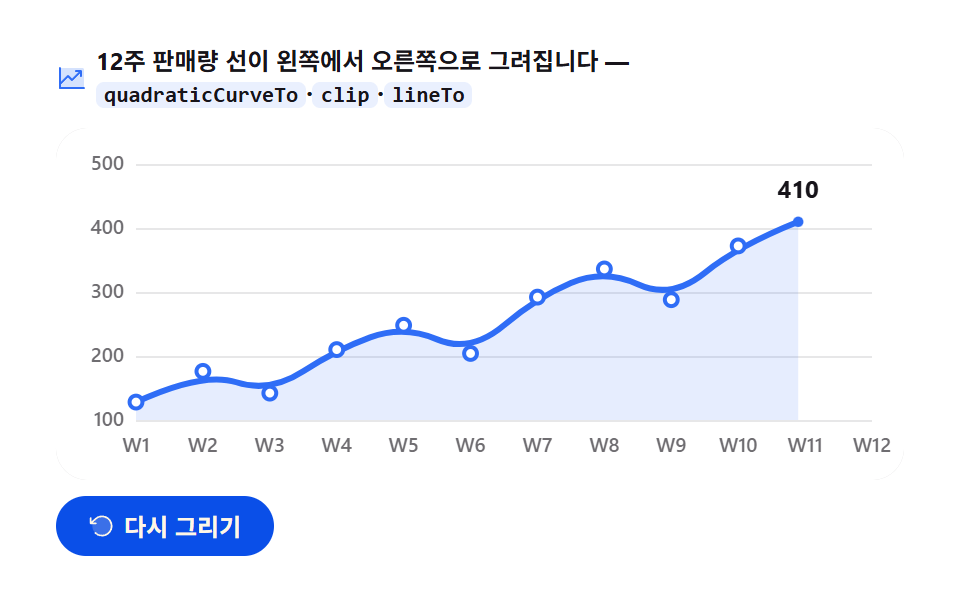 Dashboard UIJavaScript Chart Drawing, 9 Ways — No Library
 Dashboard UICSS Countdown Timer: 9 Clocks That Drain and Flip
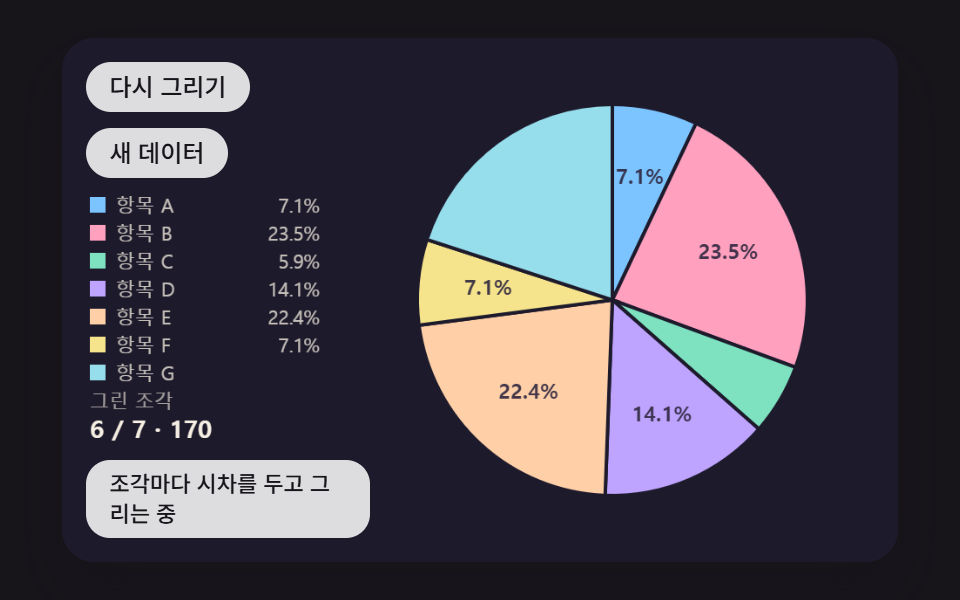 Dashboard UIPie Chart CSS: 9 Slices That Pop, Tilt and Morph
 Dashboard UIBar Chart Animation: 9 Demos From Spring to Race
 Dashboard UI9 Dashboard Components, Not the Whole Page