Bar Chart Animation: 9 Demos From Spring to Race
When bars jump straight to new values, the eye misses what grew. So 01 grows bars on a spring that overshoots once, 02 swaps lanes as ranks flip, and 07 shades
No charting package is loaded anywhere on this page. Each chart is one <canvas> whose bars, ticks and labels JavaScript recomputes every 16ms, and the stylesheet only lays out the stage, the buttons and the focus rings.
A Board Where Nine Bars Grow and Race on Made-Up Sales Numbers
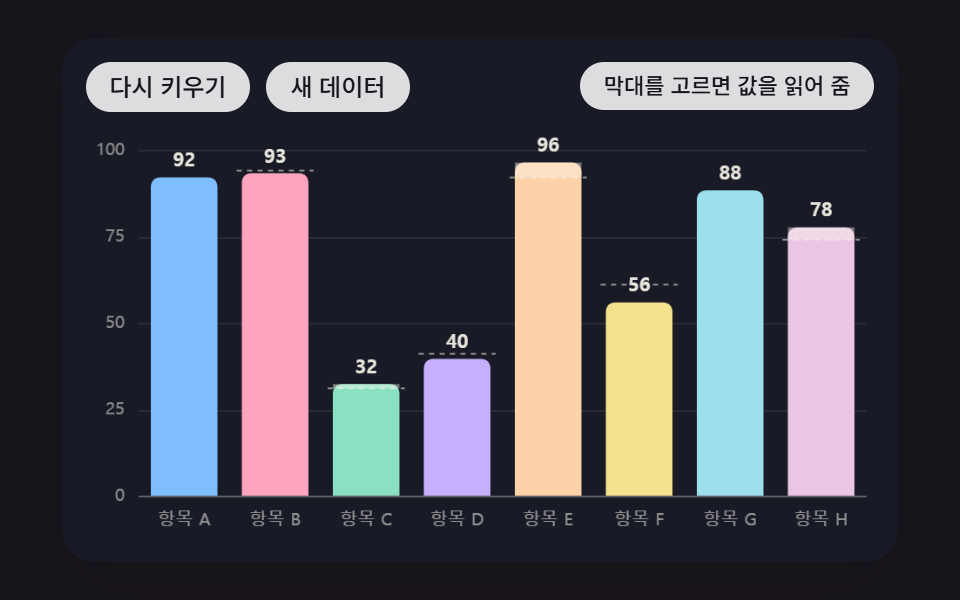 01 bar-chart-spring-overshoot-grow
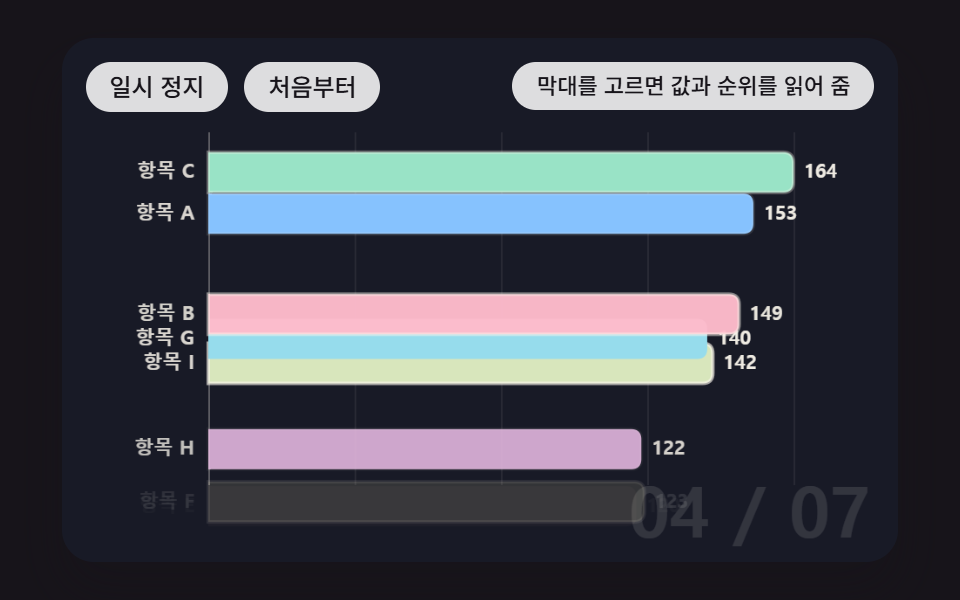 02 bar-chart-race-rank-swap
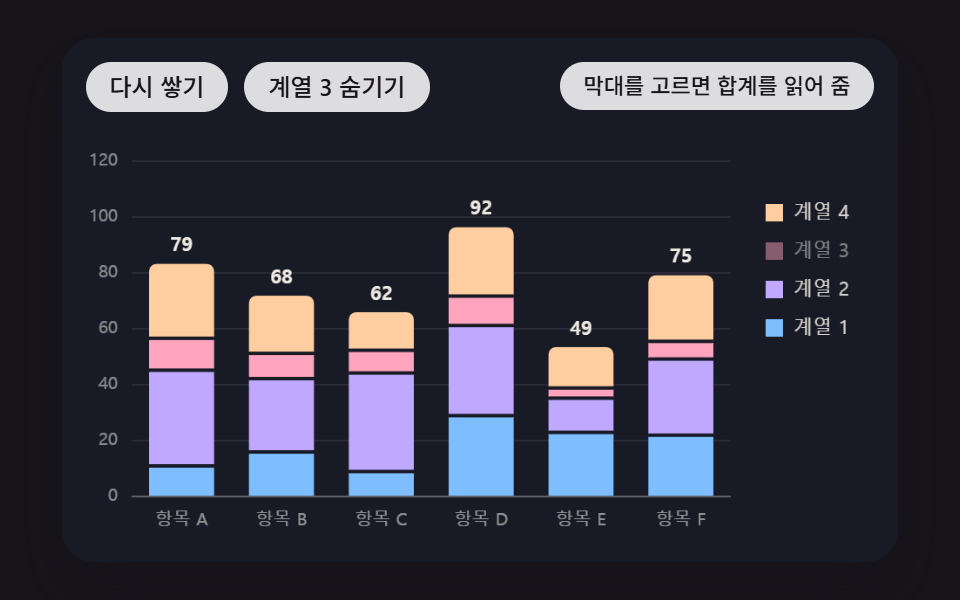 03 bar-chart-stacked-segment-cascade
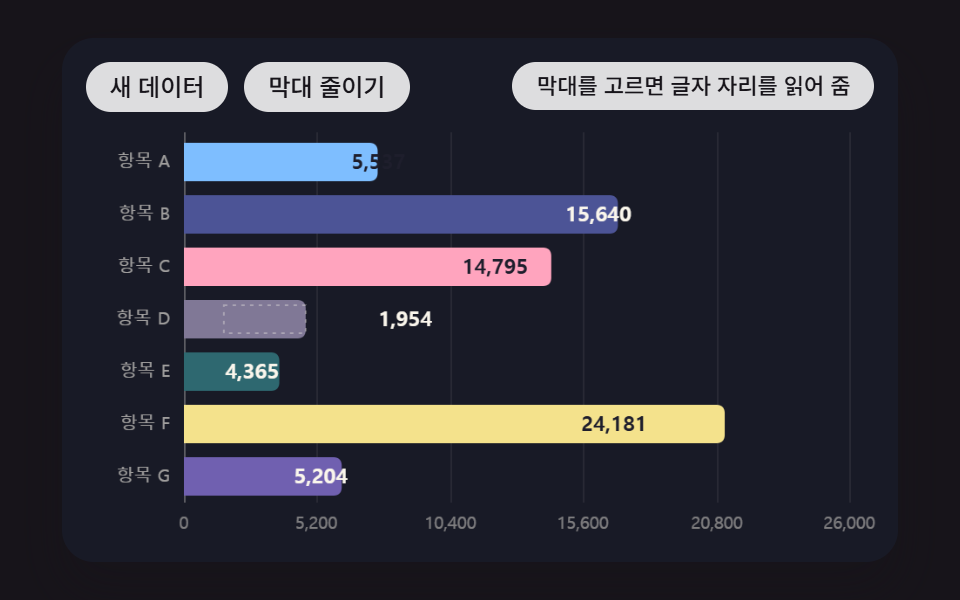 04 bar-chart-horizontal-label-fit
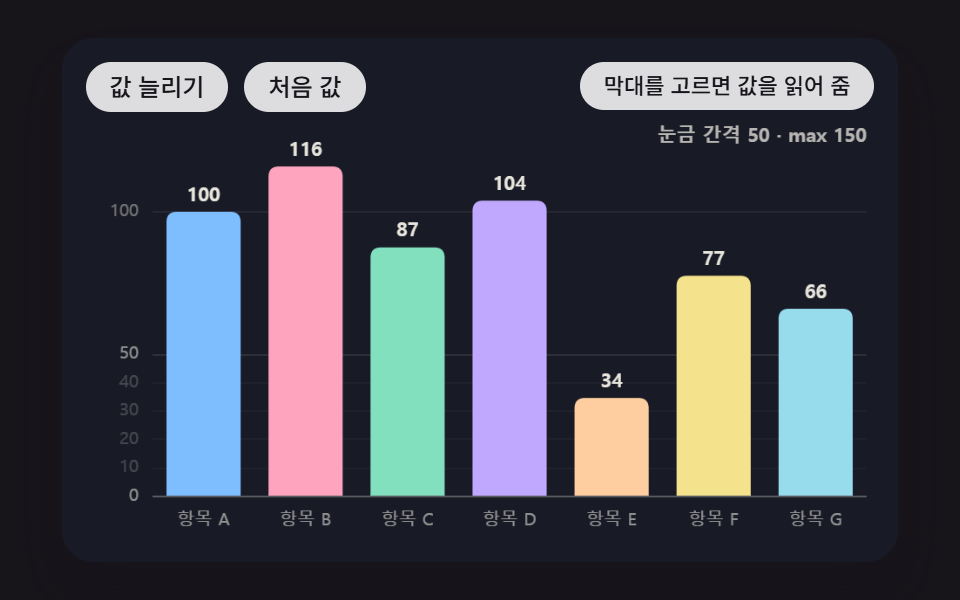 05 bar-chart-axis-nice-tick-rescale
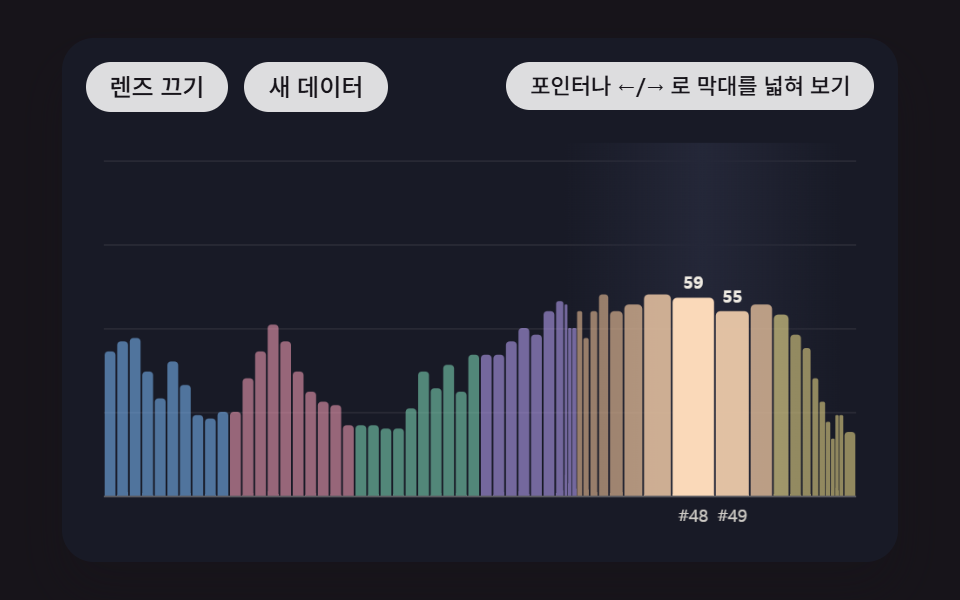 06 bar-chart-pointer-fisheye-zoom
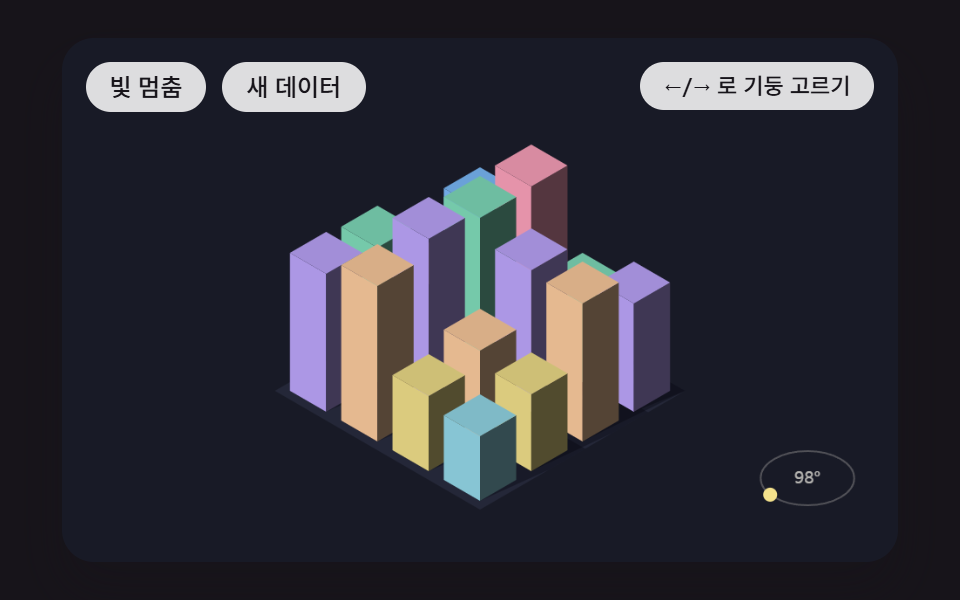 07 bar-chart-isometric-column-shade
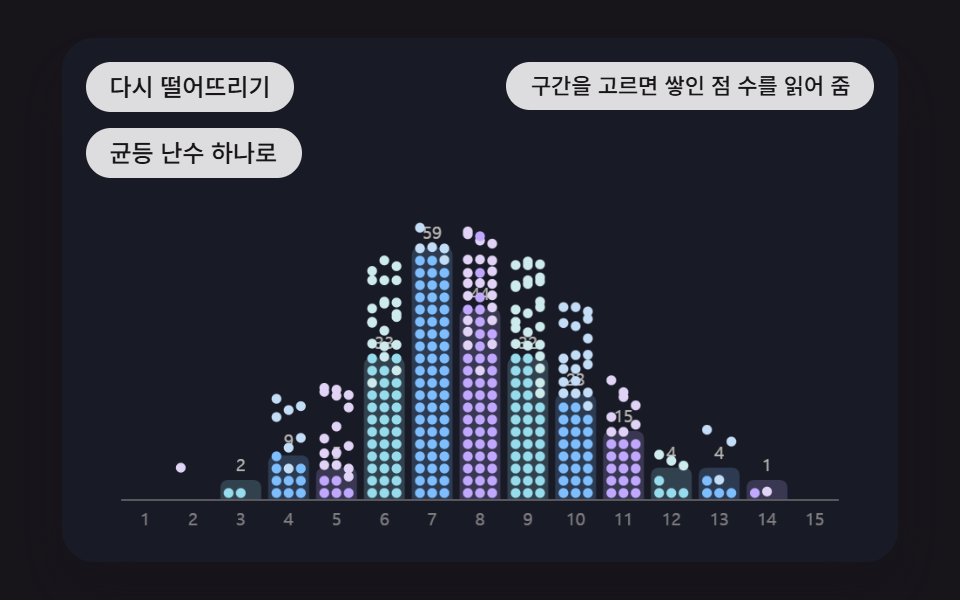 08 bar-chart-histogram-particle-drop
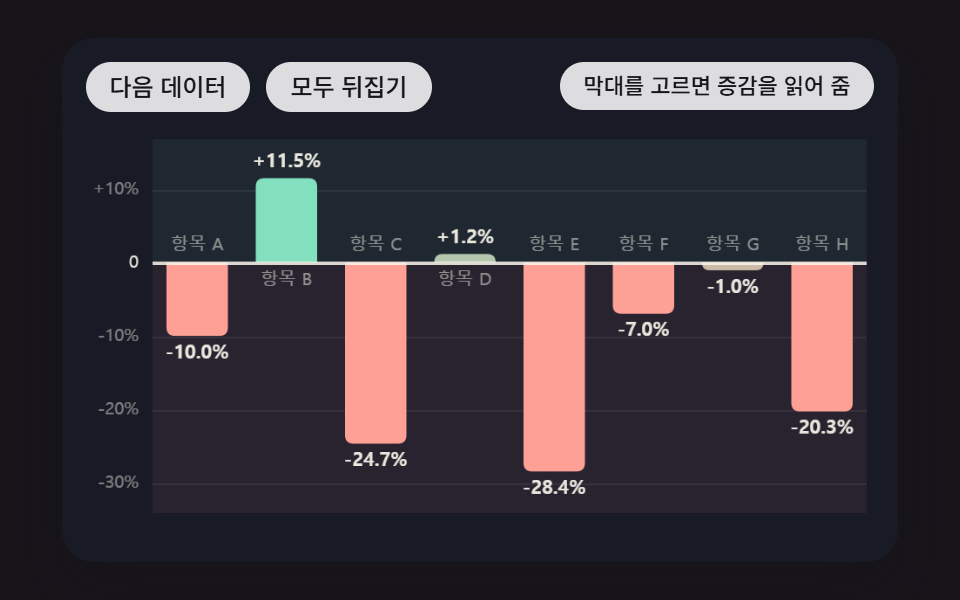 09 bar-chart-diverging-zero-baseline
Auto-plays · click a tile to jump to its section · all nine in one zip
- 01 Bars That Grow on a Spring, Overshooting Once Before Settling
- 02 A Bar Chart Race Where Bars Switch Lanes as Ranks Flip
- 03 Stacked Bars That Build Up Layer by Layer From the Bottom
- 04 Horizontal Bars Whose Labels Decide to Sit Inside or Outside
- 05 An Axis That Re-Picks 1-2-5 Ticks and Shrinks Along With the Bars
- 06 A Dense Bar Chart Where Bars Near the Pointer Widen Like a Fisheye Lens
- 07 Isometric 3D Columns Whose Top and Sides Shade by Light Direction
- 08 Falling Dots That Pile Into Bins and Become a Histogram
- 09 Diverging Bars Split Up and Down From a Zero Line That Moves With the Data
Where the bar heights come from
Every height is a made-up number drawn from makeRng(seed), a 32-bit integer mixing function seeded with 470 and 4702 to 4709, so reopening the page brings back the same bars at the same heights. The labels are placeholders as well: "Item A" to "Item J", #1 to #60 in 06, A1 to D4 in 07 and plain bin numbers in 08. None of the nine files calls a random function or reads the clock, so pressing the buttons in the same order reproduces every millisecond and pixel figure quoted below.
Which report screen each chart suits
A sales dashboard that counts up on first load fits 01, while a monthly ranking that keeps reshuffling fits 02, which is the bar chart race of the set. When one bar holds several shares, like visits split by channel, 03 hands each lower layer's sum up as the floor of the next one, and survey questions with long names sit better on the horizontal bars of 04.
A visitor count that climbs live suits the re-picked ticks of 05, and a year of daily records packed shoulder to shoulder suits the fisheye of 06. 07 puts regional figures in 3D on a landing screen, 08 shows where response times cluster, and 09 sums up month-over-month gains and losses on a single card.
Bar Chart Animation: 9 Ways — Spring Growth, Rank Race, Stacked Layers, Horizontal Labels, Axis Rescale, Fisheye Zoom, Isometric Columns, Particle Histogram and Diverging Baseline
The order begins with the moment bars first rise (01), moves through values that change and pile up over time (02, 03), then labels and ticks that pick their own spot (04, 05), then looking into the chart with a pointer and a light (06, 07), and closes with charts whose bar shapes describe a distribution and a change (08, 09). Every frame is drawn with 2D calls on a single canvas per chart, and a requestAnimationFrame loop that advances in fixed 16ms steps moves everything. None of the nine style.css files contains a @keyframes rule, and the only CSS transition left is a button background color.
Two seconds of capture, each frame checked against its neighbor
Every chart was recorded at 480×300 for 2 seconds, giving 24 frames per chart. The last column counts how many of the 23 neighbor-to-neighbor comparisons found a changed screen, which is why 23 sits under each figure.
| Chart | Changed area (cumulative) | Mean intensity | Moving frames |
|---|---|---|---|
| 01 spring growth | 34.1% | 101.8 | 23/23 |
| 02 rank race | 42.2% | 131.1 | 23/23 |
| 03 stacked layers | 18.4% | 145.5 | 22/23 |
| 04 horizontal labels | 16.5% | 104.5 | 23/23 |
| 05 axis rescale | 35.7% | 140.5 | 23/23 |
| 06 fisheye zoom | 40.1% | 72.0 | 23/23 |
| 07 isometric columns | 16.8% | 61.2 | 23/23 |
| 08 particle histogram | 24.9% | 105.2 | 23/23 |
| 09 diverging baseline | 36.4% | 100.7 | 23/23 |
No chart dropped under 10% cumulative area. 04 and 07 are the narrowest, around 16%, probably because 04 changes only bar tips and digits and 07 changes only face brightness and shadows while its grid stays put. 07 also has the lowest mean intensity of the nine, 61.2, likely because its broad faces brighten only a little at a time.
01Bars That Grow on a Spring, Overshooting Once Before Settling
Each bar keeps its own height and velocity, and every 16ms step adds a pull toward the target (SPRING_STIFFNESS 170) and a drag on the velocity (SPRING_DAMPING 12), changing velocity first and height second, while starts are staggered by 70ms so the eighth bar begins moving only at 490ms. With a damping ratio of 12 ÷ (2√170) = 0.46, a bar aimed at 60 peaks at 70.6 at 256ms, overshooting the target by 17.7%, and stays within ±0.5 of the target from 640ms on; faster bars are painted brighter and the slice above the target line gets an extra coat so the overshoot catches the eye. It suits the opening chart of a sales dashboard, and every one of the 23 comparisons in the 2-second capture showed change.
<main class="stage">
<div class="bc is-demo" id="bc">
  <canvas class="bc__canvas" data-role="canvas" width="480" height="300" tabindex="0" aria-label="A bar chart of eight made-up values whose bars grow on a damped spring, overshooting the target height once before settling. Pick a bar with ←/→ to hear its name and value"></canvas>
  <p class="bc__status" data-role="status" aria-live="off">Pick a bar to hear its value</p>
  <div class="bc__tools">
    <button class="bc__btn" data-role="replay" type="button">Grow again</button>
    <button class="bc__btn" data-role="data" type="button">New data</button>
  </div>
</div>
</main>
@use "../../../../site/static/demo-tokens" as *;
@include stage($stage-ink);
.bc {
position: relative;
width: min(92vw, calc(160vh - 12.8vw));
aspect-ratio: 480 / 300;
margin: 0 auto;
border-radius: $r-card;
overflow: hidden;
box-shadow: $shadow-raised;
background: $subject-ink;
}
.bc__canvas {
display: block;
width: 100%;
height: 100%;
cursor: crosshair;
}
.bc__canvas:focus-visible {
outline: 2px solid rgba(255, 255, 255, .85);
outline-offset: -6px;
}
.bc__status {
position: absolute;
right: $sp-3;
top: $sp-3;
box-sizing: border-box;
max-width: 46%;
margin: 0;
text-align: right;
padding: $sp-1 $sp-3;
border-radius: $r-control;
background: rgba(255, 255, 255, .85);
color: $subject-ink;
font-weight: 500;
font-size: 11px;
line-height: 1.4;
pointer-events: none;
}
// 그래프는 아래쪽 판에 있다 — 버튼은 왼쪽 위, 상태 줄은 오른쪽 위 띠에 두어 막대를 덮지 않는다
.bc__tools {
position: absolute;
left: $sp-3;
top: $sp-3;
box-sizing: border-box;
max-width: 50%;
display: flex;
flex-wrap: wrap;
gap: $sp-2;
}
.bc__btn {
margin: 0;
padding: $sp-1 $sp-3;
border: 0;
border-radius: $r-pill;
background: rgba(255, 255, 255, .85);
color: $subject-ink;
font: inherit;
font-weight: 500;
font-size: 12px;
line-height: 1.4;
cursor: pointer;
transition: background-color $dur-quick ease-out;
}
.bc__btn:hover {
background: $subject-cream;
}
.bc__btn[aria-pressed="true"] {
background: $subject-mint;
}
.bc__btn:focus-visible {
outline: 2px solid rgba(255, 255, 255, .95);
outline-offset: 2px;
}
// 손가락 가로 끌기는 이 캔버스가 받고, 세로 쓸기는 브라우저에 남겨 페이지 스크롤이 막히지 않게 한다
.bc__canvas { touch-action: pan-y; }
@media (max-width: 340px) {
.bc__btn { font-size: 10px; padding: $sp-1 $sp-2; }
.bc__status { font-size: 10px; padding: $sp-1 $sp-2; }
}
@media (prefers-reduced-motion: reduce) {
.bc__btn { transition: none; }
}html, body {
margin: 0;
overflow: hidden;
}
.stage {
box-sizing: border-box;
min-height: 100vh;
display: grid;
place-items: center;
margin: 0;
background: #17141a;
font-family: -apple-system, "Segoe UI", "Noto Sans KR", sans-serif;
padding: clamp(8px, 4vw, 24px);
}
.bc {
position: relative;
width: min(92vw, 160vh - 12.8vw);
aspect-ratio: 480/300;
margin: 0 auto;
border-radius: 16px;
overflow: hidden;
box-shadow: 0 14px 24px rgba(23, 20, 26, 0.32);
background: #17141a;
}
.bc__canvas {
display: block;
width: 100%;
height: 100%;
cursor: crosshair;
}
.bc__canvas:focus-visible {
outline: 2px solid rgba(255, 255, 255, 0.85);
outline-offset: -6px;
}
.bc__status {
position: absolute;
right: 12px;
top: 12px;
box-sizing: border-box;
max-width: 46%;
margin: 0;
text-align: right;
padding: 4px 12px;
border-radius: 12px;
background: rgba(255, 255, 255, 0.85);
color: #17141a;
font-weight: 500;
font-size: 11px;
line-height: 1.4;
pointer-events: none;
}
.bc__tools {
position: absolute;
left: 12px;
top: 12px;
box-sizing: border-box;
max-width: 50%;
display: flex;
flex-wrap: wrap;
gap: 8px;
}
.bc__btn {
margin: 0;
padding: 4px 12px;
border: 0;
border-radius: 999px;
background: rgba(255, 255, 255, 0.85);
color: #17141a;
font: inherit;
font-weight: 500;
font-size: 12px;
line-height: 1.4;
cursor: pointer;
transition: background-color 220ms ease-out;
}
.bc__btn:hover {
background: #fff7e6;
}
.bc__btn[aria-pressed=true] {
background: #4cd4a6;
}
.bc__btn:focus-visible {
outline: 2px solid rgba(255, 255, 255, 0.95);
outline-offset: 2px;
}
.bc__canvas {
touch-action: pan-y;
}
@media (max-width: 340px) {
.bc__btn {
font-size: 10px;
padding: 4px 8px;
}
.bc__status {
font-size: 10px;
padding: 4px 8px;
}
}
@media (prefers-reduced-motion: reduce) {
.bc__btn {
transition: none;
}
}(function () {
const root = document.getElementById("bc");
if (!root) return;
const W = 480;
const H = 300;
const FIXED_DT = 16;
const TAU = Math.PI * 2;
// 파스텔 팔레트 — 어두운 무대 위에 밝은 막대를 얹어 명도 차로 경계가 읽힌다
const BG = [24, 26, 38];
const PANEL = [36, 39, 56];
const PAPER = [250, 246, 236];
const INK = [30, 30, 44];
const PAL = [
[126, 190, 255],
[255, 164, 190],
[130, 224, 190],
[192, 168, 255],
[255, 206, 160],
[244, 226, 140],
[150, 220, 236],
[230, 184, 226],
[196, 220, 160],
[176, 196, 236],
];
// 가상 데이터의 이름 — 실제 항목이 아니라 순서만 뜻한다
const LABELS = ['Item A', 'Item B', 'Item C', 'Item D', 'Item E', 'Item F', 'Item G', 'Item H', 'Item I', 'Item J'];
function clamp(v, lo, hi) { return v < lo ? lo : (v > hi ? hi : v); }
function lerp(a, b, k) { return a + (b - a) * k; }
function smooth(x) { const c = clamp(x, 0, 1); return c * c * (3 - 2 * c); }
function rgba(c, a) {
return 'rgba(' + Math.round(c[0]) + ',' + Math.round(c[1]) + ',' + Math.round(c[2]) + ',' + clamp(a, 0, 1).toFixed(3) + ')';
}
function mix(a, b, k) { return [lerp(a[0], b[0], k), lerp(a[1], b[1], k), lerp(a[2], b[2], k)]; }
const canvasEl = root.querySelector('[data-role="canvas"]');
const statusEl = root.querySelector('[data-role="status"]');
const ctxRaw = canvasEl ? canvasEl.getContext('2d') : null;
if (!canvasEl || !ctxRaw || !statusEl) {
return;
}
const cv = canvasEl;
const ctx = ctxRaw;
const status = statusEl;
const reduceQuery = window.matchMedia('(prefers-reduced-motion: reduce)');
// 움직임 줄이기 — 열린 페이지에서 설정을 바꿔도 아래 tail 의 change 리스너가 이 값을 다시 읽는다
let still = reduceQuery.matches;
// 자동 시연 중인가 — 사람이 처음 만지는 순간 시연을 멈추고 상태 줄을 읽어 주기 시작한다
let demo = root.classList.contains('is-demo');
function wake() {
if (!demo) {
return;
}
demo = false;
root.classList.remove('is-demo');
status.setAttribute('aria-live', 'polite');
}
function say(text) {
if (status.textContent !== text) {
status.textContent = text;
}
}
function fitCanvas() {
// 배율은 2 에서 자른다 — 배율 3 기기에서 화소가 2.25배로 늘어 프레임마다 일이 그만큼 커지지 않게
const dpr = Math.min(window.devicePixelRatio || 1, 2);
cv.width = Math.round(W * dpr);
cv.height = Math.round(H * dpr);
ctx.setTransform(dpr, 0, 0, dpr, 0, 0);
}
function onResize() {
fitCanvas();
draw();
}
fitCanvas();
window.addEventListener('resize', onResize);
// 화면 좌표(CSS px) → 장면 좌표(480x300). 리사이즈 뒤에도 늘 현재 크기로 다시 잰다
function toScene(ev) {
const r = cv.getBoundingClientRect();
return [((ev.clientX - r.left) / r.width) * W, ((ev.clientY - r.top) / r.height) * H];
}
// 시드 고정 난수 — 같은 시드면 같은 가상 데이터가 다시 나온다 (32비트 정수 섞기)
function makeRng(seed) {
let s = seed >>> 0;
return function () {
s = (s + 0x6d2b79f5) >>> 0;
let t = s;
t = Math.imul(t ^ (t >>> 15), t | 1);
t ^= t + Math.imul(t ^ (t >>> 7), t | 61);
return ((t ^ (t >>> 14)) >>> 0) / 4294967296;
};
}
function seededValues(seed, n, lo, hi) {
const rnd = makeRng(seed);
const out = [];
for (let i = 0; i < n; i += 1) {
out.push(lo + Math.floor(rnd() * (hi - lo + 1)));
}
return out;
}
// 세 자리마다 쉼표 — 지역 설정에 기대지 않는다
function groupDigits(n) {
const s = String(Math.round(Math.abs(n)));
let out = '';
for (let i = 0; i < s.length; i += 1) {
if (i > 0 && (s.length - i) % 3 === 0) {
out += ',';
}
out += s[i];
}
return (n < 0 ? '-' : '') + out;
}
// 세로 막대 경로 — 기준선 base 에서 h 만큼(음수면 아래로) 뻗고, 끝 모서리만 둥글린다
function barPath(c, x, base, w, h, r) {
const rr = Math.min(r, Math.abs(h), w / 2);
const tip = base - h;
const s = h >= 0 ? 1 : -1;
c.beginPath();
c.moveTo(x, base);
c.lineTo(x, tip + s * rr);
c.quadraticCurveTo(x, tip, x + rr, tip);
c.lineTo(x + w - rr, tip);
c.quadraticCurveTo(x + w, tip, x + w, tip + s * rr);
c.lineTo(x + w, base);
c.closePath();
}
// 가로 막대 경로 — 왼쪽 x0 에서 len 만큼 뻗고 오른쪽 끝만 둥글린다
function hbarPath(c, x0, y, len, th, r) {
const rr = Math.min(r, Math.max(len, 0), th / 2);
const x1 = x0 + Math.max(len, 0);
c.beginPath();
c.moveTo(x0, y);
c.lineTo(x1 - rr, y);
c.quadraticCurveTo(x1, y, x1, y + rr);
c.lineTo(x1, y + th - rr);
c.quadraticCurveTo(x1, y + th, x1 - rr, y + th);
c.lineTo(x0, y + th);
c.closePath();
}
function clearStage() {
ctx.fillStyle = rgba(BG, 1);
ctx.fillRect(0, 0, W, H);
}
function axisText(text, x, y, align, a) {
ctx.font = '500 10px sans-serif';
ctx.textAlign = align;
ctx.textBaseline = 'middle';
ctx.fillStyle = rgba(PAPER, a);
ctx.fillText(text, x, y);
}
// 고른 막대 — 화살표 키·포인터가 가리키는 sel 과 Enter·Space·클릭으로 고정한 pinned
let sel = -1;
let pinned = -1;
function focusIdx() { return sel >= 0 ? sel : pinned; }
function nextIdx(cur, d, n) {
return cur < 0 ? (d > 0 ? 0 : n - 1) : (cur + d + n) % n;
}
function togglePin(i) {
pinned = i < 0 || pinned === i ? -1 : i;
}
// 고른 막대 테두리 — 화살표·포인터로 가리키기만 하면 점선, Enter·Space·클릭으로 고정하면 실선
function ringStyle(i, a) {
ctx.strokeStyle = rgba(PAPER, 0.95 * a);
ctx.lineWidth = 2;
ctx.setLineDash(i === pinned ? [] : [4, 3]);
}
// 키보드 — ←/→ 막대 옮기기, Enter·Space 고르기, Esc 풀기. 셋 다 상태 줄이 이름과 값을 읽는다
function bindKeys(move, changed) {
cv.addEventListener('keydown', function (ev) {
if (ev.key === 'ArrowRight' || ev.key === 'ArrowLeft') {
ev.preventDefault();
wake();
move(ev.key === 'ArrowRight' ? 1 : -1);
changed();
}
else if (ev.key === 'Enter' || ev.key === ' ') {
ev.preventDefault();
wake();
togglePin(focusIdx());
changed();
}
else if (ev.key === 'Escape') {
ev.preventDefault();
wake();
sel = -1;
pinned = -1;
changed();
}
});
}
// 포인터 — 올리면 sel, 누르면 그 막대를 고정(같은 막대를 다시 누르면 풀기)
function bindPointer(hit, changed) {
cv.addEventListener('pointermove', function (ev) {
if (demo) {
return;
}
const p = toScene(ev);
const i = hit(p[0], p[1]);
if (i !== sel) {
sel = i;
changed();
}
});
cv.addEventListener('pointerdown', function (ev) {
wake();
const p = toScene(ev);
const i = hit(p[0], p[1]);
sel = i;
togglePin(i);
changed();
});
}
// 시연 일정 — 루프 안의 시각(ms) 표를 지날 때마다 한 번씩 부른다
let schedCycle = -1;
let schedIdx = 0;
function runSchedule(t, loop, marks, fire) {
const cyc = Math.floor(t / loop);
const p = t - cyc * loop;
if (cyc !== schedCycle) {
schedCycle = cyc;
schedIdx = 0;
}
while (schedIdx < marks.length && p >= marks[schedIdx]) {
fire(schedIdx, cyc);
schedIdx += 1;
}
}
function springStep(s, k, d, dt) {
const a = -k * (s.x - s.to) - d * s.v;
s.v += a * dt;
s.x += s.v * dt;
}
// 감쇠 스프링 — 당기는 힘(1/s²)과 끄는 힘(1/s). 감쇠비 = SPRING_DAMPING / (2√SPRING_STIFFNESS) 가 1 보다 작아 목표를 한 번 넘었다 돌아온다
const SPRING_STIFFNESS = 170;
const SPRING_DAMPING = 12;
// 막대 출발 시차 — 왼쪽 막대부터 이만큼씩 늦게 당기기 시작한다
const GROW_STAGGER_MS = 70;
const BAR_N = 8;
const SEED = 470;
const PLOT_L = 44;
const PLOT_R = 462;
const PLOT_T = 64;
const PLOT_B = 262;
const AXIS_MAX = 100;
const BAR_GAP = 14;
const DEMO_LOOP = 2000;
const TXT_IDLE = 'Pick a bar to hear its value';
const replayBtn = root.querySelector('[data-role="replay"]');
const dataBtn = root.querySelector('[data-role="data"]');
const slotW = (PLOT_R - PLOT_L) / BAR_N;
const barW = slotW - BAR_GAP;
let seed = SEED;
let goal = seededValues(seed, BAR_N, 30, 94);
const bars = [];
const startAt = [];
for (let i = 0; i < BAR_N; i += 1) {
bars.push({ x: 0, v: 0, to: 0 });
startAt.push(0);
}
let simMs = 0;
// 새 목표를 건다 — 막대 i 는 simMs + i × GROW_STAGGER_MS 부터 목표 쪽으로 당겨진다
function grow(values, fromZero) {
goal = values;
for (let i = 0; i < BAR_N; i += 1) {
startAt[i] = simMs + i * GROW_STAGGER_MS;
if (fromZero) {
bars[i].x = 0;
bars[i].v = 0;
bars[i].to = 0;
}
}
}
function step() {
simMs += FIXED_DT;
const dt = FIXED_DT / 1000;
for (let i = 0; i < BAR_N; i += 1) {
if (simMs >= startAt[i]) {
bars[i].to = goal[i];
}
springStep(bars[i], SPRING_STIFFNESS, SPRING_DAMPING, dt);
}
}
function settle() {
for (let i = 0; i < BAR_N; i += 1) {
bars[i].to = goal[i];
bars[i].x = goal[i];
bars[i].v = 0;
startAt[i] = simMs;
}
}
function report() {
const f = focusIdx();
if (f >= 0) {
say(LABELS[f] + ' · ' + groupDigits(goal[f]));
}
else {
say(TXT_IDLE);
}
}
function demoTick(t) {
runSchedule(t, DEMO_LOOP, [200, 1150], function (k, cyc) {
if (k === 0) {
grow(seededValues(SEED + (cyc % 2) * 2, BAR_N, 30, 94), true);
}
else {
grow(seededValues(SEED + 1 + (cyc % 2) * 2, BAR_N, 30, 94), false);
}
report();
});
}
function yOf(v) { return PLOT_B - (v / AXIS_MAX) * (PLOT_B - PLOT_T); }
function draw() {
clearStage();
for (let g = 0; g <= AXIS_MAX; g += 25) {
const y = yOf(g);
ctx.fillStyle = rgba(PAPER, g === 0 ? 0.32 : 0.08);
ctx.fillRect(PLOT_L, Math.round(y), PLOT_R - PLOT_L, 1);
axisText(String(g), PLOT_L - 8, y, 'right', 0.5);
}
const f = focusIdx();
for (let i = 0; i < BAR_N; i += 1) {
const b = bars[i];
const x = PLOT_L + i * slotW + BAR_GAP / 2;
const h = Math.max(0, b.x) / AXIS_MAX * (PLOT_B - PLOT_T);
// 빠르게 움직이는 막대일수록 밝아진다 — 같은 속도 v 가 높이와 밝기 둘에 쓰인다
const speed = clamp(Math.abs(b.v) / 160, 0, 1);
const dim = f >= 0 && f !== i;
ctx.fillStyle = rgba(mix(PAL[i], PAPER, 0.38 * speed), dim ? 0.5 : 1);
barPath(ctx, x, PLOT_B, barW, h, 6);
ctx.fill();
// 목표를 넘은 부분 — 목표선 위로 솟은 만큼을 한 겹 밝게 덧칠한다
const over = b.x - b.to;
if (over > 0.4 && b.to > 0) {
const ht = b.to / AXIS_MAX * (PLOT_B - PLOT_T);
ctx.fillStyle = rgba(PAPER, 0.42);
ctx.fillRect(x, PLOT_B - h, barW, h - ht);
}
// 목표선 — 아직 자리를 못 잡은 막대에만 점선으로 보여 준다
if (Math.abs(b.x - goal[i]) > 0.6) {
const yt = yOf(goal[i]);
ctx.strokeStyle = rgba(PAPER, 0.55);
ctx.lineWidth = 1;
ctx.setLineDash([3, 3]);
ctx.beginPath();
ctx.moveTo(x - 3, yt);
ctx.lineTo(x + barW + 3, yt);
ctx.stroke();
ctx.setLineDash([]);
}
if (i === f) {
ringStyle(i, 1);
barPath(ctx, x, PLOT_B, barW, h, 6);
ctx.stroke();
ctx.setLineDash([]);
}
ctx.font = '700 11px sans-serif';
ctx.textAlign = 'center';
ctx.textBaseline = 'bottom';
ctx.fillStyle = rgba(PAPER, dim ? 0.45 : 0.92);
ctx.fillText(String(Math.round(Math.max(0, b.x))), x + barW / 2, PLOT_B - h - 4);
axisText(LABELS[i], x + barW / 2, PLOT_B + 14, 'center', i === f ? 0.95 : 0.55);
}
}
function after() {
if (still) {
settle();
}
report();
draw();
}
function hitBar(x, y) {
if (y < PLOT_T - 20 || y > PLOT_B + 24) {
return -1;
}
const i = Math.floor((x - PLOT_L) / slotW);
return i >= 0 && i < BAR_N ? i : -1;
}
bindKeys(function (d) { sel = nextIdx(focusIdx(), d, BAR_N); }, after);
bindPointer(hitBar, after);
if (replayBtn) {
replayBtn.addEventListener('click', function () { wake(); grow(goal, true); after(); });
}
if (dataBtn) {
dataBtn.addEventListener('click', function () { wake(); seed += 1; grow(seededValues(seed, BAR_N, 30, 94), false); after(); });
}
report();
let rafId = 0;
let lastTs = -1;
let acc = 0;
let clock = 0;
function frame(ts) {
if (lastTs < 0) {
lastTs = ts;
}
// 탭이 숨었다 돌아와도 한 번에 100ms 까지만 따라잡는다 — 순간이동 대신 이어서 움직인다
acc += Math.min(ts - lastTs, 100);
lastTs = ts;
let n = 0;
while (acc >= FIXED_DT && n < 6) {
clock += FIXED_DT;
if (demo) {
demoTick(clock);
}
step();
acc -= FIXED_DT;
n += 1;
}
draw();
rafId = window.requestAnimationFrame(frame);
}
function startMotion() {
window.cancelAnimationFrame(rafId);
lastTs = -1;
acc = 0;
if (still) {
// 움직임 줄이기 — 루프를 돌리지 않고 지금 목표 상태로 바로 그린다
settle();
draw();
}
else {
rafId = window.requestAnimationFrame(frame);
}
}
// 열린 페이지에서 움직임 줄이기 설정이 바뀌어도 그 자리에서 루프를 멈추거나 다시 켠다
function onMotionPref() {
still = reduceQuery.matches;
startMotion();
}
if (typeof reduceQuery.addEventListener === 'function') {
reduceQuery.addEventListener('change', onMotionPref);
}
startMotion();
return function () {
window.cancelAnimationFrame(rafId);
window.removeEventListener('resize', onResize);
if (typeof reduceQuery.removeEventListener === 'function') {
reduceQuery.removeEventListener('change', onMotionPref);
}
};
})();// BarSpringOvershootGrow - vanilla 판(01-bar-chart-spring-overshoot-grow) 의 React 포트. 같은 계산을 useEffect 안에서 돌린다.
import { useEffect, useRef } from "react";
import styles from "./BarSpringOvershootGrow.module.scss";
const cx = (s: string): string => s.split(" ").map((n) => styles[n] ?? n).join(" ");
export default function BarSpringOvershootGrow() {
const rootRef = useRef<HTMLDivElement | null>(null);
useEffect(() => {
const rootEl = rootRef.current;
if (!rootEl) return;
const root: HTMLElement = rootEl;
type RGB = [number, number, number];
const W = 480;
const H = 300;
const FIXED_DT = 16;
const TAU = Math.PI * 2;
// 파스텔 팔레트 — 어두운 무대 위에 밝은 막대를 얹어 명도 차로 경계가 읽힌다
const BG: RGB = [24, 26, 38];
const PANEL: RGB = [36, 39, 56];
const PAPER: RGB = [250, 246, 236];
const INK: RGB = [30, 30, 44];
const PAL: RGB[] = [
[126, 190, 255],
[255, 164, 190],
[130, 224, 190],
[192, 168, 255],
[255, 206, 160],
[244, 226, 140],
[150, 220, 236],
[230, 184, 226],
[196, 220, 160],
[176, 196, 236],
];
// 가상 데이터의 이름 — 실제 항목이 아니라 순서만 뜻한다
const LABELS = ['항목 A', '항목 B', '항목 C', '항목 D', '항목 E', '항목 F', '항목 G', '항목 H', '항목 I', '항목 J'];
function clamp(v: number, lo: number, hi: number): number { return v < lo ? lo : (v > hi ? hi : v); }
function lerp(a: number, b: number, k: number): number { return a + (b - a) * k; }
function smooth(x: number): number { const c = clamp(x, 0, 1); return c * c * (3 - 2 * c); }
function rgba(c: RGB, a: number): string {
return 'rgba(' + Math.round(c[0]) + ',' + Math.round(c[1]) + ',' + Math.round(c[2]) + ',' + clamp(a, 0, 1).toFixed(3) + ')';
}
function mix(a: RGB, b: RGB, k: number): RGB { return [lerp(a[0], b[0], k), lerp(a[1], b[1], k), lerp(a[2], b[2], k)]; }
const canvasEl = root.querySelector('[data-role="canvas"]') as HTMLCanvasElement | null;
const statusEl = root.querySelector('[data-role="status"]') as HTMLElement | null;
const ctxRaw = canvasEl ? canvasEl.getContext('2d') : null;
if (!canvasEl || !ctxRaw || !statusEl) { return; }
const cv: HTMLCanvasElement = canvasEl;
const ctx: CanvasRenderingContext2D = ctxRaw;
const status: HTMLElement = statusEl;
const reduceQuery = window.matchMedia('(prefers-reduced-motion: reduce)');
// 움직임 줄이기 — 열린 페이지에서 설정을 바꿔도 아래 tail 의 change 리스너가 이 값을 다시 읽는다
let still = reduceQuery.matches;
// 자동 시연 중인가 — 사람이 처음 만지는 순간 시연을 멈추고 상태 줄을 읽어 주기 시작한다
let demo = root.classList.contains('is-demo');
function wake(): void {
if (!demo) { return; }
demo = false;
root.classList.remove('is-demo');
status.setAttribute('aria-live', 'polite');
}
function say(text: string): void {
if (status.textContent !== text) { status.textContent = text; }
}
function fitCanvas(): void {
// 배율은 2 에서 자른다 — 배율 3 기기에서 화소가 2.25배로 늘어 프레임마다 일이 그만큼 커지지 않게
const dpr = Math.min(window.devicePixelRatio || 1, 2);
cv.width = Math.round(W * dpr);
cv.height = Math.round(H * dpr);
ctx.setTransform(dpr, 0, 0, dpr, 0, 0);
}
function onResize(): void {
fitCanvas();
draw();
}
fitCanvas();
window.addEventListener('resize', onResize);
// 화면 좌표(CSS px) → 장면 좌표(480x300). 리사이즈 뒤에도 늘 현재 크기로 다시 잰다
function toScene(ev: PointerEvent): [number, number] {
const r = cv.getBoundingClientRect();
return [((ev.clientX - r.left) / r.width) * W, ((ev.clientY - r.top) / r.height) * H];
}
// 시드 고정 난수 — 같은 시드면 같은 가상 데이터가 다시 나온다 (32비트 정수 섞기)
function makeRng(seed: number): () => number {
let s = seed >>> 0;
return function (): number {
s = (s + 0x6d2b79f5) >>> 0;
let t = s;
t = Math.imul(t ^ (t >>> 15), t | 1);
t ^= t + Math.imul(t ^ (t >>> 7), t | 61);
return ((t ^ (t >>> 14)) >>> 0) / 4294967296;
};
}
function seededValues(seed: number, n: number, lo: number, hi: number): number[] {
const rnd = makeRng(seed);
const out: number[] = [];
for (let i = 0; i < n; i += 1) { out.push(lo + Math.floor(rnd() * (hi - lo + 1))); }
return out;
}
// 세 자리마다 쉼표 — 지역 설정에 기대지 않는다
function groupDigits(n: number): string {
const s = String(Math.round(Math.abs(n)));
let out = '';
for (let i = 0; i < s.length; i += 1) {
if (i > 0 && (s.length - i) % 3 === 0) { out += ','; }
out += s[i];
}
return (n < 0 ? '-' : '') + out;
}
// 세로 막대 경로 — 기준선 base 에서 h 만큼(음수면 아래로) 뻗고, 끝 모서리만 둥글린다
function barPath(c: CanvasRenderingContext2D, x: number, base: number, w: number, h: number, r: number): void {
const rr = Math.min(r, Math.abs(h), w / 2);
const tip = base - h;
const s = h >= 0 ? 1 : -1;
c.beginPath();
c.moveTo(x, base);
c.lineTo(x, tip + s * rr);
c.quadraticCurveTo(x, tip, x + rr, tip);
c.lineTo(x + w - rr, tip);
c.quadraticCurveTo(x + w, tip, x + w, tip + s * rr);
c.lineTo(x + w, base);
c.closePath();
}
// 가로 막대 경로 — 왼쪽 x0 에서 len 만큼 뻗고 오른쪽 끝만 둥글린다
function hbarPath(c: CanvasRenderingContext2D, x0: number, y: number, len: number, th: number, r: number): void {
const rr = Math.min(r, Math.max(len, 0), th / 2);
const x1 = x0 + Math.max(len, 0);
c.beginPath();
c.moveTo(x0, y);
c.lineTo(x1 - rr, y);
c.quadraticCurveTo(x1, y, x1, y + rr);
c.lineTo(x1, y + th - rr);
c.quadraticCurveTo(x1, y + th, x1 - rr, y + th);
c.lineTo(x0, y + th);
c.closePath();
}
function clearStage(): void {
ctx.fillStyle = rgba(BG, 1);
ctx.fillRect(0, 0, W, H);
}
function axisText(text: string, x: number, y: number, align: CanvasTextAlign, a: number): void {
ctx.font = '500 10px sans-serif';
ctx.textAlign = align;
ctx.textBaseline = 'middle';
ctx.fillStyle = rgba(PAPER, a);
ctx.fillText(text, x, y);
}
// 고른 막대 — 화살표 키·포인터가 가리키는 sel 과 Enter·Space·클릭으로 고정한 pinned
let sel = -1;
let pinned = -1;
function focusIdx(): number { return sel >= 0 ? sel : pinned; }
function nextIdx(cur: number, d: number, n: number): number {
return cur < 0 ? (d > 0 ? 0 : n - 1) : (cur + d + n) % n;
}
function togglePin(i: number): void {
pinned = i < 0 || pinned === i ? -1 : i;
}
// 고른 막대 테두리 — 화살표·포인터로 가리키기만 하면 점선, Enter·Space·클릭으로 고정하면 실선
function ringStyle(i: number, a: number): void {
ctx.strokeStyle = rgba(PAPER, 0.95 * a);
ctx.lineWidth = 2;
ctx.setLineDash(i === pinned ? [] : [4, 3]);
}
// 키보드 — ←/→ 막대 옮기기, Enter·Space 고르기, Esc 풀기. 셋 다 상태 줄이 이름과 값을 읽는다
function bindKeys(move: (d: number) => void, changed: () => void): void {
cv.addEventListener('keydown', function (ev: KeyboardEvent): void {
if (ev.key === 'ArrowRight' || ev.key === 'ArrowLeft') {
ev.preventDefault();
wake();
move(ev.key === 'ArrowRight' ? 1 : -1);
changed();
} else if (ev.key === 'Enter' || ev.key === ' ') {
ev.preventDefault();
wake();
togglePin(focusIdx());
changed();
} else if (ev.key === 'Escape') {
ev.preventDefault();
wake();
sel = -1;
pinned = -1;
changed();
}
});
}
// 포인터 — 올리면 sel, 누르면 그 막대를 고정(같은 막대를 다시 누르면 풀기)
function bindPointer(hit: (x: number, y: number) => number, changed: () => void): void {
cv.addEventListener('pointermove', function (ev: PointerEvent): void {
if (demo) { return; }
const p = toScene(ev);
const i = hit(p[0], p[1]);
if (i !== sel) { sel = i; changed(); }
});
cv.addEventListener('pointerdown', function (ev: PointerEvent): void {
wake();
const p = toScene(ev);
const i = hit(p[0], p[1]);
sel = i;
togglePin(i);
changed();
});
}
// 시연 일정 — 루프 안의 시각(ms) 표를 지날 때마다 한 번씩 부른다
let schedCycle = -1;
let schedIdx = 0;
function runSchedule(t: number, loop: number, marks: number[], fire: (k: number, cycle: number) => void): void {
const cyc = Math.floor(t / loop);
const p = t - cyc * loop;
if (cyc !== schedCycle) { schedCycle = cyc; schedIdx = 0; }
while (schedIdx < marks.length && p >= marks[schedIdx]) {
fire(schedIdx, cyc);
schedIdx += 1;
}
}
// 감쇠 스프링 — x 가 목표 to 로 당겨지고(k, 1/s²) 속도에 비례해 끌린다(d, 1/s). 속도를 먼저 고치는 반암시적 오일러
type Spring = { x: number; v: number; to: number };
function springStep(s: Spring, k: number, d: number, dt: number): void {
const a = -k * (s.x - s.to) - d * s.v;
s.v += a * dt;
s.x += s.v * dt;
}
// 감쇠 스프링 — 당기는 힘(1/s²)과 끄는 힘(1/s). 감쇠비 = SPRING_DAMPING / (2√SPRING_STIFFNESS) 가 1 보다 작아 목표를 한 번 넘었다 돌아온다
const SPRING_STIFFNESS = 170;
const SPRING_DAMPING = 12;
// 막대 출발 시차 — 왼쪽 막대부터 이만큼씩 늦게 당기기 시작한다
const GROW_STAGGER_MS = 70;
const BAR_N = 8;
const SEED = 470;
const PLOT_L = 44;
const PLOT_R = 462;
const PLOT_T = 64;
const PLOT_B = 262;
const AXIS_MAX = 100;
const BAR_GAP = 14;
const DEMO_LOOP = 2000;
const TXT_IDLE = '막대를 고르면 값을 읽어 줌';
const replayBtn = root.querySelector('[data-role="replay"]') as HTMLButtonElement | null;
const dataBtn = root.querySelector('[data-role="data"]') as HTMLButtonElement | null;
const slotW = (PLOT_R - PLOT_L) / BAR_N;
const barW = slotW - BAR_GAP;
let seed = SEED;
let goal: number[] = seededValues(seed, BAR_N, 30, 94);
const bars: Spring[] = [];
const startAt: number[] = [];
for (let i = 0; i < BAR_N; i += 1) { bars.push({ x: 0, v: 0, to: 0 }); startAt.push(0); }
let simMs = 0;
// 새 목표를 건다 — 막대 i 는 simMs + i × GROW_STAGGER_MS 부터 목표 쪽으로 당겨진다
function grow(values: number[], fromZero: boolean): void {
goal = values;
for (let i = 0; i < BAR_N; i += 1) {
startAt[i] = simMs + i * GROW_STAGGER_MS;
if (fromZero) { bars[i].x = 0; bars[i].v = 0; bars[i].to = 0; }
}
}
function step(): void {
simMs += FIXED_DT;
const dt = FIXED_DT / 1000;
for (let i = 0; i < BAR_N; i += 1) {
if (simMs >= startAt[i]) { bars[i].to = goal[i]; }
springStep(bars[i], SPRING_STIFFNESS, SPRING_DAMPING, dt);
}
}
function settle(): void {
for (let i = 0; i < BAR_N; i += 1) { bars[i].to = goal[i]; bars[i].x = goal[i]; bars[i].v = 0; startAt[i] = simMs; }
}
function report(): void {
const f = focusIdx();
if (f >= 0) { say(LABELS[f] + ' · ' + groupDigits(goal[f])); } else { say(TXT_IDLE); }
}
function demoTick(t: number): void {
runSchedule(t, DEMO_LOOP, [200, 1150], function (k: number, cyc: number): void {
if (k === 0) { grow(seededValues(SEED + (cyc % 2) * 2, BAR_N, 30, 94), true); }
else { grow(seededValues(SEED + 1 + (cyc % 2) * 2, BAR_N, 30, 94), false); }
report();
});
}
function yOf(v: number): number { return PLOT_B - (v / AXIS_MAX) * (PLOT_B - PLOT_T); }
function draw(): void {
clearStage();
for (let g = 0; g <= AXIS_MAX; g += 25) {
const y = yOf(g);
ctx.fillStyle = rgba(PAPER, g === 0 ? 0.32 : 0.08);
ctx.fillRect(PLOT_L, Math.round(y), PLOT_R - PLOT_L, 1);
axisText(String(g), PLOT_L - 8, y, 'right', 0.5);
}
const f = focusIdx();
for (let i = 0; i < BAR_N; i += 1) {
const b = bars[i];
const x = PLOT_L + i * slotW + BAR_GAP / 2;
const h = Math.max(0, b.x) / AXIS_MAX * (PLOT_B - PLOT_T);
// 빠르게 움직이는 막대일수록 밝아진다 — 같은 속도 v 가 높이와 밝기 둘에 쓰인다
const speed = clamp(Math.abs(b.v) / 160, 0, 1);
const dim = f >= 0 && f !== i;
ctx.fillStyle = rgba(mix(PAL[i], PAPER, 0.38 * speed), dim ? 0.5 : 1);
barPath(ctx, x, PLOT_B, barW, h, 6);
ctx.fill();
// 목표를 넘은 부분 — 목표선 위로 솟은 만큼을 한 겹 밝게 덧칠한다
const over = b.x - b.to;
if (over > 0.4 && b.to > 0) {
const ht = b.to / AXIS_MAX * (PLOT_B - PLOT_T);
ctx.fillStyle = rgba(PAPER, 0.42);
ctx.fillRect(x, PLOT_B - h, barW, h - ht);
}
// 목표선 — 아직 자리를 못 잡은 막대에만 점선으로 보여 준다
if (Math.abs(b.x - goal[i]) > 0.6) {
const yt = yOf(goal[i]);
ctx.strokeStyle = rgba(PAPER, 0.55);
ctx.lineWidth = 1;
ctx.setLineDash([3, 3]);
ctx.beginPath();
ctx.moveTo(x - 3, yt);
ctx.lineTo(x + barW + 3, yt);
ctx.stroke();
ctx.setLineDash([]);
}
if (i === f) {
ringStyle(i, 1);
barPath(ctx, x, PLOT_B, barW, h, 6);
ctx.stroke();
ctx.setLineDash([]);
}
ctx.font = '700 11px sans-serif';
ctx.textAlign = 'center';
ctx.textBaseline = 'bottom';
ctx.fillStyle = rgba(PAPER, dim ? 0.45 : 0.92);
ctx.fillText(String(Math.round(Math.max(0, b.x))), x + barW / 2, PLOT_B - h - 4);
axisText(LABELS[i], x + barW / 2, PLOT_B + 14, 'center', i === f ? 0.95 : 0.55);
}
}
function after(): void {
if (still) { settle(); }
report();
draw();
}
function hitBar(x: number, y: number): number {
if (y < PLOT_T - 20 || y > PLOT_B + 24) { return -1; }
const i = Math.floor((x - PLOT_L) / slotW);
return i >= 0 && i < BAR_N ? i : -1;
}
bindKeys(function (d: number): void { sel = nextIdx(focusIdx(), d, BAR_N); }, after);
bindPointer(hitBar, after);
if (replayBtn) { replayBtn.addEventListener('click', function (): void { wake(); grow(goal, true); after(); }); }
if (dataBtn) { dataBtn.addEventListener('click', function (): void { wake(); seed += 1; grow(seededValues(seed, BAR_N, 30, 94), false); after(); }); }
report();
let rafId = 0;
let lastTs = -1;
let acc = 0;
let clock = 0;
function frame(ts: number): void {
if (lastTs < 0) { lastTs = ts; }
// 탭이 숨었다 돌아와도 한 번에 100ms 까지만 따라잡는다 — 순간이동 대신 이어서 움직인다
acc += Math.min(ts - lastTs, 100);
lastTs = ts;
let n = 0;
while (acc >= FIXED_DT && n < 6) {
clock += FIXED_DT;
if (demo) { demoTick(clock); }
step();
acc -= FIXED_DT;
n += 1;
}
draw();
rafId = window.requestAnimationFrame(frame);
}
function startMotion(): void {
window.cancelAnimationFrame(rafId);
lastTs = -1;
acc = 0;
if (still) {
// 움직임 줄이기 — 루프를 돌리지 않고 지금 목표 상태로 바로 그린다
settle();
draw();
} else {
rafId = window.requestAnimationFrame(frame);
}
}
// 열린 페이지에서 움직임 줄이기 설정이 바뀌어도 그 자리에서 루프를 멈추거나 다시 켠다
function onMotionPref(): void {
still = reduceQuery.matches;
startMotion();
}
if (typeof reduceQuery.addEventListener === 'function') { reduceQuery.addEventListener('change', onMotionPref); }
startMotion();
return function (): void {
window.cancelAnimationFrame(rafId);
window.removeEventListener('resize', onResize);
if (typeof reduceQuery.removeEventListener === 'function') { reduceQuery.removeEventListener('change', onMotionPref); }
};
}, []);
return (
<div className={cx("bc") + " is-demo"} ref={rootRef}>
<canvas className={cx("bc__canvas")} data-role="canvas" width={480} height={300} tabIndex={0} aria-label="가상 값 여덟 개의 막대가 감쇠 스프링으로 자라 목표 높이를 한 번 넘었다 돌아오는 막대 그래프. ←/→ 로 막대를 고르면 이름과 값을 읽어 준다"></canvas>
<p className={cx("bc__status")} data-role="status" aria-live="off">막대를 고르면 값을 읽어 줌</p>
<div className={cx("bc__tools")}>
<button className={cx("bc__btn")} data-role="replay" type="button">다시 키우기</button>
<button className={cx("bc__btn")} data-role="data" type="button">새 데이터</button>
</div>
</div>
);
}01 · Bars That Grow on a Spring, Overshooting Once Before Settling — Measured area 34.125% · moving frames 23/23Original by GODRICH · SCSS and React ship in the zip · See the password
    function springStep(s, k, d, dt) {
        const a = -k * (s.x - s.to) - d * s.v;
        s.v += a * dt;
        s.x += s.v * dt;
    }
    // Damped spring — a pulling force (1/s²) and a braking force (1/s). Damping ratio = SPRING_DAMPING / (2√SPRING_STIFFNESS) is below 1, so the bar passes the target once and comes back
    const SPRING_STIFFNESS = 170;
    const SPRING_DAMPING = 12;
    // Start stagger — each bar from the left begins pulling this much later
    const GROW_STAGGER_MS = 70;
02A Bar Chart Race Where Bars Switch Lanes as Ranks Flip
Nine made-up entries are interpolated linearly across 8 keyframes 420ms apart, re-sorted by size on every 16ms step and trimmed to the top six (TOP_N), and each bar's vertical position moves 12% of the remaining gap toward its new rank so lane changes glide instead of snapping. Closing a one-lane gap to 10% takes 19 steps, or 304ms, which finishes before the next keyframe; a bar that climbs glows briefly and the glow cools by a factor of 0.95 per step, and although the axis length trails behind, it is held no lower than the current top value so the leading bar stays inside BAR_X1 at x 420. It fits an intro screen walking through monthly rank changes, and its cumulative area of 42.2% is the widest of the nine.
<main class="stage">
<div class="bc is-demo" id="bc">
  <canvas class="bc__canvas" data-role="canvas" width="480" height="300" tabindex="0" aria-label="A bar chart race that interpolates between keyframes and re-sorts every step, so bars that change rank move to a new lane. Pick bars in rank order with ←/→ and pin one with Enter"></canvas>
  <p class="bc__status" data-role="status" aria-live="off">Pick a bar to hear its value and rank</p>
  <div class="bc__tools">
    <button class="bc__btn" data-role="pause" type="button" aria-pressed="false">Pause</button>
    <button class="bc__btn" data-role="restart" type="button">From the start</button>
  </div>
</div>
</main>
@use "../../../../site/static/demo-tokens" as *;
@include stage($stage-ink);
.bc {
position: relative;
width: min(92vw, calc(160vh - 12.8vw));
aspect-ratio: 480 / 300;
margin: 0 auto;
border-radius: $r-card;
overflow: hidden;
box-shadow: $shadow-raised;
background: $subject-ink;
}
.bc__canvas {
display: block;
width: 100%;
height: 100%;
cursor: crosshair;
}
.bc__canvas:focus-visible {
outline: 2px solid rgba(255, 255, 255, .85);
outline-offset: -6px;
}
.bc__status {
position: absolute;
right: $sp-3;
top: $sp-3;
box-sizing: border-box;
max-width: 46%;
margin: 0;
text-align: right;
padding: $sp-1 $sp-3;
border-radius: $r-control;
background: rgba(255, 255, 255, .85);
color: $subject-ink;
font-weight: 500;
font-size: 11px;
line-height: 1.4;
pointer-events: none;
}
// 그래프는 아래쪽 판에 있다 — 버튼은 왼쪽 위, 상태 줄은 오른쪽 위 띠에 두어 막대를 덮지 않는다
.bc__tools {
position: absolute;
left: $sp-3;
top: $sp-3;
box-sizing: border-box;
max-width: 50%;
display: flex;
flex-wrap: wrap;
gap: $sp-2;
}
.bc__btn {
margin: 0;
padding: $sp-1 $sp-3;
border: 0;
border-radius: $r-pill;
background: rgba(255, 255, 255, .85);
color: $subject-ink;
font: inherit;
font-weight: 500;
font-size: 12px;
line-height: 1.4;
cursor: pointer;
transition: background-color $dur-quick ease-out;
}
.bc__btn:hover {
background: $subject-cream;
}
.bc__btn[aria-pressed="true"] {
background: $subject-mint;
}
.bc__btn:focus-visible {
outline: 2px solid rgba(255, 255, 255, .95);
outline-offset: 2px;
}
// 손가락 가로 끌기는 이 캔버스가 받고, 세로 쓸기는 브라우저에 남겨 페이지 스크롤이 막히지 않게 한다
.bc__canvas { touch-action: pan-y; }
@media (max-width: 340px) {
.bc__btn { font-size: 10px; padding: $sp-1 $sp-2; }
.bc__status { font-size: 10px; padding: $sp-1 $sp-2; }
}
@media (prefers-reduced-motion: reduce) {
.bc__btn { transition: none; }
}html, body {
margin: 0;
overflow: hidden;
}
.stage {
box-sizing: border-box;
min-height: 100vh;
display: grid;
place-items: center;
margin: 0;
background: #17141a;
font-family: -apple-system, "Segoe UI", "Noto Sans KR", sans-serif;
padding: clamp(8px, 4vw, 24px);
}
.bc {
position: relative;
width: min(92vw, 160vh - 12.8vw);
aspect-ratio: 480/300;
margin: 0 auto;
border-radius: 16px;
overflow: hidden;
box-shadow: 0 14px 24px rgba(23, 20, 26, 0.32);
background: #17141a;
}
.bc__canvas {
display: block;
width: 100%;
height: 100%;
cursor: crosshair;
}
.bc__canvas:focus-visible {
outline: 2px solid rgba(255, 255, 255, 0.85);
outline-offset: -6px;
}
.bc__status {
position: absolute;
right: 12px;
top: 12px;
box-sizing: border-box;
max-width: 46%;
margin: 0;
text-align: right;
padding: 4px 12px;
border-radius: 12px;
background: rgba(255, 255, 255, 0.85);
color: #17141a;
font-weight: 500;
font-size: 11px;
line-height: 1.4;
pointer-events: none;
}
.bc__tools {
position: absolute;
left: 12px;
top: 12px;
box-sizing: border-box;
max-width: 50%;
display: flex;
flex-wrap: wrap;
gap: 8px;
}
.bc__btn {
margin: 0;
padding: 4px 12px;
border: 0;
border-radius: 999px;
background: rgba(255, 255, 255, 0.85);
color: #17141a;
font: inherit;
font-weight: 500;
font-size: 12px;
line-height: 1.4;
cursor: pointer;
transition: background-color 220ms ease-out;
}
.bc__btn:hover {
background: #fff7e6;
}
.bc__btn[aria-pressed=true] {
background: #4cd4a6;
}
.bc__btn:focus-visible {
outline: 2px solid rgba(255, 255, 255, 0.95);
outline-offset: 2px;
}
.bc__canvas {
touch-action: pan-y;
}
@media (max-width: 340px) {
.bc__btn {
font-size: 10px;
padding: 4px 8px;
}
.bc__status {
font-size: 10px;
padding: 4px 8px;
}
}
@media (prefers-reduced-motion: reduce) {
.bc__btn {
transition: none;
}
}(function () {
const root = document.getElementById("bc");
if (!root) return;
const W = 480;
const H = 300;
const FIXED_DT = 16;
const TAU = Math.PI * 2;
// 파스텔 팔레트 — 어두운 무대 위에 밝은 막대를 얹어 명도 차로 경계가 읽힌다
const BG = [24, 26, 38];
const PANEL = [36, 39, 56];
const PAPER = [250, 246, 236];
const INK = [30, 30, 44];
const PAL = [
[126, 190, 255],
[255, 164, 190],
[130, 224, 190],
[192, 168, 255],
[255, 206, 160],
[244, 226, 140],
[150, 220, 236],
[230, 184, 226],
[196, 220, 160],
[176, 196, 236],
];
// 가상 데이터의 이름 — 실제 항목이 아니라 순서만 뜻한다
const LABELS = ['Item A', 'Item B', 'Item C', 'Item D', 'Item E', 'Item F', 'Item G', 'Item H', 'Item I', 'Item J'];
function clamp(v, lo, hi) { return v < lo ? lo : (v > hi ? hi : v); }
function lerp(a, b, k) { return a + (b - a) * k; }
function smooth(x) { const c = clamp(x, 0, 1); return c * c * (3 - 2 * c); }
function rgba(c, a) {
return 'rgba(' + Math.round(c[0]) + ',' + Math.round(c[1]) + ',' + Math.round(c[2]) + ',' + clamp(a, 0, 1).toFixed(3) + ')';
}
function mix(a, b, k) { return [lerp(a[0], b[0], k), lerp(a[1], b[1], k), lerp(a[2], b[2], k)]; }
const canvasEl = root.querySelector('[data-role="canvas"]');
const statusEl = root.querySelector('[data-role="status"]');
const ctxRaw = canvasEl ? canvasEl.getContext('2d') : null;
if (!canvasEl || !ctxRaw || !statusEl) {
return;
}
const cv = canvasEl;
const ctx = ctxRaw;
const status = statusEl;
const reduceQuery = window.matchMedia('(prefers-reduced-motion: reduce)');
// 움직임 줄이기 — 열린 페이지에서 설정을 바꿔도 아래 tail 의 change 리스너가 이 값을 다시 읽는다
let still = reduceQuery.matches;
// 자동 시연 중인가 — 사람이 처음 만지는 순간 시연을 멈추고 상태 줄을 읽어 주기 시작한다
let demo = root.classList.contains('is-demo');
function wake() {
if (!demo) {
return;
}
demo = false;
root.classList.remove('is-demo');
status.setAttribute('aria-live', 'polite');
}
function say(text) {
if (status.textContent !== text) {
status.textContent = text;
}
}
function fitCanvas() {
// 배율은 2 에서 자른다 — 배율 3 기기에서 화소가 2.25배로 늘어 프레임마다 일이 그만큼 커지지 않게
const dpr = Math.min(window.devicePixelRatio || 1, 2);
cv.width = Math.round(W * dpr);
cv.height = Math.round(H * dpr);
ctx.setTransform(dpr, 0, 0, dpr, 0, 0);
}
function onResize() {
fitCanvas();
draw();
}
fitCanvas();
window.addEventListener('resize', onResize);
// 화면 좌표(CSS px) → 장면 좌표(480x300). 리사이즈 뒤에도 늘 현재 크기로 다시 잰다
function toScene(ev) {
const r = cv.getBoundingClientRect();
return [((ev.clientX - r.left) / r.width) * W, ((ev.clientY - r.top) / r.height) * H];
}
// 시드 고정 난수 — 같은 시드면 같은 가상 데이터가 다시 나온다 (32비트 정수 섞기)
function makeRng(seed) {
let s = seed >>> 0;
return function () {
s = (s + 0x6d2b79f5) >>> 0;
let t = s;
t = Math.imul(t ^ (t >>> 15), t | 1);
t ^= t + Math.imul(t ^ (t >>> 7), t | 61);
return ((t ^ (t >>> 14)) >>> 0) / 4294967296;
};
}
function seededValues(seed, n, lo, hi) {
const rnd = makeRng(seed);
const out = [];
for (let i = 0; i < n; i += 1) {
out.push(lo + Math.floor(rnd() * (hi - lo + 1)));
}
return out;
}
// 세 자리마다 쉼표 — 지역 설정에 기대지 않는다
function groupDigits(n) {
const s = String(Math.round(Math.abs(n)));
let out = '';
for (let i = 0; i < s.length; i += 1) {
if (i > 0 && (s.length - i) % 3 === 0) {
out += ',';
}
out += s[i];
}
return (n < 0 ? '-' : '') + out;
}
// 세로 막대 경로 — 기준선 base 에서 h 만큼(음수면 아래로) 뻗고, 끝 모서리만 둥글린다
function barPath(c, x, base, w, h, r) {
const rr = Math.min(r, Math.abs(h), w / 2);
const tip = base - h;
const s = h >= 0 ? 1 : -1;
c.beginPath();
c.moveTo(x, base);
c.lineTo(x, tip + s * rr);
c.quadraticCurveTo(x, tip, x + rr, tip);
c.lineTo(x + w - rr, tip);
c.quadraticCurveTo(x + w, tip, x + w, tip + s * rr);
c.lineTo(x + w, base);
c.closePath();
}
// 가로 막대 경로 — 왼쪽 x0 에서 len 만큼 뻗고 오른쪽 끝만 둥글린다
function hbarPath(c, x0, y, len, th, r) {
const rr = Math.min(r, Math.max(len, 0), th / 2);
const x1 = x0 + Math.max(len, 0);
c.beginPath();
c.moveTo(x0, y);
c.lineTo(x1 - rr, y);
c.quadraticCurveTo(x1, y, x1, y + rr);
c.lineTo(x1, y + th - rr);
c.quadraticCurveTo(x1, y + th, x1 - rr, y + th);
c.lineTo(x0, y + th);
c.closePath();
}
function clearStage() {
ctx.fillStyle = rgba(BG, 1);
ctx.fillRect(0, 0, W, H);
}
function axisText(text, x, y, align, a) {
ctx.font = '500 10px sans-serif';
ctx.textAlign = align;
ctx.textBaseline = 'middle';
ctx.fillStyle = rgba(PAPER, a);
ctx.fillText(text, x, y);
}
// 고른 막대 — 화살표 키·포인터가 가리키는 sel 과 Enter·Space·클릭으로 고정한 pinned
let sel = -1;
let pinned = -1;
function focusIdx() { return sel >= 0 ? sel : pinned; }
function nextIdx(cur, d, n) {
return cur < 0 ? (d > 0 ? 0 : n - 1) : (cur + d + n) % n;
}
function togglePin(i) {
pinned = i < 0 || pinned === i ? -1 : i;
}
// 고른 막대 테두리 — 화살표·포인터로 가리키기만 하면 점선, Enter·Space·클릭으로 고정하면 실선
function ringStyle(i, a) {
ctx.strokeStyle = rgba(PAPER, 0.95 * a);
ctx.lineWidth = 2;
ctx.setLineDash(i === pinned ? [] : [4, 3]);
}
// 키보드 — ←/→ 막대 옮기기, Enter·Space 고르기, Esc 풀기. 셋 다 상태 줄이 이름과 값을 읽는다
function bindKeys(move, changed) {
cv.addEventListener('keydown', function (ev) {
if (ev.key === 'ArrowRight' || ev.key === 'ArrowLeft') {
ev.preventDefault();
wake();
move(ev.key === 'ArrowRight' ? 1 : -1);
changed();
}
else if (ev.key === 'Enter' || ev.key === ' ') {
ev.preventDefault();
wake();
togglePin(focusIdx());
changed();
}
else if (ev.key === 'Escape') {
ev.preventDefault();
wake();
sel = -1;
pinned = -1;
changed();
}
});
}
// 포인터 — 올리면 sel, 누르면 그 막대를 고정(같은 막대를 다시 누르면 풀기)
function bindPointer(hit, changed) {
cv.addEventListener('pointermove', function (ev) {
if (demo) {
return;
}
const p = toScene(ev);
const i = hit(p[0], p[1]);
if (i !== sel) {
sel = i;
changed();
}
});
cv.addEventListener('pointerdown', function (ev) {
wake();
const p = toScene(ev);
const i = hit(p[0], p[1]);
sel = i;
togglePin(i);
changed();
});
}
// 시연 일정 — 루프 안의 시각(ms) 표를 지날 때마다 한 번씩 부른다
let schedCycle = -1;
let schedIdx = 0;
function runSchedule(t, loop, marks, fire) {
const cyc = Math.floor(t / loop);
const p = t - cyc * loop;
if (cyc !== schedCycle) {
schedCycle = cyc;
schedIdx = 0;
}
while (schedIdx < marks.length && p >= marks[schedIdx]) {
fire(schedIdx, cyc);
schedIdx += 1;
}
}
// 키프레임 하나에서 다음 키프레임까지 걸리는 시간(ms) — 그 사이 값은 직선으로 보간한다
const RACE_FRAME_MS = 420;
// 16ms 걸음마다 막대의 세로 자리가 새 순위와의 남은 거리 중 이 비율만큼 다가간다 (지수 평활)
const RANK_LERP = 0.12;
// 화면에 남기는 줄 수 — 정렬한 뒤 위에서 이만큼만 그린다
const TOP_N = 6;
const ENTRY_N = 9;
const KEY_N = 8;
const SEED = 4702;
const LANE_T = 60;
const LANE_H = 33;
const BAR_TH = 23;
const BAR_X0 = 84;
const BAR_X1 = 420;
const SCALE_LERP = 0.08;
const TXT_IDLE = 'Pick a bar to hear its value and rank';
const pauseBtn = root.querySelector('[data-role="pause"]');
const restartBtn = root.querySelector('[data-role="restart"]');
// 키프레임 값 — 항목마다 시작 값과 빨라졌다 느려지는 위상을 따로 두어 순위가 엎치락뒤치락한다
const rnd = makeRng(SEED);
const keys = [];
const phase = [];
for (let i = 0; i < ENTRY_N; i += 1) {
phase.push(rnd() * TAU);
}
for (let k = 0; k < KEY_N; k += 1) {
const row = [];
for (let i = 0; i < ENTRY_N; i += 1) {
if (k === 0) {
row.push(Math.round(30 + rnd() * 50));
}
else {
row.push(keys[k - 1][i] + Math.round(8 + 46 * (0.5 + 0.5 * Math.sin(k * 1.1 + phase[i])) * (0.4 + 0.6 * rnd())));
}
}
keys.push(row);
}
const RACE_END = (KEY_N - 1) * RACE_FRAME_MS;
let raceMs = 0;
let paused = false;
const cur = [];
const rank = [];
const slotY = [];
const alpha = [];
const glow = [];
let axisMax = 1;
for (let i = 0; i < ENTRY_N; i += 1) {
cur.push(0);
rank.push(i);
slotY.push(i);
alpha.push(0);
glow.push(0);
}
// 지금 시각의 값 — 앞뒤 키프레임 사이를 선형 보간
function sample(ms) {
const p = clamp(ms / RACE_FRAME_MS, 0, KEY_N - 1);
const k = Math.min(Math.floor(p), KEY_N - 2);
const f = p - k;
for (let i = 0; i < ENTRY_N; i += 1) {
cur[i] = lerp(keys[k][i], keys[k + 1][i], f);
}
}
// 매 걸음 정렬 — 값이 큰 순서로 순위를 다시 매기고, 순위가 오른 막대는 잠깐 빛난다
function reRank() {
const order = [];
for (let i = 0; i < ENTRY_N; i += 1) {
order.push(i);
}
order.sort(function (a, b) { return cur[b] - cur[a]; });
for (let r = 0; r < ENTRY_N; r += 1) {
const i = order[r];
if (r < rank[i] && r < TOP_N) {
glow[i] = 1;
}
rank[i] = r;
}
}
function topValue() {
let m = 1;
for (let i = 0; i < ENTRY_N; i += 1) {
m = Math.max(m, cur[i]);
}
return m;
}
function step() {
if (!paused) {
raceMs += FIXED_DT;
if (raceMs > RACE_END) {
raceMs = 0;
}
}
sample(raceMs);
reRank();
for (let i = 0; i < ENTRY_N; i += 1) {
const target = Math.min(rank[i], TOP_N);
slotY[i] += (target - slotY[i]) * RANK_LERP;
alpha[i] += ((rank[i] < TOP_N ? 1 : 0) - alpha[i]) * RANK_LERP;
glow[i] *= 0.95;
}
axisMax += (topValue() * 1.06 - axisMax) * SCALE_LERP;
// 축 기준값이 늦게 따라와도 1등 막대가 판 오른쪽 끝을 넘지 않게 아래를 받친다
axisMax = Math.max(axisMax, topValue());
}
function settle() {
sample(raceMs);
reRank();
for (let i = 0; i < ENTRY_N; i += 1) {
slotY[i] = Math.min(rank[i], TOP_N);
alpha[i] = rank[i] < TOP_N ? 1 : 0;
glow[i] = 0;
}
axisMax = topValue() * 1.06;
}
function report() {
const f = focusIdx();
if (f >= 0) {
say(LABELS[f] + ' · ' + groupDigits(cur[f]) + ' · #' + (rank[f] + 1));
}
else {
say(TXT_IDLE);
}
}
function demoTick(_t) {
// 시연은 경주를 그대로 흘려 보낸다 — 순위가 뒤집히는 줄 바꿈이 이 항목의 동작이다
}
function draw() {
clearStage();
const span = BAR_X1 - BAR_X0;
for (let g = 1; g <= 4; g += 1) {
ctx.fillStyle = rgba(PAPER, 0.07);
ctx.fillRect(BAR_X0 + Math.round(span * g / 4), LANE_T - 6, 1, TOP_N * LANE_H + 4);
}
ctx.fillStyle = rgba(PAPER, 0.3);
ctx.fillRect(BAR_X0, LANE_T - 6, 1, TOP_N * LANE_H + 4);
// 큰 숫자 — 지금 몇 번째 키프레임 구간을 지나는지
const p = raceMs / RACE_FRAME_MS;
ctx.font = '800 40px sans-serif';
ctx.textAlign = 'right';
ctx.textBaseline = 'alphabetic';
ctx.fillStyle = rgba(PAPER, 0.12);
ctx.fillText(String(Math.min(Math.floor(p) + 1, KEY_N - 1)).padStart(2, '0') + ' / ' + String(KEY_N - 1).padStart(2, '0'), W - 16, H - 14);
// 아래 줄부터 그려 위로 치고 올라오는 막대가 겹칠 때 위에 보이게
const order = [];
for (let i = 0; i < ENTRY_N; i += 1) {
order.push(i);
}
order.sort(function (a, b) { return slotY[b] - slotY[a]; });
const f = focusIdx();
for (let n = 0; n < ENTRY_N; n += 1) {
const i = order[n];
if (alpha[i] < 0.02) {
continue;
}
const y = LANE_T + slotY[i] * LANE_H;
const len = cur[i] / axisMax * span;
const dim = f >= 0 && f !== i;
const a = alpha[i] * (dim ? 0.5 : 1);
ctx.fillStyle = rgba(mix(PAL[i], PAPER, 0.45 * glow[i]), a);
hbarPath(ctx, BAR_X0, y, len, BAR_TH, 6);
ctx.fill();
if (glow[i] > 0.05) {
ctx.strokeStyle = rgba(PAPER, 0.8 * glow[i] * alpha[i]);
ctx.lineWidth = 2;
ctx.stroke();
}
if (i === f) {
ringStyle(i, alpha[i]);
hbarPath(ctx, BAR_X0, y, len, BAR_TH, 6);
ctx.stroke();
ctx.setLineDash([]);
}
ctx.textBaseline = 'middle';
ctx.textAlign = 'right';
ctx.font = '600 11px sans-serif';
ctx.fillStyle = rgba(PAPER, a * 0.85);
ctx.fillText(LABELS[i], BAR_X0 - 8, y + BAR_TH / 2);
ctx.textAlign = 'left';
ctx.font = '700 11px sans-serif';
ctx.fillStyle = rgba(PAPER, a * 0.95);
ctx.fillText(groupDigits(cur[i]), BAR_X0 + len + 6, y + BAR_TH / 2);
}
}
function after() {
if (still) {
settle();
}
report();
draw();
if (pauseBtn) {
pauseBtn.setAttribute('aria-pressed', paused ? 'true' : 'false');
}
}
// 화면 위 줄 → 그 줄에 있는 항목
function hitLane(_x, y) {
const r = Math.floor((y - LANE_T + 4) / LANE_H);
if (r < 0 || r >= TOP_N) {
return -1;
}
for (let i = 0; i < ENTRY_N; i += 1) {
if (rank[i] === r) {
return i;
}
}
return -1;
}
// ←/→ 는 순위 차례로 옮긴다 — 화면에 보이는 TOP_N 줄 안에서만
function moveRank(d) {
const f = focusIdx();
const r = f < 0 ? (d > 0 ? 0 : TOP_N - 1) : (Math.min(rank[f], TOP_N - 1) + d + TOP_N) % TOP_N;
for (let i = 0; i < ENTRY_N; i += 1) {
if (rank[i] === r) {
sel = i;
}
}
}
bindKeys(moveRank, after);
bindPointer(hitLane, after);
if (pauseBtn) {
pauseBtn.addEventListener('click', function () { wake(); paused = !paused; after(); });
}
if (restartBtn) {
restartBtn.addEventListener('click', function () { wake(); raceMs = 0; after(); });
}
if (still) {
raceMs = RACE_END;
}
sample(raceMs);
reRank();
report();
let rafId = 0;
let lastTs = -1;
let acc = 0;
let clock = 0;
function frame(ts) {
if (lastTs < 0) {
lastTs = ts;
}
// 탭이 숨었다 돌아와도 한 번에 100ms 까지만 따라잡는다 — 순간이동 대신 이어서 움직인다
acc += Math.min(ts - lastTs, 100);
lastTs = ts;
let n = 0;
while (acc >= FIXED_DT && n < 6) {
clock += FIXED_DT;
if (demo) {
demoTick(clock);
}
step();
acc -= FIXED_DT;
n += 1;
}
draw();
rafId = window.requestAnimationFrame(frame);
}
function startMotion() {
window.cancelAnimationFrame(rafId);
lastTs = -1;
acc = 0;
if (still) {
// 움직임 줄이기 — 루프를 돌리지 않고 지금 목표 상태로 바로 그린다
settle();
draw();
}
else {
rafId = window.requestAnimationFrame(frame);
}
}
// 열린 페이지에서 움직임 줄이기 설정이 바뀌어도 그 자리에서 루프를 멈추거나 다시 켠다
function onMotionPref() {
still = reduceQuery.matches;
startMotion();
}
if (typeof reduceQuery.addEventListener === 'function') {
reduceQuery.addEventListener('change', onMotionPref);
}
startMotion();
return function () {
window.cancelAnimationFrame(rafId);
window.removeEventListener('resize', onResize);
if (typeof reduceQuery.removeEventListener === 'function') {
reduceQuery.removeEventListener('change', onMotionPref);
}
};
})();// BarRaceRankSwap - vanilla 판(02-bar-chart-race-rank-swap) 의 React 포트. 같은 계산을 useEffect 안에서 돌린다.
import { useEffect, useRef } from "react";
import styles from "./BarRaceRankSwap.module.scss";
const cx = (s: string): string => s.split(" ").map((n) => styles[n] ?? n).join(" ");
export default function BarRaceRankSwap() {
const rootRef = useRef<HTMLDivElement | null>(null);
useEffect(() => {
const rootEl = rootRef.current;
if (!rootEl) return;
const root: HTMLElement = rootEl;
type RGB = [number, number, number];
const W = 480;
const H = 300;
const FIXED_DT = 16;
const TAU = Math.PI * 2;
// 파스텔 팔레트 — 어두운 무대 위에 밝은 막대를 얹어 명도 차로 경계가 읽힌다
const BG: RGB = [24, 26, 38];
const PANEL: RGB = [36, 39, 56];
const PAPER: RGB = [250, 246, 236];
const INK: RGB = [30, 30, 44];
const PAL: RGB[] = [
[126, 190, 255],
[255, 164, 190],
[130, 224, 190],
[192, 168, 255],
[255, 206, 160],
[244, 226, 140],
[150, 220, 236],
[230, 184, 226],
[196, 220, 160],
[176, 196, 236],
];
// 가상 데이터의 이름 — 실제 항목이 아니라 순서만 뜻한다
const LABELS = ['항목 A', '항목 B', '항목 C', '항목 D', '항목 E', '항목 F', '항목 G', '항목 H', '항목 I', '항목 J'];
function clamp(v: number, lo: number, hi: number): number { return v < lo ? lo : (v > hi ? hi : v); }
function lerp(a: number, b: number, k: number): number { return a + (b - a) * k; }
function smooth(x: number): number { const c = clamp(x, 0, 1); return c * c * (3 - 2 * c); }
function rgba(c: RGB, a: number): string {
return 'rgba(' + Math.round(c[0]) + ',' + Math.round(c[1]) + ',' + Math.round(c[2]) + ',' + clamp(a, 0, 1).toFixed(3) + ')';
}
function mix(a: RGB, b: RGB, k: number): RGB { return [lerp(a[0], b[0], k), lerp(a[1], b[1], k), lerp(a[2], b[2], k)]; }
const canvasEl = root.querySelector('[data-role="canvas"]') as HTMLCanvasElement | null;
const statusEl = root.querySelector('[data-role="status"]') as HTMLElement | null;
const ctxRaw = canvasEl ? canvasEl.getContext('2d') : null;
if (!canvasEl || !ctxRaw || !statusEl) { return; }
const cv: HTMLCanvasElement = canvasEl;
const ctx: CanvasRenderingContext2D = ctxRaw;
const status: HTMLElement = statusEl;
const reduceQuery = window.matchMedia('(prefers-reduced-motion: reduce)');
// 움직임 줄이기 — 열린 페이지에서 설정을 바꿔도 아래 tail 의 change 리스너가 이 값을 다시 읽는다
let still = reduceQuery.matches;
// 자동 시연 중인가 — 사람이 처음 만지는 순간 시연을 멈추고 상태 줄을 읽어 주기 시작한다
let demo = root.classList.contains('is-demo');
function wake(): void {
if (!demo) { return; }
demo = false;
root.classList.remove('is-demo');
status.setAttribute('aria-live', 'polite');
}
function say(text: string): void {
if (status.textContent !== text) { status.textContent = text; }
}
function fitCanvas(): void {
// 배율은 2 에서 자른다 — 배율 3 기기에서 화소가 2.25배로 늘어 프레임마다 일이 그만큼 커지지 않게
const dpr = Math.min(window.devicePixelRatio || 1, 2);
cv.width = Math.round(W * dpr);
cv.height = Math.round(H * dpr);
ctx.setTransform(dpr, 0, 0, dpr, 0, 0);
}
function onResize(): void {
fitCanvas();
draw();
}
fitCanvas();
window.addEventListener('resize', onResize);
// 화면 좌표(CSS px) → 장면 좌표(480x300). 리사이즈 뒤에도 늘 현재 크기로 다시 잰다
function toScene(ev: PointerEvent): [number, number] {
const r = cv.getBoundingClientRect();
return [((ev.clientX - r.left) / r.width) * W, ((ev.clientY - r.top) / r.height) * H];
}
// 시드 고정 난수 — 같은 시드면 같은 가상 데이터가 다시 나온다 (32비트 정수 섞기)
function makeRng(seed: number): () => number {
let s = seed >>> 0;
return function (): number {
s = (s + 0x6d2b79f5) >>> 0;
let t = s;
t = Math.imul(t ^ (t >>> 15), t | 1);
t ^= t + Math.imul(t ^ (t >>> 7), t | 61);
return ((t ^ (t >>> 14)) >>> 0) / 4294967296;
};
}
function seededValues(seed: number, n: number, lo: number, hi: number): number[] {
const rnd = makeRng(seed);
const out: number[] = [];
for (let i = 0; i < n; i += 1) { out.push(lo + Math.floor(rnd() * (hi - lo + 1))); }
return out;
}
// 세 자리마다 쉼표 — 지역 설정에 기대지 않는다
function groupDigits(n: number): string {
const s = String(Math.round(Math.abs(n)));
let out = '';
for (let i = 0; i < s.length; i += 1) {
if (i > 0 && (s.length - i) % 3 === 0) { out += ','; }
out += s[i];
}
return (n < 0 ? '-' : '') + out;
}
// 세로 막대 경로 — 기준선 base 에서 h 만큼(음수면 아래로) 뻗고, 끝 모서리만 둥글린다
function barPath(c: CanvasRenderingContext2D, x: number, base: number, w: number, h: number, r: number): void {
const rr = Math.min(r, Math.abs(h), w / 2);
const tip = base - h;
const s = h >= 0 ? 1 : -1;
c.beginPath();
c.moveTo(x, base);
c.lineTo(x, tip + s * rr);
c.quadraticCurveTo(x, tip, x + rr, tip);
c.lineTo(x + w - rr, tip);
c.quadraticCurveTo(x + w, tip, x + w, tip + s * rr);
c.lineTo(x + w, base);
c.closePath();
}
// 가로 막대 경로 — 왼쪽 x0 에서 len 만큼 뻗고 오른쪽 끝만 둥글린다
function hbarPath(c: CanvasRenderingContext2D, x0: number, y: number, len: number, th: number, r: number): void {
const rr = Math.min(r, Math.max(len, 0), th / 2);
const x1 = x0 + Math.max(len, 0);
c.beginPath();
c.moveTo(x0, y);
c.lineTo(x1 - rr, y);
c.quadraticCurveTo(x1, y, x1, y + rr);
c.lineTo(x1, y + th - rr);
c.quadraticCurveTo(x1, y + th, x1 - rr, y + th);
c.lineTo(x0, y + th);
c.closePath();
}
function clearStage(): void {
ctx.fillStyle = rgba(BG, 1);
ctx.fillRect(0, 0, W, H);
}
function axisText(text: string, x: number, y: number, align: CanvasTextAlign, a: number): void {
ctx.font = '500 10px sans-serif';
ctx.textAlign = align;
ctx.textBaseline = 'middle';
ctx.fillStyle = rgba(PAPER, a);
ctx.fillText(text, x, y);
}
// 고른 막대 — 화살표 키·포인터가 가리키는 sel 과 Enter·Space·클릭으로 고정한 pinned
let sel = -1;
let pinned = -1;
function focusIdx(): number { return sel >= 0 ? sel : pinned; }
function nextIdx(cur: number, d: number, n: number): number {
return cur < 0 ? (d > 0 ? 0 : n - 1) : (cur + d + n) % n;
}
function togglePin(i: number): void {
pinned = i < 0 || pinned === i ? -1 : i;
}
// 고른 막대 테두리 — 화살표·포인터로 가리키기만 하면 점선, Enter·Space·클릭으로 고정하면 실선
function ringStyle(i: number, a: number): void {
ctx.strokeStyle = rgba(PAPER, 0.95 * a);
ctx.lineWidth = 2;
ctx.setLineDash(i === pinned ? [] : [4, 3]);
}
// 키보드 — ←/→ 막대 옮기기, Enter·Space 고르기, Esc 풀기. 셋 다 상태 줄이 이름과 값을 읽는다
function bindKeys(move: (d: number) => void, changed: () => void): void {
cv.addEventListener('keydown', function (ev: KeyboardEvent): void {
if (ev.key === 'ArrowRight' || ev.key === 'ArrowLeft') {
ev.preventDefault();
wake();
move(ev.key === 'ArrowRight' ? 1 : -1);
changed();
} else if (ev.key === 'Enter' || ev.key === ' ') {
ev.preventDefault();
wake();
togglePin(focusIdx());
changed();
} else if (ev.key === 'Escape') {
ev.preventDefault();
wake();
sel = -1;
pinned = -1;
changed();
}
});
}
// 포인터 — 올리면 sel, 누르면 그 막대를 고정(같은 막대를 다시 누르면 풀기)
function bindPointer(hit: (x: number, y: number) => number, changed: () => void): void {
cv.addEventListener('pointermove', function (ev: PointerEvent): void {
if (demo) { return; }
const p = toScene(ev);
const i = hit(p[0], p[1]);
if (i !== sel) { sel = i; changed(); }
});
cv.addEventListener('pointerdown', function (ev: PointerEvent): void {
wake();
const p = toScene(ev);
const i = hit(p[0], p[1]);
sel = i;
togglePin(i);
changed();
});
}
// 시연 일정 — 루프 안의 시각(ms) 표를 지날 때마다 한 번씩 부른다
let schedCycle = -1;
let schedIdx = 0;
function runSchedule(t: number, loop: number, marks: number[], fire: (k: number, cycle: number) => void): void {
const cyc = Math.floor(t / loop);
const p = t - cyc * loop;
if (cyc !== schedCycle) { schedCycle = cyc; schedIdx = 0; }
while (schedIdx < marks.length && p >= marks[schedIdx]) {
fire(schedIdx, cyc);
schedIdx += 1;
}
}
// 키프레임 하나에서 다음 키프레임까지 걸리는 시간(ms) — 그 사이 값은 직선으로 보간한다
const RACE_FRAME_MS = 420;
// 16ms 걸음마다 막대의 세로 자리가 새 순위와의 남은 거리 중 이 비율만큼 다가간다 (지수 평활)
const RANK_LERP = 0.12;
// 화면에 남기는 줄 수 — 정렬한 뒤 위에서 이만큼만 그린다
const TOP_N = 6;
const ENTRY_N = 9;
const KEY_N = 8;
const SEED = 4702;
const LANE_T = 60;
const LANE_H = 33;
const BAR_TH = 23;
const BAR_X0 = 84;
const BAR_X1 = 420;
const SCALE_LERP = 0.08;
const TXT_IDLE = '막대를 고르면 값과 순위를 읽어 줌';
const pauseBtn = root.querySelector('[data-role="pause"]') as HTMLButtonElement | null;
const restartBtn = root.querySelector('[data-role="restart"]') as HTMLButtonElement | null;
// 키프레임 값 — 항목마다 시작 값과 빨라졌다 느려지는 위상을 따로 두어 순위가 엎치락뒤치락한다
const rnd = makeRng(SEED);
const keys: number[][] = [];
const phase: number[] = [];
for (let i = 0; i < ENTRY_N; i += 1) { phase.push(rnd() * TAU); }
for (let k = 0; k < KEY_N; k += 1) {
const row: number[] = [];
for (let i = 0; i < ENTRY_N; i += 1) {
if (k === 0) { row.push(Math.round(30 + rnd() * 50)); }
else { row.push(keys[k - 1][i] + Math.round(8 + 46 * (0.5 + 0.5 * Math.sin(k * 1.1 + phase[i])) * (0.4 + 0.6 * rnd()))); }
}
keys.push(row);
}
const RACE_END = (KEY_N - 1) * RACE_FRAME_MS;
let raceMs = 0;
let paused = false;
const cur: number[] = [];
const rank: number[] = [];
const slotY: number[] = [];
const alpha: number[] = [];
const glow: number[] = [];
let axisMax = 1;
for (let i = 0; i < ENTRY_N; i += 1) { cur.push(0); rank.push(i); slotY.push(i); alpha.push(0); glow.push(0); }
// 지금 시각의 값 — 앞뒤 키프레임 사이를 선형 보간
function sample(ms: number): void {
const p = clamp(ms / RACE_FRAME_MS, 0, KEY_N - 1);
const k = Math.min(Math.floor(p), KEY_N - 2);
const f = p - k;
for (let i = 0; i < ENTRY_N; i += 1) { cur[i] = lerp(keys[k][i], keys[k + 1][i], f); }
}
// 매 걸음 정렬 — 값이 큰 순서로 순위를 다시 매기고, 순위가 오른 막대는 잠깐 빛난다
function reRank(): void {
const order: number[] = [];
for (let i = 0; i < ENTRY_N; i += 1) { order.push(i); }
order.sort(function (a: number, b: number): number { return cur[b] - cur[a]; });
for (let r = 0; r < ENTRY_N; r += 1) {
const i = order[r];
if (r < rank[i] && r < TOP_N) { glow[i] = 1; }
rank[i] = r;
}
}
function topValue(): number {
let m = 1;
for (let i = 0; i < ENTRY_N; i += 1) { m = Math.max(m, cur[i]); }
return m;
}
function step(): void {
if (!paused) {
raceMs += FIXED_DT;
if (raceMs > RACE_END) { raceMs = 0; }
}
sample(raceMs);
reRank();
for (let i = 0; i < ENTRY_N; i += 1) {
const target = Math.min(rank[i], TOP_N);
slotY[i] += (target - slotY[i]) * RANK_LERP;
alpha[i] += ((rank[i] < TOP_N ? 1 : 0) - alpha[i]) * RANK_LERP;
glow[i] *= 0.95;
}
axisMax += (topValue() * 1.06 - axisMax) * SCALE_LERP;
// 축 기준값이 늦게 따라와도 1등 막대가 판 오른쪽 끝을 넘지 않게 아래를 받친다
axisMax = Math.max(axisMax, topValue());
}
function settle(): void {
sample(raceMs);
reRank();
for (let i = 0; i < ENTRY_N; i += 1) {
slotY[i] = Math.min(rank[i], TOP_N);
alpha[i] = rank[i] < TOP_N ? 1 : 0;
glow[i] = 0;
}
axisMax = topValue() * 1.06;
}
function report(): void {
const f = focusIdx();
if (f >= 0) { say(LABELS[f] + ' · ' + groupDigits(cur[f]) + ' · #' + (rank[f] + 1)); } else { say(TXT_IDLE); }
}
function demoTick(_t: number): void {
// 시연은 경주를 그대로 흘려 보낸다 — 순위가 뒤집히는 줄 바꿈이 이 항목의 동작이다
}
function draw(): void {
clearStage();
const span = BAR_X1 - BAR_X0;
for (let g = 1; g <= 4; g += 1) {
ctx.fillStyle = rgba(PAPER, 0.07);
ctx.fillRect(BAR_X0 + Math.round(span * g / 4), LANE_T - 6, 1, TOP_N * LANE_H + 4);
}
ctx.fillStyle = rgba(PAPER, 0.3);
ctx.fillRect(BAR_X0, LANE_T - 6, 1, TOP_N * LANE_H + 4);
// 큰 숫자 — 지금 몇 번째 키프레임 구간을 지나는지
const p = raceMs / RACE_FRAME_MS;
ctx.font = '800 40px sans-serif';
ctx.textAlign = 'right';
ctx.textBaseline = 'alphabetic';
ctx.fillStyle = rgba(PAPER, 0.12);
ctx.fillText(String(Math.min(Math.floor(p) + 1, KEY_N - 1)).padStart(2, '0') + ' / ' + String(KEY_N - 1).padStart(2, '0'), W - 16, H - 14);
// 아래 줄부터 그려 위로 치고 올라오는 막대가 겹칠 때 위에 보이게
const order: number[] = [];
for (let i = 0; i < ENTRY_N; i += 1) { order.push(i); }
order.sort(function (a: number, b: number): number { return slotY[b] - slotY[a]; });
const f = focusIdx();
for (let n = 0; n < ENTRY_N; n += 1) {
const i = order[n];
if (alpha[i] < 0.02) { continue; }
const y = LANE_T + slotY[i] * LANE_H;
const len = cur[i] / axisMax * span;
const dim = f >= 0 && f !== i;
const a = alpha[i] * (dim ? 0.5 : 1);
ctx.fillStyle = rgba(mix(PAL[i], PAPER, 0.45 * glow[i]), a);
hbarPath(ctx, BAR_X0, y, len, BAR_TH, 6);
ctx.fill();
if (glow[i] > 0.05) {
ctx.strokeStyle = rgba(PAPER, 0.8 * glow[i] * alpha[i]);
ctx.lineWidth = 2;
ctx.stroke();
}
if (i === f) {
ringStyle(i, alpha[i]);
hbarPath(ctx, BAR_X0, y, len, BAR_TH, 6);
ctx.stroke();
ctx.setLineDash([]);
}
ctx.textBaseline = 'middle';
ctx.textAlign = 'right';
ctx.font = '600 11px sans-serif';
ctx.fillStyle = rgba(PAPER, a * 0.85);
ctx.fillText(LABELS[i], BAR_X0 - 8, y + BAR_TH / 2);
ctx.textAlign = 'left';
ctx.font = '700 11px sans-serif';
ctx.fillStyle = rgba(PAPER, a * 0.95);
ctx.fillText(groupDigits(cur[i]), BAR_X0 + len + 6, y + BAR_TH / 2);
}
}
function after(): void {
if (still) { settle(); }
report();
draw();
if (pauseBtn) { pauseBtn.setAttribute('aria-pressed', paused ? 'true' : 'false'); }
}
// 화면 위 줄 → 그 줄에 있는 항목
function hitLane(_x: number, y: number): number {
const r = Math.floor((y - LANE_T + 4) / LANE_H);
if (r < 0 || r >= TOP_N) { return -1; }
for (let i = 0; i < ENTRY_N; i += 1) { if (rank[i] === r) { return i; } }
return -1;
}
// ←/→ 는 순위 차례로 옮긴다 — 화면에 보이는 TOP_N 줄 안에서만
function moveRank(d: number): void {
const f = focusIdx();
const r = f < 0 ? (d > 0 ? 0 : TOP_N - 1) : (Math.min(rank[f], TOP_N - 1) + d + TOP_N) % TOP_N;
for (let i = 0; i < ENTRY_N; i += 1) { if (rank[i] === r) { sel = i; } }
}
bindKeys(moveRank, after);
bindPointer(hitLane, after);
if (pauseBtn) { pauseBtn.addEventListener('click', function (): void { wake(); paused = !paused; after(); }); }
if (restartBtn) { restartBtn.addEventListener('click', function (): void { wake(); raceMs = 0; after(); }); }
if (still) { raceMs = RACE_END; }
sample(raceMs);
reRank();
report();
let rafId = 0;
let lastTs = -1;
let acc = 0;
let clock = 0;
function frame(ts: number): void {
if (lastTs < 0) { lastTs = ts; }
// 탭이 숨었다 돌아와도 한 번에 100ms 까지만 따라잡는다 — 순간이동 대신 이어서 움직인다
acc += Math.min(ts - lastTs, 100);
lastTs = ts;
let n = 0;
while (acc >= FIXED_DT && n < 6) {
clock += FIXED_DT;
if (demo) { demoTick(clock); }
step();
acc -= FIXED_DT;
n += 1;
}
draw();
rafId = window.requestAnimationFrame(frame);
}
function startMotion(): void {
window.cancelAnimationFrame(rafId);
lastTs = -1;
acc = 0;
if (still) {
// 움직임 줄이기 — 루프를 돌리지 않고 지금 목표 상태로 바로 그린다
settle();
draw();
} else {
rafId = window.requestAnimationFrame(frame);
}
}
// 열린 페이지에서 움직임 줄이기 설정이 바뀌어도 그 자리에서 루프를 멈추거나 다시 켠다
function onMotionPref(): void {
still = reduceQuery.matches;
startMotion();
}
if (typeof reduceQuery.addEventListener === 'function') { reduceQuery.addEventListener('change', onMotionPref); }
startMotion();
return function (): void {
window.cancelAnimationFrame(rafId);
window.removeEventListener('resize', onResize);
if (typeof reduceQuery.removeEventListener === 'function') { reduceQuery.removeEventListener('change', onMotionPref); }
};
}, []);
return (
<div className={cx("bc") + " is-demo"} ref={rootRef}>
<canvas className={cx("bc__canvas")} data-role="canvas" width={480} height={300} tabIndex={0} aria-label="키프레임 사이를 보간하며 매 걸음 다시 정렬해 순위가 바뀐 막대가 줄을 옮겨 달리는 막대 경주. ←/→ 로 순위 차례대로 막대를 고르고 Enter 로 고정한다"></canvas>
<p className={cx("bc__status")} data-role="status" aria-live="off">막대를 고르면 값과 순위를 읽어 줌</p>
<div className={cx("bc__tools")}>
<button className={cx("bc__btn")} data-role="pause" type="button" aria-pressed="false">일시 정지</button>
<button className={cx("bc__btn")} data-role="restart" type="button">처음부터</button>
</div>
</div>
);
}02 · A Bar Chart Race Where Bars Switch Lanes as Ranks Flip — Measured area 42.181% · moving frames 23/23Original by GODRICH · SCSS and React ship in the zip · See the password
    // Re-sort every step — rank by value from largest, and a bar that moved up glows for a moment
    function reRank() {
        const order = [];
        for (let i = 0; i < ENTRY_N; i += 1) {
            order.push(i);
        }
        order.sort(function (a, b) { return cur[b] - cur[a]; });
        for (let r = 0; r < ENTRY_N; r += 1) {
            const i = order[r];
            if (r < rank[i] && r < TOP_N) {
                glow[i] = 1;
            }
            rank[i] = r;
        }
    }
03Stacked Bars That Build Up Layer by Layer From the Bottom
For each of six bars, the four series are added from the bottom up so every layer starts where the running total beneath it ends, and layers start 220ms apart and bars 40ms apart, each filling over 520ms on the cubic ease 1 − (1 − t)³ with a 2px gap between layers. Because that ease front-loads the motion, a layer is 90% full at 279ms of its 520ms, the top layer of the last bar finishes at 1,380ms, and pressing "Hide series 3" shrinks that layer's weight to 0 so the layers above settle down while the total on top is recounted from the same running sum. It belongs on a channel-by-channel traffic report, and its 22/23 moving frames, one short of the rest, likely come from the brief pause after the stack completes and before the series is hidden.
<main class="stage">
<div class="bc is-demo" id="bc">
  <canvas class="bc__canvas" data-role="canvas" width="480" height="300" tabindex="0" aria-label="A stacked bar chart that piles four series as running sums and fills layer by layer from the bottom with a delay. Pick a bar with ←/→ to hear its name and total"></canvas>
  <p class="bc__status" data-role="status" aria-live="off">Pick a bar to hear its total</p>
  <div class="bc__tools">
    <button class="bc__btn" data-role="replay" type="button">Stack again</button>
    <button class="bc__btn" data-role="hide" type="button" aria-pressed="false">Hide series 3</button>
  </div>
</div>
</main>
@use "../../../../site/static/demo-tokens" as *;
@include stage($stage-ink);
.bc {
position: relative;
width: min(92vw, calc(160vh - 12.8vw));
aspect-ratio: 480 / 300;
margin: 0 auto;
border-radius: $r-card;
overflow: hidden;
box-shadow: $shadow-raised;
background: $subject-ink;
}
.bc__canvas {
display: block;
width: 100%;
height: 100%;
cursor: crosshair;
}
.bc__canvas:focus-visible {
outline: 2px solid rgba(255, 255, 255, .85);
outline-offset: -6px;
}
.bc__status {
position: absolute;
right: $sp-3;
top: $sp-3;
box-sizing: border-box;
max-width: 46%;
margin: 0;
text-align: right;
padding: $sp-1 $sp-3;
border-radius: $r-control;
background: rgba(255, 255, 255, .85);
color: $subject-ink;
font-weight: 500;
font-size: 11px;
line-height: 1.4;
pointer-events: none;
}
// 그래프는 아래쪽 판에 있다 — 버튼은 왼쪽 위, 상태 줄은 오른쪽 위 띠에 두어 막대를 덮지 않는다
.bc__tools {
position: absolute;
left: $sp-3;
top: $sp-3;
box-sizing: border-box;
max-width: 50%;
display: flex;
flex-wrap: wrap;
gap: $sp-2;
}
.bc__btn {
margin: 0;
padding: $sp-1 $sp-3;
border: 0;
border-radius: $r-pill;
background: rgba(255, 255, 255, .85);
color: $subject-ink;
font: inherit;
font-weight: 500;
font-size: 12px;
line-height: 1.4;
cursor: pointer;
transition: background-color $dur-quick ease-out;
}
.bc__btn:hover {
background: $subject-cream;
}
.bc__btn[aria-pressed="true"] {
background: $subject-mint;
}
.bc__btn:focus-visible {
outline: 2px solid rgba(255, 255, 255, .95);
outline-offset: 2px;
}
// 손가락 가로 끌기는 이 캔버스가 받고, 세로 쓸기는 브라우저에 남겨 페이지 스크롤이 막히지 않게 한다
.bc__canvas { touch-action: pan-y; }
@media (max-width: 340px) {
.bc__btn { font-size: 10px; padding: $sp-1 $sp-2; }
.bc__status { font-size: 10px; padding: $sp-1 $sp-2; }
}
@media (prefers-reduced-motion: reduce) {
.bc__btn { transition: none; }
}html, body {
margin: 0;
overflow: hidden;
}
.stage {
box-sizing: border-box;
min-height: 100vh;
display: grid;
place-items: center;
margin: 0;
background: #17141a;
font-family: -apple-system, "Segoe UI", "Noto Sans KR", sans-serif;
padding: clamp(8px, 4vw, 24px);
}
.bc {
position: relative;
width: min(92vw, 160vh - 12.8vw);
aspect-ratio: 480/300;
margin: 0 auto;
border-radius: 16px;
overflow: hidden;
box-shadow: 0 14px 24px rgba(23, 20, 26, 0.32);
background: #17141a;
}
.bc__canvas {
display: block;
width: 100%;
height: 100%;
cursor: crosshair;
}
.bc__canvas:focus-visible {
outline: 2px solid rgba(255, 255, 255, 0.85);
outline-offset: -6px;
}
.bc__status {
position: absolute;
right: 12px;
top: 12px;
box-sizing: border-box;
max-width: 46%;
margin: 0;
text-align: right;
padding: 4px 12px;
border-radius: 12px;
background: rgba(255, 255, 255, 0.85);
color: #17141a;
font-weight: 500;
font-size: 11px;
line-height: 1.4;
pointer-events: none;
}
.bc__tools {
position: absolute;
left: 12px;
top: 12px;
box-sizing: border-box;
max-width: 50%;
display: flex;
flex-wrap: wrap;
gap: 8px;
}
.bc__btn {
margin: 0;
padding: 4px 12px;
border: 0;
border-radius: 999px;
background: rgba(255, 255, 255, 0.85);
color: #17141a;
font: inherit;
font-weight: 500;
font-size: 12px;
line-height: 1.4;
cursor: pointer;
transition: background-color 220ms ease-out;
}
.bc__btn:hover {
background: #fff7e6;
}
.bc__btn[aria-pressed=true] {
background: #4cd4a6;
}
.bc__btn:focus-visible {
outline: 2px solid rgba(255, 255, 255, 0.95);
outline-offset: 2px;
}
.bc__canvas {
touch-action: pan-y;
}
@media (max-width: 340px) {
.bc__btn {
font-size: 10px;
padding: 4px 8px;
}
.bc__status {
font-size: 10px;
padding: 4px 8px;
}
}
@media (prefers-reduced-motion: reduce) {
.bc__btn {
transition: none;
}
}(function () {
const root = document.getElementById("bc");
if (!root) return;
const W = 480;
const H = 300;
const FIXED_DT = 16;
const TAU = Math.PI * 2;
// 파스텔 팔레트 — 어두운 무대 위에 밝은 막대를 얹어 명도 차로 경계가 읽힌다
const BG = [24, 26, 38];
const PANEL = [36, 39, 56];
const PAPER = [250, 246, 236];
const INK = [30, 30, 44];
const PAL = [
[126, 190, 255],
[255, 164, 190],
[130, 224, 190],
[192, 168, 255],
[255, 206, 160],
[244, 226, 140],
[150, 220, 236],
[230, 184, 226],
[196, 220, 160],
[176, 196, 236],
];
// 가상 데이터의 이름 — 실제 항목이 아니라 순서만 뜻한다
const LABELS = ['Item A', 'Item B', 'Item C', 'Item D', 'Item E', 'Item F', 'Item G', 'Item H', 'Item I', 'Item J'];
function clamp(v, lo, hi) { return v < lo ? lo : (v > hi ? hi : v); }
function lerp(a, b, k) { return a + (b - a) * k; }
function smooth(x) { const c = clamp(x, 0, 1); return c * c * (3 - 2 * c); }
function rgba(c, a) {
return 'rgba(' + Math.round(c[0]) + ',' + Math.round(c[1]) + ',' + Math.round(c[2]) + ',' + clamp(a, 0, 1).toFixed(3) + ')';
}
function mix(a, b, k) { return [lerp(a[0], b[0], k), lerp(a[1], b[1], k), lerp(a[2], b[2], k)]; }
const canvasEl = root.querySelector('[data-role="canvas"]');
const statusEl = root.querySelector('[data-role="status"]');
const ctxRaw = canvasEl ? canvasEl.getContext('2d') : null;
if (!canvasEl || !ctxRaw || !statusEl) {
return;
}
const cv = canvasEl;
const ctx = ctxRaw;
const status = statusEl;
const reduceQuery = window.matchMedia('(prefers-reduced-motion: reduce)');
// 움직임 줄이기 — 열린 페이지에서 설정을 바꿔도 아래 tail 의 change 리스너가 이 값을 다시 읽는다
let still = reduceQuery.matches;
// 자동 시연 중인가 — 사람이 처음 만지는 순간 시연을 멈추고 상태 줄을 읽어 주기 시작한다
let demo = root.classList.contains('is-demo');
function wake() {
if (!demo) {
return;
}
demo = false;
root.classList.remove('is-demo');
status.setAttribute('aria-live', 'polite');
}
function say(text) {
if (status.textContent !== text) {
status.textContent = text;
}
}
function fitCanvas() {
// 배율은 2 에서 자른다 — 배율 3 기기에서 화소가 2.25배로 늘어 프레임마다 일이 그만큼 커지지 않게
const dpr = Math.min(window.devicePixelRatio || 1, 2);
cv.width = Math.round(W * dpr);
cv.height = Math.round(H * dpr);
ctx.setTransform(dpr, 0, 0, dpr, 0, 0);
}
function onResize() {
fitCanvas();
draw();
}
fitCanvas();
window.addEventListener('resize', onResize);
// 화면 좌표(CSS px) → 장면 좌표(480x300). 리사이즈 뒤에도 늘 현재 크기로 다시 잰다
function toScene(ev) {
const r = cv.getBoundingClientRect();
return [((ev.clientX - r.left) / r.width) * W, ((ev.clientY - r.top) / r.height) * H];
}
// 시드 고정 난수 — 같은 시드면 같은 가상 데이터가 다시 나온다 (32비트 정수 섞기)
function makeRng(seed) {
let s = seed >>> 0;
return function () {
s = (s + 0x6d2b79f5) >>> 0;
let t = s;
t = Math.imul(t ^ (t >>> 15), t | 1);
t ^= t + Math.imul(t ^ (t >>> 7), t | 61);
return ((t ^ (t >>> 14)) >>> 0) / 4294967296;
};
}
function seededValues(seed, n, lo, hi) {
const rnd = makeRng(seed);
const out = [];
for (let i = 0; i < n; i += 1) {
out.push(lo + Math.floor(rnd() * (hi - lo + 1)));
}
return out;
}
// 세 자리마다 쉼표 — 지역 설정에 기대지 않는다
function groupDigits(n) {
const s = String(Math.round(Math.abs(n)));
let out = '';
for (let i = 0; i < s.length; i += 1) {
if (i > 0 && (s.length - i) % 3 === 0) {
out += ',';
}
out += s[i];
}
return (n < 0 ? '-' : '') + out;
}
// 세로 막대 경로 — 기준선 base 에서 h 만큼(음수면 아래로) 뻗고, 끝 모서리만 둥글린다
function barPath(c, x, base, w, h, r) {
const rr = Math.min(r, Math.abs(h), w / 2);
const tip = base - h;
const s = h >= 0 ? 1 : -1;
c.beginPath();
c.moveTo(x, base);
c.lineTo(x, tip + s * rr);
c.quadraticCurveTo(x, tip, x + rr, tip);
c.lineTo(x + w - rr, tip);
c.quadraticCurveTo(x + w, tip, x + w, tip + s * rr);
c.lineTo(x + w, base);
c.closePath();
}
// 가로 막대 경로 — 왼쪽 x0 에서 len 만큼 뻗고 오른쪽 끝만 둥글린다
function hbarPath(c, x0, y, len, th, r) {
const rr = Math.min(r, Math.max(len, 0), th / 2);
const x1 = x0 + Math.max(len, 0);
c.beginPath();
c.moveTo(x0, y);
c.lineTo(x1 - rr, y);
c.quadraticCurveTo(x1, y, x1, y + rr);
c.lineTo(x1, y + th - rr);
c.quadraticCurveTo(x1, y + th, x1 - rr, y + th);
c.lineTo(x0, y + th);
c.closePath();
}
function clearStage() {
ctx.fillStyle = rgba(BG, 1);
ctx.fillRect(0, 0, W, H);
}
function axisText(text, x, y, align, a) {
ctx.font = '500 10px sans-serif';
ctx.textAlign = align;
ctx.textBaseline = 'middle';
ctx.fillStyle = rgba(PAPER, a);
ctx.fillText(text, x, y);
}
// 고른 막대 — 화살표 키·포인터가 가리키는 sel 과 Enter·Space·클릭으로 고정한 pinned
let sel = -1;
let pinned = -1;
function focusIdx() { return sel >= 0 ? sel : pinned; }
function nextIdx(cur, d, n) {
return cur < 0 ? (d > 0 ? 0 : n - 1) : (cur + d + n) % n;
}
function togglePin(i) {
pinned = i < 0 || pinned === i ? -1 : i;
}
// 고른 막대 테두리 — 화살표·포인터로 가리키기만 하면 점선, Enter·Space·클릭으로 고정하면 실선
function ringStyle(i, a) {
ctx.strokeStyle = rgba(PAPER, 0.95 * a);
ctx.lineWidth = 2;
ctx.setLineDash(i === pinned ? [] : [4, 3]);
}
// 키보드 — ←/→ 막대 옮기기, Enter·Space 고르기, Esc 풀기. 셋 다 상태 줄이 이름과 값을 읽는다
function bindKeys(move, changed) {
cv.addEventListener('keydown', function (ev) {
if (ev.key === 'ArrowRight' || ev.key === 'ArrowLeft') {
ev.preventDefault();
wake();
move(ev.key === 'ArrowRight' ? 1 : -1);
changed();
}
else if (ev.key === 'Enter' || ev.key === ' ') {
ev.preventDefault();
wake();
togglePin(focusIdx());
changed();
}
else if (ev.key === 'Escape') {
ev.preventDefault();
wake();
sel = -1;
pinned = -1;
changed();
}
});
}
// 포인터 — 올리면 sel, 누르면 그 막대를 고정(같은 막대를 다시 누르면 풀기)
function bindPointer(hit, changed) {
cv.addEventListener('pointermove', function (ev) {
if (demo) {
return;
}
const p = toScene(ev);
const i = hit(p[0], p[1]);
if (i !== sel) {
sel = i;
changed();
}
});
cv.addEventListener('pointerdown', function (ev) {
wake();
const p = toScene(ev);
const i = hit(p[0], p[1]);
sel = i;
togglePin(i);
changed();
});
}
// 시연 일정 — 루프 안의 시각(ms) 표를 지날 때마다 한 번씩 부른다
let schedCycle = -1;
let schedIdx = 0;
function runSchedule(t, loop, marks, fire) {
const cyc = Math.floor(t / loop);
const p = t - cyc * loop;
if (cyc !== schedCycle) {
schedCycle = cyc;
schedIdx = 0;
}
while (schedIdx < marks.length && p >= marks[schedIdx]) {
fire(schedIdx, cyc);
schedIdx += 1;
}
}
// 층 출발 시차 — 아래 층이 출발하고 이만큼 뒤에 바로 위 층이 출발한다
const SEGMENT_DELAY_MS = 220;
// 층 채우기 이징의 거듭제곱 — 1 − (1 − t)^p, 클수록 처음에 빨리 차고 끝에서 오래 머문다
const SEGMENT_EASE_POW = 3;
// 층과 층 사이 틈(px) — 같은 색이 붙어도 경계가 보이게
const STACK_GAP_PX = 2;
const FILL_MS = 520;
const COL_STAGGER_MS = 40;
const COL_N = 6;
const SERIES_N = 4;
const SEED = 4703;
const PLOT_L = 40;
const PLOT_R = 384;
const PLOT_T = 70;
const PLOT_B = 262;
const COL_GAP = 20;
const WEIGHT_LERP = 0.14;
const DEMO_LOOP = 2000;
const SERIES = ['Series 1', 'Series 2', 'Series 3', 'Series 4'];
const SERIES_COL = [PAL[0], PAL[3], PAL[1], PAL[4]];
const TXT_IDLE = 'Pick a bar to hear its total';
const replayBtn = root.querySelector('[data-role="replay"]');
const hideBtn = root.querySelector('[data-role="hide"]');
const values = [];
for (let c = 0; c < COL_N; c += 1) {
values.push(seededValues(SEED + c * 7, SERIES_N, 8, 34));
}
const slotW = (PLOT_R - PLOT_L) / COL_N;
const barW = slotW - COL_GAP;
let buildMs = 0;
let hidden = -1;
const weight = [1, 1, 1, 1];
// 축 최댓값 — 가장 높은 합계를 20 단위로 올림
let maxTotal = 0;
for (let c = 0; c < COL_N; c += 1) {
let s = 0;
for (let k = 0; k < SERIES_N; k += 1) {
s += values[c][k];
}
maxTotal = Math.max(maxTotal, s);
}
const AXIS_MAX = Math.ceil(maxTotal / 20) * 20;
// 층 k 의 채움 정도(0~1) — 출발은 층마다 SEGMENT_DELAY_MS, 막대마다 COL_STAGGER_MS 씩 늦다
function fill(c, k) {
const t = clamp((buildMs - k * SEGMENT_DELAY_MS - c * COL_STAGGER_MS) / FILL_MS, 0, 1);
return 1 - Math.pow(1 - t, SEGMENT_EASE_POW);
}
// 지금 보이는 값 — 원래 값 × 채움 × 계열 표시 가중치
function shown(c, k) { return values[c][k] * fill(c, k) * weight[k]; }
// 누적합 — 층 k 의 시작 높이는 아래 층들의 보이는 값을 더한 것
function baseOf(c, k) {
let s = 0;
for (let j = 0; j < k; j += 1) {
s += shown(c, j);
}
return s;
}
function totalOf(c) { return baseOf(c, SERIES_N); }
const buildEnd = (SERIES_N - 1) * SEGMENT_DELAY_MS + (COL_N - 1) * COL_STAGGER_MS + FILL_MS;
function step() {
buildMs += FIXED_DT;
for (let k = 0; k < SERIES_N; k += 1) {
weight[k] += ((k === hidden ? 0 : 1) - weight[k]) * WEIGHT_LERP;
}
}
function settle() {
buildMs = Math.max(buildMs, buildEnd);
for (let k = 0; k < SERIES_N; k += 1) {
weight[k] = k === hidden ? 0 : 1;
}
}
function report() {
const f = focusIdx();
if (f >= 0) {
say(LABELS[f] + ' · total ' + groupDigits(totalOf(f)));
}
else {
say(TXT_IDLE);
}
}
function rebuild() { buildMs = 0; }
function demoTick(t) {
runSchedule(t, DEMO_LOOP, [200, 1650], function (k) {
if (k === 0) {
hidden = -1;
for (let j = 0; j < SERIES_N; j += 1) {
weight[j] = 1;
}
rebuild();
}
else {
hidden = 2;
}
report();
});
}
const unit = (PLOT_B - PLOT_T) / AXIS_MAX;
function draw() {
clearStage();
for (let g = 0; g <= AXIS_MAX; g += 20) {
const y = PLOT_B - g * unit;
ctx.fillStyle = rgba(PAPER, g === 0 ? 0.32 : 0.08);
ctx.fillRect(PLOT_L, Math.round(y), PLOT_R - PLOT_L, 1);
axisText(String(g), PLOT_L - 8, y, 'right', 0.5);
}
const f = focusIdx();
for (let c = 0; c < COL_N; c += 1) {
const x = PLOT_L + c * slotW + COL_GAP / 2;
const dim = f >= 0 && f !== c;
let acc = 0;
let topK = -1;
for (let k = 0; k < SERIES_N; k += 1) {
if (shown(c, k) * unit > 0.5) {
topK = k;
}
}
for (let k = 0; k < SERIES_N; k += 1) {
const h = shown(c, k) * unit;
if (h <= 0.5) {
continue;
}
// 틈은 층이 틈보다 클 때만 다 연다 — 막 출발한 얇은 층이 틈에 묻히지 않게
if (acc > 0) {
acc += STACK_GAP_PX * clamp(h / STACK_GAP_PX, 0, 1);
}
ctx.fillStyle = rgba(SERIES_COL[k], dim ? 0.45 : 1);
barPath(ctx, x, PLOT_B - acc, barW, h, k === topK ? 5 : 0);
ctx.fill();
acc += h;
}
if (c === f && acc > 0) {
ringStyle(c, 1);
ctx.strokeRect(x - 2, PLOT_B - acc - 2, barW + 4, acc + 2);
ctx.setLineDash([]);
}
// 꼭대기 합계 — 층이 차오르는 만큼 같이 세어 올린다
const total = totalOf(c);
if (total > 0.5) {
ctx.font = '700 11px sans-serif';
ctx.textAlign = 'center';
ctx.textBaseline = 'bottom';
ctx.fillStyle = rgba(PAPER, dim ? 0.45 : 0.95);
ctx.fillText(groupDigits(total), x + barW / 2, PLOT_B - acc - 5);
}
axisText(LABELS[c], x + barW / 2, PLOT_B + 14, 'center', c === f ? 0.95 : 0.55);
}
// 범례 — 숨긴 계열은 흐리게
for (let k = SERIES_N - 1; k >= 0; k -= 1) {
const y = PLOT_T + 30 + (SERIES_N - 1 - k) * 22;
ctx.fillStyle = rgba(SERIES_COL[k], 0.25 + 0.75 * weight[k]);
ctx.fillRect(404, y - 5, 10, 10);
ctx.font = '500 11px sans-serif';
ctx.textAlign = 'left';
ctx.textBaseline = 'middle';
ctx.fillStyle = rgba(PAPER, 0.3 + 0.55 * weight[k]);
ctx.fillText(SERIES[k], 420, y);
}
}
function after() {
if (still) {
settle();
}
report();
draw();
if (hideBtn) {
hideBtn.setAttribute('aria-pressed', hidden === 2 ? 'true' : 'false');
}
}
function hitCol(x, y) {
if (y < PLOT_T - 20 || y > PLOT_B + 24) {
return -1;
}
const c = Math.floor((x - PLOT_L) / slotW);
return c >= 0 && c < COL_N ? c : -1;
}
bindKeys(function (d) { sel = nextIdx(focusIdx(), d, COL_N); }, after);
bindPointer(hitCol, after);
if (replayBtn) {
replayBtn.addEventListener('click', function () { wake(); rebuild(); after(); });
}
if (hideBtn) {
hideBtn.addEventListener('click', function () { wake(); hidden = hidden === 2 ? -1 : 2; after(); });
}
report();
let rafId = 0;
let lastTs = -1;
let acc = 0;
let clock = 0;
function frame(ts) {
if (lastTs < 0) {
lastTs = ts;
}
// 탭이 숨었다 돌아와도 한 번에 100ms 까지만 따라잡는다 — 순간이동 대신 이어서 움직인다
acc += Math.min(ts - lastTs, 100);
lastTs = ts;
let n = 0;
while (acc >= FIXED_DT && n < 6) {
clock += FIXED_DT;
if (demo) {
demoTick(clock);
}
step();
acc -= FIXED_DT;
n += 1;
}
draw();
rafId = window.requestAnimationFrame(frame);
}
function startMotion() {
window.cancelAnimationFrame(rafId);
lastTs = -1;
acc = 0;
if (still) {
// 움직임 줄이기 — 루프를 돌리지 않고 지금 목표 상태로 바로 그린다
settle();
draw();
}
else {
rafId = window.requestAnimationFrame(frame);
}
}
// 열린 페이지에서 움직임 줄이기 설정이 바뀌어도 그 자리에서 루프를 멈추거나 다시 켠다
function onMotionPref() {
still = reduceQuery.matches;
startMotion();
}
if (typeof reduceQuery.addEventListener === 'function') {
reduceQuery.addEventListener('change', onMotionPref);
}
startMotion();
return function () {
window.cancelAnimationFrame(rafId);
window.removeEventListener('resize', onResize);
if (typeof reduceQuery.removeEventListener === 'function') {
reduceQuery.removeEventListener('change', onMotionPref);
}
};
})();// BarStackedSegmentCascade - vanilla 판(03-bar-chart-stacked-segment-cascade) 의 React 포트. 같은 계산을 useEffect 안에서 돌린다.
import { useEffect, useRef } from "react";
import styles from "./BarStackedSegmentCascade.module.scss";
const cx = (s: string): string => s.split(" ").map((n) => styles[n] ?? n).join(" ");
export default function BarStackedSegmentCascade() {
const rootRef = useRef<HTMLDivElement | null>(null);
useEffect(() => {
const rootEl = rootRef.current;
if (!rootEl) return;
const root: HTMLElement = rootEl;
type RGB = [number, number, number];
const W = 480;
const H = 300;
const FIXED_DT = 16;
const TAU = Math.PI * 2;
// 파스텔 팔레트 — 어두운 무대 위에 밝은 막대를 얹어 명도 차로 경계가 읽힌다
const BG: RGB = [24, 26, 38];
const PANEL: RGB = [36, 39, 56];
const PAPER: RGB = [250, 246, 236];
const INK: RGB = [30, 30, 44];
const PAL: RGB[] = [
[126, 190, 255],
[255, 164, 190],
[130, 224, 190],
[192, 168, 255],
[255, 206, 160],
[244, 226, 140],
[150, 220, 236],
[230, 184, 226],
[196, 220, 160],
[176, 196, 236],
];
// 가상 데이터의 이름 — 실제 항목이 아니라 순서만 뜻한다
const LABELS = ['항목 A', '항목 B', '항목 C', '항목 D', '항목 E', '항목 F', '항목 G', '항목 H', '항목 I', '항목 J'];
function clamp(v: number, lo: number, hi: number): number { return v < lo ? lo : (v > hi ? hi : v); }
function lerp(a: number, b: number, k: number): number { return a + (b - a) * k; }
function smooth(x: number): number { const c = clamp(x, 0, 1); return c * c * (3 - 2 * c); }
function rgba(c: RGB, a: number): string {
return 'rgba(' + Math.round(c[0]) + ',' + Math.round(c[1]) + ',' + Math.round(c[2]) + ',' + clamp(a, 0, 1).toFixed(3) + ')';
}
function mix(a: RGB, b: RGB, k: number): RGB { return [lerp(a[0], b[0], k), lerp(a[1], b[1], k), lerp(a[2], b[2], k)]; }
const canvasEl = root.querySelector('[data-role="canvas"]') as HTMLCanvasElement | null;
const statusEl = root.querySelector('[data-role="status"]') as HTMLElement | null;
const ctxRaw = canvasEl ? canvasEl.getContext('2d') : null;
if (!canvasEl || !ctxRaw || !statusEl) { return; }
const cv: HTMLCanvasElement = canvasEl;
const ctx: CanvasRenderingContext2D = ctxRaw;
const status: HTMLElement = statusEl;
const reduceQuery = window.matchMedia('(prefers-reduced-motion: reduce)');
// 움직임 줄이기 — 열린 페이지에서 설정을 바꿔도 아래 tail 의 change 리스너가 이 값을 다시 읽는다
let still = reduceQuery.matches;
// 자동 시연 중인가 — 사람이 처음 만지는 순간 시연을 멈추고 상태 줄을 읽어 주기 시작한다
let demo = root.classList.contains('is-demo');
function wake(): void {
if (!demo) { return; }
demo = false;
root.classList.remove('is-demo');
status.setAttribute('aria-live', 'polite');
}
function say(text: string): void {
if (status.textContent !== text) { status.textContent = text; }
}
function fitCanvas(): void {
// 배율은 2 에서 자른다 — 배율 3 기기에서 화소가 2.25배로 늘어 프레임마다 일이 그만큼 커지지 않게
const dpr = Math.min(window.devicePixelRatio || 1, 2);
cv.width = Math.round(W * dpr);
cv.height = Math.round(H * dpr);
ctx.setTransform(dpr, 0, 0, dpr, 0, 0);
}
function onResize(): void {
fitCanvas();
draw();
}
fitCanvas();
window.addEventListener('resize', onResize);
// 화면 좌표(CSS px) → 장면 좌표(480x300). 리사이즈 뒤에도 늘 현재 크기로 다시 잰다
function toScene(ev: PointerEvent): [number, number] {
const r = cv.getBoundingClientRect();
return [((ev.clientX - r.left) / r.width) * W, ((ev.clientY - r.top) / r.height) * H];
}
// 시드 고정 난수 — 같은 시드면 같은 가상 데이터가 다시 나온다 (32비트 정수 섞기)
function makeRng(seed: number): () => number {
let s = seed >>> 0;
return function (): number {
s = (s + 0x6d2b79f5) >>> 0;
let t = s;
t = Math.imul(t ^ (t >>> 15), t | 1);
t ^= t + Math.imul(t ^ (t >>> 7), t | 61);
return ((t ^ (t >>> 14)) >>> 0) / 4294967296;
};
}
function seededValues(seed: number, n: number, lo: number, hi: number): number[] {
const rnd = makeRng(seed);
const out: number[] = [];
for (let i = 0; i < n; i += 1) { out.push(lo + Math.floor(rnd() * (hi - lo + 1))); }
return out;
}
// 세 자리마다 쉼표 — 지역 설정에 기대지 않는다
function groupDigits(n: number): string {
const s = String(Math.round(Math.abs(n)));
let out = '';
for (let i = 0; i < s.length; i += 1) {
if (i > 0 && (s.length - i) % 3 === 0) { out += ','; }
out += s[i];
}
return (n < 0 ? '-' : '') + out;
}
// 세로 막대 경로 — 기준선 base 에서 h 만큼(음수면 아래로) 뻗고, 끝 모서리만 둥글린다
function barPath(c: CanvasRenderingContext2D, x: number, base: number, w: number, h: number, r: number): void {
const rr = Math.min(r, Math.abs(h), w / 2);
const tip = base - h;
const s = h >= 0 ? 1 : -1;
c.beginPath();
c.moveTo(x, base);
c.lineTo(x, tip + s * rr);
c.quadraticCurveTo(x, tip, x + rr, tip);
c.lineTo(x + w - rr, tip);
c.quadraticCurveTo(x + w, tip, x + w, tip + s * rr);
c.lineTo(x + w, base);
c.closePath();
}
// 가로 막대 경로 — 왼쪽 x0 에서 len 만큼 뻗고 오른쪽 끝만 둥글린다
function hbarPath(c: CanvasRenderingContext2D, x0: number, y: number, len: number, th: number, r: number): void {
const rr = Math.min(r, Math.max(len, 0), th / 2);
const x1 = x0 + Math.max(len, 0);
c.beginPath();
c.moveTo(x0, y);
c.lineTo(x1 - rr, y);
c.quadraticCurveTo(x1, y, x1, y + rr);
c.lineTo(x1, y + th - rr);
c.quadraticCurveTo(x1, y + th, x1 - rr, y + th);
c.lineTo(x0, y + th);
c.closePath();
}
function clearStage(): void {
ctx.fillStyle = rgba(BG, 1);
ctx.fillRect(0, 0, W, H);
}
function axisText(text: string, x: number, y: number, align: CanvasTextAlign, a: number): void {
ctx.font = '500 10px sans-serif';
ctx.textAlign = align;
ctx.textBaseline = 'middle';
ctx.fillStyle = rgba(PAPER, a);
ctx.fillText(text, x, y);
}
// 고른 막대 — 화살표 키·포인터가 가리키는 sel 과 Enter·Space·클릭으로 고정한 pinned
let sel = -1;
let pinned = -1;
function focusIdx(): number { return sel >= 0 ? sel : pinned; }
function nextIdx(cur: number, d: number, n: number): number {
return cur < 0 ? (d > 0 ? 0 : n - 1) : (cur + d + n) % n;
}
function togglePin(i: number): void {
pinned = i < 0 || pinned === i ? -1 : i;
}
// 고른 막대 테두리 — 화살표·포인터로 가리키기만 하면 점선, Enter·Space·클릭으로 고정하면 실선
function ringStyle(i: number, a: number): void {
ctx.strokeStyle = rgba(PAPER, 0.95 * a);
ctx.lineWidth = 2;
ctx.setLineDash(i === pinned ? [] : [4, 3]);
}
// 키보드 — ←/→ 막대 옮기기, Enter·Space 고르기, Esc 풀기. 셋 다 상태 줄이 이름과 값을 읽는다
function bindKeys(move: (d: number) => void, changed: () => void): void {
cv.addEventListener('keydown', function (ev: KeyboardEvent): void {
if (ev.key === 'ArrowRight' || ev.key === 'ArrowLeft') {
ev.preventDefault();
wake();
move(ev.key === 'ArrowRight' ? 1 : -1);
changed();
} else if (ev.key === 'Enter' || ev.key === ' ') {
ev.preventDefault();
wake();
togglePin(focusIdx());
changed();
} else if (ev.key === 'Escape') {
ev.preventDefault();
wake();
sel = -1;
pinned = -1;
changed();
}
});
}
// 포인터 — 올리면 sel, 누르면 그 막대를 고정(같은 막대를 다시 누르면 풀기)
function bindPointer(hit: (x: number, y: number) => number, changed: () => void): void {
cv.addEventListener('pointermove', function (ev: PointerEvent): void {
if (demo) { return; }
const p = toScene(ev);
const i = hit(p[0], p[1]);
if (i !== sel) { sel = i; changed(); }
});
cv.addEventListener('pointerdown', function (ev: PointerEvent): void {
wake();
const p = toScene(ev);
const i = hit(p[0], p[1]);
sel = i;
togglePin(i);
changed();
});
}
// 시연 일정 — 루프 안의 시각(ms) 표를 지날 때마다 한 번씩 부른다
let schedCycle = -1;
let schedIdx = 0;
function runSchedule(t: number, loop: number, marks: number[], fire: (k: number, cycle: number) => void): void {
const cyc = Math.floor(t / loop);
const p = t - cyc * loop;
if (cyc !== schedCycle) { schedCycle = cyc; schedIdx = 0; }
while (schedIdx < marks.length && p >= marks[schedIdx]) {
fire(schedIdx, cyc);
schedIdx += 1;
}
}
// 층 출발 시차 — 아래 층이 출발하고 이만큼 뒤에 바로 위 층이 출발한다
const SEGMENT_DELAY_MS = 220;
// 층 채우기 이징의 거듭제곱 — 1 − (1 − t)^p, 클수록 처음에 빨리 차고 끝에서 오래 머문다
const SEGMENT_EASE_POW = 3;
// 층과 층 사이 틈(px) — 같은 색이 붙어도 경계가 보이게
const STACK_GAP_PX = 2;
const FILL_MS = 520;
const COL_STAGGER_MS = 40;
const COL_N = 6;
const SERIES_N = 4;
const SEED = 4703;
const PLOT_L = 40;
const PLOT_R = 384;
const PLOT_T = 70;
const PLOT_B = 262;
const COL_GAP = 20;
const WEIGHT_LERP = 0.14;
const DEMO_LOOP = 2000;
const SERIES = ['계열 1', '계열 2', '계열 3', '계열 4'];
const SERIES_COL: RGB[] = [PAL[0], PAL[3], PAL[1], PAL[4]];
const TXT_IDLE = '막대를 고르면 합계를 읽어 줌';
const replayBtn = root.querySelector('[data-role="replay"]') as HTMLButtonElement | null;
const hideBtn = root.querySelector('[data-role="hide"]') as HTMLButtonElement | null;
const values: number[][] = [];
for (let c = 0; c < COL_N; c += 1) { values.push(seededValues(SEED + c * 7, SERIES_N, 8, 34)); }
const slotW = (PLOT_R - PLOT_L) / COL_N;
const barW = slotW - COL_GAP;
let buildMs = 0;
let hidden = -1;
const weight: number[] = [1, 1, 1, 1];
// 축 최댓값 — 가장 높은 합계를 20 단위로 올림
let maxTotal = 0;
for (let c = 0; c < COL_N; c += 1) { let s = 0; for (let k = 0; k < SERIES_N; k += 1) { s += values[c][k]; } maxTotal = Math.max(maxTotal, s); }
const AXIS_MAX = Math.ceil(maxTotal / 20) * 20;
// 층 k 의 채움 정도(0~1) — 출발은 층마다 SEGMENT_DELAY_MS, 막대마다 COL_STAGGER_MS 씩 늦다
function fill(c: number, k: number): number {
const t = clamp((buildMs - k * SEGMENT_DELAY_MS - c * COL_STAGGER_MS) / FILL_MS, 0, 1);
return 1 - Math.pow(1 - t, SEGMENT_EASE_POW);
}
// 지금 보이는 값 — 원래 값 × 채움 × 계열 표시 가중치
function shown(c: number, k: number): number { return values[c][k] * fill(c, k) * weight[k]; }
// 누적합 — 층 k 의 시작 높이는 아래 층들의 보이는 값을 더한 것
function baseOf(c: number, k: number): number {
let s = 0;
for (let j = 0; j < k; j += 1) { s += shown(c, j); }
return s;
}
function totalOf(c: number): number { return baseOf(c, SERIES_N); }
const buildEnd = (SERIES_N - 1) * SEGMENT_DELAY_MS + (COL_N - 1) * COL_STAGGER_MS + FILL_MS;
function step(): void {
buildMs += FIXED_DT;
for (let k = 0; k < SERIES_N; k += 1) { weight[k] += ((k === hidden ? 0 : 1) - weight[k]) * WEIGHT_LERP; }
}
function settle(): void {
buildMs = Math.max(buildMs, buildEnd);
for (let k = 0; k < SERIES_N; k += 1) { weight[k] = k === hidden ? 0 : 1; }
}
function report(): void {
const f = focusIdx();
if (f >= 0) { say(LABELS[f] + ' · 합계 ' + groupDigits(totalOf(f))); } else { say(TXT_IDLE); }
}
function rebuild(): void { buildMs = 0; }
function demoTick(t: number): void {
runSchedule(t, DEMO_LOOP, [200, 1650], function (k: number): void {
if (k === 0) { hidden = -1; for (let j = 0; j < SERIES_N; j += 1) { weight[j] = 1; } rebuild(); }
else { hidden = 2; }
report();
});
}
const unit = (PLOT_B - PLOT_T) / AXIS_MAX;
function draw(): void {
clearStage();
for (let g = 0; g <= AXIS_MAX; g += 20) {
const y = PLOT_B - g * unit;
ctx.fillStyle = rgba(PAPER, g === 0 ? 0.32 : 0.08);
ctx.fillRect(PLOT_L, Math.round(y), PLOT_R - PLOT_L, 1);
axisText(String(g), PLOT_L - 8, y, 'right', 0.5);
}
const f = focusIdx();
for (let c = 0; c < COL_N; c += 1) {
const x = PLOT_L + c * slotW + COL_GAP / 2;
const dim = f >= 0 && f !== c;
let acc = 0;
let topK = -1;
for (let k = 0; k < SERIES_N; k += 1) { if (shown(c, k) * unit > 0.5) { topK = k; } }
for (let k = 0; k < SERIES_N; k += 1) {
const h = shown(c, k) * unit;
if (h <= 0.5) { continue; }
// 틈은 층이 틈보다 클 때만 다 연다 — 막 출발한 얇은 층이 틈에 묻히지 않게
if (acc > 0) { acc += STACK_GAP_PX * clamp(h / STACK_GAP_PX, 0, 1); }
ctx.fillStyle = rgba(SERIES_COL[k], dim ? 0.45 : 1);
barPath(ctx, x, PLOT_B - acc, barW, h, k === topK ? 5 : 0);
ctx.fill();
acc += h;
}
if (c === f && acc > 0) {
ringStyle(c, 1);
ctx.strokeRect(x - 2, PLOT_B - acc - 2, barW + 4, acc + 2);
ctx.setLineDash([]);
}
// 꼭대기 합계 — 층이 차오르는 만큼 같이 세어 올린다
const total = totalOf(c);
if (total > 0.5) {
ctx.font = '700 11px sans-serif';
ctx.textAlign = 'center';
ctx.textBaseline = 'bottom';
ctx.fillStyle = rgba(PAPER, dim ? 0.45 : 0.95);
ctx.fillText(groupDigits(total), x + barW / 2, PLOT_B - acc - 5);
}
axisText(LABELS[c], x + barW / 2, PLOT_B + 14, 'center', c === f ? 0.95 : 0.55);
}
// 범례 — 숨긴 계열은 흐리게
for (let k = SERIES_N - 1; k >= 0; k -= 1) {
const y = PLOT_T + 30 + (SERIES_N - 1 - k) * 22;
ctx.fillStyle = rgba(SERIES_COL[k], 0.25 + 0.75 * weight[k]);
ctx.fillRect(404, y - 5, 10, 10);
ctx.font = '500 11px sans-serif';
ctx.textAlign = 'left';
ctx.textBaseline = 'middle';
ctx.fillStyle = rgba(PAPER, 0.3 + 0.55 * weight[k]);
ctx.fillText(SERIES[k], 420, y);
}
}
function after(): void {
if (still) { settle(); }
report();
draw();
if (hideBtn) { hideBtn.setAttribute('aria-pressed', hidden === 2 ? 'true' : 'false'); }
}
function hitCol(x: number, y: number): number {
if (y < PLOT_T - 20 || y > PLOT_B + 24) { return -1; }
const c = Math.floor((x - PLOT_L) / slotW);
return c >= 0 && c < COL_N ? c : -1;
}
bindKeys(function (d: number): void { sel = nextIdx(focusIdx(), d, COL_N); }, after);
bindPointer(hitCol, after);
if (replayBtn) { replayBtn.addEventListener('click', function (): void { wake(); rebuild(); after(); }); }
if (hideBtn) { hideBtn.addEventListener('click', function (): void { wake(); hidden = hidden === 2 ? -1 : 2; after(); }); }
report();
let rafId = 0;
let lastTs = -1;
let acc = 0;
let clock = 0;
function frame(ts: number): void {
if (lastTs < 0) { lastTs = ts; }
// 탭이 숨었다 돌아와도 한 번에 100ms 까지만 따라잡는다 — 순간이동 대신 이어서 움직인다
acc += Math.min(ts - lastTs, 100);
lastTs = ts;
let n = 0;
while (acc >= FIXED_DT && n < 6) {
clock += FIXED_DT;
if (demo) { demoTick(clock); }
step();
acc -= FIXED_DT;
n += 1;
}
draw();
rafId = window.requestAnimationFrame(frame);
}
function startMotion(): void {
window.cancelAnimationFrame(rafId);
lastTs = -1;
acc = 0;
if (still) {
// 움직임 줄이기 — 루프를 돌리지 않고 지금 목표 상태로 바로 그린다
settle();
draw();
} else {
rafId = window.requestAnimationFrame(frame);
}
}
// 열린 페이지에서 움직임 줄이기 설정이 바뀌어도 그 자리에서 루프를 멈추거나 다시 켠다
function onMotionPref(): void {
still = reduceQuery.matches;
startMotion();
}
if (typeof reduceQuery.addEventListener === 'function') { reduceQuery.addEventListener('change', onMotionPref); }
startMotion();
return function (): void {
window.cancelAnimationFrame(rafId);
window.removeEventListener('resize', onResize);
if (typeof reduceQuery.removeEventListener === 'function') { reduceQuery.removeEventListener('change', onMotionPref); }
};
}, []);
return (
<div className={cx("bc") + " is-demo"} ref={rootRef}>
<canvas className={cx("bc__canvas")} data-role="canvas" width={480} height={300} tabIndex={0} aria-label="계열 네 개를 누적합으로 쌓아 아래 층부터 시차를 두고 차오르는 누적 막대 그래프. ←/→ 로 막대를 고르면 이름과 합계를 읽어 준다"></canvas>
<p className={cx("bc__status")} data-role="status" aria-live="off">막대를 고르면 합계를 읽어 줌</p>
<div className={cx("bc__tools")}>
<button className={cx("bc__btn")} data-role="replay" type="button">다시 쌓기</button>
<button className={cx("bc__btn")} data-role="hide" type="button" aria-pressed="false">계열 3 숨기기</button>
</div>
</div>
);
}03 · Stacked Bars That Build Up Layer by Layer From the Bottom — Measured area 18.397% · moving frames 22/23Original by GODRICH · SCSS and React ship in the zip · See the password
    // Fill amount of layer k (0 to 1) — starts SEGMENT_DELAY_MS later per layer and COL_STAGGER_MS later per bar
    function fill(c, k) {
        const t = clamp((buildMs - k * SEGMENT_DELAY_MS - c * COL_STAGGER_MS) / FILL_MS, 0, 1);
        return 1 - Math.pow(1 - t, SEGMENT_EASE_POW);
    }
    // Value shown right now — original value × fill × series visibility weight
    function shown(c, k) { return values[c][k] * fill(c, k) * weight[k]; }
    // Running sum — layer k starts at the sum of the visible values of the layers below
    function baseOf(c, k) {
        let s = 0;
        for (let j = 0; j < k; j += 1) {
            s += shown(c, j);
        }
        return s;
    }
    function totalOf(c) { return baseOf(c, SERIES_N); }
04Horizontal Bars Whose Labels Decide to Sit Inside or Outside
The number at each bar's tip is measured with measureText to see whether it fits inside the bar with 8px of padding on both sides, and the bar color's relative luminance gives the contrast against both a light and a dark text color, so the label goes inside, in the better of the two colors, only when that contrast reaches CONTRAST_MIN 4.5. Item D's grayish violet bar (128, 120, 150) scores 3.86 with light text and 3.95 with dark text, both short of 4.5, so with the first data set "15,940" sits outside even though the bar is a roomy 234px long. It is meant for charts whose bars differ a lot in length, like survey results with long item names, and its 16.5% cumulative area is the smallest of the nine.
<main class="stage">
<div class="bc is-demo" id="bc">
  <canvas class="bc__canvas" data-role="canvas" width="480" height="300" tabindex="0" aria-label="A horizontal bar chart that measures the value text width and the bar color contrast to put each label inside or outside its bar. Pick a bar with ←/→ to hear its value and label spot"></canvas>
  <p class="bc__status" data-role="status" aria-live="off">Pick a bar to hear where its label goes</p>
  <div class="bc__tools">
    <button class="bc__btn" data-role="data" type="button">New data</button>
    <button class="bc__btn" data-role="shrink" type="button" aria-pressed="false">Shorten bars</button>
  </div>
</div>
</main>
@use "../../../../site/static/demo-tokens" as *;
@include stage($stage-ink);
.bc {
position: relative;
width: min(92vw, calc(160vh - 12.8vw));
aspect-ratio: 480 / 300;
margin: 0 auto;
border-radius: $r-card;
overflow: hidden;
box-shadow: $shadow-raised;
background: $subject-ink;
}
.bc__canvas {
display: block;
width: 100%;
height: 100%;
cursor: crosshair;
}
.bc__canvas:focus-visible {
outline: 2px solid rgba(255, 255, 255, .85);
outline-offset: -6px;
}
.bc__status {
position: absolute;
right: $sp-3;
top: $sp-3;
box-sizing: border-box;
max-width: 46%;
margin: 0;
text-align: right;
padding: $sp-1 $sp-3;
border-radius: $r-control;
background: rgba(255, 255, 255, .85);
color: $subject-ink;
font-weight: 500;
font-size: 11px;
line-height: 1.4;
pointer-events: none;
}
// 그래프는 아래쪽 판에 있다 — 버튼은 왼쪽 위, 상태 줄은 오른쪽 위 띠에 두어 막대를 덮지 않는다
.bc__tools {
position: absolute;
left: $sp-3;
top: $sp-3;
box-sizing: border-box;
max-width: 50%;
display: flex;
flex-wrap: wrap;
gap: $sp-2;
}
.bc__btn {
margin: 0;
padding: $sp-1 $sp-3;
border: 0;
border-radius: $r-pill;
background: rgba(255, 255, 255, .85);
color: $subject-ink;
font: inherit;
font-weight: 500;
font-size: 12px;
line-height: 1.4;
cursor: pointer;
transition: background-color $dur-quick ease-out;
}
.bc__btn:hover {
background: $subject-cream;
}
.bc__btn[aria-pressed="true"] {
background: $subject-mint;
}
.bc__btn:focus-visible {
outline: 2px solid rgba(255, 255, 255, .95);
outline-offset: 2px;
}
// 손가락 가로 끌기는 이 캔버스가 받고, 세로 쓸기는 브라우저에 남겨 페이지 스크롤이 막히지 않게 한다
.bc__canvas { touch-action: pan-y; }
@media (max-width: 340px) {
.bc__btn { font-size: 10px; padding: $sp-1 $sp-2; }
.bc__status { font-size: 10px; padding: $sp-1 $sp-2; }
}
@media (prefers-reduced-motion: reduce) {
.bc__btn { transition: none; }
}html, body {
margin: 0;
overflow: hidden;
}
.stage {
box-sizing: border-box;
min-height: 100vh;
display: grid;
place-items: center;
margin: 0;
background: #17141a;
font-family: -apple-system, "Segoe UI", "Noto Sans KR", sans-serif;
padding: clamp(8px, 4vw, 24px);
}
.bc {
position: relative;
width: min(92vw, 160vh - 12.8vw);
aspect-ratio: 480/300;
margin: 0 auto;
border-radius: 16px;
overflow: hidden;
box-shadow: 0 14px 24px rgba(23, 20, 26, 0.32);
background: #17141a;
}
.bc__canvas {
display: block;
width: 100%;
height: 100%;
cursor: crosshair;
}
.bc__canvas:focus-visible {
outline: 2px solid rgba(255, 255, 255, 0.85);
outline-offset: -6px;
}
.bc__status {
position: absolute;
right: 12px;
top: 12px;
box-sizing: border-box;
max-width: 46%;
margin: 0;
text-align: right;
padding: 4px 12px;
border-radius: 12px;
background: rgba(255, 255, 255, 0.85);
color: #17141a;
font-weight: 500;
font-size: 11px;
line-height: 1.4;
pointer-events: none;
}
.bc__tools {
position: absolute;
left: 12px;
top: 12px;
box-sizing: border-box;
max-width: 50%;
display: flex;
flex-wrap: wrap;
gap: 8px;
}
.bc__btn {
margin: 0;
padding: 4px 12px;
border: 0;
border-radius: 999px;
background: rgba(255, 255, 255, 0.85);
color: #17141a;
font: inherit;
font-weight: 500;
font-size: 12px;
line-height: 1.4;
cursor: pointer;
transition: background-color 220ms ease-out;
}
.bc__btn:hover {
background: #fff7e6;
}
.bc__btn[aria-pressed=true] {
background: #4cd4a6;
}
.bc__btn:focus-visible {
outline: 2px solid rgba(255, 255, 255, 0.95);
outline-offset: 2px;
}
.bc__canvas {
touch-action: pan-y;
}
@media (max-width: 340px) {
.bc__btn {
font-size: 10px;
padding: 4px 8px;
}
.bc__status {
font-size: 10px;
padding: 4px 8px;
}
}
@media (prefers-reduced-motion: reduce) {
.bc__btn {
transition: none;
}
}(function () {
const root = document.getElementById("bc");
if (!root) return;
const W = 480;
const H = 300;
const FIXED_DT = 16;
const TAU = Math.PI * 2;
// 파스텔 팔레트 — 어두운 무대 위에 밝은 막대를 얹어 명도 차로 경계가 읽힌다
const BG = [24, 26, 38];
const PANEL = [36, 39, 56];
const PAPER = [250, 246, 236];
const INK = [30, 30, 44];
const PAL = [
[126, 190, 255],
[255, 164, 190],
[130, 224, 190],
[192, 168, 255],
[255, 206, 160],
[244, 226, 140],
[150, 220, 236],
[230, 184, 226],
[196, 220, 160],
[176, 196, 236],
];
// 가상 데이터의 이름 — 실제 항목이 아니라 순서만 뜻한다
const LABELS = ['Item A', 'Item B', 'Item C', 'Item D', 'Item E', 'Item F', 'Item G', 'Item H', 'Item I', 'Item J'];
function clamp(v, lo, hi) { return v < lo ? lo : (v > hi ? hi : v); }
function lerp(a, b, k) { return a + (b - a) * k; }
function smooth(x) { const c = clamp(x, 0, 1); return c * c * (3 - 2 * c); }
function rgba(c, a) {
return 'rgba(' + Math.round(c[0]) + ',' + Math.round(c[1]) + ',' + Math.round(c[2]) + ',' + clamp(a, 0, 1).toFixed(3) + ')';
}
function mix(a, b, k) { return [lerp(a[0], b[0], k), lerp(a[1], b[1], k), lerp(a[2], b[2], k)]; }
const canvasEl = root.querySelector('[data-role="canvas"]');
const statusEl = root.querySelector('[data-role="status"]');
const ctxRaw = canvasEl ? canvasEl.getContext('2d') : null;
if (!canvasEl || !ctxRaw || !statusEl) {
return;
}
const cv = canvasEl;
const ctx = ctxRaw;
const status = statusEl;
const reduceQuery = window.matchMedia('(prefers-reduced-motion: reduce)');
// 움직임 줄이기 — 열린 페이지에서 설정을 바꿔도 아래 tail 의 change 리스너가 이 값을 다시 읽는다
let still = reduceQuery.matches;
// 자동 시연 중인가 — 사람이 처음 만지는 순간 시연을 멈추고 상태 줄을 읽어 주기 시작한다
let demo = root.classList.contains('is-demo');
function wake() {
if (!demo) {
return;
}
demo = false;
root.classList.remove('is-demo');
status.setAttribute('aria-live', 'polite');
}
function say(text) {
if (status.textContent !== text) {
status.textContent = text;
}
}
function fitCanvas() {
// 배율은 2 에서 자른다 — 배율 3 기기에서 화소가 2.25배로 늘어 프레임마다 일이 그만큼 커지지 않게
const dpr = Math.min(window.devicePixelRatio || 1, 2);
cv.width = Math.round(W * dpr);
cv.height = Math.round(H * dpr);
ctx.setTransform(dpr, 0, 0, dpr, 0, 0);
}
function onResize() {
fitCanvas();
draw();
}
fitCanvas();
window.addEventListener('resize', onResize);
// 화면 좌표(CSS px) → 장면 좌표(480x300). 리사이즈 뒤에도 늘 현재 크기로 다시 잰다
function toScene(ev) {
const r = cv.getBoundingClientRect();
return [((ev.clientX - r.left) / r.width) * W, ((ev.clientY - r.top) / r.height) * H];
}
// 시드 고정 난수 — 같은 시드면 같은 가상 데이터가 다시 나온다 (32비트 정수 섞기)
function makeRng(seed) {
let s = seed >>> 0;
return function () {
s = (s + 0x6d2b79f5) >>> 0;
let t = s;
t = Math.imul(t ^ (t >>> 15), t | 1);
t ^= t + Math.imul(t ^ (t >>> 7), t | 61);
return ((t ^ (t >>> 14)) >>> 0) / 4294967296;
};
}
function seededValues(seed, n, lo, hi) {
const rnd = makeRng(seed);
const out = [];
for (let i = 0; i < n; i += 1) {
out.push(lo + Math.floor(rnd() * (hi - lo + 1)));
}
return out;
}
// 세 자리마다 쉼표 — 지역 설정에 기대지 않는다
function groupDigits(n) {
const s = String(Math.round(Math.abs(n)));
let out = '';
for (let i = 0; i < s.length; i += 1) {
if (i > 0 && (s.length - i) % 3 === 0) {
out += ',';
}
out += s[i];
}
return (n < 0 ? '-' : '') + out;
}
// 세로 막대 경로 — 기준선 base 에서 h 만큼(음수면 아래로) 뻗고, 끝 모서리만 둥글린다
function barPath(c, x, base, w, h, r) {
const rr = Math.min(r, Math.abs(h), w / 2);
const tip = base - h;
const s = h >= 0 ? 1 : -1;
c.beginPath();
c.moveTo(x, base);
c.lineTo(x, tip + s * rr);
c.quadraticCurveTo(x, tip, x + rr, tip);
c.lineTo(x + w - rr, tip);
c.quadraticCurveTo(x + w, tip, x + w, tip + s * rr);
c.lineTo(x + w, base);
c.closePath();
}
// 가로 막대 경로 — 왼쪽 x0 에서 len 만큼 뻗고 오른쪽 끝만 둥글린다
function hbarPath(c, x0, y, len, th, r) {
const rr = Math.min(r, Math.max(len, 0), th / 2);
const x1 = x0 + Math.max(len, 0);
c.beginPath();
c.moveTo(x0, y);
c.lineTo(x1 - rr, y);
c.quadraticCurveTo(x1, y, x1, y + rr);
c.lineTo(x1, y + th - rr);
c.quadraticCurveTo(x1, y + th, x1 - rr, y + th);
c.lineTo(x0, y + th);
c.closePath();
}
function clearStage() {
ctx.fillStyle = rgba(BG, 1);
ctx.fillRect(0, 0, W, H);
}
function axisText(text, x, y, align, a) {
ctx.font = '500 10px sans-serif';
ctx.textAlign = align;
ctx.textBaseline = 'middle';
ctx.fillStyle = rgba(PAPER, a);
ctx.fillText(text, x, y);
}
// 고른 막대 — 화살표 키·포인터가 가리키는 sel 과 Enter·Space·클릭으로 고정한 pinned
let sel = -1;
let pinned = -1;
function focusIdx() { return sel >= 0 ? sel : pinned; }
function nextIdx(cur, d, n) {
return cur < 0 ? (d > 0 ? 0 : n - 1) : (cur + d + n) % n;
}
function togglePin(i) {
pinned = i < 0 || pinned === i ? -1 : i;
}
// 고른 막대 테두리 — 화살표·포인터로 가리키기만 하면 점선, Enter·Space·클릭으로 고정하면 실선
function ringStyle(i, a) {
ctx.strokeStyle = rgba(PAPER, 0.95 * a);
ctx.lineWidth = 2;
ctx.setLineDash(i === pinned ? [] : [4, 3]);
}
// 키보드 — ←/→ 막대 옮기기, Enter·Space 고르기, Esc 풀기. 셋 다 상태 줄이 이름과 값을 읽는다
function bindKeys(move, changed) {
cv.addEventListener('keydown', function (ev) {
if (ev.key === 'ArrowRight' || ev.key === 'ArrowLeft') {
ev.preventDefault();
wake();
move(ev.key === 'ArrowRight' ? 1 : -1);
changed();
}
else if (ev.key === 'Enter' || ev.key === ' ') {
ev.preventDefault();
wake();
togglePin(focusIdx());
changed();
}
else if (ev.key === 'Escape') {
ev.preventDefault();
wake();
sel = -1;
pinned = -1;
changed();
}
});
}
// 포인터 — 올리면 sel, 누르면 그 막대를 고정(같은 막대를 다시 누르면 풀기)
function bindPointer(hit, changed) {
cv.addEventListener('pointermove', function (ev) {
if (demo) {
return;
}
const p = toScene(ev);
const i = hit(p[0], p[1]);
if (i !== sel) {
sel = i;
changed();
}
});
cv.addEventListener('pointerdown', function (ev) {
wake();
const p = toScene(ev);
const i = hit(p[0], p[1]);
sel = i;
togglePin(i);
changed();
});
}
// 시연 일정 — 루프 안의 시각(ms) 표를 지날 때마다 한 번씩 부른다
let schedCycle = -1;
let schedIdx = 0;
function runSchedule(t, loop, marks, fire) {
const cyc = Math.floor(t / loop);
const p = t - cyc * loop;
if (cyc !== schedCycle) {
schedCycle = cyc;
schedIdx = 0;
}
while (schedIdx < marks.length && p >= marks[schedIdx]) {
fire(schedIdx, cyc);
schedIdx += 1;
}
}
// 글자 양옆 여백(px) — 막대 길이에서 이만큼을 빼고도 값 글자가 들어가야 안쪽에 둔다
const LABEL_PAD_PX = 8;
// 막대 색과 글자 색의 대비 하한 — (밝은 쪽 휘도 + 0.05) / (어두운 쪽 휘도 + 0.05). 두 후보 모두 못 넘으면 바깥에 둔다
const CONTRAST_MIN = 4.5;
const BAR_THICKNESS_PX = 22;
const ROW_N = 7;
const SEED = 4704;
const ROW_T = 60;
const ROW_H = 30;
const BAR_X0 = 70;
const BAR_X1 = 452;
const AXIS_MAX = 26000;
const LEN_LERP = 0.12;
const LABEL_LERP = 0.2;
const DEMO_LOOP = 2000;
const TXT_IDLE = 'Pick a bar to hear where its label goes';
const TXT_IN = 'inside';
const TXT_OUT = 'outside';
const dataBtn = root.querySelector('[data-role="data"]');
const shrinkBtn = root.querySelector('[data-role="shrink"]');
// 막대 색 — 밝은 파스텔·중간 톤·짙은 톤을 섞어 글자 색 고르기가 막대마다 달라지게
const ROW_COL = [[126, 190, 255], [76, 84, 150], [255, 164, 190], [128, 120, 150], [46, 104, 112], [244, 226, 140], [112, 96, 176]];
const LIGHT_TEXT = PAPER;
const DARK_TEXT = INK;
// 상대 휘도 — sRGB 채널을 선형으로 펴서 0.2126·0.7152·0.0722 로 섞는다
function channel(v) {
const c = v / 255;
return c <= 0.04045 ? c / 12.92 : Math.pow((c + 0.055) / 1.055, 2.4);
}
function luminance(c) { return 0.2126 * channel(c[0]) + 0.7152 * channel(c[1]) + 0.0722 * channel(c[2]); }
function contrast(a, b) {
const la = luminance(a);
const lb = luminance(b);
return (Math.max(la, lb) + 0.05) / (Math.min(la, lb) + 0.05);
}
// 자리 정하기 — 글자 폭 + 양옆 여백이 막대에 들어가고, 두 글자 색 중 나은 쪽이 CONTRAST_MIN 을 넘으면 inside
function placeLabel(text, len, bar) {
ctx.font = '700 12px sans-serif';
const width = ctx.measureText(text).width;
const light = contrast(bar, LIGHT_TEXT);
const dark = contrast(bar, DARK_TEXT);
const best = light >= dark ? LIGHT_TEXT : DARK_TEXT;
const ratio = Math.max(light, dark);
const fits = width + LABEL_PAD_PX * 2 <= len;
return { inside: fits && ratio >= CONTRAST_MIN, text: best, ratio: ratio, width: width };
}
const sets = [seededValues(SEED, ROW_N, 900, 25000), seededValues(SEED + 1, ROW_N, 900, 25000), seededValues(SEED + 2, ROW_N, 900, 25000)];
let setIdx = 0;
let shrink = false;
const len = [];
const labelX = [];
const inK = [];
for (let i = 0; i < ROW_N; i += 1) {
len.push(0);
labelX.push(BAR_X0);
inK.push(0);
}
function target(i) { return sets[setIdx][i] * (shrink ? 0.3 : 1); }
function lenOf(v) { return v / AXIS_MAX * (BAR_X1 - BAR_X0); }
// 글자 자리 목표 — 안쪽이면 막대 끝에서 여백만큼 안, 바깥이면 막대 끝에서 여백만큼 밖
function labelGoal(p, l) { return p.inside ? BAR_X0 + l - LABEL_PAD_PX - p.width : BAR_X0 + l + LABEL_PAD_PX; }
function step() {
for (let i = 0; i < ROW_N; i += 1) {
len[i] += (lenOf(target(i)) - len[i]) * LEN_LERP;
const p = placeLabel(groupDigits(sets[setIdx][i] * (shrink ? 0.3 : 1)), len[i], ROW_COL[i]);
labelX[i] += (labelGoal(p, len[i]) - labelX[i]) * LABEL_LERP;
inK[i] += ((p.inside ? 1 : 0) - inK[i]) * LABEL_LERP;
}
}
function settle() {
for (let i = 0; i < ROW_N; i += 1) {
len[i] = lenOf(target(i));
const p = placeLabel(groupDigits(target(i)), len[i], ROW_COL[i]);
labelX[i] = labelGoal(p, len[i]);
inK[i] = p.inside ? 1 : 0;
}
}
function report() {
const f = focusIdx();
if (f < 0) {
say(TXT_IDLE);
return;
}
const p = placeLabel(groupDigits(target(f)), lenOf(target(f)), ROW_COL[f]);
say(LABELS[f] + ' · ' + groupDigits(target(f)) + ' · ' + (p.inside ? TXT_IN : TXT_OUT) + ' ' + p.ratio.toFixed(1) + ':1');
}
function demoTick(t) {
runSchedule(t, DEMO_LOOP, [200, 900, 1600], function (k) {
setIdx = k;
shrink = false;
report();
});
}
function draw() {
clearStage();
const span = BAR_X1 - BAR_X0;
for (let g = 0; g <= 5; g += 1) {
const x = BAR_X0 + Math.round(span * g / 5);
ctx.fillStyle = rgba(PAPER, g === 0 ? 0.3 : 0.07);
ctx.fillRect(x, ROW_T - 6, 1, ROW_N * ROW_H + 2);
axisText(groupDigits(AXIS_MAX * g / 5), x, ROW_T + ROW_N * ROW_H + 8, 'center', 0.45);
}
const f = focusIdx();
for (let i = 0; i < ROW_N; i += 1) {
const y = ROW_T + i * ROW_H;
const dim = f >= 0 && f !== i;
ctx.fillStyle = rgba(ROW_COL[i], dim ? 0.5 : 1);
hbarPath(ctx, BAR_X0, y, len[i], BAR_THICKNESS_PX, 5);
ctx.fill();
if (i === f) {
ringStyle(i, 1);
ctx.stroke();
ctx.setLineDash([]);
}
axisText(LABELS[i], BAR_X0 - 8, y + BAR_THICKNESS_PX / 2, 'right', i === f ? 0.95 : 0.6);
const text = groupDigits(sets[setIdx][i] * (shrink ? 0.3 : 1));
const p = placeLabel(text, len[i], ROW_COL[i]);
// 안쪽에 못 들어간 막대 — 글자가 들어갔을 자리를 점선 상자로 보여 준다(폭 + 양옆 여백)
if (!p.inside && len[i] > 6) {
ctx.strokeStyle = rgba(PAPER, 0.35);
ctx.lineWidth = 1;
ctx.setLineDash([2, 3]);
ctx.strokeRect(BAR_X0 + len[i] - p.width - LABEL_PAD_PX * 2, y + 3, p.width + LABEL_PAD_PX * 2, BAR_THICKNESS_PX - 6);
ctx.setLineDash([]);
}
// 글자 색 — outside(무대 위 밝은 글자)과 inside(대비로 고른 색) 사이를 inK 로 섞는다
ctx.font = '700 12px sans-serif';
ctx.textAlign = 'left';
ctx.textBaseline = 'middle';
ctx.fillStyle = rgba(mix(PAPER, p.text, inK[i]), dim ? 0.5 : 1);
ctx.fillText(text, labelX[i], y + BAR_THICKNESS_PX / 2 + 0.5);
}
}
function after() {
if (still) {
settle();
}
report();
draw();
if (shrinkBtn) {
shrinkBtn.setAttribute('aria-pressed', shrink ? 'true' : 'false');
}
}
function hitRow(_x, y) {
const i = Math.floor((y - ROW_T + (ROW_H - BAR_THICKNESS_PX) / 2) / ROW_H);
return i >= 0 && i < ROW_N ? i : -1;
}
bindKeys(function (d) { sel = nextIdx(focusIdx(), d, ROW_N); }, after);
bindPointer(hitRow, after);
if (dataBtn) {
dataBtn.addEventListener('click', function () { wake(); setIdx = (setIdx + 1) % sets.length; after(); });
}
if (shrinkBtn) {
shrinkBtn.addEventListener('click', function () { wake(); shrink = !shrink; after(); });
}
report();
let rafId = 0;
let lastTs = -1;
let acc = 0;
let clock = 0;
function frame(ts) {
if (lastTs < 0) {
lastTs = ts;
}
// 탭이 숨었다 돌아와도 한 번에 100ms 까지만 따라잡는다 — 순간이동 대신 이어서 움직인다
acc += Math.min(ts - lastTs, 100);
lastTs = ts;
let n = 0;
while (acc >= FIXED_DT && n < 6) {
clock += FIXED_DT;
if (demo) {
demoTick(clock);
}
step();
acc -= FIXED_DT;
n += 1;
}
draw();
rafId = window.requestAnimationFrame(frame);
}
function startMotion() {
window.cancelAnimationFrame(rafId);
lastTs = -1;
acc = 0;
if (still) {
// 움직임 줄이기 — 루프를 돌리지 않고 지금 목표 상태로 바로 그린다
settle();
draw();
}
else {
rafId = window.requestAnimationFrame(frame);
}
}
// 열린 페이지에서 움직임 줄이기 설정이 바뀌어도 그 자리에서 루프를 멈추거나 다시 켠다
function onMotionPref() {
still = reduceQuery.matches;
startMotion();
}
if (typeof reduceQuery.addEventListener === 'function') {
reduceQuery.addEventListener('change', onMotionPref);
}
startMotion();
return function () {
window.cancelAnimationFrame(rafId);
window.removeEventListener('resize', onResize);
if (typeof reduceQuery.removeEventListener === 'function') {
reduceQuery.removeEventListener('change', onMotionPref);
}
};
})();// BarHorizontalLabelFit - vanilla 판(04-bar-chart-horizontal-label-fit) 의 React 포트. 같은 계산을 useEffect 안에서 돌린다.
import { useEffect, useRef } from "react";
import styles from "./BarHorizontalLabelFit.module.scss";
const cx = (s: string): string => s.split(" ").map((n) => styles[n] ?? n).join(" ");
export default function BarHorizontalLabelFit() {
const rootRef = useRef<HTMLDivElement | null>(null);
useEffect(() => {
const rootEl = rootRef.current;
if (!rootEl) return;
const root: HTMLElement = rootEl;
type RGB = [number, number, number];
const W = 480;
const H = 300;
const FIXED_DT = 16;
const TAU = Math.PI * 2;
// 파스텔 팔레트 — 어두운 무대 위에 밝은 막대를 얹어 명도 차로 경계가 읽힌다
const BG: RGB = [24, 26, 38];
const PANEL: RGB = [36, 39, 56];
const PAPER: RGB = [250, 246, 236];
const INK: RGB = [30, 30, 44];
const PAL: RGB[] = [
[126, 190, 255],
[255, 164, 190],
[130, 224, 190],
[192, 168, 255],
[255, 206, 160],
[244, 226, 140],
[150, 220, 236],
[230, 184, 226],
[196, 220, 160],
[176, 196, 236],
];
// 가상 데이터의 이름 — 실제 항목이 아니라 순서만 뜻한다
const LABELS = ['항목 A', '항목 B', '항목 C', '항목 D', '항목 E', '항목 F', '항목 G', '항목 H', '항목 I', '항목 J'];
function clamp(v: number, lo: number, hi: number): number { return v < lo ? lo : (v > hi ? hi : v); }
function lerp(a: number, b: number, k: number): number { return a + (b - a) * k; }
function smooth(x: number): number { const c = clamp(x, 0, 1); return c * c * (3 - 2 * c); }
function rgba(c: RGB, a: number): string {
return 'rgba(' + Math.round(c[0]) + ',' + Math.round(c[1]) + ',' + Math.round(c[2]) + ',' + clamp(a, 0, 1).toFixed(3) + ')';
}
function mix(a: RGB, b: RGB, k: number): RGB { return [lerp(a[0], b[0], k), lerp(a[1], b[1], k), lerp(a[2], b[2], k)]; }
const canvasEl = root.querySelector('[data-role="canvas"]') as HTMLCanvasElement | null;
const statusEl = root.querySelector('[data-role="status"]') as HTMLElement | null;
const ctxRaw = canvasEl ? canvasEl.getContext('2d') : null;
if (!canvasEl || !ctxRaw || !statusEl) { return; }
const cv: HTMLCanvasElement = canvasEl;
const ctx: CanvasRenderingContext2D = ctxRaw;
const status: HTMLElement = statusEl;
const reduceQuery = window.matchMedia('(prefers-reduced-motion: reduce)');
// 움직임 줄이기 — 열린 페이지에서 설정을 바꿔도 아래 tail 의 change 리스너가 이 값을 다시 읽는다
let still = reduceQuery.matches;
// 자동 시연 중인가 — 사람이 처음 만지는 순간 시연을 멈추고 상태 줄을 읽어 주기 시작한다
let demo = root.classList.contains('is-demo');
function wake(): void {
if (!demo) { return; }
demo = false;
root.classList.remove('is-demo');
status.setAttribute('aria-live', 'polite');
}
function say(text: string): void {
if (status.textContent !== text) { status.textContent = text; }
}
function fitCanvas(): void {
// 배율은 2 에서 자른다 — 배율 3 기기에서 화소가 2.25배로 늘어 프레임마다 일이 그만큼 커지지 않게
const dpr = Math.min(window.devicePixelRatio || 1, 2);
cv.width = Math.round(W * dpr);
cv.height = Math.round(H * dpr);
ctx.setTransform(dpr, 0, 0, dpr, 0, 0);
}
function onResize(): void {
fitCanvas();
draw();
}
fitCanvas();
window.addEventListener('resize', onResize);
// 화면 좌표(CSS px) → 장면 좌표(480x300). 리사이즈 뒤에도 늘 현재 크기로 다시 잰다
function toScene(ev: PointerEvent): [number, number] {
const r = cv.getBoundingClientRect();
return [((ev.clientX - r.left) / r.width) * W, ((ev.clientY - r.top) / r.height) * H];
}
// 시드 고정 난수 — 같은 시드면 같은 가상 데이터가 다시 나온다 (32비트 정수 섞기)
function makeRng(seed: number): () => number {
let s = seed >>> 0;
return function (): number {
s = (s + 0x6d2b79f5) >>> 0;
let t = s;
t = Math.imul(t ^ (t >>> 15), t | 1);
t ^= t + Math.imul(t ^ (t >>> 7), t | 61);
return ((t ^ (t >>> 14)) >>> 0) / 4294967296;
};
}
function seededValues(seed: number, n: number, lo: number, hi: number): number[] {
const rnd = makeRng(seed);
const out: number[] = [];
for (let i = 0; i < n; i += 1) { out.push(lo + Math.floor(rnd() * (hi - lo + 1))); }
return out;
}
// 세 자리마다 쉼표 — 지역 설정에 기대지 않는다
function groupDigits(n: number): string {
const s = String(Math.round(Math.abs(n)));
let out = '';
for (let i = 0; i < s.length; i += 1) {
if (i > 0 && (s.length - i) % 3 === 0) { out += ','; }
out += s[i];
}
return (n < 0 ? '-' : '') + out;
}
// 세로 막대 경로 — 기준선 base 에서 h 만큼(음수면 아래로) 뻗고, 끝 모서리만 둥글린다
function barPath(c: CanvasRenderingContext2D, x: number, base: number, w: number, h: number, r: number): void {
const rr = Math.min(r, Math.abs(h), w / 2);
const tip = base - h;
const s = h >= 0 ? 1 : -1;
c.beginPath();
c.moveTo(x, base);
c.lineTo(x, tip + s * rr);
c.quadraticCurveTo(x, tip, x + rr, tip);
c.lineTo(x + w - rr, tip);
c.quadraticCurveTo(x + w, tip, x + w, tip + s * rr);
c.lineTo(x + w, base);
c.closePath();
}
// 가로 막대 경로 — 왼쪽 x0 에서 len 만큼 뻗고 오른쪽 끝만 둥글린다
function hbarPath(c: CanvasRenderingContext2D, x0: number, y: number, len: number, th: number, r: number): void {
const rr = Math.min(r, Math.max(len, 0), th / 2);
const x1 = x0 + Math.max(len, 0);
c.beginPath();
c.moveTo(x0, y);
c.lineTo(x1 - rr, y);
c.quadraticCurveTo(x1, y, x1, y + rr);
c.lineTo(x1, y + th - rr);
c.quadraticCurveTo(x1, y + th, x1 - rr, y + th);
c.lineTo(x0, y + th);
c.closePath();
}
function clearStage(): void {
ctx.fillStyle = rgba(BG, 1);
ctx.fillRect(0, 0, W, H);
}
function axisText(text: string, x: number, y: number, align: CanvasTextAlign, a: number): void {
ctx.font = '500 10px sans-serif';
ctx.textAlign = align;
ctx.textBaseline = 'middle';
ctx.fillStyle = rgba(PAPER, a);
ctx.fillText(text, x, y);
}
// 고른 막대 — 화살표 키·포인터가 가리키는 sel 과 Enter·Space·클릭으로 고정한 pinned
let sel = -1;
let pinned = -1;
function focusIdx(): number { return sel >= 0 ? sel : pinned; }
function nextIdx(cur: number, d: number, n: number): number {
return cur < 0 ? (d > 0 ? 0 : n - 1) : (cur + d + n) % n;
}
function togglePin(i: number): void {
pinned = i < 0 || pinned === i ? -1 : i;
}
// 고른 막대 테두리 — 화살표·포인터로 가리키기만 하면 점선, Enter·Space·클릭으로 고정하면 실선
function ringStyle(i: number, a: number): void {
ctx.strokeStyle = rgba(PAPER, 0.95 * a);
ctx.lineWidth = 2;
ctx.setLineDash(i === pinned ? [] : [4, 3]);
}
// 키보드 — ←/→ 막대 옮기기, Enter·Space 고르기, Esc 풀기. 셋 다 상태 줄이 이름과 값을 읽는다
function bindKeys(move: (d: number) => void, changed: () => void): void {
cv.addEventListener('keydown', function (ev: KeyboardEvent): void {
if (ev.key === 'ArrowRight' || ev.key === 'ArrowLeft') {
ev.preventDefault();
wake();
move(ev.key === 'ArrowRight' ? 1 : -1);
changed();
} else if (ev.key === 'Enter' || ev.key === ' ') {
ev.preventDefault();
wake();
togglePin(focusIdx());
changed();
} else if (ev.key === 'Escape') {
ev.preventDefault();
wake();
sel = -1;
pinned = -1;
changed();
}
});
}
// 포인터 — 올리면 sel, 누르면 그 막대를 고정(같은 막대를 다시 누르면 풀기)
function bindPointer(hit: (x: number, y: number) => number, changed: () => void): void {
cv.addEventListener('pointermove', function (ev: PointerEvent): void {
if (demo) { return; }
const p = toScene(ev);
const i = hit(p[0], p[1]);
if (i !== sel) { sel = i; changed(); }
});
cv.addEventListener('pointerdown', function (ev: PointerEvent): void {
wake();
const p = toScene(ev);
const i = hit(p[0], p[1]);
sel = i;
togglePin(i);
changed();
});
}
// 시연 일정 — 루프 안의 시각(ms) 표를 지날 때마다 한 번씩 부른다
let schedCycle = -1;
let schedIdx = 0;
function runSchedule(t: number, loop: number, marks: number[], fire: (k: number, cycle: number) => void): void {
const cyc = Math.floor(t / loop);
const p = t - cyc * loop;
if (cyc !== schedCycle) { schedCycle = cyc; schedIdx = 0; }
while (schedIdx < marks.length && p >= marks[schedIdx]) {
fire(schedIdx, cyc);
schedIdx += 1;
}
}
// 글자 양옆 여백(px) — 막대 길이에서 이만큼을 빼고도 값 글자가 들어가야 안쪽에 둔다
const LABEL_PAD_PX = 8;
// 막대 색과 글자 색의 대비 하한 — (밝은 쪽 휘도 + 0.05) / (어두운 쪽 휘도 + 0.05). 두 후보 모두 못 넘으면 바깥에 둔다
const CONTRAST_MIN = 4.5;
const BAR_THICKNESS_PX = 22;
const ROW_N = 7;
const SEED = 4704;
const ROW_T = 60;
const ROW_H = 30;
const BAR_X0 = 70;
const BAR_X1 = 452;
const AXIS_MAX = 26000;
const LEN_LERP = 0.12;
const LABEL_LERP = 0.2;
const DEMO_LOOP = 2000;
const TXT_IDLE = '막대를 고르면 글자 자리를 읽어 줌';
const TXT_IN = '안쪽';
const TXT_OUT = '바깥';
const dataBtn = root.querySelector('[data-role="data"]') as HTMLButtonElement | null;
const shrinkBtn = root.querySelector('[data-role="shrink"]') as HTMLButtonElement | null;
// 막대 색 — 밝은 파스텔·중간 톤·짙은 톤을 섞어 글자 색 고르기가 막대마다 달라지게
const ROW_COL: RGB[] = [[126, 190, 255], [76, 84, 150], [255, 164, 190], [128, 120, 150], [46, 104, 112], [244, 226, 140], [112, 96, 176]];
const LIGHT_TEXT: RGB = PAPER;
const DARK_TEXT: RGB = INK;
// 상대 휘도 — sRGB 채널을 선형으로 펴서 0.2126·0.7152·0.0722 로 섞는다
function channel(v: number): number {
const c = v / 255;
return c <= 0.04045 ? c / 12.92 : Math.pow((c + 0.055) / 1.055, 2.4);
}
function luminance(c: RGB): number { return 0.2126 * channel(c[0]) + 0.7152 * channel(c[1]) + 0.0722 * channel(c[2]); }
function contrast(a: RGB, b: RGB): number {
const la = luminance(a);
const lb = luminance(b);
return (Math.max(la, lb) + 0.05) / (Math.min(la, lb) + 0.05);
}
type Pick = { inside: boolean; text: RGB; ratio: number; width: number };
// 자리 정하기 — 글자 폭 + 양옆 여백이 막대에 들어가고, 두 글자 색 중 나은 쪽이 CONTRAST_MIN 을 넘으면 안쪽
function placeLabel(text: string, len: number, bar: RGB): Pick {
ctx.font = '700 12px sans-serif';
const width = ctx.measureText(text).width;
const light = contrast(bar, LIGHT_TEXT);
const dark = contrast(bar, DARK_TEXT);
const best = light >= dark ? LIGHT_TEXT : DARK_TEXT;
const ratio = Math.max(light, dark);
const fits = width + LABEL_PAD_PX * 2 <= len;
return { inside: fits && ratio >= CONTRAST_MIN, text: best, ratio: ratio, width: width };
}
const sets: number[][] = [seededValues(SEED, ROW_N, 900, 25000), seededValues(SEED + 1, ROW_N, 900, 25000), seededValues(SEED + 2, ROW_N, 900, 25000)];
let setIdx = 0;
let shrink = false;
const len: number[] = [];
const labelX: number[] = [];
const inK: number[] = [];
for (let i = 0; i < ROW_N; i += 1) { len.push(0); labelX.push(BAR_X0); inK.push(0); }
function target(i: number): number { return sets[setIdx][i] * (shrink ? 0.3 : 1); }
function lenOf(v: number): number { return v / AXIS_MAX * (BAR_X1 - BAR_X0); }
// 글자 자리 목표 — 안쪽이면 막대 끝에서 여백만큼 안, 바깥이면 막대 끝에서 여백만큼 밖
function labelGoal(p: Pick, l: number): number { return p.inside ? BAR_X0 + l - LABEL_PAD_PX - p.width : BAR_X0 + l + LABEL_PAD_PX; }
function step(): void {
for (let i = 0; i < ROW_N; i += 1) {
len[i] += (lenOf(target(i)) - len[i]) * LEN_LERP;
const p = placeLabel(groupDigits(sets[setIdx][i] * (shrink ? 0.3 : 1)), len[i], ROW_COL[i]);
labelX[i] += (labelGoal(p, len[i]) - labelX[i]) * LABEL_LERP;
inK[i] += ((p.inside ? 1 : 0) - inK[i]) * LABEL_LERP;
}
}
function settle(): void {
for (let i = 0; i < ROW_N; i += 1) {
len[i] = lenOf(target(i));
const p = placeLabel(groupDigits(target(i)), len[i], ROW_COL[i]);
labelX[i] = labelGoal(p, len[i]);
inK[i] = p.inside ? 1 : 0;
}
}
function report(): void {
const f = focusIdx();
if (f < 0) { say(TXT_IDLE); return; }
const p = placeLabel(groupDigits(target(f)), lenOf(target(f)), ROW_COL[f]);
say(LABELS[f] + ' · ' + groupDigits(target(f)) + ' · ' + (p.inside ? TXT_IN : TXT_OUT) + ' ' + p.ratio.toFixed(1) + ':1');
}
function demoTick(t: number): void {
runSchedule(t, DEMO_LOOP, [200, 900, 1600], function (k: number): void {
setIdx = k;
shrink = false;
report();
});
}
function draw(): void {
clearStage();
const span = BAR_X1 - BAR_X0;
for (let g = 0; g <= 5; g += 1) {
const x = BAR_X0 + Math.round(span * g / 5);
ctx.fillStyle = rgba(PAPER, g === 0 ? 0.3 : 0.07);
ctx.fillRect(x, ROW_T - 6, 1, ROW_N * ROW_H + 2);
axisText(groupDigits(AXIS_MAX * g / 5), x, ROW_T + ROW_N * ROW_H + 8, 'center', 0.45);
}
const f = focusIdx();
for (let i = 0; i < ROW_N; i += 1) {
const y = ROW_T + i * ROW_H;
const dim = f >= 0 && f !== i;
ctx.fillStyle = rgba(ROW_COL[i], dim ? 0.5 : 1);
hbarPath(ctx, BAR_X0, y, len[i], BAR_THICKNESS_PX, 5);
ctx.fill();
if (i === f) {
ringStyle(i, 1);
ctx.stroke();
ctx.setLineDash([]);
}
axisText(LABELS[i], BAR_X0 - 8, y + BAR_THICKNESS_PX / 2, 'right', i === f ? 0.95 : 0.6);
const text = groupDigits(sets[setIdx][i] * (shrink ? 0.3 : 1));
const p = placeLabel(text, len[i], ROW_COL[i]);
// 안쪽에 못 들어간 막대 — 글자가 들어갔을 자리를 점선 상자로 보여 준다(폭 + 양옆 여백)
if (!p.inside && len[i] > 6) {
ctx.strokeStyle = rgba(PAPER, 0.35);
ctx.lineWidth = 1;
ctx.setLineDash([2, 3]);
ctx.strokeRect(BAR_X0 + len[i] - p.width - LABEL_PAD_PX * 2, y + 3, p.width + LABEL_PAD_PX * 2, BAR_THICKNESS_PX - 6);
ctx.setLineDash([]);
}
// 글자 색 — 바깥(무대 위 밝은 글자)과 안쪽(대비로 고른 색) 사이를 inK 로 섞는다
ctx.font = '700 12px sans-serif';
ctx.textAlign = 'left';
ctx.textBaseline = 'middle';
ctx.fillStyle = rgba(mix(PAPER, p.text, inK[i]), dim ? 0.5 : 1);
ctx.fillText(text, labelX[i], y + BAR_THICKNESS_PX / 2 + 0.5);
}
}
function after(): void {
if (still) { settle(); }
report();
draw();
if (shrinkBtn) { shrinkBtn.setAttribute('aria-pressed', shrink ? 'true' : 'false'); }
}
function hitRow(_x: number, y: number): number {
const i = Math.floor((y - ROW_T + (ROW_H - BAR_THICKNESS_PX) / 2) / ROW_H);
return i >= 0 && i < ROW_N ? i : -1;
}
bindKeys(function (d: number): void { sel = nextIdx(focusIdx(), d, ROW_N); }, after);
bindPointer(hitRow, after);
if (dataBtn) { dataBtn.addEventListener('click', function (): void { wake(); setIdx = (setIdx + 1) % sets.length; after(); }); }
if (shrinkBtn) { shrinkBtn.addEventListener('click', function (): void { wake(); shrink = !shrink; after(); }); }
report();
let rafId = 0;
let lastTs = -1;
let acc = 0;
let clock = 0;
function frame(ts: number): void {
if (lastTs < 0) { lastTs = ts; }
// 탭이 숨었다 돌아와도 한 번에 100ms 까지만 따라잡는다 — 순간이동 대신 이어서 움직인다
acc += Math.min(ts - lastTs, 100);
lastTs = ts;
let n = 0;
while (acc >= FIXED_DT && n < 6) {
clock += FIXED_DT;
if (demo) { demoTick(clock); }
step();
acc -= FIXED_DT;
n += 1;
}
draw();
rafId = window.requestAnimationFrame(frame);
}
function startMotion(): void {
window.cancelAnimationFrame(rafId);
lastTs = -1;
acc = 0;
if (still) {
// 움직임 줄이기 — 루프를 돌리지 않고 지금 목표 상태로 바로 그린다
settle();
draw();
} else {
rafId = window.requestAnimationFrame(frame);
}
}
// 열린 페이지에서 움직임 줄이기 설정이 바뀌어도 그 자리에서 루프를 멈추거나 다시 켠다
function onMotionPref(): void {
still = reduceQuery.matches;
startMotion();
}
if (typeof reduceQuery.addEventListener === 'function') { reduceQuery.addEventListener('change', onMotionPref); }
startMotion();
return function (): void {
window.cancelAnimationFrame(rafId);
window.removeEventListener('resize', onResize);
if (typeof reduceQuery.removeEventListener === 'function') { reduceQuery.removeEventListener('change', onMotionPref); }
};
}, []);
return (
<div className={cx("bc") + " is-demo"} ref={rootRef}>
<canvas className={cx("bc__canvas")} data-role="canvas" width={480} height={300} tabIndex={0} aria-label="값 글자 폭과 막대 색의 대비를 재서 글자를 막대 안쪽이나 바깥에 두는 가로 막대 그래프. ←/→ 로 막대를 고르면 값과 글자 자리를 읽어 준다"></canvas>
<p className={cx("bc__status")} data-role="status" aria-live="off">막대를 고르면 글자 자리를 읽어 줌</p>
<div className={cx("bc__tools")}>
<button className={cx("bc__btn")} data-role="data" type="button">새 데이터</button>
<button className={cx("bc__btn")} data-role="shrink" type="button" aria-pressed="false">막대 줄이기</button>
</div>
</div>
);
}04 · Horizontal Bars Whose Labels Decide to Sit Inside or Outside — Measured area 16.487% · moving frames 23/23Original by GODRICH · SCSS and React ship in the zip · See the password
    // Relative luminance — linearize each sRGB channel and mix with 0.2126·0.7152·0.0722
    function channel(v) {
        const c = v / 255;
        return c <= 0.04045 ? c / 12.92 : Math.pow((c + 0.055) / 1.055, 2.4);
    }
    function luminance(c) { return 0.2126 * channel(c[0]) + 0.7152 * channel(c[1]) + 0.0722 * channel(c[2]); }
    function contrast(a, b) {
        const la = luminance(a);
        const lb = luminance(b);
        return (Math.max(la, lb) + 0.05) / (Math.min(la, lb) + 0.05);
    }
    // Placement — inside when text width plus padding on both sides fits the bar and the better of the two text colors passes CONTRAST_MIN
    function placeLabel(text, len, bar) {
        ctx.font = '700 12px sans-serif';
        const width = ctx.measureText(text).width;
        const light = contrast(bar, LIGHT_TEXT);
        const dark = contrast(bar, DARK_TEXT);
        const best = light >= dark ? LIGHT_TEXT : DARK_TEXT;
        const ratio = Math.max(light, dark);
        const fits = width + LABEL_PAD_PX * 2 <= len;
        return { inside: fits && ratio >= CONTRAST_MIN, text: best, ratio: ratio, width: width };
    }
05An Axis That Re-Picks 1-2-5 Ticks and Shrinks Along With the Bars
The largest value is split into five slots (TICK_TARGET_COUNT), that rough step is scaled by a power of ten and rounded up to the first of 1, 2, 5 or 10 that covers it, and only when the axis end changes do the old ticks fade out and the new ones fade in over 600ms while the bars, divided by the same maximum, shrink alongside them. Pressing "Raise values" lifts the maximum 46 → 118 → 405 → 922 while the step is re-picked as 10 → 50 → 100 → 200 and the axis end as 50 → 150 → 500 → 1,000. It fits a visitor chart whose numbers grow live, and its mean intensity of 140.5 is second only to 03.
<main class="stage">
<div class="bc is-demo" id="bc">
  <canvas class="bc__canvas" data-role="canvas" width="480" height="300" tabindex="0" aria-label="A bar chart that re-picks 1-2-5 ticks as values grow, so the axis and the bars shrink together. Pick a bar with ←/→ to hear its name and value"></canvas>
  <p class="bc__status" data-role="status" aria-live="off">Pick a bar to hear its value</p>
  <div class="bc__tools">
    <button class="bc__btn" data-role="grow" type="button">Raise values</button>
    <button class="bc__btn" data-role="reset" type="button">Starting values</button>
  </div>
</div>
</main>
@use "../../../../site/static/demo-tokens" as *;
@include stage($stage-ink);
.bc {
position: relative;
width: min(92vw, calc(160vh - 12.8vw));
aspect-ratio: 480 / 300;
margin: 0 auto;
border-radius: $r-card;
overflow: hidden;
box-shadow: $shadow-raised;
background: $subject-ink;
}
.bc__canvas {
display: block;
width: 100%;
height: 100%;
cursor: crosshair;
}
.bc__canvas:focus-visible {
outline: 2px solid rgba(255, 255, 255, .85);
outline-offset: -6px;
}
.bc__status {
position: absolute;
right: $sp-3;
top: $sp-3;
box-sizing: border-box;
max-width: 46%;
margin: 0;
text-align: right;
padding: $sp-1 $sp-3;
border-radius: $r-control;
background: rgba(255, 255, 255, .85);
color: $subject-ink;
font-weight: 500;
font-size: 11px;
line-height: 1.4;
pointer-events: none;
}
// 그래프는 아래쪽 판에 있다 — 버튼은 왼쪽 위, 상태 줄은 오른쪽 위 띠에 두어 막대를 덮지 않는다
.bc__tools {
position: absolute;
left: $sp-3;
top: $sp-3;
box-sizing: border-box;
max-width: 50%;
display: flex;
flex-wrap: wrap;
gap: $sp-2;
}
.bc__btn {
margin: 0;
padding: $sp-1 $sp-3;
border: 0;
border-radius: $r-pill;
background: rgba(255, 255, 255, .85);
color: $subject-ink;
font: inherit;
font-weight: 500;
font-size: 12px;
line-height: 1.4;
cursor: pointer;
transition: background-color $dur-quick ease-out;
}
.bc__btn:hover {
background: $subject-cream;
}
.bc__btn[aria-pressed="true"] {
background: $subject-mint;
}
.bc__btn:focus-visible {
outline: 2px solid rgba(255, 255, 255, .95);
outline-offset: 2px;
}
// 손가락 가로 끌기는 이 캔버스가 받고, 세로 쓸기는 브라우저에 남겨 페이지 스크롤이 막히지 않게 한다
.bc__canvas { touch-action: pan-y; }
@media (max-width: 340px) {
.bc__btn { font-size: 10px; padding: $sp-1 $sp-2; }
.bc__status { font-size: 10px; padding: $sp-1 $sp-2; }
}
@media (prefers-reduced-motion: reduce) {
.bc__btn { transition: none; }
}html, body {
margin: 0;
overflow: hidden;
}
.stage {
box-sizing: border-box;
min-height: 100vh;
display: grid;
place-items: center;
margin: 0;
background: #17141a;
font-family: -apple-system, "Segoe UI", "Noto Sans KR", sans-serif;
padding: clamp(8px, 4vw, 24px);
}
.bc {
position: relative;
width: min(92vw, 160vh - 12.8vw);
aspect-ratio: 480/300;
margin: 0 auto;
border-radius: 16px;
overflow: hidden;
box-shadow: 0 14px 24px rgba(23, 20, 26, 0.32);
background: #17141a;
}
.bc__canvas {
display: block;
width: 100%;
height: 100%;
cursor: crosshair;
}
.bc__canvas:focus-visible {
outline: 2px solid rgba(255, 255, 255, 0.85);
outline-offset: -6px;
}
.bc__status {
position: absolute;
right: 12px;
top: 12px;
box-sizing: border-box;
max-width: 46%;
margin: 0;
text-align: right;
padding: 4px 12px;
border-radius: 12px;
background: rgba(255, 255, 255, 0.85);
color: #17141a;
font-weight: 500;
font-size: 11px;
line-height: 1.4;
pointer-events: none;
}
.bc__tools {
position: absolute;
left: 12px;
top: 12px;
box-sizing: border-box;
max-width: 50%;
display: flex;
flex-wrap: wrap;
gap: 8px;
}
.bc__btn {
margin: 0;
padding: 4px 12px;
border: 0;
border-radius: 999px;
background: rgba(255, 255, 255, 0.85);
color: #17141a;
font: inherit;
font-weight: 500;
font-size: 12px;
line-height: 1.4;
cursor: pointer;
transition: background-color 220ms ease-out;
}
.bc__btn:hover {
background: #fff7e6;
}
.bc__btn[aria-pressed=true] {
background: #4cd4a6;
}
.bc__btn:focus-visible {
outline: 2px solid rgba(255, 255, 255, 0.95);
outline-offset: 2px;
}
.bc__canvas {
touch-action: pan-y;
}
@media (max-width: 340px) {
.bc__btn {
font-size: 10px;
padding: 4px 8px;
}
.bc__status {
font-size: 10px;
padding: 4px 8px;
}
}
@media (prefers-reduced-motion: reduce) {
.bc__btn {
transition: none;
}
}(function () {
const root = document.getElementById("bc");
if (!root) return;
const W = 480;
const H = 300;
const FIXED_DT = 16;
const TAU = Math.PI * 2;
// 파스텔 팔레트 — 어두운 무대 위에 밝은 막대를 얹어 명도 차로 경계가 읽힌다
const BG = [24, 26, 38];
const PANEL = [36, 39, 56];
const PAPER = [250, 246, 236];
const INK = [30, 30, 44];
const PAL = [
[126, 190, 255],
[255, 164, 190],
[130, 224, 190],
[192, 168, 255],
[255, 206, 160],
[244, 226, 140],
[150, 220, 236],
[230, 184, 226],
[196, 220, 160],
[176, 196, 236],
];
// 가상 데이터의 이름 — 실제 항목이 아니라 순서만 뜻한다
const LABELS = ['Item A', 'Item B', 'Item C', 'Item D', 'Item E', 'Item F', 'Item G', 'Item H', 'Item I', 'Item J'];
function clamp(v, lo, hi) { return v < lo ? lo : (v > hi ? hi : v); }
function lerp(a, b, k) { return a + (b - a) * k; }
function smooth(x) { const c = clamp(x, 0, 1); return c * c * (3 - 2 * c); }
function rgba(c, a) {
return 'rgba(' + Math.round(c[0]) + ',' + Math.round(c[1]) + ',' + Math.round(c[2]) + ',' + clamp(a, 0, 1).toFixed(3) + ')';
}
function mix(a, b, k) { return [lerp(a[0], b[0], k), lerp(a[1], b[1], k), lerp(a[2], b[2], k)]; }
const canvasEl = root.querySelector('[data-role="canvas"]');
const statusEl = root.querySelector('[data-role="status"]');
const ctxRaw = canvasEl ? canvasEl.getContext('2d') : null;
if (!canvasEl || !ctxRaw || !statusEl) {
return;
}
const cv = canvasEl;
const ctx = ctxRaw;
const status = statusEl;
const reduceQuery = window.matchMedia('(prefers-reduced-motion: reduce)');
// 움직임 줄이기 — 열린 페이지에서 설정을 바꿔도 아래 tail 의 change 리스너가 이 값을 다시 읽는다
let still = reduceQuery.matches;
// 자동 시연 중인가 — 사람이 처음 만지는 순간 시연을 멈추고 상태 줄을 읽어 주기 시작한다
let demo = root.classList.contains('is-demo');
function wake() {
if (!demo) {
return;
}
demo = false;
root.classList.remove('is-demo');
status.setAttribute('aria-live', 'polite');
}
function say(text) {
if (status.textContent !== text) {
status.textContent = text;
}
}
function fitCanvas() {
// 배율은 2 에서 자른다 — 배율 3 기기에서 화소가 2.25배로 늘어 프레임마다 일이 그만큼 커지지 않게
const dpr = Math.min(window.devicePixelRatio || 1, 2);
cv.width = Math.round(W * dpr);
cv.height = Math.round(H * dpr);
ctx.setTransform(dpr, 0, 0, dpr, 0, 0);
}
function onResize() {
fitCanvas();
draw();
}
fitCanvas();
window.addEventListener('resize', onResize);
// 화면 좌표(CSS px) → 장면 좌표(480x300). 리사이즈 뒤에도 늘 현재 크기로 다시 잰다
function toScene(ev) {
const r = cv.getBoundingClientRect();
return [((ev.clientX - r.left) / r.width) * W, ((ev.clientY - r.top) / r.height) * H];
}
// 시드 고정 난수 — 같은 시드면 같은 가상 데이터가 다시 나온다 (32비트 정수 섞기)
function makeRng(seed) {
let s = seed >>> 0;
return function () {
s = (s + 0x6d2b79f5) >>> 0;
let t = s;
t = Math.imul(t ^ (t >>> 15), t | 1);
t ^= t + Math.imul(t ^ (t >>> 7), t | 61);
return ((t ^ (t >>> 14)) >>> 0) / 4294967296;
};
}
function seededValues(seed, n, lo, hi) {
const rnd = makeRng(seed);
const out = [];
for (let i = 0; i < n; i += 1) {
out.push(lo + Math.floor(rnd() * (hi - lo + 1)));
}
return out;
}
// 세 자리마다 쉼표 — 지역 설정에 기대지 않는다
function groupDigits(n) {
const s = String(Math.round(Math.abs(n)));
let out = '';
for (let i = 0; i < s.length; i += 1) {
if (i > 0 && (s.length - i) % 3 === 0) {
out += ',';
}
out += s[i];
}
return (n < 0 ? '-' : '') + out;
}
// 세로 막대 경로 — 기준선 base 에서 h 만큼(음수면 아래로) 뻗고, 끝 모서리만 둥글린다
function barPath(c, x, base, w, h, r) {
const rr = Math.min(r, Math.abs(h), w / 2);
const tip = base - h;
const s = h >= 0 ? 1 : -1;
c.beginPath();
c.moveTo(x, base);
c.lineTo(x, tip + s * rr);
c.quadraticCurveTo(x, tip, x + rr, tip);
c.lineTo(x + w - rr, tip);
c.quadraticCurveTo(x + w, tip, x + w, tip + s * rr);
c.lineTo(x + w, base);
c.closePath();
}
// 가로 막대 경로 — 왼쪽 x0 에서 len 만큼 뻗고 오른쪽 끝만 둥글린다
function hbarPath(c, x0, y, len, th, r) {
const rr = Math.min(r, Math.max(len, 0), th / 2);
const x1 = x0 + Math.max(len, 0);
c.beginPath();
c.moveTo(x0, y);
c.lineTo(x1 - rr, y);
c.quadraticCurveTo(x1, y, x1, y + rr);
c.lineTo(x1, y + th - rr);
c.quadraticCurveTo(x1, y + th, x1 - rr, y + th);
c.lineTo(x0, y + th);
c.closePath();
}
function clearStage() {
ctx.fillStyle = rgba(BG, 1);
ctx.fillRect(0, 0, W, H);
}
function axisText(text, x, y, align, a) {
ctx.font = '500 10px sans-serif';
ctx.textAlign = align;
ctx.textBaseline = 'middle';
ctx.fillStyle = rgba(PAPER, a);
ctx.fillText(text, x, y);
}
// 고른 막대 — 화살표 키·포인터가 가리키는 sel 과 Enter·Space·클릭으로 고정한 pinned
let sel = -1;
let pinned = -1;
function focusIdx() { return sel >= 0 ? sel : pinned; }
function nextIdx(cur, d, n) {
return cur < 0 ? (d > 0 ? 0 : n - 1) : (cur + d + n) % n;
}
function togglePin(i) {
pinned = i < 0 || pinned === i ? -1 : i;
}
// 고른 막대 테두리 — 화살표·포인터로 가리키기만 하면 점선, Enter·Space·클릭으로 고정하면 실선
function ringStyle(i, a) {
ctx.strokeStyle = rgba(PAPER, 0.95 * a);
ctx.lineWidth = 2;
ctx.setLineDash(i === pinned ? [] : [4, 3]);
}
// 키보드 — ←/→ 막대 옮기기, Enter·Space 고르기, Esc 풀기. 셋 다 상태 줄이 이름과 값을 읽는다
function bindKeys(move, changed) {
cv.addEventListener('keydown', function (ev) {
if (ev.key === 'ArrowRight' || ev.key === 'ArrowLeft') {
ev.preventDefault();
wake();
move(ev.key === 'ArrowRight' ? 1 : -1);
changed();
}
else if (ev.key === 'Enter' || ev.key === ' ') {
ev.preventDefault();
wake();
togglePin(focusIdx());
changed();
}
else if (ev.key === 'Escape') {
ev.preventDefault();
wake();
sel = -1;
pinned = -1;
changed();
}
});
}
// 포인터 — 올리면 sel, 누르면 그 막대를 고정(같은 막대를 다시 누르면 풀기)
function bindPointer(hit, changed) {
cv.addEventListener('pointermove', function (ev) {
if (demo) {
return;
}
const p = toScene(ev);
const i = hit(p[0], p[1]);
if (i !== sel) {
sel = i;
changed();
}
});
cv.addEventListener('pointerdown', function (ev) {
wake();
const p = toScene(ev);
const i = hit(p[0], p[1]);
sel = i;
togglePin(i);
changed();
});
}
// 시연 일정 — 루프 안의 시각(ms) 표를 지날 때마다 한 번씩 부른다
let schedCycle = -1;
let schedIdx = 0;
function runSchedule(t, loop, marks, fire) {
const cyc = Math.floor(t / loop);
const p = t - cyc * loop;
if (cyc !== schedCycle) {
schedCycle = cyc;
schedIdx = 0;
}
while (schedIdx < marks.length && p >= marks[schedIdx]) {
fire(schedIdx, cyc);
schedIdx += 1;
}
}
// 눈금을 대략 몇 칸으로 나눌지 — 최댓값 ÷ 이 수가 「대략의 간격」
const TICK_TARGET_COUNT = 5;
// 10의 거듭제곱으로 나눈 간격을 이 중 가장 가까운 값으로 올린다 (10 은 다음 자릿수의 1)
const NICE_STEPS = [1, 2, 5, 10];
// 축 최댓값이 바뀔 때 옛 눈금이 흐려지고 새 눈금이 들어오는 시간(ms)
const RESCALE_MS = 600;
const BAR_N = 7;
const SEED = 4705;
const PLOT_L = 52;
const PLOT_R = 462;
const PLOT_T = 72;
const PLOT_B = 262;
const BAR_GAP = 16;
const VALUE_LERP = 0.14;
const DEMO_LOOP = 2000;
const GROWTH = [1, 2.8, 8.5, 21];
const TXT_IDLE = 'Pick a bar to hear its value';
const TXT_STEP = 'Tick step ';
const growBtn = root.querySelector('[data-role="grow"]');
const resetBtn = root.querySelector('[data-role="reset"]');
const baseVals = seededValues(SEED, BAR_N, 12, 46);
const slotW = (PLOT_R - PLOT_L) / BAR_N;
const barW = slotW - BAR_GAP;
let level = 0;
const goalVals = baseVals.slice();
const vals = baseVals.slice();
// 1·2·5 계단 — 대략의 간격을 10의 거듭제곱으로 정규화해 NICE_STEPS 가운데 그 이상인 첫 값으로 올린다
function niceStep(maxValue) {
const raw = maxValue / TICK_TARGET_COUNT;
const mag = Math.pow(10, Math.floor(Math.log10(raw)));
const norm = raw / mag;
for (let i = 0; i < NICE_STEPS.length; i += 1) {
if (norm <= NICE_STEPS[i] + 1e-9) {
return NICE_STEPS[i] * mag;
}
}
return 10 * mag;
}
function niceMax(maxValue) {
const s = niceStep(maxValue);
return Math.ceil(maxValue / s - 1e-9) * s;
}
function maxOf(a) {
let m = 0;
for (let i = 0; i < a.length; i += 1) {
m = Math.max(m, a[i]);
}
return m;
}
let fromAxis = { max: niceMax(maxOf(goalVals)), step: niceStep(maxOf(goalVals)) };
let toAxis = fromAxis;
let rescaleMs = RESCALE_MS;
function shownMax() {
const e = smooth(rescaleMs / RESCALE_MS);
return lerp(fromAxis.max, toAxis.max, e);
}
// 목표 값이 바뀌면 축을 다시 고르고, 최댓값이 달라졌을 때만 RESCALE_MS 짜리 보간을 시작한다
function setGoal(lv) {
level = lv;
for (let i = 0; i < BAR_N; i += 1) {
goalVals[i] = Math.round(baseVals[i] * GROWTH[level] * (1 + 0.18 * ((i * 7 + level * 3) % 5) / 4));
}
const m = maxOf(goalVals);
const next = { max: niceMax(m), step: niceStep(m) };
if (next.max !== toAxis.max) {
fromAxis = { max: shownMax(), step: toAxis.step };
toAxis = next;
rescaleMs = 0;
}
}
function step() {
rescaleMs = Math.min(RESCALE_MS, rescaleMs + FIXED_DT);
for (let i = 0; i < BAR_N; i += 1) {
vals[i] += (goalVals[i] - vals[i]) * VALUE_LERP;
}
}
function settle() {
rescaleMs = RESCALE_MS;
fromAxis = toAxis;
for (let i = 0; i < BAR_N; i += 1) {
vals[i] = goalVals[i];
}
}
function report() {
const f = focusIdx();
if (f >= 0) {
say(LABELS[f] + ' · ' + groupDigits(goalVals[f]));
}
else {
say(TXT_IDLE);
}
}
function demoTick(t) {
runSchedule(t, DEMO_LOOP, [200, 700, 1200, 1700], function (k) {
setGoal(k);
report();
});
}
// 한 벌의 눈금 — 간격 step 으로 0 부터 axisMax 까지, 지금 보이는 최댓값 sm 기준 높이에 그린다
function ticks(ax, sm, a) {
if (a < 0.02) {
return;
}
for (let v = 0; v <= ax.max + 1e-9; v += ax.step) {
const y = PLOT_B - v / sm * (PLOT_B - PLOT_T);
if (y < PLOT_T - 8) {
break;
}
ctx.fillStyle = rgba(PAPER, (v === 0 ? 0.32 : 0.1) * a);
ctx.fillRect(PLOT_L, Math.round(y), PLOT_R - PLOT_L, 1);
axisText(groupDigits(v), PLOT_L - 8, y, 'right', 0.6 * a);
}
}
function draw() {
clearStage();
const sm = shownMax();
const e = smooth(rescaleMs / RESCALE_MS);
ticks(fromAxis, sm, 1 - e);
ticks(toAxis, sm, e);
const f = focusIdx();
for (let i = 0; i < BAR_N; i += 1) {
const x = PLOT_L + i * slotW + BAR_GAP / 2;
const h = vals[i] / sm * (PLOT_B - PLOT_T);
const dim = f >= 0 && f !== i;
ctx.fillStyle = rgba(PAL[i], dim ? 0.5 : 1);
barPath(ctx, x, PLOT_B, barW, h, 6);
ctx.fill();
if (i === f) {
ringStyle(i, 1);
ctx.stroke();
ctx.setLineDash([]);
}
ctx.font = '700 11px sans-serif';
ctx.textAlign = 'center';
ctx.textBaseline = 'bottom';
ctx.fillStyle = rgba(PAPER, dim ? 0.45 : 0.92);
ctx.fillText(groupDigits(vals[i]), x + barW / 2, PLOT_B - h - 4);
axisText(LABELS[i], x + barW / 2, PLOT_B + 14, 'center', i === f ? 0.95 : 0.55);
}
ctx.font = '600 11px sans-serif';
ctx.textAlign = 'right';
ctx.textBaseline = 'middle';
ctx.fillStyle = rgba(PAPER, 0.7);
ctx.fillText(TXT_STEP + groupDigits(toAxis.step) + ' · max ' + groupDigits(toAxis.max), PLOT_R, PLOT_T - 16);
}
function after() {
if (still) {
settle();
}
report();
draw();
}
function hitBar(x, y) {
if (y < PLOT_T - 20 || y > PLOT_B + 24) {
return -1;
}
const i = Math.floor((x - PLOT_L) / slotW);
return i >= 0 && i < BAR_N ? i : -1;
}
bindKeys(function (d) { sel = nextIdx(focusIdx(), d, BAR_N); }, after);
bindPointer(hitBar, after);
if (growBtn) {
growBtn.addEventListener('click', function () { wake(); setGoal(Math.min(level + 1, GROWTH.length - 1)); after(); });
}
if (resetBtn) {
resetBtn.addEventListener('click', function () { wake(); setGoal(0); after(); });
}
report();
let rafId = 0;
let lastTs = -1;
let acc = 0;
let clock = 0;
function frame(ts) {
if (lastTs < 0) {
lastTs = ts;
}
// 탭이 숨었다 돌아와도 한 번에 100ms 까지만 따라잡는다 — 순간이동 대신 이어서 움직인다
acc += Math.min(ts - lastTs, 100);
lastTs = ts;
let n = 0;
while (acc >= FIXED_DT && n < 6) {
clock += FIXED_DT;
if (demo) {
demoTick(clock);
}
step();
acc -= FIXED_DT;
n += 1;
}
draw();
rafId = window.requestAnimationFrame(frame);
}
function startMotion() {
window.cancelAnimationFrame(rafId);
lastTs = -1;
acc = 0;
if (still) {
// 움직임 줄이기 — 루프를 돌리지 않고 지금 목표 상태로 바로 그린다
settle();
draw();
}
else {
rafId = window.requestAnimationFrame(frame);
}
}
// 열린 페이지에서 움직임 줄이기 설정이 바뀌어도 그 자리에서 루프를 멈추거나 다시 켠다
function onMotionPref() {
still = reduceQuery.matches;
startMotion();
}
if (typeof reduceQuery.addEventListener === 'function') {
reduceQuery.addEventListener('change', onMotionPref);
}
startMotion();
return function () {
window.cancelAnimationFrame(rafId);
window.removeEventListener('resize', onResize);
if (typeof reduceQuery.removeEventListener === 'function') {
reduceQuery.removeEventListener('change', onMotionPref);
}
};
})();// BarAxisNiceTickRescale - vanilla 판(05-bar-chart-axis-nice-tick-rescale) 의 React 포트. 같은 계산을 useEffect 안에서 돌린다.
import { useEffect, useRef } from "react";
import styles from "./BarAxisNiceTickRescale.module.scss";
const cx = (s: string): string => s.split(" ").map((n) => styles[n] ?? n).join(" ");
export default function BarAxisNiceTickRescale() {
const rootRef = useRef<HTMLDivElement | null>(null);
useEffect(() => {
const rootEl = rootRef.current;
if (!rootEl) return;
const root: HTMLElement = rootEl;
type RGB = [number, number, number];
const W = 480;
const H = 300;
const FIXED_DT = 16;
const TAU = Math.PI * 2;
// 파스텔 팔레트 — 어두운 무대 위에 밝은 막대를 얹어 명도 차로 경계가 읽힌다
const BG: RGB = [24, 26, 38];
const PANEL: RGB = [36, 39, 56];
const PAPER: RGB = [250, 246, 236];
const INK: RGB = [30, 30, 44];
const PAL: RGB[] = [
[126, 190, 255],
[255, 164, 190],
[130, 224, 190],
[192, 168, 255],
[255, 206, 160],
[244, 226, 140],
[150, 220, 236],
[230, 184, 226],
[196, 220, 160],
[176, 196, 236],
];
// 가상 데이터의 이름 — 실제 항목이 아니라 순서만 뜻한다
const LABELS = ['항목 A', '항목 B', '항목 C', '항목 D', '항목 E', '항목 F', '항목 G', '항목 H', '항목 I', '항목 J'];
function clamp(v: number, lo: number, hi: number): number { return v < lo ? lo : (v > hi ? hi : v); }
function lerp(a: number, b: number, k: number): number { return a + (b - a) * k; }
function smooth(x: number): number { const c = clamp(x, 0, 1); return c * c * (3 - 2 * c); }
function rgba(c: RGB, a: number): string {
return 'rgba(' + Math.round(c[0]) + ',' + Math.round(c[1]) + ',' + Math.round(c[2]) + ',' + clamp(a, 0, 1).toFixed(3) + ')';
}
function mix(a: RGB, b: RGB, k: number): RGB { return [lerp(a[0], b[0], k), lerp(a[1], b[1], k), lerp(a[2], b[2], k)]; }
const canvasEl = root.querySelector('[data-role="canvas"]') as HTMLCanvasElement | null;
const statusEl = root.querySelector('[data-role="status"]') as HTMLElement | null;
const ctxRaw = canvasEl ? canvasEl.getContext('2d') : null;
if (!canvasEl || !ctxRaw || !statusEl) { return; }
const cv: HTMLCanvasElement = canvasEl;
const ctx: CanvasRenderingContext2D = ctxRaw;
const status: HTMLElement = statusEl;
const reduceQuery = window.matchMedia('(prefers-reduced-motion: reduce)');
// 움직임 줄이기 — 열린 페이지에서 설정을 바꿔도 아래 tail 의 change 리스너가 이 값을 다시 읽는다
let still = reduceQuery.matches;
// 자동 시연 중인가 — 사람이 처음 만지는 순간 시연을 멈추고 상태 줄을 읽어 주기 시작한다
let demo = root.classList.contains('is-demo');
function wake(): void {
if (!demo) { return; }
demo = false;
root.classList.remove('is-demo');
status.setAttribute('aria-live', 'polite');
}
function say(text: string): void {
if (status.textContent !== text) { status.textContent = text; }
}
function fitCanvas(): void {
// 배율은 2 에서 자른다 — 배율 3 기기에서 화소가 2.25배로 늘어 프레임마다 일이 그만큼 커지지 않게
const dpr = Math.min(window.devicePixelRatio || 1, 2);
cv.width = Math.round(W * dpr);
cv.height = Math.round(H * dpr);
ctx.setTransform(dpr, 0, 0, dpr, 0, 0);
}
function onResize(): void {
fitCanvas();
draw();
}
fitCanvas();
window.addEventListener('resize', onResize);
// 화면 좌표(CSS px) → 장면 좌표(480x300). 리사이즈 뒤에도 늘 현재 크기로 다시 잰다
function toScene(ev: PointerEvent): [number, number] {
const r = cv.getBoundingClientRect();
return [((ev.clientX - r.left) / r.width) * W, ((ev.clientY - r.top) / r.height) * H];
}
// 시드 고정 난수 — 같은 시드면 같은 가상 데이터가 다시 나온다 (32비트 정수 섞기)
function makeRng(seed: number): () => number {
let s = seed >>> 0;
return function (): number {
s = (s + 0x6d2b79f5) >>> 0;
let t = s;
t = Math.imul(t ^ (t >>> 15), t | 1);
t ^= t + Math.imul(t ^ (t >>> 7), t | 61);
return ((t ^ (t >>> 14)) >>> 0) / 4294967296;
};
}
function seededValues(seed: number, n: number, lo: number, hi: number): number[] {
const rnd = makeRng(seed);
const out: number[] = [];
for (let i = 0; i < n; i += 1) { out.push(lo + Math.floor(rnd() * (hi - lo + 1))); }
return out;
}
// 세 자리마다 쉼표 — 지역 설정에 기대지 않는다
function groupDigits(n: number): string {
const s = String(Math.round(Math.abs(n)));
let out = '';
for (let i = 0; i < s.length; i += 1) {
if (i > 0 && (s.length - i) % 3 === 0) { out += ','; }
out += s[i];
}
return (n < 0 ? '-' : '') + out;
}
// 세로 막대 경로 — 기준선 base 에서 h 만큼(음수면 아래로) 뻗고, 끝 모서리만 둥글린다
function barPath(c: CanvasRenderingContext2D, x: number, base: number, w: number, h: number, r: number): void {
const rr = Math.min(r, Math.abs(h), w / 2);
const tip = base - h;
const s = h >= 0 ? 1 : -1;
c.beginPath();
c.moveTo(x, base);
c.lineTo(x, tip + s * rr);
c.quadraticCurveTo(x, tip, x + rr, tip);
c.lineTo(x + w - rr, tip);
c.quadraticCurveTo(x + w, tip, x + w, tip + s * rr);
c.lineTo(x + w, base);
c.closePath();
}
// 가로 막대 경로 — 왼쪽 x0 에서 len 만큼 뻗고 오른쪽 끝만 둥글린다
function hbarPath(c: CanvasRenderingContext2D, x0: number, y: number, len: number, th: number, r: number): void {
const rr = Math.min(r, Math.max(len, 0), th / 2);
const x1 = x0 + Math.max(len, 0);
c.beginPath();
c.moveTo(x0, y);
c.lineTo(x1 - rr, y);
c.quadraticCurveTo(x1, y, x1, y + rr);
c.lineTo(x1, y + th - rr);
c.quadraticCurveTo(x1, y + th, x1 - rr, y + th);
c.lineTo(x0, y + th);
c.closePath();
}
function clearStage(): void {
ctx.fillStyle = rgba(BG, 1);
ctx.fillRect(0, 0, W, H);
}
function axisText(text: string, x: number, y: number, align: CanvasTextAlign, a: number): void {
ctx.font = '500 10px sans-serif';
ctx.textAlign = align;
ctx.textBaseline = 'middle';
ctx.fillStyle = rgba(PAPER, a);
ctx.fillText(text, x, y);
}
// 고른 막대 — 화살표 키·포인터가 가리키는 sel 과 Enter·Space·클릭으로 고정한 pinned
let sel = -1;
let pinned = -1;
function focusIdx(): number { return sel >= 0 ? sel : pinned; }
function nextIdx(cur: number, d: number, n: number): number {
return cur < 0 ? (d > 0 ? 0 : n - 1) : (cur + d + n) % n;
}
function togglePin(i: number): void {
pinned = i < 0 || pinned === i ? -1 : i;
}
// 고른 막대 테두리 — 화살표·포인터로 가리키기만 하면 점선, Enter·Space·클릭으로 고정하면 실선
function ringStyle(i: number, a: number): void {
ctx.strokeStyle = rgba(PAPER, 0.95 * a);
ctx.lineWidth = 2;
ctx.setLineDash(i === pinned ? [] : [4, 3]);
}
// 키보드 — ←/→ 막대 옮기기, Enter·Space 고르기, Esc 풀기. 셋 다 상태 줄이 이름과 값을 읽는다
function bindKeys(move: (d: number) => void, changed: () => void): void {
cv.addEventListener('keydown', function (ev: KeyboardEvent): void {
if (ev.key === 'ArrowRight' || ev.key === 'ArrowLeft') {
ev.preventDefault();
wake();
move(ev.key === 'ArrowRight' ? 1 : -1);
changed();
} else if (ev.key === 'Enter' || ev.key === ' ') {
ev.preventDefault();
wake();
togglePin(focusIdx());
changed();
} else if (ev.key === 'Escape') {
ev.preventDefault();
wake();
sel = -1;
pinned = -1;
changed();
}
});
}
// 포인터 — 올리면 sel, 누르면 그 막대를 고정(같은 막대를 다시 누르면 풀기)
function bindPointer(hit: (x: number, y: number) => number, changed: () => void): void {
cv.addEventListener('pointermove', function (ev: PointerEvent): void {
if (demo) { return; }
const p = toScene(ev);
const i = hit(p[0], p[1]);
if (i !== sel) { sel = i; changed(); }
});
cv.addEventListener('pointerdown', function (ev: PointerEvent): void {
wake();
const p = toScene(ev);
const i = hit(p[0], p[1]);
sel = i;
togglePin(i);
changed();
});
}
// 시연 일정 — 루프 안의 시각(ms) 표를 지날 때마다 한 번씩 부른다
let schedCycle = -1;
let schedIdx = 0;
function runSchedule(t: number, loop: number, marks: number[], fire: (k: number, cycle: number) => void): void {
const cyc = Math.floor(t / loop);
const p = t - cyc * loop;
if (cyc !== schedCycle) { schedCycle = cyc; schedIdx = 0; }
while (schedIdx < marks.length && p >= marks[schedIdx]) {
fire(schedIdx, cyc);
schedIdx += 1;
}
}
// 눈금을 대략 몇 칸으로 나눌지 — 최댓값 ÷ 이 수가 「대략의 간격」
const TICK_TARGET_COUNT = 5;
// 10의 거듭제곱으로 나눈 간격을 이 중 가장 가까운 값으로 올린다 (10 은 다음 자릿수의 1)
const NICE_STEPS = [1, 2, 5, 10];
// 축 최댓값이 바뀔 때 옛 눈금이 흐려지고 새 눈금이 들어오는 시간(ms)
const RESCALE_MS = 600;
const BAR_N = 7;
const SEED = 4705;
const PLOT_L = 52;
const PLOT_R = 462;
const PLOT_T = 72;
const PLOT_B = 262;
const BAR_GAP = 16;
const VALUE_LERP = 0.14;
const DEMO_LOOP = 2000;
const GROWTH = [1, 2.8, 8.5, 21];
const TXT_IDLE = '막대를 고르면 값을 읽어 줌';
const TXT_STEP = '눈금 간격 ';
const growBtn = root.querySelector('[data-role="grow"]') as HTMLButtonElement | null;
const resetBtn = root.querySelector('[data-role="reset"]') as HTMLButtonElement | null;
const baseVals: number[] = seededValues(SEED, BAR_N, 12, 46);
const slotW = (PLOT_R - PLOT_L) / BAR_N;
const barW = slotW - BAR_GAP;
let level = 0;
const goalVals: number[] = baseVals.slice();
const vals: number[] = baseVals.slice();
// 1·2·5 계단 — 대략의 간격을 10의 거듭제곱으로 정규화해 NICE_STEPS 가운데 그 이상인 첫 값으로 올린다
function niceStep(maxValue: number): number {
const raw = maxValue / TICK_TARGET_COUNT;
const mag = Math.pow(10, Math.floor(Math.log10(raw)));
const norm = raw / mag;
for (let i = 0; i < NICE_STEPS.length; i += 1) {
if (norm <= NICE_STEPS[i] + 1e-9) { return NICE_STEPS[i] * mag; }
}
return 10 * mag;
}
function niceMax(maxValue: number): number {
const s = niceStep(maxValue);
return Math.ceil(maxValue / s - 1e-9) * s;
}
function maxOf(a: number[]): number {
let m = 0;
for (let i = 0; i < a.length; i += 1) { m = Math.max(m, a[i]); }
return m;
}
type Axis = { max: number; step: number };
let fromAxis: Axis = { max: niceMax(maxOf(goalVals)), step: niceStep(maxOf(goalVals)) };
let toAxis: Axis = fromAxis;
let rescaleMs = RESCALE_MS;
function shownMax(): number {
const e = smooth(rescaleMs / RESCALE_MS);
return lerp(fromAxis.max, toAxis.max, e);
}
// 목표 값이 바뀌면 축을 다시 고르고, 최댓값이 달라졌을 때만 RESCALE_MS 짜리 보간을 시작한다
function setGoal(lv: number): void {
level = lv;
for (let i = 0; i < BAR_N; i += 1) { goalVals[i] = Math.round(baseVals[i] * GROWTH[level] * (1 + 0.18 * ((i * 7 + level * 3) % 5) / 4)); }
const m = maxOf(goalVals);
const next: Axis = { max: niceMax(m), step: niceStep(m) };
if (next.max !== toAxis.max) {
fromAxis = { max: shownMax(), step: toAxis.step };
toAxis = next;
rescaleMs = 0;
}
}
function step(): void {
rescaleMs = Math.min(RESCALE_MS, rescaleMs + FIXED_DT);
for (let i = 0; i < BAR_N; i += 1) { vals[i] += (goalVals[i] - vals[i]) * VALUE_LERP; }
}
function settle(): void {
rescaleMs = RESCALE_MS;
fromAxis = toAxis;
for (let i = 0; i < BAR_N; i += 1) { vals[i] = goalVals[i]; }
}
function report(): void {
const f = focusIdx();
if (f >= 0) { say(LABELS[f] + ' · ' + groupDigits(goalVals[f])); } else { say(TXT_IDLE); }
}
function demoTick(t: number): void {
runSchedule(t, DEMO_LOOP, [200, 700, 1200, 1700], function (k: number): void {
setGoal(k);
report();
});
}
// 한 벌의 눈금 — 간격 step 으로 0 부터 axisMax 까지, 지금 보이는 최댓값 sm 기준 높이에 그린다
function ticks(ax: Axis, sm: number, a: number): void {
if (a < 0.02) { return; }
for (let v = 0; v <= ax.max + 1e-9; v += ax.step) {
const y = PLOT_B - v / sm * (PLOT_B - PLOT_T);
if (y < PLOT_T - 8) { break; }
ctx.fillStyle = rgba(PAPER, (v === 0 ? 0.32 : 0.1) * a);
ctx.fillRect(PLOT_L, Math.round(y), PLOT_R - PLOT_L, 1);
axisText(groupDigits(v), PLOT_L - 8, y, 'right', 0.6 * a);
}
}
function draw(): void {
clearStage();
const sm = shownMax();
const e = smooth(rescaleMs / RESCALE_MS);
ticks(fromAxis, sm, 1 - e);
ticks(toAxis, sm, e);
const f = focusIdx();
for (let i = 0; i < BAR_N; i += 1) {
const x = PLOT_L + i * slotW + BAR_GAP / 2;
const h = vals[i] / sm * (PLOT_B - PLOT_T);
const dim = f >= 0 && f !== i;
ctx.fillStyle = rgba(PAL[i], dim ? 0.5 : 1);
barPath(ctx, x, PLOT_B, barW, h, 6);
ctx.fill();
if (i === f) {
ringStyle(i, 1);
ctx.stroke();
ctx.setLineDash([]);
}
ctx.font = '700 11px sans-serif';
ctx.textAlign = 'center';
ctx.textBaseline = 'bottom';
ctx.fillStyle = rgba(PAPER, dim ? 0.45 : 0.92);
ctx.fillText(groupDigits(vals[i]), x + barW / 2, PLOT_B - h - 4);
axisText(LABELS[i], x + barW / 2, PLOT_B + 14, 'center', i === f ? 0.95 : 0.55);
}
ctx.font = '600 11px sans-serif';
ctx.textAlign = 'right';
ctx.textBaseline = 'middle';
ctx.fillStyle = rgba(PAPER, 0.7);
ctx.fillText(TXT_STEP + groupDigits(toAxis.step) + ' · max ' + groupDigits(toAxis.max), PLOT_R, PLOT_T - 16);
}
function after(): void {
if (still) { settle(); }
report();
draw();
}
function hitBar(x: number, y: number): number {
if (y < PLOT_T - 20 || y > PLOT_B + 24) { return -1; }
const i = Math.floor((x - PLOT_L) / slotW);
return i >= 0 && i < BAR_N ? i : -1;
}
bindKeys(function (d: number): void { sel = nextIdx(focusIdx(), d, BAR_N); }, after);
bindPointer(hitBar, after);
if (growBtn) { growBtn.addEventListener('click', function (): void { wake(); setGoal(Math.min(level + 1, GROWTH.length - 1)); after(); }); }
if (resetBtn) { resetBtn.addEventListener('click', function (): void { wake(); setGoal(0); after(); }); }
report();
let rafId = 0;
let lastTs = -1;
let acc = 0;
let clock = 0;
function frame(ts: number): void {
if (lastTs < 0) { lastTs = ts; }
// 탭이 숨었다 돌아와도 한 번에 100ms 까지만 따라잡는다 — 순간이동 대신 이어서 움직인다
acc += Math.min(ts - lastTs, 100);
lastTs = ts;
let n = 0;
while (acc >= FIXED_DT && n < 6) {
clock += FIXED_DT;
if (demo) { demoTick(clock); }
step();
acc -= FIXED_DT;
n += 1;
}
draw();
rafId = window.requestAnimationFrame(frame);
}
function startMotion(): void {
window.cancelAnimationFrame(rafId);
lastTs = -1;
acc = 0;
if (still) {
// 움직임 줄이기 — 루프를 돌리지 않고 지금 목표 상태로 바로 그린다
settle();
draw();
} else {
rafId = window.requestAnimationFrame(frame);
}
}
// 열린 페이지에서 움직임 줄이기 설정이 바뀌어도 그 자리에서 루프를 멈추거나 다시 켠다
function onMotionPref(): void {
still = reduceQuery.matches;
startMotion();
}
if (typeof reduceQuery.addEventListener === 'function') { reduceQuery.addEventListener('change', onMotionPref); }
startMotion();
return function (): void {
window.cancelAnimationFrame(rafId);
window.removeEventListener('resize', onResize);
if (typeof reduceQuery.removeEventListener === 'function') { reduceQuery.removeEventListener('change', onMotionPref); }
};
}, []);
return (
<div className={cx("bc") + " is-demo"} ref={rootRef}>
<canvas className={cx("bc__canvas")} data-role="canvas" width={480} height={300} tabIndex={0} aria-label="값이 커지면 1·2·5 단위로 눈금을 다시 골라 축과 막대가 함께 줄어드는 막대 그래프. ←/→ 로 막대를 고르면 이름과 값을 읽어 준다"></canvas>
<p className={cx("bc__status")} data-role="status" aria-live="off">막대를 고르면 값을 읽어 줌</p>
<div className={cx("bc__tools")}>
<button className={cx("bc__btn")} data-role="grow" type="button">값 늘리기</button>
<button className={cx("bc__btn")} data-role="reset" type="button">처음 값</button>
</div>
</div>
);
}05 · An Axis That Re-Picks 1-2-5 Ticks and Shrinks Along With the Bars — Measured area 35.748% · moving frames 23/23Original by GODRICH · SCSS and React ship in the zip · See the password
    // 1-2-5 staircase — normalize the rough step by a power of ten and round up to the first NICE_STEPS entry that covers it
    function niceStep(maxValue) {
        const raw = maxValue / TICK_TARGET_COUNT;
        const mag = Math.pow(10, Math.floor(Math.log10(raw)));
        const norm = raw / mag;
        for (let i = 0; i < NICE_STEPS.length; i += 1) {
            if (norm <= NICE_STEPS[i] + 1e-9) {
                return NICE_STEPS[i] * mag;
            }
        }
        return 10 * mag;
    }
    function niceMax(maxValue) {
        const s = niceStep(maxValue);
        return Math.ceil(maxValue / s - 1e-9) * s;
    }
06A Dense Bar Chart Where Bars Near the Pointer Widen Like a Fisheye Lens
For every edge of the 60 bars (BAR_COUNT), the distance to the pointer divided by an 80px radius gives u, which g(u) = (P+1)u ÷ (Pu+1) pushes outward, while edges beyond the radius stay where they are, so the 432px total width does not change. A bar that starts at 7.2px can widen by no more than the curve's starting slope, P+1 = 4, and with the focus in the middle of the chart 8 bars widen (the widest reaches 22.7px, about 3.2 times) while 16 get squeezed at the rim of the radius. It suits zooming into one stretch of a dense yearly chart of daily records, and with the focus sweeping across and back once every 2 seconds, all 23 comparisons registered motion.
<main class="stage">
<div class="bc is-demo" id="bc">
  <canvas class="bc__canvas" data-role="canvas" width="480" height="300" tabindex="0" aria-label="A bar chart of 60 bars where only the bars near the pointer widen like a fisheye lens. Move the pointer or pick a bar with ←/→ to hear its number and value"></canvas>
  <p class="bc__status" data-role="status" aria-live="off">Widen bars with the pointer or ←/→</p>
  <div class="bc__tools">
    <button class="bc__btn" data-role="lens" type="button" aria-pressed="false">Lens off</button>
    <button class="bc__btn" data-role="data" type="button">New data</button>
  </div>
</div>
</main>
@use "../../../../site/static/demo-tokens" as *;
@include stage($stage-ink);
.bc {
position: relative;
width: min(92vw, calc(160vh - 12.8vw));
aspect-ratio: 480 / 300;
margin: 0 auto;
border-radius: $r-card;
overflow: hidden;
box-shadow: $shadow-raised;
background: $subject-ink;
}
.bc__canvas {
display: block;
width: 100%;
height: 100%;
cursor: crosshair;
}
.bc__canvas:focus-visible {
outline: 2px solid rgba(255, 255, 255, .85);
outline-offset: -6px;
}
.bc__status {
position: absolute;
right: $sp-3;
top: $sp-3;
box-sizing: border-box;
max-width: 46%;
margin: 0;
text-align: right;
padding: $sp-1 $sp-3;
border-radius: $r-control;
background: rgba(255, 255, 255, .85);
color: $subject-ink;
font-weight: 500;
font-size: 11px;
line-height: 1.4;
pointer-events: none;
}
// 그래프는 아래쪽 판에 있다 — 버튼은 왼쪽 위, 상태 줄은 오른쪽 위 띠에 두어 막대를 덮지 않는다
.bc__tools {
position: absolute;
left: $sp-3;
top: $sp-3;
box-sizing: border-box;
max-width: 50%;
display: flex;
flex-wrap: wrap;
gap: $sp-2;
}
.bc__btn {
margin: 0;
padding: $sp-1 $sp-3;
border: 0;
border-radius: $r-pill;
background: rgba(255, 255, 255, .85);
color: $subject-ink;
font: inherit;
font-weight: 500;
font-size: 12px;
line-height: 1.4;
cursor: pointer;
transition: background-color $dur-quick ease-out;
}
.bc__btn:hover {
background: $subject-cream;
}
.bc__btn[aria-pressed="true"] {
background: $subject-mint;
}
.bc__btn:focus-visible {
outline: 2px solid rgba(255, 255, 255, .95);
outline-offset: 2px;
}
// 손가락 가로 끌기는 이 캔버스가 받고, 세로 쓸기는 브라우저에 남겨 페이지 스크롤이 막히지 않게 한다
.bc__canvas { touch-action: pan-y; }
@media (max-width: 340px) {
.bc__btn { font-size: 10px; padding: $sp-1 $sp-2; }
.bc__status { font-size: 10px; padding: $sp-1 $sp-2; }
}
@media (prefers-reduced-motion: reduce) {
.bc__btn { transition: none; }
}html, body {
margin: 0;
overflow: hidden;
}
.stage {
box-sizing: border-box;
min-height: 100vh;
display: grid;
place-items: center;
margin: 0;
background: #17141a;
font-family: -apple-system, "Segoe UI", "Noto Sans KR", sans-serif;
padding: clamp(8px, 4vw, 24px);
}
.bc {
position: relative;
width: min(92vw, 160vh - 12.8vw);
aspect-ratio: 480/300;
margin: 0 auto;
border-radius: 16px;
overflow: hidden;
box-shadow: 0 14px 24px rgba(23, 20, 26, 0.32);
background: #17141a;
}
.bc__canvas {
display: block;
width: 100%;
height: 100%;
cursor: crosshair;
}
.bc__canvas:focus-visible {
outline: 2px solid rgba(255, 255, 255, 0.85);
outline-offset: -6px;
}
.bc__status {
position: absolute;
right: 12px;
top: 12px;
box-sizing: border-box;
max-width: 46%;
margin: 0;
text-align: right;
padding: 4px 12px;
border-radius: 12px;
background: rgba(255, 255, 255, 0.85);
color: #17141a;
font-weight: 500;
font-size: 11px;
line-height: 1.4;
pointer-events: none;
}
.bc__tools {
position: absolute;
left: 12px;
top: 12px;
box-sizing: border-box;
max-width: 50%;
display: flex;
flex-wrap: wrap;
gap: 8px;
}
.bc__btn {
margin: 0;
padding: 4px 12px;
border: 0;
border-radius: 999px;
background: rgba(255, 255, 255, 0.85);
color: #17141a;
font: inherit;
font-weight: 500;
font-size: 12px;
line-height: 1.4;
cursor: pointer;
transition: background-color 220ms ease-out;
}
.bc__btn:hover {
background: #fff7e6;
}
.bc__btn[aria-pressed=true] {
background: #4cd4a6;
}
.bc__btn:focus-visible {
outline: 2px solid rgba(255, 255, 255, 0.95);
outline-offset: 2px;
}
.bc__canvas {
touch-action: pan-y;
}
@media (max-width: 340px) {
.bc__btn {
font-size: 10px;
padding: 4px 8px;
}
.bc__status {
font-size: 10px;
padding: 4px 8px;
}
}
@media (prefers-reduced-motion: reduce) {
.bc__btn {
transition: none;
}
}(function () {
const root = document.getElementById("bc");
if (!root) return;
const W = 480;
const H = 300;
const FIXED_DT = 16;
const TAU = Math.PI * 2;
// 파스텔 팔레트 — 어두운 무대 위에 밝은 막대를 얹어 명도 차로 경계가 읽힌다
const BG = [24, 26, 38];
const PANEL = [36, 39, 56];
const PAPER = [250, 246, 236];
const INK = [30, 30, 44];
const PAL = [
[126, 190, 255],
[255, 164, 190],
[130, 224, 190],
[192, 168, 255],
[255, 206, 160],
[244, 226, 140],
[150, 220, 236],
[230, 184, 226],
[196, 220, 160],
[176, 196, 236],
];
// 가상 데이터의 이름 — 실제 항목이 아니라 순서만 뜻한다
const LABELS = ['Item A', 'Item B', 'Item C', 'Item D', 'Item E', 'Item F', 'Item G', 'Item H', 'Item I', 'Item J'];
function clamp(v, lo, hi) { return v < lo ? lo : (v > hi ? hi : v); }
function lerp(a, b, k) { return a + (b - a) * k; }
function smooth(x) { const c = clamp(x, 0, 1); return c * c * (3 - 2 * c); }
function rgba(c, a) {
return 'rgba(' + Math.round(c[0]) + ',' + Math.round(c[1]) + ',' + Math.round(c[2]) + ',' + clamp(a, 0, 1).toFixed(3) + ')';
}
function mix(a, b, k) { return [lerp(a[0], b[0], k), lerp(a[1], b[1], k), lerp(a[2], b[2], k)]; }
const canvasEl = root.querySelector('[data-role="canvas"]');
const statusEl = root.querySelector('[data-role="status"]');
const ctxRaw = canvasEl ? canvasEl.getContext('2d') : null;
if (!canvasEl || !ctxRaw || !statusEl) {
return;
}
const cv = canvasEl;
const ctx = ctxRaw;
const status = statusEl;
const reduceQuery = window.matchMedia('(prefers-reduced-motion: reduce)');
// 움직임 줄이기 — 열린 페이지에서 설정을 바꿔도 아래 tail 의 change 리스너가 이 값을 다시 읽는다
let still = reduceQuery.matches;
// 자동 시연 중인가 — 사람이 처음 만지는 순간 시연을 멈추고 상태 줄을 읽어 주기 시작한다
let demo = root.classList.contains('is-demo');
function wake() {
if (!demo) {
return;
}
demo = false;
root.classList.remove('is-demo');
status.setAttribute('aria-live', 'polite');
}
function say(text) {
if (status.textContent !== text) {
status.textContent = text;
}
}
function fitCanvas() {
// 배율은 2 에서 자른다 — 배율 3 기기에서 화소가 2.25배로 늘어 프레임마다 일이 그만큼 커지지 않게
const dpr = Math.min(window.devicePixelRatio || 1, 2);
cv.width = Math.round(W * dpr);
cv.height = Math.round(H * dpr);
ctx.setTransform(dpr, 0, 0, dpr, 0, 0);
}
function onResize() {
fitCanvas();
draw();
}
fitCanvas();
window.addEventListener('resize', onResize);
// 화면 좌표(CSS px) → 장면 좌표(480x300). 리사이즈 뒤에도 늘 현재 크기로 다시 잰다
function toScene(ev) {
const r = cv.getBoundingClientRect();
return [((ev.clientX - r.left) / r.width) * W, ((ev.clientY - r.top) / r.height) * H];
}
// 시드 고정 난수 — 같은 시드면 같은 가상 데이터가 다시 나온다 (32비트 정수 섞기)
function makeRng(seed) {
let s = seed >>> 0;
return function () {
s = (s + 0x6d2b79f5) >>> 0;
let t = s;
t = Math.imul(t ^ (t >>> 15), t | 1);
t ^= t + Math.imul(t ^ (t >>> 7), t | 61);
return ((t ^ (t >>> 14)) >>> 0) / 4294967296;
};
}
function seededValues(seed, n, lo, hi) {
const rnd = makeRng(seed);
const out = [];
for (let i = 0; i < n; i += 1) {
out.push(lo + Math.floor(rnd() * (hi - lo + 1)));
}
return out;
}
// 세 자리마다 쉼표 — 지역 설정에 기대지 않는다
function groupDigits(n) {
const s = String(Math.round(Math.abs(n)));
let out = '';
for (let i = 0; i < s.length; i += 1) {
if (i > 0 && (s.length - i) % 3 === 0) {
out += ',';
}
out += s[i];
}
return (n < 0 ? '-' : '') + out;
}
// 세로 막대 경로 — 기준선 base 에서 h 만큼(음수면 아래로) 뻗고, 끝 모서리만 둥글린다
function barPath(c, x, base, w, h, r) {
const rr = Math.min(r, Math.abs(h), w / 2);
const tip = base - h;
const s = h >= 0 ? 1 : -1;
c.beginPath();
c.moveTo(x, base);
c.lineTo(x, tip + s * rr);
c.quadraticCurveTo(x, tip, x + rr, tip);
c.lineTo(x + w - rr, tip);
c.quadraticCurveTo(x + w, tip, x + w, tip + s * rr);
c.lineTo(x + w, base);
c.closePath();
}
// 가로 막대 경로 — 왼쪽 x0 에서 len 만큼 뻗고 오른쪽 끝만 둥글린다
function hbarPath(c, x0, y, len, th, r) {
const rr = Math.min(r, Math.max(len, 0), th / 2);
const x1 = x0 + Math.max(len, 0);
c.beginPath();
c.moveTo(x0, y);
c.lineTo(x1 - rr, y);
c.quadraticCurveTo(x1, y, x1, y + rr);
c.lineTo(x1, y + th - rr);
c.quadraticCurveTo(x1, y + th, x1 - rr, y + th);
c.lineTo(x0, y + th);
c.closePath();
}
function clearStage() {
ctx.fillStyle = rgba(BG, 1);
ctx.fillRect(0, 0, W, H);
}
function axisText(text, x, y, align, a) {
ctx.font = '500 10px sans-serif';
ctx.textAlign = align;
ctx.textBaseline = 'middle';
ctx.fillStyle = rgba(PAPER, a);
ctx.fillText(text, x, y);
}
// 고른 막대 — 화살표 키·포인터가 가리키는 sel 과 Enter·Space·클릭으로 고정한 pinned
let sel = -1;
let pinned = -1;
function focusIdx() { return sel >= 0 ? sel : pinned; }
function nextIdx(cur, d, n) {
return cur < 0 ? (d > 0 ? 0 : n - 1) : (cur + d + n) % n;
}
function togglePin(i) {
pinned = i < 0 || pinned === i ? -1 : i;
}
// 고른 막대 테두리 — 화살표·포인터로 가리키기만 하면 점선, Enter·Space·클릭으로 고정하면 실선
function ringStyle(i, a) {
ctx.strokeStyle = rgba(PAPER, 0.95 * a);
ctx.lineWidth = 2;
ctx.setLineDash(i === pinned ? [] : [4, 3]);
}
// 키보드 — ←/→ 막대 옮기기, Enter·Space 고르기, Esc 풀기. 셋 다 상태 줄이 이름과 값을 읽는다
function bindKeys(move, changed) {
cv.addEventListener('keydown', function (ev) {
if (ev.key === 'ArrowRight' || ev.key === 'ArrowLeft') {
ev.preventDefault();
wake();
move(ev.key === 'ArrowRight' ? 1 : -1);
changed();
}
else if (ev.key === 'Enter' || ev.key === ' ') {
ev.preventDefault();
wake();
togglePin(focusIdx());
changed();
}
else if (ev.key === 'Escape') {
ev.preventDefault();
wake();
sel = -1;
pinned = -1;
changed();
}
});
}
// 포인터 — 올리면 sel, 누르면 그 막대를 고정(같은 막대를 다시 누르면 풀기)
function bindPointer(hit, changed) {
cv.addEventListener('pointermove', function (ev) {
if (demo) {
return;
}
const p = toScene(ev);
const i = hit(p[0], p[1]);
if (i !== sel) {
sel = i;
changed();
}
});
cv.addEventListener('pointerdown', function (ev) {
wake();
const p = toScene(ev);
const i = hit(p[0], p[1]);
sel = i;
togglePin(i);
changed();
});
}
// 시연 일정 — 루프 안의 시각(ms) 표를 지날 때마다 한 번씩 부른다
let schedCycle = -1;
let schedIdx = 0;
function runSchedule(t, loop, marks, fire) {
const cyc = Math.floor(t / loop);
const p = t - cyc * loop;
if (cyc !== schedCycle) {
schedCycle = cyc;
schedIdx = 0;
}
while (schedIdx < marks.length && p >= marks[schedIdx]) {
fire(schedIdx, cyc);
schedIdx += 1;
}
}
// 막대 수 — 판 폭을 이 수로 똑같이 나눈 것이 원래 막대 폭
const BAR_COUNT = 60;
// 어안이 미치는 반경(px) — 포인터에서 이 거리 밖의 막대는 원래 자리 그대로
const FISHEYE_RADIUS_PX = 80;
// 어안 세기 — g(u) = (P + 1)u / (Pu + 1). 0 이면 그대로, 클수록 가운데가 넓어지고 반경 가장자리가 눌린다
const FISHEYE_POWER = 3;
const SEED = 4706;
const PLOT_L = 24;
const PLOT_R = 456;
const PLOT_T = 70;
const PLOT_B = 262;
const LENS_LERP = 0.14;
const FOCUS_LERP = 0.2;
const DEMO_LOOP = 2000;
const TXT_IDLE = 'Widen bars with the pointer or ←/→';
const lensBtn = root.querySelector('[data-role="lens"]');
const dataBtn = root.querySelector('[data-role="data"]');
const barW0 = (PLOT_R - PLOT_L) / BAR_COUNT;
let seed = SEED;
let vals = [];
// 하루하루 이어지는 가상 기록 — 앞 값에 시드 난수 걸음을 더해 매끈하게 오르내린다
function makeSeries(sd) {
const rnd = makeRng(sd);
const out = [];
let v = 50;
for (let i = 0; i < BAR_COUNT; i += 1) {
v = clamp(v + (rnd() - 0.5) * 22, 12, 98);
out.push(Math.round(v));
}
return out;
}
vals = makeSeries(seed);
let focusX = (PLOT_L + PLOT_R) / 2;
let focusGoal = focusX;
let lens = 0;
let lensGoal = 0;
let lensOff = false;
// 어안 함수 — 포인터에서 x 까지 거리를 반경으로 나눈 u 를 g(u) 로 밀어낸다. 반경 밖은 그대로라 outside 자리가 이어진다
function fisheye(x, fx, power) {
const d = x - fx;
const ad = Math.abs(d);
if (ad >= FISHEYE_RADIUS_PX || power <= 0) {
return x;
}
const u = ad / FISHEYE_RADIUS_PX;
const g = ((power + 1) * u) / (power * u + 1);
return fx + Math.sign(d) * FISHEYE_RADIUS_PX * g;
}
function edge(i) { return fisheye(PLOT_L + i * barW0, focusX, FISHEYE_POWER * lens); }
function step() {
focusX += (focusGoal - focusX) * FOCUS_LERP;
lens += ((lensOff ? 0 : lensGoal) - lens) * LENS_LERP;
}
function settle() {
focusX = focusGoal;
lens = lensOff ? 0 : lensGoal;
}
function report() {
const f = focusIdx();
if (f >= 0) {
say('#' + (f + 1) + ' · ' + groupDigits(vals[f]) + ' · ' + (edge(f + 1) - edge(f)).toFixed(1) + 'px');
}
else {
say(TXT_IDLE);
}
}
// 시연 — 렌즈가 판을 왼쪽에서 오른쪽으로 한 번 훑고 돌아온다
function demoTick(t) {
const p = (t % DEMO_LOOP) / DEMO_LOOP;
focusGoal = PLOT_L + 40 + (PLOT_R - PLOT_L - 80) * (0.5 - 0.5 * Math.cos(p * TAU));
lensGoal = 1;
}
function aimAt(i) {
focusGoal = PLOT_L + (i + 0.5) * barW0;
lensGoal = 1;
}
function draw() {
clearStage();
for (let g = 0; g <= 100; g += 25) {
const y = PLOT_B - g / 100 * (PLOT_B - PLOT_T);
ctx.fillStyle = rgba(PAPER, g === 0 ? 0.3 : 0.07);
ctx.fillRect(PLOT_L, Math.round(y), PLOT_R - PLOT_L, 1);
}
// 렌즈 자리 — 반경 inside 바닥을 옅게 밝혀 어디까지 넓어지는지 보여 준다
if (lens > 0.02) {
const gr = ctx.createLinearGradient(focusX - FISHEYE_RADIUS_PX, 0, focusX + FISHEYE_RADIUS_PX, 0);
gr.addColorStop(0, rgba(PANEL, 0));
gr.addColorStop(0.5, rgba(PANEL, lens));
gr.addColorStop(1, rgba(PANEL, 0));
ctx.fillStyle = gr;
ctx.fillRect(focusX - FISHEYE_RADIUS_PX, PLOT_T - 10, FISHEYE_RADIUS_PX * 2, PLOT_B - PLOT_T + 10);
}
const f = focusIdx();
for (let i = 0; i < BAR_COUNT; i += 1) {
const x0 = edge(i);
const x1 = edge(i + 1);
const w = x1 - x0;
// 넓어진 배율만큼 밝아진다 — 폭과 밝기가 같은 어안 값에서 나온다
const zoom = clamp((w / barW0 - 1) / 2.5, 0, 1);
const gap = w > 4 ? 1 : 0.4;
const h = vals[i] / 100 * (PLOT_B - PLOT_T);
const c = PAL[Math.floor(i / 10) % PAL.length];
ctx.fillStyle = rgba(mix(c, PAPER, 0.35 * zoom), i === f ? 1 : 0.55 + 0.45 * zoom);
barPath(ctx, x0 + gap / 2, PLOT_B, Math.max(0.5, w - gap), h, Math.min(3, w / 3));
ctx.fill();
if (i === f) {
ringStyle(i, 1);
ctx.stroke();
ctx.setLineDash([]);
}
// 막대가 글자보다 넓어지면 번호와 값을 붙인다
if (w >= 19) {
ctx.font = '700 10px sans-serif';
ctx.textAlign = 'center';
ctx.textBaseline = 'bottom';
ctx.fillStyle = rgba(PAPER, 0.95);
ctx.fillText(String(vals[i]), (x0 + x1) / 2, PLOT_B - h - 3);
axisText('#' + (i + 1), (x0 + x1) / 2, PLOT_B + 12, 'center', 0.8);
}
}
}
function after() {
if (still) {
settle();
}
report();
draw();
if (lensBtn) {
lensBtn.setAttribute('aria-pressed', lensOff ? 'true' : 'false');
}
}
// 포인터 자리의 막대 — 지금 휘어진 경계로 찾는다
function hitBar(x, y) {
if (y < PLOT_T - 20 || y > PLOT_B + 20) {
return -1;
}
for (let i = 0; i < BAR_COUNT; i += 1) {
if (x >= edge(i) && x < edge(i + 1)) {
return i;
}
}
return -1;
}
cv.addEventListener('pointermove', function (ev) {
if (demo) {
return;
}
const p = toScene(ev);
focusGoal = clamp(p[0], PLOT_L, PLOT_R);
lensGoal = 1;
if (still) {
settle();
draw();
}
});
cv.addEventListener('pointerleave', function () {
if (demo || pinned >= 0) {
return;
}
lensGoal = 0;
sel = -1;
after();
});
bindKeys(function (d) { sel = nextIdx(focusIdx(), d, BAR_COUNT); aimAt(sel); }, function () {
if (focusIdx() < 0) {
lensGoal = 0;
}
else {
aimAt(focusIdx());
}
after();
});
bindPointer(hitBar, after);
if (lensBtn) {
lensBtn.addEventListener('click', function () { wake(); lensOff = !lensOff; after(); });
}
if (dataBtn) {
dataBtn.addEventListener('click', function () { wake(); seed += 1; vals = makeSeries(seed); after(); });
}
if (still) {
lensGoal = 1;
}
report();
let rafId = 0;
let lastTs = -1;
let acc = 0;
let clock = 0;
function frame(ts) {
if (lastTs < 0) {
lastTs = ts;
}
// 탭이 숨었다 돌아와도 한 번에 100ms 까지만 따라잡는다 — 순간이동 대신 이어서 움직인다
acc += Math.min(ts - lastTs, 100);
lastTs = ts;
let n = 0;
while (acc >= FIXED_DT && n < 6) {
clock += FIXED_DT;
if (demo) {
demoTick(clock);
}
step();
acc -= FIXED_DT;
n += 1;
}
draw();
rafId = window.requestAnimationFrame(frame);
}
function startMotion() {
window.cancelAnimationFrame(rafId);
lastTs = -1;
acc = 0;
if (still) {
// 움직임 줄이기 — 루프를 돌리지 않고 지금 목표 상태로 바로 그린다
settle();
draw();
}
else {
rafId = window.requestAnimationFrame(frame);
}
}
// 열린 페이지에서 움직임 줄이기 설정이 바뀌어도 그 자리에서 루프를 멈추거나 다시 켠다
function onMotionPref() {
still = reduceQuery.matches;
startMotion();
}
if (typeof reduceQuery.addEventListener === 'function') {
reduceQuery.addEventListener('change', onMotionPref);
}
startMotion();
return function () {
window.cancelAnimationFrame(rafId);
window.removeEventListener('resize', onResize);
if (typeof reduceQuery.removeEventListener === 'function') {
reduceQuery.removeEventListener('change', onMotionPref);
}
};
})();// BarPointerFisheyeZoom - vanilla 판(06-bar-chart-pointer-fisheye-zoom) 의 React 포트. 같은 계산을 useEffect 안에서 돌린다.
import { useEffect, useRef } from "react";
import styles from "./BarPointerFisheyeZoom.module.scss";
const cx = (s: string): string => s.split(" ").map((n) => styles[n] ?? n).join(" ");
export default function BarPointerFisheyeZoom() {
const rootRef = useRef<HTMLDivElement | null>(null);
useEffect(() => {
const rootEl = rootRef.current;
if (!rootEl) return;
const root: HTMLElement = rootEl;
type RGB = [number, number, number];
const W = 480;
const H = 300;
const FIXED_DT = 16;
const TAU = Math.PI * 2;
// 파스텔 팔레트 — 어두운 무대 위에 밝은 막대를 얹어 명도 차로 경계가 읽힌다
const BG: RGB = [24, 26, 38];
const PANEL: RGB = [36, 39, 56];
const PAPER: RGB = [250, 246, 236];
const INK: RGB = [30, 30, 44];
const PAL: RGB[] = [
[126, 190, 255],
[255, 164, 190],
[130, 224, 190],
[192, 168, 255],
[255, 206, 160],
[244, 226, 140],
[150, 220, 236],
[230, 184, 226],
[196, 220, 160],
[176, 196, 236],
];
// 가상 데이터의 이름 — 실제 항목이 아니라 순서만 뜻한다
const LABELS = ['항목 A', '항목 B', '항목 C', '항목 D', '항목 E', '항목 F', '항목 G', '항목 H', '항목 I', '항목 J'];
function clamp(v: number, lo: number, hi: number): number { return v < lo ? lo : (v > hi ? hi : v); }
function lerp(a: number, b: number, k: number): number { return a + (b - a) * k; }
function smooth(x: number): number { const c = clamp(x, 0, 1); return c * c * (3 - 2 * c); }
function rgba(c: RGB, a: number): string {
return 'rgba(' + Math.round(c[0]) + ',' + Math.round(c[1]) + ',' + Math.round(c[2]) + ',' + clamp(a, 0, 1).toFixed(3) + ')';
}
function mix(a: RGB, b: RGB, k: number): RGB { return [lerp(a[0], b[0], k), lerp(a[1], b[1], k), lerp(a[2], b[2], k)]; }
const canvasEl = root.querySelector('[data-role="canvas"]') as HTMLCanvasElement | null;
const statusEl = root.querySelector('[data-role="status"]') as HTMLElement | null;
const ctxRaw = canvasEl ? canvasEl.getContext('2d') : null;
if (!canvasEl || !ctxRaw || !statusEl) { return; }
const cv: HTMLCanvasElement = canvasEl;
const ctx: CanvasRenderingContext2D = ctxRaw;
const status: HTMLElement = statusEl;
const reduceQuery = window.matchMedia('(prefers-reduced-motion: reduce)');
// 움직임 줄이기 — 열린 페이지에서 설정을 바꿔도 아래 tail 의 change 리스너가 이 값을 다시 읽는다
let still = reduceQuery.matches;
// 자동 시연 중인가 — 사람이 처음 만지는 순간 시연을 멈추고 상태 줄을 읽어 주기 시작한다
let demo = root.classList.contains('is-demo');
function wake(): void {
if (!demo) { return; }
demo = false;
root.classList.remove('is-demo');
status.setAttribute('aria-live', 'polite');
}
function say(text: string): void {
if (status.textContent !== text) { status.textContent = text; }
}
function fitCanvas(): void {
// 배율은 2 에서 자른다 — 배율 3 기기에서 화소가 2.25배로 늘어 프레임마다 일이 그만큼 커지지 않게
const dpr = Math.min(window.devicePixelRatio || 1, 2);
cv.width = Math.round(W * dpr);
cv.height = Math.round(H * dpr);
ctx.setTransform(dpr, 0, 0, dpr, 0, 0);
}
function onResize(): void {
fitCanvas();
draw();
}
fitCanvas();
window.addEventListener('resize', onResize);
// 화면 좌표(CSS px) → 장면 좌표(480x300). 리사이즈 뒤에도 늘 현재 크기로 다시 잰다
function toScene(ev: PointerEvent): [number, number] {
const r = cv.getBoundingClientRect();
return [((ev.clientX - r.left) / r.width) * W, ((ev.clientY - r.top) / r.height) * H];
}
// 시드 고정 난수 — 같은 시드면 같은 가상 데이터가 다시 나온다 (32비트 정수 섞기)
function makeRng(seed: number): () => number {
let s = seed >>> 0;
return function (): number {
s = (s + 0x6d2b79f5) >>> 0;
let t = s;
t = Math.imul(t ^ (t >>> 15), t | 1);
t ^= t + Math.imul(t ^ (t >>> 7), t | 61);
return ((t ^ (t >>> 14)) >>> 0) / 4294967296;
};
}
function seededValues(seed: number, n: number, lo: number, hi: number): number[] {
const rnd = makeRng(seed);
const out: number[] = [];
for (let i = 0; i < n; i += 1) { out.push(lo + Math.floor(rnd() * (hi - lo + 1))); }
return out;
}
// 세 자리마다 쉼표 — 지역 설정에 기대지 않는다
function groupDigits(n: number): string {
const s = String(Math.round(Math.abs(n)));
let out = '';
for (let i = 0; i < s.length; i += 1) {
if (i > 0 && (s.length - i) % 3 === 0) { out += ','; }
out += s[i];
}
return (n < 0 ? '-' : '') + out;
}
// 세로 막대 경로 — 기준선 base 에서 h 만큼(음수면 아래로) 뻗고, 끝 모서리만 둥글린다
function barPath(c: CanvasRenderingContext2D, x: number, base: number, w: number, h: number, r: number): void {
const rr = Math.min(r, Math.abs(h), w / 2);
const tip = base - h;
const s = h >= 0 ? 1 : -1;
c.beginPath();
c.moveTo(x, base);
c.lineTo(x, tip + s * rr);
c.quadraticCurveTo(x, tip, x + rr, tip);
c.lineTo(x + w - rr, tip);
c.quadraticCurveTo(x + w, tip, x + w, tip + s * rr);
c.lineTo(x + w, base);
c.closePath();
}
// 가로 막대 경로 — 왼쪽 x0 에서 len 만큼 뻗고 오른쪽 끝만 둥글린다
function hbarPath(c: CanvasRenderingContext2D, x0: number, y: number, len: number, th: number, r: number): void {
const rr = Math.min(r, Math.max(len, 0), th / 2);
const x1 = x0 + Math.max(len, 0);
c.beginPath();
c.moveTo(x0, y);
c.lineTo(x1 - rr, y);
c.quadraticCurveTo(x1, y, x1, y + rr);
c.lineTo(x1, y + th - rr);
c.quadraticCurveTo(x1, y + th, x1 - rr, y + th);
c.lineTo(x0, y + th);
c.closePath();
}
function clearStage(): void {
ctx.fillStyle = rgba(BG, 1);
ctx.fillRect(0, 0, W, H);
}
function axisText(text: string, x: number, y: number, align: CanvasTextAlign, a: number): void {
ctx.font = '500 10px sans-serif';
ctx.textAlign = align;
ctx.textBaseline = 'middle';
ctx.fillStyle = rgba(PAPER, a);
ctx.fillText(text, x, y);
}
// 고른 막대 — 화살표 키·포인터가 가리키는 sel 과 Enter·Space·클릭으로 고정한 pinned
let sel = -1;
let pinned = -1;
function focusIdx(): number { return sel >= 0 ? sel : pinned; }
function nextIdx(cur: number, d: number, n: number): number {
return cur < 0 ? (d > 0 ? 0 : n - 1) : (cur + d + n) % n;
}
function togglePin(i: number): void {
pinned = i < 0 || pinned === i ? -1 : i;
}
// 고른 막대 테두리 — 화살표·포인터로 가리키기만 하면 점선, Enter·Space·클릭으로 고정하면 실선
function ringStyle(i: number, a: number): void {
ctx.strokeStyle = rgba(PAPER, 0.95 * a);
ctx.lineWidth = 2;
ctx.setLineDash(i === pinned ? [] : [4, 3]);
}
// 키보드 — ←/→ 막대 옮기기, Enter·Space 고르기, Esc 풀기. 셋 다 상태 줄이 이름과 값을 읽는다
function bindKeys(move: (d: number) => void, changed: () => void): void {
cv.addEventListener('keydown', function (ev: KeyboardEvent): void {
if (ev.key === 'ArrowRight' || ev.key === 'ArrowLeft') {
ev.preventDefault();
wake();
move(ev.key === 'ArrowRight' ? 1 : -1);
changed();
} else if (ev.key === 'Enter' || ev.key === ' ') {
ev.preventDefault();
wake();
togglePin(focusIdx());
changed();
} else if (ev.key === 'Escape') {
ev.preventDefault();
wake();
sel = -1;
pinned = -1;
changed();
}
});
}
// 포인터 — 올리면 sel, 누르면 그 막대를 고정(같은 막대를 다시 누르면 풀기)
function bindPointer(hit: (x: number, y: number) => number, changed: () => void): void {
cv.addEventListener('pointermove', function (ev: PointerEvent): void {
if (demo) { return; }
const p = toScene(ev);
const i = hit(p[0], p[1]);
if (i !== sel) { sel = i; changed(); }
});
cv.addEventListener('pointerdown', function (ev: PointerEvent): void {
wake();
const p = toScene(ev);
const i = hit(p[0], p[1]);
sel = i;
togglePin(i);
changed();
});
}
// 시연 일정 — 루프 안의 시각(ms) 표를 지날 때마다 한 번씩 부른다
let schedCycle = -1;
let schedIdx = 0;
function runSchedule(t: number, loop: number, marks: number[], fire: (k: number, cycle: number) => void): void {
const cyc = Math.floor(t / loop);
const p = t - cyc * loop;
if (cyc !== schedCycle) { schedCycle = cyc; schedIdx = 0; }
while (schedIdx < marks.length && p >= marks[schedIdx]) {
fire(schedIdx, cyc);
schedIdx += 1;
}
}
// 막대 수 — 판 폭을 이 수로 똑같이 나눈 것이 원래 막대 폭
const BAR_COUNT = 60;
// 어안이 미치는 반경(px) — 포인터에서 이 거리 밖의 막대는 원래 자리 그대로
const FISHEYE_RADIUS_PX = 80;
// 어안 세기 — g(u) = (P + 1)u / (Pu + 1). 0 이면 그대로, 클수록 가운데가 넓어지고 반경 가장자리가 눌린다
const FISHEYE_POWER = 3;
const SEED = 4706;
const PLOT_L = 24;
const PLOT_R = 456;
const PLOT_T = 70;
const PLOT_B = 262;
const LENS_LERP = 0.14;
const FOCUS_LERP = 0.2;
const DEMO_LOOP = 2000;
const TXT_IDLE = '포인터나 ←/→ 로 막대를 넓혀 보기';
const lensBtn = root.querySelector('[data-role="lens"]') as HTMLButtonElement | null;
const dataBtn = root.querySelector('[data-role="data"]') as HTMLButtonElement | null;
const barW0 = (PLOT_R - PLOT_L) / BAR_COUNT;
let seed = SEED;
let vals: number[] = [];
// 하루하루 이어지는 가상 기록 — 앞 값에 시드 난수 걸음을 더해 매끈하게 오르내린다
function makeSeries(sd: number): number[] {
const rnd = makeRng(sd);
const out: number[] = [];
let v = 50;
for (let i = 0; i < BAR_COUNT; i += 1) {
v = clamp(v + (rnd() - 0.5) * 22, 12, 98);
out.push(Math.round(v));
}
return out;
}
vals = makeSeries(seed);
let focusX = (PLOT_L + PLOT_R) / 2;
let focusGoal = focusX;
let lens = 0;
let lensGoal = 0;
let lensOff = false;
// 어안 함수 — 포인터에서 x 까지 거리를 반경으로 나눈 u 를 g(u) 로 밀어낸다. 반경 밖은 그대로라 바깥 자리가 이어진다
function fisheye(x: number, fx: number, power: number): number {
const d = x - fx;
const ad = Math.abs(d);
if (ad >= FISHEYE_RADIUS_PX || power <= 0) { return x; }
const u = ad / FISHEYE_RADIUS_PX;
const g = ((power + 1) * u) / (power * u + 1);
return fx + Math.sign(d) * FISHEYE_RADIUS_PX * g;
}
function edge(i: number): number { return fisheye(PLOT_L + i * barW0, focusX, FISHEYE_POWER * lens); }
function step(): void {
focusX += (focusGoal - focusX) * FOCUS_LERP;
lens += ((lensOff ? 0 : lensGoal) - lens) * LENS_LERP;
}
function settle(): void {
focusX = focusGoal;
lens = lensOff ? 0 : lensGoal;
}
function report(): void {
const f = focusIdx();
if (f >= 0) { say('#' + (f + 1) + ' · ' + groupDigits(vals[f]) + ' · ' + (edge(f + 1) - edge(f)).toFixed(1) + 'px'); } else { say(TXT_IDLE); }
}
// 시연 — 렌즈가 판을 왼쪽에서 오른쪽으로 한 번 훑고 돌아온다
function demoTick(t: number): void {
const p = (t % DEMO_LOOP) / DEMO_LOOP;
focusGoal = PLOT_L + 40 + (PLOT_R - PLOT_L - 80) * (0.5 - 0.5 * Math.cos(p * TAU));
lensGoal = 1;
}
function aimAt(i: number): void {
focusGoal = PLOT_L + (i + 0.5) * barW0;
lensGoal = 1;
}
function draw(): void {
clearStage();
for (let g = 0; g <= 100; g += 25) {
const y = PLOT_B - g / 100 * (PLOT_B - PLOT_T);
ctx.fillStyle = rgba(PAPER, g === 0 ? 0.3 : 0.07);
ctx.fillRect(PLOT_L, Math.round(y), PLOT_R - PLOT_L, 1);
}
// 렌즈 자리 — 반경 안쪽 바닥을 옅게 밝혀 어디까지 넓어지는지 보여 준다
if (lens > 0.02) {
const gr = ctx.createLinearGradient(focusX - FISHEYE_RADIUS_PX, 0, focusX + FISHEYE_RADIUS_PX, 0);
gr.addColorStop(0, rgba(PANEL, 0));
gr.addColorStop(0.5, rgba(PANEL, lens));
gr.addColorStop(1, rgba(PANEL, 0));
ctx.fillStyle = gr;
ctx.fillRect(focusX - FISHEYE_RADIUS_PX, PLOT_T - 10, FISHEYE_RADIUS_PX * 2, PLOT_B - PLOT_T + 10);
}
const f = focusIdx();
for (let i = 0; i < BAR_COUNT; i += 1) {
const x0 = edge(i);
const x1 = edge(i + 1);
const w = x1 - x0;
// 넓어진 배율만큼 밝아진다 — 폭과 밝기가 같은 어안 값에서 나온다
const zoom = clamp((w / barW0 - 1) / 2.5, 0, 1);
const gap = w > 4 ? 1 : 0.4;
const h = vals[i] / 100 * (PLOT_B - PLOT_T);
const c = PAL[Math.floor(i / 10) % PAL.length];
ctx.fillStyle = rgba(mix(c, PAPER, 0.35 * zoom), i === f ? 1 : 0.55 + 0.45 * zoom);
barPath(ctx, x0 + gap / 2, PLOT_B, Math.max(0.5, w - gap), h, Math.min(3, w / 3));
ctx.fill();
if (i === f) {
ringStyle(i, 1);
ctx.stroke();
ctx.setLineDash([]);
}
// 막대가 글자보다 넓어지면 번호와 값을 붙인다
if (w >= 19) {
ctx.font = '700 10px sans-serif';
ctx.textAlign = 'center';
ctx.textBaseline = 'bottom';
ctx.fillStyle = rgba(PAPER, 0.95);
ctx.fillText(String(vals[i]), (x0 + x1) / 2, PLOT_B - h - 3);
axisText('#' + (i + 1), (x0 + x1) / 2, PLOT_B + 12, 'center', 0.8);
}
}
}
function after(): void {
if (still) { settle(); }
report();
draw();
if (lensBtn) { lensBtn.setAttribute('aria-pressed', lensOff ? 'true' : 'false'); }
}
// 포인터 자리의 막대 — 지금 휘어진 경계로 찾는다
function hitBar(x: number, y: number): number {
if (y < PLOT_T - 20 || y > PLOT_B + 20) { return -1; }
for (let i = 0; i < BAR_COUNT; i += 1) { if (x >= edge(i) && x < edge(i + 1)) { return i; } }
return -1;
}
cv.addEventListener('pointermove', function (ev: PointerEvent): void {
if (demo) { return; }
const p = toScene(ev);
focusGoal = clamp(p[0], PLOT_L, PLOT_R);
lensGoal = 1;
if (still) { settle(); draw(); }
});
cv.addEventListener('pointerleave', function (): void {
if (demo || pinned >= 0) { return; }
lensGoal = 0;
sel = -1;
after();
});
bindKeys(function (d: number): void { sel = nextIdx(focusIdx(), d, BAR_COUNT); aimAt(sel); }, function (): void {
if (focusIdx() < 0) { lensGoal = 0; } else { aimAt(focusIdx()); }
after();
});
bindPointer(hitBar, after);
if (lensBtn) { lensBtn.addEventListener('click', function (): void { wake(); lensOff = !lensOff; after(); }); }
if (dataBtn) { dataBtn.addEventListener('click', function (): void { wake(); seed += 1; vals = makeSeries(seed); after(); }); }
if (still) { lensGoal = 1; }
report();
let rafId = 0;
let lastTs = -1;
let acc = 0;
let clock = 0;
function frame(ts: number): void {
if (lastTs < 0) { lastTs = ts; }
// 탭이 숨었다 돌아와도 한 번에 100ms 까지만 따라잡는다 — 순간이동 대신 이어서 움직인다
acc += Math.min(ts - lastTs, 100);
lastTs = ts;
let n = 0;
while (acc >= FIXED_DT && n < 6) {
clock += FIXED_DT;
if (demo) { demoTick(clock); }
step();
acc -= FIXED_DT;
n += 1;
}
draw();
rafId = window.requestAnimationFrame(frame);
}
function startMotion(): void {
window.cancelAnimationFrame(rafId);
lastTs = -1;
acc = 0;
if (still) {
// 움직임 줄이기 — 루프를 돌리지 않고 지금 목표 상태로 바로 그린다
settle();
draw();
} else {
rafId = window.requestAnimationFrame(frame);
}
}
// 열린 페이지에서 움직임 줄이기 설정이 바뀌어도 그 자리에서 루프를 멈추거나 다시 켠다
function onMotionPref(): void {
still = reduceQuery.matches;
startMotion();
}
if (typeof reduceQuery.addEventListener === 'function') { reduceQuery.addEventListener('change', onMotionPref); }
startMotion();
return function (): void {
window.cancelAnimationFrame(rafId);
window.removeEventListener('resize', onResize);
if (typeof reduceQuery.removeEventListener === 'function') { reduceQuery.removeEventListener('change', onMotionPref); }
};
}, []);
return (
<div className={cx("bc") + " is-demo"} ref={rootRef}>
<canvas className={cx("bc__canvas")} data-role="canvas" width={480} height={300} tabIndex={0} aria-label="막대 60개 가운데 포인터 근처만 어안 렌즈처럼 넓어지는 막대 그래프. 포인터를 움직이거나 ←/→ 로 막대를 고르면 번호와 값을 읽어 준다"></canvas>
<p className={cx("bc__status")} data-role="status" aria-live="off">포인터나 ←/→ 로 막대를 넓혀 보기</p>
<div className={cx("bc__tools")}>
<button className={cx("bc__btn")} data-role="lens" type="button" aria-pressed="false">렌즈 끄기</button>
<button className={cx("bc__btn")} data-role="data" type="button">새 데이터</button>
</div>
</div>
);
}06 · A Dense Bar Chart Where Bars Near the Pointer Widen Like a Fisheye Lens — Measured area 40.077% · moving frames 23/23Original by GODRICH · SCSS and React ship in the zip · See the password
    // Fisheye — the distance from the pointer to x, divided by the radius, gives u, which g(u) pushes outward. Outside the radius nothing moves, so the outer positions stay continuous
    function fisheye(x, fx, power) {
        const d = x - fx;
        const ad = Math.abs(d);
        if (ad >= FISHEYE_RADIUS_PX || power <= 0) {
            return x;
        }
        const u = ad / FISHEYE_RADIUS_PX;
        const g = ((power + 1) * u) / (power * u + 1);
        return fx + Math.sign(d) * FISHEYE_RADIUS_PX * g;
    }
    function edge(i) { return fisheye(PLOT_L + i * barW0, focusX, FISHEYE_POWER * lens); }
07Isometric 3D Columns Whose Top and Sides Shade by Light Direction
Every cell of a 4×4 grid gets a column raised in 30° isometric projection with a top and two sides, each face's brightness is the 0.3 ambient light plus the remaining 0.7 scaled by the dot product of the face normal with a light vector at azimuth LIGHT_AZIMUTH_DEG and 42° elevation, and cells with a smaller gx + gy are painted first. At the starting azimuth of 135° the +x side faces away from the light and gets only the 0.3 ambient, the +y side gets 0.668 and the top gets 0.768 at any azimuth, while floor shadows lie away from the light at 1.111px of length per 1px of column height. It suits a landing screen that shows regional figures in 3D, and because the light circles once every 2 seconds, 23/23 frames moved even though only 16.8% of the screen changed.
<main class="stage">
<div class="bc is-demo" id="bc">
  <canvas class="bc__canvas" data-role="canvas" width="480" height="300" tabindex="0" aria-label="An isometric 3D column chart whose top and side brightness change with the light direction. Move the light with the pointer and pick a column with ←/→ to hear its name and value"></canvas>
  <p class="bc__status" data-role="status" aria-live="off">Pick a column with ←/→</p>
  <div class="bc__tools">
    <button class="bc__btn" data-role="spin" type="button" aria-pressed="false">Stop light</button>
    <button class="bc__btn" data-role="data" type="button">New data</button>
  </div>
</div>
</main>
@use "../../../../site/static/demo-tokens" as *;
@include stage($stage-ink);
.bc {
position: relative;
width: min(92vw, calc(160vh - 12.8vw));
aspect-ratio: 480 / 300;
margin: 0 auto;
border-radius: $r-card;
overflow: hidden;
box-shadow: $shadow-raised;
background: $subject-ink;
}
.bc__canvas {
display: block;
width: 100%;
height: 100%;
cursor: crosshair;
}
.bc__canvas:focus-visible {
outline: 2px solid rgba(255, 255, 255, .85);
outline-offset: -6px;
}
.bc__status {
position: absolute;
right: $sp-3;
top: $sp-3;
box-sizing: border-box;
max-width: 46%;
margin: 0;
text-align: right;
padding: $sp-1 $sp-3;
border-radius: $r-control;
background: rgba(255, 255, 255, .85);
color: $subject-ink;
font-weight: 500;
font-size: 11px;
line-height: 1.4;
pointer-events: none;
}
// 그래프는 아래쪽 판에 있다 — 버튼은 왼쪽 위, 상태 줄은 오른쪽 위 띠에 두어 막대를 덮지 않는다
.bc__tools {
position: absolute;
left: $sp-3;
top: $sp-3;
box-sizing: border-box;
max-width: 50%;
display: flex;
flex-wrap: wrap;
gap: $sp-2;
}
.bc__btn {
margin: 0;
padding: $sp-1 $sp-3;
border: 0;
border-radius: $r-pill;
background: rgba(255, 255, 255, .85);
color: $subject-ink;
font: inherit;
font-weight: 500;
font-size: 12px;
line-height: 1.4;
cursor: pointer;
transition: background-color $dur-quick ease-out;
}
.bc__btn:hover {
background: $subject-cream;
}
.bc__btn[aria-pressed="true"] {
background: $subject-mint;
}
.bc__btn:focus-visible {
outline: 2px solid rgba(255, 255, 255, .95);
outline-offset: 2px;
}
// 손가락 가로 끌기는 이 캔버스가 받고, 세로 쓸기는 브라우저에 남겨 페이지 스크롤이 막히지 않게 한다
.bc__canvas { touch-action: pan-y; }
@media (max-width: 340px) {
.bc__btn { font-size: 10px; padding: $sp-1 $sp-2; }
.bc__status { font-size: 10px; padding: $sp-1 $sp-2; }
}
@media (prefers-reduced-motion: reduce) {
.bc__btn { transition: none; }
}html, body {
margin: 0;
overflow: hidden;
}
.stage {
box-sizing: border-box;
min-height: 100vh;
display: grid;
place-items: center;
margin: 0;
background: #17141a;
font-family: -apple-system, "Segoe UI", "Noto Sans KR", sans-serif;
padding: clamp(8px, 4vw, 24px);
}
.bc {
position: relative;
width: min(92vw, 160vh - 12.8vw);
aspect-ratio: 480/300;
margin: 0 auto;
border-radius: 16px;
overflow: hidden;
box-shadow: 0 14px 24px rgba(23, 20, 26, 0.32);
background: #17141a;
}
.bc__canvas {
display: block;
width: 100%;
height: 100%;
cursor: crosshair;
}
.bc__canvas:focus-visible {
outline: 2px solid rgba(255, 255, 255, 0.85);
outline-offset: -6px;
}
.bc__status {
position: absolute;
right: 12px;
top: 12px;
box-sizing: border-box;
max-width: 46%;
margin: 0;
text-align: right;
padding: 4px 12px;
border-radius: 12px;
background: rgba(255, 255, 255, 0.85);
color: #17141a;
font-weight: 500;
font-size: 11px;
line-height: 1.4;
pointer-events: none;
}
.bc__tools {
position: absolute;
left: 12px;
top: 12px;
box-sizing: border-box;
max-width: 50%;
display: flex;
flex-wrap: wrap;
gap: 8px;
}
.bc__btn {
margin: 0;
padding: 4px 12px;
border: 0;
border-radius: 999px;
background: rgba(255, 255, 255, 0.85);
color: #17141a;
font: inherit;
font-weight: 500;
font-size: 12px;
line-height: 1.4;
cursor: pointer;
transition: background-color 220ms ease-out;
}
.bc__btn:hover {
background: #fff7e6;
}
.bc__btn[aria-pressed=true] {
background: #4cd4a6;
}
.bc__btn:focus-visible {
outline: 2px solid rgba(255, 255, 255, 0.95);
outline-offset: 2px;
}
.bc__canvas {
touch-action: pan-y;
}
@media (max-width: 340px) {
.bc__btn {
font-size: 10px;
padding: 4px 8px;
}
.bc__status {
font-size: 10px;
padding: 4px 8px;
}
}
@media (prefers-reduced-motion: reduce) {
.bc__btn {
transition: none;
}
}(function () {
const root = document.getElementById("bc");
if (!root) return;
const W = 480;
const H = 300;
const FIXED_DT = 16;
const TAU = Math.PI * 2;
// 파스텔 팔레트 — 어두운 무대 위에 밝은 막대를 얹어 명도 차로 경계가 읽힌다
const BG = [24, 26, 38];
const PANEL = [36, 39, 56];
const PAPER = [250, 246, 236];
const INK = [30, 30, 44];
const PAL = [
[126, 190, 255],
[255, 164, 190],
[130, 224, 190],
[192, 168, 255],
[255, 206, 160],
[244, 226, 140],
[150, 220, 236],
[230, 184, 226],
[196, 220, 160],
[176, 196, 236],
];
// 가상 데이터의 이름 — 실제 항목이 아니라 순서만 뜻한다
const LABELS = ['Item A', 'Item B', 'Item C', 'Item D', 'Item E', 'Item F', 'Item G', 'Item H', 'Item I', 'Item J'];
function clamp(v, lo, hi) { return v < lo ? lo : (v > hi ? hi : v); }
function lerp(a, b, k) { return a + (b - a) * k; }
function smooth(x) { const c = clamp(x, 0, 1); return c * c * (3 - 2 * c); }
function rgba(c, a) {
return 'rgba(' + Math.round(c[0]) + ',' + Math.round(c[1]) + ',' + Math.round(c[2]) + ',' + clamp(a, 0, 1).toFixed(3) + ')';
}
function mix(a, b, k) { return [lerp(a[0], b[0], k), lerp(a[1], b[1], k), lerp(a[2], b[2], k)]; }
const canvasEl = root.querySelector('[data-role="canvas"]');
const statusEl = root.querySelector('[data-role="status"]');
const ctxRaw = canvasEl ? canvasEl.getContext('2d') : null;
if (!canvasEl || !ctxRaw || !statusEl) {
return;
}
const cv = canvasEl;
const ctx = ctxRaw;
const status = statusEl;
const reduceQuery = window.matchMedia('(prefers-reduced-motion: reduce)');
// 움직임 줄이기 — 열린 페이지에서 설정을 바꿔도 아래 tail 의 change 리스너가 이 값을 다시 읽는다
let still = reduceQuery.matches;
// 자동 시연 중인가 — 사람이 처음 만지는 순간 시연을 멈추고 상태 줄을 읽어 주기 시작한다
let demo = root.classList.contains('is-demo');
function wake() {
if (!demo) {
return;
}
demo = false;
root.classList.remove('is-demo');
status.setAttribute('aria-live', 'polite');
}
function say(text) {
if (status.textContent !== text) {
status.textContent = text;
}
}
function fitCanvas() {
// 배율은 2 에서 자른다 — 배율 3 기기에서 화소가 2.25배로 늘어 프레임마다 일이 그만큼 커지지 않게
const dpr = Math.min(window.devicePixelRatio || 1, 2);
cv.width = Math.round(W * dpr);
cv.height = Math.round(H * dpr);
ctx.setTransform(dpr, 0, 0, dpr, 0, 0);
}
function onResize() {
fitCanvas();
draw();
}
fitCanvas();
window.addEventListener('resize', onResize);
// 화면 좌표(CSS px) → 장면 좌표(480x300). 리사이즈 뒤에도 늘 현재 크기로 다시 잰다
function toScene(ev) {
const r = cv.getBoundingClientRect();
return [((ev.clientX - r.left) / r.width) * W, ((ev.clientY - r.top) / r.height) * H];
}
// 시드 고정 난수 — 같은 시드면 같은 가상 데이터가 다시 나온다 (32비트 정수 섞기)
function makeRng(seed) {
let s = seed >>> 0;
return function () {
s = (s + 0x6d2b79f5) >>> 0;
let t = s;
t = Math.imul(t ^ (t >>> 15), t | 1);
t ^= t + Math.imul(t ^ (t >>> 7), t | 61);
return ((t ^ (t >>> 14)) >>> 0) / 4294967296;
};
}
function seededValues(seed, n, lo, hi) {
const rnd = makeRng(seed);
const out = [];
for (let i = 0; i < n; i += 1) {
out.push(lo + Math.floor(rnd() * (hi - lo + 1)));
}
return out;
}
// 세 자리마다 쉼표 — 지역 설정에 기대지 않는다
function groupDigits(n) {
const s = String(Math.round(Math.abs(n)));
let out = '';
for (let i = 0; i < s.length; i += 1) {
if (i > 0 && (s.length - i) % 3 === 0) {
out += ',';
}
out += s[i];
}
return (n < 0 ? '-' : '') + out;
}
// 세로 막대 경로 — 기준선 base 에서 h 만큼(음수면 아래로) 뻗고, 끝 모서리만 둥글린다
function barPath(c, x, base, w, h, r) {
const rr = Math.min(r, Math.abs(h), w / 2);
const tip = base - h;
const s = h >= 0 ? 1 : -1;
c.beginPath();
c.moveTo(x, base);
c.lineTo(x, tip + s * rr);
c.quadraticCurveTo(x, tip, x + rr, tip);
c.lineTo(x + w - rr, tip);
c.quadraticCurveTo(x + w, tip, x + w, tip + s * rr);
c.lineTo(x + w, base);
c.closePath();
}
// 가로 막대 경로 — 왼쪽 x0 에서 len 만큼 뻗고 오른쪽 끝만 둥글린다
function hbarPath(c, x0, y, len, th, r) {
const rr = Math.min(r, Math.max(len, 0), th / 2);
const x1 = x0 + Math.max(len, 0);
c.beginPath();
c.moveTo(x0, y);
c.lineTo(x1 - rr, y);
c.quadraticCurveTo(x1, y, x1, y + rr);
c.lineTo(x1, y + th - rr);
c.quadraticCurveTo(x1, y + th, x1 - rr, y + th);
c.lineTo(x0, y + th);
c.closePath();
}
function clearStage() {
ctx.fillStyle = rgba(BG, 1);
ctx.fillRect(0, 0, W, H);
}
function axisText(text, x, y, align, a) {
ctx.font = '500 10px sans-serif';
ctx.textAlign = align;
ctx.textBaseline = 'middle';
ctx.fillStyle = rgba(PAPER, a);
ctx.fillText(text, x, y);
}
// 고른 막대 — 화살표 키·포인터가 가리키는 sel 과 Enter·Space·클릭으로 고정한 pinned
let sel = -1;
let pinned = -1;
function focusIdx() { return sel >= 0 ? sel : pinned; }
function nextIdx(cur, d, n) {
return cur < 0 ? (d > 0 ? 0 : n - 1) : (cur + d + n) % n;
}
function togglePin(i) {
pinned = i < 0 || pinned === i ? -1 : i;
}
// 고른 막대 테두리 — 화살표·포인터로 가리키기만 하면 점선, Enter·Space·클릭으로 고정하면 실선
function ringStyle(i, a) {
ctx.strokeStyle = rgba(PAPER, 0.95 * a);
ctx.lineWidth = 2;
ctx.setLineDash(i === pinned ? [] : [4, 3]);
}
// 키보드 — ←/→ 막대 옮기기, Enter·Space 고르기, Esc 풀기. 셋 다 상태 줄이 이름과 값을 읽는다
function bindKeys(move, changed) {
cv.addEventListener('keydown', function (ev) {
if (ev.key === 'ArrowRight' || ev.key === 'ArrowLeft') {
ev.preventDefault();
wake();
move(ev.key === 'ArrowRight' ? 1 : -1);
changed();
}
else if (ev.key === 'Enter' || ev.key === ' ') {
ev.preventDefault();
wake();
togglePin(focusIdx());
changed();
}
else if (ev.key === 'Escape') {
ev.preventDefault();
wake();
sel = -1;
pinned = -1;
changed();
}
});
}
// 포인터 — 올리면 sel, 누르면 그 막대를 고정(같은 막대를 다시 누르면 풀기)
function bindPointer(hit, changed) {
cv.addEventListener('pointermove', function (ev) {
if (demo) {
return;
}
const p = toScene(ev);
const i = hit(p[0], p[1]);
if (i !== sel) {
sel = i;
changed();
}
});
cv.addEventListener('pointerdown', function (ev) {
wake();
const p = toScene(ev);
const i = hit(p[0], p[1]);
sel = i;
togglePin(i);
changed();
});
}
// 시연 일정 — 루프 안의 시각(ms) 표를 지날 때마다 한 번씩 부른다
let schedCycle = -1;
let schedIdx = 0;
function runSchedule(t, loop, marks, fire) {
const cyc = Math.floor(t / loop);
const p = t - cyc * loop;
if (cyc !== schedCycle) {
schedCycle = cyc;
schedIdx = 0;
}
while (schedIdx < marks.length && p >= marks[schedIdx]) {
fire(schedIdx, cyc);
schedIdx += 1;
}
}
// 등축 투영 각 — 바닥의 x·y 축이 화면 가로에서 이 각만큼 기운다 (cos 는 가로, sin 은 세로 몫)
const ISO_ANGLE_DEG = 30;
// 빛이 오는 방향 — 바닥 평면에서 +x 축을 0° 로 잰 방위각. 시연·포인터가 이 값에서 출발해 돌린다
const LIGHT_AZIMUTH_DEG = 135;
// 기둥 바닥의 한 변(px) — 칸 CELL 보다 작아 기둥 사이에 길이 생긴다
const DEPTH_PX = 24;
const LIGHT_ELEV_DEG = 42;
const AMBIENT = 0.3;
const GRID = 4;
const CELL = 34;
const SEED = 4707;
const OX = 240;
const OY = 134;
const HEIGHT_LERP = 0.12;
const SPIN_DEG_PER_S = 180;
const DEMO_LOOP = 2000;
const ROWS = ['A', 'B', 'C', 'D'];
const TXT_IDLE = 'Pick a column with ←/→';
const spinBtn = root.querySelector('[data-role="spin"]');
const dataBtn = root.querySelector('[data-role="data"]');
const DEG = Math.PI / 180;
const cosA = Math.cos(ISO_ANGLE_DEG * DEG);
const sinA = Math.sin(ISO_ANGLE_DEG * DEG);
const N = GRID * GRID;
let seed = SEED;
let goal = seededValues(seed, N, 18, 100);
const hgt = goal.map(function () { return 0; });
let azimuth = LIGHT_AZIMUTH_DEG;
let spinning = true;
let aiming = false;
// 등축 투영 — 바닥 (wx, wy) 와 높이 wz 를 화면 점으로
function project(wx, wy, wz) {
return [OX + (wx - wy) * cosA, OY + (wx + wy) * sinA - wz];
}
// 빛 벡터 — 방위각과 고도에서 단위 벡터 (Lx, Ly, Lz)
function lightVec() {
const az = azimuth * DEG;
const el = LIGHT_ELEV_DEG * DEG;
return [Math.cos(el) * Math.cos(az), Math.cos(el) * Math.sin(az), Math.sin(el)];
}
// 면 밝기 — 바탕 빛 AMBIENT 에 법선·빛 내적(음수면 0)을 더한다
function shade(nx, ny, nz, L) {
return AMBIENT + (1 - AMBIENT) * Math.max(0, nx * L[0] + ny * L[1] + nz * L[2]);
}
function tone(c, b) { return [clamp(c[0] * b, 0, 255), clamp(c[1] * b, 0, 255), clamp(c[2] * b, 0, 255)]; }
function poly(pts) {
ctx.beginPath();
ctx.moveTo(pts[0][0], pts[0][1]);
for (let i = 1; i < pts.length; i += 1) {
ctx.lineTo(pts[i][0], pts[i][1]);
}
ctx.closePath();
}
// 볼록 껍질 — 바닥 네 점과 그림자로 옮긴 네 점을 한 덩어리 그림자로 감싼다
function hull(ps) {
const p = ps.slice().sort(function (a, b) { return a[0] - b[0] || a[1] - b[1]; });
const cross = function (o, a, b) { return (a[0] - o[0]) * (b[1] - o[1]) - (a[1] - o[1]) * (b[0] - o[0]); };
const lo = [];
for (let i = 0; i < p.length; i += 1) {
while (lo.length >= 2 && cross(lo[lo.length - 2], lo[lo.length - 1], p[i]) <= 0) {
lo.pop();
}
lo.push(p[i]);
}
const up = [];
for (let i = p.length - 1; i >= 0; i -= 1) {
while (up.length >= 2 && cross(up[up.length - 2], up[up.length - 1], p[i]) <= 0) {
up.pop();
}
up.push(p[i]);
}
lo.pop();
up.pop();
return lo.concat(up);
}
function cellOf(i) {
const gx = i % GRID;
const gy = Math.floor(i / GRID);
const x0 = gx * CELL + (CELL - DEPTH_PX) / 2;
const y0 = gy * CELL + (CELL - DEPTH_PX) / 2;
return [x0, y0, x0 + DEPTH_PX, y0 + DEPTH_PX];
}
function step() {
for (let i = 0; i < N; i += 1) {
hgt[i] += (goal[i] - hgt[i]) * HEIGHT_LERP;
}
if (spinning && !aiming) {
azimuth = (azimuth + SPIN_DEG_PER_S * FIXED_DT / 1000) % 360;
}
}
function settle() {
for (let i = 0; i < N; i += 1) {
hgt[i] = goal[i];
}
}
function nameOf(i) { return ROWS[Math.floor(i / GRID)] + String((i % GRID) + 1); }
function report() {
const f = focusIdx();
if (f >= 0) {
say(nameOf(f) + ' · ' + groupDigits(goal[f]));
}
else {
say(TXT_IDLE);
}
}
function demoTick(t) {
// 시연 — 빛이 한 바퀴 반을 돌고, 루프 처음에 기둥이 바닥에서 솟는다
runSchedule(t, DEMO_LOOP, [200], function () {
for (let i = 0; i < N; i += 1) {
hgt[i] = 0;
}
});
}
function draw() {
clearStage();
const L = lightVec();
const ext = GRID * CELL;
// 바닥 판
ctx.fillStyle = rgba(PANEL, 1);
poly([project(0, 0, 0), project(ext, 0, 0), project(ext, ext, 0), project(0, ext, 0)]);
ctx.fill();
// 그림자 — 높이 h 인 꼭대기를 빛 반대쪽으로 h·(Lx, Ly)/Lz 만큼 바닥에 눕힌다
ctx.fillStyle = 'rgba(6,6,14,0.38)';
for (let i = 0; i < N; i += 1) {
const c = cellOf(i);
const h = hgt[i];
const sx = -h * L[0] / L[2];
const sy = -h * L[1] / L[2];
const base = [[c[0], c[1]], [c[2], c[1]], [c[2], c[3]], [c[0], c[3]]];
const pts = [];
for (let k = 0; k < 4; k += 1) {
pts.push(base[k]);
pts.push([base[k][0] + sx, base[k][1] + sy]);
}
poly(hull(pts).map(function (q) { return project(clamp(q[0], 0, ext), clamp(q[1], 0, ext), 0); }));
ctx.fill();
}
// 뒤에서 앞으로 — gx + gy 가 작은 칸(화면 위쪽)부터 그려 앞 기둥이 뒤 기둥을 가린다
const order = [];
for (let i = 0; i < N; i += 1) {
order.push(i);
}
order.sort(function (a, b) { return (a % GRID + Math.floor(a / GRID)) - (b % GRID + Math.floor(b / GRID)); });
const f = focusIdx();
const bTop = shade(0, 0, 1, L);
const bRight = shade(1, 0, 0, L);
const bLeft = shade(0, 1, 0, L);
for (let n = 0; n < N; n += 1) {
const i = order[n];
const c = cellOf(i);
const z = hgt[i] + (i === f ? 6 : 0);
const col = PAL[(i % GRID + Math.floor(i / GRID)) % PAL.length];
const dim = f >= 0 && f !== i ? 0.6 : 1;
// +y 쪽 면(화면 왼쪽 아래)
ctx.fillStyle = rgba(tone(col, bLeft * 1.1), dim);
poly([project(c[0], c[3], 0), project(c[2], c[3], 0), project(c[2], c[3], z), project(c[0], c[3], z)]);
ctx.fill();
// +x 쪽 면(화면 오른쪽 아래)
ctx.fillStyle = rgba(tone(col, bRight * 1.1), dim);
poly([project(c[2], c[1], 0), project(c[2], c[3], 0), project(c[2], c[3], z), project(c[2], c[1], z)]);
ctx.fill();
// 윗면
ctx.fillStyle = rgba(tone(col, bTop * 1.1), dim);
poly([project(c[0], c[1], z), project(c[2], c[1], z), project(c[2], c[3], z), project(c[0], c[3], z)]);
ctx.fill();
if (i === f) {
ringStyle(i, 1);
ctx.stroke();
ctx.setLineDash([]);
const tp = project((c[0] + c[2]) / 2, (c[1] + c[3]) / 2, z);
ctx.font = '700 11px sans-serif';
ctx.textAlign = 'center';
ctx.textBaseline = 'bottom';
ctx.fillStyle = rgba(PAPER, 0.95);
ctx.fillText(nameOf(i) + ' ' + groupDigits(goal[i]), tp[0], tp[1] - 6);
}
}
// 빛 나침반 — 오른쪽 아래, 바닥 평면에서 빛이 오는 쪽을 가리킨다
const cx = 428;
const cy = 252;
const tip = project(Math.cos(azimuth * DEG) * 22, Math.sin(azimuth * DEG) * 22, 0);
const org = project(0, 0, 0);
ctx.strokeStyle = rgba(PAPER, 0.25);
ctx.lineWidth = 1;
ctx.beginPath();
ctx.ellipse(cx, cy, 22 * cosA * 1.41, 22 * sinA * 1.41, 0, 0, TAU);
ctx.stroke();
ctx.fillStyle = rgba(PAL[5], 1);
ctx.beginPath();
ctx.arc(cx + tip[0] - org[0], cy + tip[1] - org[1], 4, 0, TAU);
ctx.fill();
axisText(Math.round(azimuth) + '°', cx, cy, 'center', 0.7);
}
function after() {
if (still) {
settle();
}
report();
draw();
if (spinBtn) {
spinBtn.setAttribute('aria-pressed', spinning ? 'false' : 'true');
}
}
function inside(pt, pts) {
let hit = false;
for (let i = 0, j = pts.length - 1; i < pts.length; j = i, i += 1) {
const a = pts[i];
const b = pts[j];
if ((a[1] > pt[1]) !== (b[1] > pt[1]) && pt[0] < (b[0] - a[0]) * (pt[1] - a[1]) / (b[1] - a[1]) + a[0]) {
hit = !hit;
}
}
return hit;
}
// 포인터 자리의 기둥 — 앞 칸부터 윗면·옆면 다각형 안인지 본다
function hitColumn(x, y) {
for (let s = (GRID - 1) * 2; s >= 0; s -= 1) {
for (let i = 0; i < N; i += 1) {
if (i % GRID + Math.floor(i / GRID) !== s) {
continue;
}
const c = cellOf(i);
const shape = [project(c[0], c[1], hgt[i]), project(c[2], c[1], hgt[i]), project(c[2], c[1], 0), project(c[2], c[3], 0), project(c[0], c[3], 0), project(c[0], c[3], hgt[i])];
if (inside([x, y], shape)) {
return i;
}
}
}
return -1;
}
cv.addEventListener('pointermove', function (ev) {
if (demo) {
return;
}
// 포인터가 판 가운데에서 어느 쪽에 있는지로 빛 방위각을 정한다 (화면 → 바닥 좌표로 되돌려 atan2)
const p = toScene(ev);
const dx = (p[0] - OX) / cosA;
const dy = (p[1] - (OY + GRID * CELL * sinA)) / sinA;
const wx = (dx + dy) / 2;
const wy = (dy - dx) / 2;
azimuth = (Math.atan2(wy, wx) / DEG + 360) % 360;
aiming = true;
if (still) {
draw();
}
});
cv.addEventListener('pointerleave', function () { aiming = false; });
bindKeys(function (d) { sel = nextIdx(focusIdx(), d, N); }, after);
bindPointer(hitColumn, after);
if (spinBtn) {
spinBtn.addEventListener('click', function () { wake(); spinning = !spinning; if (still) {
azimuth = (azimuth + 45) % 360;
} after(); });
}
if (dataBtn) {
dataBtn.addEventListener('click', function () { wake(); seed += 1; goal = seededValues(seed, N, 18, 100); after(); });
}
report();
let rafId = 0;
let lastTs = -1;
let acc = 0;
let clock = 0;
function frame(ts) {
if (lastTs < 0) {
lastTs = ts;
}
// 탭이 숨었다 돌아와도 한 번에 100ms 까지만 따라잡는다 — 순간이동 대신 이어서 움직인다
acc += Math.min(ts - lastTs, 100);
lastTs = ts;
let n = 0;
while (acc >= FIXED_DT && n < 6) {
clock += FIXED_DT;
if (demo) {
demoTick(clock);
}
step();
acc -= FIXED_DT;
n += 1;
}
draw();
rafId = window.requestAnimationFrame(frame);
}
function startMotion() {
window.cancelAnimationFrame(rafId);
lastTs = -1;
acc = 0;
if (still) {
// 움직임 줄이기 — 루프를 돌리지 않고 지금 목표 상태로 바로 그린다
settle();
draw();
}
else {
rafId = window.requestAnimationFrame(frame);
}
}
// 열린 페이지에서 움직임 줄이기 설정이 바뀌어도 그 자리에서 루프를 멈추거나 다시 켠다
function onMotionPref() {
still = reduceQuery.matches;
startMotion();
}
if (typeof reduceQuery.addEventListener === 'function') {
reduceQuery.addEventListener('change', onMotionPref);
}
startMotion();
return function () {
window.cancelAnimationFrame(rafId);
window.removeEventListener('resize', onResize);
if (typeof reduceQuery.removeEventListener === 'function') {
reduceQuery.removeEventListener('change', onMotionPref);
}
};
})();// BarIsometricColumnShade - vanilla 판(07-bar-chart-isometric-column-shade) 의 React 포트. 같은 계산을 useEffect 안에서 돌린다.
import { useEffect, useRef } from "react";
import styles from "./BarIsometricColumnShade.module.scss";
const cx = (s: string): string => s.split(" ").map((n) => styles[n] ?? n).join(" ");
export default function BarIsometricColumnShade() {
const rootRef = useRef<HTMLDivElement | null>(null);
useEffect(() => {
const rootEl = rootRef.current;
if (!rootEl) return;
const root: HTMLElement = rootEl;
type RGB = [number, number, number];
const W = 480;
const H = 300;
const FIXED_DT = 16;
const TAU = Math.PI * 2;
// 파스텔 팔레트 — 어두운 무대 위에 밝은 막대를 얹어 명도 차로 경계가 읽힌다
const BG: RGB = [24, 26, 38];
const PANEL: RGB = [36, 39, 56];
const PAPER: RGB = [250, 246, 236];
const INK: RGB = [30, 30, 44];
const PAL: RGB[] = [
[126, 190, 255],
[255, 164, 190],
[130, 224, 190],
[192, 168, 255],
[255, 206, 160],
[244, 226, 140],
[150, 220, 236],
[230, 184, 226],
[196, 220, 160],
[176, 196, 236],
];
// 가상 데이터의 이름 — 실제 항목이 아니라 순서만 뜻한다
const LABELS = ['항목 A', '항목 B', '항목 C', '항목 D', '항목 E', '항목 F', '항목 G', '항목 H', '항목 I', '항목 J'];
function clamp(v: number, lo: number, hi: number): number { return v < lo ? lo : (v > hi ? hi : v); }
function lerp(a: number, b: number, k: number): number { return a + (b - a) * k; }
function smooth(x: number): number { const c = clamp(x, 0, 1); return c * c * (3 - 2 * c); }
function rgba(c: RGB, a: number): string {
return 'rgba(' + Math.round(c[0]) + ',' + Math.round(c[1]) + ',' + Math.round(c[2]) + ',' + clamp(a, 0, 1).toFixed(3) + ')';
}
function mix(a: RGB, b: RGB, k: number): RGB { return [lerp(a[0], b[0], k), lerp(a[1], b[1], k), lerp(a[2], b[2], k)]; }
const canvasEl = root.querySelector('[data-role="canvas"]') as HTMLCanvasElement | null;
const statusEl = root.querySelector('[data-role="status"]') as HTMLElement | null;
const ctxRaw = canvasEl ? canvasEl.getContext('2d') : null;
if (!canvasEl || !ctxRaw || !statusEl) { return; }
const cv: HTMLCanvasElement = canvasEl;
const ctx: CanvasRenderingContext2D = ctxRaw;
const status: HTMLElement = statusEl;
const reduceQuery = window.matchMedia('(prefers-reduced-motion: reduce)');
// 움직임 줄이기 — 열린 페이지에서 설정을 바꿔도 아래 tail 의 change 리스너가 이 값을 다시 읽는다
let still = reduceQuery.matches;
// 자동 시연 중인가 — 사람이 처음 만지는 순간 시연을 멈추고 상태 줄을 읽어 주기 시작한다
let demo = root.classList.contains('is-demo');
function wake(): void {
if (!demo) { return; }
demo = false;
root.classList.remove('is-demo');
status.setAttribute('aria-live', 'polite');
}
function say(text: string): void {
if (status.textContent !== text) { status.textContent = text; }
}
function fitCanvas(): void {
// 배율은 2 에서 자른다 — 배율 3 기기에서 화소가 2.25배로 늘어 프레임마다 일이 그만큼 커지지 않게
const dpr = Math.min(window.devicePixelRatio || 1, 2);
cv.width = Math.round(W * dpr);
cv.height = Math.round(H * dpr);
ctx.setTransform(dpr, 0, 0, dpr, 0, 0);
}
function onResize(): void {
fitCanvas();
draw();
}
fitCanvas();
window.addEventListener('resize', onResize);
// 화면 좌표(CSS px) → 장면 좌표(480x300). 리사이즈 뒤에도 늘 현재 크기로 다시 잰다
function toScene(ev: PointerEvent): [number, number] {
const r = cv.getBoundingClientRect();
return [((ev.clientX - r.left) / r.width) * W, ((ev.clientY - r.top) / r.height) * H];
}
// 시드 고정 난수 — 같은 시드면 같은 가상 데이터가 다시 나온다 (32비트 정수 섞기)
function makeRng(seed: number): () => number {
let s = seed >>> 0;
return function (): number {
s = (s + 0x6d2b79f5) >>> 0;
let t = s;
t = Math.imul(t ^ (t >>> 15), t | 1);
t ^= t + Math.imul(t ^ (t >>> 7), t | 61);
return ((t ^ (t >>> 14)) >>> 0) / 4294967296;
};
}
function seededValues(seed: number, n: number, lo: number, hi: number): number[] {
const rnd = makeRng(seed);
const out: number[] = [];
for (let i = 0; i < n; i += 1) { out.push(lo + Math.floor(rnd() * (hi - lo + 1))); }
return out;
}
// 세 자리마다 쉼표 — 지역 설정에 기대지 않는다
function groupDigits(n: number): string {
const s = String(Math.round(Math.abs(n)));
let out = '';
for (let i = 0; i < s.length; i += 1) {
if (i > 0 && (s.length - i) % 3 === 0) { out += ','; }
out += s[i];
}
return (n < 0 ? '-' : '') + out;
}
// 세로 막대 경로 — 기준선 base 에서 h 만큼(음수면 아래로) 뻗고, 끝 모서리만 둥글린다
function barPath(c: CanvasRenderingContext2D, x: number, base: number, w: number, h: number, r: number): void {
const rr = Math.min(r, Math.abs(h), w / 2);
const tip = base - h;
const s = h >= 0 ? 1 : -1;
c.beginPath();
c.moveTo(x, base);
c.lineTo(x, tip + s * rr);
c.quadraticCurveTo(x, tip, x + rr, tip);
c.lineTo(x + w - rr, tip);
c.quadraticCurveTo(x + w, tip, x + w, tip + s * rr);
c.lineTo(x + w, base);
c.closePath();
}
// 가로 막대 경로 — 왼쪽 x0 에서 len 만큼 뻗고 오른쪽 끝만 둥글린다
function hbarPath(c: CanvasRenderingContext2D, x0: number, y: number, len: number, th: number, r: number): void {
const rr = Math.min(r, Math.max(len, 0), th / 2);
const x1 = x0 + Math.max(len, 0);
c.beginPath();
c.moveTo(x0, y);
c.lineTo(x1 - rr, y);
c.quadraticCurveTo(x1, y, x1, y + rr);
c.lineTo(x1, y + th - rr);
c.quadraticCurveTo(x1, y + th, x1 - rr, y + th);
c.lineTo(x0, y + th);
c.closePath();
}
function clearStage(): void {
ctx.fillStyle = rgba(BG, 1);
ctx.fillRect(0, 0, W, H);
}
function axisText(text: string, x: number, y: number, align: CanvasTextAlign, a: number): void {
ctx.font = '500 10px sans-serif';
ctx.textAlign = align;
ctx.textBaseline = 'middle';
ctx.fillStyle = rgba(PAPER, a);
ctx.fillText(text, x, y);
}
// 고른 막대 — 화살표 키·포인터가 가리키는 sel 과 Enter·Space·클릭으로 고정한 pinned
let sel = -1;
let pinned = -1;
function focusIdx(): number { return sel >= 0 ? sel : pinned; }
function nextIdx(cur: number, d: number, n: number): number {
return cur < 0 ? (d > 0 ? 0 : n - 1) : (cur + d + n) % n;
}
function togglePin(i: number): void {
pinned = i < 0 || pinned === i ? -1 : i;
}
// 고른 막대 테두리 — 화살표·포인터로 가리키기만 하면 점선, Enter·Space·클릭으로 고정하면 실선
function ringStyle(i: number, a: number): void {
ctx.strokeStyle = rgba(PAPER, 0.95 * a);
ctx.lineWidth = 2;
ctx.setLineDash(i === pinned ? [] : [4, 3]);
}
// 키보드 — ←/→ 막대 옮기기, Enter·Space 고르기, Esc 풀기. 셋 다 상태 줄이 이름과 값을 읽는다
function bindKeys(move: (d: number) => void, changed: () => void): void {
cv.addEventListener('keydown', function (ev: KeyboardEvent): void {
if (ev.key === 'ArrowRight' || ev.key === 'ArrowLeft') {
ev.preventDefault();
wake();
move(ev.key === 'ArrowRight' ? 1 : -1);
changed();
} else if (ev.key === 'Enter' || ev.key === ' ') {
ev.preventDefault();
wake();
togglePin(focusIdx());
changed();
} else if (ev.key === 'Escape') {
ev.preventDefault();
wake();
sel = -1;
pinned = -1;
changed();
}
});
}
// 포인터 — 올리면 sel, 누르면 그 막대를 고정(같은 막대를 다시 누르면 풀기)
function bindPointer(hit: (x: number, y: number) => number, changed: () => void): void {
cv.addEventListener('pointermove', function (ev: PointerEvent): void {
if (demo) { return; }
const p = toScene(ev);
const i = hit(p[0], p[1]);
if (i !== sel) { sel = i; changed(); }
});
cv.addEventListener('pointerdown', function (ev: PointerEvent): void {
wake();
const p = toScene(ev);
const i = hit(p[0], p[1]);
sel = i;
togglePin(i);
changed();
});
}
// 시연 일정 — 루프 안의 시각(ms) 표를 지날 때마다 한 번씩 부른다
let schedCycle = -1;
let schedIdx = 0;
function runSchedule(t: number, loop: number, marks: number[], fire: (k: number, cycle: number) => void): void {
const cyc = Math.floor(t / loop);
const p = t - cyc * loop;
if (cyc !== schedCycle) { schedCycle = cyc; schedIdx = 0; }
while (schedIdx < marks.length && p >= marks[schedIdx]) {
fire(schedIdx, cyc);
schedIdx += 1;
}
}
// 등축 투영 각 — 바닥의 x·y 축이 화면 가로에서 이 각만큼 기운다 (cos 는 가로, sin 은 세로 몫)
const ISO_ANGLE_DEG = 30;
// 빛이 오는 방향 — 바닥 평면에서 +x 축을 0° 로 잰 방위각. 시연·포인터가 이 값에서 출발해 돌린다
const LIGHT_AZIMUTH_DEG = 135;
// 기둥 바닥의 한 변(px) — 칸 CELL 보다 작아 기둥 사이에 길이 생긴다
const DEPTH_PX = 24;
const LIGHT_ELEV_DEG = 42;
const AMBIENT = 0.3;
const GRID = 4;
const CELL = 34;
const SEED = 4707;
const OX = 240;
const OY = 134;
const HEIGHT_LERP = 0.12;
const SPIN_DEG_PER_S = 180;
const DEMO_LOOP = 2000;
const ROWS = ['A', 'B', 'C', 'D'];
const TXT_IDLE = '←/→ 로 기둥 고르기';
const spinBtn = root.querySelector('[data-role="spin"]') as HTMLButtonElement | null;
const dataBtn = root.querySelector('[data-role="data"]') as HTMLButtonElement | null;
const DEG = Math.PI / 180;
const cosA = Math.cos(ISO_ANGLE_DEG * DEG);
const sinA = Math.sin(ISO_ANGLE_DEG * DEG);
const N = GRID * GRID;
let seed = SEED;
let goal: number[] = seededValues(seed, N, 18, 100);
const hgt: number[] = goal.map(function (): number { return 0; });
let azimuth = LIGHT_AZIMUTH_DEG;
let spinning = true;
let aiming = false;
type P2 = [number, number];
// 등축 투영 — 바닥 (wx, wy) 와 높이 wz 를 화면 점으로
function project(wx: number, wy: number, wz: number): P2 {
return [OX + (wx - wy) * cosA, OY + (wx + wy) * sinA - wz];
}
// 빛 벡터 — 방위각과 고도에서 단위 벡터 (Lx, Ly, Lz)
function lightVec(): [number, number, number] {
const az = azimuth * DEG;
const el = LIGHT_ELEV_DEG * DEG;
return [Math.cos(el) * Math.cos(az), Math.cos(el) * Math.sin(az), Math.sin(el)];
}
// 면 밝기 — 바탕 빛 AMBIENT 에 법선·빛 내적(음수면 0)을 더한다
function shade(nx: number, ny: number, nz: number, L: [number, number, number]): number {
return AMBIENT + (1 - AMBIENT) * Math.max(0, nx * L[0] + ny * L[1] + nz * L[2]);
}
function tone(c: RGB, b: number): RGB { return [clamp(c[0] * b, 0, 255), clamp(c[1] * b, 0, 255), clamp(c[2] * b, 0, 255)]; }
function poly(pts: P2[]): void {
ctx.beginPath();
ctx.moveTo(pts[0][0], pts[0][1]);
for (let i = 1; i < pts.length; i += 1) { ctx.lineTo(pts[i][0], pts[i][1]); }
ctx.closePath();
}
// 볼록 껍질 — 바닥 네 점과 그림자로 옮긴 네 점을 한 덩어리 그림자로 감싼다
function hull(ps: P2[]): P2[] {
const p = ps.slice().sort(function (a: P2, b: P2): number { return a[0] - b[0] || a[1] - b[1]; });
const cross = function (o: P2, a: P2, b: P2): number { return (a[0] - o[0]) * (b[1] - o[1]) - (a[1] - o[1]) * (b[0] - o[0]); };
const lo: P2[] = [];
for (let i = 0; i < p.length; i += 1) { while (lo.length >= 2 && cross(lo[lo.length - 2], lo[lo.length - 1], p[i]) <= 0) { lo.pop(); } lo.push(p[i]); }
const up: P2[] = [];
for (let i = p.length - 1; i >= 0; i -= 1) { while (up.length >= 2 && cross(up[up.length - 2], up[up.length - 1], p[i]) <= 0) { up.pop(); } up.push(p[i]); }
lo.pop();
up.pop();
return lo.concat(up);
}
function cellOf(i: number): [number, number, number, number] {
const gx = i % GRID;
const gy = Math.floor(i / GRID);
const x0 = gx * CELL + (CELL - DEPTH_PX) / 2;
const y0 = gy * CELL + (CELL - DEPTH_PX) / 2;
return [x0, y0, x0 + DEPTH_PX, y0 + DEPTH_PX];
}
function step(): void {
for (let i = 0; i < N; i += 1) { hgt[i] += (goal[i] - hgt[i]) * HEIGHT_LERP; }
if (spinning && !aiming) { azimuth = (azimuth + SPIN_DEG_PER_S * FIXED_DT / 1000) % 360; }
}
function settle(): void {
for (let i = 0; i < N; i += 1) { hgt[i] = goal[i]; }
}
function nameOf(i: number): string { return ROWS[Math.floor(i / GRID)] + String((i % GRID) + 1); }
function report(): void {
const f = focusIdx();
if (f >= 0) { say(nameOf(f) + ' · ' + groupDigits(goal[f])); } else { say(TXT_IDLE); }
}
function demoTick(t: number): void {
// 시연 — 빛이 한 바퀴 반을 돌고, 루프 처음에 기둥이 바닥에서 솟는다
runSchedule(t, DEMO_LOOP, [200], function (): void {
for (let i = 0; i < N; i += 1) { hgt[i] = 0; }
});
}
function draw(): void {
clearStage();
const L = lightVec();
const ext = GRID * CELL;
// 바닥 판
ctx.fillStyle = rgba(PANEL, 1);
poly([project(0, 0, 0), project(ext, 0, 0), project(ext, ext, 0), project(0, ext, 0)]);
ctx.fill();
// 그림자 — 높이 h 인 꼭대기를 빛 반대쪽으로 h·(Lx, Ly)/Lz 만큼 바닥에 눕힌다
ctx.fillStyle = 'rgba(6,6,14,0.38)';
for (let i = 0; i < N; i += 1) {
const c = cellOf(i);
const h = hgt[i];
const sx = -h * L[0] / L[2];
const sy = -h * L[1] / L[2];
const base: P2[] = [[c[0], c[1]], [c[2], c[1]], [c[2], c[3]], [c[0], c[3]]];
const pts: P2[] = [];
for (let k = 0; k < 4; k += 1) { pts.push(base[k]); pts.push([base[k][0] + sx, base[k][1] + sy]); }
poly(hull(pts).map(function (q: P2): P2 { return project(clamp(q[0], 0, ext), clamp(q[1], 0, ext), 0); }));
ctx.fill();
}
// 뒤에서 앞으로 — gx + gy 가 작은 칸(화면 위쪽)부터 그려 앞 기둥이 뒤 기둥을 가린다
const order: number[] = [];
for (let i = 0; i < N; i += 1) { order.push(i); }
order.sort(function (a: number, b: number): number { return (a % GRID + Math.floor(a / GRID)) - (b % GRID + Math.floor(b / GRID)); });
const f = focusIdx();
const bTop = shade(0, 0, 1, L);
const bRight = shade(1, 0, 0, L);
const bLeft = shade(0, 1, 0, L);
for (let n = 0; n < N; n += 1) {
const i = order[n];
const c = cellOf(i);
const z = hgt[i] + (i === f ? 6 : 0);
const col = PAL[(i % GRID + Math.floor(i / GRID)) % PAL.length];
const dim = f >= 0 && f !== i ? 0.6 : 1;
// +y 쪽 면(화면 왼쪽 아래)
ctx.fillStyle = rgba(tone(col, bLeft * 1.1), dim);
poly([project(c[0], c[3], 0), project(c[2], c[3], 0), project(c[2], c[3], z), project(c[0], c[3], z)]);
ctx.fill();
// +x 쪽 면(화면 오른쪽 아래)
ctx.fillStyle = rgba(tone(col, bRight * 1.1), dim);
poly([project(c[2], c[1], 0), project(c[2], c[3], 0), project(c[2], c[3], z), project(c[2], c[1], z)]);
ctx.fill();
// 윗면
ctx.fillStyle = rgba(tone(col, bTop * 1.1), dim);
poly([project(c[0], c[1], z), project(c[2], c[1], z), project(c[2], c[3], z), project(c[0], c[3], z)]);
ctx.fill();
if (i === f) {
ringStyle(i, 1);
ctx.stroke();
ctx.setLineDash([]);
const tp = project((c[0] + c[2]) / 2, (c[1] + c[3]) / 2, z);
ctx.font = '700 11px sans-serif';
ctx.textAlign = 'center';
ctx.textBaseline = 'bottom';
ctx.fillStyle = rgba(PAPER, 0.95);
ctx.fillText(nameOf(i) + ' ' + groupDigits(goal[i]), tp[0], tp[1] - 6);
}
}
// 빛 나침반 — 오른쪽 아래, 바닥 평면에서 빛이 오는 쪽을 가리킨다
const cx = 428;
const cy = 252;
const tip = project(Math.cos(azimuth * DEG) * 22, Math.sin(azimuth * DEG) * 22, 0);
const org = project(0, 0, 0);
ctx.strokeStyle = rgba(PAPER, 0.25);
ctx.lineWidth = 1;
ctx.beginPath();
ctx.ellipse(cx, cy, 22 * cosA * 1.41, 22 * sinA * 1.41, 0, 0, TAU);
ctx.stroke();
ctx.fillStyle = rgba(PAL[5], 1);
ctx.beginPath();
ctx.arc(cx + tip[0] - org[0], cy + tip[1] - org[1], 4, 0, TAU);
ctx.fill();
axisText(Math.round(azimuth) + '°', cx, cy, 'center', 0.7);
}
function after(): void {
if (still) { settle(); }
report();
draw();
if (spinBtn) { spinBtn.setAttribute('aria-pressed', spinning ? 'false' : 'true'); }
}
function inside(pt: P2, pts: P2[]): boolean {
let hit = false;
for (let i = 0, j = pts.length - 1; i < pts.length; j = i, i += 1) {
const a = pts[i];
const b = pts[j];
if ((a[1] > pt[1]) !== (b[1] > pt[1]) && pt[0] < (b[0] - a[0]) * (pt[1] - a[1]) / (b[1] - a[1]) + a[0]) { hit = !hit; }
}
return hit;
}
// 포인터 자리의 기둥 — 앞 칸부터 윗면·옆면 다각형 안인지 본다
function hitColumn(x: number, y: number): number {
for (let s = (GRID - 1) * 2; s >= 0; s -= 1) {
for (let i = 0; i < N; i += 1) {
if (i % GRID + Math.floor(i / GRID) !== s) { continue; }
const c = cellOf(i);
const shape: P2[] = [project(c[0], c[1], hgt[i]), project(c[2], c[1], hgt[i]), project(c[2], c[1], 0), project(c[2], c[3], 0), project(c[0], c[3], 0), project(c[0], c[3], hgt[i])];
if (inside([x, y], shape)) { return i; }
}
}
return -1;
}
cv.addEventListener('pointermove', function (ev: PointerEvent): void {
if (demo) { return; }
// 포인터가 판 가운데에서 어느 쪽에 있는지로 빛 방위각을 정한다 (화면 → 바닥 좌표로 되돌려 atan2)
const p = toScene(ev);
const dx = (p[0] - OX) / cosA;
const dy = (p[1] - (OY + GRID * CELL * sinA)) / sinA;
const wx = (dx + dy) / 2;
const wy = (dy - dx) / 2;
azimuth = (Math.atan2(wy, wx) / DEG + 360) % 360;
aiming = true;
if (still) { draw(); }
});
cv.addEventListener('pointerleave', function (): void { aiming = false; });
bindKeys(function (d: number): void { sel = nextIdx(focusIdx(), d, N); }, after);
bindPointer(hitColumn, after);
if (spinBtn) { spinBtn.addEventListener('click', function (): void { wake(); spinning = !spinning; if (still) { azimuth = (azimuth + 45) % 360; } after(); }); }
if (dataBtn) { dataBtn.addEventListener('click', function (): void { wake(); seed += 1; goal = seededValues(seed, N, 18, 100); after(); }); }
report();
let rafId = 0;
let lastTs = -1;
let acc = 0;
let clock = 0;
function frame(ts: number): void {
if (lastTs < 0) { lastTs = ts; }
// 탭이 숨었다 돌아와도 한 번에 100ms 까지만 따라잡는다 — 순간이동 대신 이어서 움직인다
acc += Math.min(ts - lastTs, 100);
lastTs = ts;
let n = 0;
while (acc >= FIXED_DT && n < 6) {
clock += FIXED_DT;
if (demo) { demoTick(clock); }
step();
acc -= FIXED_DT;
n += 1;
}
draw();
rafId = window.requestAnimationFrame(frame);
}
function startMotion(): void {
window.cancelAnimationFrame(rafId);
lastTs = -1;
acc = 0;
if (still) {
// 움직임 줄이기 — 루프를 돌리지 않고 지금 목표 상태로 바로 그린다
settle();
draw();
} else {
rafId = window.requestAnimationFrame(frame);
}
}
// 열린 페이지에서 움직임 줄이기 설정이 바뀌어도 그 자리에서 루프를 멈추거나 다시 켠다
function onMotionPref(): void {
still = reduceQuery.matches;
startMotion();
}
if (typeof reduceQuery.addEventListener === 'function') { reduceQuery.addEventListener('change', onMotionPref); }
startMotion();
return function (): void {
window.cancelAnimationFrame(rafId);
window.removeEventListener('resize', onResize);
if (typeof reduceQuery.removeEventListener === 'function') { reduceQuery.removeEventListener('change', onMotionPref); }
};
}, []);
return (
<div className={cx("bc") + " is-demo"} ref={rootRef}>
<canvas className={cx("bc__canvas")} data-role="canvas" width={480} height={300} tabIndex={0} aria-label="빛 방향에 따라 윗면과 옆면 밝기가 달라지는 등축 3D 기둥 그래프. 포인터로 빛 방향을 옮기고 ←/→ 로 기둥을 고르면 이름과 값을 읽어 준다"></canvas>
<p className={cx("bc__status")} data-role="status" aria-live="off">←/→ 로 기둥 고르기</p>
<div className={cx("bc__tools")}>
<button className={cx("bc__btn")} data-role="spin" type="button" aria-pressed="false">빛 멈춤</button>
<button className={cx("bc__btn")} data-role="data" type="button">새 데이터</button>
</div>
</div>
);
}07 · Isometric 3D Columns Whose Top and Sides Shade by Light Direction — Measured area 16.805% · moving frames 23/23Original by GODRICH · SCSS and React ship in the zip · See the password
    // Isometric projection — floor point (wx, wy) and height wz to a screen point
    function project(wx, wy, wz) {
        return [OX + (wx - wy) * cosA, OY + (wx + wy) * sinA - wz];
    }
    // Light vector — unit vector (Lx, Ly, Lz) from azimuth and elevation
    function lightVec() {
        const az = azimuth * DEG;
        const el = LIGHT_ELEV_DEG * DEG;
        return [Math.cos(el) * Math.cos(az), Math.cos(el) * Math.sin(az), Math.sin(el)];
    }
    // Face brightness — ambient light AMBIENT plus the normal-light dot product (0 when negative)
    function shade(nx, ny, nz, L) {
        return AMBIENT + (1 - AMBIENT) * Math.max(0, nx * L[0] + ny * L[1] + nz * L[2]);
    }
08Falling Dots That Pile Into Bins and Become a Histogram
Averaging four uniform random numbers picks one of 15 bins for each of 360 dots dropped from the top, and a gravity of 1,400px/s² builds up speed until a dot reaches the height reserved for it, where the speed is multiplied by 0.35 to bounce, or the dot stops and settles once its speed is 70px per second or less. Averaging thickens the middle bin to a 17.4% share (pressing "One uniform random" gives roughly 6.7% per bin), in the seeded run the tallest bin collects 60 of the 360 dots, and a single dot falling 234.5px touches its spot three times before resting at 1,136ms. It suits a technical post explaining a response-time distribution, and it measured 24.9% cumulative area with a mean intensity of 105.2.
<main class="stage">
<div class="bc is-demo" id="bc">
  <canvas class="bc__canvas" data-role="canvas" width="480" height="300" tabindex="0" aria-label="A chart where falling dots bounce, settle and pile up in each bin until the piles become histogram bars. Pick a bin with ←/→ to hear how many dots piled up"></canvas>
  <p class="bc__status" data-role="status" aria-live="off">Pick a bin to hear how many dots piled up</p>
  <div class="bc__tools">
    <button class="bc__btn" data-role="replay" type="button">Drop again</button>
    <button class="bc__btn" data-role="flat" type="button" aria-pressed="false">One uniform random</button>
  </div>
</div>
</main>
@use "../../../../site/static/demo-tokens" as *;
@include stage($stage-ink);
.bc {
position: relative;
width: min(92vw, calc(160vh - 12.8vw));
aspect-ratio: 480 / 300;
margin: 0 auto;
border-radius: $r-card;
overflow: hidden;
box-shadow: $shadow-raised;
background: $subject-ink;
}
.bc__canvas {
display: block;
width: 100%;
height: 100%;
cursor: crosshair;
}
.bc__canvas:focus-visible {
outline: 2px solid rgba(255, 255, 255, .85);
outline-offset: -6px;
}
.bc__status {
position: absolute;
right: $sp-3;
top: $sp-3;
box-sizing: border-box;
max-width: 46%;
margin: 0;
text-align: right;
padding: $sp-1 $sp-3;
border-radius: $r-control;
background: rgba(255, 255, 255, .85);
color: $subject-ink;
font-weight: 500;
font-size: 11px;
line-height: 1.4;
pointer-events: none;
}
// 그래프는 아래쪽 판에 있다 — 버튼은 왼쪽 위, 상태 줄은 오른쪽 위 띠에 두어 막대를 덮지 않는다
.bc__tools {
position: absolute;
left: $sp-3;
top: $sp-3;
box-sizing: border-box;
max-width: 50%;
display: flex;
flex-wrap: wrap;
gap: $sp-2;
}
.bc__btn {
margin: 0;
padding: $sp-1 $sp-3;
border: 0;
border-radius: $r-pill;
background: rgba(255, 255, 255, .85);
color: $subject-ink;
font: inherit;
font-weight: 500;
font-size: 12px;
line-height: 1.4;
cursor: pointer;
transition: background-color $dur-quick ease-out;
}
.bc__btn:hover {
background: $subject-cream;
}
.bc__btn[aria-pressed="true"] {
background: $subject-mint;
}
.bc__btn:focus-visible {
outline: 2px solid rgba(255, 255, 255, .95);
outline-offset: 2px;
}
// 손가락 가로 끌기는 이 캔버스가 받고, 세로 쓸기는 브라우저에 남겨 페이지 스크롤이 막히지 않게 한다
.bc__canvas { touch-action: pan-y; }
@media (max-width: 340px) {
.bc__btn { font-size: 10px; padding: $sp-1 $sp-2; }
.bc__status { font-size: 10px; padding: $sp-1 $sp-2; }
}
@media (prefers-reduced-motion: reduce) {
.bc__btn { transition: none; }
}html, body {
margin: 0;
overflow: hidden;
}
.stage {
box-sizing: border-box;
min-height: 100vh;
display: grid;
place-items: center;
margin: 0;
background: #17141a;
font-family: -apple-system, "Segoe UI", "Noto Sans KR", sans-serif;
padding: clamp(8px, 4vw, 24px);
}
.bc {
position: relative;
width: min(92vw, 160vh - 12.8vw);
aspect-ratio: 480/300;
margin: 0 auto;
border-radius: 16px;
overflow: hidden;
box-shadow: 0 14px 24px rgba(23, 20, 26, 0.32);
background: #17141a;
}
.bc__canvas {
display: block;
width: 100%;
height: 100%;
cursor: crosshair;
}
.bc__canvas:focus-visible {
outline: 2px solid rgba(255, 255, 255, 0.85);
outline-offset: -6px;
}
.bc__status {
position: absolute;
right: 12px;
top: 12px;
box-sizing: border-box;
max-width: 46%;
margin: 0;
text-align: right;
padding: 4px 12px;
border-radius: 12px;
background: rgba(255, 255, 255, 0.85);
color: #17141a;
font-weight: 500;
font-size: 11px;
line-height: 1.4;
pointer-events: none;
}
.bc__tools {
position: absolute;
left: 12px;
top: 12px;
box-sizing: border-box;
max-width: 50%;
display: flex;
flex-wrap: wrap;
gap: 8px;
}
.bc__btn {
margin: 0;
padding: 4px 12px;
border: 0;
border-radius: 999px;
background: rgba(255, 255, 255, 0.85);
color: #17141a;
font: inherit;
font-weight: 500;
font-size: 12px;
line-height: 1.4;
cursor: pointer;
transition: background-color 220ms ease-out;
}
.bc__btn:hover {
background: #fff7e6;
}
.bc__btn[aria-pressed=true] {
background: #4cd4a6;
}
.bc__btn:focus-visible {
outline: 2px solid rgba(255, 255, 255, 0.95);
outline-offset: 2px;
}
.bc__canvas {
touch-action: pan-y;
}
@media (max-width: 340px) {
.bc__btn {
font-size: 10px;
padding: 4px 8px;
}
.bc__status {
font-size: 10px;
padding: 4px 8px;
}
}
@media (prefers-reduced-motion: reduce) {
.bc__btn {
transition: none;
}
}(function () {
const root = document.getElementById("bc");
if (!root) return;
const W = 480;
const H = 300;
const FIXED_DT = 16;
const TAU = Math.PI * 2;
// 파스텔 팔레트 — 어두운 무대 위에 밝은 막대를 얹어 명도 차로 경계가 읽힌다
const BG = [24, 26, 38];
const PANEL = [36, 39, 56];
const PAPER = [250, 246, 236];
const INK = [30, 30, 44];
const PAL = [
[126, 190, 255],
[255, 164, 190],
[130, 224, 190],
[192, 168, 255],
[255, 206, 160],
[244, 226, 140],
[150, 220, 236],
[230, 184, 226],
[196, 220, 160],
[176, 196, 236],
];
// 가상 데이터의 이름 — 실제 항목이 아니라 순서만 뜻한다
const LABELS = ['Item A', 'Item B', 'Item C', 'Item D', 'Item E', 'Item F', 'Item G', 'Item H', 'Item I', 'Item J'];
function clamp(v, lo, hi) { return v < lo ? lo : (v > hi ? hi : v); }
function lerp(a, b, k) { return a + (b - a) * k; }
function smooth(x) { const c = clamp(x, 0, 1); return c * c * (3 - 2 * c); }
function rgba(c, a) {
return 'rgba(' + Math.round(c[0]) + ',' + Math.round(c[1]) + ',' + Math.round(c[2]) + ',' + clamp(a, 0, 1).toFixed(3) + ')';
}
function mix(a, b, k) { return [lerp(a[0], b[0], k), lerp(a[1], b[1], k), lerp(a[2], b[2], k)]; }
const canvasEl = root.querySelector('[data-role="canvas"]');
const statusEl = root.querySelector('[data-role="status"]');
const ctxRaw = canvasEl ? canvasEl.getContext('2d') : null;
if (!canvasEl || !ctxRaw || !statusEl) {
return;
}
const cv = canvasEl;
const ctx = ctxRaw;
const status = statusEl;
const reduceQuery = window.matchMedia('(prefers-reduced-motion: reduce)');
// 움직임 줄이기 — 열린 페이지에서 설정을 바꿔도 아래 tail 의 change 리스너가 이 값을 다시 읽는다
let still = reduceQuery.matches;
// 자동 시연 중인가 — 사람이 처음 만지는 순간 시연을 멈추고 상태 줄을 읽어 주기 시작한다
let demo = root.classList.contains('is-demo');
function wake() {
if (!demo) {
return;
}
demo = false;
root.classList.remove('is-demo');
status.setAttribute('aria-live', 'polite');
}
function say(text) {
if (status.textContent !== text) {
status.textContent = text;
}
}
function fitCanvas() {
// 배율은 2 에서 자른다 — 배율 3 기기에서 화소가 2.25배로 늘어 프레임마다 일이 그만큼 커지지 않게
const dpr = Math.min(window.devicePixelRatio || 1, 2);
cv.width = Math.round(W * dpr);
cv.height = Math.round(H * dpr);
ctx.setTransform(dpr, 0, 0, dpr, 0, 0);
}
function onResize() {
fitCanvas();
draw();
}
fitCanvas();
window.addEventListener('resize', onResize);
// 화면 좌표(CSS px) → 장면 좌표(480x300). 리사이즈 뒤에도 늘 현재 크기로 다시 잰다
function toScene(ev) {
const r = cv.getBoundingClientRect();
return [((ev.clientX - r.left) / r.width) * W, ((ev.clientY - r.top) / r.height) * H];
}
// 시드 고정 난수 — 같은 시드면 같은 가상 데이터가 다시 나온다 (32비트 정수 섞기)
function makeRng(seed) {
let s = seed >>> 0;
return function () {
s = (s + 0x6d2b79f5) >>> 0;
let t = s;
t = Math.imul(t ^ (t >>> 15), t | 1);
t ^= t + Math.imul(t ^ (t >>> 7), t | 61);
return ((t ^ (t >>> 14)) >>> 0) / 4294967296;
};
}
function seededValues(seed, n, lo, hi) {
const rnd = makeRng(seed);
const out = [];
for (let i = 0; i < n; i += 1) {
out.push(lo + Math.floor(rnd() * (hi - lo + 1)));
}
return out;
}
// 세 자리마다 쉼표 — 지역 설정에 기대지 않는다
function groupDigits(n) {
const s = String(Math.round(Math.abs(n)));
let out = '';
for (let i = 0; i < s.length; i += 1) {
if (i > 0 && (s.length - i) % 3 === 0) {
out += ',';
}
out += s[i];
}
return (n < 0 ? '-' : '') + out;
}
// 세로 막대 경로 — 기준선 base 에서 h 만큼(음수면 아래로) 뻗고, 끝 모서리만 둥글린다
function barPath(c, x, base, w, h, r) {
const rr = Math.min(r, Math.abs(h), w / 2);
const tip = base - h;
const s = h >= 0 ? 1 : -1;
c.beginPath();
c.moveTo(x, base);
c.lineTo(x, tip + s * rr);
c.quadraticCurveTo(x, tip, x + rr, tip);
c.lineTo(x + w - rr, tip);
c.quadraticCurveTo(x + w, tip, x + w, tip + s * rr);
c.lineTo(x + w, base);
c.closePath();
}
// 가로 막대 경로 — 왼쪽 x0 에서 len 만큼 뻗고 오른쪽 끝만 둥글린다
function hbarPath(c, x0, y, len, th, r) {
const rr = Math.min(r, Math.max(len, 0), th / 2);
const x1 = x0 + Math.max(len, 0);
c.beginPath();
c.moveTo(x0, y);
c.lineTo(x1 - rr, y);
c.quadraticCurveTo(x1, y, x1, y + rr);
c.lineTo(x1, y + th - rr);
c.quadraticCurveTo(x1, y + th, x1 - rr, y + th);
c.lineTo(x0, y + th);
c.closePath();
}
function clearStage() {
ctx.fillStyle = rgba(BG, 1);
ctx.fillRect(0, 0, W, H);
}
function axisText(text, x, y, align, a) {
ctx.font = '500 10px sans-serif';
ctx.textAlign = align;
ctx.textBaseline = 'middle';
ctx.fillStyle = rgba(PAPER, a);
ctx.fillText(text, x, y);
}
// 고른 막대 — 화살표 키·포인터가 가리키는 sel 과 Enter·Space·클릭으로 고정한 pinned
let sel = -1;
let pinned = -1;
function focusIdx() { return sel >= 0 ? sel : pinned; }
function nextIdx(cur, d, n) {
return cur < 0 ? (d > 0 ? 0 : n - 1) : (cur + d + n) % n;
}
function togglePin(i) {
pinned = i < 0 || pinned === i ? -1 : i;
}
// 고른 막대 테두리 — 화살표·포인터로 가리키기만 하면 점선, Enter·Space·클릭으로 고정하면 실선
function ringStyle(i, a) {
ctx.strokeStyle = rgba(PAPER, 0.95 * a);
ctx.lineWidth = 2;
ctx.setLineDash(i === pinned ? [] : [4, 3]);
}
// 키보드 — ←/→ 막대 옮기기, Enter·Space 고르기, Esc 풀기. 셋 다 상태 줄이 이름과 값을 읽는다
function bindKeys(move, changed) {
cv.addEventListener('keydown', function (ev) {
if (ev.key === 'ArrowRight' || ev.key === 'ArrowLeft') {
ev.preventDefault();
wake();
move(ev.key === 'ArrowRight' ? 1 : -1);
changed();
}
else if (ev.key === 'Enter' || ev.key === ' ') {
ev.preventDefault();
wake();
togglePin(focusIdx());
changed();
}
else if (ev.key === 'Escape') {
ev.preventDefault();
wake();
sel = -1;
pinned = -1;
changed();
}
});
}
// 포인터 — 올리면 sel, 누르면 그 막대를 고정(같은 막대를 다시 누르면 풀기)
function bindPointer(hit, changed) {
cv.addEventListener('pointermove', function (ev) {
if (demo) {
return;
}
const p = toScene(ev);
const i = hit(p[0], p[1]);
if (i !== sel) {
sel = i;
changed();
}
});
cv.addEventListener('pointerdown', function (ev) {
wake();
const p = toScene(ev);
const i = hit(p[0], p[1]);
sel = i;
togglePin(i);
changed();
});
}
// 시연 일정 — 루프 안의 시각(ms) 표를 지날 때마다 한 번씩 부른다
let schedCycle = -1;
let schedIdx = 0;
function runSchedule(t, loop, marks, fire) {
const cyc = Math.floor(t / loop);
const p = t - cyc * loop;
if (cyc !== schedCycle) {
schedCycle = cyc;
schedIdx = 0;
}
while (schedIdx < marks.length && p >= marks[schedIdx]) {
fire(schedIdx, cyc);
schedIdx += 1;
}
}
// 중력 가속도(px/s²) — 16ms 걸음마다 속도에 더하고, 속도로 위치를 옮긴다
const DROP_GRAVITY = 1400;
// 칸 수 — 0~1 사이 표본을 이만큼 똑같이 나눠 어느 칸에 떨어질지 정한다
const BIN_COUNT = 15;
// 쌓인 점에 닿을 때 남기는 속도 비율 — 이 값을 곱해 위로 튕긴다
const BOUNCE_LOSS = 0.35;
// 균등 난수 몇 개를 평균 내는지 — 1 이면 칸마다 고르고, 늘수록 가운데가 두꺼워진다
const MEAN_OF = 4;
const DOT_N = 360;
const SPAWN_PER_STEP = 6;
const REST_SPEED = 70;
const DOT_COLS = 3;
const DOT_STEP = 7;
const DOT_R = 2.8;
const SEED = 4708;
const PLOT_L = 34;
const PLOT_R = 446;
const PLOT_T = 52;
const PLOT_B = 264;
const DEMO_LOOP = 2000;
const TXT_IDLE = 'Pick a bin to hear how many dots piled up';
const TXT_BIN = 'Bin ';
const replayBtn = root.querySelector('[data-role="replay"]');
const flatBtn = root.querySelector('[data-role="flat"]');
const binW = (PLOT_R - PLOT_L) / BIN_COUNT;
let dots = [];
let reserved = [];
let landed = [];
let rnd = makeRng(SEED);
let spawned = 0;
let flat = false;
let round = 0;
// 표본 하나 — 균등 난수 n 개의 평균. 여러 개를 더할수록 가운데(0.5) 근처가 잦아진다
function sampleMean(n) {
let s = 0;
for (let i = 0; i < n; i += 1) {
s += rnd();
}
return s / n;
}
function reset() {
round += 1;
rnd = makeRng(SEED + round);
dots = [];
reserved = [];
landed = [];
for (let b = 0; b < BIN_COUNT; b += 1) {
reserved.push(0);
landed.push(0);
}
spawned = 0;
}
// 점 하나 내보내기 — 칸을 고르고, 그 칸에서 몇 번째 자리에 앉을지 미리 잡아 둔다
function spawn() {
const u = sampleMean(flat ? 1 : MEAN_OF);
const bin = Math.min(BIN_COUNT - 1, Math.floor(u * BIN_COUNT));
const slot = reserved[bin];
reserved[bin] += 1;
const col = slot % DOT_COLS;
const row = Math.floor(slot / DOT_COLS);
const x = PLOT_L + bin * binW + (binW - (DOT_COLS - 1) * DOT_STEP) / 2 + col * DOT_STEP;
dots.push({ x: x, y: PLOT_T - 6 - rnd() * 40, v: 0, bin: bin, restY: PLOT_B - DOT_STEP / 2 - row * DOT_STEP, rest: false });
spawned += 1;
}
function step() {
const dt = FIXED_DT / 1000;
for (let k = 0; k < SPAWN_PER_STEP && spawned < DOT_N; k += 1) {
spawn();
}
for (let i = 0; i < dots.length; i += 1) {
const d = dots[i];
if (d.rest) {
continue;
}
d.v += DROP_GRAVITY * dt;
d.y += d.v * dt;
// 제 자리(쌓인 높이)에 닿으면 튕기거나, 충분히 느리면 멈춰 쌓인다
if (d.y >= d.restY) {
d.y = d.restY;
if (d.v > REST_SPEED) {
d.v = -d.v * BOUNCE_LOSS;
}
else {
d.v = 0;
d.rest = true;
landed[d.bin] += 1;
}
}
}
}
function settle() {
while (spawned < DOT_N) {
spawn();
}
for (let i = 0; i < dots.length; i += 1) {
const d = dots[i];
if (!d.rest) {
d.rest = true;
d.y = d.restY;
d.v = 0;
landed[d.bin] += 1;
}
}
}
function report() {
const f = focusIdx();
if (f >= 0) {
say(TXT_BIN + (f + 1) + ' · ' + landed[f] + ' / ' + spawned);
}
else {
say(TXT_IDLE);
}
}
function demoTick(t) {
runSchedule(t, DEMO_LOOP, [200], function () { reset(); });
}
function draw() {
clearStage();
ctx.fillStyle = rgba(PAPER, 0.3);
ctx.fillRect(PLOT_L, PLOT_B, PLOT_R - PLOT_L, 1);
const f = focusIdx();
// 막대 — 칸마다 멈춘 점 줄 수만큼의 높이. 쌓인 점 기둥을 그대로 감싼다
for (let b = 0; b < BIN_COUNT; b += 1) {
const rows = Math.ceil(landed[b] / DOT_COLS);
const h = rows * DOT_STEP;
const x = PLOT_L + b * binW + 2;
const c = PAL[b % 3 === 0 ? 0 : (b % 3 === 1 ? 3 : 6)];
ctx.fillStyle = rgba(c, b === f ? 0.42 : 0.2);
barPath(ctx, x, PLOT_B, binW - 4, h + (h > 0 ? 4 : 0), 5);
ctx.fill();
if (b === f) {
ringStyle(b, 1);
ctx.stroke();
ctx.setLineDash([]);
}
if (landed[b] > 0) {
axisText(String(landed[b]), x + (binW - 4) / 2, PLOT_B - h - 12, 'center', b === f ? 1 : 0.7);
}
axisText(String(b + 1), x + (binW - 4) / 2, PLOT_B + 12, 'center', b === f ? 0.95 : 0.45);
}
// 점 — 떨어지는 동안은 밝게, 멈추면 칸 색으로
for (let i = 0; i < dots.length; i += 1) {
const d = dots[i];
const c = PAL[d.bin % 3 === 0 ? 0 : (d.bin % 3 === 1 ? 3 : 6)];
ctx.fillStyle = d.rest ? rgba(c, 1) : rgba(mix(c, PAPER, 0.55), 1);
ctx.beginPath();
ctx.arc(d.x, d.y, DOT_R, 0, TAU);
ctx.fill();
}
}
function after() {
if (still) {
settle();
}
report();
draw();
if (flatBtn) {
flatBtn.setAttribute('aria-pressed', flat ? 'true' : 'false');
}
}
function hitBin(x, y) {
if (y < PLOT_T - 20 || y > PLOT_B + 20) {
return -1;
}
const b = Math.floor((x - PLOT_L) / binW);
return b >= 0 && b < BIN_COUNT ? b : -1;
}
bindKeys(function (d) { sel = nextIdx(focusIdx(), d, BIN_COUNT); }, after);
bindPointer(hitBin, after);
if (replayBtn) {
replayBtn.addEventListener('click', function () { wake(); reset(); after(); });
}
if (flatBtn) {
flatBtn.addEventListener('click', function () { wake(); flat = !flat; reset(); after(); });
}
reset();
report();
let rafId = 0;
let lastTs = -1;
let acc = 0;
let clock = 0;
function frame(ts) {
if (lastTs < 0) {
lastTs = ts;
}
// 탭이 숨었다 돌아와도 한 번에 100ms 까지만 따라잡는다 — 순간이동 대신 이어서 움직인다
acc += Math.min(ts - lastTs, 100);
lastTs = ts;
let n = 0;
while (acc >= FIXED_DT && n < 6) {
clock += FIXED_DT;
if (demo) {
demoTick(clock);
}
step();
acc -= FIXED_DT;
n += 1;
}
draw();
rafId = window.requestAnimationFrame(frame);
}
function startMotion() {
window.cancelAnimationFrame(rafId);
lastTs = -1;
acc = 0;
if (still) {
// 움직임 줄이기 — 루프를 돌리지 않고 지금 목표 상태로 바로 그린다
settle();
draw();
}
else {
rafId = window.requestAnimationFrame(frame);
}
}
// 열린 페이지에서 움직임 줄이기 설정이 바뀌어도 그 자리에서 루프를 멈추거나 다시 켠다
function onMotionPref() {
still = reduceQuery.matches;
startMotion();
}
if (typeof reduceQuery.addEventListener === 'function') {
reduceQuery.addEventListener('change', onMotionPref);
}
startMotion();
return function () {
window.cancelAnimationFrame(rafId);
window.removeEventListener('resize', onResize);
if (typeof reduceQuery.removeEventListener === 'function') {
reduceQuery.removeEventListener('change', onMotionPref);
}
};
})();// BarHistogramParticleDrop - vanilla 판(08-bar-chart-histogram-particle-drop) 의 React 포트. 같은 계산을 useEffect 안에서 돌린다.
import { useEffect, useRef } from "react";
import styles from "./BarHistogramParticleDrop.module.scss";
const cx = (s: string): string => s.split(" ").map((n) => styles[n] ?? n).join(" ");
export default function BarHistogramParticleDrop() {
const rootRef = useRef<HTMLDivElement | null>(null);
useEffect(() => {
const rootEl = rootRef.current;
if (!rootEl) return;
const root: HTMLElement = rootEl;
type RGB = [number, number, number];
const W = 480;
const H = 300;
const FIXED_DT = 16;
const TAU = Math.PI * 2;
// 파스텔 팔레트 — 어두운 무대 위에 밝은 막대를 얹어 명도 차로 경계가 읽힌다
const BG: RGB = [24, 26, 38];
const PANEL: RGB = [36, 39, 56];
const PAPER: RGB = [250, 246, 236];
const INK: RGB = [30, 30, 44];
const PAL: RGB[] = [
[126, 190, 255],
[255, 164, 190],
[130, 224, 190],
[192, 168, 255],
[255, 206, 160],
[244, 226, 140],
[150, 220, 236],
[230, 184, 226],
[196, 220, 160],
[176, 196, 236],
];
// 가상 데이터의 이름 — 실제 항목이 아니라 순서만 뜻한다
const LABELS = ['항목 A', '항목 B', '항목 C', '항목 D', '항목 E', '항목 F', '항목 G', '항목 H', '항목 I', '항목 J'];
function clamp(v: number, lo: number, hi: number): number { return v < lo ? lo : (v > hi ? hi : v); }
function lerp(a: number, b: number, k: number): number { return a + (b - a) * k; }
function smooth(x: number): number { const c = clamp(x, 0, 1); return c * c * (3 - 2 * c); }
function rgba(c: RGB, a: number): string {
return 'rgba(' + Math.round(c[0]) + ',' + Math.round(c[1]) + ',' + Math.round(c[2]) + ',' + clamp(a, 0, 1).toFixed(3) + ')';
}
function mix(a: RGB, b: RGB, k: number): RGB { return [lerp(a[0], b[0], k), lerp(a[1], b[1], k), lerp(a[2], b[2], k)]; }
const canvasEl = root.querySelector('[data-role="canvas"]') as HTMLCanvasElement | null;
const statusEl = root.querySelector('[data-role="status"]') as HTMLElement | null;
const ctxRaw = canvasEl ? canvasEl.getContext('2d') : null;
if (!canvasEl || !ctxRaw || !statusEl) { return; }
const cv: HTMLCanvasElement = canvasEl;
const ctx: CanvasRenderingContext2D = ctxRaw;
const status: HTMLElement = statusEl;
const reduceQuery = window.matchMedia('(prefers-reduced-motion: reduce)');
// 움직임 줄이기 — 열린 페이지에서 설정을 바꿔도 아래 tail 의 change 리스너가 이 값을 다시 읽는다
let still = reduceQuery.matches;
// 자동 시연 중인가 — 사람이 처음 만지는 순간 시연을 멈추고 상태 줄을 읽어 주기 시작한다
let demo = root.classList.contains('is-demo');
function wake(): void {
if (!demo) { return; }
demo = false;
root.classList.remove('is-demo');
status.setAttribute('aria-live', 'polite');
}
function say(text: string): void {
if (status.textContent !== text) { status.textContent = text; }
}
function fitCanvas(): void {
// 배율은 2 에서 자른다 — 배율 3 기기에서 화소가 2.25배로 늘어 프레임마다 일이 그만큼 커지지 않게
const dpr = Math.min(window.devicePixelRatio || 1, 2);
cv.width = Math.round(W * dpr);
cv.height = Math.round(H * dpr);
ctx.setTransform(dpr, 0, 0, dpr, 0, 0);
}
function onResize(): void {
fitCanvas();
draw();
}
fitCanvas();
window.addEventListener('resize', onResize);
// 화면 좌표(CSS px) → 장면 좌표(480x300). 리사이즈 뒤에도 늘 현재 크기로 다시 잰다
function toScene(ev: PointerEvent): [number, number] {
const r = cv.getBoundingClientRect();
return [((ev.clientX - r.left) / r.width) * W, ((ev.clientY - r.top) / r.height) * H];
}
// 시드 고정 난수 — 같은 시드면 같은 가상 데이터가 다시 나온다 (32비트 정수 섞기)
function makeRng(seed: number): () => number {
let s = seed >>> 0;
return function (): number {
s = (s + 0x6d2b79f5) >>> 0;
let t = s;
t = Math.imul(t ^ (t >>> 15), t | 1);
t ^= t + Math.imul(t ^ (t >>> 7), t | 61);
return ((t ^ (t >>> 14)) >>> 0) / 4294967296;
};
}
function seededValues(seed: number, n: number, lo: number, hi: number): number[] {
const rnd = makeRng(seed);
const out: number[] = [];
for (let i = 0; i < n; i += 1) { out.push(lo + Math.floor(rnd() * (hi - lo + 1))); }
return out;
}
// 세 자리마다 쉼표 — 지역 설정에 기대지 않는다
function groupDigits(n: number): string {
const s = String(Math.round(Math.abs(n)));
let out = '';
for (let i = 0; i < s.length; i += 1) {
if (i > 0 && (s.length - i) % 3 === 0) { out += ','; }
out += s[i];
}
return (n < 0 ? '-' : '') + out;
}
// 세로 막대 경로 — 기준선 base 에서 h 만큼(음수면 아래로) 뻗고, 끝 모서리만 둥글린다
function barPath(c: CanvasRenderingContext2D, x: number, base: number, w: number, h: number, r: number): void {
const rr = Math.min(r, Math.abs(h), w / 2);
const tip = base - h;
const s = h >= 0 ? 1 : -1;
c.beginPath();
c.moveTo(x, base);
c.lineTo(x, tip + s * rr);
c.quadraticCurveTo(x, tip, x + rr, tip);
c.lineTo(x + w - rr, tip);
c.quadraticCurveTo(x + w, tip, x + w, tip + s * rr);
c.lineTo(x + w, base);
c.closePath();
}
// 가로 막대 경로 — 왼쪽 x0 에서 len 만큼 뻗고 오른쪽 끝만 둥글린다
function hbarPath(c: CanvasRenderingContext2D, x0: number, y: number, len: number, th: number, r: number): void {
const rr = Math.min(r, Math.max(len, 0), th / 2);
const x1 = x0 + Math.max(len, 0);
c.beginPath();
c.moveTo(x0, y);
c.lineTo(x1 - rr, y);
c.quadraticCurveTo(x1, y, x1, y + rr);
c.lineTo(x1, y + th - rr);
c.quadraticCurveTo(x1, y + th, x1 - rr, y + th);
c.lineTo(x0, y + th);
c.closePath();
}
function clearStage(): void {
ctx.fillStyle = rgba(BG, 1);
ctx.fillRect(0, 0, W, H);
}
function axisText(text: string, x: number, y: number, align: CanvasTextAlign, a: number): void {
ctx.font = '500 10px sans-serif';
ctx.textAlign = align;
ctx.textBaseline = 'middle';
ctx.fillStyle = rgba(PAPER, a);
ctx.fillText(text, x, y);
}
// 고른 막대 — 화살표 키·포인터가 가리키는 sel 과 Enter·Space·클릭으로 고정한 pinned
let sel = -1;
let pinned = -1;
function focusIdx(): number { return sel >= 0 ? sel : pinned; }
function nextIdx(cur: number, d: number, n: number): number {
return cur < 0 ? (d > 0 ? 0 : n - 1) : (cur + d + n) % n;
}
function togglePin(i: number): void {
pinned = i < 0 || pinned === i ? -1 : i;
}
// 고른 막대 테두리 — 화살표·포인터로 가리키기만 하면 점선, Enter·Space·클릭으로 고정하면 실선
function ringStyle(i: number, a: number): void {
ctx.strokeStyle = rgba(PAPER, 0.95 * a);
ctx.lineWidth = 2;
ctx.setLineDash(i === pinned ? [] : [4, 3]);
}
// 키보드 — ←/→ 막대 옮기기, Enter·Space 고르기, Esc 풀기. 셋 다 상태 줄이 이름과 값을 읽는다
function bindKeys(move: (d: number) => void, changed: () => void): void {
cv.addEventListener('keydown', function (ev: KeyboardEvent): void {
if (ev.key === 'ArrowRight' || ev.key === 'ArrowLeft') {
ev.preventDefault();
wake();
move(ev.key === 'ArrowRight' ? 1 : -1);
changed();
} else if (ev.key === 'Enter' || ev.key === ' ') {
ev.preventDefault();
wake();
togglePin(focusIdx());
changed();
} else if (ev.key === 'Escape') {
ev.preventDefault();
wake();
sel = -1;
pinned = -1;
changed();
}
});
}
// 포인터 — 올리면 sel, 누르면 그 막대를 고정(같은 막대를 다시 누르면 풀기)
function bindPointer(hit: (x: number, y: number) => number, changed: () => void): void {
cv.addEventListener('pointermove', function (ev: PointerEvent): void {
if (demo) { return; }
const p = toScene(ev);
const i = hit(p[0], p[1]);
if (i !== sel) { sel = i; changed(); }
});
cv.addEventListener('pointerdown', function (ev: PointerEvent): void {
wake();
const p = toScene(ev);
const i = hit(p[0], p[1]);
sel = i;
togglePin(i);
changed();
});
}
// 시연 일정 — 루프 안의 시각(ms) 표를 지날 때마다 한 번씩 부른다
let schedCycle = -1;
let schedIdx = 0;
function runSchedule(t: number, loop: number, marks: number[], fire: (k: number, cycle: number) => void): void {
const cyc = Math.floor(t / loop);
const p = t - cyc * loop;
if (cyc !== schedCycle) { schedCycle = cyc; schedIdx = 0; }
while (schedIdx < marks.length && p >= marks[schedIdx]) {
fire(schedIdx, cyc);
schedIdx += 1;
}
}
// 중력 가속도(px/s²) — 16ms 걸음마다 속도에 더하고, 속도로 위치를 옮긴다
const DROP_GRAVITY = 1400;
// 칸 수 — 0~1 사이 표본을 이만큼 똑같이 나눠 어느 칸에 떨어질지 정한다
const BIN_COUNT = 15;
// 쌓인 점에 닿을 때 남기는 속도 비율 — 이 값을 곱해 위로 튕긴다
const BOUNCE_LOSS = 0.35;
// 균등 난수 몇 개를 평균 내는지 — 1 이면 칸마다 고르고, 늘수록 가운데가 두꺼워진다
const MEAN_OF = 4;
const DOT_N = 360;
const SPAWN_PER_STEP = 6;
const REST_SPEED = 70;
const DOT_COLS = 3;
const DOT_STEP = 7;
const DOT_R = 2.8;
const SEED = 4708;
const PLOT_L = 34;
const PLOT_R = 446;
const PLOT_T = 52;
const PLOT_B = 264;
const DEMO_LOOP = 2000;
const TXT_IDLE = '구간을 고르면 쌓인 점 수를 읽어 줌';
const TXT_BIN = '구간 ';
const replayBtn = root.querySelector('[data-role="replay"]') as HTMLButtonElement | null;
const flatBtn = root.querySelector('[data-role="flat"]') as HTMLButtonElement | null;
const binW = (PLOT_R - PLOT_L) / BIN_COUNT;
type Dot = { x: number; y: number; v: number; bin: number; restY: number; rest: boolean };
let dots: Dot[] = [];
let reserved: number[] = [];
let landed: number[] = [];
let rnd = makeRng(SEED);
let spawned = 0;
let flat = false;
let round = 0;
// 표본 하나 — 균등 난수 n 개의 평균. 여러 개를 더할수록 가운데(0.5) 근처가 잦아진다
function sampleMean(n: number): number {
let s = 0;
for (let i = 0; i < n; i += 1) { s += rnd(); }
return s / n;
}
function reset(): void {
round += 1;
rnd = makeRng(SEED + round);
dots = [];
reserved = [];
landed = [];
for (let b = 0; b < BIN_COUNT; b += 1) { reserved.push(0); landed.push(0); }
spawned = 0;
}
// 점 하나 내보내기 — 칸을 고르고, 그 칸에서 몇 번째 자리에 앉을지 미리 잡아 둔다
function spawn(): void {
const u = sampleMean(flat ? 1 : MEAN_OF);
const bin = Math.min(BIN_COUNT - 1, Math.floor(u * BIN_COUNT));
const slot = reserved[bin];
reserved[bin] += 1;
const col = slot % DOT_COLS;
const row = Math.floor(slot / DOT_COLS);
const x = PLOT_L + bin * binW + (binW - (DOT_COLS - 1) * DOT_STEP) / 2 + col * DOT_STEP;
dots.push({ x: x, y: PLOT_T - 6 - rnd() * 40, v: 0, bin: bin, restY: PLOT_B - DOT_STEP / 2 - row * DOT_STEP, rest: false });
spawned += 1;
}
function step(): void {
const dt = FIXED_DT / 1000;
for (let k = 0; k < SPAWN_PER_STEP && spawned < DOT_N; k += 1) { spawn(); }
for (let i = 0; i < dots.length; i += 1) {
const d = dots[i];
if (d.rest) { continue; }
d.v += DROP_GRAVITY * dt;
d.y += d.v * dt;
// 제 자리(쌓인 높이)에 닿으면 튕기거나, 충분히 느리면 멈춰 쌓인다
if (d.y >= d.restY) {
d.y = d.restY;
if (d.v > REST_SPEED) { d.v = -d.v * BOUNCE_LOSS; }
else { d.v = 0; d.rest = true; landed[d.bin] += 1; }
}
}
}
function settle(): void {
while (spawned < DOT_N) { spawn(); }
for (let i = 0; i < dots.length; i += 1) {
const d = dots[i];
if (!d.rest) { d.rest = true; d.y = d.restY; d.v = 0; landed[d.bin] += 1; }
}
}
function report(): void {
const f = focusIdx();
if (f >= 0) { say(TXT_BIN + (f + 1) + ' · ' + landed[f] + ' / ' + spawned); } else { say(TXT_IDLE); }
}
function demoTick(t: number): void {
runSchedule(t, DEMO_LOOP, [200], function (): void { reset(); });
}
function draw(): void {
clearStage();
ctx.fillStyle = rgba(PAPER, 0.3);
ctx.fillRect(PLOT_L, PLOT_B, PLOT_R - PLOT_L, 1);
const f = focusIdx();
// 막대 — 칸마다 멈춘 점 줄 수만큼의 높이. 쌓인 점 기둥을 그대로 감싼다
for (let b = 0; b < BIN_COUNT; b += 1) {
const rows = Math.ceil(landed[b] / DOT_COLS);
const h = rows * DOT_STEP;
const x = PLOT_L + b * binW + 2;
const c = PAL[b % 3 === 0 ? 0 : (b % 3 === 1 ? 3 : 6)];
ctx.fillStyle = rgba(c, b === f ? 0.42 : 0.2);
barPath(ctx, x, PLOT_B, binW - 4, h + (h > 0 ? 4 : 0), 5);
ctx.fill();
if (b === f) {
ringStyle(b, 1);
ctx.stroke();
ctx.setLineDash([]);
}
if (landed[b] > 0) {
axisText(String(landed[b]), x + (binW - 4) / 2, PLOT_B - h - 12, 'center', b === f ? 1 : 0.7);
}
axisText(String(b + 1), x + (binW - 4) / 2, PLOT_B + 12, 'center', b === f ? 0.95 : 0.45);
}
// 점 — 떨어지는 동안은 밝게, 멈추면 칸 색으로
for (let i = 0; i < dots.length; i += 1) {
const d = dots[i];
const c = PAL[d.bin % 3 === 0 ? 0 : (d.bin % 3 === 1 ? 3 : 6)];
ctx.fillStyle = d.rest ? rgba(c, 1) : rgba(mix(c, PAPER, 0.55), 1);
ctx.beginPath();
ctx.arc(d.x, d.y, DOT_R, 0, TAU);
ctx.fill();
}
}
function after(): void {
if (still) { settle(); }
report();
draw();
if (flatBtn) { flatBtn.setAttribute('aria-pressed', flat ? 'true' : 'false'); }
}
function hitBin(x: number, y: number): number {
if (y < PLOT_T - 20 || y > PLOT_B + 20) { return -1; }
const b = Math.floor((x - PLOT_L) / binW);
return b >= 0 && b < BIN_COUNT ? b : -1;
}
bindKeys(function (d: number): void { sel = nextIdx(focusIdx(), d, BIN_COUNT); }, after);
bindPointer(hitBin, after);
if (replayBtn) { replayBtn.addEventListener('click', function (): void { wake(); reset(); after(); }); }
if (flatBtn) { flatBtn.addEventListener('click', function (): void { wake(); flat = !flat; reset(); after(); }); }
reset();
report();
let rafId = 0;
let lastTs = -1;
let acc = 0;
let clock = 0;
function frame(ts: number): void {
if (lastTs < 0) { lastTs = ts; }
// 탭이 숨었다 돌아와도 한 번에 100ms 까지만 따라잡는다 — 순간이동 대신 이어서 움직인다
acc += Math.min(ts - lastTs, 100);
lastTs = ts;
let n = 0;
while (acc >= FIXED_DT && n < 6) {
clock += FIXED_DT;
if (demo) { demoTick(clock); }
step();
acc -= FIXED_DT;
n += 1;
}
draw();
rafId = window.requestAnimationFrame(frame);
}
function startMotion(): void {
window.cancelAnimationFrame(rafId);
lastTs = -1;
acc = 0;
if (still) {
// 움직임 줄이기 — 루프를 돌리지 않고 지금 목표 상태로 바로 그린다
settle();
draw();
} else {
rafId = window.requestAnimationFrame(frame);
}
}
// 열린 페이지에서 움직임 줄이기 설정이 바뀌어도 그 자리에서 루프를 멈추거나 다시 켠다
function onMotionPref(): void {
still = reduceQuery.matches;
startMotion();
}
if (typeof reduceQuery.addEventListener === 'function') { reduceQuery.addEventListener('change', onMotionPref); }
startMotion();
return function (): void {
window.cancelAnimationFrame(rafId);
window.removeEventListener('resize', onResize);
if (typeof reduceQuery.removeEventListener === 'function') { reduceQuery.removeEventListener('change', onMotionPref); }
};
}, []);
return (
<div className={cx("bc") + " is-demo"} ref={rootRef}>
<canvas className={cx("bc__canvas")} data-role="canvas" width={480} height={300} tabIndex={0} aria-label="떨어진 점들이 칸마다 튕겼다 멈춰 쌓이며 히스토그램 막대가 되는 그래프. ←/→ 로 구간을 고르면 쌓인 점 수를 읽어 준다"></canvas>
<p className={cx("bc__status")} data-role="status" aria-live="off">구간을 고르면 쌓인 점 수를 읽어 줌</p>
<div className={cx("bc__tools")}>
<button className={cx("bc__btn")} data-role="replay" type="button">다시 떨어뜨리기</button>
<button className={cx("bc__btn")} data-role="flat" type="button" aria-pressed="false">균등 난수 하나로</button>
</div>
</div>
);
}08 · Falling Dots That Pile Into Bins and Become a Histogram — Measured area 24.856% · moving frames 23/23Original by GODRICH · SCSS and React ship in the zip · See the password
        for (let i = 0; i < dots.length; i += 1) {
            const d = dots[i];
            if (d.rest) {
                continue;
            }
            d.v += DROP_GRAVITY * dt;
            d.y += d.v * dt;
            // On reaching its own spot (the pile height), bounce, or stop and settle once slow enough
            if (d.y >= d.restY) {
                d.y = d.restY;
                if (d.v > REST_SPEED) {
                    d.v = -d.v * BOUNCE_LOSS;
                }
                else {
                    d.v = 0;
                    d.rest = true;
                    landed[d.bin] += 1;
                }
            }
        }
09Diverging Bars Split Up and Down From a Zero Line That Moves With the Data
The axis range comes from comparing the minimum and maximum with 0 so that 0 stays inside it, then grows by 12% of the range above and below, and the zero line sits at the share of the full range that lies between the top of the axis and 0. When the data changes, both axis ends move 10% of the remaining distance per step, so switching from the first data set to the second lifts the baseline from y 235.3 to 81.4 and passes 90% of that trip within 368ms, while small values within ±8 of 0 blend the loss and gain colors toward gray. It fits a summary card of month-over-month change, and its 36.4% cumulative area likely comes from the baseline and the background bands above and below it moving together.
<main class="stage">
<div class="bc is-demo" id="bc">
  <canvas class="bc__canvas" data-role="canvas" width="480" height="300" tabindex="0" aria-label="A diverging bar chart where gains go up and losses go down from a zero line that rises and falls with the data. Pick a bar with ←/→ to hear its name and change"></canvas>
  <p class="bc__status" data-role="status" aria-live="off">Pick a bar to hear its change</p>
  <div class="bc__tools">
    <button class="bc__btn" data-role="next" type="button">Next data</button>
    <button class="bc__btn" data-role="flip" type="button" aria-pressed="false">Flip all</button>
  </div>
</div>
</main>
@use "../../../../site/static/demo-tokens" as *;
@include stage($stage-ink);
.bc {
position: relative;
width: min(92vw, calc(160vh - 12.8vw));
aspect-ratio: 480 / 300;
margin: 0 auto;
border-radius: $r-card;
overflow: hidden;
box-shadow: $shadow-raised;
background: $subject-ink;
}
.bc__canvas {
display: block;
width: 100%;
height: 100%;
cursor: crosshair;
}
.bc__canvas:focus-visible {
outline: 2px solid rgba(255, 255, 255, .85);
outline-offset: -6px;
}
.bc__status {
position: absolute;
right: $sp-3;
top: $sp-3;
box-sizing: border-box;
max-width: 46%;
margin: 0;
text-align: right;
padding: $sp-1 $sp-3;
border-radius: $r-control;
background: rgba(255, 255, 255, .85);
color: $subject-ink;
font-weight: 500;
font-size: 11px;
line-height: 1.4;
pointer-events: none;
}
// 그래프는 아래쪽 판에 있다 — 버튼은 왼쪽 위, 상태 줄은 오른쪽 위 띠에 두어 막대를 덮지 않는다
.bc__tools {
position: absolute;
left: $sp-3;
top: $sp-3;
box-sizing: border-box;
max-width: 50%;
display: flex;
flex-wrap: wrap;
gap: $sp-2;
}
.bc__btn {
margin: 0;
padding: $sp-1 $sp-3;
border: 0;
border-radius: $r-pill;
background: rgba(255, 255, 255, .85);
color: $subject-ink;
font: inherit;
font-weight: 500;
font-size: 12px;
line-height: 1.4;
cursor: pointer;
transition: background-color $dur-quick ease-out;
}
.bc__btn:hover {
background: $subject-cream;
}
.bc__btn[aria-pressed="true"] {
background: $subject-mint;
}
.bc__btn:focus-visible {
outline: 2px solid rgba(255, 255, 255, .95);
outline-offset: 2px;
}
// 손가락 가로 끌기는 이 캔버스가 받고, 세로 쓸기는 브라우저에 남겨 페이지 스크롤이 막히지 않게 한다
.bc__canvas { touch-action: pan-y; }
@media (max-width: 340px) {
.bc__btn { font-size: 10px; padding: $sp-1 $sp-2; }
.bc__status { font-size: 10px; padding: $sp-1 $sp-2; }
}
@media (prefers-reduced-motion: reduce) {
.bc__btn { transition: none; }
}html, body {
margin: 0;
overflow: hidden;
}
.stage {
box-sizing: border-box;
min-height: 100vh;
display: grid;
place-items: center;
margin: 0;
background: #17141a;
font-family: -apple-system, "Segoe UI", "Noto Sans KR", sans-serif;
padding: clamp(8px, 4vw, 24px);
}
.bc {
position: relative;
width: min(92vw, 160vh - 12.8vw);
aspect-ratio: 480/300;
margin: 0 auto;
border-radius: 16px;
overflow: hidden;
box-shadow: 0 14px 24px rgba(23, 20, 26, 0.32);
background: #17141a;
}
.bc__canvas {
display: block;
width: 100%;
height: 100%;
cursor: crosshair;
}
.bc__canvas:focus-visible {
outline: 2px solid rgba(255, 255, 255, 0.85);
outline-offset: -6px;
}
.bc__status {
position: absolute;
right: 12px;
top: 12px;
box-sizing: border-box;
max-width: 46%;
margin: 0;
text-align: right;
padding: 4px 12px;
border-radius: 12px;
background: rgba(255, 255, 255, 0.85);
color: #17141a;
font-weight: 500;
font-size: 11px;
line-height: 1.4;
pointer-events: none;
}
.bc__tools {
position: absolute;
left: 12px;
top: 12px;
box-sizing: border-box;
max-width: 50%;
display: flex;
flex-wrap: wrap;
gap: 8px;
}
.bc__btn {
margin: 0;
padding: 4px 12px;
border: 0;
border-radius: 999px;
background: rgba(255, 255, 255, 0.85);
color: #17141a;
font: inherit;
font-weight: 500;
font-size: 12px;
line-height: 1.4;
cursor: pointer;
transition: background-color 220ms ease-out;
}
.bc__btn:hover {
background: #fff7e6;
}
.bc__btn[aria-pressed=true] {
background: #4cd4a6;
}
.bc__btn:focus-visible {
outline: 2px solid rgba(255, 255, 255, 0.95);
outline-offset: 2px;
}
.bc__canvas {
touch-action: pan-y;
}
@media (max-width: 340px) {
.bc__btn {
font-size: 10px;
padding: 4px 8px;
}
.bc__status {
font-size: 10px;
padding: 4px 8px;
}
}
@media (prefers-reduced-motion: reduce) {
.bc__btn {
transition: none;
}
}(function () {
const root = document.getElementById("bc");
if (!root) return;
const W = 480;
const H = 300;
const FIXED_DT = 16;
const TAU = Math.PI * 2;
// 파스텔 팔레트 — 어두운 무대 위에 밝은 막대를 얹어 명도 차로 경계가 읽힌다
const BG = [24, 26, 38];
const PANEL = [36, 39, 56];
const PAPER = [250, 246, 236];
const INK = [30, 30, 44];
const PAL = [
[126, 190, 255],
[255, 164, 190],
[130, 224, 190],
[192, 168, 255],
[255, 206, 160],
[244, 226, 140],
[150, 220, 236],
[230, 184, 226],
[196, 220, 160],
[176, 196, 236],
];
// 가상 데이터의 이름 — 실제 항목이 아니라 순서만 뜻한다
const LABELS = ['Item A', 'Item B', 'Item C', 'Item D', 'Item E', 'Item F', 'Item G', 'Item H', 'Item I', 'Item J'];
function clamp(v, lo, hi) { return v < lo ? lo : (v > hi ? hi : v); }
function lerp(a, b, k) { return a + (b - a) * k; }
function smooth(x) { const c = clamp(x, 0, 1); return c * c * (3 - 2 * c); }
function rgba(c, a) {
return 'rgba(' + Math.round(c[0]) + ',' + Math.round(c[1]) + ',' + Math.round(c[2]) + ',' + clamp(a, 0, 1).toFixed(3) + ')';
}
function mix(a, b, k) { return [lerp(a[0], b[0], k), lerp(a[1], b[1], k), lerp(a[2], b[2], k)]; }
const canvasEl = root.querySelector('[data-role="canvas"]');
const statusEl = root.querySelector('[data-role="status"]');
const ctxRaw = canvasEl ? canvasEl.getContext('2d') : null;
if (!canvasEl || !ctxRaw || !statusEl) {
return;
}
const cv = canvasEl;
const ctx = ctxRaw;
const status = statusEl;
const reduceQuery = window.matchMedia('(prefers-reduced-motion: reduce)');
// 움직임 줄이기 — 열린 페이지에서 설정을 바꿔도 아래 tail 의 change 리스너가 이 값을 다시 읽는다
let still = reduceQuery.matches;
// 자동 시연 중인가 — 사람이 처음 만지는 순간 시연을 멈추고 상태 줄을 읽어 주기 시작한다
let demo = root.classList.contains('is-demo');
function wake() {
if (!demo) {
return;
}
demo = false;
root.classList.remove('is-demo');
status.setAttribute('aria-live', 'polite');
}
function say(text) {
if (status.textContent !== text) {
status.textContent = text;
}
}
function fitCanvas() {
// 배율은 2 에서 자른다 — 배율 3 기기에서 화소가 2.25배로 늘어 프레임마다 일이 그만큼 커지지 않게
const dpr = Math.min(window.devicePixelRatio || 1, 2);
cv.width = Math.round(W * dpr);
cv.height = Math.round(H * dpr);
ctx.setTransform(dpr, 0, 0, dpr, 0, 0);
}
function onResize() {
fitCanvas();
draw();
}
fitCanvas();
window.addEventListener('resize', onResize);
// 화면 좌표(CSS px) → 장면 좌표(480x300). 리사이즈 뒤에도 늘 현재 크기로 다시 잰다
function toScene(ev) {
const r = cv.getBoundingClientRect();
return [((ev.clientX - r.left) / r.width) * W, ((ev.clientY - r.top) / r.height) * H];
}
// 시드 고정 난수 — 같은 시드면 같은 가상 데이터가 다시 나온다 (32비트 정수 섞기)
function makeRng(seed) {
let s = seed >>> 0;
return function () {
s = (s + 0x6d2b79f5) >>> 0;
let t = s;
t = Math.imul(t ^ (t >>> 15), t | 1);
t ^= t + Math.imul(t ^ (t >>> 7), t | 61);
return ((t ^ (t >>> 14)) >>> 0) / 4294967296;
};
}
function seededValues(seed, n, lo, hi) {
const rnd = makeRng(seed);
const out = [];
for (let i = 0; i < n; i += 1) {
out.push(lo + Math.floor(rnd() * (hi - lo + 1)));
}
return out;
}
// 세 자리마다 쉼표 — 지역 설정에 기대지 않는다
function groupDigits(n) {
const s = String(Math.round(Math.abs(n)));
let out = '';
for (let i = 0; i < s.length; i += 1) {
if (i > 0 && (s.length - i) % 3 === 0) {
out += ',';
}
out += s[i];
}
return (n < 0 ? '-' : '') + out;
}
// 세로 막대 경로 — 기준선 base 에서 h 만큼(음수면 아래로) 뻗고, 끝 모서리만 둥글린다
function barPath(c, x, base, w, h, r) {
const rr = Math.min(r, Math.abs(h), w / 2);
const tip = base - h;
const s = h >= 0 ? 1 : -1;
c.beginPath();
c.moveTo(x, base);
c.lineTo(x, tip + s * rr);
c.quadraticCurveTo(x, tip, x + rr, tip);
c.lineTo(x + w - rr, tip);
c.quadraticCurveTo(x + w, tip, x + w, tip + s * rr);
c.lineTo(x + w, base);
c.closePath();
}
// 가로 막대 경로 — 왼쪽 x0 에서 len 만큼 뻗고 오른쪽 끝만 둥글린다
function hbarPath(c, x0, y, len, th, r) {
const rr = Math.min(r, Math.max(len, 0), th / 2);
const x1 = x0 + Math.max(len, 0);
c.beginPath();
c.moveTo(x0, y);
c.lineTo(x1 - rr, y);
c.quadraticCurveTo(x1, y, x1, y + rr);
c.lineTo(x1, y + th - rr);
c.quadraticCurveTo(x1, y + th, x1 - rr, y + th);
c.lineTo(x0, y + th);
c.closePath();
}
function clearStage() {
ctx.fillStyle = rgba(BG, 1);
ctx.fillRect(0, 0, W, H);
}
function axisText(text, x, y, align, a) {
ctx.font = '500 10px sans-serif';
ctx.textAlign = align;
ctx.textBaseline = 'middle';
ctx.fillStyle = rgba(PAPER, a);
ctx.fillText(text, x, y);
}
// 고른 막대 — 화살표 키·포인터가 가리키는 sel 과 Enter·Space·클릭으로 고정한 pinned
let sel = -1;
let pinned = -1;
function focusIdx() { return sel >= 0 ? sel : pinned; }
function nextIdx(cur, d, n) {
return cur < 0 ? (d > 0 ? 0 : n - 1) : (cur + d + n) % n;
}
function togglePin(i) {
pinned = i < 0 || pinned === i ? -1 : i;
}
// 고른 막대 테두리 — 화살표·포인터로 가리키기만 하면 점선, Enter·Space·클릭으로 고정하면 실선
function ringStyle(i, a) {
ctx.strokeStyle = rgba(PAPER, 0.95 * a);
ctx.lineWidth = 2;
ctx.setLineDash(i === pinned ? [] : [4, 3]);
}
// 키보드 — ←/→ 막대 옮기기, Enter·Space 고르기, Esc 풀기. 셋 다 상태 줄이 이름과 값을 읽는다
function bindKeys(move, changed) {
cv.addEventListener('keydown', function (ev) {
if (ev.key === 'ArrowRight' || ev.key === 'ArrowLeft') {
ev.preventDefault();
wake();
move(ev.key === 'ArrowRight' ? 1 : -1);
changed();
}
else if (ev.key === 'Enter' || ev.key === ' ') {
ev.preventDefault();
wake();
togglePin(focusIdx());
changed();
}
else if (ev.key === 'Escape') {
ev.preventDefault();
wake();
sel = -1;
pinned = -1;
changed();
}
});
}
// 포인터 — 올리면 sel, 누르면 그 막대를 고정(같은 막대를 다시 누르면 풀기)
function bindPointer(hit, changed) {
cv.addEventListener('pointermove', function (ev) {
if (demo) {
return;
}
const p = toScene(ev);
const i = hit(p[0], p[1]);
if (i !== sel) {
sel = i;
changed();
}
});
cv.addEventListener('pointerdown', function (ev) {
wake();
const p = toScene(ev);
const i = hit(p[0], p[1]);
sel = i;
togglePin(i);
changed();
});
}
// 시연 일정 — 루프 안의 시각(ms) 표를 지날 때마다 한 번씩 부른다
let schedCycle = -1;
let schedIdx = 0;
function runSchedule(t, loop, marks, fire) {
const cyc = Math.floor(t / loop);
const p = t - cyc * loop;
if (cyc !== schedCycle) {
schedCycle = cyc;
schedIdx = 0;
}
while (schedIdx < marks.length && p >= marks[schedIdx]) {
fire(schedIdx, cyc);
schedIdx += 1;
}
}
// 16ms 걸음마다 축 위·아래 끝(그래서 0 기준선 높이)이 새 목표와의 남은 거리 중 이 비율만큼 다가간다
const BASELINE_LERP = 0.1;
// 0 을 지나는 막대의 색 섞기 폭(값 단위 %p) — −이 값 ~ +이 값 사이에서 감소색이 증가색으로 넘어간다
const ZERO_CROSS_FADE = 8;
// 축 위아래 여백 — 값 범위의 이 백분율만큼 바깥으로 넓혀 막대 끝 글자가 판에 붙지 않게
const DIVERGE_PAD_PCT = 12;
const BAR_N = 8;
const SEED = 4709;
const PLOT_L = 52;
const PLOT_R = 462;
const PLOT_T = 58;
const PLOT_B = 272;
const BAR_GAP = 16;
const VALUE_LERP = 0.12;
const DEMO_LOOP = 2000;
const GAIN = [130, 224, 190];
const LOSS = [255, 160, 150];
const TXT_IDLE = 'Pick a bar to hear its change';
const nextBtn = root.querySelector('[data-role="next"]');
const flipBtn = root.querySelector('[data-role="flip"]');
// 가상 증감 묶음 — 대체로 오름·대체로 내림·섞임 세 벌. 범위 [lo, hi] 안에서 시드 난수
function makeSet(sd, lo, hi) {
const rnd = makeRng(sd);
const out = [];
for (let i = 0; i < BAR_N; i += 1) {
out.push(Math.round((lo + rnd() * (hi - lo)) * 10) / 10);
}
return out;
}
const sets = [makeSet(SEED, -8, 46), makeSet(SEED + 1, -44, 9), makeSet(SEED + 2, -30, 30)];
let setIdx = 0;
let flipped = false;
const vals = [];
for (let i = 0; i < BAR_N; i += 1) {
vals.push(0);
}
function goalOf(i) { return sets[setIdx][i] * (flipped ? -1 : 1); }
// 축 범위 — 0 을 반드시 품고(min(0,·)·max(0,·)) 값 범위의 DIVERGE_PAD_PCT 만큼 위아래로 넓힌다
function rangeFor() {
let lo = 0;
let hi = 0;
for (let i = 0; i < BAR_N; i += 1) {
lo = Math.min(lo, goalOf(i));
hi = Math.max(hi, goalOf(i));
}
const pad = (hi - lo) * DIVERGE_PAD_PCT / 100;
return { lo: lo - pad, hi: hi + pad };
}
const axis = rangeFor();
// 0 기준선 높이 — 축 위 끝에서 0 까지가 전체 범위에서 차지하는 비율
function zeroY() { return PLOT_T + (axis.hi / (axis.hi - axis.lo)) * (PLOT_B - PLOT_T); }
function yOf(v) { return PLOT_T + ((axis.hi - v) / (axis.hi - axis.lo)) * (PLOT_B - PLOT_T); }
// 증감 색 — 값이 0 근처 ±ZERO_CROSS_FADE 안이면 두 색을 부드럽게 섞는다
function signColor(v) { return mix(LOSS, GAIN, smooth((v / ZERO_CROSS_FADE + 1) / 2)); }
function signed(v) { return (v > 0 ? '+' : '') + v.toFixed(1) + '%'; }
function step() {
const r = rangeFor();
axis.lo += (r.lo - axis.lo) * BASELINE_LERP;
axis.hi += (r.hi - axis.hi) * BASELINE_LERP;
for (let i = 0; i < BAR_N; i += 1) {
vals[i] += (goalOf(i) - vals[i]) * VALUE_LERP;
}
}
function settle() {
const r = rangeFor();
axis.lo = r.lo;
axis.hi = r.hi;
for (let i = 0; i < BAR_N; i += 1) {
vals[i] = goalOf(i);
}
}
function report() {
const f = focusIdx();
if (f >= 0) {
say(LABELS[f] + ' · ' + signed(goalOf(f)));
}
else {
say(TXT_IDLE);
}
}
function demoTick(t) {
runSchedule(t, DEMO_LOOP, [200, 850, 1500], function (k) {
setIdx = k;
flipped = false;
report();
});
}
const slotW = (PLOT_R - PLOT_L) / BAR_N;
const barW = slotW - BAR_GAP;
function draw() {
clearStage();
const zy = zeroY();
// 기준선 위는 증가 쪽, 아래는 감소 쪽 — 바탕 색 띠가 기준선과 함께 오르내린다
ctx.fillStyle = rgba(GAIN, 0.07);
ctx.fillRect(PLOT_L, PLOT_T, PLOT_R - PLOT_L, zy - PLOT_T);
ctx.fillStyle = rgba(LOSS, 0.07);
ctx.fillRect(PLOT_L, zy, PLOT_R - PLOT_L, PLOT_B - zy);
const span = axis.hi - axis.lo;
const stepV = span > 60 ? 20 : 10;
for (let v = Math.ceil(axis.lo / stepV) * stepV; v <= axis.hi; v += stepV) {
if (v === 0) {
continue;
}
const y = yOf(v);
ctx.fillStyle = rgba(PAPER, 0.07);
ctx.fillRect(PLOT_L, Math.round(y), PLOT_R - PLOT_L, 1);
axisText(signed(v).replace('.0', ''), PLOT_L - 8, y, 'right', 0.45);
}
const f = focusIdx();
for (let i = 0; i < BAR_N; i += 1) {
const x = PLOT_L + i * slotW + BAR_GAP / 2;
const v = vals[i];
const h = zy - yOf(v);
const dim = f >= 0 && f !== i;
ctx.fillStyle = rgba(signColor(v), dim ? 0.5 : 1);
barPath(ctx, x, zy, barW, h, 5);
ctx.fill();
if (i === f) {
ringStyle(i, 1);
ctx.stroke();
ctx.setLineDash([]);
}
// 값 글자 — 막대 끝 outside, 위로 뻗으면 위에 아래로 뻗으면 아래에
ctx.font = '700 11px sans-serif';
ctx.textAlign = 'center';
ctx.textBaseline = v >= 0 ? 'bottom' : 'top';
ctx.fillStyle = rgba(PAPER, dim ? 0.45 : 0.92);
ctx.fillText(signed(v), x + barW / 2, v >= 0 ? zy - h - 4 : zy - h + 4);
axisText(LABELS[i], x + barW / 2, v >= 0 ? zy + 10 : zy - 10, 'center', i === f ? 0.95 : 0.5);
}
// 0 기준선 — 맨 위에 밝게
ctx.fillStyle = rgba(PAPER, 0.85);
ctx.fillRect(PLOT_L, Math.round(zy) - 1, PLOT_R - PLOT_L, 2);
axisText('0', PLOT_L - 8, zy, 'right', 0.9);
}
function after() {
if (still) {
settle();
}
report();
draw();
if (flipBtn) {
flipBtn.setAttribute('aria-pressed', flipped ? 'true' : 'false');
}
}
function hitBar(x, y) {
if (y < PLOT_T - 20 || y > PLOT_B + 20) {
return -1;
}
const i = Math.floor((x - PLOT_L) / slotW);
return i >= 0 && i < BAR_N ? i : -1;
}
bindKeys(function (d) { sel = nextIdx(focusIdx(), d, BAR_N); }, after);
bindPointer(hitBar, after);
if (nextBtn) {
nextBtn.addEventListener('click', function () { wake(); setIdx = (setIdx + 1) % sets.length; after(); });
}
if (flipBtn) {
flipBtn.addEventListener('click', function () { wake(); flipped = !flipped; after(); });
}
report();
let rafId = 0;
let lastTs = -1;
let acc = 0;
let clock = 0;
function frame(ts) {
if (lastTs < 0) {
lastTs = ts;
}
// 탭이 숨었다 돌아와도 한 번에 100ms 까지만 따라잡는다 — 순간이동 대신 이어서 움직인다
acc += Math.min(ts - lastTs, 100);
lastTs = ts;
let n = 0;
while (acc >= FIXED_DT && n < 6) {
clock += FIXED_DT;
if (demo) {
demoTick(clock);
}
step();
acc -= FIXED_DT;
n += 1;
}
draw();
rafId = window.requestAnimationFrame(frame);
}
function startMotion() {
window.cancelAnimationFrame(rafId);
lastTs = -1;
acc = 0;
if (still) {
// 움직임 줄이기 — 루프를 돌리지 않고 지금 목표 상태로 바로 그린다
settle();
draw();
}
else {
rafId = window.requestAnimationFrame(frame);
}
}
// 열린 페이지에서 움직임 줄이기 설정이 바뀌어도 그 자리에서 루프를 멈추거나 다시 켠다
function onMotionPref() {
still = reduceQuery.matches;
startMotion();
}
if (typeof reduceQuery.addEventListener === 'function') {
reduceQuery.addEventListener('change', onMotionPref);
}
startMotion();
return function () {
window.cancelAnimationFrame(rafId);
window.removeEventListener('resize', onResize);
if (typeof reduceQuery.removeEventListener === 'function') {
reduceQuery.removeEventListener('change', onMotionPref);
}
};
})();// BarDivergingZeroBaseline - vanilla 판(09-bar-chart-diverging-zero-baseline) 의 React 포트. 같은 계산을 useEffect 안에서 돌린다.
import { useEffect, useRef } from "react";
import styles from "./BarDivergingZeroBaseline.module.scss";
const cx = (s: string): string => s.split(" ").map((n) => styles[n] ?? n).join(" ");
export default function BarDivergingZeroBaseline() {
const rootRef = useRef<HTMLDivElement | null>(null);
useEffect(() => {
const rootEl = rootRef.current;
if (!rootEl) return;
const root: HTMLElement = rootEl;
type RGB = [number, number, number];
const W = 480;
const H = 300;
const FIXED_DT = 16;
const TAU = Math.PI * 2;
// 파스텔 팔레트 — 어두운 무대 위에 밝은 막대를 얹어 명도 차로 경계가 읽힌다
const BG: RGB = [24, 26, 38];
const PANEL: RGB = [36, 39, 56];
const PAPER: RGB = [250, 246, 236];
const INK: RGB = [30, 30, 44];
const PAL: RGB[] = [
[126, 190, 255],
[255, 164, 190],
[130, 224, 190],
[192, 168, 255],
[255, 206, 160],
[244, 226, 140],
[150, 220, 236],
[230, 184, 226],
[196, 220, 160],
[176, 196, 236],
];
// 가상 데이터의 이름 — 실제 항목이 아니라 순서만 뜻한다
const LABELS = ['항목 A', '항목 B', '항목 C', '항목 D', '항목 E', '항목 F', '항목 G', '항목 H', '항목 I', '항목 J'];
function clamp(v: number, lo: number, hi: number): number { return v < lo ? lo : (v > hi ? hi : v); }
function lerp(a: number, b: number, k: number): number { return a + (b - a) * k; }
function smooth(x: number): number { const c = clamp(x, 0, 1); return c * c * (3 - 2 * c); }
function rgba(c: RGB, a: number): string {
return 'rgba(' + Math.round(c[0]) + ',' + Math.round(c[1]) + ',' + Math.round(c[2]) + ',' + clamp(a, 0, 1).toFixed(3) + ')';
}
function mix(a: RGB, b: RGB, k: number): RGB { return [lerp(a[0], b[0], k), lerp(a[1], b[1], k), lerp(a[2], b[2], k)]; }
const canvasEl = root.querySelector('[data-role="canvas"]') as HTMLCanvasElement | null;
const statusEl = root.querySelector('[data-role="status"]') as HTMLElement | null;
const ctxRaw = canvasEl ? canvasEl.getContext('2d') : null;
if (!canvasEl || !ctxRaw || !statusEl) { return; }
const cv: HTMLCanvasElement = canvasEl;
const ctx: CanvasRenderingContext2D = ctxRaw;
const status: HTMLElement = statusEl;
const reduceQuery = window.matchMedia('(prefers-reduced-motion: reduce)');
// 움직임 줄이기 — 열린 페이지에서 설정을 바꿔도 아래 tail 의 change 리스너가 이 값을 다시 읽는다
let still = reduceQuery.matches;
// 자동 시연 중인가 — 사람이 처음 만지는 순간 시연을 멈추고 상태 줄을 읽어 주기 시작한다
let demo = root.classList.contains('is-demo');
function wake(): void {
if (!demo) { return; }
demo = false;
root.classList.remove('is-demo');
status.setAttribute('aria-live', 'polite');
}
function say(text: string): void {
if (status.textContent !== text) { status.textContent = text; }
}
function fitCanvas(): void {
// 배율은 2 에서 자른다 — 배율 3 기기에서 화소가 2.25배로 늘어 프레임마다 일이 그만큼 커지지 않게
const dpr = Math.min(window.devicePixelRatio || 1, 2);
cv.width = Math.round(W * dpr);
cv.height = Math.round(H * dpr);
ctx.setTransform(dpr, 0, 0, dpr, 0, 0);
}
function onResize(): void {
fitCanvas();
draw();
}
fitCanvas();
window.addEventListener('resize', onResize);
// 화면 좌표(CSS px) → 장면 좌표(480x300). 리사이즈 뒤에도 늘 현재 크기로 다시 잰다
function toScene(ev: PointerEvent): [number, number] {
const r = cv.getBoundingClientRect();
return [((ev.clientX - r.left) / r.width) * W, ((ev.clientY - r.top) / r.height) * H];
}
// 시드 고정 난수 — 같은 시드면 같은 가상 데이터가 다시 나온다 (32비트 정수 섞기)
function makeRng(seed: number): () => number {
let s = seed >>> 0;
return function (): number {
s = (s + 0x6d2b79f5) >>> 0;
let t = s;
t = Math.imul(t ^ (t >>> 15), t | 1);
t ^= t + Math.imul(t ^ (t >>> 7), t | 61);
return ((t ^ (t >>> 14)) >>> 0) / 4294967296;
};
}
function seededValues(seed: number, n: number, lo: number, hi: number): number[] {
const rnd = makeRng(seed);
const out: number[] = [];
for (let i = 0; i < n; i += 1) { out.push(lo + Math.floor(rnd() * (hi - lo + 1))); }
return out;
}
// 세 자리마다 쉼표 — 지역 설정에 기대지 않는다
function groupDigits(n: number): string {
const s = String(Math.round(Math.abs(n)));
let out = '';
for (let i = 0; i < s.length; i += 1) {
if (i > 0 && (s.length - i) % 3 === 0) { out += ','; }
out += s[i];
}
return (n < 0 ? '-' : '') + out;
}
// 세로 막대 경로 — 기준선 base 에서 h 만큼(음수면 아래로) 뻗고, 끝 모서리만 둥글린다
function barPath(c: CanvasRenderingContext2D, x: number, base: number, w: number, h: number, r: number): void {
const rr = Math.min(r, Math.abs(h), w / 2);
const tip = base - h;
const s = h >= 0 ? 1 : -1;
c.beginPath();
c.moveTo(x, base);
c.lineTo(x, tip + s * rr);
c.quadraticCurveTo(x, tip, x + rr, tip);
c.lineTo(x + w - rr, tip);
c.quadraticCurveTo(x + w, tip, x + w, tip + s * rr);
c.lineTo(x + w, base);
c.closePath();
}
// 가로 막대 경로 — 왼쪽 x0 에서 len 만큼 뻗고 오른쪽 끝만 둥글린다
function hbarPath(c: CanvasRenderingContext2D, x0: number, y: number, len: number, th: number, r: number): void {
const rr = Math.min(r, Math.max(len, 0), th / 2);
const x1 = x0 + Math.max(len, 0);
c.beginPath();
c.moveTo(x0, y);
c.lineTo(x1 - rr, y);
c.quadraticCurveTo(x1, y, x1, y + rr);
c.lineTo(x1, y + th - rr);
c.quadraticCurveTo(x1, y + th, x1 - rr, y + th);
c.lineTo(x0, y + th);
c.closePath();
}
function clearStage(): void {
ctx.fillStyle = rgba(BG, 1);
ctx.fillRect(0, 0, W, H);
}
function axisText(text: string, x: number, y: number, align: CanvasTextAlign, a: number): void {
ctx.font = '500 10px sans-serif';
ctx.textAlign = align;
ctx.textBaseline = 'middle';
ctx.fillStyle = rgba(PAPER, a);
ctx.fillText(text, x, y);
}
// 고른 막대 — 화살표 키·포인터가 가리키는 sel 과 Enter·Space·클릭으로 고정한 pinned
let sel = -1;
let pinned = -1;
function focusIdx(): number { return sel >= 0 ? sel : pinned; }
function nextIdx(cur: number, d: number, n: number): number {
return cur < 0 ? (d > 0 ? 0 : n - 1) : (cur + d + n) % n;
}
function togglePin(i: number): void {
pinned = i < 0 || pinned === i ? -1 : i;
}
// 고른 막대 테두리 — 화살표·포인터로 가리키기만 하면 점선, Enter·Space·클릭으로 고정하면 실선
function ringStyle(i: number, a: number): void {
ctx.strokeStyle = rgba(PAPER, 0.95 * a);
ctx.lineWidth = 2;
ctx.setLineDash(i === pinned ? [] : [4, 3]);
}
// 키보드 — ←/→ 막대 옮기기, Enter·Space 고르기, Esc 풀기. 셋 다 상태 줄이 이름과 값을 읽는다
function bindKeys(move: (d: number) => void, changed: () => void): void {
cv.addEventListener('keydown', function (ev: KeyboardEvent): void {
if (ev.key === 'ArrowRight' || ev.key === 'ArrowLeft') {
ev.preventDefault();
wake();
move(ev.key === 'ArrowRight' ? 1 : -1);
changed();
} else if (ev.key === 'Enter' || ev.key === ' ') {
ev.preventDefault();
wake();
togglePin(focusIdx());
changed();
} else if (ev.key === 'Escape') {
ev.preventDefault();
wake();
sel = -1;
pinned = -1;
changed();
}
});
}
// 포인터 — 올리면 sel, 누르면 그 막대를 고정(같은 막대를 다시 누르면 풀기)
function bindPointer(hit: (x: number, y: number) => number, changed: () => void): void {
cv.addEventListener('pointermove', function (ev: PointerEvent): void {
if (demo) { return; }
const p = toScene(ev);
const i = hit(p[0], p[1]);
if (i !== sel) { sel = i; changed(); }
});
cv.addEventListener('pointerdown', function (ev: PointerEvent): void {
wake();
const p = toScene(ev);
const i = hit(p[0], p[1]);
sel = i;
togglePin(i);
changed();
});
}
// 시연 일정 — 루프 안의 시각(ms) 표를 지날 때마다 한 번씩 부른다
let schedCycle = -1;
let schedIdx = 0;
function runSchedule(t: number, loop: number, marks: number[], fire: (k: number, cycle: number) => void): void {
const cyc = Math.floor(t / loop);
const p = t - cyc * loop;
if (cyc !== schedCycle) { schedCycle = cyc; schedIdx = 0; }
while (schedIdx < marks.length && p >= marks[schedIdx]) {
fire(schedIdx, cyc);
schedIdx += 1;
}
}
// 16ms 걸음마다 축 위·아래 끝(그래서 0 기준선 높이)이 새 목표와의 남은 거리 중 이 비율만큼 다가간다
const BASELINE_LERP = 0.1;
// 0 을 지나는 막대의 색 섞기 폭(값 단위 %p) — −이 값 ~ +이 값 사이에서 감소색이 증가색으로 넘어간다
const ZERO_CROSS_FADE = 8;
// 축 위아래 여백 — 값 범위의 이 백분율만큼 바깥으로 넓혀 막대 끝 글자가 판에 붙지 않게
const DIVERGE_PAD_PCT = 12;
const BAR_N = 8;
const SEED = 4709;
const PLOT_L = 52;
const PLOT_R = 462;
const PLOT_T = 58;
const PLOT_B = 272;
const BAR_GAP = 16;
const VALUE_LERP = 0.12;
const DEMO_LOOP = 2000;
const GAIN: RGB = [130, 224, 190];
const LOSS: RGB = [255, 160, 150];
const TXT_IDLE = '막대를 고르면 증감을 읽어 줌';
const nextBtn = root.querySelector('[data-role="next"]') as HTMLButtonElement | null;
const flipBtn = root.querySelector('[data-role="flip"]') as HTMLButtonElement | null;
// 가상 증감 묶음 — 대체로 오름·대체로 내림·섞임 세 벌. 범위 [lo, hi] 안에서 시드 난수
function makeSet(sd: number, lo: number, hi: number): number[] {
const rnd = makeRng(sd);
const out: number[] = [];
for (let i = 0; i < BAR_N; i += 1) { out.push(Math.round((lo + rnd() * (hi - lo)) * 10) / 10); }
return out;
}
const sets: number[][] = [makeSet(SEED, -8, 46), makeSet(SEED + 1, -44, 9), makeSet(SEED + 2, -30, 30)];
let setIdx = 0;
let flipped = false;
const vals: number[] = [];
for (let i = 0; i < BAR_N; i += 1) { vals.push(0); }
function goalOf(i: number): number { return sets[setIdx][i] * (flipped ? -1 : 1); }
type Range = { lo: number; hi: number };
// 축 범위 — 0 을 반드시 품고(min(0,·)·max(0,·)) 값 범위의 DIVERGE_PAD_PCT 만큼 위아래로 넓힌다
function rangeFor(): Range {
let lo = 0;
let hi = 0;
for (let i = 0; i < BAR_N; i += 1) { lo = Math.min(lo, goalOf(i)); hi = Math.max(hi, goalOf(i)); }
const pad = (hi - lo) * DIVERGE_PAD_PCT / 100;
return { lo: lo - pad, hi: hi + pad };
}
const axis: Range = rangeFor();
// 0 기준선 높이 — 축 위 끝에서 0 까지가 전체 범위에서 차지하는 비율
function zeroY(): number { return PLOT_T + (axis.hi / (axis.hi - axis.lo)) * (PLOT_B - PLOT_T); }
function yOf(v: number): number { return PLOT_T + ((axis.hi - v) / (axis.hi - axis.lo)) * (PLOT_B - PLOT_T); }
// 증감 색 — 값이 0 근처 ±ZERO_CROSS_FADE 안이면 두 색을 부드럽게 섞는다
function signColor(v: number): RGB { return mix(LOSS, GAIN, smooth((v / ZERO_CROSS_FADE + 1) / 2)); }
function signed(v: number): string { return (v > 0 ? '+' : '') + v.toFixed(1) + '%'; }
function step(): void {
const r = rangeFor();
axis.lo += (r.lo - axis.lo) * BASELINE_LERP;
axis.hi += (r.hi - axis.hi) * BASELINE_LERP;
for (let i = 0; i < BAR_N; i += 1) { vals[i] += (goalOf(i) - vals[i]) * VALUE_LERP; }
}
function settle(): void {
const r = rangeFor();
axis.lo = r.lo;
axis.hi = r.hi;
for (let i = 0; i < BAR_N; i += 1) { vals[i] = goalOf(i); }
}
function report(): void {
const f = focusIdx();
if (f >= 0) { say(LABELS[f] + ' · ' + signed(goalOf(f))); } else { say(TXT_IDLE); }
}
function demoTick(t: number): void {
runSchedule(t, DEMO_LOOP, [200, 850, 1500], function (k: number): void {
setIdx = k;
flipped = false;
report();
});
}
const slotW = (PLOT_R - PLOT_L) / BAR_N;
const barW = slotW - BAR_GAP;
function draw(): void {
clearStage();
const zy = zeroY();
// 기준선 위는 증가 쪽, 아래는 감소 쪽 — 바탕 색 띠가 기준선과 함께 오르내린다
ctx.fillStyle = rgba(GAIN, 0.07);
ctx.fillRect(PLOT_L, PLOT_T, PLOT_R - PLOT_L, zy - PLOT_T);
ctx.fillStyle = rgba(LOSS, 0.07);
ctx.fillRect(PLOT_L, zy, PLOT_R - PLOT_L, PLOT_B - zy);
const span = axis.hi - axis.lo;
const stepV = span > 60 ? 20 : 10;
for (let v = Math.ceil(axis.lo / stepV) * stepV; v <= axis.hi; v += stepV) {
if (v === 0) { continue; }
const y = yOf(v);
ctx.fillStyle = rgba(PAPER, 0.07);
ctx.fillRect(PLOT_L, Math.round(y), PLOT_R - PLOT_L, 1);
axisText(signed(v).replace('.0', ''), PLOT_L - 8, y, 'right', 0.45);
}
const f = focusIdx();
for (let i = 0; i < BAR_N; i += 1) {
const x = PLOT_L + i * slotW + BAR_GAP / 2;
const v = vals[i];
const h = zy - yOf(v);
const dim = f >= 0 && f !== i;
ctx.fillStyle = rgba(signColor(v), dim ? 0.5 : 1);
barPath(ctx, x, zy, barW, h, 5);
ctx.fill();
if (i === f) {
ringStyle(i, 1);
ctx.stroke();
ctx.setLineDash([]);
}
// 값 글자 — 막대 끝 바깥, 위로 뻗으면 위에 아래로 뻗으면 아래에
ctx.font = '700 11px sans-serif';
ctx.textAlign = 'center';
ctx.textBaseline = v >= 0 ? 'bottom' : 'top';
ctx.fillStyle = rgba(PAPER, dim ? 0.45 : 0.92);
ctx.fillText(signed(v), x + barW / 2, v >= 0 ? zy - h - 4 : zy - h + 4);
axisText(LABELS[i], x + barW / 2, v >= 0 ? zy + 10 : zy - 10, 'center', i === f ? 0.95 : 0.5);
}
// 0 기준선 — 맨 위에 밝게
ctx.fillStyle = rgba(PAPER, 0.85);
ctx.fillRect(PLOT_L, Math.round(zy) - 1, PLOT_R - PLOT_L, 2);
axisText('0', PLOT_L - 8, zy, 'right', 0.9);
}
function after(): void {
if (still) { settle(); }
report();
draw();
if (flipBtn) { flipBtn.setAttribute('aria-pressed', flipped ? 'true' : 'false'); }
}
function hitBar(x: number, y: number): number {
if (y < PLOT_T - 20 || y > PLOT_B + 20) { return -1; }
const i = Math.floor((x - PLOT_L) / slotW);
return i >= 0 && i < BAR_N ? i : -1;
}
bindKeys(function (d: number): void { sel = nextIdx(focusIdx(), d, BAR_N); }, after);
bindPointer(hitBar, after);
if (nextBtn) { nextBtn.addEventListener('click', function (): void { wake(); setIdx = (setIdx + 1) % sets.length; after(); }); }
if (flipBtn) { flipBtn.addEventListener('click', function (): void { wake(); flipped = !flipped; after(); }); }
report();
let rafId = 0;
let lastTs = -1;
let acc = 0;
let clock = 0;
function frame(ts: number): void {
if (lastTs < 0) { lastTs = ts; }
// 탭이 숨었다 돌아와도 한 번에 100ms 까지만 따라잡는다 — 순간이동 대신 이어서 움직인다
acc += Math.min(ts - lastTs, 100);
lastTs = ts;
let n = 0;
while (acc >= FIXED_DT && n < 6) {
clock += FIXED_DT;
if (demo) { demoTick(clock); }
step();
acc -= FIXED_DT;
n += 1;
}
draw();
rafId = window.requestAnimationFrame(frame);
}
function startMotion(): void {
window.cancelAnimationFrame(rafId);
lastTs = -1;
acc = 0;
if (still) {
// 움직임 줄이기 — 루프를 돌리지 않고 지금 목표 상태로 바로 그린다
settle();
draw();
} else {
rafId = window.requestAnimationFrame(frame);
}
}
// 열린 페이지에서 움직임 줄이기 설정이 바뀌어도 그 자리에서 루프를 멈추거나 다시 켠다
function onMotionPref(): void {
still = reduceQuery.matches;
startMotion();
}
if (typeof reduceQuery.addEventListener === 'function') { reduceQuery.addEventListener('change', onMotionPref); }
startMotion();
return function (): void {
window.cancelAnimationFrame(rafId);
window.removeEventListener('resize', onResize);
if (typeof reduceQuery.removeEventListener === 'function') { reduceQuery.removeEventListener('change', onMotionPref); }
};
}, []);
return (
<div className={cx("bc") + " is-demo"} ref={rootRef}>
<canvas className={cx("bc__canvas")} data-role="canvas" width={480} height={300} tabIndex={0} aria-label="증가는 위로 감소는 아래로 갈라지고 0 기준선이 데이터와 함께 오르내리는 증감 막대 그래프. ←/→ 로 막대를 고르면 이름과 증감을 읽어 준다"></canvas>
<p className={cx("bc__status")} data-role="status" aria-live="off">막대를 고르면 증감을 읽어 줌</p>
<div className={cx("bc__tools")}>
<button className={cx("bc__btn")} data-role="next" type="button">다음 데이터</button>
<button className={cx("bc__btn")} data-role="flip" type="button" aria-pressed="false">모두 뒤집기</button>
</div>
</div>
);
}09 · Diverging Bars Split Up and Down From a Zero Line That Moves With the Data — Measured area 36.38% · moving frames 23/23Original by GODRICH · SCSS and React ship in the zip · See the password
    // Axis range — include 0 (min(0,·)·max(0,·)) and widen above and below by DIVERGE_PAD_PCT of the value range
    function rangeFor() {
        let lo = 0;
        let hi = 0;
        for (let i = 0; i < BAR_N; i += 1) {
            lo = Math.min(lo, goalOf(i));
            hi = Math.max(hi, goalOf(i));
        }
        const pad = (hi - lo) * DIVERGE_PAD_PCT / 100;
        return { lo: lo - pad, hi: hi + pad };
    }
    const axis = rangeFor();
    // Zero line height — the share of the full range from the top of the axis down to 0
    function zeroY() { return PLOT_T + (axis.hi / (axis.hi - axis.lo)) * (PLOT_B - PLOT_T); }
    function yOf(v) { return PLOT_T + ((axis.hi - v) / (axis.hi - axis.lo)) * (PLOT_B - PLOT_T); }
How Does One Value Become a Bar So Many Pixels Tall?
A bar's height is its value divided by the axis end, multiplied by the height of the plot area. In 01 the plot spans y 64 to 262, which is 198px, over an axis from 0 to 100, so one unit equals 1.98px and a bar aimed at 60 rises 118.8px off the floor. Its width is the 418px plot cut into eight slots of 52.25px, minus a 14px gap, for 38.25px.
When the axis end moves, the same value lands at a new height
The value is not the only moving part of that proportion. 05 slides the divisor, the axis end, from 50 to 150 over 600ms, and sampled every 100ms it reads 59.2 → 81.4 → 109 → 134 → 148.7, a curve that runs fastest in the middle. A value that stayed put would end up a third as tall. Since the bars are divided by the same number as the axis rather than shrunk on their own, gridlines and bar tips stay lined up.
A horizontal bar is the same formula laid along x
Any horizontal bar graph animation uses the identical proportion and only measures along the other axis. 04 maps x 70 on the left to 452 on the right onto 0 to 26,000, so one unit becomes 0.01469px and 15,940 becomes a bar 234px long.
A zero line that sits mid-chart
Once negatives enter, as in 09, the floor moves from the bottom edge to wherever 0 lands. The baseline y is 58 + hi ÷ (hi − lo) × 214; the first data set spans −10.78 to 52.08, which places 0 at 82.8% from the top at y 235.3, and the second spans −49.03 to 6.03, which raises it to the 10.9% mark at y 81.4.
Why the coordinates stay 480×300 on any screen
Inside every canvas the coordinate space is fixed at 480×300, and only the backing pixels are multiplied by Math.min(window.devicePixelRatio || 1, 2). Pointer positions are mapped back into that space through getBoundingClientRect ratios, so the pixel figures in this post read the same way after the stage shrinks to phone width.
Picking Ticks in Steps of 1, 2 and 5, and Why a Bar Overshoots Its Target Once Before Settling
Ticks spaced 23.6 or 184.4 apart leave a reader unable to divide a bar's height in their head. 05 first finds a rough step, scales it by a power of ten into a number between 1 and 10, takes the first of 1, 2, 5 and 10 that is equal or larger, and multiplies the power of ten back in.
The steps 05 chose at each of its four stages
| Stage | Largest bar | Rough step | Chosen step | Axis end |
|---|---|---|---|---|
| Starting values | 46 | 9.2 | 10 | 50 |
| First raise | 118 | 23.6 | 50 | 150 |
| Second raise | 405 | 81 | 100 | 500 |
| Third raise | 922 | 184.4 | 200 | 1,000 |
For 118, the rough step 23.6 divided by 10 is 2.36, which is above 2, so it climbs to 5 for a step of 50, and for 922 the normalized 1.844 climbs to 2 for a step of 200. Fed other inputs, the same function returns step 2 and axis 8 for 7, step 500 and axis 1,500 for 1,234, and step 1,000 and axis 5,000 for 4,321. The axis end is the maximum divided by the step, rounded up, times the step, so the chart stops at the tick just above the tallest bar, the way the axis for 922 ends at 1,000.
A damping ratio under 1 carries the bar past its target once
The acceleration in 01 has just two terms: −stiffness × (height − target) − damping × velocity. When the damping ratio, damping ÷ (2√stiffness), is below 1, the bar still carries upward speed as it reaches the target, so it overshoots and is pulled back; at 170 and 12 the ratio is 0.46 and the overshoot is 17.7%. The bar first enters the ±0.5 band at 416ms, slips out once more, and stays inside from 640ms.
Why changing velocity before height holds steady
springStep updates the velocity with the acceleration first and then moves the height with that new velocity. At a fixed 16ms step this order wobbles less than moving the height with the old velocity, which is why it was chosen, and at damping 12 the swing dies down until the bar stays within ±0.5 of the target from 640ms on.
Hundreds of Bars, an All-Zero Month, Labels Wider Than Their Bars — Where the Bar Charts Break
Hundreds of bars push the fisheye rim under 1px
The widths in 06 are bound to a 432px total, so widening the middle squeezes the rim of the radius; even with 60 bars the thinnest one shrinks to 2.0px and the gap between bars to 0.4px. Splitting 432px by the bar count keeps the starting width above 1px up to 432 bars, and it is still 2.2px at 200, but with hundreds of bars the squeezed ones would likely drop under 1px and dissolve into antialiasing blur. A chart that re-sorts on every step, like 02, also pays a sorting cost that grows with the bar count, and re-sorting only when the keyframe changes keeps that down.
Equal values hand the race order to the sort implementation
The compare function in 02 is only cur[b] - cur[a], so equal values return 0 and the browser's sort decides their order. The seed data has three entries at 34 in the first keyframe, so the starting lanes already depend on this; if your data ties often, add a second key such as the name to the comparison.
A maximum of 0, or a month of all zeros
In 05 a maximum of 0 turns Math.log10(0) into negative infinity and the step collapses into NaN, and in 09 an all-zero data set makes hi − lo equal 0 and breaks the division in the baseline formula. The values in 05 start at 12, so neither failure shows up in the demo, but real reports have empty months, so screen out zeros before they reach the chart. In 09 small changes within ±8 drift toward gray, which blurs the sign for anyone reading by color alone, so the labels carry + and − to keep the sign readable without color.
Digits wider than the bar
In 04 the four-digit "3,297", five characters counting the comma, measures 31.0px and the six-character "15,940" measures 37.9px, so with padding a bar needs 47.0px or 53.9px to hold them. "Shorten bars" scales every value by 0.3 and pushes all seven labels outside, with the shortest bar at 6px. measureText uses whatever font is active at that instant, so with a web font the verdict can change while the font is still loading (this demo stays on plain sans-serif).
Dimmed rows still judge contrast by their original color
Selecting a row in 04 dims the others, yet the label color is chosen from the bar color before dimming. The real contrast of the text on a dimmed row is therefore lower than the computed figure, and semi-transparent bars need their luminance measured again from the color after it blends with the background.
Negatives and thin layers knock a stacked bar out of line
The running sum in 03 assumes positive values, so a negative entry bends a layer's starting height downward and the layers overlap. With many series a layer can get thinner than the 2px gap and turn into nothing but gap, so when a layer is under 2px this chart opens the gap only as far as the layer's own height.
Painting order alone cannot settle every overlap
07 decides front and back by painting cells with a smaller gx + gy first, so columns with different footprints or columns that intersect come out with the wrong occlusion. Shadow length is the height times (Lx, Ly) ÷ Lz, so lowering the light toward 0° sends Lz toward 0 and the shadows stretch without limit, and shadows lie only on the floor rather than climbing the body of another column.
More damping removes the overshoot, more stiffness removes stability
Raising the damping in 01 to about 26 brings the ratio up to 1, and the overshoot this chart is named after disappears, while pushing the stiffness far up can make the numbers jump at a fixed 16ms step. A height that swings below 0 is clipped with Math.max(0, b.x) so the bar does not sink through the floor.
Dots pass straight through one another
08 reserves each dot's seat in its bin the moment the dot spawns, so a late dot falls right past one that is still dropping and lands in its own place. At tens of thousands of dots the resting ones skip the physics but still get redrawn every frame, so drawing is the cost that grows first.
The download holds every chart as a vanilla folder with index.html, style.scss and style.css, next to a react folder that ports the same math, and it unlocks with jm3zs7sw; open it when you want to recreate the breaks above on your own numbers.
Retuning the Damping, Rank Catch-Up and Lens Radius, and Accessibility Through Keys and a Status Line
| Variant | Changed value | What you see |
|---|---|---|
| Heavier damping | 01 SPRING_DAMPING 12 → 26 | The damping ratio goes from 0.46 to 0.997, nearly 1, so the bar aimed at 60 no longer peaks at 70.6; it rises straight and stays within ±0.5 from 592ms instead of 640ms. |
| Faster rank catch-up | 02 RANK_LERP 0.12 → 0.3 | Closing a one-lane gap to 10% drops from 19 steps (304ms) to 7 steps (112ms), so bars snap onto their new lane and the moment of overtaking shows less. Both fit inside the 420ms keyframe gap. |
| Wider lens | 06 FISHEYE_RADIUS_PX 80 → 160 | Widened bars go from 8 to 14 and squeezed bars from 16 to 32, the widest bar grows from 22.7px to 25.4px, and a whole stretch opens up at once. Bars left at their starting width fall from 36 to 14. |
Picking bars without a mouse
All nine canvases carry tabindex="0" and an aria-label, so Tab reaches every chart. ← and → move between bars (02 in current rank order, 07 in cell order), Enter or Space pins the bar or releases it if it is already pinned, and Escape releases the pin. All three keys call preventDefault first, and then the status line at the top right writes the name and value, such as "Item C · 87", or "Item D · 15,940 · outside 4.0:1" in 04.
Toggles that announce their state
Seven charts include a toggle that starts as aria-pressed="false": Pause in 02, Hide series 3 in 03, Shorten bars in 04, Lens off in 06, Stop light in 07, One uniform random in 08 and Flip all in 09. 01 and 05 use two plain push buttons instead.
Hover, pin and focus outlines
A bar that the pointer only hovers gets a dashed [4, 3] outline and a pinned bar gets a solid one, so the two states differ without relying on color. Keyboard focus rings on canvases and buttons come from :focus-visible in style.css. 06 and 07 also listen for pointerleave, and in 06 leaving the chart with nothing pinned sets lensGoal to 0 and the selection to −1, so the lens folds away.
Charts under reduced motion
Each of the nine charts attaches a change listener to matchMedia('(prefers-reduced-motion: reduce)'), so flipping the prefers-reduced-motion setting with the page open takes effect right away. With reduction on, the animation loop stops and the chart jumps to its goal state and draws once, while keys, buttons and clicks still update the result instantly. In 02 the first screen is then the last keyframe and the Pause button only flips its pressed state, leaving the screen as it is. The same media query in style.css also switches off the button background transition.
How Far Does Bar Chart Animation CSS Go, and Where Do You Need a Canvas?
Growing a handful of bars to fixed heights needs nothing beyond a CSS height transition. The nine charts here are canvas and script instead, because each one reads its values to decide the next frame. 02 sorts the values every 16ms to re-rank them, 04 measures text width and luminance to place labels, and 05 derives the tick step from the maximum. The edge remapping in 06, the face normals and light dot products in 07 and the gravity integration in 08 also recompute numbers on every step, which puts them on the script side. Bars come from fillRect and filled paths, digit widths from measureText, and time from requestAnimationFrame.
The round sibling in this data-visualization line is the pie chart set with popping and tilting slices, and lines and bars traced in SVG are in the SVG charts that draw themselves. For canvas charts in general, see the canvas chart set and the advanced chart types, and scenes filled by per-pixel math continue in the canvas scene effects.
Questions to Settle Before Putting a Bar Chart on a Report Screen
Can the spring from 01 drive a horizontal bar graph animation as well?
Yes. springStep handles only three numbers, height, velocity and target, and has no sense of direction, so attached to the bar lengths in 04 it overshoots in the same way. Right now 04 pulls each length 12% of the way to its target per step without overshooting, and placeLabel is called again in step and draw with the length of that moment, len[i], while only report() judges by the target length. With a spring the inside-or-outside verdict could flicker while lengths swing, so passing the target length to the label check as well is the safer route.
Where do my own numbers go?
In 01, replace the target array built by seededValues(seed, BAR_N, 30, 94) with your own eight values. The axis in 01 is fixed at 0 to 100 (AXIS_MAX), so for values above 100 change that constant too, or borrow niceStep and niceMax from 05 to derive the axis end from the data. 09 computes its axis and baseline from the values, so swapping the arrays in sets is enough for the zero line to follow.
How does a screen reader user hear the bar values?
Bars inside a canvas are not separate elements a screen reader can step through, so this demo puts one aria-label on the canvas and reports the chosen bar through the status line. The status line's aria-live stays off during the automatic demo so each demo change goes unannounced, and it switches to polite the moment a person first presses a key, a button or the chart. Report screens where every number has to be checked at once are better served by a table holding the same values beside or below the chart, and this demo does not include one.
You might also like
 Dashboard UI9 SVG Progress Ring Widgets, Math Included
 Dashboard UICSS Chart Design: 9 SVG Graphs, No Library
 Dashboard UIHabit Tracker UI: 9 Parts from Grid to Badge
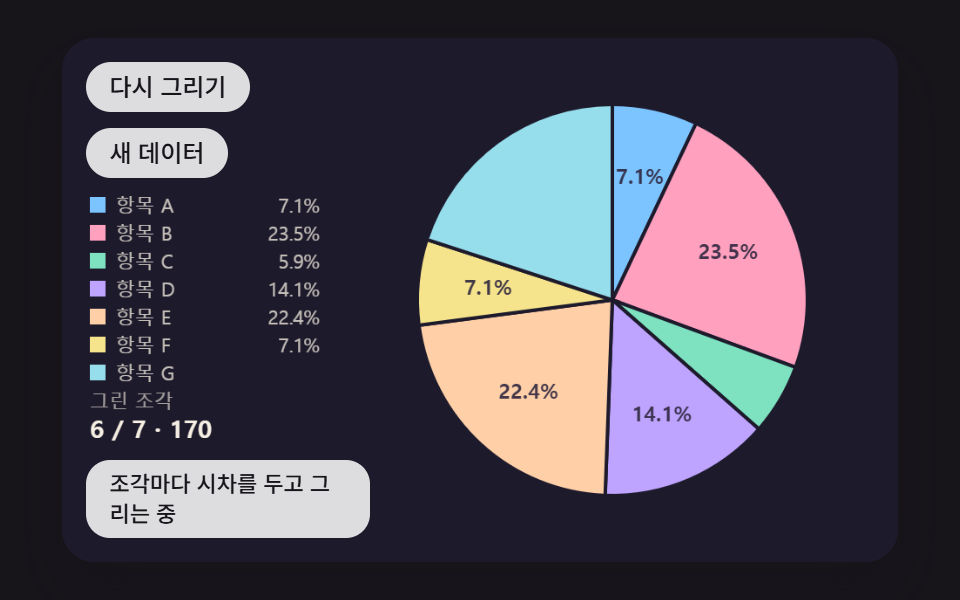 Dashboard UIPie Chart CSS: 9 Slices That Pop, Tilt and Morph
 Dashboard UIWord Cloud JavaScript: 9 Scenes, Spiral to 3D
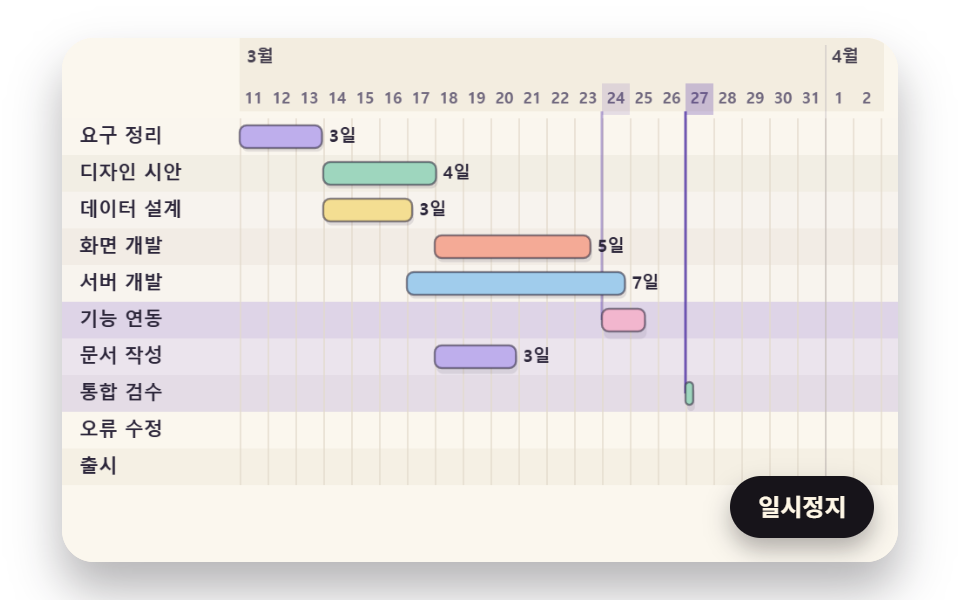 Dashboard UIGantt Chart JavaScript: 9 Self-Scheduling Views
 Dashboard UI9 Dashboard Components, Not the Whole Page
 Dashboard UICommand Palette UI Design — 9 That Really Open
 Dashboard UIChart UI Design: 9 Interactions You Can Drag
 Dashboard UIStock Ticker UI: 9 Live Price Widgets, No API Key