Logo Loading Animation: 9 Progress-Driven Marks
What should a loading logo turn 0-to-1 progress into? 03 springs pixel-sampled points into place, 05 lowers a noise threshold so it bleeds in, and 07 melts
None of the nine plays a timeline. Each scene takes a single progress value between 0 and 1 and draws the mark at that value on one 2D <canvas>, while the stylesheet holds only the stage ratio, the buttons, the focus ring and the progress strip underneath. There is no CSS @keyframes rule anywhere, and motion comes from a loop that adds up requestAnimationFrame timestamps and runs fixed 16ms steps, at most six per frame, with no library or CDN loaded.
Run Nine Progress-Driven Logo Loaders Right Here
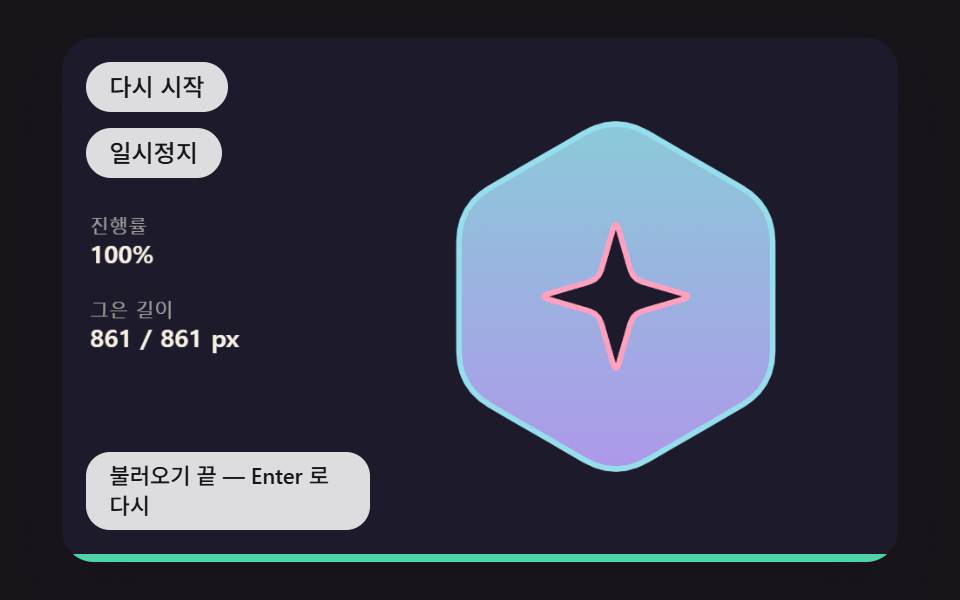 01 logo-load-outline-arc-trace
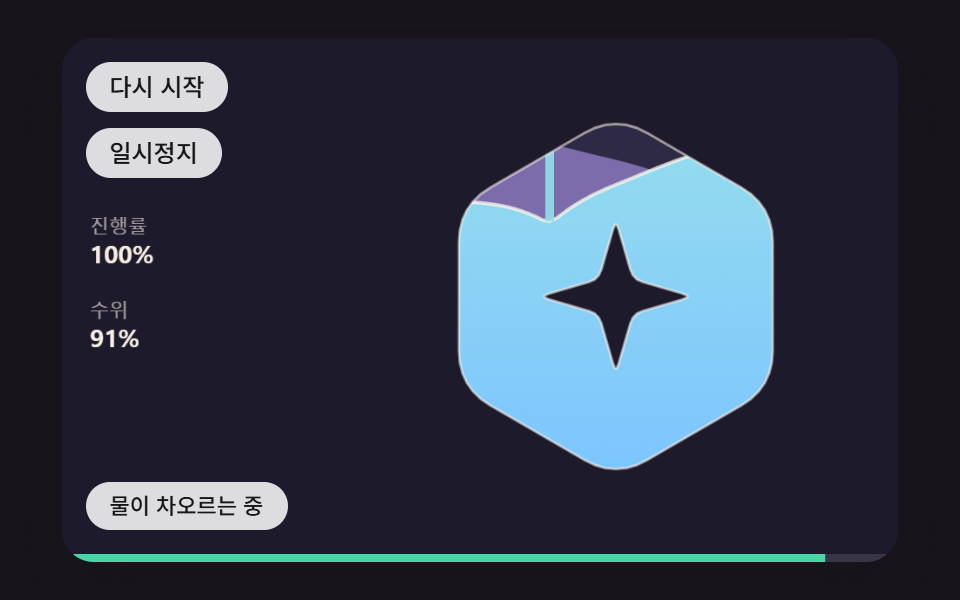 02 logo-load-liquid-wave-fill
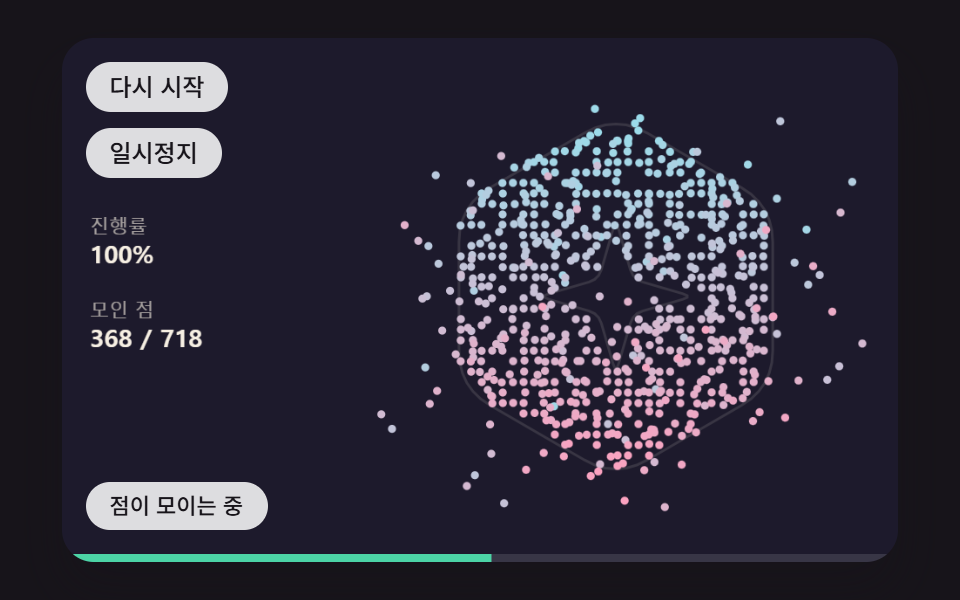 03 logo-load-pixel-point-gather
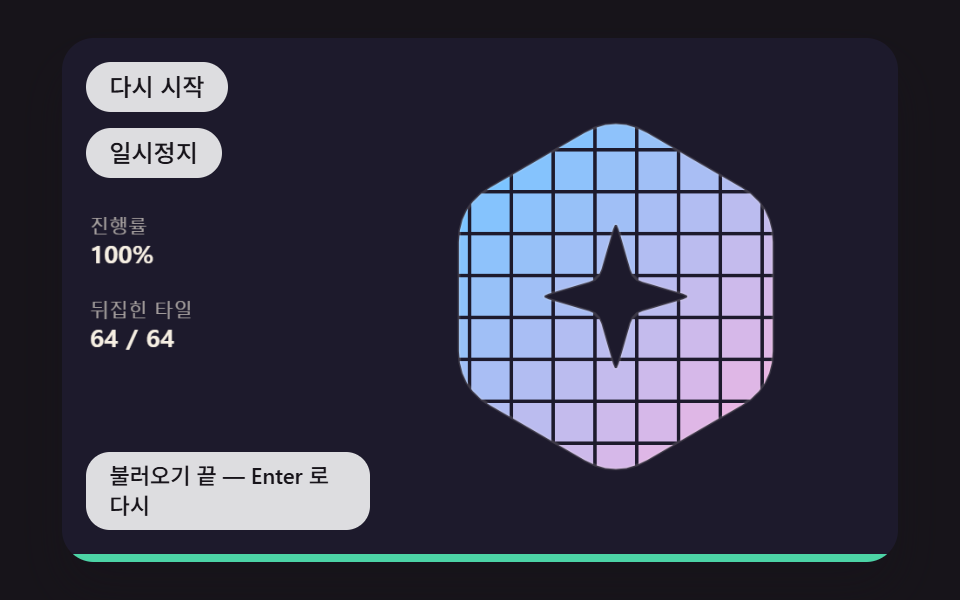 04 logo-load-tile-flip-sweep
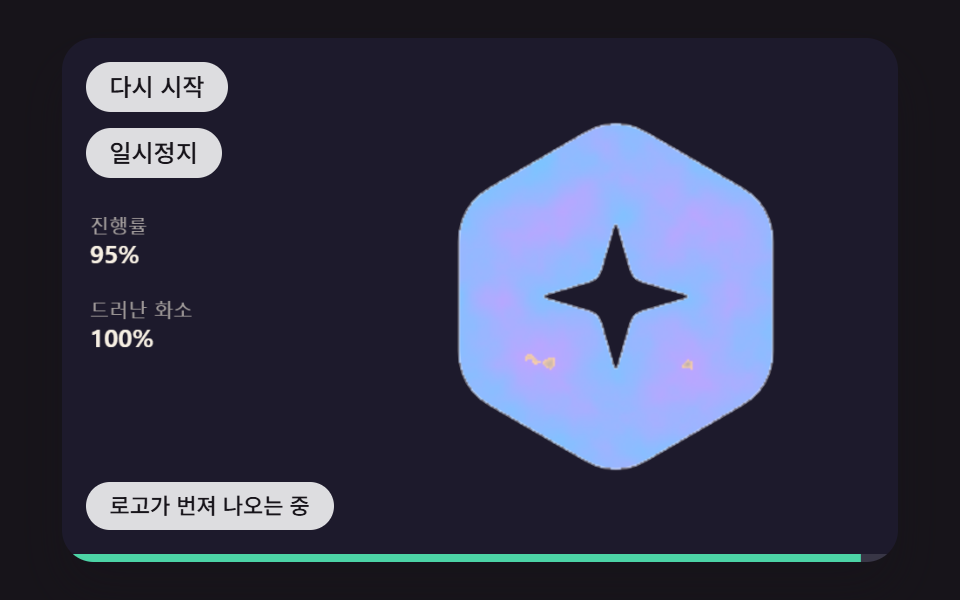 05 logo-load-noise-threshold-bleed
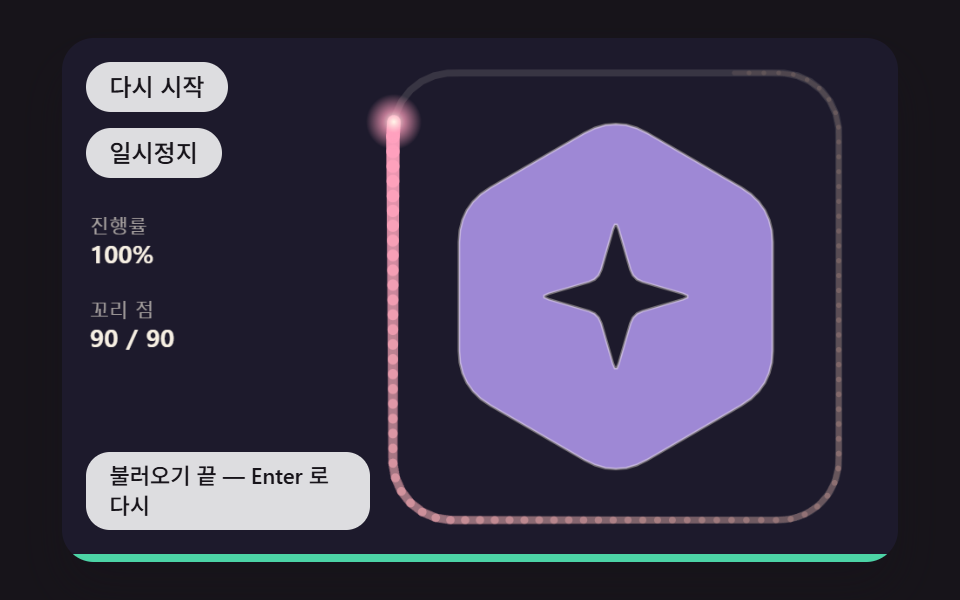 06 logo-load-comet-orbit-tail
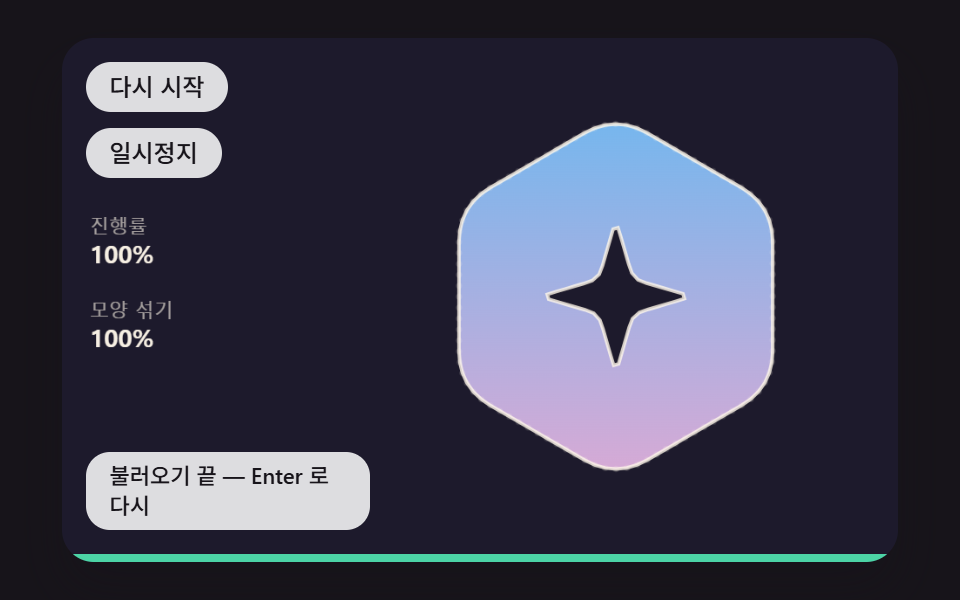 07 logo-load-circle-to-mark-melt
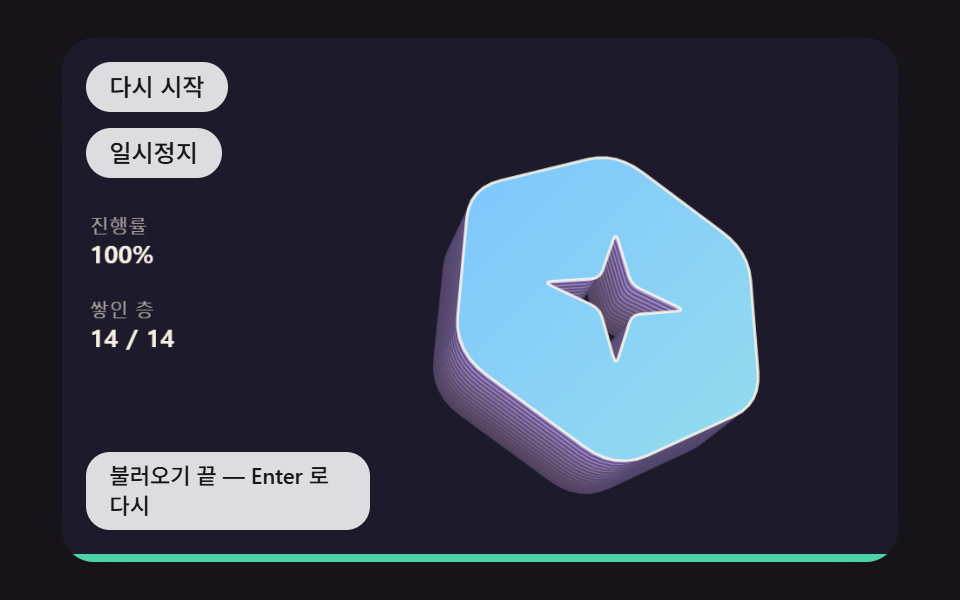 08 logo-load-extrude-layer-stack
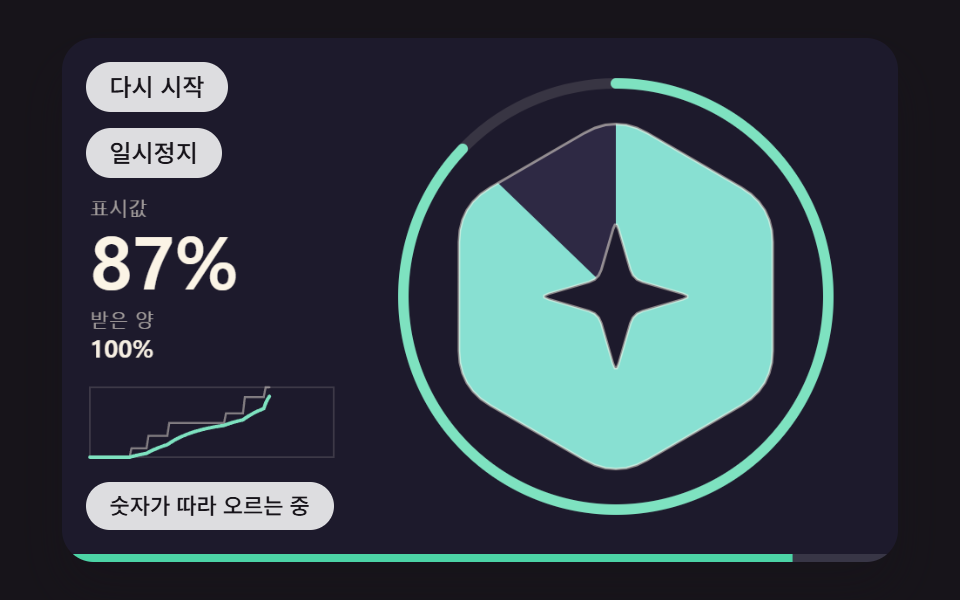 09 logo-load-smoothed-percent-count
Auto-plays · click a tile to jump to its section · all nine in one zip
- 01 A Loader That Traces the Logo Outline at an Even Pace With a Glowing Pen Tip
- 02 A Loader That Fills the Logo Shape With Water and a Sloshing Surface
- 03 A Loader Where Points Sampled From Logo Pixels Spring Into Place
- 04 A Loader That Splits the Logo Into Tiles and Flips Them in a Diagonal Wave
- 05 A Loader Where a Falling Noise Threshold Lets the Logo Bleed In
- 06 A Loader Where a Comet Circling the Logo Grows Its Tail With Progress
- 07 A Loader Where Points on a Circle Melt Into the Logo Outline
- 08 A Loader That Stacks Layers Behind the Logo to Grow Its Depth With Progress
- 09 A Percent Loader That Smoothly Follows Uneven Real Progress and Pulses the Logo at the End
Logo Loading Animation: 9 Ways — Outline Trace, Liquid Fill, Point Gather, Tile Flip, Noise Bleed, Comet Tail, Shape Melt, Depth Stack and Count-Up
The first pair fills the mark with a line (01) and with a surface (02). The middle three reveal it unit by unit, as points (03), tiles (04) and pixels (05). The last four hand the job to a tail circling the edge (06), an outline that turns from a circle into the mark (07), depth that piles up behind it (08) and a calculation that evens out a jumpy number (09).
A hand-drawn geometric mark and a seeded fake download
The mark on screen is a pointy-top hexagon, 104px from center to corner, with a four-pointed star hole cut through it (outer points 44px, inner 14px), and it is not the logo of any company or brand. roundCorners trims each corner and rounds it with a quadratic curve, which leaves 42 points on the outer outline (601.7px around) and 32 on the star hole (260.1px), and the fill uses the evenodd rule so paint lands only inside the hexagon and outside the star. The progress is simulated too. makeLoad(469) uses an integer-mixing random generator seeded with 469 to schedule 7 chunks arriving over 1,300ms, and from 484ms to 758ms the received amount sits at 49% for 274ms. Scenes 01 to 08 read loadAt, which joins arrivals with straight lines, while 09 reads reportedAt, a step that jumps only when a chunk lands, so at 900ms the first eight see 0.585 and 09 sees 0.49. The source contains no fetch, Math.random or Date.now, so the same seed gives the same picture at the same moment each time the page opens.
How much each scene moved in the render capture
A two-second capture of 24 frames holds 23 frame-to-frame changes, and the frames column counts how many of those 23 actually altered the picture.
| Scene | Cumulative area | Moving frames | Mean intensity |
|---|---|---|---|
| 01 Outline trace | 21.6% | 17/23 | 94.0 |
| 02 Liquid fill | 15.5% | 22/23 | 114.8 |
| 03 Pixel point gather | 39.6% | 23/23 | 79.0 |
| 04 Tile flip | 22.2% | 17/23 | 80.7 |
| 05 Noise bleed | 17.7% | 17/23 | 120.1 |
| 06 Comet tail | 26.9% | 23/23 | 64.3 |
| 07 Circle to mark | 16.2% | 20/23 | 92.2 |
| 08 Depth stack | 12.3% | 23/23 | 73.8 |
| 09 Percent count | 28.8% | 23/23 | 137.6 |
One demo cycle lasts 2,000ms: progress stays at 0 for the first 200ms, and the scene holds the finished state for the last 500ms. 01, 04 and 05 draw from progress alone, which likely explains why they stop at 17/23, since those two stretches give them little to change. In 03 the points still waiting for their turn drift around their scattered spots, 06's head keeps circling and 08 sways from side to side, so something changes in all 23 frames. 08 has the smallest cumulative area at 12.3%, likely because each new layer lands right behind the front face and adds only a narrow strip of fresh paint, while 03 has the widest at 39.6%, probably because its points fly in from a ring 128 to 224px from the center.
Matching a loader to the screen it will sit on
When the loading animation for website visitors is also their first look at the brand, 01's outline trace is a safe choice, and 02's rising water explains itself on a screen where people wait for an app install or an update. 03 suits a service start splash, 04 a dashboard's first load and 05 a portfolio intro. For a wait of unknown length such as payment processing, 06 fits, while 07 handles the hand-off to the next screen after sign-in, 08 the entrance to a game or event page, and 09 the waits where people watch a number for a while, like file exports and report generation.
Why Tie a Logo Loader Animation to Progress Instead of Time?
A sequence tied to time ends at its set length, whether that is one second or three. When the real load runs longer, the finished mark just sits there, and when it runs shorter, the screen moves on with the drawing half done. A logo loader animation driven the other way, by one progress value between 0 and 1, decides its picture from that value, so during the 274ms stall in the simulated load 01's pen stops where it is and 04's wave stops advancing. Showing the received amount as it is makes a stall look like a stall, and 09 is the scene that smooths it out instead of hiding it.
Progress enters through a single function, targetProgress(), which returns the dragged or key-set value (manual) when there is one and the simulated table's loadAt(loadMs) otherwise. In a real service you replace only that simulated value with your own progress, plus the incoming() value in 09, and the drawing code stays untouched.
One Number Between 0 and 1, Split Into Line Length, Water Level and Point Count
The table lists, scene by scene, which quantity in the picture p becomes and which value the strip underneath reports.
| Scene | How p becomes the picture | Value the strip reports |
|---|---|---|
| 01 | drawn length = 861.4px × (1 − (1 − p)^1.6) | p |
| 02 | the level closes 8% of its gap to p each step | water level |
| 03 | only points whose shuffled rank is below p × 718 get targets | share of points within 1.5px |
| 04 | flip = (p × 1,120 − (d − 2) × 60) ÷ 400 | p |
| 05 | threshold = 1 − p × 1.07 | p |
| 06 | tail points = 4 + round(p × 86), up to 90 | p |
| 07 | blend = curve(p), giving 0.109, 0.5 and 0.891 at 25, 50 and 75% | p |
| 08 | layers = p × 14, the fraction being the layer sliding in | p |
| 09 | the shown value closes 6% of its gap to the stepped value | shown value |
01's curve lays down the front quickly and closes the end slowly, so at 25, 50 and 75% progress it has already drawn 36.9% (318px), 67.0% (577px) and 89.1% (768px). The strip reports a different value per scene so that the strip and the picture stay in agreement. 02 fills more slowly than progress (the largest gap is 19.4 points), so the strip carries the water level, and 03's points are still in flight, so it carries the share that has arrived. The shared function syncBar does that job.
    // Bottom strip (role="progressbar") — reports the value drawn on screen through the strip length and aria-valuenow. The attribute changes only when the whole-number % changes
    let barPct = -1;
    function syncBar(v) {
        const c = clamp(v, 0, 1);
        fill.style.transform = 'scaleX(' + c.toFixed(4) + ')';
        const p = Math.round(c * 100);
        if (p !== barPct) {
            barPct = p;
            bar.setAttribute('aria-valuenow', String(p));
        }
    }
The strip's length changes through transform: scaleX() alone, so layout is not recalculated, and aria-valuenow is rewritten only when the whole percent changes, which keeps screen readers from hearing the same value again and again.
01A Loader That Traces the Logo Outline at an Even Pace With a Glowing Pen Tip
Points placed at evenly spaced vertex indices bunch up on the rounded corners, leaving neighbor gaps from 0.22 to 12.85px, a 59.3-fold spread, so instead of stepping by point index the code binary-searches a cumulative arc-length table (362 spans, 861.4px in total), finds the span in 9 comparisons and moves the pen tip by the fraction of distance left inside it. The outer outline and the star hole are stroked in different colors, the tip carries an 18px glow and the interior starts filling at 70% progress, which suits a brand site's first screen where the mark is introduced one stroke at a time. In the render this scene covered 21.6% cumulative area with a mean intensity of 94.0 across 17/23 frames.
<main class="stage">
<div class="pc is-demo" id="pc">
  <canvas class="pc__canvas" data-role="canvas" width="480" height="300" tabindex="0" aria-label="A loading screen that traces the hexagon mark's outline at an even pace as progress grows, with a glowing pen tip. Drag sideways or use the arrow keys to move the progress yourself; press Enter to restart, Space to pause, and Esc to return to the simulated load"></canvas>
  <p class="pc__status" data-role="status" aria-live="off">Tracing the outline</p>
  <div class="pc__tools">
    <button class="pc__btn" data-role="restart" type="button">Restart</button>
    <button class="pc__btn" data-role="pause" type="button" aria-pressed="false">Pause</button>
  </div>
  <div class="pc__bar" data-role="bar" role="progressbar" aria-label="Logo loading progress" aria-valuemin="0" aria-valuemax="100" aria-valuenow="0"><span class="pc__fill" data-role="fill"></span></div>
</div>
</main>
@use "../../../../site/static/demo-tokens" as *;
@include stage($stage-ink);
.pc {
position: relative;
width: min(92vw, calc(160vh - 12.8vw));
aspect-ratio: 480 / 300;
margin: 0 auto;
border-radius: $r-card;
overflow: hidden;
box-shadow: $shadow-raised;
background: $subject-ink;
}
.pc__canvas {
display: block;
width: 100%;
height: 100%;
cursor: ew-resize;
}
.pc__canvas:focus-visible {
outline: 2px solid rgba(255, 255, 255, .85);
outline-offset: -6px;
}
// 아래 끝 진행 띠 — 채움은 transform: scaleX 로만 늘린다(레이아웃 재계산 없음)
.pc__bar {
position: absolute;
left: 0;
right: 0;
bottom: 0;
height: 4px;
background: rgba(255, 255, 255, .12);
}
.pc__fill {
display: block;
height: 100%;
background: $subject-mint;
transform: scaleX(0);
transform-origin: left center;
}
.pc__status {
position: absolute;
left: $sp-3;
bottom: $sp-4;
box-sizing: border-box;
max-width: 34%;
margin: 0;
padding: $sp-1 $sp-3;
border-radius: $r-control;
background: rgba(255, 255, 255, .85);
color: $subject-ink;
font-weight: 500;
font-size: 11px;
line-height: 1.4;
pointer-events: none;
}
// 판은 오른쪽에 있다 — 버튼은 왼쪽 위 칸에 두고, 좁으면 줄을 바꿔 판을 덮지 않는다
.pc__tools {
position: absolute;
left: $sp-3;
top: $sp-3;
box-sizing: border-box;
max-width: 34%;
display: flex;
flex-wrap: wrap;
gap: $sp-2;
}
.pc__btn {
margin: 0;
padding: $sp-1 $sp-3;
border: 0;
border-radius: $r-pill;
background: rgba(255, 255, 255, .85);
color: $subject-ink;
font: inherit;
font-weight: 500;
font-size: 12px;
line-height: 1.4;
cursor: pointer;
transition: background-color $dur-quick ease-out;
}
.pc__btn:hover {
background: $subject-cream;
}
.pc__btn[aria-pressed="true"] {
background: $subject-mint;
}
.pc__btn:focus-visible {
outline: 2px solid rgba(255, 255, 255, .95);
outline-offset: 2px;
}
// 손가락 가로 끌기는 이 캔버스가 받고, 세로 쓸기는 브라우저에 남겨 페이지 스크롤이 막히지 않게 한다
.pc__canvas { touch-action: pan-y; }
@media (max-width: 340px) {
.pc__btn { font-size: 10px; padding: $sp-1 $sp-2; }
.pc__status { font-size: 10px; padding: $sp-1 $sp-2; }
}
@media (prefers-reduced-motion: reduce) {
.pc__btn { transition: none; }
}html, body {
margin: 0;
overflow: hidden;
}
.stage {
box-sizing: border-box;
min-height: 100vh;
display: grid;
place-items: center;
margin: 0;
background: #17141a;
font-family: -apple-system, "Segoe UI", "Noto Sans KR", sans-serif;
padding: clamp(8px, 4vw, 24px);
}
.pc {
position: relative;
width: min(92vw, 160vh - 12.8vw);
aspect-ratio: 480/300;
margin: 0 auto;
border-radius: 16px;
overflow: hidden;
box-shadow: 0 14px 24px rgba(23, 20, 26, 0.32);
background: #17141a;
}
.pc__canvas {
display: block;
width: 100%;
height: 100%;
cursor: ew-resize;
}
.pc__canvas:focus-visible {
outline: 2px solid rgba(255, 255, 255, 0.85);
outline-offset: -6px;
}
.pc__bar {
position: absolute;
left: 0;
right: 0;
bottom: 0;
height: 4px;
background: rgba(255, 255, 255, 0.12);
}
.pc__fill {
display: block;
height: 100%;
background: #4cd4a6;
transform: scaleX(0);
transform-origin: left center;
}
.pc__status {
position: absolute;
left: 12px;
bottom: 16px;
box-sizing: border-box;
max-width: 34%;
margin: 0;
padding: 4px 12px;
border-radius: 12px;
background: rgba(255, 255, 255, 0.85);
color: #17141a;
font-weight: 500;
font-size: 11px;
line-height: 1.4;
pointer-events: none;
}
.pc__tools {
position: absolute;
left: 12px;
top: 12px;
box-sizing: border-box;
max-width: 34%;
display: flex;
flex-wrap: wrap;
gap: 8px;
}
.pc__btn {
margin: 0;
padding: 4px 12px;
border: 0;
border-radius: 999px;
background: rgba(255, 255, 255, 0.85);
color: #17141a;
font: inherit;
font-weight: 500;
font-size: 12px;
line-height: 1.4;
cursor: pointer;
transition: background-color 220ms ease-out;
}
.pc__btn:hover {
background: #fff7e6;
}
.pc__btn[aria-pressed=true] {
background: #4cd4a6;
}
.pc__btn:focus-visible {
outline: 2px solid rgba(255, 255, 255, 0.95);
outline-offset: 2px;
}
.pc__canvas {
touch-action: pan-y;
}
@media (max-width: 340px) {
.pc__btn {
font-size: 10px;
padding: 4px 8px;
}
.pc__status {
font-size: 10px;
padding: 4px 8px;
}
}
@media (prefers-reduced-motion: reduce) {
.pc__btn {
transition: none;
}
}(function () {
const root = document.getElementById("pc");
if (!root) return;
const W = 480;
const H = 300;
const FIXED_DT = 16;
const TAU = Math.PI * 2;
const DEG = Math.PI / 180;
// 마크 중심 — 왼쪽 위는 버튼, 왼쪽은 수치, 왼쪽 아래는 상태 줄이라 마크는 오른쪽으로 비켜 둔다
const CX = 318;
const CY = 148;
// 마크 크기 — 육각형 중심에서 꼭짓점까지(px)
const LOGO_R = 104;
// 파스텔 팔레트 — 어두운 무대 위에 밝은 조각을 얹어 명도 차로 경계가 읽힌다
const BG = [29, 26, 44];
const PANEL = [46, 41, 68];
const PAPER = [255, 248, 234];
const PAL = [
[124, 196, 255],
[255, 160, 190],
[126, 226, 192],
[190, 164, 255],
[255, 208, 168],
[246, 228, 140],
[150, 222, 236],
[232, 182, 228],
[196, 220, 160],
];
function clamp(v, lo, hi) { return v < lo ? lo : (v > hi ? hi : v); }
function lerp(a, b, k) { return a + (b - a) * k; }
function smooth(x) { const c = clamp(x, 0, 1); return c * c * (3 - 2 * c); }
function rgba(c, a) {
return 'rgba(' + Math.round(clamp(c[0], 0, 255)) + ',' + Math.round(clamp(c[1], 0, 255)) + ',' + Math.round(clamp(c[2], 0, 255)) + ',' + clamp(a, 0, 1).toFixed(3) + ')';
}
function mix(a, b, k) { return [lerp(a[0], b[0], k), lerp(a[1], b[1], k), lerp(a[2], b[2], k)]; }
function shadeRGB(c, k) { return [c[0] * k, c[1] * k, c[2] * k]; }
// 시드 고정 난수 — 같은 시드면 같은 배치가 다시 나온다 (32비트 정수 섞기)
function makeRng(seed) {
let s = seed >>> 0;
return function () {
s = (s + 0x6d2b79f5) >>> 0;
let t = s;
t = Math.imul(t ^ (t >>> 15), t | 1);
t ^= t + Math.imul(t ^ (t >>> 7), t | 61);
return ((t ^ (t >>> 14)) >>> 0) / 4294967296;
};
}
// 자체 기하 마크 — 꼭짓점이 위를 향한 둥근 육각형 안에 네 갈래 별 모양 구멍. 실존 브랜드와 무관한 도형
function hexVerts(r) {
const out = [];
for (let k = 0; k < 6; k += 1) {
const a = (-90 + 60 * k) * DEG;
out.push([CX + Math.cos(a) * r, CY + Math.sin(a) * r]);
}
return out;
}
// 별 — 바깥 꼭짓점 4개(위·오른쪽·아래·왼쪽)와 그 사이 안쪽 꼭짓점 4개를 번갈아
function starVerts(ro, ri) {
const out = [];
for (let k = 0; k < 8; k += 1) {
const a = (-90 + 45 * k) * DEG;
const r = k % 2 === 0 ? ro : ri;
out.push([CX + Math.cos(a) * r, CY + Math.sin(a) * r]);
}
return out;
}
// 모서리 둥글리기 — 꼭짓점 양옆을 변 길이의 cut 비율만큼 잘라 내고, 꼭짓점을 조절점으로 한 2차 베지어를 steps 칸으로 찍는다
function roundCorners(v, cut, steps) {
const out = [];
const n = v.length;
for (let i = 0; i < n; i += 1) {
const p = v[i];
const a = v[(i + n - 1) % n];
const b = v[(i + 1) % n];
const s = [lerp(p[0], a[0], cut), lerp(p[1], a[1], cut)];
const e = [lerp(p[0], b[0], cut), lerp(p[1], b[1], cut)];
for (let k = 0; k <= steps; k += 1) {
const t = k / steps;
const u = 1 - t;
out.push([u * u * s[0] + 2 * u * t * p[0] + t * t * e[0], u * u * s[1] + 2 * u * t * p[1] + t * t * e[1]]);
}
}
return out;
}
const LOGO_OUTER = roundCorners(hexVerts(LOGO_R), 0.2, 6);
const LOGO_HOLE = roundCorners(starVerts(44, 14), 0.16, 3);
// 외곽선 두 개 — 짝홀 규칙(evenodd)으로 칠하면 바깥 육각형만 칠해지고 별 자리는 뚫린다
const LOGO = [LOGO_OUTER, LOGO_HOLE];
// 점이 마크 안인가 — 오른쪽으로 쏜 반직선이 외곽선을 홀수 번 지나면 안(짝홀 규칙, 캔버스 evenodd 와 같은 판정)
function insideLogo(x, y) {
let inside = false;
for (let c = 0; c < LOGO.length; c += 1) {
const poly = LOGO[c];
for (let i = 0, j = poly.length - 1; i < poly.length; j = i, i += 1) {
const a = poly[i];
const b = poly[j];
if ((a[1] > y) !== (b[1] > y) && x < ((b[0] - a[0]) * (y - a[1])) / (b[1] - a[1]) + a[0]) {
inside = !inside;
}
}
}
return inside;
}
// 닫힌 외곽선의 둘레(px)
function ringLength(c) {
let s = 0;
for (let i = 0; i < c.length; i += 1) {
const a = c[i];
const b = c[(i + 1) % c.length];
s += Math.hypot(b[0] - a[0], b[1] - a[1]);
}
return s;
}
// 가상 진행 — 실제 네트워크 없이 시드 469 로 만든 도착 표(도착 시각 ms, 그때까지 받은 비율). STALL_CHUNK 번째 조각은 받는 양 없이 시간만 흐른다
const LOAD_MS = 1300;
const LOAD_CHUNKS = 7;
const STALL_CHUNK = 3;
function makeLoad(seed) {
const rng = makeRng(seed);
const gaps = [];
const sizes = [];
for (let k = 0; k < LOAD_CHUNKS; k += 1) {
gaps.push(0.6 + rng());
sizes.push(0.35 + rng());
}
sizes[STALL_CHUNK] = 0;
gaps[STALL_CHUNK] += 0.9;
let gs = 0;
let ss = 0;
for (let k = 0; k < LOAD_CHUNKS; k += 1) {
gs += gaps[k];
ss += sizes[k];
}
const out = [{ t: 0, v: 0 }];
let t = 0;
let v = 0;
for (let k = 0; k < LOAD_CHUNKS; k += 1) {
t += (gaps[k] / gs) * LOAD_MS;
v += sizes[k] / ss;
out.push({ t: t, v: v });
}
out[out.length - 1] = { t: LOAD_MS, v: 1 };
return out;
}
const LOAD = makeLoad(469);
// 도착 사이를 직선으로 잇는 진행 — 01~08 이 받는 값
function loadAt(ms) {
if (ms <= 0) {
return 0;
}
for (let k = 1; k < LOAD.length; k += 1) {
const a = LOAD[k - 1];
const b = LOAD[k];
if (ms < b.t) {
return lerp(a.v, b.v, (ms - a.t) / (b.t - a.t));
}
}
return 1;
}
// 도착할 때만 한 번에 뛰는 진행 — 실제 progress 이벤트처럼 계단으로 들어온다 (09 가 받는 값)
function reportedAt(ms) {
let v = 0;
for (let k = 0; k < LOAD.length; k += 1) {
if (LOAD[k].t <= ms) {
v = LOAD[k].v;
}
}
return v;
}
const canvasEl = root.querySelector('[data-role="canvas"]');
const statusEl = root.querySelector('[data-role="status"]');
const barEl = root.querySelector('[data-role="bar"]');
const fillEl = root.querySelector('[data-role="fill"]');
const ctxRaw = canvasEl ? canvasEl.getContext('2d') : null;
if (!canvasEl || !ctxRaw || !statusEl || !barEl || !fillEl) {
return;
}
const cv = canvasEl;
const ctx = ctxRaw;
const status = statusEl;
const bar = barEl;
const fill = fillEl;
const restartBtn = root.querySelector('[data-role="restart"]');
const pauseBtn = root.querySelector('[data-role="pause"]');
const reduceQuery = window.matchMedia('(prefers-reduced-motion: reduce)');
// 페이지를 연 채 동작 줄이기 설정을 바꿔도 tail 의 change 리스너가 이 값을 다시 읽는다
let still = reduceQuery.matches;
// 자동 시연 중인가 — 사람이 처음 만지는 순간 시연을 멈추고 상태 줄을 읽어 주기 시작한다
let demo = root.classList.contains('is-demo');
function wake() {
if (!demo) {
return;
}
demo = false;
root.classList.remove('is-demo');
status.setAttribute('aria-live', 'polite');
}
function say(text) {
if (status.textContent !== text) {
status.textContent = text;
}
}
function fitCanvas() {
// 배율은 2 에서 자른다 — 배율 3 기기에서 화소가 2.25배로 늘어 프레임마다 일이 그만큼 커지지 않게
const dpr = Math.min(window.devicePixelRatio || 1, 2);
cv.width = Math.round(W * dpr);
cv.height = Math.round(H * dpr);
ctx.setTransform(dpr, 0, 0, dpr, 0, 0);
}
// 화면 좌표(CSS px) → 장면 좌표(480x300). 리사이즈 뒤에도 늘 현재 크기로 다시 잰다
function toScene(ev) {
const r = cv.getBoundingClientRect();
return [((ev.clientX - r.left) / r.width) * W, ((ev.clientY - r.top) / r.height) * H];
}
function contourPath(c) {
ctx.moveTo(c[0][0], c[0][1]);
for (let i = 1; i < c.length; i += 1) {
ctx.lineTo(c[i][0], c[i][1]);
}
ctx.closePath();
}
function logoPath() {
ctx.beginPath();
for (let c = 0; c < LOGO.length; c += 1) {
contourPath(LOGO[c]);
}
}
// 마크 모양으로 자르기 — 이 뒤에 그리는 것은 육각형 안·별 구멍 밖에만 남는다
function clipLogo() {
logoPath();
ctx.clip('evenodd');
}
// 마크 자리 안내선 — 다 그려지면 어떤 모양이 될지 미리 보여 주는 옅은 외곽선
function logoGuide(a) {
logoPath();
ctx.strokeStyle = rgba(PAPER, a);
ctx.lineWidth = 1.5;
ctx.stroke();
}
// 왼쪽 수치 한 줄 — 이름표 + 값
const LEG_X = 16;
function statRow(y, label, value) {
ctx.textBaseline = 'alphabetic';
ctx.textAlign = 'left';
ctx.fillStyle = rgba(PAPER, 0.6);
ctx.font = '500 11px sans-serif';
ctx.fillText(label, LEG_X, y);
ctx.fillStyle = rgba(PAPER, 0.96);
ctx.font = '700 14px sans-serif';
ctx.fillText(value, LEG_X, y + 17);
}
function pct(v) { return Math.round(clamp(v, 0, 1) * 100) + '%'; }
function clearStage() {
ctx.fillStyle = rgba(BG, 1);
ctx.fillRect(0, 0, W, H);
}
// 진행 상태 — loadMs 는 가상 진행의 시계, manual 은 끌기·방향키로 직접 정한 Progress(−1 이면 가상 진행을 따른다)
let loadMs = 0;
let paused = false;
let manual = -1;
let progress = 0;
let clock = 0;
function targetProgress() { return manual >= 0 ? manual : loadAt(loadMs); }
function updateProgress() { progress = targetProgress(); }
function advanceLoad(dt) {
if (paused || manual >= 0) {
return;
}
loadMs = Math.min(loadMs + dt, LOAD_MS);
}
// 아래 띠(role="progressbar") — 화면에 그린 값과 같은 값을 띠 길이와 aria-valuenow 로 알린다. 정수 % 가 바뀔 때만 속성을 고친다
let barPct = -1;
function syncBar(v) {
const c = clamp(v, 0, 1);
fill.style.transform = 'scaleX(' + c.toFixed(4) + ')';
const p = Math.round(c * 100);
if (p !== barPct) {
barPct = p;
bar.setAttribute('aria-valuenow', String(p));
}
}
const TXT_DONE = 'Done loading — Enter to restart';
const TXT_PAUSE = 'Paused — Space to resume';
const TXT_MANUAL = 'Moving it by hand — Esc to go back';
function report() {
if (manual >= 0) {
say(TXT_MANUAL);
}
else if (paused) {
say(TXT_PAUSE);
}
else if (shown() >= 0.999) {
say(TXT_DONE);
}
else {
say(TXT_RUN);
}
}
function render() {
draw();
syncBar(shown());
report();
}
function setPaused(v) {
paused = v;
if (pauseBtn) {
pauseBtn.setAttribute('aria-pressed', v ? 'true' : 'false');
}
}
function restart() {
loadMs = 0;
manual = -1;
setPaused(false);
progress = 0;
onRestart();
}
// 시연 — 2초마다 처음부터. 첫 200ms 는 빈 마크로 두고(첫 변화 200ms 뒤) 1,300ms 동안 불러온 뒤 끝 상태로 머문다
const DEMO_LOOP = 2000;
const DEMO_LEAD = 200;
let demoCycle = -1;
function demoTick(t) {
const cyc = Math.floor(t / DEMO_LOOP);
if (cyc !== demoCycle) {
demoCycle = cyc;
restart();
}
loadMs = clamp(t - cyc * DEMO_LOOP - DEMO_LEAD, 0, LOAD_MS);
}
// 입력 한 번 뒤 — 진행률을 다시 읽고, 동작 줄이기면 움직임 없이 그 진행률의 끝 모습으로 바로 그린다
function after() {
updateProgress();
if (still) {
settle();
}
render();
if (still) {
kickStill();
}
}
// 끌기 — 무대 가로 위치를 진행률로 (왼쪽 40px = 0%, 오른쪽 40px = 100%)
const SCRUB_X0 = 40;
const SCRUB_X1 = 440;
const KEY_STEP = 0.05;
let dragging = false;
function scrubAt(ev) {
const p = toScene(ev);
manual = clamp((p[0] - SCRUB_X0) / (SCRUB_X1 - SCRUB_X0), 0, 1);
}
cv.addEventListener('pointerdown', function (ev) {
wake();
dragging = true;
if (cv.setPointerCapture) {
cv.setPointerCapture(ev.pointerId);
}
scrubAt(ev);
after();
});
cv.addEventListener('pointermove', function (ev) {
if (!dragging) {
return;
}
scrubAt(ev);
after();
});
function endDrag() { dragging = false; }
cv.addEventListener('pointerup', endDrag);
cv.addEventListener('pointercancel', endDrag);
function nudge(d) {
manual = clamp((manual >= 0 ? manual : progress) + d, 0, 1);
}
cv.addEventListener('keydown', function (ev) {
const k = ev.key;
if (k === 'Enter') {
restart();
}
else if (k === ' ') {
setPaused(!paused);
}
else if (k === 'ArrowRight' || k === 'ArrowUp') {
nudge(KEY_STEP);
}
else if (k === 'ArrowLeft' || k === 'ArrowDown') {
nudge(-KEY_STEP);
}
else if (k === 'Home') {
manual = 0;
}
else if (k === 'End') {
manual = 1;
}
else if (k === 'Escape') {
manual = -1;
}
else {
return;
}
ev.preventDefault();
wake();
after();
});
if (restartBtn) {
restartBtn.addEventListener('click', function () { wake(); restart(); after(); });
}
if (pauseBtn) {
pauseBtn.addEventListener('click', function () { wake(); setPaused(!paused); after(); });
}
// 외곽선을 자르는 점 개수 — 외곽선마다 꼭짓점 번호를 같은 간격으로 나눠 찍는다
const TRACE_SAMPLES = 360;
// 펜 끝 빛 번짐 반지름(px)
const PEN_GLOW_PX = 18;
// 진행률을 그은 길이로 바꾸는 곡선의 지수 — 1 이면 그대로, 클수록 앞에서 빨리 긋고 끝에서 천천히 닫는다
const TRACE_EASE_POW = 1.6;
const LINE_W = 3.2;
const TXT_RUN = 'Tracing the outline';
function samplePath() {
let verts = 0;
for (let c = 0; c < LOGO.length; c += 1) {
verts += LOGO[c].length;
}
const out = [];
for (let c = 0; c < LOGO.length; c += 1) {
const poly = LOGO[c];
const n = Math.max(8, Math.round((TRACE_SAMPLES * poly.length) / verts));
for (let i = 0; i <= n; i += 1) {
const u = (i / n) * poly.length;
const k = Math.floor(u) % poly.length;
const f = u - Math.floor(u);
const a = poly[k];
const b = poly[(k + 1) % poly.length];
out.push({ x: lerp(a[0], b[0], f), y: lerp(a[1], b[1], f), lift: i === 0, ring: c });
}
}
return out;
}
const TRACE = samplePath();
// 누적 호 길이 표 — cum[i] 는 첫 점에서 i 번째 점까지 실제로 Length traced. 외곽선이 바뀌는 자리(lift)는 펜을 들고 건너가 0 을 더한다
function arcTable(p) {
const cum = [0];
for (let i = 1; i < p.length; i += 1) {
cum.push(cum[i - 1] + (p[i].lift ? 0 : Math.hypot(p[i].x - p[i - 1].x, p[i].y - p[i - 1].y)));
}
return cum;
}
const CUM = arcTable(TRACE);
const TOTAL = CUM[CUM.length - 1];
// 이분 탐색 — cum[i] <= d 인 가장 큰 i. 표가 오름차순이라 점 360개도 9번 안쪽 비교로 찾는다
    function findSeg(d) {
        let lo = 0;
        let hi = CUM.length - 1;
        while (hi - lo > 1) {
            const mid = (lo + hi) >> 1;
            if (CUM[mid] <= d) {
                lo = mid;
            }
            else {
                hi = mid;
            }
        }
        return lo;
    }
function traceEase(p) { return 1 - Math.pow(1 - clamp(p, 0, 1), TRACE_EASE_POW); }
// 펜 끝 — 그 칸 안에서 남은 거리 비율만큼 두 점 사이를 잇는다. 그래서 펜은 점 간격과 상관없이 길이에 비례해 움직인다
function penAt(d) {
const i = findSeg(d);
if (i >= TRACE.length - 1) {
return { i: i, x: TRACE[i].x, y: TRACE[i].y };
}
const seg = CUM[i + 1] - CUM[i];
const f = seg > 0 ? clamp((d - CUM[i]) / seg, 0, 1) : 0;
return { i: i, x: lerp(TRACE[i].x, TRACE[i + 1].x, f), y: lerp(TRACE[i].y, TRACE[i + 1].y, f) };
}
const RING_COL = [PAL[6], PAL[1]];
function shown() { return progress; }
function step() { }
function settle() { }
function onRestart() { }
function draw() {
clearStage();
const d = traceEase(progress) * TOTAL;
// 다 그은 뒤 마지막 30% 구간에서 속이 차오른다 — 외곽선이 닫혀야 채움이 의미가 있다
const fillA = smooth((progress - 0.7) / 0.3);
if (fillA > 0) {
logoPath();
const g = ctx.createLinearGradient(0, CY - LOGO_R, 0, CY + LOGO_R);
g.addColorStop(0, rgba(PAL[6], 0.9 * fillA));
g.addColorStop(1, rgba(PAL[3], 0.9 * fillA));
ctx.fillStyle = g;
ctx.fill('evenodd');
}
logoGuide(0.16);
const pen = penAt(d);
ctx.lineWidth = LINE_W;
ctx.lineCap = 'round';
ctx.lineJoin = 'round';
ctx.beginPath();
let ring = TRACE[0].ring;
for (let i = 0; i <= pen.i; i += 1) {
const p = TRACE[i];
if (p.lift) {
if (i > 0) {
ctx.strokeStyle = rgba(RING_COL[ring], 1);
ctx.stroke();
ctx.beginPath();
}
ring = p.ring;
ctx.moveTo(p.x, p.y);
}
else {
ctx.lineTo(p.x, p.y);
}
}
ctx.lineTo(pen.x, pen.y);
ctx.strokeStyle = rgba(RING_COL[ring], 1);
ctx.stroke();
if (progress > 0 && progress < 1) {
const g = ctx.createRadialGradient(pen.x, pen.y, 0, pen.x, pen.y, PEN_GLOW_PX);
g.addColorStop(0, rgba(PAPER, 0.95));
g.addColorStop(0.35, rgba(RING_COL[ring], 0.6));
g.addColorStop(1, rgba(RING_COL[ring], 0));
ctx.fillStyle = g;
ctx.beginPath();
ctx.arc(pen.x, pen.y, PEN_GLOW_PX, 0, TAU);
ctx.fill();
}
statRow(112, 'Progress', pct(progress));
statRow(160, 'Length traced', Math.round(d) + ' / ' + Math.round(TOTAL) + ' px');
}
function onResize() {
fitCanvas();
render();
}
fitCanvas();
window.addEventListener('resize', onResize);
let rafId = 0;
let lastTs = -1;
let acc = 0;
function frame(ts) {
if (still) {
rafId = 0;
return;
}
if (lastTs < 0) {
lastTs = ts;
}
// 탭이 숨었다 돌아와도 한 번에 100ms 까지만 따라잡는다 — 순간이동 대신 이어서 움직인다
acc += Math.min(ts - lastTs, 100);
lastTs = ts;
let n = 0;
while (acc >= FIXED_DT && n < 6) {
clock += FIXED_DT;
if (demo) {
demoTick(clock);
}
else {
advanceLoad(FIXED_DT);
}
updateProgress();
step();
acc -= FIXED_DT;
n += 1;
}
render();
rafId = window.requestAnimationFrame(frame);
}
function startLoop() {
if (rafId) {
return;
}
lastTs = -1;
acc = 0;
rafId = window.requestAnimationFrame(frame);
}
// 동작 줄이기 — rAF 루프 없이 STILL_TICK_MS 마다 가상 진행만 한 칸 옮기고, 그 진행률의 끝 모습(물결·스프링·뒤집기 없이)을 그린다
const STILL_TICK_MS = 400;
let stillTimer = 0;
function stillTick() {
stillTimer = 0;
if (!still) {
return;
}
advanceLoad(STILL_TICK_MS);
after();
}
function kickStill() {
if (!still || stillTimer || paused || manual >= 0 || loadMs >= LOAD_MS) {
return;
}
stillTimer = window.setTimeout(stillTick, STILL_TICK_MS);
}
function stopStill() {
if (stillTimer) {
window.clearTimeout(stillTimer);
stillTimer = 0;
}
}
// 동작 줄이기 설정이 페이지를 연 채 바뀌면 — 켜지면 루프를 멈추고 그 진행률의 끝 모습으로, 꺼지면 루프를 다시 돈다
function onMotionPref() {
still = reduceQuery.matches;
if (still) {
if (rafId) {
window.cancelAnimationFrame(rafId);
rafId = 0;
}
after();
}
else {
stopStill();
startLoop();
}
}
if (typeof reduceQuery.addEventListener === 'function') {
reduceQuery.addEventListener('change', onMotionPref);
}
if (still) {
after();
}
else {
render();
startLoop();
}
return function () {
window.cancelAnimationFrame(rafId);
stopStill();
window.removeEventListener('resize', onResize);
if (typeof reduceQuery.removeEventListener === 'function') {
reduceQuery.removeEventListener('change', onMotionPref);
}
};
})();// OutlineArcTrace - vanilla 판(01-logo-load-outline-arc-trace) 의 React 포트. 같은 계산을 useEffect 안에서 돌린다.
import { useEffect, useRef } from "react";
import styles from "./OutlineArcTrace.module.scss";
const cx = (s: string): string => s.split(" ").map((n) => styles[n] ?? n).join(" ");
export default function OutlineArcTrace() {
const rootRef = useRef<HTMLDivElement | null>(null);
useEffect(() => {
const rootEl = rootRef.current;
if (!rootEl) return;
const root: HTMLElement = rootEl;
type RGB = [number, number, number];
type Pt = [number, number];
const W = 480;
const H = 300;
const FIXED_DT = 16;
const TAU = Math.PI * 2;
const DEG = Math.PI / 180;
// 마크 중심 — 왼쪽 위는 버튼, 왼쪽은 수치, 왼쪽 아래는 상태 줄이라 마크는 오른쪽으로 비켜 둔다
const CX = 318;
const CY = 148;
// 마크 크기 — 육각형 중심에서 꼭짓점까지(px)
const LOGO_R = 104;
// 파스텔 팔레트 — 어두운 무대 위에 밝은 조각을 얹어 명도 차로 경계가 읽힌다
const BG: RGB = [29, 26, 44];
const PANEL: RGB = [46, 41, 68];
const PAPER: RGB = [255, 248, 234];
const PAL: RGB[] = [
[124, 196, 255],
[255, 160, 190],
[126, 226, 192],
[190, 164, 255],
[255, 208, 168],
[246, 228, 140],
[150, 222, 236],
[232, 182, 228],
[196, 220, 160],
];
function clamp(v: number, lo: number, hi: number): number { return v < lo ? lo : (v > hi ? hi : v); }
function lerp(a: number, b: number, k: number): number { return a + (b - a) * k; }
function smooth(x: number): number { const c = clamp(x, 0, 1); return c * c * (3 - 2 * c); }
function rgba(c: RGB, a: number): string {
return 'rgba(' + Math.round(clamp(c[0], 0, 255)) + ',' + Math.round(clamp(c[1], 0, 255)) + ',' + Math.round(clamp(c[2], 0, 255)) + ',' + clamp(a, 0, 1).toFixed(3) + ')';
}
function mix(a: RGB, b: RGB, k: number): RGB { return [lerp(a[0], b[0], k), lerp(a[1], b[1], k), lerp(a[2], b[2], k)]; }
function shadeRGB(c: RGB, k: number): RGB { return [c[0] * k, c[1] * k, c[2] * k]; }
// 시드 고정 난수 — 같은 시드면 같은 배치가 다시 나온다 (32비트 정수 섞기)
function makeRng(seed: number): () => number {
let s = seed >>> 0;
return function (): number {
s = (s + 0x6d2b79f5) >>> 0;
let t = s;
t = Math.imul(t ^ (t >>> 15), t | 1);
t ^= t + Math.imul(t ^ (t >>> 7), t | 61);
return ((t ^ (t >>> 14)) >>> 0) / 4294967296;
};
}
// 자체 기하 마크 — 꼭짓점이 위를 향한 둥근 육각형 안에 네 갈래 별 모양 구멍. 실존 브랜드와 무관한 도형
function hexVerts(r: number): Pt[] {
const out: Pt[] = [];
for (let k = 0; k < 6; k += 1) {
const a = (-90 + 60 * k) * DEG;
out.push([CX + Math.cos(a) * r, CY + Math.sin(a) * r]);
}
return out;
}
// 별 — 바깥 꼭짓점 4개(위·오른쪽·아래·왼쪽)와 그 사이 안쪽 꼭짓점 4개를 번갈아
function starVerts(ro: number, ri: number): Pt[] {
const out: Pt[] = [];
for (let k = 0; k < 8; k += 1) {
const a = (-90 + 45 * k) * DEG;
const r = k % 2 === 0 ? ro : ri;
out.push([CX + Math.cos(a) * r, CY + Math.sin(a) * r]);
}
return out;
}
// 모서리 둥글리기 — 꼭짓점 양옆을 변 길이의 cut 비율만큼 잘라 내고, 꼭짓점을 조절점으로 한 2차 베지어를 steps 칸으로 찍는다
function roundCorners(v: Pt[], cut: number, steps: number): Pt[] {
const out: Pt[] = [];
const n = v.length;
for (let i = 0; i < n; i += 1) {
const p = v[i];
const a = v[(i + n - 1) % n];
const b = v[(i + 1) % n];
const s: Pt = [lerp(p[0], a[0], cut), lerp(p[1], a[1], cut)];
const e: Pt = [lerp(p[0], b[0], cut), lerp(p[1], b[1], cut)];
for (let k = 0; k <= steps; k += 1) {
const t = k / steps;
const u = 1 - t;
out.push([u * u * s[0] + 2 * u * t * p[0] + t * t * e[0], u * u * s[1] + 2 * u * t * p[1] + t * t * e[1]]);
}
}
return out;
}
const LOGO_OUTER: Pt[] = roundCorners(hexVerts(LOGO_R), 0.2, 6);
const LOGO_HOLE: Pt[] = roundCorners(starVerts(44, 14), 0.16, 3);
// 외곽선 두 개 — 짝홀 규칙(evenodd)으로 칠하면 바깥 육각형만 칠해지고 별 자리는 뚫린다
const LOGO: Pt[][] = [LOGO_OUTER, LOGO_HOLE];
// 점이 마크 안인가 — 오른쪽으로 쏜 반직선이 외곽선을 홀수 번 지나면 안(짝홀 규칙, 캔버스 evenodd 와 같은 판정)
function insideLogo(x: number, y: number): boolean {
let inside = false;
for (let c = 0; c < LOGO.length; c += 1) {
const poly = LOGO[c];
for (let i = 0, j = poly.length - 1; i < poly.length; j = i, i += 1) {
const a = poly[i];
const b = poly[j];
if ((a[1] > y) !== (b[1] > y) && x < ((b[0] - a[0]) * (y - a[1])) / (b[1] - a[1]) + a[0]) { inside = !inside; }
}
}
return inside;
}
// 닫힌 외곽선의 둘레(px)
function ringLength(c: Pt[]): number {
let s = 0;
for (let i = 0; i < c.length; i += 1) {
const a = c[i];
const b = c[(i + 1) % c.length];
s += Math.hypot(b[0] - a[0], b[1] - a[1]);
}
return s;
}
// 가상 진행 — 실제 네트워크 없이 시드 469 로 만든 도착 표(도착 시각 ms, 그때까지 받은 비율). STALL_CHUNK 번째 조각은 받는 양 없이 시간만 흐른다
const LOAD_MS = 1300;
const LOAD_CHUNKS = 7;
const STALL_CHUNK = 3;
type Chunk = { t: number; v: number };
function makeLoad(seed: number): Chunk[] {
const rng = makeRng(seed);
const gaps: number[] = [];
const sizes: number[] = [];
for (let k = 0; k < LOAD_CHUNKS; k += 1) {
gaps.push(0.6 + rng());
sizes.push(0.35 + rng());
}
sizes[STALL_CHUNK] = 0;
gaps[STALL_CHUNK] += 0.9;
let gs = 0;
let ss = 0;
for (let k = 0; k < LOAD_CHUNKS; k += 1) { gs += gaps[k]; ss += sizes[k]; }
const out: Chunk[] = [{ t: 0, v: 0 }];
let t = 0;
let v = 0;
for (let k = 0; k < LOAD_CHUNKS; k += 1) {
t += (gaps[k] / gs) * LOAD_MS;
v += sizes[k] / ss;
out.push({ t: t, v: v });
}
out[out.length - 1] = { t: LOAD_MS, v: 1 };
return out;
}
const LOAD: Chunk[] = makeLoad(469);
// 도착 사이를 직선으로 잇는 진행 — 01~08 이 받는 값
function loadAt(ms: number): number {
if (ms <= 0) { return 0; }
for (let k = 1; k < LOAD.length; k += 1) {
const a = LOAD[k - 1];
const b = LOAD[k];
if (ms < b.t) { return lerp(a.v, b.v, (ms - a.t) / (b.t - a.t)); }
}
return 1;
}
// 도착할 때만 한 번에 뛰는 진행 — 실제 progress 이벤트처럼 계단으로 들어온다 (09 가 받는 값)
function reportedAt(ms: number): number {
let v = 0;
for (let k = 0; k < LOAD.length; k += 1) {
if (LOAD[k].t <= ms) { v = LOAD[k].v; }
}
return v;
}
const canvasEl = root.querySelector('[data-role="canvas"]') as HTMLCanvasElement | null;
const statusEl = root.querySelector('[data-role="status"]') as HTMLElement | null;
const barEl = root.querySelector('[data-role="bar"]') as HTMLElement | null;
const fillEl = root.querySelector('[data-role="fill"]') as HTMLElement | null;
const ctxRaw = canvasEl ? canvasEl.getContext('2d') : null;
if (!canvasEl || !ctxRaw || !statusEl || !barEl || !fillEl) { return; }
const cv: HTMLCanvasElement = canvasEl;
const ctx: CanvasRenderingContext2D = ctxRaw;
const status: HTMLElement = statusEl;
const bar: HTMLElement = barEl;
const fill: HTMLElement = fillEl;
const restartBtn = root.querySelector('[data-role="restart"]') as HTMLButtonElement | null;
const pauseBtn = root.querySelector('[data-role="pause"]') as HTMLButtonElement | null;
const reduceQuery = window.matchMedia('(prefers-reduced-motion: reduce)');
// 페이지를 연 채 동작 줄이기 설정을 바꿔도 tail 의 change 리스너가 이 값을 다시 읽는다
let still = reduceQuery.matches;
// 자동 시연 중인가 — 사람이 처음 만지는 순간 시연을 멈추고 상태 줄을 읽어 주기 시작한다
let demo = root.classList.contains('is-demo');
function wake(): void {
if (!demo) { return; }
demo = false;
root.classList.remove('is-demo');
status.setAttribute('aria-live', 'polite');
}
function say(text: string): void {
if (status.textContent !== text) { status.textContent = text; }
}
function fitCanvas(): void {
// 배율은 2 에서 자른다 — 배율 3 기기에서 화소가 2.25배로 늘어 프레임마다 일이 그만큼 커지지 않게
const dpr = Math.min(window.devicePixelRatio || 1, 2);
cv.width = Math.round(W * dpr);
cv.height = Math.round(H * dpr);
ctx.setTransform(dpr, 0, 0, dpr, 0, 0);
}
// 화면 좌표(CSS px) → 장면 좌표(480x300). 리사이즈 뒤에도 늘 현재 크기로 다시 잰다
function toScene(ev: PointerEvent): [number, number] {
const r = cv.getBoundingClientRect();
return [((ev.clientX - r.left) / r.width) * W, ((ev.clientY - r.top) / r.height) * H];
}
function contourPath(c: Pt[]): void {
ctx.moveTo(c[0][0], c[0][1]);
for (let i = 1; i < c.length; i += 1) { ctx.lineTo(c[i][0], c[i][1]); }
ctx.closePath();
}
function logoPath(): void {
ctx.beginPath();
for (let c = 0; c < LOGO.length; c += 1) { contourPath(LOGO[c]); }
}
// 마크 모양으로 자르기 — 이 뒤에 그리는 것은 육각형 안·별 구멍 밖에만 남는다
function clipLogo(): void {
logoPath();
ctx.clip('evenodd');
}
// 마크 자리 안내선 — 다 그려지면 어떤 모양이 될지 미리 보여 주는 옅은 외곽선
function logoGuide(a: number): void {
logoPath();
ctx.strokeStyle = rgba(PAPER, a);
ctx.lineWidth = 1.5;
ctx.stroke();
}
// 왼쪽 수치 한 줄 — 이름표 + 값
const LEG_X = 16;
function statRow(y: number, label: string, value: string): void {
ctx.textBaseline = 'alphabetic';
ctx.textAlign = 'left';
ctx.fillStyle = rgba(PAPER, 0.6);
ctx.font = '500 11px sans-serif';
ctx.fillText(label, LEG_X, y);
ctx.fillStyle = rgba(PAPER, 0.96);
ctx.font = '700 14px sans-serif';
ctx.fillText(value, LEG_X, y + 17);
}
function pct(v: number): string { return Math.round(clamp(v, 0, 1) * 100) + '%'; }
function clearStage(): void {
ctx.fillStyle = rgba(BG, 1);
ctx.fillRect(0, 0, W, H);
}
// 진행 상태 — loadMs 는 가상 진행의 시계, manual 은 끌기·방향키로 직접 정한 진행률(−1 이면 가상 진행을 따른다)
let loadMs = 0;
let paused = false;
let manual = -1;
let progress = 0;
let clock = 0;
function targetProgress(): number { return manual >= 0 ? manual : loadAt(loadMs); }
function updateProgress(): void { progress = targetProgress(); }
function advanceLoad(dt: number): void {
if (paused || manual >= 0) { return; }
loadMs = Math.min(loadMs + dt, LOAD_MS);
}
// 아래 띠(role="progressbar") — 화면에 그린 값과 같은 값을 띠 길이와 aria-valuenow 로 알린다. 정수 % 가 바뀔 때만 속성을 고친다
let barPct = -1;
function syncBar(v: number): void {
const c = clamp(v, 0, 1);
fill.style.transform = 'scaleX(' + c.toFixed(4) + ')';
const p = Math.round(c * 100);
if (p !== barPct) {
barPct = p;
bar.setAttribute('aria-valuenow', String(p));
}
}
const TXT_DONE = '불러오기 끝 — Enter 로 다시';
const TXT_PAUSE = '일시정지 — Space 로 이어서';
const TXT_MANUAL = '직접 옮기는 중 — Esc 로 돌아가기';
function report(): void {
if (manual >= 0) { say(TXT_MANUAL); }
else if (paused) { say(TXT_PAUSE); }
else if (shown() >= 0.999) { say(TXT_DONE); }
else { say(TXT_RUN); }
}
function render(): void {
draw();
syncBar(shown());
report();
}
function setPaused(v: boolean): void {
paused = v;
if (pauseBtn) { pauseBtn.setAttribute('aria-pressed', v ? 'true' : 'false'); }
}
function restart(): void {
loadMs = 0;
manual = -1;
setPaused(false);
progress = 0;
onRestart();
}
// 시연 — 2초마다 처음부터. 첫 200ms 는 빈 마크로 두고(첫 변화 200ms 뒤) 1,300ms 동안 불러온 뒤 끝 상태로 머문다
const DEMO_LOOP = 2000;
const DEMO_LEAD = 200;
let demoCycle = -1;
function demoTick(t: number): void {
const cyc = Math.floor(t / DEMO_LOOP);
if (cyc !== demoCycle) {
demoCycle = cyc;
restart();
}
loadMs = clamp(t - cyc * DEMO_LOOP - DEMO_LEAD, 0, LOAD_MS);
}
// 입력 한 번 뒤 — 진행률을 다시 읽고, 동작 줄이기면 움직임 없이 그 진행률의 끝 모습으로 바로 그린다
function after(): void {
updateProgress();
if (still) { settle(); }
render();
if (still) { kickStill(); }
}
// 끌기 — 무대 가로 위치를 진행률로 (왼쪽 40px = 0%, 오른쪽 40px = 100%)
const SCRUB_X0 = 40;
const SCRUB_X1 = 440;
const KEY_STEP = 0.05;
let dragging = false;
function scrubAt(ev: PointerEvent): void {
const p = toScene(ev);
manual = clamp((p[0] - SCRUB_X0) / (SCRUB_X1 - SCRUB_X0), 0, 1);
}
cv.addEventListener('pointerdown', function (ev: PointerEvent): void {
wake();
dragging = true;
if (cv.setPointerCapture) { cv.setPointerCapture(ev.pointerId); }
scrubAt(ev);
after();
});
cv.addEventListener('pointermove', function (ev: PointerEvent): void {
if (!dragging) { return; }
scrubAt(ev);
after();
});
function endDrag(): void { dragging = false; }
cv.addEventListener('pointerup', endDrag);
cv.addEventListener('pointercancel', endDrag);
function nudge(d: number): void {
manual = clamp((manual >= 0 ? manual : progress) + d, 0, 1);
}
cv.addEventListener('keydown', function (ev: KeyboardEvent): void {
const k = ev.key;
if (k === 'Enter') { restart(); }
else if (k === ' ') { setPaused(!paused); }
else if (k === 'ArrowRight' || k === 'ArrowUp') { nudge(KEY_STEP); }
else if (k === 'ArrowLeft' || k === 'ArrowDown') { nudge(-KEY_STEP); }
else if (k === 'Home') { manual = 0; }
else if (k === 'End') { manual = 1; }
else if (k === 'Escape') { manual = -1; }
else { return; }
ev.preventDefault();
wake();
after();
});
if (restartBtn) { restartBtn.addEventListener('click', function (): void { wake(); restart(); after(); }); }
if (pauseBtn) { pauseBtn.addEventListener('click', function (): void { wake(); setPaused(!paused); after(); }); }
// 외곽선을 자르는 점 개수 — 외곽선마다 꼭짓점 번호를 같은 간격으로 나눠 찍는다
const TRACE_SAMPLES = 360;
// 펜 끝 빛 번짐 반지름(px)
const PEN_GLOW_PX = 18;
// 진행률을 그은 길이로 바꾸는 곡선의 지수 — 1 이면 그대로, 클수록 앞에서 빨리 긋고 끝에서 천천히 닫는다
const TRACE_EASE_POW = 1.6;
const LINE_W = 3.2;
const TXT_RUN = '외곽선을 긋는 중';
// 둥근 모서리는 꼭짓점이 빽빽해서 번호 간격으로 찍은 점이 모서리에 몰린다 — 점 번호로 펜을 옮기면 모서리에서 느려지고 곧은 변에서 빨라진다
type TracePt = { x: number; y: number; lift: boolean; ring: number };
function samplePath(): TracePt[] {
let verts = 0;
for (let c = 0; c < LOGO.length; c += 1) { verts += LOGO[c].length; }
const out: TracePt[] = [];
for (let c = 0; c < LOGO.length; c += 1) {
const poly = LOGO[c];
const n = Math.max(8, Math.round((TRACE_SAMPLES * poly.length) / verts));
for (let i = 0; i <= n; i += 1) {
const u = (i / n) * poly.length;
const k = Math.floor(u) % poly.length;
const f = u - Math.floor(u);
const a = poly[k];
const b = poly[(k + 1) % poly.length];
out.push({ x: lerp(a[0], b[0], f), y: lerp(a[1], b[1], f), lift: i === 0, ring: c });
}
}
return out;
}
const TRACE: TracePt[] = samplePath();
// 누적 호 길이 표 — cum[i] 는 첫 점에서 i 번째 점까지 실제로 그은 길이. 외곽선이 바뀌는 자리(lift)는 펜을 들고 건너가 0 을 더한다
function arcTable(p: TracePt[]): number[] {
const cum: number[] = [0];
for (let i = 1; i < p.length; i += 1) {
cum.push(cum[i - 1] + (p[i].lift ? 0 : Math.hypot(p[i].x - p[i - 1].x, p[i].y - p[i - 1].y)));
}
return cum;
}
const CUM: number[] = arcTable(TRACE);
const TOTAL = CUM[CUM.length - 1];
// 이분 탐색 — cum[i] <= d 인 가장 큰 i. 표가 오름차순이라 점 360개도 9번 안쪽 비교로 찾는다
function findSeg(d: number): number {
let lo = 0;
let hi = CUM.length - 1;
while (hi - lo > 1) {
const mid = (lo + hi) >> 1;
if (CUM[mid] <= d) { lo = mid; } else { hi = mid; }
}
return lo;
}
function traceEase(p: number): number { return 1 - Math.pow(1 - clamp(p, 0, 1), TRACE_EASE_POW); }
// 펜 끝 — 그 칸 안에서 남은 거리 비율만큼 두 점 사이를 잇는다. 그래서 펜은 점 간격과 상관없이 길이에 비례해 움직인다
function penAt(d: number): { i: number; x: number; y: number } {
const i = findSeg(d);
if (i >= TRACE.length - 1) { return { i: i, x: TRACE[i].x, y: TRACE[i].y }; }
const seg = CUM[i + 1] - CUM[i];
const f = seg > 0 ? clamp((d - CUM[i]) / seg, 0, 1) : 0;
return { i: i, x: lerp(TRACE[i].x, TRACE[i + 1].x, f), y: lerp(TRACE[i].y, TRACE[i + 1].y, f) };
}
const RING_COL: RGB[] = [PAL[6], PAL[1]];
function shown(): number { return progress; }
function step(): void { /* 그은 길이는 진행률만으로 정해진다 — 따로 쌓는 상태가 없다 */ }
function settle(): void { /* 상태가 없어 동작 줄이기에서도 같은 그림이 그 진행률로 바로 나온다 */ }
function onRestart(): void { /* 다시 시작하면 진행률 0 이 곧 빈 외곽선이다 */ }
function draw(): void {
clearStage();
const d = traceEase(progress) * TOTAL;
// 다 그은 뒤 마지막 30% 구간에서 속이 차오른다 — 외곽선이 닫혀야 채움이 의미가 있다
const fillA = smooth((progress - 0.7) / 0.3);
if (fillA > 0) {
logoPath();
const g = ctx.createLinearGradient(0, CY - LOGO_R, 0, CY + LOGO_R);
g.addColorStop(0, rgba(PAL[6], 0.9 * fillA));
g.addColorStop(1, rgba(PAL[3], 0.9 * fillA));
ctx.fillStyle = g;
ctx.fill('evenodd');
}
logoGuide(0.16);
const pen = penAt(d);
ctx.lineWidth = LINE_W;
ctx.lineCap = 'round';
ctx.lineJoin = 'round';
ctx.beginPath();
let ring = TRACE[0].ring;
for (let i = 0; i <= pen.i; i += 1) {
const p = TRACE[i];
if (p.lift) {
if (i > 0) {
ctx.strokeStyle = rgba(RING_COL[ring], 1);
ctx.stroke();
ctx.beginPath();
}
ring = p.ring;
ctx.moveTo(p.x, p.y);
} else {
ctx.lineTo(p.x, p.y);
}
}
ctx.lineTo(pen.x, pen.y);
ctx.strokeStyle = rgba(RING_COL[ring], 1);
ctx.stroke();
if (progress > 0 && progress < 1) {
const g = ctx.createRadialGradient(pen.x, pen.y, 0, pen.x, pen.y, PEN_GLOW_PX);
g.addColorStop(0, rgba(PAPER, 0.95));
g.addColorStop(0.35, rgba(RING_COL[ring], 0.6));
g.addColorStop(1, rgba(RING_COL[ring], 0));
ctx.fillStyle = g;
ctx.beginPath();
ctx.arc(pen.x, pen.y, PEN_GLOW_PX, 0, TAU);
ctx.fill();
}
statRow(112, '진행률', pct(progress));
statRow(160, '그은 길이', Math.round(d) + ' / ' + Math.round(TOTAL) + ' px');
}
function onResize(): void {
fitCanvas();
render();
}
fitCanvas();
window.addEventListener('resize', onResize);
let rafId = 0;
let lastTs = -1;
let acc = 0;
function frame(ts: number): void {
if (still) { rafId = 0; return; }
if (lastTs < 0) { lastTs = ts; }
// 탭이 숨었다 돌아와도 한 번에 100ms 까지만 따라잡는다 — 순간이동 대신 이어서 움직인다
acc += Math.min(ts - lastTs, 100);
lastTs = ts;
let n = 0;
while (acc >= FIXED_DT && n < 6) {
clock += FIXED_DT;
if (demo) { demoTick(clock); } else { advanceLoad(FIXED_DT); }
updateProgress();
step();
acc -= FIXED_DT;
n += 1;
}
render();
rafId = window.requestAnimationFrame(frame);
}
function startLoop(): void {
if (rafId) { return; }
lastTs = -1;
acc = 0;
rafId = window.requestAnimationFrame(frame);
}
// 동작 줄이기 — rAF 루프 없이 STILL_TICK_MS 마다 가상 진행만 한 칸 옮기고, 그 진행률의 끝 모습(물결·스프링·뒤집기 없이)을 그린다
const STILL_TICK_MS = 400;
let stillTimer = 0;
function stillTick(): void {
stillTimer = 0;
if (!still) { return; }
advanceLoad(STILL_TICK_MS);
after();
}
function kickStill(): void {
if (!still || stillTimer || paused || manual >= 0 || loadMs >= LOAD_MS) { return; }
stillTimer = window.setTimeout(stillTick, STILL_TICK_MS);
}
function stopStill(): void {
if (stillTimer) { window.clearTimeout(stillTimer); stillTimer = 0; }
}
// 동작 줄이기 설정이 페이지를 연 채 바뀌면 — 켜지면 루프를 멈추고 그 진행률의 끝 모습으로, 꺼지면 루프를 다시 돈다
function onMotionPref(): void {
still = reduceQuery.matches;
if (still) {
if (rafId) { window.cancelAnimationFrame(rafId); rafId = 0; }
after();
} else {
stopStill();
startLoop();
}
}
if (typeof reduceQuery.addEventListener === 'function') { reduceQuery.addEventListener('change', onMotionPref); }
if (still) {
after();
} else {
render();
startLoop();
}
return function (): void {
window.cancelAnimationFrame(rafId);
stopStill();
window.removeEventListener('resize', onResize);
if (typeof reduceQuery.removeEventListener === 'function') { reduceQuery.removeEventListener('change', onMotionPref); }
};
}, []);
return (
<div className={cx("pc") + " is-demo"} ref={rootRef}>
<canvas className={cx("pc__canvas")} data-role="canvas" width={480} height={300} tabIndex={0} aria-label="진행률만큼 육각형 마크의 외곽선을 같은 빠르기로 그어 가며 펜 끝이 빛나는 로딩 화면. 가로로 끌거나 방향키로 진행률을 직접 옮기고, Enter 로 다시 시작, Space 로 일시정지, Esc 로 가상 진행에 돌아간다"></canvas>
<p className={cx("pc__status")} data-role="status" aria-live="off">외곽선을 긋는 중</p>
<div className={cx("pc__tools")}>
<button className={cx("pc__btn")} data-role="restart" type="button">다시 시작</button>
<button className={cx("pc__btn")} data-role="pause" type="button" aria-pressed="false">일시정지</button>
</div>
<div className={cx("pc__bar")} data-role="bar" role="progressbar" aria-label="로고 불러오기 진행률" aria-valuemin="0" aria-valuemax="100" aria-valuenow="0"><span className={cx("pc__fill")} data-role="fill"></span></div>
</div>
);
}01 · A Loader That Traces the Logo Outline at an Even Pace With a Glowing Pen Tip — Measured area 21.629% · moving frames 17/23Original by GODRICH · SCSS and React ship in the zip · See the password
function findSeg(d) {
let lo = 0;
let hi = CUM.length - 1;
while (hi - lo > 1) {
const mid = (lo + hi) >> 1;
if (CUM[mid] <= d) {
lo = mid;
}
else {
hi = mid;
}
}
return lo;
}
    function traceEase(p) { return 1 - Math.pow(1 - clamp(p, 0, 1), TRACE_EASE_POW); }
    // Pen tip — inside that span, it moves between the two points by the fraction of distance left, so the pen advances in proportion to length whatever the point spacing
    function penAt(d) {
        const i = findSeg(d);
        if (i >= TRACE.length - 1) {
            return { i: i, x: TRACE[i].x, y: TRACE[i].y };
        }
        const seg = CUM[i + 1] - CUM[i];
        const f = seg > 0 ? clamp((d - CUM[i]) / seg, 0, 1) : 0;
        return { i: i, x: lerp(TRACE[i].x, TRACE[i + 1].x, f), y: lerp(TRACE[i].y, TRACE[i + 1].y, f) };
    }
02A Loader That Fills the Logo Shape With Water and a Sloshing Surface
The surface is split into 48 columns, and each step first pulls every column toward the rest level with 0.985 damping, then passes neighbor height differences times 0.22 back and forth twice so ripples spread sideways, before the whole picture is clipped to the mark with only the star hole left empty. Each rise in the water level pushes the column under the pour downward to start a fresh slosh, so the filling itself tells the story on screens like an app install or an update wait. The render measured 15.5% cumulative area, 114.8 mean intensity and 22/23 frames.
<main class="stage">
<div class="pc is-demo" id="pc">
  <canvas class="pc__canvas" data-role="canvas" width="480" height="300" tabindex="0" aria-label="A loading screen where water fills the hexagon mark as progress grows and the surface sloshes. Drag sideways or use the arrow keys to move the progress yourself; press Enter to restart, Space to pause, and Esc to return to the simulated load"></canvas>
  <p class="pc__status" data-role="status" aria-live="off">Filling with water</p>
  <div class="pc__tools">
    <button class="pc__btn" data-role="restart" type="button">Restart</button>
    <button class="pc__btn" data-role="pause" type="button" aria-pressed="false">Pause</button>
  </div>
  <div class="pc__bar" data-role="bar" role="progressbar" aria-label="Logo loading progress" aria-valuemin="0" aria-valuemax="100" aria-valuenow="0"><span class="pc__fill" data-role="fill"></span></div>
</div>
</main>
@use "../../../../site/static/demo-tokens" as *;
@include stage($stage-ink);
.pc {
position: relative;
width: min(92vw, calc(160vh - 12.8vw));
aspect-ratio: 480 / 300;
margin: 0 auto;
border-radius: $r-card;
overflow: hidden;
box-shadow: $shadow-raised;
background: $subject-ink;
}
.pc__canvas {
display: block;
width: 100%;
height: 100%;
cursor: ew-resize;
}
.pc__canvas:focus-visible {
outline: 2px solid rgba(255, 255, 255, .85);
outline-offset: -6px;
}
// 아래 끝 진행 띠 — 채움은 transform: scaleX 로만 늘린다(레이아웃 재계산 없음)
.pc__bar {
position: absolute;
left: 0;
right: 0;
bottom: 0;
height: 4px;
background: rgba(255, 255, 255, .12);
}
.pc__fill {
display: block;
height: 100%;
background: $subject-mint;
transform: scaleX(0);
transform-origin: left center;
}
.pc__status {
position: absolute;
left: $sp-3;
bottom: $sp-4;
box-sizing: border-box;
max-width: 34%;
margin: 0;
padding: $sp-1 $sp-3;
border-radius: $r-control;
background: rgba(255, 255, 255, .85);
color: $subject-ink;
font-weight: 500;
font-size: 11px;
line-height: 1.4;
pointer-events: none;
}
// 판은 오른쪽에 있다 — 버튼은 왼쪽 위 칸에 두고, 좁으면 줄을 바꿔 판을 덮지 않는다
.pc__tools {
position: absolute;
left: $sp-3;
top: $sp-3;
box-sizing: border-box;
max-width: 34%;
display: flex;
flex-wrap: wrap;
gap: $sp-2;
}
.pc__btn {
margin: 0;
padding: $sp-1 $sp-3;
border: 0;
border-radius: $r-pill;
background: rgba(255, 255, 255, .85);
color: $subject-ink;
font: inherit;
font-weight: 500;
font-size: 12px;
line-height: 1.4;
cursor: pointer;
transition: background-color $dur-quick ease-out;
}
.pc__btn:hover {
background: $subject-cream;
}
.pc__btn[aria-pressed="true"] {
background: $subject-mint;
}
.pc__btn:focus-visible {
outline: 2px solid rgba(255, 255, 255, .95);
outline-offset: 2px;
}
// 손가락 가로 끌기는 이 캔버스가 받고, 세로 쓸기는 브라우저에 남겨 페이지 스크롤이 막히지 않게 한다
.pc__canvas { touch-action: pan-y; }
@media (max-width: 340px) {
.pc__btn { font-size: 10px; padding: $sp-1 $sp-2; }
.pc__status { font-size: 10px; padding: $sp-1 $sp-2; }
}
@media (prefers-reduced-motion: reduce) {
.pc__btn { transition: none; }
}html, body {
margin: 0;
overflow: hidden;
}
.stage {
box-sizing: border-box;
min-height: 100vh;
display: grid;
place-items: center;
margin: 0;
background: #17141a;
font-family: -apple-system, "Segoe UI", "Noto Sans KR", sans-serif;
padding: clamp(8px, 4vw, 24px);
}
.pc {
position: relative;
width: min(92vw, 160vh - 12.8vw);
aspect-ratio: 480/300;
margin: 0 auto;
border-radius: 16px;
overflow: hidden;
box-shadow: 0 14px 24px rgba(23, 20, 26, 0.32);
background: #17141a;
}
.pc__canvas {
display: block;
width: 100%;
height: 100%;
cursor: ew-resize;
}
.pc__canvas:focus-visible {
outline: 2px solid rgba(255, 255, 255, 0.85);
outline-offset: -6px;
}
.pc__bar {
position: absolute;
left: 0;
right: 0;
bottom: 0;
height: 4px;
background: rgba(255, 255, 255, 0.12);
}
.pc__fill {
display: block;
height: 100%;
background: #4cd4a6;
transform: scaleX(0);
transform-origin: left center;
}
.pc__status {
position: absolute;
left: 12px;
bottom: 16px;
box-sizing: border-box;
max-width: 34%;
margin: 0;
padding: 4px 12px;
border-radius: 12px;
background: rgba(255, 255, 255, 0.85);
color: #17141a;
font-weight: 500;
font-size: 11px;
line-height: 1.4;
pointer-events: none;
}
.pc__tools {
position: absolute;
left: 12px;
top: 12px;
box-sizing: border-box;
max-width: 34%;
display: flex;
flex-wrap: wrap;
gap: 8px;
}
.pc__btn {
margin: 0;
padding: 4px 12px;
border: 0;
border-radius: 999px;
background: rgba(255, 255, 255, 0.85);
color: #17141a;
font: inherit;
font-weight: 500;
font-size: 12px;
line-height: 1.4;
cursor: pointer;
transition: background-color 220ms ease-out;
}
.pc__btn:hover {
background: #fff7e6;
}
.pc__btn[aria-pressed=true] {
background: #4cd4a6;
}
.pc__btn:focus-visible {
outline: 2px solid rgba(255, 255, 255, 0.95);
outline-offset: 2px;
}
.pc__canvas {
touch-action: pan-y;
}
@media (max-width: 340px) {
.pc__btn {
font-size: 10px;
padding: 4px 8px;
}
.pc__status {
font-size: 10px;
padding: 4px 8px;
}
}
@media (prefers-reduced-motion: reduce) {
.pc__btn {
transition: none;
}
}(function () {
const root = document.getElementById("pc");
if (!root) return;
const W = 480;
const H = 300;
const FIXED_DT = 16;
const TAU = Math.PI * 2;
const DEG = Math.PI / 180;
// 마크 중심 — 왼쪽 위는 버튼, 왼쪽은 수치, 왼쪽 아래는 상태 줄이라 마크는 오른쪽으로 비켜 둔다
const CX = 318;
const CY = 148;
// 마크 크기 — 육각형 중심에서 꼭짓점까지(px)
const LOGO_R = 104;
// 파스텔 팔레트 — 어두운 무대 위에 밝은 조각을 얹어 명도 차로 경계가 읽힌다
const BG = [29, 26, 44];
const PANEL = [46, 41, 68];
const PAPER = [255, 248, 234];
const PAL = [
[124, 196, 255],
[255, 160, 190],
[126, 226, 192],
[190, 164, 255],
[255, 208, 168],
[246, 228, 140],
[150, 222, 236],
[232, 182, 228],
[196, 220, 160],
];
function clamp(v, lo, hi) { return v < lo ? lo : (v > hi ? hi : v); }
function lerp(a, b, k) { return a + (b - a) * k; }
function smooth(x) { const c = clamp(x, 0, 1); return c * c * (3 - 2 * c); }
function rgba(c, a) {
return 'rgba(' + Math.round(clamp(c[0], 0, 255)) + ',' + Math.round(clamp(c[1], 0, 255)) + ',' + Math.round(clamp(c[2], 0, 255)) + ',' + clamp(a, 0, 1).toFixed(3) + ')';
}
function mix(a, b, k) { return [lerp(a[0], b[0], k), lerp(a[1], b[1], k), lerp(a[2], b[2], k)]; }
function shadeRGB(c, k) { return [c[0] * k, c[1] * k, c[2] * k]; }
// 시드 고정 난수 — 같은 시드면 같은 배치가 다시 나온다 (32비트 정수 섞기)
function makeRng(seed) {
let s = seed >>> 0;
return function () {
s = (s + 0x6d2b79f5) >>> 0;
let t = s;
t = Math.imul(t ^ (t >>> 15), t | 1);
t ^= t + Math.imul(t ^ (t >>> 7), t | 61);
return ((t ^ (t >>> 14)) >>> 0) / 4294967296;
};
}
// 자체 기하 마크 — 꼭짓점이 위를 향한 둥근 육각형 안에 네 갈래 별 모양 구멍. 실존 브랜드와 무관한 도형
function hexVerts(r) {
const out = [];
for (let k = 0; k < 6; k += 1) {
const a = (-90 + 60 * k) * DEG;
out.push([CX + Math.cos(a) * r, CY + Math.sin(a) * r]);
}
return out;
}
// 별 — 바깥 꼭짓점 4개(위·오른쪽·아래·왼쪽)와 그 사이 안쪽 꼭짓점 4개를 번갈아
function starVerts(ro, ri) {
const out = [];
for (let k = 0; k < 8; k += 1) {
const a = (-90 + 45 * k) * DEG;
const r = k % 2 === 0 ? ro : ri;
out.push([CX + Math.cos(a) * r, CY + Math.sin(a) * r]);
}
return out;
}
// 모서리 둥글리기 — 꼭짓점 양옆을 변 길이의 cut 비율만큼 잘라 내고, 꼭짓점을 조절점으로 한 2차 베지어를 steps 칸으로 찍는다
function roundCorners(v, cut, steps) {
const out = [];
const n = v.length;
for (let i = 0; i < n; i += 1) {
const p = v[i];
const a = v[(i + n - 1) % n];
const b = v[(i + 1) % n];
const s = [lerp(p[0], a[0], cut), lerp(p[1], a[1], cut)];
const e = [lerp(p[0], b[0], cut), lerp(p[1], b[1], cut)];
for (let k = 0; k <= steps; k += 1) {
const t = k / steps;
const u = 1 - t;
out.push([u * u * s[0] + 2 * u * t * p[0] + t * t * e[0], u * u * s[1] + 2 * u * t * p[1] + t * t * e[1]]);
}
}
return out;
}
const LOGO_OUTER = roundCorners(hexVerts(LOGO_R), 0.2, 6);
const LOGO_HOLE = roundCorners(starVerts(44, 14), 0.16, 3);
// 외곽선 두 개 — 짝홀 규칙(evenodd)으로 칠하면 바깥 육각형만 칠해지고 별 자리는 뚫린다
const LOGO = [LOGO_OUTER, LOGO_HOLE];
// 점이 마크 안인가 — 오른쪽으로 쏜 반직선이 외곽선을 홀수 번 지나면 안(짝홀 규칙, 캔버스 evenodd 와 같은 판정)
function insideLogo(x, y) {
let inside = false;
for (let c = 0; c < LOGO.length; c += 1) {
const poly = LOGO[c];
for (let i = 0, j = poly.length - 1; i < poly.length; j = i, i += 1) {
const a = poly[i];
const b = poly[j];
if ((a[1] > y) !== (b[1] > y) && x < ((b[0] - a[0]) * (y - a[1])) / (b[1] - a[1]) + a[0]) {
inside = !inside;
}
}
}
return inside;
}
// 닫힌 외곽선의 둘레(px)
function ringLength(c) {
let s = 0;
for (let i = 0; i < c.length; i += 1) {
const a = c[i];
const b = c[(i + 1) % c.length];
s += Math.hypot(b[0] - a[0], b[1] - a[1]);
}
return s;
}
// 가상 진행 — 실제 네트워크 없이 시드 469 로 만든 도착 표(도착 시각 ms, 그때까지 받은 비율). STALL_CHUNK 번째 조각은 받는 양 없이 시간만 흐른다
const LOAD_MS = 1300;
const LOAD_CHUNKS = 7;
const STALL_CHUNK = 3;
function makeLoad(seed) {
const rng = makeRng(seed);
const gaps = [];
const sizes = [];
for (let k = 0; k < LOAD_CHUNKS; k += 1) {
gaps.push(0.6 + rng());
sizes.push(0.35 + rng());
}
sizes[STALL_CHUNK] = 0;
gaps[STALL_CHUNK] += 0.9;
let gs = 0;
let ss = 0;
for (let k = 0; k < LOAD_CHUNKS; k += 1) {
gs += gaps[k];
ss += sizes[k];
}
const out = [{ t: 0, v: 0 }];
let t = 0;
let v = 0;
for (let k = 0; k < LOAD_CHUNKS; k += 1) {
t += (gaps[k] / gs) * LOAD_MS;
v += sizes[k] / ss;
out.push({ t: t, v: v });
}
out[out.length - 1] = { t: LOAD_MS, v: 1 };
return out;
}
const LOAD = makeLoad(469);
// 도착 사이를 직선으로 잇는 진행 — 01~08 이 받는 값
function loadAt(ms) {
if (ms <= 0) {
return 0;
}
for (let k = 1; k < LOAD.length; k += 1) {
const a = LOAD[k - 1];
const b = LOAD[k];
if (ms < b.t) {
return lerp(a.v, b.v, (ms - a.t) / (b.t - a.t));
}
}
return 1;
}
// 도착할 때만 한 번에 뛰는 진행 — 실제 progress 이벤트처럼 계단으로 들어온다 (09 가 받는 값)
function reportedAt(ms) {
let v = 0;
for (let k = 0; k < LOAD.length; k += 1) {
if (LOAD[k].t <= ms) {
v = LOAD[k].v;
}
}
return v;
}
const canvasEl = root.querySelector('[data-role="canvas"]');
const statusEl = root.querySelector('[data-role="status"]');
const barEl = root.querySelector('[data-role="bar"]');
const fillEl = root.querySelector('[data-role="fill"]');
const ctxRaw = canvasEl ? canvasEl.getContext('2d') : null;
if (!canvasEl || !ctxRaw || !statusEl || !barEl || !fillEl) {
return;
}
const cv = canvasEl;
const ctx = ctxRaw;
const status = statusEl;
const bar = barEl;
const fill = fillEl;
const restartBtn = root.querySelector('[data-role="restart"]');
const pauseBtn = root.querySelector('[data-role="pause"]');
const reduceQuery = window.matchMedia('(prefers-reduced-motion: reduce)');
// 페이지를 연 채 동작 줄이기 설정을 바꿔도 tail 의 change 리스너가 이 값을 다시 읽는다
let still = reduceQuery.matches;
// 자동 시연 중인가 — 사람이 처음 만지는 순간 시연을 멈추고 상태 줄을 읽어 주기 시작한다
let demo = root.classList.contains('is-demo');
function wake() {
if (!demo) {
return;
}
demo = false;
root.classList.remove('is-demo');
status.setAttribute('aria-live', 'polite');
}
function say(text) {
if (status.textContent !== text) {
status.textContent = text;
}
}
function fitCanvas() {
// 배율은 2 에서 자른다 — 배율 3 기기에서 화소가 2.25배로 늘어 프레임마다 일이 그만큼 커지지 않게
const dpr = Math.min(window.devicePixelRatio || 1, 2);
cv.width = Math.round(W * dpr);
cv.height = Math.round(H * dpr);
ctx.setTransform(dpr, 0, 0, dpr, 0, 0);
}
// 화면 좌표(CSS px) → 장면 좌표(480x300). 리사이즈 뒤에도 늘 현재 크기로 다시 잰다
function toScene(ev) {
const r = cv.getBoundingClientRect();
return [((ev.clientX - r.left) / r.width) * W, ((ev.clientY - r.top) / r.height) * H];
}
function contourPath(c) {
ctx.moveTo(c[0][0], c[0][1]);
for (let i = 1; i < c.length; i += 1) {
ctx.lineTo(c[i][0], c[i][1]);
}
ctx.closePath();
}
function logoPath() {
ctx.beginPath();
for (let c = 0; c < LOGO.length; c += 1) {
contourPath(LOGO[c]);
}
}
// 마크 모양으로 자르기 — 이 뒤에 그리는 것은 육각형 안·별 구멍 밖에만 남는다
function clipLogo() {
logoPath();
ctx.clip('evenodd');
}
// 마크 자리 안내선 — 다 그려지면 어떤 모양이 될지 미리 보여 주는 옅은 외곽선
function logoGuide(a) {
logoPath();
ctx.strokeStyle = rgba(PAPER, a);
ctx.lineWidth = 1.5;
ctx.stroke();
}
// 왼쪽 수치 한 줄 — 이름표 + 값
const LEG_X = 16;
function statRow(y, label, value) {
ctx.textBaseline = 'alphabetic';
ctx.textAlign = 'left';
ctx.fillStyle = rgba(PAPER, 0.6);
ctx.font = '500 11px sans-serif';
ctx.fillText(label, LEG_X, y);
ctx.fillStyle = rgba(PAPER, 0.96);
ctx.font = '700 14px sans-serif';
ctx.fillText(value, LEG_X, y + 17);
}
function pct(v) { return Math.round(clamp(v, 0, 1) * 100) + '%'; }
function clearStage() {
ctx.fillStyle = rgba(BG, 1);
ctx.fillRect(0, 0, W, H);
}
// 진행 상태 — loadMs 는 가상 진행의 시계, manual 은 끌기·방향키로 직접 정한 Progress(−1 이면 가상 진행을 따른다)
let loadMs = 0;
let paused = false;
let manual = -1;
let progress = 0;
let clock = 0;
function targetProgress() { return manual >= 0 ? manual : loadAt(loadMs); }
function updateProgress() { progress = targetProgress(); }
function advanceLoad(dt) {
if (paused || manual >= 0) {
return;
}
loadMs = Math.min(loadMs + dt, LOAD_MS);
}
// 아래 띠(role="progressbar") — 화면에 그린 값과 같은 값을 띠 길이와 aria-valuenow 로 알린다. 정수 % 가 바뀔 때만 속성을 고친다
let barPct = -1;
function syncBar(v) {
const c = clamp(v, 0, 1);
fill.style.transform = 'scaleX(' + c.toFixed(4) + ')';
const p = Math.round(c * 100);
if (p !== barPct) {
barPct = p;
bar.setAttribute('aria-valuenow', String(p));
}
}
const TXT_DONE = 'Done loading — Enter to restart';
const TXT_PAUSE = 'Paused — Space to resume';
const TXT_MANUAL = 'Moving it by hand — Esc to go back';
function report() {
if (manual >= 0) {
say(TXT_MANUAL);
}
else if (paused) {
say(TXT_PAUSE);
}
else if (shown() >= 0.999) {
say(TXT_DONE);
}
else {
say(TXT_RUN);
}
}
function render() {
draw();
syncBar(shown());
report();
}
function setPaused(v) {
paused = v;
if (pauseBtn) {
pauseBtn.setAttribute('aria-pressed', v ? 'true' : 'false');
}
}
function restart() {
loadMs = 0;
manual = -1;
setPaused(false);
progress = 0;
onRestart();
}
// 시연 — 2초마다 처음부터. 첫 200ms 는 빈 마크로 두고(첫 변화 200ms 뒤) 1,300ms 동안 불러온 뒤 끝 상태로 머문다
const DEMO_LOOP = 2000;
const DEMO_LEAD = 200;
let demoCycle = -1;
function demoTick(t) {
const cyc = Math.floor(t / DEMO_LOOP);
if (cyc !== demoCycle) {
demoCycle = cyc;
restart();
}
loadMs = clamp(t - cyc * DEMO_LOOP - DEMO_LEAD, 0, LOAD_MS);
}
// 입력 한 번 뒤 — 진행률을 다시 읽고, 동작 줄이기면 움직임 없이 그 진행률의 끝 모습으로 바로 그린다
function after() {
updateProgress();
if (still) {
settle();
}
render();
if (still) {
kickStill();
}
}
// 끌기 — 무대 가로 위치를 진행률로 (왼쪽 40px = 0%, 오른쪽 40px = 100%)
const SCRUB_X0 = 40;
const SCRUB_X1 = 440;
const KEY_STEP = 0.05;
let dragging = false;
function scrubAt(ev) {
const p = toScene(ev);
manual = clamp((p[0] - SCRUB_X0) / (SCRUB_X1 - SCRUB_X0), 0, 1);
}
cv.addEventListener('pointerdown', function (ev) {
wake();
dragging = true;
if (cv.setPointerCapture) {
cv.setPointerCapture(ev.pointerId);
}
scrubAt(ev);
after();
});
cv.addEventListener('pointermove', function (ev) {
if (!dragging) {
return;
}
scrubAt(ev);
after();
});
function endDrag() { dragging = false; }
cv.addEventListener('pointerup', endDrag);
cv.addEventListener('pointercancel', endDrag);
function nudge(d) {
manual = clamp((manual >= 0 ? manual : progress) + d, 0, 1);
}
cv.addEventListener('keydown', function (ev) {
const k = ev.key;
if (k === 'Enter') {
restart();
}
else if (k === ' ') {
setPaused(!paused);
}
else if (k === 'ArrowRight' || k === 'ArrowUp') {
nudge(KEY_STEP);
}
else if (k === 'ArrowLeft' || k === 'ArrowDown') {
nudge(-KEY_STEP);
}
else if (k === 'Home') {
manual = 0;
}
else if (k === 'End') {
manual = 1;
}
else if (k === 'Escape') {
manual = -1;
}
else {
return;
}
ev.preventDefault();
wake();
after();
});
if (restartBtn) {
restartBtn.addEventListener('click', function () { wake(); restart(); after(); });
}
if (pauseBtn) {
pauseBtn.addEventListener('click', function () { wake(); setPaused(!paused); after(); });
}
// 수면을 나누는 기둥 수
const WAVE_COLS = 48;
// 이웃 기둥과 높이 차를 주고받는 세기 — 0.5 를 넘으면 받은 것보다 더 돌려줘 터진다
const WAVE_SPREAD = 0.22;
// 16ms 스텝마다 기둥 속도에 곱하는 감쇠 — 1 에 가까울수록 오래 출렁인다
const WAVE_DAMP = 0.985;
// 기준 수위가 스텝마다 진행률과의 남은 차이 중 이 비율만큼 따라간다
const FILL_RISE_RATE = 0.08;
// 기둥을 기준 수위로 되돌리는 세기
const WAVE_TENSION = 0.012;
// 수위가 오른 만큼 물줄기 자리 기둥을 아래로 미는 세기
const POUR_KICK = 1.8;
const TXT_RUN = 'Filling with water';
const X0 = CX - 94;
const X1 = CX + 94;
const TOP = CY - LOGO_R - 2;
const BOT = CY + LOGO_R + 2;
const POUR_COL = Math.round(WAVE_COLS * 0.3);
const hs = [];
const vs = [];
const ld = [];
const rd = [];
for (let i = 0; i < WAVE_COLS; i += 1) {
hs.push(0);
vs.push(0);
ld.push(0);
rd.push(0);
}
let level = 0;
let rise = 0;
function shown() { return level; }
// 기둥 파동 한 스텝 — ① 기준 수위로 당기고 감쇠를 곱한 뒤 ② 이웃과 높이 차를 WAVE_SPREAD 만큼 주고받는다(두 번 돌려 옆으로 빨리 번지게)
function waveStep() {
for (let i = 0; i < WAVE_COLS; i += 1) {
vs[i] += -WAVE_TENSION * hs[i];
vs[i] *= WAVE_DAMP;
hs[i] += vs[i];
}
for (let pass = 0; pass < 2; pass += 1) {
for (let i = 0; i < WAVE_COLS; i += 1) {
if (i > 0) {
ld[i] = WAVE_SPREAD * (hs[i] - hs[i - 1]);
vs[i - 1] += ld[i];
}
if (i < WAVE_COLS - 1) {
rd[i] = WAVE_SPREAD * (hs[i] - hs[i + 1]);
vs[i + 1] += rd[i];
}
}
for (let i = 0; i < WAVE_COLS; i += 1) {
if (i > 0) {
hs[i - 1] += ld[i];
}
if (i < WAVE_COLS - 1) {
hs[i + 1] += rd[i];
}
}
}
}
function step() {
const before = level;
level += (progress - level) * FILL_RISE_RATE;
if (Math.abs(progress - level) < 0.002) {
level = progress;
}
rise = level - before;
// 물줄기가 떨어지는 기둥을 오른 높이(px)만큼 아래로 민다 — 수위가 빨리 오를수록 크게 출렁인다
vs[POUR_COL] -= rise * (BOT - TOP) * POUR_KICK;
waveStep();
}
function flat() {
for (let i = 0; i < WAVE_COLS; i += 1) {
hs[i] = 0;
vs[i] = 0;
}
rise = 0;
}
function settle() {
level = progress;
flat();
}
function onRestart() {
level = 0;
flat();
}
function colX(i) { return X0 + (i * (X1 - X0)) / (WAVE_COLS - 1); }
function surface(baseY, mirror, k, dy) {
ctx.beginPath();
ctx.moveTo(X0 - 2, BOT + 4);
for (let i = 0; i < WAVE_COLS; i += 1) {
const h = hs[mirror ? WAVE_COLS - 1 - i : i];
ctx.lineTo(colX(i), baseY - h * k + dy);
}
ctx.lineTo(X1 + 2, BOT + 4);
ctx.closePath();
}
function draw() {
clearStage();
const baseY = lerp(BOT, TOP, level);
ctx.save();
clipLogo();
ctx.fillStyle = rgba(PANEL, 1);
ctx.fillRect(X0 - 4, TOP - 4, X1 - X0 + 8, BOT - TOP + 8);
// 뒤 물결 — 같은 기둥을 거꾸로 읽어 엇갈린 수면을 하나 더 두면 물에 깊이가 생긴다
surface(baseY, true, 0.6, -5);
ctx.fillStyle = rgba(PAL[3], 0.55);
ctx.fill();
surface(baseY, false, 1, 0);
const g = ctx.createLinearGradient(0, baseY - 20, 0, BOT);
g.addColorStop(0, rgba(PAL[6], 1));
g.addColorStop(1, rgba(PAL[0], 1));
ctx.fillStyle = g;
ctx.fill();
// 수면 반짝임 줄
ctx.beginPath();
for (let i = 0; i < WAVE_COLS; i += 1) {
const y = baseY - hs[i];
if (i === 0) {
ctx.moveTo(colX(i), y);
}
else {
ctx.lineTo(colX(i), y);
}
}
ctx.strokeStyle = rgba(PAPER, 0.75);
ctx.lineWidth = 2;
ctx.stroke();
// 물줄기 — 수위가 오르는 동안만, 오르는 빠르기만큼 진하게
if (rise > 0.0004) {
ctx.fillStyle = rgba(PAL[6], clamp(rise * 300, 0.2, 0.9));
ctx.fillRect(colX(POUR_COL) - 2.5, TOP, 5, Math.max(0, baseY - hs[POUR_COL] - TOP));
}
ctx.restore();
logoGuide(0.55);
statRow(112, 'Progress', pct(progress));
statRow(160, 'Water level', pct(level));
}
function onResize() {
fitCanvas();
render();
}
fitCanvas();
window.addEventListener('resize', onResize);
let rafId = 0;
let lastTs = -1;
let acc = 0;
function frame(ts) {
if (still) {
rafId = 0;
return;
}
if (lastTs < 0) {
lastTs = ts;
}
// 탭이 숨었다 돌아와도 한 번에 100ms 까지만 따라잡는다 — 순간이동 대신 이어서 움직인다
acc += Math.min(ts - lastTs, 100);
lastTs = ts;
let n = 0;
while (acc >= FIXED_DT && n < 6) {
clock += FIXED_DT;
if (demo) {
demoTick(clock);
}
else {
advanceLoad(FIXED_DT);
}
updateProgress();
step();
acc -= FIXED_DT;
n += 1;
}
render();
rafId = window.requestAnimationFrame(frame);
}
function startLoop() {
if (rafId) {
return;
}
lastTs = -1;
acc = 0;
rafId = window.requestAnimationFrame(frame);
}
// 동작 줄이기 — rAF 루프 없이 STILL_TICK_MS 마다 가상 진행만 한 칸 옮기고, 그 진행률의 끝 모습(물결·스프링·뒤집기 없이)을 그린다
const STILL_TICK_MS = 400;
let stillTimer = 0;
function stillTick() {
stillTimer = 0;
if (!still) {
return;
}
advanceLoad(STILL_TICK_MS);
after();
}
function kickStill() {
if (!still || stillTimer || paused || manual >= 0 || loadMs >= LOAD_MS) {
return;
}
stillTimer = window.setTimeout(stillTick, STILL_TICK_MS);
}
function stopStill() {
if (stillTimer) {
window.clearTimeout(stillTimer);
stillTimer = 0;
}
}
// 동작 줄이기 설정이 페이지를 연 채 바뀌면 — 켜지면 루프를 멈추고 그 진행률의 끝 모습으로, 꺼지면 루프를 다시 돈다
function onMotionPref() {
still = reduceQuery.matches;
if (still) {
if (rafId) {
window.cancelAnimationFrame(rafId);
rafId = 0;
}
after();
}
else {
stopStill();
startLoop();
}
}
if (typeof reduceQuery.addEventListener === 'function') {
reduceQuery.addEventListener('change', onMotionPref);
}
if (still) {
after();
}
else {
render();
startLoop();
}
return function () {
window.cancelAnimationFrame(rafId);
stopStill();
window.removeEventListener('resize', onResize);
if (typeof reduceQuery.removeEventListener === 'function') {
reduceQuery.removeEventListener('change', onMotionPref);
}
};
})();// LiquidWaveFill - vanilla 판(02-logo-load-liquid-wave-fill) 의 React 포트. 같은 계산을 useEffect 안에서 돌린다.
import { useEffect, useRef } from "react";
import styles from "./LiquidWaveFill.module.scss";
const cx = (s: string): string => s.split(" ").map((n) => styles[n] ?? n).join(" ");
export default function LiquidWaveFill() {
const rootRef = useRef<HTMLDivElement | null>(null);
useEffect(() => {
const rootEl = rootRef.current;
if (!rootEl) return;
const root: HTMLElement = rootEl;
type RGB = [number, number, number];
type Pt = [number, number];
const W = 480;
const H = 300;
const FIXED_DT = 16;
const TAU = Math.PI * 2;
const DEG = Math.PI / 180;
// 마크 중심 — 왼쪽 위는 버튼, 왼쪽은 수치, 왼쪽 아래는 상태 줄이라 마크는 오른쪽으로 비켜 둔다
const CX = 318;
const CY = 148;
// 마크 크기 — 육각형 중심에서 꼭짓점까지(px)
const LOGO_R = 104;
// 파스텔 팔레트 — 어두운 무대 위에 밝은 조각을 얹어 명도 차로 경계가 읽힌다
const BG: RGB = [29, 26, 44];
const PANEL: RGB = [46, 41, 68];
const PAPER: RGB = [255, 248, 234];
const PAL: RGB[] = [
[124, 196, 255],
[255, 160, 190],
[126, 226, 192],
[190, 164, 255],
[255, 208, 168],
[246, 228, 140],
[150, 222, 236],
[232, 182, 228],
[196, 220, 160],
];
function clamp(v: number, lo: number, hi: number): number { return v < lo ? lo : (v > hi ? hi : v); }
function lerp(a: number, b: number, k: number): number { return a + (b - a) * k; }
function smooth(x: number): number { const c = clamp(x, 0, 1); return c * c * (3 - 2 * c); }
function rgba(c: RGB, a: number): string {
return 'rgba(' + Math.round(clamp(c[0], 0, 255)) + ',' + Math.round(clamp(c[1], 0, 255)) + ',' + Math.round(clamp(c[2], 0, 255)) + ',' + clamp(a, 0, 1).toFixed(3) + ')';
}
function mix(a: RGB, b: RGB, k: number): RGB { return [lerp(a[0], b[0], k), lerp(a[1], b[1], k), lerp(a[2], b[2], k)]; }
function shadeRGB(c: RGB, k: number): RGB { return [c[0] * k, c[1] * k, c[2] * k]; }
// 시드 고정 난수 — 같은 시드면 같은 배치가 다시 나온다 (32비트 정수 섞기)
function makeRng(seed: number): () => number {
let s = seed >>> 0;
return function (): number {
s = (s + 0x6d2b79f5) >>> 0;
let t = s;
t = Math.imul(t ^ (t >>> 15), t | 1);
t ^= t + Math.imul(t ^ (t >>> 7), t | 61);
return ((t ^ (t >>> 14)) >>> 0) / 4294967296;
};
}
// 자체 기하 마크 — 꼭짓점이 위를 향한 둥근 육각형 안에 네 갈래 별 모양 구멍. 실존 브랜드와 무관한 도형
function hexVerts(r: number): Pt[] {
const out: Pt[] = [];
for (let k = 0; k < 6; k += 1) {
const a = (-90 + 60 * k) * DEG;
out.push([CX + Math.cos(a) * r, CY + Math.sin(a) * r]);
}
return out;
}
// 별 — 바깥 꼭짓점 4개(위·오른쪽·아래·왼쪽)와 그 사이 안쪽 꼭짓점 4개를 번갈아
function starVerts(ro: number, ri: number): Pt[] {
const out: Pt[] = [];
for (let k = 0; k < 8; k += 1) {
const a = (-90 + 45 * k) * DEG;
const r = k % 2 === 0 ? ro : ri;
out.push([CX + Math.cos(a) * r, CY + Math.sin(a) * r]);
}
return out;
}
// 모서리 둥글리기 — 꼭짓점 양옆을 변 길이의 cut 비율만큼 잘라 내고, 꼭짓점을 조절점으로 한 2차 베지어를 steps 칸으로 찍는다
function roundCorners(v: Pt[], cut: number, steps: number): Pt[] {
const out: Pt[] = [];
const n = v.length;
for (let i = 0; i < n; i += 1) {
const p = v[i];
const a = v[(i + n - 1) % n];
const b = v[(i + 1) % n];
const s: Pt = [lerp(p[0], a[0], cut), lerp(p[1], a[1], cut)];
const e: Pt = [lerp(p[0], b[0], cut), lerp(p[1], b[1], cut)];
for (let k = 0; k <= steps; k += 1) {
const t = k / steps;
const u = 1 - t;
out.push([u * u * s[0] + 2 * u * t * p[0] + t * t * e[0], u * u * s[1] + 2 * u * t * p[1] + t * t * e[1]]);
}
}
return out;
}
const LOGO_OUTER: Pt[] = roundCorners(hexVerts(LOGO_R), 0.2, 6);
const LOGO_HOLE: Pt[] = roundCorners(starVerts(44, 14), 0.16, 3);
// 외곽선 두 개 — 짝홀 규칙(evenodd)으로 칠하면 바깥 육각형만 칠해지고 별 자리는 뚫린다
const LOGO: Pt[][] = [LOGO_OUTER, LOGO_HOLE];
// 점이 마크 안인가 — 오른쪽으로 쏜 반직선이 외곽선을 홀수 번 지나면 안(짝홀 규칙, 캔버스 evenodd 와 같은 판정)
function insideLogo(x: number, y: number): boolean {
let inside = false;
for (let c = 0; c < LOGO.length; c += 1) {
const poly = LOGO[c];
for (let i = 0, j = poly.length - 1; i < poly.length; j = i, i += 1) {
const a = poly[i];
const b = poly[j];
if ((a[1] > y) !== (b[1] > y) && x < ((b[0] - a[0]) * (y - a[1])) / (b[1] - a[1]) + a[0]) { inside = !inside; }
}
}
return inside;
}
// 닫힌 외곽선의 둘레(px)
function ringLength(c: Pt[]): number {
let s = 0;
for (let i = 0; i < c.length; i += 1) {
const a = c[i];
const b = c[(i + 1) % c.length];
s += Math.hypot(b[0] - a[0], b[1] - a[1]);
}
return s;
}
// 가상 진행 — 실제 네트워크 없이 시드 469 로 만든 도착 표(도착 시각 ms, 그때까지 받은 비율). STALL_CHUNK 번째 조각은 받는 양 없이 시간만 흐른다
const LOAD_MS = 1300;
const LOAD_CHUNKS = 7;
const STALL_CHUNK = 3;
type Chunk = { t: number; v: number };
function makeLoad(seed: number): Chunk[] {
const rng = makeRng(seed);
const gaps: number[] = [];
const sizes: number[] = [];
for (let k = 0; k < LOAD_CHUNKS; k += 1) {
gaps.push(0.6 + rng());
sizes.push(0.35 + rng());
}
sizes[STALL_CHUNK] = 0;
gaps[STALL_CHUNK] += 0.9;
let gs = 0;
let ss = 0;
for (let k = 0; k < LOAD_CHUNKS; k += 1) { gs += gaps[k]; ss += sizes[k]; }
const out: Chunk[] = [{ t: 0, v: 0 }];
let t = 0;
let v = 0;
for (let k = 0; k < LOAD_CHUNKS; k += 1) {
t += (gaps[k] / gs) * LOAD_MS;
v += sizes[k] / ss;
out.push({ t: t, v: v });
}
out[out.length - 1] = { t: LOAD_MS, v: 1 };
return out;
}
const LOAD: Chunk[] = makeLoad(469);
// 도착 사이를 직선으로 잇는 진행 — 01~08 이 받는 값
function loadAt(ms: number): number {
if (ms <= 0) { return 0; }
for (let k = 1; k < LOAD.length; k += 1) {
const a = LOAD[k - 1];
const b = LOAD[k];
if (ms < b.t) { return lerp(a.v, b.v, (ms - a.t) / (b.t - a.t)); }
}
return 1;
}
// 도착할 때만 한 번에 뛰는 진행 — 실제 progress 이벤트처럼 계단으로 들어온다 (09 가 받는 값)
function reportedAt(ms: number): number {
let v = 0;
for (let k = 0; k < LOAD.length; k += 1) {
if (LOAD[k].t <= ms) { v = LOAD[k].v; }
}
return v;
}
const canvasEl = root.querySelector('[data-role="canvas"]') as HTMLCanvasElement | null;
const statusEl = root.querySelector('[data-role="status"]') as HTMLElement | null;
const barEl = root.querySelector('[data-role="bar"]') as HTMLElement | null;
const fillEl = root.querySelector('[data-role="fill"]') as HTMLElement | null;
const ctxRaw = canvasEl ? canvasEl.getContext('2d') : null;
if (!canvasEl || !ctxRaw || !statusEl || !barEl || !fillEl) { return; }
const cv: HTMLCanvasElement = canvasEl;
const ctx: CanvasRenderingContext2D = ctxRaw;
const status: HTMLElement = statusEl;
const bar: HTMLElement = barEl;
const fill: HTMLElement = fillEl;
const restartBtn = root.querySelector('[data-role="restart"]') as HTMLButtonElement | null;
const pauseBtn = root.querySelector('[data-role="pause"]') as HTMLButtonElement | null;
const reduceQuery = window.matchMedia('(prefers-reduced-motion: reduce)');
// 페이지를 연 채 동작 줄이기 설정을 바꿔도 tail 의 change 리스너가 이 값을 다시 읽는다
let still = reduceQuery.matches;
// 자동 시연 중인가 — 사람이 처음 만지는 순간 시연을 멈추고 상태 줄을 읽어 주기 시작한다
let demo = root.classList.contains('is-demo');
function wake(): void {
if (!demo) { return; }
demo = false;
root.classList.remove('is-demo');
status.setAttribute('aria-live', 'polite');
}
function say(text: string): void {
if (status.textContent !== text) { status.textContent = text; }
}
function fitCanvas(): void {
// 배율은 2 에서 자른다 — 배율 3 기기에서 화소가 2.25배로 늘어 프레임마다 일이 그만큼 커지지 않게
const dpr = Math.min(window.devicePixelRatio || 1, 2);
cv.width = Math.round(W * dpr);
cv.height = Math.round(H * dpr);
ctx.setTransform(dpr, 0, 0, dpr, 0, 0);
}
// 화면 좌표(CSS px) → 장면 좌표(480x300). 리사이즈 뒤에도 늘 현재 크기로 다시 잰다
function toScene(ev: PointerEvent): [number, number] {
const r = cv.getBoundingClientRect();
return [((ev.clientX - r.left) / r.width) * W, ((ev.clientY - r.top) / r.height) * H];
}
function contourPath(c: Pt[]): void {
ctx.moveTo(c[0][0], c[0][1]);
for (let i = 1; i < c.length; i += 1) { ctx.lineTo(c[i][0], c[i][1]); }
ctx.closePath();
}
function logoPath(): void {
ctx.beginPath();
for (let c = 0; c < LOGO.length; c += 1) { contourPath(LOGO[c]); }
}
// 마크 모양으로 자르기 — 이 뒤에 그리는 것은 육각형 안·별 구멍 밖에만 남는다
function clipLogo(): void {
logoPath();
ctx.clip('evenodd');
}
// 마크 자리 안내선 — 다 그려지면 어떤 모양이 될지 미리 보여 주는 옅은 외곽선
function logoGuide(a: number): void {
logoPath();
ctx.strokeStyle = rgba(PAPER, a);
ctx.lineWidth = 1.5;
ctx.stroke();
}
// 왼쪽 수치 한 줄 — 이름표 + 값
const LEG_X = 16;
function statRow(y: number, label: string, value: string): void {
ctx.textBaseline = 'alphabetic';
ctx.textAlign = 'left';
ctx.fillStyle = rgba(PAPER, 0.6);
ctx.font = '500 11px sans-serif';
ctx.fillText(label, LEG_X, y);
ctx.fillStyle = rgba(PAPER, 0.96);
ctx.font = '700 14px sans-serif';
ctx.fillText(value, LEG_X, y + 17);
}
function pct(v: number): string { return Math.round(clamp(v, 0, 1) * 100) + '%'; }
function clearStage(): void {
ctx.fillStyle = rgba(BG, 1);
ctx.fillRect(0, 0, W, H);
}
// 진행 상태 — loadMs 는 가상 진행의 시계, manual 은 끌기·방향키로 직접 정한 진행률(−1 이면 가상 진행을 따른다)
let loadMs = 0;
let paused = false;
let manual = -1;
let progress = 0;
let clock = 0;
function targetProgress(): number { return manual >= 0 ? manual : loadAt(loadMs); }
function updateProgress(): void { progress = targetProgress(); }
function advanceLoad(dt: number): void {
if (paused || manual >= 0) { return; }
loadMs = Math.min(loadMs + dt, LOAD_MS);
}
// 아래 띠(role="progressbar") — 화면에 그린 값과 같은 값을 띠 길이와 aria-valuenow 로 알린다. 정수 % 가 바뀔 때만 속성을 고친다
let barPct = -1;
function syncBar(v: number): void {
const c = clamp(v, 0, 1);
fill.style.transform = 'scaleX(' + c.toFixed(4) + ')';
const p = Math.round(c * 100);
if (p !== barPct) {
barPct = p;
bar.setAttribute('aria-valuenow', String(p));
}
}
const TXT_DONE = '불러오기 끝 — Enter 로 다시';
const TXT_PAUSE = '일시정지 — Space 로 이어서';
const TXT_MANUAL = '직접 옮기는 중 — Esc 로 돌아가기';
function report(): void {
if (manual >= 0) { say(TXT_MANUAL); }
else if (paused) { say(TXT_PAUSE); }
else if (shown() >= 0.999) { say(TXT_DONE); }
else { say(TXT_RUN); }
}
function render(): void {
draw();
syncBar(shown());
report();
}
function setPaused(v: boolean): void {
paused = v;
if (pauseBtn) { pauseBtn.setAttribute('aria-pressed', v ? 'true' : 'false'); }
}
function restart(): void {
loadMs = 0;
manual = -1;
setPaused(false);
progress = 0;
onRestart();
}
// 시연 — 2초마다 처음부터. 첫 200ms 는 빈 마크로 두고(첫 변화 200ms 뒤) 1,300ms 동안 불러온 뒤 끝 상태로 머문다
const DEMO_LOOP = 2000;
const DEMO_LEAD = 200;
let demoCycle = -1;
function demoTick(t: number): void {
const cyc = Math.floor(t / DEMO_LOOP);
if (cyc !== demoCycle) {
demoCycle = cyc;
restart();
}
loadMs = clamp(t - cyc * DEMO_LOOP - DEMO_LEAD, 0, LOAD_MS);
}
// 입력 한 번 뒤 — 진행률을 다시 읽고, 동작 줄이기면 움직임 없이 그 진행률의 끝 모습으로 바로 그린다
function after(): void {
updateProgress();
if (still) { settle(); }
render();
if (still) { kickStill(); }
}
// 끌기 — 무대 가로 위치를 진행률로 (왼쪽 40px = 0%, 오른쪽 40px = 100%)
const SCRUB_X0 = 40;
const SCRUB_X1 = 440;
const KEY_STEP = 0.05;
let dragging = false;
function scrubAt(ev: PointerEvent): void {
const p = toScene(ev);
manual = clamp((p[0] - SCRUB_X0) / (SCRUB_X1 - SCRUB_X0), 0, 1);
}
cv.addEventListener('pointerdown', function (ev: PointerEvent): void {
wake();
dragging = true;
if (cv.setPointerCapture) { cv.setPointerCapture(ev.pointerId); }
scrubAt(ev);
after();
});
cv.addEventListener('pointermove', function (ev: PointerEvent): void {
if (!dragging) { return; }
scrubAt(ev);
after();
});
function endDrag(): void { dragging = false; }
cv.addEventListener('pointerup', endDrag);
cv.addEventListener('pointercancel', endDrag);
function nudge(d: number): void {
manual = clamp((manual >= 0 ? manual : progress) + d, 0, 1);
}
cv.addEventListener('keydown', function (ev: KeyboardEvent): void {
const k = ev.key;
if (k === 'Enter') { restart(); }
else if (k === ' ') { setPaused(!paused); }
else if (k === 'ArrowRight' || k === 'ArrowUp') { nudge(KEY_STEP); }
else if (k === 'ArrowLeft' || k === 'ArrowDown') { nudge(-KEY_STEP); }
else if (k === 'Home') { manual = 0; }
else if (k === 'End') { manual = 1; }
else if (k === 'Escape') { manual = -1; }
else { return; }
ev.preventDefault();
wake();
after();
});
if (restartBtn) { restartBtn.addEventListener('click', function (): void { wake(); restart(); after(); }); }
if (pauseBtn) { pauseBtn.addEventListener('click', function (): void { wake(); setPaused(!paused); after(); }); }
// 수면을 나누는 기둥 수
const WAVE_COLS = 48;
// 이웃 기둥과 높이 차를 주고받는 세기 — 0.5 를 넘으면 받은 것보다 더 돌려줘 터진다
const WAVE_SPREAD = 0.22;
// 16ms 스텝마다 기둥 속도에 곱하는 감쇠 — 1 에 가까울수록 오래 출렁인다
const WAVE_DAMP = 0.985;
// 기준 수위가 스텝마다 진행률과의 남은 차이 중 이 비율만큼 따라간다
const FILL_RISE_RATE = 0.08;
// 기둥을 기준 수위로 되돌리는 세기
const WAVE_TENSION = 0.012;
// 수위가 오른 만큼 물줄기 자리 기둥을 아래로 미는 세기
const POUR_KICK = 1.8;
const TXT_RUN = '물이 차오르는 중';
const X0 = CX - 94;
const X1 = CX + 94;
const TOP = CY - LOGO_R - 2;
const BOT = CY + LOGO_R + 2;
const POUR_COL = Math.round(WAVE_COLS * 0.3);
const hs: number[] = [];
const vs: number[] = [];
const ld: number[] = [];
const rd: number[] = [];
for (let i = 0; i < WAVE_COLS; i += 1) { hs.push(0); vs.push(0); ld.push(0); rd.push(0); }
let level = 0;
let rise = 0;
function shown(): number { return level; }
// 기둥 파동 한 스텝 — ① 기준 수위로 당기고 감쇠를 곱한 뒤 ② 이웃과 높이 차를 WAVE_SPREAD 만큼 주고받는다(두 번 돌려 옆으로 빨리 번지게)
function waveStep(): void {
for (let i = 0; i < WAVE_COLS; i += 1) {
vs[i] += -WAVE_TENSION * hs[i];
vs[i] *= WAVE_DAMP;
hs[i] += vs[i];
}
for (let pass = 0; pass < 2; pass += 1) {
for (let i = 0; i < WAVE_COLS; i += 1) {
if (i > 0) { ld[i] = WAVE_SPREAD * (hs[i] - hs[i - 1]); vs[i - 1] += ld[i]; }
if (i < WAVE_COLS - 1) { rd[i] = WAVE_SPREAD * (hs[i] - hs[i + 1]); vs[i + 1] += rd[i]; }
}
for (let i = 0; i < WAVE_COLS; i += 1) {
if (i > 0) { hs[i - 1] += ld[i]; }
if (i < WAVE_COLS - 1) { hs[i + 1] += rd[i]; }
}
}
}
function step(): void {
const before = level;
level += (progress - level) * FILL_RISE_RATE;
if (Math.abs(progress - level) < 0.002) { level = progress; }
rise = level - before;
// 물줄기가 떨어지는 기둥을 오른 높이(px)만큼 아래로 민다 — 수위가 빨리 오를수록 크게 출렁인다
vs[POUR_COL] -= rise * (BOT - TOP) * POUR_KICK;
waveStep();
}
function flat(): void {
for (let i = 0; i < WAVE_COLS; i += 1) { hs[i] = 0; vs[i] = 0; }
rise = 0;
}
function settle(): void {
level = progress;
flat();
}
function onRestart(): void {
level = 0;
flat();
}
function colX(i: number): number { return X0 + (i * (X1 - X0)) / (WAVE_COLS - 1); }
function surface(baseY: number, mirror: boolean, k: number, dy: number): void {
ctx.beginPath();
ctx.moveTo(X0 - 2, BOT + 4);
for (let i = 0; i < WAVE_COLS; i += 1) {
const h = hs[mirror ? WAVE_COLS - 1 - i : i];
ctx.lineTo(colX(i), baseY - h * k + dy);
}
ctx.lineTo(X1 + 2, BOT + 4);
ctx.closePath();
}
function draw(): void {
clearStage();
const baseY = lerp(BOT, TOP, level);
ctx.save();
clipLogo();
ctx.fillStyle = rgba(PANEL, 1);
ctx.fillRect(X0 - 4, TOP - 4, X1 - X0 + 8, BOT - TOP + 8);
// 뒤 물결 — 같은 기둥을 거꾸로 읽어 엇갈린 수면을 하나 더 두면 물에 깊이가 생긴다
surface(baseY, true, 0.6, -5);
ctx.fillStyle = rgba(PAL[3], 0.55);
ctx.fill();
surface(baseY, false, 1, 0);
const g = ctx.createLinearGradient(0, baseY - 20, 0, BOT);
g.addColorStop(0, rgba(PAL[6], 1));
g.addColorStop(1, rgba(PAL[0], 1));
ctx.fillStyle = g;
ctx.fill();
// 수면 반짝임 줄
ctx.beginPath();
for (let i = 0; i < WAVE_COLS; i += 1) {
const y = baseY - hs[i];
if (i === 0) { ctx.moveTo(colX(i), y); } else { ctx.lineTo(colX(i), y); }
}
ctx.strokeStyle = rgba(PAPER, 0.75);
ctx.lineWidth = 2;
ctx.stroke();
// 물줄기 — 수위가 오르는 동안만, 오르는 빠르기만큼 진하게
if (rise > 0.0004) {
ctx.fillStyle = rgba(PAL[6], clamp(rise * 300, 0.2, 0.9));
ctx.fillRect(colX(POUR_COL) - 2.5, TOP, 5, Math.max(0, baseY - hs[POUR_COL] - TOP));
}
ctx.restore();
logoGuide(0.55);
statRow(112, '진행률', pct(progress));
statRow(160, '수위', pct(level));
}
function onResize(): void {
fitCanvas();
render();
}
fitCanvas();
window.addEventListener('resize', onResize);
let rafId = 0;
let lastTs = -1;
let acc = 0;
function frame(ts: number): void {
if (still) { rafId = 0; return; }
if (lastTs < 0) { lastTs = ts; }
// 탭이 숨었다 돌아와도 한 번에 100ms 까지만 따라잡는다 — 순간이동 대신 이어서 움직인다
acc += Math.min(ts - lastTs, 100);
lastTs = ts;
let n = 0;
while (acc >= FIXED_DT && n < 6) {
clock += FIXED_DT;
if (demo) { demoTick(clock); } else { advanceLoad(FIXED_DT); }
updateProgress();
step();
acc -= FIXED_DT;
n += 1;
}
render();
rafId = window.requestAnimationFrame(frame);
}
function startLoop(): void {
if (rafId) { return; }
lastTs = -1;
acc = 0;
rafId = window.requestAnimationFrame(frame);
}
// 동작 줄이기 — rAF 루프 없이 STILL_TICK_MS 마다 가상 진행만 한 칸 옮기고, 그 진행률의 끝 모습(물결·스프링·뒤집기 없이)을 그린다
const STILL_TICK_MS = 400;
let stillTimer = 0;
function stillTick(): void {
stillTimer = 0;
if (!still) { return; }
advanceLoad(STILL_TICK_MS);
after();
}
function kickStill(): void {
if (!still || stillTimer || paused || manual >= 0 || loadMs >= LOAD_MS) { return; }
stillTimer = window.setTimeout(stillTick, STILL_TICK_MS);
}
function stopStill(): void {
if (stillTimer) { window.clearTimeout(stillTimer); stillTimer = 0; }
}
// 동작 줄이기 설정이 페이지를 연 채 바뀌면 — 켜지면 루프를 멈추고 그 진행률의 끝 모습으로, 꺼지면 루프를 다시 돈다
function onMotionPref(): void {
still = reduceQuery.matches;
if (still) {
if (rafId) { window.cancelAnimationFrame(rafId); rafId = 0; }
after();
} else {
stopStill();
startLoop();
}
}
if (typeof reduceQuery.addEventListener === 'function') { reduceQuery.addEventListener('change', onMotionPref); }
if (still) {
after();
} else {
render();
startLoop();
}
return function (): void {
window.cancelAnimationFrame(rafId);
stopStill();
window.removeEventListener('resize', onResize);
if (typeof reduceQuery.removeEventListener === 'function') { reduceQuery.removeEventListener('change', onMotionPref); }
};
}, []);
return (
<div className={cx("pc") + " is-demo"} ref={rootRef}>
<canvas className={cx("pc__canvas")} data-role="canvas" width={480} height={300} tabIndex={0} aria-label="육각형 마크 안에 진행률만큼 물이 차오르고 수면이 출렁이는 로딩 화면. 가로로 끌거나 방향키로 진행률을 직접 옮기고, Enter 로 다시 시작, Space 로 일시정지, Esc 로 가상 진행에 돌아간다"></canvas>
<p className={cx("pc__status")} data-role="status" aria-live="off">물이 차오르는 중</p>
<div className={cx("pc__tools")}>
<button className={cx("pc__btn")} data-role="restart" type="button">다시 시작</button>
<button className={cx("pc__btn")} data-role="pause" type="button" aria-pressed="false">일시정지</button>
</div>
<div className={cx("pc__bar")} data-role="bar" role="progressbar" aria-label="로고 불러오기 진행률" aria-valuemin="0" aria-valuemax="100" aria-valuenow="0"><span className={cx("pc__fill")} data-role="fill"></span></div>
</div>
);
}02 · A Loader That Fills the Logo Shape With Water and a Sloshing Surface — Measured area 15.474% · moving frames 22/23Original by GODRICH · SCSS and React ship in the zip · See the password
    // One step of the column wave — (1) pull toward the rest level and multiply by the damping, then (2) trade height differences with neighbors by WAVE_SPREAD (run twice so it spreads sideways faster)
    function waveStep() {
        for (let i = 0; i < WAVE_COLS; i += 1) {
            vs[i] += -WAVE_TENSION * hs[i];
            vs[i] *= WAVE_DAMP;
            hs[i] += vs[i];
        }
        for (let pass = 0; pass < 2; pass += 1) {
            for (let i = 0; i < WAVE_COLS; i += 1) {
                if (i > 0) {
                    ld[i] = WAVE_SPREAD * (hs[i] - hs[i - 1]);
                    vs[i - 1] += ld[i];
                }
                if (i < WAVE_COLS - 1) {
                    rd[i] = WAVE_SPREAD * (hs[i] - hs[i + 1]);
                    vs[i + 1] += rd[i];
                }
            }
            for (let i = 0; i < WAVE_COLS; i += 1) {
                if (i > 0) {
                    hs[i - 1] += ld[i];
                }
                if (i < WAVE_COLS - 1) {
                    hs[i + 1] += rd[i];
                }
            }
        }
    }
03A Loader Where Points Sampled From Logo Pixels Spring Into Place
The mark is painted once on an offscreen canvas and read back with getImageData, and keeping only the cells of a 6px grid whose alpha is above 127 yields 718 target points in the browser render; points whose rank, shuffled with seed 4693, falls below p × 718 leave the outer ring and settle through a spring with acceleration −90(x − goal) − 11·v. With a damping ratio of 0.58, a point starting 120px away overshoots by 9.1%, first enters the 1.5px zone at 272ms and stays inside it from 624ms, which fits a service splash that treats the moment the dots become the mark as its start signal. A point changes color as soon as it has a target (rank below need) rather than on arrival, and the render gave this scene the widest cumulative area of the nine at 39.6%, with a mean intensity of 79.0 over 23/23 frames.
<main class="stage">
<div class="pc is-demo" id="pc">
  <canvas class="pc__canvas" data-role="canvas" width="480" height="300" tabindex="0" aria-label="A loading screen where points sampled from the mark's pixels spring into place as progress grows. Drag sideways or use the arrow keys to move the progress yourself; press Enter to restart, Space to pause, and Esc to return to the simulated load"></canvas>
  <p class="pc__status" data-role="status" aria-live="off">Points gathering</p>
  <div class="pc__tools">
    <button class="pc__btn" data-role="restart" type="button">Restart</button>
    <button class="pc__btn" data-role="pause" type="button" aria-pressed="false">Pause</button>
  </div>
  <div class="pc__bar" data-role="bar" role="progressbar" aria-label="Logo loading progress" aria-valuemin="0" aria-valuemax="100" aria-valuenow="0"><span class="pc__fill" data-role="fill"></span></div>
</div>
</main>
@use "../../../../site/static/demo-tokens" as *;
@include stage($stage-ink);
.pc {
position: relative;
width: min(92vw, calc(160vh - 12.8vw));
aspect-ratio: 480 / 300;
margin: 0 auto;
border-radius: $r-card;
overflow: hidden;
box-shadow: $shadow-raised;
background: $subject-ink;
}
.pc__canvas {
display: block;
width: 100%;
height: 100%;
cursor: ew-resize;
}
.pc__canvas:focus-visible {
outline: 2px solid rgba(255, 255, 255, .85);
outline-offset: -6px;
}
// 아래 끝 진행 띠 — 채움은 transform: scaleX 로만 늘린다(레이아웃 재계산 없음)
.pc__bar {
position: absolute;
left: 0;
right: 0;
bottom: 0;
height: 4px;
background: rgba(255, 255, 255, .12);
}
.pc__fill {
display: block;
height: 100%;
background: $subject-mint;
transform: scaleX(0);
transform-origin: left center;
}
.pc__status {
position: absolute;
left: $sp-3;
bottom: $sp-4;
box-sizing: border-box;
max-width: 34%;
margin: 0;
padding: $sp-1 $sp-3;
border-radius: $r-control;
background: rgba(255, 255, 255, .85);
color: $subject-ink;
font-weight: 500;
font-size: 11px;
line-height: 1.4;
pointer-events: none;
}
// 판은 오른쪽에 있다 — 버튼은 왼쪽 위 칸에 두고, 좁으면 줄을 바꿔 판을 덮지 않는다
.pc__tools {
position: absolute;
left: $sp-3;
top: $sp-3;
box-sizing: border-box;
max-width: 34%;
display: flex;
flex-wrap: wrap;
gap: $sp-2;
}
.pc__btn {
margin: 0;
padding: $sp-1 $sp-3;
border: 0;
border-radius: $r-pill;
background: rgba(255, 255, 255, .85);
color: $subject-ink;
font: inherit;
font-weight: 500;
font-size: 12px;
line-height: 1.4;
cursor: pointer;
transition: background-color $dur-quick ease-out;
}
.pc__btn:hover {
background: $subject-cream;
}
.pc__btn[aria-pressed="true"] {
background: $subject-mint;
}
.pc__btn:focus-visible {
outline: 2px solid rgba(255, 255, 255, .95);
outline-offset: 2px;
}
// 손가락 가로 끌기는 이 캔버스가 받고, 세로 쓸기는 브라우저에 남겨 페이지 스크롤이 막히지 않게 한다
.pc__canvas { touch-action: pan-y; }
@media (max-width: 340px) {
.pc__btn { font-size: 10px; padding: $sp-1 $sp-2; }
.pc__status { font-size: 10px; padding: $sp-1 $sp-2; }
}
@media (prefers-reduced-motion: reduce) {
.pc__btn { transition: none; }
}html, body {
margin: 0;
overflow: hidden;
}
.stage {
box-sizing: border-box;
min-height: 100vh;
display: grid;
place-items: center;
margin: 0;
background: #17141a;
font-family: -apple-system, "Segoe UI", "Noto Sans KR", sans-serif;
padding: clamp(8px, 4vw, 24px);
}
.pc {
position: relative;
width: min(92vw, 160vh - 12.8vw);
aspect-ratio: 480/300;
margin: 0 auto;
border-radius: 16px;
overflow: hidden;
box-shadow: 0 14px 24px rgba(23, 20, 26, 0.32);
background: #17141a;
}
.pc__canvas {
display: block;
width: 100%;
height: 100%;
cursor: ew-resize;
}
.pc__canvas:focus-visible {
outline: 2px solid rgba(255, 255, 255, 0.85);
outline-offset: -6px;
}
.pc__bar {
position: absolute;
left: 0;
right: 0;
bottom: 0;
height: 4px;
background: rgba(255, 255, 255, 0.12);
}
.pc__fill {
display: block;
height: 100%;
background: #4cd4a6;
transform: scaleX(0);
transform-origin: left center;
}
.pc__status {
position: absolute;
left: 12px;
bottom: 16px;
box-sizing: border-box;
max-width: 34%;
margin: 0;
padding: 4px 12px;
border-radius: 12px;
background: rgba(255, 255, 255, 0.85);
color: #17141a;
font-weight: 500;
font-size: 11px;
line-height: 1.4;
pointer-events: none;
}
.pc__tools {
position: absolute;
left: 12px;
top: 12px;
box-sizing: border-box;
max-width: 34%;
display: flex;
flex-wrap: wrap;
gap: 8px;
}
.pc__btn {
margin: 0;
padding: 4px 12px;
border: 0;
border-radius: 999px;
background: rgba(255, 255, 255, 0.85);
color: #17141a;
font: inherit;
font-weight: 500;
font-size: 12px;
line-height: 1.4;
cursor: pointer;
transition: background-color 220ms ease-out;
}
.pc__btn:hover {
background: #fff7e6;
}
.pc__btn[aria-pressed=true] {
background: #4cd4a6;
}
.pc__btn:focus-visible {
outline: 2px solid rgba(255, 255, 255, 0.95);
outline-offset: 2px;
}
.pc__canvas {
touch-action: pan-y;
}
@media (max-width: 340px) {
.pc__btn {
font-size: 10px;
padding: 4px 8px;
}
.pc__status {
font-size: 10px;
padding: 4px 8px;
}
}
@media (prefers-reduced-motion: reduce) {
.pc__btn {
transition: none;
}
}(function () {
const root = document.getElementById("pc");
if (!root) return;
const W = 480;
const H = 300;
const FIXED_DT = 16;
const TAU = Math.PI * 2;
const DEG = Math.PI / 180;
// 마크 중심 — 왼쪽 위는 버튼, 왼쪽은 수치, 왼쪽 아래는 상태 줄이라 마크는 오른쪽으로 비켜 둔다
const CX = 318;
const CY = 148;
// 마크 크기 — 육각형 중심에서 꼭짓점까지(px)
const LOGO_R = 104;
// 파스텔 팔레트 — 어두운 무대 위에 밝은 조각을 얹어 명도 차로 경계가 읽힌다
const BG = [29, 26, 44];
const PANEL = [46, 41, 68];
const PAPER = [255, 248, 234];
const PAL = [
[124, 196, 255],
[255, 160, 190],
[126, 226, 192],
[190, 164, 255],
[255, 208, 168],
[246, 228, 140],
[150, 222, 236],
[232, 182, 228],
[196, 220, 160],
];
function clamp(v, lo, hi) { return v < lo ? lo : (v > hi ? hi : v); }
function lerp(a, b, k) { return a + (b - a) * k; }
function smooth(x) { const c = clamp(x, 0, 1); return c * c * (3 - 2 * c); }
function rgba(c, a) {
return 'rgba(' + Math.round(clamp(c[0], 0, 255)) + ',' + Math.round(clamp(c[1], 0, 255)) + ',' + Math.round(clamp(c[2], 0, 255)) + ',' + clamp(a, 0, 1).toFixed(3) + ')';
}
function mix(a, b, k) { return [lerp(a[0], b[0], k), lerp(a[1], b[1], k), lerp(a[2], b[2], k)]; }
function shadeRGB(c, k) { return [c[0] * k, c[1] * k, c[2] * k]; }
// 시드 고정 난수 — 같은 시드면 같은 배치가 다시 나온다 (32비트 정수 섞기)
function makeRng(seed) {
let s = seed >>> 0;
return function () {
s = (s + 0x6d2b79f5) >>> 0;
let t = s;
t = Math.imul(t ^ (t >>> 15), t | 1);
t ^= t + Math.imul(t ^ (t >>> 7), t | 61);
return ((t ^ (t >>> 14)) >>> 0) / 4294967296;
};
}
// 자체 기하 마크 — 꼭짓점이 위를 향한 둥근 육각형 안에 네 갈래 별 모양 구멍. 실존 브랜드와 무관한 도형
function hexVerts(r) {
const out = [];
for (let k = 0; k < 6; k += 1) {
const a = (-90 + 60 * k) * DEG;
out.push([CX + Math.cos(a) * r, CY + Math.sin(a) * r]);
}
return out;
}
// 별 — 바깥 꼭짓점 4개(위·오른쪽·아래·왼쪽)와 그 사이 안쪽 꼭짓점 4개를 번갈아
function starVerts(ro, ri) {
const out = [];
for (let k = 0; k < 8; k += 1) {
const a = (-90 + 45 * k) * DEG;
const r = k % 2 === 0 ? ro : ri;
out.push([CX + Math.cos(a) * r, CY + Math.sin(a) * r]);
}
return out;
}
// 모서리 둥글리기 — 꼭짓점 양옆을 변 길이의 cut 비율만큼 잘라 내고, 꼭짓점을 조절점으로 한 2차 베지어를 steps 칸으로 찍는다
function roundCorners(v, cut, steps) {
const out = [];
const n = v.length;
for (let i = 0; i < n; i += 1) {
const p = v[i];
const a = v[(i + n - 1) % n];
const b = v[(i + 1) % n];
const s = [lerp(p[0], a[0], cut), lerp(p[1], a[1], cut)];
const e = [lerp(p[0], b[0], cut), lerp(p[1], b[1], cut)];
for (let k = 0; k <= steps; k += 1) {
const t = k / steps;
const u = 1 - t;
out.push([u * u * s[0] + 2 * u * t * p[0] + t * t * e[0], u * u * s[1] + 2 * u * t * p[1] + t * t * e[1]]);
}
}
return out;
}
const LOGO_OUTER = roundCorners(hexVerts(LOGO_R), 0.2, 6);
const LOGO_HOLE = roundCorners(starVerts(44, 14), 0.16, 3);
// 외곽선 두 개 — 짝홀 규칙(evenodd)으로 칠하면 바깥 육각형만 칠해지고 별 자리는 뚫린다
const LOGO = [LOGO_OUTER, LOGO_HOLE];
// 점이 마크 안인가 — 오른쪽으로 쏜 반직선이 외곽선을 홀수 번 지나면 안(짝홀 규칙, 캔버스 evenodd 와 같은 판정)
function insideLogo(x, y) {
let inside = false;
for (let c = 0; c < LOGO.length; c += 1) {
const poly = LOGO[c];
for (let i = 0, j = poly.length - 1; i < poly.length; j = i, i += 1) {
const a = poly[i];
const b = poly[j];
if ((a[1] > y) !== (b[1] > y) && x < ((b[0] - a[0]) * (y - a[1])) / (b[1] - a[1]) + a[0]) {
inside = !inside;
}
}
}
return inside;
}
// 닫힌 외곽선의 둘레(px)
function ringLength(c) {
let s = 0;
for (let i = 0; i < c.length; i += 1) {
const a = c[i];
const b = c[(i + 1) % c.length];
s += Math.hypot(b[0] - a[0], b[1] - a[1]);
}
return s;
}
// 가상 진행 — 실제 네트워크 없이 시드 469 로 만든 도착 표(도착 시각 ms, 그때까지 받은 비율). STALL_CHUNK 번째 조각은 받는 양 없이 시간만 흐른다
const LOAD_MS = 1300;
const LOAD_CHUNKS = 7;
const STALL_CHUNK = 3;
function makeLoad(seed) {
const rng = makeRng(seed);
const gaps = [];
const sizes = [];
for (let k = 0; k < LOAD_CHUNKS; k += 1) {
gaps.push(0.6 + rng());
sizes.push(0.35 + rng());
}
sizes[STALL_CHUNK] = 0;
gaps[STALL_CHUNK] += 0.9;
let gs = 0;
let ss = 0;
for (let k = 0; k < LOAD_CHUNKS; k += 1) {
gs += gaps[k];
ss += sizes[k];
}
const out = [{ t: 0, v: 0 }];
let t = 0;
let v = 0;
for (let k = 0; k < LOAD_CHUNKS; k += 1) {
t += (gaps[k] / gs) * LOAD_MS;
v += sizes[k] / ss;
out.push({ t: t, v: v });
}
out[out.length - 1] = { t: LOAD_MS, v: 1 };
return out;
}
const LOAD = makeLoad(469);
// 도착 사이를 직선으로 잇는 진행 — 01~08 이 받는 값
function loadAt(ms) {
if (ms <= 0) {
return 0;
}
for (let k = 1; k < LOAD.length; k += 1) {
const a = LOAD[k - 1];
const b = LOAD[k];
if (ms < b.t) {
return lerp(a.v, b.v, (ms - a.t) / (b.t - a.t));
}
}
return 1;
}
// 도착할 때만 한 번에 뛰는 진행 — 실제 progress 이벤트처럼 계단으로 들어온다 (09 가 받는 값)
function reportedAt(ms) {
let v = 0;
for (let k = 0; k < LOAD.length; k += 1) {
if (LOAD[k].t <= ms) {
v = LOAD[k].v;
}
}
return v;
}
const canvasEl = root.querySelector('[data-role="canvas"]');
const statusEl = root.querySelector('[data-role="status"]');
const barEl = root.querySelector('[data-role="bar"]');
const fillEl = root.querySelector('[data-role="fill"]');
const ctxRaw = canvasEl ? canvasEl.getContext('2d') : null;
if (!canvasEl || !ctxRaw || !statusEl || !barEl || !fillEl) {
return;
}
const cv = canvasEl;
const ctx = ctxRaw;
const status = statusEl;
const bar = barEl;
const fill = fillEl;
const restartBtn = root.querySelector('[data-role="restart"]');
const pauseBtn = root.querySelector('[data-role="pause"]');
const reduceQuery = window.matchMedia('(prefers-reduced-motion: reduce)');
// 페이지를 연 채 동작 줄이기 설정을 바꿔도 tail 의 change 리스너가 이 값을 다시 읽는다
let still = reduceQuery.matches;
// 자동 시연 중인가 — 사람이 처음 만지는 순간 시연을 멈추고 상태 줄을 읽어 주기 시작한다
let demo = root.classList.contains('is-demo');
function wake() {
if (!demo) {
return;
}
demo = false;
root.classList.remove('is-demo');
status.setAttribute('aria-live', 'polite');
}
function say(text) {
if (status.textContent !== text) {
status.textContent = text;
}
}
function fitCanvas() {
// 배율은 2 에서 자른다 — 배율 3 기기에서 화소가 2.25배로 늘어 프레임마다 일이 그만큼 커지지 않게
const dpr = Math.min(window.devicePixelRatio || 1, 2);
cv.width = Math.round(W * dpr);
cv.height = Math.round(H * dpr);
ctx.setTransform(dpr, 0, 0, dpr, 0, 0);
}
// 화면 좌표(CSS px) → 장면 좌표(480x300). 리사이즈 뒤에도 늘 현재 크기로 다시 잰다
function toScene(ev) {
const r = cv.getBoundingClientRect();
return [((ev.clientX - r.left) / r.width) * W, ((ev.clientY - r.top) / r.height) * H];
}
function contourPath(c) {
ctx.moveTo(c[0][0], c[0][1]);
for (let i = 1; i < c.length; i += 1) {
ctx.lineTo(c[i][0], c[i][1]);
}
ctx.closePath();
}
function logoPath() {
ctx.beginPath();
for (let c = 0; c < LOGO.length; c += 1) {
contourPath(LOGO[c]);
}
}
// 마크 모양으로 자르기 — 이 뒤에 그리는 것은 육각형 안·별 구멍 밖에만 남는다
function clipLogo() {
logoPath();
ctx.clip('evenodd');
}
// 마크 자리 안내선 — 다 그려지면 어떤 모양이 될지 미리 보여 주는 옅은 외곽선
function logoGuide(a) {
logoPath();
ctx.strokeStyle = rgba(PAPER, a);
ctx.lineWidth = 1.5;
ctx.stroke();
}
// 왼쪽 수치 한 줄 — 이름표 + 값
const LEG_X = 16;
function statRow(y, label, value) {
ctx.textBaseline = 'alphabetic';
ctx.textAlign = 'left';
ctx.fillStyle = rgba(PAPER, 0.6);
ctx.font = '500 11px sans-serif';
ctx.fillText(label, LEG_X, y);
ctx.fillStyle = rgba(PAPER, 0.96);
ctx.font = '700 14px sans-serif';
ctx.fillText(value, LEG_X, y + 17);
}
function pct(v) { return Math.round(clamp(v, 0, 1) * 100) + '%'; }
function clearStage() {
ctx.fillStyle = rgba(BG, 1);
ctx.fillRect(0, 0, W, H);
}
// 진행 상태 — loadMs 는 가상 진행의 시계, manual 은 끌기·방향키로 직접 정한 Progress(−1 이면 가상 진행을 따른다)
let loadMs = 0;
let paused = false;
let manual = -1;
let progress = 0;
let clock = 0;
function targetProgress() { return manual >= 0 ? manual : loadAt(loadMs); }
function updateProgress() { progress = targetProgress(); }
function advanceLoad(dt) {
if (paused || manual >= 0) {
return;
}
loadMs = Math.min(loadMs + dt, LOAD_MS);
}
// 아래 띠(role="progressbar") — 화면에 그린 값과 같은 값을 띠 길이와 aria-valuenow 로 알린다. 정수 % 가 바뀔 때만 속성을 고친다
let barPct = -1;
function syncBar(v) {
const c = clamp(v, 0, 1);
fill.style.transform = 'scaleX(' + c.toFixed(4) + ')';
const p = Math.round(c * 100);
if (p !== barPct) {
barPct = p;
bar.setAttribute('aria-valuenow', String(p));
}
}
const TXT_DONE = 'Done loading — Enter to restart';
const TXT_PAUSE = 'Paused — Space to resume';
const TXT_MANUAL = 'Moving it by hand — Esc to go back';
function report() {
if (manual >= 0) {
say(TXT_MANUAL);
}
else if (paused) {
say(TXT_PAUSE);
}
else if (shown() >= 0.999) {
say(TXT_DONE);
}
else {
say(TXT_RUN);
}
}
function render() {
draw();
syncBar(shown());
report();
}
function setPaused(v) {
paused = v;
if (pauseBtn) {
pauseBtn.setAttribute('aria-pressed', v ? 'true' : 'false');
}
}
function restart() {
loadMs = 0;
manual = -1;
setPaused(false);
progress = 0;
onRestart();
}
// 시연 — 2초마다 처음부터. 첫 200ms 는 빈 마크로 두고(첫 변화 200ms 뒤) 1,300ms 동안 불러온 뒤 끝 상태로 머문다
const DEMO_LOOP = 2000;
const DEMO_LEAD = 200;
let demoCycle = -1;
function demoTick(t) {
const cyc = Math.floor(t / DEMO_LOOP);
if (cyc !== demoCycle) {
demoCycle = cyc;
restart();
}
loadMs = clamp(t - cyc * DEMO_LOOP - DEMO_LEAD, 0, LOAD_MS);
}
// 입력 한 번 뒤 — 진행률을 다시 읽고, 동작 줄이기면 움직임 없이 그 진행률의 끝 모습으로 바로 그린다
function after() {
updateProgress();
if (still) {
settle();
}
render();
if (still) {
kickStill();
}
}
// 끌기 — 무대 가로 위치를 진행률로 (왼쪽 40px = 0%, 오른쪽 40px = 100%)
const SCRUB_X0 = 40;
const SCRUB_X1 = 440;
const KEY_STEP = 0.05;
let dragging = false;
function scrubAt(ev) {
const p = toScene(ev);
manual = clamp((p[0] - SCRUB_X0) / (SCRUB_X1 - SCRUB_X0), 0, 1);
}
cv.addEventListener('pointerdown', function (ev) {
wake();
dragging = true;
if (cv.setPointerCapture) {
cv.setPointerCapture(ev.pointerId);
}
scrubAt(ev);
after();
});
cv.addEventListener('pointermove', function (ev) {
if (!dragging) {
return;
}
scrubAt(ev);
after();
});
function endDrag() { dragging = false; }
cv.addEventListener('pointerup', endDrag);
cv.addEventListener('pointercancel', endDrag);
function nudge(d) {
manual = clamp((manual >= 0 ? manual : progress) + d, 0, 1);
}
cv.addEventListener('keydown', function (ev) {
const k = ev.key;
if (k === 'Enter') {
restart();
}
else if (k === ' ') {
setPaused(!paused);
}
else if (k === 'ArrowRight' || k === 'ArrowUp') {
nudge(KEY_STEP);
}
else if (k === 'ArrowLeft' || k === 'ArrowDown') {
nudge(-KEY_STEP);
}
else if (k === 'Home') {
manual = 0;
}
else if (k === 'End') {
manual = 1;
}
else if (k === 'Escape') {
manual = -1;
}
else {
return;
}
ev.preventDefault();
wake();
after();
});
if (restartBtn) {
restartBtn.addEventListener('click', function () { wake(); restart(); after(); });
}
if (pauseBtn) {
pauseBtn.addEventListener('click', function () { wake(); setPaused(!paused); after(); });
}
// 화소 표본 간격(px) — 마크 화소를 이 간격의 격자로 훑어 칠해진 칸만 목표점으로 남긴다
const SAMPLE_STEP_PX = 6;
// 목표로 당기는 스프링 세기(1/s²)와 속도에 비례한 감쇠(1/s)
const SPRING_K = 90;
const SPRING_DAMP = 11;
const DOT_R = 2.3;
// 도착 판정 거리(px)
const ARRIVE_PX = 1.5;
const TXT_RUN = 'Points gathering';
// 화면 밖 캔버스 — 마크를 한 번 칠해 화소를 읽고 버린다. 매 프레임 읽지 않는다
function sampleTargets() {
const off = document.createElement('canvas');
off.width = W;
off.height = H;
const o = off.getContext('2d');
if (!o) {
return [];
}
o.fillStyle = rgba(PAPER, 1);
o.beginPath();
for (let c = 0; c < LOGO.length; c += 1) {
const poly = LOGO[c];
o.moveTo(poly[0][0], poly[0][1]);
for (let i = 1; i < poly.length; i += 1) {
o.lineTo(poly[i][0], poly[i][1]);
}
o.closePath();
}
o.fill('evenodd');
const x0 = Math.floor(CX - LOGO_R);
const y0 = Math.floor(CY - LOGO_R);
const size = Math.ceil(LOGO_R * 2);
const img = o.getImageData(x0, y0, size, size).data;
const out = [];
const half = Math.floor(SAMPLE_STEP_PX / 2);
for (let y = half; y < size; y += SAMPLE_STEP_PX) {
for (let x = half; x < size; x += SAMPLE_STEP_PX) {
// 알파가 절반을 넘는 화소만 — 가장자리 반투명 화소는 버린다
if (img[(y * size + x) * 4 + 3] > 127) {
out.push([x0 + x, y0 + y]);
}
}
}
return out;
}
function makeDots() {
const t = sampleTargets();
const rng = makeRng(4693);
const dots = [];
for (let i = 0; i < t.length; i += 1) {
// 흩어진 자리 — 마크 둘레의 넓은 고리 위
const a = rng() * TAU;
const r = 128 + rng() * 96;
const sx = clamp(CX + Math.cos(a) * r * 1.2, 170, W - 8);
const sy = clamp(CY + Math.sin(a) * r * 0.78, 8, H - 8);
const k = clamp((t[i][1] - (CY - LOGO_R)) / (2 * LOGO_R), 0, 1);
dots.push({ tx: t[i][0], ty: t[i][1], sx: sx, sy: sy, x: sx, y: sy, vx: 0, vy: 0, rank: 0, ph: rng() * TAU, col: mix(PAL[6], PAL[1], k) });
}
// 모이는 순서 — 시드로 섞은 순번. Progress p 이면 순번이 p × 점 개수보다 작은 점만 목표로 간다
const order = [];
for (let i = 0; i < dots.length; i += 1) {
order.push(i);
}
for (let i = order.length - 1; i > 0; i -= 1) {
const j = Math.floor(rng() * (i + 1));
const s = order[i];
order[i] = order[j];
order[j] = s;
}
for (let k = 0; k < order.length; k += 1) {
dots[order[k]].rank = k;
}
return dots;
}
const DOTS = makeDots();
const N = Math.max(1, DOTS.length);
let arrived = 0;
function shown() { return arrived / N; }
// 아직 차례가 안 온 점은 흩어진 자리 근처에서 천천히 맴돈다
function idleX(d) { return d.sx + Math.cos(clock * 0.0016 + d.ph) * 7; }
function idleY(d) { return d.sy + Math.sin(clock * 0.0021 + d.ph * 1.3) * 5; }
function goal(d, need) { return d.rank < need ? [d.tx, d.ty] : [idleX(d), idleY(d)]; }
function countArrived() {
let n = 0;
for (let i = 0; i < DOTS.length; i += 1) {
const d = DOTS[i];
if (Math.hypot(d.x - d.tx, d.y - d.ty) < ARRIVE_PX) {
n += 1;
}
}
arrived = n;
}
// 감쇠 스프링 — 가속 = −k(x − 목표) − d·v, 속도를 먼저 고치는 반암시 오일러(dt 0.016초)
function step() {
const need = progress * N;
const dt = FIXED_DT / 1000;
for (let i = 0; i < DOTS.length; i += 1) {
const d = DOTS[i];
const g = goal(d, need);
const ax = -SPRING_K * (d.x - g[0]) - SPRING_DAMP * d.vx;
const ay = -SPRING_K * (d.y - g[1]) - SPRING_DAMP * d.vy;
d.vx += ax * dt;
d.vy += ay * dt;
d.x += d.vx * dt;
d.y += d.vy * dt;
}
countArrived();
}
function settle() {
const need = progress * N;
for (let i = 0; i < DOTS.length; i += 1) {
const d = DOTS[i];
const g = goal(d, need);
d.x = g[0];
d.y = g[1];
d.vx = 0;
d.vy = 0;
}
countArrived();
}
function onRestart() {
for (let i = 0; i < DOTS.length; i += 1) {
const d = DOTS[i];
d.x = d.sx;
d.y = d.sy;
d.vx = 0;
d.vy = 0;
}
arrived = 0;
}
function draw() {
clearStage();
logoGuide(0.12);
const need = progress * N;
for (let i = 0; i < DOTS.length; i += 1) {
const d = DOTS[i];
const on = d.rank < need;
ctx.fillStyle = on ? rgba(d.col, 1) : rgba(PAPER, 0.32);
ctx.beginPath();
ctx.arc(d.x, d.y, on ? DOT_R : DOT_R * 0.7, 0, TAU);
ctx.fill();
}
statRow(112, 'Progress', pct(progress));
statRow(160, 'Points in place', arrived + ' / ' + DOTS.length);
}
function onResize() {
fitCanvas();
render();
}
fitCanvas();
window.addEventListener('resize', onResize);
let rafId = 0;
let lastTs = -1;
let acc = 0;
function frame(ts) {
if (still) {
rafId = 0;
return;
}
if (lastTs < 0) {
lastTs = ts;
}
// 탭이 숨었다 돌아와도 한 번에 100ms 까지만 따라잡는다 — 순간이동 대신 이어서 움직인다
acc += Math.min(ts - lastTs, 100);
lastTs = ts;
let n = 0;
while (acc >= FIXED_DT && n < 6) {
clock += FIXED_DT;
if (demo) {
demoTick(clock);
}
else {
advanceLoad(FIXED_DT);
}
updateProgress();
step();
acc -= FIXED_DT;
n += 1;
}
render();
rafId = window.requestAnimationFrame(frame);
}
function startLoop() {
if (rafId) {
return;
}
lastTs = -1;
acc = 0;
rafId = window.requestAnimationFrame(frame);
}
// 동작 줄이기 — rAF 루프 없이 STILL_TICK_MS 마다 가상 진행만 한 칸 옮기고, 그 진행률의 끝 모습(물결·스프링·뒤집기 없이)을 그린다
const STILL_TICK_MS = 400;
let stillTimer = 0;
function stillTick() {
stillTimer = 0;
if (!still) {
return;
}
advanceLoad(STILL_TICK_MS);
after();
}
function kickStill() {
if (!still || stillTimer || paused || manual >= 0 || loadMs >= LOAD_MS) {
return;
}
stillTimer = window.setTimeout(stillTick, STILL_TICK_MS);
}
function stopStill() {
if (stillTimer) {
window.clearTimeout(stillTimer);
stillTimer = 0;
}
}
// 동작 줄이기 설정이 페이지를 연 채 바뀌면 — 켜지면 루프를 멈추고 그 진행률의 끝 모습으로, 꺼지면 루프를 다시 돈다
function onMotionPref() {
still = reduceQuery.matches;
if (still) {
if (rafId) {
window.cancelAnimationFrame(rafId);
rafId = 0;
}
after();
}
else {
stopStill();
startLoop();
}
}
if (typeof reduceQuery.addEventListener === 'function') {
reduceQuery.addEventListener('change', onMotionPref);
}
if (still) {
after();
}
else {
render();
startLoop();
}
return function () {
window.cancelAnimationFrame(rafId);
stopStill();
window.removeEventListener('resize', onResize);
if (typeof reduceQuery.removeEventListener === 'function') {
reduceQuery.removeEventListener('change', onMotionPref);
}
};
})();// PixelPointGather - vanilla 판(03-logo-load-pixel-point-gather) 의 React 포트. 같은 계산을 useEffect 안에서 돌린다.
import { useEffect, useRef } from "react";
import styles from "./PixelPointGather.module.scss";
const cx = (s: string): string => s.split(" ").map((n) => styles[n] ?? n).join(" ");
export default function PixelPointGather() {
const rootRef = useRef<HTMLDivElement | null>(null);
useEffect(() => {
const rootEl = rootRef.current;
if (!rootEl) return;
const root: HTMLElement = rootEl;
type RGB = [number, number, number];
type Pt = [number, number];
const W = 480;
const H = 300;
const FIXED_DT = 16;
const TAU = Math.PI * 2;
const DEG = Math.PI / 180;
// 마크 중심 — 왼쪽 위는 버튼, 왼쪽은 수치, 왼쪽 아래는 상태 줄이라 마크는 오른쪽으로 비켜 둔다
const CX = 318;
const CY = 148;
// 마크 크기 — 육각형 중심에서 꼭짓점까지(px)
const LOGO_R = 104;
// 파스텔 팔레트 — 어두운 무대 위에 밝은 조각을 얹어 명도 차로 경계가 읽힌다
const BG: RGB = [29, 26, 44];
const PANEL: RGB = [46, 41, 68];
const PAPER: RGB = [255, 248, 234];
const PAL: RGB[] = [
[124, 196, 255],
[255, 160, 190],
[126, 226, 192],
[190, 164, 255],
[255, 208, 168],
[246, 228, 140],
[150, 222, 236],
[232, 182, 228],
[196, 220, 160],
];
function clamp(v: number, lo: number, hi: number): number { return v < lo ? lo : (v > hi ? hi : v); }
function lerp(a: number, b: number, k: number): number { return a + (b - a) * k; }
function smooth(x: number): number { const c = clamp(x, 0, 1); return c * c * (3 - 2 * c); }
function rgba(c: RGB, a: number): string {
return 'rgba(' + Math.round(clamp(c[0], 0, 255)) + ',' + Math.round(clamp(c[1], 0, 255)) + ',' + Math.round(clamp(c[2], 0, 255)) + ',' + clamp(a, 0, 1).toFixed(3) + ')';
}
function mix(a: RGB, b: RGB, k: number): RGB { return [lerp(a[0], b[0], k), lerp(a[1], b[1], k), lerp(a[2], b[2], k)]; }
function shadeRGB(c: RGB, k: number): RGB { return [c[0] * k, c[1] * k, c[2] * k]; }
// 시드 고정 난수 — 같은 시드면 같은 배치가 다시 나온다 (32비트 정수 섞기)
function makeRng(seed: number): () => number {
let s = seed >>> 0;
return function (): number {
s = (s + 0x6d2b79f5) >>> 0;
let t = s;
t = Math.imul(t ^ (t >>> 15), t | 1);
t ^= t + Math.imul(t ^ (t >>> 7), t | 61);
return ((t ^ (t >>> 14)) >>> 0) / 4294967296;
};
}
// 자체 기하 마크 — 꼭짓점이 위를 향한 둥근 육각형 안에 네 갈래 별 모양 구멍. 실존 브랜드와 무관한 도형
function hexVerts(r: number): Pt[] {
const out: Pt[] = [];
for (let k = 0; k < 6; k += 1) {
const a = (-90 + 60 * k) * DEG;
out.push([CX + Math.cos(a) * r, CY + Math.sin(a) * r]);
}
return out;
}
// 별 — 바깥 꼭짓점 4개(위·오른쪽·아래·왼쪽)와 그 사이 안쪽 꼭짓점 4개를 번갈아
function starVerts(ro: number, ri: number): Pt[] {
const out: Pt[] = [];
for (let k = 0; k < 8; k += 1) {
const a = (-90 + 45 * k) * DEG;
const r = k % 2 === 0 ? ro : ri;
out.push([CX + Math.cos(a) * r, CY + Math.sin(a) * r]);
}
return out;
}
// 모서리 둥글리기 — 꼭짓점 양옆을 변 길이의 cut 비율만큼 잘라 내고, 꼭짓점을 조절점으로 한 2차 베지어를 steps 칸으로 찍는다
function roundCorners(v: Pt[], cut: number, steps: number): Pt[] {
const out: Pt[] = [];
const n = v.length;
for (let i = 0; i < n; i += 1) {
const p = v[i];
const a = v[(i + n - 1) % n];
const b = v[(i + 1) % n];
const s: Pt = [lerp(p[0], a[0], cut), lerp(p[1], a[1], cut)];
const e: Pt = [lerp(p[0], b[0], cut), lerp(p[1], b[1], cut)];
for (let k = 0; k <= steps; k += 1) {
const t = k / steps;
const u = 1 - t;
out.push([u * u * s[0] + 2 * u * t * p[0] + t * t * e[0], u * u * s[1] + 2 * u * t * p[1] + t * t * e[1]]);
}
}
return out;
}
const LOGO_OUTER: Pt[] = roundCorners(hexVerts(LOGO_R), 0.2, 6);
const LOGO_HOLE: Pt[] = roundCorners(starVerts(44, 14), 0.16, 3);
// 외곽선 두 개 — 짝홀 규칙(evenodd)으로 칠하면 바깥 육각형만 칠해지고 별 자리는 뚫린다
const LOGO: Pt[][] = [LOGO_OUTER, LOGO_HOLE];
// 점이 마크 안인가 — 오른쪽으로 쏜 반직선이 외곽선을 홀수 번 지나면 안(짝홀 규칙, 캔버스 evenodd 와 같은 판정)
function insideLogo(x: number, y: number): boolean {
let inside = false;
for (let c = 0; c < LOGO.length; c += 1) {
const poly = LOGO[c];
for (let i = 0, j = poly.length - 1; i < poly.length; j = i, i += 1) {
const a = poly[i];
const b = poly[j];
if ((a[1] > y) !== (b[1] > y) && x < ((b[0] - a[0]) * (y - a[1])) / (b[1] - a[1]) + a[0]) { inside = !inside; }
}
}
return inside;
}
// 닫힌 외곽선의 둘레(px)
function ringLength(c: Pt[]): number {
let s = 0;
for (let i = 0; i < c.length; i += 1) {
const a = c[i];
const b = c[(i + 1) % c.length];
s += Math.hypot(b[0] - a[0], b[1] - a[1]);
}
return s;
}
// 가상 진행 — 실제 네트워크 없이 시드 469 로 만든 도착 표(도착 시각 ms, 그때까지 받은 비율). STALL_CHUNK 번째 조각은 받는 양 없이 시간만 흐른다
const LOAD_MS = 1300;
const LOAD_CHUNKS = 7;
const STALL_CHUNK = 3;
type Chunk = { t: number; v: number };
function makeLoad(seed: number): Chunk[] {
const rng = makeRng(seed);
const gaps: number[] = [];
const sizes: number[] = [];
for (let k = 0; k < LOAD_CHUNKS; k += 1) {
gaps.push(0.6 + rng());
sizes.push(0.35 + rng());
}
sizes[STALL_CHUNK] = 0;
gaps[STALL_CHUNK] += 0.9;
let gs = 0;
let ss = 0;
for (let k = 0; k < LOAD_CHUNKS; k += 1) { gs += gaps[k]; ss += sizes[k]; }
const out: Chunk[] = [{ t: 0, v: 0 }];
let t = 0;
let v = 0;
for (let k = 0; k < LOAD_CHUNKS; k += 1) {
t += (gaps[k] / gs) * LOAD_MS;
v += sizes[k] / ss;
out.push({ t: t, v: v });
}
out[out.length - 1] = { t: LOAD_MS, v: 1 };
return out;
}
const LOAD: Chunk[] = makeLoad(469);
// 도착 사이를 직선으로 잇는 진행 — 01~08 이 받는 값
function loadAt(ms: number): number {
if (ms <= 0) { return 0; }
for (let k = 1; k < LOAD.length; k += 1) {
const a = LOAD[k - 1];
const b = LOAD[k];
if (ms < b.t) { return lerp(a.v, b.v, (ms - a.t) / (b.t - a.t)); }
}
return 1;
}
// 도착할 때만 한 번에 뛰는 진행 — 실제 progress 이벤트처럼 계단으로 들어온다 (09 가 받는 값)
function reportedAt(ms: number): number {
let v = 0;
for (let k = 0; k < LOAD.length; k += 1) {
if (LOAD[k].t <= ms) { v = LOAD[k].v; }
}
return v;
}
const canvasEl = root.querySelector('[data-role="canvas"]') as HTMLCanvasElement | null;
const statusEl = root.querySelector('[data-role="status"]') as HTMLElement | null;
const barEl = root.querySelector('[data-role="bar"]') as HTMLElement | null;
const fillEl = root.querySelector('[data-role="fill"]') as HTMLElement | null;
const ctxRaw = canvasEl ? canvasEl.getContext('2d') : null;
if (!canvasEl || !ctxRaw || !statusEl || !barEl || !fillEl) { return; }
const cv: HTMLCanvasElement = canvasEl;
const ctx: CanvasRenderingContext2D = ctxRaw;
const status: HTMLElement = statusEl;
const bar: HTMLElement = barEl;
const fill: HTMLElement = fillEl;
const restartBtn = root.querySelector('[data-role="restart"]') as HTMLButtonElement | null;
const pauseBtn = root.querySelector('[data-role="pause"]') as HTMLButtonElement | null;
const reduceQuery = window.matchMedia('(prefers-reduced-motion: reduce)');
// 페이지를 연 채 동작 줄이기 설정을 바꿔도 tail 의 change 리스너가 이 값을 다시 읽는다
let still = reduceQuery.matches;
// 자동 시연 중인가 — 사람이 처음 만지는 순간 시연을 멈추고 상태 줄을 읽어 주기 시작한다
let demo = root.classList.contains('is-demo');
function wake(): void {
if (!demo) { return; }
demo = false;
root.classList.remove('is-demo');
status.setAttribute('aria-live', 'polite');
}
function say(text: string): void {
if (status.textContent !== text) { status.textContent = text; }
}
function fitCanvas(): void {
// 배율은 2 에서 자른다 — 배율 3 기기에서 화소가 2.25배로 늘어 프레임마다 일이 그만큼 커지지 않게
const dpr = Math.min(window.devicePixelRatio || 1, 2);
cv.width = Math.round(W * dpr);
cv.height = Math.round(H * dpr);
ctx.setTransform(dpr, 0, 0, dpr, 0, 0);
}
// 화면 좌표(CSS px) → 장면 좌표(480x300). 리사이즈 뒤에도 늘 현재 크기로 다시 잰다
function toScene(ev: PointerEvent): [number, number] {
const r = cv.getBoundingClientRect();
return [((ev.clientX - r.left) / r.width) * W, ((ev.clientY - r.top) / r.height) * H];
}
function contourPath(c: Pt[]): void {
ctx.moveTo(c[0][0], c[0][1]);
for (let i = 1; i < c.length; i += 1) { ctx.lineTo(c[i][0], c[i][1]); }
ctx.closePath();
}
function logoPath(): void {
ctx.beginPath();
for (let c = 0; c < LOGO.length; c += 1) { contourPath(LOGO[c]); }
}
// 마크 모양으로 자르기 — 이 뒤에 그리는 것은 육각형 안·별 구멍 밖에만 남는다
function clipLogo(): void {
logoPath();
ctx.clip('evenodd');
}
// 마크 자리 안내선 — 다 그려지면 어떤 모양이 될지 미리 보여 주는 옅은 외곽선
function logoGuide(a: number): void {
logoPath();
ctx.strokeStyle = rgba(PAPER, a);
ctx.lineWidth = 1.5;
ctx.stroke();
}
// 왼쪽 수치 한 줄 — 이름표 + 값
const LEG_X = 16;
function statRow(y: number, label: string, value: string): void {
ctx.textBaseline = 'alphabetic';
ctx.textAlign = 'left';
ctx.fillStyle = rgba(PAPER, 0.6);
ctx.font = '500 11px sans-serif';
ctx.fillText(label, LEG_X, y);
ctx.fillStyle = rgba(PAPER, 0.96);
ctx.font = '700 14px sans-serif';
ctx.fillText(value, LEG_X, y + 17);
}
function pct(v: number): string { return Math.round(clamp(v, 0, 1) * 100) + '%'; }
function clearStage(): void {
ctx.fillStyle = rgba(BG, 1);
ctx.fillRect(0, 0, W, H);
}
// 진행 상태 — loadMs 는 가상 진행의 시계, manual 은 끌기·방향키로 직접 정한 진행률(−1 이면 가상 진행을 따른다)
let loadMs = 0;
let paused = false;
let manual = -1;
let progress = 0;
let clock = 0;
function targetProgress(): number { return manual >= 0 ? manual : loadAt(loadMs); }
function updateProgress(): void { progress = targetProgress(); }
function advanceLoad(dt: number): void {
if (paused || manual >= 0) { return; }
loadMs = Math.min(loadMs + dt, LOAD_MS);
}
// 아래 띠(role="progressbar") — 화면에 그린 값과 같은 값을 띠 길이와 aria-valuenow 로 알린다. 정수 % 가 바뀔 때만 속성을 고친다
let barPct = -1;
function syncBar(v: number): void {
const c = clamp(v, 0, 1);
fill.style.transform = 'scaleX(' + c.toFixed(4) + ')';
const p = Math.round(c * 100);
if (p !== barPct) {
barPct = p;
bar.setAttribute('aria-valuenow', String(p));
}
}
const TXT_DONE = '불러오기 끝 — Enter 로 다시';
const TXT_PAUSE = '일시정지 — Space 로 이어서';
const TXT_MANUAL = '직접 옮기는 중 — Esc 로 돌아가기';
function report(): void {
if (manual >= 0) { say(TXT_MANUAL); }
else if (paused) { say(TXT_PAUSE); }
else if (shown() >= 0.999) { say(TXT_DONE); }
else { say(TXT_RUN); }
}
function render(): void {
draw();
syncBar(shown());
report();
}
function setPaused(v: boolean): void {
paused = v;
if (pauseBtn) { pauseBtn.setAttribute('aria-pressed', v ? 'true' : 'false'); }
}
function restart(): void {
loadMs = 0;
manual = -1;
setPaused(false);
progress = 0;
onRestart();
}
// 시연 — 2초마다 처음부터. 첫 200ms 는 빈 마크로 두고(첫 변화 200ms 뒤) 1,300ms 동안 불러온 뒤 끝 상태로 머문다
const DEMO_LOOP = 2000;
const DEMO_LEAD = 200;
let demoCycle = -1;
function demoTick(t: number): void {
const cyc = Math.floor(t / DEMO_LOOP);
if (cyc !== demoCycle) {
demoCycle = cyc;
restart();
}
loadMs = clamp(t - cyc * DEMO_LOOP - DEMO_LEAD, 0, LOAD_MS);
}
// 입력 한 번 뒤 — 진행률을 다시 읽고, 동작 줄이기면 움직임 없이 그 진행률의 끝 모습으로 바로 그린다
function after(): void {
updateProgress();
if (still) { settle(); }
render();
if (still) { kickStill(); }
}
// 끌기 — 무대 가로 위치를 진행률로 (왼쪽 40px = 0%, 오른쪽 40px = 100%)
const SCRUB_X0 = 40;
const SCRUB_X1 = 440;
const KEY_STEP = 0.05;
let dragging = false;
function scrubAt(ev: PointerEvent): void {
const p = toScene(ev);
manual = clamp((p[0] - SCRUB_X0) / (SCRUB_X1 - SCRUB_X0), 0, 1);
}
cv.addEventListener('pointerdown', function (ev: PointerEvent): void {
wake();
dragging = true;
if (cv.setPointerCapture) { cv.setPointerCapture(ev.pointerId); }
scrubAt(ev);
after();
});
cv.addEventListener('pointermove', function (ev: PointerEvent): void {
if (!dragging) { return; }
scrubAt(ev);
after();
});
function endDrag(): void { dragging = false; }
cv.addEventListener('pointerup', endDrag);
cv.addEventListener('pointercancel', endDrag);
function nudge(d: number): void {
manual = clamp((manual >= 0 ? manual : progress) + d, 0, 1);
}
cv.addEventListener('keydown', function (ev: KeyboardEvent): void {
const k = ev.key;
if (k === 'Enter') { restart(); }
else if (k === ' ') { setPaused(!paused); }
else if (k === 'ArrowRight' || k === 'ArrowUp') { nudge(KEY_STEP); }
else if (k === 'ArrowLeft' || k === 'ArrowDown') { nudge(-KEY_STEP); }
else if (k === 'Home') { manual = 0; }
else if (k === 'End') { manual = 1; }
else if (k === 'Escape') { manual = -1; }
else { return; }
ev.preventDefault();
wake();
after();
});
if (restartBtn) { restartBtn.addEventListener('click', function (): void { wake(); restart(); after(); }); }
if (pauseBtn) { pauseBtn.addEventListener('click', function (): void { wake(); setPaused(!paused); after(); }); }
// 화소 표본 간격(px) — 마크 화소를 이 간격의 격자로 훑어 칠해진 칸만 목표점으로 남긴다
const SAMPLE_STEP_PX = 6;
// 목표로 당기는 스프링 세기(1/s²)와 속도에 비례한 감쇠(1/s)
const SPRING_K = 90;
const SPRING_DAMP = 11;
const DOT_R = 2.3;
// 도착 판정 거리(px)
const ARRIVE_PX = 1.5;
const TXT_RUN = '점이 모이는 중';
type Dot = { tx: number; ty: number; sx: number; sy: number; x: number; y: number; vx: number; vy: number; rank: number; ph: number; col: RGB };
// 화면 밖 캔버스 — 마크를 한 번 칠해 화소를 읽고 버린다. 매 프레임 읽지 않는다
function sampleTargets(): Pt[] {
const off = document.createElement('canvas');
off.width = W;
off.height = H;
const o = off.getContext('2d');
if (!o) { return []; }
o.fillStyle = rgba(PAPER, 1);
o.beginPath();
for (let c = 0; c < LOGO.length; c += 1) {
const poly = LOGO[c];
o.moveTo(poly[0][0], poly[0][1]);
for (let i = 1; i < poly.length; i += 1) { o.lineTo(poly[i][0], poly[i][1]); }
o.closePath();
}
o.fill('evenodd');
const x0 = Math.floor(CX - LOGO_R);
const y0 = Math.floor(CY - LOGO_R);
const size = Math.ceil(LOGO_R * 2);
const img = o.getImageData(x0, y0, size, size).data;
const out: Pt[] = [];
const half = Math.floor(SAMPLE_STEP_PX / 2);
for (let y = half; y < size; y += SAMPLE_STEP_PX) {
for (let x = half; x < size; x += SAMPLE_STEP_PX) {
// 알파가 절반을 넘는 화소만 — 가장자리 반투명 화소는 버린다
if (img[(y * size + x) * 4 + 3] > 127) { out.push([x0 + x, y0 + y]); }
}
}
return out;
}
function makeDots(): Dot[] {
const t = sampleTargets();
const rng = makeRng(4693);
const dots: Dot[] = [];
for (let i = 0; i < t.length; i += 1) {
// 흩어진 자리 — 마크 둘레의 넓은 고리 위
const a = rng() * TAU;
const r = 128 + rng() * 96;
const sx = clamp(CX + Math.cos(a) * r * 1.2, 170, W - 8);
const sy = clamp(CY + Math.sin(a) * r * 0.78, 8, H - 8);
const k = clamp((t[i][1] - (CY - LOGO_R)) / (2 * LOGO_R), 0, 1);
dots.push({ tx: t[i][0], ty: t[i][1], sx: sx, sy: sy, x: sx, y: sy, vx: 0, vy: 0, rank: 0, ph: rng() * TAU, col: mix(PAL[6], PAL[1], k) });
}
// 모이는 순서 — 시드로 섞은 순번. 진행률 p 이면 순번이 p × 점 개수보다 작은 점만 목표로 간다
const order: number[] = [];
for (let i = 0; i < dots.length; i += 1) { order.push(i); }
for (let i = order.length - 1; i > 0; i -= 1) {
const j = Math.floor(rng() * (i + 1));
const s = order[i];
order[i] = order[j];
order[j] = s;
}
for (let k = 0; k < order.length; k += 1) { dots[order[k]].rank = k; }
return dots;
}
const DOTS: Dot[] = makeDots();
const N = Math.max(1, DOTS.length);
let arrived = 0;
function shown(): number { return arrived / N; }
// 아직 차례가 안 온 점은 흩어진 자리 근처에서 천천히 맴돈다
function idleX(d: Dot): number { return d.sx + Math.cos(clock * 0.0016 + d.ph) * 7; }
function idleY(d: Dot): number { return d.sy + Math.sin(clock * 0.0021 + d.ph * 1.3) * 5; }
function goal(d: Dot, need: number): Pt { return d.rank < need ? [d.tx, d.ty] : [idleX(d), idleY(d)]; }
function countArrived(): void {
let n = 0;
for (let i = 0; i < DOTS.length; i += 1) {
const d = DOTS[i];
if (Math.hypot(d.x - d.tx, d.y - d.ty) < ARRIVE_PX) { n += 1; }
}
arrived = n;
}
// 감쇠 스프링 — 가속 = −k(x − 목표) − d·v, 속도를 먼저 고치는 반암시 오일러(dt 0.016초)
function step(): void {
const need = progress * N;
const dt = FIXED_DT / 1000;
for (let i = 0; i < DOTS.length; i += 1) {
const d = DOTS[i];
const g = goal(d, need);
const ax = -SPRING_K * (d.x - g[0]) - SPRING_DAMP * d.vx;
const ay = -SPRING_K * (d.y - g[1]) - SPRING_DAMP * d.vy;
d.vx += ax * dt;
d.vy += ay * dt;
d.x += d.vx * dt;
d.y += d.vy * dt;
}
countArrived();
}
function settle(): void {
const need = progress * N;
for (let i = 0; i < DOTS.length; i += 1) {
const d = DOTS[i];
const g = goal(d, need);
d.x = g[0];
d.y = g[1];
d.vx = 0;
d.vy = 0;
}
countArrived();
}
function onRestart(): void {
for (let i = 0; i < DOTS.length; i += 1) {
const d = DOTS[i];
d.x = d.sx;
d.y = d.sy;
d.vx = 0;
d.vy = 0;
}
arrived = 0;
}
function draw(): void {
clearStage();
logoGuide(0.12);
const need = progress * N;
for (let i = 0; i < DOTS.length; i += 1) {
const d = DOTS[i];
const on = d.rank < need;
ctx.fillStyle = on ? rgba(d.col, 1) : rgba(PAPER, 0.32);
ctx.beginPath();
ctx.arc(d.x, d.y, on ? DOT_R : DOT_R * 0.7, 0, TAU);
ctx.fill();
}
statRow(112, '진행률', pct(progress));
statRow(160, '모인 점', arrived + ' / ' + DOTS.length);
}
function onResize(): void {
fitCanvas();
render();
}
fitCanvas();
window.addEventListener('resize', onResize);
let rafId = 0;
let lastTs = -1;
let acc = 0;
function frame(ts: number): void {
if (still) { rafId = 0; return; }
if (lastTs < 0) { lastTs = ts; }
// 탭이 숨었다 돌아와도 한 번에 100ms 까지만 따라잡는다 — 순간이동 대신 이어서 움직인다
acc += Math.min(ts - lastTs, 100);
lastTs = ts;
let n = 0;
while (acc >= FIXED_DT && n < 6) {
clock += FIXED_DT;
if (demo) { demoTick(clock); } else { advanceLoad(FIXED_DT); }
updateProgress();
step();
acc -= FIXED_DT;
n += 1;
}
render();
rafId = window.requestAnimationFrame(frame);
}
function startLoop(): void {
if (rafId) { return; }
lastTs = -1;
acc = 0;
rafId = window.requestAnimationFrame(frame);
}
// 동작 줄이기 — rAF 루프 없이 STILL_TICK_MS 마다 가상 진행만 한 칸 옮기고, 그 진행률의 끝 모습(물결·스프링·뒤집기 없이)을 그린다
const STILL_TICK_MS = 400;
let stillTimer = 0;
function stillTick(): void {
stillTimer = 0;
if (!still) { return; }
advanceLoad(STILL_TICK_MS);
after();
}
function kickStill(): void {
if (!still || stillTimer || paused || manual >= 0 || loadMs >= LOAD_MS) { return; }
stillTimer = window.setTimeout(stillTick, STILL_TICK_MS);
}
function stopStill(): void {
if (stillTimer) { window.clearTimeout(stillTimer); stillTimer = 0; }
}
// 동작 줄이기 설정이 페이지를 연 채 바뀌면 — 켜지면 루프를 멈추고 그 진행률의 끝 모습으로, 꺼지면 루프를 다시 돈다
function onMotionPref(): void {
still = reduceQuery.matches;
if (still) {
if (rafId) { window.cancelAnimationFrame(rafId); rafId = 0; }
after();
} else {
stopStill();
startLoop();
}
}
if (typeof reduceQuery.addEventListener === 'function') { reduceQuery.addEventListener('change', onMotionPref); }
if (still) {
after();
} else {
render();
startLoop();
}
return function (): void {
window.cancelAnimationFrame(rafId);
stopStill();
window.removeEventListener('resize', onResize);
if (typeof reduceQuery.removeEventListener === 'function') { reduceQuery.removeEventListener('change', onMotionPref); }
};
}, []);
return (
<div className={cx("pc") + " is-demo"} ref={rootRef}>
<canvas className={cx("pc__canvas")} data-role="canvas" width={480} height={300} tabIndex={0} aria-label="마크 화소에서 뽑은 점들이 진행률만큼 스프링으로 제자리에 모이는 로딩 화면. 가로로 끌거나 방향키로 진행률을 직접 옮기고, Enter 로 다시 시작, Space 로 일시정지, Esc 로 가상 진행에 돌아간다"></canvas>
<p className={cx("pc__status")} data-role="status" aria-live="off">점이 모이는 중</p>
<div className={cx("pc__tools")}>
<button className={cx("pc__btn")} data-role="restart" type="button">다시 시작</button>
<button className={cx("pc__btn")} data-role="pause" type="button" aria-pressed="false">일시정지</button>
</div>
<div className={cx("pc__bar")} data-role="bar" role="progressbar" aria-label="로고 불러오기 진행률" aria-valuemin="0" aria-valuemax="100" aria-valuenow="0"><span className={cx("pc__fill")} data-role="fill"></span></div>
</div>
);
}03 · A Loader Where Points Sampled From Logo Pixels Spring Into Place — Measured area 39.592% · moving frames 23/23Original by GODRICH · SCSS and React ship in the zip · See the password
    // Damped spring — acceleration = −k(x − goal) − d·v, a semi-implicit step that updates velocity first (dt 0.016 s)
    function step() {
        const need = progress * N;
        const dt = FIXED_DT / 1000;
        for (let i = 0; i < DOTS.length; i += 1) {
            const d = DOTS[i];
            const g = goal(d, need);
            const ax = -SPRING_K * (d.x - g[0]) - SPRING_DAMP * d.vx;
            const ay = -SPRING_K * (d.y - g[1]) - SPRING_DAMP * d.vy;
            d.vx += ax * dt;
            d.vy += ay * dt;
            d.x += d.vx * dt;
            d.y += d.vy * dt;
        }
        countArrived();
    }
04A Loader That Splits the Logo Into Tiles and Flips Them in a Diagonal Wave
A 216px square is cut into 24px tiles and only the 64 that touch the mark remain; each diagonal stage, set by column plus row (13 stages), starts 60ms after the one before and flips over 400ms, and progress sweeps the resulting 1,120ms timetable from start to finish. A flipping tile folds and unfolds with a width of |cos(πf)|, its shading drops to 0.45 at the edge-on moment and it lifts slightly to cast a shadow, a look that matches a dashboard's first load where panels light up in turn. Recorded values were 22.2% cumulative area, 80.7 mean intensity and 17/23 frames.
<main class="stage">
<div class="pc is-demo" id="pc">
  <canvas class="pc__canvas" data-role="canvas" width="480" height="300" tabindex="0" aria-label="A loading screen that splits the mark into tiles and flips them in diagonal order from the top left. Drag sideways or use the arrow keys to move the progress yourself; press Enter to restart, Space to pause, and Esc to return to the simulated load"></canvas>
  <p class="pc__status" data-role="status" aria-live="off">Tiles flipping</p>
  <div class="pc__tools">
    <button class="pc__btn" data-role="restart" type="button">Restart</button>
    <button class="pc__btn" data-role="pause" type="button" aria-pressed="false">Pause</button>
  </div>
  <div class="pc__bar" data-role="bar" role="progressbar" aria-label="Logo loading progress" aria-valuemin="0" aria-valuemax="100" aria-valuenow="0"><span class="pc__fill" data-role="fill"></span></div>
</div>
</main>
@use "../../../../site/static/demo-tokens" as *;
@include stage($stage-ink);
.pc {
position: relative;
width: min(92vw, calc(160vh - 12.8vw));
aspect-ratio: 480 / 300;
margin: 0 auto;
border-radius: $r-card;
overflow: hidden;
box-shadow: $shadow-raised;
background: $subject-ink;
}
.pc__canvas {
display: block;
width: 100%;
height: 100%;
cursor: ew-resize;
}
.pc__canvas:focus-visible {
outline: 2px solid rgba(255, 255, 255, .85);
outline-offset: -6px;
}
// 아래 끝 진행 띠 — 채움은 transform: scaleX 로만 늘린다(레이아웃 재계산 없음)
.pc__bar {
position: absolute;
left: 0;
right: 0;
bottom: 0;
height: 4px;
background: rgba(255, 255, 255, .12);
}
.pc__fill {
display: block;
height: 100%;
background: $subject-mint;
transform: scaleX(0);
transform-origin: left center;
}
.pc__status {
position: absolute;
left: $sp-3;
bottom: $sp-4;
box-sizing: border-box;
max-width: 34%;
margin: 0;
padding: $sp-1 $sp-3;
border-radius: $r-control;
background: rgba(255, 255, 255, .85);
color: $subject-ink;
font-weight: 500;
font-size: 11px;
line-height: 1.4;
pointer-events: none;
}
// 판은 오른쪽에 있다 — 버튼은 왼쪽 위 칸에 두고, 좁으면 줄을 바꿔 판을 덮지 않는다
.pc__tools {
position: absolute;
left: $sp-3;
top: $sp-3;
box-sizing: border-box;
max-width: 34%;
display: flex;
flex-wrap: wrap;
gap: $sp-2;
}
.pc__btn {
margin: 0;
padding: $sp-1 $sp-3;
border: 0;
border-radius: $r-pill;
background: rgba(255, 255, 255, .85);
color: $subject-ink;
font: inherit;
font-weight: 500;
font-size: 12px;
line-height: 1.4;
cursor: pointer;
transition: background-color $dur-quick ease-out;
}
.pc__btn:hover {
background: $subject-cream;
}
.pc__btn[aria-pressed="true"] {
background: $subject-mint;
}
.pc__btn:focus-visible {
outline: 2px solid rgba(255, 255, 255, .95);
outline-offset: 2px;
}
// 손가락 가로 끌기는 이 캔버스가 받고, 세로 쓸기는 브라우저에 남겨 페이지 스크롤이 막히지 않게 한다
.pc__canvas { touch-action: pan-y; }
@media (max-width: 340px) {
.pc__btn { font-size: 10px; padding: $sp-1 $sp-2; }
.pc__status { font-size: 10px; padding: $sp-1 $sp-2; }
}
@media (prefers-reduced-motion: reduce) {
.pc__btn { transition: none; }
}html, body {
margin: 0;
overflow: hidden;
}
.stage {
box-sizing: border-box;
min-height: 100vh;
display: grid;
place-items: center;
margin: 0;
background: #17141a;
font-family: -apple-system, "Segoe UI", "Noto Sans KR", sans-serif;
padding: clamp(8px, 4vw, 24px);
}
.pc {
position: relative;
width: min(92vw, 160vh - 12.8vw);
aspect-ratio: 480/300;
margin: 0 auto;
border-radius: 16px;
overflow: hidden;
box-shadow: 0 14px 24px rgba(23, 20, 26, 0.32);
background: #17141a;
}
.pc__canvas {
display: block;
width: 100%;
height: 100%;
cursor: ew-resize;
}
.pc__canvas:focus-visible {
outline: 2px solid rgba(255, 255, 255, 0.85);
outline-offset: -6px;
}
.pc__bar {
position: absolute;
left: 0;
right: 0;
bottom: 0;
height: 4px;
background: rgba(255, 255, 255, 0.12);
}
.pc__fill {
display: block;
height: 100%;
background: #4cd4a6;
transform: scaleX(0);
transform-origin: left center;
}
.pc__status {
position: absolute;
left: 12px;
bottom: 16px;
box-sizing: border-box;
max-width: 34%;
margin: 0;
padding: 4px 12px;
border-radius: 12px;
background: rgba(255, 255, 255, 0.85);
color: #17141a;
font-weight: 500;
font-size: 11px;
line-height: 1.4;
pointer-events: none;
}
.pc__tools {
position: absolute;
left: 12px;
top: 12px;
box-sizing: border-box;
max-width: 34%;
display: flex;
flex-wrap: wrap;
gap: 8px;
}
.pc__btn {
margin: 0;
padding: 4px 12px;
border: 0;
border-radius: 999px;
background: rgba(255, 255, 255, 0.85);
color: #17141a;
font: inherit;
font-weight: 500;
font-size: 12px;
line-height: 1.4;
cursor: pointer;
transition: background-color 220ms ease-out;
}
.pc__btn:hover {
background: #fff7e6;
}
.pc__btn[aria-pressed=true] {
background: #4cd4a6;
}
.pc__btn:focus-visible {
outline: 2px solid rgba(255, 255, 255, 0.95);
outline-offset: 2px;
}
.pc__canvas {
touch-action: pan-y;
}
@media (max-width: 340px) {
.pc__btn {
font-size: 10px;
padding: 4px 8px;
}
.pc__status {
font-size: 10px;
padding: 4px 8px;
}
}
@media (prefers-reduced-motion: reduce) {
.pc__btn {
transition: none;
}
}(function () {
const root = document.getElementById("pc");
if (!root) return;
const W = 480;
const H = 300;
const FIXED_DT = 16;
const TAU = Math.PI * 2;
const DEG = Math.PI / 180;
// 마크 중심 — 왼쪽 위는 버튼, 왼쪽은 수치, 왼쪽 아래는 상태 줄이라 마크는 오른쪽으로 비켜 둔다
const CX = 318;
const CY = 148;
// 마크 크기 — 육각형 중심에서 꼭짓점까지(px)
const LOGO_R = 104;
// 파스텔 팔레트 — 어두운 무대 위에 밝은 조각을 얹어 명도 차로 경계가 읽힌다
const BG = [29, 26, 44];
const PANEL = [46, 41, 68];
const PAPER = [255, 248, 234];
const PAL = [
[124, 196, 255],
[255, 160, 190],
[126, 226, 192],
[190, 164, 255],
[255, 208, 168],
[246, 228, 140],
[150, 222, 236],
[232, 182, 228],
[196, 220, 160],
];
function clamp(v, lo, hi) { return v < lo ? lo : (v > hi ? hi : v); }
function lerp(a, b, k) { return a + (b - a) * k; }
function smooth(x) { const c = clamp(x, 0, 1); return c * c * (3 - 2 * c); }
function rgba(c, a) {
return 'rgba(' + Math.round(clamp(c[0], 0, 255)) + ',' + Math.round(clamp(c[1], 0, 255)) + ',' + Math.round(clamp(c[2], 0, 255)) + ',' + clamp(a, 0, 1).toFixed(3) + ')';
}
function mix(a, b, k) { return [lerp(a[0], b[0], k), lerp(a[1], b[1], k), lerp(a[2], b[2], k)]; }
function shadeRGB(c, k) { return [c[0] * k, c[1] * k, c[2] * k]; }
// 시드 고정 난수 — 같은 시드면 같은 배치가 다시 나온다 (32비트 정수 섞기)
function makeRng(seed) {
let s = seed >>> 0;
return function () {
s = (s + 0x6d2b79f5) >>> 0;
let t = s;
t = Math.imul(t ^ (t >>> 15), t | 1);
t ^= t + Math.imul(t ^ (t >>> 7), t | 61);
return ((t ^ (t >>> 14)) >>> 0) / 4294967296;
};
}
// 자체 기하 마크 — 꼭짓점이 위를 향한 둥근 육각형 안에 네 갈래 별 모양 구멍. 실존 브랜드와 무관한 도형
function hexVerts(r) {
const out = [];
for (let k = 0; k < 6; k += 1) {
const a = (-90 + 60 * k) * DEG;
out.push([CX + Math.cos(a) * r, CY + Math.sin(a) * r]);
}
return out;
}
// 별 — 바깥 꼭짓점 4개(위·오른쪽·아래·왼쪽)와 그 사이 안쪽 꼭짓점 4개를 번갈아
function starVerts(ro, ri) {
const out = [];
for (let k = 0; k < 8; k += 1) {
const a = (-90 + 45 * k) * DEG;
const r = k % 2 === 0 ? ro : ri;
out.push([CX + Math.cos(a) * r, CY + Math.sin(a) * r]);
}
return out;
}
// 모서리 둥글리기 — 꼭짓점 양옆을 변 길이의 cut 비율만큼 잘라 내고, 꼭짓점을 조절점으로 한 2차 베지어를 steps 칸으로 찍는다
function roundCorners(v, cut, steps) {
const out = [];
const n = v.length;
for (let i = 0; i < n; i += 1) {
const p = v[i];
const a = v[(i + n - 1) % n];
const b = v[(i + 1) % n];
const s = [lerp(p[0], a[0], cut), lerp(p[1], a[1], cut)];
const e = [lerp(p[0], b[0], cut), lerp(p[1], b[1], cut)];
for (let k = 0; k <= steps; k += 1) {
const t = k / steps;
const u = 1 - t;
out.push([u * u * s[0] + 2 * u * t * p[0] + t * t * e[0], u * u * s[1] + 2 * u * t * p[1] + t * t * e[1]]);
}
}
return out;
}
const LOGO_OUTER = roundCorners(hexVerts(LOGO_R), 0.2, 6);
const LOGO_HOLE = roundCorners(starVerts(44, 14), 0.16, 3);
// 외곽선 두 개 — 짝홀 규칙(evenodd)으로 칠하면 바깥 육각형만 칠해지고 별 자리는 뚫린다
const LOGO = [LOGO_OUTER, LOGO_HOLE];
// 점이 마크 안인가 — 오른쪽으로 쏜 반직선이 외곽선을 홀수 번 지나면 안(짝홀 규칙, 캔버스 evenodd 와 같은 판정)
function insideLogo(x, y) {
let inside = false;
for (let c = 0; c < LOGO.length; c += 1) {
const poly = LOGO[c];
for (let i = 0, j = poly.length - 1; i < poly.length; j = i, i += 1) {
const a = poly[i];
const b = poly[j];
if ((a[1] > y) !== (b[1] > y) && x < ((b[0] - a[0]) * (y - a[1])) / (b[1] - a[1]) + a[0]) {
inside = !inside;
}
}
}
return inside;
}
// 닫힌 외곽선의 둘레(px)
function ringLength(c) {
let s = 0;
for (let i = 0; i < c.length; i += 1) {
const a = c[i];
const b = c[(i + 1) % c.length];
s += Math.hypot(b[0] - a[0], b[1] - a[1]);
}
return s;
}
// 가상 진행 — 실제 네트워크 없이 시드 469 로 만든 도착 표(도착 시각 ms, 그때까지 받은 비율). STALL_CHUNK 번째 조각은 받는 양 없이 시간만 흐른다
const LOAD_MS = 1300;
const LOAD_CHUNKS = 7;
const STALL_CHUNK = 3;
function makeLoad(seed) {
const rng = makeRng(seed);
const gaps = [];
const sizes = [];
for (let k = 0; k < LOAD_CHUNKS; k += 1) {
gaps.push(0.6 + rng());
sizes.push(0.35 + rng());
}
sizes[STALL_CHUNK] = 0;
gaps[STALL_CHUNK] += 0.9;
let gs = 0;
let ss = 0;
for (let k = 0; k < LOAD_CHUNKS; k += 1) {
gs += gaps[k];
ss += sizes[k];
}
const out = [{ t: 0, v: 0 }];
let t = 0;
let v = 0;
for (let k = 0; k < LOAD_CHUNKS; k += 1) {
t += (gaps[k] / gs) * LOAD_MS;
v += sizes[k] / ss;
out.push({ t: t, v: v });
}
out[out.length - 1] = { t: LOAD_MS, v: 1 };
return out;
}
const LOAD = makeLoad(469);
// 도착 사이를 직선으로 잇는 진행 — 01~08 이 받는 값
function loadAt(ms) {
if (ms <= 0) {
return 0;
}
for (let k = 1; k < LOAD.length; k += 1) {
const a = LOAD[k - 1];
const b = LOAD[k];
if (ms < b.t) {
return lerp(a.v, b.v, (ms - a.t) / (b.t - a.t));
}
}
return 1;
}
// 도착할 때만 한 번에 뛰는 진행 — 실제 progress 이벤트처럼 계단으로 들어온다 (09 가 받는 값)
function reportedAt(ms) {
let v = 0;
for (let k = 0; k < LOAD.length; k += 1) {
if (LOAD[k].t <= ms) {
v = LOAD[k].v;
}
}
return v;
}
const canvasEl = root.querySelector('[data-role="canvas"]');
const statusEl = root.querySelector('[data-role="status"]');
const barEl = root.querySelector('[data-role="bar"]');
const fillEl = root.querySelector('[data-role="fill"]');
const ctxRaw = canvasEl ? canvasEl.getContext('2d') : null;
if (!canvasEl || !ctxRaw || !statusEl || !barEl || !fillEl) {
return;
}
const cv = canvasEl;
const ctx = ctxRaw;
const status = statusEl;
const bar = barEl;
const fill = fillEl;
const restartBtn = root.querySelector('[data-role="restart"]');
const pauseBtn = root.querySelector('[data-role="pause"]');
const reduceQuery = window.matchMedia('(prefers-reduced-motion: reduce)');
// 페이지를 연 채 동작 줄이기 설정을 바꿔도 tail 의 change 리스너가 이 값을 다시 읽는다
let still = reduceQuery.matches;
// 자동 시연 중인가 — 사람이 처음 만지는 순간 시연을 멈추고 상태 줄을 읽어 주기 시작한다
let demo = root.classList.contains('is-demo');
function wake() {
if (!demo) {
return;
}
demo = false;
root.classList.remove('is-demo');
status.setAttribute('aria-live', 'polite');
}
function say(text) {
if (status.textContent !== text) {
status.textContent = text;
}
}
function fitCanvas() {
// 배율은 2 에서 자른다 — 배율 3 기기에서 화소가 2.25배로 늘어 프레임마다 일이 그만큼 커지지 않게
const dpr = Math.min(window.devicePixelRatio || 1, 2);
cv.width = Math.round(W * dpr);
cv.height = Math.round(H * dpr);
ctx.setTransform(dpr, 0, 0, dpr, 0, 0);
}
// 화면 좌표(CSS px) → 장면 좌표(480x300). 리사이즈 뒤에도 늘 현재 크기로 다시 잰다
function toScene(ev) {
const r = cv.getBoundingClientRect();
return [((ev.clientX - r.left) / r.width) * W, ((ev.clientY - r.top) / r.height) * H];
}
function contourPath(c) {
ctx.moveTo(c[0][0], c[0][1]);
for (let i = 1; i < c.length; i += 1) {
ctx.lineTo(c[i][0], c[i][1]);
}
ctx.closePath();
}
function logoPath() {
ctx.beginPath();
for (let c = 0; c < LOGO.length; c += 1) {
contourPath(LOGO[c]);
}
}
// 마크 모양으로 자르기 — 이 뒤에 그리는 것은 육각형 안·별 구멍 밖에만 남는다
function clipLogo() {
logoPath();
ctx.clip('evenodd');
}
// 마크 자리 안내선 — 다 그려지면 어떤 모양이 될지 미리 보여 주는 옅은 외곽선
function logoGuide(a) {
logoPath();
ctx.strokeStyle = rgba(PAPER, a);
ctx.lineWidth = 1.5;
ctx.stroke();
}
// 왼쪽 수치 한 줄 — 이름표 + 값
const LEG_X = 16;
function statRow(y, label, value) {
ctx.textBaseline = 'alphabetic';
ctx.textAlign = 'left';
ctx.fillStyle = rgba(PAPER, 0.6);
ctx.font = '500 11px sans-serif';
ctx.fillText(label, LEG_X, y);
ctx.fillStyle = rgba(PAPER, 0.96);
ctx.font = '700 14px sans-serif';
ctx.fillText(value, LEG_X, y + 17);
}
function pct(v) { return Math.round(clamp(v, 0, 1) * 100) + '%'; }
function clearStage() {
ctx.fillStyle = rgba(BG, 1);
ctx.fillRect(0, 0, W, H);
}
// 진행 상태 — loadMs 는 가상 진행의 시계, manual 은 끌기·방향키로 직접 정한 Progress(−1 이면 가상 진행을 따른다)
let loadMs = 0;
let paused = false;
let manual = -1;
let progress = 0;
let clock = 0;
function targetProgress() { return manual >= 0 ? manual : loadAt(loadMs); }
function updateProgress() { progress = targetProgress(); }
function advanceLoad(dt) {
if (paused || manual >= 0) {
return;
}
loadMs = Math.min(loadMs + dt, LOAD_MS);
}
// 아래 띠(role="progressbar") — 화면에 그린 값과 같은 값을 띠 길이와 aria-valuenow 로 알린다. 정수 % 가 바뀔 때만 속성을 고친다
let barPct = -1;
function syncBar(v) {
const c = clamp(v, 0, 1);
fill.style.transform = 'scaleX(' + c.toFixed(4) + ')';
const p = Math.round(c * 100);
if (p !== barPct) {
barPct = p;
bar.setAttribute('aria-valuenow', String(p));
}
}
const TXT_DONE = 'Done loading — Enter to restart';
const TXT_PAUSE = 'Paused — Space to resume';
const TXT_MANUAL = 'Moving it by hand — Esc to go back';
function report() {
if (manual >= 0) {
say(TXT_MANUAL);
}
else if (paused) {
say(TXT_PAUSE);
}
else if (shown() >= 0.999) {
say(TXT_DONE);
}
else {
say(TXT_RUN);
}
}
function render() {
draw();
syncBar(shown());
report();
}
function setPaused(v) {
paused = v;
if (pauseBtn) {
pauseBtn.setAttribute('aria-pressed', v ? 'true' : 'false');
}
}
function restart() {
loadMs = 0;
manual = -1;
setPaused(false);
progress = 0;
onRestart();
}
// 시연 — 2초마다 처음부터. 첫 200ms 는 빈 마크로 두고(첫 변화 200ms 뒤) 1,300ms 동안 불러온 뒤 끝 상태로 머문다
const DEMO_LOOP = 2000;
const DEMO_LEAD = 200;
let demoCycle = -1;
function demoTick(t) {
const cyc = Math.floor(t / DEMO_LOOP);
if (cyc !== demoCycle) {
demoCycle = cyc;
restart();
}
loadMs = clamp(t - cyc * DEMO_LOOP - DEMO_LEAD, 0, LOAD_MS);
}
// 입력 한 번 뒤 — 진행률을 다시 읽고, 동작 줄이기면 움직임 없이 그 진행률의 끝 모습으로 바로 그린다
function after() {
updateProgress();
if (still) {
settle();
}
render();
if (still) {
kickStill();
}
}
// 끌기 — 무대 가로 위치를 진행률로 (왼쪽 40px = 0%, 오른쪽 40px = 100%)
const SCRUB_X0 = 40;
const SCRUB_X1 = 440;
const KEY_STEP = 0.05;
let dragging = false;
function scrubAt(ev) {
const p = toScene(ev);
manual = clamp((p[0] - SCRUB_X0) / (SCRUB_X1 - SCRUB_X0), 0, 1);
}
cv.addEventListener('pointerdown', function (ev) {
wake();
dragging = true;
if (cv.setPointerCapture) {
cv.setPointerCapture(ev.pointerId);
}
scrubAt(ev);
after();
});
cv.addEventListener('pointermove', function (ev) {
if (!dragging) {
return;
}
scrubAt(ev);
after();
});
function endDrag() { dragging = false; }
cv.addEventListener('pointerup', endDrag);
cv.addEventListener('pointercancel', endDrag);
function nudge(d) {
manual = clamp((manual >= 0 ? manual : progress) + d, 0, 1);
}
cv.addEventListener('keydown', function (ev) {
const k = ev.key;
if (k === 'Enter') {
restart();
}
else if (k === ' ') {
setPaused(!paused);
}
else if (k === 'ArrowRight' || k === 'ArrowUp') {
nudge(KEY_STEP);
}
else if (k === 'ArrowLeft' || k === 'ArrowDown') {
nudge(-KEY_STEP);
}
else if (k === 'Home') {
manual = 0;
}
else if (k === 'End') {
manual = 1;
}
else if (k === 'Escape') {
manual = -1;
}
else {
return;
}
ev.preventDefault();
wake();
after();
});
if (restartBtn) {
restartBtn.addEventListener('click', function () { wake(); restart(); after(); });
}
if (pauseBtn) {
pauseBtn.addEventListener('click', function () { wake(); setPaused(!paused); after(); });
}
// 타일 한 변(px)
const TILE_SIZE_PX = 24;
// 대각 단계 하나마다 늦게 출발하는 시간(ms) — 파면 시간표 위의 간격
const SWEEP_DELAY_MS = 60;
// 옆으로 선 순간(폭 0) 얼마나 어둡게 하는가 — 0 이면 명암 없음
const FLIP_SHADE = 0.55;
// 타일 하나가 뒤집히는 시간(ms)
const FLIP_MS = 400;
// 격자 칸 수 — 9 × 24 = 216px 정사각형이 마크(높이 208px)를 덮는다
const GRID = 9;
const TXT_RUN = 'Tiles flipping';
const GX0 = CX - (GRID * TILE_SIZE_PX) / 2;
const GY0 = CY - (GRID * TILE_SIZE_PX) / 2;
// 타일마다 4 × 4 표본점 중 마크 안에 든 개수 — 하나라도 들면 타일로 쓴다
function makeTiles() {
const out = [];
for (let r = 0; r < GRID; r += 1) {
for (let c = 0; c < GRID; c += 1) {
const x = GX0 + c * TILE_SIZE_PX;
const y = GY0 + r * TILE_SIZE_PX;
let n = 0;
for (let j = 0; j < 4; j += 1) {
for (let i = 0; i < 4; i += 1) {
if (insideLogo(x + ((i + 0.5) / 4) * TILE_SIZE_PX, y + ((j + 0.5) / 4) * TILE_SIZE_PX)) {
n += 1;
}
}
}
if (n > 0) {
out.push({ c: c, r: r, d: c + r, x: x, y: y, cover: n / 16 });
}
}
}
return out;
}
const TILES = makeTiles();
let DMIN = 1e9;
let DMAX = -1e9;
for (let i = 0; i < TILES.length; i += 1) {
DMIN = Math.min(DMIN, TILES[i].d);
DMAX = Math.max(DMAX, TILES[i].d);
}
// 파면 시간표 — 대각 단계 d 의 타일은 (d − DMIN) × SWEEP_DELAY_MS 에 출발해 FLIP_MS 동안 뒤집힌다. 진행률이 이 시간표 전체를 0 → 끝까지 훑는다
const WAVE_MS = (DMAX - DMIN) * SWEEP_DELAY_MS + FLIP_MS;
function flipAt(t, p) {
return clamp((p * WAVE_MS - (t.d - DMIN) * SWEEP_DELAY_MS) / FLIP_MS, 0, 1);
}
function shown() { return progress; }
function step() { }
function settle() { }
function onRestart() { }
function draw() {
clearStage();
let flipped = 0;
const span = Math.max(1, DMAX - DMIN);
for (let i = 0; i < TILES.length; i += 1) {
const t = TILES[i];
const raw = flipAt(t, progress);
const f = still ? (raw >= 0.5 ? 1 : 0) : smooth(raw);
const ang = f * Math.PI;
// 가로 폭 = |cos| — 0° 와 180° 에서 제 폭, 90° 에서 옆으로 서서 폭 0
const wide = Math.abs(Math.cos(ang));
const lift = Math.sin(ang);
const shade = 1 - FLIP_SHADE * (1 - wide);
const front = f >= 0.5;
if (front) {
flipped += 1;
}
const cx = t.x + TILE_SIZE_PX / 2;
const cy = t.y + TILE_SIZE_PX / 2;
// 뒤집는 동안 살짝 들려 그림자가 아래로 떨어진다
if (lift > 0.01) {
ctx.fillStyle = rgba([0, 0, 0], 0.35 * lift);
ctx.fillRect(cx - (TILE_SIZE_PX / 2) * wide + 1, t.y + 3 + 5 * lift, TILE_SIZE_PX * wide, TILE_SIZE_PX);
}
ctx.save();
ctx.translate(cx, cy);
ctx.scale(Math.max(wide, 0.02) * (1 + 0.08 * lift), 1 + 0.08 * lift);
ctx.translate(-cx, -cy);
if (front) {
ctx.beginPath();
ctx.rect(t.x + 1, t.y + 1, TILE_SIZE_PX - 2, TILE_SIZE_PX - 2);
ctx.clip();
logoPath();
ctx.fillStyle = rgba(shadeRGB(mix(PAL[0], PAL[7], (t.d - DMIN) / span), shade), 1);
ctx.fill('evenodd');
}
else {
ctx.fillStyle = rgba(shadeRGB(mix(PANEL, PAPER, 0.1 + 0.12 * t.cover), shade), 1);
ctx.fillRect(t.x + 1, t.y + 1, TILE_SIZE_PX - 2, TILE_SIZE_PX - 2);
ctx.fillStyle = rgba(PAPER, 0.18 * shade);
ctx.beginPath();
ctx.arc(cx, cy, 2, 0, TAU);
ctx.fill();
}
ctx.restore();
}
logoGuide(0.14);
statRow(112, 'Progress', pct(progress));
statRow(160, 'Tiles flipped', flipped + ' / ' + TILES.length);
}
function onResize() {
fitCanvas();
render();
}
fitCanvas();
window.addEventListener('resize', onResize);
let rafId = 0;
let lastTs = -1;
let acc = 0;
function frame(ts) {
if (still) {
rafId = 0;
return;
}
if (lastTs < 0) {
lastTs = ts;
}
// 탭이 숨었다 돌아와도 한 번에 100ms 까지만 따라잡는다 — 순간이동 대신 이어서 움직인다
acc += Math.min(ts - lastTs, 100);
lastTs = ts;
let n = 0;
while (acc >= FIXED_DT && n < 6) {
clock += FIXED_DT;
if (demo) {
demoTick(clock);
}
else {
advanceLoad(FIXED_DT);
}
updateProgress();
step();
acc -= FIXED_DT;
n += 1;
}
render();
rafId = window.requestAnimationFrame(frame);
}
function startLoop() {
if (rafId) {
return;
}
lastTs = -1;
acc = 0;
rafId = window.requestAnimationFrame(frame);
}
// 동작 줄이기 — rAF 루프 없이 STILL_TICK_MS 마다 가상 진행만 한 칸 옮기고, 그 진행률의 끝 모습(물결·스프링·뒤집기 없이)을 그린다
const STILL_TICK_MS = 400;
let stillTimer = 0;
function stillTick() {
stillTimer = 0;
if (!still) {
return;
}
advanceLoad(STILL_TICK_MS);
after();
}
function kickStill() {
if (!still || stillTimer || paused || manual >= 0 || loadMs >= LOAD_MS) {
return;
}
stillTimer = window.setTimeout(stillTick, STILL_TICK_MS);
}
function stopStill() {
if (stillTimer) {
window.clearTimeout(stillTimer);
stillTimer = 0;
}
}
// 동작 줄이기 설정이 페이지를 연 채 바뀌면 — 켜지면 루프를 멈추고 그 진행률의 끝 모습으로, 꺼지면 루프를 다시 돈다
function onMotionPref() {
still = reduceQuery.matches;
if (still) {
if (rafId) {
window.cancelAnimationFrame(rafId);
rafId = 0;
}
after();
}
else {
stopStill();
startLoop();
}
}
if (typeof reduceQuery.addEventListener === 'function') {
reduceQuery.addEventListener('change', onMotionPref);
}
if (still) {
after();
}
else {
render();
startLoop();
}
return function () {
window.cancelAnimationFrame(rafId);
stopStill();
window.removeEventListener('resize', onResize);
if (typeof reduceQuery.removeEventListener === 'function') {
reduceQuery.removeEventListener('change', onMotionPref);
}
};
})();// TileFlipSweep - vanilla 판(04-logo-load-tile-flip-sweep) 의 React 포트. 같은 계산을 useEffect 안에서 돌린다.
import { useEffect, useRef } from "react";
import styles from "./TileFlipSweep.module.scss";
const cx = (s: string): string => s.split(" ").map((n) => styles[n] ?? n).join(" ");
export default function TileFlipSweep() {
const rootRef = useRef<HTMLDivElement | null>(null);
useEffect(() => {
const rootEl = rootRef.current;
if (!rootEl) return;
const root: HTMLElement = rootEl;
type RGB = [number, number, number];
type Pt = [number, number];
const W = 480;
const H = 300;
const FIXED_DT = 16;
const TAU = Math.PI * 2;
const DEG = Math.PI / 180;
// 마크 중심 — 왼쪽 위는 버튼, 왼쪽은 수치, 왼쪽 아래는 상태 줄이라 마크는 오른쪽으로 비켜 둔다
const CX = 318;
const CY = 148;
// 마크 크기 — 육각형 중심에서 꼭짓점까지(px)
const LOGO_R = 104;
// 파스텔 팔레트 — 어두운 무대 위에 밝은 조각을 얹어 명도 차로 경계가 읽힌다
const BG: RGB = [29, 26, 44];
const PANEL: RGB = [46, 41, 68];
const PAPER: RGB = [255, 248, 234];
const PAL: RGB[] = [
[124, 196, 255],
[255, 160, 190],
[126, 226, 192],
[190, 164, 255],
[255, 208, 168],
[246, 228, 140],
[150, 222, 236],
[232, 182, 228],
[196, 220, 160],
];
function clamp(v: number, lo: number, hi: number): number { return v < lo ? lo : (v > hi ? hi : v); }
function lerp(a: number, b: number, k: number): number { return a + (b - a) * k; }
function smooth(x: number): number { const c = clamp(x, 0, 1); return c * c * (3 - 2 * c); }
function rgba(c: RGB, a: number): string {
return 'rgba(' + Math.round(clamp(c[0], 0, 255)) + ',' + Math.round(clamp(c[1], 0, 255)) + ',' + Math.round(clamp(c[2], 0, 255)) + ',' + clamp(a, 0, 1).toFixed(3) + ')';
}
function mix(a: RGB, b: RGB, k: number): RGB { return [lerp(a[0], b[0], k), lerp(a[1], b[1], k), lerp(a[2], b[2], k)]; }
function shadeRGB(c: RGB, k: number): RGB { return [c[0] * k, c[1] * k, c[2] * k]; }
// 시드 고정 난수 — 같은 시드면 같은 배치가 다시 나온다 (32비트 정수 섞기)
function makeRng(seed: number): () => number {
let s = seed >>> 0;
return function (): number {
s = (s + 0x6d2b79f5) >>> 0;
let t = s;
t = Math.imul(t ^ (t >>> 15), t | 1);
t ^= t + Math.imul(t ^ (t >>> 7), t | 61);
return ((t ^ (t >>> 14)) >>> 0) / 4294967296;
};
}
// 자체 기하 마크 — 꼭짓점이 위를 향한 둥근 육각형 안에 네 갈래 별 모양 구멍. 실존 브랜드와 무관한 도형
function hexVerts(r: number): Pt[] {
const out: Pt[] = [];
for (let k = 0; k < 6; k += 1) {
const a = (-90 + 60 * k) * DEG;
out.push([CX + Math.cos(a) * r, CY + Math.sin(a) * r]);
}
return out;
}
// 별 — 바깥 꼭짓점 4개(위·오른쪽·아래·왼쪽)와 그 사이 안쪽 꼭짓점 4개를 번갈아
function starVerts(ro: number, ri: number): Pt[] {
const out: Pt[] = [];
for (let k = 0; k < 8; k += 1) {
const a = (-90 + 45 * k) * DEG;
const r = k % 2 === 0 ? ro : ri;
out.push([CX + Math.cos(a) * r, CY + Math.sin(a) * r]);
}
return out;
}
// 모서리 둥글리기 — 꼭짓점 양옆을 변 길이의 cut 비율만큼 잘라 내고, 꼭짓점을 조절점으로 한 2차 베지어를 steps 칸으로 찍는다
function roundCorners(v: Pt[], cut: number, steps: number): Pt[] {
const out: Pt[] = [];
const n = v.length;
for (let i = 0; i < n; i += 1) {
const p = v[i];
const a = v[(i + n - 1) % n];
const b = v[(i + 1) % n];
const s: Pt = [lerp(p[0], a[0], cut), lerp(p[1], a[1], cut)];
const e: Pt = [lerp(p[0], b[0], cut), lerp(p[1], b[1], cut)];
for (let k = 0; k <= steps; k += 1) {
const t = k / steps;
const u = 1 - t;
out.push([u * u * s[0] + 2 * u * t * p[0] + t * t * e[0], u * u * s[1] + 2 * u * t * p[1] + t * t * e[1]]);
}
}
return out;
}
const LOGO_OUTER: Pt[] = roundCorners(hexVerts(LOGO_R), 0.2, 6);
const LOGO_HOLE: Pt[] = roundCorners(starVerts(44, 14), 0.16, 3);
// 외곽선 두 개 — 짝홀 규칙(evenodd)으로 칠하면 바깥 육각형만 칠해지고 별 자리는 뚫린다
const LOGO: Pt[][] = [LOGO_OUTER, LOGO_HOLE];
// 점이 마크 안인가 — 오른쪽으로 쏜 반직선이 외곽선을 홀수 번 지나면 안(짝홀 규칙, 캔버스 evenodd 와 같은 판정)
function insideLogo(x: number, y: number): boolean {
let inside = false;
for (let c = 0; c < LOGO.length; c += 1) {
const poly = LOGO[c];
for (let i = 0, j = poly.length - 1; i < poly.length; j = i, i += 1) {
const a = poly[i];
const b = poly[j];
if ((a[1] > y) !== (b[1] > y) && x < ((b[0] - a[0]) * (y - a[1])) / (b[1] - a[1]) + a[0]) { inside = !inside; }
}
}
return inside;
}
// 닫힌 외곽선의 둘레(px)
function ringLength(c: Pt[]): number {
let s = 0;
for (let i = 0; i < c.length; i += 1) {
const a = c[i];
const b = c[(i + 1) % c.length];
s += Math.hypot(b[0] - a[0], b[1] - a[1]);
}
return s;
}
// 가상 진행 — 실제 네트워크 없이 시드 469 로 만든 도착 표(도착 시각 ms, 그때까지 받은 비율). STALL_CHUNK 번째 조각은 받는 양 없이 시간만 흐른다
const LOAD_MS = 1300;
const LOAD_CHUNKS = 7;
const STALL_CHUNK = 3;
type Chunk = { t: number; v: number };
function makeLoad(seed: number): Chunk[] {
const rng = makeRng(seed);
const gaps: number[] = [];
const sizes: number[] = [];
for (let k = 0; k < LOAD_CHUNKS; k += 1) {
gaps.push(0.6 + rng());
sizes.push(0.35 + rng());
}
sizes[STALL_CHUNK] = 0;
gaps[STALL_CHUNK] += 0.9;
let gs = 0;
let ss = 0;
for (let k = 0; k < LOAD_CHUNKS; k += 1) { gs += gaps[k]; ss += sizes[k]; }
const out: Chunk[] = [{ t: 0, v: 0 }];
let t = 0;
let v = 0;
for (let k = 0; k < LOAD_CHUNKS; k += 1) {
t += (gaps[k] / gs) * LOAD_MS;
v += sizes[k] / ss;
out.push({ t: t, v: v });
}
out[out.length - 1] = { t: LOAD_MS, v: 1 };
return out;
}
const LOAD: Chunk[] = makeLoad(469);
// 도착 사이를 직선으로 잇는 진행 — 01~08 이 받는 값
function loadAt(ms: number): number {
if (ms <= 0) { return 0; }
for (let k = 1; k < LOAD.length; k += 1) {
const a = LOAD[k - 1];
const b = LOAD[k];
if (ms < b.t) { return lerp(a.v, b.v, (ms - a.t) / (b.t - a.t)); }
}
return 1;
}
// 도착할 때만 한 번에 뛰는 진행 — 실제 progress 이벤트처럼 계단으로 들어온다 (09 가 받는 값)
function reportedAt(ms: number): number {
let v = 0;
for (let k = 0; k < LOAD.length; k += 1) {
if (LOAD[k].t <= ms) { v = LOAD[k].v; }
}
return v;
}
const canvasEl = root.querySelector('[data-role="canvas"]') as HTMLCanvasElement | null;
const statusEl = root.querySelector('[data-role="status"]') as HTMLElement | null;
const barEl = root.querySelector('[data-role="bar"]') as HTMLElement | null;
const fillEl = root.querySelector('[data-role="fill"]') as HTMLElement | null;
const ctxRaw = canvasEl ? canvasEl.getContext('2d') : null;
if (!canvasEl || !ctxRaw || !statusEl || !barEl || !fillEl) { return; }
const cv: HTMLCanvasElement = canvasEl;
const ctx: CanvasRenderingContext2D = ctxRaw;
const status: HTMLElement = statusEl;
const bar: HTMLElement = barEl;
const fill: HTMLElement = fillEl;
const restartBtn = root.querySelector('[data-role="restart"]') as HTMLButtonElement | null;
const pauseBtn = root.querySelector('[data-role="pause"]') as HTMLButtonElement | null;
const reduceQuery = window.matchMedia('(prefers-reduced-motion: reduce)');
// 페이지를 연 채 동작 줄이기 설정을 바꿔도 tail 의 change 리스너가 이 값을 다시 읽는다
let still = reduceQuery.matches;
// 자동 시연 중인가 — 사람이 처음 만지는 순간 시연을 멈추고 상태 줄을 읽어 주기 시작한다
let demo = root.classList.contains('is-demo');
function wake(): void {
if (!demo) { return; }
demo = false;
root.classList.remove('is-demo');
status.setAttribute('aria-live', 'polite');
}
function say(text: string): void {
if (status.textContent !== text) { status.textContent = text; }
}
function fitCanvas(): void {
// 배율은 2 에서 자른다 — 배율 3 기기에서 화소가 2.25배로 늘어 프레임마다 일이 그만큼 커지지 않게
const dpr = Math.min(window.devicePixelRatio || 1, 2);
cv.width = Math.round(W * dpr);
cv.height = Math.round(H * dpr);
ctx.setTransform(dpr, 0, 0, dpr, 0, 0);
}
// 화면 좌표(CSS px) → 장면 좌표(480x300). 리사이즈 뒤에도 늘 현재 크기로 다시 잰다
function toScene(ev: PointerEvent): [number, number] {
const r = cv.getBoundingClientRect();
return [((ev.clientX - r.left) / r.width) * W, ((ev.clientY - r.top) / r.height) * H];
}
function contourPath(c: Pt[]): void {
ctx.moveTo(c[0][0], c[0][1]);
for (let i = 1; i < c.length; i += 1) { ctx.lineTo(c[i][0], c[i][1]); }
ctx.closePath();
}
function logoPath(): void {
ctx.beginPath();
for (let c = 0; c < LOGO.length; c += 1) { contourPath(LOGO[c]); }
}
// 마크 모양으로 자르기 — 이 뒤에 그리는 것은 육각형 안·별 구멍 밖에만 남는다
function clipLogo(): void {
logoPath();
ctx.clip('evenodd');
}
// 마크 자리 안내선 — 다 그려지면 어떤 모양이 될지 미리 보여 주는 옅은 외곽선
function logoGuide(a: number): void {
logoPath();
ctx.strokeStyle = rgba(PAPER, a);
ctx.lineWidth = 1.5;
ctx.stroke();
}
// 왼쪽 수치 한 줄 — 이름표 + 값
const LEG_X = 16;
function statRow(y: number, label: string, value: string): void {
ctx.textBaseline = 'alphabetic';
ctx.textAlign = 'left';
ctx.fillStyle = rgba(PAPER, 0.6);
ctx.font = '500 11px sans-serif';
ctx.fillText(label, LEG_X, y);
ctx.fillStyle = rgba(PAPER, 0.96);
ctx.font = '700 14px sans-serif';
ctx.fillText(value, LEG_X, y + 17);
}
function pct(v: number): string { return Math.round(clamp(v, 0, 1) * 100) + '%'; }
function clearStage(): void {
ctx.fillStyle = rgba(BG, 1);
ctx.fillRect(0, 0, W, H);
}
// 진행 상태 — loadMs 는 가상 진행의 시계, manual 은 끌기·방향키로 직접 정한 진행률(−1 이면 가상 진행을 따른다)
let loadMs = 0;
let paused = false;
let manual = -1;
let progress = 0;
let clock = 0;
function targetProgress(): number { return manual >= 0 ? manual : loadAt(loadMs); }
function updateProgress(): void { progress = targetProgress(); }
function advanceLoad(dt: number): void {
if (paused || manual >= 0) { return; }
loadMs = Math.min(loadMs + dt, LOAD_MS);
}
// 아래 띠(role="progressbar") — 화면에 그린 값과 같은 값을 띠 길이와 aria-valuenow 로 알린다. 정수 % 가 바뀔 때만 속성을 고친다
let barPct = -1;
function syncBar(v: number): void {
const c = clamp(v, 0, 1);
fill.style.transform = 'scaleX(' + c.toFixed(4) + ')';
const p = Math.round(c * 100);
if (p !== barPct) {
barPct = p;
bar.setAttribute('aria-valuenow', String(p));
}
}
const TXT_DONE = '불러오기 끝 — Enter 로 다시';
const TXT_PAUSE = '일시정지 — Space 로 이어서';
const TXT_MANUAL = '직접 옮기는 중 — Esc 로 돌아가기';
function report(): void {
if (manual >= 0) { say(TXT_MANUAL); }
else if (paused) { say(TXT_PAUSE); }
else if (shown() >= 0.999) { say(TXT_DONE); }
else { say(TXT_RUN); }
}
function render(): void {
draw();
syncBar(shown());
report();
}
function setPaused(v: boolean): void {
paused = v;
if (pauseBtn) { pauseBtn.setAttribute('aria-pressed', v ? 'true' : 'false'); }
}
function restart(): void {
loadMs = 0;
manual = -1;
setPaused(false);
progress = 0;
onRestart();
}
// 시연 — 2초마다 처음부터. 첫 200ms 는 빈 마크로 두고(첫 변화 200ms 뒤) 1,300ms 동안 불러온 뒤 끝 상태로 머문다
const DEMO_LOOP = 2000;
const DEMO_LEAD = 200;
let demoCycle = -1;
function demoTick(t: number): void {
const cyc = Math.floor(t / DEMO_LOOP);
if (cyc !== demoCycle) {
demoCycle = cyc;
restart();
}
loadMs = clamp(t - cyc * DEMO_LOOP - DEMO_LEAD, 0, LOAD_MS);
}
// 입력 한 번 뒤 — 진행률을 다시 읽고, 동작 줄이기면 움직임 없이 그 진행률의 끝 모습으로 바로 그린다
function after(): void {
updateProgress();
if (still) { settle(); }
render();
if (still) { kickStill(); }
}
// 끌기 — 무대 가로 위치를 진행률로 (왼쪽 40px = 0%, 오른쪽 40px = 100%)
const SCRUB_X0 = 40;
const SCRUB_X1 = 440;
const KEY_STEP = 0.05;
let dragging = false;
function scrubAt(ev: PointerEvent): void {
const p = toScene(ev);
manual = clamp((p[0] - SCRUB_X0) / (SCRUB_X1 - SCRUB_X0), 0, 1);
}
cv.addEventListener('pointerdown', function (ev: PointerEvent): void {
wake();
dragging = true;
if (cv.setPointerCapture) { cv.setPointerCapture(ev.pointerId); }
scrubAt(ev);
after();
});
cv.addEventListener('pointermove', function (ev: PointerEvent): void {
if (!dragging) { return; }
scrubAt(ev);
after();
});
function endDrag(): void { dragging = false; }
cv.addEventListener('pointerup', endDrag);
cv.addEventListener('pointercancel', endDrag);
function nudge(d: number): void {
manual = clamp((manual >= 0 ? manual : progress) + d, 0, 1);
}
cv.addEventListener('keydown', function (ev: KeyboardEvent): void {
const k = ev.key;
if (k === 'Enter') { restart(); }
else if (k === ' ') { setPaused(!paused); }
else if (k === 'ArrowRight' || k === 'ArrowUp') { nudge(KEY_STEP); }
else if (k === 'ArrowLeft' || k === 'ArrowDown') { nudge(-KEY_STEP); }
else if (k === 'Home') { manual = 0; }
else if (k === 'End') { manual = 1; }
else if (k === 'Escape') { manual = -1; }
else { return; }
ev.preventDefault();
wake();
after();
});
if (restartBtn) { restartBtn.addEventListener('click', function (): void { wake(); restart(); after(); }); }
if (pauseBtn) { pauseBtn.addEventListener('click', function (): void { wake(); setPaused(!paused); after(); }); }
// 타일 한 변(px)
const TILE_SIZE_PX = 24;
// 대각 단계 하나마다 늦게 출발하는 시간(ms) — 파면 시간표 위의 간격
const SWEEP_DELAY_MS = 60;
// 옆으로 선 순간(폭 0) 얼마나 어둡게 하는가 — 0 이면 명암 없음
const FLIP_SHADE = 0.55;
// 타일 하나가 뒤집히는 시간(ms)
const FLIP_MS = 400;
// 격자 칸 수 — 9 × 24 = 216px 정사각형이 마크(높이 208px)를 덮는다
const GRID = 9;
const TXT_RUN = '타일이 뒤집히는 중';
const GX0 = CX - (GRID * TILE_SIZE_PX) / 2;
const GY0 = CY - (GRID * TILE_SIZE_PX) / 2;
type Tile = { c: number; r: number; d: number; x: number; y: number; cover: number };
// 타일마다 4 × 4 표본점 중 마크 안에 든 개수 — 하나라도 들면 타일로 쓴다
function makeTiles(): Tile[] {
const out: Tile[] = [];
for (let r = 0; r < GRID; r += 1) {
for (let c = 0; c < GRID; c += 1) {
const x = GX0 + c * TILE_SIZE_PX;
const y = GY0 + r * TILE_SIZE_PX;
let n = 0;
for (let j = 0; j < 4; j += 1) {
for (let i = 0; i < 4; i += 1) {
if (insideLogo(x + ((i + 0.5) / 4) * TILE_SIZE_PX, y + ((j + 0.5) / 4) * TILE_SIZE_PX)) { n += 1; }
}
}
if (n > 0) { out.push({ c: c, r: r, d: c + r, x: x, y: y, cover: n / 16 }); }
}
}
return out;
}
const TILES: Tile[] = makeTiles();
let DMIN = 1e9;
let DMAX = -1e9;
for (let i = 0; i < TILES.length; i += 1) { DMIN = Math.min(DMIN, TILES[i].d); DMAX = Math.max(DMAX, TILES[i].d); }
// 파면 시간표 — 대각 단계 d 의 타일은 (d − DMIN) × SWEEP_DELAY_MS 에 출발해 FLIP_MS 동안 뒤집힌다. 진행률이 이 시간표 전체를 0 → 끝까지 훑는다
const WAVE_MS = (DMAX - DMIN) * SWEEP_DELAY_MS + FLIP_MS;
function flipAt(t: Tile, p: number): number {
return clamp((p * WAVE_MS - (t.d - DMIN) * SWEEP_DELAY_MS) / FLIP_MS, 0, 1);
}
function shown(): number { return progress; }
function step(): void { /* 뒤집힌 정도는 진행률만으로 정해진다 — 진행률을 되돌리면 타일도 되돌아 눕는다 */ }
function settle(): void { /* 동작 줄이기에서는 draw 가 반쯤 뒤집힌 타일을 앞·뒤 둘 중 하나로 정해 그린다 */ }
function onRestart(): void { /* 진행률 0 이 곧 모두 뒷면 */ }
function draw(): void {
clearStage();
let flipped = 0;
const span = Math.max(1, DMAX - DMIN);
for (let i = 0; i < TILES.length; i += 1) {
const t = TILES[i];
const raw = flipAt(t, progress);
const f = still ? (raw >= 0.5 ? 1 : 0) : smooth(raw);
const ang = f * Math.PI;
// 가로 폭 = |cos| — 0° 와 180° 에서 제 폭, 90° 에서 옆으로 서서 폭 0
const wide = Math.abs(Math.cos(ang));
const lift = Math.sin(ang);
const shade = 1 - FLIP_SHADE * (1 - wide);
const front = f >= 0.5;
if (front) { flipped += 1; }
const cx = t.x + TILE_SIZE_PX / 2;
const cy = t.y + TILE_SIZE_PX / 2;
// 뒤집는 동안 살짝 들려 그림자가 아래로 떨어진다
if (lift > 0.01) {
ctx.fillStyle = rgba([0, 0, 0], 0.35 * lift);
ctx.fillRect(cx - (TILE_SIZE_PX / 2) * wide + 1, t.y + 3 + 5 * lift, TILE_SIZE_PX * wide, TILE_SIZE_PX);
}
ctx.save();
ctx.translate(cx, cy);
ctx.scale(Math.max(wide, 0.02) * (1 + 0.08 * lift), 1 + 0.08 * lift);
ctx.translate(-cx, -cy);
if (front) {
ctx.beginPath();
ctx.rect(t.x + 1, t.y + 1, TILE_SIZE_PX - 2, TILE_SIZE_PX - 2);
ctx.clip();
logoPath();
ctx.fillStyle = rgba(shadeRGB(mix(PAL[0], PAL[7], (t.d - DMIN) / span), shade), 1);
ctx.fill('evenodd');
} else {
ctx.fillStyle = rgba(shadeRGB(mix(PANEL, PAPER, 0.1 + 0.12 * t.cover), shade), 1);
ctx.fillRect(t.x + 1, t.y + 1, TILE_SIZE_PX - 2, TILE_SIZE_PX - 2);
ctx.fillStyle = rgba(PAPER, 0.18 * shade);
ctx.beginPath();
ctx.arc(cx, cy, 2, 0, TAU);
ctx.fill();
}
ctx.restore();
}
logoGuide(0.14);
statRow(112, '진행률', pct(progress));
statRow(160, '뒤집힌 타일', flipped + ' / ' + TILES.length);
}
function onResize(): void {
fitCanvas();
render();
}
fitCanvas();
window.addEventListener('resize', onResize);
let rafId = 0;
let lastTs = -1;
let acc = 0;
function frame(ts: number): void {
if (still) { rafId = 0; return; }
if (lastTs < 0) { lastTs = ts; }
// 탭이 숨었다 돌아와도 한 번에 100ms 까지만 따라잡는다 — 순간이동 대신 이어서 움직인다
acc += Math.min(ts - lastTs, 100);
lastTs = ts;
let n = 0;
while (acc >= FIXED_DT && n < 6) {
clock += FIXED_DT;
if (demo) { demoTick(clock); } else { advanceLoad(FIXED_DT); }
updateProgress();
step();
acc -= FIXED_DT;
n += 1;
}
render();
rafId = window.requestAnimationFrame(frame);
}
function startLoop(): void {
if (rafId) { return; }
lastTs = -1;
acc = 0;
rafId = window.requestAnimationFrame(frame);
}
// 동작 줄이기 — rAF 루프 없이 STILL_TICK_MS 마다 가상 진행만 한 칸 옮기고, 그 진행률의 끝 모습(물결·스프링·뒤집기 없이)을 그린다
const STILL_TICK_MS = 400;
let stillTimer = 0;
function stillTick(): void {
stillTimer = 0;
if (!still) { return; }
advanceLoad(STILL_TICK_MS);
after();
}
function kickStill(): void {
if (!still || stillTimer || paused || manual >= 0 || loadMs >= LOAD_MS) { return; }
stillTimer = window.setTimeout(stillTick, STILL_TICK_MS);
}
function stopStill(): void {
if (stillTimer) { window.clearTimeout(stillTimer); stillTimer = 0; }
}
// 동작 줄이기 설정이 페이지를 연 채 바뀌면 — 켜지면 루프를 멈추고 그 진행률의 끝 모습으로, 꺼지면 루프를 다시 돈다
function onMotionPref(): void {
still = reduceQuery.matches;
if (still) {
if (rafId) { window.cancelAnimationFrame(rafId); rafId = 0; }
after();
} else {
stopStill();
startLoop();
}
}
if (typeof reduceQuery.addEventListener === 'function') { reduceQuery.addEventListener('change', onMotionPref); }
if (still) {
after();
} else {
render();
startLoop();
}
return function (): void {
window.cancelAnimationFrame(rafId);
stopStill();
window.removeEventListener('resize', onResize);
if (typeof reduceQuery.removeEventListener === 'function') { reduceQuery.removeEventListener('change', onMotionPref); }
};
}, []);
return (
<div className={cx("pc") + " is-demo"} ref={rootRef}>
<canvas className={cx("pc__canvas")} data-role="canvas" width={480} height={300} tabIndex={0} aria-label="마크를 타일로 나눠 왼쪽 위부터 대각선 순서로 뒤집어 채우는 로딩 화면. 가로로 끌거나 방향키로 진행률을 직접 옮기고, Enter 로 다시 시작, Space 로 일시정지, Esc 로 가상 진행에 돌아간다"></canvas>
<p className={cx("pc__status")} data-role="status" aria-live="off">타일이 뒤집히는 중</p>
<div className={cx("pc__tools")}>
<button className={cx("pc__btn")} data-role="restart" type="button">다시 시작</button>
<button className={cx("pc__btn")} data-role="pause" type="button" aria-pressed="false">일시정지</button>
</div>
<div className={cx("pc__bar")} data-role="bar" role="progressbar" aria-label="로고 불러오기 진행률" aria-valuemin="0" aria-valuemax="100" aria-valuenow="0"><span className={cx("pc__fill")} data-role="fill"></span></div>
</div>
);
}04 · A Loader That Splits the Logo Into Tiles and Flips Them in a Diagonal Wave — Measured area 22.244% · moving frames 17/23Original by GODRICH · SCSS and React ship in the zip · See the password
    // Wave timetable — a tile in diagonal stage d starts at (d − DMIN) × SWEEP_DELAY_MS and flips over FLIP_MS. Progress sweeps this whole timetable from 0 to the end
    const WAVE_MS = (DMAX - DMIN) * SWEEP_DELAY_MS + FLIP_MS;
    function flipAt(t, p) {
        return clamp((p * WAVE_MS - (t.d - DMIN) * SWEEP_DELAY_MS) / FLIP_MS, 0, 1);
    }
    function shown() { return progress; }
    function step() { }
    function settle() { }
    function onRestart() { }
        for (let i = 0; i < TILES.length; i += 1) {
            const t = TILES[i];
            const raw = flipAt(t, progress);
            const f = still ? (raw >= 0.5 ? 1 : 0) : smooth(raw);
            const ang = f * Math.PI;
            // Width = |cos| — full width at 0° and 180°, standing edge-on with width 0 at 90°
            const wide = Math.abs(Math.cos(ang));
            const lift = Math.sin(ang);
            const shade = 1 - FLIP_SHADE * (1 - wide);
            const front = f >= 0.5;
05A Loader Where a Falling Noise Threshold Lets the Logo Bleed In
For the 25,952 pixels inside the mark, an even blend of four-octave value noise and closeness to the edge is computed once at the start, and each frame compares it with a threshold that falls as 1 − p × 1.07, paints the pixels that pass and leaves a 0.07-wide band just above the threshold glowing white. At 20% progress the pixels already showing sit an average of 3.3px from the edge (against 15.3px for the whole mark), so the outline surfaces first, which suits a creative portfolio intro where the form slowly comes into focus. The render reported 17.7% cumulative area, 120.1 mean intensity and 17/23 frames.
<main class="stage">
<div class="pc is-demo" id="pc">
  <canvas class="pc__canvas" data-role="canvas" width="480" height="300" tabindex="0" aria-label="A loading screen where a falling noise threshold lets the mark bleed in from its edges. Drag sideways or use the arrow keys to move the progress yourself; press Enter to restart, Space to pause, and Esc to return to the simulated load"></canvas>
  <p class="pc__status" data-role="status" aria-live="off">Logo bleeding in</p>
  <div class="pc__tools">
    <button class="pc__btn" data-role="restart" type="button">Restart</button>
    <button class="pc__btn" data-role="pause" type="button" aria-pressed="false">Pause</button>
  </div>
  <div class="pc__bar" data-role="bar" role="progressbar" aria-label="Logo loading progress" aria-valuemin="0" aria-valuemax="100" aria-valuenow="0"><span class="pc__fill" data-role="fill"></span></div>
</div>
</main>
@use "../../../../site/static/demo-tokens" as *;
@include stage($stage-ink);
.pc {
position: relative;
width: min(92vw, calc(160vh - 12.8vw));
aspect-ratio: 480 / 300;
margin: 0 auto;
border-radius: $r-card;
overflow: hidden;
box-shadow: $shadow-raised;
background: $subject-ink;
}
.pc__canvas {
display: block;
width: 100%;
height: 100%;
cursor: ew-resize;
}
.pc__canvas:focus-visible {
outline: 2px solid rgba(255, 255, 255, .85);
outline-offset: -6px;
}
// 아래 끝 진행 띠 — 채움은 transform: scaleX 로만 늘린다(레이아웃 재계산 없음)
.pc__bar {
position: absolute;
left: 0;
right: 0;
bottom: 0;
height: 4px;
background: rgba(255, 255, 255, .12);
}
.pc__fill {
display: block;
height: 100%;
background: $subject-mint;
transform: scaleX(0);
transform-origin: left center;
}
.pc__status {
position: absolute;
left: $sp-3;
bottom: $sp-4;
box-sizing: border-box;
max-width: 34%;
margin: 0;
padding: $sp-1 $sp-3;
border-radius: $r-control;
background: rgba(255, 255, 255, .85);
color: $subject-ink;
font-weight: 500;
font-size: 11px;
line-height: 1.4;
pointer-events: none;
}
// 판은 오른쪽에 있다 — 버튼은 왼쪽 위 칸에 두고, 좁으면 줄을 바꿔 판을 덮지 않는다
.pc__tools {
position: absolute;
left: $sp-3;
top: $sp-3;
box-sizing: border-box;
max-width: 34%;
display: flex;
flex-wrap: wrap;
gap: $sp-2;
}
.pc__btn {
margin: 0;
padding: $sp-1 $sp-3;
border: 0;
border-radius: $r-pill;
background: rgba(255, 255, 255, .85);
color: $subject-ink;
font: inherit;
font-weight: 500;
font-size: 12px;
line-height: 1.4;
cursor: pointer;
transition: background-color $dur-quick ease-out;
}
.pc__btn:hover {
background: $subject-cream;
}
.pc__btn[aria-pressed="true"] {
background: $subject-mint;
}
.pc__btn:focus-visible {
outline: 2px solid rgba(255, 255, 255, .95);
outline-offset: 2px;
}
// 손가락 가로 끌기는 이 캔버스가 받고, 세로 쓸기는 브라우저에 남겨 페이지 스크롤이 막히지 않게 한다
.pc__canvas { touch-action: pan-y; }
@media (max-width: 340px) {
.pc__btn { font-size: 10px; padding: $sp-1 $sp-2; }
.pc__status { font-size: 10px; padding: $sp-1 $sp-2; }
}
@media (prefers-reduced-motion: reduce) {
.pc__btn { transition: none; }
}html, body {
margin: 0;
overflow: hidden;
}
.stage {
box-sizing: border-box;
min-height: 100vh;
display: grid;
place-items: center;
margin: 0;
background: #17141a;
font-family: -apple-system, "Segoe UI", "Noto Sans KR", sans-serif;
padding: clamp(8px, 4vw, 24px);
}
.pc {
position: relative;
width: min(92vw, 160vh - 12.8vw);
aspect-ratio: 480/300;
margin: 0 auto;
border-radius: 16px;
overflow: hidden;
box-shadow: 0 14px 24px rgba(23, 20, 26, 0.32);
background: #17141a;
}
.pc__canvas {
display: block;
width: 100%;
height: 100%;
cursor: ew-resize;
}
.pc__canvas:focus-visible {
outline: 2px solid rgba(255, 255, 255, 0.85);
outline-offset: -6px;
}
.pc__bar {
position: absolute;
left: 0;
right: 0;
bottom: 0;
height: 4px;
background: rgba(255, 255, 255, 0.12);
}
.pc__fill {
display: block;
height: 100%;
background: #4cd4a6;
transform: scaleX(0);
transform-origin: left center;
}
.pc__status {
position: absolute;
left: 12px;
bottom: 16px;
box-sizing: border-box;
max-width: 34%;
margin: 0;
padding: 4px 12px;
border-radius: 12px;
background: rgba(255, 255, 255, 0.85);
color: #17141a;
font-weight: 500;
font-size: 11px;
line-height: 1.4;
pointer-events: none;
}
.pc__tools {
position: absolute;
left: 12px;
top: 12px;
box-sizing: border-box;
max-width: 34%;
display: flex;
flex-wrap: wrap;
gap: 8px;
}
.pc__btn {
margin: 0;
padding: 4px 12px;
border: 0;
border-radius: 999px;
background: rgba(255, 255, 255, 0.85);
color: #17141a;
font: inherit;
font-weight: 500;
font-size: 12px;
line-height: 1.4;
cursor: pointer;
transition: background-color 220ms ease-out;
}
.pc__btn:hover {
background: #fff7e6;
}
.pc__btn[aria-pressed=true] {
background: #4cd4a6;
}
.pc__btn:focus-visible {
outline: 2px solid rgba(255, 255, 255, 0.95);
outline-offset: 2px;
}
.pc__canvas {
touch-action: pan-y;
}
@media (max-width: 340px) {
.pc__btn {
font-size: 10px;
padding: 4px 8px;
}
.pc__status {
font-size: 10px;
padding: 4px 8px;
}
}
@media (prefers-reduced-motion: reduce) {
.pc__btn {
transition: none;
}
}(function () {
const root = document.getElementById("pc");
if (!root) return;
const W = 480;
const H = 300;
const FIXED_DT = 16;
const TAU = Math.PI * 2;
const DEG = Math.PI / 180;
// 마크 중심 — 왼쪽 위는 버튼, 왼쪽은 수치, 왼쪽 아래는 상태 줄이라 마크는 오른쪽으로 비켜 둔다
const CX = 318;
const CY = 148;
// 마크 크기 — 육각형 중심에서 꼭짓점까지(px)
const LOGO_R = 104;
// 파스텔 팔레트 — 어두운 무대 위에 밝은 조각을 얹어 명도 차로 경계가 읽힌다
const BG = [29, 26, 44];
const PANEL = [46, 41, 68];
const PAPER = [255, 248, 234];
const PAL = [
[124, 196, 255],
[255, 160, 190],
[126, 226, 192],
[190, 164, 255],
[255, 208, 168],
[246, 228, 140],
[150, 222, 236],
[232, 182, 228],
[196, 220, 160],
];
function clamp(v, lo, hi) { return v < lo ? lo : (v > hi ? hi : v); }
function lerp(a, b, k) { return a + (b - a) * k; }
function smooth(x) { const c = clamp(x, 0, 1); return c * c * (3 - 2 * c); }
function rgba(c, a) {
return 'rgba(' + Math.round(clamp(c[0], 0, 255)) + ',' + Math.round(clamp(c[1], 0, 255)) + ',' + Math.round(clamp(c[2], 0, 255)) + ',' + clamp(a, 0, 1).toFixed(3) + ')';
}
function mix(a, b, k) { return [lerp(a[0], b[0], k), lerp(a[1], b[1], k), lerp(a[2], b[2], k)]; }
function shadeRGB(c, k) { return [c[0] * k, c[1] * k, c[2] * k]; }
// 시드 고정 난수 — 같은 시드면 같은 배치가 다시 나온다 (32비트 정수 섞기)
function makeRng(seed) {
let s = seed >>> 0;
return function () {
s = (s + 0x6d2b79f5) >>> 0;
let t = s;
t = Math.imul(t ^ (t >>> 15), t | 1);
t ^= t + Math.imul(t ^ (t >>> 7), t | 61);
return ((t ^ (t >>> 14)) >>> 0) / 4294967296;
};
}
// 자체 기하 마크 — 꼭짓점이 위를 향한 둥근 육각형 안에 네 갈래 별 모양 구멍. 실존 브랜드와 무관한 도형
function hexVerts(r) {
const out = [];
for (let k = 0; k < 6; k += 1) {
const a = (-90 + 60 * k) * DEG;
out.push([CX + Math.cos(a) * r, CY + Math.sin(a) * r]);
}
return out;
}
// 별 — 바깥 꼭짓점 4개(위·오른쪽·아래·왼쪽)와 그 사이 안쪽 꼭짓점 4개를 번갈아
function starVerts(ro, ri) {
const out = [];
for (let k = 0; k < 8; k += 1) {
const a = (-90 + 45 * k) * DEG;
const r = k % 2 === 0 ? ro : ri;
out.push([CX + Math.cos(a) * r, CY + Math.sin(a) * r]);
}
return out;
}
// 모서리 둥글리기 — 꼭짓점 양옆을 변 길이의 cut 비율만큼 잘라 내고, 꼭짓점을 조절점으로 한 2차 베지어를 steps 칸으로 찍는다
function roundCorners(v, cut, steps) {
const out = [];
const n = v.length;
for (let i = 0; i < n; i += 1) {
const p = v[i];
const a = v[(i + n - 1) % n];
const b = v[(i + 1) % n];
const s = [lerp(p[0], a[0], cut), lerp(p[1], a[1], cut)];
const e = [lerp(p[0], b[0], cut), lerp(p[1], b[1], cut)];
for (let k = 0; k <= steps; k += 1) {
const t = k / steps;
const u = 1 - t;
out.push([u * u * s[0] + 2 * u * t * p[0] + t * t * e[0], u * u * s[1] + 2 * u * t * p[1] + t * t * e[1]]);
}
}
return out;
}
const LOGO_OUTER = roundCorners(hexVerts(LOGO_R), 0.2, 6);
const LOGO_HOLE = roundCorners(starVerts(44, 14), 0.16, 3);
// 외곽선 두 개 — 짝홀 규칙(evenodd)으로 칠하면 바깥 육각형만 칠해지고 별 자리는 뚫린다
const LOGO = [LOGO_OUTER, LOGO_HOLE];
// 점이 마크 안인가 — 오른쪽으로 쏜 반직선이 외곽선을 홀수 번 지나면 안(짝홀 규칙, 캔버스 evenodd 와 같은 판정)
function insideLogo(x, y) {
let inside = false;
for (let c = 0; c < LOGO.length; c += 1) {
const poly = LOGO[c];
for (let i = 0, j = poly.length - 1; i < poly.length; j = i, i += 1) {
const a = poly[i];
const b = poly[j];
if ((a[1] > y) !== (b[1] > y) && x < ((b[0] - a[0]) * (y - a[1])) / (b[1] - a[1]) + a[0]) {
inside = !inside;
}
}
}
return inside;
}
// 닫힌 외곽선의 둘레(px)
function ringLength(c) {
let s = 0;
for (let i = 0; i < c.length; i += 1) {
const a = c[i];
const b = c[(i + 1) % c.length];
s += Math.hypot(b[0] - a[0], b[1] - a[1]);
}
return s;
}
// 가상 진행 — 실제 네트워크 없이 시드 469 로 만든 도착 표(도착 시각 ms, 그때까지 받은 비율). STALL_CHUNK 번째 조각은 받는 양 없이 시간만 흐른다
const LOAD_MS = 1300;
const LOAD_CHUNKS = 7;
const STALL_CHUNK = 3;
function makeLoad(seed) {
const rng = makeRng(seed);
const gaps = [];
const sizes = [];
for (let k = 0; k < LOAD_CHUNKS; k += 1) {
gaps.push(0.6 + rng());
sizes.push(0.35 + rng());
}
sizes[STALL_CHUNK] = 0;
gaps[STALL_CHUNK] += 0.9;
let gs = 0;
let ss = 0;
for (let k = 0; k < LOAD_CHUNKS; k += 1) {
gs += gaps[k];
ss += sizes[k];
}
const out = [{ t: 0, v: 0 }];
let t = 0;
let v = 0;
for (let k = 0; k < LOAD_CHUNKS; k += 1) {
t += (gaps[k] / gs) * LOAD_MS;
v += sizes[k] / ss;
out.push({ t: t, v: v });
}
out[out.length - 1] = { t: LOAD_MS, v: 1 };
return out;
}
const LOAD = makeLoad(469);
// 도착 사이를 직선으로 잇는 진행 — 01~08 이 받는 값
function loadAt(ms) {
if (ms <= 0) {
return 0;
}
for (let k = 1; k < LOAD.length; k += 1) {
const a = LOAD[k - 1];
const b = LOAD[k];
if (ms < b.t) {
return lerp(a.v, b.v, (ms - a.t) / (b.t - a.t));
}
}
return 1;
}
// 도착할 때만 한 번에 뛰는 진행 — 실제 progress 이벤트처럼 계단으로 들어온다 (09 가 받는 값)
function reportedAt(ms) {
let v = 0;
for (let k = 0; k < LOAD.length; k += 1) {
if (LOAD[k].t <= ms) {
v = LOAD[k].v;
}
}
return v;
}
const canvasEl = root.querySelector('[data-role="canvas"]');
const statusEl = root.querySelector('[data-role="status"]');
const barEl = root.querySelector('[data-role="bar"]');
const fillEl = root.querySelector('[data-role="fill"]');
const ctxRaw = canvasEl ? canvasEl.getContext('2d') : null;
if (!canvasEl || !ctxRaw || !statusEl || !barEl || !fillEl) {
return;
}
const cv = canvasEl;
const ctx = ctxRaw;
const status = statusEl;
const bar = barEl;
const fill = fillEl;
const restartBtn = root.querySelector('[data-role="restart"]');
const pauseBtn = root.querySelector('[data-role="pause"]');
const reduceQuery = window.matchMedia('(prefers-reduced-motion: reduce)');
// 페이지를 연 채 동작 줄이기 설정을 바꿔도 tail 의 change 리스너가 이 값을 다시 읽는다
let still = reduceQuery.matches;
// 자동 시연 중인가 — 사람이 처음 만지는 순간 시연을 멈추고 상태 줄을 읽어 주기 시작한다
let demo = root.classList.contains('is-demo');
function wake() {
if (!demo) {
return;
}
demo = false;
root.classList.remove('is-demo');
status.setAttribute('aria-live', 'polite');
}
function say(text) {
if (status.textContent !== text) {
status.textContent = text;
}
}
function fitCanvas() {
// 배율은 2 에서 자른다 — 배율 3 기기에서 화소가 2.25배로 늘어 프레임마다 일이 그만큼 커지지 않게
const dpr = Math.min(window.devicePixelRatio || 1, 2);
cv.width = Math.round(W * dpr);
cv.height = Math.round(H * dpr);
ctx.setTransform(dpr, 0, 0, dpr, 0, 0);
}
// 화면 좌표(CSS px) → 장면 좌표(480x300). 리사이즈 뒤에도 늘 현재 크기로 다시 잰다
function toScene(ev) {
const r = cv.getBoundingClientRect();
return [((ev.clientX - r.left) / r.width) * W, ((ev.clientY - r.top) / r.height) * H];
}
function contourPath(c) {
ctx.moveTo(c[0][0], c[0][1]);
for (let i = 1; i < c.length; i += 1) {
ctx.lineTo(c[i][0], c[i][1]);
}
ctx.closePath();
}
function logoPath() {
ctx.beginPath();
for (let c = 0; c < LOGO.length; c += 1) {
contourPath(LOGO[c]);
}
}
// 마크 모양으로 자르기 — 이 뒤에 그리는 것은 육각형 안·별 구멍 밖에만 남는다
function clipLogo() {
logoPath();
ctx.clip('evenodd');
}
// 마크 자리 안내선 — 다 그려지면 어떤 모양이 될지 미리 보여 주는 옅은 외곽선
function logoGuide(a) {
logoPath();
ctx.strokeStyle = rgba(PAPER, a);
ctx.lineWidth = 1.5;
ctx.stroke();
}
// 왼쪽 수치 한 줄 — 이름표 + 값
const LEG_X = 16;
function statRow(y, label, value) {
ctx.textBaseline = 'alphabetic';
ctx.textAlign = 'left';
ctx.fillStyle = rgba(PAPER, 0.6);
ctx.font = '500 11px sans-serif';
ctx.fillText(label, LEG_X, y);
ctx.fillStyle = rgba(PAPER, 0.96);
ctx.font = '700 14px sans-serif';
ctx.fillText(value, LEG_X, y + 17);
}
function pct(v) { return Math.round(clamp(v, 0, 1) * 100) + '%'; }
function clearStage() {
ctx.fillStyle = rgba(BG, 1);
ctx.fillRect(0, 0, W, H);
}
// 진행 상태 — loadMs 는 가상 진행의 시계, manual 은 끌기·방향키로 직접 정한 Progress(−1 이면 가상 진행을 따른다)
let loadMs = 0;
let paused = false;
let manual = -1;
let progress = 0;
let clock = 0;
function targetProgress() { return manual >= 0 ? manual : loadAt(loadMs); }
function updateProgress() { progress = targetProgress(); }
function advanceLoad(dt) {
if (paused || manual >= 0) {
return;
}
loadMs = Math.min(loadMs + dt, LOAD_MS);
}
// 아래 띠(role="progressbar") — 화면에 그린 값과 같은 값을 띠 길이와 aria-valuenow 로 알린다. 정수 % 가 바뀔 때만 속성을 고친다
let barPct = -1;
function syncBar(v) {
const c = clamp(v, 0, 1);
fill.style.transform = 'scaleX(' + c.toFixed(4) + ')';
const p = Math.round(c * 100);
if (p !== barPct) {
barPct = p;
bar.setAttribute('aria-valuenow', String(p));
}
}
const TXT_DONE = 'Done loading — Enter to restart';
const TXT_PAUSE = 'Paused — Space to resume';
const TXT_MANUAL = 'Moving it by hand — Esc to go back';
function report() {
if (manual >= 0) {
say(TXT_MANUAL);
}
else if (paused) {
say(TXT_PAUSE);
}
else if (shown() >= 0.999) {
say(TXT_DONE);
}
else {
say(TXT_RUN);
}
}
function render() {
draw();
syncBar(shown());
report();
}
function setPaused(v) {
paused = v;
if (pauseBtn) {
pauseBtn.setAttribute('aria-pressed', v ? 'true' : 'false');
}
}
function restart() {
loadMs = 0;
manual = -1;
setPaused(false);
progress = 0;
onRestart();
}
// 시연 — 2초마다 처음부터. 첫 200ms 는 빈 마크로 두고(첫 변화 200ms 뒤) 1,300ms 동안 불러온 뒤 끝 상태로 머문다
const DEMO_LOOP = 2000;
const DEMO_LEAD = 200;
let demoCycle = -1;
function demoTick(t) {
const cyc = Math.floor(t / DEMO_LOOP);
if (cyc !== demoCycle) {
demoCycle = cyc;
restart();
}
loadMs = clamp(t - cyc * DEMO_LOOP - DEMO_LEAD, 0, LOAD_MS);
}
// 입력 한 번 뒤 — 진행률을 다시 읽고, 동작 줄이기면 움직임 없이 그 진행률의 끝 모습으로 바로 그린다
function after() {
updateProgress();
if (still) {
settle();
}
render();
if (still) {
kickStill();
}
}
// 끌기 — 무대 가로 위치를 진행률로 (왼쪽 40px = 0%, 오른쪽 40px = 100%)
const SCRUB_X0 = 40;
const SCRUB_X1 = 440;
const KEY_STEP = 0.05;
let dragging = false;
function scrubAt(ev) {
const p = toScene(ev);
manual = clamp((p[0] - SCRUB_X0) / (SCRUB_X1 - SCRUB_X0), 0, 1);
}
cv.addEventListener('pointerdown', function (ev) {
wake();
dragging = true;
if (cv.setPointerCapture) {
cv.setPointerCapture(ev.pointerId);
}
scrubAt(ev);
after();
});
cv.addEventListener('pointermove', function (ev) {
if (!dragging) {
return;
}
scrubAt(ev);
after();
});
function endDrag() { dragging = false; }
cv.addEventListener('pointerup', endDrag);
cv.addEventListener('pointercancel', endDrag);
function nudge(d) {
manual = clamp((manual >= 0 ? manual : progress) + d, 0, 1);
}
cv.addEventListener('keydown', function (ev) {
const k = ev.key;
if (k === 'Enter') {
restart();
}
else if (k === ' ') {
setPaused(!paused);
}
else if (k === 'ArrowRight' || k === 'ArrowUp') {
nudge(KEY_STEP);
}
else if (k === 'ArrowLeft' || k === 'ArrowDown') {
nudge(-KEY_STEP);
}
else if (k === 'Home') {
manual = 0;
}
else if (k === 'End') {
manual = 1;
}
else if (k === 'Escape') {
manual = -1;
}
else {
return;
}
ev.preventDefault();
wake();
after();
});
if (restartBtn) {
restartBtn.addEventListener('click', function () { wake(); restart(); after(); });
}
if (pauseBtn) {
pauseBtn.addEventListener('click', function () { wake(); setPaused(!paused); after(); });
}
// 노이즈 격자 크기 — 화소 좌표에 곱하는 값(1/px). 0.04 면 첫 겹의 격자 한 칸이 25px
const NOISE_SCALE = 0.04;
// 노이즈를 몇 겹 겹치는가 — 겹마다 격자는 2배 촘촘, 세기는 절반
const NOISE_OCTAVES = 4;
// 문턱 바로 아래 띠의 폭(0~1 값 단위) — 이 띠에 든 화소는 밝게 달군다
const EDGE_BAND = 0.07;
// 가장자리에서 가까울수록 값을 얼마나 올리는가 — 0 이면 순수 노이즈, 1 이면 가장자리 거리만
const EDGE_WEIGHT = 0.5;
const TXT_RUN = 'Logo bleeding in';
const BX0 = Math.floor(CX - 92);
const BY0 = Math.floor(CY - LOGO_R - 1);
const BW = 184;
const BH = 210;
// 격자 꼭짓점마다 시드로 정한 값 — 정수 좌표 두 개를 곱해 섞어 0~1
function hash2(ix, iy) {
let h = Math.imul(ix, 374761393) ^ Math.imul(iy, 668265263) ^ 469;
h = Math.imul(h ^ (h >>> 13), 1274126177);
h ^= h >>> 16;
return (h >>> 0) / 4294967296;
}
// 값 노이즈 — 둘레 꼭짓점 네 값을 smoothstep 가중으로 섞는다
function valueNoise(x, y) {
const ix = Math.floor(x);
const iy = Math.floor(y);
const fx = x - ix;
const fy = y - iy;
const u = fx * fx * (3 - 2 * fx);
const v = fy * fy * (3 - 2 * fy);
const a = lerp(hash2(ix, iy), hash2(ix + 1, iy), u);
const b = lerp(hash2(ix, iy + 1), hash2(ix + 1, iy + 1), u);
return lerp(a, b, v);
}
function fbm(x, y) {
let s = 0;
let amp = 0.5;
let f = 1;
let norm = 0;
for (let o = 0; o < NOISE_OCTAVES; o += 1) {
s += amp * valueNoise(x * f, y * f);
norm += amp;
amp *= 0.5;
f *= 2;
}
return s / norm;
}
// 화소에서 가장 가까운 외곽선 변까지의 거리(px)
function edgeDist(x, y) {
let best = 1e9;
for (let c = 0; c < LOGO.length; c += 1) {
const poly = LOGO[c];
for (let i = 0; i < poly.length; i += 1) {
const a = poly[i];
const b = poly[(i + 1) % poly.length];
const dx = b[0] - a[0];
const dy = b[1] - a[1];
const k = clamp(((x - a[0]) * dx + (y - a[1]) * dy) / (dx * dx + dy * dy), 0, 1);
best = Math.min(best, Math.hypot(x - a[0] - dx * k, y - a[1] - dy * k));
}
}
return best;
}
// 미리 구하는 값 — 마크 안 화소마다 노이즈와 가장자리 가까움을 섞어 0~1 로 편다. 한 번만 계산하고 매 프레임은 문턱 비교만 한다
const FIELD = new Float32Array(BW * BH);
const INSIDE = new Uint8Array(BW * BH);
let insideCount = 0;
function buildField() {
const n = new Float32Array(BW * BH);
const e = new Float32Array(BW * BH);
let nMin = 1;
let nMax = 0;
let eMax = 0;
for (let y = 0; y < BH; y += 1) {
for (let x = 0; x < BW; x += 1) {
const px = BX0 + x + 0.5;
const py = BY0 + y + 0.5;
if (!insideLogo(px, py)) {
continue;
}
const i = y * BW + x;
INSIDE[i] = 1;
insideCount += 1;
n[i] = fbm(px * NOISE_SCALE, py * NOISE_SCALE);
e[i] = edgeDist(px, py);
nMin = Math.min(nMin, n[i]);
nMax = Math.max(nMax, n[i]);
eMax = Math.max(eMax, e[i]);
}
}
let fMin = 1e9;
let fMax = -1e9;
for (let i = 0; i < FIELD.length; i += 1) {
if (!INSIDE[i]) {
continue;
}
const nn = (n[i] - nMin) / Math.max(1e-6, nMax - nMin);
FIELD[i] = (1 - EDGE_WEIGHT) * nn + EDGE_WEIGHT * (1 - e[i] / Math.max(1e-6, eMax));
fMin = Math.min(fMin, FIELD[i]);
fMax = Math.max(fMax, FIELD[i]);
}
for (let i = 0; i < FIELD.length; i += 1) {
if (INSIDE[i]) {
FIELD[i] = (FIELD[i] - fMin) / Math.max(1e-6, fMax - fMin);
}
}
}
buildField();
// 문턱 — Progress 0 이면 1(아무 화소도 못 넘음), 1 이면 −EDGE_BAND(띠까지 전부 넘음). 진행률이 오를수록 내려간다
function threshold(p) { return 1 - clamp(p, 0, 1) * (1 + EDGE_BAND); }
const off = document.createElement('canvas');
off.width = BW;
off.height = BH;
const offCtx = off.getContext('2d');
const img = offCtx ? offCtx.createImageData(BW, BH) : null;
let revealed = 0;
function shown() { return progress; }
function step() { }
function settle() { }
function onRestart() { }
function paint(thr) {
if (!img || !offCtx) {
return;
}
const px = img.data;
let shownPx = 0;
for (let i = 0; i < FIELD.length; i += 1) {
const o = i * 4;
if (!INSIDE[i]) {
px[o + 3] = 0;
continue;
}
const v = FIELD[i];
if (v >= thr + EDGE_BAND) {
// 넘은 화소 — 값이 높을수록(가장자리 쪽) 하늘색, 낮을수록 보라
const c = mix(PAL[3], PAL[0], v);
px[o] = c[0];
px[o + 1] = c[1];
px[o + 2] = c[2];
px[o + 3] = 255;
shownPx += 1;
}
else if (v >= thr) {
// 띠 — 문턱에 가까울수록 더 하얗게 달군다
const k = (v - thr) / EDGE_BAND;
const c = mix(PAPER, PAL[4], k);
px[o] = c[0];
px[o + 1] = c[1];
px[o + 2] = c[2];
px[o + 3] = Math.round(255 * (0.55 + 0.45 * k));
}
else {
px[o + 3] = 0;
}
}
revealed = shownPx;
offCtx.putImageData(img, 0, 0);
ctx.drawImage(off, BX0, BY0);
}
function draw() {
clearStage();
logoPath();
ctx.fillStyle = rgba(PANEL, 1);
ctx.fill('evenodd');
paint(threshold(progress));
logoGuide(0.3);
statRow(112, 'Progress', pct(progress));
statRow(160, 'Pixels shown', pct(revealed / Math.max(1, insideCount)));
}
function onResize() {
fitCanvas();
render();
}
fitCanvas();
window.addEventListener('resize', onResize);
let rafId = 0;
let lastTs = -1;
let acc = 0;
function frame(ts) {
if (still) {
rafId = 0;
return;
}
if (lastTs < 0) {
lastTs = ts;
}
// 탭이 숨었다 돌아와도 한 번에 100ms 까지만 따라잡는다 — 순간이동 대신 이어서 움직인다
acc += Math.min(ts - lastTs, 100);
lastTs = ts;
let n = 0;
while (acc >= FIXED_DT && n < 6) {
clock += FIXED_DT;
if (demo) {
demoTick(clock);
}
else {
advanceLoad(FIXED_DT);
}
updateProgress();
step();
acc -= FIXED_DT;
n += 1;
}
render();
rafId = window.requestAnimationFrame(frame);
}
function startLoop() {
if (rafId) {
return;
}
lastTs = -1;
acc = 0;
rafId = window.requestAnimationFrame(frame);
}
// 동작 줄이기 — rAF 루프 없이 STILL_TICK_MS 마다 가상 진행만 한 칸 옮기고, 그 진행률의 끝 모습(물결·스프링·뒤집기 없이)을 그린다
const STILL_TICK_MS = 400;
let stillTimer = 0;
function stillTick() {
stillTimer = 0;
if (!still) {
return;
}
advanceLoad(STILL_TICK_MS);
after();
}
function kickStill() {
if (!still || stillTimer || paused || manual >= 0 || loadMs >= LOAD_MS) {
return;
}
stillTimer = window.setTimeout(stillTick, STILL_TICK_MS);
}
function stopStill() {
if (stillTimer) {
window.clearTimeout(stillTimer);
stillTimer = 0;
}
}
// 동작 줄이기 설정이 페이지를 연 채 바뀌면 — 켜지면 루프를 멈추고 그 진행률의 끝 모습으로, 꺼지면 루프를 다시 돈다
function onMotionPref() {
still = reduceQuery.matches;
if (still) {
if (rafId) {
window.cancelAnimationFrame(rafId);
rafId = 0;
}
after();
}
else {
stopStill();
startLoop();
}
}
if (typeof reduceQuery.addEventListener === 'function') {
reduceQuery.addEventListener('change', onMotionPref);
}
if (still) {
after();
}
else {
render();
startLoop();
}
return function () {
window.cancelAnimationFrame(rafId);
stopStill();
window.removeEventListener('resize', onResize);
if (typeof reduceQuery.removeEventListener === 'function') {
reduceQuery.removeEventListener('change', onMotionPref);
}
};
})();// NoiseThresholdBleed - vanilla 판(05-logo-load-noise-threshold-bleed) 의 React 포트. 같은 계산을 useEffect 안에서 돌린다.
import { useEffect, useRef } from "react";
import styles from "./NoiseThresholdBleed.module.scss";
const cx = (s: string): string => s.split(" ").map((n) => styles[n] ?? n).join(" ");
export default function NoiseThresholdBleed() {
const rootRef = useRef<HTMLDivElement | null>(null);
useEffect(() => {
const rootEl = rootRef.current;
if (!rootEl) return;
const root: HTMLElement = rootEl;
type RGB = [number, number, number];
type Pt = [number, number];
const W = 480;
const H = 300;
const FIXED_DT = 16;
const TAU = Math.PI * 2;
const DEG = Math.PI / 180;
// 마크 중심 — 왼쪽 위는 버튼, 왼쪽은 수치, 왼쪽 아래는 상태 줄이라 마크는 오른쪽으로 비켜 둔다
const CX = 318;
const CY = 148;
// 마크 크기 — 육각형 중심에서 꼭짓점까지(px)
const LOGO_R = 104;
// 파스텔 팔레트 — 어두운 무대 위에 밝은 조각을 얹어 명도 차로 경계가 읽힌다
const BG: RGB = [29, 26, 44];
const PANEL: RGB = [46, 41, 68];
const PAPER: RGB = [255, 248, 234];
const PAL: RGB[] = [
[124, 196, 255],
[255, 160, 190],
[126, 226, 192],
[190, 164, 255],
[255, 208, 168],
[246, 228, 140],
[150, 222, 236],
[232, 182, 228],
[196, 220, 160],
];
function clamp(v: number, lo: number, hi: number): number { return v < lo ? lo : (v > hi ? hi : v); }
function lerp(a: number, b: number, k: number): number { return a + (b - a) * k; }
function smooth(x: number): number { const c = clamp(x, 0, 1); return c * c * (3 - 2 * c); }
function rgba(c: RGB, a: number): string {
return 'rgba(' + Math.round(clamp(c[0], 0, 255)) + ',' + Math.round(clamp(c[1], 0, 255)) + ',' + Math.round(clamp(c[2], 0, 255)) + ',' + clamp(a, 0, 1).toFixed(3) + ')';
}
function mix(a: RGB, b: RGB, k: number): RGB { return [lerp(a[0], b[0], k), lerp(a[1], b[1], k), lerp(a[2], b[2], k)]; }
function shadeRGB(c: RGB, k: number): RGB { return [c[0] * k, c[1] * k, c[2] * k]; }
// 시드 고정 난수 — 같은 시드면 같은 배치가 다시 나온다 (32비트 정수 섞기)
function makeRng(seed: number): () => number {
let s = seed >>> 0;
return function (): number {
s = (s + 0x6d2b79f5) >>> 0;
let t = s;
t = Math.imul(t ^ (t >>> 15), t | 1);
t ^= t + Math.imul(t ^ (t >>> 7), t | 61);
return ((t ^ (t >>> 14)) >>> 0) / 4294967296;
};
}
// 자체 기하 마크 — 꼭짓점이 위를 향한 둥근 육각형 안에 네 갈래 별 모양 구멍. 실존 브랜드와 무관한 도형
function hexVerts(r: number): Pt[] {
const out: Pt[] = [];
for (let k = 0; k < 6; k += 1) {
const a = (-90 + 60 * k) * DEG;
out.push([CX + Math.cos(a) * r, CY + Math.sin(a) * r]);
}
return out;
}
// 별 — 바깥 꼭짓점 4개(위·오른쪽·아래·왼쪽)와 그 사이 안쪽 꼭짓점 4개를 번갈아
function starVerts(ro: number, ri: number): Pt[] {
const out: Pt[] = [];
for (let k = 0; k < 8; k += 1) {
const a = (-90 + 45 * k) * DEG;
const r = k % 2 === 0 ? ro : ri;
out.push([CX + Math.cos(a) * r, CY + Math.sin(a) * r]);
}
return out;
}
// 모서리 둥글리기 — 꼭짓점 양옆을 변 길이의 cut 비율만큼 잘라 내고, 꼭짓점을 조절점으로 한 2차 베지어를 steps 칸으로 찍는다
function roundCorners(v: Pt[], cut: number, steps: number): Pt[] {
const out: Pt[] = [];
const n = v.length;
for (let i = 0; i < n; i += 1) {
const p = v[i];
const a = v[(i + n - 1) % n];
const b = v[(i + 1) % n];
const s: Pt = [lerp(p[0], a[0], cut), lerp(p[1], a[1], cut)];
const e: Pt = [lerp(p[0], b[0], cut), lerp(p[1], b[1], cut)];
for (let k = 0; k <= steps; k += 1) {
const t = k / steps;
const u = 1 - t;
out.push([u * u * s[0] + 2 * u * t * p[0] + t * t * e[0], u * u * s[1] + 2 * u * t * p[1] + t * t * e[1]]);
}
}
return out;
}
const LOGO_OUTER: Pt[] = roundCorners(hexVerts(LOGO_R), 0.2, 6);
const LOGO_HOLE: Pt[] = roundCorners(starVerts(44, 14), 0.16, 3);
// 외곽선 두 개 — 짝홀 규칙(evenodd)으로 칠하면 바깥 육각형만 칠해지고 별 자리는 뚫린다
const LOGO: Pt[][] = [LOGO_OUTER, LOGO_HOLE];
// 점이 마크 안인가 — 오른쪽으로 쏜 반직선이 외곽선을 홀수 번 지나면 안(짝홀 규칙, 캔버스 evenodd 와 같은 판정)
function insideLogo(x: number, y: number): boolean {
let inside = false;
for (let c = 0; c < LOGO.length; c += 1) {
const poly = LOGO[c];
for (let i = 0, j = poly.length - 1; i < poly.length; j = i, i += 1) {
const a = poly[i];
const b = poly[j];
if ((a[1] > y) !== (b[1] > y) && x < ((b[0] - a[0]) * (y - a[1])) / (b[1] - a[1]) + a[0]) { inside = !inside; }
}
}
return inside;
}
// 닫힌 외곽선의 둘레(px)
function ringLength(c: Pt[]): number {
let s = 0;
for (let i = 0; i < c.length; i += 1) {
const a = c[i];
const b = c[(i + 1) % c.length];
s += Math.hypot(b[0] - a[0], b[1] - a[1]);
}
return s;
}
// 가상 진행 — 실제 네트워크 없이 시드 469 로 만든 도착 표(도착 시각 ms, 그때까지 받은 비율). STALL_CHUNK 번째 조각은 받는 양 없이 시간만 흐른다
const LOAD_MS = 1300;
const LOAD_CHUNKS = 7;
const STALL_CHUNK = 3;
type Chunk = { t: number; v: number };
function makeLoad(seed: number): Chunk[] {
const rng = makeRng(seed);
const gaps: number[] = [];
const sizes: number[] = [];
for (let k = 0; k < LOAD_CHUNKS; k += 1) {
gaps.push(0.6 + rng());
sizes.push(0.35 + rng());
}
sizes[STALL_CHUNK] = 0;
gaps[STALL_CHUNK] += 0.9;
let gs = 0;
let ss = 0;
for (let k = 0; k < LOAD_CHUNKS; k += 1) { gs += gaps[k]; ss += sizes[k]; }
const out: Chunk[] = [{ t: 0, v: 0 }];
let t = 0;
let v = 0;
for (let k = 0; k < LOAD_CHUNKS; k += 1) {
t += (gaps[k] / gs) * LOAD_MS;
v += sizes[k] / ss;
out.push({ t: t, v: v });
}
out[out.length - 1] = { t: LOAD_MS, v: 1 };
return out;
}
const LOAD: Chunk[] = makeLoad(469);
// 도착 사이를 직선으로 잇는 진행 — 01~08 이 받는 값
function loadAt(ms: number): number {
if (ms <= 0) { return 0; }
for (let k = 1; k < LOAD.length; k += 1) {
const a = LOAD[k - 1];
const b = LOAD[k];
if (ms < b.t) { return lerp(a.v, b.v, (ms - a.t) / (b.t - a.t)); }
}
return 1;
}
// 도착할 때만 한 번에 뛰는 진행 — 실제 progress 이벤트처럼 계단으로 들어온다 (09 가 받는 값)
function reportedAt(ms: number): number {
let v = 0;
for (let k = 0; k < LOAD.length; k += 1) {
if (LOAD[k].t <= ms) { v = LOAD[k].v; }
}
return v;
}
const canvasEl = root.querySelector('[data-role="canvas"]') as HTMLCanvasElement | null;
const statusEl = root.querySelector('[data-role="status"]') as HTMLElement | null;
const barEl = root.querySelector('[data-role="bar"]') as HTMLElement | null;
const fillEl = root.querySelector('[data-role="fill"]') as HTMLElement | null;
const ctxRaw = canvasEl ? canvasEl.getContext('2d') : null;
if (!canvasEl || !ctxRaw || !statusEl || !barEl || !fillEl) { return; }
const cv: HTMLCanvasElement = canvasEl;
const ctx: CanvasRenderingContext2D = ctxRaw;
const status: HTMLElement = statusEl;
const bar: HTMLElement = barEl;
const fill: HTMLElement = fillEl;
const restartBtn = root.querySelector('[data-role="restart"]') as HTMLButtonElement | null;
const pauseBtn = root.querySelector('[data-role="pause"]') as HTMLButtonElement | null;
const reduceQuery = window.matchMedia('(prefers-reduced-motion: reduce)');
// 페이지를 연 채 동작 줄이기 설정을 바꿔도 tail 의 change 리스너가 이 값을 다시 읽는다
let still = reduceQuery.matches;
// 자동 시연 중인가 — 사람이 처음 만지는 순간 시연을 멈추고 상태 줄을 읽어 주기 시작한다
let demo = root.classList.contains('is-demo');
function wake(): void {
if (!demo) { return; }
demo = false;
root.classList.remove('is-demo');
status.setAttribute('aria-live', 'polite');
}
function say(text: string): void {
if (status.textContent !== text) { status.textContent = text; }
}
function fitCanvas(): void {
// 배율은 2 에서 자른다 — 배율 3 기기에서 화소가 2.25배로 늘어 프레임마다 일이 그만큼 커지지 않게
const dpr = Math.min(window.devicePixelRatio || 1, 2);
cv.width = Math.round(W * dpr);
cv.height = Math.round(H * dpr);
ctx.setTransform(dpr, 0, 0, dpr, 0, 0);
}
// 화면 좌표(CSS px) → 장면 좌표(480x300). 리사이즈 뒤에도 늘 현재 크기로 다시 잰다
function toScene(ev: PointerEvent): [number, number] {
const r = cv.getBoundingClientRect();
return [((ev.clientX - r.left) / r.width) * W, ((ev.clientY - r.top) / r.height) * H];
}
function contourPath(c: Pt[]): void {
ctx.moveTo(c[0][0], c[0][1]);
for (let i = 1; i < c.length; i += 1) { ctx.lineTo(c[i][0], c[i][1]); }
ctx.closePath();
}
function logoPath(): void {
ctx.beginPath();
for (let c = 0; c < LOGO.length; c += 1) { contourPath(LOGO[c]); }
}
// 마크 모양으로 자르기 — 이 뒤에 그리는 것은 육각형 안·별 구멍 밖에만 남는다
function clipLogo(): void {
logoPath();
ctx.clip('evenodd');
}
// 마크 자리 안내선 — 다 그려지면 어떤 모양이 될지 미리 보여 주는 옅은 외곽선
function logoGuide(a: number): void {
logoPath();
ctx.strokeStyle = rgba(PAPER, a);
ctx.lineWidth = 1.5;
ctx.stroke();
}
// 왼쪽 수치 한 줄 — 이름표 + 값
const LEG_X = 16;
function statRow(y: number, label: string, value: string): void {
ctx.textBaseline = 'alphabetic';
ctx.textAlign = 'left';
ctx.fillStyle = rgba(PAPER, 0.6);
ctx.font = '500 11px sans-serif';
ctx.fillText(label, LEG_X, y);
ctx.fillStyle = rgba(PAPER, 0.96);
ctx.font = '700 14px sans-serif';
ctx.fillText(value, LEG_X, y + 17);
}
function pct(v: number): string { return Math.round(clamp(v, 0, 1) * 100) + '%'; }
function clearStage(): void {
ctx.fillStyle = rgba(BG, 1);
ctx.fillRect(0, 0, W, H);
}
// 진행 상태 — loadMs 는 가상 진행의 시계, manual 은 끌기·방향키로 직접 정한 진행률(−1 이면 가상 진행을 따른다)
let loadMs = 0;
let paused = false;
let manual = -1;
let progress = 0;
let clock = 0;
function targetProgress(): number { return manual >= 0 ? manual : loadAt(loadMs); }
function updateProgress(): void { progress = targetProgress(); }
function advanceLoad(dt: number): void {
if (paused || manual >= 0) { return; }
loadMs = Math.min(loadMs + dt, LOAD_MS);
}
// 아래 띠(role="progressbar") — 화면에 그린 값과 같은 값을 띠 길이와 aria-valuenow 로 알린다. 정수 % 가 바뀔 때만 속성을 고친다
let barPct = -1;
function syncBar(v: number): void {
const c = clamp(v, 0, 1);
fill.style.transform = 'scaleX(' + c.toFixed(4) + ')';
const p = Math.round(c * 100);
if (p !== barPct) {
barPct = p;
bar.setAttribute('aria-valuenow', String(p));
}
}
const TXT_DONE = '불러오기 끝 — Enter 로 다시';
const TXT_PAUSE = '일시정지 — Space 로 이어서';
const TXT_MANUAL = '직접 옮기는 중 — Esc 로 돌아가기';
function report(): void {
if (manual >= 0) { say(TXT_MANUAL); }
else if (paused) { say(TXT_PAUSE); }
else if (shown() >= 0.999) { say(TXT_DONE); }
else { say(TXT_RUN); }
}
function render(): void {
draw();
syncBar(shown());
report();
}
function setPaused(v: boolean): void {
paused = v;
if (pauseBtn) { pauseBtn.setAttribute('aria-pressed', v ? 'true' : 'false'); }
}
function restart(): void {
loadMs = 0;
manual = -1;
setPaused(false);
progress = 0;
onRestart();
}
// 시연 — 2초마다 처음부터. 첫 200ms 는 빈 마크로 두고(첫 변화 200ms 뒤) 1,300ms 동안 불러온 뒤 끝 상태로 머문다
const DEMO_LOOP = 2000;
const DEMO_LEAD = 200;
let demoCycle = -1;
function demoTick(t: number): void {
const cyc = Math.floor(t / DEMO_LOOP);
if (cyc !== demoCycle) {
demoCycle = cyc;
restart();
}
loadMs = clamp(t - cyc * DEMO_LOOP - DEMO_LEAD, 0, LOAD_MS);
}
// 입력 한 번 뒤 — 진행률을 다시 읽고, 동작 줄이기면 움직임 없이 그 진행률의 끝 모습으로 바로 그린다
function after(): void {
updateProgress();
if (still) { settle(); }
render();
if (still) { kickStill(); }
}
// 끌기 — 무대 가로 위치를 진행률로 (왼쪽 40px = 0%, 오른쪽 40px = 100%)
const SCRUB_X0 = 40;
const SCRUB_X1 = 440;
const KEY_STEP = 0.05;
let dragging = false;
function scrubAt(ev: PointerEvent): void {
const p = toScene(ev);
manual = clamp((p[0] - SCRUB_X0) / (SCRUB_X1 - SCRUB_X0), 0, 1);
}
cv.addEventListener('pointerdown', function (ev: PointerEvent): void {
wake();
dragging = true;
if (cv.setPointerCapture) { cv.setPointerCapture(ev.pointerId); }
scrubAt(ev);
after();
});
cv.addEventListener('pointermove', function (ev: PointerEvent): void {
if (!dragging) { return; }
scrubAt(ev);
after();
});
function endDrag(): void { dragging = false; }
cv.addEventListener('pointerup', endDrag);
cv.addEventListener('pointercancel', endDrag);
function nudge(d: number): void {
manual = clamp((manual >= 0 ? manual : progress) + d, 0, 1);
}
cv.addEventListener('keydown', function (ev: KeyboardEvent): void {
const k = ev.key;
if (k === 'Enter') { restart(); }
else if (k === ' ') { setPaused(!paused); }
else if (k === 'ArrowRight' || k === 'ArrowUp') { nudge(KEY_STEP); }
else if (k === 'ArrowLeft' || k === 'ArrowDown') { nudge(-KEY_STEP); }
else if (k === 'Home') { manual = 0; }
else if (k === 'End') { manual = 1; }
else if (k === 'Escape') { manual = -1; }
else { return; }
ev.preventDefault();
wake();
after();
});
if (restartBtn) { restartBtn.addEventListener('click', function (): void { wake(); restart(); after(); }); }
if (pauseBtn) { pauseBtn.addEventListener('click', function (): void { wake(); setPaused(!paused); after(); }); }
// 노이즈 격자 크기 — 화소 좌표에 곱하는 값(1/px). 0.04 면 첫 겹의 격자 한 칸이 25px
const NOISE_SCALE = 0.04;
// 노이즈를 몇 겹 겹치는가 — 겹마다 격자는 2배 촘촘, 세기는 절반
const NOISE_OCTAVES = 4;
// 문턱 바로 아래 띠의 폭(0~1 값 단위) — 이 띠에 든 화소는 밝게 달군다
const EDGE_BAND = 0.07;
// 가장자리에서 가까울수록 값을 얼마나 올리는가 — 0 이면 순수 노이즈, 1 이면 가장자리 거리만
const EDGE_WEIGHT = 0.5;
const TXT_RUN = '로고가 번져 나오는 중';
const BX0 = Math.floor(CX - 92);
const BY0 = Math.floor(CY - LOGO_R - 1);
const BW = 184;
const BH = 210;
// 격자 꼭짓점마다 시드로 정한 값 — 정수 좌표 두 개를 곱해 섞어 0~1
function hash2(ix: number, iy: number): number {
let h = Math.imul(ix, 374761393) ^ Math.imul(iy, 668265263) ^ 469;
h = Math.imul(h ^ (h >>> 13), 1274126177);
h ^= h >>> 16;
return (h >>> 0) / 4294967296;
}
// 값 노이즈 — 둘레 꼭짓점 네 값을 smoothstep 가중으로 섞는다
function valueNoise(x: number, y: number): number {
const ix = Math.floor(x);
const iy = Math.floor(y);
const fx = x - ix;
const fy = y - iy;
const u = fx * fx * (3 - 2 * fx);
const v = fy * fy * (3 - 2 * fy);
const a = lerp(hash2(ix, iy), hash2(ix + 1, iy), u);
const b = lerp(hash2(ix, iy + 1), hash2(ix + 1, iy + 1), u);
return lerp(a, b, v);
}
function fbm(x: number, y: number): number {
let s = 0;
let amp = 0.5;
let f = 1;
let norm = 0;
for (let o = 0; o < NOISE_OCTAVES; o += 1) {
s += amp * valueNoise(x * f, y * f);
norm += amp;
amp *= 0.5;
f *= 2;
}
return s / norm;
}
// 화소에서 가장 가까운 외곽선 변까지의 거리(px)
function edgeDist(x: number, y: number): number {
let best = 1e9;
for (let c = 0; c < LOGO.length; c += 1) {
const poly = LOGO[c];
for (let i = 0; i < poly.length; i += 1) {
const a = poly[i];
const b = poly[(i + 1) % poly.length];
const dx = b[0] - a[0];
const dy = b[1] - a[1];
const k = clamp(((x - a[0]) * dx + (y - a[1]) * dy) / (dx * dx + dy * dy), 0, 1);
best = Math.min(best, Math.hypot(x - a[0] - dx * k, y - a[1] - dy * k));
}
}
return best;
}
// 미리 구하는 값 — 마크 안 화소마다 노이즈와 가장자리 가까움을 섞어 0~1 로 편다. 한 번만 계산하고 매 프레임은 문턱 비교만 한다
const FIELD = new Float32Array(BW * BH);
const INSIDE = new Uint8Array(BW * BH);
let insideCount = 0;
function buildField(): void {
const n = new Float32Array(BW * BH);
const e = new Float32Array(BW * BH);
let nMin = 1;
let nMax = 0;
let eMax = 0;
for (let y = 0; y < BH; y += 1) {
for (let x = 0; x < BW; x += 1) {
const px = BX0 + x + 0.5;
const py = BY0 + y + 0.5;
if (!insideLogo(px, py)) { continue; }
const i = y * BW + x;
INSIDE[i] = 1;
insideCount += 1;
n[i] = fbm(px * NOISE_SCALE, py * NOISE_SCALE);
e[i] = edgeDist(px, py);
nMin = Math.min(nMin, n[i]);
nMax = Math.max(nMax, n[i]);
eMax = Math.max(eMax, e[i]);
}
}
let fMin = 1e9;
let fMax = -1e9;
for (let i = 0; i < FIELD.length; i += 1) {
if (!INSIDE[i]) { continue; }
const nn = (n[i] - nMin) / Math.max(1e-6, nMax - nMin);
FIELD[i] = (1 - EDGE_WEIGHT) * nn + EDGE_WEIGHT * (1 - e[i] / Math.max(1e-6, eMax));
fMin = Math.min(fMin, FIELD[i]);
fMax = Math.max(fMax, FIELD[i]);
}
for (let i = 0; i < FIELD.length; i += 1) {
if (INSIDE[i]) { FIELD[i] = (FIELD[i] - fMin) / Math.max(1e-6, fMax - fMin); }
}
}
buildField();
// 문턱 — 진행률 0 이면 1(아무 화소도 못 넘음), 1 이면 −EDGE_BAND(띠까지 전부 넘음). 진행률이 오를수록 내려간다
function threshold(p: number): number { return 1 - clamp(p, 0, 1) * (1 + EDGE_BAND); }
const off = document.createElement('canvas');
off.width = BW;
off.height = BH;
const offCtx = off.getContext('2d');
const img = offCtx ? offCtx.createImageData(BW, BH) : null;
let revealed = 0;
function shown(): number { return progress; }
function step(): void { /* 드러난 화소는 진행률과 미리 구한 값만으로 정해진다 */ }
function settle(): void { /* 상태가 없어 동작 줄이기에서도 같은 그림 */ }
function onRestart(): void { /* 진행률 0 이 곧 빈 마크 */ }
function paint(thr: number): void {
if (!img || !offCtx) { return; }
const px = img.data;
let shownPx = 0;
for (let i = 0; i < FIELD.length; i += 1) {
const o = i * 4;
if (!INSIDE[i]) { px[o + 3] = 0; continue; }
const v = FIELD[i];
if (v >= thr + EDGE_BAND) {
// 넘은 화소 — 값이 높을수록(가장자리 쪽) 하늘색, 낮을수록 보라
const c = mix(PAL[3], PAL[0], v);
px[o] = c[0];
px[o + 1] = c[1];
px[o + 2] = c[2];
px[o + 3] = 255;
shownPx += 1;
} else if (v >= thr) {
// 띠 — 문턱에 가까울수록 더 하얗게 달군다
const k = (v - thr) / EDGE_BAND;
const c = mix(PAPER, PAL[4], k);
px[o] = c[0];
px[o + 1] = c[1];
px[o + 2] = c[2];
px[o + 3] = Math.round(255 * (0.55 + 0.45 * k));
} else {
px[o + 3] = 0;
}
}
revealed = shownPx;
offCtx.putImageData(img, 0, 0);
ctx.drawImage(off, BX0, BY0);
}
function draw(): void {
clearStage();
logoPath();
ctx.fillStyle = rgba(PANEL, 1);
ctx.fill('evenodd');
paint(threshold(progress));
logoGuide(0.3);
statRow(112, '진행률', pct(progress));
statRow(160, '드러난 화소', pct(revealed / Math.max(1, insideCount)));
}
function onResize(): void {
fitCanvas();
render();
}
fitCanvas();
window.addEventListener('resize', onResize);
let rafId = 0;
let lastTs = -1;
let acc = 0;
function frame(ts: number): void {
if (still) { rafId = 0; return; }
if (lastTs < 0) { lastTs = ts; }
// 탭이 숨었다 돌아와도 한 번에 100ms 까지만 따라잡는다 — 순간이동 대신 이어서 움직인다
acc += Math.min(ts - lastTs, 100);
lastTs = ts;
let n = 0;
while (acc >= FIXED_DT && n < 6) {
clock += FIXED_DT;
if (demo) { demoTick(clock); } else { advanceLoad(FIXED_DT); }
updateProgress();
step();
acc -= FIXED_DT;
n += 1;
}
render();
rafId = window.requestAnimationFrame(frame);
}
function startLoop(): void {
if (rafId) { return; }
lastTs = -1;
acc = 0;
rafId = window.requestAnimationFrame(frame);
}
// 동작 줄이기 — rAF 루프 없이 STILL_TICK_MS 마다 가상 진행만 한 칸 옮기고, 그 진행률의 끝 모습(물결·스프링·뒤집기 없이)을 그린다
const STILL_TICK_MS = 400;
let stillTimer = 0;
function stillTick(): void {
stillTimer = 0;
if (!still) { return; }
advanceLoad(STILL_TICK_MS);
after();
}
function kickStill(): void {
if (!still || stillTimer || paused || manual >= 0 || loadMs >= LOAD_MS) { return; }
stillTimer = window.setTimeout(stillTick, STILL_TICK_MS);
}
function stopStill(): void {
if (stillTimer) { window.clearTimeout(stillTimer); stillTimer = 0; }
}
// 동작 줄이기 설정이 페이지를 연 채 바뀌면 — 켜지면 루프를 멈추고 그 진행률의 끝 모습으로, 꺼지면 루프를 다시 돈다
function onMotionPref(): void {
still = reduceQuery.matches;
if (still) {
if (rafId) { window.cancelAnimationFrame(rafId); rafId = 0; }
after();
} else {
stopStill();
startLoop();
}
}
if (typeof reduceQuery.addEventListener === 'function') { reduceQuery.addEventListener('change', onMotionPref); }
if (still) {
after();
} else {
render();
startLoop();
}
return function (): void {
window.cancelAnimationFrame(rafId);
stopStill();
window.removeEventListener('resize', onResize);
if (typeof reduceQuery.removeEventListener === 'function') { reduceQuery.removeEventListener('change', onMotionPref); }
};
}, []);
return (
<div className={cx("pc") + " is-demo"} ref={rootRef}>
<canvas className={cx("pc__canvas")} data-role="canvas" width={480} height={300} tabIndex={0} aria-label="노이즈 문턱값이 내려가며 마크가 가장자리부터 번져 나오는 로딩 화면. 가로로 끌거나 방향키로 진행률을 직접 옮기고, Enter 로 다시 시작, Space 로 일시정지, Esc 로 가상 진행에 돌아간다"></canvas>
<p className={cx("pc__status")} data-role="status" aria-live="off">로고가 번져 나오는 중</p>
<div className={cx("pc__tools")}>
<button className={cx("pc__btn")} data-role="restart" type="button">다시 시작</button>
<button className={cx("pc__btn")} data-role="pause" type="button" aria-pressed="false">일시정지</button>
</div>
<div className={cx("pc__bar")} data-role="bar" role="progressbar" aria-label="로고 불러오기 진행률" aria-valuemin="0" aria-valuemax="100" aria-valuenow="0"><span className={cx("pc__fill")} data-role="fill"></span></div>
</div>
);
}05 · A Loader Where a Falling Noise Threshold Lets the Logo Bleed In — Measured area 17.708% · moving frames 17/23Original by GODRICH · SCSS and React ship in the zip · See the password
    function paint(thr) {
        if (!img || !offCtx) {
            return;
        }
        const px = img.data;
        let shownPx = 0;
        for (let i = 0; i < FIELD.length; i += 1) {
            const o = i * 4;
            if (!INSIDE[i]) {
                px[o + 3] = 0;
                continue;
            }
            const v = FIELD[i];
            if (v >= thr + EDGE_BAND) {
                // Pixels past the threshold — higher values (toward the edge) lean sky blue, lower values violet
                const c = mix(PAL[3], PAL[0], v);
                px[o] = c[0];
                px[o + 1] = c[1];
                px[o + 2] = c[2];
                px[o + 3] = 255;
                shownPx += 1;
            }
            else if (v >= thr) {
                // Band — the closer to the threshold, the whiter the glow
                const k = (v - thr) / EDGE_BAND;
                const c = mix(PAPER, PAL[4], k);
                px[o] = c[0];
                px[o + 1] = c[1];
                px[o + 2] = c[2];
                px[o + 3] = Math.round(255 * (0.55 + 0.45 * k));
            }
            else {
                px[o + 3] = 0;
            }
        }
        revealed = shownPx;
        offCtx.putImageData(img, 0, 0);
        ctx.drawImage(off, BX0, BY0);
    }
06A Loader Where a Comet Circling the Logo Grows Its Tail With Progress
A head runs at 0.55 laps per second around a rounded-rectangle path 965.6px long that wraps the mark, past positions go into a 90-slot ring buffer, and the tail grows to 4, 26, 47 and 90 points at 0, 25, 50 and 100% progress, with point i fading to 0.975^i brightness. Because the head keeps circling while progress stalls, a payment screen with a wait that can stretch does not read as frozen. It moved in 23/23 frames, with 26.9% cumulative area and a mean intensity of 64.3.
<main class="stage">
<div class="pc is-demo" id="pc">
  <canvas class="pc__canvas" data-role="canvas" width="480" height="300" tabindex="0" aria-label="A loading screen where a comet circles the mark and its tail grows longer with progress. Drag sideways or use the arrow keys to move the progress yourself; press Enter to restart, Space to pause, and Esc to return to the simulated load"></canvas>
  <p class="pc__status" data-role="status" aria-live="off">Comet circling</p>
  <div class="pc__tools">
    <button class="pc__btn" data-role="restart" type="button">Restart</button>
    <button class="pc__btn" data-role="pause" type="button" aria-pressed="false">Pause</button>
  </div>
  <div class="pc__bar" data-role="bar" role="progressbar" aria-label="Logo loading progress" aria-valuemin="0" aria-valuemax="100" aria-valuenow="0"><span class="pc__fill" data-role="fill"></span></div>
</div>
</main>
@use "../../../../site/static/demo-tokens" as *;
@include stage($stage-ink);
.pc {
position: relative;
width: min(92vw, calc(160vh - 12.8vw));
aspect-ratio: 480 / 300;
margin: 0 auto;
border-radius: $r-card;
overflow: hidden;
box-shadow: $shadow-raised;
background: $subject-ink;
}
.pc__canvas {
display: block;
width: 100%;
height: 100%;
cursor: ew-resize;
}
.pc__canvas:focus-visible {
outline: 2px solid rgba(255, 255, 255, .85);
outline-offset: -6px;
}
// 아래 끝 진행 띠 — 채움은 transform: scaleX 로만 늘린다(레이아웃 재계산 없음)
.pc__bar {
position: absolute;
left: 0;
right: 0;
bottom: 0;
height: 4px;
background: rgba(255, 255, 255, .12);
}
.pc__fill {
display: block;
height: 100%;
background: $subject-mint;
transform: scaleX(0);
transform-origin: left center;
}
.pc__status {
position: absolute;
left: $sp-3;
bottom: $sp-4;
box-sizing: border-box;
max-width: 34%;
margin: 0;
padding: $sp-1 $sp-3;
border-radius: $r-control;
background: rgba(255, 255, 255, .85);
color: $subject-ink;
font-weight: 500;
font-size: 11px;
line-height: 1.4;
pointer-events: none;
}
// 판은 오른쪽에 있다 — 버튼은 왼쪽 위 칸에 두고, 좁으면 줄을 바꿔 판을 덮지 않는다
.pc__tools {
position: absolute;
left: $sp-3;
top: $sp-3;
box-sizing: border-box;
max-width: 34%;
display: flex;
flex-wrap: wrap;
gap: $sp-2;
}
.pc__btn {
margin: 0;
padding: $sp-1 $sp-3;
border: 0;
border-radius: $r-pill;
background: rgba(255, 255, 255, .85);
color: $subject-ink;
font: inherit;
font-weight: 500;
font-size: 12px;
line-height: 1.4;
cursor: pointer;
transition: background-color $dur-quick ease-out;
}
.pc__btn:hover {
background: $subject-cream;
}
.pc__btn[aria-pressed="true"] {
background: $subject-mint;
}
.pc__btn:focus-visible {
outline: 2px solid rgba(255, 255, 255, .95);
outline-offset: 2px;
}
// 손가락 가로 끌기는 이 캔버스가 받고, 세로 쓸기는 브라우저에 남겨 페이지 스크롤이 막히지 않게 한다
.pc__canvas { touch-action: pan-y; }
@media (max-width: 340px) {
.pc__btn { font-size: 10px; padding: $sp-1 $sp-2; }
.pc__status { font-size: 10px; padding: $sp-1 $sp-2; }
}
@media (prefers-reduced-motion: reduce) {
.pc__btn { transition: none; }
}html, body {
margin: 0;
overflow: hidden;
}
.stage {
box-sizing: border-box;
min-height: 100vh;
display: grid;
place-items: center;
margin: 0;
background: #17141a;
font-family: -apple-system, "Segoe UI", "Noto Sans KR", sans-serif;
padding: clamp(8px, 4vw, 24px);
}
.pc {
position: relative;
width: min(92vw, 160vh - 12.8vw);
aspect-ratio: 480/300;
margin: 0 auto;
border-radius: 16px;
overflow: hidden;
box-shadow: 0 14px 24px rgba(23, 20, 26, 0.32);
background: #17141a;
}
.pc__canvas {
display: block;
width: 100%;
height: 100%;
cursor: ew-resize;
}
.pc__canvas:focus-visible {
outline: 2px solid rgba(255, 255, 255, 0.85);
outline-offset: -6px;
}
.pc__bar {
position: absolute;
left: 0;
right: 0;
bottom: 0;
height: 4px;
background: rgba(255, 255, 255, 0.12);
}
.pc__fill {
display: block;
height: 100%;
background: #4cd4a6;
transform: scaleX(0);
transform-origin: left center;
}
.pc__status {
position: absolute;
left: 12px;
bottom: 16px;
box-sizing: border-box;
max-width: 34%;
margin: 0;
padding: 4px 12px;
border-radius: 12px;
background: rgba(255, 255, 255, 0.85);
color: #17141a;
font-weight: 500;
font-size: 11px;
line-height: 1.4;
pointer-events: none;
}
.pc__tools {
position: absolute;
left: 12px;
top: 12px;
box-sizing: border-box;
max-width: 34%;
display: flex;
flex-wrap: wrap;
gap: 8px;
}
.pc__btn {
margin: 0;
padding: 4px 12px;
border: 0;
border-radius: 999px;
background: rgba(255, 255, 255, 0.85);
color: #17141a;
font: inherit;
font-weight: 500;
font-size: 12px;
line-height: 1.4;
cursor: pointer;
transition: background-color 220ms ease-out;
}
.pc__btn:hover {
background: #fff7e6;
}
.pc__btn[aria-pressed=true] {
background: #4cd4a6;
}
.pc__btn:focus-visible {
outline: 2px solid rgba(255, 255, 255, 0.95);
outline-offset: 2px;
}
.pc__canvas {
touch-action: pan-y;
}
@media (max-width: 340px) {
.pc__btn {
font-size: 10px;
padding: 4px 8px;
}
.pc__status {
font-size: 10px;
padding: 4px 8px;
}
}
@media (prefers-reduced-motion: reduce) {
.pc__btn {
transition: none;
}
}(function () {
const root = document.getElementById("pc");
if (!root) return;
const W = 480;
const H = 300;
const FIXED_DT = 16;
const TAU = Math.PI * 2;
const DEG = Math.PI / 180;
// 마크 중심 — 왼쪽 위는 버튼, 왼쪽은 수치, 왼쪽 아래는 상태 줄이라 마크는 오른쪽으로 비켜 둔다
const CX = 318;
const CY = 148;
// 마크 크기 — 육각형 중심에서 꼭짓점까지(px)
const LOGO_R = 104;
// 파스텔 팔레트 — 어두운 무대 위에 밝은 조각을 얹어 명도 차로 경계가 읽힌다
const BG = [29, 26, 44];
const PANEL = [46, 41, 68];
const PAPER = [255, 248, 234];
const PAL = [
[124, 196, 255],
[255, 160, 190],
[126, 226, 192],
[190, 164, 255],
[255, 208, 168],
[246, 228, 140],
[150, 222, 236],
[232, 182, 228],
[196, 220, 160],
];
function clamp(v, lo, hi) { return v < lo ? lo : (v > hi ? hi : v); }
function lerp(a, b, k) { return a + (b - a) * k; }
function smooth(x) { const c = clamp(x, 0, 1); return c * c * (3 - 2 * c); }
function rgba(c, a) {
return 'rgba(' + Math.round(clamp(c[0], 0, 255)) + ',' + Math.round(clamp(c[1], 0, 255)) + ',' + Math.round(clamp(c[2], 0, 255)) + ',' + clamp(a, 0, 1).toFixed(3) + ')';
}
function mix(a, b, k) { return [lerp(a[0], b[0], k), lerp(a[1], b[1], k), lerp(a[2], b[2], k)]; }
function shadeRGB(c, k) { return [c[0] * k, c[1] * k, c[2] * k]; }
// 시드 고정 난수 — 같은 시드면 같은 배치가 다시 나온다 (32비트 정수 섞기)
function makeRng(seed) {
let s = seed >>> 0;
return function () {
s = (s + 0x6d2b79f5) >>> 0;
let t = s;
t = Math.imul(t ^ (t >>> 15), t | 1);
t ^= t + Math.imul(t ^ (t >>> 7), t | 61);
return ((t ^ (t >>> 14)) >>> 0) / 4294967296;
};
}
// 자체 기하 마크 — 꼭짓점이 위를 향한 둥근 육각형 안에 네 갈래 별 모양 구멍. 실존 브랜드와 무관한 도형
function hexVerts(r) {
const out = [];
for (let k = 0; k < 6; k += 1) {
const a = (-90 + 60 * k) * DEG;
out.push([CX + Math.cos(a) * r, CY + Math.sin(a) * r]);
}
return out;
}
// 별 — 바깥 꼭짓점 4개(위·오른쪽·아래·왼쪽)와 그 사이 안쪽 꼭짓점 4개를 번갈아
function starVerts(ro, ri) {
const out = [];
for (let k = 0; k < 8; k += 1) {
const a = (-90 + 45 * k) * DEG;
const r = k % 2 === 0 ? ro : ri;
out.push([CX + Math.cos(a) * r, CY + Math.sin(a) * r]);
}
return out;
}
// 모서리 둥글리기 — 꼭짓점 양옆을 변 길이의 cut 비율만큼 잘라 내고, 꼭짓점을 조절점으로 한 2차 베지어를 steps 칸으로 찍는다
function roundCorners(v, cut, steps) {
const out = [];
const n = v.length;
for (let i = 0; i < n; i += 1) {
const p = v[i];
const a = v[(i + n - 1) % n];
const b = v[(i + 1) % n];
const s = [lerp(p[0], a[0], cut), lerp(p[1], a[1], cut)];
const e = [lerp(p[0], b[0], cut), lerp(p[1], b[1], cut)];
for (let k = 0; k <= steps; k += 1) {
const t = k / steps;
const u = 1 - t;
out.push([u * u * s[0] + 2 * u * t * p[0] + t * t * e[0], u * u * s[1] + 2 * u * t * p[1] + t * t * e[1]]);
}
}
return out;
}
const LOGO_OUTER = roundCorners(hexVerts(LOGO_R), 0.2, 6);
const LOGO_HOLE = roundCorners(starVerts(44, 14), 0.16, 3);
// 외곽선 두 개 — 짝홀 규칙(evenodd)으로 칠하면 바깥 육각형만 칠해지고 별 자리는 뚫린다
const LOGO = [LOGO_OUTER, LOGO_HOLE];
// 점이 마크 안인가 — 오른쪽으로 쏜 반직선이 외곽선을 홀수 번 지나면 안(짝홀 규칙, 캔버스 evenodd 와 같은 판정)
function insideLogo(x, y) {
let inside = false;
for (let c = 0; c < LOGO.length; c += 1) {
const poly = LOGO[c];
for (let i = 0, j = poly.length - 1; i < poly.length; j = i, i += 1) {
const a = poly[i];
const b = poly[j];
if ((a[1] > y) !== (b[1] > y) && x < ((b[0] - a[0]) * (y - a[1])) / (b[1] - a[1]) + a[0]) {
inside = !inside;
}
}
}
return inside;
}
// 닫힌 외곽선의 둘레(px)
function ringLength(c) {
let s = 0;
for (let i = 0; i < c.length; i += 1) {
const a = c[i];
const b = c[(i + 1) % c.length];
s += Math.hypot(b[0] - a[0], b[1] - a[1]);
}
return s;
}
// 가상 진행 — 실제 네트워크 없이 시드 469 로 만든 도착 표(도착 시각 ms, 그때까지 받은 비율). STALL_CHUNK 번째 조각은 받는 양 없이 시간만 흐른다
const LOAD_MS = 1300;
const LOAD_CHUNKS = 7;
const STALL_CHUNK = 3;
function makeLoad(seed) {
const rng = makeRng(seed);
const gaps = [];
const sizes = [];
for (let k = 0; k < LOAD_CHUNKS; k += 1) {
gaps.push(0.6 + rng());
sizes.push(0.35 + rng());
}
sizes[STALL_CHUNK] = 0;
gaps[STALL_CHUNK] += 0.9;
let gs = 0;
let ss = 0;
for (let k = 0; k < LOAD_CHUNKS; k += 1) {
gs += gaps[k];
ss += sizes[k];
}
const out = [{ t: 0, v: 0 }];
let t = 0;
let v = 0;
for (let k = 0; k < LOAD_CHUNKS; k += 1) {
t += (gaps[k] / gs) * LOAD_MS;
v += sizes[k] / ss;
out.push({ t: t, v: v });
}
out[out.length - 1] = { t: LOAD_MS, v: 1 };
return out;
}
const LOAD = makeLoad(469);
// 도착 사이를 직선으로 잇는 진행 — 01~08 이 받는 값
function loadAt(ms) {
if (ms <= 0) {
return 0;
}
for (let k = 1; k < LOAD.length; k += 1) {
const a = LOAD[k - 1];
const b = LOAD[k];
if (ms < b.t) {
return lerp(a.v, b.v, (ms - a.t) / (b.t - a.t));
}
}
return 1;
}
// 도착할 때만 한 번에 뛰는 진행 — 실제 progress 이벤트처럼 계단으로 들어온다 (09 가 받는 값)
function reportedAt(ms) {
let v = 0;
for (let k = 0; k < LOAD.length; k += 1) {
if (LOAD[k].t <= ms) {
v = LOAD[k].v;
}
}
return v;
}
const canvasEl = root.querySelector('[data-role="canvas"]');
const statusEl = root.querySelector('[data-role="status"]');
const barEl = root.querySelector('[data-role="bar"]');
const fillEl = root.querySelector('[data-role="fill"]');
const ctxRaw = canvasEl ? canvasEl.getContext('2d') : null;
if (!canvasEl || !ctxRaw || !statusEl || !barEl || !fillEl) {
return;
}
const cv = canvasEl;
const ctx = ctxRaw;
const status = statusEl;
const bar = barEl;
const fill = fillEl;
const restartBtn = root.querySelector('[data-role="restart"]');
const pauseBtn = root.querySelector('[data-role="pause"]');
const reduceQuery = window.matchMedia('(prefers-reduced-motion: reduce)');
// 페이지를 연 채 동작 줄이기 설정을 바꿔도 tail 의 change 리스너가 이 값을 다시 읽는다
let still = reduceQuery.matches;
// 자동 시연 중인가 — 사람이 처음 만지는 순간 시연을 멈추고 상태 줄을 읽어 주기 시작한다
let demo = root.classList.contains('is-demo');
function wake() {
if (!demo) {
return;
}
demo = false;
root.classList.remove('is-demo');
status.setAttribute('aria-live', 'polite');
}
function say(text) {
if (status.textContent !== text) {
status.textContent = text;
}
}
function fitCanvas() {
// 배율은 2 에서 자른다 — 배율 3 기기에서 화소가 2.25배로 늘어 프레임마다 일이 그만큼 커지지 않게
const dpr = Math.min(window.devicePixelRatio || 1, 2);
cv.width = Math.round(W * dpr);
cv.height = Math.round(H * dpr);
ctx.setTransform(dpr, 0, 0, dpr, 0, 0);
}
// 화면 좌표(CSS px) → 장면 좌표(480x300). 리사이즈 뒤에도 늘 현재 크기로 다시 잰다
function toScene(ev) {
const r = cv.getBoundingClientRect();
return [((ev.clientX - r.left) / r.width) * W, ((ev.clientY - r.top) / r.height) * H];
}
function contourPath(c) {
ctx.moveTo(c[0][0], c[0][1]);
for (let i = 1; i < c.length; i += 1) {
ctx.lineTo(c[i][0], c[i][1]);
}
ctx.closePath();
}
function logoPath() {
ctx.beginPath();
for (let c = 0; c < LOGO.length; c += 1) {
contourPath(LOGO[c]);
}
}
// 마크 모양으로 자르기 — 이 뒤에 그리는 것은 육각형 안·별 구멍 밖에만 남는다
function clipLogo() {
logoPath();
ctx.clip('evenodd');
}
// 마크 자리 안내선 — 다 그려지면 어떤 모양이 될지 미리 보여 주는 옅은 외곽선
function logoGuide(a) {
logoPath();
ctx.strokeStyle = rgba(PAPER, a);
ctx.lineWidth = 1.5;
ctx.stroke();
}
// 왼쪽 수치 한 줄 — 이름표 + 값
const LEG_X = 16;
function statRow(y, label, value) {
ctx.textBaseline = 'alphabetic';
ctx.textAlign = 'left';
ctx.fillStyle = rgba(PAPER, 0.6);
ctx.font = '500 11px sans-serif';
ctx.fillText(label, LEG_X, y);
ctx.fillStyle = rgba(PAPER, 0.96);
ctx.font = '700 14px sans-serif';
ctx.fillText(value, LEG_X, y + 17);
}
function pct(v) { return Math.round(clamp(v, 0, 1) * 100) + '%'; }
function clearStage() {
ctx.fillStyle = rgba(BG, 1);
ctx.fillRect(0, 0, W, H);
}
// 진행 상태 — loadMs 는 가상 진행의 시계, manual 은 끌기·방향키로 직접 정한 Progress(−1 이면 가상 진행을 따른다)
let loadMs = 0;
let paused = false;
let manual = -1;
let progress = 0;
let clock = 0;
function targetProgress() { return manual >= 0 ? manual : loadAt(loadMs); }
function updateProgress() { progress = targetProgress(); }
function advanceLoad(dt) {
if (paused || manual >= 0) {
return;
}
loadMs = Math.min(loadMs + dt, LOAD_MS);
}
// 아래 띠(role="progressbar") — 화면에 그린 값과 같은 값을 띠 길이와 aria-valuenow 로 알린다. 정수 % 가 바뀔 때만 속성을 고친다
let barPct = -1;
function syncBar(v) {
const c = clamp(v, 0, 1);
fill.style.transform = 'scaleX(' + c.toFixed(4) + ')';
const p = Math.round(c * 100);
if (p !== barPct) {
barPct = p;
bar.setAttribute('aria-valuenow', String(p));
}
}
const TXT_DONE = 'Done loading — Enter to restart';
const TXT_PAUSE = 'Paused — Space to resume';
const TXT_MANUAL = 'Moving it by hand — Esc to go back';
function report() {
if (manual >= 0) {
say(TXT_MANUAL);
}
else if (paused) {
say(TXT_PAUSE);
}
else if (shown() >= 0.999) {
say(TXT_DONE);
}
else {
say(TXT_RUN);
}
}
function render() {
draw();
syncBar(shown());
report();
}
function setPaused(v) {
paused = v;
if (pauseBtn) {
pauseBtn.setAttribute('aria-pressed', v ? 'true' : 'false');
}
}
function restart() {
loadMs = 0;
manual = -1;
setPaused(false);
progress = 0;
onRestart();
}
// 시연 — 2초마다 처음부터. 첫 200ms 는 빈 마크로 두고(첫 변화 200ms 뒤) 1,300ms 동안 불러온 뒤 끝 상태로 머문다
const DEMO_LOOP = 2000;
const DEMO_LEAD = 200;
let demoCycle = -1;
function demoTick(t) {
const cyc = Math.floor(t / DEMO_LOOP);
if (cyc !== demoCycle) {
demoCycle = cyc;
restart();
}
loadMs = clamp(t - cyc * DEMO_LOOP - DEMO_LEAD, 0, LOAD_MS);
}
// 입력 한 번 뒤 — 진행률을 다시 읽고, 동작 줄이기면 움직임 없이 그 진행률의 끝 모습으로 바로 그린다
function after() {
updateProgress();
if (still) {
settle();
}
render();
if (still) {
kickStill();
}
}
// 끌기 — 무대 가로 위치를 진행률로 (왼쪽 40px = 0%, 오른쪽 40px = 100%)
const SCRUB_X0 = 40;
const SCRUB_X1 = 440;
const KEY_STEP = 0.05;
let dragging = false;
function scrubAt(ev) {
const p = toScene(ev);
manual = clamp((p[0] - SCRUB_X0) / (SCRUB_X1 - SCRUB_X0), 0, 1);
}
cv.addEventListener('pointerdown', function (ev) {
wake();
dragging = true;
if (cv.setPointerCapture) {
cv.setPointerCapture(ev.pointerId);
}
scrubAt(ev);
after();
});
cv.addEventListener('pointermove', function (ev) {
if (!dragging) {
return;
}
scrubAt(ev);
after();
});
function endDrag() { dragging = false; }
cv.addEventListener('pointerup', endDrag);
cv.addEventListener('pointercancel', endDrag);
function nudge(d) {
manual = clamp((manual >= 0 ? manual : progress) + d, 0, 1);
}
cv.addEventListener('keydown', function (ev) {
const k = ev.key;
if (k === 'Enter') {
restart();
}
else if (k === ' ') {
setPaused(!paused);
}
else if (k === 'ArrowRight' || k === 'ArrowUp') {
nudge(KEY_STEP);
}
else if (k === 'ArrowLeft' || k === 'ArrowDown') {
nudge(-KEY_STEP);
}
else if (k === 'Home') {
manual = 0;
}
else if (k === 'End') {
manual = 1;
}
else if (k === 'Escape') {
manual = -1;
}
else {
return;
}
ev.preventDefault();
wake();
after();
});
if (restartBtn) {
restartBtn.addEventListener('click', function () { wake(); restart(); after(); });
}
if (pauseBtn) {
pauseBtn.addEventListener('click', function () { wake(); setPaused(!paused); after(); });
}
// 머리가 도는 빠르기 — 1초에 경로를 몇 바퀴 도는가
const ORBIT_SPEED = 0.55;
// 고리 버퍼 칸 수 = Tail points 최대 개수(Progress 100% 의 꼬리)
const COMET_TAIL_LEN = 90;
// Tail points 하나 뒤로 갈 때마다 밝기에 곱하는 값
const TAIL_DECAY = 0.975;
// Progress 0 에서도 남기는 Tail points 수
const TAIL_MIN = 4;
const TRACK_HALF = 128;
const TRACK_R = 34;
const TXT_RUN = 'Comet circling';
function lineSeg(a, b) {
return { len: Math.hypot(b[0] - a[0], b[1] - a[1]), at: function (k) { return [lerp(a[0], b[0], k), lerp(a[1], b[1], k)]; } };
}
function arcSeg(c, a0) {
return {
len: (TRACK_R * Math.PI) / 2,
at: function (k) { const a = a0 + (k * Math.PI) / 2; return [c[0] + Math.cos(a) * TRACK_R, c[1] + Math.sin(a) * TRACK_R]; },
};
}
const TL = CX - TRACK_HALF;
const TR = CX + TRACK_HALF;
const TT = CY - TRACK_HALF;
const TB = CY + TRACK_HALF;
const SEGS = [
lineSeg([CX, TT], [TR - TRACK_R, TT]),
arcSeg([TR - TRACK_R, TT + TRACK_R], -Math.PI / 2),
lineSeg([TR, TT + TRACK_R], [TR, TB - TRACK_R]),
arcSeg([TR - TRACK_R, TB - TRACK_R], 0),
lineSeg([TR - TRACK_R, TB], [TL + TRACK_R, TB]),
arcSeg([TL + TRACK_R, TB - TRACK_R], Math.PI / 2),
lineSeg([TL, TB - TRACK_R], [TL, TT + TRACK_R]),
arcSeg([TL + TRACK_R, TT + TRACK_R], Math.PI),
lineSeg([TL + TRACK_R, TT], [CX, TT]),
];
let PERIM = 0;
for (let i = 0; i < SEGS.length; i += 1) {
PERIM += SEGS[i].len;
}
function trackAt(s) {
let r = ((s % PERIM) + PERIM) % PERIM;
for (let i = 0; i < SEGS.length; i += 1) {
if (r <= SEGS[i].len) {
return SEGS[i].at(r / SEGS[i].len);
}
r -= SEGS[i].len;
}
return SEGS[0].at(0);
}
// 한 스텝에 머리가 나아가는 거리(px)
const STEP_LEN = (ORBIT_SPEED * PERIM * FIXED_DT) / 1000;
// 고리 버퍼 — 지난 위치를 칸 하나씩 덮어쓴다. 꼬리를 늘리거나 줄여도 배열을 새로 만들지 않는다
const ringX = new Float32Array(COMET_TAIL_LEN);
const ringY = new Float32Array(COMET_TAIL_LEN);
let ringHead = 0;
let ringCount = 0;
let headS = 0;
function push(p) {
ringX[ringHead] = p[0];
ringY[ringHead] = p[1];
ringHead = (ringHead + 1) % COMET_TAIL_LEN;
ringCount = Math.min(ringCount + 1, COMET_TAIL_LEN);
}
// i 번째로 최근 위치(0 이 머리)
function ringAt(i) {
const k = (ringHead - 1 - i + COMET_TAIL_LEN * 2) % COMET_TAIL_LEN;
return [ringX[k], ringY[k]];
}
function tailCount() {
return Math.min(ringCount, TAIL_MIN + Math.round(clamp(progress, 0, 1) * (COMET_TAIL_LEN - TAIL_MIN)));
}
function shown() { return progress; }
function step() {
headS += STEP_LEN;
push(trackAt(headS));
}
// 동작 줄이기 — 머리는 제자리에 두고 버퍼를 머리 뒤 경로 위치로 한 번에 채워 그 진행률의 꼬리를 그린다
function settle() {
ringHead = 0;
ringCount = 0;
for (let i = COMET_TAIL_LEN - 1; i >= 0; i -= 1) {
push(trackAt(headS - i * STEP_LEN));
}
}
function onRestart() { }
settle();
function draw() {
clearStage();
// 경로
ctx.beginPath();
for (let i = 0; i <= 120; i += 1) {
const p = trackAt((i / 120) * PERIM);
if (i === 0) {
ctx.moveTo(p[0], p[1]);
}
else {
ctx.lineTo(p[0], p[1]);
}
}
ctx.strokeStyle = rgba(PAPER, 0.12);
ctx.lineWidth = 4;
ctx.stroke();
// 마크 — 진행률만큼 짙어진다
logoPath();
ctx.fillStyle = rgba(PAL[3], 0.18 + 0.62 * clamp(progress, 0, 1));
ctx.fill('evenodd');
logoGuide(0.4);
// 꼬리 — 뒤로 갈수록 TAIL_DECAY 를 거듭 곱한 밝기(i 번째 = TAIL_DECAY^i)
const n = tailCount();
ctx.lineCap = 'round';
for (let i = n - 1; i >= 1; i -= 1) {
const a = ringAt(i);
const b = ringAt(i - 1);
const bright = Math.pow(TAIL_DECAY, i);
ctx.strokeStyle = rgba(mix(PAL[1], PAL[4], i / COMET_TAIL_LEN), bright);
ctx.lineWidth = 2 + 6 * bright;
ctx.beginPath();
ctx.moveTo(a[0], a[1]);
ctx.lineTo(b[0], b[1]);
ctx.stroke();
}
const h = ringAt(0);
const g = ctx.createRadialGradient(h[0], h[1], 0, h[0], h[1], 16);
g.addColorStop(0, rgba(PAPER, 1));
g.addColorStop(0.4, rgba(PAL[1], 0.7));
g.addColorStop(1, rgba(PAL[1], 0));
ctx.fillStyle = g;
ctx.beginPath();
ctx.arc(h[0], h[1], 16, 0, TAU);
ctx.fill();
statRow(112, 'Progress', pct(progress));
statRow(160, 'Tail points', n + ' / ' + COMET_TAIL_LEN);
}
function onResize() {
fitCanvas();
render();
}
fitCanvas();
window.addEventListener('resize', onResize);
let rafId = 0;
let lastTs = -1;
let acc = 0;
function frame(ts) {
if (still) {
rafId = 0;
return;
}
if (lastTs < 0) {
lastTs = ts;
}
// 탭이 숨었다 돌아와도 한 번에 100ms 까지만 따라잡는다 — 순간이동 대신 이어서 움직인다
acc += Math.min(ts - lastTs, 100);
lastTs = ts;
let n = 0;
while (acc >= FIXED_DT && n < 6) {
clock += FIXED_DT;
if (demo) {
demoTick(clock);
}
else {
advanceLoad(FIXED_DT);
}
updateProgress();
step();
acc -= FIXED_DT;
n += 1;
}
render();
rafId = window.requestAnimationFrame(frame);
}
function startLoop() {
if (rafId) {
return;
}
lastTs = -1;
acc = 0;
rafId = window.requestAnimationFrame(frame);
}
// 동작 줄이기 — rAF 루프 없이 STILL_TICK_MS 마다 가상 진행만 한 칸 옮기고, 그 진행률의 끝 모습(물결·스프링·뒤집기 없이)을 그린다
const STILL_TICK_MS = 400;
let stillTimer = 0;
function stillTick() {
stillTimer = 0;
if (!still) {
return;
}
advanceLoad(STILL_TICK_MS);
after();
}
function kickStill() {
if (!still || stillTimer || paused || manual >= 0 || loadMs >= LOAD_MS) {
return;
}
stillTimer = window.setTimeout(stillTick, STILL_TICK_MS);
}
function stopStill() {
if (stillTimer) {
window.clearTimeout(stillTimer);
stillTimer = 0;
}
}
// 동작 줄이기 설정이 페이지를 연 채 바뀌면 — 켜지면 루프를 멈추고 그 진행률의 끝 모습으로, 꺼지면 루프를 다시 돈다
function onMotionPref() {
still = reduceQuery.matches;
if (still) {
if (rafId) {
window.cancelAnimationFrame(rafId);
rafId = 0;
}
after();
}
else {
stopStill();
startLoop();
}
}
if (typeof reduceQuery.addEventListener === 'function') {
reduceQuery.addEventListener('change', onMotionPref);
}
if (still) {
after();
}
else {
render();
startLoop();
}
return function () {
window.cancelAnimationFrame(rafId);
stopStill();
window.removeEventListener('resize', onResize);
if (typeof reduceQuery.removeEventListener === 'function') {
reduceQuery.removeEventListener('change', onMotionPref);
}
};
})();// CometOrbitTail - vanilla 판(06-logo-load-comet-orbit-tail) 의 React 포트. 같은 계산을 useEffect 안에서 돌린다.
import { useEffect, useRef } from "react";
import styles from "./CometOrbitTail.module.scss";
const cx = (s: string): string => s.split(" ").map((n) => styles[n] ?? n).join(" ");
export default function CometOrbitTail() {
const rootRef = useRef<HTMLDivElement | null>(null);
useEffect(() => {
const rootEl = rootRef.current;
if (!rootEl) return;
const root: HTMLElement = rootEl;
type RGB = [number, number, number];
type Pt = [number, number];
const W = 480;
const H = 300;
const FIXED_DT = 16;
const TAU = Math.PI * 2;
const DEG = Math.PI / 180;
// 마크 중심 — 왼쪽 위는 버튼, 왼쪽은 수치, 왼쪽 아래는 상태 줄이라 마크는 오른쪽으로 비켜 둔다
const CX = 318;
const CY = 148;
// 마크 크기 — 육각형 중심에서 꼭짓점까지(px)
const LOGO_R = 104;
// 파스텔 팔레트 — 어두운 무대 위에 밝은 조각을 얹어 명도 차로 경계가 읽힌다
const BG: RGB = [29, 26, 44];
const PANEL: RGB = [46, 41, 68];
const PAPER: RGB = [255, 248, 234];
const PAL: RGB[] = [
[124, 196, 255],
[255, 160, 190],
[126, 226, 192],
[190, 164, 255],
[255, 208, 168],
[246, 228, 140],
[150, 222, 236],
[232, 182, 228],
[196, 220, 160],
];
function clamp(v: number, lo: number, hi: number): number { return v < lo ? lo : (v > hi ? hi : v); }
function lerp(a: number, b: number, k: number): number { return a + (b - a) * k; }
function smooth(x: number): number { const c = clamp(x, 0, 1); return c * c * (3 - 2 * c); }
function rgba(c: RGB, a: number): string {
return 'rgba(' + Math.round(clamp(c[0], 0, 255)) + ',' + Math.round(clamp(c[1], 0, 255)) + ',' + Math.round(clamp(c[2], 0, 255)) + ',' + clamp(a, 0, 1).toFixed(3) + ')';
}
function mix(a: RGB, b: RGB, k: number): RGB { return [lerp(a[0], b[0], k), lerp(a[1], b[1], k), lerp(a[2], b[2], k)]; }
function shadeRGB(c: RGB, k: number): RGB { return [c[0] * k, c[1] * k, c[2] * k]; }
// 시드 고정 난수 — 같은 시드면 같은 배치가 다시 나온다 (32비트 정수 섞기)
function makeRng(seed: number): () => number {
let s = seed >>> 0;
return function (): number {
s = (s + 0x6d2b79f5) >>> 0;
let t = s;
t = Math.imul(t ^ (t >>> 15), t | 1);
t ^= t + Math.imul(t ^ (t >>> 7), t | 61);
return ((t ^ (t >>> 14)) >>> 0) / 4294967296;
};
}
// 자체 기하 마크 — 꼭짓점이 위를 향한 둥근 육각형 안에 네 갈래 별 모양 구멍. 실존 브랜드와 무관한 도형
function hexVerts(r: number): Pt[] {
const out: Pt[] = [];
for (let k = 0; k < 6; k += 1) {
const a = (-90 + 60 * k) * DEG;
out.push([CX + Math.cos(a) * r, CY + Math.sin(a) * r]);
}
return out;
}
// 별 — 바깥 꼭짓점 4개(위·오른쪽·아래·왼쪽)와 그 사이 안쪽 꼭짓점 4개를 번갈아
function starVerts(ro: number, ri: number): Pt[] {
const out: Pt[] = [];
for (let k = 0; k < 8; k += 1) {
const a = (-90 + 45 * k) * DEG;
const r = k % 2 === 0 ? ro : ri;
out.push([CX + Math.cos(a) * r, CY + Math.sin(a) * r]);
}
return out;
}
// 모서리 둥글리기 — 꼭짓점 양옆을 변 길이의 cut 비율만큼 잘라 내고, 꼭짓점을 조절점으로 한 2차 베지어를 steps 칸으로 찍는다
function roundCorners(v: Pt[], cut: number, steps: number): Pt[] {
const out: Pt[] = [];
const n = v.length;
for (let i = 0; i < n; i += 1) {
const p = v[i];
const a = v[(i + n - 1) % n];
const b = v[(i + 1) % n];
const s: Pt = [lerp(p[0], a[0], cut), lerp(p[1], a[1], cut)];
const e: Pt = [lerp(p[0], b[0], cut), lerp(p[1], b[1], cut)];
for (let k = 0; k <= steps; k += 1) {
const t = k / steps;
const u = 1 - t;
out.push([u * u * s[0] + 2 * u * t * p[0] + t * t * e[0], u * u * s[1] + 2 * u * t * p[1] + t * t * e[1]]);
}
}
return out;
}
const LOGO_OUTER: Pt[] = roundCorners(hexVerts(LOGO_R), 0.2, 6);
const LOGO_HOLE: Pt[] = roundCorners(starVerts(44, 14), 0.16, 3);
// 외곽선 두 개 — 짝홀 규칙(evenodd)으로 칠하면 바깥 육각형만 칠해지고 별 자리는 뚫린다
const LOGO: Pt[][] = [LOGO_OUTER, LOGO_HOLE];
// 점이 마크 안인가 — 오른쪽으로 쏜 반직선이 외곽선을 홀수 번 지나면 안(짝홀 규칙, 캔버스 evenodd 와 같은 판정)
function insideLogo(x: number, y: number): boolean {
let inside = false;
for (let c = 0; c < LOGO.length; c += 1) {
const poly = LOGO[c];
for (let i = 0, j = poly.length - 1; i < poly.length; j = i, i += 1) {
const a = poly[i];
const b = poly[j];
if ((a[1] > y) !== (b[1] > y) && x < ((b[0] - a[0]) * (y - a[1])) / (b[1] - a[1]) + a[0]) { inside = !inside; }
}
}
return inside;
}
// 닫힌 외곽선의 둘레(px)
function ringLength(c: Pt[]): number {
let s = 0;
for (let i = 0; i < c.length; i += 1) {
const a = c[i];
const b = c[(i + 1) % c.length];
s += Math.hypot(b[0] - a[0], b[1] - a[1]);
}
return s;
}
// 가상 진행 — 실제 네트워크 없이 시드 469 로 만든 도착 표(도착 시각 ms, 그때까지 받은 비율). STALL_CHUNK 번째 조각은 받는 양 없이 시간만 흐른다
const LOAD_MS = 1300;
const LOAD_CHUNKS = 7;
const STALL_CHUNK = 3;
type Chunk = { t: number; v: number };
function makeLoad(seed: number): Chunk[] {
const rng = makeRng(seed);
const gaps: number[] = [];
const sizes: number[] = [];
for (let k = 0; k < LOAD_CHUNKS; k += 1) {
gaps.push(0.6 + rng());
sizes.push(0.35 + rng());
}
sizes[STALL_CHUNK] = 0;
gaps[STALL_CHUNK] += 0.9;
let gs = 0;
let ss = 0;
for (let k = 0; k < LOAD_CHUNKS; k += 1) { gs += gaps[k]; ss += sizes[k]; }
const out: Chunk[] = [{ t: 0, v: 0 }];
let t = 0;
let v = 0;
for (let k = 0; k < LOAD_CHUNKS; k += 1) {
t += (gaps[k] / gs) * LOAD_MS;
v += sizes[k] / ss;
out.push({ t: t, v: v });
}
out[out.length - 1] = { t: LOAD_MS, v: 1 };
return out;
}
const LOAD: Chunk[] = makeLoad(469);
// 도착 사이를 직선으로 잇는 진행 — 01~08 이 받는 값
function loadAt(ms: number): number {
if (ms <= 0) { return 0; }
for (let k = 1; k < LOAD.length; k += 1) {
const a = LOAD[k - 1];
const b = LOAD[k];
if (ms < b.t) { return lerp(a.v, b.v, (ms - a.t) / (b.t - a.t)); }
}
return 1;
}
// 도착할 때만 한 번에 뛰는 진행 — 실제 progress 이벤트처럼 계단으로 들어온다 (09 가 받는 값)
function reportedAt(ms: number): number {
let v = 0;
for (let k = 0; k < LOAD.length; k += 1) {
if (LOAD[k].t <= ms) { v = LOAD[k].v; }
}
return v;
}
const canvasEl = root.querySelector('[data-role="canvas"]') as HTMLCanvasElement | null;
const statusEl = root.querySelector('[data-role="status"]') as HTMLElement | null;
const barEl = root.querySelector('[data-role="bar"]') as HTMLElement | null;
const fillEl = root.querySelector('[data-role="fill"]') as HTMLElement | null;
const ctxRaw = canvasEl ? canvasEl.getContext('2d') : null;
if (!canvasEl || !ctxRaw || !statusEl || !barEl || !fillEl) { return; }
const cv: HTMLCanvasElement = canvasEl;
const ctx: CanvasRenderingContext2D = ctxRaw;
const status: HTMLElement = statusEl;
const bar: HTMLElement = barEl;
const fill: HTMLElement = fillEl;
const restartBtn = root.querySelector('[data-role="restart"]') as HTMLButtonElement | null;
const pauseBtn = root.querySelector('[data-role="pause"]') as HTMLButtonElement | null;
const reduceQuery = window.matchMedia('(prefers-reduced-motion: reduce)');
// 페이지를 연 채 동작 줄이기 설정을 바꿔도 tail 의 change 리스너가 이 값을 다시 읽는다
let still = reduceQuery.matches;
// 자동 시연 중인가 — 사람이 처음 만지는 순간 시연을 멈추고 상태 줄을 읽어 주기 시작한다
let demo = root.classList.contains('is-demo');
function wake(): void {
if (!demo) { return; }
demo = false;
root.classList.remove('is-demo');
status.setAttribute('aria-live', 'polite');
}
function say(text: string): void {
if (status.textContent !== text) { status.textContent = text; }
}
function fitCanvas(): void {
// 배율은 2 에서 자른다 — 배율 3 기기에서 화소가 2.25배로 늘어 프레임마다 일이 그만큼 커지지 않게
const dpr = Math.min(window.devicePixelRatio || 1, 2);
cv.width = Math.round(W * dpr);
cv.height = Math.round(H * dpr);
ctx.setTransform(dpr, 0, 0, dpr, 0, 0);
}
// 화면 좌표(CSS px) → 장면 좌표(480x300). 리사이즈 뒤에도 늘 현재 크기로 다시 잰다
function toScene(ev: PointerEvent): [number, number] {
const r = cv.getBoundingClientRect();
return [((ev.clientX - r.left) / r.width) * W, ((ev.clientY - r.top) / r.height) * H];
}
function contourPath(c: Pt[]): void {
ctx.moveTo(c[0][0], c[0][1]);
for (let i = 1; i < c.length; i += 1) { ctx.lineTo(c[i][0], c[i][1]); }
ctx.closePath();
}
function logoPath(): void {
ctx.beginPath();
for (let c = 0; c < LOGO.length; c += 1) { contourPath(LOGO[c]); }
}
// 마크 모양으로 자르기 — 이 뒤에 그리는 것은 육각형 안·별 구멍 밖에만 남는다
function clipLogo(): void {
logoPath();
ctx.clip('evenodd');
}
// 마크 자리 안내선 — 다 그려지면 어떤 모양이 될지 미리 보여 주는 옅은 외곽선
function logoGuide(a: number): void {
logoPath();
ctx.strokeStyle = rgba(PAPER, a);
ctx.lineWidth = 1.5;
ctx.stroke();
}
// 왼쪽 수치 한 줄 — 이름표 + 값
const LEG_X = 16;
function statRow(y: number, label: string, value: string): void {
ctx.textBaseline = 'alphabetic';
ctx.textAlign = 'left';
ctx.fillStyle = rgba(PAPER, 0.6);
ctx.font = '500 11px sans-serif';
ctx.fillText(label, LEG_X, y);
ctx.fillStyle = rgba(PAPER, 0.96);
ctx.font = '700 14px sans-serif';
ctx.fillText(value, LEG_X, y + 17);
}
function pct(v: number): string { return Math.round(clamp(v, 0, 1) * 100) + '%'; }
function clearStage(): void {
ctx.fillStyle = rgba(BG, 1);
ctx.fillRect(0, 0, W, H);
}
// 진행 상태 — loadMs 는 가상 진행의 시계, manual 은 끌기·방향키로 직접 정한 진행률(−1 이면 가상 진행을 따른다)
let loadMs = 0;
let paused = false;
let manual = -1;
let progress = 0;
let clock = 0;
function targetProgress(): number { return manual >= 0 ? manual : loadAt(loadMs); }
function updateProgress(): void { progress = targetProgress(); }
function advanceLoad(dt: number): void {
if (paused || manual >= 0) { return; }
loadMs = Math.min(loadMs + dt, LOAD_MS);
}
// 아래 띠(role="progressbar") — 화면에 그린 값과 같은 값을 띠 길이와 aria-valuenow 로 알린다. 정수 % 가 바뀔 때만 속성을 고친다
let barPct = -1;
function syncBar(v: number): void {
const c = clamp(v, 0, 1);
fill.style.transform = 'scaleX(' + c.toFixed(4) + ')';
const p = Math.round(c * 100);
if (p !== barPct) {
barPct = p;
bar.setAttribute('aria-valuenow', String(p));
}
}
const TXT_DONE = '불러오기 끝 — Enter 로 다시';
const TXT_PAUSE = '일시정지 — Space 로 이어서';
const TXT_MANUAL = '직접 옮기는 중 — Esc 로 돌아가기';
function report(): void {
if (manual >= 0) { say(TXT_MANUAL); }
else if (paused) { say(TXT_PAUSE); }
else if (shown() >= 0.999) { say(TXT_DONE); }
else { say(TXT_RUN); }
}
function render(): void {
draw();
syncBar(shown());
report();
}
function setPaused(v: boolean): void {
paused = v;
if (pauseBtn) { pauseBtn.setAttribute('aria-pressed', v ? 'true' : 'false'); }
}
function restart(): void {
loadMs = 0;
manual = -1;
setPaused(false);
progress = 0;
onRestart();
}
// 시연 — 2초마다 처음부터. 첫 200ms 는 빈 마크로 두고(첫 변화 200ms 뒤) 1,300ms 동안 불러온 뒤 끝 상태로 머문다
const DEMO_LOOP = 2000;
const DEMO_LEAD = 200;
let demoCycle = -1;
function demoTick(t: number): void {
const cyc = Math.floor(t / DEMO_LOOP);
if (cyc !== demoCycle) {
demoCycle = cyc;
restart();
}
loadMs = clamp(t - cyc * DEMO_LOOP - DEMO_LEAD, 0, LOAD_MS);
}
// 입력 한 번 뒤 — 진행률을 다시 읽고, 동작 줄이기면 움직임 없이 그 진행률의 끝 모습으로 바로 그린다
function after(): void {
updateProgress();
if (still) { settle(); }
render();
if (still) { kickStill(); }
}
// 끌기 — 무대 가로 위치를 진행률로 (왼쪽 40px = 0%, 오른쪽 40px = 100%)
const SCRUB_X0 = 40;
const SCRUB_X1 = 440;
const KEY_STEP = 0.05;
let dragging = false;
function scrubAt(ev: PointerEvent): void {
const p = toScene(ev);
manual = clamp((p[0] - SCRUB_X0) / (SCRUB_X1 - SCRUB_X0), 0, 1);
}
cv.addEventListener('pointerdown', function (ev: PointerEvent): void {
wake();
dragging = true;
if (cv.setPointerCapture) { cv.setPointerCapture(ev.pointerId); }
scrubAt(ev);
after();
});
cv.addEventListener('pointermove', function (ev: PointerEvent): void {
if (!dragging) { return; }
scrubAt(ev);
after();
});
function endDrag(): void { dragging = false; }
cv.addEventListener('pointerup', endDrag);
cv.addEventListener('pointercancel', endDrag);
function nudge(d: number): void {
manual = clamp((manual >= 0 ? manual : progress) + d, 0, 1);
}
cv.addEventListener('keydown', function (ev: KeyboardEvent): void {
const k = ev.key;
if (k === 'Enter') { restart(); }
else if (k === ' ') { setPaused(!paused); }
else if (k === 'ArrowRight' || k === 'ArrowUp') { nudge(KEY_STEP); }
else if (k === 'ArrowLeft' || k === 'ArrowDown') { nudge(-KEY_STEP); }
else if (k === 'Home') { manual = 0; }
else if (k === 'End') { manual = 1; }
else if (k === 'Escape') { manual = -1; }
else { return; }
ev.preventDefault();
wake();
after();
});
if (restartBtn) { restartBtn.addEventListener('click', function (): void { wake(); restart(); after(); }); }
if (pauseBtn) { pauseBtn.addEventListener('click', function (): void { wake(); setPaused(!paused); after(); }); }
// 머리가 도는 빠르기 — 1초에 경로를 몇 바퀴 도는가
const ORBIT_SPEED = 0.55;
// 고리 버퍼 칸 수 = 꼬리 점 최대 개수(진행률 100% 의 꼬리)
const COMET_TAIL_LEN = 90;
// 꼬리 점 하나 뒤로 갈 때마다 밝기에 곱하는 값
const TAIL_DECAY = 0.975;
// 진행률 0 에서도 남기는 꼬리 점 수
const TAIL_MIN = 4;
const TRACK_HALF = 128;
const TRACK_R = 34;
const TXT_RUN = '혜성이 도는 중';
// 둥근 사각 경로 — 위 가운데에서 출발해 시계 방향. 곧은 변과 4분원을 호 길이로 이어 붙인다
type Seg = { len: number; at: (k: number) => Pt };
function lineSeg(a: Pt, b: Pt): Seg {
return { len: Math.hypot(b[0] - a[0], b[1] - a[1]), at: function (k: number): Pt { return [lerp(a[0], b[0], k), lerp(a[1], b[1], k)]; } };
}
function arcSeg(c: Pt, a0: number): Seg {
return {
len: (TRACK_R * Math.PI) / 2,
at: function (k: number): Pt { const a = a0 + (k * Math.PI) / 2; return [c[0] + Math.cos(a) * TRACK_R, c[1] + Math.sin(a) * TRACK_R]; },
};
}
const TL = CX - TRACK_HALF;
const TR = CX + TRACK_HALF;
const TT = CY - TRACK_HALF;
const TB = CY + TRACK_HALF;
const SEGS: Seg[] = [
lineSeg([CX, TT], [TR - TRACK_R, TT]),
arcSeg([TR - TRACK_R, TT + TRACK_R], -Math.PI / 2),
lineSeg([TR, TT + TRACK_R], [TR, TB - TRACK_R]),
arcSeg([TR - TRACK_R, TB - TRACK_R], 0),
lineSeg([TR - TRACK_R, TB], [TL + TRACK_R, TB]),
arcSeg([TL + TRACK_R, TB - TRACK_R], Math.PI / 2),
lineSeg([TL, TB - TRACK_R], [TL, TT + TRACK_R]),
arcSeg([TL + TRACK_R, TT + TRACK_R], Math.PI),
lineSeg([TL + TRACK_R, TT], [CX, TT]),
];
let PERIM = 0;
for (let i = 0; i < SEGS.length; i += 1) { PERIM += SEGS[i].len; }
function trackAt(s: number): Pt {
let r = ((s % PERIM) + PERIM) % PERIM;
for (let i = 0; i < SEGS.length; i += 1) {
if (r <= SEGS[i].len) { return SEGS[i].at(r / SEGS[i].len); }
r -= SEGS[i].len;
}
return SEGS[0].at(0);
}
// 한 스텝에 머리가 나아가는 거리(px)
const STEP_LEN = (ORBIT_SPEED * PERIM * FIXED_DT) / 1000;
// 고리 버퍼 — 지난 위치를 칸 하나씩 덮어쓴다. 꼬리를 늘리거나 줄여도 배열을 새로 만들지 않는다
const ringX = new Float32Array(COMET_TAIL_LEN);
const ringY = new Float32Array(COMET_TAIL_LEN);
let ringHead = 0;
let ringCount = 0;
let headS = 0;
function push(p: Pt): void {
ringX[ringHead] = p[0];
ringY[ringHead] = p[1];
ringHead = (ringHead + 1) % COMET_TAIL_LEN;
ringCount = Math.min(ringCount + 1, COMET_TAIL_LEN);
}
// i 번째로 최근 위치(0 이 머리)
function ringAt(i: number): Pt {
const k = (ringHead - 1 - i + COMET_TAIL_LEN * 2) % COMET_TAIL_LEN;
return [ringX[k], ringY[k]];
}
function tailCount(): number {
return Math.min(ringCount, TAIL_MIN + Math.round(clamp(progress, 0, 1) * (COMET_TAIL_LEN - TAIL_MIN)));
}
function shown(): number { return progress; }
function step(): void {
headS += STEP_LEN;
push(trackAt(headS));
}
// 동작 줄이기 — 머리는 제자리에 두고 버퍼를 머리 뒤 경로 위치로 한 번에 채워 그 진행률의 꼬리를 그린다
function settle(): void {
ringHead = 0;
ringCount = 0;
for (let i = COMET_TAIL_LEN - 1; i >= 0; i -= 1) { push(trackAt(headS - i * STEP_LEN)); }
}
function onRestart(): void { /* 혜성은 계속 돈다 — 진행률이 0 으로 돌아가면 꼬리가 TAIL_MIN 으로 줄어든다 */ }
settle();
function draw(): void {
clearStage();
// 경로
ctx.beginPath();
for (let i = 0; i <= 120; i += 1) {
const p = trackAt((i / 120) * PERIM);
if (i === 0) { ctx.moveTo(p[0], p[1]); } else { ctx.lineTo(p[0], p[1]); }
}
ctx.strokeStyle = rgba(PAPER, 0.12);
ctx.lineWidth = 4;
ctx.stroke();
// 마크 — 진행률만큼 짙어진다
logoPath();
ctx.fillStyle = rgba(PAL[3], 0.18 + 0.62 * clamp(progress, 0, 1));
ctx.fill('evenodd');
logoGuide(0.4);
// 꼬리 — 뒤로 갈수록 TAIL_DECAY 를 거듭 곱한 밝기(i 번째 = TAIL_DECAY^i)
const n = tailCount();
ctx.lineCap = 'round';
for (let i = n - 1; i >= 1; i -= 1) {
const a = ringAt(i);
const b = ringAt(i - 1);
const bright = Math.pow(TAIL_DECAY, i);
ctx.strokeStyle = rgba(mix(PAL[1], PAL[4], i / COMET_TAIL_LEN), bright);
ctx.lineWidth = 2 + 6 * bright;
ctx.beginPath();
ctx.moveTo(a[0], a[1]);
ctx.lineTo(b[0], b[1]);
ctx.stroke();
}
const h = ringAt(0);
const g = ctx.createRadialGradient(h[0], h[1], 0, h[0], h[1], 16);
g.addColorStop(0, rgba(PAPER, 1));
g.addColorStop(0.4, rgba(PAL[1], 0.7));
g.addColorStop(1, rgba(PAL[1], 0));
ctx.fillStyle = g;
ctx.beginPath();
ctx.arc(h[0], h[1], 16, 0, TAU);
ctx.fill();
statRow(112, '진행률', pct(progress));
statRow(160, '꼬리 점', n + ' / ' + COMET_TAIL_LEN);
}
function onResize(): void {
fitCanvas();
render();
}
fitCanvas();
window.addEventListener('resize', onResize);
let rafId = 0;
let lastTs = -1;
let acc = 0;
function frame(ts: number): void {
if (still) { rafId = 0; return; }
if (lastTs < 0) { lastTs = ts; }
// 탭이 숨었다 돌아와도 한 번에 100ms 까지만 따라잡는다 — 순간이동 대신 이어서 움직인다
acc += Math.min(ts - lastTs, 100);
lastTs = ts;
let n = 0;
while (acc >= FIXED_DT && n < 6) {
clock += FIXED_DT;
if (demo) { demoTick(clock); } else { advanceLoad(FIXED_DT); }
updateProgress();
step();
acc -= FIXED_DT;
n += 1;
}
render();
rafId = window.requestAnimationFrame(frame);
}
function startLoop(): void {
if (rafId) { return; }
lastTs = -1;
acc = 0;
rafId = window.requestAnimationFrame(frame);
}
// 동작 줄이기 — rAF 루프 없이 STILL_TICK_MS 마다 가상 진행만 한 칸 옮기고, 그 진행률의 끝 모습(물결·스프링·뒤집기 없이)을 그린다
const STILL_TICK_MS = 400;
let stillTimer = 0;
function stillTick(): void {
stillTimer = 0;
if (!still) { return; }
advanceLoad(STILL_TICK_MS);
after();
}
function kickStill(): void {
if (!still || stillTimer || paused || manual >= 0 || loadMs >= LOAD_MS) { return; }
stillTimer = window.setTimeout(stillTick, STILL_TICK_MS);
}
function stopStill(): void {
if (stillTimer) { window.clearTimeout(stillTimer); stillTimer = 0; }
}
// 동작 줄이기 설정이 페이지를 연 채 바뀌면 — 켜지면 루프를 멈추고 그 진행률의 끝 모습으로, 꺼지면 루프를 다시 돈다
function onMotionPref(): void {
still = reduceQuery.matches;
if (still) {
if (rafId) { window.cancelAnimationFrame(rafId); rafId = 0; }
after();
} else {
stopStill();
startLoop();
}
}
if (typeof reduceQuery.addEventListener === 'function') { reduceQuery.addEventListener('change', onMotionPref); }
if (still) {
after();
} else {
render();
startLoop();
}
return function (): void {
window.cancelAnimationFrame(rafId);
stopStill();
window.removeEventListener('resize', onResize);
if (typeof reduceQuery.removeEventListener === 'function') { reduceQuery.removeEventListener('change', onMotionPref); }
};
}, []);
return (
<div className={cx("pc") + " is-demo"} ref={rootRef}>
<canvas className={cx("pc__canvas")} data-role="canvas" width={480} height={300} tabIndex={0} aria-label="마크 둘레를 도는 혜성의 꼬리가 진행률만큼 길어지는 로딩 화면. 가로로 끌거나 방향키로 진행률을 직접 옮기고, Enter 로 다시 시작, Space 로 일시정지, Esc 로 가상 진행에 돌아간다"></canvas>
<p className={cx("pc__status")} data-role="status" aria-live="off">혜성이 도는 중</p>
<div className={cx("pc__tools")}>
<button className={cx("pc__btn")} data-role="restart" type="button">다시 시작</button>
<button className={cx("pc__btn")} data-role="pause" type="button" aria-pressed="false">일시정지</button>
</div>
<div className={cx("pc__bar")} data-role="bar" role="progressbar" aria-label="로고 불러오기 진행률" aria-valuemin="0" aria-valuemax="100" aria-valuenow="0"><span className={cx("pc__fill")} data-role="fill"></span></div>
</div>
);
}06 · A Loader Where a Comet Circling the Logo Grows Its Tail With Progress — Measured area 26.93% · moving frames 23/23Original by GODRICH · SCSS and React ship in the zip · See the password
    function push(p) {
        ringX[ringHead] = p[0];
        ringY[ringHead] = p[1];
        ringHead = (ringHead + 1) % COMET_TAIL_LEN;
        ringCount = Math.min(ringCount + 1, COMET_TAIL_LEN);
    }
    // The i-th most recent position (0 is the head)
    function ringAt(i) {
        const k = (ringHead - 1 - i + COMET_TAIL_LEN * 2) % COMET_TAIL_LEN;
        return [ringX[k], ringY[k]];
    }
    function tailCount() {
        return Math.min(ringCount, TAIL_MIN + Math.round(clamp(progress, 0, 1) * (COMET_TAIL_LEN - TAIL_MIN)));
    }
07A Loader Where Points on a Circle Melt Into the Logo Outline
The circle and the mark outline are both resampled into 96 points at equal arc-length spacing, the circle's starting point is tried at 32 candidate offsets to find the one with the smallest sum of squared paired distances (an offset of 27), and each pair is interpolated along a slow-fast-slow curve. That one alignment cuts the sum from 1,501,470 to 76,223, 19.7 times smaller, and shortens the longest trip of any point from 129.1px to 32.8px, so a round spinner can melt into the mark during the hand-off after sign-in. Captured numbers were 16.2% cumulative area, 92.2 mean intensity and 20/23 frames.
<main class="stage">
<div class="pc is-demo" id="pc">
  <canvas class="pc__canvas" data-role="canvas" width="480" height="300" tabindex="0" aria-label="A loading screen where the points on a circle melt into the hexagon mark's outline as progress grows. Drag sideways or use the arrow keys to move the progress yourself; press Enter to restart, Space to pause, and Esc to return to the simulated load"></canvas>
  <p class="pc__status" data-role="status" aria-live="off">Circle melting into the logo</p>
  <div class="pc__tools">
    <button class="pc__btn" data-role="restart" type="button">Restart</button>
    <button class="pc__btn" data-role="pause" type="button" aria-pressed="false">Pause</button>
  </div>
  <div class="pc__bar" data-role="bar" role="progressbar" aria-label="Logo loading progress" aria-valuemin="0" aria-valuemax="100" aria-valuenow="0"><span class="pc__fill" data-role="fill"></span></div>
</div>
</main>
@use "../../../../site/static/demo-tokens" as *;
@include stage($stage-ink);
.pc {
position: relative;
width: min(92vw, calc(160vh - 12.8vw));
aspect-ratio: 480 / 300;
margin: 0 auto;
border-radius: $r-card;
overflow: hidden;
box-shadow: $shadow-raised;
background: $subject-ink;
}
.pc__canvas {
display: block;
width: 100%;
height: 100%;
cursor: ew-resize;
}
.pc__canvas:focus-visible {
outline: 2px solid rgba(255, 255, 255, .85);
outline-offset: -6px;
}
// 아래 끝 진행 띠 — 채움은 transform: scaleX 로만 늘린다(레이아웃 재계산 없음)
.pc__bar {
position: absolute;
left: 0;
right: 0;
bottom: 0;
height: 4px;
background: rgba(255, 255, 255, .12);
}
.pc__fill {
display: block;
height: 100%;
background: $subject-mint;
transform: scaleX(0);
transform-origin: left center;
}
.pc__status {
position: absolute;
left: $sp-3;
bottom: $sp-4;
box-sizing: border-box;
max-width: 34%;
margin: 0;
padding: $sp-1 $sp-3;
border-radius: $r-control;
background: rgba(255, 255, 255, .85);
color: $subject-ink;
font-weight: 500;
font-size: 11px;
line-height: 1.4;
pointer-events: none;
}
// 판은 오른쪽에 있다 — 버튼은 왼쪽 위 칸에 두고, 좁으면 줄을 바꿔 판을 덮지 않는다
.pc__tools {
position: absolute;
left: $sp-3;
top: $sp-3;
box-sizing: border-box;
max-width: 34%;
display: flex;
flex-wrap: wrap;
gap: $sp-2;
}
.pc__btn {
margin: 0;
padding: $sp-1 $sp-3;
border: 0;
border-radius: $r-pill;
background: rgba(255, 255, 255, .85);
color: $subject-ink;
font: inherit;
font-weight: 500;
font-size: 12px;
line-height: 1.4;
cursor: pointer;
transition: background-color $dur-quick ease-out;
}
.pc__btn:hover {
background: $subject-cream;
}
.pc__btn[aria-pressed="true"] {
background: $subject-mint;
}
.pc__btn:focus-visible {
outline: 2px solid rgba(255, 255, 255, .95);
outline-offset: 2px;
}
// 손가락 가로 끌기는 이 캔버스가 받고, 세로 쓸기는 브라우저에 남겨 페이지 스크롤이 막히지 않게 한다
.pc__canvas { touch-action: pan-y; }
@media (max-width: 340px) {
.pc__btn { font-size: 10px; padding: $sp-1 $sp-2; }
.pc__status { font-size: 10px; padding: $sp-1 $sp-2; }
}
@media (prefers-reduced-motion: reduce) {
.pc__btn { transition: none; }
}html, body {
margin: 0;
overflow: hidden;
}
.stage {
box-sizing: border-box;
min-height: 100vh;
display: grid;
place-items: center;
margin: 0;
background: #17141a;
font-family: -apple-system, "Segoe UI", "Noto Sans KR", sans-serif;
padding: clamp(8px, 4vw, 24px);
}
.pc {
position: relative;
width: min(92vw, 160vh - 12.8vw);
aspect-ratio: 480/300;
margin: 0 auto;
border-radius: 16px;
overflow: hidden;
box-shadow: 0 14px 24px rgba(23, 20, 26, 0.32);
background: #17141a;
}
.pc__canvas {
display: block;
width: 100%;
height: 100%;
cursor: ew-resize;
}
.pc__canvas:focus-visible {
outline: 2px solid rgba(255, 255, 255, 0.85);
outline-offset: -6px;
}
.pc__bar {
position: absolute;
left: 0;
right: 0;
bottom: 0;
height: 4px;
background: rgba(255, 255, 255, 0.12);
}
.pc__fill {
display: block;
height: 100%;
background: #4cd4a6;
transform: scaleX(0);
transform-origin: left center;
}
.pc__status {
position: absolute;
left: 12px;
bottom: 16px;
box-sizing: border-box;
max-width: 34%;
margin: 0;
padding: 4px 12px;
border-radius: 12px;
background: rgba(255, 255, 255, 0.85);
color: #17141a;
font-weight: 500;
font-size: 11px;
line-height: 1.4;
pointer-events: none;
}
.pc__tools {
position: absolute;
left: 12px;
top: 12px;
box-sizing: border-box;
max-width: 34%;
display: flex;
flex-wrap: wrap;
gap: 8px;
}
.pc__btn {
margin: 0;
padding: 4px 12px;
border: 0;
border-radius: 999px;
background: rgba(255, 255, 255, 0.85);
color: #17141a;
font: inherit;
font-weight: 500;
font-size: 12px;
line-height: 1.4;
cursor: pointer;
transition: background-color 220ms ease-out;
}
.pc__btn:hover {
background: #fff7e6;
}
.pc__btn[aria-pressed=true] {
background: #4cd4a6;
}
.pc__btn:focus-visible {
outline: 2px solid rgba(255, 255, 255, 0.95);
outline-offset: 2px;
}
.pc__canvas {
touch-action: pan-y;
}
@media (max-width: 340px) {
.pc__btn {
font-size: 10px;
padding: 4px 8px;
}
.pc__status {
font-size: 10px;
padding: 4px 8px;
}
}
@media (prefers-reduced-motion: reduce) {
.pc__btn {
transition: none;
}
}(function () {
const root = document.getElementById("pc");
if (!root) return;
const W = 480;
const H = 300;
const FIXED_DT = 16;
const TAU = Math.PI * 2;
const DEG = Math.PI / 180;
// 마크 중심 — 왼쪽 위는 버튼, 왼쪽은 수치, 왼쪽 아래는 상태 줄이라 마크는 오른쪽으로 비켜 둔다
const CX = 318;
const CY = 148;
// 마크 크기 — 육각형 중심에서 꼭짓점까지(px)
const LOGO_R = 104;
// 파스텔 팔레트 — 어두운 무대 위에 밝은 조각을 얹어 명도 차로 경계가 읽힌다
const BG = [29, 26, 44];
const PANEL = [46, 41, 68];
const PAPER = [255, 248, 234];
const PAL = [
[124, 196, 255],
[255, 160, 190],
[126, 226, 192],
[190, 164, 255],
[255, 208, 168],
[246, 228, 140],
[150, 222, 236],
[232, 182, 228],
[196, 220, 160],
];
function clamp(v, lo, hi) { return v < lo ? lo : (v > hi ? hi : v); }
function lerp(a, b, k) { return a + (b - a) * k; }
function smooth(x) { const c = clamp(x, 0, 1); return c * c * (3 - 2 * c); }
function rgba(c, a) {
return 'rgba(' + Math.round(clamp(c[0], 0, 255)) + ',' + Math.round(clamp(c[1], 0, 255)) + ',' + Math.round(clamp(c[2], 0, 255)) + ',' + clamp(a, 0, 1).toFixed(3) + ')';
}
function mix(a, b, k) { return [lerp(a[0], b[0], k), lerp(a[1], b[1], k), lerp(a[2], b[2], k)]; }
function shadeRGB(c, k) { return [c[0] * k, c[1] * k, c[2] * k]; }
// 시드 고정 난수 — 같은 시드면 같은 배치가 다시 나온다 (32비트 정수 섞기)
function makeRng(seed) {
let s = seed >>> 0;
return function () {
s = (s + 0x6d2b79f5) >>> 0;
let t = s;
t = Math.imul(t ^ (t >>> 15), t | 1);
t ^= t + Math.imul(t ^ (t >>> 7), t | 61);
return ((t ^ (t >>> 14)) >>> 0) / 4294967296;
};
}
// 자체 기하 마크 — 꼭짓점이 위를 향한 둥근 육각형 안에 네 갈래 별 모양 구멍. 실존 브랜드와 무관한 도형
function hexVerts(r) {
const out = [];
for (let k = 0; k < 6; k += 1) {
const a = (-90 + 60 * k) * DEG;
out.push([CX + Math.cos(a) * r, CY + Math.sin(a) * r]);
}
return out;
}
// 별 — 바깥 꼭짓점 4개(위·오른쪽·아래·왼쪽)와 그 사이 안쪽 꼭짓점 4개를 번갈아
function starVerts(ro, ri) {
const out = [];
for (let k = 0; k < 8; k += 1) {
const a = (-90 + 45 * k) * DEG;
const r = k % 2 === 0 ? ro : ri;
out.push([CX + Math.cos(a) * r, CY + Math.sin(a) * r]);
}
return out;
}
// 모서리 둥글리기 — 꼭짓점 양옆을 변 길이의 cut 비율만큼 잘라 내고, 꼭짓점을 조절점으로 한 2차 베지어를 steps 칸으로 찍는다
function roundCorners(v, cut, steps) {
const out = [];
const n = v.length;
for (let i = 0; i < n; i += 1) {
const p = v[i];
const a = v[(i + n - 1) % n];
const b = v[(i + 1) % n];
const s = [lerp(p[0], a[0], cut), lerp(p[1], a[1], cut)];
const e = [lerp(p[0], b[0], cut), lerp(p[1], b[1], cut)];
for (let k = 0; k <= steps; k += 1) {
const t = k / steps;
const u = 1 - t;
out.push([u * u * s[0] + 2 * u * t * p[0] + t * t * e[0], u * u * s[1] + 2 * u * t * p[1] + t * t * e[1]]);
}
}
return out;
}
const LOGO_OUTER = roundCorners(hexVerts(LOGO_R), 0.2, 6);
const LOGO_HOLE = roundCorners(starVerts(44, 14), 0.16, 3);
// 외곽선 두 개 — 짝홀 규칙(evenodd)으로 칠하면 바깥 육각형만 칠해지고 별 자리는 뚫린다
const LOGO = [LOGO_OUTER, LOGO_HOLE];
// 점이 마크 안인가 — 오른쪽으로 쏜 반직선이 외곽선을 홀수 번 지나면 안(짝홀 규칙, 캔버스 evenodd 와 같은 판정)
function insideLogo(x, y) {
let inside = false;
for (let c = 0; c < LOGO.length; c += 1) {
const poly = LOGO[c];
for (let i = 0, j = poly.length - 1; i < poly.length; j = i, i += 1) {
const a = poly[i];
const b = poly[j];
if ((a[1] > y) !== (b[1] > y) && x < ((b[0] - a[0]) * (y - a[1])) / (b[1] - a[1]) + a[0]) {
inside = !inside;
}
}
}
return inside;
}
// 닫힌 외곽선의 둘레(px)
function ringLength(c) {
let s = 0;
for (let i = 0; i < c.length; i += 1) {
const a = c[i];
const b = c[(i + 1) % c.length];
s += Math.hypot(b[0] - a[0], b[1] - a[1]);
}
return s;
}
// 가상 진행 — 실제 네트워크 없이 시드 469 로 만든 도착 표(도착 시각 ms, 그때까지 받은 비율). STALL_CHUNK 번째 조각은 받는 양 없이 시간만 흐른다
const LOAD_MS = 1300;
const LOAD_CHUNKS = 7;
const STALL_CHUNK = 3;
function makeLoad(seed) {
const rng = makeRng(seed);
const gaps = [];
const sizes = [];
for (let k = 0; k < LOAD_CHUNKS; k += 1) {
gaps.push(0.6 + rng());
sizes.push(0.35 + rng());
}
sizes[STALL_CHUNK] = 0;
gaps[STALL_CHUNK] += 0.9;
let gs = 0;
let ss = 0;
for (let k = 0; k < LOAD_CHUNKS; k += 1) {
gs += gaps[k];
ss += sizes[k];
}
const out = [{ t: 0, v: 0 }];
let t = 0;
let v = 0;
for (let k = 0; k < LOAD_CHUNKS; k += 1) {
t += (gaps[k] / gs) * LOAD_MS;
v += sizes[k] / ss;
out.push({ t: t, v: v });
}
out[out.length - 1] = { t: LOAD_MS, v: 1 };
return out;
}
const LOAD = makeLoad(469);
// 도착 사이를 직선으로 잇는 진행 — 01~08 이 받는 값
function loadAt(ms) {
if (ms <= 0) {
return 0;
}
for (let k = 1; k < LOAD.length; k += 1) {
const a = LOAD[k - 1];
const b = LOAD[k];
if (ms < b.t) {
return lerp(a.v, b.v, (ms - a.t) / (b.t - a.t));
}
}
return 1;
}
// 도착할 때만 한 번에 뛰는 진행 — 실제 progress 이벤트처럼 계단으로 들어온다 (09 가 받는 값)
function reportedAt(ms) {
let v = 0;
for (let k = 0; k < LOAD.length; k += 1) {
if (LOAD[k].t <= ms) {
v = LOAD[k].v;
}
}
return v;
}
const canvasEl = root.querySelector('[data-role="canvas"]');
const statusEl = root.querySelector('[data-role="status"]');
const barEl = root.querySelector('[data-role="bar"]');
const fillEl = root.querySelector('[data-role="fill"]');
const ctxRaw = canvasEl ? canvasEl.getContext('2d') : null;
if (!canvasEl || !ctxRaw || !statusEl || !barEl || !fillEl) {
return;
}
const cv = canvasEl;
const ctx = ctxRaw;
const status = statusEl;
const bar = barEl;
const fill = fillEl;
const restartBtn = root.querySelector('[data-role="restart"]');
const pauseBtn = root.querySelector('[data-role="pause"]');
const reduceQuery = window.matchMedia('(prefers-reduced-motion: reduce)');
// 페이지를 연 채 동작 줄이기 설정을 바꿔도 tail 의 change 리스너가 이 값을 다시 읽는다
let still = reduceQuery.matches;
// 자동 시연 중인가 — 사람이 처음 만지는 순간 시연을 멈추고 상태 줄을 읽어 주기 시작한다
let demo = root.classList.contains('is-demo');
function wake() {
if (!demo) {
return;
}
demo = false;
root.classList.remove('is-demo');
status.setAttribute('aria-live', 'polite');
}
function say(text) {
if (status.textContent !== text) {
status.textContent = text;
}
}
function fitCanvas() {
// 배율은 2 에서 자른다 — 배율 3 기기에서 화소가 2.25배로 늘어 프레임마다 일이 그만큼 커지지 않게
const dpr = Math.min(window.devicePixelRatio || 1, 2);
cv.width = Math.round(W * dpr);
cv.height = Math.round(H * dpr);
ctx.setTransform(dpr, 0, 0, dpr, 0, 0);
}
// 화면 좌표(CSS px) → 장면 좌표(480x300). 리사이즈 뒤에도 늘 현재 크기로 다시 잰다
function toScene(ev) {
const r = cv.getBoundingClientRect();
return [((ev.clientX - r.left) / r.width) * W, ((ev.clientY - r.top) / r.height) * H];
}
function contourPath(c) {
ctx.moveTo(c[0][0], c[0][1]);
for (let i = 1; i < c.length; i += 1) {
ctx.lineTo(c[i][0], c[i][1]);
}
ctx.closePath();
}
function logoPath() {
ctx.beginPath();
for (let c = 0; c < LOGO.length; c += 1) {
contourPath(LOGO[c]);
}
}
// 마크 모양으로 자르기 — 이 뒤에 그리는 것은 육각형 안·별 구멍 밖에만 남는다
function clipLogo() {
logoPath();
ctx.clip('evenodd');
}
// 마크 자리 안내선 — 다 그려지면 어떤 모양이 될지 미리 보여 주는 옅은 외곽선
function logoGuide(a) {
logoPath();
ctx.strokeStyle = rgba(PAPER, a);
ctx.lineWidth = 1.5;
ctx.stroke();
}
// 왼쪽 수치 한 줄 — 이름표 + 값
const LEG_X = 16;
function statRow(y, label, value) {
ctx.textBaseline = 'alphabetic';
ctx.textAlign = 'left';
ctx.fillStyle = rgba(PAPER, 0.6);
ctx.font = '500 11px sans-serif';
ctx.fillText(label, LEG_X, y);
ctx.fillStyle = rgba(PAPER, 0.96);
ctx.font = '700 14px sans-serif';
ctx.fillText(value, LEG_X, y + 17);
}
function pct(v) { return Math.round(clamp(v, 0, 1) * 100) + '%'; }
function clearStage() {
ctx.fillStyle = rgba(BG, 1);
ctx.fillRect(0, 0, W, H);
}
// 진행 상태 — loadMs 는 가상 진행의 시계, manual 은 끌기·방향키로 직접 정한 Progress(−1 이면 가상 진행을 따른다)
let loadMs = 0;
let paused = false;
let manual = -1;
let progress = 0;
let clock = 0;
function targetProgress() { return manual >= 0 ? manual : loadAt(loadMs); }
function updateProgress() { progress = targetProgress(); }
function advanceLoad(dt) {
if (paused || manual >= 0) {
return;
}
loadMs = Math.min(loadMs + dt, LOAD_MS);
}
// 아래 띠(role="progressbar") — 화면에 그린 값과 같은 값을 띠 길이와 aria-valuenow 로 알린다. 정수 % 가 바뀔 때만 속성을 고친다
let barPct = -1;
function syncBar(v) {
const c = clamp(v, 0, 1);
fill.style.transform = 'scaleX(' + c.toFixed(4) + ')';
const p = Math.round(c * 100);
if (p !== barPct) {
barPct = p;
bar.setAttribute('aria-valuenow', String(p));
}
}
const TXT_DONE = 'Done loading — Enter to restart';
const TXT_PAUSE = 'Paused — Space to resume';
const TXT_MANUAL = 'Moving it by hand — Esc to go back';
function report() {
if (manual >= 0) {
say(TXT_MANUAL);
}
else if (paused) {
say(TXT_PAUSE);
}
else if (shown() >= 0.999) {
say(TXT_DONE);
}
else {
say(TXT_RUN);
}
}
function render() {
draw();
syncBar(shown());
report();
}
function setPaused(v) {
paused = v;
if (pauseBtn) {
pauseBtn.setAttribute('aria-pressed', v ? 'true' : 'false');
}
}
function restart() {
loadMs = 0;
manual = -1;
setPaused(false);
progress = 0;
onRestart();
}
// 시연 — 2초마다 처음부터. 첫 200ms 는 빈 마크로 두고(첫 변화 200ms 뒤) 1,300ms 동안 불러온 뒤 끝 상태로 머문다
const DEMO_LOOP = 2000;
const DEMO_LEAD = 200;
let demoCycle = -1;
function demoTick(t) {
const cyc = Math.floor(t / DEMO_LOOP);
if (cyc !== demoCycle) {
demoCycle = cyc;
restart();
}
loadMs = clamp(t - cyc * DEMO_LOOP - DEMO_LEAD, 0, LOAD_MS);
}
// 입력 한 번 뒤 — 진행률을 다시 읽고, 동작 줄이기면 움직임 없이 그 진행률의 끝 모습으로 바로 그린다
function after() {
updateProgress();
if (still) {
settle();
}
render();
if (still) {
kickStill();
}
}
// 끌기 — 무대 가로 위치를 진행률로 (왼쪽 40px = 0%, 오른쪽 40px = 100%)
const SCRUB_X0 = 40;
const SCRUB_X1 = 440;
const KEY_STEP = 0.05;
let dragging = false;
function scrubAt(ev) {
const p = toScene(ev);
manual = clamp((p[0] - SCRUB_X0) / (SCRUB_X1 - SCRUB_X0), 0, 1);
}
cv.addEventListener('pointerdown', function (ev) {
wake();
dragging = true;
if (cv.setPointerCapture) {
cv.setPointerCapture(ev.pointerId);
}
scrubAt(ev);
after();
});
cv.addEventListener('pointermove', function (ev) {
if (!dragging) {
return;
}
scrubAt(ev);
after();
});
function endDrag() { dragging = false; }
cv.addEventListener('pointerup', endDrag);
cv.addEventListener('pointercancel', endDrag);
function nudge(d) {
manual = clamp((manual >= 0 ? manual : progress) + d, 0, 1);
}
cv.addEventListener('keydown', function (ev) {
const k = ev.key;
if (k === 'Enter') {
restart();
}
else if (k === ' ') {
setPaused(!paused);
}
else if (k === 'ArrowRight' || k === 'ArrowUp') {
nudge(KEY_STEP);
}
else if (k === 'ArrowLeft' || k === 'ArrowDown') {
nudge(-KEY_STEP);
}
else if (k === 'Home') {
manual = 0;
}
else if (k === 'End') {
manual = 1;
}
else if (k === 'Escape') {
manual = -1;
}
else {
return;
}
ev.preventDefault();
wake();
after();
});
if (restartBtn) {
restartBtn.addEventListener('click', function () { wake(); restart(); after(); });
}
if (pauseBtn) {
pauseBtn.addEventListener('click', function () { wake(); setPaused(!paused); after(); });
}
// 바깥 외곽선을 다시 뽑는 점 개수 — 별 구멍은 그 절반
const MORPH_POINTS = 96;
// 시작점 정렬 후보 수 — 로고 점 MORPH_POINTS 개 중 이만큼을 같은 간격으로 골라 시작점으로 놓아 본다
const ALIGN_SEARCH = 32;
// 진행률에 씌우는 느리게-빠르게-느리게 곡선의 지수
const MORPH_EASE = 2.2;
const CIRCLE_R = 66;
const HOLE_R0 = 9;
const TXT_RUN = 'Circle melting into the logo';
// 닫힌 외곽선을 같은 호 길이 간격의 n 개 점으로 다시 뽑는다 — 꼭짓점이 몰린 둥근 모서리도 곧은 변과 같은 간격이 된다
function resample(c, n) {
const total = ringLength(c);
const gap = total / n;
const out = [];
let seg = 0;
let segStart = 0;
for (let k = 0; k < n; k += 1) {
const want = k * gap;
let a = c[seg];
let b = c[(seg + 1) % c.length];
let len = Math.hypot(b[0] - a[0], b[1] - a[1]);
while (segStart + len < want && seg < c.length - 1) {
segStart += len;
seg += 1;
a = c[seg];
b = c[(seg + 1) % c.length];
len = Math.hypot(b[0] - a[0], b[1] - a[1]);
}
const f = len > 0 ? clamp((want - segStart) / len, 0, 1) : 0;
out.push([lerp(a[0], b[0], f), lerp(a[1], b[1], f)]);
}
return out;
}
// 원 — 오른쪽(0°)에서 출발해 시계 방향으로 같은 각도 간격
function circlePts(r, n) {
const out = [];
for (let k = 0; k < n; k += 1) {
const a = (k / n) * TAU;
out.push([CX + Math.cos(a) * r, CY + Math.sin(a) * r]);
}
return out;
}
// 짝지은 거리 제곱의 합 — 원의 i 번째 점과 로고의 (i + off) 번째 점
function alignCost(a, b, off) {
let s = 0;
for (let i = 0; i < a.length; i += 1) {
const q = b[(i + off) % b.length];
const dx = a[i][0] - q[0];
const dy = a[i][1] - q[1];
s += dx * dx + dy * dy;
}
return s;
}
function bestOffset(a, b) {
let best = 0;
let bestCost = Infinity;
for (let k = 0; k < ALIGN_SEARCH; k += 1) {
const off = Math.round((k * b.length) / ALIGN_SEARCH) % b.length;
const cost = alignCost(a, b, off);
if (cost < bestCost) {
bestCost = cost;
best = off;
}
}
return best;
}
function rotateFrom(b, off) {
const out = [];
for (let i = 0; i < b.length; i += 1) {
out.push(b[(i + off) % b.length]);
}
return out;
}
const SRC_OUT = circlePts(CIRCLE_R, MORPH_POINTS);
const RAW_OUT = resample(LOGO_OUTER, MORPH_POINTS);
const OFF_OUT = bestOffset(SRC_OUT, RAW_OUT);
const DST_OUT = rotateFrom(RAW_OUT, OFF_OUT);
const SRC_HOLE = circlePts(HOLE_R0, MORPH_POINTS / 2);
const RAW_HOLE = resample(LOGO_HOLE, MORPH_POINTS / 2);
const OFF_HOLE = bestOffset(SRC_HOLE, RAW_HOLE);
const DST_HOLE = rotateFrom(RAW_HOLE, OFF_HOLE);
function morphEase(p) {
const x = clamp(p, 0, 1);
return x < 0.5 ? 0.5 * Math.pow(2 * x, MORPH_EASE) : 1 - 0.5 * Math.pow(2 * (1 - x), MORPH_EASE);
}
function blend(a, b, t) {
const out = [];
for (let i = 0; i < a.length; i += 1) {
out.push([lerp(a[i][0], b[i][0], t), lerp(a[i][1], b[i][1], t)]);
}
return out;
}
function shown() { return progress; }
function step() { }
function settle() { }
function onRestart() { }
function draw() {
clearStage();
const t = morphEase(progress);
const outer = blend(SRC_OUT, DST_OUT, t);
const hole = blend(SRC_HOLE, DST_HOLE, t);
ctx.beginPath();
contourPath(outer);
contourPath(hole);
const g = ctx.createLinearGradient(0, CY - LOGO_R, 0, CY + LOGO_R);
g.addColorStop(0, rgba(mix(PAL[6], PAL[0], t), 0.92));
g.addColorStop(1, rgba(mix(PAL[3], PAL[7], t), 0.92));
ctx.fillStyle = g;
ctx.fill('evenodd');
ctx.strokeStyle = rgba(PAPER, 0.8);
ctx.lineWidth = 2;
ctx.stroke();
// 짝지은 점 — 섞이는 동안만 보인다
ctx.fillStyle = rgba(PAPER, 0.75 * (1 - t) + 0.15);
for (let i = 0; i < outer.length; i += 1) {
ctx.beginPath();
ctx.arc(outer[i][0], outer[i][1], 1.8, 0, TAU);
ctx.fill();
}
// 아직 원일 때 둘레를 도는 하이라이트 — 녹아들수록 흐려진다
if (t < 0.999) {
const head = Math.floor(clock / 12) % MORPH_POINTS;
ctx.beginPath();
for (let k = 0; k < 20; k += 1) {
const p = outer[(head + k) % MORPH_POINTS];
if (k === 0) {
ctx.moveTo(p[0], p[1]);
}
else {
ctx.lineTo(p[0], p[1]);
}
}
ctx.strokeStyle = rgba(PAL[5], 1 - t);
ctx.lineWidth = 5;
ctx.lineCap = 'round';
ctx.stroke();
}
statRow(112, 'Progress', pct(progress));
statRow(160, 'Shape blend', pct(t));
}
function onResize() {
fitCanvas();
render();
}
fitCanvas();
window.addEventListener('resize', onResize);
let rafId = 0;
let lastTs = -1;
let acc = 0;
function frame(ts) {
if (still) {
rafId = 0;
return;
}
if (lastTs < 0) {
lastTs = ts;
}
// 탭이 숨었다 돌아와도 한 번에 100ms 까지만 따라잡는다 — 순간이동 대신 이어서 움직인다
acc += Math.min(ts - lastTs, 100);
lastTs = ts;
let n = 0;
while (acc >= FIXED_DT && n < 6) {
clock += FIXED_DT;
if (demo) {
demoTick(clock);
}
else {
advanceLoad(FIXED_DT);
}
updateProgress();
step();
acc -= FIXED_DT;
n += 1;
}
render();
rafId = window.requestAnimationFrame(frame);
}
function startLoop() {
if (rafId) {
return;
}
lastTs = -1;
acc = 0;
rafId = window.requestAnimationFrame(frame);
}
// 동작 줄이기 — rAF 루프 없이 STILL_TICK_MS 마다 가상 진행만 한 칸 옮기고, 그 진행률의 끝 모습(물결·스프링·뒤집기 없이)을 그린다
const STILL_TICK_MS = 400;
let stillTimer = 0;
function stillTick() {
stillTimer = 0;
if (!still) {
return;
}
advanceLoad(STILL_TICK_MS);
after();
}
function kickStill() {
if (!still || stillTimer || paused || manual >= 0 || loadMs >= LOAD_MS) {
return;
}
stillTimer = window.setTimeout(stillTick, STILL_TICK_MS);
}
function stopStill() {
if (stillTimer) {
window.clearTimeout(stillTimer);
stillTimer = 0;
}
}
// 동작 줄이기 설정이 페이지를 연 채 바뀌면 — 켜지면 루프를 멈추고 그 진행률의 끝 모습으로, 꺼지면 루프를 다시 돈다
function onMotionPref() {
still = reduceQuery.matches;
if (still) {
if (rafId) {
window.cancelAnimationFrame(rafId);
rafId = 0;
}
after();
}
else {
stopStill();
startLoop();
}
}
if (typeof reduceQuery.addEventListener === 'function') {
reduceQuery.addEventListener('change', onMotionPref);
}
if (still) {
after();
}
else {
render();
startLoop();
}
return function () {
window.cancelAnimationFrame(rafId);
stopStill();
window.removeEventListener('resize', onResize);
if (typeof reduceQuery.removeEventListener === 'function') {
reduceQuery.removeEventListener('change', onMotionPref);
}
};
})();// CircleToMarkMelt - vanilla 판(07-logo-load-circle-to-mark-melt) 의 React 포트. 같은 계산을 useEffect 안에서 돌린다.
import { useEffect, useRef } from "react";
import styles from "./CircleToMarkMelt.module.scss";
const cx = (s: string): string => s.split(" ").map((n) => styles[n] ?? n).join(" ");
export default function CircleToMarkMelt() {
const rootRef = useRef<HTMLDivElement | null>(null);
useEffect(() => {
const rootEl = rootRef.current;
if (!rootEl) return;
const root: HTMLElement = rootEl;
type RGB = [number, number, number];
type Pt = [number, number];
const W = 480;
const H = 300;
const FIXED_DT = 16;
const TAU = Math.PI * 2;
const DEG = Math.PI / 180;
// 마크 중심 — 왼쪽 위는 버튼, 왼쪽은 수치, 왼쪽 아래는 상태 줄이라 마크는 오른쪽으로 비켜 둔다
const CX = 318;
const CY = 148;
// 마크 크기 — 육각형 중심에서 꼭짓점까지(px)
const LOGO_R = 104;
// 파스텔 팔레트 — 어두운 무대 위에 밝은 조각을 얹어 명도 차로 경계가 읽힌다
const BG: RGB = [29, 26, 44];
const PANEL: RGB = [46, 41, 68];
const PAPER: RGB = [255, 248, 234];
const PAL: RGB[] = [
[124, 196, 255],
[255, 160, 190],
[126, 226, 192],
[190, 164, 255],
[255, 208, 168],
[246, 228, 140],
[150, 222, 236],
[232, 182, 228],
[196, 220, 160],
];
function clamp(v: number, lo: number, hi: number): number { return v < lo ? lo : (v > hi ? hi : v); }
function lerp(a: number, b: number, k: number): number { return a + (b - a) * k; }
function smooth(x: number): number { const c = clamp(x, 0, 1); return c * c * (3 - 2 * c); }
function rgba(c: RGB, a: number): string {
return 'rgba(' + Math.round(clamp(c[0], 0, 255)) + ',' + Math.round(clamp(c[1], 0, 255)) + ',' + Math.round(clamp(c[2], 0, 255)) + ',' + clamp(a, 0, 1).toFixed(3) + ')';
}
function mix(a: RGB, b: RGB, k: number): RGB { return [lerp(a[0], b[0], k), lerp(a[1], b[1], k), lerp(a[2], b[2], k)]; }
function shadeRGB(c: RGB, k: number): RGB { return [c[0] * k, c[1] * k, c[2] * k]; }
// 시드 고정 난수 — 같은 시드면 같은 배치가 다시 나온다 (32비트 정수 섞기)
function makeRng(seed: number): () => number {
let s = seed >>> 0;
return function (): number {
s = (s + 0x6d2b79f5) >>> 0;
let t = s;
t = Math.imul(t ^ (t >>> 15), t | 1);
t ^= t + Math.imul(t ^ (t >>> 7), t | 61);
return ((t ^ (t >>> 14)) >>> 0) / 4294967296;
};
}
// 자체 기하 마크 — 꼭짓점이 위를 향한 둥근 육각형 안에 네 갈래 별 모양 구멍. 실존 브랜드와 무관한 도형
function hexVerts(r: number): Pt[] {
const out: Pt[] = [];
for (let k = 0; k < 6; k += 1) {
const a = (-90 + 60 * k) * DEG;
out.push([CX + Math.cos(a) * r, CY + Math.sin(a) * r]);
}
return out;
}
// 별 — 바깥 꼭짓점 4개(위·오른쪽·아래·왼쪽)와 그 사이 안쪽 꼭짓점 4개를 번갈아
function starVerts(ro: number, ri: number): Pt[] {
const out: Pt[] = [];
for (let k = 0; k < 8; k += 1) {
const a = (-90 + 45 * k) * DEG;
const r = k % 2 === 0 ? ro : ri;
out.push([CX + Math.cos(a) * r, CY + Math.sin(a) * r]);
}
return out;
}
// 모서리 둥글리기 — 꼭짓점 양옆을 변 길이의 cut 비율만큼 잘라 내고, 꼭짓점을 조절점으로 한 2차 베지어를 steps 칸으로 찍는다
function roundCorners(v: Pt[], cut: number, steps: number): Pt[] {
const out: Pt[] = [];
const n = v.length;
for (let i = 0; i < n; i += 1) {
const p = v[i];
const a = v[(i + n - 1) % n];
const b = v[(i + 1) % n];
const s: Pt = [lerp(p[0], a[0], cut), lerp(p[1], a[1], cut)];
const e: Pt = [lerp(p[0], b[0], cut), lerp(p[1], b[1], cut)];
for (let k = 0; k <= steps; k += 1) {
const t = k / steps;
const u = 1 - t;
out.push([u * u * s[0] + 2 * u * t * p[0] + t * t * e[0], u * u * s[1] + 2 * u * t * p[1] + t * t * e[1]]);
}
}
return out;
}
const LOGO_OUTER: Pt[] = roundCorners(hexVerts(LOGO_R), 0.2, 6);
const LOGO_HOLE: Pt[] = roundCorners(starVerts(44, 14), 0.16, 3);
// 외곽선 두 개 — 짝홀 규칙(evenodd)으로 칠하면 바깥 육각형만 칠해지고 별 자리는 뚫린다
const LOGO: Pt[][] = [LOGO_OUTER, LOGO_HOLE];
// 점이 마크 안인가 — 오른쪽으로 쏜 반직선이 외곽선을 홀수 번 지나면 안(짝홀 규칙, 캔버스 evenodd 와 같은 판정)
function insideLogo(x: number, y: number): boolean {
let inside = false;
for (let c = 0; c < LOGO.length; c += 1) {
const poly = LOGO[c];
for (let i = 0, j = poly.length - 1; i < poly.length; j = i, i += 1) {
const a = poly[i];
const b = poly[j];
if ((a[1] > y) !== (b[1] > y) && x < ((b[0] - a[0]) * (y - a[1])) / (b[1] - a[1]) + a[0]) { inside = !inside; }
}
}
return inside;
}
// 닫힌 외곽선의 둘레(px)
function ringLength(c: Pt[]): number {
let s = 0;
for (let i = 0; i < c.length; i += 1) {
const a = c[i];
const b = c[(i + 1) % c.length];
s += Math.hypot(b[0] - a[0], b[1] - a[1]);
}
return s;
}
// 가상 진행 — 실제 네트워크 없이 시드 469 로 만든 도착 표(도착 시각 ms, 그때까지 받은 비율). STALL_CHUNK 번째 조각은 받는 양 없이 시간만 흐른다
const LOAD_MS = 1300;
const LOAD_CHUNKS = 7;
const STALL_CHUNK = 3;
type Chunk = { t: number; v: number };
function makeLoad(seed: number): Chunk[] {
const rng = makeRng(seed);
const gaps: number[] = [];
const sizes: number[] = [];
for (let k = 0; k < LOAD_CHUNKS; k += 1) {
gaps.push(0.6 + rng());
sizes.push(0.35 + rng());
}
sizes[STALL_CHUNK] = 0;
gaps[STALL_CHUNK] += 0.9;
let gs = 0;
let ss = 0;
for (let k = 0; k < LOAD_CHUNKS; k += 1) { gs += gaps[k]; ss += sizes[k]; }
const out: Chunk[] = [{ t: 0, v: 0 }];
let t = 0;
let v = 0;
for (let k = 0; k < LOAD_CHUNKS; k += 1) {
t += (gaps[k] / gs) * LOAD_MS;
v += sizes[k] / ss;
out.push({ t: t, v: v });
}
out[out.length - 1] = { t: LOAD_MS, v: 1 };
return out;
}
const LOAD: Chunk[] = makeLoad(469);
// 도착 사이를 직선으로 잇는 진행 — 01~08 이 받는 값
function loadAt(ms: number): number {
if (ms <= 0) { return 0; }
for (let k = 1; k < LOAD.length; k += 1) {
const a = LOAD[k - 1];
const b = LOAD[k];
if (ms < b.t) { return lerp(a.v, b.v, (ms - a.t) / (b.t - a.t)); }
}
return 1;
}
// 도착할 때만 한 번에 뛰는 진행 — 실제 progress 이벤트처럼 계단으로 들어온다 (09 가 받는 값)
function reportedAt(ms: number): number {
let v = 0;
for (let k = 0; k < LOAD.length; k += 1) {
if (LOAD[k].t <= ms) { v = LOAD[k].v; }
}
return v;
}
const canvasEl = root.querySelector('[data-role="canvas"]') as HTMLCanvasElement | null;
const statusEl = root.querySelector('[data-role="status"]') as HTMLElement | null;
const barEl = root.querySelector('[data-role="bar"]') as HTMLElement | null;
const fillEl = root.querySelector('[data-role="fill"]') as HTMLElement | null;
const ctxRaw = canvasEl ? canvasEl.getContext('2d') : null;
if (!canvasEl || !ctxRaw || !statusEl || !barEl || !fillEl) { return; }
const cv: HTMLCanvasElement = canvasEl;
const ctx: CanvasRenderingContext2D = ctxRaw;
const status: HTMLElement = statusEl;
const bar: HTMLElement = barEl;
const fill: HTMLElement = fillEl;
const restartBtn = root.querySelector('[data-role="restart"]') as HTMLButtonElement | null;
const pauseBtn = root.querySelector('[data-role="pause"]') as HTMLButtonElement | null;
const reduceQuery = window.matchMedia('(prefers-reduced-motion: reduce)');
// 페이지를 연 채 동작 줄이기 설정을 바꿔도 tail 의 change 리스너가 이 값을 다시 읽는다
let still = reduceQuery.matches;
// 자동 시연 중인가 — 사람이 처음 만지는 순간 시연을 멈추고 상태 줄을 읽어 주기 시작한다
let demo = root.classList.contains('is-demo');
function wake(): void {
if (!demo) { return; }
demo = false;
root.classList.remove('is-demo');
status.setAttribute('aria-live', 'polite');
}
function say(text: string): void {
if (status.textContent !== text) { status.textContent = text; }
}
function fitCanvas(): void {
// 배율은 2 에서 자른다 — 배율 3 기기에서 화소가 2.25배로 늘어 프레임마다 일이 그만큼 커지지 않게
const dpr = Math.min(window.devicePixelRatio || 1, 2);
cv.width = Math.round(W * dpr);
cv.height = Math.round(H * dpr);
ctx.setTransform(dpr, 0, 0, dpr, 0, 0);
}
// 화면 좌표(CSS px) → 장면 좌표(480x300). 리사이즈 뒤에도 늘 현재 크기로 다시 잰다
function toScene(ev: PointerEvent): [number, number] {
const r = cv.getBoundingClientRect();
return [((ev.clientX - r.left) / r.width) * W, ((ev.clientY - r.top) / r.height) * H];
}
function contourPath(c: Pt[]): void {
ctx.moveTo(c[0][0], c[0][1]);
for (let i = 1; i < c.length; i += 1) { ctx.lineTo(c[i][0], c[i][1]); }
ctx.closePath();
}
function logoPath(): void {
ctx.beginPath();
for (let c = 0; c < LOGO.length; c += 1) { contourPath(LOGO[c]); }
}
// 마크 모양으로 자르기 — 이 뒤에 그리는 것은 육각형 안·별 구멍 밖에만 남는다
function clipLogo(): void {
logoPath();
ctx.clip('evenodd');
}
// 마크 자리 안내선 — 다 그려지면 어떤 모양이 될지 미리 보여 주는 옅은 외곽선
function logoGuide(a: number): void {
logoPath();
ctx.strokeStyle = rgba(PAPER, a);
ctx.lineWidth = 1.5;
ctx.stroke();
}
// 왼쪽 수치 한 줄 — 이름표 + 값
const LEG_X = 16;
function statRow(y: number, label: string, value: string): void {
ctx.textBaseline = 'alphabetic';
ctx.textAlign = 'left';
ctx.fillStyle = rgba(PAPER, 0.6);
ctx.font = '500 11px sans-serif';
ctx.fillText(label, LEG_X, y);
ctx.fillStyle = rgba(PAPER, 0.96);
ctx.font = '700 14px sans-serif';
ctx.fillText(value, LEG_X, y + 17);
}
function pct(v: number): string { return Math.round(clamp(v, 0, 1) * 100) + '%'; }
function clearStage(): void {
ctx.fillStyle = rgba(BG, 1);
ctx.fillRect(0, 0, W, H);
}
// 진행 상태 — loadMs 는 가상 진행의 시계, manual 은 끌기·방향키로 직접 정한 진행률(−1 이면 가상 진행을 따른다)
let loadMs = 0;
let paused = false;
let manual = -1;
let progress = 0;
let clock = 0;
function targetProgress(): number { return manual >= 0 ? manual : loadAt(loadMs); }
function updateProgress(): void { progress = targetProgress(); }
function advanceLoad(dt: number): void {
if (paused || manual >= 0) { return; }
loadMs = Math.min(loadMs + dt, LOAD_MS);
}
// 아래 띠(role="progressbar") — 화면에 그린 값과 같은 값을 띠 길이와 aria-valuenow 로 알린다. 정수 % 가 바뀔 때만 속성을 고친다
let barPct = -1;
function syncBar(v: number): void {
const c = clamp(v, 0, 1);
fill.style.transform = 'scaleX(' + c.toFixed(4) + ')';
const p = Math.round(c * 100);
if (p !== barPct) {
barPct = p;
bar.setAttribute('aria-valuenow', String(p));
}
}
const TXT_DONE = '불러오기 끝 — Enter 로 다시';
const TXT_PAUSE = '일시정지 — Space 로 이어서';
const TXT_MANUAL = '직접 옮기는 중 — Esc 로 돌아가기';
function report(): void {
if (manual >= 0) { say(TXT_MANUAL); }
else if (paused) { say(TXT_PAUSE); }
else if (shown() >= 0.999) { say(TXT_DONE); }
else { say(TXT_RUN); }
}
function render(): void {
draw();
syncBar(shown());
report();
}
function setPaused(v: boolean): void {
paused = v;
if (pauseBtn) { pauseBtn.setAttribute('aria-pressed', v ? 'true' : 'false'); }
}
function restart(): void {
loadMs = 0;
manual = -1;
setPaused(false);
progress = 0;
onRestart();
}
// 시연 — 2초마다 처음부터. 첫 200ms 는 빈 마크로 두고(첫 변화 200ms 뒤) 1,300ms 동안 불러온 뒤 끝 상태로 머문다
const DEMO_LOOP = 2000;
const DEMO_LEAD = 200;
let demoCycle = -1;
function demoTick(t: number): void {
const cyc = Math.floor(t / DEMO_LOOP);
if (cyc !== demoCycle) {
demoCycle = cyc;
restart();
}
loadMs = clamp(t - cyc * DEMO_LOOP - DEMO_LEAD, 0, LOAD_MS);
}
// 입력 한 번 뒤 — 진행률을 다시 읽고, 동작 줄이기면 움직임 없이 그 진행률의 끝 모습으로 바로 그린다
function after(): void {
updateProgress();
if (still) { settle(); }
render();
if (still) { kickStill(); }
}
// 끌기 — 무대 가로 위치를 진행률로 (왼쪽 40px = 0%, 오른쪽 40px = 100%)
const SCRUB_X0 = 40;
const SCRUB_X1 = 440;
const KEY_STEP = 0.05;
let dragging = false;
function scrubAt(ev: PointerEvent): void {
const p = toScene(ev);
manual = clamp((p[0] - SCRUB_X0) / (SCRUB_X1 - SCRUB_X0), 0, 1);
}
cv.addEventListener('pointerdown', function (ev: PointerEvent): void {
wake();
dragging = true;
if (cv.setPointerCapture) { cv.setPointerCapture(ev.pointerId); }
scrubAt(ev);
after();
});
cv.addEventListener('pointermove', function (ev: PointerEvent): void {
if (!dragging) { return; }
scrubAt(ev);
after();
});
function endDrag(): void { dragging = false; }
cv.addEventListener('pointerup', endDrag);
cv.addEventListener('pointercancel', endDrag);
function nudge(d: number): void {
manual = clamp((manual >= 0 ? manual : progress) + d, 0, 1);
}
cv.addEventListener('keydown', function (ev: KeyboardEvent): void {
const k = ev.key;
if (k === 'Enter') { restart(); }
else if (k === ' ') { setPaused(!paused); }
else if (k === 'ArrowRight' || k === 'ArrowUp') { nudge(KEY_STEP); }
else if (k === 'ArrowLeft' || k === 'ArrowDown') { nudge(-KEY_STEP); }
else if (k === 'Home') { manual = 0; }
else if (k === 'End') { manual = 1; }
else if (k === 'Escape') { manual = -1; }
else { return; }
ev.preventDefault();
wake();
after();
});
if (restartBtn) { restartBtn.addEventListener('click', function (): void { wake(); restart(); after(); }); }
if (pauseBtn) { pauseBtn.addEventListener('click', function (): void { wake(); setPaused(!paused); after(); }); }
// 바깥 외곽선을 다시 뽑는 점 개수 — 별 구멍은 그 절반
const MORPH_POINTS = 96;
// 시작점 정렬 후보 수 — 로고 점 MORPH_POINTS 개 중 이만큼을 같은 간격으로 골라 시작점으로 놓아 본다
const ALIGN_SEARCH = 32;
// 진행률에 씌우는 느리게-빠르게-느리게 곡선의 지수
const MORPH_EASE = 2.2;
const CIRCLE_R = 66;
const HOLE_R0 = 9;
const TXT_RUN = '원이 로고로 녹는 중';
// 닫힌 외곽선을 같은 호 길이 간격의 n 개 점으로 다시 뽑는다 — 꼭짓점이 몰린 둥근 모서리도 곧은 변과 같은 간격이 된다
function resample(c: Pt[], n: number): Pt[] {
const total = ringLength(c);
const gap = total / n;
const out: Pt[] = [];
let seg = 0;
let segStart = 0;
for (let k = 0; k < n; k += 1) {
const want = k * gap;
let a = c[seg];
let b = c[(seg + 1) % c.length];
let len = Math.hypot(b[0] - a[0], b[1] - a[1]);
while (segStart + len < want && seg < c.length - 1) {
segStart += len;
seg += 1;
a = c[seg];
b = c[(seg + 1) % c.length];
len = Math.hypot(b[0] - a[0], b[1] - a[1]);
}
const f = len > 0 ? clamp((want - segStart) / len, 0, 1) : 0;
out.push([lerp(a[0], b[0], f), lerp(a[1], b[1], f)]);
}
return out;
}
// 원 — 오른쪽(0°)에서 출발해 시계 방향으로 같은 각도 간격
function circlePts(r: number, n: number): Pt[] {
const out: Pt[] = [];
for (let k = 0; k < n; k += 1) {
const a = (k / n) * TAU;
out.push([CX + Math.cos(a) * r, CY + Math.sin(a) * r]);
}
return out;
}
// 짝지은 거리 제곱의 합 — 원의 i 번째 점과 로고의 (i + off) 번째 점
function alignCost(a: Pt[], b: Pt[], off: number): number {
let s = 0;
for (let i = 0; i < a.length; i += 1) {
const q = b[(i + off) % b.length];
const dx = a[i][0] - q[0];
const dy = a[i][1] - q[1];
s += dx * dx + dy * dy;
}
return s;
}
function bestOffset(a: Pt[], b: Pt[]): number {
let best = 0;
let bestCost = Infinity;
for (let k = 0; k < ALIGN_SEARCH; k += 1) {
const off = Math.round((k * b.length) / ALIGN_SEARCH) % b.length;
const cost = alignCost(a, b, off);
if (cost < bestCost) { bestCost = cost; best = off; }
}
return best;
}
function rotateFrom(b: Pt[], off: number): Pt[] {
const out: Pt[] = [];
for (let i = 0; i < b.length; i += 1) { out.push(b[(i + off) % b.length]); }
return out;
}
const SRC_OUT: Pt[] = circlePts(CIRCLE_R, MORPH_POINTS);
const RAW_OUT: Pt[] = resample(LOGO_OUTER, MORPH_POINTS);
const OFF_OUT = bestOffset(SRC_OUT, RAW_OUT);
const DST_OUT: Pt[] = rotateFrom(RAW_OUT, OFF_OUT);
const SRC_HOLE: Pt[] = circlePts(HOLE_R0, MORPH_POINTS / 2);
const RAW_HOLE: Pt[] = resample(LOGO_HOLE, MORPH_POINTS / 2);
const OFF_HOLE = bestOffset(SRC_HOLE, RAW_HOLE);
const DST_HOLE: Pt[] = rotateFrom(RAW_HOLE, OFF_HOLE);
function morphEase(p: number): number {
const x = clamp(p, 0, 1);
return x < 0.5 ? 0.5 * Math.pow(2 * x, MORPH_EASE) : 1 - 0.5 * Math.pow(2 * (1 - x), MORPH_EASE);
}
function blend(a: Pt[], b: Pt[], t: number): Pt[] {
const out: Pt[] = [];
for (let i = 0; i < a.length; i += 1) { out.push([lerp(a[i][0], b[i][0], t), lerp(a[i][1], b[i][1], t)]); }
return out;
}
function shown(): number { return progress; }
function step(): void { /* 모양은 진행률만으로 정해진다. 도는 하이라이트만 시계(clock)를 따른다 */ }
function settle(): void { /* 동작 줄이기에서는 시계가 멈춰 하이라이트도 서 있다 */ }
function onRestart(): void { /* 진행률 0 이 곧 원 */ }
function draw(): void {
clearStage();
const t = morphEase(progress);
const outer = blend(SRC_OUT, DST_OUT, t);
const hole = blend(SRC_HOLE, DST_HOLE, t);
ctx.beginPath();
contourPath(outer);
contourPath(hole);
const g = ctx.createLinearGradient(0, CY - LOGO_R, 0, CY + LOGO_R);
g.addColorStop(0, rgba(mix(PAL[6], PAL[0], t), 0.92));
g.addColorStop(1, rgba(mix(PAL[3], PAL[7], t), 0.92));
ctx.fillStyle = g;
ctx.fill('evenodd');
ctx.strokeStyle = rgba(PAPER, 0.8);
ctx.lineWidth = 2;
ctx.stroke();
// 짝지은 점 — 섞이는 동안만 보인다
ctx.fillStyle = rgba(PAPER, 0.75 * (1 - t) + 0.15);
for (let i = 0; i < outer.length; i += 1) {
ctx.beginPath();
ctx.arc(outer[i][0], outer[i][1], 1.8, 0, TAU);
ctx.fill();
}
// 아직 원일 때 둘레를 도는 하이라이트 — 녹아들수록 흐려진다
if (t < 0.999) {
const head = Math.floor(clock / 12) % MORPH_POINTS;
ctx.beginPath();
for (let k = 0; k < 20; k += 1) {
const p = outer[(head + k) % MORPH_POINTS];
if (k === 0) { ctx.moveTo(p[0], p[1]); } else { ctx.lineTo(p[0], p[1]); }
}
ctx.strokeStyle = rgba(PAL[5], 1 - t);
ctx.lineWidth = 5;
ctx.lineCap = 'round';
ctx.stroke();
}
statRow(112, '진행률', pct(progress));
statRow(160, '모양 섞기', pct(t));
}
function onResize(): void {
fitCanvas();
render();
}
fitCanvas();
window.addEventListener('resize', onResize);
let rafId = 0;
let lastTs = -1;
let acc = 0;
function frame(ts: number): void {
if (still) { rafId = 0; return; }
if (lastTs < 0) { lastTs = ts; }
// 탭이 숨었다 돌아와도 한 번에 100ms 까지만 따라잡는다 — 순간이동 대신 이어서 움직인다
acc += Math.min(ts - lastTs, 100);
lastTs = ts;
let n = 0;
while (acc >= FIXED_DT && n < 6) {
clock += FIXED_DT;
if (demo) { demoTick(clock); } else { advanceLoad(FIXED_DT); }
updateProgress();
step();
acc -= FIXED_DT;
n += 1;
}
render();
rafId = window.requestAnimationFrame(frame);
}
function startLoop(): void {
if (rafId) { return; }
lastTs = -1;
acc = 0;
rafId = window.requestAnimationFrame(frame);
}
// 동작 줄이기 — rAF 루프 없이 STILL_TICK_MS 마다 가상 진행만 한 칸 옮기고, 그 진행률의 끝 모습(물결·스프링·뒤집기 없이)을 그린다
const STILL_TICK_MS = 400;
let stillTimer = 0;
function stillTick(): void {
stillTimer = 0;
if (!still) { return; }
advanceLoad(STILL_TICK_MS);
after();
}
function kickStill(): void {
if (!still || stillTimer || paused || manual >= 0 || loadMs >= LOAD_MS) { return; }
stillTimer = window.setTimeout(stillTick, STILL_TICK_MS);
}
function stopStill(): void {
if (stillTimer) { window.clearTimeout(stillTimer); stillTimer = 0; }
}
// 동작 줄이기 설정이 페이지를 연 채 바뀌면 — 켜지면 루프를 멈추고 그 진행률의 끝 모습으로, 꺼지면 루프를 다시 돈다
function onMotionPref(): void {
still = reduceQuery.matches;
if (still) {
if (rafId) { window.cancelAnimationFrame(rafId); rafId = 0; }
after();
} else {
stopStill();
startLoop();
}
}
if (typeof reduceQuery.addEventListener === 'function') { reduceQuery.addEventListener('change', onMotionPref); }
if (still) {
after();
} else {
render();
startLoop();
}
return function (): void {
window.cancelAnimationFrame(rafId);
stopStill();
window.removeEventListener('resize', onResize);
if (typeof reduceQuery.removeEventListener === 'function') { reduceQuery.removeEventListener('change', onMotionPref); }
};
}, []);
return (
<div className={cx("pc") + " is-demo"} ref={rootRef}>
<canvas className={cx("pc__canvas")} data-role="canvas" width={480} height={300} tabIndex={0} aria-label="원 둘레의 점이 진행률만큼 육각형 마크의 외곽선으로 녹아드는 로딩 화면. 가로로 끌거나 방향키로 진행률을 직접 옮기고, Enter 로 다시 시작, Space 로 일시정지, Esc 로 가상 진행에 돌아간다"></canvas>
<p className={cx("pc__status")} data-role="status" aria-live="off">원이 로고로 녹는 중</p>
<div className={cx("pc__tools")}>
<button className={cx("pc__btn")} data-role="restart" type="button">다시 시작</button>
<button className={cx("pc__btn")} data-role="pause" type="button" aria-pressed="false">일시정지</button>
</div>
<div className={cx("pc__bar")} data-role="bar" role="progressbar" aria-label="로고 불러오기 진행률" aria-valuemin="0" aria-valuemax="100" aria-valuenow="0"><span className={cx("pc__fill")} data-role="fill"></span></div>
</div>
);
}07 · A Loader Where Points on a Circle Melt Into the Logo Outline — Measured area 16.233% · moving frames 20/23Original by GODRICH · SCSS and React ship in the zip · See the password
    // Sum of squared paired distances — point i on the circle against point (i + off) on the logo
    function alignCost(a, b, off) {
        let s = 0;
        for (let i = 0; i < a.length; i += 1) {
            const q = b[(i + off) % b.length];
            const dx = a[i][0] - q[0];
            const dy = a[i][1] - q[1];
            s += dx * dx + dy * dy;
        }
        return s;
    }
    function bestOffset(a, b) {
        let best = 0;
        let bestCost = Infinity;
        for (let k = 0; k < ALIGN_SEARCH; k += 1) {
            const off = Math.round((k * b.length) / ALIGN_SEARCH) % b.length;
            const cost = alignCost(a, b, off);
            if (cost < bestCost) {
                bestCost = cost;
                best = off;
            }
        }
        return best;
    }
08A Loader That Stacks Layers Behind the Logo to Grow Its Depth With Progress
Up to 14 copies of the mark stack behind it at 4px spacing, the layer count comes from the fractional value p × 14 so each new layer slides in from 18px deeper, and the stack is projected with a 30° forward tilt and perspective (focal 560), then painted from the back layer forward with the rear ones darker. Fully stacked, the 56px depth opens 19.5px at the bottom corner and shows 13.5px at the side at each end of the 22° sway, which suits entry screens for games or event pages that want some volume. The motion is small at 12.3% cumulative area and 73.8 mean intensity, yet it filled 23/23 frames.
<main class="stage">
<div class="pc is-demo" id="pc">
  <canvas class="pc__canvas" data-role="canvas" width="480" height="300" tabindex="0" aria-label="A 3D loading screen where layers stack up behind the mark as progress grows, giving it depth. Drag sideways or use the arrow keys to move the progress yourself; press Enter to restart, Space to pause, and Esc to return to the simulated load"></canvas>
  <p class="pc__status" data-role="status" aria-live="off">Depth stacking up</p>
  <div class="pc__tools">
    <button class="pc__btn" data-role="restart" type="button">Restart</button>
    <button class="pc__btn" data-role="pause" type="button" aria-pressed="false">Pause</button>
  </div>
  <div class="pc__bar" data-role="bar" role="progressbar" aria-label="Logo loading progress" aria-valuemin="0" aria-valuemax="100" aria-valuenow="0"><span class="pc__fill" data-role="fill"></span></div>
</div>
</main>
@use "../../../../site/static/demo-tokens" as *;
@include stage($stage-ink);
.pc {
position: relative;
width: min(92vw, calc(160vh - 12.8vw));
aspect-ratio: 480 / 300;
margin: 0 auto;
border-radius: $r-card;
overflow: hidden;
box-shadow: $shadow-raised;
background: $subject-ink;
}
.pc__canvas {
display: block;
width: 100%;
height: 100%;
cursor: ew-resize;
}
.pc__canvas:focus-visible {
outline: 2px solid rgba(255, 255, 255, .85);
outline-offset: -6px;
}
// 아래 끝 진행 띠 — 채움은 transform: scaleX 로만 늘린다(레이아웃 재계산 없음)
.pc__bar {
position: absolute;
left: 0;
right: 0;
bottom: 0;
height: 4px;
background: rgba(255, 255, 255, .12);
}
.pc__fill {
display: block;
height: 100%;
background: $subject-mint;
transform: scaleX(0);
transform-origin: left center;
}
.pc__status {
position: absolute;
left: $sp-3;
bottom: $sp-4;
box-sizing: border-box;
max-width: 34%;
margin: 0;
padding: $sp-1 $sp-3;
border-radius: $r-control;
background: rgba(255, 255, 255, .85);
color: $subject-ink;
font-weight: 500;
font-size: 11px;
line-height: 1.4;
pointer-events: none;
}
// 판은 오른쪽에 있다 — 버튼은 왼쪽 위 칸에 두고, 좁으면 줄을 바꿔 판을 덮지 않는다
.pc__tools {
position: absolute;
left: $sp-3;
top: $sp-3;
box-sizing: border-box;
max-width: 34%;
display: flex;
flex-wrap: wrap;
gap: $sp-2;
}
.pc__btn {
margin: 0;
padding: $sp-1 $sp-3;
border: 0;
border-radius: $r-pill;
background: rgba(255, 255, 255, .85);
color: $subject-ink;
font: inherit;
font-weight: 500;
font-size: 12px;
line-height: 1.4;
cursor: pointer;
transition: background-color $dur-quick ease-out;
}
.pc__btn:hover {
background: $subject-cream;
}
.pc__btn[aria-pressed="true"] {
background: $subject-mint;
}
.pc__btn:focus-visible {
outline: 2px solid rgba(255, 255, 255, .95);
outline-offset: 2px;
}
// 손가락 가로 끌기는 이 캔버스가 받고, 세로 쓸기는 브라우저에 남겨 페이지 스크롤이 막히지 않게 한다
.pc__canvas { touch-action: pan-y; }
@media (max-width: 340px) {
.pc__btn { font-size: 10px; padding: $sp-1 $sp-2; }
.pc__status { font-size: 10px; padding: $sp-1 $sp-2; }
}
@media (prefers-reduced-motion: reduce) {
.pc__btn { transition: none; }
}html, body {
margin: 0;
overflow: hidden;
}
.stage {
box-sizing: border-box;
min-height: 100vh;
display: grid;
place-items: center;
margin: 0;
background: #17141a;
font-family: -apple-system, "Segoe UI", "Noto Sans KR", sans-serif;
padding: clamp(8px, 4vw, 24px);
}
.pc {
position: relative;
width: min(92vw, 160vh - 12.8vw);
aspect-ratio: 480/300;
margin: 0 auto;
border-radius: 16px;
overflow: hidden;
box-shadow: 0 14px 24px rgba(23, 20, 26, 0.32);
background: #17141a;
}
.pc__canvas {
display: block;
width: 100%;
height: 100%;
cursor: ew-resize;
}
.pc__canvas:focus-visible {
outline: 2px solid rgba(255, 255, 255, 0.85);
outline-offset: -6px;
}
.pc__bar {
position: absolute;
left: 0;
right: 0;
bottom: 0;
height: 4px;
background: rgba(255, 255, 255, 0.12);
}
.pc__fill {
display: block;
height: 100%;
background: #4cd4a6;
transform: scaleX(0);
transform-origin: left center;
}
.pc__status {
position: absolute;
left: 12px;
bottom: 16px;
box-sizing: border-box;
max-width: 34%;
margin: 0;
padding: 4px 12px;
border-radius: 12px;
background: rgba(255, 255, 255, 0.85);
color: #17141a;
font-weight: 500;
font-size: 11px;
line-height: 1.4;
pointer-events: none;
}
.pc__tools {
position: absolute;
left: 12px;
top: 12px;
box-sizing: border-box;
max-width: 34%;
display: flex;
flex-wrap: wrap;
gap: 8px;
}
.pc__btn {
margin: 0;
padding: 4px 12px;
border: 0;
border-radius: 999px;
background: rgba(255, 255, 255, 0.85);
color: #17141a;
font: inherit;
font-weight: 500;
font-size: 12px;
line-height: 1.4;
cursor: pointer;
transition: background-color 220ms ease-out;
}
.pc__btn:hover {
background: #fff7e6;
}
.pc__btn[aria-pressed=true] {
background: #4cd4a6;
}
.pc__btn:focus-visible {
outline: 2px solid rgba(255, 255, 255, 0.95);
outline-offset: 2px;
}
.pc__canvas {
touch-action: pan-y;
}
@media (max-width: 340px) {
.pc__btn {
font-size: 10px;
padding: 4px 8px;
}
.pc__status {
font-size: 10px;
padding: 4px 8px;
}
}
@media (prefers-reduced-motion: reduce) {
.pc__btn {
transition: none;
}
}(function () {
const root = document.getElementById("pc");
if (!root) return;
const W = 480;
const H = 300;
const FIXED_DT = 16;
const TAU = Math.PI * 2;
const DEG = Math.PI / 180;
// 마크 중심 — 왼쪽 위는 버튼, 왼쪽은 수치, 왼쪽 아래는 상태 줄이라 마크는 오른쪽으로 비켜 둔다
const CX = 318;
const CY = 148;
// 마크 크기 — 육각형 중심에서 꼭짓점까지(px)
const LOGO_R = 104;
// 파스텔 팔레트 — 어두운 무대 위에 밝은 조각을 얹어 명도 차로 경계가 읽힌다
const BG = [29, 26, 44];
const PANEL = [46, 41, 68];
const PAPER = [255, 248, 234];
const PAL = [
[124, 196, 255],
[255, 160, 190],
[126, 226, 192],
[190, 164, 255],
[255, 208, 168],
[246, 228, 140],
[150, 222, 236],
[232, 182, 228],
[196, 220, 160],
];
function clamp(v, lo, hi) { return v < lo ? lo : (v > hi ? hi : v); }
function lerp(a, b, k) { return a + (b - a) * k; }
function smooth(x) { const c = clamp(x, 0, 1); return c * c * (3 - 2 * c); }
function rgba(c, a) {
return 'rgba(' + Math.round(clamp(c[0], 0, 255)) + ',' + Math.round(clamp(c[1], 0, 255)) + ',' + Math.round(clamp(c[2], 0, 255)) + ',' + clamp(a, 0, 1).toFixed(3) + ')';
}
function mix(a, b, k) { return [lerp(a[0], b[0], k), lerp(a[1], b[1], k), lerp(a[2], b[2], k)]; }
function shadeRGB(c, k) { return [c[0] * k, c[1] * k, c[2] * k]; }
// 시드 고정 난수 — 같은 시드면 같은 배치가 다시 나온다 (32비트 정수 섞기)
function makeRng(seed) {
let s = seed >>> 0;
return function () {
s = (s + 0x6d2b79f5) >>> 0;
let t = s;
t = Math.imul(t ^ (t >>> 15), t | 1);
t ^= t + Math.imul(t ^ (t >>> 7), t | 61);
return ((t ^ (t >>> 14)) >>> 0) / 4294967296;
};
}
// 자체 기하 마크 — 꼭짓점이 위를 향한 둥근 육각형 안에 네 갈래 별 모양 구멍. 실존 브랜드와 무관한 도형
function hexVerts(r) {
const out = [];
for (let k = 0; k < 6; k += 1) {
const a = (-90 + 60 * k) * DEG;
out.push([CX + Math.cos(a) * r, CY + Math.sin(a) * r]);
}
return out;
}
// 별 — 바깥 꼭짓점 4개(위·오른쪽·아래·왼쪽)와 그 사이 안쪽 꼭짓점 4개를 번갈아
function starVerts(ro, ri) {
const out = [];
for (let k = 0; k < 8; k += 1) {
const a = (-90 + 45 * k) * DEG;
const r = k % 2 === 0 ? ro : ri;
out.push([CX + Math.cos(a) * r, CY + Math.sin(a) * r]);
}
return out;
}
// 모서리 둥글리기 — 꼭짓점 양옆을 변 길이의 cut 비율만큼 잘라 내고, 꼭짓점을 조절점으로 한 2차 베지어를 steps 칸으로 찍는다
function roundCorners(v, cut, steps) {
const out = [];
const n = v.length;
for (let i = 0; i < n; i += 1) {
const p = v[i];
const a = v[(i + n - 1) % n];
const b = v[(i + 1) % n];
const s = [lerp(p[0], a[0], cut), lerp(p[1], a[1], cut)];
const e = [lerp(p[0], b[0], cut), lerp(p[1], b[1], cut)];
for (let k = 0; k <= steps; k += 1) {
const t = k / steps;
const u = 1 - t;
out.push([u * u * s[0] + 2 * u * t * p[0] + t * t * e[0], u * u * s[1] + 2 * u * t * p[1] + t * t * e[1]]);
}
}
return out;
}
const LOGO_OUTER = roundCorners(hexVerts(LOGO_R), 0.2, 6);
const LOGO_HOLE = roundCorners(starVerts(44, 14), 0.16, 3);
// 외곽선 두 개 — 짝홀 규칙(evenodd)으로 칠하면 바깥 육각형만 칠해지고 별 자리는 뚫린다
const LOGO = [LOGO_OUTER, LOGO_HOLE];
// 점이 마크 안인가 — 오른쪽으로 쏜 반직선이 외곽선을 홀수 번 지나면 안(짝홀 규칙, 캔버스 evenodd 와 같은 판정)
function insideLogo(x, y) {
let inside = false;
for (let c = 0; c < LOGO.length; c += 1) {
const poly = LOGO[c];
for (let i = 0, j = poly.length - 1; i < poly.length; j = i, i += 1) {
const a = poly[i];
const b = poly[j];
if ((a[1] > y) !== (b[1] > y) && x < ((b[0] - a[0]) * (y - a[1])) / (b[1] - a[1]) + a[0]) {
inside = !inside;
}
}
}
return inside;
}
// 닫힌 외곽선의 둘레(px)
function ringLength(c) {
let s = 0;
for (let i = 0; i < c.length; i += 1) {
const a = c[i];
const b = c[(i + 1) % c.length];
s += Math.hypot(b[0] - a[0], b[1] - a[1]);
}
return s;
}
// 가상 진행 — 실제 네트워크 없이 시드 469 로 만든 도착 표(도착 시각 ms, 그때까지 받은 비율). STALL_CHUNK 번째 조각은 받는 양 없이 시간만 흐른다
const LOAD_MS = 1300;
const LOAD_CHUNKS = 7;
const STALL_CHUNK = 3;
function makeLoad(seed) {
const rng = makeRng(seed);
const gaps = [];
const sizes = [];
for (let k = 0; k < LOAD_CHUNKS; k += 1) {
gaps.push(0.6 + rng());
sizes.push(0.35 + rng());
}
sizes[STALL_CHUNK] = 0;
gaps[STALL_CHUNK] += 0.9;
let gs = 0;
let ss = 0;
for (let k = 0; k < LOAD_CHUNKS; k += 1) {
gs += gaps[k];
ss += sizes[k];
}
const out = [{ t: 0, v: 0 }];
let t = 0;
let v = 0;
for (let k = 0; k < LOAD_CHUNKS; k += 1) {
t += (gaps[k] / gs) * LOAD_MS;
v += sizes[k] / ss;
out.push({ t: t, v: v });
}
out[out.length - 1] = { t: LOAD_MS, v: 1 };
return out;
}
const LOAD = makeLoad(469);
// 도착 사이를 직선으로 잇는 진행 — 01~08 이 받는 값
function loadAt(ms) {
if (ms <= 0) {
return 0;
}
for (let k = 1; k < LOAD.length; k += 1) {
const a = LOAD[k - 1];
const b = LOAD[k];
if (ms < b.t) {
return lerp(a.v, b.v, (ms - a.t) / (b.t - a.t));
}
}
return 1;
}
// 도착할 때만 한 번에 뛰는 진행 — 실제 progress 이벤트처럼 계단으로 들어온다 (09 가 받는 값)
function reportedAt(ms) {
let v = 0;
for (let k = 0; k < LOAD.length; k += 1) {
if (LOAD[k].t <= ms) {
v = LOAD[k].v;
}
}
return v;
}
const canvasEl = root.querySelector('[data-role="canvas"]');
const statusEl = root.querySelector('[data-role="status"]');
const barEl = root.querySelector('[data-role="bar"]');
const fillEl = root.querySelector('[data-role="fill"]');
const ctxRaw = canvasEl ? canvasEl.getContext('2d') : null;
if (!canvasEl || !ctxRaw || !statusEl || !barEl || !fillEl) {
return;
}
const cv = canvasEl;
const ctx = ctxRaw;
const status = statusEl;
const bar = barEl;
const fill = fillEl;
const restartBtn = root.querySelector('[data-role="restart"]');
const pauseBtn = root.querySelector('[data-role="pause"]');
const reduceQuery = window.matchMedia('(prefers-reduced-motion: reduce)');
// 페이지를 연 채 동작 줄이기 설정을 바꿔도 tail 의 change 리스너가 이 값을 다시 읽는다
let still = reduceQuery.matches;
// 자동 시연 중인가 — 사람이 처음 만지는 순간 시연을 멈추고 상태 줄을 읽어 주기 시작한다
let demo = root.classList.contains('is-demo');
function wake() {
if (!demo) {
return;
}
demo = false;
root.classList.remove('is-demo');
status.setAttribute('aria-live', 'polite');
}
function say(text) {
if (status.textContent !== text) {
status.textContent = text;
}
}
function fitCanvas() {
// 배율은 2 에서 자른다 — 배율 3 기기에서 화소가 2.25배로 늘어 프레임마다 일이 그만큼 커지지 않게
const dpr = Math.min(window.devicePixelRatio || 1, 2);
cv.width = Math.round(W * dpr);
cv.height = Math.round(H * dpr);
ctx.setTransform(dpr, 0, 0, dpr, 0, 0);
}
// 화면 좌표(CSS px) → 장면 좌표(480x300). 리사이즈 뒤에도 늘 현재 크기로 다시 잰다
function toScene(ev) {
const r = cv.getBoundingClientRect();
return [((ev.clientX - r.left) / r.width) * W, ((ev.clientY - r.top) / r.height) * H];
}
function contourPath(c) {
ctx.moveTo(c[0][0], c[0][1]);
for (let i = 1; i < c.length; i += 1) {
ctx.lineTo(c[i][0], c[i][1]);
}
ctx.closePath();
}
function logoPath() {
ctx.beginPath();
for (let c = 0; c < LOGO.length; c += 1) {
contourPath(LOGO[c]);
}
}
// 마크 모양으로 자르기 — 이 뒤에 그리는 것은 육각형 안·별 구멍 밖에만 남는다
function clipLogo() {
logoPath();
ctx.clip('evenodd');
}
// 마크 자리 안내선 — 다 그려지면 어떤 모양이 될지 미리 보여 주는 옅은 외곽선
function logoGuide(a) {
logoPath();
ctx.strokeStyle = rgba(PAPER, a);
ctx.lineWidth = 1.5;
ctx.stroke();
}
// 왼쪽 수치 한 줄 — 이름표 + 값
const LEG_X = 16;
function statRow(y, label, value) {
ctx.textBaseline = 'alphabetic';
ctx.textAlign = 'left';
ctx.fillStyle = rgba(PAPER, 0.6);
ctx.font = '500 11px sans-serif';
ctx.fillText(label, LEG_X, y);
ctx.fillStyle = rgba(PAPER, 0.96);
ctx.font = '700 14px sans-serif';
ctx.fillText(value, LEG_X, y + 17);
}
function pct(v) { return Math.round(clamp(v, 0, 1) * 100) + '%'; }
function clearStage() {
ctx.fillStyle = rgba(BG, 1);
ctx.fillRect(0, 0, W, H);
}
// 진행 상태 — loadMs 는 가상 진행의 시계, manual 은 끌기·방향키로 직접 정한 Progress(−1 이면 가상 진행을 따른다)
let loadMs = 0;
let paused = false;
let manual = -1;
let progress = 0;
let clock = 0;
function targetProgress() { return manual >= 0 ? manual : loadAt(loadMs); }
function updateProgress() { progress = targetProgress(); }
function advanceLoad(dt) {
if (paused || manual >= 0) {
return;
}
loadMs = Math.min(loadMs + dt, LOAD_MS);
}
// 아래 띠(role="progressbar") — 화면에 그린 값과 같은 값을 띠 길이와 aria-valuenow 로 알린다. 정수 % 가 바뀔 때만 속성을 고친다
let barPct = -1;
function syncBar(v) {
const c = clamp(v, 0, 1);
fill.style.transform = 'scaleX(' + c.toFixed(4) + ')';
const p = Math.round(c * 100);
if (p !== barPct) {
barPct = p;
bar.setAttribute('aria-valuenow', String(p));
}
}
const TXT_DONE = 'Done loading — Enter to restart';
const TXT_PAUSE = 'Paused — Space to resume';
const TXT_MANUAL = 'Moving it by hand — Esc to go back';
function report() {
if (manual >= 0) {
say(TXT_MANUAL);
}
else if (paused) {
say(TXT_PAUSE);
}
else if (shown() >= 0.999) {
say(TXT_DONE);
}
else {
say(TXT_RUN);
}
}
function render() {
draw();
syncBar(shown());
report();
}
function setPaused(v) {
paused = v;
if (pauseBtn) {
pauseBtn.setAttribute('aria-pressed', v ? 'true' : 'false');
}
}
function restart() {
loadMs = 0;
manual = -1;
setPaused(false);
progress = 0;
onRestart();
}
// 시연 — 2초마다 처음부터. 첫 200ms 는 빈 마크로 두고(첫 변화 200ms 뒤) 1,300ms 동안 불러온 뒤 끝 상태로 머문다
const DEMO_LOOP = 2000;
const DEMO_LEAD = 200;
let demoCycle = -1;
function demoTick(t) {
const cyc = Math.floor(t / DEMO_LOOP);
if (cyc !== demoCycle) {
demoCycle = cyc;
restart();
}
loadMs = clamp(t - cyc * DEMO_LOOP - DEMO_LEAD, 0, LOAD_MS);
}
// 입력 한 번 뒤 — 진행률을 다시 읽고, 동작 줄이기면 움직임 없이 그 진행률의 끝 모습으로 바로 그린다
function after() {
updateProgress();
if (still) {
settle();
}
render();
if (still) {
kickStill();
}
}
// 끌기 — 무대 가로 위치를 진행률로 (왼쪽 40px = 0%, 오른쪽 40px = 100%)
const SCRUB_X0 = 40;
const SCRUB_X1 = 440;
const KEY_STEP = 0.05;
let dragging = false;
function scrubAt(ev) {
const p = toScene(ev);
manual = clamp((p[0] - SCRUB_X0) / (SCRUB_X1 - SCRUB_X0), 0, 1);
}
cv.addEventListener('pointerdown', function (ev) {
wake();
dragging = true;
if (cv.setPointerCapture) {
cv.setPointerCapture(ev.pointerId);
}
scrubAt(ev);
after();
});
cv.addEventListener('pointermove', function (ev) {
if (!dragging) {
return;
}
scrubAt(ev);
after();
});
function endDrag() { dragging = false; }
cv.addEventListener('pointerup', endDrag);
cv.addEventListener('pointercancel', endDrag);
function nudge(d) {
manual = clamp((manual >= 0 ? manual : progress) + d, 0, 1);
}
cv.addEventListener('keydown', function (ev) {
const k = ev.key;
if (k === 'Enter') {
restart();
}
else if (k === ' ') {
setPaused(!paused);
}
else if (k === 'ArrowRight' || k === 'ArrowUp') {
nudge(KEY_STEP);
}
else if (k === 'ArrowLeft' || k === 'ArrowDown') {
nudge(-KEY_STEP);
}
else if (k === 'Home') {
manual = 0;
}
else if (k === 'End') {
manual = 1;
}
else if (k === 'Escape') {
manual = -1;
}
else {
return;
}
ev.preventDefault();
wake();
after();
});
if (restartBtn) {
restartBtn.addEventListener('click', function () { wake(); restart(); after(); });
}
if (pauseBtn) {
pauseBtn.addEventListener('click', function () { wake(); setPaused(!paused); after(); });
}
// Progress 100% 에서 쌓이는 층 수
const EXTRUDE_LAYERS = 14;
// 층 사이 깊이 간격(px)
const LAYER_GAP_PX = 4;
// 위에서 내려다보도록 앞으로 숙이는 각(도)
const TILT_DEG = 30;
const FOCAL = 560;
// 좌우로 천천히 흔드는 각(도)과 한 번 흔드는 시간(ms) — 두께가 옆면으로 보이게
const SWAY_DEG = 22;
const SWAY_MS = 2000;
const TXT_RUN = 'Depth stacking up';
// 마크 중심 기준 좌표 — 화면 오른쪽 +x, 아래 +y, 안쪽(뒤) +z
const OUT_L = LOGO_OUTER.map(function (p) { return [p[0] - CX, p[1] - CY]; });
const HOLE_L = LOGO_HOLE.map(function (p) { return [p[0] - CX, p[1] - CY]; });
// 세로축으로 yaw 만큼 돌린 뒤 가로축으로 −TILT_DEG 숙이고, 화면 배율 s = FOCAL / (FOCAL + z) 로 원근 나눗셈
function project3(x, y, z, yaw, pitch) {
const cy = Math.cos(yaw);
const sy = Math.sin(yaw);
const x1 = x * cy + z * sy;
const z1 = -x * sy + z * cy;
const cp = Math.cos(pitch);
const sp = Math.sin(pitch);
const y2 = y * cp - z1 * sp;
const z2 = y * sp + z1 * cp;
const s = FOCAL / (FOCAL + z2);
return [CX + x1 * s, CY + y2 * s, s];
}
function layerPath(z, yaw, pitch) {
ctx.beginPath();
const rings = [OUT_L, HOLE_L];
for (let r = 0; r < rings.length; r += 1) {
const c = rings[r];
for (let i = 0; i < c.length; i += 1) {
const p = project3(c[i][0], c[i][1], z, yaw, pitch);
if (i === 0) {
ctx.moveTo(p[0], p[1]);
}
else {
ctx.lineTo(p[0], p[1]);
}
}
ctx.closePath();
}
}
// 진행률이 정한 층 수(소수) — 3.4 면 셋은 제자리, 넷째는 40% 만큼 뒤에서 미끄러져 들어온다
function layersAt(p) { return clamp(p, 0, 1) * EXTRUDE_LAYERS; }
function shown() { return progress; }
function step() { }
function settle() { }
function onRestart() { }
function draw() {
clearStage();
const yaw = Math.sin((clock / SWAY_MS) * TAU) * SWAY_DEG * DEG;
const pitch = -TILT_DEG * DEG;
const k = layersAt(progress);
const top = Math.ceil(k);
// 뒤 층부터 칠한다(화가 알고리즘) — 깊을수록 어둡게
for (let L = top; L >= 1; L -= 1) {
const part = Math.min(1, k - (L - 1));
const z = L * LAYER_GAP_PX + (1 - part) * 18;
const depth = L / EXTRUDE_LAYERS;
layerPath(z, yaw, pitch);
ctx.fillStyle = rgba(shadeRGB(mix(PAL[3], PAL[7], depth), 0.86 - 0.5 * depth), part);
ctx.fill('evenodd');
ctx.strokeStyle = rgba(shadeRGB(PAL[3], 0.42), 0.8 * part);
ctx.lineWidth = 1;
ctx.stroke();
}
// 앞면
layerPath(0, yaw, pitch);
const g = ctx.createLinearGradient(CX - LOGO_R, CY - LOGO_R, CX + LOGO_R, CY + LOGO_R);
g.addColorStop(0, rgba(PAL[0], 1));
g.addColorStop(1, rgba(PAL[6], 1));
ctx.fillStyle = g;
ctx.fill('evenodd');
ctx.strokeStyle = rgba(PAPER, 0.85);
ctx.lineWidth = 1.6;
ctx.stroke();
statRow(112, 'Progress', pct(progress));
statRow(160, 'Layers stacked', Math.floor(k) + ' / ' + EXTRUDE_LAYERS);
}
function onResize() {
fitCanvas();
render();
}
fitCanvas();
window.addEventListener('resize', onResize);
let rafId = 0;
let lastTs = -1;
let acc = 0;
function frame(ts) {
if (still) {
rafId = 0;
return;
}
if (lastTs < 0) {
lastTs = ts;
}
// 탭이 숨었다 돌아와도 한 번에 100ms 까지만 따라잡는다 — 순간이동 대신 이어서 움직인다
acc += Math.min(ts - lastTs, 100);
lastTs = ts;
let n = 0;
while (acc >= FIXED_DT && n < 6) {
clock += FIXED_DT;
if (demo) {
demoTick(clock);
}
else {
advanceLoad(FIXED_DT);
}
updateProgress();
step();
acc -= FIXED_DT;
n += 1;
}
render();
rafId = window.requestAnimationFrame(frame);
}
function startLoop() {
if (rafId) {
return;
}
lastTs = -1;
acc = 0;
rafId = window.requestAnimationFrame(frame);
}
// 동작 줄이기 — rAF 루프 없이 STILL_TICK_MS 마다 가상 진행만 한 칸 옮기고, 그 진행률의 끝 모습(물결·스프링·뒤집기 없이)을 그린다
const STILL_TICK_MS = 400;
let stillTimer = 0;
function stillTick() {
stillTimer = 0;
if (!still) {
return;
}
advanceLoad(STILL_TICK_MS);
after();
}
function kickStill() {
if (!still || stillTimer || paused || manual >= 0 || loadMs >= LOAD_MS) {
return;
}
stillTimer = window.setTimeout(stillTick, STILL_TICK_MS);
}
function stopStill() {
if (stillTimer) {
window.clearTimeout(stillTimer);
stillTimer = 0;
}
}
// 동작 줄이기 설정이 페이지를 연 채 바뀌면 — 켜지면 루프를 멈추고 그 진행률의 끝 모습으로, 꺼지면 루프를 다시 돈다
function onMotionPref() {
still = reduceQuery.matches;
if (still) {
if (rafId) {
window.cancelAnimationFrame(rafId);
rafId = 0;
}
after();
}
else {
stopStill();
startLoop();
}
}
if (typeof reduceQuery.addEventListener === 'function') {
reduceQuery.addEventListener('change', onMotionPref);
}
if (still) {
after();
}
else {
render();
startLoop();
}
return function () {
window.cancelAnimationFrame(rafId);
stopStill();
window.removeEventListener('resize', onResize);
if (typeof reduceQuery.removeEventListener === 'function') {
reduceQuery.removeEventListener('change', onMotionPref);
}
};
})();// ExtrudeLayerStack - vanilla 판(08-logo-load-extrude-layer-stack) 의 React 포트. 같은 계산을 useEffect 안에서 돌린다.
import { useEffect, useRef } from "react";
import styles from "./ExtrudeLayerStack.module.scss";
const cx = (s: string): string => s.split(" ").map((n) => styles[n] ?? n).join(" ");
export default function ExtrudeLayerStack() {
const rootRef = useRef<HTMLDivElement | null>(null);
useEffect(() => {
const rootEl = rootRef.current;
if (!rootEl) return;
const root: HTMLElement = rootEl;
type RGB = [number, number, number];
type Pt = [number, number];
const W = 480;
const H = 300;
const FIXED_DT = 16;
const TAU = Math.PI * 2;
const DEG = Math.PI / 180;
// 마크 중심 — 왼쪽 위는 버튼, 왼쪽은 수치, 왼쪽 아래는 상태 줄이라 마크는 오른쪽으로 비켜 둔다
const CX = 318;
const CY = 148;
// 마크 크기 — 육각형 중심에서 꼭짓점까지(px)
const LOGO_R = 104;
// 파스텔 팔레트 — 어두운 무대 위에 밝은 조각을 얹어 명도 차로 경계가 읽힌다
const BG: RGB = [29, 26, 44];
const PANEL: RGB = [46, 41, 68];
const PAPER: RGB = [255, 248, 234];
const PAL: RGB[] = [
[124, 196, 255],
[255, 160, 190],
[126, 226, 192],
[190, 164, 255],
[255, 208, 168],
[246, 228, 140],
[150, 222, 236],
[232, 182, 228],
[196, 220, 160],
];
function clamp(v: number, lo: number, hi: number): number { return v < lo ? lo : (v > hi ? hi : v); }
function lerp(a: number, b: number, k: number): number { return a + (b - a) * k; }
function smooth(x: number): number { const c = clamp(x, 0, 1); return c * c * (3 - 2 * c); }
function rgba(c: RGB, a: number): string {
return 'rgba(' + Math.round(clamp(c[0], 0, 255)) + ',' + Math.round(clamp(c[1], 0, 255)) + ',' + Math.round(clamp(c[2], 0, 255)) + ',' + clamp(a, 0, 1).toFixed(3) + ')';
}
function mix(a: RGB, b: RGB, k: number): RGB { return [lerp(a[0], b[0], k), lerp(a[1], b[1], k), lerp(a[2], b[2], k)]; }
function shadeRGB(c: RGB, k: number): RGB { return [c[0] * k, c[1] * k, c[2] * k]; }
// 시드 고정 난수 — 같은 시드면 같은 배치가 다시 나온다 (32비트 정수 섞기)
function makeRng(seed: number): () => number {
let s = seed >>> 0;
return function (): number {
s = (s + 0x6d2b79f5) >>> 0;
let t = s;
t = Math.imul(t ^ (t >>> 15), t | 1);
t ^= t + Math.imul(t ^ (t >>> 7), t | 61);
return ((t ^ (t >>> 14)) >>> 0) / 4294967296;
};
}
// 자체 기하 마크 — 꼭짓점이 위를 향한 둥근 육각형 안에 네 갈래 별 모양 구멍. 실존 브랜드와 무관한 도형
function hexVerts(r: number): Pt[] {
const out: Pt[] = [];
for (let k = 0; k < 6; k += 1) {
const a = (-90 + 60 * k) * DEG;
out.push([CX + Math.cos(a) * r, CY + Math.sin(a) * r]);
}
return out;
}
// 별 — 바깥 꼭짓점 4개(위·오른쪽·아래·왼쪽)와 그 사이 안쪽 꼭짓점 4개를 번갈아
function starVerts(ro: number, ri: number): Pt[] {
const out: Pt[] = [];
for (let k = 0; k < 8; k += 1) {
const a = (-90 + 45 * k) * DEG;
const r = k % 2 === 0 ? ro : ri;
out.push([CX + Math.cos(a) * r, CY + Math.sin(a) * r]);
}
return out;
}
// 모서리 둥글리기 — 꼭짓점 양옆을 변 길이의 cut 비율만큼 잘라 내고, 꼭짓점을 조절점으로 한 2차 베지어를 steps 칸으로 찍는다
function roundCorners(v: Pt[], cut: number, steps: number): Pt[] {
const out: Pt[] = [];
const n = v.length;
for (let i = 0; i < n; i += 1) {
const p = v[i];
const a = v[(i + n - 1) % n];
const b = v[(i + 1) % n];
const s: Pt = [lerp(p[0], a[0], cut), lerp(p[1], a[1], cut)];
const e: Pt = [lerp(p[0], b[0], cut), lerp(p[1], b[1], cut)];
for (let k = 0; k <= steps; k += 1) {
const t = k / steps;
const u = 1 - t;
out.push([u * u * s[0] + 2 * u * t * p[0] + t * t * e[0], u * u * s[1] + 2 * u * t * p[1] + t * t * e[1]]);
}
}
return out;
}
const LOGO_OUTER: Pt[] = roundCorners(hexVerts(LOGO_R), 0.2, 6);
const LOGO_HOLE: Pt[] = roundCorners(starVerts(44, 14), 0.16, 3);
// 외곽선 두 개 — 짝홀 규칙(evenodd)으로 칠하면 바깥 육각형만 칠해지고 별 자리는 뚫린다
const LOGO: Pt[][] = [LOGO_OUTER, LOGO_HOLE];
// 점이 마크 안인가 — 오른쪽으로 쏜 반직선이 외곽선을 홀수 번 지나면 안(짝홀 규칙, 캔버스 evenodd 와 같은 판정)
function insideLogo(x: number, y: number): boolean {
let inside = false;
for (let c = 0; c < LOGO.length; c += 1) {
const poly = LOGO[c];
for (let i = 0, j = poly.length - 1; i < poly.length; j = i, i += 1) {
const a = poly[i];
const b = poly[j];
if ((a[1] > y) !== (b[1] > y) && x < ((b[0] - a[0]) * (y - a[1])) / (b[1] - a[1]) + a[0]) { inside = !inside; }
}
}
return inside;
}
// 닫힌 외곽선의 둘레(px)
function ringLength(c: Pt[]): number {
let s = 0;
for (let i = 0; i < c.length; i += 1) {
const a = c[i];
const b = c[(i + 1) % c.length];
s += Math.hypot(b[0] - a[0], b[1] - a[1]);
}
return s;
}
// 가상 진행 — 실제 네트워크 없이 시드 469 로 만든 도착 표(도착 시각 ms, 그때까지 받은 비율). STALL_CHUNK 번째 조각은 받는 양 없이 시간만 흐른다
const LOAD_MS = 1300;
const LOAD_CHUNKS = 7;
const STALL_CHUNK = 3;
type Chunk = { t: number; v: number };
function makeLoad(seed: number): Chunk[] {
const rng = makeRng(seed);
const gaps: number[] = [];
const sizes: number[] = [];
for (let k = 0; k < LOAD_CHUNKS; k += 1) {
gaps.push(0.6 + rng());
sizes.push(0.35 + rng());
}
sizes[STALL_CHUNK] = 0;
gaps[STALL_CHUNK] += 0.9;
let gs = 0;
let ss = 0;
for (let k = 0; k < LOAD_CHUNKS; k += 1) { gs += gaps[k]; ss += sizes[k]; }
const out: Chunk[] = [{ t: 0, v: 0 }];
let t = 0;
let v = 0;
for (let k = 0; k < LOAD_CHUNKS; k += 1) {
t += (gaps[k] / gs) * LOAD_MS;
v += sizes[k] / ss;
out.push({ t: t, v: v });
}
out[out.length - 1] = { t: LOAD_MS, v: 1 };
return out;
}
const LOAD: Chunk[] = makeLoad(469);
// 도착 사이를 직선으로 잇는 진행 — 01~08 이 받는 값
function loadAt(ms: number): number {
if (ms <= 0) { return 0; }
for (let k = 1; k < LOAD.length; k += 1) {
const a = LOAD[k - 1];
const b = LOAD[k];
if (ms < b.t) { return lerp(a.v, b.v, (ms - a.t) / (b.t - a.t)); }
}
return 1;
}
// 도착할 때만 한 번에 뛰는 진행 — 실제 progress 이벤트처럼 계단으로 들어온다 (09 가 받는 값)
function reportedAt(ms: number): number {
let v = 0;
for (let k = 0; k < LOAD.length; k += 1) {
if (LOAD[k].t <= ms) { v = LOAD[k].v; }
}
return v;
}
const canvasEl = root.querySelector('[data-role="canvas"]') as HTMLCanvasElement | null;
const statusEl = root.querySelector('[data-role="status"]') as HTMLElement | null;
const barEl = root.querySelector('[data-role="bar"]') as HTMLElement | null;
const fillEl = root.querySelector('[data-role="fill"]') as HTMLElement | null;
const ctxRaw = canvasEl ? canvasEl.getContext('2d') : null;
if (!canvasEl || !ctxRaw || !statusEl || !barEl || !fillEl) { return; }
const cv: HTMLCanvasElement = canvasEl;
const ctx: CanvasRenderingContext2D = ctxRaw;
const status: HTMLElement = statusEl;
const bar: HTMLElement = barEl;
const fill: HTMLElement = fillEl;
const restartBtn = root.querySelector('[data-role="restart"]') as HTMLButtonElement | null;
const pauseBtn = root.querySelector('[data-role="pause"]') as HTMLButtonElement | null;
const reduceQuery = window.matchMedia('(prefers-reduced-motion: reduce)');
// 페이지를 연 채 동작 줄이기 설정을 바꿔도 tail 의 change 리스너가 이 값을 다시 읽는다
let still = reduceQuery.matches;
// 자동 시연 중인가 — 사람이 처음 만지는 순간 시연을 멈추고 상태 줄을 읽어 주기 시작한다
let demo = root.classList.contains('is-demo');
function wake(): void {
if (!demo) { return; }
demo = false;
root.classList.remove('is-demo');
status.setAttribute('aria-live', 'polite');
}
function say(text: string): void {
if (status.textContent !== text) { status.textContent = text; }
}
function fitCanvas(): void {
// 배율은 2 에서 자른다 — 배율 3 기기에서 화소가 2.25배로 늘어 프레임마다 일이 그만큼 커지지 않게
const dpr = Math.min(window.devicePixelRatio || 1, 2);
cv.width = Math.round(W * dpr);
cv.height = Math.round(H * dpr);
ctx.setTransform(dpr, 0, 0, dpr, 0, 0);
}
// 화면 좌표(CSS px) → 장면 좌표(480x300). 리사이즈 뒤에도 늘 현재 크기로 다시 잰다
function toScene(ev: PointerEvent): [number, number] {
const r = cv.getBoundingClientRect();
return [((ev.clientX - r.left) / r.width) * W, ((ev.clientY - r.top) / r.height) * H];
}
function contourPath(c: Pt[]): void {
ctx.moveTo(c[0][0], c[0][1]);
for (let i = 1; i < c.length; i += 1) { ctx.lineTo(c[i][0], c[i][1]); }
ctx.closePath();
}
function logoPath(): void {
ctx.beginPath();
for (let c = 0; c < LOGO.length; c += 1) { contourPath(LOGO[c]); }
}
// 마크 모양으로 자르기 — 이 뒤에 그리는 것은 육각형 안·별 구멍 밖에만 남는다
function clipLogo(): void {
logoPath();
ctx.clip('evenodd');
}
// 마크 자리 안내선 — 다 그려지면 어떤 모양이 될지 미리 보여 주는 옅은 외곽선
function logoGuide(a: number): void {
logoPath();
ctx.strokeStyle = rgba(PAPER, a);
ctx.lineWidth = 1.5;
ctx.stroke();
}
// 왼쪽 수치 한 줄 — 이름표 + 값
const LEG_X = 16;
function statRow(y: number, label: string, value: string): void {
ctx.textBaseline = 'alphabetic';
ctx.textAlign = 'left';
ctx.fillStyle = rgba(PAPER, 0.6);
ctx.font = '500 11px sans-serif';
ctx.fillText(label, LEG_X, y);
ctx.fillStyle = rgba(PAPER, 0.96);
ctx.font = '700 14px sans-serif';
ctx.fillText(value, LEG_X, y + 17);
}
function pct(v: number): string { return Math.round(clamp(v, 0, 1) * 100) + '%'; }
function clearStage(): void {
ctx.fillStyle = rgba(BG, 1);
ctx.fillRect(0, 0, W, H);
}
// 진행 상태 — loadMs 는 가상 진행의 시계, manual 은 끌기·방향키로 직접 정한 진행률(−1 이면 가상 진행을 따른다)
let loadMs = 0;
let paused = false;
let manual = -1;
let progress = 0;
let clock = 0;
function targetProgress(): number { return manual >= 0 ? manual : loadAt(loadMs); }
function updateProgress(): void { progress = targetProgress(); }
function advanceLoad(dt: number): void {
if (paused || manual >= 0) { return; }
loadMs = Math.min(loadMs + dt, LOAD_MS);
}
// 아래 띠(role="progressbar") — 화면에 그린 값과 같은 값을 띠 길이와 aria-valuenow 로 알린다. 정수 % 가 바뀔 때만 속성을 고친다
let barPct = -1;
function syncBar(v: number): void {
const c = clamp(v, 0, 1);
fill.style.transform = 'scaleX(' + c.toFixed(4) + ')';
const p = Math.round(c * 100);
if (p !== barPct) {
barPct = p;
bar.setAttribute('aria-valuenow', String(p));
}
}
const TXT_DONE = '불러오기 끝 — Enter 로 다시';
const TXT_PAUSE = '일시정지 — Space 로 이어서';
const TXT_MANUAL = '직접 옮기는 중 — Esc 로 돌아가기';
function report(): void {
if (manual >= 0) { say(TXT_MANUAL); }
else if (paused) { say(TXT_PAUSE); }
else if (shown() >= 0.999) { say(TXT_DONE); }
else { say(TXT_RUN); }
}
function render(): void {
draw();
syncBar(shown());
report();
}
function setPaused(v: boolean): void {
paused = v;
if (pauseBtn) { pauseBtn.setAttribute('aria-pressed', v ? 'true' : 'false'); }
}
function restart(): void {
loadMs = 0;
manual = -1;
setPaused(false);
progress = 0;
onRestart();
}
// 시연 — 2초마다 처음부터. 첫 200ms 는 빈 마크로 두고(첫 변화 200ms 뒤) 1,300ms 동안 불러온 뒤 끝 상태로 머문다
const DEMO_LOOP = 2000;
const DEMO_LEAD = 200;
let demoCycle = -1;
function demoTick(t: number): void {
const cyc = Math.floor(t / DEMO_LOOP);
if (cyc !== demoCycle) {
demoCycle = cyc;
restart();
}
loadMs = clamp(t - cyc * DEMO_LOOP - DEMO_LEAD, 0, LOAD_MS);
}
// 입력 한 번 뒤 — 진행률을 다시 읽고, 동작 줄이기면 움직임 없이 그 진행률의 끝 모습으로 바로 그린다
function after(): void {
updateProgress();
if (still) { settle(); }
render();
if (still) { kickStill(); }
}
// 끌기 — 무대 가로 위치를 진행률로 (왼쪽 40px = 0%, 오른쪽 40px = 100%)
const SCRUB_X0 = 40;
const SCRUB_X1 = 440;
const KEY_STEP = 0.05;
let dragging = false;
function scrubAt(ev: PointerEvent): void {
const p = toScene(ev);
manual = clamp((p[0] - SCRUB_X0) / (SCRUB_X1 - SCRUB_X0), 0, 1);
}
cv.addEventListener('pointerdown', function (ev: PointerEvent): void {
wake();
dragging = true;
if (cv.setPointerCapture) { cv.setPointerCapture(ev.pointerId); }
scrubAt(ev);
after();
});
cv.addEventListener('pointermove', function (ev: PointerEvent): void {
if (!dragging) { return; }
scrubAt(ev);
after();
});
function endDrag(): void { dragging = false; }
cv.addEventListener('pointerup', endDrag);
cv.addEventListener('pointercancel', endDrag);
function nudge(d: number): void {
manual = clamp((manual >= 0 ? manual : progress) + d, 0, 1);
}
cv.addEventListener('keydown', function (ev: KeyboardEvent): void {
const k = ev.key;
if (k === 'Enter') { restart(); }
else if (k === ' ') { setPaused(!paused); }
else if (k === 'ArrowRight' || k === 'ArrowUp') { nudge(KEY_STEP); }
else if (k === 'ArrowLeft' || k === 'ArrowDown') { nudge(-KEY_STEP); }
else if (k === 'Home') { manual = 0; }
else if (k === 'End') { manual = 1; }
else if (k === 'Escape') { manual = -1; }
else { return; }
ev.preventDefault();
wake();
after();
});
if (restartBtn) { restartBtn.addEventListener('click', function (): void { wake(); restart(); after(); }); }
if (pauseBtn) { pauseBtn.addEventListener('click', function (): void { wake(); setPaused(!paused); after(); }); }
// 진행률 100% 에서 쌓이는 층 수
const EXTRUDE_LAYERS = 14;
// 층 사이 깊이 간격(px)
const LAYER_GAP_PX = 4;
// 위에서 내려다보도록 앞으로 숙이는 각(도)
const TILT_DEG = 30;
const FOCAL = 560;
// 좌우로 천천히 흔드는 각(도)과 한 번 흔드는 시간(ms) — 두께가 옆면으로 보이게
const SWAY_DEG = 22;
const SWAY_MS = 2000;
const TXT_RUN = '두께가 쌓이는 중';
// 마크 중심 기준 좌표 — 화면 오른쪽 +x, 아래 +y, 안쪽(뒤) +z
const OUT_L: Pt[] = LOGO_OUTER.map(function (p: Pt): Pt { return [p[0] - CX, p[1] - CY]; });
const HOLE_L: Pt[] = LOGO_HOLE.map(function (p: Pt): Pt { return [p[0] - CX, p[1] - CY]; });
// 세로축으로 yaw 만큼 돌린 뒤 가로축으로 −TILT_DEG 숙이고, 화면 배율 s = FOCAL / (FOCAL + z) 로 원근 나눗셈
function project3(x: number, y: number, z: number, yaw: number, pitch: number): [number, number, number] {
const cy = Math.cos(yaw);
const sy = Math.sin(yaw);
const x1 = x * cy + z * sy;
const z1 = -x * sy + z * cy;
const cp = Math.cos(pitch);
const sp = Math.sin(pitch);
const y2 = y * cp - z1 * sp;
const z2 = y * sp + z1 * cp;
const s = FOCAL / (FOCAL + z2);
return [CX + x1 * s, CY + y2 * s, s];
}
function layerPath(z: number, yaw: number, pitch: number): void {
ctx.beginPath();
const rings = [OUT_L, HOLE_L];
for (let r = 0; r < rings.length; r += 1) {
const c = rings[r];
for (let i = 0; i < c.length; i += 1) {
const p = project3(c[i][0], c[i][1], z, yaw, pitch);
if (i === 0) { ctx.moveTo(p[0], p[1]); } else { ctx.lineTo(p[0], p[1]); }
}
ctx.closePath();
}
}
// 진행률이 정한 층 수(소수) — 3.4 면 셋은 제자리, 넷째는 40% 만큼 뒤에서 미끄러져 들어온다
function layersAt(p: number): number { return clamp(p, 0, 1) * EXTRUDE_LAYERS; }
function shown(): number { return progress; }
function step(): void { /* 층 수는 진행률, 흔들림은 시계(clock)로 정해진다 */ }
function settle(): void { /* 동작 줄이기에서는 시계가 멈춰 기울기만 남는다 */ }
function onRestart(): void { /* 진행률 0 이 곧 얇은 앞면 하나 */ }
function draw(): void {
clearStage();
const yaw = Math.sin((clock / SWAY_MS) * TAU) * SWAY_DEG * DEG;
const pitch = -TILT_DEG * DEG;
const k = layersAt(progress);
const top = Math.ceil(k);
// 뒤 층부터 칠한다(화가 알고리즘) — 깊을수록 어둡게
for (let L = top; L >= 1; L -= 1) {
const part = Math.min(1, k - (L - 1));
const z = L * LAYER_GAP_PX + (1 - part) * 18;
const depth = L / EXTRUDE_LAYERS;
layerPath(z, yaw, pitch);
ctx.fillStyle = rgba(shadeRGB(mix(PAL[3], PAL[7], depth), 0.86 - 0.5 * depth), part);
ctx.fill('evenodd');
ctx.strokeStyle = rgba(shadeRGB(PAL[3], 0.42), 0.8 * part);
ctx.lineWidth = 1;
ctx.stroke();
}
// 앞면
layerPath(0, yaw, pitch);
const g = ctx.createLinearGradient(CX - LOGO_R, CY - LOGO_R, CX + LOGO_R, CY + LOGO_R);
g.addColorStop(0, rgba(PAL[0], 1));
g.addColorStop(1, rgba(PAL[6], 1));
ctx.fillStyle = g;
ctx.fill('evenodd');
ctx.strokeStyle = rgba(PAPER, 0.85);
ctx.lineWidth = 1.6;
ctx.stroke();
statRow(112, '진행률', pct(progress));
statRow(160, '쌓인 층', Math.floor(k) + ' / ' + EXTRUDE_LAYERS);
}
function onResize(): void {
fitCanvas();
render();
}
fitCanvas();
window.addEventListener('resize', onResize);
let rafId = 0;
let lastTs = -1;
let acc = 0;
function frame(ts: number): void {
if (still) { rafId = 0; return; }
if (lastTs < 0) { lastTs = ts; }
// 탭이 숨었다 돌아와도 한 번에 100ms 까지만 따라잡는다 — 순간이동 대신 이어서 움직인다
acc += Math.min(ts - lastTs, 100);
lastTs = ts;
let n = 0;
while (acc >= FIXED_DT && n < 6) {
clock += FIXED_DT;
if (demo) { demoTick(clock); } else { advanceLoad(FIXED_DT); }
updateProgress();
step();
acc -= FIXED_DT;
n += 1;
}
render();
rafId = window.requestAnimationFrame(frame);
}
function startLoop(): void {
if (rafId) { return; }
lastTs = -1;
acc = 0;
rafId = window.requestAnimationFrame(frame);
}
// 동작 줄이기 — rAF 루프 없이 STILL_TICK_MS 마다 가상 진행만 한 칸 옮기고, 그 진행률의 끝 모습(물결·스프링·뒤집기 없이)을 그린다
const STILL_TICK_MS = 400;
let stillTimer = 0;
function stillTick(): void {
stillTimer = 0;
if (!still) { return; }
advanceLoad(STILL_TICK_MS);
after();
}
function kickStill(): void {
if (!still || stillTimer || paused || manual >= 0 || loadMs >= LOAD_MS) { return; }
stillTimer = window.setTimeout(stillTick, STILL_TICK_MS);
}
function stopStill(): void {
if (stillTimer) { window.clearTimeout(stillTimer); stillTimer = 0; }
}
// 동작 줄이기 설정이 페이지를 연 채 바뀌면 — 켜지면 루프를 멈추고 그 진행률의 끝 모습으로, 꺼지면 루프를 다시 돈다
function onMotionPref(): void {
still = reduceQuery.matches;
if (still) {
if (rafId) { window.cancelAnimationFrame(rafId); rafId = 0; }
after();
} else {
stopStill();
startLoop();
}
}
if (typeof reduceQuery.addEventListener === 'function') { reduceQuery.addEventListener('change', onMotionPref); }
if (still) {
after();
} else {
render();
startLoop();
}
return function (): void {
window.cancelAnimationFrame(rafId);
stopStill();
window.removeEventListener('resize', onResize);
if (typeof reduceQuery.removeEventListener === 'function') { reduceQuery.removeEventListener('change', onMotionPref); }
};
}, []);
return (
<div className={cx("pc") + " is-demo"} ref={rootRef}>
<canvas className={cx("pc__canvas")} data-role="canvas" width={480} height={300} tabIndex={0} aria-label="진행률만큼 마크 뒤로 층이 쌓여 두께가 생기는 입체 로딩 화면. 가로로 끌거나 방향키로 진행률을 직접 옮기고, Enter 로 다시 시작, Space 로 일시정지, Esc 로 가상 진행에 돌아간다"></canvas>
<p className={cx("pc__status")} data-role="status" aria-live="off">두께가 쌓이는 중</p>
<div className={cx("pc__tools")}>
<button className={cx("pc__btn")} data-role="restart" type="button">다시 시작</button>
<button className={cx("pc__btn")} data-role="pause" type="button" aria-pressed="false">일시정지</button>
</div>
<div className={cx("pc__bar")} data-role="bar" role="progressbar" aria-label="로고 불러오기 진행률" aria-valuemin="0" aria-valuemax="100" aria-valuenow="0"><span className={cx("pc__fill")} data-role="fill"></span></div>
</div>
);
}08 · A Loader That Stacks Layers Behind the Logo to Grow Its Depth With Progress — Measured area 12.282% · moving frames 23/23Original by GODRICH · SCSS and React ship in the zip · See the password
    // Turn by yaw around the vertical axis, tilt by −TILT_DEG around the horizontal axis, then divide for perspective with screen scale s = FOCAL / (FOCAL + z)
    function project3(x, y, z, yaw, pitch) {
        const cy = Math.cos(yaw);
        const sy = Math.sin(yaw);
        const x1 = x * cy + z * sy;
        const z1 = -x * sy + z * cy;
        const cp = Math.cos(pitch);
        const sp = Math.sin(pitch);
        const y2 = y * cp - z1 * sp;
        const z2 = y * sp + z1 * cp;
        const s = FOCAL / (FOCAL + z2);
        return [CX + x1 * s, CY + y2 * s, s];
    }
09A Percent Loader That Smoothly Follows Uneven Real Progress and Pulses the Logo at the End
The target is a stepped progress value that jumps only when a chunk arrives, the shown value closes 6% of the remaining gap every 16ms, and if no new value comes for more than 96ms the target creeps forward a little, with the creep multiplied by 0.96 each step so it keeps slowing. On the demo run at the default PROGRESS_SMOOTH of 0.06 the shown value stayed at or below the received amount with zero backward steps, and when it reaches 100% at 1,536ms from the start of loading, the mark pulses once for 320ms, fitting long waits where people watch the number, such as report generation. The render put it at 28.8% cumulative area and 137.6 mean intensity, the strongest of the nine, over 23/23 frames.
<main class="stage">
<div class="pc is-demo" id="pc">
  <canvas class="pc__canvas" data-role="canvas" width="480" height="300" tabindex="0" aria-label="A loading screen where the displayed number smoothly counts after progress that arrives in steps, and the mark swells once at 100%. Drag sideways or use the arrow keys to move the progress yourself; press Enter to restart, Space to pause, and Esc to return to the simulated load"></canvas>
  <p class="pc__status" data-role="status" aria-live="off">Number catching up</p>
  <div class="pc__tools">
    <button class="pc__btn" data-role="restart" type="button">Restart</button>
    <button class="pc__btn" data-role="pause" type="button" aria-pressed="false">Pause</button>
  </div>
  <div class="pc__bar" data-role="bar" role="progressbar" aria-label="Logo loading progress" aria-valuemin="0" aria-valuemax="100" aria-valuenow="0"><span class="pc__fill" data-role="fill"></span></div>
</div>
</main>
@use "../../../../site/static/demo-tokens" as *;
@include stage($stage-ink);
.pc {
position: relative;
width: min(92vw, calc(160vh - 12.8vw));
aspect-ratio: 480 / 300;
margin: 0 auto;
border-radius: $r-card;
overflow: hidden;
box-shadow: $shadow-raised;
background: $subject-ink;
}
.pc__canvas {
display: block;
width: 100%;
height: 100%;
cursor: ew-resize;
}
.pc__canvas:focus-visible {
outline: 2px solid rgba(255, 255, 255, .85);
outline-offset: -6px;
}
// 아래 끝 진행 띠 — 채움은 transform: scaleX 로만 늘린다(레이아웃 재계산 없음)
.pc__bar {
position: absolute;
left: 0;
right: 0;
bottom: 0;
height: 4px;
background: rgba(255, 255, 255, .12);
}
.pc__fill {
display: block;
height: 100%;
background: $subject-mint;
transform: scaleX(0);
transform-origin: left center;
}
.pc__status {
position: absolute;
left: $sp-3;
bottom: $sp-4;
box-sizing: border-box;
max-width: 34%;
margin: 0;
padding: $sp-1 $sp-3;
border-radius: $r-control;
background: rgba(255, 255, 255, .85);
color: $subject-ink;
font-weight: 500;
font-size: 11px;
line-height: 1.4;
pointer-events: none;
}
// 판은 오른쪽에 있다 — 버튼은 왼쪽 위 칸에 두고, 좁으면 줄을 바꿔 판을 덮지 않는다
.pc__tools {
position: absolute;
left: $sp-3;
top: $sp-3;
box-sizing: border-box;
max-width: 34%;
display: flex;
flex-wrap: wrap;
gap: $sp-2;
}
.pc__btn {
margin: 0;
padding: $sp-1 $sp-3;
border: 0;
border-radius: $r-pill;
background: rgba(255, 255, 255, .85);
color: $subject-ink;
font: inherit;
font-weight: 500;
font-size: 12px;
line-height: 1.4;
cursor: pointer;
transition: background-color $dur-quick ease-out;
}
.pc__btn:hover {
background: $subject-cream;
}
.pc__btn[aria-pressed="true"] {
background: $subject-mint;
}
.pc__btn:focus-visible {
outline: 2px solid rgba(255, 255, 255, .95);
outline-offset: 2px;
}
// 손가락 가로 끌기는 이 캔버스가 받고, 세로 쓸기는 브라우저에 남겨 페이지 스크롤이 막히지 않게 한다
.pc__canvas { touch-action: pan-y; }
@media (max-width: 340px) {
.pc__btn { font-size: 10px; padding: $sp-1 $sp-2; }
.pc__status { font-size: 10px; padding: $sp-1 $sp-2; }
}
@media (prefers-reduced-motion: reduce) {
.pc__btn { transition: none; }
}html, body {
margin: 0;
overflow: hidden;
}
.stage {
box-sizing: border-box;
min-height: 100vh;
display: grid;
place-items: center;
margin: 0;
background: #17141a;
font-family: -apple-system, "Segoe UI", "Noto Sans KR", sans-serif;
padding: clamp(8px, 4vw, 24px);
}
.pc {
position: relative;
width: min(92vw, 160vh - 12.8vw);
aspect-ratio: 480/300;
margin: 0 auto;
border-radius: 16px;
overflow: hidden;
box-shadow: 0 14px 24px rgba(23, 20, 26, 0.32);
background: #17141a;
}
.pc__canvas {
display: block;
width: 100%;
height: 100%;
cursor: ew-resize;
}
.pc__canvas:focus-visible {
outline: 2px solid rgba(255, 255, 255, 0.85);
outline-offset: -6px;
}
.pc__bar {
position: absolute;
left: 0;
right: 0;
bottom: 0;
height: 4px;
background: rgba(255, 255, 255, 0.12);
}
.pc__fill {
display: block;
height: 100%;
background: #4cd4a6;
transform: scaleX(0);
transform-origin: left center;
}
.pc__status {
position: absolute;
left: 12px;
bottom: 16px;
box-sizing: border-box;
max-width: 34%;
margin: 0;
padding: 4px 12px;
border-radius: 12px;
background: rgba(255, 255, 255, 0.85);
color: #17141a;
font-weight: 500;
font-size: 11px;
line-height: 1.4;
pointer-events: none;
}
.pc__tools {
position: absolute;
left: 12px;
top: 12px;
box-sizing: border-box;
max-width: 34%;
display: flex;
flex-wrap: wrap;
gap: 8px;
}
.pc__btn {
margin: 0;
padding: 4px 12px;
border: 0;
border-radius: 999px;
background: rgba(255, 255, 255, 0.85);
color: #17141a;
font: inherit;
font-weight: 500;
font-size: 12px;
line-height: 1.4;
cursor: pointer;
transition: background-color 220ms ease-out;
}
.pc__btn:hover {
background: #fff7e6;
}
.pc__btn[aria-pressed=true] {
background: #4cd4a6;
}
.pc__btn:focus-visible {
outline: 2px solid rgba(255, 255, 255, 0.95);
outline-offset: 2px;
}
.pc__canvas {
touch-action: pan-y;
}
@media (max-width: 340px) {
.pc__btn {
font-size: 10px;
padding: 4px 8px;
}
.pc__status {
font-size: 10px;
padding: 4px 8px;
}
}
@media (prefers-reduced-motion: reduce) {
.pc__btn {
transition: none;
}
}(function () {
const root = document.getElementById("pc");
if (!root) return;
const W = 480;
const H = 300;
const FIXED_DT = 16;
const TAU = Math.PI * 2;
const DEG = Math.PI / 180;
// 마크 중심 — 왼쪽 위는 버튼, 왼쪽은 수치, 왼쪽 아래는 상태 줄이라 마크는 오른쪽으로 비켜 둔다
const CX = 318;
const CY = 148;
// 마크 크기 — 육각형 중심에서 꼭짓점까지(px)
const LOGO_R = 104;
// 파스텔 팔레트 — 어두운 무대 위에 밝은 조각을 얹어 명도 차로 경계가 읽힌다
const BG = [29, 26, 44];
const PANEL = [46, 41, 68];
const PAPER = [255, 248, 234];
const PAL = [
[124, 196, 255],
[255, 160, 190],
[126, 226, 192],
[190, 164, 255],
[255, 208, 168],
[246, 228, 140],
[150, 222, 236],
[232, 182, 228],
[196, 220, 160],
];
function clamp(v, lo, hi) { return v < lo ? lo : (v > hi ? hi : v); }
function lerp(a, b, k) { return a + (b - a) * k; }
function smooth(x) { const c = clamp(x, 0, 1); return c * c * (3 - 2 * c); }
function rgba(c, a) {
return 'rgba(' + Math.round(clamp(c[0], 0, 255)) + ',' + Math.round(clamp(c[1], 0, 255)) + ',' + Math.round(clamp(c[2], 0, 255)) + ',' + clamp(a, 0, 1).toFixed(3) + ')';
}
function mix(a, b, k) { return [lerp(a[0], b[0], k), lerp(a[1], b[1], k), lerp(a[2], b[2], k)]; }
function shadeRGB(c, k) { return [c[0] * k, c[1] * k, c[2] * k]; }
// 시드 고정 난수 — 같은 시드면 같은 배치가 다시 나온다 (32비트 정수 섞기)
function makeRng(seed) {
let s = seed >>> 0;
return function () {
s = (s + 0x6d2b79f5) >>> 0;
let t = s;
t = Math.imul(t ^ (t >>> 15), t | 1);
t ^= t + Math.imul(t ^ (t >>> 7), t | 61);
return ((t ^ (t >>> 14)) >>> 0) / 4294967296;
};
}
// 자체 기하 마크 — 꼭짓점이 위를 향한 둥근 육각형 안에 네 갈래 별 모양 구멍. 실존 브랜드와 무관한 도형
function hexVerts(r) {
const out = [];
for (let k = 0; k < 6; k += 1) {
const a = (-90 + 60 * k) * DEG;
out.push([CX + Math.cos(a) * r, CY + Math.sin(a) * r]);
}
return out;
}
// 별 — 바깥 꼭짓점 4개(위·오른쪽·아래·왼쪽)와 그 사이 안쪽 꼭짓점 4개를 번갈아
function starVerts(ro, ri) {
const out = [];
for (let k = 0; k < 8; k += 1) {
const a = (-90 + 45 * k) * DEG;
const r = k % 2 === 0 ? ro : ri;
out.push([CX + Math.cos(a) * r, CY + Math.sin(a) * r]);
}
return out;
}
// 모서리 둥글리기 — 꼭짓점 양옆을 변 길이의 cut 비율만큼 잘라 내고, 꼭짓점을 조절점으로 한 2차 베지어를 steps 칸으로 찍는다
function roundCorners(v, cut, steps) {
const out = [];
const n = v.length;
for (let i = 0; i < n; i += 1) {
const p = v[i];
const a = v[(i + n - 1) % n];
const b = v[(i + 1) % n];
const s = [lerp(p[0], a[0], cut), lerp(p[1], a[1], cut)];
const e = [lerp(p[0], b[0], cut), lerp(p[1], b[1], cut)];
for (let k = 0; k <= steps; k += 1) {
const t = k / steps;
const u = 1 - t;
out.push([u * u * s[0] + 2 * u * t * p[0] + t * t * e[0], u * u * s[1] + 2 * u * t * p[1] + t * t * e[1]]);
}
}
return out;
}
const LOGO_OUTER = roundCorners(hexVerts(LOGO_R), 0.2, 6);
const LOGO_HOLE = roundCorners(starVerts(44, 14), 0.16, 3);
// 외곽선 두 개 — 짝홀 규칙(evenodd)으로 칠하면 바깥 육각형만 칠해지고 별 자리는 뚫린다
const LOGO = [LOGO_OUTER, LOGO_HOLE];
// 점이 마크 안인가 — 오른쪽으로 쏜 반직선이 외곽선을 홀수 번 지나면 안(짝홀 규칙, 캔버스 evenodd 와 같은 판정)
function insideLogo(x, y) {
let inside = false;
for (let c = 0; c < LOGO.length; c += 1) {
const poly = LOGO[c];
for (let i = 0, j = poly.length - 1; i < poly.length; j = i, i += 1) {
const a = poly[i];
const b = poly[j];
if ((a[1] > y) !== (b[1] > y) && x < ((b[0] - a[0]) * (y - a[1])) / (b[1] - a[1]) + a[0]) {
inside = !inside;
}
}
}
return inside;
}
// 닫힌 외곽선의 둘레(px)
function ringLength(c) {
let s = 0;
for (let i = 0; i < c.length; i += 1) {
const a = c[i];
const b = c[(i + 1) % c.length];
s += Math.hypot(b[0] - a[0], b[1] - a[1]);
}
return s;
}
// 가상 진행 — 실제 네트워크 없이 시드 469 로 만든 도착 표(도착 시각 ms, 그때까지 받은 비율). STALL_CHUNK 번째 조각은 받는 양 없이 시간만 흐른다
const LOAD_MS = 1300;
const LOAD_CHUNKS = 7;
const STALL_CHUNK = 3;
function makeLoad(seed) {
const rng = makeRng(seed);
const gaps = [];
const sizes = [];
for (let k = 0; k < LOAD_CHUNKS; k += 1) {
gaps.push(0.6 + rng());
sizes.push(0.35 + rng());
}
sizes[STALL_CHUNK] = 0;
gaps[STALL_CHUNK] += 0.9;
let gs = 0;
let ss = 0;
for (let k = 0; k < LOAD_CHUNKS; k += 1) {
gs += gaps[k];
ss += sizes[k];
}
const out = [{ t: 0, v: 0 }];
let t = 0;
let v = 0;
for (let k = 0; k < LOAD_CHUNKS; k += 1) {
t += (gaps[k] / gs) * LOAD_MS;
v += sizes[k] / ss;
out.push({ t: t, v: v });
}
out[out.length - 1] = { t: LOAD_MS, v: 1 };
return out;
}
const LOAD = makeLoad(469);
// 도착 사이를 직선으로 잇는 진행 — 01~08 이 받는 값
function loadAt(ms) {
if (ms <= 0) {
return 0;
}
for (let k = 1; k < LOAD.length; k += 1) {
const a = LOAD[k - 1];
const b = LOAD[k];
if (ms < b.t) {
return lerp(a.v, b.v, (ms - a.t) / (b.t - a.t));
}
}
return 1;
}
// 도착할 때만 한 번에 뛰는 진행 — 실제 progress 이벤트처럼 계단으로 들어온다 (09 가 받는 값)
function reportedAt(ms) {
let v = 0;
for (let k = 0; k < LOAD.length; k += 1) {
if (LOAD[k].t <= ms) {
v = LOAD[k].v;
}
}
return v;
}
const canvasEl = root.querySelector('[data-role="canvas"]');
const statusEl = root.querySelector('[data-role="status"]');
const barEl = root.querySelector('[data-role="bar"]');
const fillEl = root.querySelector('[data-role="fill"]');
const ctxRaw = canvasEl ? canvasEl.getContext('2d') : null;
if (!canvasEl || !ctxRaw || !statusEl || !barEl || !fillEl) {
return;
}
const cv = canvasEl;
const ctx = ctxRaw;
const status = statusEl;
const bar = barEl;
const fill = fillEl;
const restartBtn = root.querySelector('[data-role="restart"]');
const pauseBtn = root.querySelector('[data-role="pause"]');
const reduceQuery = window.matchMedia('(prefers-reduced-motion: reduce)');
// 페이지를 연 채 동작 줄이기 설정을 바꿔도 tail 의 change 리스너가 이 값을 다시 읽는다
let still = reduceQuery.matches;
// 자동 시연 중인가 — 사람이 처음 만지는 순간 시연을 멈추고 상태 줄을 읽어 주기 시작한다
let demo = root.classList.contains('is-demo');
function wake() {
if (!demo) {
return;
}
demo = false;
root.classList.remove('is-demo');
status.setAttribute('aria-live', 'polite');
}
function say(text) {
if (status.textContent !== text) {
status.textContent = text;
}
}
function fitCanvas() {
// 배율은 2 에서 자른다 — 배율 3 기기에서 화소가 2.25배로 늘어 프레임마다 일이 그만큼 커지지 않게
const dpr = Math.min(window.devicePixelRatio || 1, 2);
cv.width = Math.round(W * dpr);
cv.height = Math.round(H * dpr);
ctx.setTransform(dpr, 0, 0, dpr, 0, 0);
}
// 화면 좌표(CSS px) → 장면 좌표(480x300). 리사이즈 뒤에도 늘 현재 크기로 다시 잰다
function toScene(ev) {
const r = cv.getBoundingClientRect();
return [((ev.clientX - r.left) / r.width) * W, ((ev.clientY - r.top) / r.height) * H];
}
function contourPath(c) {
ctx.moveTo(c[0][0], c[0][1]);
for (let i = 1; i < c.length; i += 1) {
ctx.lineTo(c[i][0], c[i][1]);
}
ctx.closePath();
}
function logoPath() {
ctx.beginPath();
for (let c = 0; c < LOGO.length; c += 1) {
contourPath(LOGO[c]);
}
}
// 마크 모양으로 자르기 — 이 뒤에 그리는 것은 육각형 안·별 구멍 밖에만 남는다
function clipLogo() {
logoPath();
ctx.clip('evenodd');
}
// 마크 자리 안내선 — 다 그려지면 어떤 모양이 될지 미리 보여 주는 옅은 외곽선
function logoGuide(a) {
logoPath();
ctx.strokeStyle = rgba(PAPER, a);
ctx.lineWidth = 1.5;
ctx.stroke();
}
// 왼쪽 수치 한 줄 — 이름표 + 값
const LEG_X = 16;
function statRow(y, label, value) {
ctx.textBaseline = 'alphabetic';
ctx.textAlign = 'left';
ctx.fillStyle = rgba(PAPER, 0.6);
ctx.font = '500 11px sans-serif';
ctx.fillText(label, LEG_X, y);
ctx.fillStyle = rgba(PAPER, 0.96);
ctx.font = '700 14px sans-serif';
ctx.fillText(value, LEG_X, y + 17);
}
function pct(v) { return Math.round(clamp(v, 0, 1) * 100) + '%'; }
function clearStage() {
ctx.fillStyle = rgba(BG, 1);
ctx.fillRect(0, 0, W, H);
}
// 진행 상태 — loadMs 는 가상 진행의 시계, manual 은 끌기·방향키로 직접 정한 Progress(−1 이면 가상 진행을 따른다)
let loadMs = 0;
let paused = false;
let manual = -1;
let progress = 0;
let clock = 0;
function targetProgress() { return manual >= 0 ? manual : loadAt(loadMs); }
function updateProgress() { progress = targetProgress(); }
function advanceLoad(dt) {
if (paused || manual >= 0) {
return;
}
loadMs = Math.min(loadMs + dt, LOAD_MS);
}
// 아래 띠(role="progressbar") — 화면에 그린 값과 같은 값을 띠 길이와 aria-valuenow 로 알린다. 정수 % 가 바뀔 때만 속성을 고친다
let barPct = -1;
function syncBar(v) {
const c = clamp(v, 0, 1);
fill.style.transform = 'scaleX(' + c.toFixed(4) + ')';
const p = Math.round(c * 100);
if (p !== barPct) {
barPct = p;
bar.setAttribute('aria-valuenow', String(p));
}
}
const TXT_DONE = 'Done loading — Enter to restart';
const TXT_PAUSE = 'Paused — Space to resume';
const TXT_MANUAL = 'Moving it by hand — Esc to go back';
function report() {
if (manual >= 0) {
say(TXT_MANUAL);
}
else if (paused) {
say(TXT_PAUSE);
}
else if (shown() >= 0.999) {
say(TXT_DONE);
}
else {
say(TXT_RUN);
}
}
function render() {
draw();
syncBar(shown());
report();
}
function setPaused(v) {
paused = v;
if (pauseBtn) {
pauseBtn.setAttribute('aria-pressed', v ? 'true' : 'false');
}
}
function restart() {
loadMs = 0;
manual = -1;
setPaused(false);
progress = 0;
onRestart();
}
// 시연 — 2초마다 처음부터. 첫 200ms 는 빈 마크로 두고(첫 변화 200ms 뒤) 1,300ms 동안 불러온 뒤 끝 상태로 머문다
const DEMO_LOOP = 2000;
const DEMO_LEAD = 200;
let demoCycle = -1;
function demoTick(t) {
const cyc = Math.floor(t / DEMO_LOOP);
if (cyc !== demoCycle) {
demoCycle = cyc;
restart();
}
loadMs = clamp(t - cyc * DEMO_LOOP - DEMO_LEAD, 0, LOAD_MS);
}
// 입력 한 번 뒤 — 진행률을 다시 읽고, 동작 줄이기면 움직임 없이 그 진행률의 끝 모습으로 바로 그린다
function after() {
updateProgress();
if (still) {
settle();
}
render();
if (still) {
kickStill();
}
}
// 끌기 — 무대 가로 위치를 진행률로 (왼쪽 40px = 0%, 오른쪽 40px = 100%)
const SCRUB_X0 = 40;
const SCRUB_X1 = 440;
const KEY_STEP = 0.05;
let dragging = false;
function scrubAt(ev) {
const p = toScene(ev);
manual = clamp((p[0] - SCRUB_X0) / (SCRUB_X1 - SCRUB_X0), 0, 1);
}
cv.addEventListener('pointerdown', function (ev) {
wake();
dragging = true;
if (cv.setPointerCapture) {
cv.setPointerCapture(ev.pointerId);
}
scrubAt(ev);
after();
});
cv.addEventListener('pointermove', function (ev) {
if (!dragging) {
return;
}
scrubAt(ev);
after();
});
function endDrag() { dragging = false; }
cv.addEventListener('pointerup', endDrag);
cv.addEventListener('pointercancel', endDrag);
function nudge(d) {
manual = clamp((manual >= 0 ? manual : progress) + d, 0, 1);
}
cv.addEventListener('keydown', function (ev) {
const k = ev.key;
if (k === 'Enter') {
restart();
}
else if (k === ' ') {
setPaused(!paused);
}
else if (k === 'ArrowRight' || k === 'ArrowUp') {
nudge(KEY_STEP);
}
else if (k === 'ArrowLeft' || k === 'ArrowDown') {
nudge(-KEY_STEP);
}
else if (k === 'Home') {
manual = 0;
}
else if (k === 'End') {
manual = 1;
}
else if (k === 'Escape') {
manual = -1;
}
else {
return;
}
ev.preventDefault();
wake();
after();
});
if (restartBtn) {
restartBtn.addEventListener('click', function () { wake(); restart(); after(); });
}
if (pauseBtn) {
pauseBtn.addEventListener('click', function () { wake(); setPaused(!paused); after(); });
}
// 표시값이 16ms 스텝마다 남은 차이 중 이 비율만큼 따라간다
const PROGRESS_SMOOTH = 0.06;
// 진행이 멈춘 동안 목표를 앞으로 미는 빠르기에 스텝마다 곱하는 값 — 1 보다 작아 점점 느려진다
const STALL_SLOWDOWN = 0.96;
// 100% 에 닿은 뒤 마크가 한 번 부풀었다 가라앉는 시간(ms)
const DONE_PULSE_MS = 320;
// 새 값이 이만큼(ms) 안 오면 멈춤으로 본다
const STALL_AFTER_MS = 96;
// 멈춤에 들어선 첫 스텝에 목표를 미는 양(Progress/스텝)
const CREEP_V0 = 0.0016;
// 민 양의 상한 — 남은 양(1 − Received)의 이 비율까지만
const CREEP_CAP = 0.4;
// 끝(Received 100%)이 오면 이 비율로 빨리 닫는다
const FINISH_SMOOTH = 0.25;
const RING_R = 122;
const TXT_RUN = 'Number catching up';
let reported = 0;
let sameMs = 0;
let creep = 0;
let creepV = 0;
let disp = 0;
let doneAt = -1;
const histR = [];
const histD = [];
const HIST_MAX = 130;
function incoming() { return manual >= 0 ? manual : reportedAt(loadMs); }
function shown() { return disp; }
function step() {
const r = incoming();
if (r !== reported) {
reported = r;
sameMs = 0;
creep = 0;
creepV = CREEP_V0;
}
else {
sameMs += FIXED_DT;
}
// 멈춤 — 가상 진행을 따르는 동안 새 값이 STALL_AFTER_MS 넘게 안 오면 목표를 받은 값보다 조금씩 앞으로 밀되, 미는 빠르기에 STALL_SLOWDOWN 을 거듭 곱해 점점 느려진다
if (sameMs > STALL_AFTER_MS && reported < 1 && manual < 0) {
creep = Math.min(creep + creepV, (1 - reported) * CREEP_CAP);
creepV *= STALL_SLOWDOWN;
}
const target = reported + creep;
// 가상 진행을 따를 때는 거꾸로 가지 않는다 — 기어간 만큼보다 작은 값이 와도 표시값은 그 자리에서 기다린다
if (target >= disp || manual >= 0) {
disp += (target - disp) * (reported >= 1 ? FINISH_SMOOTH : PROGRESS_SMOOTH);
}
if (reported >= 1 && disp > 0.995) {
disp = 1;
if (doneAt < 0) {
doneAt = clock;
}
}
if (disp < 1) {
doneAt = -1;
}
histR.push(reported);
histD.push(disp);
if (histR.length > HIST_MAX) {
histR.shift();
histD.shift();
}
}
function settle() {
reported = incoming();
disp = reported;
creep = 0;
creepV = 0;
sameMs = 0;
doneAt = -1;
}
function onRestart() {
reported = 0;
disp = 0;
creep = 0;
creepV = 0;
sameMs = 0;
doneAt = -1;
histR.length = 0;
histD.length = 0;
}
// 끝 맥동 — 100% 에 닿은 순간부터 DONE_PULSE_MS 동안 사인 반 주기로 0 → 1 → 0
function pulseAt(t) {
if (doneAt < 0 || still) {
return 0;
}
const k = (t - doneAt) / DONE_PULSE_MS;
return k >= 0 && k <= 1 ? Math.sin(Math.PI * k) : 0;
}
function chart(x, y, w, h) {
ctx.strokeStyle = rgba(PAPER, 0.14);
ctx.lineWidth = 1;
ctx.strokeRect(x, y, w, h);
const n = histR.length;
if (n < 2) {
return;
}
const lines = [[histR, PAPER, 0.45], [histD, PAL[2], 1]];
for (let s = 0; s < lines.length; s += 1) {
const arr = lines[s][0];
ctx.beginPath();
for (let i = 0; i < n; i += 1) {
const px = x + (i / (HIST_MAX - 1)) * w;
const py = y + h - arr[i] * h;
if (i === 0) {
ctx.moveTo(px, py);
}
else {
ctx.lineTo(px, py);
}
}
ctx.strokeStyle = rgba(lines[s][1], lines[s][2]);
ctx.lineWidth = s === 0 ? 1.2 : 2;
ctx.stroke();
}
}
function draw() {
clearStage();
const k = pulseAt(clock);
// 고리 — 위에서 시계 방향으로 표시값만큼
ctx.lineCap = 'round';
ctx.beginPath();
ctx.arc(CX, CY, RING_R, 0, TAU);
ctx.strokeStyle = rgba(PAPER, 0.12);
ctx.lineWidth = 6;
ctx.stroke();
if (disp > 0) {
ctx.beginPath();
ctx.arc(CX, CY, RING_R, -Math.PI / 2, -Math.PI / 2 + disp * TAU);
ctx.strokeStyle = rgba(PAL[2], 1);
ctx.stroke();
}
// 마크 — 고리와 같은 각도의 부채꼴로 잘라 채운다. 끝 맥동 동안 자기 중심에서 부푼다
ctx.save();
ctx.translate(CX, CY);
ctx.scale(1 + 0.08 * k, 1 + 0.08 * k);
ctx.translate(-CX, -CY);
logoPath();
ctx.fillStyle = rgba(PANEL, 1);
ctx.fill('evenodd');
if (disp > 0) {
ctx.save();
ctx.beginPath();
ctx.moveTo(CX, CY);
ctx.arc(CX, CY, RING_R + 20, -Math.PI / 2, -Math.PI / 2 + disp * TAU);
ctx.closePath();
ctx.clip();
logoPath();
ctx.fillStyle = rgba(mix(PAL[2], PAL[6], 0.4), 1);
ctx.fill('evenodd');
ctx.restore();
}
logoGuide(0.5);
ctx.restore();
if (k > 0) {
ctx.beginPath();
ctx.arc(CX, CY, RING_R + 30 * k, 0, TAU);
ctx.strokeStyle = rgba(PAL[2], 0.7 * (1 - k * 0.6));
ctx.lineWidth = 3;
ctx.stroke();
}
// 큰 숫자 — 내림으로 센다. 끝이 오기 전에는 100 을 쓰지 않는다
ctx.textAlign = 'left';
ctx.textBaseline = 'alphabetic';
ctx.fillStyle = rgba(PAPER, 0.6);
ctx.font = '500 11px sans-serif';
ctx.fillText('Shown', LEG_X, 102);
ctx.fillStyle = rgba(PAPER, 0.98);
ctx.font = '700 42px sans-serif';
ctx.fillText(Math.floor(disp * 100) + '%', LEG_X, 144);
statRow(166, 'Received', pct(reported));
chart(LEG_X, 200, 140, 40);
}
function onResize() {
fitCanvas();
render();
}
fitCanvas();
window.addEventListener('resize', onResize);
let rafId = 0;
let lastTs = -1;
let acc = 0;
function frame(ts) {
if (still) {
rafId = 0;
return;
}
if (lastTs < 0) {
lastTs = ts;
}
// 탭이 숨었다 돌아와도 한 번에 100ms 까지만 따라잡는다 — 순간이동 대신 이어서 움직인다
acc += Math.min(ts - lastTs, 100);
lastTs = ts;
let n = 0;
while (acc >= FIXED_DT && n < 6) {
clock += FIXED_DT;
if (demo) {
demoTick(clock);
}
else {
advanceLoad(FIXED_DT);
}
updateProgress();
step();
acc -= FIXED_DT;
n += 1;
}
render();
rafId = window.requestAnimationFrame(frame);
}
function startLoop() {
if (rafId) {
return;
}
lastTs = -1;
acc = 0;
rafId = window.requestAnimationFrame(frame);
}
// 동작 줄이기 — rAF 루프 없이 STILL_TICK_MS 마다 가상 진행만 한 칸 옮기고, 그 진행률의 끝 모습(물결·스프링·뒤집기 없이)을 그린다
const STILL_TICK_MS = 400;
let stillTimer = 0;
function stillTick() {
stillTimer = 0;
if (!still) {
return;
}
advanceLoad(STILL_TICK_MS);
after();
}
function kickStill() {
if (!still || stillTimer || paused || manual >= 0 || loadMs >= LOAD_MS) {
return;
}
stillTimer = window.setTimeout(stillTick, STILL_TICK_MS);
}
function stopStill() {
if (stillTimer) {
window.clearTimeout(stillTimer);
stillTimer = 0;
}
}
// 동작 줄이기 설정이 페이지를 연 채 바뀌면 — 켜지면 루프를 멈추고 그 진행률의 끝 모습으로, 꺼지면 루프를 다시 돈다
function onMotionPref() {
still = reduceQuery.matches;
if (still) {
if (rafId) {
window.cancelAnimationFrame(rafId);
rafId = 0;
}
after();
}
else {
stopStill();
startLoop();
}
}
if (typeof reduceQuery.addEventListener === 'function') {
reduceQuery.addEventListener('change', onMotionPref);
}
if (still) {
after();
}
else {
render();
startLoop();
}
return function () {
window.cancelAnimationFrame(rafId);
stopStill();
window.removeEventListener('resize', onResize);
if (typeof reduceQuery.removeEventListener === 'function') {
reduceQuery.removeEventListener('change', onMotionPref);
}
};
})();// SmoothedPercentCount - vanilla 판(09-logo-load-smoothed-percent-count) 의 React 포트. 같은 계산을 useEffect 안에서 돌린다.
import { useEffect, useRef } from "react";
import styles from "./SmoothedPercentCount.module.scss";
const cx = (s: string): string => s.split(" ").map((n) => styles[n] ?? n).join(" ");
export default function SmoothedPercentCount() {
const rootRef = useRef<HTMLDivElement | null>(null);
useEffect(() => {
const rootEl = rootRef.current;
if (!rootEl) return;
const root: HTMLElement = rootEl;
type RGB = [number, number, number];
type Pt = [number, number];
const W = 480;
const H = 300;
const FIXED_DT = 16;
const TAU = Math.PI * 2;
const DEG = Math.PI / 180;
// 마크 중심 — 왼쪽 위는 버튼, 왼쪽은 수치, 왼쪽 아래는 상태 줄이라 마크는 오른쪽으로 비켜 둔다
const CX = 318;
const CY = 148;
// 마크 크기 — 육각형 중심에서 꼭짓점까지(px)
const LOGO_R = 104;
// 파스텔 팔레트 — 어두운 무대 위에 밝은 조각을 얹어 명도 차로 경계가 읽힌다
const BG: RGB = [29, 26, 44];
const PANEL: RGB = [46, 41, 68];
const PAPER: RGB = [255, 248, 234];
const PAL: RGB[] = [
[124, 196, 255],
[255, 160, 190],
[126, 226, 192],
[190, 164, 255],
[255, 208, 168],
[246, 228, 140],
[150, 222, 236],
[232, 182, 228],
[196, 220, 160],
];
function clamp(v: number, lo: number, hi: number): number { return v < lo ? lo : (v > hi ? hi : v); }
function lerp(a: number, b: number, k: number): number { return a + (b - a) * k; }
function smooth(x: number): number { const c = clamp(x, 0, 1); return c * c * (3 - 2 * c); }
function rgba(c: RGB, a: number): string {
return 'rgba(' + Math.round(clamp(c[0], 0, 255)) + ',' + Math.round(clamp(c[1], 0, 255)) + ',' + Math.round(clamp(c[2], 0, 255)) + ',' + clamp(a, 0, 1).toFixed(3) + ')';
}
function mix(a: RGB, b: RGB, k: number): RGB { return [lerp(a[0], b[0], k), lerp(a[1], b[1], k), lerp(a[2], b[2], k)]; }
function shadeRGB(c: RGB, k: number): RGB { return [c[0] * k, c[1] * k, c[2] * k]; }
// 시드 고정 난수 — 같은 시드면 같은 배치가 다시 나온다 (32비트 정수 섞기)
function makeRng(seed: number): () => number {
let s = seed >>> 0;
return function (): number {
s = (s + 0x6d2b79f5) >>> 0;
let t = s;
t = Math.imul(t ^ (t >>> 15), t | 1);
t ^= t + Math.imul(t ^ (t >>> 7), t | 61);
return ((t ^ (t >>> 14)) >>> 0) / 4294967296;
};
}
// 자체 기하 마크 — 꼭짓점이 위를 향한 둥근 육각형 안에 네 갈래 별 모양 구멍. 실존 브랜드와 무관한 도형
function hexVerts(r: number): Pt[] {
const out: Pt[] = [];
for (let k = 0; k < 6; k += 1) {
const a = (-90 + 60 * k) * DEG;
out.push([CX + Math.cos(a) * r, CY + Math.sin(a) * r]);
}
return out;
}
// 별 — 바깥 꼭짓점 4개(위·오른쪽·아래·왼쪽)와 그 사이 안쪽 꼭짓점 4개를 번갈아
function starVerts(ro: number, ri: number): Pt[] {
const out: Pt[] = [];
for (let k = 0; k < 8; k += 1) {
const a = (-90 + 45 * k) * DEG;
const r = k % 2 === 0 ? ro : ri;
out.push([CX + Math.cos(a) * r, CY + Math.sin(a) * r]);
}
return out;
}
// 모서리 둥글리기 — 꼭짓점 양옆을 변 길이의 cut 비율만큼 잘라 내고, 꼭짓점을 조절점으로 한 2차 베지어를 steps 칸으로 찍는다
function roundCorners(v: Pt[], cut: number, steps: number): Pt[] {
const out: Pt[] = [];
const n = v.length;
for (let i = 0; i < n; i += 1) {
const p = v[i];
const a = v[(i + n - 1) % n];
const b = v[(i + 1) % n];
const s: Pt = [lerp(p[0], a[0], cut), lerp(p[1], a[1], cut)];
const e: Pt = [lerp(p[0], b[0], cut), lerp(p[1], b[1], cut)];
for (let k = 0; k <= steps; k += 1) {
const t = k / steps;
const u = 1 - t;
out.push([u * u * s[0] + 2 * u * t * p[0] + t * t * e[0], u * u * s[1] + 2 * u * t * p[1] + t * t * e[1]]);
}
}
return out;
}
const LOGO_OUTER: Pt[] = roundCorners(hexVerts(LOGO_R), 0.2, 6);
const LOGO_HOLE: Pt[] = roundCorners(starVerts(44, 14), 0.16, 3);
// 외곽선 두 개 — 짝홀 규칙(evenodd)으로 칠하면 바깥 육각형만 칠해지고 별 자리는 뚫린다
const LOGO: Pt[][] = [LOGO_OUTER, LOGO_HOLE];
// 점이 마크 안인가 — 오른쪽으로 쏜 반직선이 외곽선을 홀수 번 지나면 안(짝홀 규칙, 캔버스 evenodd 와 같은 판정)
function insideLogo(x: number, y: number): boolean {
let inside = false;
for (let c = 0; c < LOGO.length; c += 1) {
const poly = LOGO[c];
for (let i = 0, j = poly.length - 1; i < poly.length; j = i, i += 1) {
const a = poly[i];
const b = poly[j];
if ((a[1] > y) !== (b[1] > y) && x < ((b[0] - a[0]) * (y - a[1])) / (b[1] - a[1]) + a[0]) { inside = !inside; }
}
}
return inside;
}
// 닫힌 외곽선의 둘레(px)
function ringLength(c: Pt[]): number {
let s = 0;
for (let i = 0; i < c.length; i += 1) {
const a = c[i];
const b = c[(i + 1) % c.length];
s += Math.hypot(b[0] - a[0], b[1] - a[1]);
}
return s;
}
// 가상 진행 — 실제 네트워크 없이 시드 469 로 만든 도착 표(도착 시각 ms, 그때까지 받은 비율). STALL_CHUNK 번째 조각은 받는 양 없이 시간만 흐른다
const LOAD_MS = 1300;
const LOAD_CHUNKS = 7;
const STALL_CHUNK = 3;
type Chunk = { t: number; v: number };
function makeLoad(seed: number): Chunk[] {
const rng = makeRng(seed);
const gaps: number[] = [];
const sizes: number[] = [];
for (let k = 0; k < LOAD_CHUNKS; k += 1) {
gaps.push(0.6 + rng());
sizes.push(0.35 + rng());
}
sizes[STALL_CHUNK] = 0;
gaps[STALL_CHUNK] += 0.9;
let gs = 0;
let ss = 0;
for (let k = 0; k < LOAD_CHUNKS; k += 1) { gs += gaps[k]; ss += sizes[k]; }
const out: Chunk[] = [{ t: 0, v: 0 }];
let t = 0;
let v = 0;
for (let k = 0; k < LOAD_CHUNKS; k += 1) {
t += (gaps[k] / gs) * LOAD_MS;
v += sizes[k] / ss;
out.push({ t: t, v: v });
}
out[out.length - 1] = { t: LOAD_MS, v: 1 };
return out;
}
const LOAD: Chunk[] = makeLoad(469);
// 도착 사이를 직선으로 잇는 진행 — 01~08 이 받는 값
function loadAt(ms: number): number {
if (ms <= 0) { return 0; }
for (let k = 1; k < LOAD.length; k += 1) {
const a = LOAD[k - 1];
const b = LOAD[k];
if (ms < b.t) { return lerp(a.v, b.v, (ms - a.t) / (b.t - a.t)); }
}
return 1;
}
// 도착할 때만 한 번에 뛰는 진행 — 실제 progress 이벤트처럼 계단으로 들어온다 (09 가 받는 값)
function reportedAt(ms: number): number {
let v = 0;
for (let k = 0; k < LOAD.length; k += 1) {
if (LOAD[k].t <= ms) { v = LOAD[k].v; }
}
return v;
}
const canvasEl = root.querySelector('[data-role="canvas"]') as HTMLCanvasElement | null;
const statusEl = root.querySelector('[data-role="status"]') as HTMLElement | null;
const barEl = root.querySelector('[data-role="bar"]') as HTMLElement | null;
const fillEl = root.querySelector('[data-role="fill"]') as HTMLElement | null;
const ctxRaw = canvasEl ? canvasEl.getContext('2d') : null;
if (!canvasEl || !ctxRaw || !statusEl || !barEl || !fillEl) { return; }
const cv: HTMLCanvasElement = canvasEl;
const ctx: CanvasRenderingContext2D = ctxRaw;
const status: HTMLElement = statusEl;
const bar: HTMLElement = barEl;
const fill: HTMLElement = fillEl;
const restartBtn = root.querySelector('[data-role="restart"]') as HTMLButtonElement | null;
const pauseBtn = root.querySelector('[data-role="pause"]') as HTMLButtonElement | null;
const reduceQuery = window.matchMedia('(prefers-reduced-motion: reduce)');
// 페이지를 연 채 동작 줄이기 설정을 바꿔도 tail 의 change 리스너가 이 값을 다시 읽는다
let still = reduceQuery.matches;
// 자동 시연 중인가 — 사람이 처음 만지는 순간 시연을 멈추고 상태 줄을 읽어 주기 시작한다
let demo = root.classList.contains('is-demo');
function wake(): void {
if (!demo) { return; }
demo = false;
root.classList.remove('is-demo');
status.setAttribute('aria-live', 'polite');
}
function say(text: string): void {
if (status.textContent !== text) { status.textContent = text; }
}
function fitCanvas(): void {
// 배율은 2 에서 자른다 — 배율 3 기기에서 화소가 2.25배로 늘어 프레임마다 일이 그만큼 커지지 않게
const dpr = Math.min(window.devicePixelRatio || 1, 2);
cv.width = Math.round(W * dpr);
cv.height = Math.round(H * dpr);
ctx.setTransform(dpr, 0, 0, dpr, 0, 0);
}
// 화면 좌표(CSS px) → 장면 좌표(480x300). 리사이즈 뒤에도 늘 현재 크기로 다시 잰다
function toScene(ev: PointerEvent): [number, number] {
const r = cv.getBoundingClientRect();
return [((ev.clientX - r.left) / r.width) * W, ((ev.clientY - r.top) / r.height) * H];
}
function contourPath(c: Pt[]): void {
ctx.moveTo(c[0][0], c[0][1]);
for (let i = 1; i < c.length; i += 1) { ctx.lineTo(c[i][0], c[i][1]); }
ctx.closePath();
}
function logoPath(): void {
ctx.beginPath();
for (let c = 0; c < LOGO.length; c += 1) { contourPath(LOGO[c]); }
}
// 마크 모양으로 자르기 — 이 뒤에 그리는 것은 육각형 안·별 구멍 밖에만 남는다
function clipLogo(): void {
logoPath();
ctx.clip('evenodd');
}
// 마크 자리 안내선 — 다 그려지면 어떤 모양이 될지 미리 보여 주는 옅은 외곽선
function logoGuide(a: number): void {
logoPath();
ctx.strokeStyle = rgba(PAPER, a);
ctx.lineWidth = 1.5;
ctx.stroke();
}
// 왼쪽 수치 한 줄 — 이름표 + 값
const LEG_X = 16;
function statRow(y: number, label: string, value: string): void {
ctx.textBaseline = 'alphabetic';
ctx.textAlign = 'left';
ctx.fillStyle = rgba(PAPER, 0.6);
ctx.font = '500 11px sans-serif';
ctx.fillText(label, LEG_X, y);
ctx.fillStyle = rgba(PAPER, 0.96);
ctx.font = '700 14px sans-serif';
ctx.fillText(value, LEG_X, y + 17);
}
function pct(v: number): string { return Math.round(clamp(v, 0, 1) * 100) + '%'; }
function clearStage(): void {
ctx.fillStyle = rgba(BG, 1);
ctx.fillRect(0, 0, W, H);
}
// 진행 상태 — loadMs 는 가상 진행의 시계, manual 은 끌기·방향키로 직접 정한 진행률(−1 이면 가상 진행을 따른다)
let loadMs = 0;
let paused = false;
let manual = -1;
let progress = 0;
let clock = 0;
function targetProgress(): number { return manual >= 0 ? manual : loadAt(loadMs); }
function updateProgress(): void { progress = targetProgress(); }
function advanceLoad(dt: number): void {
if (paused || manual >= 0) { return; }
loadMs = Math.min(loadMs + dt, LOAD_MS);
}
// 아래 띠(role="progressbar") — 화면에 그린 값과 같은 값을 띠 길이와 aria-valuenow 로 알린다. 정수 % 가 바뀔 때만 속성을 고친다
let barPct = -1;
function syncBar(v: number): void {
const c = clamp(v, 0, 1);
fill.style.transform = 'scaleX(' + c.toFixed(4) + ')';
const p = Math.round(c * 100);
if (p !== barPct) {
barPct = p;
bar.setAttribute('aria-valuenow', String(p));
}
}
const TXT_DONE = '불러오기 끝 — Enter 로 다시';
const TXT_PAUSE = '일시정지 — Space 로 이어서';
const TXT_MANUAL = '직접 옮기는 중 — Esc 로 돌아가기';
function report(): void {
if (manual >= 0) { say(TXT_MANUAL); }
else if (paused) { say(TXT_PAUSE); }
else if (shown() >= 0.999) { say(TXT_DONE); }
else { say(TXT_RUN); }
}
function render(): void {
draw();
syncBar(shown());
report();
}
function setPaused(v: boolean): void {
paused = v;
if (pauseBtn) { pauseBtn.setAttribute('aria-pressed', v ? 'true' : 'false'); }
}
function restart(): void {
loadMs = 0;
manual = -1;
setPaused(false);
progress = 0;
onRestart();
}
// 시연 — 2초마다 처음부터. 첫 200ms 는 빈 마크로 두고(첫 변화 200ms 뒤) 1,300ms 동안 불러온 뒤 끝 상태로 머문다
const DEMO_LOOP = 2000;
const DEMO_LEAD = 200;
let demoCycle = -1;
function demoTick(t: number): void {
const cyc = Math.floor(t / DEMO_LOOP);
if (cyc !== demoCycle) {
demoCycle = cyc;
restart();
}
loadMs = clamp(t - cyc * DEMO_LOOP - DEMO_LEAD, 0, LOAD_MS);
}
// 입력 한 번 뒤 — 진행률을 다시 읽고, 동작 줄이기면 움직임 없이 그 진행률의 끝 모습으로 바로 그린다
function after(): void {
updateProgress();
if (still) { settle(); }
render();
if (still) { kickStill(); }
}
// 끌기 — 무대 가로 위치를 진행률로 (왼쪽 40px = 0%, 오른쪽 40px = 100%)
const SCRUB_X0 = 40;
const SCRUB_X1 = 440;
const KEY_STEP = 0.05;
let dragging = false;
function scrubAt(ev: PointerEvent): void {
const p = toScene(ev);
manual = clamp((p[0] - SCRUB_X0) / (SCRUB_X1 - SCRUB_X0), 0, 1);
}
cv.addEventListener('pointerdown', function (ev: PointerEvent): void {
wake();
dragging = true;
if (cv.setPointerCapture) { cv.setPointerCapture(ev.pointerId); }
scrubAt(ev);
after();
});
cv.addEventListener('pointermove', function (ev: PointerEvent): void {
if (!dragging) { return; }
scrubAt(ev);
after();
});
function endDrag(): void { dragging = false; }
cv.addEventListener('pointerup', endDrag);
cv.addEventListener('pointercancel', endDrag);
function nudge(d: number): void {
manual = clamp((manual >= 0 ? manual : progress) + d, 0, 1);
}
cv.addEventListener('keydown', function (ev: KeyboardEvent): void {
const k = ev.key;
if (k === 'Enter') { restart(); }
else if (k === ' ') { setPaused(!paused); }
else if (k === 'ArrowRight' || k === 'ArrowUp') { nudge(KEY_STEP); }
else if (k === 'ArrowLeft' || k === 'ArrowDown') { nudge(-KEY_STEP); }
else if (k === 'Home') { manual = 0; }
else if (k === 'End') { manual = 1; }
else if (k === 'Escape') { manual = -1; }
else { return; }
ev.preventDefault();
wake();
after();
});
if (restartBtn) { restartBtn.addEventListener('click', function (): void { wake(); restart(); after(); }); }
if (pauseBtn) { pauseBtn.addEventListener('click', function (): void { wake(); setPaused(!paused); after(); }); }
// 표시값이 16ms 스텝마다 남은 차이 중 이 비율만큼 따라간다
const PROGRESS_SMOOTH = 0.06;
// 진행이 멈춘 동안 목표를 앞으로 미는 빠르기에 스텝마다 곱하는 값 — 1 보다 작아 점점 느려진다
const STALL_SLOWDOWN = 0.96;
// 100% 에 닿은 뒤 마크가 한 번 부풀었다 가라앉는 시간(ms)
const DONE_PULSE_MS = 320;
// 새 값이 이만큼(ms) 안 오면 멈춤으로 본다
const STALL_AFTER_MS = 96;
// 멈춤에 들어선 첫 스텝에 목표를 미는 양(진행률/스텝)
const CREEP_V0 = 0.0016;
// 민 양의 상한 — 남은 양(1 − 받은 양)의 이 비율까지만
const CREEP_CAP = 0.4;
// 끝(받은 양 100%)이 오면 이 비율로 빨리 닫는다
const FINISH_SMOOTH = 0.25;
const RING_R = 122;
const TXT_RUN = '숫자가 따라 오르는 중';
let reported = 0;
let sameMs = 0;
let creep = 0;
let creepV = 0;
let disp = 0;
let doneAt = -1;
const histR: number[] = [];
const histD: number[] = [];
const HIST_MAX = 130;
function incoming(): number { return manual >= 0 ? manual : reportedAt(loadMs); }
function shown(): number { return disp; }
function step(): void {
const r = incoming();
if (r !== reported) {
reported = r;
sameMs = 0;
creep = 0;
creepV = CREEP_V0;
} else {
sameMs += FIXED_DT;
}
// 멈춤 — 가상 진행을 따르는 동안 새 값이 STALL_AFTER_MS 넘게 안 오면 목표를 받은 값보다 조금씩 앞으로 밀되, 미는 빠르기에 STALL_SLOWDOWN 을 거듭 곱해 점점 느려진다
if (sameMs > STALL_AFTER_MS && reported < 1 && manual < 0) {
creep = Math.min(creep + creepV, (1 - reported) * CREEP_CAP);
creepV *= STALL_SLOWDOWN;
}
const target = reported + creep;
// 가상 진행을 따를 때는 거꾸로 가지 않는다 — 기어간 만큼보다 작은 값이 와도 표시값은 그 자리에서 기다린다
if (target >= disp || manual >= 0) {
disp += (target - disp) * (reported >= 1 ? FINISH_SMOOTH : PROGRESS_SMOOTH);
}
if (reported >= 1 && disp > 0.995) {
disp = 1;
if (doneAt < 0) { doneAt = clock; }
}
if (disp < 1) { doneAt = -1; }
histR.push(reported);
histD.push(disp);
if (histR.length > HIST_MAX) { histR.shift(); histD.shift(); }
}
function settle(): void {
reported = incoming();
disp = reported;
creep = 0;
creepV = 0;
sameMs = 0;
doneAt = -1;
}
function onRestart(): void {
reported = 0;
disp = 0;
creep = 0;
creepV = 0;
sameMs = 0;
doneAt = -1;
histR.length = 0;
histD.length = 0;
}
// 끝 맥동 — 100% 에 닿은 순간부터 DONE_PULSE_MS 동안 사인 반 주기로 0 → 1 → 0
function pulseAt(t: number): number {
if (doneAt < 0 || still) { return 0; }
const k = (t - doneAt) / DONE_PULSE_MS;
return k >= 0 && k <= 1 ? Math.sin(Math.PI * k) : 0;
}
function chart(x: number, y: number, w: number, h: number): void {
ctx.strokeStyle = rgba(PAPER, 0.14);
ctx.lineWidth = 1;
ctx.strokeRect(x, y, w, h);
const n = histR.length;
if (n < 2) { return; }
const lines: [number[], RGB, number][] = [[histR, PAPER, 0.45], [histD, PAL[2], 1]];
for (let s = 0; s < lines.length; s += 1) {
const arr = lines[s][0];
ctx.beginPath();
for (let i = 0; i < n; i += 1) {
const px = x + (i / (HIST_MAX - 1)) * w;
const py = y + h - arr[i] * h;
if (i === 0) { ctx.moveTo(px, py); } else { ctx.lineTo(px, py); }
}
ctx.strokeStyle = rgba(lines[s][1], lines[s][2]);
ctx.lineWidth = s === 0 ? 1.2 : 2;
ctx.stroke();
}
}
function draw(): void {
clearStage();
const k = pulseAt(clock);
// 고리 — 위에서 시계 방향으로 표시값만큼
ctx.lineCap = 'round';
ctx.beginPath();
ctx.arc(CX, CY, RING_R, 0, TAU);
ctx.strokeStyle = rgba(PAPER, 0.12);
ctx.lineWidth = 6;
ctx.stroke();
if (disp > 0) {
ctx.beginPath();
ctx.arc(CX, CY, RING_R, -Math.PI / 2, -Math.PI / 2 + disp * TAU);
ctx.strokeStyle = rgba(PAL[2], 1);
ctx.stroke();
}
// 마크 — 고리와 같은 각도의 부채꼴로 잘라 채운다. 끝 맥동 동안 자기 중심에서 부푼다
ctx.save();
ctx.translate(CX, CY);
ctx.scale(1 + 0.08 * k, 1 + 0.08 * k);
ctx.translate(-CX, -CY);
logoPath();
ctx.fillStyle = rgba(PANEL, 1);
ctx.fill('evenodd');
if (disp > 0) {
ctx.save();
ctx.beginPath();
ctx.moveTo(CX, CY);
ctx.arc(CX, CY, RING_R + 20, -Math.PI / 2, -Math.PI / 2 + disp * TAU);
ctx.closePath();
ctx.clip();
logoPath();
ctx.fillStyle = rgba(mix(PAL[2], PAL[6], 0.4), 1);
ctx.fill('evenodd');
ctx.restore();
}
logoGuide(0.5);
ctx.restore();
if (k > 0) {
ctx.beginPath();
ctx.arc(CX, CY, RING_R + 30 * k, 0, TAU);
ctx.strokeStyle = rgba(PAL[2], 0.7 * (1 - k * 0.6));
ctx.lineWidth = 3;
ctx.stroke();
}
// 큰 숫자 — 내림으로 센다. 끝이 오기 전에는 100 을 쓰지 않는다
ctx.textAlign = 'left';
ctx.textBaseline = 'alphabetic';
ctx.fillStyle = rgba(PAPER, 0.6);
ctx.font = '500 11px sans-serif';
ctx.fillText('표시값', LEG_X, 102);
ctx.fillStyle = rgba(PAPER, 0.98);
ctx.font = '700 42px sans-serif';
ctx.fillText(Math.floor(disp * 100) + '%', LEG_X, 144);
statRow(166, '받은 양', pct(reported));
chart(LEG_X, 200, 140, 40);
}
function onResize(): void {
fitCanvas();
render();
}
fitCanvas();
window.addEventListener('resize', onResize);
let rafId = 0;
let lastTs = -1;
let acc = 0;
function frame(ts: number): void {
if (still) { rafId = 0; return; }
if (lastTs < 0) { lastTs = ts; }
// 탭이 숨었다 돌아와도 한 번에 100ms 까지만 따라잡는다 — 순간이동 대신 이어서 움직인다
acc += Math.min(ts - lastTs, 100);
lastTs = ts;
let n = 0;
while (acc >= FIXED_DT && n < 6) {
clock += FIXED_DT;
if (demo) { demoTick(clock); } else { advanceLoad(FIXED_DT); }
updateProgress();
step();
acc -= FIXED_DT;
n += 1;
}
render();
rafId = window.requestAnimationFrame(frame);
}
function startLoop(): void {
if (rafId) { return; }
lastTs = -1;
acc = 0;
rafId = window.requestAnimationFrame(frame);
}
// 동작 줄이기 — rAF 루프 없이 STILL_TICK_MS 마다 가상 진행만 한 칸 옮기고, 그 진행률의 끝 모습(물결·스프링·뒤집기 없이)을 그린다
const STILL_TICK_MS = 400;
let stillTimer = 0;
function stillTick(): void {
stillTimer = 0;
if (!still) { return; }
advanceLoad(STILL_TICK_MS);
after();
}
function kickStill(): void {
if (!still || stillTimer || paused || manual >= 0 || loadMs >= LOAD_MS) { return; }
stillTimer = window.setTimeout(stillTick, STILL_TICK_MS);
}
function stopStill(): void {
if (stillTimer) { window.clearTimeout(stillTimer); stillTimer = 0; }
}
// 동작 줄이기 설정이 페이지를 연 채 바뀌면 — 켜지면 루프를 멈추고 그 진행률의 끝 모습으로, 꺼지면 루프를 다시 돈다
function onMotionPref(): void {
still = reduceQuery.matches;
if (still) {
if (rafId) { window.cancelAnimationFrame(rafId); rafId = 0; }
after();
} else {
stopStill();
startLoop();
}
}
if (typeof reduceQuery.addEventListener === 'function') { reduceQuery.addEventListener('change', onMotionPref); }
if (still) {
after();
} else {
render();
startLoop();
}
return function (): void {
window.cancelAnimationFrame(rafId);
stopStill();
window.removeEventListener('resize', onResize);
if (typeof reduceQuery.removeEventListener === 'function') { reduceQuery.removeEventListener('change', onMotionPref); }
};
}, []);
return (
<div className={cx("pc") + " is-demo"} ref={rootRef}>
<canvas className={cx("pc__canvas")} data-role="canvas" width={480} height={300} tabIndex={0} aria-label="계단처럼 들어오는 진행 값을 표시 숫자가 매끄럽게 따라 세고 100% 에서 마크가 한 번 부푸는 로딩 화면. 가로로 끌거나 방향키로 진행률을 직접 옮기고, Enter 로 다시 시작, Space 로 일시정지, Esc 로 가상 진행에 돌아간다"></canvas>
<p className={cx("pc__status")} data-role="status" aria-live="off">숫자가 따라 오르는 중</p>
<div className={cx("pc__tools")}>
<button className={cx("pc__btn")} data-role="restart" type="button">다시 시작</button>
<button className={cx("pc__btn")} data-role="pause" type="button" aria-pressed="false">일시정지</button>
</div>
<div className={cx("pc__bar")} data-role="bar" role="progressbar" aria-label="로고 불러오기 진행률" aria-valuemin="0" aria-valuemax="100" aria-valuenow="0"><span className={cx("pc__fill")} data-role="fill"></span></div>
</div>
);
}09 · A Percent Loader That Smoothly Follows Uneven Real Progress and Pulses the Logo at the End — Measured area 28.847% · moving frames 23/23Original by GODRICH · SCSS and React ship in the zip · See the password
    function step() {
        const r = incoming();
        if (r !== reported) {
            reported = r;
            sameMs = 0;
            creep = 0;
            creepV = CREEP_V0;
        }
        else {
            sameMs += FIXED_DT;
        }
        // Stall — while following the simulated load, if no new value arrives for more than STALL_AFTER_MS, nudge the target a little past the received value, multiplying the nudge speed by STALL_SLOWDOWN each time so it keeps slowing down
        if (sameMs > STALL_AFTER_MS && reported < 1 && manual < 0) {
            creep = Math.min(creep + creepV, (1 - reported) * CREEP_CAP);
            creepV *= STALL_SLOWDOWN;
        }
        const target = reported + creep;
        // While following the simulated load it does not go backward — if a value smaller than the crept target arrives, the shown value waits where it is
        if (target >= disp || manual >= 0) {
            disp += (target - disp) * (reported >= 1 ? FINISH_SMOOTH : PROGRESS_SMOOTH);
        }
        if (reported >= 1 && disp > 0.995) {
            disp = 1;
            if (doneAt < 0) {
                doneAt = clock;
            }
        }
        if (disp < 1) {
            doneAt = -1;
        }
Progress Running Backward, Stalling for Ages, a Thin Logo Stroke — Where a Loading Logo Breaks
Every figure in this section comes from calling the functions in the vanilla index.html directly, and frame processing time on different devices was not measured.
Each scene reacts differently when progress runs backward
01, 04 and 05 hold no state, so dragging progress back rewinds the line, the tiles and the pixels along with it. A received amount can shrink in real use too, so if rewinding looks wrong in your layout, keep only the running maximum before passing the value on. 09 waits in place when the target falls below the shown value while it follows the simulated load, and moves backward only under manual control.
The count running ahead during the 274ms stall
Without a cap and a slowdown on the creep, the shown value passes the received amount before the next chunk lands and then has to fall back. 09 caps the creep at 40% of what is left and applies the 0.96 slowdown, so the creep actually peaked at 2.44 points. Setting the slowdown to 1 lets it reach 3.68 points, and raising the follow rate to 0.15 catches up with the crept target, so the shown value leads the received amount by up to 1.82 points. The earlier claim that the count stays at or below what was received holds for the default 0.06. Narrowing by 6% even after the finish signal leaves the number hovering near 99%, so the rate switches to 0.25 at that point, and the number is written with Math.floor so 100 does not appear at 99.5%.
Uneven outline spacing and the line across the seam
Moving the pen by point index mixes spans that cover 0.22px with spans that cover 12.85px in the same time, so the pen hesitates at every corner. When the two outlines are joined in one table, adding the seam's distance would draw a straight line from the outer end into the star hole, and arcTable adds 0 there so the pen lifts and skips across.
Thin strokes leave the pixel sample empty, tight spacing multiplies the points
03 samples one cell every 6px starting at 3px, so a stroke thinner than 6px can miss every cell center and get no points at all. Tightening the spacing makes the count climb fast. The 718 in this post is counted from the browser's own render, antialiasing included; calling the functions directly and imitating the same read with an even-odd inside test gives 721, and on that basis a 4px spacing gives 1,621 points (about 2.25 times as many) and an 8px spacing 400. Lowering the alpha threshold toward 0 turns semi-transparent edge pixels into points as well, and repeating the read each frame multiplies the work by the pixel count, so it happens once at setup.
Ripples that blow up and damping that lets them run
Raising 02's exchange strength to 0.6 sends the surface height to 4.3×10^307 within 600 steps. As the source comment warns, anything above 0.5 hands back more than it received, and damping set to 1 leaves the slosh undiminished. Solving the ripples once per frame would make them faster on high refresh rate screens, which is why this source uses fixed 16ms steps.
The end of the timetable and the zero-width flicker
If 04's timetable length leaves out the last tile's 400ms flip, the final diagonal row ends half-turned at 100% progress. A frame where the width hits 0 makes the tile vanish and flicker, so the width stays at 0.02 or more. Cutting the start gap to 30ms shrinks the timetable to 760ms, so all 13 rows flip together, all 64 tiles stand half-turned at 50% and the wave disappears.
A morph with mismatched starting points and winding
Without aligning the start in 07, points cross up to 129.1px and the shape tangles before it untangles. Sampling the circle by angle and the mark by vertex index bunches points near the corners and breaks the pairing, so both are resampled by arc length. Two outlines wound in opposite directions do not lower the cost at any offset, so both run clockwise.
Noise computed per frame, a threshold that stops at 0
If 05 recomputed its noise every frame, it would redo four octaves for 25,952 pixels each time, so the values are built once and each frame only compares. Ending the threshold at 0 leaves the band in place at 100% with the edge still glowing, so it goes down to −0.07.
A strong tail fade hides any extra length
With 06's fade set to a hard 0.9, brightness drops below 5% by the 29th point, so the visible tail stays the same length even when rising progress extends it to 90 points. At 0.975 that cutoff is the 119th point, so the full 90-point tail shows. Inserting each past position at the front of an array would shift 90 slots every step, while the ring buffer only turns its head index.
Layer paint order and tilt
Painting 08 from the front layer back lets the rear layers cover the face. Reducing the tilt to 10° makes the bottom-corner opening −0.7px, so even a full stack hides its depth behind the face, and growing the layer count in whole numbers makes the stack jump in fourteen visible steps.
If you want to run the nine vanilla folders with your own progress value and your own mark swapped in, the downloaded zip opens with 5t93rr73, and React versions carrying the same calculations come in the same archive.
Shifting Wave Damping, Tile Stagger and Count Speed, Plus Accessibility With Reduced Motion
| Variant | Value | Feel |
|---|---|---|
| Increase the wave damping | 02 WAVE_DAMP 0.985 → 0.94 | After one column is kicked, the slosh used to take 182 steps (2,912ms) to drop below 10% of its first peak and stay there, and now takes 52 steps (832ms). On the demo load the largest distance of the surface from its rest level also falls from 49.3px to 40.0px, so the water shakes briefly and calms soon. |
| Spread out the tile starts | 04 SWEEP_DELAY_MS 60 → 120 | The timetable grows from 1,120ms to 1,840ms, the diagonal rows flipping at the same moment drop from 7 to 4, and the tiles standing half-turned at 50% progress go from 42 to 18. A broad, soft wave becomes a narrow, crisp diagonal ripple. Going the other way to 30ms leaves all 64 tiles half-turned at 50%, and the ripple is lost. |
| Let the count catch up faster | 09 PROGRESS_SMOOTH 0.06 → 0.15 | After a drag from 0 to 50% in one jump, the remaining gap shrinks to 10% in 15 steps (240ms) instead of 38 steps (608ms). At 640ms on the demo load, with 49% received, the shown value reads 44.9% instead of 32.5%, and 100% arrives 1,504ms after loading starts instead of 1,536ms. The price is that during the stall the shown value runs up to 1.82 points ahead of what was received. |
Two values outside the table are worth a one-line edit too. Setting 01's TRACE_EASE_POW to 1 draws exactly 215, 431 and 646px at 25, 50 and 75%, a flat pace with no curve, and going below 1 makes the start slow and the end rushed. Raising 03's SPRING_DAMP to 20 brings the damping ratio to 1.054, which removes the overshoot but takes 800ms before a point stays inside 1.5px.
What the progress strip announces
The strip under each scene has role="progressbar", aria-valuemin="0", aria-valuemax="100" and the name "Logo loading progress", and aria-valuenow carries the value drawn on screen at that moment rather than raw progress. That is why 02 reports its water level, 03 the share of arrived points and 09 its shown value, so the number a listener hears matches the picture a viewer sees.
Driving the scenes from the keyboard
Each canvas has tabindex="0" and an English description, and once it has focus, Enter restarts from the top, Space pauses and resumes, → and ↑ step 5% forward, ← and ↓ step 5% back, Home picks 0%, End picks 100%, and Esc lets go of the manual value and returns to the simulated load. Only the handled keys have their default action blocked, so page scrolling keeps working. "Restart" and "Pause" are real <button> elements, and the pause button reports its pressed state with aria-pressed. The status line at the lower left stays quiet with aria-live="off" while the automatic demo runs, then switches to polite the first time a person drags, presses a key or touches a button, and reads out only the states after that.
What changes under reduced motion
With reduce chosen for prefers-reduced-motion, the requestAnimationFrame loop does not start at all. A setTimeout moves the simulated load forward one notch every 400ms instead, and the scene redraws the end state and number for that progress in steps, skipping the ripples, springs and flips in between. 04's tiles show either their front or their back with no half-turn, 09 shows the received value with no pulse, 06 parks its head and fills the tail at once, and the clock-driven drift in 03, the highlight in 07 and the sway in 08 stop as well. A change listener on matchMedia watches the setting, so switching it on with the page open stops the loop and swaps in the end state for the current progress, and switching it off starts the loop again.
What Changes When a Logo Animation Loading Screen Is Code Instead of a Video File?
A video plays for a fixed length, so it keeps running on its own track whether loading stalls or goes backward. A mark kept as code takes the progress value and draws that value's state, so it stops when loading stops and can pulse once right at the finish, the way 09 does. The strip's aria-valuenow, the reduced-motion handling and keyboard control all live in the same source. Colors are palette constants and speed or damping each sit on a single line as named constants, so matching a brand color or a mood does not mean exporting a new video.
For pieces assembled on a timeline instead, see 9 intro and opening animations, loaders that run on physics without a mark are in 9 canvas physics loaders, and loading screens styled with CSS alone are in 9 loading screen designs. The pixel-to-point technique from 03 has a close relative in glyph pixel sampling typography, and scenes built from per-pixel math sit in 9 canvas scene effects.
Questions That Come Up When Adding a Logo Loading Screen to Your Site
Where in the code does real loading progress go?
The demo's progress is a simulated table built by makeLoad(469), and it sends no network requests. In 01 to 08, replace the loadAt(loadMs) that targetProgress() returns with your own progress value from 0 to 1, and in 09, put the values that arrive in bursts where reportedAt(loadMs) sits inside incoming(). 09's smoothing and stall slowdown exist to tidy exactly that kind of stepped value.
Can the loader use my own mark instead of the hexagon?
The mark is two point arrays, LOGO_OUTER = roundCorners(hexVerts(LOGO_R), 0.2, 6) and LOGO_HOLE = roundCorners(starVerts(44, 14), 0.16, 3), so swapping those two lines for your own outline coordinates puts that shape into all nine scenes. 01 draws any outline at an even pace thanks to its arc-length table, and 03 reads painted pixels, so the shape does not matter to it. 07 needs both outlines wound clockwise like the circle for the alignment cost to drop as it should.
Does this logo loader animation work when the wait has no known end?
All nine assume a progress value running from 0 to 1. For a wait with no progress value, 06 comes closest: its head advances by STEP_LEN every step regardless of progress and only the tail length follows the value, so feed the tail whatever you do know and let the circling head cover the rest.
You might also like
 LoadersIntro Animation CSS: 9 Website Intro Animations
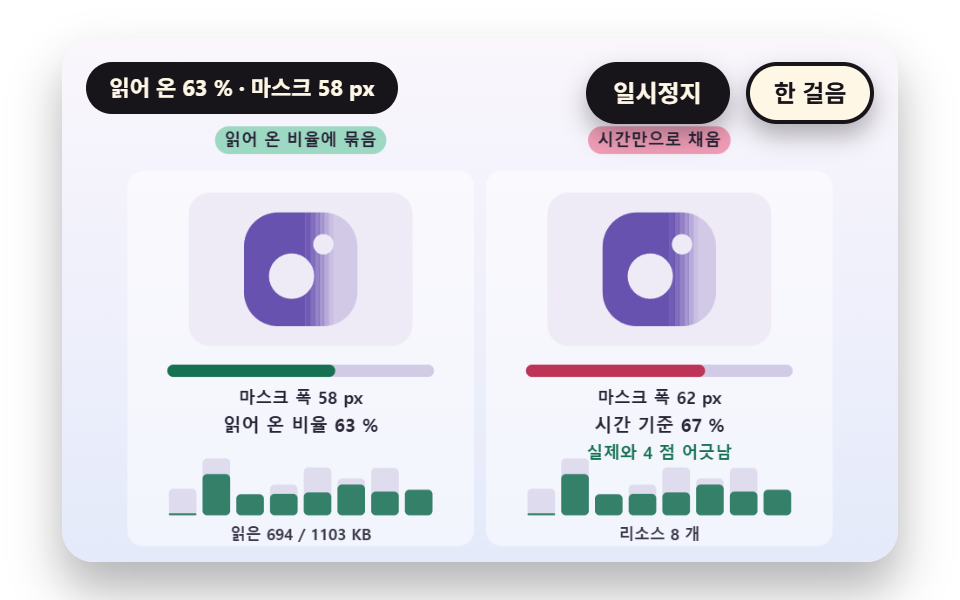 LoadersSplash Screen Animation: 9 Canvas Opening Scenes
 Loaders9 CSS Skeleton Loading Screens, Copy-Paste Ready
 Loaders9 Loading Screen Designs — Pretty CSS Loaders
 LoadersPage Loading Animation CSS: 9 Route-Change Demos
 LoadersPull to Refresh CSS: 9 Loading Patterns
 LoadersDownload Progress Bar: 9 Loading UI Patterns
 LoadersCSS Progress Bar: 9 Game-Style Fill Patterns
 LoadersLoading Button UI — 9 States, Spinner to Success
 LoadersChart Loading Animation — 9 Computed Patterns