Splash Screen Animation: 9 Canvas Opening Scenes
How does a splash screen turn loading into a logo? 01 sets a logo mask from one loaded fraction, 02 exits at the larger of load finish and a minimum hold, 06
A Splash Screen Is Not a Picture That Hides Loading but a Device That Computes the Logo, the Number and the Opening From Two Values, the Loaded Fraction and the Timetable: Building a Splash Starts by Choosing Which Value Moves the Screen
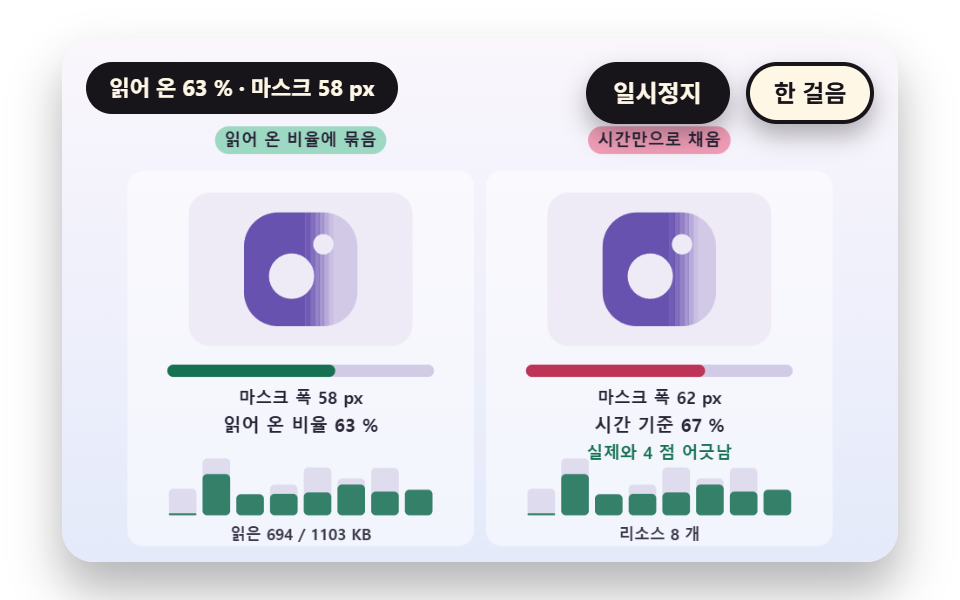 01 sc-splash-logo-mask-wipe-progress-coupled
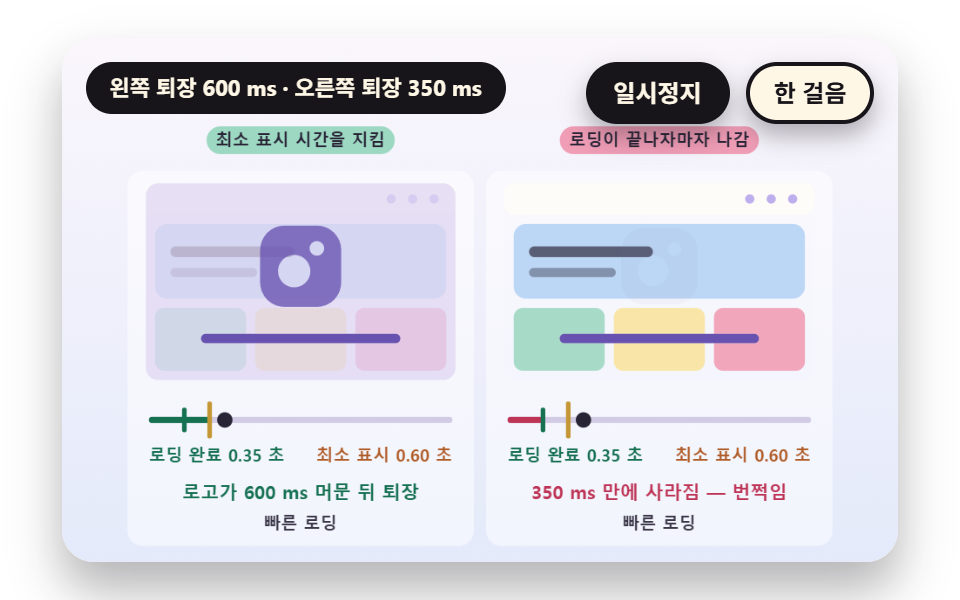 02 sc-splash-minimum-hold-exit-timing
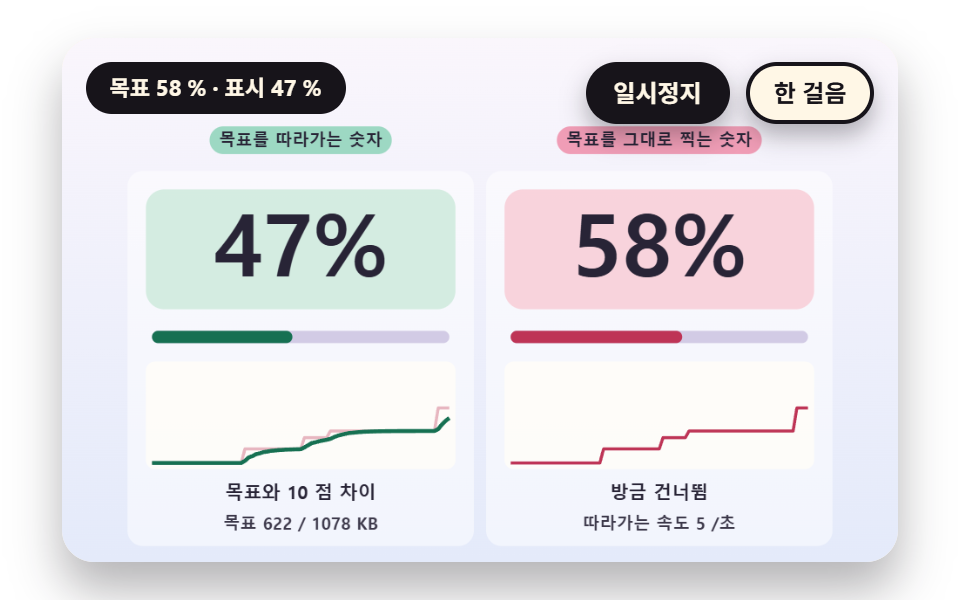 03 sc-splash-percent-count-ease-vs-jump
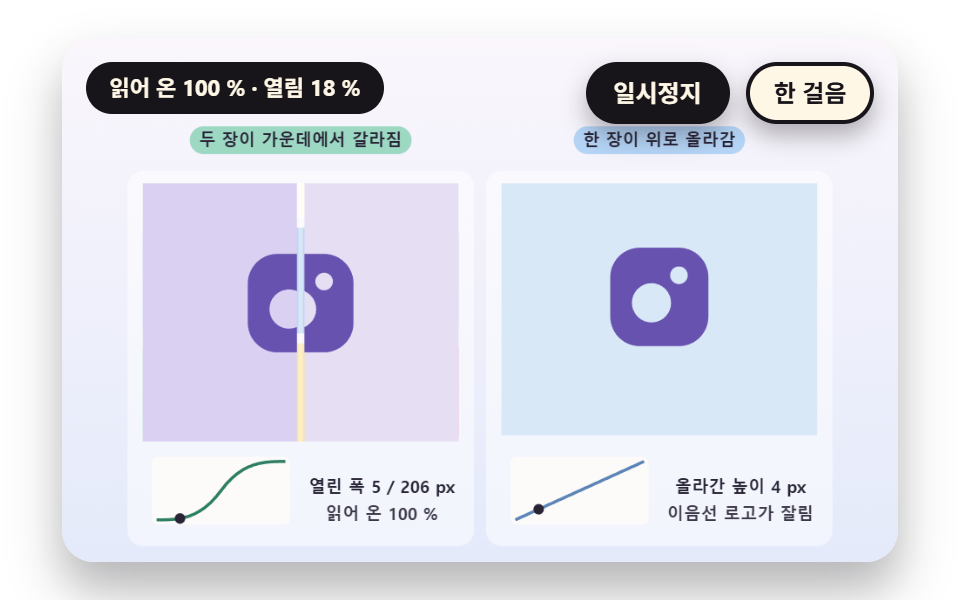 04 sc-splash-curtain-split-reveal-clip
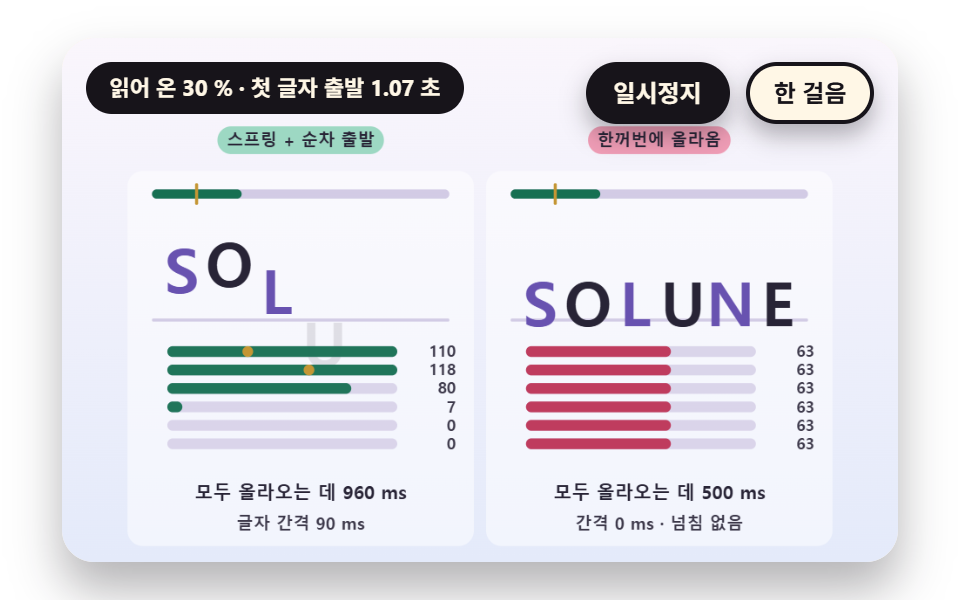 05 sc-splash-letter-rise-spring-stagger
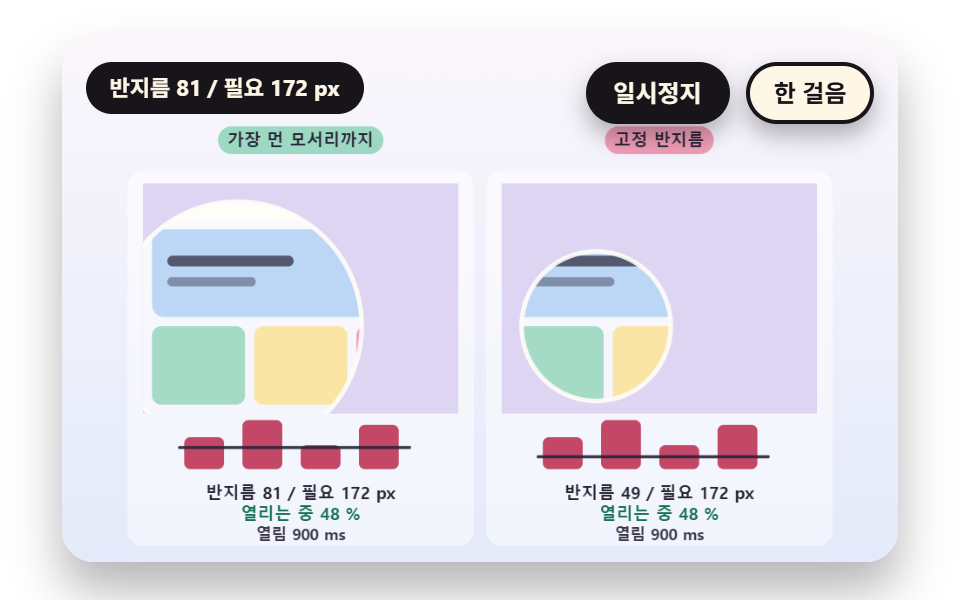 06 sc-splash-iris-radius-corner-hypot-handoff
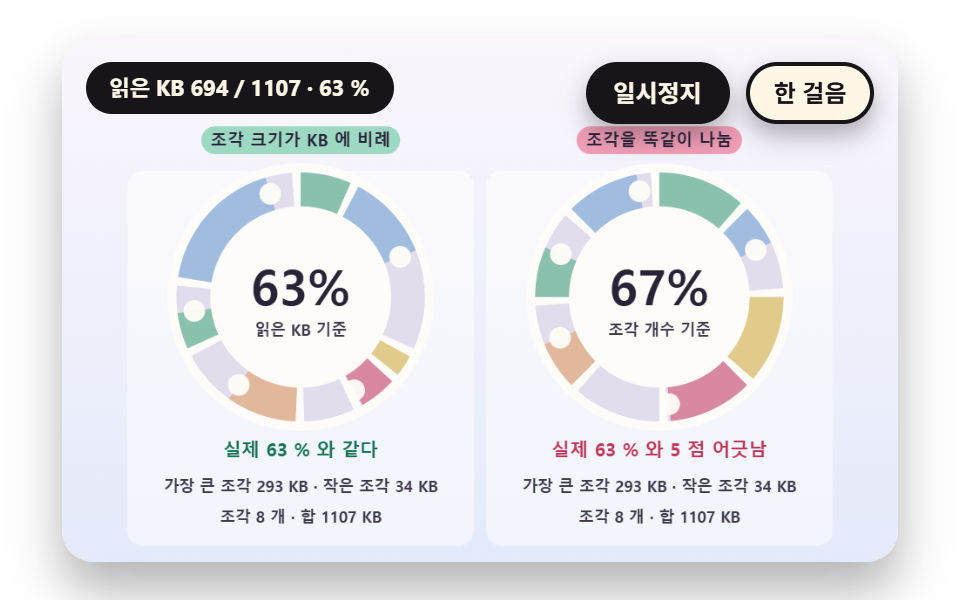 07 sc-splash-ring-segment-weighted-resources
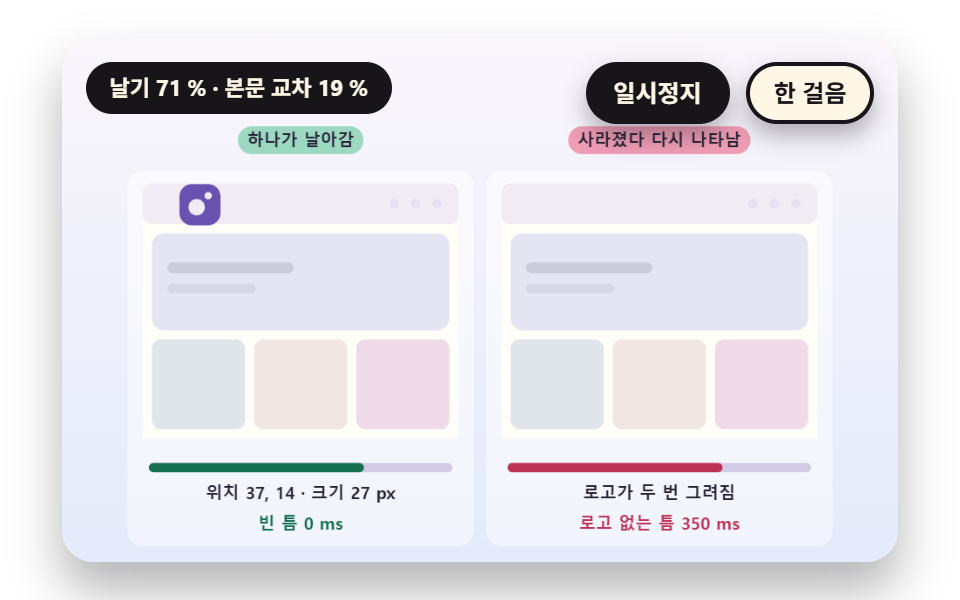 08 sc-splash-shared-element-fly-skeleton-crossfade
 09 sc-splash-hero-brand-landing-intro-sequence
Auto-plays · click a tile to jump to its section · all nine in one zip
- 01 A Logo Wipe Coupled to the Loaded Fraction
- 02 An Exit Time That Honors a Minimum Hold
- 03 A Percent Counter That Eases After the Real Value
- 04 A Two Panel Curtain That Splits to Reveal the Page
- 05 A Wordmark Whose Letters Rise on a Staggered Spring
- 06 A Circular Opening That Grows From the Logo Center
- 07 A Ring Split by Resource Weight
- 08 A Handoff Where the Logo Flies to the Header Slot
- 09 A Brand Intro That Continues Into a Landing Hero
The nine scenes share one model. The screen is a single 480×300 canvas, the loaded fraction comes from a seeded virtual resource table built by makeLoad (02 skips the table and uses two fixed load times), and the clock is one scene clock, sceneT. The logo, the number and the opening are screens that take those two values, so on a real site you swap one line for the true fraction and the rest of the source stays as it is.
The order starts at the loading indicator and widens to scene changes. 01, 02 and 03 cover the logo mask, the minimum hold and the percent number, 04, 05 and 06 cover the curtain, the letters and the circular opening, and 07, 08 and 09 cover the ring, the header handoff and the landing intro. If you are collecting splash screen animation examples, that is a path from the smallest piece to a whole landing screen.
Splash Screen Animation: 9 Scenes — A Logo Wipe Tied to Loading, an Exit That Honors a Minimum Hold, a Percent Number That Follows, a Two Panel Curtain, a Spring Wordmark, a Circular Opening, a Ring Split by Resource Weight, a Logo That Flies to the Header and a Landing Hero Intro
What nine renders measured for area and motion
| Scene | Cumulative area | Moving frames | Mean intensity |
|---|---|---|---|
| 01 Logo wipe | 6.0% | 23/23 | 48.6 |
| 02 Minimum hold exit | 22.8% | 23/23 | 117.2 |
| 03 Percent counter | 8.3% | 23/23 | 105.2 |
| 04 Two panel curtain | 30.9% | 16/23 | 67.6 |
| 05 Spring wordmark | 14.1% | 15/23 | 112.0 |
| 06 Circular opening | 26.8% | 6/23 | 63.3 |
| 07 Ring segments | 6.9% | 23/23 | 81.8 |
| 08 Logo flight | 31.1% | 9/23 | 65.6 |
| 09 Landing intro | 11.1% | 23/23 | 61.8 |
08 is widest at 31.1% because a big logo flies across the screen while a whole page crossfades, 04 follows at 30.9%, and 01 is narrowest at 6.0% because only one logo fills. Mean intensity is highest for 02 at 117.2 with its flashing cover and lowest for 01 at 48.6.
Scenes 01, 02, 03, 07 and 09 moved in 23 of 23 frame gaps, while 04 moved in 16 and 05 in 15. 06 moved in only 6 and 08 in 9, since the opening finishes within 0.9 s and the flight and crossfade end between 2.75 s and 3.75 s, after which the page holds still.
01A Logo Wipe Coupled to the Loaded Fraction
The loaded fraction LOAD_FRAC becomes the mask width MASK_W(f) = f × (LOGO_S 74 + EDGE_SOFT 18), so when the fraction stops the wipe stops with it. The 18 px edge is six alpha steps, and the right board, filled by time alone, shows 0.457 at 3.6 s where the real fraction is 0.303, drifting by up to 20.8 points at 2.90 s. Use it where an app or site first screen shows load progress through the logo.
<main class="stage">
<div class="vj is-demo" id="vj">
  <div class="vj__pad" data-role="pad" tabindex="0" role="application" aria-label="Splash stage: Enter, Space, R or a click restarts, P pauses, N steps once">
    <canvas class="vj__canvas" data-role="canvas" width="480" height="300" role="img" aria-label="The left splash sets the logo mask width from one loaded fraction, so the wipe stops when loading stops. The right splash fills the mask at a constant speed from start to end and drifts from the real load. The logo fills from the left with a soft edge, the bar and numbers below show the loaded fraction, and the eight bars at the bottom show the size and loaded part of each virtual resource"></canvas>
  </div>
  <p class="vj__status" data-role="status" aria-live="off">Splash demo</p>
  <div class="vj__ctrl">
    <button class="vj__pause" data-role="pause" type="button" aria-pressed="false">Pause</button>
    <button class="vj__step" data-role="step" type="button">Step</button>
  </div>
  <p class="vj__done" data-role="done" role="status" aria-live="polite"></p>
  <div class="vj__prog" data-role="progress" role="progressbar" aria-label="Splash progress" aria-valuemin="0" aria-valuemax="100" aria-valuenow="0"></div>
</div>
</main>
@use "../../../../site/static/demo-tokens" as *;
@include stage($stage-paper);
.vj {
position: relative;
width: min(92vw, calc(160vh - 12.8vw));
aspect-ratio: 480 / 300;
margin: 0 auto;
border-radius: $r-card;
overflow: hidden;
box-shadow: $shadow-raised;
background: $subject-cream;
}
// 무대 상자 — 누르거나 Enter·Space·R 을 치면 처음부터 다시 시작한다. 키보드 포커스도 여기서 받는다(touch-action: none 은 이 상자에만). 무대 밖 터치는 페이지 스크롤 그대로
.vj__pad {
position: absolute;
inset: 0;
border-radius: inherit;
outline: none;
touch-action: none;
cursor: pointer;
}
// 바깥 .vj 가 넘침을 자르므로 포커스 테두리는 안쪽으로 들인다
.vj__pad:focus-visible {
outline: 3px solid $subject-ink;
outline-offset: -3px;
}
.vj__canvas {
position: absolute;
inset: 0;
display: block;
width: 100%;
height: 100%;
}
.vj__ctrl {
position: absolute;
right: $sp-3;
top: $sp-3;
display: flex;
gap: $sp-2;
}
.vj__pause,
.vj__step {
padding: $sp-1 $sp-3;
border: 2px solid $subject-ink;
border-radius: $r-pill;
background: $subject-ink;
color: $subject-cream;
font-family: inherit;
font-weight: 700;
font-size: 12px;
line-height: 1.6;
cursor: pointer;
box-shadow: $shadow-press;
transition: transform $dur-quick $ease-spring;
}
.vj__step {
background: $subject-cream;
color: $subject-ink;
}
// 스크린리더에만 읽히는 완료 알림과 진행 막대
.vj__done,
.vj__prog {
position: absolute;
width: 1px;
height: 1px;
margin: 0;
overflow: hidden;
clip-path: inset(50%);
white-space: nowrap;
}
// 눌린 상태(멈춤) — 바탕과 글자색을 뒤집어 aria-pressed 가 눈에도 보이게
.vj__pause[aria-pressed="true"] {
background: $subject-cream;
color: $subject-ink;
}
.vj__pause:hover,
.vj__step:hover {
transform: translateY(-2px);
}
.vj__pause:active,
.vj__step:active {
transform: translateY(1px);
}
.vj__pause:focus-visible,
.vj__step:focus-visible {
outline: 3px solid $subject-ink;
outline-offset: 3px;
}
// 상태 줄 — 지금 장면의 수치를 글자로. 시연 중에는 aria-live off, 사람이 처음 손대면 polite
.vj__status {
position: absolute;
left: $sp-3;
top: $sp-3;
max-width: calc(100% - 190px);
margin: 0;
padding: $sp-1 $sp-3;
border-radius: $r-pill;
background: $subject-ink;
color: $subject-cream;
font-weight: 700;
font-size: 11px;
line-height: 1.6;
white-space: nowrap;
overflow: hidden;
text-overflow: ellipsis;
pointer-events: none;
}
@media (max-width: 340px) {
.vj__pause,
.vj__step,
.vj__status { font-size: 10px; padding: 0 $sp-2; }
}
// 움직임 줄이기 — 장면은 스크립트가 정지 장면 한 장으로 멈춘다. 버튼도 떠오르지 않게
@media (prefers-reduced-motion: reduce) {
.vj__pause,
.vj__step { transition: none !important; }
.vj__pause:hover,
.vj__pause:active,
.vj__step:hover,
.vj__step:active { transform: none !important; }
}html, body {
margin: 0;
overflow: hidden;
}
.stage {
box-sizing: border-box;
min-height: 100vh;
display: grid;
place-items: center;
margin: 0;
background: #ffffff;
font-family: -apple-system, "Segoe UI", "Noto Sans KR", sans-serif;
padding: clamp(8px, 4vw, 24px);
}
.vj {
position: relative;
width: min(92vw, 160vh - 12.8vw);
aspect-ratio: 480/300;
margin: 0 auto;
border-radius: 16px;
overflow: hidden;
box-shadow: 0 14px 24px rgba(23, 20, 26, 0.32);
background: #fff7e6;
}
.vj__pad {
position: absolute;
inset: 0;
border-radius: inherit;
outline: none;
touch-action: none;
cursor: pointer;
}
.vj__pad:focus-visible {
outline: 3px solid #17141a;
outline-offset: -3px;
}
.vj__canvas {
position: absolute;
inset: 0;
display: block;
width: 100%;
height: 100%;
}
.vj__ctrl {
position: absolute;
right: 12px;
top: 12px;
display: flex;
gap: 8px;
}
.vj__pause,
.vj__step {
padding: 4px 12px;
border: 2px solid #17141a;
border-radius: 999px;
background: #17141a;
color: #fff7e6;
font-family: inherit;
font-weight: 700;
font-size: 12px;
line-height: 1.6;
cursor: pointer;
box-shadow: 0 6px 12px rgba(23, 20, 26, 0.32);
transition: transform 220ms cubic-bezier(0.2, 0.8, 0.2, 1);
}
.vj__step {
background: #fff7e6;
color: #17141a;
}
.vj__done,
.vj__prog {
position: absolute;
width: 1px;
height: 1px;
margin: 0;
overflow: hidden;
clip-path: inset(50%);
white-space: nowrap;
}
.vj__pause[aria-pressed=true] {
background: #fff7e6;
color: #17141a;
}
.vj__pause:hover,
.vj__step:hover {
transform: translateY(-2px);
}
.vj__pause:active,
.vj__step:active {
transform: translateY(1px);
}
.vj__pause:focus-visible,
.vj__step:focus-visible {
outline: 3px solid #17141a;
outline-offset: 3px;
}
.vj__status {
position: absolute;
left: 12px;
top: 12px;
max-width: calc(100% - 190px);
margin: 0;
padding: 4px 12px;
border-radius: 999px;
background: #17141a;
color: #fff7e6;
font-weight: 700;
font-size: 11px;
line-height: 1.6;
white-space: nowrap;
overflow: hidden;
text-overflow: ellipsis;
pointer-events: none;
}
@media (max-width: 340px) {
.vj__pause,
.vj__step,
.vj__status {
font-size: 10px;
padding: 0 8px;
}
}
@media (prefers-reduced-motion: reduce) {
.vj__pause,
.vj__step {
transition: none !important;
}
.vj__pause:hover,
.vj__pause:active,
.vj__step:hover,
.vj__step:active {
transform: none !important;
}
}(function () {
const root = document.getElementById("vj");
if (!root) return;
// 무대 좌표 — 캔버스 안 계산은 늘 480×300. 화면에 보이는 크기와 상관없다
const W = 480;
const H = 300;
const PI = Math.PI;
const TAU = Math.PI * 2;
function clamp(v, lo, hi) { return v < lo ? lo : (v > hi ? hi : v); }
function lerp(a, b, k) { return a + (b - a) * k; }
function ease(x) { const c = clamp(x, 0, 1); return c * c * (3 - 2 * c); }
// 가속 뒤 감속 — 앞 절반은 4p³, 뒤 절반은 대칭
function easeInOut(x) { const p = clamp(x, 0, 1); return p < 0.5 ? 4 * p * p * p : 1 - Math.pow(-2 * p + 2, 3) / 2; }
// 시드 고정 난수 — 선형 합동 생성기(곱 1664525, 더함 1013904223). 같은 시드면 같은 수열
function seeded(seed) {
let s = (seed >>> 0) || 1;
return function () {
s = (Math.imul(s, 1664525) + 1013904223) >>> 0;
return s / 4294967296;
};
}
// 파스텔 팔레트 — 글자는 늘 INK, 면은 연한 색. 읽음은 민트, 어긋남은 분홍, 로고는 라벤더
const BG_TOP = [250, 246, 252];
const BG_BOT = [228, 234, 250];
const FACE = [255, 253, 248];
const FACE_EDGE = [206, 198, 226];
const SKY = [176, 210, 246];
const SKY_DEEP = [74, 120, 176];
const GOLD = [250, 226, 150];
const GOLD_DEEP = [196, 150, 52];
const ROSE = [240, 150, 176];
const ROSE_DEEP = [190, 52, 86];
const MINT = [150, 214, 190];
const MINT_DEEP = [22, 112, 82];
const LAV = [188, 172, 236];
const LAV_DEEP = [104, 82, 176];
const INK = [40, 36, 54];
const PAPER = [250, 246, 240];
const PEACH = [250, 204, 170];
const PEACH_DEEP = [176, 92, 40];
function mix(a, b, k) { return [lerp(a[0], b[0], k), lerp(a[1], b[1], k), lerp(a[2], b[2], k)]; }
function rgba(c, a) {
return 'rgba(' + Math.round(clamp(c[0], 0, 255)) + ',' + Math.round(clamp(c[1], 0, 255)) + ',' + Math.round(clamp(c[2], 0, 255)) + ',' + clamp(a, 0, 1).toFixed(3) + ')';
}
// 장면 시계(초)·판 반복 번호·시간표 — 시간표는 (시각, 할 일) 목록이고 시각이 지나면 한 번씩 부른다
// sceneT 는 rAF 타임스탬프 차이(dt, 한 프레임 0.05초 상한)를 쌓은 값 하나뿐이다 — 이 장면의 시간 원천은 이것 하나
let sceneT = 0;
let lap = 0;
let script = [];
let evAt = 0;
let res = [];
let totalKb = 1;
let doneT = 0;
// 로딩은 시각 start 에 시작해 spanS 초 안에 끝난다. 큰 리소스일수록 오래 걸린다
function makeLoad(seed, n, start, spanS) {
const rnd = seeded(seed);
const raw = [];
let sum = 0;
let mx = 0;
for (let i = 0; i < n; i += 1) {
const kb = Math.round(24 + rnd() * 276);
const a = rnd() * 0.5;
const b = a + 0.12 + (kb / 300) * 0.38;
raw.push({ kb: kb, t0: a, t1: b });
sum += kb;
mx = Math.max(mx, b);
}
res = raw.map(function (r) { return { kb: r.kb, t0: start + (r.t0 / mx) * spanS, t1: start + (r.t1 / mx) * spanS }; });
totalKb = sum;
doneT = start + spanS;
}
// 리소스 하나가 시각 t 에 얼마나 읽혔는지 0 에서 1
function resFrac(r, t) { return clamp((t - r.t0) / (r.t1 - r.t0), 0, 1); }
// 읽어 온 KB — 리소스마다 읽힌 비율 × 크기의 합
function loadedKb(t) {
let s = 0;
for (let i = 0; i < res.length; i += 1) {
s += res[i].kb * resFrac(res[i], t);
}
return s;
}
// 읽어 온 비율 0 에서 1 — 연출은 이 값만 받는다
function loadFrac(t) { return loadedKb(t) / totalKb; }
// 리소스가 통째로 도착했을 때만 세는 KB — 덩어리째 올라가는 진행률(03 의 목표값)
function arrivedKb(t) {
let s = 0;
for (let i = 0; i < res.length; i += 1) {
if (t >= res[i].t1) {
s += res[i].kb;
}
}
return s;
}
// 읽어 온 비율이 f 에 처음 닿는 시각 — 단조 증가라 이분 탐색
function timeAtFrac(f) {
let lo = 0;
let hi = doneT;
for (let i = 0; i < 40; i += 1) {
const mid = (lo + hi) / 2;
if (loadFrac(mid) < f) {
lo = mid;
}
else {
hi = mid;
}
}
return hi;
}
// 감쇠 스프링의 계단 응답 — 0 에서 시작해 1 로 가며 한 번 넘쳤다가 선다. k 는 강성, c 는 감쇠
function springStep(q, k, c) {
if (q <= 0) {
return 0;
}
const w = Math.sqrt(k);
const z = c / (2 * w);
const wd = w * Math.sqrt(Math.max(1e-6, 1 - z * z));
return 1 - Math.exp(-z * w * q) * (Math.cos(wd * q) + ((z * w) / wd) * Math.sin(wd * q));
}
const canvasEl = root.querySelector('[data-role="canvas"]');
const padEl = root.querySelector('[data-role="pad"]');
const pauseEl = root.querySelector('[data-role="pause"]');
const statusEl = root.querySelector('[data-role="status"]');
const stepEl = root.querySelector('[data-role="step"]');
const doneEl = root.querySelector('[data-role="done"]');
const progEl = root.querySelector('[data-role="progress"]');
const ctxRaw = canvasEl ? canvasEl.getContext('2d') : null;
if (!canvasEl || !ctxRaw || !pauseEl || !padEl || !stepEl || !doneEl) {
return;
}
const cv = canvasEl;
const ctx = ctxRaw;
const pauseBtn = pauseEl;
const stepBtn = stepEl;
const doneP = doneEl;
const pad = padEl;
// 외부 웹폰트는 부르지 않는다 — 기기에 있는 글꼴 목록만
const FONT_STACK = 'system-ui, -apple-system, "Segoe UI", "Noto Sans KR", sans-serif';
let dpr = 1;
function fitCanvas() {
// 배율은 2 에서 자른다 — 배율 3 기기에서 화소가 2.25배로 늘지 않게
dpr = Math.min(window.devicePixelRatio || 1, 2);
cv.width = Math.round(W * dpr);
cv.height = Math.round(H * dpr);
ctx.setTransform(dpr, 0, 0, dpr, 0, 0);
}
const VIEW_S = 0.88;
function skyFill(top, bot) {
ctx.setTransform(dpr, 0, 0, dpr, 0, 0);
const g = ctx.createLinearGradient(0, 0, 0, H);
g.addColorStop(0, rgba(top, 1));
g.addColorStop(1, rgba(bot, 1));
ctx.fillStyle = g;
ctx.fillRect(0, 0, W, H);
// 위쪽 Pause·상태 알약이 덮는 띠를 비우려고 장면 전체를 VIEW_S 배로 줄여 아래 가운데에 붙인다 — 이 줄 뒤에 그리는 것은 모두 줄어든 좌표계
ctx.translate(W / 2, H - 3);
ctx.scale(VIEW_S, VIEW_S);
ctx.translate(-W / 2, -(H - 3));
}
function disc(x, y, r, c, a) {
if (r <= 0.2 || a <= 0) {
return;
}
ctx.beginPath();
ctx.arc(x, y, r, 0, TAU);
ctx.fillStyle = rgba(c, a);
ctx.fill();
}
function ring(x, y, r, width, c, a) {
if (r <= 0.2 || a <= 0) {
return;
}
ctx.beginPath();
ctx.arc(x, y, r, 0, TAU);
ctx.lineWidth = width;
ctx.strokeStyle = rgba(c, a);
ctx.stroke();
}
function oval(x, y, rx, ry, c, a) {
if (rx <= 0.2 || ry <= 0.1 || a <= 0) {
return;
}
ctx.beginPath();
ctx.ellipse(x, y, rx, ry, 0, 0, TAU);
ctx.fillStyle = rgba(c, a);
ctx.fill();
}
function seg(x1, y1, x2, y2, width, c, a) {
if (a <= 0) {
return;
}
ctx.beginPath();
ctx.moveTo(x1, y1);
ctx.lineTo(x2, y2);
ctx.lineWidth = width;
ctx.lineCap = 'round';
ctx.strokeStyle = rgba(c, a);
ctx.stroke();
}
function box(x, y, w, h, r, c, a) {
if (w <= 0.2 || h <= 0.2 || a <= 0) {
return;
}
ctx.beginPath();
ctx.roundRect(x, y, w, h, Math.max(0, Math.min(r, w / 2, h / 2)));
ctx.fillStyle = rgba(c, a);
ctx.fill();
}
function outline(x, y, w, h, r, width, c, a) {
if (w <= 0.2 || h <= 0.2 || a <= 0) {
return;
}
ctx.beginPath();
ctx.roundRect(x, y, w, h, Math.max(0, Math.min(r, w / 2, h / 2)));
ctx.lineWidth = width;
ctx.strokeStyle = rgba(c, a);
ctx.stroke();
}
function text(s, x, y, c, a, px, weight, align) {
ctx.font = weight + ' ' + px + 'px ' + FONT_STACK;
ctx.textAlign = align;
ctx.textBaseline = 'middle';
ctx.fillStyle = rgba(c, a);
ctx.fillText(s, x, y);
}
// 글자 이름표 — 바탕 알약 위에 글자
function tag(s, x, y, bg, fg, px, align) {
ctx.font = '700 ' + px + 'px ' + FONT_STACK;
const w = ctx.measureText(s).width + px * 1.1;
const left = align === 'center' ? x - w / 2 : (align === 'right' ? x - w : x);
box(left, y - px * 0.82, w, px * 1.64, px * 0.82, bg, 0.92);
text(s, left + w / 2, y + 0.5, fg, 1, px, 700, 'center');
}
// ── 공통 틀 ───────────────────────────────────────────────
let shownStatus = '';
function pushStatus(s) {
if (!statusEl || s === shownStatus) {
return;
}
shownStatus = s;
statusEl.textContent = s;
}
let paused = false;
const reduceQuery = window.matchMedia('(prefers-reduced-motion: reduce)');
// 페이지를 연 채 움직임 줄이기 설정을 바꿔도 change 리스너가 다시 읽는다
let still = reduceQuery.matches;
// 자동 시연 표시 — 사람이 처음 손대면 떼고 상태 줄을 polite 로 켠다
let demo = root.classList.contains('is-demo');
const off = new AbortController();
function wake() {
if (!demo) {
return;
}
demo = false;
root.classList.remove('is-demo');
if (statusEl) {
statusEl.setAttribute('aria-live', 'polite');
}
}
// 한 판 시연이 끝났음을 스크린리더에 한 번만 알린다 — 판이 되풀이돼도 다시 읽지 않는다
let doneSaid = false;
function checkDone() {
if (!doneSaid && sceneT >= RESULT_S) {
doneSaid = true;
doneP.textContent = statusText();
}
}
function advance(dt) {
sceneT += dt;
while (evAt < script.length && script[evAt].t <= sceneT) {
const ev = script[evAt];
evAt += 1;
ev.f();
}
if (sceneT >= LAP_S) {
lap += 1;
begin();
return;
}
update(dt);
}
// 첫 판은 START_S 만큼 앞서 시작한다 — 연출이 이미 진행 중인 장면에서 처음 보인다
function runTo(t) {
while (sceneT < t - 1e-6) {
advance(Math.min(1 / 30, t - sceneT));
}
}
function begin() {
sceneT = 0;
evAt = 0;
script = [];
build();
if (lap === 0 && !still) {
runTo(START_S);
}
}
const DT_MAX = 0.05;
// 진행 막대(role=progressbar) — 값이 바뀔 때만 aria-valuenow 를 쓴다. 값은 장면의 progressNow() 가 0 에서 100 으로
let shownProg = -1;
function pushProgress() {
if (!progEl) {
return;
}
const v = Math.round(clamp(progressNow(), 0, 100));
if (v === shownProg) {
return;
}
shownProg = v;
progEl.setAttribute('aria-valuenow', String(v));
}
function showNow() {
draw();
pushStatus(statusText());
pushProgress();
checkDone();
}
let rafId = 0;
let lastTs = -1;
function frame(ts) {
if (still || paused) {
rafId = 0;
return;
}
if (lastTs < 0) {
lastTs = ts;
}
const dt = Math.min((ts - lastTs) / 1000, DT_MAX);
lastTs = ts;
if (dt > 0) {
advance(dt);
}
showNow();
rafId = window.requestAnimationFrame(frame);
}
function startLoop() {
if (rafId) {
return;
}
// 멈췄던 사이의 시간을 첫 프레임 dt 로 넘기지 않는다
lastTs = -1;
rafId = window.requestAnimationFrame(frame);
}
function stopLoop() {
if (rafId) {
window.cancelAnimationFrame(rafId);
rafId = 0;
}
}
// 움직임 줄이기 — 루프 없이 한 판의 멈춘 한 장. 시간표의 REST_S 초 장면에서 멈춘다
function showRest() {
stopLoop();
sceneT = 0;
evAt = 0;
script = [];
build();
runTo(REST_S);
doneSaid = false;
showNow();
}
function play() {
begin();
showNow();
if (!paused) {
startLoop();
}
}
function togglePause() {
paused = !paused;
pauseBtn.setAttribute('aria-pressed', paused ? 'true' : 'false');
wake();
if (paused) {
stopLoop();
}
else if (!still) {
startLoop();
}
}
// 다시 — 시간표를 처음부터 다시. 움직임 줄이기에서는 멈춘 한 장
function restart() {
lap += 1;
doneSaid = false;
if (still) {
showRest();
return;
}
begin();
showNow();
if (!paused) {
startLoop();
}
}
// Step — 멈춘 채 시간표의 다음 일 하나까지 시계를 보낸다. 더 부를 일이 없으면 판을 다시 연다
function stepOnce() {
wake();
if (!paused) {
paused = true;
pauseBtn.setAttribute('aria-pressed', 'true');
stopLoop();
}
if (evAt >= script.length) {
restart();
return;
}
runTo(script[evAt].t + 0.05);
showNow();
}
pauseBtn.addEventListener('click', togglePause, { signal: off.signal });
stepBtn.addEventListener('click', stepOnce, { signal: off.signal });
// 키보드 — 무대에 포커스가 있을 때만. Enter·Space·R 은 처음부터 다시, P 는 Pause, N 은 Step
pad.addEventListener('keydown', function (e) {
if (e.altKey || e.ctrlKey || e.metaKey) {
return;
}
const k = e.key;
if (k === 'Enter' || k === ' ') {
e.preventDefault();
wake();
restart();
}
else if (k === 'p' || k === 'P') {
togglePause();
}
else if (k === 'n' || k === 'N') {
stepOnce();
}
else if (k === 'r' || k === 'R') {
wake();
restart();
}
}, { signal: off.signal });
// 마우스·터치 — 무대를 누르면 처음부터 다시
pad.addEventListener('click', function () {
wake();
restart();
}, { signal: off.signal });
// 탭이 숨으면 멈추고, 돌아오면 시계를 다시 맞춰 시작 — 숨은 동안의 몇 초가 한 프레임에 몰리지 않게
document.addEventListener('visibilitychange', function () {
if (document.hidden) {
stopLoop();
}
else if (!paused && !still) {
startLoop();
}
}, { signal: off.signal });
// 설정이 바뀌면 — 켜지면 결과 한 장, 꺼지면 다시 움직인다
reduceQuery.addEventListener('change', function () {
still = reduceQuery.matches;
if (still) {
showRest();
}
else {
lap = 0;
play();
}
}, { signal: off.signal });
window.addEventListener('resize', function () {
fitCanvas();
showNow();
}, { signal: off.signal });
// ── 스플래시 장면 도구 ────────────────────────────────────
// 패널 — 비교판 한 칸의 바탕
function panel(x, y, w, h, c, a) {
box(x, y, w, h, 10, c, a);
}
// 진행 막대 — 트랙 위에 f(0 에서 1) 만큼 채운다
function bar(x, y, w, h, f, c, bg) {
box(x, y, w, h, h / 2, bg, 0.9);
if (f > 0.001) {
box(x, y, Math.max(h, w * clamp(f, 0, 1)), h, h / 2, c, 1);
}
}
function pctText(f) { return String(Math.round(clamp(f, 0, 1) * 100)); }
// 자체 로고 — 둥근 타일에 큰 구멍과 작은 구멍 하나씩. 실제 브랜드와 무관한 도형
function logoPath(cx, cy, s) {
ctx.beginPath();
ctx.roundRect(cx - s / 2, cy - s / 2, s, s, s * 0.3);
const ex = cx - s * 0.08;
const ey = cy + s * 0.06;
ctx.moveTo(ex + s * 0.2, ey);
ctx.arc(ex, ey, s * 0.2, 0, TAU);
const dx = cx + s * 0.2;
const dy = cy - s * 0.22;
ctx.moveTo(dx + s * 0.09, dy);
ctx.arc(dx, dy, s * 0.09, 0, TAU);
}
function drawLogo(cx, cy, s, c, a) {
if (s <= 1 || a <= 0) {
return;
}
logoPath(cx, cy, s);
ctx.fillStyle = rgba(c, a);
ctx.fill('evenodd');
}
// 로고 마스크 와이프 — 왼쪽에서 오른쪽으로 f(0 에서 1) 만큼 채운다. 가장자리 EDGE 폭은 조각으로 나눠 흐리게
const EDGE_STRIPS = 6;
function maskW(s, soft, f) { return clamp(f, 0, 1) * (s + soft); }
function logoWipe(cx, cy, s, f, soft, c, a) {
const left = cx - s / 2;
const x = left + maskW(s, soft, f);
drawLogo(cx, cy, s, c, 0.22 * a);
const solidW = x - soft - left;
if (solidW > 0) {
ctx.save();
ctx.beginPath();
ctx.rect(left - 1, cy - s / 2 - 1, solidW + 1, s + 2);
ctx.clip();
drawLogo(cx, cy, s, c, a);
ctx.restore();
}
for (let k = 0; k < EDGE_STRIPS; k += 1) {
const sw = soft / EDGE_STRIPS;
const sx = (x - soft) + k * sw;
if (sx + sw <= left || sx >= x) {
continue;
}
ctx.save();
ctx.beginPath();
ctx.rect(Math.max(sx, left - 1), cy - s / 2 - 1, sw + 0.5, s + 2);
ctx.clip();
drawLogo(cx, cy, s, c, a * (1 - (k + 0.5) / EDGE_STRIPS));
ctx.restore();
}
}
// 본문 화면 한 장 — 머리띠·히어로·카드 셋. 해골 판과 같은 사각형을 쓴다
const PAGE_COLORS = [FACE, SKY, MINT, GOLD, ROSE];
function pageRects(x, y, w, h) {
const g = 6;
const hh = h * 0.16;
const heroH = h * 0.38;
const cw = (w - g * 4) / 3;
const cy = y + hh + g + heroH + g;
const ch = y + h - cy - g;
return [
[x, y, w, hh, 6, 0],
[x + g, y + hh + g, w - 2 * g, heroH, 8, 1],
[x + g, cy, cw, ch, 6, 2],
[x + g * 2 + cw, cy, cw, ch, 6, 3],
[x + g * 3 + 2 * cw, cy, cw, ch, 6, 4]
];
}
function drawPage(x, y, w, h, a) {
if (a <= 0) {
return;
}
const rs = pageRects(x, y, w, h);
for (let i = 0; i < rs.length; i += 1) {
const r = rs[i];
box(r[0], r[1], r[2], r[3], r[4], i === 0 ? FACE : mix(PAGE_COLORS[r[5]], PAPER, 0.15), a);
}
// 머리띠의 메뉴 점 셋과 히어로의 줄 둘
for (let i = 0; i < 3; i += 1) {
disc(x + w - 14 - i * 14, y + h * 0.08, 3, LAV, a);
}
box(x + 16, y + h * 0.16 + 6 + h * 0.38 * 0.3, w * 0.4, 7, 3.5, INK, 0.7 * a);
box(x + 16, y + h * 0.16 + 6 + h * 0.38 * 0.3 + 14, w * 0.28, 6, 3, INK, 0.4 * a);
}
// 해골 판 — 같은 자리를 연한 회색으로 채우고 빛 띠가 t 에 따라 훑고 지나간다
function drawSkeleton(x, y, w, h, a, t) {
if (a <= 0) {
return;
}
const rs = pageRects(x, y, w, h);
const base = mix(PAPER, LAV, 0.28);
const bx = x + (((t * 0.9) % 1.6) - 0.3) * w;
for (let i = 0; i < rs.length; i += 1) {
const r = rs[i];
box(r[0], r[1], r[2], r[3], r[4], base, 0.95 * a);
ctx.save();
ctx.beginPath();
ctx.roundRect(r[0], r[1], r[2], r[3], r[4]);
ctx.clip();
const g = ctx.createLinearGradient(bx, 0, bx + 44, 0);
g.addColorStop(0, rgba(FACE, 0));
g.addColorStop(0.5, rgba(FACE, 0.8 * a));
g.addColorStop(1, rgba(FACE, 0));
ctx.fillStyle = g;
ctx.fillRect(r[0], r[1], r[2], r[3]);
ctx.restore();
}
}
// 이징 곡선 상자 — 가로가 진행 p, 세로가 fn(p). 지금 p 의 값을 점으로 찍는다
function curve(x, y, w, h, fn, p, c) {
box(x, y, w, h, 4, FACE, 0.8);
ctx.beginPath();
for (let i = 0; i <= 24; i += 1) {
const px = x + 3 + ((w - 6) * i) / 24;
const py = y + h - 3 - (h - 6) * fn(i / 24);
if (i === 0) {
ctx.moveTo(px, py);
}
else {
ctx.lineTo(px, py);
}
}
ctx.lineWidth = 2;
ctx.lineJoin = 'round';
ctx.strokeStyle = rgba(c, 0.9);
ctx.stroke();
disc(x + 3 + (w - 6) * clamp(p, 0, 1), y + h - 3 - (h - 6) * fn(clamp(p, 0, 1)), 3.4, INK, 1);
}
// ── 01 읽어 온 비율로 채우는 로고 와이프와 시간만으로 채우는 대비판 ────
// 왼쪽 마스크 폭은 loadFrac(t) 에서만, 오른쪽은 시작부터 끝까지 일정한 속도로 채운다 — 로딩이 멈춰도 오른쪽은 계속 간다
const SEED_BASE = 5011;
const LOAD_START = 0.4;
const LOAD_SPAN = 7.0;
const LOGO_S = 74;
const EDGE_SOFT = 18;
const LAP_S = 9.2;
const START_S = 3.6;
const REST_S = 8.4;
const RESULT_S = 8.0;
    function build() {
        makeLoad(SEED_BASE + (lap % 3), 8, LOAD_START, LOAD_SPAN);
    }
    function update(dt) { if (dt < 0) {
        return;
    } }
    function LOAD_FRAC(t) { return loadFrac(t); }
    function TIME_FRAC(t) { return clamp((t - LOAD_START) / LOAD_SPAN, 0, 1); }
    function MASK_W(f) { return maskW(LOGO_S, EDGE_SOFT, f); }
function drawPanel(x0, f, tagText, tagBg, left) {
const cx = x0 + 113;
panel(x0, 46, 226, 244, [255, 255, 255], 0.5);
tag(tagText, cx, 26, tagBg, INK, 11, 'center');
box(x0 + 40, 60, 146, 100, 14, mix(LAV, FACE, 0.7), 0.7);
logoWipe(cx, 110, LOGO_S, f, EDGE_SOFT, LAV_DEEP, 1);
bar(x0 + 26, 172, 174, 8, f, left ? MINT_DEEP : ROSE_DEEP, FACE_EDGE);
text('Mask width {w} px'.replace('{w}', String(Math.round(MASK_W(f)))), cx, 194, INK, 1, 11, 700, 'center');
}
function draw() {
skyFill(BG_TOP, BG_BOT);
const t = sceneT;
const lf = LOAD_FRAC(t);
const tf = TIME_FRAC(t);
drawPanel(10, lf, 'Tied to the loaded fraction', MINT, true);
drawPanel(244, tf, 'Filled by time only', ROSE, false);
text('Loaded fraction {p} %'.replace('{p}', pctText(lf)), 123, 212, INK, 1, 12, 700, 'center');
const d = Math.abs(Math.round((tf - lf) * 100));
text('By time {p} %'.replace('{p}', pctText(tf)), 357, 212, INK, 1, 12, 700, 'center');
text(d > 0 ? '{d} points off the real value'.replace('{d}', String(d)) : 'Same as the real value now', 357, 230, d > 4 ? ROSE_DEEP : MINT_DEEP, 1, 11, 700, 'center');
// 리소스 8개 — 막대 높이는 크기(KB), 채움은 그 리소스가 읽힌 비율
const cw = 22;
for (let i = 0; i < res.length; i += 1) {
const hh = 10 + (res[i].kb / 300) * 30;
const rf = resFrac(res[i], t);
const bx = 123 - (res.length * cw) / 2 + i * cw + 2;
box(bx, 270 - hh, cw - 4, hh, 3, FACE_EDGE, 0.55);
box(bx, 270 - hh * rf, cw - 4, hh * rf, 3, MINT_DEEP, 0.85);
const bx2 = 357 - (res.length * cw) / 2 + i * cw + 2;
box(bx2, 270 - hh, cw - 4, hh, 3, FACE_EDGE, 0.55);
box(bx2, 270 - hh * rf, cw - 4, hh * rf, 3, MINT_DEEP, 0.85);
}
text('Read {k} / {n} KB'.replace('{k}', String(Math.round(loadedKb(t)))).replace('{n}', String(totalKb)), 123, 283, INK, 0.9, 10, 700, 'center');
text('{n} resources'.replace('{n}', String(res.length)), 357, 283, INK, 0.9, 10, 700, 'center');
}
function statusText() {
return 'Loaded {p} % - mask {w} px'.replace('{p}', pctText(LOAD_FRAC(sceneT))).replace('{w}', String(Math.round(MASK_W(LOAD_FRAC(sceneT)))));
}
function progressNow() { return LOAD_FRAC(sceneT) * 100; }
fitCanvas();
if (still) {
showRest();
}
else {
play();
}
return function () {
stopLoop();
off.abort();
};
})();// LogoMaskWipeProgressCoupled - 같은 항목 vanilla index.html 의 React 판. 같은 계산을 useEffect 안에서 돌린다
import { useEffect, useRef } from "react";
import styles from "./LogoMaskWipeProgressCoupled.module.scss";
const cx = (s: string): string => s.split(" ").map((n) => styles[n] ?? n).join(" ");
export default function LogoMaskWipeProgressCoupled() {
const rootRef = useRef<HTMLDivElement | null>(null);
useEffect(() => {
const rootEl = rootRef.current;
if (!rootEl) return;
const root: HTMLElement = rootEl;
type RGB = [number, number, number];
type RGBA = [number, number, number, number];
// 무대 좌표 — 캔버스 안 계산은 늘 480×300. 화면에 보이는 크기와 상관없다
const W = 480;
const H = 300;
const PI = Math.PI;
const TAU = Math.PI * 2;
function clamp(v: number, lo: number, hi: number): number { return v < lo ? lo : (v > hi ? hi : v); }
function lerp(a: number, b: number, k: number): number { return a + (b - a) * k; }
function ease(x: number): number { const c = clamp(x, 0, 1); return c * c * (3 - 2 * c); }
// 가속 뒤 감속 — 앞 절반은 4p³, 뒤 절반은 대칭
function easeInOut(x: number): number { const p = clamp(x, 0, 1); return p < 0.5 ? 4 * p * p * p : 1 - Math.pow(-2 * p + 2, 3) / 2; }
// 시드 고정 난수 — 선형 합동 생성기(곱 1664525, 더함 1013904223). 같은 시드면 같은 수열
function seeded(seed: number): () => number {
let s = (seed >>> 0) || 1;
return function (): number {
s = (Math.imul(s, 1664525) + 1013904223) >>> 0;
return s / 4294967296;
};
}
// 파스텔 팔레트 — 글자는 늘 INK, 면은 연한 색. 읽음은 민트, 어긋남은 분홍, 로고는 라벤더
const BG_TOP: RGB = [250, 246, 252];
const BG_BOT: RGB = [228, 234, 250];
const FACE: RGB = [255, 253, 248];
const FACE_EDGE: RGB = [206, 198, 226];
const SKY: RGB = [176, 210, 246];
const SKY_DEEP: RGB = [74, 120, 176];
const GOLD: RGB = [250, 226, 150];
const GOLD_DEEP: RGB = [196, 150, 52];
const ROSE: RGB = [240, 150, 176];
const ROSE_DEEP: RGB = [190, 52, 86];
const MINT: RGB = [150, 214, 190];
const MINT_DEEP: RGB = [22, 112, 82];
const LAV: RGB = [188, 172, 236];
const LAV_DEEP: RGB = [104, 82, 176];
const INK: RGB = [40, 36, 54];
const PAPER: RGB = [250, 246, 240];
const PEACH: RGB = [250, 204, 170];
const PEACH_DEEP: RGB = [176, 92, 40];
function mix(a: RGB, b: RGB, k: number): RGB { return [lerp(a[0], b[0], k), lerp(a[1], b[1], k), lerp(a[2], b[2], k)]; }
function rgba(c: RGB, a: number): string {
return 'rgba(' + Math.round(clamp(c[0], 0, 255)) + ',' + Math.round(clamp(c[1], 0, 255)) + ',' + Math.round(clamp(c[2], 0, 255)) + ',' + clamp(a, 0, 1).toFixed(3) + ')';
}
// 장면 시계(초)·판 반복 번호·시간표 — 시간표는 (시각, 할 일) 목록이고 시각이 지나면 한 번씩 부른다
// sceneT 는 rAF 타임스탬프 차이(dt, 한 프레임 0.05초 상한)를 쌓은 값 하나뿐이다 — 이 장면의 시간 원천은 이것 하나
let sceneT = 0;
let lap = 0;
type Ev = { t: number; f: () => void };
let script: Ev[] = [];
let evAt = 0;
// ── 가상 리소스 로딩 모델 ──────────────────────────────────
// 진짜 네트워크를 부르지 않는다. 시드로 리소스 n 개의 크기(KB)와 도착 구간(시작·끝 시각)을 정하고,
// 화면의 진행값(읽어 온 비율)은 전부 이 표에서만 나온다 — 연출은 이 값을 받아 계산한다
type Res = { kb: number; t0: number; t1: number };
let res: Res[] = [];
let totalKb = 1;
let doneT = 0;
// 로딩은 시각 start 에 시작해 spanS 초 안에 끝난다. 큰 리소스일수록 오래 걸린다
function makeLoad(seed: number, n: number, start: number, spanS: number): void {
const rnd = seeded(seed);
const raw: Res[] = [];
let sum = 0;
let mx = 0;
for (let i = 0; i < n; i += 1) {
const kb = Math.round(24 + rnd() * 276);
const a = rnd() * 0.5;
const b = a + 0.12 + (kb / 300) * 0.38;
raw.push({ kb: kb, t0: a, t1: b });
sum += kb;
mx = Math.max(mx, b);
}
res = raw.map(function (r: Res): Res { return { kb: r.kb, t0: start + (r.t0 / mx) * spanS, t1: start + (r.t1 / mx) * spanS }; });
totalKb = sum;
doneT = start + spanS;
}
// 리소스 하나가 시각 t 에 얼마나 읽혔는지 0 에서 1
function resFrac(r: Res, t: number): number { return clamp((t - r.t0) / (r.t1 - r.t0), 0, 1); }
// 읽어 온 KB — 리소스마다 읽힌 비율 × 크기의 합
function loadedKb(t: number): number {
let s = 0;
for (let i = 0; i < res.length; i += 1) { s += res[i].kb * resFrac(res[i], t); }
return s;
}
// 읽어 온 비율 0 에서 1 — 연출은 이 값만 받는다
function loadFrac(t: number): number { return loadedKb(t) / totalKb; }
// 리소스가 통째로 도착했을 때만 세는 KB — 덩어리째 올라가는 진행률(03 의 목표값)
function arrivedKb(t: number): number {
let s = 0;
for (let i = 0; i < res.length; i += 1) { if (t >= res[i].t1) { s += res[i].kb; } }
return s;
}
// 읽어 온 비율이 f 에 처음 닿는 시각 — 단조 증가라 이분 탐색
function timeAtFrac(f: number): number {
let lo = 0;
let hi = doneT;
for (let i = 0; i < 40; i += 1) {
const mid = (lo + hi) / 2;
if (loadFrac(mid) < f) { lo = mid; } else { hi = mid; }
}
return hi;
}
// 감쇠 스프링의 계단 응답 — 0 에서 시작해 1 로 가며 한 번 넘쳤다가 선다. k 는 강성, c 는 감쇠
function springStep(q: number, k: number, c: number): number {
if (q <= 0) { return 0; }
const w = Math.sqrt(k);
const z = c / (2 * w);
const wd = w * Math.sqrt(Math.max(1e-6, 1 - z * z));
return 1 - Math.exp(-z * w * q) * (Math.cos(wd * q) + ((z * w) / wd) * Math.sin(wd * q));
}
const canvasEl = root.querySelector('[data-role="canvas"]') as HTMLCanvasElement | null;
const padEl = root.querySelector('[data-role="pad"]') as HTMLElement | null;
const pauseEl = root.querySelector('[data-role="pause"]') as HTMLButtonElement | null;
const statusEl = root.querySelector('[data-role="status"]') as HTMLElement | null;
const stepEl = root.querySelector('[data-role="step"]') as HTMLButtonElement | null;
const doneEl = root.querySelector('[data-role="done"]') as HTMLElement | null;
const progEl = root.querySelector('[data-role="progress"]') as HTMLElement | null;
const ctxRaw = canvasEl ? canvasEl.getContext('2d') : null;
if (!canvasEl || !ctxRaw || !pauseEl || !padEl || !stepEl || !doneEl) { return; }
const cv: HTMLCanvasElement = canvasEl;
const ctx: CanvasRenderingContext2D = ctxRaw;
const pauseBtn: HTMLButtonElement = pauseEl;
const stepBtn: HTMLButtonElement = stepEl;
const doneP: HTMLElement = doneEl;
const pad: HTMLElement = padEl;
// 외부 웹폰트는 부르지 않는다 — 기기에 있는 글꼴 목록만
const FONT_STACK = 'system-ui, -apple-system, "Segoe UI", "Noto Sans KR", sans-serif';
let dpr = 1;
function fitCanvas(): void {
// 배율은 2 에서 자른다 — 배율 3 기기에서 화소가 2.25배로 늘지 않게
dpr = Math.min(window.devicePixelRatio || 1, 2);
cv.width = Math.round(W * dpr);
cv.height = Math.round(H * dpr);
ctx.setTransform(dpr, 0, 0, dpr, 0, 0);
}
const VIEW_S = 0.88;
function skyFill(top: RGB, bot: RGB): void {
ctx.setTransform(dpr, 0, 0, dpr, 0, 0);
const g = ctx.createLinearGradient(0, 0, 0, H);
g.addColorStop(0, rgba(top, 1));
g.addColorStop(1, rgba(bot, 1));
ctx.fillStyle = g;
ctx.fillRect(0, 0, W, H);
// 위쪽 일시정지·상태 알약이 덮는 띠를 비우려고 장면 전체를 VIEW_S 배로 줄여 아래 가운데에 붙인다 — 이 줄 뒤에 그리는 것은 모두 줄어든 좌표계
ctx.translate(W / 2, H - 3);
ctx.scale(VIEW_S, VIEW_S);
ctx.translate(-W / 2, -(H - 3));
}
function disc(x: number, y: number, r: number, c: RGB, a: number): void {
if (r <= 0.2 || a <= 0) { return; }
ctx.beginPath();
ctx.arc(x, y, r, 0, TAU);
ctx.fillStyle = rgba(c, a);
ctx.fill();
}
function ring(x: number, y: number, r: number, width: number, c: RGB, a: number): void {
if (r <= 0.2 || a <= 0) { return; }
ctx.beginPath();
ctx.arc(x, y, r, 0, TAU);
ctx.lineWidth = width;
ctx.strokeStyle = rgba(c, a);
ctx.stroke();
}
function oval(x: number, y: number, rx: number, ry: number, c: RGB, a: number): void {
if (rx <= 0.2 || ry <= 0.1 || a <= 0) { return; }
ctx.beginPath();
ctx.ellipse(x, y, rx, ry, 0, 0, TAU);
ctx.fillStyle = rgba(c, a);
ctx.fill();
}
function seg(x1: number, y1: number, x2: number, y2: number, width: number, c: RGB, a: number): void {
if (a <= 0) { return; }
ctx.beginPath();
ctx.moveTo(x1, y1);
ctx.lineTo(x2, y2);
ctx.lineWidth = width;
ctx.lineCap = 'round';
ctx.strokeStyle = rgba(c, a);
ctx.stroke();
}
function box(x: number, y: number, w: number, h: number, r: number, c: RGB, a: number): void {
if (w <= 0.2 || h <= 0.2 || a <= 0) { return; }
ctx.beginPath();
ctx.roundRect(x, y, w, h, Math.max(0, Math.min(r, w / 2, h / 2)));
ctx.fillStyle = rgba(c, a);
ctx.fill();
}
function outline(x: number, y: number, w: number, h: number, r: number, width: number, c: RGB, a: number): void {
if (w <= 0.2 || h <= 0.2 || a <= 0) { return; }
ctx.beginPath();
ctx.roundRect(x, y, w, h, Math.max(0, Math.min(r, w / 2, h / 2)));
ctx.lineWidth = width;
ctx.strokeStyle = rgba(c, a);
ctx.stroke();
}
function text(s: string, x: number, y: number, c: RGB, a: number, px: number, weight: number, align: CanvasTextAlign): void {
ctx.font = weight + ' ' + px + 'px ' + FONT_STACK;
ctx.textAlign = align;
ctx.textBaseline = 'middle';
ctx.fillStyle = rgba(c, a);
ctx.fillText(s, x, y);
}
// 글자 이름표 — 바탕 알약 위에 글자
function tag(s: string, x: number, y: number, bg: RGB, fg: RGB, px: number, align: CanvasTextAlign): void {
ctx.font = '700 ' + px + 'px ' + FONT_STACK;
const w = ctx.measureText(s).width + px * 1.1;
const left = align === 'center' ? x - w / 2 : (align === 'right' ? x - w : x);
box(left, y - px * 0.82, w, px * 1.64, px * 0.82, bg, 0.92);
text(s, left + w / 2, y + 0.5, fg, 1, px, 700, 'center');
}
// ── 공통 틀 ───────────────────────────────────────────────
let shownStatus = '';
function pushStatus(s: string): void {
if (!statusEl || s === shownStatus) { return; }
shownStatus = s;
statusEl.textContent = s;
}
let paused = false;
const reduceQuery = window.matchMedia('(prefers-reduced-motion: reduce)');
// 페이지를 연 채 움직임 줄이기 설정을 바꿔도 change 리스너가 다시 읽는다
let still = reduceQuery.matches;
// 자동 시연 표시 — 사람이 처음 손대면 떼고 상태 줄을 polite 로 켠다
let demo = root.classList.contains('is-demo');
const off = new AbortController();
function wake(): void {
if (!demo) { return; }
demo = false;
root.classList.remove('is-demo');
if (statusEl) { statusEl.setAttribute('aria-live', 'polite'); }
}
// 한 판 시연이 끝났음을 스크린리더에 한 번만 알린다 — 판이 되풀이돼도 다시 읽지 않는다
let doneSaid = false;
function checkDone(): void {
if (!doneSaid && sceneT >= RESULT_S) {
doneSaid = true;
doneP.textContent = statusText();
}
}
function advance(dt: number): void {
sceneT += dt;
while (evAt < script.length && script[evAt].t <= sceneT) {
const ev = script[evAt];
evAt += 1;
ev.f();
}
if (sceneT >= LAP_S) { lap += 1; begin(); return; }
update(dt);
}
// 첫 판은 START_S 만큼 앞서 시작한다 — 연출이 이미 진행 중인 장면에서 처음 보인다
function runTo(t: number): void {
while (sceneT < t - 1e-6) { advance(Math.min(1 / 30, t - sceneT)); }
}
function begin(): void {
sceneT = 0;
evAt = 0;
script = [];
build();
if (lap === 0 && !still) { runTo(START_S); }
}
const DT_MAX = 0.05;
// 진행 막대(role=progressbar) — 값이 바뀔 때만 aria-valuenow 를 쓴다. 값은 장면의 progressNow() 가 0 에서 100 으로
let shownProg = -1;
function pushProgress(): void {
if (!progEl) { return; }
const v = Math.round(clamp(progressNow(), 0, 100));
if (v === shownProg) { return; }
shownProg = v;
progEl.setAttribute('aria-valuenow', String(v));
}
function showNow(): void {
draw();
pushStatus(statusText());
pushProgress();
checkDone();
}
let rafId = 0;
let lastTs = -1;
function frame(ts: number): void {
if (still || paused) { rafId = 0; return; }
if (lastTs < 0) { lastTs = ts; }
const dt = Math.min((ts - lastTs) / 1000, DT_MAX);
lastTs = ts;
if (dt > 0) { advance(dt); }
showNow();
rafId = window.requestAnimationFrame(frame);
}
function startLoop(): void {
if (rafId) { return; }
// 멈췄던 사이의 시간을 첫 프레임 dt 로 넘기지 않는다
lastTs = -1;
rafId = window.requestAnimationFrame(frame);
}
function stopLoop(): void {
if (rafId) { window.cancelAnimationFrame(rafId); rafId = 0; }
}
// 움직임 줄이기 — 루프 없이 한 판의 멈춘 한 장. 시간표의 REST_S 초 장면에서 멈춘다
function showRest(): void {
stopLoop();
sceneT = 0;
evAt = 0;
script = [];
build();
runTo(REST_S);
doneSaid = false;
showNow();
}
function play(): void {
begin();
showNow();
if (!paused) { startLoop(); }
}
function togglePause(): void {
paused = !paused;
pauseBtn.setAttribute('aria-pressed', paused ? 'true' : 'false');
wake();
if (paused) { stopLoop(); } else if (!still) { startLoop(); }
}
// 다시 — 시간표를 처음부터 다시. 움직임 줄이기에서는 멈춘 한 장
function restart(): void {
lap += 1;
doneSaid = false;
if (still) { showRest(); return; }
begin();
showNow();
if (!paused) { startLoop(); }
}
// 한 걸음 — 멈춘 채 시간표의 다음 일 하나까지 시계를 보낸다. 더 부를 일이 없으면 판을 다시 연다
function stepOnce(): void {
wake();
if (!paused) {
paused = true;
pauseBtn.setAttribute('aria-pressed', 'true');
stopLoop();
}
if (evAt >= script.length) {
restart();
return;
}
runTo(script[evAt].t + 0.05);
showNow();
}
pauseBtn.addEventListener('click', togglePause, { signal: off.signal });
stepBtn.addEventListener('click', stepOnce, { signal: off.signal });
// 키보드 — 무대에 포커스가 있을 때만. Enter·Space·R 은 처음부터 다시, P 는 일시정지, N 은 한 걸음
pad.addEventListener('keydown', function (e: KeyboardEvent): void {
if (e.altKey || e.ctrlKey || e.metaKey) { return; }
const k = e.key;
if (k === 'Enter' || k === ' ') {
e.preventDefault();
wake();
restart();
} else if (k === 'p' || k === 'P') {
togglePause();
} else if (k === 'n' || k === 'N') {
stepOnce();
} else if (k === 'r' || k === 'R') {
wake();
restart();
}
}, { signal: off.signal });
// 마우스·터치 — 무대를 누르면 처음부터 다시
pad.addEventListener('click', function (): void {
wake();
restart();
}, { signal: off.signal });
// 탭이 숨으면 멈추고, 돌아오면 시계를 다시 맞춰 시작 — 숨은 동안의 몇 초가 한 프레임에 몰리지 않게
document.addEventListener('visibilitychange', function (): void {
if (document.hidden) { stopLoop(); } else if (!paused && !still) { startLoop(); }
}, { signal: off.signal });
// 설정이 바뀌면 — 켜지면 결과 한 장, 꺼지면 다시 움직인다
reduceQuery.addEventListener('change', function (): void {
still = reduceQuery.matches;
if (still) { showRest(); } else { lap = 0; play(); }
}, { signal: off.signal });
window.addEventListener('resize', function (): void {
fitCanvas();
showNow();
}, { signal: off.signal });
// ── 스플래시 장면 도구 ────────────────────────────────────
// 패널 — 비교판 한 칸의 바탕
function panel(x: number, y: number, w: number, h: number, c: RGB, a: number): void {
box(x, y, w, h, 10, c, a);
}
// 진행 막대 — 트랙 위에 f(0 에서 1) 만큼 채운다
function bar(x: number, y: number, w: number, h: number, f: number, c: RGB, bg: RGB): void {
box(x, y, w, h, h / 2, bg, 0.9);
if (f > 0.001) { box(x, y, Math.max(h, w * clamp(f, 0, 1)), h, h / 2, c, 1); }
}
function pctText(f: number): string { return String(Math.round(clamp(f, 0, 1) * 100)); }
// 자체 로고 — 둥근 타일에 큰 구멍과 작은 구멍 하나씩. 실제 브랜드와 무관한 도형
function logoPath(cx: number, cy: number, s: number): void {
ctx.beginPath();
ctx.roundRect(cx - s / 2, cy - s / 2, s, s, s * 0.3);
const ex = cx - s * 0.08;
const ey = cy + s * 0.06;
ctx.moveTo(ex + s * 0.2, ey);
ctx.arc(ex, ey, s * 0.2, 0, TAU);
const dx = cx + s * 0.2;
const dy = cy - s * 0.22;
ctx.moveTo(dx + s * 0.09, dy);
ctx.arc(dx, dy, s * 0.09, 0, TAU);
}
function drawLogo(cx: number, cy: number, s: number, c: RGB, a: number): void {
if (s <= 1 || a <= 0) { return; }
logoPath(cx, cy, s);
ctx.fillStyle = rgba(c, a);
ctx.fill('evenodd');
}
// 로고 마스크 와이프 — 왼쪽에서 오른쪽으로 f(0 에서 1) 만큼 채운다. 가장자리 EDGE 폭은 조각으로 나눠 흐리게
const EDGE_STRIPS = 6;
function maskW(s: number, soft: number, f: number): number { return clamp(f, 0, 1) * (s + soft); }
function logoWipe(cx: number, cy: number, s: number, f: number, soft: number, c: RGB, a: number): void {
const left = cx - s / 2;
const x = left + maskW(s, soft, f);
drawLogo(cx, cy, s, c, 0.22 * a);
const solidW = x - soft - left;
if (solidW > 0) {
ctx.save();
ctx.beginPath();
ctx.rect(left - 1, cy - s / 2 - 1, solidW + 1, s + 2);
ctx.clip();
drawLogo(cx, cy, s, c, a);
ctx.restore();
}
for (let k = 0; k < EDGE_STRIPS; k += 1) {
const sw = soft / EDGE_STRIPS;
const sx = (x - soft) + k * sw;
if (sx + sw <= left || sx >= x) { continue; }
ctx.save();
ctx.beginPath();
ctx.rect(Math.max(sx, left - 1), cy - s / 2 - 1, sw + 0.5, s + 2);
ctx.clip();
drawLogo(cx, cy, s, c, a * (1 - (k + 0.5) / EDGE_STRIPS));
ctx.restore();
}
}
// 본문 화면 한 장 — 머리띠·히어로·카드 셋. 해골 판과 같은 사각형을 쓴다
const PAGE_COLORS: RGB[] = [FACE, SKY, MINT, GOLD, ROSE];
function pageRects(x: number, y: number, w: number, h: number): number[][] {
const g = 6;
const hh = h * 0.16;
const heroH = h * 0.38;
const cw = (w - g * 4) / 3;
const cy = y + hh + g + heroH + g;
const ch = y + h - cy - g;
return [
[x, y, w, hh, 6, 0],
[x + g, y + hh + g, w - 2 * g, heroH, 8, 1],
[x + g, cy, cw, ch, 6, 2],
[x + g * 2 + cw, cy, cw, ch, 6, 3],
[x + g * 3 + 2 * cw, cy, cw, ch, 6, 4]
];
}
function drawPage(x: number, y: number, w: number, h: number, a: number): void {
if (a <= 0) { return; }
const rs = pageRects(x, y, w, h);
for (let i = 0; i < rs.length; i += 1) {
const r = rs[i];
box(r[0], r[1], r[2], r[3], r[4], i === 0 ? FACE : mix(PAGE_COLORS[r[5]], PAPER, 0.15), a);
}
// 머리띠의 메뉴 점 셋과 히어로의 줄 둘
for (let i = 0; i < 3; i += 1) { disc(x + w - 14 - i * 14, y + h * 0.08, 3, LAV, a); }
box(x + 16, y + h * 0.16 + 6 + h * 0.38 * 0.3, w * 0.4, 7, 3.5, INK, 0.7 * a);
box(x + 16, y + h * 0.16 + 6 + h * 0.38 * 0.3 + 14, w * 0.28, 6, 3, INK, 0.4 * a);
}
// 해골 판 — 같은 자리를 연한 회색으로 채우고 빛 띠가 t 에 따라 훑고 지나간다
function drawSkeleton(x: number, y: number, w: number, h: number, a: number, t: number): void {
if (a <= 0) { return; }
const rs = pageRects(x, y, w, h);
const base: RGB = mix(PAPER, LAV, 0.28);
const bx = x + (((t * 0.9) % 1.6) - 0.3) * w;
for (let i = 0; i < rs.length; i += 1) {
const r = rs[i];
box(r[0], r[1], r[2], r[3], r[4], base, 0.95 * a);
ctx.save();
ctx.beginPath();
ctx.roundRect(r[0], r[1], r[2], r[3], r[4]);
ctx.clip();
const g = ctx.createLinearGradient(bx, 0, bx + 44, 0);
g.addColorStop(0, rgba(FACE, 0));
g.addColorStop(0.5, rgba(FACE, 0.8 * a));
g.addColorStop(1, rgba(FACE, 0));
ctx.fillStyle = g;
ctx.fillRect(r[0], r[1], r[2], r[3]);
ctx.restore();
}
}
// 이징 곡선 상자 — 가로가 진행 p, 세로가 fn(p). 지금 p 의 값을 점으로 찍는다
function curve(x: number, y: number, w: number, h: number, fn: (p: number) => number, p: number, c: RGB): void {
box(x, y, w, h, 4, FACE, 0.8);
ctx.beginPath();
for (let i = 0; i <= 24; i += 1) {
const px = x + 3 + ((w - 6) * i) / 24;
const py = y + h - 3 - (h - 6) * fn(i / 24);
if (i === 0) { ctx.moveTo(px, py); } else { ctx.lineTo(px, py); }
}
ctx.lineWidth = 2;
ctx.lineJoin = 'round';
ctx.strokeStyle = rgba(c, 0.9);
ctx.stroke();
disc(x + 3 + (w - 6) * clamp(p, 0, 1), y + h - 3 - (h - 6) * fn(clamp(p, 0, 1)), 3.4, INK, 1);
}
// ── 01 읽어 온 비율로 채우는 로고 와이프와 시간만으로 채우는 대비판 ────
// 왼쪽 마스크 폭은 loadFrac(t) 에서만, 오른쪽은 시작부터 끝까지 일정한 속도로 채운다 — 로딩이 멈춰도 오른쪽은 계속 간다
const SEED_BASE = 5011;
const LOAD_START = 0.4;
const LOAD_SPAN = 7.0;
const LOGO_S = 74;
const EDGE_SOFT = 18;
const LAP_S = 9.2;
const START_S = 3.6;
const REST_S = 8.4;
const RESULT_S = 8.0;
function build(): void {
makeLoad(SEED_BASE + (lap % 3), 8, LOAD_START, LOAD_SPAN);
}
function update(dt: number): void { if (dt < 0) { return; } }
function LOAD_FRAC(t: number): number { return loadFrac(t); }
function TIME_FRAC(t: number): number { return clamp((t - LOAD_START) / LOAD_SPAN, 0, 1); }
function MASK_W(f: number): number { return maskW(LOGO_S, EDGE_SOFT, f); }
function drawPanel(x0: number, f: number, tagText: string, tagBg: RGB, left: boolean): void {
const cx = x0 + 113;
panel(x0, 46, 226, 244, [255, 255, 255], 0.5);
tag(tagText, cx, 26, tagBg, INK, 11, 'center');
box(x0 + 40, 60, 146, 100, 14, mix(LAV, FACE, 0.7), 0.7);
logoWipe(cx, 110, LOGO_S, f, EDGE_SOFT, LAV_DEEP, 1);
bar(x0 + 26, 172, 174, 8, f, left ? MINT_DEEP : ROSE_DEEP, FACE_EDGE);
text('마스크 폭 {w} px'.replace('{w}', String(Math.round(MASK_W(f)))), cx, 194, INK, 1, 11, 700, 'center');
}
function draw(): void {
skyFill(BG_TOP, BG_BOT);
const t = sceneT;
const lf = LOAD_FRAC(t);
const tf = TIME_FRAC(t);
drawPanel(10, lf, '읽어 온 비율에 묶음', MINT, true);
drawPanel(244, tf, '시간만으로 채움', ROSE, false);
text('읽어 온 비율 {p} %'.replace('{p}', pctText(lf)), 123, 212, INK, 1, 12, 700, 'center');
const d = Math.abs(Math.round((tf - lf) * 100));
text('시간 기준 {p} %'.replace('{p}', pctText(tf)), 357, 212, INK, 1, 12, 700, 'center');
text(d > 0 ? '실제와 {d} 점 어긋남'.replace('{d}', String(d)) : '지금은 실제와 같다', 357, 230, d > 4 ? ROSE_DEEP : MINT_DEEP, 1, 11, 700, 'center');
// 리소스 8개 — 막대 높이는 크기(KB), 채움은 그 리소스가 읽힌 비율
const cw = 22;
for (let i = 0; i < res.length; i += 1) {
const hh = 10 + (res[i].kb / 300) * 30;
const rf = resFrac(res[i], t);
const bx = 123 - (res.length * cw) / 2 + i * cw + 2;
box(bx, 270 - hh, cw - 4, hh, 3, FACE_EDGE, 0.55);
box(bx, 270 - hh * rf, cw - 4, hh * rf, 3, MINT_DEEP, 0.85);
const bx2 = 357 - (res.length * cw) / 2 + i * cw + 2;
box(bx2, 270 - hh, cw - 4, hh, 3, FACE_EDGE, 0.55);
box(bx2, 270 - hh * rf, cw - 4, hh * rf, 3, MINT_DEEP, 0.85);
}
text('읽은 {k} / {n} KB'.replace('{k}', String(Math.round(loadedKb(t)))).replace('{n}', String(totalKb)), 123, 283, INK, 0.9, 10, 700, 'center');
text('리소스 {n} 개'.replace('{n}', String(res.length)), 357, 283, INK, 0.9, 10, 700, 'center');
}
function statusText(): string {
return '읽어 온 {p} % · 마스크 {w} px'.replace('{p}', pctText(LOAD_FRAC(sceneT))).replace('{w}', String(Math.round(MASK_W(LOAD_FRAC(sceneT)))));
}
function progressNow(): number { return LOAD_FRAC(sceneT) * 100; }
fitCanvas();
if (still) { showRest(); } else { play(); }
return function (): void {
stopLoop();
off.abort();
};
}, []);
return (
<div className={cx("vj") + " is-demo"} ref={rootRef}>
<div className={cx("vj__pad")} data-role="pad" tabIndex={0} role="application" aria-label={'스플래시 시연 무대 — Enter 나 Space 나 R 이나 클릭으로 처음부터, P 로 일시정지, N 으로 한 걸음'}>
<canvas className={cx("vj__canvas")} data-role="canvas" width={480} height={300} role="img" aria-label={'왼쪽은 읽어 온 비율 하나로 로고 마스크 폭을 정해 로딩이 멈추면 와이프도 멈추는 스플래시이고 오른쪽은 시작부터 끝까지 일정한 속도로 마스크를 채워 실제 로딩과 어긋나는 스플래시다. 로고는 가장자리가 흐린 마스크로 왼쪽부터 채워지고 아래 막대와 숫자가 읽은 비율을 보이며, 맨 아래 여덟 개 막대는 가상 리소스의 크기와 읽힌 정도를 보인다'}></canvas>
</div>
<p className={cx("vj__status")} data-role="status" aria-live="off">{'스플래시 시연'}</p>
<div className={cx("vj__ctrl")}>
<button className={cx("vj__pause")} data-role="pause" type="button" aria-pressed="false">{'일시정지'}</button>
<button className={cx("vj__step")} data-role="step" type="button">{'한 걸음'}</button>
</div>
<p className={cx("vj__done")} data-role="done" role="status" aria-live="polite"></p>
<div className={cx("vj__prog")} data-role="progress" role="progressbar" aria-label={'스플래시 진행'} aria-valuemin="0" aria-valuemax="100" aria-valuenow="0"></div>
</div>
);
}01 · A Logo Wipe Coupled to the Loaded Fraction — Measured area 6.018% · moving frames 23/23Original by GODRICH · SCSS and React ship in the zip · See the password
function build() {
makeLoad(SEED_BASE + (lap % 3), 8, LOAD_START, LOAD_SPAN);
}
function update(dt) { if (dt < 0) {
return;
} }
function LOAD_FRAC(t) { return loadFrac(t); }
function TIME_FRAC(t) { return clamp((t - LOAD_START) / LOAD_SPAN, 0, 1); }
function MASK_W(f) { return maskW(LOGO_S, EDGE_SOFT, f); }
02An Exit Time That Honors a Minimum Hold
The exit start EXIT_START is the larger of the load finish time and MIN_HOLD 0.6 s, and the cover fades over EXIT_MS 450 ms. On the fast visit, where loading takes 0.35 s, the left side leaves at 600 ms while the right side, which leaves the moment loading ends, goes at 350 ms, under the FLASH_MS 500 mark, and on the slow visit of 2.4 s both leave at 2400 ms. It is the rule that prevents a flicker when loading is fast.
<main class="stage">
<div class="vj is-demo" id="vj">
  <div class="vj__pad" data-role="pad" tabindex="0" role="application" aria-label="Splash stage: Enter, Space, R or a click restarts, P pauses, N steps once">
    <canvas class="vj__canvas" data-role="canvas" width="480" height="300" role="img" aria-label="Two splashes repeat the same visit twice. The left one sets the exit start to the larger of the load finish time and a minimum hold, so the logo stays and then leaves. The right one leaves as soon as loading ends, so on the fast visit the logo flashes and vanishes. The timeline below marks load finish, minimum hold and exit start, and on the slow visit both sides match"></canvas>
  </div>
  <p class="vj__status" data-role="status" aria-live="off">Splash demo</p>
  <div class="vj__ctrl">
    <button class="vj__pause" data-role="pause" type="button" aria-pressed="false">Pause</button>
    <button class="vj__step" data-role="step" type="button">Step</button>
  </div>
  <p class="vj__done" data-role="done" role="status" aria-live="polite"></p>
  <div class="vj__prog" data-role="progress" role="progressbar" aria-label="Splash progress" aria-valuemin="0" aria-valuemax="100" aria-valuenow="0"></div>
</div>
</main>
@use "../../../../site/static/demo-tokens" as *;
@include stage($stage-paper);
.vj {
position: relative;
width: min(92vw, calc(160vh - 12.8vw));
aspect-ratio: 480 / 300;
margin: 0 auto;
border-radius: $r-card;
overflow: hidden;
box-shadow: $shadow-raised;
background: $subject-cream;
}
// 무대 상자 — 누르거나 Enter·Space·R 을 치면 처음부터 다시 시작한다. 키보드 포커스도 여기서 받는다(touch-action: none 은 이 상자에만). 무대 밖 터치는 페이지 스크롤 그대로
.vj__pad {
position: absolute;
inset: 0;
border-radius: inherit;
outline: none;
touch-action: none;
cursor: pointer;
}
// 바깥 .vj 가 넘침을 자르므로 포커스 테두리는 안쪽으로 들인다
.vj__pad:focus-visible {
outline: 3px solid $subject-ink;
outline-offset: -3px;
}
.vj__canvas {
position: absolute;
inset: 0;
display: block;
width: 100%;
height: 100%;
}
.vj__ctrl {
position: absolute;
right: $sp-3;
top: $sp-3;
display: flex;
gap: $sp-2;
}
.vj__pause,
.vj__step {
padding: $sp-1 $sp-3;
border: 2px solid $subject-ink;
border-radius: $r-pill;
background: $subject-ink;
color: $subject-cream;
font-family: inherit;
font-weight: 700;
font-size: 12px;
line-height: 1.6;
cursor: pointer;
box-shadow: $shadow-press;
transition: transform $dur-quick $ease-spring;
}
.vj__step {
background: $subject-cream;
color: $subject-ink;
}
// 스크린리더에만 읽히는 완료 알림과 진행 막대
.vj__done,
.vj__prog {
position: absolute;
width: 1px;
height: 1px;
margin: 0;
overflow: hidden;
clip-path: inset(50%);
white-space: nowrap;
}
// 눌린 상태(멈춤) — 바탕과 글자색을 뒤집어 aria-pressed 가 눈에도 보이게
.vj__pause[aria-pressed="true"] {
background: $subject-cream;
color: $subject-ink;
}
.vj__pause:hover,
.vj__step:hover {
transform: translateY(-2px);
}
.vj__pause:active,
.vj__step:active {
transform: translateY(1px);
}
.vj__pause:focus-visible,
.vj__step:focus-visible {
outline: 3px solid $subject-ink;
outline-offset: 3px;
}
// 상태 줄 — 지금 장면의 수치를 글자로. 시연 중에는 aria-live off, 사람이 처음 손대면 polite
.vj__status {
position: absolute;
left: $sp-3;
top: $sp-3;
max-width: calc(100% - 190px);
margin: 0;
padding: $sp-1 $sp-3;
border-radius: $r-pill;
background: $subject-ink;
color: $subject-cream;
font-weight: 700;
font-size: 11px;
line-height: 1.6;
white-space: nowrap;
overflow: hidden;
text-overflow: ellipsis;
pointer-events: none;
}
@media (max-width: 340px) {
.vj__pause,
.vj__step,
.vj__status { font-size: 10px; padding: 0 $sp-2; }
}
// 움직임 줄이기 — 장면은 스크립트가 정지 장면 한 장으로 멈춘다. 버튼도 떠오르지 않게
@media (prefers-reduced-motion: reduce) {
.vj__pause,
.vj__step { transition: none !important; }
.vj__pause:hover,
.vj__pause:active,
.vj__step:hover,
.vj__step:active { transform: none !important; }
}html, body {
margin: 0;
overflow: hidden;
}
.stage {
box-sizing: border-box;
min-height: 100vh;
display: grid;
place-items: center;
margin: 0;
background: #ffffff;
font-family: -apple-system, "Segoe UI", "Noto Sans KR", sans-serif;
padding: clamp(8px, 4vw, 24px);
}
.vj {
position: relative;
width: min(92vw, 160vh - 12.8vw);
aspect-ratio: 480/300;
margin: 0 auto;
border-radius: 16px;
overflow: hidden;
box-shadow: 0 14px 24px rgba(23, 20, 26, 0.32);
background: #fff7e6;
}
.vj__pad {
position: absolute;
inset: 0;
border-radius: inherit;
outline: none;
touch-action: none;
cursor: pointer;
}
.vj__pad:focus-visible {
outline: 3px solid #17141a;
outline-offset: -3px;
}
.vj__canvas {
position: absolute;
inset: 0;
display: block;
width: 100%;
height: 100%;
}
.vj__ctrl {
position: absolute;
right: 12px;
top: 12px;
display: flex;
gap: 8px;
}
.vj__pause,
.vj__step {
padding: 4px 12px;
border: 2px solid #17141a;
border-radius: 999px;
background: #17141a;
color: #fff7e6;
font-family: inherit;
font-weight: 700;
font-size: 12px;
line-height: 1.6;
cursor: pointer;
box-shadow: 0 6px 12px rgba(23, 20, 26, 0.32);
transition: transform 220ms cubic-bezier(0.2, 0.8, 0.2, 1);
}
.vj__step {
background: #fff7e6;
color: #17141a;
}
.vj__done,
.vj__prog {
position: absolute;
width: 1px;
height: 1px;
margin: 0;
overflow: hidden;
clip-path: inset(50%);
white-space: nowrap;
}
.vj__pause[aria-pressed=true] {
background: #fff7e6;
color: #17141a;
}
.vj__pause:hover,
.vj__step:hover {
transform: translateY(-2px);
}
.vj__pause:active,
.vj__step:active {
transform: translateY(1px);
}
.vj__pause:focus-visible,
.vj__step:focus-visible {
outline: 3px solid #17141a;
outline-offset: 3px;
}
.vj__status {
position: absolute;
left: 12px;
top: 12px;
max-width: calc(100% - 190px);
margin: 0;
padding: 4px 12px;
border-radius: 999px;
background: #17141a;
color: #fff7e6;
font-weight: 700;
font-size: 11px;
line-height: 1.6;
white-space: nowrap;
overflow: hidden;
text-overflow: ellipsis;
pointer-events: none;
}
@media (max-width: 340px) {
.vj__pause,
.vj__step,
.vj__status {
font-size: 10px;
padding: 0 8px;
}
}
@media (prefers-reduced-motion: reduce) {
.vj__pause,
.vj__step {
transition: none !important;
}
.vj__pause:hover,
.vj__pause:active,
.vj__step:hover,
.vj__step:active {
transform: none !important;
}
}(function () {
const root = document.getElementById("vj");
if (!root) return;
// 무대 좌표 — 캔버스 안 계산은 늘 480×300. 화면에 보이는 크기와 상관없다
const W = 480;
const H = 300;
const PI = Math.PI;
const TAU = Math.PI * 2;
function clamp(v, lo, hi) { return v < lo ? lo : (v > hi ? hi : v); }
function lerp(a, b, k) { return a + (b - a) * k; }
function ease(x) { const c = clamp(x, 0, 1); return c * c * (3 - 2 * c); }
// 가속 뒤 감속 — 앞 절반은 4p³, 뒤 절반은 대칭
function easeInOut(x) { const p = clamp(x, 0, 1); return p < 0.5 ? 4 * p * p * p : 1 - Math.pow(-2 * p + 2, 3) / 2; }
// 시드 고정 난수 — 선형 합동 생성기(곱 1664525, 더함 1013904223). 같은 시드면 같은 수열
function seeded(seed) {
let s = (seed >>> 0) || 1;
return function () {
s = (Math.imul(s, 1664525) + 1013904223) >>> 0;
return s / 4294967296;
};
}
// 파스텔 팔레트 — 글자는 늘 INK, 면은 연한 색. 읽음은 민트, 어긋남은 분홍, 로고는 라벤더
const BG_TOP = [250, 246, 252];
const BG_BOT = [228, 234, 250];
const FACE = [255, 253, 248];
const FACE_EDGE = [206, 198, 226];
const SKY = [176, 210, 246];
const SKY_DEEP = [74, 120, 176];
const GOLD = [250, 226, 150];
const GOLD_DEEP = [196, 150, 52];
const ROSE = [240, 150, 176];
const ROSE_DEEP = [190, 52, 86];
const MINT = [150, 214, 190];
const MINT_DEEP = [22, 112, 82];
const LAV = [188, 172, 236];
const LAV_DEEP = [104, 82, 176];
const INK = [40, 36, 54];
const PAPER = [250, 246, 240];
const PEACH = [250, 204, 170];
const PEACH_DEEP = [176, 92, 40];
function mix(a, b, k) { return [lerp(a[0], b[0], k), lerp(a[1], b[1], k), lerp(a[2], b[2], k)]; }
function rgba(c, a) {
return 'rgba(' + Math.round(clamp(c[0], 0, 255)) + ',' + Math.round(clamp(c[1], 0, 255)) + ',' + Math.round(clamp(c[2], 0, 255)) + ',' + clamp(a, 0, 1).toFixed(3) + ')';
}
// 장면 시계(초)·판 반복 번호·시간표 — 시간표는 (시각, 할 일) 목록이고 시각이 지나면 한 번씩 부른다
// sceneT 는 rAF 타임스탬프 차이(dt, 한 프레임 0.05초 상한)를 쌓은 값 하나뿐이다 — 이 장면의 시간 원천은 이것 하나
let sceneT = 0;
let lap = 0;
let script = [];
let evAt = 0;
let res = [];
let totalKb = 1;
let doneT = 0;
// 로딩은 시각 start 에 시작해 spanS 초 안에 끝난다. 큰 리소스일수록 오래 걸린다
function makeLoad(seed, n, start, spanS) {
const rnd = seeded(seed);
const raw = [];
let sum = 0;
let mx = 0;
for (let i = 0; i < n; i += 1) {
const kb = Math.round(24 + rnd() * 276);
const a = rnd() * 0.5;
const b = a + 0.12 + (kb / 300) * 0.38;
raw.push({ kb: kb, t0: a, t1: b });
sum += kb;
mx = Math.max(mx, b);
}
res = raw.map(function (r) { return { kb: r.kb, t0: start + (r.t0 / mx) * spanS, t1: start + (r.t1 / mx) * spanS }; });
totalKb = sum;
doneT = start + spanS;
}
// 리소스 하나가 시각 t 에 얼마나 읽혔는지 0 에서 1
function resFrac(r, t) { return clamp((t - r.t0) / (r.t1 - r.t0), 0, 1); }
// 읽어 온 KB — 리소스마다 읽힌 비율 × 크기의 합
function loadedKb(t) {
let s = 0;
for (let i = 0; i < res.length; i += 1) {
s += res[i].kb * resFrac(res[i], t);
}
return s;
}
// 읽어 온 비율 0 에서 1 — 연출은 이 값만 받는다
function loadFrac(t) { return loadedKb(t) / totalKb; }
// 리소스가 통째로 도착했을 때만 세는 KB — 덩어리째 올라가는 진행률(03 의 목표값)
function arrivedKb(t) {
let s = 0;
for (let i = 0; i < res.length; i += 1) {
if (t >= res[i].t1) {
s += res[i].kb;
}
}
return s;
}
// 읽어 온 비율이 f 에 처음 닿는 시각 — 단조 증가라 이분 탐색
function timeAtFrac(f) {
let lo = 0;
let hi = doneT;
for (let i = 0; i < 40; i += 1) {
const mid = (lo + hi) / 2;
if (loadFrac(mid) < f) {
lo = mid;
}
else {
hi = mid;
}
}
return hi;
}
// 감쇠 스프링의 계단 응답 — 0 에서 시작해 1 로 가며 한 번 넘쳤다가 선다. k 는 강성, c 는 감쇠
function springStep(q, k, c) {
if (q <= 0) {
return 0;
}
const w = Math.sqrt(k);
const z = c / (2 * w);
const wd = w * Math.sqrt(Math.max(1e-6, 1 - z * z));
return 1 - Math.exp(-z * w * q) * (Math.cos(wd * q) + ((z * w) / wd) * Math.sin(wd * q));
}
const canvasEl = root.querySelector('[data-role="canvas"]');
const padEl = root.querySelector('[data-role="pad"]');
const pauseEl = root.querySelector('[data-role="pause"]');
const statusEl = root.querySelector('[data-role="status"]');
const stepEl = root.querySelector('[data-role="step"]');
const doneEl = root.querySelector('[data-role="done"]');
const progEl = root.querySelector('[data-role="progress"]');
const ctxRaw = canvasEl ? canvasEl.getContext('2d') : null;
if (!canvasEl || !ctxRaw || !pauseEl || !padEl || !stepEl || !doneEl) {
return;
}
const cv = canvasEl;
const ctx = ctxRaw;
const pauseBtn = pauseEl;
const stepBtn = stepEl;
const doneP = doneEl;
const pad = padEl;
// 외부 웹폰트는 부르지 않는다 — 기기에 있는 글꼴 목록만
const FONT_STACK = 'system-ui, -apple-system, "Segoe UI", "Noto Sans KR", sans-serif';
let dpr = 1;
function fitCanvas() {
// 배율은 2 에서 자른다 — 배율 3 기기에서 화소가 2.25배로 늘지 않게
dpr = Math.min(window.devicePixelRatio || 1, 2);
cv.width = Math.round(W * dpr);
cv.height = Math.round(H * dpr);
ctx.setTransform(dpr, 0, 0, dpr, 0, 0);
}
const VIEW_S = 0.88;
function skyFill(top, bot) {
ctx.setTransform(dpr, 0, 0, dpr, 0, 0);
const g = ctx.createLinearGradient(0, 0, 0, H);
g.addColorStop(0, rgba(top, 1));
g.addColorStop(1, rgba(bot, 1));
ctx.fillStyle = g;
ctx.fillRect(0, 0, W, H);
// 위쪽 Pause·상태 알약이 덮는 띠를 비우려고 장면 전체를 VIEW_S 배로 줄여 아래 가운데에 붙인다 — 이 줄 뒤에 그리는 것은 모두 줄어든 좌표계
ctx.translate(W / 2, H - 3);
ctx.scale(VIEW_S, VIEW_S);
ctx.translate(-W / 2, -(H - 3));
}
function disc(x, y, r, c, a) {
if (r <= 0.2 || a <= 0) {
return;
}
ctx.beginPath();
ctx.arc(x, y, r, 0, TAU);
ctx.fillStyle = rgba(c, a);
ctx.fill();
}
function ring(x, y, r, width, c, a) {
if (r <= 0.2 || a <= 0) {
return;
}
ctx.beginPath();
ctx.arc(x, y, r, 0, TAU);
ctx.lineWidth = width;
ctx.strokeStyle = rgba(c, a);
ctx.stroke();
}
function oval(x, y, rx, ry, c, a) {
if (rx <= 0.2 || ry <= 0.1 || a <= 0) {
return;
}
ctx.beginPath();
ctx.ellipse(x, y, rx, ry, 0, 0, TAU);
ctx.fillStyle = rgba(c, a);
ctx.fill();
}
function seg(x1, y1, x2, y2, width, c, a) {
if (a <= 0) {
return;
}
ctx.beginPath();
ctx.moveTo(x1, y1);
ctx.lineTo(x2, y2);
ctx.lineWidth = width;
ctx.lineCap = 'round';
ctx.strokeStyle = rgba(c, a);
ctx.stroke();
}
function box(x, y, w, h, r, c, a) {
if (w <= 0.2 || h <= 0.2 || a <= 0) {
return;
}
ctx.beginPath();
ctx.roundRect(x, y, w, h, Math.max(0, Math.min(r, w / 2, h / 2)));
ctx.fillStyle = rgba(c, a);
ctx.fill();
}
function outline(x, y, w, h, r, width, c, a) {
if (w <= 0.2 || h <= 0.2 || a <= 0) {
return;
}
ctx.beginPath();
ctx.roundRect(x, y, w, h, Math.max(0, Math.min(r, w / 2, h / 2)));
ctx.lineWidth = width;
ctx.strokeStyle = rgba(c, a);
ctx.stroke();
}
function text(s, x, y, c, a, px, weight, align) {
ctx.font = weight + ' ' + px + 'px ' + FONT_STACK;
ctx.textAlign = align;
ctx.textBaseline = 'middle';
ctx.fillStyle = rgba(c, a);
ctx.fillText(s, x, y);
}
// 글자 이름표 — 바탕 알약 위에 글자
function tag(s, x, y, bg, fg, px, align) {
ctx.font = '700 ' + px + 'px ' + FONT_STACK;
const w = ctx.measureText(s).width + px * 1.1;
const left = align === 'center' ? x - w / 2 : (align === 'right' ? x - w : x);
box(left, y - px * 0.82, w, px * 1.64, px * 0.82, bg, 0.92);
text(s, left + w / 2, y + 0.5, fg, 1, px, 700, 'center');
}
// ── 공통 틀 ───────────────────────────────────────────────
let shownStatus = '';
function pushStatus(s) {
if (!statusEl || s === shownStatus) {
return;
}
shownStatus = s;
statusEl.textContent = s;
}
let paused = false;
const reduceQuery = window.matchMedia('(prefers-reduced-motion: reduce)');
// 페이지를 연 채 움직임 줄이기 설정을 바꿔도 change 리스너가 다시 읽는다
let still = reduceQuery.matches;
// 자동 시연 표시 — 사람이 처음 손대면 떼고 상태 줄을 polite 로 켠다
let demo = root.classList.contains('is-demo');
const off = new AbortController();
function wake() {
if (!demo) {
return;
}
demo = false;
root.classList.remove('is-demo');
if (statusEl) {
statusEl.setAttribute('aria-live', 'polite');
}
}
// 한 판 시연이 끝났음을 스크린리더에 한 번만 알린다 — 판이 되풀이돼도 다시 읽지 않는다
let doneSaid = false;
function checkDone() {
if (!doneSaid && sceneT >= RESULT_S) {
doneSaid = true;
doneP.textContent = statusText();
}
}
function advance(dt) {
sceneT += dt;
while (evAt < script.length && script[evAt].t <= sceneT) {
const ev = script[evAt];
evAt += 1;
ev.f();
}
if (sceneT >= LAP_S) {
lap += 1;
begin();
return;
}
update(dt);
}
// 첫 판은 START_S 만큼 앞서 시작한다 — 연출이 이미 진행 중인 장면에서 처음 보인다
function runTo(t) {
while (sceneT < t - 1e-6) {
advance(Math.min(1 / 30, t - sceneT));
}
}
function begin() {
sceneT = 0;
evAt = 0;
script = [];
build();
if (lap === 0 && !still) {
runTo(START_S);
}
}
const DT_MAX = 0.05;
// 진행 막대(role=progressbar) — 값이 바뀔 때만 aria-valuenow 를 쓴다. 값은 장면의 progressNow() 가 0 에서 100 으로
let shownProg = -1;
function pushProgress() {
if (!progEl) {
return;
}
const v = Math.round(clamp(progressNow(), 0, 100));
if (v === shownProg) {
return;
}
shownProg = v;
progEl.setAttribute('aria-valuenow', String(v));
}
function showNow() {
draw();
pushStatus(statusText());
pushProgress();
checkDone();
}
let rafId = 0;
let lastTs = -1;
function frame(ts) {
if (still || paused) {
rafId = 0;
return;
}
if (lastTs < 0) {
lastTs = ts;
}
const dt = Math.min((ts - lastTs) / 1000, DT_MAX);
lastTs = ts;
if (dt > 0) {
advance(dt);
}
showNow();
rafId = window.requestAnimationFrame(frame);
}
function startLoop() {
if (rafId) {
return;
}
// 멈췄던 사이의 시간을 첫 프레임 dt 로 넘기지 않는다
lastTs = -1;
rafId = window.requestAnimationFrame(frame);
}
function stopLoop() {
if (rafId) {
window.cancelAnimationFrame(rafId);
rafId = 0;
}
}
// 움직임 줄이기 — 루프 없이 한 판의 멈춘 한 장. 시간표의 REST_S 초 장면에서 멈춘다
function showRest() {
stopLoop();
sceneT = 0;
evAt = 0;
script = [];
build();
runTo(REST_S);
doneSaid = false;
showNow();
}
function play() {
begin();
showNow();
if (!paused) {
startLoop();
}
}
function togglePause() {
paused = !paused;
pauseBtn.setAttribute('aria-pressed', paused ? 'true' : 'false');
wake();
if (paused) {
stopLoop();
}
else if (!still) {
startLoop();
}
}
// 다시 — 시간표를 처음부터 다시. 움직임 줄이기에서는 멈춘 한 장
function restart() {
lap += 1;
doneSaid = false;
if (still) {
showRest();
return;
}
begin();
showNow();
if (!paused) {
startLoop();
}
}
// Step — 멈춘 채 시간표의 다음 일 하나까지 시계를 보낸다. 더 부를 일이 없으면 판을 다시 연다
function stepOnce() {
wake();
if (!paused) {
paused = true;
pauseBtn.setAttribute('aria-pressed', 'true');
stopLoop();
}
if (evAt >= script.length) {
restart();
return;
}
runTo(script[evAt].t + 0.05);
showNow();
}
pauseBtn.addEventListener('click', togglePause, { signal: off.signal });
stepBtn.addEventListener('click', stepOnce, { signal: off.signal });
// 키보드 — 무대에 포커스가 있을 때만. Enter·Space·R 은 처음부터 다시, P 는 Pause, N 은 Step
pad.addEventListener('keydown', function (e) {
if (e.altKey || e.ctrlKey || e.metaKey) {
return;
}
const k = e.key;
if (k === 'Enter' || k === ' ') {
e.preventDefault();
wake();
restart();
}
else if (k === 'p' || k === 'P') {
togglePause();
}
else if (k === 'n' || k === 'N') {
stepOnce();
}
else if (k === 'r' || k === 'R') {
wake();
restart();
}
}, { signal: off.signal });
// 마우스·터치 — 무대를 누르면 처음부터 다시
pad.addEventListener('click', function () {
wake();
restart();
}, { signal: off.signal });
// 탭이 숨으면 멈추고, 돌아오면 시계를 다시 맞춰 시작 — 숨은 동안의 몇 초가 한 프레임에 몰리지 않게
document.addEventListener('visibilitychange', function () {
if (document.hidden) {
stopLoop();
}
else if (!paused && !still) {
startLoop();
}
}, { signal: off.signal });
// 설정이 바뀌면 — 켜지면 결과 한 장, 꺼지면 다시 움직인다
reduceQuery.addEventListener('change', function () {
still = reduceQuery.matches;
if (still) {
showRest();
}
else {
lap = 0;
play();
}
}, { signal: off.signal });
window.addEventListener('resize', function () {
fitCanvas();
showNow();
}, { signal: off.signal });
// ── 스플래시 장면 도구 ────────────────────────────────────
// 패널 — 비교판 한 칸의 바탕
function panel(x, y, w, h, c, a) {
box(x, y, w, h, 10, c, a);
}
// 진행 막대 — 트랙 위에 f(0 에서 1) 만큼 채운다
function bar(x, y, w, h, f, c, bg) {
box(x, y, w, h, h / 2, bg, 0.9);
if (f > 0.001) {
box(x, y, Math.max(h, w * clamp(f, 0, 1)), h, h / 2, c, 1);
}
}
function pctText(f) { return String(Math.round(clamp(f, 0, 1) * 100)); }
// 자체 로고 — 둥근 타일에 큰 구멍과 작은 구멍 하나씩. 실제 브랜드와 무관한 도형
function logoPath(cx, cy, s) {
ctx.beginPath();
ctx.roundRect(cx - s / 2, cy - s / 2, s, s, s * 0.3);
const ex = cx - s * 0.08;
const ey = cy + s * 0.06;
ctx.moveTo(ex + s * 0.2, ey);
ctx.arc(ex, ey, s * 0.2, 0, TAU);
const dx = cx + s * 0.2;
const dy = cy - s * 0.22;
ctx.moveTo(dx + s * 0.09, dy);
ctx.arc(dx, dy, s * 0.09, 0, TAU);
}
function drawLogo(cx, cy, s, c, a) {
if (s <= 1 || a <= 0) {
return;
}
logoPath(cx, cy, s);
ctx.fillStyle = rgba(c, a);
ctx.fill('evenodd');
}
// 로고 마스크 와이프 — 왼쪽에서 오른쪽으로 f(0 에서 1) 만큼 채운다. 가장자리 EDGE 폭은 조각으로 나눠 흐리게
const EDGE_STRIPS = 6;
function maskW(s, soft, f) { return clamp(f, 0, 1) * (s + soft); }
function logoWipe(cx, cy, s, f, soft, c, a) {
const left = cx - s / 2;
const x = left + maskW(s, soft, f);
drawLogo(cx, cy, s, c, 0.22 * a);
const solidW = x - soft - left;
if (solidW > 0) {
ctx.save();
ctx.beginPath();
ctx.rect(left - 1, cy - s / 2 - 1, solidW + 1, s + 2);
ctx.clip();
drawLogo(cx, cy, s, c, a);
ctx.restore();
}
for (let k = 0; k < EDGE_STRIPS; k += 1) {
const sw = soft / EDGE_STRIPS;
const sx = (x - soft) + k * sw;
if (sx + sw <= left || sx >= x) {
continue;
}
ctx.save();
ctx.beginPath();
ctx.rect(Math.max(sx, left - 1), cy - s / 2 - 1, sw + 0.5, s + 2);
ctx.clip();
drawLogo(cx, cy, s, c, a * (1 - (k + 0.5) / EDGE_STRIPS));
ctx.restore();
}
}
// 본문 화면 한 장 — 머리띠·히어로·카드 셋. 해골 판과 같은 사각형을 쓴다
const PAGE_COLORS = [FACE, SKY, MINT, GOLD, ROSE];
function pageRects(x, y, w, h) {
const g = 6;
const hh = h * 0.16;
const heroH = h * 0.38;
const cw = (w - g * 4) / 3;
const cy = y + hh + g + heroH + g;
const ch = y + h - cy - g;
return [
[x, y, w, hh, 6, 0],
[x + g, y + hh + g, w - 2 * g, heroH, 8, 1],
[x + g, cy, cw, ch, 6, 2],
[x + g * 2 + cw, cy, cw, ch, 6, 3],
[x + g * 3 + 2 * cw, cy, cw, ch, 6, 4]
];
}
function drawPage(x, y, w, h, a) {
if (a <= 0) {
return;
}
const rs = pageRects(x, y, w, h);
for (let i = 0; i < rs.length; i += 1) {
const r = rs[i];
box(r[0], r[1], r[2], r[3], r[4], i === 0 ? FACE : mix(PAGE_COLORS[r[5]], PAPER, 0.15), a);
}
// 머리띠의 메뉴 점 셋과 히어로의 줄 둘
for (let i = 0; i < 3; i += 1) {
disc(x + w - 14 - i * 14, y + h * 0.08, 3, LAV, a);
}
box(x + 16, y + h * 0.16 + 6 + h * 0.38 * 0.3, w * 0.4, 7, 3.5, INK, 0.7 * a);
box(x + 16, y + h * 0.16 + 6 + h * 0.38 * 0.3 + 14, w * 0.28, 6, 3, INK, 0.4 * a);
}
// 해골 판 — 같은 자리를 연한 회색으로 채우고 빛 띠가 t 에 따라 훑고 지나간다
function drawSkeleton(x, y, w, h, a, t) {
if (a <= 0) {
return;
}
const rs = pageRects(x, y, w, h);
const base = mix(PAPER, LAV, 0.28);
const bx = x + (((t * 0.9) % 1.6) - 0.3) * w;
for (let i = 0; i < rs.length; i += 1) {
const r = rs[i];
box(r[0], r[1], r[2], r[3], r[4], base, 0.95 * a);
ctx.save();
ctx.beginPath();
ctx.roundRect(r[0], r[1], r[2], r[3], r[4]);
ctx.clip();
const g = ctx.createLinearGradient(bx, 0, bx + 44, 0);
g.addColorStop(0, rgba(FACE, 0));
g.addColorStop(0.5, rgba(FACE, 0.8 * a));
g.addColorStop(1, rgba(FACE, 0));
ctx.fillStyle = g;
ctx.fillRect(r[0], r[1], r[2], r[3]);
ctx.restore();
}
}
// 이징 곡선 상자 — 가로가 진행 p, 세로가 fn(p). 지금 p 의 값을 점으로 찍는다
function curve(x, y, w, h, fn, p, c) {
box(x, y, w, h, 4, FACE, 0.8);
ctx.beginPath();
for (let i = 0; i <= 24; i += 1) {
const px = x + 3 + ((w - 6) * i) / 24;
const py = y + h - 3 - (h - 6) * fn(i / 24);
if (i === 0) {
ctx.moveTo(px, py);
}
else {
ctx.lineTo(px, py);
}
}
ctx.lineWidth = 2;
ctx.lineJoin = 'round';
ctx.strokeStyle = rgba(c, 0.9);
ctx.stroke();
disc(x + 3 + (w - 6) * clamp(p, 0, 1), y + h - 3 - (h - 6) * fn(clamp(p, 0, 1)), 3.4, INK, 1);
}
// ── 02 최소 표시 시간을 지키는 퇴장 시각과 로딩이 끝나자마자 나가는 실패판 ────
// 퇴장 시작 = max(로딩 완료, 최소 표시). 방문 두 번 — 로딩이 빨리 끝나는 방문과 느리게 끝나는 방문
const MIN_HOLD = 0.6;
const EXIT_MS = 450;
const FLASH_MS = 500;
const VISIT_AT = [0.3, 6.0];
const VISIT_LOAD = [0.35, 2.4];
const LAP_S = 12.0;
const START_S = 0.5;
const REST_S = 1.9;
const RESULT_S = 9.0;
function build() { if (lap < 0) {
return;
} }
function update(dt) { if (dt < 0) {
return;
} }
function visitOf(t) { return t >= VISIT_AT[1] ? 1 : 0; }
// 방문 시작부터 잰 시각
function localT(t) { return t - VISIT_AT[visitOf(t)]; }
function LOAD_DONE(t) { return VISIT_LOAD[visitOf(t)]; }
// 퇴장 시작 시각 — 왼쪽은 최소 표시를 지키고 오른쪽은 로딩이 끝나자마자
function EXIT_START(t, keep) { return keep ? Math.max(LOAD_DONE(t), MIN_HOLD) : LOAD_DONE(t); }
function splashAlpha(t, keep) { return 1 - ease((localT(t) - EXIT_START(t, keep)) / (EXIT_MS / 1000)); }
function drawPanel(x0, keep) {
const t = sceneT;
const lt = localT(t);
const cx = x0 + 113;
const px = x0 + 12;
const py = 54;
const pw = 202;
const ph = 128;
panel(x0, 46, 226, 244, [255, 255, 255], 0.5);
tag(keep ? 'Honors the minimum hold' : 'Leaves when loading ends', cx, 26, keep ? MINT : ROSE, INK, 11, 'center');
// 방문이 시작되기 전(lt 가 음수)에는 덮개가 완전히 덮고 있다
drawPage(px, py, pw, ph, 1);
const a = lt < 0 ? 1 : splashAlpha(t, keep);
if (a > 0) {
box(px, py, pw, ph, 8, mix(LAV, FACE, 0.5), a);
const lf = clamp(lt / LOAD_DONE(t), 0, 1);
logoWipe(cx, py + 54, 54 * (0.92 + 0.08 * a), lf, 12, LAV_DEEP, a);
bar(px + 36, py + 98, pw - 72, 6, lf, LAV_DEEP, FACE_EDGE);
}
// 시간선 0 에서 3 초 — 로딩 완료(민트 세로선), 최소 표시(금 세로선). 채운 막대는 퇴장 시작 시각까지만 차오르고 검은 점이 지금 시각
const tx = x0 + 14;
const tw = 198;
const ty = 200;
box(tx, ty + 6, tw, 4, 2, FACE_EDGE, 0.9);
const e = EXIT_START(t, keep);
box(tx, ty + 6, tw * clamp(Math.min(lt, e) / 3, 0, 1), 4, 2, keep ? MINT_DEEP : ROSE_DEEP, 1);
box(tx + (tw * LOAD_DONE(t)) / 3 - 1.5, ty, 3, 16, 1.5, MINT_DEEP, 1);
box(tx + (tw * MIN_HOLD) / 3 - 1.5, ty - 4, 3, 24, 1.5, GOLD_DEEP, 1);
disc(tx + tw * clamp(lt, 0, 3) / 3, ty + 8, 5, INK, 1);
text('Load done {s} s'.replace('{s}', LOAD_DONE(t).toFixed(2)), x0 + 14, 232, MINT_DEEP, 1, 11, 700, 'left');
text('Min hold {s} s'.replace('{s}', MIN_HOLD.toFixed(2)), x0 + 212, 232, PEACH_DEEP, 1, 11, 700, 'right');
const ms = Math.round(e * 1000);
const flash = ms < FLASH_MS;
text(flash ? 'Gone in {ms} ms - a flash'.replace('{ms}', String(ms)) : 'Logo stays {ms} ms then exits'.replace('{ms}', String(ms)), cx, 256, flash ? ROSE_DEEP : MINT_DEEP, 1, 12, 700, 'center');
text(visitOf(t) === 0 ? 'Fast load' : 'Slow load', cx, 276, INK, 0.9, 11, 700, 'center');
}
function draw() {
skyFill(BG_TOP, BG_BOT);
drawPanel(10, true);
drawPanel(244, false);
}
function statusText() {
const t = sceneT;
return 'Left exit {a} ms - right exit {b} ms'.replace('{a}', String(Math.round(EXIT_START(t, true) * 1000))).replace('{b}', String(Math.round(EXIT_START(t, false) * 1000)));
}
function progressNow() { return clamp(localT(sceneT) / LOAD_DONE(sceneT), 0, 1) * 100; }
fitCanvas();
if (still) {
showRest();
}
else {
play();
}
return function () {
stopLoop();
off.abort();
};
})();// MinimumHoldExitTiming - 같은 항목 vanilla index.html 의 React 판. 같은 계산을 useEffect 안에서 돌린다
import { useEffect, useRef } from "react";
import styles from "./MinimumHoldExitTiming.module.scss";
const cx = (s: string): string => s.split(" ").map((n) => styles[n] ?? n).join(" ");
export default function MinimumHoldExitTiming() {
const rootRef = useRef<HTMLDivElement | null>(null);
useEffect(() => {
const rootEl = rootRef.current;
if (!rootEl) return;
const root: HTMLElement = rootEl;
type RGB = [number, number, number];
type RGBA = [number, number, number, number];
// 무대 좌표 — 캔버스 안 계산은 늘 480×300. 화면에 보이는 크기와 상관없다
const W = 480;
const H = 300;
const PI = Math.PI;
const TAU = Math.PI * 2;
function clamp(v: number, lo: number, hi: number): number { return v < lo ? lo : (v > hi ? hi : v); }
function lerp(a: number, b: number, k: number): number { return a + (b - a) * k; }
function ease(x: number): number { const c = clamp(x, 0, 1); return c * c * (3 - 2 * c); }
// 가속 뒤 감속 — 앞 절반은 4p³, 뒤 절반은 대칭
function easeInOut(x: number): number { const p = clamp(x, 0, 1); return p < 0.5 ? 4 * p * p * p : 1 - Math.pow(-2 * p + 2, 3) / 2; }
// 시드 고정 난수 — 선형 합동 생성기(곱 1664525, 더함 1013904223). 같은 시드면 같은 수열
function seeded(seed: number): () => number {
let s = (seed >>> 0) || 1;
return function (): number {
s = (Math.imul(s, 1664525) + 1013904223) >>> 0;
return s / 4294967296;
};
}
// 파스텔 팔레트 — 글자는 늘 INK, 면은 연한 색. 읽음은 민트, 어긋남은 분홍, 로고는 라벤더
const BG_TOP: RGB = [250, 246, 252];
const BG_BOT: RGB = [228, 234, 250];
const FACE: RGB = [255, 253, 248];
const FACE_EDGE: RGB = [206, 198, 226];
const SKY: RGB = [176, 210, 246];
const SKY_DEEP: RGB = [74, 120, 176];
const GOLD: RGB = [250, 226, 150];
const GOLD_DEEP: RGB = [196, 150, 52];
const ROSE: RGB = [240, 150, 176];
const ROSE_DEEP: RGB = [190, 52, 86];
const MINT: RGB = [150, 214, 190];
const MINT_DEEP: RGB = [22, 112, 82];
const LAV: RGB = [188, 172, 236];
const LAV_DEEP: RGB = [104, 82, 176];
const INK: RGB = [40, 36, 54];
const PAPER: RGB = [250, 246, 240];
const PEACH: RGB = [250, 204, 170];
const PEACH_DEEP: RGB = [176, 92, 40];
function mix(a: RGB, b: RGB, k: number): RGB { return [lerp(a[0], b[0], k), lerp(a[1], b[1], k), lerp(a[2], b[2], k)]; }
function rgba(c: RGB, a: number): string {
return 'rgba(' + Math.round(clamp(c[0], 0, 255)) + ',' + Math.round(clamp(c[1], 0, 255)) + ',' + Math.round(clamp(c[2], 0, 255)) + ',' + clamp(a, 0, 1).toFixed(3) + ')';
}
// 장면 시계(초)·판 반복 번호·시간표 — 시간표는 (시각, 할 일) 목록이고 시각이 지나면 한 번씩 부른다
// sceneT 는 rAF 타임스탬프 차이(dt, 한 프레임 0.05초 상한)를 쌓은 값 하나뿐이다 — 이 장면의 시간 원천은 이것 하나
let sceneT = 0;
let lap = 0;
type Ev = { t: number; f: () => void };
let script: Ev[] = [];
let evAt = 0;
// ── 가상 리소스 로딩 모델 ──────────────────────────────────
// 진짜 네트워크를 부르지 않는다. 시드로 리소스 n 개의 크기(KB)와 도착 구간(시작·끝 시각)을 정하고,
// 화면의 진행값(읽어 온 비율)은 전부 이 표에서만 나온다 — 연출은 이 값을 받아 계산한다
type Res = { kb: number; t0: number; t1: number };
let res: Res[] = [];
let totalKb = 1;
let doneT = 0;
// 로딩은 시각 start 에 시작해 spanS 초 안에 끝난다. 큰 리소스일수록 오래 걸린다
function makeLoad(seed: number, n: number, start: number, spanS: number): void {
const rnd = seeded(seed);
const raw: Res[] = [];
let sum = 0;
let mx = 0;
for (let i = 0; i < n; i += 1) {
const kb = Math.round(24 + rnd() * 276);
const a = rnd() * 0.5;
const b = a + 0.12 + (kb / 300) * 0.38;
raw.push({ kb: kb, t0: a, t1: b });
sum += kb;
mx = Math.max(mx, b);
}
res = raw.map(function (r: Res): Res { return { kb: r.kb, t0: start + (r.t0 / mx) * spanS, t1: start + (r.t1 / mx) * spanS }; });
totalKb = sum;
doneT = start + spanS;
}
// 리소스 하나가 시각 t 에 얼마나 읽혔는지 0 에서 1
function resFrac(r: Res, t: number): number { return clamp((t - r.t0) / (r.t1 - r.t0), 0, 1); }
// 읽어 온 KB — 리소스마다 읽힌 비율 × 크기의 합
function loadedKb(t: number): number {
let s = 0;
for (let i = 0; i < res.length; i += 1) { s += res[i].kb * resFrac(res[i], t); }
return s;
}
// 읽어 온 비율 0 에서 1 — 연출은 이 값만 받는다
function loadFrac(t: number): number { return loadedKb(t) / totalKb; }
// 리소스가 통째로 도착했을 때만 세는 KB — 덩어리째 올라가는 진행률(03 의 목표값)
function arrivedKb(t: number): number {
let s = 0;
for (let i = 0; i < res.length; i += 1) { if (t >= res[i].t1) { s += res[i].kb; } }
return s;
}
// 읽어 온 비율이 f 에 처음 닿는 시각 — 단조 증가라 이분 탐색
function timeAtFrac(f: number): number {
let lo = 0;
let hi = doneT;
for (let i = 0; i < 40; i += 1) {
const mid = (lo + hi) / 2;
if (loadFrac(mid) < f) { lo = mid; } else { hi = mid; }
}
return hi;
}
// 감쇠 스프링의 계단 응답 — 0 에서 시작해 1 로 가며 한 번 넘쳤다가 선다. k 는 강성, c 는 감쇠
function springStep(q: number, k: number, c: number): number {
if (q <= 0) { return 0; }
const w = Math.sqrt(k);
const z = c / (2 * w);
const wd = w * Math.sqrt(Math.max(1e-6, 1 - z * z));
return 1 - Math.exp(-z * w * q) * (Math.cos(wd * q) + ((z * w) / wd) * Math.sin(wd * q));
}
const canvasEl = root.querySelector('[data-role="canvas"]') as HTMLCanvasElement | null;
const padEl = root.querySelector('[data-role="pad"]') as HTMLElement | null;
const pauseEl = root.querySelector('[data-role="pause"]') as HTMLButtonElement | null;
const statusEl = root.querySelector('[data-role="status"]') as HTMLElement | null;
const stepEl = root.querySelector('[data-role="step"]') as HTMLButtonElement | null;
const doneEl = root.querySelector('[data-role="done"]') as HTMLElement | null;
const progEl = root.querySelector('[data-role="progress"]') as HTMLElement | null;
const ctxRaw = canvasEl ? canvasEl.getContext('2d') : null;
if (!canvasEl || !ctxRaw || !pauseEl || !padEl || !stepEl || !doneEl) { return; }
const cv: HTMLCanvasElement = canvasEl;
const ctx: CanvasRenderingContext2D = ctxRaw;
const pauseBtn: HTMLButtonElement = pauseEl;
const stepBtn: HTMLButtonElement = stepEl;
const doneP: HTMLElement = doneEl;
const pad: HTMLElement = padEl;
// 외부 웹폰트는 부르지 않는다 — 기기에 있는 글꼴 목록만
const FONT_STACK = 'system-ui, -apple-system, "Segoe UI", "Noto Sans KR", sans-serif';
let dpr = 1;
function fitCanvas(): void {
// 배율은 2 에서 자른다 — 배율 3 기기에서 화소가 2.25배로 늘지 않게
dpr = Math.min(window.devicePixelRatio || 1, 2);
cv.width = Math.round(W * dpr);
cv.height = Math.round(H * dpr);
ctx.setTransform(dpr, 0, 0, dpr, 0, 0);
}
const VIEW_S = 0.88;
function skyFill(top: RGB, bot: RGB): void {
ctx.setTransform(dpr, 0, 0, dpr, 0, 0);
const g = ctx.createLinearGradient(0, 0, 0, H);
g.addColorStop(0, rgba(top, 1));
g.addColorStop(1, rgba(bot, 1));
ctx.fillStyle = g;
ctx.fillRect(0, 0, W, H);
// 위쪽 일시정지·상태 알약이 덮는 띠를 비우려고 장면 전체를 VIEW_S 배로 줄여 아래 가운데에 붙인다 — 이 줄 뒤에 그리는 것은 모두 줄어든 좌표계
ctx.translate(W / 2, H - 3);
ctx.scale(VIEW_S, VIEW_S);
ctx.translate(-W / 2, -(H - 3));
}
function disc(x: number, y: number, r: number, c: RGB, a: number): void {
if (r <= 0.2 || a <= 0) { return; }
ctx.beginPath();
ctx.arc(x, y, r, 0, TAU);
ctx.fillStyle = rgba(c, a);
ctx.fill();
}
function ring(x: number, y: number, r: number, width: number, c: RGB, a: number): void {
if (r <= 0.2 || a <= 0) { return; }
ctx.beginPath();
ctx.arc(x, y, r, 0, TAU);
ctx.lineWidth = width;
ctx.strokeStyle = rgba(c, a);
ctx.stroke();
}
function oval(x: number, y: number, rx: number, ry: number, c: RGB, a: number): void {
if (rx <= 0.2 || ry <= 0.1 || a <= 0) { return; }
ctx.beginPath();
ctx.ellipse(x, y, rx, ry, 0, 0, TAU);
ctx.fillStyle = rgba(c, a);
ctx.fill();
}
function seg(x1: number, y1: number, x2: number, y2: number, width: number, c: RGB, a: number): void {
if (a <= 0) { return; }
ctx.beginPath();
ctx.moveTo(x1, y1);
ctx.lineTo(x2, y2);
ctx.lineWidth = width;
ctx.lineCap = 'round';
ctx.strokeStyle = rgba(c, a);
ctx.stroke();
}
function box(x: number, y: number, w: number, h: number, r: number, c: RGB, a: number): void {
if (w <= 0.2 || h <= 0.2 || a <= 0) { return; }
ctx.beginPath();
ctx.roundRect(x, y, w, h, Math.max(0, Math.min(r, w / 2, h / 2)));
ctx.fillStyle = rgba(c, a);
ctx.fill();
}
function outline(x: number, y: number, w: number, h: number, r: number, width: number, c: RGB, a: number): void {
if (w <= 0.2 || h <= 0.2 || a <= 0) { return; }
ctx.beginPath();
ctx.roundRect(x, y, w, h, Math.max(0, Math.min(r, w / 2, h / 2)));
ctx.lineWidth = width;
ctx.strokeStyle = rgba(c, a);
ctx.stroke();
}
function text(s: string, x: number, y: number, c: RGB, a: number, px: number, weight: number, align: CanvasTextAlign): void {
ctx.font = weight + ' ' + px + 'px ' + FONT_STACK;
ctx.textAlign = align;
ctx.textBaseline = 'middle';
ctx.fillStyle = rgba(c, a);
ctx.fillText(s, x, y);
}
// 글자 이름표 — 바탕 알약 위에 글자
function tag(s: string, x: number, y: number, bg: RGB, fg: RGB, px: number, align: CanvasTextAlign): void {
ctx.font = '700 ' + px + 'px ' + FONT_STACK;
const w = ctx.measureText(s).width + px * 1.1;
const left = align === 'center' ? x - w / 2 : (align === 'right' ? x - w : x);
box(left, y - px * 0.82, w, px * 1.64, px * 0.82, bg, 0.92);
text(s, left + w / 2, y + 0.5, fg, 1, px, 700, 'center');
}
// ── 공통 틀 ───────────────────────────────────────────────
let shownStatus = '';
function pushStatus(s: string): void {
if (!statusEl || s === shownStatus) { return; }
shownStatus = s;
statusEl.textContent = s;
}
let paused = false;
const reduceQuery = window.matchMedia('(prefers-reduced-motion: reduce)');
// 페이지를 연 채 움직임 줄이기 설정을 바꿔도 change 리스너가 다시 읽는다
let still = reduceQuery.matches;
// 자동 시연 표시 — 사람이 처음 손대면 떼고 상태 줄을 polite 로 켠다
let demo = root.classList.contains('is-demo');
const off = new AbortController();
function wake(): void {
if (!demo) { return; }
demo = false;
root.classList.remove('is-demo');
if (statusEl) { statusEl.setAttribute('aria-live', 'polite'); }
}
// 한 판 시연이 끝났음을 스크린리더에 한 번만 알린다 — 판이 되풀이돼도 다시 읽지 않는다
let doneSaid = false;
function checkDone(): void {
if (!doneSaid && sceneT >= RESULT_S) {
doneSaid = true;
doneP.textContent = statusText();
}
}
function advance(dt: number): void {
sceneT += dt;
while (evAt < script.length && script[evAt].t <= sceneT) {
const ev = script[evAt];
evAt += 1;
ev.f();
}
if (sceneT >= LAP_S) { lap += 1; begin(); return; }
update(dt);
}
// 첫 판은 START_S 만큼 앞서 시작한다 — 연출이 이미 진행 중인 장면에서 처음 보인다
function runTo(t: number): void {
while (sceneT < t - 1e-6) { advance(Math.min(1 / 30, t - sceneT)); }
}
function begin(): void {
sceneT = 0;
evAt = 0;
script = [];
build();
if (lap === 0 && !still) { runTo(START_S); }
}
const DT_MAX = 0.05;
// 진행 막대(role=progressbar) — 값이 바뀔 때만 aria-valuenow 를 쓴다. 값은 장면의 progressNow() 가 0 에서 100 으로
let shownProg = -1;
function pushProgress(): void {
if (!progEl) { return; }
const v = Math.round(clamp(progressNow(), 0, 100));
if (v === shownProg) { return; }
shownProg = v;
progEl.setAttribute('aria-valuenow', String(v));
}
function showNow(): void {
draw();
pushStatus(statusText());
pushProgress();
checkDone();
}
let rafId = 0;
let lastTs = -1;
function frame(ts: number): void {
if (still || paused) { rafId = 0; return; }
if (lastTs < 0) { lastTs = ts; }
const dt = Math.min((ts - lastTs) / 1000, DT_MAX);
lastTs = ts;
if (dt > 0) { advance(dt); }
showNow();
rafId = window.requestAnimationFrame(frame);
}
function startLoop(): void {
if (rafId) { return; }
// 멈췄던 사이의 시간을 첫 프레임 dt 로 넘기지 않는다
lastTs = -1;
rafId = window.requestAnimationFrame(frame);
}
function stopLoop(): void {
if (rafId) { window.cancelAnimationFrame(rafId); rafId = 0; }
}
// 움직임 줄이기 — 루프 없이 한 판의 멈춘 한 장. 시간표의 REST_S 초 장면에서 멈춘다
function showRest(): void {
stopLoop();
sceneT = 0;
evAt = 0;
script = [];
build();
runTo(REST_S);
doneSaid = false;
showNow();
}
function play(): void {
begin();
showNow();
if (!paused) { startLoop(); }
}
function togglePause(): void {
paused = !paused;
pauseBtn.setAttribute('aria-pressed', paused ? 'true' : 'false');
wake();
if (paused) { stopLoop(); } else if (!still) { startLoop(); }
}
// 다시 — 시간표를 처음부터 다시. 움직임 줄이기에서는 멈춘 한 장
function restart(): void {
lap += 1;
doneSaid = false;
if (still) { showRest(); return; }
begin();
showNow();
if (!paused) { startLoop(); }
}
// 한 걸음 — 멈춘 채 시간표의 다음 일 하나까지 시계를 보낸다. 더 부를 일이 없으면 판을 다시 연다
function stepOnce(): void {
wake();
if (!paused) {
paused = true;
pauseBtn.setAttribute('aria-pressed', 'true');
stopLoop();
}
if (evAt >= script.length) {
restart();
return;
}
runTo(script[evAt].t + 0.05);
showNow();
}
pauseBtn.addEventListener('click', togglePause, { signal: off.signal });
stepBtn.addEventListener('click', stepOnce, { signal: off.signal });
// 키보드 — 무대에 포커스가 있을 때만. Enter·Space·R 은 처음부터 다시, P 는 일시정지, N 은 한 걸음
pad.addEventListener('keydown', function (e: KeyboardEvent): void {
if (e.altKey || e.ctrlKey || e.metaKey) { return; }
const k = e.key;
if (k === 'Enter' || k === ' ') {
e.preventDefault();
wake();
restart();
} else if (k === 'p' || k === 'P') {
togglePause();
} else if (k === 'n' || k === 'N') {
stepOnce();
} else if (k === 'r' || k === 'R') {
wake();
restart();
}
}, { signal: off.signal });
// 마우스·터치 — 무대를 누르면 처음부터 다시
pad.addEventListener('click', function (): void {
wake();
restart();
}, { signal: off.signal });
// 탭이 숨으면 멈추고, 돌아오면 시계를 다시 맞춰 시작 — 숨은 동안의 몇 초가 한 프레임에 몰리지 않게
document.addEventListener('visibilitychange', function (): void {
if (document.hidden) { stopLoop(); } else if (!paused && !still) { startLoop(); }
}, { signal: off.signal });
// 설정이 바뀌면 — 켜지면 결과 한 장, 꺼지면 다시 움직인다
reduceQuery.addEventListener('change', function (): void {
still = reduceQuery.matches;
if (still) { showRest(); } else { lap = 0; play(); }
}, { signal: off.signal });
window.addEventListener('resize', function (): void {
fitCanvas();
showNow();
}, { signal: off.signal });
// ── 스플래시 장면 도구 ────────────────────────────────────
// 패널 — 비교판 한 칸의 바탕
function panel(x: number, y: number, w: number, h: number, c: RGB, a: number): void {
box(x, y, w, h, 10, c, a);
}
// 진행 막대 — 트랙 위에 f(0 에서 1) 만큼 채운다
function bar(x: number, y: number, w: number, h: number, f: number, c: RGB, bg: RGB): void {
box(x, y, w, h, h / 2, bg, 0.9);
if (f > 0.001) { box(x, y, Math.max(h, w * clamp(f, 0, 1)), h, h / 2, c, 1); }
}
function pctText(f: number): string { return String(Math.round(clamp(f, 0, 1) * 100)); }
// 자체 로고 — 둥근 타일에 큰 구멍과 작은 구멍 하나씩. 실제 브랜드와 무관한 도형
function logoPath(cx: number, cy: number, s: number): void {
ctx.beginPath();
ctx.roundRect(cx - s / 2, cy - s / 2, s, s, s * 0.3);
const ex = cx - s * 0.08;
const ey = cy + s * 0.06;
ctx.moveTo(ex + s * 0.2, ey);
ctx.arc(ex, ey, s * 0.2, 0, TAU);
const dx = cx + s * 0.2;
const dy = cy - s * 0.22;
ctx.moveTo(dx + s * 0.09, dy);
ctx.arc(dx, dy, s * 0.09, 0, TAU);
}
function drawLogo(cx: number, cy: number, s: number, c: RGB, a: number): void {
if (s <= 1 || a <= 0) { return; }
logoPath(cx, cy, s);
ctx.fillStyle = rgba(c, a);
ctx.fill('evenodd');
}
// 로고 마스크 와이프 — 왼쪽에서 오른쪽으로 f(0 에서 1) 만큼 채운다. 가장자리 EDGE 폭은 조각으로 나눠 흐리게
const EDGE_STRIPS = 6;
function maskW(s: number, soft: number, f: number): number { return clamp(f, 0, 1) * (s + soft); }
function logoWipe(cx: number, cy: number, s: number, f: number, soft: number, c: RGB, a: number): void {
const left = cx - s / 2;
const x = left + maskW(s, soft, f);
drawLogo(cx, cy, s, c, 0.22 * a);
const solidW = x - soft - left;
if (solidW > 0) {
ctx.save();
ctx.beginPath();
ctx.rect(left - 1, cy - s / 2 - 1, solidW + 1, s + 2);
ctx.clip();
drawLogo(cx, cy, s, c, a);
ctx.restore();
}
for (let k = 0; k < EDGE_STRIPS; k += 1) {
const sw = soft / EDGE_STRIPS;
const sx = (x - soft) + k * sw;
if (sx + sw <= left || sx >= x) { continue; }
ctx.save();
ctx.beginPath();
ctx.rect(Math.max(sx, left - 1), cy - s / 2 - 1, sw + 0.5, s + 2);
ctx.clip();
drawLogo(cx, cy, s, c, a * (1 - (k + 0.5) / EDGE_STRIPS));
ctx.restore();
}
}
// 본문 화면 한 장 — 머리띠·히어로·카드 셋. 해골 판과 같은 사각형을 쓴다
const PAGE_COLORS: RGB[] = [FACE, SKY, MINT, GOLD, ROSE];
function pageRects(x: number, y: number, w: number, h: number): number[][] {
const g = 6;
const hh = h * 0.16;
const heroH = h * 0.38;
const cw = (w - g * 4) / 3;
const cy = y + hh + g + heroH + g;
const ch = y + h - cy - g;
return [
[x, y, w, hh, 6, 0],
[x + g, y + hh + g, w - 2 * g, heroH, 8, 1],
[x + g, cy, cw, ch, 6, 2],
[x + g * 2 + cw, cy, cw, ch, 6, 3],
[x + g * 3 + 2 * cw, cy, cw, ch, 6, 4]
];
}
function drawPage(x: number, y: number, w: number, h: number, a: number): void {
if (a <= 0) { return; }
const rs = pageRects(x, y, w, h);
for (let i = 0; i < rs.length; i += 1) {
const r = rs[i];
box(r[0], r[1], r[2], r[3], r[4], i === 0 ? FACE : mix(PAGE_COLORS[r[5]], PAPER, 0.15), a);
}
// 머리띠의 메뉴 점 셋과 히어로의 줄 둘
for (let i = 0; i < 3; i += 1) { disc(x + w - 14 - i * 14, y + h * 0.08, 3, LAV, a); }
box(x + 16, y + h * 0.16 + 6 + h * 0.38 * 0.3, w * 0.4, 7, 3.5, INK, 0.7 * a);
box(x + 16, y + h * 0.16 + 6 + h * 0.38 * 0.3 + 14, w * 0.28, 6, 3, INK, 0.4 * a);
}
// 해골 판 — 같은 자리를 연한 회색으로 채우고 빛 띠가 t 에 따라 훑고 지나간다
function drawSkeleton(x: number, y: number, w: number, h: number, a: number, t: number): void {
if (a <= 0) { return; }
const rs = pageRects(x, y, w, h);
const base: RGB = mix(PAPER, LAV, 0.28);
const bx = x + (((t * 0.9) % 1.6) - 0.3) * w;
for (let i = 0; i < rs.length; i += 1) {
const r = rs[i];
box(r[0], r[1], r[2], r[3], r[4], base, 0.95 * a);
ctx.save();
ctx.beginPath();
ctx.roundRect(r[0], r[1], r[2], r[3], r[4]);
ctx.clip();
const g = ctx.createLinearGradient(bx, 0, bx + 44, 0);
g.addColorStop(0, rgba(FACE, 0));
g.addColorStop(0.5, rgba(FACE, 0.8 * a));
g.addColorStop(1, rgba(FACE, 0));
ctx.fillStyle = g;
ctx.fillRect(r[0], r[1], r[2], r[3]);
ctx.restore();
}
}
// 이징 곡선 상자 — 가로가 진행 p, 세로가 fn(p). 지금 p 의 값을 점으로 찍는다
function curve(x: number, y: number, w: number, h: number, fn: (p: number) => number, p: number, c: RGB): void {
box(x, y, w, h, 4, FACE, 0.8);
ctx.beginPath();
for (let i = 0; i <= 24; i += 1) {
const px = x + 3 + ((w - 6) * i) / 24;
const py = y + h - 3 - (h - 6) * fn(i / 24);
if (i === 0) { ctx.moveTo(px, py); } else { ctx.lineTo(px, py); }
}
ctx.lineWidth = 2;
ctx.lineJoin = 'round';
ctx.strokeStyle = rgba(c, 0.9);
ctx.stroke();
disc(x + 3 + (w - 6) * clamp(p, 0, 1), y + h - 3 - (h - 6) * fn(clamp(p, 0, 1)), 3.4, INK, 1);
}
// ── 02 최소 표시 시간을 지키는 퇴장 시각과 로딩이 끝나자마자 나가는 실패판 ────
// 퇴장 시작 = max(로딩 완료, 최소 표시). 방문 두 번 — 로딩이 빨리 끝나는 방문과 느리게 끝나는 방문
const MIN_HOLD = 0.6;
const EXIT_MS = 450;
const FLASH_MS = 500;
const VISIT_AT = [0.3, 6.0];
const VISIT_LOAD = [0.35, 2.4];
const LAP_S = 12.0;
const START_S = 0.5;
const REST_S = 1.9;
const RESULT_S = 9.0;
function build(): void { if (lap < 0) { return; } }
function update(dt: number): void { if (dt < 0) { return; } }
function visitOf(t: number): number { return t >= VISIT_AT[1] ? 1 : 0; }
// 방문 시작부터 잰 시각
function localT(t: number): number { return t - VISIT_AT[visitOf(t)]; }
function LOAD_DONE(t: number): number { return VISIT_LOAD[visitOf(t)]; }
// 퇴장 시작 시각 — 왼쪽은 최소 표시를 지키고 오른쪽은 로딩이 끝나자마자
function EXIT_START(t: number, keep: boolean): number { return keep ? Math.max(LOAD_DONE(t), MIN_HOLD) : LOAD_DONE(t); }
function splashAlpha(t: number, keep: boolean): number { return 1 - ease((localT(t) - EXIT_START(t, keep)) / (EXIT_MS / 1000)); }
function drawPanel(x0: number, keep: boolean): void {
const t = sceneT;
const lt = localT(t);
const cx = x0 + 113;
const px = x0 + 12;
const py = 54;
const pw = 202;
const ph = 128;
panel(x0, 46, 226, 244, [255, 255, 255], 0.5);
tag(keep ? '최소 표시 시간을 지킴' : '로딩이 끝나자마자 나감', cx, 26, keep ? MINT : ROSE, INK, 11, 'center');
// 방문이 시작되기 전(lt 가 음수)에는 덮개가 완전히 덮고 있다
drawPage(px, py, pw, ph, 1);
const a = lt < 0 ? 1 : splashAlpha(t, keep);
if (a > 0) {
box(px, py, pw, ph, 8, mix(LAV, FACE, 0.5), a);
const lf = clamp(lt / LOAD_DONE(t), 0, 1);
logoWipe(cx, py + 54, 54 * (0.92 + 0.08 * a), lf, 12, LAV_DEEP, a);
bar(px + 36, py + 98, pw - 72, 6, lf, LAV_DEEP, FACE_EDGE);
}
// 시간선 0 에서 3 초 — 로딩 완료(민트 세로선), 최소 표시(금 세로선). 채운 막대는 퇴장 시작 시각까지만 차오르고 검은 점이 지금 시각
const tx = x0 + 14;
const tw = 198;
const ty = 200;
box(tx, ty + 6, tw, 4, 2, FACE_EDGE, 0.9);
const e = EXIT_START(t, keep);
box(tx, ty + 6, tw * clamp(Math.min(lt, e) / 3, 0, 1), 4, 2, keep ? MINT_DEEP : ROSE_DEEP, 1);
box(tx + (tw * LOAD_DONE(t)) / 3 - 1.5, ty, 3, 16, 1.5, MINT_DEEP, 1);
box(tx + (tw * MIN_HOLD) / 3 - 1.5, ty - 4, 3, 24, 1.5, GOLD_DEEP, 1);
disc(tx + tw * clamp(lt, 0, 3) / 3, ty + 8, 5, INK, 1);
text('로딩 완료 {s} 초'.replace('{s}', LOAD_DONE(t).toFixed(2)), x0 + 14, 232, MINT_DEEP, 1, 11, 700, 'left');
text('최소 표시 {s} 초'.replace('{s}', MIN_HOLD.toFixed(2)), x0 + 212, 232, PEACH_DEEP, 1, 11, 700, 'right');
const ms = Math.round(e * 1000);
const flash = ms < FLASH_MS;
text(flash ? '{ms} ms 만에 사라짐 — 번쩍임'.replace('{ms}', String(ms)) : '로고가 {ms} ms 머문 뒤 퇴장'.replace('{ms}', String(ms)), cx, 256, flash ? ROSE_DEEP : MINT_DEEP, 1, 12, 700, 'center');
text(visitOf(t) === 0 ? '빠른 로딩' : '느린 로딩', cx, 276, INK, 0.9, 11, 700, 'center');
}
function draw(): void {
skyFill(BG_TOP, BG_BOT);
drawPanel(10, true);
drawPanel(244, false);
}
function statusText(): string {
const t = sceneT;
return '왼쪽 퇴장 {a} ms · 오른쪽 퇴장 {b} ms'.replace('{a}', String(Math.round(EXIT_START(t, true) * 1000))).replace('{b}', String(Math.round(EXIT_START(t, false) * 1000)));
}
function progressNow(): number { return clamp(localT(sceneT) / LOAD_DONE(sceneT), 0, 1) * 100; }
fitCanvas();
if (still) { showRest(); } else { play(); }
return function (): void {
stopLoop();
off.abort();
};
}, []);
return (
<div className={cx("vj") + " is-demo"} ref={rootRef}>
<div className={cx("vj__pad")} data-role="pad" tabIndex={0} role="application" aria-label={'스플래시 시연 무대 — Enter 나 Space 나 R 이나 클릭으로 처음부터, P 로 일시정지, N 으로 한 걸음'}>
<canvas className={cx("vj__canvas")} data-role="canvas" width={480} height={300} role="img" aria-label={'같은 방문을 두 번 되풀이하는 두 스플래시. 왼쪽은 퇴장 시작을 로딩 완료 시각과 최소 표시 시간 중 큰 값으로 정해 로고가 머문 뒤 나가고, 오른쪽은 로딩이 끝나자마자 나가 빠른 방문에서는 로고가 번쩍이고 사라진다. 아래 시간선이 로딩 완료와 최소 표시와 퇴장 시작을 표시하고 느린 방문에서는 두 쪽이 같아진다'}></canvas>
</div>
<p className={cx("vj__status")} data-role="status" aria-live="off">{'스플래시 시연'}</p>
<div className={cx("vj__ctrl")}>
<button className={cx("vj__pause")} data-role="pause" type="button" aria-pressed="false">{'일시정지'}</button>
<button className={cx("vj__step")} data-role="step" type="button">{'한 걸음'}</button>
</div>
<p className={cx("vj__done")} data-role="done" role="status" aria-live="polite"></p>
<div className={cx("vj__prog")} data-role="progress" role="progressbar" aria-label={'스플래시 진행'} aria-valuemin="0" aria-valuemax="100" aria-valuenow="0"></div>
</div>
);
}02 · An Exit Time That Honors a Minimum Hold — Measured area 22.769% · moving frames 23/23Original by GODRICH · SCSS and React ship in the zip · See the password
    function visitOf(t) { return t >= VISIT_AT[1] ? 1 : 0; }
    // time measured from the start of the visit
    function localT(t) { return t - VISIT_AT[visitOf(t)]; }
    function LOAD_DONE(t) { return VISIT_LOAD[visitOf(t)]; }
    // exit start time: the left side honors the minimum hold, the right side leaves the moment loading ends
    function EXIT_START(t, keep) { return keep ? Math.max(LOAD_DONE(t), MIN_HOLD) : LOAD_DONE(t); }
    function splashAlpha(t, keep) { return 1 - ease((localT(t) - EXIT_START(t, keep)) / (EXIT_MS / 1000)); }
03A Percent Counter That Eases After the Real Value
Where a progress number must not jump, the target is the KB that arrived whole divided by the total KB, and the left number closes a part of the gap each frame with disp += (target - disp) * (1 - e^(-5*dt)). At CATCH_RATE 5 it reaches 95 percent of one arrival in 0.60 s and trails the target by up to 26 points. The right number prints the target as is, so the last 270 KB chunk moves it 25 points at once and it looks stalled for 1.46 s between arrivals.
<main class="stage">
<div class="vj is-demo" id="vj">
  <div class="vj__pad" data-role="pad" tabindex="0" role="application" aria-label="Splash stage: Enter, Space, R or a click restarts, P pauses, N steps once">
    <canvas class="vj__canvas" data-role="canvas" width="480" height="300" role="img" aria-label="Two numbers receive a target fraction that rises only when a resource arrives whole. The left number closes a part of the remaining gap each moment so it follows the target and rises smoothly, while the right number prints the target as is, jumps and looks stalled. The graph below draws the target and the shown value of the last 4 seconds"></canvas>
  </div>
  <p class="vj__status" data-role="status" aria-live="off">Splash demo</p>
  <div class="vj__ctrl">
    <button class="vj__pause" data-role="pause" type="button" aria-pressed="false">Pause</button>
    <button class="vj__step" data-role="step" type="button">Step</button>
  </div>
  <p class="vj__done" data-role="done" role="status" aria-live="polite"></p>
  <div class="vj__prog" data-role="progress" role="progressbar" aria-label="Splash progress" aria-valuemin="0" aria-valuemax="100" aria-valuenow="0"></div>
</div>
</main>
@use "../../../../site/static/demo-tokens" as *;
@include stage($stage-paper);
.vj {
position: relative;
width: min(92vw, calc(160vh - 12.8vw));
aspect-ratio: 480 / 300;
margin: 0 auto;
border-radius: $r-card;
overflow: hidden;
box-shadow: $shadow-raised;
background: $subject-cream;
}
// 무대 상자 — 누르거나 Enter·Space·R 을 치면 처음부터 다시 시작한다. 키보드 포커스도 여기서 받는다(touch-action: none 은 이 상자에만). 무대 밖 터치는 페이지 스크롤 그대로
.vj__pad {
position: absolute;
inset: 0;
border-radius: inherit;
outline: none;
touch-action: none;
cursor: pointer;
}
// 바깥 .vj 가 넘침을 자르므로 포커스 테두리는 안쪽으로 들인다
.vj__pad:focus-visible {
outline: 3px solid $subject-ink;
outline-offset: -3px;
}
.vj__canvas {
position: absolute;
inset: 0;
display: block;
width: 100%;
height: 100%;
}
.vj__ctrl {
position: absolute;
right: $sp-3;
top: $sp-3;
display: flex;
gap: $sp-2;
}
.vj__pause,
.vj__step {
padding: $sp-1 $sp-3;
border: 2px solid $subject-ink;
border-radius: $r-pill;
background: $subject-ink;
color: $subject-cream;
font-family: inherit;
font-weight: 700;
font-size: 12px;
line-height: 1.6;
cursor: pointer;
box-shadow: $shadow-press;
transition: transform $dur-quick $ease-spring;
}
.vj__step {
background: $subject-cream;
color: $subject-ink;
}
// 스크린리더에만 읽히는 완료 알림과 진행 막대
.vj__done,
.vj__prog {
position: absolute;
width: 1px;
height: 1px;
margin: 0;
overflow: hidden;
clip-path: inset(50%);
white-space: nowrap;
}
// 눌린 상태(멈춤) — 바탕과 글자색을 뒤집어 aria-pressed 가 눈에도 보이게
.vj__pause[aria-pressed="true"] {
background: $subject-cream;
color: $subject-ink;
}
.vj__pause:hover,
.vj__step:hover {
transform: translateY(-2px);
}
.vj__pause:active,
.vj__step:active {
transform: translateY(1px);
}
.vj__pause:focus-visible,
.vj__step:focus-visible {
outline: 3px solid $subject-ink;
outline-offset: 3px;
}
// 상태 줄 — 지금 장면의 수치를 글자로. 시연 중에는 aria-live off, 사람이 처음 손대면 polite
.vj__status {
position: absolute;
left: $sp-3;
top: $sp-3;
max-width: calc(100% - 190px);
margin: 0;
padding: $sp-1 $sp-3;
border-radius: $r-pill;
background: $subject-ink;
color: $subject-cream;
font-weight: 700;
font-size: 11px;
line-height: 1.6;
white-space: nowrap;
overflow: hidden;
text-overflow: ellipsis;
pointer-events: none;
}
@media (max-width: 340px) {
.vj__pause,
.vj__step,
.vj__status { font-size: 10px; padding: 0 $sp-2; }
}
// 움직임 줄이기 — 장면은 스크립트가 정지 장면 한 장으로 멈춘다. 버튼도 떠오르지 않게
@media (prefers-reduced-motion: reduce) {
.vj__pause,
.vj__step { transition: none !important; }
.vj__pause:hover,
.vj__pause:active,
.vj__step:hover,
.vj__step:active { transform: none !important; }
}html, body {
margin: 0;
overflow: hidden;
}
.stage {
box-sizing: border-box;
min-height: 100vh;
display: grid;
place-items: center;
margin: 0;
background: #ffffff;
font-family: -apple-system, "Segoe UI", "Noto Sans KR", sans-serif;
padding: clamp(8px, 4vw, 24px);
}
.vj {
position: relative;
width: min(92vw, 160vh - 12.8vw);
aspect-ratio: 480/300;
margin: 0 auto;
border-radius: 16px;
overflow: hidden;
box-shadow: 0 14px 24px rgba(23, 20, 26, 0.32);
background: #fff7e6;
}
.vj__pad {
position: absolute;
inset: 0;
border-radius: inherit;
outline: none;
touch-action: none;
cursor: pointer;
}
.vj__pad:focus-visible {
outline: 3px solid #17141a;
outline-offset: -3px;
}
.vj__canvas {
position: absolute;
inset: 0;
display: block;
width: 100%;
height: 100%;
}
.vj__ctrl {
position: absolute;
right: 12px;
top: 12px;
display: flex;
gap: 8px;
}
.vj__pause,
.vj__step {
padding: 4px 12px;
border: 2px solid #17141a;
border-radius: 999px;
background: #17141a;
color: #fff7e6;
font-family: inherit;
font-weight: 700;
font-size: 12px;
line-height: 1.6;
cursor: pointer;
box-shadow: 0 6px 12px rgba(23, 20, 26, 0.32);
transition: transform 220ms cubic-bezier(0.2, 0.8, 0.2, 1);
}
.vj__step {
background: #fff7e6;
color: #17141a;
}
.vj__done,
.vj__prog {
position: absolute;
width: 1px;
height: 1px;
margin: 0;
overflow: hidden;
clip-path: inset(50%);
white-space: nowrap;
}
.vj__pause[aria-pressed=true] {
background: #fff7e6;
color: #17141a;
}
.vj__pause:hover,
.vj__step:hover {
transform: translateY(-2px);
}
.vj__pause:active,
.vj__step:active {
transform: translateY(1px);
}
.vj__pause:focus-visible,
.vj__step:focus-visible {
outline: 3px solid #17141a;
outline-offset: 3px;
}
.vj__status {
position: absolute;
left: 12px;
top: 12px;
max-width: calc(100% - 190px);
margin: 0;
padding: 4px 12px;
border-radius: 999px;
background: #17141a;
color: #fff7e6;
font-weight: 700;
font-size: 11px;
line-height: 1.6;
white-space: nowrap;
overflow: hidden;
text-overflow: ellipsis;
pointer-events: none;
}
@media (max-width: 340px) {
.vj__pause,
.vj__step,
.vj__status {
font-size: 10px;
padding: 0 8px;
}
}
@media (prefers-reduced-motion: reduce) {
.vj__pause,
.vj__step {
transition: none !important;
}
.vj__pause:hover,
.vj__pause:active,
.vj__step:hover,
.vj__step:active {
transform: none !important;
}
}(function () {
const root = document.getElementById("vj");
if (!root) return;
// 무대 좌표 — 캔버스 안 계산은 늘 480×300. 화면에 보이는 크기와 상관없다
const W = 480;
const H = 300;
const PI = Math.PI;
const TAU = Math.PI * 2;
function clamp(v, lo, hi) { return v < lo ? lo : (v > hi ? hi : v); }
function lerp(a, b, k) { return a + (b - a) * k; }
function ease(x) { const c = clamp(x, 0, 1); return c * c * (3 - 2 * c); }
// 가속 뒤 감속 — 앞 절반은 4p³, 뒤 절반은 대칭
function easeInOut(x) { const p = clamp(x, 0, 1); return p < 0.5 ? 4 * p * p * p : 1 - Math.pow(-2 * p + 2, 3) / 2; }
// 시드 고정 난수 — 선형 합동 생성기(곱 1664525, 더함 1013904223). 같은 시드면 같은 수열
function seeded(seed) {
let s = (seed >>> 0) || 1;
return function () {
s = (Math.imul(s, 1664525) + 1013904223) >>> 0;
return s / 4294967296;
};
}
// 파스텔 팔레트 — 글자는 늘 INK, 면은 연한 색. 읽음은 민트, 어긋남은 분홍, 로고는 라벤더
const BG_TOP = [250, 246, 252];
const BG_BOT = [228, 234, 250];
const FACE = [255, 253, 248];
const FACE_EDGE = [206, 198, 226];
const SKY = [176, 210, 246];
const SKY_DEEP = [74, 120, 176];
const GOLD = [250, 226, 150];
const GOLD_DEEP = [196, 150, 52];
const ROSE = [240, 150, 176];
const ROSE_DEEP = [190, 52, 86];
const MINT = [150, 214, 190];
const MINT_DEEP = [22, 112, 82];
const LAV = [188, 172, 236];
const LAV_DEEP = [104, 82, 176];
const INK = [40, 36, 54];
const PAPER = [250, 246, 240];
const PEACH = [250, 204, 170];
const PEACH_DEEP = [176, 92, 40];
function mix(a, b, k) { return [lerp(a[0], b[0], k), lerp(a[1], b[1], k), lerp(a[2], b[2], k)]; }
function rgba(c, a) {
return 'rgba(' + Math.round(clamp(c[0], 0, 255)) + ',' + Math.round(clamp(c[1], 0, 255)) + ',' + Math.round(clamp(c[2], 0, 255)) + ',' + clamp(a, 0, 1).toFixed(3) + ')';
}
// 장면 시계(초)·판 반복 번호·시간표 — 시간표는 (시각, 할 일) 목록이고 시각이 지나면 한 번씩 부른다
// sceneT 는 rAF 타임스탬프 차이(dt, 한 프레임 0.05초 상한)를 쌓은 값 하나뿐이다 — 이 장면의 시간 원천은 이것 하나
let sceneT = 0;
let lap = 0;
let script = [];
let evAt = 0;
let res = [];
let totalKb = 1;
let doneT = 0;
// 로딩은 시각 start 에 시작해 spanS 초 안에 끝난다. 큰 리소스일수록 오래 걸린다
function makeLoad(seed, n, start, spanS) {
const rnd = seeded(seed);
const raw = [];
let sum = 0;
let mx = 0;
for (let i = 0; i < n; i += 1) {
const kb = Math.round(24 + rnd() * 276);
const a = rnd() * 0.5;
const b = a + 0.12 + (kb / 300) * 0.38;
raw.push({ kb: kb, t0: a, t1: b });
sum += kb;
mx = Math.max(mx, b);
}
res = raw.map(function (r) { return { kb: r.kb, t0: start + (r.t0 / mx) * spanS, t1: start + (r.t1 / mx) * spanS }; });
totalKb = sum;
doneT = start + spanS;
}
// 리소스 하나가 시각 t 에 얼마나 읽혔는지 0 에서 1
function resFrac(r, t) { return clamp((t - r.t0) / (r.t1 - r.t0), 0, 1); }
// 읽어 온 KB — 리소스마다 읽힌 비율 × 크기의 합
function loadedKb(t) {
let s = 0;
for (let i = 0; i < res.length; i += 1) {
s += res[i].kb * resFrac(res[i], t);
}
return s;
}
// 읽어 온 비율 0 에서 1 — 연출은 이 값만 받는다
function loadFrac(t) { return loadedKb(t) / totalKb; }
// 리소스가 통째로 도착했을 때만 세는 KB — 덩어리째 올라가는 진행률(03 의 목표값)
function arrivedKb(t) {
let s = 0;
for (let i = 0; i < res.length; i += 1) {
if (t >= res[i].t1) {
s += res[i].kb;
}
}
return s;
}
// 읽어 온 비율이 f 에 처음 닿는 시각 — 단조 증가라 이분 탐색
function timeAtFrac(f) {
let lo = 0;
let hi = doneT;
for (let i = 0; i < 40; i += 1) {
const mid = (lo + hi) / 2;
if (loadFrac(mid) < f) {
lo = mid;
}
else {
hi = mid;
}
}
return hi;
}
// 감쇠 스프링의 계단 응답 — 0 에서 시작해 1 로 가며 한 번 넘쳤다가 선다. k 는 강성, c 는 감쇠
function springStep(q, k, c) {
if (q <= 0) {
return 0;
}
const w = Math.sqrt(k);
const z = c / (2 * w);
const wd = w * Math.sqrt(Math.max(1e-6, 1 - z * z));
return 1 - Math.exp(-z * w * q) * (Math.cos(wd * q) + ((z * w) / wd) * Math.sin(wd * q));
}
const canvasEl = root.querySelector('[data-role="canvas"]');
const padEl = root.querySelector('[data-role="pad"]');
const pauseEl = root.querySelector('[data-role="pause"]');
const statusEl = root.querySelector('[data-role="status"]');
const stepEl = root.querySelector('[data-role="step"]');
const doneEl = root.querySelector('[data-role="done"]');
const progEl = root.querySelector('[data-role="progress"]');
const ctxRaw = canvasEl ? canvasEl.getContext('2d') : null;
if (!canvasEl || !ctxRaw || !pauseEl || !padEl || !stepEl || !doneEl) {
return;
}
const cv = canvasEl;
const ctx = ctxRaw;
const pauseBtn = pauseEl;
const stepBtn = stepEl;
const doneP = doneEl;
const pad = padEl;
// 외부 웹폰트는 부르지 않는다 — 기기에 있는 글꼴 목록만
const FONT_STACK = 'system-ui, -apple-system, "Segoe UI", "Noto Sans KR", sans-serif';
let dpr = 1;
function fitCanvas() {
// 배율은 2 에서 자른다 — 배율 3 기기에서 화소가 2.25배로 늘지 않게
dpr = Math.min(window.devicePixelRatio || 1, 2);
cv.width = Math.round(W * dpr);
cv.height = Math.round(H * dpr);
ctx.setTransform(dpr, 0, 0, dpr, 0, 0);
}
const VIEW_S = 0.88;
function skyFill(top, bot) {
ctx.setTransform(dpr, 0, 0, dpr, 0, 0);
const g = ctx.createLinearGradient(0, 0, 0, H);
g.addColorStop(0, rgba(top, 1));
g.addColorStop(1, rgba(bot, 1));
ctx.fillStyle = g;
ctx.fillRect(0, 0, W, H);
// 위쪽 Pause·상태 알약이 덮는 띠를 비우려고 장면 전체를 VIEW_S 배로 줄여 아래 가운데에 붙인다 — 이 줄 뒤에 그리는 것은 모두 줄어든 좌표계
ctx.translate(W / 2, H - 3);
ctx.scale(VIEW_S, VIEW_S);
ctx.translate(-W / 2, -(H - 3));
}
function disc(x, y, r, c, a) {
if (r <= 0.2 || a <= 0) {
return;
}
ctx.beginPath();
ctx.arc(x, y, r, 0, TAU);
ctx.fillStyle = rgba(c, a);
ctx.fill();
}
function ring(x, y, r, width, c, a) {
if (r <= 0.2 || a <= 0) {
return;
}
ctx.beginPath();
ctx.arc(x, y, r, 0, TAU);
ctx.lineWidth = width;
ctx.strokeStyle = rgba(c, a);
ctx.stroke();
}
function oval(x, y, rx, ry, c, a) {
if (rx <= 0.2 || ry <= 0.1 || a <= 0) {
return;
}
ctx.beginPath();
ctx.ellipse(x, y, rx, ry, 0, 0, TAU);
ctx.fillStyle = rgba(c, a);
ctx.fill();
}
function seg(x1, y1, x2, y2, width, c, a) {
if (a <= 0) {
return;
}
ctx.beginPath();
ctx.moveTo(x1, y1);
ctx.lineTo(x2, y2);
ctx.lineWidth = width;
ctx.lineCap = 'round';
ctx.strokeStyle = rgba(c, a);
ctx.stroke();
}
function box(x, y, w, h, r, c, a) {
if (w <= 0.2 || h <= 0.2 || a <= 0) {
return;
}
ctx.beginPath();
ctx.roundRect(x, y, w, h, Math.max(0, Math.min(r, w / 2, h / 2)));
ctx.fillStyle = rgba(c, a);
ctx.fill();
}
function outline(x, y, w, h, r, width, c, a) {
if (w <= 0.2 || h <= 0.2 || a <= 0) {
return;
}
ctx.beginPath();
ctx.roundRect(x, y, w, h, Math.max(0, Math.min(r, w / 2, h / 2)));
ctx.lineWidth = width;
ctx.strokeStyle = rgba(c, a);
ctx.stroke();
}
function text(s, x, y, c, a, px, weight, align) {
ctx.font = weight + ' ' + px + 'px ' + FONT_STACK;
ctx.textAlign = align;
ctx.textBaseline = 'middle';
ctx.fillStyle = rgba(c, a);
ctx.fillText(s, x, y);
}
// 글자 이름표 — 바탕 알약 위에 글자
function tag(s, x, y, bg, fg, px, align) {
ctx.font = '700 ' + px + 'px ' + FONT_STACK;
const w = ctx.measureText(s).width + px * 1.1;
const left = align === 'center' ? x - w / 2 : (align === 'right' ? x - w : x);
box(left, y - px * 0.82, w, px * 1.64, px * 0.82, bg, 0.92);
text(s, left + w / 2, y + 0.5, fg, 1, px, 700, 'center');
}
// ── 공통 틀 ───────────────────────────────────────────────
let shownStatus = '';
function pushStatus(s) {
if (!statusEl || s === shownStatus) {
return;
}
shownStatus = s;
statusEl.textContent = s;
}
let paused = false;
const reduceQuery = window.matchMedia('(prefers-reduced-motion: reduce)');
// 페이지를 연 채 움직임 줄이기 설정을 바꿔도 change 리스너가 다시 읽는다
let still = reduceQuery.matches;
// 자동 시연 표시 — 사람이 처음 손대면 떼고 상태 줄을 polite 로 켠다
let demo = root.classList.contains('is-demo');
const off = new AbortController();
function wake() {
if (!demo) {
return;
}
demo = false;
root.classList.remove('is-demo');
if (statusEl) {
statusEl.setAttribute('aria-live', 'polite');
}
}
// 한 판 시연이 끝났음을 스크린리더에 한 번만 알린다 — 판이 되풀이돼도 다시 읽지 않는다
let doneSaid = false;
function checkDone() {
if (!doneSaid && sceneT >= RESULT_S) {
doneSaid = true;
doneP.textContent = statusText();
}
}
function advance(dt) {
sceneT += dt;
while (evAt < script.length && script[evAt].t <= sceneT) {
const ev = script[evAt];
evAt += 1;
ev.f();
}
if (sceneT >= LAP_S) {
lap += 1;
begin();
return;
}
update(dt);
}
// 첫 판은 START_S 만큼 앞서 시작한다 — 연출이 이미 진행 중인 장면에서 처음 보인다
function runTo(t) {
while (sceneT < t - 1e-6) {
advance(Math.min(1 / 30, t - sceneT));
}
}
function begin() {
sceneT = 0;
evAt = 0;
script = [];
build();
if (lap === 0 && !still) {
runTo(START_S);
}
}
const DT_MAX = 0.05;
// 진행 막대(role=progressbar) — 값이 바뀔 때만 aria-valuenow 를 쓴다. 값은 장면의 progressNow() 가 0 에서 100 으로
let shownProg = -1;
function pushProgress() {
if (!progEl) {
return;
}
const v = Math.round(clamp(progressNow(), 0, 100));
if (v === shownProg) {
return;
}
shownProg = v;
progEl.setAttribute('aria-valuenow', String(v));
}
function showNow() {
draw();
pushStatus(statusText());
pushProgress();
checkDone();
}
let rafId = 0;
let lastTs = -1;
function frame(ts) {
if (still || paused) {
rafId = 0;
return;
}
if (lastTs < 0) {
lastTs = ts;
}
const dt = Math.min((ts - lastTs) / 1000, DT_MAX);
lastTs = ts;
if (dt > 0) {
advance(dt);
}
showNow();
rafId = window.requestAnimationFrame(frame);
}
function startLoop() {
if (rafId) {
return;
}
// 멈췄던 사이의 시간을 첫 프레임 dt 로 넘기지 않는다
lastTs = -1;
rafId = window.requestAnimationFrame(frame);
}
function stopLoop() {
if (rafId) {
window.cancelAnimationFrame(rafId);
rafId = 0;
}
}
// 움직임 줄이기 — 루프 없이 한 판의 멈춘 한 장. 시간표의 REST_S 초 장면에서 멈춘다
function showRest() {
stopLoop();
sceneT = 0;
evAt = 0;
script = [];
build();
runTo(REST_S);
doneSaid = false;
showNow();
}
function play() {
begin();
showNow();
if (!paused) {
startLoop();
}
}
function togglePause() {
paused = !paused;
pauseBtn.setAttribute('aria-pressed', paused ? 'true' : 'false');
wake();
if (paused) {
stopLoop();
}
else if (!still) {
startLoop();
}
}
// 다시 — 시간표를 처음부터 다시. 움직임 줄이기에서는 멈춘 한 장
function restart() {
lap += 1;
doneSaid = false;
if (still) {
showRest();
return;
}
begin();
showNow();
if (!paused) {
startLoop();
}
}
// Step — 멈춘 채 시간표의 다음 일 하나까지 시계를 보낸다. 더 부를 일이 없으면 판을 다시 연다
function stepOnce() {
wake();
if (!paused) {
paused = true;
pauseBtn.setAttribute('aria-pressed', 'true');
stopLoop();
}
if (evAt >= script.length) {
restart();
return;
}
runTo(script[evAt].t + 0.05);
showNow();
}
pauseBtn.addEventListener('click', togglePause, { signal: off.signal });
stepBtn.addEventListener('click', stepOnce, { signal: off.signal });
// 키보드 — 무대에 포커스가 있을 때만. Enter·Space·R 은 처음부터 다시, P 는 Pause, N 은 Step
pad.addEventListener('keydown', function (e) {
if (e.altKey || e.ctrlKey || e.metaKey) {
return;
}
const k = e.key;
if (k === 'Enter' || k === ' ') {
e.preventDefault();
wake();
restart();
}
else if (k === 'p' || k === 'P') {
togglePause();
}
else if (k === 'n' || k === 'N') {
stepOnce();
}
else if (k === 'r' || k === 'R') {
wake();
restart();
}
}, { signal: off.signal });
// 마우스·터치 — 무대를 누르면 처음부터 다시
pad.addEventListener('click', function () {
wake();
restart();
}, { signal: off.signal });
// 탭이 숨으면 멈추고, 돌아오면 시계를 다시 맞춰 시작 — 숨은 동안의 몇 초가 한 프레임에 몰리지 않게
document.addEventListener('visibilitychange', function () {
if (document.hidden) {
stopLoop();
}
else if (!paused && !still) {
startLoop();
}
}, { signal: off.signal });
// 설정이 바뀌면 — 켜지면 결과 한 장, 꺼지면 다시 움직인다
reduceQuery.addEventListener('change', function () {
still = reduceQuery.matches;
if (still) {
showRest();
}
else {
lap = 0;
play();
}
}, { signal: off.signal });
window.addEventListener('resize', function () {
fitCanvas();
showNow();
}, { signal: off.signal });
// ── 스플래시 장면 도구 ────────────────────────────────────
// 패널 — 비교판 한 칸의 바탕
function panel(x, y, w, h, c, a) {
box(x, y, w, h, 10, c, a);
}
// 진행 막대 — 트랙 위에 f(0 에서 1) 만큼 채운다
function bar(x, y, w, h, f, c, bg) {
box(x, y, w, h, h / 2, bg, 0.9);
if (f > 0.001) {
box(x, y, Math.max(h, w * clamp(f, 0, 1)), h, h / 2, c, 1);
}
}
function pctText(f) { return String(Math.round(clamp(f, 0, 1) * 100)); }
// 자체 로고 — 둥근 타일에 큰 구멍과 작은 구멍 하나씩. 실제 브랜드와 무관한 도형
function logoPath(cx, cy, s) {
ctx.beginPath();
ctx.roundRect(cx - s / 2, cy - s / 2, s, s, s * 0.3);
const ex = cx - s * 0.08;
const ey = cy + s * 0.06;
ctx.moveTo(ex + s * 0.2, ey);
ctx.arc(ex, ey, s * 0.2, 0, TAU);
const dx = cx + s * 0.2;
const dy = cy - s * 0.22;
ctx.moveTo(dx + s * 0.09, dy);
ctx.arc(dx, dy, s * 0.09, 0, TAU);
}
function drawLogo(cx, cy, s, c, a) {
if (s <= 1 || a <= 0) {
return;
}
logoPath(cx, cy, s);
ctx.fillStyle = rgba(c, a);
ctx.fill('evenodd');
}
// 로고 마스크 와이프 — 왼쪽에서 오른쪽으로 f(0 에서 1) 만큼 채운다. 가장자리 EDGE 폭은 조각으로 나눠 흐리게
const EDGE_STRIPS = 6;
function maskW(s, soft, f) { return clamp(f, 0, 1) * (s + soft); }
function logoWipe(cx, cy, s, f, soft, c, a) {
const left = cx - s / 2;
const x = left + maskW(s, soft, f);
drawLogo(cx, cy, s, c, 0.22 * a);
const solidW = x - soft - left;
if (solidW > 0) {
ctx.save();
ctx.beginPath();
ctx.rect(left - 1, cy - s / 2 - 1, solidW + 1, s + 2);
ctx.clip();
drawLogo(cx, cy, s, c, a);
ctx.restore();
}
for (let k = 0; k < EDGE_STRIPS; k += 1) {
const sw = soft / EDGE_STRIPS;
const sx = (x - soft) + k * sw;
if (sx + sw <= left || sx >= x) {
continue;
}
ctx.save();
ctx.beginPath();
ctx.rect(Math.max(sx, left - 1), cy - s / 2 - 1, sw + 0.5, s + 2);
ctx.clip();
drawLogo(cx, cy, s, c, a * (1 - (k + 0.5) / EDGE_STRIPS));
ctx.restore();
}
}
// 본문 화면 한 장 — 머리띠·히어로·카드 셋. 해골 판과 같은 사각형을 쓴다
const PAGE_COLORS = [FACE, SKY, MINT, GOLD, ROSE];
function pageRects(x, y, w, h) {
const g = 6;
const hh = h * 0.16;
const heroH = h * 0.38;
const cw = (w - g * 4) / 3;
const cy = y + hh + g + heroH + g;
const ch = y + h - cy - g;
return [
[x, y, w, hh, 6, 0],
[x + g, y + hh + g, w - 2 * g, heroH, 8, 1],
[x + g, cy, cw, ch, 6, 2],
[x + g * 2 + cw, cy, cw, ch, 6, 3],
[x + g * 3 + 2 * cw, cy, cw, ch, 6, 4]
];
}
function drawPage(x, y, w, h, a) {
if (a <= 0) {
return;
}
const rs = pageRects(x, y, w, h);
for (let i = 0; i < rs.length; i += 1) {
const r = rs[i];
box(r[0], r[1], r[2], r[3], r[4], i === 0 ? FACE : mix(PAGE_COLORS[r[5]], PAPER, 0.15), a);
}
// 머리띠의 메뉴 점 셋과 히어로의 줄 둘
for (let i = 0; i < 3; i += 1) {
disc(x + w - 14 - i * 14, y + h * 0.08, 3, LAV, a);
}
box(x + 16, y + h * 0.16 + 6 + h * 0.38 * 0.3, w * 0.4, 7, 3.5, INK, 0.7 * a);
box(x + 16, y + h * 0.16 + 6 + h * 0.38 * 0.3 + 14, w * 0.28, 6, 3, INK, 0.4 * a);
}
// 해골 판 — 같은 자리를 연한 회색으로 채우고 빛 띠가 t 에 따라 훑고 지나간다
function drawSkeleton(x, y, w, h, a, t) {
if (a <= 0) {
return;
}
const rs = pageRects(x, y, w, h);
const base = mix(PAPER, LAV, 0.28);
const bx = x + (((t * 0.9) % 1.6) - 0.3) * w;
for (let i = 0; i < rs.length; i += 1) {
const r = rs[i];
box(r[0], r[1], r[2], r[3], r[4], base, 0.95 * a);
ctx.save();
ctx.beginPath();
ctx.roundRect(r[0], r[1], r[2], r[3], r[4]);
ctx.clip();
const g = ctx.createLinearGradient(bx, 0, bx + 44, 0);
g.addColorStop(0, rgba(FACE, 0));
g.addColorStop(0.5, rgba(FACE, 0.8 * a));
g.addColorStop(1, rgba(FACE, 0));
ctx.fillStyle = g;
ctx.fillRect(r[0], r[1], r[2], r[3]);
ctx.restore();
}
}
// 이징 곡선 상자 — 가로가 진행 p, 세로가 fn(p). 지금 p 의 값을 점으로 찍는다
function curve(x, y, w, h, fn, p, c) {
box(x, y, w, h, 4, FACE, 0.8);
ctx.beginPath();
for (let i = 0; i <= 24; i += 1) {
const px = x + 3 + ((w - 6) * i) / 24;
const py = y + h - 3 - (h - 6) * fn(i / 24);
if (i === 0) {
ctx.moveTo(px, py);
}
else {
ctx.lineTo(px, py);
}
}
ctx.lineWidth = 2;
ctx.lineJoin = 'round';
ctx.strokeStyle = rgba(c, 0.9);
ctx.stroke();
disc(x + 3 + (w - 6) * clamp(p, 0, 1), y + h - 3 - (h - 6) * fn(clamp(p, 0, 1)), 3.4, INK, 1);
}
// ── 03 숫자가 목표를 따라가는 카운터와 목표를 그대로 찍는 점프 숫자 ────
// 목표 = 도착한 KB 비율(리소스가 통째로 도착할 때만 오른다). 왼쪽 표시값은 목표를 향해 남은 차의 일부씩 줄여 가고, 오른쪽은 목표를 그대로 찍는다
const SEED = 5031;
const CATCH_RATE = 5.0;
const SAMPLE_S = 0.05;
const WIN_S = 4.0;
const LAP_S = 8.6;
const START_S = 3.0;
const REST_S = 7.4;
const RESULT_S = 7.6;
let disp = 0;
let lastTarget = 0;
let lastChange = 0;
let nextSample = 0;
let hist = [];
function build() {
makeLoad(SEED + (lap % 3), 6, 0.3, 5.4);
disp = 0;
lastTarget = 0;
lastChange = 0;
nextSample = 0;
hist = [];
}
function ARRIVED_KB(t) { return arrivedKb(t); }
function target(t) { return ARRIVED_KB(t) / totalKb; }
// 남은 차 × (1 − e^(−rate·dt)) 만큼 다가간다 — 목표가 그대로인 동안은 dt 를 잘게 나눠도 한 번에 가도 같은 값
function update(dt) {
const tg = target(sceneT);
if (Math.abs(tg - lastTarget) > 1e-9) {
lastTarget = tg;
lastChange = sceneT;
}
disp += (tg - disp) * (1 - Math.exp(-CATCH_RATE * dt));
while (nextSample <= sceneT) {
hist.push([nextSample, target(nextSample), disp]);
nextSample += SAMPLE_S;
}
}
function DISPLAY_PCT(v) { return Math.round(clamp(v, 0, 1) * 100); }
function graph(x, y, w, h, withDisp) {
box(x, y, w, h, 6, FACE, 0.85);
const t0 = Math.max(0, sceneT - WIN_S);
ctx.beginPath();
let first = true;
for (let i = 0; i < hist.length; i += 1) {
if (hist[i][0] < t0) {
continue;
}
const gx = x + 4 + ((hist[i][0] - t0) / WIN_S) * (w - 8);
const gy = y + h - 4 - hist[i][1] * (h - 8);
if (first) {
ctx.moveTo(gx, gy);
first = false;
}
else {
ctx.lineTo(gx, gy);
}
}
ctx.lineWidth = 2;
ctx.lineJoin = 'round';
ctx.strokeStyle = rgba(ROSE_DEEP, withDisp ? 0.35 : 1);
ctx.stroke();
if (withDisp) {
ctx.beginPath();
first = true;
for (let i = 0; i < hist.length; i += 1) {
if (hist[i][0] < t0) {
continue;
}
const gx = x + 4 + ((hist[i][0] - t0) / WIN_S) * (w - 8);
const gy = y + h - 4 - hist[i][2] * (h - 8);
if (first) {
ctx.moveTo(gx, gy);
first = false;
}
else {
ctx.lineTo(gx, gy);
}
}
ctx.lineWidth = 2.6;
ctx.strokeStyle = rgba(MINT_DEEP, 1);
ctx.stroke();
}
}
function draw() {
skyFill(BG_TOP, BG_BOT);
const tg = target(sceneT);
panel(10, 46, 226, 244, [255, 255, 255], 0.5);
panel(244, 46, 226, 244, [255, 255, 255], 0.5);
tag('Number that follows the target', 123, 26, MINT, INK, 11, 'center');
tag('Number that prints the target', 357, 26, ROSE, INK, 11, 'center');
box(22, 58, 202, 78, 12, mix(MINT, FACE, 0.55), 0.9);
box(256, 58, 202, 78, 12, mix(ROSE, FACE, 0.55), 0.9);
text(String(DISPLAY_PCT(disp)) + '%', 123, 98, INK, 1, 56, 800, 'center');
text(String(DISPLAY_PCT(tg)) + '%', 357, 98, INK, 1, 56, 800, 'center');
bar(26, 150, 194, 8, disp, MINT_DEEP, FACE_EDGE);
bar(260, 150, 194, 8, tg, ROSE_DEEP, FACE_EDGE);
graph(22, 170, 202, 70, true);
graph(256, 170, 202, 70, false);
const gap = Math.round((tg - disp) * 100);
text('{d} points from the target'.replace('{d}', String(gap)), 123, 256, INK, 1, 12, 700, 'center');
const still = sceneT - lastChange;
text(still > 0.7 ? 'Looks stalled for {s} s'.replace('{s}', still.toFixed(1)) : 'Just jumped', 357, 256, still > 0.7 ? ROSE_DEEP : INK, 1, 12, 700, 'center');
text('Target {n} / {m} KB'.replace('{n}', String(Math.round(ARRIVED_KB(sceneT)))).replace('{m}', String(totalKb)), 123, 276, INK, 0.9, 11, 700, 'center');
text('Chase rate {r} per s'.replace('{r}', String(CATCH_RATE)), 357, 276, INK, 0.9, 11, 700, 'center');
}
function statusText() {
return 'Target {a} % - shown {b} %'.replace('{a}', String(DISPLAY_PCT(target(sceneT)))).replace('{b}', String(DISPLAY_PCT(disp)));
}
function progressNow() { return disp * 100; }
fitCanvas();
if (still) {
showRest();
}
else {
play();
}
return function () {
stopLoop();
off.abort();
};
})();// PercentCountEaseVsJump - 같은 항목 vanilla index.html 의 React 판. 같은 계산을 useEffect 안에서 돌린다
import { useEffect, useRef } from "react";
import styles from "./PercentCountEaseVsJump.module.scss";
const cx = (s: string): string => s.split(" ").map((n) => styles[n] ?? n).join(" ");
export default function PercentCountEaseVsJump() {
const rootRef = useRef<HTMLDivElement | null>(null);
useEffect(() => {
const rootEl = rootRef.current;
if (!rootEl) return;
const root: HTMLElement = rootEl;
type RGB = [number, number, number];
type RGBA = [number, number, number, number];
// 무대 좌표 — 캔버스 안 계산은 늘 480×300. 화면에 보이는 크기와 상관없다
const W = 480;
const H = 300;
const PI = Math.PI;
const TAU = Math.PI * 2;
function clamp(v: number, lo: number, hi: number): number { return v < lo ? lo : (v > hi ? hi : v); }
function lerp(a: number, b: number, k: number): number { return a + (b - a) * k; }
function ease(x: number): number { const c = clamp(x, 0, 1); return c * c * (3 - 2 * c); }
// 가속 뒤 감속 — 앞 절반은 4p³, 뒤 절반은 대칭
function easeInOut(x: number): number { const p = clamp(x, 0, 1); return p < 0.5 ? 4 * p * p * p : 1 - Math.pow(-2 * p + 2, 3) / 2; }
// 시드 고정 난수 — 선형 합동 생성기(곱 1664525, 더함 1013904223). 같은 시드면 같은 수열
function seeded(seed: number): () => number {
let s = (seed >>> 0) || 1;
return function (): number {
s = (Math.imul(s, 1664525) + 1013904223) >>> 0;
return s / 4294967296;
};
}
// 파스텔 팔레트 — 글자는 늘 INK, 면은 연한 색. 읽음은 민트, 어긋남은 분홍, 로고는 라벤더
const BG_TOP: RGB = [250, 246, 252];
const BG_BOT: RGB = [228, 234, 250];
const FACE: RGB = [255, 253, 248];
const FACE_EDGE: RGB = [206, 198, 226];
const SKY: RGB = [176, 210, 246];
const SKY_DEEP: RGB = [74, 120, 176];
const GOLD: RGB = [250, 226, 150];
const GOLD_DEEP: RGB = [196, 150, 52];
const ROSE: RGB = [240, 150, 176];
const ROSE_DEEP: RGB = [190, 52, 86];
const MINT: RGB = [150, 214, 190];
const MINT_DEEP: RGB = [22, 112, 82];
const LAV: RGB = [188, 172, 236];
const LAV_DEEP: RGB = [104, 82, 176];
const INK: RGB = [40, 36, 54];
const PAPER: RGB = [250, 246, 240];
const PEACH: RGB = [250, 204, 170];
const PEACH_DEEP: RGB = [176, 92, 40];
function mix(a: RGB, b: RGB, k: number): RGB { return [lerp(a[0], b[0], k), lerp(a[1], b[1], k), lerp(a[2], b[2], k)]; }
function rgba(c: RGB, a: number): string {
return 'rgba(' + Math.round(clamp(c[0], 0, 255)) + ',' + Math.round(clamp(c[1], 0, 255)) + ',' + Math.round(clamp(c[2], 0, 255)) + ',' + clamp(a, 0, 1).toFixed(3) + ')';
}
// 장면 시계(초)·판 반복 번호·시간표 — 시간표는 (시각, 할 일) 목록이고 시각이 지나면 한 번씩 부른다
// sceneT 는 rAF 타임스탬프 차이(dt, 한 프레임 0.05초 상한)를 쌓은 값 하나뿐이다 — 이 장면의 시간 원천은 이것 하나
let sceneT = 0;
let lap = 0;
type Ev = { t: number; f: () => void };
let script: Ev[] = [];
let evAt = 0;
// ── 가상 리소스 로딩 모델 ──────────────────────────────────
// 진짜 네트워크를 부르지 않는다. 시드로 리소스 n 개의 크기(KB)와 도착 구간(시작·끝 시각)을 정하고,
// 화면의 진행값(읽어 온 비율)은 전부 이 표에서만 나온다 — 연출은 이 값을 받아 계산한다
type Res = { kb: number; t0: number; t1: number };
let res: Res[] = [];
let totalKb = 1;
let doneT = 0;
// 로딩은 시각 start 에 시작해 spanS 초 안에 끝난다. 큰 리소스일수록 오래 걸린다
function makeLoad(seed: number, n: number, start: number, spanS: number): void {
const rnd = seeded(seed);
const raw: Res[] = [];
let sum = 0;
let mx = 0;
for (let i = 0; i < n; i += 1) {
const kb = Math.round(24 + rnd() * 276);
const a = rnd() * 0.5;
const b = a + 0.12 + (kb / 300) * 0.38;
raw.push({ kb: kb, t0: a, t1: b });
sum += kb;
mx = Math.max(mx, b);
}
res = raw.map(function (r: Res): Res { return { kb: r.kb, t0: start + (r.t0 / mx) * spanS, t1: start + (r.t1 / mx) * spanS }; });
totalKb = sum;
doneT = start + spanS;
}
// 리소스 하나가 시각 t 에 얼마나 읽혔는지 0 에서 1
function resFrac(r: Res, t: number): number { return clamp((t - r.t0) / (r.t1 - r.t0), 0, 1); }
// 읽어 온 KB — 리소스마다 읽힌 비율 × 크기의 합
function loadedKb(t: number): number {
let s = 0;
for (let i = 0; i < res.length; i += 1) { s += res[i].kb * resFrac(res[i], t); }
return s;
}
// 읽어 온 비율 0 에서 1 — 연출은 이 값만 받는다
function loadFrac(t: number): number { return loadedKb(t) / totalKb; }
// 리소스가 통째로 도착했을 때만 세는 KB — 덩어리째 올라가는 진행률(03 의 목표값)
function arrivedKb(t: number): number {
let s = 0;
for (let i = 0; i < res.length; i += 1) { if (t >= res[i].t1) { s += res[i].kb; } }
return s;
}
// 읽어 온 비율이 f 에 처음 닿는 시각 — 단조 증가라 이분 탐색
function timeAtFrac(f: number): number {
let lo = 0;
let hi = doneT;
for (let i = 0; i < 40; i += 1) {
const mid = (lo + hi) / 2;
if (loadFrac(mid) < f) { lo = mid; } else { hi = mid; }
}
return hi;
}
// 감쇠 스프링의 계단 응답 — 0 에서 시작해 1 로 가며 한 번 넘쳤다가 선다. k 는 강성, c 는 감쇠
function springStep(q: number, k: number, c: number): number {
if (q <= 0) { return 0; }
const w = Math.sqrt(k);
const z = c / (2 * w);
const wd = w * Math.sqrt(Math.max(1e-6, 1 - z * z));
return 1 - Math.exp(-z * w * q) * (Math.cos(wd * q) + ((z * w) / wd) * Math.sin(wd * q));
}
const canvasEl = root.querySelector('[data-role="canvas"]') as HTMLCanvasElement | null;
const padEl = root.querySelector('[data-role="pad"]') as HTMLElement | null;
const pauseEl = root.querySelector('[data-role="pause"]') as HTMLButtonElement | null;
const statusEl = root.querySelector('[data-role="status"]') as HTMLElement | null;
const stepEl = root.querySelector('[data-role="step"]') as HTMLButtonElement | null;
const doneEl = root.querySelector('[data-role="done"]') as HTMLElement | null;
const progEl = root.querySelector('[data-role="progress"]') as HTMLElement | null;
const ctxRaw = canvasEl ? canvasEl.getContext('2d') : null;
if (!canvasEl || !ctxRaw || !pauseEl || !padEl || !stepEl || !doneEl) { return; }
const cv: HTMLCanvasElement = canvasEl;
const ctx: CanvasRenderingContext2D = ctxRaw;
const pauseBtn: HTMLButtonElement = pauseEl;
const stepBtn: HTMLButtonElement = stepEl;
const doneP: HTMLElement = doneEl;
const pad: HTMLElement = padEl;
// 외부 웹폰트는 부르지 않는다 — 기기에 있는 글꼴 목록만
const FONT_STACK = 'system-ui, -apple-system, "Segoe UI", "Noto Sans KR", sans-serif';
let dpr = 1;
function fitCanvas(): void {
// 배율은 2 에서 자른다 — 배율 3 기기에서 화소가 2.25배로 늘지 않게
dpr = Math.min(window.devicePixelRatio || 1, 2);
cv.width = Math.round(W * dpr);
cv.height = Math.round(H * dpr);
ctx.setTransform(dpr, 0, 0, dpr, 0, 0);
}
const VIEW_S = 0.88;
function skyFill(top: RGB, bot: RGB): void {
ctx.setTransform(dpr, 0, 0, dpr, 0, 0);
const g = ctx.createLinearGradient(0, 0, 0, H);
g.addColorStop(0, rgba(top, 1));
g.addColorStop(1, rgba(bot, 1));
ctx.fillStyle = g;
ctx.fillRect(0, 0, W, H);
// 위쪽 일시정지·상태 알약이 덮는 띠를 비우려고 장면 전체를 VIEW_S 배로 줄여 아래 가운데에 붙인다 — 이 줄 뒤에 그리는 것은 모두 줄어든 좌표계
ctx.translate(W / 2, H - 3);
ctx.scale(VIEW_S, VIEW_S);
ctx.translate(-W / 2, -(H - 3));
}
function disc(x: number, y: number, r: number, c: RGB, a: number): void {
if (r <= 0.2 || a <= 0) { return; }
ctx.beginPath();
ctx.arc(x, y, r, 0, TAU);
ctx.fillStyle = rgba(c, a);
ctx.fill();
}
function ring(x: number, y: number, r: number, width: number, c: RGB, a: number): void {
if (r <= 0.2 || a <= 0) { return; }
ctx.beginPath();
ctx.arc(x, y, r, 0, TAU);
ctx.lineWidth = width;
ctx.strokeStyle = rgba(c, a);
ctx.stroke();
}
function oval(x: number, y: number, rx: number, ry: number, c: RGB, a: number): void {
if (rx <= 0.2 || ry <= 0.1 || a <= 0) { return; }
ctx.beginPath();
ctx.ellipse(x, y, rx, ry, 0, 0, TAU);
ctx.fillStyle = rgba(c, a);
ctx.fill();
}
function seg(x1: number, y1: number, x2: number, y2: number, width: number, c: RGB, a: number): void {
if (a <= 0) { return; }
ctx.beginPath();
ctx.moveTo(x1, y1);
ctx.lineTo(x2, y2);
ctx.lineWidth = width;
ctx.lineCap = 'round';
ctx.strokeStyle = rgba(c, a);
ctx.stroke();
}
function box(x: number, y: number, w: number, h: number, r: number, c: RGB, a: number): void {
if (w <= 0.2 || h <= 0.2 || a <= 0) { return; }
ctx.beginPath();
ctx.roundRect(x, y, w, h, Math.max(0, Math.min(r, w / 2, h / 2)));
ctx.fillStyle = rgba(c, a);
ctx.fill();
}
function outline(x: number, y: number, w: number, h: number, r: number, width: number, c: RGB, a: number): void {
if (w <= 0.2 || h <= 0.2 || a <= 0) { return; }
ctx.beginPath();
ctx.roundRect(x, y, w, h, Math.max(0, Math.min(r, w / 2, h / 2)));
ctx.lineWidth = width;
ctx.strokeStyle = rgba(c, a);
ctx.stroke();
}
function text(s: string, x: number, y: number, c: RGB, a: number, px: number, weight: number, align: CanvasTextAlign): void {
ctx.font = weight + ' ' + px + 'px ' + FONT_STACK;
ctx.textAlign = align;
ctx.textBaseline = 'middle';
ctx.fillStyle = rgba(c, a);
ctx.fillText(s, x, y);
}
// 글자 이름표 — 바탕 알약 위에 글자
function tag(s: string, x: number, y: number, bg: RGB, fg: RGB, px: number, align: CanvasTextAlign): void {
ctx.font = '700 ' + px + 'px ' + FONT_STACK;
const w = ctx.measureText(s).width + px * 1.1;
const left = align === 'center' ? x - w / 2 : (align === 'right' ? x - w : x);
box(left, y - px * 0.82, w, px * 1.64, px * 0.82, bg, 0.92);
text(s, left + w / 2, y + 0.5, fg, 1, px, 700, 'center');
}
// ── 공통 틀 ───────────────────────────────────────────────
let shownStatus = '';
function pushStatus(s: string): void {
if (!statusEl || s === shownStatus) { return; }
shownStatus = s;
statusEl.textContent = s;
}
let paused = false;
const reduceQuery = window.matchMedia('(prefers-reduced-motion: reduce)');
// 페이지를 연 채 움직임 줄이기 설정을 바꿔도 change 리스너가 다시 읽는다
let still = reduceQuery.matches;
// 자동 시연 표시 — 사람이 처음 손대면 떼고 상태 줄을 polite 로 켠다
let demo = root.classList.contains('is-demo');
const off = new AbortController();
function wake(): void {
if (!demo) { return; }
demo = false;
root.classList.remove('is-demo');
if (statusEl) { statusEl.setAttribute('aria-live', 'polite'); }
}
// 한 판 시연이 끝났음을 스크린리더에 한 번만 알린다 — 판이 되풀이돼도 다시 읽지 않는다
let doneSaid = false;
function checkDone(): void {
if (!doneSaid && sceneT >= RESULT_S) {
doneSaid = true;
doneP.textContent = statusText();
}
}
function advance(dt: number): void {
sceneT += dt;
while (evAt < script.length && script[evAt].t <= sceneT) {
const ev = script[evAt];
evAt += 1;
ev.f();
}
if (sceneT >= LAP_S) { lap += 1; begin(); return; }
update(dt);
}
// 첫 판은 START_S 만큼 앞서 시작한다 — 연출이 이미 진행 중인 장면에서 처음 보인다
function runTo(t: number): void {
while (sceneT < t - 1e-6) { advance(Math.min(1 / 30, t - sceneT)); }
}
function begin(): void {
sceneT = 0;
evAt = 0;
script = [];
build();
if (lap === 0 && !still) { runTo(START_S); }
}
const DT_MAX = 0.05;
// 진행 막대(role=progressbar) — 값이 바뀔 때만 aria-valuenow 를 쓴다. 값은 장면의 progressNow() 가 0 에서 100 으로
let shownProg = -1;
function pushProgress(): void {
if (!progEl) { return; }
const v = Math.round(clamp(progressNow(), 0, 100));
if (v === shownProg) { return; }
shownProg = v;
progEl.setAttribute('aria-valuenow', String(v));
}
function showNow(): void {
draw();
pushStatus(statusText());
pushProgress();
checkDone();
}
let rafId = 0;
let lastTs = -1;
function frame(ts: number): void {
if (still || paused) { rafId = 0; return; }
if (lastTs < 0) { lastTs = ts; }
const dt = Math.min((ts - lastTs) / 1000, DT_MAX);
lastTs = ts;
if (dt > 0) { advance(dt); }
showNow();
rafId = window.requestAnimationFrame(frame);
}
function startLoop(): void {
if (rafId) { return; }
// 멈췄던 사이의 시간을 첫 프레임 dt 로 넘기지 않는다
lastTs = -1;
rafId = window.requestAnimationFrame(frame);
}
function stopLoop(): void {
if (rafId) { window.cancelAnimationFrame(rafId); rafId = 0; }
}
// 움직임 줄이기 — 루프 없이 한 판의 멈춘 한 장. 시간표의 REST_S 초 장면에서 멈춘다
function showRest(): void {
stopLoop();
sceneT = 0;
evAt = 0;
script = [];
build();
runTo(REST_S);
doneSaid = false;
showNow();
}
function play(): void {
begin();
showNow();
if (!paused) { startLoop(); }
}
function togglePause(): void {
paused = !paused;
pauseBtn.setAttribute('aria-pressed', paused ? 'true' : 'false');
wake();
if (paused) { stopLoop(); } else if (!still) { startLoop(); }
}
// 다시 — 시간표를 처음부터 다시. 움직임 줄이기에서는 멈춘 한 장
function restart(): void {
lap += 1;
doneSaid = false;
if (still) { showRest(); return; }
begin();
showNow();
if (!paused) { startLoop(); }
}
// 한 걸음 — 멈춘 채 시간표의 다음 일 하나까지 시계를 보낸다. 더 부를 일이 없으면 판을 다시 연다
function stepOnce(): void {
wake();
if (!paused) {
paused = true;
pauseBtn.setAttribute('aria-pressed', 'true');
stopLoop();
}
if (evAt >= script.length) {
restart();
return;
}
runTo(script[evAt].t + 0.05);
showNow();
}
pauseBtn.addEventListener('click', togglePause, { signal: off.signal });
stepBtn.addEventListener('click', stepOnce, { signal: off.signal });
// 키보드 — 무대에 포커스가 있을 때만. Enter·Space·R 은 처음부터 다시, P 는 일시정지, N 은 한 걸음
pad.addEventListener('keydown', function (e: KeyboardEvent): void {
if (e.altKey || e.ctrlKey || e.metaKey) { return; }
const k = e.key;
if (k === 'Enter' || k === ' ') {
e.preventDefault();
wake();
restart();
} else if (k === 'p' || k === 'P') {
togglePause();
} else if (k === 'n' || k === 'N') {
stepOnce();
} else if (k === 'r' || k === 'R') {
wake();
restart();
}
}, { signal: off.signal });
// 마우스·터치 — 무대를 누르면 처음부터 다시
pad.addEventListener('click', function (): void {
wake();
restart();
}, { signal: off.signal });
// 탭이 숨으면 멈추고, 돌아오면 시계를 다시 맞춰 시작 — 숨은 동안의 몇 초가 한 프레임에 몰리지 않게
document.addEventListener('visibilitychange', function (): void {
if (document.hidden) { stopLoop(); } else if (!paused && !still) { startLoop(); }
}, { signal: off.signal });
// 설정이 바뀌면 — 켜지면 결과 한 장, 꺼지면 다시 움직인다
reduceQuery.addEventListener('change', function (): void {
still = reduceQuery.matches;
if (still) { showRest(); } else { lap = 0; play(); }
}, { signal: off.signal });
window.addEventListener('resize', function (): void {
fitCanvas();
showNow();
}, { signal: off.signal });
// ── 스플래시 장면 도구 ────────────────────────────────────
// 패널 — 비교판 한 칸의 바탕
function panel(x: number, y: number, w: number, h: number, c: RGB, a: number): void {
box(x, y, w, h, 10, c, a);
}
// 진행 막대 — 트랙 위에 f(0 에서 1) 만큼 채운다
function bar(x: number, y: number, w: number, h: number, f: number, c: RGB, bg: RGB): void {
box(x, y, w, h, h / 2, bg, 0.9);
if (f > 0.001) { box(x, y, Math.max(h, w * clamp(f, 0, 1)), h, h / 2, c, 1); }
}
function pctText(f: number): string { return String(Math.round(clamp(f, 0, 1) * 100)); }
// 자체 로고 — 둥근 타일에 큰 구멍과 작은 구멍 하나씩. 실제 브랜드와 무관한 도형
function logoPath(cx: number, cy: number, s: number): void {
ctx.beginPath();
ctx.roundRect(cx - s / 2, cy - s / 2, s, s, s * 0.3);
const ex = cx - s * 0.08;
const ey = cy + s * 0.06;
ctx.moveTo(ex + s * 0.2, ey);
ctx.arc(ex, ey, s * 0.2, 0, TAU);
const dx = cx + s * 0.2;
const dy = cy - s * 0.22;
ctx.moveTo(dx + s * 0.09, dy);
ctx.arc(dx, dy, s * 0.09, 0, TAU);
}
function drawLogo(cx: number, cy: number, s: number, c: RGB, a: number): void {
if (s <= 1 || a <= 0) { return; }
logoPath(cx, cy, s);
ctx.fillStyle = rgba(c, a);
ctx.fill('evenodd');
}
// 로고 마스크 와이프 — 왼쪽에서 오른쪽으로 f(0 에서 1) 만큼 채운다. 가장자리 EDGE 폭은 조각으로 나눠 흐리게
const EDGE_STRIPS = 6;
function maskW(s: number, soft: number, f: number): number { return clamp(f, 0, 1) * (s + soft); }
function logoWipe(cx: number, cy: number, s: number, f: number, soft: number, c: RGB, a: number): void {
const left = cx - s / 2;
const x = left + maskW(s, soft, f);
drawLogo(cx, cy, s, c, 0.22 * a);
const solidW = x - soft - left;
if (solidW > 0) {
ctx.save();
ctx.beginPath();
ctx.rect(left - 1, cy - s / 2 - 1, solidW + 1, s + 2);
ctx.clip();
drawLogo(cx, cy, s, c, a);
ctx.restore();
}
for (let k = 0; k < EDGE_STRIPS; k += 1) {
const sw = soft / EDGE_STRIPS;
const sx = (x - soft) + k * sw;
if (sx + sw <= left || sx >= x) { continue; }
ctx.save();
ctx.beginPath();
ctx.rect(Math.max(sx, left - 1), cy - s / 2 - 1, sw + 0.5, s + 2);
ctx.clip();
drawLogo(cx, cy, s, c, a * (1 - (k + 0.5) / EDGE_STRIPS));
ctx.restore();
}
}
// 본문 화면 한 장 — 머리띠·히어로·카드 셋. 해골 판과 같은 사각형을 쓴다
const PAGE_COLORS: RGB[] = [FACE, SKY, MINT, GOLD, ROSE];
function pageRects(x: number, y: number, w: number, h: number): number[][] {
const g = 6;
const hh = h * 0.16;
const heroH = h * 0.38;
const cw = (w - g * 4) / 3;
const cy = y + hh + g + heroH + g;
const ch = y + h - cy - g;
return [
[x, y, w, hh, 6, 0],
[x + g, y + hh + g, w - 2 * g, heroH, 8, 1],
[x + g, cy, cw, ch, 6, 2],
[x + g * 2 + cw, cy, cw, ch, 6, 3],
[x + g * 3 + 2 * cw, cy, cw, ch, 6, 4]
];
}
function drawPage(x: number, y: number, w: number, h: number, a: number): void {
if (a <= 0) { return; }
const rs = pageRects(x, y, w, h);
for (let i = 0; i < rs.length; i += 1) {
const r = rs[i];
box(r[0], r[1], r[2], r[3], r[4], i === 0 ? FACE : mix(PAGE_COLORS[r[5]], PAPER, 0.15), a);
}
// 머리띠의 메뉴 점 셋과 히어로의 줄 둘
for (let i = 0; i < 3; i += 1) { disc(x + w - 14 - i * 14, y + h * 0.08, 3, LAV, a); }
box(x + 16, y + h * 0.16 + 6 + h * 0.38 * 0.3, w * 0.4, 7, 3.5, INK, 0.7 * a);
box(x + 16, y + h * 0.16 + 6 + h * 0.38 * 0.3 + 14, w * 0.28, 6, 3, INK, 0.4 * a);
}
// 해골 판 — 같은 자리를 연한 회색으로 채우고 빛 띠가 t 에 따라 훑고 지나간다
function drawSkeleton(x: number, y: number, w: number, h: number, a: number, t: number): void {
if (a <= 0) { return; }
const rs = pageRects(x, y, w, h);
const base: RGB = mix(PAPER, LAV, 0.28);
const bx = x + (((t * 0.9) % 1.6) - 0.3) * w;
for (let i = 0; i < rs.length; i += 1) {
const r = rs[i];
box(r[0], r[1], r[2], r[3], r[4], base, 0.95 * a);
ctx.save();
ctx.beginPath();
ctx.roundRect(r[0], r[1], r[2], r[3], r[4]);
ctx.clip();
const g = ctx.createLinearGradient(bx, 0, bx + 44, 0);
g.addColorStop(0, rgba(FACE, 0));
g.addColorStop(0.5, rgba(FACE, 0.8 * a));
g.addColorStop(1, rgba(FACE, 0));
ctx.fillStyle = g;
ctx.fillRect(r[0], r[1], r[2], r[3]);
ctx.restore();
}
}
// 이징 곡선 상자 — 가로가 진행 p, 세로가 fn(p). 지금 p 의 값을 점으로 찍는다
function curve(x: number, y: number, w: number, h: number, fn: (p: number) => number, p: number, c: RGB): void {
box(x, y, w, h, 4, FACE, 0.8);
ctx.beginPath();
for (let i = 0; i <= 24; i += 1) {
const px = x + 3 + ((w - 6) * i) / 24;
const py = y + h - 3 - (h - 6) * fn(i / 24);
if (i === 0) { ctx.moveTo(px, py); } else { ctx.lineTo(px, py); }
}
ctx.lineWidth = 2;
ctx.lineJoin = 'round';
ctx.strokeStyle = rgba(c, 0.9);
ctx.stroke();
disc(x + 3 + (w - 6) * clamp(p, 0, 1), y + h - 3 - (h - 6) * fn(clamp(p, 0, 1)), 3.4, INK, 1);
}
// ── 03 숫자가 목표를 따라가는 카운터와 목표를 그대로 찍는 점프 숫자 ────
// 목표 = 도착한 KB 비율(리소스가 통째로 도착할 때만 오른다). 왼쪽 표시값은 목표를 향해 남은 차의 일부씩 줄여 가고, 오른쪽은 목표를 그대로 찍는다
const SEED = 5031;
const CATCH_RATE = 5.0;
const SAMPLE_S = 0.05;
const WIN_S = 4.0;
const LAP_S = 8.6;
const START_S = 3.0;
const REST_S = 7.4;
const RESULT_S = 7.6;
let disp = 0;
let lastTarget = 0;
let lastChange = 0;
let nextSample = 0;
let hist: number[][] = [];
function build(): void {
makeLoad(SEED + (lap % 3), 6, 0.3, 5.4);
disp = 0;
lastTarget = 0;
lastChange = 0;
nextSample = 0;
hist = [];
}
function ARRIVED_KB(t: number): number { return arrivedKb(t); }
function target(t: number): number { return ARRIVED_KB(t) / totalKb; }
// 남은 차 × (1 − e^(−rate·dt)) 만큼 다가간다 — 목표가 그대로인 동안은 dt 를 잘게 나눠도 한 번에 가도 같은 값
function update(dt: number): void {
const tg = target(sceneT);
if (Math.abs(tg - lastTarget) > 1e-9) { lastTarget = tg; lastChange = sceneT; }
disp += (tg - disp) * (1 - Math.exp(-CATCH_RATE * dt));
while (nextSample <= sceneT) {
hist.push([nextSample, target(nextSample), disp]);
nextSample += SAMPLE_S;
}
}
function DISPLAY_PCT(v: number): number { return Math.round(clamp(v, 0, 1) * 100); }
function graph(x: number, y: number, w: number, h: number, withDisp: boolean): void {
box(x, y, w, h, 6, FACE, 0.85);
const t0 = Math.max(0, sceneT - WIN_S);
ctx.beginPath();
let first = true;
for (let i = 0; i < hist.length; i += 1) {
if (hist[i][0] < t0) { continue; }
const gx = x + 4 + ((hist[i][0] - t0) / WIN_S) * (w - 8);
const gy = y + h - 4 - hist[i][1] * (h - 8);
if (first) { ctx.moveTo(gx, gy); first = false; } else { ctx.lineTo(gx, gy); }
}
ctx.lineWidth = 2;
ctx.lineJoin = 'round';
ctx.strokeStyle = rgba(ROSE_DEEP, withDisp ? 0.35 : 1);
ctx.stroke();
if (withDisp) {
ctx.beginPath();
first = true;
for (let i = 0; i < hist.length; i += 1) {
if (hist[i][0] < t0) { continue; }
const gx = x + 4 + ((hist[i][0] - t0) / WIN_S) * (w - 8);
const gy = y + h - 4 - hist[i][2] * (h - 8);
if (first) { ctx.moveTo(gx, gy); first = false; } else { ctx.lineTo(gx, gy); }
}
ctx.lineWidth = 2.6;
ctx.strokeStyle = rgba(MINT_DEEP, 1);
ctx.stroke();
}
}
function draw(): void {
skyFill(BG_TOP, BG_BOT);
const tg = target(sceneT);
panel(10, 46, 226, 244, [255, 255, 255], 0.5);
panel(244, 46, 226, 244, [255, 255, 255], 0.5);
tag('목표를 따라가는 숫자', 123, 26, MINT, INK, 11, 'center');
tag('목표를 그대로 찍는 숫자', 357, 26, ROSE, INK, 11, 'center');
box(22, 58, 202, 78, 12, mix(MINT, FACE, 0.55), 0.9);
box(256, 58, 202, 78, 12, mix(ROSE, FACE, 0.55), 0.9);
text(String(DISPLAY_PCT(disp)) + '%', 123, 98, INK, 1, 56, 800, 'center');
text(String(DISPLAY_PCT(tg)) + '%', 357, 98, INK, 1, 56, 800, 'center');
bar(26, 150, 194, 8, disp, MINT_DEEP, FACE_EDGE);
bar(260, 150, 194, 8, tg, ROSE_DEEP, FACE_EDGE);
graph(22, 170, 202, 70, true);
graph(256, 170, 202, 70, false);
const gap = Math.round((tg - disp) * 100);
text('목표와 {d} 점 차이'.replace('{d}', String(gap)), 123, 256, INK, 1, 12, 700, 'center');
const still = sceneT - lastChange;
text(still > 0.7 ? '{s} 초째 멈춘 듯 보임'.replace('{s}', still.toFixed(1)) : '방금 건너뜀', 357, 256, still > 0.7 ? ROSE_DEEP : INK, 1, 12, 700, 'center');
text('목표 {n} / {m} KB'.replace('{n}', String(Math.round(ARRIVED_KB(sceneT)))).replace('{m}', String(totalKb)), 123, 276, INK, 0.9, 11, 700, 'center');
text('따라가는 속도 {r} /초'.replace('{r}', String(CATCH_RATE)), 357, 276, INK, 0.9, 11, 700, 'center');
}
function statusText(): string {
return '목표 {a} % · 표시 {b} %'.replace('{a}', String(DISPLAY_PCT(target(sceneT)))).replace('{b}', String(DISPLAY_PCT(disp)));
}
function progressNow(): number { return disp * 100; }
fitCanvas();
if (still) { showRest(); } else { play(); }
return function (): void {
stopLoop();
off.abort();
};
}, []);
return (
<div className={cx("vj") + " is-demo"} ref={rootRef}>
<div className={cx("vj__pad")} data-role="pad" tabIndex={0} role="application" aria-label={'스플래시 시연 무대 — Enter 나 Space 나 R 이나 클릭으로 처음부터, P 로 일시정지, N 으로 한 걸음'}>
<canvas className={cx("vj__canvas")} data-role="canvas" width={480} height={300} role="img" aria-label={'리소스가 통째로 도착할 때만 오르는 목표 비율을 두 숫자가 받는다. 왼쪽 숫자는 남은 차의 일부씩 줄이며 목표를 따라가 부드럽게 오르고 오른쪽 숫자는 목표를 그대로 찍어 건너뛰며 멈춘 듯 보인다. 아래 그래프가 최근 4초의 목표와 표시값을 그린다'}></canvas>
</div>
<p className={cx("vj__status")} data-role="status" aria-live="off">{'스플래시 시연'}</p>
<div className={cx("vj__ctrl")}>
<button className={cx("vj__pause")} data-role="pause" type="button" aria-pressed="false">{'일시정지'}</button>
<button className={cx("vj__step")} data-role="step" type="button">{'한 걸음'}</button>
</div>
<p className={cx("vj__done")} data-role="done" role="status" aria-live="polite"></p>
<div className={cx("vj__prog")} data-role="progress" role="progressbar" aria-label={'스플래시 진행'} aria-valuemin="0" aria-valuemax="100" aria-valuenow="0"></div>
</div>
);
}03 · A Percent Counter That Eases After the Real Value — Measured area 8.297% · moving frames 23/23Original by GODRICH · SCSS and React ship in the zip · See the password
    function ARRIVED_KB(t) { return arrivedKb(t); }
    function target(t) { return ARRIVED_KB(t) / totalKb; }
    // close a part of the gap, remaining gap × (1 - e^(-rate·dt)); while the target holds, many small dt steps or one big step give the same value
    function update(dt) {
        const tg = target(sceneT);
        if (Math.abs(tg - lastTarget) > 1e-9) {
            lastTarget = tg;
            lastChange = sceneT;
        }
        disp += (tg - disp) * (1 - Math.exp(-CATCH_RATE * dt));
        while (nextSample <= sceneT) {
            hist.push([nextSample, target(nextSample), disp]);
            nextSample += SAMPLE_S;
        }
    }
04A Two Panel Curtain That Splits to Reveal the Page
The curtain opens HOLD_S 0.3 s after loading ends, and the opened width HALF_W = easeInOut(p) × 103 px makes it start slowly over OPEN_S 1.1 s and move fastest in the middle. On the left a clip cuts the logo into halves that slide out while the page settles from 1.08 times to 1 times, and on the right one sheet lifts and the whole logo rises with it. Use it for an intro that opens the page behind the logo on first entry.
<main class="stage">
<div class="vj is-demo" id="vj">
  <div class="vj__pad" data-role="pad" tabindex="0" role="application" aria-label="Splash stage: Enter, Space, R or a click restarts, P pauses, N steps once">
    <canvas class="vj__canvas" data-role="canvas" width="480" height="300" role="img" aria-label="Two curtains that open after the logo fills to the loaded fraction. On the left two sheets split at the center, the logo is cut into halves that slide out, and the page grows then settles as it appears. On the right one sheet lifts and the whole logo rises with it. The curves below show each opening curve and the current progress"></canvas>
  </div>
  <p class="vj__status" data-role="status" aria-live="off">Splash demo</p>
  <div class="vj__ctrl">
    <button class="vj__pause" data-role="pause" type="button" aria-pressed="false">Pause</button>
    <button class="vj__step" data-role="step" type="button">Step</button>
  </div>
  <p class="vj__done" data-role="done" role="status" aria-live="polite"></p>
  <div class="vj__prog" data-role="progress" role="progressbar" aria-label="Splash progress" aria-valuemin="0" aria-valuemax="100" aria-valuenow="0"></div>
</div>
</main>
@use "../../../../site/static/demo-tokens" as *;
@include stage($stage-paper);
.vj {
position: relative;
width: min(92vw, calc(160vh - 12.8vw));
aspect-ratio: 480 / 300;
margin: 0 auto;
border-radius: $r-card;
overflow: hidden;
box-shadow: $shadow-raised;
background: $subject-cream;
}
// 무대 상자 — 누르거나 Enter·Space·R 을 치면 처음부터 다시 시작한다. 키보드 포커스도 여기서 받는다(touch-action: none 은 이 상자에만). 무대 밖 터치는 페이지 스크롤 그대로
.vj__pad {
position: absolute;
inset: 0;
border-radius: inherit;
outline: none;
touch-action: none;
cursor: pointer;
}
// 바깥 .vj 가 넘침을 자르므로 포커스 테두리는 안쪽으로 들인다
.vj__pad:focus-visible {
outline: 3px solid $subject-ink;
outline-offset: -3px;
}
.vj__canvas {
position: absolute;
inset: 0;
display: block;
width: 100%;
height: 100%;
}
.vj__ctrl {
position: absolute;
right: $sp-3;
top: $sp-3;
display: flex;
gap: $sp-2;
}
.vj__pause,
.vj__step {
padding: $sp-1 $sp-3;
border: 2px solid $subject-ink;
border-radius: $r-pill;
background: $subject-ink;
color: $subject-cream;
font-family: inherit;
font-weight: 700;
font-size: 12px;
line-height: 1.6;
cursor: pointer;
box-shadow: $shadow-press;
transition: transform $dur-quick $ease-spring;
}
.vj__step {
background: $subject-cream;
color: $subject-ink;
}
// 스크린리더에만 읽히는 완료 알림과 진행 막대
.vj__done,
.vj__prog {
position: absolute;
width: 1px;
height: 1px;
margin: 0;
overflow: hidden;
clip-path: inset(50%);
white-space: nowrap;
}
// 눌린 상태(멈춤) — 바탕과 글자색을 뒤집어 aria-pressed 가 눈에도 보이게
.vj__pause[aria-pressed="true"] {
background: $subject-cream;
color: $subject-ink;
}
.vj__pause:hover,
.vj__step:hover {
transform: translateY(-2px);
}
.vj__pause:active,
.vj__step:active {
transform: translateY(1px);
}
.vj__pause:focus-visible,
.vj__step:focus-visible {
outline: 3px solid $subject-ink;
outline-offset: 3px;
}
// 상태 줄 — 지금 장면의 수치를 글자로. 시연 중에는 aria-live off, 사람이 처음 손대면 polite
.vj__status {
position: absolute;
left: $sp-3;
top: $sp-3;
max-width: calc(100% - 190px);
margin: 0;
padding: $sp-1 $sp-3;
border-radius: $r-pill;
background: $subject-ink;
color: $subject-cream;
font-weight: 700;
font-size: 11px;
line-height: 1.6;
white-space: nowrap;
overflow: hidden;
text-overflow: ellipsis;
pointer-events: none;
}
@media (max-width: 340px) {
.vj__pause,
.vj__step,
.vj__status { font-size: 10px; padding: 0 $sp-2; }
}
// 움직임 줄이기 — 장면은 스크립트가 정지 장면 한 장으로 멈춘다. 버튼도 떠오르지 않게
@media (prefers-reduced-motion: reduce) {
.vj__pause,
.vj__step { transition: none !important; }
.vj__pause:hover,
.vj__pause:active,
.vj__step:hover,
.vj__step:active { transform: none !important; }
}html, body {
margin: 0;
overflow: hidden;
}
.stage {
box-sizing: border-box;
min-height: 100vh;
display: grid;
place-items: center;
margin: 0;
background: #ffffff;
font-family: -apple-system, "Segoe UI", "Noto Sans KR", sans-serif;
padding: clamp(8px, 4vw, 24px);
}
.vj {
position: relative;
width: min(92vw, 160vh - 12.8vw);
aspect-ratio: 480/300;
margin: 0 auto;
border-radius: 16px;
overflow: hidden;
box-shadow: 0 14px 24px rgba(23, 20, 26, 0.32);
background: #fff7e6;
}
.vj__pad {
position: absolute;
inset: 0;
border-radius: inherit;
outline: none;
touch-action: none;
cursor: pointer;
}
.vj__pad:focus-visible {
outline: 3px solid #17141a;
outline-offset: -3px;
}
.vj__canvas {
position: absolute;
inset: 0;
display: block;
width: 100%;
height: 100%;
}
.vj__ctrl {
position: absolute;
right: 12px;
top: 12px;
display: flex;
gap: 8px;
}
.vj__pause,
.vj__step {
padding: 4px 12px;
border: 2px solid #17141a;
border-radius: 999px;
background: #17141a;
color: #fff7e6;
font-family: inherit;
font-weight: 700;
font-size: 12px;
line-height: 1.6;
cursor: pointer;
box-shadow: 0 6px 12px rgba(23, 20, 26, 0.32);
transition: transform 220ms cubic-bezier(0.2, 0.8, 0.2, 1);
}
.vj__step {
background: #fff7e6;
color: #17141a;
}
.vj__done,
.vj__prog {
position: absolute;
width: 1px;
height: 1px;
margin: 0;
overflow: hidden;
clip-path: inset(50%);
white-space: nowrap;
}
.vj__pause[aria-pressed=true] {
background: #fff7e6;
color: #17141a;
}
.vj__pause:hover,
.vj__step:hover {
transform: translateY(-2px);
}
.vj__pause:active,
.vj__step:active {
transform: translateY(1px);
}
.vj__pause:focus-visible,
.vj__step:focus-visible {
outline: 3px solid #17141a;
outline-offset: 3px;
}
.vj__status {
position: absolute;
left: 12px;
top: 12px;
max-width: calc(100% - 190px);
margin: 0;
padding: 4px 12px;
border-radius: 999px;
background: #17141a;
color: #fff7e6;
font-weight: 700;
font-size: 11px;
line-height: 1.6;
white-space: nowrap;
overflow: hidden;
text-overflow: ellipsis;
pointer-events: none;
}
@media (max-width: 340px) {
.vj__pause,
.vj__step,
.vj__status {
font-size: 10px;
padding: 0 8px;
}
}
@media (prefers-reduced-motion: reduce) {
.vj__pause,
.vj__step {
transition: none !important;
}
.vj__pause:hover,
.vj__pause:active,
.vj__step:hover,
.vj__step:active {
transform: none !important;
}
}(function () {
const root = document.getElementById("vj");
if (!root) return;
// 무대 좌표 — 캔버스 안 계산은 늘 480×300. 화면에 보이는 크기와 상관없다
const W = 480;
const H = 300;
const PI = Math.PI;
const TAU = Math.PI * 2;
function clamp(v, lo, hi) { return v < lo ? lo : (v > hi ? hi : v); }
function lerp(a, b, k) { return a + (b - a) * k; }
function ease(x) { const c = clamp(x, 0, 1); return c * c * (3 - 2 * c); }
// 가속 뒤 감속 — 앞 절반은 4p³, 뒤 절반은 대칭
function easeInOut(x) { const p = clamp(x, 0, 1); return p < 0.5 ? 4 * p * p * p : 1 - Math.pow(-2 * p + 2, 3) / 2; }
// 시드 고정 난수 — 선형 합동 생성기(곱 1664525, 더함 1013904223). 같은 시드면 같은 수열
function seeded(seed) {
let s = (seed >>> 0) || 1;
return function () {
s = (Math.imul(s, 1664525) + 1013904223) >>> 0;
return s / 4294967296;
};
}
// 파스텔 팔레트 — 글자는 늘 INK, 면은 연한 색. 읽음은 민트, 어긋남은 분홍, 로고는 라벤더
const BG_TOP = [250, 246, 252];
const BG_BOT = [228, 234, 250];
const FACE = [255, 253, 248];
const FACE_EDGE = [206, 198, 226];
const SKY = [176, 210, 246];
const SKY_DEEP = [74, 120, 176];
const GOLD = [250, 226, 150];
const GOLD_DEEP = [196, 150, 52];
const ROSE = [240, 150, 176];
const ROSE_DEEP = [190, 52, 86];
const MINT = [150, 214, 190];
const MINT_DEEP = [22, 112, 82];
const LAV = [188, 172, 236];
const LAV_DEEP = [104, 82, 176];
const INK = [40, 36, 54];
const PAPER = [250, 246, 240];
const PEACH = [250, 204, 170];
const PEACH_DEEP = [176, 92, 40];
function mix(a, b, k) { return [lerp(a[0], b[0], k), lerp(a[1], b[1], k), lerp(a[2], b[2], k)]; }
function rgba(c, a) {
return 'rgba(' + Math.round(clamp(c[0], 0, 255)) + ',' + Math.round(clamp(c[1], 0, 255)) + ',' + Math.round(clamp(c[2], 0, 255)) + ',' + clamp(a, 0, 1).toFixed(3) + ')';
}
// 장면 시계(초)·판 반복 번호·시간표 — 시간표는 (시각, 할 일) 목록이고 시각이 지나면 한 번씩 부른다
// sceneT 는 rAF 타임스탬프 차이(dt, 한 프레임 0.05초 상한)를 쌓은 값 하나뿐이다 — 이 장면의 시간 원천은 이것 하나
let sceneT = 0;
let lap = 0;
let script = [];
let evAt = 0;
let res = [];
let totalKb = 1;
let doneT = 0;
// 로딩은 시각 start 에 시작해 spanS 초 안에 끝난다. 큰 리소스일수록 오래 걸린다
function makeLoad(seed, n, start, spanS) {
const rnd = seeded(seed);
const raw = [];
let sum = 0;
let mx = 0;
for (let i = 0; i < n; i += 1) {
const kb = Math.round(24 + rnd() * 276);
const a = rnd() * 0.5;
const b = a + 0.12 + (kb / 300) * 0.38;
raw.push({ kb: kb, t0: a, t1: b });
sum += kb;
mx = Math.max(mx, b);
}
res = raw.map(function (r) { return { kb: r.kb, t0: start + (r.t0 / mx) * spanS, t1: start + (r.t1 / mx) * spanS }; });
totalKb = sum;
doneT = start + spanS;
}
// 리소스 하나가 시각 t 에 얼마나 읽혔는지 0 에서 1
function resFrac(r, t) { return clamp((t - r.t0) / (r.t1 - r.t0), 0, 1); }
// 읽어 온 KB — 리소스마다 읽힌 비율 × 크기의 합
function loadedKb(t) {
let s = 0;
for (let i = 0; i < res.length; i += 1) {
s += res[i].kb * resFrac(res[i], t);
}
return s;
}
// 읽어 온 비율 0 에서 1 — 연출은 이 값만 받는다
function loadFrac(t) { return loadedKb(t) / totalKb; }
// 리소스가 통째로 도착했을 때만 세는 KB — 덩어리째 올라가는 진행률(03 의 목표값)
function arrivedKb(t) {
let s = 0;
for (let i = 0; i < res.length; i += 1) {
if (t >= res[i].t1) {
s += res[i].kb;
}
}
return s;
}
// 읽어 온 비율이 f 에 처음 닿는 시각 — 단조 증가라 이분 탐색
function timeAtFrac(f) {
let lo = 0;
let hi = doneT;
for (let i = 0; i < 40; i += 1) {
const mid = (lo + hi) / 2;
if (loadFrac(mid) < f) {
lo = mid;
}
else {
hi = mid;
}
}
return hi;
}
// 감쇠 스프링의 계단 응답 — 0 에서 시작해 1 로 가며 한 번 넘쳤다가 선다. k 는 강성, c 는 감쇠
function springStep(q, k, c) {
if (q <= 0) {
return 0;
}
const w = Math.sqrt(k);
const z = c / (2 * w);
const wd = w * Math.sqrt(Math.max(1e-6, 1 - z * z));
return 1 - Math.exp(-z * w * q) * (Math.cos(wd * q) + ((z * w) / wd) * Math.sin(wd * q));
}
const canvasEl = root.querySelector('[data-role="canvas"]');
const padEl = root.querySelector('[data-role="pad"]');
const pauseEl = root.querySelector('[data-role="pause"]');
const statusEl = root.querySelector('[data-role="status"]');
const stepEl = root.querySelector('[data-role="step"]');
const doneEl = root.querySelector('[data-role="done"]');
const progEl = root.querySelector('[data-role="progress"]');
const ctxRaw = canvasEl ? canvasEl.getContext('2d') : null;
if (!canvasEl || !ctxRaw || !pauseEl || !padEl || !stepEl || !doneEl) {
return;
}
const cv = canvasEl;
const ctx = ctxRaw;
const pauseBtn = pauseEl;
const stepBtn = stepEl;
const doneP = doneEl;
const pad = padEl;
// 외부 웹폰트는 부르지 않는다 — 기기에 있는 글꼴 목록만
const FONT_STACK = 'system-ui, -apple-system, "Segoe UI", "Noto Sans KR", sans-serif';
let dpr = 1;
function fitCanvas() {
// 배율은 2 에서 자른다 — 배율 3 기기에서 화소가 2.25배로 늘지 않게
dpr = Math.min(window.devicePixelRatio || 1, 2);
cv.width = Math.round(W * dpr);
cv.height = Math.round(H * dpr);
ctx.setTransform(dpr, 0, 0, dpr, 0, 0);
}
const VIEW_S = 0.88;
function skyFill(top, bot) {
ctx.setTransform(dpr, 0, 0, dpr, 0, 0);
const g = ctx.createLinearGradient(0, 0, 0, H);
g.addColorStop(0, rgba(top, 1));
g.addColorStop(1, rgba(bot, 1));
ctx.fillStyle = g;
ctx.fillRect(0, 0, W, H);
// 위쪽 Pause·상태 알약이 덮는 띠를 비우려고 장면 전체를 VIEW_S 배로 줄여 아래 가운데에 붙인다 — 이 줄 뒤에 그리는 것은 모두 줄어든 좌표계
ctx.translate(W / 2, H - 3);
ctx.scale(VIEW_S, VIEW_S);
ctx.translate(-W / 2, -(H - 3));
}
function disc(x, y, r, c, a) {
if (r <= 0.2 || a <= 0) {
return;
}
ctx.beginPath();
ctx.arc(x, y, r, 0, TAU);
ctx.fillStyle = rgba(c, a);
ctx.fill();
}
function ring(x, y, r, width, c, a) {
if (r <= 0.2 || a <= 0) {
return;
}
ctx.beginPath();
ctx.arc(x, y, r, 0, TAU);
ctx.lineWidth = width;
ctx.strokeStyle = rgba(c, a);
ctx.stroke();
}
function oval(x, y, rx, ry, c, a) {
if (rx <= 0.2 || ry <= 0.1 || a <= 0) {
return;
}
ctx.beginPath();
ctx.ellipse(x, y, rx, ry, 0, 0, TAU);
ctx.fillStyle = rgba(c, a);
ctx.fill();
}
function seg(x1, y1, x2, y2, width, c, a) {
if (a <= 0) {
return;
}
ctx.beginPath();
ctx.moveTo(x1, y1);
ctx.lineTo(x2, y2);
ctx.lineWidth = width;
ctx.lineCap = 'round';
ctx.strokeStyle = rgba(c, a);
ctx.stroke();
}
function box(x, y, w, h, r, c, a) {
if (w <= 0.2 || h <= 0.2 || a <= 0) {
return;
}
ctx.beginPath();
ctx.roundRect(x, y, w, h, Math.max(0, Math.min(r, w / 2, h / 2)));
ctx.fillStyle = rgba(c, a);
ctx.fill();
}
function outline(x, y, w, h, r, width, c, a) {
if (w <= 0.2 || h <= 0.2 || a <= 0) {
return;
}
ctx.beginPath();
ctx.roundRect(x, y, w, h, Math.max(0, Math.min(r, w / 2, h / 2)));
ctx.lineWidth = width;
ctx.strokeStyle = rgba(c, a);
ctx.stroke();
}
function text(s, x, y, c, a, px, weight, align) {
ctx.font = weight + ' ' + px + 'px ' + FONT_STACK;
ctx.textAlign = align;
ctx.textBaseline = 'middle';
ctx.fillStyle = rgba(c, a);
ctx.fillText(s, x, y);
}
// 글자 이름표 — 바탕 알약 위에 글자
function tag(s, x, y, bg, fg, px, align) {
ctx.font = '700 ' + px + 'px ' + FONT_STACK;
const w = ctx.measureText(s).width + px * 1.1;
const left = align === 'center' ? x - w / 2 : (align === 'right' ? x - w : x);
box(left, y - px * 0.82, w, px * 1.64, px * 0.82, bg, 0.92);
text(s, left + w / 2, y + 0.5, fg, 1, px, 700, 'center');
}
// ── 공통 틀 ───────────────────────────────────────────────
let shownStatus = '';
function pushStatus(s) {
if (!statusEl || s === shownStatus) {
return;
}
shownStatus = s;
statusEl.textContent = s;
}
let paused = false;
const reduceQuery = window.matchMedia('(prefers-reduced-motion: reduce)');
// 페이지를 연 채 움직임 줄이기 설정을 바꿔도 change 리스너가 다시 읽는다
let still = reduceQuery.matches;
// 자동 시연 표시 — 사람이 처음 손대면 떼고 상태 줄을 polite 로 켠다
let demo = root.classList.contains('is-demo');
const off = new AbortController();
function wake() {
if (!demo) {
return;
}
demo = false;
root.classList.remove('is-demo');
if (statusEl) {
statusEl.setAttribute('aria-live', 'polite');
}
}
// 한 판 시연이 끝났음을 스크린리더에 한 번만 알린다 — 판이 되풀이돼도 다시 읽지 않는다
let doneSaid = false;
function checkDone() {
if (!doneSaid && sceneT >= RESULT_S) {
doneSaid = true;
doneP.textContent = statusText();
}
}
function advance(dt) {
sceneT += dt;
while (evAt < script.length && script[evAt].t <= sceneT) {
const ev = script[evAt];
evAt += 1;
ev.f();
}
if (sceneT >= LAP_S) {
lap += 1;
begin();
return;
}
update(dt);
}
// 첫 판은 START_S 만큼 앞서 시작한다 — 연출이 이미 진행 중인 장면에서 처음 보인다
function runTo(t) {
while (sceneT < t - 1e-6) {
advance(Math.min(1 / 30, t - sceneT));
}
}
function begin() {
sceneT = 0;
evAt = 0;
script = [];
build();
if (lap === 0 && !still) {
runTo(START_S);
}
}
const DT_MAX = 0.05;
// 진행 막대(role=progressbar) — 값이 바뀔 때만 aria-valuenow 를 쓴다. 값은 장면의 progressNow() 가 0 에서 100 으로
let shownProg = -1;
function pushProgress() {
if (!progEl) {
return;
}
const v = Math.round(clamp(progressNow(), 0, 100));
if (v === shownProg) {
return;
}
shownProg = v;
progEl.setAttribute('aria-valuenow', String(v));
}
function showNow() {
draw();
pushStatus(statusText());
pushProgress();
checkDone();
}
let rafId = 0;
let lastTs = -1;
function frame(ts) {
if (still || paused) {
rafId = 0;
return;
}
if (lastTs < 0) {
lastTs = ts;
}
const dt = Math.min((ts - lastTs) / 1000, DT_MAX);
lastTs = ts;
if (dt > 0) {
advance(dt);
}
showNow();
rafId = window.requestAnimationFrame(frame);
}
function startLoop() {
if (rafId) {
return;
}
// 멈췄던 사이의 시간을 첫 프레임 dt 로 넘기지 않는다
lastTs = -1;
rafId = window.requestAnimationFrame(frame);
}
function stopLoop() {
if (rafId) {
window.cancelAnimationFrame(rafId);
rafId = 0;
}
}
// 움직임 줄이기 — 루프 없이 한 판의 멈춘 한 장. 시간표의 REST_S 초 장면에서 멈춘다
function showRest() {
stopLoop();
sceneT = 0;
evAt = 0;
script = [];
build();
runTo(REST_S);
doneSaid = false;
showNow();
}
function play() {
begin();
showNow();
if (!paused) {
startLoop();
}
}
function togglePause() {
paused = !paused;
pauseBtn.setAttribute('aria-pressed', paused ? 'true' : 'false');
wake();
if (paused) {
stopLoop();
}
else if (!still) {
startLoop();
}
}
// 다시 — 시간표를 처음부터 다시. 움직임 줄이기에서는 멈춘 한 장
function restart() {
lap += 1;
doneSaid = false;
if (still) {
showRest();
return;
}
begin();
showNow();
if (!paused) {
startLoop();
}
}
// Step — 멈춘 채 시간표의 다음 일 하나까지 시계를 보낸다. 더 부를 일이 없으면 판을 다시 연다
function stepOnce() {
wake();
if (!paused) {
paused = true;
pauseBtn.setAttribute('aria-pressed', 'true');
stopLoop();
}
if (evAt >= script.length) {
restart();
return;
}
runTo(script[evAt].t + 0.05);
showNow();
}
pauseBtn.addEventListener('click', togglePause, { signal: off.signal });
stepBtn.addEventListener('click', stepOnce, { signal: off.signal });
// 키보드 — 무대에 포커스가 있을 때만. Enter·Space·R 은 처음부터 다시, P 는 Pause, N 은 Step
pad.addEventListener('keydown', function (e) {
if (e.altKey || e.ctrlKey || e.metaKey) {
return;
}
const k = e.key;
if (k === 'Enter' || k === ' ') {
e.preventDefault();
wake();
restart();
}
else if (k === 'p' || k === 'P') {
togglePause();
}
else if (k === 'n' || k === 'N') {
stepOnce();
}
else if (k === 'r' || k === 'R') {
wake();
restart();
}
}, { signal: off.signal });
// 마우스·터치 — 무대를 누르면 처음부터 다시
pad.addEventListener('click', function () {
wake();
restart();
}, { signal: off.signal });
// 탭이 숨으면 멈추고, 돌아오면 시계를 다시 맞춰 시작 — 숨은 동안의 몇 초가 한 프레임에 몰리지 않게
document.addEventListener('visibilitychange', function () {
if (document.hidden) {
stopLoop();
}
else if (!paused && !still) {
startLoop();
}
}, { signal: off.signal });
// 설정이 바뀌면 — 켜지면 결과 한 장, 꺼지면 다시 움직인다
reduceQuery.addEventListener('change', function () {
still = reduceQuery.matches;
if (still) {
showRest();
}
else {
lap = 0;
play();
}
}, { signal: off.signal });
window.addEventListener('resize', function () {
fitCanvas();
showNow();
}, { signal: off.signal });
// ── 스플래시 장면 도구 ────────────────────────────────────
// 패널 — 비교판 한 칸의 바탕
function panel(x, y, w, h, c, a) {
box(x, y, w, h, 10, c, a);
}
// 진행 막대 — 트랙 위에 f(0 에서 1) 만큼 채운다
function bar(x, y, w, h, f, c, bg) {
box(x, y, w, h, h / 2, bg, 0.9);
if (f > 0.001) {
box(x, y, Math.max(h, w * clamp(f, 0, 1)), h, h / 2, c, 1);
}
}
function pctText(f) { return String(Math.round(clamp(f, 0, 1) * 100)); }
// 자체 로고 — 둥근 타일에 큰 구멍과 작은 구멍 하나씩. 실제 브랜드와 무관한 도형
function logoPath(cx, cy, s) {
ctx.beginPath();
ctx.roundRect(cx - s / 2, cy - s / 2, s, s, s * 0.3);
const ex = cx - s * 0.08;
const ey = cy + s * 0.06;
ctx.moveTo(ex + s * 0.2, ey);
ctx.arc(ex, ey, s * 0.2, 0, TAU);
const dx = cx + s * 0.2;
const dy = cy - s * 0.22;
ctx.moveTo(dx + s * 0.09, dy);
ctx.arc(dx, dy, s * 0.09, 0, TAU);
}
function drawLogo(cx, cy, s, c, a) {
if (s <= 1 || a <= 0) {
return;
}
logoPath(cx, cy, s);
ctx.fillStyle = rgba(c, a);
ctx.fill('evenodd');
}
// 로고 마스크 와이프 — 왼쪽에서 오른쪽으로 f(0 에서 1) 만큼 채운다. 가장자리 EDGE 폭은 조각으로 나눠 흐리게
const EDGE_STRIPS = 6;
function maskW(s, soft, f) { return clamp(f, 0, 1) * (s + soft); }
function logoWipe(cx, cy, s, f, soft, c, a) {
const left = cx - s / 2;
const x = left + maskW(s, soft, f);
drawLogo(cx, cy, s, c, 0.22 * a);
const solidW = x - soft - left;
if (solidW > 0) {
ctx.save();
ctx.beginPath();
ctx.rect(left - 1, cy - s / 2 - 1, solidW + 1, s + 2);
ctx.clip();
drawLogo(cx, cy, s, c, a);
ctx.restore();
}
for (let k = 0; k < EDGE_STRIPS; k += 1) {
const sw = soft / EDGE_STRIPS;
const sx = (x - soft) + k * sw;
if (sx + sw <= left || sx >= x) {
continue;
}
ctx.save();
ctx.beginPath();
ctx.rect(Math.max(sx, left - 1), cy - s / 2 - 1, sw + 0.5, s + 2);
ctx.clip();
drawLogo(cx, cy, s, c, a * (1 - (k + 0.5) / EDGE_STRIPS));
ctx.restore();
}
}
// 본문 화면 한 장 — 머리띠·히어로·카드 셋. 해골 판과 같은 사각형을 쓴다
const PAGE_COLORS = [FACE, SKY, MINT, GOLD, ROSE];
function pageRects(x, y, w, h) {
const g = 6;
const hh = h * 0.16;
const heroH = h * 0.38;
const cw = (w - g * 4) / 3;
const cy = y + hh + g + heroH + g;
const ch = y + h - cy - g;
return [
[x, y, w, hh, 6, 0],
[x + g, y + hh + g, w - 2 * g, heroH, 8, 1],
[x + g, cy, cw, ch, 6, 2],
[x + g * 2 + cw, cy, cw, ch, 6, 3],
[x + g * 3 + 2 * cw, cy, cw, ch, 6, 4]
];
}
function drawPage(x, y, w, h, a) {
if (a <= 0) {
return;
}
const rs = pageRects(x, y, w, h);
for (let i = 0; i < rs.length; i += 1) {
const r = rs[i];
box(r[0], r[1], r[2], r[3], r[4], i === 0 ? FACE : mix(PAGE_COLORS[r[5]], PAPER, 0.15), a);
}
// 머리띠의 메뉴 점 셋과 히어로의 줄 둘
for (let i = 0; i < 3; i += 1) {
disc(x + w - 14 - i * 14, y + h * 0.08, 3, LAV, a);
}
box(x + 16, y + h * 0.16 + 6 + h * 0.38 * 0.3, w * 0.4, 7, 3.5, INK, 0.7 * a);
box(x + 16, y + h * 0.16 + 6 + h * 0.38 * 0.3 + 14, w * 0.28, 6, 3, INK, 0.4 * a);
}
// 해골 판 — 같은 자리를 연한 회색으로 채우고 빛 띠가 t 에 따라 훑고 지나간다
function drawSkeleton(x, y, w, h, a, t) {
if (a <= 0) {
return;
}
const rs = pageRects(x, y, w, h);
const base = mix(PAPER, LAV, 0.28);
const bx = x + (((t * 0.9) % 1.6) - 0.3) * w;
for (let i = 0; i < rs.length; i += 1) {
const r = rs[i];
box(r[0], r[1], r[2], r[3], r[4], base, 0.95 * a);
ctx.save();
ctx.beginPath();
ctx.roundRect(r[0], r[1], r[2], r[3], r[4]);
ctx.clip();
const g = ctx.createLinearGradient(bx, 0, bx + 44, 0);
g.addColorStop(0, rgba(FACE, 0));
g.addColorStop(0.5, rgba(FACE, 0.8 * a));
g.addColorStop(1, rgba(FACE, 0));
ctx.fillStyle = g;
ctx.fillRect(r[0], r[1], r[2], r[3]);
ctx.restore();
}
}
// 이징 곡선 상자 — 가로가 진행 p, 세로가 fn(p). 지금 p 의 값을 점으로 찍는다
function curve(x, y, w, h, fn, p, c) {
box(x, y, w, h, 4, FACE, 0.8);
ctx.beginPath();
for (let i = 0; i <= 24; i += 1) {
const px = x + 3 + ((w - 6) * i) / 24;
const py = y + h - 3 - (h - 6) * fn(i / 24);
if (i === 0) {
ctx.moveTo(px, py);
}
else {
ctx.lineTo(px, py);
}
}
ctx.lineWidth = 2;
ctx.lineJoin = 'round';
ctx.strokeStyle = rgba(c, 0.9);
ctx.stroke();
disc(x + 3 + (w - 6) * clamp(p, 0, 1), y + h - 3 - (h - 6) * fn(clamp(p, 0, 1)), 3.4, INK, 1);
}
// ── 04 두 장 커튼이 가운데에서 갈라지는 clip 공개와 한 장이 위로 올라가는 대비판 ────
// 커튼은 로딩이 끝나고 HOLD_S 뒤에 열린다. 열림 p 는 시간표 하나이고 열린 폭은 easeInOut(p) × 절반 폭
const SEED = 5041;
const LOAD_START = 0.3;
const LOAD_SPAN = 3.0;
const HOLD_S = 0.3;
const OPEN_S = 1.1;
const LAP_S = 8.0;
const START_S = 2.5;
const REST_S = 6.0;
const RESULT_S = 6.0;
const PW = 206;
const PH = 168;
function build() { makeLoad(SEED + (lap % 3), 7, LOAD_START, LOAD_SPAN); }
function update(dt) { if (dt < 0) {
return;
} }
function openP(t) { return clamp((t - (doneT + HOLD_S)) / OPEN_S, 0, 1); }
// 한쪽 커튼이 밀려난 거리 = 열림 곡선 × 절반 폭
function HALF_W(t) { return easeInOut(openP(t)) * (PW / 2); }
function drawCover(px, py, cx, f, shift, c, cl, cr) {
// 왼쪽 반 — clip 은 반쪽 사각형. 로고는 가운데에 그려 반쪽만 보인다
const half = PW / 2;
ctx.save();
ctx.beginPath();
ctx.rect(px - shift, py, half, PH);
ctx.clip();
box(px - shift, py, half + 1, PH, 0, mix(c, FACE, cl), 1);
ctx.translate(-shift, 0);
logoWipe(cx, py + PH / 2 - 6, 64, f, 14, LAV_DEEP, 1);
ctx.restore();
ctx.save();
ctx.beginPath();
ctx.rect(px + half + shift, py, half, PH);
ctx.clip();
box(px + half + shift - 1, py, half + 1, PH, 0, mix(c, FACE, cr), 1);
ctx.translate(shift, 0);
logoWipe(cx, py + PH / 2 - 6, 64, f, 14, LAV_DEEP, 1);
ctx.restore();
}
function draw() {
skyFill(BG_TOP, BG_BOT);
const t = sceneT;
const p = openP(t);
const lf = loadFrac(t);
panel(10, 46, 226, 244, [255, 255, 255], 0.5);
panel(244, 46, 226, 244, [255, 255, 255], 0.5);
tag('Two sheets split', 123, 26, MINT, INK, 11, 'center');
tag('One sheet lifts', 357, 26, SKY, INK, 11, 'center');
// 왼쪽 — 본문은 커튼이 열리는 만큼 1.08 배에서 1 배로 가라앉는다
const lx = 20;
const py = 54;
ctx.save();
ctx.beginPath();
ctx.rect(lx, py, PW, PH);
ctx.clip();
ctx.translate(lx + PW / 2, py + PH / 2);
ctx.scale(lerp(1.08, 1, easeInOut(p)), lerp(1.08, 1, easeInOut(p)));
ctx.translate(-(lx + PW / 2), -(py + PH / 2));
drawPage(lx, py, PW, PH, 1);
ctx.restore();
ctx.save();
ctx.beginPath();
ctx.rect(lx, py, PW, PH);
ctx.clip();
drawCover(lx, py, lx + PW / 2, lf, HALF_W(t), LAV, 0.45, 0.62);
ctx.restore();
// 오른쪽 — 한 장 커튼이 높이만큼 올라간다
const rx = 254;
ctx.save();
ctx.beginPath();
ctx.rect(rx, py, PW, PH);
ctx.clip();
drawPage(rx, py, PW, PH, 1);
const up = easeInOut(p) * PH;
box(rx, py - up, PW, PH, 0, mix(SKY, FACE, 0.5), 1);
logoWipe(rx + PW / 2, py + PH / 2 - 6 - up, 64, lf, 14, LAV_DEEP, 1);
ctx.restore();
// 가운데 이음선 — 열릴 때만 빛난다
if (p > 0 && p < 1) {
box(lx + PW / 2 - 1.5, py, 3, PH, 1.5, FACE, 0.8 * Math.sin(p * PI));
}
curve(26, 232, 90, 44, easeInOut, p, MINT_DEEP);
curve(260, 232, 90, 44, function (q) { return q; }, p, SKY_DEEP);
text('Opened {w} / {n} px'.replace('{w}', String(Math.round(HALF_W(t) * 2))).replace('{n}', String(PW)), 176, 252, INK, 1, 11, 700, 'center');
text('Lifted {h} px'.replace('{h}', String(Math.round(up))), 410, 252, INK, 1, 11, 700, 'center');
text('Loaded {p} %'.replace('{p}', pctText(lf)), 176, 270, INK, 0.9, 11, 700, 'center');
text('Logo cut at the seam', 410, 270, INK, 0.9, 11, 700, 'center');
}
function statusText() {
return 'Loaded {p} % - open {o} %'.replace('{p}', pctText(loadFrac(sceneT))).replace('{o}', pctText(openP(sceneT)));
}
function progressNow() { return loadFrac(sceneT) * 100; }
fitCanvas();
if (still) {
showRest();
}
else {
play();
}
return function () {
stopLoop();
off.abort();
};
})();// CurtainSplitRevealClip - 같은 항목 vanilla index.html 의 React 판. 같은 계산을 useEffect 안에서 돌린다
import { useEffect, useRef } from "react";
import styles from "./CurtainSplitRevealClip.module.scss";
const cx = (s: string): string => s.split(" ").map((n) => styles[n] ?? n).join(" ");
export default function CurtainSplitRevealClip() {
const rootRef = useRef<HTMLDivElement | null>(null);
useEffect(() => {
const rootEl = rootRef.current;
if (!rootEl) return;
const root: HTMLElement = rootEl;
type RGB = [number, number, number];
type RGBA = [number, number, number, number];
// 무대 좌표 — 캔버스 안 계산은 늘 480×300. 화면에 보이는 크기와 상관없다
const W = 480;
const H = 300;
const PI = Math.PI;
const TAU = Math.PI * 2;
function clamp(v: number, lo: number, hi: number): number { return v < lo ? lo : (v > hi ? hi : v); }
function lerp(a: number, b: number, k: number): number { return a + (b - a) * k; }
function ease(x: number): number { const c = clamp(x, 0, 1); return c * c * (3 - 2 * c); }
// 가속 뒤 감속 — 앞 절반은 4p³, 뒤 절반은 대칭
function easeInOut(x: number): number { const p = clamp(x, 0, 1); return p < 0.5 ? 4 * p * p * p : 1 - Math.pow(-2 * p + 2, 3) / 2; }
// 시드 고정 난수 — 선형 합동 생성기(곱 1664525, 더함 1013904223). 같은 시드면 같은 수열
function seeded(seed: number): () => number {
let s = (seed >>> 0) || 1;
return function (): number {
s = (Math.imul(s, 1664525) + 1013904223) >>> 0;
return s / 4294967296;
};
}
// 파스텔 팔레트 — 글자는 늘 INK, 면은 연한 색. 읽음은 민트, 어긋남은 분홍, 로고는 라벤더
const BG_TOP: RGB = [250, 246, 252];
const BG_BOT: RGB = [228, 234, 250];
const FACE: RGB = [255, 253, 248];
const FACE_EDGE: RGB = [206, 198, 226];
const SKY: RGB = [176, 210, 246];
const SKY_DEEP: RGB = [74, 120, 176];
const GOLD: RGB = [250, 226, 150];
const GOLD_DEEP: RGB = [196, 150, 52];
const ROSE: RGB = [240, 150, 176];
const ROSE_DEEP: RGB = [190, 52, 86];
const MINT: RGB = [150, 214, 190];
const MINT_DEEP: RGB = [22, 112, 82];
const LAV: RGB = [188, 172, 236];
const LAV_DEEP: RGB = [104, 82, 176];
const INK: RGB = [40, 36, 54];
const PAPER: RGB = [250, 246, 240];
const PEACH: RGB = [250, 204, 170];
const PEACH_DEEP: RGB = [176, 92, 40];
function mix(a: RGB, b: RGB, k: number): RGB { return [lerp(a[0], b[0], k), lerp(a[1], b[1], k), lerp(a[2], b[2], k)]; }
function rgba(c: RGB, a: number): string {
return 'rgba(' + Math.round(clamp(c[0], 0, 255)) + ',' + Math.round(clamp(c[1], 0, 255)) + ',' + Math.round(clamp(c[2], 0, 255)) + ',' + clamp(a, 0, 1).toFixed(3) + ')';
}
// 장면 시계(초)·판 반복 번호·시간표 — 시간표는 (시각, 할 일) 목록이고 시각이 지나면 한 번씩 부른다
// sceneT 는 rAF 타임스탬프 차이(dt, 한 프레임 0.05초 상한)를 쌓은 값 하나뿐이다 — 이 장면의 시간 원천은 이것 하나
let sceneT = 0;
let lap = 0;
type Ev = { t: number; f: () => void };
let script: Ev[] = [];
let evAt = 0;
// ── 가상 리소스 로딩 모델 ──────────────────────────────────
// 진짜 네트워크를 부르지 않는다. 시드로 리소스 n 개의 크기(KB)와 도착 구간(시작·끝 시각)을 정하고,
// 화면의 진행값(읽어 온 비율)은 전부 이 표에서만 나온다 — 연출은 이 값을 받아 계산한다
type Res = { kb: number; t0: number; t1: number };
let res: Res[] = [];
let totalKb = 1;
let doneT = 0;
// 로딩은 시각 start 에 시작해 spanS 초 안에 끝난다. 큰 리소스일수록 오래 걸린다
function makeLoad(seed: number, n: number, start: number, spanS: number): void {
const rnd = seeded(seed);
const raw: Res[] = [];
let sum = 0;
let mx = 0;
for (let i = 0; i < n; i += 1) {
const kb = Math.round(24 + rnd() * 276);
const a = rnd() * 0.5;
const b = a + 0.12 + (kb / 300) * 0.38;
raw.push({ kb: kb, t0: a, t1: b });
sum += kb;
mx = Math.max(mx, b);
}
res = raw.map(function (r: Res): Res { return { kb: r.kb, t0: start + (r.t0 / mx) * spanS, t1: start + (r.t1 / mx) * spanS }; });
totalKb = sum;
doneT = start + spanS;
}
// 리소스 하나가 시각 t 에 얼마나 읽혔는지 0 에서 1
function resFrac(r: Res, t: number): number { return clamp((t - r.t0) / (r.t1 - r.t0), 0, 1); }
// 읽어 온 KB — 리소스마다 읽힌 비율 × 크기의 합
function loadedKb(t: number): number {
let s = 0;
for (let i = 0; i < res.length; i += 1) { s += res[i].kb * resFrac(res[i], t); }
return s;
}
// 읽어 온 비율 0 에서 1 — 연출은 이 값만 받는다
function loadFrac(t: number): number { return loadedKb(t) / totalKb; }
// 리소스가 통째로 도착했을 때만 세는 KB — 덩어리째 올라가는 진행률(03 의 목표값)
function arrivedKb(t: number): number {
let s = 0;
for (let i = 0; i < res.length; i += 1) { if (t >= res[i].t1) { s += res[i].kb; } }
return s;
}
// 읽어 온 비율이 f 에 처음 닿는 시각 — 단조 증가라 이분 탐색
function timeAtFrac(f: number): number {
let lo = 0;
let hi = doneT;
for (let i = 0; i < 40; i += 1) {
const mid = (lo + hi) / 2;
if (loadFrac(mid) < f) { lo = mid; } else { hi = mid; }
}
return hi;
}
// 감쇠 스프링의 계단 응답 — 0 에서 시작해 1 로 가며 한 번 넘쳤다가 선다. k 는 강성, c 는 감쇠
function springStep(q: number, k: number, c: number): number {
if (q <= 0) { return 0; }
const w = Math.sqrt(k);
const z = c / (2 * w);
const wd = w * Math.sqrt(Math.max(1e-6, 1 - z * z));
return 1 - Math.exp(-z * w * q) * (Math.cos(wd * q) + ((z * w) / wd) * Math.sin(wd * q));
}
const canvasEl = root.querySelector('[data-role="canvas"]') as HTMLCanvasElement | null;
const padEl = root.querySelector('[data-role="pad"]') as HTMLElement | null;
const pauseEl = root.querySelector('[data-role="pause"]') as HTMLButtonElement | null;
const statusEl = root.querySelector('[data-role="status"]') as HTMLElement | null;
const stepEl = root.querySelector('[data-role="step"]') as HTMLButtonElement | null;
const doneEl = root.querySelector('[data-role="done"]') as HTMLElement | null;
const progEl = root.querySelector('[data-role="progress"]') as HTMLElement | null;
const ctxRaw = canvasEl ? canvasEl.getContext('2d') : null;
if (!canvasEl || !ctxRaw || !pauseEl || !padEl || !stepEl || !doneEl) { return; }
const cv: HTMLCanvasElement = canvasEl;
const ctx: CanvasRenderingContext2D = ctxRaw;
const pauseBtn: HTMLButtonElement = pauseEl;
const stepBtn: HTMLButtonElement = stepEl;
const doneP: HTMLElement = doneEl;
const pad: HTMLElement = padEl;
// 외부 웹폰트는 부르지 않는다 — 기기에 있는 글꼴 목록만
const FONT_STACK = 'system-ui, -apple-system, "Segoe UI", "Noto Sans KR", sans-serif';
let dpr = 1;
function fitCanvas(): void {
// 배율은 2 에서 자른다 — 배율 3 기기에서 화소가 2.25배로 늘지 않게
dpr = Math.min(window.devicePixelRatio || 1, 2);
cv.width = Math.round(W * dpr);
cv.height = Math.round(H * dpr);
ctx.setTransform(dpr, 0, 0, dpr, 0, 0);
}
const VIEW_S = 0.88;
function skyFill(top: RGB, bot: RGB): void {
ctx.setTransform(dpr, 0, 0, dpr, 0, 0);
const g = ctx.createLinearGradient(0, 0, 0, H);
g.addColorStop(0, rgba(top, 1));
g.addColorStop(1, rgba(bot, 1));
ctx.fillStyle = g;
ctx.fillRect(0, 0, W, H);
// 위쪽 일시정지·상태 알약이 덮는 띠를 비우려고 장면 전체를 VIEW_S 배로 줄여 아래 가운데에 붙인다 — 이 줄 뒤에 그리는 것은 모두 줄어든 좌표계
ctx.translate(W / 2, H - 3);
ctx.scale(VIEW_S, VIEW_S);
ctx.translate(-W / 2, -(H - 3));
}
function disc(x: number, y: number, r: number, c: RGB, a: number): void {
if (r <= 0.2 || a <= 0) { return; }
ctx.beginPath();
ctx.arc(x, y, r, 0, TAU);
ctx.fillStyle = rgba(c, a);
ctx.fill();
}
function ring(x: number, y: number, r: number, width: number, c: RGB, a: number): void {
if (r <= 0.2 || a <= 0) { return; }
ctx.beginPath();
ctx.arc(x, y, r, 0, TAU);
ctx.lineWidth = width;
ctx.strokeStyle = rgba(c, a);
ctx.stroke();
}
function oval(x: number, y: number, rx: number, ry: number, c: RGB, a: number): void {
if (rx <= 0.2 || ry <= 0.1 || a <= 0) { return; }
ctx.beginPath();
ctx.ellipse(x, y, rx, ry, 0, 0, TAU);
ctx.fillStyle = rgba(c, a);
ctx.fill();
}
function seg(x1: number, y1: number, x2: number, y2: number, width: number, c: RGB, a: number): void {
if (a <= 0) { return; }
ctx.beginPath();
ctx.moveTo(x1, y1);
ctx.lineTo(x2, y2);
ctx.lineWidth = width;
ctx.lineCap = 'round';
ctx.strokeStyle = rgba(c, a);
ctx.stroke();
}
function box(x: number, y: number, w: number, h: number, r: number, c: RGB, a: number): void {
if (w <= 0.2 || h <= 0.2 || a <= 0) { return; }
ctx.beginPath();
ctx.roundRect(x, y, w, h, Math.max(0, Math.min(r, w / 2, h / 2)));
ctx.fillStyle = rgba(c, a);
ctx.fill();
}
function outline(x: number, y: number, w: number, h: number, r: number, width: number, c: RGB, a: number): void {
if (w <= 0.2 || h <= 0.2 || a <= 0) { return; }
ctx.beginPath();
ctx.roundRect(x, y, w, h, Math.max(0, Math.min(r, w / 2, h / 2)));
ctx.lineWidth = width;
ctx.strokeStyle = rgba(c, a);
ctx.stroke();
}
function text(s: string, x: number, y: number, c: RGB, a: number, px: number, weight: number, align: CanvasTextAlign): void {
ctx.font = weight + ' ' + px + 'px ' + FONT_STACK;
ctx.textAlign = align;
ctx.textBaseline = 'middle';
ctx.fillStyle = rgba(c, a);
ctx.fillText(s, x, y);
}
// 글자 이름표 — 바탕 알약 위에 글자
function tag(s: string, x: number, y: number, bg: RGB, fg: RGB, px: number, align: CanvasTextAlign): void {
ctx.font = '700 ' + px + 'px ' + FONT_STACK;
const w = ctx.measureText(s).width + px * 1.1;
const left = align === 'center' ? x - w / 2 : (align === 'right' ? x - w : x);
box(left, y - px * 0.82, w, px * 1.64, px * 0.82, bg, 0.92);
text(s, left + w / 2, y + 0.5, fg, 1, px, 700, 'center');
}
// ── 공통 틀 ───────────────────────────────────────────────
let shownStatus = '';
function pushStatus(s: string): void {
if (!statusEl || s === shownStatus) { return; }
shownStatus = s;
statusEl.textContent = s;
}
let paused = false;
const reduceQuery = window.matchMedia('(prefers-reduced-motion: reduce)');
// 페이지를 연 채 움직임 줄이기 설정을 바꿔도 change 리스너가 다시 읽는다
let still = reduceQuery.matches;
// 자동 시연 표시 — 사람이 처음 손대면 떼고 상태 줄을 polite 로 켠다
let demo = root.classList.contains('is-demo');
const off = new AbortController();
function wake(): void {
if (!demo) { return; }
demo = false;
root.classList.remove('is-demo');
if (statusEl) { statusEl.setAttribute('aria-live', 'polite'); }
}
// 한 판 시연이 끝났음을 스크린리더에 한 번만 알린다 — 판이 되풀이돼도 다시 읽지 않는다
let doneSaid = false;
function checkDone(): void {
if (!doneSaid && sceneT >= RESULT_S) {
doneSaid = true;
doneP.textContent = statusText();
}
}
function advance(dt: number): void {
sceneT += dt;
while (evAt < script.length && script[evAt].t <= sceneT) {
const ev = script[evAt];
evAt += 1;
ev.f();
}
if (sceneT >= LAP_S) { lap += 1; begin(); return; }
update(dt);
}
// 첫 판은 START_S 만큼 앞서 시작한다 — 연출이 이미 진행 중인 장면에서 처음 보인다
function runTo(t: number): void {
while (sceneT < t - 1e-6) { advance(Math.min(1 / 30, t - sceneT)); }
}
function begin(): void {
sceneT = 0;
evAt = 0;
script = [];
build();
if (lap === 0 && !still) { runTo(START_S); }
}
const DT_MAX = 0.05;
// 진행 막대(role=progressbar) — 값이 바뀔 때만 aria-valuenow 를 쓴다. 값은 장면의 progressNow() 가 0 에서 100 으로
let shownProg = -1;
function pushProgress(): void {
if (!progEl) { return; }
const v = Math.round(clamp(progressNow(), 0, 100));
if (v === shownProg) { return; }
shownProg = v;
progEl.setAttribute('aria-valuenow', String(v));
}
function showNow(): void {
draw();
pushStatus(statusText());
pushProgress();
checkDone();
}
let rafId = 0;
let lastTs = -1;
function frame(ts: number): void {
if (still || paused) { rafId = 0; return; }
if (lastTs < 0) { lastTs = ts; }
const dt = Math.min((ts - lastTs) / 1000, DT_MAX);
lastTs = ts;
if (dt > 0) { advance(dt); }
showNow();
rafId = window.requestAnimationFrame(frame);
}
function startLoop(): void {
if (rafId) { return; }
// 멈췄던 사이의 시간을 첫 프레임 dt 로 넘기지 않는다
lastTs = -1;
rafId = window.requestAnimationFrame(frame);
}
function stopLoop(): void {
if (rafId) { window.cancelAnimationFrame(rafId); rafId = 0; }
}
// 움직임 줄이기 — 루프 없이 한 판의 멈춘 한 장. 시간표의 REST_S 초 장면에서 멈춘다
function showRest(): void {
stopLoop();
sceneT = 0;
evAt = 0;
script = [];
build();
runTo(REST_S);
doneSaid = false;
showNow();
}
function play(): void {
begin();
showNow();
if (!paused) { startLoop(); }
}
function togglePause(): void {
paused = !paused;
pauseBtn.setAttribute('aria-pressed', paused ? 'true' : 'false');
wake();
if (paused) { stopLoop(); } else if (!still) { startLoop(); }
}
// 다시 — 시간표를 처음부터 다시. 움직임 줄이기에서는 멈춘 한 장
function restart(): void {
lap += 1;
doneSaid = false;
if (still) { showRest(); return; }
begin();
showNow();
if (!paused) { startLoop(); }
}
// 한 걸음 — 멈춘 채 시간표의 다음 일 하나까지 시계를 보낸다. 더 부를 일이 없으면 판을 다시 연다
function stepOnce(): void {
wake();
if (!paused) {
paused = true;
pauseBtn.setAttribute('aria-pressed', 'true');
stopLoop();
}
if (evAt >= script.length) {
restart();
return;
}
runTo(script[evAt].t + 0.05);
showNow();
}
pauseBtn.addEventListener('click', togglePause, { signal: off.signal });
stepBtn.addEventListener('click', stepOnce, { signal: off.signal });
// 키보드 — 무대에 포커스가 있을 때만. Enter·Space·R 은 처음부터 다시, P 는 일시정지, N 은 한 걸음
pad.addEventListener('keydown', function (e: KeyboardEvent): void {
if (e.altKey || e.ctrlKey || e.metaKey) { return; }
const k = e.key;
if (k === 'Enter' || k === ' ') {
e.preventDefault();
wake();
restart();
} else if (k === 'p' || k === 'P') {
togglePause();
} else if (k === 'n' || k === 'N') {
stepOnce();
} else if (k === 'r' || k === 'R') {
wake();
restart();
}
}, { signal: off.signal });
// 마우스·터치 — 무대를 누르면 처음부터 다시
pad.addEventListener('click', function (): void {
wake();
restart();
}, { signal: off.signal });
// 탭이 숨으면 멈추고, 돌아오면 시계를 다시 맞춰 시작 — 숨은 동안의 몇 초가 한 프레임에 몰리지 않게
document.addEventListener('visibilitychange', function (): void {
if (document.hidden) { stopLoop(); } else if (!paused && !still) { startLoop(); }
}, { signal: off.signal });
// 설정이 바뀌면 — 켜지면 결과 한 장, 꺼지면 다시 움직인다
reduceQuery.addEventListener('change', function (): void {
still = reduceQuery.matches;
if (still) { showRest(); } else { lap = 0; play(); }
}, { signal: off.signal });
window.addEventListener('resize', function (): void {
fitCanvas();
showNow();
}, { signal: off.signal });
// ── 스플래시 장면 도구 ────────────────────────────────────
// 패널 — 비교판 한 칸의 바탕
function panel(x: number, y: number, w: number, h: number, c: RGB, a: number): void {
box(x, y, w, h, 10, c, a);
}
// 진행 막대 — 트랙 위에 f(0 에서 1) 만큼 채운다
function bar(x: number, y: number, w: number, h: number, f: number, c: RGB, bg: RGB): void {
box(x, y, w, h, h / 2, bg, 0.9);
if (f > 0.001) { box(x, y, Math.max(h, w * clamp(f, 0, 1)), h, h / 2, c, 1); }
}
function pctText(f: number): string { return String(Math.round(clamp(f, 0, 1) * 100)); }
// 자체 로고 — 둥근 타일에 큰 구멍과 작은 구멍 하나씩. 실제 브랜드와 무관한 도형
function logoPath(cx: number, cy: number, s: number): void {
ctx.beginPath();
ctx.roundRect(cx - s / 2, cy - s / 2, s, s, s * 0.3);
const ex = cx - s * 0.08;
const ey = cy + s * 0.06;
ctx.moveTo(ex + s * 0.2, ey);
ctx.arc(ex, ey, s * 0.2, 0, TAU);
const dx = cx + s * 0.2;
const dy = cy - s * 0.22;
ctx.moveTo(dx + s * 0.09, dy);
ctx.arc(dx, dy, s * 0.09, 0, TAU);
}
function drawLogo(cx: number, cy: number, s: number, c: RGB, a: number): void {
if (s <= 1 || a <= 0) { return; }
logoPath(cx, cy, s);
ctx.fillStyle = rgba(c, a);
ctx.fill('evenodd');
}
// 로고 마스크 와이프 — 왼쪽에서 오른쪽으로 f(0 에서 1) 만큼 채운다. 가장자리 EDGE 폭은 조각으로 나눠 흐리게
const EDGE_STRIPS = 6;
function maskW(s: number, soft: number, f: number): number { return clamp(f, 0, 1) * (s + soft); }
function logoWipe(cx: number, cy: number, s: number, f: number, soft: number, c: RGB, a: number): void {
const left = cx - s / 2;
const x = left + maskW(s, soft, f);
drawLogo(cx, cy, s, c, 0.22 * a);
const solidW = x - soft - left;
if (solidW > 0) {
ctx.save();
ctx.beginPath();
ctx.rect(left - 1, cy - s / 2 - 1, solidW + 1, s + 2);
ctx.clip();
drawLogo(cx, cy, s, c, a);
ctx.restore();
}
for (let k = 0; k < EDGE_STRIPS; k += 1) {
const sw = soft / EDGE_STRIPS;
const sx = (x - soft) + k * sw;
if (sx + sw <= left || sx >= x) { continue; }
ctx.save();
ctx.beginPath();
ctx.rect(Math.max(sx, left - 1), cy - s / 2 - 1, sw + 0.5, s + 2);
ctx.clip();
drawLogo(cx, cy, s, c, a * (1 - (k + 0.5) / EDGE_STRIPS));
ctx.restore();
}
}
// 본문 화면 한 장 — 머리띠·히어로·카드 셋. 해골 판과 같은 사각형을 쓴다
const PAGE_COLORS: RGB[] = [FACE, SKY, MINT, GOLD, ROSE];
function pageRects(x: number, y: number, w: number, h: number): number[][] {
const g = 6;
const hh = h * 0.16;
const heroH = h * 0.38;
const cw = (w - g * 4) / 3;
const cy = y + hh + g + heroH + g;
const ch = y + h - cy - g;
return [
[x, y, w, hh, 6, 0],
[x + g, y + hh + g, w - 2 * g, heroH, 8, 1],
[x + g, cy, cw, ch, 6, 2],
[x + g * 2 + cw, cy, cw, ch, 6, 3],
[x + g * 3 + 2 * cw, cy, cw, ch, 6, 4]
];
}
function drawPage(x: number, y: number, w: number, h: number, a: number): void {
if (a <= 0) { return; }
const rs = pageRects(x, y, w, h);
for (let i = 0; i < rs.length; i += 1) {
const r = rs[i];
box(r[0], r[1], r[2], r[3], r[4], i === 0 ? FACE : mix(PAGE_COLORS[r[5]], PAPER, 0.15), a);
}
// 머리띠의 메뉴 점 셋과 히어로의 줄 둘
for (let i = 0; i < 3; i += 1) { disc(x + w - 14 - i * 14, y + h * 0.08, 3, LAV, a); }
box(x + 16, y + h * 0.16 + 6 + h * 0.38 * 0.3, w * 0.4, 7, 3.5, INK, 0.7 * a);
box(x + 16, y + h * 0.16 + 6 + h * 0.38 * 0.3 + 14, w * 0.28, 6, 3, INK, 0.4 * a);
}
// 해골 판 — 같은 자리를 연한 회색으로 채우고 빛 띠가 t 에 따라 훑고 지나간다
function drawSkeleton(x: number, y: number, w: number, h: number, a: number, t: number): void {
if (a <= 0) { return; }
const rs = pageRects(x, y, w, h);
const base: RGB = mix(PAPER, LAV, 0.28);
const bx = x + (((t * 0.9) % 1.6) - 0.3) * w;
for (let i = 0; i < rs.length; i += 1) {
const r = rs[i];
box(r[0], r[1], r[2], r[3], r[4], base, 0.95 * a);
ctx.save();
ctx.beginPath();
ctx.roundRect(r[0], r[1], r[2], r[3], r[4]);
ctx.clip();
const g = ctx.createLinearGradient(bx, 0, bx + 44, 0);
g.addColorStop(0, rgba(FACE, 0));
g.addColorStop(0.5, rgba(FACE, 0.8 * a));
g.addColorStop(1, rgba(FACE, 0));
ctx.fillStyle = g;
ctx.fillRect(r[0], r[1], r[2], r[3]);
ctx.restore();
}
}
// 이징 곡선 상자 — 가로가 진행 p, 세로가 fn(p). 지금 p 의 값을 점으로 찍는다
function curve(x: number, y: number, w: number, h: number, fn: (p: number) => number, p: number, c: RGB): void {
box(x, y, w, h, 4, FACE, 0.8);
ctx.beginPath();
for (let i = 0; i <= 24; i += 1) {
const px = x + 3 + ((w - 6) * i) / 24;
const py = y + h - 3 - (h - 6) * fn(i / 24);
if (i === 0) { ctx.moveTo(px, py); } else { ctx.lineTo(px, py); }
}
ctx.lineWidth = 2;
ctx.lineJoin = 'round';
ctx.strokeStyle = rgba(c, 0.9);
ctx.stroke();
disc(x + 3 + (w - 6) * clamp(p, 0, 1), y + h - 3 - (h - 6) * fn(clamp(p, 0, 1)), 3.4, INK, 1);
}
// ── 04 두 장 커튼이 가운데에서 갈라지는 clip 공개와 한 장이 위로 올라가는 대비판 ────
// 커튼은 로딩이 끝나고 HOLD_S 뒤에 열린다. 열림 p 는 시간표 하나이고 열린 폭은 easeInOut(p) × 절반 폭
const SEED = 5041;
const LOAD_START = 0.3;
const LOAD_SPAN = 3.0;
const HOLD_S = 0.3;
const OPEN_S = 1.1;
const LAP_S = 8.0;
const START_S = 2.5;
const REST_S = 6.0;
const RESULT_S = 6.0;
const PW = 206;
const PH = 168;
function build(): void { makeLoad(SEED + (lap % 3), 7, LOAD_START, LOAD_SPAN); }
function update(dt: number): void { if (dt < 0) { return; } }
function openP(t: number): number { return clamp((t - (doneT + HOLD_S)) / OPEN_S, 0, 1); }
// 한쪽 커튼이 밀려난 거리 = 열림 곡선 × 절반 폭
function HALF_W(t: number): number { return easeInOut(openP(t)) * (PW / 2); }
function drawCover(px: number, py: number, cx: number, f: number, shift: number, c: RGB, cl: number, cr: number): void {
// 왼쪽 반 — clip 은 반쪽 사각형. 로고는 가운데에 그려 반쪽만 보인다
const half = PW / 2;
ctx.save();
ctx.beginPath();
ctx.rect(px - shift, py, half, PH);
ctx.clip();
box(px - shift, py, half + 1, PH, 0, mix(c, FACE, cl), 1);
ctx.translate(-shift, 0);
logoWipe(cx, py + PH / 2 - 6, 64, f, 14, LAV_DEEP, 1);
ctx.restore();
ctx.save();
ctx.beginPath();
ctx.rect(px + half + shift, py, half, PH);
ctx.clip();
box(px + half + shift - 1, py, half + 1, PH, 0, mix(c, FACE, cr), 1);
ctx.translate(shift, 0);
logoWipe(cx, py + PH / 2 - 6, 64, f, 14, LAV_DEEP, 1);
ctx.restore();
}
function draw(): void {
skyFill(BG_TOP, BG_BOT);
const t = sceneT;
const p = openP(t);
const lf = loadFrac(t);
panel(10, 46, 226, 244, [255, 255, 255], 0.5);
panel(244, 46, 226, 244, [255, 255, 255], 0.5);
tag('두 장이 가운데에서 갈라짐', 123, 26, MINT, INK, 11, 'center');
tag('한 장이 위로 올라감', 357, 26, SKY, INK, 11, 'center');
// 왼쪽 — 본문은 커튼이 열리는 만큼 1.08 배에서 1 배로 가라앉는다
const lx = 20;
const py = 54;
ctx.save();
ctx.beginPath();
ctx.rect(lx, py, PW, PH);
ctx.clip();
ctx.translate(lx + PW / 2, py + PH / 2);
ctx.scale(lerp(1.08, 1, easeInOut(p)), lerp(1.08, 1, easeInOut(p)));
ctx.translate(-(lx + PW / 2), -(py + PH / 2));
drawPage(lx, py, PW, PH, 1);
ctx.restore();
ctx.save();
ctx.beginPath();
ctx.rect(lx, py, PW, PH);
ctx.clip();
drawCover(lx, py, lx + PW / 2, lf, HALF_W(t), LAV, 0.45, 0.62);
ctx.restore();
// 오른쪽 — 한 장 커튼이 높이만큼 올라간다
const rx = 254;
ctx.save();
ctx.beginPath();
ctx.rect(rx, py, PW, PH);
ctx.clip();
drawPage(rx, py, PW, PH, 1);
const up = easeInOut(p) * PH;
box(rx, py - up, PW, PH, 0, mix(SKY, FACE, 0.5), 1);
logoWipe(rx + PW / 2, py + PH / 2 - 6 - up, 64, lf, 14, LAV_DEEP, 1);
ctx.restore();
// 가운데 이음선 — 열릴 때만 빛난다
if (p > 0 && p < 1) { box(lx + PW / 2 - 1.5, py, 3, PH, 1.5, FACE, 0.8 * Math.sin(p * PI)); }
curve(26, 232, 90, 44, easeInOut, p, MINT_DEEP);
curve(260, 232, 90, 44, function (q: number): number { return q; }, p, SKY_DEEP);
text('열린 폭 {w} / {n} px'.replace('{w}', String(Math.round(HALF_W(t) * 2))).replace('{n}', String(PW)), 176, 252, INK, 1, 11, 700, 'center');
text('올라간 높이 {h} px'.replace('{h}', String(Math.round(up))), 410, 252, INK, 1, 11, 700, 'center');
text('읽어 온 {p} %'.replace('{p}', pctText(lf)), 176, 270, INK, 0.9, 11, 700, 'center');
text('이음선 로고가 잘림', 410, 270, INK, 0.9, 11, 700, 'center');
}
function statusText(): string {
return '읽어 온 {p} % · 열림 {o} %'.replace('{p}', pctText(loadFrac(sceneT))).replace('{o}', pctText(openP(sceneT)));
}
function progressNow(): number { return loadFrac(sceneT) * 100; }
fitCanvas();
if (still) { showRest(); } else { play(); }
return function (): void {
stopLoop();
off.abort();
};
}, []);
return (
<div className={cx("vj") + " is-demo"} ref={rootRef}>
<div className={cx("vj__pad")} data-role="pad" tabIndex={0} role="application" aria-label={'스플래시 시연 무대 — Enter 나 Space 나 R 이나 클릭으로 처음부터, P 로 일시정지, N 으로 한 걸음'}>
<canvas className={cx("vj__canvas")} data-role="canvas" width={480} height={300} role="img" aria-label={'로고가 로딩 비율만큼 채워진 뒤 열리는 두 커튼. 왼쪽은 두 장이 가운데에서 갈라지며 로고가 반쪽씩 잘려 양쪽으로 밀려나고 본문이 커졌다 가라앉으며 드러나고, 오른쪽은 한 장이 위로 올라가며 로고가 통째로 따라 올라간다. 아래 곡선이 각각의 열림 곡선과 지금 진행을 보인다'}></canvas>
</div>
<p className={cx("vj__status")} data-role="status" aria-live="off">{'스플래시 시연'}</p>
<div className={cx("vj__ctrl")}>
<button className={cx("vj__pause")} data-role="pause" type="button" aria-pressed="false">{'일시정지'}</button>
<button className={cx("vj__step")} data-role="step" type="button">{'한 걸음'}</button>
</div>
<p className={cx("vj__done")} data-role="done" role="status" aria-live="polite"></p>
<div className={cx("vj__prog")} data-role="progress" role="progressbar" aria-label={'스플래시 진행'} aria-valuemin="0" aria-valuemax="100" aria-valuenow="0"></div>
</div>
);
}04 · A Two Panel Curtain That Splits to Reveal the Page — Measured area 30.906% · moving frames 16/23Original by GODRICH · SCSS and React ship in the zip · See the password
    function openP(t) { return clamp((t - (doneT + HOLD_S)) / OPEN_S, 0, 1); }
    // how far one curtain has slid = opening curve × half width
    function HALF_W(t) { return easeInOut(openP(t)) * (PW / 2); }
    function drawCover(px, py, cx, f, shift, c, cl, cr) {
        // left half: the clip is a half rectangle, and the logo is drawn at the center so only half shows
        const half = PW / 2;
        ctx.save();
        ctx.beginPath();
        ctx.rect(px - shift, py, half, PH);
        ctx.clip();
        box(px - shift, py, half + 1, PH, 0, mix(c, FACE, cl), 1);
        ctx.translate(-shift, 0);
        logoWipe(cx, py + PH / 2 - 6, 64, f, 14, LAV_DEEP, 1);
        ctx.restore();
        ctx.save();
        ctx.beginPath();
        ctx.rect(px + half + shift, py, half, PH);
        ctx.clip();
        box(px + half + shift - 1, py, half + 1, PH, 0, mix(c, FACE, cr), 1);
        ctx.translate(shift, 0);
        logoWipe(cx, py + PH / 2 - 6, 64, f, 14, LAV_DEEP, 1);
        ctx.restore();
    }
05A Wordmark Whose Letters Rise on a Staggered Spring
The first letter starts at timeAtFrac(0.15), when the loaded fraction reaches 15 percent (1.07 s in the first run), and each next letter is STAGGER_MS 90 later. A spring with a damping ratio of 0.465 overshoots the target by 19 percent and settles within 2 percent 0.51 s later, so the whole thing ends at 960 ms, while the right side rises together for 500 ms without overshoot. Use it for a wordmark that brings the brand name in letter by letter.
<main class="stage">
<div class="vj is-demo" id="vj">
  <div class="vj__pad" data-role="pad" tabindex="0" role="application" aria-label="Splash stage: Enter, Space, R or a click restarts, P pauses, N steps once">
    <canvas class="vj__canvas" data-role="canvas" width="480" height="300" role="img" aria-label="Two splashes whose six wordmark letters rise once the loaded fraction reaches 15 percent. On the left letters start in turn at a set gap and settle with one overshoot of a damped spring, and on the right all letters rise at the same moment without overshoot. One line per letter shows how far it has risen and the total time is written"></canvas>
  </div>
  <p class="vj__status" data-role="status" aria-live="off">Splash demo</p>
  <div class="vj__ctrl">
    <button class="vj__pause" data-role="pause" type="button" aria-pressed="false">Pause</button>
    <button class="vj__step" data-role="step" type="button">Step</button>
  </div>
  <p class="vj__done" data-role="done" role="status" aria-live="polite"></p>
  <div class="vj__prog" data-role="progress" role="progressbar" aria-label="Splash progress" aria-valuemin="0" aria-valuemax="100" aria-valuenow="0"></div>
</div>
</main>
@use "../../../../site/static/demo-tokens" as *;
@include stage($stage-paper);
.vj {
position: relative;
width: min(92vw, calc(160vh - 12.8vw));
aspect-ratio: 480 / 300;
margin: 0 auto;
border-radius: $r-card;
overflow: hidden;
box-shadow: $shadow-raised;
background: $subject-cream;
}
// 무대 상자 — 누르거나 Enter·Space·R 을 치면 처음부터 다시 시작한다. 키보드 포커스도 여기서 받는다(touch-action: none 은 이 상자에만). 무대 밖 터치는 페이지 스크롤 그대로
.vj__pad {
position: absolute;
inset: 0;
border-radius: inherit;
outline: none;
touch-action: none;
cursor: pointer;
}
// 바깥 .vj 가 넘침을 자르므로 포커스 테두리는 안쪽으로 들인다
.vj__pad:focus-visible {
outline: 3px solid $subject-ink;
outline-offset: -3px;
}
.vj__canvas {
position: absolute;
inset: 0;
display: block;
width: 100%;
height: 100%;
}
.vj__ctrl {
position: absolute;
right: $sp-3;
top: $sp-3;
display: flex;
gap: $sp-2;
}
.vj__pause,
.vj__step {
padding: $sp-1 $sp-3;
border: 2px solid $subject-ink;
border-radius: $r-pill;
background: $subject-ink;
color: $subject-cream;
font-family: inherit;
font-weight: 700;
font-size: 12px;
line-height: 1.6;
cursor: pointer;
box-shadow: $shadow-press;
transition: transform $dur-quick $ease-spring;
}
.vj__step {
background: $subject-cream;
color: $subject-ink;
}
// 스크린리더에만 읽히는 완료 알림과 진행 막대
.vj__done,
.vj__prog {
position: absolute;
width: 1px;
height: 1px;
margin: 0;
overflow: hidden;
clip-path: inset(50%);
white-space: nowrap;
}
// 눌린 상태(멈춤) — 바탕과 글자색을 뒤집어 aria-pressed 가 눈에도 보이게
.vj__pause[aria-pressed="true"] {
background: $subject-cream;
color: $subject-ink;
}
.vj__pause:hover,
.vj__step:hover {
transform: translateY(-2px);
}
.vj__pause:active,
.vj__step:active {
transform: translateY(1px);
}
.vj__pause:focus-visible,
.vj__step:focus-visible {
outline: 3px solid $subject-ink;
outline-offset: 3px;
}
// 상태 줄 — 지금 장면의 수치를 글자로. 시연 중에는 aria-live off, 사람이 처음 손대면 polite
.vj__status {
position: absolute;
left: $sp-3;
top: $sp-3;
max-width: calc(100% - 190px);
margin: 0;
padding: $sp-1 $sp-3;
border-radius: $r-pill;
background: $subject-ink;
color: $subject-cream;
font-weight: 700;
font-size: 11px;
line-height: 1.6;
white-space: nowrap;
overflow: hidden;
text-overflow: ellipsis;
pointer-events: none;
}
@media (max-width: 340px) {
.vj__pause,
.vj__step,
.vj__status { font-size: 10px; padding: 0 $sp-2; }
}
// 움직임 줄이기 — 장면은 스크립트가 정지 장면 한 장으로 멈춘다. 버튼도 떠오르지 않게
@media (prefers-reduced-motion: reduce) {
.vj__pause,
.vj__step { transition: none !important; }
.vj__pause:hover,
.vj__pause:active,
.vj__step:hover,
.vj__step:active { transform: none !important; }
}html, body {
margin: 0;
overflow: hidden;
}
.stage {
box-sizing: border-box;
min-height: 100vh;
display: grid;
place-items: center;
margin: 0;
background: #ffffff;
font-family: -apple-system, "Segoe UI", "Noto Sans KR", sans-serif;
padding: clamp(8px, 4vw, 24px);
}
.vj {
position: relative;
width: min(92vw, 160vh - 12.8vw);
aspect-ratio: 480/300;
margin: 0 auto;
border-radius: 16px;
overflow: hidden;
box-shadow: 0 14px 24px rgba(23, 20, 26, 0.32);
background: #fff7e6;
}
.vj__pad {
position: absolute;
inset: 0;
border-radius: inherit;
outline: none;
touch-action: none;
cursor: pointer;
}
.vj__pad:focus-visible {
outline: 3px solid #17141a;
outline-offset: -3px;
}
.vj__canvas {
position: absolute;
inset: 0;
display: block;
width: 100%;
height: 100%;
}
.vj__ctrl {
position: absolute;
right: 12px;
top: 12px;
display: flex;
gap: 8px;
}
.vj__pause,
.vj__step {
padding: 4px 12px;
border: 2px solid #17141a;
border-radius: 999px;
background: #17141a;
color: #fff7e6;
font-family: inherit;
font-weight: 700;
font-size: 12px;
line-height: 1.6;
cursor: pointer;
box-shadow: 0 6px 12px rgba(23, 20, 26, 0.32);
transition: transform 220ms cubic-bezier(0.2, 0.8, 0.2, 1);
}
.vj__step {
background: #fff7e6;
color: #17141a;
}
.vj__done,
.vj__prog {
position: absolute;
width: 1px;
height: 1px;
margin: 0;
overflow: hidden;
clip-path: inset(50%);
white-space: nowrap;
}
.vj__pause[aria-pressed=true] {
background: #fff7e6;
color: #17141a;
}
.vj__pause:hover,
.vj__step:hover {
transform: translateY(-2px);
}
.vj__pause:active,
.vj__step:active {
transform: translateY(1px);
}
.vj__pause:focus-visible,
.vj__step:focus-visible {
outline: 3px solid #17141a;
outline-offset: 3px;
}
.vj__status {
position: absolute;
left: 12px;
top: 12px;
max-width: calc(100% - 190px);
margin: 0;
padding: 4px 12px;
border-radius: 999px;
background: #17141a;
color: #fff7e6;
font-weight: 700;
font-size: 11px;
line-height: 1.6;
white-space: nowrap;
overflow: hidden;
text-overflow: ellipsis;
pointer-events: none;
}
@media (max-width: 340px) {
.vj__pause,
.vj__step,
.vj__status {
font-size: 10px;
padding: 0 8px;
}
}
@media (prefers-reduced-motion: reduce) {
.vj__pause,
.vj__step {
transition: none !important;
}
.vj__pause:hover,
.vj__pause:active,
.vj__step:hover,
.vj__step:active {
transform: none !important;
}
}(function () {
const root = document.getElementById("vj");
if (!root) return;
// 무대 좌표 — 캔버스 안 계산은 늘 480×300. 화면에 보이는 크기와 상관없다
const W = 480;
const H = 300;
const PI = Math.PI;
const TAU = Math.PI * 2;
function clamp(v, lo, hi) { return v < lo ? lo : (v > hi ? hi : v); }
function lerp(a, b, k) { return a + (b - a) * k; }
function ease(x) { const c = clamp(x, 0, 1); return c * c * (3 - 2 * c); }
// 가속 뒤 감속 — 앞 절반은 4p³, 뒤 절반은 대칭
function easeInOut(x) { const p = clamp(x, 0, 1); return p < 0.5 ? 4 * p * p * p : 1 - Math.pow(-2 * p + 2, 3) / 2; }
// 시드 고정 난수 — 선형 합동 생성기(곱 1664525, 더함 1013904223). 같은 시드면 같은 수열
function seeded(seed) {
let s = (seed >>> 0) || 1;
return function () {
s = (Math.imul(s, 1664525) + 1013904223) >>> 0;
return s / 4294967296;
};
}
// 파스텔 팔레트 — 글자는 늘 INK, 면은 연한 색. 읽음은 민트, 어긋남은 분홍, 로고는 라벤더
const BG_TOP = [250, 246, 252];
const BG_BOT = [228, 234, 250];
const FACE = [255, 253, 248];
const FACE_EDGE = [206, 198, 226];
const SKY = [176, 210, 246];
const SKY_DEEP = [74, 120, 176];
const GOLD = [250, 226, 150];
const GOLD_DEEP = [196, 150, 52];
const ROSE = [240, 150, 176];
const ROSE_DEEP = [190, 52, 86];
const MINT = [150, 214, 190];
const MINT_DEEP = [22, 112, 82];
const LAV = [188, 172, 236];
const LAV_DEEP = [104, 82, 176];
const INK = [40, 36, 54];
const PAPER = [250, 246, 240];
const PEACH = [250, 204, 170];
const PEACH_DEEP = [176, 92, 40];
function mix(a, b, k) { return [lerp(a[0], b[0], k), lerp(a[1], b[1], k), lerp(a[2], b[2], k)]; }
function rgba(c, a) {
return 'rgba(' + Math.round(clamp(c[0], 0, 255)) + ',' + Math.round(clamp(c[1], 0, 255)) + ',' + Math.round(clamp(c[2], 0, 255)) + ',' + clamp(a, 0, 1).toFixed(3) + ')';
}
// 장면 시계(초)·판 반복 번호·시간표 — 시간표는 (시각, 할 일) 목록이고 시각이 지나면 한 번씩 부른다
// sceneT 는 rAF 타임스탬프 차이(dt, 한 프레임 0.05초 상한)를 쌓은 값 하나뿐이다 — 이 장면의 시간 원천은 이것 하나
let sceneT = 0;
let lap = 0;
let script = [];
let evAt = 0;
let res = [];
let totalKb = 1;
let doneT = 0;
// 로딩은 시각 start 에 시작해 spanS 초 안에 끝난다. 큰 리소스일수록 오래 걸린다
function makeLoad(seed, n, start, spanS) {
const rnd = seeded(seed);
const raw = [];
let sum = 0;
let mx = 0;
for (let i = 0; i < n; i += 1) {
const kb = Math.round(24 + rnd() * 276);
const a = rnd() * 0.5;
const b = a + 0.12 + (kb / 300) * 0.38;
raw.push({ kb: kb, t0: a, t1: b });
sum += kb;
mx = Math.max(mx, b);
}
res = raw.map(function (r) { return { kb: r.kb, t0: start + (r.t0 / mx) * spanS, t1: start + (r.t1 / mx) * spanS }; });
totalKb = sum;
doneT = start + spanS;
}
// 리소스 하나가 시각 t 에 얼마나 읽혔는지 0 에서 1
function resFrac(r, t) { return clamp((t - r.t0) / (r.t1 - r.t0), 0, 1); }
// 읽어 온 KB — 리소스마다 읽힌 비율 × 크기의 합
function loadedKb(t) {
let s = 0;
for (let i = 0; i < res.length; i += 1) {
s += res[i].kb * resFrac(res[i], t);
}
return s;
}
// 읽어 온 비율 0 에서 1 — 연출은 이 값만 받는다
function loadFrac(t) { return loadedKb(t) / totalKb; }
// 리소스가 통째로 도착했을 때만 세는 KB — 덩어리째 올라가는 진행률(03 의 목표값)
function arrivedKb(t) {
let s = 0;
for (let i = 0; i < res.length; i += 1) {
if (t >= res[i].t1) {
s += res[i].kb;
}
}
return s;
}
// 읽어 온 비율이 f 에 처음 닿는 시각 — 단조 증가라 이분 탐색
function timeAtFrac(f) {
let lo = 0;
let hi = doneT;
for (let i = 0; i < 40; i += 1) {
const mid = (lo + hi) / 2;
if (loadFrac(mid) < f) {
lo = mid;
}
else {
hi = mid;
}
}
return hi;
}
// 감쇠 스프링의 계단 응답 — 0 에서 시작해 1 로 가며 한 번 넘쳤다가 선다. k 는 강성, c 는 감쇠
function springStep(q, k, c) {
if (q <= 0) {
return 0;
}
const w = Math.sqrt(k);
const z = c / (2 * w);
const wd = w * Math.sqrt(Math.max(1e-6, 1 - z * z));
return 1 - Math.exp(-z * w * q) * (Math.cos(wd * q) + ((z * w) / wd) * Math.sin(wd * q));
}
const canvasEl = root.querySelector('[data-role="canvas"]');
const padEl = root.querySelector('[data-role="pad"]');
const pauseEl = root.querySelector('[data-role="pause"]');
const statusEl = root.querySelector('[data-role="status"]');
const stepEl = root.querySelector('[data-role="step"]');
const doneEl = root.querySelector('[data-role="done"]');
const progEl = root.querySelector('[data-role="progress"]');
const ctxRaw = canvasEl ? canvasEl.getContext('2d') : null;
if (!canvasEl || !ctxRaw || !pauseEl || !padEl || !stepEl || !doneEl) {
return;
}
const cv = canvasEl;
const ctx = ctxRaw;
const pauseBtn = pauseEl;
const stepBtn = stepEl;
const doneP = doneEl;
const pad = padEl;
// 외부 웹폰트는 부르지 않는다 — 기기에 있는 글꼴 목록만
const FONT_STACK = 'system-ui, -apple-system, "Segoe UI", "Noto Sans KR", sans-serif';
let dpr = 1;
function fitCanvas() {
// 배율은 2 에서 자른다 — 배율 3 기기에서 화소가 2.25배로 늘지 않게
dpr = Math.min(window.devicePixelRatio || 1, 2);
cv.width = Math.round(W * dpr);
cv.height = Math.round(H * dpr);
ctx.setTransform(dpr, 0, 0, dpr, 0, 0);
}
const VIEW_S = 0.88;
function skyFill(top, bot) {
ctx.setTransform(dpr, 0, 0, dpr, 0, 0);
const g = ctx.createLinearGradient(0, 0, 0, H);
g.addColorStop(0, rgba(top, 1));
g.addColorStop(1, rgba(bot, 1));
ctx.fillStyle = g;
ctx.fillRect(0, 0, W, H);
// 위쪽 Pause·상태 알약이 덮는 띠를 비우려고 장면 전체를 VIEW_S 배로 줄여 아래 가운데에 붙인다 — 이 줄 뒤에 그리는 것은 모두 줄어든 좌표계
ctx.translate(W / 2, H - 3);
ctx.scale(VIEW_S, VIEW_S);
ctx.translate(-W / 2, -(H - 3));
}
function disc(x, y, r, c, a) {
if (r <= 0.2 || a <= 0) {
return;
}
ctx.beginPath();
ctx.arc(x, y, r, 0, TAU);
ctx.fillStyle = rgba(c, a);
ctx.fill();
}
function ring(x, y, r, width, c, a) {
if (r <= 0.2 || a <= 0) {
return;
}
ctx.beginPath();
ctx.arc(x, y, r, 0, TAU);
ctx.lineWidth = width;
ctx.strokeStyle = rgba(c, a);
ctx.stroke();
}
function oval(x, y, rx, ry, c, a) {
if (rx <= 0.2 || ry <= 0.1 || a <= 0) {
return;
}
ctx.beginPath();
ctx.ellipse(x, y, rx, ry, 0, 0, TAU);
ctx.fillStyle = rgba(c, a);
ctx.fill();
}
function seg(x1, y1, x2, y2, width, c, a) {
if (a <= 0) {
return;
}
ctx.beginPath();
ctx.moveTo(x1, y1);
ctx.lineTo(x2, y2);
ctx.lineWidth = width;
ctx.lineCap = 'round';
ctx.strokeStyle = rgba(c, a);
ctx.stroke();
}
function box(x, y, w, h, r, c, a) {
if (w <= 0.2 || h <= 0.2 || a <= 0) {
return;
}
ctx.beginPath();
ctx.roundRect(x, y, w, h, Math.max(0, Math.min(r, w / 2, h / 2)));
ctx.fillStyle = rgba(c, a);
ctx.fill();
}
function outline(x, y, w, h, r, width, c, a) {
if (w <= 0.2 || h <= 0.2 || a <= 0) {
return;
}
ctx.beginPath();
ctx.roundRect(x, y, w, h, Math.max(0, Math.min(r, w / 2, h / 2)));
ctx.lineWidth = width;
ctx.strokeStyle = rgba(c, a);
ctx.stroke();
}
function text(s, x, y, c, a, px, weight, align) {
ctx.font = weight + ' ' + px + 'px ' + FONT_STACK;
ctx.textAlign = align;
ctx.textBaseline = 'middle';
ctx.fillStyle = rgba(c, a);
ctx.fillText(s, x, y);
}
// 글자 이름표 — 바탕 알약 위에 글자
function tag(s, x, y, bg, fg, px, align) {
ctx.font = '700 ' + px + 'px ' + FONT_STACK;
const w = ctx.measureText(s).width + px * 1.1;
const left = align === 'center' ? x - w / 2 : (align === 'right' ? x - w : x);
box(left, y - px * 0.82, w, px * 1.64, px * 0.82, bg, 0.92);
text(s, left + w / 2, y + 0.5, fg, 1, px, 700, 'center');
}
// ── 공통 틀 ───────────────────────────────────────────────
let shownStatus = '';
function pushStatus(s) {
if (!statusEl || s === shownStatus) {
return;
}
shownStatus = s;
statusEl.textContent = s;
}
let paused = false;
const reduceQuery = window.matchMedia('(prefers-reduced-motion: reduce)');
// 페이지를 연 채 움직임 줄이기 설정을 바꿔도 change 리스너가 다시 읽는다
let still = reduceQuery.matches;
// 자동 시연 표시 — 사람이 처음 손대면 떼고 상태 줄을 polite 로 켠다
let demo = root.classList.contains('is-demo');
const off = new AbortController();
function wake() {
if (!demo) {
return;
}
demo = false;
root.classList.remove('is-demo');
if (statusEl) {
statusEl.setAttribute('aria-live', 'polite');
}
}
// 한 판 시연이 끝났음을 스크린리더에 한 번만 알린다 — 판이 되풀이돼도 다시 읽지 않는다
let doneSaid = false;
function checkDone() {
if (!doneSaid && sceneT >= RESULT_S) {
doneSaid = true;
doneP.textContent = statusText();
}
}
function advance(dt) {
sceneT += dt;
while (evAt < script.length && script[evAt].t <= sceneT) {
const ev = script[evAt];
evAt += 1;
ev.f();
}
if (sceneT >= LAP_S) {
lap += 1;
begin();
return;
}
update(dt);
}
// 첫 판은 START_S 만큼 앞서 시작한다 — 연출이 이미 진행 중인 장면에서 처음 보인다
function runTo(t) {
while (sceneT < t - 1e-6) {
advance(Math.min(1 / 30, t - sceneT));
}
}
function begin() {
sceneT = 0;
evAt = 0;
script = [];
build();
if (lap === 0 && !still) {
runTo(START_S);
}
}
const DT_MAX = 0.05;
// 진행 막대(role=progressbar) — 값이 바뀔 때만 aria-valuenow 를 쓴다. 값은 장면의 progressNow() 가 0 에서 100 으로
let shownProg = -1;
function pushProgress() {
if (!progEl) {
return;
}
const v = Math.round(clamp(progressNow(), 0, 100));
if (v === shownProg) {
return;
}
shownProg = v;
progEl.setAttribute('aria-valuenow', String(v));
}
function showNow() {
draw();
pushStatus(statusText());
pushProgress();
checkDone();
}
let rafId = 0;
let lastTs = -1;
function frame(ts) {
if (still || paused) {
rafId = 0;
return;
}
if (lastTs < 0) {
lastTs = ts;
}
const dt = Math.min((ts - lastTs) / 1000, DT_MAX);
lastTs = ts;
if (dt > 0) {
advance(dt);
}
showNow();
rafId = window.requestAnimationFrame(frame);
}
function startLoop() {
if (rafId) {
return;
}
// 멈췄던 사이의 시간을 첫 프레임 dt 로 넘기지 않는다
lastTs = -1;
rafId = window.requestAnimationFrame(frame);
}
function stopLoop() {
if (rafId) {
window.cancelAnimationFrame(rafId);
rafId = 0;
}
}
// 움직임 줄이기 — 루프 없이 한 판의 멈춘 한 장. 시간표의 REST_S 초 장면에서 멈춘다
function showRest() {
stopLoop();
sceneT = 0;
evAt = 0;
script = [];
build();
runTo(REST_S);
doneSaid = false;
showNow();
}
function play() {
begin();
showNow();
if (!paused) {
startLoop();
}
}
function togglePause() {
paused = !paused;
pauseBtn.setAttribute('aria-pressed', paused ? 'true' : 'false');
wake();
if (paused) {
stopLoop();
}
else if (!still) {
startLoop();
}
}
// 다시 — 시간표를 처음부터 다시. 움직임 줄이기에서는 멈춘 한 장
function restart() {
lap += 1;
doneSaid = false;
if (still) {
showRest();
return;
}
begin();
showNow();
if (!paused) {
startLoop();
}
}
// Step — 멈춘 채 시간표의 다음 일 하나까지 시계를 보낸다. 더 부를 일이 없으면 판을 다시 연다
function stepOnce() {
wake();
if (!paused) {
paused = true;
pauseBtn.setAttribute('aria-pressed', 'true');
stopLoop();
}
if (evAt >= script.length) {
restart();
return;
}
runTo(script[evAt].t + 0.05);
showNow();
}
pauseBtn.addEventListener('click', togglePause, { signal: off.signal });
stepBtn.addEventListener('click', stepOnce, { signal: off.signal });
// 키보드 — 무대에 포커스가 있을 때만. Enter·Space·R 은 처음부터 다시, P 는 Pause, N 은 Step
pad.addEventListener('keydown', function (e) {
if (e.altKey || e.ctrlKey || e.metaKey) {
return;
}
const k = e.key;
if (k === 'Enter' || k === ' ') {
e.preventDefault();
wake();
restart();
}
else if (k === 'p' || k === 'P') {
togglePause();
}
else if (k === 'n' || k === 'N') {
stepOnce();
}
else if (k === 'r' || k === 'R') {
wake();
restart();
}
}, { signal: off.signal });
// 마우스·터치 — 무대를 누르면 처음부터 다시
pad.addEventListener('click', function () {
wake();
restart();
}, { signal: off.signal });
// 탭이 숨으면 멈추고, 돌아오면 시계를 다시 맞춰 시작 — 숨은 동안의 몇 초가 한 프레임에 몰리지 않게
document.addEventListener('visibilitychange', function () {
if (document.hidden) {
stopLoop();
}
else if (!paused && !still) {
startLoop();
}
}, { signal: off.signal });
// 설정이 바뀌면 — 켜지면 결과 한 장, 꺼지면 다시 움직인다
reduceQuery.addEventListener('change', function () {
still = reduceQuery.matches;
if (still) {
showRest();
}
else {
lap = 0;
play();
}
}, { signal: off.signal });
window.addEventListener('resize', function () {
fitCanvas();
showNow();
}, { signal: off.signal });
// ── 스플래시 장면 도구 ────────────────────────────────────
// 패널 — 비교판 한 칸의 바탕
function panel(x, y, w, h, c, a) {
box(x, y, w, h, 10, c, a);
}
// 진행 막대 — 트랙 위에 f(0 에서 1) 만큼 채운다
function bar(x, y, w, h, f, c, bg) {
box(x, y, w, h, h / 2, bg, 0.9);
if (f > 0.001) {
box(x, y, Math.max(h, w * clamp(f, 0, 1)), h, h / 2, c, 1);
}
}
function pctText(f) { return String(Math.round(clamp(f, 0, 1) * 100)); }
// 자체 로고 — 둥근 타일에 큰 구멍과 작은 구멍 하나씩. 실제 브랜드와 무관한 도형
function logoPath(cx, cy, s) {
ctx.beginPath();
ctx.roundRect(cx - s / 2, cy - s / 2, s, s, s * 0.3);
const ex = cx - s * 0.08;
const ey = cy + s * 0.06;
ctx.moveTo(ex + s * 0.2, ey);
ctx.arc(ex, ey, s * 0.2, 0, TAU);
const dx = cx + s * 0.2;
const dy = cy - s * 0.22;
ctx.moveTo(dx + s * 0.09, dy);
ctx.arc(dx, dy, s * 0.09, 0, TAU);
}
function drawLogo(cx, cy, s, c, a) {
if (s <= 1 || a <= 0) {
return;
}
logoPath(cx, cy, s);
ctx.fillStyle = rgba(c, a);
ctx.fill('evenodd');
}
// 로고 마스크 와이프 — 왼쪽에서 오른쪽으로 f(0 에서 1) 만큼 채운다. 가장자리 EDGE 폭은 조각으로 나눠 흐리게
const EDGE_STRIPS = 6;
function maskW(s, soft, f) { return clamp(f, 0, 1) * (s + soft); }
function logoWipe(cx, cy, s, f, soft, c, a) {
const left = cx - s / 2;
const x = left + maskW(s, soft, f);
drawLogo(cx, cy, s, c, 0.22 * a);
const solidW = x - soft - left;
if (solidW > 0) {
ctx.save();
ctx.beginPath();
ctx.rect(left - 1, cy - s / 2 - 1, solidW + 1, s + 2);
ctx.clip();
drawLogo(cx, cy, s, c, a);
ctx.restore();
}
for (let k = 0; k < EDGE_STRIPS; k += 1) {
const sw = soft / EDGE_STRIPS;
const sx = (x - soft) + k * sw;
if (sx + sw <= left || sx >= x) {
continue;
}
ctx.save();
ctx.beginPath();
ctx.rect(Math.max(sx, left - 1), cy - s / 2 - 1, sw + 0.5, s + 2);
ctx.clip();
drawLogo(cx, cy, s, c, a * (1 - (k + 0.5) / EDGE_STRIPS));
ctx.restore();
}
}
// 본문 화면 한 장 — 머리띠·히어로·카드 셋. 해골 판과 같은 사각형을 쓴다
const PAGE_COLORS = [FACE, SKY, MINT, GOLD, ROSE];
function pageRects(x, y, w, h) {
const g = 6;
const hh = h * 0.16;
const heroH = h * 0.38;
const cw = (w - g * 4) / 3;
const cy = y + hh + g + heroH + g;
const ch = y + h - cy - g;
return [
[x, y, w, hh, 6, 0],
[x + g, y + hh + g, w - 2 * g, heroH, 8, 1],
[x + g, cy, cw, ch, 6, 2],
[x + g * 2 + cw, cy, cw, ch, 6, 3],
[x + g * 3 + 2 * cw, cy, cw, ch, 6, 4]
];
}
function drawPage(x, y, w, h, a) {
if (a <= 0) {
return;
}
const rs = pageRects(x, y, w, h);
for (let i = 0; i < rs.length; i += 1) {
const r = rs[i];
box(r[0], r[1], r[2], r[3], r[4], i === 0 ? FACE : mix(PAGE_COLORS[r[5]], PAPER, 0.15), a);
}
// 머리띠의 메뉴 점 셋과 히어로의 줄 둘
for (let i = 0; i < 3; i += 1) {
disc(x + w - 14 - i * 14, y + h * 0.08, 3, LAV, a);
}
box(x + 16, y + h * 0.16 + 6 + h * 0.38 * 0.3, w * 0.4, 7, 3.5, INK, 0.7 * a);
box(x + 16, y + h * 0.16 + 6 + h * 0.38 * 0.3 + 14, w * 0.28, 6, 3, INK, 0.4 * a);
}
// 해골 판 — 같은 자리를 연한 회색으로 채우고 빛 띠가 t 에 따라 훑고 지나간다
function drawSkeleton(x, y, w, h, a, t) {
if (a <= 0) {
return;
}
const rs = pageRects(x, y, w, h);
const base = mix(PAPER, LAV, 0.28);
const bx = x + (((t * 0.9) % 1.6) - 0.3) * w;
for (let i = 0; i < rs.length; i += 1) {
const r = rs[i];
box(r[0], r[1], r[2], r[3], r[4], base, 0.95 * a);
ctx.save();
ctx.beginPath();
ctx.roundRect(r[0], r[1], r[2], r[3], r[4]);
ctx.clip();
const g = ctx.createLinearGradient(bx, 0, bx + 44, 0);
g.addColorStop(0, rgba(FACE, 0));
g.addColorStop(0.5, rgba(FACE, 0.8 * a));
g.addColorStop(1, rgba(FACE, 0));
ctx.fillStyle = g;
ctx.fillRect(r[0], r[1], r[2], r[3]);
ctx.restore();
}
}
// 이징 곡선 상자 — 가로가 진행 p, 세로가 fn(p). 지금 p 의 값을 점으로 찍는다
function curve(x, y, w, h, fn, p, c) {
box(x, y, w, h, 4, FACE, 0.8);
ctx.beginPath();
for (let i = 0; i <= 24; i += 1) {
const px = x + 3 + ((w - 6) * i) / 24;
const py = y + h - 3 - (h - 6) * fn(i / 24);
if (i === 0) {
ctx.moveTo(px, py);
}
else {
ctx.lineTo(px, py);
}
}
ctx.lineWidth = 2;
ctx.lineJoin = 'round';
ctx.strokeStyle = rgba(c, 0.9);
ctx.stroke();
disc(x + 3 + (w - 6) * clamp(p, 0, 1), y + h - 3 - (h - 6) * fn(clamp(p, 0, 1)), 3.4, INK, 1);
}
// ── 05 글자가 스프링으로 차례로 솟는 워드마크와 한꺼번에 올라오는 대비판 ────
// 첫 글자는 읽어 온 비율이 START_FRAC 에 닿는 시각에 출발하고, 다음 글자는 STAGGER_MS 씩 늦다. 위치는 감쇠 스프링 계단 응답
const SEED = 5051;
const WORD = 'SOLUNE';
const STAGGER_MS = 90;
const SPRING_K = 260;
const DAMPING_C = 15;
const START_FRAC = 0.15;
const RISE = 46;
const FLAT_S = 0.5;
const LAP_S = 6.0;
const START_S = 0.9;
const REST_S = 3.6;
const RESULT_S = 3.6;
let t0 = 0;
let settleS = 0;
function build() {
makeLoad(SEED + (lap % 3), 6, 0.3, 2.5);
t0 = timeAtFrac(START_FRAC);
// 스프링이 목표의 2% 안에 들어와 머무는 시각 — 0.01 초 간격으로 뒤에서 찾는다
settleS = 0;
for (let q = 2.0; q > 0; q -= 0.01) {
if (Math.abs(1 - springStep(q, SPRING_K, DAMPING_C)) > 0.02) {
settleS = q;
break;
}
}
}
function update(dt) { if (dt < 0) {
return;
} }
function letterStart(i) { return t0 + (i * STAGGER_MS) / 1000; }
// 글자 i 의 올라온 정도 — 스프링은 1 을 한 번 넘는다
function letterRise(i, t, spring) {
const q = t - (spring ? letterStart(i) : t0);
return spring ? springStep(q, SPRING_K, DAMPING_C) : ease(q / FLAT_S);
}
// 전체 길이(ms) — 마지막 글자의 출발 지연 + 스프링이 자리 잡는 시간
function TOTAL_MS() { return (WORD.length - 1) * STAGGER_MS + Math.round(settleS * 1000); }
function drawPanel(x0, spring) {
const t = sceneT;
const cx = x0 + 113;
panel(x0, 46, 226, 244, [255, 255, 255], 0.5);
tag(spring ? 'Spring + staggered start' : 'All rise together', cx, 26, spring ? MINT : ROSE, INK, 11, 'center');
// 맨 위 로딩 줄 — 출발 비율의 위치를 세로선으로
const lf = loadFrac(t);
bar(x0 + 16, 58, 194, 6, lf, MINT_DEEP, FACE_EDGE);
box(x0 + 16 + 194 * START_FRAC - 1, 54, 2, 14, 1, GOLD_DEEP, 1);
// 글자 — 바닥선은 y=140, 솟는 거리는 RISE
const adv = 31;
const left = cx - (WORD.length * adv) / 2 + adv / 2;
box(x0 + 16, 142, 194, 2, 1, FACE_EDGE, 0.9);
for (let i = 0; i < WORD.length; i += 1) {
const r = letterRise(i, t, spring);
const y = 140 - 22 + (1 - r) * RISE;
const a = clamp(r * 1.8, 0, 1);
text(WORD.charAt(i), left + i * adv, y, i % 2 === 0 ? LAV_DEEP : INK, a, 40, 800, 'center');
}
// 글자마다 한 줄 — 채움은 올라온 정도. 1 을 넘은 만큼 금색 점이 줄 위를 따라 가고 0.3 넘침에서 끝에 닿는다
for (let i = 0; i < WORD.length; i += 1) {
const r = letterRise(i, t, spring);
const ly = 160 + i * 12;
box(x0 + 26, ly, 150, 7, 3.5, FACE_EDGE, 0.7);
box(x0 + 26, ly, 150 * clamp(r, 0, 1), 7, 3.5, spring ? MINT_DEEP : ROSE_DEEP, 0.95);
if (r > 1.001) {
disc(x0 + 26 + 150 * clamp(r - 1, 0, 0.3) / 0.3, ly + 3.5, 3.5, GOLD_DEEP, 1);
}
text(String(Math.round(r * 100)), x0 + 214, ly + 4, INK, 0.9, 10, 700, 'right');
}
const ms = spring ? TOTAL_MS() : Math.round(FLAT_S * 1000);
text('All up in {ms} ms'.replace('{ms}', String(ms)), cx, 256, INK, 1, 12, 700, 'center');
text(spring ? 'Letter gap {g} ms'.replace('{g}', String(STAGGER_MS)) : 'Gap 0 ms - no overshoot', cx, 276, INK, 0.9, 11, 700, 'center');
}
function draw() {
skyFill(BG_TOP, BG_BOT);
drawPanel(10, true);
drawPanel(244, false);
}
function statusText() {
return 'Loaded {p} % - first letter at {s} s'.replace('{p}', pctText(loadFrac(sceneT))).replace('{s}', t0.toFixed(2));
}
function progressNow() { return loadFrac(sceneT) * 100; }
fitCanvas();
if (still) {
showRest();
}
else {
play();
}
return function () {
stopLoop();
off.abort();
};
})();// LetterRiseSpringStagger - 같은 항목 vanilla index.html 의 React 판. 같은 계산을 useEffect 안에서 돌린다
import { useEffect, useRef } from "react";
import styles from "./LetterRiseSpringStagger.module.scss";
const cx = (s: string): string => s.split(" ").map((n) => styles[n] ?? n).join(" ");
export default function LetterRiseSpringStagger() {
const rootRef = useRef<HTMLDivElement | null>(null);
useEffect(() => {
const rootEl = rootRef.current;
if (!rootEl) return;
const root: HTMLElement = rootEl;
type RGB = [number, number, number];
type RGBA = [number, number, number, number];
// 무대 좌표 — 캔버스 안 계산은 늘 480×300. 화면에 보이는 크기와 상관없다
const W = 480;
const H = 300;
const PI = Math.PI;
const TAU = Math.PI * 2;
function clamp(v: number, lo: number, hi: number): number { return v < lo ? lo : (v > hi ? hi : v); }
function lerp(a: number, b: number, k: number): number { return a + (b - a) * k; }
function ease(x: number): number { const c = clamp(x, 0, 1); return c * c * (3 - 2 * c); }
// 가속 뒤 감속 — 앞 절반은 4p³, 뒤 절반은 대칭
function easeInOut(x: number): number { const p = clamp(x, 0, 1); return p < 0.5 ? 4 * p * p * p : 1 - Math.pow(-2 * p + 2, 3) / 2; }
// 시드 고정 난수 — 선형 합동 생성기(곱 1664525, 더함 1013904223). 같은 시드면 같은 수열
function seeded(seed: number): () => number {
let s = (seed >>> 0) || 1;
return function (): number {
s = (Math.imul(s, 1664525) + 1013904223) >>> 0;
return s / 4294967296;
};
}
// 파스텔 팔레트 — 글자는 늘 INK, 면은 연한 색. 읽음은 민트, 어긋남은 분홍, 로고는 라벤더
const BG_TOP: RGB = [250, 246, 252];
const BG_BOT: RGB = [228, 234, 250];
const FACE: RGB = [255, 253, 248];
const FACE_EDGE: RGB = [206, 198, 226];
const SKY: RGB = [176, 210, 246];
const SKY_DEEP: RGB = [74, 120, 176];
const GOLD: RGB = [250, 226, 150];
const GOLD_DEEP: RGB = [196, 150, 52];
const ROSE: RGB = [240, 150, 176];
const ROSE_DEEP: RGB = [190, 52, 86];
const MINT: RGB = [150, 214, 190];
const MINT_DEEP: RGB = [22, 112, 82];
const LAV: RGB = [188, 172, 236];
const LAV_DEEP: RGB = [104, 82, 176];
const INK: RGB = [40, 36, 54];
const PAPER: RGB = [250, 246, 240];
const PEACH: RGB = [250, 204, 170];
const PEACH_DEEP: RGB = [176, 92, 40];
function mix(a: RGB, b: RGB, k: number): RGB { return [lerp(a[0], b[0], k), lerp(a[1], b[1], k), lerp(a[2], b[2], k)]; }
function rgba(c: RGB, a: number): string {
return 'rgba(' + Math.round(clamp(c[0], 0, 255)) + ',' + Math.round(clamp(c[1], 0, 255)) + ',' + Math.round(clamp(c[2], 0, 255)) + ',' + clamp(a, 0, 1).toFixed(3) + ')';
}
// 장면 시계(초)·판 반복 번호·시간표 — 시간표는 (시각, 할 일) 목록이고 시각이 지나면 한 번씩 부른다
// sceneT 는 rAF 타임스탬프 차이(dt, 한 프레임 0.05초 상한)를 쌓은 값 하나뿐이다 — 이 장면의 시간 원천은 이것 하나
let sceneT = 0;
let lap = 0;
type Ev = { t: number; f: () => void };
let script: Ev[] = [];
let evAt = 0;
// ── 가상 리소스 로딩 모델 ──────────────────────────────────
// 진짜 네트워크를 부르지 않는다. 시드로 리소스 n 개의 크기(KB)와 도착 구간(시작·끝 시각)을 정하고,
// 화면의 진행값(읽어 온 비율)은 전부 이 표에서만 나온다 — 연출은 이 값을 받아 계산한다
type Res = { kb: number; t0: number; t1: number };
let res: Res[] = [];
let totalKb = 1;
let doneT = 0;
// 로딩은 시각 start 에 시작해 spanS 초 안에 끝난다. 큰 리소스일수록 오래 걸린다
function makeLoad(seed: number, n: number, start: number, spanS: number): void {
const rnd = seeded(seed);
const raw: Res[] = [];
let sum = 0;
let mx = 0;
for (let i = 0; i < n; i += 1) {
const kb = Math.round(24 + rnd() * 276);
const a = rnd() * 0.5;
const b = a + 0.12 + (kb / 300) * 0.38;
raw.push({ kb: kb, t0: a, t1: b });
sum += kb;
mx = Math.max(mx, b);
}
res = raw.map(function (r: Res): Res { return { kb: r.kb, t0: start + (r.t0 / mx) * spanS, t1: start + (r.t1 / mx) * spanS }; });
totalKb = sum;
doneT = start + spanS;
}
// 리소스 하나가 시각 t 에 얼마나 읽혔는지 0 에서 1
function resFrac(r: Res, t: number): number { return clamp((t - r.t0) / (r.t1 - r.t0), 0, 1); }
// 읽어 온 KB — 리소스마다 읽힌 비율 × 크기의 합
function loadedKb(t: number): number {
let s = 0;
for (let i = 0; i < res.length; i += 1) { s += res[i].kb * resFrac(res[i], t); }
return s;
}
// 읽어 온 비율 0 에서 1 — 연출은 이 값만 받는다
function loadFrac(t: number): number { return loadedKb(t) / totalKb; }
// 리소스가 통째로 도착했을 때만 세는 KB — 덩어리째 올라가는 진행률(03 의 목표값)
function arrivedKb(t: number): number {
let s = 0;
for (let i = 0; i < res.length; i += 1) { if (t >= res[i].t1) { s += res[i].kb; } }
return s;
}
// 읽어 온 비율이 f 에 처음 닿는 시각 — 단조 증가라 이분 탐색
function timeAtFrac(f: number): number {
let lo = 0;
let hi = doneT;
for (let i = 0; i < 40; i += 1) {
const mid = (lo + hi) / 2;
if (loadFrac(mid) < f) { lo = mid; } else { hi = mid; }
}
return hi;
}
// 감쇠 스프링의 계단 응답 — 0 에서 시작해 1 로 가며 한 번 넘쳤다가 선다. k 는 강성, c 는 감쇠
function springStep(q: number, k: number, c: number): number {
if (q <= 0) { return 0; }
const w = Math.sqrt(k);
const z = c / (2 * w);
const wd = w * Math.sqrt(Math.max(1e-6, 1 - z * z));
return 1 - Math.exp(-z * w * q) * (Math.cos(wd * q) + ((z * w) / wd) * Math.sin(wd * q));
}
const canvasEl = root.querySelector('[data-role="canvas"]') as HTMLCanvasElement | null;
const padEl = root.querySelector('[data-role="pad"]') as HTMLElement | null;
const pauseEl = root.querySelector('[data-role="pause"]') as HTMLButtonElement | null;
const statusEl = root.querySelector('[data-role="status"]') as HTMLElement | null;
const stepEl = root.querySelector('[data-role="step"]') as HTMLButtonElement | null;
const doneEl = root.querySelector('[data-role="done"]') as HTMLElement | null;
const progEl = root.querySelector('[data-role="progress"]') as HTMLElement | null;
const ctxRaw = canvasEl ? canvasEl.getContext('2d') : null;
if (!canvasEl || !ctxRaw || !pauseEl || !padEl || !stepEl || !doneEl) { return; }
const cv: HTMLCanvasElement = canvasEl;
const ctx: CanvasRenderingContext2D = ctxRaw;
const pauseBtn: HTMLButtonElement = pauseEl;
const stepBtn: HTMLButtonElement = stepEl;
const doneP: HTMLElement = doneEl;
const pad: HTMLElement = padEl;
// 외부 웹폰트는 부르지 않는다 — 기기에 있는 글꼴 목록만
const FONT_STACK = 'system-ui, -apple-system, "Segoe UI", "Noto Sans KR", sans-serif';
let dpr = 1;
function fitCanvas(): void {
// 배율은 2 에서 자른다 — 배율 3 기기에서 화소가 2.25배로 늘지 않게
dpr = Math.min(window.devicePixelRatio || 1, 2);
cv.width = Math.round(W * dpr);
cv.height = Math.round(H * dpr);
ctx.setTransform(dpr, 0, 0, dpr, 0, 0);
}
const VIEW_S = 0.88;
function skyFill(top: RGB, bot: RGB): void {
ctx.setTransform(dpr, 0, 0, dpr, 0, 0);
const g = ctx.createLinearGradient(0, 0, 0, H);
g.addColorStop(0, rgba(top, 1));
g.addColorStop(1, rgba(bot, 1));
ctx.fillStyle = g;
ctx.fillRect(0, 0, W, H);
// 위쪽 일시정지·상태 알약이 덮는 띠를 비우려고 장면 전체를 VIEW_S 배로 줄여 아래 가운데에 붙인다 — 이 줄 뒤에 그리는 것은 모두 줄어든 좌표계
ctx.translate(W / 2, H - 3);
ctx.scale(VIEW_S, VIEW_S);
ctx.translate(-W / 2, -(H - 3));
}
function disc(x: number, y: number, r: number, c: RGB, a: number): void {
if (r <= 0.2 || a <= 0) { return; }
ctx.beginPath();
ctx.arc(x, y, r, 0, TAU);
ctx.fillStyle = rgba(c, a);
ctx.fill();
}
function ring(x: number, y: number, r: number, width: number, c: RGB, a: number): void {
if (r <= 0.2 || a <= 0) { return; }
ctx.beginPath();
ctx.arc(x, y, r, 0, TAU);
ctx.lineWidth = width;
ctx.strokeStyle = rgba(c, a);
ctx.stroke();
}
function oval(x: number, y: number, rx: number, ry: number, c: RGB, a: number): void {
if (rx <= 0.2 || ry <= 0.1 || a <= 0) { return; }
ctx.beginPath();
ctx.ellipse(x, y, rx, ry, 0, 0, TAU);
ctx.fillStyle = rgba(c, a);
ctx.fill();
}
function seg(x1: number, y1: number, x2: number, y2: number, width: number, c: RGB, a: number): void {
if (a <= 0) { return; }
ctx.beginPath();
ctx.moveTo(x1, y1);
ctx.lineTo(x2, y2);
ctx.lineWidth = width;
ctx.lineCap = 'round';
ctx.strokeStyle = rgba(c, a);
ctx.stroke();
}
function box(x: number, y: number, w: number, h: number, r: number, c: RGB, a: number): void {
if (w <= 0.2 || h <= 0.2 || a <= 0) { return; }
ctx.beginPath();
ctx.roundRect(x, y, w, h, Math.max(0, Math.min(r, w / 2, h / 2)));
ctx.fillStyle = rgba(c, a);
ctx.fill();
}
function outline(x: number, y: number, w: number, h: number, r: number, width: number, c: RGB, a: number): void {
if (w <= 0.2 || h <= 0.2 || a <= 0) { return; }
ctx.beginPath();
ctx.roundRect(x, y, w, h, Math.max(0, Math.min(r, w / 2, h / 2)));
ctx.lineWidth = width;
ctx.strokeStyle = rgba(c, a);
ctx.stroke();
}
function text(s: string, x: number, y: number, c: RGB, a: number, px: number, weight: number, align: CanvasTextAlign): void {
ctx.font = weight + ' ' + px + 'px ' + FONT_STACK;
ctx.textAlign = align;
ctx.textBaseline = 'middle';
ctx.fillStyle = rgba(c, a);
ctx.fillText(s, x, y);
}
// 글자 이름표 — 바탕 알약 위에 글자
function tag(s: string, x: number, y: number, bg: RGB, fg: RGB, px: number, align: CanvasTextAlign): void {
ctx.font = '700 ' + px + 'px ' + FONT_STACK;
const w = ctx.measureText(s).width + px * 1.1;
const left = align === 'center' ? x - w / 2 : (align === 'right' ? x - w : x);
box(left, y - px * 0.82, w, px * 1.64, px * 0.82, bg, 0.92);
text(s, left + w / 2, y + 0.5, fg, 1, px, 700, 'center');
}
// ── 공통 틀 ───────────────────────────────────────────────
let shownStatus = '';
function pushStatus(s: string): void {
if (!statusEl || s === shownStatus) { return; }
shownStatus = s;
statusEl.textContent = s;
}
let paused = false;
const reduceQuery = window.matchMedia('(prefers-reduced-motion: reduce)');
// 페이지를 연 채 움직임 줄이기 설정을 바꿔도 change 리스너가 다시 읽는다
let still = reduceQuery.matches;
// 자동 시연 표시 — 사람이 처음 손대면 떼고 상태 줄을 polite 로 켠다
let demo = root.classList.contains('is-demo');
const off = new AbortController();
function wake(): void {
if (!demo) { return; }
demo = false;
root.classList.remove('is-demo');
if (statusEl) { statusEl.setAttribute('aria-live', 'polite'); }
}
// 한 판 시연이 끝났음을 스크린리더에 한 번만 알린다 — 판이 되풀이돼도 다시 읽지 않는다
let doneSaid = false;
function checkDone(): void {
if (!doneSaid && sceneT >= RESULT_S) {
doneSaid = true;
doneP.textContent = statusText();
}
}
function advance(dt: number): void {
sceneT += dt;
while (evAt < script.length && script[evAt].t <= sceneT) {
const ev = script[evAt];
evAt += 1;
ev.f();
}
if (sceneT >= LAP_S) { lap += 1; begin(); return; }
update(dt);
}
// 첫 판은 START_S 만큼 앞서 시작한다 — 연출이 이미 진행 중인 장면에서 처음 보인다
function runTo(t: number): void {
while (sceneT < t - 1e-6) { advance(Math.min(1 / 30, t - sceneT)); }
}
function begin(): void {
sceneT = 0;
evAt = 0;
script = [];
build();
if (lap === 0 && !still) { runTo(START_S); }
}
const DT_MAX = 0.05;
// 진행 막대(role=progressbar) — 값이 바뀔 때만 aria-valuenow 를 쓴다. 값은 장면의 progressNow() 가 0 에서 100 으로
let shownProg = -1;
function pushProgress(): void {
if (!progEl) { return; }
const v = Math.round(clamp(progressNow(), 0, 100));
if (v === shownProg) { return; }
shownProg = v;
progEl.setAttribute('aria-valuenow', String(v));
}
function showNow(): void {
draw();
pushStatus(statusText());
pushProgress();
checkDone();
}
let rafId = 0;
let lastTs = -1;
function frame(ts: number): void {
if (still || paused) { rafId = 0; return; }
if (lastTs < 0) { lastTs = ts; }
const dt = Math.min((ts - lastTs) / 1000, DT_MAX);
lastTs = ts;
if (dt > 0) { advance(dt); }
showNow();
rafId = window.requestAnimationFrame(frame);
}
function startLoop(): void {
if (rafId) { return; }
// 멈췄던 사이의 시간을 첫 프레임 dt 로 넘기지 않는다
lastTs = -1;
rafId = window.requestAnimationFrame(frame);
}
function stopLoop(): void {
if (rafId) { window.cancelAnimationFrame(rafId); rafId = 0; }
}
// 움직임 줄이기 — 루프 없이 한 판의 멈춘 한 장. 시간표의 REST_S 초 장면에서 멈춘다
function showRest(): void {
stopLoop();
sceneT = 0;
evAt = 0;
script = [];
build();
runTo(REST_S);
doneSaid = false;
showNow();
}
function play(): void {
begin();
showNow();
if (!paused) { startLoop(); }
}
function togglePause(): void {
paused = !paused;
pauseBtn.setAttribute('aria-pressed', paused ? 'true' : 'false');
wake();
if (paused) { stopLoop(); } else if (!still) { startLoop(); }
}
// 다시 — 시간표를 처음부터 다시. 움직임 줄이기에서는 멈춘 한 장
function restart(): void {
lap += 1;
doneSaid = false;
if (still) { showRest(); return; }
begin();
showNow();
if (!paused) { startLoop(); }
}
// 한 걸음 — 멈춘 채 시간표의 다음 일 하나까지 시계를 보낸다. 더 부를 일이 없으면 판을 다시 연다
function stepOnce(): void {
wake();
if (!paused) {
paused = true;
pauseBtn.setAttribute('aria-pressed', 'true');
stopLoop();
}
if (evAt >= script.length) {
restart();
return;
}
runTo(script[evAt].t + 0.05);
showNow();
}
pauseBtn.addEventListener('click', togglePause, { signal: off.signal });
stepBtn.addEventListener('click', stepOnce, { signal: off.signal });
// 키보드 — 무대에 포커스가 있을 때만. Enter·Space·R 은 처음부터 다시, P 는 일시정지, N 은 한 걸음
pad.addEventListener('keydown', function (e: KeyboardEvent): void {
if (e.altKey || e.ctrlKey || e.metaKey) { return; }
const k = e.key;
if (k === 'Enter' || k === ' ') {
e.preventDefault();
wake();
restart();
} else if (k === 'p' || k === 'P') {
togglePause();
} else if (k === 'n' || k === 'N') {
stepOnce();
} else if (k === 'r' || k === 'R') {
wake();
restart();
}
}, { signal: off.signal });
// 마우스·터치 — 무대를 누르면 처음부터 다시
pad.addEventListener('click', function (): void {
wake();
restart();
}, { signal: off.signal });
// 탭이 숨으면 멈추고, 돌아오면 시계를 다시 맞춰 시작 — 숨은 동안의 몇 초가 한 프레임에 몰리지 않게
document.addEventListener('visibilitychange', function (): void {
if (document.hidden) { stopLoop(); } else if (!paused && !still) { startLoop(); }
}, { signal: off.signal });
// 설정이 바뀌면 — 켜지면 결과 한 장, 꺼지면 다시 움직인다
reduceQuery.addEventListener('change', function (): void {
still = reduceQuery.matches;
if (still) { showRest(); } else { lap = 0; play(); }
}, { signal: off.signal });
window.addEventListener('resize', function (): void {
fitCanvas();
showNow();
}, { signal: off.signal });
// ── 스플래시 장면 도구 ────────────────────────────────────
// 패널 — 비교판 한 칸의 바탕
function panel(x: number, y: number, w: number, h: number, c: RGB, a: number): void {
box(x, y, w, h, 10, c, a);
}
// 진행 막대 — 트랙 위에 f(0 에서 1) 만큼 채운다
function bar(x: number, y: number, w: number, h: number, f: number, c: RGB, bg: RGB): void {
box(x, y, w, h, h / 2, bg, 0.9);
if (f > 0.001) { box(x, y, Math.max(h, w * clamp(f, 0, 1)), h, h / 2, c, 1); }
}
function pctText(f: number): string { return String(Math.round(clamp(f, 0, 1) * 100)); }
// 자체 로고 — 둥근 타일에 큰 구멍과 작은 구멍 하나씩. 실제 브랜드와 무관한 도형
function logoPath(cx: number, cy: number, s: number): void {
ctx.beginPath();
ctx.roundRect(cx - s / 2, cy - s / 2, s, s, s * 0.3);
const ex = cx - s * 0.08;
const ey = cy + s * 0.06;
ctx.moveTo(ex + s * 0.2, ey);
ctx.arc(ex, ey, s * 0.2, 0, TAU);
const dx = cx + s * 0.2;
const dy = cy - s * 0.22;
ctx.moveTo(dx + s * 0.09, dy);
ctx.arc(dx, dy, s * 0.09, 0, TAU);
}
function drawLogo(cx: number, cy: number, s: number, c: RGB, a: number): void {
if (s <= 1 || a <= 0) { return; }
logoPath(cx, cy, s);
ctx.fillStyle = rgba(c, a);
ctx.fill('evenodd');
}
// 로고 마스크 와이프 — 왼쪽에서 오른쪽으로 f(0 에서 1) 만큼 채운다. 가장자리 EDGE 폭은 조각으로 나눠 흐리게
const EDGE_STRIPS = 6;
function maskW(s: number, soft: number, f: number): number { return clamp(f, 0, 1) * (s + soft); }
function logoWipe(cx: number, cy: number, s: number, f: number, soft: number, c: RGB, a: number): void {
const left = cx - s / 2;
const x = left + maskW(s, soft, f);
drawLogo(cx, cy, s, c, 0.22 * a);
const solidW = x - soft - left;
if (solidW > 0) {
ctx.save();
ctx.beginPath();
ctx.rect(left - 1, cy - s / 2 - 1, solidW + 1, s + 2);
ctx.clip();
drawLogo(cx, cy, s, c, a);
ctx.restore();
}
for (let k = 0; k < EDGE_STRIPS; k += 1) {
const sw = soft / EDGE_STRIPS;
const sx = (x - soft) + k * sw;
if (sx + sw <= left || sx >= x) { continue; }
ctx.save();
ctx.beginPath();
ctx.rect(Math.max(sx, left - 1), cy - s / 2 - 1, sw + 0.5, s + 2);
ctx.clip();
drawLogo(cx, cy, s, c, a * (1 - (k + 0.5) / EDGE_STRIPS));
ctx.restore();
}
}
// 본문 화면 한 장 — 머리띠·히어로·카드 셋. 해골 판과 같은 사각형을 쓴다
const PAGE_COLORS: RGB[] = [FACE, SKY, MINT, GOLD, ROSE];
function pageRects(x: number, y: number, w: number, h: number): number[][] {
const g = 6;
const hh = h * 0.16;
const heroH = h * 0.38;
const cw = (w - g * 4) / 3;
const cy = y + hh + g + heroH + g;
const ch = y + h - cy - g;
return [
[x, y, w, hh, 6, 0],
[x + g, y + hh + g, w - 2 * g, heroH, 8, 1],
[x + g, cy, cw, ch, 6, 2],
[x + g * 2 + cw, cy, cw, ch, 6, 3],
[x + g * 3 + 2 * cw, cy, cw, ch, 6, 4]
];
}
function drawPage(x: number, y: number, w: number, h: number, a: number): void {
if (a <= 0) { return; }
const rs = pageRects(x, y, w, h);
for (let i = 0; i < rs.length; i += 1) {
const r = rs[i];
box(r[0], r[1], r[2], r[3], r[4], i === 0 ? FACE : mix(PAGE_COLORS[r[5]], PAPER, 0.15), a);
}
// 머리띠의 메뉴 점 셋과 히어로의 줄 둘
for (let i = 0; i < 3; i += 1) { disc(x + w - 14 - i * 14, y + h * 0.08, 3, LAV, a); }
box(x + 16, y + h * 0.16 + 6 + h * 0.38 * 0.3, w * 0.4, 7, 3.5, INK, 0.7 * a);
box(x + 16, y + h * 0.16 + 6 + h * 0.38 * 0.3 + 14, w * 0.28, 6, 3, INK, 0.4 * a);
}
// 해골 판 — 같은 자리를 연한 회색으로 채우고 빛 띠가 t 에 따라 훑고 지나간다
function drawSkeleton(x: number, y: number, w: number, h: number, a: number, t: number): void {
if (a <= 0) { return; }
const rs = pageRects(x, y, w, h);
const base: RGB = mix(PAPER, LAV, 0.28);
const bx = x + (((t * 0.9) % 1.6) - 0.3) * w;
for (let i = 0; i < rs.length; i += 1) {
const r = rs[i];
box(r[0], r[1], r[2], r[3], r[4], base, 0.95 * a);
ctx.save();
ctx.beginPath();
ctx.roundRect(r[0], r[1], r[2], r[3], r[4]);
ctx.clip();
const g = ctx.createLinearGradient(bx, 0, bx + 44, 0);
g.addColorStop(0, rgba(FACE, 0));
g.addColorStop(0.5, rgba(FACE, 0.8 * a));
g.addColorStop(1, rgba(FACE, 0));
ctx.fillStyle = g;
ctx.fillRect(r[0], r[1], r[2], r[3]);
ctx.restore();
}
}
// 이징 곡선 상자 — 가로가 진행 p, 세로가 fn(p). 지금 p 의 값을 점으로 찍는다
function curve(x: number, y: number, w: number, h: number, fn: (p: number) => number, p: number, c: RGB): void {
box(x, y, w, h, 4, FACE, 0.8);
ctx.beginPath();
for (let i = 0; i <= 24; i += 1) {
const px = x + 3 + ((w - 6) * i) / 24;
const py = y + h - 3 - (h - 6) * fn(i / 24);
if (i === 0) { ctx.moveTo(px, py); } else { ctx.lineTo(px, py); }
}
ctx.lineWidth = 2;
ctx.lineJoin = 'round';
ctx.strokeStyle = rgba(c, 0.9);
ctx.stroke();
disc(x + 3 + (w - 6) * clamp(p, 0, 1), y + h - 3 - (h - 6) * fn(clamp(p, 0, 1)), 3.4, INK, 1);
}
// ── 05 글자가 스프링으로 차례로 솟는 워드마크와 한꺼번에 올라오는 대비판 ────
// 첫 글자는 읽어 온 비율이 START_FRAC 에 닿는 시각에 출발하고, 다음 글자는 STAGGER_MS 씩 늦다. 위치는 감쇠 스프링 계단 응답
const SEED = 5051;
const WORD = 'SOLUNE';
const STAGGER_MS = 90;
const SPRING_K = 260;
const DAMPING_C = 15;
const START_FRAC = 0.15;
const RISE = 46;
const FLAT_S = 0.5;
const LAP_S = 6.0;
const START_S = 0.9;
const REST_S = 3.6;
const RESULT_S = 3.6;
let t0 = 0;
let settleS = 0;
function build(): void {
makeLoad(SEED + (lap % 3), 6, 0.3, 2.5);
t0 = timeAtFrac(START_FRAC);
// 스프링이 목표의 2% 안에 들어와 머무는 시각 — 0.01 초 간격으로 뒤에서 찾는다
settleS = 0;
for (let q = 2.0; q > 0; q -= 0.01) {
if (Math.abs(1 - springStep(q, SPRING_K, DAMPING_C)) > 0.02) { settleS = q; break; }
}
}
function update(dt: number): void { if (dt < 0) { return; } }
function letterStart(i: number): number { return t0 + (i * STAGGER_MS) / 1000; }
// 글자 i 의 올라온 정도 — 스프링은 1 을 한 번 넘는다
function letterRise(i: number, t: number, spring: boolean): number {
const q = t - (spring ? letterStart(i) : t0);
return spring ? springStep(q, SPRING_K, DAMPING_C) : ease(q / FLAT_S);
}
// 전체 길이(ms) — 마지막 글자의 출발 지연 + 스프링이 자리 잡는 시간
function TOTAL_MS(): number { return (WORD.length - 1) * STAGGER_MS + Math.round(settleS * 1000); }
function drawPanel(x0: number, spring: boolean): void {
const t = sceneT;
const cx = x0 + 113;
panel(x0, 46, 226, 244, [255, 255, 255], 0.5);
tag(spring ? '스프링 + 순차 출발' : '한꺼번에 올라옴', cx, 26, spring ? MINT : ROSE, INK, 11, 'center');
// 맨 위 로딩 줄 — 출발 비율의 위치를 세로선으로
const lf = loadFrac(t);
bar(x0 + 16, 58, 194, 6, lf, MINT_DEEP, FACE_EDGE);
box(x0 + 16 + 194 * START_FRAC - 1, 54, 2, 14, 1, GOLD_DEEP, 1);
// 글자 — 바닥선은 y=140, 솟는 거리는 RISE
const adv = 31;
const left = cx - (WORD.length * adv) / 2 + adv / 2;
box(x0 + 16, 142, 194, 2, 1, FACE_EDGE, 0.9);
for (let i = 0; i < WORD.length; i += 1) {
const r = letterRise(i, t, spring);
const y = 140 - 22 + (1 - r) * RISE;
const a = clamp(r * 1.8, 0, 1);
text(WORD.charAt(i), left + i * adv, y, i % 2 === 0 ? LAV_DEEP : INK, a, 40, 800, 'center');
}
// 글자마다 한 줄 — 채움은 올라온 정도. 1 을 넘은 만큼 금색 점이 줄 위를 따라 가고 0.3 넘침에서 끝에 닿는다
for (let i = 0; i < WORD.length; i += 1) {
const r = letterRise(i, t, spring);
const ly = 160 + i * 12;
box(x0 + 26, ly, 150, 7, 3.5, FACE_EDGE, 0.7);
box(x0 + 26, ly, 150 * clamp(r, 0, 1), 7, 3.5, spring ? MINT_DEEP : ROSE_DEEP, 0.95);
if (r > 1.001) { disc(x0 + 26 + 150 * clamp(r - 1, 0, 0.3) / 0.3, ly + 3.5, 3.5, GOLD_DEEP, 1); }
text(String(Math.round(r * 100)), x0 + 214, ly + 4, INK, 0.9, 10, 700, 'right');
}
const ms = spring ? TOTAL_MS() : Math.round(FLAT_S * 1000);
text('모두 올라오는 데 {ms} ms'.replace('{ms}', String(ms)), cx, 256, INK, 1, 12, 700, 'center');
text(spring ? '글자 간격 {g} ms'.replace('{g}', String(STAGGER_MS)) : '간격 0 ms · 넘침 없음', cx, 276, INK, 0.9, 11, 700, 'center');
}
function draw(): void {
skyFill(BG_TOP, BG_BOT);
drawPanel(10, true);
drawPanel(244, false);
}
function statusText(): string {
return '읽어 온 {p} % · 첫 글자 출발 {s} 초'.replace('{p}', pctText(loadFrac(sceneT))).replace('{s}', t0.toFixed(2));
}
function progressNow(): number { return loadFrac(sceneT) * 100; }
fitCanvas();
if (still) { showRest(); } else { play(); }
return function (): void {
stopLoop();
off.abort();
};
}, []);
return (
<div className={cx("vj") + " is-demo"} ref={rootRef}>
<div className={cx("vj__pad")} data-role="pad" tabIndex={0} role="application" aria-label={'스플래시 시연 무대 — Enter 나 Space 나 R 이나 클릭으로 처음부터, P 로 일시정지, N 으로 한 걸음'}>
<canvas className={cx("vj__canvas")} data-role="canvas" width={480} height={300} role="img" aria-label={'읽어 온 비율이 15% 에 닿으면 워드마크 여섯 글자가 솟는 두 스플래시. 왼쪽은 글자가 정해진 간격으로 차례로 출발해 감쇠 스프링으로 한 번 넘쳤다 자리 잡고, 오른쪽은 모두 같은 시각에 넘침 없이 올라온다. 글자마다 한 줄이 올라온 정도를 보이고 모두 올라오는 데 걸린 시간이 적힌다'}></canvas>
</div>
<p className={cx("vj__status")} data-role="status" aria-live="off">{'스플래시 시연'}</p>
<div className={cx("vj__ctrl")}>
<button className={cx("vj__pause")} data-role="pause" type="button" aria-pressed="false">{'일시정지'}</button>
<button className={cx("vj__step")} data-role="step" type="button">{'한 걸음'}</button>
</div>
<p className={cx("vj__done")} data-role="done" role="status" aria-live="polite"></p>
<div className={cx("vj__prog")} data-role="progress" role="progressbar" aria-label={'스플래시 진행'} aria-valuemin="0" aria-valuemax="100" aria-valuenow="0"></div>
</div>
);
}05 · A Wordmark Whose Letters Rise on a Staggered Spring — Measured area 14.11% · moving frames 15/23Original by GODRICH · SCSS and React ship in the zip · See the password
    function build() {
        makeLoad(SEED + (lap % 3), 6, 0.3, 2.5);
        t0 = timeAtFrac(START_FRAC);
        // the time the spring stays within 2% of the target, searched backward in 0.01 s steps
        settleS = 0;
        for (let q = 2.0; q > 0; q -= 0.01) {
            if (Math.abs(1 - springStep(q, SPRING_K, DAMPING_C)) > 0.02) {
                settleS = q;
                break;
            }
        }
    }
    function update(dt) { if (dt < 0) {
        return;
    } }
    function letterStart(i) { return t0 + (i * STAGGER_MS) / 1000; }
    // how far letter i has risen; the spring passes 1 once
    function letterRise(i, t, spring) {
        const q = t - (spring ? letterStart(i) : t0);
        return spring ? springStep(q, SPRING_K, DAMPING_C) : ease(q / FLAT_S);
    }
    // total length in ms: the start delay of the last letter plus the time the spring takes to settle
    function TOTAL_MS() { return (WORD.length - 1) * STAGGER_MS + Math.round(settleS * 1000); }
06A Circular Opening That Grows From the Logo Center
The needed radius MAX_RADIUS() is the largest Math.hypot distance from the center to the four corners. The center sits toward the lower left (FX 0.3, FY 0.62), so the distances split into 111.7, 171.6, 84.1 and 155.1 px and the maximum is 171.6 px, while the right side pins FIXED_RADIUS() to 103 px and keeps three corners (111.7, 171.6 and 155.1) covered. Use it for a circular transition that opens the screen from a button or logo position.
<main class="stage">
<div class="vj is-demo" id="vj">
  <div class="vj__pad" data-role="pad" tabindex="0" role="application" aria-label="Splash stage: Enter, Space, R or a click restarts, P pauses, N steps once">
    <canvas class="vj__canvas" data-role="canvas" width="480" height="300" role="img" aria-label="Two splashes that open as a circle from the logo spot. The left grows the radius to the farthest of the four corner distances and opens the whole screen, while the right pins the radius to half the screen width and three corners stay covered. The four bars below show the corner distances and the current radius, and a bar the radius could not reach is pink"></canvas>
  </div>
  <p class="vj__status" data-role="status" aria-live="off">Splash demo</p>
  <div class="vj__ctrl">
    <button class="vj__pause" data-role="pause" type="button" aria-pressed="false">Pause</button>
    <button class="vj__step" data-role="step" type="button">Step</button>
  </div>
  <p class="vj__done" data-role="done" role="status" aria-live="polite"></p>
  <div class="vj__prog" data-role="progress" role="progressbar" aria-label="Splash progress" aria-valuemin="0" aria-valuemax="100" aria-valuenow="0"></div>
</div>
</main>
@use "../../../../site/static/demo-tokens" as *;
@include stage($stage-paper);
.vj {
position: relative;
width: min(92vw, calc(160vh - 12.8vw));
aspect-ratio: 480 / 300;
margin: 0 auto;
border-radius: $r-card;
overflow: hidden;
box-shadow: $shadow-raised;
background: $subject-cream;
}
// 무대 상자 — 누르거나 Enter·Space·R 을 치면 처음부터 다시 시작한다. 키보드 포커스도 여기서 받는다(touch-action: none 은 이 상자에만). 무대 밖 터치는 페이지 스크롤 그대로
.vj__pad {
position: absolute;
inset: 0;
border-radius: inherit;
outline: none;
touch-action: none;
cursor: pointer;
}
// 바깥 .vj 가 넘침을 자르므로 포커스 테두리는 안쪽으로 들인다
.vj__pad:focus-visible {
outline: 3px solid $subject-ink;
outline-offset: -3px;
}
.vj__canvas {
position: absolute;
inset: 0;
display: block;
width: 100%;
height: 100%;
}
.vj__ctrl {
position: absolute;
right: $sp-3;
top: $sp-3;
display: flex;
gap: $sp-2;
}
.vj__pause,
.vj__step {
padding: $sp-1 $sp-3;
border: 2px solid $subject-ink;
border-radius: $r-pill;
background: $subject-ink;
color: $subject-cream;
font-family: inherit;
font-weight: 700;
font-size: 12px;
line-height: 1.6;
cursor: pointer;
box-shadow: $shadow-press;
transition: transform $dur-quick $ease-spring;
}
.vj__step {
background: $subject-cream;
color: $subject-ink;
}
// 스크린리더에만 읽히는 완료 알림과 진행 막대
.vj__done,
.vj__prog {
position: absolute;
width: 1px;
height: 1px;
margin: 0;
overflow: hidden;
clip-path: inset(50%);
white-space: nowrap;
}
// 눌린 상태(멈춤) — 바탕과 글자색을 뒤집어 aria-pressed 가 눈에도 보이게
.vj__pause[aria-pressed="true"] {
background: $subject-cream;
color: $subject-ink;
}
.vj__pause:hover,
.vj__step:hover {
transform: translateY(-2px);
}
.vj__pause:active,
.vj__step:active {
transform: translateY(1px);
}
.vj__pause:focus-visible,
.vj__step:focus-visible {
outline: 3px solid $subject-ink;
outline-offset: 3px;
}
// 상태 줄 — 지금 장면의 수치를 글자로. 시연 중에는 aria-live off, 사람이 처음 손대면 polite
.vj__status {
position: absolute;
left: $sp-3;
top: $sp-3;
max-width: calc(100% - 190px);
margin: 0;
padding: $sp-1 $sp-3;
border-radius: $r-pill;
background: $subject-ink;
color: $subject-cream;
font-weight: 700;
font-size: 11px;
line-height: 1.6;
white-space: nowrap;
overflow: hidden;
text-overflow: ellipsis;
pointer-events: none;
}
@media (max-width: 340px) {
.vj__pause,
.vj__step,
.vj__status { font-size: 10px; padding: 0 $sp-2; }
}
// 움직임 줄이기 — 장면은 스크립트가 정지 장면 한 장으로 멈춘다. 버튼도 떠오르지 않게
@media (prefers-reduced-motion: reduce) {
.vj__pause,
.vj__step { transition: none !important; }
.vj__pause:hover,
.vj__pause:active,
.vj__step:hover,
.vj__step:active { transform: none !important; }
}html, body {
margin: 0;
overflow: hidden;
}
.stage {
box-sizing: border-box;
min-height: 100vh;
display: grid;
place-items: center;
margin: 0;
background: #ffffff;
font-family: -apple-system, "Segoe UI", "Noto Sans KR", sans-serif;
padding: clamp(8px, 4vw, 24px);
}
.vj {
position: relative;
width: min(92vw, 160vh - 12.8vw);
aspect-ratio: 480/300;
margin: 0 auto;
border-radius: 16px;
overflow: hidden;
box-shadow: 0 14px 24px rgba(23, 20, 26, 0.32);
background: #fff7e6;
}
.vj__pad {
position: absolute;
inset: 0;
border-radius: inherit;
outline: none;
touch-action: none;
cursor: pointer;
}
.vj__pad:focus-visible {
outline: 3px solid #17141a;
outline-offset: -3px;
}
.vj__canvas {
position: absolute;
inset: 0;
display: block;
width: 100%;
height: 100%;
}
.vj__ctrl {
position: absolute;
right: 12px;
top: 12px;
display: flex;
gap: 8px;
}
.vj__pause,
.vj__step {
padding: 4px 12px;
border: 2px solid #17141a;
border-radius: 999px;
background: #17141a;
color: #fff7e6;
font-family: inherit;
font-weight: 700;
font-size: 12px;
line-height: 1.6;
cursor: pointer;
box-shadow: 0 6px 12px rgba(23, 20, 26, 0.32);
transition: transform 220ms cubic-bezier(0.2, 0.8, 0.2, 1);
}
.vj__step {
background: #fff7e6;
color: #17141a;
}
.vj__done,
.vj__prog {
position: absolute;
width: 1px;
height: 1px;
margin: 0;
overflow: hidden;
clip-path: inset(50%);
white-space: nowrap;
}
.vj__pause[aria-pressed=true] {
background: #fff7e6;
color: #17141a;
}
.vj__pause:hover,
.vj__step:hover {
transform: translateY(-2px);
}
.vj__pause:active,
.vj__step:active {
transform: translateY(1px);
}
.vj__pause:focus-visible,
.vj__step:focus-visible {
outline: 3px solid #17141a;
outline-offset: 3px;
}
.vj__status {
position: absolute;
left: 12px;
top: 12px;
max-width: calc(100% - 190px);
margin: 0;
padding: 4px 12px;
border-radius: 999px;
background: #17141a;
color: #fff7e6;
font-weight: 700;
font-size: 11px;
line-height: 1.6;
white-space: nowrap;
overflow: hidden;
text-overflow: ellipsis;
pointer-events: none;
}
@media (max-width: 340px) {
.vj__pause,
.vj__step,
.vj__status {
font-size: 10px;
padding: 0 8px;
}
}
@media (prefers-reduced-motion: reduce) {
.vj__pause,
.vj__step {
transition: none !important;
}
.vj__pause:hover,
.vj__pause:active,
.vj__step:hover,
.vj__step:active {
transform: none !important;
}
}(function () {
const root = document.getElementById("vj");
if (!root) return;
// 무대 좌표 — 캔버스 안 계산은 늘 480×300. 화면에 보이는 크기와 상관없다
const W = 480;
const H = 300;
const PI = Math.PI;
const TAU = Math.PI * 2;
function clamp(v, lo, hi) { return v < lo ? lo : (v > hi ? hi : v); }
function lerp(a, b, k) { return a + (b - a) * k; }
function ease(x) { const c = clamp(x, 0, 1); return c * c * (3 - 2 * c); }
// 가속 뒤 감속 — 앞 절반은 4p³, 뒤 절반은 대칭
function easeInOut(x) { const p = clamp(x, 0, 1); return p < 0.5 ? 4 * p * p * p : 1 - Math.pow(-2 * p + 2, 3) / 2; }
// 시드 고정 난수 — 선형 합동 생성기(곱 1664525, 더함 1013904223). 같은 시드면 같은 수열
function seeded(seed) {
let s = (seed >>> 0) || 1;
return function () {
s = (Math.imul(s, 1664525) + 1013904223) >>> 0;
return s / 4294967296;
};
}
// 파스텔 팔레트 — 글자는 늘 INK, 면은 연한 색. 읽음은 민트, 어긋남은 분홍, 로고는 라벤더
const BG_TOP = [250, 246, 252];
const BG_BOT = [228, 234, 250];
const FACE = [255, 253, 248];
const FACE_EDGE = [206, 198, 226];
const SKY = [176, 210, 246];
const SKY_DEEP = [74, 120, 176];
const GOLD = [250, 226, 150];
const GOLD_DEEP = [196, 150, 52];
const ROSE = [240, 150, 176];
const ROSE_DEEP = [190, 52, 86];
const MINT = [150, 214, 190];
const MINT_DEEP = [22, 112, 82];
const LAV = [188, 172, 236];
const LAV_DEEP = [104, 82, 176];
const INK = [40, 36, 54];
const PAPER = [250, 246, 240];
const PEACH = [250, 204, 170];
const PEACH_DEEP = [176, 92, 40];
function mix(a, b, k) { return [lerp(a[0], b[0], k), lerp(a[1], b[1], k), lerp(a[2], b[2], k)]; }
function rgba(c, a) {
return 'rgba(' + Math.round(clamp(c[0], 0, 255)) + ',' + Math.round(clamp(c[1], 0, 255)) + ',' + Math.round(clamp(c[2], 0, 255)) + ',' + clamp(a, 0, 1).toFixed(3) + ')';
}
// 장면 시계(초)·판 반복 번호·시간표 — 시간표는 (시각, 할 일) 목록이고 시각이 지나면 한 번씩 부른다
// sceneT 는 rAF 타임스탬프 차이(dt, 한 프레임 0.05초 상한)를 쌓은 값 하나뿐이다 — 이 장면의 시간 원천은 이것 하나
let sceneT = 0;
let lap = 0;
let script = [];
let evAt = 0;
let res = [];
let totalKb = 1;
let doneT = 0;
// 로딩은 시각 start 에 시작해 spanS 초 안에 끝난다. 큰 리소스일수록 오래 걸린다
function makeLoad(seed, n, start, spanS) {
const rnd = seeded(seed);
const raw = [];
let sum = 0;
let mx = 0;
for (let i = 0; i < n; i += 1) {
const kb = Math.round(24 + rnd() * 276);
const a = rnd() * 0.5;
const b = a + 0.12 + (kb / 300) * 0.38;
raw.push({ kb: kb, t0: a, t1: b });
sum += kb;
mx = Math.max(mx, b);
}
res = raw.map(function (r) { return { kb: r.kb, t0: start + (r.t0 / mx) * spanS, t1: start + (r.t1 / mx) * spanS }; });
totalKb = sum;
doneT = start + spanS;
}
// 리소스 하나가 시각 t 에 얼마나 읽혔는지 0 에서 1
function resFrac(r, t) { return clamp((t - r.t0) / (r.t1 - r.t0), 0, 1); }
// 읽어 온 KB — 리소스마다 읽힌 비율 × 크기의 합
function loadedKb(t) {
let s = 0;
for (let i = 0; i < res.length; i += 1) {
s += res[i].kb * resFrac(res[i], t);
}
return s;
}
// 읽어 온 비율 0 에서 1 — 연출은 이 값만 받는다
function loadFrac(t) { return loadedKb(t) / totalKb; }
// 리소스가 통째로 도착했을 때만 세는 KB — 덩어리째 올라가는 진행률(03 의 목표값)
function arrivedKb(t) {
let s = 0;
for (let i = 0; i < res.length; i += 1) {
if (t >= res[i].t1) {
s += res[i].kb;
}
}
return s;
}
// 읽어 온 비율이 f 에 처음 닿는 시각 — 단조 증가라 이분 탐색
function timeAtFrac(f) {
let lo = 0;
let hi = doneT;
for (let i = 0; i < 40; i += 1) {
const mid = (lo + hi) / 2;
if (loadFrac(mid) < f) {
lo = mid;
}
else {
hi = mid;
}
}
return hi;
}
// 감쇠 스프링의 계단 응답 — 0 에서 시작해 1 로 가며 한 번 넘쳤다가 선다. k 는 강성, c 는 감쇠
function springStep(q, k, c) {
if (q <= 0) {
return 0;
}
const w = Math.sqrt(k);
const z = c / (2 * w);
const wd = w * Math.sqrt(Math.max(1e-6, 1 - z * z));
return 1 - Math.exp(-z * w * q) * (Math.cos(wd * q) + ((z * w) / wd) * Math.sin(wd * q));
}
const canvasEl = root.querySelector('[data-role="canvas"]');
const padEl = root.querySelector('[data-role="pad"]');
const pauseEl = root.querySelector('[data-role="pause"]');
const statusEl = root.querySelector('[data-role="status"]');
const stepEl = root.querySelector('[data-role="step"]');
const doneEl = root.querySelector('[data-role="done"]');
const progEl = root.querySelector('[data-role="progress"]');
const ctxRaw = canvasEl ? canvasEl.getContext('2d') : null;
if (!canvasEl || !ctxRaw || !pauseEl || !padEl || !stepEl || !doneEl) {
return;
}
const cv = canvasEl;
const ctx = ctxRaw;
const pauseBtn = pauseEl;
const stepBtn = stepEl;
const doneP = doneEl;
const pad = padEl;
// 외부 웹폰트는 부르지 않는다 — 기기에 있는 글꼴 목록만
const FONT_STACK = 'system-ui, -apple-system, "Segoe UI", "Noto Sans KR", sans-serif';
let dpr = 1;
function fitCanvas() {
// 배율은 2 에서 자른다 — 배율 3 기기에서 화소가 2.25배로 늘지 않게
dpr = Math.min(window.devicePixelRatio || 1, 2);
cv.width = Math.round(W * dpr);
cv.height = Math.round(H * dpr);
ctx.setTransform(dpr, 0, 0, dpr, 0, 0);
}
const VIEW_S = 0.88;
function skyFill(top, bot) {
ctx.setTransform(dpr, 0, 0, dpr, 0, 0);
const g = ctx.createLinearGradient(0, 0, 0, H);
g.addColorStop(0, rgba(top, 1));
g.addColorStop(1, rgba(bot, 1));
ctx.fillStyle = g;
ctx.fillRect(0, 0, W, H);
// 위쪽 Pause·상태 알약이 덮는 띠를 비우려고 장면 전체를 VIEW_S 배로 줄여 아래 가운데에 붙인다 — 이 줄 뒤에 그리는 것은 모두 줄어든 좌표계
ctx.translate(W / 2, H - 3);
ctx.scale(VIEW_S, VIEW_S);
ctx.translate(-W / 2, -(H - 3));
}
function disc(x, y, r, c, a) {
if (r <= 0.2 || a <= 0) {
return;
}
ctx.beginPath();
ctx.arc(x, y, r, 0, TAU);
ctx.fillStyle = rgba(c, a);
ctx.fill();
}
function ring(x, y, r, width, c, a) {
if (r <= 0.2 || a <= 0) {
return;
}
ctx.beginPath();
ctx.arc(x, y, r, 0, TAU);
ctx.lineWidth = width;
ctx.strokeStyle = rgba(c, a);
ctx.stroke();
}
function oval(x, y, rx, ry, c, a) {
if (rx <= 0.2 || ry <= 0.1 || a <= 0) {
return;
}
ctx.beginPath();
ctx.ellipse(x, y, rx, ry, 0, 0, TAU);
ctx.fillStyle = rgba(c, a);
ctx.fill();
}
function seg(x1, y1, x2, y2, width, c, a) {
if (a <= 0) {
return;
}
ctx.beginPath();
ctx.moveTo(x1, y1);
ctx.lineTo(x2, y2);
ctx.lineWidth = width;
ctx.lineCap = 'round';
ctx.strokeStyle = rgba(c, a);
ctx.stroke();
}
function box(x, y, w, h, r, c, a) {
if (w <= 0.2 || h <= 0.2 || a <= 0) {
return;
}
ctx.beginPath();
ctx.roundRect(x, y, w, h, Math.max(0, Math.min(r, w / 2, h / 2)));
ctx.fillStyle = rgba(c, a);
ctx.fill();
}
function outline(x, y, w, h, r, width, c, a) {
if (w <= 0.2 || h <= 0.2 || a <= 0) {
return;
}
ctx.beginPath();
ctx.roundRect(x, y, w, h, Math.max(0, Math.min(r, w / 2, h / 2)));
ctx.lineWidth = width;
ctx.strokeStyle = rgba(c, a);
ctx.stroke();
}
function text(s, x, y, c, a, px, weight, align) {
ctx.font = weight + ' ' + px + 'px ' + FONT_STACK;
ctx.textAlign = align;
ctx.textBaseline = 'middle';
ctx.fillStyle = rgba(c, a);
ctx.fillText(s, x, y);
}
// 글자 이름표 — 바탕 알약 위에 글자
function tag(s, x, y, bg, fg, px, align) {
ctx.font = '700 ' + px + 'px ' + FONT_STACK;
const w = ctx.measureText(s).width + px * 1.1;
const left = align === 'center' ? x - w / 2 : (align === 'right' ? x - w : x);
box(left, y - px * 0.82, w, px * 1.64, px * 0.82, bg, 0.92);
text(s, left + w / 2, y + 0.5, fg, 1, px, 700, 'center');
}
// ── 공통 틀 ───────────────────────────────────────────────
let shownStatus = '';
function pushStatus(s) {
if (!statusEl || s === shownStatus) {
return;
}
shownStatus = s;
statusEl.textContent = s;
}
let paused = false;
const reduceQuery = window.matchMedia('(prefers-reduced-motion: reduce)');
// 페이지를 연 채 움직임 줄이기 설정을 바꿔도 change 리스너가 다시 읽는다
let still = reduceQuery.matches;
// 자동 시연 표시 — 사람이 처음 손대면 떼고 상태 줄을 polite 로 켠다
let demo = root.classList.contains('is-demo');
const off = new AbortController();
function wake() {
if (!demo) {
return;
}
demo = false;
root.classList.remove('is-demo');
if (statusEl) {
statusEl.setAttribute('aria-live', 'polite');
}
}
// 한 판 시연이 끝났음을 스크린리더에 한 번만 알린다 — 판이 되풀이돼도 다시 읽지 않는다
let doneSaid = false;
function checkDone() {
if (!doneSaid && sceneT >= RESULT_S) {
doneSaid = true;
doneP.textContent = statusText();
}
}
function advance(dt) {
sceneT += dt;
while (evAt < script.length && script[evAt].t <= sceneT) {
const ev = script[evAt];
evAt += 1;
ev.f();
}
if (sceneT >= LAP_S) {
lap += 1;
begin();
return;
}
update(dt);
}
// 첫 판은 START_S 만큼 앞서 시작한다 — 연출이 이미 진행 중인 장면에서 처음 보인다
function runTo(t) {
while (sceneT < t - 1e-6) {
advance(Math.min(1 / 30, t - sceneT));
}
}
function begin() {
sceneT = 0;
evAt = 0;
script = [];
build();
if (lap === 0 && !still) {
runTo(START_S);
}
}
const DT_MAX = 0.05;
// 진행 막대(role=progressbar) — 값이 바뀔 때만 aria-valuenow 를 쓴다. 값은 장면의 progressNow() 가 0 에서 100 으로
let shownProg = -1;
function pushProgress() {
if (!progEl) {
return;
}
const v = Math.round(clamp(progressNow(), 0, 100));
if (v === shownProg) {
return;
}
shownProg = v;
progEl.setAttribute('aria-valuenow', String(v));
}
function showNow() {
draw();
pushStatus(statusText());
pushProgress();
checkDone();
}
let rafId = 0;
let lastTs = -1;
function frame(ts) {
if (still || paused) {
rafId = 0;
return;
}
if (lastTs < 0) {
lastTs = ts;
}
const dt = Math.min((ts - lastTs) / 1000, DT_MAX);
lastTs = ts;
if (dt > 0) {
advance(dt);
}
showNow();
rafId = window.requestAnimationFrame(frame);
}
function startLoop() {
if (rafId) {
return;
}
// 멈췄던 사이의 시간을 첫 프레임 dt 로 넘기지 않는다
lastTs = -1;
rafId = window.requestAnimationFrame(frame);
}
function stopLoop() {
if (rafId) {
window.cancelAnimationFrame(rafId);
rafId = 0;
}
}
// 움직임 줄이기 — 루프 없이 한 판의 멈춘 한 장. 시간표의 REST_S 초 장면에서 멈춘다
function showRest() {
stopLoop();
sceneT = 0;
evAt = 0;
script = [];
build();
runTo(REST_S);
doneSaid = false;
showNow();
}
function play() {
begin();
showNow();
if (!paused) {
startLoop();
}
}
function togglePause() {
paused = !paused;
pauseBtn.setAttribute('aria-pressed', paused ? 'true' : 'false');
wake();
if (paused) {
stopLoop();
}
else if (!still) {
startLoop();
}
}
// 다시 — 시간표를 처음부터 다시. 움직임 줄이기에서는 멈춘 한 장
function restart() {
lap += 1;
doneSaid = false;
if (still) {
showRest();
return;
}
begin();
showNow();
if (!paused) {
startLoop();
}
}
// Step — 멈춘 채 시간표의 다음 일 하나까지 시계를 보낸다. 더 부를 일이 없으면 판을 다시 연다
function stepOnce() {
wake();
if (!paused) {
paused = true;
pauseBtn.setAttribute('aria-pressed', 'true');
stopLoop();
}
if (evAt >= script.length) {
restart();
return;
}
runTo(script[evAt].t + 0.05);
showNow();
}
pauseBtn.addEventListener('click', togglePause, { signal: off.signal });
stepBtn.addEventListener('click', stepOnce, { signal: off.signal });
// 키보드 — 무대에 포커스가 있을 때만. Enter·Space·R 은 처음부터 다시, P 는 Pause, N 은 Step
pad.addEventListener('keydown', function (e) {
if (e.altKey || e.ctrlKey || e.metaKey) {
return;
}
const k = e.key;
if (k === 'Enter' || k === ' ') {
e.preventDefault();
wake();
restart();
}
else if (k === 'p' || k === 'P') {
togglePause();
}
else if (k === 'n' || k === 'N') {
stepOnce();
}
else if (k === 'r' || k === 'R') {
wake();
restart();
}
}, { signal: off.signal });
// 마우스·터치 — 무대를 누르면 처음부터 다시
pad.addEventListener('click', function () {
wake();
restart();
}, { signal: off.signal });
// 탭이 숨으면 멈추고, 돌아오면 시계를 다시 맞춰 시작 — 숨은 동안의 몇 초가 한 프레임에 몰리지 않게
document.addEventListener('visibilitychange', function () {
if (document.hidden) {
stopLoop();
}
else if (!paused && !still) {
startLoop();
}
}, { signal: off.signal });
// 설정이 바뀌면 — 켜지면 결과 한 장, 꺼지면 다시 움직인다
reduceQuery.addEventListener('change', function () {
still = reduceQuery.matches;
if (still) {
showRest();
}
else {
lap = 0;
play();
}
}, { signal: off.signal });
window.addEventListener('resize', function () {
fitCanvas();
showNow();
}, { signal: off.signal });
// ── 스플래시 장면 도구 ────────────────────────────────────
// 패널 — 비교판 한 칸의 바탕
function panel(x, y, w, h, c, a) {
box(x, y, w, h, 10, c, a);
}
// 진행 막대 — 트랙 위에 f(0 에서 1) 만큼 채운다
function bar(x, y, w, h, f, c, bg) {
box(x, y, w, h, h / 2, bg, 0.9);
if (f > 0.001) {
box(x, y, Math.max(h, w * clamp(f, 0, 1)), h, h / 2, c, 1);
}
}
function pctText(f) { return String(Math.round(clamp(f, 0, 1) * 100)); }
// 자체 로고 — 둥근 타일에 큰 구멍과 작은 구멍 하나씩. 실제 브랜드와 무관한 도형
function logoPath(cx, cy, s) {
ctx.beginPath();
ctx.roundRect(cx - s / 2, cy - s / 2, s, s, s * 0.3);
const ex = cx - s * 0.08;
const ey = cy + s * 0.06;
ctx.moveTo(ex + s * 0.2, ey);
ctx.arc(ex, ey, s * 0.2, 0, TAU);
const dx = cx + s * 0.2;
const dy = cy - s * 0.22;
ctx.moveTo(dx + s * 0.09, dy);
ctx.arc(dx, dy, s * 0.09, 0, TAU);
}
function drawLogo(cx, cy, s, c, a) {
if (s <= 1 || a <= 0) {
return;
}
logoPath(cx, cy, s);
ctx.fillStyle = rgba(c, a);
ctx.fill('evenodd');
}
// 로고 마스크 와이프 — 왼쪽에서 오른쪽으로 f(0 에서 1) 만큼 채운다. 가장자리 EDGE 폭은 조각으로 나눠 흐리게
const EDGE_STRIPS = 6;
function maskW(s, soft, f) { return clamp(f, 0, 1) * (s + soft); }
function logoWipe(cx, cy, s, f, soft, c, a) {
const left = cx - s / 2;
const x = left + maskW(s, soft, f);
drawLogo(cx, cy, s, c, 0.22 * a);
const solidW = x - soft - left;
if (solidW > 0) {
ctx.save();
ctx.beginPath();
ctx.rect(left - 1, cy - s / 2 - 1, solidW + 1, s + 2);
ctx.clip();
drawLogo(cx, cy, s, c, a);
ctx.restore();
}
for (let k = 0; k < EDGE_STRIPS; k += 1) {
const sw = soft / EDGE_STRIPS;
const sx = (x - soft) + k * sw;
if (sx + sw <= left || sx >= x) {
continue;
}
ctx.save();
ctx.beginPath();
ctx.rect(Math.max(sx, left - 1), cy - s / 2 - 1, sw + 0.5, s + 2);
ctx.clip();
drawLogo(cx, cy, s, c, a * (1 - (k + 0.5) / EDGE_STRIPS));
ctx.restore();
}
}
// 본문 화면 한 장 — 머리띠·히어로·카드 셋. 해골 판과 같은 사각형을 쓴다
const PAGE_COLORS = [FACE, SKY, MINT, GOLD, ROSE];
function pageRects(x, y, w, h) {
const g = 6;
const hh = h * 0.16;
const heroH = h * 0.38;
const cw = (w - g * 4) / 3;
const cy = y + hh + g + heroH + g;
const ch = y + h - cy - g;
return [
[x, y, w, hh, 6, 0],
[x + g, y + hh + g, w - 2 * g, heroH, 8, 1],
[x + g, cy, cw, ch, 6, 2],
[x + g * 2 + cw, cy, cw, ch, 6, 3],
[x + g * 3 + 2 * cw, cy, cw, ch, 6, 4]
];
}
function drawPage(x, y, w, h, a) {
if (a <= 0) {
return;
}
const rs = pageRects(x, y, w, h);
for (let i = 0; i < rs.length; i += 1) {
const r = rs[i];
box(r[0], r[1], r[2], r[3], r[4], i === 0 ? FACE : mix(PAGE_COLORS[r[5]], PAPER, 0.15), a);
}
// 머리띠의 메뉴 점 셋과 히어로의 줄 둘
for (let i = 0; i < 3; i += 1) {
disc(x + w - 14 - i * 14, y + h * 0.08, 3, LAV, a);
}
box(x + 16, y + h * 0.16 + 6 + h * 0.38 * 0.3, w * 0.4, 7, 3.5, INK, 0.7 * a);
box(x + 16, y + h * 0.16 + 6 + h * 0.38 * 0.3 + 14, w * 0.28, 6, 3, INK, 0.4 * a);
}
// 해골 판 — 같은 자리를 연한 회색으로 채우고 빛 띠가 t 에 따라 훑고 지나간다
function drawSkeleton(x, y, w, h, a, t) {
if (a <= 0) {
return;
}
const rs = pageRects(x, y, w, h);
const base = mix(PAPER, LAV, 0.28);
const bx = x + (((t * 0.9) % 1.6) - 0.3) * w;
for (let i = 0; i < rs.length; i += 1) {
const r = rs[i];
box(r[0], r[1], r[2], r[3], r[4], base, 0.95 * a);
ctx.save();
ctx.beginPath();
ctx.roundRect(r[0], r[1], r[2], r[3], r[4]);
ctx.clip();
const g = ctx.createLinearGradient(bx, 0, bx + 44, 0);
g.addColorStop(0, rgba(FACE, 0));
g.addColorStop(0.5, rgba(FACE, 0.8 * a));
g.addColorStop(1, rgba(FACE, 0));
ctx.fillStyle = g;
ctx.fillRect(r[0], r[1], r[2], r[3]);
ctx.restore();
}
}
// 이징 곡선 상자 — 가로가 진행 p, 세로가 fn(p). 지금 p 의 값을 점으로 찍는다
function curve(x, y, w, h, fn, p, c) {
box(x, y, w, h, 4, FACE, 0.8);
ctx.beginPath();
for (let i = 0; i <= 24; i += 1) {
const px = x + 3 + ((w - 6) * i) / 24;
const py = y + h - 3 - (h - 6) * fn(i / 24);
if (i === 0) {
ctx.moveTo(px, py);
}
else {
ctx.lineTo(px, py);
}
}
ctx.lineWidth = 2;
ctx.lineJoin = 'round';
ctx.strokeStyle = rgba(c, 0.9);
ctx.stroke();
disc(x + 3 + (w - 6) * clamp(p, 0, 1), y + h - 3 - (h - 6) * fn(clamp(p, 0, 1)), 3.4, INK, 1);
}
// ── 06 To the farthest corner 반지름을 키우는 원형 열림과 Fixed radius 실패판 ────
// 열림 중심은 화면 가운데가 아니라 로고 자리(왼쪽 아래 쪽). 필요한 반지름 = 네 모서리까지 거리 hypot 의 최댓값
const SEED = 5061;
const EXIT_MS = 900;
const LOAD_START = 0.3;
const LOAD_SPAN = 2.6;
const OPEN_AT = 3.2;
const FX = 0.3;
const FY = 0.62;
const PW = 206;
const PH = 150;
const LAP_S = 8.0;
const START_S = 3.25;
const REST_S = 5.2;
const RESULT_S = 5.2;
function build() { makeLoad(SEED + (lap % 3), 7, LOAD_START, LOAD_SPAN); }
function update(dt) { if (dt < 0) {
return;
} }
function openP(t) { return clamp((t - OPEN_AT) / (EXIT_MS / 1000), 0, 1); }
// 중심(fx, fy)에서 사각형 네 모서리까지의 거리 — 위왼·위오른·아래왼·아래오른
function cornerDist(fx, fy) {
const w = PW;
const h = PH;
return [Math.hypot(fx, fy), Math.hypot(w - fx, fy), Math.hypot(fx, h - fy), Math.hypot(w - fx, h - fy)];
}
function MAX_RADIUS() {
const d = cornerDist(FX * PW, FY * PH);
return Math.max(d[0], d[1], d[2], d[3]);
}
// Fixed radius 실패판 — 화면 너비의 절반으로 못박는다
function FIXED_RADIUS() { return PW / 2; }
function radiusAt(t, full) { return ease(openP(t)) * (full ? MAX_RADIUS() : FIXED_RADIUS()); }
function drawPanel(x0, full) {
const t = sceneT;
const cx = x0 + 113;
const px = x0 + 10;
const py = 54;
const fx = px + FX * PW;
const fy = py + FY * PH;
const r = radiusAt(t, full);
const p = openP(t);
panel(x0, 46, 226, 244, [255, 255, 255], 0.5);
tag(full ? 'To the farthest corner' : 'Fixed radius', cx, 26, full ? MINT : ROSE, INK, 11, 'center');
ctx.save();
ctx.beginPath();
ctx.rect(px, py, PW, PH);
ctx.clip();
drawPage(px, py, PW, PH, 1);
// 덮개 — 사각형에서 반지름 r 의 원을 뺀 evenodd. 원이 사각형을 다 덮으면 덮개가 없다
ctx.beginPath();
ctx.rect(px, py, PW, PH);
if (r > 0.5) {
ctx.moveTo(fx + r, fy);
ctx.arc(fx, fy, r, 0, TAU);
}
ctx.fillStyle = rgba(mix(LAV, FACE, 0.5), 1);
ctx.fill('evenodd');
if (r > 0.5 && p < 1) {
ctx.beginPath();
ctx.arc(fx, fy, r, 0, TAU);
ctx.lineWidth = 3;
ctx.strokeStyle = rgba(FACE, 0.9);
ctx.stroke();
}
logoWipe(fx, fy, 46, loadFrac(t), 12, LAV_DEEP, clamp(1 - p * 3, 0, 1));
ctx.restore();
// 네 모서리 막대 — 높이는 거리, 가로 선이 지금 반지름. 반지름이 못 닿은 막대는 분홍
const d = cornerDist(FX * PW, FY * PH);
const bx = x0 + 37;
const by = 240;
const scale = 32 / 172;
for (let i = 0; i < 4; i += 1) {
const hh = d[i] * scale;
box(bx + i * 38, by - hh, 26, hh, 4, r >= d[i] - 0.5 ? MINT_DEEP : ROSE_DEEP, 0.9);
}
box(bx - 4, by - r * scale, 152, 2, 1, INK, 0.9);
let miss = 0;
for (let i = 0; i < 4; i += 1) {
if (r < d[i] - 0.5 && p >= 1) {
miss += 1;
}
}
text('Radius {r} / needed {n} px'.replace('{r}', String(Math.round(r))).replace('{n}', String(Math.round(MAX_RADIUS()))), cx, 256, INK, 1, 11, 700, 'center');
text(p >= 1 ? (miss > 0 ? '{m} corners still covered'.replace('{m}', String(miss)) : 'Open to every corner') : 'Opening {p} %'.replace('{p}', pctText(p)), cx, 270, miss > 0 ? ROSE_DEEP : MINT_DEEP, 1, 11, 700, 'center');
text('Opening {s} ms'.replace('{s}', String(EXIT_MS)), cx, 283, INK, 0.9, 10, 700, 'center');
}
function draw() {
skyFill(BG_TOP, BG_BOT);
drawPanel(10, true);
drawPanel(244, false);
}
function statusText() {
return 'Radius {r} / needed {n} px'.replace('{r}', String(Math.round(radiusAt(sceneT, true)))).replace('{n}', String(Math.round(MAX_RADIUS())));
}
function progressNow() { return loadFrac(sceneT) * 100; }
fitCanvas();
if (still) {
showRest();
}
else {
play();
}
return function () {
stopLoop();
off.abort();
};
})();// IrisRadiusCornerHypotHandoff - 같은 항목 vanilla index.html 의 React 판. 같은 계산을 useEffect 안에서 돌린다
import { useEffect, useRef } from "react";
import styles from "./IrisRadiusCornerHypotHandoff.module.scss";
const cx = (s: string): string => s.split(" ").map((n) => styles[n] ?? n).join(" ");
export default function IrisRadiusCornerHypotHandoff() {
const rootRef = useRef<HTMLDivElement | null>(null);
useEffect(() => {
const rootEl = rootRef.current;
if (!rootEl) return;
const root: HTMLElement = rootEl;
type RGB = [number, number, number];
type RGBA = [number, number, number, number];
// 무대 좌표 — 캔버스 안 계산은 늘 480×300. 화면에 보이는 크기와 상관없다
const W = 480;
const H = 300;
const PI = Math.PI;
const TAU = Math.PI * 2;
function clamp(v: number, lo: number, hi: number): number { return v < lo ? lo : (v > hi ? hi : v); }
function lerp(a: number, b: number, k: number): number { return a + (b - a) * k; }
function ease(x: number): number { const c = clamp(x, 0, 1); return c * c * (3 - 2 * c); }
// 가속 뒤 감속 — 앞 절반은 4p³, 뒤 절반은 대칭
function easeInOut(x: number): number { const p = clamp(x, 0, 1); return p < 0.5 ? 4 * p * p * p : 1 - Math.pow(-2 * p + 2, 3) / 2; }
// 시드 고정 난수 — 선형 합동 생성기(곱 1664525, 더함 1013904223). 같은 시드면 같은 수열
function seeded(seed: number): () => number {
let s = (seed >>> 0) || 1;
return function (): number {
s = (Math.imul(s, 1664525) + 1013904223) >>> 0;
return s / 4294967296;
};
}
// 파스텔 팔레트 — 글자는 늘 INK, 면은 연한 색. 읽음은 민트, 어긋남은 분홍, 로고는 라벤더
const BG_TOP: RGB = [250, 246, 252];
const BG_BOT: RGB = [228, 234, 250];
const FACE: RGB = [255, 253, 248];
const FACE_EDGE: RGB = [206, 198, 226];
const SKY: RGB = [176, 210, 246];
const SKY_DEEP: RGB = [74, 120, 176];
const GOLD: RGB = [250, 226, 150];
const GOLD_DEEP: RGB = [196, 150, 52];
const ROSE: RGB = [240, 150, 176];
const ROSE_DEEP: RGB = [190, 52, 86];
const MINT: RGB = [150, 214, 190];
const MINT_DEEP: RGB = [22, 112, 82];
const LAV: RGB = [188, 172, 236];
const LAV_DEEP: RGB = [104, 82, 176];
const INK: RGB = [40, 36, 54];
const PAPER: RGB = [250, 246, 240];
const PEACH: RGB = [250, 204, 170];
const PEACH_DEEP: RGB = [176, 92, 40];
function mix(a: RGB, b: RGB, k: number): RGB { return [lerp(a[0], b[0], k), lerp(a[1], b[1], k), lerp(a[2], b[2], k)]; }
function rgba(c: RGB, a: number): string {
return 'rgba(' + Math.round(clamp(c[0], 0, 255)) + ',' + Math.round(clamp(c[1], 0, 255)) + ',' + Math.round(clamp(c[2], 0, 255)) + ',' + clamp(a, 0, 1).toFixed(3) + ')';
}
// 장면 시계(초)·판 반복 번호·시간표 — 시간표는 (시각, 할 일) 목록이고 시각이 지나면 한 번씩 부른다
// sceneT 는 rAF 타임스탬프 차이(dt, 한 프레임 0.05초 상한)를 쌓은 값 하나뿐이다 — 이 장면의 시간 원천은 이것 하나
let sceneT = 0;
let lap = 0;
type Ev = { t: number; f: () => void };
let script: Ev[] = [];
let evAt = 0;
// ── 가상 리소스 로딩 모델 ──────────────────────────────────
// 진짜 네트워크를 부르지 않는다. 시드로 리소스 n 개의 크기(KB)와 도착 구간(시작·끝 시각)을 정하고,
// 화면의 진행값(읽어 온 비율)은 전부 이 표에서만 나온다 — 연출은 이 값을 받아 계산한다
type Res = { kb: number; t0: number; t1: number };
let res: Res[] = [];
let totalKb = 1;
let doneT = 0;
// 로딩은 시각 start 에 시작해 spanS 초 안에 끝난다. 큰 리소스일수록 오래 걸린다
function makeLoad(seed: number, n: number, start: number, spanS: number): void {
const rnd = seeded(seed);
const raw: Res[] = [];
let sum = 0;
let mx = 0;
for (let i = 0; i < n; i += 1) {
const kb = Math.round(24 + rnd() * 276);
const a = rnd() * 0.5;
const b = a + 0.12 + (kb / 300) * 0.38;
raw.push({ kb: kb, t0: a, t1: b });
sum += kb;
mx = Math.max(mx, b);
}
res = raw.map(function (r: Res): Res { return { kb: r.kb, t0: start + (r.t0 / mx) * spanS, t1: start + (r.t1 / mx) * spanS }; });
totalKb = sum;
doneT = start + spanS;
}
// 리소스 하나가 시각 t 에 얼마나 읽혔는지 0 에서 1
function resFrac(r: Res, t: number): number { return clamp((t - r.t0) / (r.t1 - r.t0), 0, 1); }
// 읽어 온 KB — 리소스마다 읽힌 비율 × 크기의 합
function loadedKb(t: number): number {
let s = 0;
for (let i = 0; i < res.length; i += 1) { s += res[i].kb * resFrac(res[i], t); }
return s;
}
// 읽어 온 비율 0 에서 1 — 연출은 이 값만 받는다
function loadFrac(t: number): number { return loadedKb(t) / totalKb; }
// 리소스가 통째로 도착했을 때만 세는 KB — 덩어리째 올라가는 진행률(03 의 목표값)
function arrivedKb(t: number): number {
let s = 0;
for (let i = 0; i < res.length; i += 1) { if (t >= res[i].t1) { s += res[i].kb; } }
return s;
}
// 읽어 온 비율이 f 에 처음 닿는 시각 — 단조 증가라 이분 탐색
function timeAtFrac(f: number): number {
let lo = 0;
let hi = doneT;
for (let i = 0; i < 40; i += 1) {
const mid = (lo + hi) / 2;
if (loadFrac(mid) < f) { lo = mid; } else { hi = mid; }
}
return hi;
}
// 감쇠 스프링의 계단 응답 — 0 에서 시작해 1 로 가며 한 번 넘쳤다가 선다. k 는 강성, c 는 감쇠
function springStep(q: number, k: number, c: number): number {
if (q <= 0) { return 0; }
const w = Math.sqrt(k);
const z = c / (2 * w);
const wd = w * Math.sqrt(Math.max(1e-6, 1 - z * z));
return 1 - Math.exp(-z * w * q) * (Math.cos(wd * q) + ((z * w) / wd) * Math.sin(wd * q));
}
const canvasEl = root.querySelector('[data-role="canvas"]') as HTMLCanvasElement | null;
const padEl = root.querySelector('[data-role="pad"]') as HTMLElement | null;
const pauseEl = root.querySelector('[data-role="pause"]') as HTMLButtonElement | null;
const statusEl = root.querySelector('[data-role="status"]') as HTMLElement | null;
const stepEl = root.querySelector('[data-role="step"]') as HTMLButtonElement | null;
const doneEl = root.querySelector('[data-role="done"]') as HTMLElement | null;
const progEl = root.querySelector('[data-role="progress"]') as HTMLElement | null;
const ctxRaw = canvasEl ? canvasEl.getContext('2d') : null;
if (!canvasEl || !ctxRaw || !pauseEl || !padEl || !stepEl || !doneEl) { return; }
const cv: HTMLCanvasElement = canvasEl;
const ctx: CanvasRenderingContext2D = ctxRaw;
const pauseBtn: HTMLButtonElement = pauseEl;
const stepBtn: HTMLButtonElement = stepEl;
const doneP: HTMLElement = doneEl;
const pad: HTMLElement = padEl;
// 외부 웹폰트는 부르지 않는다 — 기기에 있는 글꼴 목록만
const FONT_STACK = 'system-ui, -apple-system, "Segoe UI", "Noto Sans KR", sans-serif';
let dpr = 1;
function fitCanvas(): void {
// 배율은 2 에서 자른다 — 배율 3 기기에서 화소가 2.25배로 늘지 않게
dpr = Math.min(window.devicePixelRatio || 1, 2);
cv.width = Math.round(W * dpr);
cv.height = Math.round(H * dpr);
ctx.setTransform(dpr, 0, 0, dpr, 0, 0);
}
const VIEW_S = 0.88;
function skyFill(top: RGB, bot: RGB): void {
ctx.setTransform(dpr, 0, 0, dpr, 0, 0);
const g = ctx.createLinearGradient(0, 0, 0, H);
g.addColorStop(0, rgba(top, 1));
g.addColorStop(1, rgba(bot, 1));
ctx.fillStyle = g;
ctx.fillRect(0, 0, W, H);
// 위쪽 일시정지·상태 알약이 덮는 띠를 비우려고 장면 전체를 VIEW_S 배로 줄여 아래 가운데에 붙인다 — 이 줄 뒤에 그리는 것은 모두 줄어든 좌표계
ctx.translate(W / 2, H - 3);
ctx.scale(VIEW_S, VIEW_S);
ctx.translate(-W / 2, -(H - 3));
}
function disc(x: number, y: number, r: number, c: RGB, a: number): void {
if (r <= 0.2 || a <= 0) { return; }
ctx.beginPath();
ctx.arc(x, y, r, 0, TAU);
ctx.fillStyle = rgba(c, a);
ctx.fill();
}
function ring(x: number, y: number, r: number, width: number, c: RGB, a: number): void {
if (r <= 0.2 || a <= 0) { return; }
ctx.beginPath();
ctx.arc(x, y, r, 0, TAU);
ctx.lineWidth = width;
ctx.strokeStyle = rgba(c, a);
ctx.stroke();
}
function oval(x: number, y: number, rx: number, ry: number, c: RGB, a: number): void {
if (rx <= 0.2 || ry <= 0.1 || a <= 0) { return; }
ctx.beginPath();
ctx.ellipse(x, y, rx, ry, 0, 0, TAU);
ctx.fillStyle = rgba(c, a);
ctx.fill();
}
function seg(x1: number, y1: number, x2: number, y2: number, width: number, c: RGB, a: number): void {
if (a <= 0) { return; }
ctx.beginPath();
ctx.moveTo(x1, y1);
ctx.lineTo(x2, y2);
ctx.lineWidth = width;
ctx.lineCap = 'round';
ctx.strokeStyle = rgba(c, a);
ctx.stroke();
}
function box(x: number, y: number, w: number, h: number, r: number, c: RGB, a: number): void {
if (w <= 0.2 || h <= 0.2 || a <= 0) { return; }
ctx.beginPath();
ctx.roundRect(x, y, w, h, Math.max(0, Math.min(r, w / 2, h / 2)));
ctx.fillStyle = rgba(c, a);
ctx.fill();
}
function outline(x: number, y: number, w: number, h: number, r: number, width: number, c: RGB, a: number): void {
if (w <= 0.2 || h <= 0.2 || a <= 0) { return; }
ctx.beginPath();
ctx.roundRect(x, y, w, h, Math.max(0, Math.min(r, w / 2, h / 2)));
ctx.lineWidth = width;
ctx.strokeStyle = rgba(c, a);
ctx.stroke();
}
function text(s: string, x: number, y: number, c: RGB, a: number, px: number, weight: number, align: CanvasTextAlign): void {
ctx.font = weight + ' ' + px + 'px ' + FONT_STACK;
ctx.textAlign = align;
ctx.textBaseline = 'middle';
ctx.fillStyle = rgba(c, a);
ctx.fillText(s, x, y);
}
// 글자 이름표 — 바탕 알약 위에 글자
function tag(s: string, x: number, y: number, bg: RGB, fg: RGB, px: number, align: CanvasTextAlign): void {
ctx.font = '700 ' + px + 'px ' + FONT_STACK;
const w = ctx.measureText(s).width + px * 1.1;
const left = align === 'center' ? x - w / 2 : (align === 'right' ? x - w : x);
box(left, y - px * 0.82, w, px * 1.64, px * 0.82, bg, 0.92);
text(s, left + w / 2, y + 0.5, fg, 1, px, 700, 'center');
}
// ── 공통 틀 ───────────────────────────────────────────────
let shownStatus = '';
function pushStatus(s: string): void {
if (!statusEl || s === shownStatus) { return; }
shownStatus = s;
statusEl.textContent = s;
}
let paused = false;
const reduceQuery = window.matchMedia('(prefers-reduced-motion: reduce)');
// 페이지를 연 채 움직임 줄이기 설정을 바꿔도 change 리스너가 다시 읽는다
let still = reduceQuery.matches;
// 자동 시연 표시 — 사람이 처음 손대면 떼고 상태 줄을 polite 로 켠다
let demo = root.classList.contains('is-demo');
const off = new AbortController();
function wake(): void {
if (!demo) { return; }
demo = false;
root.classList.remove('is-demo');
if (statusEl) { statusEl.setAttribute('aria-live', 'polite'); }
}
// 한 판 시연이 끝났음을 스크린리더에 한 번만 알린다 — 판이 되풀이돼도 다시 읽지 않는다
let doneSaid = false;
function checkDone(): void {
if (!doneSaid && sceneT >= RESULT_S) {
doneSaid = true;
doneP.textContent = statusText();
}
}
function advance(dt: number): void {
sceneT += dt;
while (evAt < script.length && script[evAt].t <= sceneT) {
const ev = script[evAt];
evAt += 1;
ev.f();
}
if (sceneT >= LAP_S) { lap += 1; begin(); return; }
update(dt);
}
// 첫 판은 START_S 만큼 앞서 시작한다 — 연출이 이미 진행 중인 장면에서 처음 보인다
function runTo(t: number): void {
while (sceneT < t - 1e-6) { advance(Math.min(1 / 30, t - sceneT)); }
}
function begin(): void {
sceneT = 0;
evAt = 0;
script = [];
build();
if (lap === 0 && !still) { runTo(START_S); }
}
const DT_MAX = 0.05;
// 진행 막대(role=progressbar) — 값이 바뀔 때만 aria-valuenow 를 쓴다. 값은 장면의 progressNow() 가 0 에서 100 으로
let shownProg = -1;
function pushProgress(): void {
if (!progEl) { return; }
const v = Math.round(clamp(progressNow(), 0, 100));
if (v === shownProg) { return; }
shownProg = v;
progEl.setAttribute('aria-valuenow', String(v));
}
function showNow(): void {
draw();
pushStatus(statusText());
pushProgress();
checkDone();
}
let rafId = 0;
let lastTs = -1;
function frame(ts: number): void {
if (still || paused) { rafId = 0; return; }
if (lastTs < 0) { lastTs = ts; }
const dt = Math.min((ts - lastTs) / 1000, DT_MAX);
lastTs = ts;
if (dt > 0) { advance(dt); }
showNow();
rafId = window.requestAnimationFrame(frame);
}
function startLoop(): void {
if (rafId) { return; }
// 멈췄던 사이의 시간을 첫 프레임 dt 로 넘기지 않는다
lastTs = -1;
rafId = window.requestAnimationFrame(frame);
}
function stopLoop(): void {
if (rafId) { window.cancelAnimationFrame(rafId); rafId = 0; }
}
// 움직임 줄이기 — 루프 없이 한 판의 멈춘 한 장. 시간표의 REST_S 초 장면에서 멈춘다
function showRest(): void {
stopLoop();
sceneT = 0;
evAt = 0;
script = [];
build();
runTo(REST_S);
doneSaid = false;
showNow();
}
function play(): void {
begin();
showNow();
if (!paused) { startLoop(); }
}
function togglePause(): void {
paused = !paused;
pauseBtn.setAttribute('aria-pressed', paused ? 'true' : 'false');
wake();
if (paused) { stopLoop(); } else if (!still) { startLoop(); }
}
// 다시 — 시간표를 처음부터 다시. 움직임 줄이기에서는 멈춘 한 장
function restart(): void {
lap += 1;
doneSaid = false;
if (still) { showRest(); return; }
begin();
showNow();
if (!paused) { startLoop(); }
}
// 한 걸음 — 멈춘 채 시간표의 다음 일 하나까지 시계를 보낸다. 더 부를 일이 없으면 판을 다시 연다
function stepOnce(): void {
wake();
if (!paused) {
paused = true;
pauseBtn.setAttribute('aria-pressed', 'true');
stopLoop();
}
if (evAt >= script.length) {
restart();
return;
}
runTo(script[evAt].t + 0.05);
showNow();
}
pauseBtn.addEventListener('click', togglePause, { signal: off.signal });
stepBtn.addEventListener('click', stepOnce, { signal: off.signal });
// 키보드 — 무대에 포커스가 있을 때만. Enter·Space·R 은 처음부터 다시, P 는 일시정지, N 은 한 걸음
pad.addEventListener('keydown', function (e: KeyboardEvent): void {
if (e.altKey || e.ctrlKey || e.metaKey) { return; }
const k = e.key;
if (k === 'Enter' || k === ' ') {
e.preventDefault();
wake();
restart();
} else if (k === 'p' || k === 'P') {
togglePause();
} else if (k === 'n' || k === 'N') {
stepOnce();
} else if (k === 'r' || k === 'R') {
wake();
restart();
}
}, { signal: off.signal });
// 마우스·터치 — 무대를 누르면 처음부터 다시
pad.addEventListener('click', function (): void {
wake();
restart();
}, { signal: off.signal });
// 탭이 숨으면 멈추고, 돌아오면 시계를 다시 맞춰 시작 — 숨은 동안의 몇 초가 한 프레임에 몰리지 않게
document.addEventListener('visibilitychange', function (): void {
if (document.hidden) { stopLoop(); } else if (!paused && !still) { startLoop(); }
}, { signal: off.signal });
// 설정이 바뀌면 — 켜지면 결과 한 장, 꺼지면 다시 움직인다
reduceQuery.addEventListener('change', function (): void {
still = reduceQuery.matches;
if (still) { showRest(); } else { lap = 0; play(); }
}, { signal: off.signal });
window.addEventListener('resize', function (): void {
fitCanvas();
showNow();
}, { signal: off.signal });
// ── 스플래시 장면 도구 ────────────────────────────────────
// 패널 — 비교판 한 칸의 바탕
function panel(x: number, y: number, w: number, h: number, c: RGB, a: number): void {
box(x, y, w, h, 10, c, a);
}
// 진행 막대 — 트랙 위에 f(0 에서 1) 만큼 채운다
function bar(x: number, y: number, w: number, h: number, f: number, c: RGB, bg: RGB): void {
box(x, y, w, h, h / 2, bg, 0.9);
if (f > 0.001) { box(x, y, Math.max(h, w * clamp(f, 0, 1)), h, h / 2, c, 1); }
}
function pctText(f: number): string { return String(Math.round(clamp(f, 0, 1) * 100)); }
// 자체 로고 — 둥근 타일에 큰 구멍과 작은 구멍 하나씩. 실제 브랜드와 무관한 도형
function logoPath(cx: number, cy: number, s: number): void {
ctx.beginPath();
ctx.roundRect(cx - s / 2, cy - s / 2, s, s, s * 0.3);
const ex = cx - s * 0.08;
const ey = cy + s * 0.06;
ctx.moveTo(ex + s * 0.2, ey);
ctx.arc(ex, ey, s * 0.2, 0, TAU);
const dx = cx + s * 0.2;
const dy = cy - s * 0.22;
ctx.moveTo(dx + s * 0.09, dy);
ctx.arc(dx, dy, s * 0.09, 0, TAU);
}
function drawLogo(cx: number, cy: number, s: number, c: RGB, a: number): void {
if (s <= 1 || a <= 0) { return; }
logoPath(cx, cy, s);
ctx.fillStyle = rgba(c, a);
ctx.fill('evenodd');
}
// 로고 마스크 와이프 — 왼쪽에서 오른쪽으로 f(0 에서 1) 만큼 채운다. 가장자리 EDGE 폭은 조각으로 나눠 흐리게
const EDGE_STRIPS = 6;
function maskW(s: number, soft: number, f: number): number { return clamp(f, 0, 1) * (s + soft); }
function logoWipe(cx: number, cy: number, s: number, f: number, soft: number, c: RGB, a: number): void {
const left = cx - s / 2;
const x = left + maskW(s, soft, f);
drawLogo(cx, cy, s, c, 0.22 * a);
const solidW = x - soft - left;
if (solidW > 0) {
ctx.save();
ctx.beginPath();
ctx.rect(left - 1, cy - s / 2 - 1, solidW + 1, s + 2);
ctx.clip();
drawLogo(cx, cy, s, c, a);
ctx.restore();
}
for (let k = 0; k < EDGE_STRIPS; k += 1) {
const sw = soft / EDGE_STRIPS;
const sx = (x - soft) + k * sw;
if (sx + sw <= left || sx >= x) { continue; }
ctx.save();
ctx.beginPath();
ctx.rect(Math.max(sx, left - 1), cy - s / 2 - 1, sw + 0.5, s + 2);
ctx.clip();
drawLogo(cx, cy, s, c, a * (1 - (k + 0.5) / EDGE_STRIPS));
ctx.restore();
}
}
// 본문 화면 한 장 — 머리띠·히어로·카드 셋. 해골 판과 같은 사각형을 쓴다
const PAGE_COLORS: RGB[] = [FACE, SKY, MINT, GOLD, ROSE];
function pageRects(x: number, y: number, w: number, h: number): number[][] {
const g = 6;
const hh = h * 0.16;
const heroH = h * 0.38;
const cw = (w - g * 4) / 3;
const cy = y + hh + g + heroH + g;
const ch = y + h - cy - g;
return [
[x, y, w, hh, 6, 0],
[x + g, y + hh + g, w - 2 * g, heroH, 8, 1],
[x + g, cy, cw, ch, 6, 2],
[x + g * 2 + cw, cy, cw, ch, 6, 3],
[x + g * 3 + 2 * cw, cy, cw, ch, 6, 4]
];
}
function drawPage(x: number, y: number, w: number, h: number, a: number): void {
if (a <= 0) { return; }
const rs = pageRects(x, y, w, h);
for (let i = 0; i < rs.length; i += 1) {
const r = rs[i];
box(r[0], r[1], r[2], r[3], r[4], i === 0 ? FACE : mix(PAGE_COLORS[r[5]], PAPER, 0.15), a);
}
// 머리띠의 메뉴 점 셋과 히어로의 줄 둘
for (let i = 0; i < 3; i += 1) { disc(x + w - 14 - i * 14, y + h * 0.08, 3, LAV, a); }
box(x + 16, y + h * 0.16 + 6 + h * 0.38 * 0.3, w * 0.4, 7, 3.5, INK, 0.7 * a);
box(x + 16, y + h * 0.16 + 6 + h * 0.38 * 0.3 + 14, w * 0.28, 6, 3, INK, 0.4 * a);
}
// 해골 판 — 같은 자리를 연한 회색으로 채우고 빛 띠가 t 에 따라 훑고 지나간다
function drawSkeleton(x: number, y: number, w: number, h: number, a: number, t: number): void {
if (a <= 0) { return; }
const rs = pageRects(x, y, w, h);
const base: RGB = mix(PAPER, LAV, 0.28);
const bx = x + (((t * 0.9) % 1.6) - 0.3) * w;
for (let i = 0; i < rs.length; i += 1) {
const r = rs[i];
box(r[0], r[1], r[2], r[3], r[4], base, 0.95 * a);
ctx.save();
ctx.beginPath();
ctx.roundRect(r[0], r[1], r[2], r[3], r[4]);
ctx.clip();
const g = ctx.createLinearGradient(bx, 0, bx + 44, 0);
g.addColorStop(0, rgba(FACE, 0));
g.addColorStop(0.5, rgba(FACE, 0.8 * a));
g.addColorStop(1, rgba(FACE, 0));
ctx.fillStyle = g;
ctx.fillRect(r[0], r[1], r[2], r[3]);
ctx.restore();
}
}
// 이징 곡선 상자 — 가로가 진행 p, 세로가 fn(p). 지금 p 의 값을 점으로 찍는다
function curve(x: number, y: number, w: number, h: number, fn: (p: number) => number, p: number, c: RGB): void {
box(x, y, w, h, 4, FACE, 0.8);
ctx.beginPath();
for (let i = 0; i <= 24; i += 1) {
const px = x + 3 + ((w - 6) * i) / 24;
const py = y + h - 3 - (h - 6) * fn(i / 24);
if (i === 0) { ctx.moveTo(px, py); } else { ctx.lineTo(px, py); }
}
ctx.lineWidth = 2;
ctx.lineJoin = 'round';
ctx.strokeStyle = rgba(c, 0.9);
ctx.stroke();
disc(x + 3 + (w - 6) * clamp(p, 0, 1), y + h - 3 - (h - 6) * fn(clamp(p, 0, 1)), 3.4, INK, 1);
}
// ── 06 가장 먼 모서리까지 반지름을 키우는 원형 열림과 고정 반지름 실패판 ────
// 열림 중심은 화면 가운데가 아니라 로고 자리(왼쪽 아래 쪽). 필요한 반지름 = 네 모서리까지 거리 hypot 의 최댓값
const SEED = 5061;
const EXIT_MS = 900;
const LOAD_START = 0.3;
const LOAD_SPAN = 2.6;
const OPEN_AT = 3.2;
const FX = 0.3;
const FY = 0.62;
const PW = 206;
const PH = 150;
const LAP_S = 8.0;
const START_S = 3.25;
const REST_S = 5.2;
const RESULT_S = 5.2;
function build(): void { makeLoad(SEED + (lap % 3), 7, LOAD_START, LOAD_SPAN); }
function update(dt: number): void { if (dt < 0) { return; } }
function openP(t: number): number { return clamp((t - OPEN_AT) / (EXIT_MS / 1000), 0, 1); }
// 중심(fx, fy)에서 사각형 네 모서리까지의 거리 — 위왼·위오른·아래왼·아래오른
function cornerDist(fx: number, fy: number): number[] {
const w = PW;
const h = PH;
return [Math.hypot(fx, fy), Math.hypot(w - fx, fy), Math.hypot(fx, h - fy), Math.hypot(w - fx, h - fy)];
}
function MAX_RADIUS(): number {
const d = cornerDist(FX * PW, FY * PH);
return Math.max(d[0], d[1], d[2], d[3]);
}
// 고정 반지름 실패판 — 화면 너비의 절반으로 못박는다
function FIXED_RADIUS(): number { return PW / 2; }
function radiusAt(t: number, full: boolean): number { return ease(openP(t)) * (full ? MAX_RADIUS() : FIXED_RADIUS()); }
function drawPanel(x0: number, full: boolean): void {
const t = sceneT;
const cx = x0 + 113;
const px = x0 + 10;
const py = 54;
const fx = px + FX * PW;
const fy = py + FY * PH;
const r = radiusAt(t, full);
const p = openP(t);
panel(x0, 46, 226, 244, [255, 255, 255], 0.5);
tag(full ? '가장 먼 모서리까지' : '고정 반지름', cx, 26, full ? MINT : ROSE, INK, 11, 'center');
ctx.save();
ctx.beginPath();
ctx.rect(px, py, PW, PH);
ctx.clip();
drawPage(px, py, PW, PH, 1);
// 덮개 — 사각형에서 반지름 r 의 원을 뺀 evenodd. 원이 사각형을 다 덮으면 덮개가 없다
ctx.beginPath();
ctx.rect(px, py, PW, PH);
if (r > 0.5) { ctx.moveTo(fx + r, fy); ctx.arc(fx, fy, r, 0, TAU); }
ctx.fillStyle = rgba(mix(LAV, FACE, 0.5), 1);
ctx.fill('evenodd');
if (r > 0.5 && p < 1) {
ctx.beginPath();
ctx.arc(fx, fy, r, 0, TAU);
ctx.lineWidth = 3;
ctx.strokeStyle = rgba(FACE, 0.9);
ctx.stroke();
}
logoWipe(fx, fy, 46, loadFrac(t), 12, LAV_DEEP, clamp(1 - p * 3, 0, 1));
ctx.restore();
// 네 모서리 막대 — 높이는 거리, 가로 선이 지금 반지름. 반지름이 못 닿은 막대는 분홍
const d = cornerDist(FX * PW, FY * PH);
const bx = x0 + 37;
const by = 240;
const scale = 32 / 172;
for (let i = 0; i < 4; i += 1) {
const hh = d[i] * scale;
box(bx + i * 38, by - hh, 26, hh, 4, r >= d[i] - 0.5 ? MINT_DEEP : ROSE_DEEP, 0.9);
}
box(bx - 4, by - r * scale, 152, 2, 1, INK, 0.9);
let miss = 0;
for (let i = 0; i < 4; i += 1) { if (r < d[i] - 0.5 && p >= 1) { miss += 1; } }
text('반지름 {r} / 필요 {n} px'.replace('{r}', String(Math.round(r))).replace('{n}', String(Math.round(MAX_RADIUS()))), cx, 256, INK, 1, 11, 700, 'center');
text(p >= 1 ? (miss > 0 ? '덮인 모서리 {m} 개 남음'.replace('{m}', String(miss)) : '모서리까지 다 열림') : '열리는 중 {p} %'.replace('{p}', pctText(p)), cx, 270, miss > 0 ? ROSE_DEEP : MINT_DEEP, 1, 11, 700, 'center');
text('열림 {s} ms'.replace('{s}', String(EXIT_MS)), cx, 283, INK, 0.9, 10, 700, 'center');
}
function draw(): void {
skyFill(BG_TOP, BG_BOT);
drawPanel(10, true);
drawPanel(244, false);
}
function statusText(): string {
return '반지름 {r} / 필요 {n} px'.replace('{r}', String(Math.round(radiusAt(sceneT, true)))).replace('{n}', String(Math.round(MAX_RADIUS())));
}
function progressNow(): number { return loadFrac(sceneT) * 100; }
fitCanvas();
if (still) { showRest(); } else { play(); }
return function (): void {
stopLoop();
off.abort();
};
}, []);
return (
<div className={cx("vj") + " is-demo"} ref={rootRef}>
<div className={cx("vj__pad")} data-role="pad" tabIndex={0} role="application" aria-label={'스플래시 시연 무대 — Enter 나 Space 나 R 이나 클릭으로 처음부터, P 로 일시정지, N 으로 한 걸음'}>
<canvas className={cx("vj__canvas")} data-role="canvas" width={480} height={300} role="img" aria-label={'로고 자리에서 원형으로 열리는 두 스플래시. 왼쪽은 반지름을 네 모서리까지 거리 중 가장 먼 값까지 키워 화면을 다 열고, 오른쪽은 반지름을 화면 너비의 절반으로 못박아 모서리 셋이 덮인 채 남는다. 아래 네 막대가 모서리까지 거리와 지금 반지름을 보이고 닿지 못한 막대는 분홍색이다'}></canvas>
</div>
<p className={cx("vj__status")} data-role="status" aria-live="off">{'스플래시 시연'}</p>
<div className={cx("vj__ctrl")}>
<button className={cx("vj__pause")} data-role="pause" type="button" aria-pressed="false">{'일시정지'}</button>
<button className={cx("vj__step")} data-role="step" type="button">{'한 걸음'}</button>
</div>
<p className={cx("vj__done")} data-role="done" role="status" aria-live="polite"></p>
<div className={cx("vj__prog")} data-role="progress" role="progressbar" aria-label={'스플래시 진행'} aria-valuemin="0" aria-valuemax="100" aria-valuenow="0"></div>
</div>
);
}06 · A Circular Opening That Grows From the Logo Center — Measured area 26.758% · moving frames 6/23Original by GODRICH · SCSS and React ship in the zip · See the password
    function openP(t) { return clamp((t - OPEN_AT) / (EXIT_MS / 1000), 0, 1); }
    // distance from the center (fx, fy) to the four rectangle corners: top left, top right, bottom left, bottom right
    function cornerDist(fx, fy) {
        const w = PW;
        const h = PH;
        return [Math.hypot(fx, fy), Math.hypot(w - fx, fy), Math.hypot(fx, h - fy), Math.hypot(w - fx, h - fy)];
    }
    function MAX_RADIUS() {
        const d = cornerDist(FX * PW, FY * PH);
        return Math.max(d[0], d[1], d[2], d[3]);
    }
    // the fixed radius failure version: pinned to half the screen width
    function FIXED_RADIUS() { return PW / 2; }
    function radiusAt(t, full) { return ease(openP(t)) * (full ? MAX_RADIUS() : FIXED_RADIUS()); }
07A Ring Split by Resource Weight
Eight resources split the ring by size, with ARC_BY_KB setting each arc to KB ÷ total KB × (2π - 8 × SEG_GAP), and each arc fills by how much of that resource has been read. In the first run the largest arc (293 KB) spans 86.8 degrees and the smallest (34 KB) 10.1 degrees, and the center number is the fraction of KB read. The right ring, split at equal angles, shows an average of arcs and is off from the real value by up to 6.2 points, so the weighted version suits a progress ring for an app that fetches several resources.
<main class="stage">
<div class="vj is-demo" id="vj">
  <div class="vj__pad" data-role="pad" tabindex="0" role="application" aria-label="Splash stage: Enter, Space, R or a click restarts, P pauses, N steps once">
    <canvas class="vj__canvas" data-role="canvas" width="480" height="300" role="img" aria-label="Two loading rings split into eight virtual resources. On the left the arc angle follows the resource size so the center percent equals the loaded KB fraction, and on the right the arcs are equal so the center percent counts pieces and drifts from the real value. A white dot sits at the end of each loading arc and the largest and smallest sizes are written"></canvas>
  </div>
  <p class="vj__status" data-role="status" aria-live="off">Splash demo</p>
  <div class="vj__ctrl">
    <button class="vj__pause" data-role="pause" type="button" aria-pressed="false">Pause</button>
    <button class="vj__step" data-role="step" type="button">Step</button>
  </div>
  <p class="vj__done" data-role="done" role="status" aria-live="polite"></p>
  <div class="vj__prog" data-role="progress" role="progressbar" aria-label="Splash progress" aria-valuemin="0" aria-valuemax="100" aria-valuenow="0"></div>
</div>
</main>
@use "../../../../site/static/demo-tokens" as *;
@include stage($stage-paper);
.vj {
position: relative;
width: min(92vw, calc(160vh - 12.8vw));
aspect-ratio: 480 / 300;
margin: 0 auto;
border-radius: $r-card;
overflow: hidden;
box-shadow: $shadow-raised;
background: $subject-cream;
}
// 무대 상자 — 누르거나 Enter·Space·R 을 치면 처음부터 다시 시작한다. 키보드 포커스도 여기서 받는다(touch-action: none 은 이 상자에만). 무대 밖 터치는 페이지 스크롤 그대로
.vj__pad {
position: absolute;
inset: 0;
border-radius: inherit;
outline: none;
touch-action: none;
cursor: pointer;
}
// 바깥 .vj 가 넘침을 자르므로 포커스 테두리는 안쪽으로 들인다
.vj__pad:focus-visible {
outline: 3px solid $subject-ink;
outline-offset: -3px;
}
.vj__canvas {
position: absolute;
inset: 0;
display: block;
width: 100%;
height: 100%;
}
.vj__ctrl {
position: absolute;
right: $sp-3;
top: $sp-3;
display: flex;
gap: $sp-2;
}
.vj__pause,
.vj__step {
padding: $sp-1 $sp-3;
border: 2px solid $subject-ink;
border-radius: $r-pill;
background: $subject-ink;
color: $subject-cream;
font-family: inherit;
font-weight: 700;
font-size: 12px;
line-height: 1.6;
cursor: pointer;
box-shadow: $shadow-press;
transition: transform $dur-quick $ease-spring;
}
.vj__step {
background: $subject-cream;
color: $subject-ink;
}
// 스크린리더에만 읽히는 완료 알림과 진행 막대
.vj__done,
.vj__prog {
position: absolute;
width: 1px;
height: 1px;
margin: 0;
overflow: hidden;
clip-path: inset(50%);
white-space: nowrap;
}
// 눌린 상태(멈춤) — 바탕과 글자색을 뒤집어 aria-pressed 가 눈에도 보이게
.vj__pause[aria-pressed="true"] {
background: $subject-cream;
color: $subject-ink;
}
.vj__pause:hover,
.vj__step:hover {
transform: translateY(-2px);
}
.vj__pause:active,
.vj__step:active {
transform: translateY(1px);
}
.vj__pause:focus-visible,
.vj__step:focus-visible {
outline: 3px solid $subject-ink;
outline-offset: 3px;
}
// 상태 줄 — 지금 장면의 수치를 글자로. 시연 중에는 aria-live off, 사람이 처음 손대면 polite
.vj__status {
position: absolute;
left: $sp-3;
top: $sp-3;
max-width: calc(100% - 190px);
margin: 0;
padding: $sp-1 $sp-3;
border-radius: $r-pill;
background: $subject-ink;
color: $subject-cream;
font-weight: 700;
font-size: 11px;
line-height: 1.6;
white-space: nowrap;
overflow: hidden;
text-overflow: ellipsis;
pointer-events: none;
}
@media (max-width: 340px) {
.vj__pause,
.vj__step,
.vj__status { font-size: 10px; padding: 0 $sp-2; }
}
// 움직임 줄이기 — 장면은 스크립트가 정지 장면 한 장으로 멈춘다. 버튼도 떠오르지 않게
@media (prefers-reduced-motion: reduce) {
.vj__pause,
.vj__step { transition: none !important; }
.vj__pause:hover,
.vj__pause:active,
.vj__step:hover,
.vj__step:active { transform: none !important; }
}html, body {
margin: 0;
overflow: hidden;
}
.stage {
box-sizing: border-box;
min-height: 100vh;
display: grid;
place-items: center;
margin: 0;
background: #ffffff;
font-family: -apple-system, "Segoe UI", "Noto Sans KR", sans-serif;
padding: clamp(8px, 4vw, 24px);
}
.vj {
position: relative;
width: min(92vw, 160vh - 12.8vw);
aspect-ratio: 480/300;
margin: 0 auto;
border-radius: 16px;
overflow: hidden;
box-shadow: 0 14px 24px rgba(23, 20, 26, 0.32);
background: #fff7e6;
}
.vj__pad {
position: absolute;
inset: 0;
border-radius: inherit;
outline: none;
touch-action: none;
cursor: pointer;
}
.vj__pad:focus-visible {
outline: 3px solid #17141a;
outline-offset: -3px;
}
.vj__canvas {
position: absolute;
inset: 0;
display: block;
width: 100%;
height: 100%;
}
.vj__ctrl {
position: absolute;
right: 12px;
top: 12px;
display: flex;
gap: 8px;
}
.vj__pause,
.vj__step {
padding: 4px 12px;
border: 2px solid #17141a;
border-radius: 999px;
background: #17141a;
color: #fff7e6;
font-family: inherit;
font-weight: 700;
font-size: 12px;
line-height: 1.6;
cursor: pointer;
box-shadow: 0 6px 12px rgba(23, 20, 26, 0.32);
transition: transform 220ms cubic-bezier(0.2, 0.8, 0.2, 1);
}
.vj__step {
background: #fff7e6;
color: #17141a;
}
.vj__done,
.vj__prog {
position: absolute;
width: 1px;
height: 1px;
margin: 0;
overflow: hidden;
clip-path: inset(50%);
white-space: nowrap;
}
.vj__pause[aria-pressed=true] {
background: #fff7e6;
color: #17141a;
}
.vj__pause:hover,
.vj__step:hover {
transform: translateY(-2px);
}
.vj__pause:active,
.vj__step:active {
transform: translateY(1px);
}
.vj__pause:focus-visible,
.vj__step:focus-visible {
outline: 3px solid #17141a;
outline-offset: 3px;
}
.vj__status {
position: absolute;
left: 12px;
top: 12px;
max-width: calc(100% - 190px);
margin: 0;
padding: 4px 12px;
border-radius: 999px;
background: #17141a;
color: #fff7e6;
font-weight: 700;
font-size: 11px;
line-height: 1.6;
white-space: nowrap;
overflow: hidden;
text-overflow: ellipsis;
pointer-events: none;
}
@media (max-width: 340px) {
.vj__pause,
.vj__step,
.vj__status {
font-size: 10px;
padding: 0 8px;
}
}
@media (prefers-reduced-motion: reduce) {
.vj__pause,
.vj__step {
transition: none !important;
}
.vj__pause:hover,
.vj__pause:active,
.vj__step:hover,
.vj__step:active {
transform: none !important;
}
}(function () {
const root = document.getElementById("vj");
if (!root) return;
// 무대 좌표 — 캔버스 안 계산은 늘 480×300. 화면에 보이는 크기와 상관없다
const W = 480;
const H = 300;
const PI = Math.PI;
const TAU = Math.PI * 2;
function clamp(v, lo, hi) { return v < lo ? lo : (v > hi ? hi : v); }
function lerp(a, b, k) { return a + (b - a) * k; }
function ease(x) { const c = clamp(x, 0, 1); return c * c * (3 - 2 * c); }
// 가속 뒤 감속 — 앞 절반은 4p³, 뒤 절반은 대칭
function easeInOut(x) { const p = clamp(x, 0, 1); return p < 0.5 ? 4 * p * p * p : 1 - Math.pow(-2 * p + 2, 3) / 2; }
// 시드 고정 난수 — 선형 합동 생성기(곱 1664525, 더함 1013904223). 같은 시드면 같은 수열
function seeded(seed) {
let s = (seed >>> 0) || 1;
return function () {
s = (Math.imul(s, 1664525) + 1013904223) >>> 0;
return s / 4294967296;
};
}
// 파스텔 팔레트 — 글자는 늘 INK, 면은 연한 색. 읽음은 민트, 어긋남은 분홍, 로고는 라벤더
const BG_TOP = [250, 246, 252];
const BG_BOT = [228, 234, 250];
const FACE = [255, 253, 248];
const FACE_EDGE = [206, 198, 226];
const SKY = [176, 210, 246];
const SKY_DEEP = [74, 120, 176];
const GOLD = [250, 226, 150];
const GOLD_DEEP = [196, 150, 52];
const ROSE = [240, 150, 176];
const ROSE_DEEP = [190, 52, 86];
const MINT = [150, 214, 190];
const MINT_DEEP = [22, 112, 82];
const LAV = [188, 172, 236];
const LAV_DEEP = [104, 82, 176];
const INK = [40, 36, 54];
const PAPER = [250, 246, 240];
const PEACH = [250, 204, 170];
const PEACH_DEEP = [176, 92, 40];
function mix(a, b, k) { return [lerp(a[0], b[0], k), lerp(a[1], b[1], k), lerp(a[2], b[2], k)]; }
function rgba(c, a) {
return 'rgba(' + Math.round(clamp(c[0], 0, 255)) + ',' + Math.round(clamp(c[1], 0, 255)) + ',' + Math.round(clamp(c[2], 0, 255)) + ',' + clamp(a, 0, 1).toFixed(3) + ')';
}
// 장면 시계(초)·판 반복 번호·시간표 — 시간표는 (시각, 할 일) 목록이고 시각이 지나면 한 번씩 부른다
// sceneT 는 rAF 타임스탬프 차이(dt, 한 프레임 0.05초 상한)를 쌓은 값 하나뿐이다 — 이 장면의 시간 원천은 이것 하나
let sceneT = 0;
let lap = 0;
let script = [];
let evAt = 0;
let res = [];
let totalKb = 1;
let doneT = 0;
// 로딩은 시각 start 에 시작해 spanS 초 안에 끝난다. 큰 리소스일수록 오래 걸린다
function makeLoad(seed, n, start, spanS) {
const rnd = seeded(seed);
const raw = [];
let sum = 0;
let mx = 0;
for (let i = 0; i < n; i += 1) {
const kb = Math.round(24 + rnd() * 276);
const a = rnd() * 0.5;
const b = a + 0.12 + (kb / 300) * 0.38;
raw.push({ kb: kb, t0: a, t1: b });
sum += kb;
mx = Math.max(mx, b);
}
res = raw.map(function (r) { return { kb: r.kb, t0: start + (r.t0 / mx) * spanS, t1: start + (r.t1 / mx) * spanS }; });
totalKb = sum;
doneT = start + spanS;
}
// 리소스 하나가 시각 t 에 얼마나 읽혔는지 0 에서 1
function resFrac(r, t) { return clamp((t - r.t0) / (r.t1 - r.t0), 0, 1); }
// 읽어 온 KB — 리소스마다 읽힌 비율 × 크기의 합
function loadedKb(t) {
let s = 0;
for (let i = 0; i < res.length; i += 1) {
s += res[i].kb * resFrac(res[i], t);
}
return s;
}
// 읽어 온 비율 0 에서 1 — 연출은 이 값만 받는다
function loadFrac(t) { return loadedKb(t) / totalKb; }
// 리소스가 통째로 도착했을 때만 세는 KB — 덩어리째 올라가는 진행률(03 의 목표값)
function arrivedKb(t) {
let s = 0;
for (let i = 0; i < res.length; i += 1) {
if (t >= res[i].t1) {
s += res[i].kb;
}
}
return s;
}
// 읽어 온 비율이 f 에 처음 닿는 시각 — 단조 증가라 이분 탐색
function timeAtFrac(f) {
let lo = 0;
let hi = doneT;
for (let i = 0; i < 40; i += 1) {
const mid = (lo + hi) / 2;
if (loadFrac(mid) < f) {
lo = mid;
}
else {
hi = mid;
}
}
return hi;
}
// 감쇠 스프링의 계단 응답 — 0 에서 시작해 1 로 가며 한 번 넘쳤다가 선다. k 는 강성, c 는 감쇠
function springStep(q, k, c) {
if (q <= 0) {
return 0;
}
const w = Math.sqrt(k);
const z = c / (2 * w);
const wd = w * Math.sqrt(Math.max(1e-6, 1 - z * z));
return 1 - Math.exp(-z * w * q) * (Math.cos(wd * q) + ((z * w) / wd) * Math.sin(wd * q));
}
const canvasEl = root.querySelector('[data-role="canvas"]');
const padEl = root.querySelector('[data-role="pad"]');
const pauseEl = root.querySelector('[data-role="pause"]');
const statusEl = root.querySelector('[data-role="status"]');
const stepEl = root.querySelector('[data-role="step"]');
const doneEl = root.querySelector('[data-role="done"]');
const progEl = root.querySelector('[data-role="progress"]');
const ctxRaw = canvasEl ? canvasEl.getContext('2d') : null;
if (!canvasEl || !ctxRaw || !pauseEl || !padEl || !stepEl || !doneEl) {
return;
}
const cv = canvasEl;
const ctx = ctxRaw;
const pauseBtn = pauseEl;
const stepBtn = stepEl;
const doneP = doneEl;
const pad = padEl;
// 외부 웹폰트는 부르지 않는다 — 기기에 있는 글꼴 목록만
const FONT_STACK = 'system-ui, -apple-system, "Segoe UI", "Noto Sans KR", sans-serif';
let dpr = 1;
function fitCanvas() {
// 배율은 2 에서 자른다 — 배율 3 기기에서 화소가 2.25배로 늘지 않게
dpr = Math.min(window.devicePixelRatio || 1, 2);
cv.width = Math.round(W * dpr);
cv.height = Math.round(H * dpr);
ctx.setTransform(dpr, 0, 0, dpr, 0, 0);
}
const VIEW_S = 0.88;
function skyFill(top, bot) {
ctx.setTransform(dpr, 0, 0, dpr, 0, 0);
const g = ctx.createLinearGradient(0, 0, 0, H);
g.addColorStop(0, rgba(top, 1));
g.addColorStop(1, rgba(bot, 1));
ctx.fillStyle = g;
ctx.fillRect(0, 0, W, H);
// 위쪽 Pause·상태 알약이 덮는 띠를 비우려고 장면 전체를 VIEW_S 배로 줄여 아래 가운데에 붙인다 — 이 줄 뒤에 그리는 것은 모두 줄어든 좌표계
ctx.translate(W / 2, H - 3);
ctx.scale(VIEW_S, VIEW_S);
ctx.translate(-W / 2, -(H - 3));
}
function disc(x, y, r, c, a) {
if (r <= 0.2 || a <= 0) {
return;
}
ctx.beginPath();
ctx.arc(x, y, r, 0, TAU);
ctx.fillStyle = rgba(c, a);
ctx.fill();
}
function ring(x, y, r, width, c, a) {
if (r <= 0.2 || a <= 0) {
return;
}
ctx.beginPath();
ctx.arc(x, y, r, 0, TAU);
ctx.lineWidth = width;
ctx.strokeStyle = rgba(c, a);
ctx.stroke();
}
function oval(x, y, rx, ry, c, a) {
if (rx <= 0.2 || ry <= 0.1 || a <= 0) {
return;
}
ctx.beginPath();
ctx.ellipse(x, y, rx, ry, 0, 0, TAU);
ctx.fillStyle = rgba(c, a);
ctx.fill();
}
function seg(x1, y1, x2, y2, width, c, a) {
if (a <= 0) {
return;
}
ctx.beginPath();
ctx.moveTo(x1, y1);
ctx.lineTo(x2, y2);
ctx.lineWidth = width;
ctx.lineCap = 'round';
ctx.strokeStyle = rgba(c, a);
ctx.stroke();
}
function box(x, y, w, h, r, c, a) {
if (w <= 0.2 || h <= 0.2 || a <= 0) {
return;
}
ctx.beginPath();
ctx.roundRect(x, y, w, h, Math.max(0, Math.min(r, w / 2, h / 2)));
ctx.fillStyle = rgba(c, a);
ctx.fill();
}
function outline(x, y, w, h, r, width, c, a) {
if (w <= 0.2 || h <= 0.2 || a <= 0) {
return;
}
ctx.beginPath();
ctx.roundRect(x, y, w, h, Math.max(0, Math.min(r, w / 2, h / 2)));
ctx.lineWidth = width;
ctx.strokeStyle = rgba(c, a);
ctx.stroke();
}
function text(s, x, y, c, a, px, weight, align) {
ctx.font = weight + ' ' + px + 'px ' + FONT_STACK;
ctx.textAlign = align;
ctx.textBaseline = 'middle';
ctx.fillStyle = rgba(c, a);
ctx.fillText(s, x, y);
}
// 글자 이름표 — 바탕 알약 위에 글자
function tag(s, x, y, bg, fg, px, align) {
ctx.font = '700 ' + px + 'px ' + FONT_STACK;
const w = ctx.measureText(s).width + px * 1.1;
const left = align === 'center' ? x - w / 2 : (align === 'right' ? x - w : x);
box(left, y - px * 0.82, w, px * 1.64, px * 0.82, bg, 0.92);
text(s, left + w / 2, y + 0.5, fg, 1, px, 700, 'center');
}
// ── 공통 틀 ───────────────────────────────────────────────
let shownStatus = '';
function pushStatus(s) {
if (!statusEl || s === shownStatus) {
return;
}
shownStatus = s;
statusEl.textContent = s;
}
let paused = false;
const reduceQuery = window.matchMedia('(prefers-reduced-motion: reduce)');
// 페이지를 연 채 움직임 줄이기 설정을 바꿔도 change 리스너가 다시 읽는다
let still = reduceQuery.matches;
// 자동 시연 표시 — 사람이 처음 손대면 떼고 상태 줄을 polite 로 켠다
let demo = root.classList.contains('is-demo');
const off = new AbortController();
function wake() {
if (!demo) {
return;
}
demo = false;
root.classList.remove('is-demo');
if (statusEl) {
statusEl.setAttribute('aria-live', 'polite');
}
}
// 한 판 시연이 끝났음을 스크린리더에 한 번만 알린다 — 판이 되풀이돼도 다시 읽지 않는다
let doneSaid = false;
function checkDone() {
if (!doneSaid && sceneT >= RESULT_S) {
doneSaid = true;
doneP.textContent = statusText();
}
}
function advance(dt) {
sceneT += dt;
while (evAt < script.length && script[evAt].t <= sceneT) {
const ev = script[evAt];
evAt += 1;
ev.f();
}
if (sceneT >= LAP_S) {
lap += 1;
begin();
return;
}
update(dt);
}
// 첫 판은 START_S 만큼 앞서 시작한다 — 연출이 이미 진행 중인 장면에서 처음 보인다
function runTo(t) {
while (sceneT < t - 1e-6) {
advance(Math.min(1 / 30, t - sceneT));
}
}
function begin() {
sceneT = 0;
evAt = 0;
script = [];
build();
if (lap === 0 && !still) {
runTo(START_S);
}
}
const DT_MAX = 0.05;
// 진행 막대(role=progressbar) — 값이 바뀔 때만 aria-valuenow 를 쓴다. 값은 장면의 progressNow() 가 0 에서 100 으로
let shownProg = -1;
function pushProgress() {
if (!progEl) {
return;
}
const v = Math.round(clamp(progressNow(), 0, 100));
if (v === shownProg) {
return;
}
shownProg = v;
progEl.setAttribute('aria-valuenow', String(v));
}
function showNow() {
draw();
pushStatus(statusText());
pushProgress();
checkDone();
}
let rafId = 0;
let lastTs = -1;
function frame(ts) {
if (still || paused) {
rafId = 0;
return;
}
if (lastTs < 0) {
lastTs = ts;
}
const dt = Math.min((ts - lastTs) / 1000, DT_MAX);
lastTs = ts;
if (dt > 0) {
advance(dt);
}
showNow();
rafId = window.requestAnimationFrame(frame);
}
function startLoop() {
if (rafId) {
return;
}
// 멈췄던 사이의 시간을 첫 프레임 dt 로 넘기지 않는다
lastTs = -1;
rafId = window.requestAnimationFrame(frame);
}
function stopLoop() {
if (rafId) {
window.cancelAnimationFrame(rafId);
rafId = 0;
}
}
// 움직임 줄이기 — 루프 없이 한 판의 멈춘 한 장. 시간표의 REST_S 초 장면에서 멈춘다
function showRest() {
stopLoop();
sceneT = 0;
evAt = 0;
script = [];
build();
runTo(REST_S);
doneSaid = false;
showNow();
}
function play() {
begin();
showNow();
if (!paused) {
startLoop();
}
}
function togglePause() {
paused = !paused;
pauseBtn.setAttribute('aria-pressed', paused ? 'true' : 'false');
wake();
if (paused) {
stopLoop();
}
else if (!still) {
startLoop();
}
}
// 다시 — 시간표를 처음부터 다시. 움직임 줄이기에서는 멈춘 한 장
function restart() {
lap += 1;
doneSaid = false;
if (still) {
showRest();
return;
}
begin();
showNow();
if (!paused) {
startLoop();
}
}
// Step — 멈춘 채 시간표의 다음 일 하나까지 시계를 보낸다. 더 부를 일이 없으면 판을 다시 연다
function stepOnce() {
wake();
if (!paused) {
paused = true;
pauseBtn.setAttribute('aria-pressed', 'true');
stopLoop();
}
if (evAt >= script.length) {
restart();
return;
}
runTo(script[evAt].t + 0.05);
showNow();
}
pauseBtn.addEventListener('click', togglePause, { signal: off.signal });
stepBtn.addEventListener('click', stepOnce, { signal: off.signal });
// 키보드 — 무대에 포커스가 있을 때만. Enter·Space·R 은 처음부터 다시, P 는 Pause, N 은 Step
pad.addEventListener('keydown', function (e) {
if (e.altKey || e.ctrlKey || e.metaKey) {
return;
}
const k = e.key;
if (k === 'Enter' || k === ' ') {
e.preventDefault();
wake();
restart();
}
else if (k === 'p' || k === 'P') {
togglePause();
}
else if (k === 'n' || k === 'N') {
stepOnce();
}
else if (k === 'r' || k === 'R') {
wake();
restart();
}
}, { signal: off.signal });
// 마우스·터치 — 무대를 누르면 처음부터 다시
pad.addEventListener('click', function () {
wake();
restart();
}, { signal: off.signal });
// 탭이 숨으면 멈추고, 돌아오면 시계를 다시 맞춰 시작 — 숨은 동안의 몇 초가 한 프레임에 몰리지 않게
document.addEventListener('visibilitychange', function () {
if (document.hidden) {
stopLoop();
}
else if (!paused && !still) {
startLoop();
}
}, { signal: off.signal });
// 설정이 바뀌면 — 켜지면 결과 한 장, 꺼지면 다시 움직인다
reduceQuery.addEventListener('change', function () {
still = reduceQuery.matches;
if (still) {
showRest();
}
else {
lap = 0;
play();
}
}, { signal: off.signal });
window.addEventListener('resize', function () {
fitCanvas();
showNow();
}, { signal: off.signal });
// ── 스플래시 장면 도구 ────────────────────────────────────
// 패널 — 비교판 한 칸의 바탕
function panel(x, y, w, h, c, a) {
box(x, y, w, h, 10, c, a);
}
// 진행 막대 — 트랙 위에 f(0 에서 1) 만큼 채운다
function bar(x, y, w, h, f, c, bg) {
box(x, y, w, h, h / 2, bg, 0.9);
if (f > 0.001) {
box(x, y, Math.max(h, w * clamp(f, 0, 1)), h, h / 2, c, 1);
}
}
function pctText(f) { return String(Math.round(clamp(f, 0, 1) * 100)); }
// 자체 로고 — 둥근 타일에 큰 구멍과 작은 구멍 하나씩. 실제 브랜드와 무관한 도형
function logoPath(cx, cy, s) {
ctx.beginPath();
ctx.roundRect(cx - s / 2, cy - s / 2, s, s, s * 0.3);
const ex = cx - s * 0.08;
const ey = cy + s * 0.06;
ctx.moveTo(ex + s * 0.2, ey);
ctx.arc(ex, ey, s * 0.2, 0, TAU);
const dx = cx + s * 0.2;
const dy = cy - s * 0.22;
ctx.moveTo(dx + s * 0.09, dy);
ctx.arc(dx, dy, s * 0.09, 0, TAU);
}
function drawLogo(cx, cy, s, c, a) {
if (s <= 1 || a <= 0) {
return;
}
logoPath(cx, cy, s);
ctx.fillStyle = rgba(c, a);
ctx.fill('evenodd');
}
// 로고 마스크 와이프 — 왼쪽에서 오른쪽으로 f(0 에서 1) 만큼 채운다. 가장자리 EDGE 폭은 조각으로 나눠 흐리게
const EDGE_STRIPS = 6;
function maskW(s, soft, f) { return clamp(f, 0, 1) * (s + soft); }
function logoWipe(cx, cy, s, f, soft, c, a) {
const left = cx - s / 2;
const x = left + maskW(s, soft, f);
drawLogo(cx, cy, s, c, 0.22 * a);
const solidW = x - soft - left;
if (solidW > 0) {
ctx.save();
ctx.beginPath();
ctx.rect(left - 1, cy - s / 2 - 1, solidW + 1, s + 2);
ctx.clip();
drawLogo(cx, cy, s, c, a);
ctx.restore();
}
for (let k = 0; k < EDGE_STRIPS; k += 1) {
const sw = soft / EDGE_STRIPS;
const sx = (x - soft) + k * sw;
if (sx + sw <= left || sx >= x) {
continue;
}
ctx.save();
ctx.beginPath();
ctx.rect(Math.max(sx, left - 1), cy - s / 2 - 1, sw + 0.5, s + 2);
ctx.clip();
drawLogo(cx, cy, s, c, a * (1 - (k + 0.5) / EDGE_STRIPS));
ctx.restore();
}
}
// 본문 화면 한 장 — 머리띠·히어로·카드 셋. 해골 판과 같은 사각형을 쓴다
const PAGE_COLORS = [FACE, SKY, MINT, GOLD, ROSE];
function pageRects(x, y, w, h) {
const g = 6;
const hh = h * 0.16;
const heroH = h * 0.38;
const cw = (w - g * 4) / 3;
const cy = y + hh + g + heroH + g;
const ch = y + h - cy - g;
return [
[x, y, w, hh, 6, 0],
[x + g, y + hh + g, w - 2 * g, heroH, 8, 1],
[x + g, cy, cw, ch, 6, 2],
[x + g * 2 + cw, cy, cw, ch, 6, 3],
[x + g * 3 + 2 * cw, cy, cw, ch, 6, 4]
];
}
function drawPage(x, y, w, h, a) {
if (a <= 0) {
return;
}
const rs = pageRects(x, y, w, h);
for (let i = 0; i < rs.length; i += 1) {
const r = rs[i];
box(r[0], r[1], r[2], r[3], r[4], i === 0 ? FACE : mix(PAGE_COLORS[r[5]], PAPER, 0.15), a);
}
// 머리띠의 메뉴 점 셋과 히어로의 줄 둘
for (let i = 0; i < 3; i += 1) {
disc(x + w - 14 - i * 14, y + h * 0.08, 3, LAV, a);
}
box(x + 16, y + h * 0.16 + 6 + h * 0.38 * 0.3, w * 0.4, 7, 3.5, INK, 0.7 * a);
box(x + 16, y + h * 0.16 + 6 + h * 0.38 * 0.3 + 14, w * 0.28, 6, 3, INK, 0.4 * a);
}
// 해골 판 — 같은 자리를 연한 회색으로 채우고 빛 띠가 t 에 따라 훑고 지나간다
function drawSkeleton(x, y, w, h, a, t) {
if (a <= 0) {
return;
}
const rs = pageRects(x, y, w, h);
const base = mix(PAPER, LAV, 0.28);
const bx = x + (((t * 0.9) % 1.6) - 0.3) * w;
for (let i = 0; i < rs.length; i += 1) {
const r = rs[i];
box(r[0], r[1], r[2], r[3], r[4], base, 0.95 * a);
ctx.save();
ctx.beginPath();
ctx.roundRect(r[0], r[1], r[2], r[3], r[4]);
ctx.clip();
const g = ctx.createLinearGradient(bx, 0, bx + 44, 0);
g.addColorStop(0, rgba(FACE, 0));
g.addColorStop(0.5, rgba(FACE, 0.8 * a));
g.addColorStop(1, rgba(FACE, 0));
ctx.fillStyle = g;
ctx.fillRect(r[0], r[1], r[2], r[3]);
ctx.restore();
}
}
// 이징 곡선 상자 — 가로가 진행 p, 세로가 fn(p). 지금 p 의 값을 점으로 찍는다
function curve(x, y, w, h, fn, p, c) {
box(x, y, w, h, 4, FACE, 0.8);
ctx.beginPath();
for (let i = 0; i <= 24; i += 1) {
const px = x + 3 + ((w - 6) * i) / 24;
const py = y + h - 3 - (h - 6) * fn(i / 24);
if (i === 0) {
ctx.moveTo(px, py);
}
else {
ctx.lineTo(px, py);
}
}
ctx.lineWidth = 2;
ctx.lineJoin = 'round';
ctx.strokeStyle = rgba(c, 0.9);
ctx.stroke();
disc(x + 3 + (w - 6) * clamp(p, 0, 1), y + h - 3 - (h - 6) * fn(clamp(p, 0, 1)), 3.4, INK, 1);
}
// ── 07 리소스 무게(KB)로 조각 크기를 나눈 링과 똑같이 나눈 실패판 ────
// 왼쪽 링은 조각 각도가 KB 에 비례하고 가운데 숫자는 읽은 KB 비율. 오른쪽은 조각을 같은 각도로 나눠 숫자도 평균 비율이라 실제와 어긋난다
const SEED = 5071;
const RES_N = 8;
const SEG_GAP = 0.07;
const RING_R = 70;
const RING_W = 22;
const LAP_S = 7.5;
const START_S = 2.4;
const REST_S = 6.4;
const RESULT_S = 6.4;
const RING_COLORS = [MINT, SKY, GOLD, ROSE, LAV, PEACH, MINT, SKY];
function build() { makeLoad(SEED + (lap % 3), RES_N, 0.4, 5.0); }
function update(dt) { if (dt < 0) {
return;
} }
// 조각 i 의 시작 각도와 크기 — weighted 면 KB 비율, 아니면 같은 크기
function ARC_BY_KB(i, weighted) {
const room = TAU - SEG_GAP * RES_N;
let a = -PI / 2;
for (let k = 0; k < i; k += 1) {
a += (weighted ? (res[k].kb / totalKb) * room : room / RES_N) + SEG_GAP;
}
return [a, weighted ? (res[i].kb / totalKb) * room : room / RES_N];
}
function meanFrac(t) {
let s = 0;
for (let i = 0; i < res.length; i += 1) {
s += resFrac(res[i], t);
}
return s / res.length;
}
function arcStroke(cx, cy, a0, a1, c, a, wd) {
if (a1 - a0 < 0.004) {
return;
}
ctx.beginPath();
ctx.arc(cx, cy, RING_R, a0, a1);
ctx.lineWidth = wd;
ctx.lineCap = 'butt';
ctx.strokeStyle = rgba(c, a);
ctx.stroke();
}
function drawPanel(x0, weighted) {
const t = sceneT;
const cx = x0 + 113;
const cy = 128;
panel(x0, 46, 226, 244, [255, 255, 255], 0.5);
tag(weighted ? 'Arc size follows KB' : 'Arcs split equally', cx, 26, weighted ? MINT : ROSE, INK, 11, 'center');
disc(cx, cy, RING_R + RING_W / 2 + 6, FACE, 0.9);
let tipA = -PI / 2;
for (let i = 0; i < res.length; i += 1) {
const g = ARC_BY_KB(i, weighted);
const f = resFrac(res[i], t);
arcStroke(cx, cy, g[0], g[0] + g[1], FACE_EDGE, 0.6, RING_W);
arcStroke(cx, cy, g[0], g[0] + g[1] * f, mix(RING_COLORS[i], INK, 0.12), 1, RING_W);
if (f > 0 && f < 1) {
tipA = g[0] + g[1] * f;
disc(cx + Math.cos(tipA) * RING_R, cy + Math.sin(tipA) * RING_R, RING_W * 0.32, FACE, 0.95);
}
}
const real = loadFrac(t);
const shown = weighted ? real : meanFrac(t);
text(pctText(shown) + '%', cx, cy - 4, INK, 1, 32, 800, 'center');
text(weighted ? 'By KB read' : 'By arc count', cx, cy + 22, INK, 0.9, 10, 700, 'center');
const d = Math.abs(Math.round((shown - real) * 100));
text(weighted ? 'Equals the real {p} %'.replace('{p}', pctText(real)) : '{d} points off the real {p} %'.replace('{p}', pctText(real)).replace('{d}', String(d)), cx, 228, d > 3 ? ROSE_DEEP : MINT_DEEP, 1, 12, 700, 'center');
let mn = 1e9;
let mx = 0;
for (let i = 0; i < res.length; i += 1) {
mn = Math.min(mn, res[i].kb);
mx = Math.max(mx, res[i].kb);
}
text('Largest {a} KB - smallest {b} KB'.replace('{a}', String(mx)).replace('{b}', String(mn)), cx, 252, INK, 0.9, 10, 700, 'center');
text('{n} arcs - {s} KB total'.replace('{n}', String(res.length)).replace('{s}', String(totalKb)), cx, 272, INK, 0.9, 10, 700, 'center');
}
function draw() {
skyFill(BG_TOP, BG_BOT);
drawPanel(10, true);
drawPanel(244, false);
}
function statusText() {
return 'Read {k} / {n} KB - {p} %'.replace('{k}', String(Math.round(loadedKb(sceneT)))).replace('{n}', String(totalKb)).replace('{p}', pctText(loadFrac(sceneT)));
}
function progressNow() { return loadFrac(sceneT) * 100; }
fitCanvas();
if (still) {
showRest();
}
else {
play();
}
return function () {
stopLoop();
off.abort();
};
})();// RingSegmentWeightedResources - 같은 항목 vanilla index.html 의 React 판. 같은 계산을 useEffect 안에서 돌린다
import { useEffect, useRef } from "react";
import styles from "./RingSegmentWeightedResources.module.scss";
const cx = (s: string): string => s.split(" ").map((n) => styles[n] ?? n).join(" ");
export default function RingSegmentWeightedResources() {
const rootRef = useRef<HTMLDivElement | null>(null);
useEffect(() => {
const rootEl = rootRef.current;
if (!rootEl) return;
const root: HTMLElement = rootEl;
type RGB = [number, number, number];
type RGBA = [number, number, number, number];
// 무대 좌표 — 캔버스 안 계산은 늘 480×300. 화면에 보이는 크기와 상관없다
const W = 480;
const H = 300;
const PI = Math.PI;
const TAU = Math.PI * 2;
function clamp(v: number, lo: number, hi: number): number { return v < lo ? lo : (v > hi ? hi : v); }
function lerp(a: number, b: number, k: number): number { return a + (b - a) * k; }
function ease(x: number): number { const c = clamp(x, 0, 1); return c * c * (3 - 2 * c); }
// 가속 뒤 감속 — 앞 절반은 4p³, 뒤 절반은 대칭
function easeInOut(x: number): number { const p = clamp(x, 0, 1); return p < 0.5 ? 4 * p * p * p : 1 - Math.pow(-2 * p + 2, 3) / 2; }
// 시드 고정 난수 — 선형 합동 생성기(곱 1664525, 더함 1013904223). 같은 시드면 같은 수열
function seeded(seed: number): () => number {
let s = (seed >>> 0) || 1;
return function (): number {
s = (Math.imul(s, 1664525) + 1013904223) >>> 0;
return s / 4294967296;
};
}
// 파스텔 팔레트 — 글자는 늘 INK, 면은 연한 색. 읽음은 민트, 어긋남은 분홍, 로고는 라벤더
const BG_TOP: RGB = [250, 246, 252];
const BG_BOT: RGB = [228, 234, 250];
const FACE: RGB = [255, 253, 248];
const FACE_EDGE: RGB = [206, 198, 226];
const SKY: RGB = [176, 210, 246];
const SKY_DEEP: RGB = [74, 120, 176];
const GOLD: RGB = [250, 226, 150];
const GOLD_DEEP: RGB = [196, 150, 52];
const ROSE: RGB = [240, 150, 176];
const ROSE_DEEP: RGB = [190, 52, 86];
const MINT: RGB = [150, 214, 190];
const MINT_DEEP: RGB = [22, 112, 82];
const LAV: RGB = [188, 172, 236];
const LAV_DEEP: RGB = [104, 82, 176];
const INK: RGB = [40, 36, 54];
const PAPER: RGB = [250, 246, 240];
const PEACH: RGB = [250, 204, 170];
const PEACH_DEEP: RGB = [176, 92, 40];
function mix(a: RGB, b: RGB, k: number): RGB { return [lerp(a[0], b[0], k), lerp(a[1], b[1], k), lerp(a[2], b[2], k)]; }
function rgba(c: RGB, a: number): string {
return 'rgba(' + Math.round(clamp(c[0], 0, 255)) + ',' + Math.round(clamp(c[1], 0, 255)) + ',' + Math.round(clamp(c[2], 0, 255)) + ',' + clamp(a, 0, 1).toFixed(3) + ')';
}
// 장면 시계(초)·판 반복 번호·시간표 — 시간표는 (시각, 할 일) 목록이고 시각이 지나면 한 번씩 부른다
// sceneT 는 rAF 타임스탬프 차이(dt, 한 프레임 0.05초 상한)를 쌓은 값 하나뿐이다 — 이 장면의 시간 원천은 이것 하나
let sceneT = 0;
let lap = 0;
type Ev = { t: number; f: () => void };
let script: Ev[] = [];
let evAt = 0;
// ── 가상 리소스 로딩 모델 ──────────────────────────────────
// 진짜 네트워크를 부르지 않는다. 시드로 리소스 n 개의 크기(KB)와 도착 구간(시작·끝 시각)을 정하고,
// 화면의 진행값(읽어 온 비율)은 전부 이 표에서만 나온다 — 연출은 이 값을 받아 계산한다
type Res = { kb: number; t0: number; t1: number };
let res: Res[] = [];
let totalKb = 1;
let doneT = 0;
// 로딩은 시각 start 에 시작해 spanS 초 안에 끝난다. 큰 리소스일수록 오래 걸린다
function makeLoad(seed: number, n: number, start: number, spanS: number): void {
const rnd = seeded(seed);
const raw: Res[] = [];
let sum = 0;
let mx = 0;
for (let i = 0; i < n; i += 1) {
const kb = Math.round(24 + rnd() * 276);
const a = rnd() * 0.5;
const b = a + 0.12 + (kb / 300) * 0.38;
raw.push({ kb: kb, t0: a, t1: b });
sum += kb;
mx = Math.max(mx, b);
}
res = raw.map(function (r: Res): Res { return { kb: r.kb, t0: start + (r.t0 / mx) * spanS, t1: start + (r.t1 / mx) * spanS }; });
totalKb = sum;
doneT = start + spanS;
}
// 리소스 하나가 시각 t 에 얼마나 읽혔는지 0 에서 1
function resFrac(r: Res, t: number): number { return clamp((t - r.t0) / (r.t1 - r.t0), 0, 1); }
// 읽어 온 KB — 리소스마다 읽힌 비율 × 크기의 합
function loadedKb(t: number): number {
let s = 0;
for (let i = 0; i < res.length; i += 1) { s += res[i].kb * resFrac(res[i], t); }
return s;
}
// 읽어 온 비율 0 에서 1 — 연출은 이 값만 받는다
function loadFrac(t: number): number { return loadedKb(t) / totalKb; }
// 리소스가 통째로 도착했을 때만 세는 KB — 덩어리째 올라가는 진행률(03 의 목표값)
function arrivedKb(t: number): number {
let s = 0;
for (let i = 0; i < res.length; i += 1) { if (t >= res[i].t1) { s += res[i].kb; } }
return s;
}
// 읽어 온 비율이 f 에 처음 닿는 시각 — 단조 증가라 이분 탐색
function timeAtFrac(f: number): number {
let lo = 0;
let hi = doneT;
for (let i = 0; i < 40; i += 1) {
const mid = (lo + hi) / 2;
if (loadFrac(mid) < f) { lo = mid; } else { hi = mid; }
}
return hi;
}
// 감쇠 스프링의 계단 응답 — 0 에서 시작해 1 로 가며 한 번 넘쳤다가 선다. k 는 강성, c 는 감쇠
function springStep(q: number, k: number, c: number): number {
if (q <= 0) { return 0; }
const w = Math.sqrt(k);
const z = c / (2 * w);
const wd = w * Math.sqrt(Math.max(1e-6, 1 - z * z));
return 1 - Math.exp(-z * w * q) * (Math.cos(wd * q) + ((z * w) / wd) * Math.sin(wd * q));
}
const canvasEl = root.querySelector('[data-role="canvas"]') as HTMLCanvasElement | null;
const padEl = root.querySelector('[data-role="pad"]') as HTMLElement | null;
const pauseEl = root.querySelector('[data-role="pause"]') as HTMLButtonElement | null;
const statusEl = root.querySelector('[data-role="status"]') as HTMLElement | null;
const stepEl = root.querySelector('[data-role="step"]') as HTMLButtonElement | null;
const doneEl = root.querySelector('[data-role="done"]') as HTMLElement | null;
const progEl = root.querySelector('[data-role="progress"]') as HTMLElement | null;
const ctxRaw = canvasEl ? canvasEl.getContext('2d') : null;
if (!canvasEl || !ctxRaw || !pauseEl || !padEl || !stepEl || !doneEl) { return; }
const cv: HTMLCanvasElement = canvasEl;
const ctx: CanvasRenderingContext2D = ctxRaw;
const pauseBtn: HTMLButtonElement = pauseEl;
const stepBtn: HTMLButtonElement = stepEl;
const doneP: HTMLElement = doneEl;
const pad: HTMLElement = padEl;
// 외부 웹폰트는 부르지 않는다 — 기기에 있는 글꼴 목록만
const FONT_STACK = 'system-ui, -apple-system, "Segoe UI", "Noto Sans KR", sans-serif';
let dpr = 1;
function fitCanvas(): void {
// 배율은 2 에서 자른다 — 배율 3 기기에서 화소가 2.25배로 늘지 않게
dpr = Math.min(window.devicePixelRatio || 1, 2);
cv.width = Math.round(W * dpr);
cv.height = Math.round(H * dpr);
ctx.setTransform(dpr, 0, 0, dpr, 0, 0);
}
const VIEW_S = 0.88;
function skyFill(top: RGB, bot: RGB): void {
ctx.setTransform(dpr, 0, 0, dpr, 0, 0);
const g = ctx.createLinearGradient(0, 0, 0, H);
g.addColorStop(0, rgba(top, 1));
g.addColorStop(1, rgba(bot, 1));
ctx.fillStyle = g;
ctx.fillRect(0, 0, W, H);
// 위쪽 일시정지·상태 알약이 덮는 띠를 비우려고 장면 전체를 VIEW_S 배로 줄여 아래 가운데에 붙인다 — 이 줄 뒤에 그리는 것은 모두 줄어든 좌표계
ctx.translate(W / 2, H - 3);
ctx.scale(VIEW_S, VIEW_S);
ctx.translate(-W / 2, -(H - 3));
}
function disc(x: number, y: number, r: number, c: RGB, a: number): void {
if (r <= 0.2 || a <= 0) { return; }
ctx.beginPath();
ctx.arc(x, y, r, 0, TAU);
ctx.fillStyle = rgba(c, a);
ctx.fill();
}
function ring(x: number, y: number, r: number, width: number, c: RGB, a: number): void {
if (r <= 0.2 || a <= 0) { return; }
ctx.beginPath();
ctx.arc(x, y, r, 0, TAU);
ctx.lineWidth = width;
ctx.strokeStyle = rgba(c, a);
ctx.stroke();
}
function oval(x: number, y: number, rx: number, ry: number, c: RGB, a: number): void {
if (rx <= 0.2 || ry <= 0.1 || a <= 0) { return; }
ctx.beginPath();
ctx.ellipse(x, y, rx, ry, 0, 0, TAU);
ctx.fillStyle = rgba(c, a);
ctx.fill();
}
function seg(x1: number, y1: number, x2: number, y2: number, width: number, c: RGB, a: number): void {
if (a <= 0) { return; }
ctx.beginPath();
ctx.moveTo(x1, y1);
ctx.lineTo(x2, y2);
ctx.lineWidth = width;
ctx.lineCap = 'round';
ctx.strokeStyle = rgba(c, a);
ctx.stroke();
}
function box(x: number, y: number, w: number, h: number, r: number, c: RGB, a: number): void {
if (w <= 0.2 || h <= 0.2 || a <= 0) { return; }
ctx.beginPath();
ctx.roundRect(x, y, w, h, Math.max(0, Math.min(r, w / 2, h / 2)));
ctx.fillStyle = rgba(c, a);
ctx.fill();
}
function outline(x: number, y: number, w: number, h: number, r: number, width: number, c: RGB, a: number): void {
if (w <= 0.2 || h <= 0.2 || a <= 0) { return; }
ctx.beginPath();
ctx.roundRect(x, y, w, h, Math.max(0, Math.min(r, w / 2, h / 2)));
ctx.lineWidth = width;
ctx.strokeStyle = rgba(c, a);
ctx.stroke();
}
function text(s: string, x: number, y: number, c: RGB, a: number, px: number, weight: number, align: CanvasTextAlign): void {
ctx.font = weight + ' ' + px + 'px ' + FONT_STACK;
ctx.textAlign = align;
ctx.textBaseline = 'middle';
ctx.fillStyle = rgba(c, a);
ctx.fillText(s, x, y);
}
// 글자 이름표 — 바탕 알약 위에 글자
function tag(s: string, x: number, y: number, bg: RGB, fg: RGB, px: number, align: CanvasTextAlign): void {
ctx.font = '700 ' + px + 'px ' + FONT_STACK;
const w = ctx.measureText(s).width + px * 1.1;
const left = align === 'center' ? x - w / 2 : (align === 'right' ? x - w : x);
box(left, y - px * 0.82, w, px * 1.64, px * 0.82, bg, 0.92);
text(s, left + w / 2, y + 0.5, fg, 1, px, 700, 'center');
}
// ── 공통 틀 ───────────────────────────────────────────────
let shownStatus = '';
function pushStatus(s: string): void {
if (!statusEl || s === shownStatus) { return; }
shownStatus = s;
statusEl.textContent = s;
}
let paused = false;
const reduceQuery = window.matchMedia('(prefers-reduced-motion: reduce)');
// 페이지를 연 채 움직임 줄이기 설정을 바꿔도 change 리스너가 다시 읽는다
let still = reduceQuery.matches;
// 자동 시연 표시 — 사람이 처음 손대면 떼고 상태 줄을 polite 로 켠다
let demo = root.classList.contains('is-demo');
const off = new AbortController();
function wake(): void {
if (!demo) { return; }
demo = false;
root.classList.remove('is-demo');
if (statusEl) { statusEl.setAttribute('aria-live', 'polite'); }
}
// 한 판 시연이 끝났음을 스크린리더에 한 번만 알린다 — 판이 되풀이돼도 다시 읽지 않는다
let doneSaid = false;
function checkDone(): void {
if (!doneSaid && sceneT >= RESULT_S) {
doneSaid = true;
doneP.textContent = statusText();
}
}
function advance(dt: number): void {
sceneT += dt;
while (evAt < script.length && script[evAt].t <= sceneT) {
const ev = script[evAt];
evAt += 1;
ev.f();
}
if (sceneT >= LAP_S) { lap += 1; begin(); return; }
update(dt);
}
// 첫 판은 START_S 만큼 앞서 시작한다 — 연출이 이미 진행 중인 장면에서 처음 보인다
function runTo(t: number): void {
while (sceneT < t - 1e-6) { advance(Math.min(1 / 30, t - sceneT)); }
}
function begin(): void {
sceneT = 0;
evAt = 0;
script = [];
build();
if (lap === 0 && !still) { runTo(START_S); }
}
const DT_MAX = 0.05;
// 진행 막대(role=progressbar) — 값이 바뀔 때만 aria-valuenow 를 쓴다. 값은 장면의 progressNow() 가 0 에서 100 으로
let shownProg = -1;
function pushProgress(): void {
if (!progEl) { return; }
const v = Math.round(clamp(progressNow(), 0, 100));
if (v === shownProg) { return; }
shownProg = v;
progEl.setAttribute('aria-valuenow', String(v));
}
function showNow(): void {
draw();
pushStatus(statusText());
pushProgress();
checkDone();
}
let rafId = 0;
let lastTs = -1;
function frame(ts: number): void {
if (still || paused) { rafId = 0; return; }
if (lastTs < 0) { lastTs = ts; }
const dt = Math.min((ts - lastTs) / 1000, DT_MAX);
lastTs = ts;
if (dt > 0) { advance(dt); }
showNow();
rafId = window.requestAnimationFrame(frame);
}
function startLoop(): void {
if (rafId) { return; }
// 멈췄던 사이의 시간을 첫 프레임 dt 로 넘기지 않는다
lastTs = -1;
rafId = window.requestAnimationFrame(frame);
}
function stopLoop(): void {
if (rafId) { window.cancelAnimationFrame(rafId); rafId = 0; }
}
// 움직임 줄이기 — 루프 없이 한 판의 멈춘 한 장. 시간표의 REST_S 초 장면에서 멈춘다
function showRest(): void {
stopLoop();
sceneT = 0;
evAt = 0;
script = [];
build();
runTo(REST_S);
doneSaid = false;
showNow();
}
function play(): void {
begin();
showNow();
if (!paused) { startLoop(); }
}
function togglePause(): void {
paused = !paused;
pauseBtn.setAttribute('aria-pressed', paused ? 'true' : 'false');
wake();
if (paused) { stopLoop(); } else if (!still) { startLoop(); }
}
// 다시 — 시간표를 처음부터 다시. 움직임 줄이기에서는 멈춘 한 장
function restart(): void {
lap += 1;
doneSaid = false;
if (still) { showRest(); return; }
begin();
showNow();
if (!paused) { startLoop(); }
}
// 한 걸음 — 멈춘 채 시간표의 다음 일 하나까지 시계를 보낸다. 더 부를 일이 없으면 판을 다시 연다
function stepOnce(): void {
wake();
if (!paused) {
paused = true;
pauseBtn.setAttribute('aria-pressed', 'true');
stopLoop();
}
if (evAt >= script.length) {
restart();
return;
}
runTo(script[evAt].t + 0.05);
showNow();
}
pauseBtn.addEventListener('click', togglePause, { signal: off.signal });
stepBtn.addEventListener('click', stepOnce, { signal: off.signal });
// 키보드 — 무대에 포커스가 있을 때만. Enter·Space·R 은 처음부터 다시, P 는 일시정지, N 은 한 걸음
pad.addEventListener('keydown', function (e: KeyboardEvent): void {
if (e.altKey || e.ctrlKey || e.metaKey) { return; }
const k = e.key;
if (k === 'Enter' || k === ' ') {
e.preventDefault();
wake();
restart();
} else if (k === 'p' || k === 'P') {
togglePause();
} else if (k === 'n' || k === 'N') {
stepOnce();
} else if (k === 'r' || k === 'R') {
wake();
restart();
}
}, { signal: off.signal });
// 마우스·터치 — 무대를 누르면 처음부터 다시
pad.addEventListener('click', function (): void {
wake();
restart();
}, { signal: off.signal });
// 탭이 숨으면 멈추고, 돌아오면 시계를 다시 맞춰 시작 — 숨은 동안의 몇 초가 한 프레임에 몰리지 않게
document.addEventListener('visibilitychange', function (): void {
if (document.hidden) { stopLoop(); } else if (!paused && !still) { startLoop(); }
}, { signal: off.signal });
// 설정이 바뀌면 — 켜지면 결과 한 장, 꺼지면 다시 움직인다
reduceQuery.addEventListener('change', function (): void {
still = reduceQuery.matches;
if (still) { showRest(); } else { lap = 0; play(); }
}, { signal: off.signal });
window.addEventListener('resize', function (): void {
fitCanvas();
showNow();
}, { signal: off.signal });
// ── 스플래시 장면 도구 ────────────────────────────────────
// 패널 — 비교판 한 칸의 바탕
function panel(x: number, y: number, w: number, h: number, c: RGB, a: number): void {
box(x, y, w, h, 10, c, a);
}
// 진행 막대 — 트랙 위에 f(0 에서 1) 만큼 채운다
function bar(x: number, y: number, w: number, h: number, f: number, c: RGB, bg: RGB): void {
box(x, y, w, h, h / 2, bg, 0.9);
if (f > 0.001) { box(x, y, Math.max(h, w * clamp(f, 0, 1)), h, h / 2, c, 1); }
}
function pctText(f: number): string { return String(Math.round(clamp(f, 0, 1) * 100)); }
// 자체 로고 — 둥근 타일에 큰 구멍과 작은 구멍 하나씩. 실제 브랜드와 무관한 도형
function logoPath(cx: number, cy: number, s: number): void {
ctx.beginPath();
ctx.roundRect(cx - s / 2, cy - s / 2, s, s, s * 0.3);
const ex = cx - s * 0.08;
const ey = cy + s * 0.06;
ctx.moveTo(ex + s * 0.2, ey);
ctx.arc(ex, ey, s * 0.2, 0, TAU);
const dx = cx + s * 0.2;
const dy = cy - s * 0.22;
ctx.moveTo(dx + s * 0.09, dy);
ctx.arc(dx, dy, s * 0.09, 0, TAU);
}
function drawLogo(cx: number, cy: number, s: number, c: RGB, a: number): void {
if (s <= 1 || a <= 0) { return; }
logoPath(cx, cy, s);
ctx.fillStyle = rgba(c, a);
ctx.fill('evenodd');
}
// 로고 마스크 와이프 — 왼쪽에서 오른쪽으로 f(0 에서 1) 만큼 채운다. 가장자리 EDGE 폭은 조각으로 나눠 흐리게
const EDGE_STRIPS = 6;
function maskW(s: number, soft: number, f: number): number { return clamp(f, 0, 1) * (s + soft); }
function logoWipe(cx: number, cy: number, s: number, f: number, soft: number, c: RGB, a: number): void {
const left = cx - s / 2;
const x = left + maskW(s, soft, f);
drawLogo(cx, cy, s, c, 0.22 * a);
const solidW = x - soft - left;
if (solidW > 0) {
ctx.save();
ctx.beginPath();
ctx.rect(left - 1, cy - s / 2 - 1, solidW + 1, s + 2);
ctx.clip();
drawLogo(cx, cy, s, c, a);
ctx.restore();
}
for (let k = 0; k < EDGE_STRIPS; k += 1) {
const sw = soft / EDGE_STRIPS;
const sx = (x - soft) + k * sw;
if (sx + sw <= left || sx >= x) { continue; }
ctx.save();
ctx.beginPath();
ctx.rect(Math.max(sx, left - 1), cy - s / 2 - 1, sw + 0.5, s + 2);
ctx.clip();
drawLogo(cx, cy, s, c, a * (1 - (k + 0.5) / EDGE_STRIPS));
ctx.restore();
}
}
// 본문 화면 한 장 — 머리띠·히어로·카드 셋. 해골 판과 같은 사각형을 쓴다
const PAGE_COLORS: RGB[] = [FACE, SKY, MINT, GOLD, ROSE];
function pageRects(x: number, y: number, w: number, h: number): number[][] {
const g = 6;
const hh = h * 0.16;
const heroH = h * 0.38;
const cw = (w - g * 4) / 3;
const cy = y + hh + g + heroH + g;
const ch = y + h - cy - g;
return [
[x, y, w, hh, 6, 0],
[x + g, y + hh + g, w - 2 * g, heroH, 8, 1],
[x + g, cy, cw, ch, 6, 2],
[x + g * 2 + cw, cy, cw, ch, 6, 3],
[x + g * 3 + 2 * cw, cy, cw, ch, 6, 4]
];
}
function drawPage(x: number, y: number, w: number, h: number, a: number): void {
if (a <= 0) { return; }
const rs = pageRects(x, y, w, h);
for (let i = 0; i < rs.length; i += 1) {
const r = rs[i];
box(r[0], r[1], r[2], r[3], r[4], i === 0 ? FACE : mix(PAGE_COLORS[r[5]], PAPER, 0.15), a);
}
// 머리띠의 메뉴 점 셋과 히어로의 줄 둘
for (let i = 0; i < 3; i += 1) { disc(x + w - 14 - i * 14, y + h * 0.08, 3, LAV, a); }
box(x + 16, y + h * 0.16 + 6 + h * 0.38 * 0.3, w * 0.4, 7, 3.5, INK, 0.7 * a);
box(x + 16, y + h * 0.16 + 6 + h * 0.38 * 0.3 + 14, w * 0.28, 6, 3, INK, 0.4 * a);
}
// 해골 판 — 같은 자리를 연한 회색으로 채우고 빛 띠가 t 에 따라 훑고 지나간다
function drawSkeleton(x: number, y: number, w: number, h: number, a: number, t: number): void {
if (a <= 0) { return; }
const rs = pageRects(x, y, w, h);
const base: RGB = mix(PAPER, LAV, 0.28);
const bx = x + (((t * 0.9) % 1.6) - 0.3) * w;
for (let i = 0; i < rs.length; i += 1) {
const r = rs[i];
box(r[0], r[1], r[2], r[3], r[4], base, 0.95 * a);
ctx.save();
ctx.beginPath();
ctx.roundRect(r[0], r[1], r[2], r[3], r[4]);
ctx.clip();
const g = ctx.createLinearGradient(bx, 0, bx + 44, 0);
g.addColorStop(0, rgba(FACE, 0));
g.addColorStop(0.5, rgba(FACE, 0.8 * a));
g.addColorStop(1, rgba(FACE, 0));
ctx.fillStyle = g;
ctx.fillRect(r[0], r[1], r[2], r[3]);
ctx.restore();
}
}
// 이징 곡선 상자 — 가로가 진행 p, 세로가 fn(p). 지금 p 의 값을 점으로 찍는다
function curve(x: number, y: number, w: number, h: number, fn: (p: number) => number, p: number, c: RGB): void {
box(x, y, w, h, 4, FACE, 0.8);
ctx.beginPath();
for (let i = 0; i <= 24; i += 1) {
const px = x + 3 + ((w - 6) * i) / 24;
const py = y + h - 3 - (h - 6) * fn(i / 24);
if (i === 0) { ctx.moveTo(px, py); } else { ctx.lineTo(px, py); }
}
ctx.lineWidth = 2;
ctx.lineJoin = 'round';
ctx.strokeStyle = rgba(c, 0.9);
ctx.stroke();
disc(x + 3 + (w - 6) * clamp(p, 0, 1), y + h - 3 - (h - 6) * fn(clamp(p, 0, 1)), 3.4, INK, 1);
}
// ── 07 리소스 무게(KB)로 조각 크기를 나눈 링과 똑같이 나눈 실패판 ────
// 왼쪽 링은 조각 각도가 KB 에 비례하고 가운데 숫자는 읽은 KB 비율. 오른쪽은 조각을 같은 각도로 나눠 숫자도 평균 비율이라 실제와 어긋난다
const SEED = 5071;
const RES_N = 8;
const SEG_GAP = 0.07;
const RING_R = 70;
const RING_W = 22;
const LAP_S = 7.5;
const START_S = 2.4;
const REST_S = 6.4;
const RESULT_S = 6.4;
const RING_COLORS: RGB[] = [MINT, SKY, GOLD, ROSE, LAV, PEACH, MINT, SKY];
function build(): void { makeLoad(SEED + (lap % 3), RES_N, 0.4, 5.0); }
function update(dt: number): void { if (dt < 0) { return; } }
// 조각 i 의 시작 각도와 크기 — weighted 면 KB 비율, 아니면 같은 크기
function ARC_BY_KB(i: number, weighted: boolean): number[] {
const room = TAU - SEG_GAP * RES_N;
let a = -PI / 2;
for (let k = 0; k < i; k += 1) {
a += (weighted ? (res[k].kb / totalKb) * room : room / RES_N) + SEG_GAP;
}
return [a, weighted ? (res[i].kb / totalKb) * room : room / RES_N];
}
function meanFrac(t: number): number {
let s = 0;
for (let i = 0; i < res.length; i += 1) { s += resFrac(res[i], t); }
return s / res.length;
}
function arcStroke(cx: number, cy: number, a0: number, a1: number, c: RGB, a: number, wd: number): void {
if (a1 - a0 < 0.004) { return; }
ctx.beginPath();
ctx.arc(cx, cy, RING_R, a0, a1);
ctx.lineWidth = wd;
ctx.lineCap = 'butt';
ctx.strokeStyle = rgba(c, a);
ctx.stroke();
}
function drawPanel(x0: number, weighted: boolean): void {
const t = sceneT;
const cx = x0 + 113;
const cy = 128;
panel(x0, 46, 226, 244, [255, 255, 255], 0.5);
tag(weighted ? '조각 크기가 KB 에 비례' : '조각을 똑같이 나눔', cx, 26, weighted ? MINT : ROSE, INK, 11, 'center');
disc(cx, cy, RING_R + RING_W / 2 + 6, FACE, 0.9);
let tipA = -PI / 2;
for (let i = 0; i < res.length; i += 1) {
const g = ARC_BY_KB(i, weighted);
const f = resFrac(res[i], t);
arcStroke(cx, cy, g[0], g[0] + g[1], FACE_EDGE, 0.6, RING_W);
arcStroke(cx, cy, g[0], g[0] + g[1] * f, mix(RING_COLORS[i], INK, 0.12), 1, RING_W);
if (f > 0 && f < 1) { tipA = g[0] + g[1] * f; disc(cx + Math.cos(tipA) * RING_R, cy + Math.sin(tipA) * RING_R, RING_W * 0.32, FACE, 0.95); }
}
const real = loadFrac(t);
const shown = weighted ? real : meanFrac(t);
text(pctText(shown) + '%', cx, cy - 4, INK, 1, 32, 800, 'center');
text(weighted ? '읽은 KB 기준' : '조각 개수 기준', cx, cy + 22, INK, 0.9, 10, 700, 'center');
const d = Math.abs(Math.round((shown - real) * 100));
text(weighted ? '실제 {p} % 와 같다'.replace('{p}', pctText(real)) : '실제 {p} % 와 {d} 점 어긋남'.replace('{p}', pctText(real)).replace('{d}', String(d)), cx, 228, d > 3 ? ROSE_DEEP : MINT_DEEP, 1, 12, 700, 'center');
let mn = 1e9;
let mx = 0;
for (let i = 0; i < res.length; i += 1) { mn = Math.min(mn, res[i].kb); mx = Math.max(mx, res[i].kb); }
text('가장 큰 조각 {a} KB · 작은 조각 {b} KB'.replace('{a}', String(mx)).replace('{b}', String(mn)), cx, 252, INK, 0.9, 10, 700, 'center');
text('조각 {n} 개 · 합 {s} KB'.replace('{n}', String(res.length)).replace('{s}', String(totalKb)), cx, 272, INK, 0.9, 10, 700, 'center');
}
function draw(): void {
skyFill(BG_TOP, BG_BOT);
drawPanel(10, true);
drawPanel(244, false);
}
function statusText(): string {
return '읽은 KB {k} / {n} · {p} %'.replace('{k}', String(Math.round(loadedKb(sceneT)))).replace('{n}', String(totalKb)).replace('{p}', pctText(loadFrac(sceneT)));
}
function progressNow(): number { return loadFrac(sceneT) * 100; }
fitCanvas();
if (still) { showRest(); } else { play(); }
return function (): void {
stopLoop();
off.abort();
};
}, []);
return (
<div className={cx("vj") + " is-demo"} ref={rootRef}>
<div className={cx("vj__pad")} data-role="pad" tabIndex={0} role="application" aria-label={'스플래시 시연 무대 — Enter 나 Space 나 R 이나 클릭으로 처음부터, P 로 일시정지, N 으로 한 걸음'}>
<canvas className={cx("vj__canvas")} data-role="canvas" width={480} height={300} role="img" aria-label={'가상 리소스 여덟 개를 조각으로 나눈 로딩 링 두 개. 왼쪽은 조각 각도가 리소스 크기에 비례해 가운데 퍼센트가 읽은 KB 비율과 같고, 오른쪽은 조각을 같은 각도로 나눠 가운데 퍼센트가 조각 개수 기준이라 실제와 어긋난다. 읽히는 조각 끝에 흰 점이 있고 가장 큰 조각과 작은 조각의 크기가 적힌다'}></canvas>
</div>
<p className={cx("vj__status")} data-role="status" aria-live="off">{'스플래시 시연'}</p>
<div className={cx("vj__ctrl")}>
<button className={cx("vj__pause")} data-role="pause" type="button" aria-pressed="false">{'일시정지'}</button>
<button className={cx("vj__step")} data-role="step" type="button">{'한 걸음'}</button>
</div>
<p className={cx("vj__done")} data-role="done" role="status" aria-live="polite"></p>
<div className={cx("vj__prog")} data-role="progress" role="progressbar" aria-label={'스플래시 진행'} aria-valuemin="0" aria-valuemax="100" aria-valuenow="0"></div>
</div>
);
}07 · A Ring Split by Resource Weight — Measured area 6.937% · moving frames 23/23Original by GODRICH · SCSS and React ship in the zip · See the password
    // start angle and size of arc i: by KB share if weighted, otherwise equal size
    function ARC_BY_KB(i, weighted) {
        const room = TAU - SEG_GAP * RES_N;
        let a = -PI / 2;
        for (let k = 0; k < i; k += 1) {
            a += (weighted ? (res[k].kb / totalKb) * room : room / RES_N) + SEG_GAP;
        }
        return [a, weighted ? (res[i].kb / totalKb) * room : room / RES_N];
    }
    function meanFrac(t) {
        let s = 0;
        for (let i = 0; i < res.length; i += 1) {
            s += resFrac(res[i], t);
        }
        return s / res.length;
    }
08A Handoff Where the Logo Flies to the Header Slot
The big logo starts 0.25 s after loading ends and flies along the FLY_PATH curve to the header spot over FLY_S 0.8 s, and SCALE_LERP shrinks it from 70 px to 22 px on the same progress value. From 0.4 s into the flight the page crossfades with XFADE from a skeleton to real content over 0.6 s. On the right the header logo appears only 0.35 s after the big one has vanished, so for that gap there is no logo, which is why the left version suits a shared element transition from splash to the real screen.
<main class="stage">
<div class="vj is-demo" id="vj">
  <div class="vj__pad" data-role="pad" tabindex="0" role="application" aria-label="Splash stage: Enter, Space, R or a click restarts, P pauses, N steps once">
    <canvas class="vj__canvas" data-role="canvas" width="480" height="300" role="img" aria-label="Two screens where the splash logo goes to the header spot once loading ends. On the left one logo flies along a curved path and shrinks while the page crossfades from a skeleton to real content. On the right the big logo vanishes and a while later the header logo appears again, so there is a gap without a logo. The bar and text below show the flight progress and the gap"></canvas>
  </div>
  <p class="vj__status" data-role="status" aria-live="off">Splash demo</p>
  <div class="vj__ctrl">
    <button class="vj__pause" data-role="pause" type="button" aria-pressed="false">Pause</button>
    <button class="vj__step" data-role="step" type="button">Step</button>
  </div>
  <p class="vj__done" data-role="done" role="status" aria-live="polite"></p>
  <div class="vj__prog" data-role="progress" role="progressbar" aria-label="Splash progress" aria-valuemin="0" aria-valuemax="100" aria-valuenow="0"></div>
</div>
</main>
@use "../../../../site/static/demo-tokens" as *;
@include stage($stage-paper);
.vj {
position: relative;
width: min(92vw, calc(160vh - 12.8vw));
aspect-ratio: 480 / 300;
margin: 0 auto;
border-radius: $r-card;
overflow: hidden;
box-shadow: $shadow-raised;
background: $subject-cream;
}
// 무대 상자 — 누르거나 Enter·Space·R 을 치면 처음부터 다시 시작한다. 키보드 포커스도 여기서 받는다(touch-action: none 은 이 상자에만). 무대 밖 터치는 페이지 스크롤 그대로
.vj__pad {
position: absolute;
inset: 0;
border-radius: inherit;
outline: none;
touch-action: none;
cursor: pointer;
}
// 바깥 .vj 가 넘침을 자르므로 포커스 테두리는 안쪽으로 들인다
.vj__pad:focus-visible {
outline: 3px solid $subject-ink;
outline-offset: -3px;
}
.vj__canvas {
position: absolute;
inset: 0;
display: block;
width: 100%;
height: 100%;
}
.vj__ctrl {
position: absolute;
right: $sp-3;
top: $sp-3;
display: flex;
gap: $sp-2;
}
.vj__pause,
.vj__step {
padding: $sp-1 $sp-3;
border: 2px solid $subject-ink;
border-radius: $r-pill;
background: $subject-ink;
color: $subject-cream;
font-family: inherit;
font-weight: 700;
font-size: 12px;
line-height: 1.6;
cursor: pointer;
box-shadow: $shadow-press;
transition: transform $dur-quick $ease-spring;
}
.vj__step {
background: $subject-cream;
color: $subject-ink;
}
// 스크린리더에만 읽히는 완료 알림과 진행 막대
.vj__done,
.vj__prog {
position: absolute;
width: 1px;
height: 1px;
margin: 0;
overflow: hidden;
clip-path: inset(50%);
white-space: nowrap;
}
// 눌린 상태(멈춤) — 바탕과 글자색을 뒤집어 aria-pressed 가 눈에도 보이게
.vj__pause[aria-pressed="true"] {
background: $subject-cream;
color: $subject-ink;
}
.vj__pause:hover,
.vj__step:hover {
transform: translateY(-2px);
}
.vj__pause:active,
.vj__step:active {
transform: translateY(1px);
}
.vj__pause:focus-visible,
.vj__step:focus-visible {
outline: 3px solid $subject-ink;
outline-offset: 3px;
}
// 상태 줄 — 지금 장면의 수치를 글자로. 시연 중에는 aria-live off, 사람이 처음 손대면 polite
.vj__status {
position: absolute;
left: $sp-3;
top: $sp-3;
max-width: calc(100% - 190px);
margin: 0;
padding: $sp-1 $sp-3;
border-radius: $r-pill;
background: $subject-ink;
color: $subject-cream;
font-weight: 700;
font-size: 11px;
line-height: 1.6;
white-space: nowrap;
overflow: hidden;
text-overflow: ellipsis;
pointer-events: none;
}
@media (max-width: 340px) {
.vj__pause,
.vj__step,
.vj__status { font-size: 10px; padding: 0 $sp-2; }
}
// 움직임 줄이기 — 장면은 스크립트가 정지 장면 한 장으로 멈춘다. 버튼도 떠오르지 않게
@media (prefers-reduced-motion: reduce) {
.vj__pause,
.vj__step { transition: none !important; }
.vj__pause:hover,
.vj__pause:active,
.vj__step:hover,
.vj__step:active { transform: none !important; }
}html, body {
margin: 0;
overflow: hidden;
}
.stage {
box-sizing: border-box;
min-height: 100vh;
display: grid;
place-items: center;
margin: 0;
background: #ffffff;
font-family: -apple-system, "Segoe UI", "Noto Sans KR", sans-serif;
padding: clamp(8px, 4vw, 24px);
}
.vj {
position: relative;
width: min(92vw, 160vh - 12.8vw);
aspect-ratio: 480/300;
margin: 0 auto;
border-radius: 16px;
overflow: hidden;
box-shadow: 0 14px 24px rgba(23, 20, 26, 0.32);
background: #fff7e6;
}
.vj__pad {
position: absolute;
inset: 0;
border-radius: inherit;
outline: none;
touch-action: none;
cursor: pointer;
}
.vj__pad:focus-visible {
outline: 3px solid #17141a;
outline-offset: -3px;
}
.vj__canvas {
position: absolute;
inset: 0;
display: block;
width: 100%;
height: 100%;
}
.vj__ctrl {
position: absolute;
right: 12px;
top: 12px;
display: flex;
gap: 8px;
}
.vj__pause,
.vj__step {
padding: 4px 12px;
border: 2px solid #17141a;
border-radius: 999px;
background: #17141a;
color: #fff7e6;
font-family: inherit;
font-weight: 700;
font-size: 12px;
line-height: 1.6;
cursor: pointer;
box-shadow: 0 6px 12px rgba(23, 20, 26, 0.32);
transition: transform 220ms cubic-bezier(0.2, 0.8, 0.2, 1);
}
.vj__step {
background: #fff7e6;
color: #17141a;
}
.vj__done,
.vj__prog {
position: absolute;
width: 1px;
height: 1px;
margin: 0;
overflow: hidden;
clip-path: inset(50%);
white-space: nowrap;
}
.vj__pause[aria-pressed=true] {
background: #fff7e6;
color: #17141a;
}
.vj__pause:hover,
.vj__step:hover {
transform: translateY(-2px);
}
.vj__pause:active,
.vj__step:active {
transform: translateY(1px);
}
.vj__pause:focus-visible,
.vj__step:focus-visible {
outline: 3px solid #17141a;
outline-offset: 3px;
}
.vj__status {
position: absolute;
left: 12px;
top: 12px;
max-width: calc(100% - 190px);
margin: 0;
padding: 4px 12px;
border-radius: 999px;
background: #17141a;
color: #fff7e6;
font-weight: 700;
font-size: 11px;
line-height: 1.6;
white-space: nowrap;
overflow: hidden;
text-overflow: ellipsis;
pointer-events: none;
}
@media (max-width: 340px) {
.vj__pause,
.vj__step,
.vj__status {
font-size: 10px;
padding: 0 8px;
}
}
@media (prefers-reduced-motion: reduce) {
.vj__pause,
.vj__step {
transition: none !important;
}
.vj__pause:hover,
.vj__pause:active,
.vj__step:hover,
.vj__step:active {
transform: none !important;
}
}(function () {
const root = document.getElementById("vj");
if (!root) return;
// 무대 좌표 — 캔버스 안 계산은 늘 480×300. 화면에 보이는 크기와 상관없다
const W = 480;
const H = 300;
const PI = Math.PI;
const TAU = Math.PI * 2;
function clamp(v, lo, hi) { return v < lo ? lo : (v > hi ? hi : v); }
function lerp(a, b, k) { return a + (b - a) * k; }
function ease(x) { const c = clamp(x, 0, 1); return c * c * (3 - 2 * c); }
// 가속 뒤 감속 — 앞 절반은 4p³, 뒤 절반은 대칭
function easeInOut(x) { const p = clamp(x, 0, 1); return p < 0.5 ? 4 * p * p * p : 1 - Math.pow(-2 * p + 2, 3) / 2; }
// 시드 고정 난수 — 선형 합동 생성기(곱 1664525, 더함 1013904223). 같은 시드면 같은 수열
function seeded(seed) {
let s = (seed >>> 0) || 1;
return function () {
s = (Math.imul(s, 1664525) + 1013904223) >>> 0;
return s / 4294967296;
};
}
// 파스텔 팔레트 — 글자는 늘 INK, 면은 연한 색. 읽음은 민트, 어긋남은 분홍, 로고는 라벤더
const BG_TOP = [250, 246, 252];
const BG_BOT = [228, 234, 250];
const FACE = [255, 253, 248];
const FACE_EDGE = [206, 198, 226];
const SKY = [176, 210, 246];
const SKY_DEEP = [74, 120, 176];
const GOLD = [250, 226, 150];
const GOLD_DEEP = [196, 150, 52];
const ROSE = [240, 150, 176];
const ROSE_DEEP = [190, 52, 86];
const MINT = [150, 214, 190];
const MINT_DEEP = [22, 112, 82];
const LAV = [188, 172, 236];
const LAV_DEEP = [104, 82, 176];
const INK = [40, 36, 54];
const PAPER = [250, 246, 240];
const PEACH = [250, 204, 170];
const PEACH_DEEP = [176, 92, 40];
function mix(a, b, k) { return [lerp(a[0], b[0], k), lerp(a[1], b[1], k), lerp(a[2], b[2], k)]; }
function rgba(c, a) {
return 'rgba(' + Math.round(clamp(c[0], 0, 255)) + ',' + Math.round(clamp(c[1], 0, 255)) + ',' + Math.round(clamp(c[2], 0, 255)) + ',' + clamp(a, 0, 1).toFixed(3) + ')';
}
// 장면 시계(초)·판 반복 번호·시간표 — 시간표는 (시각, 할 일) 목록이고 시각이 지나면 한 번씩 부른다
// sceneT 는 rAF 타임스탬프 차이(dt, 한 프레임 0.05초 상한)를 쌓은 값 하나뿐이다 — 이 장면의 시간 원천은 이것 하나
let sceneT = 0;
let lap = 0;
let script = [];
let evAt = 0;
let res = [];
let totalKb = 1;
let doneT = 0;
// 로딩은 시각 start 에 시작해 spanS 초 안에 끝난다. 큰 리소스일수록 오래 걸린다
function makeLoad(seed, n, start, spanS) {
const rnd = seeded(seed);
const raw = [];
let sum = 0;
let mx = 0;
for (let i = 0; i < n; i += 1) {
const kb = Math.round(24 + rnd() * 276);
const a = rnd() * 0.5;
const b = a + 0.12 + (kb / 300) * 0.38;
raw.push({ kb: kb, t0: a, t1: b });
sum += kb;
mx = Math.max(mx, b);
}
res = raw.map(function (r) { return { kb: r.kb, t0: start + (r.t0 / mx) * spanS, t1: start + (r.t1 / mx) * spanS }; });
totalKb = sum;
doneT = start + spanS;
}
// 리소스 하나가 시각 t 에 얼마나 읽혔는지 0 에서 1
function resFrac(r, t) { return clamp((t - r.t0) / (r.t1 - r.t0), 0, 1); }
// 읽어 온 KB — 리소스마다 읽힌 비율 × 크기의 합
function loadedKb(t) {
let s = 0;
for (let i = 0; i < res.length; i += 1) {
s += res[i].kb * resFrac(res[i], t);
}
return s;
}
// 읽어 온 비율 0 에서 1 — 연출은 이 값만 받는다
function loadFrac(t) { return loadedKb(t) / totalKb; }
// 리소스가 통째로 도착했을 때만 세는 KB — 덩어리째 올라가는 진행률(03 의 목표값)
function arrivedKb(t) {
let s = 0;
for (let i = 0; i < res.length; i += 1) {
if (t >= res[i].t1) {
s += res[i].kb;
}
}
return s;
}
// 읽어 온 비율이 f 에 처음 닿는 시각 — 단조 증가라 이분 탐색
function timeAtFrac(f) {
let lo = 0;
let hi = doneT;
for (let i = 0; i < 40; i += 1) {
const mid = (lo + hi) / 2;
if (loadFrac(mid) < f) {
lo = mid;
}
else {
hi = mid;
}
}
return hi;
}
// 감쇠 스프링의 계단 응답 — 0 에서 시작해 1 로 가며 한 번 넘쳤다가 선다. k 는 강성, c 는 감쇠
function springStep(q, k, c) {
if (q <= 0) {
return 0;
}
const w = Math.sqrt(k);
const z = c / (2 * w);
const wd = w * Math.sqrt(Math.max(1e-6, 1 - z * z));
return 1 - Math.exp(-z * w * q) * (Math.cos(wd * q) + ((z * w) / wd) * Math.sin(wd * q));
}
const canvasEl = root.querySelector('[data-role="canvas"]');
const padEl = root.querySelector('[data-role="pad"]');
const pauseEl = root.querySelector('[data-role="pause"]');
const statusEl = root.querySelector('[data-role="status"]');
const stepEl = root.querySelector('[data-role="step"]');
const doneEl = root.querySelector('[data-role="done"]');
const progEl = root.querySelector('[data-role="progress"]');
const ctxRaw = canvasEl ? canvasEl.getContext('2d') : null;
if (!canvasEl || !ctxRaw || !pauseEl || !padEl || !stepEl || !doneEl) {
return;
}
const cv = canvasEl;
const ctx = ctxRaw;
const pauseBtn = pauseEl;
const stepBtn = stepEl;
const doneP = doneEl;
const pad = padEl;
// 외부 웹폰트는 부르지 않는다 — 기기에 있는 글꼴 목록만
const FONT_STACK = 'system-ui, -apple-system, "Segoe UI", "Noto Sans KR", sans-serif';
let dpr = 1;
function fitCanvas() {
// 배율은 2 에서 자른다 — 배율 3 기기에서 화소가 2.25배로 늘지 않게
dpr = Math.min(window.devicePixelRatio || 1, 2);
cv.width = Math.round(W * dpr);
cv.height = Math.round(H * dpr);
ctx.setTransform(dpr, 0, 0, dpr, 0, 0);
}
const VIEW_S = 0.88;
function skyFill(top, bot) {
ctx.setTransform(dpr, 0, 0, dpr, 0, 0);
const g = ctx.createLinearGradient(0, 0, 0, H);
g.addColorStop(0, rgba(top, 1));
g.addColorStop(1, rgba(bot, 1));
ctx.fillStyle = g;
ctx.fillRect(0, 0, W, H);
// 위쪽 Pause·상태 알약이 덮는 띠를 비우려고 장면 전체를 VIEW_S 배로 줄여 아래 가운데에 붙인다 — 이 줄 뒤에 그리는 것은 모두 줄어든 좌표계
ctx.translate(W / 2, H - 3);
ctx.scale(VIEW_S, VIEW_S);
ctx.translate(-W / 2, -(H - 3));
}
function disc(x, y, r, c, a) {
if (r <= 0.2 || a <= 0) {
return;
}
ctx.beginPath();
ctx.arc(x, y, r, 0, TAU);
ctx.fillStyle = rgba(c, a);
ctx.fill();
}
function ring(x, y, r, width, c, a) {
if (r <= 0.2 || a <= 0) {
return;
}
ctx.beginPath();
ctx.arc(x, y, r, 0, TAU);
ctx.lineWidth = width;
ctx.strokeStyle = rgba(c, a);
ctx.stroke();
}
function oval(x, y, rx, ry, c, a) {
if (rx <= 0.2 || ry <= 0.1 || a <= 0) {
return;
}
ctx.beginPath();
ctx.ellipse(x, y, rx, ry, 0, 0, TAU);
ctx.fillStyle = rgba(c, a);
ctx.fill();
}
function seg(x1, y1, x2, y2, width, c, a) {
if (a <= 0) {
return;
}
ctx.beginPath();
ctx.moveTo(x1, y1);
ctx.lineTo(x2, y2);
ctx.lineWidth = width;
ctx.lineCap = 'round';
ctx.strokeStyle = rgba(c, a);
ctx.stroke();
}
function box(x, y, w, h, r, c, a) {
if (w <= 0.2 || h <= 0.2 || a <= 0) {
return;
}
ctx.beginPath();
ctx.roundRect(x, y, w, h, Math.max(0, Math.min(r, w / 2, h / 2)));
ctx.fillStyle = rgba(c, a);
ctx.fill();
}
function outline(x, y, w, h, r, width, c, a) {
if (w <= 0.2 || h <= 0.2 || a <= 0) {
return;
}
ctx.beginPath();
ctx.roundRect(x, y, w, h, Math.max(0, Math.min(r, w / 2, h / 2)));
ctx.lineWidth = width;
ctx.strokeStyle = rgba(c, a);
ctx.stroke();
}
function text(s, x, y, c, a, px, weight, align) {
ctx.font = weight + ' ' + px + 'px ' + FONT_STACK;
ctx.textAlign = align;
ctx.textBaseline = 'middle';
ctx.fillStyle = rgba(c, a);
ctx.fillText(s, x, y);
}
// 글자 이름표 — 바탕 알약 위에 글자
function tag(s, x, y, bg, fg, px, align) {
ctx.font = '700 ' + px + 'px ' + FONT_STACK;
const w = ctx.measureText(s).width + px * 1.1;
const left = align === 'center' ? x - w / 2 : (align === 'right' ? x - w : x);
box(left, y - px * 0.82, w, px * 1.64, px * 0.82, bg, 0.92);
text(s, left + w / 2, y + 0.5, fg, 1, px, 700, 'center');
}
// ── 공통 틀 ───────────────────────────────────────────────
let shownStatus = '';
function pushStatus(s) {
if (!statusEl || s === shownStatus) {
return;
}
shownStatus = s;
statusEl.textContent = s;
}
let paused = false;
const reduceQuery = window.matchMedia('(prefers-reduced-motion: reduce)');
// 페이지를 연 채 움직임 줄이기 설정을 바꿔도 change 리스너가 다시 읽는다
let still = reduceQuery.matches;
// 자동 시연 표시 — 사람이 처음 손대면 떼고 상태 줄을 polite 로 켠다
let demo = root.classList.contains('is-demo');
const off = new AbortController();
function wake() {
if (!demo) {
return;
}
demo = false;
root.classList.remove('is-demo');
if (statusEl) {
statusEl.setAttribute('aria-live', 'polite');
}
}
// 한 판 시연이 끝났음을 스크린리더에 한 번만 알린다 — 판이 되풀이돼도 다시 읽지 않는다
let doneSaid = false;
function checkDone() {
if (!doneSaid && sceneT >= RESULT_S) {
doneSaid = true;
doneP.textContent = statusText();
}
}
function advance(dt) {
sceneT += dt;
while (evAt < script.length && script[evAt].t <= sceneT) {
const ev = script[evAt];
evAt += 1;
ev.f();
}
if (sceneT >= LAP_S) {
lap += 1;
begin();
return;
}
update(dt);
}
// 첫 판은 START_S 만큼 앞서 시작한다 — 연출이 이미 진행 중인 장면에서 처음 보인다
function runTo(t) {
while (sceneT < t - 1e-6) {
advance(Math.min(1 / 30, t - sceneT));
}
}
function begin() {
sceneT = 0;
evAt = 0;
script = [];
build();
if (lap === 0 && !still) {
runTo(START_S);
}
}
const DT_MAX = 0.05;
// 진행 막대(role=progressbar) — 값이 바뀔 때만 aria-valuenow 를 쓴다. 값은 장면의 progressNow() 가 0 에서 100 으로
let shownProg = -1;
function pushProgress() {
if (!progEl) {
return;
}
const v = Math.round(clamp(progressNow(), 0, 100));
if (v === shownProg) {
return;
}
shownProg = v;
progEl.setAttribute('aria-valuenow', String(v));
}
function showNow() {
draw();
pushStatus(statusText());
pushProgress();
checkDone();
}
let rafId = 0;
let lastTs = -1;
function frame(ts) {
if (still || paused) {
rafId = 0;
return;
}
if (lastTs < 0) {
lastTs = ts;
}
const dt = Math.min((ts - lastTs) / 1000, DT_MAX);
lastTs = ts;
if (dt > 0) {
advance(dt);
}
showNow();
rafId = window.requestAnimationFrame(frame);
}
function startLoop() {
if (rafId) {
return;
}
// 멈췄던 사이의 시간을 첫 프레임 dt 로 넘기지 않는다
lastTs = -1;
rafId = window.requestAnimationFrame(frame);
}
function stopLoop() {
if (rafId) {
window.cancelAnimationFrame(rafId);
rafId = 0;
}
}
// 움직임 줄이기 — 루프 없이 한 판의 멈춘 한 장. 시간표의 REST_S 초 장면에서 멈춘다
function showRest() {
stopLoop();
sceneT = 0;
evAt = 0;
script = [];
build();
runTo(REST_S);
doneSaid = false;
showNow();
}
function play() {
begin();
showNow();
if (!paused) {
startLoop();
}
}
function togglePause() {
paused = !paused;
pauseBtn.setAttribute('aria-pressed', paused ? 'true' : 'false');
wake();
if (paused) {
stopLoop();
}
else if (!still) {
startLoop();
}
}
// 다시 — 시간표를 처음부터 다시. 움직임 줄이기에서는 멈춘 한 장
function restart() {
lap += 1;
doneSaid = false;
if (still) {
showRest();
return;
}
begin();
showNow();
if (!paused) {
startLoop();
}
}
// Step — 멈춘 채 시간표의 다음 일 하나까지 시계를 보낸다. 더 부를 일이 없으면 판을 다시 연다
function stepOnce() {
wake();
if (!paused) {
paused = true;
pauseBtn.setAttribute('aria-pressed', 'true');
stopLoop();
}
if (evAt >= script.length) {
restart();
return;
}
runTo(script[evAt].t + 0.05);
showNow();
}
pauseBtn.addEventListener('click', togglePause, { signal: off.signal });
stepBtn.addEventListener('click', stepOnce, { signal: off.signal });
// 키보드 — 무대에 포커스가 있을 때만. Enter·Space·R 은 처음부터 다시, P 는 Pause, N 은 Step
pad.addEventListener('keydown', function (e) {
if (e.altKey || e.ctrlKey || e.metaKey) {
return;
}
const k = e.key;
if (k === 'Enter' || k === ' ') {
e.preventDefault();
wake();
restart();
}
else if (k === 'p' || k === 'P') {
togglePause();
}
else if (k === 'n' || k === 'N') {
stepOnce();
}
else if (k === 'r' || k === 'R') {
wake();
restart();
}
}, { signal: off.signal });
// 마우스·터치 — 무대를 누르면 처음부터 다시
pad.addEventListener('click', function () {
wake();
restart();
}, { signal: off.signal });
// 탭이 숨으면 멈추고, 돌아오면 시계를 다시 맞춰 시작 — 숨은 동안의 몇 초가 한 프레임에 몰리지 않게
document.addEventListener('visibilitychange', function () {
if (document.hidden) {
stopLoop();
}
else if (!paused && !still) {
startLoop();
}
}, { signal: off.signal });
// 설정이 바뀌면 — 켜지면 결과 한 장, 꺼지면 다시 움직인다
reduceQuery.addEventListener('change', function () {
still = reduceQuery.matches;
if (still) {
showRest();
}
else {
lap = 0;
play();
}
}, { signal: off.signal });
window.addEventListener('resize', function () {
fitCanvas();
showNow();
}, { signal: off.signal });
// ── 스플래시 장면 도구 ────────────────────────────────────
// 패널 — 비교판 한 칸의 바탕
function panel(x, y, w, h, c, a) {
box(x, y, w, h, 10, c, a);
}
// 진행 막대 — 트랙 위에 f(0 에서 1) 만큼 채운다
function bar(x, y, w, h, f, c, bg) {
box(x, y, w, h, h / 2, bg, 0.9);
if (f > 0.001) {
box(x, y, Math.max(h, w * clamp(f, 0, 1)), h, h / 2, c, 1);
}
}
function pctText(f) { return String(Math.round(clamp(f, 0, 1) * 100)); }
// 자체 로고 — 둥근 타일에 큰 구멍과 작은 구멍 하나씩. 실제 브랜드와 무관한 도형
function logoPath(cx, cy, s) {
ctx.beginPath();
ctx.roundRect(cx - s / 2, cy - s / 2, s, s, s * 0.3);
const ex = cx - s * 0.08;
const ey = cy + s * 0.06;
ctx.moveTo(ex + s * 0.2, ey);
ctx.arc(ex, ey, s * 0.2, 0, TAU);
const dx = cx + s * 0.2;
const dy = cy - s * 0.22;
ctx.moveTo(dx + s * 0.09, dy);
ctx.arc(dx, dy, s * 0.09, 0, TAU);
}
function drawLogo(cx, cy, s, c, a) {
if (s <= 1 || a <= 0) {
return;
}
logoPath(cx, cy, s);
ctx.fillStyle = rgba(c, a);
ctx.fill('evenodd');
}
// 로고 마스크 와이프 — 왼쪽에서 오른쪽으로 f(0 에서 1) 만큼 채운다. 가장자리 EDGE 폭은 조각으로 나눠 흐리게
const EDGE_STRIPS = 6;
function maskW(s, soft, f) { return clamp(f, 0, 1) * (s + soft); }
function logoWipe(cx, cy, s, f, soft, c, a) {
const left = cx - s / 2;
const x = left + maskW(s, soft, f);
drawLogo(cx, cy, s, c, 0.22 * a);
const solidW = x - soft - left;
if (solidW > 0) {
ctx.save();
ctx.beginPath();
ctx.rect(left - 1, cy - s / 2 - 1, solidW + 1, s + 2);
ctx.clip();
drawLogo(cx, cy, s, c, a);
ctx.restore();
}
for (let k = 0; k < EDGE_STRIPS; k += 1) {
const sw = soft / EDGE_STRIPS;
const sx = (x - soft) + k * sw;
if (sx + sw <= left || sx >= x) {
continue;
}
ctx.save();
ctx.beginPath();
ctx.rect(Math.max(sx, left - 1), cy - s / 2 - 1, sw + 0.5, s + 2);
ctx.clip();
drawLogo(cx, cy, s, c, a * (1 - (k + 0.5) / EDGE_STRIPS));
ctx.restore();
}
}
// 본문 화면 한 장 — 머리띠·히어로·카드 셋. 해골 판과 같은 사각형을 쓴다
const PAGE_COLORS = [FACE, SKY, MINT, GOLD, ROSE];
function pageRects(x, y, w, h) {
const g = 6;
const hh = h * 0.16;
const heroH = h * 0.38;
const cw = (w - g * 4) / 3;
const cy = y + hh + g + heroH + g;
const ch = y + h - cy - g;
return [
[x, y, w, hh, 6, 0],
[x + g, y + hh + g, w - 2 * g, heroH, 8, 1],
[x + g, cy, cw, ch, 6, 2],
[x + g * 2 + cw, cy, cw, ch, 6, 3],
[x + g * 3 + 2 * cw, cy, cw, ch, 6, 4]
];
}
function drawPage(x, y, w, h, a) {
if (a <= 0) {
return;
}
const rs = pageRects(x, y, w, h);
for (let i = 0; i < rs.length; i += 1) {
const r = rs[i];
box(r[0], r[1], r[2], r[3], r[4], i === 0 ? FACE : mix(PAGE_COLORS[r[5]], PAPER, 0.15), a);
}
// 머리띠의 메뉴 점 셋과 히어로의 줄 둘
for (let i = 0; i < 3; i += 1) {
disc(x + w - 14 - i * 14, y + h * 0.08, 3, LAV, a);
}
box(x + 16, y + h * 0.16 + 6 + h * 0.38 * 0.3, w * 0.4, 7, 3.5, INK, 0.7 * a);
box(x + 16, y + h * 0.16 + 6 + h * 0.38 * 0.3 + 14, w * 0.28, 6, 3, INK, 0.4 * a);
}
// 해골 판 — 같은 자리를 연한 회색으로 채우고 빛 띠가 t 에 따라 훑고 지나간다
function drawSkeleton(x, y, w, h, a, t) {
if (a <= 0) {
return;
}
const rs = pageRects(x, y, w, h);
const base = mix(PAPER, LAV, 0.28);
const bx = x + (((t * 0.9) % 1.6) - 0.3) * w;
for (let i = 0; i < rs.length; i += 1) {
const r = rs[i];
box(r[0], r[1], r[2], r[3], r[4], base, 0.95 * a);
ctx.save();
ctx.beginPath();
ctx.roundRect(r[0], r[1], r[2], r[3], r[4]);
ctx.clip();
const g = ctx.createLinearGradient(bx, 0, bx + 44, 0);
g.addColorStop(0, rgba(FACE, 0));
g.addColorStop(0.5, rgba(FACE, 0.8 * a));
g.addColorStop(1, rgba(FACE, 0));
ctx.fillStyle = g;
ctx.fillRect(r[0], r[1], r[2], r[3]);
ctx.restore();
}
}
// 이징 곡선 상자 — 가로가 진행 p, 세로가 fn(p). 지금 p 의 값을 점으로 찍는다
function curve(x, y, w, h, fn, p, c) {
box(x, y, w, h, 4, FACE, 0.8);
ctx.beginPath();
for (let i = 0; i <= 24; i += 1) {
const px = x + 3 + ((w - 6) * i) / 24;
const py = y + h - 3 - (h - 6) * fn(i / 24);
if (i === 0) {
ctx.moveTo(px, py);
}
else {
ctx.lineTo(px, py);
}
}
ctx.lineWidth = 2;
ctx.lineJoin = 'round';
ctx.strokeStyle = rgba(c, 0.9);
ctx.stroke();
disc(x + 3 + (w - 6) * clamp(p, 0, 1), y + h - 3 - (h - 6) * fn(clamp(p, 0, 1)), 3.4, INK, 1);
}
// ── 08 스플래시 로고가 머리띠 자리로 날아가는 공유 요소와 두 번 그리는 실패판 ────
// 날아가는 길 = 시작점에서 도착점으로 가는 2차 곡선, 크기는 같은 진행값으로 보간. 본문은 해골 판에서 실제 내용으로 교차 페이드
const SEED = 5081;
const LOAD_START = 0.3;
const LOAD_SPAN = 2.2;
const FLY_S = 0.8;
const XF_AT = 0.4;
const XF_S = 0.6;
const GAP_S = 0.35;
const LOGO_BIG = 70;
const LOGO_SMALL = 22;
const PW = 206;
const PH = 166;
const LAP_S = 8.0;
const START_S = 2.45;
const REST_S = 5.6;
const RESULT_S = 5.6;
function build() { makeLoad(SEED + (lap % 3), 7, LOAD_START, LOAD_SPAN); }
function update(dt) { if (dt < 0) {
return;
} }
function flyAt() { return doneT + 0.25; }
function flyP(t) { return clamp((t - flyAt()) / FLY_S, 0, 1); }
// 본문 교차 페이드 — 날기 시작 XF_AT 뒤부터 XF_S 동안 해골이 사라지고 내용이 나타난다
function XFADE(t) { return ease((t - flyAt() - XF_AT) / XF_S); }
// 시작점·끝점·제어점 — 제어점은 시작 x, 도착 y 라 먼저 위로 솟았다가 왼쪽으로 꺾인다
function FLY_PATH(x0, y0, x1, y1, p) {
const e = easeInOut(p);
const cxp = x0;
const cyp = y1;
const a = (1 - e) * (1 - e);
const b = 2 * (1 - e) * e;
const c = e * e;
return [a * x0 + b * cxp + c * x1, a * y0 + b * cyp + c * y1];
}
function SCALE_LERP(p) { return lerp(LOGO_BIG, LOGO_SMALL, easeInOut(p)); }
function drawPanel(x0, shared) {
const t = sceneT;
const cx = x0 + 113;
const px = x0 + 10;
const py = 54;
const p = flyP(t);
const xf = XFADE(t);
panel(x0, 46, 226, 244, [255, 255, 255], 0.5);
tag(shared ? 'One logo flies' : 'Vanishes then reappears', cx, 26, shared ? MINT : ROSE, INK, 11, 'center');
ctx.save();
ctx.beginPath();
ctx.rect(px, py, PW, PH);
ctx.clip();
box(px, py, PW, PH, 0, FACE, 1);
drawSkeleton(px, py, PW, PH, 1 - xf, t);
drawPage(px, py, PW, PH, xf);
const hx = px + 22;
const hy = py + PH * 0.08;
const sx = px + PW / 2;
const sy = py + PH / 2;
const cover = shared ? 1 - ease(p / 0.7) : 1 - ease(p / 0.45);
box(px, py, PW, PH, 0, mix(LAV, FACE, 0.5), cover);
const lf = loadFrac(t);
if (shared) {
const pos = FLY_PATH(sx, sy, hx, hy, p);
logoWipe(pos[0], pos[1], SCALE_LERP(p), lf, 12, LAV_DEEP, 1);
}
else {
// 큰 로고는 덮개와 함께 사라지고 머리띠 로고는 GAP_S 뒤에 그 자리에 나타난다
logoWipe(sx, sy, LOGO_BIG, lf, 12, LAV_DEEP, cover);
const q = clamp((t - flyAt() - 0.45 * FLY_S - GAP_S) / 0.25, 0, 1);
drawLogo(hx, hy, LOGO_SMALL * (0.6 + 0.4 * ease(q)), LAV_DEEP, ease(q));
}
ctx.restore();
bar(x0 + 14, 236, 198, 6, shared ? p : clamp((t - flyAt()) / FLY_S, 0, 1), shared ? MINT_DEEP : ROSE_DEEP, FACE_EDGE);
if (shared) {
const pos = FLY_PATH(px + PW / 2, py + PH / 2, hx, hy, p);
text('Position {x}, {y} - size {s} px'.replace('{x}', String(Math.round(pos[0] - px))).replace('{y}', String(Math.round(pos[1] - py))).replace('{s}', String(Math.round(SCALE_LERP(p)))), cx, 256, INK, 1, 11, 700, 'center');
text('Gap 0 ms', cx, 276, MINT_DEEP, 1, 11, 700, 'center');
}
else {
text('Logo drawn twice', cx, 256, INK, 1, 11, 700, 'center');
text('No logo for {g} ms'.replace('{g}', String(Math.round(GAP_S * 1000))), cx, 276, ROSE_DEEP, 1, 11, 700, 'center');
}
}
function draw() {
skyFill(BG_TOP, BG_BOT);
drawPanel(10, true);
drawPanel(244, false);
}
function statusText() {
return 'Flight {p} % - page crossfade {x} %'.replace('{p}', pctText(flyP(sceneT))).replace('{x}', pctText(XFADE(sceneT)));
}
function progressNow() { return loadFrac(sceneT) * 100; }
fitCanvas();
if (still) {
showRest();
}
else {
play();
}
return function () {
stopLoop();
off.abort();
};
})();// SharedElementFlySkeletonCrossfade - 같은 항목 vanilla index.html 의 React 판. 같은 계산을 useEffect 안에서 돌린다
import { useEffect, useRef } from "react";
import styles from "./SharedElementFlySkeletonCrossfade.module.scss";
const cx = (s: string): string => s.split(" ").map((n) => styles[n] ?? n).join(" ");
export default function SharedElementFlySkeletonCrossfade() {
const rootRef = useRef<HTMLDivElement | null>(null);
useEffect(() => {
const rootEl = rootRef.current;
if (!rootEl) return;
const root: HTMLElement = rootEl;
type RGB = [number, number, number];
type RGBA = [number, number, number, number];
// 무대 좌표 — 캔버스 안 계산은 늘 480×300. 화면에 보이는 크기와 상관없다
const W = 480;
const H = 300;
const PI = Math.PI;
const TAU = Math.PI * 2;
function clamp(v: number, lo: number, hi: number): number { return v < lo ? lo : (v > hi ? hi : v); }
function lerp(a: number, b: number, k: number): number { return a + (b - a) * k; }
function ease(x: number): number { const c = clamp(x, 0, 1); return c * c * (3 - 2 * c); }
// 가속 뒤 감속 — 앞 절반은 4p³, 뒤 절반은 대칭
function easeInOut(x: number): number { const p = clamp(x, 0, 1); return p < 0.5 ? 4 * p * p * p : 1 - Math.pow(-2 * p + 2, 3) / 2; }
// 시드 고정 난수 — 선형 합동 생성기(곱 1664525, 더함 1013904223). 같은 시드면 같은 수열
function seeded(seed: number): () => number {
let s = (seed >>> 0) || 1;
return function (): number {
s = (Math.imul(s, 1664525) + 1013904223) >>> 0;
return s / 4294967296;
};
}
// 파스텔 팔레트 — 글자는 늘 INK, 면은 연한 색. 읽음은 민트, 어긋남은 분홍, 로고는 라벤더
const BG_TOP: RGB = [250, 246, 252];
const BG_BOT: RGB = [228, 234, 250];
const FACE: RGB = [255, 253, 248];
const FACE_EDGE: RGB = [206, 198, 226];
const SKY: RGB = [176, 210, 246];
const SKY_DEEP: RGB = [74, 120, 176];
const GOLD: RGB = [250, 226, 150];
const GOLD_DEEP: RGB = [196, 150, 52];
const ROSE: RGB = [240, 150, 176];
const ROSE_DEEP: RGB = [190, 52, 86];
const MINT: RGB = [150, 214, 190];
const MINT_DEEP: RGB = [22, 112, 82];
const LAV: RGB = [188, 172, 236];
const LAV_DEEP: RGB = [104, 82, 176];
const INK: RGB = [40, 36, 54];
const PAPER: RGB = [250, 246, 240];
const PEACH: RGB = [250, 204, 170];
const PEACH_DEEP: RGB = [176, 92, 40];
function mix(a: RGB, b: RGB, k: number): RGB { return [lerp(a[0], b[0], k), lerp(a[1], b[1], k), lerp(a[2], b[2], k)]; }
function rgba(c: RGB, a: number): string {
return 'rgba(' + Math.round(clamp(c[0], 0, 255)) + ',' + Math.round(clamp(c[1], 0, 255)) + ',' + Math.round(clamp(c[2], 0, 255)) + ',' + clamp(a, 0, 1).toFixed(3) + ')';
}
// 장면 시계(초)·판 반복 번호·시간표 — 시간표는 (시각, 할 일) 목록이고 시각이 지나면 한 번씩 부른다
// sceneT 는 rAF 타임스탬프 차이(dt, 한 프레임 0.05초 상한)를 쌓은 값 하나뿐이다 — 이 장면의 시간 원천은 이것 하나
let sceneT = 0;
let lap = 0;
type Ev = { t: number; f: () => void };
let script: Ev[] = [];
let evAt = 0;
// ── 가상 리소스 로딩 모델 ──────────────────────────────────
// 진짜 네트워크를 부르지 않는다. 시드로 리소스 n 개의 크기(KB)와 도착 구간(시작·끝 시각)을 정하고,
// 화면의 진행값(읽어 온 비율)은 전부 이 표에서만 나온다 — 연출은 이 값을 받아 계산한다
type Res = { kb: number; t0: number; t1: number };
let res: Res[] = [];
let totalKb = 1;
let doneT = 0;
// 로딩은 시각 start 에 시작해 spanS 초 안에 끝난다. 큰 리소스일수록 오래 걸린다
function makeLoad(seed: number, n: number, start: number, spanS: number): void {
const rnd = seeded(seed);
const raw: Res[] = [];
let sum = 0;
let mx = 0;
for (let i = 0; i < n; i += 1) {
const kb = Math.round(24 + rnd() * 276);
const a = rnd() * 0.5;
const b = a + 0.12 + (kb / 300) * 0.38;
raw.push({ kb: kb, t0: a, t1: b });
sum += kb;
mx = Math.max(mx, b);
}
res = raw.map(function (r: Res): Res { return { kb: r.kb, t0: start + (r.t0 / mx) * spanS, t1: start + (r.t1 / mx) * spanS }; });
totalKb = sum;
doneT = start + spanS;
}
// 리소스 하나가 시각 t 에 얼마나 읽혔는지 0 에서 1
function resFrac(r: Res, t: number): number { return clamp((t - r.t0) / (r.t1 - r.t0), 0, 1); }
// 읽어 온 KB — 리소스마다 읽힌 비율 × 크기의 합
function loadedKb(t: number): number {
let s = 0;
for (let i = 0; i < res.length; i += 1) { s += res[i].kb * resFrac(res[i], t); }
return s;
}
// 읽어 온 비율 0 에서 1 — 연출은 이 값만 받는다
function loadFrac(t: number): number { return loadedKb(t) / totalKb; }
// 리소스가 통째로 도착했을 때만 세는 KB — 덩어리째 올라가는 진행률(03 의 목표값)
function arrivedKb(t: number): number {
let s = 0;
for (let i = 0; i < res.length; i += 1) { if (t >= res[i].t1) { s += res[i].kb; } }
return s;
}
// 읽어 온 비율이 f 에 처음 닿는 시각 — 단조 증가라 이분 탐색
function timeAtFrac(f: number): number {
let lo = 0;
let hi = doneT;
for (let i = 0; i < 40; i += 1) {
const mid = (lo + hi) / 2;
if (loadFrac(mid) < f) { lo = mid; } else { hi = mid; }
}
return hi;
}
// 감쇠 스프링의 계단 응답 — 0 에서 시작해 1 로 가며 한 번 넘쳤다가 선다. k 는 강성, c 는 감쇠
function springStep(q: number, k: number, c: number): number {
if (q <= 0) { return 0; }
const w = Math.sqrt(k);
const z = c / (2 * w);
const wd = w * Math.sqrt(Math.max(1e-6, 1 - z * z));
return 1 - Math.exp(-z * w * q) * (Math.cos(wd * q) + ((z * w) / wd) * Math.sin(wd * q));
}
const canvasEl = root.querySelector('[data-role="canvas"]') as HTMLCanvasElement | null;
const padEl = root.querySelector('[data-role="pad"]') as HTMLElement | null;
const pauseEl = root.querySelector('[data-role="pause"]') as HTMLButtonElement | null;
const statusEl = root.querySelector('[data-role="status"]') as HTMLElement | null;
const stepEl = root.querySelector('[data-role="step"]') as HTMLButtonElement | null;
const doneEl = root.querySelector('[data-role="done"]') as HTMLElement | null;
const progEl = root.querySelector('[data-role="progress"]') as HTMLElement | null;
const ctxRaw = canvasEl ? canvasEl.getContext('2d') : null;
if (!canvasEl || !ctxRaw || !pauseEl || !padEl || !stepEl || !doneEl) { return; }
const cv: HTMLCanvasElement = canvasEl;
const ctx: CanvasRenderingContext2D = ctxRaw;
const pauseBtn: HTMLButtonElement = pauseEl;
const stepBtn: HTMLButtonElement = stepEl;
const doneP: HTMLElement = doneEl;
const pad: HTMLElement = padEl;
// 외부 웹폰트는 부르지 않는다 — 기기에 있는 글꼴 목록만
const FONT_STACK = 'system-ui, -apple-system, "Segoe UI", "Noto Sans KR", sans-serif';
let dpr = 1;
function fitCanvas(): void {
// 배율은 2 에서 자른다 — 배율 3 기기에서 화소가 2.25배로 늘지 않게
dpr = Math.min(window.devicePixelRatio || 1, 2);
cv.width = Math.round(W * dpr);
cv.height = Math.round(H * dpr);
ctx.setTransform(dpr, 0, 0, dpr, 0, 0);
}
const VIEW_S = 0.88;
function skyFill(top: RGB, bot: RGB): void {
ctx.setTransform(dpr, 0, 0, dpr, 0, 0);
const g = ctx.createLinearGradient(0, 0, 0, H);
g.addColorStop(0, rgba(top, 1));
g.addColorStop(1, rgba(bot, 1));
ctx.fillStyle = g;
ctx.fillRect(0, 0, W, H);
// 위쪽 일시정지·상태 알약이 덮는 띠를 비우려고 장면 전체를 VIEW_S 배로 줄여 아래 가운데에 붙인다 — 이 줄 뒤에 그리는 것은 모두 줄어든 좌표계
ctx.translate(W / 2, H - 3);
ctx.scale(VIEW_S, VIEW_S);
ctx.translate(-W / 2, -(H - 3));
}
function disc(x: number, y: number, r: number, c: RGB, a: number): void {
if (r <= 0.2 || a <= 0) { return; }
ctx.beginPath();
ctx.arc(x, y, r, 0, TAU);
ctx.fillStyle = rgba(c, a);
ctx.fill();
}
function ring(x: number, y: number, r: number, width: number, c: RGB, a: number): void {
if (r <= 0.2 || a <= 0) { return; }
ctx.beginPath();
ctx.arc(x, y, r, 0, TAU);
ctx.lineWidth = width;
ctx.strokeStyle = rgba(c, a);
ctx.stroke();
}
function oval(x: number, y: number, rx: number, ry: number, c: RGB, a: number): void {
if (rx <= 0.2 || ry <= 0.1 || a <= 0) { return; }
ctx.beginPath();
ctx.ellipse(x, y, rx, ry, 0, 0, TAU);
ctx.fillStyle = rgba(c, a);
ctx.fill();
}
function seg(x1: number, y1: number, x2: number, y2: number, width: number, c: RGB, a: number): void {
if (a <= 0) { return; }
ctx.beginPath();
ctx.moveTo(x1, y1);
ctx.lineTo(x2, y2);
ctx.lineWidth = width;
ctx.lineCap = 'round';
ctx.strokeStyle = rgba(c, a);
ctx.stroke();
}
function box(x: number, y: number, w: number, h: number, r: number, c: RGB, a: number): void {
if (w <= 0.2 || h <= 0.2 || a <= 0) { return; }
ctx.beginPath();
ctx.roundRect(x, y, w, h, Math.max(0, Math.min(r, w / 2, h / 2)));
ctx.fillStyle = rgba(c, a);
ctx.fill();
}
function outline(x: number, y: number, w: number, h: number, r: number, width: number, c: RGB, a: number): void {
if (w <= 0.2 || h <= 0.2 || a <= 0) { return; }
ctx.beginPath();
ctx.roundRect(x, y, w, h, Math.max(0, Math.min(r, w / 2, h / 2)));
ctx.lineWidth = width;
ctx.strokeStyle = rgba(c, a);
ctx.stroke();
}
function text(s: string, x: number, y: number, c: RGB, a: number, px: number, weight: number, align: CanvasTextAlign): void {
ctx.font = weight + ' ' + px + 'px ' + FONT_STACK;
ctx.textAlign = align;
ctx.textBaseline = 'middle';
ctx.fillStyle = rgba(c, a);
ctx.fillText(s, x, y);
}
// 글자 이름표 — 바탕 알약 위에 글자
function tag(s: string, x: number, y: number, bg: RGB, fg: RGB, px: number, align: CanvasTextAlign): void {
ctx.font = '700 ' + px + 'px ' + FONT_STACK;
const w = ctx.measureText(s).width + px * 1.1;
const left = align === 'center' ? x - w / 2 : (align === 'right' ? x - w : x);
box(left, y - px * 0.82, w, px * 1.64, px * 0.82, bg, 0.92);
text(s, left + w / 2, y + 0.5, fg, 1, px, 700, 'center');
}
// ── 공통 틀 ───────────────────────────────────────────────
let shownStatus = '';
function pushStatus(s: string): void {
if (!statusEl || s === shownStatus) { return; }
shownStatus = s;
statusEl.textContent = s;
}
let paused = false;
const reduceQuery = window.matchMedia('(prefers-reduced-motion: reduce)');
// 페이지를 연 채 움직임 줄이기 설정을 바꿔도 change 리스너가 다시 읽는다
let still = reduceQuery.matches;
// 자동 시연 표시 — 사람이 처음 손대면 떼고 상태 줄을 polite 로 켠다
let demo = root.classList.contains('is-demo');
const off = new AbortController();
function wake(): void {
if (!demo) { return; }
demo = false;
root.classList.remove('is-demo');
if (statusEl) { statusEl.setAttribute('aria-live', 'polite'); }
}
// 한 판 시연이 끝났음을 스크린리더에 한 번만 알린다 — 판이 되풀이돼도 다시 읽지 않는다
let doneSaid = false;
function checkDone(): void {
if (!doneSaid && sceneT >= RESULT_S) {
doneSaid = true;
doneP.textContent = statusText();
}
}
function advance(dt: number): void {
sceneT += dt;
while (evAt < script.length && script[evAt].t <= sceneT) {
const ev = script[evAt];
evAt += 1;
ev.f();
}
if (sceneT >= LAP_S) { lap += 1; begin(); return; }
update(dt);
}
// 첫 판은 START_S 만큼 앞서 시작한다 — 연출이 이미 진행 중인 장면에서 처음 보인다
function runTo(t: number): void {
while (sceneT < t - 1e-6) { advance(Math.min(1 / 30, t - sceneT)); }
}
function begin(): void {
sceneT = 0;
evAt = 0;
script = [];
build();
if (lap === 0 && !still) { runTo(START_S); }
}
const DT_MAX = 0.05;
// 진행 막대(role=progressbar) — 값이 바뀔 때만 aria-valuenow 를 쓴다. 값은 장면의 progressNow() 가 0 에서 100 으로
let shownProg = -1;
function pushProgress(): void {
if (!progEl) { return; }
const v = Math.round(clamp(progressNow(), 0, 100));
if (v === shownProg) { return; }
shownProg = v;
progEl.setAttribute('aria-valuenow', String(v));
}
function showNow(): void {
draw();
pushStatus(statusText());
pushProgress();
checkDone();
}
let rafId = 0;
let lastTs = -1;
function frame(ts: number): void {
if (still || paused) { rafId = 0; return; }
if (lastTs < 0) { lastTs = ts; }
const dt = Math.min((ts - lastTs) / 1000, DT_MAX);
lastTs = ts;
if (dt > 0) { advance(dt); }
showNow();
rafId = window.requestAnimationFrame(frame);
}
function startLoop(): void {
if (rafId) { return; }
// 멈췄던 사이의 시간을 첫 프레임 dt 로 넘기지 않는다
lastTs = -1;
rafId = window.requestAnimationFrame(frame);
}
function stopLoop(): void {
if (rafId) { window.cancelAnimationFrame(rafId); rafId = 0; }
}
// 움직임 줄이기 — 루프 없이 한 판의 멈춘 한 장. 시간표의 REST_S 초 장면에서 멈춘다
function showRest(): void {
stopLoop();
sceneT = 0;
evAt = 0;
script = [];
build();
runTo(REST_S);
doneSaid = false;
showNow();
}
function play(): void {
begin();
showNow();
if (!paused) { startLoop(); }
}
function togglePause(): void {
paused = !paused;
pauseBtn.setAttribute('aria-pressed', paused ? 'true' : 'false');
wake();
if (paused) { stopLoop(); } else if (!still) { startLoop(); }
}
// 다시 — 시간표를 처음부터 다시. 움직임 줄이기에서는 멈춘 한 장
function restart(): void {
lap += 1;
doneSaid = false;
if (still) { showRest(); return; }
begin();
showNow();
if (!paused) { startLoop(); }
}
// 한 걸음 — 멈춘 채 시간표의 다음 일 하나까지 시계를 보낸다. 더 부를 일이 없으면 판을 다시 연다
function stepOnce(): void {
wake();
if (!paused) {
paused = true;
pauseBtn.setAttribute('aria-pressed', 'true');
stopLoop();
}
if (evAt >= script.length) {
restart();
return;
}
runTo(script[evAt].t + 0.05);
showNow();
}
pauseBtn.addEventListener('click', togglePause, { signal: off.signal });
stepBtn.addEventListener('click', stepOnce, { signal: off.signal });
// 키보드 — 무대에 포커스가 있을 때만. Enter·Space·R 은 처음부터 다시, P 는 일시정지, N 은 한 걸음
pad.addEventListener('keydown', function (e: KeyboardEvent): void {
if (e.altKey || e.ctrlKey || e.metaKey) { return; }
const k = e.key;
if (k === 'Enter' || k === ' ') {
e.preventDefault();
wake();
restart();
} else if (k === 'p' || k === 'P') {
togglePause();
} else if (k === 'n' || k === 'N') {
stepOnce();
} else if (k === 'r' || k === 'R') {
wake();
restart();
}
}, { signal: off.signal });
// 마우스·터치 — 무대를 누르면 처음부터 다시
pad.addEventListener('click', function (): void {
wake();
restart();
}, { signal: off.signal });
// 탭이 숨으면 멈추고, 돌아오면 시계를 다시 맞춰 시작 — 숨은 동안의 몇 초가 한 프레임에 몰리지 않게
document.addEventListener('visibilitychange', function (): void {
if (document.hidden) { stopLoop(); } else if (!paused && !still) { startLoop(); }
}, { signal: off.signal });
// 설정이 바뀌면 — 켜지면 결과 한 장, 꺼지면 다시 움직인다
reduceQuery.addEventListener('change', function (): void {
still = reduceQuery.matches;
if (still) { showRest(); } else { lap = 0; play(); }
}, { signal: off.signal });
window.addEventListener('resize', function (): void {
fitCanvas();
showNow();
}, { signal: off.signal });
// ── 스플래시 장면 도구 ────────────────────────────────────
// 패널 — 비교판 한 칸의 바탕
function panel(x: number, y: number, w: number, h: number, c: RGB, a: number): void {
box(x, y, w, h, 10, c, a);
}
// 진행 막대 — 트랙 위에 f(0 에서 1) 만큼 채운다
function bar(x: number, y: number, w: number, h: number, f: number, c: RGB, bg: RGB): void {
box(x, y, w, h, h / 2, bg, 0.9);
if (f > 0.001) { box(x, y, Math.max(h, w * clamp(f, 0, 1)), h, h / 2, c, 1); }
}
function pctText(f: number): string { return String(Math.round(clamp(f, 0, 1) * 100)); }
// 자체 로고 — 둥근 타일에 큰 구멍과 작은 구멍 하나씩. 실제 브랜드와 무관한 도형
function logoPath(cx: number, cy: number, s: number): void {
ctx.beginPath();
ctx.roundRect(cx - s / 2, cy - s / 2, s, s, s * 0.3);
const ex = cx - s * 0.08;
const ey = cy + s * 0.06;
ctx.moveTo(ex + s * 0.2, ey);
ctx.arc(ex, ey, s * 0.2, 0, TAU);
const dx = cx + s * 0.2;
const dy = cy - s * 0.22;
ctx.moveTo(dx + s * 0.09, dy);
ctx.arc(dx, dy, s * 0.09, 0, TAU);
}
function drawLogo(cx: number, cy: number, s: number, c: RGB, a: number): void {
if (s <= 1 || a <= 0) { return; }
logoPath(cx, cy, s);
ctx.fillStyle = rgba(c, a);
ctx.fill('evenodd');
}
// 로고 마스크 와이프 — 왼쪽에서 오른쪽으로 f(0 에서 1) 만큼 채운다. 가장자리 EDGE 폭은 조각으로 나눠 흐리게
const EDGE_STRIPS = 6;
function maskW(s: number, soft: number, f: number): number { return clamp(f, 0, 1) * (s + soft); }
function logoWipe(cx: number, cy: number, s: number, f: number, soft: number, c: RGB, a: number): void {
const left = cx - s / 2;
const x = left + maskW(s, soft, f);
drawLogo(cx, cy, s, c, 0.22 * a);
const solidW = x - soft - left;
if (solidW > 0) {
ctx.save();
ctx.beginPath();
ctx.rect(left - 1, cy - s / 2 - 1, solidW + 1, s + 2);
ctx.clip();
drawLogo(cx, cy, s, c, a);
ctx.restore();
}
for (let k = 0; k < EDGE_STRIPS; k += 1) {
const sw = soft / EDGE_STRIPS;
const sx = (x - soft) + k * sw;
if (sx + sw <= left || sx >= x) { continue; }
ctx.save();
ctx.beginPath();
ctx.rect(Math.max(sx, left - 1), cy - s / 2 - 1, sw + 0.5, s + 2);
ctx.clip();
drawLogo(cx, cy, s, c, a * (1 - (k + 0.5) / EDGE_STRIPS));
ctx.restore();
}
}
// 본문 화면 한 장 — 머리띠·히어로·카드 셋. 해골 판과 같은 사각형을 쓴다
const PAGE_COLORS: RGB[] = [FACE, SKY, MINT, GOLD, ROSE];
function pageRects(x: number, y: number, w: number, h: number): number[][] {
const g = 6;
const hh = h * 0.16;
const heroH = h * 0.38;
const cw = (w - g * 4) / 3;
const cy = y + hh + g + heroH + g;
const ch = y + h - cy - g;
return [
[x, y, w, hh, 6, 0],
[x + g, y + hh + g, w - 2 * g, heroH, 8, 1],
[x + g, cy, cw, ch, 6, 2],
[x + g * 2 + cw, cy, cw, ch, 6, 3],
[x + g * 3 + 2 * cw, cy, cw, ch, 6, 4]
];
}
function drawPage(x: number, y: number, w: number, h: number, a: number): void {
if (a <= 0) { return; }
const rs = pageRects(x, y, w, h);
for (let i = 0; i < rs.length; i += 1) {
const r = rs[i];
box(r[0], r[1], r[2], r[3], r[4], i === 0 ? FACE : mix(PAGE_COLORS[r[5]], PAPER, 0.15), a);
}
// 머리띠의 메뉴 점 셋과 히어로의 줄 둘
for (let i = 0; i < 3; i += 1) { disc(x + w - 14 - i * 14, y + h * 0.08, 3, LAV, a); }
box(x + 16, y + h * 0.16 + 6 + h * 0.38 * 0.3, w * 0.4, 7, 3.5, INK, 0.7 * a);
box(x + 16, y + h * 0.16 + 6 + h * 0.38 * 0.3 + 14, w * 0.28, 6, 3, INK, 0.4 * a);
}
// 해골 판 — 같은 자리를 연한 회색으로 채우고 빛 띠가 t 에 따라 훑고 지나간다
function drawSkeleton(x: number, y: number, w: number, h: number, a: number, t: number): void {
if (a <= 0) { return; }
const rs = pageRects(x, y, w, h);
const base: RGB = mix(PAPER, LAV, 0.28);
const bx = x + (((t * 0.9) % 1.6) - 0.3) * w;
for (let i = 0; i < rs.length; i += 1) {
const r = rs[i];
box(r[0], r[1], r[2], r[3], r[4], base, 0.95 * a);
ctx.save();
ctx.beginPath();
ctx.roundRect(r[0], r[1], r[2], r[3], r[4]);
ctx.clip();
const g = ctx.createLinearGradient(bx, 0, bx + 44, 0);
g.addColorStop(0, rgba(FACE, 0));
g.addColorStop(0.5, rgba(FACE, 0.8 * a));
g.addColorStop(1, rgba(FACE, 0));
ctx.fillStyle = g;
ctx.fillRect(r[0], r[1], r[2], r[3]);
ctx.restore();
}
}
// 이징 곡선 상자 — 가로가 진행 p, 세로가 fn(p). 지금 p 의 값을 점으로 찍는다
function curve(x: number, y: number, w: number, h: number, fn: (p: number) => number, p: number, c: RGB): void {
box(x, y, w, h, 4, FACE, 0.8);
ctx.beginPath();
for (let i = 0; i <= 24; i += 1) {
const px = x + 3 + ((w - 6) * i) / 24;
const py = y + h - 3 - (h - 6) * fn(i / 24);
if (i === 0) { ctx.moveTo(px, py); } else { ctx.lineTo(px, py); }
}
ctx.lineWidth = 2;
ctx.lineJoin = 'round';
ctx.strokeStyle = rgba(c, 0.9);
ctx.stroke();
disc(x + 3 + (w - 6) * clamp(p, 0, 1), y + h - 3 - (h - 6) * fn(clamp(p, 0, 1)), 3.4, INK, 1);
}
// ── 08 스플래시 로고가 머리띠 자리로 날아가는 공유 요소와 두 번 그리는 실패판 ────
// 날아가는 길 = 시작점에서 도착점으로 가는 2차 곡선, 크기는 같은 진행값으로 보간. 본문은 해골 판에서 실제 내용으로 교차 페이드
const SEED = 5081;
const LOAD_START = 0.3;
const LOAD_SPAN = 2.2;
const FLY_S = 0.8;
const XF_AT = 0.4;
const XF_S = 0.6;
const GAP_S = 0.35;
const LOGO_BIG = 70;
const LOGO_SMALL = 22;
const PW = 206;
const PH = 166;
const LAP_S = 8.0;
const START_S = 2.45;
const REST_S = 5.6;
const RESULT_S = 5.6;
function build(): void { makeLoad(SEED + (lap % 3), 7, LOAD_START, LOAD_SPAN); }
function update(dt: number): void { if (dt < 0) { return; } }
function flyAt(): number { return doneT + 0.25; }
function flyP(t: number): number { return clamp((t - flyAt()) / FLY_S, 0, 1); }
// 본문 교차 페이드 — 날기 시작 XF_AT 뒤부터 XF_S 동안 해골이 사라지고 내용이 나타난다
function XFADE(t: number): number { return ease((t - flyAt() - XF_AT) / XF_S); }
// 시작점·끝점·제어점 — 제어점은 시작 x, 도착 y 라 먼저 위로 솟았다가 왼쪽으로 꺾인다
function FLY_PATH(x0: number, y0: number, x1: number, y1: number, p: number): number[] {
const e = easeInOut(p);
const cxp = x0;
const cyp = y1;
const a = (1 - e) * (1 - e);
const b = 2 * (1 - e) * e;
const c = e * e;
return [a * x0 + b * cxp + c * x1, a * y0 + b * cyp + c * y1];
}
function SCALE_LERP(p: number): number { return lerp(LOGO_BIG, LOGO_SMALL, easeInOut(p)); }
function drawPanel(x0: number, shared: boolean): void {
const t = sceneT;
const cx = x0 + 113;
const px = x0 + 10;
const py = 54;
const p = flyP(t);
const xf = XFADE(t);
panel(x0, 46, 226, 244, [255, 255, 255], 0.5);
tag(shared ? '하나가 날아감' : '사라졌다 다시 나타남', cx, 26, shared ? MINT : ROSE, INK, 11, 'center');
ctx.save();
ctx.beginPath();
ctx.rect(px, py, PW, PH);
ctx.clip();
box(px, py, PW, PH, 0, FACE, 1);
drawSkeleton(px, py, PW, PH, 1 - xf, t);
drawPage(px, py, PW, PH, xf);
const hx = px + 22;
const hy = py + PH * 0.08;
const sx = px + PW / 2;
const sy = py + PH / 2;
const cover = shared ? 1 - ease(p / 0.7) : 1 - ease(p / 0.45);
box(px, py, PW, PH, 0, mix(LAV, FACE, 0.5), cover);
const lf = loadFrac(t);
if (shared) {
const pos = FLY_PATH(sx, sy, hx, hy, p);
logoWipe(pos[0], pos[1], SCALE_LERP(p), lf, 12, LAV_DEEP, 1);
} else {
// 큰 로고는 덮개와 함께 사라지고 머리띠 로고는 GAP_S 뒤에 그 자리에 나타난다
logoWipe(sx, sy, LOGO_BIG, lf, 12, LAV_DEEP, cover);
const q = clamp((t - flyAt() - 0.45 * FLY_S - GAP_S) / 0.25, 0, 1);
drawLogo(hx, hy, LOGO_SMALL * (0.6 + 0.4 * ease(q)), LAV_DEEP, ease(q));
}
ctx.restore();
bar(x0 + 14, 236, 198, 6, shared ? p : clamp((t - flyAt()) / FLY_S, 0, 1), shared ? MINT_DEEP : ROSE_DEEP, FACE_EDGE);
if (shared) {
const pos = FLY_PATH(px + PW / 2, py + PH / 2, hx, hy, p);
text('위치 {x}, {y} · 크기 {s} px'.replace('{x}', String(Math.round(pos[0] - px))).replace('{y}', String(Math.round(pos[1] - py))).replace('{s}', String(Math.round(SCALE_LERP(p)))), cx, 256, INK, 1, 11, 700, 'center');
text('빈 틈 0 ms', cx, 276, MINT_DEEP, 1, 11, 700, 'center');
} else {
text('로고가 두 번 그려짐', cx, 256, INK, 1, 11, 700, 'center');
text('로고 없는 틈 {g} ms'.replace('{g}', String(Math.round(GAP_S * 1000))), cx, 276, ROSE_DEEP, 1, 11, 700, 'center');
}
}
function draw(): void {
skyFill(BG_TOP, BG_BOT);
drawPanel(10, true);
drawPanel(244, false);
}
function statusText(): string {
return '날기 {p} % · 본문 교차 {x} %'.replace('{p}', pctText(flyP(sceneT))).replace('{x}', pctText(XFADE(sceneT)));
}
function progressNow(): number { return loadFrac(sceneT) * 100; }
fitCanvas();
if (still) { showRest(); } else { play(); }
return function (): void {
stopLoop();
off.abort();
};
}, []);
return (
<div className={cx("vj") + " is-demo"} ref={rootRef}>
<div className={cx("vj__pad")} data-role="pad" tabIndex={0} role="application" aria-label={'스플래시 시연 무대 — Enter 나 Space 나 R 이나 클릭으로 처음부터, P 로 일시정지, N 으로 한 걸음'}>
<canvas className={cx("vj__canvas")} data-role="canvas" width={480} height={300} role="img" aria-label={'로딩이 끝나면 스플래시 로고가 머리띠 자리로 가는 두 화면. 왼쪽은 로고 하나가 곡선 길을 따라 날아가며 작아지고 본문은 해골 판에서 실제 내용으로 교차해 바뀌며, 오른쪽은 큰 로고가 사라진 뒤 한참 있다 머리띠에 로고가 다시 나타나 그동안 로고가 없다. 아래 막대와 글이 날기 진행과 빈 틈을 보인다'}></canvas>
</div>
<p className={cx("vj__status")} data-role="status" aria-live="off">{'스플래시 시연'}</p>
<div className={cx("vj__ctrl")}>
<button className={cx("vj__pause")} data-role="pause" type="button" aria-pressed="false">{'일시정지'}</button>
<button className={cx("vj__step")} data-role="step" type="button">{'한 걸음'}</button>
</div>
<p className={cx("vj__done")} data-role="done" role="status" aria-live="polite"></p>
<div className={cx("vj__prog")} data-role="progress" role="progressbar" aria-label={'스플래시 진행'} aria-valuemin="0" aria-valuemax="100" aria-valuenow="0"></div>
</div>
);
}08 · A Handoff Where the Logo Flies to the Header Slot — Measured area 31.064% · moving frames 9/23Original by GODRICH · SCSS and React ship in the zip · See the password
    function flyAt() { return doneT + 0.25; }
    function flyP(t) { return clamp((t - flyAt()) / FLY_S, 0, 1); }
    // page crossfade: from XF_AT after the flight starts, the skeleton fades out and the content fades in over XF_S
    function XFADE(t) { return ease((t - flyAt() - XF_AT) / XF_S); }
    // start, end and control point: the control point takes the start x and the end y, so the path rises first and then bends to the left
    function FLY_PATH(x0, y0, x1, y1, p) {
        const e = easeInOut(p);
        const cxp = x0;
        const cyp = y1;
        const a = (1 - e) * (1 - e);
        const b = 2 * (1 - e) * e;
        const c = e * e;
        return [a * x0 + b * cxp + c * x1, a * y0 + b * cyp + c * y1];
    }
    function SCALE_LERP(p) { return lerp(LOGO_BIG, LOGO_SMALL, easeInOut(p)); }
09A Brand Intro That Continues Into a Landing Hero
Six blinds lift 0.25 s after loading ends, each BLIND_STAGGER 0.07 s later than the one before and taking BLIND_S 0.5 s (3.05 s to 3.90 s in the first run), and the logo fills to the loaded fraction and then goes. In the hero behind, a two line headline rises through a clip, the button springs in through springStep, and six orbs circle on elliptical orbits. Use it for the first screen intro of a landing page.
<main class="stage">
<div class="vj is-demo" id="vj">
  <div class="vj__pad" data-role="pad" tabindex="0" role="application" aria-label="Splash stage: Enter, Space, R or a click restarts, P pauses, N steps once">
    <canvas class="vj__canvas" data-role="canvas" width="480" height="300" role="img" aria-label="One brand landing intro scene. On six blinds the logo fills to the loaded fraction, and when loading ends the blinds lift from the top one after another to show the hero behind. A two line headline rises from below, the button springs in, and six orbs and the logo circle on the right"></canvas>
  </div>
  <p class="vj__status" data-role="status" aria-live="off">Splash demo</p>
  <div class="vj__ctrl">
    <button class="vj__pause" data-role="pause" type="button" aria-pressed="false">Pause</button>
    <button class="vj__step" data-role="step" type="button">Step</button>
  </div>
  <p class="vj__done" data-role="done" role="status" aria-live="polite"></p>
  <div class="vj__prog" data-role="progress" role="progressbar" aria-label="Splash progress" aria-valuemin="0" aria-valuemax="100" aria-valuenow="0"></div>
</div>
</main>
@use "../../../../site/static/demo-tokens" as *;
@include stage($stage-paper);
.vj {
position: relative;
width: min(92vw, calc(160vh - 12.8vw));
aspect-ratio: 480 / 300;
margin: 0 auto;
border-radius: $r-card;
overflow: hidden;
box-shadow: $shadow-raised;
background: $subject-cream;
}
// 무대 상자 — 누르거나 Enter·Space·R 을 치면 처음부터 다시 시작한다. 키보드 포커스도 여기서 받는다(touch-action: none 은 이 상자에만). 무대 밖 터치는 페이지 스크롤 그대로
.vj__pad {
position: absolute;
inset: 0;
border-radius: inherit;
outline: none;
touch-action: none;
cursor: pointer;
}
// 바깥 .vj 가 넘침을 자르므로 포커스 테두리는 안쪽으로 들인다
.vj__pad:focus-visible {
outline: 3px solid $subject-ink;
outline-offset: -3px;
}
.vj__canvas {
position: absolute;
inset: 0;
display: block;
width: 100%;
height: 100%;
}
.vj__ctrl {
position: absolute;
right: $sp-3;
top: $sp-3;
display: flex;
gap: $sp-2;
}
.vj__pause,
.vj__step {
padding: $sp-1 $sp-3;
border: 2px solid $subject-ink;
border-radius: $r-pill;
background: $subject-ink;
color: $subject-cream;
font-family: inherit;
font-weight: 700;
font-size: 12px;
line-height: 1.6;
cursor: pointer;
box-shadow: $shadow-press;
transition: transform $dur-quick $ease-spring;
}
.vj__step {
background: $subject-cream;
color: $subject-ink;
}
// 스크린리더에만 읽히는 완료 알림과 진행 막대
.vj__done,
.vj__prog {
position: absolute;
width: 1px;
height: 1px;
margin: 0;
overflow: hidden;
clip-path: inset(50%);
white-space: nowrap;
}
// 눌린 상태(멈춤) — 바탕과 글자색을 뒤집어 aria-pressed 가 눈에도 보이게
.vj__pause[aria-pressed="true"] {
background: $subject-cream;
color: $subject-ink;
}
.vj__pause:hover,
.vj__step:hover {
transform: translateY(-2px);
}
.vj__pause:active,
.vj__step:active {
transform: translateY(1px);
}
.vj__pause:focus-visible,
.vj__step:focus-visible {
outline: 3px solid $subject-ink;
outline-offset: 3px;
}
// 상태 줄 — 지금 장면의 수치를 글자로. 시연 중에는 aria-live off, 사람이 처음 손대면 polite
.vj__status {
position: absolute;
left: $sp-3;
top: $sp-3;
max-width: calc(100% - 190px);
margin: 0;
padding: $sp-1 $sp-3;
border-radius: $r-pill;
background: $subject-ink;
color: $subject-cream;
font-weight: 700;
font-size: 11px;
line-height: 1.6;
white-space: nowrap;
overflow: hidden;
text-overflow: ellipsis;
pointer-events: none;
}
@media (max-width: 340px) {
.vj__pause,
.vj__step,
.vj__status { font-size: 10px; padding: 0 $sp-2; }
}
// 움직임 줄이기 — 장면은 스크립트가 정지 장면 한 장으로 멈춘다. 버튼도 떠오르지 않게
@media (prefers-reduced-motion: reduce) {
.vj__pause,
.vj__step { transition: none !important; }
.vj__pause:hover,
.vj__pause:active,
.vj__step:hover,
.vj__step:active { transform: none !important; }
}html, body {
margin: 0;
overflow: hidden;
}
.stage {
box-sizing: border-box;
min-height: 100vh;
display: grid;
place-items: center;
margin: 0;
background: #ffffff;
font-family: -apple-system, "Segoe UI", "Noto Sans KR", sans-serif;
padding: clamp(8px, 4vw, 24px);
}
.vj {
position: relative;
width: min(92vw, 160vh - 12.8vw);
aspect-ratio: 480/300;
margin: 0 auto;
border-radius: 16px;
overflow: hidden;
box-shadow: 0 14px 24px rgba(23, 20, 26, 0.32);
background: #fff7e6;
}
.vj__pad {
position: absolute;
inset: 0;
border-radius: inherit;
outline: none;
touch-action: none;
cursor: pointer;
}
.vj__pad:focus-visible {
outline: 3px solid #17141a;
outline-offset: -3px;
}
.vj__canvas {
position: absolute;
inset: 0;
display: block;
width: 100%;
height: 100%;
}
.vj__ctrl {
position: absolute;
right: 12px;
top: 12px;
display: flex;
gap: 8px;
}
.vj__pause,
.vj__step {
padding: 4px 12px;
border: 2px solid #17141a;
border-radius: 999px;
background: #17141a;
color: #fff7e6;
font-family: inherit;
font-weight: 700;
font-size: 12px;
line-height: 1.6;
cursor: pointer;
box-shadow: 0 6px 12px rgba(23, 20, 26, 0.32);
transition: transform 220ms cubic-bezier(0.2, 0.8, 0.2, 1);
}
.vj__step {
background: #fff7e6;
color: #17141a;
}
.vj__done,
.vj__prog {
position: absolute;
width: 1px;
height: 1px;
margin: 0;
overflow: hidden;
clip-path: inset(50%);
white-space: nowrap;
}
.vj__pause[aria-pressed=true] {
background: #fff7e6;
color: #17141a;
}
.vj__pause:hover,
.vj__step:hover {
transform: translateY(-2px);
}
.vj__pause:active,
.vj__step:active {
transform: translateY(1px);
}
.vj__pause:focus-visible,
.vj__step:focus-visible {
outline: 3px solid #17141a;
outline-offset: 3px;
}
.vj__status {
position: absolute;
left: 12px;
top: 12px;
max-width: calc(100% - 190px);
margin: 0;
padding: 4px 12px;
border-radius: 999px;
background: #17141a;
color: #fff7e6;
font-weight: 700;
font-size: 11px;
line-height: 1.6;
white-space: nowrap;
overflow: hidden;
text-overflow: ellipsis;
pointer-events: none;
}
@media (max-width: 340px) {
.vj__pause,
.vj__step,
.vj__status {
font-size: 10px;
padding: 0 8px;
}
}
@media (prefers-reduced-motion: reduce) {
.vj__pause,
.vj__step {
transition: none !important;
}
.vj__pause:hover,
.vj__pause:active,
.vj__step:hover,
.vj__step:active {
transform: none !important;
}
}(function () {
const root = document.getElementById("vj");
if (!root) return;
// 무대 좌표 — 캔버스 안 계산은 늘 480×300. 화면에 보이는 크기와 상관없다
const W = 480;
const H = 300;
const PI = Math.PI;
const TAU = Math.PI * 2;
function clamp(v, lo, hi) { return v < lo ? lo : (v > hi ? hi : v); }
function lerp(a, b, k) { return a + (b - a) * k; }
function ease(x) { const c = clamp(x, 0, 1); return c * c * (3 - 2 * c); }
// 가속 뒤 감속 — 앞 절반은 4p³, 뒤 절반은 대칭
function easeInOut(x) { const p = clamp(x, 0, 1); return p < 0.5 ? 4 * p * p * p : 1 - Math.pow(-2 * p + 2, 3) / 2; }
// 시드 고정 난수 — 선형 합동 생성기(곱 1664525, 더함 1013904223). 같은 시드면 같은 수열
function seeded(seed) {
let s = (seed >>> 0) || 1;
return function () {
s = (Math.imul(s, 1664525) + 1013904223) >>> 0;
return s / 4294967296;
};
}
// 파스텔 팔레트 — 글자는 늘 INK, 면은 연한 색. 읽음은 민트, 어긋남은 분홍, 로고는 라벤더
const BG_TOP = [250, 246, 252];
const BG_BOT = [228, 234, 250];
const FACE = [255, 253, 248];
const FACE_EDGE = [206, 198, 226];
const SKY = [176, 210, 246];
const SKY_DEEP = [74, 120, 176];
const GOLD = [250, 226, 150];
const GOLD_DEEP = [196, 150, 52];
const ROSE = [240, 150, 176];
const ROSE_DEEP = [190, 52, 86];
const MINT = [150, 214, 190];
const MINT_DEEP = [22, 112, 82];
const LAV = [188, 172, 236];
const LAV_DEEP = [104, 82, 176];
const INK = [40, 36, 54];
const PAPER = [250, 246, 240];
const PEACH = [250, 204, 170];
const PEACH_DEEP = [176, 92, 40];
function mix(a, b, k) { return [lerp(a[0], b[0], k), lerp(a[1], b[1], k), lerp(a[2], b[2], k)]; }
function rgba(c, a) {
return 'rgba(' + Math.round(clamp(c[0], 0, 255)) + ',' + Math.round(clamp(c[1], 0, 255)) + ',' + Math.round(clamp(c[2], 0, 255)) + ',' + clamp(a, 0, 1).toFixed(3) + ')';
}
// 장면 시계(초)·판 반복 번호·시간표 — 시간표는 (시각, 할 일) 목록이고 시각이 지나면 한 번씩 부른다
// sceneT 는 rAF 타임스탬프 차이(dt, 한 프레임 0.05초 상한)를 쌓은 값 하나뿐이다 — 이 장면의 시간 원천은 이것 하나
let sceneT = 0;
let lap = 0;
let script = [];
let evAt = 0;
let res = [];
let totalKb = 1;
let doneT = 0;
// 로딩은 시각 start 에 시작해 spanS 초 안에 끝난다. 큰 리소스일수록 오래 걸린다
function makeLoad(seed, n, start, spanS) {
const rnd = seeded(seed);
const raw = [];
let sum = 0;
let mx = 0;
for (let i = 0; i < n; i += 1) {
const kb = Math.round(24 + rnd() * 276);
const a = rnd() * 0.5;
const b = a + 0.12 + (kb / 300) * 0.38;
raw.push({ kb: kb, t0: a, t1: b });
sum += kb;
mx = Math.max(mx, b);
}
res = raw.map(function (r) { return { kb: r.kb, t0: start + (r.t0 / mx) * spanS, t1: start + (r.t1 / mx) * spanS }; });
totalKb = sum;
doneT = start + spanS;
}
// 리소스 하나가 시각 t 에 얼마나 읽혔는지 0 에서 1
function resFrac(r, t) { return clamp((t - r.t0) / (r.t1 - r.t0), 0, 1); }
// 읽어 온 KB — 리소스마다 읽힌 비율 × 크기의 합
function loadedKb(t) {
let s = 0;
for (let i = 0; i < res.length; i += 1) {
s += res[i].kb * resFrac(res[i], t);
}
return s;
}
// 읽어 온 비율 0 에서 1 — 연출은 이 값만 받는다
function loadFrac(t) { return loadedKb(t) / totalKb; }
// 리소스가 통째로 도착했을 때만 세는 KB — 덩어리째 올라가는 진행률(03 의 목표값)
function arrivedKb(t) {
let s = 0;
for (let i = 0; i < res.length; i += 1) {
if (t >= res[i].t1) {
s += res[i].kb;
}
}
return s;
}
// 읽어 온 비율이 f 에 처음 닿는 시각 — 단조 증가라 이분 탐색
function timeAtFrac(f) {
let lo = 0;
let hi = doneT;
for (let i = 0; i < 40; i += 1) {
const mid = (lo + hi) / 2;
if (loadFrac(mid) < f) {
lo = mid;
}
else {
hi = mid;
}
}
return hi;
}
// 감쇠 스프링의 계단 응답 — 0 에서 시작해 1 로 가며 한 번 넘쳤다가 선다. k 는 강성, c 는 감쇠
function springStep(q, k, c) {
if (q <= 0) {
return 0;
}
const w = Math.sqrt(k);
const z = c / (2 * w);
const wd = w * Math.sqrt(Math.max(1e-6, 1 - z * z));
return 1 - Math.exp(-z * w * q) * (Math.cos(wd * q) + ((z * w) / wd) * Math.sin(wd * q));
}
const canvasEl = root.querySelector('[data-role="canvas"]');
const padEl = root.querySelector('[data-role="pad"]');
const pauseEl = root.querySelector('[data-role="pause"]');
const statusEl = root.querySelector('[data-role="status"]');
const stepEl = root.querySelector('[data-role="step"]');
const doneEl = root.querySelector('[data-role="done"]');
const progEl = root.querySelector('[data-role="progress"]');
const ctxRaw = canvasEl ? canvasEl.getContext('2d') : null;
if (!canvasEl || !ctxRaw || !pauseEl || !padEl || !stepEl || !doneEl) {
return;
}
const cv = canvasEl;
const ctx = ctxRaw;
const pauseBtn = pauseEl;
const stepBtn = stepEl;
const doneP = doneEl;
const pad = padEl;
// 외부 웹폰트는 부르지 않는다 — 기기에 있는 글꼴 목록만
const FONT_STACK = 'system-ui, -apple-system, "Segoe UI", "Noto Sans KR", sans-serif';
let dpr = 1;
function fitCanvas() {
// 배율은 2 에서 자른다 — 배율 3 기기에서 화소가 2.25배로 늘지 않게
dpr = Math.min(window.devicePixelRatio || 1, 2);
cv.width = Math.round(W * dpr);
cv.height = Math.round(H * dpr);
ctx.setTransform(dpr, 0, 0, dpr, 0, 0);
}
const VIEW_S = 0.88;
function skyFill(top, bot) {
ctx.setTransform(dpr, 0, 0, dpr, 0, 0);
const g = ctx.createLinearGradient(0, 0, 0, H);
g.addColorStop(0, rgba(top, 1));
g.addColorStop(1, rgba(bot, 1));
ctx.fillStyle = g;
ctx.fillRect(0, 0, W, H);
// 위쪽 Pause·상태 알약이 덮는 띠를 비우려고 장면 전체를 VIEW_S 배로 줄여 아래 가운데에 붙인다 — 이 줄 뒤에 그리는 것은 모두 줄어든 좌표계
ctx.translate(W / 2, H - 3);
ctx.scale(VIEW_S, VIEW_S);
ctx.translate(-W / 2, -(H - 3));
}
function disc(x, y, r, c, a) {
if (r <= 0.2 || a <= 0) {
return;
}
ctx.beginPath();
ctx.arc(x, y, r, 0, TAU);
ctx.fillStyle = rgba(c, a);
ctx.fill();
}
function ring(x, y, r, width, c, a) {
if (r <= 0.2 || a <= 0) {
return;
}
ctx.beginPath();
ctx.arc(x, y, r, 0, TAU);
ctx.lineWidth = width;
ctx.strokeStyle = rgba(c, a);
ctx.stroke();
}
function oval(x, y, rx, ry, c, a) {
if (rx <= 0.2 || ry <= 0.1 || a <= 0) {
return;
}
ctx.beginPath();
ctx.ellipse(x, y, rx, ry, 0, 0, TAU);
ctx.fillStyle = rgba(c, a);
ctx.fill();
}
function seg(x1, y1, x2, y2, width, c, a) {
if (a <= 0) {
return;
}
ctx.beginPath();
ctx.moveTo(x1, y1);
ctx.lineTo(x2, y2);
ctx.lineWidth = width;
ctx.lineCap = 'round';
ctx.strokeStyle = rgba(c, a);
ctx.stroke();
}
function box(x, y, w, h, r, c, a) {
if (w <= 0.2 || h <= 0.2 || a <= 0) {
return;
}
ctx.beginPath();
ctx.roundRect(x, y, w, h, Math.max(0, Math.min(r, w / 2, h / 2)));
ctx.fillStyle = rgba(c, a);
ctx.fill();
}
function outline(x, y, w, h, r, width, c, a) {
if (w <= 0.2 || h <= 0.2 || a <= 0) {
return;
}
ctx.beginPath();
ctx.roundRect(x, y, w, h, Math.max(0, Math.min(r, w / 2, h / 2)));
ctx.lineWidth = width;
ctx.strokeStyle = rgba(c, a);
ctx.stroke();
}
function text(s, x, y, c, a, px, weight, align) {
ctx.font = weight + ' ' + px + 'px ' + FONT_STACK;
ctx.textAlign = align;
ctx.textBaseline = 'middle';
ctx.fillStyle = rgba(c, a);
ctx.fillText(s, x, y);
}
// 글자 이름표 — 바탕 알약 위에 글자
function tag(s, x, y, bg, fg, px, align) {
ctx.font = '700 ' + px + 'px ' + FONT_STACK;
const w = ctx.measureText(s).width + px * 1.1;
const left = align === 'center' ? x - w / 2 : (align === 'right' ? x - w : x);
box(left, y - px * 0.82, w, px * 1.64, px * 0.82, bg, 0.92);
text(s, left + w / 2, y + 0.5, fg, 1, px, 700, 'center');
}
// ── 공통 틀 ───────────────────────────────────────────────
let shownStatus = '';
function pushStatus(s) {
if (!statusEl || s === shownStatus) {
return;
}
shownStatus = s;
statusEl.textContent = s;
}
let paused = false;
const reduceQuery = window.matchMedia('(prefers-reduced-motion: reduce)');
// 페이지를 연 채 움직임 줄이기 설정을 바꿔도 change 리스너가 다시 읽는다
let still = reduceQuery.matches;
// 자동 시연 표시 — 사람이 처음 손대면 떼고 상태 줄을 polite 로 켠다
let demo = root.classList.contains('is-demo');
const off = new AbortController();
function wake() {
if (!demo) {
return;
}
demo = false;
root.classList.remove('is-demo');
if (statusEl) {
statusEl.setAttribute('aria-live', 'polite');
}
}
// 한 판 시연이 끝났음을 스크린리더에 한 번만 알린다 — 판이 되풀이돼도 다시 읽지 않는다
let doneSaid = false;
function checkDone() {
if (!doneSaid && sceneT >= RESULT_S) {
doneSaid = true;
doneP.textContent = statusText();
}
}
function advance(dt) {
sceneT += dt;
while (evAt < script.length && script[evAt].t <= sceneT) {
const ev = script[evAt];
evAt += 1;
ev.f();
}
if (sceneT >= LAP_S) {
lap += 1;
begin();
return;
}
update(dt);
}
// 첫 판은 START_S 만큼 앞서 시작한다 — 연출이 이미 진행 중인 장면에서 처음 보인다
function runTo(t) {
while (sceneT < t - 1e-6) {
advance(Math.min(1 / 30, t - sceneT));
}
}
function begin() {
sceneT = 0;
evAt = 0;
script = [];
build();
if (lap === 0 && !still) {
runTo(START_S);
}
}
const DT_MAX = 0.05;
// 진행 막대(role=progressbar) — 값이 바뀔 때만 aria-valuenow 를 쓴다. 값은 장면의 progressNow() 가 0 에서 100 으로
let shownProg = -1;
function pushProgress() {
if (!progEl) {
return;
}
const v = Math.round(clamp(progressNow(), 0, 100));
if (v === shownProg) {
return;
}
shownProg = v;
progEl.setAttribute('aria-valuenow', String(v));
}
function showNow() {
draw();
pushStatus(statusText());
pushProgress();
checkDone();
}
let rafId = 0;
let lastTs = -1;
function frame(ts) {
if (still || paused) {
rafId = 0;
return;
}
if (lastTs < 0) {
lastTs = ts;
}
const dt = Math.min((ts - lastTs) / 1000, DT_MAX);
lastTs = ts;
if (dt > 0) {
advance(dt);
}
showNow();
rafId = window.requestAnimationFrame(frame);
}
function startLoop() {
if (rafId) {
return;
}
// 멈췄던 사이의 시간을 첫 프레임 dt 로 넘기지 않는다
lastTs = -1;
rafId = window.requestAnimationFrame(frame);
}
function stopLoop() {
if (rafId) {
window.cancelAnimationFrame(rafId);
rafId = 0;
}
}
// 움직임 줄이기 — 루프 없이 한 판의 멈춘 한 장. 시간표의 REST_S 초 장면에서 멈춘다
function showRest() {
stopLoop();
sceneT = 0;
evAt = 0;
script = [];
build();
runTo(REST_S);
doneSaid = false;
showNow();
}
function play() {
begin();
showNow();
if (!paused) {
startLoop();
}
}
function togglePause() {
paused = !paused;
pauseBtn.setAttribute('aria-pressed', paused ? 'true' : 'false');
wake();
if (paused) {
stopLoop();
}
else if (!still) {
startLoop();
}
}
// 다시 — 시간표를 처음부터 다시. 움직임 줄이기에서는 멈춘 한 장
function restart() {
lap += 1;
doneSaid = false;
if (still) {
showRest();
return;
}
begin();
showNow();
if (!paused) {
startLoop();
}
}
// Step — 멈춘 채 시간표의 다음 일 하나까지 시계를 보낸다. 더 부를 일이 없으면 판을 다시 연다
function stepOnce() {
wake();
if (!paused) {
paused = true;
pauseBtn.setAttribute('aria-pressed', 'true');
stopLoop();
}
if (evAt >= script.length) {
restart();
return;
}
runTo(script[evAt].t + 0.05);
showNow();
}
pauseBtn.addEventListener('click', togglePause, { signal: off.signal });
stepBtn.addEventListener('click', stepOnce, { signal: off.signal });
// 키보드 — 무대에 포커스가 있을 때만. Enter·Space·R 은 처음부터 다시, P 는 Pause, N 은 Step
pad.addEventListener('keydown', function (e) {
if (e.altKey || e.ctrlKey || e.metaKey) {
return;
}
const k = e.key;
if (k === 'Enter' || k === ' ') {
e.preventDefault();
wake();
restart();
}
else if (k === 'p' || k === 'P') {
togglePause();
}
else if (k === 'n' || k === 'N') {
stepOnce();
}
else if (k === 'r' || k === 'R') {
wake();
restart();
}
}, { signal: off.signal });
// 마우스·터치 — 무대를 누르면 처음부터 다시
pad.addEventListener('click', function () {
wake();
restart();
}, { signal: off.signal });
// 탭이 숨으면 멈추고, 돌아오면 시계를 다시 맞춰 시작 — 숨은 동안의 몇 초가 한 프레임에 몰리지 않게
document.addEventListener('visibilitychange', function () {
if (document.hidden) {
stopLoop();
}
else if (!paused && !still) {
startLoop();
}
}, { signal: off.signal });
// 설정이 바뀌면 — 켜지면 결과 한 장, 꺼지면 다시 움직인다
reduceQuery.addEventListener('change', function () {
still = reduceQuery.matches;
if (still) {
showRest();
}
else {
lap = 0;
play();
}
}, { signal: off.signal });
window.addEventListener('resize', function () {
fitCanvas();
showNow();
}, { signal: off.signal });
// ── 스플래시 장면 도구 ────────────────────────────────────
// 패널 — 비교판 한 칸의 바탕
function panel(x, y, w, h, c, a) {
box(x, y, w, h, 10, c, a);
}
// 진행 막대 — 트랙 위에 f(0 에서 1) 만큼 채운다
function bar(x, y, w, h, f, c, bg) {
box(x, y, w, h, h / 2, bg, 0.9);
if (f > 0.001) {
box(x, y, Math.max(h, w * clamp(f, 0, 1)), h, h / 2, c, 1);
}
}
function pctText(f) { return String(Math.round(clamp(f, 0, 1) * 100)); }
// 자체 로고 — 둥근 타일에 큰 구멍과 작은 구멍 하나씩. 실제 브랜드와 무관한 도형
function logoPath(cx, cy, s) {
ctx.beginPath();
ctx.roundRect(cx - s / 2, cy - s / 2, s, s, s * 0.3);
const ex = cx - s * 0.08;
const ey = cy + s * 0.06;
ctx.moveTo(ex + s * 0.2, ey);
ctx.arc(ex, ey, s * 0.2, 0, TAU);
const dx = cx + s * 0.2;
const dy = cy - s * 0.22;
ctx.moveTo(dx + s * 0.09, dy);
ctx.arc(dx, dy, s * 0.09, 0, TAU);
}
function drawLogo(cx, cy, s, c, a) {
if (s <= 1 || a <= 0) {
return;
}
logoPath(cx, cy, s);
ctx.fillStyle = rgba(c, a);
ctx.fill('evenodd');
}
// 로고 마스크 와이프 — 왼쪽에서 오른쪽으로 f(0 에서 1) 만큼 채운다. 가장자리 EDGE 폭은 조각으로 나눠 흐리게
const EDGE_STRIPS = 6;
function maskW(s, soft, f) { return clamp(f, 0, 1) * (s + soft); }
function logoWipe(cx, cy, s, f, soft, c, a) {
const left = cx - s / 2;
const x = left + maskW(s, soft, f);
drawLogo(cx, cy, s, c, 0.22 * a);
const solidW = x - soft - left;
if (solidW > 0) {
ctx.save();
ctx.beginPath();
ctx.rect(left - 1, cy - s / 2 - 1, solidW + 1, s + 2);
ctx.clip();
drawLogo(cx, cy, s, c, a);
ctx.restore();
}
for (let k = 0; k < EDGE_STRIPS; k += 1) {
const sw = soft / EDGE_STRIPS;
const sx = (x - soft) + k * sw;
if (sx + sw <= left || sx >= x) {
continue;
}
ctx.save();
ctx.beginPath();
ctx.rect(Math.max(sx, left - 1), cy - s / 2 - 1, sw + 0.5, s + 2);
ctx.clip();
drawLogo(cx, cy, s, c, a * (1 - (k + 0.5) / EDGE_STRIPS));
ctx.restore();
}
}
// 본문 화면 한 장 — 머리띠·히어로·카드 셋. 해골 판과 같은 사각형을 쓴다
const PAGE_COLORS = [FACE, SKY, MINT, GOLD, ROSE];
function pageRects(x, y, w, h) {
const g = 6;
const hh = h * 0.16;
const heroH = h * 0.38;
const cw = (w - g * 4) / 3;
const cy = y + hh + g + heroH + g;
const ch = y + h - cy - g;
return [
[x, y, w, hh, 6, 0],
[x + g, y + hh + g, w - 2 * g, heroH, 8, 1],
[x + g, cy, cw, ch, 6, 2],
[x + g * 2 + cw, cy, cw, ch, 6, 3],
[x + g * 3 + 2 * cw, cy, cw, ch, 6, 4]
];
}
function drawPage(x, y, w, h, a) {
if (a <= 0) {
return;
}
const rs = pageRects(x, y, w, h);
for (let i = 0; i < rs.length; i += 1) {
const r = rs[i];
box(r[0], r[1], r[2], r[3], r[4], i === 0 ? FACE : mix(PAGE_COLORS[r[5]], PAPER, 0.15), a);
}
// 머리띠의 메뉴 점 셋과 히어로의 줄 둘
for (let i = 0; i < 3; i += 1) {
disc(x + w - 14 - i * 14, y + h * 0.08, 3, LAV, a);
}
box(x + 16, y + h * 0.16 + 6 + h * 0.38 * 0.3, w * 0.4, 7, 3.5, INK, 0.7 * a);
box(x + 16, y + h * 0.16 + 6 + h * 0.38 * 0.3 + 14, w * 0.28, 6, 3, INK, 0.4 * a);
}
// 해골 판 — 같은 자리를 연한 회색으로 채우고 빛 띠가 t 에 따라 훑고 지나간다
function drawSkeleton(x, y, w, h, a, t) {
if (a <= 0) {
return;
}
const rs = pageRects(x, y, w, h);
const base = mix(PAPER, LAV, 0.28);
const bx = x + (((t * 0.9) % 1.6) - 0.3) * w;
for (let i = 0; i < rs.length; i += 1) {
const r = rs[i];
box(r[0], r[1], r[2], r[3], r[4], base, 0.95 * a);
ctx.save();
ctx.beginPath();
ctx.roundRect(r[0], r[1], r[2], r[3], r[4]);
ctx.clip();
const g = ctx.createLinearGradient(bx, 0, bx + 44, 0);
g.addColorStop(0, rgba(FACE, 0));
g.addColorStop(0.5, rgba(FACE, 0.8 * a));
g.addColorStop(1, rgba(FACE, 0));
ctx.fillStyle = g;
ctx.fillRect(r[0], r[1], r[2], r[3]);
ctx.restore();
}
}
// 이징 곡선 상자 — 가로가 진행 p, 세로가 fn(p). 지금 p 의 값을 점으로 찍는다
function curve(x, y, w, h, fn, p, c) {
box(x, y, w, h, 4, FACE, 0.8);
ctx.beginPath();
for (let i = 0; i <= 24; i += 1) {
const px = x + 3 + ((w - 6) * i) / 24;
const py = y + h - 3 - (h - 6) * fn(i / 24);
if (i === 0) {
ctx.moveTo(px, py);
}
else {
ctx.lineTo(px, py);
}
}
ctx.lineWidth = 2;
ctx.lineJoin = 'round';
ctx.strokeStyle = rgba(c, 0.9);
ctx.stroke();
disc(x + 3 + (w - 6) * clamp(p, 0, 1), y + h - 3 - (h - 6) * fn(clamp(p, 0, 1)), 3.4, INK, 1);
}
// ── 09 브랜드 랜딩 인트로 — 로딩에 묶인 로고, 블라인드가 걷히고, 글줄이 솟고, 버튼이 튀고, 구슬이 돈다 ────
// 모든 값은 읽어 온 비율과 장면 시계 하나에서. 블라인드는 로딩이 끝난 뒤 줄마다 BLIND_STAGGER 늦게 걷힌다
const SEED = 5091;
const LOAD_START = 0.3;
const LOAD_SPAN = 2.5;
const BLIND_N = 6;
const BLIND_STAGGER = 0.07;
const BLIND_S = 0.5;
const SPRING_K = 240;
const DAMPING_C = 14;
const PX = 10;
const PY = 44;
const PW = 460;
const PH = 244;
const LAP_S = 9.0;
const START_S = 3.6;
const REST_S = 6.8;
const RESULT_S = 6.8;
const ORBS = [[0.0, 74, 30, 14, 0.7, 0], [1.1, 52, 22, 9, -0.9, 1], [2.2, 92, 40, 11, 0.5, 2], [3.3, 38, 16, 7, 1.2, 3], [4.4, 66, 28, 12, -0.6, 4], [5.5, 100, 34, 8, 0.8, 5]];
const ORB_COLORS = [MINT, SKY, GOLD, ROSE, LAV, PEACH];
function build() { makeLoad(SEED + (lap % 3), 8, LOAD_START, LOAD_SPAN); }
function update(dt) { if (dt < 0) {
return;
} }
function blindStart(i) { return doneT + 0.25 + i * BLIND_STAGGER; }
// 블라인드 i 의 열림 — 줄의 높이가 이 값만큼 줄어든다
function BLIND_OPEN(i, t) { return ease((t - blindStart(i)) / BLIND_S); }
function heroT() { return blindStart(BLIND_N - 1) + 0.15; }
function draw() {
skyFill(BG_TOP, BG_BOT);
const t = sceneT;
const lf = loadFrac(t);
const cx = PX + PW / 2;
const ht = t - heroT();
panel(PX, PY, PW, PH, [255, 255, 255], 0.5);
// 뒤: 히어로 — 글줄 둘이 clip 으로 솟고, 단추는 스프링으로 튀고, 구슬이 타원 궤도로 돈다
ctx.save();
ctx.beginPath();
ctx.rect(PX, PY, PW, PH);
ctx.clip();
box(PX, PY, PW, PH, 0, mix(SKY, FACE, 0.78), 1);
box(PX + 14, PY + 12, 76, 14, 7, FACE, 0.9);
drawLogo(PX + 30, PY + 19, 16, LAV_DEEP, 1);
for (let i = 0; i < 3; i += 1) {
box(PX + PW - 120 + i * 36, PY + 15, 28, 8, 4, FACE, 0.9);
}
for (let k = 0; k < 2; k += 1) {
const r = ease((ht - 0.08 * k) / 0.45);
ctx.save();
ctx.beginPath();
ctx.rect(PX + 28, PY + 70 + k * 40, 220, 34);
ctx.clip();
text(k === 0 ? 'The opening screen' : 'Becomes the page soon', PX + 28, PY + 88 + k * 40 + (1 - r) * 34, INK, 1, 26, 800, 'left');
ctx.restore();
}
const bs = springStep(ht - 0.35, SPRING_K, DAMPING_C);
const bw = 116 * bs;
box(PX + 28 + 58 - bw / 2, PY + 168 - 17 * bs, bw, 34 * bs, 17 * bs, LAV_DEEP, clamp(bs * 2, 0, 1));
text('Get started', PX + 28 + 58, PY + 168, FACE, clamp(bs * 2, 0, 1), 14, 700, 'center');
const ocx = PX + 340;
const ocy = PY + 130;
disc(ocx, ocy, 70, FACE, 0.5 * ease(ht / 0.6));
for (let i = 0; i < ORBS.length; i += 1) {
const o = ORBS[i];
const a = o[0] + t * o[4];
const k = ease((ht - 0.05 * i) / 0.5);
disc(ocx + Math.cos(a) * o[1], ocy + Math.sin(a) * o[2], o[3] * (0.4 + 0.6 * k), ORB_COLORS[o[5]], 0.95 * k);
}
drawLogo(ocx, ocy, 64 * (0.6 + 0.4 * ease(ht / 0.6)), LAV_DEEP, ease(ht / 0.5));
ctx.restore();
// 앞: 블라인드 여섯 줄 — 줄마다 높이가 줄어 위쪽부터 걷힌다. 로고는 맨 앞
const bh = PH / BLIND_N;
for (let i = 0; i < BLIND_N; i += 1) {
const o = BLIND_OPEN(i, t);
if (o >= 1) {
continue;
}
box(PX, PY + i * bh, PW, Math.max(0, bh * (1 - o)) + 0.8, 0, mix(i % 2 === 0 ? LAV : SKY, FACE, 0.5), 1);
}
const lo = 1 - ease((t - doneT - 0.2) / 0.4);
if (lo > 0) {
logoWipe(cx, PY + PH / 2 - 14, 68, lf, 14, LAV_DEEP, lo);
bar(cx - 70, PY + PH / 2 + 38, 140, 6, lf, LAV_DEEP, FACE_EDGE);
text('Loaded {p} %'.replace('{p}', pctText(lf)), cx, PY + PH / 2 + 58, INK, lo, 12, 700, 'center');
}
}
function statusText() {
const open = BLIND_OPEN(BLIND_N - 1, sceneT);
return 'Loaded {p} % - blinds {o} %'.replace('{p}', pctText(loadFrac(sceneT))).replace('{o}', pctText(open));
}
function progressNow() { return loadFrac(sceneT) * 100; }
fitCanvas();
if (still) {
showRest();
}
else {
play();
}
return function () {
stopLoop();
off.abort();
};
})();// HeroBrandLandingIntroSequence - 같은 항목 vanilla index.html 의 React 판. 같은 계산을 useEffect 안에서 돌린다
import { useEffect, useRef } from "react";
import styles from "./HeroBrandLandingIntroSequence.module.scss";
const cx = (s: string): string => s.split(" ").map((n) => styles[n] ?? n).join(" ");
export default function HeroBrandLandingIntroSequence() {
const rootRef = useRef<HTMLDivElement | null>(null);
useEffect(() => {
const rootEl = rootRef.current;
if (!rootEl) return;
const root: HTMLElement = rootEl;
type RGB = [number, number, number];
type RGBA = [number, number, number, number];
// 무대 좌표 — 캔버스 안 계산은 늘 480×300. 화면에 보이는 크기와 상관없다
const W = 480;
const H = 300;
const PI = Math.PI;
const TAU = Math.PI * 2;
function clamp(v: number, lo: number, hi: number): number { return v < lo ? lo : (v > hi ? hi : v); }
function lerp(a: number, b: number, k: number): number { return a + (b - a) * k; }
function ease(x: number): number { const c = clamp(x, 0, 1); return c * c * (3 - 2 * c); }
// 가속 뒤 감속 — 앞 절반은 4p³, 뒤 절반은 대칭
function easeInOut(x: number): number { const p = clamp(x, 0, 1); return p < 0.5 ? 4 * p * p * p : 1 - Math.pow(-2 * p + 2, 3) / 2; }
// 시드 고정 난수 — 선형 합동 생성기(곱 1664525, 더함 1013904223). 같은 시드면 같은 수열
function seeded(seed: number): () => number {
let s = (seed >>> 0) || 1;
return function (): number {
s = (Math.imul(s, 1664525) + 1013904223) >>> 0;
return s / 4294967296;
};
}
// 파스텔 팔레트 — 글자는 늘 INK, 면은 연한 색. 읽음은 민트, 어긋남은 분홍, 로고는 라벤더
const BG_TOP: RGB = [250, 246, 252];
const BG_BOT: RGB = [228, 234, 250];
const FACE: RGB = [255, 253, 248];
const FACE_EDGE: RGB = [206, 198, 226];
const SKY: RGB = [176, 210, 246];
const SKY_DEEP: RGB = [74, 120, 176];
const GOLD: RGB = [250, 226, 150];
const GOLD_DEEP: RGB = [196, 150, 52];
const ROSE: RGB = [240, 150, 176];
const ROSE_DEEP: RGB = [190, 52, 86];
const MINT: RGB = [150, 214, 190];
const MINT_DEEP: RGB = [22, 112, 82];
const LAV: RGB = [188, 172, 236];
const LAV_DEEP: RGB = [104, 82, 176];
const INK: RGB = [40, 36, 54];
const PAPER: RGB = [250, 246, 240];
const PEACH: RGB = [250, 204, 170];
const PEACH_DEEP: RGB = [176, 92, 40];
function mix(a: RGB, b: RGB, k: number): RGB { return [lerp(a[0], b[0], k), lerp(a[1], b[1], k), lerp(a[2], b[2], k)]; }
function rgba(c: RGB, a: number): string {
return 'rgba(' + Math.round(clamp(c[0], 0, 255)) + ',' + Math.round(clamp(c[1], 0, 255)) + ',' + Math.round(clamp(c[2], 0, 255)) + ',' + clamp(a, 0, 1).toFixed(3) + ')';
}
// 장면 시계(초)·판 반복 번호·시간표 — 시간표는 (시각, 할 일) 목록이고 시각이 지나면 한 번씩 부른다
// sceneT 는 rAF 타임스탬프 차이(dt, 한 프레임 0.05초 상한)를 쌓은 값 하나뿐이다 — 이 장면의 시간 원천은 이것 하나
let sceneT = 0;
let lap = 0;
type Ev = { t: number; f: () => void };
let script: Ev[] = [];
let evAt = 0;
// ── 가상 리소스 로딩 모델 ──────────────────────────────────
// 진짜 네트워크를 부르지 않는다. 시드로 리소스 n 개의 크기(KB)와 도착 구간(시작·끝 시각)을 정하고,
// 화면의 진행값(읽어 온 비율)은 전부 이 표에서만 나온다 — 연출은 이 값을 받아 계산한다
type Res = { kb: number; t0: number; t1: number };
let res: Res[] = [];
let totalKb = 1;
let doneT = 0;
// 로딩은 시각 start 에 시작해 spanS 초 안에 끝난다. 큰 리소스일수록 오래 걸린다
function makeLoad(seed: number, n: number, start: number, spanS: number): void {
const rnd = seeded(seed);
const raw: Res[] = [];
let sum = 0;
let mx = 0;
for (let i = 0; i < n; i += 1) {
const kb = Math.round(24 + rnd() * 276);
const a = rnd() * 0.5;
const b = a + 0.12 + (kb / 300) * 0.38;
raw.push({ kb: kb, t0: a, t1: b });
sum += kb;
mx = Math.max(mx, b);
}
res = raw.map(function (r: Res): Res { return { kb: r.kb, t0: start + (r.t0 / mx) * spanS, t1: start + (r.t1 / mx) * spanS }; });
totalKb = sum;
doneT = start + spanS;
}
// 리소스 하나가 시각 t 에 얼마나 읽혔는지 0 에서 1
function resFrac(r: Res, t: number): number { return clamp((t - r.t0) / (r.t1 - r.t0), 0, 1); }
// 읽어 온 KB — 리소스마다 읽힌 비율 × 크기의 합
function loadedKb(t: number): number {
let s = 0;
for (let i = 0; i < res.length; i += 1) { s += res[i].kb * resFrac(res[i], t); }
return s;
}
// 읽어 온 비율 0 에서 1 — 연출은 이 값만 받는다
function loadFrac(t: number): number { return loadedKb(t) / totalKb; }
// 리소스가 통째로 도착했을 때만 세는 KB — 덩어리째 올라가는 진행률(03 의 목표값)
function arrivedKb(t: number): number {
let s = 0;
for (let i = 0; i < res.length; i += 1) { if (t >= res[i].t1) { s += res[i].kb; } }
return s;
}
// 읽어 온 비율이 f 에 처음 닿는 시각 — 단조 증가라 이분 탐색
function timeAtFrac(f: number): number {
let lo = 0;
let hi = doneT;
for (let i = 0; i < 40; i += 1) {
const mid = (lo + hi) / 2;
if (loadFrac(mid) < f) { lo = mid; } else { hi = mid; }
}
return hi;
}
// 감쇠 스프링의 계단 응답 — 0 에서 시작해 1 로 가며 한 번 넘쳤다가 선다. k 는 강성, c 는 감쇠
function springStep(q: number, k: number, c: number): number {
if (q <= 0) { return 0; }
const w = Math.sqrt(k);
const z = c / (2 * w);
const wd = w * Math.sqrt(Math.max(1e-6, 1 - z * z));
return 1 - Math.exp(-z * w * q) * (Math.cos(wd * q) + ((z * w) / wd) * Math.sin(wd * q));
}
const canvasEl = root.querySelector('[data-role="canvas"]') as HTMLCanvasElement | null;
const padEl = root.querySelector('[data-role="pad"]') as HTMLElement | null;
const pauseEl = root.querySelector('[data-role="pause"]') as HTMLButtonElement | null;
const statusEl = root.querySelector('[data-role="status"]') as HTMLElement | null;
const stepEl = root.querySelector('[data-role="step"]') as HTMLButtonElement | null;
const doneEl = root.querySelector('[data-role="done"]') as HTMLElement | null;
const progEl = root.querySelector('[data-role="progress"]') as HTMLElement | null;
const ctxRaw = canvasEl ? canvasEl.getContext('2d') : null;
if (!canvasEl || !ctxRaw || !pauseEl || !padEl || !stepEl || !doneEl) { return; }
const cv: HTMLCanvasElement = canvasEl;
const ctx: CanvasRenderingContext2D = ctxRaw;
const pauseBtn: HTMLButtonElement = pauseEl;
const stepBtn: HTMLButtonElement = stepEl;
const doneP: HTMLElement = doneEl;
const pad: HTMLElement = padEl;
// 외부 웹폰트는 부르지 않는다 — 기기에 있는 글꼴 목록만
const FONT_STACK = 'system-ui, -apple-system, "Segoe UI", "Noto Sans KR", sans-serif';
let dpr = 1;
function fitCanvas(): void {
// 배율은 2 에서 자른다 — 배율 3 기기에서 화소가 2.25배로 늘지 않게
dpr = Math.min(window.devicePixelRatio || 1, 2);
cv.width = Math.round(W * dpr);
cv.height = Math.round(H * dpr);
ctx.setTransform(dpr, 0, 0, dpr, 0, 0);
}
const VIEW_S = 0.88;
function skyFill(top: RGB, bot: RGB): void {
ctx.setTransform(dpr, 0, 0, dpr, 0, 0);
const g = ctx.createLinearGradient(0, 0, 0, H);
g.addColorStop(0, rgba(top, 1));
g.addColorStop(1, rgba(bot, 1));
ctx.fillStyle = g;
ctx.fillRect(0, 0, W, H);
// 위쪽 일시정지·상태 알약이 덮는 띠를 비우려고 장면 전체를 VIEW_S 배로 줄여 아래 가운데에 붙인다 — 이 줄 뒤에 그리는 것은 모두 줄어든 좌표계
ctx.translate(W / 2, H - 3);
ctx.scale(VIEW_S, VIEW_S);
ctx.translate(-W / 2, -(H - 3));
}
function disc(x: number, y: number, r: number, c: RGB, a: number): void {
if (r <= 0.2 || a <= 0) { return; }
ctx.beginPath();
ctx.arc(x, y, r, 0, TAU);
ctx.fillStyle = rgba(c, a);
ctx.fill();
}
function ring(x: number, y: number, r: number, width: number, c: RGB, a: number): void {
if (r <= 0.2 || a <= 0) { return; }
ctx.beginPath();
ctx.arc(x, y, r, 0, TAU);
ctx.lineWidth = width;
ctx.strokeStyle = rgba(c, a);
ctx.stroke();
}
function oval(x: number, y: number, rx: number, ry: number, c: RGB, a: number): void {
if (rx <= 0.2 || ry <= 0.1 || a <= 0) { return; }
ctx.beginPath();
ctx.ellipse(x, y, rx, ry, 0, 0, TAU);
ctx.fillStyle = rgba(c, a);
ctx.fill();
}
function seg(x1: number, y1: number, x2: number, y2: number, width: number, c: RGB, a: number): void {
if (a <= 0) { return; }
ctx.beginPath();
ctx.moveTo(x1, y1);
ctx.lineTo(x2, y2);
ctx.lineWidth = width;
ctx.lineCap = 'round';
ctx.strokeStyle = rgba(c, a);
ctx.stroke();
}
function box(x: number, y: number, w: number, h: number, r: number, c: RGB, a: number): void {
if (w <= 0.2 || h <= 0.2 || a <= 0) { return; }
ctx.beginPath();
ctx.roundRect(x, y, w, h, Math.max(0, Math.min(r, w / 2, h / 2)));
ctx.fillStyle = rgba(c, a);
ctx.fill();
}
function outline(x: number, y: number, w: number, h: number, r: number, width: number, c: RGB, a: number): void {
if (w <= 0.2 || h <= 0.2 || a <= 0) { return; }
ctx.beginPath();
ctx.roundRect(x, y, w, h, Math.max(0, Math.min(r, w / 2, h / 2)));
ctx.lineWidth = width;
ctx.strokeStyle = rgba(c, a);
ctx.stroke();
}
function text(s: string, x: number, y: number, c: RGB, a: number, px: number, weight: number, align: CanvasTextAlign): void {
ctx.font = weight + ' ' + px + 'px ' + FONT_STACK;
ctx.textAlign = align;
ctx.textBaseline = 'middle';
ctx.fillStyle = rgba(c, a);
ctx.fillText(s, x, y);
}
// 글자 이름표 — 바탕 알약 위에 글자
function tag(s: string, x: number, y: number, bg: RGB, fg: RGB, px: number, align: CanvasTextAlign): void {
ctx.font = '700 ' + px + 'px ' + FONT_STACK;
const w = ctx.measureText(s).width + px * 1.1;
const left = align === 'center' ? x - w / 2 : (align === 'right' ? x - w : x);
box(left, y - px * 0.82, w, px * 1.64, px * 0.82, bg, 0.92);
text(s, left + w / 2, y + 0.5, fg, 1, px, 700, 'center');
}
// ── 공통 틀 ───────────────────────────────────────────────
let shownStatus = '';
function pushStatus(s: string): void {
if (!statusEl || s === shownStatus) { return; }
shownStatus = s;
statusEl.textContent = s;
}
let paused = false;
const reduceQuery = window.matchMedia('(prefers-reduced-motion: reduce)');
// 페이지를 연 채 움직임 줄이기 설정을 바꿔도 change 리스너가 다시 읽는다
let still = reduceQuery.matches;
// 자동 시연 표시 — 사람이 처음 손대면 떼고 상태 줄을 polite 로 켠다
let demo = root.classList.contains('is-demo');
const off = new AbortController();
function wake(): void {
if (!demo) { return; }
demo = false;
root.classList.remove('is-demo');
if (statusEl) { statusEl.setAttribute('aria-live', 'polite'); }
}
// 한 판 시연이 끝났음을 스크린리더에 한 번만 알린다 — 판이 되풀이돼도 다시 읽지 않는다
let doneSaid = false;
function checkDone(): void {
if (!doneSaid && sceneT >= RESULT_S) {
doneSaid = true;
doneP.textContent = statusText();
}
}
function advance(dt: number): void {
sceneT += dt;
while (evAt < script.length && script[evAt].t <= sceneT) {
const ev = script[evAt];
evAt += 1;
ev.f();
}
if (sceneT >= LAP_S) { lap += 1; begin(); return; }
update(dt);
}
// 첫 판은 START_S 만큼 앞서 시작한다 — 연출이 이미 진행 중인 장면에서 처음 보인다
function runTo(t: number): void {
while (sceneT < t - 1e-6) { advance(Math.min(1 / 30, t - sceneT)); }
}
function begin(): void {
sceneT = 0;
evAt = 0;
script = [];
build();
if (lap === 0 && !still) { runTo(START_S); }
}
const DT_MAX = 0.05;
// 진행 막대(role=progressbar) — 값이 바뀔 때만 aria-valuenow 를 쓴다. 값은 장면의 progressNow() 가 0 에서 100 으로
let shownProg = -1;
function pushProgress(): void {
if (!progEl) { return; }
const v = Math.round(clamp(progressNow(), 0, 100));
if (v === shownProg) { return; }
shownProg = v;
progEl.setAttribute('aria-valuenow', String(v));
}
function showNow(): void {
draw();
pushStatus(statusText());
pushProgress();
checkDone();
}
let rafId = 0;
let lastTs = -1;
function frame(ts: number): void {
if (still || paused) { rafId = 0; return; }
if (lastTs < 0) { lastTs = ts; }
const dt = Math.min((ts - lastTs) / 1000, DT_MAX);
lastTs = ts;
if (dt > 0) { advance(dt); }
showNow();
rafId = window.requestAnimationFrame(frame);
}
function startLoop(): void {
if (rafId) { return; }
// 멈췄던 사이의 시간을 첫 프레임 dt 로 넘기지 않는다
lastTs = -1;
rafId = window.requestAnimationFrame(frame);
}
function stopLoop(): void {
if (rafId) { window.cancelAnimationFrame(rafId); rafId = 0; }
}
// 움직임 줄이기 — 루프 없이 한 판의 멈춘 한 장. 시간표의 REST_S 초 장면에서 멈춘다
function showRest(): void {
stopLoop();
sceneT = 0;
evAt = 0;
script = [];
build();
runTo(REST_S);
doneSaid = false;
showNow();
}
function play(): void {
begin();
showNow();
if (!paused) { startLoop(); }
}
function togglePause(): void {
paused = !paused;
pauseBtn.setAttribute('aria-pressed', paused ? 'true' : 'false');
wake();
if (paused) { stopLoop(); } else if (!still) { startLoop(); }
}
// 다시 — 시간표를 처음부터 다시. 움직임 줄이기에서는 멈춘 한 장
function restart(): void {
lap += 1;
doneSaid = false;
if (still) { showRest(); return; }
begin();
showNow();
if (!paused) { startLoop(); }
}
// 한 걸음 — 멈춘 채 시간표의 다음 일 하나까지 시계를 보낸다. 더 부를 일이 없으면 판을 다시 연다
function stepOnce(): void {
wake();
if (!paused) {
paused = true;
pauseBtn.setAttribute('aria-pressed', 'true');
stopLoop();
}
if (evAt >= script.length) {
restart();
return;
}
runTo(script[evAt].t + 0.05);
showNow();
}
pauseBtn.addEventListener('click', togglePause, { signal: off.signal });
stepBtn.addEventListener('click', stepOnce, { signal: off.signal });
// 키보드 — 무대에 포커스가 있을 때만. Enter·Space·R 은 처음부터 다시, P 는 일시정지, N 은 한 걸음
pad.addEventListener('keydown', function (e: KeyboardEvent): void {
if (e.altKey || e.ctrlKey || e.metaKey) { return; }
const k = e.key;
if (k === 'Enter' || k === ' ') {
e.preventDefault();
wake();
restart();
} else if (k === 'p' || k === 'P') {
togglePause();
} else if (k === 'n' || k === 'N') {
stepOnce();
} else if (k === 'r' || k === 'R') {
wake();
restart();
}
}, { signal: off.signal });
// 마우스·터치 — 무대를 누르면 처음부터 다시
pad.addEventListener('click', function (): void {
wake();
restart();
}, { signal: off.signal });
// 탭이 숨으면 멈추고, 돌아오면 시계를 다시 맞춰 시작 — 숨은 동안의 몇 초가 한 프레임에 몰리지 않게
document.addEventListener('visibilitychange', function (): void {
if (document.hidden) { stopLoop(); } else if (!paused && !still) { startLoop(); }
}, { signal: off.signal });
// 설정이 바뀌면 — 켜지면 결과 한 장, 꺼지면 다시 움직인다
reduceQuery.addEventListener('change', function (): void {
still = reduceQuery.matches;
if (still) { showRest(); } else { lap = 0; play(); }
}, { signal: off.signal });
window.addEventListener('resize', function (): void {
fitCanvas();
showNow();
}, { signal: off.signal });
// ── 스플래시 장면 도구 ────────────────────────────────────
// 패널 — 비교판 한 칸의 바탕
function panel(x: number, y: number, w: number, h: number, c: RGB, a: number): void {
box(x, y, w, h, 10, c, a);
}
// 진행 막대 — 트랙 위에 f(0 에서 1) 만큼 채운다
function bar(x: number, y: number, w: number, h: number, f: number, c: RGB, bg: RGB): void {
box(x, y, w, h, h / 2, bg, 0.9);
if (f > 0.001) { box(x, y, Math.max(h, w * clamp(f, 0, 1)), h, h / 2, c, 1); }
}
function pctText(f: number): string { return String(Math.round(clamp(f, 0, 1) * 100)); }
// 자체 로고 — 둥근 타일에 큰 구멍과 작은 구멍 하나씩. 실제 브랜드와 무관한 도형
function logoPath(cx: number, cy: number, s: number): void {
ctx.beginPath();
ctx.roundRect(cx - s / 2, cy - s / 2, s, s, s * 0.3);
const ex = cx - s * 0.08;
const ey = cy + s * 0.06;
ctx.moveTo(ex + s * 0.2, ey);
ctx.arc(ex, ey, s * 0.2, 0, TAU);
const dx = cx + s * 0.2;
const dy = cy - s * 0.22;
ctx.moveTo(dx + s * 0.09, dy);
ctx.arc(dx, dy, s * 0.09, 0, TAU);
}
function drawLogo(cx: number, cy: number, s: number, c: RGB, a: number): void {
if (s <= 1 || a <= 0) { return; }
logoPath(cx, cy, s);
ctx.fillStyle = rgba(c, a);
ctx.fill('evenodd');
}
// 로고 마스크 와이프 — 왼쪽에서 오른쪽으로 f(0 에서 1) 만큼 채운다. 가장자리 EDGE 폭은 조각으로 나눠 흐리게
const EDGE_STRIPS = 6;
function maskW(s: number, soft: number, f: number): number { return clamp(f, 0, 1) * (s + soft); }
function logoWipe(cx: number, cy: number, s: number, f: number, soft: number, c: RGB, a: number): void {
const left = cx - s / 2;
const x = left + maskW(s, soft, f);
drawLogo(cx, cy, s, c, 0.22 * a);
const solidW = x - soft - left;
if (solidW > 0) {
ctx.save();
ctx.beginPath();
ctx.rect(left - 1, cy - s / 2 - 1, solidW + 1, s + 2);
ctx.clip();
drawLogo(cx, cy, s, c, a);
ctx.restore();
}
for (let k = 0; k < EDGE_STRIPS; k += 1) {
const sw = soft / EDGE_STRIPS;
const sx = (x - soft) + k * sw;
if (sx + sw <= left || sx >= x) { continue; }
ctx.save();
ctx.beginPath();
ctx.rect(Math.max(sx, left - 1), cy - s / 2 - 1, sw + 0.5, s + 2);
ctx.clip();
drawLogo(cx, cy, s, c, a * (1 - (k + 0.5) / EDGE_STRIPS));
ctx.restore();
}
}
// 본문 화면 한 장 — 머리띠·히어로·카드 셋. 해골 판과 같은 사각형을 쓴다
const PAGE_COLORS: RGB[] = [FACE, SKY, MINT, GOLD, ROSE];
function pageRects(x: number, y: number, w: number, h: number): number[][] {
const g = 6;
const hh = h * 0.16;
const heroH = h * 0.38;
const cw = (w - g * 4) / 3;
const cy = y + hh + g + heroH + g;
const ch = y + h - cy - g;
return [
[x, y, w, hh, 6, 0],
[x + g, y + hh + g, w - 2 * g, heroH, 8, 1],
[x + g, cy, cw, ch, 6, 2],
[x + g * 2 + cw, cy, cw, ch, 6, 3],
[x + g * 3 + 2 * cw, cy, cw, ch, 6, 4]
];
}
function drawPage(x: number, y: number, w: number, h: number, a: number): void {
if (a <= 0) { return; }
const rs = pageRects(x, y, w, h);
for (let i = 0; i < rs.length; i += 1) {
const r = rs[i];
box(r[0], r[1], r[2], r[3], r[4], i === 0 ? FACE : mix(PAGE_COLORS[r[5]], PAPER, 0.15), a);
}
// 머리띠의 메뉴 점 셋과 히어로의 줄 둘
for (let i = 0; i < 3; i += 1) { disc(x + w - 14 - i * 14, y + h * 0.08, 3, LAV, a); }
box(x + 16, y + h * 0.16 + 6 + h * 0.38 * 0.3, w * 0.4, 7, 3.5, INK, 0.7 * a);
box(x + 16, y + h * 0.16 + 6 + h * 0.38 * 0.3 + 14, w * 0.28, 6, 3, INK, 0.4 * a);
}
// 해골 판 — 같은 자리를 연한 회색으로 채우고 빛 띠가 t 에 따라 훑고 지나간다
function drawSkeleton(x: number, y: number, w: number, h: number, a: number, t: number): void {
if (a <= 0) { return; }
const rs = pageRects(x, y, w, h);
const base: RGB = mix(PAPER, LAV, 0.28);
const bx = x + (((t * 0.9) % 1.6) - 0.3) * w;
for (let i = 0; i < rs.length; i += 1) {
const r = rs[i];
box(r[0], r[1], r[2], r[3], r[4], base, 0.95 * a);
ctx.save();
ctx.beginPath();
ctx.roundRect(r[0], r[1], r[2], r[3], r[4]);
ctx.clip();
const g = ctx.createLinearGradient(bx, 0, bx + 44, 0);
g.addColorStop(0, rgba(FACE, 0));
g.addColorStop(0.5, rgba(FACE, 0.8 * a));
g.addColorStop(1, rgba(FACE, 0));
ctx.fillStyle = g;
ctx.fillRect(r[0], r[1], r[2], r[3]);
ctx.restore();
}
}
// 이징 곡선 상자 — 가로가 진행 p, 세로가 fn(p). 지금 p 의 값을 점으로 찍는다
function curve(x: number, y: number, w: number, h: number, fn: (p: number) => number, p: number, c: RGB): void {
box(x, y, w, h, 4, FACE, 0.8);
ctx.beginPath();
for (let i = 0; i <= 24; i += 1) {
const px = x + 3 + ((w - 6) * i) / 24;
const py = y + h - 3 - (h - 6) * fn(i / 24);
if (i === 0) { ctx.moveTo(px, py); } else { ctx.lineTo(px, py); }
}
ctx.lineWidth = 2;
ctx.lineJoin = 'round';
ctx.strokeStyle = rgba(c, 0.9);
ctx.stroke();
disc(x + 3 + (w - 6) * clamp(p, 0, 1), y + h - 3 - (h - 6) * fn(clamp(p, 0, 1)), 3.4, INK, 1);
}
// ── 09 브랜드 랜딩 인트로 — 로딩에 묶인 로고, 블라인드가 걷히고, 글줄이 솟고, 버튼이 튀고, 구슬이 돈다 ────
// 모든 값은 읽어 온 비율과 장면 시계 하나에서. 블라인드는 로딩이 끝난 뒤 줄마다 BLIND_STAGGER 늦게 걷힌다
const SEED = 5091;
const LOAD_START = 0.3;
const LOAD_SPAN = 2.5;
const BLIND_N = 6;
const BLIND_STAGGER = 0.07;
const BLIND_S = 0.5;
const SPRING_K = 240;
const DAMPING_C = 14;
const PX = 10;
const PY = 44;
const PW = 460;
const PH = 244;
const LAP_S = 9.0;
const START_S = 3.6;
const REST_S = 6.8;
const RESULT_S = 6.8;
const ORBS = [[0.0, 74, 30, 14, 0.7, 0], [1.1, 52, 22, 9, -0.9, 1], [2.2, 92, 40, 11, 0.5, 2], [3.3, 38, 16, 7, 1.2, 3], [4.4, 66, 28, 12, -0.6, 4], [5.5, 100, 34, 8, 0.8, 5]];
const ORB_COLORS: RGB[] = [MINT, SKY, GOLD, ROSE, LAV, PEACH];
function build(): void { makeLoad(SEED + (lap % 3), 8, LOAD_START, LOAD_SPAN); }
function update(dt: number): void { if (dt < 0) { return; } }
function blindStart(i: number): number { return doneT + 0.25 + i * BLIND_STAGGER; }
// 블라인드 i 의 열림 — 줄의 높이가 이 값만큼 줄어든다
function BLIND_OPEN(i: number, t: number): number { return ease((t - blindStart(i)) / BLIND_S); }
function heroT(): number { return blindStart(BLIND_N - 1) + 0.15; }
function draw(): void {
skyFill(BG_TOP, BG_BOT);
const t = sceneT;
const lf = loadFrac(t);
const cx = PX + PW / 2;
const ht = t - heroT();
panel(PX, PY, PW, PH, [255, 255, 255], 0.5);
// 뒤: 히어로 — 글줄 둘이 clip 으로 솟고, 단추는 스프링으로 튀고, 구슬이 타원 궤도로 돈다
ctx.save();
ctx.beginPath();
ctx.rect(PX, PY, PW, PH);
ctx.clip();
box(PX, PY, PW, PH, 0, mix(SKY, FACE, 0.78), 1);
box(PX + 14, PY + 12, 76, 14, 7, FACE, 0.9);
drawLogo(PX + 30, PY + 19, 16, LAV_DEEP, 1);
for (let i = 0; i < 3; i += 1) { box(PX + PW - 120 + i * 36, PY + 15, 28, 8, 4, FACE, 0.9); }
for (let k = 0; k < 2; k += 1) {
const r = ease((ht - 0.08 * k) / 0.45);
ctx.save();
ctx.beginPath();
ctx.rect(PX + 28, PY + 70 + k * 40, 220, 34);
ctx.clip();
text(k === 0 ? '여는 화면이' : '곧 본문이 된다', PX + 28, PY + 88 + k * 40 + (1 - r) * 34, INK, 1, 26, 800, 'left');
ctx.restore();
}
const bs = springStep(ht - 0.35, SPRING_K, DAMPING_C);
const bw = 116 * bs;
box(PX + 28 + 58 - bw / 2, PY + 168 - 17 * bs, bw, 34 * bs, 17 * bs, LAV_DEEP, clamp(bs * 2, 0, 1));
text('시작하기', PX + 28 + 58, PY + 168, FACE, clamp(bs * 2, 0, 1), 14, 700, 'center');
const ocx = PX + 340;
const ocy = PY + 130;
disc(ocx, ocy, 70, FACE, 0.5 * ease(ht / 0.6));
for (let i = 0; i < ORBS.length; i += 1) {
const o = ORBS[i];
const a = o[0] + t * o[4];
const k = ease((ht - 0.05 * i) / 0.5);
disc(ocx + Math.cos(a) * o[1], ocy + Math.sin(a) * o[2], o[3] * (0.4 + 0.6 * k), ORB_COLORS[o[5]], 0.95 * k);
}
drawLogo(ocx, ocy, 64 * (0.6 + 0.4 * ease(ht / 0.6)), LAV_DEEP, ease(ht / 0.5));
ctx.restore();
// 앞: 블라인드 여섯 줄 — 줄마다 높이가 줄어 위쪽부터 걷힌다. 로고는 맨 앞
const bh = PH / BLIND_N;
for (let i = 0; i < BLIND_N; i += 1) {
const o = BLIND_OPEN(i, t);
if (o >= 1) { continue; }
box(PX, PY + i * bh, PW, Math.max(0, bh * (1 - o)) + 0.8, 0, mix(i % 2 === 0 ? LAV : SKY, FACE, 0.5), 1);
}
const lo = 1 - ease((t - doneT - 0.2) / 0.4);
if (lo > 0) {
logoWipe(cx, PY + PH / 2 - 14, 68, lf, 14, LAV_DEEP, lo);
bar(cx - 70, PY + PH / 2 + 38, 140, 6, lf, LAV_DEEP, FACE_EDGE);
text('읽어 온 {p} %'.replace('{p}', pctText(lf)), cx, PY + PH / 2 + 58, INK, lo, 12, 700, 'center');
}
}
function statusText(): string {
const open = BLIND_OPEN(BLIND_N - 1, sceneT);
return '읽어 온 {p} % · 블라인드 {o} %'.replace('{p}', pctText(loadFrac(sceneT))).replace('{o}', pctText(open));
}
function progressNow(): number { return loadFrac(sceneT) * 100; }
fitCanvas();
if (still) { showRest(); } else { play(); }
return function (): void {
stopLoop();
off.abort();
};
}, []);
return (
<div className={cx("vj") + " is-demo"} ref={rootRef}>
<div className={cx("vj__pad")} data-role="pad" tabIndex={0} role="application" aria-label={'스플래시 시연 무대 — Enter 나 Space 나 R 이나 클릭으로 처음부터, P 로 일시정지, N 으로 한 걸음'}>
<canvas className={cx("vj__canvas")} data-role="canvas" width={480} height={300} role="img" aria-label={'브랜드 랜딩 인트로 한 장면. 블라인드 여섯 줄 위에서 로고가 읽어 온 비율만큼 채워지고, 로딩이 끝나면 블라인드가 위쪽부터 차례로 걷히며 뒤의 히어로가 드러난다. 두 줄 제목이 아래에서 솟고 단추가 스프링으로 튀며 구슬 여섯 개와 로고가 오른쪽에서 궤도로 돈다'}></canvas>
</div>
<p className={cx("vj__status")} data-role="status" aria-live="off">{'스플래시 시연'}</p>
<div className={cx("vj__ctrl")}>
<button className={cx("vj__pause")} data-role="pause" type="button" aria-pressed="false">{'일시정지'}</button>
<button className={cx("vj__step")} data-role="step" type="button">{'한 걸음'}</button>
</div>
<p className={cx("vj__done")} data-role="done" role="status" aria-live="polite"></p>
<div className={cx("vj__prog")} data-role="progress" role="progressbar" aria-label={'스플래시 진행'} aria-valuemin="0" aria-valuemax="100" aria-valuenow="0"></div>
</div>
);
}09 · A Brand Intro That Continues Into a Landing Hero — Measured area 11.057% · moving frames 23/23Original by GODRICH · SCSS and React ship in the zip · See the password
    function build() { makeLoad(SEED + (lap % 3), 8, LOAD_START, LOAD_SPAN); }
    function update(dt) { if (dt < 0) {
        return;
    } }
    function blindStart(i) { return doneT + 0.25 + i * BLIND_STAGGER; }
    // opening of blind i: the height of the strip shrinks by this value
    function BLIND_OPEN(i, t) { return ease((t - blindStart(i)) / BLIND_S); }
    function heroT() { return blindStart(BLIND_N - 1) + 0.15; }
When You Code Splash Screen Design, How Many Values Decide One Logo and One Number?
One progress value comes from one virtual resource table
makeLoad(seed, n, start, spanS) picks the size of n resources (24 to 300 KB) and their arrival windows from a seed and fits the loading to end within spanS seconds. The loaded fraction is loadFrac(t) = KB read ÷ total KB, and the first run of 01 receives 1103 KB in all from 0.4 s to 7.4 s. The seed shifts by seed + lap % 3 on each run, so three different loadings take turns. Scene 02 is the exception: it does not call makeLoad and uses two fixed load times, VISIT_LOAD 0.35 s and 2.4 s.
    function makeLoad(seed, n, start, spanS) {
        const rnd = seeded(seed);
        const raw = [];
        let sum = 0;
        let mx = 0;
        for (let i = 0; i < n; i += 1) {
            const kb = Math.round(24 + rnd() * 276);
            const a = rnd() * 0.5;
            const b = a + 0.12 + (kb / 300) * 0.38;
            raw.push({ kb: kb, t0: a, t1: b });
            sum += kb;
            mx = Math.max(mx, b);
        }
        res = raw.map(function (r) { return { kb: r.kb, t0: start + (r.t0 / mx) * spanS, t1: start + (r.t1 / mx) * spanS }; });
        totalKb = sum;
        doneT = start + spanS;
    }
    // how much one resource has been read at time t, from 0 to 1
The scenes compute from that value
The logo mask width (01), the number target (03), the letter start (05), the ring arcs (07) and the blind start (09) all branch off the same table. On a real site you put bytes read ÷ total bytes in the place of loadFrac and the rest of the source runs unchanged. The demo calls no network, and its random numbers come from one seeded generator.
One clock, sceneT
The nine sources contain no Date, performance or Math.random call, and the scene clock grows in one place, sceneT += dt. A frame is cut at DT_MAX 0.05 s, so a tab that hides and returns does not dump a lump of time at once. The same seed plays the same values on every run.
Take the Loaded Fraction and Elapsed Time, Honor a Minimum Hold, Let the Number Follow, and Turn It Into a Mask Width and an Opening Radius: the Order in Which One Splash Frame Is Computed
The order of one frame
The requestAnimationFrame time difference is cut at DT_MAX, advance(dt) adds it to sceneT, and when LAP_S is passed lap goes up and begin() starts over. Then update(dt) fixes the state of the item and draw() paints the canvas, and the status line, the progress bar and the done notice update after that. The first run starts START_S ahead, so the scene first appears with the effect already under way.
Finding the time the loaded fraction reaches f
The loaded fraction does not decrease over time, so timeAtFrac(f) in 05 halves the span from 0 to the finish time 40 times to find the first time it reaches f. That one value fixes when the first letter starts, and each next letter follows STAGGER_MS later.
    function timeAtFrac(f) {
        let lo = 0;
        let hi = doneT;
        for (let i = 0; i < 40; i += 1) {
            const mid = (lo + hi) / 2;
            if (loadFrac(mid) < f) {
                lo = mid;
            }
            else {
                hi = mid;
            }
        }
        return hi;
    }
Putting a Splash Screen on a Real Site: Building Without a Library, Why Loading That Is Too Fast or Too Slow Feels Wrong and When to Hand Over to the Page
Where it fits on an app first screen and a web app startup
While a mobile web app fetches its first screen, the mask wipe of 01 and the percent counter of 03 fit, and where images, fonts and data arrive separately the ring of 07 divides arcs by resource size. A brand landing page suits the blinds of 09, which lift into the hero, and a structure where the logo climbs into the header, as on an install screen, suits 08. Among splash screen animation ideas, picking the scene for the screen comes first, and that settles half of the work.
Why loading that is too fast or too slow feels wrong
When loading ends in 0.35 s the logo shows for only 350 ms and vanishes as a flash, so you add a minimum hold as in 02. When loading is slow the number stands still for 1.46 s, as on the right board of 03, and looks stalled, so you switch to a number that follows the target and keep it moving. Splash screen design is the job of choosing how long the logo stays between those two extremes.
When to hand over to the page
The moment to end the splash is the load finish time plus a margin of 0.25 to 0.3 s. 04 waits HOLD_S 0.3 s, 08 and 09 wait 0.25 s before they open or fly, and 06 starts its opening at OPEN_AT 3.2 s. The loading state of a whole page transition is covered separately in page transitions and loading states.
Building without a library
It paints with canvas 2D alone and the nine sources contain no library, WebGL or CDN, so one copied file runs. The logo is a rounded tile with two holes cut in it, held in the single function logoPath, so you can swap in another shape. A logo whose single line draws itself sits next to logo loading animation, spinners and bars sit next to CSS loading screen design, and a pure CSS opening sits next to CSS intro opening animation.
Where a Splash Screen Breaks: a Trap of Fast Loading Where the Logo Flashes and Vanishes, Progress That Skips and Looks Stalled and a Fixed Radius Opening That Leaves a Corner
The logo flashes and vanishes when loading is fast
On the fast visit of 02 loading ends at 0.35 s, so the version that leaves the moment loading ends is gone at 350 ms, under the FLASH_MS 500 mark. The version that honors the hold fills 600 ms and the logo can be read. With the same code the slow visit of 2.4 s gives both versions 2400 ms, so this trap appears only on the fast visit.
A number that skips and looks stalled
A target that rises only when a resource arrives whole, printed as is, lets one 270 KB chunk raise the right board of 03 by 25 points at once. Between arrivals the same number stands for as long as 1.46 s, from 3.54 s to 5.00 s. The left board follows at CATCH_RATE 5 and reaches 95 percent of one arrival in 0.60 s.
A fixed radius that leaves a corner
In 06, pinning the radius to half the screen width, 103 px, leaves three corners (111.7, 171.6 and 155.1 px) covered after the opening ends. There are three and not two because the center sits toward the lower left, which splits the distances four ways, and 103 px passes only the nearest one at 84.1 px. The fix is MAX_RADIUS(), the distance 171.6 px to the farthest corner.
The HTML and React source of the nine scenes, which run on three loading seeds, is packed in the zip below, and you open it with du9w8544 as the password.
Change the Minimum Hold, the Letter Gap and the Opening Speed and How Much Does the Feel Shift? MIN_HOLD, STAGGER_MS and EXIT_MS Compared
| Name | Changed value | Feel |
|---|---|---|
| A longer minimum hold | 02 MIN_HOLD 0.6 → 1.4 | On the fast visit the left exit start moves from 600 ms to 1400 ms so the logo stays 800 ms longer, while the 350 ms flash on the right does not change. The slow visit, where loading takes 2.4 s, exits at 2400 ms either way, so the value changes nothing there. |
| A tighter letter gap | 05 STAGGER_MS 90 → 30 | The total length drops from 960 ms to 660 ms (the last letter starts at 150 ms instead of 450 ms), but the 510 ms the spring needs to settle stays, so the letters nearly overlap and rise as one lump. |
| A faster opening | 06 EXIT_MS 900 → 450 | The average speed at which the radius grows to 171.6 px doubles from 191 px/s to 381 px/s (peak speed from 286 to 572 px/s), so the opening gets shorter but the eye struggles to follow the moment the page appears. |
Before you change a value
Each of the three values is a constant in one scene, 02, 05 or 06, so change one value in one scene to keep the comparison fair. Read 02 against the 600 ms and 350 ms of the fast visit, 05 against the 960 ms of the first run and 06 against the 171.6 px of the first run. Once lap changes the seed changes and the loading timetable changes with it, so compare on the first run to match the figures above.
One Frozen Logo Screen Under Reduced Motion: Accessibility Through a Sentence for the Scene and the Current Progress
Enter, Space and R restart, and P and N drive the stage
The stage box is role="application" in all nine scenes, where Enter, Space, R and a click restart, P pauses and N steps once. The timetable of all nine scenes is empty, so N also restarts from the beginning. The demo plays to the end by itself with no input.
The progress bar, the status line and the done notice
Progress is read through aria-valuenow on a role="progressbar" element from 0 to 100 and updates only when the rounded value changes. The status line data-role="status" is aria-live="off" during the demo, so no frame is read out, and it switches to polite once a person first touches the stage. The done notice is written once to data-role="done" (role="status") when RESULT_S seconds are reached.
Reduced motion and a hidden tab
With prefers-reduced-motion on, the loop does not run and showRest() draws the still at REST_S seconds, and any input redraws that same still. For 02, 04, 06, 08 and 09 it is the page after the effect has finished, and for 01, 03, 05 and 07 it is the loading-complete screen with every value full. In all nine scenes visibilitychange stops the loop when the tab hides and resumes it on return.
Splash Screen FAQ: Building Without a Library, What to Do When Loading Is Too Fast and What You Need Before Putting It on the Web
Can I build a splash screen without a library
Yes. Canvas 2D and requestAnimationFrame run all nine scenes, and the sources contain no library, WebGL or CDN. For the animation side read the MDN requestAnimationFrame page, and for cutting by a radius read clip-path.
What should a splash do when loading is too fast
Add a minimum hold as in 02. When the exit start is the larger of the load finish and MIN_HOLD, the logo stays 600 ms even on the fast visit, and the slow visit leaves after the 2400 ms it waited. Raise the value to 1.4 s and the fast visit stretches to 1400 ms while the slow visit does not change.
Is this splash screen animation free download ready for the web, and what do I need first
The zip on this page holds the HTML and React source of the nine scenes. Build the value for loadFrac from the bytes really read and the total bytes, and connect one line that tells when loading ends. Reduced motion and the hidden tab are already in the source, so leave them as they are; the Page Visibility API page explains the hidden tab and the prefers-reduced-motion page explains the motion setting.
You might also like
 LoadersIntro Animation CSS: 9 Website Intro Animations
 LoadersLogo Loading Animation: 9 Progress-Driven Marks
 Loaders9 Typing Indicator CSS Patterns (Chat UI)
 LoadersChart Loading Animation — 9 Computed Patterns
 Loaders9 CSS Skeleton Loading Screens, Copy-Paste Ready
 Loaders9 Loading Screen Designs — Pretty CSS Loaders
 LoadersPage Loading Animation CSS: 9 Route-Change Demos
 LoadersInfinite Scroll Loading: 9 Essential UI Patterns
 LoadersPull to Refresh CSS: 9 Loading Patterns
 LoadersDownload Progress Bar: 9 Loading UI Patterns