Stopwatch JavaScript: 9 Canvas Timing Scenes
How does a stopwatch turn time into digits and a hand? 01 sets the second hand from one integer count, 03 computes laps and splits in one table, and 08 reads
A Stopwatch Is Not Reading a Clock but Counting Elapsed Time as One Integer and Computing Every Digit and Hand Angle From It: Building a Stopwatch Starts by Fixing One Unit
 01 sc-stopwatch-dial-continuous-second-hand
 02 sc-stopwatch-digit-readout-integer-centisecond
 03 sc-stopwatch-lap-split-table-subtract-previous
 04 sc-stopwatch-lap-bars-best-worst-normalize
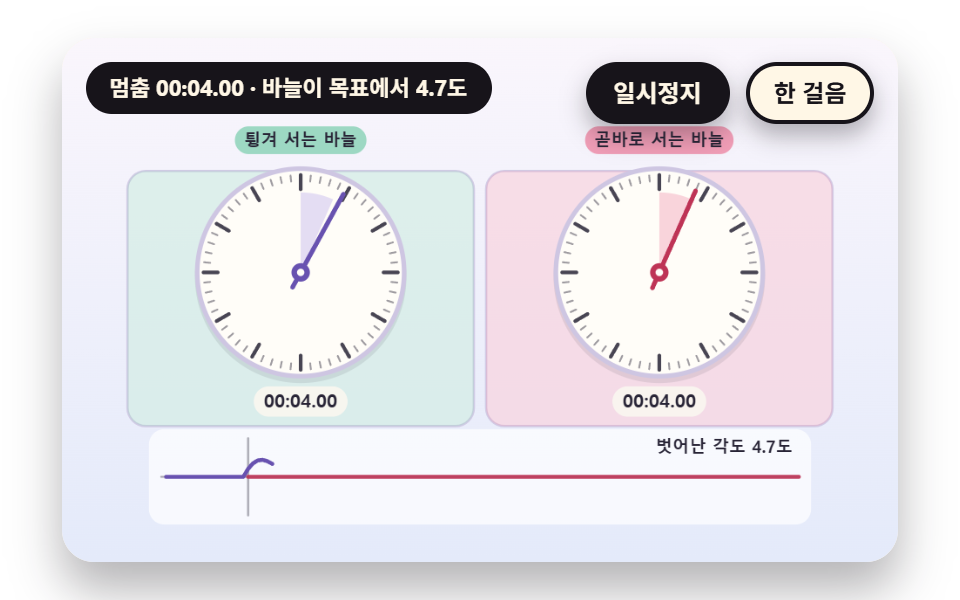 05 sc-stopwatch-stop-spring-hand-overshoot
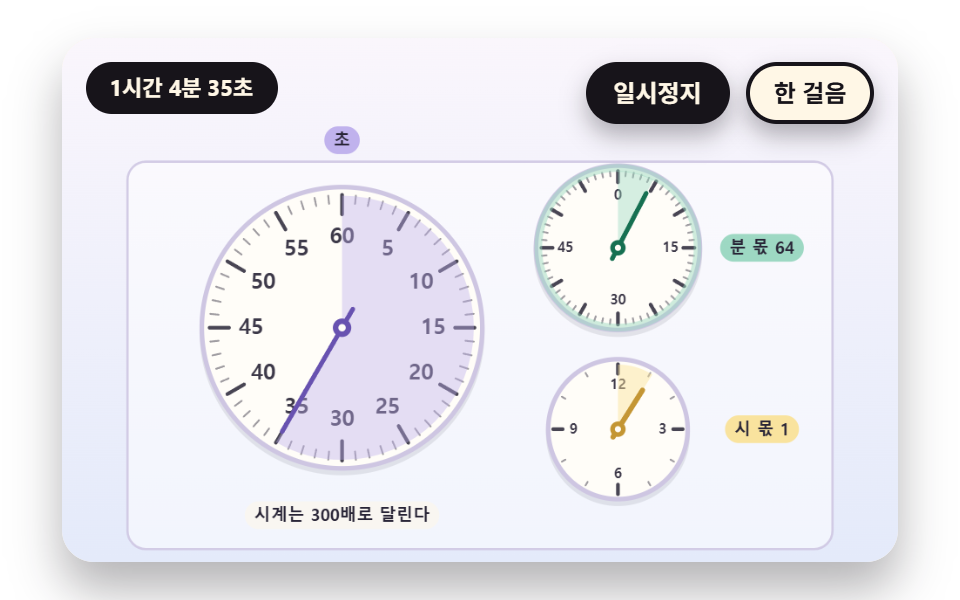 06 sc-stopwatch-subdial-minute-hour-accumulate
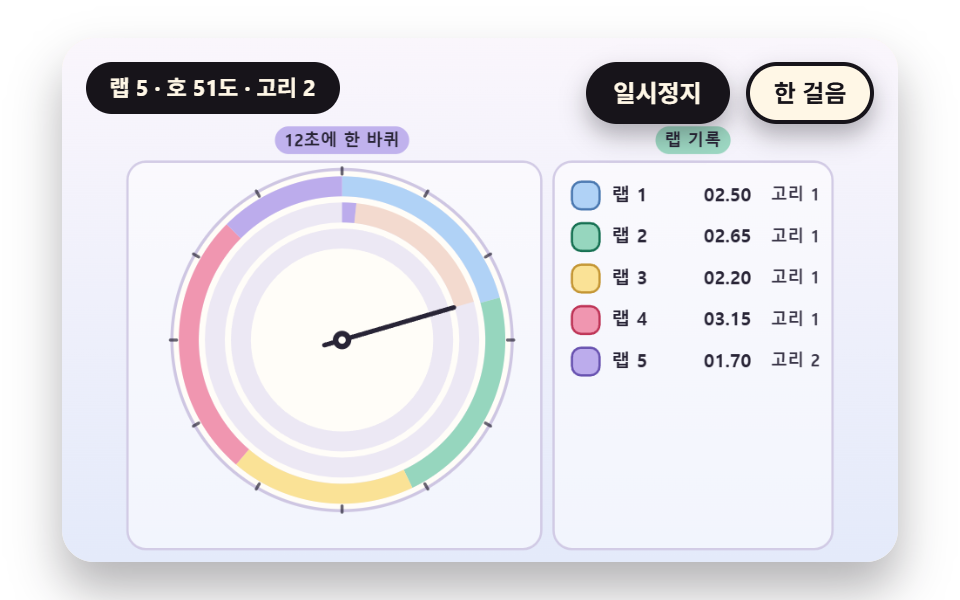 07 sc-stopwatch-lap-trail-ring-arc-per-lap
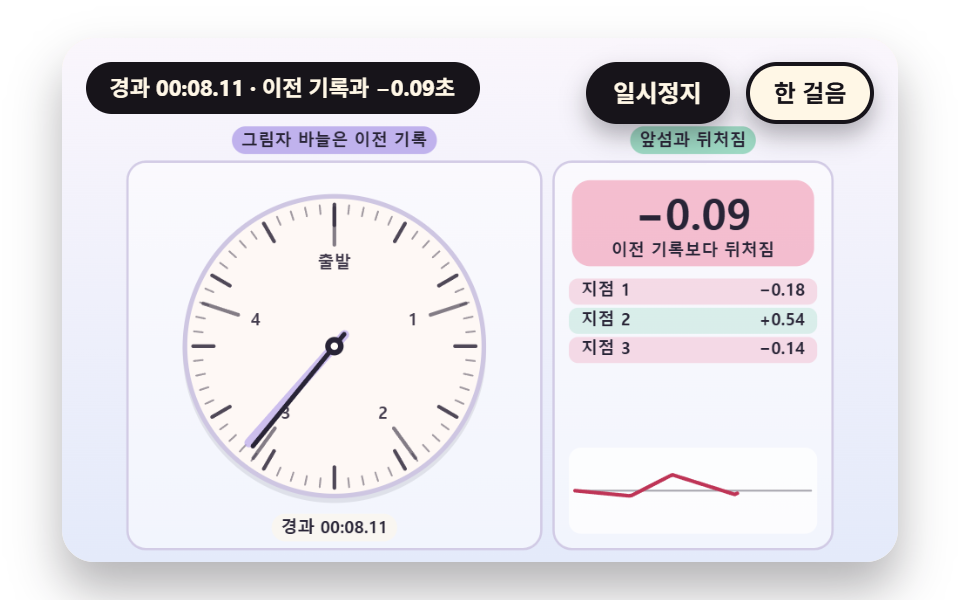 08 sc-stopwatch-ghost-hand-pace-compare
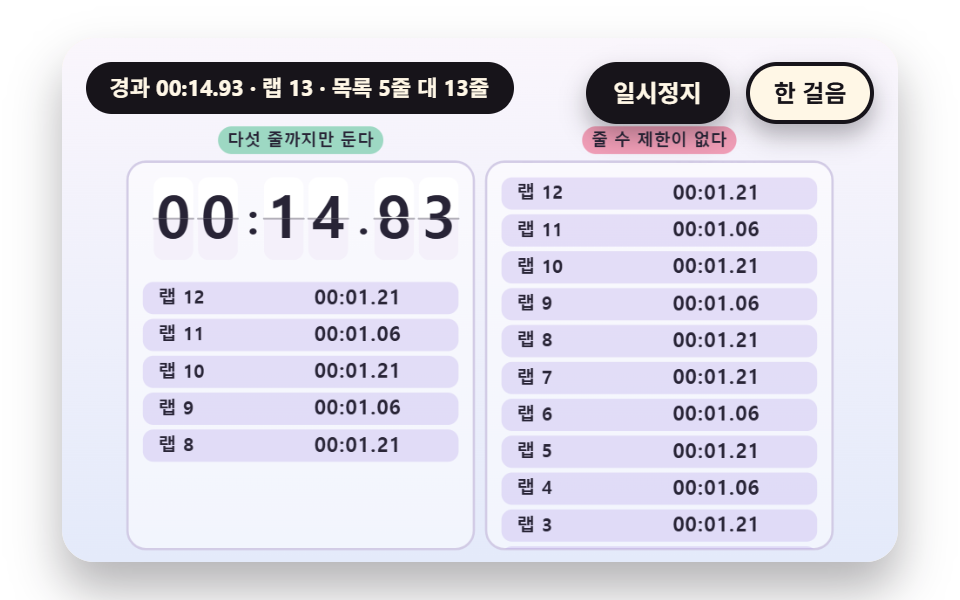 09 sc-stopwatch-hero-scoreboard-digit-flip
Auto-plays · click a tile to jump to its section · all nine in one zip
- 01 A Dial With a Continuously Sweeping Second Hand
- 02 A Readout Split Into Minutes, Seconds and Centiseconds
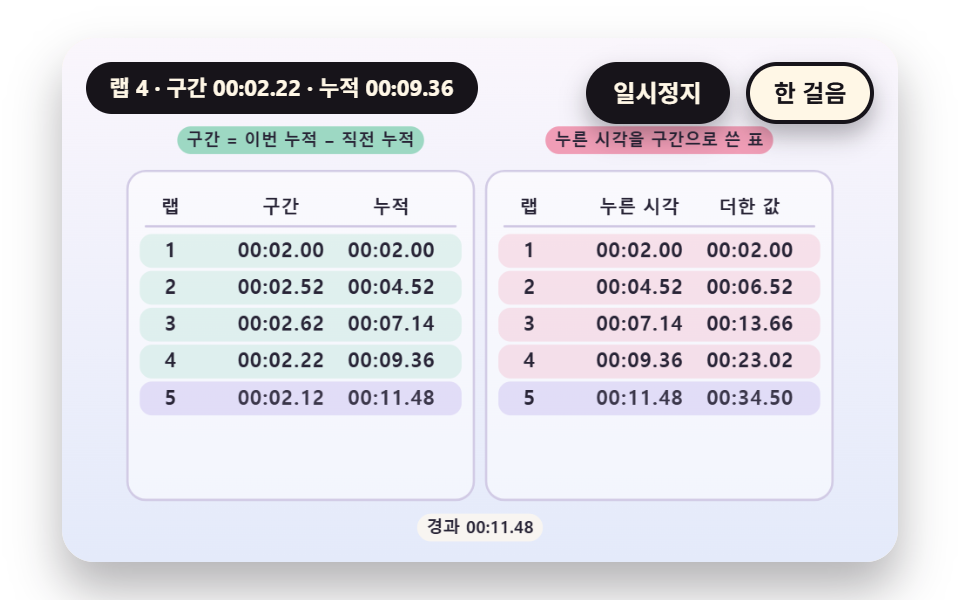
- 03 A Table That Computes Laps and Splits Together
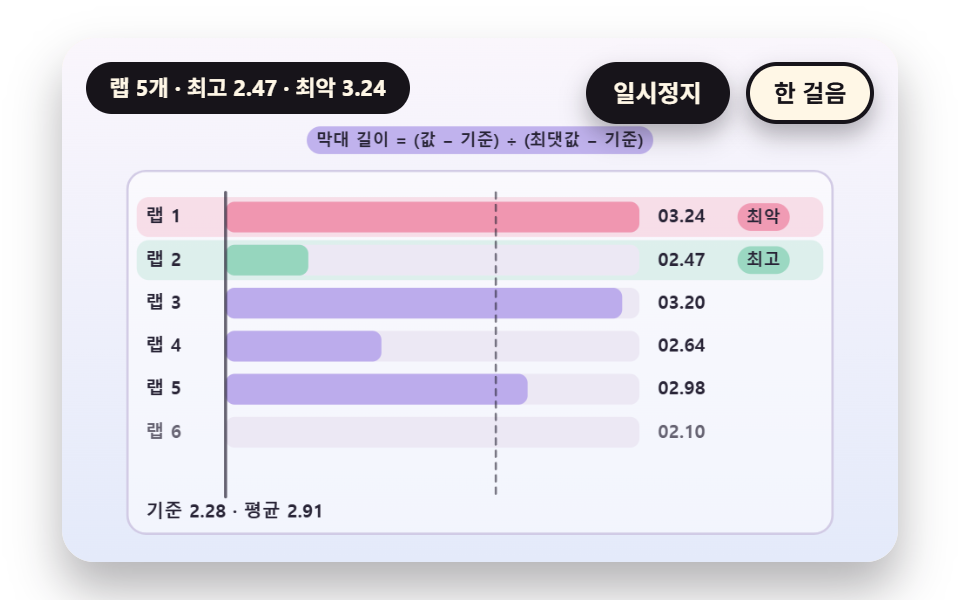
- 04 Lap Bars That Mark the Best and the Worst
- 05 A Spring Stop Where the Hand Rebounds Once
- 06 Sub Dials That Count Minutes and Hours
- 07 A Trail Ring That Keeps a Colored Arc per Lap
- 08 A Ghost Hand of a Past Run to Race Against
- 09 A Scoreboard Hero With Big Digits and a Lap Feed
The nine scenes count time the same way. Elapsed time is one integer of centiseconds, a hundredth of a second, and the minutes, seconds and centiseconds on the readout, the angle of a dial hand and every lap segment are computed from that integer alone. The time source is a single scene clock, sceneT, which adds up the difference dt between requestAnimationFrame timestamps and cuts any one frame at DT_MAX 0.05 seconds.
If you want stopwatch javascript code you can paste, that one integer is the whole contract between the clock and the screen. The order runs from one hand to records. 01 and 02 cover the hand and the readout, 03 and 04 cover laps as a table and as bars, 05 and 06 cover the bounce on stop and the sub dials that carry past an hour, and 07, 08 and 09 cover the rings, the ghost hand and the scoreboard that stacked laps build.
Stopwatch in JavaScript: 9 Scenes — A Dial With a Continuous Second Hand, a Minute Second Centisecond Readout, a Lap and Split Table, Lap Length Bars, a Spring Hand That Rebounds on Stop, a Sub Dial for Minutes and Hours, a Trail Ring That Keeps an Arc per Lap, a Ghost Hand of a Past Run and a Scoreboard Hero
What nine renders measured for area and motion
| Scene | Cumulative area | Moving frames | Mean intensity |
|---|---|---|---|
| 01 Continuous hand | 9.9% | 23/23 | 43.9 |
| 02 Centisecond readout | 12.3% | 23/23 | 68.1 |
| 03 Lap and split table | 11.1% | 23/23 | 56.9 |
| 04 Lap bars | 8.9% | 23/23 | 49.6 |
| 05 Spring stop | 21.0% | 23/23 | 95.7 |
| 06 Sub dials | 11.1% | 23/23 | 39.7 |
| 07 Trail ring | 9.2% | 23/23 | 102.4 |
| 08 Ghost hand | 18.3% | 23/23 | 90.6 |
| 09 Scoreboard | 20.6% | 23/23 | 95.7 |
05 covers the most area at 21.0% because the hand swings past the target and both panels flash at the stop, and 04 covers the least at 8.9% because only bars grow. Mean intensity is highest for 07 at 102.4 and lowest for 06 at 39.7, and all nine scenes moved in 23 of 23 frame gaps, so nothing sits still for a stretch.
01A Second Hand That Sweeps Without a Break
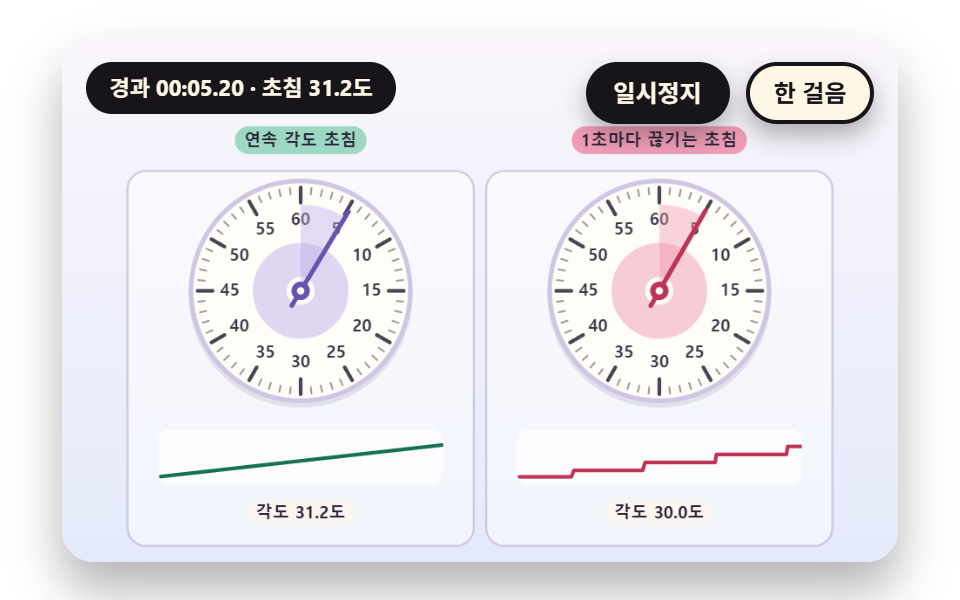
The hand angle comes from one centisecond integer through HAND_ANGLE(cs) and makes one turn at TURN_CS 6000. There are TICK_COUNT 60 ticks, heavier at every MAJOR_EVERY 5th, and the right board sets its hand from stepCs(), which is cut to whole seconds, so it jerks once per second while a ripple spreads from the hub at each new second. Workout, experiment and cooking dials use this.
<main class="stage">
<div class="vj is-demo" id="vj">
  <div class="vj__pad" data-role="pad" tabindex="0" role="application" aria-label="Stopwatch stage: Enter, Space, R or a click restarts, P pauses, N steps once">
    <canvas class="vj__canvas" data-role="canvas" width="480" height="300" role="img" aria-label="On the left is a dial whose second hand turns without a break because its angle comes from the integer centisecond count. On the right is a dial whose angle comes from a value cut down to whole seconds, so the hand moves one step per second. There are 60 ticks and every fifth is heavier, and the strip under each dial draws the angle change of the last 4 seconds as a smooth line and as a staircase. A ripple spreads from the hub to the rim every time the second changes"></canvas>
  </div>
  <p class="vj__status" data-role="status" aria-live="off">Stopwatch demo</p>
  <div class="vj__ctrl">
    <button class="vj__pause" data-role="pause" type="button" aria-pressed="false">Pause</button>
    <button class="vj__step" data-role="step" type="button">Step</button>
  </div>
  <p class="vj__done" data-role="done" role="status" aria-live="polite"></p>
</div>
</main>
@use "../../../../site/static/demo-tokens" as *;
@include stage($stage-paper);
.vj {
position: relative;
width: min(92vw, calc(160vh - 12.8vw));
aspect-ratio: 480 / 300;
margin: 0 auto;
border-radius: $r-card;
overflow: hidden;
box-shadow: $shadow-raised;
background: $subject-cream;
}
// 무대 상자 — 누르거나 Enter·Space·R 을 치면 처음부터 다시 시작한다. 키보드 포커스도 여기서 받는다(touch-action: none 은 이 상자에만). 무대 밖 터치는 페이지 스크롤 그대로
.vj__pad {
position: absolute;
inset: 0;
border-radius: inherit;
outline: none;
touch-action: none;
cursor: pointer;
}
// 바깥 .vj 가 넘침을 자르므로 포커스 테두리는 안쪽으로 들인다
.vj__pad:focus-visible {
outline: 3px solid $subject-ink;
outline-offset: -3px;
}
.vj__canvas {
position: absolute;
inset: 0;
display: block;
width: 100%;
height: 100%;
}
.vj__ctrl {
position: absolute;
right: $sp-3;
top: $sp-3;
display: flex;
gap: $sp-2;
}
.vj__pause,
.vj__step {
padding: $sp-1 $sp-3;
border: 2px solid $subject-ink;
border-radius: $r-pill;
background: $subject-ink;
color: $subject-cream;
font-family: inherit;
font-weight: 700;
font-size: 12px;
line-height: 1.6;
cursor: pointer;
box-shadow: $shadow-press;
transition: transform $dur-quick $ease-spring;
}
.vj__step {
background: $subject-cream;
color: $subject-ink;
}
// 스크린리더에만 읽히는 완료 알림
.vj__done {
position: absolute;
width: 1px;
height: 1px;
margin: 0;
overflow: hidden;
clip-path: inset(50%);
white-space: nowrap;
}
// 눌린 상태(멈춤) — 바탕과 글자색을 뒤집어 aria-pressed 가 눈에도 보이게
.vj__pause[aria-pressed="true"] {
background: $subject-cream;
color: $subject-ink;
}
.vj__pause:hover,
.vj__step:hover {
transform: translateY(-2px);
}
.vj__pause:active,
.vj__step:active {
transform: translateY(1px);
}
.vj__pause:focus-visible,
.vj__step:focus-visible {
outline: 3px solid $subject-ink;
outline-offset: 3px;
}
// 상태 줄 — 지금 장면의 수치를 글자로. 시연 중에는 aria-live off, 사람이 처음 손대면 polite
.vj__status {
position: absolute;
left: $sp-3;
top: $sp-3;
max-width: calc(100% - 190px);
margin: 0;
padding: $sp-1 $sp-3;
border-radius: $r-pill;
background: $subject-ink;
color: $subject-cream;
font-weight: 700;
font-size: 11px;
line-height: 1.6;
white-space: nowrap;
overflow: hidden;
text-overflow: ellipsis;
pointer-events: none;
}
@media (max-width: 340px) {
.vj__pause,
.vj__step,
.vj__status { font-size: 10px; padding: 0 $sp-2; }
}
// 움직임 줄이기 — 장면은 스크립트가 정지 장면 한 장으로 멈춘다. 버튼도 떠오르지 않게
@media (prefers-reduced-motion: reduce) {
.vj__pause,
.vj__step { transition: none !important; }
.vj__pause:hover,
.vj__pause:active,
.vj__step:hover,
.vj__step:active { transform: none !important; }
}html, body {
margin: 0;
overflow: hidden;
}
.stage {
box-sizing: border-box;
min-height: 100vh;
display: grid;
place-items: center;
margin: 0;
background: #ffffff;
font-family: -apple-system, "Segoe UI", "Noto Sans KR", sans-serif;
padding: clamp(8px, 4vw, 24px);
}
.vj {
position: relative;
width: min(92vw, 160vh - 12.8vw);
aspect-ratio: 480/300;
margin: 0 auto;
border-radius: 16px;
overflow: hidden;
box-shadow: 0 14px 24px rgba(23, 20, 26, 0.32);
background: #fff7e6;
}
.vj__pad {
position: absolute;
inset: 0;
border-radius: inherit;
outline: none;
touch-action: none;
cursor: pointer;
}
.vj__pad:focus-visible {
outline: 3px solid #17141a;
outline-offset: -3px;
}
.vj__canvas {
position: absolute;
inset: 0;
display: block;
width: 100%;
height: 100%;
}
.vj__ctrl {
position: absolute;
right: 12px;
top: 12px;
display: flex;
gap: 8px;
}
.vj__pause,
.vj__step {
padding: 4px 12px;
border: 2px solid #17141a;
border-radius: 999px;
background: #17141a;
color: #fff7e6;
font-family: inherit;
font-weight: 700;
font-size: 12px;
line-height: 1.6;
cursor: pointer;
box-shadow: 0 6px 12px rgba(23, 20, 26, 0.32);
transition: transform 220ms cubic-bezier(0.2, 0.8, 0.2, 1);
}
.vj__step {
background: #fff7e6;
color: #17141a;
}
.vj__done {
position: absolute;
width: 1px;
height: 1px;
margin: 0;
overflow: hidden;
clip-path: inset(50%);
white-space: nowrap;
}
.vj__pause[aria-pressed=true] {
background: #fff7e6;
color: #17141a;
}
.vj__pause:hover,
.vj__step:hover {
transform: translateY(-2px);
}
.vj__pause:active,
.vj__step:active {
transform: translateY(1px);
}
.vj__pause:focus-visible,
.vj__step:focus-visible {
outline: 3px solid #17141a;
outline-offset: 3px;
}
.vj__status {
position: absolute;
left: 12px;
top: 12px;
max-width: calc(100% - 190px);
margin: 0;
padding: 4px 12px;
border-radius: 999px;
background: #17141a;
color: #fff7e6;
font-weight: 700;
font-size: 11px;
line-height: 1.6;
white-space: nowrap;
overflow: hidden;
text-overflow: ellipsis;
pointer-events: none;
}
@media (max-width: 340px) {
.vj__pause,
.vj__step,
.vj__status {
font-size: 10px;
padding: 0 8px;
}
}
@media (prefers-reduced-motion: reduce) {
.vj__pause,
.vj__step {
transition: none !important;
}
.vj__pause:hover,
.vj__pause:active,
.vj__step:hover,
.vj__step:active {
transform: none !important;
}
}(function () {
const root = document.getElementById("vj");
if (!root) return;
// 무대 좌표 — 캔버스 안 계산은 늘 480×300. 화면에 보이는 크기와 상관없다
const W = 480;
const H = 300;
const PI = Math.PI;
const TAU = Math.PI * 2;
function clamp(v, lo, hi) { return v < lo ? lo : (v > hi ? hi : v); }
function lerp(a, b, k) { return a + (b - a) * k; }
function ease(x) { const c = clamp(x, 0, 1); return c * c * (3 - 2 * c); }
// 시드 고정 난수 — 선형 합동 생성기(곱 1664525, 더함 1013904223). 같은 시드면 같은 수열
function seeded(seed) {
let s = (seed >>> 0) || 1;
return function () {
s = (Math.imul(s, 1664525) + 1013904223) >>> 0;
return s / 4294967296;
};
}
// 파스텔 팔레트 — 글자는 늘 INK, 면은 연한 색. 앞섬은 민트, 뒤처짐은 분홍, 바늘은 라벤더·잉크
const BG_TOP = [250, 246, 252];
const BG_BOT = [228, 234, 250];
const FACE = [255, 253, 248];
const FACE_EDGE = [206, 198, 226];
const SKY = [176, 210, 246];
const SKY_DEEP = [74, 120, 176];
const GOLD = [250, 226, 150];
const GOLD_DEEP = [196, 150, 52];
const ROSE = [240, 150, 176];
const ROSE_DEEP = [190, 52, 86];
const MINT = [150, 214, 190];
const MINT_DEEP = [22, 112, 82];
const LAV = [188, 172, 236];
const LAV_DEEP = [104, 82, 176];
const INK = [40, 36, 54];
const PAPER = [250, 246, 240];
function mix(a, b, k) { return [lerp(a[0], b[0], k), lerp(a[1], b[1], k), lerp(a[2], b[2], k)]; }
function rgba(c, a) {
return 'rgba(' + Math.round(clamp(c[0], 0, 255)) + ',' + Math.round(clamp(c[1], 0, 255)) + ',' + Math.round(clamp(c[2], 0, 255)) + ',' + clamp(a, 0, 1).toFixed(3) + ')';
}
// 장면 시계(Seconds)·판 반복 번호·시간표 — 시간표는 (시각, 할 일) 목록이고 시각이 지나면 한 번씩 부른다
// sceneT 는 rAF 타임스탬프 차이(dt, 한 프레임 0.05Seconds 상한)를 쌓은 값 하나뿐이다 — 이 장면의 시간 원천은 이것 하나
let sceneT = 0;
let lap = 0;
let script = [];
let evAt = 0;
// ── 스톱워치 계산 ─────────────────────────────────────────
// 경과 시간은 센티초 정수 하나다. 숫자판의 분·Seconds·센티초도, 문자반의 각도도 이 정수 하나에서만 나온다
const CS_PER_SEC = 100;
const CS_PER_MIN = 6000;
let swStart = 0;
let swStop = -1;
// 장면 시각 t 에서의 경과 센티초 — 시작 전이면 0, 정지 뒤에는 정지 순간 값에 멈춘다
function swCs(t) {
const e = Math.min(t, swStop >= 0 ? swStop : 1e9) - swStart;
return e <= 0 ? 0 : Math.floor(e * CS_PER_SEC + 1e-6);
}
// Lap — 누른 순간의 Total 센티초 목록. 값은 장면 시각 t 로 계산하므로 프레임 길이와 상관없다
let marks = [];
function pressLap(t) { marks.push(swCs(t)); }
// Lap Segment = this total - previous total
function lapSpan(i) { return marks[i] - (i > 0 ? marks[i - 1] : 0); }
function pad2(n) { return n < 10 ? '0' + n : String(n); }
// 센티초 → [분, Seconds, 센티초] — 정수 나눗셈만 쓴다
function splitCs(cs) {
const m = Math.floor(cs / CS_PER_MIN);
const r = cs - m * CS_PER_MIN;
const s = Math.floor(r / CS_PER_SEC);
return [m, s, r - s * CS_PER_SEC];
}
function fmtCs(cs) {
const p = splitCs(cs);
return pad2(p[0]) + ':' + pad2(p[1]) + '.' + pad2(p[2]);
}
// 문자반 각도(라디안, 12시가 -π/2) — turnCs 센티초에 한 바퀴
function dialAng(cs, turnCs) { return ((cs % turnCs) / turnCs) * TAU - PI / 2; }
// 스톱워치 장면의 시작 상태 — 매 판 build() 맨 앞에서 부른다
function swReset() {
swStart = 0;
swStop = -1;
marks = [];
}
const canvasEl = root.querySelector('[data-role="canvas"]');
const padEl = root.querySelector('[data-role="pad"]');
const pauseEl = root.querySelector('[data-role="pause"]');
const statusEl = root.querySelector('[data-role="status"]');
const stepEl = root.querySelector('[data-role="step"]');
const doneEl = root.querySelector('[data-role="done"]');
const ctxRaw = canvasEl ? canvasEl.getContext('2d') : null;
if (!canvasEl || !ctxRaw || !pauseEl || !padEl || !stepEl || !doneEl) {
return;
}
const cv = canvasEl;
const ctx = ctxRaw;
const pauseBtn = pauseEl;
const stepBtn = stepEl;
const doneP = doneEl;
const pad = padEl;
// 외부 웹폰트는 부르지 않는다 — 기기에 있는 글꼴 목록만
const FONT_STACK = 'system-ui, -apple-system, "Segoe UI", "Noto Sans KR", sans-serif';
let dpr = 1;
function fitCanvas() {
// 배율은 2 에서 자른다 — 배율 3 기기에서 화소가 2.25배로 늘지 않게
dpr = Math.min(window.devicePixelRatio || 1, 2);
cv.width = Math.round(W * dpr);
cv.height = Math.round(H * dpr);
ctx.setTransform(dpr, 0, 0, dpr, 0, 0);
}
const VIEW_S = 0.88;
function skyFill(top, bot) {
ctx.setTransform(dpr, 0, 0, dpr, 0, 0);
const g = ctx.createLinearGradient(0, 0, 0, H);
g.addColorStop(0, rgba(top, 1));
g.addColorStop(1, rgba(bot, 1));
ctx.fillStyle = g;
ctx.fillRect(0, 0, W, H);
// 위쪽 Pause·상태 알약이 덮는 띠를 비우려고 장면 전체를 VIEW_S 배로 줄여 아래 가운데에 붙인다 — 이 줄 뒤에 그리는 것은 모두 줄어든 좌표계
ctx.translate(W / 2, H - 3);
ctx.scale(VIEW_S, VIEW_S);
ctx.translate(-W / 2, -(H - 3));
}
function disc(x, y, r, c, a) {
if (r <= 0.2 || a <= 0) {
return;
}
ctx.beginPath();
ctx.arc(x, y, r, 0, TAU);
ctx.fillStyle = rgba(c, a);
ctx.fill();
}
function ring(x, y, r, width, c, a) {
if (r <= 0.2 || a <= 0) {
return;
}
ctx.beginPath();
ctx.arc(x, y, r, 0, TAU);
ctx.lineWidth = width;
ctx.strokeStyle = rgba(c, a);
ctx.stroke();
}
function oval(x, y, rx, ry, c, a) {
if (rx <= 0.2 || ry <= 0.1 || a <= 0) {
return;
}
ctx.beginPath();
ctx.ellipse(x, y, rx, ry, 0, 0, TAU);
ctx.fillStyle = rgba(c, a);
ctx.fill();
}
function seg(x1, y1, x2, y2, width, c, a) {
if (a <= 0) {
return;
}
ctx.beginPath();
ctx.moveTo(x1, y1);
ctx.lineTo(x2, y2);
ctx.lineWidth = width;
ctx.lineCap = 'round';
ctx.strokeStyle = rgba(c, a);
ctx.stroke();
}
function box(x, y, w, h, r, c, a) {
if (w <= 0.2 || h <= 0.2 || a <= 0) {
return;
}
ctx.beginPath();
ctx.roundRect(x, y, w, h, Math.max(0, Math.min(r, w / 2, h / 2)));
ctx.fillStyle = rgba(c, a);
ctx.fill();
}
function outline(x, y, w, h, r, width, c, a) {
if (w <= 0.2 || h <= 0.2 || a <= 0) {
return;
}
ctx.beginPath();
ctx.roundRect(x, y, w, h, Math.max(0, Math.min(r, w / 2, h / 2)));
ctx.lineWidth = width;
ctx.strokeStyle = rgba(c, a);
ctx.stroke();
}
function text(s, x, y, c, a, px, weight, align) {
ctx.font = weight + ' ' + px + 'px ' + FONT_STACK;
ctx.textAlign = align;
ctx.textBaseline = 'middle';
ctx.fillStyle = rgba(c, a);
ctx.fillText(s, x, y);
}
// 글자 이름표 — 바탕 알약 위에 글자
function tag(s, x, y, bg, fg, px, align) {
ctx.font = '700 ' + px + 'px ' + FONT_STACK;
const w = ctx.measureText(s).width + px * 1.1;
const left = align === 'center' ? x - w / 2 : (align === 'right' ? x - w : x);
box(left, y - px * 0.82, w, px * 1.64, px * 0.82, bg, 0.92);
text(s, left + w / 2, y + 0.5, fg, 1, px, 700, 'center');
}
// ── 공통 틀 ───────────────────────────────────────────────
let shownStatus = '';
function pushStatus(s) {
if (!statusEl || s === shownStatus) {
return;
}
shownStatus = s;
statusEl.textContent = s;
}
let paused = false;
const reduceQuery = window.matchMedia('(prefers-reduced-motion: reduce)');
// 페이지를 연 채 움직임 줄이기 설정을 바꿔도 change 리스너가 다시 읽는다
let still = reduceQuery.matches;
// 자동 시연 표시 — 사람이 처음 손대면 떼고 상태 줄을 polite 로 켠다
let demo = root.classList.contains('is-demo');
const off = new AbortController();
function wake() {
if (!demo) {
return;
}
demo = false;
root.classList.remove('is-demo');
if (statusEl) {
statusEl.setAttribute('aria-live', 'polite');
}
}
// 한 판 시연이 끝났음을 스크린리더에 한 번만 알린다 — 판이 되풀이돼도 다시 읽지 않는다
let doneSaid = false;
function checkDone() {
if (!doneSaid && sceneT >= RESULT_S) {
doneSaid = true;
doneP.textContent = statusText();
}
}
function advance(dt) {
sceneT += dt;
while (evAt < script.length && script[evAt].t <= sceneT) {
const ev = script[evAt];
evAt += 1;
ev.f();
}
if (sceneT >= LAP_S) {
lap += 1;
begin();
return;
}
update(dt);
}
// 첫 판은 START_S 만큼 앞서 시작한다 — 바늘이 이미 도는 장면에서 보인다
function runTo(t) {
while (sceneT < t - 1e-6) {
advance(Math.min(1 / 30, t - sceneT));
}
}
function begin() {
sceneT = 0;
evAt = 0;
script = [];
build();
if (lap === 0 && !still) {
runTo(START_S);
}
}
const DT_MAX = 0.05;
function showNow() {
draw();
pushStatus(statusText());
checkDone();
}
let rafId = 0;
let lastTs = -1;
function frame(ts) {
if (still || paused) {
rafId = 0;
return;
}
if (lastTs < 0) {
lastTs = ts;
}
const dt = Math.min((ts - lastTs) / 1000, DT_MAX);
lastTs = ts;
if (dt > 0) {
advance(dt);
}
showNow();
rafId = window.requestAnimationFrame(frame);
}
function startLoop() {
if (rafId) {
return;
}
// 멈췄던 사이의 시간을 첫 프레임 dt 로 넘기지 않는다
lastTs = -1;
rafId = window.requestAnimationFrame(frame);
}
function stopLoop() {
if (rafId) {
window.cancelAnimationFrame(rafId);
rafId = 0;
}
}
// 움직임 줄이기 — 루프 없이 한 판의 멈춘 한 장. 시간표의 REST_S Seconds 장면에서 멈춘다
function showRest() {
stopLoop();
sceneT = 0;
evAt = 0;
script = [];
build();
runTo(REST_S);
doneSaid = false;
showNow();
}
function play() {
begin();
showNow();
if (!paused) {
startLoop();
}
}
function togglePause() {
paused = !paused;
pauseBtn.setAttribute('aria-pressed', paused ? 'true' : 'false');
wake();
if (paused) {
stopLoop();
}
else if (!still) {
startLoop();
}
}
// 다시 — 시간표를 처음부터 다시. 움직임 줄이기에서는 멈춘 한 장
function restart() {
lap += 1;
doneSaid = false;
if (still) {
showRest();
return;
}
begin();
showNow();
if (!paused) {
startLoop();
}
}
// Step — 멈춘 채 시간표의 다음 일 하나까지 시계를 보낸다. 더 부를 일이 없으면 판을 다시 연다
function stepOnce() {
wake();
if (!paused) {
paused = true;
pauseBtn.setAttribute('aria-pressed', 'true');
stopLoop();
}
if (evAt >= script.length) {
restart();
return;
}
runTo(script[evAt].t + 0.05);
showNow();
}
pauseBtn.addEventListener('click', togglePause, { signal: off.signal });
stepBtn.addEventListener('click', stepOnce, { signal: off.signal });
// 키보드 — 무대에 포커스가 있을 때만. Enter·Space·R 은 처음부터 다시, P 는 Pause, N 은 Step
pad.addEventListener('keydown', function (e) {
if (e.altKey || e.ctrlKey || e.metaKey) {
return;
}
const k = e.key;
if (k === 'Enter' || k === ' ') {
e.preventDefault();
wake();
restart();
}
else if (k === 'p' || k === 'P') {
togglePause();
}
else if (k === 'n' || k === 'N') {
stepOnce();
}
else if (k === 'r' || k === 'R') {
wake();
restart();
}
}, { signal: off.signal });
// 마우스·터치 — 무대를 누르면 처음부터 다시
pad.addEventListener('click', function () {
wake();
restart();
}, { signal: off.signal });
// 탭이 숨으면 멈추고, 돌아오면 시계를 다시 맞춰 시작 — 숨은 동안의 몇 초가 한 프레임에 몰리지 않게
document.addEventListener('visibilitychange', function () {
if (document.hidden) {
stopLoop();
}
else if (!paused && !still) {
startLoop();
}
}, { signal: off.signal });
// 설정이 바뀌면 — 켜지면 결과 한 장, 꺼지면 다시 움직인다
reduceQuery.addEventListener('change', function () {
still = reduceQuery.matches;
if (still) {
showRest();
}
else {
lap = 0;
play();
}
}, { signal: off.signal });
window.addEventListener('resize', function () {
fitCanvas();
showNow();
}, { signal: off.signal });
// ── 문자반·숫자판 도구 ─────────────────────────────────────
const PEACH = [250, 204, 170];
const PEACH_DEEP = [176, 92, 40];
// 안쪽에서 바깥쪽으로 — 눈금 ticks 개, majorEvery 번째마다 굵게, labelEvery 번째마다 숫자
function dialFace(cx, cy, R, ticks, majorEvery, labels, labelEvery) {
disc(cx, cy + 3, R + 3, INK, 0.1);
disc(cx, cy, R + 3, FACE_EDGE, 1);
disc(cx, cy, R, FACE, 1);
for (let i = 0; i < ticks; i += 1) {
const a = (i / ticks) * TAU - PI / 2;
const major = i % majorEvery === 0;
const r0 = R * (major ? 0.82 : 0.9);
const r1 = R * 0.96;
seg(cx + Math.cos(a) * r0, cy + Math.sin(a) * r0, cx + Math.cos(a) * r1, cy + Math.sin(a) * r1, major ? 2.4 : 1.2, INK, major ? 0.85 : 0.45);
if (labels.length > 0 && i % labelEvery === 0) {
const k = Math.floor(i / labelEvery);
if (k < labels.length) {
text(labels[k], cx + Math.cos(a) * R * 0.66, cy + Math.sin(a) * R * 0.66, INK, 0.9, Math.max(9, Math.round(R * 0.15)), 700, 'center');
}
}
}
}
function handAt(cx, cy, ang, len, tail, width, c, a) {
seg(cx - Math.cos(ang) * tail, cy - Math.sin(ang) * tail, cx + Math.cos(ang) * len, cy + Math.sin(ang) * len, width, c, a);
}
function hub(cx, cy, r, c) {
disc(cx, cy, r, c, 1);
disc(cx, cy, r * 0.4, FACE, 1);
}
// 12시에서 ang 까지 칠하는 부채꼴
function wedge(cx, cy, r, ang, c, a) {
if (ang <= -PI / 2 + 0.002) {
return;
}
ctx.beginPath();
ctx.moveTo(cx, cy);
ctx.arc(cx, cy, r, -PI / 2, ang);
ctx.closePath();
ctx.fillStyle = rgba(c, a);
ctx.fill();
}
function arcBand(cx, cy, r, a0, a1, width, c, a) {
if (a1 - a0 < 0.0005 || a <= 0) {
return;
}
ctx.beginPath();
ctx.arc(cx, cy, r, a0, a1);
ctx.lineWidth = width;
ctx.lineCap = 'butt';
ctx.strokeStyle = rgba(c, a);
ctx.stroke();
}
function panel(x, y, w, h, c, a) {
box(x, y, w, h, 12, c, a);
outline(x, y, w, h, 12, 1.5, FACE_EDGE, 0.9);
}
// 한 글자씩 같은 칸에 가운데 맞춰 찍는다 — 숫자 폭이 달라도 자릿수가 흔들리지 않는다(tabular)
function digitsRow(s, cx, y, cellW, px, c, a) {
let total = 0;
for (let i = 0; i < s.length; i += 1) {
total += (s[i] === ':' || s[i] === '.') ? cellW * 0.55 : cellW;
}
let x = cx - total / 2;
for (let i = 0; i < s.length; i += 1) {
const w = (s[i] === ':' || s[i] === '.') ? cellW * 0.55 : cellW;
text(s[i], x + w / 2, y, c, a, px, 800, 'center');
x += w;
}
}
// ── 01 끊김 없이 도는 초침 문자반 ─────────────────────────
// 경과 시간은 센티초 정수 cs 하나. 왼쪽 바늘은 cs 전체에서, 오른쪽 바늘은 Seconds 단위로 내린 값에서 각도를 만든다
// 초가 바뀔 때마다 허브에서 두 문자반 가장자리로 퍼지는 파문의 반지름도 같은 센티초 나머지(cs % 100)에서 나온다
    const TURN_CS = 6000;
    const TICK_COUNT = 60;
    const MAJOR_EVERY = 5;
    const WINDOW_S = 4;
    const LAP_S = 15.0;
    const START_S = 3.7;
    const REST_S = 3.7;
    const RESULT_S = 13.0;
    let hist = [];
    function build() {
        swReset();
        hist = [];
    }
    function update(dt) {
        if (dt < 0) {
            return;
        }
        hist.push({ t: sceneT, cs: swCs(sceneT) });
        while (hist.length > 1 && hist[0].t < sceneT - WINDOW_S) {
            hist.shift();
        }
    }
    function handCs() { return swCs(sceneT); }
    function stepCs() { return Math.floor(handCs() / CS_PER_SEC) * CS_PER_SEC; }
    function HAND_ANGLE(cs) { return dialAng(cs, TURN_CS); }
function strip(x0, y0, w, h, stair) {
box(x0, y0, w, h, 8, [255, 255, 255], 0.7);
const c0 = swCs(sceneT - WINDOW_S);
ctx.save();
ctx.beginPath();
ctx.roundRect(x0, y0, w, h, 8);
ctx.clip();
ctx.beginPath();
for (let i = 0; i < hist.length; i += 1) {
const v = stair ? Math.floor(hist[i].cs / CS_PER_SEC) * CS_PER_SEC : hist[i].cs;
const x = x0 + w - ((sceneT - hist[i].t) / WINDOW_S) * w;
const y = y0 + h - 5 - clamp((v - c0) / (WINDOW_S * CS_PER_SEC + 100), 0, 1) * (h - 10);
if (i === 0) {
ctx.moveTo(x, y);
}
else {
ctx.lineTo(x, y);
}
}
ctx.lineWidth = 2.4;
ctx.lineJoin = 'round';
ctx.strokeStyle = rgba(stair ? ROSE_DEEP : MINT_DEEP, 1);
ctx.stroke();
ctx.restore();
}
function drawDial(cx, cy, R, cs, shown, c, deep) {
dialFace(cx, cy, R, TICK_COUNT, MAJOR_EVERY, ['60', '5', '10', '15', '20', '25', '30', '35', '40', '45', '50', '55'], MAJOR_EVERY);
// 초가 바뀌는 순간마다 허브에서 퍼지는 파문 — 반지름은 센티초 나머지(cs % 100)에서 계산한다
const frac = (cs % CS_PER_SEC) / CS_PER_SEC;
ring(cx, cy, R * (0.12 + 0.84 * frac), 22, c, 0.6 * (1 - frac));
const a = HAND_ANGLE(shown);
wedge(cx, cy, R * 0.8, a, c, 0.42);
handAt(cx, cy, a, R * 0.86, R * 0.16, 3, deep, 1);
hub(cx, cy, 6, deep);
}
function draw() {
skyFill(BG_TOP, BG_BOT);
const cs = handCs();
panel(10, 46, 226, 244, [255, 255, 255], 0.5);
panel(244, 46, 226, 244, [255, 255, 255], 0.5);
drawDial(123, 124, 70, cs, cs, LAV, LAV_DEEP);
drawDial(357, 124, 70, cs, stepCs(), ROSE, ROSE_DEEP);
strip(30, 214, 186, 36, false);
strip(264, 214, 186, 36, true);
tag('Hand with a continuous angle', 123, 26, MINT, INK, 11, 'center');
tag('Hand that steps once a second', 357, 26, ROSE, INK, 11, 'center');
tag('Angle {a} degrees'.replace('{a}', (((cs % TURN_CS) / TURN_CS) * 360).toFixed(1)), 123, 268, PAPER, INK, 11, 'center');
tag('Angle {a} degrees'.replace('{a}', (((stepCs() % TURN_CS) / TURN_CS) * 360).toFixed(1)), 357, 268, PAPER, INK, 11, 'center');
}
function statusText() {
return 'Elapsed {t} - second hand {a} degrees'.replace('{t}', fmtCs(handCs())).replace('{a}', (((handCs() % TURN_CS) / TURN_CS) * 360).toFixed(1));
}
fitCanvas();
if (still) {
showRest();
}
else {
play();
}
return function () {
stopLoop();
off.abort();
};
})();// DialContinuousSecondHand - 같은 항목 vanilla index.html 의 React 판. 같은 계산을 useEffect 안에서 돌린다
import { useEffect, useRef } from "react";
import styles from "./DialContinuousSecondHand.module.scss";
const cx = (s: string): string => s.split(" ").map((n) => styles[n] ?? n).join(" ");
export default function DialContinuousSecondHand() {
const rootRef = useRef<HTMLDivElement | null>(null);
useEffect(() => {
const rootEl = rootRef.current;
if (!rootEl) return;
const root: HTMLElement = rootEl;
type RGB = [number, number, number];
type RGBA = [number, number, number, number];
// 무대 좌표 — 캔버스 안 계산은 늘 480×300. 화면에 보이는 크기와 상관없다
const W = 480;
const H = 300;
const PI = Math.PI;
const TAU = Math.PI * 2;
function clamp(v: number, lo: number, hi: number): number { return v < lo ? lo : (v > hi ? hi : v); }
function lerp(a: number, b: number, k: number): number { return a + (b - a) * k; }
function ease(x: number): number { const c = clamp(x, 0, 1); return c * c * (3 - 2 * c); }
// 시드 고정 난수 — 선형 합동 생성기(곱 1664525, 더함 1013904223). 같은 시드면 같은 수열
function seeded(seed: number): () => number {
let s = (seed >>> 0) || 1;
return function (): number {
s = (Math.imul(s, 1664525) + 1013904223) >>> 0;
return s / 4294967296;
};
}
// 파스텔 팔레트 — 글자는 늘 INK, 면은 연한 색. 앞섬은 민트, 뒤처짐은 분홍, 바늘은 라벤더·잉크
const BG_TOP: RGB = [250, 246, 252];
const BG_BOT: RGB = [228, 234, 250];
const FACE: RGB = [255, 253, 248];
const FACE_EDGE: RGB = [206, 198, 226];
const SKY: RGB = [176, 210, 246];
const SKY_DEEP: RGB = [74, 120, 176];
const GOLD: RGB = [250, 226, 150];
const GOLD_DEEP: RGB = [196, 150, 52];
const ROSE: RGB = [240, 150, 176];
const ROSE_DEEP: RGB = [190, 52, 86];
const MINT: RGB = [150, 214, 190];
const MINT_DEEP: RGB = [22, 112, 82];
const LAV: RGB = [188, 172, 236];
const LAV_DEEP: RGB = [104, 82, 176];
const INK: RGB = [40, 36, 54];
const PAPER: RGB = [250, 246, 240];
function mix(a: RGB, b: RGB, k: number): RGB { return [lerp(a[0], b[0], k), lerp(a[1], b[1], k), lerp(a[2], b[2], k)]; }
function rgba(c: RGB, a: number): string {
return 'rgba(' + Math.round(clamp(c[0], 0, 255)) + ',' + Math.round(clamp(c[1], 0, 255)) + ',' + Math.round(clamp(c[2], 0, 255)) + ',' + clamp(a, 0, 1).toFixed(3) + ')';
}
// 장면 시계(초)·판 반복 번호·시간표 — 시간표는 (시각, 할 일) 목록이고 시각이 지나면 한 번씩 부른다
// sceneT 는 rAF 타임스탬프 차이(dt, 한 프레임 0.05초 상한)를 쌓은 값 하나뿐이다 — 이 장면의 시간 원천은 이것 하나
let sceneT = 0;
let lap = 0;
type Ev = { t: number; f: () => void };
let script: Ev[] = [];
let evAt = 0;
// ── 스톱워치 계산 ─────────────────────────────────────────
// 경과 시간은 센티초 정수 하나다. 숫자판의 분·초·센티초도, 문자반의 각도도 이 정수 하나에서만 나온다
const CS_PER_SEC = 100;
const CS_PER_MIN = 6000;
let swStart = 0;
let swStop = -1;
// 장면 시각 t 에서의 경과 센티초 — 시작 전이면 0, 정지 뒤에는 정지 순간 값에 멈춘다
function swCs(t: number): number {
const e = Math.min(t, swStop >= 0 ? swStop : 1e9) - swStart;
return e <= 0 ? 0 : Math.floor(e * CS_PER_SEC + 1e-6);
}
// 랩 — 누른 순간의 누적 센티초 목록. 값은 장면 시각 t 로 계산하므로 프레임 길이와 상관없다
let marks: number[] = [];
function pressLap(t: number): void { marks.push(swCs(t)); }
// 랩 구간 = 이번 누적 − 직전 누적
function lapSpan(i: number): number { return marks[i] - (i > 0 ? marks[i - 1] : 0); }
function pad2(n: number): string { return n < 10 ? '0' + n : String(n); }
// 센티초 → [분, 초, 센티초] — 정수 나눗셈만 쓴다
function splitCs(cs: number): [number, number, number] {
const m = Math.floor(cs / CS_PER_MIN);
const r = cs - m * CS_PER_MIN;
const s = Math.floor(r / CS_PER_SEC);
return [m, s, r - s * CS_PER_SEC];
}
function fmtCs(cs: number): string {
const p = splitCs(cs);
return pad2(p[0]) + ':' + pad2(p[1]) + '.' + pad2(p[2]);
}
// 문자반 각도(라디안, 12시가 -π/2) — turnCs 센티초에 한 바퀴
function dialAng(cs: number, turnCs: number): number { return ((cs % turnCs) / turnCs) * TAU - PI / 2; }
// 스톱워치 장면의 시작 상태 — 매 판 build() 맨 앞에서 부른다
function swReset(): void {
swStart = 0;
swStop = -1;
marks = [];
}
const canvasEl = root.querySelector('[data-role="canvas"]') as HTMLCanvasElement | null;
const padEl = root.querySelector('[data-role="pad"]') as HTMLElement | null;
const pauseEl = root.querySelector('[data-role="pause"]') as HTMLButtonElement | null;
const statusEl = root.querySelector('[data-role="status"]') as HTMLElement | null;
const stepEl = root.querySelector('[data-role="step"]') as HTMLButtonElement | null;
const doneEl = root.querySelector('[data-role="done"]') as HTMLElement | null;
const ctxRaw = canvasEl ? canvasEl.getContext('2d') : null;
if (!canvasEl || !ctxRaw || !pauseEl || !padEl || !stepEl || !doneEl) { return; }
const cv: HTMLCanvasElement = canvasEl;
const ctx: CanvasRenderingContext2D = ctxRaw;
const pauseBtn: HTMLButtonElement = pauseEl;
const stepBtn: HTMLButtonElement = stepEl;
const doneP: HTMLElement = doneEl;
const pad: HTMLElement = padEl;
// 외부 웹폰트는 부르지 않는다 — 기기에 있는 글꼴 목록만
const FONT_STACK = 'system-ui, -apple-system, "Segoe UI", "Noto Sans KR", sans-serif';
let dpr = 1;
function fitCanvas(): void {
// 배율은 2 에서 자른다 — 배율 3 기기에서 화소가 2.25배로 늘지 않게
dpr = Math.min(window.devicePixelRatio || 1, 2);
cv.width = Math.round(W * dpr);
cv.height = Math.round(H * dpr);
ctx.setTransform(dpr, 0, 0, dpr, 0, 0);
}
const VIEW_S = 0.88;
function skyFill(top: RGB, bot: RGB): void {
ctx.setTransform(dpr, 0, 0, dpr, 0, 0);
const g = ctx.createLinearGradient(0, 0, 0, H);
g.addColorStop(0, rgba(top, 1));
g.addColorStop(1, rgba(bot, 1));
ctx.fillStyle = g;
ctx.fillRect(0, 0, W, H);
// 위쪽 일시정지·상태 알약이 덮는 띠를 비우려고 장면 전체를 VIEW_S 배로 줄여 아래 가운데에 붙인다 — 이 줄 뒤에 그리는 것은 모두 줄어든 좌표계
ctx.translate(W / 2, H - 3);
ctx.scale(VIEW_S, VIEW_S);
ctx.translate(-W / 2, -(H - 3));
}
function disc(x: number, y: number, r: number, c: RGB, a: number): void {
if (r <= 0.2 || a <= 0) { return; }
ctx.beginPath();
ctx.arc(x, y, r, 0, TAU);
ctx.fillStyle = rgba(c, a);
ctx.fill();
}
function ring(x: number, y: number, r: number, width: number, c: RGB, a: number): void {
if (r <= 0.2 || a <= 0) { return; }
ctx.beginPath();
ctx.arc(x, y, r, 0, TAU);
ctx.lineWidth = width;
ctx.strokeStyle = rgba(c, a);
ctx.stroke();
}
function oval(x: number, y: number, rx: number, ry: number, c: RGB, a: number): void {
if (rx <= 0.2 || ry <= 0.1 || a <= 0) { return; }
ctx.beginPath();
ctx.ellipse(x, y, rx, ry, 0, 0, TAU);
ctx.fillStyle = rgba(c, a);
ctx.fill();
}
function seg(x1: number, y1: number, x2: number, y2: number, width: number, c: RGB, a: number): void {
if (a <= 0) { return; }
ctx.beginPath();
ctx.moveTo(x1, y1);
ctx.lineTo(x2, y2);
ctx.lineWidth = width;
ctx.lineCap = 'round';
ctx.strokeStyle = rgba(c, a);
ctx.stroke();
}
function box(x: number, y: number, w: number, h: number, r: number, c: RGB, a: number): void {
if (w <= 0.2 || h <= 0.2 || a <= 0) { return; }
ctx.beginPath();
ctx.roundRect(x, y, w, h, Math.max(0, Math.min(r, w / 2, h / 2)));
ctx.fillStyle = rgba(c, a);
ctx.fill();
}
function outline(x: number, y: number, w: number, h: number, r: number, width: number, c: RGB, a: number): void {
if (w <= 0.2 || h <= 0.2 || a <= 0) { return; }
ctx.beginPath();
ctx.roundRect(x, y, w, h, Math.max(0, Math.min(r, w / 2, h / 2)));
ctx.lineWidth = width;
ctx.strokeStyle = rgba(c, a);
ctx.stroke();
}
function text(s: string, x: number, y: number, c: RGB, a: number, px: number, weight: number, align: CanvasTextAlign): void {
ctx.font = weight + ' ' + px + 'px ' + FONT_STACK;
ctx.textAlign = align;
ctx.textBaseline = 'middle';
ctx.fillStyle = rgba(c, a);
ctx.fillText(s, x, y);
}
// 글자 이름표 — 바탕 알약 위에 글자
function tag(s: string, x: number, y: number, bg: RGB, fg: RGB, px: number, align: CanvasTextAlign): void {
ctx.font = '700 ' + px + 'px ' + FONT_STACK;
const w = ctx.measureText(s).width + px * 1.1;
const left = align === 'center' ? x - w / 2 : (align === 'right' ? x - w : x);
box(left, y - px * 0.82, w, px * 1.64, px * 0.82, bg, 0.92);
text(s, left + w / 2, y + 0.5, fg, 1, px, 700, 'center');
}
// ── 공통 틀 ───────────────────────────────────────────────
let shownStatus = '';
function pushStatus(s: string): void {
if (!statusEl || s === shownStatus) { return; }
shownStatus = s;
statusEl.textContent = s;
}
let paused = false;
const reduceQuery = window.matchMedia('(prefers-reduced-motion: reduce)');
// 페이지를 연 채 움직임 줄이기 설정을 바꿔도 change 리스너가 다시 읽는다
let still = reduceQuery.matches;
// 자동 시연 표시 — 사람이 처음 손대면 떼고 상태 줄을 polite 로 켠다
let demo = root.classList.contains('is-demo');
const off = new AbortController();
function wake(): void {
if (!demo) { return; }
demo = false;
root.classList.remove('is-demo');
if (statusEl) { statusEl.setAttribute('aria-live', 'polite'); }
}
// 한 판 시연이 끝났음을 스크린리더에 한 번만 알린다 — 판이 되풀이돼도 다시 읽지 않는다
let doneSaid = false;
function checkDone(): void {
if (!doneSaid && sceneT >= RESULT_S) {
doneSaid = true;
doneP.textContent = statusText();
}
}
function advance(dt: number): void {
sceneT += dt;
while (evAt < script.length && script[evAt].t <= sceneT) {
const ev = script[evAt];
evAt += 1;
ev.f();
}
if (sceneT >= LAP_S) { lap += 1; begin(); return; }
update(dt);
}
// 첫 판은 START_S 만큼 앞서 시작한다 — 바늘이 이미 도는 장면에서 보인다
function runTo(t: number): void {
while (sceneT < t - 1e-6) { advance(Math.min(1 / 30, t - sceneT)); }
}
function begin(): void {
sceneT = 0;
evAt = 0;
script = [];
build();
if (lap === 0 && !still) { runTo(START_S); }
}
const DT_MAX = 0.05;
function showNow(): void {
draw();
pushStatus(statusText());
checkDone();
}
let rafId = 0;
let lastTs = -1;
function frame(ts: number): void {
if (still || paused) { rafId = 0; return; }
if (lastTs < 0) { lastTs = ts; }
const dt = Math.min((ts - lastTs) / 1000, DT_MAX);
lastTs = ts;
if (dt > 0) { advance(dt); }
showNow();
rafId = window.requestAnimationFrame(frame);
}
function startLoop(): void {
if (rafId) { return; }
// 멈췄던 사이의 시간을 첫 프레임 dt 로 넘기지 않는다
lastTs = -1;
rafId = window.requestAnimationFrame(frame);
}
function stopLoop(): void {
if (rafId) { window.cancelAnimationFrame(rafId); rafId = 0; }
}
// 움직임 줄이기 — 루프 없이 한 판의 멈춘 한 장. 시간표의 REST_S 초 장면에서 멈춘다
function showRest(): void {
stopLoop();
sceneT = 0;
evAt = 0;
script = [];
build();
runTo(REST_S);
doneSaid = false;
showNow();
}
function play(): void {
begin();
showNow();
if (!paused) { startLoop(); }
}
function togglePause(): void {
paused = !paused;
pauseBtn.setAttribute('aria-pressed', paused ? 'true' : 'false');
wake();
if (paused) { stopLoop(); } else if (!still) { startLoop(); }
}
// 다시 — 시간표를 처음부터 다시. 움직임 줄이기에서는 멈춘 한 장
function restart(): void {
lap += 1;
doneSaid = false;
if (still) { showRest(); return; }
begin();
showNow();
if (!paused) { startLoop(); }
}
// 한 걸음 — 멈춘 채 시간표의 다음 일 하나까지 시계를 보낸다. 더 부를 일이 없으면 판을 다시 연다
function stepOnce(): void {
wake();
if (!paused) {
paused = true;
pauseBtn.setAttribute('aria-pressed', 'true');
stopLoop();
}
if (evAt >= script.length) {
restart();
return;
}
runTo(script[evAt].t + 0.05);
showNow();
}
pauseBtn.addEventListener('click', togglePause, { signal: off.signal });
stepBtn.addEventListener('click', stepOnce, { signal: off.signal });
// 키보드 — 무대에 포커스가 있을 때만. Enter·Space·R 은 처음부터 다시, P 는 일시정지, N 은 한 걸음
pad.addEventListener('keydown', function (e: KeyboardEvent): void {
if (e.altKey || e.ctrlKey || e.metaKey) { return; }
const k = e.key;
if (k === 'Enter' || k === ' ') {
e.preventDefault();
wake();
restart();
} else if (k === 'p' || k === 'P') {
togglePause();
} else if (k === 'n' || k === 'N') {
stepOnce();
} else if (k === 'r' || k === 'R') {
wake();
restart();
}
}, { signal: off.signal });
// 마우스·터치 — 무대를 누르면 처음부터 다시
pad.addEventListener('click', function (): void {
wake();
restart();
}, { signal: off.signal });
// 탭이 숨으면 멈추고, 돌아오면 시계를 다시 맞춰 시작 — 숨은 동안의 몇 초가 한 프레임에 몰리지 않게
document.addEventListener('visibilitychange', function (): void {
if (document.hidden) { stopLoop(); } else if (!paused && !still) { startLoop(); }
}, { signal: off.signal });
// 설정이 바뀌면 — 켜지면 결과 한 장, 꺼지면 다시 움직인다
reduceQuery.addEventListener('change', function (): void {
still = reduceQuery.matches;
if (still) { showRest(); } else { lap = 0; play(); }
}, { signal: off.signal });
window.addEventListener('resize', function (): void {
fitCanvas();
showNow();
}, { signal: off.signal });
// ── 문자반·숫자판 도구 ─────────────────────────────────────
const PEACH: RGB = [250, 204, 170];
const PEACH_DEEP: RGB = [176, 92, 40];
// 안쪽에서 바깥쪽으로 — 눈금 ticks 개, majorEvery 번째마다 굵게, labelEvery 번째마다 숫자
function dialFace(cx: number, cy: number, R: number, ticks: number, majorEvery: number, labels: string[], labelEvery: number): void {
disc(cx, cy + 3, R + 3, INK, 0.1);
disc(cx, cy, R + 3, FACE_EDGE, 1);
disc(cx, cy, R, FACE, 1);
for (let i = 0; i < ticks; i += 1) {
const a = (i / ticks) * TAU - PI / 2;
const major = i % majorEvery === 0;
const r0 = R * (major ? 0.82 : 0.9);
const r1 = R * 0.96;
seg(cx + Math.cos(a) * r0, cy + Math.sin(a) * r0, cx + Math.cos(a) * r1, cy + Math.sin(a) * r1, major ? 2.4 : 1.2, INK, major ? 0.85 : 0.45);
if (labels.length > 0 && i % labelEvery === 0) {
const k = Math.floor(i / labelEvery);
if (k < labels.length) {
text(labels[k], cx + Math.cos(a) * R * 0.66, cy + Math.sin(a) * R * 0.66, INK, 0.9, Math.max(9, Math.round(R * 0.15)), 700, 'center');
}
}
}
}
function handAt(cx: number, cy: number, ang: number, len: number, tail: number, width: number, c: RGB, a: number): void {
seg(cx - Math.cos(ang) * tail, cy - Math.sin(ang) * tail, cx + Math.cos(ang) * len, cy + Math.sin(ang) * len, width, c, a);
}
function hub(cx: number, cy: number, r: number, c: RGB): void {
disc(cx, cy, r, c, 1);
disc(cx, cy, r * 0.4, FACE, 1);
}
// 12시에서 ang 까지 칠하는 부채꼴
function wedge(cx: number, cy: number, r: number, ang: number, c: RGB, a: number): void {
if (ang <= -PI / 2 + 0.002) { return; }
ctx.beginPath();
ctx.moveTo(cx, cy);
ctx.arc(cx, cy, r, -PI / 2, ang);
ctx.closePath();
ctx.fillStyle = rgba(c, a);
ctx.fill();
}
function arcBand(cx: number, cy: number, r: number, a0: number, a1: number, width: number, c: RGB, a: number): void {
if (a1 - a0 < 0.0005 || a <= 0) { return; }
ctx.beginPath();
ctx.arc(cx, cy, r, a0, a1);
ctx.lineWidth = width;
ctx.lineCap = 'butt';
ctx.strokeStyle = rgba(c, a);
ctx.stroke();
}
function panel(x: number, y: number, w: number, h: number, c: RGB, a: number): void {
box(x, y, w, h, 12, c, a);
outline(x, y, w, h, 12, 1.5, FACE_EDGE, 0.9);
}
// 한 글자씩 같은 칸에 가운데 맞춰 찍는다 — 숫자 폭이 달라도 자릿수가 흔들리지 않는다(tabular)
function digitsRow(s: string, cx: number, y: number, cellW: number, px: number, c: RGB, a: number): void {
let total = 0;
for (let i = 0; i < s.length; i += 1) { total += (s[i] === ':' || s[i] === '.') ? cellW * 0.55 : cellW; }
let x = cx - total / 2;
for (let i = 0; i < s.length; i += 1) {
const w = (s[i] === ':' || s[i] === '.') ? cellW * 0.55 : cellW;
text(s[i], x + w / 2, y, c, a, px, 800, 'center');
x += w;
}
}
// ── 01 끊김 없이 도는 초침 문자반 ─────────────────────────
// 경과 시간은 센티초 정수 cs 하나. 왼쪽 바늘은 cs 전체에서, 오른쪽 바늘은 초 단위로 내린 값에서 각도를 만든다
// 초가 바뀔 때마다 허브에서 두 문자반 가장자리로 퍼지는 파문의 반지름도 같은 센티초 나머지(cs % 100)에서 나온다
const TURN_CS = 6000;
const TICK_COUNT = 60;
const MAJOR_EVERY = 5;
const WINDOW_S = 4;
const LAP_S = 15.0;
const START_S = 3.7;
const REST_S = 3.7;
const RESULT_S = 13.0;
type Pt = { t: number; cs: number };
let hist: Pt[] = [];
function build(): void {
swReset();
hist = [];
}
function update(dt: number): void {
if (dt < 0) { return; }
hist.push({ t: sceneT, cs: swCs(sceneT) });
while (hist.length > 1 && hist[0].t < sceneT - WINDOW_S) { hist.shift(); }
}
function handCs(): number { return swCs(sceneT); }
function stepCs(): number { return Math.floor(handCs() / CS_PER_SEC) * CS_PER_SEC; }
function HAND_ANGLE(cs: number): number { return dialAng(cs, TURN_CS); }
function strip(x0: number, y0: number, w: number, h: number, stair: boolean): void {
box(x0, y0, w, h, 8, [255, 255, 255], 0.7);
const c0 = swCs(sceneT - WINDOW_S);
ctx.save();
ctx.beginPath();
ctx.roundRect(x0, y0, w, h, 8);
ctx.clip();
ctx.beginPath();
for (let i = 0; i < hist.length; i += 1) {
const v = stair ? Math.floor(hist[i].cs / CS_PER_SEC) * CS_PER_SEC : hist[i].cs;
const x = x0 + w - ((sceneT - hist[i].t) / WINDOW_S) * w;
const y = y0 + h - 5 - clamp((v - c0) / (WINDOW_S * CS_PER_SEC + 100), 0, 1) * (h - 10);
if (i === 0) { ctx.moveTo(x, y); } else { ctx.lineTo(x, y); }
}
ctx.lineWidth = 2.4;
ctx.lineJoin = 'round';
ctx.strokeStyle = rgba(stair ? ROSE_DEEP : MINT_DEEP, 1);
ctx.stroke();
ctx.restore();
}
function drawDial(cx: number, cy: number, R: number, cs: number, shown: number, c: RGB, deep: RGB): void {
dialFace(cx, cy, R, TICK_COUNT, MAJOR_EVERY, ['60', '5', '10', '15', '20', '25', '30', '35', '40', '45', '50', '55'], MAJOR_EVERY);
// 초가 바뀌는 순간마다 허브에서 퍼지는 파문 — 반지름은 센티초 나머지(cs % 100)에서 계산한다
const frac = (cs % CS_PER_SEC) / CS_PER_SEC;
ring(cx, cy, R * (0.12 + 0.84 * frac), 22, c, 0.6 * (1 - frac));
const a = HAND_ANGLE(shown);
wedge(cx, cy, R * 0.8, a, c, 0.42);
handAt(cx, cy, a, R * 0.86, R * 0.16, 3, deep, 1);
hub(cx, cy, 6, deep);
}
function draw(): void {
skyFill(BG_TOP, BG_BOT);
const cs = handCs();
panel(10, 46, 226, 244, [255, 255, 255], 0.5);
panel(244, 46, 226, 244, [255, 255, 255], 0.5);
drawDial(123, 124, 70, cs, cs, LAV, LAV_DEEP);
drawDial(357, 124, 70, cs, stepCs(), ROSE, ROSE_DEEP);
strip(30, 214, 186, 36, false);
strip(264, 214, 186, 36, true);
tag('연속 각도 초침', 123, 26, MINT, INK, 11, 'center');
tag('1초마다 끊기는 초침', 357, 26, ROSE, INK, 11, 'center');
tag('각도 {a}도'.replace('{a}', (((cs % TURN_CS) / TURN_CS) * 360).toFixed(1)), 123, 268, PAPER, INK, 11, 'center');
tag('각도 {a}도'.replace('{a}', (((stepCs() % TURN_CS) / TURN_CS) * 360).toFixed(1)), 357, 268, PAPER, INK, 11, 'center');
}
function statusText(): string {
return '경과 {t} · 초침 {a}도'.replace('{t}', fmtCs(handCs())).replace('{a}', (((handCs() % TURN_CS) / TURN_CS) * 360).toFixed(1));
}
fitCanvas();
if (still) { showRest(); } else { play(); }
return function (): void {
stopLoop();
off.abort();
};
}, []);
return (
<div className={cx("vj") + " is-demo"} ref={rootRef}>
<div className={cx("vj__pad")} data-role="pad" tabIndex={0} role="application" aria-label={'스톱워치 시연 무대 — Enter 나 Space 나 R 이나 클릭으로 처음부터, P 로 일시정지, N 으로 한 걸음'}>
<canvas className={cx("vj__canvas")} data-role="canvas" width={480} height={300} role="img" aria-label={'왼쪽은 센티초 정수에서 각도를 만들어 끊김 없이 도는 초침 문자반이고 오른쪽은 초 단위로 내린 값에서 각도를 만들어 1초마다 한 칸씩 끊기며 도는 초침 문자반이다. 눈금은 60개이고 5번째마다 굵으며, 각 문자반 아래 띠가 최근 4초의 각도 변화를 매끈한 선과 계단 선으로 그린다. 초가 바뀔 때마다 허브에서 가장자리로 파문이 퍼진다'}></canvas>
</div>
<p className={cx("vj__status")} data-role="status" aria-live="off">{'스톱워치 시연'}</p>
<div className={cx("vj__ctrl")}>
<button className={cx("vj__pause")} data-role="pause" type="button" aria-pressed="false">{'일시정지'}</button>
<button className={cx("vj__step")} data-role="step" type="button">{'한 걸음'}</button>
</div>
<p className={cx("vj__done")} data-role="done" role="status" aria-live="polite"></p>
</div>
);
}01 · A Dial With a Continuously Sweeping Second Hand — Measured area 9.893% · moving frames 23/23Original by GODRICH · SCSS and React ship in the zip · See the password
const TURN_CS = 6000;
const TICK_COUNT = 60;
const MAJOR_EVERY = 5;
const WINDOW_S = 4;
const LAP_S = 15.0;
const START_S = 3.7;
const REST_S = 3.7;
const RESULT_S = 13.0;
let hist = [];
function build() {
swReset();
hist = [];
}
function update(dt) {
if (dt < 0) {
return;
}
hist.push({ t: sceneT, cs: swCs(sceneT) });
while (hist.length > 1 && hist[0].t < sceneT - WINDOW_S) {
hist.shift();
}
}
function handCs() { return swCs(sceneT); }
function stepCs() { return Math.floor(handCs() / CS_PER_SEC) * CS_PER_SEC; }
function HAND_ANGLE(cs) { return dialAng(cs, TURN_CS); }
02A Readout Split Into Minutes, Seconds and Centiseconds
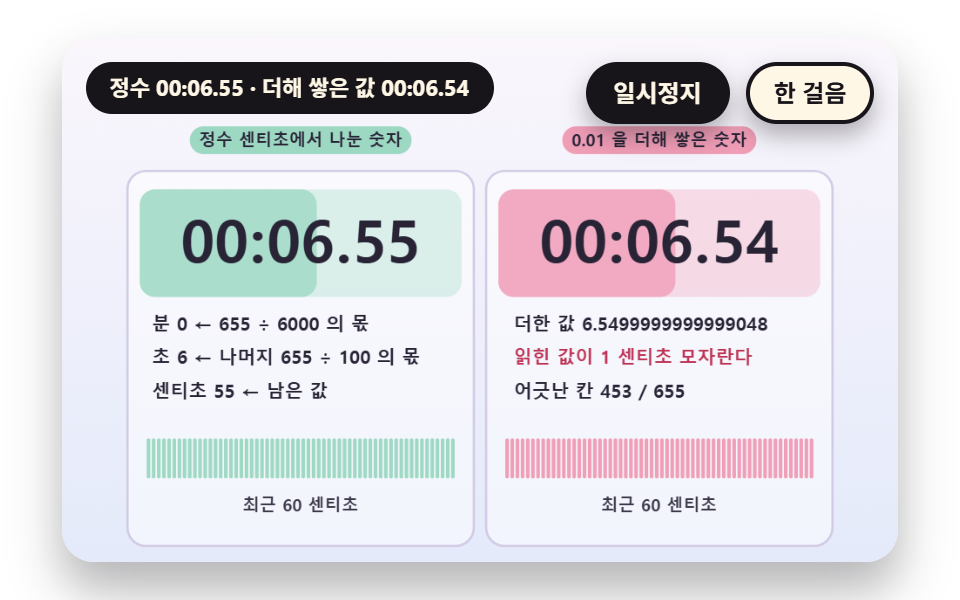
splitCs divides the centisecond count by 6000 for minutes, divides the remainder by 100 for seconds and keeps what is left as centiseconds, with integer division only. The right board adds 0.01 once per centisecond, and 0.01 added 11 times gives 0.10999999999999999, so it reads 10 instead of 11 and 1498 of 1700 cells come out off. Contest and measuring screens, where digits must not wobble after the decimal point, take the integer route.
<main class="stage">
<div class="vj is-demo" id="vj">
  <div class="vj__pad" data-role="pad" tabindex="0" role="application" aria-label="Stopwatch stage: Enter, Space, R or a click restarts, P pauses, N steps once">
    <canvas class="vj__canvas" data-role="canvas" width="480" height="300" role="img" aria-label="The left board builds minutes, seconds and centiseconds from the integer centisecond count with the quotient and remainder of a division by 6000. The right board reads the same digits from a real number sum that adds 0.01 once per centisecond. The sum falls a little short of the integer, so mismatched cells pile up in pink and the strip below shows the last 60 centiseconds cell by cell. The board background fills from the left by how far the current second has gone"></canvas>
  </div>
  <p class="vj__status" data-role="status" aria-live="off">Stopwatch demo</p>
  <div class="vj__ctrl">
    <button class="vj__pause" data-role="pause" type="button" aria-pressed="false">Pause</button>
    <button class="vj__step" data-role="step" type="button">Step</button>
  </div>
  <p class="vj__done" data-role="done" role="status" aria-live="polite"></p>
</div>
</main>
@use "../../../../site/static/demo-tokens" as *;
@include stage($stage-paper);
.vj {
position: relative;
width: min(92vw, calc(160vh - 12.8vw));
aspect-ratio: 480 / 300;
margin: 0 auto;
border-radius: $r-card;
overflow: hidden;
box-shadow: $shadow-raised;
background: $subject-cream;
}
// 무대 상자 — 누르거나 Enter·Space·R 을 치면 처음부터 다시 시작한다. 키보드 포커스도 여기서 받는다(touch-action: none 은 이 상자에만). 무대 밖 터치는 페이지 스크롤 그대로
.vj__pad {
position: absolute;
inset: 0;
border-radius: inherit;
outline: none;
touch-action: none;
cursor: pointer;
}
// 바깥 .vj 가 넘침을 자르므로 포커스 테두리는 안쪽으로 들인다
.vj__pad:focus-visible {
outline: 3px solid $subject-ink;
outline-offset: -3px;
}
.vj__canvas {
position: absolute;
inset: 0;
display: block;
width: 100%;
height: 100%;
}
.vj__ctrl {
position: absolute;
right: $sp-3;
top: $sp-3;
display: flex;
gap: $sp-2;
}
.vj__pause,
.vj__step {
padding: $sp-1 $sp-3;
border: 2px solid $subject-ink;
border-radius: $r-pill;
background: $subject-ink;
color: $subject-cream;
font-family: inherit;
font-weight: 700;
font-size: 12px;
line-height: 1.6;
cursor: pointer;
box-shadow: $shadow-press;
transition: transform $dur-quick $ease-spring;
}
.vj__step {
background: $subject-cream;
color: $subject-ink;
}
// 스크린리더에만 읽히는 완료 알림
.vj__done {
position: absolute;
width: 1px;
height: 1px;
margin: 0;
overflow: hidden;
clip-path: inset(50%);
white-space: nowrap;
}
// 눌린 상태(멈춤) — 바탕과 글자색을 뒤집어 aria-pressed 가 눈에도 보이게
.vj__pause[aria-pressed="true"] {
background: $subject-cream;
color: $subject-ink;
}
.vj__pause:hover,
.vj__step:hover {
transform: translateY(-2px);
}
.vj__pause:active,
.vj__step:active {
transform: translateY(1px);
}
.vj__pause:focus-visible,
.vj__step:focus-visible {
outline: 3px solid $subject-ink;
outline-offset: 3px;
}
// 상태 줄 — 지금 장면의 수치를 글자로. 시연 중에는 aria-live off, 사람이 처음 손대면 polite
.vj__status {
position: absolute;
left: $sp-3;
top: $sp-3;
max-width: calc(100% - 190px);
margin: 0;
padding: $sp-1 $sp-3;
border-radius: $r-pill;
background: $subject-ink;
color: $subject-cream;
font-weight: 700;
font-size: 11px;
line-height: 1.6;
white-space: nowrap;
overflow: hidden;
text-overflow: ellipsis;
pointer-events: none;
}
@media (max-width: 340px) {
.vj__pause,
.vj__step,
.vj__status { font-size: 10px; padding: 0 $sp-2; }
}
// 움직임 줄이기 — 장면은 스크립트가 정지 장면 한 장으로 멈춘다. 버튼도 떠오르지 않게
@media (prefers-reduced-motion: reduce) {
.vj__pause,
.vj__step { transition: none !important; }
.vj__pause:hover,
.vj__pause:active,
.vj__step:hover,
.vj__step:active { transform: none !important; }
}html, body {
margin: 0;
overflow: hidden;
}
.stage {
box-sizing: border-box;
min-height: 100vh;
display: grid;
place-items: center;
margin: 0;
background: #ffffff;
font-family: -apple-system, "Segoe UI", "Noto Sans KR", sans-serif;
padding: clamp(8px, 4vw, 24px);
}
.vj {
position: relative;
width: min(92vw, 160vh - 12.8vw);
aspect-ratio: 480/300;
margin: 0 auto;
border-radius: 16px;
overflow: hidden;
box-shadow: 0 14px 24px rgba(23, 20, 26, 0.32);
background: #fff7e6;
}
.vj__pad {
position: absolute;
inset: 0;
border-radius: inherit;
outline: none;
touch-action: none;
cursor: pointer;
}
.vj__pad:focus-visible {
outline: 3px solid #17141a;
outline-offset: -3px;
}
.vj__canvas {
position: absolute;
inset: 0;
display: block;
width: 100%;
height: 100%;
}
.vj__ctrl {
position: absolute;
right: 12px;
top: 12px;
display: flex;
gap: 8px;
}
.vj__pause,
.vj__step {
padding: 4px 12px;
border: 2px solid #17141a;
border-radius: 999px;
background: #17141a;
color: #fff7e6;
font-family: inherit;
font-weight: 700;
font-size: 12px;
line-height: 1.6;
cursor: pointer;
box-shadow: 0 6px 12px rgba(23, 20, 26, 0.32);
transition: transform 220ms cubic-bezier(0.2, 0.8, 0.2, 1);
}
.vj__step {
background: #fff7e6;
color: #17141a;
}
.vj__done {
position: absolute;
width: 1px;
height: 1px;
margin: 0;
overflow: hidden;
clip-path: inset(50%);
white-space: nowrap;
}
.vj__pause[aria-pressed=true] {
background: #fff7e6;
color: #17141a;
}
.vj__pause:hover,
.vj__step:hover {
transform: translateY(-2px);
}
.vj__pause:active,
.vj__step:active {
transform: translateY(1px);
}
.vj__pause:focus-visible,
.vj__step:focus-visible {
outline: 3px solid #17141a;
outline-offset: 3px;
}
.vj__status {
position: absolute;
left: 12px;
top: 12px;
max-width: calc(100% - 190px);
margin: 0;
padding: 4px 12px;
border-radius: 999px;
background: #17141a;
color: #fff7e6;
font-weight: 700;
font-size: 11px;
line-height: 1.6;
white-space: nowrap;
overflow: hidden;
text-overflow: ellipsis;
pointer-events: none;
}
@media (max-width: 340px) {
.vj__pause,
.vj__step,
.vj__status {
font-size: 10px;
padding: 0 8px;
}
}
@media (prefers-reduced-motion: reduce) {
.vj__pause,
.vj__step {
transition: none !important;
}
.vj__pause:hover,
.vj__pause:active,
.vj__step:hover,
.vj__step:active {
transform: none !important;
}
}(function () {
const root = document.getElementById("vj");
if (!root) return;
// 무대 좌표 — 캔버스 안 계산은 늘 480×300. 화면에 보이는 크기와 상관없다
const W = 480;
const H = 300;
const PI = Math.PI;
const TAU = Math.PI * 2;
function clamp(v, lo, hi) { return v < lo ? lo : (v > hi ? hi : v); }
function lerp(a, b, k) { return a + (b - a) * k; }
function ease(x) { const c = clamp(x, 0, 1); return c * c * (3 - 2 * c); }
// 시드 고정 난수 — 선형 합동 생성기(곱 1664525, 더함 1013904223). 같은 시드면 같은 수열
function seeded(seed) {
let s = (seed >>> 0) || 1;
return function () {
s = (Math.imul(s, 1664525) + 1013904223) >>> 0;
return s / 4294967296;
};
}
// 파스텔 팔레트 — 글자는 늘 INK, 면은 연한 색. 앞섬은 민트, 뒤처짐은 분홍, 바늘은 라벤더·잉크
const BG_TOP = [250, 246, 252];
const BG_BOT = [228, 234, 250];
const FACE = [255, 253, 248];
const FACE_EDGE = [206, 198, 226];
const SKY = [176, 210, 246];
const SKY_DEEP = [74, 120, 176];
const GOLD = [250, 226, 150];
const GOLD_DEEP = [196, 150, 52];
const ROSE = [240, 150, 176];
const ROSE_DEEP = [190, 52, 86];
const MINT = [150, 214, 190];
const MINT_DEEP = [22, 112, 82];
const LAV = [188, 172, 236];
const LAV_DEEP = [104, 82, 176];
const INK = [40, 36, 54];
const PAPER = [250, 246, 240];
function mix(a, b, k) { return [lerp(a[0], b[0], k), lerp(a[1], b[1], k), lerp(a[2], b[2], k)]; }
function rgba(c, a) {
return 'rgba(' + Math.round(clamp(c[0], 0, 255)) + ',' + Math.round(clamp(c[1], 0, 255)) + ',' + Math.round(clamp(c[2], 0, 255)) + ',' + clamp(a, 0, 1).toFixed(3) + ')';
}
// 장면 시계(Seconds)·판 반복 번호·시간표 — 시간표는 (시각, 할 일) 목록이고 시각이 지나면 한 번씩 부른다
// sceneT 는 rAF 타임스탬프 차이(dt, 한 프레임 0.05Seconds 상한)를 쌓은 값 하나뿐이다 — 이 장면의 시간 원천은 이것 하나
let sceneT = 0;
let lap = 0;
let script = [];
let evAt = 0;
// ── 스톱워치 계산 ─────────────────────────────────────────
// 경과 시간은 센티초 정수 하나다. 숫자판의 분·Seconds·센티초도, 문자반의 각도도 이 정수 하나에서만 나온다
const CS_PER_SEC = 100;
const CS_PER_MIN = 6000;
let swStart = 0;
let swStop = -1;
// 장면 시각 t 에서의 경과 센티초 — 시작 전이면 0, 정지 뒤에는 정지 순간 값에 멈춘다
function swCs(t) {
const e = Math.min(t, swStop >= 0 ? swStop : 1e9) - swStart;
return e <= 0 ? 0 : Math.floor(e * CS_PER_SEC + 1e-6);
}
// Lap — 누른 순간의 Total 센티초 목록. 값은 장면 시각 t 로 계산하므로 프레임 길이와 상관없다
let marks = [];
function pressLap(t) { marks.push(swCs(t)); }
// Lap Segment = this total - previous total
function lapSpan(i) { return marks[i] - (i > 0 ? marks[i - 1] : 0); }
function pad2(n) { return n < 10 ? '0' + n : String(n); }
// 센티초 → [분, Seconds, 센티초] — 정수 나눗셈만 쓴다
function splitCs(cs) {
const m = Math.floor(cs / CS_PER_MIN);
const r = cs - m * CS_PER_MIN;
const s = Math.floor(r / CS_PER_SEC);
return [m, s, r - s * CS_PER_SEC];
}
function fmtCs(cs) {
const p = splitCs(cs);
return pad2(p[0]) + ':' + pad2(p[1]) + '.' + pad2(p[2]);
}
// 문자반 각도(라디안, 12시가 -π/2) — turnCs 센티초에 한 바퀴
function dialAng(cs, turnCs) { return ((cs % turnCs) / turnCs) * TAU - PI / 2; }
// 스톱워치 장면의 시작 상태 — 매 판 build() 맨 앞에서 부른다
function swReset() {
swStart = 0;
swStop = -1;
marks = [];
}
const canvasEl = root.querySelector('[data-role="canvas"]');
const padEl = root.querySelector('[data-role="pad"]');
const pauseEl = root.querySelector('[data-role="pause"]');
const statusEl = root.querySelector('[data-role="status"]');
const stepEl = root.querySelector('[data-role="step"]');
const doneEl = root.querySelector('[data-role="done"]');
const ctxRaw = canvasEl ? canvasEl.getContext('2d') : null;
if (!canvasEl || !ctxRaw || !pauseEl || !padEl || !stepEl || !doneEl) {
return;
}
const cv = canvasEl;
const ctx = ctxRaw;
const pauseBtn = pauseEl;
const stepBtn = stepEl;
const doneP = doneEl;
const pad = padEl;
// 외부 웹폰트는 부르지 않는다 — 기기에 있는 글꼴 목록만
const FONT_STACK = 'system-ui, -apple-system, "Segoe UI", "Noto Sans KR", sans-serif';
let dpr = 1;
function fitCanvas() {
// 배율은 2 에서 자른다 — 배율 3 기기에서 화소가 2.25배로 늘지 않게
dpr = Math.min(window.devicePixelRatio || 1, 2);
cv.width = Math.round(W * dpr);
cv.height = Math.round(H * dpr);
ctx.setTransform(dpr, 0, 0, dpr, 0, 0);
}
const VIEW_S = 0.88;
function skyFill(top, bot) {
ctx.setTransform(dpr, 0, 0, dpr, 0, 0);
const g = ctx.createLinearGradient(0, 0, 0, H);
g.addColorStop(0, rgba(top, 1));
g.addColorStop(1, rgba(bot, 1));
ctx.fillStyle = g;
ctx.fillRect(0, 0, W, H);
// 위쪽 Pause·상태 알약이 덮는 띠를 비우려고 장면 전체를 VIEW_S 배로 줄여 아래 가운데에 붙인다 — 이 줄 뒤에 그리는 것은 모두 줄어든 좌표계
ctx.translate(W / 2, H - 3);
ctx.scale(VIEW_S, VIEW_S);
ctx.translate(-W / 2, -(H - 3));
}
function disc(x, y, r, c, a) {
if (r <= 0.2 || a <= 0) {
return;
}
ctx.beginPath();
ctx.arc(x, y, r, 0, TAU);
ctx.fillStyle = rgba(c, a);
ctx.fill();
}
function ring(x, y, r, width, c, a) {
if (r <= 0.2 || a <= 0) {
return;
}
ctx.beginPath();
ctx.arc(x, y, r, 0, TAU);
ctx.lineWidth = width;
ctx.strokeStyle = rgba(c, a);
ctx.stroke();
}
function oval(x, y, rx, ry, c, a) {
if (rx <= 0.2 || ry <= 0.1 || a <= 0) {
return;
}
ctx.beginPath();
ctx.ellipse(x, y, rx, ry, 0, 0, TAU);
ctx.fillStyle = rgba(c, a);
ctx.fill();
}
function seg(x1, y1, x2, y2, width, c, a) {
if (a <= 0) {
return;
}
ctx.beginPath();
ctx.moveTo(x1, y1);
ctx.lineTo(x2, y2);
ctx.lineWidth = width;
ctx.lineCap = 'round';
ctx.strokeStyle = rgba(c, a);
ctx.stroke();
}
function box(x, y, w, h, r, c, a) {
if (w <= 0.2 || h <= 0.2 || a <= 0) {
return;
}
ctx.beginPath();
ctx.roundRect(x, y, w, h, Math.max(0, Math.min(r, w / 2, h / 2)));
ctx.fillStyle = rgba(c, a);
ctx.fill();
}
function outline(x, y, w, h, r, width, c, a) {
if (w <= 0.2 || h <= 0.2 || a <= 0) {
return;
}
ctx.beginPath();
ctx.roundRect(x, y, w, h, Math.max(0, Math.min(r, w / 2, h / 2)));
ctx.lineWidth = width;
ctx.strokeStyle = rgba(c, a);
ctx.stroke();
}
function text(s, x, y, c, a, px, weight, align) {
ctx.font = weight + ' ' + px + 'px ' + FONT_STACK;
ctx.textAlign = align;
ctx.textBaseline = 'middle';
ctx.fillStyle = rgba(c, a);
ctx.fillText(s, x, y);
}
// 글자 이름표 — 바탕 알약 위에 글자
function tag(s, x, y, bg, fg, px, align) {
ctx.font = '700 ' + px + 'px ' + FONT_STACK;
const w = ctx.measureText(s).width + px * 1.1;
const left = align === 'center' ? x - w / 2 : (align === 'right' ? x - w : x);
box(left, y - px * 0.82, w, px * 1.64, px * 0.82, bg, 0.92);
text(s, left + w / 2, y + 0.5, fg, 1, px, 700, 'center');
}
// ── 공통 틀 ───────────────────────────────────────────────
let shownStatus = '';
function pushStatus(s) {
if (!statusEl || s === shownStatus) {
return;
}
shownStatus = s;
statusEl.textContent = s;
}
let paused = false;
const reduceQuery = window.matchMedia('(prefers-reduced-motion: reduce)');
// 페이지를 연 채 움직임 줄이기 설정을 바꿔도 change 리스너가 다시 읽는다
let still = reduceQuery.matches;
// 자동 시연 표시 — 사람이 처음 손대면 떼고 상태 줄을 polite 로 켠다
let demo = root.classList.contains('is-demo');
const off = new AbortController();
function wake() {
if (!demo) {
return;
}
demo = false;
root.classList.remove('is-demo');
if (statusEl) {
statusEl.setAttribute('aria-live', 'polite');
}
}
// 한 판 시연이 끝났음을 스크린리더에 한 번만 알린다 — 판이 되풀이돼도 다시 읽지 않는다
let doneSaid = false;
function checkDone() {
if (!doneSaid && sceneT >= RESULT_S) {
doneSaid = true;
doneP.textContent = statusText();
}
}
function advance(dt) {
sceneT += dt;
while (evAt < script.length && script[evAt].t <= sceneT) {
const ev = script[evAt];
evAt += 1;
ev.f();
}
if (sceneT >= LAP_S) {
lap += 1;
begin();
return;
}
update(dt);
}
// 첫 판은 START_S 만큼 앞서 시작한다 — 바늘이 이미 도는 장면에서 보인다
function runTo(t) {
while (sceneT < t - 1e-6) {
advance(Math.min(1 / 30, t - sceneT));
}
}
function begin() {
sceneT = 0;
evAt = 0;
script = [];
build();
if (lap === 0 && !still) {
runTo(START_S);
}
}
const DT_MAX = 0.05;
function showNow() {
draw();
pushStatus(statusText());
checkDone();
}
let rafId = 0;
let lastTs = -1;
function frame(ts) {
if (still || paused) {
rafId = 0;
return;
}
if (lastTs < 0) {
lastTs = ts;
}
const dt = Math.min((ts - lastTs) / 1000, DT_MAX);
lastTs = ts;
if (dt > 0) {
advance(dt);
}
showNow();
rafId = window.requestAnimationFrame(frame);
}
function startLoop() {
if (rafId) {
return;
}
// 멈췄던 사이의 시간을 첫 프레임 dt 로 넘기지 않는다
lastTs = -1;
rafId = window.requestAnimationFrame(frame);
}
function stopLoop() {
if (rafId) {
window.cancelAnimationFrame(rafId);
rafId = 0;
}
}
// 움직임 줄이기 — 루프 없이 한 판의 멈춘 한 장. 시간표의 REST_S Seconds 장면에서 멈춘다
function showRest() {
stopLoop();
sceneT = 0;
evAt = 0;
script = [];
build();
runTo(REST_S);
doneSaid = false;
showNow();
}
function play() {
begin();
showNow();
if (!paused) {
startLoop();
}
}
function togglePause() {
paused = !paused;
pauseBtn.setAttribute('aria-pressed', paused ? 'true' : 'false');
wake();
if (paused) {
stopLoop();
}
else if (!still) {
startLoop();
}
}
// 다시 — 시간표를 처음부터 다시. 움직임 줄이기에서는 멈춘 한 장
function restart() {
lap += 1;
doneSaid = false;
if (still) {
showRest();
return;
}
begin();
showNow();
if (!paused) {
startLoop();
}
}
// Step — 멈춘 채 시간표의 다음 일 하나까지 시계를 보낸다. 더 부를 일이 없으면 판을 다시 연다
function stepOnce() {
wake();
if (!paused) {
paused = true;
pauseBtn.setAttribute('aria-pressed', 'true');
stopLoop();
}
if (evAt >= script.length) {
restart();
return;
}
runTo(script[evAt].t + 0.05);
showNow();
}
pauseBtn.addEventListener('click', togglePause, { signal: off.signal });
stepBtn.addEventListener('click', stepOnce, { signal: off.signal });
// 키보드 — 무대에 포커스가 있을 때만. Enter·Space·R 은 처음부터 다시, P 는 Pause, N 은 Step
pad.addEventListener('keydown', function (e) {
if (e.altKey || e.ctrlKey || e.metaKey) {
return;
}
const k = e.key;
if (k === 'Enter' || k === ' ') {
e.preventDefault();
wake();
restart();
}
else if (k === 'p' || k === 'P') {
togglePause();
}
else if (k === 'n' || k === 'N') {
stepOnce();
}
else if (k === 'r' || k === 'R') {
wake();
restart();
}
}, { signal: off.signal });
// 마우스·터치 — 무대를 누르면 처음부터 다시
pad.addEventListener('click', function () {
wake();
restart();
}, { signal: off.signal });
// 탭이 숨으면 멈추고, 돌아오면 시계를 다시 맞춰 시작 — 숨은 동안의 몇 초가 한 프레임에 몰리지 않게
document.addEventListener('visibilitychange', function () {
if (document.hidden) {
stopLoop();
}
else if (!paused && !still) {
startLoop();
}
}, { signal: off.signal });
// 설정이 바뀌면 — 켜지면 결과 한 장, 꺼지면 다시 움직인다
reduceQuery.addEventListener('change', function () {
still = reduceQuery.matches;
if (still) {
showRest();
}
else {
lap = 0;
play();
}
}, { signal: off.signal });
window.addEventListener('resize', function () {
fitCanvas();
showNow();
}, { signal: off.signal });
// ── 문자반·숫자판 도구 ─────────────────────────────────────
const PEACH = [250, 204, 170];
const PEACH_DEEP = [176, 92, 40];
// 안쪽에서 바깥쪽으로 — 눈금 ticks 개, majorEvery 번째마다 굵게, labelEvery 번째마다 숫자
function dialFace(cx, cy, R, ticks, majorEvery, labels, labelEvery) {
disc(cx, cy + 3, R + 3, INK, 0.1);
disc(cx, cy, R + 3, FACE_EDGE, 1);
disc(cx, cy, R, FACE, 1);
for (let i = 0; i < ticks; i += 1) {
const a = (i / ticks) * TAU - PI / 2;
const major = i % majorEvery === 0;
const r0 = R * (major ? 0.82 : 0.9);
const r1 = R * 0.96;
seg(cx + Math.cos(a) * r0, cy + Math.sin(a) * r0, cx + Math.cos(a) * r1, cy + Math.sin(a) * r1, major ? 2.4 : 1.2, INK, major ? 0.85 : 0.45);
if (labels.length > 0 && i % labelEvery === 0) {
const k = Math.floor(i / labelEvery);
if (k < labels.length) {
text(labels[k], cx + Math.cos(a) * R * 0.66, cy + Math.sin(a) * R * 0.66, INK, 0.9, Math.max(9, Math.round(R * 0.15)), 700, 'center');
}
}
}
}
function handAt(cx, cy, ang, len, tail, width, c, a) {
seg(cx - Math.cos(ang) * tail, cy - Math.sin(ang) * tail, cx + Math.cos(ang) * len, cy + Math.sin(ang) * len, width, c, a);
}
function hub(cx, cy, r, c) {
disc(cx, cy, r, c, 1);
disc(cx, cy, r * 0.4, FACE, 1);
}
// 12시에서 ang 까지 칠하는 부채꼴
function wedge(cx, cy, r, ang, c, a) {
if (ang <= -PI / 2 + 0.002) {
return;
}
ctx.beginPath();
ctx.moveTo(cx, cy);
ctx.arc(cx, cy, r, -PI / 2, ang);
ctx.closePath();
ctx.fillStyle = rgba(c, a);
ctx.fill();
}
function arcBand(cx, cy, r, a0, a1, width, c, a) {
if (a1 - a0 < 0.0005 || a <= 0) {
return;
}
ctx.beginPath();
ctx.arc(cx, cy, r, a0, a1);
ctx.lineWidth = width;
ctx.lineCap = 'butt';
ctx.strokeStyle = rgba(c, a);
ctx.stroke();
}
function panel(x, y, w, h, c, a) {
box(x, y, w, h, 12, c, a);
outline(x, y, w, h, 12, 1.5, FACE_EDGE, 0.9);
}
// 한 글자씩 같은 칸에 가운데 맞춰 찍는다 — 숫자 폭이 달라도 자릿수가 흔들리지 않는다(tabular)
function digitsRow(s, cx, y, cellW, px, c, a) {
let total = 0;
for (let i = 0; i < s.length; i += 1) {
total += (s[i] === ':' || s[i] === '.') ? cellW * 0.55 : cellW;
}
let x = cx - total / 2;
for (let i = 0; i < s.length; i += 1) {
const w = (s[i] === ':' || s[i] === '.') ? cellW * 0.55 : cellW;
text(s[i], x + w / 2, y, c, a, px, 800, 'center');
x += w;
}
}
// ── 02 분 Seconds 센티초로 나눈 숫자판과 소수 Total 실패판 ────────────
// 정수 센티초 cs 를 6000 으로 나눈 몫이 분, 남은 값을 100 으로 나눈 몫이 Seconds, 그 나머지가 센티초
// 오른쪽은 0.01 을 센티초 수만큼 더한 실수 합에서 자릿수를 읽는다 — 더할수록 합이 정수에서 조금씩 어긋난다
const STEP_F = 0.01;
const MAX_CS = 1700;
const WIN_N = 60;
const LAP_S = 16.5;
const START_S = 5.0;
const REST_S = 5.0;
const RESULT_S = 14.0;
let errs = [];
let sums = [];
let bad = [];
    function build() {
        swReset();
        errs = [0];
        sums = ['0'];
        bad = [0];
        let acc = 0;
        for (let n = 1; n <= MAX_CS; n += 1) {
            acc += STEP_F;
            errs.push(n - Math.floor(acc * CS_PER_SEC));
            sums.push(acc.toPrecision(17));
            bad.push(bad[n - 1] + (errs[n] !== 0 ? 1 : 0));
        }
    }
    function update(dt) { if (dt < 0) {
        return;
    } }
    function nowCs() { return Math.min(swCs(sceneT), MAX_CS); }
    function floatCs() { return nowCs() - errs[nowCs()]; }
function draw() {
skyFill(BG_TOP, BG_BOT);
const cs = nowCs();
const fcs = floatCs();
const wrong = fcs !== cs;
panel(10, 46, 226, 244, [255, 255, 255], 0.5);
panel(244, 46, 226, 244, [255, 255, 255], 0.5);
tag('Digits divided from the integer count', 123, 26, MINT, INK, 11, 'center');
tag('Digits built by adding 0.01', 357, 26, ROSE, INK, 11, 'center');
// 숫자판 바탕이 이번 초의 몇 % 인지(cs % 100)만큼 왼쪽부터 차오른다 — 초가 바뀌면 다시 비어 시작한다
const sf = (cs % CS_PER_SEC) / CS_PER_SEC;
box(18, 58, 210, 70, 10, MINT, 0.3);
box(18, 58, Math.max(0, 210 * sf), 70, 10, MINT, 0.7);
box(252, 58, 210, 70, 10, wrong ? ROSE : MINT, 0.3);
box(252, 58, Math.max(0, 210 * sf), 70, 10, wrong ? ROSE : MINT, 0.7);
digitsRow(fmtCs(cs), 123, 94, 22, 38, INK, 1);
digitsRow(fmtCs(fcs), 357, 94, 22, 38, INK, 1);
const p = splitCs(cs);
const lines = [
'Minutes {m} - quotient of {c} / 6000'.replace('{m}', String(p[0])).replace('{c}', String(cs)),
'Seconds {s} - quotient of remainder {r} / 100'.replace('{s}', String(p[1])).replace('{r}', String(cs - p[0] * CS_PER_MIN)),
'Centiseconds {k} - what is left'.replace('{k}', String(p[2])),
];
for (let i = 0; i < 3; i += 1) {
text(lines[i], 26, 146 + i * 22, INK, 1, 12, 700, 'left');
}
text('Sum {v}'.replace('{v}', sums[cs]), 262, 146, INK, 1, 12, 700, 'left');
text(wrong ? 'The read value is {d} centisecond short'.replace('{d}', String(cs - fcs)) : 'Matches the integer for now', 262, 168, wrong ? ROSE_DEEP : MINT_DEEP, 1, 12, 700, 'left');
text('Off cells {k} / {n}'.replace('{k}', String(bad[cs])).replace('{n}', String(cs)), 262, 190, INK, 1, 12, 700, 'left');
// 최근 WIN_N 센티초 — 칸마다 정수 판은 늘 민트, 실수 판은 어긋난 칸이 분홍
const cw = 202 / WIN_N;
for (let i = 0; i < WIN_N; i += 1) {
const n = cs - (WIN_N - 1 - i);
if (n < 0) {
continue;
}
box(22 + i * cw + 0.5, 220, cw - 1, 26, 2, MINT, 0.9);
box(256 + i * cw + 0.5, 220, cw - 1, 26, 2, errs[n] !== 0 ? ROSE : MINT, 0.9);
}
text('Last {n} centiseconds'.replace('{n}', String(WIN_N)), 123, 264, INK, 0.9, 11, 700, 'center');
text('Last {n} centiseconds'.replace('{n}', String(WIN_N)), 357, 264, INK, 0.9, 11, 700, 'center');
}
function statusText() {
const cs = nowCs();
return 'Integer {a} - summed value {b}'.replace('{a}', fmtCs(cs)).replace('{b}', fmtCs(floatCs()));
}
fitCanvas();
if (still) {
showRest();
}
else {
play();
}
return function () {
stopLoop();
off.abort();
};
})();// DigitReadoutIntegerCentisecond - 같은 항목 vanilla index.html 의 React 판. 같은 계산을 useEffect 안에서 돌린다
import { useEffect, useRef } from "react";
import styles from "./DigitReadoutIntegerCentisecond.module.scss";
const cx = (s: string): string => s.split(" ").map((n) => styles[n] ?? n).join(" ");
export default function DigitReadoutIntegerCentisecond() {
const rootRef = useRef<HTMLDivElement | null>(null);
useEffect(() => {
const rootEl = rootRef.current;
if (!rootEl) return;
const root: HTMLElement = rootEl;
type RGB = [number, number, number];
type RGBA = [number, number, number, number];
// 무대 좌표 — 캔버스 안 계산은 늘 480×300. 화면에 보이는 크기와 상관없다
const W = 480;
const H = 300;
const PI = Math.PI;
const TAU = Math.PI * 2;
function clamp(v: number, lo: number, hi: number): number { return v < lo ? lo : (v > hi ? hi : v); }
function lerp(a: number, b: number, k: number): number { return a + (b - a) * k; }
function ease(x: number): number { const c = clamp(x, 0, 1); return c * c * (3 - 2 * c); }
// 시드 고정 난수 — 선형 합동 생성기(곱 1664525, 더함 1013904223). 같은 시드면 같은 수열
function seeded(seed: number): () => number {
let s = (seed >>> 0) || 1;
return function (): number {
s = (Math.imul(s, 1664525) + 1013904223) >>> 0;
return s / 4294967296;
};
}
// 파스텔 팔레트 — 글자는 늘 INK, 면은 연한 색. 앞섬은 민트, 뒤처짐은 분홍, 바늘은 라벤더·잉크
const BG_TOP: RGB = [250, 246, 252];
const BG_BOT: RGB = [228, 234, 250];
const FACE: RGB = [255, 253, 248];
const FACE_EDGE: RGB = [206, 198, 226];
const SKY: RGB = [176, 210, 246];
const SKY_DEEP: RGB = [74, 120, 176];
const GOLD: RGB = [250, 226, 150];
const GOLD_DEEP: RGB = [196, 150, 52];
const ROSE: RGB = [240, 150, 176];
const ROSE_DEEP: RGB = [190, 52, 86];
const MINT: RGB = [150, 214, 190];
const MINT_DEEP: RGB = [22, 112, 82];
const LAV: RGB = [188, 172, 236];
const LAV_DEEP: RGB = [104, 82, 176];
const INK: RGB = [40, 36, 54];
const PAPER: RGB = [250, 246, 240];
function mix(a: RGB, b: RGB, k: number): RGB { return [lerp(a[0], b[0], k), lerp(a[1], b[1], k), lerp(a[2], b[2], k)]; }
function rgba(c: RGB, a: number): string {
return 'rgba(' + Math.round(clamp(c[0], 0, 255)) + ',' + Math.round(clamp(c[1], 0, 255)) + ',' + Math.round(clamp(c[2], 0, 255)) + ',' + clamp(a, 0, 1).toFixed(3) + ')';
}
// 장면 시계(초)·판 반복 번호·시간표 — 시간표는 (시각, 할 일) 목록이고 시각이 지나면 한 번씩 부른다
// sceneT 는 rAF 타임스탬프 차이(dt, 한 프레임 0.05초 상한)를 쌓은 값 하나뿐이다 — 이 장면의 시간 원천은 이것 하나
let sceneT = 0;
let lap = 0;
type Ev = { t: number; f: () => void };
let script: Ev[] = [];
let evAt = 0;
// ── 스톱워치 계산 ─────────────────────────────────────────
// 경과 시간은 센티초 정수 하나다. 숫자판의 분·초·센티초도, 문자반의 각도도 이 정수 하나에서만 나온다
const CS_PER_SEC = 100;
const CS_PER_MIN = 6000;
let swStart = 0;
let swStop = -1;
// 장면 시각 t 에서의 경과 센티초 — 시작 전이면 0, 정지 뒤에는 정지 순간 값에 멈춘다
function swCs(t: number): number {
const e = Math.min(t, swStop >= 0 ? swStop : 1e9) - swStart;
return e <= 0 ? 0 : Math.floor(e * CS_PER_SEC + 1e-6);
}
// 랩 — 누른 순간의 누적 센티초 목록. 값은 장면 시각 t 로 계산하므로 프레임 길이와 상관없다
let marks: number[] = [];
function pressLap(t: number): void { marks.push(swCs(t)); }
// 랩 구간 = 이번 누적 − 직전 누적
function lapSpan(i: number): number { return marks[i] - (i > 0 ? marks[i - 1] : 0); }
function pad2(n: number): string { return n < 10 ? '0' + n : String(n); }
// 센티초 → [분, 초, 센티초] — 정수 나눗셈만 쓴다
function splitCs(cs: number): [number, number, number] {
const m = Math.floor(cs / CS_PER_MIN);
const r = cs - m * CS_PER_MIN;
const s = Math.floor(r / CS_PER_SEC);
return [m, s, r - s * CS_PER_SEC];
}
function fmtCs(cs: number): string {
const p = splitCs(cs);
return pad2(p[0]) + ':' + pad2(p[1]) + '.' + pad2(p[2]);
}
// 문자반 각도(라디안, 12시가 -π/2) — turnCs 센티초에 한 바퀴
function dialAng(cs: number, turnCs: number): number { return ((cs % turnCs) / turnCs) * TAU - PI / 2; }
// 스톱워치 장면의 시작 상태 — 매 판 build() 맨 앞에서 부른다
function swReset(): void {
swStart = 0;
swStop = -1;
marks = [];
}
const canvasEl = root.querySelector('[data-role="canvas"]') as HTMLCanvasElement | null;
const padEl = root.querySelector('[data-role="pad"]') as HTMLElement | null;
const pauseEl = root.querySelector('[data-role="pause"]') as HTMLButtonElement | null;
const statusEl = root.querySelector('[data-role="status"]') as HTMLElement | null;
const stepEl = root.querySelector('[data-role="step"]') as HTMLButtonElement | null;
const doneEl = root.querySelector('[data-role="done"]') as HTMLElement | null;
const ctxRaw = canvasEl ? canvasEl.getContext('2d') : null;
if (!canvasEl || !ctxRaw || !pauseEl || !padEl || !stepEl || !doneEl) { return; }
const cv: HTMLCanvasElement = canvasEl;
const ctx: CanvasRenderingContext2D = ctxRaw;
const pauseBtn: HTMLButtonElement = pauseEl;
const stepBtn: HTMLButtonElement = stepEl;
const doneP: HTMLElement = doneEl;
const pad: HTMLElement = padEl;
// 외부 웹폰트는 부르지 않는다 — 기기에 있는 글꼴 목록만
const FONT_STACK = 'system-ui, -apple-system, "Segoe UI", "Noto Sans KR", sans-serif';
let dpr = 1;
function fitCanvas(): void {
// 배율은 2 에서 자른다 — 배율 3 기기에서 화소가 2.25배로 늘지 않게
dpr = Math.min(window.devicePixelRatio || 1, 2);
cv.width = Math.round(W * dpr);
cv.height = Math.round(H * dpr);
ctx.setTransform(dpr, 0, 0, dpr, 0, 0);
}
const VIEW_S = 0.88;
function skyFill(top: RGB, bot: RGB): void {
ctx.setTransform(dpr, 0, 0, dpr, 0, 0);
const g = ctx.createLinearGradient(0, 0, 0, H);
g.addColorStop(0, rgba(top, 1));
g.addColorStop(1, rgba(bot, 1));
ctx.fillStyle = g;
ctx.fillRect(0, 0, W, H);
// 위쪽 일시정지·상태 알약이 덮는 띠를 비우려고 장면 전체를 VIEW_S 배로 줄여 아래 가운데에 붙인다 — 이 줄 뒤에 그리는 것은 모두 줄어든 좌표계
ctx.translate(W / 2, H - 3);
ctx.scale(VIEW_S, VIEW_S);
ctx.translate(-W / 2, -(H - 3));
}
function disc(x: number, y: number, r: number, c: RGB, a: number): void {
if (r <= 0.2 || a <= 0) { return; }
ctx.beginPath();
ctx.arc(x, y, r, 0, TAU);
ctx.fillStyle = rgba(c, a);
ctx.fill();
}
function ring(x: number, y: number, r: number, width: number, c: RGB, a: number): void {
if (r <= 0.2 || a <= 0) { return; }
ctx.beginPath();
ctx.arc(x, y, r, 0, TAU);
ctx.lineWidth = width;
ctx.strokeStyle = rgba(c, a);
ctx.stroke();
}
function oval(x: number, y: number, rx: number, ry: number, c: RGB, a: number): void {
if (rx <= 0.2 || ry <= 0.1 || a <= 0) { return; }
ctx.beginPath();
ctx.ellipse(x, y, rx, ry, 0, 0, TAU);
ctx.fillStyle = rgba(c, a);
ctx.fill();
}
function seg(x1: number, y1: number, x2: number, y2: number, width: number, c: RGB, a: number): void {
if (a <= 0) { return; }
ctx.beginPath();
ctx.moveTo(x1, y1);
ctx.lineTo(x2, y2);
ctx.lineWidth = width;
ctx.lineCap = 'round';
ctx.strokeStyle = rgba(c, a);
ctx.stroke();
}
function box(x: number, y: number, w: number, h: number, r: number, c: RGB, a: number): void {
if (w <= 0.2 || h <= 0.2 || a <= 0) { return; }
ctx.beginPath();
ctx.roundRect(x, y, w, h, Math.max(0, Math.min(r, w / 2, h / 2)));
ctx.fillStyle = rgba(c, a);
ctx.fill();
}
function outline(x: number, y: number, w: number, h: number, r: number, width: number, c: RGB, a: number): void {
if (w <= 0.2 || h <= 0.2 || a <= 0) { return; }
ctx.beginPath();
ctx.roundRect(x, y, w, h, Math.max(0, Math.min(r, w / 2, h / 2)));
ctx.lineWidth = width;
ctx.strokeStyle = rgba(c, a);
ctx.stroke();
}
function text(s: string, x: number, y: number, c: RGB, a: number, px: number, weight: number, align: CanvasTextAlign): void {
ctx.font = weight + ' ' + px + 'px ' + FONT_STACK;
ctx.textAlign = align;
ctx.textBaseline = 'middle';
ctx.fillStyle = rgba(c, a);
ctx.fillText(s, x, y);
}
// 글자 이름표 — 바탕 알약 위에 글자
function tag(s: string, x: number, y: number, bg: RGB, fg: RGB, px: number, align: CanvasTextAlign): void {
ctx.font = '700 ' + px + 'px ' + FONT_STACK;
const w = ctx.measureText(s).width + px * 1.1;
const left = align === 'center' ? x - w / 2 : (align === 'right' ? x - w : x);
box(left, y - px * 0.82, w, px * 1.64, px * 0.82, bg, 0.92);
text(s, left + w / 2, y + 0.5, fg, 1, px, 700, 'center');
}
// ── 공통 틀 ───────────────────────────────────────────────
let shownStatus = '';
function pushStatus(s: string): void {
if (!statusEl || s === shownStatus) { return; }
shownStatus = s;
statusEl.textContent = s;
}
let paused = false;
const reduceQuery = window.matchMedia('(prefers-reduced-motion: reduce)');
// 페이지를 연 채 움직임 줄이기 설정을 바꿔도 change 리스너가 다시 읽는다
let still = reduceQuery.matches;
// 자동 시연 표시 — 사람이 처음 손대면 떼고 상태 줄을 polite 로 켠다
let demo = root.classList.contains('is-demo');
const off = new AbortController();
function wake(): void {
if (!demo) { return; }
demo = false;
root.classList.remove('is-demo');
if (statusEl) { statusEl.setAttribute('aria-live', 'polite'); }
}
// 한 판 시연이 끝났음을 스크린리더에 한 번만 알린다 — 판이 되풀이돼도 다시 읽지 않는다
let doneSaid = false;
function checkDone(): void {
if (!doneSaid && sceneT >= RESULT_S) {
doneSaid = true;
doneP.textContent = statusText();
}
}
function advance(dt: number): void {
sceneT += dt;
while (evAt < script.length && script[evAt].t <= sceneT) {
const ev = script[evAt];
evAt += 1;
ev.f();
}
if (sceneT >= LAP_S) { lap += 1; begin(); return; }
update(dt);
}
// 첫 판은 START_S 만큼 앞서 시작한다 — 바늘이 이미 도는 장면에서 보인다
function runTo(t: number): void {
while (sceneT < t - 1e-6) { advance(Math.min(1 / 30, t - sceneT)); }
}
function begin(): void {
sceneT = 0;
evAt = 0;
script = [];
build();
if (lap === 0 && !still) { runTo(START_S); }
}
const DT_MAX = 0.05;
function showNow(): void {
draw();
pushStatus(statusText());
checkDone();
}
let rafId = 0;
let lastTs = -1;
function frame(ts: number): void {
if (still || paused) { rafId = 0; return; }
if (lastTs < 0) { lastTs = ts; }
const dt = Math.min((ts - lastTs) / 1000, DT_MAX);
lastTs = ts;
if (dt > 0) { advance(dt); }
showNow();
rafId = window.requestAnimationFrame(frame);
}
function startLoop(): void {
if (rafId) { return; }
// 멈췄던 사이의 시간을 첫 프레임 dt 로 넘기지 않는다
lastTs = -1;
rafId = window.requestAnimationFrame(frame);
}
function stopLoop(): void {
if (rafId) { window.cancelAnimationFrame(rafId); rafId = 0; }
}
// 움직임 줄이기 — 루프 없이 한 판의 멈춘 한 장. 시간표의 REST_S 초 장면에서 멈춘다
function showRest(): void {
stopLoop();
sceneT = 0;
evAt = 0;
script = [];
build();
runTo(REST_S);
doneSaid = false;
showNow();
}
function play(): void {
begin();
showNow();
if (!paused) { startLoop(); }
}
function togglePause(): void {
paused = !paused;
pauseBtn.setAttribute('aria-pressed', paused ? 'true' : 'false');
wake();
if (paused) { stopLoop(); } else if (!still) { startLoop(); }
}
// 다시 — 시간표를 처음부터 다시. 움직임 줄이기에서는 멈춘 한 장
function restart(): void {
lap += 1;
doneSaid = false;
if (still) { showRest(); return; }
begin();
showNow();
if (!paused) { startLoop(); }
}
// 한 걸음 — 멈춘 채 시간표의 다음 일 하나까지 시계를 보낸다. 더 부를 일이 없으면 판을 다시 연다
function stepOnce(): void {
wake();
if (!paused) {
paused = true;
pauseBtn.setAttribute('aria-pressed', 'true');
stopLoop();
}
if (evAt >= script.length) {
restart();
return;
}
runTo(script[evAt].t + 0.05);
showNow();
}
pauseBtn.addEventListener('click', togglePause, { signal: off.signal });
stepBtn.addEventListener('click', stepOnce, { signal: off.signal });
// 키보드 — 무대에 포커스가 있을 때만. Enter·Space·R 은 처음부터 다시, P 는 일시정지, N 은 한 걸음
pad.addEventListener('keydown', function (e: KeyboardEvent): void {
if (e.altKey || e.ctrlKey || e.metaKey) { return; }
const k = e.key;
if (k === 'Enter' || k === ' ') {
e.preventDefault();
wake();
restart();
} else if (k === 'p' || k === 'P') {
togglePause();
} else if (k === 'n' || k === 'N') {
stepOnce();
} else if (k === 'r' || k === 'R') {
wake();
restart();
}
}, { signal: off.signal });
// 마우스·터치 — 무대를 누르면 처음부터 다시
pad.addEventListener('click', function (): void {
wake();
restart();
}, { signal: off.signal });
// 탭이 숨으면 멈추고, 돌아오면 시계를 다시 맞춰 시작 — 숨은 동안의 몇 초가 한 프레임에 몰리지 않게
document.addEventListener('visibilitychange', function (): void {
if (document.hidden) { stopLoop(); } else if (!paused && !still) { startLoop(); }
}, { signal: off.signal });
// 설정이 바뀌면 — 켜지면 결과 한 장, 꺼지면 다시 움직인다
reduceQuery.addEventListener('change', function (): void {
still = reduceQuery.matches;
if (still) { showRest(); } else { lap = 0; play(); }
}, { signal: off.signal });
window.addEventListener('resize', function (): void {
fitCanvas();
showNow();
}, { signal: off.signal });
// ── 문자반·숫자판 도구 ─────────────────────────────────────
const PEACH: RGB = [250, 204, 170];
const PEACH_DEEP: RGB = [176, 92, 40];
// 안쪽에서 바깥쪽으로 — 눈금 ticks 개, majorEvery 번째마다 굵게, labelEvery 번째마다 숫자
function dialFace(cx: number, cy: number, R: number, ticks: number, majorEvery: number, labels: string[], labelEvery: number): void {
disc(cx, cy + 3, R + 3, INK, 0.1);
disc(cx, cy, R + 3, FACE_EDGE, 1);
disc(cx, cy, R, FACE, 1);
for (let i = 0; i < ticks; i += 1) {
const a = (i / ticks) * TAU - PI / 2;
const major = i % majorEvery === 0;
const r0 = R * (major ? 0.82 : 0.9);
const r1 = R * 0.96;
seg(cx + Math.cos(a) * r0, cy + Math.sin(a) * r0, cx + Math.cos(a) * r1, cy + Math.sin(a) * r1, major ? 2.4 : 1.2, INK, major ? 0.85 : 0.45);
if (labels.length > 0 && i % labelEvery === 0) {
const k = Math.floor(i / labelEvery);
if (k < labels.length) {
text(labels[k], cx + Math.cos(a) * R * 0.66, cy + Math.sin(a) * R * 0.66, INK, 0.9, Math.max(9, Math.round(R * 0.15)), 700, 'center');
}
}
}
}
function handAt(cx: number, cy: number, ang: number, len: number, tail: number, width: number, c: RGB, a: number): void {
seg(cx - Math.cos(ang) * tail, cy - Math.sin(ang) * tail, cx + Math.cos(ang) * len, cy + Math.sin(ang) * len, width, c, a);
}
function hub(cx: number, cy: number, r: number, c: RGB): void {
disc(cx, cy, r, c, 1);
disc(cx, cy, r * 0.4, FACE, 1);
}
// 12시에서 ang 까지 칠하는 부채꼴
function wedge(cx: number, cy: number, r: number, ang: number, c: RGB, a: number): void {
if (ang <= -PI / 2 + 0.002) { return; }
ctx.beginPath();
ctx.moveTo(cx, cy);
ctx.arc(cx, cy, r, -PI / 2, ang);
ctx.closePath();
ctx.fillStyle = rgba(c, a);
ctx.fill();
}
function arcBand(cx: number, cy: number, r: number, a0: number, a1: number, width: number, c: RGB, a: number): void {
if (a1 - a0 < 0.0005 || a <= 0) { return; }
ctx.beginPath();
ctx.arc(cx, cy, r, a0, a1);
ctx.lineWidth = width;
ctx.lineCap = 'butt';
ctx.strokeStyle = rgba(c, a);
ctx.stroke();
}
function panel(x: number, y: number, w: number, h: number, c: RGB, a: number): void {
box(x, y, w, h, 12, c, a);
outline(x, y, w, h, 12, 1.5, FACE_EDGE, 0.9);
}
// 한 글자씩 같은 칸에 가운데 맞춰 찍는다 — 숫자 폭이 달라도 자릿수가 흔들리지 않는다(tabular)
function digitsRow(s: string, cx: number, y: number, cellW: number, px: number, c: RGB, a: number): void {
let total = 0;
for (let i = 0; i < s.length; i += 1) { total += (s[i] === ':' || s[i] === '.') ? cellW * 0.55 : cellW; }
let x = cx - total / 2;
for (let i = 0; i < s.length; i += 1) {
const w = (s[i] === ':' || s[i] === '.') ? cellW * 0.55 : cellW;
text(s[i], x + w / 2, y, c, a, px, 800, 'center');
x += w;
}
}
// ── 02 분 초 센티초로 나눈 숫자판과 소수 누적 실패판 ────────────
// 정수 센티초 cs 를 6000 으로 나눈 몫이 분, 남은 값을 100 으로 나눈 몫이 초, 그 나머지가 센티초
// 오른쪽은 0.01 을 센티초 수만큼 더한 실수 합에서 자릿수를 읽는다 — 더할수록 합이 정수에서 조금씩 어긋난다
const STEP_F = 0.01;
const MAX_CS = 1700;
const WIN_N = 60;
const LAP_S = 16.5;
const START_S = 5.0;
const REST_S = 5.0;
const RESULT_S = 14.0;
let errs: number[] = [];
let sums: string[] = [];
let bad: number[] = [];
function build(): void {
swReset();
errs = [0];
sums = ['0'];
bad = [0];
let acc = 0;
for (let n = 1; n <= MAX_CS; n += 1) {
acc += STEP_F;
errs.push(n - Math.floor(acc * CS_PER_SEC));
sums.push(acc.toPrecision(17));
bad.push(bad[n - 1] + (errs[n] !== 0 ? 1 : 0));
}
}
function update(dt: number): void { if (dt < 0) { return; } }
function nowCs(): number { return Math.min(swCs(sceneT), MAX_CS); }
function floatCs(): number { return nowCs() - errs[nowCs()]; }
function draw(): void {
skyFill(BG_TOP, BG_BOT);
const cs = nowCs();
const fcs = floatCs();
const wrong = fcs !== cs;
panel(10, 46, 226, 244, [255, 255, 255], 0.5);
panel(244, 46, 226, 244, [255, 255, 255], 0.5);
tag('정수 센티초에서 나눈 숫자', 123, 26, MINT, INK, 11, 'center');
tag('0.01 을 더해 쌓은 숫자', 357, 26, ROSE, INK, 11, 'center');
// 숫자판 바탕이 이번 초의 몇 % 인지(cs % 100)만큼 왼쪽부터 차오른다 — 초가 바뀌면 다시 비어 시작한다
const sf = (cs % CS_PER_SEC) / CS_PER_SEC;
box(18, 58, 210, 70, 10, MINT, 0.3);
box(18, 58, Math.max(0, 210 * sf), 70, 10, MINT, 0.7);
box(252, 58, 210, 70, 10, wrong ? ROSE : MINT, 0.3);
box(252, 58, Math.max(0, 210 * sf), 70, 10, wrong ? ROSE : MINT, 0.7);
digitsRow(fmtCs(cs), 123, 94, 22, 38, INK, 1);
digitsRow(fmtCs(fcs), 357, 94, 22, 38, INK, 1);
const p = splitCs(cs);
const lines = [
'분 {m} ← {c} ÷ 6000 의 몫'.replace('{m}', String(p[0])).replace('{c}', String(cs)),
'초 {s} ← 나머지 {r} ÷ 100 의 몫'.replace('{s}', String(p[1])).replace('{r}', String(cs - p[0] * CS_PER_MIN)),
'센티초 {k} ← 남은 값'.replace('{k}', String(p[2])),
];
for (let i = 0; i < 3; i += 1) { text(lines[i], 26, 146 + i * 22, INK, 1, 12, 700, 'left'); }
text('더한 값 {v}'.replace('{v}', sums[cs]), 262, 146, INK, 1, 12, 700, 'left');
text(wrong ? '읽힌 값이 {d} 센티초 모자란다'.replace('{d}', String(cs - fcs)) : '지금은 정수와 같다', 262, 168, wrong ? ROSE_DEEP : MINT_DEEP, 1, 12, 700, 'left');
text('어긋난 칸 {k} / {n}'.replace('{k}', String(bad[cs])).replace('{n}', String(cs)), 262, 190, INK, 1, 12, 700, 'left');
// 최근 WIN_N 센티초 — 칸마다 정수 판은 늘 민트, 실수 판은 어긋난 칸이 분홍
const cw = 202 / WIN_N;
for (let i = 0; i < WIN_N; i += 1) {
const n = cs - (WIN_N - 1 - i);
if (n < 0) { continue; }
box(22 + i * cw + 0.5, 220, cw - 1, 26, 2, MINT, 0.9);
box(256 + i * cw + 0.5, 220, cw - 1, 26, 2, errs[n] !== 0 ? ROSE : MINT, 0.9);
}
text('최근 {n} 센티초'.replace('{n}', String(WIN_N)), 123, 264, INK, 0.9, 11, 700, 'center');
text('최근 {n} 센티초'.replace('{n}', String(WIN_N)), 357, 264, INK, 0.9, 11, 700, 'center');
}
function statusText(): string {
const cs = nowCs();
return '정수 {a} · 더해 쌓은 값 {b}'.replace('{a}', fmtCs(cs)).replace('{b}', fmtCs(floatCs()));
}
fitCanvas();
if (still) { showRest(); } else { play(); }
return function (): void {
stopLoop();
off.abort();
};
}, []);
return (
<div className={cx("vj") + " is-demo"} ref={rootRef}>
<div className={cx("vj__pad")} data-role="pad" tabIndex={0} role="application" aria-label={'스톱워치 시연 무대 — Enter 나 Space 나 R 이나 클릭으로 처음부터, P 로 일시정지, N 으로 한 걸음'}>
<canvas className={cx("vj__canvas")} data-role="canvas" width={480} height={300} role="img" aria-label={'왼쪽은 센티초 정수를 6000 으로 나눈 몫과 나머지로 분 초 센티초를 만들어 찍는 숫자판이고 오른쪽은 0.01 을 센티초 수만큼 더한 실수 합에서 같은 자릿수를 읽는 숫자판이다. 오른쪽은 합이 정수에서 조금씩 모자라 어긋난 칸이 분홍으로 쌓이며 아래 띠가 최근 60 센티초의 어긋남을 칸마다 보인다. 숫자판 바탕은 이번 초가 얼마나 지났는지만큼 왼쪽부터 차오른다'}></canvas>
</div>
<p className={cx("vj__status")} data-role="status" aria-live="off">{'스톱워치 시연'}</p>
<div className={cx("vj__ctrl")}>
<button className={cx("vj__pause")} data-role="pause" type="button" aria-pressed="false">{'일시정지'}</button>
<button className={cx("vj__step")} data-role="step" type="button">{'한 걸음'}</button>
</div>
<p className={cx("vj__done")} data-role="done" role="status" aria-live="polite"></p>
</div>
);
}02 · A Readout Split Into Minutes, Seconds and Centiseconds — Measured area 12.269% · moving frames 23/23Original by GODRICH · SCSS and React ship in the zip · See the password
function build() {
swReset();
errs = [0];
sums = ['0'];
bad = [0];
let acc = 0;
for (let n = 1; n <= MAX_CS; n += 1) {
acc += STEP_F;
errs.push(n - Math.floor(acc * CS_PER_SEC));
sums.push(acc.toPrecision(17));
bad.push(bad[n - 1] + (errs[n] !== 0 ? 1 : 0));
}
}
function update(dt) { if (dt < 0) {
return;
} }
function nowCs() { return Math.min(swCs(sceneT), MAX_CS); }
function floatCs() { return nowCs() - errs[nowCs()]; }
03A Table That Computes Laps and Splits Together
Running splits and talk time budgets need lapSpan(i), which subtracts the previous total from the current total to get the segment and leaves the total in the next column. The first run totals 200 452 714 936 1208 1410 1712 centiseconds, so its segments are 200 252 262 222 272 202 302. The right board writes the press time into the segment column and sums it, so its total swells to 6632 centiseconds.
<main class="stage">
<div class="vj is-demo" id="vj">
  <div class="vj__pad" data-role="pad" tabindex="0" role="application" aria-label="Stopwatch stage: Enter, Space, R or a click restarts, P pauses, N steps once">
    <canvas class="vj__canvas" data-role="canvas" width="480" height="300" role="img" aria-label="Two record tables that grow a row each time a lap is pressed. The left table writes the segment as this total minus the previous total and keeps the total in the next column. The right table writes the press time as the segment and keeps adding it up as the total, so its values only grow row after row. The last row is the lap in progress"></canvas>
  </div>
  <p class="vj__status" data-role="status" aria-live="off">Stopwatch demo</p>
  <div class="vj__ctrl">
    <button class="vj__pause" data-role="pause" type="button" aria-pressed="false">Pause</button>
    <button class="vj__step" data-role="step" type="button">Step</button>
  </div>
  <p class="vj__done" data-role="done" role="status" aria-live="polite"></p>
</div>
</main>
@use "../../../../site/static/demo-tokens" as *;
@include stage($stage-paper);
.vj {
position: relative;
width: min(92vw, calc(160vh - 12.8vw));
aspect-ratio: 480 / 300;
margin: 0 auto;
border-radius: $r-card;
overflow: hidden;
box-shadow: $shadow-raised;
background: $subject-cream;
}
// 무대 상자 — 누르거나 Enter·Space·R 을 치면 처음부터 다시 시작한다. 키보드 포커스도 여기서 받는다(touch-action: none 은 이 상자에만). 무대 밖 터치는 페이지 스크롤 그대로
.vj__pad {
position: absolute;
inset: 0;
border-radius: inherit;
outline: none;
touch-action: none;
cursor: pointer;
}
// 바깥 .vj 가 넘침을 자르므로 포커스 테두리는 안쪽으로 들인다
.vj__pad:focus-visible {
outline: 3px solid $subject-ink;
outline-offset: -3px;
}
.vj__canvas {
position: absolute;
inset: 0;
display: block;
width: 100%;
height: 100%;
}
.vj__ctrl {
position: absolute;
right: $sp-3;
top: $sp-3;
display: flex;
gap: $sp-2;
}
.vj__pause,
.vj__step {
padding: $sp-1 $sp-3;
border: 2px solid $subject-ink;
border-radius: $r-pill;
background: $subject-ink;
color: $subject-cream;
font-family: inherit;
font-weight: 700;
font-size: 12px;
line-height: 1.6;
cursor: pointer;
box-shadow: $shadow-press;
transition: transform $dur-quick $ease-spring;
}
.vj__step {
background: $subject-cream;
color: $subject-ink;
}
// 스크린리더에만 읽히는 완료 알림
.vj__done {
position: absolute;
width: 1px;
height: 1px;
margin: 0;
overflow: hidden;
clip-path: inset(50%);
white-space: nowrap;
}
// 눌린 상태(멈춤) — 바탕과 글자색을 뒤집어 aria-pressed 가 눈에도 보이게
.vj__pause[aria-pressed="true"] {
background: $subject-cream;
color: $subject-ink;
}
.vj__pause:hover,
.vj__step:hover {
transform: translateY(-2px);
}
.vj__pause:active,
.vj__step:active {
transform: translateY(1px);
}
.vj__pause:focus-visible,
.vj__step:focus-visible {
outline: 3px solid $subject-ink;
outline-offset: 3px;
}
// 상태 줄 — 지금 장면의 수치를 글자로. 시연 중에는 aria-live off, 사람이 처음 손대면 polite
.vj__status {
position: absolute;
left: $sp-3;
top: $sp-3;
max-width: calc(100% - 190px);
margin: 0;
padding: $sp-1 $sp-3;
border-radius: $r-pill;
background: $subject-ink;
color: $subject-cream;
font-weight: 700;
font-size: 11px;
line-height: 1.6;
white-space: nowrap;
overflow: hidden;
text-overflow: ellipsis;
pointer-events: none;
}
@media (max-width: 340px) {
.vj__pause,
.vj__step,
.vj__status { font-size: 10px; padding: 0 $sp-2; }
}
// 움직임 줄이기 — 장면은 스크립트가 정지 장면 한 장으로 멈춘다. 버튼도 떠오르지 않게
@media (prefers-reduced-motion: reduce) {
.vj__pause,
.vj__step { transition: none !important; }
.vj__pause:hover,
.vj__pause:active,
.vj__step:hover,
.vj__step:active { transform: none !important; }
}html, body {
margin: 0;
overflow: hidden;
}
.stage {
box-sizing: border-box;
min-height: 100vh;
display: grid;
place-items: center;
margin: 0;
background: #ffffff;
font-family: -apple-system, "Segoe UI", "Noto Sans KR", sans-serif;
padding: clamp(8px, 4vw, 24px);
}
.vj {
position: relative;
width: min(92vw, 160vh - 12.8vw);
aspect-ratio: 480/300;
margin: 0 auto;
border-radius: 16px;
overflow: hidden;
box-shadow: 0 14px 24px rgba(23, 20, 26, 0.32);
background: #fff7e6;
}
.vj__pad {
position: absolute;
inset: 0;
border-radius: inherit;
outline: none;
touch-action: none;
cursor: pointer;
}
.vj__pad:focus-visible {
outline: 3px solid #17141a;
outline-offset: -3px;
}
.vj__canvas {
position: absolute;
inset: 0;
display: block;
width: 100%;
height: 100%;
}
.vj__ctrl {
position: absolute;
right: 12px;
top: 12px;
display: flex;
gap: 8px;
}
.vj__pause,
.vj__step {
padding: 4px 12px;
border: 2px solid #17141a;
border-radius: 999px;
background: #17141a;
color: #fff7e6;
font-family: inherit;
font-weight: 700;
font-size: 12px;
line-height: 1.6;
cursor: pointer;
box-shadow: 0 6px 12px rgba(23, 20, 26, 0.32);
transition: transform 220ms cubic-bezier(0.2, 0.8, 0.2, 1);
}
.vj__step {
background: #fff7e6;
color: #17141a;
}
.vj__done {
position: absolute;
width: 1px;
height: 1px;
margin: 0;
overflow: hidden;
clip-path: inset(50%);
white-space: nowrap;
}
.vj__pause[aria-pressed=true] {
background: #fff7e6;
color: #17141a;
}
.vj__pause:hover,
.vj__step:hover {
transform: translateY(-2px);
}
.vj__pause:active,
.vj__step:active {
transform: translateY(1px);
}
.vj__pause:focus-visible,
.vj__step:focus-visible {
outline: 3px solid #17141a;
outline-offset: 3px;
}
.vj__status {
position: absolute;
left: 12px;
top: 12px;
max-width: calc(100% - 190px);
margin: 0;
padding: 4px 12px;
border-radius: 999px;
background: #17141a;
color: #fff7e6;
font-weight: 700;
font-size: 11px;
line-height: 1.6;
white-space: nowrap;
overflow: hidden;
text-overflow: ellipsis;
pointer-events: none;
}
@media (max-width: 340px) {
.vj__pause,
.vj__step,
.vj__status {
font-size: 10px;
padding: 0 8px;
}
}
@media (prefers-reduced-motion: reduce) {
.vj__pause,
.vj__step {
transition: none !important;
}
.vj__pause:hover,
.vj__pause:active,
.vj__step:hover,
.vj__step:active {
transform: none !important;
}
}(function () {
const root = document.getElementById("vj");
if (!root) return;
// 무대 좌표 — 캔버스 안 계산은 늘 480×300. 화면에 보이는 크기와 상관없다
const W = 480;
const H = 300;
const PI = Math.PI;
const TAU = Math.PI * 2;
function clamp(v, lo, hi) { return v < lo ? lo : (v > hi ? hi : v); }
function lerp(a, b, k) { return a + (b - a) * k; }
function ease(x) { const c = clamp(x, 0, 1); return c * c * (3 - 2 * c); }
// 시드 고정 난수 — 선형 합동 생성기(곱 1664525, 더함 1013904223). 같은 시드면 같은 수열
function seeded(seed) {
let s = (seed >>> 0) || 1;
return function () {
s = (Math.imul(s, 1664525) + 1013904223) >>> 0;
return s / 4294967296;
};
}
// 파스텔 팔레트 — 글자는 늘 INK, 면은 연한 색. 앞섬은 민트, 뒤처짐은 분홍, 바늘은 라벤더·잉크
const BG_TOP = [250, 246, 252];
const BG_BOT = [228, 234, 250];
const FACE = [255, 253, 248];
const FACE_EDGE = [206, 198, 226];
const SKY = [176, 210, 246];
const SKY_DEEP = [74, 120, 176];
const GOLD = [250, 226, 150];
const GOLD_DEEP = [196, 150, 52];
const ROSE = [240, 150, 176];
const ROSE_DEEP = [190, 52, 86];
const MINT = [150, 214, 190];
const MINT_DEEP = [22, 112, 82];
const LAV = [188, 172, 236];
const LAV_DEEP = [104, 82, 176];
const INK = [40, 36, 54];
const PAPER = [250, 246, 240];
function mix(a, b, k) { return [lerp(a[0], b[0], k), lerp(a[1], b[1], k), lerp(a[2], b[2], k)]; }
function rgba(c, a) {
return 'rgba(' + Math.round(clamp(c[0], 0, 255)) + ',' + Math.round(clamp(c[1], 0, 255)) + ',' + Math.round(clamp(c[2], 0, 255)) + ',' + clamp(a, 0, 1).toFixed(3) + ')';
}
// 장면 시계(Seconds)·판 반복 번호·시간표 — 시간표는 (시각, 할 일) 목록이고 시각이 지나면 한 번씩 부른다
// sceneT 는 rAF 타임스탬프 차이(dt, 한 프레임 0.05Seconds 상한)를 쌓은 값 하나뿐이다 — 이 장면의 시간 원천은 이것 하나
let sceneT = 0;
let lap = 0;
let script = [];
let evAt = 0;
// ── 스톱워치 계산 ─────────────────────────────────────────
// 경과 시간은 센티초 정수 하나다. 숫자판의 분·Seconds·센티초도, 문자반의 각도도 이 정수 하나에서만 나온다
const CS_PER_SEC = 100;
const CS_PER_MIN = 6000;
let swStart = 0;
let swStop = -1;
// 장면 시각 t 에서의 경과 센티초 — 시작 전이면 0, 정지 뒤에는 정지 순간 값에 멈춘다
function swCs(t) {
const e = Math.min(t, swStop >= 0 ? swStop : 1e9) - swStart;
return e <= 0 ? 0 : Math.floor(e * CS_PER_SEC + 1e-6);
}
// Lap — 누른 순간의 Total 센티초 목록. 값은 장면 시각 t 로 계산하므로 프레임 길이와 상관없다
let marks = [];
function pressLap(t) { marks.push(swCs(t)); }
// Lap Segment = this total - previous total
function lapSpan(i) { return marks[i] - (i > 0 ? marks[i - 1] : 0); }
function pad2(n) { return n < 10 ? '0' + n : String(n); }
// 센티초 → [분, Seconds, 센티초] — 정수 나눗셈만 쓴다
function splitCs(cs) {
const m = Math.floor(cs / CS_PER_MIN);
const r = cs - m * CS_PER_MIN;
const s = Math.floor(r / CS_PER_SEC);
return [m, s, r - s * CS_PER_SEC];
}
function fmtCs(cs) {
const p = splitCs(cs);
return pad2(p[0]) + ':' + pad2(p[1]) + '.' + pad2(p[2]);
}
// 문자반 각도(라디안, 12시가 -π/2) — turnCs 센티초에 한 바퀴
function dialAng(cs, turnCs) { return ((cs % turnCs) / turnCs) * TAU - PI / 2; }
// 스톱워치 장면의 시작 상태 — 매 판 build() 맨 앞에서 부른다
function swReset() {
swStart = 0;
swStop = -1;
marks = [];
}
const canvasEl = root.querySelector('[data-role="canvas"]');
const padEl = root.querySelector('[data-role="pad"]');
const pauseEl = root.querySelector('[data-role="pause"]');
const statusEl = root.querySelector('[data-role="status"]');
const stepEl = root.querySelector('[data-role="step"]');
const doneEl = root.querySelector('[data-role="done"]');
const ctxRaw = canvasEl ? canvasEl.getContext('2d') : null;
if (!canvasEl || !ctxRaw || !pauseEl || !padEl || !stepEl || !doneEl) {
return;
}
const cv = canvasEl;
const ctx = ctxRaw;
const pauseBtn = pauseEl;
const stepBtn = stepEl;
const doneP = doneEl;
const pad = padEl;
// 외부 웹폰트는 부르지 않는다 — 기기에 있는 글꼴 목록만
const FONT_STACK = 'system-ui, -apple-system, "Segoe UI", "Noto Sans KR", sans-serif';
let dpr = 1;
function fitCanvas() {
// 배율은 2 에서 자른다 — 배율 3 기기에서 화소가 2.25배로 늘지 않게
dpr = Math.min(window.devicePixelRatio || 1, 2);
cv.width = Math.round(W * dpr);
cv.height = Math.round(H * dpr);
ctx.setTransform(dpr, 0, 0, dpr, 0, 0);
}
const VIEW_S = 0.88;
function skyFill(top, bot) {
ctx.setTransform(dpr, 0, 0, dpr, 0, 0);
const g = ctx.createLinearGradient(0, 0, 0, H);
g.addColorStop(0, rgba(top, 1));
g.addColorStop(1, rgba(bot, 1));
ctx.fillStyle = g;
ctx.fillRect(0, 0, W, H);
// 위쪽 Pause·상태 알약이 덮는 띠를 비우려고 장면 전체를 VIEW_S 배로 줄여 아래 가운데에 붙인다 — 이 줄 뒤에 그리는 것은 모두 줄어든 좌표계
ctx.translate(W / 2, H - 3);
ctx.scale(VIEW_S, VIEW_S);
ctx.translate(-W / 2, -(H - 3));
}
function disc(x, y, r, c, a) {
if (r <= 0.2 || a <= 0) {
return;
}
ctx.beginPath();
ctx.arc(x, y, r, 0, TAU);
ctx.fillStyle = rgba(c, a);
ctx.fill();
}
function ring(x, y, r, width, c, a) {
if (r <= 0.2 || a <= 0) {
return;
}
ctx.beginPath();
ctx.arc(x, y, r, 0, TAU);
ctx.lineWidth = width;
ctx.strokeStyle = rgba(c, a);
ctx.stroke();
}
function oval(x, y, rx, ry, c, a) {
if (rx <= 0.2 || ry <= 0.1 || a <= 0) {
return;
}
ctx.beginPath();
ctx.ellipse(x, y, rx, ry, 0, 0, TAU);
ctx.fillStyle = rgba(c, a);
ctx.fill();
}
function seg(x1, y1, x2, y2, width, c, a) {
if (a <= 0) {
return;
}
ctx.beginPath();
ctx.moveTo(x1, y1);
ctx.lineTo(x2, y2);
ctx.lineWidth = width;
ctx.lineCap = 'round';
ctx.strokeStyle = rgba(c, a);
ctx.stroke();
}
function box(x, y, w, h, r, c, a) {
if (w <= 0.2 || h <= 0.2 || a <= 0) {
return;
}
ctx.beginPath();
ctx.roundRect(x, y, w, h, Math.max(0, Math.min(r, w / 2, h / 2)));
ctx.fillStyle = rgba(c, a);
ctx.fill();
}
function outline(x, y, w, h, r, width, c, a) {
if (w <= 0.2 || h <= 0.2 || a <= 0) {
return;
}
ctx.beginPath();
ctx.roundRect(x, y, w, h, Math.max(0, Math.min(r, w / 2, h / 2)));
ctx.lineWidth = width;
ctx.strokeStyle = rgba(c, a);
ctx.stroke();
}
function text(s, x, y, c, a, px, weight, align) {
ctx.font = weight + ' ' + px + 'px ' + FONT_STACK;
ctx.textAlign = align;
ctx.textBaseline = 'middle';
ctx.fillStyle = rgba(c, a);
ctx.fillText(s, x, y);
}
// 글자 이름표 — 바탕 알약 위에 글자
function tag(s, x, y, bg, fg, px, align) {
ctx.font = '700 ' + px + 'px ' + FONT_STACK;
const w = ctx.measureText(s).width + px * 1.1;
const left = align === 'center' ? x - w / 2 : (align === 'right' ? x - w : x);
box(left, y - px * 0.82, w, px * 1.64, px * 0.82, bg, 0.92);
text(s, left + w / 2, y + 0.5, fg, 1, px, 700, 'center');
}
// ── 공통 틀 ───────────────────────────────────────────────
let shownStatus = '';
function pushStatus(s) {
if (!statusEl || s === shownStatus) {
return;
}
shownStatus = s;
statusEl.textContent = s;
}
let paused = false;
const reduceQuery = window.matchMedia('(prefers-reduced-motion: reduce)');
// 페이지를 연 채 움직임 줄이기 설정을 바꿔도 change 리스너가 다시 읽는다
let still = reduceQuery.matches;
// 자동 시연 표시 — 사람이 처음 손대면 떼고 상태 줄을 polite 로 켠다
let demo = root.classList.contains('is-demo');
const off = new AbortController();
function wake() {
if (!demo) {
return;
}
demo = false;
root.classList.remove('is-demo');
if (statusEl) {
statusEl.setAttribute('aria-live', 'polite');
}
}
// 한 판 시연이 끝났음을 스크린리더에 한 번만 알린다 — 판이 되풀이돼도 다시 읽지 않는다
let doneSaid = false;
function checkDone() {
if (!doneSaid && sceneT >= RESULT_S) {
doneSaid = true;
doneP.textContent = statusText();
}
}
function advance(dt) {
sceneT += dt;
while (evAt < script.length && script[evAt].t <= sceneT) {
const ev = script[evAt];
evAt += 1;
ev.f();
}
if (sceneT >= LAP_S) {
lap += 1;
begin();
return;
}
update(dt);
}
// 첫 판은 START_S 만큼 앞서 시작한다 — 바늘이 이미 도는 장면에서 보인다
function runTo(t) {
while (sceneT < t - 1e-6) {
advance(Math.min(1 / 30, t - sceneT));
}
}
function begin() {
sceneT = 0;
evAt = 0;
script = [];
build();
if (lap === 0 && !still) {
runTo(START_S);
}
}
const DT_MAX = 0.05;
function showNow() {
draw();
pushStatus(statusText());
checkDone();
}
let rafId = 0;
let lastTs = -1;
function frame(ts) {
if (still || paused) {
rafId = 0;
return;
}
if (lastTs < 0) {
lastTs = ts;
}
const dt = Math.min((ts - lastTs) / 1000, DT_MAX);
lastTs = ts;
if (dt > 0) {
advance(dt);
}
showNow();
rafId = window.requestAnimationFrame(frame);
}
function startLoop() {
if (rafId) {
return;
}
// 멈췄던 사이의 시간을 첫 프레임 dt 로 넘기지 않는다
lastTs = -1;
rafId = window.requestAnimationFrame(frame);
}
function stopLoop() {
if (rafId) {
window.cancelAnimationFrame(rafId);
rafId = 0;
}
}
// 움직임 줄이기 — 루프 없이 한 판의 멈춘 한 장. 시간표의 REST_S Seconds 장면에서 멈춘다
function showRest() {
stopLoop();
sceneT = 0;
evAt = 0;
script = [];
build();
runTo(REST_S);
doneSaid = false;
showNow();
}
function play() {
begin();
showNow();
if (!paused) {
startLoop();
}
}
function togglePause() {
paused = !paused;
pauseBtn.setAttribute('aria-pressed', paused ? 'true' : 'false');
wake();
if (paused) {
stopLoop();
}
else if (!still) {
startLoop();
}
}
// 다시 — 시간표를 처음부터 다시. 움직임 줄이기에서는 멈춘 한 장
function restart() {
lap += 1;
doneSaid = false;
if (still) {
showRest();
return;
}
begin();
showNow();
if (!paused) {
startLoop();
}
}
// Step — 멈춘 채 시간표의 다음 일 하나까지 시계를 보낸다. 더 부를 일이 없으면 판을 다시 연다
function stepOnce() {
wake();
if (!paused) {
paused = true;
pauseBtn.setAttribute('aria-pressed', 'true');
stopLoop();
}
if (evAt >= script.length) {
restart();
return;
}
runTo(script[evAt].t + 0.05);
showNow();
}
pauseBtn.addEventListener('click', togglePause, { signal: off.signal });
stepBtn.addEventListener('click', stepOnce, { signal: off.signal });
// 키보드 — 무대에 포커스가 있을 때만. Enter·Space·R 은 처음부터 다시, P 는 Pause, N 은 Step
pad.addEventListener('keydown', function (e) {
if (e.altKey || e.ctrlKey || e.metaKey) {
return;
}
const k = e.key;
if (k === 'Enter' || k === ' ') {
e.preventDefault();
wake();
restart();
}
else if (k === 'p' || k === 'P') {
togglePause();
}
else if (k === 'n' || k === 'N') {
stepOnce();
}
else if (k === 'r' || k === 'R') {
wake();
restart();
}
}, { signal: off.signal });
// 마우스·터치 — 무대를 누르면 처음부터 다시
pad.addEventListener('click', function () {
wake();
restart();
}, { signal: off.signal });
// 탭이 숨으면 멈추고, 돌아오면 시계를 다시 맞춰 시작 — 숨은 동안의 몇 초가 한 프레임에 몰리지 않게
document.addEventListener('visibilitychange', function () {
if (document.hidden) {
stopLoop();
}
else if (!paused && !still) {
startLoop();
}
}, { signal: off.signal });
// 설정이 바뀌면 — 켜지면 결과 한 장, 꺼지면 다시 움직인다
reduceQuery.addEventListener('change', function () {
still = reduceQuery.matches;
if (still) {
showRest();
}
else {
lap = 0;
play();
}
}, { signal: off.signal });
window.addEventListener('resize', function () {
fitCanvas();
showNow();
}, { signal: off.signal });
// ── 문자반·숫자판 도구 ─────────────────────────────────────
const PEACH = [250, 204, 170];
const PEACH_DEEP = [176, 92, 40];
// 안쪽에서 바깥쪽으로 — 눈금 ticks 개, majorEvery 번째마다 굵게, labelEvery 번째마다 숫자
function dialFace(cx, cy, R, ticks, majorEvery, labels, labelEvery) {
disc(cx, cy + 3, R + 3, INK, 0.1);
disc(cx, cy, R + 3, FACE_EDGE, 1);
disc(cx, cy, R, FACE, 1);
for (let i = 0; i < ticks; i += 1) {
const a = (i / ticks) * TAU - PI / 2;
const major = i % majorEvery === 0;
const r0 = R * (major ? 0.82 : 0.9);
const r1 = R * 0.96;
seg(cx + Math.cos(a) * r0, cy + Math.sin(a) * r0, cx + Math.cos(a) * r1, cy + Math.sin(a) * r1, major ? 2.4 : 1.2, INK, major ? 0.85 : 0.45);
if (labels.length > 0 && i % labelEvery === 0) {
const k = Math.floor(i / labelEvery);
if (k < labels.length) {
text(labels[k], cx + Math.cos(a) * R * 0.66, cy + Math.sin(a) * R * 0.66, INK, 0.9, Math.max(9, Math.round(R * 0.15)), 700, 'center');
}
}
}
}
function handAt(cx, cy, ang, len, tail, width, c, a) {
seg(cx - Math.cos(ang) * tail, cy - Math.sin(ang) * tail, cx + Math.cos(ang) * len, cy + Math.sin(ang) * len, width, c, a);
}
function hub(cx, cy, r, c) {
disc(cx, cy, r, c, 1);
disc(cx, cy, r * 0.4, FACE, 1);
}
// 12시에서 ang 까지 칠하는 부채꼴
function wedge(cx, cy, r, ang, c, a) {
if (ang <= -PI / 2 + 0.002) {
return;
}
ctx.beginPath();
ctx.moveTo(cx, cy);
ctx.arc(cx, cy, r, -PI / 2, ang);
ctx.closePath();
ctx.fillStyle = rgba(c, a);
ctx.fill();
}
function arcBand(cx, cy, r, a0, a1, width, c, a) {
if (a1 - a0 < 0.0005 || a <= 0) {
return;
}
ctx.beginPath();
ctx.arc(cx, cy, r, a0, a1);
ctx.lineWidth = width;
ctx.lineCap = 'butt';
ctx.strokeStyle = rgba(c, a);
ctx.stroke();
}
function panel(x, y, w, h, c, a) {
box(x, y, w, h, 12, c, a);
outline(x, y, w, h, 12, 1.5, FACE_EDGE, 0.9);
}
// 한 글자씩 같은 칸에 가운데 맞춰 찍는다 — 숫자 폭이 달라도 자릿수가 흔들리지 않는다(tabular)
function digitsRow(s, cx, y, cellW, px, c, a) {
let total = 0;
for (let i = 0; i < s.length; i += 1) {
total += (s[i] === ':' || s[i] === '.') ? cellW * 0.55 : cellW;
}
let x = cx - total / 2;
for (let i = 0; i < s.length; i += 1) {
const w = (s[i] === ':' || s[i] === '.') ? cellW * 0.55 : cellW;
text(s[i], x + w / 2, y, c, a, px, 800, 'center');
x += w;
}
}
// ── 03 랩과 Total 기록을 한 표에서 계산하는 기록표 ──────────────
// 랩을 누르면 그 순간의 Total 센티초를 marks 에 쌓고, Segment = this total - previous total (lapSpan)
// 오른쪽 틀린 표는 누른 시각을 구간이라 쓰고 그 값을 다시 더해 누적이라 부른다
const PRESS_AT = [2.0, 4.4, 7.1, 9.2, 12.0, 14.1, 17.0];
const ROW_H = 24;
const TABLE_ROWS = 6;
const FLASH_S = 0.7;
const LAP_S = 20.0;
const START_S = 9.6;
const REST_S = 9.6;
const RESULT_S = 18.0;
    let pressT = [];
    function build() {
        swReset();
        pressT = [];
        for (let i = 0; i < PRESS_AT.length; i += 1) {
            const t = PRESS_AT[i] + ((lap * 7 + i * 3) % 5) * 0.04;
            pressT.push(t);
            script.push({ t: t, f: function () { pressLap(t); } });
        }
    }
    function update(dt) { if (dt < 0) {
        return;
    } }
    function lastPress() { return marks.length > 0 ? pressT[marks.length - 1] : -9; }
    function liveSpan() { return swCs(sceneT) - (marks.length > 0 ? marks[marks.length - 1] : 0); }
function cell(s, x, y, c, a) { digitsRow(s, x, y, 8, 13, c, a); }
function drawTable(px, wrong) {
panel(px, 46, 226, 214, [255, 255, 255], 0.5);
const c1 = px + 28;
const c2 = px + 100;
const c3 = px + 172;
text('Lap', c1, 70, INK, 1, 12, 800, 'center');
text(wrong ? 'Press time' : 'Segment', c2, 70, INK, 1, 12, 800, 'center');
text(wrong ? 'Sum' : 'Total', c3, 70, INK, 1, 12, 800, 'center');
seg(px + 12, 82, px + 214, 82, 1.5, FACE_EDGE, 1);
const n = marks.length;
const first = Math.max(0, n - (TABLE_ROWS - 1));
let run = 0;
for (let i = 0; i < first; i += 1) {
run += marks[i];
}
let row = 0;
for (let i = first; i < n; i += 1) {
run += marks[i];
const y = 98 + row * ROW_H;
const flash = i === n - 1 ? clamp(1 - (sceneT - lastPress()) / FLASH_S, 0, 1) : 0;
box(px + 8, y - 11, 210, 22, 8, wrong ? ROSE : MINT, 0.25 + 0.5 * flash);
text(String(i + 1), c1, y, INK, 1, 13, 800, 'center');
cell(fmtCs(wrong ? marks[i] : lapSpan(i)), c2, y, INK, 1);
cell(fmtCs(wrong ? run : marks[i]), c3, y, INK, 1);
row += 1;
}
// 진행 중인 Lap 한 줄
const y = 98 + row * ROW_H;
box(px + 8, y - 11, 210, 22, 8, LAV, 0.35);
text(String(n + 1), c1, y, INK, 1, 13, 800, 'center');
cell(fmtCs(wrong ? swCs(sceneT) : liveSpan()), c2, y, INK, 0.9);
cell(fmtCs(wrong ? run + swCs(sceneT) : swCs(sceneT)), c3, y, INK, 0.9);
}
function draw() {
skyFill(BG_TOP, BG_BOT);
drawTable(10, false);
drawTable(244, true);
tag('Segment = this total - previous total', 123, 26, MINT, INK, 11, 'center');
tag('Table that uses the press time as the segment', 357, 26, ROSE, INK, 11, 'center');
tag('Elapsed {t}'.replace('{t}', fmtCs(swCs(sceneT))), 240, 278, PAPER, INK, 11, 'center');
}
function statusText() {
const n = marks.length;
if (n === 0) {
return 'Waiting for a lap - elapsed {t}'.replace('{t}', fmtCs(swCs(sceneT)));
}
return 'Lap {n} - segment {s} - total {t}'.replace('{n}', String(n)).replace('{s}', fmtCs(lapSpan(n - 1))).replace('{t}', fmtCs(marks[n - 1]));
}
fitCanvas();
if (still) {
showRest();
}
else {
play();
}
return function () {
stopLoop();
off.abort();
};
})();// LapSplitTableSubtractPrevious - 같은 항목 vanilla index.html 의 React 판. 같은 계산을 useEffect 안에서 돌린다
import { useEffect, useRef } from "react";
import styles from "./LapSplitTableSubtractPrevious.module.scss";
const cx = (s: string): string => s.split(" ").map((n) => styles[n] ?? n).join(" ");
export default function LapSplitTableSubtractPrevious() {
const rootRef = useRef<HTMLDivElement | null>(null);
useEffect(() => {
const rootEl = rootRef.current;
if (!rootEl) return;
const root: HTMLElement = rootEl;
type RGB = [number, number, number];
type RGBA = [number, number, number, number];
// 무대 좌표 — 캔버스 안 계산은 늘 480×300. 화면에 보이는 크기와 상관없다
const W = 480;
const H = 300;
const PI = Math.PI;
const TAU = Math.PI * 2;
function clamp(v: number, lo: number, hi: number): number { return v < lo ? lo : (v > hi ? hi : v); }
function lerp(a: number, b: number, k: number): number { return a + (b - a) * k; }
function ease(x: number): number { const c = clamp(x, 0, 1); return c * c * (3 - 2 * c); }
// 시드 고정 난수 — 선형 합동 생성기(곱 1664525, 더함 1013904223). 같은 시드면 같은 수열
function seeded(seed: number): () => number {
let s = (seed >>> 0) || 1;
return function (): number {
s = (Math.imul(s, 1664525) + 1013904223) >>> 0;
return s / 4294967296;
};
}
// 파스텔 팔레트 — 글자는 늘 INK, 면은 연한 색. 앞섬은 민트, 뒤처짐은 분홍, 바늘은 라벤더·잉크
const BG_TOP: RGB = [250, 246, 252];
const BG_BOT: RGB = [228, 234, 250];
const FACE: RGB = [255, 253, 248];
const FACE_EDGE: RGB = [206, 198, 226];
const SKY: RGB = [176, 210, 246];
const SKY_DEEP: RGB = [74, 120, 176];
const GOLD: RGB = [250, 226, 150];
const GOLD_DEEP: RGB = [196, 150, 52];
const ROSE: RGB = [240, 150, 176];
const ROSE_DEEP: RGB = [190, 52, 86];
const MINT: RGB = [150, 214, 190];
const MINT_DEEP: RGB = [22, 112, 82];
const LAV: RGB = [188, 172, 236];
const LAV_DEEP: RGB = [104, 82, 176];
const INK: RGB = [40, 36, 54];
const PAPER: RGB = [250, 246, 240];
function mix(a: RGB, b: RGB, k: number): RGB { return [lerp(a[0], b[0], k), lerp(a[1], b[1], k), lerp(a[2], b[2], k)]; }
function rgba(c: RGB, a: number): string {
return 'rgba(' + Math.round(clamp(c[0], 0, 255)) + ',' + Math.round(clamp(c[1], 0, 255)) + ',' + Math.round(clamp(c[2], 0, 255)) + ',' + clamp(a, 0, 1).toFixed(3) + ')';
}
// 장면 시계(초)·판 반복 번호·시간표 — 시간표는 (시각, 할 일) 목록이고 시각이 지나면 한 번씩 부른다
// sceneT 는 rAF 타임스탬프 차이(dt, 한 프레임 0.05초 상한)를 쌓은 값 하나뿐이다 — 이 장면의 시간 원천은 이것 하나
let sceneT = 0;
let lap = 0;
type Ev = { t: number; f: () => void };
let script: Ev[] = [];
let evAt = 0;
// ── 스톱워치 계산 ─────────────────────────────────────────
// 경과 시간은 센티초 정수 하나다. 숫자판의 분·초·센티초도, 문자반의 각도도 이 정수 하나에서만 나온다
const CS_PER_SEC = 100;
const CS_PER_MIN = 6000;
let swStart = 0;
let swStop = -1;
// 장면 시각 t 에서의 경과 센티초 — 시작 전이면 0, 정지 뒤에는 정지 순간 값에 멈춘다
function swCs(t: number): number {
const e = Math.min(t, swStop >= 0 ? swStop : 1e9) - swStart;
return e <= 0 ? 0 : Math.floor(e * CS_PER_SEC + 1e-6);
}
// 랩 — 누른 순간의 누적 센티초 목록. 값은 장면 시각 t 로 계산하므로 프레임 길이와 상관없다
let marks: number[] = [];
function pressLap(t: number): void { marks.push(swCs(t)); }
// 랩 구간 = 이번 누적 − 직전 누적
function lapSpan(i: number): number { return marks[i] - (i > 0 ? marks[i - 1] : 0); }
function pad2(n: number): string { return n < 10 ? '0' + n : String(n); }
// 센티초 → [분, 초, 센티초] — 정수 나눗셈만 쓴다
function splitCs(cs: number): [number, number, number] {
const m = Math.floor(cs / CS_PER_MIN);
const r = cs - m * CS_PER_MIN;
const s = Math.floor(r / CS_PER_SEC);
return [m, s, r - s * CS_PER_SEC];
}
function fmtCs(cs: number): string {
const p = splitCs(cs);
return pad2(p[0]) + ':' + pad2(p[1]) + '.' + pad2(p[2]);
}
// 문자반 각도(라디안, 12시가 -π/2) — turnCs 센티초에 한 바퀴
function dialAng(cs: number, turnCs: number): number { return ((cs % turnCs) / turnCs) * TAU - PI / 2; }
// 스톱워치 장면의 시작 상태 — 매 판 build() 맨 앞에서 부른다
function swReset(): void {
swStart = 0;
swStop = -1;
marks = [];
}
const canvasEl = root.querySelector('[data-role="canvas"]') as HTMLCanvasElement | null;
const padEl = root.querySelector('[data-role="pad"]') as HTMLElement | null;
const pauseEl = root.querySelector('[data-role="pause"]') as HTMLButtonElement | null;
const statusEl = root.querySelector('[data-role="status"]') as HTMLElement | null;
const stepEl = root.querySelector('[data-role="step"]') as HTMLButtonElement | null;
const doneEl = root.querySelector('[data-role="done"]') as HTMLElement | null;
const ctxRaw = canvasEl ? canvasEl.getContext('2d') : null;
if (!canvasEl || !ctxRaw || !pauseEl || !padEl || !stepEl || !doneEl) { return; }
const cv: HTMLCanvasElement = canvasEl;
const ctx: CanvasRenderingContext2D = ctxRaw;
const pauseBtn: HTMLButtonElement = pauseEl;
const stepBtn: HTMLButtonElement = stepEl;
const doneP: HTMLElement = doneEl;
const pad: HTMLElement = padEl;
// 외부 웹폰트는 부르지 않는다 — 기기에 있는 글꼴 목록만
const FONT_STACK = 'system-ui, -apple-system, "Segoe UI", "Noto Sans KR", sans-serif';
let dpr = 1;
function fitCanvas(): void {
// 배율은 2 에서 자른다 — 배율 3 기기에서 화소가 2.25배로 늘지 않게
dpr = Math.min(window.devicePixelRatio || 1, 2);
cv.width = Math.round(W * dpr);
cv.height = Math.round(H * dpr);
ctx.setTransform(dpr, 0, 0, dpr, 0, 0);
}
const VIEW_S = 0.88;
function skyFill(top: RGB, bot: RGB): void {
ctx.setTransform(dpr, 0, 0, dpr, 0, 0);
const g = ctx.createLinearGradient(0, 0, 0, H);
g.addColorStop(0, rgba(top, 1));
g.addColorStop(1, rgba(bot, 1));
ctx.fillStyle = g;
ctx.fillRect(0, 0, W, H);
// 위쪽 일시정지·상태 알약이 덮는 띠를 비우려고 장면 전체를 VIEW_S 배로 줄여 아래 가운데에 붙인다 — 이 줄 뒤에 그리는 것은 모두 줄어든 좌표계
ctx.translate(W / 2, H - 3);
ctx.scale(VIEW_S, VIEW_S);
ctx.translate(-W / 2, -(H - 3));
}
function disc(x: number, y: number, r: number, c: RGB, a: number): void {
if (r <= 0.2 || a <= 0) { return; }
ctx.beginPath();
ctx.arc(x, y, r, 0, TAU);
ctx.fillStyle = rgba(c, a);
ctx.fill();
}
function ring(x: number, y: number, r: number, width: number, c: RGB, a: number): void {
if (r <= 0.2 || a <= 0) { return; }
ctx.beginPath();
ctx.arc(x, y, r, 0, TAU);
ctx.lineWidth = width;
ctx.strokeStyle = rgba(c, a);
ctx.stroke();
}
function oval(x: number, y: number, rx: number, ry: number, c: RGB, a: number): void {
if (rx <= 0.2 || ry <= 0.1 || a <= 0) { return; }
ctx.beginPath();
ctx.ellipse(x, y, rx, ry, 0, 0, TAU);
ctx.fillStyle = rgba(c, a);
ctx.fill();
}
function seg(x1: number, y1: number, x2: number, y2: number, width: number, c: RGB, a: number): void {
if (a <= 0) { return; }
ctx.beginPath();
ctx.moveTo(x1, y1);
ctx.lineTo(x2, y2);
ctx.lineWidth = width;
ctx.lineCap = 'round';
ctx.strokeStyle = rgba(c, a);
ctx.stroke();
}
function box(x: number, y: number, w: number, h: number, r: number, c: RGB, a: number): void {
if (w <= 0.2 || h <= 0.2 || a <= 0) { return; }
ctx.beginPath();
ctx.roundRect(x, y, w, h, Math.max(0, Math.min(r, w / 2, h / 2)));
ctx.fillStyle = rgba(c, a);
ctx.fill();
}
function outline(x: number, y: number, w: number, h: number, r: number, width: number, c: RGB, a: number): void {
if (w <= 0.2 || h <= 0.2 || a <= 0) { return; }
ctx.beginPath();
ctx.roundRect(x, y, w, h, Math.max(0, Math.min(r, w / 2, h / 2)));
ctx.lineWidth = width;
ctx.strokeStyle = rgba(c, a);
ctx.stroke();
}
function text(s: string, x: number, y: number, c: RGB, a: number, px: number, weight: number, align: CanvasTextAlign): void {
ctx.font = weight + ' ' + px + 'px ' + FONT_STACK;
ctx.textAlign = align;
ctx.textBaseline = 'middle';
ctx.fillStyle = rgba(c, a);
ctx.fillText(s, x, y);
}
// 글자 이름표 — 바탕 알약 위에 글자
function tag(s: string, x: number, y: number, bg: RGB, fg: RGB, px: number, align: CanvasTextAlign): void {
ctx.font = '700 ' + px + 'px ' + FONT_STACK;
const w = ctx.measureText(s).width + px * 1.1;
const left = align === 'center' ? x - w / 2 : (align === 'right' ? x - w : x);
box(left, y - px * 0.82, w, px * 1.64, px * 0.82, bg, 0.92);
text(s, left + w / 2, y + 0.5, fg, 1, px, 700, 'center');
}
// ── 공통 틀 ───────────────────────────────────────────────
let shownStatus = '';
function pushStatus(s: string): void {
if (!statusEl || s === shownStatus) { return; }
shownStatus = s;
statusEl.textContent = s;
}
let paused = false;
const reduceQuery = window.matchMedia('(prefers-reduced-motion: reduce)');
// 페이지를 연 채 움직임 줄이기 설정을 바꿔도 change 리스너가 다시 읽는다
let still = reduceQuery.matches;
// 자동 시연 표시 — 사람이 처음 손대면 떼고 상태 줄을 polite 로 켠다
let demo = root.classList.contains('is-demo');
const off = new AbortController();
function wake(): void {
if (!demo) { return; }
demo = false;
root.classList.remove('is-demo');
if (statusEl) { statusEl.setAttribute('aria-live', 'polite'); }
}
// 한 판 시연이 끝났음을 스크린리더에 한 번만 알린다 — 판이 되풀이돼도 다시 읽지 않는다
let doneSaid = false;
function checkDone(): void {
if (!doneSaid && sceneT >= RESULT_S) {
doneSaid = true;
doneP.textContent = statusText();
}
}
function advance(dt: number): void {
sceneT += dt;
while (evAt < script.length && script[evAt].t <= sceneT) {
const ev = script[evAt];
evAt += 1;
ev.f();
}
if (sceneT >= LAP_S) { lap += 1; begin(); return; }
update(dt);
}
// 첫 판은 START_S 만큼 앞서 시작한다 — 바늘이 이미 도는 장면에서 보인다
function runTo(t: number): void {
while (sceneT < t - 1e-6) { advance(Math.min(1 / 30, t - sceneT)); }
}
function begin(): void {
sceneT = 0;
evAt = 0;
script = [];
build();
if (lap === 0 && !still) { runTo(START_S); }
}
const DT_MAX = 0.05;
function showNow(): void {
draw();
pushStatus(statusText());
checkDone();
}
let rafId = 0;
let lastTs = -1;
function frame(ts: number): void {
if (still || paused) { rafId = 0; return; }
if (lastTs < 0) { lastTs = ts; }
const dt = Math.min((ts - lastTs) / 1000, DT_MAX);
lastTs = ts;
if (dt > 0) { advance(dt); }
showNow();
rafId = window.requestAnimationFrame(frame);
}
function startLoop(): void {
if (rafId) { return; }
// 멈췄던 사이의 시간을 첫 프레임 dt 로 넘기지 않는다
lastTs = -1;
rafId = window.requestAnimationFrame(frame);
}
function stopLoop(): void {
if (rafId) { window.cancelAnimationFrame(rafId); rafId = 0; }
}
// 움직임 줄이기 — 루프 없이 한 판의 멈춘 한 장. 시간표의 REST_S 초 장면에서 멈춘다
function showRest(): void {
stopLoop();
sceneT = 0;
evAt = 0;
script = [];
build();
runTo(REST_S);
doneSaid = false;
showNow();
}
function play(): void {
begin();
showNow();
if (!paused) { startLoop(); }
}
function togglePause(): void {
paused = !paused;
pauseBtn.setAttribute('aria-pressed', paused ? 'true' : 'false');
wake();
if (paused) { stopLoop(); } else if (!still) { startLoop(); }
}
// 다시 — 시간표를 처음부터 다시. 움직임 줄이기에서는 멈춘 한 장
function restart(): void {
lap += 1;
doneSaid = false;
if (still) { showRest(); return; }
begin();
showNow();
if (!paused) { startLoop(); }
}
// 한 걸음 — 멈춘 채 시간표의 다음 일 하나까지 시계를 보낸다. 더 부를 일이 없으면 판을 다시 연다
function stepOnce(): void {
wake();
if (!paused) {
paused = true;
pauseBtn.setAttribute('aria-pressed', 'true');
stopLoop();
}
if (evAt >= script.length) {
restart();
return;
}
runTo(script[evAt].t + 0.05);
showNow();
}
pauseBtn.addEventListener('click', togglePause, { signal: off.signal });
stepBtn.addEventListener('click', stepOnce, { signal: off.signal });
// 키보드 — 무대에 포커스가 있을 때만. Enter·Space·R 은 처음부터 다시, P 는 일시정지, N 은 한 걸음
pad.addEventListener('keydown', function (e: KeyboardEvent): void {
if (e.altKey || e.ctrlKey || e.metaKey) { return; }
const k = e.key;
if (k === 'Enter' || k === ' ') {
e.preventDefault();
wake();
restart();
} else if (k === 'p' || k === 'P') {
togglePause();
} else if (k === 'n' || k === 'N') {
stepOnce();
} else if (k === 'r' || k === 'R') {
wake();
restart();
}
}, { signal: off.signal });
// 마우스·터치 — 무대를 누르면 처음부터 다시
pad.addEventListener('click', function (): void {
wake();
restart();
}, { signal: off.signal });
// 탭이 숨으면 멈추고, 돌아오면 시계를 다시 맞춰 시작 — 숨은 동안의 몇 초가 한 프레임에 몰리지 않게
document.addEventListener('visibilitychange', function (): void {
if (document.hidden) { stopLoop(); } else if (!paused && !still) { startLoop(); }
}, { signal: off.signal });
// 설정이 바뀌면 — 켜지면 결과 한 장, 꺼지면 다시 움직인다
reduceQuery.addEventListener('change', function (): void {
still = reduceQuery.matches;
if (still) { showRest(); } else { lap = 0; play(); }
}, { signal: off.signal });
window.addEventListener('resize', function (): void {
fitCanvas();
showNow();
}, { signal: off.signal });
// ── 문자반·숫자판 도구 ─────────────────────────────────────
const PEACH: RGB = [250, 204, 170];
const PEACH_DEEP: RGB = [176, 92, 40];
// 안쪽에서 바깥쪽으로 — 눈금 ticks 개, majorEvery 번째마다 굵게, labelEvery 번째마다 숫자
function dialFace(cx: number, cy: number, R: number, ticks: number, majorEvery: number, labels: string[], labelEvery: number): void {
disc(cx, cy + 3, R + 3, INK, 0.1);
disc(cx, cy, R + 3, FACE_EDGE, 1);
disc(cx, cy, R, FACE, 1);
for (let i = 0; i < ticks; i += 1) {
const a = (i / ticks) * TAU - PI / 2;
const major = i % majorEvery === 0;
const r0 = R * (major ? 0.82 : 0.9);
const r1 = R * 0.96;
seg(cx + Math.cos(a) * r0, cy + Math.sin(a) * r0, cx + Math.cos(a) * r1, cy + Math.sin(a) * r1, major ? 2.4 : 1.2, INK, major ? 0.85 : 0.45);
if (labels.length > 0 && i % labelEvery === 0) {
const k = Math.floor(i / labelEvery);
if (k < labels.length) {
text(labels[k], cx + Math.cos(a) * R * 0.66, cy + Math.sin(a) * R * 0.66, INK, 0.9, Math.max(9, Math.round(R * 0.15)), 700, 'center');
}
}
}
}
function handAt(cx: number, cy: number, ang: number, len: number, tail: number, width: number, c: RGB, a: number): void {
seg(cx - Math.cos(ang) * tail, cy - Math.sin(ang) * tail, cx + Math.cos(ang) * len, cy + Math.sin(ang) * len, width, c, a);
}
function hub(cx: number, cy: number, r: number, c: RGB): void {
disc(cx, cy, r, c, 1);
disc(cx, cy, r * 0.4, FACE, 1);
}
// 12시에서 ang 까지 칠하는 부채꼴
function wedge(cx: number, cy: number, r: number, ang: number, c: RGB, a: number): void {
if (ang <= -PI / 2 + 0.002) { return; }
ctx.beginPath();
ctx.moveTo(cx, cy);
ctx.arc(cx, cy, r, -PI / 2, ang);
ctx.closePath();
ctx.fillStyle = rgba(c, a);
ctx.fill();
}
function arcBand(cx: number, cy: number, r: number, a0: number, a1: number, width: number, c: RGB, a: number): void {
if (a1 - a0 < 0.0005 || a <= 0) { return; }
ctx.beginPath();
ctx.arc(cx, cy, r, a0, a1);
ctx.lineWidth = width;
ctx.lineCap = 'butt';
ctx.strokeStyle = rgba(c, a);
ctx.stroke();
}
function panel(x: number, y: number, w: number, h: number, c: RGB, a: number): void {
box(x, y, w, h, 12, c, a);
outline(x, y, w, h, 12, 1.5, FACE_EDGE, 0.9);
}
// 한 글자씩 같은 칸에 가운데 맞춰 찍는다 — 숫자 폭이 달라도 자릿수가 흔들리지 않는다(tabular)
function digitsRow(s: string, cx: number, y: number, cellW: number, px: number, c: RGB, a: number): void {
let total = 0;
for (let i = 0; i < s.length; i += 1) { total += (s[i] === ':' || s[i] === '.') ? cellW * 0.55 : cellW; }
let x = cx - total / 2;
for (let i = 0; i < s.length; i += 1) {
const w = (s[i] === ':' || s[i] === '.') ? cellW * 0.55 : cellW;
text(s[i], x + w / 2, y, c, a, px, 800, 'center');
x += w;
}
}
// ── 03 랩과 누적 기록을 한 표에서 계산하는 기록표 ──────────────
// 랩을 누르면 그 순간의 누적 센티초를 marks 에 쌓고, 구간 = 이번 누적 − 직전 누적 (lapSpan)
// 오른쪽 틀린 표는 누른 시각을 구간이라 쓰고 그 값을 다시 더해 누적이라 부른다
const PRESS_AT = [2.0, 4.4, 7.1, 9.2, 12.0, 14.1, 17.0];
const ROW_H = 24;
const TABLE_ROWS = 6;
const FLASH_S = 0.7;
const LAP_S = 20.0;
const START_S = 9.6;
const REST_S = 9.6;
const RESULT_S = 18.0;
let pressT: number[] = [];
function build(): void {
swReset();
pressT = [];
for (let i = 0; i < PRESS_AT.length; i += 1) {
const t = PRESS_AT[i] + ((lap * 7 + i * 3) % 5) * 0.04;
pressT.push(t);
script.push({ t: t, f: function (): void { pressLap(t); } });
}
}
function update(dt: number): void { if (dt < 0) { return; } }
function lastPress(): number { return marks.length > 0 ? pressT[marks.length - 1] : -9; }
function liveSpan(): number { return swCs(sceneT) - (marks.length > 0 ? marks[marks.length - 1] : 0); }
function cell(s: string, x: number, y: number, c: RGB, a: number): void { digitsRow(s, x, y, 8, 13, c, a); }
function drawTable(px: number, wrong: boolean): void {
panel(px, 46, 226, 214, [255, 255, 255], 0.5);
const c1 = px + 28;
const c2 = px + 100;
const c3 = px + 172;
text('랩', c1, 70, INK, 1, 12, 800, 'center');
text(wrong ? '누른 시각' : '구간', c2, 70, INK, 1, 12, 800, 'center');
text(wrong ? '더한 값' : '누적', c3, 70, INK, 1, 12, 800, 'center');
seg(px + 12, 82, px + 214, 82, 1.5, FACE_EDGE, 1);
const n = marks.length;
const first = Math.max(0, n - (TABLE_ROWS - 1));
let run = 0;
for (let i = 0; i < first; i += 1) { run += marks[i]; }
let row = 0;
for (let i = first; i < n; i += 1) {
run += marks[i];
const y = 98 + row * ROW_H;
const flash = i === n - 1 ? clamp(1 - (sceneT - lastPress()) / FLASH_S, 0, 1) : 0;
box(px + 8, y - 11, 210, 22, 8, wrong ? ROSE : MINT, 0.25 + 0.5 * flash);
text(String(i + 1), c1, y, INK, 1, 13, 800, 'center');
cell(fmtCs(wrong ? marks[i] : lapSpan(i)), c2, y, INK, 1);
cell(fmtCs(wrong ? run : marks[i]), c3, y, INK, 1);
row += 1;
}
// 진행 중인 랩 한 줄
const y = 98 + row * ROW_H;
box(px + 8, y - 11, 210, 22, 8, LAV, 0.35);
text(String(n + 1), c1, y, INK, 1, 13, 800, 'center');
cell(fmtCs(wrong ? swCs(sceneT) : liveSpan()), c2, y, INK, 0.9);
cell(fmtCs(wrong ? run + swCs(sceneT) : swCs(sceneT)), c3, y, INK, 0.9);
}
function draw(): void {
skyFill(BG_TOP, BG_BOT);
drawTable(10, false);
drawTable(244, true);
tag('구간 = 이번 누적 − 직전 누적', 123, 26, MINT, INK, 11, 'center');
tag('누른 시각을 구간으로 쓴 표', 357, 26, ROSE, INK, 11, 'center');
tag('경과 {t}'.replace('{t}', fmtCs(swCs(sceneT))), 240, 278, PAPER, INK, 11, 'center');
}
function statusText(): string {
const n = marks.length;
if (n === 0) { return '랩을 기다리는 중 · 경과 {t}'.replace('{t}', fmtCs(swCs(sceneT))); }
return '랩 {n} · 구간 {s} · 누적 {t}'.replace('{n}', String(n)).replace('{s}', fmtCs(lapSpan(n - 1))).replace('{t}', fmtCs(marks[n - 1]));
}
fitCanvas();
if (still) { showRest(); } else { play(); }
return function (): void {
stopLoop();
off.abort();
};
}, []);
return (
<div className={cx("vj") + " is-demo"} ref={rootRef}>
<div className={cx("vj__pad")} data-role="pad" tabIndex={0} role="application" aria-label={'스톱워치 시연 무대 — Enter 나 Space 나 R 이나 클릭으로 처음부터, P 로 일시정지, N 으로 한 걸음'}>
<canvas className={cx("vj__canvas")} data-role="canvas" width={480} height={300} role="img" aria-label={'랩을 누를 때마다 줄이 쌓이는 두 기록표. 왼쪽은 구간을 이번 누적에서 직전 누적을 뺀 값으로 적고 누적은 옆 열에 그대로 두며, 오른쪽은 누른 시각을 구간이라 적고 그 값을 계속 더해 누적이라 불러 줄마다 값이 커지기만 한다. 마지막 줄은 진행 중인 랩이다'}></canvas>
</div>
<p className={cx("vj__status")} data-role="status" aria-live="off">{'스톱워치 시연'}</p>
<div className={cx("vj__ctrl")}>
<button className={cx("vj__pause")} data-role="pause" type="button" aria-pressed="false">{'일시정지'}</button>
<button className={cx("vj__step")} data-role="step" type="button">{'한 걸음'}</button>
</div>
<p className={cx("vj__done")} data-role="done" role="status" aria-live="polite"></p>
</div>
);
}03 · A Table That Computes Laps and Splits Together — Measured area 11.107% · moving frames 23/23Original by GODRICH · SCSS and React ship in the zip · See the password
let pressT = [];
function build() {
swReset();
pressT = [];
for (let i = 0; i < PRESS_AT.length; i += 1) {
const t = PRESS_AT[i] + ((lap * 7 + i * 3) % 5) * 0.04;
pressT.push(t);
script.push({ t: t, f: function () { pressLap(t); } });
}
}
function update(dt) { if (dt < 0) {
return;
} }
function lastPress() { return marks.length > 0 ? pressT[marks.length - 1] : -9; }
function liveSpan() { return swCs(sceneT) - (marks.length > 0 ? marks[marks.length - 1] : 0); }
04Lap Bars That Mark the Best and the Worst
BAR_RANGE(i) sets a bar to (segment − base) ÷ (max − base), and baseOf() puts the base BASE_PAD 0.25 of the range below the minimum. The first run's segments are 324 247 320 264 298 239 279 centiseconds (the first lap is long because counting starts 0.4 seconds in), the minimum 239 row gets a mint best band, the maximum 324 row a pink worst band and the dashed line is the average 281.57. A pace check per segment keeps that margin, since a base at the minimum would empty the shortest bar.
<main class="stage">
<div class="vj is-demo" id="vj">
  <div class="vj__pad" data-role="pad" tabindex="0" role="application" aria-label="Stopwatch stage: Enter, Space, R or a click restarts, P pauses, N steps once">
    <canvas class="vj__canvas" data-role="canvas" width="480" height="300" role="img" aria-label="A comparison board that adds one bar row for every lap. The bar length is the value minus a baseline divided by the maximum minus the baseline, and the baseline sits 25 percent of the range below the minimum. The shortest lap is marked best in mint, the longest is marked worst in pink, and a dashed line points at the average. The best and worst rows get a band across the whole row, and the lap in progress grows as a pale bar"></canvas>
  </div>
  <p class="vj__status" data-role="status" aria-live="off">Stopwatch demo</p>
  <div class="vj__ctrl">
    <button class="vj__pause" data-role="pause" type="button" aria-pressed="false">Pause</button>
    <button class="vj__step" data-role="step" type="button">Step</button>
  </div>
  <p class="vj__done" data-role="done" role="status" aria-live="polite"></p>
</div>
</main>
@use "../../../../site/static/demo-tokens" as *;
@include stage($stage-paper);
.vj {
position: relative;
width: min(92vw, calc(160vh - 12.8vw));
aspect-ratio: 480 / 300;
margin: 0 auto;
border-radius: $r-card;
overflow: hidden;
box-shadow: $shadow-raised;
background: $subject-cream;
}
// 무대 상자 — 누르거나 Enter·Space·R 을 치면 처음부터 다시 시작한다. 키보드 포커스도 여기서 받는다(touch-action: none 은 이 상자에만). 무대 밖 터치는 페이지 스크롤 그대로
.vj__pad {
position: absolute;
inset: 0;
border-radius: inherit;
outline: none;
touch-action: none;
cursor: pointer;
}
// 바깥 .vj 가 넘침을 자르므로 포커스 테두리는 안쪽으로 들인다
.vj__pad:focus-visible {
outline: 3px solid $subject-ink;
outline-offset: -3px;
}
.vj__canvas {
position: absolute;
inset: 0;
display: block;
width: 100%;
height: 100%;
}
.vj__ctrl {
position: absolute;
right: $sp-3;
top: $sp-3;
display: flex;
gap: $sp-2;
}
.vj__pause,
.vj__step {
padding: $sp-1 $sp-3;
border: 2px solid $subject-ink;
border-radius: $r-pill;
background: $subject-ink;
color: $subject-cream;
font-family: inherit;
font-weight: 700;
font-size: 12px;
line-height: 1.6;
cursor: pointer;
box-shadow: $shadow-press;
transition: transform $dur-quick $ease-spring;
}
.vj__step {
background: $subject-cream;
color: $subject-ink;
}
// 스크린리더에만 읽히는 완료 알림
.vj__done {
position: absolute;
width: 1px;
height: 1px;
margin: 0;
overflow: hidden;
clip-path: inset(50%);
white-space: nowrap;
}
// 눌린 상태(멈춤) — 바탕과 글자색을 뒤집어 aria-pressed 가 눈에도 보이게
.vj__pause[aria-pressed="true"] {
background: $subject-cream;
color: $subject-ink;
}
.vj__pause:hover,
.vj__step:hover {
transform: translateY(-2px);
}
.vj__pause:active,
.vj__step:active {
transform: translateY(1px);
}
.vj__pause:focus-visible,
.vj__step:focus-visible {
outline: 3px solid $subject-ink;
outline-offset: 3px;
}
// 상태 줄 — 지금 장면의 수치를 글자로. 시연 중에는 aria-live off, 사람이 처음 손대면 polite
.vj__status {
position: absolute;
left: $sp-3;
top: $sp-3;
max-width: calc(100% - 190px);
margin: 0;
padding: $sp-1 $sp-3;
border-radius: $r-pill;
background: $subject-ink;
color: $subject-cream;
font-weight: 700;
font-size: 11px;
line-height: 1.6;
white-space: nowrap;
overflow: hidden;
text-overflow: ellipsis;
pointer-events: none;
}
@media (max-width: 340px) {
.vj__pause,
.vj__step,
.vj__status { font-size: 10px; padding: 0 $sp-2; }
}
// 움직임 줄이기 — 장면은 스크립트가 정지 장면 한 장으로 멈춘다. 버튼도 떠오르지 않게
@media (prefers-reduced-motion: reduce) {
.vj__pause,
.vj__step { transition: none !important; }
.vj__pause:hover,
.vj__pause:active,
.vj__step:hover,
.vj__step:active { transform: none !important; }
}html, body {
margin: 0;
overflow: hidden;
}
.stage {
box-sizing: border-box;
min-height: 100vh;
display: grid;
place-items: center;
margin: 0;
background: #ffffff;
font-family: -apple-system, "Segoe UI", "Noto Sans KR", sans-serif;
padding: clamp(8px, 4vw, 24px);
}
.vj {
position: relative;
width: min(92vw, 160vh - 12.8vw);
aspect-ratio: 480/300;
margin: 0 auto;
border-radius: 16px;
overflow: hidden;
box-shadow: 0 14px 24px rgba(23, 20, 26, 0.32);
background: #fff7e6;
}
.vj__pad {
position: absolute;
inset: 0;
border-radius: inherit;
outline: none;
touch-action: none;
cursor: pointer;
}
.vj__pad:focus-visible {
outline: 3px solid #17141a;
outline-offset: -3px;
}
.vj__canvas {
position: absolute;
inset: 0;
display: block;
width: 100%;
height: 100%;
}
.vj__ctrl {
position: absolute;
right: 12px;
top: 12px;
display: flex;
gap: 8px;
}
.vj__pause,
.vj__step {
padding: 4px 12px;
border: 2px solid #17141a;
border-radius: 999px;
background: #17141a;
color: #fff7e6;
font-family: inherit;
font-weight: 700;
font-size: 12px;
line-height: 1.6;
cursor: pointer;
box-shadow: 0 6px 12px rgba(23, 20, 26, 0.32);
transition: transform 220ms cubic-bezier(0.2, 0.8, 0.2, 1);
}
.vj__step {
background: #fff7e6;
color: #17141a;
}
.vj__done {
position: absolute;
width: 1px;
height: 1px;
margin: 0;
overflow: hidden;
clip-path: inset(50%);
white-space: nowrap;
}
.vj__pause[aria-pressed=true] {
background: #fff7e6;
color: #17141a;
}
.vj__pause:hover,
.vj__step:hover {
transform: translateY(-2px);
}
.vj__pause:active,
.vj__step:active {
transform: translateY(1px);
}
.vj__pause:focus-visible,
.vj__step:focus-visible {
outline: 3px solid #17141a;
outline-offset: 3px;
}
.vj__status {
position: absolute;
left: 12px;
top: 12px;
max-width: calc(100% - 190px);
margin: 0;
padding: 4px 12px;
border-radius: 999px;
background: #17141a;
color: #fff7e6;
font-weight: 700;
font-size: 11px;
line-height: 1.6;
white-space: nowrap;
overflow: hidden;
text-overflow: ellipsis;
pointer-events: none;
}
@media (max-width: 340px) {
.vj__pause,
.vj__step,
.vj__status {
font-size: 10px;
padding: 0 8px;
}
}
@media (prefers-reduced-motion: reduce) {
.vj__pause,
.vj__step {
transition: none !important;
}
.vj__pause:hover,
.vj__pause:active,
.vj__step:hover,
.vj__step:active {
transform: none !important;
}
}(function () {
const root = document.getElementById("vj");
if (!root) return;
// 무대 좌표 — 캔버스 안 계산은 늘 480×300. 화면에 보이는 크기와 상관없다
const W = 480;
const H = 300;
const PI = Math.PI;
const TAU = Math.PI * 2;
function clamp(v, lo, hi) { return v < lo ? lo : (v > hi ? hi : v); }
function lerp(a, b, k) { return a + (b - a) * k; }
function ease(x) { const c = clamp(x, 0, 1); return c * c * (3 - 2 * c); }
// 시드 고정 난수 — 선형 합동 생성기(곱 1664525, 더함 1013904223). 같은 시드면 같은 수열
function seeded(seed) {
let s = (seed >>> 0) || 1;
return function () {
s = (Math.imul(s, 1664525) + 1013904223) >>> 0;
return s / 4294967296;
};
}
// 파스텔 팔레트 — 글자는 늘 INK, 면은 연한 색. 앞섬은 민트, 뒤처짐은 분홍, 바늘은 라벤더·잉크
const BG_TOP = [250, 246, 252];
const BG_BOT = [228, 234, 250];
const FACE = [255, 253, 248];
const FACE_EDGE = [206, 198, 226];
const SKY = [176, 210, 246];
const SKY_DEEP = [74, 120, 176];
const GOLD = [250, 226, 150];
const GOLD_DEEP = [196, 150, 52];
const ROSE = [240, 150, 176];
const ROSE_DEEP = [190, 52, 86];
const MINT = [150, 214, 190];
const MINT_DEEP = [22, 112, 82];
const LAV = [188, 172, 236];
const LAV_DEEP = [104, 82, 176];
const INK = [40, 36, 54];
const PAPER = [250, 246, 240];
function mix(a, b, k) { return [lerp(a[0], b[0], k), lerp(a[1], b[1], k), lerp(a[2], b[2], k)]; }
function rgba(c, a) {
return 'rgba(' + Math.round(clamp(c[0], 0, 255)) + ',' + Math.round(clamp(c[1], 0, 255)) + ',' + Math.round(clamp(c[2], 0, 255)) + ',' + clamp(a, 0, 1).toFixed(3) + ')';
}
// 장면 시계(Seconds)·판 반복 번호·시간표 — 시간표는 (시각, 할 일) 목록이고 시각이 지나면 한 번씩 부른다
// sceneT 는 rAF 타임스탬프 차이(dt, 한 프레임 0.05Seconds 상한)를 쌓은 값 하나뿐이다 — 이 장면의 시간 원천은 이것 하나
let sceneT = 0;
let lap = 0;
let script = [];
let evAt = 0;
// ── 스톱워치 계산 ─────────────────────────────────────────
// 경과 시간은 센티초 정수 하나다. 숫자판의 분·Seconds·센티초도, 문자반의 각도도 이 정수 하나에서만 나온다
const CS_PER_SEC = 100;
const CS_PER_MIN = 6000;
let swStart = 0;
let swStop = -1;
// 장면 시각 t 에서의 경과 센티초 — 시작 전이면 0, 정지 뒤에는 정지 순간 값에 멈춘다
function swCs(t) {
const e = Math.min(t, swStop >= 0 ? swStop : 1e9) - swStart;
return e <= 0 ? 0 : Math.floor(e * CS_PER_SEC + 1e-6);
}
// Lap — 누른 순간의 Total 센티초 목록. 값은 장면 시각 t 로 계산하므로 프레임 길이와 상관없다
let marks = [];
function pressLap(t) { marks.push(swCs(t)); }
// Lap Segment = this total - previous total
function lapSpan(i) { return marks[i] - (i > 0 ? marks[i - 1] : 0); }
function pad2(n) { return n < 10 ? '0' + n : String(n); }
// 센티초 → [분, Seconds, 센티초] — 정수 나눗셈만 쓴다
function splitCs(cs) {
const m = Math.floor(cs / CS_PER_MIN);
const r = cs - m * CS_PER_MIN;
const s = Math.floor(r / CS_PER_SEC);
return [m, s, r - s * CS_PER_SEC];
}
function fmtCs(cs) {
const p = splitCs(cs);
return pad2(p[0]) + ':' + pad2(p[1]) + '.' + pad2(p[2]);
}
// 문자반 각도(라디안, 12시가 -π/2) — turnCs 센티초에 한 바퀴
function dialAng(cs, turnCs) { return ((cs % turnCs) / turnCs) * TAU - PI / 2; }
// 스톱워치 장면의 시작 상태 — 매 판 build() 맨 앞에서 부른다
function swReset() {
swStart = 0;
swStop = -1;
marks = [];
}
const canvasEl = root.querySelector('[data-role="canvas"]');
const padEl = root.querySelector('[data-role="pad"]');
const pauseEl = root.querySelector('[data-role="pause"]');
const statusEl = root.querySelector('[data-role="status"]');
const stepEl = root.querySelector('[data-role="step"]');
const doneEl = root.querySelector('[data-role="done"]');
const ctxRaw = canvasEl ? canvasEl.getContext('2d') : null;
if (!canvasEl || !ctxRaw || !pauseEl || !padEl || !stepEl || !doneEl) {
return;
}
const cv = canvasEl;
const ctx = ctxRaw;
const pauseBtn = pauseEl;
const stepBtn = stepEl;
const doneP = doneEl;
const pad = padEl;
// 외부 웹폰트는 부르지 않는다 — 기기에 있는 글꼴 목록만
const FONT_STACK = 'system-ui, -apple-system, "Segoe UI", "Noto Sans KR", sans-serif';
let dpr = 1;
function fitCanvas() {
// 배율은 2 에서 자른다 — 배율 3 기기에서 화소가 2.25배로 늘지 않게
dpr = Math.min(window.devicePixelRatio || 1, 2);
cv.width = Math.round(W * dpr);
cv.height = Math.round(H * dpr);
ctx.setTransform(dpr, 0, 0, dpr, 0, 0);
}
const VIEW_S = 0.88;
function skyFill(top, bot) {
ctx.setTransform(dpr, 0, 0, dpr, 0, 0);
const g = ctx.createLinearGradient(0, 0, 0, H);
g.addColorStop(0, rgba(top, 1));
g.addColorStop(1, rgba(bot, 1));
ctx.fillStyle = g;
ctx.fillRect(0, 0, W, H);
// 위쪽 Pause·상태 알약이 덮는 띠를 비우려고 장면 전체를 VIEW_S 배로 줄여 아래 가운데에 붙인다 — 이 줄 뒤에 그리는 것은 모두 줄어든 좌표계
ctx.translate(W / 2, H - 3);
ctx.scale(VIEW_S, VIEW_S);
ctx.translate(-W / 2, -(H - 3));
}
function disc(x, y, r, c, a) {
if (r <= 0.2 || a <= 0) {
return;
}
ctx.beginPath();
ctx.arc(x, y, r, 0, TAU);
ctx.fillStyle = rgba(c, a);
ctx.fill();
}
function ring(x, y, r, width, c, a) {
if (r <= 0.2 || a <= 0) {
return;
}
ctx.beginPath();
ctx.arc(x, y, r, 0, TAU);
ctx.lineWidth = width;
ctx.strokeStyle = rgba(c, a);
ctx.stroke();
}
function oval(x, y, rx, ry, c, a) {
if (rx <= 0.2 || ry <= 0.1 || a <= 0) {
return;
}
ctx.beginPath();
ctx.ellipse(x, y, rx, ry, 0, 0, TAU);
ctx.fillStyle = rgba(c, a);
ctx.fill();
}
function seg(x1, y1, x2, y2, width, c, a) {
if (a <= 0) {
return;
}
ctx.beginPath();
ctx.moveTo(x1, y1);
ctx.lineTo(x2, y2);
ctx.lineWidth = width;
ctx.lineCap = 'round';
ctx.strokeStyle = rgba(c, a);
ctx.stroke();
}
function box(x, y, w, h, r, c, a) {
if (w <= 0.2 || h <= 0.2 || a <= 0) {
return;
}
ctx.beginPath();
ctx.roundRect(x, y, w, h, Math.max(0, Math.min(r, w / 2, h / 2)));
ctx.fillStyle = rgba(c, a);
ctx.fill();
}
function outline(x, y, w, h, r, width, c, a) {
if (w <= 0.2 || h <= 0.2 || a <= 0) {
return;
}
ctx.beginPath();
ctx.roundRect(x, y, w, h, Math.max(0, Math.min(r, w / 2, h / 2)));
ctx.lineWidth = width;
ctx.strokeStyle = rgba(c, a);
ctx.stroke();
}
function text(s, x, y, c, a, px, weight, align) {
ctx.font = weight + ' ' + px + 'px ' + FONT_STACK;
ctx.textAlign = align;
ctx.textBaseline = 'middle';
ctx.fillStyle = rgba(c, a);
ctx.fillText(s, x, y);
}
// 글자 이름표 — 바탕 알약 위에 글자
function tag(s, x, y, bg, fg, px, align) {
ctx.font = '700 ' + px + 'px ' + FONT_STACK;
const w = ctx.measureText(s).width + px * 1.1;
const left = align === 'center' ? x - w / 2 : (align === 'right' ? x - w : x);
box(left, y - px * 0.82, w, px * 1.64, px * 0.82, bg, 0.92);
text(s, left + w / 2, y + 0.5, fg, 1, px, 700, 'center');
}
// ── 공통 틀 ───────────────────────────────────────────────
let shownStatus = '';
function pushStatus(s) {
if (!statusEl || s === shownStatus) {
return;
}
shownStatus = s;
statusEl.textContent = s;
}
let paused = false;
const reduceQuery = window.matchMedia('(prefers-reduced-motion: reduce)');
// 페이지를 연 채 움직임 줄이기 설정을 바꿔도 change 리스너가 다시 읽는다
let still = reduceQuery.matches;
// 자동 시연 표시 — 사람이 처음 손대면 떼고 상태 줄을 polite 로 켠다
let demo = root.classList.contains('is-demo');
const off = new AbortController();
function wake() {
if (!demo) {
return;
}
demo = false;
root.classList.remove('is-demo');
if (statusEl) {
statusEl.setAttribute('aria-live', 'polite');
}
}
// 한 판 시연이 끝났음을 스크린리더에 한 번만 알린다 — 판이 되풀이돼도 다시 읽지 않는다
let doneSaid = false;
function checkDone() {
if (!doneSaid && sceneT >= RESULT_S) {
doneSaid = true;
doneP.textContent = statusText();
}
}
function advance(dt) {
sceneT += dt;
while (evAt < script.length && script[evAt].t <= sceneT) {
const ev = script[evAt];
evAt += 1;
ev.f();
}
if (sceneT >= LAP_S) {
lap += 1;
begin();
return;
}
update(dt);
}
// 첫 판은 START_S 만큼 앞서 시작한다 — 바늘이 이미 도는 장면에서 보인다
function runTo(t) {
while (sceneT < t - 1e-6) {
advance(Math.min(1 / 30, t - sceneT));
}
}
function begin() {
sceneT = 0;
evAt = 0;
script = [];
build();
if (lap === 0 && !still) {
runTo(START_S);
}
}
const DT_MAX = 0.05;
function showNow() {
draw();
pushStatus(statusText());
checkDone();
}
let rafId = 0;
let lastTs = -1;
function frame(ts) {
if (still || paused) {
rafId = 0;
return;
}
if (lastTs < 0) {
lastTs = ts;
}
const dt = Math.min((ts - lastTs) / 1000, DT_MAX);
lastTs = ts;
if (dt > 0) {
advance(dt);
}
showNow();
rafId = window.requestAnimationFrame(frame);
}
function startLoop() {
if (rafId) {
return;
}
// 멈췄던 사이의 시간을 첫 프레임 dt 로 넘기지 않는다
lastTs = -1;
rafId = window.requestAnimationFrame(frame);
}
function stopLoop() {
if (rafId) {
window.cancelAnimationFrame(rafId);
rafId = 0;
}
}
// 움직임 줄이기 — 루프 없이 한 판의 멈춘 한 장. 시간표의 REST_S Seconds 장면에서 멈춘다
function showRest() {
stopLoop();
sceneT = 0;
evAt = 0;
script = [];
build();
runTo(REST_S);
doneSaid = false;
showNow();
}
function play() {
begin();
showNow();
if (!paused) {
startLoop();
}
}
function togglePause() {
paused = !paused;
pauseBtn.setAttribute('aria-pressed', paused ? 'true' : 'false');
wake();
if (paused) {
stopLoop();
}
else if (!still) {
startLoop();
}
}
// 다시 — 시간표를 처음부터 다시. 움직임 줄이기에서는 멈춘 한 장
function restart() {
lap += 1;
doneSaid = false;
if (still) {
showRest();
return;
}
begin();
showNow();
if (!paused) {
startLoop();
}
}
// Step — 멈춘 채 시간표의 다음 일 하나까지 시계를 보낸다. 더 부를 일이 없으면 판을 다시 연다
function stepOnce() {
wake();
if (!paused) {
paused = true;
pauseBtn.setAttribute('aria-pressed', 'true');
stopLoop();
}
if (evAt >= script.length) {
restart();
return;
}
runTo(script[evAt].t + 0.05);
showNow();
}
pauseBtn.addEventListener('click', togglePause, { signal: off.signal });
stepBtn.addEventListener('click', stepOnce, { signal: off.signal });
// 키보드 — 무대에 포커스가 있을 때만. Enter·Space·R 은 처음부터 다시, P 는 Pause, N 은 Step
pad.addEventListener('keydown', function (e) {
if (e.altKey || e.ctrlKey || e.metaKey) {
return;
}
const k = e.key;
if (k === 'Enter' || k === ' ') {
e.preventDefault();
wake();
restart();
}
else if (k === 'p' || k === 'P') {
togglePause();
}
else if (k === 'n' || k === 'N') {
stepOnce();
}
else if (k === 'r' || k === 'R') {
wake();
restart();
}
}, { signal: off.signal });
// 마우스·터치 — 무대를 누르면 처음부터 다시
pad.addEventListener('click', function () {
wake();
restart();
}, { signal: off.signal });
// 탭이 숨으면 멈추고, 돌아오면 시계를 다시 맞춰 시작 — 숨은 동안의 몇 초가 한 프레임에 몰리지 않게
document.addEventListener('visibilitychange', function () {
if (document.hidden) {
stopLoop();
}
else if (!paused && !still) {
startLoop();
}
}, { signal: off.signal });
// 설정이 바뀌면 — 켜지면 결과 한 장, 꺼지면 다시 움직인다
reduceQuery.addEventListener('change', function () {
still = reduceQuery.matches;
if (still) {
showRest();
}
else {
lap = 0;
play();
}
}, { signal: off.signal });
window.addEventListener('resize', function () {
fitCanvas();
showNow();
}, { signal: off.signal });
// ── 문자반·숫자판 도구 ─────────────────────────────────────
const PEACH = [250, 204, 170];
const PEACH_DEEP = [176, 92, 40];
// 안쪽에서 바깥쪽으로 — 눈금 ticks 개, majorEvery 번째마다 굵게, labelEvery 번째마다 숫자
function dialFace(cx, cy, R, ticks, majorEvery, labels, labelEvery) {
disc(cx, cy + 3, R + 3, INK, 0.1);
disc(cx, cy, R + 3, FACE_EDGE, 1);
disc(cx, cy, R, FACE, 1);
for (let i = 0; i < ticks; i += 1) {
const a = (i / ticks) * TAU - PI / 2;
const major = i % majorEvery === 0;
const r0 = R * (major ? 0.82 : 0.9);
const r1 = R * 0.96;
seg(cx + Math.cos(a) * r0, cy + Math.sin(a) * r0, cx + Math.cos(a) * r1, cy + Math.sin(a) * r1, major ? 2.4 : 1.2, INK, major ? 0.85 : 0.45);
if (labels.length > 0 && i % labelEvery === 0) {
const k = Math.floor(i / labelEvery);
if (k < labels.length) {
text(labels[k], cx + Math.cos(a) * R * 0.66, cy + Math.sin(a) * R * 0.66, INK, 0.9, Math.max(9, Math.round(R * 0.15)), 700, 'center');
}
}
}
}
function handAt(cx, cy, ang, len, tail, width, c, a) {
seg(cx - Math.cos(ang) * tail, cy - Math.sin(ang) * tail, cx + Math.cos(ang) * len, cy + Math.sin(ang) * len, width, c, a);
}
function hub(cx, cy, r, c) {
disc(cx, cy, r, c, 1);
disc(cx, cy, r * 0.4, FACE, 1);
}
// 12시에서 ang 까지 칠하는 부채꼴
function wedge(cx, cy, r, ang, c, a) {
if (ang <= -PI / 2 + 0.002) {
return;
}
ctx.beginPath();
ctx.moveTo(cx, cy);
ctx.arc(cx, cy, r, -PI / 2, ang);
ctx.closePath();
ctx.fillStyle = rgba(c, a);
ctx.fill();
}
function arcBand(cx, cy, r, a0, a1, width, c, a) {
if (a1 - a0 < 0.0005 || a <= 0) {
return;
}
ctx.beginPath();
ctx.arc(cx, cy, r, a0, a1);
ctx.lineWidth = width;
ctx.lineCap = 'butt';
ctx.strokeStyle = rgba(c, a);
ctx.stroke();
}
function panel(x, y, w, h, c, a) {
box(x, y, w, h, 12, c, a);
outline(x, y, w, h, 12, 1.5, FACE_EDGE, 0.9);
}
// 한 글자씩 같은 칸에 가운데 맞춰 찍는다 — 숫자 폭이 달라도 자릿수가 흔들리지 않는다(tabular)
function digitsRow(s, cx, y, cellW, px, c, a) {
let total = 0;
for (let i = 0; i < s.length; i += 1) {
total += (s[i] === ':' || s[i] === '.') ? cellW * 0.55 : cellW;
}
let x = cx - total / 2;
for (let i = 0; i < s.length; i += 1) {
const w = (s[i] === ':' || s[i] === '.') ? cellW * 0.55 : cellW;
text(s[i], x + w / 2, y, c, a, px, 800, 'center');
x += w;
}
}
// ── 04 Lap 길이를 막대로 겨루고 최고와 최악을 표시하는 비교 ─────────
// Bar length = (value - baseline) / (max - baseline), 기준 = 최솟값 − 범위 × BASE_PAD. 최솟값은 Best, 최댓값은 Worst
const SPANS = [284, 241, 316, 262, 298, 233, 275];
const BASE_PAD = 0.25;
const BAR_X0 = 74;
const BAR_W = 270;
const ROW_H = 28;
const EASE_RATE = 9;
const LAP_S = 22.0;
const START_S = 15.4;
const REST_S = 15.4;
const RESULT_S = 20.0;
let pressT = [];
let disp = [];
function build() {
swReset();
pressT = [];
disp = [];
let acc = 0;
for (let i = 0; i < SPANS.length; i += 1) {
acc += SPANS[i] + ((lap * 5 + i * 3) % 4) * 2;
const t = acc / CS_PER_SEC + 0.4;
pressT.push(t);
script.push({ t: t, f: function () { pressLap(t); } });
}
}
function minOf() { let m = 1e9; for (let i = 0; i < marks.length; i += 1) {
m = Math.min(m, lapSpan(i));
} return m; }
function maxOf() { let m = 0; for (let i = 0; i < marks.length; i += 1) {
m = Math.max(m, lapSpan(i));
} return m; }
function baseOf() { return minOf() - (maxOf() - minOf()) * BASE_PAD; }
// 막대 길이 비율 0~1 — 랩이 하나뿐이면 범위가 0 이라 고정값
function BAR_RANGE(i) {
const hi = maxOf();
const lo = baseOf();
return hi - lo > 0 ? (lapSpan(i) - lo) / (hi - lo) : 0.6;
}
function update(dt) {
const k = 1 - Math.exp(-EASE_RATE * dt);
for (let i = 0; i < marks.length; i += 1) {
if (i >= disp.length) {
disp.push(0);
}
disp[i] += (BAR_RANGE(i) - disp[i]) * k;
}
}
function meanOf() { let s = 0; for (let i = 0; i < marks.length; i += 1) {
s += lapSpan(i);
} return marks.length > 0 ? s / marks.length : 0; }
function draw() {
skyFill(BG_TOP, BG_BOT);
panel(10, 46, 460, 236, [255, 255, 255], 0.5);
tag('Bar length = (value - baseline) / (max - baseline)', 240, 26, LAV, INK, 11, 'center');
const n = marks.length;
const lo = minOf();
const hi = maxOf();
for (let i = 0; i < n; i += 1) {
const y = 66 + i * ROW_H;
const best = lapSpan(i) === lo && hi > lo;
const worst = lapSpan(i) === hi && hi > lo;
// Best·최악인 줄은 줄 전체에 띠를 깐다
if (best || worst) {
box(16, y - 3, 448, 26, 8, best ? MINT : ROSE, 0.28);
}
// 방금 누른 랩의 줄은 누른 뒤 시간 q 에서 0.5 × e^(−q/0.4) 세기로 한 번 번쩍인다
if (i === n - 1) {
box(16, y - 3, 448, 26, 8, LAV, 0.5 * Math.exp(-(sceneT - pressT[i]) / 0.4));
}
text('Lap {n}'.replace('{n}', String(i + 1)), 22, y + 10, INK, 1, 12, 800, 'left');
box(BAR_X0, y, BAR_W, 20, 6, [236, 232, 244], 1);
const w = BAR_W * clamp(disp[i] !== undefined ? disp[i] : 0, 0, 1);
box(BAR_X0, y, w, 20, 6, best ? MINT : (worst ? ROSE : LAV), 1);
text(fmtCs(lapSpan(i)).slice(3), BAR_X0 + BAR_W + 12, y + 10, INK, 1, 12, 800, 'left');
if (best) {
tag('Best', 408, y + 10, MINT, INK, 11, 'left');
}
if (worst) {
tag('Worst', 408, y + 10, ROSE, INK, 11, 'left');
}
}
// 진행 중인 Lap — 지금까지 흐른 구간을 같은 비율식으로 늘어나는 연한 막대로(최댓값을 넘어도 막대는 끝에서 멈춘다)
if (n >= 2 && n < SPANS.length) {
const y = 66 + n * ROW_H;
const live = swCs(sceneT) - marks[n - 1];
const fr = hi - baseOf() > 0 ? (live - baseOf()) / (hi - baseOf()) : 0;
text('Lap {n}'.replace('{n}', String(n + 1)), 22, y + 10, INK, 0.7, 12, 800, 'left');
box(BAR_X0, y, BAR_W, 20, 6, [236, 232, 244], 1);
box(BAR_X0, y, BAR_W * clamp(fr, 0, 1), 20, 6, LAV, 0.55);
text(fmtCs(live).slice(3), BAR_X0 + BAR_W + 12, y + 10, INK, 0.7, 12, 800, 'left');
}
// 기준선과 평균선
seg(BAR_X0, 60, BAR_X0, 66 + SPANS.length * ROW_H - 4, 2, INK, 0.7);
if (n > 1) {
const mx = BAR_X0 + BAR_W * clamp((meanOf() - baseOf()) / (hi - baseOf()), 0, 1);
ctx.setLineDash([4, 4]);
seg(mx, 60, mx, 66 + SPANS.length * ROW_H - 4, 1.5, INK, 0.6);
ctx.setLineDash([]);
}
text(n > 1 ? 'Baseline {b} - average {m}'.replace('{b}', (baseOf() / CS_PER_SEC).toFixed(2)).replace('{m}', (meanOf() / CS_PER_SEC).toFixed(2)) : 'Waiting for a lap', 22, 268, INK, 1, 12, 800, 'left');
}
function statusText() {
const n = marks.length;
if (n < 2) {
return '{n} laps - nothing to compare yet'.replace('{n}', String(n));
}
return '{n} laps - best {a} - worst {b}'.replace('{n}', String(n)).replace('{a}', (minOf() / CS_PER_SEC).toFixed(2)).replace('{b}', (maxOf() / CS_PER_SEC).toFixed(2));
}
fitCanvas();
if (still) {
showRest();
}
else {
play();
}
return function () {
stopLoop();
off.abort();
};
})();// LapBarsBestWorstNormalize - 같은 항목 vanilla index.html 의 React 판. 같은 계산을 useEffect 안에서 돌린다
import { useEffect, useRef } from "react";
import styles from "./LapBarsBestWorstNormalize.module.scss";
const cx = (s: string): string => s.split(" ").map((n) => styles[n] ?? n).join(" ");
export default function LapBarsBestWorstNormalize() {
const rootRef = useRef<HTMLDivElement | null>(null);
useEffect(() => {
const rootEl = rootRef.current;
if (!rootEl) return;
const root: HTMLElement = rootEl;
type RGB = [number, number, number];
type RGBA = [number, number, number, number];
// 무대 좌표 — 캔버스 안 계산은 늘 480×300. 화면에 보이는 크기와 상관없다
const W = 480;
const H = 300;
const PI = Math.PI;
const TAU = Math.PI * 2;
function clamp(v: number, lo: number, hi: number): number { return v < lo ? lo : (v > hi ? hi : v); }
function lerp(a: number, b: number, k: number): number { return a + (b - a) * k; }
function ease(x: number): number { const c = clamp(x, 0, 1); return c * c * (3 - 2 * c); }
// 시드 고정 난수 — 선형 합동 생성기(곱 1664525, 더함 1013904223). 같은 시드면 같은 수열
function seeded(seed: number): () => number {
let s = (seed >>> 0) || 1;
return function (): number {
s = (Math.imul(s, 1664525) + 1013904223) >>> 0;
return s / 4294967296;
};
}
// 파스텔 팔레트 — 글자는 늘 INK, 면은 연한 색. 앞섬은 민트, 뒤처짐은 분홍, 바늘은 라벤더·잉크
const BG_TOP: RGB = [250, 246, 252];
const BG_BOT: RGB = [228, 234, 250];
const FACE: RGB = [255, 253, 248];
const FACE_EDGE: RGB = [206, 198, 226];
const SKY: RGB = [176, 210, 246];
const SKY_DEEP: RGB = [74, 120, 176];
const GOLD: RGB = [250, 226, 150];
const GOLD_DEEP: RGB = [196, 150, 52];
const ROSE: RGB = [240, 150, 176];
const ROSE_DEEP: RGB = [190, 52, 86];
const MINT: RGB = [150, 214, 190];
const MINT_DEEP: RGB = [22, 112, 82];
const LAV: RGB = [188, 172, 236];
const LAV_DEEP: RGB = [104, 82, 176];
const INK: RGB = [40, 36, 54];
const PAPER: RGB = [250, 246, 240];
function mix(a: RGB, b: RGB, k: number): RGB { return [lerp(a[0], b[0], k), lerp(a[1], b[1], k), lerp(a[2], b[2], k)]; }
function rgba(c: RGB, a: number): string {
return 'rgba(' + Math.round(clamp(c[0], 0, 255)) + ',' + Math.round(clamp(c[1], 0, 255)) + ',' + Math.round(clamp(c[2], 0, 255)) + ',' + clamp(a, 0, 1).toFixed(3) + ')';
}
// 장면 시계(초)·판 반복 번호·시간표 — 시간표는 (시각, 할 일) 목록이고 시각이 지나면 한 번씩 부른다
// sceneT 는 rAF 타임스탬프 차이(dt, 한 프레임 0.05초 상한)를 쌓은 값 하나뿐이다 — 이 장면의 시간 원천은 이것 하나
let sceneT = 0;
let lap = 0;
type Ev = { t: number; f: () => void };
let script: Ev[] = [];
let evAt = 0;
// ── 스톱워치 계산 ─────────────────────────────────────────
// 경과 시간은 센티초 정수 하나다. 숫자판의 분·초·센티초도, 문자반의 각도도 이 정수 하나에서만 나온다
const CS_PER_SEC = 100;
const CS_PER_MIN = 6000;
let swStart = 0;
let swStop = -1;
// 장면 시각 t 에서의 경과 센티초 — 시작 전이면 0, 정지 뒤에는 정지 순간 값에 멈춘다
function swCs(t: number): number {
const e = Math.min(t, swStop >= 0 ? swStop : 1e9) - swStart;
return e <= 0 ? 0 : Math.floor(e * CS_PER_SEC + 1e-6);
}
// 랩 — 누른 순간의 누적 센티초 목록. 값은 장면 시각 t 로 계산하므로 프레임 길이와 상관없다
let marks: number[] = [];
function pressLap(t: number): void { marks.push(swCs(t)); }
// 랩 구간 = 이번 누적 − 직전 누적
function lapSpan(i: number): number { return marks[i] - (i > 0 ? marks[i - 1] : 0); }
function pad2(n: number): string { return n < 10 ? '0' + n : String(n); }
// 센티초 → [분, 초, 센티초] — 정수 나눗셈만 쓴다
function splitCs(cs: number): [number, number, number] {
const m = Math.floor(cs / CS_PER_MIN);
const r = cs - m * CS_PER_MIN;
const s = Math.floor(r / CS_PER_SEC);
return [m, s, r - s * CS_PER_SEC];
}
function fmtCs(cs: number): string {
const p = splitCs(cs);
return pad2(p[0]) + ':' + pad2(p[1]) + '.' + pad2(p[2]);
}
// 문자반 각도(라디안, 12시가 -π/2) — turnCs 센티초에 한 바퀴
function dialAng(cs: number, turnCs: number): number { return ((cs % turnCs) / turnCs) * TAU - PI / 2; }
// 스톱워치 장면의 시작 상태 — 매 판 build() 맨 앞에서 부른다
function swReset(): void {
swStart = 0;
swStop = -1;
marks = [];
}
const canvasEl = root.querySelector('[data-role="canvas"]') as HTMLCanvasElement | null;
const padEl = root.querySelector('[data-role="pad"]') as HTMLElement | null;
const pauseEl = root.querySelector('[data-role="pause"]') as HTMLButtonElement | null;
const statusEl = root.querySelector('[data-role="status"]') as HTMLElement | null;
const stepEl = root.querySelector('[data-role="step"]') as HTMLButtonElement | null;
const doneEl = root.querySelector('[data-role="done"]') as HTMLElement | null;
const ctxRaw = canvasEl ? canvasEl.getContext('2d') : null;
if (!canvasEl || !ctxRaw || !pauseEl || !padEl || !stepEl || !doneEl) { return; }
const cv: HTMLCanvasElement = canvasEl;
const ctx: CanvasRenderingContext2D = ctxRaw;
const pauseBtn: HTMLButtonElement = pauseEl;
const stepBtn: HTMLButtonElement = stepEl;
const doneP: HTMLElement = doneEl;
const pad: HTMLElement = padEl;
// 외부 웹폰트는 부르지 않는다 — 기기에 있는 글꼴 목록만
const FONT_STACK = 'system-ui, -apple-system, "Segoe UI", "Noto Sans KR", sans-serif';
let dpr = 1;
function fitCanvas(): void {
// 배율은 2 에서 자른다 — 배율 3 기기에서 화소가 2.25배로 늘지 않게
dpr = Math.min(window.devicePixelRatio || 1, 2);
cv.width = Math.round(W * dpr);
cv.height = Math.round(H * dpr);
ctx.setTransform(dpr, 0, 0, dpr, 0, 0);
}
const VIEW_S = 0.88;
function skyFill(top: RGB, bot: RGB): void {
ctx.setTransform(dpr, 0, 0, dpr, 0, 0);
const g = ctx.createLinearGradient(0, 0, 0, H);
g.addColorStop(0, rgba(top, 1));
g.addColorStop(1, rgba(bot, 1));
ctx.fillStyle = g;
ctx.fillRect(0, 0, W, H);
// 위쪽 일시정지·상태 알약이 덮는 띠를 비우려고 장면 전체를 VIEW_S 배로 줄여 아래 가운데에 붙인다 — 이 줄 뒤에 그리는 것은 모두 줄어든 좌표계
ctx.translate(W / 2, H - 3);
ctx.scale(VIEW_S, VIEW_S);
ctx.translate(-W / 2, -(H - 3));
}
function disc(x: number, y: number, r: number, c: RGB, a: number): void {
if (r <= 0.2 || a <= 0) { return; }
ctx.beginPath();
ctx.arc(x, y, r, 0, TAU);
ctx.fillStyle = rgba(c, a);
ctx.fill();
}
function ring(x: number, y: number, r: number, width: number, c: RGB, a: number): void {
if (r <= 0.2 || a <= 0) { return; }
ctx.beginPath();
ctx.arc(x, y, r, 0, TAU);
ctx.lineWidth = width;
ctx.strokeStyle = rgba(c, a);
ctx.stroke();
}
function oval(x: number, y: number, rx: number, ry: number, c: RGB, a: number): void {
if (rx <= 0.2 || ry <= 0.1 || a <= 0) { return; }
ctx.beginPath();
ctx.ellipse(x, y, rx, ry, 0, 0, TAU);
ctx.fillStyle = rgba(c, a);
ctx.fill();
}
function seg(x1: number, y1: number, x2: number, y2: number, width: number, c: RGB, a: number): void {
if (a <= 0) { return; }
ctx.beginPath();
ctx.moveTo(x1, y1);
ctx.lineTo(x2, y2);
ctx.lineWidth = width;
ctx.lineCap = 'round';
ctx.strokeStyle = rgba(c, a);
ctx.stroke();
}
function box(x: number, y: number, w: number, h: number, r: number, c: RGB, a: number): void {
if (w <= 0.2 || h <= 0.2 || a <= 0) { return; }
ctx.beginPath();
ctx.roundRect(x, y, w, h, Math.max(0, Math.min(r, w / 2, h / 2)));
ctx.fillStyle = rgba(c, a);
ctx.fill();
}
function outline(x: number, y: number, w: number, h: number, r: number, width: number, c: RGB, a: number): void {
if (w <= 0.2 || h <= 0.2 || a <= 0) { return; }
ctx.beginPath();
ctx.roundRect(x, y, w, h, Math.max(0, Math.min(r, w / 2, h / 2)));
ctx.lineWidth = width;
ctx.strokeStyle = rgba(c, a);
ctx.stroke();
}
function text(s: string, x: number, y: number, c: RGB, a: number, px: number, weight: number, align: CanvasTextAlign): void {
ctx.font = weight + ' ' + px + 'px ' + FONT_STACK;
ctx.textAlign = align;
ctx.textBaseline = 'middle';
ctx.fillStyle = rgba(c, a);
ctx.fillText(s, x, y);
}
// 글자 이름표 — 바탕 알약 위에 글자
function tag(s: string, x: number, y: number, bg: RGB, fg: RGB, px: number, align: CanvasTextAlign): void {
ctx.font = '700 ' + px + 'px ' + FONT_STACK;
const w = ctx.measureText(s).width + px * 1.1;
const left = align === 'center' ? x - w / 2 : (align === 'right' ? x - w : x);
box(left, y - px * 0.82, w, px * 1.64, px * 0.82, bg, 0.92);
text(s, left + w / 2, y + 0.5, fg, 1, px, 700, 'center');
}
// ── 공통 틀 ───────────────────────────────────────────────
let shownStatus = '';
function pushStatus(s: string): void {
if (!statusEl || s === shownStatus) { return; }
shownStatus = s;
statusEl.textContent = s;
}
let paused = false;
const reduceQuery = window.matchMedia('(prefers-reduced-motion: reduce)');
// 페이지를 연 채 움직임 줄이기 설정을 바꿔도 change 리스너가 다시 읽는다
let still = reduceQuery.matches;
// 자동 시연 표시 — 사람이 처음 손대면 떼고 상태 줄을 polite 로 켠다
let demo = root.classList.contains('is-demo');
const off = new AbortController();
function wake(): void {
if (!demo) { return; }
demo = false;
root.classList.remove('is-demo');
if (statusEl) { statusEl.setAttribute('aria-live', 'polite'); }
}
// 한 판 시연이 끝났음을 스크린리더에 한 번만 알린다 — 판이 되풀이돼도 다시 읽지 않는다
let doneSaid = false;
function checkDone(): void {
if (!doneSaid && sceneT >= RESULT_S) {
doneSaid = true;
doneP.textContent = statusText();
}
}
function advance(dt: number): void {
sceneT += dt;
while (evAt < script.length && script[evAt].t <= sceneT) {
const ev = script[evAt];
evAt += 1;
ev.f();
}
if (sceneT >= LAP_S) { lap += 1; begin(); return; }
update(dt);
}
// 첫 판은 START_S 만큼 앞서 시작한다 — 바늘이 이미 도는 장면에서 보인다
function runTo(t: number): void {
while (sceneT < t - 1e-6) { advance(Math.min(1 / 30, t - sceneT)); }
}
function begin(): void {
sceneT = 0;
evAt = 0;
script = [];
build();
if (lap === 0 && !still) { runTo(START_S); }
}
const DT_MAX = 0.05;
function showNow(): void {
draw();
pushStatus(statusText());
checkDone();
}
let rafId = 0;
let lastTs = -1;
function frame(ts: number): void {
if (still || paused) { rafId = 0; return; }
if (lastTs < 0) { lastTs = ts; }
const dt = Math.min((ts - lastTs) / 1000, DT_MAX);
lastTs = ts;
if (dt > 0) { advance(dt); }
showNow();
rafId = window.requestAnimationFrame(frame);
}
function startLoop(): void {
if (rafId) { return; }
// 멈췄던 사이의 시간을 첫 프레임 dt 로 넘기지 않는다
lastTs = -1;
rafId = window.requestAnimationFrame(frame);
}
function stopLoop(): void {
if (rafId) { window.cancelAnimationFrame(rafId); rafId = 0; }
}
// 움직임 줄이기 — 루프 없이 한 판의 멈춘 한 장. 시간표의 REST_S 초 장면에서 멈춘다
function showRest(): void {
stopLoop();
sceneT = 0;
evAt = 0;
script = [];
build();
runTo(REST_S);
doneSaid = false;
showNow();
}
function play(): void {
begin();
showNow();
if (!paused) { startLoop(); }
}
function togglePause(): void {
paused = !paused;
pauseBtn.setAttribute('aria-pressed', paused ? 'true' : 'false');
wake();
if (paused) { stopLoop(); } else if (!still) { startLoop(); }
}
// 다시 — 시간표를 처음부터 다시. 움직임 줄이기에서는 멈춘 한 장
function restart(): void {
lap += 1;
doneSaid = false;
if (still) { showRest(); return; }
begin();
showNow();
if (!paused) { startLoop(); }
}
// 한 걸음 — 멈춘 채 시간표의 다음 일 하나까지 시계를 보낸다. 더 부를 일이 없으면 판을 다시 연다
function stepOnce(): void {
wake();
if (!paused) {
paused = true;
pauseBtn.setAttribute('aria-pressed', 'true');
stopLoop();
}
if (evAt >= script.length) {
restart();
return;
}
runTo(script[evAt].t + 0.05);
showNow();
}
pauseBtn.addEventListener('click', togglePause, { signal: off.signal });
stepBtn.addEventListener('click', stepOnce, { signal: off.signal });
// 키보드 — 무대에 포커스가 있을 때만. Enter·Space·R 은 처음부터 다시, P 는 일시정지, N 은 한 걸음
pad.addEventListener('keydown', function (e: KeyboardEvent): void {
if (e.altKey || e.ctrlKey || e.metaKey) { return; }
const k = e.key;
if (k === 'Enter' || k === ' ') {
e.preventDefault();
wake();
restart();
} else if (k === 'p' || k === 'P') {
togglePause();
} else if (k === 'n' || k === 'N') {
stepOnce();
} else if (k === 'r' || k === 'R') {
wake();
restart();
}
}, { signal: off.signal });
// 마우스·터치 — 무대를 누르면 처음부터 다시
pad.addEventListener('click', function (): void {
wake();
restart();
}, { signal: off.signal });
// 탭이 숨으면 멈추고, 돌아오면 시계를 다시 맞춰 시작 — 숨은 동안의 몇 초가 한 프레임에 몰리지 않게
document.addEventListener('visibilitychange', function (): void {
if (document.hidden) { stopLoop(); } else if (!paused && !still) { startLoop(); }
}, { signal: off.signal });
// 설정이 바뀌면 — 켜지면 결과 한 장, 꺼지면 다시 움직인다
reduceQuery.addEventListener('change', function (): void {
still = reduceQuery.matches;
if (still) { showRest(); } else { lap = 0; play(); }
}, { signal: off.signal });
window.addEventListener('resize', function (): void {
fitCanvas();
showNow();
}, { signal: off.signal });
// ── 문자반·숫자판 도구 ─────────────────────────────────────
const PEACH: RGB = [250, 204, 170];
const PEACH_DEEP: RGB = [176, 92, 40];
// 안쪽에서 바깥쪽으로 — 눈금 ticks 개, majorEvery 번째마다 굵게, labelEvery 번째마다 숫자
function dialFace(cx: number, cy: number, R: number, ticks: number, majorEvery: number, labels: string[], labelEvery: number): void {
disc(cx, cy + 3, R + 3, INK, 0.1);
disc(cx, cy, R + 3, FACE_EDGE, 1);
disc(cx, cy, R, FACE, 1);
for (let i = 0; i < ticks; i += 1) {
const a = (i / ticks) * TAU - PI / 2;
const major = i % majorEvery === 0;
const r0 = R * (major ? 0.82 : 0.9);
const r1 = R * 0.96;
seg(cx + Math.cos(a) * r0, cy + Math.sin(a) * r0, cx + Math.cos(a) * r1, cy + Math.sin(a) * r1, major ? 2.4 : 1.2, INK, major ? 0.85 : 0.45);
if (labels.length > 0 && i % labelEvery === 0) {
const k = Math.floor(i / labelEvery);
if (k < labels.length) {
text(labels[k], cx + Math.cos(a) * R * 0.66, cy + Math.sin(a) * R * 0.66, INK, 0.9, Math.max(9, Math.round(R * 0.15)), 700, 'center');
}
}
}
}
function handAt(cx: number, cy: number, ang: number, len: number, tail: number, width: number, c: RGB, a: number): void {
seg(cx - Math.cos(ang) * tail, cy - Math.sin(ang) * tail, cx + Math.cos(ang) * len, cy + Math.sin(ang) * len, width, c, a);
}
function hub(cx: number, cy: number, r: number, c: RGB): void {
disc(cx, cy, r, c, 1);
disc(cx, cy, r * 0.4, FACE, 1);
}
// 12시에서 ang 까지 칠하는 부채꼴
function wedge(cx: number, cy: number, r: number, ang: number, c: RGB, a: number): void {
if (ang <= -PI / 2 + 0.002) { return; }
ctx.beginPath();
ctx.moveTo(cx, cy);
ctx.arc(cx, cy, r, -PI / 2, ang);
ctx.closePath();
ctx.fillStyle = rgba(c, a);
ctx.fill();
}
function arcBand(cx: number, cy: number, r: number, a0: number, a1: number, width: number, c: RGB, a: number): void {
if (a1 - a0 < 0.0005 || a <= 0) { return; }
ctx.beginPath();
ctx.arc(cx, cy, r, a0, a1);
ctx.lineWidth = width;
ctx.lineCap = 'butt';
ctx.strokeStyle = rgba(c, a);
ctx.stroke();
}
function panel(x: number, y: number, w: number, h: number, c: RGB, a: number): void {
box(x, y, w, h, 12, c, a);
outline(x, y, w, h, 12, 1.5, FACE_EDGE, 0.9);
}
// 한 글자씩 같은 칸에 가운데 맞춰 찍는다 — 숫자 폭이 달라도 자릿수가 흔들리지 않는다(tabular)
function digitsRow(s: string, cx: number, y: number, cellW: number, px: number, c: RGB, a: number): void {
let total = 0;
for (let i = 0; i < s.length; i += 1) { total += (s[i] === ':' || s[i] === '.') ? cellW * 0.55 : cellW; }
let x = cx - total / 2;
for (let i = 0; i < s.length; i += 1) {
const w = (s[i] === ':' || s[i] === '.') ? cellW * 0.55 : cellW;
text(s[i], x + w / 2, y, c, a, px, 800, 'center');
x += w;
}
}
// ── 04 랩 길이를 막대로 겨루고 최고와 최악을 표시하는 비교 ─────────
// 막대 길이 = (값 − 기준) ÷ (최댓값 − 기준), 기준 = 최솟값 − 범위 × BASE_PAD. 최솟값은 최고, 최댓값은 최악
const SPANS = [284, 241, 316, 262, 298, 233, 275];
const BASE_PAD = 0.25;
const BAR_X0 = 74;
const BAR_W = 270;
const ROW_H = 28;
const EASE_RATE = 9;
const LAP_S = 22.0;
const START_S = 15.4;
const REST_S = 15.4;
const RESULT_S = 20.0;
let pressT: number[] = [];
let disp: number[] = [];
function build(): void {
swReset();
pressT = [];
disp = [];
let acc = 0;
for (let i = 0; i < SPANS.length; i += 1) {
acc += SPANS[i] + ((lap * 5 + i * 3) % 4) * 2;
const t = acc / CS_PER_SEC + 0.4;
pressT.push(t);
script.push({ t: t, f: function (): void { pressLap(t); } });
}
}
function minOf(): number { let m = 1e9; for (let i = 0; i < marks.length; i += 1) { m = Math.min(m, lapSpan(i)); } return m; }
function maxOf(): number { let m = 0; for (let i = 0; i < marks.length; i += 1) { m = Math.max(m, lapSpan(i)); } return m; }
function baseOf(): number { return minOf() - (maxOf() - minOf()) * BASE_PAD; }
// 막대 길이 비율 0~1 — 랩이 하나뿐이면 범위가 0 이라 고정값
function BAR_RANGE(i: number): number {
const hi = maxOf();
const lo = baseOf();
return hi - lo > 0 ? (lapSpan(i) - lo) / (hi - lo) : 0.6;
}
function update(dt: number): void {
const k = 1 - Math.exp(-EASE_RATE * dt);
for (let i = 0; i < marks.length; i += 1) {
if (i >= disp.length) { disp.push(0); }
disp[i] += (BAR_RANGE(i) - disp[i]) * k;
}
}
function meanOf(): number { let s = 0; for (let i = 0; i < marks.length; i += 1) { s += lapSpan(i); } return marks.length > 0 ? s / marks.length : 0; }
function draw(): void {
skyFill(BG_TOP, BG_BOT);
panel(10, 46, 460, 236, [255, 255, 255], 0.5);
tag('막대 길이 = (값 − 기준) ÷ (최댓값 − 기준)', 240, 26, LAV, INK, 11, 'center');
const n = marks.length;
const lo = minOf();
const hi = maxOf();
for (let i = 0; i < n; i += 1) {
const y = 66 + i * ROW_H;
const best = lapSpan(i) === lo && hi > lo;
const worst = lapSpan(i) === hi && hi > lo;
// 최고·최악인 줄은 줄 전체에 띠를 깐다
if (best || worst) { box(16, y - 3, 448, 26, 8, best ? MINT : ROSE, 0.28); }
// 방금 누른 랩의 줄은 누른 뒤 시간 q 에서 0.5 × e^(−q/0.4) 세기로 한 번 번쩍인다
if (i === n - 1) { box(16, y - 3, 448, 26, 8, LAV, 0.5 * Math.exp(-(sceneT - pressT[i]) / 0.4)); }
text('랩 {n}'.replace('{n}', String(i + 1)), 22, y + 10, INK, 1, 12, 800, 'left');
box(BAR_X0, y, BAR_W, 20, 6, [236, 232, 244], 1);
const w = BAR_W * clamp(disp[i] !== undefined ? disp[i] : 0, 0, 1);
box(BAR_X0, y, w, 20, 6, best ? MINT : (worst ? ROSE : LAV), 1);
text(fmtCs(lapSpan(i)).slice(3), BAR_X0 + BAR_W + 12, y + 10, INK, 1, 12, 800, 'left');
if (best) { tag('최고', 408, y + 10, MINT, INK, 11, 'left'); }
if (worst) { tag('최악', 408, y + 10, ROSE, INK, 11, 'left'); }
}
// 진행 중인 랩 — 지금까지 흐른 구간을 같은 비율식으로 늘어나는 연한 막대로(최댓값을 넘어도 막대는 끝에서 멈춘다)
if (n >= 2 && n < SPANS.length) {
const y = 66 + n * ROW_H;
const live = swCs(sceneT) - marks[n - 1];
const fr = hi - baseOf() > 0 ? (live - baseOf()) / (hi - baseOf()) : 0;
text('랩 {n}'.replace('{n}', String(n + 1)), 22, y + 10, INK, 0.7, 12, 800, 'left');
box(BAR_X0, y, BAR_W, 20, 6, [236, 232, 244], 1);
box(BAR_X0, y, BAR_W * clamp(fr, 0, 1), 20, 6, LAV, 0.55);
text(fmtCs(live).slice(3), BAR_X0 + BAR_W + 12, y + 10, INK, 0.7, 12, 800, 'left');
}
// 기준선과 평균선
seg(BAR_X0, 60, BAR_X0, 66 + SPANS.length * ROW_H - 4, 2, INK, 0.7);
if (n > 1) {
const mx = BAR_X0 + BAR_W * clamp((meanOf() - baseOf()) / (hi - baseOf()), 0, 1);
ctx.setLineDash([4, 4]);
seg(mx, 60, mx, 66 + SPANS.length * ROW_H - 4, 1.5, INK, 0.6);
ctx.setLineDash([]);
}
text(n > 1 ? '기준 {b} · 평균 {m}'.replace('{b}', (baseOf() / CS_PER_SEC).toFixed(2)).replace('{m}', (meanOf() / CS_PER_SEC).toFixed(2)) : '랩을 기다리는 중', 22, 268, INK, 1, 12, 800, 'left');
}
function statusText(): string {
const n = marks.length;
if (n < 2) { return '랩 {n}개 · 아직 비교할 랩이 없다'.replace('{n}', String(n)); }
return '랩 {n}개 · 최고 {a} · 최악 {b}'.replace('{n}', String(n)).replace('{a}', (minOf() / CS_PER_SEC).toFixed(2)).replace('{b}', (maxOf() / CS_PER_SEC).toFixed(2));
}
fitCanvas();
if (still) { showRest(); } else { play(); }
return function (): void {
stopLoop();
off.abort();
};
}, []);
return (
<div className={cx("vj") + " is-demo"} ref={rootRef}>
<div className={cx("vj__pad")} data-role="pad" tabIndex={0} role="application" aria-label={'스톱워치 시연 무대 — Enter 나 Space 나 R 이나 클릭으로 처음부터, P 로 일시정지, N 으로 한 걸음'}>
<canvas className={cx("vj__canvas")} data-role="canvas" width={480} height={300} role="img" aria-label={'랩이 생길 때마다 막대가 한 줄씩 늘어나는 비교판. 막대 길이는 값에서 기준을 뺀 것을 최댓값에서 기준을 뺀 것으로 나눈 비율이고 기준은 최솟값보다 범위의 25% 아래에 둔다. 가장 짧은 랩은 민트색 최고, 가장 긴 랩은 분홍색 최악으로 표시되고 점선이 평균을 가리킨다. 최고와 최악인 줄에는 줄 전체에 띠가 깔리고 진행 중인 랩은 연한 막대로 늘어난다'}></canvas>
</div>
<p className={cx("vj__status")} data-role="status" aria-live="off">{'스톱워치 시연'}</p>
<div className={cx("vj__ctrl")}>
<button className={cx("vj__pause")} data-role="pause" type="button" aria-pressed="false">{'일시정지'}</button>
<button className={cx("vj__step")} data-role="step" type="button">{'한 걸음'}</button>
</div>
<p className={cx("vj__done")} data-role="done" role="status" aria-live="polite"></p>
</div>
);
}04 · Lap Bars That Mark the Best and the Worst — Measured area 8.885% · moving frames 23/23Original by GODRICH · SCSS and React ship in the zip · See the password
    function baseOf() { return minOf() - (maxOf() - minOf()) * BASE_PAD; }
    // Bar length ratio from 0 to 1; with a single lap the range is 0, so it is a fixed value
    function BAR_RANGE(i) {
        const hi = maxOf();
        const lo = baseOf();
        return hi - lo > 0 ? (lapSpan(i) - lo) / (hi - lo) : 0.6;
    }
    function update(dt) {
        const k = 1 - Math.exp(-EASE_RATE * dt);
        for (let i = 0; i < marks.length; i += 1) {
            if (i >= disp.length) {
                disp.push(0);
            }
            disp[i] += (BAR_RANGE(i) - disp[i]) * k;
        }
    }
05A Spring Stop Where the Hand Rebounds Once
On stop the digits freeze at that value and KICK_V 3.6 goes into vel, so the hand passes the target angle by OVERSHOOT() and returns along a spring of SPRING_K 420 and DAMPING_C 14. The first peak is 6.18 degrees at 0.067 seconds, the swing back reaches −1.93 degrees at 0.217 seconds and the hand settles within 0.5 degrees at 0.417 seconds, while the right board halts on the spot and looks cut. Stop buttons with some feel and gauge hands use it.
<main class="stage">
<div class="vj is-demo" id="vj">
  <div class="vj__pad" data-role="pad" tabindex="0" role="application" aria-label="Stopwatch stage: Enter, Space, R or a click restarts, P pauses, N steps once">
    <canvas class="vj__canvas" data-role="canvas" width="480" height="300" role="img" aria-label="The moment stop is pressed the digits freeze at that value. The hand on the left dial passes the target angle once, then returns and settles through a damped spring, while the hand on the right dial stops on the spot. The graph below draws the angle by which the hand is off the target after the stop. Both panels flash once at the moment of the stop"></canvas>
  </div>
  <p class="vj__status" data-role="status" aria-live="off">Stopwatch demo</p>
  <div class="vj__ctrl">
    <button class="vj__pause" data-role="pause" type="button" aria-pressed="false">Pause</button>
    <button class="vj__step" data-role="step" type="button">Step</button>
  </div>
  <p class="vj__done" data-role="done" role="status" aria-live="polite"></p>
</div>
</main>
@use "../../../../site/static/demo-tokens" as *;
@include stage($stage-paper);
.vj {
position: relative;
width: min(92vw, calc(160vh - 12.8vw));
aspect-ratio: 480 / 300;
margin: 0 auto;
border-radius: $r-card;
overflow: hidden;
box-shadow: $shadow-raised;
background: $subject-cream;
}
// 무대 상자 — 누르거나 Enter·Space·R 을 치면 처음부터 다시 시작한다. 키보드 포커스도 여기서 받는다(touch-action: none 은 이 상자에만). 무대 밖 터치는 페이지 스크롤 그대로
.vj__pad {
position: absolute;
inset: 0;
border-radius: inherit;
outline: none;
touch-action: none;
cursor: pointer;
}
// 바깥 .vj 가 넘침을 자르므로 포커스 테두리는 안쪽으로 들인다
.vj__pad:focus-visible {
outline: 3px solid $subject-ink;
outline-offset: -3px;
}
.vj__canvas {
position: absolute;
inset: 0;
display: block;
width: 100%;
height: 100%;
}
.vj__ctrl {
position: absolute;
right: $sp-3;
top: $sp-3;
display: flex;
gap: $sp-2;
}
.vj__pause,
.vj__step {
padding: $sp-1 $sp-3;
border: 2px solid $subject-ink;
border-radius: $r-pill;
background: $subject-ink;
color: $subject-cream;
font-family: inherit;
font-weight: 700;
font-size: 12px;
line-height: 1.6;
cursor: pointer;
box-shadow: $shadow-press;
transition: transform $dur-quick $ease-spring;
}
.vj__step {
background: $subject-cream;
color: $subject-ink;
}
// 스크린리더에만 읽히는 완료 알림
.vj__done {
position: absolute;
width: 1px;
height: 1px;
margin: 0;
overflow: hidden;
clip-path: inset(50%);
white-space: nowrap;
}
// 눌린 상태(멈춤) — 바탕과 글자색을 뒤집어 aria-pressed 가 눈에도 보이게
.vj__pause[aria-pressed="true"] {
background: $subject-cream;
color: $subject-ink;
}
.vj__pause:hover,
.vj__step:hover {
transform: translateY(-2px);
}
.vj__pause:active,
.vj__step:active {
transform: translateY(1px);
}
.vj__pause:focus-visible,
.vj__step:focus-visible {
outline: 3px solid $subject-ink;
outline-offset: 3px;
}
// 상태 줄 — 지금 장면의 수치를 글자로. 시연 중에는 aria-live off, 사람이 처음 손대면 polite
.vj__status {
position: absolute;
left: $sp-3;
top: $sp-3;
max-width: calc(100% - 190px);
margin: 0;
padding: $sp-1 $sp-3;
border-radius: $r-pill;
background: $subject-ink;
color: $subject-cream;
font-weight: 700;
font-size: 11px;
line-height: 1.6;
white-space: nowrap;
overflow: hidden;
text-overflow: ellipsis;
pointer-events: none;
}
@media (max-width: 340px) {
.vj__pause,
.vj__step,
.vj__status { font-size: 10px; padding: 0 $sp-2; }
}
// 움직임 줄이기 — 장면은 스크립트가 정지 장면 한 장으로 멈춘다. 버튼도 떠오르지 않게
@media (prefers-reduced-motion: reduce) {
.vj__pause,
.vj__step { transition: none !important; }
.vj__pause:hover,
.vj__pause:active,
.vj__step:hover,
.vj__step:active { transform: none !important; }
}html, body {
margin: 0;
overflow: hidden;
}
.stage {
box-sizing: border-box;
min-height: 100vh;
display: grid;
place-items: center;
margin: 0;
background: #ffffff;
font-family: -apple-system, "Segoe UI", "Noto Sans KR", sans-serif;
padding: clamp(8px, 4vw, 24px);
}
.vj {
position: relative;
width: min(92vw, 160vh - 12.8vw);
aspect-ratio: 480/300;
margin: 0 auto;
border-radius: 16px;
overflow: hidden;
box-shadow: 0 14px 24px rgba(23, 20, 26, 0.32);
background: #fff7e6;
}
.vj__pad {
position: absolute;
inset: 0;
border-radius: inherit;
outline: none;
touch-action: none;
cursor: pointer;
}
.vj__pad:focus-visible {
outline: 3px solid #17141a;
outline-offset: -3px;
}
.vj__canvas {
position: absolute;
inset: 0;
display: block;
width: 100%;
height: 100%;
}
.vj__ctrl {
position: absolute;
right: 12px;
top: 12px;
display: flex;
gap: 8px;
}
.vj__pause,
.vj__step {
padding: 4px 12px;
border: 2px solid #17141a;
border-radius: 999px;
background: #17141a;
color: #fff7e6;
font-family: inherit;
font-weight: 700;
font-size: 12px;
line-height: 1.6;
cursor: pointer;
box-shadow: 0 6px 12px rgba(23, 20, 26, 0.32);
transition: transform 220ms cubic-bezier(0.2, 0.8, 0.2, 1);
}
.vj__step {
background: #fff7e6;
color: #17141a;
}
.vj__done {
position: absolute;
width: 1px;
height: 1px;
margin: 0;
overflow: hidden;
clip-path: inset(50%);
white-space: nowrap;
}
.vj__pause[aria-pressed=true] {
background: #fff7e6;
color: #17141a;
}
.vj__pause:hover,
.vj__step:hover {
transform: translateY(-2px);
}
.vj__pause:active,
.vj__step:active {
transform: translateY(1px);
}
.vj__pause:focus-visible,
.vj__step:focus-visible {
outline: 3px solid #17141a;
outline-offset: 3px;
}
.vj__status {
position: absolute;
left: 12px;
top: 12px;
max-width: calc(100% - 190px);
margin: 0;
padding: 4px 12px;
border-radius: 999px;
background: #17141a;
color: #fff7e6;
font-weight: 700;
font-size: 11px;
line-height: 1.6;
white-space: nowrap;
overflow: hidden;
text-overflow: ellipsis;
pointer-events: none;
}
@media (max-width: 340px) {
.vj__pause,
.vj__step,
.vj__status {
font-size: 10px;
padding: 0 8px;
}
}
@media (prefers-reduced-motion: reduce) {
.vj__pause,
.vj__step {
transition: none !important;
}
.vj__pause:hover,
.vj__pause:active,
.vj__step:hover,
.vj__step:active {
transform: none !important;
}
}(function () {
const root = document.getElementById("vj");
if (!root) return;
// 무대 좌표 — 캔버스 안 계산은 늘 480×300. 화면에 보이는 크기와 상관없다
const W = 480;
const H = 300;
const PI = Math.PI;
const TAU = Math.PI * 2;
function clamp(v, lo, hi) { return v < lo ? lo : (v > hi ? hi : v); }
function lerp(a, b, k) { return a + (b - a) * k; }
function ease(x) { const c = clamp(x, 0, 1); return c * c * (3 - 2 * c); }
// 시드 고정 난수 — 선형 합동 생성기(곱 1664525, 더함 1013904223). 같은 시드면 같은 수열
function seeded(seed) {
let s = (seed >>> 0) || 1;
return function () {
s = (Math.imul(s, 1664525) + 1013904223) >>> 0;
return s / 4294967296;
};
}
// 파스텔 팔레트 — 글자는 늘 INK, 면은 연한 색. 앞섬은 민트, 뒤처짐은 분홍, 바늘은 라벤더·잉크
const BG_TOP = [250, 246, 252];
const BG_BOT = [228, 234, 250];
const FACE = [255, 253, 248];
const FACE_EDGE = [206, 198, 226];
const SKY = [176, 210, 246];
const SKY_DEEP = [74, 120, 176];
const GOLD = [250, 226, 150];
const GOLD_DEEP = [196, 150, 52];
const ROSE = [240, 150, 176];
const ROSE_DEEP = [190, 52, 86];
const MINT = [150, 214, 190];
const MINT_DEEP = [22, 112, 82];
const LAV = [188, 172, 236];
const LAV_DEEP = [104, 82, 176];
const INK = [40, 36, 54];
const PAPER = [250, 246, 240];
function mix(a, b, k) { return [lerp(a[0], b[0], k), lerp(a[1], b[1], k), lerp(a[2], b[2], k)]; }
function rgba(c, a) {
return 'rgba(' + Math.round(clamp(c[0], 0, 255)) + ',' + Math.round(clamp(c[1], 0, 255)) + ',' + Math.round(clamp(c[2], 0, 255)) + ',' + clamp(a, 0, 1).toFixed(3) + ')';
}
// 장면 시계(Seconds)·판 반복 번호·시간표 — 시간표는 (시각, 할 일) 목록이고 시각이 지나면 한 번씩 부른다
// sceneT 는 rAF 타임스탬프 차이(dt, 한 프레임 0.05Seconds 상한)를 쌓은 값 하나뿐이다 — 이 장면의 시간 원천은 이것 하나
let sceneT = 0;
let lap = 0;
let script = [];
let evAt = 0;
// ── 스톱워치 계산 ─────────────────────────────────────────
// 경과 시간은 센티초 정수 하나다. 숫자판의 분·Seconds·센티초도, 문자반의 각도도 이 정수 하나에서만 나온다
const CS_PER_SEC = 100;
const CS_PER_MIN = 6000;
let swStart = 0;
let swStop = -1;
// 장면 시각 t 에서의 경과 센티초 — 시작 전이면 0, 정지 뒤에는 정지 순간 값에 멈춘다
function swCs(t) {
const e = Math.min(t, swStop >= 0 ? swStop : 1e9) - swStart;
return e <= 0 ? 0 : Math.floor(e * CS_PER_SEC + 1e-6);
}
// Lap — 누른 순간의 Total 센티초 목록. 값은 장면 시각 t 로 계산하므로 프레임 길이와 상관없다
let marks = [];
function pressLap(t) { marks.push(swCs(t)); }
// Lap Segment = this total - previous total
function lapSpan(i) { return marks[i] - (i > 0 ? marks[i - 1] : 0); }
function pad2(n) { return n < 10 ? '0' + n : String(n); }
// 센티초 → [분, Seconds, 센티초] — 정수 나눗셈만 쓴다
function splitCs(cs) {
const m = Math.floor(cs / CS_PER_MIN);
const r = cs - m * CS_PER_MIN;
const s = Math.floor(r / CS_PER_SEC);
return [m, s, r - s * CS_PER_SEC];
}
function fmtCs(cs) {
const p = splitCs(cs);
return pad2(p[0]) + ':' + pad2(p[1]) + '.' + pad2(p[2]);
}
// 문자반 각도(라디안, 12시가 -π/2) — turnCs 센티초에 한 바퀴
function dialAng(cs, turnCs) { return ((cs % turnCs) / turnCs) * TAU - PI / 2; }
// 스톱워치 장면의 시작 상태 — 매 판 build() 맨 앞에서 부른다
function swReset() {
swStart = 0;
swStop = -1;
marks = [];
}
const canvasEl = root.querySelector('[data-role="canvas"]');
const padEl = root.querySelector('[data-role="pad"]');
const pauseEl = root.querySelector('[data-role="pause"]');
const statusEl = root.querySelector('[data-role="status"]');
const stepEl = root.querySelector('[data-role="step"]');
const doneEl = root.querySelector('[data-role="done"]');
const ctxRaw = canvasEl ? canvasEl.getContext('2d') : null;
if (!canvasEl || !ctxRaw || !pauseEl || !padEl || !stepEl || !doneEl) {
return;
}
const cv = canvasEl;
const ctx = ctxRaw;
const pauseBtn = pauseEl;
const stepBtn = stepEl;
const doneP = doneEl;
const pad = padEl;
// 외부 웹폰트는 부르지 않는다 — 기기에 있는 글꼴 목록만
const FONT_STACK = 'system-ui, -apple-system, "Segoe UI", "Noto Sans KR", sans-serif';
let dpr = 1;
function fitCanvas() {
// 배율은 2 에서 자른다 — 배율 3 기기에서 화소가 2.25배로 늘지 않게
dpr = Math.min(window.devicePixelRatio || 1, 2);
cv.width = Math.round(W * dpr);
cv.height = Math.round(H * dpr);
ctx.setTransform(dpr, 0, 0, dpr, 0, 0);
}
const VIEW_S = 0.88;
function skyFill(top, bot) {
ctx.setTransform(dpr, 0, 0, dpr, 0, 0);
const g = ctx.createLinearGradient(0, 0, 0, H);
g.addColorStop(0, rgba(top, 1));
g.addColorStop(1, rgba(bot, 1));
ctx.fillStyle = g;
ctx.fillRect(0, 0, W, H);
// 위쪽 Pause·상태 알약이 덮는 띠를 비우려고 장면 전체를 VIEW_S 배로 줄여 아래 가운데에 붙인다 — 이 줄 뒤에 그리는 것은 모두 줄어든 좌표계
ctx.translate(W / 2, H - 3);
ctx.scale(VIEW_S, VIEW_S);
ctx.translate(-W / 2, -(H - 3));
}
function disc(x, y, r, c, a) {
if (r <= 0.2 || a <= 0) {
return;
}
ctx.beginPath();
ctx.arc(x, y, r, 0, TAU);
ctx.fillStyle = rgba(c, a);
ctx.fill();
}
function ring(x, y, r, width, c, a) {
if (r <= 0.2 || a <= 0) {
return;
}
ctx.beginPath();
ctx.arc(x, y, r, 0, TAU);
ctx.lineWidth = width;
ctx.strokeStyle = rgba(c, a);
ctx.stroke();
}
function oval(x, y, rx, ry, c, a) {
if (rx <= 0.2 || ry <= 0.1 || a <= 0) {
return;
}
ctx.beginPath();
ctx.ellipse(x, y, rx, ry, 0, 0, TAU);
ctx.fillStyle = rgba(c, a);
ctx.fill();
}
function seg(x1, y1, x2, y2, width, c, a) {
if (a <= 0) {
return;
}
ctx.beginPath();
ctx.moveTo(x1, y1);
ctx.lineTo(x2, y2);
ctx.lineWidth = width;
ctx.lineCap = 'round';
ctx.strokeStyle = rgba(c, a);
ctx.stroke();
}
function box(x, y, w, h, r, c, a) {
if (w <= 0.2 || h <= 0.2 || a <= 0) {
return;
}
ctx.beginPath();
ctx.roundRect(x, y, w, h, Math.max(0, Math.min(r, w / 2, h / 2)));
ctx.fillStyle = rgba(c, a);
ctx.fill();
}
function outline(x, y, w, h, r, width, c, a) {
if (w <= 0.2 || h <= 0.2 || a <= 0) {
return;
}
ctx.beginPath();
ctx.roundRect(x, y, w, h, Math.max(0, Math.min(r, w / 2, h / 2)));
ctx.lineWidth = width;
ctx.strokeStyle = rgba(c, a);
ctx.stroke();
}
function text(s, x, y, c, a, px, weight, align) {
ctx.font = weight + ' ' + px + 'px ' + FONT_STACK;
ctx.textAlign = align;
ctx.textBaseline = 'middle';
ctx.fillStyle = rgba(c, a);
ctx.fillText(s, x, y);
}
// 글자 이름표 — 바탕 알약 위에 글자
function tag(s, x, y, bg, fg, px, align) {
ctx.font = '700 ' + px + 'px ' + FONT_STACK;
const w = ctx.measureText(s).width + px * 1.1;
const left = align === 'center' ? x - w / 2 : (align === 'right' ? x - w : x);
box(left, y - px * 0.82, w, px * 1.64, px * 0.82, bg, 0.92);
text(s, left + w / 2, y + 0.5, fg, 1, px, 700, 'center');
}
// ── 공통 틀 ───────────────────────────────────────────────
let shownStatus = '';
function pushStatus(s) {
if (!statusEl || s === shownStatus) {
return;
}
shownStatus = s;
statusEl.textContent = s;
}
let paused = false;
const reduceQuery = window.matchMedia('(prefers-reduced-motion: reduce)');
// 페이지를 연 채 움직임 줄이기 설정을 바꿔도 change 리스너가 다시 읽는다
let still = reduceQuery.matches;
// 자동 시연 표시 — 사람이 처음 손대면 떼고 상태 줄을 polite 로 켠다
let demo = root.classList.contains('is-demo');
const off = new AbortController();
function wake() {
if (!demo) {
return;
}
demo = false;
root.classList.remove('is-demo');
if (statusEl) {
statusEl.setAttribute('aria-live', 'polite');
}
}
// 한 판 시연이 끝났음을 스크린리더에 한 번만 알린다 — 판이 되풀이돼도 다시 읽지 않는다
let doneSaid = false;
function checkDone() {
if (!doneSaid && sceneT >= RESULT_S) {
doneSaid = true;
doneP.textContent = statusText();
}
}
function advance(dt) {
sceneT += dt;
while (evAt < script.length && script[evAt].t <= sceneT) {
const ev = script[evAt];
evAt += 1;
ev.f();
}
if (sceneT >= LAP_S) {
lap += 1;
begin();
return;
}
update(dt);
}
// 첫 판은 START_S 만큼 앞서 시작한다 — 바늘이 이미 도는 장면에서 보인다
function runTo(t) {
while (sceneT < t - 1e-6) {
advance(Math.min(1 / 30, t - sceneT));
}
}
function begin() {
sceneT = 0;
evAt = 0;
script = [];
build();
if (lap === 0 && !still) {
runTo(START_S);
}
}
const DT_MAX = 0.05;
function showNow() {
draw();
pushStatus(statusText());
checkDone();
}
let rafId = 0;
let lastTs = -1;
function frame(ts) {
if (still || paused) {
rafId = 0;
return;
}
if (lastTs < 0) {
lastTs = ts;
}
const dt = Math.min((ts - lastTs) / 1000, DT_MAX);
lastTs = ts;
if (dt > 0) {
advance(dt);
}
showNow();
rafId = window.requestAnimationFrame(frame);
}
function startLoop() {
if (rafId) {
return;
}
// 멈췄던 사이의 시간을 첫 프레임 dt 로 넘기지 않는다
lastTs = -1;
rafId = window.requestAnimationFrame(frame);
}
function stopLoop() {
if (rafId) {
window.cancelAnimationFrame(rafId);
rafId = 0;
}
}
// 움직임 줄이기 — 루프 없이 한 판의 멈춘 한 장. 시간표의 REST_S Seconds 장면에서 멈춘다
function showRest() {
stopLoop();
sceneT = 0;
evAt = 0;
script = [];
build();
runTo(REST_S);
doneSaid = false;
showNow();
}
function play() {
begin();
showNow();
if (!paused) {
startLoop();
}
}
function togglePause() {
paused = !paused;
pauseBtn.setAttribute('aria-pressed', paused ? 'true' : 'false');
wake();
if (paused) {
stopLoop();
}
else if (!still) {
startLoop();
}
}
// 다시 — 시간표를 처음부터 다시. 움직임 줄이기에서는 멈춘 한 장
function restart() {
lap += 1;
doneSaid = false;
if (still) {
showRest();
return;
}
begin();
showNow();
if (!paused) {
startLoop();
}
}
// Step — 멈춘 채 시간표의 다음 일 하나까지 시계를 보낸다. 더 부를 일이 없으면 판을 다시 연다
function stepOnce() {
wake();
if (!paused) {
paused = true;
pauseBtn.setAttribute('aria-pressed', 'true');
stopLoop();
}
if (evAt >= script.length) {
restart();
return;
}
runTo(script[evAt].t + 0.05);
showNow();
}
pauseBtn.addEventListener('click', togglePause, { signal: off.signal });
stepBtn.addEventListener('click', stepOnce, { signal: off.signal });
// 키보드 — 무대에 포커스가 있을 때만. Enter·Space·R 은 처음부터 다시, P 는 Pause, N 은 Step
pad.addEventListener('keydown', function (e) {
if (e.altKey || e.ctrlKey || e.metaKey) {
return;
}
const k = e.key;
if (k === 'Enter' || k === ' ') {
e.preventDefault();
wake();
restart();
}
else if (k === 'p' || k === 'P') {
togglePause();
}
else if (k === 'n' || k === 'N') {
stepOnce();
}
else if (k === 'r' || k === 'R') {
wake();
restart();
}
}, { signal: off.signal });
// 마우스·터치 — 무대를 누르면 처음부터 다시
pad.addEventListener('click', function () {
wake();
restart();
}, { signal: off.signal });
// 탭이 숨으면 멈추고, 돌아오면 시계를 다시 맞춰 시작 — 숨은 동안의 몇 초가 한 프레임에 몰리지 않게
document.addEventListener('visibilitychange', function () {
if (document.hidden) {
stopLoop();
}
else if (!paused && !still) {
startLoop();
}
}, { signal: off.signal });
// 설정이 바뀌면 — 켜지면 결과 한 장, 꺼지면 다시 움직인다
reduceQuery.addEventListener('change', function () {
still = reduceQuery.matches;
if (still) {
showRest();
}
else {
lap = 0;
play();
}
}, { signal: off.signal });
window.addEventListener('resize', function () {
fitCanvas();
showNow();
}, { signal: off.signal });
// ── 문자반·숫자판 도구 ─────────────────────────────────────
const PEACH = [250, 204, 170];
const PEACH_DEEP = [176, 92, 40];
// 안쪽에서 바깥쪽으로 — 눈금 ticks 개, majorEvery 번째마다 굵게, labelEvery 번째마다 숫자
function dialFace(cx, cy, R, ticks, majorEvery, labels, labelEvery) {
disc(cx, cy + 3, R + 3, INK, 0.1);
disc(cx, cy, R + 3, FACE_EDGE, 1);
disc(cx, cy, R, FACE, 1);
for (let i = 0; i < ticks; i += 1) {
const a = (i / ticks) * TAU - PI / 2;
const major = i % majorEvery === 0;
const r0 = R * (major ? 0.82 : 0.9);
const r1 = R * 0.96;
seg(cx + Math.cos(a) * r0, cy + Math.sin(a) * r0, cx + Math.cos(a) * r1, cy + Math.sin(a) * r1, major ? 2.4 : 1.2, INK, major ? 0.85 : 0.45);
if (labels.length > 0 && i % labelEvery === 0) {
const k = Math.floor(i / labelEvery);
if (k < labels.length) {
text(labels[k], cx + Math.cos(a) * R * 0.66, cy + Math.sin(a) * R * 0.66, INK, 0.9, Math.max(9, Math.round(R * 0.15)), 700, 'center');
}
}
}
}
function handAt(cx, cy, ang, len, tail, width, c, a) {
seg(cx - Math.cos(ang) * tail, cy - Math.sin(ang) * tail, cx + Math.cos(ang) * len, cy + Math.sin(ang) * len, width, c, a);
}
function hub(cx, cy, r, c) {
disc(cx, cy, r, c, 1);
disc(cx, cy, r * 0.4, FACE, 1);
}
// 12시에서 ang 까지 칠하는 부채꼴
function wedge(cx, cy, r, ang, c, a) {
if (ang <= -PI / 2 + 0.002) {
return;
}
ctx.beginPath();
ctx.moveTo(cx, cy);
ctx.arc(cx, cy, r, -PI / 2, ang);
ctx.closePath();
ctx.fillStyle = rgba(c, a);
ctx.fill();
}
function arcBand(cx, cy, r, a0, a1, width, c, a) {
if (a1 - a0 < 0.0005 || a <= 0) {
return;
}
ctx.beginPath();
ctx.arc(cx, cy, r, a0, a1);
ctx.lineWidth = width;
ctx.lineCap = 'butt';
ctx.strokeStyle = rgba(c, a);
ctx.stroke();
}
function panel(x, y, w, h, c, a) {
box(x, y, w, h, 12, c, a);
outline(x, y, w, h, 12, 1.5, FACE_EDGE, 0.9);
}
// 한 글자씩 같은 칸에 가운데 맞춰 찍는다 — 숫자 폭이 달라도 자릿수가 흔들리지 않는다(tabular)
function digitsRow(s, cx, y, cellW, px, c, a) {
let total = 0;
for (let i = 0; i < s.length; i += 1) {
total += (s[i] === ':' || s[i] === '.') ? cellW * 0.55 : cellW;
}
let x = cx - total / 2;
for (let i = 0; i < s.length; i += 1) {
const w = (s[i] === ':' || s[i] === '.') ? cellW * 0.55 : cellW;
text(s[i], x + w / 2, y, c, a, px, 800, 'center');
x += w;
}
}
// ── 05 멈출 때 바늘이 한 번 튕겨 서는 스프링 정지 ───────────────
// 정지 순간 숫자는 그 값에서 멈추고, 왼쪽 바늘은 목표 각도에서 KICK_V 의 속도로 밀려 감쇠 스프링(SPRING_K, DAMPING_C)으로 돌아와 선다
const SPRING_K = 420;
const DAMPING_C = 14;
const KICK_V = 3.6;
const TURN_CS = 6000;
const TRACE_S = 1.9;
const LAP_S = 10.0;
const START_S = 3.7;
const REST_S = 4.14;
const RESULT_S = 8.0;
let stopT = 4.0;
let ov = 0;
let vel = 0;
let trace = [];
function build() {
swReset();
stopT = 4.0 + 0.43 * (lap % 3);
ov = 0;
vel = 0;
trace = [];
script.push({ t: stopT, f: function () { swStop = stopT; vel = KICK_V; } });
}
// 한 프레임을 0.004Seconds 이하 조각으로 쪼개 적분 — 프레임이 길어도 스프링이 폭주하지 않는다
function update(dt) {
const n = Math.max(1, Math.ceil(dt / 0.004));
const h = dt / n;
for (let i = 0; i < n; i += 1) {
vel += (-SPRING_K * ov - DAMPING_C * vel) * h;
ov += vel * h;
}
if (sceneT >= stopT - 0.3) {
trace.push({ t: sceneT, o: ov });
}
while (trace.length > 1 && trace[0].t < sceneT - TRACE_S - 0.3) {
trace.shift();
}
}
function OVERSHOOT() { return ov; }
function stopped() { return swStop >= 0 && sceneT >= swStop; }
function dialPair(cx, spring) {
const cs = swCs(sceneT);
dialFace(cx, 112, 66, 60, 5, [], 5);
const target = dialAng(cs, TURN_CS);
const a = target + (spring ? OVERSHOOT() : 0);
wedge(cx, 112, 52, target, spring ? LAV : ROSE, 0.4);
handAt(cx, 112, a, 58, 11, 3, spring ? LAV_DEEP : ROSE_DEEP, 1);
hub(cx, 112, 6, spring ? LAV_DEEP : ROSE_DEEP);
}
function draw() {
skyFill(BG_TOP, BG_BOT);
panel(10, 46, 226, 166, [255, 255, 255], 0.5);
panel(244, 46, 226, 166, [255, 255, 255], 0.5);
// 정지 순간 두 판이 한 번 번쩍인다 — 세기는 정지 뒤 시간 q 에서 0.5 × e^(−q/0.15)
if (stopped()) {
const fl = 0.5 * Math.exp(-(sceneT - stopT) / 0.15);
box(10, 46, 226, 166, 12, MINT, fl);
box(244, 46, 226, 166, 12, ROSE, fl);
}
dialPair(123, true);
dialPair(357, false);
tag('Hand that rebounds', 123, 26, MINT, INK, 11, 'center');
tag('Hand that stops at once', 357, 26, ROSE, INK, 11, 'center');
tag(fmtCs(swCs(sceneT)), 123, 196, PAPER, INK, 12, 'center');
tag(fmtCs(swCs(sceneT)), 357, 196, PAPER, INK, 12, 'center');
// 정지 뒤 바늘이 목표에서 벗어난 각도 — 가운데 0, 위가 지나친 쪽
const px = 24;
const py = 214;
const pw = 432;
const ph = 62;
box(px, py, pw, ph, 10, [255, 255, 255], 0.7);
seg(px + 8, py + ph / 2, px + pw - 8, py + ph / 2, 1.2, INK, 0.4);
const t0 = stopT - 0.3;
const sx = function (t) { return px + 8 + ((t - t0) / (TRACE_S + 0.3)) * (pw - 16); };
seg(sx(stopT), py + 6, sx(stopT), py + ph - 6, 1.5, INK, 0.35);
ctx.beginPath();
let started = false;
for (let i = 0; i < trace.length; i += 1) {
const y = py + ph / 2 - clamp(trace[i].o * 180 / PI / 14, -1, 1) * (ph / 2 - 6);
const x = sx(trace[i].t);
if (!started) {
ctx.moveTo(x, y);
started = true;
}
else {
ctx.lineTo(x, y);
}
}
ctx.lineWidth = 2.6;
ctx.lineJoin = 'round';
ctx.strokeStyle = rgba(LAV_DEEP, 1);
ctx.stroke();
seg(sx(stopT), py + ph / 2, px + pw - 8, py + ph / 2, 2.6, ROSE_DEEP, 0.9);
text('Off by {a} degrees'.replace('{a}', (ov * 180 / PI).toFixed(1)), px + pw - 12, py + 12, INK, 1, 11, 800, 'right');
}
function statusText() {
if (!stopped()) {
return 'Timing - {t}'.replace('{t}', fmtCs(swCs(sceneT)));
}
return 'Stopped {t} - hand {a} degrees from target'.replace('{t}', fmtCs(swCs(sceneT))).replace('{a}', (ov * 180 / PI).toFixed(1));
}
fitCanvas();
if (still) {
showRest();
}
else {
play();
}
return function () {
stopLoop();
off.abort();
};
})();// StopSpringHandOvershoot - 같은 항목 vanilla index.html 의 React 판. 같은 계산을 useEffect 안에서 돌린다
import { useEffect, useRef } from "react";
import styles from "./StopSpringHandOvershoot.module.scss";
const cx = (s: string): string => s.split(" ").map((n) => styles[n] ?? n).join(" ");
export default function StopSpringHandOvershoot() {
const rootRef = useRef<HTMLDivElement | null>(null);
useEffect(() => {
const rootEl = rootRef.current;
if (!rootEl) return;
const root: HTMLElement = rootEl;
type RGB = [number, number, number];
type RGBA = [number, number, number, number];
// 무대 좌표 — 캔버스 안 계산은 늘 480×300. 화면에 보이는 크기와 상관없다
const W = 480;
const H = 300;
const PI = Math.PI;
const TAU = Math.PI * 2;
function clamp(v: number, lo: number, hi: number): number { return v < lo ? lo : (v > hi ? hi : v); }
function lerp(a: number, b: number, k: number): number { return a + (b - a) * k; }
function ease(x: number): number { const c = clamp(x, 0, 1); return c * c * (3 - 2 * c); }
// 시드 고정 난수 — 선형 합동 생성기(곱 1664525, 더함 1013904223). 같은 시드면 같은 수열
function seeded(seed: number): () => number {
let s = (seed >>> 0) || 1;
return function (): number {
s = (Math.imul(s, 1664525) + 1013904223) >>> 0;
return s / 4294967296;
};
}
// 파스텔 팔레트 — 글자는 늘 INK, 면은 연한 색. 앞섬은 민트, 뒤처짐은 분홍, 바늘은 라벤더·잉크
const BG_TOP: RGB = [250, 246, 252];
const BG_BOT: RGB = [228, 234, 250];
const FACE: RGB = [255, 253, 248];
const FACE_EDGE: RGB = [206, 198, 226];
const SKY: RGB = [176, 210, 246];
const SKY_DEEP: RGB = [74, 120, 176];
const GOLD: RGB = [250, 226, 150];
const GOLD_DEEP: RGB = [196, 150, 52];
const ROSE: RGB = [240, 150, 176];
const ROSE_DEEP: RGB = [190, 52, 86];
const MINT: RGB = [150, 214, 190];
const MINT_DEEP: RGB = [22, 112, 82];
const LAV: RGB = [188, 172, 236];
const LAV_DEEP: RGB = [104, 82, 176];
const INK: RGB = [40, 36, 54];
const PAPER: RGB = [250, 246, 240];
function mix(a: RGB, b: RGB, k: number): RGB { return [lerp(a[0], b[0], k), lerp(a[1], b[1], k), lerp(a[2], b[2], k)]; }
function rgba(c: RGB, a: number): string {
return 'rgba(' + Math.round(clamp(c[0], 0, 255)) + ',' + Math.round(clamp(c[1], 0, 255)) + ',' + Math.round(clamp(c[2], 0, 255)) + ',' + clamp(a, 0, 1).toFixed(3) + ')';
}
// 장면 시계(초)·판 반복 번호·시간표 — 시간표는 (시각, 할 일) 목록이고 시각이 지나면 한 번씩 부른다
// sceneT 는 rAF 타임스탬프 차이(dt, 한 프레임 0.05초 상한)를 쌓은 값 하나뿐이다 — 이 장면의 시간 원천은 이것 하나
let sceneT = 0;
let lap = 0;
type Ev = { t: number; f: () => void };
let script: Ev[] = [];
let evAt = 0;
// ── 스톱워치 계산 ─────────────────────────────────────────
// 경과 시간은 센티초 정수 하나다. 숫자판의 분·초·센티초도, 문자반의 각도도 이 정수 하나에서만 나온다
const CS_PER_SEC = 100;
const CS_PER_MIN = 6000;
let swStart = 0;
let swStop = -1;
// 장면 시각 t 에서의 경과 센티초 — 시작 전이면 0, 정지 뒤에는 정지 순간 값에 멈춘다
function swCs(t: number): number {
const e = Math.min(t, swStop >= 0 ? swStop : 1e9) - swStart;
return e <= 0 ? 0 : Math.floor(e * CS_PER_SEC + 1e-6);
}
// 랩 — 누른 순간의 누적 센티초 목록. 값은 장면 시각 t 로 계산하므로 프레임 길이와 상관없다
let marks: number[] = [];
function pressLap(t: number): void { marks.push(swCs(t)); }
// 랩 구간 = 이번 누적 − 직전 누적
function lapSpan(i: number): number { return marks[i] - (i > 0 ? marks[i - 1] : 0); }
function pad2(n: number): string { return n < 10 ? '0' + n : String(n); }
// 센티초 → [분, 초, 센티초] — 정수 나눗셈만 쓴다
function splitCs(cs: number): [number, number, number] {
const m = Math.floor(cs / CS_PER_MIN);
const r = cs - m * CS_PER_MIN;
const s = Math.floor(r / CS_PER_SEC);
return [m, s, r - s * CS_PER_SEC];
}
function fmtCs(cs: number): string {
const p = splitCs(cs);
return pad2(p[0]) + ':' + pad2(p[1]) + '.' + pad2(p[2]);
}
// 문자반 각도(라디안, 12시가 -π/2) — turnCs 센티초에 한 바퀴
function dialAng(cs: number, turnCs: number): number { return ((cs % turnCs) / turnCs) * TAU - PI / 2; }
// 스톱워치 장면의 시작 상태 — 매 판 build() 맨 앞에서 부른다
function swReset(): void {
swStart = 0;
swStop = -1;
marks = [];
}
const canvasEl = root.querySelector('[data-role="canvas"]') as HTMLCanvasElement | null;
const padEl = root.querySelector('[data-role="pad"]') as HTMLElement | null;
const pauseEl = root.querySelector('[data-role="pause"]') as HTMLButtonElement | null;
const statusEl = root.querySelector('[data-role="status"]') as HTMLElement | null;
const stepEl = root.querySelector('[data-role="step"]') as HTMLButtonElement | null;
const doneEl = root.querySelector('[data-role="done"]') as HTMLElement | null;
const ctxRaw = canvasEl ? canvasEl.getContext('2d') : null;
if (!canvasEl || !ctxRaw || !pauseEl || !padEl || !stepEl || !doneEl) { return; }
const cv: HTMLCanvasElement = canvasEl;
const ctx: CanvasRenderingContext2D = ctxRaw;
const pauseBtn: HTMLButtonElement = pauseEl;
const stepBtn: HTMLButtonElement = stepEl;
const doneP: HTMLElement = doneEl;
const pad: HTMLElement = padEl;
// 외부 웹폰트는 부르지 않는다 — 기기에 있는 글꼴 목록만
const FONT_STACK = 'system-ui, -apple-system, "Segoe UI", "Noto Sans KR", sans-serif';
let dpr = 1;
function fitCanvas(): void {
// 배율은 2 에서 자른다 — 배율 3 기기에서 화소가 2.25배로 늘지 않게
dpr = Math.min(window.devicePixelRatio || 1, 2);
cv.width = Math.round(W * dpr);
cv.height = Math.round(H * dpr);
ctx.setTransform(dpr, 0, 0, dpr, 0, 0);
}
const VIEW_S = 0.88;
function skyFill(top: RGB, bot: RGB): void {
ctx.setTransform(dpr, 0, 0, dpr, 0, 0);
const g = ctx.createLinearGradient(0, 0, 0, H);
g.addColorStop(0, rgba(top, 1));
g.addColorStop(1, rgba(bot, 1));
ctx.fillStyle = g;
ctx.fillRect(0, 0, W, H);
// 위쪽 일시정지·상태 알약이 덮는 띠를 비우려고 장면 전체를 VIEW_S 배로 줄여 아래 가운데에 붙인다 — 이 줄 뒤에 그리는 것은 모두 줄어든 좌표계
ctx.translate(W / 2, H - 3);
ctx.scale(VIEW_S, VIEW_S);
ctx.translate(-W / 2, -(H - 3));
}
function disc(x: number, y: number, r: number, c: RGB, a: number): void {
if (r <= 0.2 || a <= 0) { return; }
ctx.beginPath();
ctx.arc(x, y, r, 0, TAU);
ctx.fillStyle = rgba(c, a);
ctx.fill();
}
function ring(x: number, y: number, r: number, width: number, c: RGB, a: number): void {
if (r <= 0.2 || a <= 0) { return; }
ctx.beginPath();
ctx.arc(x, y, r, 0, TAU);
ctx.lineWidth = width;
ctx.strokeStyle = rgba(c, a);
ctx.stroke();
}
function oval(x: number, y: number, rx: number, ry: number, c: RGB, a: number): void {
if (rx <= 0.2 || ry <= 0.1 || a <= 0) { return; }
ctx.beginPath();
ctx.ellipse(x, y, rx, ry, 0, 0, TAU);
ctx.fillStyle = rgba(c, a);
ctx.fill();
}
function seg(x1: number, y1: number, x2: number, y2: number, width: number, c: RGB, a: number): void {
if (a <= 0) { return; }
ctx.beginPath();
ctx.moveTo(x1, y1);
ctx.lineTo(x2, y2);
ctx.lineWidth = width;
ctx.lineCap = 'round';
ctx.strokeStyle = rgba(c, a);
ctx.stroke();
}
function box(x: number, y: number, w: number, h: number, r: number, c: RGB, a: number): void {
if (w <= 0.2 || h <= 0.2 || a <= 0) { return; }
ctx.beginPath();
ctx.roundRect(x, y, w, h, Math.max(0, Math.min(r, w / 2, h / 2)));
ctx.fillStyle = rgba(c, a);
ctx.fill();
}
function outline(x: number, y: number, w: number, h: number, r: number, width: number, c: RGB, a: number): void {
if (w <= 0.2 || h <= 0.2 || a <= 0) { return; }
ctx.beginPath();
ctx.roundRect(x, y, w, h, Math.max(0, Math.min(r, w / 2, h / 2)));
ctx.lineWidth = width;
ctx.strokeStyle = rgba(c, a);
ctx.stroke();
}
function text(s: string, x: number, y: number, c: RGB, a: number, px: number, weight: number, align: CanvasTextAlign): void {
ctx.font = weight + ' ' + px + 'px ' + FONT_STACK;
ctx.textAlign = align;
ctx.textBaseline = 'middle';
ctx.fillStyle = rgba(c, a);
ctx.fillText(s, x, y);
}
// 글자 이름표 — 바탕 알약 위에 글자
function tag(s: string, x: number, y: number, bg: RGB, fg: RGB, px: number, align: CanvasTextAlign): void {
ctx.font = '700 ' + px + 'px ' + FONT_STACK;
const w = ctx.measureText(s).width + px * 1.1;
const left = align === 'center' ? x - w / 2 : (align === 'right' ? x - w : x);
box(left, y - px * 0.82, w, px * 1.64, px * 0.82, bg, 0.92);
text(s, left + w / 2, y + 0.5, fg, 1, px, 700, 'center');
}
// ── 공통 틀 ───────────────────────────────────────────────
let shownStatus = '';
function pushStatus(s: string): void {
if (!statusEl || s === shownStatus) { return; }
shownStatus = s;
statusEl.textContent = s;
}
let paused = false;
const reduceQuery = window.matchMedia('(prefers-reduced-motion: reduce)');
// 페이지를 연 채 움직임 줄이기 설정을 바꿔도 change 리스너가 다시 읽는다
let still = reduceQuery.matches;
// 자동 시연 표시 — 사람이 처음 손대면 떼고 상태 줄을 polite 로 켠다
let demo = root.classList.contains('is-demo');
const off = new AbortController();
function wake(): void {
if (!demo) { return; }
demo = false;
root.classList.remove('is-demo');
if (statusEl) { statusEl.setAttribute('aria-live', 'polite'); }
}
// 한 판 시연이 끝났음을 스크린리더에 한 번만 알린다 — 판이 되풀이돼도 다시 읽지 않는다
let doneSaid = false;
function checkDone(): void {
if (!doneSaid && sceneT >= RESULT_S) {
doneSaid = true;
doneP.textContent = statusText();
}
}
function advance(dt: number): void {
sceneT += dt;
while (evAt < script.length && script[evAt].t <= sceneT) {
const ev = script[evAt];
evAt += 1;
ev.f();
}
if (sceneT >= LAP_S) { lap += 1; begin(); return; }
update(dt);
}
// 첫 판은 START_S 만큼 앞서 시작한다 — 바늘이 이미 도는 장면에서 보인다
function runTo(t: number): void {
while (sceneT < t - 1e-6) { advance(Math.min(1 / 30, t - sceneT)); }
}
function begin(): void {
sceneT = 0;
evAt = 0;
script = [];
build();
if (lap === 0 && !still) { runTo(START_S); }
}
const DT_MAX = 0.05;
function showNow(): void {
draw();
pushStatus(statusText());
checkDone();
}
let rafId = 0;
let lastTs = -1;
function frame(ts: number): void {
if (still || paused) { rafId = 0; return; }
if (lastTs < 0) { lastTs = ts; }
const dt = Math.min((ts - lastTs) / 1000, DT_MAX);
lastTs = ts;
if (dt > 0) { advance(dt); }
showNow();
rafId = window.requestAnimationFrame(frame);
}
function startLoop(): void {
if (rafId) { return; }
// 멈췄던 사이의 시간을 첫 프레임 dt 로 넘기지 않는다
lastTs = -1;
rafId = window.requestAnimationFrame(frame);
}
function stopLoop(): void {
if (rafId) { window.cancelAnimationFrame(rafId); rafId = 0; }
}
// 움직임 줄이기 — 루프 없이 한 판의 멈춘 한 장. 시간표의 REST_S 초 장면에서 멈춘다
function showRest(): void {
stopLoop();
sceneT = 0;
evAt = 0;
script = [];
build();
runTo(REST_S);
doneSaid = false;
showNow();
}
function play(): void {
begin();
showNow();
if (!paused) { startLoop(); }
}
function togglePause(): void {
paused = !paused;
pauseBtn.setAttribute('aria-pressed', paused ? 'true' : 'false');
wake();
if (paused) { stopLoop(); } else if (!still) { startLoop(); }
}
// 다시 — 시간표를 처음부터 다시. 움직임 줄이기에서는 멈춘 한 장
function restart(): void {
lap += 1;
doneSaid = false;
if (still) { showRest(); return; }
begin();
showNow();
if (!paused) { startLoop(); }
}
// 한 걸음 — 멈춘 채 시간표의 다음 일 하나까지 시계를 보낸다. 더 부를 일이 없으면 판을 다시 연다
function stepOnce(): void {
wake();
if (!paused) {
paused = true;
pauseBtn.setAttribute('aria-pressed', 'true');
stopLoop();
}
if (evAt >= script.length) {
restart();
return;
}
runTo(script[evAt].t + 0.05);
showNow();
}
pauseBtn.addEventListener('click', togglePause, { signal: off.signal });
stepBtn.addEventListener('click', stepOnce, { signal: off.signal });
// 키보드 — 무대에 포커스가 있을 때만. Enter·Space·R 은 처음부터 다시, P 는 일시정지, N 은 한 걸음
pad.addEventListener('keydown', function (e: KeyboardEvent): void {
if (e.altKey || e.ctrlKey || e.metaKey) { return; }
const k = e.key;
if (k === 'Enter' || k === ' ') {
e.preventDefault();
wake();
restart();
} else if (k === 'p' || k === 'P') {
togglePause();
} else if (k === 'n' || k === 'N') {
stepOnce();
} else if (k === 'r' || k === 'R') {
wake();
restart();
}
}, { signal: off.signal });
// 마우스·터치 — 무대를 누르면 처음부터 다시
pad.addEventListener('click', function (): void {
wake();
restart();
}, { signal: off.signal });
// 탭이 숨으면 멈추고, 돌아오면 시계를 다시 맞춰 시작 — 숨은 동안의 몇 초가 한 프레임에 몰리지 않게
document.addEventListener('visibilitychange', function (): void {
if (document.hidden) { stopLoop(); } else if (!paused && !still) { startLoop(); }
}, { signal: off.signal });
// 설정이 바뀌면 — 켜지면 결과 한 장, 꺼지면 다시 움직인다
reduceQuery.addEventListener('change', function (): void {
still = reduceQuery.matches;
if (still) { showRest(); } else { lap = 0; play(); }
}, { signal: off.signal });
window.addEventListener('resize', function (): void {
fitCanvas();
showNow();
}, { signal: off.signal });
// ── 문자반·숫자판 도구 ─────────────────────────────────────
const PEACH: RGB = [250, 204, 170];
const PEACH_DEEP: RGB = [176, 92, 40];
// 안쪽에서 바깥쪽으로 — 눈금 ticks 개, majorEvery 번째마다 굵게, labelEvery 번째마다 숫자
function dialFace(cx: number, cy: number, R: number, ticks: number, majorEvery: number, labels: string[], labelEvery: number): void {
disc(cx, cy + 3, R + 3, INK, 0.1);
disc(cx, cy, R + 3, FACE_EDGE, 1);
disc(cx, cy, R, FACE, 1);
for (let i = 0; i < ticks; i += 1) {
const a = (i / ticks) * TAU - PI / 2;
const major = i % majorEvery === 0;
const r0 = R * (major ? 0.82 : 0.9);
const r1 = R * 0.96;
seg(cx + Math.cos(a) * r0, cy + Math.sin(a) * r0, cx + Math.cos(a) * r1, cy + Math.sin(a) * r1, major ? 2.4 : 1.2, INK, major ? 0.85 : 0.45);
if (labels.length > 0 && i % labelEvery === 0) {
const k = Math.floor(i / labelEvery);
if (k < labels.length) {
text(labels[k], cx + Math.cos(a) * R * 0.66, cy + Math.sin(a) * R * 0.66, INK, 0.9, Math.max(9, Math.round(R * 0.15)), 700, 'center');
}
}
}
}
function handAt(cx: number, cy: number, ang: number, len: number, tail: number, width: number, c: RGB, a: number): void {
seg(cx - Math.cos(ang) * tail, cy - Math.sin(ang) * tail, cx + Math.cos(ang) * len, cy + Math.sin(ang) * len, width, c, a);
}
function hub(cx: number, cy: number, r: number, c: RGB): void {
disc(cx, cy, r, c, 1);
disc(cx, cy, r * 0.4, FACE, 1);
}
// 12시에서 ang 까지 칠하는 부채꼴
function wedge(cx: number, cy: number, r: number, ang: number, c: RGB, a: number): void {
if (ang <= -PI / 2 + 0.002) { return; }
ctx.beginPath();
ctx.moveTo(cx, cy);
ctx.arc(cx, cy, r, -PI / 2, ang);
ctx.closePath();
ctx.fillStyle = rgba(c, a);
ctx.fill();
}
function arcBand(cx: number, cy: number, r: number, a0: number, a1: number, width: number, c: RGB, a: number): void {
if (a1 - a0 < 0.0005 || a <= 0) { return; }
ctx.beginPath();
ctx.arc(cx, cy, r, a0, a1);
ctx.lineWidth = width;
ctx.lineCap = 'butt';
ctx.strokeStyle = rgba(c, a);
ctx.stroke();
}
function panel(x: number, y: number, w: number, h: number, c: RGB, a: number): void {
box(x, y, w, h, 12, c, a);
outline(x, y, w, h, 12, 1.5, FACE_EDGE, 0.9);
}
// 한 글자씩 같은 칸에 가운데 맞춰 찍는다 — 숫자 폭이 달라도 자릿수가 흔들리지 않는다(tabular)
function digitsRow(s: string, cx: number, y: number, cellW: number, px: number, c: RGB, a: number): void {
let total = 0;
for (let i = 0; i < s.length; i += 1) { total += (s[i] === ':' || s[i] === '.') ? cellW * 0.55 : cellW; }
let x = cx - total / 2;
for (let i = 0; i < s.length; i += 1) {
const w = (s[i] === ':' || s[i] === '.') ? cellW * 0.55 : cellW;
text(s[i], x + w / 2, y, c, a, px, 800, 'center');
x += w;
}
}
// ── 05 멈출 때 바늘이 한 번 튕겨 서는 스프링 정지 ───────────────
// 정지 순간 숫자는 그 값에서 멈추고, 왼쪽 바늘은 목표 각도에서 KICK_V 의 속도로 밀려 감쇠 스프링(SPRING_K, DAMPING_C)으로 돌아와 선다
const SPRING_K = 420;
const DAMPING_C = 14;
const KICK_V = 3.6;
const TURN_CS = 6000;
const TRACE_S = 1.9;
const LAP_S = 10.0;
const START_S = 3.7;
const REST_S = 4.14;
const RESULT_S = 8.0;
let stopT = 4.0;
let ov = 0;
let vel = 0;
type Tr = { t: number; o: number };
let trace: Tr[] = [];
function build(): void {
swReset();
stopT = 4.0 + 0.43 * (lap % 3);
ov = 0;
vel = 0;
trace = [];
script.push({ t: stopT, f: function (): void { swStop = stopT; vel = KICK_V; } });
}
// 한 프레임을 0.004초 이하 조각으로 쪼개 적분 — 프레임이 길어도 스프링이 폭주하지 않는다
function update(dt: number): void {
const n = Math.max(1, Math.ceil(dt / 0.004));
const h = dt / n;
for (let i = 0; i < n; i += 1) {
vel += (-SPRING_K * ov - DAMPING_C * vel) * h;
ov += vel * h;
}
if (sceneT >= stopT - 0.3) { trace.push({ t: sceneT, o: ov }); }
while (trace.length > 1 && trace[0].t < sceneT - TRACE_S - 0.3) { trace.shift(); }
}
function OVERSHOOT(): number { return ov; }
function stopped(): boolean { return swStop >= 0 && sceneT >= swStop; }
function dialPair(cx: number, spring: boolean): void {
const cs = swCs(sceneT);
dialFace(cx, 112, 66, 60, 5, [], 5);
const target = dialAng(cs, TURN_CS);
const a = target + (spring ? OVERSHOOT() : 0);
wedge(cx, 112, 52, target, spring ? LAV : ROSE, 0.4);
handAt(cx, 112, a, 58, 11, 3, spring ? LAV_DEEP : ROSE_DEEP, 1);
hub(cx, 112, 6, spring ? LAV_DEEP : ROSE_DEEP);
}
function draw(): void {
skyFill(BG_TOP, BG_BOT);
panel(10, 46, 226, 166, [255, 255, 255], 0.5);
panel(244, 46, 226, 166, [255, 255, 255], 0.5);
// 정지 순간 두 판이 한 번 번쩍인다 — 세기는 정지 뒤 시간 q 에서 0.5 × e^(−q/0.15)
if (stopped()) {
const fl = 0.5 * Math.exp(-(sceneT - stopT) / 0.15);
box(10, 46, 226, 166, 12, MINT, fl);
box(244, 46, 226, 166, 12, ROSE, fl);
}
dialPair(123, true);
dialPair(357, false);
tag('튕겨 서는 바늘', 123, 26, MINT, INK, 11, 'center');
tag('곧바로 서는 바늘', 357, 26, ROSE, INK, 11, 'center');
tag(fmtCs(swCs(sceneT)), 123, 196, PAPER, INK, 12, 'center');
tag(fmtCs(swCs(sceneT)), 357, 196, PAPER, INK, 12, 'center');
// 정지 뒤 바늘이 목표에서 벗어난 각도 — 가운데 0, 위가 지나친 쪽
const px = 24;
const py = 214;
const pw = 432;
const ph = 62;
box(px, py, pw, ph, 10, [255, 255, 255], 0.7);
seg(px + 8, py + ph / 2, px + pw - 8, py + ph / 2, 1.2, INK, 0.4);
const t0 = stopT - 0.3;
const sx = function (t: number): number { return px + 8 + ((t - t0) / (TRACE_S + 0.3)) * (pw - 16); };
seg(sx(stopT), py + 6, sx(stopT), py + ph - 6, 1.5, INK, 0.35);
ctx.beginPath();
let started = false;
for (let i = 0; i < trace.length; i += 1) {
const y = py + ph / 2 - clamp(trace[i].o * 180 / PI / 14, -1, 1) * (ph / 2 - 6);
const x = sx(trace[i].t);
if (!started) { ctx.moveTo(x, y); started = true; } else { ctx.lineTo(x, y); }
}
ctx.lineWidth = 2.6;
ctx.lineJoin = 'round';
ctx.strokeStyle = rgba(LAV_DEEP, 1);
ctx.stroke();
seg(sx(stopT), py + ph / 2, px + pw - 8, py + ph / 2, 2.6, ROSE_DEEP, 0.9);
text('벗어난 각도 {a}도'.replace('{a}', (ov * 180 / PI).toFixed(1)), px + pw - 12, py + 12, INK, 1, 11, 800, 'right');
}
function statusText(): string {
if (!stopped()) { return '재는 중 · {t}'.replace('{t}', fmtCs(swCs(sceneT))); }
return '멈춤 {t} · 바늘이 목표에서 {a}도'.replace('{t}', fmtCs(swCs(sceneT))).replace('{a}', (ov * 180 / PI).toFixed(1));
}
fitCanvas();
if (still) { showRest(); } else { play(); }
return function (): void {
stopLoop();
off.abort();
};
}, []);
return (
<div className={cx("vj") + " is-demo"} ref={rootRef}>
<div className={cx("vj__pad")} data-role="pad" tabIndex={0} role="application" aria-label={'스톱워치 시연 무대 — Enter 나 Space 나 R 이나 클릭으로 처음부터, P 로 일시정지, N 으로 한 걸음'}>
<canvas className={cx("vj__canvas")} data-role="canvas" width={480} height={300} role="img" aria-label={'정지를 누르는 순간 숫자는 그 값에서 멈춘다. 왼쪽 문자반의 바늘은 목표 각도를 한 번 지나쳤다가 감쇠 스프링으로 돌아와 서고 오른쪽 문자반의 바늘은 그 자리에서 곧바로 선다. 아래 그래프가 정지 뒤 바늘이 목표에서 벗어난 각도를 선으로 그린다. 정지 순간 두 판이 한 번 번쩍인다'}></canvas>
</div>
<p className={cx("vj__status")} data-role="status" aria-live="off">{'스톱워치 시연'}</p>
<div className={cx("vj__ctrl")}>
<button className={cx("vj__pause")} data-role="pause" type="button" aria-pressed="false">{'일시정지'}</button>
<button className={cx("vj__step")} data-role="step" type="button">{'한 걸음'}</button>
</div>
<p className={cx("vj__done")} data-role="done" role="status" aria-live="polite"></p>
</div>
);
}05 · A Spring Stop Where the Hand Rebounds Once — Measured area 20.954% · moving frames 23/23Original by GODRICH · SCSS and React ship in the zip · See the password
    function build() {
        swReset();
        stopT = 4.0 + 0.43 * (lap % 3);
        ov = 0;
        vel = 0;
        trace = [];
        script.push({ t: stopT, f: function () { swStop = stopT; vel = KICK_V; } });
    }
    // Integrate each frame in slices of at most 0.004 seconds so a long frame cannot blow up the spring
    function update(dt) {
        const n = Math.max(1, Math.ceil(dt / 0.004));
        const h = dt / n;
        for (let i = 0; i < n; i += 1) {
            vel += (-SPRING_K * ov - DAMPING_C * vel) * h;
            ov += vel * h;
        }
        if (sceneT >= stopT - 0.3) {
            trace.push({ t: sceneT, o: ov });
        }
        while (trace.length > 1 && trace[0].t < sceneT - TRACE_S - 0.3) {
            trace.shift();
        }
    }
06Sub Dials That Count Minutes and Hours
vcs() multiplies scene time by SCALE 300 and feeds the same swCs, MIN_QUOTIENT() is that value divided by 6000 and HOUR_QUOTIENT() is the minute quotient divided by 60. All three hand angles come from the quotients and remainders of one value, and a sub dial rim flashes when its quotient grows: at 12.00 seconds the value is 360000 centiseconds and the hour quotient becomes 1, and at 17.0 seconds it reaches 510000, which is 1 hour 25 minutes. Marathons, long tasks and long experiments need this.
<main class="stage">
<div class="vj is-demo" id="vj">
  <div class="vj__pad" data-role="pad" tabindex="0" role="application" aria-label="Stopwatch stage: Enter, Space, R or a click restarts, P pauses, N steps once">
    <canvas class="vj__canvas" data-role="canvas" width="480" height="300" role="img" aria-label="A big dial counting seconds, a small dial counting minutes and a small dial counting hours all make their hand angles from one centisecond value with quotients and remainders. The clock runs 300 times fast, so the rim of the minute dial lights briefly when the minute quotient grows and the rim of the hour dial lights when the hour quotient grows"></canvas>
  </div>
  <p class="vj__status" data-role="status" aria-live="off">Stopwatch demo</p>
  <div class="vj__ctrl">
    <button class="vj__pause" data-role="pause" type="button" aria-pressed="false">Pause</button>
    <button class="vj__step" data-role="step" type="button">Step</button>
  </div>
  <p class="vj__done" data-role="done" role="status" aria-live="polite"></p>
</div>
</main>
@use "../../../../site/static/demo-tokens" as *;
@include stage($stage-paper);
.vj {
position: relative;
width: min(92vw, calc(160vh - 12.8vw));
aspect-ratio: 480 / 300;
margin: 0 auto;
border-radius: $r-card;
overflow: hidden;
box-shadow: $shadow-raised;
background: $subject-cream;
}
// 무대 상자 — 누르거나 Enter·Space·R 을 치면 처음부터 다시 시작한다. 키보드 포커스도 여기서 받는다(touch-action: none 은 이 상자에만). 무대 밖 터치는 페이지 스크롤 그대로
.vj__pad {
position: absolute;
inset: 0;
border-radius: inherit;
outline: none;
touch-action: none;
cursor: pointer;
}
// 바깥 .vj 가 넘침을 자르므로 포커스 테두리는 안쪽으로 들인다
.vj__pad:focus-visible {
outline: 3px solid $subject-ink;
outline-offset: -3px;
}
.vj__canvas {
position: absolute;
inset: 0;
display: block;
width: 100%;
height: 100%;
}
.vj__ctrl {
position: absolute;
right: $sp-3;
top: $sp-3;
display: flex;
gap: $sp-2;
}
.vj__pause,
.vj__step {
padding: $sp-1 $sp-3;
border: 2px solid $subject-ink;
border-radius: $r-pill;
background: $subject-ink;
color: $subject-cream;
font-family: inherit;
font-weight: 700;
font-size: 12px;
line-height: 1.6;
cursor: pointer;
box-shadow: $shadow-press;
transition: transform $dur-quick $ease-spring;
}
.vj__step {
background: $subject-cream;
color: $subject-ink;
}
// 스크린리더에만 읽히는 완료 알림
.vj__done {
position: absolute;
width: 1px;
height: 1px;
margin: 0;
overflow: hidden;
clip-path: inset(50%);
white-space: nowrap;
}
// 눌린 상태(멈춤) — 바탕과 글자색을 뒤집어 aria-pressed 가 눈에도 보이게
.vj__pause[aria-pressed="true"] {
background: $subject-cream;
color: $subject-ink;
}
.vj__pause:hover,
.vj__step:hover {
transform: translateY(-2px);
}
.vj__pause:active,
.vj__step:active {
transform: translateY(1px);
}
.vj__pause:focus-visible,
.vj__step:focus-visible {
outline: 3px solid $subject-ink;
outline-offset: 3px;
}
// 상태 줄 — 지금 장면의 수치를 글자로. 시연 중에는 aria-live off, 사람이 처음 손대면 polite
.vj__status {
position: absolute;
left: $sp-3;
top: $sp-3;
max-width: calc(100% - 190px);
margin: 0;
padding: $sp-1 $sp-3;
border-radius: $r-pill;
background: $subject-ink;
color: $subject-cream;
font-weight: 700;
font-size: 11px;
line-height: 1.6;
white-space: nowrap;
overflow: hidden;
text-overflow: ellipsis;
pointer-events: none;
}
@media (max-width: 340px) {
.vj__pause,
.vj__step,
.vj__status { font-size: 10px; padding: 0 $sp-2; }
}
// 움직임 줄이기 — 장면은 스크립트가 정지 장면 한 장으로 멈춘다. 버튼도 떠오르지 않게
@media (prefers-reduced-motion: reduce) {
.vj__pause,
.vj__step { transition: none !important; }
.vj__pause:hover,
.vj__pause:active,
.vj__step:hover,
.vj__step:active { transform: none !important; }
}html, body {
margin: 0;
overflow: hidden;
}
.stage {
box-sizing: border-box;
min-height: 100vh;
display: grid;
place-items: center;
margin: 0;
background: #ffffff;
font-family: -apple-system, "Segoe UI", "Noto Sans KR", sans-serif;
padding: clamp(8px, 4vw, 24px);
}
.vj {
position: relative;
width: min(92vw, 160vh - 12.8vw);
aspect-ratio: 480/300;
margin: 0 auto;
border-radius: 16px;
overflow: hidden;
box-shadow: 0 14px 24px rgba(23, 20, 26, 0.32);
background: #fff7e6;
}
.vj__pad {
position: absolute;
inset: 0;
border-radius: inherit;
outline: none;
touch-action: none;
cursor: pointer;
}
.vj__pad:focus-visible {
outline: 3px solid #17141a;
outline-offset: -3px;
}
.vj__canvas {
position: absolute;
inset: 0;
display: block;
width: 100%;
height: 100%;
}
.vj__ctrl {
position: absolute;
right: 12px;
top: 12px;
display: flex;
gap: 8px;
}
.vj__pause,
.vj__step {
padding: 4px 12px;
border: 2px solid #17141a;
border-radius: 999px;
background: #17141a;
color: #fff7e6;
font-family: inherit;
font-weight: 700;
font-size: 12px;
line-height: 1.6;
cursor: pointer;
box-shadow: 0 6px 12px rgba(23, 20, 26, 0.32);
transition: transform 220ms cubic-bezier(0.2, 0.8, 0.2, 1);
}
.vj__step {
background: #fff7e6;
color: #17141a;
}
.vj__done {
position: absolute;
width: 1px;
height: 1px;
margin: 0;
overflow: hidden;
clip-path: inset(50%);
white-space: nowrap;
}
.vj__pause[aria-pressed=true] {
background: #fff7e6;
color: #17141a;
}
.vj__pause:hover,
.vj__step:hover {
transform: translateY(-2px);
}
.vj__pause:active,
.vj__step:active {
transform: translateY(1px);
}
.vj__pause:focus-visible,
.vj__step:focus-visible {
outline: 3px solid #17141a;
outline-offset: 3px;
}
.vj__status {
position: absolute;
left: 12px;
top: 12px;
max-width: calc(100% - 190px);
margin: 0;
padding: 4px 12px;
border-radius: 999px;
background: #17141a;
color: #fff7e6;
font-weight: 700;
font-size: 11px;
line-height: 1.6;
white-space: nowrap;
overflow: hidden;
text-overflow: ellipsis;
pointer-events: none;
}
@media (max-width: 340px) {
.vj__pause,
.vj__step,
.vj__status {
font-size: 10px;
padding: 0 8px;
}
}
@media (prefers-reduced-motion: reduce) {
.vj__pause,
.vj__step {
transition: none !important;
}
.vj__pause:hover,
.vj__pause:active,
.vj__step:hover,
.vj__step:active {
transform: none !important;
}
}(function () {
const root = document.getElementById("vj");
if (!root) return;
// 무대 좌표 — 캔버스 안 계산은 늘 480×300. 화면에 보이는 크기와 상관없다
const W = 480;
const H = 300;
const PI = Math.PI;
const TAU = Math.PI * 2;
function clamp(v, lo, hi) { return v < lo ? lo : (v > hi ? hi : v); }
function lerp(a, b, k) { return a + (b - a) * k; }
function ease(x) { const c = clamp(x, 0, 1); return c * c * (3 - 2 * c); }
// 시드 고정 난수 — 선형 합동 생성기(곱 1664525, 더함 1013904223). 같은 시드면 같은 수열
function seeded(seed) {
let s = (seed >>> 0) || 1;
return function () {
s = (Math.imul(s, 1664525) + 1013904223) >>> 0;
return s / 4294967296;
};
}
// 파스텔 팔레트 — 글자는 늘 INK, 면은 연한 색. 앞섬은 민트, 뒤처짐은 분홍, 바늘은 라벤더·잉크
const BG_TOP = [250, 246, 252];
const BG_BOT = [228, 234, 250];
const FACE = [255, 253, 248];
const FACE_EDGE = [206, 198, 226];
const SKY = [176, 210, 246];
const SKY_DEEP = [74, 120, 176];
const GOLD = [250, 226, 150];
const GOLD_DEEP = [196, 150, 52];
const ROSE = [240, 150, 176];
const ROSE_DEEP = [190, 52, 86];
const MINT = [150, 214, 190];
const MINT_DEEP = [22, 112, 82];
const LAV = [188, 172, 236];
const LAV_DEEP = [104, 82, 176];
const INK = [40, 36, 54];
const PAPER = [250, 246, 240];
function mix(a, b, k) { return [lerp(a[0], b[0], k), lerp(a[1], b[1], k), lerp(a[2], b[2], k)]; }
function rgba(c, a) {
return 'rgba(' + Math.round(clamp(c[0], 0, 255)) + ',' + Math.round(clamp(c[1], 0, 255)) + ',' + Math.round(clamp(c[2], 0, 255)) + ',' + clamp(a, 0, 1).toFixed(3) + ')';
}
// 장면 시계(Seconds)·판 반복 번호·시간표 — 시간표는 (시각, 할 일) 목록이고 시각이 지나면 한 번씩 부른다
// sceneT 는 rAF 타임스탬프 차이(dt, 한 프레임 0.05Seconds 상한)를 쌓은 값 하나뿐이다 — 이 장면의 시간 원천은 이것 하나
let sceneT = 0;
let lap = 0;
let script = [];
let evAt = 0;
// ── 스톱워치 계산 ─────────────────────────────────────────
// 경과 시간은 센티초 정수 하나다. 숫자판의 분·Seconds·센티초도, 문자반의 각도도 이 정수 하나에서만 나온다
const CS_PER_SEC = 100;
const CS_PER_MIN = 6000;
let swStart = 0;
let swStop = -1;
// 장면 시각 t 에서의 경과 센티초 — 시작 전이면 0, 정지 뒤에는 정지 순간 값에 멈춘다
function swCs(t) {
const e = Math.min(t, swStop >= 0 ? swStop : 1e9) - swStart;
return e <= 0 ? 0 : Math.floor(e * CS_PER_SEC + 1e-6);
}
// Lap — 누른 순간의 Total 센티초 목록. 값은 장면 시각 t 로 계산하므로 프레임 길이와 상관없다
let marks = [];
function pressLap(t) { marks.push(swCs(t)); }
// Lap Segment = this total - previous total
function lapSpan(i) { return marks[i] - (i > 0 ? marks[i - 1] : 0); }
function pad2(n) { return n < 10 ? '0' + n : String(n); }
// 센티초 → [분, Seconds, 센티초] — 정수 나눗셈만 쓴다
function splitCs(cs) {
const m = Math.floor(cs / CS_PER_MIN);
const r = cs - m * CS_PER_MIN;
const s = Math.floor(r / CS_PER_SEC);
return [m, s, r - s * CS_PER_SEC];
}
function fmtCs(cs) {
const p = splitCs(cs);
return pad2(p[0]) + ':' + pad2(p[1]) + '.' + pad2(p[2]);
}
// 문자반 각도(라디안, 12시가 -π/2) — turnCs 센티초에 한 바퀴
function dialAng(cs, turnCs) { return ((cs % turnCs) / turnCs) * TAU - PI / 2; }
// 스톱워치 장면의 시작 상태 — 매 판 build() 맨 앞에서 부른다
function swReset() {
swStart = 0;
swStop = -1;
marks = [];
}
const canvasEl = root.querySelector('[data-role="canvas"]');
const padEl = root.querySelector('[data-role="pad"]');
const pauseEl = root.querySelector('[data-role="pause"]');
const statusEl = root.querySelector('[data-role="status"]');
const stepEl = root.querySelector('[data-role="step"]');
const doneEl = root.querySelector('[data-role="done"]');
const ctxRaw = canvasEl ? canvasEl.getContext('2d') : null;
if (!canvasEl || !ctxRaw || !pauseEl || !padEl || !stepEl || !doneEl) {
return;
}
const cv = canvasEl;
const ctx = ctxRaw;
const pauseBtn = pauseEl;
const stepBtn = stepEl;
const doneP = doneEl;
const pad = padEl;
// 외부 웹폰트는 부르지 않는다 — 기기에 있는 글꼴 목록만
const FONT_STACK = 'system-ui, -apple-system, "Segoe UI", "Noto Sans KR", sans-serif';
let dpr = 1;
function fitCanvas() {
// 배율은 2 에서 자른다 — 배율 3 기기에서 화소가 2.25배로 늘지 않게
dpr = Math.min(window.devicePixelRatio || 1, 2);
cv.width = Math.round(W * dpr);
cv.height = Math.round(H * dpr);
ctx.setTransform(dpr, 0, 0, dpr, 0, 0);
}
const VIEW_S = 0.88;
function skyFill(top, bot) {
ctx.setTransform(dpr, 0, 0, dpr, 0, 0);
const g = ctx.createLinearGradient(0, 0, 0, H);
g.addColorStop(0, rgba(top, 1));
g.addColorStop(1, rgba(bot, 1));
ctx.fillStyle = g;
ctx.fillRect(0, 0, W, H);
// 위쪽 Pause·상태 알약이 덮는 띠를 비우려고 장면 전체를 VIEW_S 배로 줄여 아래 가운데에 붙인다 — 이 줄 뒤에 그리는 것은 모두 줄어든 좌표계
ctx.translate(W / 2, H - 3);
ctx.scale(VIEW_S, VIEW_S);
ctx.translate(-W / 2, -(H - 3));
}
function disc(x, y, r, c, a) {
if (r <= 0.2 || a <= 0) {
return;
}
ctx.beginPath();
ctx.arc(x, y, r, 0, TAU);
ctx.fillStyle = rgba(c, a);
ctx.fill();
}
function ring(x, y, r, width, c, a) {
if (r <= 0.2 || a <= 0) {
return;
}
ctx.beginPath();
ctx.arc(x, y, r, 0, TAU);
ctx.lineWidth = width;
ctx.strokeStyle = rgba(c, a);
ctx.stroke();
}
function oval(x, y, rx, ry, c, a) {
if (rx <= 0.2 || ry <= 0.1 || a <= 0) {
return;
}
ctx.beginPath();
ctx.ellipse(x, y, rx, ry, 0, 0, TAU);
ctx.fillStyle = rgba(c, a);
ctx.fill();
}
function seg(x1, y1, x2, y2, width, c, a) {
if (a <= 0) {
return;
}
ctx.beginPath();
ctx.moveTo(x1, y1);
ctx.lineTo(x2, y2);
ctx.lineWidth = width;
ctx.lineCap = 'round';
ctx.strokeStyle = rgba(c, a);
ctx.stroke();
}
function box(x, y, w, h, r, c, a) {
if (w <= 0.2 || h <= 0.2 || a <= 0) {
return;
}
ctx.beginPath();
ctx.roundRect(x, y, w, h, Math.max(0, Math.min(r, w / 2, h / 2)));
ctx.fillStyle = rgba(c, a);
ctx.fill();
}
function outline(x, y, w, h, r, width, c, a) {
if (w <= 0.2 || h <= 0.2 || a <= 0) {
return;
}
ctx.beginPath();
ctx.roundRect(x, y, w, h, Math.max(0, Math.min(r, w / 2, h / 2)));
ctx.lineWidth = width;
ctx.strokeStyle = rgba(c, a);
ctx.stroke();
}
function text(s, x, y, c, a, px, weight, align) {
ctx.font = weight + ' ' + px + 'px ' + FONT_STACK;
ctx.textAlign = align;
ctx.textBaseline = 'middle';
ctx.fillStyle = rgba(c, a);
ctx.fillText(s, x, y);
}
// 글자 이름표 — 바탕 알약 위에 글자
function tag(s, x, y, bg, fg, px, align) {
ctx.font = '700 ' + px + 'px ' + FONT_STACK;
const w = ctx.measureText(s).width + px * 1.1;
const left = align === 'center' ? x - w / 2 : (align === 'right' ? x - w : x);
box(left, y - px * 0.82, w, px * 1.64, px * 0.82, bg, 0.92);
text(s, left + w / 2, y + 0.5, fg, 1, px, 700, 'center');
}
// ── 공통 틀 ───────────────────────────────────────────────
let shownStatus = '';
function pushStatus(s) {
if (!statusEl || s === shownStatus) {
return;
}
shownStatus = s;
statusEl.textContent = s;
}
let paused = false;
const reduceQuery = window.matchMedia('(prefers-reduced-motion: reduce)');
// 페이지를 연 채 움직임 줄이기 설정을 바꿔도 change 리스너가 다시 읽는다
let still = reduceQuery.matches;
// 자동 시연 표시 — 사람이 처음 손대면 떼고 상태 줄을 polite 로 켠다
let demo = root.classList.contains('is-demo');
const off = new AbortController();
function wake() {
if (!demo) {
return;
}
demo = false;
root.classList.remove('is-demo');
if (statusEl) {
statusEl.setAttribute('aria-live', 'polite');
}
}
// 한 판 시연이 끝났음을 스크린리더에 한 번만 알린다 — 판이 되풀이돼도 다시 읽지 않는다
let doneSaid = false;
function checkDone() {
if (!doneSaid && sceneT >= RESULT_S) {
doneSaid = true;
doneP.textContent = statusText();
}
}
function advance(dt) {
sceneT += dt;
while (evAt < script.length && script[evAt].t <= sceneT) {
const ev = script[evAt];
evAt += 1;
ev.f();
}
if (sceneT >= LAP_S) {
lap += 1;
begin();
return;
}
update(dt);
}
// 첫 판은 START_S 만큼 앞서 시작한다 — 바늘이 이미 도는 장면에서 보인다
function runTo(t) {
while (sceneT < t - 1e-6) {
advance(Math.min(1 / 30, t - sceneT));
}
}
function begin() {
sceneT = 0;
evAt = 0;
script = [];
build();
if (lap === 0 && !still) {
runTo(START_S);
}
}
const DT_MAX = 0.05;
function showNow() {
draw();
pushStatus(statusText());
checkDone();
}
let rafId = 0;
let lastTs = -1;
function frame(ts) {
if (still || paused) {
rafId = 0;
return;
}
if (lastTs < 0) {
lastTs = ts;
}
const dt = Math.min((ts - lastTs) / 1000, DT_MAX);
lastTs = ts;
if (dt > 0) {
advance(dt);
}
showNow();
rafId = window.requestAnimationFrame(frame);
}
function startLoop() {
if (rafId) {
return;
}
// 멈췄던 사이의 시간을 첫 프레임 dt 로 넘기지 않는다
lastTs = -1;
rafId = window.requestAnimationFrame(frame);
}
function stopLoop() {
if (rafId) {
window.cancelAnimationFrame(rafId);
rafId = 0;
}
}
// 움직임 줄이기 — 루프 없이 한 판의 멈춘 한 장. 시간표의 REST_S Seconds 장면에서 멈춘다
function showRest() {
stopLoop();
sceneT = 0;
evAt = 0;
script = [];
build();
runTo(REST_S);
doneSaid = false;
showNow();
}
function play() {
begin();
showNow();
if (!paused) {
startLoop();
}
}
function togglePause() {
paused = !paused;
pauseBtn.setAttribute('aria-pressed', paused ? 'true' : 'false');
wake();
if (paused) {
stopLoop();
}
else if (!still) {
startLoop();
}
}
// 다시 — 시간표를 처음부터 다시. 움직임 줄이기에서는 멈춘 한 장
function restart() {
lap += 1;
doneSaid = false;
if (still) {
showRest();
return;
}
begin();
showNow();
if (!paused) {
startLoop();
}
}
// Step — 멈춘 채 시간표의 다음 일 하나까지 시계를 보낸다. 더 부를 일이 없으면 판을 다시 연다
function stepOnce() {
wake();
if (!paused) {
paused = true;
pauseBtn.setAttribute('aria-pressed', 'true');
stopLoop();
}
if (evAt >= script.length) {
restart();
return;
}
runTo(script[evAt].t + 0.05);
showNow();
}
pauseBtn.addEventListener('click', togglePause, { signal: off.signal });
stepBtn.addEventListener('click', stepOnce, { signal: off.signal });
// 키보드 — 무대에 포커스가 있을 때만. Enter·Space·R 은 처음부터 다시, P 는 Pause, N 은 Step
pad.addEventListener('keydown', function (e) {
if (e.altKey || e.ctrlKey || e.metaKey) {
return;
}
const k = e.key;
if (k === 'Enter' || k === ' ') {
e.preventDefault();
wake();
restart();
}
else if (k === 'p' || k === 'P') {
togglePause();
}
else if (k === 'n' || k === 'N') {
stepOnce();
}
else if (k === 'r' || k === 'R') {
wake();
restart();
}
}, { signal: off.signal });
// 마우스·터치 — 무대를 누르면 처음부터 다시
pad.addEventListener('click', function () {
wake();
restart();
}, { signal: off.signal });
// 탭이 숨으면 멈추고, 돌아오면 시계를 다시 맞춰 시작 — 숨은 동안의 몇 초가 한 프레임에 몰리지 않게
document.addEventListener('visibilitychange', function () {
if (document.hidden) {
stopLoop();
}
else if (!paused && !still) {
startLoop();
}
}, { signal: off.signal });
// 설정이 바뀌면 — 켜지면 결과 한 장, 꺼지면 다시 움직인다
reduceQuery.addEventListener('change', function () {
still = reduceQuery.matches;
if (still) {
showRest();
}
else {
lap = 0;
play();
}
}, { signal: off.signal });
window.addEventListener('resize', function () {
fitCanvas();
showNow();
}, { signal: off.signal });
// ── 문자반·숫자판 도구 ─────────────────────────────────────
const PEACH = [250, 204, 170];
const PEACH_DEEP = [176, 92, 40];
// 안쪽에서 바깥쪽으로 — 눈금 ticks 개, majorEvery 번째마다 굵게, labelEvery 번째마다 숫자
function dialFace(cx, cy, R, ticks, majorEvery, labels, labelEvery) {
disc(cx, cy + 3, R + 3, INK, 0.1);
disc(cx, cy, R + 3, FACE_EDGE, 1);
disc(cx, cy, R, FACE, 1);
for (let i = 0; i < ticks; i += 1) {
const a = (i / ticks) * TAU - PI / 2;
const major = i % majorEvery === 0;
const r0 = R * (major ? 0.82 : 0.9);
const r1 = R * 0.96;
seg(cx + Math.cos(a) * r0, cy + Math.sin(a) * r0, cx + Math.cos(a) * r1, cy + Math.sin(a) * r1, major ? 2.4 : 1.2, INK, major ? 0.85 : 0.45);
if (labels.length > 0 && i % labelEvery === 0) {
const k = Math.floor(i / labelEvery);
if (k < labels.length) {
text(labels[k], cx + Math.cos(a) * R * 0.66, cy + Math.sin(a) * R * 0.66, INK, 0.9, Math.max(9, Math.round(R * 0.15)), 700, 'center');
}
}
}
}
function handAt(cx, cy, ang, len, tail, width, c, a) {
seg(cx - Math.cos(ang) * tail, cy - Math.sin(ang) * tail, cx + Math.cos(ang) * len, cy + Math.sin(ang) * len, width, c, a);
}
function hub(cx, cy, r, c) {
disc(cx, cy, r, c, 1);
disc(cx, cy, r * 0.4, FACE, 1);
}
// 12시에서 ang 까지 칠하는 부채꼴
function wedge(cx, cy, r, ang, c, a) {
if (ang <= -PI / 2 + 0.002) {
return;
}
ctx.beginPath();
ctx.moveTo(cx, cy);
ctx.arc(cx, cy, r, -PI / 2, ang);
ctx.closePath();
ctx.fillStyle = rgba(c, a);
ctx.fill();
}
function arcBand(cx, cy, r, a0, a1, width, c, a) {
if (a1 - a0 < 0.0005 || a <= 0) {
return;
}
ctx.beginPath();
ctx.arc(cx, cy, r, a0, a1);
ctx.lineWidth = width;
ctx.lineCap = 'butt';
ctx.strokeStyle = rgba(c, a);
ctx.stroke();
}
function panel(x, y, w, h, c, a) {
box(x, y, w, h, 12, c, a);
outline(x, y, w, h, 12, 1.5, FACE_EDGE, 0.9);
}
// 한 글자씩 같은 칸에 가운데 맞춰 찍는다 — 숫자 폭이 달라도 자릿수가 흔들리지 않는다(tabular)
function digitsRow(s, cx, y, cellW, px, c, a) {
let total = 0;
for (let i = 0; i < s.length; i += 1) {
total += (s[i] === ':' || s[i] === '.') ? cellW * 0.55 : cellW;
}
let x = cx - total / 2;
for (let i = 0; i < s.length; i += 1) {
const w = (s[i] === ':' || s[i] === '.') ? cellW * 0.55 : cellW;
text(s[i], x + w / 2, y, c, a, px, 800, 'center');
x += w;
}
}
// ── 06 분과 시간을 세는 보조 문자반 ─────────────────────────
// 큰 문자반이 60초를 돌 때마다 분 몫이 하나 늘고, 분이 60 이 되면 시간 몫이 하나 는다 — 세 바늘 모두 같은 센티초 하나에서 몫과 나머지로 만든다
// 한 판이 짧아서 시계는 SCALE 배로 달린다(장면 시각 × SCALE 을 센티초로 센다)
const SCALE = 300;
const FLASH_S = 0.22;
const LAP_S = 17.0;
const START_S = 12.6;
const REST_S = 12.6;
const RESULT_S = 15.0;
let prevMin = 0;
let prevHour = 0;
let flashMin = -9;
let flashHour = -9;
function build() {
swReset();
prevMin = 0;
prevHour = 0;
flashMin = -9;
flashHour = -9;
}
    function vcs() { return swCs(sceneT * SCALE); }
    function MIN_QUOTIENT() { return Math.floor(vcs() / CS_PER_MIN); }
    function HOUR_QUOTIENT() { return Math.floor(MIN_QUOTIENT() / 60); }
    function update(dt) {
        if (dt < 0) {
            return;
        }
        if (MIN_QUOTIENT() !== prevMin) {
            prevMin = MIN_QUOTIENT();
            flashMin = sceneT;
        }
        if (HOUR_QUOTIENT() !== prevHour) {
            prevHour = HOUR_QUOTIENT();
            flashHour = sceneT;
        }
    }
    function SUBDIAL_ANGLE(frac) { return frac * TAU - PI / 2; }
function draw() {
skyFill(BG_TOP, BG_BOT);
const cs = vcs();
const m = MIN_QUOTIENT();
const h = HOUR_QUOTIENT();
const secFrac = (cs % CS_PER_MIN) / CS_PER_MIN;
const minFrac = ((m % 60) + secFrac) / 60;
const hourFrac = ((h % 12) + minFrac) / 12;
panel(10, 40, 460, 252, [255, 255, 255], 0.5);
// 큰 문자반 — Seconds
dialFace(150, 148, 90, 60, 5, ['60', '5', '10', '15', '20', '25', '30', '35', '40', '45', '50', '55'], 5);
wedge(150, 148, 86, SUBDIAL_ANGLE(secFrac), LAV, 0.4);
handAt(150, 148, SUBDIAL_ANGLE(secFrac), 78, 14, 3, LAV_DEEP, 1);
hub(150, 148, 6, LAV_DEEP);
// 분 보조 문자반
const fm = clamp(1 - (sceneT - flashMin) / FLASH_S, 0, 1);
dialFace(330, 96, 52, 60, 5, ['0', '15', '30', '45'], 15);
if (fm > 0) {
ring(330, 96, 52, 5, MINT, fm);
}
wedge(330, 96, 50, SUBDIAL_ANGLE(minFrac), MINT, 0.4);
handAt(330, 96, SUBDIAL_ANGLE(minFrac), 40, 8, 3, MINT_DEEP, 1);
hub(330, 96, 5, MINT_DEEP);
// 시간 보조 문자반
const fh = clamp(1 - (sceneT - flashHour) / (FLASH_S * 3), 0, 1);
dialFace(330, 214, 44, 12, 3, ['12', '3', '6', '9'], 3);
if (fh > 0) {
ring(330, 214, 44, 5, GOLD, fh);
}
wedge(330, 214, 42, SUBDIAL_ANGLE(hourFrac), GOLD, 0.45);
handAt(330, 214, SUBDIAL_ANGLE(hourFrac), 30, 6, 3.4, GOLD_DEEP, 1);
hub(330, 214, 5, GOLD_DEEP);
tag('Seconds', 150, 26, LAV, INK, 11, 'center');
tag('Minutes {m}'.replace('{m}', String(m)), 424, 96, MINT, INK, 11, 'center');
tag('Hours {h}'.replace('{h}', String(h)), 424, 214, GOLD, INK, 11, 'center');
tag('The clock runs {s} times fast'.replace('{s}', String(SCALE)), 150, 270, PAPER, INK, 11, 'center');
}
function statusText() {
const p = splitCs(vcs());
return '{h} hours {m} minutes {s} seconds'.replace('{h}', String(HOUR_QUOTIENT())).replace('{m}', String(MIN_QUOTIENT() % 60)).replace('{s}', String(p[1]));
}
fitCanvas();
if (still) {
showRest();
}
else {
play();
}
return function () {
stopLoop();
off.abort();
};
})();// SubdialMinuteHourAccumulate - 같은 항목 vanilla index.html 의 React 판. 같은 계산을 useEffect 안에서 돌린다
import { useEffect, useRef } from "react";
import styles from "./SubdialMinuteHourAccumulate.module.scss";
const cx = (s: string): string => s.split(" ").map((n) => styles[n] ?? n).join(" ");
export default function SubdialMinuteHourAccumulate() {
const rootRef = useRef<HTMLDivElement | null>(null);
useEffect(() => {
const rootEl = rootRef.current;
if (!rootEl) return;
const root: HTMLElement = rootEl;
type RGB = [number, number, number];
type RGBA = [number, number, number, number];
// 무대 좌표 — 캔버스 안 계산은 늘 480×300. 화면에 보이는 크기와 상관없다
const W = 480;
const H = 300;
const PI = Math.PI;
const TAU = Math.PI * 2;
function clamp(v: number, lo: number, hi: number): number { return v < lo ? lo : (v > hi ? hi : v); }
function lerp(a: number, b: number, k: number): number { return a + (b - a) * k; }
function ease(x: number): number { const c = clamp(x, 0, 1); return c * c * (3 - 2 * c); }
// 시드 고정 난수 — 선형 합동 생성기(곱 1664525, 더함 1013904223). 같은 시드면 같은 수열
function seeded(seed: number): () => number {
let s = (seed >>> 0) || 1;
return function (): number {
s = (Math.imul(s, 1664525) + 1013904223) >>> 0;
return s / 4294967296;
};
}
// 파스텔 팔레트 — 글자는 늘 INK, 면은 연한 색. 앞섬은 민트, 뒤처짐은 분홍, 바늘은 라벤더·잉크
const BG_TOP: RGB = [250, 246, 252];
const BG_BOT: RGB = [228, 234, 250];
const FACE: RGB = [255, 253, 248];
const FACE_EDGE: RGB = [206, 198, 226];
const SKY: RGB = [176, 210, 246];
const SKY_DEEP: RGB = [74, 120, 176];
const GOLD: RGB = [250, 226, 150];
const GOLD_DEEP: RGB = [196, 150, 52];
const ROSE: RGB = [240, 150, 176];
const ROSE_DEEP: RGB = [190, 52, 86];
const MINT: RGB = [150, 214, 190];
const MINT_DEEP: RGB = [22, 112, 82];
const LAV: RGB = [188, 172, 236];
const LAV_DEEP: RGB = [104, 82, 176];
const INK: RGB = [40, 36, 54];
const PAPER: RGB = [250, 246, 240];
function mix(a: RGB, b: RGB, k: number): RGB { return [lerp(a[0], b[0], k), lerp(a[1], b[1], k), lerp(a[2], b[2], k)]; }
function rgba(c: RGB, a: number): string {
return 'rgba(' + Math.round(clamp(c[0], 0, 255)) + ',' + Math.round(clamp(c[1], 0, 255)) + ',' + Math.round(clamp(c[2], 0, 255)) + ',' + clamp(a, 0, 1).toFixed(3) + ')';
}
// 장면 시계(초)·판 반복 번호·시간표 — 시간표는 (시각, 할 일) 목록이고 시각이 지나면 한 번씩 부른다
// sceneT 는 rAF 타임스탬프 차이(dt, 한 프레임 0.05초 상한)를 쌓은 값 하나뿐이다 — 이 장면의 시간 원천은 이것 하나
let sceneT = 0;
let lap = 0;
type Ev = { t: number; f: () => void };
let script: Ev[] = [];
let evAt = 0;
// ── 스톱워치 계산 ─────────────────────────────────────────
// 경과 시간은 센티초 정수 하나다. 숫자판의 분·초·센티초도, 문자반의 각도도 이 정수 하나에서만 나온다
const CS_PER_SEC = 100;
const CS_PER_MIN = 6000;
let swStart = 0;
let swStop = -1;
// 장면 시각 t 에서의 경과 센티초 — 시작 전이면 0, 정지 뒤에는 정지 순간 값에 멈춘다
function swCs(t: number): number {
const e = Math.min(t, swStop >= 0 ? swStop : 1e9) - swStart;
return e <= 0 ? 0 : Math.floor(e * CS_PER_SEC + 1e-6);
}
// 랩 — 누른 순간의 누적 센티초 목록. 값은 장면 시각 t 로 계산하므로 프레임 길이와 상관없다
let marks: number[] = [];
function pressLap(t: number): void { marks.push(swCs(t)); }
// 랩 구간 = 이번 누적 − 직전 누적
function lapSpan(i: number): number { return marks[i] - (i > 0 ? marks[i - 1] : 0); }
function pad2(n: number): string { return n < 10 ? '0' + n : String(n); }
// 센티초 → [분, 초, 센티초] — 정수 나눗셈만 쓴다
function splitCs(cs: number): [number, number, number] {
const m = Math.floor(cs / CS_PER_MIN);
const r = cs - m * CS_PER_MIN;
const s = Math.floor(r / CS_PER_SEC);
return [m, s, r - s * CS_PER_SEC];
}
function fmtCs(cs: number): string {
const p = splitCs(cs);
return pad2(p[0]) + ':' + pad2(p[1]) + '.' + pad2(p[2]);
}
// 문자반 각도(라디안, 12시가 -π/2) — turnCs 센티초에 한 바퀴
function dialAng(cs: number, turnCs: number): number { return ((cs % turnCs) / turnCs) * TAU - PI / 2; }
// 스톱워치 장면의 시작 상태 — 매 판 build() 맨 앞에서 부른다
function swReset(): void {
swStart = 0;
swStop = -1;
marks = [];
}
const canvasEl = root.querySelector('[data-role="canvas"]') as HTMLCanvasElement | null;
const padEl = root.querySelector('[data-role="pad"]') as HTMLElement | null;
const pauseEl = root.querySelector('[data-role="pause"]') as HTMLButtonElement | null;
const statusEl = root.querySelector('[data-role="status"]') as HTMLElement | null;
const stepEl = root.querySelector('[data-role="step"]') as HTMLButtonElement | null;
const doneEl = root.querySelector('[data-role="done"]') as HTMLElement | null;
const ctxRaw = canvasEl ? canvasEl.getContext('2d') : null;
if (!canvasEl || !ctxRaw || !pauseEl || !padEl || !stepEl || !doneEl) { return; }
const cv: HTMLCanvasElement = canvasEl;
const ctx: CanvasRenderingContext2D = ctxRaw;
const pauseBtn: HTMLButtonElement = pauseEl;
const stepBtn: HTMLButtonElement = stepEl;
const doneP: HTMLElement = doneEl;
const pad: HTMLElement = padEl;
// 외부 웹폰트는 부르지 않는다 — 기기에 있는 글꼴 목록만
const FONT_STACK = 'system-ui, -apple-system, "Segoe UI", "Noto Sans KR", sans-serif';
let dpr = 1;
function fitCanvas(): void {
// 배율은 2 에서 자른다 — 배율 3 기기에서 화소가 2.25배로 늘지 않게
dpr = Math.min(window.devicePixelRatio || 1, 2);
cv.width = Math.round(W * dpr);
cv.height = Math.round(H * dpr);
ctx.setTransform(dpr, 0, 0, dpr, 0, 0);
}
const VIEW_S = 0.88;
function skyFill(top: RGB, bot: RGB): void {
ctx.setTransform(dpr, 0, 0, dpr, 0, 0);
const g = ctx.createLinearGradient(0, 0, 0, H);
g.addColorStop(0, rgba(top, 1));
g.addColorStop(1, rgba(bot, 1));
ctx.fillStyle = g;
ctx.fillRect(0, 0, W, H);
// 위쪽 일시정지·상태 알약이 덮는 띠를 비우려고 장면 전체를 VIEW_S 배로 줄여 아래 가운데에 붙인다 — 이 줄 뒤에 그리는 것은 모두 줄어든 좌표계
ctx.translate(W / 2, H - 3);
ctx.scale(VIEW_S, VIEW_S);
ctx.translate(-W / 2, -(H - 3));
}
function disc(x: number, y: number, r: number, c: RGB, a: number): void {
if (r <= 0.2 || a <= 0) { return; }
ctx.beginPath();
ctx.arc(x, y, r, 0, TAU);
ctx.fillStyle = rgba(c, a);
ctx.fill();
}
function ring(x: number, y: number, r: number, width: number, c: RGB, a: number): void {
if (r <= 0.2 || a <= 0) { return; }
ctx.beginPath();
ctx.arc(x, y, r, 0, TAU);
ctx.lineWidth = width;
ctx.strokeStyle = rgba(c, a);
ctx.stroke();
}
function oval(x: number, y: number, rx: number, ry: number, c: RGB, a: number): void {
if (rx <= 0.2 || ry <= 0.1 || a <= 0) { return; }
ctx.beginPath();
ctx.ellipse(x, y, rx, ry, 0, 0, TAU);
ctx.fillStyle = rgba(c, a);
ctx.fill();
}
function seg(x1: number, y1: number, x2: number, y2: number, width: number, c: RGB, a: number): void {
if (a <= 0) { return; }
ctx.beginPath();
ctx.moveTo(x1, y1);
ctx.lineTo(x2, y2);
ctx.lineWidth = width;
ctx.lineCap = 'round';
ctx.strokeStyle = rgba(c, a);
ctx.stroke();
}
function box(x: number, y: number, w: number, h: number, r: number, c: RGB, a: number): void {
if (w <= 0.2 || h <= 0.2 || a <= 0) { return; }
ctx.beginPath();
ctx.roundRect(x, y, w, h, Math.max(0, Math.min(r, w / 2, h / 2)));
ctx.fillStyle = rgba(c, a);
ctx.fill();
}
function outline(x: number, y: number, w: number, h: number, r: number, width: number, c: RGB, a: number): void {
if (w <= 0.2 || h <= 0.2 || a <= 0) { return; }
ctx.beginPath();
ctx.roundRect(x, y, w, h, Math.max(0, Math.min(r, w / 2, h / 2)));
ctx.lineWidth = width;
ctx.strokeStyle = rgba(c, a);
ctx.stroke();
}
function text(s: string, x: number, y: number, c: RGB, a: number, px: number, weight: number, align: CanvasTextAlign): void {
ctx.font = weight + ' ' + px + 'px ' + FONT_STACK;
ctx.textAlign = align;
ctx.textBaseline = 'middle';
ctx.fillStyle = rgba(c, a);
ctx.fillText(s, x, y);
}
// 글자 이름표 — 바탕 알약 위에 글자
function tag(s: string, x: number, y: number, bg: RGB, fg: RGB, px: number, align: CanvasTextAlign): void {
ctx.font = '700 ' + px + 'px ' + FONT_STACK;
const w = ctx.measureText(s).width + px * 1.1;
const left = align === 'center' ? x - w / 2 : (align === 'right' ? x - w : x);
box(left, y - px * 0.82, w, px * 1.64, px * 0.82, bg, 0.92);
text(s, left + w / 2, y + 0.5, fg, 1, px, 700, 'center');
}
// ── 공통 틀 ───────────────────────────────────────────────
let shownStatus = '';
function pushStatus(s: string): void {
if (!statusEl || s === shownStatus) { return; }
shownStatus = s;
statusEl.textContent = s;
}
let paused = false;
const reduceQuery = window.matchMedia('(prefers-reduced-motion: reduce)');
// 페이지를 연 채 움직임 줄이기 설정을 바꿔도 change 리스너가 다시 읽는다
let still = reduceQuery.matches;
// 자동 시연 표시 — 사람이 처음 손대면 떼고 상태 줄을 polite 로 켠다
let demo = root.classList.contains('is-demo');
const off = new AbortController();
function wake(): void {
if (!demo) { return; }
demo = false;
root.classList.remove('is-demo');
if (statusEl) { statusEl.setAttribute('aria-live', 'polite'); }
}
// 한 판 시연이 끝났음을 스크린리더에 한 번만 알린다 — 판이 되풀이돼도 다시 읽지 않는다
let doneSaid = false;
function checkDone(): void {
if (!doneSaid && sceneT >= RESULT_S) {
doneSaid = true;
doneP.textContent = statusText();
}
}
function advance(dt: number): void {
sceneT += dt;
while (evAt < script.length && script[evAt].t <= sceneT) {
const ev = script[evAt];
evAt += 1;
ev.f();
}
if (sceneT >= LAP_S) { lap += 1; begin(); return; }
update(dt);
}
// 첫 판은 START_S 만큼 앞서 시작한다 — 바늘이 이미 도는 장면에서 보인다
function runTo(t: number): void {
while (sceneT < t - 1e-6) { advance(Math.min(1 / 30, t - sceneT)); }
}
function begin(): void {
sceneT = 0;
evAt = 0;
script = [];
build();
if (lap === 0 && !still) { runTo(START_S); }
}
const DT_MAX = 0.05;
function showNow(): void {
draw();
pushStatus(statusText());
checkDone();
}
let rafId = 0;
let lastTs = -1;
function frame(ts: number): void {
if (still || paused) { rafId = 0; return; }
if (lastTs < 0) { lastTs = ts; }
const dt = Math.min((ts - lastTs) / 1000, DT_MAX);
lastTs = ts;
if (dt > 0) { advance(dt); }
showNow();
rafId = window.requestAnimationFrame(frame);
}
function startLoop(): void {
if (rafId) { return; }
// 멈췄던 사이의 시간을 첫 프레임 dt 로 넘기지 않는다
lastTs = -1;
rafId = window.requestAnimationFrame(frame);
}
function stopLoop(): void {
if (rafId) { window.cancelAnimationFrame(rafId); rafId = 0; }
}
// 움직임 줄이기 — 루프 없이 한 판의 멈춘 한 장. 시간표의 REST_S 초 장면에서 멈춘다
function showRest(): void {
stopLoop();
sceneT = 0;
evAt = 0;
script = [];
build();
runTo(REST_S);
doneSaid = false;
showNow();
}
function play(): void {
begin();
showNow();
if (!paused) { startLoop(); }
}
function togglePause(): void {
paused = !paused;
pauseBtn.setAttribute('aria-pressed', paused ? 'true' : 'false');
wake();
if (paused) { stopLoop(); } else if (!still) { startLoop(); }
}
// 다시 — 시간표를 처음부터 다시. 움직임 줄이기에서는 멈춘 한 장
function restart(): void {
lap += 1;
doneSaid = false;
if (still) { showRest(); return; }
begin();
showNow();
if (!paused) { startLoop(); }
}
// 한 걸음 — 멈춘 채 시간표의 다음 일 하나까지 시계를 보낸다. 더 부를 일이 없으면 판을 다시 연다
function stepOnce(): void {
wake();
if (!paused) {
paused = true;
pauseBtn.setAttribute('aria-pressed', 'true');
stopLoop();
}
if (evAt >= script.length) {
restart();
return;
}
runTo(script[evAt].t + 0.05);
showNow();
}
pauseBtn.addEventListener('click', togglePause, { signal: off.signal });
stepBtn.addEventListener('click', stepOnce, { signal: off.signal });
// 키보드 — 무대에 포커스가 있을 때만. Enter·Space·R 은 처음부터 다시, P 는 일시정지, N 은 한 걸음
pad.addEventListener('keydown', function (e: KeyboardEvent): void {
if (e.altKey || e.ctrlKey || e.metaKey) { return; }
const k = e.key;
if (k === 'Enter' || k === ' ') {
e.preventDefault();
wake();
restart();
} else if (k === 'p' || k === 'P') {
togglePause();
} else if (k === 'n' || k === 'N') {
stepOnce();
} else if (k === 'r' || k === 'R') {
wake();
restart();
}
}, { signal: off.signal });
// 마우스·터치 — 무대를 누르면 처음부터 다시
pad.addEventListener('click', function (): void {
wake();
restart();
}, { signal: off.signal });
// 탭이 숨으면 멈추고, 돌아오면 시계를 다시 맞춰 시작 — 숨은 동안의 몇 초가 한 프레임에 몰리지 않게
document.addEventListener('visibilitychange', function (): void {
if (document.hidden) { stopLoop(); } else if (!paused && !still) { startLoop(); }
}, { signal: off.signal });
// 설정이 바뀌면 — 켜지면 결과 한 장, 꺼지면 다시 움직인다
reduceQuery.addEventListener('change', function (): void {
still = reduceQuery.matches;
if (still) { showRest(); } else { lap = 0; play(); }
}, { signal: off.signal });
window.addEventListener('resize', function (): void {
fitCanvas();
showNow();
}, { signal: off.signal });
// ── 문자반·숫자판 도구 ─────────────────────────────────────
const PEACH: RGB = [250, 204, 170];
const PEACH_DEEP: RGB = [176, 92, 40];
// 안쪽에서 바깥쪽으로 — 눈금 ticks 개, majorEvery 번째마다 굵게, labelEvery 번째마다 숫자
function dialFace(cx: number, cy: number, R: number, ticks: number, majorEvery: number, labels: string[], labelEvery: number): void {
disc(cx, cy + 3, R + 3, INK, 0.1);
disc(cx, cy, R + 3, FACE_EDGE, 1);
disc(cx, cy, R, FACE, 1);
for (let i = 0; i < ticks; i += 1) {
const a = (i / ticks) * TAU - PI / 2;
const major = i % majorEvery === 0;
const r0 = R * (major ? 0.82 : 0.9);
const r1 = R * 0.96;
seg(cx + Math.cos(a) * r0, cy + Math.sin(a) * r0, cx + Math.cos(a) * r1, cy + Math.sin(a) * r1, major ? 2.4 : 1.2, INK, major ? 0.85 : 0.45);
if (labels.length > 0 && i % labelEvery === 0) {
const k = Math.floor(i / labelEvery);
if (k < labels.length) {
text(labels[k], cx + Math.cos(a) * R * 0.66, cy + Math.sin(a) * R * 0.66, INK, 0.9, Math.max(9, Math.round(R * 0.15)), 700, 'center');
}
}
}
}
function handAt(cx: number, cy: number, ang: number, len: number, tail: number, width: number, c: RGB, a: number): void {
seg(cx - Math.cos(ang) * tail, cy - Math.sin(ang) * tail, cx + Math.cos(ang) * len, cy + Math.sin(ang) * len, width, c, a);
}
function hub(cx: number, cy: number, r: number, c: RGB): void {
disc(cx, cy, r, c, 1);
disc(cx, cy, r * 0.4, FACE, 1);
}
// 12시에서 ang 까지 칠하는 부채꼴
function wedge(cx: number, cy: number, r: number, ang: number, c: RGB, a: number): void {
if (ang <= -PI / 2 + 0.002) { return; }
ctx.beginPath();
ctx.moveTo(cx, cy);
ctx.arc(cx, cy, r, -PI / 2, ang);
ctx.closePath();
ctx.fillStyle = rgba(c, a);
ctx.fill();
}
function arcBand(cx: number, cy: number, r: number, a0: number, a1: number, width: number, c: RGB, a: number): void {
if (a1 - a0 < 0.0005 || a <= 0) { return; }
ctx.beginPath();
ctx.arc(cx, cy, r, a0, a1);
ctx.lineWidth = width;
ctx.lineCap = 'butt';
ctx.strokeStyle = rgba(c, a);
ctx.stroke();
}
function panel(x: number, y: number, w: number, h: number, c: RGB, a: number): void {
box(x, y, w, h, 12, c, a);
outline(x, y, w, h, 12, 1.5, FACE_EDGE, 0.9);
}
// 한 글자씩 같은 칸에 가운데 맞춰 찍는다 — 숫자 폭이 달라도 자릿수가 흔들리지 않는다(tabular)
function digitsRow(s: string, cx: number, y: number, cellW: number, px: number, c: RGB, a: number): void {
let total = 0;
for (let i = 0; i < s.length; i += 1) { total += (s[i] === ':' || s[i] === '.') ? cellW * 0.55 : cellW; }
let x = cx - total / 2;
for (let i = 0; i < s.length; i += 1) {
const w = (s[i] === ':' || s[i] === '.') ? cellW * 0.55 : cellW;
text(s[i], x + w / 2, y, c, a, px, 800, 'center');
x += w;
}
}
// ── 06 분과 시간을 세는 보조 문자반 ─────────────────────────
// 큰 문자반이 60초를 돌 때마다 분 몫이 하나 늘고, 분이 60 이 되면 시간 몫이 하나 는다 — 세 바늘 모두 같은 센티초 하나에서 몫과 나머지로 만든다
// 한 판이 짧아서 시계는 SCALE 배로 달린다(장면 시각 × SCALE 을 센티초로 센다)
const SCALE = 300;
const FLASH_S = 0.22;
const LAP_S = 17.0;
const START_S = 12.6;
const REST_S = 12.6;
const RESULT_S = 15.0;
let prevMin = 0;
let prevHour = 0;
let flashMin = -9;
let flashHour = -9;
function build(): void {
swReset();
prevMin = 0;
prevHour = 0;
flashMin = -9;
flashHour = -9;
}
function vcs(): number { return swCs(sceneT * SCALE); }
function MIN_QUOTIENT(): number { return Math.floor(vcs() / CS_PER_MIN); }
function HOUR_QUOTIENT(): number { return Math.floor(MIN_QUOTIENT() / 60); }
function update(dt: number): void {
if (dt < 0) { return; }
if (MIN_QUOTIENT() !== prevMin) { prevMin = MIN_QUOTIENT(); flashMin = sceneT; }
if (HOUR_QUOTIENT() !== prevHour) { prevHour = HOUR_QUOTIENT(); flashHour = sceneT; }
}
function SUBDIAL_ANGLE(frac: number): number { return frac * TAU - PI / 2; }
function draw(): void {
skyFill(BG_TOP, BG_BOT);
const cs = vcs();
const m = MIN_QUOTIENT();
const h = HOUR_QUOTIENT();
const secFrac = (cs % CS_PER_MIN) / CS_PER_MIN;
const minFrac = ((m % 60) + secFrac) / 60;
const hourFrac = ((h % 12) + minFrac) / 12;
panel(10, 40, 460, 252, [255, 255, 255], 0.5);
// 큰 문자반 — 초
dialFace(150, 148, 90, 60, 5, ['60', '5', '10', '15', '20', '25', '30', '35', '40', '45', '50', '55'], 5);
wedge(150, 148, 86, SUBDIAL_ANGLE(secFrac), LAV, 0.4);
handAt(150, 148, SUBDIAL_ANGLE(secFrac), 78, 14, 3, LAV_DEEP, 1);
hub(150, 148, 6, LAV_DEEP);
// 분 보조 문자반
const fm = clamp(1 - (sceneT - flashMin) / FLASH_S, 0, 1);
dialFace(330, 96, 52, 60, 5, ['0', '15', '30', '45'], 15);
if (fm > 0) { ring(330, 96, 52, 5, MINT, fm); }
wedge(330, 96, 50, SUBDIAL_ANGLE(minFrac), MINT, 0.4);
handAt(330, 96, SUBDIAL_ANGLE(minFrac), 40, 8, 3, MINT_DEEP, 1);
hub(330, 96, 5, MINT_DEEP);
// 시간 보조 문자반
const fh = clamp(1 - (sceneT - flashHour) / (FLASH_S * 3), 0, 1);
dialFace(330, 214, 44, 12, 3, ['12', '3', '6', '9'], 3);
if (fh > 0) { ring(330, 214, 44, 5, GOLD, fh); }
wedge(330, 214, 42, SUBDIAL_ANGLE(hourFrac), GOLD, 0.45);
handAt(330, 214, SUBDIAL_ANGLE(hourFrac), 30, 6, 3.4, GOLD_DEEP, 1);
hub(330, 214, 5, GOLD_DEEP);
tag('초', 150, 26, LAV, INK, 11, 'center');
tag('분 몫 {m}'.replace('{m}', String(m)), 424, 96, MINT, INK, 11, 'center');
tag('시 몫 {h}'.replace('{h}', String(h)), 424, 214, GOLD, INK, 11, 'center');
tag('시계는 {s}배로 달린다'.replace('{s}', String(SCALE)), 150, 270, PAPER, INK, 11, 'center');
}
function statusText(): string {
const p = splitCs(vcs());
return '{h}시간 {m}분 {s}초'.replace('{h}', String(HOUR_QUOTIENT())).replace('{m}', String(MIN_QUOTIENT() % 60)).replace('{s}', String(p[1]));
}
fitCanvas();
if (still) { showRest(); } else { play(); }
return function (): void {
stopLoop();
off.abort();
};
}, []);
return (
<div className={cx("vj") + " is-demo"} ref={rootRef}>
<div className={cx("vj__pad")} data-role="pad" tabIndex={0} role="application" aria-label={'스톱워치 시연 무대 — Enter 나 Space 나 R 이나 클릭으로 처음부터, P 로 일시정지, N 으로 한 걸음'}>
<canvas className={cx("vj__canvas")} data-role="canvas" width={480} height={300} role="img" aria-label={'초를 세는 큰 문자반과 분을 세는 작은 문자반 그리고 시간을 세는 작은 문자반이 한 센티초 값에서 몫과 나머지로 바늘 각도를 만든다. 시계는 300배로 달려 분 몫이 늘 때 분 문자반 테두리가, 시 몫이 늘 때 시 문자반 테두리가 잠깐 빛난다'}></canvas>
</div>
<p className={cx("vj__status")} data-role="status" aria-live="off">{'스톱워치 시연'}</p>
<div className={cx("vj__ctrl")}>
<button className={cx("vj__pause")} data-role="pause" type="button" aria-pressed="false">{'일시정지'}</button>
<button className={cx("vj__step")} data-role="step" type="button">{'한 걸음'}</button>
</div>
<p className={cx("vj__done")} data-role="done" role="status" aria-live="polite"></p>
</div>
);
}06 · Sub Dials That Count Minutes and Hours — Measured area 11.069% · moving frames 23/23Original by GODRICH · SCSS and React ship in the zip · See the password
function vcs() { return swCs(sceneT * SCALE); }
function MIN_QUOTIENT() { return Math.floor(vcs() / CS_PER_MIN); }
function HOUR_QUOTIENT() { return Math.floor(MIN_QUOTIENT() / 60); }
function update(dt) {
if (dt < 0) {
return;
}
if (MIN_QUOTIENT() !== prevMin) {
prevMin = MIN_QUOTIENT();
flashMin = sceneT;
}
if (HOUR_QUOTIENT() !== prevHour) {
prevHour = HOUR_QUOTIENT();
flashHour = sceneT;
}
}
function SUBDIAL_ANGLE(frac) { return frac * TAU - PI / 2; }
07A Trail Ring That Keeps a Colored Arc per Lap
ARC_SPAN(c0, c1) cuts the span from the previous lap point at a turn boundary of TURN_CS 1200 (12 seconds) into (ring number, start angle, end angle), and the ring radius shrinks by RING_STEP 17 per ring from RING_R0 100. The 11 lap totals 250 515 735 1050 1220 1465 1755 1990 2300 2505 2765 centiseconds stack up to ring 3, the 5th and 10th laps are cut in two at a boundary, and each press flashes the dial background in the lap color. Summary rings for segment shares and workout record screens use it.
<main class="stage">
<div class="vj is-demo" id="vj">
  <div class="vj__pad" data-role="pad" tabindex="0" role="application" aria-label="Stopwatch stage: Enter, Space, R or a click restarts, P pauses, N steps once">
    <canvas class="vj__canvas" data-role="canvas" width="480" height="300" role="img" aria-label="On a dial that makes one turn every 12 seconds, each lap press leaves the angle span from the previous lap point to now as a colored arc. The color changes with every lap, an arc that passes one full turn continues on the inner ring, and the list on the right shows the lap number, the segment time and the ring number. The moment a lap is pressed the dial background flashes in that lap color"></canvas>
  </div>
  <p class="vj__status" data-role="status" aria-live="off">Stopwatch demo</p>
  <div class="vj__ctrl">
    <button class="vj__pause" data-role="pause" type="button" aria-pressed="false">Pause</button>
    <button class="vj__step" data-role="step" type="button">Step</button>
  </div>
  <p class="vj__done" data-role="done" role="status" aria-live="polite"></p>
</div>
</main>
@use "../../../../site/static/demo-tokens" as *;
@include stage($stage-paper);
.vj {
position: relative;
width: min(92vw, calc(160vh - 12.8vw));
aspect-ratio: 480 / 300;
margin: 0 auto;
border-radius: $r-card;
overflow: hidden;
box-shadow: $shadow-raised;
background: $subject-cream;
}
// 무대 상자 — 누르거나 Enter·Space·R 을 치면 처음부터 다시 시작한다. 키보드 포커스도 여기서 받는다(touch-action: none 은 이 상자에만). 무대 밖 터치는 페이지 스크롤 그대로
.vj__pad {
position: absolute;
inset: 0;
border-radius: inherit;
outline: none;
touch-action: none;
cursor: pointer;
}
// 바깥 .vj 가 넘침을 자르므로 포커스 테두리는 안쪽으로 들인다
.vj__pad:focus-visible {
outline: 3px solid $subject-ink;
outline-offset: -3px;
}
.vj__canvas {
position: absolute;
inset: 0;
display: block;
width: 100%;
height: 100%;
}
.vj__ctrl {
position: absolute;
right: $sp-3;
top: $sp-3;
display: flex;
gap: $sp-2;
}
.vj__pause,
.vj__step {
padding: $sp-1 $sp-3;
border: 2px solid $subject-ink;
border-radius: $r-pill;
background: $subject-ink;
color: $subject-cream;
font-family: inherit;
font-weight: 700;
font-size: 12px;
line-height: 1.6;
cursor: pointer;
box-shadow: $shadow-press;
transition: transform $dur-quick $ease-spring;
}
.vj__step {
background: $subject-cream;
color: $subject-ink;
}
// 스크린리더에만 읽히는 완료 알림
.vj__done {
position: absolute;
width: 1px;
height: 1px;
margin: 0;
overflow: hidden;
clip-path: inset(50%);
white-space: nowrap;
}
// 눌린 상태(멈춤) — 바탕과 글자색을 뒤집어 aria-pressed 가 눈에도 보이게
.vj__pause[aria-pressed="true"] {
background: $subject-cream;
color: $subject-ink;
}
.vj__pause:hover,
.vj__step:hover {
transform: translateY(-2px);
}
.vj__pause:active,
.vj__step:active {
transform: translateY(1px);
}
.vj__pause:focus-visible,
.vj__step:focus-visible {
outline: 3px solid $subject-ink;
outline-offset: 3px;
}
// 상태 줄 — 지금 장면의 수치를 글자로. 시연 중에는 aria-live off, 사람이 처음 손대면 polite
.vj__status {
position: absolute;
left: $sp-3;
top: $sp-3;
max-width: calc(100% - 190px);
margin: 0;
padding: $sp-1 $sp-3;
border-radius: $r-pill;
background: $subject-ink;
color: $subject-cream;
font-weight: 700;
font-size: 11px;
line-height: 1.6;
white-space: nowrap;
overflow: hidden;
text-overflow: ellipsis;
pointer-events: none;
}
@media (max-width: 340px) {
.vj__pause,
.vj__step,
.vj__status { font-size: 10px; padding: 0 $sp-2; }
}
// 움직임 줄이기 — 장면은 스크립트가 정지 장면 한 장으로 멈춘다. 버튼도 떠오르지 않게
@media (prefers-reduced-motion: reduce) {
.vj__pause,
.vj__step { transition: none !important; }
.vj__pause:hover,
.vj__pause:active,
.vj__step:hover,
.vj__step:active { transform: none !important; }
}html, body {
margin: 0;
overflow: hidden;
}
.stage {
box-sizing: border-box;
min-height: 100vh;
display: grid;
place-items: center;
margin: 0;
background: #ffffff;
font-family: -apple-system, "Segoe UI", "Noto Sans KR", sans-serif;
padding: clamp(8px, 4vw, 24px);
}
.vj {
position: relative;
width: min(92vw, 160vh - 12.8vw);
aspect-ratio: 480/300;
margin: 0 auto;
border-radius: 16px;
overflow: hidden;
box-shadow: 0 14px 24px rgba(23, 20, 26, 0.32);
background: #fff7e6;
}
.vj__pad {
position: absolute;
inset: 0;
border-radius: inherit;
outline: none;
touch-action: none;
cursor: pointer;
}
.vj__pad:focus-visible {
outline: 3px solid #17141a;
outline-offset: -3px;
}
.vj__canvas {
position: absolute;
inset: 0;
display: block;
width: 100%;
height: 100%;
}
.vj__ctrl {
position: absolute;
right: 12px;
top: 12px;
display: flex;
gap: 8px;
}
.vj__pause,
.vj__step {
padding: 4px 12px;
border: 2px solid #17141a;
border-radius: 999px;
background: #17141a;
color: #fff7e6;
font-family: inherit;
font-weight: 700;
font-size: 12px;
line-height: 1.6;
cursor: pointer;
box-shadow: 0 6px 12px rgba(23, 20, 26, 0.32);
transition: transform 220ms cubic-bezier(0.2, 0.8, 0.2, 1);
}
.vj__step {
background: #fff7e6;
color: #17141a;
}
.vj__done {
position: absolute;
width: 1px;
height: 1px;
margin: 0;
overflow: hidden;
clip-path: inset(50%);
white-space: nowrap;
}
.vj__pause[aria-pressed=true] {
background: #fff7e6;
color: #17141a;
}
.vj__pause:hover,
.vj__step:hover {
transform: translateY(-2px);
}
.vj__pause:active,
.vj__step:active {
transform: translateY(1px);
}
.vj__pause:focus-visible,
.vj__step:focus-visible {
outline: 3px solid #17141a;
outline-offset: 3px;
}
.vj__status {
position: absolute;
left: 12px;
top: 12px;
max-width: calc(100% - 190px);
margin: 0;
padding: 4px 12px;
border-radius: 999px;
background: #17141a;
color: #fff7e6;
font-weight: 700;
font-size: 11px;
line-height: 1.6;
white-space: nowrap;
overflow: hidden;
text-overflow: ellipsis;
pointer-events: none;
}
@media (max-width: 340px) {
.vj__pause,
.vj__step,
.vj__status {
font-size: 10px;
padding: 0 8px;
}
}
@media (prefers-reduced-motion: reduce) {
.vj__pause,
.vj__step {
transition: none !important;
}
.vj__pause:hover,
.vj__pause:active,
.vj__step:hover,
.vj__step:active {
transform: none !important;
}
}(function () {
const root = document.getElementById("vj");
if (!root) return;
// 무대 좌표 — 캔버스 안 계산은 늘 480×300. 화면에 보이는 크기와 상관없다
const W = 480;
const H = 300;
const PI = Math.PI;
const TAU = Math.PI * 2;
function clamp(v, lo, hi) { return v < lo ? lo : (v > hi ? hi : v); }
function lerp(a, b, k) { return a + (b - a) * k; }
function ease(x) { const c = clamp(x, 0, 1); return c * c * (3 - 2 * c); }
// 시드 고정 난수 — 선형 합동 생성기(곱 1664525, 더함 1013904223). 같은 시드면 같은 수열
function seeded(seed) {
let s = (seed >>> 0) || 1;
return function () {
s = (Math.imul(s, 1664525) + 1013904223) >>> 0;
return s / 4294967296;
};
}
// 파스텔 팔레트 — 글자는 늘 INK, 면은 연한 색. 앞섬은 민트, 뒤처짐은 분홍, 바늘은 라벤더·잉크
const BG_TOP = [250, 246, 252];
const BG_BOT = [228, 234, 250];
const FACE = [255, 253, 248];
const FACE_EDGE = [206, 198, 226];
const SKY = [176, 210, 246];
const SKY_DEEP = [74, 120, 176];
const GOLD = [250, 226, 150];
const GOLD_DEEP = [196, 150, 52];
const ROSE = [240, 150, 176];
const ROSE_DEEP = [190, 52, 86];
const MINT = [150, 214, 190];
const MINT_DEEP = [22, 112, 82];
const LAV = [188, 172, 236];
const LAV_DEEP = [104, 82, 176];
const INK = [40, 36, 54];
const PAPER = [250, 246, 240];
function mix(a, b, k) { return [lerp(a[0], b[0], k), lerp(a[1], b[1], k), lerp(a[2], b[2], k)]; }
function rgba(c, a) {
return 'rgba(' + Math.round(clamp(c[0], 0, 255)) + ',' + Math.round(clamp(c[1], 0, 255)) + ',' + Math.round(clamp(c[2], 0, 255)) + ',' + clamp(a, 0, 1).toFixed(3) + ')';
}
// 장면 시계(Seconds)·판 반복 번호·시간표 — 시간표는 (시각, 할 일) 목록이고 시각이 지나면 한 번씩 부른다
// sceneT 는 rAF 타임스탬프 차이(dt, 한 프레임 0.05Seconds 상한)를 쌓은 값 하나뿐이다 — 이 장면의 시간 원천은 이것 하나
let sceneT = 0;
let lap = 0;
let script = [];
let evAt = 0;
// ── 스톱워치 계산 ─────────────────────────────────────────
// 경과 시간은 센티초 정수 하나다. 숫자판의 분·Seconds·센티초도, 문자반의 각도도 이 정수 하나에서만 나온다
const CS_PER_SEC = 100;
const CS_PER_MIN = 6000;
let swStart = 0;
let swStop = -1;
// 장면 시각 t 에서의 경과 센티초 — 시작 전이면 0, 정지 뒤에는 정지 순간 값에 멈춘다
function swCs(t) {
const e = Math.min(t, swStop >= 0 ? swStop : 1e9) - swStart;
return e <= 0 ? 0 : Math.floor(e * CS_PER_SEC + 1e-6);
}
// Lap — 누른 순간의 Total 센티초 목록. 값은 장면 시각 t 로 계산하므로 프레임 길이와 상관없다
let marks = [];
function pressLap(t) { marks.push(swCs(t)); }
// Lap Segment = this total - previous total
function lapSpan(i) { return marks[i] - (i > 0 ? marks[i - 1] : 0); }
function pad2(n) { return n < 10 ? '0' + n : String(n); }
// 센티초 → [분, Seconds, 센티초] — 정수 나눗셈만 쓴다
function splitCs(cs) {
const m = Math.floor(cs / CS_PER_MIN);
const r = cs - m * CS_PER_MIN;
const s = Math.floor(r / CS_PER_SEC);
return [m, s, r - s * CS_PER_SEC];
}
function fmtCs(cs) {
const p = splitCs(cs);
return pad2(p[0]) + ':' + pad2(p[1]) + '.' + pad2(p[2]);
}
// 문자반 각도(라디안, 12시가 -π/2) — turnCs 센티초에 한 바퀴
function dialAng(cs, turnCs) { return ((cs % turnCs) / turnCs) * TAU - PI / 2; }
// 스톱워치 장면의 시작 상태 — 매 판 build() 맨 앞에서 부른다
function swReset() {
swStart = 0;
swStop = -1;
marks = [];
}
const canvasEl = root.querySelector('[data-role="canvas"]');
const padEl = root.querySelector('[data-role="pad"]');
const pauseEl = root.querySelector('[data-role="pause"]');
const statusEl = root.querySelector('[data-role="status"]');
const stepEl = root.querySelector('[data-role="step"]');
const doneEl = root.querySelector('[data-role="done"]');
const ctxRaw = canvasEl ? canvasEl.getContext('2d') : null;
if (!canvasEl || !ctxRaw || !pauseEl || !padEl || !stepEl || !doneEl) {
return;
}
const cv = canvasEl;
const ctx = ctxRaw;
const pauseBtn = pauseEl;
const stepBtn = stepEl;
const doneP = doneEl;
const pad = padEl;
// 외부 웹폰트는 부르지 않는다 — 기기에 있는 글꼴 목록만
const FONT_STACK = 'system-ui, -apple-system, "Segoe UI", "Noto Sans KR", sans-serif';
let dpr = 1;
function fitCanvas() {
// 배율은 2 에서 자른다 — 배율 3 기기에서 화소가 2.25배로 늘지 않게
dpr = Math.min(window.devicePixelRatio || 1, 2);
cv.width = Math.round(W * dpr);
cv.height = Math.round(H * dpr);
ctx.setTransform(dpr, 0, 0, dpr, 0, 0);
}
const VIEW_S = 0.88;
function skyFill(top, bot) {
ctx.setTransform(dpr, 0, 0, dpr, 0, 0);
const g = ctx.createLinearGradient(0, 0, 0, H);
g.addColorStop(0, rgba(top, 1));
g.addColorStop(1, rgba(bot, 1));
ctx.fillStyle = g;
ctx.fillRect(0, 0, W, H);
// 위쪽 Pause·상태 알약이 덮는 띠를 비우려고 장면 전체를 VIEW_S 배로 줄여 아래 가운데에 붙인다 — 이 줄 뒤에 그리는 것은 모두 줄어든 좌표계
ctx.translate(W / 2, H - 3);
ctx.scale(VIEW_S, VIEW_S);
ctx.translate(-W / 2, -(H - 3));
}
function disc(x, y, r, c, a) {
if (r <= 0.2 || a <= 0) {
return;
}
ctx.beginPath();
ctx.arc(x, y, r, 0, TAU);
ctx.fillStyle = rgba(c, a);
ctx.fill();
}
function ring(x, y, r, width, c, a) {
if (r <= 0.2 || a <= 0) {
return;
}
ctx.beginPath();
ctx.arc(x, y, r, 0, TAU);
ctx.lineWidth = width;
ctx.strokeStyle = rgba(c, a);
ctx.stroke();
}
function oval(x, y, rx, ry, c, a) {
if (rx <= 0.2 || ry <= 0.1 || a <= 0) {
return;
}
ctx.beginPath();
ctx.ellipse(x, y, rx, ry, 0, 0, TAU);
ctx.fillStyle = rgba(c, a);
ctx.fill();
}
function seg(x1, y1, x2, y2, width, c, a) {
if (a <= 0) {
return;
}
ctx.beginPath();
ctx.moveTo(x1, y1);
ctx.lineTo(x2, y2);
ctx.lineWidth = width;
ctx.lineCap = 'round';
ctx.strokeStyle = rgba(c, a);
ctx.stroke();
}
function box(x, y, w, h, r, c, a) {
if (w <= 0.2 || h <= 0.2 || a <= 0) {
return;
}
ctx.beginPath();
ctx.roundRect(x, y, w, h, Math.max(0, Math.min(r, w / 2, h / 2)));
ctx.fillStyle = rgba(c, a);
ctx.fill();
}
function outline(x, y, w, h, r, width, c, a) {
if (w <= 0.2 || h <= 0.2 || a <= 0) {
return;
}
ctx.beginPath();
ctx.roundRect(x, y, w, h, Math.max(0, Math.min(r, w / 2, h / 2)));
ctx.lineWidth = width;
ctx.strokeStyle = rgba(c, a);
ctx.stroke();
}
function text(s, x, y, c, a, px, weight, align) {
ctx.font = weight + ' ' + px + 'px ' + FONT_STACK;
ctx.textAlign = align;
ctx.textBaseline = 'middle';
ctx.fillStyle = rgba(c, a);
ctx.fillText(s, x, y);
}
// 글자 이름표 — 바탕 알약 위에 글자
function tag(s, x, y, bg, fg, px, align) {
ctx.font = '700 ' + px + 'px ' + FONT_STACK;
const w = ctx.measureText(s).width + px * 1.1;
const left = align === 'center' ? x - w / 2 : (align === 'right' ? x - w : x);
box(left, y - px * 0.82, w, px * 1.64, px * 0.82, bg, 0.92);
text(s, left + w / 2, y + 0.5, fg, 1, px, 700, 'center');
}
// ── 공통 틀 ───────────────────────────────────────────────
let shownStatus = '';
function pushStatus(s) {
if (!statusEl || s === shownStatus) {
return;
}
shownStatus = s;
statusEl.textContent = s;
}
let paused = false;
const reduceQuery = window.matchMedia('(prefers-reduced-motion: reduce)');
// 페이지를 연 채 움직임 줄이기 설정을 바꿔도 change 리스너가 다시 읽는다
let still = reduceQuery.matches;
// 자동 시연 표시 — 사람이 처음 손대면 떼고 상태 줄을 polite 로 켠다
let demo = root.classList.contains('is-demo');
const off = new AbortController();
function wake() {
if (!demo) {
return;
}
demo = false;
root.classList.remove('is-demo');
if (statusEl) {
statusEl.setAttribute('aria-live', 'polite');
}
}
// 한 판 시연이 끝났음을 스크린리더에 한 번만 알린다 — 판이 되풀이돼도 다시 읽지 않는다
let doneSaid = false;
function checkDone() {
if (!doneSaid && sceneT >= RESULT_S) {
doneSaid = true;
doneP.textContent = statusText();
}
}
function advance(dt) {
sceneT += dt;
while (evAt < script.length && script[evAt].t <= sceneT) {
const ev = script[evAt];
evAt += 1;
ev.f();
}
if (sceneT >= LAP_S) {
lap += 1;
begin();
return;
}
update(dt);
}
// 첫 판은 START_S 만큼 앞서 시작한다 — 바늘이 이미 도는 장면에서 보인다
function runTo(t) {
while (sceneT < t - 1e-6) {
advance(Math.min(1 / 30, t - sceneT));
}
}
function begin() {
sceneT = 0;
evAt = 0;
script = [];
build();
if (lap === 0 && !still) {
runTo(START_S);
}
}
const DT_MAX = 0.05;
function showNow() {
draw();
pushStatus(statusText());
checkDone();
}
let rafId = 0;
let lastTs = -1;
function frame(ts) {
if (still || paused) {
rafId = 0;
return;
}
if (lastTs < 0) {
lastTs = ts;
}
const dt = Math.min((ts - lastTs) / 1000, DT_MAX);
lastTs = ts;
if (dt > 0) {
advance(dt);
}
showNow();
rafId = window.requestAnimationFrame(frame);
}
function startLoop() {
if (rafId) {
return;
}
// 멈췄던 사이의 시간을 첫 프레임 dt 로 넘기지 않는다
lastTs = -1;
rafId = window.requestAnimationFrame(frame);
}
function stopLoop() {
if (rafId) {
window.cancelAnimationFrame(rafId);
rafId = 0;
}
}
// 움직임 줄이기 — 루프 없이 한 판의 멈춘 한 장. 시간표의 REST_S Seconds 장면에서 멈춘다
function showRest() {
stopLoop();
sceneT = 0;
evAt = 0;
script = [];
build();
runTo(REST_S);
doneSaid = false;
showNow();
}
function play() {
begin();
showNow();
if (!paused) {
startLoop();
}
}
function togglePause() {
paused = !paused;
pauseBtn.setAttribute('aria-pressed', paused ? 'true' : 'false');
wake();
if (paused) {
stopLoop();
}
else if (!still) {
startLoop();
}
}
// 다시 — 시간표를 처음부터 다시. 움직임 줄이기에서는 멈춘 한 장
function restart() {
lap += 1;
doneSaid = false;
if (still) {
showRest();
return;
}
begin();
showNow();
if (!paused) {
startLoop();
}
}
// Step — 멈춘 채 시간표의 다음 일 하나까지 시계를 보낸다. 더 부를 일이 없으면 판을 다시 연다
function stepOnce() {
wake();
if (!paused) {
paused = true;
pauseBtn.setAttribute('aria-pressed', 'true');
stopLoop();
}
if (evAt >= script.length) {
restart();
return;
}
runTo(script[evAt].t + 0.05);
showNow();
}
pauseBtn.addEventListener('click', togglePause, { signal: off.signal });
stepBtn.addEventListener('click', stepOnce, { signal: off.signal });
// 키보드 — 무대에 포커스가 있을 때만. Enter·Space·R 은 처음부터 다시, P 는 Pause, N 은 Step
pad.addEventListener('keydown', function (e) {
if (e.altKey || e.ctrlKey || e.metaKey) {
return;
}
const k = e.key;
if (k === 'Enter' || k === ' ') {
e.preventDefault();
wake();
restart();
}
else if (k === 'p' || k === 'P') {
togglePause();
}
else if (k === 'n' || k === 'N') {
stepOnce();
}
else if (k === 'r' || k === 'R') {
wake();
restart();
}
}, { signal: off.signal });
// 마우스·터치 — 무대를 누르면 처음부터 다시
pad.addEventListener('click', function () {
wake();
restart();
}, { signal: off.signal });
// 탭이 숨으면 멈추고, 돌아오면 시계를 다시 맞춰 시작 — 숨은 동안의 몇 초가 한 프레임에 몰리지 않게
document.addEventListener('visibilitychange', function () {
if (document.hidden) {
stopLoop();
}
else if (!paused && !still) {
startLoop();
}
}, { signal: off.signal });
// 설정이 바뀌면 — 켜지면 결과 한 장, 꺼지면 다시 움직인다
reduceQuery.addEventListener('change', function () {
still = reduceQuery.matches;
if (still) {
showRest();
}
else {
lap = 0;
play();
}
}, { signal: off.signal });
window.addEventListener('resize', function () {
fitCanvas();
showNow();
}, { signal: off.signal });
// ── 문자반·숫자판 도구 ─────────────────────────────────────
const PEACH = [250, 204, 170];
const PEACH_DEEP = [176, 92, 40];
// 안쪽에서 바깥쪽으로 — 눈금 ticks 개, majorEvery 번째마다 굵게, labelEvery 번째마다 숫자
function dialFace(cx, cy, R, ticks, majorEvery, labels, labelEvery) {
disc(cx, cy + 3, R + 3, INK, 0.1);
disc(cx, cy, R + 3, FACE_EDGE, 1);
disc(cx, cy, R, FACE, 1);
for (let i = 0; i < ticks; i += 1) {
const a = (i / ticks) * TAU - PI / 2;
const major = i % majorEvery === 0;
const r0 = R * (major ? 0.82 : 0.9);
const r1 = R * 0.96;
seg(cx + Math.cos(a) * r0, cy + Math.sin(a) * r0, cx + Math.cos(a) * r1, cy + Math.sin(a) * r1, major ? 2.4 : 1.2, INK, major ? 0.85 : 0.45);
if (labels.length > 0 && i % labelEvery === 0) {
const k = Math.floor(i / labelEvery);
if (k < labels.length) {
text(labels[k], cx + Math.cos(a) * R * 0.66, cy + Math.sin(a) * R * 0.66, INK, 0.9, Math.max(9, Math.round(R * 0.15)), 700, 'center');
}
}
}
}
function handAt(cx, cy, ang, len, tail, width, c, a) {
seg(cx - Math.cos(ang) * tail, cy - Math.sin(ang) * tail, cx + Math.cos(ang) * len, cy + Math.sin(ang) * len, width, c, a);
}
function hub(cx, cy, r, c) {
disc(cx, cy, r, c, 1);
disc(cx, cy, r * 0.4, FACE, 1);
}
// 12시에서 ang 까지 칠하는 부채꼴
function wedge(cx, cy, r, ang, c, a) {
if (ang <= -PI / 2 + 0.002) {
return;
}
ctx.beginPath();
ctx.moveTo(cx, cy);
ctx.arc(cx, cy, r, -PI / 2, ang);
ctx.closePath();
ctx.fillStyle = rgba(c, a);
ctx.fill();
}
function arcBand(cx, cy, r, a0, a1, width, c, a) {
if (a1 - a0 < 0.0005 || a <= 0) {
return;
}
ctx.beginPath();
ctx.arc(cx, cy, r, a0, a1);
ctx.lineWidth = width;
ctx.lineCap = 'butt';
ctx.strokeStyle = rgba(c, a);
ctx.stroke();
}
function panel(x, y, w, h, c, a) {
box(x, y, w, h, 12, c, a);
outline(x, y, w, h, 12, 1.5, FACE_EDGE, 0.9);
}
// 한 글자씩 같은 칸에 가운데 맞춰 찍는다 — 숫자 폭이 달라도 자릿수가 흔들리지 않는다(tabular)
function digitsRow(s, cx, y, cellW, px, c, a) {
let total = 0;
for (let i = 0; i < s.length; i += 1) {
total += (s[i] === ':' || s[i] === '.') ? cellW * 0.55 : cellW;
}
let x = cx - total / 2;
for (let i = 0; i < s.length; i += 1) {
const w = (s[i] === ':' || s[i] === '.') ? cellW * 0.55 : cellW;
text(s[i], x + w / 2, y, c, a, px, 800, 'center');
x += w;
}
}
// ── 07 랩마다 색 호를 남기는 궤적 링 ─────────────────────────
// Lap Segment [직전 Total, 이번 Total] 을 문자반 각도로 바꿔 호로 칠한다. 한 바퀴(TURN_CS)를 넘으면 구간을 잘라 안쪽 링(RING_STEP 만큼 작은 반지름)으로 잇는다
const TURN_CS = 1200;
const RING_STEP = 17;
const RING_R0 = 100;
const ARC_W = 13;
const GAPS = [1.9, 2.6, 2.1, 3.0, 1.7, 2.4, 2.8, 2.2, 3.1, 2.0, 2.5];
const LAP_S = 29.0;
const START_S = 13.5;
const REST_S = 14.9;
const RESULT_S = 27.0;
const CX = 150;
const CY = 156;
let pressT = [];
function build() {
swReset();
pressT = [];
let t = 0.6;
for (let i = 0; i < GAPS.length; i += 1) {
t += GAPS[i] + ((lap * 3 + i * 5) % 4) * 0.05;
const tt = t;
pressT.push(tt);
script.push({ t: tt, f: function () { pressLap(tt); } });
}
}
function update(dt) { if (dt < 0) {
return;
} }
function colorOf(i) {
const k = i % 6;
if (k === 0) {
return [SKY, SKY_DEEP];
}
if (k === 1) {
return [MINT, MINT_DEEP];
}
if (k === 2) {
return [GOLD, GOLD_DEEP];
}
if (k === 3) {
return [ROSE, ROSE_DEEP];
}
if (k === 4) {
return [LAV, LAV_DEEP];
}
return [PEACH, PEACH_DEEP];
}
// Segment [c0, c1] 을 바퀴 경계에서 잘라 (고리 순번 0부터, 시작각, 끝각) 목록으로
    function ARC_SPAN(c0, c1) {
        const out = [];
        let s = c0;
        while (s < c1) {
            const ring = Math.floor(s / TURN_CS);
            const e = Math.min(c1, (ring + 1) * TURN_CS);
            out.push({ ring: ring, a0: dialAng(s, TURN_CS), a1: ((e - ring * TURN_CS) / TURN_CS) * TAU - PI / 2 });
            s = e;
        }
        return out;
    }
    function paintSpan(c0, c1, col, a) {
        const arcs = ARC_SPAN(c0, c1);
        for (let i = 0; i < arcs.length; i += 1) {
            arcBand(CX, CY, RING_R0 - arcs[i].ring * RING_STEP, arcs[i].a0, arcs[i].a1, ARC_W, col, a);
        }
    }
    function ringOf(cs) { return Math.floor((cs - 1) / TURN_CS) + 1; }
function draw() {
skyFill(BG_TOP, BG_BOT);
panel(10, 40, 270, 252, [255, 255, 255], 0.5);
panel(288, 40, 182, 252, [255, 255, 255], 0.5);
disc(CX, CY, RING_R0 + 12, FACE_EDGE, 1);
disc(CX, CY, RING_R0 + 10, FACE, 1);
// 랩을 누른 순간 문자반 바탕이 그 랩의 색으로 번쩍 — 세기는 누른 뒤 시간 q 에서 0.55 × e^(−q/0.25)
if (marks.length > 0) {
disc(CX, CY, RING_R0 + 10, colorOf(marks.length - 1)[0], 0.55 * Math.exp(-(sceneT - pressT[marks.length - 1]) / 0.25));
}
for (let k = 0; k < 3; k += 1) {
ring(CX, CY, RING_R0 - k * RING_STEP, ARC_W, [236, 232, 244], 1);
}
for (let i = 0; i < 12; i += 1) {
const a = (i / 12) * TAU - PI / 2;
seg(CX + Math.cos(a) * 108, CY + Math.sin(a) * 108, CX + Math.cos(a) * 112, CY + Math.sin(a) * 112, 2, INK, 0.7);
}
const n = marks.length;
for (let i = 0; i < n; i += 1) {
paintSpan(i > 0 ? marks[i - 1] : 0, marks[i], colorOf(i)[0], 1);
}
const now = swCs(sceneT);
paintSpan(n > 0 ? marks[n - 1] : 0, now, colorOf(n)[0], 0.5);
const a = dialAng(now, TURN_CS);
handAt(CX, CY, a, 76, 12, 3, INK, 1);
hub(CX, CY, 6, INK);
tag('One turn in {s} seconds'.replace('{s}', String(TURN_CS / CS_PER_SEC)), CX, 26, LAV, INK, 11, 'center');
tag('Lap record', 379, 26, MINT, INK, 11, 'center');
const first = Math.max(0, n - 8);
for (let i = first; i < n; i += 1) {
const y = 62 + (i - first) * 27;
const c = colorOf(i);
box(300, y - 9, 18, 18, 6, c[0], 1);
outline(300, y - 9, 18, 18, 6, 1.5, c[1], 1);
text('Lap {n}'.replace('{n}', String(i + 1)), 326, y, INK, 1, 12, 800, 'left');
text(fmtCs(lapSpan(i)).slice(3), 386, y, INK, 1, 12, 800, 'left');
text('Ring {r}'.replace('{r}', String(ringOf(marks[i]))), 462, y, INK, 0.9, 11, 700, 'right');
}
}
function statusText() {
const n = marks.length;
if (n === 0) {
return 'Waiting for a lap - {t}'.replace('{t}', fmtCs(swCs(sceneT)));
}
const deg = Math.round(lapSpan(n - 1) / TURN_CS * 360);
return 'Lap {n} - arc {d} degrees - ring {r}'.replace('{n}', String(n)).replace('{d}', String(deg)).replace('{r}', String(ringOf(marks[n - 1])));
}
fitCanvas();
if (still) {
showRest();
}
else {
play();
}
return function () {
stopLoop();
off.abort();
};
})();// LapTrailRingArcPerLap - 같은 항목 vanilla index.html 의 React 판. 같은 계산을 useEffect 안에서 돌린다
import { useEffect, useRef } from "react";
import styles from "./LapTrailRingArcPerLap.module.scss";
const cx = (s: string): string => s.split(" ").map((n) => styles[n] ?? n).join(" ");
export default function LapTrailRingArcPerLap() {
const rootRef = useRef<HTMLDivElement | null>(null);
useEffect(() => {
const rootEl = rootRef.current;
if (!rootEl) return;
const root: HTMLElement = rootEl;
type RGB = [number, number, number];
type RGBA = [number, number, number, number];
// 무대 좌표 — 캔버스 안 계산은 늘 480×300. 화면에 보이는 크기와 상관없다
const W = 480;
const H = 300;
const PI = Math.PI;
const TAU = Math.PI * 2;
function clamp(v: number, lo: number, hi: number): number { return v < lo ? lo : (v > hi ? hi : v); }
function lerp(a: number, b: number, k: number): number { return a + (b - a) * k; }
function ease(x: number): number { const c = clamp(x, 0, 1); return c * c * (3 - 2 * c); }
// 시드 고정 난수 — 선형 합동 생성기(곱 1664525, 더함 1013904223). 같은 시드면 같은 수열
function seeded(seed: number): () => number {
let s = (seed >>> 0) || 1;
return function (): number {
s = (Math.imul(s, 1664525) + 1013904223) >>> 0;
return s / 4294967296;
};
}
// 파스텔 팔레트 — 글자는 늘 INK, 면은 연한 색. 앞섬은 민트, 뒤처짐은 분홍, 바늘은 라벤더·잉크
const BG_TOP: RGB = [250, 246, 252];
const BG_BOT: RGB = [228, 234, 250];
const FACE: RGB = [255, 253, 248];
const FACE_EDGE: RGB = [206, 198, 226];
const SKY: RGB = [176, 210, 246];
const SKY_DEEP: RGB = [74, 120, 176];
const GOLD: RGB = [250, 226, 150];
const GOLD_DEEP: RGB = [196, 150, 52];
const ROSE: RGB = [240, 150, 176];
const ROSE_DEEP: RGB = [190, 52, 86];
const MINT: RGB = [150, 214, 190];
const MINT_DEEP: RGB = [22, 112, 82];
const LAV: RGB = [188, 172, 236];
const LAV_DEEP: RGB = [104, 82, 176];
const INK: RGB = [40, 36, 54];
const PAPER: RGB = [250, 246, 240];
function mix(a: RGB, b: RGB, k: number): RGB { return [lerp(a[0], b[0], k), lerp(a[1], b[1], k), lerp(a[2], b[2], k)]; }
function rgba(c: RGB, a: number): string {
return 'rgba(' + Math.round(clamp(c[0], 0, 255)) + ',' + Math.round(clamp(c[1], 0, 255)) + ',' + Math.round(clamp(c[2], 0, 255)) + ',' + clamp(a, 0, 1).toFixed(3) + ')';
}
// 장면 시계(초)·판 반복 번호·시간표 — 시간표는 (시각, 할 일) 목록이고 시각이 지나면 한 번씩 부른다
// sceneT 는 rAF 타임스탬프 차이(dt, 한 프레임 0.05초 상한)를 쌓은 값 하나뿐이다 — 이 장면의 시간 원천은 이것 하나
let sceneT = 0;
let lap = 0;
type Ev = { t: number; f: () => void };
let script: Ev[] = [];
let evAt = 0;
// ── 스톱워치 계산 ─────────────────────────────────────────
// 경과 시간은 센티초 정수 하나다. 숫자판의 분·초·센티초도, 문자반의 각도도 이 정수 하나에서만 나온다
const CS_PER_SEC = 100;
const CS_PER_MIN = 6000;
let swStart = 0;
let swStop = -1;
// 장면 시각 t 에서의 경과 센티초 — 시작 전이면 0, 정지 뒤에는 정지 순간 값에 멈춘다
function swCs(t: number): number {
const e = Math.min(t, swStop >= 0 ? swStop : 1e9) - swStart;
return e <= 0 ? 0 : Math.floor(e * CS_PER_SEC + 1e-6);
}
// 랩 — 누른 순간의 누적 센티초 목록. 값은 장면 시각 t 로 계산하므로 프레임 길이와 상관없다
let marks: number[] = [];
function pressLap(t: number): void { marks.push(swCs(t)); }
// 랩 구간 = 이번 누적 − 직전 누적
function lapSpan(i: number): number { return marks[i] - (i > 0 ? marks[i - 1] : 0); }
function pad2(n: number): string { return n < 10 ? '0' + n : String(n); }
// 센티초 → [분, 초, 센티초] — 정수 나눗셈만 쓴다
function splitCs(cs: number): [number, number, number] {
const m = Math.floor(cs / CS_PER_MIN);
const r = cs - m * CS_PER_MIN;
const s = Math.floor(r / CS_PER_SEC);
return [m, s, r - s * CS_PER_SEC];
}
function fmtCs(cs: number): string {
const p = splitCs(cs);
return pad2(p[0]) + ':' + pad2(p[1]) + '.' + pad2(p[2]);
}
// 문자반 각도(라디안, 12시가 -π/2) — turnCs 센티초에 한 바퀴
function dialAng(cs: number, turnCs: number): number { return ((cs % turnCs) / turnCs) * TAU - PI / 2; }
// 스톱워치 장면의 시작 상태 — 매 판 build() 맨 앞에서 부른다
function swReset(): void {
swStart = 0;
swStop = -1;
marks = [];
}
const canvasEl = root.querySelector('[data-role="canvas"]') as HTMLCanvasElement | null;
const padEl = root.querySelector('[data-role="pad"]') as HTMLElement | null;
const pauseEl = root.querySelector('[data-role="pause"]') as HTMLButtonElement | null;
const statusEl = root.querySelector('[data-role="status"]') as HTMLElement | null;
const stepEl = root.querySelector('[data-role="step"]') as HTMLButtonElement | null;
const doneEl = root.querySelector('[data-role="done"]') as HTMLElement | null;
const ctxRaw = canvasEl ? canvasEl.getContext('2d') : null;
if (!canvasEl || !ctxRaw || !pauseEl || !padEl || !stepEl || !doneEl) { return; }
const cv: HTMLCanvasElement = canvasEl;
const ctx: CanvasRenderingContext2D = ctxRaw;
const pauseBtn: HTMLButtonElement = pauseEl;
const stepBtn: HTMLButtonElement = stepEl;
const doneP: HTMLElement = doneEl;
const pad: HTMLElement = padEl;
// 외부 웹폰트는 부르지 않는다 — 기기에 있는 글꼴 목록만
const FONT_STACK = 'system-ui, -apple-system, "Segoe UI", "Noto Sans KR", sans-serif';
let dpr = 1;
function fitCanvas(): void {
// 배율은 2 에서 자른다 — 배율 3 기기에서 화소가 2.25배로 늘지 않게
dpr = Math.min(window.devicePixelRatio || 1, 2);
cv.width = Math.round(W * dpr);
cv.height = Math.round(H * dpr);
ctx.setTransform(dpr, 0, 0, dpr, 0, 0);
}
const VIEW_S = 0.88;
function skyFill(top: RGB, bot: RGB): void {
ctx.setTransform(dpr, 0, 0, dpr, 0, 0);
const g = ctx.createLinearGradient(0, 0, 0, H);
g.addColorStop(0, rgba(top, 1));
g.addColorStop(1, rgba(bot, 1));
ctx.fillStyle = g;
ctx.fillRect(0, 0, W, H);
// 위쪽 일시정지·상태 알약이 덮는 띠를 비우려고 장면 전체를 VIEW_S 배로 줄여 아래 가운데에 붙인다 — 이 줄 뒤에 그리는 것은 모두 줄어든 좌표계
ctx.translate(W / 2, H - 3);
ctx.scale(VIEW_S, VIEW_S);
ctx.translate(-W / 2, -(H - 3));
}
function disc(x: number, y: number, r: number, c: RGB, a: number): void {
if (r <= 0.2 || a <= 0) { return; }
ctx.beginPath();
ctx.arc(x, y, r, 0, TAU);
ctx.fillStyle = rgba(c, a);
ctx.fill();
}
function ring(x: number, y: number, r: number, width: number, c: RGB, a: number): void {
if (r <= 0.2 || a <= 0) { return; }
ctx.beginPath();
ctx.arc(x, y, r, 0, TAU);
ctx.lineWidth = width;
ctx.strokeStyle = rgba(c, a);
ctx.stroke();
}
function oval(x: number, y: number, rx: number, ry: number, c: RGB, a: number): void {
if (rx <= 0.2 || ry <= 0.1 || a <= 0) { return; }
ctx.beginPath();
ctx.ellipse(x, y, rx, ry, 0, 0, TAU);
ctx.fillStyle = rgba(c, a);
ctx.fill();
}
function seg(x1: number, y1: number, x2: number, y2: number, width: number, c: RGB, a: number): void {
if (a <= 0) { return; }
ctx.beginPath();
ctx.moveTo(x1, y1);
ctx.lineTo(x2, y2);
ctx.lineWidth = width;
ctx.lineCap = 'round';
ctx.strokeStyle = rgba(c, a);
ctx.stroke();
}
function box(x: number, y: number, w: number, h: number, r: number, c: RGB, a: number): void {
if (w <= 0.2 || h <= 0.2 || a <= 0) { return; }
ctx.beginPath();
ctx.roundRect(x, y, w, h, Math.max(0, Math.min(r, w / 2, h / 2)));
ctx.fillStyle = rgba(c, a);
ctx.fill();
}
function outline(x: number, y: number, w: number, h: number, r: number, width: number, c: RGB, a: number): void {
if (w <= 0.2 || h <= 0.2 || a <= 0) { return; }
ctx.beginPath();
ctx.roundRect(x, y, w, h, Math.max(0, Math.min(r, w / 2, h / 2)));
ctx.lineWidth = width;
ctx.strokeStyle = rgba(c, a);
ctx.stroke();
}
function text(s: string, x: number, y: number, c: RGB, a: number, px: number, weight: number, align: CanvasTextAlign): void {
ctx.font = weight + ' ' + px + 'px ' + FONT_STACK;
ctx.textAlign = align;
ctx.textBaseline = 'middle';
ctx.fillStyle = rgba(c, a);
ctx.fillText(s, x, y);
}
// 글자 이름표 — 바탕 알약 위에 글자
function tag(s: string, x: number, y: number, bg: RGB, fg: RGB, px: number, align: CanvasTextAlign): void {
ctx.font = '700 ' + px + 'px ' + FONT_STACK;
const w = ctx.measureText(s).width + px * 1.1;
const left = align === 'center' ? x - w / 2 : (align === 'right' ? x - w : x);
box(left, y - px * 0.82, w, px * 1.64, px * 0.82, bg, 0.92);
text(s, left + w / 2, y + 0.5, fg, 1, px, 700, 'center');
}
// ── 공통 틀 ───────────────────────────────────────────────
let shownStatus = '';
function pushStatus(s: string): void {
if (!statusEl || s === shownStatus) { return; }
shownStatus = s;
statusEl.textContent = s;
}
let paused = false;
const reduceQuery = window.matchMedia('(prefers-reduced-motion: reduce)');
// 페이지를 연 채 움직임 줄이기 설정을 바꿔도 change 리스너가 다시 읽는다
let still = reduceQuery.matches;
// 자동 시연 표시 — 사람이 처음 손대면 떼고 상태 줄을 polite 로 켠다
let demo = root.classList.contains('is-demo');
const off = new AbortController();
function wake(): void {
if (!demo) { return; }
demo = false;
root.classList.remove('is-demo');
if (statusEl) { statusEl.setAttribute('aria-live', 'polite'); }
}
// 한 판 시연이 끝났음을 스크린리더에 한 번만 알린다 — 판이 되풀이돼도 다시 읽지 않는다
let doneSaid = false;
function checkDone(): void {
if (!doneSaid && sceneT >= RESULT_S) {
doneSaid = true;
doneP.textContent = statusText();
}
}
function advance(dt: number): void {
sceneT += dt;
while (evAt < script.length && script[evAt].t <= sceneT) {
const ev = script[evAt];
evAt += 1;
ev.f();
}
if (sceneT >= LAP_S) { lap += 1; begin(); return; }
update(dt);
}
// 첫 판은 START_S 만큼 앞서 시작한다 — 바늘이 이미 도는 장면에서 보인다
function runTo(t: number): void {
while (sceneT < t - 1e-6) { advance(Math.min(1 / 30, t - sceneT)); }
}
function begin(): void {
sceneT = 0;
evAt = 0;
script = [];
build();
if (lap === 0 && !still) { runTo(START_S); }
}
const DT_MAX = 0.05;
function showNow(): void {
draw();
pushStatus(statusText());
checkDone();
}
let rafId = 0;
let lastTs = -1;
function frame(ts: number): void {
if (still || paused) { rafId = 0; return; }
if (lastTs < 0) { lastTs = ts; }
const dt = Math.min((ts - lastTs) / 1000, DT_MAX);
lastTs = ts;
if (dt > 0) { advance(dt); }
showNow();
rafId = window.requestAnimationFrame(frame);
}
function startLoop(): void {
if (rafId) { return; }
// 멈췄던 사이의 시간을 첫 프레임 dt 로 넘기지 않는다
lastTs = -1;
rafId = window.requestAnimationFrame(frame);
}
function stopLoop(): void {
if (rafId) { window.cancelAnimationFrame(rafId); rafId = 0; }
}
// 움직임 줄이기 — 루프 없이 한 판의 멈춘 한 장. 시간표의 REST_S 초 장면에서 멈춘다
function showRest(): void {
stopLoop();
sceneT = 0;
evAt = 0;
script = [];
build();
runTo(REST_S);
doneSaid = false;
showNow();
}
function play(): void {
begin();
showNow();
if (!paused) { startLoop(); }
}
function togglePause(): void {
paused = !paused;
pauseBtn.setAttribute('aria-pressed', paused ? 'true' : 'false');
wake();
if (paused) { stopLoop(); } else if (!still) { startLoop(); }
}
// 다시 — 시간표를 처음부터 다시. 움직임 줄이기에서는 멈춘 한 장
function restart(): void {
lap += 1;
doneSaid = false;
if (still) { showRest(); return; }
begin();
showNow();
if (!paused) { startLoop(); }
}
// 한 걸음 — 멈춘 채 시간표의 다음 일 하나까지 시계를 보낸다. 더 부를 일이 없으면 판을 다시 연다
function stepOnce(): void {
wake();
if (!paused) {
paused = true;
pauseBtn.setAttribute('aria-pressed', 'true');
stopLoop();
}
if (evAt >= script.length) {
restart();
return;
}
runTo(script[evAt].t + 0.05);
showNow();
}
pauseBtn.addEventListener('click', togglePause, { signal: off.signal });
stepBtn.addEventListener('click', stepOnce, { signal: off.signal });
// 키보드 — 무대에 포커스가 있을 때만. Enter·Space·R 은 처음부터 다시, P 는 일시정지, N 은 한 걸음
pad.addEventListener('keydown', function (e: KeyboardEvent): void {
if (e.altKey || e.ctrlKey || e.metaKey) { return; }
const k = e.key;
if (k === 'Enter' || k === ' ') {
e.preventDefault();
wake();
restart();
} else if (k === 'p' || k === 'P') {
togglePause();
} else if (k === 'n' || k === 'N') {
stepOnce();
} else if (k === 'r' || k === 'R') {
wake();
restart();
}
}, { signal: off.signal });
// 마우스·터치 — 무대를 누르면 처음부터 다시
pad.addEventListener('click', function (): void {
wake();
restart();
}, { signal: off.signal });
// 탭이 숨으면 멈추고, 돌아오면 시계를 다시 맞춰 시작 — 숨은 동안의 몇 초가 한 프레임에 몰리지 않게
document.addEventListener('visibilitychange', function (): void {
if (document.hidden) { stopLoop(); } else if (!paused && !still) { startLoop(); }
}, { signal: off.signal });
// 설정이 바뀌면 — 켜지면 결과 한 장, 꺼지면 다시 움직인다
reduceQuery.addEventListener('change', function (): void {
still = reduceQuery.matches;
if (still) { showRest(); } else { lap = 0; play(); }
}, { signal: off.signal });
window.addEventListener('resize', function (): void {
fitCanvas();
showNow();
}, { signal: off.signal });
// ── 문자반·숫자판 도구 ─────────────────────────────────────
const PEACH: RGB = [250, 204, 170];
const PEACH_DEEP: RGB = [176, 92, 40];
// 안쪽에서 바깥쪽으로 — 눈금 ticks 개, majorEvery 번째마다 굵게, labelEvery 번째마다 숫자
function dialFace(cx: number, cy: number, R: number, ticks: number, majorEvery: number, labels: string[], labelEvery: number): void {
disc(cx, cy + 3, R + 3, INK, 0.1);
disc(cx, cy, R + 3, FACE_EDGE, 1);
disc(cx, cy, R, FACE, 1);
for (let i = 0; i < ticks; i += 1) {
const a = (i / ticks) * TAU - PI / 2;
const major = i % majorEvery === 0;
const r0 = R * (major ? 0.82 : 0.9);
const r1 = R * 0.96;
seg(cx + Math.cos(a) * r0, cy + Math.sin(a) * r0, cx + Math.cos(a) * r1, cy + Math.sin(a) * r1, major ? 2.4 : 1.2, INK, major ? 0.85 : 0.45);
if (labels.length > 0 && i % labelEvery === 0) {
const k = Math.floor(i / labelEvery);
if (k < labels.length) {
text(labels[k], cx + Math.cos(a) * R * 0.66, cy + Math.sin(a) * R * 0.66, INK, 0.9, Math.max(9, Math.round(R * 0.15)), 700, 'center');
}
}
}
}
function handAt(cx: number, cy: number, ang: number, len: number, tail: number, width: number, c: RGB, a: number): void {
seg(cx - Math.cos(ang) * tail, cy - Math.sin(ang) * tail, cx + Math.cos(ang) * len, cy + Math.sin(ang) * len, width, c, a);
}
function hub(cx: number, cy: number, r: number, c: RGB): void {
disc(cx, cy, r, c, 1);
disc(cx, cy, r * 0.4, FACE, 1);
}
// 12시에서 ang 까지 칠하는 부채꼴
function wedge(cx: number, cy: number, r: number, ang: number, c: RGB, a: number): void {
if (ang <= -PI / 2 + 0.002) { return; }
ctx.beginPath();
ctx.moveTo(cx, cy);
ctx.arc(cx, cy, r, -PI / 2, ang);
ctx.closePath();
ctx.fillStyle = rgba(c, a);
ctx.fill();
}
function arcBand(cx: number, cy: number, r: number, a0: number, a1: number, width: number, c: RGB, a: number): void {
if (a1 - a0 < 0.0005 || a <= 0) { return; }
ctx.beginPath();
ctx.arc(cx, cy, r, a0, a1);
ctx.lineWidth = width;
ctx.lineCap = 'butt';
ctx.strokeStyle = rgba(c, a);
ctx.stroke();
}
function panel(x: number, y: number, w: number, h: number, c: RGB, a: number): void {
box(x, y, w, h, 12, c, a);
outline(x, y, w, h, 12, 1.5, FACE_EDGE, 0.9);
}
// 한 글자씩 같은 칸에 가운데 맞춰 찍는다 — 숫자 폭이 달라도 자릿수가 흔들리지 않는다(tabular)
function digitsRow(s: string, cx: number, y: number, cellW: number, px: number, c: RGB, a: number): void {
let total = 0;
for (let i = 0; i < s.length; i += 1) { total += (s[i] === ':' || s[i] === '.') ? cellW * 0.55 : cellW; }
let x = cx - total / 2;
for (let i = 0; i < s.length; i += 1) {
const w = (s[i] === ':' || s[i] === '.') ? cellW * 0.55 : cellW;
text(s[i], x + w / 2, y, c, a, px, 800, 'center');
x += w;
}
}
// ── 07 랩마다 색 호를 남기는 궤적 링 ─────────────────────────
// 랩 구간 [직전 누적, 이번 누적] 을 문자반 각도로 바꿔 호로 칠한다. 한 바퀴(TURN_CS)를 넘으면 구간을 잘라 안쪽 링(RING_STEP 만큼 작은 반지름)으로 잇는다
const TURN_CS = 1200;
const RING_STEP = 17;
const RING_R0 = 100;
const ARC_W = 13;
const GAPS = [1.9, 2.6, 2.1, 3.0, 1.7, 2.4, 2.8, 2.2, 3.1, 2.0, 2.5];
const LAP_S = 29.0;
const START_S = 13.5;
const REST_S = 14.9;
const RESULT_S = 27.0;
const CX = 150;
const CY = 156;
let pressT: number[] = [];
function build(): void {
swReset();
pressT = [];
let t = 0.6;
for (let i = 0; i < GAPS.length; i += 1) {
t += GAPS[i] + ((lap * 3 + i * 5) % 4) * 0.05;
const tt = t;
pressT.push(tt);
script.push({ t: tt, f: function (): void { pressLap(tt); } });
}
}
function update(dt: number): void { if (dt < 0) { return; } }
function colorOf(i: number): RGB[] {
const k = i % 6;
if (k === 0) { return [SKY, SKY_DEEP]; }
if (k === 1) { return [MINT, MINT_DEEP]; }
if (k === 2) { return [GOLD, GOLD_DEEP]; }
if (k === 3) { return [ROSE, ROSE_DEEP]; }
if (k === 4) { return [LAV, LAV_DEEP]; }
return [PEACH, PEACH_DEEP];
}
type Arc = { ring: number; a0: number; a1: number };
// 구간 [c0, c1] 을 바퀴 경계에서 잘라 (고리 순번 0부터, 시작각, 끝각) 목록으로
function ARC_SPAN(c0: number, c1: number): Arc[] {
const out: Arc[] = [];
let s = c0;
while (s < c1) {
const ring = Math.floor(s / TURN_CS);
const e = Math.min(c1, (ring + 1) * TURN_CS);
out.push({ ring: ring, a0: dialAng(s, TURN_CS), a1: ((e - ring * TURN_CS) / TURN_CS) * TAU - PI / 2 });
s = e;
}
return out;
}
function paintSpan(c0: number, c1: number, col: RGB, a: number): void {
const arcs = ARC_SPAN(c0, c1);
for (let i = 0; i < arcs.length; i += 1) {
arcBand(CX, CY, RING_R0 - arcs[i].ring * RING_STEP, arcs[i].a0, arcs[i].a1, ARC_W, col, a);
}
}
function ringOf(cs: number): number { return Math.floor((cs - 1) / TURN_CS) + 1; }
function draw(): void {
skyFill(BG_TOP, BG_BOT);
panel(10, 40, 270, 252, [255, 255, 255], 0.5);
panel(288, 40, 182, 252, [255, 255, 255], 0.5);
disc(CX, CY, RING_R0 + 12, FACE_EDGE, 1);
disc(CX, CY, RING_R0 + 10, FACE, 1);
// 랩을 누른 순간 문자반 바탕이 그 랩의 색으로 번쩍 — 세기는 누른 뒤 시간 q 에서 0.55 × e^(−q/0.25)
if (marks.length > 0) {
disc(CX, CY, RING_R0 + 10, colorOf(marks.length - 1)[0], 0.55 * Math.exp(-(sceneT - pressT[marks.length - 1]) / 0.25));
}
for (let k = 0; k < 3; k += 1) { ring(CX, CY, RING_R0 - k * RING_STEP, ARC_W, [236, 232, 244], 1); }
for (let i = 0; i < 12; i += 1) {
const a = (i / 12) * TAU - PI / 2;
seg(CX + Math.cos(a) * 108, CY + Math.sin(a) * 108, CX + Math.cos(a) * 112, CY + Math.sin(a) * 112, 2, INK, 0.7);
}
const n = marks.length;
for (let i = 0; i < n; i += 1) {
paintSpan(i > 0 ? marks[i - 1] : 0, marks[i], colorOf(i)[0], 1);
}
const now = swCs(sceneT);
paintSpan(n > 0 ? marks[n - 1] : 0, now, colorOf(n)[0], 0.5);
const a = dialAng(now, TURN_CS);
handAt(CX, CY, a, 76, 12, 3, INK, 1);
hub(CX, CY, 6, INK);
tag('{s}초에 한 바퀴'.replace('{s}', String(TURN_CS / CS_PER_SEC)), CX, 26, LAV, INK, 11, 'center');
tag('랩 기록', 379, 26, MINT, INK, 11, 'center');
const first = Math.max(0, n - 8);
for (let i = first; i < n; i += 1) {
const y = 62 + (i - first) * 27;
const c = colorOf(i);
box(300, y - 9, 18, 18, 6, c[0], 1);
outline(300, y - 9, 18, 18, 6, 1.5, c[1], 1);
text('랩 {n}'.replace('{n}', String(i + 1)), 326, y, INK, 1, 12, 800, 'left');
text(fmtCs(lapSpan(i)).slice(3), 386, y, INK, 1, 12, 800, 'left');
text('고리 {r}'.replace('{r}', String(ringOf(marks[i]))), 462, y, INK, 0.9, 11, 700, 'right');
}
}
function statusText(): string {
const n = marks.length;
if (n === 0) { return '랩을 기다리는 중 · {t}'.replace('{t}', fmtCs(swCs(sceneT))); }
const deg = Math.round(lapSpan(n - 1) / TURN_CS * 360);
return '랩 {n} · 호 {d}도 · 고리 {r}'.replace('{n}', String(n)).replace('{d}', String(deg)).replace('{r}', String(ringOf(marks[n - 1])));
}
fitCanvas();
if (still) { showRest(); } else { play(); }
return function (): void {
stopLoop();
off.abort();
};
}, []);
return (
<div className={cx("vj") + " is-demo"} ref={rootRef}>
<div className={cx("vj__pad")} data-role="pad" tabIndex={0} role="application" aria-label={'스톱워치 시연 무대 — Enter 나 Space 나 R 이나 클릭으로 처음부터, P 로 일시정지, N 으로 한 걸음'}>
<canvas className={cx("vj__canvas")} data-role="canvas" width={480} height={300} role="img" aria-label={'12초에 한 바퀴 도는 문자반에서 랩을 누를 때마다 직전 랩 지점부터 지금까지 각도 구간이 색 호로 남는다. 랩마다 색이 하나씩 바뀌고 한 바퀴를 넘으면 호가 안쪽 고리로 이어지며, 오른쪽 목록이 랩 번호와 구간 시간과 고리 번호를 보인다. 랩을 누르는 순간 문자반 바탕이 그 랩의 색으로 번쩍인다'}></canvas>
</div>
<p className={cx("vj__status")} data-role="status" aria-live="off">{'스톱워치 시연'}</p>
<div className={cx("vj__ctrl")}>
<button className={cx("vj__pause")} data-role="pause" type="button" aria-pressed="false">{'일시정지'}</button>
<button className={cx("vj__step")} data-role="step" type="button">{'한 걸음'}</button>
</div>
<p className={cx("vj__done")} data-role="done" role="status" aria-live="polite"></p>
</div>
);
}07 · A Trail Ring That Keeps a Colored Arc per Lap — Measured area 9.233% · moving frames 23/23Original by GODRICH · SCSS and React ship in the zip · See the password
function ARC_SPAN(c0, c1) {
const out = [];
let s = c0;
while (s < c1) {
const ring = Math.floor(s / TURN_CS);
const e = Math.min(c1, (ring + 1) * TURN_CS);
out.push({ ring: ring, a0: dialAng(s, TURN_CS), a1: ((e - ring * TURN_CS) / TURN_CS) * TAU - PI / 2 });
s = e;
}
return out;
}
function paintSpan(c0, c1, col, a) {
const arcs = ARC_SPAN(c0, c1);
for (let i = 0; i < arcs.length; i += 1) {
arcBand(CX, CY, RING_R0 - arcs[i].ring * RING_STEP, arcs[i].a0, arcs[i].a1, ARC_W, col, a);
}
}
function ringOf(cs) { return Math.floor((cs - 1) / TURN_CS) + 1; }
08A Ghost Hand of a Past Run to Race Against
progress(m, t) returns how far along the points of a time list m a run is at t seconds, and reachAt is its inverse, the time a run reaches progress p. GAP_SEC(t) is the ghost reach time at the same progress minus the current time, and SIGN_COLOR paints a positive gap mint and a negative one pink. In the first run the gap at each point is −0.18 +0.54 −0.14 +0.98 +1.20 seconds, so the sign flips 3 times over time, which suits a chase after a personal best.
<main class="stage">
<div class="vj is-demo" id="vj">
  <div class="vj__pad" data-role="pad" tabindex="0" role="application" aria-label="Stopwatch stage: Enter, Space, R or a click restarts, P pauses, N steps once">
    <canvas class="vj__canvas" data-role="canvas" width="480" height="300" role="img" aria-label="A comparison board that draws a five leg course as one turn of the dial. The thick pale violet ghost hand follows the point times of the previous record and the dark hand follows the current record. The time difference at the same point reads large as a mint plus when ahead and a pink minus when behind, followed by a list of differences per point and a graph of the difference over time. The dial background tints mint when ahead and pink when behind"></canvas>
  </div>
  <p class="vj__status" data-role="status" aria-live="off">Stopwatch demo</p>
  <div class="vj__ctrl">
    <button class="vj__pause" data-role="pause" type="button" aria-pressed="false">Pause</button>
    <button class="vj__step" data-role="step" type="button">Step</button>
  </div>
  <p class="vj__done" data-role="done" role="status" aria-live="polite"></p>
</div>
</main>
@use "../../../../site/static/demo-tokens" as *;
@include stage($stage-paper);
.vj {
position: relative;
width: min(92vw, calc(160vh - 12.8vw));
aspect-ratio: 480 / 300;
margin: 0 auto;
border-radius: $r-card;
overflow: hidden;
box-shadow: $shadow-raised;
background: $subject-cream;
}
// 무대 상자 — 누르거나 Enter·Space·R 을 치면 처음부터 다시 시작한다. 키보드 포커스도 여기서 받는다(touch-action: none 은 이 상자에만). 무대 밖 터치는 페이지 스크롤 그대로
.vj__pad {
position: absolute;
inset: 0;
border-radius: inherit;
outline: none;
touch-action: none;
cursor: pointer;
}
// 바깥 .vj 가 넘침을 자르므로 포커스 테두리는 안쪽으로 들인다
.vj__pad:focus-visible {
outline: 3px solid $subject-ink;
outline-offset: -3px;
}
.vj__canvas {
position: absolute;
inset: 0;
display: block;
width: 100%;
height: 100%;
}
.vj__ctrl {
position: absolute;
right: $sp-3;
top: $sp-3;
display: flex;
gap: $sp-2;
}
.vj__pause,
.vj__step {
padding: $sp-1 $sp-3;
border: 2px solid $subject-ink;
border-radius: $r-pill;
background: $subject-ink;
color: $subject-cream;
font-family: inherit;
font-weight: 700;
font-size: 12px;
line-height: 1.6;
cursor: pointer;
box-shadow: $shadow-press;
transition: transform $dur-quick $ease-spring;
}
.vj__step {
background: $subject-cream;
color: $subject-ink;
}
// 스크린리더에만 읽히는 완료 알림
.vj__done {
position: absolute;
width: 1px;
height: 1px;
margin: 0;
overflow: hidden;
clip-path: inset(50%);
white-space: nowrap;
}
// 눌린 상태(멈춤) — 바탕과 글자색을 뒤집어 aria-pressed 가 눈에도 보이게
.vj__pause[aria-pressed="true"] {
background: $subject-cream;
color: $subject-ink;
}
.vj__pause:hover,
.vj__step:hover {
transform: translateY(-2px);
}
.vj__pause:active,
.vj__step:active {
transform: translateY(1px);
}
.vj__pause:focus-visible,
.vj__step:focus-visible {
outline: 3px solid $subject-ink;
outline-offset: 3px;
}
// 상태 줄 — 지금 장면의 수치를 글자로. 시연 중에는 aria-live off, 사람이 처음 손대면 polite
.vj__status {
position: absolute;
left: $sp-3;
top: $sp-3;
max-width: calc(100% - 190px);
margin: 0;
padding: $sp-1 $sp-3;
border-radius: $r-pill;
background: $subject-ink;
color: $subject-cream;
font-weight: 700;
font-size: 11px;
line-height: 1.6;
white-space: nowrap;
overflow: hidden;
text-overflow: ellipsis;
pointer-events: none;
}
@media (max-width: 340px) {
.vj__pause,
.vj__step,
.vj__status { font-size: 10px; padding: 0 $sp-2; }
}
// 움직임 줄이기 — 장면은 스크립트가 정지 장면 한 장으로 멈춘다. 버튼도 떠오르지 않게
@media (prefers-reduced-motion: reduce) {
.vj__pause,
.vj__step { transition: none !important; }
.vj__pause:hover,
.vj__pause:active,
.vj__step:hover,
.vj__step:active { transform: none !important; }
}html, body {
margin: 0;
overflow: hidden;
}
.stage {
box-sizing: border-box;
min-height: 100vh;
display: grid;
place-items: center;
margin: 0;
background: #ffffff;
font-family: -apple-system, "Segoe UI", "Noto Sans KR", sans-serif;
padding: clamp(8px, 4vw, 24px);
}
.vj {
position: relative;
width: min(92vw, 160vh - 12.8vw);
aspect-ratio: 480/300;
margin: 0 auto;
border-radius: 16px;
overflow: hidden;
box-shadow: 0 14px 24px rgba(23, 20, 26, 0.32);
background: #fff7e6;
}
.vj__pad {
position: absolute;
inset: 0;
border-radius: inherit;
outline: none;
touch-action: none;
cursor: pointer;
}
.vj__pad:focus-visible {
outline: 3px solid #17141a;
outline-offset: -3px;
}
.vj__canvas {
position: absolute;
inset: 0;
display: block;
width: 100%;
height: 100%;
}
.vj__ctrl {
position: absolute;
right: 12px;
top: 12px;
display: flex;
gap: 8px;
}
.vj__pause,
.vj__step {
padding: 4px 12px;
border: 2px solid #17141a;
border-radius: 999px;
background: #17141a;
color: #fff7e6;
font-family: inherit;
font-weight: 700;
font-size: 12px;
line-height: 1.6;
cursor: pointer;
box-shadow: 0 6px 12px rgba(23, 20, 26, 0.32);
transition: transform 220ms cubic-bezier(0.2, 0.8, 0.2, 1);
}
.vj__step {
background: #fff7e6;
color: #17141a;
}
.vj__done {
position: absolute;
width: 1px;
height: 1px;
margin: 0;
overflow: hidden;
clip-path: inset(50%);
white-space: nowrap;
}
.vj__pause[aria-pressed=true] {
background: #fff7e6;
color: #17141a;
}
.vj__pause:hover,
.vj__step:hover {
transform: translateY(-2px);
}
.vj__pause:active,
.vj__step:active {
transform: translateY(1px);
}
.vj__pause:focus-visible,
.vj__step:focus-visible {
outline: 3px solid #17141a;
outline-offset: 3px;
}
.vj__status {
position: absolute;
left: 12px;
top: 12px;
max-width: calc(100% - 190px);
margin: 0;
padding: 4px 12px;
border-radius: 999px;
background: #17141a;
color: #fff7e6;
font-weight: 700;
font-size: 11px;
line-height: 1.6;
white-space: nowrap;
overflow: hidden;
text-overflow: ellipsis;
pointer-events: none;
}
@media (max-width: 340px) {
.vj__pause,
.vj__step,
.vj__status {
font-size: 10px;
padding: 0 8px;
}
}
@media (prefers-reduced-motion: reduce) {
.vj__pause,
.vj__step {
transition: none !important;
}
.vj__pause:hover,
.vj__pause:active,
.vj__step:hover,
.vj__step:active {
transform: none !important;
}
}(function () {
const root = document.getElementById("vj");
if (!root) return;
// 무대 좌표 — 캔버스 안 계산은 늘 480×300. 화면에 보이는 크기와 상관없다
const W = 480;
const H = 300;
const PI = Math.PI;
const TAU = Math.PI * 2;
function clamp(v, lo, hi) { return v < lo ? lo : (v > hi ? hi : v); }
function lerp(a, b, k) { return a + (b - a) * k; }
function ease(x) { const c = clamp(x, 0, 1); return c * c * (3 - 2 * c); }
// 시드 고정 난수 — 선형 합동 생성기(곱 1664525, 더함 1013904223). 같은 시드면 같은 수열
function seeded(seed) {
let s = (seed >>> 0) || 1;
return function () {
s = (Math.imul(s, 1664525) + 1013904223) >>> 0;
return s / 4294967296;
};
}
// 파스텔 팔레트 — 글자는 늘 INK, 면은 연한 색. 앞섬은 민트, 뒤처짐은 분홍, 바늘은 라벤더·잉크
const BG_TOP = [250, 246, 252];
const BG_BOT = [228, 234, 250];
const FACE = [255, 253, 248];
const FACE_EDGE = [206, 198, 226];
const SKY = [176, 210, 246];
const SKY_DEEP = [74, 120, 176];
const GOLD = [250, 226, 150];
const GOLD_DEEP = [196, 150, 52];
const ROSE = [240, 150, 176];
const ROSE_DEEP = [190, 52, 86];
const MINT = [150, 214, 190];
const MINT_DEEP = [22, 112, 82];
const LAV = [188, 172, 236];
const LAV_DEEP = [104, 82, 176];
const INK = [40, 36, 54];
const PAPER = [250, 246, 240];
function mix(a, b, k) { return [lerp(a[0], b[0], k), lerp(a[1], b[1], k), lerp(a[2], b[2], k)]; }
function rgba(c, a) {
return 'rgba(' + Math.round(clamp(c[0], 0, 255)) + ',' + Math.round(clamp(c[1], 0, 255)) + ',' + Math.round(clamp(c[2], 0, 255)) + ',' + clamp(a, 0, 1).toFixed(3) + ')';
}
// 장면 시계(Seconds)·판 반복 번호·시간표 — 시간표는 (시각, 할 일) 목록이고 시각이 지나면 한 번씩 부른다
// sceneT 는 rAF 타임스탬프 차이(dt, 한 프레임 0.05Seconds 상한)를 쌓은 값 하나뿐이다 — 이 장면의 시간 원천은 이것 하나
let sceneT = 0;
let lap = 0;
let script = [];
let evAt = 0;
// ── 스톱워치 계산 ─────────────────────────────────────────
// 경과 시간은 센티초 정수 하나다. 숫자판의 분·Seconds·센티초도, 문자반의 각도도 이 정수 하나에서만 나온다
const CS_PER_SEC = 100;
const CS_PER_MIN = 6000;
let swStart = 0;
let swStop = -1;
// 장면 시각 t 에서의 경과 센티초 — 시작 전이면 0, 정지 뒤에는 정지 순간 값에 멈춘다
function swCs(t) {
const e = Math.min(t, swStop >= 0 ? swStop : 1e9) - swStart;
return e <= 0 ? 0 : Math.floor(e * CS_PER_SEC + 1e-6);
}
// Lap — 누른 순간의 Total 센티초 목록. 값은 장면 시각 t 로 계산하므로 프레임 길이와 상관없다
let marks = [];
function pressLap(t) { marks.push(swCs(t)); }
// Lap Segment = this total - previous total
function lapSpan(i) { return marks[i] - (i > 0 ? marks[i - 1] : 0); }
function pad2(n) { return n < 10 ? '0' + n : String(n); }
// 센티초 → [분, Seconds, 센티초] — 정수 나눗셈만 쓴다
function splitCs(cs) {
const m = Math.floor(cs / CS_PER_MIN);
const r = cs - m * CS_PER_MIN;
const s = Math.floor(r / CS_PER_SEC);
return [m, s, r - s * CS_PER_SEC];
}
function fmtCs(cs) {
const p = splitCs(cs);
return pad2(p[0]) + ':' + pad2(p[1]) + '.' + pad2(p[2]);
}
// 문자반 각도(라디안, 12시가 -π/2) — turnCs 센티초에 한 바퀴
function dialAng(cs, turnCs) { return ((cs % turnCs) / turnCs) * TAU - PI / 2; }
// 스톱워치 장면의 시작 상태 — 매 판 build() 맨 앞에서 부른다
function swReset() {
swStart = 0;
swStop = -1;
marks = [];
}
const canvasEl = root.querySelector('[data-role="canvas"]');
const padEl = root.querySelector('[data-role="pad"]');
const pauseEl = root.querySelector('[data-role="pause"]');
const statusEl = root.querySelector('[data-role="status"]');
const stepEl = root.querySelector('[data-role="step"]');
const doneEl = root.querySelector('[data-role="done"]');
const ctxRaw = canvasEl ? canvasEl.getContext('2d') : null;
if (!canvasEl || !ctxRaw || !pauseEl || !padEl || !stepEl || !doneEl) {
return;
}
const cv = canvasEl;
const ctx = ctxRaw;
const pauseBtn = pauseEl;
const stepBtn = stepEl;
const doneP = doneEl;
const pad = padEl;
// 외부 웹폰트는 부르지 않는다 — 기기에 있는 글꼴 목록만
const FONT_STACK = 'system-ui, -apple-system, "Segoe UI", "Noto Sans KR", sans-serif';
let dpr = 1;
function fitCanvas() {
// 배율은 2 에서 자른다 — 배율 3 기기에서 화소가 2.25배로 늘지 않게
dpr = Math.min(window.devicePixelRatio || 1, 2);
cv.width = Math.round(W * dpr);
cv.height = Math.round(H * dpr);
ctx.setTransform(dpr, 0, 0, dpr, 0, 0);
}
const VIEW_S = 0.88;
function skyFill(top, bot) {
ctx.setTransform(dpr, 0, 0, dpr, 0, 0);
const g = ctx.createLinearGradient(0, 0, 0, H);
g.addColorStop(0, rgba(top, 1));
g.addColorStop(1, rgba(bot, 1));
ctx.fillStyle = g;
ctx.fillRect(0, 0, W, H);
// 위쪽 Pause·상태 알약이 덮는 띠를 비우려고 장면 전체를 VIEW_S 배로 줄여 아래 가운데에 붙인다 — 이 줄 뒤에 그리는 것은 모두 줄어든 좌표계
ctx.translate(W / 2, H - 3);
ctx.scale(VIEW_S, VIEW_S);
ctx.translate(-W / 2, -(H - 3));
}
function disc(x, y, r, c, a) {
if (r <= 0.2 || a <= 0) {
return;
}
ctx.beginPath();
ctx.arc(x, y, r, 0, TAU);
ctx.fillStyle = rgba(c, a);
ctx.fill();
}
function ring(x, y, r, width, c, a) {
if (r <= 0.2 || a <= 0) {
return;
}
ctx.beginPath();
ctx.arc(x, y, r, 0, TAU);
ctx.lineWidth = width;
ctx.strokeStyle = rgba(c, a);
ctx.stroke();
}
function oval(x, y, rx, ry, c, a) {
if (rx <= 0.2 || ry <= 0.1 || a <= 0) {
return;
}
ctx.beginPath();
ctx.ellipse(x, y, rx, ry, 0, 0, TAU);
ctx.fillStyle = rgba(c, a);
ctx.fill();
}
function seg(x1, y1, x2, y2, width, c, a) {
if (a <= 0) {
return;
}
ctx.beginPath();
ctx.moveTo(x1, y1);
ctx.lineTo(x2, y2);
ctx.lineWidth = width;
ctx.lineCap = 'round';
ctx.strokeStyle = rgba(c, a);
ctx.stroke();
}
function box(x, y, w, h, r, c, a) {
if (w <= 0.2 || h <= 0.2 || a <= 0) {
return;
}
ctx.beginPath();
ctx.roundRect(x, y, w, h, Math.max(0, Math.min(r, w / 2, h / 2)));
ctx.fillStyle = rgba(c, a);
ctx.fill();
}
function outline(x, y, w, h, r, width, c, a) {
if (w <= 0.2 || h <= 0.2 || a <= 0) {
return;
}
ctx.beginPath();
ctx.roundRect(x, y, w, h, Math.max(0, Math.min(r, w / 2, h / 2)));
ctx.lineWidth = width;
ctx.strokeStyle = rgba(c, a);
ctx.stroke();
}
function text(s, x, y, c, a, px, weight, align) {
ctx.font = weight + ' ' + px + 'px ' + FONT_STACK;
ctx.textAlign = align;
ctx.textBaseline = 'middle';
ctx.fillStyle = rgba(c, a);
ctx.fillText(s, x, y);
}
// 글자 이름표 — 바탕 알약 위에 글자
function tag(s, x, y, bg, fg, px, align) {
ctx.font = '700 ' + px + 'px ' + FONT_STACK;
const w = ctx.measureText(s).width + px * 1.1;
const left = align === 'center' ? x - w / 2 : (align === 'right' ? x - w : x);
box(left, y - px * 0.82, w, px * 1.64, px * 0.82, bg, 0.92);
text(s, left + w / 2, y + 0.5, fg, 1, px, 700, 'center');
}
// ── 공통 틀 ───────────────────────────────────────────────
let shownStatus = '';
function pushStatus(s) {
if (!statusEl || s === shownStatus) {
return;
}
shownStatus = s;
statusEl.textContent = s;
}
let paused = false;
const reduceQuery = window.matchMedia('(prefers-reduced-motion: reduce)');
// 페이지를 연 채 움직임 줄이기 설정을 바꿔도 change 리스너가 다시 읽는다
let still = reduceQuery.matches;
// 자동 시연 표시 — 사람이 처음 손대면 떼고 상태 줄을 polite 로 켠다
let demo = root.classList.contains('is-demo');
const off = new AbortController();
function wake() {
if (!demo) {
return;
}
demo = false;
root.classList.remove('is-demo');
if (statusEl) {
statusEl.setAttribute('aria-live', 'polite');
}
}
// 한 판 시연이 끝났음을 스크린리더에 한 번만 알린다 — 판이 되풀이돼도 다시 읽지 않는다
let doneSaid = false;
function checkDone() {
if (!doneSaid && sceneT >= RESULT_S) {
doneSaid = true;
doneP.textContent = statusText();
}
}
function advance(dt) {
sceneT += dt;
while (evAt < script.length && script[evAt].t <= sceneT) {
const ev = script[evAt];
evAt += 1;
ev.f();
}
if (sceneT >= LAP_S) {
lap += 1;
begin();
return;
}
update(dt);
}
// 첫 판은 START_S 만큼 앞서 시작한다 — 바늘이 이미 도는 장면에서 보인다
function runTo(t) {
while (sceneT < t - 1e-6) {
advance(Math.min(1 / 30, t - sceneT));
}
}
function begin() {
sceneT = 0;
evAt = 0;
script = [];
build();
if (lap === 0 && !still) {
runTo(START_S);
}
}
const DT_MAX = 0.05;
function showNow() {
draw();
pushStatus(statusText());
checkDone();
}
let rafId = 0;
let lastTs = -1;
function frame(ts) {
if (still || paused) {
rafId = 0;
return;
}
if (lastTs < 0) {
lastTs = ts;
}
const dt = Math.min((ts - lastTs) / 1000, DT_MAX);
lastTs = ts;
if (dt > 0) {
advance(dt);
}
showNow();
rafId = window.requestAnimationFrame(frame);
}
function startLoop() {
if (rafId) {
return;
}
// 멈췄던 사이의 시간을 첫 프레임 dt 로 넘기지 않는다
lastTs = -1;
rafId = window.requestAnimationFrame(frame);
}
function stopLoop() {
if (rafId) {
window.cancelAnimationFrame(rafId);
rafId = 0;
}
}
// 움직임 줄이기 — 루프 없이 한 판의 멈춘 한 장. 시간표의 REST_S Seconds 장면에서 멈춘다
function showRest() {
stopLoop();
sceneT = 0;
evAt = 0;
script = [];
build();
runTo(REST_S);
doneSaid = false;
showNow();
}
function play() {
begin();
showNow();
if (!paused) {
startLoop();
}
}
function togglePause() {
paused = !paused;
pauseBtn.setAttribute('aria-pressed', paused ? 'true' : 'false');
wake();
if (paused) {
stopLoop();
}
else if (!still) {
startLoop();
}
}
// 다시 — 시간표를 처음부터 다시. 움직임 줄이기에서는 멈춘 한 장
function restart() {
lap += 1;
doneSaid = false;
if (still) {
showRest();
return;
}
begin();
showNow();
if (!paused) {
startLoop();
}
}
// Step — 멈춘 채 시간표의 다음 일 하나까지 시계를 보낸다. 더 부를 일이 없으면 판을 다시 연다
function stepOnce() {
wake();
if (!paused) {
paused = true;
pauseBtn.setAttribute('aria-pressed', 'true');
stopLoop();
}
if (evAt >= script.length) {
restart();
return;
}
runTo(script[evAt].t + 0.05);
showNow();
}
pauseBtn.addEventListener('click', togglePause, { signal: off.signal });
stepBtn.addEventListener('click', stepOnce, { signal: off.signal });
// 키보드 — 무대에 포커스가 있을 때만. Enter·Space·R 은 처음부터 다시, P 는 Pause, N 은 Step
pad.addEventListener('keydown', function (e) {
if (e.altKey || e.ctrlKey || e.metaKey) {
return;
}
const k = e.key;
if (k === 'Enter' || k === ' ') {
e.preventDefault();
wake();
restart();
}
else if (k === 'p' || k === 'P') {
togglePause();
}
else if (k === 'n' || k === 'N') {
stepOnce();
}
else if (k === 'r' || k === 'R') {
wake();
restart();
}
}, { signal: off.signal });
// 마우스·터치 — 무대를 누르면 처음부터 다시
pad.addEventListener('click', function () {
wake();
restart();
}, { signal: off.signal });
// 탭이 숨으면 멈추고, 돌아오면 시계를 다시 맞춰 시작 — 숨은 동안의 몇 초가 한 프레임에 몰리지 않게
document.addEventListener('visibilitychange', function () {
if (document.hidden) {
stopLoop();
}
else if (!paused && !still) {
startLoop();
}
}, { signal: off.signal });
// 설정이 바뀌면 — 켜지면 결과 한 장, 꺼지면 다시 움직인다
reduceQuery.addEventListener('change', function () {
still = reduceQuery.matches;
if (still) {
showRest();
}
else {
lap = 0;
play();
}
}, { signal: off.signal });
window.addEventListener('resize', function () {
fitCanvas();
showNow();
}, { signal: off.signal });
// ── 문자반·숫자판 도구 ─────────────────────────────────────
const PEACH = [250, 204, 170];
const PEACH_DEEP = [176, 92, 40];
// 안쪽에서 바깥쪽으로 — 눈금 ticks 개, majorEvery 번째마다 굵게, labelEvery 번째마다 숫자
function dialFace(cx, cy, R, ticks, majorEvery, labels, labelEvery) {
disc(cx, cy + 3, R + 3, INK, 0.1);
disc(cx, cy, R + 3, FACE_EDGE, 1);
disc(cx, cy, R, FACE, 1);
for (let i = 0; i < ticks; i += 1) {
const a = (i / ticks) * TAU - PI / 2;
const major = i % majorEvery === 0;
const r0 = R * (major ? 0.82 : 0.9);
const r1 = R * 0.96;
seg(cx + Math.cos(a) * r0, cy + Math.sin(a) * r0, cx + Math.cos(a) * r1, cy + Math.sin(a) * r1, major ? 2.4 : 1.2, INK, major ? 0.85 : 0.45);
if (labels.length > 0 && i % labelEvery === 0) {
const k = Math.floor(i / labelEvery);
if (k < labels.length) {
text(labels[k], cx + Math.cos(a) * R * 0.66, cy + Math.sin(a) * R * 0.66, INK, 0.9, Math.max(9, Math.round(R * 0.15)), 700, 'center');
}
}
}
}
function handAt(cx, cy, ang, len, tail, width, c, a) {
seg(cx - Math.cos(ang) * tail, cy - Math.sin(ang) * tail, cx + Math.cos(ang) * len, cy + Math.sin(ang) * len, width, c, a);
}
function hub(cx, cy, r, c) {
disc(cx, cy, r, c, 1);
disc(cx, cy, r * 0.4, FACE, 1);
}
// 12시에서 ang 까지 칠하는 부채꼴
function wedge(cx, cy, r, ang, c, a) {
if (ang <= -PI / 2 + 0.002) {
return;
}
ctx.beginPath();
ctx.moveTo(cx, cy);
ctx.arc(cx, cy, r, -PI / 2, ang);
ctx.closePath();
ctx.fillStyle = rgba(c, a);
ctx.fill();
}
function arcBand(cx, cy, r, a0, a1, width, c, a) {
if (a1 - a0 < 0.0005 || a <= 0) {
return;
}
ctx.beginPath();
ctx.arc(cx, cy, r, a0, a1);
ctx.lineWidth = width;
ctx.lineCap = 'butt';
ctx.strokeStyle = rgba(c, a);
ctx.stroke();
}
function panel(x, y, w, h, c, a) {
box(x, y, w, h, 12, c, a);
outline(x, y, w, h, 12, 1.5, FACE_EDGE, 0.9);
}
// 한 글자씩 같은 칸에 가운데 맞춰 찍는다 — 숫자 폭이 달라도 자릿수가 흔들리지 않는다(tabular)
function digitsRow(s, cx, y, cellW, px, c, a) {
let total = 0;
for (let i = 0; i < s.length; i += 1) {
total += (s[i] === ':' || s[i] === '.') ? cellW * 0.55 : cellW;
}
let x = cx - total / 2;
for (let i = 0; i < s.length; i += 1) {
const w = (s[i] === ':' || s[i] === '.') ? cellW * 0.55 : cellW;
text(s[i], x + w / 2, y, c, a, px, 800, 'center');
x += w;
}
}
// ── 08 이전 기록의 그림자 바늘과 겨루는 비교 ────────────────────
// 코스는 5구간이고 문자반 한 바퀴가 코스 전체다. 두 바늘의 각도는 Segment 지점 시각(GHOST·NOW_BASE)을 직선으로 이어 만든 진행도 p(0~5) 에서 나온다
// 같은 진행도에서의 시각 차 = 이전 기록이 거기 닿은 시각 − 지금 바늘이 닿은 시각 → GAP_SEC. 양수면 앞섬
const GHOST = [0, 2.6, 5.4, 7.9, 10.7, 13.0];
const NOW_BASE = [0, 2.9, 5.1, 8.4, 10.2, 12.4];
const LEGS = 5;
const LAP_S = 17.0;
const START_S = 7.4;
const REST_S = 7.4;
const RESULT_S = 14.5;
let nowMarks = [];
function build() {
swReset();
nowMarks = [];
for (let i = 0; i < NOW_BASE.length; i += 1) {
nowMarks.push(NOW_BASE[i] + (lap % 3 - 1) * 0.12 * i);
}
for (let i = 1; i < nowMarks.length; i += 1) {
const t = nowMarks[i];
const last = i === LEGS;
script.push({ t: t, f: function () { pressLap(t); if (last) {
swStop = t;
} } });
}
}
function update(dt) { if (dt < 0) {
return;
} }
// 시각 열 m 에서 진행도 — 지점 사이는 직선으로 잇고 마지막 지점 뒤에는 기다린다
function progress(m, t) {
if (t <= 0) {
return 0;
}
for (let k = 0; k < m.length - 1; k += 1) {
if (t < m[k + 1]) {
return k + (t - m[k]) / (m[k + 1] - m[k]);
}
}
return LEGS;
}
// 진행도 p 에 닿은 시각 — progress 의 거꾸로
function reachAt(m, p) {
const k = Math.min(Math.floor(p), LEGS - 1);
return m[k] + (p - k) * (m[k + 1] - m[k]);
}
function GAP_SEC(t) {
const tn = Math.min(t, nowMarks[LEGS]);
return reachAt(GHOST, progress(nowMarks, tn)) - tn;
}
function gapCs(t) { return Math.round(GAP_SEC(t) * CS_PER_SEC); }
function SIGN_COLOR(g) { return g >= 0 ? MINT : ROSE; }
function signed(cs) { return (cs >= 0 ? '+' : '−') + (Math.abs(cs) / CS_PER_SEC).toFixed(2); }
function draw() {
skyFill(BG_TOP, BG_BOT);
panel(10, 40, 270, 252, [255, 255, 255], 0.5);
panel(288, 40, 182, 252, [255, 255, 255], 0.5);
const CX = 145;
const CY = 160;
dialFace(CX, CY, 96, 60, 5, [], 5);
for (let k = 0; k < LEGS; k += 1) {
const a = (k / LEGS) * TAU - PI / 2;
seg(CX + Math.cos(a) * 66, CY + Math.sin(a) * 66, CX + Math.cos(a) * 90, CY + Math.sin(a) * 90, 2.4, INK, 0.6);
text(k === 0 ? 'Start' : String(k), CX + Math.cos(a) * 54, CY + Math.sin(a) * 54, INK, 0.9, 11, 800, 'center');
}
const pg = progress(GHOST, sceneT);
const pn = progress(nowMarks, sceneT);
const ag = (pg / LEGS) * TAU - PI / 2;
const an = (pn / LEGS) * TAU - PI / 2;
// 문자반 바탕이 앞서면 민트, 뒤처지면 분홍으로 물든다 — 짙기는 |GAP_SEC| 를 0.6초에서 1 로 잘라 0.3 을 곱한 값
disc(CX, CY, 96, SIGN_COLOR(gapCs(sceneT)), clamp(Math.abs(GAP_SEC(sceneT)) / 0.6, 0, 1) * 0.3);
handAt(CX, CY, ag, 84, 10, 6, LAV, 0.75);
handAt(CX, CY, an, 84, 10, 3, INK, 1);
hub(CX, CY, 6, INK);
const g = gapCs(sceneT);
tag('The ghost hand is the previous record', CX, 26, LAV, INK, 11, 'center');
tag('Ahead and behind', 379, 26, MINT, INK, 11, 'center');
box(300, 52, 158, 56, 12, SIGN_COLOR(g), 0.6);
text(signed(g), 379, 76, INK, 1, 28, 800, 'center');
text(g >= 0 ? 'Ahead of the previous record' : 'Behind the previous record', 379, 98, INK, 1, 11, 800, 'center');
// 지점마다 남은 차이
const n = marks.length;
for (let i = 0; i < n; i += 1) {
const y = 124 + i * 19;
const gi = Math.round((GHOST[i + 1] - nowMarks[i + 1]) * CS_PER_SEC);
box(298, y - 8, 162, 17, 6, SIGN_COLOR(gi), 0.3);
text('Point {n}'.replace('{n}', String(i + 1)), 306, y, INK, 1, 11, 800, 'left');
text(signed(gi), 452, y, INK, 1, 11, 800, 'right');
}
// 시간에 따른 차이 그래프
const gx = 298;
const gy = 226;
const gw = 162;
const gh = 56;
box(gx, gy, gw, gh, 8, [255, 255, 255], 0.75);
seg(gx + 4, gy + gh / 2, gx + gw - 4, gy + gh / 2, 1.2, INK, 0.4);
ctx.beginPath();
const tEnd = Math.min(sceneT, nowMarks[LEGS]);
const steps = 60;
for (let i = 0; i <= steps; i += 1) {
const t = (i / steps) * tEnd;
const x = gx + 4 + (t / nowMarks[LEGS]) * (gw - 8);
const y = gy + gh / 2 - clamp(GAP_SEC(t) / 1.2, -1, 1) * (gh / 2 - 5);
if (i === 0) {
ctx.moveTo(x, y);
}
else {
ctx.lineTo(x, y);
}
}
ctx.lineWidth = 2.4;
ctx.lineJoin = 'round';
ctx.strokeStyle = rgba(g >= 0 ? MINT_DEEP : ROSE_DEEP, 1);
ctx.stroke();
tag('Elapsed {t}'.replace('{t}', fmtCs(swCs(sceneT))), CX, 278, PAPER, INK, 11, 'center');
}
function statusText() {
const g = gapCs(sceneT);
return 'Elapsed {t} - {g} seconds against the previous record'.replace('{t}', fmtCs(swCs(sceneT))).replace('{g}', signed(g));
}
fitCanvas();
if (still) {
showRest();
}
else {
play();
}
return function () {
stopLoop();
off.abort();
};
})();// GhostHandPaceCompare - 같은 항목 vanilla index.html 의 React 판. 같은 계산을 useEffect 안에서 돌린다
import { useEffect, useRef } from "react";
import styles from "./GhostHandPaceCompare.module.scss";
const cx = (s: string): string => s.split(" ").map((n) => styles[n] ?? n).join(" ");
export default function GhostHandPaceCompare() {
const rootRef = useRef<HTMLDivElement | null>(null);
useEffect(() => {
const rootEl = rootRef.current;
if (!rootEl) return;
const root: HTMLElement = rootEl;
type RGB = [number, number, number];
type RGBA = [number, number, number, number];
// 무대 좌표 — 캔버스 안 계산은 늘 480×300. 화면에 보이는 크기와 상관없다
const W = 480;
const H = 300;
const PI = Math.PI;
const TAU = Math.PI * 2;
function clamp(v: number, lo: number, hi: number): number { return v < lo ? lo : (v > hi ? hi : v); }
function lerp(a: number, b: number, k: number): number { return a + (b - a) * k; }
function ease(x: number): number { const c = clamp(x, 0, 1); return c * c * (3 - 2 * c); }
// 시드 고정 난수 — 선형 합동 생성기(곱 1664525, 더함 1013904223). 같은 시드면 같은 수열
function seeded(seed: number): () => number {
let s = (seed >>> 0) || 1;
return function (): number {
s = (Math.imul(s, 1664525) + 1013904223) >>> 0;
return s / 4294967296;
};
}
// 파스텔 팔레트 — 글자는 늘 INK, 면은 연한 색. 앞섬은 민트, 뒤처짐은 분홍, 바늘은 라벤더·잉크
const BG_TOP: RGB = [250, 246, 252];
const BG_BOT: RGB = [228, 234, 250];
const FACE: RGB = [255, 253, 248];
const FACE_EDGE: RGB = [206, 198, 226];
const SKY: RGB = [176, 210, 246];
const SKY_DEEP: RGB = [74, 120, 176];
const GOLD: RGB = [250, 226, 150];
const GOLD_DEEP: RGB = [196, 150, 52];
const ROSE: RGB = [240, 150, 176];
const ROSE_DEEP: RGB = [190, 52, 86];
const MINT: RGB = [150, 214, 190];
const MINT_DEEP: RGB = [22, 112, 82];
const LAV: RGB = [188, 172, 236];
const LAV_DEEP: RGB = [104, 82, 176];
const INK: RGB = [40, 36, 54];
const PAPER: RGB = [250, 246, 240];
function mix(a: RGB, b: RGB, k: number): RGB { return [lerp(a[0], b[0], k), lerp(a[1], b[1], k), lerp(a[2], b[2], k)]; }
function rgba(c: RGB, a: number): string {
return 'rgba(' + Math.round(clamp(c[0], 0, 255)) + ',' + Math.round(clamp(c[1], 0, 255)) + ',' + Math.round(clamp(c[2], 0, 255)) + ',' + clamp(a, 0, 1).toFixed(3) + ')';
}
// 장면 시계(초)·판 반복 번호·시간표 — 시간표는 (시각, 할 일) 목록이고 시각이 지나면 한 번씩 부른다
// sceneT 는 rAF 타임스탬프 차이(dt, 한 프레임 0.05초 상한)를 쌓은 값 하나뿐이다 — 이 장면의 시간 원천은 이것 하나
let sceneT = 0;
let lap = 0;
type Ev = { t: number; f: () => void };
let script: Ev[] = [];
let evAt = 0;
// ── 스톱워치 계산 ─────────────────────────────────────────
// 경과 시간은 센티초 정수 하나다. 숫자판의 분·초·센티초도, 문자반의 각도도 이 정수 하나에서만 나온다
const CS_PER_SEC = 100;
const CS_PER_MIN = 6000;
let swStart = 0;
let swStop = -1;
// 장면 시각 t 에서의 경과 센티초 — 시작 전이면 0, 정지 뒤에는 정지 순간 값에 멈춘다
function swCs(t: number): number {
const e = Math.min(t, swStop >= 0 ? swStop : 1e9) - swStart;
return e <= 0 ? 0 : Math.floor(e * CS_PER_SEC + 1e-6);
}
// 랩 — 누른 순간의 누적 센티초 목록. 값은 장면 시각 t 로 계산하므로 프레임 길이와 상관없다
let marks: number[] = [];
function pressLap(t: number): void { marks.push(swCs(t)); }
// 랩 구간 = 이번 누적 − 직전 누적
function lapSpan(i: number): number { return marks[i] - (i > 0 ? marks[i - 1] : 0); }
function pad2(n: number): string { return n < 10 ? '0' + n : String(n); }
// 센티초 → [분, 초, 센티초] — 정수 나눗셈만 쓴다
function splitCs(cs: number): [number, number, number] {
const m = Math.floor(cs / CS_PER_MIN);
const r = cs - m * CS_PER_MIN;
const s = Math.floor(r / CS_PER_SEC);
return [m, s, r - s * CS_PER_SEC];
}
function fmtCs(cs: number): string {
const p = splitCs(cs);
return pad2(p[0]) + ':' + pad2(p[1]) + '.' + pad2(p[2]);
}
// 문자반 각도(라디안, 12시가 -π/2) — turnCs 센티초에 한 바퀴
function dialAng(cs: number, turnCs: number): number { return ((cs % turnCs) / turnCs) * TAU - PI / 2; }
// 스톱워치 장면의 시작 상태 — 매 판 build() 맨 앞에서 부른다
function swReset(): void {
swStart = 0;
swStop = -1;
marks = [];
}
const canvasEl = root.querySelector('[data-role="canvas"]') as HTMLCanvasElement | null;
const padEl = root.querySelector('[data-role="pad"]') as HTMLElement | null;
const pauseEl = root.querySelector('[data-role="pause"]') as HTMLButtonElement | null;
const statusEl = root.querySelector('[data-role="status"]') as HTMLElement | null;
const stepEl = root.querySelector('[data-role="step"]') as HTMLButtonElement | null;
const doneEl = root.querySelector('[data-role="done"]') as HTMLElement | null;
const ctxRaw = canvasEl ? canvasEl.getContext('2d') : null;
if (!canvasEl || !ctxRaw || !pauseEl || !padEl || !stepEl || !doneEl) { return; }
const cv: HTMLCanvasElement = canvasEl;
const ctx: CanvasRenderingContext2D = ctxRaw;
const pauseBtn: HTMLButtonElement = pauseEl;
const stepBtn: HTMLButtonElement = stepEl;
const doneP: HTMLElement = doneEl;
const pad: HTMLElement = padEl;
// 외부 웹폰트는 부르지 않는다 — 기기에 있는 글꼴 목록만
const FONT_STACK = 'system-ui, -apple-system, "Segoe UI", "Noto Sans KR", sans-serif';
let dpr = 1;
function fitCanvas(): void {
// 배율은 2 에서 자른다 — 배율 3 기기에서 화소가 2.25배로 늘지 않게
dpr = Math.min(window.devicePixelRatio || 1, 2);
cv.width = Math.round(W * dpr);
cv.height = Math.round(H * dpr);
ctx.setTransform(dpr, 0, 0, dpr, 0, 0);
}
const VIEW_S = 0.88;
function skyFill(top: RGB, bot: RGB): void {
ctx.setTransform(dpr, 0, 0, dpr, 0, 0);
const g = ctx.createLinearGradient(0, 0, 0, H);
g.addColorStop(0, rgba(top, 1));
g.addColorStop(1, rgba(bot, 1));
ctx.fillStyle = g;
ctx.fillRect(0, 0, W, H);
// 위쪽 일시정지·상태 알약이 덮는 띠를 비우려고 장면 전체를 VIEW_S 배로 줄여 아래 가운데에 붙인다 — 이 줄 뒤에 그리는 것은 모두 줄어든 좌표계
ctx.translate(W / 2, H - 3);
ctx.scale(VIEW_S, VIEW_S);
ctx.translate(-W / 2, -(H - 3));
}
function disc(x: number, y: number, r: number, c: RGB, a: number): void {
if (r <= 0.2 || a <= 0) { return; }
ctx.beginPath();
ctx.arc(x, y, r, 0, TAU);
ctx.fillStyle = rgba(c, a);
ctx.fill();
}
function ring(x: number, y: number, r: number, width: number, c: RGB, a: number): void {
if (r <= 0.2 || a <= 0) { return; }
ctx.beginPath();
ctx.arc(x, y, r, 0, TAU);
ctx.lineWidth = width;
ctx.strokeStyle = rgba(c, a);
ctx.stroke();
}
function oval(x: number, y: number, rx: number, ry: number, c: RGB, a: number): void {
if (rx <= 0.2 || ry <= 0.1 || a <= 0) { return; }
ctx.beginPath();
ctx.ellipse(x, y, rx, ry, 0, 0, TAU);
ctx.fillStyle = rgba(c, a);
ctx.fill();
}
function seg(x1: number, y1: number, x2: number, y2: number, width: number, c: RGB, a: number): void {
if (a <= 0) { return; }
ctx.beginPath();
ctx.moveTo(x1, y1);
ctx.lineTo(x2, y2);
ctx.lineWidth = width;
ctx.lineCap = 'round';
ctx.strokeStyle = rgba(c, a);
ctx.stroke();
}
function box(x: number, y: number, w: number, h: number, r: number, c: RGB, a: number): void {
if (w <= 0.2 || h <= 0.2 || a <= 0) { return; }
ctx.beginPath();
ctx.roundRect(x, y, w, h, Math.max(0, Math.min(r, w / 2, h / 2)));
ctx.fillStyle = rgba(c, a);
ctx.fill();
}
function outline(x: number, y: number, w: number, h: number, r: number, width: number, c: RGB, a: number): void {
if (w <= 0.2 || h <= 0.2 || a <= 0) { return; }
ctx.beginPath();
ctx.roundRect(x, y, w, h, Math.max(0, Math.min(r, w / 2, h / 2)));
ctx.lineWidth = width;
ctx.strokeStyle = rgba(c, a);
ctx.stroke();
}
function text(s: string, x: number, y: number, c: RGB, a: number, px: number, weight: number, align: CanvasTextAlign): void {
ctx.font = weight + ' ' + px + 'px ' + FONT_STACK;
ctx.textAlign = align;
ctx.textBaseline = 'middle';
ctx.fillStyle = rgba(c, a);
ctx.fillText(s, x, y);
}
// 글자 이름표 — 바탕 알약 위에 글자
function tag(s: string, x: number, y: number, bg: RGB, fg: RGB, px: number, align: CanvasTextAlign): void {
ctx.font = '700 ' + px + 'px ' + FONT_STACK;
const w = ctx.measureText(s).width + px * 1.1;
const left = align === 'center' ? x - w / 2 : (align === 'right' ? x - w : x);
box(left, y - px * 0.82, w, px * 1.64, px * 0.82, bg, 0.92);
text(s, left + w / 2, y + 0.5, fg, 1, px, 700, 'center');
}
// ── 공통 틀 ───────────────────────────────────────────────
let shownStatus = '';
function pushStatus(s: string): void {
if (!statusEl || s === shownStatus) { return; }
shownStatus = s;
statusEl.textContent = s;
}
let paused = false;
const reduceQuery = window.matchMedia('(prefers-reduced-motion: reduce)');
// 페이지를 연 채 움직임 줄이기 설정을 바꿔도 change 리스너가 다시 읽는다
let still = reduceQuery.matches;
// 자동 시연 표시 — 사람이 처음 손대면 떼고 상태 줄을 polite 로 켠다
let demo = root.classList.contains('is-demo');
const off = new AbortController();
function wake(): void {
if (!demo) { return; }
demo = false;
root.classList.remove('is-demo');
if (statusEl) { statusEl.setAttribute('aria-live', 'polite'); }
}
// 한 판 시연이 끝났음을 스크린리더에 한 번만 알린다 — 판이 되풀이돼도 다시 읽지 않는다
let doneSaid = false;
function checkDone(): void {
if (!doneSaid && sceneT >= RESULT_S) {
doneSaid = true;
doneP.textContent = statusText();
}
}
function advance(dt: number): void {
sceneT += dt;
while (evAt < script.length && script[evAt].t <= sceneT) {
const ev = script[evAt];
evAt += 1;
ev.f();
}
if (sceneT >= LAP_S) { lap += 1; begin(); return; }
update(dt);
}
// 첫 판은 START_S 만큼 앞서 시작한다 — 바늘이 이미 도는 장면에서 보인다
function runTo(t: number): void {
while (sceneT < t - 1e-6) { advance(Math.min(1 / 30, t - sceneT)); }
}
function begin(): void {
sceneT = 0;
evAt = 0;
script = [];
build();
if (lap === 0 && !still) { runTo(START_S); }
}
const DT_MAX = 0.05;
function showNow(): void {
draw();
pushStatus(statusText());
checkDone();
}
let rafId = 0;
let lastTs = -1;
function frame(ts: number): void {
if (still || paused) { rafId = 0; return; }
if (lastTs < 0) { lastTs = ts; }
const dt = Math.min((ts - lastTs) / 1000, DT_MAX);
lastTs = ts;
if (dt > 0) { advance(dt); }
showNow();
rafId = window.requestAnimationFrame(frame);
}
function startLoop(): void {
if (rafId) { return; }
// 멈췄던 사이의 시간을 첫 프레임 dt 로 넘기지 않는다
lastTs = -1;
rafId = window.requestAnimationFrame(frame);
}
function stopLoop(): void {
if (rafId) { window.cancelAnimationFrame(rafId); rafId = 0; }
}
// 움직임 줄이기 — 루프 없이 한 판의 멈춘 한 장. 시간표의 REST_S 초 장면에서 멈춘다
function showRest(): void {
stopLoop();
sceneT = 0;
evAt = 0;
script = [];
build();
runTo(REST_S);
doneSaid = false;
showNow();
}
function play(): void {
begin();
showNow();
if (!paused) { startLoop(); }
}
function togglePause(): void {
paused = !paused;
pauseBtn.setAttribute('aria-pressed', paused ? 'true' : 'false');
wake();
if (paused) { stopLoop(); } else if (!still) { startLoop(); }
}
// 다시 — 시간표를 처음부터 다시. 움직임 줄이기에서는 멈춘 한 장
function restart(): void {
lap += 1;
doneSaid = false;
if (still) { showRest(); return; }
begin();
showNow();
if (!paused) { startLoop(); }
}
// 한 걸음 — 멈춘 채 시간표의 다음 일 하나까지 시계를 보낸다. 더 부를 일이 없으면 판을 다시 연다
function stepOnce(): void {
wake();
if (!paused) {
paused = true;
pauseBtn.setAttribute('aria-pressed', 'true');
stopLoop();
}
if (evAt >= script.length) {
restart();
return;
}
runTo(script[evAt].t + 0.05);
showNow();
}
pauseBtn.addEventListener('click', togglePause, { signal: off.signal });
stepBtn.addEventListener('click', stepOnce, { signal: off.signal });
// 키보드 — 무대에 포커스가 있을 때만. Enter·Space·R 은 처음부터 다시, P 는 일시정지, N 은 한 걸음
pad.addEventListener('keydown', function (e: KeyboardEvent): void {
if (e.altKey || e.ctrlKey || e.metaKey) { return; }
const k = e.key;
if (k === 'Enter' || k === ' ') {
e.preventDefault();
wake();
restart();
} else if (k === 'p' || k === 'P') {
togglePause();
} else if (k === 'n' || k === 'N') {
stepOnce();
} else if (k === 'r' || k === 'R') {
wake();
restart();
}
}, { signal: off.signal });
// 마우스·터치 — 무대를 누르면 처음부터 다시
pad.addEventListener('click', function (): void {
wake();
restart();
}, { signal: off.signal });
// 탭이 숨으면 멈추고, 돌아오면 시계를 다시 맞춰 시작 — 숨은 동안의 몇 초가 한 프레임에 몰리지 않게
document.addEventListener('visibilitychange', function (): void {
if (document.hidden) { stopLoop(); } else if (!paused && !still) { startLoop(); }
}, { signal: off.signal });
// 설정이 바뀌면 — 켜지면 결과 한 장, 꺼지면 다시 움직인다
reduceQuery.addEventListener('change', function (): void {
still = reduceQuery.matches;
if (still) { showRest(); } else { lap = 0; play(); }
}, { signal: off.signal });
window.addEventListener('resize', function (): void {
fitCanvas();
showNow();
}, { signal: off.signal });
// ── 문자반·숫자판 도구 ─────────────────────────────────────
const PEACH: RGB = [250, 204, 170];
const PEACH_DEEP: RGB = [176, 92, 40];
// 안쪽에서 바깥쪽으로 — 눈금 ticks 개, majorEvery 번째마다 굵게, labelEvery 번째마다 숫자
function dialFace(cx: number, cy: number, R: number, ticks: number, majorEvery: number, labels: string[], labelEvery: number): void {
disc(cx, cy + 3, R + 3, INK, 0.1);
disc(cx, cy, R + 3, FACE_EDGE, 1);
disc(cx, cy, R, FACE, 1);
for (let i = 0; i < ticks; i += 1) {
const a = (i / ticks) * TAU - PI / 2;
const major = i % majorEvery === 0;
const r0 = R * (major ? 0.82 : 0.9);
const r1 = R * 0.96;
seg(cx + Math.cos(a) * r0, cy + Math.sin(a) * r0, cx + Math.cos(a) * r1, cy + Math.sin(a) * r1, major ? 2.4 : 1.2, INK, major ? 0.85 : 0.45);
if (labels.length > 0 && i % labelEvery === 0) {
const k = Math.floor(i / labelEvery);
if (k < labels.length) {
text(labels[k], cx + Math.cos(a) * R * 0.66, cy + Math.sin(a) * R * 0.66, INK, 0.9, Math.max(9, Math.round(R * 0.15)), 700, 'center');
}
}
}
}
function handAt(cx: number, cy: number, ang: number, len: number, tail: number, width: number, c: RGB, a: number): void {
seg(cx - Math.cos(ang) * tail, cy - Math.sin(ang) * tail, cx + Math.cos(ang) * len, cy + Math.sin(ang) * len, width, c, a);
}
function hub(cx: number, cy: number, r: number, c: RGB): void {
disc(cx, cy, r, c, 1);
disc(cx, cy, r * 0.4, FACE, 1);
}
// 12시에서 ang 까지 칠하는 부채꼴
function wedge(cx: number, cy: number, r: number, ang: number, c: RGB, a: number): void {
if (ang <= -PI / 2 + 0.002) { return; }
ctx.beginPath();
ctx.moveTo(cx, cy);
ctx.arc(cx, cy, r, -PI / 2, ang);
ctx.closePath();
ctx.fillStyle = rgba(c, a);
ctx.fill();
}
function arcBand(cx: number, cy: number, r: number, a0: number, a1: number, width: number, c: RGB, a: number): void {
if (a1 - a0 < 0.0005 || a <= 0) { return; }
ctx.beginPath();
ctx.arc(cx, cy, r, a0, a1);
ctx.lineWidth = width;
ctx.lineCap = 'butt';
ctx.strokeStyle = rgba(c, a);
ctx.stroke();
}
function panel(x: number, y: number, w: number, h: number, c: RGB, a: number): void {
box(x, y, w, h, 12, c, a);
outline(x, y, w, h, 12, 1.5, FACE_EDGE, 0.9);
}
// 한 글자씩 같은 칸에 가운데 맞춰 찍는다 — 숫자 폭이 달라도 자릿수가 흔들리지 않는다(tabular)
function digitsRow(s: string, cx: number, y: number, cellW: number, px: number, c: RGB, a: number): void {
let total = 0;
for (let i = 0; i < s.length; i += 1) { total += (s[i] === ':' || s[i] === '.') ? cellW * 0.55 : cellW; }
let x = cx - total / 2;
for (let i = 0; i < s.length; i += 1) {
const w = (s[i] === ':' || s[i] === '.') ? cellW * 0.55 : cellW;
text(s[i], x + w / 2, y, c, a, px, 800, 'center');
x += w;
}
}
// ── 08 이전 기록의 그림자 바늘과 겨루는 비교 ────────────────────
// 코스는 5구간이고 문자반 한 바퀴가 코스 전체다. 두 바늘의 각도는 구간 지점 시각(GHOST·NOW_BASE)을 직선으로 이어 만든 진행도 p(0~5) 에서 나온다
// 같은 진행도에서의 시각 차 = 이전 기록이 거기 닿은 시각 − 지금 바늘이 닿은 시각 → GAP_SEC. 양수면 앞섬
const GHOST = [0, 2.6, 5.4, 7.9, 10.7, 13.0];
const NOW_BASE = [0, 2.9, 5.1, 8.4, 10.2, 12.4];
const LEGS = 5;
const LAP_S = 17.0;
const START_S = 7.4;
const REST_S = 7.4;
const RESULT_S = 14.5;
let nowMarks: number[] = [];
function build(): void {
swReset();
nowMarks = [];
for (let i = 0; i < NOW_BASE.length; i += 1) { nowMarks.push(NOW_BASE[i] + (lap % 3 - 1) * 0.12 * i); }
for (let i = 1; i < nowMarks.length; i += 1) {
const t = nowMarks[i];
const last = i === LEGS;
script.push({ t: t, f: function (): void { pressLap(t); if (last) { swStop = t; } } });
}
}
function update(dt: number): void { if (dt < 0) { return; } }
// 시각 열 m 에서 진행도 — 지점 사이는 직선으로 잇고 마지막 지점 뒤에는 기다린다
function progress(m: number[], t: number): number {
if (t <= 0) { return 0; }
for (let k = 0; k < m.length - 1; k += 1) {
if (t < m[k + 1]) { return k + (t - m[k]) / (m[k + 1] - m[k]); }
}
return LEGS;
}
// 진행도 p 에 닿은 시각 — progress 의 거꾸로
function reachAt(m: number[], p: number): number {
const k = Math.min(Math.floor(p), LEGS - 1);
return m[k] + (p - k) * (m[k + 1] - m[k]);
}
function GAP_SEC(t: number): number {
const tn = Math.min(t, nowMarks[LEGS]);
return reachAt(GHOST, progress(nowMarks, tn)) - tn;
}
function gapCs(t: number): number { return Math.round(GAP_SEC(t) * CS_PER_SEC); }
function SIGN_COLOR(g: number): RGB { return g >= 0 ? MINT : ROSE; }
function signed(cs: number): string { return (cs >= 0 ? '+' : '−') + (Math.abs(cs) / CS_PER_SEC).toFixed(2); }
function draw(): void {
skyFill(BG_TOP, BG_BOT);
panel(10, 40, 270, 252, [255, 255, 255], 0.5);
panel(288, 40, 182, 252, [255, 255, 255], 0.5);
const CX = 145;
const CY = 160;
dialFace(CX, CY, 96, 60, 5, [], 5);
for (let k = 0; k < LEGS; k += 1) {
const a = (k / LEGS) * TAU - PI / 2;
seg(CX + Math.cos(a) * 66, CY + Math.sin(a) * 66, CX + Math.cos(a) * 90, CY + Math.sin(a) * 90, 2.4, INK, 0.6);
text(k === 0 ? '출발' : String(k), CX + Math.cos(a) * 54, CY + Math.sin(a) * 54, INK, 0.9, 11, 800, 'center');
}
const pg = progress(GHOST, sceneT);
const pn = progress(nowMarks, sceneT);
const ag = (pg / LEGS) * TAU - PI / 2;
const an = (pn / LEGS) * TAU - PI / 2;
// 문자반 바탕이 앞서면 민트, 뒤처지면 분홍으로 물든다 — 짙기는 |GAP_SEC| 를 0.6초에서 1 로 잘라 0.3 을 곱한 값
disc(CX, CY, 96, SIGN_COLOR(gapCs(sceneT)), clamp(Math.abs(GAP_SEC(sceneT)) / 0.6, 0, 1) * 0.3);
handAt(CX, CY, ag, 84, 10, 6, LAV, 0.75);
handAt(CX, CY, an, 84, 10, 3, INK, 1);
hub(CX, CY, 6, INK);
const g = gapCs(sceneT);
tag('그림자 바늘은 이전 기록', CX, 26, LAV, INK, 11, 'center');
tag('앞섬과 뒤처짐', 379, 26, MINT, INK, 11, 'center');
box(300, 52, 158, 56, 12, SIGN_COLOR(g), 0.6);
text(signed(g), 379, 76, INK, 1, 28, 800, 'center');
text(g >= 0 ? '이전 기록보다 앞섬' : '이전 기록보다 뒤처짐', 379, 98, INK, 1, 11, 800, 'center');
// 지점마다 남은 차이
const n = marks.length;
for (let i = 0; i < n; i += 1) {
const y = 124 + i * 19;
const gi = Math.round((GHOST[i + 1] - nowMarks[i + 1]) * CS_PER_SEC);
box(298, y - 8, 162, 17, 6, SIGN_COLOR(gi), 0.3);
text('지점 {n}'.replace('{n}', String(i + 1)), 306, y, INK, 1, 11, 800, 'left');
text(signed(gi), 452, y, INK, 1, 11, 800, 'right');
}
// 시간에 따른 차이 그래프
const gx = 298;
const gy = 226;
const gw = 162;
const gh = 56;
box(gx, gy, gw, gh, 8, [255, 255, 255], 0.75);
seg(gx + 4, gy + gh / 2, gx + gw - 4, gy + gh / 2, 1.2, INK, 0.4);
ctx.beginPath();
const tEnd = Math.min(sceneT, nowMarks[LEGS]);
const steps = 60;
for (let i = 0; i <= steps; i += 1) {
const t = (i / steps) * tEnd;
const x = gx + 4 + (t / nowMarks[LEGS]) * (gw - 8);
const y = gy + gh / 2 - clamp(GAP_SEC(t) / 1.2, -1, 1) * (gh / 2 - 5);
if (i === 0) { ctx.moveTo(x, y); } else { ctx.lineTo(x, y); }
}
ctx.lineWidth = 2.4;
ctx.lineJoin = 'round';
ctx.strokeStyle = rgba(g >= 0 ? MINT_DEEP : ROSE_DEEP, 1);
ctx.stroke();
tag('경과 {t}'.replace('{t}', fmtCs(swCs(sceneT))), CX, 278, PAPER, INK, 11, 'center');
}
function statusText(): string {
const g = gapCs(sceneT);
return '경과 {t} · 이전 기록과 {g}초'.replace('{t}', fmtCs(swCs(sceneT))).replace('{g}', signed(g));
}
fitCanvas();
if (still) { showRest(); } else { play(); }
return function (): void {
stopLoop();
off.abort();
};
}, []);
return (
<div className={cx("vj") + " is-demo"} ref={rootRef}>
<div className={cx("vj__pad")} data-role="pad" tabIndex={0} role="application" aria-label={'스톱워치 시연 무대 — Enter 나 Space 나 R 이나 클릭으로 처음부터, P 로 일시정지, N 으로 한 걸음'}>
<canvas className={cx("vj__canvas")} data-role="canvas" width={480} height={300} role="img" aria-label={'다섯 구간 코스를 문자반 한 바퀴로 그린 비교판. 굵은 연보라 그림자 바늘은 이전 기록의 지점 시각을 따라 돌고 검은 바늘은 지금 기록을 따라 돈다. 같은 지점에 닿은 시각 차가 앞섬은 민트색 더하기, 뒤처짐은 분홍색 빼기로 크게 읽히고 지점별 차이 목록과 시간에 따른 차이 그래프가 따라온다. 문자반 바탕은 앞서면 민트, 뒤처지면 분홍으로 물든다'}></canvas>
</div>
<p className={cx("vj__status")} data-role="status" aria-live="off">{'스톱워치 시연'}</p>
<div className={cx("vj__ctrl")}>
<button className={cx("vj__pause")} data-role="pause" type="button" aria-pressed="false">{'일시정지'}</button>
<button className={cx("vj__step")} data-role="step" type="button">{'한 걸음'}</button>
</div>
<p className={cx("vj__done")} data-role="done" role="status" aria-live="polite"></p>
</div>
);
}08 · A Ghost Hand of a Past Run to Race Against — Measured area 18.317% · moving frames 23/23Original by GODRICH · SCSS and React ship in the zip · See the password
    // Progress along the time list m: straight lines between points, and it waits after the last point
    function progress(m, t) {
        if (t <= 0) {
            return 0;
        }
        for (let k = 0; k < m.length - 1; k += 1) {
            if (t < m[k + 1]) {
                return k + (t - m[k]) / (m[k + 1] - m[k]);
            }
        }
        return LEGS;
    }
    // The time a run reaches progress p, the inverse of progress
    function reachAt(m, p) {
        const k = Math.min(Math.floor(p), LEGS - 1);
        return m[k] + (p - k) * (m[k + 1] - m[k]);
    }
    function GAP_SEC(t) {
        const tn = Math.min(t, nowMarks[LEGS]);
        return reachAt(GHOST, progress(nowMarks, tn)) - tn;
    }
    function gapCs(t) { return Math.round(GAP_SEC(t) * CS_PER_SEC); }
    function SIGN_COLOR(g) { return g >= 0 ? MINT : ROSE; }
    function signed(cs) { return (cs >= 0 ? '+' : '−') + (Math.abs(cs) / CS_PER_SEC).toFixed(2); }
09A Scoreboard Hero With Big Digits and a Lap Feed
Each frame update compares the fmtCs string with the previous one and writes the change time chAt, and for FLIP_S 0.07 seconds from then the top half folds down and the bottom half unfolds (the last centisecond digit changes too fast to fold, so it just changes). A new lap enters at the top and the rest step down over SLIDE_S 0.25 seconds; the left list drops the oldest row past LIST_MAX 5, while the right board has no limit, so from lap 8 the bottom of its digit board is cut and from lap 10 it is pushed out of the panel. Event landing pages and score areas use it.
<main class="stage">
<div class="vj is-demo" id="vj">
  <div class="vj__pad" data-role="pad" tabindex="0" role="application" aria-label="Stopwatch stage: Enter, Space, R or a click restarts, P pauses, N steps once">
    <canvas class="vj__canvas" data-role="canvas" width="480" height="300" role="img" aria-label="The big minute, second and centisecond digit board changes digit by digit as the top half folds down and the bottom half unfolds, and a lap list stacks up beside it. In both lists a new lap enters at the top and the rest step down one row. The left list keeps at most five rows so the oldest row leaves downward, while the right list has no row limit, so it pushes the digit board down and out of the panel"></canvas>
  </div>
  <p class="vj__status" data-role="status" aria-live="off">Stopwatch demo</p>
  <div class="vj__ctrl">
    <button class="vj__pause" data-role="pause" type="button" aria-pressed="false">Pause</button>
    <button class="vj__step" data-role="step" type="button">Step</button>
  </div>
  <p class="vj__done" data-role="done" role="status" aria-live="polite"></p>
</div>
</main>
@use "../../../../site/static/demo-tokens" as *;
@include stage($stage-paper);
.vj {
position: relative;
width: min(92vw, calc(160vh - 12.8vw));
aspect-ratio: 480 / 300;
margin: 0 auto;
border-radius: $r-card;
overflow: hidden;
box-shadow: $shadow-raised;
background: $subject-cream;
}
// 무대 상자 — 누르거나 Enter·Space·R 을 치면 처음부터 다시 시작한다. 키보드 포커스도 여기서 받는다(touch-action: none 은 이 상자에만). 무대 밖 터치는 페이지 스크롤 그대로
.vj__pad {
position: absolute;
inset: 0;
border-radius: inherit;
outline: none;
touch-action: none;
cursor: pointer;
}
// 바깥 .vj 가 넘침을 자르므로 포커스 테두리는 안쪽으로 들인다
.vj__pad:focus-visible {
outline: 3px solid $subject-ink;
outline-offset: -3px;
}
.vj__canvas {
position: absolute;
inset: 0;
display: block;
width: 100%;
height: 100%;
}
.vj__ctrl {
position: absolute;
right: $sp-3;
top: $sp-3;
display: flex;
gap: $sp-2;
}
.vj__pause,
.vj__step {
padding: $sp-1 $sp-3;
border: 2px solid $subject-ink;
border-radius: $r-pill;
background: $subject-ink;
color: $subject-cream;
font-family: inherit;
font-weight: 700;
font-size: 12px;
line-height: 1.6;
cursor: pointer;
box-shadow: $shadow-press;
transition: transform $dur-quick $ease-spring;
}
.vj__step {
background: $subject-cream;
color: $subject-ink;
}
// 스크린리더에만 읽히는 완료 알림
.vj__done {
position: absolute;
width: 1px;
height: 1px;
margin: 0;
overflow: hidden;
clip-path: inset(50%);
white-space: nowrap;
}
// 눌린 상태(멈춤) — 바탕과 글자색을 뒤집어 aria-pressed 가 눈에도 보이게
.vj__pause[aria-pressed="true"] {
background: $subject-cream;
color: $subject-ink;
}
.vj__pause:hover,
.vj__step:hover {
transform: translateY(-2px);
}
.vj__pause:active,
.vj__step:active {
transform: translateY(1px);
}
.vj__pause:focus-visible,
.vj__step:focus-visible {
outline: 3px solid $subject-ink;
outline-offset: 3px;
}
// 상태 줄 — 지금 장면의 수치를 글자로. 시연 중에는 aria-live off, 사람이 처음 손대면 polite
.vj__status {
position: absolute;
left: $sp-3;
top: $sp-3;
max-width: calc(100% - 190px);
margin: 0;
padding: $sp-1 $sp-3;
border-radius: $r-pill;
background: $subject-ink;
color: $subject-cream;
font-weight: 700;
font-size: 11px;
line-height: 1.6;
white-space: nowrap;
overflow: hidden;
text-overflow: ellipsis;
pointer-events: none;
}
@media (max-width: 340px) {
.vj__pause,
.vj__step,
.vj__status { font-size: 10px; padding: 0 $sp-2; }
}
// 움직임 줄이기 — 장면은 스크립트가 정지 장면 한 장으로 멈춘다. 버튼도 떠오르지 않게
@media (prefers-reduced-motion: reduce) {
.vj__pause,
.vj__step { transition: none !important; }
.vj__pause:hover,
.vj__pause:active,
.vj__step:hover,
.vj__step:active { transform: none !important; }
}html, body {
margin: 0;
overflow: hidden;
}
.stage {
box-sizing: border-box;
min-height: 100vh;
display: grid;
place-items: center;
margin: 0;
background: #ffffff;
font-family: -apple-system, "Segoe UI", "Noto Sans KR", sans-serif;
padding: clamp(8px, 4vw, 24px);
}
.vj {
position: relative;
width: min(92vw, 160vh - 12.8vw);
aspect-ratio: 480/300;
margin: 0 auto;
border-radius: 16px;
overflow: hidden;
box-shadow: 0 14px 24px rgba(23, 20, 26, 0.32);
background: #fff7e6;
}
.vj__pad {
position: absolute;
inset: 0;
border-radius: inherit;
outline: none;
touch-action: none;
cursor: pointer;
}
.vj__pad:focus-visible {
outline: 3px solid #17141a;
outline-offset: -3px;
}
.vj__canvas {
position: absolute;
inset: 0;
display: block;
width: 100%;
height: 100%;
}
.vj__ctrl {
position: absolute;
right: 12px;
top: 12px;
display: flex;
gap: 8px;
}
.vj__pause,
.vj__step {
padding: 4px 12px;
border: 2px solid #17141a;
border-radius: 999px;
background: #17141a;
color: #fff7e6;
font-family: inherit;
font-weight: 700;
font-size: 12px;
line-height: 1.6;
cursor: pointer;
box-shadow: 0 6px 12px rgba(23, 20, 26, 0.32);
transition: transform 220ms cubic-bezier(0.2, 0.8, 0.2, 1);
}
.vj__step {
background: #fff7e6;
color: #17141a;
}
.vj__done {
position: absolute;
width: 1px;
height: 1px;
margin: 0;
overflow: hidden;
clip-path: inset(50%);
white-space: nowrap;
}
.vj__pause[aria-pressed=true] {
background: #fff7e6;
color: #17141a;
}
.vj__pause:hover,
.vj__step:hover {
transform: translateY(-2px);
}
.vj__pause:active,
.vj__step:active {
transform: translateY(1px);
}
.vj__pause:focus-visible,
.vj__step:focus-visible {
outline: 3px solid #17141a;
outline-offset: 3px;
}
.vj__status {
position: absolute;
left: 12px;
top: 12px;
max-width: calc(100% - 190px);
margin: 0;
padding: 4px 12px;
border-radius: 999px;
background: #17141a;
color: #fff7e6;
font-weight: 700;
font-size: 11px;
line-height: 1.6;
white-space: nowrap;
overflow: hidden;
text-overflow: ellipsis;
pointer-events: none;
}
@media (max-width: 340px) {
.vj__pause,
.vj__step,
.vj__status {
font-size: 10px;
padding: 0 8px;
}
}
@media (prefers-reduced-motion: reduce) {
.vj__pause,
.vj__step {
transition: none !important;
}
.vj__pause:hover,
.vj__pause:active,
.vj__step:hover,
.vj__step:active {
transform: none !important;
}
}(function () {
const root = document.getElementById("vj");
if (!root) return;
// 무대 좌표 — 캔버스 안 계산은 늘 480×300. 화면에 보이는 크기와 상관없다
const W = 480;
const H = 300;
const PI = Math.PI;
const TAU = Math.PI * 2;
function clamp(v, lo, hi) { return v < lo ? lo : (v > hi ? hi : v); }
function lerp(a, b, k) { return a + (b - a) * k; }
function ease(x) { const c = clamp(x, 0, 1); return c * c * (3 - 2 * c); }
// 시드 고정 난수 — 선형 합동 생성기(곱 1664525, 더함 1013904223). 같은 시드면 같은 수열
function seeded(seed) {
let s = (seed >>> 0) || 1;
return function () {
s = (Math.imul(s, 1664525) + 1013904223) >>> 0;
return s / 4294967296;
};
}
// 파스텔 팔레트 — 글자는 늘 INK, 면은 연한 색. 앞섬은 민트, 뒤처짐은 분홍, 바늘은 라벤더·잉크
const BG_TOP = [250, 246, 252];
const BG_BOT = [228, 234, 250];
const FACE = [255, 253, 248];
const FACE_EDGE = [206, 198, 226];
const SKY = [176, 210, 246];
const SKY_DEEP = [74, 120, 176];
const GOLD = [250, 226, 150];
const GOLD_DEEP = [196, 150, 52];
const ROSE = [240, 150, 176];
const ROSE_DEEP = [190, 52, 86];
const MINT = [150, 214, 190];
const MINT_DEEP = [22, 112, 82];
const LAV = [188, 172, 236];
const LAV_DEEP = [104, 82, 176];
const INK = [40, 36, 54];
const PAPER = [250, 246, 240];
function mix(a, b, k) { return [lerp(a[0], b[0], k), lerp(a[1], b[1], k), lerp(a[2], b[2], k)]; }
function rgba(c, a) {
return 'rgba(' + Math.round(clamp(c[0], 0, 255)) + ',' + Math.round(clamp(c[1], 0, 255)) + ',' + Math.round(clamp(c[2], 0, 255)) + ',' + clamp(a, 0, 1).toFixed(3) + ')';
}
// 장면 시계(Seconds)·판 반복 번호·시간표 — 시간표는 (시각, 할 일) 목록이고 시각이 지나면 한 번씩 부른다
// sceneT 는 rAF 타임스탬프 차이(dt, 한 프레임 0.05Seconds 상한)를 쌓은 값 하나뿐이다 — 이 장면의 시간 원천은 이것 하나
let sceneT = 0;
let lap = 0;
let script = [];
let evAt = 0;
// ── 스톱워치 계산 ─────────────────────────────────────────
// 경과 시간은 센티초 정수 하나다. 숫자판의 분·Seconds·센티초도, 문자반의 각도도 이 정수 하나에서만 나온다
const CS_PER_SEC = 100;
const CS_PER_MIN = 6000;
let swStart = 0;
let swStop = -1;
// 장면 시각 t 에서의 경과 센티초 — 시작 전이면 0, 정지 뒤에는 정지 순간 값에 멈춘다
function swCs(t) {
const e = Math.min(t, swStop >= 0 ? swStop : 1e9) - swStart;
return e <= 0 ? 0 : Math.floor(e * CS_PER_SEC + 1e-6);
}
// Lap — 누른 순간의 Total 센티초 목록. 값은 장면 시각 t 로 계산하므로 프레임 길이와 상관없다
let marks = [];
function pressLap(t) { marks.push(swCs(t)); }
// Lap Segment = this total - previous total
function lapSpan(i) { return marks[i] - (i > 0 ? marks[i - 1] : 0); }
function pad2(n) { return n < 10 ? '0' + n : String(n); }
// 센티초 → [분, Seconds, 센티초] — 정수 나눗셈만 쓴다
function splitCs(cs) {
const m = Math.floor(cs / CS_PER_MIN);
const r = cs - m * CS_PER_MIN;
const s = Math.floor(r / CS_PER_SEC);
return [m, s, r - s * CS_PER_SEC];
}
function fmtCs(cs) {
const p = splitCs(cs);
return pad2(p[0]) + ':' + pad2(p[1]) + '.' + pad2(p[2]);
}
// 문자반 각도(라디안, 12시가 -π/2) — turnCs 센티초에 한 바퀴
function dialAng(cs, turnCs) { return ((cs % turnCs) / turnCs) * TAU - PI / 2; }
// 스톱워치 장면의 시작 상태 — 매 판 build() 맨 앞에서 부른다
function swReset() {
swStart = 0;
swStop = -1;
marks = [];
}
const canvasEl = root.querySelector('[data-role="canvas"]');
const padEl = root.querySelector('[data-role="pad"]');
const pauseEl = root.querySelector('[data-role="pause"]');
const statusEl = root.querySelector('[data-role="status"]');
const stepEl = root.querySelector('[data-role="step"]');
const doneEl = root.querySelector('[data-role="done"]');
const ctxRaw = canvasEl ? canvasEl.getContext('2d') : null;
if (!canvasEl || !ctxRaw || !pauseEl || !padEl || !stepEl || !doneEl) {
return;
}
const cv = canvasEl;
const ctx = ctxRaw;
const pauseBtn = pauseEl;
const stepBtn = stepEl;
const doneP = doneEl;
const pad = padEl;
// 외부 웹폰트는 부르지 않는다 — 기기에 있는 글꼴 목록만
const FONT_STACK = 'system-ui, -apple-system, "Segoe UI", "Noto Sans KR", sans-serif';
let dpr = 1;
function fitCanvas() {
// 배율은 2 에서 자른다 — 배율 3 기기에서 화소가 2.25배로 늘지 않게
dpr = Math.min(window.devicePixelRatio || 1, 2);
cv.width = Math.round(W * dpr);
cv.height = Math.round(H * dpr);
ctx.setTransform(dpr, 0, 0, dpr, 0, 0);
}
const VIEW_S = 0.88;
function skyFill(top, bot) {
ctx.setTransform(dpr, 0, 0, dpr, 0, 0);
const g = ctx.createLinearGradient(0, 0, 0, H);
g.addColorStop(0, rgba(top, 1));
g.addColorStop(1, rgba(bot, 1));
ctx.fillStyle = g;
ctx.fillRect(0, 0, W, H);
// 위쪽 Pause·상태 알약이 덮는 띠를 비우려고 장면 전체를 VIEW_S 배로 줄여 아래 가운데에 붙인다 — 이 줄 뒤에 그리는 것은 모두 줄어든 좌표계
ctx.translate(W / 2, H - 3);
ctx.scale(VIEW_S, VIEW_S);
ctx.translate(-W / 2, -(H - 3));
}
function disc(x, y, r, c, a) {
if (r <= 0.2 || a <= 0) {
return;
}
ctx.beginPath();
ctx.arc(x, y, r, 0, TAU);
ctx.fillStyle = rgba(c, a);
ctx.fill();
}
function ring(x, y, r, width, c, a) {
if (r <= 0.2 || a <= 0) {
return;
}
ctx.beginPath();
ctx.arc(x, y, r, 0, TAU);
ctx.lineWidth = width;
ctx.strokeStyle = rgba(c, a);
ctx.stroke();
}
function oval(x, y, rx, ry, c, a) {
if (rx <= 0.2 || ry <= 0.1 || a <= 0) {
return;
}
ctx.beginPath();
ctx.ellipse(x, y, rx, ry, 0, 0, TAU);
ctx.fillStyle = rgba(c, a);
ctx.fill();
}
function seg(x1, y1, x2, y2, width, c, a) {
if (a <= 0) {
return;
}
ctx.beginPath();
ctx.moveTo(x1, y1);
ctx.lineTo(x2, y2);
ctx.lineWidth = width;
ctx.lineCap = 'round';
ctx.strokeStyle = rgba(c, a);
ctx.stroke();
}
function box(x, y, w, h, r, c, a) {
if (w <= 0.2 || h <= 0.2 || a <= 0) {
return;
}
ctx.beginPath();
ctx.roundRect(x, y, w, h, Math.max(0, Math.min(r, w / 2, h / 2)));
ctx.fillStyle = rgba(c, a);
ctx.fill();
}
function outline(x, y, w, h, r, width, c, a) {
if (w <= 0.2 || h <= 0.2 || a <= 0) {
return;
}
ctx.beginPath();
ctx.roundRect(x, y, w, h, Math.max(0, Math.min(r, w / 2, h / 2)));
ctx.lineWidth = width;
ctx.strokeStyle = rgba(c, a);
ctx.stroke();
}
function text(s, x, y, c, a, px, weight, align) {
ctx.font = weight + ' ' + px + 'px ' + FONT_STACK;
ctx.textAlign = align;
ctx.textBaseline = 'middle';
ctx.fillStyle = rgba(c, a);
ctx.fillText(s, x, y);
}
// 글자 이름표 — 바탕 알약 위에 글자
function tag(s, x, y, bg, fg, px, align) {
ctx.font = '700 ' + px + 'px ' + FONT_STACK;
const w = ctx.measureText(s).width + px * 1.1;
const left = align === 'center' ? x - w / 2 : (align === 'right' ? x - w : x);
box(left, y - px * 0.82, w, px * 1.64, px * 0.82, bg, 0.92);
text(s, left + w / 2, y + 0.5, fg, 1, px, 700, 'center');
}
// ── 공통 틀 ───────────────────────────────────────────────
let shownStatus = '';
function pushStatus(s) {
if (!statusEl || s === shownStatus) {
return;
}
shownStatus = s;
statusEl.textContent = s;
}
let paused = false;
const reduceQuery = window.matchMedia('(prefers-reduced-motion: reduce)');
// 페이지를 연 채 움직임 줄이기 설정을 바꿔도 change 리스너가 다시 읽는다
let still = reduceQuery.matches;
// 자동 시연 표시 — 사람이 처음 손대면 떼고 상태 줄을 polite 로 켠다
let demo = root.classList.contains('is-demo');
const off = new AbortController();
function wake() {
if (!demo) {
return;
}
demo = false;
root.classList.remove('is-demo');
if (statusEl) {
statusEl.setAttribute('aria-live', 'polite');
}
}
// 한 판 시연이 끝났음을 스크린리더에 한 번만 알린다 — 판이 되풀이돼도 다시 읽지 않는다
let doneSaid = false;
function checkDone() {
if (!doneSaid && sceneT >= RESULT_S) {
doneSaid = true;
doneP.textContent = statusText();
}
}
function advance(dt) {
sceneT += dt;
while (evAt < script.length && script[evAt].t <= sceneT) {
const ev = script[evAt];
evAt += 1;
ev.f();
}
if (sceneT >= LAP_S) {
lap += 1;
begin();
return;
}
update(dt);
}
// 첫 판은 START_S 만큼 앞서 시작한다 — 바늘이 이미 도는 장면에서 보인다
function runTo(t) {
while (sceneT < t - 1e-6) {
advance(Math.min(1 / 30, t - sceneT));
}
}
function begin() {
sceneT = 0;
evAt = 0;
script = [];
build();
if (lap === 0 && !still) {
runTo(START_S);
}
}
const DT_MAX = 0.05;
function showNow() {
draw();
pushStatus(statusText());
checkDone();
}
let rafId = 0;
let lastTs = -1;
function frame(ts) {
if (still || paused) {
rafId = 0;
return;
}
if (lastTs < 0) {
lastTs = ts;
}
const dt = Math.min((ts - lastTs) / 1000, DT_MAX);
lastTs = ts;
if (dt > 0) {
advance(dt);
}
showNow();
rafId = window.requestAnimationFrame(frame);
}
function startLoop() {
if (rafId) {
return;
}
// 멈췄던 사이의 시간을 첫 프레임 dt 로 넘기지 않는다
lastTs = -1;
rafId = window.requestAnimationFrame(frame);
}
function stopLoop() {
if (rafId) {
window.cancelAnimationFrame(rafId);
rafId = 0;
}
}
// 움직임 줄이기 — 루프 없이 한 판의 멈춘 한 장. 시간표의 REST_S Seconds 장면에서 멈춘다
function showRest() {
stopLoop();
sceneT = 0;
evAt = 0;
script = [];
build();
runTo(REST_S);
doneSaid = false;
showNow();
}
function play() {
begin();
showNow();
if (!paused) {
startLoop();
}
}
function togglePause() {
paused = !paused;
pauseBtn.setAttribute('aria-pressed', paused ? 'true' : 'false');
wake();
if (paused) {
stopLoop();
}
else if (!still) {
startLoop();
}
}
// 다시 — 시간표를 처음부터 다시. 움직임 줄이기에서는 멈춘 한 장
function restart() {
lap += 1;
doneSaid = false;
if (still) {
showRest();
return;
}
begin();
showNow();
if (!paused) {
startLoop();
}
}
// Step — 멈춘 채 시간표의 다음 일 하나까지 시계를 보낸다. 더 부를 일이 없으면 판을 다시 연다
function stepOnce() {
wake();
if (!paused) {
paused = true;
pauseBtn.setAttribute('aria-pressed', 'true');
stopLoop();
}
if (evAt >= script.length) {
restart();
return;
}
runTo(script[evAt].t + 0.05);
showNow();
}
pauseBtn.addEventListener('click', togglePause, { signal: off.signal });
stepBtn.addEventListener('click', stepOnce, { signal: off.signal });
// 키보드 — 무대에 포커스가 있을 때만. Enter·Space·R 은 처음부터 다시, P 는 Pause, N 은 Step
pad.addEventListener('keydown', function (e) {
if (e.altKey || e.ctrlKey || e.metaKey) {
return;
}
const k = e.key;
if (k === 'Enter' || k === ' ') {
e.preventDefault();
wake();
restart();
}
else if (k === 'p' || k === 'P') {
togglePause();
}
else if (k === 'n' || k === 'N') {
stepOnce();
}
else if (k === 'r' || k === 'R') {
wake();
restart();
}
}, { signal: off.signal });
// 마우스·터치 — 무대를 누르면 처음부터 다시
pad.addEventListener('click', function () {
wake();
restart();
}, { signal: off.signal });
// 탭이 숨으면 멈추고, 돌아오면 시계를 다시 맞춰 시작 — 숨은 동안의 몇 초가 한 프레임에 몰리지 않게
document.addEventListener('visibilitychange', function () {
if (document.hidden) {
stopLoop();
}
else if (!paused && !still) {
startLoop();
}
}, { signal: off.signal });
// 설정이 바뀌면 — 켜지면 결과 한 장, 꺼지면 다시 움직인다
reduceQuery.addEventListener('change', function () {
still = reduceQuery.matches;
if (still) {
showRest();
}
else {
lap = 0;
play();
}
}, { signal: off.signal });
window.addEventListener('resize', function () {
fitCanvas();
showNow();
}, { signal: off.signal });
// ── 문자반·숫자판 도구 ─────────────────────────────────────
const PEACH = [250, 204, 170];
const PEACH_DEEP = [176, 92, 40];
// 안쪽에서 바깥쪽으로 — 눈금 ticks 개, majorEvery 번째마다 굵게, labelEvery 번째마다 숫자
function dialFace(cx, cy, R, ticks, majorEvery, labels, labelEvery) {
disc(cx, cy + 3, R + 3, INK, 0.1);
disc(cx, cy, R + 3, FACE_EDGE, 1);
disc(cx, cy, R, FACE, 1);
for (let i = 0; i < ticks; i += 1) {
const a = (i / ticks) * TAU - PI / 2;
const major = i % majorEvery === 0;
const r0 = R * (major ? 0.82 : 0.9);
const r1 = R * 0.96;
seg(cx + Math.cos(a) * r0, cy + Math.sin(a) * r0, cx + Math.cos(a) * r1, cy + Math.sin(a) * r1, major ? 2.4 : 1.2, INK, major ? 0.85 : 0.45);
if (labels.length > 0 && i % labelEvery === 0) {
const k = Math.floor(i / labelEvery);
if (k < labels.length) {
text(labels[k], cx + Math.cos(a) * R * 0.66, cy + Math.sin(a) * R * 0.66, INK, 0.9, Math.max(9, Math.round(R * 0.15)), 700, 'center');
}
}
}
}
function handAt(cx, cy, ang, len, tail, width, c, a) {
seg(cx - Math.cos(ang) * tail, cy - Math.sin(ang) * tail, cx + Math.cos(ang) * len, cy + Math.sin(ang) * len, width, c, a);
}
function hub(cx, cy, r, c) {
disc(cx, cy, r, c, 1);
disc(cx, cy, r * 0.4, FACE, 1);
}
// 12시에서 ang 까지 칠하는 부채꼴
function wedge(cx, cy, r, ang, c, a) {
if (ang <= -PI / 2 + 0.002) {
return;
}
ctx.beginPath();
ctx.moveTo(cx, cy);
ctx.arc(cx, cy, r, -PI / 2, ang);
ctx.closePath();
ctx.fillStyle = rgba(c, a);
ctx.fill();
}
function arcBand(cx, cy, r, a0, a1, width, c, a) {
if (a1 - a0 < 0.0005 || a <= 0) {
return;
}
ctx.beginPath();
ctx.arc(cx, cy, r, a0, a1);
ctx.lineWidth = width;
ctx.lineCap = 'butt';
ctx.strokeStyle = rgba(c, a);
ctx.stroke();
}
function panel(x, y, w, h, c, a) {
box(x, y, w, h, 12, c, a);
outline(x, y, w, h, 12, 1.5, FACE_EDGE, 0.9);
}
// 한 글자씩 같은 칸에 가운데 맞춰 찍는다 — 숫자 폭이 달라도 자릿수가 흔들리지 않는다(tabular)
function digitsRow(s, cx, y, cellW, px, c, a) {
let total = 0;
for (let i = 0; i < s.length; i += 1) {
total += (s[i] === ':' || s[i] === '.') ? cellW * 0.55 : cellW;
}
let x = cx - total / 2;
for (let i = 0; i < s.length; i += 1) {
const w = (s[i] === ':' || s[i] === '.') ? cellW * 0.55 : cellW;
text(s[i], x + w / 2, y, c, a, px, 800, 'center');
x += w;
}
}
// ── 09 큰 숫자판과 Lap 목록이 어우러진 전광판 ─────────────────────
// 숫자판 여섯 자리 중 앞 다섯 자리는 값이 바뀔 때 FLIP_S 동안 위 반쪽이 접히고 아래 반쪽이 펴진다(맨 끝 센티초 자리는 너무 빨리 바뀌어 그냥 바꾼다)
// 두 목록 모두 새 랩이 맨 위로 들어오고 나머지가 한 줄씩 내려간다. 왼쪽은 LIST_MAX 줄을 넘으면 가장 오래된 줄이 아래로 사라지고, 오른쪽은 줄 수 제한이 없어 목록이 숫자판을 아래로 밀어낸다
const LIST_MAX = 5;
const FLIP_S = 0.07;
const SLIDE_S = 0.25;
const ROW_H = 24;
const PRESS_FIRST = 1.0;
const PRESS_GAP = 1.15;
const PRESS_N = 14;
const LAP_S = 18.5;
const START_S = 14.2;
const REST_S = 14.2;
const RESULT_S = 16.5;
let pressT = [];
let curCh = [];
let prevCh = [];
let chAt = [];
function build() {
swReset();
pressT = [];
curCh = fmtCs(0).split('');
prevCh = fmtCs(0).split('');
chAt = [];
for (let i = 0; i < curCh.length; i += 1) {
chAt.push(-9);
}
for (let i = 0; i < PRESS_N; i += 1) {
const t = PRESS_FIRST + i * PRESS_GAP + ((lap * 3 + i * 7) % 5) * 0.03;
pressT.push(t);
script.push({ t: t, f: function () { pressLap(t); } });
}
}
    function update(dt) {
        if (dt < 0) {
            return;
        }
        const s = fmtCs(swCs(sceneT));
        for (let i = 0; i < s.length; i += 1) {
            if (s[i] !== curCh[i]) {
                prevCh[i] = curCh[i];
                curCh[i] = s[i];
                chAt[i] = sceneT;
            }
        }
    }
// 위 반쪽(half 0) 또는 아래 반쪽(half 1) 한 장 — 가운데 줄을 축으로 sy 배로 눌러 그린다
function halfCard(ch, x, y, w, h, half, sy) {
if (sy <= 0.01) {
return;
}
const mid = y + h / 2;
ctx.save();
ctx.translate(0, mid);
ctx.scale(1, sy);
ctx.translate(0, -mid);
ctx.beginPath();
ctx.rect(x, half === 0 ? y : mid, w, h / 2);
ctx.clip();
box(x, y, w, h, 7, half === 0 ? [255, 255, 255] : [244, 240, 250], 1);
text(ch, x + w / 2, mid + 1, INK, 1, Math.round(h * 0.7), 800, 'center');
ctx.restore();
}
function flipCell(i, x, y, w, h) {
const p = clamp((sceneT - chAt[i]) / FLIP_S, 0, 1);
const mid = y + h / 2;
if (i === curCh.length - 1 || p >= 1) {
halfCard(curCh[i], x, y, w, h, 0, 1);
halfCard(curCh[i], x, y, w, h, 1, 1);
}
else {
halfCard(curCh[i], x, y, w, h, 0, 1);
halfCard(prevCh[i], x, y, w, h, 1, 1);
if (p < 0.5) {
halfCard(prevCh[i], x, y, w, h, 0, 1 - 2 * p);
}
else {
halfCard(curCh[i], x, y, w, h, 1, 2 * p - 1);
}
}
seg(x, mid, x + w, mid, 1.2, INK, 0.35);
}
function digitsBoard(px, y) {
const w = 26;
const h = 54;
let x = px + 17;
for (let i = 0; i < curCh.length; i += 1) {
if (curCh[i] === ':' || curCh[i] === '.') {
text(curCh[i], x + 7, y + h / 2 + 2, INK, 1, 28, 800, 'center');
x += 14;
}
else {
flipCell(i, x, y, w, h);
x += w + 3;
}
}
}
function rowAt(px, i, y, a) {
box(px + 10, y, 206, ROW_H - 3, 7, LAV, 0.35 * a);
text('Lap {n}'.replace('{n}', String(i + 1)), px + 20, y + (ROW_H - 3) / 2, INK, a, 12, 800, 'left');
digitsRow(fmtCs(lapSpan(i)), px + 150, y + (ROW_H - 3) / 2, 8, 13, INK, a);
}
function draw() {
skyFill(BG_TOP, BG_BOT);
panel(10, 40, 226, 252, [255, 255, 255], 0.5);
panel(244, 40, 226, 252, [255, 255, 255], 0.5);
tag('Keeps five rows at most', 123, 26, MINT, INK, 11, 'center');
tag('No row limit', 357, 26, ROSE, INK, 11, 'center');
const n = marks.length;
const s = n > 0 ? 1 - ease((sceneT - pressT[n - 1]) / SLIDE_S) : 0;
// 왼쪽 — 숫자판은 위에 고정, 목록은 LIST_MAX 줄
digitsBoard(10, 50);
ctx.save();
ctx.beginPath();
ctx.rect(10, 116, 226, LIST_MAX * ROW_H + 4);
ctx.clip();
for (let j = 0; j <= LIST_MAX && j < n; j += 1) {
// j 는 새 랩부터 센 순번 — 새 랩이 맨 위로 들어오면 나머지가 한 줄씩 내려가고 LIST_MAX 번째 줄은 아래로 사라진다
rowAt(10, n - 1 - j, 118 + (j - s) * ROW_H, j === LIST_MAX ? s : (j === 0 ? 1 - s : 1));
}
ctx.restore();
// 오른쪽 — 목록이 먼저 쌓이고 숫자판은 그 아래로 밀려난다
ctx.save();
ctx.beginPath();
ctx.rect(244, 40, 226, 252);
ctx.clip();
const top = 50;
for (let j = 0; j < n; j += 1) {
rowAt(244, n - 1 - j, top + (j - s) * ROW_H, j === 0 ? 1 - s : 1);
}
digitsBoard(244, top + (n - s) * ROW_H + 4);
ctx.restore();
}
function statusText() {
const n = marks.length;
return 'Elapsed {t} - lap {n} - list of {k} rows vs {n} rows'.replace('{t}', fmtCs(swCs(sceneT))).replace('{k}', String(Math.min(n, LIST_MAX))).replace('{n}', String(n)).replace('{n}', String(n));
}
fitCanvas();
if (still) {
showRest();
}
else {
play();
}
return function () {
stopLoop();
off.abort();
};
})();// HeroScoreboardDigitFlip - 같은 항목 vanilla index.html 의 React 판. 같은 계산을 useEffect 안에서 돌린다
import { useEffect, useRef } from "react";
import styles from "./HeroScoreboardDigitFlip.module.scss";
const cx = (s: string): string => s.split(" ").map((n) => styles[n] ?? n).join(" ");
export default function HeroScoreboardDigitFlip() {
const rootRef = useRef<HTMLDivElement | null>(null);
useEffect(() => {
const rootEl = rootRef.current;
if (!rootEl) return;
const root: HTMLElement = rootEl;
type RGB = [number, number, number];
type RGBA = [number, number, number, number];
// 무대 좌표 — 캔버스 안 계산은 늘 480×300. 화면에 보이는 크기와 상관없다
const W = 480;
const H = 300;
const PI = Math.PI;
const TAU = Math.PI * 2;
function clamp(v: number, lo: number, hi: number): number { return v < lo ? lo : (v > hi ? hi : v); }
function lerp(a: number, b: number, k: number): number { return a + (b - a) * k; }
function ease(x: number): number { const c = clamp(x, 0, 1); return c * c * (3 - 2 * c); }
// 시드 고정 난수 — 선형 합동 생성기(곱 1664525, 더함 1013904223). 같은 시드면 같은 수열
function seeded(seed: number): () => number {
let s = (seed >>> 0) || 1;
return function (): number {
s = (Math.imul(s, 1664525) + 1013904223) >>> 0;
return s / 4294967296;
};
}
// 파스텔 팔레트 — 글자는 늘 INK, 면은 연한 색. 앞섬은 민트, 뒤처짐은 분홍, 바늘은 라벤더·잉크
const BG_TOP: RGB = [250, 246, 252];
const BG_BOT: RGB = [228, 234, 250];
const FACE: RGB = [255, 253, 248];
const FACE_EDGE: RGB = [206, 198, 226];
const SKY: RGB = [176, 210, 246];
const SKY_DEEP: RGB = [74, 120, 176];
const GOLD: RGB = [250, 226, 150];
const GOLD_DEEP: RGB = [196, 150, 52];
const ROSE: RGB = [240, 150, 176];
const ROSE_DEEP: RGB = [190, 52, 86];
const MINT: RGB = [150, 214, 190];
const MINT_DEEP: RGB = [22, 112, 82];
const LAV: RGB = [188, 172, 236];
const LAV_DEEP: RGB = [104, 82, 176];
const INK: RGB = [40, 36, 54];
const PAPER: RGB = [250, 246, 240];
function mix(a: RGB, b: RGB, k: number): RGB { return [lerp(a[0], b[0], k), lerp(a[1], b[1], k), lerp(a[2], b[2], k)]; }
function rgba(c: RGB, a: number): string {
return 'rgba(' + Math.round(clamp(c[0], 0, 255)) + ',' + Math.round(clamp(c[1], 0, 255)) + ',' + Math.round(clamp(c[2], 0, 255)) + ',' + clamp(a, 0, 1).toFixed(3) + ')';
}
// 장면 시계(초)·판 반복 번호·시간표 — 시간표는 (시각, 할 일) 목록이고 시각이 지나면 한 번씩 부른다
// sceneT 는 rAF 타임스탬프 차이(dt, 한 프레임 0.05초 상한)를 쌓은 값 하나뿐이다 — 이 장면의 시간 원천은 이것 하나
let sceneT = 0;
let lap = 0;
type Ev = { t: number; f: () => void };
let script: Ev[] = [];
let evAt = 0;
// ── 스톱워치 계산 ─────────────────────────────────────────
// 경과 시간은 센티초 정수 하나다. 숫자판의 분·초·센티초도, 문자반의 각도도 이 정수 하나에서만 나온다
const CS_PER_SEC = 100;
const CS_PER_MIN = 6000;
let swStart = 0;
let swStop = -1;
// 장면 시각 t 에서의 경과 센티초 — 시작 전이면 0, 정지 뒤에는 정지 순간 값에 멈춘다
function swCs(t: number): number {
const e = Math.min(t, swStop >= 0 ? swStop : 1e9) - swStart;
return e <= 0 ? 0 : Math.floor(e * CS_PER_SEC + 1e-6);
}
// 랩 — 누른 순간의 누적 센티초 목록. 값은 장면 시각 t 로 계산하므로 프레임 길이와 상관없다
let marks: number[] = [];
function pressLap(t: number): void { marks.push(swCs(t)); }
// 랩 구간 = 이번 누적 − 직전 누적
function lapSpan(i: number): number { return marks[i] - (i > 0 ? marks[i - 1] : 0); }
function pad2(n: number): string { return n < 10 ? '0' + n : String(n); }
// 센티초 → [분, 초, 센티초] — 정수 나눗셈만 쓴다
function splitCs(cs: number): [number, number, number] {
const m = Math.floor(cs / CS_PER_MIN);
const r = cs - m * CS_PER_MIN;
const s = Math.floor(r / CS_PER_SEC);
return [m, s, r - s * CS_PER_SEC];
}
function fmtCs(cs: number): string {
const p = splitCs(cs);
return pad2(p[0]) + ':' + pad2(p[1]) + '.' + pad2(p[2]);
}
// 문자반 각도(라디안, 12시가 -π/2) — turnCs 센티초에 한 바퀴
function dialAng(cs: number, turnCs: number): number { return ((cs % turnCs) / turnCs) * TAU - PI / 2; }
// 스톱워치 장면의 시작 상태 — 매 판 build() 맨 앞에서 부른다
function swReset(): void {
swStart = 0;
swStop = -1;
marks = [];
}
const canvasEl = root.querySelector('[data-role="canvas"]') as HTMLCanvasElement | null;
const padEl = root.querySelector('[data-role="pad"]') as HTMLElement | null;
const pauseEl = root.querySelector('[data-role="pause"]') as HTMLButtonElement | null;
const statusEl = root.querySelector('[data-role="status"]') as HTMLElement | null;
const stepEl = root.querySelector('[data-role="step"]') as HTMLButtonElement | null;
const doneEl = root.querySelector('[data-role="done"]') as HTMLElement | null;
const ctxRaw = canvasEl ? canvasEl.getContext('2d') : null;
if (!canvasEl || !ctxRaw || !pauseEl || !padEl || !stepEl || !doneEl) { return; }
const cv: HTMLCanvasElement = canvasEl;
const ctx: CanvasRenderingContext2D = ctxRaw;
const pauseBtn: HTMLButtonElement = pauseEl;
const stepBtn: HTMLButtonElement = stepEl;
const doneP: HTMLElement = doneEl;
const pad: HTMLElement = padEl;
// 외부 웹폰트는 부르지 않는다 — 기기에 있는 글꼴 목록만
const FONT_STACK = 'system-ui, -apple-system, "Segoe UI", "Noto Sans KR", sans-serif';
let dpr = 1;
function fitCanvas(): void {
// 배율은 2 에서 자른다 — 배율 3 기기에서 화소가 2.25배로 늘지 않게
dpr = Math.min(window.devicePixelRatio || 1, 2);
cv.width = Math.round(W * dpr);
cv.height = Math.round(H * dpr);
ctx.setTransform(dpr, 0, 0, dpr, 0, 0);
}
const VIEW_S = 0.88;
function skyFill(top: RGB, bot: RGB): void {
ctx.setTransform(dpr, 0, 0, dpr, 0, 0);
const g = ctx.createLinearGradient(0, 0, 0, H);
g.addColorStop(0, rgba(top, 1));
g.addColorStop(1, rgba(bot, 1));
ctx.fillStyle = g;
ctx.fillRect(0, 0, W, H);
// 위쪽 일시정지·상태 알약이 덮는 띠를 비우려고 장면 전체를 VIEW_S 배로 줄여 아래 가운데에 붙인다 — 이 줄 뒤에 그리는 것은 모두 줄어든 좌표계
ctx.translate(W / 2, H - 3);
ctx.scale(VIEW_S, VIEW_S);
ctx.translate(-W / 2, -(H - 3));
}
function disc(x: number, y: number, r: number, c: RGB, a: number): void {
if (r <= 0.2 || a <= 0) { return; }
ctx.beginPath();
ctx.arc(x, y, r, 0, TAU);
ctx.fillStyle = rgba(c, a);
ctx.fill();
}
function ring(x: number, y: number, r: number, width: number, c: RGB, a: number): void {
if (r <= 0.2 || a <= 0) { return; }
ctx.beginPath();
ctx.arc(x, y, r, 0, TAU);
ctx.lineWidth = width;
ctx.strokeStyle = rgba(c, a);
ctx.stroke();
}
function oval(x: number, y: number, rx: number, ry: number, c: RGB, a: number): void {
if (rx <= 0.2 || ry <= 0.1 || a <= 0) { return; }
ctx.beginPath();
ctx.ellipse(x, y, rx, ry, 0, 0, TAU);
ctx.fillStyle = rgba(c, a);
ctx.fill();
}
function seg(x1: number, y1: number, x2: number, y2: number, width: number, c: RGB, a: number): void {
if (a <= 0) { return; }
ctx.beginPath();
ctx.moveTo(x1, y1);
ctx.lineTo(x2, y2);
ctx.lineWidth = width;
ctx.lineCap = 'round';
ctx.strokeStyle = rgba(c, a);
ctx.stroke();
}
function box(x: number, y: number, w: number, h: number, r: number, c: RGB, a: number): void {
if (w <= 0.2 || h <= 0.2 || a <= 0) { return; }
ctx.beginPath();
ctx.roundRect(x, y, w, h, Math.max(0, Math.min(r, w / 2, h / 2)));
ctx.fillStyle = rgba(c, a);
ctx.fill();
}
function outline(x: number, y: number, w: number, h: number, r: number, width: number, c: RGB, a: number): void {
if (w <= 0.2 || h <= 0.2 || a <= 0) { return; }
ctx.beginPath();
ctx.roundRect(x, y, w, h, Math.max(0, Math.min(r, w / 2, h / 2)));
ctx.lineWidth = width;
ctx.strokeStyle = rgba(c, a);
ctx.stroke();
}
function text(s: string, x: number, y: number, c: RGB, a: number, px: number, weight: number, align: CanvasTextAlign): void {
ctx.font = weight + ' ' + px + 'px ' + FONT_STACK;
ctx.textAlign = align;
ctx.textBaseline = 'middle';
ctx.fillStyle = rgba(c, a);
ctx.fillText(s, x, y);
}
// 글자 이름표 — 바탕 알약 위에 글자
function tag(s: string, x: number, y: number, bg: RGB, fg: RGB, px: number, align: CanvasTextAlign): void {
ctx.font = '700 ' + px + 'px ' + FONT_STACK;
const w = ctx.measureText(s).width + px * 1.1;
const left = align === 'center' ? x - w / 2 : (align === 'right' ? x - w : x);
box(left, y - px * 0.82, w, px * 1.64, px * 0.82, bg, 0.92);
text(s, left + w / 2, y + 0.5, fg, 1, px, 700, 'center');
}
// ── 공통 틀 ───────────────────────────────────────────────
let shownStatus = '';
function pushStatus(s: string): void {
if (!statusEl || s === shownStatus) { return; }
shownStatus = s;
statusEl.textContent = s;
}
let paused = false;
const reduceQuery = window.matchMedia('(prefers-reduced-motion: reduce)');
// 페이지를 연 채 움직임 줄이기 설정을 바꿔도 change 리스너가 다시 읽는다
let still = reduceQuery.matches;
// 자동 시연 표시 — 사람이 처음 손대면 떼고 상태 줄을 polite 로 켠다
let demo = root.classList.contains('is-demo');
const off = new AbortController();
function wake(): void {
if (!demo) { return; }
demo = false;
root.classList.remove('is-demo');
if (statusEl) { statusEl.setAttribute('aria-live', 'polite'); }
}
// 한 판 시연이 끝났음을 스크린리더에 한 번만 알린다 — 판이 되풀이돼도 다시 읽지 않는다
let doneSaid = false;
function checkDone(): void {
if (!doneSaid && sceneT >= RESULT_S) {
doneSaid = true;
doneP.textContent = statusText();
}
}
function advance(dt: number): void {
sceneT += dt;
while (evAt < script.length && script[evAt].t <= sceneT) {
const ev = script[evAt];
evAt += 1;
ev.f();
}
if (sceneT >= LAP_S) { lap += 1; begin(); return; }
update(dt);
}
// 첫 판은 START_S 만큼 앞서 시작한다 — 바늘이 이미 도는 장면에서 보인다
function runTo(t: number): void {
while (sceneT < t - 1e-6) { advance(Math.min(1 / 30, t - sceneT)); }
}
function begin(): void {
sceneT = 0;
evAt = 0;
script = [];
build();
if (lap === 0 && !still) { runTo(START_S); }
}
const DT_MAX = 0.05;
function showNow(): void {
draw();
pushStatus(statusText());
checkDone();
}
let rafId = 0;
let lastTs = -1;
function frame(ts: number): void {
if (still || paused) { rafId = 0; return; }
if (lastTs < 0) { lastTs = ts; }
const dt = Math.min((ts - lastTs) / 1000, DT_MAX);
lastTs = ts;
if (dt > 0) { advance(dt); }
showNow();
rafId = window.requestAnimationFrame(frame);
}
function startLoop(): void {
if (rafId) { return; }
// 멈췄던 사이의 시간을 첫 프레임 dt 로 넘기지 않는다
lastTs = -1;
rafId = window.requestAnimationFrame(frame);
}
function stopLoop(): void {
if (rafId) { window.cancelAnimationFrame(rafId); rafId = 0; }
}
// 움직임 줄이기 — 루프 없이 한 판의 멈춘 한 장. 시간표의 REST_S 초 장면에서 멈춘다
function showRest(): void {
stopLoop();
sceneT = 0;
evAt = 0;
script = [];
build();
runTo(REST_S);
doneSaid = false;
showNow();
}
function play(): void {
begin();
showNow();
if (!paused) { startLoop(); }
}
function togglePause(): void {
paused = !paused;
pauseBtn.setAttribute('aria-pressed', paused ? 'true' : 'false');
wake();
if (paused) { stopLoop(); } else if (!still) { startLoop(); }
}
// 다시 — 시간표를 처음부터 다시. 움직임 줄이기에서는 멈춘 한 장
function restart(): void {
lap += 1;
doneSaid = false;
if (still) { showRest(); return; }
begin();
showNow();
if (!paused) { startLoop(); }
}
// 한 걸음 — 멈춘 채 시간표의 다음 일 하나까지 시계를 보낸다. 더 부를 일이 없으면 판을 다시 연다
function stepOnce(): void {
wake();
if (!paused) {
paused = true;
pauseBtn.setAttribute('aria-pressed', 'true');
stopLoop();
}
if (evAt >= script.length) {
restart();
return;
}
runTo(script[evAt].t + 0.05);
showNow();
}
pauseBtn.addEventListener('click', togglePause, { signal: off.signal });
stepBtn.addEventListener('click', stepOnce, { signal: off.signal });
// 키보드 — 무대에 포커스가 있을 때만. Enter·Space·R 은 처음부터 다시, P 는 일시정지, N 은 한 걸음
pad.addEventListener('keydown', function (e: KeyboardEvent): void {
if (e.altKey || e.ctrlKey || e.metaKey) { return; }
const k = e.key;
if (k === 'Enter' || k === ' ') {
e.preventDefault();
wake();
restart();
} else if (k === 'p' || k === 'P') {
togglePause();
} else if (k === 'n' || k === 'N') {
stepOnce();
} else if (k === 'r' || k === 'R') {
wake();
restart();
}
}, { signal: off.signal });
// 마우스·터치 — 무대를 누르면 처음부터 다시
pad.addEventListener('click', function (): void {
wake();
restart();
}, { signal: off.signal });
// 탭이 숨으면 멈추고, 돌아오면 시계를 다시 맞춰 시작 — 숨은 동안의 몇 초가 한 프레임에 몰리지 않게
document.addEventListener('visibilitychange', function (): void {
if (document.hidden) { stopLoop(); } else if (!paused && !still) { startLoop(); }
}, { signal: off.signal });
// 설정이 바뀌면 — 켜지면 결과 한 장, 꺼지면 다시 움직인다
reduceQuery.addEventListener('change', function (): void {
still = reduceQuery.matches;
if (still) { showRest(); } else { lap = 0; play(); }
}, { signal: off.signal });
window.addEventListener('resize', function (): void {
fitCanvas();
showNow();
}, { signal: off.signal });
// ── 문자반·숫자판 도구 ─────────────────────────────────────
const PEACH: RGB = [250, 204, 170];
const PEACH_DEEP: RGB = [176, 92, 40];
// 안쪽에서 바깥쪽으로 — 눈금 ticks 개, majorEvery 번째마다 굵게, labelEvery 번째마다 숫자
function dialFace(cx: number, cy: number, R: number, ticks: number, majorEvery: number, labels: string[], labelEvery: number): void {
disc(cx, cy + 3, R + 3, INK, 0.1);
disc(cx, cy, R + 3, FACE_EDGE, 1);
disc(cx, cy, R, FACE, 1);
for (let i = 0; i < ticks; i += 1) {
const a = (i / ticks) * TAU - PI / 2;
const major = i % majorEvery === 0;
const r0 = R * (major ? 0.82 : 0.9);
const r1 = R * 0.96;
seg(cx + Math.cos(a) * r0, cy + Math.sin(a) * r0, cx + Math.cos(a) * r1, cy + Math.sin(a) * r1, major ? 2.4 : 1.2, INK, major ? 0.85 : 0.45);
if (labels.length > 0 && i % labelEvery === 0) {
const k = Math.floor(i / labelEvery);
if (k < labels.length) {
text(labels[k], cx + Math.cos(a) * R * 0.66, cy + Math.sin(a) * R * 0.66, INK, 0.9, Math.max(9, Math.round(R * 0.15)), 700, 'center');
}
}
}
}
function handAt(cx: number, cy: number, ang: number, len: number, tail: number, width: number, c: RGB, a: number): void {
seg(cx - Math.cos(ang) * tail, cy - Math.sin(ang) * tail, cx + Math.cos(ang) * len, cy + Math.sin(ang) * len, width, c, a);
}
function hub(cx: number, cy: number, r: number, c: RGB): void {
disc(cx, cy, r, c, 1);
disc(cx, cy, r * 0.4, FACE, 1);
}
// 12시에서 ang 까지 칠하는 부채꼴
function wedge(cx: number, cy: number, r: number, ang: number, c: RGB, a: number): void {
if (ang <= -PI / 2 + 0.002) { return; }
ctx.beginPath();
ctx.moveTo(cx, cy);
ctx.arc(cx, cy, r, -PI / 2, ang);
ctx.closePath();
ctx.fillStyle = rgba(c, a);
ctx.fill();
}
function arcBand(cx: number, cy: number, r: number, a0: number, a1: number, width: number, c: RGB, a: number): void {
if (a1 - a0 < 0.0005 || a <= 0) { return; }
ctx.beginPath();
ctx.arc(cx, cy, r, a0, a1);
ctx.lineWidth = width;
ctx.lineCap = 'butt';
ctx.strokeStyle = rgba(c, a);
ctx.stroke();
}
function panel(x: number, y: number, w: number, h: number, c: RGB, a: number): void {
box(x, y, w, h, 12, c, a);
outline(x, y, w, h, 12, 1.5, FACE_EDGE, 0.9);
}
// 한 글자씩 같은 칸에 가운데 맞춰 찍는다 — 숫자 폭이 달라도 자릿수가 흔들리지 않는다(tabular)
function digitsRow(s: string, cx: number, y: number, cellW: number, px: number, c: RGB, a: number): void {
let total = 0;
for (let i = 0; i < s.length; i += 1) { total += (s[i] === ':' || s[i] === '.') ? cellW * 0.55 : cellW; }
let x = cx - total / 2;
for (let i = 0; i < s.length; i += 1) {
const w = (s[i] === ':' || s[i] === '.') ? cellW * 0.55 : cellW;
text(s[i], x + w / 2, y, c, a, px, 800, 'center');
x += w;
}
}
// ── 09 큰 숫자판과 랩 목록이 어우러진 전광판 ─────────────────────
// 숫자판 여섯 자리 중 앞 다섯 자리는 값이 바뀔 때 FLIP_S 동안 위 반쪽이 접히고 아래 반쪽이 펴진다(맨 끝 센티초 자리는 너무 빨리 바뀌어 그냥 바꾼다)
// 두 목록 모두 새 랩이 맨 위로 들어오고 나머지가 한 줄씩 내려간다. 왼쪽은 LIST_MAX 줄을 넘으면 가장 오래된 줄이 아래로 사라지고, 오른쪽은 줄 수 제한이 없어 목록이 숫자판을 아래로 밀어낸다
const LIST_MAX = 5;
const FLIP_S = 0.07;
const SLIDE_S = 0.25;
const ROW_H = 24;
const PRESS_FIRST = 1.0;
const PRESS_GAP = 1.15;
const PRESS_N = 14;
const LAP_S = 18.5;
const START_S = 14.2;
const REST_S = 14.2;
const RESULT_S = 16.5;
let pressT: number[] = [];
let curCh: string[] = [];
let prevCh: string[] = [];
let chAt: number[] = [];
function build(): void {
swReset();
pressT = [];
curCh = fmtCs(0).split('');
prevCh = fmtCs(0).split('');
chAt = [];
for (let i = 0; i < curCh.length; i += 1) { chAt.push(-9); }
for (let i = 0; i < PRESS_N; i += 1) {
const t = PRESS_FIRST + i * PRESS_GAP + ((lap * 3 + i * 7) % 5) * 0.03;
pressT.push(t);
script.push({ t: t, f: function (): void { pressLap(t); } });
}
}
function update(dt: number): void {
if (dt < 0) { return; }
const s = fmtCs(swCs(sceneT));
for (let i = 0; i < s.length; i += 1) {
if (s[i] !== curCh[i]) {
prevCh[i] = curCh[i];
curCh[i] = s[i];
chAt[i] = sceneT;
}
}
}
// 위 반쪽(half 0) 또는 아래 반쪽(half 1) 한 장 — 가운데 줄을 축으로 sy 배로 눌러 그린다
function halfCard(ch: string, x: number, y: number, w: number, h: number, half: number, sy: number): void {
if (sy <= 0.01) { return; }
const mid = y + h / 2;
ctx.save();
ctx.translate(0, mid);
ctx.scale(1, sy);
ctx.translate(0, -mid);
ctx.beginPath();
ctx.rect(x, half === 0 ? y : mid, w, h / 2);
ctx.clip();
box(x, y, w, h, 7, half === 0 ? [255, 255, 255] : [244, 240, 250], 1);
text(ch, x + w / 2, mid + 1, INK, 1, Math.round(h * 0.7), 800, 'center');
ctx.restore();
}
function flipCell(i: number, x: number, y: number, w: number, h: number): void {
const p = clamp((sceneT - chAt[i]) / FLIP_S, 0, 1);
const mid = y + h / 2;
if (i === curCh.length - 1 || p >= 1) {
halfCard(curCh[i], x, y, w, h, 0, 1);
halfCard(curCh[i], x, y, w, h, 1, 1);
} else {
halfCard(curCh[i], x, y, w, h, 0, 1);
halfCard(prevCh[i], x, y, w, h, 1, 1);
if (p < 0.5) { halfCard(prevCh[i], x, y, w, h, 0, 1 - 2 * p); } else { halfCard(curCh[i], x, y, w, h, 1, 2 * p - 1); }
}
seg(x, mid, x + w, mid, 1.2, INK, 0.35);
}
function digitsBoard(px: number, y: number): void {
const w = 26;
const h = 54;
let x = px + 17;
for (let i = 0; i < curCh.length; i += 1) {
if (curCh[i] === ':' || curCh[i] === '.') {
text(curCh[i], x + 7, y + h / 2 + 2, INK, 1, 28, 800, 'center');
x += 14;
} else {
flipCell(i, x, y, w, h);
x += w + 3;
}
}
}
function rowAt(px: number, i: number, y: number, a: number): void {
box(px + 10, y, 206, ROW_H - 3, 7, LAV, 0.35 * a);
text('랩 {n}'.replace('{n}', String(i + 1)), px + 20, y + (ROW_H - 3) / 2, INK, a, 12, 800, 'left');
digitsRow(fmtCs(lapSpan(i)), px + 150, y + (ROW_H - 3) / 2, 8, 13, INK, a);
}
function draw(): void {
skyFill(BG_TOP, BG_BOT);
panel(10, 40, 226, 252, [255, 255, 255], 0.5);
panel(244, 40, 226, 252, [255, 255, 255], 0.5);
tag('다섯 줄까지만 둔다', 123, 26, MINT, INK, 11, 'center');
tag('줄 수 제한이 없다', 357, 26, ROSE, INK, 11, 'center');
const n = marks.length;
const s = n > 0 ? 1 - ease((sceneT - pressT[n - 1]) / SLIDE_S) : 0;
// 왼쪽 — 숫자판은 위에 고정, 목록은 LIST_MAX 줄
digitsBoard(10, 50);
ctx.save();
ctx.beginPath();
ctx.rect(10, 116, 226, LIST_MAX * ROW_H + 4);
ctx.clip();
for (let j = 0; j <= LIST_MAX && j < n; j += 1) {
// j 는 새 랩부터 센 순번 — 새 랩이 맨 위로 들어오면 나머지가 한 줄씩 내려가고 LIST_MAX 번째 줄은 아래로 사라진다
rowAt(10, n - 1 - j, 118 + (j - s) * ROW_H, j === LIST_MAX ? s : (j === 0 ? 1 - s : 1));
}
ctx.restore();
// 오른쪽 — 목록이 먼저 쌓이고 숫자판은 그 아래로 밀려난다
ctx.save();
ctx.beginPath();
ctx.rect(244, 40, 226, 252);
ctx.clip();
const top = 50;
for (let j = 0; j < n; j += 1) { rowAt(244, n - 1 - j, top + (j - s) * ROW_H, j === 0 ? 1 - s : 1); }
digitsBoard(244, top + (n - s) * ROW_H + 4);
ctx.restore();
}
function statusText(): string {
const n = marks.length;
return '경과 {t} · 랩 {n} · 목록 {k}줄 대 {n}줄'.replace('{t}', fmtCs(swCs(sceneT))).replace('{k}', String(Math.min(n, LIST_MAX))).replace('{n}', String(n)).replace('{n}', String(n));
}
fitCanvas();
if (still) { showRest(); } else { play(); }
return function (): void {
stopLoop();
off.abort();
};
}, []);
return (
<div className={cx("vj") + " is-demo"} ref={rootRef}>
<div className={cx("vj__pad")} data-role="pad" tabIndex={0} role="application" aria-label={'스톱워치 시연 무대 — Enter 나 Space 나 R 이나 클릭으로 처음부터, P 로 일시정지, N 으로 한 걸음'}>
<canvas className={cx("vj__canvas")} data-role="canvas" width={480} height={300} role="img" aria-label={'분 초 센티초 큰 숫자판이 자리마다 위쪽 반쪽이 접히고 아래쪽 반쪽이 펴지며 바뀌고 랩 목록이 따라 쌓인다. 왼쪽 목록은 다섯 줄까지만 두어 새 랩이 맨 위로 들어오고 나머지가 한 줄씩 내려가 가장 오래된 줄이 아래로 사라지며, 오른쪽 목록은 줄 수 제한이 없어 숫자판을 아래로 밀어 화면 밖으로 내보낸다'}></canvas>
</div>
<p className={cx("vj__status")} data-role="status" aria-live="off">{'스톱워치 시연'}</p>
<div className={cx("vj__ctrl")}>
<button className={cx("vj__pause")} data-role="pause" type="button" aria-pressed="false">{'일시정지'}</button>
<button className={cx("vj__step")} data-role="step" type="button">{'한 걸음'}</button>
</div>
<p className={cx("vj__done")} data-role="done" role="status" aria-live="polite"></p>
</div>
);
}09 · A Scoreboard Hero With Big Digits and a Lap Feed — Measured area 20.579% · moving frames 23/23Original by GODRICH · SCSS and React ship in the zip · See the password
function update(dt) {
if (dt < 0) {
return;
}
const s = fmtCs(swCs(sceneT));
for (let i = 0; i < s.length; i += 1) {
if (s[i] !== curCh[i]) {
prevCh[i] = curCh[i];
curCh[i] = s[i];
chAt[i] = sceneT;
}
}
}
When You Write Stopwatch Timer Code, How Many Values Decide One Digit and One Hand?
One digit comes from one centisecond integer
With the integer cs in hand, splitCs splits it into minutes, seconds and centiseconds by integer division. Before the start it is 0, and after a stop the value stays at the stop moment because swStop is read inside swCs(t). No code in a stopwatch timer touches time apart from these two functions.
    const CS_PER_SEC = 100;
    const CS_PER_MIN = 6000;
    let swStart = 0;
    let swStop = -1;
    // Elapsed centiseconds at scene time t: 0 before the start, and frozen at the stop value after a stop
    function swCs(t) {
        const e = Math.min(t, swStop >= 0 ? swStop : 1e9) - swStart;
        return e <= 0 ? 0 : Math.floor(e * CS_PER_SEC + 1e-6);
    }
    // Laps: the list of running centisecond totals at each press; computed from scene time t, so frame length does not matter
    let marks = [];
    function pressLap(t) { marks.push(swCs(t)); }
    // Lap segment = this total - the previous total
    function lapSpan(i) { return marks[i] - (i > 0 ? marks[i - 1] : 0); }
    function pad2(n) { return n < 10 ? '0' + n : String(n); }
One hand comes from two values, the count and the length of a turn
dialAng computes the angle from cs and turnCs, the centiseconds in one turn. 01 and 05 use a turnCs of 6000 (60 seconds) and 07 uses 1200 (12 seconds), so the same function draws different dials. Once laps join, the previous total marks[i−1] is one more value, and lapSpan subtracts the two to get a segment.
    // Centiseconds -> [minutes, seconds, centiseconds], integer division only
    function splitCs(cs) {
        const m = Math.floor(cs / CS_PER_MIN);
        const r = cs - m * CS_PER_MIN;
        const s = Math.floor(r / CS_PER_SEC);
        return [m, s, r - s * CS_PER_SEC];
    }
    function fmtCs(cs) {
        const p = splitCs(cs);
        return pad2(p[0]) + ':' + pad2(p[1]) + '.' + pad2(p[2]);
    }
    // Dial angle in radians, with 12 o'clock at -π/2; one turn per turnCs centiseconds
    function dialAng(cs, turnCs) { return ((cs % turnCs) / turnCs) * TAU - PI / 2; }
Count Elapsed Time as Integer Centiseconds, Split It Into Minutes, Seconds and Centiseconds, Turn It Into a Hand Angle and Subtract the Previous Mark on a Lap: the Order in Which One Stopwatch Frame Is Computed
The order of one frame
One frame finishes in four steps.
frame(ts)takes the difference between this timestamp and the last, cuts it atDT_MAX0.05 seconds and passes it toadvance(dt).advanceaddsdttosceneTand runs the timetable events whose time has passed, such as a lap press or a stop.draw()gets the centisecond integer fromswCs(sceneT), thensplitCsgives the readout anddialAnggives the hand angle.- If a lap was pressed,
lapSpansubtracts the previous value frommarks, which was computed at the press timet.
    const DT_MAX = 0.05;
    function showNow() {
        draw();
        pushStatus(statusText());
        checkDone();
    }
    let rafId = 0;
    let lastTs = -1;
    function frame(ts) {
        if (still || paused) {
            rafId = 0;
            return;
        }
        if (lastTs < 0) {
            lastTs = ts;
        }
        const dt = Math.min((ts - lastTs) / 1000, DT_MAX);
        lastTs = ts;
        if (dt > 0) {
            advance(dt);
        }
        showNow();
        rafId = window.requestAnimationFrame(frame);
    }
Why a lap value does not depend on frame length
pressLap(t) calls swCs with the press time t and not with a rendered frame, so a long frame still records the same centisecond integer. That is also why the lap times in 03, 2.00, 4.52 and 7.14 seconds, do not line up with frame gaps.
Keeping a Stopwatch Accurate: Building Without a Library, Why Time Drifts When a Tab Hides and Returns and How Many Laps to Keep
A real app reads performance.now as its time source
The demo uses neither Date nor performance and only adds up requestAnimationFrame timestamp differences, so the same demo replays in the same order on any device. A real stopwatch saves performance.now() at the start and recomputes the elapsed time each frame as performance.now() − start. Adding 10 ms in a setInterval lets the timer slip so error piles up, and it also stops while the tab is hidden.
Most javascript stopwatch milliseconds questions come down to this step. Convert the elapsed milliseconds with Math.floor(ms / 10) into the centisecond integer, and from there splitCs, dialAng and lapSpan of this source apply unchanged. On a stop you save that moment's value separately, which swStop does in the demo. The specs are in the MDN pages for requestAnimationFrame and the Page Visibility API.
When the tab hides and returns
The demo stops its loop when the tab hides and discards the first dt after it returns, because pushing the hidden time into one frame would make the hand jump. A real app that subtracts from a start time counts the hidden time as elapsed anyway, so it does not need this step, but it must keep the stored value exact at each stop and resume.
Where it fits
Workout records suit the segment table in 03 and the bars in 04, and a talk time budget can read the gap to a past rehearsal from the totals in 03 and the ghost hand in 08. A study timer gets its past-an-hour records from the sub dials in 06, and the time display on a first screen belongs to the scoreboard in 09. The nine sources contain 0 libraries, 0 WebGL and 0 CDN calls, so one copied file runs.
How many laps to keep
The table in 03 drops old rows at TABLE_ROWS 6 and the list in 09 at LIST_MAX 5. The right grid in 09 has no limit and pushes the digit board away as laps pile up, so decide how many rows the screen shows and send the rest to a scroll or a separate record view.
Where a Stopwatch Breaks: Digits That Wobble From Accumulated Decimal Error, Laps That Mix Press Time With Total Time and a Stop Where the Hand Halts at Once and Looks Cut
Digits that wobble from accumulated decimal error
Adding 0.01 once per centisecond drifts soon. The sum after 11 additions is 0.10999999999999999, so the centiseconds read 10, and 298 of the first 500 centisecond cells and 1498 of 1700 come out off. The error is a constant 1 centisecond, which is easy to miss, and the sum after 100 additions, 1.0000000000000007, happens to floor to 100, so it is hard to predict which cell is wrong. At the 6.55 second start point of 02 the integer board reads 00:06.55 and the summed board reads 00:06.54.
Laps that mix press time with the segment
Writing the press time marks[i] straight into the segment column only makes the values grow row by row. The wrong board in 03 writes 200 452 714 into the segment column and sums that into the total column, so the total reaches 6632 centiseconds on row 7. The right answer subtracts the previous total from the same press time and gives 200 252 262 222 272 202 302 centiseconds.
A stop where the hand halts at once
The digits stop at the stop moment, but if the hand also stops on the spot the stop looks cut. The right board in 05 does that, while the left board overshoots to the first peak of 6.18 degrees with KICK_V 3.6 and settles within 0.5 degrees at 0.417 seconds. The single flash of both panels at the stop makes the difference easier to see.
The finished HTML and React files of all nine scenes are in the zip below, and the password for unzipping it is vj4wavrb.
Change the Lap Baseline, the Stop Kick and the Turn Length and How Much Does the Feel Shift? BASE_PAD, KICK_V and TURN_CS Compared
| Name | Changed value | Feel |
|---|---|---|
| Baseline at the minimum | 04 BASE_PAD 0.25 → 0 |
The baseline sits at the minimum 239, so the bar of the shortest lap goes from 0.200 to 0 and disappears, and the second shortest lap (247) drops from 0.275 to 0.094. The gaps among short laps look larger, but the shortest lap looks empty |
| A gentler push at the stop | 05 KICK_V 3.6 → 2.0 |
The first peak falls from 6.18 to 3.43 degrees (the peak time stays 0.067 seconds) and the time to settle within 0.5 degrees falls from 0.417 to 0.283 seconds, so the rebound is smaller and dies out sooner |
| A shorter turn | 07 TURN_CS 1200 → 600 |
One turn drops from 12 seconds to 6, so over the same 11 laps the highest ring number rises from 3 to 5 and the laps cut in two at a boundary go from 2 to 4, and arcs continue onto the inner rings more often |
Before you change a value
Each of these three is a constant of 04, 05 or 07, so change one value in one scene to keep the comparison fair. In 04 the press times differ from run to run, so the first run (lap 0) is the baseline for the numbers above. In 05, leaving DAMPING_C 14 and SPRING_K 420 alone and changing only KICK_V also confirms that the peak time of 0.067 seconds stays put. In 07 the background track has only three rings, so at 600 the 4th and 5th rings show arcs without a track behind them.
One Frozen Dial Under Reduced Motion: Accessibility Through a Sentence for the Scene and the Current Time
Enter, Space and R restart, and P and N drive the stage
The stage box in all nine scenes is role="application" and its aria-label lists the controls. Enter, Space, R and a click restart from the beginning, P pauses and N steps once to the next event in the timetable, and in 01, 02 and 06, whose timetable is empty, it goes straight to a restart. There are no lap or reset buttons, because the timetable presses laps and stops by itself.
The status line stays quiet during the demo
The status line data-role="status" is aria-live="off" during the demo so per-frame updates are not read, and it turns polite the moment a person first touches the stage. The result notice is written once to data-role="done" (role="status") when RESULT_S seconds pass. The canvas is role="img" and its aria-label holds the scene description.
Reduced motion and a hidden tab
With prefers-reduced-motion on there is no loop and only one scene frame at the REST_S second mark is drawn. All nine items listen for visibilitychange and stop the loop when the tab hides.
Stopwatch FAQ: Building Without a Library, Why Time Drifts When a Tab Hides and Returns and What You Need Before Putting It on the Web
Can I use the time source of this javascript stopwatch example on a real site?
No. The sceneT of the demo adds up requestAnimationFrame timestamp differences so the demo replays the same way, and a real site should save performance.now() at the start, turn performance.now() − start into the centisecond integer and attach the calculations of this source after that.
Does a stopwatch need a library?
No. Canvas 2D alone draws it, the nine sources contain 0 libraries, 0 WebGL and 0 CDN calls, and with 0 random or Date calls the same demo replays in the same order.
How many laps should I keep?
Decide how many rows the screen shows first. 03 drops old rows at 6 and 09 at 5, and without a limit the list grows and pushes the digit board out, so store the rest elsewhere and show only the latest rows.
For neighbors, see the clock face designs in nine analog clocks, timer rings and the hourglass on the countdown side and number rolling for digits that turn over, and read the MDN page for the canvas arc method.
You might also like
 Creative UICSS Background Pattern Generator: 9 Seeded Scenes
 Creative UI3D Globe Website: 9 Canvas Orbit Scenes
 Creative UIVerlet Physics 9 Demos: No Library, Just Canvas
 Creative UIMesh Gradient Background: 9 Canvas Animations
 Creative UICSS Shadow Effects: 9 Demos That Compute the Cast
 Creative UIMarble Effect CSS: 9 Ink, Comb and Agate Patterns
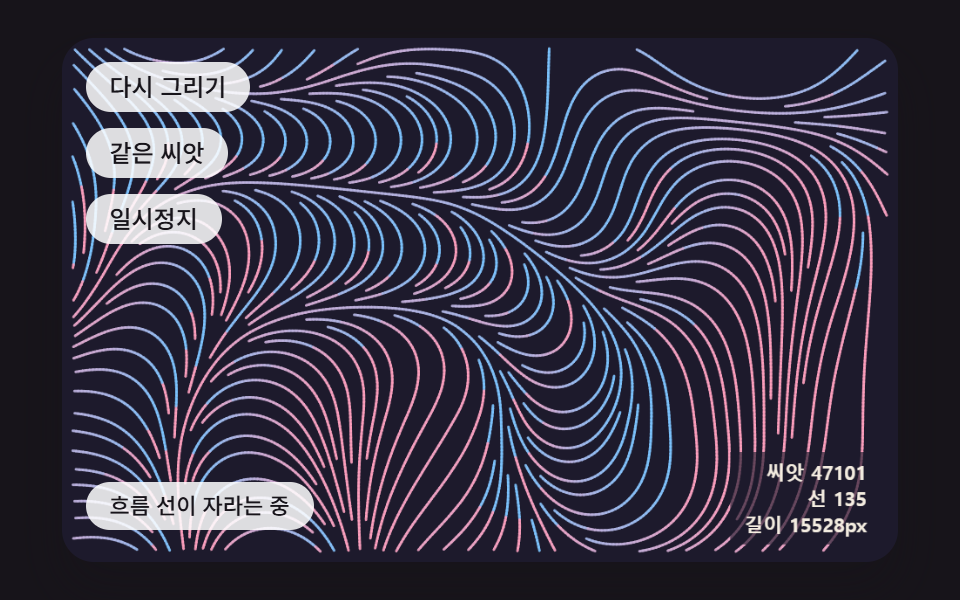 Creative UIGenerative Art JavaScript: 9 Patterns That Grow
 Creative UIAurora Background CSS: 9 Living Night-Sky Scenes
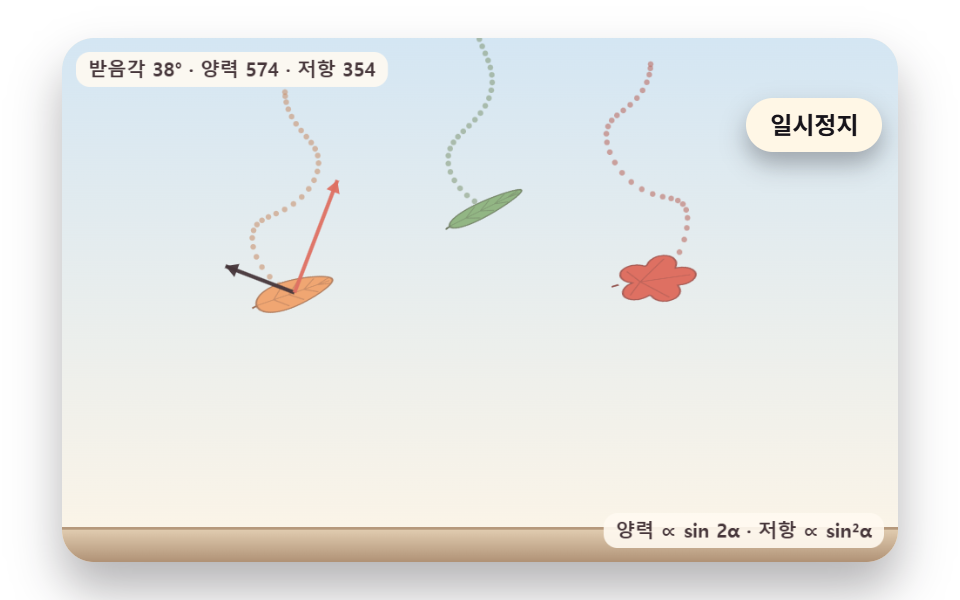 Creative UIFalling Leaves Animation: 9 Scenes, Sway to Pile
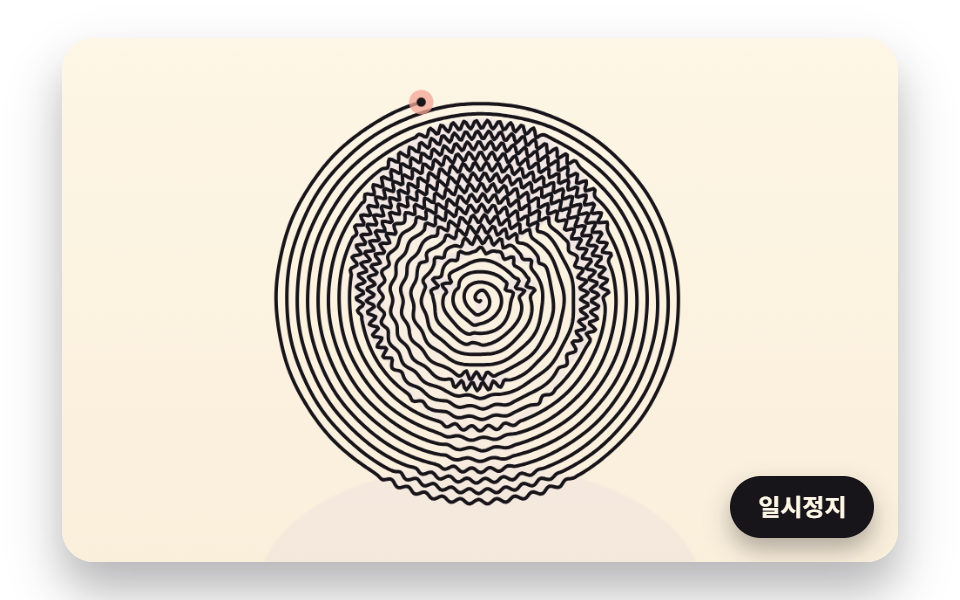 Creative UIOne Line Drawing Generator: 9 Canvas Scenes