ASCII Art JavaScript: 9 Canvas Glyph Scenes
How does ASCII art turn a picture into characters? 01 picks a glyph by each cell's mean brightness, 05 chooses slash or bar by edge direction, and 06
ASCII Art Is Not Drawing Letters but Reading the Brightness of Each Cell and Answering With One Glyph: ASCII Art Starts by Splitting a Picture Into a Grid
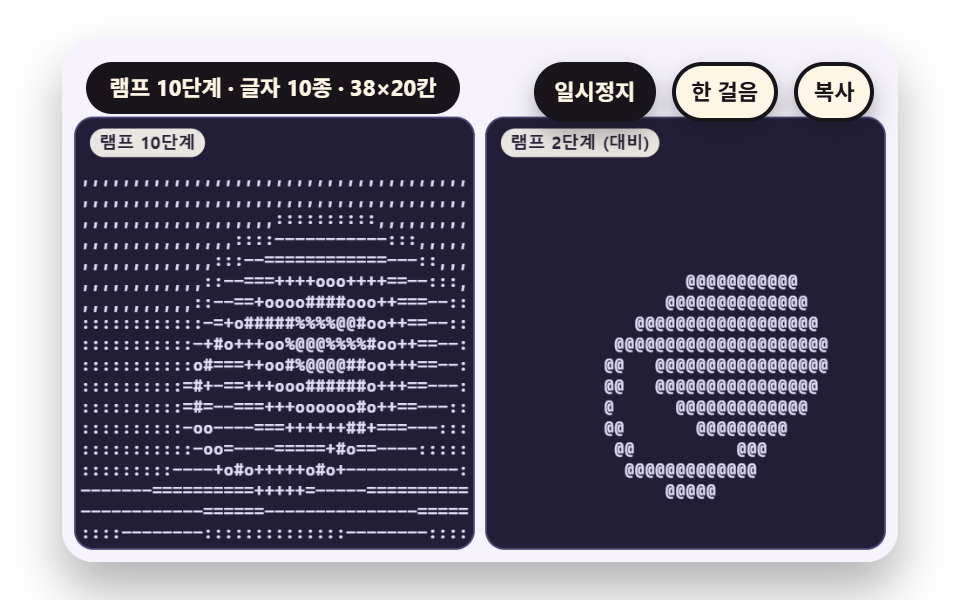 01 sc-ascii-ramp-brightness-glyph-density
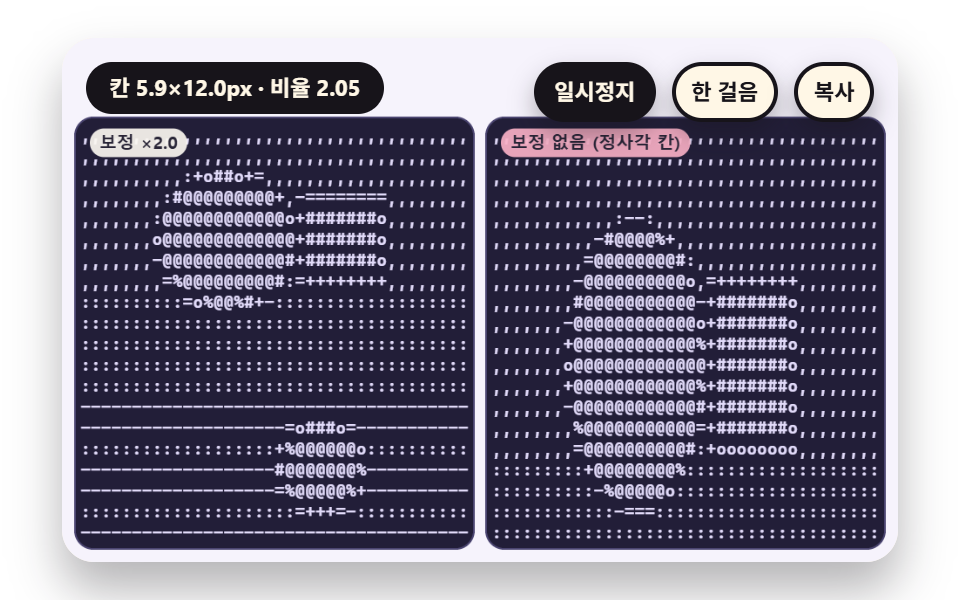 02 sc-ascii-glyph-cell-aspect-correct
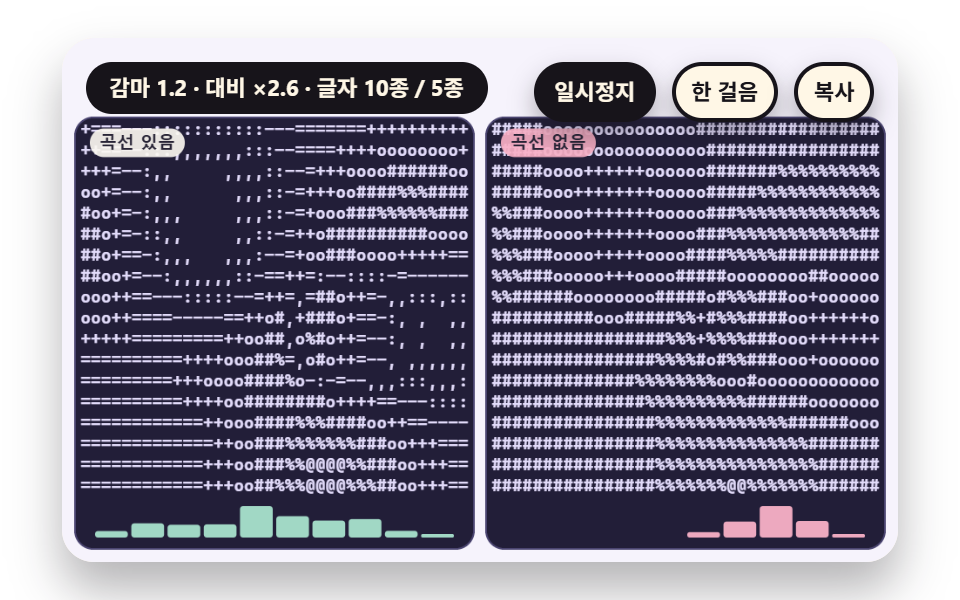 03 sc-ascii-gamma-contrast-curve-tune
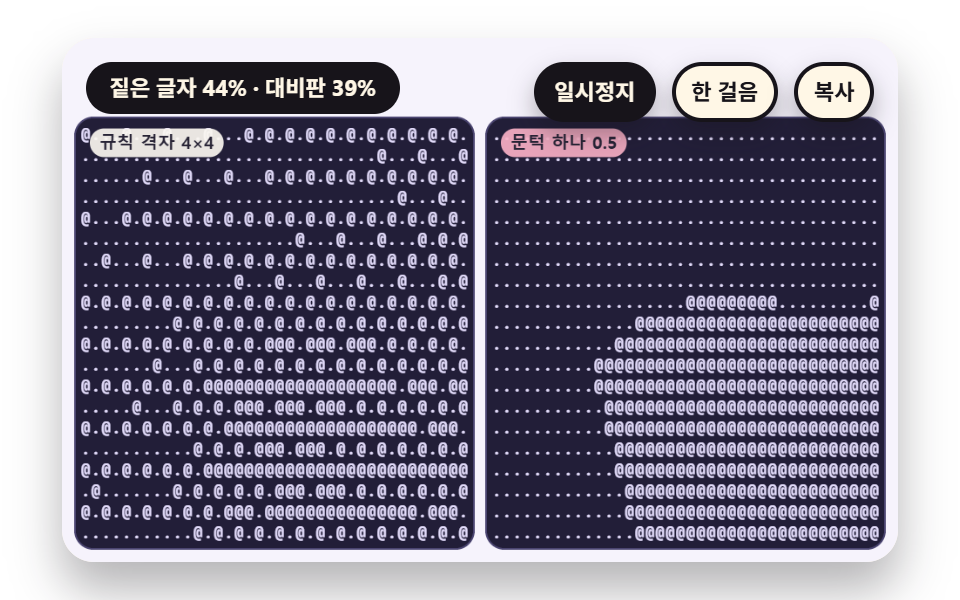 04 sc-ascii-ordered-matrix-dither-two-glyph
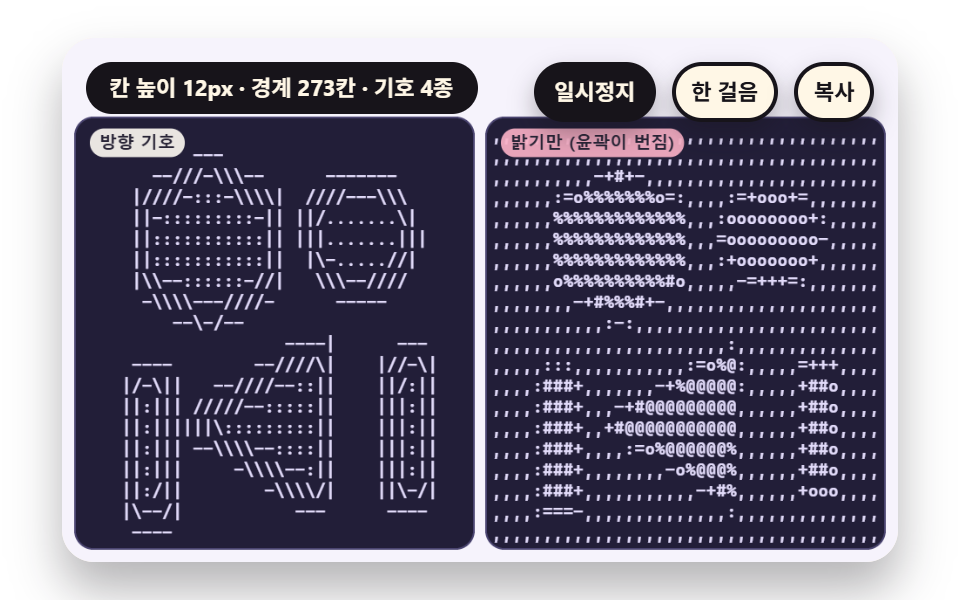 05 sc-ascii-gradient-edge-direction-slash-bar
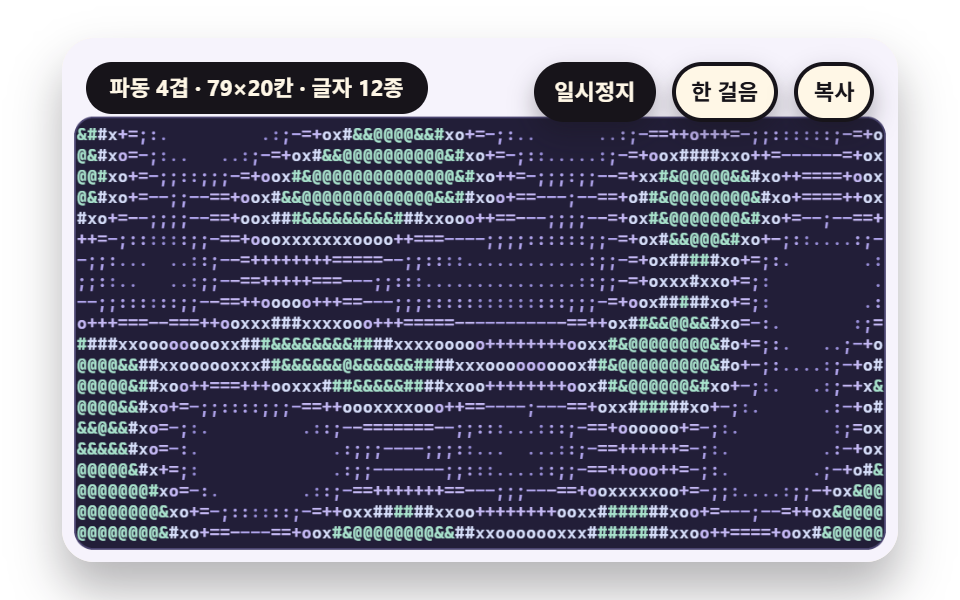 06 sc-ascii-plasma-wave-glyph-field-live
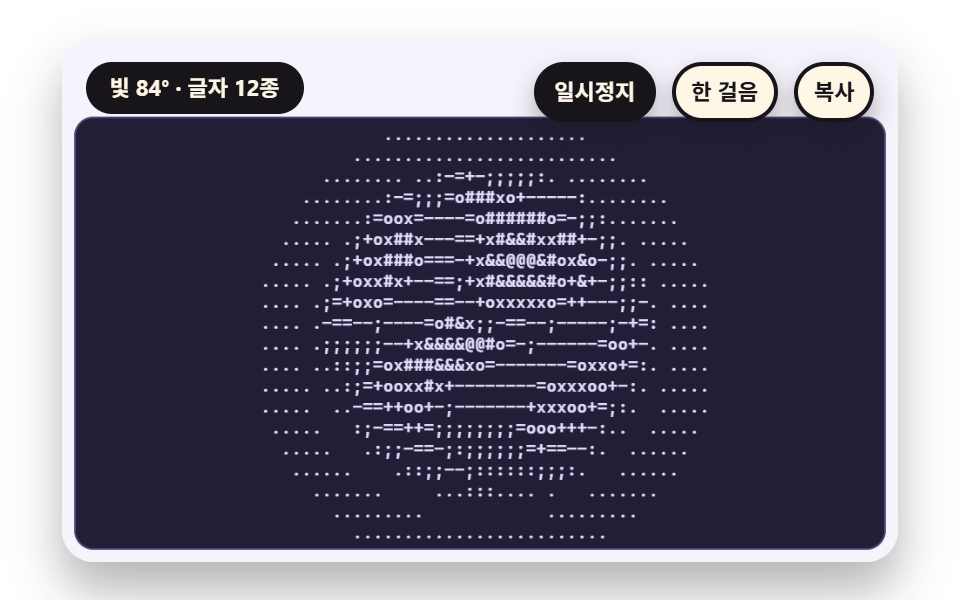 07 sc-ascii-sphere-diffuse-shade-rotate
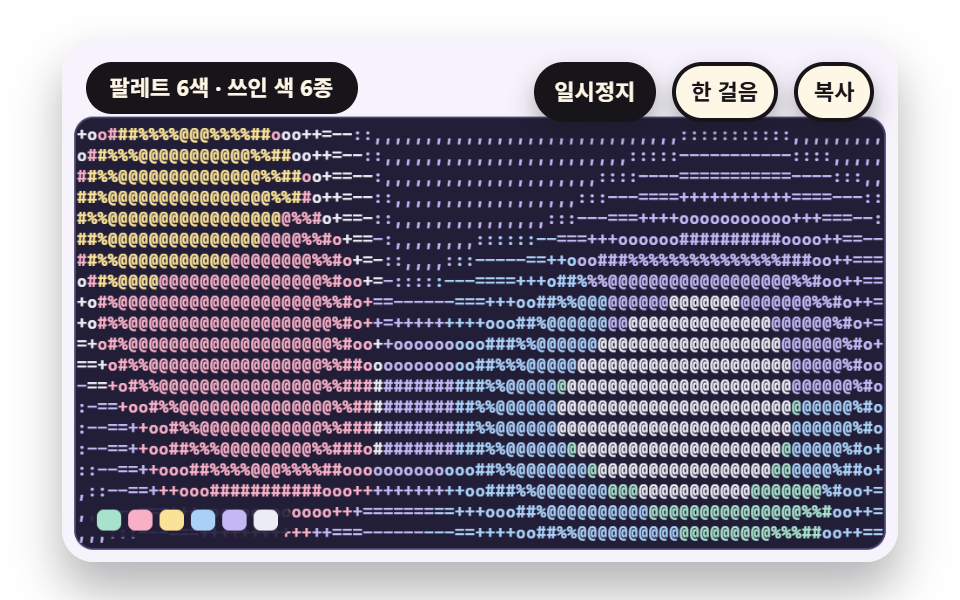 08 sc-ascii-per-glyph-color-palette-tint
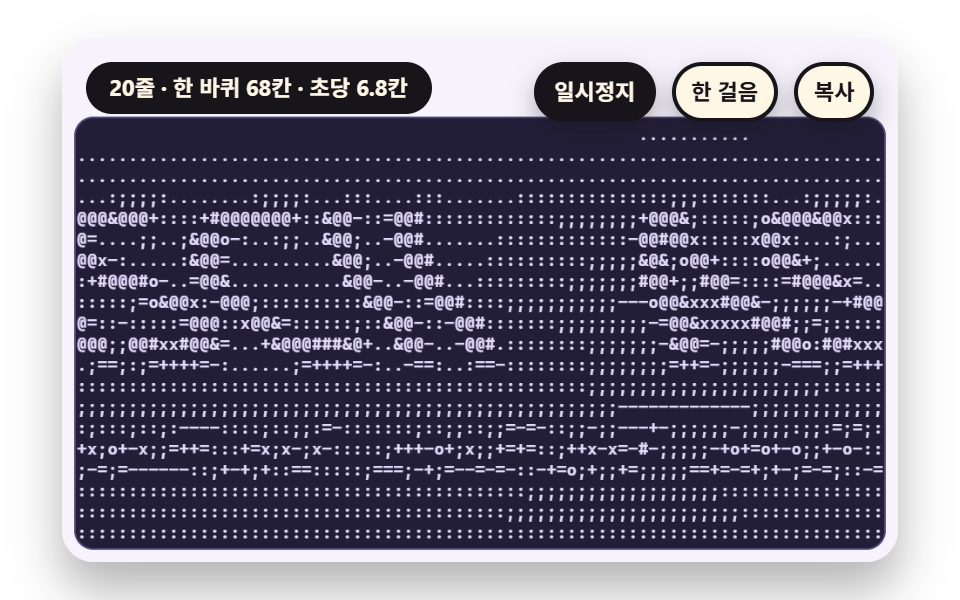 09 sc-ascii-hero-wave-banner-scroll-scene
Auto-plays · click a tile to jump to its section · all nine in one zip
- 01 A Ramp That Picks Glyphs From a Density Line by Cell Brightness
- 02 A Correction That Keeps a Circle Round Despite Tall Glyph Cells
- 03 A Tuning That Spreads Glyph Use Evenly With Gamma and Contrast Curves
- 04 Ordered Dither That Shows Light and Shade With Only Two Glyphs
- 05 Edges That Pick Slash or Bar by the Direction Brightness Changes
- 06 A Glyph Field That Re-reads a Moving Plasma Every Frame
- 07 Shading That Moves a Sphere's Light and Shadow Into Glyph Density
- 08 A Palette Tint That Colors Each Glyph With Its Cell's Mean Color
- 09 A Hero Built From a Waving Glyph Banner
The nine scenes share one frame. Each scene is drawn on a second canvas that is kept off the page, and every glyph on screen comes only from the mean of that canvas's pixels in each cell. There is no library, WebGL, CDN or random number, and the motion follows a phase taken from the scene clock, so it repeats without a seam after LAP_S 10 seconds.
The scene is drawn on a hidden canvas and glyphs come only from the values read back
setSrc sets the size and scale of the source canvas, and readGrid calls getImageData once to get the mean r, g, b and the brightness of the source pixels in every cell. Brightness is (0.2126 r + 0.7152 g + 0.0722 b) / 255, and the board prints a run of same-colored glyphs per row in one call instead of calling fillText for every cell. The font is a stack of monospace system fonts, and the glyph width is the width of M measured at 100px.
One board runs on a timetable
A demo starts at scene clock 0.6 seconds and the frame gap is capped at 0.05 seconds, so a tab that hides and comes back does not jump. The glyphs live on a canvas, so the way to copy the ASCII art is the copy button or the C key, which puts plain text without trailing spaces on the clipboard, and that text only lines up when it is pasted into a monospace font. 0.6 seconds before a board ends, a role="status" paragraph gets one status sentence.
One layer of computation per scene
Instead of tweening a property, each scene adds one layer of computation. 01 turns brightness into a ramp index, 02 corrects the cell aspect, 03 applies gamma and a contrast curve, 04 uses a repeating threshold table, 05 reads the direction of the brightness slope, 06 sums four sines, 07 shades a surface, 08 measures the distance from a mean color to a palette, and 09 offsets the phase row by row. The CSS dither piece paints pixels with CSS, the generative art piece draws lines and tiles, and the falling text piece does glyph physics, while this one is about reading a picture's pixels to pick glyphs.
ASCII Art in JavaScript: 9 Scenes — A Ramp That Maps Brightness to Glyph Density, Cell Aspect Correction, Gamma and Contrast Curves, Ordered Dither With Two Glyphs, Edge Symbols That Follow Brightness Direction, a Moving Plasma Glyph Field, Shaded Sphere Glyphs, a Palette Tint per Glyph and a Waving Glyph Banner Hero
What nine renders measured for area, frames and intensity
| Scene | Cumulative area | Moving frames | Mean intensity |
|---|---|---|---|
| 01 Ramp | 18.8% | 23/23 | 78.5 |
| 02 Cell aspect | 10.9% | 23/23 | 67.1 |
| 03 Gamma curve | 32.5% | 23/23 | 65.5 |
| 04 Ordered dither | 13.0% | 23/23 | 103.3 |
| 05 Edge symbols | 15.0% | 23/23 | 75.2 |
| 06 Plasma | 39.8% | 23/23 | 60.9 |
| 07 Sphere shading | 15.6% | 23/23 | 73.9 |
| 08 Color tint | 45.1% | 23/23 | 61.2 |
| 09 Wave banner | 28.8% | 23/23 | 72.4 |
08 covers the most area at 45.1% and 02 the least at 10.9%, and 04 uses only two glyphs yet has the highest mean intensity at 103.3. All nine scenes moved in 23/23 frames, so none of them reads as a still picture.
01A Ramp That Picks Glyphs From a Density Line by Cell Brightness
This is the base of any image to text conversion screen: readGrid takes the mean brightness of each of the 38×20 cells and glyphIndex turns it into a ramp index, so one glyph is picked per cell. The board on the left uses a 10 step ramp, and the board on the right calls rampOf(2) to keep only a space and @, which removes the mid tones as the contrast. Cutting the ramp to 5 glyphs uses 5 kinds in one scene on average, 10 steps use 10 and 16 steps use 15.
<main class="stage">
<div class="vj is-demo" id="vj">
  <div class="vj__pad" data-role="pad" tabindex="0" role="application" aria-label="ASCII art stage: Enter or Space pauses, N steps once, R restarts, C copies the glyph board">
    <canvas class="vj__canvas" data-role="canvas" width="480" height="300" role="img" aria-label="A scene with a sun crossing in an arc, a breathing ring and wave bands below is split into grid cells; the left board prints each cell mean brightness with a ten step glyph ramp, the right board reads the same means with only two glyphs so the mid tones vanish"></canvas>
  </div>
  <p class="vj__status" data-role="status" aria-live="off">ASCII art demo</p>
  <div class="vj__ctrl">
    <button class="vj__pause" data-role="pause" type="button" aria-pressed="false">Pause</button>
    <button class="vj__step" data-role="step" type="button">Step</button>
    <button class="vj__copy" data-role="copy" type="button">Copy</button>
  </div>
  <p class="vj__done" data-role="done" role="status" aria-live="polite"></p>
</div>
</main>
@use "../../../../site/static/demo-tokens" as *;
@include stage($stage-paper);
.vj {
position: relative;
width: min(92vw, calc(160vh - 12.8vw));
aspect-ratio: 480 / 300;
margin: 0 auto;
border-radius: $r-card;
overflow: hidden;
box-shadow: $shadow-raised;
background: $subject-cream;
}
// 무대 상자 — 여기서 시작한 터치만 칸 누르기로 읽는다(touch-action: none 은 이 상자에만). 무대 밖 터치는 페이지 스크롤 그대로
.vj__pad {
position: absolute;
inset: 0;
border-radius: inherit;
outline: none;
touch-action: none;
cursor: pointer;
}
// 바깥 .vj 가 넘침을 자르므로 포커스 테두리는 안쪽으로 들인다
.vj__pad:focus-visible {
outline: 3px solid $subject-ink;
outline-offset: -3px;
}
.vj__canvas {
position: absolute;
inset: 0;
display: block;
width: 100%;
height: 100%;
}
.vj__ctrl {
position: absolute;
right: $sp-3;
top: $sp-3;
display: flex;
gap: $sp-2;
}
.vj__pause,
.vj__step,
.vj__copy {
padding: $sp-1 $sp-2;
border: 2px solid $subject-ink;
border-radius: $r-pill;
background: $subject-ink;
color: $subject-cream;
font-family: inherit;
font-weight: 700;
font-size: 11px;
line-height: 1.6;
cursor: pointer;
box-shadow: $shadow-press;
transition: transform $dur-quick $ease-spring;
}
.vj__step,
.vj__copy {
background: $subject-cream;
color: $subject-ink;
}
// 스크린리더에만 읽히는 완료 알림
.vj__done {
position: absolute;
width: 1px;
height: 1px;
margin: 0;
overflow: hidden;
clip-path: inset(50%);
white-space: nowrap;
}
// 눌린 상태(멈춤) — 바탕과 글자색을 뒤집어 aria-pressed 가 눈에도 보이게
.vj__pause[aria-pressed="true"] {
background: $subject-cream;
color: $subject-ink;
}
.vj__pause:hover,
.vj__step:hover,
.vj__copy:hover {
transform: translateY(-2px);
}
.vj__pause:active,
.vj__step:active,
.vj__copy:active {
transform: translateY(1px);
}
.vj__pause:focus-visible,
.vj__step:focus-visible,
.vj__copy:focus-visible {
outline: 3px solid $subject-ink;
outline-offset: 3px;
}
// 상태 줄 — 지금 장면의 수치를 글자로. 시연 중에는 aria-live off, 사람이 처음 손대면 polite
.vj__status {
position: absolute;
left: $sp-3;
top: $sp-3;
max-width: calc(100% - 214px);
margin: 0;
padding: $sp-1 $sp-3;
border-radius: $r-pill;
background: $subject-ink;
color: $subject-cream;
font-weight: 700;
font-size: 11px;
line-height: 1.6;
white-space: nowrap;
overflow: hidden;
text-overflow: ellipsis;
pointer-events: none;
}
@media (max-width: 340px) {
.vj__pause,
.vj__step,
.vj__copy,
.vj__status { font-size: 10px; padding: 0 $sp-2; }
}
// 움직임 줄이기 — 장면은 스크립트가 정지 장면 한 장으로 멈춘다. 버튼도 떠오르지 않게
@media (prefers-reduced-motion: reduce) {
.vj__pause,
.vj__step,
.vj__copy { transition: none !important; }
.vj__pause:hover,
.vj__pause:active,
.vj__step:hover,
.vj__step:active,
.vj__copy:hover,
.vj__copy:active { transform: none !important; }
}html, body {
margin: 0;
overflow: hidden;
}
.stage {
box-sizing: border-box;
min-height: 100vh;
display: grid;
place-items: center;
margin: 0;
background: #ffffff;
font-family: -apple-system, "Segoe UI", "Noto Sans KR", sans-serif;
padding: clamp(8px, 4vw, 24px);
}
.vj {
position: relative;
width: min(92vw, 160vh - 12.8vw);
aspect-ratio: 480/300;
margin: 0 auto;
border-radius: 16px;
overflow: hidden;
box-shadow: 0 14px 24px rgba(23, 20, 26, 0.32);
background: #fff7e6;
}
.vj__pad {
position: absolute;
inset: 0;
border-radius: inherit;
outline: none;
touch-action: none;
cursor: pointer;
}
.vj__pad:focus-visible {
outline: 3px solid #17141a;
outline-offset: -3px;
}
.vj__canvas {
position: absolute;
inset: 0;
display: block;
width: 100%;
height: 100%;
}
.vj__ctrl {
position: absolute;
right: 12px;
top: 12px;
display: flex;
gap: 8px;
}
.vj__pause,
.vj__step,
.vj__copy {
padding: 4px 8px;
border: 2px solid #17141a;
border-radius: 999px;
background: #17141a;
color: #fff7e6;
font-family: inherit;
font-weight: 700;
font-size: 11px;
line-height: 1.6;
cursor: pointer;
box-shadow: 0 6px 12px rgba(23, 20, 26, 0.32);
transition: transform 220ms cubic-bezier(0.2, 0.8, 0.2, 1);
}
.vj__step,
.vj__copy {
background: #fff7e6;
color: #17141a;
}
.vj__done {
position: absolute;
width: 1px;
height: 1px;
margin: 0;
overflow: hidden;
clip-path: inset(50%);
white-space: nowrap;
}
.vj__pause[aria-pressed=true] {
background: #fff7e6;
color: #17141a;
}
.vj__pause:hover,
.vj__step:hover,
.vj__copy:hover {
transform: translateY(-2px);
}
.vj__pause:active,
.vj__step:active,
.vj__copy:active {
transform: translateY(1px);
}
.vj__pause:focus-visible,
.vj__step:focus-visible,
.vj__copy:focus-visible {
outline: 3px solid #17141a;
outline-offset: 3px;
}
.vj__status {
position: absolute;
left: 12px;
top: 12px;
max-width: calc(100% - 214px);
margin: 0;
padding: 4px 12px;
border-radius: 999px;
background: #17141a;
color: #fff7e6;
font-weight: 700;
font-size: 11px;
line-height: 1.6;
white-space: nowrap;
overflow: hidden;
text-overflow: ellipsis;
pointer-events: none;
}
@media (max-width: 340px) {
.vj__pause,
.vj__step,
.vj__copy,
.vj__status {
font-size: 10px;
padding: 0 8px;
}
}
@media (prefers-reduced-motion: reduce) {
.vj__pause,
.vj__step,
.vj__copy {
transition: none !important;
}
.vj__pause:hover,
.vj__pause:active,
.vj__step:hover,
.vj__step:active,
.vj__copy:hover,
.vj__copy:active {
transform: none !important;
}
}(function () {
const root = document.getElementById("vj");
if (!root) return;
// 무대 좌표 — 캔버스 안 계산은 늘 480×300. 화면에 보이는 크기와 상관없다
const W = 480;
const H = 300;
const TAU = Math.PI * 2;
function clamp(v, lo, hi) { return v < lo ? lo : (v > hi ? hi : v); }
function lerp(a, b, k) { return a + (b - a) * k; }
function smooth(a, b, v) { const k = clamp((v - a) / (b - a), 0, 1); return k * k * (3 - 2 * k); }
// 파스텔 팔레트 — 글자 판은 짙은 남보라 바탕 위에 옅은 라벤더 글자(대비 12 이상), 바깥 무대는 크림 라벤더
const PAGE = [246, 243, 252];
const BOARD = [34, 30, 56];
const BOARD_EDGE = [74, 68, 112];
const GLYPH = [226, 219, 250];
const MINT = [168, 226, 204];
const ROSE = [248, 176, 198];
const BUTTER = [250, 226, 150];
const SKY = [170, 208, 248];
const LAV = [196, 184, 244];
const INK = [40, 36, 54];
const PAPER = [250, 246, 240];
function rgba(c, a) {
return 'rgba(' + Math.round(clamp(c[0], 0, 255)) + ',' + Math.round(clamp(c[1], 0, 255)) + ',' + Math.round(clamp(c[2], 0, 255)) + ',' + clamp(a, 0, 1).toFixed(3) + ')';
}
function grayStr(l, a) {
const v = Math.round(clamp(l, 0, 1) * 255);
return 'rgba(' + v + ',' + v + ',' + v + ',' + clamp(a, 0, 1).toFixed(3) + ')';
}
// 장면 시계(초) — 한 바퀴 LAP_S 초이고 장면의 모든 움직임은 위상 ph = sceneT / LAP_S 의 정수배라 바퀴 끝에서 이음매가 없다
let sceneT = 0;
let lap = 0;
// 외부 웹폰트는 부르지 않는다 — 기기에 있는 고정폭 글꼴 목록만
const MONO = 'ui-monospace, "Cascadia Mono", Consolas, Menlo, "DejaVu Sans Mono", "Courier New", monospace';
const FONT_STACK = 'system-ui, -apple-system, "Segoe UI", "Noto Sans KR", sans-serif';
// 글자 한 줄 높이 = 글자 크기의 1.2 배. 폭은 글꼴에서 잰 값(advRatio)을 쓴다
const LINE_K = 1.2;
let advRatio = 0.6;
// ── 원본 장면 캔버스 — 화면에 붙이지 않는 두 번째 캔버스. 장면은 여기 그리고 화소를 읽는다 ──
const srcCv = document.createElement('canvas');
const srcRaw = srcCv.getContext('2d', { willReadFrequently: true });
if (!srcRaw) {
return;
}
const sctx = srcRaw;
// ss = 원본 화소 / 판 화소. 1 이면 판 크기 그대로, 0.5 면 가로세로 절반 해상도로 계산해 읽는다
let srcSs = 1;
function setSrc(w, h, ss) {
const sw = Math.round(w * ss);
const sh = Math.round(h * ss);
if (srcCv.width !== sw || srcCv.height !== sh) {
srcCv.width = sw;
srcCv.height = sh;
}
srcSs = ss;
sctx.setTransform(ss, 0, 0, ss, 0, 0);
}
// cols×rows 칸을 왼쪽 위부터 읽는다. 칸 하나가 원본에서 덮는 영역은 가로 cw, 세로 sh (판 화소 단위)
function readGrid(cols, rows, cw, sh) {
const sw = srcCv.width;
const shp = srcCv.height;
const data = sctx.getImageData(0, 0, sw, shp).data;
const grid = { cols: cols, rows: rows, cw: cw, sh: sh, lum: [], r: [], g: [], b: [] };
for (let cy = 0; cy < rows; cy += 1) {
const y0 = Math.min(shp - 1, Math.floor(cy * sh * srcSs));
const y1 = Math.max(y0 + 1, Math.min(shp, Math.floor((cy + 1) * sh * srcSs)));
for (let cx = 0; cx < cols; cx += 1) {
const x0 = Math.min(sw - 1, Math.floor(cx * cw * srcSs));
const x1 = Math.max(x0 + 1, Math.min(sw, Math.floor((cx + 1) * cw * srcSs)));
let sr = 0;
let sg = 0;
let sb = 0;
let n = 0;
for (let y = y0; y < y1; y += 1) {
let p = (y * sw + x0) * 4;
for (let x = x0; x < x1; x += 1) {
sr += data[p];
sg += data[p + 1];
sb += data[p + 2];
n += 1;
p += 4;
}
}
const mr = sr / n;
const mg = sg / n;
const mb = sb / n;
grid.r.push(mr);
grid.g.push(mg);
grid.b.push(mb);
grid.lum.push((0.2126 * mr + 0.7152 * mg + 0.0722 * mb) / 255);
}
}
return grid;
}
// ── 글자 램프 — 성긴 글자에서 짙은 글자 순서 열여섯 개. n 단계 램프는 이 줄에서 고르게 n 개를 뽑는다 ──
const RAMP_FULL = ' .,:;-~=+*ox#%&@';
function rampOf(n) {
let s = '';
for (let i = 0; i < n; i += 1) {
s += RAMP_FULL.charAt(Math.round(i * (RAMP_FULL.length - 1) / (n - 1)));
}
return s;
}
// 밝기 v(0 에서 1)를 램프 번호로 — 단계 폭 1/n 으로 나눠 내림
function glyphIndex(v, n) { return Math.min(n - 1, Math.max(0, Math.floor(v * n))); }
// 칸 크기 — 글자 크기 fp 를 주면 폭은 글꼴에서 잰 글자 폭, 높이는 줄 높이
function cellW(fp) { return advRatio * fp; }
function cellH(fp) { return LINE_K * fp; }
function measureAdv() {
ctx.font = '100px ' + MONO;
const m = ctx.measureText('M').width / 100;
advRatio = m > 0.3 && m < 0.9 ? m : 0.6;
}
// ── 그리기 도구 ──
function box(x, y, w, h, r, c, a) {
if (w <= 0.2 || h <= 0.2 || a <= 0) {
return;
}
ctx.beginPath();
ctx.roundRect(x, y, w, h, Math.max(0, Math.min(r, w / 2, h / 2)));
ctx.fillStyle = rgba(c, a);
ctx.fill();
}
function text(s, x, y, c, a, px, weight, align) {
ctx.font = weight + ' ' + px + 'px ' + FONT_STACK;
ctx.textAlign = align;
ctx.textBaseline = 'middle';
ctx.fillStyle = rgba(c, a);
ctx.fillText(s, x, y);
}
// 글자 이름표 — 바탕 알약 위에 글자
function tag(s, x, y, bg, fg, px, align) {
ctx.font = '700 ' + px + 'px ' + FONT_STACK;
const w = ctx.measureText(s).width + px * 1.1;
const left = align === 'center' ? x - w / 2 : (align === 'right' ? x - w : x);
box(left, y - px * 0.82, w, px * 1.64, px * 0.82, bg, 0.92);
text(s, left + w / 2, y + 0.5, fg, 1, px, 700, 'center');
}
function paintPage() {
ctx.fillStyle = rgba(PAGE, 1);
ctx.fillRect(0, 0, W, H);
}
// 글자 판 바탕 — 짙은 남보라 둥근 사각형
function panel(x, y, w, h) {
box(x - 1, y - 1, w + 2, h + 2, 11, BOARD_EDGE, 1);
box(x, y, w, h, 10, BOARD, 1);
}
// 글자 판 그리기 — chars 는 칸마다 글자 하나(왼쪽 위부터 줄 순서). colorIdx 가 있으면 칸마다 팔레트 번호, 없으면 모두 pal[0].
// 같은 색이 이어지는 칸은 한 번에 찍어 한 판에 fillText 가 줄 수 × 색 조각 수만큼만 불린다
function drawGlyphs(x, y, fp, g, chars, colorIdx, pal) {
const cw = cellW(fp);
const ch = cellH(fp);
ctx.font = '600 ' + fp + 'px ' + MONO;
ctx.textAlign = 'left';
ctx.textBaseline = 'middle';
for (let r = 0; r < g.rows; r += 1) {
let c = 0;
while (c < g.cols) {
const ci = colorIdx ? colorIdx[r * g.cols + c] : 0;
let run = '';
let e = c;
while (e < g.cols && (colorIdx ? colorIdx[r * g.cols + e] : 0) === ci) {
run += chars[r * g.cols + e];
e += 1;
}
if (run.trim().length > 0) {
ctx.fillStyle = rgba(pal[ci], 1);
ctx.fillText(run, x + c * cw, y + (r + 0.5) * ch + 0.5);
}
c = e;
}
}
}
// 판의 글자를 줄바꿈으로 이은 텍스트 — Copy 단추가 이 글을 클립보드에 넣는다
function plainOf(g, chars) {
const lines = [];
for (let r = 0; r < g.rows; r += 1) {
lines.push(chars.slice(r * g.cols, (r + 1) * g.cols).join('').replace(/\s+$/, ''));
}
return lines.join('\n');
}
// 쓰인 서로 다른 글자 수(공백 포함)와 글자별 횟수
function usage(chars, ramp) {
const out = [];
for (let i = 0; i < ramp.length; i += 1) {
out.push(0);
}
for (const c of chars) {
const k = ramp.indexOf(c);
if (k >= 0) {
out[k] += 1;
}
}
return out;
}
function kinds(u) {
let n = 0;
for (const v of u) {
if (v > 0) {
n += 1;
}
}
return n;
}
// 글자별 사용 횟수 막대 — 판 아래 띠에 램프 순서대로
function usageBars(x, y, w, h, u, c) {
let mx = 1;
for (const v of u) {
if (v > mx) {
mx = v;
}
}
const bw = w / u.length;
for (let i = 0; i < u.length; i += 1) {
const bh = Math.max(u[i] > 0 ? 2 : 0, h * u[i] / mx);
box(x + i * bw + 1, y + h - bh, bw - 2, bh, 2, c, 0.95);
}
}
// 두 번째 캔버스에 쓰는 회색 장면 도구 — 중심에서 번지는 둥근 빛
function glow(x, y, r, l, a) {
const g = sctx.createRadialGradient(x, y, 0, x, y, r);
g.addColorStop(0, grayStr(l, a));
g.addColorStop(1, grayStr(l, 0));
sctx.fillStyle = g;
sctx.fillRect(x - r, y - r, r * 2, r * 2);
}
function vgrad(w, h, l0, l1) {
const g = sctx.createLinearGradient(0, 0, 0, h);
g.addColorStop(0, grayStr(l0, 1));
g.addColorStop(1, grayStr(l1, 1));
sctx.fillStyle = g;
sctx.fillRect(0, 0, w, h);
}
// 판 배치 — 위 46 은 상태 줄·단추 자리. 판 둘이면 가로 228, 하나면 464
const PY = 46;
const PH = 246;
const PW2 = 228;
const PW1 = 464;
const PX_L = 8;
const PX_R = 244;
// Copy 단추를 누른 뒤 상태 줄에 잠깐 뜨는 말
const COPY_OK = 'Glyph board copied as text';
const COPY_FAIL = 'Copy failed - select the glyph board and copy it by hand';
const canvasEl = root.querySelector('[data-role="canvas"]');
const padEl = root.querySelector('[data-role="pad"]');
const pauseEl = root.querySelector('[data-role="pause"]');
const statusEl = root.querySelector('[data-role="status"]');
const stepEl = root.querySelector('[data-role="step"]');
const copyEl = root.querySelector('[data-role="copy"]');
const doneEl = root.querySelector('[data-role="done"]');
const ctxRaw = canvasEl ? canvasEl.getContext('2d') : null;
if (!canvasEl || !ctxRaw || !pauseEl || !padEl || !stepEl || !copyEl || !doneEl) {
return;
}
const cv = canvasEl;
const ctx = ctxRaw;
const pauseBtn = pauseEl;
const stepBtn = stepEl;
const copyBtn = copyEl;
const doneP = doneEl;
const pad = padEl;
let dpr = 1;
function fitCanvas() {
// 배율은 2 에서 자른다 — 배율 3 기기에서 화소가 2.25배로 늘지 않게
dpr = Math.min(window.devicePixelRatio || 1, 2);
cv.width = Math.round(W * dpr);
cv.height = Math.round(H * dpr);
ctx.setTransform(dpr, 0, 0, dpr, 0, 0);
measureAdv();
}
// 지금 화면에 찍힌 글자 판 — Copy 단추가 이 텍스트를 넣는다
let plainText = '';
let copyFlash = 0;
let shownStatus = '';
function pushStatus(s) {
if (!statusEl || s === shownStatus) {
return;
}
shownStatus = s;
statusEl.textContent = s;
}
let paused = false;
const reduceQuery = window.matchMedia('(prefers-reduced-motion: reduce)');
// 페이지를 연 채 움직임 줄이기 설정을 바꿔도 change 리스너가 다시 읽는다
let still = reduceQuery.matches;
// 자동 시연 표시 — 사람이 처음 손대면 떼고 상태 줄을 polite 로 켠다
let demo = root.classList.contains('is-demo');
const off = new AbortController();
function wake() {
if (!demo) {
return;
}
demo = false;
root.classList.remove('is-demo');
if (statusEl) {
statusEl.setAttribute('aria-live', 'polite');
}
}
// 한 판 시연이 끝났음을 스크린리더에 한 번만 알린다 — 판이 되풀이돼도 다시 읽지 않는다
let doneSaid = false;
function checkDone() {
if (!doneSaid && sceneT >= LAP_S - 0.6) {
doneSaid = true;
doneP.textContent = statusText();
}
}
function advance(dt) {
sceneT += dt;
if (copyFlash > 0) {
copyFlash = Math.max(0, copyFlash - dt);
}
if (sceneT >= LAP_S) {
sceneT -= LAP_S;
lap += 1;
}
}
const DT_MAX = 0.05;
const STEP_S = 0.4;
function showNow() {
draw();
pushStatus(copyFlash > 0 ? copyNote : statusText());
checkDone();
}
let copyNote = '';
let rafId = 0;
let lastTs = -1;
function frame(ts) {
if (still || paused) {
rafId = 0;
return;
}
if (lastTs < 0) {
lastTs = ts;
}
const dt = Math.min((ts - lastTs) / 1000, DT_MAX);
lastTs = ts;
if (dt > 0) {
advance(dt);
}
showNow();
rafId = window.requestAnimationFrame(frame);
}
function startLoop() {
if (rafId) {
return;
}
// 멈췄던 사이의 시간을 첫 프레임 dt 로 넘기지 않는다
lastTs = -1;
rafId = window.requestAnimationFrame(frame);
}
function stopLoop() {
if (rafId) {
window.cancelAnimationFrame(rafId);
rafId = 0;
}
}
// 움직임 줄이기 — 루프 없이 장면이 한창인 순간의 정지 장면 한 장
function showRest() {
stopLoop();
sceneT = REST_S;
showNow();
}
function togglePause() {
paused = !paused;
pauseBtn.setAttribute('aria-pressed', paused ? 'true' : 'false');
wake();
if (paused) {
stopLoop();
}
else if (!still) {
startLoop();
}
}
function restart() {
wake();
sceneT = START_S;
lap = 0;
doneSaid = false;
showNow();
}
// Step — 멈춘 채 장면 시계를 0.4 초 앞으로
function stepOnce() {
wake();
if (!paused) {
paused = true;
pauseBtn.setAttribute('aria-pressed', 'true');
stopLoop();
}
advance(STEP_S);
showNow();
}
// Copy — 화면에 있는 글자 판을 텍스트로 클립보드에. 임시 입력칸을 만들어 선택하고 Copy 명령을 부른다
function copyBoard() {
wake();
const ta = document.createElement('textarea');
ta.value = plainText;
ta.setAttribute('readonly', '');
ta.style.position = 'fixed';
ta.style.left = '-9999px';
ta.style.opacity = '0';
document.body.appendChild(ta);
ta.select();
let ok = false;
try {
ok = document.execCommand('copy');
}
catch (err) {
ok = false;
}
document.body.removeChild(ta);
copyNote = ok ? COPY_OK : COPY_FAIL;
copyFlash = 1.6;
pushStatus(copyNote);
}
pauseBtn.addEventListener('click', togglePause, { signal: off.signal });
stepBtn.addEventListener('click', stepOnce, { signal: off.signal });
copyBtn.addEventListener('click', copyBoard, { signal: off.signal });
// 키보드 — 무대에 포커스가 있을 때만. Enter·Space·P 는 Pause, N 은 Step, R 은 처음부터, C 는 글자 판 Copy
pad.addEventListener('keydown', function (e) {
if (e.altKey || e.ctrlKey || e.metaKey) {
return;
}
const k = e.key;
if (k === 'Enter' || k === ' ' || k === 'p' || k === 'P') {
e.preventDefault();
togglePause();
}
else if (k === 'n' || k === 'N') {
e.preventDefault();
stepOnce();
}
else if (k === 'r' || k === 'R') {
e.preventDefault();
restart();
}
else if (k === 'c' || k === 'C') {
e.preventDefault();
copyBoard();
}
}, { signal: off.signal });
// 마우스·터치 — 무대를 누르면 Pause 토글
pad.addEventListener('click', function () { togglePause(); }, { signal: off.signal });
// 탭이 숨으면 멈추고, 돌아오면 시계를 다시 맞춰 시작 — 숨은 동안의 몇 초가 한 프레임에 몰리지 않게
document.addEventListener('visibilitychange', function () {
if (document.hidden) {
stopLoop();
}
else if (!paused && !still) {
startLoop();
}
}, { signal: off.signal });
// 설정이 바뀌면 — 켜지면 정지 장면 한 장, 꺼지면 다시 움직인다
reduceQuery.addEventListener('change', function () {
still = reduceQuery.matches;
if (still) {
showRest();
}
else {
sceneT = START_S;
showNow();
if (!paused) {
startLoop();
}
}
}, { signal: off.signal });
window.addEventListener('resize', function () {
fitCanvas();
showNow();
}, { signal: off.signal });
// ── 01 칸의 밝기를 글자 농도 줄에서 골라 찍는 램프 ───────────────────────
const LAP_S = 10;
const START_S = 0.6;
const REST_S = 3.1;
// 램프 길이 — 왼쪽 판이 쓰는 글자 수. 오른쪽 판은 같은 칸 평균을 두 글자 램프로 읽는 대비판이다
const RAMP_LEN = 10;
const FONT_PX = 10;
const RAMP = rampOf(RAMP_LEN);
const RAMP_2 = rampOf(2);
let lastKinds = 0;
let lastKinds2 = 0;
let lastCols = 0;
let lastRows = 0;
// 원본 장면 — 해가 호를 그리며 지나가고 고리가 숨 쉬며 아래에 물결 띠가 흐른다. 밝기 범위 전체를 쓴다
function paintScene(w, h, a) {
vgrad(w, h, 0.08, 0.34);
glow(w * (0.5 + 0.3 * Math.cos(a)), h * (0.36 + 0.16 * Math.sin(a)), 84, 1, 0.9);
sctx.beginPath();
sctx.arc(w * (0.5 + 0.3 * Math.cos(a)), h * (0.36 + 0.16 * Math.sin(a)), 21, 0, TAU);
sctx.fillStyle = grayStr(0.97, 1);
sctx.fill();
sctx.beginPath();
sctx.arc(w * 0.5, h * 0.64, 40 + 10 * Math.sin(2 * a), 0, TAU);
sctx.lineWidth = 11;
sctx.strokeStyle = grayStr(0.78, 0.9);
sctx.stroke();
for (let k = 0; k < 3; k += 1) {
sctx.beginPath();
for (let x = 0; x <= w; x += 4) {
const y = h * 0.84 + k * 13 + 6 * Math.sin(x * 0.05 + a * (k + 1) + k);
if (x === 0) {
sctx.moveTo(x, y);
}
else {
sctx.lineTo(x, y);
}
}
sctx.lineTo(w, h);
sctx.lineTo(0, h);
sctx.closePath();
sctx.fillStyle = grayStr(0.46 - 0.12 * k, 0.9);
sctx.fill();
}
}
function draw() {
paintPage();
const a = sceneT / LAP_S * TAU;
setSrc(PW2, PH, 1);
paintScene(PW2, PH, a);
        const cw = cellW(FONT_PX);
        const ch = cellH(FONT_PX);
        const cols = Math.floor(PW2 / cw);
        const rows = Math.floor(PH / ch);
        const g = readGrid(cols, rows, cw, ch);
        const c1 = [];
        const c2 = [];
        for (let i = 0; i < g.lum.length; i += 1) {
            c1.push(RAMP.charAt(glyphIndex(g.lum[i], RAMP_LEN)));
            c2.push(RAMP_2.charAt(glyphIndex(g.lum[i], 2)));
        }
        lastKinds = kinds(usage(c1, RAMP));
        lastKinds2 = kinds(usage(c2, RAMP_2));
        lastCols = cols;
        lastRows = rows;
        plainText = plainOf(g, c1);
const ox = (PW2 - cols * cw) / 2;
const oy = (PH - rows * ch) / 2;
panel(PX_L, PY, PW2, PH);
drawGlyphs(PX_L + ox, PY + oy, FONT_PX, g, c1, null, [GLYPH]);
panel(PX_R, PY, PW2, PH);
drawGlyphs(PX_R + ox, PY + oy, FONT_PX, g, c2, null, [GLYPH]);
tag('Ramp of {n}'.replace('{n}', String(RAMP_LEN)), PX_L + 8, PY + 14, PAPER, INK, 10, 'left');
tag('Ramp of {n} (contrast)'.replace('{n}', '2'), PX_R + 8, PY + 14, PAPER, INK, 10, 'left');
}
function statusText() {
return 'Ramp of {n} - {k} glyphs - {c}x{r} cells'.replace('{n}', String(RAMP_LEN)).replace('{k}', String(lastKinds)).replace('{c}', String(lastCols)).replace('{r}', String(lastRows));
}
fitCanvas();
if (still) {
showRest();
}
else {
sceneT = START_S;
showNow();
startLoop();
}
return function () {
stopLoop();
off.abort();
};
})();// RampBrightnessGlyph - 같은 항목 vanilla index.html 의 React 판. 같은 계산을 useEffect 안에서 돌린다
import { useEffect, useRef } from "react";
import styles from "./RampBrightnessGlyph.module.scss";
const cx = (s: string): string => s.split(" ").map((n) => styles[n] ?? n).join(" ");
export default function RampBrightnessGlyph() {
const rootRef = useRef<HTMLDivElement | null>(null);
useEffect(() => {
const rootEl = rootRef.current;
if (!rootEl) return;
const root: HTMLElement = rootEl;
type RGB = [number, number, number];
// 무대 좌표 — 캔버스 안 계산은 늘 480×300. 화면에 보이는 크기와 상관없다
const W = 480;
const H = 300;
const TAU = Math.PI * 2;
function clamp(v: number, lo: number, hi: number): number { return v < lo ? lo : (v > hi ? hi : v); }
function lerp(a: number, b: number, k: number): number { return a + (b - a) * k; }
function smooth(a: number, b: number, v: number): number { const k = clamp((v - a) / (b - a), 0, 1); return k * k * (3 - 2 * k); }
// 파스텔 팔레트 — 글자 판은 짙은 남보라 바탕 위에 옅은 라벤더 글자(대비 12 이상), 바깥 무대는 크림 라벤더
const PAGE: RGB = [246, 243, 252];
const BOARD: RGB = [34, 30, 56];
const BOARD_EDGE: RGB = [74, 68, 112];
const GLYPH: RGB = [226, 219, 250];
const MINT: RGB = [168, 226, 204];
const ROSE: RGB = [248, 176, 198];
const BUTTER: RGB = [250, 226, 150];
const SKY: RGB = [170, 208, 248];
const LAV: RGB = [196, 184, 244];
const INK: RGB = [40, 36, 54];
const PAPER: RGB = [250, 246, 240];
function rgba(c: RGB, a: number): string {
return 'rgba(' + Math.round(clamp(c[0], 0, 255)) + ',' + Math.round(clamp(c[1], 0, 255)) + ',' + Math.round(clamp(c[2], 0, 255)) + ',' + clamp(a, 0, 1).toFixed(3) + ')';
}
function grayStr(l: number, a: number): string {
const v = Math.round(clamp(l, 0, 1) * 255);
return 'rgba(' + v + ',' + v + ',' + v + ',' + clamp(a, 0, 1).toFixed(3) + ')';
}
// 장면 시계(초) — 한 바퀴 LAP_S 초이고 장면의 모든 움직임은 위상 ph = sceneT / LAP_S 의 정수배라 바퀴 끝에서 이음매가 없다
let sceneT = 0;
let lap = 0;
// 외부 웹폰트는 부르지 않는다 — 기기에 있는 고정폭 글꼴 목록만
const MONO = 'ui-monospace, "Cascadia Mono", Consolas, Menlo, "DejaVu Sans Mono", "Courier New", monospace';
const FONT_STACK = 'system-ui, -apple-system, "Segoe UI", "Noto Sans KR", sans-serif';
// 글자 한 줄 높이 = 글자 크기의 1.2 배. 폭은 글꼴에서 잰 값(advRatio)을 쓴다
const LINE_K = 1.2;
let advRatio = 0.6;
// ── 원본 장면 캔버스 — 화면에 붙이지 않는 두 번째 캔버스. 장면은 여기 그리고 화소를 읽는다 ──
const srcCv: HTMLCanvasElement = document.createElement('canvas');
const srcRaw = srcCv.getContext('2d', { willReadFrequently: true });
if (!srcRaw) { return; }
const sctx: CanvasRenderingContext2D = srcRaw;
// ss = 원본 화소 / 판 화소. 1 이면 판 크기 그대로, 0.5 면 가로세로 절반 해상도로 계산해 읽는다
let srcSs = 1;
function setSrc(w: number, h: number, ss: number): void {
const sw = Math.round(w * ss);
const sh = Math.round(h * ss);
if (srcCv.width !== sw || srcCv.height !== sh) {
srcCv.width = sw;
srcCv.height = sh;
}
srcSs = ss;
sctx.setTransform(ss, 0, 0, ss, 0, 0);
}
// 칸 격자 — 칸마다 원본 화소의 평균 밝기(lum, 0 에서 1)와 평균 색을 담는다
type Grid = { cols: number; rows: number; cw: number; sh: number; lum: number[]; r: number[]; g: number[]; b: number[] };
// cols×rows 칸을 왼쪽 위부터 읽는다. 칸 하나가 원본에서 덮는 영역은 가로 cw, 세로 sh (판 화소 단위)
function readGrid(cols: number, rows: number, cw: number, sh: number): Grid {
const sw = srcCv.width;
const shp = srcCv.height;
const data = sctx.getImageData(0, 0, sw, shp).data;
const grid: Grid = { cols: cols, rows: rows, cw: cw, sh: sh, lum: [], r: [], g: [], b: [] };
for (let cy = 0; cy < rows; cy += 1) {
const y0 = Math.min(shp - 1, Math.floor(cy * sh * srcSs));
const y1 = Math.max(y0 + 1, Math.min(shp, Math.floor((cy + 1) * sh * srcSs)));
for (let cx = 0; cx < cols; cx += 1) {
const x0 = Math.min(sw - 1, Math.floor(cx * cw * srcSs));
const x1 = Math.max(x0 + 1, Math.min(sw, Math.floor((cx + 1) * cw * srcSs)));
let sr = 0;
let sg = 0;
let sb = 0;
let n = 0;
for (let y = y0; y < y1; y += 1) {
let p = (y * sw + x0) * 4;
for (let x = x0; x < x1; x += 1) {
sr += data[p];
sg += data[p + 1];
sb += data[p + 2];
n += 1;
p += 4;
}
}
const mr = sr / n;
const mg = sg / n;
const mb = sb / n;
grid.r.push(mr);
grid.g.push(mg);
grid.b.push(mb);
grid.lum.push((0.2126 * mr + 0.7152 * mg + 0.0722 * mb) / 255);
}
}
return grid;
}
// ── 글자 램프 — 성긴 글자에서 짙은 글자 순서 열여섯 개. n 단계 램프는 이 줄에서 고르게 n 개를 뽑는다 ──
const RAMP_FULL = ' .,:;-~=+*ox#%&@';
function rampOf(n: number): string {
let s = '';
for (let i = 0; i < n; i += 1) { s += RAMP_FULL.charAt(Math.round(i * (RAMP_FULL.length - 1) / (n - 1))); }
return s;
}
// 밝기 v(0 에서 1)를 램프 번호로 — 단계 폭 1/n 으로 나눠 내림
function glyphIndex(v: number, n: number): number { return Math.min(n - 1, Math.max(0, Math.floor(v * n))); }
// 칸 크기 — 글자 크기 fp 를 주면 폭은 글꼴에서 잰 글자 폭, 높이는 줄 높이
function cellW(fp: number): number { return advRatio * fp; }
function cellH(fp: number): number { return LINE_K * fp; }
function measureAdv(): void {
ctx.font = '100px ' + MONO;
const m = ctx.measureText('M').width / 100;
advRatio = m > 0.3 && m < 0.9 ? m : 0.6;
}
// ── 그리기 도구 ──
function box(x: number, y: number, w: number, h: number, r: number, c: RGB, a: number): void {
if (w <= 0.2 || h <= 0.2 || a <= 0) { return; }
ctx.beginPath();
ctx.roundRect(x, y, w, h, Math.max(0, Math.min(r, w / 2, h / 2)));
ctx.fillStyle = rgba(c, a);
ctx.fill();
}
function text(s: string, x: number, y: number, c: RGB, a: number, px: number, weight: number, align: CanvasTextAlign): void {
ctx.font = weight + ' ' + px + 'px ' + FONT_STACK;
ctx.textAlign = align;
ctx.textBaseline = 'middle';
ctx.fillStyle = rgba(c, a);
ctx.fillText(s, x, y);
}
// 글자 이름표 — 바탕 알약 위에 글자
function tag(s: string, x: number, y: number, bg: RGB, fg: RGB, px: number, align: CanvasTextAlign): void {
ctx.font = '700 ' + px + 'px ' + FONT_STACK;
const w = ctx.measureText(s).width + px * 1.1;
const left = align === 'center' ? x - w / 2 : (align === 'right' ? x - w : x);
box(left, y - px * 0.82, w, px * 1.64, px * 0.82, bg, 0.92);
text(s, left + w / 2, y + 0.5, fg, 1, px, 700, 'center');
}
function paintPage(): void {
ctx.fillStyle = rgba(PAGE, 1);
ctx.fillRect(0, 0, W, H);
}
// 글자 판 바탕 — 짙은 남보라 둥근 사각형
function panel(x: number, y: number, w: number, h: number): void {
box(x - 1, y - 1, w + 2, h + 2, 11, BOARD_EDGE, 1);
box(x, y, w, h, 10, BOARD, 1);
}
// 글자 판 그리기 — chars 는 칸마다 글자 하나(왼쪽 위부터 줄 순서). colorIdx 가 있으면 칸마다 팔레트 번호, 없으면 모두 pal[0].
// 같은 색이 이어지는 칸은 한 번에 찍어 한 판에 fillText 가 줄 수 × 색 조각 수만큼만 불린다
function drawGlyphs(x: number, y: number, fp: number, g: Grid, chars: string[], colorIdx: number[] | null, pal: RGB[]): void {
const cw = cellW(fp);
const ch = cellH(fp);
ctx.font = '600 ' + fp + 'px ' + MONO;
ctx.textAlign = 'left';
ctx.textBaseline = 'middle';
for (let r = 0; r < g.rows; r += 1) {
let c = 0;
while (c < g.cols) {
const ci = colorIdx ? colorIdx[r * g.cols + c] : 0;
let run = '';
let e = c;
while (e < g.cols && (colorIdx ? colorIdx[r * g.cols + e] : 0) === ci) { run += chars[r * g.cols + e]; e += 1; }
if (run.trim().length > 0) {
ctx.fillStyle = rgba(pal[ci], 1);
ctx.fillText(run, x + c * cw, y + (r + 0.5) * ch + 0.5);
}
c = e;
}
}
}
// 판의 글자를 줄바꿈으로 이은 텍스트 — 복사 단추가 이 글을 클립보드에 넣는다
function plainOf(g: Grid, chars: string[]): string {
const lines: string[] = [];
for (let r = 0; r < g.rows; r += 1) {
lines.push(chars.slice(r * g.cols, (r + 1) * g.cols).join('').replace(/\s+$/, ''));
}
return lines.join('\n');
}
// 쓰인 서로 다른 글자 수(공백 포함)와 글자별 횟수
function usage(chars: string[], ramp: string): number[] {
const out: number[] = [];
for (let i = 0; i < ramp.length; i += 1) { out.push(0); }
for (const c of chars) {
const k = ramp.indexOf(c);
if (k >= 0) { out[k] += 1; }
}
return out;
}
function kinds(u: number[]): number {
let n = 0;
for (const v of u) { if (v > 0) { n += 1; } }
return n;
}
// 글자별 사용 횟수 막대 — 판 아래 띠에 램프 순서대로
function usageBars(x: number, y: number, w: number, h: number, u: number[], c: RGB): void {
let mx = 1;
for (const v of u) { if (v > mx) { mx = v; } }
const bw = w / u.length;
for (let i = 0; i < u.length; i += 1) {
const bh = Math.max(u[i] > 0 ? 2 : 0, h * u[i] / mx);
box(x + i * bw + 1, y + h - bh, bw - 2, bh, 2, c, 0.95);
}
}
// 두 번째 캔버스에 쓰는 회색 장면 도구 — 중심에서 번지는 둥근 빛
function glow(x: number, y: number, r: number, l: number, a: number): void {
const g = sctx.createRadialGradient(x, y, 0, x, y, r);
g.addColorStop(0, grayStr(l, a));
g.addColorStop(1, grayStr(l, 0));
sctx.fillStyle = g;
sctx.fillRect(x - r, y - r, r * 2, r * 2);
}
function vgrad(w: number, h: number, l0: number, l1: number): void {
const g = sctx.createLinearGradient(0, 0, 0, h);
g.addColorStop(0, grayStr(l0, 1));
g.addColorStop(1, grayStr(l1, 1));
sctx.fillStyle = g;
sctx.fillRect(0, 0, w, h);
}
// 판 배치 — 위 46 은 상태 줄·단추 자리. 판 둘이면 가로 228, 하나면 464
const PY = 46;
const PH = 246;
const PW2 = 228;
const PW1 = 464;
const PX_L = 8;
const PX_R = 244;
// 복사 단추를 누른 뒤 상태 줄에 잠깐 뜨는 말
const COPY_OK = '글자 판을 텍스트로 복사했다';
const COPY_FAIL = '복사하지 못했다 — 글자 판을 직접 선택해 복사';
const canvasEl = root.querySelector('[data-role="canvas"]') as HTMLCanvasElement | null;
const padEl = root.querySelector('[data-role="pad"]') as HTMLElement | null;
const pauseEl = root.querySelector('[data-role="pause"]') as HTMLButtonElement | null;
const statusEl = root.querySelector('[data-role="status"]') as HTMLElement | null;
const stepEl = root.querySelector('[data-role="step"]') as HTMLButtonElement | null;
const copyEl = root.querySelector('[data-role="copy"]') as HTMLButtonElement | null;
const doneEl = root.querySelector('[data-role="done"]') as HTMLElement | null;
const ctxRaw = canvasEl ? canvasEl.getContext('2d') : null;
if (!canvasEl || !ctxRaw || !pauseEl || !padEl || !stepEl || !copyEl || !doneEl) { return; }
const cv: HTMLCanvasElement = canvasEl;
const ctx: CanvasRenderingContext2D = ctxRaw;
const pauseBtn: HTMLButtonElement = pauseEl;
const stepBtn: HTMLButtonElement = stepEl;
const copyBtn: HTMLButtonElement = copyEl;
const doneP: HTMLElement = doneEl;
const pad: HTMLElement = padEl;
let dpr = 1;
function fitCanvas(): void {
// 배율은 2 에서 자른다 — 배율 3 기기에서 화소가 2.25배로 늘지 않게
dpr = Math.min(window.devicePixelRatio || 1, 2);
cv.width = Math.round(W * dpr);
cv.height = Math.round(H * dpr);
ctx.setTransform(dpr, 0, 0, dpr, 0, 0);
measureAdv();
}
// 지금 화면에 찍힌 글자 판 — 복사 단추가 이 텍스트를 넣는다
let plainText = '';
let copyFlash = 0;
let shownStatus = '';
function pushStatus(s: string): void {
if (!statusEl || s === shownStatus) { return; }
shownStatus = s;
statusEl.textContent = s;
}
let paused = false;
const reduceQuery = window.matchMedia('(prefers-reduced-motion: reduce)');
// 페이지를 연 채 움직임 줄이기 설정을 바꿔도 change 리스너가 다시 읽는다
let still = reduceQuery.matches;
// 자동 시연 표시 — 사람이 처음 손대면 떼고 상태 줄을 polite 로 켠다
let demo = root.classList.contains('is-demo');
const off = new AbortController();
function wake(): void {
if (!demo) { return; }
demo = false;
root.classList.remove('is-demo');
if (statusEl) { statusEl.setAttribute('aria-live', 'polite'); }
}
// 한 판 시연이 끝났음을 스크린리더에 한 번만 알린다 — 판이 되풀이돼도 다시 읽지 않는다
let doneSaid = false;
function checkDone(): void {
if (!doneSaid && sceneT >= LAP_S - 0.6) {
doneSaid = true;
doneP.textContent = statusText();
}
}
function advance(dt: number): void {
sceneT += dt;
if (copyFlash > 0) { copyFlash = Math.max(0, copyFlash - dt); }
if (sceneT >= LAP_S) { sceneT -= LAP_S; lap += 1; }
}
const DT_MAX = 0.05;
const STEP_S = 0.4;
function showNow(): void {
draw();
pushStatus(copyFlash > 0 ? copyNote : statusText());
checkDone();
}
let copyNote = '';
let rafId = 0;
let lastTs = -1;
function frame(ts: number): void {
if (still || paused) { rafId = 0; return; }
if (lastTs < 0) { lastTs = ts; }
const dt = Math.min((ts - lastTs) / 1000, DT_MAX);
lastTs = ts;
if (dt > 0) { advance(dt); }
showNow();
rafId = window.requestAnimationFrame(frame);
}
function startLoop(): void {
if (rafId) { return; }
// 멈췄던 사이의 시간을 첫 프레임 dt 로 넘기지 않는다
lastTs = -1;
rafId = window.requestAnimationFrame(frame);
}
function stopLoop(): void {
if (rafId) { window.cancelAnimationFrame(rafId); rafId = 0; }
}
// 움직임 줄이기 — 루프 없이 장면이 한창인 순간의 정지 장면 한 장
function showRest(): void {
stopLoop();
sceneT = REST_S;
showNow();
}
function togglePause(): void {
paused = !paused;
pauseBtn.setAttribute('aria-pressed', paused ? 'true' : 'false');
wake();
if (paused) { stopLoop(); } else if (!still) { startLoop(); }
}
function restart(): void {
wake();
sceneT = START_S;
lap = 0;
doneSaid = false;
showNow();
}
// 한 걸음 — 멈춘 채 장면 시계를 0.4 초 앞으로
function stepOnce(): void {
wake();
if (!paused) {
paused = true;
pauseBtn.setAttribute('aria-pressed', 'true');
stopLoop();
}
advance(STEP_S);
showNow();
}
// 복사 — 화면에 있는 글자 판을 텍스트로 클립보드에. 임시 입력칸을 만들어 선택하고 복사 명령을 부른다
function copyBoard(): void {
wake();
const ta = document.createElement('textarea');
ta.value = plainText;
ta.setAttribute('readonly', '');
ta.style.position = 'fixed';
ta.style.left = '-9999px';
ta.style.opacity = '0';
document.body.appendChild(ta);
ta.select();
let ok = false;
try { ok = document.execCommand('copy'); } catch (err) { ok = false; }
document.body.removeChild(ta);
copyNote = ok ? COPY_OK : COPY_FAIL;
copyFlash = 1.6;
pushStatus(copyNote);
}
pauseBtn.addEventListener('click', togglePause, { signal: off.signal });
stepBtn.addEventListener('click', stepOnce, { signal: off.signal });
copyBtn.addEventListener('click', copyBoard, { signal: off.signal });
// 키보드 — 무대에 포커스가 있을 때만. Enter·Space·P 는 일시정지, N 은 한 걸음, R 은 처음부터, C 는 글자 판 복사
pad.addEventListener('keydown', function (e: KeyboardEvent): void {
if (e.altKey || e.ctrlKey || e.metaKey) { return; }
const k = e.key;
if (k === 'Enter' || k === ' ' || k === 'p' || k === 'P') {
e.preventDefault();
togglePause();
} else if (k === 'n' || k === 'N') {
e.preventDefault();
stepOnce();
} else if (k === 'r' || k === 'R') {
e.preventDefault();
restart();
} else if (k === 'c' || k === 'C') {
e.preventDefault();
copyBoard();
}
}, { signal: off.signal });
// 마우스·터치 — 무대를 누르면 일시정지 토글
pad.addEventListener('click', function (): void { togglePause(); }, { signal: off.signal });
// 탭이 숨으면 멈추고, 돌아오면 시계를 다시 맞춰 시작 — 숨은 동안의 몇 초가 한 프레임에 몰리지 않게
document.addEventListener('visibilitychange', function (): void {
if (document.hidden) { stopLoop(); } else if (!paused && !still) { startLoop(); }
}, { signal: off.signal });
// 설정이 바뀌면 — 켜지면 정지 장면 한 장, 꺼지면 다시 움직인다
reduceQuery.addEventListener('change', function (): void {
still = reduceQuery.matches;
if (still) { showRest(); } else { sceneT = START_S; showNow(); if (!paused) { startLoop(); } }
}, { signal: off.signal });
window.addEventListener('resize', function (): void {
fitCanvas();
showNow();
}, { signal: off.signal });
// ── 01 칸의 밝기를 글자 농도 줄에서 골라 찍는 램프 ───────────────────────
const LAP_S = 10;
const START_S = 0.6;
const REST_S = 3.1;
// 램프 길이 — 왼쪽 판이 쓰는 글자 수. 오른쪽 판은 같은 칸 평균을 두 글자 램프로 읽는 대비판이다
const RAMP_LEN = 10;
const FONT_PX = 10;
const RAMP = rampOf(RAMP_LEN);
const RAMP_2 = rampOf(2);
let lastKinds = 0;
let lastKinds2 = 0;
let lastCols = 0;
let lastRows = 0;
// 원본 장면 — 해가 호를 그리며 지나가고 고리가 숨 쉬며 아래에 물결 띠가 흐른다. 밝기 범위 전체를 쓴다
function paintScene(w: number, h: number, a: number): void {
vgrad(w, h, 0.08, 0.34);
glow(w * (0.5 + 0.3 * Math.cos(a)), h * (0.36 + 0.16 * Math.sin(a)), 84, 1, 0.9);
sctx.beginPath();
sctx.arc(w * (0.5 + 0.3 * Math.cos(a)), h * (0.36 + 0.16 * Math.sin(a)), 21, 0, TAU);
sctx.fillStyle = grayStr(0.97, 1);
sctx.fill();
sctx.beginPath();
sctx.arc(w * 0.5, h * 0.64, 40 + 10 * Math.sin(2 * a), 0, TAU);
sctx.lineWidth = 11;
sctx.strokeStyle = grayStr(0.78, 0.9);
sctx.stroke();
for (let k = 0; k < 3; k += 1) {
sctx.beginPath();
for (let x = 0; x <= w; x += 4) {
const y = h * 0.84 + k * 13 + 6 * Math.sin(x * 0.05 + a * (k + 1) + k);
if (x === 0) { sctx.moveTo(x, y); } else { sctx.lineTo(x, y); }
}
sctx.lineTo(w, h);
sctx.lineTo(0, h);
sctx.closePath();
sctx.fillStyle = grayStr(0.46 - 0.12 * k, 0.9);
sctx.fill();
}
}
function draw(): void {
paintPage();
const a = sceneT / LAP_S * TAU;
setSrc(PW2, PH, 1);
paintScene(PW2, PH, a);
const cw = cellW(FONT_PX);
const ch = cellH(FONT_PX);
const cols = Math.floor(PW2 / cw);
const rows = Math.floor(PH / ch);
const g = readGrid(cols, rows, cw, ch);
const c1: string[] = [];
const c2: string[] = [];
for (let i = 0; i < g.lum.length; i += 1) {
c1.push(RAMP.charAt(glyphIndex(g.lum[i], RAMP_LEN)));
c2.push(RAMP_2.charAt(glyphIndex(g.lum[i], 2)));
}
lastKinds = kinds(usage(c1, RAMP));
lastKinds2 = kinds(usage(c2, RAMP_2));
lastCols = cols;
lastRows = rows;
plainText = plainOf(g, c1);
const ox = (PW2 - cols * cw) / 2;
const oy = (PH - rows * ch) / 2;
panel(PX_L, PY, PW2, PH);
drawGlyphs(PX_L + ox, PY + oy, FONT_PX, g, c1, null, [GLYPH]);
panel(PX_R, PY, PW2, PH);
drawGlyphs(PX_R + ox, PY + oy, FONT_PX, g, c2, null, [GLYPH]);
tag('램프 {n}단계'.replace('{n}', String(RAMP_LEN)), PX_L + 8, PY + 14, PAPER, INK, 10, 'left');
tag('램프 {n}단계 (대비)'.replace('{n}', '2'), PX_R + 8, PY + 14, PAPER, INK, 10, 'left');
}
function statusText(): string {
return '램프 {n}단계 · 글자 {k}종 · {c}×{r}칸'.replace('{n}', String(RAMP_LEN)).replace('{k}', String(lastKinds)).replace('{c}', String(lastCols)).replace('{r}', String(lastRows));
}
fitCanvas();
if (still) { showRest(); } else { sceneT = START_S; showNow(); startLoop(); }
return function (): void {
stopLoop();
off.abort();
};
}, []);
return (
<div className={cx("vj") + " is-demo"} ref={rootRef}>
<div className={cx("vj__pad")} data-role="pad" tabIndex={0} role="application" aria-label={'아스키 아트 시연 무대 — Enter 나 Space 로 일시정지, N 으로 한 걸음, R 로 처음부터, C 로 글자 판 복사'}>
<canvas className={cx("vj__canvas")} data-role="canvas" width={480} height={300} role="img" aria-label={'해가 호를 그리며 지나가고 고리가 숨 쉬며 아래에 물결 띠가 흐르는 장면을 격자 칸으로 나눠 칸의 평균 밝기를 열 단계 글자 램프로 찍은 왼쪽 판과, 같은 칸 평균을 두 글자로만 읽어 중간 밝기가 사라진 오른쪽 판'}></canvas>
</div>
<p className={cx("vj__status")} data-role="status" aria-live="off">{'아스키 아트 시연'}</p>
<div className={cx("vj__ctrl")}>
<button className={cx("vj__pause")} data-role="pause" type="button" aria-pressed="false">{'일시정지'}</button>
<button className={cx("vj__step")} data-role="step" type="button">{'한 걸음'}</button>
<button className={cx("vj__copy")} data-role="copy" type="button">{'복사'}</button>
</div>
<p className={cx("vj__done")} data-role="done" role="status" aria-live="polite"></p>
</div>
);
}01 · A Ramp That Picks Glyphs From a Density Line by Cell Brightness — Measured area 18.842% · moving frames 23/23Original by GODRICH · SCSS and React ship in the zip · See the password
const cw = cellW(FONT_PX);
const ch = cellH(FONT_PX);
const cols = Math.floor(PW2 / cw);
const rows = Math.floor(PH / ch);
const g = readGrid(cols, rows, cw, ch);
const c1 = [];
const c2 = [];
for (let i = 0; i < g.lum.length; i += 1) {
c1.push(RAMP.charAt(glyphIndex(g.lum[i], RAMP_LEN)));
c2.push(RAMP_2.charAt(glyphIndex(g.lum[i], 2)));
}
lastKinds = kinds(usage(c1, RAMP));
lastKinds2 = kinds(usage(c2, RAMP_2));
lastCols = cols;
lastRows = rows;
plainText = plainOf(g, c1);
02A Correction That Keeps a Circle Round Despite Tall Glyph Cells
When logos, faces and circles must keep their shape, the first thing that bites is the glyph cell: it is 5.9px wide and 12.0px tall, about 2.05 times taller, so sampling square cells stretches the picture vertically. The corrected board makes the sampled cell GLYPH_RATIO times taller, and a circle of radius 40px prints at 80px × 80px. The board on the right reads the same 20 rows from only the top half of the source, so the same circle becomes an ellipse of 80px × about 164px.
<main class="stage">
<div class="vj is-demo" id="vj">
  <div class="vj__pad" data-role="pad" tabindex="0" role="application" aria-label="ASCII art stage: Enter or Space pauses, N steps once, R restarts, C copies the glyph board">
    <canvas class="vj__canvas" data-role="canvas" width="480" height="300" role="img" aria-label="A circle and a square sway left and right in the upper half of the scene. The left board stretches the sampled cell height by the glyph width to height ratio so the circle stays round; the right board samples square cells and the same circle becomes a tall ellipse"></canvas>
  </div>
  <p class="vj__status" data-role="status" aria-live="off">ASCII art demo</p>
  <div class="vj__ctrl">
    <button class="vj__pause" data-role="pause" type="button" aria-pressed="false">Pause</button>
    <button class="vj__step" data-role="step" type="button">Step</button>
    <button class="vj__copy" data-role="copy" type="button">Copy</button>
  </div>
  <p class="vj__done" data-role="done" role="status" aria-live="polite"></p>
</div>
</main>
@use "../../../../site/static/demo-tokens" as *;
@include stage($stage-paper);
.vj {
position: relative;
width: min(92vw, calc(160vh - 12.8vw));
aspect-ratio: 480 / 300;
margin: 0 auto;
border-radius: $r-card;
overflow: hidden;
box-shadow: $shadow-raised;
background: $subject-cream;
}
// 무대 상자 — 여기서 시작한 터치만 칸 누르기로 읽는다(touch-action: none 은 이 상자에만). 무대 밖 터치는 페이지 스크롤 그대로
.vj__pad {
position: absolute;
inset: 0;
border-radius: inherit;
outline: none;
touch-action: none;
cursor: pointer;
}
// 바깥 .vj 가 넘침을 자르므로 포커스 테두리는 안쪽으로 들인다
.vj__pad:focus-visible {
outline: 3px solid $subject-ink;
outline-offset: -3px;
}
.vj__canvas {
position: absolute;
inset: 0;
display: block;
width: 100%;
height: 100%;
}
.vj__ctrl {
position: absolute;
right: $sp-3;
top: $sp-3;
display: flex;
gap: $sp-2;
}
.vj__pause,
.vj__step,
.vj__copy {
padding: $sp-1 $sp-2;
border: 2px solid $subject-ink;
border-radius: $r-pill;
background: $subject-ink;
color: $subject-cream;
font-family: inherit;
font-weight: 700;
font-size: 11px;
line-height: 1.6;
cursor: pointer;
box-shadow: $shadow-press;
transition: transform $dur-quick $ease-spring;
}
.vj__step,
.vj__copy {
background: $subject-cream;
color: $subject-ink;
}
// 스크린리더에만 읽히는 완료 알림
.vj__done {
position: absolute;
width: 1px;
height: 1px;
margin: 0;
overflow: hidden;
clip-path: inset(50%);
white-space: nowrap;
}
// 눌린 상태(멈춤) — 바탕과 글자색을 뒤집어 aria-pressed 가 눈에도 보이게
.vj__pause[aria-pressed="true"] {
background: $subject-cream;
color: $subject-ink;
}
.vj__pause:hover,
.vj__step:hover,
.vj__copy:hover {
transform: translateY(-2px);
}
.vj__pause:active,
.vj__step:active,
.vj__copy:active {
transform: translateY(1px);
}
.vj__pause:focus-visible,
.vj__step:focus-visible,
.vj__copy:focus-visible {
outline: 3px solid $subject-ink;
outline-offset: 3px;
}
// 상태 줄 — 지금 장면의 수치를 글자로. 시연 중에는 aria-live off, 사람이 처음 손대면 polite
.vj__status {
position: absolute;
left: $sp-3;
top: $sp-3;
max-width: calc(100% - 214px);
margin: 0;
padding: $sp-1 $sp-3;
border-radius: $r-pill;
background: $subject-ink;
color: $subject-cream;
font-weight: 700;
font-size: 11px;
line-height: 1.6;
white-space: nowrap;
overflow: hidden;
text-overflow: ellipsis;
pointer-events: none;
}
@media (max-width: 340px) {
.vj__pause,
.vj__step,
.vj__copy,
.vj__status { font-size: 10px; padding: 0 $sp-2; }
}
// 움직임 줄이기 — 장면은 스크립트가 정지 장면 한 장으로 멈춘다. 버튼도 떠오르지 않게
@media (prefers-reduced-motion: reduce) {
.vj__pause,
.vj__step,
.vj__copy { transition: none !important; }
.vj__pause:hover,
.vj__pause:active,
.vj__step:hover,
.vj__step:active,
.vj__copy:hover,
.vj__copy:active { transform: none !important; }
}html, body {
margin: 0;
overflow: hidden;
}
.stage {
box-sizing: border-box;
min-height: 100vh;
display: grid;
place-items: center;
margin: 0;
background: #ffffff;
font-family: -apple-system, "Segoe UI", "Noto Sans KR", sans-serif;
padding: clamp(8px, 4vw, 24px);
}
.vj {
position: relative;
width: min(92vw, 160vh - 12.8vw);
aspect-ratio: 480/300;
margin: 0 auto;
border-radius: 16px;
overflow: hidden;
box-shadow: 0 14px 24px rgba(23, 20, 26, 0.32);
background: #fff7e6;
}
.vj__pad {
position: absolute;
inset: 0;
border-radius: inherit;
outline: none;
touch-action: none;
cursor: pointer;
}
.vj__pad:focus-visible {
outline: 3px solid #17141a;
outline-offset: -3px;
}
.vj__canvas {
position: absolute;
inset: 0;
display: block;
width: 100%;
height: 100%;
}
.vj__ctrl {
position: absolute;
right: 12px;
top: 12px;
display: flex;
gap: 8px;
}
.vj__pause,
.vj__step,
.vj__copy {
padding: 4px 8px;
border: 2px solid #17141a;
border-radius: 999px;
background: #17141a;
color: #fff7e6;
font-family: inherit;
font-weight: 700;
font-size: 11px;
line-height: 1.6;
cursor: pointer;
box-shadow: 0 6px 12px rgba(23, 20, 26, 0.32);
transition: transform 220ms cubic-bezier(0.2, 0.8, 0.2, 1);
}
.vj__step,
.vj__copy {
background: #fff7e6;
color: #17141a;
}
.vj__done {
position: absolute;
width: 1px;
height: 1px;
margin: 0;
overflow: hidden;
clip-path: inset(50%);
white-space: nowrap;
}
.vj__pause[aria-pressed=true] {
background: #fff7e6;
color: #17141a;
}
.vj__pause:hover,
.vj__step:hover,
.vj__copy:hover {
transform: translateY(-2px);
}
.vj__pause:active,
.vj__step:active,
.vj__copy:active {
transform: translateY(1px);
}
.vj__pause:focus-visible,
.vj__step:focus-visible,
.vj__copy:focus-visible {
outline: 3px solid #17141a;
outline-offset: 3px;
}
.vj__status {
position: absolute;
left: 12px;
top: 12px;
max-width: calc(100% - 214px);
margin: 0;
padding: 4px 12px;
border-radius: 999px;
background: #17141a;
color: #fff7e6;
font-weight: 700;
font-size: 11px;
line-height: 1.6;
white-space: nowrap;
overflow: hidden;
text-overflow: ellipsis;
pointer-events: none;
}
@media (max-width: 340px) {
.vj__pause,
.vj__step,
.vj__copy,
.vj__status {
font-size: 10px;
padding: 0 8px;
}
}
@media (prefers-reduced-motion: reduce) {
.vj__pause,
.vj__step,
.vj__copy {
transition: none !important;
}
.vj__pause:hover,
.vj__pause:active,
.vj__step:hover,
.vj__step:active,
.vj__copy:hover,
.vj__copy:active {
transform: none !important;
}
}(function () {
const root = document.getElementById("vj");
if (!root) return;
// 무대 좌표 — 캔버스 안 계산은 늘 480×300. 화면에 보이는 크기와 상관없다
const W = 480;
const H = 300;
const TAU = Math.PI * 2;
function clamp(v, lo, hi) { return v < lo ? lo : (v > hi ? hi : v); }
function lerp(a, b, k) { return a + (b - a) * k; }
function smooth(a, b, v) { const k = clamp((v - a) / (b - a), 0, 1); return k * k * (3 - 2 * k); }
// 파스텔 팔레트 — 글자 판은 짙은 남보라 바탕 위에 옅은 라벤더 글자(대비 12 이상), 바깥 무대는 크림 라벤더
const PAGE = [246, 243, 252];
const BOARD = [34, 30, 56];
const BOARD_EDGE = [74, 68, 112];
const GLYPH = [226, 219, 250];
const MINT = [168, 226, 204];
const ROSE = [248, 176, 198];
const BUTTER = [250, 226, 150];
const SKY = [170, 208, 248];
const LAV = [196, 184, 244];
const INK = [40, 36, 54];
const PAPER = [250, 246, 240];
function rgba(c, a) {
return 'rgba(' + Math.round(clamp(c[0], 0, 255)) + ',' + Math.round(clamp(c[1], 0, 255)) + ',' + Math.round(clamp(c[2], 0, 255)) + ',' + clamp(a, 0, 1).toFixed(3) + ')';
}
function grayStr(l, a) {
const v = Math.round(clamp(l, 0, 1) * 255);
return 'rgba(' + v + ',' + v + ',' + v + ',' + clamp(a, 0, 1).toFixed(3) + ')';
}
// 장면 시계(초) — 한 바퀴 LAP_S 초이고 장면의 모든 움직임은 위상 ph = sceneT / LAP_S 의 정수배라 바퀴 끝에서 이음매가 없다
let sceneT = 0;
let lap = 0;
// 외부 웹폰트는 부르지 않는다 — 기기에 있는 고정폭 글꼴 목록만
const MONO = 'ui-monospace, "Cascadia Mono", Consolas, Menlo, "DejaVu Sans Mono", "Courier New", monospace';
const FONT_STACK = 'system-ui, -apple-system, "Segoe UI", "Noto Sans KR", sans-serif';
// 글자 한 줄 높이 = 글자 크기의 1.2 배. 폭은 글꼴에서 잰 값(advRatio)을 쓴다
const LINE_K = 1.2;
let advRatio = 0.6;
// ── 원본 장면 캔버스 — 화면에 붙이지 않는 두 번째 캔버스. 장면은 여기 그리고 화소를 읽는다 ──
const srcCv = document.createElement('canvas');
const srcRaw = srcCv.getContext('2d', { willReadFrequently: true });
if (!srcRaw) {
return;
}
const sctx = srcRaw;
// ss = 원본 화소 / 판 화소. 1 이면 판 크기 그대로, 0.5 면 가로세로 절반 해상도로 계산해 읽는다
let srcSs = 1;
function setSrc(w, h, ss) {
const sw = Math.round(w * ss);
const sh = Math.round(h * ss);
if (srcCv.width !== sw || srcCv.height !== sh) {
srcCv.width = sw;
srcCv.height = sh;
}
srcSs = ss;
sctx.setTransform(ss, 0, 0, ss, 0, 0);
}
// cols×rows 칸을 왼쪽 위부터 읽는다. 칸 하나가 원본에서 덮는 영역은 가로 cw, 세로 sh (판 화소 단위)
function readGrid(cols, rows, cw, sh) {
const sw = srcCv.width;
const shp = srcCv.height;
const data = sctx.getImageData(0, 0, sw, shp).data;
const grid = { cols: cols, rows: rows, cw: cw, sh: sh, lum: [], r: [], g: [], b: [] };
for (let cy = 0; cy < rows; cy += 1) {
const y0 = Math.min(shp - 1, Math.floor(cy * sh * srcSs));
const y1 = Math.max(y0 + 1, Math.min(shp, Math.floor((cy + 1) * sh * srcSs)));
for (let cx = 0; cx < cols; cx += 1) {
const x0 = Math.min(sw - 1, Math.floor(cx * cw * srcSs));
const x1 = Math.max(x0 + 1, Math.min(sw, Math.floor((cx + 1) * cw * srcSs)));
let sr = 0;
let sg = 0;
let sb = 0;
let n = 0;
for (let y = y0; y < y1; y += 1) {
let p = (y * sw + x0) * 4;
for (let x = x0; x < x1; x += 1) {
sr += data[p];
sg += data[p + 1];
sb += data[p + 2];
n += 1;
p += 4;
}
}
const mr = sr / n;
const mg = sg / n;
const mb = sb / n;
grid.r.push(mr);
grid.g.push(mg);
grid.b.push(mb);
grid.lum.push((0.2126 * mr + 0.7152 * mg + 0.0722 * mb) / 255);
}
}
return grid;
}
// ── 글자 램프 — 성긴 글자에서 짙은 글자 순서 열여섯 개. n 단계 램프는 이 줄에서 고르게 n 개를 뽑는다 ──
const RAMP_FULL = ' .,:;-~=+*ox#%&@';
function rampOf(n) {
let s = '';
for (let i = 0; i < n; i += 1) {
s += RAMP_FULL.charAt(Math.round(i * (RAMP_FULL.length - 1) / (n - 1)));
}
return s;
}
// 밝기 v(0 에서 1)를 램프 번호로 — 단계 폭 1/n 으로 나눠 내림
function glyphIndex(v, n) { return Math.min(n - 1, Math.max(0, Math.floor(v * n))); }
// 칸 크기 — 글자 크기 fp 를 주면 폭은 글꼴에서 잰 글자 폭, 높이는 줄 높이
function cellW(fp) { return advRatio * fp; }
function cellH(fp) { return LINE_K * fp; }
function measureAdv() {
ctx.font = '100px ' + MONO;
const m = ctx.measureText('M').width / 100;
advRatio = m > 0.3 && m < 0.9 ? m : 0.6;
}
// ── 그리기 도구 ──
function box(x, y, w, h, r, c, a) {
if (w <= 0.2 || h <= 0.2 || a <= 0) {
return;
}
ctx.beginPath();
ctx.roundRect(x, y, w, h, Math.max(0, Math.min(r, w / 2, h / 2)));
ctx.fillStyle = rgba(c, a);
ctx.fill();
}
function text(s, x, y, c, a, px, weight, align) {
ctx.font = weight + ' ' + px + 'px ' + FONT_STACK;
ctx.textAlign = align;
ctx.textBaseline = 'middle';
ctx.fillStyle = rgba(c, a);
ctx.fillText(s, x, y);
}
// 글자 이름표 — 바탕 알약 위에 글자
function tag(s, x, y, bg, fg, px, align) {
ctx.font = '700 ' + px + 'px ' + FONT_STACK;
const w = ctx.measureText(s).width + px * 1.1;
const left = align === 'center' ? x - w / 2 : (align === 'right' ? x - w : x);
box(left, y - px * 0.82, w, px * 1.64, px * 0.82, bg, 0.92);
text(s, left + w / 2, y + 0.5, fg, 1, px, 700, 'center');
}
function paintPage() {
ctx.fillStyle = rgba(PAGE, 1);
ctx.fillRect(0, 0, W, H);
}
// 글자 판 바탕 — 짙은 남보라 둥근 사각형
function panel(x, y, w, h) {
box(x - 1, y - 1, w + 2, h + 2, 11, BOARD_EDGE, 1);
box(x, y, w, h, 10, BOARD, 1);
}
// 글자 판 그리기 — chars 는 칸마다 글자 하나(왼쪽 위부터 줄 순서). colorIdx 가 있으면 칸마다 팔레트 번호, 없으면 모두 pal[0].
// 같은 색이 이어지는 칸은 한 번에 찍어 한 판에 fillText 가 줄 수 × 색 조각 수만큼만 불린다
function drawGlyphs(x, y, fp, g, chars, colorIdx, pal) {
const cw = cellW(fp);
const ch = cellH(fp);
ctx.font = '600 ' + fp + 'px ' + MONO;
ctx.textAlign = 'left';
ctx.textBaseline = 'middle';
for (let r = 0; r < g.rows; r += 1) {
let c = 0;
while (c < g.cols) {
const ci = colorIdx ? colorIdx[r * g.cols + c] : 0;
let run = '';
let e = c;
while (e < g.cols && (colorIdx ? colorIdx[r * g.cols + e] : 0) === ci) {
run += chars[r * g.cols + e];
e += 1;
}
if (run.trim().length > 0) {
ctx.fillStyle = rgba(pal[ci], 1);
ctx.fillText(run, x + c * cw, y + (r + 0.5) * ch + 0.5);
}
c = e;
}
}
}
// 판의 글자를 줄바꿈으로 이은 텍스트 — Copy 단추가 이 글을 클립보드에 넣는다
function plainOf(g, chars) {
const lines = [];
for (let r = 0; r < g.rows; r += 1) {
lines.push(chars.slice(r * g.cols, (r + 1) * g.cols).join('').replace(/\s+$/, ''));
}
return lines.join('\n');
}
// 쓰인 서로 다른 글자 수(공백 포함)와 글자별 횟수
function usage(chars, ramp) {
const out = [];
for (let i = 0; i < ramp.length; i += 1) {
out.push(0);
}
for (const c of chars) {
const k = ramp.indexOf(c);
if (k >= 0) {
out[k] += 1;
}
}
return out;
}
function kinds(u) {
let n = 0;
for (const v of u) {
if (v > 0) {
n += 1;
}
}
return n;
}
// 글자별 사용 횟수 막대 — 판 아래 띠에 램프 순서대로
function usageBars(x, y, w, h, u, c) {
let mx = 1;
for (const v of u) {
if (v > mx) {
mx = v;
}
}
const bw = w / u.length;
for (let i = 0; i < u.length; i += 1) {
const bh = Math.max(u[i] > 0 ? 2 : 0, h * u[i] / mx);
box(x + i * bw + 1, y + h - bh, bw - 2, bh, 2, c, 0.95);
}
}
// 두 번째 캔버스에 쓰는 회색 장면 도구 — 중심에서 번지는 둥근 빛
function glow(x, y, r, l, a) {
const g = sctx.createRadialGradient(x, y, 0, x, y, r);
g.addColorStop(0, grayStr(l, a));
g.addColorStop(1, grayStr(l, 0));
sctx.fillStyle = g;
sctx.fillRect(x - r, y - r, r * 2, r * 2);
}
function vgrad(w, h, l0, l1) {
const g = sctx.createLinearGradient(0, 0, 0, h);
g.addColorStop(0, grayStr(l0, 1));
g.addColorStop(1, grayStr(l1, 1));
sctx.fillStyle = g;
sctx.fillRect(0, 0, w, h);
}
// 판 배치 — 위 46 은 상태 줄·단추 자리. 판 둘이면 가로 228, 하나면 464
const PY = 46;
const PH = 246;
const PW2 = 228;
const PW1 = 464;
const PX_L = 8;
const PX_R = 244;
// Copy 단추를 누른 뒤 상태 줄에 잠깐 뜨는 말
const COPY_OK = 'Glyph board copied as text';
const COPY_FAIL = 'Copy failed - select the glyph board and copy it by hand';
const canvasEl = root.querySelector('[data-role="canvas"]');
const padEl = root.querySelector('[data-role="pad"]');
const pauseEl = root.querySelector('[data-role="pause"]');
const statusEl = root.querySelector('[data-role="status"]');
const stepEl = root.querySelector('[data-role="step"]');
const copyEl = root.querySelector('[data-role="copy"]');
const doneEl = root.querySelector('[data-role="done"]');
const ctxRaw = canvasEl ? canvasEl.getContext('2d') : null;
if (!canvasEl || !ctxRaw || !pauseEl || !padEl || !stepEl || !copyEl || !doneEl) {
return;
}
const cv = canvasEl;
const ctx = ctxRaw;
const pauseBtn = pauseEl;
const stepBtn = stepEl;
const copyBtn = copyEl;
const doneP = doneEl;
const pad = padEl;
let dpr = 1;
function fitCanvas() {
// 배율은 2 에서 자른다 — 배율 3 기기에서 화소가 2.25배로 늘지 않게
dpr = Math.min(window.devicePixelRatio || 1, 2);
cv.width = Math.round(W * dpr);
cv.height = Math.round(H * dpr);
ctx.setTransform(dpr, 0, 0, dpr, 0, 0);
measureAdv();
}
// 지금 화면에 찍힌 글자 판 — Copy 단추가 이 텍스트를 넣는다
let plainText = '';
let copyFlash = 0;
let shownStatus = '';
function pushStatus(s) {
if (!statusEl || s === shownStatus) {
return;
}
shownStatus = s;
statusEl.textContent = s;
}
let paused = false;
const reduceQuery = window.matchMedia('(prefers-reduced-motion: reduce)');
// 페이지를 연 채 움직임 줄이기 설정을 바꿔도 change 리스너가 다시 읽는다
let still = reduceQuery.matches;
// 자동 시연 표시 — 사람이 처음 손대면 떼고 상태 줄을 polite 로 켠다
let demo = root.classList.contains('is-demo');
const off = new AbortController();
function wake() {
if (!demo) {
return;
}
demo = false;
root.classList.remove('is-demo');
if (statusEl) {
statusEl.setAttribute('aria-live', 'polite');
}
}
// 한 판 시연이 끝났음을 스크린리더에 한 번만 알린다 — 판이 되풀이돼도 다시 읽지 않는다
let doneSaid = false;
function checkDone() {
if (!doneSaid && sceneT >= LAP_S - 0.6) {
doneSaid = true;
doneP.textContent = statusText();
}
}
function advance(dt) {
sceneT += dt;
if (copyFlash > 0) {
copyFlash = Math.max(0, copyFlash - dt);
}
if (sceneT >= LAP_S) {
sceneT -= LAP_S;
lap += 1;
}
}
const DT_MAX = 0.05;
const STEP_S = 0.4;
function showNow() {
draw();
pushStatus(copyFlash > 0 ? copyNote : statusText());
checkDone();
}
let copyNote = '';
let rafId = 0;
let lastTs = -1;
function frame(ts) {
if (still || paused) {
rafId = 0;
return;
}
if (lastTs < 0) {
lastTs = ts;
}
const dt = Math.min((ts - lastTs) / 1000, DT_MAX);
lastTs = ts;
if (dt > 0) {
advance(dt);
}
showNow();
rafId = window.requestAnimationFrame(frame);
}
function startLoop() {
if (rafId) {
return;
}
// 멈췄던 사이의 시간을 첫 프레임 dt 로 넘기지 않는다
lastTs = -1;
rafId = window.requestAnimationFrame(frame);
}
function stopLoop() {
if (rafId) {
window.cancelAnimationFrame(rafId);
rafId = 0;
}
}
// 움직임 줄이기 — 루프 없이 장면이 한창인 순간의 정지 장면 한 장
function showRest() {
stopLoop();
sceneT = REST_S;
showNow();
}
function togglePause() {
paused = !paused;
pauseBtn.setAttribute('aria-pressed', paused ? 'true' : 'false');
wake();
if (paused) {
stopLoop();
}
else if (!still) {
startLoop();
}
}
function restart() {
wake();
sceneT = START_S;
lap = 0;
doneSaid = false;
showNow();
}
// Step — 멈춘 채 장면 시계를 0.4 초 앞으로
function stepOnce() {
wake();
if (!paused) {
paused = true;
pauseBtn.setAttribute('aria-pressed', 'true');
stopLoop();
}
advance(STEP_S);
showNow();
}
// Copy — 화면에 있는 글자 판을 텍스트로 클립보드에. 임시 입력칸을 만들어 선택하고 Copy 명령을 부른다
function copyBoard() {
wake();
const ta = document.createElement('textarea');
ta.value = plainText;
ta.setAttribute('readonly', '');
ta.style.position = 'fixed';
ta.style.left = '-9999px';
ta.style.opacity = '0';
document.body.appendChild(ta);
ta.select();
let ok = false;
try {
ok = document.execCommand('copy');
}
catch (err) {
ok = false;
}
document.body.removeChild(ta);
copyNote = ok ? COPY_OK : COPY_FAIL;
copyFlash = 1.6;
pushStatus(copyNote);
}
pauseBtn.addEventListener('click', togglePause, { signal: off.signal });
stepBtn.addEventListener('click', stepOnce, { signal: off.signal });
copyBtn.addEventListener('click', copyBoard, { signal: off.signal });
// 키보드 — 무대에 포커스가 있을 때만. Enter·Space·P 는 Pause, N 은 Step, R 은 처음부터, C 는 글자 판 Copy
pad.addEventListener('keydown', function (e) {
if (e.altKey || e.ctrlKey || e.metaKey) {
return;
}
const k = e.key;
if (k === 'Enter' || k === ' ' || k === 'p' || k === 'P') {
e.preventDefault();
togglePause();
}
else if (k === 'n' || k === 'N') {
e.preventDefault();
stepOnce();
}
else if (k === 'r' || k === 'R') {
e.preventDefault();
restart();
}
else if (k === 'c' || k === 'C') {
e.preventDefault();
copyBoard();
}
}, { signal: off.signal });
// 마우스·터치 — 무대를 누르면 Pause 토글
pad.addEventListener('click', function () { togglePause(); }, { signal: off.signal });
// 탭이 숨으면 멈추고, 돌아오면 시계를 다시 맞춰 시작 — 숨은 동안의 몇 초가 한 프레임에 몰리지 않게
document.addEventListener('visibilitychange', function () {
if (document.hidden) {
stopLoop();
}
else if (!paused && !still) {
startLoop();
}
}, { signal: off.signal });
// 설정이 바뀌면 — 켜지면 정지 장면 한 장, 꺼지면 다시 움직인다
reduceQuery.addEventListener('change', function () {
still = reduceQuery.matches;
if (still) {
showRest();
}
else {
sceneT = START_S;
showNow();
if (!paused) {
startLoop();
}
}
}, { signal: off.signal });
window.addEventListener('resize', function () {
fitCanvas();
showNow();
}, { signal: off.signal });
// ── 02 글자 칸이 세로로 긴 비율을 맞춰 원형을 지키는 보정 ─────────────────
const LAP_S = 10;
const START_S = 0.6;
const REST_S = 2.4;
const FONT_PX = 10;
const RAMP_LEN = 10;
const RAMP = rampOf(RAMP_LEN);
// 글자 한 칸의 잰 값 — MEASURE_W 는 글꼴에서 잰 글자 폭, SAMPLE_H 는 읽는 칸의 세로(줄 높이), GLYPH_RATIO 는 둘의 비
let MEASURE_W = 6;
let SAMPLE_H = 12;
let GLYPH_RATIO = 2;
let lastCols = 0;
let lastRows = 0;
// 원본 장면 — 위쪽 절반에 원과 정사각형이 좌우로 흔들리고, 아래쪽 절반에는 바닥 줄무늬와 작은 원이 있다.
// 보정 없는 판은 위쪽 절반만 읽어 세로로 두 배 늘려 찍는다
function paintScene(w, h, a) {
vgrad(w, h, 0.14, 0.3);
sctx.beginPath();
sctx.arc(w * 0.3 + 16 * Math.sin(a), 64 + 8 * Math.cos(a), 40, 0, TAU);
sctx.fillStyle = grayStr(0.96, 1);
sctx.fill();
sctx.fillStyle = grayStr(0.74, 1);
sctx.fillRect(w * 0.72 - 25 - 16 * Math.sin(a), 64 + 8 * Math.cos(a) - 25, 50, 50);
for (let k = 0; k < 7; k += 1) {
sctx.fillStyle = grayStr(0.5, 0.5);
sctx.fillRect(0, h * 0.54 + k * 20 + 3 * Math.sin(a + k), w, 6);
}
sctx.beginPath();
sctx.arc(w * 0.5 + 60 * Math.cos(a), 196, 26, 0, TAU);
sctx.fillStyle = grayStr(0.9, 1);
sctx.fill();
}
function draw() {
paintPage();
const a = sceneT / LAP_S * TAU;
MEASURE_W = cellW(FONT_PX);
SAMPLE_H = cellH(FONT_PX);
GLYPH_RATIO = SAMPLE_H / MEASURE_W;
setSrc(PW2, PH, 1);
paintScene(PW2, PH, a);
const cols = Math.floor(PW2 / MEASURE_W);
const rows = Math.floor(PH / SAMPLE_H);
// 보정: 읽는 칸의 세로를 줄 높이만큼(가로의 GLYPH_RATIO 배) 잡는다. 보정 없음: 읽는 칸을 정사각형(가로 = 세로)으로 잡는다
const gA = readGrid(cols, rows, MEASURE_W, SAMPLE_H);
const gB = readGrid(cols, rows, MEASURE_W, MEASURE_W);
const cA = [];
const cB = [];
for (let i = 0; i < gA.lum.length; i += 1) {
cA.push(RAMP.charAt(glyphIndex(gA.lum[i], RAMP_LEN)));
cB.push(RAMP.charAt(glyphIndex(gB.lum[i], RAMP_LEN)));
}
lastCols = cols;
lastRows = rows;
plainText = plainOf(gA, cA);
const ox = (PW2 - cols * MEASURE_W) / 2;
const oy = (PH - rows * SAMPLE_H) / 2;
panel(PX_L, PY, PW2, PH);
drawGlyphs(PX_L + ox, PY + oy, FONT_PX, gA, cA, null, [GLYPH]);
panel(PX_R, PY, PW2, PH);
drawGlyphs(PX_R + ox, PY + oy, FONT_PX, gB, cB, null, [GLYPH]);
tag('Corrected x{q}'.replace('{q}', GLYPH_RATIO.toFixed(1)), PX_L + 8, PY + 14, PAPER, INK, 10, 'left');
tag('No correction (square cells)', PX_R + 8, PY + 14, ROSE, INK, 10, 'left');
}
function statusText() {
return 'Cell {w}x{h}px - ratio {q}'.replace('{w}', MEASURE_W.toFixed(1)).replace('{h}', SAMPLE_H.toFixed(1)).replace('{q}', GLYPH_RATIO.toFixed(2));
}
fitCanvas();
if (still) {
showRest();
}
else {
sceneT = START_S;
showNow();
startLoop();
}
return function () {
stopLoop();
off.abort();
};
})();// GlyphCellAspect - 같은 항목 vanilla index.html 의 React 판. 같은 계산을 useEffect 안에서 돌린다
import { useEffect, useRef } from "react";
import styles from "./GlyphCellAspect.module.scss";
const cx = (s: string): string => s.split(" ").map((n) => styles[n] ?? n).join(" ");
export default function GlyphCellAspect() {
const rootRef = useRef<HTMLDivElement | null>(null);
useEffect(() => {
const rootEl = rootRef.current;
if (!rootEl) return;
const root: HTMLElement = rootEl;
type RGB = [number, number, number];
// 무대 좌표 — 캔버스 안 계산은 늘 480×300. 화면에 보이는 크기와 상관없다
const W = 480;
const H = 300;
const TAU = Math.PI * 2;
function clamp(v: number, lo: number, hi: number): number { return v < lo ? lo : (v > hi ? hi : v); }
function lerp(a: number, b: number, k: number): number { return a + (b - a) * k; }
function smooth(a: number, b: number, v: number): number { const k = clamp((v - a) / (b - a), 0, 1); return k * k * (3 - 2 * k); }
// 파스텔 팔레트 — 글자 판은 짙은 남보라 바탕 위에 옅은 라벤더 글자(대비 12 이상), 바깥 무대는 크림 라벤더
const PAGE: RGB = [246, 243, 252];
const BOARD: RGB = [34, 30, 56];
const BOARD_EDGE: RGB = [74, 68, 112];
const GLYPH: RGB = [226, 219, 250];
const MINT: RGB = [168, 226, 204];
const ROSE: RGB = [248, 176, 198];
const BUTTER: RGB = [250, 226, 150];
const SKY: RGB = [170, 208, 248];
const LAV: RGB = [196, 184, 244];
const INK: RGB = [40, 36, 54];
const PAPER: RGB = [250, 246, 240];
function rgba(c: RGB, a: number): string {
return 'rgba(' + Math.round(clamp(c[0], 0, 255)) + ',' + Math.round(clamp(c[1], 0, 255)) + ',' + Math.round(clamp(c[2], 0, 255)) + ',' + clamp(a, 0, 1).toFixed(3) + ')';
}
function grayStr(l: number, a: number): string {
const v = Math.round(clamp(l, 0, 1) * 255);
return 'rgba(' + v + ',' + v + ',' + v + ',' + clamp(a, 0, 1).toFixed(3) + ')';
}
// 장면 시계(초) — 한 바퀴 LAP_S 초이고 장면의 모든 움직임은 위상 ph = sceneT / LAP_S 의 정수배라 바퀴 끝에서 이음매가 없다
let sceneT = 0;
let lap = 0;
// 외부 웹폰트는 부르지 않는다 — 기기에 있는 고정폭 글꼴 목록만
const MONO = 'ui-monospace, "Cascadia Mono", Consolas, Menlo, "DejaVu Sans Mono", "Courier New", monospace';
const FONT_STACK = 'system-ui, -apple-system, "Segoe UI", "Noto Sans KR", sans-serif';
// 글자 한 줄 높이 = 글자 크기의 1.2 배. 폭은 글꼴에서 잰 값(advRatio)을 쓴다
const LINE_K = 1.2;
let advRatio = 0.6;
// ── 원본 장면 캔버스 — 화면에 붙이지 않는 두 번째 캔버스. 장면은 여기 그리고 화소를 읽는다 ──
const srcCv: HTMLCanvasElement = document.createElement('canvas');
const srcRaw = srcCv.getContext('2d', { willReadFrequently: true });
if (!srcRaw) { return; }
const sctx: CanvasRenderingContext2D = srcRaw;
// ss = 원본 화소 / 판 화소. 1 이면 판 크기 그대로, 0.5 면 가로세로 절반 해상도로 계산해 읽는다
let srcSs = 1;
function setSrc(w: number, h: number, ss: number): void {
const sw = Math.round(w * ss);
const sh = Math.round(h * ss);
if (srcCv.width !== sw || srcCv.height !== sh) {
srcCv.width = sw;
srcCv.height = sh;
}
srcSs = ss;
sctx.setTransform(ss, 0, 0, ss, 0, 0);
}
// 칸 격자 — 칸마다 원본 화소의 평균 밝기(lum, 0 에서 1)와 평균 색을 담는다
type Grid = { cols: number; rows: number; cw: number; sh: number; lum: number[]; r: number[]; g: number[]; b: number[] };
// cols×rows 칸을 왼쪽 위부터 읽는다. 칸 하나가 원본에서 덮는 영역은 가로 cw, 세로 sh (판 화소 단위)
function readGrid(cols: number, rows: number, cw: number, sh: number): Grid {
const sw = srcCv.width;
const shp = srcCv.height;
const data = sctx.getImageData(0, 0, sw, shp).data;
const grid: Grid = { cols: cols, rows: rows, cw: cw, sh: sh, lum: [], r: [], g: [], b: [] };
for (let cy = 0; cy < rows; cy += 1) {
const y0 = Math.min(shp - 1, Math.floor(cy * sh * srcSs));
const y1 = Math.max(y0 + 1, Math.min(shp, Math.floor((cy + 1) * sh * srcSs)));
for (let cx = 0; cx < cols; cx += 1) {
const x0 = Math.min(sw - 1, Math.floor(cx * cw * srcSs));
const x1 = Math.max(x0 + 1, Math.min(sw, Math.floor((cx + 1) * cw * srcSs)));
let sr = 0;
let sg = 0;
let sb = 0;
let n = 0;
for (let y = y0; y < y1; y += 1) {
let p = (y * sw + x0) * 4;
for (let x = x0; x < x1; x += 1) {
sr += data[p];
sg += data[p + 1];
sb += data[p + 2];
n += 1;
p += 4;
}
}
const mr = sr / n;
const mg = sg / n;
const mb = sb / n;
grid.r.push(mr);
grid.g.push(mg);
grid.b.push(mb);
grid.lum.push((0.2126 * mr + 0.7152 * mg + 0.0722 * mb) / 255);
}
}
return grid;
}
// ── 글자 램프 — 성긴 글자에서 짙은 글자 순서 열여섯 개. n 단계 램프는 이 줄에서 고르게 n 개를 뽑는다 ──
const RAMP_FULL = ' .,:;-~=+*ox#%&@';
function rampOf(n: number): string {
let s = '';
for (let i = 0; i < n; i += 1) { s += RAMP_FULL.charAt(Math.round(i * (RAMP_FULL.length - 1) / (n - 1))); }
return s;
}
// 밝기 v(0 에서 1)를 램프 번호로 — 단계 폭 1/n 으로 나눠 내림
function glyphIndex(v: number, n: number): number { return Math.min(n - 1, Math.max(0, Math.floor(v * n))); }
// 칸 크기 — 글자 크기 fp 를 주면 폭은 글꼴에서 잰 글자 폭, 높이는 줄 높이
function cellW(fp: number): number { return advRatio * fp; }
function cellH(fp: number): number { return LINE_K * fp; }
function measureAdv(): void {
ctx.font = '100px ' + MONO;
const m = ctx.measureText('M').width / 100;
advRatio = m > 0.3 && m < 0.9 ? m : 0.6;
}
// ── 그리기 도구 ──
function box(x: number, y: number, w: number, h: number, r: number, c: RGB, a: number): void {
if (w <= 0.2 || h <= 0.2 || a <= 0) { return; }
ctx.beginPath();
ctx.roundRect(x, y, w, h, Math.max(0, Math.min(r, w / 2, h / 2)));
ctx.fillStyle = rgba(c, a);
ctx.fill();
}
function text(s: string, x: number, y: number, c: RGB, a: number, px: number, weight: number, align: CanvasTextAlign): void {
ctx.font = weight + ' ' + px + 'px ' + FONT_STACK;
ctx.textAlign = align;
ctx.textBaseline = 'middle';
ctx.fillStyle = rgba(c, a);
ctx.fillText(s, x, y);
}
// 글자 이름표 — 바탕 알약 위에 글자
function tag(s: string, x: number, y: number, bg: RGB, fg: RGB, px: number, align: CanvasTextAlign): void {
ctx.font = '700 ' + px + 'px ' + FONT_STACK;
const w = ctx.measureText(s).width + px * 1.1;
const left = align === 'center' ? x - w / 2 : (align === 'right' ? x - w : x);
box(left, y - px * 0.82, w, px * 1.64, px * 0.82, bg, 0.92);
text(s, left + w / 2, y + 0.5, fg, 1, px, 700, 'center');
}
function paintPage(): void {
ctx.fillStyle = rgba(PAGE, 1);
ctx.fillRect(0, 0, W, H);
}
// 글자 판 바탕 — 짙은 남보라 둥근 사각형
function panel(x: number, y: number, w: number, h: number): void {
box(x - 1, y - 1, w + 2, h + 2, 11, BOARD_EDGE, 1);
box(x, y, w, h, 10, BOARD, 1);
}
// 글자 판 그리기 — chars 는 칸마다 글자 하나(왼쪽 위부터 줄 순서). colorIdx 가 있으면 칸마다 팔레트 번호, 없으면 모두 pal[0].
// 같은 색이 이어지는 칸은 한 번에 찍어 한 판에 fillText 가 줄 수 × 색 조각 수만큼만 불린다
function drawGlyphs(x: number, y: number, fp: number, g: Grid, chars: string[], colorIdx: number[] | null, pal: RGB[]): void {
const cw = cellW(fp);
const ch = cellH(fp);
ctx.font = '600 ' + fp + 'px ' + MONO;
ctx.textAlign = 'left';
ctx.textBaseline = 'middle';
for (let r = 0; r < g.rows; r += 1) {
let c = 0;
while (c < g.cols) {
const ci = colorIdx ? colorIdx[r * g.cols + c] : 0;
let run = '';
let e = c;
while (e < g.cols && (colorIdx ? colorIdx[r * g.cols + e] : 0) === ci) { run += chars[r * g.cols + e]; e += 1; }
if (run.trim().length > 0) {
ctx.fillStyle = rgba(pal[ci], 1);
ctx.fillText(run, x + c * cw, y + (r + 0.5) * ch + 0.5);
}
c = e;
}
}
}
// 판의 글자를 줄바꿈으로 이은 텍스트 — 복사 단추가 이 글을 클립보드에 넣는다
function plainOf(g: Grid, chars: string[]): string {
const lines: string[] = [];
for (let r = 0; r < g.rows; r += 1) {
lines.push(chars.slice(r * g.cols, (r + 1) * g.cols).join('').replace(/\s+$/, ''));
}
return lines.join('\n');
}
// 쓰인 서로 다른 글자 수(공백 포함)와 글자별 횟수
function usage(chars: string[], ramp: string): number[] {
const out: number[] = [];
for (let i = 0; i < ramp.length; i += 1) { out.push(0); }
for (const c of chars) {
const k = ramp.indexOf(c);
if (k >= 0) { out[k] += 1; }
}
return out;
}
function kinds(u: number[]): number {
let n = 0;
for (const v of u) { if (v > 0) { n += 1; } }
return n;
}
// 글자별 사용 횟수 막대 — 판 아래 띠에 램프 순서대로
function usageBars(x: number, y: number, w: number, h: number, u: number[], c: RGB): void {
let mx = 1;
for (const v of u) { if (v > mx) { mx = v; } }
const bw = w / u.length;
for (let i = 0; i < u.length; i += 1) {
const bh = Math.max(u[i] > 0 ? 2 : 0, h * u[i] / mx);
box(x + i * bw + 1, y + h - bh, bw - 2, bh, 2, c, 0.95);
}
}
// 두 번째 캔버스에 쓰는 회색 장면 도구 — 중심에서 번지는 둥근 빛
function glow(x: number, y: number, r: number, l: number, a: number): void {
const g = sctx.createRadialGradient(x, y, 0, x, y, r);
g.addColorStop(0, grayStr(l, a));
g.addColorStop(1, grayStr(l, 0));
sctx.fillStyle = g;
sctx.fillRect(x - r, y - r, r * 2, r * 2);
}
function vgrad(w: number, h: number, l0: number, l1: number): void {
const g = sctx.createLinearGradient(0, 0, 0, h);
g.addColorStop(0, grayStr(l0, 1));
g.addColorStop(1, grayStr(l1, 1));
sctx.fillStyle = g;
sctx.fillRect(0, 0, w, h);
}
// 판 배치 — 위 46 은 상태 줄·단추 자리. 판 둘이면 가로 228, 하나면 464
const PY = 46;
const PH = 246;
const PW2 = 228;
const PW1 = 464;
const PX_L = 8;
const PX_R = 244;
// 복사 단추를 누른 뒤 상태 줄에 잠깐 뜨는 말
const COPY_OK = '글자 판을 텍스트로 복사했다';
const COPY_FAIL = '복사하지 못했다 — 글자 판을 직접 선택해 복사';
const canvasEl = root.querySelector('[data-role="canvas"]') as HTMLCanvasElement | null;
const padEl = root.querySelector('[data-role="pad"]') as HTMLElement | null;
const pauseEl = root.querySelector('[data-role="pause"]') as HTMLButtonElement | null;
const statusEl = root.querySelector('[data-role="status"]') as HTMLElement | null;
const stepEl = root.querySelector('[data-role="step"]') as HTMLButtonElement | null;
const copyEl = root.querySelector('[data-role="copy"]') as HTMLButtonElement | null;
const doneEl = root.querySelector('[data-role="done"]') as HTMLElement | null;
const ctxRaw = canvasEl ? canvasEl.getContext('2d') : null;
if (!canvasEl || !ctxRaw || !pauseEl || !padEl || !stepEl || !copyEl || !doneEl) { return; }
const cv: HTMLCanvasElement = canvasEl;
const ctx: CanvasRenderingContext2D = ctxRaw;
const pauseBtn: HTMLButtonElement = pauseEl;
const stepBtn: HTMLButtonElement = stepEl;
const copyBtn: HTMLButtonElement = copyEl;
const doneP: HTMLElement = doneEl;
const pad: HTMLElement = padEl;
let dpr = 1;
function fitCanvas(): void {
// 배율은 2 에서 자른다 — 배율 3 기기에서 화소가 2.25배로 늘지 않게
dpr = Math.min(window.devicePixelRatio || 1, 2);
cv.width = Math.round(W * dpr);
cv.height = Math.round(H * dpr);
ctx.setTransform(dpr, 0, 0, dpr, 0, 0);
measureAdv();
}
// 지금 화면에 찍힌 글자 판 — 복사 단추가 이 텍스트를 넣는다
let plainText = '';
let copyFlash = 0;
let shownStatus = '';
function pushStatus(s: string): void {
if (!statusEl || s === shownStatus) { return; }
shownStatus = s;
statusEl.textContent = s;
}
let paused = false;
const reduceQuery = window.matchMedia('(prefers-reduced-motion: reduce)');
// 페이지를 연 채 움직임 줄이기 설정을 바꿔도 change 리스너가 다시 읽는다
let still = reduceQuery.matches;
// 자동 시연 표시 — 사람이 처음 손대면 떼고 상태 줄을 polite 로 켠다
let demo = root.classList.contains('is-demo');
const off = new AbortController();
function wake(): void {
if (!demo) { return; }
demo = false;
root.classList.remove('is-demo');
if (statusEl) { statusEl.setAttribute('aria-live', 'polite'); }
}
// 한 판 시연이 끝났음을 스크린리더에 한 번만 알린다 — 판이 되풀이돼도 다시 읽지 않는다
let doneSaid = false;
function checkDone(): void {
if (!doneSaid && sceneT >= LAP_S - 0.6) {
doneSaid = true;
doneP.textContent = statusText();
}
}
function advance(dt: number): void {
sceneT += dt;
if (copyFlash > 0) { copyFlash = Math.max(0, copyFlash - dt); }
if (sceneT >= LAP_S) { sceneT -= LAP_S; lap += 1; }
}
const DT_MAX = 0.05;
const STEP_S = 0.4;
function showNow(): void {
draw();
pushStatus(copyFlash > 0 ? copyNote : statusText());
checkDone();
}
let copyNote = '';
let rafId = 0;
let lastTs = -1;
function frame(ts: number): void {
if (still || paused) { rafId = 0; return; }
if (lastTs < 0) { lastTs = ts; }
const dt = Math.min((ts - lastTs) / 1000, DT_MAX);
lastTs = ts;
if (dt > 0) { advance(dt); }
showNow();
rafId = window.requestAnimationFrame(frame);
}
function startLoop(): void {
if (rafId) { return; }
// 멈췄던 사이의 시간을 첫 프레임 dt 로 넘기지 않는다
lastTs = -1;
rafId = window.requestAnimationFrame(frame);
}
function stopLoop(): void {
if (rafId) { window.cancelAnimationFrame(rafId); rafId = 0; }
}
// 움직임 줄이기 — 루프 없이 장면이 한창인 순간의 정지 장면 한 장
function showRest(): void {
stopLoop();
sceneT = REST_S;
showNow();
}
function togglePause(): void {
paused = !paused;
pauseBtn.setAttribute('aria-pressed', paused ? 'true' : 'false');
wake();
if (paused) { stopLoop(); } else if (!still) { startLoop(); }
}
function restart(): void {
wake();
sceneT = START_S;
lap = 0;
doneSaid = false;
showNow();
}
// 한 걸음 — 멈춘 채 장면 시계를 0.4 초 앞으로
function stepOnce(): void {
wake();
if (!paused) {
paused = true;
pauseBtn.setAttribute('aria-pressed', 'true');
stopLoop();
}
advance(STEP_S);
showNow();
}
// 복사 — 화면에 있는 글자 판을 텍스트로 클립보드에. 임시 입력칸을 만들어 선택하고 복사 명령을 부른다
function copyBoard(): void {
wake();
const ta = document.createElement('textarea');
ta.value = plainText;
ta.setAttribute('readonly', '');
ta.style.position = 'fixed';
ta.style.left = '-9999px';
ta.style.opacity = '0';
document.body.appendChild(ta);
ta.select();
let ok = false;
try { ok = document.execCommand('copy'); } catch (err) { ok = false; }
document.body.removeChild(ta);
copyNote = ok ? COPY_OK : COPY_FAIL;
copyFlash = 1.6;
pushStatus(copyNote);
}
pauseBtn.addEventListener('click', togglePause, { signal: off.signal });
stepBtn.addEventListener('click', stepOnce, { signal: off.signal });
copyBtn.addEventListener('click', copyBoard, { signal: off.signal });
// 키보드 — 무대에 포커스가 있을 때만. Enter·Space·P 는 일시정지, N 은 한 걸음, R 은 처음부터, C 는 글자 판 복사
pad.addEventListener('keydown', function (e: KeyboardEvent): void {
if (e.altKey || e.ctrlKey || e.metaKey) { return; }
const k = e.key;
if (k === 'Enter' || k === ' ' || k === 'p' || k === 'P') {
e.preventDefault();
togglePause();
} else if (k === 'n' || k === 'N') {
e.preventDefault();
stepOnce();
} else if (k === 'r' || k === 'R') {
e.preventDefault();
restart();
} else if (k === 'c' || k === 'C') {
e.preventDefault();
copyBoard();
}
}, { signal: off.signal });
// 마우스·터치 — 무대를 누르면 일시정지 토글
pad.addEventListener('click', function (): void { togglePause(); }, { signal: off.signal });
// 탭이 숨으면 멈추고, 돌아오면 시계를 다시 맞춰 시작 — 숨은 동안의 몇 초가 한 프레임에 몰리지 않게
document.addEventListener('visibilitychange', function (): void {
if (document.hidden) { stopLoop(); } else if (!paused && !still) { startLoop(); }
}, { signal: off.signal });
// 설정이 바뀌면 — 켜지면 정지 장면 한 장, 꺼지면 다시 움직인다
reduceQuery.addEventListener('change', function (): void {
still = reduceQuery.matches;
if (still) { showRest(); } else { sceneT = START_S; showNow(); if (!paused) { startLoop(); } }
}, { signal: off.signal });
window.addEventListener('resize', function (): void {
fitCanvas();
showNow();
}, { signal: off.signal });
// ── 02 글자 칸이 세로로 긴 비율을 맞춰 원형을 지키는 보정 ─────────────────
const LAP_S = 10;
const START_S = 0.6;
const REST_S = 2.4;
const FONT_PX = 10;
const RAMP_LEN = 10;
const RAMP = rampOf(RAMP_LEN);
// 글자 한 칸의 잰 값 — MEASURE_W 는 글꼴에서 잰 글자 폭, SAMPLE_H 는 읽는 칸의 세로(줄 높이), GLYPH_RATIO 는 둘의 비
let MEASURE_W = 6;
let SAMPLE_H = 12;
let GLYPH_RATIO = 2;
let lastCols = 0;
let lastRows = 0;
// 원본 장면 — 위쪽 절반에 원과 정사각형이 좌우로 흔들리고, 아래쪽 절반에는 바닥 줄무늬와 작은 원이 있다.
// 보정 없는 판은 위쪽 절반만 읽어 세로로 두 배 늘려 찍는다
function paintScene(w: number, h: number, a: number): void {
vgrad(w, h, 0.14, 0.3);
sctx.beginPath();
sctx.arc(w * 0.3 + 16 * Math.sin(a), 64 + 8 * Math.cos(a), 40, 0, TAU);
sctx.fillStyle = grayStr(0.96, 1);
sctx.fill();
sctx.fillStyle = grayStr(0.74, 1);
sctx.fillRect(w * 0.72 - 25 - 16 * Math.sin(a), 64 + 8 * Math.cos(a) - 25, 50, 50);
for (let k = 0; k < 7; k += 1) {
sctx.fillStyle = grayStr(0.5, 0.5);
sctx.fillRect(0, h * 0.54 + k * 20 + 3 * Math.sin(a + k), w, 6);
}
sctx.beginPath();
sctx.arc(w * 0.5 + 60 * Math.cos(a), 196, 26, 0, TAU);
sctx.fillStyle = grayStr(0.9, 1);
sctx.fill();
}
function draw(): void {
paintPage();
const a = sceneT / LAP_S * TAU;
MEASURE_W = cellW(FONT_PX);
SAMPLE_H = cellH(FONT_PX);
GLYPH_RATIO = SAMPLE_H / MEASURE_W;
setSrc(PW2, PH, 1);
paintScene(PW2, PH, a);
const cols = Math.floor(PW2 / MEASURE_W);
const rows = Math.floor(PH / SAMPLE_H);
// 보정: 읽는 칸의 세로를 줄 높이만큼(가로의 GLYPH_RATIO 배) 잡는다. 보정 없음: 읽는 칸을 정사각형(가로 = 세로)으로 잡는다
const gA = readGrid(cols, rows, MEASURE_W, SAMPLE_H);
const gB = readGrid(cols, rows, MEASURE_W, MEASURE_W);
const cA: string[] = [];
const cB: string[] = [];
for (let i = 0; i < gA.lum.length; i += 1) {
cA.push(RAMP.charAt(glyphIndex(gA.lum[i], RAMP_LEN)));
cB.push(RAMP.charAt(glyphIndex(gB.lum[i], RAMP_LEN)));
}
lastCols = cols;
lastRows = rows;
plainText = plainOf(gA, cA);
const ox = (PW2 - cols * MEASURE_W) / 2;
const oy = (PH - rows * SAMPLE_H) / 2;
panel(PX_L, PY, PW2, PH);
drawGlyphs(PX_L + ox, PY + oy, FONT_PX, gA, cA, null, [GLYPH]);
panel(PX_R, PY, PW2, PH);
drawGlyphs(PX_R + ox, PY + oy, FONT_PX, gB, cB, null, [GLYPH]);
tag('보정 ×{q}'.replace('{q}', GLYPH_RATIO.toFixed(1)), PX_L + 8, PY + 14, PAPER, INK, 10, 'left');
tag('보정 없음 (정사각 칸)', PX_R + 8, PY + 14, ROSE, INK, 10, 'left');
}
function statusText(): string {
return '칸 {w}×{h}px · 비율 {q}'.replace('{w}', MEASURE_W.toFixed(1)).replace('{h}', SAMPLE_H.toFixed(1)).replace('{q}', GLYPH_RATIO.toFixed(2));
}
fitCanvas();
if (still) { showRest(); } else { sceneT = START_S; showNow(); startLoop(); }
return function (): void {
stopLoop();
off.abort();
};
}, []);
return (
<div className={cx("vj") + " is-demo"} ref={rootRef}>
<div className={cx("vj__pad")} data-role="pad" tabIndex={0} role="application" aria-label={'아스키 아트 시연 무대 — Enter 나 Space 로 일시정지, N 으로 한 걸음, R 로 처음부터, C 로 글자 판 복사'}>
<canvas className={cx("vj__canvas")} data-role="canvas" width={480} height={300} role="img" aria-label={'위쪽에 원과 정사각형이 좌우로 흔들리는 장면을 글자 칸의 가로세로 비만큼 세로를 늘려 읽은 왼쪽 판에서는 원이 둥글고, 정사각형 칸으로 읽은 오른쪽 판에서는 같은 원이 세로로 길어진 타원이 된다'}></canvas>
</div>
<p className={cx("vj__status")} data-role="status" aria-live="off">{'아스키 아트 시연'}</p>
<div className={cx("vj__ctrl")}>
<button className={cx("vj__pause")} data-role="pause" type="button" aria-pressed="false">{'일시정지'}</button>
<button className={cx("vj__step")} data-role="step" type="button">{'한 걸음'}</button>
<button className={cx("vj__copy")} data-role="copy" type="button">{'복사'}</button>
</div>
<p className={cx("vj__done")} data-role="done" role="status" aria-live="polite"></p>
</div>
);
}02 · A Correction That Keeps a Circle Round Despite Tall Glyph Cells — Measured area 10.906% · moving frames 23/23Original by GODRICH · SCSS and React ship in the zip · See the password
        MEASURE_W = cellW(FONT_PX);
        SAMPLE_H = cellH(FONT_PX);
        GLYPH_RATIO = SAMPLE_H / MEASURE_W;
        setSrc(PW2, PH, 1);
        paintScene(PW2, PH, a);
        const cols = Math.floor(PW2 / MEASURE_W);
        const rows = Math.floor(PH / SAMPLE_H);
        // corrected: the sampled cell height is the line height (GLYPH_RATIO times the width). uncorrected: the sampled cell is square (width = height)
        const gA = readGrid(cols, rows, MEASURE_W, SAMPLE_H);
        const gB = readGrid(cols, rows, MEASURE_W, MEASURE_W);
        const cA = [];
        const cB = [];
        for (let i = 0; i < gA.lum.length; i += 1) {
            cA.push(RAMP.charAt(glyphIndex(gA.lum[i], RAMP_LEN)));
            cB.push(RAMP.charAt(glyphIndex(gB.lum[i], RAMP_LEN)));
        }
03A Tuning That Spreads Glyph Use Evenly With Gamma and Contrast Curves
This is preprocessing so an over or under exposed picture does not clump into one glyph. curve stretches brightness by CONTRAST 2.6 around PIVOT 0.72 and then raises it to the power GAMMA 1.2, which spreads a fog scene packed between 0.5 and 0.95 over the whole ramp. With the curve 10 kinds are used on average and without it 4.9, and the share of the most used glyph is 21% against 42%.
<main class="stage">
<div class="vj is-demo" id="vj">
  <div class="vj__pad" data-role="pad" tabindex="0" role="application" aria-label="ASCII art stage: Enter or Space pauses, N steps once, R restarts, C copies the glyph board">
    <canvas class="vj__canvas" data-role="canvas" width="480" height="300" role="img" aria-label="A foggy scene whose brightness is crowded into a narrow band is spread across all ten glyphs by a contrast and gamma curve on the left board, while the right board reads it without a curve and uses only a few glyphs; each board has a bar per glyph for its use count"></canvas>
  </div>
  <p class="vj__status" data-role="status" aria-live="off">ASCII art demo</p>
  <div class="vj__ctrl">
    <button class="vj__pause" data-role="pause" type="button" aria-pressed="false">Pause</button>
    <button class="vj__step" data-role="step" type="button">Step</button>
    <button class="vj__copy" data-role="copy" type="button">Copy</button>
  </div>
  <p class="vj__done" data-role="done" role="status" aria-live="polite"></p>
</div>
</main>
@use "../../../../site/static/demo-tokens" as *;
@include stage($stage-paper);
.vj {
position: relative;
width: min(92vw, calc(160vh - 12.8vw));
aspect-ratio: 480 / 300;
margin: 0 auto;
border-radius: $r-card;
overflow: hidden;
box-shadow: $shadow-raised;
background: $subject-cream;
}
// 무대 상자 — 여기서 시작한 터치만 칸 누르기로 읽는다(touch-action: none 은 이 상자에만). 무대 밖 터치는 페이지 스크롤 그대로
.vj__pad {
position: absolute;
inset: 0;
border-radius: inherit;
outline: none;
touch-action: none;
cursor: pointer;
}
// 바깥 .vj 가 넘침을 자르므로 포커스 테두리는 안쪽으로 들인다
.vj__pad:focus-visible {
outline: 3px solid $subject-ink;
outline-offset: -3px;
}
.vj__canvas {
position: absolute;
inset: 0;
display: block;
width: 100%;
height: 100%;
}
.vj__ctrl {
position: absolute;
right: $sp-3;
top: $sp-3;
display: flex;
gap: $sp-2;
}
.vj__pause,
.vj__step,
.vj__copy {
padding: $sp-1 $sp-2;
border: 2px solid $subject-ink;
border-radius: $r-pill;
background: $subject-ink;
color: $subject-cream;
font-family: inherit;
font-weight: 700;
font-size: 11px;
line-height: 1.6;
cursor: pointer;
box-shadow: $shadow-press;
transition: transform $dur-quick $ease-spring;
}
.vj__step,
.vj__copy {
background: $subject-cream;
color: $subject-ink;
}
// 스크린리더에만 읽히는 완료 알림
.vj__done {
position: absolute;
width: 1px;
height: 1px;
margin: 0;
overflow: hidden;
clip-path: inset(50%);
white-space: nowrap;
}
// 눌린 상태(멈춤) — 바탕과 글자색을 뒤집어 aria-pressed 가 눈에도 보이게
.vj__pause[aria-pressed="true"] {
background: $subject-cream;
color: $subject-ink;
}
.vj__pause:hover,
.vj__step:hover,
.vj__copy:hover {
transform: translateY(-2px);
}
.vj__pause:active,
.vj__step:active,
.vj__copy:active {
transform: translateY(1px);
}
.vj__pause:focus-visible,
.vj__step:focus-visible,
.vj__copy:focus-visible {
outline: 3px solid $subject-ink;
outline-offset: 3px;
}
// 상태 줄 — 지금 장면의 수치를 글자로. 시연 중에는 aria-live off, 사람이 처음 손대면 polite
.vj__status {
position: absolute;
left: $sp-3;
top: $sp-3;
max-width: calc(100% - 214px);
margin: 0;
padding: $sp-1 $sp-3;
border-radius: $r-pill;
background: $subject-ink;
color: $subject-cream;
font-weight: 700;
font-size: 11px;
line-height: 1.6;
white-space: nowrap;
overflow: hidden;
text-overflow: ellipsis;
pointer-events: none;
}
@media (max-width: 340px) {
.vj__pause,
.vj__step,
.vj__copy,
.vj__status { font-size: 10px; padding: 0 $sp-2; }
}
// 움직임 줄이기 — 장면은 스크립트가 정지 장면 한 장으로 멈춘다. 버튼도 떠오르지 않게
@media (prefers-reduced-motion: reduce) {
.vj__pause,
.vj__step,
.vj__copy { transition: none !important; }
.vj__pause:hover,
.vj__pause:active,
.vj__step:hover,
.vj__step:active,
.vj__copy:hover,
.vj__copy:active { transform: none !important; }
}html, body {
margin: 0;
overflow: hidden;
}
.stage {
box-sizing: border-box;
min-height: 100vh;
display: grid;
place-items: center;
margin: 0;
background: #ffffff;
font-family: -apple-system, "Segoe UI", "Noto Sans KR", sans-serif;
padding: clamp(8px, 4vw, 24px);
}
.vj {
position: relative;
width: min(92vw, 160vh - 12.8vw);
aspect-ratio: 480/300;
margin: 0 auto;
border-radius: 16px;
overflow: hidden;
box-shadow: 0 14px 24px rgba(23, 20, 26, 0.32);
background: #fff7e6;
}
.vj__pad {
position: absolute;
inset: 0;
border-radius: inherit;
outline: none;
touch-action: none;
cursor: pointer;
}
.vj__pad:focus-visible {
outline: 3px solid #17141a;
outline-offset: -3px;
}
.vj__canvas {
position: absolute;
inset: 0;
display: block;
width: 100%;
height: 100%;
}
.vj__ctrl {
position: absolute;
right: 12px;
top: 12px;
display: flex;
gap: 8px;
}
.vj__pause,
.vj__step,
.vj__copy {
padding: 4px 8px;
border: 2px solid #17141a;
border-radius: 999px;
background: #17141a;
color: #fff7e6;
font-family: inherit;
font-weight: 700;
font-size: 11px;
line-height: 1.6;
cursor: pointer;
box-shadow: 0 6px 12px rgba(23, 20, 26, 0.32);
transition: transform 220ms cubic-bezier(0.2, 0.8, 0.2, 1);
}
.vj__step,
.vj__copy {
background: #fff7e6;
color: #17141a;
}
.vj__done {
position: absolute;
width: 1px;
height: 1px;
margin: 0;
overflow: hidden;
clip-path: inset(50%);
white-space: nowrap;
}
.vj__pause[aria-pressed=true] {
background: #fff7e6;
color: #17141a;
}
.vj__pause:hover,
.vj__step:hover,
.vj__copy:hover {
transform: translateY(-2px);
}
.vj__pause:active,
.vj__step:active,
.vj__copy:active {
transform: translateY(1px);
}
.vj__pause:focus-visible,
.vj__step:focus-visible,
.vj__copy:focus-visible {
outline: 3px solid #17141a;
outline-offset: 3px;
}
.vj__status {
position: absolute;
left: 12px;
top: 12px;
max-width: calc(100% - 214px);
margin: 0;
padding: 4px 12px;
border-radius: 999px;
background: #17141a;
color: #fff7e6;
font-weight: 700;
font-size: 11px;
line-height: 1.6;
white-space: nowrap;
overflow: hidden;
text-overflow: ellipsis;
pointer-events: none;
}
@media (max-width: 340px) {
.vj__pause,
.vj__step,
.vj__copy,
.vj__status {
font-size: 10px;
padding: 0 8px;
}
}
@media (prefers-reduced-motion: reduce) {
.vj__pause,
.vj__step,
.vj__copy {
transition: none !important;
}
.vj__pause:hover,
.vj__pause:active,
.vj__step:hover,
.vj__step:active,
.vj__copy:hover,
.vj__copy:active {
transform: none !important;
}
}(function () {
const root = document.getElementById("vj");
if (!root) return;
// 무대 좌표 — 캔버스 안 계산은 늘 480×300. 화면에 보이는 크기와 상관없다
const W = 480;
const H = 300;
const TAU = Math.PI * 2;
function clamp(v, lo, hi) { return v < lo ? lo : (v > hi ? hi : v); }
function lerp(a, b, k) { return a + (b - a) * k; }
function smooth(a, b, v) { const k = clamp((v - a) / (b - a), 0, 1); return k * k * (3 - 2 * k); }
// 파스텔 팔레트 — 글자 판은 짙은 남보라 바탕 위에 옅은 라벤더 글자(대비 12 이상), 바깥 무대는 크림 라벤더
const PAGE = [246, 243, 252];
const BOARD = [34, 30, 56];
const BOARD_EDGE = [74, 68, 112];
const GLYPH = [226, 219, 250];
const MINT = [168, 226, 204];
const ROSE = [248, 176, 198];
const BUTTER = [250, 226, 150];
const SKY = [170, 208, 248];
const LAV = [196, 184, 244];
const INK = [40, 36, 54];
const PAPER = [250, 246, 240];
function rgba(c, a) {
return 'rgba(' + Math.round(clamp(c[0], 0, 255)) + ',' + Math.round(clamp(c[1], 0, 255)) + ',' + Math.round(clamp(c[2], 0, 255)) + ',' + clamp(a, 0, 1).toFixed(3) + ')';
}
function grayStr(l, a) {
const v = Math.round(clamp(l, 0, 1) * 255);
return 'rgba(' + v + ',' + v + ',' + v + ',' + clamp(a, 0, 1).toFixed(3) + ')';
}
// 장면 시계(초) — 한 바퀴 LAP_S 초이고 장면의 모든 움직임은 위상 ph = sceneT / LAP_S 의 정수배라 바퀴 끝에서 이음매가 없다
let sceneT = 0;
let lap = 0;
// 외부 웹폰트는 부르지 않는다 — 기기에 있는 고정폭 글꼴 목록만
const MONO = 'ui-monospace, "Cascadia Mono", Consolas, Menlo, "DejaVu Sans Mono", "Courier New", monospace';
const FONT_STACK = 'system-ui, -apple-system, "Segoe UI", "Noto Sans KR", sans-serif';
// 글자 한 줄 높이 = 글자 크기의 1.2 배. 폭은 글꼴에서 잰 값(advRatio)을 쓴다
const LINE_K = 1.2;
let advRatio = 0.6;
// ── 원본 장면 캔버스 — 화면에 붙이지 않는 두 번째 캔버스. 장면은 여기 그리고 화소를 읽는다 ──
const srcCv = document.createElement('canvas');
const srcRaw = srcCv.getContext('2d', { willReadFrequently: true });
if (!srcRaw) {
return;
}
const sctx = srcRaw;
// ss = 원본 화소 / 판 화소. 1 이면 판 크기 그대로, 0.5 면 가로세로 절반 해상도로 계산해 읽는다
let srcSs = 1;
function setSrc(w, h, ss) {
const sw = Math.round(w * ss);
const sh = Math.round(h * ss);
if (srcCv.width !== sw || srcCv.height !== sh) {
srcCv.width = sw;
srcCv.height = sh;
}
srcSs = ss;
sctx.setTransform(ss, 0, 0, ss, 0, 0);
}
// cols×rows 칸을 왼쪽 위부터 읽는다. 칸 하나가 원본에서 덮는 영역은 가로 cw, 세로 sh (판 화소 단위)
function readGrid(cols, rows, cw, sh) {
const sw = srcCv.width;
const shp = srcCv.height;
const data = sctx.getImageData(0, 0, sw, shp).data;
const grid = { cols: cols, rows: rows, cw: cw, sh: sh, lum: [], r: [], g: [], b: [] };
for (let cy = 0; cy < rows; cy += 1) {
const y0 = Math.min(shp - 1, Math.floor(cy * sh * srcSs));
const y1 = Math.max(y0 + 1, Math.min(shp, Math.floor((cy + 1) * sh * srcSs)));
for (let cx = 0; cx < cols; cx += 1) {
const x0 = Math.min(sw - 1, Math.floor(cx * cw * srcSs));
const x1 = Math.max(x0 + 1, Math.min(sw, Math.floor((cx + 1) * cw * srcSs)));
let sr = 0;
let sg = 0;
let sb = 0;
let n = 0;
for (let y = y0; y < y1; y += 1) {
let p = (y * sw + x0) * 4;
for (let x = x0; x < x1; x += 1) {
sr += data[p];
sg += data[p + 1];
sb += data[p + 2];
n += 1;
p += 4;
}
}
const mr = sr / n;
const mg = sg / n;
const mb = sb / n;
grid.r.push(mr);
grid.g.push(mg);
grid.b.push(mb);
grid.lum.push((0.2126 * mr + 0.7152 * mg + 0.0722 * mb) / 255);
}
}
return grid;
}
// ── 글자 램프 — 성긴 글자에서 짙은 글자 순서 열여섯 개. n 단계 램프는 이 줄에서 고르게 n 개를 뽑는다 ──
const RAMP_FULL = ' .,:;-~=+*ox#%&@';
function rampOf(n) {
let s = '';
for (let i = 0; i < n; i += 1) {
s += RAMP_FULL.charAt(Math.round(i * (RAMP_FULL.length - 1) / (n - 1)));
}
return s;
}
// 밝기 v(0 에서 1)를 램프 번호로 — 단계 폭 1/n 으로 나눠 내림
function glyphIndex(v, n) { return Math.min(n - 1, Math.max(0, Math.floor(v * n))); }
// 칸 크기 — 글자 크기 fp 를 주면 폭은 글꼴에서 잰 글자 폭, 높이는 줄 높이
function cellW(fp) { return advRatio * fp; }
function cellH(fp) { return LINE_K * fp; }
function measureAdv() {
ctx.font = '100px ' + MONO;
const m = ctx.measureText('M').width / 100;
advRatio = m > 0.3 && m < 0.9 ? m : 0.6;
}
// ── 그리기 도구 ──
function box(x, y, w, h, r, c, a) {
if (w <= 0.2 || h <= 0.2 || a <= 0) {
return;
}
ctx.beginPath();
ctx.roundRect(x, y, w, h, Math.max(0, Math.min(r, w / 2, h / 2)));
ctx.fillStyle = rgba(c, a);
ctx.fill();
}
function text(s, x, y, c, a, px, weight, align) {
ctx.font = weight + ' ' + px + 'px ' + FONT_STACK;
ctx.textAlign = align;
ctx.textBaseline = 'middle';
ctx.fillStyle = rgba(c, a);
ctx.fillText(s, x, y);
}
// 글자 이름표 — 바탕 알약 위에 글자
function tag(s, x, y, bg, fg, px, align) {
ctx.font = '700 ' + px + 'px ' + FONT_STACK;
const w = ctx.measureText(s).width + px * 1.1;
const left = align === 'center' ? x - w / 2 : (align === 'right' ? x - w : x);
box(left, y - px * 0.82, w, px * 1.64, px * 0.82, bg, 0.92);
text(s, left + w / 2, y + 0.5, fg, 1, px, 700, 'center');
}
function paintPage() {
ctx.fillStyle = rgba(PAGE, 1);
ctx.fillRect(0, 0, W, H);
}
// 글자 판 바탕 — 짙은 남보라 둥근 사각형
function panel(x, y, w, h) {
box(x - 1, y - 1, w + 2, h + 2, 11, BOARD_EDGE, 1);
box(x, y, w, h, 10, BOARD, 1);
}
// 글자 판 그리기 — chars 는 칸마다 글자 하나(왼쪽 위부터 줄 순서). colorIdx 가 있으면 칸마다 팔레트 번호, 없으면 모두 pal[0].
// 같은 색이 이어지는 칸은 한 번에 찍어 한 판에 fillText 가 줄 수 × 색 조각 수만큼만 불린다
function drawGlyphs(x, y, fp, g, chars, colorIdx, pal) {
const cw = cellW(fp);
const ch = cellH(fp);
ctx.font = '600 ' + fp + 'px ' + MONO;
ctx.textAlign = 'left';
ctx.textBaseline = 'middle';
for (let r = 0; r < g.rows; r += 1) {
let c = 0;
while (c < g.cols) {
const ci = colorIdx ? colorIdx[r * g.cols + c] : 0;
let run = '';
let e = c;
while (e < g.cols && (colorIdx ? colorIdx[r * g.cols + e] : 0) === ci) {
run += chars[r * g.cols + e];
e += 1;
}
if (run.trim().length > 0) {
ctx.fillStyle = rgba(pal[ci], 1);
ctx.fillText(run, x + c * cw, y + (r + 0.5) * ch + 0.5);
}
c = e;
}
}
}
// 판의 글자를 줄바꿈으로 이은 텍스트 — Copy 단추가 이 글을 클립보드에 넣는다
function plainOf(g, chars) {
const lines = [];
for (let r = 0; r < g.rows; r += 1) {
lines.push(chars.slice(r * g.cols, (r + 1) * g.cols).join('').replace(/\s+$/, ''));
}
return lines.join('\n');
}
// 쓰인 서로 다른 글자 수(공백 포함)와 글자별 횟수
function usage(chars, ramp) {
const out = [];
for (let i = 0; i < ramp.length; i += 1) {
out.push(0);
}
for (const c of chars) {
const k = ramp.indexOf(c);
if (k >= 0) {
out[k] += 1;
}
}
return out;
}
function kinds(u) {
let n = 0;
for (const v of u) {
if (v > 0) {
n += 1;
}
}
return n;
}
// 글자별 사용 횟수 막대 — 판 아래 띠에 램프 순서대로
function usageBars(x, y, w, h, u, c) {
let mx = 1;
for (const v of u) {
if (v > mx) {
mx = v;
}
}
const bw = w / u.length;
for (let i = 0; i < u.length; i += 1) {
const bh = Math.max(u[i] > 0 ? 2 : 0, h * u[i] / mx);
box(x + i * bw + 1, y + h - bh, bw - 2, bh, 2, c, 0.95);
}
}
// 두 번째 캔버스에 쓰는 회색 장면 도구 — 중심에서 번지는 둥근 빛
function glow(x, y, r, l, a) {
const g = sctx.createRadialGradient(x, y, 0, x, y, r);
g.addColorStop(0, grayStr(l, a));
g.addColorStop(1, grayStr(l, 0));
sctx.fillStyle = g;
sctx.fillRect(x - r, y - r, r * 2, r * 2);
}
function vgrad(w, h, l0, l1) {
const g = sctx.createLinearGradient(0, 0, 0, h);
g.addColorStop(0, grayStr(l0, 1));
g.addColorStop(1, grayStr(l1, 1));
sctx.fillStyle = g;
sctx.fillRect(0, 0, w, h);
}
// 판 배치 — 위 46 은 상태 줄·단추 자리. 판 둘이면 가로 228, 하나면 464
const PY = 46;
const PH = 246;
const PW2 = 228;
const PW1 = 464;
const PX_L = 8;
const PX_R = 244;
// Copy 단추를 누른 뒤 상태 줄에 잠깐 뜨는 말
const COPY_OK = 'Glyph board copied as text';
const COPY_FAIL = 'Copy failed - select the glyph board and copy it by hand';
const canvasEl = root.querySelector('[data-role="canvas"]');
const padEl = root.querySelector('[data-role="pad"]');
const pauseEl = root.querySelector('[data-role="pause"]');
const statusEl = root.querySelector('[data-role="status"]');
const stepEl = root.querySelector('[data-role="step"]');
const copyEl = root.querySelector('[data-role="copy"]');
const doneEl = root.querySelector('[data-role="done"]');
const ctxRaw = canvasEl ? canvasEl.getContext('2d') : null;
if (!canvasEl || !ctxRaw || !pauseEl || !padEl || !stepEl || !copyEl || !doneEl) {
return;
}
const cv = canvasEl;
const ctx = ctxRaw;
const pauseBtn = pauseEl;
const stepBtn = stepEl;
const copyBtn = copyEl;
const doneP = doneEl;
const pad = padEl;
let dpr = 1;
function fitCanvas() {
// 배율은 2 에서 자른다 — 배율 3 기기에서 화소가 2.25배로 늘지 않게
dpr = Math.min(window.devicePixelRatio || 1, 2);
cv.width = Math.round(W * dpr);
cv.height = Math.round(H * dpr);
ctx.setTransform(dpr, 0, 0, dpr, 0, 0);
measureAdv();
}
// 지금 화면에 찍힌 글자 판 — Copy 단추가 이 텍스트를 넣는다
let plainText = '';
let copyFlash = 0;
let shownStatus = '';
function pushStatus(s) {
if (!statusEl || s === shownStatus) {
return;
}
shownStatus = s;
statusEl.textContent = s;
}
let paused = false;
const reduceQuery = window.matchMedia('(prefers-reduced-motion: reduce)');
// 페이지를 연 채 움직임 줄이기 설정을 바꿔도 change 리스너가 다시 읽는다
let still = reduceQuery.matches;
// 자동 시연 표시 — 사람이 처음 손대면 떼고 상태 줄을 polite 로 켠다
let demo = root.classList.contains('is-demo');
const off = new AbortController();
function wake() {
if (!demo) {
return;
}
demo = false;
root.classList.remove('is-demo');
if (statusEl) {
statusEl.setAttribute('aria-live', 'polite');
}
}
// 한 판 시연이 끝났음을 스크린리더에 한 번만 알린다 — 판이 되풀이돼도 다시 읽지 않는다
let doneSaid = false;
function checkDone() {
if (!doneSaid && sceneT >= LAP_S - 0.6) {
doneSaid = true;
doneP.textContent = statusText();
}
}
function advance(dt) {
sceneT += dt;
if (copyFlash > 0) {
copyFlash = Math.max(0, copyFlash - dt);
}
if (sceneT >= LAP_S) {
sceneT -= LAP_S;
lap += 1;
}
}
const DT_MAX = 0.05;
const STEP_S = 0.4;
function showNow() {
draw();
pushStatus(copyFlash > 0 ? copyNote : statusText());
checkDone();
}
let copyNote = '';
let rafId = 0;
let lastTs = -1;
function frame(ts) {
if (still || paused) {
rafId = 0;
return;
}
if (lastTs < 0) {
lastTs = ts;
}
const dt = Math.min((ts - lastTs) / 1000, DT_MAX);
lastTs = ts;
if (dt > 0) {
advance(dt);
}
showNow();
rafId = window.requestAnimationFrame(frame);
}
function startLoop() {
if (rafId) {
return;
}
// 멈췄던 사이의 시간을 첫 프레임 dt 로 넘기지 않는다
lastTs = -1;
rafId = window.requestAnimationFrame(frame);
}
function stopLoop() {
if (rafId) {
window.cancelAnimationFrame(rafId);
rafId = 0;
}
}
// 움직임 줄이기 — 루프 없이 장면이 한창인 순간의 정지 장면 한 장
function showRest() {
stopLoop();
sceneT = REST_S;
showNow();
}
function togglePause() {
paused = !paused;
pauseBtn.setAttribute('aria-pressed', paused ? 'true' : 'false');
wake();
if (paused) {
stopLoop();
}
else if (!still) {
startLoop();
}
}
function restart() {
wake();
sceneT = START_S;
lap = 0;
doneSaid = false;
showNow();
}
// Step — 멈춘 채 장면 시계를 0.4 초 앞으로
function stepOnce() {
wake();
if (!paused) {
paused = true;
pauseBtn.setAttribute('aria-pressed', 'true');
stopLoop();
}
advance(STEP_S);
showNow();
}
// Copy — 화면에 있는 글자 판을 텍스트로 클립보드에. 임시 입력칸을 만들어 선택하고 Copy 명령을 부른다
function copyBoard() {
wake();
const ta = document.createElement('textarea');
ta.value = plainText;
ta.setAttribute('readonly', '');
ta.style.position = 'fixed';
ta.style.left = '-9999px';
ta.style.opacity = '0';
document.body.appendChild(ta);
ta.select();
let ok = false;
try {
ok = document.execCommand('copy');
}
catch (err) {
ok = false;
}
document.body.removeChild(ta);
copyNote = ok ? COPY_OK : COPY_FAIL;
copyFlash = 1.6;
pushStatus(copyNote);
}
pauseBtn.addEventListener('click', togglePause, { signal: off.signal });
stepBtn.addEventListener('click', stepOnce, { signal: off.signal });
copyBtn.addEventListener('click', copyBoard, { signal: off.signal });
// 키보드 — 무대에 포커스가 있을 때만. Enter·Space·P 는 Pause, N 은 Step, R 은 처음부터, C 는 글자 판 Copy
pad.addEventListener('keydown', function (e) {
if (e.altKey || e.ctrlKey || e.metaKey) {
return;
}
const k = e.key;
if (k === 'Enter' || k === ' ' || k === 'p' || k === 'P') {
e.preventDefault();
togglePause();
}
else if (k === 'n' || k === 'N') {
e.preventDefault();
stepOnce();
}
else if (k === 'r' || k === 'R') {
e.preventDefault();
restart();
}
else if (k === 'c' || k === 'C') {
e.preventDefault();
copyBoard();
}
}, { signal: off.signal });
// 마우스·터치 — 무대를 누르면 Pause 토글
pad.addEventListener('click', function () { togglePause(); }, { signal: off.signal });
// 탭이 숨으면 멈추고, 돌아오면 시계를 다시 맞춰 시작 — 숨은 동안의 몇 초가 한 프레임에 몰리지 않게
document.addEventListener('visibilitychange', function () {
if (document.hidden) {
stopLoop();
}
else if (!paused && !still) {
startLoop();
}
}, { signal: off.signal });
// 설정이 바뀌면 — 켜지면 정지 장면 한 장, 꺼지면 다시 움직인다
reduceQuery.addEventListener('change', function () {
still = reduceQuery.matches;
if (still) {
showRest();
}
else {
sceneT = START_S;
showNow();
if (!paused) {
startLoop();
}
}
}, { signal: off.signal });
window.addEventListener('resize', function () {
fitCanvas();
showNow();
}, { signal: off.signal });
// ── 03 감마와 대비 곡선으로 글자 분포를 고르게 펴는 조정 ───────────────────
const LAP_S = 10;
const START_S = 0.6;
const REST_S = 2.7;
const FONT_PX = 10;
const RAMP_LEN = 10;
const RAMP = rampOf(RAMP_LEN);
// 곡선 — 밝기 v 를 PIVOT 둘레로 CONTRAST 배 늘린 뒤 GAMMA 제곱으로 구부린다
const PIVOT = 0.72;
const CONTRAST = 2.6;
const GAMMA = 1.2;
function curve(v) {
return Math.pow(clamp((v - PIVOT) * CONTRAST + 0.5, 0, 1), GAMMA);
}
let useA = [];
let useB = [];
// 원본 장면 — 안개 낀 사진. 밝기가 0.5 에서 0.95 사이 좁은 띠에 몰려 있다
function paintScene(w, h, a) {
sctx.fillStyle = grayStr(0.72, 1);
sctx.fillRect(0, 0, w, h);
for (let k = 0; k < 4; k += 1) {
glow(w * (0.5 + 0.38 * Math.cos(a + k * 1.7)), h * (0.5 + 0.34 * Math.sin(2 * a + k * 2.3)), 78, 0.95, 0.85);
}
for (let k = 0; k < 3; k += 1) {
glow(w * (0.5 + 0.4 * Math.sin(a + k * 2.1)), h * (0.5 + 0.36 * Math.cos(a + k * 1.3)), 70, 0.5, 0.8);
}
sctx.beginPath();
sctx.arc(w * 0.5 + 40 * Math.sin(a), h * 0.5 + 30 * Math.cos(a), 34, 0, TAU);
sctx.lineWidth = 7;
sctx.strokeStyle = grayStr(0.55, 0.9);
sctx.stroke();
}
function draw() {
paintPage();
const a = sceneT / LAP_S * TAU;
setSrc(PW2, PH, 1);
paintScene(PW2, PH, a);
const cw = cellW(FONT_PX);
const ch = cellH(FONT_PX);
const boardH = PH - 30;
const cols = Math.floor(PW2 / cw);
const rows = Math.floor(boardH / ch);
        const g = readGrid(cols, rows, cw, ch);
        const cA = [];
        const cB = [];
        for (let i = 0; i < g.lum.length; i += 1) {
            cA.push(RAMP.charAt(glyphIndex(curve(g.lum[i]), RAMP_LEN)));
            cB.push(RAMP.charAt(glyphIndex(g.lum[i], RAMP_LEN)));
        }
        useA = usage(cA, RAMP);
        useB = usage(cB, RAMP);
plainText = plainOf(g, cA);
const ox = (PW2 - cols * cw) / 2;
const oy = (boardH - rows * ch) / 2;
panel(PX_L, PY, PW2, PH);
drawGlyphs(PX_L + ox, PY + oy, FONT_PX, g, cA, null, [GLYPH]);
usageBars(PX_L + 10, PY + PH - 24, PW2 - 20, 18, useA, MINT);
panel(PX_R, PY, PW2, PH);
drawGlyphs(PX_R + ox, PY + oy, FONT_PX, g, cB, null, [GLYPH]);
usageBars(PX_R + 10, PY + PH - 24, PW2 - 20, 18, useB, ROSE);
tag('With curve', PX_L + 8, PY + 14, PAPER, INK, 10, 'left');
tag('No curve', PX_R + 8, PY + 14, ROSE, INK, 10, 'left');
}
function statusText() {
return 'Gamma {g} - contrast x{c} - {k} / {j} glyphs'.replace('{g}', GAMMA.toFixed(1)).replace('{c}', CONTRAST.toFixed(1)).replace('{k}', String(kinds(useA))).replace('{j}', String(kinds(useB)));
}
fitCanvas();
if (still) {
showRest();
}
else {
sceneT = START_S;
showNow();
startLoop();
}
return function () {
stopLoop();
off.abort();
};
})();// GammaContrastCurve - 같은 항목 vanilla index.html 의 React 판. 같은 계산을 useEffect 안에서 돌린다
import { useEffect, useRef } from "react";
import styles from "./GammaContrastCurve.module.scss";
const cx = (s: string): string => s.split(" ").map((n) => styles[n] ?? n).join(" ");
export default function GammaContrastCurve() {
const rootRef = useRef<HTMLDivElement | null>(null);
useEffect(() => {
const rootEl = rootRef.current;
if (!rootEl) return;
const root: HTMLElement = rootEl;
type RGB = [number, number, number];
// 무대 좌표 — 캔버스 안 계산은 늘 480×300. 화면에 보이는 크기와 상관없다
const W = 480;
const H = 300;
const TAU = Math.PI * 2;
function clamp(v: number, lo: number, hi: number): number { return v < lo ? lo : (v > hi ? hi : v); }
function lerp(a: number, b: number, k: number): number { return a + (b - a) * k; }
function smooth(a: number, b: number, v: number): number { const k = clamp((v - a) / (b - a), 0, 1); return k * k * (3 - 2 * k); }
// 파스텔 팔레트 — 글자 판은 짙은 남보라 바탕 위에 옅은 라벤더 글자(대비 12 이상), 바깥 무대는 크림 라벤더
const PAGE: RGB = [246, 243, 252];
const BOARD: RGB = [34, 30, 56];
const BOARD_EDGE: RGB = [74, 68, 112];
const GLYPH: RGB = [226, 219, 250];
const MINT: RGB = [168, 226, 204];
const ROSE: RGB = [248, 176, 198];
const BUTTER: RGB = [250, 226, 150];
const SKY: RGB = [170, 208, 248];
const LAV: RGB = [196, 184, 244];
const INK: RGB = [40, 36, 54];
const PAPER: RGB = [250, 246, 240];
function rgba(c: RGB, a: number): string {
return 'rgba(' + Math.round(clamp(c[0], 0, 255)) + ',' + Math.round(clamp(c[1], 0, 255)) + ',' + Math.round(clamp(c[2], 0, 255)) + ',' + clamp(a, 0, 1).toFixed(3) + ')';
}
function grayStr(l: number, a: number): string {
const v = Math.round(clamp(l, 0, 1) * 255);
return 'rgba(' + v + ',' + v + ',' + v + ',' + clamp(a, 0, 1).toFixed(3) + ')';
}
// 장면 시계(초) — 한 바퀴 LAP_S 초이고 장면의 모든 움직임은 위상 ph = sceneT / LAP_S 의 정수배라 바퀴 끝에서 이음매가 없다
let sceneT = 0;
let lap = 0;
// 외부 웹폰트는 부르지 않는다 — 기기에 있는 고정폭 글꼴 목록만
const MONO = 'ui-monospace, "Cascadia Mono", Consolas, Menlo, "DejaVu Sans Mono", "Courier New", monospace';
const FONT_STACK = 'system-ui, -apple-system, "Segoe UI", "Noto Sans KR", sans-serif';
// 글자 한 줄 높이 = 글자 크기의 1.2 배. 폭은 글꼴에서 잰 값(advRatio)을 쓴다
const LINE_K = 1.2;
let advRatio = 0.6;
// ── 원본 장면 캔버스 — 화면에 붙이지 않는 두 번째 캔버스. 장면은 여기 그리고 화소를 읽는다 ──
const srcCv: HTMLCanvasElement = document.createElement('canvas');
const srcRaw = srcCv.getContext('2d', { willReadFrequently: true });
if (!srcRaw) { return; }
const sctx: CanvasRenderingContext2D = srcRaw;
// ss = 원본 화소 / 판 화소. 1 이면 판 크기 그대로, 0.5 면 가로세로 절반 해상도로 계산해 읽는다
let srcSs = 1;
function setSrc(w: number, h: number, ss: number): void {
const sw = Math.round(w * ss);
const sh = Math.round(h * ss);
if (srcCv.width !== sw || srcCv.height !== sh) {
srcCv.width = sw;
srcCv.height = sh;
}
srcSs = ss;
sctx.setTransform(ss, 0, 0, ss, 0, 0);
}
// 칸 격자 — 칸마다 원본 화소의 평균 밝기(lum, 0 에서 1)와 평균 색을 담는다
type Grid = { cols: number; rows: number; cw: number; sh: number; lum: number[]; r: number[]; g: number[]; b: number[] };
// cols×rows 칸을 왼쪽 위부터 읽는다. 칸 하나가 원본에서 덮는 영역은 가로 cw, 세로 sh (판 화소 단위)
function readGrid(cols: number, rows: number, cw: number, sh: number): Grid {
const sw = srcCv.width;
const shp = srcCv.height;
const data = sctx.getImageData(0, 0, sw, shp).data;
const grid: Grid = { cols: cols, rows: rows, cw: cw, sh: sh, lum: [], r: [], g: [], b: [] };
for (let cy = 0; cy < rows; cy += 1) {
const y0 = Math.min(shp - 1, Math.floor(cy * sh * srcSs));
const y1 = Math.max(y0 + 1, Math.min(shp, Math.floor((cy + 1) * sh * srcSs)));
for (let cx = 0; cx < cols; cx += 1) {
const x0 = Math.min(sw - 1, Math.floor(cx * cw * srcSs));
const x1 = Math.max(x0 + 1, Math.min(sw, Math.floor((cx + 1) * cw * srcSs)));
let sr = 0;
let sg = 0;
let sb = 0;
let n = 0;
for (let y = y0; y < y1; y += 1) {
let p = (y * sw + x0) * 4;
for (let x = x0; x < x1; x += 1) {
sr += data[p];
sg += data[p + 1];
sb += data[p + 2];
n += 1;
p += 4;
}
}
const mr = sr / n;
const mg = sg / n;
const mb = sb / n;
grid.r.push(mr);
grid.g.push(mg);
grid.b.push(mb);
grid.lum.push((0.2126 * mr + 0.7152 * mg + 0.0722 * mb) / 255);
}
}
return grid;
}
// ── 글자 램프 — 성긴 글자에서 짙은 글자 순서 열여섯 개. n 단계 램프는 이 줄에서 고르게 n 개를 뽑는다 ──
const RAMP_FULL = ' .,:;-~=+*ox#%&@';
function rampOf(n: number): string {
let s = '';
for (let i = 0; i < n; i += 1) { s += RAMP_FULL.charAt(Math.round(i * (RAMP_FULL.length - 1) / (n - 1))); }
return s;
}
// 밝기 v(0 에서 1)를 램프 번호로 — 단계 폭 1/n 으로 나눠 내림
function glyphIndex(v: number, n: number): number { return Math.min(n - 1, Math.max(0, Math.floor(v * n))); }
// 칸 크기 — 글자 크기 fp 를 주면 폭은 글꼴에서 잰 글자 폭, 높이는 줄 높이
function cellW(fp: number): number { return advRatio * fp; }
function cellH(fp: number): number { return LINE_K * fp; }
function measureAdv(): void {
ctx.font = '100px ' + MONO;
const m = ctx.measureText('M').width / 100;
advRatio = m > 0.3 && m < 0.9 ? m : 0.6;
}
// ── 그리기 도구 ──
function box(x: number, y: number, w: number, h: number, r: number, c: RGB, a: number): void {
if (w <= 0.2 || h <= 0.2 || a <= 0) { return; }
ctx.beginPath();
ctx.roundRect(x, y, w, h, Math.max(0, Math.min(r, w / 2, h / 2)));
ctx.fillStyle = rgba(c, a);
ctx.fill();
}
function text(s: string, x: number, y: number, c: RGB, a: number, px: number, weight: number, align: CanvasTextAlign): void {
ctx.font = weight + ' ' + px + 'px ' + FONT_STACK;
ctx.textAlign = align;
ctx.textBaseline = 'middle';
ctx.fillStyle = rgba(c, a);
ctx.fillText(s, x, y);
}
// 글자 이름표 — 바탕 알약 위에 글자
function tag(s: string, x: number, y: number, bg: RGB, fg: RGB, px: number, align: CanvasTextAlign): void {
ctx.font = '700 ' + px + 'px ' + FONT_STACK;
const w = ctx.measureText(s).width + px * 1.1;
const left = align === 'center' ? x - w / 2 : (align === 'right' ? x - w : x);
box(left, y - px * 0.82, w, px * 1.64, px * 0.82, bg, 0.92);
text(s, left + w / 2, y + 0.5, fg, 1, px, 700, 'center');
}
function paintPage(): void {
ctx.fillStyle = rgba(PAGE, 1);
ctx.fillRect(0, 0, W, H);
}
// 글자 판 바탕 — 짙은 남보라 둥근 사각형
function panel(x: number, y: number, w: number, h: number): void {
box(x - 1, y - 1, w + 2, h + 2, 11, BOARD_EDGE, 1);
box(x, y, w, h, 10, BOARD, 1);
}
// 글자 판 그리기 — chars 는 칸마다 글자 하나(왼쪽 위부터 줄 순서). colorIdx 가 있으면 칸마다 팔레트 번호, 없으면 모두 pal[0].
// 같은 색이 이어지는 칸은 한 번에 찍어 한 판에 fillText 가 줄 수 × 색 조각 수만큼만 불린다
function drawGlyphs(x: number, y: number, fp: number, g: Grid, chars: string[], colorIdx: number[] | null, pal: RGB[]): void {
const cw = cellW(fp);
const ch = cellH(fp);
ctx.font = '600 ' + fp + 'px ' + MONO;
ctx.textAlign = 'left';
ctx.textBaseline = 'middle';
for (let r = 0; r < g.rows; r += 1) {
let c = 0;
while (c < g.cols) {
const ci = colorIdx ? colorIdx[r * g.cols + c] : 0;
let run = '';
let e = c;
while (e < g.cols && (colorIdx ? colorIdx[r * g.cols + e] : 0) === ci) { run += chars[r * g.cols + e]; e += 1; }
if (run.trim().length > 0) {
ctx.fillStyle = rgba(pal[ci], 1);
ctx.fillText(run, x + c * cw, y + (r + 0.5) * ch + 0.5);
}
c = e;
}
}
}
// 판의 글자를 줄바꿈으로 이은 텍스트 — 복사 단추가 이 글을 클립보드에 넣는다
function plainOf(g: Grid, chars: string[]): string {
const lines: string[] = [];
for (let r = 0; r < g.rows; r += 1) {
lines.push(chars.slice(r * g.cols, (r + 1) * g.cols).join('').replace(/\s+$/, ''));
}
return lines.join('\n');
}
// 쓰인 서로 다른 글자 수(공백 포함)와 글자별 횟수
function usage(chars: string[], ramp: string): number[] {
const out: number[] = [];
for (let i = 0; i < ramp.length; i += 1) { out.push(0); }
for (const c of chars) {
const k = ramp.indexOf(c);
if (k >= 0) { out[k] += 1; }
}
return out;
}
function kinds(u: number[]): number {
let n = 0;
for (const v of u) { if (v > 0) { n += 1; } }
return n;
}
// 글자별 사용 횟수 막대 — 판 아래 띠에 램프 순서대로
function usageBars(x: number, y: number, w: number, h: number, u: number[], c: RGB): void {
let mx = 1;
for (const v of u) { if (v > mx) { mx = v; } }
const bw = w / u.length;
for (let i = 0; i < u.length; i += 1) {
const bh = Math.max(u[i] > 0 ? 2 : 0, h * u[i] / mx);
box(x + i * bw + 1, y + h - bh, bw - 2, bh, 2, c, 0.95);
}
}
// 두 번째 캔버스에 쓰는 회색 장면 도구 — 중심에서 번지는 둥근 빛
function glow(x: number, y: number, r: number, l: number, a: number): void {
const g = sctx.createRadialGradient(x, y, 0, x, y, r);
g.addColorStop(0, grayStr(l, a));
g.addColorStop(1, grayStr(l, 0));
sctx.fillStyle = g;
sctx.fillRect(x - r, y - r, r * 2, r * 2);
}
function vgrad(w: number, h: number, l0: number, l1: number): void {
const g = sctx.createLinearGradient(0, 0, 0, h);
g.addColorStop(0, grayStr(l0, 1));
g.addColorStop(1, grayStr(l1, 1));
sctx.fillStyle = g;
sctx.fillRect(0, 0, w, h);
}
// 판 배치 — 위 46 은 상태 줄·단추 자리. 판 둘이면 가로 228, 하나면 464
const PY = 46;
const PH = 246;
const PW2 = 228;
const PW1 = 464;
const PX_L = 8;
const PX_R = 244;
// 복사 단추를 누른 뒤 상태 줄에 잠깐 뜨는 말
const COPY_OK = '글자 판을 텍스트로 복사했다';
const COPY_FAIL = '복사하지 못했다 — 글자 판을 직접 선택해 복사';
const canvasEl = root.querySelector('[data-role="canvas"]') as HTMLCanvasElement | null;
const padEl = root.querySelector('[data-role="pad"]') as HTMLElement | null;
const pauseEl = root.querySelector('[data-role="pause"]') as HTMLButtonElement | null;
const statusEl = root.querySelector('[data-role="status"]') as HTMLElement | null;
const stepEl = root.querySelector('[data-role="step"]') as HTMLButtonElement | null;
const copyEl = root.querySelector('[data-role="copy"]') as HTMLButtonElement | null;
const doneEl = root.querySelector('[data-role="done"]') as HTMLElement | null;
const ctxRaw = canvasEl ? canvasEl.getContext('2d') : null;
if (!canvasEl || !ctxRaw || !pauseEl || !padEl || !stepEl || !copyEl || !doneEl) { return; }
const cv: HTMLCanvasElement = canvasEl;
const ctx: CanvasRenderingContext2D = ctxRaw;
const pauseBtn: HTMLButtonElement = pauseEl;
const stepBtn: HTMLButtonElement = stepEl;
const copyBtn: HTMLButtonElement = copyEl;
const doneP: HTMLElement = doneEl;
const pad: HTMLElement = padEl;
let dpr = 1;
function fitCanvas(): void {
// 배율은 2 에서 자른다 — 배율 3 기기에서 화소가 2.25배로 늘지 않게
dpr = Math.min(window.devicePixelRatio || 1, 2);
cv.width = Math.round(W * dpr);
cv.height = Math.round(H * dpr);
ctx.setTransform(dpr, 0, 0, dpr, 0, 0);
measureAdv();
}
// 지금 화면에 찍힌 글자 판 — 복사 단추가 이 텍스트를 넣는다
let plainText = '';
let copyFlash = 0;
let shownStatus = '';
function pushStatus(s: string): void {
if (!statusEl || s === shownStatus) { return; }
shownStatus = s;
statusEl.textContent = s;
}
let paused = false;
const reduceQuery = window.matchMedia('(prefers-reduced-motion: reduce)');
// 페이지를 연 채 움직임 줄이기 설정을 바꿔도 change 리스너가 다시 읽는다
let still = reduceQuery.matches;
// 자동 시연 표시 — 사람이 처음 손대면 떼고 상태 줄을 polite 로 켠다
let demo = root.classList.contains('is-demo');
const off = new AbortController();
function wake(): void {
if (!demo) { return; }
demo = false;
root.classList.remove('is-demo');
if (statusEl) { statusEl.setAttribute('aria-live', 'polite'); }
}
// 한 판 시연이 끝났음을 스크린리더에 한 번만 알린다 — 판이 되풀이돼도 다시 읽지 않는다
let doneSaid = false;
function checkDone(): void {
if (!doneSaid && sceneT >= LAP_S - 0.6) {
doneSaid = true;
doneP.textContent = statusText();
}
}
function advance(dt: number): void {
sceneT += dt;
if (copyFlash > 0) { copyFlash = Math.max(0, copyFlash - dt); }
if (sceneT >= LAP_S) { sceneT -= LAP_S; lap += 1; }
}
const DT_MAX = 0.05;
const STEP_S = 0.4;
function showNow(): void {
draw();
pushStatus(copyFlash > 0 ? copyNote : statusText());
checkDone();
}
let copyNote = '';
let rafId = 0;
let lastTs = -1;
function frame(ts: number): void {
if (still || paused) { rafId = 0; return; }
if (lastTs < 0) { lastTs = ts; }
const dt = Math.min((ts - lastTs) / 1000, DT_MAX);
lastTs = ts;
if (dt > 0) { advance(dt); }
showNow();
rafId = window.requestAnimationFrame(frame);
}
function startLoop(): void {
if (rafId) { return; }
// 멈췄던 사이의 시간을 첫 프레임 dt 로 넘기지 않는다
lastTs = -1;
rafId = window.requestAnimationFrame(frame);
}
function stopLoop(): void {
if (rafId) { window.cancelAnimationFrame(rafId); rafId = 0; }
}
// 움직임 줄이기 — 루프 없이 장면이 한창인 순간의 정지 장면 한 장
function showRest(): void {
stopLoop();
sceneT = REST_S;
showNow();
}
function togglePause(): void {
paused = !paused;
pauseBtn.setAttribute('aria-pressed', paused ? 'true' : 'false');
wake();
if (paused) { stopLoop(); } else if (!still) { startLoop(); }
}
function restart(): void {
wake();
sceneT = START_S;
lap = 0;
doneSaid = false;
showNow();
}
// 한 걸음 — 멈춘 채 장면 시계를 0.4 초 앞으로
function stepOnce(): void {
wake();
if (!paused) {
paused = true;
pauseBtn.setAttribute('aria-pressed', 'true');
stopLoop();
}
advance(STEP_S);
showNow();
}
// 복사 — 화면에 있는 글자 판을 텍스트로 클립보드에. 임시 입력칸을 만들어 선택하고 복사 명령을 부른다
function copyBoard(): void {
wake();
const ta = document.createElement('textarea');
ta.value = plainText;
ta.setAttribute('readonly', '');
ta.style.position = 'fixed';
ta.style.left = '-9999px';
ta.style.opacity = '0';
document.body.appendChild(ta);
ta.select();
let ok = false;
try { ok = document.execCommand('copy'); } catch (err) { ok = false; }
document.body.removeChild(ta);
copyNote = ok ? COPY_OK : COPY_FAIL;
copyFlash = 1.6;
pushStatus(copyNote);
}
pauseBtn.addEventListener('click', togglePause, { signal: off.signal });
stepBtn.addEventListener('click', stepOnce, { signal: off.signal });
copyBtn.addEventListener('click', copyBoard, { signal: off.signal });
// 키보드 — 무대에 포커스가 있을 때만. Enter·Space·P 는 일시정지, N 은 한 걸음, R 은 처음부터, C 는 글자 판 복사
pad.addEventListener('keydown', function (e: KeyboardEvent): void {
if (e.altKey || e.ctrlKey || e.metaKey) { return; }
const k = e.key;
if (k === 'Enter' || k === ' ' || k === 'p' || k === 'P') {
e.preventDefault();
togglePause();
} else if (k === 'n' || k === 'N') {
e.preventDefault();
stepOnce();
} else if (k === 'r' || k === 'R') {
e.preventDefault();
restart();
} else if (k === 'c' || k === 'C') {
e.preventDefault();
copyBoard();
}
}, { signal: off.signal });
// 마우스·터치 — 무대를 누르면 일시정지 토글
pad.addEventListener('click', function (): void { togglePause(); }, { signal: off.signal });
// 탭이 숨으면 멈추고, 돌아오면 시계를 다시 맞춰 시작 — 숨은 동안의 몇 초가 한 프레임에 몰리지 않게
document.addEventListener('visibilitychange', function (): void {
if (document.hidden) { stopLoop(); } else if (!paused && !still) { startLoop(); }
}, { signal: off.signal });
// 설정이 바뀌면 — 켜지면 정지 장면 한 장, 꺼지면 다시 움직인다
reduceQuery.addEventListener('change', function (): void {
still = reduceQuery.matches;
if (still) { showRest(); } else { sceneT = START_S; showNow(); if (!paused) { startLoop(); } }
}, { signal: off.signal });
window.addEventListener('resize', function (): void {
fitCanvas();
showNow();
}, { signal: off.signal });
// ── 03 감마와 대비 곡선으로 글자 분포를 고르게 펴는 조정 ───────────────────
const LAP_S = 10;
const START_S = 0.6;
const REST_S = 2.7;
const FONT_PX = 10;
const RAMP_LEN = 10;
const RAMP = rampOf(RAMP_LEN);
// 곡선 — 밝기 v 를 PIVOT 둘레로 CONTRAST 배 늘린 뒤 GAMMA 제곱으로 구부린다
const PIVOT = 0.72;
const CONTRAST = 2.6;
const GAMMA = 1.2;
function curve(v: number): number {
return Math.pow(clamp((v - PIVOT) * CONTRAST + 0.5, 0, 1), GAMMA);
}
let useA: number[] = [];
let useB: number[] = [];
// 원본 장면 — 안개 낀 사진. 밝기가 0.5 에서 0.95 사이 좁은 띠에 몰려 있다
function paintScene(w: number, h: number, a: number): void {
sctx.fillStyle = grayStr(0.72, 1);
sctx.fillRect(0, 0, w, h);
for (let k = 0; k < 4; k += 1) {
glow(w * (0.5 + 0.38 * Math.cos(a + k * 1.7)), h * (0.5 + 0.34 * Math.sin(2 * a + k * 2.3)), 78, 0.95, 0.85);
}
for (let k = 0; k < 3; k += 1) {
glow(w * (0.5 + 0.4 * Math.sin(a + k * 2.1)), h * (0.5 + 0.36 * Math.cos(a + k * 1.3)), 70, 0.5, 0.8);
}
sctx.beginPath();
sctx.arc(w * 0.5 + 40 * Math.sin(a), h * 0.5 + 30 * Math.cos(a), 34, 0, TAU);
sctx.lineWidth = 7;
sctx.strokeStyle = grayStr(0.55, 0.9);
sctx.stroke();
}
function draw(): void {
paintPage();
const a = sceneT / LAP_S * TAU;
setSrc(PW2, PH, 1);
paintScene(PW2, PH, a);
const cw = cellW(FONT_PX);
const ch = cellH(FONT_PX);
const boardH = PH - 30;
const cols = Math.floor(PW2 / cw);
const rows = Math.floor(boardH / ch);
const g = readGrid(cols, rows, cw, ch);
const cA: string[] = [];
const cB: string[] = [];
for (let i = 0; i < g.lum.length; i += 1) {
cA.push(RAMP.charAt(glyphIndex(curve(g.lum[i]), RAMP_LEN)));
cB.push(RAMP.charAt(glyphIndex(g.lum[i], RAMP_LEN)));
}
useA = usage(cA, RAMP);
useB = usage(cB, RAMP);
plainText = plainOf(g, cA);
const ox = (PW2 - cols * cw) / 2;
const oy = (boardH - rows * ch) / 2;
panel(PX_L, PY, PW2, PH);
drawGlyphs(PX_L + ox, PY + oy, FONT_PX, g, cA, null, [GLYPH]);
usageBars(PX_L + 10, PY + PH - 24, PW2 - 20, 18, useA, MINT);
panel(PX_R, PY, PW2, PH);
drawGlyphs(PX_R + ox, PY + oy, FONT_PX, g, cB, null, [GLYPH]);
usageBars(PX_R + 10, PY + PH - 24, PW2 - 20, 18, useB, ROSE);
tag('곡선 있음', PX_L + 8, PY + 14, PAPER, INK, 10, 'left');
tag('곡선 없음', PX_R + 8, PY + 14, ROSE, INK, 10, 'left');
}
function statusText(): string {
return '감마 {g} · 대비 ×{c} · 글자 {k}종 / {j}종'.replace('{g}', GAMMA.toFixed(1)).replace('{c}', CONTRAST.toFixed(1)).replace('{k}', String(kinds(useA))).replace('{j}', String(kinds(useB)));
}
fitCanvas();
if (still) { showRest(); } else { sceneT = START_S; showNow(); startLoop(); }
return function (): void {
stopLoop();
off.abort();
};
}, []);
return (
<div className={cx("vj") + " is-demo"} ref={rootRef}>
<div className={cx("vj__pad")} data-role="pad" tabIndex={0} role="application" aria-label={'아스키 아트 시연 무대 — Enter 나 Space 로 일시정지, N 으로 한 걸음, R 로 처음부터, C 로 글자 판 복사'}>
<canvas className={cx("vj__canvas")} data-role="canvas" width={480} height={300} role="img" aria-label={'안개 낀 사진처럼 밝기가 좁은 띠에 몰린 장면을 대비와 감마 곡선을 거쳐 열 단계 글자 전체에 고르게 편 왼쪽 판과, 곡선 없이 읽어 몇 글자만 쓰는 오른쪽 판, 판마다 글자별 사용 횟수 막대'}></canvas>
</div>
<p className={cx("vj__status")} data-role="status" aria-live="off">{'아스키 아트 시연'}</p>
<div className={cx("vj__ctrl")}>
<button className={cx("vj__pause")} data-role="pause" type="button" aria-pressed="false">{'일시정지'}</button>
<button className={cx("vj__step")} data-role="step" type="button">{'한 걸음'}</button>
<button className={cx("vj__copy")} data-role="copy" type="button">{'복사'}</button>
</div>
<p className={cx("vj__done")} data-role="done" role="status" aria-live="polite"></p>
</div>
);
}03 · A Tuning That Spreads Glyph Use Evenly With Gamma and Contrast Curves — Measured area 32.474% · moving frames 23/23Original by GODRICH · SCSS and React ship in the zip · See the password
const g = readGrid(cols, rows, cw, ch);
const cA = [];
const cB = [];
for (let i = 0; i < g.lum.length; i += 1) {
cA.push(RAMP.charAt(glyphIndex(curve(g.lum[i]), RAMP_LEN)));
cB.push(RAMP.charAt(glyphIndex(g.lum[i], RAMP_LEN)));
}
useA = usage(cA, RAMP);
useB = usage(cB, RAMP);
04Ordered Dither That Shows Light and Shade With Only Two Glyphs
Use it when the character set cannot grow and you still need a two tone glyph picture. Each cell's brightness is compared with the ORDER_4 threshold (value + 0.5) / 16 picked by the cell position (r % 4, c % 4), and only @ or . is printed, while the board on the right cuts with one threshold, THRESHOLD 0.5. The share of the dark glyph @ is 45.8% on average with the repeating table and 40.4% with one threshold.
<main class="stage">
<div class="vj is-demo" id="vj">
  <div class="vj__pad" data-role="pad" tabindex="0" role="application" aria-label="ASCII art stage: Enter or Space pauses, N steps once, R restarts, C copies the glyph board">
    <canvas class="vj__canvas" data-role="canvas" width="480" height="300" role="img" aria-label="A smoothly shaded scene printed with only a dot and a filled glyph. The left board compares each cell with a 4 by 4 threshold table repeated by cell position so brightness reads as dot density; the right board cuts at one threshold and keeps only the boundary"></canvas>
  </div>
  <p class="vj__status" data-role="status" aria-live="off">ASCII art demo</p>
  <div class="vj__ctrl">
    <button class="vj__pause" data-role="pause" type="button" aria-pressed="false">Pause</button>
    <button class="vj__step" data-role="step" type="button">Step</button>
    <button class="vj__copy" data-role="copy" type="button">Copy</button>
  </div>
  <p class="vj__done" data-role="done" role="status" aria-live="polite"></p>
</div>
</main>
@use "../../../../site/static/demo-tokens" as *;
@include stage($stage-paper);
.vj {
position: relative;
width: min(92vw, calc(160vh - 12.8vw));
aspect-ratio: 480 / 300;
margin: 0 auto;
border-radius: $r-card;
overflow: hidden;
box-shadow: $shadow-raised;
background: $subject-cream;
}
// 무대 상자 — 여기서 시작한 터치만 칸 누르기로 읽는다(touch-action: none 은 이 상자에만). 무대 밖 터치는 페이지 스크롤 그대로
.vj__pad {
position: absolute;
inset: 0;
border-radius: inherit;
outline: none;
touch-action: none;
cursor: pointer;
}
// 바깥 .vj 가 넘침을 자르므로 포커스 테두리는 안쪽으로 들인다
.vj__pad:focus-visible {
outline: 3px solid $subject-ink;
outline-offset: -3px;
}
.vj__canvas {
position: absolute;
inset: 0;
display: block;
width: 100%;
height: 100%;
}
.vj__ctrl {
position: absolute;
right: $sp-3;
top: $sp-3;
display: flex;
gap: $sp-2;
}
.vj__pause,
.vj__step,
.vj__copy {
padding: $sp-1 $sp-2;
border: 2px solid $subject-ink;
border-radius: $r-pill;
background: $subject-ink;
color: $subject-cream;
font-family: inherit;
font-weight: 700;
font-size: 11px;
line-height: 1.6;
cursor: pointer;
box-shadow: $shadow-press;
transition: transform $dur-quick $ease-spring;
}
.vj__step,
.vj__copy {
background: $subject-cream;
color: $subject-ink;
}
// 스크린리더에만 읽히는 완료 알림
.vj__done {
position: absolute;
width: 1px;
height: 1px;
margin: 0;
overflow: hidden;
clip-path: inset(50%);
white-space: nowrap;
}
// 눌린 상태(멈춤) — 바탕과 글자색을 뒤집어 aria-pressed 가 눈에도 보이게
.vj__pause[aria-pressed="true"] {
background: $subject-cream;
color: $subject-ink;
}
.vj__pause:hover,
.vj__step:hover,
.vj__copy:hover {
transform: translateY(-2px);
}
.vj__pause:active,
.vj__step:active,
.vj__copy:active {
transform: translateY(1px);
}
.vj__pause:focus-visible,
.vj__step:focus-visible,
.vj__copy:focus-visible {
outline: 3px solid $subject-ink;
outline-offset: 3px;
}
// 상태 줄 — 지금 장면의 수치를 글자로. 시연 중에는 aria-live off, 사람이 처음 손대면 polite
.vj__status {
position: absolute;
left: $sp-3;
top: $sp-3;
max-width: calc(100% - 214px);
margin: 0;
padding: $sp-1 $sp-3;
border-radius: $r-pill;
background: $subject-ink;
color: $subject-cream;
font-weight: 700;
font-size: 11px;
line-height: 1.6;
white-space: nowrap;
overflow: hidden;
text-overflow: ellipsis;
pointer-events: none;
}
@media (max-width: 340px) {
.vj__pause,
.vj__step,
.vj__copy,
.vj__status { font-size: 10px; padding: 0 $sp-2; }
}
// 움직임 줄이기 — 장면은 스크립트가 정지 장면 한 장으로 멈춘다. 버튼도 떠오르지 않게
@media (prefers-reduced-motion: reduce) {
.vj__pause,
.vj__step,
.vj__copy { transition: none !important; }
.vj__pause:hover,
.vj__pause:active,
.vj__step:hover,
.vj__step:active,
.vj__copy:hover,
.vj__copy:active { transform: none !important; }
}html, body {
margin: 0;
overflow: hidden;
}
.stage {
box-sizing: border-box;
min-height: 100vh;
display: grid;
place-items: center;
margin: 0;
background: #ffffff;
font-family: -apple-system, "Segoe UI", "Noto Sans KR", sans-serif;
padding: clamp(8px, 4vw, 24px);
}
.vj {
position: relative;
width: min(92vw, 160vh - 12.8vw);
aspect-ratio: 480/300;
margin: 0 auto;
border-radius: 16px;
overflow: hidden;
box-shadow: 0 14px 24px rgba(23, 20, 26, 0.32);
background: #fff7e6;
}
.vj__pad {
position: absolute;
inset: 0;
border-radius: inherit;
outline: none;
touch-action: none;
cursor: pointer;
}
.vj__pad:focus-visible {
outline: 3px solid #17141a;
outline-offset: -3px;
}
.vj__canvas {
position: absolute;
inset: 0;
display: block;
width: 100%;
height: 100%;
}
.vj__ctrl {
position: absolute;
right: 12px;
top: 12px;
display: flex;
gap: 8px;
}
.vj__pause,
.vj__step,
.vj__copy {
padding: 4px 8px;
border: 2px solid #17141a;
border-radius: 999px;
background: #17141a;
color: #fff7e6;
font-family: inherit;
font-weight: 700;
font-size: 11px;
line-height: 1.6;
cursor: pointer;
box-shadow: 0 6px 12px rgba(23, 20, 26, 0.32);
transition: transform 220ms cubic-bezier(0.2, 0.8, 0.2, 1);
}
.vj__step,
.vj__copy {
background: #fff7e6;
color: #17141a;
}
.vj__done {
position: absolute;
width: 1px;
height: 1px;
margin: 0;
overflow: hidden;
clip-path: inset(50%);
white-space: nowrap;
}
.vj__pause[aria-pressed=true] {
background: #fff7e6;
color: #17141a;
}
.vj__pause:hover,
.vj__step:hover,
.vj__copy:hover {
transform: translateY(-2px);
}
.vj__pause:active,
.vj__step:active,
.vj__copy:active {
transform: translateY(1px);
}
.vj__pause:focus-visible,
.vj__step:focus-visible,
.vj__copy:focus-visible {
outline: 3px solid #17141a;
outline-offset: 3px;
}
.vj__status {
position: absolute;
left: 12px;
top: 12px;
max-width: calc(100% - 214px);
margin: 0;
padding: 4px 12px;
border-radius: 999px;
background: #17141a;
color: #fff7e6;
font-weight: 700;
font-size: 11px;
line-height: 1.6;
white-space: nowrap;
overflow: hidden;
text-overflow: ellipsis;
pointer-events: none;
}
@media (max-width: 340px) {
.vj__pause,
.vj__step,
.vj__copy,
.vj__status {
font-size: 10px;
padding: 0 8px;
}
}
@media (prefers-reduced-motion: reduce) {
.vj__pause,
.vj__step,
.vj__copy {
transition: none !important;
}
.vj__pause:hover,
.vj__pause:active,
.vj__step:hover,
.vj__step:active,
.vj__copy:hover,
.vj__copy:active {
transform: none !important;
}
}(function () {
const root = document.getElementById("vj");
if (!root) return;
// 무대 좌표 — 캔버스 안 계산은 늘 480×300. 화면에 보이는 크기와 상관없다
const W = 480;
const H = 300;
const TAU = Math.PI * 2;
function clamp(v, lo, hi) { return v < lo ? lo : (v > hi ? hi : v); }
function lerp(a, b, k) { return a + (b - a) * k; }
function smooth(a, b, v) { const k = clamp((v - a) / (b - a), 0, 1); return k * k * (3 - 2 * k); }
// 파스텔 팔레트 — 글자 판은 짙은 남보라 바탕 위에 옅은 라벤더 글자(대비 12 이상), 바깥 무대는 크림 라벤더
const PAGE = [246, 243, 252];
const BOARD = [34, 30, 56];
const BOARD_EDGE = [74, 68, 112];
const GLYPH = [226, 219, 250];
const MINT = [168, 226, 204];
const ROSE = [248, 176, 198];
const BUTTER = [250, 226, 150];
const SKY = [170, 208, 248];
const LAV = [196, 184, 244];
const INK = [40, 36, 54];
const PAPER = [250, 246, 240];
function rgba(c, a) {
return 'rgba(' + Math.round(clamp(c[0], 0, 255)) + ',' + Math.round(clamp(c[1], 0, 255)) + ',' + Math.round(clamp(c[2], 0, 255)) + ',' + clamp(a, 0, 1).toFixed(3) + ')';
}
function grayStr(l, a) {
const v = Math.round(clamp(l, 0, 1) * 255);
return 'rgba(' + v + ',' + v + ',' + v + ',' + clamp(a, 0, 1).toFixed(3) + ')';
}
// 장면 시계(초) — 한 바퀴 LAP_S 초이고 장면의 모든 움직임은 위상 ph = sceneT / LAP_S 의 정수배라 바퀴 끝에서 이음매가 없다
let sceneT = 0;
let lap = 0;
// 외부 웹폰트는 부르지 않는다 — 기기에 있는 고정폭 글꼴 목록만
const MONO = 'ui-monospace, "Cascadia Mono", Consolas, Menlo, "DejaVu Sans Mono", "Courier New", monospace';
const FONT_STACK = 'system-ui, -apple-system, "Segoe UI", "Noto Sans KR", sans-serif';
// 글자 한 줄 높이 = 글자 크기의 1.2 배. 폭은 글꼴에서 잰 값(advRatio)을 쓴다
const LINE_K = 1.2;
let advRatio = 0.6;
// ── 원본 장면 캔버스 — 화면에 붙이지 않는 두 번째 캔버스. 장면은 여기 그리고 화소를 읽는다 ──
const srcCv = document.createElement('canvas');
const srcRaw = srcCv.getContext('2d', { willReadFrequently: true });
if (!srcRaw) {
return;
}
const sctx = srcRaw;
// ss = 원본 화소 / 판 화소. 1 이면 판 크기 그대로, 0.5 면 가로세로 절반 해상도로 계산해 읽는다
let srcSs = 1;
function setSrc(w, h, ss) {
const sw = Math.round(w * ss);
const sh = Math.round(h * ss);
if (srcCv.width !== sw || srcCv.height !== sh) {
srcCv.width = sw;
srcCv.height = sh;
}
srcSs = ss;
sctx.setTransform(ss, 0, 0, ss, 0, 0);
}
// cols×rows 칸을 왼쪽 위부터 읽는다. 칸 하나가 원본에서 덮는 영역은 가로 cw, 세로 sh (판 화소 단위)
function readGrid(cols, rows, cw, sh) {
const sw = srcCv.width;
const shp = srcCv.height;
const data = sctx.getImageData(0, 0, sw, shp).data;
const grid = { cols: cols, rows: rows, cw: cw, sh: sh, lum: [], r: [], g: [], b: [] };
for (let cy = 0; cy < rows; cy += 1) {
const y0 = Math.min(shp - 1, Math.floor(cy * sh * srcSs));
const y1 = Math.max(y0 + 1, Math.min(shp, Math.floor((cy + 1) * sh * srcSs)));
for (let cx = 0; cx < cols; cx += 1) {
const x0 = Math.min(sw - 1, Math.floor(cx * cw * srcSs));
const x1 = Math.max(x0 + 1, Math.min(sw, Math.floor((cx + 1) * cw * srcSs)));
let sr = 0;
let sg = 0;
let sb = 0;
let n = 0;
for (let y = y0; y < y1; y += 1) {
let p = (y * sw + x0) * 4;
for (let x = x0; x < x1; x += 1) {
sr += data[p];
sg += data[p + 1];
sb += data[p + 2];
n += 1;
p += 4;
}
}
const mr = sr / n;
const mg = sg / n;
const mb = sb / n;
grid.r.push(mr);
grid.g.push(mg);
grid.b.push(mb);
grid.lum.push((0.2126 * mr + 0.7152 * mg + 0.0722 * mb) / 255);
}
}
return grid;
}
// ── 글자 램프 — 성긴 글자에서 짙은 글자 순서 열여섯 개. n 단계 램프는 이 줄에서 고르게 n 개를 뽑는다 ──
const RAMP_FULL = ' .,:;-~=+*ox#%&@';
function rampOf(n) {
let s = '';
for (let i = 0; i < n; i += 1) {
s += RAMP_FULL.charAt(Math.round(i * (RAMP_FULL.length - 1) / (n - 1)));
}
return s;
}
// 밝기 v(0 에서 1)를 램프 번호로 — 단계 폭 1/n 으로 나눠 내림
function glyphIndex(v, n) { return Math.min(n - 1, Math.max(0, Math.floor(v * n))); }
// 칸 크기 — 글자 크기 fp 를 주면 폭은 글꼴에서 잰 글자 폭, 높이는 줄 높이
function cellW(fp) { return advRatio * fp; }
function cellH(fp) { return LINE_K * fp; }
function measureAdv() {
ctx.font = '100px ' + MONO;
const m = ctx.measureText('M').width / 100;
advRatio = m > 0.3 && m < 0.9 ? m : 0.6;
}
// ── 그리기 도구 ──
function box(x, y, w, h, r, c, a) {
if (w <= 0.2 || h <= 0.2 || a <= 0) {
return;
}
ctx.beginPath();
ctx.roundRect(x, y, w, h, Math.max(0, Math.min(r, w / 2, h / 2)));
ctx.fillStyle = rgba(c, a);
ctx.fill();
}
function text(s, x, y, c, a, px, weight, align) {
ctx.font = weight + ' ' + px + 'px ' + FONT_STACK;
ctx.textAlign = align;
ctx.textBaseline = 'middle';
ctx.fillStyle = rgba(c, a);
ctx.fillText(s, x, y);
}
// 글자 이름표 — 바탕 알약 위에 글자
function tag(s, x, y, bg, fg, px, align) {
ctx.font = '700 ' + px + 'px ' + FONT_STACK;
const w = ctx.measureText(s).width + px * 1.1;
const left = align === 'center' ? x - w / 2 : (align === 'right' ? x - w : x);
box(left, y - px * 0.82, w, px * 1.64, px * 0.82, bg, 0.92);
text(s, left + w / 2, y + 0.5, fg, 1, px, 700, 'center');
}
function paintPage() {
ctx.fillStyle = rgba(PAGE, 1);
ctx.fillRect(0, 0, W, H);
}
// 글자 판 바탕 — 짙은 남보라 둥근 사각형
function panel(x, y, w, h) {
box(x - 1, y - 1, w + 2, h + 2, 11, BOARD_EDGE, 1);
box(x, y, w, h, 10, BOARD, 1);
}
// 글자 판 그리기 — chars 는 칸마다 글자 하나(왼쪽 위부터 줄 순서). colorIdx 가 있으면 칸마다 팔레트 번호, 없으면 모두 pal[0].
// 같은 색이 이어지는 칸은 한 번에 찍어 한 판에 fillText 가 줄 수 × 색 조각 수만큼만 불린다
function drawGlyphs(x, y, fp, g, chars, colorIdx, pal) {
const cw = cellW(fp);
const ch = cellH(fp);
ctx.font = '600 ' + fp + 'px ' + MONO;
ctx.textAlign = 'left';
ctx.textBaseline = 'middle';
for (let r = 0; r < g.rows; r += 1) {
let c = 0;
while (c < g.cols) {
const ci = colorIdx ? colorIdx[r * g.cols + c] : 0;
let run = '';
let e = c;
while (e < g.cols && (colorIdx ? colorIdx[r * g.cols + e] : 0) === ci) {
run += chars[r * g.cols + e];
e += 1;
}
if (run.trim().length > 0) {
ctx.fillStyle = rgba(pal[ci], 1);
ctx.fillText(run, x + c * cw, y + (r + 0.5) * ch + 0.5);
}
c = e;
}
}
}
// 판의 글자를 줄바꿈으로 이은 텍스트 — Copy 단추가 이 글을 클립보드에 넣는다
function plainOf(g, chars) {
const lines = [];
for (let r = 0; r < g.rows; r += 1) {
lines.push(chars.slice(r * g.cols, (r + 1) * g.cols).join('').replace(/\s+$/, ''));
}
return lines.join('\n');
}
// 쓰인 서로 다른 글자 수(공백 포함)와 글자별 횟수
function usage(chars, ramp) {
const out = [];
for (let i = 0; i < ramp.length; i += 1) {
out.push(0);
}
for (const c of chars) {
const k = ramp.indexOf(c);
if (k >= 0) {
out[k] += 1;
}
}
return out;
}
function kinds(u) {
let n = 0;
for (const v of u) {
if (v > 0) {
n += 1;
}
}
return n;
}
// 글자별 사용 횟수 막대 — 판 아래 띠에 램프 순서대로
function usageBars(x, y, w, h, u, c) {
let mx = 1;
for (const v of u) {
if (v > mx) {
mx = v;
}
}
const bw = w / u.length;
for (let i = 0; i < u.length; i += 1) {
const bh = Math.max(u[i] > 0 ? 2 : 0, h * u[i] / mx);
box(x + i * bw + 1, y + h - bh, bw - 2, bh, 2, c, 0.95);
}
}
// 두 번째 캔버스에 쓰는 회색 장면 도구 — 중심에서 번지는 둥근 빛
function glow(x, y, r, l, a) {
const g = sctx.createRadialGradient(x, y, 0, x, y, r);
g.addColorStop(0, grayStr(l, a));
g.addColorStop(1, grayStr(l, 0));
sctx.fillStyle = g;
sctx.fillRect(x - r, y - r, r * 2, r * 2);
}
function vgrad(w, h, l0, l1) {
const g = sctx.createLinearGradient(0, 0, 0, h);
g.addColorStop(0, grayStr(l0, 1));
g.addColorStop(1, grayStr(l1, 1));
sctx.fillStyle = g;
sctx.fillRect(0, 0, w, h);
}
// 판 배치 — 위 46 은 상태 줄·단추 자리. 판 둘이면 가로 228, 하나면 464
const PY = 46;
const PH = 246;
const PW2 = 228;
const PW1 = 464;
const PX_L = 8;
const PX_R = 244;
// Copy 단추를 누른 뒤 상태 줄에 잠깐 뜨는 말
const COPY_OK = 'Glyph board copied as text';
const COPY_FAIL = 'Copy failed - select the glyph board and copy it by hand';
const canvasEl = root.querySelector('[data-role="canvas"]');
const padEl = root.querySelector('[data-role="pad"]');
const pauseEl = root.querySelector('[data-role="pause"]');
const statusEl = root.querySelector('[data-role="status"]');
const stepEl = root.querySelector('[data-role="step"]');
const copyEl = root.querySelector('[data-role="copy"]');
const doneEl = root.querySelector('[data-role="done"]');
const ctxRaw = canvasEl ? canvasEl.getContext('2d') : null;
if (!canvasEl || !ctxRaw || !pauseEl || !padEl || !stepEl || !copyEl || !doneEl) {
return;
}
const cv = canvasEl;
const ctx = ctxRaw;
const pauseBtn = pauseEl;
const stepBtn = stepEl;
const copyBtn = copyEl;
const doneP = doneEl;
const pad = padEl;
let dpr = 1;
function fitCanvas() {
// 배율은 2 에서 자른다 — 배율 3 기기에서 화소가 2.25배로 늘지 않게
dpr = Math.min(window.devicePixelRatio || 1, 2);
cv.width = Math.round(W * dpr);
cv.height = Math.round(H * dpr);
ctx.setTransform(dpr, 0, 0, dpr, 0, 0);
measureAdv();
}
// 지금 화면에 찍힌 글자 판 — Copy 단추가 이 텍스트를 넣는다
let plainText = '';
let copyFlash = 0;
let shownStatus = '';
function pushStatus(s) {
if (!statusEl || s === shownStatus) {
return;
}
shownStatus = s;
statusEl.textContent = s;
}
let paused = false;
const reduceQuery = window.matchMedia('(prefers-reduced-motion: reduce)');
// 페이지를 연 채 움직임 줄이기 설정을 바꿔도 change 리스너가 다시 읽는다
let still = reduceQuery.matches;
// 자동 시연 표시 — 사람이 처음 손대면 떼고 상태 줄을 polite 로 켠다
let demo = root.classList.contains('is-demo');
const off = new AbortController();
function wake() {
if (!demo) {
return;
}
demo = false;
root.classList.remove('is-demo');
if (statusEl) {
statusEl.setAttribute('aria-live', 'polite');
}
}
// 한 판 시연이 끝났음을 스크린리더에 한 번만 알린다 — 판이 되풀이돼도 다시 읽지 않는다
let doneSaid = false;
function checkDone() {
if (!doneSaid && sceneT >= LAP_S - 0.6) {
doneSaid = true;
doneP.textContent = statusText();
}
}
function advance(dt) {
sceneT += dt;
if (copyFlash > 0) {
copyFlash = Math.max(0, copyFlash - dt);
}
if (sceneT >= LAP_S) {
sceneT -= LAP_S;
lap += 1;
}
}
const DT_MAX = 0.05;
const STEP_S = 0.4;
function showNow() {
draw();
pushStatus(copyFlash > 0 ? copyNote : statusText());
checkDone();
}
let copyNote = '';
let rafId = 0;
let lastTs = -1;
function frame(ts) {
if (still || paused) {
rafId = 0;
return;
}
if (lastTs < 0) {
lastTs = ts;
}
const dt = Math.min((ts - lastTs) / 1000, DT_MAX);
lastTs = ts;
if (dt > 0) {
advance(dt);
}
showNow();
rafId = window.requestAnimationFrame(frame);
}
function startLoop() {
if (rafId) {
return;
}
// 멈췄던 사이의 시간을 첫 프레임 dt 로 넘기지 않는다
lastTs = -1;
rafId = window.requestAnimationFrame(frame);
}
function stopLoop() {
if (rafId) {
window.cancelAnimationFrame(rafId);
rafId = 0;
}
}
// 움직임 줄이기 — 루프 없이 장면이 한창인 순간의 정지 장면 한 장
function showRest() {
stopLoop();
sceneT = REST_S;
showNow();
}
function togglePause() {
paused = !paused;
pauseBtn.setAttribute('aria-pressed', paused ? 'true' : 'false');
wake();
if (paused) {
stopLoop();
}
else if (!still) {
startLoop();
}
}
function restart() {
wake();
sceneT = START_S;
lap = 0;
doneSaid = false;
showNow();
}
// Step — 멈춘 채 장면 시계를 0.4 초 앞으로
function stepOnce() {
wake();
if (!paused) {
paused = true;
pauseBtn.setAttribute('aria-pressed', 'true');
stopLoop();
}
advance(STEP_S);
showNow();
}
// Copy — 화면에 있는 글자 판을 텍스트로 클립보드에. 임시 입력칸을 만들어 선택하고 Copy 명령을 부른다
function copyBoard() {
wake();
const ta = document.createElement('textarea');
ta.value = plainText;
ta.setAttribute('readonly', '');
ta.style.position = 'fixed';
ta.style.left = '-9999px';
ta.style.opacity = '0';
document.body.appendChild(ta);
ta.select();
let ok = false;
try {
ok = document.execCommand('copy');
}
catch (err) {
ok = false;
}
document.body.removeChild(ta);
copyNote = ok ? COPY_OK : COPY_FAIL;
copyFlash = 1.6;
pushStatus(copyNote);
}
pauseBtn.addEventListener('click', togglePause, { signal: off.signal });
stepBtn.addEventListener('click', stepOnce, { signal: off.signal });
copyBtn.addEventListener('click', copyBoard, { signal: off.signal });
// 키보드 — 무대에 포커스가 있을 때만. Enter·Space·P 는 Pause, N 은 Step, R 은 처음부터, C 는 글자 판 Copy
pad.addEventListener('keydown', function (e) {
if (e.altKey || e.ctrlKey || e.metaKey) {
return;
}
const k = e.key;
if (k === 'Enter' || k === ' ' || k === 'p' || k === 'P') {
e.preventDefault();
togglePause();
}
else if (k === 'n' || k === 'N') {
e.preventDefault();
stepOnce();
}
else if (k === 'r' || k === 'R') {
e.preventDefault();
restart();
}
else if (k === 'c' || k === 'C') {
e.preventDefault();
copyBoard();
}
}, { signal: off.signal });
// 마우스·터치 — 무대를 누르면 Pause 토글
pad.addEventListener('click', function () { togglePause(); }, { signal: off.signal });
// 탭이 숨으면 멈추고, 돌아오면 시계를 다시 맞춰 시작 — 숨은 동안의 몇 초가 한 프레임에 몰리지 않게
document.addEventListener('visibilitychange', function () {
if (document.hidden) {
stopLoop();
}
else if (!paused && !still) {
startLoop();
}
}, { signal: off.signal });
// 설정이 바뀌면 — 켜지면 정지 장면 한 장, 꺼지면 다시 움직인다
reduceQuery.addEventListener('change', function () {
still = reduceQuery.matches;
if (still) {
showRest();
}
else {
sceneT = START_S;
showNow();
if (!paused) {
startLoop();
}
}
}, { signal: off.signal });
window.addEventListener('resize', function () {
fitCanvas();
showNow();
}, { signal: off.signal });
// ── 04 두 글자만으로 명암을 표현하는 순서 디더 ────────────────────────────
const LAP_S = 10;
const START_S = 0.6;
const REST_S = 3.4;
const FONT_PX = 10;
// 규칙 격자 — ORDER_N×ORDER_N 문턱 표를 칸 위치로 되풀이해 깐다. 값 0 에서 15 가 한 번씩, 문턱은 (값 + 0.5) / 16
const ORDER_N = 4;
const ORDER_4 = [0, 8, 2, 10, 12, 4, 14, 6, 3, 11, 1, 9, 15, 7, 13, 5];
// 대비판은 문턱 하나로만 자른다
const THRESHOLD = 0.5;
// 쓰는 두 글자 — 옅은 점과 채운 글자
const TWO_GLYPH = '.@';
let inkA = 0;
let inkB = 0;
// 원본 장면 — 부드럽게 이어지는 명암: 대각 그라데이션 위로 빛 셋이 떠다닌다
function paintScene(w, h, a) {
const g = sctx.createLinearGradient(0, 0, w, h);
g.addColorStop(0, grayStr(0.02, 1));
g.addColorStop(1, grayStr(0.75, 1));
sctx.fillStyle = g;
sctx.fillRect(0, 0, w, h);
glow(w * (0.5 + 0.34 * Math.cos(a)), h * (0.4 + 0.3 * Math.sin(a)), 100, 1, 0.8);
glow(w * (0.5 - 0.3 * Math.sin(a)), h * (0.6 - 0.28 * Math.cos(2 * a)), 80, 0.2, 0.9);
glow(w * (0.5 + 0.36 * Math.sin(2 * a)), h * (0.78 + 0.1 * Math.cos(a)), 70, 0.95, 0.7);
}
function draw() {
paintPage();
const a = sceneT / LAP_S * TAU;
setSrc(PW2, PH, 1);
paintScene(PW2, PH, a);
const cw = cellW(FONT_PX);
const ch = cellH(FONT_PX);
const cols = Math.floor(PW2 / cw);
const rows = Math.floor(PH / ch);
const g = readGrid(cols, rows, cw, ch);
const cA = [];
const cB = [];
let nA = 0;
let nB = 0;
        for (let r = 0; r < rows; r += 1) {
            for (let c = 0; c < cols; c += 1) {
                const v = g.lum[r * cols + c];
                const t = (ORDER_4[(r % ORDER_N) * ORDER_N + (c % ORDER_N)] + 0.5) / (ORDER_N * ORDER_N);
                if (v > t) {
                    cA.push(TWO_GLYPH.charAt(1));
                    nA += 1;
                }
                else {
                    cA.push(TWO_GLYPH.charAt(0));
                }
                if (v > THRESHOLD) {
                    cB.push(TWO_GLYPH.charAt(1));
                    nB += 1;
                }
                else {
                    cB.push(TWO_GLYPH.charAt(0));
                }
            }
        }
inkA = Math.round(100 * nA / (rows * cols));
inkB = Math.round(100 * nB / (rows * cols));
plainText = plainOf(g, cA);
const ox = (PW2 - cols * cw) / 2;
const oy = (PH - rows * ch) / 2;
panel(PX_L, PY, PW2, PH);
drawGlyphs(PX_L + ox, PY + oy, FONT_PX, g, cA, null, [GLYPH]);
panel(PX_R, PY, PW2, PH);
drawGlyphs(PX_R + ox, PY + oy, FONT_PX, g, cB, null, [GLYPH]);
tag('Ordered grid {n}x{n}'.replace('{n}', String(ORDER_N)).replace('{n}', String(ORDER_N)), PX_L + 8, PY + 14, PAPER, INK, 10, 'left');
tag('One threshold {t}'.replace('{t}', THRESHOLD.toFixed(1)), PX_R + 8, PY + 14, ROSE, INK, 10, 'left');
}
function statusText() {
return 'Dense glyph {a}% - contrast board {b}%'.replace('{a}', String(inkA)).replace('{b}', String(inkB));
}
fitCanvas();
if (still) {
showRest();
}
else {
sceneT = START_S;
showNow();
startLoop();
}
return function () {
stopLoop();
off.abort();
};
})();// OrderedMatrixDither - 같은 항목 vanilla index.html 의 React 판. 같은 계산을 useEffect 안에서 돌린다
import { useEffect, useRef } from "react";
import styles from "./OrderedMatrixDither.module.scss";
const cx = (s: string): string => s.split(" ").map((n) => styles[n] ?? n).join(" ");
export default function OrderedMatrixDither() {
const rootRef = useRef<HTMLDivElement | null>(null);
useEffect(() => {
const rootEl = rootRef.current;
if (!rootEl) return;
const root: HTMLElement = rootEl;
type RGB = [number, number, number];
// 무대 좌표 — 캔버스 안 계산은 늘 480×300. 화면에 보이는 크기와 상관없다
const W = 480;
const H = 300;
const TAU = Math.PI * 2;
function clamp(v: number, lo: number, hi: number): number { return v < lo ? lo : (v > hi ? hi : v); }
function lerp(a: number, b: number, k: number): number { return a + (b - a) * k; }
function smooth(a: number, b: number, v: number): number { const k = clamp((v - a) / (b - a), 0, 1); return k * k * (3 - 2 * k); }
// 파스텔 팔레트 — 글자 판은 짙은 남보라 바탕 위에 옅은 라벤더 글자(대비 12 이상), 바깥 무대는 크림 라벤더
const PAGE: RGB = [246, 243, 252];
const BOARD: RGB = [34, 30, 56];
const BOARD_EDGE: RGB = [74, 68, 112];
const GLYPH: RGB = [226, 219, 250];
const MINT: RGB = [168, 226, 204];
const ROSE: RGB = [248, 176, 198];
const BUTTER: RGB = [250, 226, 150];
const SKY: RGB = [170, 208, 248];
const LAV: RGB = [196, 184, 244];
const INK: RGB = [40, 36, 54];
const PAPER: RGB = [250, 246, 240];
function rgba(c: RGB, a: number): string {
return 'rgba(' + Math.round(clamp(c[0], 0, 255)) + ',' + Math.round(clamp(c[1], 0, 255)) + ',' + Math.round(clamp(c[2], 0, 255)) + ',' + clamp(a, 0, 1).toFixed(3) + ')';
}
function grayStr(l: number, a: number): string {
const v = Math.round(clamp(l, 0, 1) * 255);
return 'rgba(' + v + ',' + v + ',' + v + ',' + clamp(a, 0, 1).toFixed(3) + ')';
}
// 장면 시계(초) — 한 바퀴 LAP_S 초이고 장면의 모든 움직임은 위상 ph = sceneT / LAP_S 의 정수배라 바퀴 끝에서 이음매가 없다
let sceneT = 0;
let lap = 0;
// 외부 웹폰트는 부르지 않는다 — 기기에 있는 고정폭 글꼴 목록만
const MONO = 'ui-monospace, "Cascadia Mono", Consolas, Menlo, "DejaVu Sans Mono", "Courier New", monospace';
const FONT_STACK = 'system-ui, -apple-system, "Segoe UI", "Noto Sans KR", sans-serif';
// 글자 한 줄 높이 = 글자 크기의 1.2 배. 폭은 글꼴에서 잰 값(advRatio)을 쓴다
const LINE_K = 1.2;
let advRatio = 0.6;
// ── 원본 장면 캔버스 — 화면에 붙이지 않는 두 번째 캔버스. 장면은 여기 그리고 화소를 읽는다 ──
const srcCv: HTMLCanvasElement = document.createElement('canvas');
const srcRaw = srcCv.getContext('2d', { willReadFrequently: true });
if (!srcRaw) { return; }
const sctx: CanvasRenderingContext2D = srcRaw;
// ss = 원본 화소 / 판 화소. 1 이면 판 크기 그대로, 0.5 면 가로세로 절반 해상도로 계산해 읽는다
let srcSs = 1;
function setSrc(w: number, h: number, ss: number): void {
const sw = Math.round(w * ss);
const sh = Math.round(h * ss);
if (srcCv.width !== sw || srcCv.height !== sh) {
srcCv.width = sw;
srcCv.height = sh;
}
srcSs = ss;
sctx.setTransform(ss, 0, 0, ss, 0, 0);
}
// 칸 격자 — 칸마다 원본 화소의 평균 밝기(lum, 0 에서 1)와 평균 색을 담는다
type Grid = { cols: number; rows: number; cw: number; sh: number; lum: number[]; r: number[]; g: number[]; b: number[] };
// cols×rows 칸을 왼쪽 위부터 읽는다. 칸 하나가 원본에서 덮는 영역은 가로 cw, 세로 sh (판 화소 단위)
function readGrid(cols: number, rows: number, cw: number, sh: number): Grid {
const sw = srcCv.width;
const shp = srcCv.height;
const data = sctx.getImageData(0, 0, sw, shp).data;
const grid: Grid = { cols: cols, rows: rows, cw: cw, sh: sh, lum: [], r: [], g: [], b: [] };
for (let cy = 0; cy < rows; cy += 1) {
const y0 = Math.min(shp - 1, Math.floor(cy * sh * srcSs));
const y1 = Math.max(y0 + 1, Math.min(shp, Math.floor((cy + 1) * sh * srcSs)));
for (let cx = 0; cx < cols; cx += 1) {
const x0 = Math.min(sw - 1, Math.floor(cx * cw * srcSs));
const x1 = Math.max(x0 + 1, Math.min(sw, Math.floor((cx + 1) * cw * srcSs)));
let sr = 0;
let sg = 0;
let sb = 0;
let n = 0;
for (let y = y0; y < y1; y += 1) {
let p = (y * sw + x0) * 4;
for (let x = x0; x < x1; x += 1) {
sr += data[p];
sg += data[p + 1];
sb += data[p + 2];
n += 1;
p += 4;
}
}
const mr = sr / n;
const mg = sg / n;
const mb = sb / n;
grid.r.push(mr);
grid.g.push(mg);
grid.b.push(mb);
grid.lum.push((0.2126 * mr + 0.7152 * mg + 0.0722 * mb) / 255);
}
}
return grid;
}
// ── 글자 램프 — 성긴 글자에서 짙은 글자 순서 열여섯 개. n 단계 램프는 이 줄에서 고르게 n 개를 뽑는다 ──
const RAMP_FULL = ' .,:;-~=+*ox#%&@';
function rampOf(n: number): string {
let s = '';
for (let i = 0; i < n; i += 1) { s += RAMP_FULL.charAt(Math.round(i * (RAMP_FULL.length - 1) / (n - 1))); }
return s;
}
// 밝기 v(0 에서 1)를 램프 번호로 — 단계 폭 1/n 으로 나눠 내림
function glyphIndex(v: number, n: number): number { return Math.min(n - 1, Math.max(0, Math.floor(v * n))); }
// 칸 크기 — 글자 크기 fp 를 주면 폭은 글꼴에서 잰 글자 폭, 높이는 줄 높이
function cellW(fp: number): number { return advRatio * fp; }
function cellH(fp: number): number { return LINE_K * fp; }
function measureAdv(): void {
ctx.font = '100px ' + MONO;
const m = ctx.measureText('M').width / 100;
advRatio = m > 0.3 && m < 0.9 ? m : 0.6;
}
// ── 그리기 도구 ──
function box(x: number, y: number, w: number, h: number, r: number, c: RGB, a: number): void {
if (w <= 0.2 || h <= 0.2 || a <= 0) { return; }
ctx.beginPath();
ctx.roundRect(x, y, w, h, Math.max(0, Math.min(r, w / 2, h / 2)));
ctx.fillStyle = rgba(c, a);
ctx.fill();
}
function text(s: string, x: number, y: number, c: RGB, a: number, px: number, weight: number, align: CanvasTextAlign): void {
ctx.font = weight + ' ' + px + 'px ' + FONT_STACK;
ctx.textAlign = align;
ctx.textBaseline = 'middle';
ctx.fillStyle = rgba(c, a);
ctx.fillText(s, x, y);
}
// 글자 이름표 — 바탕 알약 위에 글자
function tag(s: string, x: number, y: number, bg: RGB, fg: RGB, px: number, align: CanvasTextAlign): void {
ctx.font = '700 ' + px + 'px ' + FONT_STACK;
const w = ctx.measureText(s).width + px * 1.1;
const left = align === 'center' ? x - w / 2 : (align === 'right' ? x - w : x);
box(left, y - px * 0.82, w, px * 1.64, px * 0.82, bg, 0.92);
text(s, left + w / 2, y + 0.5, fg, 1, px, 700, 'center');
}
function paintPage(): void {
ctx.fillStyle = rgba(PAGE, 1);
ctx.fillRect(0, 0, W, H);
}
// 글자 판 바탕 — 짙은 남보라 둥근 사각형
function panel(x: number, y: number, w: number, h: number): void {
box(x - 1, y - 1, w + 2, h + 2, 11, BOARD_EDGE, 1);
box(x, y, w, h, 10, BOARD, 1);
}
// 글자 판 그리기 — chars 는 칸마다 글자 하나(왼쪽 위부터 줄 순서). colorIdx 가 있으면 칸마다 팔레트 번호, 없으면 모두 pal[0].
// 같은 색이 이어지는 칸은 한 번에 찍어 한 판에 fillText 가 줄 수 × 색 조각 수만큼만 불린다
function drawGlyphs(x: number, y: number, fp: number, g: Grid, chars: string[], colorIdx: number[] | null, pal: RGB[]): void {
const cw = cellW(fp);
const ch = cellH(fp);
ctx.font = '600 ' + fp + 'px ' + MONO;
ctx.textAlign = 'left';
ctx.textBaseline = 'middle';
for (let r = 0; r < g.rows; r += 1) {
let c = 0;
while (c < g.cols) {
const ci = colorIdx ? colorIdx[r * g.cols + c] : 0;
let run = '';
let e = c;
while (e < g.cols && (colorIdx ? colorIdx[r * g.cols + e] : 0) === ci) { run += chars[r * g.cols + e]; e += 1; }
if (run.trim().length > 0) {
ctx.fillStyle = rgba(pal[ci], 1);
ctx.fillText(run, x + c * cw, y + (r + 0.5) * ch + 0.5);
}
c = e;
}
}
}
// 판의 글자를 줄바꿈으로 이은 텍스트 — 복사 단추가 이 글을 클립보드에 넣는다
function plainOf(g: Grid, chars: string[]): string {
const lines: string[] = [];
for (let r = 0; r < g.rows; r += 1) {
lines.push(chars.slice(r * g.cols, (r + 1) * g.cols).join('').replace(/\s+$/, ''));
}
return lines.join('\n');
}
// 쓰인 서로 다른 글자 수(공백 포함)와 글자별 횟수
function usage(chars: string[], ramp: string): number[] {
const out: number[] = [];
for (let i = 0; i < ramp.length; i += 1) { out.push(0); }
for (const c of chars) {
const k = ramp.indexOf(c);
if (k >= 0) { out[k] += 1; }
}
return out;
}
function kinds(u: number[]): number {
let n = 0;
for (const v of u) { if (v > 0) { n += 1; } }
return n;
}
// 글자별 사용 횟수 막대 — 판 아래 띠에 램프 순서대로
function usageBars(x: number, y: number, w: number, h: number, u: number[], c: RGB): void {
let mx = 1;
for (const v of u) { if (v > mx) { mx = v; } }
const bw = w / u.length;
for (let i = 0; i < u.length; i += 1) {
const bh = Math.max(u[i] > 0 ? 2 : 0, h * u[i] / mx);
box(x + i * bw + 1, y + h - bh, bw - 2, bh, 2, c, 0.95);
}
}
// 두 번째 캔버스에 쓰는 회색 장면 도구 — 중심에서 번지는 둥근 빛
function glow(x: number, y: number, r: number, l: number, a: number): void {
const g = sctx.createRadialGradient(x, y, 0, x, y, r);
g.addColorStop(0, grayStr(l, a));
g.addColorStop(1, grayStr(l, 0));
sctx.fillStyle = g;
sctx.fillRect(x - r, y - r, r * 2, r * 2);
}
function vgrad(w: number, h: number, l0: number, l1: number): void {
const g = sctx.createLinearGradient(0, 0, 0, h);
g.addColorStop(0, grayStr(l0, 1));
g.addColorStop(1, grayStr(l1, 1));
sctx.fillStyle = g;
sctx.fillRect(0, 0, w, h);
}
// 판 배치 — 위 46 은 상태 줄·단추 자리. 판 둘이면 가로 228, 하나면 464
const PY = 46;
const PH = 246;
const PW2 = 228;
const PW1 = 464;
const PX_L = 8;
const PX_R = 244;
// 복사 단추를 누른 뒤 상태 줄에 잠깐 뜨는 말
const COPY_OK = '글자 판을 텍스트로 복사했다';
const COPY_FAIL = '복사하지 못했다 — 글자 판을 직접 선택해 복사';
const canvasEl = root.querySelector('[data-role="canvas"]') as HTMLCanvasElement | null;
const padEl = root.querySelector('[data-role="pad"]') as HTMLElement | null;
const pauseEl = root.querySelector('[data-role="pause"]') as HTMLButtonElement | null;
const statusEl = root.querySelector('[data-role="status"]') as HTMLElement | null;
const stepEl = root.querySelector('[data-role="step"]') as HTMLButtonElement | null;
const copyEl = root.querySelector('[data-role="copy"]') as HTMLButtonElement | null;
const doneEl = root.querySelector('[data-role="done"]') as HTMLElement | null;
const ctxRaw = canvasEl ? canvasEl.getContext('2d') : null;
if (!canvasEl || !ctxRaw || !pauseEl || !padEl || !stepEl || !copyEl || !doneEl) { return; }
const cv: HTMLCanvasElement = canvasEl;
const ctx: CanvasRenderingContext2D = ctxRaw;
const pauseBtn: HTMLButtonElement = pauseEl;
const stepBtn: HTMLButtonElement = stepEl;
const copyBtn: HTMLButtonElement = copyEl;
const doneP: HTMLElement = doneEl;
const pad: HTMLElement = padEl;
let dpr = 1;
function fitCanvas(): void {
// 배율은 2 에서 자른다 — 배율 3 기기에서 화소가 2.25배로 늘지 않게
dpr = Math.min(window.devicePixelRatio || 1, 2);
cv.width = Math.round(W * dpr);
cv.height = Math.round(H * dpr);
ctx.setTransform(dpr, 0, 0, dpr, 0, 0);
measureAdv();
}
// 지금 화면에 찍힌 글자 판 — 복사 단추가 이 텍스트를 넣는다
let plainText = '';
let copyFlash = 0;
let shownStatus = '';
function pushStatus(s: string): void {
if (!statusEl || s === shownStatus) { return; }
shownStatus = s;
statusEl.textContent = s;
}
let paused = false;
const reduceQuery = window.matchMedia('(prefers-reduced-motion: reduce)');
// 페이지를 연 채 움직임 줄이기 설정을 바꿔도 change 리스너가 다시 읽는다
let still = reduceQuery.matches;
// 자동 시연 표시 — 사람이 처음 손대면 떼고 상태 줄을 polite 로 켠다
let demo = root.classList.contains('is-demo');
const off = new AbortController();
function wake(): void {
if (!demo) { return; }
demo = false;
root.classList.remove('is-demo');
if (statusEl) { statusEl.setAttribute('aria-live', 'polite'); }
}
// 한 판 시연이 끝났음을 스크린리더에 한 번만 알린다 — 판이 되풀이돼도 다시 읽지 않는다
let doneSaid = false;
function checkDone(): void {
if (!doneSaid && sceneT >= LAP_S - 0.6) {
doneSaid = true;
doneP.textContent = statusText();
}
}
function advance(dt: number): void {
sceneT += dt;
if (copyFlash > 0) { copyFlash = Math.max(0, copyFlash - dt); }
if (sceneT >= LAP_S) { sceneT -= LAP_S; lap += 1; }
}
const DT_MAX = 0.05;
const STEP_S = 0.4;
function showNow(): void {
draw();
pushStatus(copyFlash > 0 ? copyNote : statusText());
checkDone();
}
let copyNote = '';
let rafId = 0;
let lastTs = -1;
function frame(ts: number): void {
if (still || paused) { rafId = 0; return; }
if (lastTs < 0) { lastTs = ts; }
const dt = Math.min((ts - lastTs) / 1000, DT_MAX);
lastTs = ts;
if (dt > 0) { advance(dt); }
showNow();
rafId = window.requestAnimationFrame(frame);
}
function startLoop(): void {
if (rafId) { return; }
// 멈췄던 사이의 시간을 첫 프레임 dt 로 넘기지 않는다
lastTs = -1;
rafId = window.requestAnimationFrame(frame);
}
function stopLoop(): void {
if (rafId) { window.cancelAnimationFrame(rafId); rafId = 0; }
}
// 움직임 줄이기 — 루프 없이 장면이 한창인 순간의 정지 장면 한 장
function showRest(): void {
stopLoop();
sceneT = REST_S;
showNow();
}
function togglePause(): void {
paused = !paused;
pauseBtn.setAttribute('aria-pressed', paused ? 'true' : 'false');
wake();
if (paused) { stopLoop(); } else if (!still) { startLoop(); }
}
function restart(): void {
wake();
sceneT = START_S;
lap = 0;
doneSaid = false;
showNow();
}
// 한 걸음 — 멈춘 채 장면 시계를 0.4 초 앞으로
function stepOnce(): void {
wake();
if (!paused) {
paused = true;
pauseBtn.setAttribute('aria-pressed', 'true');
stopLoop();
}
advance(STEP_S);
showNow();
}
// 복사 — 화면에 있는 글자 판을 텍스트로 클립보드에. 임시 입력칸을 만들어 선택하고 복사 명령을 부른다
function copyBoard(): void {
wake();
const ta = document.createElement('textarea');
ta.value = plainText;
ta.setAttribute('readonly', '');
ta.style.position = 'fixed';
ta.style.left = '-9999px';
ta.style.opacity = '0';
document.body.appendChild(ta);
ta.select();
let ok = false;
try { ok = document.execCommand('copy'); } catch (err) { ok = false; }
document.body.removeChild(ta);
copyNote = ok ? COPY_OK : COPY_FAIL;
copyFlash = 1.6;
pushStatus(copyNote);
}
pauseBtn.addEventListener('click', togglePause, { signal: off.signal });
stepBtn.addEventListener('click', stepOnce, { signal: off.signal });
copyBtn.addEventListener('click', copyBoard, { signal: off.signal });
// 키보드 — 무대에 포커스가 있을 때만. Enter·Space·P 는 일시정지, N 은 한 걸음, R 은 처음부터, C 는 글자 판 복사
pad.addEventListener('keydown', function (e: KeyboardEvent): void {
if (e.altKey || e.ctrlKey || e.metaKey) { return; }
const k = e.key;
if (k === 'Enter' || k === ' ' || k === 'p' || k === 'P') {
e.preventDefault();
togglePause();
} else if (k === 'n' || k === 'N') {
e.preventDefault();
stepOnce();
} else if (k === 'r' || k === 'R') {
e.preventDefault();
restart();
} else if (k === 'c' || k === 'C') {
e.preventDefault();
copyBoard();
}
}, { signal: off.signal });
// 마우스·터치 — 무대를 누르면 일시정지 토글
pad.addEventListener('click', function (): void { togglePause(); }, { signal: off.signal });
// 탭이 숨으면 멈추고, 돌아오면 시계를 다시 맞춰 시작 — 숨은 동안의 몇 초가 한 프레임에 몰리지 않게
document.addEventListener('visibilitychange', function (): void {
if (document.hidden) { stopLoop(); } else if (!paused && !still) { startLoop(); }
}, { signal: off.signal });
// 설정이 바뀌면 — 켜지면 정지 장면 한 장, 꺼지면 다시 움직인다
reduceQuery.addEventListener('change', function (): void {
still = reduceQuery.matches;
if (still) { showRest(); } else { sceneT = START_S; showNow(); if (!paused) { startLoop(); } }
}, { signal: off.signal });
window.addEventListener('resize', function (): void {
fitCanvas();
showNow();
}, { signal: off.signal });
// ── 04 두 글자만으로 명암을 표현하는 순서 디더 ────────────────────────────
const LAP_S = 10;
const START_S = 0.6;
const REST_S = 3.4;
const FONT_PX = 10;
// 규칙 격자 — ORDER_N×ORDER_N 문턱 표를 칸 위치로 되풀이해 깐다. 값 0 에서 15 가 한 번씩, 문턱은 (값 + 0.5) / 16
const ORDER_N = 4;
const ORDER_4 = [0, 8, 2, 10, 12, 4, 14, 6, 3, 11, 1, 9, 15, 7, 13, 5];
// 대비판은 문턱 하나로만 자른다
const THRESHOLD = 0.5;
// 쓰는 두 글자 — 옅은 점과 채운 글자
const TWO_GLYPH = '.@';
let inkA = 0;
let inkB = 0;
// 원본 장면 — 부드럽게 이어지는 명암: 대각 그라데이션 위로 빛 셋이 떠다닌다
function paintScene(w: number, h: number, a: number): void {
const g = sctx.createLinearGradient(0, 0, w, h);
g.addColorStop(0, grayStr(0.02, 1));
g.addColorStop(1, grayStr(0.75, 1));
sctx.fillStyle = g;
sctx.fillRect(0, 0, w, h);
glow(w * (0.5 + 0.34 * Math.cos(a)), h * (0.4 + 0.3 * Math.sin(a)), 100, 1, 0.8);
glow(w * (0.5 - 0.3 * Math.sin(a)), h * (0.6 - 0.28 * Math.cos(2 * a)), 80, 0.2, 0.9);
glow(w * (0.5 + 0.36 * Math.sin(2 * a)), h * (0.78 + 0.1 * Math.cos(a)), 70, 0.95, 0.7);
}
function draw(): void {
paintPage();
const a = sceneT / LAP_S * TAU;
setSrc(PW2, PH, 1);
paintScene(PW2, PH, a);
const cw = cellW(FONT_PX);
const ch = cellH(FONT_PX);
const cols = Math.floor(PW2 / cw);
const rows = Math.floor(PH / ch);
const g = readGrid(cols, rows, cw, ch);
const cA: string[] = [];
const cB: string[] = [];
let nA = 0;
let nB = 0;
for (let r = 0; r < rows; r += 1) {
for (let c = 0; c < cols; c += 1) {
const v = g.lum[r * cols + c];
const t = (ORDER_4[(r % ORDER_N) * ORDER_N + (c % ORDER_N)] + 0.5) / (ORDER_N * ORDER_N);
if (v > t) { cA.push(TWO_GLYPH.charAt(1)); nA += 1; } else { cA.push(TWO_GLYPH.charAt(0)); }
if (v > THRESHOLD) { cB.push(TWO_GLYPH.charAt(1)); nB += 1; } else { cB.push(TWO_GLYPH.charAt(0)); }
}
}
inkA = Math.round(100 * nA / (rows * cols));
inkB = Math.round(100 * nB / (rows * cols));
plainText = plainOf(g, cA);
const ox = (PW2 - cols * cw) / 2;
const oy = (PH - rows * ch) / 2;
panel(PX_L, PY, PW2, PH);
drawGlyphs(PX_L + ox, PY + oy, FONT_PX, g, cA, null, [GLYPH]);
panel(PX_R, PY, PW2, PH);
drawGlyphs(PX_R + ox, PY + oy, FONT_PX, g, cB, null, [GLYPH]);
tag('규칙 격자 {n}×{n}'.replace('{n}', String(ORDER_N)).replace('{n}', String(ORDER_N)), PX_L + 8, PY + 14, PAPER, INK, 10, 'left');
tag('문턱 하나 {t}'.replace('{t}', THRESHOLD.toFixed(1)), PX_R + 8, PY + 14, ROSE, INK, 10, 'left');
}
function statusText(): string {
return '짙은 글자 {a}% · 대비판 {b}%'.replace('{a}', String(inkA)).replace('{b}', String(inkB));
}
fitCanvas();
if (still) { showRest(); } else { sceneT = START_S; showNow(); startLoop(); }
return function (): void {
stopLoop();
off.abort();
};
}, []);
return (
<div className={cx("vj") + " is-demo"} ref={rootRef}>
<div className={cx("vj__pad")} data-role="pad" tabIndex={0} role="application" aria-label={'아스키 아트 시연 무대 — Enter 나 Space 로 일시정지, N 으로 한 걸음, R 로 처음부터, C 로 글자 판 복사'}>
<canvas className={cx("vj__canvas")} data-role="canvas" width={480} height={300} role="img" aria-label={'부드럽게 이어지는 명암 장면을 점과 채운 글자 두 개로만 찍는다. 왼쪽 판은 4×4 문턱 표를 칸 위치로 되풀이해 비교해 밝기가 점의 밀도로 읽히고, 오른쪽 판은 문턱 하나로 잘라 경계만 남는다'}></canvas>
</div>
<p className={cx("vj__status")} data-role="status" aria-live="off">{'아스키 아트 시연'}</p>
<div className={cx("vj__ctrl")}>
<button className={cx("vj__pause")} data-role="pause" type="button" aria-pressed="false">{'일시정지'}</button>
<button className={cx("vj__step")} data-role="step" type="button">{'한 걸음'}</button>
<button className={cx("vj__copy")} data-role="copy" type="button">{'복사'}</button>
</div>
<p className={cx("vj__done")} data-role="done" role="status" aria-live="polite"></p>
</div>
);
}04 · Ordered Dither That Shows Light and Shade With Only Two Glyphs — Measured area 13.044% · moving frames 23/23Original by GODRICH · SCSS and React ship in the zip · See the password
for (let r = 0; r < rows; r += 1) {
for (let c = 0; c < cols; c += 1) {
const v = g.lum[r * cols + c];
const t = (ORDER_4[(r % ORDER_N) * ORDER_N + (c % ORDER_N)] + 0.5) / (ORDER_N * ORDER_N);
if (v > t) {
cA.push(TWO_GLYPH.charAt(1));
nA += 1;
}
else {
cA.push(TWO_GLYPH.charAt(0));
}
if (v > THRESHOLD) {
cB.push(TWO_GLYPH.charAt(1));
nB += 1;
}
else {
cB.push(TWO_GLYPH.charAt(0));
}
}
}
05Edges That Pick Slash or Bar by the Direction Brightness Changes
Use it for logos and shapes that need crisp outlines. gradientAt gets the slope from the brightness difference of left and right cells and of cells above and below, and where its strength passes EDGE_MIN 0.012 the tangent angle falls into 4 bins and one of a horizontal dash, backslash, vertical bar or slash is printed. Of 760 cells an average of 275 get an edge symbol and all four symbols appear, while the board on the right reads only the brightness ramp and the outline smears.
<main class="stage">
<div class="vj is-demo" id="vj">
  <div class="vj__pad" data-role="pad" tabindex="0" role="application" aria-label="ASCII art stage: Enter or Space pauses, N steps once, R restarts, C copies the glyph board">
    <canvas class="vj__canvas" data-role="canvas" width="480" height="300" role="img" aria-label="A scene with a rotating hexagon and triangle, a moving circle and bars. The left board reads the direction of the brightness difference to neighbor cells and prints bar, pipe, slash or backslash symbols along the outlines; the right board reads brightness only so the outlines smear"></canvas>
  </div>
  <p class="vj__status" data-role="status" aria-live="off">ASCII art demo</p>
  <div class="vj__ctrl">
    <button class="vj__pause" data-role="pause" type="button" aria-pressed="false">Pause</button>
    <button class="vj__step" data-role="step" type="button">Step</button>
    <button class="vj__copy" data-role="copy" type="button">Copy</button>
  </div>
  <p class="vj__done" data-role="done" role="status" aria-live="polite"></p>
</div>
</main>
@use "../../../../site/static/demo-tokens" as *;
@include stage($stage-paper);
.vj {
position: relative;
width: min(92vw, calc(160vh - 12.8vw));
aspect-ratio: 480 / 300;
margin: 0 auto;
border-radius: $r-card;
overflow: hidden;
box-shadow: $shadow-raised;
background: $subject-cream;
}
// 무대 상자 — 여기서 시작한 터치만 칸 누르기로 읽는다(touch-action: none 은 이 상자에만). 무대 밖 터치는 페이지 스크롤 그대로
.vj__pad {
position: absolute;
inset: 0;
border-radius: inherit;
outline: none;
touch-action: none;
cursor: pointer;
}
// 바깥 .vj 가 넘침을 자르므로 포커스 테두리는 안쪽으로 들인다
.vj__pad:focus-visible {
outline: 3px solid $subject-ink;
outline-offset: -3px;
}
.vj__canvas {
position: absolute;
inset: 0;
display: block;
width: 100%;
height: 100%;
}
.vj__ctrl {
position: absolute;
right: $sp-3;
top: $sp-3;
display: flex;
gap: $sp-2;
}
.vj__pause,
.vj__step,
.vj__copy {
padding: $sp-1 $sp-2;
border: 2px solid $subject-ink;
border-radius: $r-pill;
background: $subject-ink;
color: $subject-cream;
font-family: inherit;
font-weight: 700;
font-size: 11px;
line-height: 1.6;
cursor: pointer;
box-shadow: $shadow-press;
transition: transform $dur-quick $ease-spring;
}
.vj__step,
.vj__copy {
background: $subject-cream;
color: $subject-ink;
}
// 스크린리더에만 읽히는 완료 알림
.vj__done {
position: absolute;
width: 1px;
height: 1px;
margin: 0;
overflow: hidden;
clip-path: inset(50%);
white-space: nowrap;
}
// 눌린 상태(멈춤) — 바탕과 글자색을 뒤집어 aria-pressed 가 눈에도 보이게
.vj__pause[aria-pressed="true"] {
background: $subject-cream;
color: $subject-ink;
}
.vj__pause:hover,
.vj__step:hover,
.vj__copy:hover {
transform: translateY(-2px);
}
.vj__pause:active,
.vj__step:active,
.vj__copy:active {
transform: translateY(1px);
}
.vj__pause:focus-visible,
.vj__step:focus-visible,
.vj__copy:focus-visible {
outline: 3px solid $subject-ink;
outline-offset: 3px;
}
// 상태 줄 — 지금 장면의 수치를 글자로. 시연 중에는 aria-live off, 사람이 처음 손대면 polite
.vj__status {
position: absolute;
left: $sp-3;
top: $sp-3;
max-width: calc(100% - 214px);
margin: 0;
padding: $sp-1 $sp-3;
border-radius: $r-pill;
background: $subject-ink;
color: $subject-cream;
font-weight: 700;
font-size: 11px;
line-height: 1.6;
white-space: nowrap;
overflow: hidden;
text-overflow: ellipsis;
pointer-events: none;
}
@media (max-width: 340px) {
.vj__pause,
.vj__step,
.vj__copy,
.vj__status { font-size: 10px; padding: 0 $sp-2; }
}
// 움직임 줄이기 — 장면은 스크립트가 정지 장면 한 장으로 멈춘다. 버튼도 떠오르지 않게
@media (prefers-reduced-motion: reduce) {
.vj__pause,
.vj__step,
.vj__copy { transition: none !important; }
.vj__pause:hover,
.vj__pause:active,
.vj__step:hover,
.vj__step:active,
.vj__copy:hover,
.vj__copy:active { transform: none !important; }
}html, body {
margin: 0;
overflow: hidden;
}
.stage {
box-sizing: border-box;
min-height: 100vh;
display: grid;
place-items: center;
margin: 0;
background: #ffffff;
font-family: -apple-system, "Segoe UI", "Noto Sans KR", sans-serif;
padding: clamp(8px, 4vw, 24px);
}
.vj {
position: relative;
width: min(92vw, 160vh - 12.8vw);
aspect-ratio: 480/300;
margin: 0 auto;
border-radius: 16px;
overflow: hidden;
box-shadow: 0 14px 24px rgba(23, 20, 26, 0.32);
background: #fff7e6;
}
.vj__pad {
position: absolute;
inset: 0;
border-radius: inherit;
outline: none;
touch-action: none;
cursor: pointer;
}
.vj__pad:focus-visible {
outline: 3px solid #17141a;
outline-offset: -3px;
}
.vj__canvas {
position: absolute;
inset: 0;
display: block;
width: 100%;
height: 100%;
}
.vj__ctrl {
position: absolute;
right: 12px;
top: 12px;
display: flex;
gap: 8px;
}
.vj__pause,
.vj__step,
.vj__copy {
padding: 4px 8px;
border: 2px solid #17141a;
border-radius: 999px;
background: #17141a;
color: #fff7e6;
font-family: inherit;
font-weight: 700;
font-size: 11px;
line-height: 1.6;
cursor: pointer;
box-shadow: 0 6px 12px rgba(23, 20, 26, 0.32);
transition: transform 220ms cubic-bezier(0.2, 0.8, 0.2, 1);
}
.vj__step,
.vj__copy {
background: #fff7e6;
color: #17141a;
}
.vj__done {
position: absolute;
width: 1px;
height: 1px;
margin: 0;
overflow: hidden;
clip-path: inset(50%);
white-space: nowrap;
}
.vj__pause[aria-pressed=true] {
background: #fff7e6;
color: #17141a;
}
.vj__pause:hover,
.vj__step:hover,
.vj__copy:hover {
transform: translateY(-2px);
}
.vj__pause:active,
.vj__step:active,
.vj__copy:active {
transform: translateY(1px);
}
.vj__pause:focus-visible,
.vj__step:focus-visible,
.vj__copy:focus-visible {
outline: 3px solid #17141a;
outline-offset: 3px;
}
.vj__status {
position: absolute;
left: 12px;
top: 12px;
max-width: calc(100% - 214px);
margin: 0;
padding: 4px 12px;
border-radius: 999px;
background: #17141a;
color: #fff7e6;
font-weight: 700;
font-size: 11px;
line-height: 1.6;
white-space: nowrap;
overflow: hidden;
text-overflow: ellipsis;
pointer-events: none;
}
@media (max-width: 340px) {
.vj__pause,
.vj__step,
.vj__copy,
.vj__status {
font-size: 10px;
padding: 0 8px;
}
}
@media (prefers-reduced-motion: reduce) {
.vj__pause,
.vj__step,
.vj__copy {
transition: none !important;
}
.vj__pause:hover,
.vj__pause:active,
.vj__step:hover,
.vj__step:active,
.vj__copy:hover,
.vj__copy:active {
transform: none !important;
}
}(function () {
const root = document.getElementById("vj");
if (!root) return;
// 무대 좌표 — 캔버스 안 계산은 늘 480×300. 화면에 보이는 크기와 상관없다
const W = 480;
const H = 300;
const TAU = Math.PI * 2;
function clamp(v, lo, hi) { return v < lo ? lo : (v > hi ? hi : v); }
function lerp(a, b, k) { return a + (b - a) * k; }
function smooth(a, b, v) { const k = clamp((v - a) / (b - a), 0, 1); return k * k * (3 - 2 * k); }
// 파스텔 팔레트 — 글자 판은 짙은 남보라 바탕 위에 옅은 라벤더 글자(대비 12 이상), 바깥 무대는 크림 라벤더
const PAGE = [246, 243, 252];
const BOARD = [34, 30, 56];
const BOARD_EDGE = [74, 68, 112];
const GLYPH = [226, 219, 250];
const MINT = [168, 226, 204];
const ROSE = [248, 176, 198];
const BUTTER = [250, 226, 150];
const SKY = [170, 208, 248];
const LAV = [196, 184, 244];
const INK = [40, 36, 54];
const PAPER = [250, 246, 240];
function rgba(c, a) {
return 'rgba(' + Math.round(clamp(c[0], 0, 255)) + ',' + Math.round(clamp(c[1], 0, 255)) + ',' + Math.round(clamp(c[2], 0, 255)) + ',' + clamp(a, 0, 1).toFixed(3) + ')';
}
function grayStr(l, a) {
const v = Math.round(clamp(l, 0, 1) * 255);
return 'rgba(' + v + ',' + v + ',' + v + ',' + clamp(a, 0, 1).toFixed(3) + ')';
}
// 장면 시계(초) — 한 바퀴 LAP_S 초이고 장면의 모든 움직임은 위상 ph = sceneT / LAP_S 의 정수배라 바퀴 끝에서 이음매가 없다
let sceneT = 0;
let lap = 0;
// 외부 웹폰트는 부르지 않는다 — 기기에 있는 고정폭 글꼴 목록만
const MONO = 'ui-monospace, "Cascadia Mono", Consolas, Menlo, "DejaVu Sans Mono", "Courier New", monospace';
const FONT_STACK = 'system-ui, -apple-system, "Segoe UI", "Noto Sans KR", sans-serif';
// 글자 한 줄 높이 = 글자 크기의 1.2 배. 폭은 글꼴에서 잰 값(advRatio)을 쓴다
const LINE_K = 1.2;
let advRatio = 0.6;
// ── 원본 장면 캔버스 — 화면에 붙이지 않는 두 번째 캔버스. 장면은 여기 그리고 화소를 읽는다 ──
const srcCv = document.createElement('canvas');
const srcRaw = srcCv.getContext('2d', { willReadFrequently: true });
if (!srcRaw) {
return;
}
const sctx = srcRaw;
// ss = 원본 화소 / 판 화소. 1 이면 판 크기 그대로, 0.5 면 가로세로 절반 해상도로 계산해 읽는다
let srcSs = 1;
function setSrc(w, h, ss) {
const sw = Math.round(w * ss);
const sh = Math.round(h * ss);
if (srcCv.width !== sw || srcCv.height !== sh) {
srcCv.width = sw;
srcCv.height = sh;
}
srcSs = ss;
sctx.setTransform(ss, 0, 0, ss, 0, 0);
}
// cols×rows 칸을 왼쪽 위부터 읽는다. 칸 하나가 원본에서 덮는 영역은 가로 cw, 세로 sh (판 화소 단위)
function readGrid(cols, rows, cw, sh) {
const sw = srcCv.width;
const shp = srcCv.height;
const data = sctx.getImageData(0, 0, sw, shp).data;
const grid = { cols: cols, rows: rows, cw: cw, sh: sh, lum: [], r: [], g: [], b: [] };
for (let cy = 0; cy < rows; cy += 1) {
const y0 = Math.min(shp - 1, Math.floor(cy * sh * srcSs));
const y1 = Math.max(y0 + 1, Math.min(shp, Math.floor((cy + 1) * sh * srcSs)));
for (let cx = 0; cx < cols; cx += 1) {
const x0 = Math.min(sw - 1, Math.floor(cx * cw * srcSs));
const x1 = Math.max(x0 + 1, Math.min(sw, Math.floor((cx + 1) * cw * srcSs)));
let sr = 0;
let sg = 0;
let sb = 0;
let n = 0;
for (let y = y0; y < y1; y += 1) {
let p = (y * sw + x0) * 4;
for (let x = x0; x < x1; x += 1) {
sr += data[p];
sg += data[p + 1];
sb += data[p + 2];
n += 1;
p += 4;
}
}
const mr = sr / n;
const mg = sg / n;
const mb = sb / n;
grid.r.push(mr);
grid.g.push(mg);
grid.b.push(mb);
grid.lum.push((0.2126 * mr + 0.7152 * mg + 0.0722 * mb) / 255);
}
}
return grid;
}
// ── 글자 램프 — 성긴 글자에서 짙은 글자 순서 열여섯 개. n 단계 램프는 이 줄에서 고르게 n 개를 뽑는다 ──
const RAMP_FULL = ' .,:;-~=+*ox#%&@';
function rampOf(n) {
let s = '';
for (let i = 0; i < n; i += 1) {
s += RAMP_FULL.charAt(Math.round(i * (RAMP_FULL.length - 1) / (n - 1)));
}
return s;
}
// 밝기 v(0 에서 1)를 램프 번호로 — 단계 폭 1/n 으로 나눠 내림
function glyphIndex(v, n) { return Math.min(n - 1, Math.max(0, Math.floor(v * n))); }
// 칸 크기 — 글자 크기 fp 를 주면 폭은 글꼴에서 잰 글자 폭, 높이는 줄 높이
function cellW(fp) { return advRatio * fp; }
function cellH(fp) { return LINE_K * fp; }
function measureAdv() {
ctx.font = '100px ' + MONO;
const m = ctx.measureText('M').width / 100;
advRatio = m > 0.3 && m < 0.9 ? m : 0.6;
}
// ── 그리기 도구 ──
function box(x, y, w, h, r, c, a) {
if (w <= 0.2 || h <= 0.2 || a <= 0) {
return;
}
ctx.beginPath();
ctx.roundRect(x, y, w, h, Math.max(0, Math.min(r, w / 2, h / 2)));
ctx.fillStyle = rgba(c, a);
ctx.fill();
}
function text(s, x, y, c, a, px, weight, align) {
ctx.font = weight + ' ' + px + 'px ' + FONT_STACK;
ctx.textAlign = align;
ctx.textBaseline = 'middle';
ctx.fillStyle = rgba(c, a);
ctx.fillText(s, x, y);
}
// 글자 이름표 — 바탕 알약 위에 글자
function tag(s, x, y, bg, fg, px, align) {
ctx.font = '700 ' + px + 'px ' + FONT_STACK;
const w = ctx.measureText(s).width + px * 1.1;
const left = align === 'center' ? x - w / 2 : (align === 'right' ? x - w : x);
box(left, y - px * 0.82, w, px * 1.64, px * 0.82, bg, 0.92);
text(s, left + w / 2, y + 0.5, fg, 1, px, 700, 'center');
}
function paintPage() {
ctx.fillStyle = rgba(PAGE, 1);
ctx.fillRect(0, 0, W, H);
}
// 글자 판 바탕 — 짙은 남보라 둥근 사각형
function panel(x, y, w, h) {
box(x - 1, y - 1, w + 2, h + 2, 11, BOARD_EDGE, 1);
box(x, y, w, h, 10, BOARD, 1);
}
// 글자 판 그리기 — chars 는 칸마다 글자 하나(왼쪽 위부터 줄 순서). colorIdx 가 있으면 칸마다 팔레트 번호, 없으면 모두 pal[0].
// 같은 색이 이어지는 칸은 한 번에 찍어 한 판에 fillText 가 줄 수 × 색 조각 수만큼만 불린다
function drawGlyphs(x, y, fp, g, chars, colorIdx, pal) {
const cw = cellW(fp);
const ch = cellH(fp);
ctx.font = '600 ' + fp + 'px ' + MONO;
ctx.textAlign = 'left';
ctx.textBaseline = 'middle';
for (let r = 0; r < g.rows; r += 1) {
let c = 0;
while (c < g.cols) {
const ci = colorIdx ? colorIdx[r * g.cols + c] : 0;
let run = '';
let e = c;
while (e < g.cols && (colorIdx ? colorIdx[r * g.cols + e] : 0) === ci) {
run += chars[r * g.cols + e];
e += 1;
}
if (run.trim().length > 0) {
ctx.fillStyle = rgba(pal[ci], 1);
ctx.fillText(run, x + c * cw, y + (r + 0.5) * ch + 0.5);
}
c = e;
}
}
}
// 판의 글자를 줄바꿈으로 이은 텍스트 — Copy 단추가 이 글을 클립보드에 넣는다
function plainOf(g, chars) {
const lines = [];
for (let r = 0; r < g.rows; r += 1) {
lines.push(chars.slice(r * g.cols, (r + 1) * g.cols).join('').replace(/\s+$/, ''));
}
return lines.join('\n');
}
// 쓰인 서로 다른 글자 수(공백 포함)와 글자별 횟수
function usage(chars, ramp) {
const out = [];
for (let i = 0; i < ramp.length; i += 1) {
out.push(0);
}
for (const c of chars) {
const k = ramp.indexOf(c);
if (k >= 0) {
out[k] += 1;
}
}
return out;
}
function kinds(u) {
let n = 0;
for (const v of u) {
if (v > 0) {
n += 1;
}
}
return n;
}
// 글자별 사용 횟수 막대 — 판 아래 띠에 램프 순서대로
function usageBars(x, y, w, h, u, c) {
let mx = 1;
for (const v of u) {
if (v > mx) {
mx = v;
}
}
const bw = w / u.length;
for (let i = 0; i < u.length; i += 1) {
const bh = Math.max(u[i] > 0 ? 2 : 0, h * u[i] / mx);
box(x + i * bw + 1, y + h - bh, bw - 2, bh, 2, c, 0.95);
}
}
// 두 번째 캔버스에 쓰는 회색 장면 도구 — 중심에서 번지는 둥근 빛
function glow(x, y, r, l, a) {
const g = sctx.createRadialGradient(x, y, 0, x, y, r);
g.addColorStop(0, grayStr(l, a));
g.addColorStop(1, grayStr(l, 0));
sctx.fillStyle = g;
sctx.fillRect(x - r, y - r, r * 2, r * 2);
}
function vgrad(w, h, l0, l1) {
const g = sctx.createLinearGradient(0, 0, 0, h);
g.addColorStop(0, grayStr(l0, 1));
g.addColorStop(1, grayStr(l1, 1));
sctx.fillStyle = g;
sctx.fillRect(0, 0, w, h);
}
// 판 배치 — 위 46 은 상태 줄·단추 자리. 판 둘이면 가로 228, 하나면 464
const PY = 46;
const PH = 246;
const PW2 = 228;
const PW1 = 464;
const PX_L = 8;
const PX_R = 244;
// Copy 단추를 누른 뒤 상태 줄에 잠깐 뜨는 말
const COPY_OK = 'Glyph board copied as text';
const COPY_FAIL = 'Copy failed - select the glyph board and copy it by hand';
const canvasEl = root.querySelector('[data-role="canvas"]');
const padEl = root.querySelector('[data-role="pad"]');
const pauseEl = root.querySelector('[data-role="pause"]');
const statusEl = root.querySelector('[data-role="status"]');
const stepEl = root.querySelector('[data-role="step"]');
const copyEl = root.querySelector('[data-role="copy"]');
const doneEl = root.querySelector('[data-role="done"]');
const ctxRaw = canvasEl ? canvasEl.getContext('2d') : null;
if (!canvasEl || !ctxRaw || !pauseEl || !padEl || !stepEl || !copyEl || !doneEl) {
return;
}
const cv = canvasEl;
const ctx = ctxRaw;
const pauseBtn = pauseEl;
const stepBtn = stepEl;
const copyBtn = copyEl;
const doneP = doneEl;
const pad = padEl;
let dpr = 1;
function fitCanvas() {
// 배율은 2 에서 자른다 — 배율 3 기기에서 화소가 2.25배로 늘지 않게
dpr = Math.min(window.devicePixelRatio || 1, 2);
cv.width = Math.round(W * dpr);
cv.height = Math.round(H * dpr);
ctx.setTransform(dpr, 0, 0, dpr, 0, 0);
measureAdv();
}
// 지금 화면에 찍힌 글자 판 — Copy 단추가 이 텍스트를 넣는다
let plainText = '';
let copyFlash = 0;
let shownStatus = '';
function pushStatus(s) {
if (!statusEl || s === shownStatus) {
return;
}
shownStatus = s;
statusEl.textContent = s;
}
let paused = false;
const reduceQuery = window.matchMedia('(prefers-reduced-motion: reduce)');
// 페이지를 연 채 움직임 줄이기 설정을 바꿔도 change 리스너가 다시 읽는다
let still = reduceQuery.matches;
// 자동 시연 표시 — 사람이 처음 손대면 떼고 상태 줄을 polite 로 켠다
let demo = root.classList.contains('is-demo');
const off = new AbortController();
function wake() {
if (!demo) {
return;
}
demo = false;
root.classList.remove('is-demo');
if (statusEl) {
statusEl.setAttribute('aria-live', 'polite');
}
}
// 한 판 시연이 끝났음을 스크린리더에 한 번만 알린다 — 판이 되풀이돼도 다시 읽지 않는다
let doneSaid = false;
function checkDone() {
if (!doneSaid && sceneT >= LAP_S - 0.6) {
doneSaid = true;
doneP.textContent = statusText();
}
}
function advance(dt) {
sceneT += dt;
if (copyFlash > 0) {
copyFlash = Math.max(0, copyFlash - dt);
}
if (sceneT >= LAP_S) {
sceneT -= LAP_S;
lap += 1;
}
}
const DT_MAX = 0.05;
const STEP_S = 0.4;
function showNow() {
draw();
pushStatus(copyFlash > 0 ? copyNote : statusText());
checkDone();
}
let copyNote = '';
let rafId = 0;
let lastTs = -1;
function frame(ts) {
if (still || paused) {
rafId = 0;
return;
}
if (lastTs < 0) {
lastTs = ts;
}
const dt = Math.min((ts - lastTs) / 1000, DT_MAX);
lastTs = ts;
if (dt > 0) {
advance(dt);
}
showNow();
rafId = window.requestAnimationFrame(frame);
}
function startLoop() {
if (rafId) {
return;
}
// 멈췄던 사이의 시간을 첫 프레임 dt 로 넘기지 않는다
lastTs = -1;
rafId = window.requestAnimationFrame(frame);
}
function stopLoop() {
if (rafId) {
window.cancelAnimationFrame(rafId);
rafId = 0;
}
}
// 움직임 줄이기 — 루프 없이 장면이 한창인 순간의 정지 장면 한 장
function showRest() {
stopLoop();
sceneT = REST_S;
showNow();
}
function togglePause() {
paused = !paused;
pauseBtn.setAttribute('aria-pressed', paused ? 'true' : 'false');
wake();
if (paused) {
stopLoop();
}
else if (!still) {
startLoop();
}
}
function restart() {
wake();
sceneT = START_S;
lap = 0;
doneSaid = false;
showNow();
}
// Step — 멈춘 채 장면 시계를 0.4 초 앞으로
function stepOnce() {
wake();
if (!paused) {
paused = true;
pauseBtn.setAttribute('aria-pressed', 'true');
stopLoop();
}
advance(STEP_S);
showNow();
}
// Copy — 화면에 있는 글자 판을 텍스트로 클립보드에. 임시 입력칸을 만들어 선택하고 Copy 명령을 부른다
function copyBoard() {
wake();
const ta = document.createElement('textarea');
ta.value = plainText;
ta.setAttribute('readonly', '');
ta.style.position = 'fixed';
ta.style.left = '-9999px';
ta.style.opacity = '0';
document.body.appendChild(ta);
ta.select();
let ok = false;
try {
ok = document.execCommand('copy');
}
catch (err) {
ok = false;
}
document.body.removeChild(ta);
copyNote = ok ? COPY_OK : COPY_FAIL;
copyFlash = 1.6;
pushStatus(copyNote);
}
pauseBtn.addEventListener('click', togglePause, { signal: off.signal });
stepBtn.addEventListener('click', stepOnce, { signal: off.signal });
copyBtn.addEventListener('click', copyBoard, { signal: off.signal });
// 키보드 — 무대에 포커스가 있을 때만. Enter·Space·P 는 Pause, N 은 Step, R 은 처음부터, C 는 글자 판 Copy
pad.addEventListener('keydown', function (e) {
if (e.altKey || e.ctrlKey || e.metaKey) {
return;
}
const k = e.key;
if (k === 'Enter' || k === ' ' || k === 'p' || k === 'P') {
e.preventDefault();
togglePause();
}
else if (k === 'n' || k === 'N') {
e.preventDefault();
stepOnce();
}
else if (k === 'r' || k === 'R') {
e.preventDefault();
restart();
}
else if (k === 'c' || k === 'C') {
e.preventDefault();
copyBoard();
}
}, { signal: off.signal });
// 마우스·터치 — 무대를 누르면 Pause 토글
pad.addEventListener('click', function () { togglePause(); }, { signal: off.signal });
// 탭이 숨으면 멈추고, 돌아오면 시계를 다시 맞춰 시작 — 숨은 동안의 몇 초가 한 프레임에 몰리지 않게
document.addEventListener('visibilitychange', function () {
if (document.hidden) {
stopLoop();
}
else if (!paused && !still) {
startLoop();
}
}, { signal: off.signal });
// 설정이 바뀌면 — 켜지면 정지 장면 한 장, 꺼지면 다시 움직인다
reduceQuery.addEventListener('change', function () {
still = reduceQuery.matches;
if (still) {
showRest();
}
else {
sceneT = START_S;
showNow();
if (!paused) {
startLoop();
}
}
}, { signal: off.signal });
window.addEventListener('resize', function () {
fitCanvas();
showNow();
}, { signal: off.signal });
// ── 05 밝기가 변하는 방향을 읽어 슬래시와 세로선을 고르는 가장자리 ───────────
const LAP_S = 10;
const START_S = 0.6;
const REST_S = 2.9;
// 칸 크기 — 글자 한 줄의 높이(px). 글자 크기는 이 값을 줄 높이 비율로 나눈 값이고 칸 폭은 글꼴에서 잰다
const CELL_PX = 12;
const FONT_PX = CELL_PX / LINE_K;
// 경계로 치는 최소 세기 — 픽셀 하나당 밝기 변화량
const EDGE_MIN = 0.012;
// 방향 구간 수 — 접선 방향을 180°를 4 등분해 가로선 · 역슬래시 · 세로선 · 슬래시 중 하나로
const ANGLE_BIN = 4;
const EDGE_SYMBOLS = '-\\|/';
const FILL_RAMP = ' .:';
const RAMP = rampOf(10);
let edgeCount = 0;
let symbolKinds = 0;
let cellPx = CELL_PX;
// 이웃 칸과의 밝기 차 — 가로는 좌우 칸, 세로는 위아래 칸의 평균 밝기 차를 칸의 화소 거리로 나눈다(칸이 가로세로 다르므로 따로)
function gradientAt(g, c, r, ch) {
const x0 = Math.max(0, c - 1);
const x1 = Math.min(g.cols - 1, c + 1);
const y0 = Math.max(0, r - 1);
const y1 = Math.min(g.rows - 1, r + 1);
const gx = (g.lum[r * g.cols + x1] - g.lum[r * g.cols + x0]) / ((x1 - x0) * g.cw);
const gy = (g.lum[y1 * g.cols + c] - g.lum[y0 * g.cols + c]) / ((y1 - y0) * ch);
return [gx, gy];
}
function polygon(cx, cy, rad, n, rot) {
sctx.beginPath();
for (let k = 0; k < n; k += 1) {
const an = rot + k * TAU / n;
if (k === 0) {
sctx.moveTo(cx + rad * Math.cos(an), cy + rad * Math.sin(an));
}
else {
sctx.lineTo(cx + rad * Math.cos(an), cy + rad * Math.sin(an));
}
}
sctx.closePath();
}
// 원본 장면 — 어두운 바탕 위 육각형·삼각형·원·막대. 윤곽 방향이 모든 각도로 나온다
function paintScene(w, h, a) {
vgrad(w, h, 0.1, 0.2);
polygon(w * 0.32, h * 0.28, 44, 6, a);
sctx.fillStyle = grayStr(0.82, 1);
sctx.fill();
sctx.beginPath();
sctx.arc(w * 0.7 + 16 * Math.cos(a), h * 0.26 + 14 * Math.sin(2 * a), 30, 0, TAU);
sctx.fillStyle = grayStr(0.62, 1);
sctx.fill();
polygon(w * 0.5, h * 0.7, 52, 3, -a * 2);
sctx.fillStyle = grayStr(0.92, 1);
sctx.fill();
sctx.fillStyle = grayStr(0.7, 1);
sctx.fillRect(w * 0.08 + 10 * Math.sin(a), h * 0.58, 22, 80);
sctx.fillRect(w * 0.82 - 10 * Math.sin(a), h * 0.55, 22, 80);
}
function draw() {
paintPage();
const a = sceneT / LAP_S * TAU;
setSrc(PW2, PH, 1);
paintScene(PW2, PH, a);
const cw = cellW(FONT_PX);
const ch = cellH(FONT_PX);
cellPx = ch;
const cols = Math.floor(PW2 / cw);
const rows = Math.floor(PH / ch);
const g = readGrid(cols, rows, cw, ch);
const cA = [];
const cB = [];
let edges = 0;
const seen = [false, false, false, false];
for (let r = 0; r < rows; r += 1) {
for (let c = 0; c < cols; c += 1) {
const v = g.lum[r * cols + c];
const gr = gradientAt(g, c, r, ch);
const mag = Math.hypot(gr[0], gr[1]);
if (mag > EDGE_MIN) {
// 접선 = 기울기 방향 + 90°. 0 에서 180° 로 접어 구간 번호를 구한다
let phi = Math.atan2(gr[1], gr[0]) + Math.PI / 2;
phi = ((phi % Math.PI) + Math.PI) % Math.PI;
const bin = Math.floor((phi + Math.PI / (2 * ANGLE_BIN)) / (Math.PI / ANGLE_BIN)) % ANGLE_BIN;
cA.push(EDGE_SYMBOLS.charAt(bin));
seen[bin] = true;
edges += 1;
}
else {
cA.push(FILL_RAMP.charAt(glyphIndex(v, FILL_RAMP.length)));
}
cB.push(RAMP.charAt(glyphIndex(v, RAMP.length)));
}
}
edgeCount = edges;
symbolKinds = 0;
for (const s of seen) {
if (s) {
symbolKinds += 1;
}
}
plainText = plainOf(g, cA);
const ox = (PW2 - cols * cw) / 2;
const oy = (PH - rows * ch) / 2;
panel(PX_L, PY, PW2, PH);
drawGlyphs(PX_L + ox, PY + oy, FONT_PX, g, cA, null, [GLYPH]);
panel(PX_R, PY, PW2, PH);
drawGlyphs(PX_R + ox, PY + oy, FONT_PX, g, cB, null, [GLYPH]);
tag('Direction symbols', PX_L + 8, PY + 14, PAPER, INK, 10, 'left');
tag('Brightness only (edges blur)', PX_R + 8, PY + 14, ROSE, INK, 10, 'left');
}
function statusText() {
return 'Cell height {c}px - {e} edge cells - {k} symbols'.replace('{c}', cellPx.toFixed(0)).replace('{e}', String(edgeCount)).replace('{k}', String(symbolKinds));
}
fitCanvas();
if (still) {
showRest();
}
else {
sceneT = START_S;
showNow();
startLoop();
}
return function () {
stopLoop();
off.abort();
};
})();// GradientEdgeSlash - 같은 항목 vanilla index.html 의 React 판. 같은 계산을 useEffect 안에서 돌린다
import { useEffect, useRef } from "react";
import styles from "./GradientEdgeSlash.module.scss";
const cx = (s: string): string => s.split(" ").map((n) => styles[n] ?? n).join(" ");
export default function GradientEdgeSlash() {
const rootRef = useRef<HTMLDivElement | null>(null);
useEffect(() => {
const rootEl = rootRef.current;
if (!rootEl) return;
const root: HTMLElement = rootEl;
type RGB = [number, number, number];
// 무대 좌표 — 캔버스 안 계산은 늘 480×300. 화면에 보이는 크기와 상관없다
const W = 480;
const H = 300;
const TAU = Math.PI * 2;
function clamp(v: number, lo: number, hi: number): number { return v < lo ? lo : (v > hi ? hi : v); }
function lerp(a: number, b: number, k: number): number { return a + (b - a) * k; }
function smooth(a: number, b: number, v: number): number { const k = clamp((v - a) / (b - a), 0, 1); return k * k * (3 - 2 * k); }
// 파스텔 팔레트 — 글자 판은 짙은 남보라 바탕 위에 옅은 라벤더 글자(대비 12 이상), 바깥 무대는 크림 라벤더
const PAGE: RGB = [246, 243, 252];
const BOARD: RGB = [34, 30, 56];
const BOARD_EDGE: RGB = [74, 68, 112];
const GLYPH: RGB = [226, 219, 250];
const MINT: RGB = [168, 226, 204];
const ROSE: RGB = [248, 176, 198];
const BUTTER: RGB = [250, 226, 150];
const SKY: RGB = [170, 208, 248];
const LAV: RGB = [196, 184, 244];
const INK: RGB = [40, 36, 54];
const PAPER: RGB = [250, 246, 240];
function rgba(c: RGB, a: number): string {
return 'rgba(' + Math.round(clamp(c[0], 0, 255)) + ',' + Math.round(clamp(c[1], 0, 255)) + ',' + Math.round(clamp(c[2], 0, 255)) + ',' + clamp(a, 0, 1).toFixed(3) + ')';
}
function grayStr(l: number, a: number): string {
const v = Math.round(clamp(l, 0, 1) * 255);
return 'rgba(' + v + ',' + v + ',' + v + ',' + clamp(a, 0, 1).toFixed(3) + ')';
}
// 장면 시계(초) — 한 바퀴 LAP_S 초이고 장면의 모든 움직임은 위상 ph = sceneT / LAP_S 의 정수배라 바퀴 끝에서 이음매가 없다
let sceneT = 0;
let lap = 0;
// 외부 웹폰트는 부르지 않는다 — 기기에 있는 고정폭 글꼴 목록만
const MONO = 'ui-monospace, "Cascadia Mono", Consolas, Menlo, "DejaVu Sans Mono", "Courier New", monospace';
const FONT_STACK = 'system-ui, -apple-system, "Segoe UI", "Noto Sans KR", sans-serif';
// 글자 한 줄 높이 = 글자 크기의 1.2 배. 폭은 글꼴에서 잰 값(advRatio)을 쓴다
const LINE_K = 1.2;
let advRatio = 0.6;
// ── 원본 장면 캔버스 — 화면에 붙이지 않는 두 번째 캔버스. 장면은 여기 그리고 화소를 읽는다 ──
const srcCv: HTMLCanvasElement = document.createElement('canvas');
const srcRaw = srcCv.getContext('2d', { willReadFrequently: true });
if (!srcRaw) { return; }
const sctx: CanvasRenderingContext2D = srcRaw;
// ss = 원본 화소 / 판 화소. 1 이면 판 크기 그대로, 0.5 면 가로세로 절반 해상도로 계산해 읽는다
let srcSs = 1;
function setSrc(w: number, h: number, ss: number): void {
const sw = Math.round(w * ss);
const sh = Math.round(h * ss);
if (srcCv.width !== sw || srcCv.height !== sh) {
srcCv.width = sw;
srcCv.height = sh;
}
srcSs = ss;
sctx.setTransform(ss, 0, 0, ss, 0, 0);
}
// 칸 격자 — 칸마다 원본 화소의 평균 밝기(lum, 0 에서 1)와 평균 색을 담는다
type Grid = { cols: number; rows: number; cw: number; sh: number; lum: number[]; r: number[]; g: number[]; b: number[] };
// cols×rows 칸을 왼쪽 위부터 읽는다. 칸 하나가 원본에서 덮는 영역은 가로 cw, 세로 sh (판 화소 단위)
function readGrid(cols: number, rows: number, cw: number, sh: number): Grid {
const sw = srcCv.width;
const shp = srcCv.height;
const data = sctx.getImageData(0, 0, sw, shp).data;
const grid: Grid = { cols: cols, rows: rows, cw: cw, sh: sh, lum: [], r: [], g: [], b: [] };
for (let cy = 0; cy < rows; cy += 1) {
const y0 = Math.min(shp - 1, Math.floor(cy * sh * srcSs));
const y1 = Math.max(y0 + 1, Math.min(shp, Math.floor((cy + 1) * sh * srcSs)));
for (let cx = 0; cx < cols; cx += 1) {
const x0 = Math.min(sw - 1, Math.floor(cx * cw * srcSs));
const x1 = Math.max(x0 + 1, Math.min(sw, Math.floor((cx + 1) * cw * srcSs)));
let sr = 0;
let sg = 0;
let sb = 0;
let n = 0;
for (let y = y0; y < y1; y += 1) {
let p = (y * sw + x0) * 4;
for (let x = x0; x < x1; x += 1) {
sr += data[p];
sg += data[p + 1];
sb += data[p + 2];
n += 1;
p += 4;
}
}
const mr = sr / n;
const mg = sg / n;
const mb = sb / n;
grid.r.push(mr);
grid.g.push(mg);
grid.b.push(mb);
grid.lum.push((0.2126 * mr + 0.7152 * mg + 0.0722 * mb) / 255);
}
}
return grid;
}
// ── 글자 램프 — 성긴 글자에서 짙은 글자 순서 열여섯 개. n 단계 램프는 이 줄에서 고르게 n 개를 뽑는다 ──
const RAMP_FULL = ' .,:;-~=+*ox#%&@';
function rampOf(n: number): string {
let s = '';
for (let i = 0; i < n; i += 1) { s += RAMP_FULL.charAt(Math.round(i * (RAMP_FULL.length - 1) / (n - 1))); }
return s;
}
// 밝기 v(0 에서 1)를 램프 번호로 — 단계 폭 1/n 으로 나눠 내림
function glyphIndex(v: number, n: number): number { return Math.min(n - 1, Math.max(0, Math.floor(v * n))); }
// 칸 크기 — 글자 크기 fp 를 주면 폭은 글꼴에서 잰 글자 폭, 높이는 줄 높이
function cellW(fp: number): number { return advRatio * fp; }
function cellH(fp: number): number { return LINE_K * fp; }
function measureAdv(): void {
ctx.font = '100px ' + MONO;
const m = ctx.measureText('M').width / 100;
advRatio = m > 0.3 && m < 0.9 ? m : 0.6;
}
// ── 그리기 도구 ──
function box(x: number, y: number, w: number, h: number, r: number, c: RGB, a: number): void {
if (w <= 0.2 || h <= 0.2 || a <= 0) { return; }
ctx.beginPath();
ctx.roundRect(x, y, w, h, Math.max(0, Math.min(r, w / 2, h / 2)));
ctx.fillStyle = rgba(c, a);
ctx.fill();
}
function text(s: string, x: number, y: number, c: RGB, a: number, px: number, weight: number, align: CanvasTextAlign): void {
ctx.font = weight + ' ' + px + 'px ' + FONT_STACK;
ctx.textAlign = align;
ctx.textBaseline = 'middle';
ctx.fillStyle = rgba(c, a);
ctx.fillText(s, x, y);
}
// 글자 이름표 — 바탕 알약 위에 글자
function tag(s: string, x: number, y: number, bg: RGB, fg: RGB, px: number, align: CanvasTextAlign): void {
ctx.font = '700 ' + px + 'px ' + FONT_STACK;
const w = ctx.measureText(s).width + px * 1.1;
const left = align === 'center' ? x - w / 2 : (align === 'right' ? x - w : x);
box(left, y - px * 0.82, w, px * 1.64, px * 0.82, bg, 0.92);
text(s, left + w / 2, y + 0.5, fg, 1, px, 700, 'center');
}
function paintPage(): void {
ctx.fillStyle = rgba(PAGE, 1);
ctx.fillRect(0, 0, W, H);
}
// 글자 판 바탕 — 짙은 남보라 둥근 사각형
function panel(x: number, y: number, w: number, h: number): void {
box(x - 1, y - 1, w + 2, h + 2, 11, BOARD_EDGE, 1);
box(x, y, w, h, 10, BOARD, 1);
}
// 글자 판 그리기 — chars 는 칸마다 글자 하나(왼쪽 위부터 줄 순서). colorIdx 가 있으면 칸마다 팔레트 번호, 없으면 모두 pal[0].
// 같은 색이 이어지는 칸은 한 번에 찍어 한 판에 fillText 가 줄 수 × 색 조각 수만큼만 불린다
function drawGlyphs(x: number, y: number, fp: number, g: Grid, chars: string[], colorIdx: number[] | null, pal: RGB[]): void {
const cw = cellW(fp);
const ch = cellH(fp);
ctx.font = '600 ' + fp + 'px ' + MONO;
ctx.textAlign = 'left';
ctx.textBaseline = 'middle';
for (let r = 0; r < g.rows; r += 1) {
let c = 0;
while (c < g.cols) {
const ci = colorIdx ? colorIdx[r * g.cols + c] : 0;
let run = '';
let e = c;
while (e < g.cols && (colorIdx ? colorIdx[r * g.cols + e] : 0) === ci) { run += chars[r * g.cols + e]; e += 1; }
if (run.trim().length > 0) {
ctx.fillStyle = rgba(pal[ci], 1);
ctx.fillText(run, x + c * cw, y + (r + 0.5) * ch + 0.5);
}
c = e;
}
}
}
// 판의 글자를 줄바꿈으로 이은 텍스트 — 복사 단추가 이 글을 클립보드에 넣는다
function plainOf(g: Grid, chars: string[]): string {
const lines: string[] = [];
for (let r = 0; r < g.rows; r += 1) {
lines.push(chars.slice(r * g.cols, (r + 1) * g.cols).join('').replace(/\s+$/, ''));
}
return lines.join('\n');
}
// 쓰인 서로 다른 글자 수(공백 포함)와 글자별 횟수
function usage(chars: string[], ramp: string): number[] {
const out: number[] = [];
for (let i = 0; i < ramp.length; i += 1) { out.push(0); }
for (const c of chars) {
const k = ramp.indexOf(c);
if (k >= 0) { out[k] += 1; }
}
return out;
}
function kinds(u: number[]): number {
let n = 0;
for (const v of u) { if (v > 0) { n += 1; } }
return n;
}
// 글자별 사용 횟수 막대 — 판 아래 띠에 램프 순서대로
function usageBars(x: number, y: number, w: number, h: number, u: number[], c: RGB): void {
let mx = 1;
for (const v of u) { if (v > mx) { mx = v; } }
const bw = w / u.length;
for (let i = 0; i < u.length; i += 1) {
const bh = Math.max(u[i] > 0 ? 2 : 0, h * u[i] / mx);
box(x + i * bw + 1, y + h - bh, bw - 2, bh, 2, c, 0.95);
}
}
// 두 번째 캔버스에 쓰는 회색 장면 도구 — 중심에서 번지는 둥근 빛
function glow(x: number, y: number, r: number, l: number, a: number): void {
const g = sctx.createRadialGradient(x, y, 0, x, y, r);
g.addColorStop(0, grayStr(l, a));
g.addColorStop(1, grayStr(l, 0));
sctx.fillStyle = g;
sctx.fillRect(x - r, y - r, r * 2, r * 2);
}
function vgrad(w: number, h: number, l0: number, l1: number): void {
const g = sctx.createLinearGradient(0, 0, 0, h);
g.addColorStop(0, grayStr(l0, 1));
g.addColorStop(1, grayStr(l1, 1));
sctx.fillStyle = g;
sctx.fillRect(0, 0, w, h);
}
// 판 배치 — 위 46 은 상태 줄·단추 자리. 판 둘이면 가로 228, 하나면 464
const PY = 46;
const PH = 246;
const PW2 = 228;
const PW1 = 464;
const PX_L = 8;
const PX_R = 244;
// 복사 단추를 누른 뒤 상태 줄에 잠깐 뜨는 말
const COPY_OK = '글자 판을 텍스트로 복사했다';
const COPY_FAIL = '복사하지 못했다 — 글자 판을 직접 선택해 복사';
const canvasEl = root.querySelector('[data-role="canvas"]') as HTMLCanvasElement | null;
const padEl = root.querySelector('[data-role="pad"]') as HTMLElement | null;
const pauseEl = root.querySelector('[data-role="pause"]') as HTMLButtonElement | null;
const statusEl = root.querySelector('[data-role="status"]') as HTMLElement | null;
const stepEl = root.querySelector('[data-role="step"]') as HTMLButtonElement | null;
const copyEl = root.querySelector('[data-role="copy"]') as HTMLButtonElement | null;
const doneEl = root.querySelector('[data-role="done"]') as HTMLElement | null;
const ctxRaw = canvasEl ? canvasEl.getContext('2d') : null;
if (!canvasEl || !ctxRaw || !pauseEl || !padEl || !stepEl || !copyEl || !doneEl) { return; }
const cv: HTMLCanvasElement = canvasEl;
const ctx: CanvasRenderingContext2D = ctxRaw;
const pauseBtn: HTMLButtonElement = pauseEl;
const stepBtn: HTMLButtonElement = stepEl;
const copyBtn: HTMLButtonElement = copyEl;
const doneP: HTMLElement = doneEl;
const pad: HTMLElement = padEl;
let dpr = 1;
function fitCanvas(): void {
// 배율은 2 에서 자른다 — 배율 3 기기에서 화소가 2.25배로 늘지 않게
dpr = Math.min(window.devicePixelRatio || 1, 2);
cv.width = Math.round(W * dpr);
cv.height = Math.round(H * dpr);
ctx.setTransform(dpr, 0, 0, dpr, 0, 0);
measureAdv();
}
// 지금 화면에 찍힌 글자 판 — 복사 단추가 이 텍스트를 넣는다
let plainText = '';
let copyFlash = 0;
let shownStatus = '';
function pushStatus(s: string): void {
if (!statusEl || s === shownStatus) { return; }
shownStatus = s;
statusEl.textContent = s;
}
let paused = false;
const reduceQuery = window.matchMedia('(prefers-reduced-motion: reduce)');
// 페이지를 연 채 움직임 줄이기 설정을 바꿔도 change 리스너가 다시 읽는다
let still = reduceQuery.matches;
// 자동 시연 표시 — 사람이 처음 손대면 떼고 상태 줄을 polite 로 켠다
let demo = root.classList.contains('is-demo');
const off = new AbortController();
function wake(): void {
if (!demo) { return; }
demo = false;
root.classList.remove('is-demo');
if (statusEl) { statusEl.setAttribute('aria-live', 'polite'); }
}
// 한 판 시연이 끝났음을 스크린리더에 한 번만 알린다 — 판이 되풀이돼도 다시 읽지 않는다
let doneSaid = false;
function checkDone(): void {
if (!doneSaid && sceneT >= LAP_S - 0.6) {
doneSaid = true;
doneP.textContent = statusText();
}
}
function advance(dt: number): void {
sceneT += dt;
if (copyFlash > 0) { copyFlash = Math.max(0, copyFlash - dt); }
if (sceneT >= LAP_S) { sceneT -= LAP_S; lap += 1; }
}
const DT_MAX = 0.05;
const STEP_S = 0.4;
function showNow(): void {
draw();
pushStatus(copyFlash > 0 ? copyNote : statusText());
checkDone();
}
let copyNote = '';
let rafId = 0;
let lastTs = -1;
function frame(ts: number): void {
if (still || paused) { rafId = 0; return; }
if (lastTs < 0) { lastTs = ts; }
const dt = Math.min((ts - lastTs) / 1000, DT_MAX);
lastTs = ts;
if (dt > 0) { advance(dt); }
showNow();
rafId = window.requestAnimationFrame(frame);
}
function startLoop(): void {
if (rafId) { return; }
// 멈췄던 사이의 시간을 첫 프레임 dt 로 넘기지 않는다
lastTs = -1;
rafId = window.requestAnimationFrame(frame);
}
function stopLoop(): void {
if (rafId) { window.cancelAnimationFrame(rafId); rafId = 0; }
}
// 움직임 줄이기 — 루프 없이 장면이 한창인 순간의 정지 장면 한 장
function showRest(): void {
stopLoop();
sceneT = REST_S;
showNow();
}
function togglePause(): void {
paused = !paused;
pauseBtn.setAttribute('aria-pressed', paused ? 'true' : 'false');
wake();
if (paused) { stopLoop(); } else if (!still) { startLoop(); }
}
function restart(): void {
wake();
sceneT = START_S;
lap = 0;
doneSaid = false;
showNow();
}
// 한 걸음 — 멈춘 채 장면 시계를 0.4 초 앞으로
function stepOnce(): void {
wake();
if (!paused) {
paused = true;
pauseBtn.setAttribute('aria-pressed', 'true');
stopLoop();
}
advance(STEP_S);
showNow();
}
// 복사 — 화면에 있는 글자 판을 텍스트로 클립보드에. 임시 입력칸을 만들어 선택하고 복사 명령을 부른다
function copyBoard(): void {
wake();
const ta = document.createElement('textarea');
ta.value = plainText;
ta.setAttribute('readonly', '');
ta.style.position = 'fixed';
ta.style.left = '-9999px';
ta.style.opacity = '0';
document.body.appendChild(ta);
ta.select();
let ok = false;
try { ok = document.execCommand('copy'); } catch (err) { ok = false; }
document.body.removeChild(ta);
copyNote = ok ? COPY_OK : COPY_FAIL;
copyFlash = 1.6;
pushStatus(copyNote);
}
pauseBtn.addEventListener('click', togglePause, { signal: off.signal });
stepBtn.addEventListener('click', stepOnce, { signal: off.signal });
copyBtn.addEventListener('click', copyBoard, { signal: off.signal });
// 키보드 — 무대에 포커스가 있을 때만. Enter·Space·P 는 일시정지, N 은 한 걸음, R 은 처음부터, C 는 글자 판 복사
pad.addEventListener('keydown', function (e: KeyboardEvent): void {
if (e.altKey || e.ctrlKey || e.metaKey) { return; }
const k = e.key;
if (k === 'Enter' || k === ' ' || k === 'p' || k === 'P') {
e.preventDefault();
togglePause();
} else if (k === 'n' || k === 'N') {
e.preventDefault();
stepOnce();
} else if (k === 'r' || k === 'R') {
e.preventDefault();
restart();
} else if (k === 'c' || k === 'C') {
e.preventDefault();
copyBoard();
}
}, { signal: off.signal });
// 마우스·터치 — 무대를 누르면 일시정지 토글
pad.addEventListener('click', function (): void { togglePause(); }, { signal: off.signal });
// 탭이 숨으면 멈추고, 돌아오면 시계를 다시 맞춰 시작 — 숨은 동안의 몇 초가 한 프레임에 몰리지 않게
document.addEventListener('visibilitychange', function (): void {
if (document.hidden) { stopLoop(); } else if (!paused && !still) { startLoop(); }
}, { signal: off.signal });
// 설정이 바뀌면 — 켜지면 정지 장면 한 장, 꺼지면 다시 움직인다
reduceQuery.addEventListener('change', function (): void {
still = reduceQuery.matches;
if (still) { showRest(); } else { sceneT = START_S; showNow(); if (!paused) { startLoop(); } }
}, { signal: off.signal });
window.addEventListener('resize', function (): void {
fitCanvas();
showNow();
}, { signal: off.signal });
// ── 05 밝기가 변하는 방향을 읽어 슬래시와 세로선을 고르는 가장자리 ───────────
const LAP_S = 10;
const START_S = 0.6;
const REST_S = 2.9;
// 칸 크기 — 글자 한 줄의 높이(px). 글자 크기는 이 값을 줄 높이 비율로 나눈 값이고 칸 폭은 글꼴에서 잰다
const CELL_PX = 12;
const FONT_PX = CELL_PX / LINE_K;
// 경계로 치는 최소 세기 — 픽셀 하나당 밝기 변화량
const EDGE_MIN = 0.012;
// 방향 구간 수 — 접선 방향을 180°를 4 등분해 가로선 · 역슬래시 · 세로선 · 슬래시 중 하나로
const ANGLE_BIN = 4;
const EDGE_SYMBOLS = '-\\|/';
const FILL_RAMP = ' .:';
const RAMP = rampOf(10);
let edgeCount = 0;
let symbolKinds = 0;
let cellPx = CELL_PX;
// 이웃 칸과의 밝기 차 — 가로는 좌우 칸, 세로는 위아래 칸의 평균 밝기 차를 칸의 화소 거리로 나눈다(칸이 가로세로 다르므로 따로)
function gradientAt(g: Grid, c: number, r: number, ch: number): number[] {
const x0 = Math.max(0, c - 1);
const x1 = Math.min(g.cols - 1, c + 1);
const y0 = Math.max(0, r - 1);
const y1 = Math.min(g.rows - 1, r + 1);
const gx = (g.lum[r * g.cols + x1] - g.lum[r * g.cols + x0]) / ((x1 - x0) * g.cw);
const gy = (g.lum[y1 * g.cols + c] - g.lum[y0 * g.cols + c]) / ((y1 - y0) * ch);
return [gx, gy];
}
function polygon(cx: number, cy: number, rad: number, n: number, rot: number): void {
sctx.beginPath();
for (let k = 0; k < n; k += 1) {
const an = rot + k * TAU / n;
if (k === 0) { sctx.moveTo(cx + rad * Math.cos(an), cy + rad * Math.sin(an)); } else { sctx.lineTo(cx + rad * Math.cos(an), cy + rad * Math.sin(an)); }
}
sctx.closePath();
}
// 원본 장면 — 어두운 바탕 위 육각형·삼각형·원·막대. 윤곽 방향이 모든 각도로 나온다
function paintScene(w: number, h: number, a: number): void {
vgrad(w, h, 0.1, 0.2);
polygon(w * 0.32, h * 0.28, 44, 6, a);
sctx.fillStyle = grayStr(0.82, 1);
sctx.fill();
sctx.beginPath();
sctx.arc(w * 0.7 + 16 * Math.cos(a), h * 0.26 + 14 * Math.sin(2 * a), 30, 0, TAU);
sctx.fillStyle = grayStr(0.62, 1);
sctx.fill();
polygon(w * 0.5, h * 0.7, 52, 3, -a * 2);
sctx.fillStyle = grayStr(0.92, 1);
sctx.fill();
sctx.fillStyle = grayStr(0.7, 1);
sctx.fillRect(w * 0.08 + 10 * Math.sin(a), h * 0.58, 22, 80);
sctx.fillRect(w * 0.82 - 10 * Math.sin(a), h * 0.55, 22, 80);
}
function draw(): void {
paintPage();
const a = sceneT / LAP_S * TAU;
setSrc(PW2, PH, 1);
paintScene(PW2, PH, a);
const cw = cellW(FONT_PX);
const ch = cellH(FONT_PX);
cellPx = ch;
const cols = Math.floor(PW2 / cw);
const rows = Math.floor(PH / ch);
const g = readGrid(cols, rows, cw, ch);
const cA: string[] = [];
const cB: string[] = [];
let edges = 0;
const seen: boolean[] = [false, false, false, false];
for (let r = 0; r < rows; r += 1) {
for (let c = 0; c < cols; c += 1) {
const v = g.lum[r * cols + c];
const gr = gradientAt(g, c, r, ch);
const mag = Math.hypot(gr[0], gr[1]);
if (mag > EDGE_MIN) {
// 접선 = 기울기 방향 + 90°. 0 에서 180° 로 접어 구간 번호를 구한다
let phi = Math.atan2(gr[1], gr[0]) + Math.PI / 2;
phi = ((phi % Math.PI) + Math.PI) % Math.PI;
const bin = Math.floor((phi + Math.PI / (2 * ANGLE_BIN)) / (Math.PI / ANGLE_BIN)) % ANGLE_BIN;
cA.push(EDGE_SYMBOLS.charAt(bin));
seen[bin] = true;
edges += 1;
} else {
cA.push(FILL_RAMP.charAt(glyphIndex(v, FILL_RAMP.length)));
}
cB.push(RAMP.charAt(glyphIndex(v, RAMP.length)));
}
}
edgeCount = edges;
symbolKinds = 0;
for (const s of seen) { if (s) { symbolKinds += 1; } }
plainText = plainOf(g, cA);
const ox = (PW2 - cols * cw) / 2;
const oy = (PH - rows * ch) / 2;
panel(PX_L, PY, PW2, PH);
drawGlyphs(PX_L + ox, PY + oy, FONT_PX, g, cA, null, [GLYPH]);
panel(PX_R, PY, PW2, PH);
drawGlyphs(PX_R + ox, PY + oy, FONT_PX, g, cB, null, [GLYPH]);
tag('방향 기호', PX_L + 8, PY + 14, PAPER, INK, 10, 'left');
tag('밝기만 (윤곽이 번짐)', PX_R + 8, PY + 14, ROSE, INK, 10, 'left');
}
function statusText(): string {
return '칸 높이 {c}px · 경계 {e}칸 · 기호 {k}종'.replace('{c}', cellPx.toFixed(0)).replace('{e}', String(edgeCount)).replace('{k}', String(symbolKinds));
}
fitCanvas();
if (still) { showRest(); } else { sceneT = START_S; showNow(); startLoop(); }
return function (): void {
stopLoop();
off.abort();
};
}, []);
return (
<div className={cx("vj") + " is-demo"} ref={rootRef}>
<div className={cx("vj__pad")} data-role="pad" tabIndex={0} role="application" aria-label={'아스키 아트 시연 무대 — Enter 나 Space 로 일시정지, N 으로 한 걸음, R 로 처음부터, C 로 글자 판 복사'}>
<canvas className={cx("vj__canvas")} data-role="canvas" width={480} height={300} role="img" aria-label={'회전하는 육각형과 삼각형, 움직이는 원과 막대가 있는 장면에서 이웃 칸과의 밝기 차 방향을 읽어 윤곽에 가로선, 세로선, 슬래시, 역슬래시 기호를 찍은 왼쪽 판과 밝기만 읽어 윤곽이 번진 오른쪽 판'}></canvas>
</div>
<p className={cx("vj__status")} data-role="status" aria-live="off">{'아스키 아트 시연'}</p>
<div className={cx("vj__ctrl")}>
<button className={cx("vj__pause")} data-role="pause" type="button" aria-pressed="false">{'일시정지'}</button>
<button className={cx("vj__step")} data-role="step" type="button">{'한 걸음'}</button>
<button className={cx("vj__copy")} data-role="copy" type="button">{'복사'}</button>
</div>
<p className={cx("vj__done")} data-role="done" role="status" aria-live="polite"></p>
</div>
);
}05 · Edges That Pick Slash or Bar by the Direction Brightness Changes — Measured area 15.004% · moving frames 23/23Original by GODRICH · SCSS and React ship in the zip · See the password
        for (let r = 0; r < rows; r += 1) {
            for (let c = 0; c < cols; c += 1) {
                const v = g.lum[r * cols + c];
                const gr = gradientAt(g, c, r, ch);
                const mag = Math.hypot(gr[0], gr[1]);
                if (mag > EDGE_MIN) {
                    // tangent = gradient direction + 90 degrees, folded into 0 to 180 to get the bin number
                    let phi = Math.atan2(gr[1], gr[0]) + Math.PI / 2;
                    phi = ((phi % Math.PI) + Math.PI) % Math.PI;
                    const bin = Math.floor((phi + Math.PI / (2 * ANGLE_BIN)) / (Math.PI / ANGLE_BIN)) % ANGLE_BIN;
                    cA.push(EDGE_SYMBOLS.charAt(bin));
                    seen[bin] = true;
                    edges += 1;
                }
                else {
                    cA.push(FILL_RAMP.charAt(glyphIndex(v, FILL_RAMP.length)));
                }
                cB.push(RAMP.charAt(glyphIndex(v, RAMP.length)));
            }
        }
06A Glyph Field That Re-reads a Moving Plasma Every Frame
Use it for terminal style landing backgrounds and loading screens. sineSum adds horizontal, vertical and diagonal sines plus a ring sine spreading from a moving center, the values are written to a half resolution source, and readGrid reads it back into 79×20 cells of a 12 step ramp. All 12 glyphs were used on average, and one draw took about 2.1ms on average in Chrome on this PC.
<main class="stage">
<div class="vj is-demo" id="vj">
  <div class="vj__pad" data-role="pad" tabindex="0" role="application" aria-label="ASCII art stage: Enter or Space pauses, N steps once, R restarts, C copies the glyph board">
    <canvas class="vj__canvas" data-role="canvas" width="480" height="300" role="img" aria-label="A plasma field summing four sines, horizontal, vertical and diagonal waves and rings spreading from a moving center, is re-read every frame into a twelve step glyph ramp with a glyph color raised for each brightness band, on one board"></canvas>
  </div>
  <p class="vj__status" data-role="status" aria-live="off">ASCII art demo</p>
  <div class="vj__ctrl">
    <button class="vj__pause" data-role="pause" type="button" aria-pressed="false">Pause</button>
    <button class="vj__step" data-role="step" type="button">Step</button>
    <button class="vj__copy" data-role="copy" type="button">Copy</button>
  </div>
  <p class="vj__done" data-role="done" role="status" aria-live="polite"></p>
</div>
</main>
@use "../../../../site/static/demo-tokens" as *;
@include stage($stage-paper);
.vj {
position: relative;
width: min(92vw, calc(160vh - 12.8vw));
aspect-ratio: 480 / 300;
margin: 0 auto;
border-radius: $r-card;
overflow: hidden;
box-shadow: $shadow-raised;
background: $subject-cream;
}
// 무대 상자 — 여기서 시작한 터치만 칸 누르기로 읽는다(touch-action: none 은 이 상자에만). 무대 밖 터치는 페이지 스크롤 그대로
.vj__pad {
position: absolute;
inset: 0;
border-radius: inherit;
outline: none;
touch-action: none;
cursor: pointer;
}
// 바깥 .vj 가 넘침을 자르므로 포커스 테두리는 안쪽으로 들인다
.vj__pad:focus-visible {
outline: 3px solid $subject-ink;
outline-offset: -3px;
}
.vj__canvas {
position: absolute;
inset: 0;
display: block;
width: 100%;
height: 100%;
}
.vj__ctrl {
position: absolute;
right: $sp-3;
top: $sp-3;
display: flex;
gap: $sp-2;
}
.vj__pause,
.vj__step,
.vj__copy {
padding: $sp-1 $sp-2;
border: 2px solid $subject-ink;
border-radius: $r-pill;
background: $subject-ink;
color: $subject-cream;
font-family: inherit;
font-weight: 700;
font-size: 11px;
line-height: 1.6;
cursor: pointer;
box-shadow: $shadow-press;
transition: transform $dur-quick $ease-spring;
}
.vj__step,
.vj__copy {
background: $subject-cream;
color: $subject-ink;
}
// 스크린리더에만 읽히는 완료 알림
.vj__done {
position: absolute;
width: 1px;
height: 1px;
margin: 0;
overflow: hidden;
clip-path: inset(50%);
white-space: nowrap;
}
// 눌린 상태(멈춤) — 바탕과 글자색을 뒤집어 aria-pressed 가 눈에도 보이게
.vj__pause[aria-pressed="true"] {
background: $subject-cream;
color: $subject-ink;
}
.vj__pause:hover,
.vj__step:hover,
.vj__copy:hover {
transform: translateY(-2px);
}
.vj__pause:active,
.vj__step:active,
.vj__copy:active {
transform: translateY(1px);
}
.vj__pause:focus-visible,
.vj__step:focus-visible,
.vj__copy:focus-visible {
outline: 3px solid $subject-ink;
outline-offset: 3px;
}
// 상태 줄 — 지금 장면의 수치를 글자로. 시연 중에는 aria-live off, 사람이 처음 손대면 polite
.vj__status {
position: absolute;
left: $sp-3;
top: $sp-3;
max-width: calc(100% - 214px);
margin: 0;
padding: $sp-1 $sp-3;
border-radius: $r-pill;
background: $subject-ink;
color: $subject-cream;
font-weight: 700;
font-size: 11px;
line-height: 1.6;
white-space: nowrap;
overflow: hidden;
text-overflow: ellipsis;
pointer-events: none;
}
@media (max-width: 340px) {
.vj__pause,
.vj__step,
.vj__copy,
.vj__status { font-size: 10px; padding: 0 $sp-2; }
}
// 움직임 줄이기 — 장면은 스크립트가 정지 장면 한 장으로 멈춘다. 버튼도 떠오르지 않게
@media (prefers-reduced-motion: reduce) {
.vj__pause,
.vj__step,
.vj__copy { transition: none !important; }
.vj__pause:hover,
.vj__pause:active,
.vj__step:hover,
.vj__step:active,
.vj__copy:hover,
.vj__copy:active { transform: none !important; }
}html, body {
margin: 0;
overflow: hidden;
}
.stage {
box-sizing: border-box;
min-height: 100vh;
display: grid;
place-items: center;
margin: 0;
background: #ffffff;
font-family: -apple-system, "Segoe UI", "Noto Sans KR", sans-serif;
padding: clamp(8px, 4vw, 24px);
}
.vj {
position: relative;
width: min(92vw, 160vh - 12.8vw);
aspect-ratio: 480/300;
margin: 0 auto;
border-radius: 16px;
overflow: hidden;
box-shadow: 0 14px 24px rgba(23, 20, 26, 0.32);
background: #fff7e6;
}
.vj__pad {
position: absolute;
inset: 0;
border-radius: inherit;
outline: none;
touch-action: none;
cursor: pointer;
}
.vj__pad:focus-visible {
outline: 3px solid #17141a;
outline-offset: -3px;
}
.vj__canvas {
position: absolute;
inset: 0;
display: block;
width: 100%;
height: 100%;
}
.vj__ctrl {
position: absolute;
right: 12px;
top: 12px;
display: flex;
gap: 8px;
}
.vj__pause,
.vj__step,
.vj__copy {
padding: 4px 8px;
border: 2px solid #17141a;
border-radius: 999px;
background: #17141a;
color: #fff7e6;
font-family: inherit;
font-weight: 700;
font-size: 11px;
line-height: 1.6;
cursor: pointer;
box-shadow: 0 6px 12px rgba(23, 20, 26, 0.32);
transition: transform 220ms cubic-bezier(0.2, 0.8, 0.2, 1);
}
.vj__step,
.vj__copy {
background: #fff7e6;
color: #17141a;
}
.vj__done {
position: absolute;
width: 1px;
height: 1px;
margin: 0;
overflow: hidden;
clip-path: inset(50%);
white-space: nowrap;
}
.vj__pause[aria-pressed=true] {
background: #fff7e6;
color: #17141a;
}
.vj__pause:hover,
.vj__step:hover,
.vj__copy:hover {
transform: translateY(-2px);
}
.vj__pause:active,
.vj__step:active,
.vj__copy:active {
transform: translateY(1px);
}
.vj__pause:focus-visible,
.vj__step:focus-visible,
.vj__copy:focus-visible {
outline: 3px solid #17141a;
outline-offset: 3px;
}
.vj__status {
position: absolute;
left: 12px;
top: 12px;
max-width: calc(100% - 214px);
margin: 0;
padding: 4px 12px;
border-radius: 999px;
background: #17141a;
color: #fff7e6;
font-weight: 700;
font-size: 11px;
line-height: 1.6;
white-space: nowrap;
overflow: hidden;
text-overflow: ellipsis;
pointer-events: none;
}
@media (max-width: 340px) {
.vj__pause,
.vj__step,
.vj__copy,
.vj__status {
font-size: 10px;
padding: 0 8px;
}
}
@media (prefers-reduced-motion: reduce) {
.vj__pause,
.vj__step,
.vj__copy {
transition: none !important;
}
.vj__pause:hover,
.vj__pause:active,
.vj__step:hover,
.vj__step:active,
.vj__copy:hover,
.vj__copy:active {
transform: none !important;
}
}(function () {
const root = document.getElementById("vj");
if (!root) return;
// 무대 좌표 — 캔버스 안 계산은 늘 480×300. 화면에 보이는 크기와 상관없다
const W = 480;
const H = 300;
const TAU = Math.PI * 2;
function clamp(v, lo, hi) { return v < lo ? lo : (v > hi ? hi : v); }
function lerp(a, b, k) { return a + (b - a) * k; }
function smooth(a, b, v) { const k = clamp((v - a) / (b - a), 0, 1); return k * k * (3 - 2 * k); }
// 파스텔 팔레트 — 글자 판은 짙은 남보라 바탕 위에 옅은 라벤더 글자(대비 12 이상), 바깥 무대는 크림 라벤더
const PAGE = [246, 243, 252];
const BOARD = [34, 30, 56];
const BOARD_EDGE = [74, 68, 112];
const GLYPH = [226, 219, 250];
const MINT = [168, 226, 204];
const ROSE = [248, 176, 198];
const BUTTER = [250, 226, 150];
const SKY = [170, 208, 248];
const LAV = [196, 184, 244];
const INK = [40, 36, 54];
const PAPER = [250, 246, 240];
function rgba(c, a) {
return 'rgba(' + Math.round(clamp(c[0], 0, 255)) + ',' + Math.round(clamp(c[1], 0, 255)) + ',' + Math.round(clamp(c[2], 0, 255)) + ',' + clamp(a, 0, 1).toFixed(3) + ')';
}
function grayStr(l, a) {
const v = Math.round(clamp(l, 0, 1) * 255);
return 'rgba(' + v + ',' + v + ',' + v + ',' + clamp(a, 0, 1).toFixed(3) + ')';
}
// 장면 시계(초) — 한 바퀴 LAP_S 초이고 장면의 모든 움직임은 위상 ph = sceneT / LAP_S 의 정수배라 바퀴 끝에서 이음매가 없다
let sceneT = 0;
let lap = 0;
// 외부 웹폰트는 부르지 않는다 — 기기에 있는 고정폭 글꼴 목록만
const MONO = 'ui-monospace, "Cascadia Mono", Consolas, Menlo, "DejaVu Sans Mono", "Courier New", monospace';
const FONT_STACK = 'system-ui, -apple-system, "Segoe UI", "Noto Sans KR", sans-serif';
// 글자 한 줄 높이 = 글자 크기의 1.2 배. 폭은 글꼴에서 잰 값(advRatio)을 쓴다
const LINE_K = 1.2;
let advRatio = 0.6;
// ── 원본 장면 캔버스 — 화면에 붙이지 않는 두 번째 캔버스. 장면은 여기 그리고 화소를 읽는다 ──
const srcCv = document.createElement('canvas');
const srcRaw = srcCv.getContext('2d', { willReadFrequently: true });
if (!srcRaw) {
return;
}
const sctx = srcRaw;
// ss = 원본 화소 / 판 화소. 1 이면 판 크기 그대로, 0.5 면 가로세로 절반 해상도로 계산해 읽는다
let srcSs = 1;
function setSrc(w, h, ss) {
const sw = Math.round(w * ss);
const sh = Math.round(h * ss);
if (srcCv.width !== sw || srcCv.height !== sh) {
srcCv.width = sw;
srcCv.height = sh;
}
srcSs = ss;
sctx.setTransform(ss, 0, 0, ss, 0, 0);
}
// cols×rows 칸을 왼쪽 위부터 읽는다. 칸 하나가 원본에서 덮는 영역은 가로 cw, 세로 sh (판 화소 단위)
function readGrid(cols, rows, cw, sh) {
const sw = srcCv.width;
const shp = srcCv.height;
const data = sctx.getImageData(0, 0, sw, shp).data;
const grid = { cols: cols, rows: rows, cw: cw, sh: sh, lum: [], r: [], g: [], b: [] };
for (let cy = 0; cy < rows; cy += 1) {
const y0 = Math.min(shp - 1, Math.floor(cy * sh * srcSs));
const y1 = Math.max(y0 + 1, Math.min(shp, Math.floor((cy + 1) * sh * srcSs)));
for (let cx = 0; cx < cols; cx += 1) {
const x0 = Math.min(sw - 1, Math.floor(cx * cw * srcSs));
const x1 = Math.max(x0 + 1, Math.min(sw, Math.floor((cx + 1) * cw * srcSs)));
let sr = 0;
let sg = 0;
let sb = 0;
let n = 0;
for (let y = y0; y < y1; y += 1) {
let p = (y * sw + x0) * 4;
for (let x = x0; x < x1; x += 1) {
sr += data[p];
sg += data[p + 1];
sb += data[p + 2];
n += 1;
p += 4;
}
}
const mr = sr / n;
const mg = sg / n;
const mb = sb / n;
grid.r.push(mr);
grid.g.push(mg);
grid.b.push(mb);
grid.lum.push((0.2126 * mr + 0.7152 * mg + 0.0722 * mb) / 255);
}
}
return grid;
}
// ── 글자 램프 — 성긴 글자에서 짙은 글자 순서 열여섯 개. n 단계 램프는 이 줄에서 고르게 n 개를 뽑는다 ──
const RAMP_FULL = ' .,:;-~=+*ox#%&@';
function rampOf(n) {
let s = '';
for (let i = 0; i < n; i += 1) {
s += RAMP_FULL.charAt(Math.round(i * (RAMP_FULL.length - 1) / (n - 1)));
}
return s;
}
// 밝기 v(0 에서 1)를 램프 번호로 — 단계 폭 1/n 으로 나눠 내림
function glyphIndex(v, n) { return Math.min(n - 1, Math.max(0, Math.floor(v * n))); }
// 칸 크기 — 글자 크기 fp 를 주면 폭은 글꼴에서 잰 글자 폭, 높이는 줄 높이
function cellW(fp) { return advRatio * fp; }
function cellH(fp) { return LINE_K * fp; }
function measureAdv() {
ctx.font = '100px ' + MONO;
const m = ctx.measureText('M').width / 100;
advRatio = m > 0.3 && m < 0.9 ? m : 0.6;
}
// ── 그리기 도구 ──
function box(x, y, w, h, r, c, a) {
if (w <= 0.2 || h <= 0.2 || a <= 0) {
return;
}
ctx.beginPath();
ctx.roundRect(x, y, w, h, Math.max(0, Math.min(r, w / 2, h / 2)));
ctx.fillStyle = rgba(c, a);
ctx.fill();
}
function text(s, x, y, c, a, px, weight, align) {
ctx.font = weight + ' ' + px + 'px ' + FONT_STACK;
ctx.textAlign = align;
ctx.textBaseline = 'middle';
ctx.fillStyle = rgba(c, a);
ctx.fillText(s, x, y);
}
// 글자 이름표 — 바탕 알약 위에 글자
function tag(s, x, y, bg, fg, px, align) {
ctx.font = '700 ' + px + 'px ' + FONT_STACK;
const w = ctx.measureText(s).width + px * 1.1;
const left = align === 'center' ? x - w / 2 : (align === 'right' ? x - w : x);
box(left, y - px * 0.82, w, px * 1.64, px * 0.82, bg, 0.92);
text(s, left + w / 2, y + 0.5, fg, 1, px, 700, 'center');
}
function paintPage() {
ctx.fillStyle = rgba(PAGE, 1);
ctx.fillRect(0, 0, W, H);
}
// 글자 판 바탕 — 짙은 남보라 둥근 사각형
function panel(x, y, w, h) {
box(x - 1, y - 1, w + 2, h + 2, 11, BOARD_EDGE, 1);
box(x, y, w, h, 10, BOARD, 1);
}
// 글자 판 그리기 — chars 는 칸마다 글자 하나(왼쪽 위부터 줄 순서). colorIdx 가 있으면 칸마다 팔레트 번호, 없으면 모두 pal[0].
// 같은 색이 이어지는 칸은 한 번에 찍어 한 판에 fillText 가 줄 수 × 색 조각 수만큼만 불린다
function drawGlyphs(x, y, fp, g, chars, colorIdx, pal) {
const cw = cellW(fp);
const ch = cellH(fp);
ctx.font = '600 ' + fp + 'px ' + MONO;
ctx.textAlign = 'left';
ctx.textBaseline = 'middle';
for (let r = 0; r < g.rows; r += 1) {
let c = 0;
while (c < g.cols) {
const ci = colorIdx ? colorIdx[r * g.cols + c] : 0;
let run = '';
let e = c;
while (e < g.cols && (colorIdx ? colorIdx[r * g.cols + e] : 0) === ci) {
run += chars[r * g.cols + e];
e += 1;
}
if (run.trim().length > 0) {
ctx.fillStyle = rgba(pal[ci], 1);
ctx.fillText(run, x + c * cw, y + (r + 0.5) * ch + 0.5);
}
c = e;
}
}
}
// 판의 글자를 줄바꿈으로 이은 텍스트 — Copy 단추가 이 글을 클립보드에 넣는다
function plainOf(g, chars) {
const lines = [];
for (let r = 0; r < g.rows; r += 1) {
lines.push(chars.slice(r * g.cols, (r + 1) * g.cols).join('').replace(/\s+$/, ''));
}
return lines.join('\n');
}
// 쓰인 서로 다른 글자 수(공백 포함)와 글자별 횟수
function usage(chars, ramp) {
const out = [];
for (let i = 0; i < ramp.length; i += 1) {
out.push(0);
}
for (const c of chars) {
const k = ramp.indexOf(c);
if (k >= 0) {
out[k] += 1;
}
}
return out;
}
function kinds(u) {
let n = 0;
for (const v of u) {
if (v > 0) {
n += 1;
}
}
return n;
}
// 글자별 사용 횟수 막대 — 판 아래 띠에 램프 순서대로
function usageBars(x, y, w, h, u, c) {
let mx = 1;
for (const v of u) {
if (v > mx) {
mx = v;
}
}
const bw = w / u.length;
for (let i = 0; i < u.length; i += 1) {
const bh = Math.max(u[i] > 0 ? 2 : 0, h * u[i] / mx);
box(x + i * bw + 1, y + h - bh, bw - 2, bh, 2, c, 0.95);
}
}
// 두 번째 캔버스에 쓰는 회색 장면 도구 — 중심에서 번지는 둥근 빛
function glow(x, y, r, l, a) {
const g = sctx.createRadialGradient(x, y, 0, x, y, r);
g.addColorStop(0, grayStr(l, a));
g.addColorStop(1, grayStr(l, 0));
sctx.fillStyle = g;
sctx.fillRect(x - r, y - r, r * 2, r * 2);
}
function vgrad(w, h, l0, l1) {
const g = sctx.createLinearGradient(0, 0, 0, h);
g.addColorStop(0, grayStr(l0, 1));
g.addColorStop(1, grayStr(l1, 1));
sctx.fillStyle = g;
sctx.fillRect(0, 0, w, h);
}
// 판 배치 — 위 46 은 상태 줄·단추 자리. 판 둘이면 가로 228, 하나면 464
const PY = 46;
const PH = 246;
const PW2 = 228;
const PW1 = 464;
const PX_L = 8;
const PX_R = 244;
// Copy 단추를 누른 뒤 상태 줄에 잠깐 뜨는 말
const COPY_OK = 'Glyph board copied as text';
const COPY_FAIL = 'Copy failed - select the glyph board and copy it by hand';
const canvasEl = root.querySelector('[data-role="canvas"]');
const padEl = root.querySelector('[data-role="pad"]');
const pauseEl = root.querySelector('[data-role="pause"]');
const statusEl = root.querySelector('[data-role="status"]');
const stepEl = root.querySelector('[data-role="step"]');
const copyEl = root.querySelector('[data-role="copy"]');
const doneEl = root.querySelector('[data-role="done"]');
const ctxRaw = canvasEl ? canvasEl.getContext('2d') : null;
if (!canvasEl || !ctxRaw || !pauseEl || !padEl || !stepEl || !copyEl || !doneEl) {
return;
}
const cv = canvasEl;
const ctx = ctxRaw;
const pauseBtn = pauseEl;
const stepBtn = stepEl;
const copyBtn = copyEl;
const doneP = doneEl;
const pad = padEl;
let dpr = 1;
function fitCanvas() {
// 배율은 2 에서 자른다 — 배율 3 기기에서 화소가 2.25배로 늘지 않게
dpr = Math.min(window.devicePixelRatio || 1, 2);
cv.width = Math.round(W * dpr);
cv.height = Math.round(H * dpr);
ctx.setTransform(dpr, 0, 0, dpr, 0, 0);
measureAdv();
}
// 지금 화면에 찍힌 글자 판 — Copy 단추가 이 텍스트를 넣는다
let plainText = '';
let copyFlash = 0;
let shownStatus = '';
function pushStatus(s) {
if (!statusEl || s === shownStatus) {
return;
}
shownStatus = s;
statusEl.textContent = s;
}
let paused = false;
const reduceQuery = window.matchMedia('(prefers-reduced-motion: reduce)');
// 페이지를 연 채 움직임 줄이기 설정을 바꿔도 change 리스너가 다시 읽는다
let still = reduceQuery.matches;
// 자동 시연 표시 — 사람이 처음 손대면 떼고 상태 줄을 polite 로 켠다
let demo = root.classList.contains('is-demo');
const off = new AbortController();
function wake() {
if (!demo) {
return;
}
demo = false;
root.classList.remove('is-demo');
if (statusEl) {
statusEl.setAttribute('aria-live', 'polite');
}
}
// 한 판 시연이 끝났음을 스크린리더에 한 번만 알린다 — 판이 되풀이돼도 다시 읽지 않는다
let doneSaid = false;
function checkDone() {
if (!doneSaid && sceneT >= LAP_S - 0.6) {
doneSaid = true;
doneP.textContent = statusText();
}
}
function advance(dt) {
sceneT += dt;
if (copyFlash > 0) {
copyFlash = Math.max(0, copyFlash - dt);
}
if (sceneT >= LAP_S) {
sceneT -= LAP_S;
lap += 1;
}
}
const DT_MAX = 0.05;
const STEP_S = 0.4;
function showNow() {
draw();
pushStatus(copyFlash > 0 ? copyNote : statusText());
checkDone();
}
let copyNote = '';
let rafId = 0;
let lastTs = -1;
function frame(ts) {
if (still || paused) {
rafId = 0;
return;
}
if (lastTs < 0) {
lastTs = ts;
}
const dt = Math.min((ts - lastTs) / 1000, DT_MAX);
lastTs = ts;
if (dt > 0) {
advance(dt);
}
showNow();
rafId = window.requestAnimationFrame(frame);
}
function startLoop() {
if (rafId) {
return;
}
// 멈췄던 사이의 시간을 첫 프레임 dt 로 넘기지 않는다
lastTs = -1;
rafId = window.requestAnimationFrame(frame);
}
function stopLoop() {
if (rafId) {
window.cancelAnimationFrame(rafId);
rafId = 0;
}
}
// 움직임 줄이기 — 루프 없이 장면이 한창인 순간의 정지 장면 한 장
function showRest() {
stopLoop();
sceneT = REST_S;
showNow();
}
function togglePause() {
paused = !paused;
pauseBtn.setAttribute('aria-pressed', paused ? 'true' : 'false');
wake();
if (paused) {
stopLoop();
}
else if (!still) {
startLoop();
}
}
function restart() {
wake();
sceneT = START_S;
lap = 0;
doneSaid = false;
showNow();
}
// Step — 멈춘 채 장면 시계를 0.4 초 앞으로
function stepOnce() {
wake();
if (!paused) {
paused = true;
pauseBtn.setAttribute('aria-pressed', 'true');
stopLoop();
}
advance(STEP_S);
showNow();
}
// Copy — 화면에 있는 글자 판을 텍스트로 클립보드에. 임시 입력칸을 만들어 선택하고 Copy 명령을 부른다
function copyBoard() {
wake();
const ta = document.createElement('textarea');
ta.value = plainText;
ta.setAttribute('readonly', '');
ta.style.position = 'fixed';
ta.style.left = '-9999px';
ta.style.opacity = '0';
document.body.appendChild(ta);
ta.select();
let ok = false;
try {
ok = document.execCommand('copy');
}
catch (err) {
ok = false;
}
document.body.removeChild(ta);
copyNote = ok ? COPY_OK : COPY_FAIL;
copyFlash = 1.6;
pushStatus(copyNote);
}
pauseBtn.addEventListener('click', togglePause, { signal: off.signal });
stepBtn.addEventListener('click', stepOnce, { signal: off.signal });
copyBtn.addEventListener('click', copyBoard, { signal: off.signal });
// 키보드 — 무대에 포커스가 있을 때만. Enter·Space·P 는 Pause, N 은 Step, R 은 처음부터, C 는 글자 판 Copy
pad.addEventListener('keydown', function (e) {
if (e.altKey || e.ctrlKey || e.metaKey) {
return;
}
const k = e.key;
if (k === 'Enter' || k === ' ' || k === 'p' || k === 'P') {
e.preventDefault();
togglePause();
}
else if (k === 'n' || k === 'N') {
e.preventDefault();
stepOnce();
}
else if (k === 'r' || k === 'R') {
e.preventDefault();
restart();
}
else if (k === 'c' || k === 'C') {
e.preventDefault();
copyBoard();
}
}, { signal: off.signal });
// 마우스·터치 — 무대를 누르면 Pause 토글
pad.addEventListener('click', function () { togglePause(); }, { signal: off.signal });
// 탭이 숨으면 멈추고, 돌아오면 시계를 다시 맞춰 시작 — 숨은 동안의 몇 초가 한 프레임에 몰리지 않게
document.addEventListener('visibilitychange', function () {
if (document.hidden) {
stopLoop();
}
else if (!paused && !still) {
startLoop();
}
}, { signal: off.signal });
// 설정이 바뀌면 — 켜지면 정지 장면 한 장, 꺼지면 다시 움직인다
reduceQuery.addEventListener('change', function () {
still = reduceQuery.matches;
if (still) {
showRest();
}
else {
sceneT = START_S;
showNow();
if (!paused) {
startLoop();
}
}
}, { signal: off.signal });
window.addEventListener('resize', function () {
fitCanvas();
showNow();
}, { signal: off.signal });
// ── 06 움직이는 플라즈마를 프레임마다 글자로 다시 읽는 파동 장 ───────────────
const LAP_S = 10;
const START_S = 0.6;
const REST_S = 3.6;
const FONT_PX = 10;
const RAMP_LEN = 12;
const RAMP = rampOf(RAMP_LEN);
// 원본 장면은 절반 해상도로 계산해 읽는다 — 화소 수가 4분의 1
const FIELD_SS = 0.5;
// 파동 겹 수 — sineSum 이 더하는 사인 항의 개수
const SINE_TERMS = 4;
// 색 단계 — 밝기를 다섯 구간으로 나눠 구간마다 글자 색을 올린다(어두운 구간도 판 바탕 대비 4.5 이상)
const SHADES = [[150, 140, 214], [176, 164, 236], [196, 184, 244], [214, 222, 250], [168, 226, 204]];
let img = null;
let lastCols = 0;
let lastRows = 0;
let lastKinds = 0;
// 판 좌표 (x, y) 와 위상 a 에서의 플라즈마 값 — 가로 물결·세로 물결·대각 물결·움직이는 중심에서 퍼지는 고리의 합, 0 에서 1
    function sineSum(x, y, a) {
        const s1 = Math.sin(x * 0.04 + a);
        const s2 = Math.sin(y * 0.065 - a);
        const s3 = Math.sin((x + y) * 0.028 + 2 * a);
        const s4 = Math.sin(Math.hypot(x - 232 + 120 * Math.cos(a), y - 126 + 60 * Math.sin(a)) * 0.05 - 2 * a);
        return clamp(((s1 + s2 + s3 + s4) / SINE_TERMS) * 0.5 * 1.7 + 0.5, 0, 1);
    }
function draw() {
paintPage();
const a = sceneT / LAP_S * TAU;
setSrc(PW1, PH, FIELD_SS);
const sw = srcCv.width;
const sh = srcCv.height;
if (!img || img.width !== sw || img.height !== sh) {
img = sctx.createImageData(sw, sh);
}
const d = img.data;
for (let py = 0; py < sh; py += 1) {
for (let px = 0; px < sw; px += 1) {
const v = Math.round(sineSum(px / FIELD_SS, py / FIELD_SS, a) * 255);
const p = (py * sw + px) * 4;
d[p] = v;
d[p + 1] = v;
d[p + 2] = v;
d[p + 3] = 255;
}
}
sctx.putImageData(img, 0, 0);
const cw = cellW(FONT_PX);
const ch = cellH(FONT_PX);
const cols = Math.floor(PW1 / cw);
const rows = Math.floor(PH / ch);
const g = readGrid(cols, rows, cw, ch);
const cA = [];
const col = [];
for (let i = 0; i < g.lum.length; i += 1) {
cA.push(RAMP.charAt(glyphIndex(g.lum[i], RAMP_LEN)));
col.push(Math.min(SHADES.length - 1, Math.floor(g.lum[i] * SHADES.length)));
}
lastCols = cols;
lastRows = rows;
lastKinds = kinds(usage(cA, RAMP));
plainText = plainOf(g, cA);
panel(PX_L, PY, PW1, PH);
drawGlyphs(PX_L + (PW1 - cols * cw) / 2, PY + (PH - rows * ch) / 2, FONT_PX, g, cA, col, SHADES);
}
function statusText() {
return '{n} waves - {c}x{r} cells - {k} glyphs'.replace('{n}', String(SINE_TERMS)).replace('{c}', String(lastCols)).replace('{r}', String(lastRows)).replace('{k}', String(lastKinds));
}
fitCanvas();
if (still) {
showRest();
}
else {
sceneT = START_S;
showNow();
startLoop();
}
return function () {
stopLoop();
off.abort();
};
})();// PlasmaWaveGlyphField - 같은 항목 vanilla index.html 의 React 판. 같은 계산을 useEffect 안에서 돌린다
import { useEffect, useRef } from "react";
import styles from "./PlasmaWaveGlyphField.module.scss";
const cx = (s: string): string => s.split(" ").map((n) => styles[n] ?? n).join(" ");
export default function PlasmaWaveGlyphField() {
const rootRef = useRef<HTMLDivElement | null>(null);
useEffect(() => {
const rootEl = rootRef.current;
if (!rootEl) return;
const root: HTMLElement = rootEl;
type RGB = [number, number, number];
// 무대 좌표 — 캔버스 안 계산은 늘 480×300. 화면에 보이는 크기와 상관없다
const W = 480;
const H = 300;
const TAU = Math.PI * 2;
function clamp(v: number, lo: number, hi: number): number { return v < lo ? lo : (v > hi ? hi : v); }
function lerp(a: number, b: number, k: number): number { return a + (b - a) * k; }
function smooth(a: number, b: number, v: number): number { const k = clamp((v - a) / (b - a), 0, 1); return k * k * (3 - 2 * k); }
// 파스텔 팔레트 — 글자 판은 짙은 남보라 바탕 위에 옅은 라벤더 글자(대비 12 이상), 바깥 무대는 크림 라벤더
const PAGE: RGB = [246, 243, 252];
const BOARD: RGB = [34, 30, 56];
const BOARD_EDGE: RGB = [74, 68, 112];
const GLYPH: RGB = [226, 219, 250];
const MINT: RGB = [168, 226, 204];
const ROSE: RGB = [248, 176, 198];
const BUTTER: RGB = [250, 226, 150];
const SKY: RGB = [170, 208, 248];
const LAV: RGB = [196, 184, 244];
const INK: RGB = [40, 36, 54];
const PAPER: RGB = [250, 246, 240];
function rgba(c: RGB, a: number): string {
return 'rgba(' + Math.round(clamp(c[0], 0, 255)) + ',' + Math.round(clamp(c[1], 0, 255)) + ',' + Math.round(clamp(c[2], 0, 255)) + ',' + clamp(a, 0, 1).toFixed(3) + ')';
}
function grayStr(l: number, a: number): string {
const v = Math.round(clamp(l, 0, 1) * 255);
return 'rgba(' + v + ',' + v + ',' + v + ',' + clamp(a, 0, 1).toFixed(3) + ')';
}
// 장면 시계(초) — 한 바퀴 LAP_S 초이고 장면의 모든 움직임은 위상 ph = sceneT / LAP_S 의 정수배라 바퀴 끝에서 이음매가 없다
let sceneT = 0;
let lap = 0;
// 외부 웹폰트는 부르지 않는다 — 기기에 있는 고정폭 글꼴 목록만
const MONO = 'ui-monospace, "Cascadia Mono", Consolas, Menlo, "DejaVu Sans Mono", "Courier New", monospace';
const FONT_STACK = 'system-ui, -apple-system, "Segoe UI", "Noto Sans KR", sans-serif';
// 글자 한 줄 높이 = 글자 크기의 1.2 배. 폭은 글꼴에서 잰 값(advRatio)을 쓴다
const LINE_K = 1.2;
let advRatio = 0.6;
// ── 원본 장면 캔버스 — 화면에 붙이지 않는 두 번째 캔버스. 장면은 여기 그리고 화소를 읽는다 ──
const srcCv: HTMLCanvasElement = document.createElement('canvas');
const srcRaw = srcCv.getContext('2d', { willReadFrequently: true });
if (!srcRaw) { return; }
const sctx: CanvasRenderingContext2D = srcRaw;
// ss = 원본 화소 / 판 화소. 1 이면 판 크기 그대로, 0.5 면 가로세로 절반 해상도로 계산해 읽는다
let srcSs = 1;
function setSrc(w: number, h: number, ss: number): void {
const sw = Math.round(w * ss);
const sh = Math.round(h * ss);
if (srcCv.width !== sw || srcCv.height !== sh) {
srcCv.width = sw;
srcCv.height = sh;
}
srcSs = ss;
sctx.setTransform(ss, 0, 0, ss, 0, 0);
}
// 칸 격자 — 칸마다 원본 화소의 평균 밝기(lum, 0 에서 1)와 평균 색을 담는다
type Grid = { cols: number; rows: number; cw: number; sh: number; lum: number[]; r: number[]; g: number[]; b: number[] };
// cols×rows 칸을 왼쪽 위부터 읽는다. 칸 하나가 원본에서 덮는 영역은 가로 cw, 세로 sh (판 화소 단위)
function readGrid(cols: number, rows: number, cw: number, sh: number): Grid {
const sw = srcCv.width;
const shp = srcCv.height;
const data = sctx.getImageData(0, 0, sw, shp).data;
const grid: Grid = { cols: cols, rows: rows, cw: cw, sh: sh, lum: [], r: [], g: [], b: [] };
for (let cy = 0; cy < rows; cy += 1) {
const y0 = Math.min(shp - 1, Math.floor(cy * sh * srcSs));
const y1 = Math.max(y0 + 1, Math.min(shp, Math.floor((cy + 1) * sh * srcSs)));
for (let cx = 0; cx < cols; cx += 1) {
const x0 = Math.min(sw - 1, Math.floor(cx * cw * srcSs));
const x1 = Math.max(x0 + 1, Math.min(sw, Math.floor((cx + 1) * cw * srcSs)));
let sr = 0;
let sg = 0;
let sb = 0;
let n = 0;
for (let y = y0; y < y1; y += 1) {
let p = (y * sw + x0) * 4;
for (let x = x0; x < x1; x += 1) {
sr += data[p];
sg += data[p + 1];
sb += data[p + 2];
n += 1;
p += 4;
}
}
const mr = sr / n;
const mg = sg / n;
const mb = sb / n;
grid.r.push(mr);
grid.g.push(mg);
grid.b.push(mb);
grid.lum.push((0.2126 * mr + 0.7152 * mg + 0.0722 * mb) / 255);
}
}
return grid;
}
// ── 글자 램프 — 성긴 글자에서 짙은 글자 순서 열여섯 개. n 단계 램프는 이 줄에서 고르게 n 개를 뽑는다 ──
const RAMP_FULL = ' .,:;-~=+*ox#%&@';
function rampOf(n: number): string {
let s = '';
for (let i = 0; i < n; i += 1) { s += RAMP_FULL.charAt(Math.round(i * (RAMP_FULL.length - 1) / (n - 1))); }
return s;
}
// 밝기 v(0 에서 1)를 램프 번호로 — 단계 폭 1/n 으로 나눠 내림
function glyphIndex(v: number, n: number): number { return Math.min(n - 1, Math.max(0, Math.floor(v * n))); }
// 칸 크기 — 글자 크기 fp 를 주면 폭은 글꼴에서 잰 글자 폭, 높이는 줄 높이
function cellW(fp: number): number { return advRatio * fp; }
function cellH(fp: number): number { return LINE_K * fp; }
function measureAdv(): void {
ctx.font = '100px ' + MONO;
const m = ctx.measureText('M').width / 100;
advRatio = m > 0.3 && m < 0.9 ? m : 0.6;
}
// ── 그리기 도구 ──
function box(x: number, y: number, w: number, h: number, r: number, c: RGB, a: number): void {
if (w <= 0.2 || h <= 0.2 || a <= 0) { return; }
ctx.beginPath();
ctx.roundRect(x, y, w, h, Math.max(0, Math.min(r, w / 2, h / 2)));
ctx.fillStyle = rgba(c, a);
ctx.fill();
}
function text(s: string, x: number, y: number, c: RGB, a: number, px: number, weight: number, align: CanvasTextAlign): void {
ctx.font = weight + ' ' + px + 'px ' + FONT_STACK;
ctx.textAlign = align;
ctx.textBaseline = 'middle';
ctx.fillStyle = rgba(c, a);
ctx.fillText(s, x, y);
}
// 글자 이름표 — 바탕 알약 위에 글자
function tag(s: string, x: number, y: number, bg: RGB, fg: RGB, px: number, align: CanvasTextAlign): void {
ctx.font = '700 ' + px + 'px ' + FONT_STACK;
const w = ctx.measureText(s).width + px * 1.1;
const left = align === 'center' ? x - w / 2 : (align === 'right' ? x - w : x);
box(left, y - px * 0.82, w, px * 1.64, px * 0.82, bg, 0.92);
text(s, left + w / 2, y + 0.5, fg, 1, px, 700, 'center');
}
function paintPage(): void {
ctx.fillStyle = rgba(PAGE, 1);
ctx.fillRect(0, 0, W, H);
}
// 글자 판 바탕 — 짙은 남보라 둥근 사각형
function panel(x: number, y: number, w: number, h: number): void {
box(x - 1, y - 1, w + 2, h + 2, 11, BOARD_EDGE, 1);
box(x, y, w, h, 10, BOARD, 1);
}
// 글자 판 그리기 — chars 는 칸마다 글자 하나(왼쪽 위부터 줄 순서). colorIdx 가 있으면 칸마다 팔레트 번호, 없으면 모두 pal[0].
// 같은 색이 이어지는 칸은 한 번에 찍어 한 판에 fillText 가 줄 수 × 색 조각 수만큼만 불린다
function drawGlyphs(x: number, y: number, fp: number, g: Grid, chars: string[], colorIdx: number[] | null, pal: RGB[]): void {
const cw = cellW(fp);
const ch = cellH(fp);
ctx.font = '600 ' + fp + 'px ' + MONO;
ctx.textAlign = 'left';
ctx.textBaseline = 'middle';
for (let r = 0; r < g.rows; r += 1) {
let c = 0;
while (c < g.cols) {
const ci = colorIdx ? colorIdx[r * g.cols + c] : 0;
let run = '';
let e = c;
while (e < g.cols && (colorIdx ? colorIdx[r * g.cols + e] : 0) === ci) { run += chars[r * g.cols + e]; e += 1; }
if (run.trim().length > 0) {
ctx.fillStyle = rgba(pal[ci], 1);
ctx.fillText(run, x + c * cw, y + (r + 0.5) * ch + 0.5);
}
c = e;
}
}
}
// 판의 글자를 줄바꿈으로 이은 텍스트 — 복사 단추가 이 글을 클립보드에 넣는다
function plainOf(g: Grid, chars: string[]): string {
const lines: string[] = [];
for (let r = 0; r < g.rows; r += 1) {
lines.push(chars.slice(r * g.cols, (r + 1) * g.cols).join('').replace(/\s+$/, ''));
}
return lines.join('\n');
}
// 쓰인 서로 다른 글자 수(공백 포함)와 글자별 횟수
function usage(chars: string[], ramp: string): number[] {
const out: number[] = [];
for (let i = 0; i < ramp.length; i += 1) { out.push(0); }
for (const c of chars) {
const k = ramp.indexOf(c);
if (k >= 0) { out[k] += 1; }
}
return out;
}
function kinds(u: number[]): number {
let n = 0;
for (const v of u) { if (v > 0) { n += 1; } }
return n;
}
// 글자별 사용 횟수 막대 — 판 아래 띠에 램프 순서대로
function usageBars(x: number, y: number, w: number, h: number, u: number[], c: RGB): void {
let mx = 1;
for (const v of u) { if (v > mx) { mx = v; } }
const bw = w / u.length;
for (let i = 0; i < u.length; i += 1) {
const bh = Math.max(u[i] > 0 ? 2 : 0, h * u[i] / mx);
box(x + i * bw + 1, y + h - bh, bw - 2, bh, 2, c, 0.95);
}
}
// 두 번째 캔버스에 쓰는 회색 장면 도구 — 중심에서 번지는 둥근 빛
function glow(x: number, y: number, r: number, l: number, a: number): void {
const g = sctx.createRadialGradient(x, y, 0, x, y, r);
g.addColorStop(0, grayStr(l, a));
g.addColorStop(1, grayStr(l, 0));
sctx.fillStyle = g;
sctx.fillRect(x - r, y - r, r * 2, r * 2);
}
function vgrad(w: number, h: number, l0: number, l1: number): void {
const g = sctx.createLinearGradient(0, 0, 0, h);
g.addColorStop(0, grayStr(l0, 1));
g.addColorStop(1, grayStr(l1, 1));
sctx.fillStyle = g;
sctx.fillRect(0, 0, w, h);
}
// 판 배치 — 위 46 은 상태 줄·단추 자리. 판 둘이면 가로 228, 하나면 464
const PY = 46;
const PH = 246;
const PW2 = 228;
const PW1 = 464;
const PX_L = 8;
const PX_R = 244;
// 복사 단추를 누른 뒤 상태 줄에 잠깐 뜨는 말
const COPY_OK = '글자 판을 텍스트로 복사했다';
const COPY_FAIL = '복사하지 못했다 — 글자 판을 직접 선택해 복사';
const canvasEl = root.querySelector('[data-role="canvas"]') as HTMLCanvasElement | null;
const padEl = root.querySelector('[data-role="pad"]') as HTMLElement | null;
const pauseEl = root.querySelector('[data-role="pause"]') as HTMLButtonElement | null;
const statusEl = root.querySelector('[data-role="status"]') as HTMLElement | null;
const stepEl = root.querySelector('[data-role="step"]') as HTMLButtonElement | null;
const copyEl = root.querySelector('[data-role="copy"]') as HTMLButtonElement | null;
const doneEl = root.querySelector('[data-role="done"]') as HTMLElement | null;
const ctxRaw = canvasEl ? canvasEl.getContext('2d') : null;
if (!canvasEl || !ctxRaw || !pauseEl || !padEl || !stepEl || !copyEl || !doneEl) { return; }
const cv: HTMLCanvasElement = canvasEl;
const ctx: CanvasRenderingContext2D = ctxRaw;
const pauseBtn: HTMLButtonElement = pauseEl;
const stepBtn: HTMLButtonElement = stepEl;
const copyBtn: HTMLButtonElement = copyEl;
const doneP: HTMLElement = doneEl;
const pad: HTMLElement = padEl;
let dpr = 1;
function fitCanvas(): void {
// 배율은 2 에서 자른다 — 배율 3 기기에서 화소가 2.25배로 늘지 않게
dpr = Math.min(window.devicePixelRatio || 1, 2);
cv.width = Math.round(W * dpr);
cv.height = Math.round(H * dpr);
ctx.setTransform(dpr, 0, 0, dpr, 0, 0);
measureAdv();
}
// 지금 화면에 찍힌 글자 판 — 복사 단추가 이 텍스트를 넣는다
let plainText = '';
let copyFlash = 0;
let shownStatus = '';
function pushStatus(s: string): void {
if (!statusEl || s === shownStatus) { return; }
shownStatus = s;
statusEl.textContent = s;
}
let paused = false;
const reduceQuery = window.matchMedia('(prefers-reduced-motion: reduce)');
// 페이지를 연 채 움직임 줄이기 설정을 바꿔도 change 리스너가 다시 읽는다
let still = reduceQuery.matches;
// 자동 시연 표시 — 사람이 처음 손대면 떼고 상태 줄을 polite 로 켠다
let demo = root.classList.contains('is-demo');
const off = new AbortController();
function wake(): void {
if (!demo) { return; }
demo = false;
root.classList.remove('is-demo');
if (statusEl) { statusEl.setAttribute('aria-live', 'polite'); }
}
// 한 판 시연이 끝났음을 스크린리더에 한 번만 알린다 — 판이 되풀이돼도 다시 읽지 않는다
let doneSaid = false;
function checkDone(): void {
if (!doneSaid && sceneT >= LAP_S - 0.6) {
doneSaid = true;
doneP.textContent = statusText();
}
}
function advance(dt: number): void {
sceneT += dt;
if (copyFlash > 0) { copyFlash = Math.max(0, copyFlash - dt); }
if (sceneT >= LAP_S) { sceneT -= LAP_S; lap += 1; }
}
const DT_MAX = 0.05;
const STEP_S = 0.4;
function showNow(): void {
draw();
pushStatus(copyFlash > 0 ? copyNote : statusText());
checkDone();
}
let copyNote = '';
let rafId = 0;
let lastTs = -1;
function frame(ts: number): void {
if (still || paused) { rafId = 0; return; }
if (lastTs < 0) { lastTs = ts; }
const dt = Math.min((ts - lastTs) / 1000, DT_MAX);
lastTs = ts;
if (dt > 0) { advance(dt); }
showNow();
rafId = window.requestAnimationFrame(frame);
}
function startLoop(): void {
if (rafId) { return; }
// 멈췄던 사이의 시간을 첫 프레임 dt 로 넘기지 않는다
lastTs = -1;
rafId = window.requestAnimationFrame(frame);
}
function stopLoop(): void {
if (rafId) { window.cancelAnimationFrame(rafId); rafId = 0; }
}
// 움직임 줄이기 — 루프 없이 장면이 한창인 순간의 정지 장면 한 장
function showRest(): void {
stopLoop();
sceneT = REST_S;
showNow();
}
function togglePause(): void {
paused = !paused;
pauseBtn.setAttribute('aria-pressed', paused ? 'true' : 'false');
wake();
if (paused) { stopLoop(); } else if (!still) { startLoop(); }
}
function restart(): void {
wake();
sceneT = START_S;
lap = 0;
doneSaid = false;
showNow();
}
// 한 걸음 — 멈춘 채 장면 시계를 0.4 초 앞으로
function stepOnce(): void {
wake();
if (!paused) {
paused = true;
pauseBtn.setAttribute('aria-pressed', 'true');
stopLoop();
}
advance(STEP_S);
showNow();
}
// 복사 — 화면에 있는 글자 판을 텍스트로 클립보드에. 임시 입력칸을 만들어 선택하고 복사 명령을 부른다
function copyBoard(): void {
wake();
const ta = document.createElement('textarea');
ta.value = plainText;
ta.setAttribute('readonly', '');
ta.style.position = 'fixed';
ta.style.left = '-9999px';
ta.style.opacity = '0';
document.body.appendChild(ta);
ta.select();
let ok = false;
try { ok = document.execCommand('copy'); } catch (err) { ok = false; }
document.body.removeChild(ta);
copyNote = ok ? COPY_OK : COPY_FAIL;
copyFlash = 1.6;
pushStatus(copyNote);
}
pauseBtn.addEventListener('click', togglePause, { signal: off.signal });
stepBtn.addEventListener('click', stepOnce, { signal: off.signal });
copyBtn.addEventListener('click', copyBoard, { signal: off.signal });
// 키보드 — 무대에 포커스가 있을 때만. Enter·Space·P 는 일시정지, N 은 한 걸음, R 은 처음부터, C 는 글자 판 복사
pad.addEventListener('keydown', function (e: KeyboardEvent): void {
if (e.altKey || e.ctrlKey || e.metaKey) { return; }
const k = e.key;
if (k === 'Enter' || k === ' ' || k === 'p' || k === 'P') {
e.preventDefault();
togglePause();
} else if (k === 'n' || k === 'N') {
e.preventDefault();
stepOnce();
} else if (k === 'r' || k === 'R') {
e.preventDefault();
restart();
} else if (k === 'c' || k === 'C') {
e.preventDefault();
copyBoard();
}
}, { signal: off.signal });
// 마우스·터치 — 무대를 누르면 일시정지 토글
pad.addEventListener('click', function (): void { togglePause(); }, { signal: off.signal });
// 탭이 숨으면 멈추고, 돌아오면 시계를 다시 맞춰 시작 — 숨은 동안의 몇 초가 한 프레임에 몰리지 않게
document.addEventListener('visibilitychange', function (): void {
if (document.hidden) { stopLoop(); } else if (!paused && !still) { startLoop(); }
}, { signal: off.signal });
// 설정이 바뀌면 — 켜지면 정지 장면 한 장, 꺼지면 다시 움직인다
reduceQuery.addEventListener('change', function (): void {
still = reduceQuery.matches;
if (still) { showRest(); } else { sceneT = START_S; showNow(); if (!paused) { startLoop(); } }
}, { signal: off.signal });
window.addEventListener('resize', function (): void {
fitCanvas();
showNow();
}, { signal: off.signal });
// ── 06 움직이는 플라즈마를 프레임마다 글자로 다시 읽는 파동 장 ───────────────
const LAP_S = 10;
const START_S = 0.6;
const REST_S = 3.6;
const FONT_PX = 10;
const RAMP_LEN = 12;
const RAMP = rampOf(RAMP_LEN);
// 원본 장면은 절반 해상도로 계산해 읽는다 — 화소 수가 4분의 1
const FIELD_SS = 0.5;
// 파동 겹 수 — sineSum 이 더하는 사인 항의 개수
const SINE_TERMS = 4;
// 색 단계 — 밝기를 다섯 구간으로 나눠 구간마다 글자 색을 올린다(어두운 구간도 판 바탕 대비 4.5 이상)
const SHADES: RGB[] = [[150, 140, 214], [176, 164, 236], [196, 184, 244], [214, 222, 250], [168, 226, 204]];
let img: ImageData | null = null;
let lastCols = 0;
let lastRows = 0;
let lastKinds = 0;
// 판 좌표 (x, y) 와 위상 a 에서의 플라즈마 값 — 가로 물결·세로 물결·대각 물결·움직이는 중심에서 퍼지는 고리의 합, 0 에서 1
function sineSum(x: number, y: number, a: number): number {
const s1 = Math.sin(x * 0.04 + a);
const s2 = Math.sin(y * 0.065 - a);
const s3 = Math.sin((x + y) * 0.028 + 2 * a);
const s4 = Math.sin(Math.hypot(x - 232 + 120 * Math.cos(a), y - 126 + 60 * Math.sin(a)) * 0.05 - 2 * a);
return clamp(((s1 + s2 + s3 + s4) / SINE_TERMS) * 0.5 * 1.7 + 0.5, 0, 1);
}
function draw(): void {
paintPage();
const a = sceneT / LAP_S * TAU;
setSrc(PW1, PH, FIELD_SS);
const sw = srcCv.width;
const sh = srcCv.height;
if (!img || img.width !== sw || img.height !== sh) { img = sctx.createImageData(sw, sh); }
const d = img.data;
for (let py = 0; py < sh; py += 1) {
for (let px = 0; px < sw; px += 1) {
const v = Math.round(sineSum(px / FIELD_SS, py / FIELD_SS, a) * 255);
const p = (py * sw + px) * 4;
d[p] = v;
d[p + 1] = v;
d[p + 2] = v;
d[p + 3] = 255;
}
}
sctx.putImageData(img, 0, 0);
const cw = cellW(FONT_PX);
const ch = cellH(FONT_PX);
const cols = Math.floor(PW1 / cw);
const rows = Math.floor(PH / ch);
const g = readGrid(cols, rows, cw, ch);
const cA: string[] = [];
const col: number[] = [];
for (let i = 0; i < g.lum.length; i += 1) {
cA.push(RAMP.charAt(glyphIndex(g.lum[i], RAMP_LEN)));
col.push(Math.min(SHADES.length - 1, Math.floor(g.lum[i] * SHADES.length)));
}
lastCols = cols;
lastRows = rows;
lastKinds = kinds(usage(cA, RAMP));
plainText = plainOf(g, cA);
panel(PX_L, PY, PW1, PH);
drawGlyphs(PX_L + (PW1 - cols * cw) / 2, PY + (PH - rows * ch) / 2, FONT_PX, g, cA, col, SHADES);
}
function statusText(): string {
return '파동 {n}겹 · {c}×{r}칸 · 글자 {k}종'.replace('{n}', String(SINE_TERMS)).replace('{c}', String(lastCols)).replace('{r}', String(lastRows)).replace('{k}', String(lastKinds));
}
fitCanvas();
if (still) { showRest(); } else { sceneT = START_S; showNow(); startLoop(); }
return function (): void {
stopLoop();
off.abort();
};
}, []);
return (
<div className={cx("vj") + " is-demo"} ref={rootRef}>
<div className={cx("vj__pad")} data-role="pad" tabIndex={0} role="application" aria-label={'아스키 아트 시연 무대 — Enter 나 Space 로 일시정지, N 으로 한 걸음, R 로 처음부터, C 로 글자 판 복사'}>
<canvas className={cx("vj__canvas")} data-role="canvas" width={480} height={300} role="img" aria-label={'가로, 세로, 대각 물결과 움직이는 중심에서 퍼지는 고리 네 겹의 사인을 더한 플라즈마 장을 프레임마다 다시 읽어 열두 단계 글자로 찍고 밝기 구간마다 글자 색을 올린 판 하나'}></canvas>
</div>
<p className={cx("vj__status")} data-role="status" aria-live="off">{'아스키 아트 시연'}</p>
<div className={cx("vj__ctrl")}>
<button className={cx("vj__pause")} data-role="pause" type="button" aria-pressed="false">{'일시정지'}</button>
<button className={cx("vj__step")} data-role="step" type="button">{'한 걸음'}</button>
<button className={cx("vj__copy")} data-role="copy" type="button">{'복사'}</button>
</div>
<p className={cx("vj__done")} data-role="done" role="status" aria-live="polite"></p>
</div>
);
}06 · A Glyph Field That Re-reads a Moving Plasma Every Frame — Measured area 39.769% · moving frames 23/23Original by GODRICH · SCSS and React ship in the zip · See the password
function sineSum(x, y, a) {
const s1 = Math.sin(x * 0.04 + a);
const s2 = Math.sin(y * 0.065 - a);
const s3 = Math.sin((x + y) * 0.028 + 2 * a);
const s4 = Math.sin(Math.hypot(x - 232 + 120 * Math.cos(a), y - 126 + 60 * Math.sin(a)) * 0.05 - 2 * a);
return clamp(((s1 + s2 + s3 + s4) / SINE_TERMS) * 0.5 * 1.7 + 0.5, 0, 1);
}
07Shading That Moves a Sphere's Light and Shadow Into Glyph Density
Use it for glyph logos and hero objects that need depth. Each pixel is treated as a point on the sphere, and normalDot gives brightness only where the dot product of the surface normal and the light direction is positive; the striped sphere turns twice per loop, and the moon is drawn in front only when mz + nz > zBest, so it hides when it passes behind. A 12 step ramp uses 11.6 glyphs on average, and one frame takes about 1.6ms in Chrome on this PC.
<main class="stage">
<div class="vj is-demo" id="vj">
  <div class="vj__pad" data-role="pad" tabindex="0" role="application" aria-label="ASCII art stage: Enter or Space pauses, N steps once, R restarts, C copies the glyph board">
    <canvas class="vj__canvas" data-role="canvas" width="480" height="300" role="img" aria-label="A striped rotating sphere and a small moon orbiting it, lit by a turning light, printed as a twelve step glyph density diffuse shade on one board; faces away from the light sink to sparse glyphs and faint ripples spread in the background"></canvas>
  </div>
  <p class="vj__status" data-role="status" aria-live="off">ASCII art demo</p>
  <div class="vj__ctrl">
    <button class="vj__pause" data-role="pause" type="button" aria-pressed="false">Pause</button>
    <button class="vj__step" data-role="step" type="button">Step</button>
    <button class="vj__copy" data-role="copy" type="button">Copy</button>
  </div>
  <p class="vj__done" data-role="done" role="status" aria-live="polite"></p>
</div>
</main>
@use "../../../../site/static/demo-tokens" as *;
@include stage($stage-paper);
.vj {
position: relative;
width: min(92vw, calc(160vh - 12.8vw));
aspect-ratio: 480 / 300;
margin: 0 auto;
border-radius: $r-card;
overflow: hidden;
box-shadow: $shadow-raised;
background: $subject-cream;
}
// 무대 상자 — 여기서 시작한 터치만 칸 누르기로 읽는다(touch-action: none 은 이 상자에만). 무대 밖 터치는 페이지 스크롤 그대로
.vj__pad {
position: absolute;
inset: 0;
border-radius: inherit;
outline: none;
touch-action: none;
cursor: pointer;
}
// 바깥 .vj 가 넘침을 자르므로 포커스 테두리는 안쪽으로 들인다
.vj__pad:focus-visible {
outline: 3px solid $subject-ink;
outline-offset: -3px;
}
.vj__canvas {
position: absolute;
inset: 0;
display: block;
width: 100%;
height: 100%;
}
.vj__ctrl {
position: absolute;
right: $sp-3;
top: $sp-3;
display: flex;
gap: $sp-2;
}
.vj__pause,
.vj__step,
.vj__copy {
padding: $sp-1 $sp-2;
border: 2px solid $subject-ink;
border-radius: $r-pill;
background: $subject-ink;
color: $subject-cream;
font-family: inherit;
font-weight: 700;
font-size: 11px;
line-height: 1.6;
cursor: pointer;
box-shadow: $shadow-press;
transition: transform $dur-quick $ease-spring;
}
.vj__step,
.vj__copy {
background: $subject-cream;
color: $subject-ink;
}
// 스크린리더에만 읽히는 완료 알림
.vj__done {
position: absolute;
width: 1px;
height: 1px;
margin: 0;
overflow: hidden;
clip-path: inset(50%);
white-space: nowrap;
}
// 눌린 상태(멈춤) — 바탕과 글자색을 뒤집어 aria-pressed 가 눈에도 보이게
.vj__pause[aria-pressed="true"] {
background: $subject-cream;
color: $subject-ink;
}
.vj__pause:hover,
.vj__step:hover,
.vj__copy:hover {
transform: translateY(-2px);
}
.vj__pause:active,
.vj__step:active,
.vj__copy:active {
transform: translateY(1px);
}
.vj__pause:focus-visible,
.vj__step:focus-visible,
.vj__copy:focus-visible {
outline: 3px solid $subject-ink;
outline-offset: 3px;
}
// 상태 줄 — 지금 장면의 수치를 글자로. 시연 중에는 aria-live off, 사람이 처음 손대면 polite
.vj__status {
position: absolute;
left: $sp-3;
top: $sp-3;
max-width: calc(100% - 214px);
margin: 0;
padding: $sp-1 $sp-3;
border-radius: $r-pill;
background: $subject-ink;
color: $subject-cream;
font-weight: 700;
font-size: 11px;
line-height: 1.6;
white-space: nowrap;
overflow: hidden;
text-overflow: ellipsis;
pointer-events: none;
}
@media (max-width: 340px) {
.vj__pause,
.vj__step,
.vj__copy,
.vj__status { font-size: 10px; padding: 0 $sp-2; }
}
// 움직임 줄이기 — 장면은 스크립트가 정지 장면 한 장으로 멈춘다. 버튼도 떠오르지 않게
@media (prefers-reduced-motion: reduce) {
.vj__pause,
.vj__step,
.vj__copy { transition: none !important; }
.vj__pause:hover,
.vj__pause:active,
.vj__step:hover,
.vj__step:active,
.vj__copy:hover,
.vj__copy:active { transform: none !important; }
}html, body {
margin: 0;
overflow: hidden;
}
.stage {
box-sizing: border-box;
min-height: 100vh;
display: grid;
place-items: center;
margin: 0;
background: #ffffff;
font-family: -apple-system, "Segoe UI", "Noto Sans KR", sans-serif;
padding: clamp(8px, 4vw, 24px);
}
.vj {
position: relative;
width: min(92vw, 160vh - 12.8vw);
aspect-ratio: 480/300;
margin: 0 auto;
border-radius: 16px;
overflow: hidden;
box-shadow: 0 14px 24px rgba(23, 20, 26, 0.32);
background: #fff7e6;
}
.vj__pad {
position: absolute;
inset: 0;
border-radius: inherit;
outline: none;
touch-action: none;
cursor: pointer;
}
.vj__pad:focus-visible {
outline: 3px solid #17141a;
outline-offset: -3px;
}
.vj__canvas {
position: absolute;
inset: 0;
display: block;
width: 100%;
height: 100%;
}
.vj__ctrl {
position: absolute;
right: 12px;
top: 12px;
display: flex;
gap: 8px;
}
.vj__pause,
.vj__step,
.vj__copy {
padding: 4px 8px;
border: 2px solid #17141a;
border-radius: 999px;
background: #17141a;
color: #fff7e6;
font-family: inherit;
font-weight: 700;
font-size: 11px;
line-height: 1.6;
cursor: pointer;
box-shadow: 0 6px 12px rgba(23, 20, 26, 0.32);
transition: transform 220ms cubic-bezier(0.2, 0.8, 0.2, 1);
}
.vj__step,
.vj__copy {
background: #fff7e6;
color: #17141a;
}
.vj__done {
position: absolute;
width: 1px;
height: 1px;
margin: 0;
overflow: hidden;
clip-path: inset(50%);
white-space: nowrap;
}
.vj__pause[aria-pressed=true] {
background: #fff7e6;
color: #17141a;
}
.vj__pause:hover,
.vj__step:hover,
.vj__copy:hover {
transform: translateY(-2px);
}
.vj__pause:active,
.vj__step:active,
.vj__copy:active {
transform: translateY(1px);
}
.vj__pause:focus-visible,
.vj__step:focus-visible,
.vj__copy:focus-visible {
outline: 3px solid #17141a;
outline-offset: 3px;
}
.vj__status {
position: absolute;
left: 12px;
top: 12px;
max-width: calc(100% - 214px);
margin: 0;
padding: 4px 12px;
border-radius: 999px;
background: #17141a;
color: #fff7e6;
font-weight: 700;
font-size: 11px;
line-height: 1.6;
white-space: nowrap;
overflow: hidden;
text-overflow: ellipsis;
pointer-events: none;
}
@media (max-width: 340px) {
.vj__pause,
.vj__step,
.vj__copy,
.vj__status {
font-size: 10px;
padding: 0 8px;
}
}
@media (prefers-reduced-motion: reduce) {
.vj__pause,
.vj__step,
.vj__copy {
transition: none !important;
}
.vj__pause:hover,
.vj__pause:active,
.vj__step:hover,
.vj__step:active,
.vj__copy:hover,
.vj__copy:active {
transform: none !important;
}
}(function () {
const root = document.getElementById("vj");
if (!root) return;
// 무대 좌표 — 캔버스 안 계산은 늘 480×300. 화면에 보이는 크기와 상관없다
const W = 480;
const H = 300;
const TAU = Math.PI * 2;
function clamp(v, lo, hi) { return v < lo ? lo : (v > hi ? hi : v); }
function lerp(a, b, k) { return a + (b - a) * k; }
function smooth(a, b, v) { const k = clamp((v - a) / (b - a), 0, 1); return k * k * (3 - 2 * k); }
// 파스텔 팔레트 — 글자 판은 짙은 남보라 바탕 위에 옅은 라벤더 글자(대비 12 이상), 바깥 무대는 크림 라벤더
const PAGE = [246, 243, 252];
const BOARD = [34, 30, 56];
const BOARD_EDGE = [74, 68, 112];
const GLYPH = [226, 219, 250];
const MINT = [168, 226, 204];
const ROSE = [248, 176, 198];
const BUTTER = [250, 226, 150];
const SKY = [170, 208, 248];
const LAV = [196, 184, 244];
const INK = [40, 36, 54];
const PAPER = [250, 246, 240];
function rgba(c, a) {
return 'rgba(' + Math.round(clamp(c[0], 0, 255)) + ',' + Math.round(clamp(c[1], 0, 255)) + ',' + Math.round(clamp(c[2], 0, 255)) + ',' + clamp(a, 0, 1).toFixed(3) + ')';
}
function grayStr(l, a) {
const v = Math.round(clamp(l, 0, 1) * 255);
return 'rgba(' + v + ',' + v + ',' + v + ',' + clamp(a, 0, 1).toFixed(3) + ')';
}
// 장면 시계(초) — 한 바퀴 LAP_S 초이고 장면의 모든 움직임은 위상 ph = sceneT / LAP_S 의 정수배라 바퀴 끝에서 이음매가 없다
let sceneT = 0;
let lap = 0;
// 외부 웹폰트는 부르지 않는다 — 기기에 있는 고정폭 글꼴 목록만
const MONO = 'ui-monospace, "Cascadia Mono", Consolas, Menlo, "DejaVu Sans Mono", "Courier New", monospace';
const FONT_STACK = 'system-ui, -apple-system, "Segoe UI", "Noto Sans KR", sans-serif';
// 글자 한 줄 높이 = 글자 크기의 1.2 배. 폭은 글꼴에서 잰 값(advRatio)을 쓴다
const LINE_K = 1.2;
let advRatio = 0.6;
// ── 원본 장면 캔버스 — 화면에 붙이지 않는 두 번째 캔버스. 장면은 여기 그리고 화소를 읽는다 ──
const srcCv = document.createElement('canvas');
const srcRaw = srcCv.getContext('2d', { willReadFrequently: true });
if (!srcRaw) {
return;
}
const sctx = srcRaw;
// ss = 원본 화소 / 판 화소. 1 이면 판 크기 그대로, 0.5 면 가로세로 절반 해상도로 계산해 읽는다
let srcSs = 1;
function setSrc(w, h, ss) {
const sw = Math.round(w * ss);
const sh = Math.round(h * ss);
if (srcCv.width !== sw || srcCv.height !== sh) {
srcCv.width = sw;
srcCv.height = sh;
}
srcSs = ss;
sctx.setTransform(ss, 0, 0, ss, 0, 0);
}
// cols×rows 칸을 왼쪽 위부터 읽는다. 칸 하나가 원본에서 덮는 영역은 가로 cw, 세로 sh (판 화소 단위)
function readGrid(cols, rows, cw, sh) {
const sw = srcCv.width;
const shp = srcCv.height;
const data = sctx.getImageData(0, 0, sw, shp).data;
const grid = { cols: cols, rows: rows, cw: cw, sh: sh, lum: [], r: [], g: [], b: [] };
for (let cy = 0; cy < rows; cy += 1) {
const y0 = Math.min(shp - 1, Math.floor(cy * sh * srcSs));
const y1 = Math.max(y0 + 1, Math.min(shp, Math.floor((cy + 1) * sh * srcSs)));
for (let cx = 0; cx < cols; cx += 1) {
const x0 = Math.min(sw - 1, Math.floor(cx * cw * srcSs));
const x1 = Math.max(x0 + 1, Math.min(sw, Math.floor((cx + 1) * cw * srcSs)));
let sr = 0;
let sg = 0;
let sb = 0;
let n = 0;
for (let y = y0; y < y1; y += 1) {
let p = (y * sw + x0) * 4;
for (let x = x0; x < x1; x += 1) {
sr += data[p];
sg += data[p + 1];
sb += data[p + 2];
n += 1;
p += 4;
}
}
const mr = sr / n;
const mg = sg / n;
const mb = sb / n;
grid.r.push(mr);
grid.g.push(mg);
grid.b.push(mb);
grid.lum.push((0.2126 * mr + 0.7152 * mg + 0.0722 * mb) / 255);
}
}
return grid;
}
// ── 글자 램프 — 성긴 글자에서 짙은 글자 순서 열여섯 개. n 단계 램프는 이 줄에서 고르게 n 개를 뽑는다 ──
const RAMP_FULL = ' .,:;-~=+*ox#%&@';
function rampOf(n) {
let s = '';
for (let i = 0; i < n; i += 1) {
s += RAMP_FULL.charAt(Math.round(i * (RAMP_FULL.length - 1) / (n - 1)));
}
return s;
}
// 밝기 v(0 에서 1)를 램프 번호로 — 단계 폭 1/n 으로 나눠 내림
function glyphIndex(v, n) { return Math.min(n - 1, Math.max(0, Math.floor(v * n))); }
// 칸 크기 — 글자 크기 fp 를 주면 폭은 글꼴에서 잰 글자 폭, 높이는 줄 높이
function cellW(fp) { return advRatio * fp; }
function cellH(fp) { return LINE_K * fp; }
function measureAdv() {
ctx.font = '100px ' + MONO;
const m = ctx.measureText('M').width / 100;
advRatio = m > 0.3 && m < 0.9 ? m : 0.6;
}
// ── 그리기 도구 ──
function box(x, y, w, h, r, c, a) {
if (w <= 0.2 || h <= 0.2 || a <= 0) {
return;
}
ctx.beginPath();
ctx.roundRect(x, y, w, h, Math.max(0, Math.min(r, w / 2, h / 2)));
ctx.fillStyle = rgba(c, a);
ctx.fill();
}
function text(s, x, y, c, a, px, weight, align) {
ctx.font = weight + ' ' + px + 'px ' + FONT_STACK;
ctx.textAlign = align;
ctx.textBaseline = 'middle';
ctx.fillStyle = rgba(c, a);
ctx.fillText(s, x, y);
}
// 글자 이름표 — 바탕 알약 위에 글자
function tag(s, x, y, bg, fg, px, align) {
ctx.font = '700 ' + px + 'px ' + FONT_STACK;
const w = ctx.measureText(s).width + px * 1.1;
const left = align === 'center' ? x - w / 2 : (align === 'right' ? x - w : x);
box(left, y - px * 0.82, w, px * 1.64, px * 0.82, bg, 0.92);
text(s, left + w / 2, y + 0.5, fg, 1, px, 700, 'center');
}
function paintPage() {
ctx.fillStyle = rgba(PAGE, 1);
ctx.fillRect(0, 0, W, H);
}
// 글자 판 바탕 — 짙은 남보라 둥근 사각형
function panel(x, y, w, h) {
box(x - 1, y - 1, w + 2, h + 2, 11, BOARD_EDGE, 1);
box(x, y, w, h, 10, BOARD, 1);
}
// 글자 판 그리기 — chars 는 칸마다 글자 하나(왼쪽 위부터 줄 순서). colorIdx 가 있으면 칸마다 팔레트 번호, 없으면 모두 pal[0].
// 같은 색이 이어지는 칸은 한 번에 찍어 한 판에 fillText 가 줄 수 × 색 조각 수만큼만 불린다
function drawGlyphs(x, y, fp, g, chars, colorIdx, pal) {
const cw = cellW(fp);
const ch = cellH(fp);
ctx.font = '600 ' + fp + 'px ' + MONO;
ctx.textAlign = 'left';
ctx.textBaseline = 'middle';
for (let r = 0; r < g.rows; r += 1) {
let c = 0;
while (c < g.cols) {
const ci = colorIdx ? colorIdx[r * g.cols + c] : 0;
let run = '';
let e = c;
while (e < g.cols && (colorIdx ? colorIdx[r * g.cols + e] : 0) === ci) {
run += chars[r * g.cols + e];
e += 1;
}
if (run.trim().length > 0) {
ctx.fillStyle = rgba(pal[ci], 1);
ctx.fillText(run, x + c * cw, y + (r + 0.5) * ch + 0.5);
}
c = e;
}
}
}
// 판의 글자를 줄바꿈으로 이은 텍스트 — Copy 단추가 이 글을 클립보드에 넣는다
function plainOf(g, chars) {
const lines = [];
for (let r = 0; r < g.rows; r += 1) {
lines.push(chars.slice(r * g.cols, (r + 1) * g.cols).join('').replace(/\s+$/, ''));
}
return lines.join('\n');
}
// 쓰인 서로 다른 글자 수(공백 포함)와 글자별 횟수
function usage(chars, ramp) {
const out = [];
for (let i = 0; i < ramp.length; i += 1) {
out.push(0);
}
for (const c of chars) {
const k = ramp.indexOf(c);
if (k >= 0) {
out[k] += 1;
}
}
return out;
}
function kinds(u) {
let n = 0;
for (const v of u) {
if (v > 0) {
n += 1;
}
}
return n;
}
// 글자별 사용 횟수 막대 — 판 아래 띠에 램프 순서대로
function usageBars(x, y, w, h, u, c) {
let mx = 1;
for (const v of u) {
if (v > mx) {
mx = v;
}
}
const bw = w / u.length;
for (let i = 0; i < u.length; i += 1) {
const bh = Math.max(u[i] > 0 ? 2 : 0, h * u[i] / mx);
box(x + i * bw + 1, y + h - bh, bw - 2, bh, 2, c, 0.95);
}
}
// 두 번째 캔버스에 쓰는 회색 장면 도구 — 중심에서 번지는 둥근 빛
function glow(x, y, r, l, a) {
const g = sctx.createRadialGradient(x, y, 0, x, y, r);
g.addColorStop(0, grayStr(l, a));
g.addColorStop(1, grayStr(l, 0));
sctx.fillStyle = g;
sctx.fillRect(x - r, y - r, r * 2, r * 2);
}
function vgrad(w, h, l0, l1) {
const g = sctx.createLinearGradient(0, 0, 0, h);
g.addColorStop(0, grayStr(l0, 1));
g.addColorStop(1, grayStr(l1, 1));
sctx.fillStyle = g;
sctx.fillRect(0, 0, w, h);
}
// 판 배치 — 위 46 은 상태 줄·단추 자리. 판 둘이면 가로 228, 하나면 464
const PY = 46;
const PH = 246;
const PW2 = 228;
const PW1 = 464;
const PX_L = 8;
const PX_R = 244;
// Copy 단추를 누른 뒤 상태 줄에 잠깐 뜨는 말
const COPY_OK = 'Glyph board copied as text';
const COPY_FAIL = 'Copy failed - select the glyph board and copy it by hand';
const canvasEl = root.querySelector('[data-role="canvas"]');
const padEl = root.querySelector('[data-role="pad"]');
const pauseEl = root.querySelector('[data-role="pause"]');
const statusEl = root.querySelector('[data-role="status"]');
const stepEl = root.querySelector('[data-role="step"]');
const copyEl = root.querySelector('[data-role="copy"]');
const doneEl = root.querySelector('[data-role="done"]');
const ctxRaw = canvasEl ? canvasEl.getContext('2d') : null;
if (!canvasEl || !ctxRaw || !pauseEl || !padEl || !stepEl || !copyEl || !doneEl) {
return;
}
const cv = canvasEl;
const ctx = ctxRaw;
const pauseBtn = pauseEl;
const stepBtn = stepEl;
const copyBtn = copyEl;
const doneP = doneEl;
const pad = padEl;
let dpr = 1;
function fitCanvas() {
// 배율은 2 에서 자른다 — 배율 3 기기에서 화소가 2.25배로 늘지 않게
dpr = Math.min(window.devicePixelRatio || 1, 2);
cv.width = Math.round(W * dpr);
cv.height = Math.round(H * dpr);
ctx.setTransform(dpr, 0, 0, dpr, 0, 0);
measureAdv();
}
// 지금 화면에 찍힌 글자 판 — Copy 단추가 이 텍스트를 넣는다
let plainText = '';
let copyFlash = 0;
let shownStatus = '';
function pushStatus(s) {
if (!statusEl || s === shownStatus) {
return;
}
shownStatus = s;
statusEl.textContent = s;
}
let paused = false;
const reduceQuery = window.matchMedia('(prefers-reduced-motion: reduce)');
// 페이지를 연 채 움직임 줄이기 설정을 바꿔도 change 리스너가 다시 읽는다
let still = reduceQuery.matches;
// 자동 시연 표시 — 사람이 처음 손대면 떼고 상태 줄을 polite 로 켠다
let demo = root.classList.contains('is-demo');
const off = new AbortController();
function wake() {
if (!demo) {
return;
}
demo = false;
root.classList.remove('is-demo');
if (statusEl) {
statusEl.setAttribute('aria-live', 'polite');
}
}
// 한 판 시연이 끝났음을 스크린리더에 한 번만 알린다 — 판이 되풀이돼도 다시 읽지 않는다
let doneSaid = false;
function checkDone() {
if (!doneSaid && sceneT >= LAP_S - 0.6) {
doneSaid = true;
doneP.textContent = statusText();
}
}
function advance(dt) {
sceneT += dt;
if (copyFlash > 0) {
copyFlash = Math.max(0, copyFlash - dt);
}
if (sceneT >= LAP_S) {
sceneT -= LAP_S;
lap += 1;
}
}
const DT_MAX = 0.05;
const STEP_S = 0.4;
function showNow() {
draw();
pushStatus(copyFlash > 0 ? copyNote : statusText());
checkDone();
}
let copyNote = '';
let rafId = 0;
let lastTs = -1;
function frame(ts) {
if (still || paused) {
rafId = 0;
return;
}
if (lastTs < 0) {
lastTs = ts;
}
const dt = Math.min((ts - lastTs) / 1000, DT_MAX);
lastTs = ts;
if (dt > 0) {
advance(dt);
}
showNow();
rafId = window.requestAnimationFrame(frame);
}
function startLoop() {
if (rafId) {
return;
}
// 멈췄던 사이의 시간을 첫 프레임 dt 로 넘기지 않는다
lastTs = -1;
rafId = window.requestAnimationFrame(frame);
}
function stopLoop() {
if (rafId) {
window.cancelAnimationFrame(rafId);
rafId = 0;
}
}
// 움직임 줄이기 — 루프 없이 장면이 한창인 순간의 정지 장면 한 장
function showRest() {
stopLoop();
sceneT = REST_S;
showNow();
}
function togglePause() {
paused = !paused;
pauseBtn.setAttribute('aria-pressed', paused ? 'true' : 'false');
wake();
if (paused) {
stopLoop();
}
else if (!still) {
startLoop();
}
}
function restart() {
wake();
sceneT = START_S;
lap = 0;
doneSaid = false;
showNow();
}
// Step — 멈춘 채 장면 시계를 0.4 초 앞으로
function stepOnce() {
wake();
if (!paused) {
paused = true;
pauseBtn.setAttribute('aria-pressed', 'true');
stopLoop();
}
advance(STEP_S);
showNow();
}
// Copy — 화면에 있는 글자 판을 텍스트로 클립보드에. 임시 입력칸을 만들어 선택하고 Copy 명령을 부른다
function copyBoard() {
wake();
const ta = document.createElement('textarea');
ta.value = plainText;
ta.setAttribute('readonly', '');
ta.style.position = 'fixed';
ta.style.left = '-9999px';
ta.style.opacity = '0';
document.body.appendChild(ta);
ta.select();
let ok = false;
try {
ok = document.execCommand('copy');
}
catch (err) {
ok = false;
}
document.body.removeChild(ta);
copyNote = ok ? COPY_OK : COPY_FAIL;
copyFlash = 1.6;
pushStatus(copyNote);
}
pauseBtn.addEventListener('click', togglePause, { signal: off.signal });
stepBtn.addEventListener('click', stepOnce, { signal: off.signal });
copyBtn.addEventListener('click', copyBoard, { signal: off.signal });
// 키보드 — 무대에 포커스가 있을 때만. Enter·Space·P 는 Pause, N 은 Step, R 은 처음부터, C 는 글자 판 Copy
pad.addEventListener('keydown', function (e) {
if (e.altKey || e.ctrlKey || e.metaKey) {
return;
}
const k = e.key;
if (k === 'Enter' || k === ' ' || k === 'p' || k === 'P') {
e.preventDefault();
togglePause();
}
else if (k === 'n' || k === 'N') {
e.preventDefault();
stepOnce();
}
else if (k === 'r' || k === 'R') {
e.preventDefault();
restart();
}
else if (k === 'c' || k === 'C') {
e.preventDefault();
copyBoard();
}
}, { signal: off.signal });
// 마우스·터치 — 무대를 누르면 Pause 토글
pad.addEventListener('click', function () { togglePause(); }, { signal: off.signal });
// 탭이 숨으면 멈추고, 돌아오면 시계를 다시 맞춰 시작 — 숨은 동안의 몇 초가 한 프레임에 몰리지 않게
document.addEventListener('visibilitychange', function () {
if (document.hidden) {
stopLoop();
}
else if (!paused && !still) {
startLoop();
}
}, { signal: off.signal });
// 설정이 바뀌면 — 켜지면 정지 장면 한 장, 꺼지면 다시 움직인다
reduceQuery.addEventListener('change', function () {
still = reduceQuery.matches;
if (still) {
showRest();
}
else {
sceneT = START_S;
showNow();
if (!paused) {
startLoop();
}
}
}, { signal: off.signal });
window.addEventListener('resize', function () {
fitCanvas();
showNow();
}, { signal: off.signal });
// ── 07 구 표면의 빛과 그림자를 글자 농도로 옮기는 음영 ───────────────────────
const LAP_S = 10;
const START_S = 0.6;
const REST_S = 3.3;
const FONT_PX = 10;
// 음영 램프 — 어두운 쪽부터 열두 글자
const RAMP_SHADE = rampOf(12);
const FIELD_SS = 0.5;
// 구 반지름(판 화소)과 달 반지름
const SPHERE_R = 98;
const MOON_R = 34;
// 빛 방향이 한 바퀴 도는 각도(도) — 한 바퀴 시연 동안 빛은 이만큼 돌고 구는 두 바퀴 자전한다
const LIGHT_ANGLE = 360;
let img = null;
let lastKinds = 0;
let lightDeg = 0;
// 확산 음영 — 면의 법선과 빛 방향의 내적이 양수일 때만 그 크기만큼 밝다
function normalDot(nx, ny, nz, lx, ly, lz) {
return Math.max(0, nx * lx + ny * ly + nz * lz);
}
function draw() {
paintPage();
const ph = sceneT / LAP_S;
const a = ph * TAU;
lightDeg = ph * LIGHT_ANGLE;
setSrc(PW1, PH, FIELD_SS);
const sw = srcCv.width;
const sh = srcCv.height;
if (!img || img.width !== sw || img.height !== sh) {
img = sctx.createImageData(sw, sh);
}
const d = img.data;
// 빛 방향(길이 1) — 위쪽에서 가로로 한 바퀴 돌며 앞뒤로 기운다
let lx = Math.cos(a) * 0.8;
let ly = -0.35;
let lz = 0.45 + 0.55 * Math.sin(a);
const ln = Math.hypot(lx, ly, lz);
lx /= ln;
ly /= ln;
lz /= ln;
const cx = PW1 / 2;
const cy = PH / 2;
const mx = cx + 168 * Math.cos(a);
const my = cy - 34 * Math.sin(a);
const mz = 170 * Math.sin(a);
const rot = 2 * a;
for (let py = 0; py < sh; py += 1) {
for (let px = 0; px < sw; px += 1) {
const x = px / FIELD_SS;
const y = py / FIELD_SS;
const dist = Math.hypot(x - cx, y - cy);
// 바탕 — 구 둘레로 퍼지는 옅은 파문
let v = (0.05 + 0.12 * (0.5 + 0.5 * Math.sin(dist * 0.09 - 2 * a))) * (1 - clamp(dist / 330, 0, 1));
let zBest = -1e9;
const dx = x - cx;
const dy = y - cy;
const r2 = dx * dx + dy * dy;
if (r2 < SPHERE_R * SPHERE_R) {
const nz = Math.sqrt(SPHERE_R * SPHERE_R - r2);
const nx = dx / SPHERE_R;
const ny = dy / SPHERE_R;
const nzn = nz / SPHERE_R;
// 자전 — 법선을 세로축 둘레로 돌려 위도·경도를 구하고 줄무늬 무늬를 입힌다
const rx = nx * Math.cos(rot) + nzn * Math.sin(rot);
const rz = -nx * Math.sin(rot) + nzn * Math.cos(rot);
const lon = Math.atan2(rx, rz);
const lat = Math.asin(clamp(ny, -1, 1));
const tex = 0.5 + 0.5 * Math.sin(5 * lon + 3 * Math.sin(lat * 3));
const alb = 0.42 + 0.58 * smooth(0.35, 0.65, tex);
v = 0.05 + 0.95 * normalDot(nx, ny, nzn, lx, ly, lz) * alb;
zBest = nz;
}
const ex = x - mx;
const ey = y - my;
const e2 = ex * ex + ey * ey;
if (e2 < MOON_R * MOON_R) {
const nz = Math.sqrt(MOON_R * MOON_R - e2);
if (mz + nz > zBest) {
v = 0.05 + 0.95 * normalDot(ex / MOON_R, ey / MOON_R, nz / MOON_R, lx, ly, lz) * 0.95;
}
}
const g8 = Math.round(clamp(v, 0, 1) * 255);
const p = (py * sw + px) * 4;
d[p] = g8;
d[p + 1] = g8;
d[p + 2] = g8;
d[p + 3] = 255;
}
}
sctx.putImageData(img, 0, 0);
const cw = cellW(FONT_PX);
const ch = cellH(FONT_PX);
const cols = Math.floor(PW1 / cw);
const rows = Math.floor(PH / ch);
const g = readGrid(cols, rows, cw, ch);
const cA = [];
for (let i = 0; i < g.lum.length; i += 1) {
cA.push(RAMP_SHADE.charAt(glyphIndex(g.lum[i], RAMP_SHADE.length)));
}
lastKinds = kinds(usage(cA, RAMP_SHADE));
plainText = plainOf(g, cA);
panel(PX_L, PY, PW1, PH);
drawGlyphs(PX_L + (PW1 - cols * cw) / 2, PY + (PH - rows * ch) / 2, FONT_PX, g, cA, null, [GLYPH]);
}
function statusText() {
return 'Light {a} deg - {k} glyphs'.replace('{a}', String(Math.round(lightDeg))).replace('{k}', String(lastKinds));
}
fitCanvas();
if (still) {
showRest();
}
else {
sceneT = START_S;
showNow();
startLoop();
}
return function () {
stopLoop();
off.abort();
};
})();// SphereDiffuseShade - 같은 항목 vanilla index.html 의 React 판. 같은 계산을 useEffect 안에서 돌린다
import { useEffect, useRef } from "react";
import styles from "./SphereDiffuseShade.module.scss";
const cx = (s: string): string => s.split(" ").map((n) => styles[n] ?? n).join(" ");
export default function SphereDiffuseShade() {
const rootRef = useRef<HTMLDivElement | null>(null);
useEffect(() => {
const rootEl = rootRef.current;
if (!rootEl) return;
const root: HTMLElement = rootEl;
type RGB = [number, number, number];
// 무대 좌표 — 캔버스 안 계산은 늘 480×300. 화면에 보이는 크기와 상관없다
const W = 480;
const H = 300;
const TAU = Math.PI * 2;
function clamp(v: number, lo: number, hi: number): number { return v < lo ? lo : (v > hi ? hi : v); }
function lerp(a: number, b: number, k: number): number { return a + (b - a) * k; }
function smooth(a: number, b: number, v: number): number { const k = clamp((v - a) / (b - a), 0, 1); return k * k * (3 - 2 * k); }
// 파스텔 팔레트 — 글자 판은 짙은 남보라 바탕 위에 옅은 라벤더 글자(대비 12 이상), 바깥 무대는 크림 라벤더
const PAGE: RGB = [246, 243, 252];
const BOARD: RGB = [34, 30, 56];
const BOARD_EDGE: RGB = [74, 68, 112];
const GLYPH: RGB = [226, 219, 250];
const MINT: RGB = [168, 226, 204];
const ROSE: RGB = [248, 176, 198];
const BUTTER: RGB = [250, 226, 150];
const SKY: RGB = [170, 208, 248];
const LAV: RGB = [196, 184, 244];
const INK: RGB = [40, 36, 54];
const PAPER: RGB = [250, 246, 240];
function rgba(c: RGB, a: number): string {
return 'rgba(' + Math.round(clamp(c[0], 0, 255)) + ',' + Math.round(clamp(c[1], 0, 255)) + ',' + Math.round(clamp(c[2], 0, 255)) + ',' + clamp(a, 0, 1).toFixed(3) + ')';
}
function grayStr(l: number, a: number): string {
const v = Math.round(clamp(l, 0, 1) * 255);
return 'rgba(' + v + ',' + v + ',' + v + ',' + clamp(a, 0, 1).toFixed(3) + ')';
}
// 장면 시계(초) — 한 바퀴 LAP_S 초이고 장면의 모든 움직임은 위상 ph = sceneT / LAP_S 의 정수배라 바퀴 끝에서 이음매가 없다
let sceneT = 0;
let lap = 0;
// 외부 웹폰트는 부르지 않는다 — 기기에 있는 고정폭 글꼴 목록만
const MONO = 'ui-monospace, "Cascadia Mono", Consolas, Menlo, "DejaVu Sans Mono", "Courier New", monospace';
const FONT_STACK = 'system-ui, -apple-system, "Segoe UI", "Noto Sans KR", sans-serif';
// 글자 한 줄 높이 = 글자 크기의 1.2 배. 폭은 글꼴에서 잰 값(advRatio)을 쓴다
const LINE_K = 1.2;
let advRatio = 0.6;
// ── 원본 장면 캔버스 — 화면에 붙이지 않는 두 번째 캔버스. 장면은 여기 그리고 화소를 읽는다 ──
const srcCv: HTMLCanvasElement = document.createElement('canvas');
const srcRaw = srcCv.getContext('2d', { willReadFrequently: true });
if (!srcRaw) { return; }
const sctx: CanvasRenderingContext2D = srcRaw;
// ss = 원본 화소 / 판 화소. 1 이면 판 크기 그대로, 0.5 면 가로세로 절반 해상도로 계산해 읽는다
let srcSs = 1;
function setSrc(w: number, h: number, ss: number): void {
const sw = Math.round(w * ss);
const sh = Math.round(h * ss);
if (srcCv.width !== sw || srcCv.height !== sh) {
srcCv.width = sw;
srcCv.height = sh;
}
srcSs = ss;
sctx.setTransform(ss, 0, 0, ss, 0, 0);
}
// 칸 격자 — 칸마다 원본 화소의 평균 밝기(lum, 0 에서 1)와 평균 색을 담는다
type Grid = { cols: number; rows: number; cw: number; sh: number; lum: number[]; r: number[]; g: number[]; b: number[] };
// cols×rows 칸을 왼쪽 위부터 읽는다. 칸 하나가 원본에서 덮는 영역은 가로 cw, 세로 sh (판 화소 단위)
function readGrid(cols: number, rows: number, cw: number, sh: number): Grid {
const sw = srcCv.width;
const shp = srcCv.height;
const data = sctx.getImageData(0, 0, sw, shp).data;
const grid: Grid = { cols: cols, rows: rows, cw: cw, sh: sh, lum: [], r: [], g: [], b: [] };
for (let cy = 0; cy < rows; cy += 1) {
const y0 = Math.min(shp - 1, Math.floor(cy * sh * srcSs));
const y1 = Math.max(y0 + 1, Math.min(shp, Math.floor((cy + 1) * sh * srcSs)));
for (let cx = 0; cx < cols; cx += 1) {
const x0 = Math.min(sw - 1, Math.floor(cx * cw * srcSs));
const x1 = Math.max(x0 + 1, Math.min(sw, Math.floor((cx + 1) * cw * srcSs)));
let sr = 0;
let sg = 0;
let sb = 0;
let n = 0;
for (let y = y0; y < y1; y += 1) {
let p = (y * sw + x0) * 4;
for (let x = x0; x < x1; x += 1) {
sr += data[p];
sg += data[p + 1];
sb += data[p + 2];
n += 1;
p += 4;
}
}
const mr = sr / n;
const mg = sg / n;
const mb = sb / n;
grid.r.push(mr);
grid.g.push(mg);
grid.b.push(mb);
grid.lum.push((0.2126 * mr + 0.7152 * mg + 0.0722 * mb) / 255);
}
}
return grid;
}
// ── 글자 램프 — 성긴 글자에서 짙은 글자 순서 열여섯 개. n 단계 램프는 이 줄에서 고르게 n 개를 뽑는다 ──
const RAMP_FULL = ' .,:;-~=+*ox#%&@';
function rampOf(n: number): string {
let s = '';
for (let i = 0; i < n; i += 1) { s += RAMP_FULL.charAt(Math.round(i * (RAMP_FULL.length - 1) / (n - 1))); }
return s;
}
// 밝기 v(0 에서 1)를 램프 번호로 — 단계 폭 1/n 으로 나눠 내림
function glyphIndex(v: number, n: number): number { return Math.min(n - 1, Math.max(0, Math.floor(v * n))); }
// 칸 크기 — 글자 크기 fp 를 주면 폭은 글꼴에서 잰 글자 폭, 높이는 줄 높이
function cellW(fp: number): number { return advRatio * fp; }
function cellH(fp: number): number { return LINE_K * fp; }
function measureAdv(): void {
ctx.font = '100px ' + MONO;
const m = ctx.measureText('M').width / 100;
advRatio = m > 0.3 && m < 0.9 ? m : 0.6;
}
// ── 그리기 도구 ──
function box(x: number, y: number, w: number, h: number, r: number, c: RGB, a: number): void {
if (w <= 0.2 || h <= 0.2 || a <= 0) { return; }
ctx.beginPath();
ctx.roundRect(x, y, w, h, Math.max(0, Math.min(r, w / 2, h / 2)));
ctx.fillStyle = rgba(c, a);
ctx.fill();
}
function text(s: string, x: number, y: number, c: RGB, a: number, px: number, weight: number, align: CanvasTextAlign): void {
ctx.font = weight + ' ' + px + 'px ' + FONT_STACK;
ctx.textAlign = align;
ctx.textBaseline = 'middle';
ctx.fillStyle = rgba(c, a);
ctx.fillText(s, x, y);
}
// 글자 이름표 — 바탕 알약 위에 글자
function tag(s: string, x: number, y: number, bg: RGB, fg: RGB, px: number, align: CanvasTextAlign): void {
ctx.font = '700 ' + px + 'px ' + FONT_STACK;
const w = ctx.measureText(s).width + px * 1.1;
const left = align === 'center' ? x - w / 2 : (align === 'right' ? x - w : x);
box(left, y - px * 0.82, w, px * 1.64, px * 0.82, bg, 0.92);
text(s, left + w / 2, y + 0.5, fg, 1, px, 700, 'center');
}
function paintPage(): void {
ctx.fillStyle = rgba(PAGE, 1);
ctx.fillRect(0, 0, W, H);
}
// 글자 판 바탕 — 짙은 남보라 둥근 사각형
function panel(x: number, y: number, w: number, h: number): void {
box(x - 1, y - 1, w + 2, h + 2, 11, BOARD_EDGE, 1);
box(x, y, w, h, 10, BOARD, 1);
}
// 글자 판 그리기 — chars 는 칸마다 글자 하나(왼쪽 위부터 줄 순서). colorIdx 가 있으면 칸마다 팔레트 번호, 없으면 모두 pal[0].
// 같은 색이 이어지는 칸은 한 번에 찍어 한 판에 fillText 가 줄 수 × 색 조각 수만큼만 불린다
function drawGlyphs(x: number, y: number, fp: number, g: Grid, chars: string[], colorIdx: number[] | null, pal: RGB[]): void {
const cw = cellW(fp);
const ch = cellH(fp);
ctx.font = '600 ' + fp + 'px ' + MONO;
ctx.textAlign = 'left';
ctx.textBaseline = 'middle';
for (let r = 0; r < g.rows; r += 1) {
let c = 0;
while (c < g.cols) {
const ci = colorIdx ? colorIdx[r * g.cols + c] : 0;
let run = '';
let e = c;
while (e < g.cols && (colorIdx ? colorIdx[r * g.cols + e] : 0) === ci) { run += chars[r * g.cols + e]; e += 1; }
if (run.trim().length > 0) {
ctx.fillStyle = rgba(pal[ci], 1);
ctx.fillText(run, x + c * cw, y + (r + 0.5) * ch + 0.5);
}
c = e;
}
}
}
// 판의 글자를 줄바꿈으로 이은 텍스트 — 복사 단추가 이 글을 클립보드에 넣는다
function plainOf(g: Grid, chars: string[]): string {
const lines: string[] = [];
for (let r = 0; r < g.rows; r += 1) {
lines.push(chars.slice(r * g.cols, (r + 1) * g.cols).join('').replace(/\s+$/, ''));
}
return lines.join('\n');
}
// 쓰인 서로 다른 글자 수(공백 포함)와 글자별 횟수
function usage(chars: string[], ramp: string): number[] {
const out: number[] = [];
for (let i = 0; i < ramp.length; i += 1) { out.push(0); }
for (const c of chars) {
const k = ramp.indexOf(c);
if (k >= 0) { out[k] += 1; }
}
return out;
}
function kinds(u: number[]): number {
let n = 0;
for (const v of u) { if (v > 0) { n += 1; } }
return n;
}
// 글자별 사용 횟수 막대 — 판 아래 띠에 램프 순서대로
function usageBars(x: number, y: number, w: number, h: number, u: number[], c: RGB): void {
let mx = 1;
for (const v of u) { if (v > mx) { mx = v; } }
const bw = w / u.length;
for (let i = 0; i < u.length; i += 1) {
const bh = Math.max(u[i] > 0 ? 2 : 0, h * u[i] / mx);
box(x + i * bw + 1, y + h - bh, bw - 2, bh, 2, c, 0.95);
}
}
// 두 번째 캔버스에 쓰는 회색 장면 도구 — 중심에서 번지는 둥근 빛
function glow(x: number, y: number, r: number, l: number, a: number): void {
const g = sctx.createRadialGradient(x, y, 0, x, y, r);
g.addColorStop(0, grayStr(l, a));
g.addColorStop(1, grayStr(l, 0));
sctx.fillStyle = g;
sctx.fillRect(x - r, y - r, r * 2, r * 2);
}
function vgrad(w: number, h: number, l0: number, l1: number): void {
const g = sctx.createLinearGradient(0, 0, 0, h);
g.addColorStop(0, grayStr(l0, 1));
g.addColorStop(1, grayStr(l1, 1));
sctx.fillStyle = g;
sctx.fillRect(0, 0, w, h);
}
// 판 배치 — 위 46 은 상태 줄·단추 자리. 판 둘이면 가로 228, 하나면 464
const PY = 46;
const PH = 246;
const PW2 = 228;
const PW1 = 464;
const PX_L = 8;
const PX_R = 244;
// 복사 단추를 누른 뒤 상태 줄에 잠깐 뜨는 말
const COPY_OK = '글자 판을 텍스트로 복사했다';
const COPY_FAIL = '복사하지 못했다 — 글자 판을 직접 선택해 복사';
const canvasEl = root.querySelector('[data-role="canvas"]') as HTMLCanvasElement | null;
const padEl = root.querySelector('[data-role="pad"]') as HTMLElement | null;
const pauseEl = root.querySelector('[data-role="pause"]') as HTMLButtonElement | null;
const statusEl = root.querySelector('[data-role="status"]') as HTMLElement | null;
const stepEl = root.querySelector('[data-role="step"]') as HTMLButtonElement | null;
const copyEl = root.querySelector('[data-role="copy"]') as HTMLButtonElement | null;
const doneEl = root.querySelector('[data-role="done"]') as HTMLElement | null;
const ctxRaw = canvasEl ? canvasEl.getContext('2d') : null;
if (!canvasEl || !ctxRaw || !pauseEl || !padEl || !stepEl || !copyEl || !doneEl) { return; }
const cv: HTMLCanvasElement = canvasEl;
const ctx: CanvasRenderingContext2D = ctxRaw;
const pauseBtn: HTMLButtonElement = pauseEl;
const stepBtn: HTMLButtonElement = stepEl;
const copyBtn: HTMLButtonElement = copyEl;
const doneP: HTMLElement = doneEl;
const pad: HTMLElement = padEl;
let dpr = 1;
function fitCanvas(): void {
// 배율은 2 에서 자른다 — 배율 3 기기에서 화소가 2.25배로 늘지 않게
dpr = Math.min(window.devicePixelRatio || 1, 2);
cv.width = Math.round(W * dpr);
cv.height = Math.round(H * dpr);
ctx.setTransform(dpr, 0, 0, dpr, 0, 0);
measureAdv();
}
// 지금 화면에 찍힌 글자 판 — 복사 단추가 이 텍스트를 넣는다
let plainText = '';
let copyFlash = 0;
let shownStatus = '';
function pushStatus(s: string): void {
if (!statusEl || s === shownStatus) { return; }
shownStatus = s;
statusEl.textContent = s;
}
let paused = false;
const reduceQuery = window.matchMedia('(prefers-reduced-motion: reduce)');
// 페이지를 연 채 움직임 줄이기 설정을 바꿔도 change 리스너가 다시 읽는다
let still = reduceQuery.matches;
// 자동 시연 표시 — 사람이 처음 손대면 떼고 상태 줄을 polite 로 켠다
let demo = root.classList.contains('is-demo');
const off = new AbortController();
function wake(): void {
if (!demo) { return; }
demo = false;
root.classList.remove('is-demo');
if (statusEl) { statusEl.setAttribute('aria-live', 'polite'); }
}
// 한 판 시연이 끝났음을 스크린리더에 한 번만 알린다 — 판이 되풀이돼도 다시 읽지 않는다
let doneSaid = false;
function checkDone(): void {
if (!doneSaid && sceneT >= LAP_S - 0.6) {
doneSaid = true;
doneP.textContent = statusText();
}
}
function advance(dt: number): void {
sceneT += dt;
if (copyFlash > 0) { copyFlash = Math.max(0, copyFlash - dt); }
if (sceneT >= LAP_S) { sceneT -= LAP_S; lap += 1; }
}
const DT_MAX = 0.05;
const STEP_S = 0.4;
function showNow(): void {
draw();
pushStatus(copyFlash > 0 ? copyNote : statusText());
checkDone();
}
let copyNote = '';
let rafId = 0;
let lastTs = -1;
function frame(ts: number): void {
if (still || paused) { rafId = 0; return; }
if (lastTs < 0) { lastTs = ts; }
const dt = Math.min((ts - lastTs) / 1000, DT_MAX);
lastTs = ts;
if (dt > 0) { advance(dt); }
showNow();
rafId = window.requestAnimationFrame(frame);
}
function startLoop(): void {
if (rafId) { return; }
// 멈췄던 사이의 시간을 첫 프레임 dt 로 넘기지 않는다
lastTs = -1;
rafId = window.requestAnimationFrame(frame);
}
function stopLoop(): void {
if (rafId) { window.cancelAnimationFrame(rafId); rafId = 0; }
}
// 움직임 줄이기 — 루프 없이 장면이 한창인 순간의 정지 장면 한 장
function showRest(): void {
stopLoop();
sceneT = REST_S;
showNow();
}
function togglePause(): void {
paused = !paused;
pauseBtn.setAttribute('aria-pressed', paused ? 'true' : 'false');
wake();
if (paused) { stopLoop(); } else if (!still) { startLoop(); }
}
function restart(): void {
wake();
sceneT = START_S;
lap = 0;
doneSaid = false;
showNow();
}
// 한 걸음 — 멈춘 채 장면 시계를 0.4 초 앞으로
function stepOnce(): void {
wake();
if (!paused) {
paused = true;
pauseBtn.setAttribute('aria-pressed', 'true');
stopLoop();
}
advance(STEP_S);
showNow();
}
// 복사 — 화면에 있는 글자 판을 텍스트로 클립보드에. 임시 입력칸을 만들어 선택하고 복사 명령을 부른다
function copyBoard(): void {
wake();
const ta = document.createElement('textarea');
ta.value = plainText;
ta.setAttribute('readonly', '');
ta.style.position = 'fixed';
ta.style.left = '-9999px';
ta.style.opacity = '0';
document.body.appendChild(ta);
ta.select();
let ok = false;
try { ok = document.execCommand('copy'); } catch (err) { ok = false; }
document.body.removeChild(ta);
copyNote = ok ? COPY_OK : COPY_FAIL;
copyFlash = 1.6;
pushStatus(copyNote);
}
pauseBtn.addEventListener('click', togglePause, { signal: off.signal });
stepBtn.addEventListener('click', stepOnce, { signal: off.signal });
copyBtn.addEventListener('click', copyBoard, { signal: off.signal });
// 키보드 — 무대에 포커스가 있을 때만. Enter·Space·P 는 일시정지, N 은 한 걸음, R 은 처음부터, C 는 글자 판 복사
pad.addEventListener('keydown', function (e: KeyboardEvent): void {
if (e.altKey || e.ctrlKey || e.metaKey) { return; }
const k = e.key;
if (k === 'Enter' || k === ' ' || k === 'p' || k === 'P') {
e.preventDefault();
togglePause();
} else if (k === 'n' || k === 'N') {
e.preventDefault();
stepOnce();
} else if (k === 'r' || k === 'R') {
e.preventDefault();
restart();
} else if (k === 'c' || k === 'C') {
e.preventDefault();
copyBoard();
}
}, { signal: off.signal });
// 마우스·터치 — 무대를 누르면 일시정지 토글
pad.addEventListener('click', function (): void { togglePause(); }, { signal: off.signal });
// 탭이 숨으면 멈추고, 돌아오면 시계를 다시 맞춰 시작 — 숨은 동안의 몇 초가 한 프레임에 몰리지 않게
document.addEventListener('visibilitychange', function (): void {
if (document.hidden) { stopLoop(); } else if (!paused && !still) { startLoop(); }
}, { signal: off.signal });
// 설정이 바뀌면 — 켜지면 정지 장면 한 장, 꺼지면 다시 움직인다
reduceQuery.addEventListener('change', function (): void {
still = reduceQuery.matches;
if (still) { showRest(); } else { sceneT = START_S; showNow(); if (!paused) { startLoop(); } }
}, { signal: off.signal });
window.addEventListener('resize', function (): void {
fitCanvas();
showNow();
}, { signal: off.signal });
// ── 07 구 표면의 빛과 그림자를 글자 농도로 옮기는 음영 ───────────────────────
const LAP_S = 10;
const START_S = 0.6;
const REST_S = 3.3;
const FONT_PX = 10;
// 음영 램프 — 어두운 쪽부터 열두 글자
const RAMP_SHADE = rampOf(12);
const FIELD_SS = 0.5;
// 구 반지름(판 화소)과 달 반지름
const SPHERE_R = 98;
const MOON_R = 34;
// 빛 방향이 한 바퀴 도는 각도(도) — 한 바퀴 시연 동안 빛은 이만큼 돌고 구는 두 바퀴 자전한다
const LIGHT_ANGLE = 360;
let img: ImageData | null = null;
let lastKinds = 0;
let lightDeg = 0;
// 확산 음영 — 면의 법선과 빛 방향의 내적이 양수일 때만 그 크기만큼 밝다
function normalDot(nx: number, ny: number, nz: number, lx: number, ly: number, lz: number): number {
return Math.max(0, nx * lx + ny * ly + nz * lz);
}
function draw(): void {
paintPage();
const ph = sceneT / LAP_S;
const a = ph * TAU;
lightDeg = ph * LIGHT_ANGLE;
setSrc(PW1, PH, FIELD_SS);
const sw = srcCv.width;
const sh = srcCv.height;
if (!img || img.width !== sw || img.height !== sh) { img = sctx.createImageData(sw, sh); }
const d = img.data;
// 빛 방향(길이 1) — 위쪽에서 가로로 한 바퀴 돌며 앞뒤로 기운다
let lx = Math.cos(a) * 0.8;
let ly = -0.35;
let lz = 0.45 + 0.55 * Math.sin(a);
const ln = Math.hypot(lx, ly, lz);
lx /= ln;
ly /= ln;
lz /= ln;
const cx = PW1 / 2;
const cy = PH / 2;
const mx = cx + 168 * Math.cos(a);
const my = cy - 34 * Math.sin(a);
const mz = 170 * Math.sin(a);
const rot = 2 * a;
for (let py = 0; py < sh; py += 1) {
for (let px = 0; px < sw; px += 1) {
const x = px / FIELD_SS;
const y = py / FIELD_SS;
const dist = Math.hypot(x - cx, y - cy);
// 바탕 — 구 둘레로 퍼지는 옅은 파문
let v = (0.05 + 0.12 * (0.5 + 0.5 * Math.sin(dist * 0.09 - 2 * a))) * (1 - clamp(dist / 330, 0, 1));
let zBest = -1e9;
const dx = x - cx;
const dy = y - cy;
const r2 = dx * dx + dy * dy;
if (r2 < SPHERE_R * SPHERE_R) {
const nz = Math.sqrt(SPHERE_R * SPHERE_R - r2);
const nx = dx / SPHERE_R;
const ny = dy / SPHERE_R;
const nzn = nz / SPHERE_R;
// 자전 — 법선을 세로축 둘레로 돌려 위도·경도를 구하고 줄무늬 무늬를 입힌다
const rx = nx * Math.cos(rot) + nzn * Math.sin(rot);
const rz = -nx * Math.sin(rot) + nzn * Math.cos(rot);
const lon = Math.atan2(rx, rz);
const lat = Math.asin(clamp(ny, -1, 1));
const tex = 0.5 + 0.5 * Math.sin(5 * lon + 3 * Math.sin(lat * 3));
const alb = 0.42 + 0.58 * smooth(0.35, 0.65, tex);
v = 0.05 + 0.95 * normalDot(nx, ny, nzn, lx, ly, lz) * alb;
zBest = nz;
}
const ex = x - mx;
const ey = y - my;
const e2 = ex * ex + ey * ey;
if (e2 < MOON_R * MOON_R) {
const nz = Math.sqrt(MOON_R * MOON_R - e2);
if (mz + nz > zBest) {
v = 0.05 + 0.95 * normalDot(ex / MOON_R, ey / MOON_R, nz / MOON_R, lx, ly, lz) * 0.95;
}
}
const g8 = Math.round(clamp(v, 0, 1) * 255);
const p = (py * sw + px) * 4;
d[p] = g8;
d[p + 1] = g8;
d[p + 2] = g8;
d[p + 3] = 255;
}
}
sctx.putImageData(img, 0, 0);
const cw = cellW(FONT_PX);
const ch = cellH(FONT_PX);
const cols = Math.floor(PW1 / cw);
const rows = Math.floor(PH / ch);
const g = readGrid(cols, rows, cw, ch);
const cA: string[] = [];
for (let i = 0; i < g.lum.length; i += 1) { cA.push(RAMP_SHADE.charAt(glyphIndex(g.lum[i], RAMP_SHADE.length))); }
lastKinds = kinds(usage(cA, RAMP_SHADE));
plainText = plainOf(g, cA);
panel(PX_L, PY, PW1, PH);
drawGlyphs(PX_L + (PW1 - cols * cw) / 2, PY + (PH - rows * ch) / 2, FONT_PX, g, cA, null, [GLYPH]);
}
function statusText(): string {
return '빛 {a}° · 글자 {k}종'.replace('{a}', String(Math.round(lightDeg))).replace('{k}', String(lastKinds));
}
fitCanvas();
if (still) { showRest(); } else { sceneT = START_S; showNow(); startLoop(); }
return function (): void {
stopLoop();
off.abort();
};
}, []);
return (
<div className={cx("vj") + " is-demo"} ref={rootRef}>
<div className={cx("vj__pad")} data-role="pad" tabIndex={0} role="application" aria-label={'아스키 아트 시연 무대 — Enter 나 Space 로 일시정지, N 으로 한 걸음, R 로 처음부터, C 로 글자 판 복사'}>
<canvas className={cx("vj__canvas")} data-role="canvas" width={480} height={300} role="img" aria-label={'줄무늬가 자전하는 구와 그 둘레를 도는 작은 달에 도는 빛이 비추는 확산 음영을 열두 단계 글자 농도로 찍은 판. 빛이 닿지 않는 면은 성긴 글자로 가라앉고 바탕에는 옅은 파문이 퍼진다'}></canvas>
</div>
<p className={cx("vj__status")} data-role="status" aria-live="off">{'아스키 아트 시연'}</p>
<div className={cx("vj__ctrl")}>
<button className={cx("vj__pause")} data-role="pause" type="button" aria-pressed="false">{'일시정지'}</button>
<button className={cx("vj__step")} data-role="step" type="button">{'한 걸음'}</button>
<button className={cx("vj__copy")} data-role="copy" type="button">{'복사'}</button>
</div>
<p className={cx("vj__done")} data-role="done" role="status" aria-live="polite"></p>
</div>
);
}07 · Shading That Moves a Sphere's Light and Shadow Into Glyph Density — Measured area 15.562% · moving frames 23/23Original by GODRICH · SCSS and React ship in the zip · See the password
                if (r2 < SPHERE_R * SPHERE_R) {
                    const nz = Math.sqrt(SPHERE_R * SPHERE_R - r2);
                    const nx = dx / SPHERE_R;
                    const ny = dy / SPHERE_R;
                    const nzn = nz / SPHERE_R;
                    // spin: rotate the normal around the vertical axis to get latitude and longitude and apply the stripe pattern
                    const rx = nx * Math.cos(rot) + nzn * Math.sin(rot);
                    const rz = -nx * Math.sin(rot) + nzn * Math.cos(rot);
                    const lon = Math.atan2(rx, rz);
                    const lat = Math.asin(clamp(ny, -1, 1));
                    const tex = 0.5 + 0.5 * Math.sin(5 * lon + 3 * Math.sin(lat * 3));
                    const alb = 0.42 + 0.58 * smooth(0.35, 0.65, tex);
                    v = 0.05 + 0.95 * normalDot(nx, ny, nzn, lx, ly, lz) * alb;
                    zBest = nz;
                }
08A Palette Tint That Colors Each Glyph With Its Cell's Mean Color
Use it for posters and profile images that add color to a glyph picture. chroma removes brightness from the cell's mean color to get a color direction, and nearestColor picks the closest of the six pastel colors in PALETTE, so even where blobs of light overlap the mixed color lands in one of six. An average of 5.6 colors is used, and at one moment the board printed 169 mint, 153 pink, 0 butter, 341 sky, 533 lavender and 384 pale gray cells.
<main class="stage">
<div class="vj is-demo" id="vj">
  <div class="vj__pad" data-role="pad" tabindex="0" role="application" aria-label="ASCII art stage: Enter or Space pauses, N steps once, R restarts, C copies the glyph board">
    <canvas class="vj__canvas" data-role="canvas" width="480" height="300" role="img" aria-label="Five blobs of light drift and overlap on a dark ground. Each cell mean color is matched to the nearest of six pastel colors and tints that cell glyph; brightness reads as glyph density and hue as glyph color"></canvas>
  </div>
  <p class="vj__status" data-role="status" aria-live="off">ASCII art demo</p>
  <div class="vj__ctrl">
    <button class="vj__pause" data-role="pause" type="button" aria-pressed="false">Pause</button>
    <button class="vj__step" data-role="step" type="button">Step</button>
    <button class="vj__copy" data-role="copy" type="button">Copy</button>
  </div>
  <p class="vj__done" data-role="done" role="status" aria-live="polite"></p>
</div>
</main>
@use "../../../../site/static/demo-tokens" as *;
@include stage($stage-paper);
.vj {
position: relative;
width: min(92vw, calc(160vh - 12.8vw));
aspect-ratio: 480 / 300;
margin: 0 auto;
border-radius: $r-card;
overflow: hidden;
box-shadow: $shadow-raised;
background: $subject-cream;
}
// 무대 상자 — 여기서 시작한 터치만 칸 누르기로 읽는다(touch-action: none 은 이 상자에만). 무대 밖 터치는 페이지 스크롤 그대로
.vj__pad {
position: absolute;
inset: 0;
border-radius: inherit;
outline: none;
touch-action: none;
cursor: pointer;
}
// 바깥 .vj 가 넘침을 자르므로 포커스 테두리는 안쪽으로 들인다
.vj__pad:focus-visible {
outline: 3px solid $subject-ink;
outline-offset: -3px;
}
.vj__canvas {
position: absolute;
inset: 0;
display: block;
width: 100%;
height: 100%;
}
.vj__ctrl {
position: absolute;
right: $sp-3;
top: $sp-3;
display: flex;
gap: $sp-2;
}
.vj__pause,
.vj__step,
.vj__copy {
padding: $sp-1 $sp-2;
border: 2px solid $subject-ink;
border-radius: $r-pill;
background: $subject-ink;
color: $subject-cream;
font-family: inherit;
font-weight: 700;
font-size: 11px;
line-height: 1.6;
cursor: pointer;
box-shadow: $shadow-press;
transition: transform $dur-quick $ease-spring;
}
.vj__step,
.vj__copy {
background: $subject-cream;
color: $subject-ink;
}
// 스크린리더에만 읽히는 완료 알림
.vj__done {
position: absolute;
width: 1px;
height: 1px;
margin: 0;
overflow: hidden;
clip-path: inset(50%);
white-space: nowrap;
}
// 눌린 상태(멈춤) — 바탕과 글자색을 뒤집어 aria-pressed 가 눈에도 보이게
.vj__pause[aria-pressed="true"] {
background: $subject-cream;
color: $subject-ink;
}
.vj__pause:hover,
.vj__step:hover,
.vj__copy:hover {
transform: translateY(-2px);
}
.vj__pause:active,
.vj__step:active,
.vj__copy:active {
transform: translateY(1px);
}
.vj__pause:focus-visible,
.vj__step:focus-visible,
.vj__copy:focus-visible {
outline: 3px solid $subject-ink;
outline-offset: 3px;
}
// 상태 줄 — 지금 장면의 수치를 글자로. 시연 중에는 aria-live off, 사람이 처음 손대면 polite
.vj__status {
position: absolute;
left: $sp-3;
top: $sp-3;
max-width: calc(100% - 214px);
margin: 0;
padding: $sp-1 $sp-3;
border-radius: $r-pill;
background: $subject-ink;
color: $subject-cream;
font-weight: 700;
font-size: 11px;
line-height: 1.6;
white-space: nowrap;
overflow: hidden;
text-overflow: ellipsis;
pointer-events: none;
}
@media (max-width: 340px) {
.vj__pause,
.vj__step,
.vj__copy,
.vj__status { font-size: 10px; padding: 0 $sp-2; }
}
// 움직임 줄이기 — 장면은 스크립트가 정지 장면 한 장으로 멈춘다. 버튼도 떠오르지 않게
@media (prefers-reduced-motion: reduce) {
.vj__pause,
.vj__step,
.vj__copy { transition: none !important; }
.vj__pause:hover,
.vj__pause:active,
.vj__step:hover,
.vj__step:active,
.vj__copy:hover,
.vj__copy:active { transform: none !important; }
}html, body {
margin: 0;
overflow: hidden;
}
.stage {
box-sizing: border-box;
min-height: 100vh;
display: grid;
place-items: center;
margin: 0;
background: #ffffff;
font-family: -apple-system, "Segoe UI", "Noto Sans KR", sans-serif;
padding: clamp(8px, 4vw, 24px);
}
.vj {
position: relative;
width: min(92vw, 160vh - 12.8vw);
aspect-ratio: 480/300;
margin: 0 auto;
border-radius: 16px;
overflow: hidden;
box-shadow: 0 14px 24px rgba(23, 20, 26, 0.32);
background: #fff7e6;
}
.vj__pad {
position: absolute;
inset: 0;
border-radius: inherit;
outline: none;
touch-action: none;
cursor: pointer;
}
.vj__pad:focus-visible {
outline: 3px solid #17141a;
outline-offset: -3px;
}
.vj__canvas {
position: absolute;
inset: 0;
display: block;
width: 100%;
height: 100%;
}
.vj__ctrl {
position: absolute;
right: 12px;
top: 12px;
display: flex;
gap: 8px;
}
.vj__pause,
.vj__step,
.vj__copy {
padding: 4px 8px;
border: 2px solid #17141a;
border-radius: 999px;
background: #17141a;
color: #fff7e6;
font-family: inherit;
font-weight: 700;
font-size: 11px;
line-height: 1.6;
cursor: pointer;
box-shadow: 0 6px 12px rgba(23, 20, 26, 0.32);
transition: transform 220ms cubic-bezier(0.2, 0.8, 0.2, 1);
}
.vj__step,
.vj__copy {
background: #fff7e6;
color: #17141a;
}
.vj__done {
position: absolute;
width: 1px;
height: 1px;
margin: 0;
overflow: hidden;
clip-path: inset(50%);
white-space: nowrap;
}
.vj__pause[aria-pressed=true] {
background: #fff7e6;
color: #17141a;
}
.vj__pause:hover,
.vj__step:hover,
.vj__copy:hover {
transform: translateY(-2px);
}
.vj__pause:active,
.vj__step:active,
.vj__copy:active {
transform: translateY(1px);
}
.vj__pause:focus-visible,
.vj__step:focus-visible,
.vj__copy:focus-visible {
outline: 3px solid #17141a;
outline-offset: 3px;
}
.vj__status {
position: absolute;
left: 12px;
top: 12px;
max-width: calc(100% - 214px);
margin: 0;
padding: 4px 12px;
border-radius: 999px;
background: #17141a;
color: #fff7e6;
font-weight: 700;
font-size: 11px;
line-height: 1.6;
white-space: nowrap;
overflow: hidden;
text-overflow: ellipsis;
pointer-events: none;
}
@media (max-width: 340px) {
.vj__pause,
.vj__step,
.vj__copy,
.vj__status {
font-size: 10px;
padding: 0 8px;
}
}
@media (prefers-reduced-motion: reduce) {
.vj__pause,
.vj__step,
.vj__copy {
transition: none !important;
}
.vj__pause:hover,
.vj__pause:active,
.vj__step:hover,
.vj__step:active,
.vj__copy:hover,
.vj__copy:active {
transform: none !important;
}
}(function () {
const root = document.getElementById("vj");
if (!root) return;
// 무대 좌표 — 캔버스 안 계산은 늘 480×300. 화면에 보이는 크기와 상관없다
const W = 480;
const H = 300;
const TAU = Math.PI * 2;
function clamp(v, lo, hi) { return v < lo ? lo : (v > hi ? hi : v); }
function lerp(a, b, k) { return a + (b - a) * k; }
function smooth(a, b, v) { const k = clamp((v - a) / (b - a), 0, 1); return k * k * (3 - 2 * k); }
// 파스텔 팔레트 — 글자 판은 짙은 남보라 바탕 위에 옅은 라벤더 글자(대비 12 이상), 바깥 무대는 크림 라벤더
const PAGE = [246, 243, 252];
const BOARD = [34, 30, 56];
const BOARD_EDGE = [74, 68, 112];
const GLYPH = [226, 219, 250];
const MINT = [168, 226, 204];
const ROSE = [248, 176, 198];
const BUTTER = [250, 226, 150];
const SKY = [170, 208, 248];
const LAV = [196, 184, 244];
const INK = [40, 36, 54];
const PAPER = [250, 246, 240];
function rgba(c, a) {
return 'rgba(' + Math.round(clamp(c[0], 0, 255)) + ',' + Math.round(clamp(c[1], 0, 255)) + ',' + Math.round(clamp(c[2], 0, 255)) + ',' + clamp(a, 0, 1).toFixed(3) + ')';
}
function grayStr(l, a) {
const v = Math.round(clamp(l, 0, 1) * 255);
return 'rgba(' + v + ',' + v + ',' + v + ',' + clamp(a, 0, 1).toFixed(3) + ')';
}
// 장면 시계(초) — 한 바퀴 LAP_S 초이고 장면의 모든 움직임은 위상 ph = sceneT / LAP_S 의 정수배라 바퀴 끝에서 이음매가 없다
let sceneT = 0;
let lap = 0;
// 외부 웹폰트는 부르지 않는다 — 기기에 있는 고정폭 글꼴 목록만
const MONO = 'ui-monospace, "Cascadia Mono", Consolas, Menlo, "DejaVu Sans Mono", "Courier New", monospace';
const FONT_STACK = 'system-ui, -apple-system, "Segoe UI", "Noto Sans KR", sans-serif';
// 글자 한 줄 높이 = 글자 크기의 1.2 배. 폭은 글꼴에서 잰 값(advRatio)을 쓴다
const LINE_K = 1.2;
let advRatio = 0.6;
// ── 원본 장면 캔버스 — 화면에 붙이지 않는 두 번째 캔버스. 장면은 여기 그리고 화소를 읽는다 ──
const srcCv = document.createElement('canvas');
const srcRaw = srcCv.getContext('2d', { willReadFrequently: true });
if (!srcRaw) {
return;
}
const sctx = srcRaw;
// ss = 원본 화소 / 판 화소. 1 이면 판 크기 그대로, 0.5 면 가로세로 절반 해상도로 계산해 읽는다
let srcSs = 1;
function setSrc(w, h, ss) {
const sw = Math.round(w * ss);
const sh = Math.round(h * ss);
if (srcCv.width !== sw || srcCv.height !== sh) {
srcCv.width = sw;
srcCv.height = sh;
}
srcSs = ss;
sctx.setTransform(ss, 0, 0, ss, 0, 0);
}
// cols×rows 칸을 왼쪽 위부터 읽는다. 칸 하나가 원본에서 덮는 영역은 가로 cw, 세로 sh (판 화소 단위)
function readGrid(cols, rows, cw, sh) {
const sw = srcCv.width;
const shp = srcCv.height;
const data = sctx.getImageData(0, 0, sw, shp).data;
const grid = { cols: cols, rows: rows, cw: cw, sh: sh, lum: [], r: [], g: [], b: [] };
for (let cy = 0; cy < rows; cy += 1) {
const y0 = Math.min(shp - 1, Math.floor(cy * sh * srcSs));
const y1 = Math.max(y0 + 1, Math.min(shp, Math.floor((cy + 1) * sh * srcSs)));
for (let cx = 0; cx < cols; cx += 1) {
const x0 = Math.min(sw - 1, Math.floor(cx * cw * srcSs));
const x1 = Math.max(x0 + 1, Math.min(sw, Math.floor((cx + 1) * cw * srcSs)));
let sr = 0;
let sg = 0;
let sb = 0;
let n = 0;
for (let y = y0; y < y1; y += 1) {
let p = (y * sw + x0) * 4;
for (let x = x0; x < x1; x += 1) {
sr += data[p];
sg += data[p + 1];
sb += data[p + 2];
n += 1;
p += 4;
}
}
const mr = sr / n;
const mg = sg / n;
const mb = sb / n;
grid.r.push(mr);
grid.g.push(mg);
grid.b.push(mb);
grid.lum.push((0.2126 * mr + 0.7152 * mg + 0.0722 * mb) / 255);
}
}
return grid;
}
// ── 글자 램프 — 성긴 글자에서 짙은 글자 순서 열여섯 개. n 단계 램프는 이 줄에서 고르게 n 개를 뽑는다 ──
const RAMP_FULL = ' .,:;-~=+*ox#%&@';
function rampOf(n) {
let s = '';
for (let i = 0; i < n; i += 1) {
s += RAMP_FULL.charAt(Math.round(i * (RAMP_FULL.length - 1) / (n - 1)));
}
return s;
}
// 밝기 v(0 에서 1)를 램프 번호로 — 단계 폭 1/n 으로 나눠 내림
function glyphIndex(v, n) { return Math.min(n - 1, Math.max(0, Math.floor(v * n))); }
// 칸 크기 — 글자 크기 fp 를 주면 폭은 글꼴에서 잰 글자 폭, 높이는 줄 높이
function cellW(fp) { return advRatio * fp; }
function cellH(fp) { return LINE_K * fp; }
function measureAdv() {
ctx.font = '100px ' + MONO;
const m = ctx.measureText('M').width / 100;
advRatio = m > 0.3 && m < 0.9 ? m : 0.6;
}
// ── 그리기 도구 ──
function box(x, y, w, h, r, c, a) {
if (w <= 0.2 || h <= 0.2 || a <= 0) {
return;
}
ctx.beginPath();
ctx.roundRect(x, y, w, h, Math.max(0, Math.min(r, w / 2, h / 2)));
ctx.fillStyle = rgba(c, a);
ctx.fill();
}
function text(s, x, y, c, a, px, weight, align) {
ctx.font = weight + ' ' + px + 'px ' + FONT_STACK;
ctx.textAlign = align;
ctx.textBaseline = 'middle';
ctx.fillStyle = rgba(c, a);
ctx.fillText(s, x, y);
}
// 글자 이름표 — 바탕 알약 위에 글자
function tag(s, x, y, bg, fg, px, align) {
ctx.font = '700 ' + px + 'px ' + FONT_STACK;
const w = ctx.measureText(s).width + px * 1.1;
const left = align === 'center' ? x - w / 2 : (align === 'right' ? x - w : x);
box(left, y - px * 0.82, w, px * 1.64, px * 0.82, bg, 0.92);
text(s, left + w / 2, y + 0.5, fg, 1, px, 700, 'center');
}
function paintPage() {
ctx.fillStyle = rgba(PAGE, 1);
ctx.fillRect(0, 0, W, H);
}
// 글자 판 바탕 — 짙은 남보라 둥근 사각형
function panel(x, y, w, h) {
box(x - 1, y - 1, w + 2, h + 2, 11, BOARD_EDGE, 1);
box(x, y, w, h, 10, BOARD, 1);
}
// 글자 판 그리기 — chars 는 칸마다 글자 하나(왼쪽 위부터 줄 순서). colorIdx 가 있으면 칸마다 팔레트 번호, 없으면 모두 pal[0].
// 같은 색이 이어지는 칸은 한 번에 찍어 한 판에 fillText 가 줄 수 × 색 조각 수만큼만 불린다
function drawGlyphs(x, y, fp, g, chars, colorIdx, pal) {
const cw = cellW(fp);
const ch = cellH(fp);
ctx.font = '600 ' + fp + 'px ' + MONO;
ctx.textAlign = 'left';
ctx.textBaseline = 'middle';
for (let r = 0; r < g.rows; r += 1) {
let c = 0;
while (c < g.cols) {
const ci = colorIdx ? colorIdx[r * g.cols + c] : 0;
let run = '';
let e = c;
while (e < g.cols && (colorIdx ? colorIdx[r * g.cols + e] : 0) === ci) {
run += chars[r * g.cols + e];
e += 1;
}
if (run.trim().length > 0) {
ctx.fillStyle = rgba(pal[ci], 1);
ctx.fillText(run, x + c * cw, y + (r + 0.5) * ch + 0.5);
}
c = e;
}
}
}
// 판의 글자를 줄바꿈으로 이은 텍스트 — Copy 단추가 이 글을 클립보드에 넣는다
function plainOf(g, chars) {
const lines = [];
for (let r = 0; r < g.rows; r += 1) {
lines.push(chars.slice(r * g.cols, (r + 1) * g.cols).join('').replace(/\s+$/, ''));
}
return lines.join('\n');
}
// 쓰인 서로 다른 글자 수(공백 포함)와 글자별 횟수
function usage(chars, ramp) {
const out = [];
for (let i = 0; i < ramp.length; i += 1) {
out.push(0);
}
for (const c of chars) {
const k = ramp.indexOf(c);
if (k >= 0) {
out[k] += 1;
}
}
return out;
}
function kinds(u) {
let n = 0;
for (const v of u) {
if (v > 0) {
n += 1;
}
}
return n;
}
// 글자별 사용 횟수 막대 — 판 아래 띠에 램프 순서대로
function usageBars(x, y, w, h, u, c) {
let mx = 1;
for (const v of u) {
if (v > mx) {
mx = v;
}
}
const bw = w / u.length;
for (let i = 0; i < u.length; i += 1) {
const bh = Math.max(u[i] > 0 ? 2 : 0, h * u[i] / mx);
box(x + i * bw + 1, y + h - bh, bw - 2, bh, 2, c, 0.95);
}
}
// 두 번째 캔버스에 쓰는 회색 장면 도구 — 중심에서 번지는 둥근 빛
function glow(x, y, r, l, a) {
const g = sctx.createRadialGradient(x, y, 0, x, y, r);
g.addColorStop(0, grayStr(l, a));
g.addColorStop(1, grayStr(l, 0));
sctx.fillStyle = g;
sctx.fillRect(x - r, y - r, r * 2, r * 2);
}
function vgrad(w, h, l0, l1) {
const g = sctx.createLinearGradient(0, 0, 0, h);
g.addColorStop(0, grayStr(l0, 1));
g.addColorStop(1, grayStr(l1, 1));
sctx.fillStyle = g;
sctx.fillRect(0, 0, w, h);
}
// 판 배치 — 위 46 은 상태 줄·단추 자리. 판 둘이면 가로 228, 하나면 464
const PY = 46;
const PH = 246;
const PW2 = 228;
const PW1 = 464;
const PX_L = 8;
const PX_R = 244;
// Copy 단추를 누른 뒤 상태 줄에 잠깐 뜨는 말
const COPY_OK = 'Glyph board copied as text';
const COPY_FAIL = 'Copy failed - select the glyph board and copy it by hand';
const canvasEl = root.querySelector('[data-role="canvas"]');
const padEl = root.querySelector('[data-role="pad"]');
const pauseEl = root.querySelector('[data-role="pause"]');
const statusEl = root.querySelector('[data-role="status"]');
const stepEl = root.querySelector('[data-role="step"]');
const copyEl = root.querySelector('[data-role="copy"]');
const doneEl = root.querySelector('[data-role="done"]');
const ctxRaw = canvasEl ? canvasEl.getContext('2d') : null;
if (!canvasEl || !ctxRaw || !pauseEl || !padEl || !stepEl || !copyEl || !doneEl) {
return;
}
const cv = canvasEl;
const ctx = ctxRaw;
const pauseBtn = pauseEl;
const stepBtn = stepEl;
const copyBtn = copyEl;
const doneP = doneEl;
const pad = padEl;
let dpr = 1;
function fitCanvas() {
// 배율은 2 에서 자른다 — 배율 3 기기에서 화소가 2.25배로 늘지 않게
dpr = Math.min(window.devicePixelRatio || 1, 2);
cv.width = Math.round(W * dpr);
cv.height = Math.round(H * dpr);
ctx.setTransform(dpr, 0, 0, dpr, 0, 0);
measureAdv();
}
// 지금 화면에 찍힌 글자 판 — Copy 단추가 이 텍스트를 넣는다
let plainText = '';
let copyFlash = 0;
let shownStatus = '';
function pushStatus(s) {
if (!statusEl || s === shownStatus) {
return;
}
shownStatus = s;
statusEl.textContent = s;
}
let paused = false;
const reduceQuery = window.matchMedia('(prefers-reduced-motion: reduce)');
// 페이지를 연 채 움직임 줄이기 설정을 바꿔도 change 리스너가 다시 읽는다
let still = reduceQuery.matches;
// 자동 시연 표시 — 사람이 처음 손대면 떼고 상태 줄을 polite 로 켠다
let demo = root.classList.contains('is-demo');
const off = new AbortController();
function wake() {
if (!demo) {
return;
}
demo = false;
root.classList.remove('is-demo');
if (statusEl) {
statusEl.setAttribute('aria-live', 'polite');
}
}
// 한 판 시연이 끝났음을 스크린리더에 한 번만 알린다 — 판이 되풀이돼도 다시 읽지 않는다
let doneSaid = false;
function checkDone() {
if (!doneSaid && sceneT >= LAP_S - 0.6) {
doneSaid = true;
doneP.textContent = statusText();
}
}
function advance(dt) {
sceneT += dt;
if (copyFlash > 0) {
copyFlash = Math.max(0, copyFlash - dt);
}
if (sceneT >= LAP_S) {
sceneT -= LAP_S;
lap += 1;
}
}
const DT_MAX = 0.05;
const STEP_S = 0.4;
function showNow() {
draw();
pushStatus(copyFlash > 0 ? copyNote : statusText());
checkDone();
}
let copyNote = '';
let rafId = 0;
let lastTs = -1;
function frame(ts) {
if (still || paused) {
rafId = 0;
return;
}
if (lastTs < 0) {
lastTs = ts;
}
const dt = Math.min((ts - lastTs) / 1000, DT_MAX);
lastTs = ts;
if (dt > 0) {
advance(dt);
}
showNow();
rafId = window.requestAnimationFrame(frame);
}
function startLoop() {
if (rafId) {
return;
}
// 멈췄던 사이의 시간을 첫 프레임 dt 로 넘기지 않는다
lastTs = -1;
rafId = window.requestAnimationFrame(frame);
}
function stopLoop() {
if (rafId) {
window.cancelAnimationFrame(rafId);
rafId = 0;
}
}
// 움직임 줄이기 — 루프 없이 장면이 한창인 순간의 정지 장면 한 장
function showRest() {
stopLoop();
sceneT = REST_S;
showNow();
}
function togglePause() {
paused = !paused;
pauseBtn.setAttribute('aria-pressed', paused ? 'true' : 'false');
wake();
if (paused) {
stopLoop();
}
else if (!still) {
startLoop();
}
}
function restart() {
wake();
sceneT = START_S;
lap = 0;
doneSaid = false;
showNow();
}
// Step — 멈춘 채 장면 시계를 0.4 초 앞으로
function stepOnce() {
wake();
if (!paused) {
paused = true;
pauseBtn.setAttribute('aria-pressed', 'true');
stopLoop();
}
advance(STEP_S);
showNow();
}
// Copy — 화면에 있는 글자 판을 텍스트로 클립보드에. 임시 입력칸을 만들어 선택하고 Copy 명령을 부른다
function copyBoard() {
wake();
const ta = document.createElement('textarea');
ta.value = plainText;
ta.setAttribute('readonly', '');
ta.style.position = 'fixed';
ta.style.left = '-9999px';
ta.style.opacity = '0';
document.body.appendChild(ta);
ta.select();
let ok = false;
try {
ok = document.execCommand('copy');
}
catch (err) {
ok = false;
}
document.body.removeChild(ta);
copyNote = ok ? COPY_OK : COPY_FAIL;
copyFlash = 1.6;
pushStatus(copyNote);
}
pauseBtn.addEventListener('click', togglePause, { signal: off.signal });
stepBtn.addEventListener('click', stepOnce, { signal: off.signal });
copyBtn.addEventListener('click', copyBoard, { signal: off.signal });
// 키보드 — 무대에 포커스가 있을 때만. Enter·Space·P 는 Pause, N 은 Step, R 은 처음부터, C 는 글자 판 Copy
pad.addEventListener('keydown', function (e) {
if (e.altKey || e.ctrlKey || e.metaKey) {
return;
}
const k = e.key;
if (k === 'Enter' || k === ' ' || k === 'p' || k === 'P') {
e.preventDefault();
togglePause();
}
else if (k === 'n' || k === 'N') {
e.preventDefault();
stepOnce();
}
else if (k === 'r' || k === 'R') {
e.preventDefault();
restart();
}
else if (k === 'c' || k === 'C') {
e.preventDefault();
copyBoard();
}
}, { signal: off.signal });
// 마우스·터치 — 무대를 누르면 Pause 토글
pad.addEventListener('click', function () { togglePause(); }, { signal: off.signal });
// 탭이 숨으면 멈추고, 돌아오면 시계를 다시 맞춰 시작 — 숨은 동안의 몇 초가 한 프레임에 몰리지 않게
document.addEventListener('visibilitychange', function () {
if (document.hidden) {
stopLoop();
}
else if (!paused && !still) {
startLoop();
}
}, { signal: off.signal });
// 설정이 바뀌면 — 켜지면 정지 장면 한 장, 꺼지면 다시 움직인다
reduceQuery.addEventListener('change', function () {
still = reduceQuery.matches;
if (still) {
showRest();
}
else {
sceneT = START_S;
showNow();
if (!paused) {
startLoop();
}
}
}, { signal: off.signal });
window.addEventListener('resize', function () {
fitCanvas();
showNow();
}, { signal: off.signal });
// ── 08 칸의 평균 색에 가장 가까운 팔레트 색을 글자마다 입히는 틴트 ───────────────
const LAP_S = 10;
const START_S = 0.6;
const REST_S = 2.6;
const FONT_PX = 10;
const RAMP = rampOf(10);
// 글자 색 팔레트 — 파스텔 여섯 색. 칸의 평균 색에서 밝기를 덜어 낸 색 방향이 가장 가까운 것을 고른다
const PALETTE = [MINT, ROSE, BUTTER, SKY, LAV, [236, 236, 244]];
const PALETTE_N = PALETTE.length;
let colorUse = [0, 0, 0, 0, 0, 0];
let lastKinds = 0;
// 색 방향 — 가장 큰 채널이 255 가 되게 맞춘 색
function chroma(r, g, b) {
const m = Math.max(r, g, b, 1);
return [r * 255 / m, g * 255 / m, b * 255 / m];
}
const PAL_DIR = PALETTE.map(function (c) { return chroma(c[0], c[1], c[2]); });
function nearestColor(r, g, b) {
const c = chroma(r, g, b);
let best = 0;
let bd = 1e9;
for (let i = 0; i < PALETTE_N; i += 1) {
const dr = c[0] - PAL_DIR[i][0];
const dg = c[1] - PAL_DIR[i][1];
const db = c[2] - PAL_DIR[i][2];
const dd = dr * dr + dg * dg + db * db;
if (dd < bd) {
bd = dd;
best = i;
}
}
return best;
}
// 원본 장면 — 어두운 바탕 위에 다섯 가지 빛 덩어리가 떠다니며 겹친다(겹치면 색이 섞인다)
function paintScene(w, h, a) {
sctx.globalCompositeOperation = 'source-over';
sctx.fillStyle = 'rgb(26,24,42)';
sctx.fillRect(0, 0, w, h);
sctx.globalCompositeOperation = 'lighter';
for (let k = 0; k < PALETTE_N - 1; k += 1) {
const c = PALETTE[k];
const x = w * (0.5 + 0.36 * Math.cos(a * (1 + (k % 2)) + k * 1.3));
const y = h * (0.5 + 0.34 * Math.sin(a * (1 + ((k + 1) % 2)) + k * 2.1));
const g = sctx.createRadialGradient(x, y, 0, x, y, 120);
g.addColorStop(0, 'rgba(' + c[0] + ',' + c[1] + ',' + c[2] + ',0.95)');
g.addColorStop(1, 'rgba(' + c[0] + ',' + c[1] + ',' + c[2] + ',0)');
sctx.fillStyle = g;
sctx.fillRect(x - 120, y - 120, 240, 240);
}
sctx.globalCompositeOperation = 'source-over';
}
function draw() {
paintPage();
const a = sceneT / LAP_S * TAU;
setSrc(PW1, PH, 1);
paintScene(PW1, PH, a);
const cw = cellW(FONT_PX);
const ch = cellH(FONT_PX);
const cols = Math.floor(PW1 / cw);
const rows = Math.floor(PH / ch);
const g = readGrid(cols, rows, cw, ch);
const cA = [];
const col = [];
colorUse = [0, 0, 0, 0, 0, 0];
for (let i = 0; i < g.lum.length; i += 1) {
const gi = glyphIndex(Math.min(1, g.lum[i] * 1.5), RAMP.length);
cA.push(RAMP.charAt(gi));
const ci = nearestColor(g.r[i], g.g[i], g.b[i]);
col.push(ci);
if (gi > 0) {
colorUse[ci] += 1;
}
}
lastKinds = 0;
for (const n of colorUse) {
if (n > 0) {
lastKinds += 1;
}
}
plainText = plainOf(g, cA);
panel(PX_L, PY, PW1, PH);
drawGlyphs(PX_L + (PW1 - cols * cw) / 2, PY + (PH - rows * ch) / 2, FONT_PX, g, cA, col, PALETTE);
// 범례 — 팔레트 여섯 칸
box(PX_L + 8, PY + PH - 26, PALETTE_N * 18 + 8, 20, 10, BOARD, 0.9);
for (let k = 0; k < PALETTE_N; k += 1) {
box(PX_L + 12 + k * 18, PY + PH - 22, 14, 12, 4, PALETTE[k], 1);
}
}
function statusText() {
return 'Palette of {n} - {k} colors used'.replace('{n}', String(PALETTE_N)).replace('{k}', String(lastKinds));
}
fitCanvas();
if (still) {
showRest();
}
else {
sceneT = START_S;
showNow();
startLoop();
}
return function () {
stopLoop();
off.abort();
};
})();// PerGlyphColorTint - 같은 항목 vanilla index.html 의 React 판. 같은 계산을 useEffect 안에서 돌린다
import { useEffect, useRef } from "react";
import styles from "./PerGlyphColorTint.module.scss";
const cx = (s: string): string => s.split(" ").map((n) => styles[n] ?? n).join(" ");
export default function PerGlyphColorTint() {
const rootRef = useRef<HTMLDivElement | null>(null);
useEffect(() => {
const rootEl = rootRef.current;
if (!rootEl) return;
const root: HTMLElement = rootEl;
type RGB = [number, number, number];
// 무대 좌표 — 캔버스 안 계산은 늘 480×300. 화면에 보이는 크기와 상관없다
const W = 480;
const H = 300;
const TAU = Math.PI * 2;
function clamp(v: number, lo: number, hi: number): number { return v < lo ? lo : (v > hi ? hi : v); }
function lerp(a: number, b: number, k: number): number { return a + (b - a) * k; }
function smooth(a: number, b: number, v: number): number { const k = clamp((v - a) / (b - a), 0, 1); return k * k * (3 - 2 * k); }
// 파스텔 팔레트 — 글자 판은 짙은 남보라 바탕 위에 옅은 라벤더 글자(대비 12 이상), 바깥 무대는 크림 라벤더
const PAGE: RGB = [246, 243, 252];
const BOARD: RGB = [34, 30, 56];
const BOARD_EDGE: RGB = [74, 68, 112];
const GLYPH: RGB = [226, 219, 250];
const MINT: RGB = [168, 226, 204];
const ROSE: RGB = [248, 176, 198];
const BUTTER: RGB = [250, 226, 150];
const SKY: RGB = [170, 208, 248];
const LAV: RGB = [196, 184, 244];
const INK: RGB = [40, 36, 54];
const PAPER: RGB = [250, 246, 240];
function rgba(c: RGB, a: number): string {
return 'rgba(' + Math.round(clamp(c[0], 0, 255)) + ',' + Math.round(clamp(c[1], 0, 255)) + ',' + Math.round(clamp(c[2], 0, 255)) + ',' + clamp(a, 0, 1).toFixed(3) + ')';
}
function grayStr(l: number, a: number): string {
const v = Math.round(clamp(l, 0, 1) * 255);
return 'rgba(' + v + ',' + v + ',' + v + ',' + clamp(a, 0, 1).toFixed(3) + ')';
}
// 장면 시계(초) — 한 바퀴 LAP_S 초이고 장면의 모든 움직임은 위상 ph = sceneT / LAP_S 의 정수배라 바퀴 끝에서 이음매가 없다
let sceneT = 0;
let lap = 0;
// 외부 웹폰트는 부르지 않는다 — 기기에 있는 고정폭 글꼴 목록만
const MONO = 'ui-monospace, "Cascadia Mono", Consolas, Menlo, "DejaVu Sans Mono", "Courier New", monospace';
const FONT_STACK = 'system-ui, -apple-system, "Segoe UI", "Noto Sans KR", sans-serif';
// 글자 한 줄 높이 = 글자 크기의 1.2 배. 폭은 글꼴에서 잰 값(advRatio)을 쓴다
const LINE_K = 1.2;
let advRatio = 0.6;
// ── 원본 장면 캔버스 — 화면에 붙이지 않는 두 번째 캔버스. 장면은 여기 그리고 화소를 읽는다 ──
const srcCv: HTMLCanvasElement = document.createElement('canvas');
const srcRaw = srcCv.getContext('2d', { willReadFrequently: true });
if (!srcRaw) { return; }
const sctx: CanvasRenderingContext2D = srcRaw;
// ss = 원본 화소 / 판 화소. 1 이면 판 크기 그대로, 0.5 면 가로세로 절반 해상도로 계산해 읽는다
let srcSs = 1;
function setSrc(w: number, h: number, ss: number): void {
const sw = Math.round(w * ss);
const sh = Math.round(h * ss);
if (srcCv.width !== sw || srcCv.height !== sh) {
srcCv.width = sw;
srcCv.height = sh;
}
srcSs = ss;
sctx.setTransform(ss, 0, 0, ss, 0, 0);
}
// 칸 격자 — 칸마다 원본 화소의 평균 밝기(lum, 0 에서 1)와 평균 색을 담는다
type Grid = { cols: number; rows: number; cw: number; sh: number; lum: number[]; r: number[]; g: number[]; b: number[] };
// cols×rows 칸을 왼쪽 위부터 읽는다. 칸 하나가 원본에서 덮는 영역은 가로 cw, 세로 sh (판 화소 단위)
function readGrid(cols: number, rows: number, cw: number, sh: number): Grid {
const sw = srcCv.width;
const shp = srcCv.height;
const data = sctx.getImageData(0, 0, sw, shp).data;
const grid: Grid = { cols: cols, rows: rows, cw: cw, sh: sh, lum: [], r: [], g: [], b: [] };
for (let cy = 0; cy < rows; cy += 1) {
const y0 = Math.min(shp - 1, Math.floor(cy * sh * srcSs));
const y1 = Math.max(y0 + 1, Math.min(shp, Math.floor((cy + 1) * sh * srcSs)));
for (let cx = 0; cx < cols; cx += 1) {
const x0 = Math.min(sw - 1, Math.floor(cx * cw * srcSs));
const x1 = Math.max(x0 + 1, Math.min(sw, Math.floor((cx + 1) * cw * srcSs)));
let sr = 0;
let sg = 0;
let sb = 0;
let n = 0;
for (let y = y0; y < y1; y += 1) {
let p = (y * sw + x0) * 4;
for (let x = x0; x < x1; x += 1) {
sr += data[p];
sg += data[p + 1];
sb += data[p + 2];
n += 1;
p += 4;
}
}
const mr = sr / n;
const mg = sg / n;
const mb = sb / n;
grid.r.push(mr);
grid.g.push(mg);
grid.b.push(mb);
grid.lum.push((0.2126 * mr + 0.7152 * mg + 0.0722 * mb) / 255);
}
}
return grid;
}
// ── 글자 램프 — 성긴 글자에서 짙은 글자 순서 열여섯 개. n 단계 램프는 이 줄에서 고르게 n 개를 뽑는다 ──
const RAMP_FULL = ' .,:;-~=+*ox#%&@';
function rampOf(n: number): string {
let s = '';
for (let i = 0; i < n; i += 1) { s += RAMP_FULL.charAt(Math.round(i * (RAMP_FULL.length - 1) / (n - 1))); }
return s;
}
// 밝기 v(0 에서 1)를 램프 번호로 — 단계 폭 1/n 으로 나눠 내림
function glyphIndex(v: number, n: number): number { return Math.min(n - 1, Math.max(0, Math.floor(v * n))); }
// 칸 크기 — 글자 크기 fp 를 주면 폭은 글꼴에서 잰 글자 폭, 높이는 줄 높이
function cellW(fp: number): number { return advRatio * fp; }
function cellH(fp: number): number { return LINE_K * fp; }
function measureAdv(): void {
ctx.font = '100px ' + MONO;
const m = ctx.measureText('M').width / 100;
advRatio = m > 0.3 && m < 0.9 ? m : 0.6;
}
// ── 그리기 도구 ──
function box(x: number, y: number, w: number, h: number, r: number, c: RGB, a: number): void {
if (w <= 0.2 || h <= 0.2 || a <= 0) { return; }
ctx.beginPath();
ctx.roundRect(x, y, w, h, Math.max(0, Math.min(r, w / 2, h / 2)));
ctx.fillStyle = rgba(c, a);
ctx.fill();
}
function text(s: string, x: number, y: number, c: RGB, a: number, px: number, weight: number, align: CanvasTextAlign): void {
ctx.font = weight + ' ' + px + 'px ' + FONT_STACK;
ctx.textAlign = align;
ctx.textBaseline = 'middle';
ctx.fillStyle = rgba(c, a);
ctx.fillText(s, x, y);
}
// 글자 이름표 — 바탕 알약 위에 글자
function tag(s: string, x: number, y: number, bg: RGB, fg: RGB, px: number, align: CanvasTextAlign): void {
ctx.font = '700 ' + px + 'px ' + FONT_STACK;
const w = ctx.measureText(s).width + px * 1.1;
const left = align === 'center' ? x - w / 2 : (align === 'right' ? x - w : x);
box(left, y - px * 0.82, w, px * 1.64, px * 0.82, bg, 0.92);
text(s, left + w / 2, y + 0.5, fg, 1, px, 700, 'center');
}
function paintPage(): void {
ctx.fillStyle = rgba(PAGE, 1);
ctx.fillRect(0, 0, W, H);
}
// 글자 판 바탕 — 짙은 남보라 둥근 사각형
function panel(x: number, y: number, w: number, h: number): void {
box(x - 1, y - 1, w + 2, h + 2, 11, BOARD_EDGE, 1);
box(x, y, w, h, 10, BOARD, 1);
}
// 글자 판 그리기 — chars 는 칸마다 글자 하나(왼쪽 위부터 줄 순서). colorIdx 가 있으면 칸마다 팔레트 번호, 없으면 모두 pal[0].
// 같은 색이 이어지는 칸은 한 번에 찍어 한 판에 fillText 가 줄 수 × 색 조각 수만큼만 불린다
function drawGlyphs(x: number, y: number, fp: number, g: Grid, chars: string[], colorIdx: number[] | null, pal: RGB[]): void {
const cw = cellW(fp);
const ch = cellH(fp);
ctx.font = '600 ' + fp + 'px ' + MONO;
ctx.textAlign = 'left';
ctx.textBaseline = 'middle';
for (let r = 0; r < g.rows; r += 1) {
let c = 0;
while (c < g.cols) {
const ci = colorIdx ? colorIdx[r * g.cols + c] : 0;
let run = '';
let e = c;
while (e < g.cols && (colorIdx ? colorIdx[r * g.cols + e] : 0) === ci) { run += chars[r * g.cols + e]; e += 1; }
if (run.trim().length > 0) {
ctx.fillStyle = rgba(pal[ci], 1);
ctx.fillText(run, x + c * cw, y + (r + 0.5) * ch + 0.5);
}
c = e;
}
}
}
// 판의 글자를 줄바꿈으로 이은 텍스트 — 복사 단추가 이 글을 클립보드에 넣는다
function plainOf(g: Grid, chars: string[]): string {
const lines: string[] = [];
for (let r = 0; r < g.rows; r += 1) {
lines.push(chars.slice(r * g.cols, (r + 1) * g.cols).join('').replace(/\s+$/, ''));
}
return lines.join('\n');
}
// 쓰인 서로 다른 글자 수(공백 포함)와 글자별 횟수
function usage(chars: string[], ramp: string): number[] {
const out: number[] = [];
for (let i = 0; i < ramp.length; i += 1) { out.push(0); }
for (const c of chars) {
const k = ramp.indexOf(c);
if (k >= 0) { out[k] += 1; }
}
return out;
}
function kinds(u: number[]): number {
let n = 0;
for (const v of u) { if (v > 0) { n += 1; } }
return n;
}
// 글자별 사용 횟수 막대 — 판 아래 띠에 램프 순서대로
function usageBars(x: number, y: number, w: number, h: number, u: number[], c: RGB): void {
let mx = 1;
for (const v of u) { if (v > mx) { mx = v; } }
const bw = w / u.length;
for (let i = 0; i < u.length; i += 1) {
const bh = Math.max(u[i] > 0 ? 2 : 0, h * u[i] / mx);
box(x + i * bw + 1, y + h - bh, bw - 2, bh, 2, c, 0.95);
}
}
// 두 번째 캔버스에 쓰는 회색 장면 도구 — 중심에서 번지는 둥근 빛
function glow(x: number, y: number, r: number, l: number, a: number): void {
const g = sctx.createRadialGradient(x, y, 0, x, y, r);
g.addColorStop(0, grayStr(l, a));
g.addColorStop(1, grayStr(l, 0));
sctx.fillStyle = g;
sctx.fillRect(x - r, y - r, r * 2, r * 2);
}
function vgrad(w: number, h: number, l0: number, l1: number): void {
const g = sctx.createLinearGradient(0, 0, 0, h);
g.addColorStop(0, grayStr(l0, 1));
g.addColorStop(1, grayStr(l1, 1));
sctx.fillStyle = g;
sctx.fillRect(0, 0, w, h);
}
// 판 배치 — 위 46 은 상태 줄·단추 자리. 판 둘이면 가로 228, 하나면 464
const PY = 46;
const PH = 246;
const PW2 = 228;
const PW1 = 464;
const PX_L = 8;
const PX_R = 244;
// 복사 단추를 누른 뒤 상태 줄에 잠깐 뜨는 말
const COPY_OK = '글자 판을 텍스트로 복사했다';
const COPY_FAIL = '복사하지 못했다 — 글자 판을 직접 선택해 복사';
const canvasEl = root.querySelector('[data-role="canvas"]') as HTMLCanvasElement | null;
const padEl = root.querySelector('[data-role="pad"]') as HTMLElement | null;
const pauseEl = root.querySelector('[data-role="pause"]') as HTMLButtonElement | null;
const statusEl = root.querySelector('[data-role="status"]') as HTMLElement | null;
const stepEl = root.querySelector('[data-role="step"]') as HTMLButtonElement | null;
const copyEl = root.querySelector('[data-role="copy"]') as HTMLButtonElement | null;
const doneEl = root.querySelector('[data-role="done"]') as HTMLElement | null;
const ctxRaw = canvasEl ? canvasEl.getContext('2d') : null;
if (!canvasEl || !ctxRaw || !pauseEl || !padEl || !stepEl || !copyEl || !doneEl) { return; }
const cv: HTMLCanvasElement = canvasEl;
const ctx: CanvasRenderingContext2D = ctxRaw;
const pauseBtn: HTMLButtonElement = pauseEl;
const stepBtn: HTMLButtonElement = stepEl;
const copyBtn: HTMLButtonElement = copyEl;
const doneP: HTMLElement = doneEl;
const pad: HTMLElement = padEl;
let dpr = 1;
function fitCanvas(): void {
// 배율은 2 에서 자른다 — 배율 3 기기에서 화소가 2.25배로 늘지 않게
dpr = Math.min(window.devicePixelRatio || 1, 2);
cv.width = Math.round(W * dpr);
cv.height = Math.round(H * dpr);
ctx.setTransform(dpr, 0, 0, dpr, 0, 0);
measureAdv();
}
// 지금 화면에 찍힌 글자 판 — 복사 단추가 이 텍스트를 넣는다
let plainText = '';
let copyFlash = 0;
let shownStatus = '';
function pushStatus(s: string): void {
if (!statusEl || s === shownStatus) { return; }
shownStatus = s;
statusEl.textContent = s;
}
let paused = false;
const reduceQuery = window.matchMedia('(prefers-reduced-motion: reduce)');
// 페이지를 연 채 움직임 줄이기 설정을 바꿔도 change 리스너가 다시 읽는다
let still = reduceQuery.matches;
// 자동 시연 표시 — 사람이 처음 손대면 떼고 상태 줄을 polite 로 켠다
let demo = root.classList.contains('is-demo');
const off = new AbortController();
function wake(): void {
if (!demo) { return; }
demo = false;
root.classList.remove('is-demo');
if (statusEl) { statusEl.setAttribute('aria-live', 'polite'); }
}
// 한 판 시연이 끝났음을 스크린리더에 한 번만 알린다 — 판이 되풀이돼도 다시 읽지 않는다
let doneSaid = false;
function checkDone(): void {
if (!doneSaid && sceneT >= LAP_S - 0.6) {
doneSaid = true;
doneP.textContent = statusText();
}
}
function advance(dt: number): void {
sceneT += dt;
if (copyFlash > 0) { copyFlash = Math.max(0, copyFlash - dt); }
if (sceneT >= LAP_S) { sceneT -= LAP_S; lap += 1; }
}
const DT_MAX = 0.05;
const STEP_S = 0.4;
function showNow(): void {
draw();
pushStatus(copyFlash > 0 ? copyNote : statusText());
checkDone();
}
let copyNote = '';
let rafId = 0;
let lastTs = -1;
function frame(ts: number): void {
if (still || paused) { rafId = 0; return; }
if (lastTs < 0) { lastTs = ts; }
const dt = Math.min((ts - lastTs) / 1000, DT_MAX);
lastTs = ts;
if (dt > 0) { advance(dt); }
showNow();
rafId = window.requestAnimationFrame(frame);
}
function startLoop(): void {
if (rafId) { return; }
// 멈췄던 사이의 시간을 첫 프레임 dt 로 넘기지 않는다
lastTs = -1;
rafId = window.requestAnimationFrame(frame);
}
function stopLoop(): void {
if (rafId) { window.cancelAnimationFrame(rafId); rafId = 0; }
}
// 움직임 줄이기 — 루프 없이 장면이 한창인 순간의 정지 장면 한 장
function showRest(): void {
stopLoop();
sceneT = REST_S;
showNow();
}
function togglePause(): void {
paused = !paused;
pauseBtn.setAttribute('aria-pressed', paused ? 'true' : 'false');
wake();
if (paused) { stopLoop(); } else if (!still) { startLoop(); }
}
function restart(): void {
wake();
sceneT = START_S;
lap = 0;
doneSaid = false;
showNow();
}
// 한 걸음 — 멈춘 채 장면 시계를 0.4 초 앞으로
function stepOnce(): void {
wake();
if (!paused) {
paused = true;
pauseBtn.setAttribute('aria-pressed', 'true');
stopLoop();
}
advance(STEP_S);
showNow();
}
// 복사 — 화면에 있는 글자 판을 텍스트로 클립보드에. 임시 입력칸을 만들어 선택하고 복사 명령을 부른다
function copyBoard(): void {
wake();
const ta = document.createElement('textarea');
ta.value = plainText;
ta.setAttribute('readonly', '');
ta.style.position = 'fixed';
ta.style.left = '-9999px';
ta.style.opacity = '0';
document.body.appendChild(ta);
ta.select();
let ok = false;
try { ok = document.execCommand('copy'); } catch (err) { ok = false; }
document.body.removeChild(ta);
copyNote = ok ? COPY_OK : COPY_FAIL;
copyFlash = 1.6;
pushStatus(copyNote);
}
pauseBtn.addEventListener('click', togglePause, { signal: off.signal });
stepBtn.addEventListener('click', stepOnce, { signal: off.signal });
copyBtn.addEventListener('click', copyBoard, { signal: off.signal });
// 키보드 — 무대에 포커스가 있을 때만. Enter·Space·P 는 일시정지, N 은 한 걸음, R 은 처음부터, C 는 글자 판 복사
pad.addEventListener('keydown', function (e: KeyboardEvent): void {
if (e.altKey || e.ctrlKey || e.metaKey) { return; }
const k = e.key;
if (k === 'Enter' || k === ' ' || k === 'p' || k === 'P') {
e.preventDefault();
togglePause();
} else if (k === 'n' || k === 'N') {
e.preventDefault();
stepOnce();
} else if (k === 'r' || k === 'R') {
e.preventDefault();
restart();
} else if (k === 'c' || k === 'C') {
e.preventDefault();
copyBoard();
}
}, { signal: off.signal });
// 마우스·터치 — 무대를 누르면 일시정지 토글
pad.addEventListener('click', function (): void { togglePause(); }, { signal: off.signal });
// 탭이 숨으면 멈추고, 돌아오면 시계를 다시 맞춰 시작 — 숨은 동안의 몇 초가 한 프레임에 몰리지 않게
document.addEventListener('visibilitychange', function (): void {
if (document.hidden) { stopLoop(); } else if (!paused && !still) { startLoop(); }
}, { signal: off.signal });
// 설정이 바뀌면 — 켜지면 정지 장면 한 장, 꺼지면 다시 움직인다
reduceQuery.addEventListener('change', function (): void {
still = reduceQuery.matches;
if (still) { showRest(); } else { sceneT = START_S; showNow(); if (!paused) { startLoop(); } }
}, { signal: off.signal });
window.addEventListener('resize', function (): void {
fitCanvas();
showNow();
}, { signal: off.signal });
// ── 08 칸의 평균 색에 가장 가까운 팔레트 색을 글자마다 입히는 틴트 ───────────────
const LAP_S = 10;
const START_S = 0.6;
const REST_S = 2.6;
const FONT_PX = 10;
const RAMP = rampOf(10);
// 글자 색 팔레트 — 파스텔 여섯 색. 칸의 평균 색에서 밝기를 덜어 낸 색 방향이 가장 가까운 것을 고른다
const PALETTE: RGB[] = [MINT, ROSE, BUTTER, SKY, LAV, [236, 236, 244]];
const PALETTE_N = PALETTE.length;
let colorUse: number[] = [0, 0, 0, 0, 0, 0];
let lastKinds = 0;
// 색 방향 — 가장 큰 채널이 255 가 되게 맞춘 색
function chroma(r: number, g: number, b: number): RGB {
const m = Math.max(r, g, b, 1);
return [r * 255 / m, g * 255 / m, b * 255 / m];
}
const PAL_DIR: RGB[] = PALETTE.map(function (c: RGB): RGB { return chroma(c[0], c[1], c[2]); });
function nearestColor(r: number, g: number, b: number): number {
const c = chroma(r, g, b);
let best = 0;
let bd = 1e9;
for (let i = 0; i < PALETTE_N; i += 1) {
const dr = c[0] - PAL_DIR[i][0];
const dg = c[1] - PAL_DIR[i][1];
const db = c[2] - PAL_DIR[i][2];
const dd = dr * dr + dg * dg + db * db;
if (dd < bd) { bd = dd; best = i; }
}
return best;
}
// 원본 장면 — 어두운 바탕 위에 다섯 가지 빛 덩어리가 떠다니며 겹친다(겹치면 색이 섞인다)
function paintScene(w: number, h: number, a: number): void {
sctx.globalCompositeOperation = 'source-over';
sctx.fillStyle = 'rgb(26,24,42)';
sctx.fillRect(0, 0, w, h);
sctx.globalCompositeOperation = 'lighter';
for (let k = 0; k < PALETTE_N - 1; k += 1) {
const c = PALETTE[k];
const x = w * (0.5 + 0.36 * Math.cos(a * (1 + (k % 2)) + k * 1.3));
const y = h * (0.5 + 0.34 * Math.sin(a * (1 + ((k + 1) % 2)) + k * 2.1));
const g = sctx.createRadialGradient(x, y, 0, x, y, 120);
g.addColorStop(0, 'rgba(' + c[0] + ',' + c[1] + ',' + c[2] + ',0.95)');
g.addColorStop(1, 'rgba(' + c[0] + ',' + c[1] + ',' + c[2] + ',0)');
sctx.fillStyle = g;
sctx.fillRect(x - 120, y - 120, 240, 240);
}
sctx.globalCompositeOperation = 'source-over';
}
function draw(): void {
paintPage();
const a = sceneT / LAP_S * TAU;
setSrc(PW1, PH, 1);
paintScene(PW1, PH, a);
const cw = cellW(FONT_PX);
const ch = cellH(FONT_PX);
const cols = Math.floor(PW1 / cw);
const rows = Math.floor(PH / ch);
const g = readGrid(cols, rows, cw, ch);
const cA: string[] = [];
const col: number[] = [];
colorUse = [0, 0, 0, 0, 0, 0];
for (let i = 0; i < g.lum.length; i += 1) {
const gi = glyphIndex(Math.min(1, g.lum[i] * 1.5), RAMP.length);
cA.push(RAMP.charAt(gi));
const ci = nearestColor(g.r[i], g.g[i], g.b[i]);
col.push(ci);
if (gi > 0) { colorUse[ci] += 1; }
}
lastKinds = 0;
for (const n of colorUse) { if (n > 0) { lastKinds += 1; } }
plainText = plainOf(g, cA);
panel(PX_L, PY, PW1, PH);
drawGlyphs(PX_L + (PW1 - cols * cw) / 2, PY + (PH - rows * ch) / 2, FONT_PX, g, cA, col, PALETTE);
// 범례 — 팔레트 여섯 칸
box(PX_L + 8, PY + PH - 26, PALETTE_N * 18 + 8, 20, 10, BOARD, 0.9);
for (let k = 0; k < PALETTE_N; k += 1) { box(PX_L + 12 + k * 18, PY + PH - 22, 14, 12, 4, PALETTE[k], 1); }
}
function statusText(): string {
return '팔레트 {n}색 · 쓰인 색 {k}종'.replace('{n}', String(PALETTE_N)).replace('{k}', String(lastKinds));
}
fitCanvas();
if (still) { showRest(); } else { sceneT = START_S; showNow(); startLoop(); }
return function (): void {
stopLoop();
off.abort();
};
}, []);
return (
<div className={cx("vj") + " is-demo"} ref={rootRef}>
<div className={cx("vj__pad")} data-role="pad" tabIndex={0} role="application" aria-label={'아스키 아트 시연 무대 — Enter 나 Space 로 일시정지, N 으로 한 걸음, R 로 처음부터, C 로 글자 판 복사'}>
<canvas className={cx("vj__canvas")} data-role="canvas" width={480} height={300} role="img" aria-label={'어두운 바탕 위에 다섯 빛 덩어리가 떠다니며 겹치는 장면의 칸마다 평균 색을 구해, 파스텔 여섯 색 가운데 가장 가까운 색을 그 칸의 글자에 입힌 판. 밝기는 글자 농도로, 색은 글자 색으로 읽힌다'}></canvas>
</div>
<p className={cx("vj__status")} data-role="status" aria-live="off">{'아스키 아트 시연'}</p>
<div className={cx("vj__ctrl")}>
<button className={cx("vj__pause")} data-role="pause" type="button" aria-pressed="false">{'일시정지'}</button>
<button className={cx("vj__step")} data-role="step" type="button">{'한 걸음'}</button>
<button className={cx("vj__copy")} data-role="copy" type="button">{'복사'}</button>
</div>
<p className={cx("vj__done")} data-role="done" role="status" aria-live="polite"></p>
</div>
);
}08 · A Palette Tint That Colors Each Glyph With Its Cell's Mean Color — Measured area 45.06% · moving frames 23/23Original by GODRICH · SCSS and React ship in the zip · See the password
    // color direction: the color scaled so the largest channel is 255
    function chroma(r, g, b) {
        const m = Math.max(r, g, b, 1);
        return [r * 255 / m, g * 255 / m, b * 255 / m];
    }
    const PAL_DIR = PALETTE.map(function (c) { return chroma(c[0], c[1], c[2]); });
    function nearestColor(r, g, b) {
        const c = chroma(r, g, b);
        let best = 0;
        let bd = 1e9;
        for (let i = 0; i < PALETTE_N; i += 1) {
            const dr = c[0] - PAL_DIR[i][0];
            const dg = c[1] - PAL_DIR[i][1];
            const db = c[2] - PAL_DIR[i][2];
            const dd = dr * dr + dg * dg + db * db;
            if (dd < bd) {
                bd = dd;
                best = i;
            }
        }
        return best;
    }
09A Hero Built From a Waving Glyph Banner
Use it for a glyph banner at the top of an intro screen or an event page. Each row is shifted sideways by WAVE_COLS 4 cells times a sine whose phase moves ROW_PHASE 0.5 per row, rounded, and the source gets PAD_COLS 5 extra columns on both sides so shifted rows do not break at the edges. On the 20 row board one loop of loopCols 68 columns flows in 10 seconds, so driftX is 6.8 columns per second.
<main class="stage">
<div class="vj is-demo" id="vj">
  <div class="vj__pad" data-role="pad" tabindex="0" role="application" aria-label="ASCII art stage: Enter or Space pauses, N steps once, R restarts, C copies the glyph board">
    <canvas class="vj__canvas" data-role="canvas" width="480" height="300" role="img" aria-label="A banner with a large ASCII glyph line and a small ascii art glyph line flowing in opposite directions, printed as glyphs on one hero board; each glyph row is shifted sideways by a sine with a per row phase offset so the banner waves"></canvas>
  </div>
  <p class="vj__status" data-role="status" aria-live="off">ASCII art demo</p>
  <div class="vj__ctrl">
    <button class="vj__pause" data-role="pause" type="button" aria-pressed="false">Pause</button>
    <button class="vj__step" data-role="step" type="button">Step</button>
    <button class="vj__copy" data-role="copy" type="button">Copy</button>
  </div>
  <p class="vj__done" data-role="done" role="status" aria-live="polite"></p>
</div>
</main>
@use "../../../../site/static/demo-tokens" as *;
@include stage($stage-paper);
.vj {
position: relative;
width: min(92vw, calc(160vh - 12.8vw));
aspect-ratio: 480 / 300;
margin: 0 auto;
border-radius: $r-card;
overflow: hidden;
box-shadow: $shadow-raised;
background: $subject-cream;
}
// 무대 상자 — 여기서 시작한 터치만 칸 누르기로 읽는다(touch-action: none 은 이 상자에만). 무대 밖 터치는 페이지 스크롤 그대로
.vj__pad {
position: absolute;
inset: 0;
border-radius: inherit;
outline: none;
touch-action: none;
cursor: pointer;
}
// 바깥 .vj 가 넘침을 자르므로 포커스 테두리는 안쪽으로 들인다
.vj__pad:focus-visible {
outline: 3px solid $subject-ink;
outline-offset: -3px;
}
.vj__canvas {
position: absolute;
inset: 0;
display: block;
width: 100%;
height: 100%;
}
.vj__ctrl {
position: absolute;
right: $sp-3;
top: $sp-3;
display: flex;
gap: $sp-2;
}
.vj__pause,
.vj__step,
.vj__copy {
padding: $sp-1 $sp-2;
border: 2px solid $subject-ink;
border-radius: $r-pill;
background: $subject-ink;
color: $subject-cream;
font-family: inherit;
font-weight: 700;
font-size: 11px;
line-height: 1.6;
cursor: pointer;
box-shadow: $shadow-press;
transition: transform $dur-quick $ease-spring;
}
.vj__step,
.vj__copy {
background: $subject-cream;
color: $subject-ink;
}
// 스크린리더에만 읽히는 완료 알림
.vj__done {
position: absolute;
width: 1px;
height: 1px;
margin: 0;
overflow: hidden;
clip-path: inset(50%);
white-space: nowrap;
}
// 눌린 상태(멈춤) — 바탕과 글자색을 뒤집어 aria-pressed 가 눈에도 보이게
.vj__pause[aria-pressed="true"] {
background: $subject-cream;
color: $subject-ink;
}
.vj__pause:hover,
.vj__step:hover,
.vj__copy:hover {
transform: translateY(-2px);
}
.vj__pause:active,
.vj__step:active,
.vj__copy:active {
transform: translateY(1px);
}
.vj__pause:focus-visible,
.vj__step:focus-visible,
.vj__copy:focus-visible {
outline: 3px solid $subject-ink;
outline-offset: 3px;
}
// 상태 줄 — 지금 장면의 수치를 글자로. 시연 중에는 aria-live off, 사람이 처음 손대면 polite
.vj__status {
position: absolute;
left: $sp-3;
top: $sp-3;
max-width: calc(100% - 214px);
margin: 0;
padding: $sp-1 $sp-3;
border-radius: $r-pill;
background: $subject-ink;
color: $subject-cream;
font-weight: 700;
font-size: 11px;
line-height: 1.6;
white-space: nowrap;
overflow: hidden;
text-overflow: ellipsis;
pointer-events: none;
}
@media (max-width: 340px) {
.vj__pause,
.vj__step,
.vj__copy,
.vj__status { font-size: 10px; padding: 0 $sp-2; }
}
// 움직임 줄이기 — 장면은 스크립트가 정지 장면 한 장으로 멈춘다. 버튼도 떠오르지 않게
@media (prefers-reduced-motion: reduce) {
.vj__pause,
.vj__step,
.vj__copy { transition: none !important; }
.vj__pause:hover,
.vj__pause:active,
.vj__step:hover,
.vj__step:active,
.vj__copy:hover,
.vj__copy:active { transform: none !important; }
}html, body {
margin: 0;
overflow: hidden;
}
.stage {
box-sizing: border-box;
min-height: 100vh;
display: grid;
place-items: center;
margin: 0;
background: #ffffff;
font-family: -apple-system, "Segoe UI", "Noto Sans KR", sans-serif;
padding: clamp(8px, 4vw, 24px);
}
.vj {
position: relative;
width: min(92vw, 160vh - 12.8vw);
aspect-ratio: 480/300;
margin: 0 auto;
border-radius: 16px;
overflow: hidden;
box-shadow: 0 14px 24px rgba(23, 20, 26, 0.32);
background: #fff7e6;
}
.vj__pad {
position: absolute;
inset: 0;
border-radius: inherit;
outline: none;
touch-action: none;
cursor: pointer;
}
.vj__pad:focus-visible {
outline: 3px solid #17141a;
outline-offset: -3px;
}
.vj__canvas {
position: absolute;
inset: 0;
display: block;
width: 100%;
height: 100%;
}
.vj__ctrl {
position: absolute;
right: 12px;
top: 12px;
display: flex;
gap: 8px;
}
.vj__pause,
.vj__step,
.vj__copy {
padding: 4px 8px;
border: 2px solid #17141a;
border-radius: 999px;
background: #17141a;
color: #fff7e6;
font-family: inherit;
font-weight: 700;
font-size: 11px;
line-height: 1.6;
cursor: pointer;
box-shadow: 0 6px 12px rgba(23, 20, 26, 0.32);
transition: transform 220ms cubic-bezier(0.2, 0.8, 0.2, 1);
}
.vj__step,
.vj__copy {
background: #fff7e6;
color: #17141a;
}
.vj__done {
position: absolute;
width: 1px;
height: 1px;
margin: 0;
overflow: hidden;
clip-path: inset(50%);
white-space: nowrap;
}
.vj__pause[aria-pressed=true] {
background: #fff7e6;
color: #17141a;
}
.vj__pause:hover,
.vj__step:hover,
.vj__copy:hover {
transform: translateY(-2px);
}
.vj__pause:active,
.vj__step:active,
.vj__copy:active {
transform: translateY(1px);
}
.vj__pause:focus-visible,
.vj__step:focus-visible,
.vj__copy:focus-visible {
outline: 3px solid #17141a;
outline-offset: 3px;
}
.vj__status {
position: absolute;
left: 12px;
top: 12px;
max-width: calc(100% - 214px);
margin: 0;
padding: 4px 12px;
border-radius: 999px;
background: #17141a;
color: #fff7e6;
font-weight: 700;
font-size: 11px;
line-height: 1.6;
white-space: nowrap;
overflow: hidden;
text-overflow: ellipsis;
pointer-events: none;
}
@media (max-width: 340px) {
.vj__pause,
.vj__step,
.vj__copy,
.vj__status {
font-size: 10px;
padding: 0 8px;
}
}
@media (prefers-reduced-motion: reduce) {
.vj__pause,
.vj__step,
.vj__copy {
transition: none !important;
}
.vj__pause:hover,
.vj__pause:active,
.vj__step:hover,
.vj__step:active,
.vj__copy:hover,
.vj__copy:active {
transform: none !important;
}
}(function () {
const root = document.getElementById("vj");
if (!root) return;
// 무대 좌표 — 캔버스 안 계산은 늘 480×300. 화면에 보이는 크기와 상관없다
const W = 480;
const H = 300;
const TAU = Math.PI * 2;
function clamp(v, lo, hi) { return v < lo ? lo : (v > hi ? hi : v); }
function lerp(a, b, k) { return a + (b - a) * k; }
function smooth(a, b, v) { const k = clamp((v - a) / (b - a), 0, 1); return k * k * (3 - 2 * k); }
// 파스텔 팔레트 — 글자 판은 짙은 남보라 바탕 위에 옅은 라벤더 글자(대비 12 이상), 바깥 무대는 크림 라벤더
const PAGE = [246, 243, 252];
const BOARD = [34, 30, 56];
const BOARD_EDGE = [74, 68, 112];
const GLYPH = [226, 219, 250];
const MINT = [168, 226, 204];
const ROSE = [248, 176, 198];
const BUTTER = [250, 226, 150];
const SKY = [170, 208, 248];
const LAV = [196, 184, 244];
const INK = [40, 36, 54];
const PAPER = [250, 246, 240];
function rgba(c, a) {
return 'rgba(' + Math.round(clamp(c[0], 0, 255)) + ',' + Math.round(clamp(c[1], 0, 255)) + ',' + Math.round(clamp(c[2], 0, 255)) + ',' + clamp(a, 0, 1).toFixed(3) + ')';
}
function grayStr(l, a) {
const v = Math.round(clamp(l, 0, 1) * 255);
return 'rgba(' + v + ',' + v + ',' + v + ',' + clamp(a, 0, 1).toFixed(3) + ')';
}
// 장면 시계(초) — 한 바퀴 LAP_S 초이고 장면의 모든 움직임은 위상 ph = sceneT / LAP_S 의 정수배라 바퀴 끝에서 이음매가 없다
let sceneT = 0;
let lap = 0;
// 외부 웹폰트는 부르지 않는다 — 기기에 있는 고정폭 글꼴 목록만
const MONO = 'ui-monospace, "Cascadia Mono", Consolas, Menlo, "DejaVu Sans Mono", "Courier New", monospace';
const FONT_STACK = 'system-ui, -apple-system, "Segoe UI", "Noto Sans KR", sans-serif';
// 글자 한 줄 높이 = 글자 크기의 1.2 배. 폭은 글꼴에서 잰 값(advRatio)을 쓴다
const LINE_K = 1.2;
let advRatio = 0.6;
// ── 원본 장면 캔버스 — 화면에 붙이지 않는 두 번째 캔버스. 장면은 여기 그리고 화소를 읽는다 ──
const srcCv = document.createElement('canvas');
const srcRaw = srcCv.getContext('2d', { willReadFrequently: true });
if (!srcRaw) {
return;
}
const sctx = srcRaw;
// ss = 원본 화소 / 판 화소. 1 이면 판 크기 그대로, 0.5 면 가로세로 절반 해상도로 계산해 읽는다
let srcSs = 1;
function setSrc(w, h, ss) {
const sw = Math.round(w * ss);
const sh = Math.round(h * ss);
if (srcCv.width !== sw || srcCv.height !== sh) {
srcCv.width = sw;
srcCv.height = sh;
}
srcSs = ss;
sctx.setTransform(ss, 0, 0, ss, 0, 0);
}
// cols×rows 칸을 왼쪽 위부터 읽는다. 칸 하나가 원본에서 덮는 영역은 가로 cw, 세로 sh (판 화소 단위)
function readGrid(cols, rows, cw, sh) {
const sw = srcCv.width;
const shp = srcCv.height;
const data = sctx.getImageData(0, 0, sw, shp).data;
const grid = { cols: cols, rows: rows, cw: cw, sh: sh, lum: [], r: [], g: [], b: [] };
for (let cy = 0; cy < rows; cy += 1) {
const y0 = Math.min(shp - 1, Math.floor(cy * sh * srcSs));
const y1 = Math.max(y0 + 1, Math.min(shp, Math.floor((cy + 1) * sh * srcSs)));
for (let cx = 0; cx < cols; cx += 1) {
const x0 = Math.min(sw - 1, Math.floor(cx * cw * srcSs));
const x1 = Math.max(x0 + 1, Math.min(sw, Math.floor((cx + 1) * cw * srcSs)));
let sr = 0;
let sg = 0;
let sb = 0;
let n = 0;
for (let y = y0; y < y1; y += 1) {
let p = (y * sw + x0) * 4;
for (let x = x0; x < x1; x += 1) {
sr += data[p];
sg += data[p + 1];
sb += data[p + 2];
n += 1;
p += 4;
}
}
const mr = sr / n;
const mg = sg / n;
const mb = sb / n;
grid.r.push(mr);
grid.g.push(mg);
grid.b.push(mb);
grid.lum.push((0.2126 * mr + 0.7152 * mg + 0.0722 * mb) / 255);
}
}
return grid;
}
// ── 글자 램프 — 성긴 글자에서 짙은 글자 순서 열여섯 개. n 단계 램프는 이 줄에서 고르게 n 개를 뽑는다 ──
const RAMP_FULL = ' .,:;-~=+*ox#%&@';
function rampOf(n) {
let s = '';
for (let i = 0; i < n; i += 1) {
s += RAMP_FULL.charAt(Math.round(i * (RAMP_FULL.length - 1) / (n - 1)));
}
return s;
}
// 밝기 v(0 에서 1)를 램프 번호로 — 단계 폭 1/n 으로 나눠 내림
function glyphIndex(v, n) { return Math.min(n - 1, Math.max(0, Math.floor(v * n))); }
// 칸 크기 — 글자 크기 fp 를 주면 폭은 글꼴에서 잰 글자 폭, 높이는 줄 높이
function cellW(fp) { return advRatio * fp; }
function cellH(fp) { return LINE_K * fp; }
function measureAdv() {
ctx.font = '100px ' + MONO;
const m = ctx.measureText('M').width / 100;
advRatio = m > 0.3 && m < 0.9 ? m : 0.6;
}
// ── 그리기 도구 ──
function box(x, y, w, h, r, c, a) {
if (w <= 0.2 || h <= 0.2 || a <= 0) {
return;
}
ctx.beginPath();
ctx.roundRect(x, y, w, h, Math.max(0, Math.min(r, w / 2, h / 2)));
ctx.fillStyle = rgba(c, a);
ctx.fill();
}
function text(s, x, y, c, a, px, weight, align) {
ctx.font = weight + ' ' + px + 'px ' + FONT_STACK;
ctx.textAlign = align;
ctx.textBaseline = 'middle';
ctx.fillStyle = rgba(c, a);
ctx.fillText(s, x, y);
}
// 글자 이름표 — 바탕 알약 위에 글자
function tag(s, x, y, bg, fg, px, align) {
ctx.font = '700 ' + px + 'px ' + FONT_STACK;
const w = ctx.measureText(s).width + px * 1.1;
const left = align === 'center' ? x - w / 2 : (align === 'right' ? x - w : x);
box(left, y - px * 0.82, w, px * 1.64, px * 0.82, bg, 0.92);
text(s, left + w / 2, y + 0.5, fg, 1, px, 700, 'center');
}
function paintPage() {
ctx.fillStyle = rgba(PAGE, 1);
ctx.fillRect(0, 0, W, H);
}
// 글자 판 바탕 — 짙은 남보라 둥근 사각형
function panel(x, y, w, h) {
box(x - 1, y - 1, w + 2, h + 2, 11, BOARD_EDGE, 1);
box(x, y, w, h, 10, BOARD, 1);
}
// 글자 판 그리기 — chars 는 칸마다 글자 하나(왼쪽 위부터 줄 순서). colorIdx 가 있으면 칸마다 팔레트 번호, 없으면 모두 pal[0].
// 같은 색이 이어지는 칸은 한 번에 찍어 한 판에 fillText 가 줄 수 × 색 조각 수만큼만 불린다
function drawGlyphs(x, y, fp, g, chars, colorIdx, pal) {
const cw = cellW(fp);
const ch = cellH(fp);
ctx.font = '600 ' + fp + 'px ' + MONO;
ctx.textAlign = 'left';
ctx.textBaseline = 'middle';
for (let r = 0; r < g.rows; r += 1) {
let c = 0;
while (c < g.cols) {
const ci = colorIdx ? colorIdx[r * g.cols + c] : 0;
let run = '';
let e = c;
while (e < g.cols && (colorIdx ? colorIdx[r * g.cols + e] : 0) === ci) {
run += chars[r * g.cols + e];
e += 1;
}
if (run.trim().length > 0) {
ctx.fillStyle = rgba(pal[ci], 1);
ctx.fillText(run, x + c * cw, y + (r + 0.5) * ch + 0.5);
}
c = e;
}
}
}
// 판의 글자를 줄바꿈으로 이은 텍스트 — Copy 단추가 이 글을 클립보드에 넣는다
function plainOf(g, chars) {
const lines = [];
for (let r = 0; r < g.rows; r += 1) {
lines.push(chars.slice(r * g.cols, (r + 1) * g.cols).join('').replace(/\s+$/, ''));
}
return lines.join('\n');
}
// 쓰인 서로 다른 글자 수(공백 포함)와 글자별 횟수
function usage(chars, ramp) {
const out = [];
for (let i = 0; i < ramp.length; i += 1) {
out.push(0);
}
for (const c of chars) {
const k = ramp.indexOf(c);
if (k >= 0) {
out[k] += 1;
}
}
return out;
}
function kinds(u) {
let n = 0;
for (const v of u) {
if (v > 0) {
n += 1;
}
}
return n;
}
// 글자별 사용 횟수 막대 — 판 아래 띠에 램프 순서대로
function usageBars(x, y, w, h, u, c) {
let mx = 1;
for (const v of u) {
if (v > mx) {
mx = v;
}
}
const bw = w / u.length;
for (let i = 0; i < u.length; i += 1) {
const bh = Math.max(u[i] > 0 ? 2 : 0, h * u[i] / mx);
box(x + i * bw + 1, y + h - bh, bw - 2, bh, 2, c, 0.95);
}
}
// 두 번째 캔버스에 쓰는 회색 장면 도구 — 중심에서 번지는 둥근 빛
function glow(x, y, r, l, a) {
const g = sctx.createRadialGradient(x, y, 0, x, y, r);
g.addColorStop(0, grayStr(l, a));
g.addColorStop(1, grayStr(l, 0));
sctx.fillStyle = g;
sctx.fillRect(x - r, y - r, r * 2, r * 2);
}
function vgrad(w, h, l0, l1) {
const g = sctx.createLinearGradient(0, 0, 0, h);
g.addColorStop(0, grayStr(l0, 1));
g.addColorStop(1, grayStr(l1, 1));
sctx.fillStyle = g;
sctx.fillRect(0, 0, w, h);
}
// 판 배치 — 위 46 은 상태 줄·단추 자리. 판 둘이면 가로 228, 하나면 464
const PY = 46;
const PH = 246;
const PW2 = 228;
const PW1 = 464;
const PX_L = 8;
const PX_R = 244;
// Copy 단추를 누른 뒤 상태 줄에 잠깐 뜨는 말
const COPY_OK = 'Glyph board copied as text';
const COPY_FAIL = 'Copy failed - select the glyph board and copy it by hand';
const canvasEl = root.querySelector('[data-role="canvas"]');
const padEl = root.querySelector('[data-role="pad"]');
const pauseEl = root.querySelector('[data-role="pause"]');
const statusEl = root.querySelector('[data-role="status"]');
const stepEl = root.querySelector('[data-role="step"]');
const copyEl = root.querySelector('[data-role="copy"]');
const doneEl = root.querySelector('[data-role="done"]');
const ctxRaw = canvasEl ? canvasEl.getContext('2d') : null;
if (!canvasEl || !ctxRaw || !pauseEl || !padEl || !stepEl || !copyEl || !doneEl) {
return;
}
const cv = canvasEl;
const ctx = ctxRaw;
const pauseBtn = pauseEl;
const stepBtn = stepEl;
const copyBtn = copyEl;
const doneP = doneEl;
const pad = padEl;
let dpr = 1;
function fitCanvas() {
// 배율은 2 에서 자른다 — 배율 3 기기에서 화소가 2.25배로 늘지 않게
dpr = Math.min(window.devicePixelRatio || 1, 2);
cv.width = Math.round(W * dpr);
cv.height = Math.round(H * dpr);
ctx.setTransform(dpr, 0, 0, dpr, 0, 0);
measureAdv();
}
// 지금 화면에 찍힌 글자 판 — Copy 단추가 이 텍스트를 넣는다
let plainText = '';
let copyFlash = 0;
let shownStatus = '';
function pushStatus(s) {
if (!statusEl || s === shownStatus) {
return;
}
shownStatus = s;
statusEl.textContent = s;
}
let paused = false;
const reduceQuery = window.matchMedia('(prefers-reduced-motion: reduce)');
// 페이지를 연 채 움직임 줄이기 설정을 바꿔도 change 리스너가 다시 읽는다
let still = reduceQuery.matches;
// 자동 시연 표시 — 사람이 처음 손대면 떼고 상태 줄을 polite 로 켠다
let demo = root.classList.contains('is-demo');
const off = new AbortController();
function wake() {
if (!demo) {
return;
}
demo = false;
root.classList.remove('is-demo');
if (statusEl) {
statusEl.setAttribute('aria-live', 'polite');
}
}
// 한 판 시연이 끝났음을 스크린리더에 한 번만 알린다 — 판이 되풀이돼도 다시 읽지 않는다
let doneSaid = false;
function checkDone() {
if (!doneSaid && sceneT >= LAP_S - 0.6) {
doneSaid = true;
doneP.textContent = statusText();
}
}
function advance(dt) {
sceneT += dt;
if (copyFlash > 0) {
copyFlash = Math.max(0, copyFlash - dt);
}
if (sceneT >= LAP_S) {
sceneT -= LAP_S;
lap += 1;
}
}
const DT_MAX = 0.05;
const STEP_S = 0.4;
function showNow() {
draw();
pushStatus(copyFlash > 0 ? copyNote : statusText());
checkDone();
}
let copyNote = '';
let rafId = 0;
let lastTs = -1;
function frame(ts) {
if (still || paused) {
rafId = 0;
return;
}
if (lastTs < 0) {
lastTs = ts;
}
const dt = Math.min((ts - lastTs) / 1000, DT_MAX);
lastTs = ts;
if (dt > 0) {
advance(dt);
}
showNow();
rafId = window.requestAnimationFrame(frame);
}
function startLoop() {
if (rafId) {
return;
}
// 멈췄던 사이의 시간을 첫 프레임 dt 로 넘기지 않는다
lastTs = -1;
rafId = window.requestAnimationFrame(frame);
}
function stopLoop() {
if (rafId) {
window.cancelAnimationFrame(rafId);
rafId = 0;
}
}
// 움직임 줄이기 — 루프 없이 장면이 한창인 순간의 정지 장면 한 장
function showRest() {
stopLoop();
sceneT = REST_S;
showNow();
}
function togglePause() {
paused = !paused;
pauseBtn.setAttribute('aria-pressed', paused ? 'true' : 'false');
wake();
if (paused) {
stopLoop();
}
else if (!still) {
startLoop();
}
}
function restart() {
wake();
sceneT = START_S;
lap = 0;
doneSaid = false;
showNow();
}
// Step — 멈춘 채 장면 시계를 0.4 초 앞으로
function stepOnce() {
wake();
if (!paused) {
paused = true;
pauseBtn.setAttribute('aria-pressed', 'true');
stopLoop();
}
advance(STEP_S);
showNow();
}
// Copy — 화면에 있는 글자 판을 텍스트로 클립보드에. 임시 입력칸을 만들어 선택하고 Copy 명령을 부른다
function copyBoard() {
wake();
const ta = document.createElement('textarea');
ta.value = plainText;
ta.setAttribute('readonly', '');
ta.style.position = 'fixed';
ta.style.left = '-9999px';
ta.style.opacity = '0';
document.body.appendChild(ta);
ta.select();
let ok = false;
try {
ok = document.execCommand('copy');
}
catch (err) {
ok = false;
}
document.body.removeChild(ta);
copyNote = ok ? COPY_OK : COPY_FAIL;
copyFlash = 1.6;
pushStatus(copyNote);
}
pauseBtn.addEventListener('click', togglePause, { signal: off.signal });
stepBtn.addEventListener('click', stepOnce, { signal: off.signal });
copyBtn.addEventListener('click', copyBoard, { signal: off.signal });
// 키보드 — 무대에 포커스가 있을 때만. Enter·Space·P 는 Pause, N 은 Step, R 은 처음부터, C 는 글자 판 Copy
pad.addEventListener('keydown', function (e) {
if (e.altKey || e.ctrlKey || e.metaKey) {
return;
}
const k = e.key;
if (k === 'Enter' || k === ' ' || k === 'p' || k === 'P') {
e.preventDefault();
togglePause();
}
else if (k === 'n' || k === 'N') {
e.preventDefault();
stepOnce();
}
else if (k === 'r' || k === 'R') {
e.preventDefault();
restart();
}
else if (k === 'c' || k === 'C') {
e.preventDefault();
copyBoard();
}
}, { signal: off.signal });
// 마우스·터치 — 무대를 누르면 Pause 토글
pad.addEventListener('click', function () { togglePause(); }, { signal: off.signal });
// 탭이 숨으면 멈추고, 돌아오면 시계를 다시 맞춰 시작 — 숨은 동안의 몇 초가 한 프레임에 몰리지 않게
document.addEventListener('visibilitychange', function () {
if (document.hidden) {
stopLoop();
}
else if (!paused && !still) {
startLoop();
}
}, { signal: off.signal });
// 설정이 바뀌면 — 켜지면 정지 장면 한 장, 꺼지면 다시 움직인다
reduceQuery.addEventListener('change', function () {
still = reduceQuery.matches;
if (still) {
showRest();
}
else {
sceneT = START_S;
showNow();
if (!paused) {
startLoop();
}
}
}, { signal: off.signal });
window.addEventListener('resize', function () {
fitCanvas();
showNow();
}, { signal: off.signal });
// ── 09 파도치는 글자 배너가 히어로 위로 흘러가는 장면 ─────────────────────────
const LAP_S = 10;
const START_S = 0.6;
const REST_S = 3.0;
const FONT_PX = 10;
const RAMP = rampOf(12);
// 글자 줄마다 이어지는 파도 위상(라디안/줄)과 파도 폭(칸)
const ROW_PHASE = 0.5;
const WAVE_COLS = 4;
// 원본 양쪽에 덧대는 칸 수 — 파도로 줄이 밀려도 읽을 칸이 모자라지 않게
const PAD_COLS = WAVE_COLS + 1;
const BANNER = 'ASCII ';
const BANNER_SMALL = 'ascii art ';
let loopCols = 0;
let driftX = 0;
let lastRows = 0;
function bannerFont(px) { return '800 ' + px + 'px ' + FONT_STACK; }
// 원본 장면 — 옅은 띠가 흐르는 바탕에 큰 글자 줄과 작은 글자 줄이 서로 반대로 흐른다. 한 바퀴에 글자 줄 한 마디만큼 흘러 이음매가 없다
function paintScene(w, h, ph) {
const a = ph * TAU;
vgrad(w, h, 0.08, 0.22);
for (let k = 0; k < 5; k += 1) {
sctx.fillStyle = grayStr(0.34, 0.5);
sctx.fillRect(0, ((k * 56 + ph * 56) % 280) - 20, w, 12);
}
glow(w * (0.5 + 0.3 * Math.cos(a)), h * 0.5, 120, 0.5, 0.6);
sctx.textBaseline = 'middle';
sctx.textAlign = 'left';
sctx.font = bannerFont(124);
const u1 = sctx.measureText(BANNER).width;
sctx.fillStyle = grayStr(0.96, 1);
for (let i = -1; i < Math.ceil(w / u1) + 1; i += 1) {
sctx.fillText(BANNER, i * u1 - ph * u1, h * 0.4);
}
sctx.font = bannerFont(42);
const u2 = sctx.measureText(BANNER_SMALL).width;
sctx.fillStyle = grayStr(0.78, 1);
for (let i = -1; i < Math.ceil(w / u2) + 2; i += 1) {
sctx.fillText(BANNER_SMALL, i * u2 + ph * u2, h * 0.76);
}
loopCols = Math.round(u1 / cellW(FONT_PX));
}
function draw() {
paintPage();
const ph = sceneT / LAP_S;
const a = ph * TAU;
const cw = cellW(FONT_PX);
const ch = cellH(FONT_PX);
const cols = Math.floor(PW1 / cw);
const rows = Math.floor(PH / ch);
const sCols = cols + 2 * PAD_COLS;
setSrc(sCols * cw, PH, 1);
paintScene(sCols * cw, PH, ph);
const g = readGrid(sCols, rows, cw, ch);
const cA = [];
for (let r = 0; r < rows; r += 1) {
// 줄마다 위상이 ROW_PHASE 씩 어긋난 사인으로 가로로 밀린다(칸 단위로 반올림)
const off = Math.round(WAVE_COLS * Math.sin(ROW_PHASE * r - a));
for (let c = 0; c < cols; c += 1) {
cA.push(RAMP.charAt(glyphIndex(g.lum[r * sCols + c + PAD_COLS + off], RAMP.length)));
}
}
lastRows = rows;
driftX = loopCols / LAP_S;
const gv = { cols: cols, rows: rows, cw: cw, sh: ch, lum: [], r: [], g: [], b: [] };
plainText = plainOf(gv, cA);
panel(PX_L, PY, PW1, PH);
drawGlyphs(PX_L + (PW1 - cols * cw) / 2, PY + (PH - rows * ch) / 2, FONT_PX, gv, cA, null, [GLYPH]);
}
function statusText() {
return '{r} rows - {c} cells per loop - {d} cells per second'.replace('{r}', String(lastRows)).replace('{c}', String(loopCols)).replace('{d}', driftX.toFixed(1));
}
fitCanvas();
if (still) {
showRest();
}
else {
sceneT = START_S;
showNow();
startLoop();
}
return function () {
stopLoop();
off.abort();
};
})();// WaveBannerScroll - 같은 항목 vanilla index.html 의 React 판. 같은 계산을 useEffect 안에서 돌린다
import { useEffect, useRef } from "react";
import styles from "./WaveBannerScroll.module.scss";
const cx = (s: string): string => s.split(" ").map((n) => styles[n] ?? n).join(" ");
export default function WaveBannerScroll() {
const rootRef = useRef<HTMLDivElement | null>(null);
useEffect(() => {
const rootEl = rootRef.current;
if (!rootEl) return;
const root: HTMLElement = rootEl;
type RGB = [number, number, number];
// 무대 좌표 — 캔버스 안 계산은 늘 480×300. 화면에 보이는 크기와 상관없다
const W = 480;
const H = 300;
const TAU = Math.PI * 2;
function clamp(v: number, lo: number, hi: number): number { return v < lo ? lo : (v > hi ? hi : v); }
function lerp(a: number, b: number, k: number): number { return a + (b - a) * k; }
function smooth(a: number, b: number, v: number): number { const k = clamp((v - a) / (b - a), 0, 1); return k * k * (3 - 2 * k); }
// 파스텔 팔레트 — 글자 판은 짙은 남보라 바탕 위에 옅은 라벤더 글자(대비 12 이상), 바깥 무대는 크림 라벤더
const PAGE: RGB = [246, 243, 252];
const BOARD: RGB = [34, 30, 56];
const BOARD_EDGE: RGB = [74, 68, 112];
const GLYPH: RGB = [226, 219, 250];
const MINT: RGB = [168, 226, 204];
const ROSE: RGB = [248, 176, 198];
const BUTTER: RGB = [250, 226, 150];
const SKY: RGB = [170, 208, 248];
const LAV: RGB = [196, 184, 244];
const INK: RGB = [40, 36, 54];
const PAPER: RGB = [250, 246, 240];
function rgba(c: RGB, a: number): string {
return 'rgba(' + Math.round(clamp(c[0], 0, 255)) + ',' + Math.round(clamp(c[1], 0, 255)) + ',' + Math.round(clamp(c[2], 0, 255)) + ',' + clamp(a, 0, 1).toFixed(3) + ')';
}
function grayStr(l: number, a: number): string {
const v = Math.round(clamp(l, 0, 1) * 255);
return 'rgba(' + v + ',' + v + ',' + v + ',' + clamp(a, 0, 1).toFixed(3) + ')';
}
// 장면 시계(초) — 한 바퀴 LAP_S 초이고 장면의 모든 움직임은 위상 ph = sceneT / LAP_S 의 정수배라 바퀴 끝에서 이음매가 없다
let sceneT = 0;
let lap = 0;
// 외부 웹폰트는 부르지 않는다 — 기기에 있는 고정폭 글꼴 목록만
const MONO = 'ui-monospace, "Cascadia Mono", Consolas, Menlo, "DejaVu Sans Mono", "Courier New", monospace';
const FONT_STACK = 'system-ui, -apple-system, "Segoe UI", "Noto Sans KR", sans-serif';
// 글자 한 줄 높이 = 글자 크기의 1.2 배. 폭은 글꼴에서 잰 값(advRatio)을 쓴다
const LINE_K = 1.2;
let advRatio = 0.6;
// ── 원본 장면 캔버스 — 화면에 붙이지 않는 두 번째 캔버스. 장면은 여기 그리고 화소를 읽는다 ──
const srcCv: HTMLCanvasElement = document.createElement('canvas');
const srcRaw = srcCv.getContext('2d', { willReadFrequently: true });
if (!srcRaw) { return; }
const sctx: CanvasRenderingContext2D = srcRaw;
// ss = 원본 화소 / 판 화소. 1 이면 판 크기 그대로, 0.5 면 가로세로 절반 해상도로 계산해 읽는다
let srcSs = 1;
function setSrc(w: number, h: number, ss: number): void {
const sw = Math.round(w * ss);
const sh = Math.round(h * ss);
if (srcCv.width !== sw || srcCv.height !== sh) {
srcCv.width = sw;
srcCv.height = sh;
}
srcSs = ss;
sctx.setTransform(ss, 0, 0, ss, 0, 0);
}
// 칸 격자 — 칸마다 원본 화소의 평균 밝기(lum, 0 에서 1)와 평균 색을 담는다
type Grid = { cols: number; rows: number; cw: number; sh: number; lum: number[]; r: number[]; g: number[]; b: number[] };
// cols×rows 칸을 왼쪽 위부터 읽는다. 칸 하나가 원본에서 덮는 영역은 가로 cw, 세로 sh (판 화소 단위)
function readGrid(cols: number, rows: number, cw: number, sh: number): Grid {
const sw = srcCv.width;
const shp = srcCv.height;
const data = sctx.getImageData(0, 0, sw, shp).data;
const grid: Grid = { cols: cols, rows: rows, cw: cw, sh: sh, lum: [], r: [], g: [], b: [] };
for (let cy = 0; cy < rows; cy += 1) {
const y0 = Math.min(shp - 1, Math.floor(cy * sh * srcSs));
const y1 = Math.max(y0 + 1, Math.min(shp, Math.floor((cy + 1) * sh * srcSs)));
for (let cx = 0; cx < cols; cx += 1) {
const x0 = Math.min(sw - 1, Math.floor(cx * cw * srcSs));
const x1 = Math.max(x0 + 1, Math.min(sw, Math.floor((cx + 1) * cw * srcSs)));
let sr = 0;
let sg = 0;
let sb = 0;
let n = 0;
for (let y = y0; y < y1; y += 1) {
let p = (y * sw + x0) * 4;
for (let x = x0; x < x1; x += 1) {
sr += data[p];
sg += data[p + 1];
sb += data[p + 2];
n += 1;
p += 4;
}
}
const mr = sr / n;
const mg = sg / n;
const mb = sb / n;
grid.r.push(mr);
grid.g.push(mg);
grid.b.push(mb);
grid.lum.push((0.2126 * mr + 0.7152 * mg + 0.0722 * mb) / 255);
}
}
return grid;
}
// ── 글자 램프 — 성긴 글자에서 짙은 글자 순서 열여섯 개. n 단계 램프는 이 줄에서 고르게 n 개를 뽑는다 ──
const RAMP_FULL = ' .,:;-~=+*ox#%&@';
function rampOf(n: number): string {
let s = '';
for (let i = 0; i < n; i += 1) { s += RAMP_FULL.charAt(Math.round(i * (RAMP_FULL.length - 1) / (n - 1))); }
return s;
}
// 밝기 v(0 에서 1)를 램프 번호로 — 단계 폭 1/n 으로 나눠 내림
function glyphIndex(v: number, n: number): number { return Math.min(n - 1, Math.max(0, Math.floor(v * n))); }
// 칸 크기 — 글자 크기 fp 를 주면 폭은 글꼴에서 잰 글자 폭, 높이는 줄 높이
function cellW(fp: number): number { return advRatio * fp; }
function cellH(fp: number): number { return LINE_K * fp; }
function measureAdv(): void {
ctx.font = '100px ' + MONO;
const m = ctx.measureText('M').width / 100;
advRatio = m > 0.3 && m < 0.9 ? m : 0.6;
}
// ── 그리기 도구 ──
function box(x: number, y: number, w: number, h: number, r: number, c: RGB, a: number): void {
if (w <= 0.2 || h <= 0.2 || a <= 0) { return; }
ctx.beginPath();
ctx.roundRect(x, y, w, h, Math.max(0, Math.min(r, w / 2, h / 2)));
ctx.fillStyle = rgba(c, a);
ctx.fill();
}
function text(s: string, x: number, y: number, c: RGB, a: number, px: number, weight: number, align: CanvasTextAlign): void {
ctx.font = weight + ' ' + px + 'px ' + FONT_STACK;
ctx.textAlign = align;
ctx.textBaseline = 'middle';
ctx.fillStyle = rgba(c, a);
ctx.fillText(s, x, y);
}
// 글자 이름표 — 바탕 알약 위에 글자
function tag(s: string, x: number, y: number, bg: RGB, fg: RGB, px: number, align: CanvasTextAlign): void {
ctx.font = '700 ' + px + 'px ' + FONT_STACK;
const w = ctx.measureText(s).width + px * 1.1;
const left = align === 'center' ? x - w / 2 : (align === 'right' ? x - w : x);
box(left, y - px * 0.82, w, px * 1.64, px * 0.82, bg, 0.92);
text(s, left + w / 2, y + 0.5, fg, 1, px, 700, 'center');
}
function paintPage(): void {
ctx.fillStyle = rgba(PAGE, 1);
ctx.fillRect(0, 0, W, H);
}
// 글자 판 바탕 — 짙은 남보라 둥근 사각형
function panel(x: number, y: number, w: number, h: number): void {
box(x - 1, y - 1, w + 2, h + 2, 11, BOARD_EDGE, 1);
box(x, y, w, h, 10, BOARD, 1);
}
// 글자 판 그리기 — chars 는 칸마다 글자 하나(왼쪽 위부터 줄 순서). colorIdx 가 있으면 칸마다 팔레트 번호, 없으면 모두 pal[0].
// 같은 색이 이어지는 칸은 한 번에 찍어 한 판에 fillText 가 줄 수 × 색 조각 수만큼만 불린다
function drawGlyphs(x: number, y: number, fp: number, g: Grid, chars: string[], colorIdx: number[] | null, pal: RGB[]): void {
const cw = cellW(fp);
const ch = cellH(fp);
ctx.font = '600 ' + fp + 'px ' + MONO;
ctx.textAlign = 'left';
ctx.textBaseline = 'middle';
for (let r = 0; r < g.rows; r += 1) {
let c = 0;
while (c < g.cols) {
const ci = colorIdx ? colorIdx[r * g.cols + c] : 0;
let run = '';
let e = c;
while (e < g.cols && (colorIdx ? colorIdx[r * g.cols + e] : 0) === ci) { run += chars[r * g.cols + e]; e += 1; }
if (run.trim().length > 0) {
ctx.fillStyle = rgba(pal[ci], 1);
ctx.fillText(run, x + c * cw, y + (r + 0.5) * ch + 0.5);
}
c = e;
}
}
}
// 판의 글자를 줄바꿈으로 이은 텍스트 — 복사 단추가 이 글을 클립보드에 넣는다
function plainOf(g: Grid, chars: string[]): string {
const lines: string[] = [];
for (let r = 0; r < g.rows; r += 1) {
lines.push(chars.slice(r * g.cols, (r + 1) * g.cols).join('').replace(/\s+$/, ''));
}
return lines.join('\n');
}
// 쓰인 서로 다른 글자 수(공백 포함)와 글자별 횟수
function usage(chars: string[], ramp: string): number[] {
const out: number[] = [];
for (let i = 0; i < ramp.length; i += 1) { out.push(0); }
for (const c of chars) {
const k = ramp.indexOf(c);
if (k >= 0) { out[k] += 1; }
}
return out;
}
function kinds(u: number[]): number {
let n = 0;
for (const v of u) { if (v > 0) { n += 1; } }
return n;
}
// 글자별 사용 횟수 막대 — 판 아래 띠에 램프 순서대로
function usageBars(x: number, y: number, w: number, h: number, u: number[], c: RGB): void {
let mx = 1;
for (const v of u) { if (v > mx) { mx = v; } }
const bw = w / u.length;
for (let i = 0; i < u.length; i += 1) {
const bh = Math.max(u[i] > 0 ? 2 : 0, h * u[i] / mx);
box(x + i * bw + 1, y + h - bh, bw - 2, bh, 2, c, 0.95);
}
}
// 두 번째 캔버스에 쓰는 회색 장면 도구 — 중심에서 번지는 둥근 빛
function glow(x: number, y: number, r: number, l: number, a: number): void {
const g = sctx.createRadialGradient(x, y, 0, x, y, r);
g.addColorStop(0, grayStr(l, a));
g.addColorStop(1, grayStr(l, 0));
sctx.fillStyle = g;
sctx.fillRect(x - r, y - r, r * 2, r * 2);
}
function vgrad(w: number, h: number, l0: number, l1: number): void {
const g = sctx.createLinearGradient(0, 0, 0, h);
g.addColorStop(0, grayStr(l0, 1));
g.addColorStop(1, grayStr(l1, 1));
sctx.fillStyle = g;
sctx.fillRect(0, 0, w, h);
}
// 판 배치 — 위 46 은 상태 줄·단추 자리. 판 둘이면 가로 228, 하나면 464
const PY = 46;
const PH = 246;
const PW2 = 228;
const PW1 = 464;
const PX_L = 8;
const PX_R = 244;
// 복사 단추를 누른 뒤 상태 줄에 잠깐 뜨는 말
const COPY_OK = '글자 판을 텍스트로 복사했다';
const COPY_FAIL = '복사하지 못했다 — 글자 판을 직접 선택해 복사';
const canvasEl = root.querySelector('[data-role="canvas"]') as HTMLCanvasElement | null;
const padEl = root.querySelector('[data-role="pad"]') as HTMLElement | null;
const pauseEl = root.querySelector('[data-role="pause"]') as HTMLButtonElement | null;
const statusEl = root.querySelector('[data-role="status"]') as HTMLElement | null;
const stepEl = root.querySelector('[data-role="step"]') as HTMLButtonElement | null;
const copyEl = root.querySelector('[data-role="copy"]') as HTMLButtonElement | null;
const doneEl = root.querySelector('[data-role="done"]') as HTMLElement | null;
const ctxRaw = canvasEl ? canvasEl.getContext('2d') : null;
if (!canvasEl || !ctxRaw || !pauseEl || !padEl || !stepEl || !copyEl || !doneEl) { return; }
const cv: HTMLCanvasElement = canvasEl;
const ctx: CanvasRenderingContext2D = ctxRaw;
const pauseBtn: HTMLButtonElement = pauseEl;
const stepBtn: HTMLButtonElement = stepEl;
const copyBtn: HTMLButtonElement = copyEl;
const doneP: HTMLElement = doneEl;
const pad: HTMLElement = padEl;
let dpr = 1;
function fitCanvas(): void {
// 배율은 2 에서 자른다 — 배율 3 기기에서 화소가 2.25배로 늘지 않게
dpr = Math.min(window.devicePixelRatio || 1, 2);
cv.width = Math.round(W * dpr);
cv.height = Math.round(H * dpr);
ctx.setTransform(dpr, 0, 0, dpr, 0, 0);
measureAdv();
}
// 지금 화면에 찍힌 글자 판 — 복사 단추가 이 텍스트를 넣는다
let plainText = '';
let copyFlash = 0;
let shownStatus = '';
function pushStatus(s: string): void {
if (!statusEl || s === shownStatus) { return; }
shownStatus = s;
statusEl.textContent = s;
}
let paused = false;
const reduceQuery = window.matchMedia('(prefers-reduced-motion: reduce)');
// 페이지를 연 채 움직임 줄이기 설정을 바꿔도 change 리스너가 다시 읽는다
let still = reduceQuery.matches;
// 자동 시연 표시 — 사람이 처음 손대면 떼고 상태 줄을 polite 로 켠다
let demo = root.classList.contains('is-demo');
const off = new AbortController();
function wake(): void {
if (!demo) { return; }
demo = false;
root.classList.remove('is-demo');
if (statusEl) { statusEl.setAttribute('aria-live', 'polite'); }
}
// 한 판 시연이 끝났음을 스크린리더에 한 번만 알린다 — 판이 되풀이돼도 다시 읽지 않는다
let doneSaid = false;
function checkDone(): void {
if (!doneSaid && sceneT >= LAP_S - 0.6) {
doneSaid = true;
doneP.textContent = statusText();
}
}
function advance(dt: number): void {
sceneT += dt;
if (copyFlash > 0) { copyFlash = Math.max(0, copyFlash - dt); }
if (sceneT >= LAP_S) { sceneT -= LAP_S; lap += 1; }
}
const DT_MAX = 0.05;
const STEP_S = 0.4;
function showNow(): void {
draw();
pushStatus(copyFlash > 0 ? copyNote : statusText());
checkDone();
}
let copyNote = '';
let rafId = 0;
let lastTs = -1;
function frame(ts: number): void {
if (still || paused) { rafId = 0; return; }
if (lastTs < 0) { lastTs = ts; }
const dt = Math.min((ts - lastTs) / 1000, DT_MAX);
lastTs = ts;
if (dt > 0) { advance(dt); }
showNow();
rafId = window.requestAnimationFrame(frame);
}
function startLoop(): void {
if (rafId) { return; }
// 멈췄던 사이의 시간을 첫 프레임 dt 로 넘기지 않는다
lastTs = -1;
rafId = window.requestAnimationFrame(frame);
}
function stopLoop(): void {
if (rafId) { window.cancelAnimationFrame(rafId); rafId = 0; }
}
// 움직임 줄이기 — 루프 없이 장면이 한창인 순간의 정지 장면 한 장
function showRest(): void {
stopLoop();
sceneT = REST_S;
showNow();
}
function togglePause(): void {
paused = !paused;
pauseBtn.setAttribute('aria-pressed', paused ? 'true' : 'false');
wake();
if (paused) { stopLoop(); } else if (!still) { startLoop(); }
}
function restart(): void {
wake();
sceneT = START_S;
lap = 0;
doneSaid = false;
showNow();
}
// 한 걸음 — 멈춘 채 장면 시계를 0.4 초 앞으로
function stepOnce(): void {
wake();
if (!paused) {
paused = true;
pauseBtn.setAttribute('aria-pressed', 'true');
stopLoop();
}
advance(STEP_S);
showNow();
}
// 복사 — 화면에 있는 글자 판을 텍스트로 클립보드에. 임시 입력칸을 만들어 선택하고 복사 명령을 부른다
function copyBoard(): void {
wake();
const ta = document.createElement('textarea');
ta.value = plainText;
ta.setAttribute('readonly', '');
ta.style.position = 'fixed';
ta.style.left = '-9999px';
ta.style.opacity = '0';
document.body.appendChild(ta);
ta.select();
let ok = false;
try { ok = document.execCommand('copy'); } catch (err) { ok = false; }
document.body.removeChild(ta);
copyNote = ok ? COPY_OK : COPY_FAIL;
copyFlash = 1.6;
pushStatus(copyNote);
}
pauseBtn.addEventListener('click', togglePause, { signal: off.signal });
stepBtn.addEventListener('click', stepOnce, { signal: off.signal });
copyBtn.addEventListener('click', copyBoard, { signal: off.signal });
// 키보드 — 무대에 포커스가 있을 때만. Enter·Space·P 는 일시정지, N 은 한 걸음, R 은 처음부터, C 는 글자 판 복사
pad.addEventListener('keydown', function (e: KeyboardEvent): void {
if (e.altKey || e.ctrlKey || e.metaKey) { return; }
const k = e.key;
if (k === 'Enter' || k === ' ' || k === 'p' || k === 'P') {
e.preventDefault();
togglePause();
} else if (k === 'n' || k === 'N') {
e.preventDefault();
stepOnce();
} else if (k === 'r' || k === 'R') {
e.preventDefault();
restart();
} else if (k === 'c' || k === 'C') {
e.preventDefault();
copyBoard();
}
}, { signal: off.signal });
// 마우스·터치 — 무대를 누르면 일시정지 토글
pad.addEventListener('click', function (): void { togglePause(); }, { signal: off.signal });
// 탭이 숨으면 멈추고, 돌아오면 시계를 다시 맞춰 시작 — 숨은 동안의 몇 초가 한 프레임에 몰리지 않게
document.addEventListener('visibilitychange', function (): void {
if (document.hidden) { stopLoop(); } else if (!paused && !still) { startLoop(); }
}, { signal: off.signal });
// 설정이 바뀌면 — 켜지면 정지 장면 한 장, 꺼지면 다시 움직인다
reduceQuery.addEventListener('change', function (): void {
still = reduceQuery.matches;
if (still) { showRest(); } else { sceneT = START_S; showNow(); if (!paused) { startLoop(); } }
}, { signal: off.signal });
window.addEventListener('resize', function (): void {
fitCanvas();
showNow();
}, { signal: off.signal });
// ── 09 파도치는 글자 배너가 히어로 위로 흘러가는 장면 ─────────────────────────
const LAP_S = 10;
const START_S = 0.6;
const REST_S = 3.0;
const FONT_PX = 10;
const RAMP = rampOf(12);
// 글자 줄마다 이어지는 파도 위상(라디안/줄)과 파도 폭(칸)
const ROW_PHASE = 0.5;
const WAVE_COLS = 4;
// 원본 양쪽에 덧대는 칸 수 — 파도로 줄이 밀려도 읽을 칸이 모자라지 않게
const PAD_COLS = WAVE_COLS + 1;
const BANNER = 'ASCII ';
const BANNER_SMALL = 'ascii art ';
let loopCols = 0;
let driftX = 0;
let lastRows = 0;
function bannerFont(px: number): string { return '800 ' + px + 'px ' + FONT_STACK; }
// 원본 장면 — 옅은 띠가 흐르는 바탕에 큰 글자 줄과 작은 글자 줄이 서로 반대로 흐른다. 한 바퀴에 글자 줄 한 마디만큼 흘러 이음매가 없다
function paintScene(w: number, h: number, ph: number): void {
const a = ph * TAU;
vgrad(w, h, 0.08, 0.22);
for (let k = 0; k < 5; k += 1) {
sctx.fillStyle = grayStr(0.34, 0.5);
sctx.fillRect(0, ((k * 56 + ph * 56) % 280) - 20, w, 12);
}
glow(w * (0.5 + 0.3 * Math.cos(a)), h * 0.5, 120, 0.5, 0.6);
sctx.textBaseline = 'middle';
sctx.textAlign = 'left';
sctx.font = bannerFont(124);
const u1 = sctx.measureText(BANNER).width;
sctx.fillStyle = grayStr(0.96, 1);
for (let i = -1; i < Math.ceil(w / u1) + 1; i += 1) { sctx.fillText(BANNER, i * u1 - ph * u1, h * 0.4); }
sctx.font = bannerFont(42);
const u2 = sctx.measureText(BANNER_SMALL).width;
sctx.fillStyle = grayStr(0.78, 1);
for (let i = -1; i < Math.ceil(w / u2) + 2; i += 1) { sctx.fillText(BANNER_SMALL, i * u2 + ph * u2, h * 0.76); }
loopCols = Math.round(u1 / cellW(FONT_PX));
}
function draw(): void {
paintPage();
const ph = sceneT / LAP_S;
const a = ph * TAU;
const cw = cellW(FONT_PX);
const ch = cellH(FONT_PX);
const cols = Math.floor(PW1 / cw);
const rows = Math.floor(PH / ch);
const sCols = cols + 2 * PAD_COLS;
setSrc(sCols * cw, PH, 1);
paintScene(sCols * cw, PH, ph);
const g = readGrid(sCols, rows, cw, ch);
const cA: string[] = [];
for (let r = 0; r < rows; r += 1) {
// 줄마다 위상이 ROW_PHASE 씩 어긋난 사인으로 가로로 밀린다(칸 단위로 반올림)
const off = Math.round(WAVE_COLS * Math.sin(ROW_PHASE * r - a));
for (let c = 0; c < cols; c += 1) {
cA.push(RAMP.charAt(glyphIndex(g.lum[r * sCols + c + PAD_COLS + off], RAMP.length)));
}
}
lastRows = rows;
driftX = loopCols / LAP_S;
const gv: Grid = { cols: cols, rows: rows, cw: cw, sh: ch, lum: [], r: [], g: [], b: [] };
plainText = plainOf(gv, cA);
panel(PX_L, PY, PW1, PH);
drawGlyphs(PX_L + (PW1 - cols * cw) / 2, PY + (PH - rows * ch) / 2, FONT_PX, gv, cA, null, [GLYPH]);
}
function statusText(): string {
return '{r}줄 · 한 바퀴 {c}칸 · 초당 {d}칸'.replace('{r}', String(lastRows)).replace('{c}', String(loopCols)).replace('{d}', driftX.toFixed(1));
}
fitCanvas();
if (still) { showRest(); } else { sceneT = START_S; showNow(); startLoop(); }
return function (): void {
stopLoop();
off.abort();
};
}, []);
return (
<div className={cx("vj") + " is-demo"} ref={rootRef}>
<div className={cx("vj__pad")} data-role="pad" tabIndex={0} role="application" aria-label={'아스키 아트 시연 무대 — Enter 나 Space 로 일시정지, N 으로 한 걸음, R 로 처음부터, C 로 글자 판 복사'}>
<canvas className={cx("vj__canvas")} data-role="canvas" width={480} height={300} role="img" aria-label={'큰 글자 줄 ASCII 와 작은 글자 줄 ascii art 가 서로 반대 방향으로 흘러가는 배너를 글자로 찍고, 글자 줄마다 위상이 어긋난 사인으로 가로로 밀어 파도가 치게 한 히어로 판'}></canvas>
</div>
<p className={cx("vj__status")} data-role="status" aria-live="off">{'아스키 아트 시연'}</p>
<div className={cx("vj__ctrl")}>
<button className={cx("vj__pause")} data-role="pause" type="button" aria-pressed="false">{'일시정지'}</button>
<button className={cx("vj__step")} data-role="step" type="button">{'한 걸음'}</button>
<button className={cx("vj__copy")} data-role="copy" type="button">{'복사'}</button>
</div>
<p className={cx("vj__done")} data-role="done" role="status" aria-live="polite"></p>
</div>
);
}09 · A Hero Built From a Waving Glyph Banner — Measured area 28.763% · moving frames 23/23Original by GODRICH · SCSS and React ship in the zip · See the password
        const sCols = cols + 2 * PAD_COLS;
        setSrc(sCols * cw, PH, 1);
        paintScene(sCols * cw, PH, ph);
        const g = readGrid(sCols, rows, cw, ch);
        const cA = [];
        for (let r = 0; r < rows; r += 1) {
            // each row shifts sideways by a sine whose phase is offset ROW_PHASE per row (rounded to whole cells)
            const off = Math.round(WAVE_COLS * Math.sin(ROW_PHASE * r - a));
            for (let c = 0; c < cols; c += 1) {
                cA.push(RAMP.charAt(glyphIndex(g.lum[r * sCols + c + PAD_COLS + off], RAMP.length)));
            }
        }
When You Write an ASCII Art Generator JavaScript Page, How Many Values Decide One Glyph?
One glyph is decided by one mean brightness and one ramp line, and every other computation fixes that brightness before it becomes an index. So the nine scenes share the glyphIndex function and differ only in the value that goes in front of it.
The values a cell carries and what each does
| Value | Where it comes from | What it does |
|---|---|---|
lum |
readGrid |
Mean brightness of the cell's source pixels, 0 to 1 |
RAMP_FULL |
Source constant | 16 glyphs from sparse to dense |
glyphIndex |
Shared function | Floors brightness to a ramp index |
GLYPH_RATIO |
02 | Glyph cell height over width, about 2.05 |
curve |
03 | Stretches and bends brightness so indexes spread evenly |
The ramp line is the 16 glyphs of RAMP_FULL, and rampOf(10) picks ten of them evenly, which gives a space and then , : - = + o # % @ in that order.
Dropping it onto a landing background or a loading screen
06 and 09 keep the board flowing, so as an ASCII art animation JavaScript layer they sit on a terminal style background or a loading screen as they are. 06 is 79 columns by 20 rows for a wide area, and 09 pushes 20 rows of banner glyphs through a wave for an intro text area. The default glyph has 12.0:1 contrast on the board ground #221e38, so the board reads clearly on its own ground.
Turning it into an image to text conversion screen
A conversion screen is the ramp of 01, the aspect fix of 02 and the curve of 03 joined in a line. Fix 02 first so an uploaded picture keeps its proportion, send a picture whose exposure leans to one side through the curve of 03 before picking glyphs, then offer 04 for two glyphs or 05 for outlines only.
Split the Picture Into Cells, Take Each Cell's Mean Brightness, Fix It With a Curve and Pick One Glyph From the Ramp: the Order in Which One ASCII Art Frame Is Computed
The five steps one frame goes through
- The scene is drawn on the source canvas, and 06 and 07 write pixels directly and compute at half resolution (
FIELD_SS0.5). cellWandcellHmeasure the glyph cell and set the cell count: 79×20 for one board and 38×20 for two.readGridreads the mean brightness and mean color of every cell.- The computation the scene adds runs, such as the curve of 03, the threshold of 04 or the slope of 05.
glyphIndexpicks the glyph anddrawGlyphsprints a run of one color per row in a single call.
A two board scene puts the two boards side by side
In 01 to 05 the left board and the contrast board on the right sit side by side. In 01, 03, 04 and 05 the two boards share one readGrid result and differ only in how the glyph is picked, while 02 calls readGrid twice because the two boards read cells of a different shape. The gap between the two boards is the effect of the computation that scene adds, so a changed value is compared on one screen.
Where ASCII Art Breaks: a Picture Stretched Tall Because Glyph Cells Are Taller Than Wide, Glyphs Piled on One Side Without a Brightness Curve and Edges Smeared by Oversized Cells
Square cells stretch the picture tall
The board on the right of 02 is the case. A glyph cell is 5.9px × 12.0px, so reading square cells makes the same 20 rows cover only the top half of the source, and the circle grows to 80px wide and about 164px tall.
Without a curve only a few glyphs remain
In 03 the board without the curve keeps brightness packed in a narrow band, so only 4.9 kinds of glyph are used on average and the single most used glyph fills 42% of the cells. Through the curve the same scene spreads to 10 kinds on average and that share drops to 21%.
Big cells reach few outline cells
At a cell height of 12px, 05 puts an edge symbol on an average of 275 of 760 cells. At 6px an average of 645 of 3,157 cells become edge symbols, so the lines of the same shape join up more sharply.
To take this code as files, download the zip below and open it with amzukyh6, and inside are the finished sources of all nine scenes.
Change the Cell Size, the Ramp Length and the Gamma and How Much Do Shape and Legibility Shift? Cell, Ramp and Gamma Compared
| Name | Changed value | Feel |
|---|---|---|
| A longer ramp | 01 RAMP_LEN 10 → 16 |
Glyphs used in the same scene grow from 10 to 15 on average, so shading splits into finer steps, but neighboring steps differ less in density and are harder to tell apart in small cells. The cell count stays 38×20 = 760 |
| A stronger gamma | 03 GAMMA 1.2 → 2.2 |
The share of the five darkest glyphs among the curved cells grows from 55% to 77% on average, so mid tones sink to dark glyphs and shadows deepen |
| Smaller cells | 05 CELL_PX 12 → 6 |
The cell count goes from 760 to 3,157, about fourfold, edge symbol cells rise from 275 to 645 on average so lines look crisper, and one draw rose from 0.64ms to 1.04ms on average in Chrome on this PC |
What to check before changing a value
A longer ramp is not simply better: the 16 step ramp uses 15 kinds, so one glyph goes unused in this scene, and neighboring steps look alike enough to blur in small cells.
Gamma moves the share of the five darkest glyphs to 17.7% at 0.6, about 55% at 1.2, 70.4% at 1.8 and about 77% at 2.2, so a board can be picked by number alone. Shrinking cells to 6px raised the draw time about 1.6 times, not 4 times, and that figure is a 20 frame average in headless Chrome on this PC, so it differs by device.
One Frozen Glyph Board Under Reduced Motion: Accessibility Through a Scene Description and a Status Line Read as Sentences and a Copy Button That Takes the Board as Text
Pause, step and copy from the keyboard
The stage is a role="application", and once it has focus Enter, Space and P pause, N steps the scene clock 0.4 seconds ahead, R restarts and C copies the board. There are three buttons for pause (aria-pressed), step and copy, and pressing the stage toggles the pause. Copying uses a temporary textarea and execCommand('copy') without navigator, and on success the status line says so for 1.6 seconds.
Glyphs on a canvas are not read aloud, so the numbers come as sentences
The canvas has role="img" with an aria-label describing the scene, but the glyphs are a picture, so a screen reader cannot read them. The status line therefore tells the cell count and the number of glyph kinds as a sentence, and it is aria-live="off" during the demo and becomes polite once the user touches it. The default glyph has 12.0:1 contrast on the board ground #221e38, the darkest glyph step of 06 has 5.4:1, and the 08 palette runs from 8.8:1 to 13.6:1.
Reduced motion and a hidden tab
With prefers-reduced-motion on, no loop runs and showRest draws a single frame of the scene at REST_S seconds, and a change listener reads the setting again when it changes. When the tab hides the loop stops and the first frame gap is dropped on return, and even then pause, step, copy and R still update the screen.
    document.addEventListener('visibilitychange', function () {
        if (document.hidden) {
            stopLoop();
        }
        else if (!paused && !still) {
            startLoop();
        }
    }, { signal: off.signal });
    // when the setting changes: on shows one still scene, off moves again
    reduceQuery.addEventListener('change', function () {
        still = reduceQuery.matches;
        if (still) {
            showRest();
        }
        else {
            sceneT = START_S;
            showNow();
            if (!paused) {
                startLoop();
            }
        }
    }, { signal: off.signal });
ASCII Art FAQ: Building Without a Library, Why It Breaks in a Font With Uneven Glyph Widths and Whether Hangul or Emoji Can Go Into the Ramp
Do I need a library to turn an image into ASCII art with JavaScript?
No. These scenes use only the browser's canvas 2D, and two calls share the work: getImageData reads the pixels and fillText prints the glyphs.
Why does the picture break in a font with uneven glyph widths?
The cell grid assumes every glyph has the same width, so in a proportional font the width changes from row to row and the columns drift apart. This set uses a stack of monospace fonts, takes the width of M at 100px as a ratio, and sets the cell height to LINE_K 1.2 times the glyph size.
Can I put Hangul or emoji into the ramp?
This set used only 16 ASCII glyphs and did not run Hangul or emoji. A glyph wider than one Latin cell breaks the grid, and an emoji pulled with charAt comes out as half of a character, so you would turn rampOf into an array of whole glyphs and measure the widths again.
The reference for the glyph call is the MDN fillText page, with the measureText page for widths, the requestAnimationFrame page for the loop and the prefers-reduced-motion page for the motion setting. For value noise on a canvas terrain, read the canvas noise terrain piece next.
You might also like
 Creative UICSS Background Pattern Generator: 9 Seeded Scenes
 Creative UI3D Globe Website: 9 Canvas Orbit Scenes
 Creative UIVerlet Physics 9 Demos: No Library, Just Canvas
 Creative UIMesh Gradient Background: 9 Canvas Animations
 Creative UICSS Shadow Effects: 9 Demos That Compute the Cast
 Creative UIMarble Effect CSS: 9 Ink, Comb and Agate Patterns
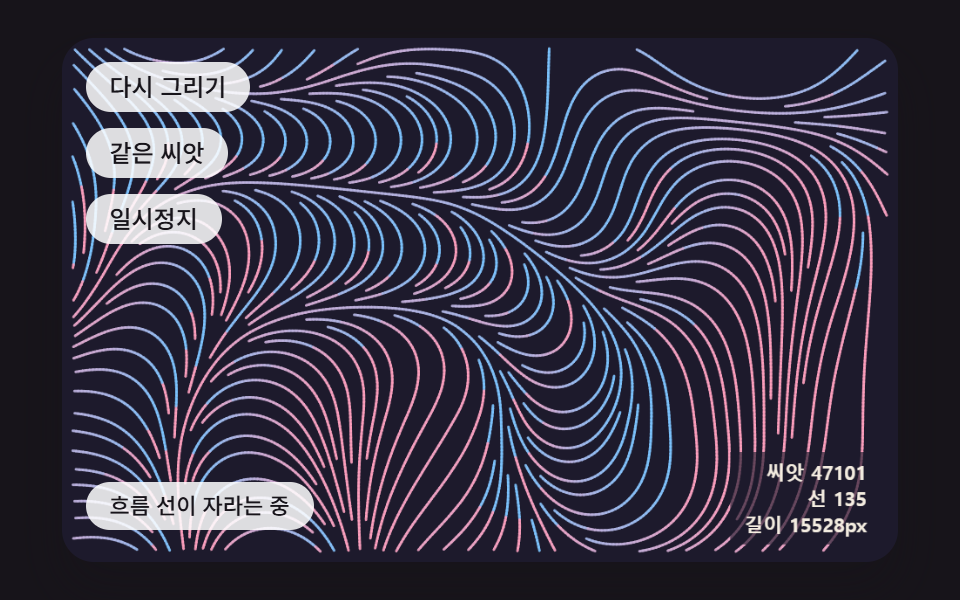 Creative UIGenerative Art JavaScript: 9 Patterns That Grow
 Creative UIAurora Background CSS: 9 Living Night-Sky Scenes
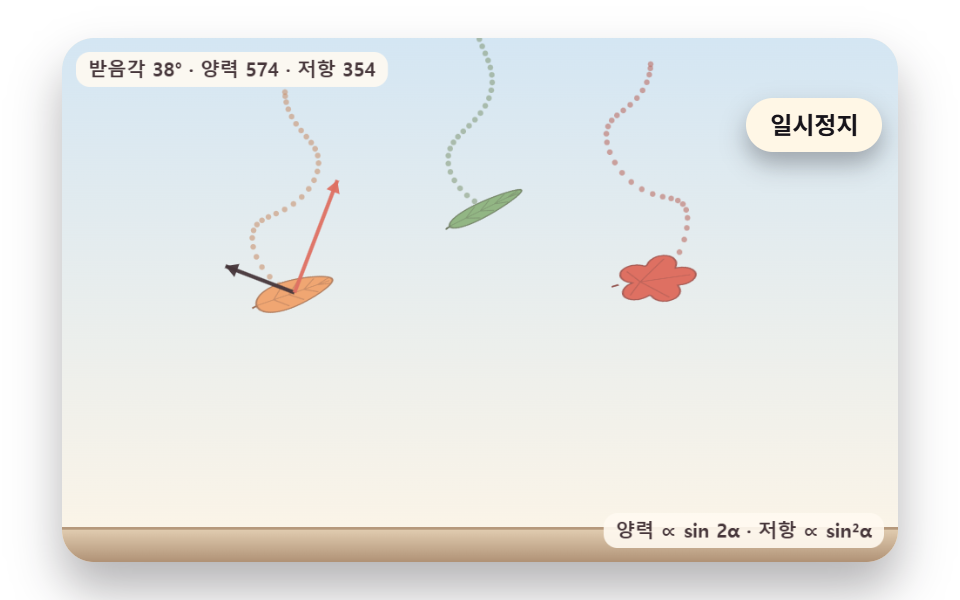 Creative UIFalling Leaves Animation: 9 Scenes, Sway to Pile
 Creative UIOne Line Drawing Generator: 9 Canvas Scenes