CSS Background Pattern Generator: 9 Seeded Scenes
A CSS background pattern generator turns one number into a drawing instead of an image file.
 01 generative-noise-contour
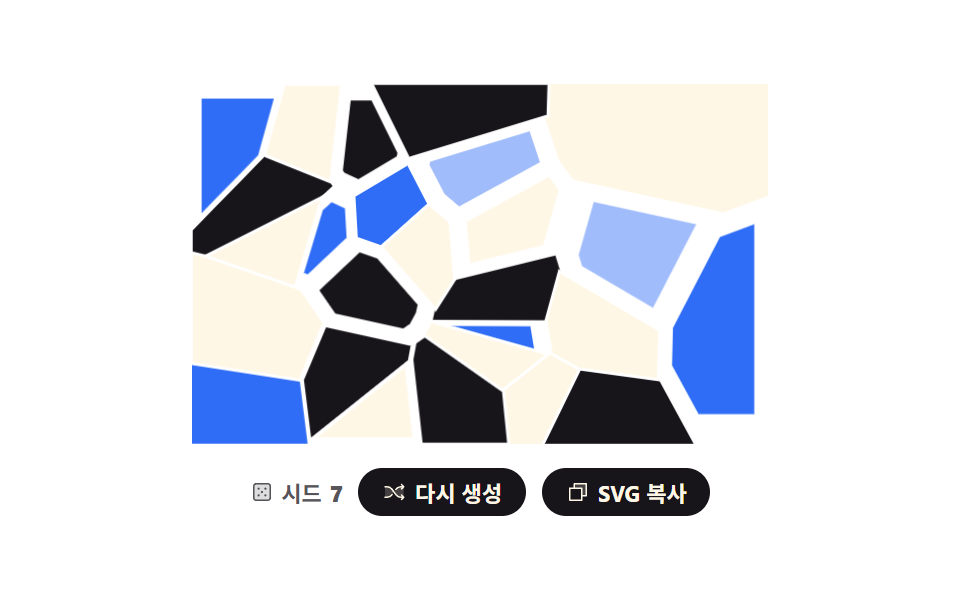 02 generative-voronoi-cells
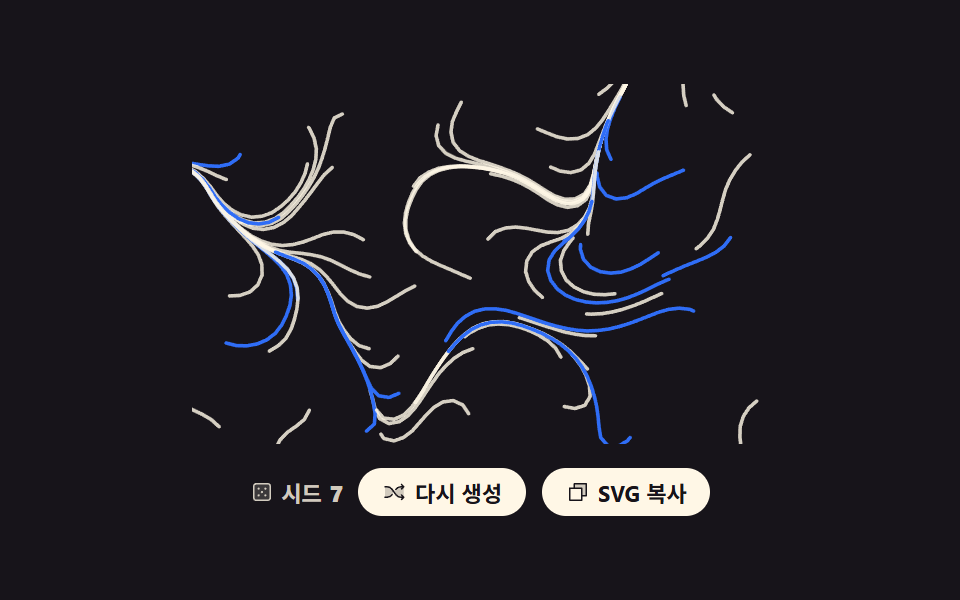 03 generative-flow-field-lines
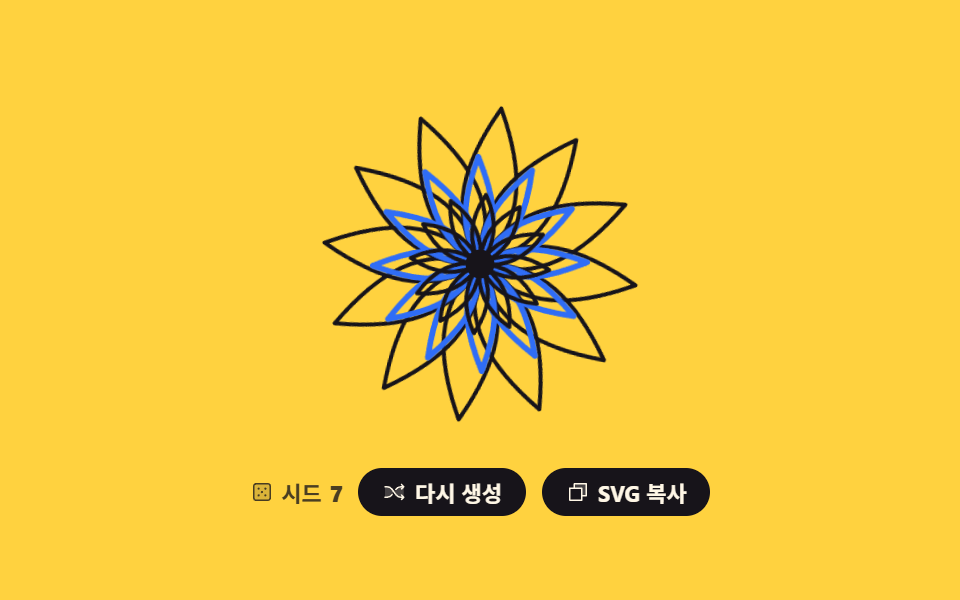 04 generative-mandala-symmetry
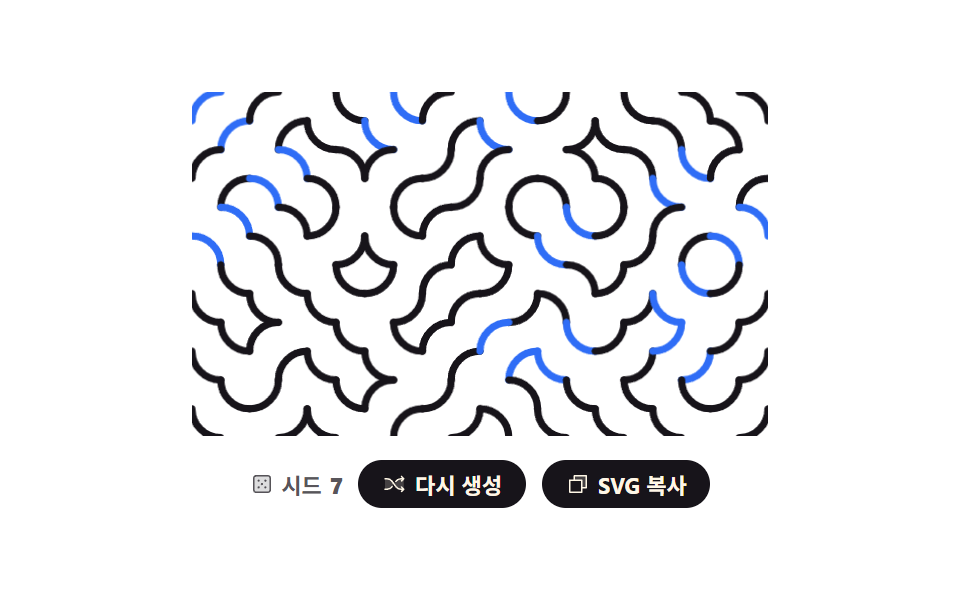 05 generative-truchet-tiles
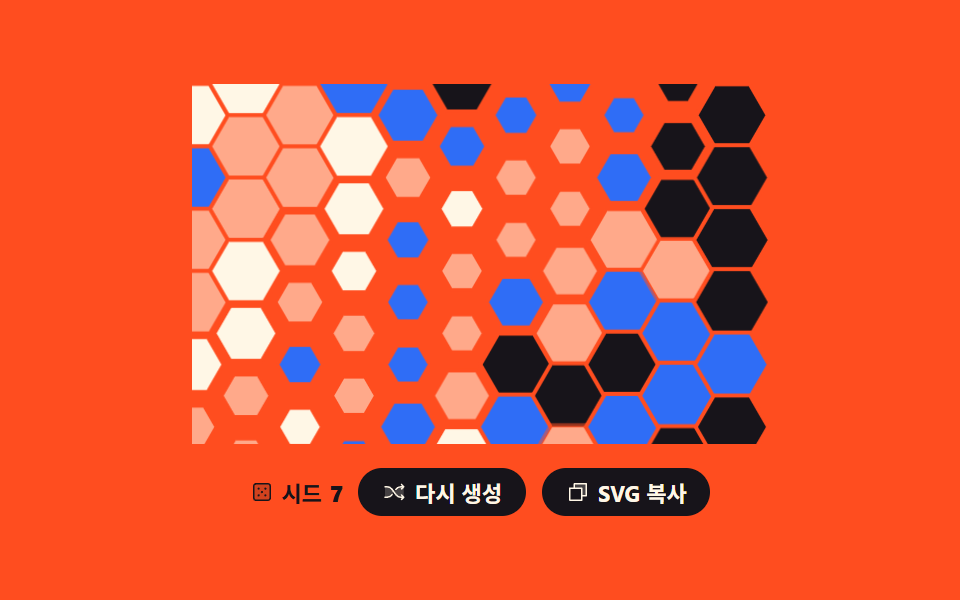 06 generative-hex-grid-paint
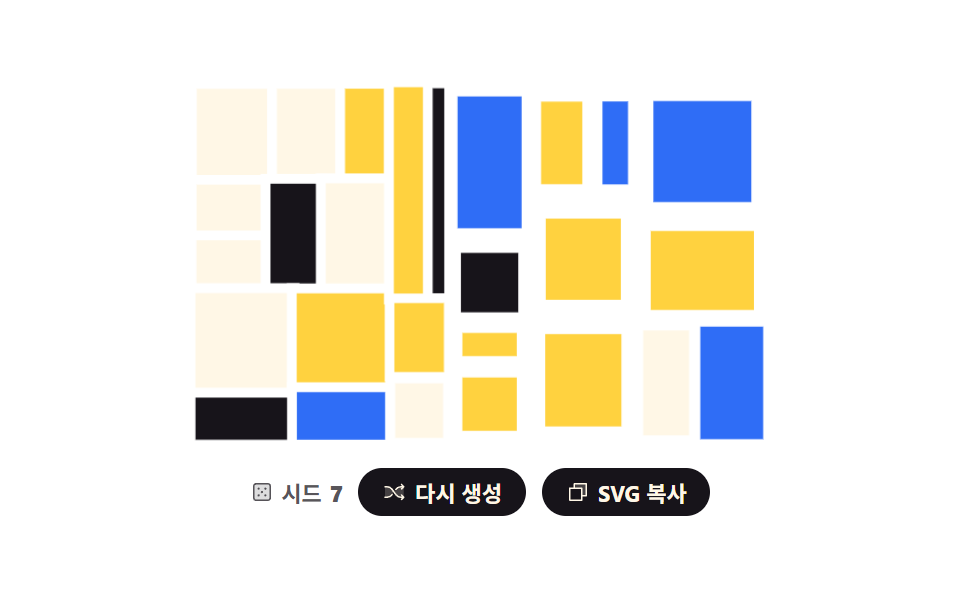 07 generative-recursive-split
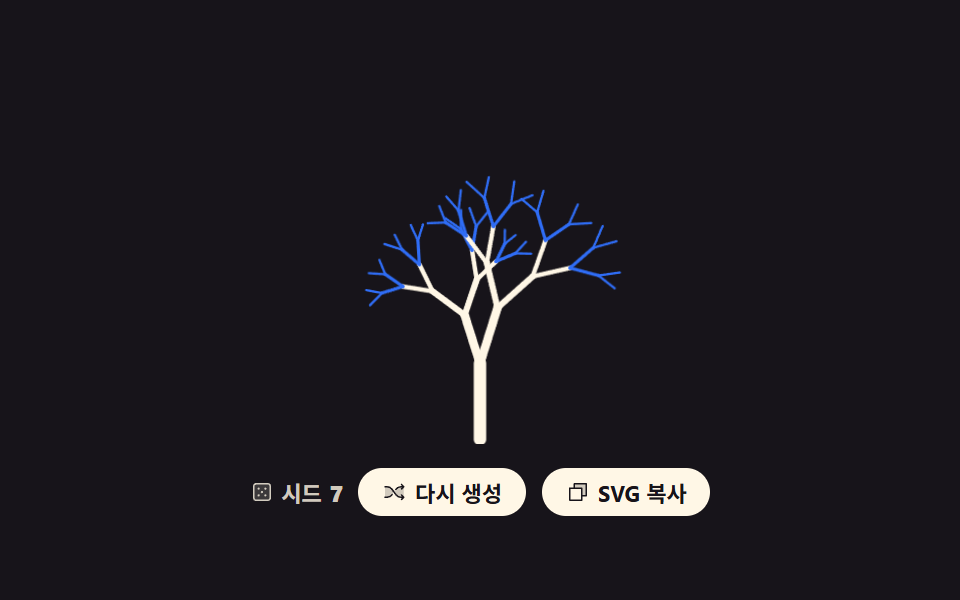 08 generative-branching-tree
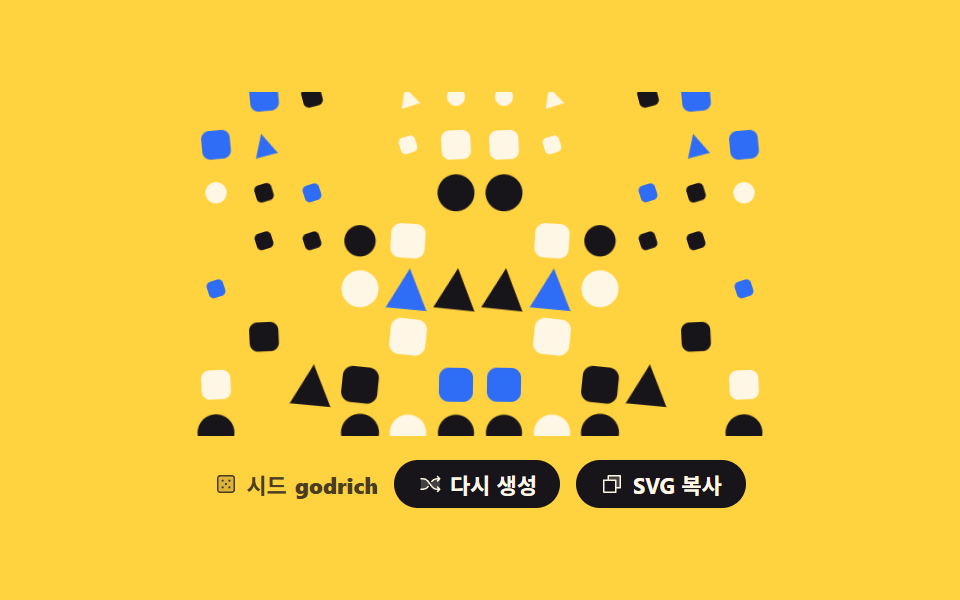 09 generative-seed-avatar-bg
Auto-plays · click a tile to jump to its section · all nine in one zip
- 01 Noise field contour map
- 02 Voronoi cell tiles
- 03 Flow field line art
- 04 Rotational symmetry mandala
- 05 Truchet tile maze
- 06 Hex grid painting
- 07 Recursively split rectangles
- 08 Branching tree
- 09 Background made from a name
The order here isn't popularity among css background patterns. It follows where the randomness goes. The first three scatter it across the whole surface: heights on a lattice sliced into contour lines (01), points that each claim their nearest territory (02), and an angle stored at every point for a line to walk along (03). The middle three spend randomness once and let a rule copy the result: a single stroke turned twelve times (04), one tile laid at four angles (05), and cells colored by a probability that leans across the grid (06). The last three feed randomness into recursion: a rectangle cut and cut again (07), a branch that splits and splits again (08), and a background whose seed is a name rather than a number (09). If you want the backdrop to move on its own instead, see 9 CSS Background Animation; for the same SVG approach applied to numbers, see CSS Chart Design: 9 SVG Graphs. Drive the flow field in 03 with force instead of a rule and it turns into physics simulation; let someone crop the finished pattern like a photo and you are in image crop editor UI.
01Noise field contour map
What you see
Put random values only on the corners of a coarse lattice and smooth the gaps with smoothstep, and you have a bumpy height map. Marching squares then traces six layers of "everything at this height," which is exactly how a topographic map is drawn.
<main class="stage">
<div class="nc is-demo" id="root">
  <svg class="nc__art" id="art" viewBox="0 0 240 150" role="img" data-label="A map of random heights drawn as contour lines, seed {n}"></svg>
  <div class="nc__bar">
    <p class="nc__seed">
      <svg xmlns="http://www.w3.org/2000/svg" class="nc__ic" viewBox="0 0 256 256" aria-hidden="true"><g fill="currentColor"><path d="M216 64v128a24 24 0 0 1-24 24H64a24 24 0 0 1-24-24V64a24 24 0 0 1 24-24h128a24 24 0 0 1 24 24" opacity=".2"/><path d="M192 32H64a32 32 0 0 0-32 32v128a32 32 0 0 0 32 32h128a32 32 0 0 0 32-32V64a32 32 0 0 0-32-32m16 160a16 16 0 0 1-16 16H64a16 16 0 0 1-16-16V64a16 16 0 0 1 16-16h128a16 16 0 0 1 16 16ZM104 92a12 12 0 1 1-12-12a12 12 0 0 1 12 12m72 0a12 12 0 1 1-12-12a12 12 0 0 1 12 12m-72 72a12 12 0 1 1-12-12a12 12 0 0 1 12 12m36-36a12 12 0 1 1-12-12a12 12 0 0 1 12 12m36 36a12 12 0 1 1-12-12a12 12 0 0 1 12 12"/></g></svg>
      Seed <b id="num">7</b>
    </p>
    <button class="nc__btn" type="button" id="again">
      <svg xmlns="http://www.w3.org/2000/svg" class="nc__ic" viewBox="0 0 256 256" aria-hidden="true"><g fill="currentColor"><path d="M107.14 98.8L128 128l-20.86 29.2A64 64 0 0 1 55.06 184H32V72h23.06a64 64 0 0 1 52.08 26.8m93.8-26.8a64 64 0 0 0-52.08 26.8L128 128l20.86 29.2a64 64 0 0 0 52.08 26.8H232V72Z" opacity=".2"/><path d="M237.66 178.34a8 8 0 0 1 0 11.32l-24 24a8 8 0 0 1-11.32-11.32L212.69 192h-11.75a72.12 72.12 0 0 1-58.59-30.15l-41.72-58.4A56.1 56.1 0 0 0 55.06 80H32a8 8 0 0 1 0-16h23.06a72.12 72.12 0 0 1 58.59 30.15l41.72 58.4A56.1 56.1 0 0 0 200.94 176h11.75l-10.35-10.34a8 8 0 0 1 11.32-11.32ZM143 107a8 8 0 0 0 11.16-1.86l1.2-1.67A56.1 56.1 0 0 1 200.94 80h11.75l-10.35 10.34a8 8 0 0 0 11.32 11.32l24-24a8 8 0 0 0 0-11.32l-24-24a8 8 0 0 0-11.32 11.32L212.69 64h-11.75a72.12 72.12 0 0 0-58.59 30.15l-1.2 1.67A8 8 0 0 0 143 107m-30 42a8 8 0 0 0-11.16 1.86l-1.2 1.67A56.1 56.1 0 0 1 55.06 176H32a8 8 0 0 0 0 16h23.06a72.12 72.12 0 0 0 58.59-30.15l1.2-1.67A8 8 0 0 0 113 149"/></g></svg>
      <span class="nc__label">Regenerate</span>
    </button>
    <button class="nc__btn" type="button" id="copy" data-done="Copied">
      <svg xmlns="http://www.w3.org/2000/svg" class="nc__ic" viewBox="0 0 256 256" aria-hidden="true"><g fill="currentColor"><path d="M216 40v128h-48V88H88V40Z" opacity=".2"/><path d="M216 32H88a8 8 0 0 0-8 8v40H40a8 8 0 0 0-8 8v128a8 8 0 0 0 8 8h128a8 8 0 0 0 8-8v-40h40a8 8 0 0 0 8-8V40a8 8 0 0 0-8-8m-56 176H48V96h112Zm48-48h-32V88a8 8 0 0 0-8-8H96V48h112Z"/></g></svg>
      <span class="nc__label">Copy SVG</span>
    </button>
  </div>
</div>
</main>
@use "../../../../site/static/demo-tokens" as *;
// 노이즈 등고선 지도 — 값 노이즈로 높이를 만들고 마칭 스퀘어로 같은 높이를 잇는 선을 뽑는다.
// 경로 생성은 JS 지만 **그리는 연출은 CSS** 다: path 마다 pathLength="1" 로 길이를 1 로 정규화해
// stroke-dasharray: 1 · stroke-dashoffset 1 → 0 → -1 을 키프레임으로 돌린다.
// demo.py 는 CSS 애니메이션 시계로 24장을 뽑으므로 rAF 로 그리면 전부 같은 장면이 된다.
$duration: $dur-loop;
$easing: cubic-bezier(.7, 0, .85, .4);
$color: $subject-cream;
@include stage($stage-ink);
.nc { display: grid; justify-items: center; gap: $sp-3; width: 100%; }
.nc__art { display: block; width: clamp(176px, 60vw, 320px); height: auto; }
// 정적(미리보기를 뗀) 상태가 기본값 — 시드로 뽑힌 지도가 다 그려져 있다
.nc__line {
fill: none;
stroke: $color;
stroke-width: 1.4;
stroke-linecap: round;
stroke-dasharray: 1; // pathLength="1" 이라 1 = 경로 전체 길이
stroke-dashoffset: 0;
opacity: calc(.44 + var(--i) * .1);
}
.nc__bar { display: flex; flex-wrap: wrap; align-items: center; justify-content: center; gap: $sp-2; }
.nc__seed {
margin: 0;
display: inline-flex; align-items: center; gap: $sp-1;
color: rgba(255, 247, 230, .8);
font-weight: 700; font-size: clamp(9px, 2.4vw, 11px);
}
.nc__btn {
display: inline-flex; align-items: center; gap: $sp-1;
border: 0; border-radius: $r-pill;
padding: $sp-1 $sp-3;
background: $subject-cream; color: $subject-ink;
font-family: inherit; font-weight: 700; font-size: clamp(9px, 2.4vw, 11px);
cursor: pointer;
}
.nc__btn:focus-visible { outline: 3px solid $subject-blue; outline-offset: 2px; }
.nc__ic { width: 12px; height: 12px; flex: none; }
// ── 미리보기 루프: 아래 dashoffset 궤적은 「다시 생성」을 눌렀을 때 실제로 도는 것과 같은 그리기 연출이다.
// 양 끝(1 과 -1)이 둘 다 "감춰짐" 이라 한 바퀴가 끝날 때 튀지 않는다.
.nc.is-demo .nc__line {
animation-name: ncScan;
animation-duration: $duration;
animation-timing-function: $easing;
animation-iteration-count: infinite;
animation-fill-mode: backwards; // 지연 구간에 다 그려진 기본 상태가 번쩍이지 않게
animation-delay: calc(var(--i) * 110ms);
}
// 사람이 「다시 생성」을 누르면 루프를 떼고 한 번만 그린다
.nc.is-draw .nc__line {
animation-name: ncDraw;
animation-duration: $dur-enter;
animation-timing-function: $ease-out;
animation-iteration-count: 1;
animation-fill-mode: backwards;
animation-delay: calc(var(--i) * 110ms);
}
// 그리기는 느리게 시작해 끝에서 빨라지고 지우기는 그 반대다 — 프레임당 변화가 가장 큰 순간이
// 「선이 거의 다 있는」 장면에 오게 해서 poster(앞 장과 가장 크게 달라진 장)가 빈 지도로 뽑히지 않는다
@keyframes ncScan {
0% { stroke-dashoffset: 1; animation-timing-function: $easing; }
38% { stroke-dashoffset: 0; animation-timing-function: linear; }
50% { stroke-dashoffset: 0; animation-timing-function: $ease-out; }
86% { stroke-dashoffset: -1; }
100% { stroke-dashoffset: -1; }
}
@keyframes ncDraw {
from { stroke-dashoffset: 1; }
to { stroke-dashoffset: 0; }
}
@media (max-width: 340px) {
.nc { gap: $sp-2; }
.nc__ic { width: 10px; height: 10px; }
}
@media (prefers-reduced-motion: reduce) {
.nc.is-demo .nc__line,
.nc.is-draw .nc__line { animation: none !important; stroke-dashoffset: 0 !important; }
}html, body {
margin: 0;
overflow: hidden;
}
.stage {
box-sizing: border-box;
min-height: 100vh;
display: grid;
place-items: center;
margin: 0;
background: #17141a;
font-family: -apple-system, "Segoe UI", "Noto Sans KR", sans-serif;
padding: clamp(8px, 4vw, 24px);
}
.nc {
display: grid;
justify-items: center;
gap: 12px;
width: 100%;
}
.nc__art {
display: block;
width: clamp(176px, 60vw, 320px);
height: auto;
}
.nc__line {
fill: none;
stroke: #fff7e6;
stroke-width: 1.4;
stroke-linecap: round;
stroke-dasharray: 1;
stroke-dashoffset: 0;
opacity: calc(0.44 + var(--i) * 0.1);
}
.nc__bar {
display: flex;
flex-wrap: wrap;
align-items: center;
justify-content: center;
gap: 8px;
}
.nc__seed {
margin: 0;
display: inline-flex;
align-items: center;
gap: 4px;
color: rgba(255, 247, 230, 0.8);
font-weight: 700;
font-size: clamp(9px, 2.4vw, 11px);
}
.nc__btn {
display: inline-flex;
align-items: center;
gap: 4px;
border: 0;
border-radius: 999px;
padding: 4px 12px;
background: #fff7e6;
color: #17141a;
font-family: inherit;
font-weight: 700;
font-size: clamp(9px, 2.4vw, 11px);
cursor: pointer;
}
.nc__btn:focus-visible {
outline: 3px solid #2f6df6;
outline-offset: 2px;
}
.nc__ic {
width: 12px;
height: 12px;
flex: none;
}
.nc.is-demo .nc__line {
animation-name: ncScan;
animation-duration: 2s;
animation-timing-function: cubic-bezier(0.7, 0, 0.85, 0.4);
animation-iteration-count: infinite;
animation-fill-mode: backwards;
animation-delay: calc(var(--i) * 110ms);
}
.nc.is-draw .nc__line {
animation-name: ncDraw;
animation-duration: 600ms;
animation-timing-function: ease-out;
animation-iteration-count: 1;
animation-fill-mode: backwards;
animation-delay: calc(var(--i) * 110ms);
}
@keyframes ncScan {
0% {
stroke-dashoffset: 1;
animation-timing-function: cubic-bezier(0.7, 0, 0.85, 0.4);
}
38% {
stroke-dashoffset: 0;
animation-timing-function: linear;
}
50% {
stroke-dashoffset: 0;
animation-timing-function: ease-out;
}
86% {
stroke-dashoffset: -1;
}
100% {
stroke-dashoffset: -1;
}
}
@keyframes ncDraw {
from {
stroke-dashoffset: 1;
}
to {
stroke-dashoffset: 0;
}
}
@media (max-width: 340px) {
.nc {
gap: 8px;
}
.nc__ic {
width: 10px;
height: 10px;
}
}
@media (prefers-reduced-motion: reduce) {
.nc.is-demo .nc__line,
.nc.is-draw .nc__line {
animation: none !important;
stroke-dashoffset: 0 !important;
}
}var root = document.getElementById('root');
var art = document.getElementById('art');
var num = document.getElementById('num');
var W = 240, H = 150, COLS = 9, ROWS = 6, LEVELS = 6, NX = 32, NY = 20;
var seed = 7;
// mulberry32 — 32비트 정수 Seed 하나로 언제나 같은 난수열을 돌려준다. 재현 가능한 생성의 뿌리
function mulberry32(a) {
return function () {
a = a + 0x6D2B79F5 | 0;
var t = Math.imul(a ^ a >>> 15, 1 | a);
t = t + Math.imul(t ^ t >>> 7, 61 | t) ^ t;
return ((t ^ t >>> 14) >>> 0) / 4294967296;
};
}
// 격자 꼭짓점에만 난수를 놓고 사이는 smoothstep 으로 이어 붙인다 (값 노이즈)
function makeField(s) {
var rand = mulberry32(s), lat = [], r, c;
for (r = 0; r <= ROWS; r++) { lat.push([]); for (c = 0; c <= COLS; c++) { lat[r].push(rand()); } }
return function (x, y) {
var gx = x * COLS, gy = y * ROWS;
var ix = Math.min(COLS - 1, Math.floor(gx)), iy = Math.min(ROWS - 1, Math.floor(gy));
var fx = gx - ix, fy = gy - iy;
var sx = fx * fx * (3 - 2 * fx), sy = fy * fy * (3 - 2 * fy);
var top = lat[iy][ix] + (lat[iy][ix + 1] - lat[iy][ix]) * sx;
var bot = lat[iy + 1][ix] + (lat[iy + 1][ix + 1] - lat[iy + 1][ix]) * sx;
return top + (bot - top) * sy;
};
}
// 칸 네 꼭짓점의 높이를 문턱과 견줘 어느 변에서 선이 드나드는지 고른다 (마칭 스퀘어 16가지)
var TABLE = [[], [[2, 3]], [[1, 2]], [[1, 3]], [[0, 1]], [[0, 3], [1, 2]], [[0, 2]], [[0, 3]],
[[0, 3]], [[0, 2]], [[0, 1], [2, 3]], [[0, 1]], [[1, 3]], [[1, 2]], [[2, 3]], []];
function cut(ax, ay, av, bx, by, bv, level) {
var t = (level - av) / (bv - av);
return ((ax + (bx - ax) * t) * W).toFixed(1) + ' ' + ((ay + (by - ay) * t) * H).toFixed(1);
}
function contour(field, level) {
var d = '', i, j, k;
for (j = 0; j < NY; j++) {
for (i = 0; i < NX; i++) {
var x0 = i / NX, y0 = j / NY, x1 = (i + 1) / NX, y1 = (j + 1) / NY;
var v = [field(x0, y0), field(x1, y0), field(x1, y1), field(x0, y1)];
var code = (v[0] > level ? 8 : 0) | (v[1] > level ? 4 : 0) | (v[2] > level ? 2 : 0) | (v[3] > level ? 1 : 0);
var pairs = TABLE[code];
if (!pairs.length) { continue; }
var edge = [cut(x0, y0, v[0], x1, y0, v[1], level), cut(x1, y0, v[1], x1, y1, v[2], level),
cut(x1, y1, v[2], x0, y1, v[3], level), cut(x0, y1, v[3], x0, y0, v[0], level)];
for (k = 0; k < pairs.length; k++) { d += 'M' + edge[pairs[k][0]] + 'L' + edge[pairs[k][1]]; }
}
}
return d;
}
function build() {
var field = makeField(seed), parts = [], i;
for (i = 0; i < LEVELS; i++) {
parts.push('<path class="nc__line" style="--i:' + i + '" pathLength="1" d="' + contour(field, 0.26 + i * 0.1) + '"/>');
}
art.innerHTML = parts.join('');
art.setAttribute('aria-label', art.getAttribute('data-label').replace('{n}', seed));
num.textContent = seed;
}
document.getElementById('again').addEventListener('click', function () {
seed = (seed * 7 + 13) % 991 + 1;
build();
root.classList.remove('is-demo');
root.classList.remove('is-draw');
void art.getBoundingClientRect().width; // 한 번 읽어 리플로를 일으켜야 같은 애니메이션이 처음부터 다시 돈다
root.classList.add('is-draw');
});
var copyBtn = document.getElementById('copy');
copyBtn.addEventListener('click', function () {
var label = copyBtn.querySelector('.nc__label');
var before = label.textContent;
if (navigator.clipboard && navigator.clipboard.writeText) {
navigator.clipboard.writeText(art.outerHTML).catch(function () {});
}
label.textContent = copyBtn.getAttribute('data-done');
setTimeout(function () { label.textContent = before; }, 1200);
});
build();// NoiseContourMap — vanilla 판(run/293/demo/01-generative-noise-contour/index.html) 의 React 포트.
// 값 노이즈로 높이를 만들고 마칭 스퀘어로 같은 높이를 잇는 선을 뽑는다. 경로는 JS, 그리는 연출은 CSS.
// 시드·격자 수·문턱은 vanilla 와 같은 값이다.
import { useMemo, useRef, useState } from "react";
import type { CSSProperties } from "react";
import styles from "./NoiseContourMap.module.scss";
export type NoiseContourMapProps = {
duration?: number;
easing?: string;
color?: string;
label?: string;
seedText?: string;
regenerateText?: string;
copyText?: string;
copiedText?: string;
};
type Vars = CSSProperties & { "--duration"?: string; "--easing"?: string; "--color"?: string };
// useRef 는 T | null 을 돌려준다. 처음부터 값이 있고 절대 비지 않는 상자는 이렇게 좁혀 쓴다
type Box<T> = { current: T };
const W = 240;
const H = 150;
const COLS = 9;
const ROWS = 6;
const LEVELS = 6;
const NX = 32;
const NY = 20;
// 칸 네 꼭짓점의 높이를 문턱과 견줘 어느 변에서 선이 드나드는지 고른다 (마칭 스퀘어 16가지)
const TABLE: number[][][] = [[], [[2, 3]], [[1, 2]], [[1, 3]], [[0, 1]], [[0, 3], [1, 2]], [[0, 2]], [[0, 3]],
[[0, 3]], [[0, 2]], [[0, 1], [2, 3]], [[0, 1]], [[1, 3]], [[1, 2]], [[2, 3]], []];
// mulberry32 — 32비트 정수 시드 하나로 언제나 같은 난수열을 돌려준다. 재현 가능한 생성의 뿌리
function mulberry32(a: number): () => number {
return function (): number {
a = a + 0x6D2B79F5 | 0;
let t = Math.imul(a ^ a >>> 15, 1 | a);
t = t + Math.imul(t ^ t >>> 7, 61 | t) ^ t;
return ((t ^ t >>> 14) >>> 0) / 4294967296;
};
}
// 격자 꼭짓점에만 난수를 놓고 사이는 smoothstep 으로 이어 붙인다 (값 노이즈)
function makeField(s: number): (x: number, y: number) => number {
const rand = mulberry32(s);
const lat: number[][] = [];
for (let r = 0; r <= ROWS; r++) {
const row: number[] = [];
for (let c = 0; c <= COLS; c++) { row.push(rand()); }
lat.push(row);
}
return function (x: number, y: number): number {
const gx = x * COLS;
const gy = y * ROWS;
const ix = Math.min(COLS - 1, Math.floor(gx));
const iy = Math.min(ROWS - 1, Math.floor(gy));
const fx = gx - ix;
const fy = gy - iy;
const sx = fx * fx * (3 - 2 * fx);
const sy = fy * fy * (3 - 2 * fy);
const top = lat[iy][ix] + (lat[iy][ix + 1] - lat[iy][ix]) * sx;
const bot = lat[iy + 1][ix] + (lat[iy + 1][ix + 1] - lat[iy + 1][ix]) * sx;
return top + (bot - top) * sy;
};
}
function cut(ax: number, ay: number, av: number, bx: number, by: number, bv: number, level: number): string {
const t = (level - av) / (bv - av);
return ((ax + (bx - ax) * t) * W).toFixed(1) + " " + ((ay + (by - ay) * t) * H).toFixed(1);
}
function contour(field: (x: number, y: number) => number, level: number): string {
let d = "";
for (let j = 0; j < NY; j++) {
for (let i = 0; i < NX; i++) {
const x0 = i / NX, y0 = j / NY, x1 = (i + 1) / NX, y1 = (j + 1) / NY;
const v = [field(x0, y0), field(x1, y0), field(x1, y1), field(x0, y1)];
const code = (v[0] > level ? 8 : 0) | (v[1] > level ? 4 : 0) | (v[2] > level ? 2 : 0) | (v[3] > level ? 1 : 0);
const pairs = TABLE[code];
if (!pairs.length) { continue; }
const edge = [cut(x0, y0, v[0], x1, y0, v[1], level), cut(x1, y0, v[1], x1, y1, v[2], level),
cut(x1, y1, v[2], x0, y1, v[3], level), cut(x0, y1, v[3], x0, y0, v[0], level)];
for (let k = 0; k < pairs.length; k++) { d += "M" + edge[pairs[k][0]] + "L" + edge[pairs[k][1]]; }
}
}
return d;
}
export default function NoiseContourMap({
duration = 2000,
easing = "cubic-bezier(.7, 0, .85, .4)",
color = "#fff7e6",
label = "A map of random heights drawn as contour lines, seed {n}",
seedText = "Seed",
regenerateText = "Regenerate",
copyText = "Copy SVG",
copiedText = "Copied",
}: NoiseContourMapProps) {
const artRef = useRef<SVGSVGElement | null>(null);
const timerRef = useRef<number>(0) as Box<number>;
const [seed, setSeed] = useState(7);
const [mode, setMode] = useState("demo");
const [copyLabel, setCopyLabel] = useState(copyText);
const vars: Vars = { "--duration": `${duration}ms`, "--easing": easing, "--color": color };
// 시드가 바뀔 때만 다시 계산한다 — 같은 시드면 언제나 같은 경로 문자열이 나온다
const paths = useMemo(() => {
const field = makeField(seed);
const out: string[] = [];
for (let i = 0; i < LEVELS; i++) { out.push(contour(field, 0.26 + i * 0.1)); }
return out;
}, [seed]);
function regenerate(): void {
setSeed((prev: number) => (prev * 7 + 13) % 991 + 1);
setMode("draw");
}
function copySvg(): void {
const art = artRef.current;
if (!art) { return; }
if (navigator.clipboard && navigator.clipboard.writeText) {
navigator.clipboard.writeText(art.outerHTML).catch(function () {});
}
setCopyLabel(copiedText);
clearTimeout(timerRef.current);
timerRef.current = window.setTimeout(() => setCopyLabel(copyText), 1200);
}
const rootClass = `${styles.nc} ${mode === "demo" ? styles.isDemo : styles.isDraw}`;
return (
<div className={rootClass} style={vars}>
<svg
ref={artRef}
className={styles.art}
viewBox={`0 0 ${W} ${H}`}
role="img"
aria-label={label.replace("{n}", String(seed))}
>
{paths.map((d: string, i: number) => (
<path key={i} className={styles.line} style={{ "--i": i } as CSSProperties} pathLength={1} d={d} />
))}
</svg>
<div className={styles.bar}>
<p className={styles.seed}>{seedText} <b>{seed}</b></p>
<button className={styles.btn} type="button" onClick={regenerate}>{regenerateText}</button>
<button className={styles.btn} type="button" onClick={copySvg}>{copyLabel}</button>
</div>
</div>
);
}01 · Noise field contour map — Measured area 11.925% · moving frames 16/23Original by GODRICH · SCSS and React ship in the zip · See the password
Where to look in the code
The preview measured 11.93% changed area, intensity 94.5, and 16/23 frames moving — a fit for the hero band of an about page.
// mulberry32 — one 32-bit integer seed always returns the same stream. The root of reproducible generation
function mulberry32(a) {
  return function () {
    a = a + 0x6D2B79F5 | 0;
    var t = Math.imul(a ^ a >>> 15, 1 | a);
    t = t + Math.imul(t ^ t >>> 7, 61 | t) ^ t;
    return ((t ^ t >>> 14) >>> 0) / 4294967296;
  };
}
@keyframes ncScan {
  0%   { stroke-dashoffset: 1; animation-timing-function: $easing; }
  38%  { stroke-dashoffset: 0; animation-timing-function: linear; }
  50%  { stroke-dashoffset: 0; animation-timing-function: $ease-out; }
  86%  { stroke-dashoffset: -1; }
  100% { stroke-dashoffset: -1; }
}
02Voronoi cell tiles
How this differs from css background pattern dots
Scatter twenty-six points, let each one keep the area closer to it than to any other point, and you get facets that read like cracked glass. There's no need to pull in a computational geometry library: clip the outer rectangle with the perpendicular bisector between it and every other point, and whatever survives is that point's cell.
<main class="stage">
<div class="vo is-demo" id="root">
  <svg class="vo__art" id="art" viewBox="0 0 240 150" role="img" data-label="Cell tiles where each scattered point owns its nearest area, seed {n}"></svg>
  <div class="vo__bar">
    <p class="vo__seed">
      <svg xmlns="http://www.w3.org/2000/svg" class="vo__ic" viewBox="0 0 256 256" aria-hidden="true"><g fill="currentColor"><path d="M216 64v128a24 24 0 0 1-24 24H64a24 24 0 0 1-24-24V64a24 24 0 0 1 24-24h128a24 24 0 0 1 24 24" opacity=".2"/><path d="M192 32H64a32 32 0 0 0-32 32v128a32 32 0 0 0 32 32h128a32 32 0 0 0 32-32V64a32 32 0 0 0-32-32m16 160a16 16 0 0 1-16 16H64a16 16 0 0 1-16-16V64a16 16 0 0 1 16-16h128a16 16 0 0 1 16 16ZM104 92a12 12 0 1 1-12-12a12 12 0 0 1 12 12m72 0a12 12 0 1 1-12-12a12 12 0 0 1 12 12m-72 72a12 12 0 1 1-12-12a12 12 0 0 1 12 12m36-36a12 12 0 1 1-12-12a12 12 0 0 1 12 12m36 36a12 12 0 1 1-12-12a12 12 0 0 1 12 12"/></g></svg>
      Seed <b id="num">7</b>
    </p>
    <button class="vo__btn" type="button" id="again">
      <svg xmlns="http://www.w3.org/2000/svg" class="vo__ic" viewBox="0 0 256 256" aria-hidden="true"><g fill="currentColor"><path d="M107.14 98.8L128 128l-20.86 29.2A64 64 0 0 1 55.06 184H32V72h23.06a64 64 0 0 1 52.08 26.8m93.8-26.8a64 64 0 0 0-52.08 26.8L128 128l20.86 29.2a64 64 0 0 0 52.08 26.8H232V72Z" opacity=".2"/><path d="M237.66 178.34a8 8 0 0 1 0 11.32l-24 24a8 8 0 0 1-11.32-11.32L212.69 192h-11.75a72.12 72.12 0 0 1-58.59-30.15l-41.72-58.4A56.1 56.1 0 0 0 55.06 80H32a8 8 0 0 1 0-16h23.06a72.12 72.12 0 0 1 58.59 30.15l41.72 58.4A56.1 56.1 0 0 0 200.94 176h11.75l-10.35-10.34a8 8 0 0 1 11.32-11.32ZM143 107a8 8 0 0 0 11.16-1.86l1.2-1.67A56.1 56.1 0 0 1 200.94 80h11.75l-10.35 10.34a8 8 0 0 0 11.32 11.32l24-24a8 8 0 0 0 0-11.32l-24-24a8 8 0 0 0-11.32 11.32L212.69 64h-11.75a72.12 72.12 0 0 0-58.59 30.15l-1.2 1.67A8 8 0 0 0 143 107m-30 42a8 8 0 0 0-11.16 1.86l-1.2 1.67A56.1 56.1 0 0 1 55.06 176H32a8 8 0 0 0 0 16h23.06a72.12 72.12 0 0 0 58.59-30.15l1.2-1.67A8 8 0 0 0 113 149"/></g></svg>
      <span class="vo__label">Regenerate</span>
    </button>
    <button class="vo__btn" type="button" id="copy" data-done="Copied">
      <svg xmlns="http://www.w3.org/2000/svg" class="vo__ic" viewBox="0 0 256 256" aria-hidden="true"><g fill="currentColor"><path d="M216 40v128h-48V88H88V40Z" opacity=".2"/><path d="M216 32H88a8 8 0 0 0-8 8v40H40a8 8 0 0 0-8 8v128a8 8 0 0 0 8 8h128a8 8 0 0 0 8-8v-40h40a8 8 0 0 0 8-8V40a8 8 0 0 0-8-8m-56 176H48V96h112Zm48-48h-32V88a8 8 0 0 0-8-8H96V48h112Z"/></g></svg>
      <span class="vo__label">Copy SVG</span>
    </button>
  </div>
</div>
</main>
@use "../../../../site/static/demo-tokens" as *;
// 보로노이 셀 타일 — 흩뿌린 점마다 바깥 사각형을 다른 점과의 수직이등분선으로 계속 잘라 셀을 남긴다.
// 면 생성은 JS, 연출은 CSS. 미리보기 루프는 셀이 **사라졌다 나타나는** 것이 아니라 한 칸씩 눌렸다
// 펴지는 물결이다 — 시작 상태와 끝 상태가 같은 완성 모자이크라 한 바퀴가 끝날 때 튀지 않고,
// poster(앞 장과 가장 크게 달라진 장)에도 빈 화면이 뽑히지 않는다.
$duration: $dur-loop;
$easing: $ease-spring;
$color: $subject-blue;
@include stage($stage-paper);
.vo { display: grid; justify-items: center; gap: $sp-3; width: 100%; }
.vo__art { display: block; width: clamp(176px, 60vw, 320px); height: auto; }
// transform-box: fill-box 가 없으면 SVG 도형의 % 원점이 뷰포트 기준이 되어 셀이 제자리에서 안 커진다
.vo__cell {
stroke: $stage-paper;
stroke-width: 1.2;
transform-box: fill-box;
transform-origin: 50% 50%;
}
.vo__cell--a { fill: $color; }
.vo__cell--b { fill: $color; opacity: .46; }
.vo__cell--c { fill: $subject-ink; }
.vo__cell--d { fill: $subject-cream; }
.vo__bar { display: flex; flex-wrap: wrap; align-items: center; justify-content: center; gap: $sp-2; }
.vo__seed {
margin: 0;
display: inline-flex; align-items: center; gap: $sp-1;
color: rgba(23, 20, 26, .72);
font-weight: 700; font-size: clamp(9px, 2.4vw, 11px);
}
.vo__btn {
display: inline-flex; align-items: center; gap: $sp-1;
border: 0; border-radius: $r-pill;
padding: $sp-1 $sp-3;
background: $subject-ink; color: $subject-cream;
font-family: inherit; font-weight: 700; font-size: clamp(9px, 2.4vw, 11px);
cursor: pointer;
}
.vo__btn:focus-visible { outline: 3px solid $color; outline-offset: 2px; }
.vo__ic { width: 12px; height: 12px; flex: none; }
// ── 미리보기 루프: 셀 번호 순으로 물결이 지나간다. 같은 셀 크기로 시작해 같은 크기로 끝난다
.vo.is-demo .vo__cell {
animation-name: voPress;
animation-duration: $duration;
animation-timing-function: $easing;
animation-iteration-count: infinite;
animation-fill-mode: backwards;
animation-delay: calc(var(--i) * -46ms); // 음수 지연이라 첫 프레임부터 물결이 이미 퍼져 있다
}
// 사람이 「다시 생성」을 누르면 새 시드의 셀이 한 칸씩 펼쳐진다 — 루프와 달리 한 번만 돈다
.vo.is-draw .vo__cell {
animation-name: voPop;
animation-duration: $dur-enter;
animation-timing-function: $ease-pop;
animation-iteration-count: 1;
animation-fill-mode: backwards;
animation-delay: calc(var(--i) * 18ms);
}
@keyframes voPress {
0% { transform: scale(1); }
22% { transform: scale(.72); }
46% { transform: scale(1.04); }
70% { transform: scale(1); }
100% { transform: scale(1); }
}
@keyframes voPop {
from { transform: scale(.2); opacity: 0; }
to { transform: scale(1); opacity: 1; }
}
@media (max-width: 340px) {
.vo { gap: $sp-2; }
.vo__ic { width: 10px; height: 10px; }
}
@media (prefers-reduced-motion: reduce) {
.vo.is-demo .vo__cell,
.vo.is-draw .vo__cell { animation: none !important; transform: scale(1) !important; }
}html, body {
margin: 0;
overflow: hidden;
}
.stage {
box-sizing: border-box;
min-height: 100vh;
display: grid;
place-items: center;
margin: 0;
background: #ffffff;
font-family: -apple-system, "Segoe UI", "Noto Sans KR", sans-serif;
padding: clamp(8px, 4vw, 24px);
}
.vo {
display: grid;
justify-items: center;
gap: 12px;
width: 100%;
}
.vo__art {
display: block;
width: clamp(176px, 60vw, 320px);
height: auto;
}
.vo__cell {
stroke: #ffffff;
stroke-width: 1.2;
transform-box: fill-box;
transform-origin: 50% 50%;
}
.vo__cell--a {
fill: #2f6df6;
}
.vo__cell--b {
fill: #2f6df6;
opacity: 0.46;
}
.vo__cell--c {
fill: #17141a;
}
.vo__cell--d {
fill: #fff7e6;
}
.vo__bar {
display: flex;
flex-wrap: wrap;
align-items: center;
justify-content: center;
gap: 8px;
}
.vo__seed {
margin: 0;
display: inline-flex;
align-items: center;
gap: 4px;
color: rgba(23, 20, 26, 0.72);
font-weight: 700;
font-size: clamp(9px, 2.4vw, 11px);
}
.vo__btn {
display: inline-flex;
align-items: center;
gap: 4px;
border: 0;
border-radius: 999px;
padding: 4px 12px;
background: #17141a;
color: #fff7e6;
font-family: inherit;
font-weight: 700;
font-size: clamp(9px, 2.4vw, 11px);
cursor: pointer;
}
.vo__btn:focus-visible {
outline: 3px solid #2f6df6;
outline-offset: 2px;
}
.vo__ic {
width: 12px;
height: 12px;
flex: none;
}
.vo.is-demo .vo__cell {
animation-name: voPress;
animation-duration: 2s;
animation-timing-function: cubic-bezier(0.2, 0.8, 0.2, 1);
animation-iteration-count: infinite;
animation-fill-mode: backwards;
animation-delay: calc(var(--i) * -46ms);
}
.vo.is-draw .vo__cell {
animation-name: voPop;
animation-duration: 600ms;
animation-timing-function: cubic-bezier(0.2, 1.4, 0.4, 1);
animation-iteration-count: 1;
animation-fill-mode: backwards;
animation-delay: calc(var(--i) * 18ms);
}
@keyframes voPress {
0% {
transform: scale(1);
}
22% {
transform: scale(0.72);
}
46% {
transform: scale(1.04);
}
70% {
transform: scale(1);
}
100% {
transform: scale(1);
}
}
@keyframes voPop {
from {
transform: scale(0.2);
opacity: 0;
}
to {
transform: scale(1);
opacity: 1;
}
}
@media (max-width: 340px) {
.vo {
gap: 8px;
}
.vo__ic {
width: 10px;
height: 10px;
}
}
@media (prefers-reduced-motion: reduce) {
.vo.is-demo .vo__cell,
.vo.is-draw .vo__cell {
animation: none !important;
transform: scale(1) !important;
}
}var root = document.getElementById('root');
var art = document.getElementById('art');
var num = document.getElementById('num');
var W = 240, H = 150, SITES = 26;
var seed = 7;
// mulberry32 — 32비트 정수 Seed 하나로 언제나 같은 난수열을 돌려준다. 재현 가능한 생성의 뿌리
function mulberry32(a) {
return function () {
a = a + 0x6D2B79F5 | 0;
var t = Math.imul(a ^ a >>> 15, 1 | a);
t = t + Math.imul(t ^ t >>> 7, 61 | t) ^ t;
return ((t ^ t >>> 14) >>> 0) / 4294967296;
};
}
// 두 점의 수직이등분선으로 다각형을 잘라 a 쪽 반평면만 남긴다 (서덜랜드-호지먼 클리핑)
function clip(poly, a, b) {
var mx = (a[0] + b[0]) / 2, my = (a[1] + b[1]) / 2;
var dx = b[0] - a[0], dy = b[1] - a[1], out = [], i;
function side(p) { return (p[0] - mx) * dx + (p[1] - my) * dy; }
for (i = 0; i < poly.length; i++) {
var p = poly[i], q = poly[(i + 1) % poly.length], sp = side(p), sq = side(q);
if (sp <= 0) { out.push(p); }
if ((sp < 0 && sq > 0) || (sp > 0 && sq < 0)) {
var t = sp / (sp - sq);
out.push([p[0] + (q[0] - p[0]) * t, p[1] + (q[1] - p[1]) * t]);
}
}
return out;
}
var TONES = ['a', 'b', 'c', 'd'];
function build() {
var rand = mulberry32(seed), pts = [], parts = [], i, j;
for (i = 0; i < SITES; i++) { pts.push([10 + rand() * (W - 20), 8 + rand() * (H - 16)]); }
for (i = 0; i < SITES; i++) {
var poly = [[0, 0], [W, 0], [W, H], [0, H]];
for (j = 0; j < SITES && poly.length; j++) { if (j !== i) { poly = clip(poly, pts[i], pts[j]); } }
if (poly.length < 3) { continue; }
var tone = TONES[Math.min(3, Math.floor(rand() * 4))];
var d = poly.map(function (p) { return p[0].toFixed(1) + ',' + p[1].toFixed(1); }).join(' ');
parts.push('<polygon class="vo__cell vo__cell--' + tone + '" style="--i:' + i + '" points="' + d + '"/>');
}
art.innerHTML = parts.join('');
art.setAttribute('aria-label', art.getAttribute('data-label').replace('{n}', seed));
num.textContent = seed;
}
document.getElementById('again').addEventListener('click', function () {
seed = (seed * 7 + 13) % 991 + 1;
build();
root.classList.remove('is-demo');
root.classList.remove('is-draw');
void art.getBoundingClientRect().width; // 한 번 읽어 리플로를 일으켜야 같은 애니메이션이 처음부터 다시 돈다
root.classList.add('is-draw');
});
var copyBtn = document.getElementById('copy');
copyBtn.addEventListener('click', function () {
var label = copyBtn.querySelector('.vo__label');
var before = label.textContent;
if (navigator.clipboard && navigator.clipboard.writeText) {
navigator.clipboard.writeText(art.outerHTML).catch(function () {});
}
label.textContent = copyBtn.getAttribute('data-done');
setTimeout(function () { label.textContent = before; }, 1200);
});
build();// VoronoiCellTiles — vanilla 판(run/293/demo/02-generative-voronoi-cells/index.html) 의 React 포트.
// 흩뿌린 점마다 바깥 사각형을 "다른 점과의 수직이등분선" 으로 계속 잘라, 남은 조각이 그 점의 셀이다.
// 면 생성은 JS, 연출은 CSS. 시드·점 개수·자르는 순서는 vanilla 와 같은 값이다.
import { useMemo, useRef, useState } from "react";
import type { CSSProperties } from "react";
import styles from "./VoronoiCellTiles.module.scss";
export type VoronoiCellTilesProps = {
duration?: number;
easing?: string;
color?: string;
label?: string;
seedText?: string;
regenerateText?: string;
copyText?: string;
copiedText?: string;
};
type Vars = CSSProperties & { "--duration"?: string; "--easing"?: string; "--color"?: string };
// useRef 는 T | null 을 돌려준다. 처음부터 값이 있고 절대 비지 않는 상자는 이렇게 좁혀 쓴다
type Box<T> = { current: T };
type Point = [number, number];
type Cell = { i: number; tone: string; points: string };
const W = 240;
const H = 150;
const SITES = 26;
// 네 가지 칠. 뽑는 순서와 확률은 vanilla 의 'a' 'b' 'c' 'd' 와 같고 이름만 CSS 모듈식이다
const TONES: string[] = ["cellA", "cellB", "cellC", "cellD"];
// mulberry32 — 32비트 정수 시드 하나로 언제나 같은 난수열을 돌려준다. 재현 가능한 생성의 뿌리
function mulberry32(a: number): () => number {
return function (): number {
a = a + 0x6D2B79F5 | 0;
let t = Math.imul(a ^ a >>> 15, 1 | a);
t = t + Math.imul(t ^ t >>> 7, 61 | t) ^ t;
return ((t ^ t >>> 14) >>> 0) / 4294967296;
};
}
// 두 점의 수직이등분선으로 다각형을 잘라 a 쪽 반평면만 남긴다 (서덜랜드-호지먼 클리핑)
function clip(poly: Point[], a: Point, b: Point): Point[] {
const mx = (a[0] + b[0]) / 2;
const my = (a[1] + b[1]) / 2;
const dx = b[0] - a[0];
const dy = b[1] - a[1];
const out: Point[] = [];
function side(p: Point): number { return (p[0] - mx) * dx + (p[1] - my) * dy; }
for (let i = 0; i < poly.length; i++) {
const p = poly[i];
const q = poly[(i + 1) % poly.length];
const sp = side(p);
const sq = side(q);
if (sp <= 0) { out.push(p); }
if ((sp < 0 && sq > 0) || (sp > 0 && sq < 0)) {
const t = sp / (sp - sq);
out.push([p[0] + (q[0] - p[0]) * t, p[1] + (q[1] - p[1]) * t]);
}
}
return out;
}
export default function VoronoiCellTiles({
duration = 2000,
easing = "cubic-bezier(.2, .8, .2, 1)",
color = "#2f6df6",
label = "Cell tiles where each scattered point owns its nearest area, seed {n}",
seedText = "Seed",
regenerateText = "Regenerate",
copyText = "Copy SVG",
copiedText = "Copied",
}: VoronoiCellTilesProps) {
const artRef = useRef<SVGSVGElement | null>(null);
const timerRef = useRef<number>(0) as Box<number>;
const [seed, setSeed] = useState(7);
const [mode, setMode] = useState("demo");
const [copyLabel, setCopyLabel] = useState(copyText);
const vars: Vars = { "--duration": `${duration}ms`, "--easing": easing, "--color": color };
// 시드가 바뀔 때만 다시 계산한다 — 같은 시드면 언제나 같은 셀이 나온다.
// 칠(tone)을 뽑는 rand() 는 셀이 살아남은 뒤에만 부른다: vanilla 와 난수 소비 순서를 맞춰야
// 같은 시드에서 두 판의 색이 어긋나지 않는다
const cells = useMemo(() => {
const rand = mulberry32(seed);
const pts: Point[] = [];
const out: Cell[] = [];
for (let i = 0; i < SITES; i++) { pts.push([10 + rand() * (W - 20), 8 + rand() * (H - 16)]); }
for (let i = 0; i < SITES; i++) {
let poly: Point[] = [[0, 0], [W, 0], [W, H], [0, H]];
for (let j = 0; j < SITES && poly.length > 0; j++) { if (j !== i) { poly = clip(poly, pts[i], pts[j]); } }
if (poly.length < 3) { continue; }
const tone = TONES[Math.min(3, Math.floor(rand() * 4))];
const d = poly.map((p: Point) => p[0].toFixed(1) + "," + p[1].toFixed(1)).join(" ");
out.push({ i, tone, points: d });
}
return out;
}, [seed]);
function regenerate(): void {
setSeed((prev: number) => (prev * 7 + 13) % 991 + 1);
setMode("draw");
}
function copySvg(): void {
const art = artRef.current;
if (!art) { return; }
if (navigator.clipboard && navigator.clipboard.writeText) {
navigator.clipboard.writeText(art.outerHTML).catch(function () {});
}
setCopyLabel(copiedText);
clearTimeout(timerRef.current);
timerRef.current = window.setTimeout(() => setCopyLabel(copyText), 1200);
}
const rootClass = `${styles.vo} ${mode === "demo" ? styles.isDemo : styles.isDraw}`;
return (
<div className={rootClass} style={vars}>
<svg
ref={artRef}
className={styles.art}
viewBox={`0 0 ${W} ${H}`}
role="img"
aria-label={label.replace("{n}", String(seed))}
>
{cells.map((c: Cell) => (
<polygon
key={c.i}
className={`${styles.cell} ${styles[c.tone]}`}
style={{ "--i": c.i } as CSSProperties}
points={c.points}
/>
))}
</svg>
<div className={styles.bar}>
<p className={styles.seed}>{seedText} <b>{seed}</b></p>
<button className={styles.btn} type="button" onClick={regenerate}>{regenerateText}</button>
<button className={styles.btn} type="button" onClick={copySvg}>{copyLabel}</button>
</div>
</div>
);
}02 · Voronoi cell tiles — Measured area 19.066% · moving frames 23/23Original by GODRICH · SCSS and React ship in the zip · See the password
How to read the code
Measured 19.07% changed area, intensity 72.5, 23/23 frames moving — good behind a pricing section.
// Clip a polygon by the perpendicular bisector of two points, keeping the half-plane on a's side (Sutherland-Hodgman)
function clip(poly, a, b) {
  var mx = (a[0] + b[0]) / 2, my = (a[1] + b[1]) / 2;
  var dx = b[0] - a[0], dy = b[1] - a[1], out = [], i;
  function side(p) { return (p[0] - mx) * dx + (p[1] - my) * dy; }
  for (i = 0; i < poly.length; i++) {
    var p = poly[i], q = poly[(i + 1) % poly.length], sp = side(p), sq = side(q);
    if (sp <= 0) { out.push(p); }
    if ((sp < 0 && sq > 0) || (sp > 0 && sq < 0)) {
      var t = sp / (sp - sq);
      out.push([p[0] + (q[0] - p[0]) * t, p[1] + (q[1] - p[1]) * t]);
    }
  }
  return out;
}
03Flow field line art
What moves
Store one angle at every point on the canvas, then take thirty short steps, each along the angle you're standing on at the time, and short straight moves add up to long curves. The fifty-four starting points come from a jittered grid rather than plain random draws, so the lines cover the frame instead of clumping in one corner.
<main class="stage">
<div class="ff is-demo" id="root">
  <svg class="ff__art" id="art" viewBox="0 0 240 150" role="img" data-label="A picture drawn with lines flowing along a field of angles, seed {n}"></svg>
  <div class="ff__bar">
    <p class="ff__seed">
      <svg xmlns="http://www.w3.org/2000/svg" class="ff__ic" viewBox="0 0 256 256" aria-hidden="true"><g fill="currentColor"><path d="M216 64v128a24 24 0 0 1-24 24H64a24 24 0 0 1-24-24V64a24 24 0 0 1 24-24h128a24 24 0 0 1 24 24" opacity=".2"/><path d="M192 32H64a32 32 0 0 0-32 32v128a32 32 0 0 0 32 32h128a32 32 0 0 0 32-32V64a32 32 0 0 0-32-32m16 160a16 16 0 0 1-16 16H64a16 16 0 0 1-16-16V64a16 16 0 0 1 16-16h128a16 16 0 0 1 16 16ZM104 92a12 12 0 1 1-12-12a12 12 0 0 1 12 12m72 0a12 12 0 1 1-12-12a12 12 0 0 1 12 12m-72 72a12 12 0 1 1-12-12a12 12 0 0 1 12 12m36-36a12 12 0 1 1-12-12a12 12 0 0 1 12 12m36 36a12 12 0 1 1-12-12a12 12 0 0 1 12 12"/></g></svg>
      Seed <b id="num">7</b>
    </p>
    <button class="ff__btn" type="button" id="again">
      <svg xmlns="http://www.w3.org/2000/svg" class="ff__ic" viewBox="0 0 256 256" aria-hidden="true"><g fill="currentColor"><path d="M107.14 98.8L128 128l-20.86 29.2A64 64 0 0 1 55.06 184H32V72h23.06a64 64 0 0 1 52.08 26.8m93.8-26.8a64 64 0 0 0-52.08 26.8L128 128l20.86 29.2a64 64 0 0 0 52.08 26.8H232V72Z" opacity=".2"/><path d="M237.66 178.34a8 8 0 0 1 0 11.32l-24 24a8 8 0 0 1-11.32-11.32L212.69 192h-11.75a72.12 72.12 0 0 1-58.59-30.15l-41.72-58.4A56.1 56.1 0 0 0 55.06 80H32a8 8 0 0 1 0-16h23.06a72.12 72.12 0 0 1 58.59 30.15l41.72 58.4A56.1 56.1 0 0 0 200.94 176h11.75l-10.35-10.34a8 8 0 0 1 11.32-11.32ZM143 107a8 8 0 0 0 11.16-1.86l1.2-1.67A56.1 56.1 0 0 1 200.94 80h11.75l-10.35 10.34a8 8 0 0 0 11.32 11.32l24-24a8 8 0 0 0 0-11.32l-24-24a8 8 0 0 0-11.32 11.32L212.69 64h-11.75a72.12 72.12 0 0 0-58.59 30.15l-1.2 1.67A8 8 0 0 0 143 107m-30 42a8 8 0 0 0-11.16 1.86l-1.2 1.67A56.1 56.1 0 0 1 55.06 176H32a8 8 0 0 0 0 16h23.06a72.12 72.12 0 0 0 58.59-30.15l1.2-1.67A8 8 0 0 0 113 149"/></g></svg>
      <span class="ff__label">Regenerate</span>
    </button>
    <button class="ff__btn" type="button" id="copy" data-done="Copied">
      <svg xmlns="http://www.w3.org/2000/svg" class="ff__ic" viewBox="0 0 256 256" aria-hidden="true"><g fill="currentColor"><path d="M216 40v128h-48V88H88V40Z" opacity=".2"/><path d="M216 32H88a8 8 0 0 0-8 8v40H40a8 8 0 0 0-8 8v128a8 8 0 0 0 8 8h128a8 8 0 0 0 8-8v-40h40a8 8 0 0 0 8-8V40a8 8 0 0 0-8-8m-56 176H48V96h112Zm48-48h-32V88a8 8 0 0 0-8-8H96V48h112Z"/></g></svg>
      <span class="ff__label">Copy SVG</span>
    </button>
  </div>
</div>
</main>
@use "../../../../site/static/demo-tokens" as *;
// 플로우 필드 선 그림 — 자리마다 각도를 하나씩 정해 둔 방향장 위를 짧은 걸음으로 걸어 곡선을 만든다.
// 경로 계산은 JS, 그리는 연출은 CSS: pathLength="1" 로 길이를 1 로 정규화하고
// stroke-dashoffset 을 1 → 0 → -1 로 돌린다. 1 과 -1 은 둘 다 "감춰짐" 이라 한 바퀴 끝에서 안 튄다.
$duration: $dur-loop;
$easing: cubic-bezier(.7, 0, .85, .4);
$color: $subject-cream;
@include stage($stage-ink);
.ff { display: grid; justify-items: center; gap: $sp-3; width: 100%; }
.ff__art { display: block; width: clamp(176px, 60vw, 320px); height: auto; }
.ff__line {
fill: none;
stroke-width: 1.5;
stroke-linecap: round;
stroke-linejoin: round;
stroke-dasharray: 1; // pathLength="1" 이라 1 = 경로 전체 길이
stroke-dashoffset: 0; // 정적 상태는 선이 다 그려진 그림
}
.ff__line--a { stroke: $color; opacity: .82; }
.ff__line--b { stroke: $subject-blue; }
.ff__bar { display: flex; flex-wrap: wrap; align-items: center; justify-content: center; gap: $sp-2; }
.ff__seed {
margin: 0;
display: inline-flex; align-items: center; gap: $sp-1;
color: rgba(255, 247, 230, .8);
font-weight: 700; font-size: clamp(9px, 2.4vw, 11px);
}
.ff__btn {
display: inline-flex; align-items: center; gap: $sp-1;
border: 0; border-radius: $r-pill;
padding: $sp-1 $sp-3;
background: $subject-cream; color: $subject-ink;
font-family: inherit; font-weight: 700; font-size: clamp(9px, 2.4vw, 11px);
cursor: pointer;
}
.ff__btn:focus-visible { outline: 3px solid $subject-blue; outline-offset: 2px; }
.ff__ic { width: 12px; height: 12px; flex: none; }
// ── 미리보기 루프: 「다시 생성」을 눌렀을 때 실제로 도는 것과 같은 그리기 연출을 무한 반복한다.
// 그리기는 느리게 시작해 끝에서 빨라지고 지우기는 그 반대라, 프레임당 변화가 가장 큰 순간이
// 「선이 거의 다 있는」 장면에 온다 — poster 가 빈 화면으로 뽑히지 않는다.
.ff.is-demo .ff__line {
animation-name: ffFlow;
animation-duration: $duration;
animation-timing-function: $easing;
animation-iteration-count: infinite;
animation-fill-mode: backwards;
animation-delay: calc(var(--i) * 62ms);
}
.ff.is-draw .ff__line {
animation-name: ffDraw;
animation-duration: $dur-enter;
animation-timing-function: $ease-out;
animation-iteration-count: 1;
animation-fill-mode: backwards;
animation-delay: calc(var(--i) * 30ms);
}
@keyframes ffFlow {
0% { stroke-dashoffset: 1; animation-timing-function: $easing; }
40% { stroke-dashoffset: 0; animation-timing-function: linear; }
52% { stroke-dashoffset: 0; animation-timing-function: $ease-out; }
86% { stroke-dashoffset: -1; }
100% { stroke-dashoffset: -1; }
}
@keyframes ffDraw {
from { stroke-dashoffset: 1; }
to { stroke-dashoffset: 0; }
}
@media (max-width: 340px) {
.ff { gap: $sp-2; }
.ff__ic { width: 10px; height: 10px; }
}
@media (prefers-reduced-motion: reduce) {
.ff.is-demo .ff__line,
.ff.is-draw .ff__line { animation: none !important; stroke-dashoffset: 0 !important; }
}html, body {
margin: 0;
overflow: hidden;
}
.stage {
box-sizing: border-box;
min-height: 100vh;
display: grid;
place-items: center;
margin: 0;
background: #17141a;
font-family: -apple-system, "Segoe UI", "Noto Sans KR", sans-serif;
padding: clamp(8px, 4vw, 24px);
}
.ff {
display: grid;
justify-items: center;
gap: 12px;
width: 100%;
}
.ff__art {
display: block;
width: clamp(176px, 60vw, 320px);
height: auto;
}
.ff__line {
fill: none;
stroke-width: 1.5;
stroke-linecap: round;
stroke-linejoin: round;
stroke-dasharray: 1;
stroke-dashoffset: 0;
}
.ff__line--a {
stroke: #fff7e6;
opacity: 0.82;
}
.ff__line--b {
stroke: #2f6df6;
}
.ff__bar {
display: flex;
flex-wrap: wrap;
align-items: center;
justify-content: center;
gap: 8px;
}
.ff__seed {
margin: 0;
display: inline-flex;
align-items: center;
gap: 4px;
color: rgba(255, 247, 230, 0.8);
font-weight: 700;
font-size: clamp(9px, 2.4vw, 11px);
}
.ff__btn {
display: inline-flex;
align-items: center;
gap: 4px;
border: 0;
border-radius: 999px;
padding: 4px 12px;
background: #fff7e6;
color: #17141a;
font-family: inherit;
font-weight: 700;
font-size: clamp(9px, 2.4vw, 11px);
cursor: pointer;
}
.ff__btn:focus-visible {
outline: 3px solid #2f6df6;
outline-offset: 2px;
}
.ff__ic {
width: 12px;
height: 12px;
flex: none;
}
.ff.is-demo .ff__line {
animation-name: ffFlow;
animation-duration: 2s;
animation-timing-function: cubic-bezier(0.7, 0, 0.85, 0.4);
animation-iteration-count: infinite;
animation-fill-mode: backwards;
animation-delay: calc(var(--i) * 62ms);
}
.ff.is-draw .ff__line {
animation-name: ffDraw;
animation-duration: 600ms;
animation-timing-function: ease-out;
animation-iteration-count: 1;
animation-fill-mode: backwards;
animation-delay: calc(var(--i) * 30ms);
}
@keyframes ffFlow {
0% {
stroke-dashoffset: 1;
animation-timing-function: cubic-bezier(0.7, 0, 0.85, 0.4);
}
40% {
stroke-dashoffset: 0;
animation-timing-function: linear;
}
52% {
stroke-dashoffset: 0;
animation-timing-function: ease-out;
}
86% {
stroke-dashoffset: -1;
}
100% {
stroke-dashoffset: -1;
}
}
@keyframes ffDraw {
from {
stroke-dashoffset: 1;
}
to {
stroke-dashoffset: 0;
}
}
@media (max-width: 340px) {
.ff {
gap: 8px;
}
.ff__ic {
width: 10px;
height: 10px;
}
}
@media (prefers-reduced-motion: reduce) {
.ff.is-demo .ff__line,
.ff.is-draw .ff__line {
animation: none !important;
stroke-dashoffset: 0 !important;
}
}var root = document.getElementById('root');
var art = document.getElementById('art');
var num = document.getElementById('num');
var W = 240, H = 150, COLS = 5, ROWS = 3, GX = 9, GY = 6, STEPS = 30, STEP = 4.4;
var seed = 7;
// mulberry32 — 32비트 정수 Seed 하나로 언제나 같은 난수열을 돌려준다. 재현 가능한 생성의 뿌리
function mulberry32(a) {
return function () {
a = a + 0x6D2B79F5 | 0;
var t = Math.imul(a ^ a >>> 15, 1 | a);
t = t + Math.imul(t ^ t >>> 7, 61 | t) ^ t;
return ((t ^ t >>> 14) >>> 0) / 4294967296;
};
}
// 성긴 격자에 난수를 놓고 사이를 smoothstep 으로 이어 자리마다 하나의 각도를 준다 = 방향장
function makeAngles(s) {
var rand = mulberry32(s), lat = [], r, c;
for (r = 0; r <= ROWS; r++) { lat.push([]); for (c = 0; c <= COLS; c++) { lat[r].push(rand()); } }
return function (x, y) {
var gx = Math.max(0, Math.min(COLS - 0.001, x / W * COLS));
var gy = Math.max(0, Math.min(ROWS - 0.001, y / H * ROWS));
var ix = Math.floor(gx), iy = Math.floor(gy), fx = gx - ix, fy = gy - iy;
var sx = fx * fx * (3 - 2 * fx), sy = fy * fy * (3 - 2 * fy);
var top = lat[iy][ix] + (lat[iy][ix + 1] - lat[iy][ix]) * sx;
var bot = lat[iy + 1][ix] + (lat[iy + 1][ix + 1] - lat[iy + 1][ix]) * sx;
return (top + (bot - top) * sy) * Math.PI * 3;
};
}
// 한 점에서 시작해 그 자리의 각도로 한 걸음씩 옮기며 좌표를 이어 붙인다
function walk(angleAt, x, y) {
var d = 'M' + x.toFixed(1) + ' ' + y.toFixed(1), i;
for (i = 0; i < STEPS; i++) {
var a = angleAt(x, y);
x += Math.cos(a) * STEP;
y += Math.sin(a) * STEP;
if (x < -8 || x > W + 8 || y < -8 || y > H + 8) { break; }
d += 'L' + x.toFixed(1) + ' ' + y.toFixed(1);
}
return d;
}
function build() {
var angleAt = makeAngles(seed), rand = mulberry32(seed + 991), parts = [], gx, gy;
// 시작점을 흔들린 격자에서 뽑아 화면 전체에 고르게 깔리게 한다 (순수 난수면 한쪽에 뭉친다)
for (gy = 0; gy < GY; gy++) {
for (gx = 0; gx < GX; gx++) {
var x = (gx + 0.15 + rand() * 0.7) / GX * W, y = (gy + 0.15 + rand() * 0.7) / GY * H;
var tone = rand() < 0.34 ? 'b' : 'a';
parts.push('<path class="ff__line ff__line--' + tone + '" style="--i:' + ((gx + gy) % 11) + '" pathLength="1" d="' + walk(angleAt, x, y) + '"/>');
}
}
art.innerHTML = parts.join('');
art.setAttribute('aria-label', art.getAttribute('data-label').replace('{n}', seed));
num.textContent = seed;
}
document.getElementById('again').addEventListener('click', function () {
seed = (seed * 7 + 13) % 991 + 1;
build();
root.classList.remove('is-demo');
root.classList.remove('is-draw');
void art.getBoundingClientRect().width; // 한 번 읽어 리플로를 일으켜야 같은 애니메이션이 처음부터 다시 돈다
root.classList.add('is-draw');
});
var copyBtn = document.getElementById('copy');
copyBtn.addEventListener('click', function () {
var label = copyBtn.querySelector('.ff__label');
var before = label.textContent;
if (navigator.clipboard && navigator.clipboard.writeText) {
navigator.clipboard.writeText(art.outerHTML).catch(function () {});
}
label.textContent = copyBtn.getAttribute('data-done');
setTimeout(function () { label.textContent = before; }, 1200);
});
build();// FlowFieldLines — vanilla 판(run/293/demo/03-generative-flow-field-lines/index.html) 의 React 포트.
// 자리마다 각도를 하나씩 정해 둔 방향장 위를 짧은 걸음으로 걸어 곡선을 만든다. 경로는 JS, 그리는 연출은 CSS.
// 시드·격자 수·걸음 수·걸음 길이는 vanilla 와 같은 값이다.
import { useMemo, useRef, useState } from "react";
import type { CSSProperties } from "react";
import styles from "./FlowFieldLines.module.scss";
export type FlowFieldLinesProps = {
duration?: number;
easing?: string;
color?: string;
label?: string;
seedText?: string;
regenerateText?: string;
copyText?: string;
copiedText?: string;
};
type Vars = CSSProperties & { "--duration"?: string; "--easing"?: string; "--color"?: string };
// useRef 는 T | null 을 돌려준다. 처음부터 값이 있고 절대 비지 않는 상자는 이렇게 좁혀 쓴다
type Box<T> = { current: T };
type Line = { key: number; tone: string; i: number; d: string };
const W = 240;
const H = 150;
const COLS = 5;
const ROWS = 3;
const GX = 9;
const GY = 6;
const STEPS = 30;
const STEP = 4.4;
// mulberry32 — 32비트 정수 시드 하나로 언제나 같은 난수열을 돌려준다. 재현 가능한 생성의 뿌리
function mulberry32(a: number): () => number {
return function (): number {
a = a + 0x6D2B79F5 | 0;
let t = Math.imul(a ^ a >>> 15, 1 | a);
t = t + Math.imul(t ^ t >>> 7, 61 | t) ^ t;
return ((t ^ t >>> 14) >>> 0) / 4294967296;
};
}
// 성긴 격자에 난수를 놓고 사이를 smoothstep 으로 이어 자리마다 하나의 각도를 준다 = 방향장
function makeAngles(s: number): (x: number, y: number) => number {
const rand = mulberry32(s);
const lat: number[][] = [];
for (let r = 0; r <= ROWS; r++) {
const row: number[] = [];
for (let c = 0; c <= COLS; c++) { row.push(rand()); }
lat.push(row);
}
return function (x: number, y: number): number {
const gx = Math.max(0, Math.min(COLS - 0.001, x / W * COLS));
const gy = Math.max(0, Math.min(ROWS - 0.001, y / H * ROWS));
const ix = Math.floor(gx);
const iy = Math.floor(gy);
const fx = gx - ix;
const fy = gy - iy;
const sx = fx * fx * (3 - 2 * fx);
const sy = fy * fy * (3 - 2 * fy);
const top = lat[iy][ix] + (lat[iy][ix + 1] - lat[iy][ix]) * sx;
const bot = lat[iy + 1][ix] + (lat[iy + 1][ix + 1] - lat[iy + 1][ix]) * sx;
return (top + (bot - top) * sy) * Math.PI * 3;
};
}
// 한 점에서 시작해 그 자리의 각도로 한 걸음씩 옮기며 좌표를 이어 붙인다
function walk(angleAt: (x: number, y: number) => number, x: number, y: number): string {
let d = "M" + x.toFixed(1) + " " + y.toFixed(1);
for (let i = 0; i < STEPS; i++) {
const a = angleAt(x, y);
x += Math.cos(a) * STEP;
y += Math.sin(a) * STEP;
if (x < -8 || x > W + 8 || y < -8 || y > H + 8) { break; }
d += "L" + x.toFixed(1) + " " + y.toFixed(1);
}
return d;
}
export default function FlowFieldLines({
duration = 2000,
easing = "cubic-bezier(.7, 0, .85, .4)",
color = "#fff7e6",
label = "A picture drawn with lines flowing along a field of angles, seed {n}",
seedText = "Seed",
regenerateText = "Regenerate",
copyText = "Copy SVG",
copiedText = "Copied",
}: FlowFieldLinesProps) {
const artRef = useRef<SVGSVGElement | null>(null);
const timerRef = useRef<number>(0) as Box<number>;
const [seed, setSeed] = useState(7);
const [mode, setMode] = useState("demo");
const [copyLabel, setCopyLabel] = useState(copyText);
const vars: Vars = { "--duration": `${duration}ms`, "--easing": easing, "--color": color };
// 시드가 바뀔 때만 다시 계산한다 — 같은 시드면 언제나 같은 경로 문자열이 나온다.
// 시작점은 흔들린 격자에서 뽑아 화면 전체에 고르게 깔리게 한다 (순수 난수면 한쪽에 뭉친다)
const lines = useMemo(() => {
const angleAt = makeAngles(seed);
const rand = mulberry32(seed + 991);
const out: Line[] = [];
for (let gy = 0; gy < GY; gy++) {
for (let gx = 0; gx < GX; gx++) {
const x = (gx + 0.15 + rand() * 0.7) / GX * W;
const y = (gy + 0.15 + rand() * 0.7) / GY * H;
const tone = rand() < 0.34 ? "lineB" : "lineA";
out.push({ key: gy * GX + gx, tone, i: (gx + gy) % 11, d: walk(angleAt, x, y) });
}
}
return out;
}, [seed]);
function regenerate(): void {
setSeed((prev: number) => (prev * 7 + 13) % 991 + 1);
setMode("draw");
}
function copySvg(): void {
const art = artRef.current;
if (!art) { return; }
if (navigator.clipboard && navigator.clipboard.writeText) {
navigator.clipboard.writeText(art.outerHTML).catch(function () {});
}
setCopyLabel(copiedText);
clearTimeout(timerRef.current);
timerRef.current = window.setTimeout(() => setCopyLabel(copyText), 1200);
}
const rootClass = `${styles.ff} ${mode === "demo" ? styles.isDemo : styles.isDraw}`;
return (
<div className={rootClass} style={vars}>
<svg
ref={artRef}
className={styles.art}
viewBox={`0 0 ${W} ${H}`}
role="img"
aria-label={label.replace("{n}", String(seed))}
>
{lines.map((l: Line) => (
<path
key={l.key}
className={`${styles.line} ${styles[l.tone]}`}
style={{ "--i": l.i } as CSSProperties}
pathLength={1}
d={l.d}
/>
))}
</svg>
<div className={styles.bar}>
<p className={styles.seed}>{seedText} <b>{seed}</b></p>
<button className={styles.btn} type="button" onClick={regenerate}>{regenerateText}</button>
<button className={styles.btn} type="button" onClick={copySvg}>{copyLabel}</button>
</div>
</div>
);
}03 · Flow field line art — Measured area 5.71% · moving frames 23/23Original by GODRICH · SCSS and React ship in the zip · See the password
What to change
Measured 5.71% changed area, intensity 90.8, 23/23 frames moving — a full-bleed backdrop for a music or exhibition page.
// Start at one point and step along the angle stored at wherever you currently are
function walk(angleAt, x, y) {
  var d = 'M' + x.toFixed(1) + ' ' + y.toFixed(1), i;
  for (i = 0; i < STEPS; i++) {
    var a = angleAt(x, y);
    x += Math.cos(a) * STEP;
    y += Math.sin(a) * STEP;
    if (x < -8 || x > W + 8 || y < -8 || y > H + 8) { break; }
    d += 'L' + x.toFixed(1) + ' ' + y.toFixed(1);
  }
  return d;
}
04Rotational symmetry mandala
What you see
Randomness touches exactly one thing in each ring: a single stroke reaching outward from the center, and the other eleven arms are that stroke rotated 30 degrees at a time. Symmetry is the cheapest way to spend almost no randomness and still get a figure.
<main class="stage">
<div class="md is-demo" id="root">
  <svg class="md__art" id="art" viewBox="0 0 240 150" role="img" data-label="A symmetric figure made by turning one stroke twelve times, seed {n}"></svg>
  <div class="md__bar">
    <p class="md__seed">
      <svg xmlns="http://www.w3.org/2000/svg" class="md__ic" viewBox="0 0 256 256" aria-hidden="true"><g fill="currentColor"><path d="M216 64v128a24 24 0 0 1-24 24H64a24 24 0 0 1-24-24V64a24 24 0 0 1 24-24h128a24 24 0 0 1 24 24" opacity=".2"/><path d="M192 32H64a32 32 0 0 0-32 32v128a32 32 0 0 0 32 32h128a32 32 0 0 0 32-32V64a32 32 0 0 0-32-32m16 160a16 16 0 0 1-16 16H64a16 16 0 0 1-16-16V64a16 16 0 0 1 16-16h128a16 16 0 0 1 16 16ZM104 92a12 12 0 1 1-12-12a12 12 0 0 1 12 12m72 0a12 12 0 1 1-12-12a12 12 0 0 1 12 12m-72 72a12 12 0 1 1-12-12a12 12 0 0 1 12 12m36-36a12 12 0 1 1-12-12a12 12 0 0 1 12 12m36 36a12 12 0 1 1-12-12a12 12 0 0 1 12 12"/></g></svg>
      Seed <b id="num">7</b>
    </p>
    <button class="md__btn" type="button" id="again">
      <svg xmlns="http://www.w3.org/2000/svg" class="md__ic" viewBox="0 0 256 256" aria-hidden="true"><g fill="currentColor"><path d="M107.14 98.8L128 128l-20.86 29.2A64 64 0 0 1 55.06 184H32V72h23.06a64 64 0 0 1 52.08 26.8m93.8-26.8a64 64 0 0 0-52.08 26.8L128 128l20.86 29.2a64 64 0 0 0 52.08 26.8H232V72Z" opacity=".2"/><path d="M237.66 178.34a8 8 0 0 1 0 11.32l-24 24a8 8 0 0 1-11.32-11.32L212.69 192h-11.75a72.12 72.12 0 0 1-58.59-30.15l-41.72-58.4A56.1 56.1 0 0 0 55.06 80H32a8 8 0 0 1 0-16h23.06a72.12 72.12 0 0 1 58.59 30.15l41.72 58.4A56.1 56.1 0 0 0 200.94 176h11.75l-10.35-10.34a8 8 0 0 1 11.32-11.32ZM143 107a8 8 0 0 0 11.16-1.86l1.2-1.67A56.1 56.1 0 0 1 200.94 80h11.75l-10.35 10.34a8 8 0 0 0 11.32 11.32l24-24a8 8 0 0 0 0-11.32l-24-24a8 8 0 0 0-11.32 11.32L212.69 64h-11.75a72.12 72.12 0 0 0-58.59 30.15l-1.2 1.67A8 8 0 0 0 143 107m-30 42a8 8 0 0 0-11.16 1.86l-1.2 1.67A56.1 56.1 0 0 1 55.06 176H32a8 8 0 0 0 0 16h23.06a72.12 72.12 0 0 0 58.59-30.15l1.2-1.67A8 8 0 0 0 113 149"/></g></svg>
      <span class="md__label">Regenerate</span>
    </button>
    <button class="md__btn" type="button" id="copy" data-done="Copied">
      <svg xmlns="http://www.w3.org/2000/svg" class="md__ic" viewBox="0 0 256 256" aria-hidden="true"><g fill="currentColor"><path d="M216 40v128h-48V88H88V40Z" opacity=".2"/><path d="M216 32H88a8 8 0 0 0-8 8v40H40a8 8 0 0 0-8 8v128a8 8 0 0 0 8 8h128a8 8 0 0 0 8-8v-40h40a8 8 0 0 0 8-8V40a8 8 0 0 0-8-8m-56 176H48V96h112Zm48-48h-32V88a8 8 0 0 0-8-8H96V48h112Z"/></g></svg>
      <span class="md__label">Copy SVG</span>
    </button>
  </div>
</div>
</main>
@use "../../../../site/static/demo-tokens" as *;
// 회전 대칭 만다라 — 난수는 "획 하나"에만 쓰고 나머지 열한 개는 그 획을 30도씩 돌린 복사본이다.
// 미리보기 루프는 겹(ring)이 서로 반대로 조금씩 돌며 숨쉬는 것이라 시작과 끝 상태가 같다 —
// 사라졌다 나타나지 않으니 한 바퀴 끝에서 튀지 않고 poster 에도 늘 무늬가 다 차 있다.
$duration: $dur-loop;
$easing: $ease-spring;
$color: $subject-ink;
@include stage($stage-yellow);
.md { display: grid; justify-items: center; gap: $sp-3; width: 100%; }
.md__art { display: block; width: clamp(176px, 60vw, 320px); height: auto; }
// 겹의 회전 중심은 무늬의 중심이어야 한다. fill-box 는 그 겹의 경계 상자를 기준으로 잡는데
// 12겹 회전 대칭이라 경계 상자의 한가운데가 곧 만다라의 중심이다
.md__ring {
transform-box: fill-box;
transform-origin: 50% 50%;
fill: none;
stroke-linejoin: round;
stroke-linecap: round;
}
.md__ring--a { stroke: $color; stroke-width: 1.6; }
.md__ring--b { stroke: $subject-blue; stroke-width: 2.4; }
.md__eye { fill: $color; }
.md__bar { display: flex; flex-wrap: wrap; align-items: center; justify-content: center; gap: $sp-2; }
.md__seed {
margin: 0;
display: inline-flex; align-items: center; gap: $sp-1;
color: rgba(23, 20, 26, .78);
font-weight: 700; font-size: clamp(9px, 2.4vw, 11px);
}
.md__btn {
display: inline-flex; align-items: center; gap: $sp-1;
border: 0; border-radius: $r-pill;
padding: $sp-1 $sp-3;
background: $subject-ink; color: $subject-cream;
font-family: inherit; font-weight: 700; font-size: clamp(9px, 2.4vw, 11px);
cursor: pointer;
}
.md__btn:focus-visible { outline: 3px solid $subject-blue; outline-offset: 2px; }
.md__ic { width: 12px; height: 12px; flex: none; }
// ── 미리보기 루프: 겹마다 조금씩 다른 각도로 돌았다 제자리로 돌아온다
.md.is-demo .md__ring {
animation-name: mdBreathe;
animation-duration: $duration;
animation-timing-function: $easing;
animation-iteration-count: infinite;
animation-fill-mode: backwards;
animation-delay: calc(var(--i) * -260ms); // 음수 지연이라 첫 프레임부터 겹들이 서로 어긋나 있다
}
.md.is-demo .md__ring--b { animation-direction: reverse; }
// 사람이 「다시 생성」을 누르면 새 시드의 무늬가 한 겹씩 펼쳐진다
.md.is-draw .md__ring {
animation-name: mdOpen;
animation-duration: $dur-enter;
animation-timing-function: $ease-pop;
animation-iteration-count: 1;
animation-fill-mode: backwards;
animation-delay: calc(var(--i) * 70ms);
}
@keyframes mdBreathe {
0% { transform: rotate(0deg) scale(1); }
32% { transform: rotate(10deg) scale(1.07); }
66% { transform: rotate(-8deg) scale(.94); }
100% { transform: rotate(0deg) scale(1); }
}
@keyframes mdOpen {
from { transform: rotate(-24deg) scale(.4); opacity: 0; }
to { transform: rotate(0deg) scale(1); opacity: 1; }
}
@media (max-width: 340px) {
.md { gap: $sp-2; }
.md__ic { width: 10px; height: 10px; }
}
@media (prefers-reduced-motion: reduce) {
.md.is-demo .md__ring,
.md.is-draw .md__ring { animation: none !important; transform: rotate(0deg) scale(1) !important; }
}html, body {
margin: 0;
overflow: hidden;
}
.stage {
box-sizing: border-box;
min-height: 100vh;
display: grid;
place-items: center;
margin: 0;
background: #ffd23f;
font-family: -apple-system, "Segoe UI", "Noto Sans KR", sans-serif;
padding: clamp(8px, 4vw, 24px);
}
.md {
display: grid;
justify-items: center;
gap: 12px;
width: 100%;
}
.md__art {
display: block;
width: clamp(176px, 60vw, 320px);
height: auto;
}
.md__ring {
transform-box: fill-box;
transform-origin: 50% 50%;
fill: none;
stroke-linejoin: round;
stroke-linecap: round;
}
.md__ring--a {
stroke: #17141a;
stroke-width: 1.6;
}
.md__ring--b {
stroke: #2f6df6;
stroke-width: 2.4;
}
.md__eye {
fill: #17141a;
}
.md__bar {
display: flex;
flex-wrap: wrap;
align-items: center;
justify-content: center;
gap: 8px;
}
.md__seed {
margin: 0;
display: inline-flex;
align-items: center;
gap: 4px;
color: rgba(23, 20, 26, 0.78);
font-weight: 700;
font-size: clamp(9px, 2.4vw, 11px);
}
.md__btn {
display: inline-flex;
align-items: center;
gap: 4px;
border: 0;
border-radius: 999px;
padding: 4px 12px;
background: #17141a;
color: #fff7e6;
font-family: inherit;
font-weight: 700;
font-size: clamp(9px, 2.4vw, 11px);
cursor: pointer;
}
.md__btn:focus-visible {
outline: 3px solid #2f6df6;
outline-offset: 2px;
}
.md__ic {
width: 12px;
height: 12px;
flex: none;
}
.md.is-demo .md__ring {
animation-name: mdBreathe;
animation-duration: 2s;
animation-timing-function: cubic-bezier(0.2, 0.8, 0.2, 1);
animation-iteration-count: infinite;
animation-fill-mode: backwards;
animation-delay: calc(var(--i) * -260ms);
}
.md.is-demo .md__ring--b {
animation-direction: reverse;
}
.md.is-draw .md__ring {
animation-name: mdOpen;
animation-duration: 600ms;
animation-timing-function: cubic-bezier(0.2, 1.4, 0.4, 1);
animation-iteration-count: 1;
animation-fill-mode: backwards;
animation-delay: calc(var(--i) * 70ms);
}
@keyframes mdBreathe {
0% {
transform: rotate(0deg) scale(1);
}
32% {
transform: rotate(10deg) scale(1.07);
}
66% {
transform: rotate(-8deg) scale(0.94);
}
100% {
transform: rotate(0deg) scale(1);
}
}
@keyframes mdOpen {
from {
transform: rotate(-24deg) scale(0.4);
opacity: 0;
}
to {
transform: rotate(0deg) scale(1);
opacity: 1;
}
}
@media (max-width: 340px) {
.md {
gap: 8px;
}
.md__ic {
width: 10px;
height: 10px;
}
}
@media (prefers-reduced-motion: reduce) {
.md.is-demo .md__ring,
.md.is-draw .md__ring {
animation: none !important;
transform: rotate(0deg) scale(1) !important;
}
}var root = document.getElementById('root');
var art = document.getElementById('art');
var num = document.getElementById('num');
var CX = 120, CY = 75, ARMS = 12, RINGS = 3;
var seed = 7;
// mulberry32 — 32비트 정수 Seed 하나로 언제나 같은 난수열을 돌려준다. 재현 가능한 생성의 뿌리
function mulberry32(a) {
return function () {
a = a + 0x6D2B79F5 | 0;
var t = Math.imul(a ^ a >>> 15, 1 | a);
t = t + Math.imul(t ^ t >>> 7, 61 | t) ^ t;
return ((t ^ t >>> 14) >>> 0) / 4294967296;
};
}
// 중심에서 위로 뻗는 획 하나. 이 획 하나만 난수로 정하고 나머지는 전부 이것을 돌려 쓴다
function stroke(rand, reach) {
var r1 = reach * (0.3 + rand() * 0.14), r2 = reach * (0.62 + rand() * 0.16), r3 = reach;
var w1 = 4 + rand() * 12, w2 = 2 + rand() * 14;
return 'M0 0C' + w1.toFixed(1) + ' ' + (-r1).toFixed(1) + ' ' + w2.toFixed(1) + ' ' + (-r2).toFixed(1) +
' 0 ' + (-r3).toFixed(1) + 'C' + (-w2).toFixed(1) + ' ' + (-r2).toFixed(1) + ' ' +
(-w1).toFixed(1) + ' ' + (-r1).toFixed(1) + ' 0 0Z';
}
function build() {
var rand = mulberry32(seed), parts = [], ring, arm;
for (ring = 0; ring < RINGS; ring++) {
var d = stroke(rand, 62 - ring * 17), inner = '';
for (arm = 0; arm < ARMS; arm++) {
// 획 하나를 30도씩 돌려 붙인다 — 회전 대칭은 난수를 한 번만 쓰고도 무늬가 되는 가장 싼 방법
inner += '<path transform="translate(' + CX + ' ' + CY + ') rotate(' + (arm * 360 / ARMS) + ')" d="' + d + '"/>';
}
parts.push('<g class="md__ring md__ring--' + (ring % 2 ? 'b' : 'a') + '" style="--i:' + ring + '">' + inner + '</g>');
}
parts.push('<circle class="md__eye" cx="' + CX + '" cy="' + CY + '" r="6"/>');
art.innerHTML = parts.join('');
art.setAttribute('aria-label', art.getAttribute('data-label').replace('{n}', seed));
num.textContent = seed;
}
document.getElementById('again').addEventListener('click', function () {
seed = (seed * 7 + 13) % 991 + 1;
build();
root.classList.remove('is-demo');
root.classList.remove('is-draw');
void art.getBoundingClientRect().width; // 한 번 읽어 리플로를 일으켜야 같은 애니메이션이 처음부터 다시 돈다
root.classList.add('is-draw');
});
var copyBtn = document.getElementById('copy');
copyBtn.addEventListener('click', function () {
var label = copyBtn.querySelector('.md__label');
var before = label.textContent;
if (navigator.clipboard && navigator.clipboard.writeText) {
navigator.clipboard.writeText(art.outerHTML).catch(function () {});
}
label.textContent = copyBtn.getAttribute('data-done');
setTimeout(function () { label.textContent = before; }, 1200);
});
build();// MandalaSymmetry — vanilla 판(run/293/demo/04-generative-mandala-symmetry/index.html) 의 React 포트.
// 난수는 "획 하나"에만 쓰고 나머지 열한 개는 그 획을 30도씩 돌린 복사본이다. 획 생성은 JS, 연출은 CSS.
// 시드·겹 수·팔 수·획의 반지름 비율은 vanilla 와 같은 값이다.
import { useMemo, useRef, useState } from "react";
import type { CSSProperties } from "react";
import styles from "./MandalaSymmetry.module.scss";
export type MandalaSymmetryProps = {
duration?: number;
easing?: string;
color?: string;
label?: string;
seedText?: string;
regenerateText?: string;
copyText?: string;
copiedText?: string;
};
type Vars = CSSProperties & { "--duration"?: string; "--easing"?: string; "--color"?: string };
// useRef 는 T | null 을 돌려준다. 처음부터 값이 있고 절대 비지 않는 상자는 이렇게 좁혀 쓴다
type Box<T> = { current: T };
type Ring = { i: number; tone: string; d: string };
const CX = 120;
const CY = 75;
const ARMS = 12;
const RINGS = 3;
// 팔의 각도는 시드와 무관한 상수다 — 30도씩 열두 번
const ANGLES: number[] = [];
for (let arm = 0; arm < ARMS; arm++) { ANGLES.push(arm * 360 / ARMS); }
// mulberry32 — 32비트 정수 시드 하나로 언제나 같은 난수열을 돌려준다. 재현 가능한 생성의 뿌리
function mulberry32(a: number): () => number {
return function (): number {
a = a + 0x6D2B79F5 | 0;
let t = Math.imul(a ^ a >>> 15, 1 | a);
t = t + Math.imul(t ^ t >>> 7, 61 | t) ^ t;
return ((t ^ t >>> 14) >>> 0) / 4294967296;
};
}
// 중심에서 위로 뻗는 획 하나. 이 획 하나만 난수로 정하고 나머지는 전부 이것을 돌려 쓴다
function stroke(rand: () => number, reach: number): string {
const r1 = reach * (0.3 + rand() * 0.14);
const r2 = reach * (0.62 + rand() * 0.16);
const r3 = reach;
const w1 = 4 + rand() * 12;
const w2 = 2 + rand() * 14;
return "M0 0C" + w1.toFixed(1) + " " + (-r1).toFixed(1) + " " + w2.toFixed(1) + " " + (-r2).toFixed(1) +
" 0 " + (-r3).toFixed(1) + "C" + (-w2).toFixed(1) + " " + (-r2).toFixed(1) + " " +
(-w1).toFixed(1) + " " + (-r1).toFixed(1) + " 0 0Z";
}
export default function MandalaSymmetry({
duration = 2000,
easing = "cubic-bezier(.2, .8, .2, 1)",
color = "#17141a",
label = "A symmetric figure made by turning one stroke twelve times, seed {n}",
seedText = "Seed",
regenerateText = "Regenerate",
copyText = "Copy SVG",
copiedText = "Copied",
}: MandalaSymmetryProps) {
const artRef = useRef<SVGSVGElement | null>(null);
const timerRef = useRef<number>(0) as Box<number>;
const [seed, setSeed] = useState(7);
const [mode, setMode] = useState("demo");
const [copyLabel, setCopyLabel] = useState(copyText);
const vars: Vars = { "--duration": `${duration}ms`, "--easing": easing, "--color": color };
// 시드가 바뀔 때만 다시 계산한다 — 겹마다 난수를 이어서 쓰므로 겹 순서가 곧 난수 소비 순서다
const rings = useMemo(() => {
const rand = mulberry32(seed);
const out: Ring[] = [];
for (let ring = 0; ring < RINGS; ring++) {
out.push({ i: ring, tone: ring % 2 ? "ringB" : "ringA", d: stroke(rand, 62 - ring * 17) });
}
return out;
}, [seed]);
function regenerate(): void {
setSeed((prev: number) => (prev * 7 + 13) % 991 + 1);
setMode("draw");
}
function copySvg(): void {
const art = artRef.current;
if (!art) { return; }
if (navigator.clipboard && navigator.clipboard.writeText) {
navigator.clipboard.writeText(art.outerHTML).catch(function () {});
}
setCopyLabel(copiedText);
clearTimeout(timerRef.current);
timerRef.current = window.setTimeout(() => setCopyLabel(copyText), 1200);
}
const rootClass = `${styles.md} ${mode === "demo" ? styles.isDemo : styles.isDraw}`;
return (
<div className={rootClass} style={vars}>
<svg
ref={artRef}
className={styles.art}
viewBox="0 0 240 150"
role="img"
aria-label={label.replace("{n}", String(seed))}
>
{rings.map((r: Ring) => (
<g
key={r.i}
className={`${styles.ring} ${styles[r.tone]}`}
style={{ "--i": r.i } as CSSProperties}
>
{ANGLES.map((deg: number, k: number) => (
<path key={k} transform={`translate(${CX} ${CY}) rotate(${deg})`} d={r.d} />
))}
</g>
))}
<circle className={styles.eye} cx={CX} cy={CY} r={6} />
</svg>
<div className={styles.bar}>
<p className={styles.seed}>{seedText} <b>{seed}</b></p>
<button className={styles.btn} type="button" onClick={regenerate}>{regenerateText}</button>
<button className={styles.btn} type="button" onClick={copySvg}>{copyLabel}</button>
</div>
</div>
);
}04 · Rotational symmetry mandala — Measured area 11.881% · moving frames 23/23Original by GODRICH · SCSS and React ship in the zip · See the password
Where to look in the code
Three rings and 37 shapes gave 11.88% changed area, intensity 76.2, 23/23 frames moving — a splash screen for a meditation app, or the decorative ring on an invitation.
  for (ring = 0; ring < RINGS; ring++) {
    var d = stroke(rand, 62 - ring * 17), inner = '';
    for (arm = 0; arm < ARMS; arm++) {
      // Copy one stroke every 30 degrees — rotational symmetry is the cheapest way to spend randomness once and still get a figure
      inner += '<path transform="translate(' + CX + ' ' + CY + ') rotate(' + (arm * 360 / ARMS) + ')" d="' + d + '"/>';
    }
    parts.push('<g class="md__ring md__ring--' + (ring % 2 ? 'b' : 'a') + '" style="--i:' + ring + '">' + inner + '</g>');
  }
05Truchet tile maze
What happens on screen
There's only one tile: two quarter-arcs, each joining the midpoints of two adjacent edges, dropped at 0, 90, 180, or 270 degrees. Curves cross cell borders on their own, and the grid stops looking like a grid.
<main class="stage">
<div class="tr is-demo" id="root">
  <svg class="tr__art" id="art" viewBox="0 0 240 144" role="img" data-label="A maze of curves from one tile laid at random angles, seed {n}"></svg>
  <div class="tr__bar">
    <p class="tr__seed">
      <svg xmlns="http://www.w3.org/2000/svg" class="tr__ic" viewBox="0 0 256 256" aria-hidden="true"><g fill="currentColor"><path d="M216 64v128a24 24 0 0 1-24 24H64a24 24 0 0 1-24-24V64a24 24 0 0 1 24-24h128a24 24 0 0 1 24 24" opacity=".2"/><path d="M192 32H64a32 32 0 0 0-32 32v128a32 32 0 0 0 32 32h128a32 32 0 0 0 32-32V64a32 32 0 0 0-32-32m16 160a16 16 0 0 1-16 16H64a16 16 0 0 1-16-16V64a16 16 0 0 1 16-16h128a16 16 0 0 1 16 16ZM104 92a12 12 0 1 1-12-12a12 12 0 0 1 12 12m72 0a12 12 0 1 1-12-12a12 12 0 0 1 12 12m-72 72a12 12 0 1 1-12-12a12 12 0 0 1 12 12m36-36a12 12 0 1 1-12-12a12 12 0 0 1 12 12m36 36a12 12 0 1 1-12-12a12 12 0 0 1 12 12"/></g></svg>
      Seed <b id="num">7</b>
    </p>
    <button class="tr__btn" type="button" id="again">
      <svg xmlns="http://www.w3.org/2000/svg" class="tr__ic" viewBox="0 0 256 256" aria-hidden="true"><g fill="currentColor"><path d="M107.14 98.8L128 128l-20.86 29.2A64 64 0 0 1 55.06 184H32V72h23.06a64 64 0 0 1 52.08 26.8m93.8-26.8a64 64 0 0 0-52.08 26.8L128 128l20.86 29.2a64 64 0 0 0 52.08 26.8H232V72Z" opacity=".2"/><path d="M237.66 178.34a8 8 0 0 1 0 11.32l-24 24a8 8 0 0 1-11.32-11.32L212.69 192h-11.75a72.12 72.12 0 0 1-58.59-30.15l-41.72-58.4A56.1 56.1 0 0 0 55.06 80H32a8 8 0 0 1 0-16h23.06a72.12 72.12 0 0 1 58.59 30.15l41.72 58.4A56.1 56.1 0 0 0 200.94 176h11.75l-10.35-10.34a8 8 0 0 1 11.32-11.32ZM143 107a8 8 0 0 0 11.16-1.86l1.2-1.67A56.1 56.1 0 0 1 200.94 80h11.75l-10.35 10.34a8 8 0 0 0 11.32 11.32l24-24a8 8 0 0 0 0-11.32l-24-24a8 8 0 0 0-11.32 11.32L212.69 64h-11.75a72.12 72.12 0 0 0-58.59 30.15l-1.2 1.67A8 8 0 0 0 143 107m-30 42a8 8 0 0 0-11.16 1.86l-1.2 1.67A56.1 56.1 0 0 1 55.06 176H32a8 8 0 0 0 0 16h23.06a72.12 72.12 0 0 0 58.59-30.15l1.2-1.67A8 8 0 0 0 113 149"/></g></svg>
      <span class="tr__label">Regenerate</span>
    </button>
    <button class="tr__btn" type="button" id="copy" data-done="Copied">
      <svg xmlns="http://www.w3.org/2000/svg" class="tr__ic" viewBox="0 0 256 256" aria-hidden="true"><g fill="currentColor"><path d="M216 40v128h-48V88H88V40Z" opacity=".2"/><path d="M216 32H88a8 8 0 0 0-8 8v40H40a8 8 0 0 0-8 8v128a8 8 0 0 0 8 8h128a8 8 0 0 0 8-8v-40h40a8 8 0 0 0 8-8V40a8 8 0 0 0-8-8m-56 176H48V96h112Zm48-48h-32V88a8 8 0 0 0-8-8H96V48h112Z"/></g></svg>
      <span class="tr__label">Copy SVG</span>
    </button>
  </div>
</div>
</main>
@use "../../../../site/static/demo-tokens" as *;
// 트루셰 타일 미로 — 타일은 한 장뿐이고 난수가 정하는 것은 각도(0·90·180·270)밖에 없다.
// 미리보기 루프는 그 네 각도를 steps(1, end) 로 한 프레임에 딱 끊어 넘긴다 — 중간 각도를 거치면
// 곡선이 반투명하게 겹쳐 보이고 poster 가 유령 프레임으로 뽑힌다.
// 한 바퀴에 360도를 돌아 제자리로 오므로 루프 끝에서 튀지 않는다.
$duration: $dur-loop;
$easing: steps(1, end);
$color: $subject-ink;
@include stage($stage-paper);
.tr { display: grid; justify-items: center; gap: $sp-3; width: 100%; }
.tr__art { display: block; width: clamp(176px, 60vw, 320px); height: auto; }
// 타일이 도는 중심은 타일 자신의 한가운데다 (blog-demo 규칙 8) — fill-box 의 경계 상자는
// 사분원 두 개를 합쳐 정확히 24×24 가 되므로 그 50% 50% 가 곧 타일 중심이다
.tr__tile {
transform-box: fill-box;
transform-origin: 50% 50%;
fill: none;
stroke-width: 3;
stroke-linecap: round;
}
.tr__tile--a { stroke: $color; }
.tr__tile--b { stroke: $subject-blue; }
.tr__bar { display: flex; flex-wrap: wrap; align-items: center; justify-content: center; gap: $sp-2; }
.tr__seed {
margin: 0;
display: inline-flex; align-items: center; gap: $sp-1;
color: rgba(23, 20, 26, .72);
font-weight: 700; font-size: clamp(9px, 2.4vw, 11px);
}
.tr__btn {
display: inline-flex; align-items: center; gap: $sp-1;
border: 0; border-radius: $r-pill;
padding: $sp-1 $sp-3;
background: $subject-ink; color: $subject-cream;
font-family: inherit; font-weight: 700; font-size: clamp(9px, 2.4vw, 11px);
cursor: pointer;
}
.tr__btn:focus-visible { outline: 3px solid $subject-blue; outline-offset: 2px; }
.tr__ic { width: 12px; height: 12px; flex: none; }
// ── 미리보기 루프: 뒤집기가 왼쪽 칸부터 차례로 번져 나간다.
// 시차는 타일 60장이 서로 다른 순간에 뒤집히도록 33ms 로 잡았다 — 대각선 번호(0~14)로 묶어
// 64ms 를 주면 같은 번호의 네 장이 한꺼번에 뒤집혀 이음매(마지막 프레임 → 첫 프레임) 한 칸에만
// 뒤집기가 몰린다. 실측: 이음매 7.197% · 보통 칸 최대 4.169% (run/293/_이음매.json)
.tr.is-demo .tr__tile {
animation-name: trFlip;
animation-duration: $duration;
animation-timing-function: $easing;
animation-iteration-count: infinite;
animation-fill-mode: backwards;
animation-delay: calc(var(--i) * -33ms); // 음수 지연이라 첫 프레임부터 뒤집기가 이미 번져 있다
}
// 사람이 「다시 생성」을 누르면 새 시드의 타일이 한 줄씩 내려앉는다
.tr.is-draw .tr__tile {
animation-name: trDrop;
animation-duration: $dur-enter;
animation-timing-function: $ease-pop;
animation-iteration-count: 1;
animation-fill-mode: backwards;
animation-delay: calc(var(--i) * 9ms);
}
@keyframes trFlip {
0% { transform: rotate(0deg); }
25% { transform: rotate(90deg); }
50% { transform: rotate(180deg); }
75% { transform: rotate(270deg); }
100% { transform: rotate(360deg); }
}
@keyframes trDrop {
from { transform: scale(.3); opacity: 0; }
to { transform: scale(1); opacity: 1; }
}
@media (max-width: 340px) {
.tr { gap: $sp-2; }
.tr__ic { width: 10px; height: 10px; }
}
@media (prefers-reduced-motion: reduce) {
.tr.is-demo .tr__tile,
.tr.is-draw .tr__tile { animation: none !important; transform: rotate(0deg) !important; }
}html, body {
margin: 0;
overflow: hidden;
}
.stage {
box-sizing: border-box;
min-height: 100vh;
display: grid;
place-items: center;
margin: 0;
background: #ffffff;
font-family: -apple-system, "Segoe UI", "Noto Sans KR", sans-serif;
padding: clamp(8px, 4vw, 24px);
}
.tr {
display: grid;
justify-items: center;
gap: 12px;
width: 100%;
}
.tr__art {
display: block;
width: clamp(176px, 60vw, 320px);
height: auto;
}
.tr__tile {
transform-box: fill-box;
transform-origin: 50% 50%;
fill: none;
stroke-width: 3;
stroke-linecap: round;
}
.tr__tile--a {
stroke: #17141a;
}
.tr__tile--b {
stroke: #2f6df6;
}
.tr__bar {
display: flex;
flex-wrap: wrap;
align-items: center;
justify-content: center;
gap: 8px;
}
.tr__seed {
margin: 0;
display: inline-flex;
align-items: center;
gap: 4px;
color: rgba(23, 20, 26, 0.72);
font-weight: 700;
font-size: clamp(9px, 2.4vw, 11px);
}
.tr__btn {
display: inline-flex;
align-items: center;
gap: 4px;
border: 0;
border-radius: 999px;
padding: 4px 12px;
background: #17141a;
color: #fff7e6;
font-family: inherit;
font-weight: 700;
font-size: clamp(9px, 2.4vw, 11px);
cursor: pointer;
}
.tr__btn:focus-visible {
outline: 3px solid #2f6df6;
outline-offset: 2px;
}
.tr__ic {
width: 12px;
height: 12px;
flex: none;
}
.tr.is-demo .tr__tile {
animation-name: trFlip;
animation-duration: 2s;
animation-timing-function: steps(1, end);
animation-iteration-count: infinite;
animation-fill-mode: backwards;
animation-delay: calc(var(--i) * -33ms);
}
.tr.is-draw .tr__tile {
animation-name: trDrop;
animation-duration: 600ms;
animation-timing-function: cubic-bezier(0.2, 1.4, 0.4, 1);
animation-iteration-count: 1;
animation-fill-mode: backwards;
animation-delay: calc(var(--i) * 9ms);
}
@keyframes trFlip {
0% {
transform: rotate(0deg);
}
25% {
transform: rotate(90deg);
}
50% {
transform: rotate(180deg);
}
75% {
transform: rotate(270deg);
}
100% {
transform: rotate(360deg);
}
}
@keyframes trDrop {
from {
transform: scale(0.3);
opacity: 0;
}
to {
transform: scale(1);
opacity: 1;
}
}
@media (max-width: 340px) {
.tr {
gap: 8px;
}
.tr__ic {
width: 10px;
height: 10px;
}
}
@media (prefers-reduced-motion: reduce) {
.tr.is-demo .tr__tile,
.tr.is-draw .tr__tile {
animation: none !important;
transform: rotate(0deg) !important;
}
}var root = document.getElementById('root');
var art = document.getElementById('art');
var num = document.getElementById('num');
var SIZE = 24, COLS = 10, ROWS = 6;
// 타일 한 장 = 이웃한 두 변의 한가운데를 잇는 사분원 두 개. 이것만 있으면 된다
// (왼쪽 변 중점 → 위쪽 변 중점, 오른쪽 변 중점 → 아래쪽 변 중점. 마주 보는 변끼리면 사분원이 안 된다)
var TILE = 'M0 12A12 12 0 0 1 12 0M24 12A12 12 0 0 0 12 24';
var seed = 7;
// mulberry32 — 32비트 정수 Seed 하나로 언제나 같은 난수열을 돌려준다. 재현 가능한 생성의 뿌리
function mulberry32(a) {
return function () {
a = a + 0x6D2B79F5 | 0;
var t = Math.imul(a ^ a >>> 15, 1 | a);
t = t + Math.imul(t ^ t >>> 7, 61 | t) ^ t;
return ((t ^ t >>> 14) >>> 0) / 4294967296;
};
}
function build() {
var rand = mulberry32(seed), parts = [], col, row;
for (row = 0; row < ROWS; row++) {
for (col = 0; col < COLS; col++) {
var turn = Math.floor(rand() * 4) * 90;
var tone = rand() < 0.28 ? 'b' : 'a';
// 바깥 g 는 자리만 잡는다(정적). 애니메이션이 붙는 안쪽 g 에 CSS transform 을 쓰면
// transform 속성이 덮여 타일이 제자리를 잃기 때문이다
parts.push('<g transform="translate(' + col * SIZE + ' ' + row * SIZE + ')">' +
'<g class="tr__tile tr__tile--' + tone + '" style="--i:' + (col * ROWS + row) + '">' +
'<path transform="rotate(' + turn + ' 12 12)" d="' + TILE + '"/></g></g>');
}
}
art.innerHTML = parts.join('');
art.setAttribute('aria-label', art.getAttribute('data-label').replace('{n}', seed));
num.textContent = seed;
}
document.getElementById('again').addEventListener('click', function () {
seed = (seed * 7 + 13) % 991 + 1;
build();
root.classList.remove('is-demo');
root.classList.remove('is-draw');
void art.getBoundingClientRect().width; // 한 번 읽어 리플로를 일으켜야 같은 애니메이션이 처음부터 다시 돈다
root.classList.add('is-draw');
});
var copyBtn = document.getElementById('copy');
copyBtn.addEventListener('click', function () {
var label = copyBtn.querySelector('.tr__label');
var before = label.textContent;
if (navigator.clipboard && navigator.clipboard.writeText) {
navigator.clipboard.writeText(art.outerHTML).catch(function () {});
}
label.textContent = copyBtn.getAttribute('data-done');
setTimeout(function () { label.textContent = before; }, 1200);
});
build();// TruchetTiles — vanilla 판(run/293/demo/05-generative-truchet-tiles/index.html) 의 React 포트.
// 타일은 한 장뿐이고 난수가 정하는 것은 각도(0·90·180·270)와 색 두 가지밖에 없다.
// 시드·격자 수·확률(0.28)은 vanilla 와 같은 값이다.
import { useMemo, useRef, useState } from "react";
import type { CSSProperties } from "react";
import styles from "./TruchetTiles.module.scss";
export type TruchetTilesProps = {
duration?: number;
easing?: string;
color?: string;
label?: string;
seedText?: string;
regenerateText?: string;
copyText?: string;
copiedText?: string;
};
type Vars = CSSProperties & { "--duration"?: string; "--easing"?: string; "--color"?: string };
// useRef 는 T | null 을 돌려준다. 처음부터 값이 있고 절대 비지 않는 상자는 이렇게 좁혀 쓴다
type Box<T> = { current: T };
type Tile = { x: number; y: number; turn: number; toned: boolean; i: number };
const SIZE = 24;
const COLS = 10;
const ROWS = 6;
const W = SIZE * COLS;
const H = SIZE * ROWS;
// 타일 한 장 = 이웃한 두 변의 한가운데를 잇는 사분원 두 개. 이것만 있으면 된다
// (왼쪽 변 중점 → 위쪽 변 중점, 오른쪽 변 중점 → 아래쪽 변 중점. 마주 보는 변끼리면 사분원이 안 된다)
const TILE = "M0 12A12 12 0 0 1 12 0M24 12A12 12 0 0 0 12 24";
// mulberry32 — 32비트 정수 시드 하나로 언제나 같은 난수열을 돌려준다. 재현 가능한 생성의 뿌리
function mulberry32(a: number): () => number {
return function (): number {
a = a + 0x6D2B79F5 | 0;
let t = Math.imul(a ^ a >>> 15, 1 | a);
t = t + Math.imul(t ^ t >>> 7, 61 | t) ^ t;
return ((t ^ t >>> 14) >>> 0) / 4294967296;
};
}
// 난수를 부르는 차례(각도 → 색)가 vanilla 와 같아야 같은 시드에서 같은 미로가 나온다
function build(s: number): Tile[] {
const rand = mulberry32(s);
const out: Tile[] = [];
for (let row = 0; row < ROWS; row++) {
for (let col = 0; col < COLS; col++) {
const turn = Math.floor(rand() * 4) * 90;
const toned = rand() < 0.28;
out.push({ x: col * SIZE, y: row * SIZE, turn: turn, toned: toned, i: col + row });
}
}
return out;
}
export default function TruchetTiles({
duration = 2000,
easing = "steps(1, end)",
color = "#17141a",
label = "A maze of curves from one tile laid at random angles, seed {n}",
seedText = "Seed",
regenerateText = "Regenerate",
copyText = "Copy SVG",
copiedText = "Copied",
}: TruchetTilesProps) {
const artRef = useRef<SVGSVGElement | null>(null);
const timerRef = useRef<number>(0) as Box<number>;
const [seed, setSeed] = useState(7);
const [mode, setMode] = useState("demo");
const [copyLabel, setCopyLabel] = useState(copyText);
const vars: Vars = { "--duration": `${duration}ms`, "--easing": easing, "--color": color };
// 시드가 바뀔 때만 다시 계산한다 — 같은 시드면 언제나 같은 타일 배열이 나온다
const tiles = useMemo(() => build(seed), [seed]);
function regenerate(): void {
setSeed((prev: number) => (prev * 7 + 13) % 991 + 1);
setMode("draw");
}
function copySvg(): void {
const art = artRef.current;
if (!art) { return; }
if (navigator.clipboard && navigator.clipboard.writeText) {
navigator.clipboard.writeText(art.outerHTML).catch(function () {});
}
setCopyLabel(copiedText);
clearTimeout(timerRef.current);
timerRef.current = window.setTimeout(() => setCopyLabel(copyText), 1200);
}
const rootClass = `${styles.tr} ${mode === "demo" ? styles.isDemo : styles.isDraw}`;
return (
<div className={rootClass} style={vars}>
<svg
ref={artRef}
className={styles.art}
viewBox={`0 0 ${W} ${H}`}
role="img"
aria-label={label.replace("{n}", String(seed))}
>
{/* 바깥 g 는 자리만 잡는다(정적). 애니메이션이 붙는 안쪽 g 에 CSS transform 을 쓰면
transform 속성이 덮여 타일이 제자리를 잃기 때문이다 */}
{tiles.map((t: Tile, k: number) => (
<g key={k} transform={`translate(${t.x} ${t.y})`}>
<g
className={`${styles.tile} ${t.toned ? styles.toneB : styles.toneA}`}
style={{ "--i": t.i } as CSSProperties}
>
<path transform={`rotate(${t.turn} 12 12)`} d={TILE} />
</g>
</g>
))}
</svg>
<div className={styles.bar}>
<p className={styles.seed}>{seedText} <b>{seed}</b></p>
<button className={styles.btn} type="button" onClick={regenerate}>{regenerateText}</button>
<button className={styles.btn} type="button" onClick={copySvg}>{copyLabel}</button>
</div>
</div>
);
}05 · Truchet tile maze — Measured area 26.122% · moving frames 22/23Original by GODRICH · SCSS and React ship in the zip · See the password
How to read the code
Sixty tiles gave 26.12% changed area, intensity 150.0, 22/23 frames moving — a background for a 404 page, or the texture behind a card grid.
  for (row = 0; row < ROWS; row++) {
    for (col = 0; col < COLS; col++) {
      var turn = Math.floor(rand() * 4) * 90;
      var tone = rand() < 0.28 ? 'b' : 'a';
      // The outer g only places the tile (static). Putting a CSS transform on the inner animated g
      // would override the transform attribute and the tile would lose its spot
      parts.push('<g transform="translate(' + col * SIZE + ' ' + row * SIZE + ')">' +
        '<g class="tr__tile tr__tile--' + tone + '" style="--i:' + (col * ROWS + row) + '">' +
        '<path transform="rotate(' + turn + ' 12 12)" d="' + TILE + '"/></g></g>');
    }
  }
06Hex grid painting
What moves
Picking cell colors by pure chance looks like spilled salt, not a pattern. Mix the random draw with a probability that leans from left to right, and position survives in the result, so the color looks like it flows.
<main class="stage">
<div class="hx is-demo" id="root">
  <svg class="hx__art" id="art" viewBox="0 0 240 150" role="img" data-label="A honeycomb grid colored by position and a random draw, seed {n}"></svg>
  <div class="hx__bar">
    <p class="hx__seed">
      <svg xmlns="http://www.w3.org/2000/svg" class="hx__ic" viewBox="0 0 256 256" aria-hidden="true"><g fill="currentColor"><path d="M216 64v128a24 24 0 0 1-24 24H64a24 24 0 0 1-24-24V64a24 24 0 0 1 24-24h128a24 24 0 0 1 24 24" opacity=".2"/><path d="M192 32H64a32 32 0 0 0-32 32v128a32 32 0 0 0 32 32h128a32 32 0 0 0 32-32V64a32 32 0 0 0-32-32m16 160a16 16 0 0 1-16 16H64a16 16 0 0 1-16-16V64a16 16 0 0 1 16-16h128a16 16 0 0 1 16 16ZM104 92a12 12 0 1 1-12-12a12 12 0 0 1 12 12m72 0a12 12 0 1 1-12-12a12 12 0 0 1 12 12m-72 72a12 12 0 1 1-12-12a12 12 0 0 1 12 12m36-36a12 12 0 1 1-12-12a12 12 0 0 1 12 12m36 36a12 12 0 1 1-12-12a12 12 0 0 1 12 12"/></g></svg>
      Seed <b id="num">7</b>
    </p>
    <button class="hx__btn" type="button" id="again">
      <svg xmlns="http://www.w3.org/2000/svg" class="hx__ic" viewBox="0 0 256 256" aria-hidden="true"><g fill="currentColor"><path d="M107.14 98.8L128 128l-20.86 29.2A64 64 0 0 1 55.06 184H32V72h23.06a64 64 0 0 1 52.08 26.8m93.8-26.8a64 64 0 0 0-52.08 26.8L128 128l20.86 29.2a64 64 0 0 0 52.08 26.8H232V72Z" opacity=".2"/><path d="M237.66 178.34a8 8 0 0 1 0 11.32l-24 24a8 8 0 0 1-11.32-11.32L212.69 192h-11.75a72.12 72.12 0 0 1-58.59-30.15l-41.72-58.4A56.1 56.1 0 0 0 55.06 80H32a8 8 0 0 1 0-16h23.06a72.12 72.12 0 0 1 58.59 30.15l41.72 58.4A56.1 56.1 0 0 0 200.94 176h11.75l-10.35-10.34a8 8 0 0 1 11.32-11.32ZM143 107a8 8 0 0 0 11.16-1.86l1.2-1.67A56.1 56.1 0 0 1 200.94 80h11.75l-10.35 10.34a8 8 0 0 0 11.32 11.32l24-24a8 8 0 0 0 0-11.32l-24-24a8 8 0 0 0-11.32 11.32L212.69 64h-11.75a72.12 72.12 0 0 0-58.59 30.15l-1.2 1.67A8 8 0 0 0 143 107m-30 42a8 8 0 0 0-11.16 1.86l-1.2 1.67A56.1 56.1 0 0 1 55.06 176H32a8 8 0 0 0 0 16h23.06a72.12 72.12 0 0 0 58.59-30.15l1.2-1.67A8 8 0 0 0 113 149"/></g></svg>
      <span class="hx__label">Regenerate</span>
    </button>
    <button class="hx__btn" type="button" id="copy" data-done="Copied">
      <svg xmlns="http://www.w3.org/2000/svg" class="hx__ic" viewBox="0 0 256 256" aria-hidden="true"><g fill="currentColor"><path d="M216 40v128h-48V88H88V40Z" opacity=".2"/><path d="M216 32H88a8 8 0 0 0-8 8v40H40a8 8 0 0 0-8 8v128a8 8 0 0 0 8 8h128a8 8 0 0 0 8-8v-40h40a8 8 0 0 0 8-8V40a8 8 0 0 0-8-8m-56 176H48V96h112Zm48-48h-32V88a8 8 0 0 0-8-8H96V48h112Z"/></g></svg>
      <span class="hx__label">Copy SVG</span>
    </button>
  </div>
</div>
</main>
@use "../../../../site/static/demo-tokens" as *;
// 육각 격자 색칠 — 자리(왼쪽에서 오른쪽으로 기운 확률)와 난수를 섞어 칸마다 색 단계를 고른다.
// 미리보기 루프는 대각선을 타고 지나가는 물결이라 시작과 끝이 같은 완성 격자다 —
// 칸이 사라지지 않으니 루프 끝에서 튀지 않고 poster 에도 빈 화면이 안 뽑힌다.
$duration: $dur-loop;
$easing: $ease-spring;
$color: $subject-cream;
@include stage($stage-orange);
.hx { display: grid; justify-items: center; gap: $sp-3; width: 100%; }
.hx__art { display: block; width: clamp(176px, 60vw, 320px); height: auto; }
// transform-box: fill-box 가 없으면 % 원점이 SVG 뷰포트 기준이라 칸이 제자리에서 안 커진다
.hx__cell {
stroke: $stage-orange;
stroke-width: 1.6;
transform-box: fill-box;
transform-origin: 50% 50%;
}
.hx__cell--a { fill: $color; }
.hx__cell--b { fill: $color; opacity: .54; }
.hx__cell--c { fill: $subject-blue; }
.hx__cell--d { fill: $subject-ink; }
.hx__bar { display: flex; flex-wrap: wrap; align-items: center; justify-content: center; gap: $sp-2; }
.hx__seed {
margin: 0;
display: inline-flex; align-items: center; gap: $sp-1;
color: $subject-ink;
font-weight: 700; font-size: clamp(9px, 2.4vw, 11px);
}
.hx__btn {
display: inline-flex; align-items: center; gap: $sp-1;
border: 0; border-radius: $r-pill;
padding: $sp-1 $sp-3;
background: $subject-ink; color: $subject-cream;
font-family: inherit; font-weight: 700; font-size: clamp(9px, 2.4vw, 11px);
cursor: pointer;
}
.hx__btn:focus-visible { outline: 3px solid $subject-cream; outline-offset: 2px; }
.hx__ic { width: 12px; height: 12px; flex: none; }
// ── 미리보기 루프: 대각선을 따라 칸이 한 번씩 눌렸다 펴진다
.hx.is-demo .hx__cell {
animation-name: hxWave;
animation-duration: $duration;
animation-timing-function: $easing;
animation-iteration-count: infinite;
animation-fill-mode: backwards;
animation-delay: calc(var(--i) * -108ms); // 음수 지연이라 첫 프레임부터 물결이 이미 퍼져 있다
}
// 사람이 「다시 생성」을 누르면 새 시드의 격자가 대각선 순으로 펼쳐진다
.hx.is-draw .hx__cell {
animation-name: hxPop;
animation-duration: $dur-enter;
animation-timing-function: $ease-pop;
animation-iteration-count: 1;
animation-fill-mode: backwards;
animation-delay: calc(var(--i) * 22ms);
}
@keyframes hxWave {
0% { transform: scale(1); }
26% { transform: scale(.58); }
52% { transform: scale(1.06); }
78% { transform: scale(1); }
100% { transform: scale(1); }
}
@keyframes hxPop {
from { transform: scale(.2); opacity: 0; }
to { transform: scale(1); opacity: 1; }
}
@media (max-width: 340px) {
.hx { gap: $sp-2; }
.hx__ic { width: 10px; height: 10px; }
}
@media (prefers-reduced-motion: reduce) {
.hx.is-demo .hx__cell,
.hx.is-draw .hx__cell { animation: none !important; transform: scale(1) !important; }
}html, body {
margin: 0;
overflow: hidden;
}
.stage {
box-sizing: border-box;
min-height: 100vh;
display: grid;
place-items: center;
margin: 0;
background: #ff4d1f;
font-family: -apple-system, "Segoe UI", "Noto Sans KR", sans-serif;
padding: clamp(8px, 4vw, 24px);
}
.hx {
display: grid;
justify-items: center;
gap: 12px;
width: 100%;
}
.hx__art {
display: block;
width: clamp(176px, 60vw, 320px);
height: auto;
}
.hx__cell {
stroke: #ff4d1f;
stroke-width: 1.6;
transform-box: fill-box;
transform-origin: 50% 50%;
}
.hx__cell--a {
fill: #fff7e6;
}
.hx__cell--b {
fill: #fff7e6;
opacity: 0.54;
}
.hx__cell--c {
fill: #2f6df6;
}
.hx__cell--d {
fill: #17141a;
}
.hx__bar {
display: flex;
flex-wrap: wrap;
align-items: center;
justify-content: center;
gap: 8px;
}
.hx__seed {
margin: 0;
display: inline-flex;
align-items: center;
gap: 4px;
color: #17141a;
font-weight: 700;
font-size: clamp(9px, 2.4vw, 11px);
}
.hx__btn {
display: inline-flex;
align-items: center;
gap: 4px;
border: 0;
border-radius: 999px;
padding: 4px 12px;
background: #17141a;
color: #fff7e6;
font-family: inherit;
font-weight: 700;
font-size: clamp(9px, 2.4vw, 11px);
cursor: pointer;
}
.hx__btn:focus-visible {
outline: 3px solid #fff7e6;
outline-offset: 2px;
}
.hx__ic {
width: 12px;
height: 12px;
flex: none;
}
.hx.is-demo .hx__cell {
animation-name: hxWave;
animation-duration: 2s;
animation-timing-function: cubic-bezier(0.2, 0.8, 0.2, 1);
animation-iteration-count: infinite;
animation-fill-mode: backwards;
animation-delay: calc(var(--i) * -108ms);
}
.hx.is-draw .hx__cell {
animation-name: hxPop;
animation-duration: 600ms;
animation-timing-function: cubic-bezier(0.2, 1.4, 0.4, 1);
animation-iteration-count: 1;
animation-fill-mode: backwards;
animation-delay: calc(var(--i) * 22ms);
}
@keyframes hxWave {
0% {
transform: scale(1);
}
26% {
transform: scale(0.58);
}
52% {
transform: scale(1.06);
}
78% {
transform: scale(1);
}
100% {
transform: scale(1);
}
}
@keyframes hxPop {
from {
transform: scale(0.2);
opacity: 0;
}
to {
transform: scale(1);
opacity: 1;
}
}
@media (max-width: 340px) {
.hx {
gap: 8px;
}
.hx__ic {
width: 10px;
height: 10px;
}
}
@media (prefers-reduced-motion: reduce) {
.hx.is-demo .hx__cell,
.hx.is-draw .hx__cell {
animation: none !important;
transform: scale(1) !important;
}
}var root = document.getElementById('root');
var art = document.getElementById('art');
var num = document.getElementById('num');
var R = 15, COLS = 11, ROWS = 7;
var HSTEP = R * 1.5, VSTEP = R * Math.sqrt(3);
var TONES = ['a', 'b', 'c', 'd'];
var seed = 7;
// mulberry32 — 32비트 정수 Seed 하나로 언제나 같은 난수열을 돌려준다. 재현 가능한 생성의 뿌리
function mulberry32(a) {
return function () {
a = a + 0x6D2B79F5 | 0;
var t = Math.imul(a ^ a >>> 15, 1 | a);
t = t + Math.imul(t ^ t >>> 7, 61 | t) ^ t;
return ((t ^ t >>> 14) >>> 0) / 4294967296;
};
}
// 납작한 육각형 여섯 꼭짓점 — 0도부터 60도씩
function hexPoints(cx, cy) {
var pts = [], k;
for (k = 0; k < 6; k++) {
var a = k * Math.PI / 3;
pts.push((cx + R * Math.cos(a)).toFixed(1) + ',' + (cy + R * Math.sin(a)).toFixed(1));
}
return pts.join(' ');
}
function build() {
var rand = mulberry32(seed), parts = [], col, row;
for (col = 0; col < COLS; col++) {
for (row = 0; row < ROWS; row++) {
var cx = col * HSTEP, cy = row * VSTEP + (col % 2 ? VSTEP / 2 : 0) - VSTEP / 2;
// 색 단계는 왼쪽에서 오른쪽으로 기운 확률에 난수를 섞어 고른다 — 자리가 결과에 남는다
var bias = col / (COLS - 1) * 1.6 + rand() * 2.4;
var tone = TONES[Math.max(0, Math.min(3, Math.floor(bias)))];
parts.push('<polygon class="hx__cell hx__cell--' + tone + '" style="--i:' + (col + row) +
'" points="' + hexPoints(cx, cy) + '"/>');
}
}
art.innerHTML = parts.join('');
art.setAttribute('aria-label', art.getAttribute('data-label').replace('{n}', seed));
num.textContent = seed;
}
document.getElementById('again').addEventListener('click', function () {
seed = (seed * 7 + 13) % 991 + 1;
build();
root.classList.remove('is-demo');
root.classList.remove('is-draw');
void art.getBoundingClientRect().width; // 한 번 읽어 리플로를 일으켜야 같은 애니메이션이 처음부터 다시 돈다
root.classList.add('is-draw');
});
var copyBtn = document.getElementById('copy');
copyBtn.addEventListener('click', function () {
var label = copyBtn.querySelector('.hx__label');
var before = label.textContent;
if (navigator.clipboard && navigator.clipboard.writeText) {
navigator.clipboard.writeText(art.outerHTML).catch(function () {});
}
label.textContent = copyBtn.getAttribute('data-done');
setTimeout(function () { label.textContent = before; }, 1200);
});
build();// HexGridPaint — vanilla 판(run/293/demo/06-generative-hex-grid-paint/index.html) 의 React 포트.
// 벌집처럼 깔린 육각형을 「자리(왼쪽→오른쪽으로 기운 확률) + 난수」로 칠한다. 자리가 결과에 남는다.
// 시드·반지름·격자 수·기울기(1.6 / 2.4)는 vanilla 와 같은 값이다.
import { useMemo, useRef, useState } from "react";
import type { CSSProperties } from "react";
import styles from "./HexGridPaint.module.scss";
export type HexGridPaintProps = {
duration?: number;
easing?: string;
color?: string;
label?: string;
seedText?: string;
regenerateText?: string;
copyText?: string;
copiedText?: string;
};
type Vars = CSSProperties & { "--duration"?: string; "--easing"?: string; "--color"?: string };
// useRef 는 T | null 을 돌려준다. 처음부터 값이 있고 절대 비지 않는 상자는 이렇게 좁혀 쓴다
type Box<T> = { current: T };
type Cell = { points: string; tone: number; i: number };
const W = 240;
const H = 150;
const R = 15;
const COLS = 11;
const ROWS = 7;
const HSTEP = R * 1.5;
const VSTEP = R * Math.sqrt(3);
// 색 단계 네 가지 — vanilla 의 TONES = ['a','b','c','d'] 와 차례가 같다
const TONES: string[] = ["toneA", "toneB", "toneC", "toneD"];
// mulberry32 — 32비트 정수 시드 하나로 언제나 같은 난수열을 돌려준다. 재현 가능한 생성의 뿌리
function mulberry32(a: number): () => number {
return function (): number {
a = a + 0x6D2B79F5 | 0;
let t = Math.imul(a ^ a >>> 15, 1 | a);
t = t + Math.imul(t ^ t >>> 7, 61 | t) ^ t;
return ((t ^ t >>> 14) >>> 0) / 4294967296;
};
}
// 납작한 육각형 여섯 꼭짓점 — 0도부터 60도씩
function hexPoints(cx: number, cy: number): string {
const pts: string[] = [];
for (let k = 0; k < 6; k++) {
const a = k * Math.PI / 3;
pts.push((cx + R * Math.cos(a)).toFixed(1) + "," + (cy + R * Math.sin(a)).toFixed(1));
}
return pts.join(" ");
}
function build(s: number): Cell[] {
const rand = mulberry32(s);
const out: Cell[] = [];
for (let col = 0; col < COLS; col++) {
for (let row = 0; row < ROWS; row++) {
const cx = col * HSTEP;
const cy = row * VSTEP + (col % 2 ? VSTEP / 2 : 0) - VSTEP / 2;
// 색 단계는 왼쪽에서 오른쪽으로 기운 확률에 난수를 섞어 고른다 — 자리가 결과에 남는다
const bias = col / (COLS - 1) * 1.6 + rand() * 2.4;
const tone = Math.max(0, Math.min(3, Math.floor(bias)));
out.push({ points: hexPoints(cx, cy), tone: tone, i: col + row });
}
}
return out;
}
export default function HexGridPaint({
duration = 2000,
easing = "cubic-bezier(.2, .8, .2, 1)",
color = "#fff7e6",
label = "A honeycomb grid colored by position and a random draw, seed {n}",
seedText = "Seed",
regenerateText = "Regenerate",
copyText = "Copy SVG",
copiedText = "Copied",
}: HexGridPaintProps) {
const artRef = useRef<SVGSVGElement | null>(null);
const timerRef = useRef<number>(0) as Box<number>;
const [seed, setSeed] = useState(7);
const [mode, setMode] = useState("demo");
const [copyLabel, setCopyLabel] = useState(copyText);
const vars: Vars = { "--duration": `${duration}ms`, "--easing": easing, "--color": color };
// 시드가 바뀔 때만 다시 계산한다 — 같은 시드면 언제나 같은 격자가 나온다
const cells = useMemo(() => build(seed), [seed]);
function regenerate(): void {
setSeed((prev: number) => (prev * 7 + 13) % 991 + 1);
setMode("draw");
}
function copySvg(): void {
const art = artRef.current;
if (!art) { return; }
if (navigator.clipboard && navigator.clipboard.writeText) {
navigator.clipboard.writeText(art.outerHTML).catch(function () {});
}
setCopyLabel(copiedText);
clearTimeout(timerRef.current);
timerRef.current = window.setTimeout(() => setCopyLabel(copyText), 1200);
}
const rootClass = `${styles.hx} ${mode === "demo" ? styles.isDemo : styles.isDraw}`;
return (
<div className={rootClass} style={vars}>
<svg
ref={artRef}
className={styles.art}
viewBox={`0 0 ${W} ${H}`}
role="img"
aria-label={label.replace("{n}", String(seed))}
>
{cells.map((c: Cell, k: number) => (
<polygon
key={k}
className={`${styles.cell} ${styles[TONES[c.tone]]}`}
style={{ "--i": c.i } as CSSProperties}
points={c.points}
/>
))}
</svg>
<div className={styles.bar}>
<p className={styles.seed}>{seedText} <b>{seed}</b></p>
<button className={styles.btn} type="button" onClick={regenerate}>{regenerateText}</button>
<button className={styles.btn} type="button" onClick={copySvg}>{copyLabel}</button>
</div>
</div>
);
}06 · Hex grid painting — Measured area 25.931% · moving frames 23/23Original by GODRICH · SCSS and React ship in the zip · See the password
What to change
Seventy-seven hexagons gave 25.93% changed area, intensity 84.4, 23/23 frames moving — an empty dashboard state, or the header band on a stats page.
// Six corners of a flat-top hexagon — every 60 degrees starting at 0
function hexPoints(cx, cy) {
  var pts = [], k;
  for (k = 0; k < 6; k++) {
    var a = k * Math.PI / 3;
    pts.push((cx + R * Math.cos(a)).toFixed(1) + ',' + (cy + R * Math.sin(a)).toFixed(1));
  }
  return pts.join(' ');
}
07Recursively split rectangles
What you see
Cut a big rectangle once, then cut each piece by the same rule; a function calling itself with the depth reduced by one is the whole algorithm. The part worth tuning is the bias: lean the coin toss toward cutting the longer side, or you end up with slivers.
<main class="stage">
<div class="rs is-demo" id="root">
  <svg class="rs__art" id="art" viewBox="0 0 240 150" role="img" data-label="A composition built by cutting one big rectangle over and over, seed {n}"></svg>
  <div class="rs__bar">
    <p class="rs__seed">
      <svg xmlns="http://www.w3.org/2000/svg" class="rs__ic" viewBox="0 0 256 256" aria-hidden="true"><g fill="currentColor"><path d="M216 64v128a24 24 0 0 1-24 24H64a24 24 0 0 1-24-24V64a24 24 0 0 1 24-24h128a24 24 0 0 1 24 24" opacity=".2"/><path d="M192 32H64a32 32 0 0 0-32 32v128a32 32 0 0 0 32 32h128a32 32 0 0 0 32-32V64a32 32 0 0 0-32-32m16 160a16 16 0 0 1-16 16H64a16 16 0 0 1-16-16V64a16 16 0 0 1 16-16h128a16 16 0 0 1 16 16ZM104 92a12 12 0 1 1-12-12a12 12 0 0 1 12 12m72 0a12 12 0 1 1-12-12a12 12 0 0 1 12 12m-72 72a12 12 0 1 1-12-12a12 12 0 0 1 12 12m36-36a12 12 0 1 1-12-12a12 12 0 0 1 12 12m36 36a12 12 0 1 1-12-12a12 12 0 0 1 12 12"/></g></svg>
      Seed <b id="num">7</b>
    </p>
    <button class="rs__btn" type="button" id="again">
      <svg xmlns="http://www.w3.org/2000/svg" class="rs__ic" viewBox="0 0 256 256" aria-hidden="true"><g fill="currentColor"><path d="M107.14 98.8L128 128l-20.86 29.2A64 64 0 0 1 55.06 184H32V72h23.06a64 64 0 0 1 52.08 26.8m93.8-26.8a64 64 0 0 0-52.08 26.8L128 128l20.86 29.2a64 64 0 0 0 52.08 26.8H232V72Z" opacity=".2"/><path d="M237.66 178.34a8 8 0 0 1 0 11.32l-24 24a8 8 0 0 1-11.32-11.32L212.69 192h-11.75a72.12 72.12 0 0 1-58.59-30.15l-41.72-58.4A56.1 56.1 0 0 0 55.06 80H32a8 8 0 0 1 0-16h23.06a72.12 72.12 0 0 1 58.59 30.15l41.72 58.4A56.1 56.1 0 0 0 200.94 176h11.75l-10.35-10.34a8 8 0 0 1 11.32-11.32ZM143 107a8 8 0 0 0 11.16-1.86l1.2-1.67A56.1 56.1 0 0 1 200.94 80h11.75l-10.35 10.34a8 8 0 0 0 11.32 11.32l24-24a8 8 0 0 0 0-11.32l-24-24a8 8 0 0 0-11.32 11.32L212.69 64h-11.75a72.12 72.12 0 0 0-58.59 30.15l-1.2 1.67A8 8 0 0 0 143 107m-30 42a8 8 0 0 0-11.16 1.86l-1.2 1.67A56.1 56.1 0 0 1 55.06 176H32a8 8 0 0 0 0 16h23.06a72.12 72.12 0 0 0 58.59-30.15l1.2-1.67A8 8 0 0 0 113 149"/></g></svg>
      <span class="rs__label">Regenerate</span>
    </button>
    <button class="rs__btn" type="button" id="copy" data-done="Copied">
      <svg xmlns="http://www.w3.org/2000/svg" class="rs__ic" viewBox="0 0 256 256" aria-hidden="true"><g fill="currentColor"><path d="M216 40v128h-48V88H88V40Z" opacity=".2"/><path d="M216 32H88a8 8 0 0 0-8 8v40H40a8 8 0 0 0-8 8v128a8 8 0 0 0 8 8h128a8 8 0 0 0 8-8v-40h40a8 8 0 0 0 8-8V40a8 8 0 0 0-8-8m-56 176H48V96h112Zm48-48h-32V88a8 8 0 0 0-8-8H96V48h112Z"/></g></svg>
      <span class="rs__label">Copy SVG</span>
    </button>
  </div>
</div>
</main>
@use "../../../../site/static/demo-tokens" as *;
// 재귀 분할 사각형 — 자르는 규칙 하나가 자기 자신을 부르며 깊이를 줄인다. 난수는 자르는 방향과
// 자르는 자리에만 쓴다. 미리보기 루프는 조각이 한 번씩 안으로 물러났다 제자리로 돌아오는 물결이라
// 시작과 끝이 같은 완성 구성이다 — 조각이 사라지지 않으니 루프 끝에서 튀지 않는다.
$duration: $dur-loop;
$easing: $ease-spring;
$color: $subject-blue;
@include stage($stage-paper);
.rs { display: grid; justify-items: center; gap: $sp-3; width: 100%; }
.rs__art { display: block; width: clamp(176px, 60vw, 320px); height: auto; }
// 조각은 자기 한가운데를 기준으로 물러난다 (blog-demo 규칙 8) — 모서리 기준이면 옆으로 밀려 보인다
.rs__box {
stroke: $stage-paper;
stroke-width: 4;
transform-box: fill-box;
transform-origin: 50% 50%;
}
.rs__box--a { fill: $subject-cream; }
.rs__box--b { fill: $color; }
.rs__box--c { fill: $subject-ink; }
.rs__box--d { fill: $stage-yellow; }
.rs__bar { display: flex; flex-wrap: wrap; align-items: center; justify-content: center; gap: $sp-2; }
.rs__seed {
margin: 0;
display: inline-flex; align-items: center; gap: $sp-1;
color: rgba(23, 20, 26, .72);
font-weight: 700; font-size: clamp(9px, 2.4vw, 11px);
}
.rs__btn {
display: inline-flex; align-items: center; gap: $sp-1;
border: 0; border-radius: $r-pill;
padding: $sp-1 $sp-3;
background: $subject-ink; color: $subject-cream;
font-family: inherit; font-weight: 700; font-size: clamp(9px, 2.4vw, 11px);
cursor: pointer;
}
.rs__btn:focus-visible { outline: 3px solid $color; outline-offset: 2px; }
.rs__ic { width: 12px; height: 12px; flex: none; }
// ── 미리보기 루프: 잘린 차례대로 조각이 물러났다 돌아온다.
// animation-fill-mode: backwards 가 없으면 지연 구간에 기본 상태가 그대로 그려져
// 첫 프레임에 전부 제자리로 한 번 번쩍인다 (blog-demo 252-08 실측 계열)
.rs.is-demo .rs__box {
animation-name: rsSettle;
animation-duration: $duration;
animation-timing-function: $easing;
animation-iteration-count: infinite;
animation-fill-mode: backwards;
animation-delay: calc(var(--i) * 52ms);
}
// 사람이 「다시 생성」을 누르면 새 시드의 조각이 잘린 차례대로 벌어진다
.rs.is-draw .rs__box {
animation-name: rsOpen;
animation-duration: $dur-enter;
animation-timing-function: $ease-pop;
animation-iteration-count: 1;
animation-fill-mode: backwards;
animation-delay: calc(var(--i) * 30ms);
}
@keyframes rsSettle {
0% { transform: scale(1); }
24% { transform: scale(.76); }
52% { transform: scale(1.03); }
76% { transform: scale(1); }
100% { transform: scale(1); }
}
@keyframes rsOpen {
from { transform: scale(.24); opacity: 0; }
to { transform: scale(1); opacity: 1; }
}
@media (max-width: 340px) {
.rs { gap: $sp-2; }
.rs__ic { width: 10px; height: 10px; }
}
@media (prefers-reduced-motion: reduce) {
.rs.is-demo .rs__box,
.rs.is-draw .rs__box { animation: none !important; transform: scale(1) !important; }
}html, body {
margin: 0;
overflow: hidden;
}
.stage {
box-sizing: border-box;
min-height: 100vh;
display: grid;
place-items: center;
margin: 0;
background: #ffffff;
font-family: -apple-system, "Segoe UI", "Noto Sans KR", sans-serif;
padding: clamp(8px, 4vw, 24px);
}
.rs {
display: grid;
justify-items: center;
gap: 12px;
width: 100%;
}
.rs__art {
display: block;
width: clamp(176px, 60vw, 320px);
height: auto;
}
.rs__box {
stroke: #ffffff;
stroke-width: 4;
transform-box: fill-box;
transform-origin: 50% 50%;
}
.rs__box--a {
fill: #fff7e6;
}
.rs__box--b {
fill: #2f6df6;
}
.rs__box--c {
fill: #17141a;
}
.rs__box--d {
fill: #ffd23f;
}
.rs__bar {
display: flex;
flex-wrap: wrap;
align-items: center;
justify-content: center;
gap: 8px;
}
.rs__seed {
margin: 0;
display: inline-flex;
align-items: center;
gap: 4px;
color: rgba(23, 20, 26, 0.72);
font-weight: 700;
font-size: clamp(9px, 2.4vw, 11px);
}
.rs__btn {
display: inline-flex;
align-items: center;
gap: 4px;
border: 0;
border-radius: 999px;
padding: 4px 12px;
background: #17141a;
color: #fff7e6;
font-family: inherit;
font-weight: 700;
font-size: clamp(9px, 2.4vw, 11px);
cursor: pointer;
}
.rs__btn:focus-visible {
outline: 3px solid #2f6df6;
outline-offset: 2px;
}
.rs__ic {
width: 12px;
height: 12px;
flex: none;
}
.rs.is-demo .rs__box {
animation-name: rsSettle;
animation-duration: 2s;
animation-timing-function: cubic-bezier(0.2, 0.8, 0.2, 1);
animation-iteration-count: infinite;
animation-fill-mode: backwards;
animation-delay: calc(var(--i) * 52ms);
}
.rs.is-draw .rs__box {
animation-name: rsOpen;
animation-duration: 600ms;
animation-timing-function: cubic-bezier(0.2, 1.4, 0.4, 1);
animation-iteration-count: 1;
animation-fill-mode: backwards;
animation-delay: calc(var(--i) * 30ms);
}
@keyframes rsSettle {
0% {
transform: scale(1);
}
24% {
transform: scale(0.76);
}
52% {
transform: scale(1.03);
}
76% {
transform: scale(1);
}
100% {
transform: scale(1);
}
}
@keyframes rsOpen {
from {
transform: scale(0.24);
opacity: 0;
}
to {
transform: scale(1);
opacity: 1;
}
}
@media (max-width: 340px) {
.rs {
gap: 8px;
}
.rs__ic {
width: 10px;
height: 10px;
}
}
@media (prefers-reduced-motion: reduce) {
.rs.is-demo .rs__box,
.rs.is-draw .rs__box {
animation: none !important;
transform: scale(1) !important;
}
}var root = document.getElementById('root');
var art = document.getElementById('art');
var num = document.getElementById('num');
var W = 240, H = 150, DEPTH = 5, MIN = 22;
var TONES = ['a', 'a', 'b', 'c', 'd'];
var seed = 7;
// mulberry32 — 32비트 정수 Seed 하나로 언제나 같은 난수열을 돌려준다. 재현 가능한 생성의 뿌리
function mulberry32(a) {
return function () {
a = a + 0x6D2B79F5 | 0;
var t = Math.imul(a ^ a >>> 15, 1 | a);
t = t + Math.imul(t ^ t >>> 7, 61 | t) ^ t;
return ((t ^ t >>> 14) >>> 0) / 4294967296;
};
}
// 자기 자신을 두 번 부르며 깊이를 하나씩 줄인다. 더 못 자를 만큼 작아지면 그 조각을 결과에 넣는다
function split(x, y, w, h, depth, rand, out) {
if (depth === 0 || (w < MIN * 2 && h < MIN * 2)) { out.push([x, y, w, h]); return; }
var cutDown = w > h ? rand() < 0.82 : rand() < 0.18; // 긴 쪽을 자르는 쪽으로 기울인다
var t = 0.32 + rand() * 0.36;
if (cutDown) {
split(x, y, w * t, h, depth - 1, rand, out);
split(x + w * t, y, w * (1 - t), h, depth - 1, rand, out);
} else {
split(x, y, w, h * t, depth - 1, rand, out);
split(x, y + h * t, w, h * (1 - t), depth - 1, rand, out);
}
}
function build() {
var rand = mulberry32(seed), boxes = [], parts = [], i;
split(0, 0, W, H, DEPTH, rand, boxes);
for (i = 0; i < boxes.length; i++) {
var b = boxes[i], tone = TONES[Math.floor(rand() * TONES.length)];
parts.push('<rect class="rs__box rs__box--' + tone + '" style="--i:' + i + '" x="' + b[0].toFixed(1) +
'" y="' + b[1].toFixed(1) + '" width="' + b[2].toFixed(1) + '" height="' + b[3].toFixed(1) + '"/>');
}
art.innerHTML = parts.join('');
art.setAttribute('aria-label', art.getAttribute('data-label').replace('{n}', seed));
num.textContent = seed;
}
document.getElementById('again').addEventListener('click', function () {
seed = (seed * 7 + 13) % 991 + 1;
build();
root.classList.remove('is-demo');
root.classList.remove('is-draw');
void art.getBoundingClientRect().width; // 한 번 읽어 리플로를 일으켜야 같은 애니메이션이 처음부터 다시 돈다
root.classList.add('is-draw');
});
var copyBtn = document.getElementById('copy');
copyBtn.addEventListener('click', function () {
var label = copyBtn.querySelector('.rs__label');
var before = label.textContent;
if (navigator.clipboard && navigator.clipboard.writeText) {
navigator.clipboard.writeText(art.outerHTML).catch(function () {});
}
label.textContent = copyBtn.getAttribute('data-done');
setTimeout(function () { label.textContent = before; }, 1200);
});
build();// RecursiveSplit — vanilla 판(run/293/demo/07-generative-recursive-split/index.html) 의 React 포트.
// 자르는 규칙 하나가 자기 자신을 부르며 깊이를 줄인다. 난수는 자르는 방향과 자르는 자리에만 쓴다.
// 시드·깊이(5)·최소 변(22)·확률(0.82 / 0.18)·자리(0.32 + 0.36)는 vanilla 와 같은 값이다.
import { useMemo, useRef, useState } from "react";
import type { CSSProperties } from "react";
import styles from "./RecursiveSplit.module.scss";
export type RecursiveSplitProps = {
duration?: number;
easing?: string;
color?: string;
label?: string;
seedText?: string;
regenerateText?: string;
copyText?: string;
copiedText?: string;
};
type Vars = CSSProperties & { "--duration"?: string; "--easing"?: string; "--color"?: string };
// useRef 는 T | null 을 돌려준다. 처음부터 값이 있고 절대 비지 않는 상자는 이렇게 좁혀 쓴다
type Box<T> = { current: T };
type Rect = { x: number; y: number; w: number; h: number };
type Piece = Rect & { tone: string };
const W = 240;
const H = 150;
const DEPTH = 5;
const MIN = 22;
// vanilla 의 TONES = ['a','a','b','c','d'] 와 같다 — 'a' 가 두 번이라 크림색이 더 자주 나온다
const TONES: string[] = ["toneA", "toneA", "toneB", "toneC", "toneD"];
// mulberry32 — 32비트 정수 시드 하나로 언제나 같은 난수열을 돌려준다. 재현 가능한 생성의 뿌리
function mulberry32(a: number): () => number {
return function (): number {
a = a + 0x6D2B79F5 | 0;
let t = Math.imul(a ^ a >>> 15, 1 | a);
t = t + Math.imul(t ^ t >>> 7, 61 | t) ^ t;
return ((t ^ t >>> 14) >>> 0) / 4294967296;
};
}
// 자기 자신을 두 번 부르며 깊이를 하나씩 줄인다. 더 못 자를 만큼 작아지면 그 조각을 결과에 넣는다
function split(x: number, y: number, w: number, h: number, depth: number, rand: () => number, out: Rect[]): void {
if (depth === 0 || (w < MIN * 2 && h < MIN * 2)) { out.push({ x: x, y: y, w: w, h: h }); return; }
const cutDown = w > h ? rand() < 0.82 : rand() < 0.18; // 긴 쪽을 자르는 쪽으로 기울인다
const t = 0.32 + rand() * 0.36;
if (cutDown) {
split(x, y, w * t, h, depth - 1, rand, out);
split(x + w * t, y, w * (1 - t), h, depth - 1, rand, out);
} else {
split(x, y, w, h * t, depth - 1, rand, out);
split(x, y + h * t, w, h * (1 - t), depth - 1, rand, out);
}
}
// 색은 조각을 다 자른 뒤에 고른다 — 난수를 부르는 차례가 vanilla 와 같아야 같은 그림이 나온다
function build(s: number): Piece[] {
const rand = mulberry32(s);
const boxes: Rect[] = [];
split(0, 0, W, H, DEPTH, rand, boxes);
const out: Piece[] = [];
for (let i = 0; i < boxes.length; i++) {
const b = boxes[i];
out.push({ x: b.x, y: b.y, w: b.w, h: b.h, tone: TONES[Math.floor(rand() * TONES.length)] });
}
return out;
}
export default function RecursiveSplit({
duration = 2000,
easing = "cubic-bezier(.2, .8, .2, 1)",
color = "#2f6df6",
label = "A composition built by cutting one big rectangle over and over, seed {n}",
seedText = "Seed",
regenerateText = "Regenerate",
copyText = "Copy SVG",
copiedText = "Copied",
}: RecursiveSplitProps) {
const artRef = useRef<SVGSVGElement | null>(null);
const timerRef = useRef<number>(0) as Box<number>;
const [seed, setSeed] = useState(7);
const [mode, setMode] = useState("demo");
const [copyLabel, setCopyLabel] = useState(copyText);
const vars: Vars = { "--duration": `${duration}ms`, "--easing": easing, "--color": color };
// 시드가 바뀔 때만 다시 계산한다 — 같은 시드면 언제나 같은 구성이 나온다
const pieces = useMemo(() => build(seed), [seed]);
function regenerate(): void {
setSeed((prev: number) => (prev * 7 + 13) % 991 + 1);
setMode("draw");
}
function copySvg(): void {
const art = artRef.current;
if (!art) { return; }
if (navigator.clipboard && navigator.clipboard.writeText) {
navigator.clipboard.writeText(art.outerHTML).catch(function () {});
}
setCopyLabel(copiedText);
clearTimeout(timerRef.current);
timerRef.current = window.setTimeout(() => setCopyLabel(copyText), 1200);
}
const rootClass = `${styles.rs} ${mode === "demo" ? styles.isDemo : styles.isDraw}`;
return (
<div className={rootClass} style={vars}>
<svg
ref={artRef}
className={styles.art}
viewBox={`0 0 ${W} ${H}`}
role="img"
aria-label={label.replace("{n}", String(seed))}
>
{/* 자리는 x·y 속성이 잡고 CSS 는 transform 만 건드린다 — 둘이 겹치지 않아 조각이 제자리를 지킨다 */}
{pieces.map((p: Piece, i: number) => (
<rect
key={i}
className={`${styles.box} ${styles[p.tone]}`}
style={{ "--i": i } as CSSProperties}
x={p.x.toFixed(1)}
y={p.y.toFixed(1)}
width={p.w.toFixed(1)}
height={p.h.toFixed(1)}
/>
))}
</svg>
<div className={styles.bar}>
<p className={styles.seed}>{seedText} <b>{seed}</b></p>
<button className={styles.btn} type="button" onClick={regenerate}>{regenerateText}</button>
<button className={styles.btn} type="button" onClick={copySvg}>{copyLabel}</button>
</div>
</div>
);
}07 · Recursively split rectangles — Measured area 14.919% · moving frames 23/23Original by GODRICH · SCSS and React ship in the zip · See the password
Where to look in the code
Twenty-seven pieces gave 14.92% changed area, intensity 77.2, 23/23 frames moving — cover art for a portfolio.
// Call yourself twice with the depth reduced by one. When a piece is too small to cut, keep it
function split(x, y, w, h, depth, rand, out) {
  if (depth === 0 || (w < MIN * 2 && h < MIN * 2)) { out.push([x, y, w, h]); return; }
  var cutDown = w > h ? rand() < 0.82 : rand() < 0.18;   // lean toward cutting the longer side
  var t = 0.32 + rand() * 0.36;
  if (cutDown) {
    split(x, y, w * t, h, depth - 1, rand, out);
    split(x + w * t, y, w * (1 - t), h, depth - 1, rand, out);
  } else {
    split(x, y, w, h * t, depth - 1, rand, out);
    split(x, y + h * t, w, h * (1 - t), depth - 1, rand, out);
  }
}
08Branching tree
What happens on screen
Same recursion as 07, except it reaches out instead of cutting in. Draw a branch, call yourself twice from its tip, and shrink length and width to roughly 0.7 of the parent each generation.
<main class="stage">
<div class="bt is-demo" id="root">
  <svg class="bt__art" id="art" viewBox="0 0 240 150" role="img" data-label="A tree grown by splitting each branch in two, seed {n}"></svg>
  <div class="bt__bar">
    <p class="bt__seed">
      <svg xmlns="http://www.w3.org/2000/svg" class="bt__ic" viewBox="0 0 256 256" aria-hidden="true"><g fill="currentColor"><path d="M216 64v128a24 24 0 0 1-24 24H64a24 24 0 0 1-24-24V64a24 24 0 0 1 24-24h128a24 24 0 0 1 24 24" opacity=".2"/><path d="M192 32H64a32 32 0 0 0-32 32v128a32 32 0 0 0 32 32h128a32 32 0 0 0 32-32V64a32 32 0 0 0-32-32m16 160a16 16 0 0 1-16 16H64a16 16 0 0 1-16-16V64a16 16 0 0 1 16-16h128a16 16 0 0 1 16 16ZM104 92a12 12 0 1 1-12-12a12 12 0 0 1 12 12m72 0a12 12 0 1 1-12-12a12 12 0 0 1 12 12m-72 72a12 12 0 1 1-12-12a12 12 0 0 1 12 12m36-36a12 12 0 1 1-12-12a12 12 0 0 1 12 12m36 36a12 12 0 1 1-12-12a12 12 0 0 1 12 12"/></g></svg>
      Seed <b id="num">7</b>
    </p>
    <button class="bt__btn" type="button" id="again">
      <svg xmlns="http://www.w3.org/2000/svg" class="bt__ic" viewBox="0 0 256 256" aria-hidden="true"><g fill="currentColor"><path d="M107.14 98.8L128 128l-20.86 29.2A64 64 0 0 1 55.06 184H32V72h23.06a64 64 0 0 1 52.08 26.8m93.8-26.8a64 64 0 0 0-52.08 26.8L128 128l20.86 29.2a64 64 0 0 0 52.08 26.8H232V72Z" opacity=".2"/><path d="M237.66 178.34a8 8 0 0 1 0 11.32l-24 24a8 8 0 0 1-11.32-11.32L212.69 192h-11.75a72.12 72.12 0 0 1-58.59-30.15l-41.72-58.4A56.1 56.1 0 0 0 55.06 80H32a8 8 0 0 1 0-16h23.06a72.12 72.12 0 0 1 58.59 30.15l41.72 58.4A56.1 56.1 0 0 0 200.94 176h11.75l-10.35-10.34a8 8 0 0 1 11.32-11.32ZM143 107a8 8 0 0 0 11.16-1.86l1.2-1.67A56.1 56.1 0 0 1 200.94 80h11.75l-10.35 10.34a8 8 0 0 0 11.32 11.32l24-24a8 8 0 0 0 0-11.32l-24-24a8 8 0 0 0-11.32 11.32L212.69 64h-11.75a72.12 72.12 0 0 0-58.59 30.15l-1.2 1.67A8 8 0 0 0 143 107m-30 42a8 8 0 0 0-11.16 1.86l-1.2 1.67A56.1 56.1 0 0 1 55.06 176H32a8 8 0 0 0 0 16h23.06a72.12 72.12 0 0 0 58.59-30.15l1.2-1.67A8 8 0 0 0 113 149"/></g></svg>
      <span class="bt__label">Regenerate</span>
    </button>
    <button class="bt__btn" type="button" id="copy" data-done="Copied">
      <svg xmlns="http://www.w3.org/2000/svg" class="bt__ic" viewBox="0 0 256 256" aria-hidden="true"><g fill="currentColor"><path d="M216 40v128h-48V88H88V40Z" opacity=".2"/><path d="M216 32H88a8 8 0 0 0-8 8v40H40a8 8 0 0 0-8 8v128a8 8 0 0 0 8 8h128a8 8 0 0 0 8-8v-40h40a8 8 0 0 0 8-8V40a8 8 0 0 0-8-8m-56 176H48V96h112Zm48-48h-32V88a8 8 0 0 0-8-8H96V48h112Z"/></g></svg>
      <span class="bt__label">Copy SVG</span>
    </button>
  </div>
</div>
</main>
@use "../../../../site/static/demo-tokens" as *;
// 가지치기 나무 — 가지 하나를 그리고 그 끝에서 자기 자신을 두 번 부른다. 난수는 벌어지는 각도와
// 줄어드는 비율에만 쓴다. 미리보기 루프는 뿌리에서 끝으로 번지며 자랐다 같은 순서로 접히는 것이고,
// 시작 상태와 끝 상태가 둘 다 "접힘" 이라 한 바퀴 끝에서 튀지 않는다.
$duration: $dur-loop;
$easing: cubic-bezier(.7, 0, .85, .4);
$color: $subject-cream;
@include stage($stage-ink);
.bt { display: grid; justify-items: center; gap: $sp-3; width: 100%; }
.bt__art { display: block; width: clamp(176px, 60vw, 320px); height: auto; }
// 여기서만 회전·확대 중심이 요소 한가운데가 아니다 (blog-demo 규칙 8 의 예외 조건 — 붙는 지점이 있는 요소).
// 가지는 제 뿌리에 붙어 있으므로 --ox/--oy(뿌리 좌표)에서 자라야 한다. 한가운데에서 키우면
// 가지가 줄기에서 떨어져 공중에 뜬 채 커진다. view-box 라 이 px 값은 viewBox 좌표다
.bt__seg {
transform-box: view-box;
transform-origin: var(--ox) var(--oy);
}
.bt__line { stroke-linecap: round; }
.bt__line--a { stroke: $color; }
.bt__line--b { stroke: $subject-blue; }
.bt__bar { display: flex; flex-wrap: wrap; align-items: center; justify-content: center; gap: $sp-2; }
.bt__seed {
margin: 0;
display: inline-flex; align-items: center; gap: $sp-1;
color: rgba(255, 247, 230, .8);
font-weight: 700; font-size: clamp(9px, 2.4vw, 11px);
}
.bt__btn {
display: inline-flex; align-items: center; gap: $sp-1;
border: 0; border-radius: $r-pill;
padding: $sp-1 $sp-3;
background: $subject-cream; color: $subject-ink;
font-family: inherit; font-weight: 700; font-size: clamp(9px, 2.4vw, 11px);
cursor: pointer;
}
.bt__btn:focus-visible { outline: 3px solid $subject-blue; outline-offset: 2px; }
.bt__ic { width: 12px; height: 12px; flex: none; }
// ── 미리보기 루프: 「다시 생성」을 눌렀을 때 실제로 자라는 것과 같은 연출을 무한 반복한다.
// 자람은 느리게 시작해 끝에서 빨라지고 접힘은 그 반대라, 프레임당 변화가 가장 큰 순간이
// 「가지가 거의 다 나온」 장면에 온다 — poster 가 빈 화면으로 뽑히지 않는다.
.bt.is-demo .bt__seg {
animation-name: btGrow;
animation-duration: $duration;
animation-timing-function: $easing;
animation-iteration-count: infinite;
animation-fill-mode: backwards;
animation-delay: calc(var(--i) * 70ms);
}
.bt.is-draw .bt__seg {
animation-name: btSprout;
animation-duration: $dur-enter;
animation-timing-function: $ease-out;
animation-iteration-count: 1;
animation-fill-mode: backwards;
animation-delay: calc(var(--i) * 60ms);
}
@keyframes btGrow {
0% { transform: scale(0); animation-timing-function: $easing; }
40% { transform: scale(1); animation-timing-function: linear; }
54% { transform: scale(1); animation-timing-function: $ease-out; }
86% { transform: scale(0); }
100% { transform: scale(0); }
}
@keyframes btSprout {
from { transform: scale(0); }
to { transform: scale(1); }
}
@media (max-width: 340px) {
.bt { gap: $sp-2; }
.bt__ic { width: 10px; height: 10px; }
}
@media (prefers-reduced-motion: reduce) {
.bt.is-demo .bt__seg,
.bt.is-draw .bt__seg { animation: none !important; transform: scale(1) !important; }
}html, body {
margin: 0;
overflow: hidden;
}
.stage {
box-sizing: border-box;
min-height: 100vh;
display: grid;
place-items: center;
margin: 0;
background: #17141a;
font-family: -apple-system, "Segoe UI", "Noto Sans KR", sans-serif;
padding: clamp(8px, 4vw, 24px);
}
.bt {
display: grid;
justify-items: center;
gap: 12px;
width: 100%;
}
.bt__art {
display: block;
width: clamp(176px, 60vw, 320px);
height: auto;
}
.bt__seg {
transform-box: view-box;
transform-origin: var(--ox) var(--oy);
}
.bt__line {
stroke-linecap: round;
}
.bt__line--a {
stroke: #fff7e6;
}
.bt__line--b {
stroke: #2f6df6;
}
.bt__bar {
display: flex;
flex-wrap: wrap;
align-items: center;
justify-content: center;
gap: 8px;
}
.bt__seed {
margin: 0;
display: inline-flex;
align-items: center;
gap: 4px;
color: rgba(255, 247, 230, 0.8);
font-weight: 700;
font-size: clamp(9px, 2.4vw, 11px);
}
.bt__btn {
display: inline-flex;
align-items: center;
gap: 4px;
border: 0;
border-radius: 999px;
padding: 4px 12px;
background: #fff7e6;
color: #17141a;
font-family: inherit;
font-weight: 700;
font-size: clamp(9px, 2.4vw, 11px);
cursor: pointer;
}
.bt__btn:focus-visible {
outline: 3px solid #2f6df6;
outline-offset: 2px;
}
.bt__ic {
width: 12px;
height: 12px;
flex: none;
}
.bt.is-demo .bt__seg {
animation-name: btGrow;
animation-duration: 2s;
animation-timing-function: cubic-bezier(0.7, 0, 0.85, 0.4);
animation-iteration-count: infinite;
animation-fill-mode: backwards;
animation-delay: calc(var(--i) * 70ms);
}
.bt.is-draw .bt__seg {
animation-name: btSprout;
animation-duration: 600ms;
animation-timing-function: ease-out;
animation-iteration-count: 1;
animation-fill-mode: backwards;
animation-delay: calc(var(--i) * 60ms);
}
@keyframes btGrow {
0% {
transform: scale(0);
animation-timing-function: cubic-bezier(0.7, 0, 0.85, 0.4);
}
40% {
transform: scale(1);
animation-timing-function: linear;
}
54% {
transform: scale(1);
animation-timing-function: ease-out;
}
86% {
transform: scale(0);
}
100% {
transform: scale(0);
}
}
@keyframes btSprout {
from {
transform: scale(0);
}
to {
transform: scale(1);
}
}
@media (max-width: 340px) {
.bt {
gap: 8px;
}
.bt__ic {
width: 10px;
height: 10px;
}
}
@media (prefers-reduced-motion: reduce) {
.bt.is-demo .bt__seg,
.bt.is-draw .bt__seg {
animation: none !important;
transform: scale(1) !important;
}
}var root = document.getElementById('root');
var art = document.getElementById('art');
var num = document.getElementById('num');
var DEPTH = 5, ROOT_LEN = 40, ROOT_WIDTH = 6.6;
var seed = 7;
// mulberry32 — 32비트 정수 Seed 하나로 언제나 같은 난수열을 돌려준다. 재현 가능한 생성의 뿌리
function mulberry32(a) {
return function () {
a = a + 0x6D2B79F5 | 0;
var t = Math.imul(a ^ a >>> 15, 1 | a);
t = t + Math.imul(t ^ t >>> 7, 61 | t) ^ t;
return ((t ^ t >>> 14) >>> 0) / 4294967296;
};
}
// 가지 하나를 그린 뒤 그 끝에서 자기 자신을 두 번 부르고, 두 자식을 **자기 그룹 안에** 넣는다.
// 자식을 형제로 늘어놓으면 부모가 아직 덜 자란 사이에 자식만 제자리에 떠서 나무가 끊어져 보인다
// (실측: 접히는 구간의 poster 에 줄기 없이 잔가지만 남았다). 겹쳐 두면 부모의 배율이 자식까지 함께 끌고 간다
function branch(x, y, angle, len, width, depth, rand) {
var x2 = x + Math.cos(angle) * len, y2 = y + Math.sin(angle) * len;
var gen = DEPTH - depth;
var inner = '<line class="bt__line bt__line--' + (gen > 3 ? 'b' : 'a') + '" x1="' + x.toFixed(1) +
'" y1="' + y.toFixed(1) + '" x2="' + x2.toFixed(1) + '" y2="' + y2.toFixed(1) +
'" stroke-width="' + width.toFixed(2) + '"/>';
if (depth > 0) {
var spread = 0.3 + rand() * 0.34;
inner += branch(x2, y2, angle - spread, len * (0.7 + rand() * 0.12), width * 0.72, depth - 1, rand);
inner += branch(x2, y2, angle + spread, len * (0.7 + rand() * 0.12), width * 0.72, depth - 1, rand);
}
// --ox/--oy 는 그 가지의 뿌리 좌표다. CSS 가 이 점을 transform-origin 으로 받아 거기서 자라게 한다
return '<g class="bt__seg" style="--i:' + gen + ';--ox:' + x.toFixed(1) + 'px;--oy:' + y.toFixed(1) +
'px">' + inner + '</g>';
}
function build() {
var rand = mulberry32(seed);
art.innerHTML = branch(120, 148, -Math.PI / 2, ROOT_LEN, ROOT_WIDTH, DEPTH, rand);
art.setAttribute('aria-label', art.getAttribute('data-label').replace('{n}', seed));
num.textContent = seed;
}
document.getElementById('again').addEventListener('click', function () {
seed = (seed * 7 + 13) % 991 + 1;
build();
root.classList.remove('is-demo');
root.classList.remove('is-draw');
void art.getBoundingClientRect().width; // 한 번 읽어 리플로를 일으켜야 같은 애니메이션이 처음부터 다시 돈다
root.classList.add('is-draw');
});
var copyBtn = document.getElementById('copy');
copyBtn.addEventListener('click', function () {
var label = copyBtn.querySelector('.bt__label');
var before = label.textContent;
if (navigator.clipboard && navigator.clipboard.writeText) {
navigator.clipboard.writeText(art.outerHTML).catch(function () {});
}
label.textContent = copyBtn.getAttribute('data-done');
setTimeout(function () { label.textContent = before; }, 1200);
});
build();// BranchingTree — vanilla 판(run/293/demo/08-generative-branching-tree/index.html) 의 React 포트.
// 가지 하나를 그린 뒤 그 끝에서 자기 자신을 두 번 부른다. 난수는 벌어지는 각도와 줄어드는 비율에만 쓴다.
// 시드·깊이·뿌리 길이·굵기는 vanilla 와 같은 값이다.
import { useMemo, useRef, useState } from "react";
import type { CSSProperties } from "react";
import styles from "./BranchingTree.module.scss";
export type BranchingTreeProps = {
duration?: number;
easing?: string;
color?: string;
label?: string;
seedText?: string;
regenerateText?: string;
copyText?: string;
copiedText?: string;
};
type Vars = CSSProperties & { "--duration"?: string; "--easing"?: string; "--color"?: string };
// useRef 는 T | null 을 돌려준다. 처음부터 값이 있고 절대 비지 않는 상자는 이렇게 좁혀 쓴다
type Box<T> = { current: T };
// 가지 하나와 그 끝에서 갈라진 자식들. 자식을 배열로 품기 때문에 JSX 도 같은 모양으로 중첩된다
type Branch = { x: number; y: number; x2: number; y2: number; width: number; gen: number; kids: Branch[] };
const DEPTH = 5;
const ROOT_LEN = 40;
const ROOT_WIDTH = 6.6;
// mulberry32 — 32비트 정수 시드 하나로 언제나 같은 난수열을 돌려준다. 재현 가능한 생성의 뿌리
function mulberry32(a: number): () => number {
return function (): number {
a = a + 0x6D2B79F5 | 0;
let t = Math.imul(a ^ a >>> 15, 1 | a);
t = t + Math.imul(t ^ t >>> 7, 61 | t) ^ t;
return ((t ^ t >>> 14) >>> 0) / 4294967296;
};
}
// 난수를 부르는 순서가 곧 무늬다. 벌어지는 각도 → 왼쪽 가지(그 안의 재귀까지) → 오른쪽 가지 순서로
// vanilla 와 똑같이 부른다. 한 번만 어긋나도 같은 시드에서 다른 나무가 나온다
function grow(x: number, y: number, angle: number, len: number, width: number, depth: number, rand: () => number): Branch {
const x2 = x + Math.cos(angle) * len;
const y2 = y + Math.sin(angle) * len;
const gen = DEPTH - depth;
const kids: Branch[] = [];
if (depth > 0) {
const spread = 0.3 + rand() * 0.34;
kids.push(grow(x2, y2, angle - spread, len * (0.7 + rand() * 0.12), width * 0.72, depth - 1, rand));
kids.push(grow(x2, y2, angle + spread, len * (0.7 + rand() * 0.12), width * 0.72, depth - 1, rand));
}
return { x: x, y: y, x2: x2, y2: y2, width: width, gen: gen, kids: kids };
}
// 자식을 **부모 그룹 안에** 넣는다. 형제로 늘어놓으면 부모가 아직 덜 자란 사이에 자식만 제자리에
// 떠서 나무가 끊어져 보인다 (vanilla 실측: 접히는 구간의 poster 에 줄기 없이 잔가지만 남았다).
// 겹쳐 두면 부모의 배율이 자식까지 함께 끌고 간다
function renderBranch(b: Branch, key: string) {
// --ox/--oy 는 그 가지의 뿌리 좌표다. CSS 가 이 점을 transform-origin 으로 받아 거기서 자라게 한다
const vars = { "--i": b.gen, "--ox": `${b.x.toFixed(1)}px`, "--oy": `${b.y.toFixed(1)}px` } as CSSProperties;
return (
<g key={key} className={styles.seg} style={vars}>
<line
className={`${styles.line} ${b.gen > 3 ? styles.lineB : styles.lineA}`}
x1={b.x.toFixed(1)}
y1={b.y.toFixed(1)}
x2={b.x2.toFixed(1)}
y2={b.y2.toFixed(1)}
strokeWidth={b.width.toFixed(2)}
/>
{b.kids.map((kid: Branch, i: number) => renderBranch(kid, `${key}-${i}`))}
</g>
);
}
export default function BranchingTree({
duration = 2000,
easing = "cubic-bezier(.7, 0, .85, .4)",
color = "#fff7e6",
label = "A tree grown by splitting each branch in two, seed {n}",
seedText = "Seed",
regenerateText = "Regenerate",
copyText = "Copy SVG",
copiedText = "Copied",
}: BranchingTreeProps) {
const artRef = useRef<SVGSVGElement | null>(null);
const timerRef = useRef<number>(0) as Box<number>;
const [seed, setSeed] = useState(7);
const [mode, setMode] = useState("demo");
const [copyLabel, setCopyLabel] = useState(copyText);
const vars: Vars = { "--duration": `${duration}ms`, "--easing": easing, "--color": color };
// 시드가 바뀔 때만 다시 계산한다 — 같은 시드면 언제나 같은 나무가 나온다
const tree = useMemo(() => grow(120, 148, -Math.PI / 2, ROOT_LEN, ROOT_WIDTH, DEPTH, mulberry32(seed)), [seed]);
function regenerate(): void {
setSeed((prev: number) => (prev * 7 + 13) % 991 + 1);
setMode("draw");
}
function copySvg(): void {
const art = artRef.current;
if (!art) { return; }
if (navigator.clipboard && navigator.clipboard.writeText) {
navigator.clipboard.writeText(art.outerHTML).catch(function () {});
}
setCopyLabel(copiedText);
clearTimeout(timerRef.current);
timerRef.current = window.setTimeout(() => setCopyLabel(copyText), 1200);
}
const rootClass = `${styles.bt} ${mode === "demo" ? styles.isDemo : styles.isDraw}`;
return (
<div className={rootClass} style={vars}>
<svg
ref={artRef}
className={styles.art}
viewBox="0 0 240 150"
role="img"
aria-label={label.replace("{n}", String(seed))}
>
{renderBranch(tree, "r")}
</svg>
<div className={styles.bar}>
<p className={styles.seed}>{seedText} <b>{seed}</b></p>
<button className={styles.btn} type="button" onClick={regenerate}>{regenerateText}</button>
<button className={styles.btn} type="button" onClick={copySvg}>{copyLabel}</button>
</div>
</div>
);
}08 · Branching tree — Measured area 3.97% · moving frames 16/23Original by GODRICH · SCSS and React ship in the zip · See the password
How to read the code
Sixty-three branches gave 3.97% changed area, intensity 125.2, 16/23 frames moving — an illustration for an environmental page, or something that grows on a loading screen.
function branch(x, y, angle, len, width, depth, rand) {
  var x2 = x + Math.cos(angle) * len, y2 = y + Math.sin(angle) * len;
  var gen = DEPTH - depth;
  var inner = '<line class="bt__line bt__line--' + (gen > 3 ? 'b' : 'a') + '" x1="' + x.toFixed(1) +
    '" y1="' + y.toFixed(1) + '" x2="' + x2.toFixed(1) + '" y2="' + y2.toFixed(1) +
    '" stroke-width="' + width.toFixed(2) + '"/>';
  if (depth > 0) {
    var spread = 0.3 + rand() * 0.34;
    inner += branch(x2, y2, angle - spread, len * (0.7 + rand() * 0.12), width * 0.72, depth - 1, rand);
    inner += branch(x2, y2, angle + spread, len * (0.7 + rand() * 0.12), width * 0.72, depth - 1, rand);
  }
  // --ox/--oy is this branch's root. CSS takes that point as transform-origin so the branch grows from there
  return '<g class="bt__seg" style="--i:' + gen + ';--ox:' + x.toFixed(1) + 'px;--oy:' + y.toFixed(1) +
    'px">' + inner + '</g>';
}
09Background made from a name
What moves
The seed here is text, not a number: fold the letters with FNV-1a into one 32-bit integer, hand that to the generator, and the same name always returns the same artwork. Only the left half is generated and the right half is a mirror of it, which is what makes a random grid read as a face.
<main class="stage">
<div class="sa is-demo" id="root">
  <svg class="sa__art" id="art" viewBox="0 0 240 144" role="img" data-label="A left-right symmetric background folded out of a name, seed {n}"></svg>
  <div class="sa__bar">
    <p class="sa__seed">
      <svg xmlns="http://www.w3.org/2000/svg" class="sa__ic" viewBox="0 0 256 256" aria-hidden="true"><g fill="currentColor"><path d="M216 64v128a24 24 0 0 1-24 24H64a24 24 0 0 1-24-24V64a24 24 0 0 1 24-24h128a24 24 0 0 1 24 24" opacity=".2"/><path d="M192 32H64a32 32 0 0 0-32 32v128a32 32 0 0 0 32 32h128a32 32 0 0 0 32-32V64a32 32 0 0 0-32-32m16 160a16 16 0 0 1-16 16H64a16 16 0 0 1-16-16V64a16 16 0 0 1 16-16h128a16 16 0 0 1 16 16ZM104 92a12 12 0 1 1-12-12a12 12 0 0 1 12 12m72 0a12 12 0 1 1-12-12a12 12 0 0 1 12 12m-72 72a12 12 0 1 1-12-12a12 12 0 0 1 12 12m36-36a12 12 0 1 1-12-12a12 12 0 0 1 12 12m36 36a12 12 0 1 1-12-12a12 12 0 0 1 12 12"/></g></svg>
      Seed <b id="num">godrich</b>
    </p>
    <button class="sa__btn" type="button" id="again">
      <svg xmlns="http://www.w3.org/2000/svg" class="sa__ic" viewBox="0 0 256 256" aria-hidden="true"><g fill="currentColor"><path d="M107.14 98.8L128 128l-20.86 29.2A64 64 0 0 1 55.06 184H32V72h23.06a64 64 0 0 1 52.08 26.8m93.8-26.8a64 64 0 0 0-52.08 26.8L128 128l20.86 29.2a64 64 0 0 0 52.08 26.8H232V72Z" opacity=".2"/><path d="M237.66 178.34a8 8 0 0 1 0 11.32l-24 24a8 8 0 0 1-11.32-11.32L212.69 192h-11.75a72.12 72.12 0 0 1-58.59-30.15l-41.72-58.4A56.1 56.1 0 0 0 55.06 80H32a8 8 0 0 1 0-16h23.06a72.12 72.12 0 0 1 58.59 30.15l41.72 58.4A56.1 56.1 0 0 0 200.94 176h11.75l-10.35-10.34a8 8 0 0 1 11.32-11.32ZM143 107a8 8 0 0 0 11.16-1.86l1.2-1.67A56.1 56.1 0 0 1 200.94 80h11.75l-10.35 10.34a8 8 0 0 0 11.32 11.32l24-24a8 8 0 0 0 0-11.32l-24-24a8 8 0 0 0-11.32 11.32L212.69 64h-11.75a72.12 72.12 0 0 0-58.59 30.15l-1.2 1.67A8 8 0 0 0 143 107m-30 42a8 8 0 0 0-11.16 1.86l-1.2 1.67A56.1 56.1 0 0 1 55.06 176H32a8 8 0 0 0 0 16h23.06a72.12 72.12 0 0 0 58.59-30.15l1.2-1.67A8 8 0 0 0 113 149"/></g></svg>
      <span class="sa__label">Regenerate</span>
    </button>
    <button class="sa__btn" type="button" id="copy" data-done="Copied">
      <svg xmlns="http://www.w3.org/2000/svg" class="sa__ic" viewBox="0 0 256 256" aria-hidden="true"><g fill="currentColor"><path d="M216 40v128h-48V88H88V40Z" opacity=".2"/><path d="M216 32H88a8 8 0 0 0-8 8v40H40a8 8 0 0 0-8 8v128a8 8 0 0 0 8 8h128a8 8 0 0 0 8-8v-40h40a8 8 0 0 0 8-8V40a8 8 0 0 0-8-8m-56 176H48V96h112Zm48-48h-32V88a8 8 0 0 0-8-8H96V48h112Z"/></g></svg>
      <span class="sa__label">Copy SVG</span>
    </button>
  </div>
</div>
</main>
@use "../../../../site/static/demo-tokens" as *;
// 이름으로 만든 배경 — 시드가 숫자가 아니라 글자열이다. FNV-1a 로 접어 얻은 32비트 정수를
// 그대로 난수의 시드로 쓰면 같은 이름은 언제나 같은 무늬로 돌아온다.
// 미리보기 루프는 대각선을 타는 물결이라 시작과 끝이 같은 완성 배경이다 — 조각이 사라지지 않는다.
$duration: $dur-loop;
$easing: $ease-spring;
$color: $subject-ink;
@include stage($stage-yellow);
.sa { display: grid; justify-items: center; gap: $sp-3; width: 100%; }
.sa__art { display: block; width: clamp(176px, 60vw, 320px); height: auto; }
// transform-box: fill-box 가 없으면 % 원점이 SVG 뷰포트 기준이라 조각이 제자리에서 안 커진다
.sa__bit {
transform-box: fill-box;
transform-origin: 50% 50%;
}
.sa__bit--a { fill: $color; }
.sa__bit--b { fill: $subject-blue; }
.sa__bit--c { fill: $subject-cream; }
.sa__bar { display: flex; flex-wrap: wrap; align-items: center; justify-content: center; gap: $sp-2; }
.sa__seed {
margin: 0;
display: inline-flex; align-items: center; gap: $sp-1;
color: rgba(23, 20, 26, .78);
font-weight: 700; font-size: clamp(9px, 2.4vw, 11px);
}
.sa__btn {
display: inline-flex; align-items: center; gap: $sp-1;
border: 0; border-radius: $r-pill;
padding: $sp-1 $sp-3;
background: $subject-ink; color: $subject-cream;
font-family: inherit; font-weight: 700; font-size: clamp(9px, 2.4vw, 11px);
cursor: pointer;
}
.sa__btn:focus-visible { outline: 3px solid $subject-blue; outline-offset: 2px; }
.sa__ic { width: 12px; height: 12px; flex: none; }
// ── 미리보기 루프: 좌우 대칭이라 물결도 양쪽에서 같이 온다
.sa.is-demo .sa__bit {
animation-name: saPulse;
animation-duration: $duration;
animation-timing-function: $easing;
animation-iteration-count: infinite;
animation-fill-mode: backwards;
animation-delay: calc(var(--i) * -124ms); // 음수 지연이라 첫 프레임부터 물결이 이미 퍼져 있다
}
// 사람이 「다시 생성」을 눌러 다음 이름으로 넘어가면 새 무늬가 대각선 순으로 찍힌다
.sa.is-draw .sa__bit {
animation-name: saStamp;
animation-duration: $dur-enter;
animation-timing-function: $ease-pop;
animation-iteration-count: 1;
animation-fill-mode: backwards;
animation-delay: calc(var(--i) * 28ms);
}
@keyframes saPulse {
0% { transform: scale(1) rotate(0deg); }
28% { transform: scale(.5) rotate(-18deg); }
56% { transform: scale(1.08) rotate(6deg); }
80% { transform: scale(1) rotate(0deg); }
100% { transform: scale(1) rotate(0deg); }
}
@keyframes saStamp {
from { transform: scale(.2) rotate(-30deg); opacity: 0; }
to { transform: scale(1) rotate(0deg); opacity: 1; }
}
@media (max-width: 340px) {
.sa { gap: $sp-2; }
.sa__ic { width: 10px; height: 10px; }
}
@media (prefers-reduced-motion: reduce) {
.sa.is-demo .sa__bit,
.sa.is-draw .sa__bit { animation: none !important; transform: scale(1) rotate(0deg) !important; }
}html, body {
margin: 0;
overflow: hidden;
}
.stage {
box-sizing: border-box;
min-height: 100vh;
display: grid;
place-items: center;
margin: 0;
background: #ffd23f;
font-family: -apple-system, "Segoe UI", "Noto Sans KR", sans-serif;
padding: clamp(8px, 4vw, 24px);
}
.sa {
display: grid;
justify-items: center;
gap: 12px;
width: 100%;
}
.sa__art {
display: block;
width: clamp(176px, 60vw, 320px);
height: auto;
}
.sa__bit {
transform-box: fill-box;
transform-origin: 50% 50%;
}
.sa__bit--a {
fill: #17141a;
}
.sa__bit--b {
fill: #2f6df6;
}
.sa__bit--c {
fill: #fff7e6;
}
.sa__bar {
display: flex;
flex-wrap: wrap;
align-items: center;
justify-content: center;
gap: 8px;
}
.sa__seed {
margin: 0;
display: inline-flex;
align-items: center;
gap: 4px;
color: rgba(23, 20, 26, 0.78);
font-weight: 700;
font-size: clamp(9px, 2.4vw, 11px);
}
.sa__btn {
display: inline-flex;
align-items: center;
gap: 4px;
border: 0;
border-radius: 999px;
padding: 4px 12px;
background: #17141a;
color: #fff7e6;
font-family: inherit;
font-weight: 700;
font-size: clamp(9px, 2.4vw, 11px);
cursor: pointer;
}
.sa__btn:focus-visible {
outline: 3px solid #2f6df6;
outline-offset: 2px;
}
.sa__ic {
width: 12px;
height: 12px;
flex: none;
}
.sa.is-demo .sa__bit {
animation-name: saPulse;
animation-duration: 2s;
animation-timing-function: cubic-bezier(0.2, 0.8, 0.2, 1);
animation-iteration-count: infinite;
animation-fill-mode: backwards;
animation-delay: calc(var(--i) * -124ms);
}
.sa.is-draw .sa__bit {
animation-name: saStamp;
animation-duration: 600ms;
animation-timing-function: cubic-bezier(0.2, 1.4, 0.4, 1);
animation-iteration-count: 1;
animation-fill-mode: backwards;
animation-delay: calc(var(--i) * 28ms);
}
@keyframes saPulse {
0% {
transform: scale(1) rotate(0deg);
}
28% {
transform: scale(0.5) rotate(-18deg);
}
56% {
transform: scale(1.08) rotate(6deg);
}
80% {
transform: scale(1) rotate(0deg);
}
100% {
transform: scale(1) rotate(0deg);
}
}
@keyframes saStamp {
from {
transform: scale(0.2) rotate(-30deg);
opacity: 0;
}
to {
transform: scale(1) rotate(0deg);
opacity: 1;
}
}
@media (max-width: 340px) {
.sa {
gap: 8px;
}
.sa__ic {
width: 10px;
height: 10px;
}
}
@media (prefers-reduced-motion: reduce) {
.sa.is-demo .sa__bit,
.sa.is-draw .sa__bit {
animation: none !important;
transform: scale(1) rotate(0deg) !important;
}
}var root = document.getElementById('root');
var art = document.getElementById('art');
var num = document.getElementById('num');
var COLS = 12, ROWS = 8, CELL = 20, HALF = 6;
var NAMES = ['godrich', 'aurora', 'bluebird', 'studio', 'maker'];
var TONES = ['a', 'b', 'c'];
var at = 0;
// mulberry32 — 32비트 정수 Seed 하나로 언제나 같은 난수열을 돌려준다. 재현 가능한 생성의 뿌리
function mulberry32(a) {
return function () {
a = a + 0x6D2B79F5 | 0;
var t = Math.imul(a ^ a >>> 15, 1 | a);
t = t + Math.imul(t ^ t >>> 7, 61 | t) ^ t;
return ((t ^ t >>> 14) >>> 0) / 4294967296;
};
}
// FNV-1a: 글자 하나씩 섞어 32비트 정수 하나로 접는다. 같은 글자열은 언제나 같은 숫자가 된다
function hash(text) {
var h = 2166136261, i;
for (i = 0; i < text.length; i++) {
h = Math.imul(h ^ text.charCodeAt(i), 16777619);
}
return h >>> 0;
}
// 반쪽만 뽑고 오른쪽은 거울처럼 되비춘다 — 좌우 대칭이라야 얼굴처럼 읽힌다
function shape(kind, x, y, tone, order) {
var c = ' class="sa__bit sa__bit--' + tone + '" style="--i:' + order + '"';
if (kind === 1) { return '<rect' + c + ' x="' + (x + 3) + '" y="' + (y + 3) + '" width="14" height="14" rx="4"/>'; }
if (kind === 2) { return '<circle' + c + ' cx="' + (x + 10) + '" cy="' + (y + 10) + '" r="7.5"/>'; }
return '<polygon' + c + ' points="' + (x + 10) + ',' + (y + 2) + ' ' + (x + 18) + ',' + (y + 18) +
' ' + (x + 2) + ',' + (y + 18) + '"/>';
}
function build() {
var name = NAMES[at], rand = mulberry32(hash(name)), parts = [], col, row;
for (row = 0; row < ROWS; row++) {
for (col = 0; col < HALF; col++) {
var draw = rand(), kind = 1 + Math.floor(rand() * 3), tone = TONES[Math.floor(rand() * 3)];
if (draw < 0.38) { continue; }
var order = col + row;
parts.push(shape(kind, col * CELL, row * CELL - 8, tone, order));
parts.push(shape(kind, (COLS - 1 - col) * CELL, row * CELL - 8, tone, order));
}
}
art.innerHTML = parts.join('');
art.setAttribute('aria-label', art.getAttribute('data-label').replace('{n}', name));
num.textContent = name;
}
document.getElementById('again').addEventListener('click', function () {
at = (at + 1) % NAMES.length;
build();
root.classList.remove('is-demo');
root.classList.remove('is-draw');
void art.getBoundingClientRect().width; // 한 번 읽어 리플로를 일으켜야 같은 애니메이션이 처음부터 다시 돈다
root.classList.add('is-draw');
});
var copyBtn = document.getElementById('copy');
copyBtn.addEventListener('click', function () {
var label = copyBtn.querySelector('.sa__label');
var before = label.textContent;
if (navigator.clipboard && navigator.clipboard.writeText) {
navigator.clipboard.writeText(art.outerHTML).catch(function () {});
}
label.textContent = copyBtn.getAttribute('data-done');
setTimeout(function () { label.textContent = before; }, 1200);
});
build();// SeedAvatarBackground — vanilla 판(run/293/demo/09-generative-seed-avatar-bg/index.html) 의 React 포트.
// 시드가 숫자가 아니라 글자열이다. FNV-1a 로 접어 얻은 32비트 정수를 그대로 난수 시드로 쓰면
// 같은 이름은 언제나 같은 무늬로 돌아온다. 격자 수·칸 크기·이름 목록은 vanilla 와 같은 값이다.
import { useMemo, useRef, useState } from "react";
import type { CSSProperties } from "react";
import styles from "./SeedAvatarBackground.module.scss";
export type SeedAvatarBackgroundProps = {
duration?: number;
easing?: string;
color?: string;
label?: string;
seedText?: string;
regenerateText?: string;
copyText?: string;
copiedText?: string;
};
type Vars = CSSProperties & { "--duration"?: string; "--easing"?: string; "--color"?: string };
// useRef 는 T | null 을 돌려준다. 처음부터 값이 있고 절대 비지 않는 상자는 이렇게 좁혀 쓴다
type Box<T> = { current: T };
// 조각 하나 — 모양(1 네모 · 2 원 · 그 밖 삼각형)·왼쪽 위 좌표·색 계열·대각선 차례
type Bit = { kind: number; x: number; y: number; tone: string; order: number };
const COLS = 12;
const ROWS = 8;
const CELL = 20;
const HALF = 6;
const NAMES: string[] = ["godrich", "aurora", "bluebird", "studio", "maker"];
const TONES: string[] = ["a", "b", "c"];
// mulberry32 — 32비트 정수 시드 하나로 언제나 같은 난수열을 돌려준다. 재현 가능한 생성의 뿌리
function mulberry32(a: number): () => number {
return function (): number {
a = a + 0x6D2B79F5 | 0;
let t = Math.imul(a ^ a >>> 15, 1 | a);
t = t + Math.imul(t ^ t >>> 7, 61 | t) ^ t;
return ((t ^ t >>> 14) >>> 0) / 4294967296;
};
}
// FNV-1a: 글자 하나씩 섞어 32비트 정수 하나로 접는다. 같은 글자열은 언제나 같은 숫자가 된다
function hash(text: string): number {
let h = 2166136261;
for (let i = 0; i < text.length; i++) {
h = Math.imul(h ^ text.charCodeAt(i), 16777619);
}
return h >>> 0;
}
// 반쪽(HALF 열)만 뽑고 오른쪽은 거울처럼 되비춘다 — 좌우 대칭이라야 얼굴처럼 읽힌다.
// 건너뛰는 칸에서도 난수를 세 번 다 뽑는다 (vanilla 와 같은 순서라야 같은 이름에 같은 무늬가 나온다)
function build(name: string): Bit[] {
const rand = mulberry32(hash(name));
const parts: Bit[] = [];
for (let row = 0; row < ROWS; row++) {
for (let col = 0; col < HALF; col++) {
const draw = rand();
const kind = 1 + Math.floor(rand() * 3);
const tone = TONES[Math.floor(rand() * 3)];
if (draw < 0.38) { continue; }
const order = col + row;
parts.push({ kind: kind, x: col * CELL, y: row * CELL - 8, tone: tone, order: order });
parts.push({ kind: kind, x: (COLS - 1 - col) * CELL, y: row * CELL - 8, tone: tone, order: order });
}
}
return parts;
}
// 색 계열은 문자열 하나지만 CSS 모듈 클래스는 객체 속성이라 이렇게 갈라 준다 (동적 색인 금지)
function toneClass(tone: string): string {
if (tone === "a") { return styles.bitA; }
if (tone === "b") { return styles.bitB; }
return styles.bitC;
}
function renderBit(b: Bit, key: string) {
const cls = `${styles.bit} ${toneClass(b.tone)}`;
const vars = { "--i": b.order } as CSSProperties;
if (b.kind === 1) {
return <rect key={key} className={cls} style={vars} x={b.x + 3} y={b.y + 3} width={14} height={14} rx={4} />;
}
if (b.kind === 2) {
return <circle key={key} className={cls} style={vars} cx={b.x + 10} cy={b.y + 10} r={7.5} />;
}
const points = `${b.x + 10},${b.y + 2} ${b.x + 18},${b.y + 18} ${b.x + 2},${b.y + 18}`;
return <polygon key={key} className={cls} style={vars} points={points} />;
}
export default function SeedAvatarBackground({
duration = 2000,
easing = "cubic-bezier(.2, .8, .2, 1)",
color = "#17141a",
label = "A left-right symmetric background folded out of a name, seed {n}",
seedText = "Seed",
regenerateText = "Regenerate",
copyText = "Copy SVG",
copiedText = "Copied",
}: SeedAvatarBackgroundProps) {
const artRef = useRef<SVGSVGElement | null>(null);
const timerRef = useRef<number>(0) as Box<number>;
const [nameIndex, setNameIndex] = useState(0);
const [mode, setMode] = useState("demo");
const [copyLabel, setCopyLabel] = useState(copyText);
const vars: Vars = { "--duration": `${duration}ms`, "--easing": easing, "--color": color };
const name = NAMES[nameIndex];
// 이름이 바뀔 때만 다시 계산한다 — 같은 이름이면 언제나 같은 무늬가 나온다
const bits = useMemo(() => build(NAMES[nameIndex]), [nameIndex]);
function regenerate(): void {
setNameIndex((prev: number) => (prev + 1) % NAMES.length);
setMode("draw");
}
function copySvg(): void {
const art = artRef.current;
if (!art) { return; }
if (navigator.clipboard && navigator.clipboard.writeText) {
navigator.clipboard.writeText(art.outerHTML).catch(function () {});
}
setCopyLabel(copiedText);
clearTimeout(timerRef.current);
timerRef.current = window.setTimeout(() => setCopyLabel(copyText), 1200);
}
const rootClass = `${styles.sa} ${mode === "demo" ? styles.isDemo : styles.isDraw}`;
return (
<div className={rootClass} style={vars}>
<svg
ref={artRef}
className={styles.art}
viewBox="0 0 240 144"
role="img"
aria-label={label.replace("{n}", name)}
>
{bits.map((b: Bit, i: number) => renderBit(b, String(i)))}
</svg>
<div className={styles.bar}>
<p className={styles.seed}>{seedText} <b>{name}</b></p>
<button className={styles.btn} type="button" onClick={regenerate}>{regenerateText}</button>
<button className={styles.btn} type="button" onClick={copySvg}>{copyLabel}</button>
</div>
</div>
);
}09 · Background made from a name — Measured area 11.025% · moving frames 23/23Original by GODRICH · SCSS and React ship in the zip · See the password
What to change
Sixty shapes gave 11.03% changed area, intensity 72.5, 23/23 frames moving — a profile header backdrop.
// FNV-1a: fold the characters one by one into a single 32-bit integer. The same text always gives the same number
function hash(text) {
  var h = 2166136261, i;
  for (i = 0; i < text.length; i++) {
    h = Math.imul(h ^ text.charCodeAt(i), 16777619);
  }
  return h >>> 0;
}
Where it breaks — recursion has to nest on screen too
The first version of 08 laid all sixty-three branches out as siblings. Each branch had its true root coordinate and grew from that point, so the math was right and every gate passed. Then the poster came out with loose twigs floating in midair above a trunk that was no longer there. Each generation is delayed by 70ms, so during the folding half of the loop, the trunk (delay 0ms) collapses first while the outer twigs (delay 350ms) are still standing. That version measured 1.83% changed area, intensity 74.5, 18/23 frames moving (run/293/_수리전실측.json). The fix was one structural change: put the child branches inside the parent <g>. The parent's scale then carries its children along, and you can freeze the loop at any instant and still see a tree.
The same root cause creates a second trap — element count. Generative code grows without limit the moment you raise a grid number, and once every shape carries an animation-delay, a low-end 320px screen loses scrolling before it loses frames. So all nine have a ceiling, and we stepped through ten seeds each to count what actually comes out (run/293/_요소수.json).
| Item | Shapes at the default seed | Max over 10 seeds | What grows it |
|---|---|---|---|
| 01 contours | 6 | 6 | Contour layers (6); the 32×20 sample grid only adds detail inside a layer |
| 02 Voronoi | 26 | 26 | Number of points (26) |
| 03 flow field | 54 | 54 | Start-point grid 9×6 |
| 04 mandala | 37 | 37 | 3 rings × 12 arms + 1 center dot |
| 05 Truchet | 60 | 60 | Tile grid 10×6 |
| 06 hex grid | 77 | 77 | Honeycomb 11×7 |
| 07 recursive split | 27 | 32 | Depth 5 — random, so it varies by seed |
| 08 tree | 63 | 63 | Depth 5 (2⁶−1) |
| 09 name background | 60 | 60 | Filled cells of a 12×8 grid |
The only row that moves at all is 07, and it stops at 32. When you want a denser pattern, don't add shapes — draw each shape in more detail. Item 01 has six shapes and the busiest linework of the nine. To swap a seeded pattern automatically on a schedule, the n8n workflow examples take that repetition over node by node. The archive password for the nine files plus their React ports is 69g487dg, and everything from the marching-squares table to the Voronoi clipping runs as shipped.
Accessibility (reduced-motion)
All nine SVGs carry role="img" and an aria-label, and the label includes the seed currently on screen. A screen-reader user who presses "Regenerate" should hear what changed as a value, not as a vague "image." Color carries no information here — the tone steps are decoration, and the meaning of a pattern lives in its shapes and positions. The text contrast was measured rather than assumed: the seed label reads 11.16:1 on the ink stage, 5.5:1 on the orange stage (#ff4d1f), 7.27:1 on the paper and yellow stages, and every button label reads 17.11:1, so all of them clear the 4.5:1 AA threshold (run/293/_대비실측.json). Under prefers-reduced-motion: reduce, all nine stop animating but keep the finished pattern on screen. Asking for less motion isn't asking for the background to disappear. Every declaration inside the reduce block is marked !important. Here the reduce block re-declares the same selector as .nc.is-demo .nc__line further down the file, so it would win without the flag; the flag is there so that motion cannot come back if someone later layers a higher-specificity rule on top.
FAQ
Can the same seed produce a different picture in another browser?
No. mulberry32 uses only 32-bit integer operations (Math.imul, >>>) and never accumulates floating-point error, so every engine walks the same sequence. Math.cos and Math.sin feed the coordinates, and their last digits can differ between implementations, but toFixed(1) rounds to one decimal place, so the path strings come out identical.
Why bother when a background image file already works?
Because the file no longer has to exist. Handing a thousand people a thousand different backdrops no longer means producing a thousand images; item 09 takes a username and draws one on the spot. And nothing is locked in: the "Copy SVG" button hands you the generated markup, so you can pick one seed you like and freeze it into a static asset.
Why run a css background pattern animation instead of redrawing every frame?
A requestAnimationFrame painter drops whole stretches of animation when the tab goes to the background or the main thread gets busy. Generating once and handing the motion to @keyframes pushes the work down to the compositor, which keeps it smooth during scrolling and makes prefers-reduced-motion a one-line switch. stroke-dashoffset is an animatable property, as the MDN stroke-dasharray reference documents.
You might also like
 Creative UIVerlet Physics 9 Demos: No Library, Just Canvas
 Creative UIWave Interference Simulation: 9 Canvas Scenes
 Creative UI3D Globe Website: 9 Canvas Orbit Scenes
 Creative UICanvas Fluid Simulation: 9 Grid Effects
 Creative UI9 Reaction Diffusion Simulations, No Library
 Creative UIAudio Visualizer JavaScript: 9 Parts, No Library
 Creative UIJavaScript Physics Simulation: 9 Demos, No Library
 Creative UICanvas Particle Animation: 9 Engine Patterns
 Creative UIHTML5 Canvas Animation: 9 Warp & Droplet Effects
 Creative UI9 Text Particle Effect CSS Ideas From Pixels