9 n8n Workflow Examples, Zero Accounts Needed
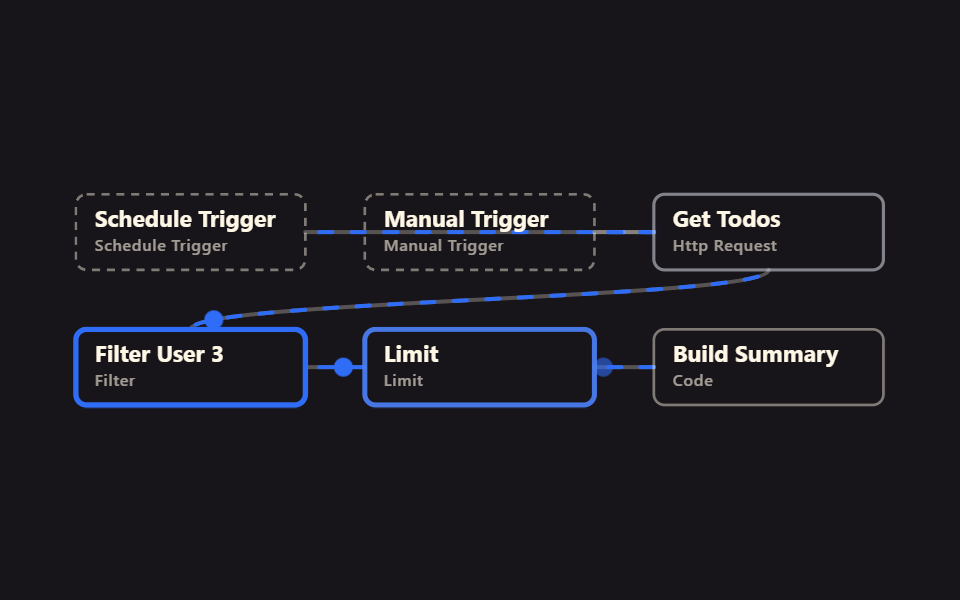
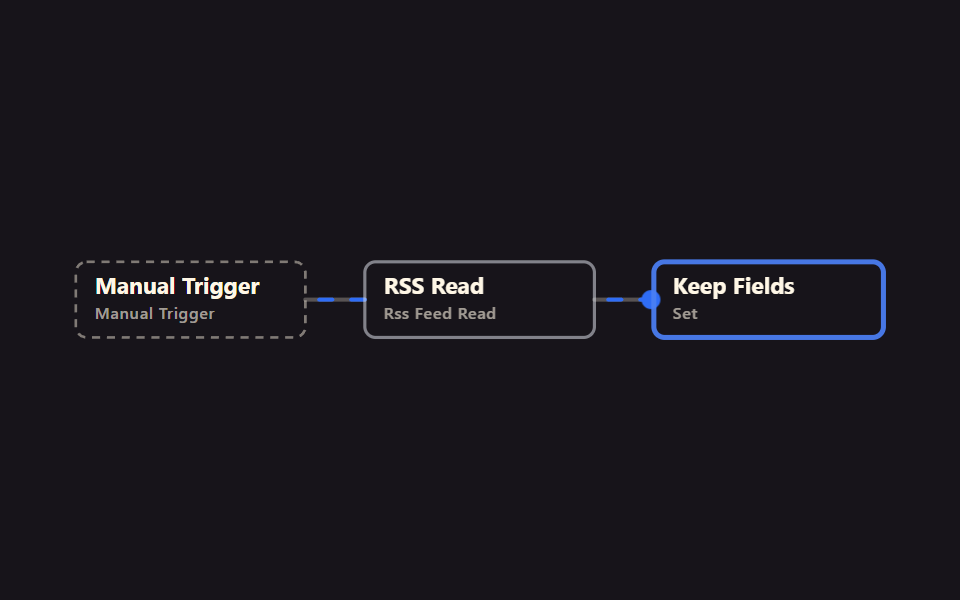
n8n connects apps into automated tasks without writing code. If you're building with AI tools and just ran into this name, these n8n workflow examples run
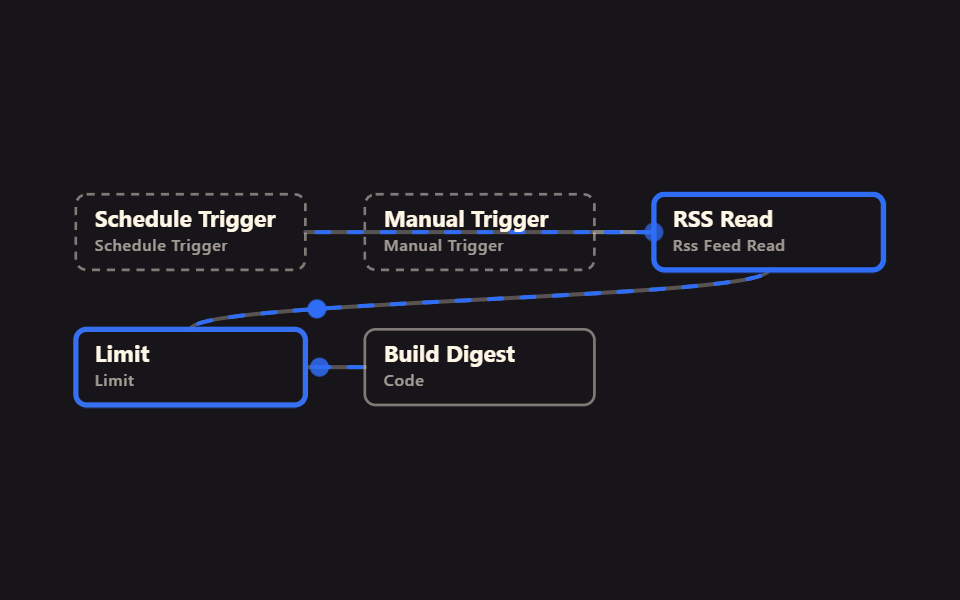 01 rss-daily-digest
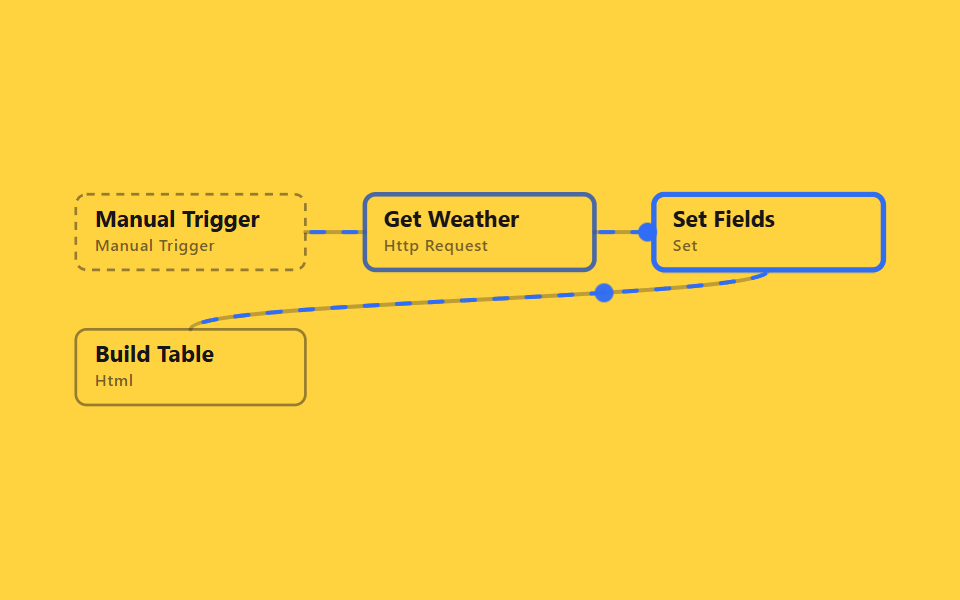 02 http-weather-table
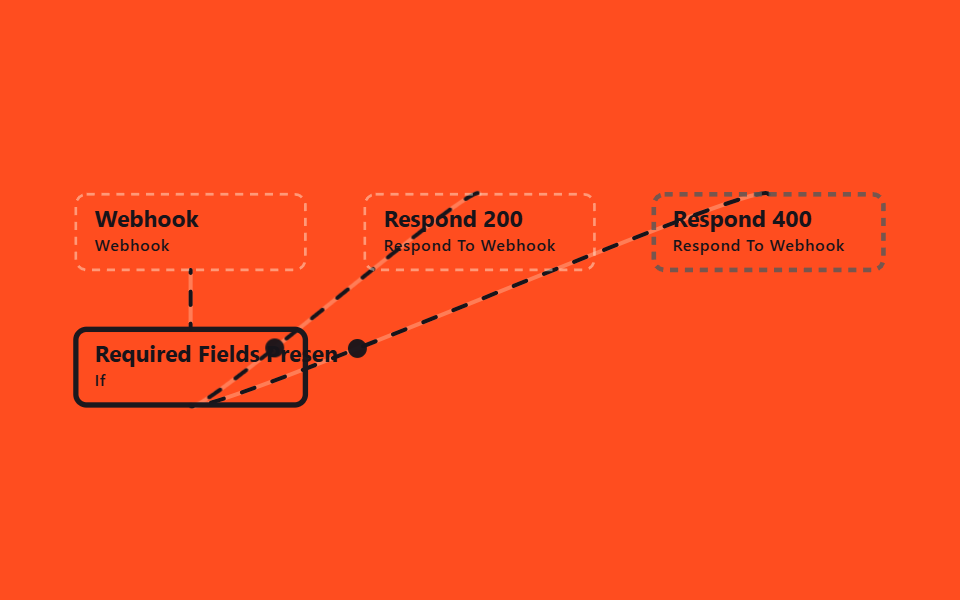 03 webhook-validate-respond
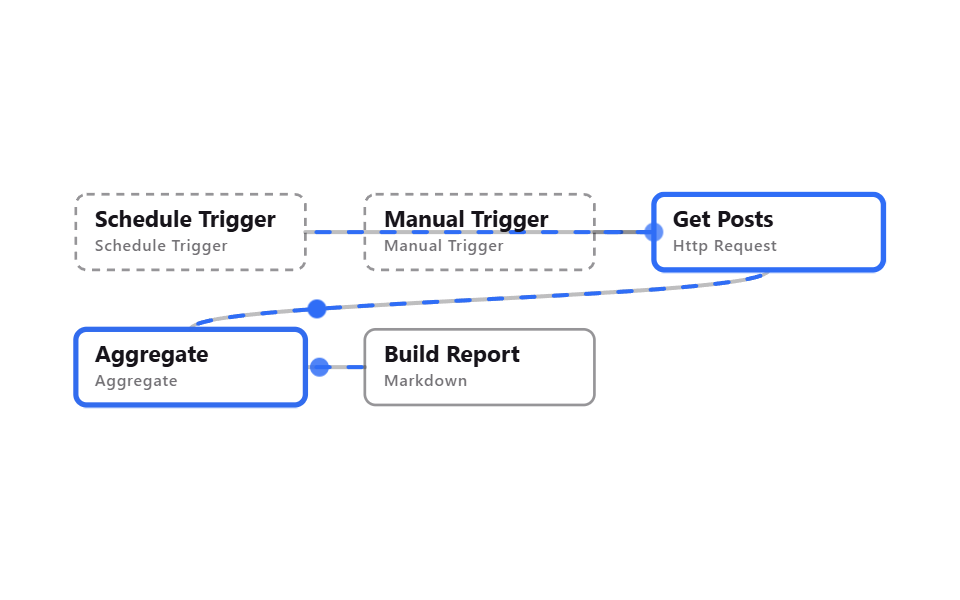 04 schedule-weekly-report
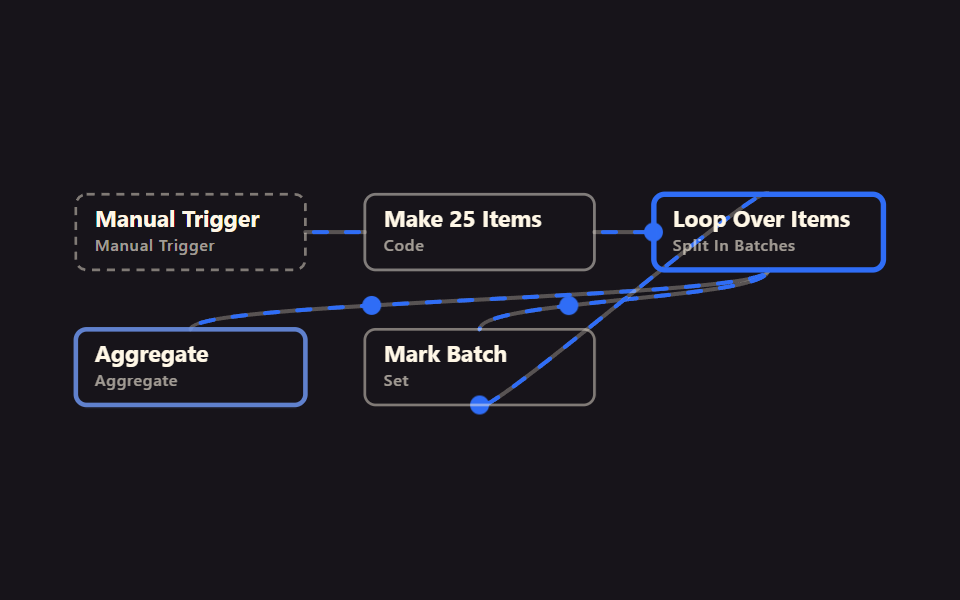 05 loop-over-items-batches
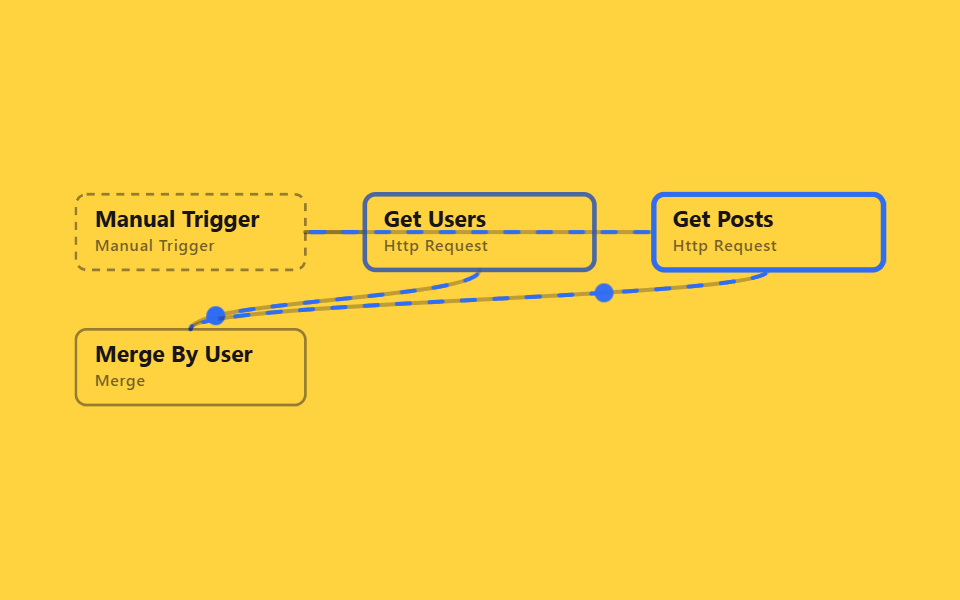 06 merge-two-sources
 07 dedupe-filter-sort
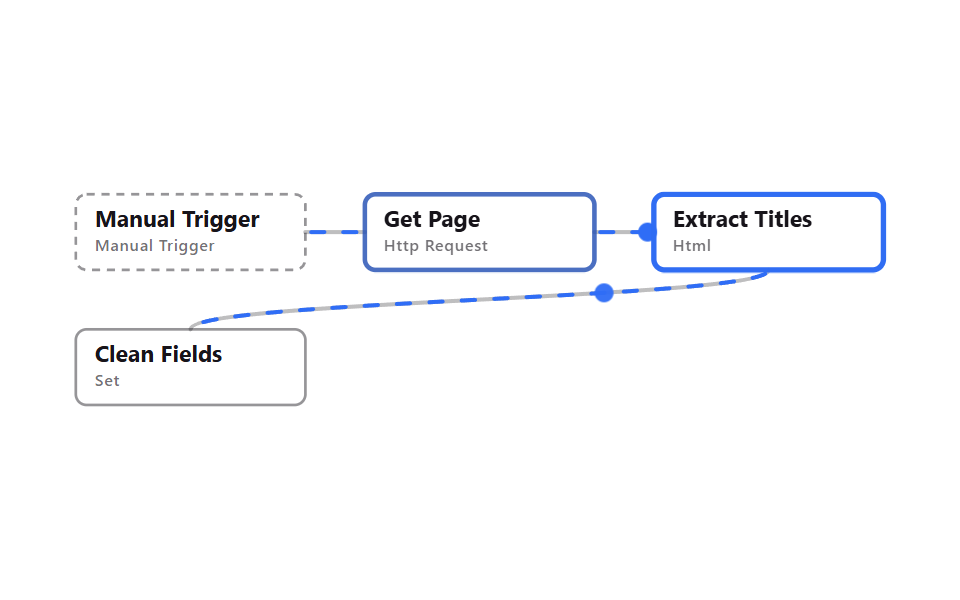 08 html-extract-public-page
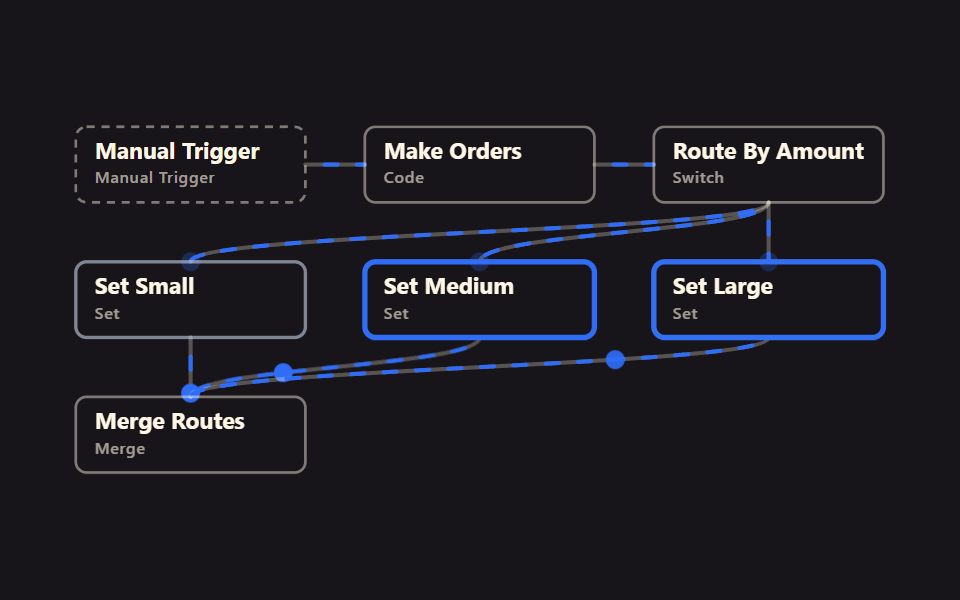 09 switch-router-three-ways
Auto-plays · click a tile to jump to its section · all nine in one zip
- 01 RSS daily digest
- 02 Public API → HTML table
- 03 Webhook validate & respond
- 04 Weekly report skeleton
- 05 Loop over items in batches
- 06 Merge two sources by key
- 07 Dedupe, filter, sort
- 08 Extract titles from a public page
- 09 Route by condition (Switch)
All nine execute the moment you hit Manual Trigger, and every item calling a public API was checked for a real 200. The nine n8n workflow automation examples are ordered the way real automation grows. Three receive data first (01 RSS, 02 a public API, 03 a webhook), two run on a schedule (04 a weekly report, 05 batching), three combine and clean data (06 merging, 07 tidying, 08 extracting), and one routes by condition (09 switching). Most automations you build later will follow this same shape. The news-monitoring cut of that receive end is 9 News Workflows, and the screen design that wires nodes together is Node Based UI Design.
01RSS daily digest
What it automates
A Schedule Trigger wakes up every morning at 7am (Manual Trigger runs it on demand too), RSS Read pulls the Hacker News front page, Limit keeps the first 10 entries, and a Code node bundles titles and links into one markdown block in a digest field.
<main class="stage">
<svg class="flow" viewBox="-28 -28 654 212" xmlns="http://www.w3.org/2000/svg" role="img" aria-label="godrich 201-01 rss-daily-digest">
<path class="edge" d="M170 28 C299 28 299 28 428 28"/>
<path class="edge edge--flow" style="--i:0" d="M170 28 C299 28 299 28 428 28"/>
<circle class="pulse" style="--i:0;offset-path:path('M170 28 C299 28 299 28 428 28')" r="7"/>
<path class="edge" d="M384 28 C406 28 406 28 428 28"/>
<path class="edge edge--flow" style="--i:1" d="M384 28 C406 28 406 28 428 28"/>
<circle class="pulse" style="--i:1;offset-path:path('M384 28 C406 28 406 28 428 28')" r="7"/>
<path class="edge" d="M513 56 C513 78 85 78 85 100"/>
<path class="edge edge--flow" style="--i:2" d="M513 56 C513 78 85 78 85 100"/>
<circle class="pulse" style="--i:2;offset-path:path('M513 56 C513 78 85 78 85 100')" r="7"/>
<path class="edge" d="M170 128 C192 128 192 128 214 128"/>
<path class="edge edge--flow" style="--i:3" d="M170 128 C192 128 192 128 214 128"/>
<circle class="pulse" style="--i:3;offset-path:path('M170 128 C192 128 192 128 214 128')" r="7"/>
<g class="node node--trigger" style="--i:0" transform="translate(0 0)"><rect class="node__box" width="170" height="56"/><text class="node__name" x="14" y="24">Schedule Trigger</text><text class="node__type" x="14" y="42">Schedule Trigger</text></g>
<g class="node node--trigger" style="--i:1" transform="translate(214 0)"><rect class="node__box" width="170" height="56"/><text class="node__name" x="14" y="24">Manual Trigger</text><text class="node__type" x="14" y="42">Manual Trigger</text></g>
<g class="node" style="--i:2" transform="translate(428 0)"><rect class="node__box" width="170" height="56"/><text class="node__name" x="14" y="24">RSS Read</text><text class="node__type" x="14" y="42">Rss Feed Read</text></g>
<g class="node" style="--i:3" transform="translate(0 100)"><rect class="node__box" width="170" height="56"/><text class="node__name" x="14" y="24">Limit</text><text class="node__type" x="14" y="42">Limit</text></g>
<g class="node" style="--i:4" transform="translate(214 100)"><rect class="node__box" width="170" height="56"/><text class="node__name" x="14" y="24">Build Digest</text><text class="node__type" x="14" y="42">Code</text></g>
</svg>
</main>
@use "../../../../site/static/demo-tokens" as *;
// ── 변수 3개 ──────────────────────────────────────────
$duration: $dur-loop; // 한 바퀴 (데모 2초와 같은 값 — gif 가 끊기지 않게)
$easing: linear; // 대시 흐름은 등속
$color: $subject-blue; // 강조(흐름·켜진 노드) 색
$ink: $subject-cream; // 글자·테두리
$n: 5; // 노드 수 — 켜지는 순서 간격
@include stage($stage-ink);
.flow { width: 100%; height: 100%; max-height: 100vh; display: block; overflow: visible; }
.edge { fill: none; stroke: $ink; stroke-opacity: .28; stroke-width: 3; stroke-linecap: round; }
.edge--flow { stroke: $color; stroke-opacity: 1; stroke-dasharray: 10 14; animation: flow $duration $easing infinite; }
@keyframes flow { to { stroke-dashoffset: -48; } }
.node__box { fill: transparent; stroke: $ink; stroke-opacity: .45; stroke-width: 2; rx: $r-sm; }
.node__name { fill: $ink; font-weight: 700; font-size: 17px; font-family: -apple-system, "Segoe UI", sans-serif; }
.node__type { fill: $ink; fill-opacity: .6; font-weight: 500; font-size: 12px; font-family: -apple-system, "Segoe UI", sans-serif; letter-spacing: .04em; }
.node--trigger .node__box { stroke-dasharray: 6 5; }
// 켜진 노드는 테두리가 강조색으로 두꺼워진다 (filter 대신 stroke — 렌더 비용). --i 는 <g> 에서 상속된다
.node .node__box { animation: box-lit $duration $ease-spring infinite; animation-delay: calc(var(--i) * #{$duration} / #{$n}); }
@keyframes box-lit {
0%, 100% { stroke: $ink; stroke-opacity: .45; stroke-width: 2; }
12%, 32% { stroke: $color; stroke-opacity: 1; stroke-width: 4; }
50% { stroke: $ink; stroke-opacity: .45; stroke-width: 2; }
}
.pulse { fill: $color; offset-distance: 0%; offset-rotate: 0deg; animation: travel $duration $ease-out infinite; animation-delay: calc(var(--i) * #{$duration} / #{$n}); }
@keyframes travel {
0% { offset-distance: 0%; opacity: 0; }
10% { opacity: 1; }
45% { offset-distance: 100%; opacity: 1; }
55%, 100% { offset-distance: 100%; opacity: 0; }
}
@media (prefers-reduced-motion: reduce) {
.edge--flow, .node, .node .node__box, .pulse { animation: none; }
.edge--flow { stroke-dasharray: none; } // 흐름은 멈추고 연결선만 남긴다
.pulse { display: none; }
}html, body {
margin: 0;
overflow: hidden;
}
.stage {
box-sizing: border-box;
min-height: 100vh;
display: grid;
place-items: center;
margin: 0;
background: #17141a;
font-family: -apple-system, "Segoe UI", "Noto Sans KR", sans-serif;
padding: clamp(8px, 4vw, 24px);
}
.flow {
width: 100%;
height: 100%;
max-height: 100vh;
display: block;
overflow: visible;
}
.edge {
fill: none;
stroke: #fff7e6;
stroke-opacity: 0.28;
stroke-width: 3;
stroke-linecap: round;
}
.edge--flow {
stroke: #2f6df6;
stroke-opacity: 1;
stroke-dasharray: 10 14;
animation: flow 2s linear infinite;
}
@keyframes flow {
to {
stroke-dashoffset: -48;
}
}
.node__box {
fill: transparent;
stroke: #fff7e6;
stroke-opacity: 0.45;
stroke-width: 2;
rx: 8px;
}
.node__name {
fill: #fff7e6;
font-weight: 700;
font-size: 17px;
font-family: -apple-system, "Segoe UI", sans-serif;
}
.node__type {
fill: #fff7e6;
fill-opacity: 0.6;
font-weight: 500;
font-size: 12px;
font-family: -apple-system, "Segoe UI", sans-serif;
letter-spacing: 0.04em;
}
.node--trigger .node__box {
stroke-dasharray: 6 5;
}
.node .node__box {
animation: box-lit 2s cubic-bezier(0.2, 0.8, 0.2, 1) infinite;
animation-delay: calc(var(--i) * 2s / 5);
}
@keyframes box-lit {
0%, 100% {
stroke: #fff7e6;
stroke-opacity: 0.45;
stroke-width: 2;
}
12%, 32% {
stroke: #2f6df6;
stroke-opacity: 1;
stroke-width: 4;
}
50% {
stroke: #fff7e6;
stroke-opacity: 0.45;
stroke-width: 2;
}
}
.pulse {
fill: #2f6df6;
offset-distance: 0%;
offset-rotate: 0deg;
animation: travel 2s ease-out infinite;
animation-delay: calc(var(--i) * 2s / 5);
}
@keyframes travel {
0% {
offset-distance: 0%;
opacity: 0;
}
10% {
opacity: 1;
}
45% {
offset-distance: 100%;
opacity: 1;
}
55%, 100% {
offset-distance: 100%;
opacity: 0;
}
}
@media (prefers-reduced-motion: reduce) {
.edge--flow, .node, .node .node__box, .pulse {
animation: none;
}
.edge--flow {
stroke-dasharray: none;
}
.pulse {
display: none;
}
}01 · RSS daily digest — Measured area 6.019% · moving frames 23/23Original by GODRICH · SCSS and React ship in the zip · See the password
In the workflow JSON
Reach for this when you want a team morning briefing on autopilot, or just following blogs in one place instead of checking each site by hand.
{
  "name": "Build Digest",
  "type": "n8n-nodes-base.code",
  "typeVersion": 2,
  "parameters": {
    "jsCode": "const lines = $input.all().map(item => `- [${item.json.title}](${item.json.link})`);\nconst digest = '# Daily Digest\\n\\n' + lines.join('\\n');\nreturn [{ json: { digest } }];"
  }
}
02Public API to HTML table
What it automates
HTTP Request calls the keyless open-meteo weather API, Set keeps only temperature, wind speed, and the timestamp, and the HTML node's Convert to HTML Table operation turns them into a table. Its output field is named table, not html.
<main class="stage">
<svg class="flow" viewBox="-28 -28 654 212" xmlns="http://www.w3.org/2000/svg" role="img" aria-label="godrich 201-02 http-weather-table">
<path class="edge" d="M170 28 C192 28 192 28 214 28"/>
<path class="edge edge--flow" style="--i:0" d="M170 28 C192 28 192 28 214 28"/>
<circle class="pulse" style="--i:0;offset-path:path('M170 28 C192 28 192 28 214 28')" r="7"/>
<path class="edge" d="M384 28 C406 28 406 28 428 28"/>
<path class="edge edge--flow" style="--i:1" d="M384 28 C406 28 406 28 428 28"/>
<circle class="pulse" style="--i:1;offset-path:path('M384 28 C406 28 406 28 428 28')" r="7"/>
<path class="edge" d="M513 56 C513 78 85 78 85 100"/>
<path class="edge edge--flow" style="--i:2" d="M513 56 C513 78 85 78 85 100"/>
<circle class="pulse" style="--i:2;offset-path:path('M513 56 C513 78 85 78 85 100')" r="7"/>
<g class="node node--trigger" style="--i:0" transform="translate(0 0)"><rect class="node__box" width="170" height="56"/><text class="node__name" x="14" y="24">Manual Trigger</text><text class="node__type" x="14" y="42">Manual Trigger</text></g>
<g class="node" style="--i:1" transform="translate(214 0)"><rect class="node__box" width="170" height="56"/><text class="node__name" x="14" y="24">Get Weather</text><text class="node__type" x="14" y="42">Http Request</text></g>
<g class="node" style="--i:2" transform="translate(428 0)"><rect class="node__box" width="170" height="56"/><text class="node__name" x="14" y="24">Set Fields</text><text class="node__type" x="14" y="42">Set</text></g>
<g class="node" style="--i:3" transform="translate(0 100)"><rect class="node__box" width="170" height="56"/><text class="node__name" x="14" y="24">Build Table</text><text class="node__type" x="14" y="42">Html</text></g>
</svg>
</main>
@use "../../../../site/static/demo-tokens" as *;
// ── 변수 3개 ──────────────────────────────────────────
$duration: $dur-loop; // 한 바퀴 (데모 2초와 같은 값 — gif 가 끊기지 않게)
$easing: linear; // 대시 흐름은 등속
$color: $subject-blue; // 강조(흐름·켜진 노드) 색
$ink: $subject-ink; // 글자·테두리
$n: 4; // 노드 수 — 켜지는 순서 간격
@include stage($stage-yellow);
.flow { width: 100%; height: 100%; max-height: 100vh; display: block; overflow: visible; }
.edge { fill: none; stroke: $ink; stroke-opacity: .28; stroke-width: 3; stroke-linecap: round; }
.edge--flow { stroke: $color; stroke-opacity: 1; stroke-dasharray: 10 14; animation: flow $duration $easing infinite; }
@keyframes flow { to { stroke-dashoffset: -48; } }
.node__box { fill: transparent; stroke: $ink; stroke-opacity: .45; stroke-width: 2; rx: $r-sm; }
.node__name { fill: $ink; font-weight: 700; font-size: 17px; font-family: -apple-system, "Segoe UI", sans-serif; }
.node__type { fill: $ink; fill-opacity: .6; font-weight: 500; font-size: 12px; font-family: -apple-system, "Segoe UI", sans-serif; letter-spacing: .04em; }
.node--trigger .node__box { stroke-dasharray: 6 5; }
// 켜진 노드는 테두리가 강조색으로 두꺼워진다 (filter 대신 stroke — 렌더 비용). --i 는 <g> 에서 상속된다
.node .node__box { animation: box-lit $duration $ease-spring infinite; animation-delay: calc(var(--i) * #{$duration} / #{$n}); }
@keyframes box-lit {
0%, 100% { stroke: $ink; stroke-opacity: .45; stroke-width: 2; }
12%, 32% { stroke: $color; stroke-opacity: 1; stroke-width: 4; }
50% { stroke: $ink; stroke-opacity: .45; stroke-width: 2; }
}
.pulse { fill: $color; offset-distance: 0%; offset-rotate: 0deg; animation: travel $duration $ease-out infinite; animation-delay: calc(var(--i) * #{$duration} / #{$n}); }
@keyframes travel {
0% { offset-distance: 0%; opacity: 0; }
10% { opacity: 1; }
45% { offset-distance: 100%; opacity: 1; }
55%, 100% { offset-distance: 100%; opacity: 0; }
}
@media (prefers-reduced-motion: reduce) {
.edge--flow, .node, .node .node__box, .pulse { animation: none; }
.edge--flow { stroke-dasharray: none; } // 흐름은 멈추고 연결선만 남긴다
.pulse { display: none; }
}html, body {
margin: 0;
overflow: hidden;
}
.stage {
box-sizing: border-box;
min-height: 100vh;
display: grid;
place-items: center;
margin: 0;
background: #ffd23f;
font-family: -apple-system, "Segoe UI", "Noto Sans KR", sans-serif;
padding: clamp(8px, 4vw, 24px);
}
.flow {
width: 100%;
height: 100%;
max-height: 100vh;
display: block;
overflow: visible;
}
.edge {
fill: none;
stroke: #17141a;
stroke-opacity: 0.28;
stroke-width: 3;
stroke-linecap: round;
}
.edge--flow {
stroke: #2f6df6;
stroke-opacity: 1;
stroke-dasharray: 10 14;
animation: flow 2s linear infinite;
}
@keyframes flow {
to {
stroke-dashoffset: -48;
}
}
.node__box {
fill: transparent;
stroke: #17141a;
stroke-opacity: 0.45;
stroke-width: 2;
rx: 8px;
}
.node__name {
fill: #17141a;
font-weight: 700;
font-size: 17px;
font-family: -apple-system, "Segoe UI", sans-serif;
}
.node__type {
fill: #17141a;
fill-opacity: 0.6;
font-weight: 500;
font-size: 12px;
font-family: -apple-system, "Segoe UI", sans-serif;
letter-spacing: 0.04em;
}
.node--trigger .node__box {
stroke-dasharray: 6 5;
}
.node .node__box {
animation: box-lit 2s cubic-bezier(0.2, 0.8, 0.2, 1) infinite;
animation-delay: calc(var(--i) * 2s / 4);
}
@keyframes box-lit {
0%, 100% {
stroke: #17141a;
stroke-opacity: 0.45;
stroke-width: 2;
}
12%, 32% {
stroke: #2f6df6;
stroke-opacity: 1;
stroke-width: 4;
}
50% {
stroke: #17141a;
stroke-opacity: 0.45;
stroke-width: 2;
}
}
.pulse {
fill: #2f6df6;
offset-distance: 0%;
offset-rotate: 0deg;
animation: travel 2s ease-out infinite;
animation-delay: calc(var(--i) * 2s / 4);
}
@keyframes travel {
0% {
offset-distance: 0%;
opacity: 0;
}
10% {
opacity: 1;
}
45% {
offset-distance: 100%;
opacity: 1;
}
55%, 100% {
offset-distance: 100%;
opacity: 0;
}
}
@media (prefers-reduced-motion: reduce) {
.edge--flow, .node, .node .node__box, .pulse {
animation: none;
}
.edge--flow {
stroke-dasharray: none;
}
.pulse {
display: none;
}
}02 · Public API → HTML table — Measured area 4.85% · moving frames 23/23Original by GODRICH · SCSS and React ship in the zip · See the password
In the workflow JSON
Use it to fill a dashboard widget or to drop straight into an email body table.
{
  "name": "Build Table",
  "type": "n8n-nodes-base.html",
  "typeVersion": 1.2,
  "parameters": {
    "operation": "convertToHtmlTable",
    "options": {
      "capitalize": true,
      "caption": "Seoul current weather"
    }
  }
}
03Webhook validate and respond
What it automates
A Webhook receives a POST, IF checks that both email and name are present, and Respond to Webhook returns 200 or 400 depending on the branch. This item is import-verified only — running it for real needs a live webhook URL, which only exists once n8n is running.
<main class="stage">
<svg class="flow" viewBox="-28 -28 654 212" xmlns="http://www.w3.org/2000/svg" role="img" aria-label="godrich 201-03 webhook-validate-respond">
<path class="edge" d="M85 56 C85 78 85 78 85 100"/>
<path class="edge edge--flow" style="--i:0" d="M85 56 C85 78 85 78 85 100"/>
<circle class="pulse" style="--i:0;offset-path:path('M85 56 C85 78 85 78 85 100')" r="7"/>
<path class="edge" d="M85 156 C85 172 299 -16 299 0"/>
<path class="edge edge--flow" style="--i:3" d="M85 156 C85 172 299 -16 299 0"/>
<circle class="pulse" style="--i:3;offset-path:path('M85 156 C85 172 299 -16 299 0')" r="7"/>
<path class="edge" d="M85 156 C85 172 513 -16 513 0"/>
<path class="edge edge--flow" style="--i:3" d="M85 156 C85 172 513 -16 513 0"/>
<circle class="pulse" style="--i:3;offset-path:path('M85 156 C85 172 513 -16 513 0')" r="7"/>
<g class="node node--trigger" style="--i:0" transform="translate(0 0)"><rect class="node__box" width="170" height="56"/><text class="node__name" x="14" y="24">Webhook</text><text class="node__type" x="14" y="42">Webhook</text></g>
<g class="node" style="--i:3" transform="translate(0 100)"><rect class="node__box" width="170" height="56"/><text class="node__name" x="14" y="24">Required Fields Presen</text><text class="node__type" x="14" y="42">If</text></g>
<g class="node node--trigger" style="--i:1" transform="translate(214 0)"><rect class="node__box" width="170" height="56"/><text class="node__name" x="14" y="24">Respond 200</text><text class="node__type" x="14" y="42">Respond To Webhook</text></g>
<g class="node node--trigger" style="--i:2" transform="translate(428 0)"><rect class="node__box" width="170" height="56"/><text class="node__name" x="14" y="24">Respond 400</text><text class="node__type" x="14" y="42">Respond To Webhook</text></g>
</svg>
</main>
@use "../../../../site/static/demo-tokens" as *;
// ── 변수 3개 ──────────────────────────────────────────
$duration: $dur-loop; // 한 바퀴 (데모 2초와 같은 값 — gif 가 끊기지 않게)
$easing: linear; // 대시 흐름은 등속
$color: $subject-ink; // 강조(흐름·켜진 노드) 색
$ink: $subject-cream; // 글자·테두리
$n: 4; // 노드 수 — 켜지는 순서 간격
@include stage($stage-orange);
.flow { width: 100%; height: 100%; max-height: 100vh; display: block; overflow: visible; }
.edge { fill: none; stroke: $ink; stroke-opacity: .28; stroke-width: 3; stroke-linecap: round; }
.edge--flow { stroke: $color; stroke-opacity: 1; stroke-dasharray: 10 14; animation: flow $duration $easing infinite; }
@keyframes flow { to { stroke-dashoffset: -48; } }
.node__box { fill: transparent; stroke: $ink; stroke-opacity: .45; stroke-width: 2; rx: $r-sm; }
.node__name { fill: $subject-ink; font-weight: 700; font-size: 17px; font-family: -apple-system, "Segoe UI", sans-serif; }
.node__type { fill: $subject-ink; fill-opacity: 1; font-weight: 500; font-size: 12px; font-family: -apple-system, "Segoe UI", sans-serif; letter-spacing: .04em; }
.node--trigger .node__box { stroke-dasharray: 6 5; }
// 켜진 노드는 테두리가 강조색으로 두꺼워진다 (filter 대신 stroke — 렌더 비용). --i 는 <g> 에서 상속된다
.node .node__box { animation: box-lit $duration $ease-spring infinite; animation-delay: calc(var(--i) * #{$duration} / #{$n}); }
@keyframes box-lit {
0%, 100% { stroke: $ink; stroke-opacity: .45; stroke-width: 2; }
12%, 32% { stroke: $color; stroke-opacity: 1; stroke-width: 4; }
50% { stroke: $ink; stroke-opacity: .45; stroke-width: 2; }
}
.pulse { fill: $color; offset-distance: 0%; offset-rotate: 0deg; animation: travel $duration $ease-out infinite; animation-delay: calc(var(--i) * #{$duration} / #{$n}); }
@keyframes travel {
0% { offset-distance: 0%; opacity: 0; }
10% { opacity: 1; }
45% { offset-distance: 100%; opacity: 1; }
55%, 100% { offset-distance: 100%; opacity: 0; }
}
@media (prefers-reduced-motion: reduce) {
.edge--flow, .node, .node .node__box, .pulse { animation: none; }
.edge--flow { stroke-dasharray: none; } // 흐름은 멈추고 연결선만 남긴다
.pulse { display: none; }
}html, body {
margin: 0;
overflow: hidden;
}
.stage {
box-sizing: border-box;
min-height: 100vh;
display: grid;
place-items: center;
margin: 0;
background: #ff4d1f;
font-family: -apple-system, "Segoe UI", "Noto Sans KR", sans-serif;
padding: clamp(8px, 4vw, 24px);
}
.flow {
width: 100%;
height: 100%;
max-height: 100vh;
display: block;
overflow: visible;
}
.edge {
fill: none;
stroke: #fff7e6;
stroke-opacity: 0.28;
stroke-width: 3;
stroke-linecap: round;
}
.edge--flow {
stroke: #17141a;
stroke-opacity: 1;
stroke-dasharray: 10 14;
animation: flow 2s linear infinite;
}
@keyframes flow {
to {
stroke-dashoffset: -48;
}
}
.node__box {
fill: transparent;
stroke: #fff7e6;
stroke-opacity: 0.45;
stroke-width: 2;
rx: 8px;
}
.node__name {
fill: #17141a;
font-weight: 700;
font-size: 17px;
font-family: -apple-system, "Segoe UI", sans-serif;
}
.node__type {
fill: #17141a;
fill-opacity: 1;
font-weight: 500;
font-size: 12px;
font-family: -apple-system, "Segoe UI", sans-serif;
letter-spacing: 0.04em;
}
.node--trigger .node__box {
stroke-dasharray: 6 5;
}
.node .node__box {
animation: box-lit 2s cubic-bezier(0.2, 0.8, 0.2, 1) infinite;
animation-delay: calc(var(--i) * 2s / 4);
}
@keyframes box-lit {
0%, 100% {
stroke: #fff7e6;
stroke-opacity: 0.45;
stroke-width: 2;
}
12%, 32% {
stroke: #17141a;
stroke-opacity: 1;
stroke-width: 4;
}
50% {
stroke: #fff7e6;
stroke-opacity: 0.45;
stroke-width: 2;
}
}
.pulse {
fill: #17141a;
offset-distance: 0%;
offset-rotate: 0deg;
animation: travel 2s ease-out infinite;
animation-delay: calc(var(--i) * 2s / 4);
}
@keyframes travel {
0% {
offset-distance: 0%;
opacity: 0;
}
10% {
opacity: 1;
}
45% {
offset-distance: 100%;
opacity: 1;
}
55%, 100% {
offset-distance: 100%;
opacity: 0;
}
}
@media (prefers-reduced-motion: reduce) {
.edge--flow, .node, .node .node__box, .pulse {
animation: none;
}
.edge--flow {
stroke-dasharray: none;
}
.pulse {
display: none;
}
}03 · Webhook validate & respond — Measured area 3.854% · moving frames 23/23Original by GODRICH · SCSS and React ship in the zip · See the password
In the workflow JSON
This is the skeleton to reach for when you're receiving forms or handling external service callbacks that hit you first.
{
  "conditions": [
    {
      "id": "c1",
      "leftValue": "={{ $json.body.email }}",
      "rightValue": "",
      "operator": {
        "type": "string",
        "operation": "notEmpty",
        "singleValue": true
      }
    },
    {
      "id": "c2",
      "leftValue": "={{ $json.body.name }}",
      "rightValue": "",
      "operator": {
        "type": "string",
        "operation": "notEmpty",
        "singleValue": true
      }
    }
  ],
  "combinator": "and"
}
04Weekly report skeleton
What it automates
Schedule fires every Monday at 09:00, HTTP fetches a post list from jsonplaceholder, Aggregate rolls titles and a count into arrays, and a Markdown node turns those arrays into report text written to a report field. Timezone lives in the workflow settings.
<main class="stage">
<svg class="flow" viewBox="-28 -28 654 212" xmlns="http://www.w3.org/2000/svg" role="img" aria-label="godrich 201-04 schedule-weekly-report">
<path class="edge" d="M170 28 C299 28 299 28 428 28"/>
<path class="edge edge--flow" style="--i:0" d="M170 28 C299 28 299 28 428 28"/>
<circle class="pulse" style="--i:0;offset-path:path('M170 28 C299 28 299 28 428 28')" r="7"/>
<path class="edge" d="M384 28 C406 28 406 28 428 28"/>
<path class="edge edge--flow" style="--i:1" d="M384 28 C406 28 406 28 428 28"/>
<circle class="pulse" style="--i:1;offset-path:path('M384 28 C406 28 406 28 428 28')" r="7"/>
<path class="edge" d="M513 56 C513 78 85 78 85 100"/>
<path class="edge edge--flow" style="--i:2" d="M513 56 C513 78 85 78 85 100"/>
<circle class="pulse" style="--i:2;offset-path:path('M513 56 C513 78 85 78 85 100')" r="7"/>
<path class="edge" d="M170 128 C192 128 192 128 214 128"/>
<path class="edge edge--flow" style="--i:3" d="M170 128 C192 128 192 128 214 128"/>
<circle class="pulse" style="--i:3;offset-path:path('M170 128 C192 128 192 128 214 128')" r="7"/>
<g class="node node--trigger" style="--i:0" transform="translate(0 0)"><rect class="node__box" width="170" height="56"/><text class="node__name" x="14" y="24">Schedule Trigger</text><text class="node__type" x="14" y="42">Schedule Trigger</text></g>
<g class="node node--trigger" style="--i:1" transform="translate(214 0)"><rect class="node__box" width="170" height="56"/><text class="node__name" x="14" y="24">Manual Trigger</text><text class="node__type" x="14" y="42">Manual Trigger</text></g>
<g class="node" style="--i:2" transform="translate(428 0)"><rect class="node__box" width="170" height="56"/><text class="node__name" x="14" y="24">Get Posts</text><text class="node__type" x="14" y="42">Http Request</text></g>
<g class="node" style="--i:3" transform="translate(0 100)"><rect class="node__box" width="170" height="56"/><text class="node__name" x="14" y="24">Aggregate</text><text class="node__type" x="14" y="42">Aggregate</text></g>
<g class="node" style="--i:4" transform="translate(214 100)"><rect class="node__box" width="170" height="56"/><text class="node__name" x="14" y="24">Build Report</text><text class="node__type" x="14" y="42">Markdown</text></g>
</svg>
</main>
@use "../../../../site/static/demo-tokens" as *;
// ── 변수 3개 ──────────────────────────────────────────
$duration: $dur-loop; // 한 바퀴 (데모 2초와 같은 값 — gif 가 끊기지 않게)
$easing: linear; // 대시 흐름은 등속
$color: $subject-blue; // 강조(흐름·켜진 노드) 색
$ink: $subject-ink; // 글자·테두리
$n: 5; // 노드 수 — 켜지는 순서 간격
@include stage($stage-paper);
.flow { width: 100%; height: 100%; max-height: 100vh; display: block; overflow: visible; }
.edge { fill: none; stroke: $ink; stroke-opacity: .28; stroke-width: 3; stroke-linecap: round; }
.edge--flow { stroke: $color; stroke-opacity: 1; stroke-dasharray: 10 14; animation: flow $duration $easing infinite; }
@keyframes flow { to { stroke-dashoffset: -48; } }
.node__box { fill: transparent; stroke: $ink; stroke-opacity: .45; stroke-width: 2; rx: $r-sm; }
.node__name { fill: $ink; font-weight: 700; font-size: 17px; font-family: -apple-system, "Segoe UI", sans-serif; }
.node__type { fill: $ink; fill-opacity: .6; font-weight: 500; font-size: 12px; font-family: -apple-system, "Segoe UI", sans-serif; letter-spacing: .04em; }
.node--trigger .node__box { stroke-dasharray: 6 5; }
// 켜진 노드는 테두리가 강조색으로 두꺼워진다 (filter 대신 stroke — 렌더 비용). --i 는 <g> 에서 상속된다
.node .node__box { animation: box-lit $duration $ease-spring infinite; animation-delay: calc(var(--i) * #{$duration} / #{$n}); }
@keyframes box-lit {
0%, 100% { stroke: $ink; stroke-opacity: .45; stroke-width: 2; }
12%, 32% { stroke: $color; stroke-opacity: 1; stroke-width: 4; }
50% { stroke: $ink; stroke-opacity: .45; stroke-width: 2; }
}
.pulse { fill: $color; offset-distance: 0%; offset-rotate: 0deg; animation: travel $duration $ease-out infinite; animation-delay: calc(var(--i) * #{$duration} / #{$n}); }
@keyframes travel {
0% { offset-distance: 0%; opacity: 0; }
10% { opacity: 1; }
45% { offset-distance: 100%; opacity: 1; }
55%, 100% { offset-distance: 100%; opacity: 0; }
}
@media (prefers-reduced-motion: reduce) {
.edge--flow, .node, .node .node__box, .pulse { animation: none; }
.edge--flow { stroke-dasharray: none; } // 흐름은 멈추고 연결선만 남긴다
.pulse { display: none; }
}html, body {
margin: 0;
overflow: hidden;
}
.stage {
box-sizing: border-box;
min-height: 100vh;
display: grid;
place-items: center;
margin: 0;
background: #ffffff;
font-family: -apple-system, "Segoe UI", "Noto Sans KR", sans-serif;
padding: clamp(8px, 4vw, 24px);
}
.flow {
width: 100%;
height: 100%;
max-height: 100vh;
display: block;
overflow: visible;
}
.edge {
fill: none;
stroke: #17141a;
stroke-opacity: 0.28;
stroke-width: 3;
stroke-linecap: round;
}
.edge--flow {
stroke: #2f6df6;
stroke-opacity: 1;
stroke-dasharray: 10 14;
animation: flow 2s linear infinite;
}
@keyframes flow {
to {
stroke-dashoffset: -48;
}
}
.node__box {
fill: transparent;
stroke: #17141a;
stroke-opacity: 0.45;
stroke-width: 2;
rx: 8px;
}
.node__name {
fill: #17141a;
font-weight: 700;
font-size: 17px;
font-family: -apple-system, "Segoe UI", sans-serif;
}
.node__type {
fill: #17141a;
fill-opacity: 0.6;
font-weight: 500;
font-size: 12px;
font-family: -apple-system, "Segoe UI", sans-serif;
letter-spacing: 0.04em;
}
.node--trigger .node__box {
stroke-dasharray: 6 5;
}
.node .node__box {
animation: box-lit 2s cubic-bezier(0.2, 0.8, 0.2, 1) infinite;
animation-delay: calc(var(--i) * 2s / 5);
}
@keyframes box-lit {
0%, 100% {
stroke: #17141a;
stroke-opacity: 0.45;
stroke-width: 2;
}
12%, 32% {
stroke: #2f6df6;
stroke-opacity: 1;
stroke-width: 4;
}
50% {
stroke: #17141a;
stroke-opacity: 0.45;
stroke-width: 2;
}
}
.pulse {
fill: #2f6df6;
offset-distance: 0%;
offset-rotate: 0deg;
animation: travel 2s ease-out infinite;
animation-delay: calc(var(--i) * 2s / 5);
}
@keyframes travel {
0% {
offset-distance: 0%;
opacity: 0;
}
10% {
opacity: 1;
}
45% {
offset-distance: 100%;
opacity: 1;
}
55%, 100% {
offset-distance: 100%;
opacity: 0;
}
}
@media (prefers-reduced-motion: reduce) {
.edge--flow, .node, .node .node__box, .pulse {
animation: none;
}
.edge--flow {
stroke-dasharray: none;
}
.pulse {
display: none;
}
}04 · Weekly report skeleton — Measured area 6.268% · moving frames 23/23Original by GODRICH · SCSS and React ship in the zip · See the password
In the workflow JSON
Reach for this when you need weekly KPIs pulled automatically or an ops summary waiting in your inbox every Monday morning.
{
  "name": "Build Report",
  "type": "n8n-nodes-base.markdown",
  "typeVersion": 1,
  "parameters": {
    "mode": "markdownToHtml",
    "markdown": "={{ '# Weekly Report\\n\\n' + $json.postId.length + ' posts fetched this week.\\n\\n- ' + $json.title.slice(0, 5).join('\\n- ') }}",
    "destinationKey": "report",
    "options": {}
  }
}
05Loop over items in batches
What it automates
Code generates 25 rows, and Loop Over Items splits them into batches of 5, each flowing through a Set node that stamps the batch number and index before looping back into Loop Over Items — skip that back-edge and it only runs once. Aggregate stitches everything together at the end.
<main class="stage">
<svg class="flow" viewBox="-28 -28 654 212" xmlns="http://www.w3.org/2000/svg" role="img" aria-label="godrich 201-05 loop-over-items-batches">
<path class="edge" d="M170 28 C192 28 192 28 214 28"/>
<path class="edge edge--flow" style="--i:0" d="M170 28 C192 28 192 28 214 28"/>
<circle class="pulse" style="--i:0;offset-path:path('M170 28 C192 28 192 28 214 28')" r="7"/>
<path class="edge" d="M384 28 C406 28 406 28 428 28"/>
<path class="edge edge--flow" style="--i:1" d="M384 28 C406 28 406 28 428 28"/>
<circle class="pulse" style="--i:1;offset-path:path('M384 28 C406 28 406 28 428 28')" r="7"/>
<path class="edge" d="M513 56 C513 78 85 78 85 100"/>
<path class="edge edge--flow" style="--i:2" d="M513 56 C513 78 85 78 85 100"/>
<circle class="pulse" style="--i:2;offset-path:path('M513 56 C513 78 85 78 85 100')" r="7"/>
<path class="edge" d="M513 56 C513 78 299 78 299 100"/>
<path class="edge edge--flow" style="--i:2" d="M513 56 C513 78 299 78 299 100"/>
<circle class="pulse" style="--i:2;offset-path:path('M513 56 C513 78 299 78 299 100')" r="7"/>
<path class="edge" d="M299 156 C299 172 513 -16 513 0"/>
<path class="edge edge--flow" style="--i:4" d="M299 156 C299 172 513 -16 513 0"/>
<circle class="pulse" style="--i:4;offset-path:path('M299 156 C299 172 513 -16 513 0')" r="7"/>
<g class="node node--trigger" style="--i:0" transform="translate(0 0)"><rect class="node__box" width="170" height="56"/><text class="node__name" x="14" y="24">Manual Trigger</text><text class="node__type" x="14" y="42">Manual Trigger</text></g>
<g class="node" style="--i:1" transform="translate(214 0)"><rect class="node__box" width="170" height="56"/><text class="node__name" x="14" y="24">Make 25 Items</text><text class="node__type" x="14" y="42">Code</text></g>
<g class="node" style="--i:2" transform="translate(428 0)"><rect class="node__box" width="170" height="56"/><text class="node__name" x="14" y="24">Loop Over Items</text><text class="node__type" x="14" y="42">Split In Batches</text></g>
<g class="node" style="--i:4" transform="translate(214 100)"><rect class="node__box" width="170" height="56"/><text class="node__name" x="14" y="24">Mark Batch</text><text class="node__type" x="14" y="42">Set</text></g>
<g class="node" style="--i:3" transform="translate(0 100)"><rect class="node__box" width="170" height="56"/><text class="node__name" x="14" y="24">Aggregate</text><text class="node__type" x="14" y="42">Aggregate</text></g>
</svg>
</main>
@use "../../../../site/static/demo-tokens" as *;
// ── 변수 3개 ──────────────────────────────────────────
$duration: $dur-loop; // 한 바퀴 (데모 2초와 같은 값 — gif 가 끊기지 않게)
$easing: linear; // 대시 흐름은 등속
$color: $subject-blue; // 강조(흐름·켜진 노드) 색
$ink: $subject-cream; // 글자·테두리
$n: 5; // 노드 수 — 켜지는 순서 간격
@include stage($stage-ink);
.flow { width: 100%; height: 100%; max-height: 100vh; display: block; overflow: visible; }
.edge { fill: none; stroke: $ink; stroke-opacity: .28; stroke-width: 3; stroke-linecap: round; }
.edge--flow { stroke: $color; stroke-opacity: 1; stroke-dasharray: 10 14; animation: flow $duration $easing infinite; }
@keyframes flow { to { stroke-dashoffset: -48; } }
.node__box { fill: transparent; stroke: $ink; stroke-opacity: .45; stroke-width: 2; rx: $r-sm; }
.node__name { fill: $ink; font-weight: 700; font-size: 17px; font-family: -apple-system, "Segoe UI", sans-serif; }
.node__type { fill: $ink; fill-opacity: .6; font-weight: 500; font-size: 12px; font-family: -apple-system, "Segoe UI", sans-serif; letter-spacing: .04em; }
.node--trigger .node__box { stroke-dasharray: 6 5; }
// 켜진 노드는 테두리가 강조색으로 두꺼워진다 (filter 대신 stroke — 렌더 비용). --i 는 <g> 에서 상속된다
.node .node__box { animation: box-lit $duration $ease-spring infinite; animation-delay: calc(var(--i) * #{$duration} / #{$n}); }
@keyframes box-lit {
0%, 100% { stroke: $ink; stroke-opacity: .45; stroke-width: 2; }
12%, 32% { stroke: $color; stroke-opacity: 1; stroke-width: 4; }
50% { stroke: $ink; stroke-opacity: .45; stroke-width: 2; }
}
.pulse { fill: $color; offset-distance: 0%; offset-rotate: 0deg; animation: travel $duration $ease-out infinite; animation-delay: calc(var(--i) * #{$duration} / #{$n}); }
@keyframes travel {
0% { offset-distance: 0%; opacity: 0; }
10% { opacity: 1; }
45% { offset-distance: 100%; opacity: 1; }
55%, 100% { offset-distance: 100%; opacity: 0; }
}
@media (prefers-reduced-motion: reduce) {
.edge--flow, .node, .node .node__box, .pulse { animation: none; }
.edge--flow { stroke-dasharray: none; } // 흐름은 멈추고 연결선만 남긴다
.pulse { display: none; }
}html, body {
margin: 0;
overflow: hidden;
}
.stage {
box-sizing: border-box;
min-height: 100vh;
display: grid;
place-items: center;
margin: 0;
background: #17141a;
font-family: -apple-system, "Segoe UI", "Noto Sans KR", sans-serif;
padding: clamp(8px, 4vw, 24px);
}
.flow {
width: 100%;
height: 100%;
max-height: 100vh;
display: block;
overflow: visible;
}
.edge {
fill: none;
stroke: #fff7e6;
stroke-opacity: 0.28;
stroke-width: 3;
stroke-linecap: round;
}
.edge--flow {
stroke: #2f6df6;
stroke-opacity: 1;
stroke-dasharray: 10 14;
animation: flow 2s linear infinite;
}
@keyframes flow {
to {
stroke-dashoffset: -48;
}
}
.node__box {
fill: transparent;
stroke: #fff7e6;
stroke-opacity: 0.45;
stroke-width: 2;
rx: 8px;
}
.node__name {
fill: #fff7e6;
font-weight: 700;
font-size: 17px;
font-family: -apple-system, "Segoe UI", sans-serif;
}
.node__type {
fill: #fff7e6;
fill-opacity: 0.6;
font-weight: 500;
font-size: 12px;
font-family: -apple-system, "Segoe UI", sans-serif;
letter-spacing: 0.04em;
}
.node--trigger .node__box {
stroke-dasharray: 6 5;
}
.node .node__box {
animation: box-lit 2s cubic-bezier(0.2, 0.8, 0.2, 1) infinite;
animation-delay: calc(var(--i) * 2s / 5);
}
@keyframes box-lit {
0%, 100% {
stroke: #fff7e6;
stroke-opacity: 0.45;
stroke-width: 2;
}
12%, 32% {
stroke: #2f6df6;
stroke-opacity: 1;
stroke-width: 4;
}
50% {
stroke: #fff7e6;
stroke-opacity: 0.45;
stroke-width: 2;
}
}
.pulse {
fill: #2f6df6;
offset-distance: 0%;
offset-rotate: 0deg;
animation: travel 2s ease-out infinite;
animation-delay: calc(var(--i) * 2s / 5);
}
@keyframes travel {
0% {
offset-distance: 0%;
opacity: 0;
}
10% {
opacity: 1;
}
45% {
offset-distance: 100%;
opacity: 1;
}
55%, 100% {
offset-distance: 100%;
opacity: 0;
}
}
@media (prefers-reduced-motion: reduce) {
.edge--flow, .node, .node .node__box, .pulse {
animation: none;
}
.edge--flow {
stroke-dasharray: none;
}
.pulse {
display: none;
}
}05 · Loop over items in batches — Measured area 6.558% · moving frames 23/23Original by GODRICH · SCSS and React ship in the zip · See the password
In the workflow JSON
This shape is what you want for bulk sending or any time staying under API rate limits matters.
{
  "name": "Loop Over Items",
  "type": "n8n-nodes-base.splitInBatches",
  "typeVersion": 3,
  "parameters": {
    "batchSize": 5,
    "options": {}
  }
}
06Merge two sources by key
What it automates
Two HTTP nodes fetch users and posts separately, and Merge pairs a user's id against a post's userId, combining matches into one row using Keep Matches mode. This is the shape you reach for whenever two sources name their join field differently.
<main class="stage">
<svg class="flow" viewBox="-28 -28 654 212" xmlns="http://www.w3.org/2000/svg" role="img" aria-label="godrich 201-06 merge-two-sources">
<path class="edge" d="M170 28 C192 28 192 28 214 28"/>
<path class="edge edge--flow" style="--i:0" d="M170 28 C192 28 192 28 214 28"/>
<circle class="pulse" style="--i:0;offset-path:path('M170 28 C192 28 192 28 214 28')" r="7"/>
<path class="edge" d="M170 28 C299 28 299 28 428 28"/>
<path class="edge edge--flow" style="--i:0" d="M170 28 C299 28 299 28 428 28"/>
<circle class="pulse" style="--i:0;offset-path:path('M170 28 C299 28 299 28 428 28')" r="7"/>
<path class="edge" d="M299 56 C299 78 85 78 85 100"/>
<path class="edge edge--flow" style="--i:1" d="M299 56 C299 78 85 78 85 100"/>
<circle class="pulse" style="--i:1;offset-path:path('M299 56 C299 78 85 78 85 100')" r="7"/>
<path class="edge" d="M513 56 C513 78 85 78 85 100"/>
<path class="edge edge--flow" style="--i:2" d="M513 56 C513 78 85 78 85 100"/>
<circle class="pulse" style="--i:2;offset-path:path('M513 56 C513 78 85 78 85 100')" r="7"/>
<g class="node node--trigger" style="--i:0" transform="translate(0 0)"><rect class="node__box" width="170" height="56"/><text class="node__name" x="14" y="24">Manual Trigger</text><text class="node__type" x="14" y="42">Manual Trigger</text></g>
<g class="node" style="--i:1" transform="translate(214 0)"><rect class="node__box" width="170" height="56"/><text class="node__name" x="14" y="24">Get Users</text><text class="node__type" x="14" y="42">Http Request</text></g>
<g class="node" style="--i:2" transform="translate(428 0)"><rect class="node__box" width="170" height="56"/><text class="node__name" x="14" y="24">Get Posts</text><text class="node__type" x="14" y="42">Http Request</text></g>
<g class="node" style="--i:3" transform="translate(0 100)"><rect class="node__box" width="170" height="56"/><text class="node__name" x="14" y="24">Merge By User</text><text class="node__type" x="14" y="42">Merge</text></g>
</svg>
</main>
@use "../../../../site/static/demo-tokens" as *;
// ── 변수 3개 ──────────────────────────────────────────
$duration: $dur-loop; // 한 바퀴 (데모 2초와 같은 값 — gif 가 끊기지 않게)
$easing: linear; // 대시 흐름은 등속
$color: $subject-blue; // 강조(흐름·켜진 노드) 색
$ink: $subject-ink; // 글자·테두리
$n: 4; // 노드 수 — 켜지는 순서 간격
@include stage($stage-yellow);
.flow { width: 100%; height: 100%; max-height: 100vh; display: block; overflow: visible; }
.edge { fill: none; stroke: $ink; stroke-opacity: .28; stroke-width: 3; stroke-linecap: round; }
.edge--flow { stroke: $color; stroke-opacity: 1; stroke-dasharray: 10 14; animation: flow $duration $easing infinite; }
@keyframes flow { to { stroke-dashoffset: -48; } }
.node__box { fill: transparent; stroke: $ink; stroke-opacity: .45; stroke-width: 2; rx: $r-sm; }
.node__name { fill: $ink; font-weight: 700; font-size: 17px; font-family: -apple-system, "Segoe UI", sans-serif; }
.node__type { fill: $ink; fill-opacity: .6; font-weight: 500; font-size: 12px; font-family: -apple-system, "Segoe UI", sans-serif; letter-spacing: .04em; }
.node--trigger .node__box { stroke-dasharray: 6 5; }
// 켜진 노드는 테두리가 강조색으로 두꺼워진다 (filter 대신 stroke — 렌더 비용). --i 는 <g> 에서 상속된다
.node .node__box { animation: box-lit $duration $ease-spring infinite; animation-delay: calc(var(--i) * #{$duration} / #{$n}); }
@keyframes box-lit {
0%, 100% { stroke: $ink; stroke-opacity: .45; stroke-width: 2; }
12%, 32% { stroke: $color; stroke-opacity: 1; stroke-width: 4; }
50% { stroke: $ink; stroke-opacity: .45; stroke-width: 2; }
}
.pulse { fill: $color; offset-distance: 0%; offset-rotate: 0deg; animation: travel $duration $ease-out infinite; animation-delay: calc(var(--i) * #{$duration} / #{$n}); }
@keyframes travel {
0% { offset-distance: 0%; opacity: 0; }
10% { opacity: 1; }
45% { offset-distance: 100%; opacity: 1; }
55%, 100% { offset-distance: 100%; opacity: 0; }
}
@media (prefers-reduced-motion: reduce) {
.edge--flow, .node, .node .node__box, .pulse { animation: none; }
.edge--flow { stroke-dasharray: none; } // 흐름은 멈추고 연결선만 남긴다
.pulse { display: none; }
}html, body {
margin: 0;
overflow: hidden;
}
.stage {
box-sizing: border-box;
min-height: 100vh;
display: grid;
place-items: center;
margin: 0;
background: #ffd23f;
font-family: -apple-system, "Segoe UI", "Noto Sans KR", sans-serif;
padding: clamp(8px, 4vw, 24px);
}
.flow {
width: 100%;
height: 100%;
max-height: 100vh;
display: block;
overflow: visible;
}
.edge {
fill: none;
stroke: #17141a;
stroke-opacity: 0.28;
stroke-width: 3;
stroke-linecap: round;
}
.edge--flow {
stroke: #2f6df6;
stroke-opacity: 1;
stroke-dasharray: 10 14;
animation: flow 2s linear infinite;
}
@keyframes flow {
to {
stroke-dashoffset: -48;
}
}
.node__box {
fill: transparent;
stroke: #17141a;
stroke-opacity: 0.45;
stroke-width: 2;
rx: 8px;
}
.node__name {
fill: #17141a;
font-weight: 700;
font-size: 17px;
font-family: -apple-system, "Segoe UI", sans-serif;
}
.node__type {
fill: #17141a;
fill-opacity: 0.6;
font-weight: 500;
font-size: 12px;
font-family: -apple-system, "Segoe UI", sans-serif;
letter-spacing: 0.04em;
}
.node--trigger .node__box {
stroke-dasharray: 6 5;
}
.node .node__box {
animation: box-lit 2s cubic-bezier(0.2, 0.8, 0.2, 1) infinite;
animation-delay: calc(var(--i) * 2s / 4);
}
@keyframes box-lit {
0%, 100% {
stroke: #17141a;
stroke-opacity: 0.45;
stroke-width: 2;
}
12%, 32% {
stroke: #2f6df6;
stroke-opacity: 1;
stroke-width: 4;
}
50% {
stroke: #17141a;
stroke-opacity: 0.45;
stroke-width: 2;
}
}
.pulse {
fill: #2f6df6;
offset-distance: 0%;
offset-rotate: 0deg;
animation: travel 2s ease-out infinite;
animation-delay: calc(var(--i) * 2s / 4);
}
@keyframes travel {
0% {
offset-distance: 0%;
opacity: 0;
}
10% {
opacity: 1;
}
45% {
offset-distance: 100%;
opacity: 1;
}
55%, 100% {
offset-distance: 100%;
opacity: 0;
}
}
@media (prefers-reduced-motion: reduce) {
.edge--flow, .node, .node .node__box, .pulse {
animation: none;
}
.edge--flow {
stroke-dasharray: none;
}
.pulse {
display: none;
}
}06 · Merge two sources by key — Measured area 5.069% · moving frames 23/23Original by GODRICH · SCSS and React ship in the zip · See the password
In the workflow JSON
Reach for this when joining customers with orders, or joining two sheets that don't share a column name.
{
  "name": "Merge By User",
  "type": "n8n-nodes-base.merge",
  "typeVersion": 3.2,
  "parameters": {
    "mode": "combine",
    "combineBy": "combineByFields",
    "advanced": true,
    "mergeByFields": {
      "values": [
        {
          "field1": "id",
          "field2": "userId"
        }
      ]
    },
    "joinMode": "keepMatches",
    "outputDataFrom": "both",
    "options": {}
  }
}
07Dedupe, filter, sort
What it automates
Remove Duplicates clears repeat rows by email, Filter keeps only scores of 60 or higher, and Sort puts the highest score first. Three of the most common data-cleanup moves, lined up in one row.
<main class="stage">
<svg class="flow" viewBox="-28 -28 654 212" xmlns="http://www.w3.org/2000/svg" role="img" aria-label="godrich 201-07 dedupe-filter-sort">
<path class="edge" d="M170 28 C192 28 192 28 214 28"/>
<path class="edge edge--flow" style="--i:0" d="M170 28 C192 28 192 28 214 28"/>
<circle class="pulse" style="--i:0;offset-path:path('M170 28 C192 28 192 28 214 28')" r="7"/>
<path class="edge" d="M384 28 C406 28 406 28 428 28"/>
<path class="edge edge--flow" style="--i:1" d="M384 28 C406 28 406 28 428 28"/>
<circle class="pulse" style="--i:1;offset-path:path('M384 28 C406 28 406 28 428 28')" r="7"/>
<path class="edge" d="M513 56 C513 78 85 78 85 100"/>
<path class="edge edge--flow" style="--i:2" d="M513 56 C513 78 85 78 85 100"/>
<circle class="pulse" style="--i:2;offset-path:path('M513 56 C513 78 85 78 85 100')" r="7"/>
<path class="edge" d="M170 128 C192 128 192 128 214 128"/>
<path class="edge edge--flow" style="--i:3" d="M170 128 C192 128 192 128 214 128"/>
<circle class="pulse" style="--i:3;offset-path:path('M170 128 C192 128 192 128 214 128')" r="7"/>
<g class="node node--trigger" style="--i:0" transform="translate(0 0)"><rect class="node__box" width="170" height="56"/><text class="node__name" x="14" y="24">Manual Trigger</text><text class="node__type" x="14" y="42">Manual Trigger</text></g>
<g class="node" style="--i:1" transform="translate(214 0)"><rect class="node__box" width="170" height="56"/><text class="node__name" x="14" y="24">Sample Rows</text><text class="node__type" x="14" y="42">Code</text></g>
<g class="node" style="--i:2" transform="translate(428 0)"><rect class="node__box" width="170" height="56"/><text class="node__name" x="14" y="24">Remove Duplicates</text><text class="node__type" x="14" y="42">Remove Duplicates</text></g>
<g class="node" style="--i:3" transform="translate(0 100)"><rect class="node__box" width="170" height="56"/><text class="node__name" x="14" y="24">Filter score >= 60</text><text class="node__type" x="14" y="42">Filter</text></g>
<g class="node" style="--i:4" transform="translate(214 100)"><rect class="node__box" width="170" height="56"/><text class="node__name" x="14" y="24">Sort by score desc</text><text class="node__type" x="14" y="42">Sort</text></g>
</svg>
</main>@use "../../../../site/static/demo-tokens" as *;
// ── 변수 3개 ──────────────────────────────────────────
$duration: $dur-loop; // 한 바퀴 (데모 2초와 같은 값 — gif 가 끊기지 않게)
$easing: linear; // 대시 흐름은 등속
$color: $subject-ink; // 강조(흐름·켜진 노드) 색
$ink: $subject-cream; // 글자·테두리
$n: 5; // 노드 수 — 켜지는 순서 간격
@include stage($stage-orange);
.flow { width: 100%; height: 100%; max-height: 100vh; display: block; overflow: visible; }
.edge { fill: none; stroke: $ink; stroke-opacity: .28; stroke-width: 3; stroke-linecap: round; }
.edge--flow { stroke: $color; stroke-opacity: 1; stroke-dasharray: 10 14; animation: flow $duration $easing infinite; }
@keyframes flow { to { stroke-dashoffset: -48; } }
.node__box { fill: transparent; stroke: $ink; stroke-opacity: .45; stroke-width: 2; rx: $r-sm; }
.node__name { fill: $subject-ink; font-weight: 700; font-size: 17px; font-family: -apple-system, "Segoe UI", sans-serif; }
.node__type { fill: $subject-ink; fill-opacity: 1; font-weight: 500; font-size: 12px; font-family: -apple-system, "Segoe UI", sans-serif; letter-spacing: .04em; }
.node--trigger .node__box { stroke-dasharray: 6 5; }
// 켜진 노드는 테두리가 강조색으로 두꺼워진다 (filter 대신 stroke — 렌더 비용). --i 는 <g> 에서 상속된다
.node .node__box { animation: box-lit $duration $ease-spring infinite; animation-delay: calc(var(--i) * #{$duration} / #{$n}); }
@keyframes box-lit {
0%, 100% { stroke: $ink; stroke-opacity: .45; stroke-width: 2; }
12%, 32% { stroke: $color; stroke-opacity: 1; stroke-width: 4; }
50% { stroke: $ink; stroke-opacity: .45; stroke-width: 2; }
}
.pulse { fill: $color; offset-distance: 0%; offset-rotate: 0deg; animation: travel $duration $ease-out infinite; animation-delay: calc(var(--i) * #{$duration} / #{$n}); }
@keyframes travel {
0% { offset-distance: 0%; opacity: 0; }
10% { opacity: 1; }
45% { offset-distance: 100%; opacity: 1; }
55%, 100% { offset-distance: 100%; opacity: 0; }
}
@media (prefers-reduced-motion: reduce) {
.edge--flow, .node, .node .node__box, .pulse { animation: none; }
.edge--flow { stroke-dasharray: none; } // 흐름은 멈추고 연결선만 남긴다
.pulse { display: none; }
}html, body {
margin: 0;
overflow: hidden;
}
.stage {
box-sizing: border-box;
min-height: 100vh;
display: grid;
place-items: center;
margin: 0;
background: #ff4d1f;
font-family: -apple-system, "Segoe UI", "Noto Sans KR", sans-serif;
padding: clamp(8px, 4vw, 24px);
}
.flow {
width: 100%;
height: 100%;
max-height: 100vh;
display: block;
overflow: visible;
}
.edge {
fill: none;
stroke: #fff7e6;
stroke-opacity: 0.28;
stroke-width: 3;
stroke-linecap: round;
}
.edge--flow {
stroke: #17141a;
stroke-opacity: 1;
stroke-dasharray: 10 14;
animation: flow 2s linear infinite;
}
@keyframes flow {
to {
stroke-dashoffset: -48;
}
}
.node__box {
fill: transparent;
stroke: #fff7e6;
stroke-opacity: 0.45;
stroke-width: 2;
rx: 8px;
}
.node__name {
fill: #17141a;
font-weight: 700;
font-size: 17px;
font-family: -apple-system, "Segoe UI", sans-serif;
}
.node__type {
fill: #17141a;
fill-opacity: 1;
font-weight: 500;
font-size: 12px;
font-family: -apple-system, "Segoe UI", sans-serif;
letter-spacing: 0.04em;
}
.node--trigger .node__box {
stroke-dasharray: 6 5;
}
.node .node__box {
animation: box-lit 2s cubic-bezier(0.2, 0.8, 0.2, 1) infinite;
animation-delay: calc(var(--i) * 2s / 5);
}
@keyframes box-lit {
0%, 100% {
stroke: #fff7e6;
stroke-opacity: 0.45;
stroke-width: 2;
}
12%, 32% {
stroke: #17141a;
stroke-opacity: 1;
stroke-width: 4;
}
50% {
stroke: #fff7e6;
stroke-opacity: 0.45;
stroke-width: 2;
}
}
.pulse {
fill: #17141a;
offset-distance: 0%;
offset-rotate: 0deg;
animation: travel 2s ease-out infinite;
animation-delay: calc(var(--i) * 2s / 5);
}
@keyframes travel {
0% {
offset-distance: 0%;
opacity: 0;
}
10% {
opacity: 1;
}
45% {
offset-distance: 100%;
opacity: 1;
}
55%, 100% {
offset-distance: 100%;
opacity: 0;
}
}
@media (prefers-reduced-motion: reduce) {
.edge--flow, .node, .node .node__box, .pulse {
animation: none;
}
.edge--flow {
stroke-dasharray: none;
}
.pulse {
display: none;
}
}07 · Dedupe, filter, sort — Measured area 6.129% · moving frames 23/23Original by GODRICH · SCSS and React ship in the zip · See the password
In the workflow JSON
It's built for cleaning up leads before an import, or turning raw scores into a ranking table.
{
  "conditions": {
    "options": {
      "caseSensitive": true,
      "leftValue": "",
      "typeValidation": "strict",
      "version": 2
    },
    "conditions": [
      {
        "id": "c1",
        "leftValue": "={{ $json.score }}",
        "rightValue": 60,
        "operator": {
          "type": "number",
          "operation": "gte"
        }
      }
    ],
    "combinator": "and"
  },
  "options": {}
}
08Extract titles from a public page
What it automates
HTTP fetches a public page that robots.txt allows, as plain text, and the HTML node pulls just titles and links with the .titleline a CSS selector before Set tidies the result. Not a pattern to point at login-walled or personal-data pages.
<main class="stage">
<svg class="flow" viewBox="-28 -28 654 212" xmlns="http://www.w3.org/2000/svg" role="img" aria-label="godrich 201-08 html-extract-public-page">
<path class="edge" d="M170 28 C192 28 192 28 214 28"/>
<path class="edge edge--flow" style="--i:0" d="M170 28 C192 28 192 28 214 28"/>
<circle class="pulse" style="--i:0;offset-path:path('M170 28 C192 28 192 28 214 28')" r="7"/>
<path class="edge" d="M384 28 C406 28 406 28 428 28"/>
<path class="edge edge--flow" style="--i:1" d="M384 28 C406 28 406 28 428 28"/>
<circle class="pulse" style="--i:1;offset-path:path('M384 28 C406 28 406 28 428 28')" r="7"/>
<path class="edge" d="M513 56 C513 78 85 78 85 100"/>
<path class="edge edge--flow" style="--i:2" d="M513 56 C513 78 85 78 85 100"/>
<circle class="pulse" style="--i:2;offset-path:path('M513 56 C513 78 85 78 85 100')" r="7"/>
<g class="node node--trigger" style="--i:0" transform="translate(0 0)"><rect class="node__box" width="170" height="56"/><text class="node__name" x="14" y="24">Manual Trigger</text><text class="node__type" x="14" y="42">Manual Trigger</text></g>
<g class="node" style="--i:1" transform="translate(214 0)"><rect class="node__box" width="170" height="56"/><text class="node__name" x="14" y="24">Get Page</text><text class="node__type" x="14" y="42">Http Request</text></g>
<g class="node" style="--i:2" transform="translate(428 0)"><rect class="node__box" width="170" height="56"/><text class="node__name" x="14" y="24">Extract Titles</text><text class="node__type" x="14" y="42">Html</text></g>
<g class="node" style="--i:3" transform="translate(0 100)"><rect class="node__box" width="170" height="56"/><text class="node__name" x="14" y="24">Clean Fields</text><text class="node__type" x="14" y="42">Set</text></g>
</svg>
</main>
@use "../../../../site/static/demo-tokens" as *;
// ── 변수 3개 ──────────────────────────────────────────
$duration: $dur-loop; // 한 바퀴 (데모 2초와 같은 값 — gif 가 끊기지 않게)
$easing: linear; // 대시 흐름은 등속
$color: $subject-blue; // 강조(흐름·켜진 노드) 색
$ink: $subject-ink; // 글자·테두리
$n: 4; // 노드 수 — 켜지는 순서 간격
@include stage($stage-paper);
.flow { width: 100%; height: 100%; max-height: 100vh; display: block; overflow: visible; }
.edge { fill: none; stroke: $ink; stroke-opacity: .28; stroke-width: 3; stroke-linecap: round; }
.edge--flow { stroke: $color; stroke-opacity: 1; stroke-dasharray: 10 14; animation: flow $duration $easing infinite; }
@keyframes flow { to { stroke-dashoffset: -48; } }
.node__box { fill: transparent; stroke: $ink; stroke-opacity: .45; stroke-width: 2; rx: $r-sm; }
.node__name { fill: $ink; font-weight: 700; font-size: 17px; font-family: -apple-system, "Segoe UI", sans-serif; }
.node__type { fill: $ink; fill-opacity: .6; font-weight: 500; font-size: 12px; font-family: -apple-system, "Segoe UI", sans-serif; letter-spacing: .04em; }
.node--trigger .node__box { stroke-dasharray: 6 5; }
// 켜진 노드는 테두리가 강조색으로 두꺼워진다 (filter 대신 stroke — 렌더 비용). --i 는 <g> 에서 상속된다
.node .node__box { animation: box-lit $duration $ease-spring infinite; animation-delay: calc(var(--i) * #{$duration} / #{$n}); }
@keyframes box-lit {
0%, 100% { stroke: $ink; stroke-opacity: .45; stroke-width: 2; }
12%, 32% { stroke: $color; stroke-opacity: 1; stroke-width: 4; }
50% { stroke: $ink; stroke-opacity: .45; stroke-width: 2; }
}
.pulse { fill: $color; offset-distance: 0%; offset-rotate: 0deg; animation: travel $duration $ease-out infinite; animation-delay: calc(var(--i) * #{$duration} / #{$n}); }
@keyframes travel {
0% { offset-distance: 0%; opacity: 0; }
10% { opacity: 1; }
45% { offset-distance: 100%; opacity: 1; }
55%, 100% { offset-distance: 100%; opacity: 0; }
}
@media (prefers-reduced-motion: reduce) {
.edge--flow, .node, .node .node__box, .pulse { animation: none; }
.edge--flow { stroke-dasharray: none; } // 흐름은 멈추고 연결선만 남긴다
.pulse { display: none; }
}html, body {
margin: 0;
overflow: hidden;
}
.stage {
box-sizing: border-box;
min-height: 100vh;
display: grid;
place-items: center;
margin: 0;
background: #ffffff;
font-family: -apple-system, "Segoe UI", "Noto Sans KR", sans-serif;
padding: clamp(8px, 4vw, 24px);
}
.flow {
width: 100%;
height: 100%;
max-height: 100vh;
display: block;
overflow: visible;
}
.edge {
fill: none;
stroke: #17141a;
stroke-opacity: 0.28;
stroke-width: 3;
stroke-linecap: round;
}
.edge--flow {
stroke: #2f6df6;
stroke-opacity: 1;
stroke-dasharray: 10 14;
animation: flow 2s linear infinite;
}
@keyframes flow {
to {
stroke-dashoffset: -48;
}
}
.node__box {
fill: transparent;
stroke: #17141a;
stroke-opacity: 0.45;
stroke-width: 2;
rx: 8px;
}
.node__name {
fill: #17141a;
font-weight: 700;
font-size: 17px;
font-family: -apple-system, "Segoe UI", sans-serif;
}
.node__type {
fill: #17141a;
fill-opacity: 0.6;
font-weight: 500;
font-size: 12px;
font-family: -apple-system, "Segoe UI", sans-serif;
letter-spacing: 0.04em;
}
.node--trigger .node__box {
stroke-dasharray: 6 5;
}
.node .node__box {
animation: box-lit 2s cubic-bezier(0.2, 0.8, 0.2, 1) infinite;
animation-delay: calc(var(--i) * 2s / 4);
}
@keyframes box-lit {
0%, 100% {
stroke: #17141a;
stroke-opacity: 0.45;
stroke-width: 2;
}
12%, 32% {
stroke: #2f6df6;
stroke-opacity: 1;
stroke-width: 4;
}
50% {
stroke: #17141a;
stroke-opacity: 0.45;
stroke-width: 2;
}
}
.pulse {
fill: #2f6df6;
offset-distance: 0%;
offset-rotate: 0deg;
animation: travel 2s ease-out infinite;
animation-delay: calc(var(--i) * 2s / 4);
}
@keyframes travel {
0% {
offset-distance: 0%;
opacity: 0;
}
10% {
opacity: 1;
}
45% {
offset-distance: 100%;
opacity: 1;
}
55%, 100% {
offset-distance: 100%;
opacity: 0;
}
}
@media (prefers-reduced-motion: reduce) {
.edge--flow, .node, .node .node__box, .pulse {
animation: none;
}
.edge--flow {
stroke-dasharray: none;
}
.pulse {
display: none;
}
}08 · Extract titles from a public page — Measured area 4.88% · moving frames 23/23Original by GODRICH · SCSS and React ship in the zip · See the password
In the workflow JSON
Use this for watching for announcements on a page that changes, or collecting a public list without an API.
{
  "operation": "extractHtmlContent",
  "sourceData": "json",
  "dataPropertyName": "data",
  "extractionValues": {
    "values": [
      {
        "key": "title",
        "cssSelector": ".titleline a",
        "returnValue": "text",
        "returnArray": true
      },
      {
        "key": "link",
        "cssSelector": ".titleline a",
        "returnValue": "attribute",
        "attribute": "href",
        "returnArray": true
      }
    ]
  },
  "options": {}
}
09Route by condition (Switch)
What it automates
Code builds six sample orders, Switch routes them three ways by amount (under 50, 50 to 150, 150 and up), each branch's Set stamps a route label, and Merge gathers all three back together. If IF gives you two branches, Switch gives you N.
<main class="stage">
<svg class="flow" viewBox="-28 -28 654 312" xmlns="http://www.w3.org/2000/svg" role="img" aria-label="godrich 201-09 switch-router-three-ways">
<path class="edge" d="M170 28 C192 28 192 28 214 28"/>
<path class="edge edge--flow" style="--i:0" d="M170 28 C192 28 192 28 214 28"/>
<circle class="pulse" style="--i:0;offset-path:path('M170 28 C192 28 192 28 214 28')" r="7"/>
<path class="edge" d="M384 28 C406 28 406 28 428 28"/>
<path class="edge edge--flow" style="--i:1" d="M384 28 C406 28 406 28 428 28"/>
<circle class="pulse" style="--i:1;offset-path:path('M384 28 C406 28 406 28 428 28')" r="7"/>
<path class="edge" d="M513 56 C513 78 85 78 85 100"/>
<path class="edge edge--flow" style="--i:2" d="M513 56 C513 78 85 78 85 100"/>
<circle class="pulse" style="--i:2;offset-path:path('M513 56 C513 78 85 78 85 100')" r="7"/>
<path class="edge" d="M513 56 C513 78 299 78 299 100"/>
<path class="edge edge--flow" style="--i:2" d="M513 56 C513 78 299 78 299 100"/>
<circle class="pulse" style="--i:2;offset-path:path('M513 56 C513 78 299 78 299 100')" r="7"/>
<path class="edge" d="M513 56 C513 78 513 78 513 100"/>
<path class="edge edge--flow" style="--i:2" d="M513 56 C513 78 513 78 513 100"/>
<circle class="pulse" style="--i:2;offset-path:path('M513 56 C513 78 513 78 513 100')" r="7"/>
<path class="edge" d="M85 156 C85 178 85 178 85 200"/>
<path class="edge edge--flow" style="--i:3" d="M85 156 C85 178 85 178 85 200"/>
<circle class="pulse" style="--i:3;offset-path:path('M85 156 C85 178 85 178 85 200')" r="7"/>
<path class="edge" d="M299 156 C299 178 85 178 85 200"/>
<path class="edge edge--flow" style="--i:4" d="M299 156 C299 178 85 178 85 200"/>
<circle class="pulse" style="--i:4;offset-path:path('M299 156 C299 178 85 178 85 200')" r="7"/>
<path class="edge" d="M513 156 C513 178 85 178 85 200"/>
<path class="edge edge--flow" style="--i:5" d="M513 156 C513 178 85 178 85 200"/>
<circle class="pulse" style="--i:5;offset-path:path('M513 156 C513 178 85 178 85 200')" r="7"/>
<g class="node node--trigger" style="--i:0" transform="translate(0 0)"><rect class="node__box" width="170" height="56"/><text class="node__name" x="14" y="24">Manual Trigger</text><text class="node__type" x="14" y="42">Manual Trigger</text></g>
<g class="node" style="--i:1" transform="translate(214 0)"><rect class="node__box" width="170" height="56"/><text class="node__name" x="14" y="24">Make Orders</text><text class="node__type" x="14" y="42">Code</text></g>
<g class="node" style="--i:2" transform="translate(428 0)"><rect class="node__box" width="170" height="56"/><text class="node__name" x="14" y="24">Route By Amount</text><text class="node__type" x="14" y="42">Switch</text></g>
<g class="node" style="--i:3" transform="translate(0 100)"><rect class="node__box" width="170" height="56"/><text class="node__name" x="14" y="24">Set Small</text><text class="node__type" x="14" y="42">Set</text></g>
<g class="node" style="--i:4" transform="translate(214 100)"><rect class="node__box" width="170" height="56"/><text class="node__name" x="14" y="24">Set Medium</text><text class="node__type" x="14" y="42">Set</text></g>
<g class="node" style="--i:5" transform="translate(428 100)"><rect class="node__box" width="170" height="56"/><text class="node__name" x="14" y="24">Set Large</text><text class="node__type" x="14" y="42">Set</text></g>
<g class="node" style="--i:6" transform="translate(0 200)"><rect class="node__box" width="170" height="56"/><text class="node__name" x="14" y="24">Merge Routes</text><text class="node__type" x="14" y="42">Merge</text></g>
</svg>
</main>@use "../../../../site/static/demo-tokens" as *;
// ── 변수 3개 ──────────────────────────────────────────
$duration: $dur-loop; // 한 바퀴 (데모 2초와 같은 값 — gif 가 끊기지 않게)
$easing: linear; // 대시 흐름은 등속
$color: $subject-blue; // 강조(흐름·켜진 노드) 색
$ink: $subject-cream; // 글자·테두리
$n: 7; // 노드 수 — 켜지는 순서 간격
@include stage($stage-ink);
.flow { width: 100%; height: 100%; max-height: 100vh; display: block; overflow: visible; }
.edge { fill: none; stroke: $ink; stroke-opacity: .28; stroke-width: 3; stroke-linecap: round; }
.edge--flow { stroke: $color; stroke-opacity: 1; stroke-dasharray: 10 14; animation: flow $duration $easing infinite; }
@keyframes flow { to { stroke-dashoffset: -48; } }
.node__box { fill: transparent; stroke: $ink; stroke-opacity: .45; stroke-width: 2; rx: $r-sm; }
.node__name { fill: $ink; font-weight: 700; font-size: 17px; font-family: -apple-system, "Segoe UI", sans-serif; }
.node__type { fill: $ink; fill-opacity: .6; font-weight: 500; font-size: 12px; font-family: -apple-system, "Segoe UI", sans-serif; letter-spacing: .04em; }
.node--trigger .node__box { stroke-dasharray: 6 5; }
// 켜진 노드는 테두리가 강조색으로 두꺼워진다 (filter 대신 stroke — 렌더 비용). --i 는 <g> 에서 상속된다
.node .node__box { animation: box-lit $duration $ease-spring infinite; animation-delay: calc(var(--i) * #{$duration} / #{$n}); }
@keyframes box-lit {
0%, 100% { stroke: $ink; stroke-opacity: .45; stroke-width: 2; }
12%, 32% { stroke: $color; stroke-opacity: 1; stroke-width: 4; }
50% { stroke: $ink; stroke-opacity: .45; stroke-width: 2; }
}
.pulse { fill: $color; offset-distance: 0%; offset-rotate: 0deg; animation: travel $duration $ease-out infinite; animation-delay: calc(var(--i) * #{$duration} / #{$n}); }
@keyframes travel {
0% { offset-distance: 0%; opacity: 0; }
10% { opacity: 1; }
45% { offset-distance: 100%; opacity: 1; }
55%, 100% { offset-distance: 100%; opacity: 0; }
}
@media (prefers-reduced-motion: reduce) {
.edge--flow, .node, .node .node__box, .pulse { animation: none; }
.edge--flow { stroke-dasharray: none; } // 흐름은 멈추고 연결선만 남긴다
.pulse { display: none; }
}html, body {
margin: 0;
overflow: hidden;
}
.stage {
box-sizing: border-box;
min-height: 100vh;
display: grid;
place-items: center;
margin: 0;
background: #17141a;
font-family: -apple-system, "Segoe UI", "Noto Sans KR", sans-serif;
padding: clamp(8px, 4vw, 24px);
}
.flow {
width: 100%;
height: 100%;
max-height: 100vh;
display: block;
overflow: visible;
}
.edge {
fill: none;
stroke: #fff7e6;
stroke-opacity: 0.28;
stroke-width: 3;
stroke-linecap: round;
}
.edge--flow {
stroke: #2f6df6;
stroke-opacity: 1;
stroke-dasharray: 10 14;
animation: flow 2s linear infinite;
}
@keyframes flow {
to {
stroke-dashoffset: -48;
}
}
.node__box {
fill: transparent;
stroke: #fff7e6;
stroke-opacity: 0.45;
stroke-width: 2;
rx: 8px;
}
.node__name {
fill: #fff7e6;
font-weight: 700;
font-size: 17px;
font-family: -apple-system, "Segoe UI", sans-serif;
}
.node__type {
fill: #fff7e6;
fill-opacity: 0.6;
font-weight: 500;
font-size: 12px;
font-family: -apple-system, "Segoe UI", sans-serif;
letter-spacing: 0.04em;
}
.node--trigger .node__box {
stroke-dasharray: 6 5;
}
.node .node__box {
animation: box-lit 2s cubic-bezier(0.2, 0.8, 0.2, 1) infinite;
animation-delay: calc(var(--i) * 2s / 7);
}
@keyframes box-lit {
0%, 100% {
stroke: #fff7e6;
stroke-opacity: 0.45;
stroke-width: 2;
}
12%, 32% {
stroke: #2f6df6;
stroke-opacity: 1;
stroke-width: 4;
}
50% {
stroke: #fff7e6;
stroke-opacity: 0.45;
stroke-width: 2;
}
}
.pulse {
fill: #2f6df6;
offset-distance: 0%;
offset-rotate: 0deg;
animation: travel 2s ease-out infinite;
animation-delay: calc(var(--i) * 2s / 7);
}
@keyframes travel {
0% {
offset-distance: 0%;
opacity: 0;
}
10% {
opacity: 1;
}
45% {
offset-distance: 100%;
opacity: 1;
}
55%, 100% {
offset-distance: 100%;
opacity: 0;
}
}
@media (prefers-reduced-motion: reduce) {
.edge--flow, .node, .node .node__box, .pulse {
animation: none;
}
.edge--flow {
stroke-dasharray: none;
}
.pulse {
display: none;
}
}09 · Route by condition (Switch) — Measured area 9.481% · moving frames 23/23Original by GODRICH · SCSS and React ship in the zip · See the password
In the workflow JSON
This is the shape for tiered processing by amount or status, or automatically assigning an owner to each branch.
{
  "mode": "rules",
  "rules": {
    "values": [
      {
        "conditions": {
          "conditions": [
            {
              "id": "r1",
              "leftValue": "={{ $json.amount }}",
              "rightValue": 50,
              "operator": {
                "type": "number",
                "operation": "lt"
              }
            }
          ],
          "combinator": "and"
        },
        "outputKey": "small"
      }
    ]
  }
}
Prerequisites — accounts, permissions, version
Every row below reads "none," yet the table still earns its place: grade and n8n version differ per item. Grade runs V0 (structure) through V1 (import-verified) to V2 (execution-verified) — in this set, only 03 stops at V1, and the other eight all reach V2.
| Item | Grade | Prerequisites | n8n version |
|---|---|---|---|
| 01 RSS daily digest | V2 | none | 2.38.5 |
| 02 Public API to HTML table | V2 | none | 2.38.5 |
| 03 Webhook validate and respond | V1 (import-verified; running it needs your own webhook URL) | none | 2.38.5 |
| 04 Weekly report skeleton | V2 | none | 2.38.5 |
| 05 Loop over items in batches | V2 | none | 2.38.5 |
| 06 Merge two sources by key | V2 | none | 2.38.5 |
| 07 Dedupe, filter, sort | V2 | none | 2.38.5 |
| 08 Extract titles from a public page | V2 | none | 2.38.5 |
| 09 Route by condition (Switch) | V2 | none | 2.38.5 |
There are three ways to import a workflow: paste the raw JSON straight onto the n8n canvas with Ctrl/Cmd+V, use Import from File from the canvas menu and pick a file from the zip, or run n8n import:workflow --input=file.json from the CLI. Once it's in, hit Test workflow in the top-left corner (or the play icon on the Manual Trigger node) to run it right there. If your n8n is older than this table, you'll hit a typeVersion error — see the trap below.
Where this breaks — one trap
simple n8n workflow examples — where does it break?
The easiest way to get burned here is guessing an output field name instead of checking it: the HTML node in item 02 looks like it should produce an html field, but Convert to HTML Table actually names its output table — skip that check and the workflow runs fine while the next node quietly finds nothing where it expected data. The zip password is jj9hgmc4, and once it's unlocked, workflows/ holds all nine JSON files exactly as imported here. Guessing a field name bites just as hard in the hands-on coding corner — the canvas editors in Image Crop JavaScript hit the same class of unverified-value bugs. typeVersion breaks the same way for the same reason — guess a number and an older n8n throws "typeVersion not supported," so it's worth checking what your installed n8n actually supports before writing one in.
FAQ
Do these n8n workflow json examples work on n8n cloud too?
Yes. None of these workflows use community nodes or credentials that need an account, so they import cleanly through the Import menu. Only 03 needs a real webhook URL from your n8n cloud instance to actually run. The no-code way to bolt an API onto n8n gets its own set in n8n No Code Automation.
What if my n8n version is different?
If you hit a typeVersion error, build that node fresh on your canvas, export it, and read off the version it actually saved. This zip was import- and execution-verified against n8n 2.38.5 on Node 24.
How do I add a node that needs an API key?
Add credentials through the HTTP Request node's Authentication option, or drop an expression like {{ $env.API_KEY }} into a header so the key lives in an environment variable instead of the file. Keeping keys out of the workflow JSON you share is also what the n8n docs recommend.
New to n8n? The automation category has more examples in the same vein, and the about page explains how this site verifies what it publishes.
You might also like
 Schedules & reportsAutomate Repetitive Tasks in n8n, No Account First
 RSS & newsMarketing Automation Basics: 9 News Workflows
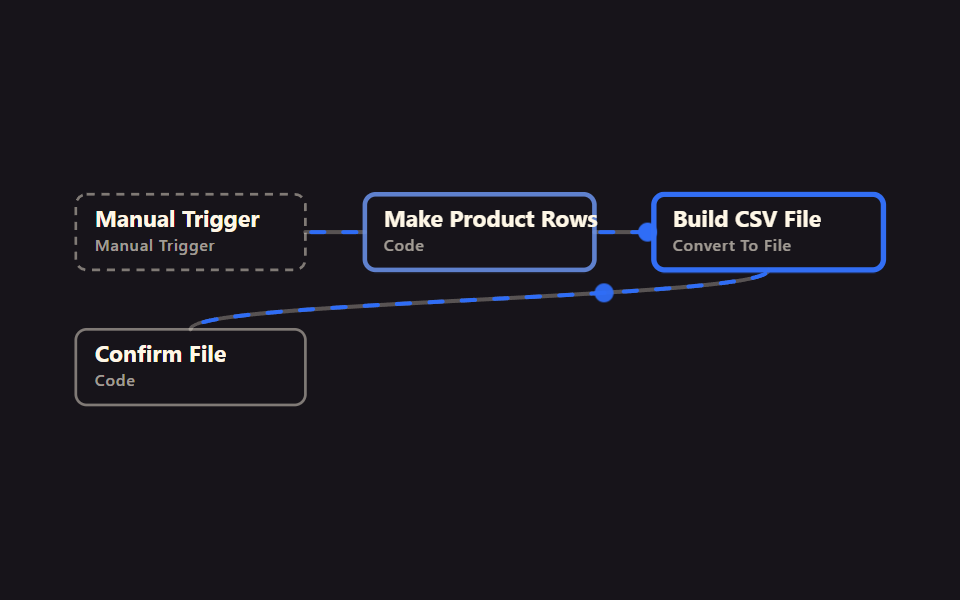 Files & dataExcel Automation Examples Using n8n, No Code
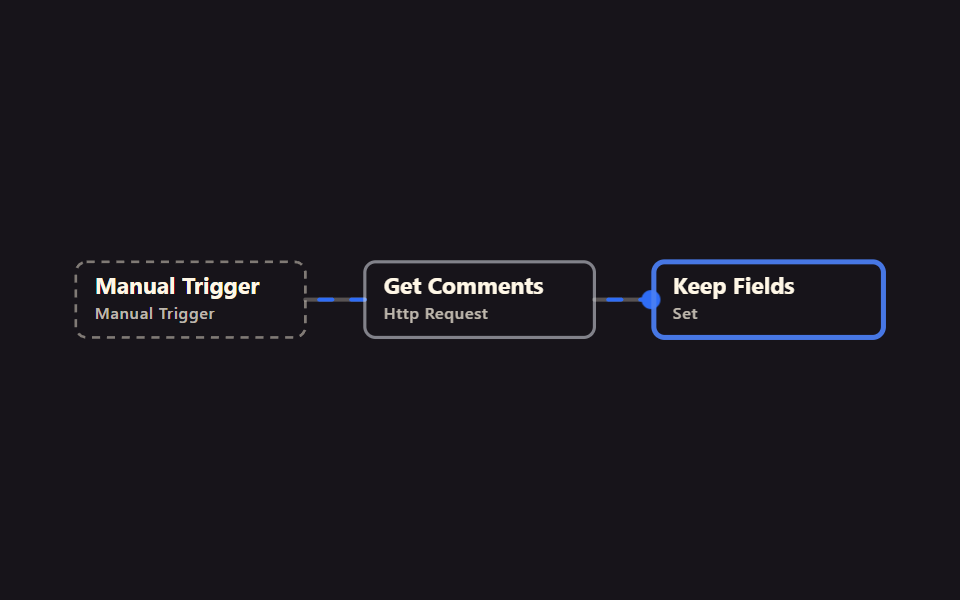 Webhooks & HTTPn8n No Code Automation: 9 Workflows to Import
 Localizationi18n JSON Checks: 9 Ways to Catch Missing Keys
 Dashboard UI9 SVG Progress Ring Widgets, Math Included
 Pickers9 time picker ui patterns, from a point to a span
 Creative UINode Based UI Design: 9 Patterns, No Library
 Dashboard UICSS Chart Design: 9 SVG Graphs, No Library
 Creative UIImage Crop JavaScript: 9 Canvas Editor UIs