n8n No Code Automation: 9 Workflows to Import
You don't need to know n8n yet: it wires apps and APIs together with no backend of your own.
 01 http-get-query-params
 02 http-get-pagination-loop
 03 http-transform-response-fields
 04 http-combine-append-three-calls
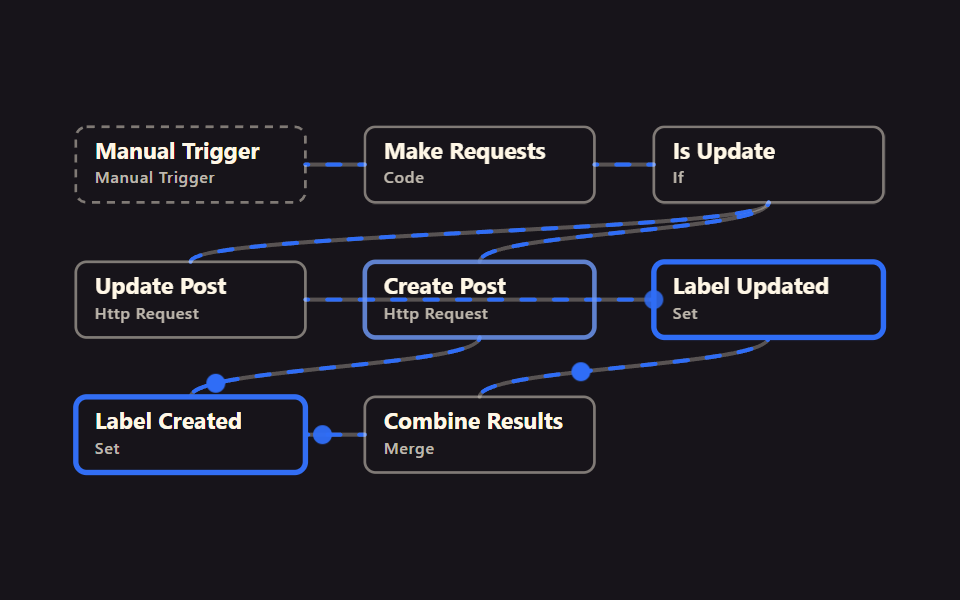 05 http-post-put-upsert
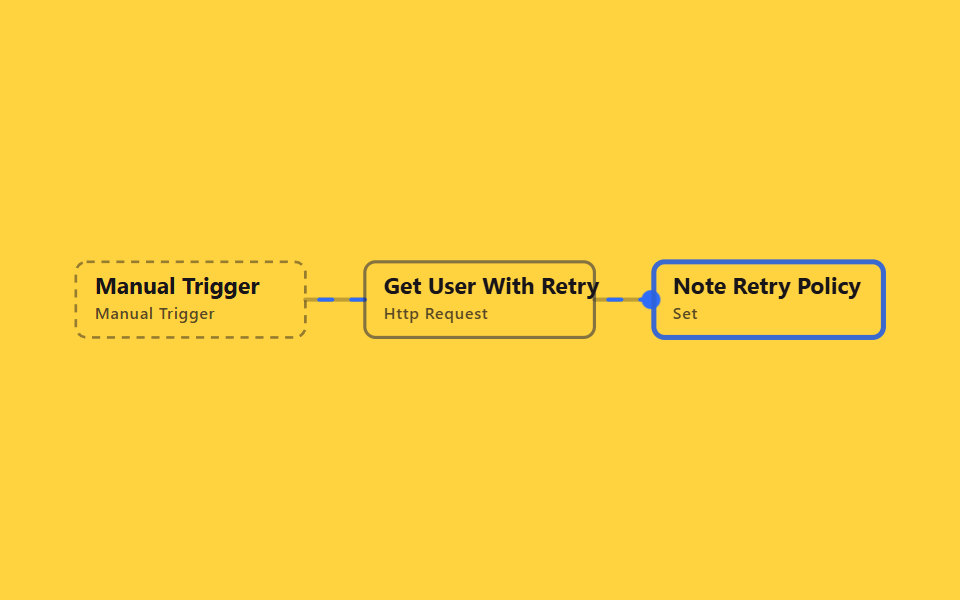 06 http-retry-on-failure-config
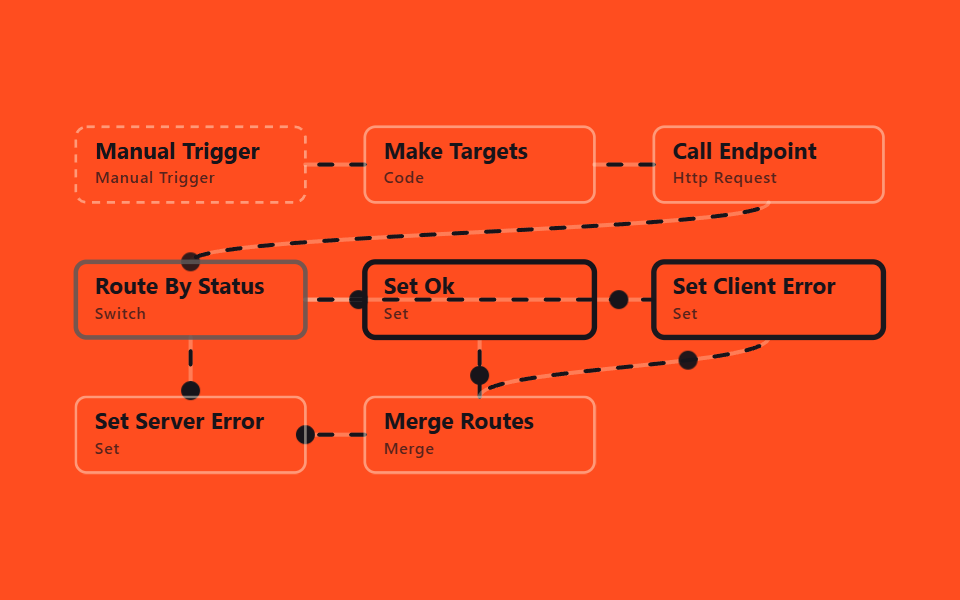 07 http-error-status-branching
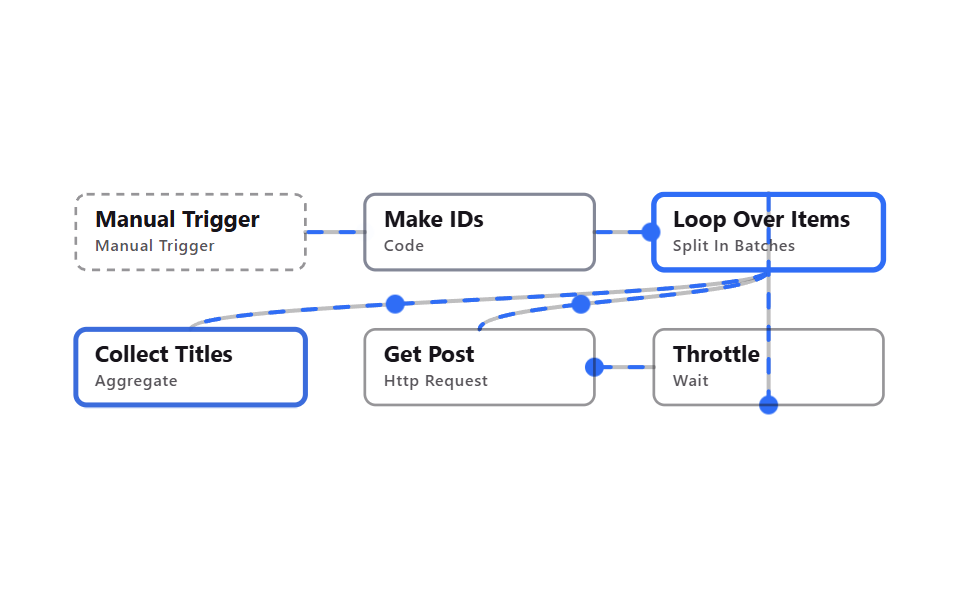 08 http-rate-limit-delay
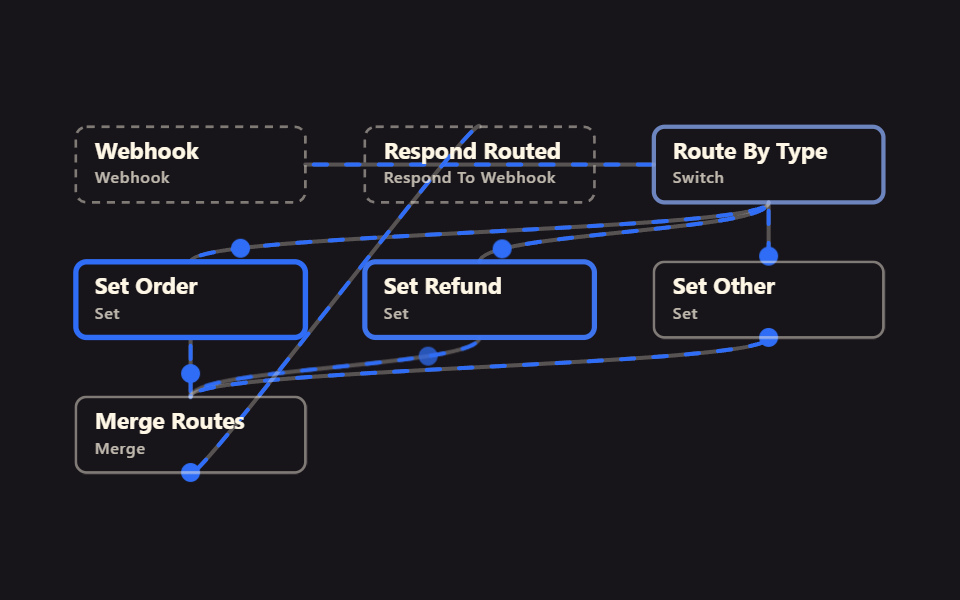 09 webhook-multi-route-respond
Auto-plays · click a tile to jump to its section · all nine in one zip
- 01 GET with query params
- 02 Paginate through pages
- 03 Transform the response
- 04 Append three HTTP calls
- 05 Create or update (POST/PUT)
- 06 Retry on failure
- 07 Branch by status code
- 08 Slow down for rate limits
- 09 Webhook multi-route respond
The nine n8n http request node examples are ordered the way automation actually gets built. Two start by calling an API (01 query params, 02 pagination), two reshape what comes back (03 transforming a response, 04 combining calls), one sends data out (05 create or update), three guard against failure (06 retries, 07 status branching, 08 rate limiting), and the last one flips direction entirely by receiving a call instead of making one (09 webhook). Follow this order and you can see why real automation ends up shaped this way, even without reading the code. Splitting the clock-driven half out on its own gives you Automate Repetitive Tasks, and swapping the source to RSS gives the news-collecting twin, 9 News Workflows.
01GET with query params
What it automates
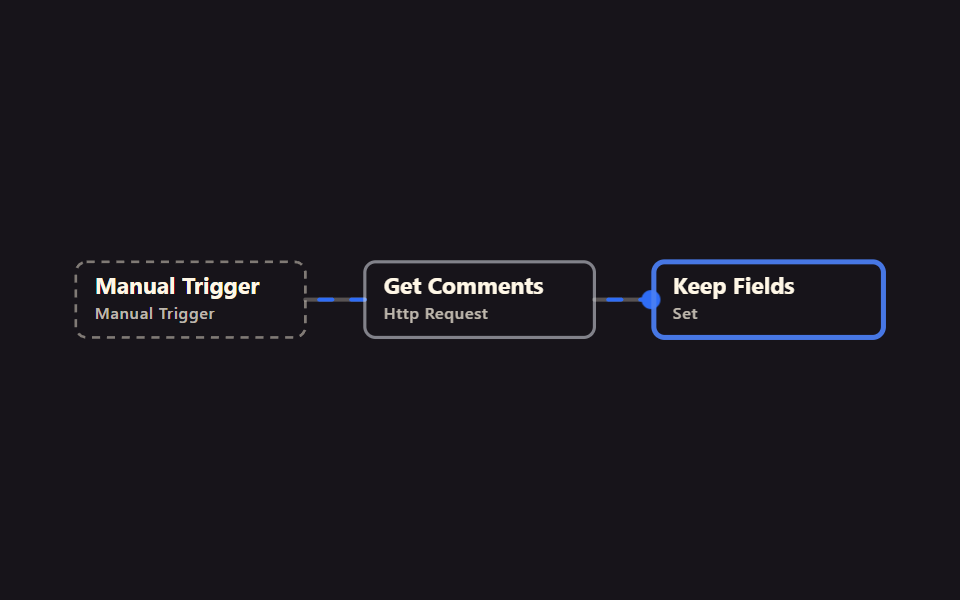
HTTP Request appends postId as a query parameter to fetch a comment list, and Set keeps only name, email, and body. It's the most common shape of a URL with a question mark on it.
<main class="stage">
<svg class="flow" viewBox="-28 -28 654 112" xmlns="http://www.w3.org/2000/svg" role="img" aria-label="godrich 203-01 http-get-query-params">
<path class="edge" d="M170 28 C192 28 192 28 214 28"/>
<path class="edge edge--flow" style="--i:0" d="M170 28 C192 28 192 28 214 28"/>
<circle class="pulse" style="--i:0;offset-path:path('M170 28 C192 28 192 28 214 28')" r="7"/>
<path class="edge" d="M384 28 C406 28 406 28 428 28"/>
<path class="edge edge--flow" style="--i:1" d="M384 28 C406 28 406 28 428 28"/>
<circle class="pulse" style="--i:1;offset-path:path('M384 28 C406 28 406 28 428 28')" r="7"/>
<g class="node node--trigger" style="--i:0" transform="translate(0 0)"><rect class="node__box" width="170" height="56"/><text class="node__name" x="14" y="24">Manual Trigger</text><text class="node__type" x="14" y="42">Manual Trigger</text></g>
<g class="node" style="--i:1" transform="translate(214 0)"><rect class="node__box" width="170" height="56"/><text class="node__name" x="14" y="24">Get Comments</text><text class="node__type" x="14" y="42">Http Request</text></g>
<g class="node" style="--i:2" transform="translate(428 0)"><rect class="node__box" width="170" height="56"/><text class="node__name" x="14" y="24">Keep Fields</text><text class="node__type" x="14" y="42">Set</text></g>
</svg>
</main>
@use "../../../../site/static/demo-tokens" as *;
// ── 변수 3개 ──────────────────────────────────────────
$duration: $dur-loop; // 한 바퀴 (데모 2초와 같은 값 — gif 가 끊기지 않게)
$easing: linear; // 대시 흐름은 등속
$color: $subject-blue; // 강조(흐름·켜진 노드) 색
$ink: $subject-cream; // 글자 — 먹 무대라 크림이 맞다(17.11:1)
$edge: $subject-cream; // 테두리·연결선(도형)
$n: 3; // 노드 수 — 켜지는 순서 간격
@include stage($stage-ink);
.flow { width: 100%; height: 100%; max-height: 100vh; display: block; overflow: visible; }
.edge { fill: none; stroke: $edge; stroke-opacity: .28; stroke-width: 3; stroke-linecap: round; }
.edge--flow { stroke: $color; stroke-opacity: 1; stroke-dasharray: 10 14; animation: flow $duration $easing infinite; }
@keyframes flow { to { stroke-dashoffset: -48; } }
.node__box { fill: transparent; stroke: $edge; stroke-opacity: .45; stroke-width: 2; rx: $r-sm; }
.node__name { fill: $ink; font-weight: 700; font-size: 17px; font-family: -apple-system, "Segoe UI", sans-serif; }
.node__type { fill: $ink; fill-opacity: .72; font-weight: 500; font-size: 12px; font-family: -apple-system, "Segoe UI", sans-serif; letter-spacing: .04em; }
.node--trigger .node__box { stroke-dasharray: 6 5; }
// 켜진 노드는 테두리가 강조색으로 두꺼워진다 (filter 대신 stroke — 렌더 비용). --i 는 <g> 에서 상속된다
.node .node__box { animation: box-lit $duration $ease-spring infinite; animation-delay: calc(var(--i) * #{$duration} / #{$n}); }
@keyframes box-lit {
0%, 100% { stroke: $edge; stroke-opacity: .45; stroke-width: 2; }
12%, 32% { stroke: $color; stroke-opacity: 1; stroke-width: 4; }
50% { stroke: $edge; stroke-opacity: .45; stroke-width: 2; }
}
.pulse { fill: $color; offset-distance: 0%; offset-rotate: 0deg; animation: travel $duration $ease-out infinite; animation-delay: calc(var(--i) * #{$duration} / #{$n}); }
@keyframes travel {
0% { offset-distance: 0%; opacity: 0; }
10% { opacity: 1; }
45% { offset-distance: 100%; opacity: 1; }
55%, 100% { offset-distance: 100%; opacity: 0; }
}
@media (prefers-reduced-motion: reduce) {
.edge--flow, .node, .node .node__box, .pulse { animation: none; }
.edge--flow { stroke-dasharray: none; } // 흐름은 멈추고 연결선만 남긴다
.pulse { display: none; }
}html, body {
margin: 0;
overflow: hidden;
}
.stage {
box-sizing: border-box;
min-height: 100vh;
display: grid;
place-items: center;
margin: 0;
background: #17141a;
font-family: -apple-system, "Segoe UI", "Noto Sans KR", sans-serif;
padding: clamp(8px, 4vw, 24px);
}
.flow {
width: 100%;
height: 100%;
max-height: 100vh;
display: block;
overflow: visible;
}
.edge {
fill: none;
stroke: #fff7e6;
stroke-opacity: 0.28;
stroke-width: 3;
stroke-linecap: round;
}
.edge--flow {
stroke: #2f6df6;
stroke-opacity: 1;
stroke-dasharray: 10 14;
animation: flow 2s linear infinite;
}
@keyframes flow {
to {
stroke-dashoffset: -48;
}
}
.node__box {
fill: transparent;
stroke: #fff7e6;
stroke-opacity: 0.45;
stroke-width: 2;
rx: 8px;
}
.node__name {
fill: #fff7e6;
font-weight: 700;
font-size: 17px;
font-family: -apple-system, "Segoe UI", sans-serif;
}
.node__type {
fill: #fff7e6;
fill-opacity: 0.72;
font-weight: 500;
font-size: 12px;
font-family: -apple-system, "Segoe UI", sans-serif;
letter-spacing: 0.04em;
}
.node--trigger .node__box {
stroke-dasharray: 6 5;
}
.node .node__box {
animation: box-lit 2s cubic-bezier(0.2, 0.8, 0.2, 1) infinite;
animation-delay: calc(var(--i) * 2s / 3);
}
@keyframes box-lit {
0%, 100% {
stroke: #fff7e6;
stroke-opacity: 0.45;
stroke-width: 2;
}
12%, 32% {
stroke: #2f6df6;
stroke-opacity: 1;
stroke-width: 4;
}
50% {
stroke: #fff7e6;
stroke-opacity: 0.45;
stroke-width: 2;
}
}
.pulse {
fill: #2f6df6;
offset-distance: 0%;
offset-rotate: 0deg;
animation: travel 2s ease-out infinite;
animation-delay: calc(var(--i) * 2s / 3);
}
@keyframes travel {
0% {
offset-distance: 0%;
opacity: 0;
}
10% {
opacity: 1;
}
45% {
offset-distance: 100%;
opacity: 1;
}
55%, 100% {
offset-distance: 100%;
opacity: 0;
}
}
@media (prefers-reduced-motion: reduce) {
.edge--flow, .node, .node .node__box, .pulse {
animation: none;
}
.edge--flow {
stroke-dasharray: none;
}
.pulse {
display: none;
}
}01 · GET with query params — Measured area 2.989% · moving frames 23/23Original by GODRICH · SCSS and React ship in the zip · See the password
In the workflow JSON
In practice, this is what you'd use for fetching comments for one post, calling a search/filter API.
{
  "name": "Get Comments",
  "type": "n8n-nodes-base.httpRequest",
  "typeVersion": 4.5,
  "parameters": {
    "method": "GET",
    "url": "https://jsonplaceholder.typicode.com/comments",
    "sendQuery": true,
    "queryParameters": {
      "parameters": [
        { "name": "postId", "value": "1" }
      ]
    },
    "options": {}
  }
}
02Paginate through pages
What it automates
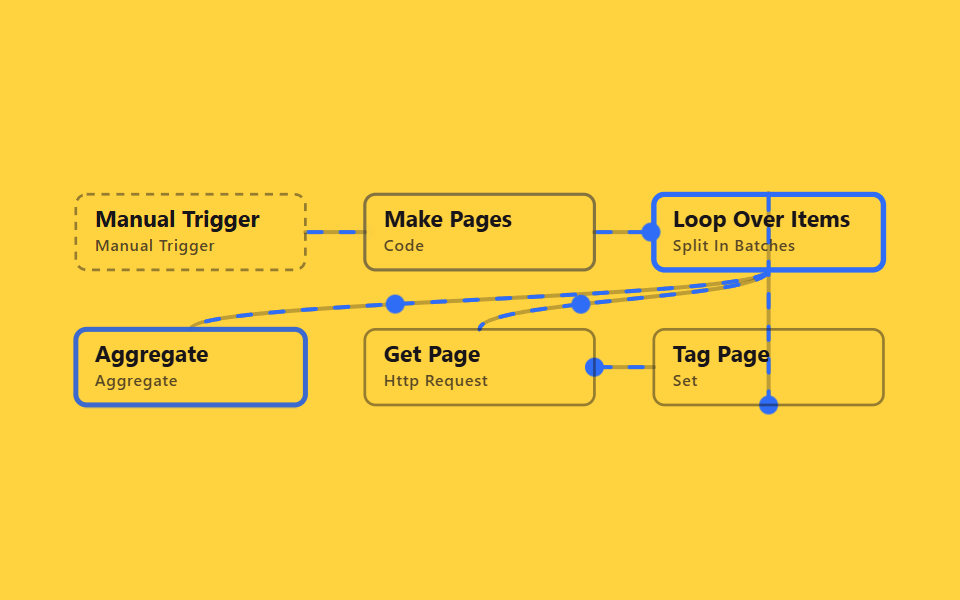
Code makes page numbers 1, 2, 3, and Loop Over Items feeds them into HTTP Request one page at a time, looping back for the next. Since HTTP replaces the item with the response, Tag Page reaches back to the original node by name to recover the page number.
<main class="stage">
<svg class="flow" viewBox="-28 -28 654 212" xmlns="http://www.w3.org/2000/svg" role="img" aria-label="godrich 203-02 http-get-pagination-loop">
<path class="edge" d="M170 28 C192 28 192 28 214 28"/>
<path class="edge edge--flow" style="--i:0" d="M170 28 C192 28 192 28 214 28"/>
<circle class="pulse" style="--i:0;offset-path:path('M170 28 C192 28 192 28 214 28')" r="7"/>
<path class="edge" d="M384 28 C406 28 406 28 428 28"/>
<path class="edge edge--flow" style="--i:1" d="M384 28 C406 28 406 28 428 28"/>
<circle class="pulse" style="--i:1;offset-path:path('M384 28 C406 28 406 28 428 28')" r="7"/>
<path class="edge" d="M513 56 C513 78 85 78 85 100"/>
<path class="edge edge--flow" style="--i:2" d="M513 56 C513 78 85 78 85 100"/>
<circle class="pulse" style="--i:2;offset-path:path('M513 56 C513 78 85 78 85 100')" r="7"/>
<path class="edge" d="M513 56 C513 78 299 78 299 100"/>
<path class="edge edge--flow" style="--i:2" d="M513 56 C513 78 299 78 299 100"/>
<circle class="pulse" style="--i:2;offset-path:path('M513 56 C513 78 299 78 299 100')" r="7"/>
<path class="edge" d="M384 128 C406 128 406 128 428 128"/>
<path class="edge edge--flow" style="--i:4" d="M384 128 C406 128 406 128 428 128"/>
<circle class="pulse" style="--i:4;offset-path:path('M384 128 C406 128 406 128 428 128')" r="7"/>
<path class="edge" d="M513 156 C513 172 513 -16 513 0"/>
<path class="edge edge--flow" style="--i:5" d="M513 156 C513 172 513 -16 513 0"/>
<circle class="pulse" style="--i:5;offset-path:path('M513 156 C513 172 513 -16 513 0')" r="7"/>
<g class="node node--trigger" style="--i:0" transform="translate(0 0)"><rect class="node__box" width="170" height="56"/><text class="node__name" x="14" y="24">Manual Trigger</text><text class="node__type" x="14" y="42">Manual Trigger</text></g>
<g class="node" style="--i:1" transform="translate(214 0)"><rect class="node__box" width="170" height="56"/><text class="node__name" x="14" y="24">Make Pages</text><text class="node__type" x="14" y="42">Code</text></g>
<g class="node" style="--i:2" transform="translate(428 0)"><rect class="node__box" width="170" height="56"/><text class="node__name" x="14" y="24">Loop Over Items</text><text class="node__type" x="14" y="42">Split In Batches</text></g>
<g class="node" style="--i:4" transform="translate(214 100)"><rect class="node__box" width="170" height="56"/><text class="node__name" x="14" y="24">Get Page</text><text class="node__type" x="14" y="42">Http Request</text></g>
<g class="node" style="--i:5" transform="translate(428 100)"><rect class="node__box" width="170" height="56"/><text class="node__name" x="14" y="24">Tag Page</text><text class="node__type" x="14" y="42">Set</text></g>
<g class="node" style="--i:3" transform="translate(0 100)"><rect class="node__box" width="170" height="56"/><text class="node__name" x="14" y="24">Aggregate</text><text class="node__type" x="14" y="42">Aggregate</text></g>
</svg>
</main>@use "../../../../site/static/demo-tokens" as *;
// ── 변수 3개 ──────────────────────────────────────────
$duration: $dur-loop; // 한 바퀴 (데모 2초와 같은 값 — gif 가 끊기지 않게)
$easing: linear; // 대시 흐름은 등속
$color: $subject-blue; // 강조(흐름·켜진 노드) 색
$ink: $subject-ink; // 글자
$edge: $subject-ink; // 테두리·연결선
$n: 6; // 노드 수 — 켜지는 순서 간격
@include stage($stage-yellow);
.flow { width: 100%; height: 100%; max-height: 100vh; display: block; overflow: visible; }
.edge { fill: none; stroke: $edge; stroke-opacity: .28; stroke-width: 3; stroke-linecap: round; }
.edge--flow { stroke: $color; stroke-opacity: 1; stroke-dasharray: 10 14; animation: flow $duration $easing infinite; }
@keyframes flow { to { stroke-dashoffset: -48; } }
.node__box { fill: transparent; stroke: $edge; stroke-opacity: .45; stroke-width: 2; rx: $r-sm; }
.node__name { fill: $ink; font-weight: 700; font-size: 17px; font-family: -apple-system, "Segoe UI", sans-serif; }
.node__type { fill: $ink; fill-opacity: .72; font-weight: 500; font-size: 12px; font-family: -apple-system, "Segoe UI", sans-serif; letter-spacing: .04em; }
.node--trigger .node__box { stroke-dasharray: 6 5; }
// 켜진 노드는 테두리가 강조색으로 두꺼워진다 (filter 대신 stroke — 렌더 비용). --i 는 <g> 에서 상속된다
.node .node__box { animation: box-lit $duration $ease-spring infinite; animation-delay: calc(var(--i) * #{$duration} / #{$n}); }
@keyframes box-lit {
0%, 100% { stroke: $edge; stroke-opacity: .45; stroke-width: 2; }
12%, 32% { stroke: $color; stroke-opacity: 1; stroke-width: 4; }
50% { stroke: $edge; stroke-opacity: .45; stroke-width: 2; }
}
.pulse { fill: $color; offset-distance: 0%; offset-rotate: 0deg; animation: travel $duration $ease-out infinite; animation-delay: calc(var(--i) * #{$duration} / #{$n}); }
@keyframes travel {
0% { offset-distance: 0%; opacity: 0; }
10% { opacity: 1; }
45% { offset-distance: 100%; opacity: 1; }
55%, 100% { offset-distance: 100%; opacity: 0; }
}
@media (prefers-reduced-motion: reduce) {
.edge--flow, .node, .node .node__box, .pulse { animation: none; }
.edge--flow { stroke-dasharray: none; } // 흐름은 멈추고 연결선만 남긴다
.pulse { display: none; }
}html, body {
margin: 0;
overflow: hidden;
}
.stage {
box-sizing: border-box;
min-height: 100vh;
display: grid;
place-items: center;
margin: 0;
background: #ffd23f;
font-family: -apple-system, "Segoe UI", "Noto Sans KR", sans-serif;
padding: clamp(8px, 4vw, 24px);
}
.flow {
width: 100%;
height: 100%;
max-height: 100vh;
display: block;
overflow: visible;
}
.edge {
fill: none;
stroke: #17141a;
stroke-opacity: 0.28;
stroke-width: 3;
stroke-linecap: round;
}
.edge--flow {
stroke: #2f6df6;
stroke-opacity: 1;
stroke-dasharray: 10 14;
animation: flow 2s linear infinite;
}
@keyframes flow {
to {
stroke-dashoffset: -48;
}
}
.node__box {
fill: transparent;
stroke: #17141a;
stroke-opacity: 0.45;
stroke-width: 2;
rx: 8px;
}
.node__name {
fill: #17141a;
font-weight: 700;
font-size: 17px;
font-family: -apple-system, "Segoe UI", sans-serif;
}
.node__type {
fill: #17141a;
fill-opacity: 0.72;
font-weight: 500;
font-size: 12px;
font-family: -apple-system, "Segoe UI", sans-serif;
letter-spacing: 0.04em;
}
.node--trigger .node__box {
stroke-dasharray: 6 5;
}
.node .node__box {
animation: box-lit 2s cubic-bezier(0.2, 0.8, 0.2, 1) infinite;
animation-delay: calc(var(--i) * 2s / 6);
}
@keyframes box-lit {
0%, 100% {
stroke: #17141a;
stroke-opacity: 0.45;
stroke-width: 2;
}
12%, 32% {
stroke: #2f6df6;
stroke-opacity: 1;
stroke-width: 4;
}
50% {
stroke: #17141a;
stroke-opacity: 0.45;
stroke-width: 2;
}
}
.pulse {
fill: #2f6df6;
offset-distance: 0%;
offset-rotate: 0deg;
animation: travel 2s ease-out infinite;
animation-delay: calc(var(--i) * 2s / 6);
}
@keyframes travel {
0% {
offset-distance: 0%;
opacity: 0;
}
10% {
opacity: 1;
}
45% {
offset-distance: 100%;
opacity: 1;
}
55%, 100% {
offset-distance: 100%;
opacity: 0;
}
}
@media (prefers-reduced-motion: reduce) {
.edge--flow, .node, .node .node__box, .pulse {
animation: none;
}
.edge--flow {
stroke-dasharray: none;
}
.pulse {
display: none;
}
}02 · Paginate through pages — Measured area 7.178% · moving frames 23/23Original by GODRICH · SCSS and React ship in the zip · See the password
In the workflow JSON
In practice, this is what you'd use for pulling an entire list API, fetching more than one page of results.
{
  "name": "Tag Page",
  "type": "n8n-nodes-base.set",
  "typeVersion": 3.5,
  "parameters": {
    "mode": "manual",
    "assignments": {
      "assignments": [
        {
          "id": "1",
          "name": "page",
          "value": "={{ $('Make Pages').item.json.page }}",
          "type": "number"
        }
      ]
    },
    "includeOtherFields": true,
    "options": {}
  }
}
03Transform the response
What it automates
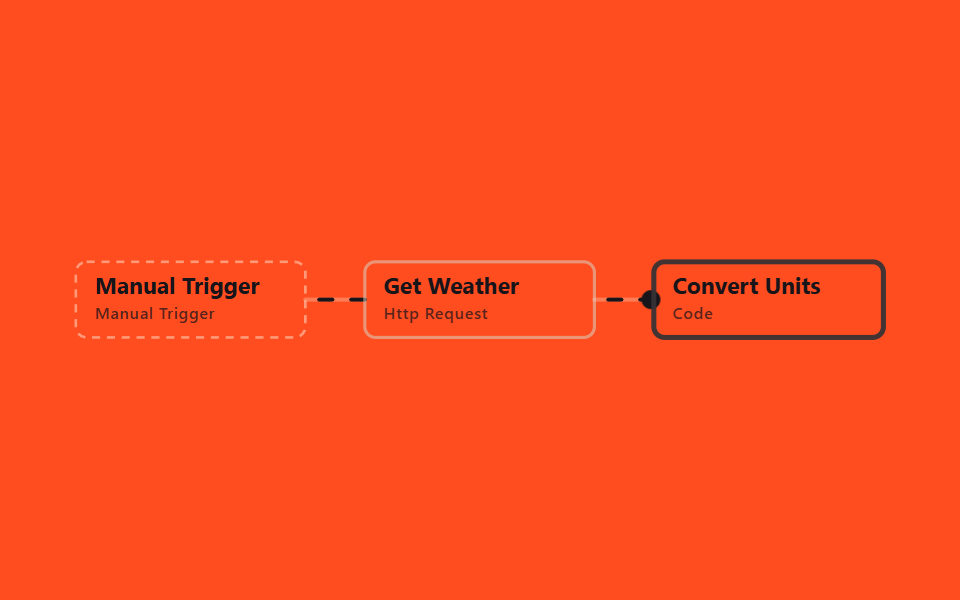
HTTP Request calls a keyless weather API, and Code converts Celsius to Fahrenheit and writes a one-line summary. It's the shortest example of reshaping an API's raw response instead of passing it along as-is.
<main class="stage">
<svg class="flow" viewBox="-28 -28 654 112" xmlns="http://www.w3.org/2000/svg" role="img" aria-label="godrich 203-03 http-transform-response-fields">
<path class="edge" d="M170 28 C192 28 192 28 214 28"/>
<path class="edge edge--flow" style="--i:0" d="M170 28 C192 28 192 28 214 28"/>
<circle class="pulse" style="--i:0;offset-path:path('M170 28 C192 28 192 28 214 28')" r="7"/>
<path class="edge" d="M384 28 C406 28 406 28 428 28"/>
<path class="edge edge--flow" style="--i:1" d="M384 28 C406 28 406 28 428 28"/>
<circle class="pulse" style="--i:1;offset-path:path('M384 28 C406 28 406 28 428 28')" r="7"/>
<g class="node node--trigger" style="--i:0" transform="translate(0 0)"><rect class="node__box" width="170" height="56"/><text class="node__name" x="14" y="24">Manual Trigger</text><text class="node__type" x="14" y="42">Manual Trigger</text></g>
<g class="node" style="--i:1" transform="translate(214 0)"><rect class="node__box" width="170" height="56"/><text class="node__name" x="14" y="24">Get Weather</text><text class="node__type" x="14" y="42">Http Request</text></g>
<g class="node" style="--i:2" transform="translate(428 0)"><rect class="node__box" width="170" height="56"/><text class="node__name" x="14" y="24">Convert Units</text><text class="node__type" x="14" y="42">Code</text></g>
</svg>
</main>
@use "../../../../site/static/demo-tokens" as *;
// ── 변수 3개 ──────────────────────────────────────────
$duration: $dur-loop; // 한 바퀴 (데모 2초와 같은 값 — gif 가 끊기지 않게)
$easing: linear; // 대시 흐름은 등속
$color: $subject-ink; // 강조(흐름·켜진 노드) 색
$ink: $subject-ink; // 글자 — 주황 면 위 크림은 3.11:1, 잉크 5.50:1
$edge: $subject-cream; // 테두리·연결선(도형)
$n: 3; // 노드 수 — 켜지는 순서 간격
@include stage($stage-orange);
.flow { width: 100%; height: 100%; max-height: 100vh; display: block; overflow: visible; }
.edge { fill: none; stroke: $edge; stroke-opacity: .28; stroke-width: 3; stroke-linecap: round; }
.edge--flow { stroke: $color; stroke-opacity: 1; stroke-dasharray: 10 14; animation: flow $duration $easing infinite; }
@keyframes flow { to { stroke-dashoffset: -48; } }
.node__box { fill: transparent; stroke: $edge; stroke-opacity: .45; stroke-width: 2; rx: $r-sm; }
.node__name { fill: $ink; font-weight: 700; font-size: 17px; font-family: -apple-system, "Segoe UI", sans-serif; }
.node__type { fill: $ink; fill-opacity: .72; font-weight: 500; font-size: 12px; font-family: -apple-system, "Segoe UI", sans-serif; letter-spacing: .04em; }
.node--trigger .node__box { stroke-dasharray: 6 5; }
// 켜진 노드는 테두리가 강조색으로 두꺼워진다 (filter 대신 stroke — 렌더 비용). --i 는 <g> 에서 상속된다
.node .node__box { animation: box-lit $duration $ease-spring infinite; animation-delay: calc(var(--i) * #{$duration} / #{$n}); }
@keyframes box-lit {
0%, 100% { stroke: $edge; stroke-opacity: .45; stroke-width: 2; }
12%, 32% { stroke: $color; stroke-opacity: 1; stroke-width: 4; }
50% { stroke: $edge; stroke-opacity: .45; stroke-width: 2; }
}
.pulse { fill: $color; offset-distance: 0%; offset-rotate: 0deg; animation: travel $duration $ease-out infinite; animation-delay: calc(var(--i) * #{$duration} / #{$n}); }
@keyframes travel {
0% { offset-distance: 0%; opacity: 0; }
10% { opacity: 1; }
45% { offset-distance: 100%; opacity: 1; }
55%, 100% { offset-distance: 100%; opacity: 0; }
}
@media (prefers-reduced-motion: reduce) {
.edge--flow, .node, .node .node__box, .pulse { animation: none; }
.edge--flow { stroke-dasharray: none; } // 흐름은 멈추고 연결선만 남긴다
.pulse { display: none; }
}html, body {
margin: 0;
overflow: hidden;
}
.stage {
box-sizing: border-box;
min-height: 100vh;
display: grid;
place-items: center;
margin: 0;
background: #ff4d1f;
font-family: -apple-system, "Segoe UI", "Noto Sans KR", sans-serif;
padding: clamp(8px, 4vw, 24px);
}
.flow {
width: 100%;
height: 100%;
max-height: 100vh;
display: block;
overflow: visible;
}
.edge {
fill: none;
stroke: #fff7e6;
stroke-opacity: 0.28;
stroke-width: 3;
stroke-linecap: round;
}
.edge--flow {
stroke: #17141a;
stroke-opacity: 1;
stroke-dasharray: 10 14;
animation: flow 2s linear infinite;
}
@keyframes flow {
to {
stroke-dashoffset: -48;
}
}
.node__box {
fill: transparent;
stroke: #fff7e6;
stroke-opacity: 0.45;
stroke-width: 2;
rx: 8px;
}
.node__name {
fill: #17141a;
font-weight: 700;
font-size: 17px;
font-family: -apple-system, "Segoe UI", sans-serif;
}
.node__type {
fill: #17141a;
fill-opacity: 0.72;
font-weight: 500;
font-size: 12px;
font-family: -apple-system, "Segoe UI", sans-serif;
letter-spacing: 0.04em;
}
.node--trigger .node__box {
stroke-dasharray: 6 5;
}
.node .node__box {
animation: box-lit 2s cubic-bezier(0.2, 0.8, 0.2, 1) infinite;
animation-delay: calc(var(--i) * 2s / 3);
}
@keyframes box-lit {
0%, 100% {
stroke: #fff7e6;
stroke-opacity: 0.45;
stroke-width: 2;
}
12%, 32% {
stroke: #17141a;
stroke-opacity: 1;
stroke-width: 4;
}
50% {
stroke: #fff7e6;
stroke-opacity: 0.45;
stroke-width: 2;
}
}
.pulse {
fill: #17141a;
offset-distance: 0%;
offset-rotate: 0deg;
animation: travel 2s ease-out infinite;
animation-delay: calc(var(--i) * 2s / 3);
}
@keyframes travel {
0% {
offset-distance: 0%;
opacity: 0;
}
10% {
opacity: 1;
}
45% {
offset-distance: 100%;
opacity: 1;
}
55%, 100% {
offset-distance: 100%;
opacity: 0;
}
}
@media (prefers-reduced-motion: reduce) {
.edge--flow, .node, .node .node__box, .pulse {
animation: none;
}
.edge--flow {
stroke-dasharray: none;
}
.pulse {
display: none;
}
}03 · Transform the response — Measured area 2.949% · moving frames 23/23Original by GODRICH · SCSS and React ship in the zip · See the password
In the workflow JSON
In practice, this is what you'd use for unit conversion, normalizing response field names.
{
  "name": "Convert Units",
  "type": "n8n-nodes-base.code",
  "typeVersion": 2,
  "parameters": {
    "jsCode": "const c = $input.first().json.current.temperature_2m;\nconst f = Math.round((c * 9 / 5 + 32) * 10) / 10;\nreturn [{ json: { tempC: c, tempF: f, summary: `Seoul is ${c}C (${f}F)` } }];"
  }
}
04Append three HTTP calls
What it automates
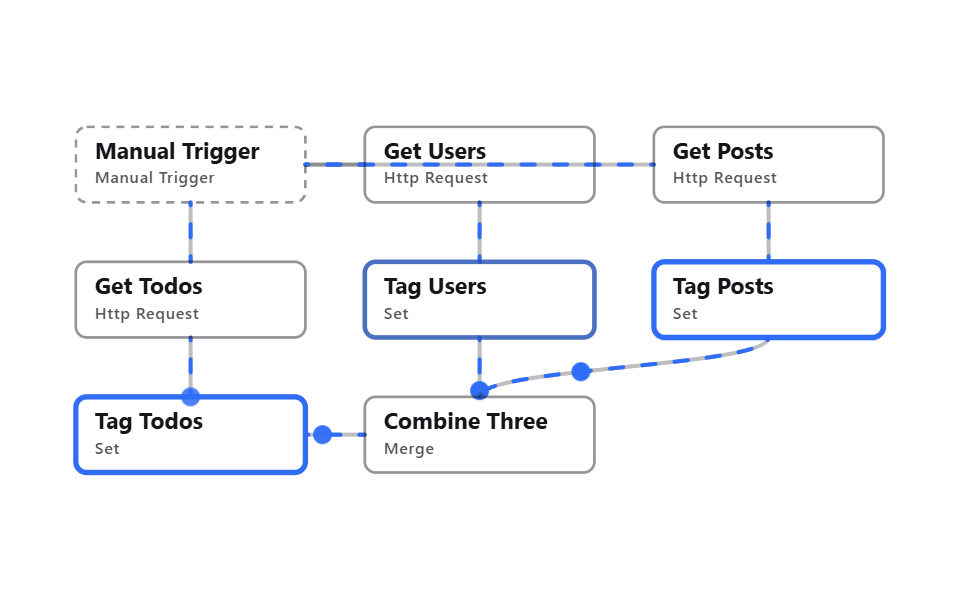
Three HTTP Request nodes fetch users, posts, and todos, Set stamps each with a source field, and Merge in Append mode stacks all three into one list. Unlike pairing records by key, this just piles the results up.
<main class="stage">
<svg class="flow" viewBox="-28 -28 654 312" xmlns="http://www.w3.org/2000/svg" role="img" aria-label="godrich 203-04 http-combine-append-three-calls">
<path class="edge" d="M170 28 C192 28 192 28 214 28"/>
<path class="edge edge--flow" style="--i:0" d="M170 28 C192 28 192 28 214 28"/>
<circle class="pulse" style="--i:0;offset-path:path('M170 28 C192 28 192 28 214 28')" r="7"/>
<path class="edge" d="M170 28 C299 28 299 28 428 28"/>
<path class="edge edge--flow" style="--i:0" d="M170 28 C299 28 299 28 428 28"/>
<circle class="pulse" style="--i:0;offset-path:path('M170 28 C299 28 299 28 428 28')" r="7"/>
<path class="edge" d="M85 56 C85 78 85 78 85 100"/>
<path class="edge edge--flow" style="--i:0" d="M85 56 C85 78 85 78 85 100"/>
<circle class="pulse" style="--i:0;offset-path:path('M85 56 C85 78 85 78 85 100')" r="7"/>
<path class="edge" d="M299 56 C299 78 299 78 299 100"/>
<path class="edge edge--flow" style="--i:1" d="M299 56 C299 78 299 78 299 100"/>
<circle class="pulse" style="--i:1;offset-path:path('M299 56 C299 78 299 78 299 100')" r="7"/>
<path class="edge" d="M513 56 C513 78 513 78 513 100"/>
<path class="edge edge--flow" style="--i:2" d="M513 56 C513 78 513 78 513 100"/>
<circle class="pulse" style="--i:2;offset-path:path('M513 56 C513 78 513 78 513 100')" r="7"/>
<path class="edge" d="M85 156 C85 178 85 178 85 200"/>
<path class="edge edge--flow" style="--i:3" d="M85 156 C85 178 85 178 85 200"/>
<circle class="pulse" style="--i:3;offset-path:path('M85 156 C85 178 85 178 85 200')" r="7"/>
<path class="edge" d="M299 156 C299 178 299 178 299 200"/>
<path class="edge edge--flow" style="--i:4" d="M299 156 C299 178 299 178 299 200"/>
<circle class="pulse" style="--i:4;offset-path:path('M299 156 C299 178 299 178 299 200')" r="7"/>
<path class="edge" d="M513 156 C513 178 299 178 299 200"/>
<path class="edge edge--flow" style="--i:5" d="M513 156 C513 178 299 178 299 200"/>
<circle class="pulse" style="--i:5;offset-path:path('M513 156 C513 178 299 178 299 200')" r="7"/>
<path class="edge" d="M170 228 C192 228 192 228 214 228"/>
<path class="edge edge--flow" style="--i:6" d="M170 228 C192 228 192 228 214 228"/>
<circle class="pulse" style="--i:6;offset-path:path('M170 228 C192 228 192 228 214 228')" r="7"/>
<g class="node node--trigger" style="--i:0" transform="translate(0 0)"><rect class="node__box" width="170" height="56"/><text class="node__name" x="14" y="24">Manual Trigger</text><text class="node__type" x="14" y="42">Manual Trigger</text></g>
<g class="node" style="--i:1" transform="translate(214 0)"><rect class="node__box" width="170" height="56"/><text class="node__name" x="14" y="24">Get Users</text><text class="node__type" x="14" y="42">Http Request</text></g>
<g class="node" style="--i:2" transform="translate(428 0)"><rect class="node__box" width="170" height="56"/><text class="node__name" x="14" y="24">Get Posts</text><text class="node__type" x="14" y="42">Http Request</text></g>
<g class="node" style="--i:3" transform="translate(0 100)"><rect class="node__box" width="170" height="56"/><text class="node__name" x="14" y="24">Get Todos</text><text class="node__type" x="14" y="42">Http Request</text></g>
<g class="node" style="--i:4" transform="translate(214 100)"><rect class="node__box" width="170" height="56"/><text class="node__name" x="14" y="24">Tag Users</text><text class="node__type" x="14" y="42">Set</text></g>
<g class="node" style="--i:5" transform="translate(428 100)"><rect class="node__box" width="170" height="56"/><text class="node__name" x="14" y="24">Tag Posts</text><text class="node__type" x="14" y="42">Set</text></g>
<g class="node" style="--i:6" transform="translate(0 200)"><rect class="node__box" width="170" height="56"/><text class="node__name" x="14" y="24">Tag Todos</text><text class="node__type" x="14" y="42">Set</text></g>
<g class="node" style="--i:7" transform="translate(214 200)"><rect class="node__box" width="170" height="56"/><text class="node__name" x="14" y="24">Combine Three</text><text class="node__type" x="14" y="42">Merge</text></g>
</svg>
</main>@use "../../../../site/static/demo-tokens" as *;
// ── 변수 3개 ──────────────────────────────────────────
$duration: $dur-loop; // 한 바퀴 (데모 2초와 같은 값 — gif 가 끊기지 않게)
$easing: linear; // 대시 흐름은 등속
$color: $subject-blue; // 강조(흐름·켜진 노드) 색
$ink: $subject-ink; // 글자
$edge: $subject-ink; // 테두리·연결선
$n: 8; // 노드 수 — 켜지는 순서 간격
@include stage($stage-paper);
.flow { width: 100%; height: 100%; max-height: 100vh; display: block; overflow: visible; }
.edge { fill: none; stroke: $edge; stroke-opacity: .28; stroke-width: 3; stroke-linecap: round; }
.edge--flow { stroke: $color; stroke-opacity: 1; stroke-dasharray: 10 14; animation: flow $duration $easing infinite; }
@keyframes flow { to { stroke-dashoffset: -48; } }
.node__box { fill: transparent; stroke: $edge; stroke-opacity: .45; stroke-width: 2; rx: $r-sm; }
.node__name { fill: $ink; font-weight: 700; font-size: 17px; font-family: -apple-system, "Segoe UI", sans-serif; }
.node__type { fill: $ink; fill-opacity: .72; font-weight: 500; font-size: 12px; font-family: -apple-system, "Segoe UI", sans-serif; letter-spacing: .04em; }
.node--trigger .node__box { stroke-dasharray: 6 5; }
// 켜진 노드는 테두리가 강조색으로 두꺼워진다 (filter 대신 stroke — 렌더 비용). --i 는 <g> 에서 상속된다
.node .node__box { animation: box-lit $duration $ease-spring infinite; animation-delay: calc(var(--i) * #{$duration} / #{$n}); }
@keyframes box-lit {
0%, 100% { stroke: $edge; stroke-opacity: .45; stroke-width: 2; }
12%, 32% { stroke: $color; stroke-opacity: 1; stroke-width: 4; }
50% { stroke: $edge; stroke-opacity: .45; stroke-width: 2; }
}
.pulse { fill: $color; offset-distance: 0%; offset-rotate: 0deg; animation: travel $duration $ease-out infinite; animation-delay: calc(var(--i) * #{$duration} / #{$n}); }
@keyframes travel {
0% { offset-distance: 0%; opacity: 0; }
10% { opacity: 1; }
45% { offset-distance: 100%; opacity: 1; }
55%, 100% { offset-distance: 100%; opacity: 0; }
}
@media (prefers-reduced-motion: reduce) {
.edge--flow, .node, .node .node__box, .pulse { animation: none; }
.edge--flow { stroke-dasharray: none; } // 흐름은 멈추고 연결선만 남긴다
.pulse { display: none; }
}html, body {
margin: 0;
overflow: hidden;
}
.stage {
box-sizing: border-box;
min-height: 100vh;
display: grid;
place-items: center;
margin: 0;
background: #ffffff;
font-family: -apple-system, "Segoe UI", "Noto Sans KR", sans-serif;
padding: clamp(8px, 4vw, 24px);
}
.flow {
width: 100%;
height: 100%;
max-height: 100vh;
display: block;
overflow: visible;
}
.edge {
fill: none;
stroke: #17141a;
stroke-opacity: 0.28;
stroke-width: 3;
stroke-linecap: round;
}
.edge--flow {
stroke: #2f6df6;
stroke-opacity: 1;
stroke-dasharray: 10 14;
animation: flow 2s linear infinite;
}
@keyframes flow {
to {
stroke-dashoffset: -48;
}
}
.node__box {
fill: transparent;
stroke: #17141a;
stroke-opacity: 0.45;
stroke-width: 2;
rx: 8px;
}
.node__name {
fill: #17141a;
font-weight: 700;
font-size: 17px;
font-family: -apple-system, "Segoe UI", sans-serif;
}
.node__type {
fill: #17141a;
fill-opacity: 0.72;
font-weight: 500;
font-size: 12px;
font-family: -apple-system, "Segoe UI", sans-serif;
letter-spacing: 0.04em;
}
.node--trigger .node__box {
stroke-dasharray: 6 5;
}
.node .node__box {
animation: box-lit 2s cubic-bezier(0.2, 0.8, 0.2, 1) infinite;
animation-delay: calc(var(--i) * 2s / 8);
}
@keyframes box-lit {
0%, 100% {
stroke: #17141a;
stroke-opacity: 0.45;
stroke-width: 2;
}
12%, 32% {
stroke: #2f6df6;
stroke-opacity: 1;
stroke-width: 4;
}
50% {
stroke: #17141a;
stroke-opacity: 0.45;
stroke-width: 2;
}
}
.pulse {
fill: #2f6df6;
offset-distance: 0%;
offset-rotate: 0deg;
animation: travel 2s ease-out infinite;
animation-delay: calc(var(--i) * 2s / 8);
}
@keyframes travel {
0% {
offset-distance: 0%;
opacity: 0;
}
10% {
opacity: 1;
}
45% {
offset-distance: 100%;
opacity: 1;
}
55%, 100% {
offset-distance: 100%;
opacity: 0;
}
}
@media (prefers-reduced-motion: reduce) {
.edge--flow, .node, .node .node__box, .pulse {
animation: none;
}
.edge--flow {
stroke-dasharray: none;
}
.pulse {
display: none;
}
}04 · Append three HTTP calls — Measured area 8.676% · moving frames 23/23Original by GODRICH · SCSS and React ship in the zip · See the password
In the workflow JSON
In practice, this is what you'd use for stacking results from several APIs into one table, combining logs from three notification channels.
{
  "name": "Combine Three",
  "type": "n8n-nodes-base.merge",
  "typeVersion": 3.2,
  "parameters": {
    "mode": "append",
    "numberInputs": 3
  }
}
05Create or update (POST/PUT)
What it automates
Code emits one item to create and one to update, IF splits them so one goes out as a POST and the other as a PUT, and Merge brings the results back together. It's the common skeleton for deciding on the spot whether a resource is new.
<main class="stage">
<svg class="flow" viewBox="-28 -28 654 312" xmlns="http://www.w3.org/2000/svg" role="img" aria-label="godrich 203-05 http-post-put-upsert">
<path class="edge" d="M170 28 C192 28 192 28 214 28"/>
<path class="edge edge--flow" style="--i:0" d="M170 28 C192 28 192 28 214 28"/>
<circle class="pulse" style="--i:0;offset-path:path('M170 28 C192 28 192 28 214 28')" r="7"/>
<path class="edge" d="M384 28 C406 28 406 28 428 28"/>
<path class="edge edge--flow" style="--i:1" d="M384 28 C406 28 406 28 428 28"/>
<circle class="pulse" style="--i:1;offset-path:path('M384 28 C406 28 406 28 428 28')" r="7"/>
<path class="edge" d="M513 56 C513 78 85 78 85 100"/>
<path class="edge edge--flow" style="--i:2" d="M513 56 C513 78 85 78 85 100"/>
<circle class="pulse" style="--i:2;offset-path:path('M513 56 C513 78 85 78 85 100')" r="7"/>
<path class="edge" d="M513 56 C513 78 299 78 299 100"/>
<path class="edge edge--flow" style="--i:2" d="M513 56 C513 78 299 78 299 100"/>
<circle class="pulse" style="--i:2;offset-path:path('M513 56 C513 78 299 78 299 100')" r="7"/>
<path class="edge" d="M170 128 C299 128 299 128 428 128"/>
<path class="edge edge--flow" style="--i:3" d="M170 128 C299 128 299 128 428 128"/>
<circle class="pulse" style="--i:3;offset-path:path('M170 128 C299 128 299 128 428 128')" r="7"/>
<path class="edge" d="M299 156 C299 178 85 178 85 200"/>
<path class="edge edge--flow" style="--i:4" d="M299 156 C299 178 85 178 85 200"/>
<circle class="pulse" style="--i:4;offset-path:path('M299 156 C299 178 85 178 85 200')" r="7"/>
<path class="edge" d="M513 156 C513 178 299 178 299 200"/>
<path class="edge edge--flow" style="--i:5" d="M513 156 C513 178 299 178 299 200"/>
<circle class="pulse" style="--i:5;offset-path:path('M513 156 C513 178 299 178 299 200')" r="7"/>
<path class="edge" d="M170 228 C192 228 192 228 214 228"/>
<path class="edge edge--flow" style="--i:6" d="M170 228 C192 228 192 228 214 228"/>
<circle class="pulse" style="--i:6;offset-path:path('M170 228 C192 228 192 228 214 228')" r="7"/>
<g class="node node--trigger" style="--i:0" transform="translate(0 0)"><rect class="node__box" width="170" height="56"/><text class="node__name" x="14" y="24">Manual Trigger</text><text class="node__type" x="14" y="42">Manual Trigger</text></g>
<g class="node" style="--i:1" transform="translate(214 0)"><rect class="node__box" width="170" height="56"/><text class="node__name" x="14" y="24">Make Requests</text><text class="node__type" x="14" y="42">Code</text></g>
<g class="node" style="--i:2" transform="translate(428 0)"><rect class="node__box" width="170" height="56"/><text class="node__name" x="14" y="24">Is Update</text><text class="node__type" x="14" y="42">If</text></g>
<g class="node" style="--i:3" transform="translate(0 100)"><rect class="node__box" width="170" height="56"/><text class="node__name" x="14" y="24">Update Post</text><text class="node__type" x="14" y="42">Http Request</text></g>
<g class="node" style="--i:4" transform="translate(214 100)"><rect class="node__box" width="170" height="56"/><text class="node__name" x="14" y="24">Create Post</text><text class="node__type" x="14" y="42">Http Request</text></g>
<g class="node" style="--i:5" transform="translate(428 100)"><rect class="node__box" width="170" height="56"/><text class="node__name" x="14" y="24">Label Updated</text><text class="node__type" x="14" y="42">Set</text></g>
<g class="node" style="--i:6" transform="translate(0 200)"><rect class="node__box" width="170" height="56"/><text class="node__name" x="14" y="24">Label Created</text><text class="node__type" x="14" y="42">Set</text></g>
<g class="node" style="--i:7" transform="translate(214 200)"><rect class="node__box" width="170" height="56"/><text class="node__name" x="14" y="24">Combine Results</text><text class="node__type" x="14" y="42">Merge</text></g>
</svg>
</main>@use "../../../../site/static/demo-tokens" as *;
// ── 변수 3개 ──────────────────────────────────────────
$duration: $dur-loop; // 한 바퀴 (데모 2초와 같은 값 — gif 가 끊기지 않게)
$easing: linear; // 대시 흐름은 등속
$color: $subject-blue; // 강조(흐름·켜진 노드) 색
$ink: $subject-cream; // 글자 — 먹 무대라 크림이 맞다(17.11:1)
$edge: $subject-cream; // 테두리·연결선(도형)
$n: 8; // 노드 수 — 켜지는 순서 간격
@include stage($stage-ink);
.flow { width: 100%; height: 100%; max-height: 100vh; display: block; overflow: visible; }
.edge { fill: none; stroke: $edge; stroke-opacity: .28; stroke-width: 3; stroke-linecap: round; }
.edge--flow { stroke: $color; stroke-opacity: 1; stroke-dasharray: 10 14; animation: flow $duration $easing infinite; }
@keyframes flow { to { stroke-dashoffset: -48; } }
.node__box { fill: transparent; stroke: $edge; stroke-opacity: .45; stroke-width: 2; rx: $r-sm; }
.node__name { fill: $ink; font-weight: 700; font-size: 17px; font-family: -apple-system, "Segoe UI", sans-serif; }
.node__type { fill: $ink; fill-opacity: .72; font-weight: 500; font-size: 12px; font-family: -apple-system, "Segoe UI", sans-serif; letter-spacing: .04em; }
.node--trigger .node__box { stroke-dasharray: 6 5; }
// 켜진 노드는 테두리가 강조색으로 두꺼워진다 (filter 대신 stroke — 렌더 비용). --i 는 <g> 에서 상속된다
.node .node__box { animation: box-lit $duration $ease-spring infinite; animation-delay: calc(var(--i) * #{$duration} / #{$n}); }
@keyframes box-lit {
0%, 100% { stroke: $edge; stroke-opacity: .45; stroke-width: 2; }
12%, 32% { stroke: $color; stroke-opacity: 1; stroke-width: 4; }
50% { stroke: $edge; stroke-opacity: .45; stroke-width: 2; }
}
.pulse { fill: $color; offset-distance: 0%; offset-rotate: 0deg; animation: travel $duration $ease-out infinite; animation-delay: calc(var(--i) * #{$duration} / #{$n}); }
@keyframes travel {
0% { offset-distance: 0%; opacity: 0; }
10% { opacity: 1; }
45% { offset-distance: 100%; opacity: 1; }
55%, 100% { offset-distance: 100%; opacity: 0; }
}
@media (prefers-reduced-motion: reduce) {
.edge--flow, .node, .node .node__box, .pulse { animation: none; }
.edge--flow { stroke-dasharray: none; } // 흐름은 멈추고 연결선만 남긴다
.pulse { display: none; }
}html, body {
margin: 0;
overflow: hidden;
}
.stage {
box-sizing: border-box;
min-height: 100vh;
display: grid;
place-items: center;
margin: 0;
background: #17141a;
font-family: -apple-system, "Segoe UI", "Noto Sans KR", sans-serif;
padding: clamp(8px, 4vw, 24px);
}
.flow {
width: 100%;
height: 100%;
max-height: 100vh;
display: block;
overflow: visible;
}
.edge {
fill: none;
stroke: #fff7e6;
stroke-opacity: 0.28;
stroke-width: 3;
stroke-linecap: round;
}
.edge--flow {
stroke: #2f6df6;
stroke-opacity: 1;
stroke-dasharray: 10 14;
animation: flow 2s linear infinite;
}
@keyframes flow {
to {
stroke-dashoffset: -48;
}
}
.node__box {
fill: transparent;
stroke: #fff7e6;
stroke-opacity: 0.45;
stroke-width: 2;
rx: 8px;
}
.node__name {
fill: #fff7e6;
font-weight: 700;
font-size: 17px;
font-family: -apple-system, "Segoe UI", sans-serif;
}
.node__type {
fill: #fff7e6;
fill-opacity: 0.72;
font-weight: 500;
font-size: 12px;
font-family: -apple-system, "Segoe UI", sans-serif;
letter-spacing: 0.04em;
}
.node--trigger .node__box {
stroke-dasharray: 6 5;
}
.node .node__box {
animation: box-lit 2s cubic-bezier(0.2, 0.8, 0.2, 1) infinite;
animation-delay: calc(var(--i) * 2s / 8);
}
@keyframes box-lit {
0%, 100% {
stroke: #fff7e6;
stroke-opacity: 0.45;
stroke-width: 2;
}
12%, 32% {
stroke: #2f6df6;
stroke-opacity: 1;
stroke-width: 4;
}
50% {
stroke: #fff7e6;
stroke-opacity: 0.45;
stroke-width: 2;
}
}
.pulse {
fill: #2f6df6;
offset-distance: 0%;
offset-rotate: 0deg;
animation: travel 2s ease-out infinite;
animation-delay: calc(var(--i) * 2s / 8);
}
@keyframes travel {
0% {
offset-distance: 0%;
opacity: 0;
}
10% {
opacity: 1;
}
45% {
offset-distance: 100%;
opacity: 1;
}
55%, 100% {
offset-distance: 100%;
opacity: 0;
}
}
@media (prefers-reduced-motion: reduce) {
.edge--flow, .node, .node .node__box, .pulse {
animation: none;
}
.edge--flow {
stroke-dasharray: none;
}
.pulse {
display: none;
}
}05 · Create or update (POST/PUT) — Measured area 11.49% · moving frames 23/23Original by GODRICH · SCSS and React ship in the zip · See the password
In the workflow JSON
In practice, this is what you'd use for upserting a CRM record, one workflow for creating and editing inventory.
{
  "name": "Update Post",
  "type": "n8n-nodes-base.httpRequest",
  "typeVersion": 4.5,
  "parameters": {
    "method": "PUT",
    "url": "=https://jsonplaceholder.typicode.com/posts/{{ $json.id }}",
    "sendBody": true,
    "specifyBody": "json",
    "jsonBody": "={{ JSON.stringify({ id: $json.id, title: $json.title, body: $json.body, userId: $json.userId }) }}"
  }
}
06Retry on failure
What it automates
The HTTP Request node itself is configured to retry 3 times with a 1.5-second gap, and Set stamps that policy alongside the result. Since it's built into the node, no extra IF or loop is needed.
<main class="stage">
<svg class="flow" viewBox="-28 -28 654 112" xmlns="http://www.w3.org/2000/svg" role="img" aria-label="godrich 203-06 http-retry-on-failure-config">
<path class="edge" d="M170 28 C192 28 192 28 214 28"/>
<path class="edge edge--flow" style="--i:0" d="M170 28 C192 28 192 28 214 28"/>
<circle class="pulse" style="--i:0;offset-path:path('M170 28 C192 28 192 28 214 28')" r="7"/>
<path class="edge" d="M384 28 C406 28 406 28 428 28"/>
<path class="edge edge--flow" style="--i:1" d="M384 28 C406 28 406 28 428 28"/>
<circle class="pulse" style="--i:1;offset-path:path('M384 28 C406 28 406 28 428 28')" r="7"/>
<g class="node node--trigger" style="--i:0" transform="translate(0 0)"><rect class="node__box" width="170" height="56"/><text class="node__name" x="14" y="24">Manual Trigger</text><text class="node__type" x="14" y="42">Manual Trigger</text></g>
<g class="node" style="--i:1" transform="translate(214 0)"><rect class="node__box" width="170" height="56"/><text class="node__name" x="14" y="24">Get User With Retry</text><text class="node__type" x="14" y="42">Http Request</text></g>
<g class="node" style="--i:2" transform="translate(428 0)"><rect class="node__box" width="170" height="56"/><text class="node__name" x="14" y="24">Note Retry Policy</text><text class="node__type" x="14" y="42">Set</text></g>
</svg>
</main>
@use "../../../../site/static/demo-tokens" as *;
// ── 변수 3개 ──────────────────────────────────────────
$duration: $dur-loop; // 한 바퀴 (데모 2초와 같은 값 — gif 가 끊기지 않게)
$easing: linear; // 대시 흐름은 등속
$color: $subject-blue; // 강조(흐름·켜진 노드) 색
$ink: $subject-ink; // 글자
$edge: $subject-ink; // 테두리·연결선
$n: 3; // 노드 수 — 켜지는 순서 간격
@include stage($stage-yellow);
.flow { width: 100%; height: 100%; max-height: 100vh; display: block; overflow: visible; }
.edge { fill: none; stroke: $edge; stroke-opacity: .28; stroke-width: 3; stroke-linecap: round; }
.edge--flow { stroke: $color; stroke-opacity: 1; stroke-dasharray: 10 14; animation: flow $duration $easing infinite; }
@keyframes flow { to { stroke-dashoffset: -48; } }
.node__box { fill: transparent; stroke: $edge; stroke-opacity: .45; stroke-width: 2; rx: $r-sm; }
.node__name { fill: $ink; font-weight: 700; font-size: 17px; font-family: -apple-system, "Segoe UI", sans-serif; }
.node__type { fill: $ink; fill-opacity: .72; font-weight: 500; font-size: 12px; font-family: -apple-system, "Segoe UI", sans-serif; letter-spacing: .04em; }
.node--trigger .node__box { stroke-dasharray: 6 5; }
// 켜진 노드는 테두리가 강조색으로 두꺼워진다 (filter 대신 stroke — 렌더 비용). --i 는 <g> 에서 상속된다
.node .node__box { animation: box-lit $duration $ease-spring infinite; animation-delay: calc(var(--i) * #{$duration} / #{$n}); }
@keyframes box-lit {
0%, 100% { stroke: $edge; stroke-opacity: .45; stroke-width: 2; }
12%, 32% { stroke: $color; stroke-opacity: 1; stroke-width: 4; }
50% { stroke: $edge; stroke-opacity: .45; stroke-width: 2; }
}
.pulse { fill: $color; offset-distance: 0%; offset-rotate: 0deg; animation: travel $duration $ease-out infinite; animation-delay: calc(var(--i) * #{$duration} / #{$n}); }
@keyframes travel {
0% { offset-distance: 0%; opacity: 0; }
10% { opacity: 1; }
45% { offset-distance: 100%; opacity: 1; }
55%, 100% { offset-distance: 100%; opacity: 0; }
}
@media (prefers-reduced-motion: reduce) {
.edge--flow, .node, .node .node__box, .pulse { animation: none; }
.edge--flow { stroke-dasharray: none; } // 흐름은 멈추고 연결선만 남긴다
.pulse { display: none; }
}html, body {
margin: 0;
overflow: hidden;
}
.stage {
box-sizing: border-box;
min-height: 100vh;
display: grid;
place-items: center;
margin: 0;
background: #ffd23f;
font-family: -apple-system, "Segoe UI", "Noto Sans KR", sans-serif;
padding: clamp(8px, 4vw, 24px);
}
.flow {
width: 100%;
height: 100%;
max-height: 100vh;
display: block;
overflow: visible;
}
.edge {
fill: none;
stroke: #17141a;
stroke-opacity: 0.28;
stroke-width: 3;
stroke-linecap: round;
}
.edge--flow {
stroke: #2f6df6;
stroke-opacity: 1;
stroke-dasharray: 10 14;
animation: flow 2s linear infinite;
}
@keyframes flow {
to {
stroke-dashoffset: -48;
}
}
.node__box {
fill: transparent;
stroke: #17141a;
stroke-opacity: 0.45;
stroke-width: 2;
rx: 8px;
}
.node__name {
fill: #17141a;
font-weight: 700;
font-size: 17px;
font-family: -apple-system, "Segoe UI", sans-serif;
}
.node__type {
fill: #17141a;
fill-opacity: 0.72;
font-weight: 500;
font-size: 12px;
font-family: -apple-system, "Segoe UI", sans-serif;
letter-spacing: 0.04em;
}
.node--trigger .node__box {
stroke-dasharray: 6 5;
}
.node .node__box {
animation: box-lit 2s cubic-bezier(0.2, 0.8, 0.2, 1) infinite;
animation-delay: calc(var(--i) * 2s / 3);
}
@keyframes box-lit {
0%, 100% {
stroke: #17141a;
stroke-opacity: 0.45;
stroke-width: 2;
}
12%, 32% {
stroke: #2f6df6;
stroke-opacity: 1;
stroke-width: 4;
}
50% {
stroke: #17141a;
stroke-opacity: 0.45;
stroke-width: 2;
}
}
.pulse {
fill: #2f6df6;
offset-distance: 0%;
offset-rotate: 0deg;
animation: travel 2s ease-out infinite;
animation-delay: calc(var(--i) * 2s / 3);
}
@keyframes travel {
0% {
offset-distance: 0%;
opacity: 0;
}
10% {
opacity: 1;
}
45% {
offset-distance: 100%;
opacity: 1;
}
55%, 100% {
offset-distance: 100%;
opacity: 0;
}
}
@media (prefers-reduced-motion: reduce) {
.edge--flow, .node, .node .node__box, .pulse {
animation: none;
}
.edge--flow {
stroke-dasharray: none;
}
.pulse {
display: none;
}
}06 · Retry on failure — Measured area 2.96% · moving frames 23/23Original by GODRICH · SCSS and React ship in the zip · See the password
In the workflow JSON
In practice, this is what you'd use for calling a flaky external API, absorbing transient errors in an overnight batch.
{
  "name": "Get User With Retry",
  "type": "n8n-nodes-base.httpRequest",
  "typeVersion": 4.5,
  "retryOnFail": true,
  "maxTries": 3,
  "waitBetweenTries": 1500,
  "onError": "continueRegularOutput",
  "parameters": {
    "method": "GET",
    "url": "https://jsonplaceholder.typicode.com/users/1"
  }
}
07Branch by status code
What it automates
With the Never Error option, HTTP Request pulls back 200, 404, and 500 responses without throwing, and Switch routes them into success, client-error, and server-error branches by status range. The workflow keeps running even when the call fails.
<main class="stage">
<svg class="flow" viewBox="-28 -28 654 312" xmlns="http://www.w3.org/2000/svg" role="img" aria-label="godrich 203-07 http-error-status-branching">
<path class="edge" d="M170 28 C192 28 192 28 214 28"/>
<path class="edge edge--flow" style="--i:0" d="M170 28 C192 28 192 28 214 28"/>
<circle class="pulse" style="--i:0;offset-path:path('M170 28 C192 28 192 28 214 28')" r="7"/>
<path class="edge" d="M384 28 C406 28 406 28 428 28"/>
<path class="edge edge--flow" style="--i:1" d="M384 28 C406 28 406 28 428 28"/>
<circle class="pulse" style="--i:1;offset-path:path('M384 28 C406 28 406 28 428 28')" r="7"/>
<path class="edge" d="M513 56 C513 78 85 78 85 100"/>
<path class="edge edge--flow" style="--i:2" d="M513 56 C513 78 85 78 85 100"/>
<circle class="pulse" style="--i:2;offset-path:path('M513 56 C513 78 85 78 85 100')" r="7"/>
<path class="edge" d="M170 128 C192 128 192 128 214 128"/>
<path class="edge edge--flow" style="--i:3" d="M170 128 C192 128 192 128 214 128"/>
<circle class="pulse" style="--i:3;offset-path:path('M170 128 C192 128 192 128 214 128')" r="7"/>
<path class="edge" d="M170 128 C299 128 299 128 428 128"/>
<path class="edge edge--flow" style="--i:3" d="M170 128 C299 128 299 128 428 128"/>
<circle class="pulse" style="--i:3;offset-path:path('M170 128 C299 128 299 128 428 128')" r="7"/>
<path class="edge" d="M85 156 C85 178 85 178 85 200"/>
<path class="edge edge--flow" style="--i:3" d="M85 156 C85 178 85 178 85 200"/>
<circle class="pulse" style="--i:3;offset-path:path('M85 156 C85 178 85 178 85 200')" r="7"/>
<path class="edge" d="M299 156 C299 178 299 178 299 200"/>
<path class="edge edge--flow" style="--i:4" d="M299 156 C299 178 299 178 299 200"/>
<circle class="pulse" style="--i:4;offset-path:path('M299 156 C299 178 299 178 299 200')" r="7"/>
<path class="edge" d="M513 156 C513 178 299 178 299 200"/>
<path class="edge edge--flow" style="--i:5" d="M513 156 C513 178 299 178 299 200"/>
<circle class="pulse" style="--i:5;offset-path:path('M513 156 C513 178 299 178 299 200')" r="7"/>
<path class="edge" d="M170 228 C192 228 192 228 214 228"/>
<path class="edge edge--flow" style="--i:6" d="M170 228 C192 228 192 228 214 228"/>
<circle class="pulse" style="--i:6;offset-path:path('M170 228 C192 228 192 228 214 228')" r="7"/>
<g class="node node--trigger" style="--i:0" transform="translate(0 0)"><rect class="node__box" width="170" height="56"/><text class="node__name" x="14" y="24">Manual Trigger</text><text class="node__type" x="14" y="42">Manual Trigger</text></g>
<g class="node" style="--i:1" transform="translate(214 0)"><rect class="node__box" width="170" height="56"/><text class="node__name" x="14" y="24">Make Targets</text><text class="node__type" x="14" y="42">Code</text></g>
<g class="node" style="--i:2" transform="translate(428 0)"><rect class="node__box" width="170" height="56"/><text class="node__name" x="14" y="24">Call Endpoint</text><text class="node__type" x="14" y="42">Http Request</text></g>
<g class="node" style="--i:3" transform="translate(0 100)"><rect class="node__box" width="170" height="56"/><text class="node__name" x="14" y="24">Route By Status</text><text class="node__type" x="14" y="42">Switch</text></g>
<g class="node" style="--i:4" transform="translate(214 100)"><rect class="node__box" width="170" height="56"/><text class="node__name" x="14" y="24">Set Ok</text><text class="node__type" x="14" y="42">Set</text></g>
<g class="node" style="--i:5" transform="translate(428 100)"><rect class="node__box" width="170" height="56"/><text class="node__name" x="14" y="24">Set Client Error</text><text class="node__type" x="14" y="42">Set</text></g>
<g class="node" style="--i:6" transform="translate(0 200)"><rect class="node__box" width="170" height="56"/><text class="node__name" x="14" y="24">Set Server Error</text><text class="node__type" x="14" y="42">Set</text></g>
<g class="node" style="--i:7" transform="translate(214 200)"><rect class="node__box" width="170" height="56"/><text class="node__name" x="14" y="24">Merge Routes</text><text class="node__type" x="14" y="42">Merge</text></g>
</svg>
</main>@use "../../../../site/static/demo-tokens" as *;
// ── 변수 3개 ──────────────────────────────────────────
$duration: $dur-loop; // 한 바퀴 (데모 2초와 같은 값 — gif 가 끊기지 않게)
$easing: linear; // 대시 흐름은 등속
$color: $subject-ink; // 강조(흐름·켜진 노드) 색
$ink: $subject-ink; // 글자 — 주황 면 위 크림은 3.11:1, 잉크 5.50:1
$edge: $subject-cream; // 테두리·연결선(도형)
$n: 8; // 노드 수 — 켜지는 순서 간격
@include stage($stage-orange);
.flow { width: 100%; height: 100%; max-height: 100vh; display: block; overflow: visible; }
.edge { fill: none; stroke: $edge; stroke-opacity: .28; stroke-width: 3; stroke-linecap: round; }
.edge--flow { stroke: $color; stroke-opacity: 1; stroke-dasharray: 10 14; animation: flow $duration $easing infinite; }
@keyframes flow { to { stroke-dashoffset: -48; } }
.node__box { fill: transparent; stroke: $edge; stroke-opacity: .45; stroke-width: 2; rx: $r-sm; }
.node__name { fill: $ink; font-weight: 700; font-size: 17px; font-family: -apple-system, "Segoe UI", sans-serif; }
.node__type { fill: $ink; fill-opacity: .72; font-weight: 500; font-size: 12px; font-family: -apple-system, "Segoe UI", sans-serif; letter-spacing: .04em; }
.node--trigger .node__box { stroke-dasharray: 6 5; }
// 켜진 노드는 테두리가 강조색으로 두꺼워진다 (filter 대신 stroke — 렌더 비용). --i 는 <g> 에서 상속된다
.node .node__box { animation: box-lit $duration $ease-spring infinite; animation-delay: calc(var(--i) * #{$duration} / #{$n}); }
@keyframes box-lit {
0%, 100% { stroke: $edge; stroke-opacity: .45; stroke-width: 2; }
12%, 32% { stroke: $color; stroke-opacity: 1; stroke-width: 4; }
50% { stroke: $edge; stroke-opacity: .45; stroke-width: 2; }
}
.pulse { fill: $color; offset-distance: 0%; offset-rotate: 0deg; animation: travel $duration $ease-out infinite; animation-delay: calc(var(--i) * #{$duration} / #{$n}); }
@keyframes travel {
0% { offset-distance: 0%; opacity: 0; }
10% { opacity: 1; }
45% { offset-distance: 100%; opacity: 1; }
55%, 100% { offset-distance: 100%; opacity: 0; }
}
@media (prefers-reduced-motion: reduce) {
.edge--flow, .node, .node .node__box, .pulse { animation: none; }
.edge--flow { stroke-dasharray: none; } // 흐름은 멈추고 연결선만 남긴다
.pulse { display: none; }
}html, body {
margin: 0;
overflow: hidden;
}
.stage {
box-sizing: border-box;
min-height: 100vh;
display: grid;
place-items: center;
margin: 0;
background: #ff4d1f;
font-family: -apple-system, "Segoe UI", "Noto Sans KR", sans-serif;
padding: clamp(8px, 4vw, 24px);
}
.flow {
width: 100%;
height: 100%;
max-height: 100vh;
display: block;
overflow: visible;
}
.edge {
fill: none;
stroke: #fff7e6;
stroke-opacity: 0.28;
stroke-width: 3;
stroke-linecap: round;
}
.edge--flow {
stroke: #17141a;
stroke-opacity: 1;
stroke-dasharray: 10 14;
animation: flow 2s linear infinite;
}
@keyframes flow {
to {
stroke-dashoffset: -48;
}
}
.node__box {
fill: transparent;
stroke: #fff7e6;
stroke-opacity: 0.45;
stroke-width: 2;
rx: 8px;
}
.node__name {
fill: #17141a;
font-weight: 700;
font-size: 17px;
font-family: -apple-system, "Segoe UI", sans-serif;
}
.node__type {
fill: #17141a;
fill-opacity: 0.72;
font-weight: 500;
font-size: 12px;
font-family: -apple-system, "Segoe UI", sans-serif;
letter-spacing: 0.04em;
}
.node--trigger .node__box {
stroke-dasharray: 6 5;
}
.node .node__box {
animation: box-lit 2s cubic-bezier(0.2, 0.8, 0.2, 1) infinite;
animation-delay: calc(var(--i) * 2s / 8);
}
@keyframes box-lit {
0%, 100% {
stroke: #fff7e6;
stroke-opacity: 0.45;
stroke-width: 2;
}
12%, 32% {
stroke: #17141a;
stroke-opacity: 1;
stroke-width: 4;
}
50% {
stroke: #fff7e6;
stroke-opacity: 0.45;
stroke-width: 2;
}
}
.pulse {
fill: #17141a;
offset-distance: 0%;
offset-rotate: 0deg;
animation: travel 2s ease-out infinite;
animation-delay: calc(var(--i) * 2s / 8);
}
@keyframes travel {
0% {
offset-distance: 0%;
opacity: 0;
}
10% {
opacity: 1;
}
45% {
offset-distance: 100%;
opacity: 1;
}
55%, 100% {
offset-distance: 100%;
opacity: 0;
}
}
@media (prefers-reduced-motion: reduce) {
.edge--flow, .node, .node .node__box, .pulse {
animation: none;
}
.edge--flow {
stroke-dasharray: none;
}
.pulse {
display: none;
}
}07 · Branch by status code — Measured area 10.135% · moving frames 23/23Original by GODRICH · SCSS and React ship in the zip · See the password
In the workflow JSON
In practice, this is what you'd use for branching a payment API failure, sending different alerts per status.
{
  "name": "Call Endpoint",
  "type": "n8n-nodes-base.httpRequest",
  "typeVersion": 4.5,
  "parameters": {
    "method": "GET",
    "url": "={{ $json.url }}",
    "options": {
      "response": {
        "response": {
          "fullResponse": true,
          "neverError": true
        }
      }
    }
  }
}
08Slow down for rate limits
What it automates
Loop Over Items feeds three IDs into HTTP Request one at a time, and Wait pauses one second after each before looping back. Use it as-is when an API caps how many calls you can make per second.
<main class="stage">
<svg class="flow" viewBox="-28 -28 654 212" xmlns="http://www.w3.org/2000/svg" role="img" aria-label="godrich 203-08 http-rate-limit-delay">
<path class="edge" d="M170 28 C192 28 192 28 214 28"/>
<path class="edge edge--flow" style="--i:0" d="M170 28 C192 28 192 28 214 28"/>
<circle class="pulse" style="--i:0;offset-path:path('M170 28 C192 28 192 28 214 28')" r="7"/>
<path class="edge" d="M384 28 C406 28 406 28 428 28"/>
<path class="edge edge--flow" style="--i:1" d="M384 28 C406 28 406 28 428 28"/>
<circle class="pulse" style="--i:1;offset-path:path('M384 28 C406 28 406 28 428 28')" r="7"/>
<path class="edge" d="M513 56 C513 78 85 78 85 100"/>
<path class="edge edge--flow" style="--i:2" d="M513 56 C513 78 85 78 85 100"/>
<circle class="pulse" style="--i:2;offset-path:path('M513 56 C513 78 85 78 85 100')" r="7"/>
<path class="edge" d="M513 56 C513 78 299 78 299 100"/>
<path class="edge edge--flow" style="--i:2" d="M513 56 C513 78 299 78 299 100"/>
<circle class="pulse" style="--i:2;offset-path:path('M513 56 C513 78 299 78 299 100')" r="7"/>
<path class="edge" d="M384 128 C406 128 406 128 428 128"/>
<path class="edge edge--flow" style="--i:4" d="M384 128 C406 128 406 128 428 128"/>
<circle class="pulse" style="--i:4;offset-path:path('M384 128 C406 128 406 128 428 128')" r="7"/>
<path class="edge" d="M513 156 C513 172 513 -16 513 0"/>
<path class="edge edge--flow" style="--i:5" d="M513 156 C513 172 513 -16 513 0"/>
<circle class="pulse" style="--i:5;offset-path:path('M513 156 C513 172 513 -16 513 0')" r="7"/>
<g class="node node--trigger" style="--i:0" transform="translate(0 0)"><rect class="node__box" width="170" height="56"/><text class="node__name" x="14" y="24">Manual Trigger</text><text class="node__type" x="14" y="42">Manual Trigger</text></g>
<g class="node" style="--i:1" transform="translate(214 0)"><rect class="node__box" width="170" height="56"/><text class="node__name" x="14" y="24">Make IDs</text><text class="node__type" x="14" y="42">Code</text></g>
<g class="node" style="--i:2" transform="translate(428 0)"><rect class="node__box" width="170" height="56"/><text class="node__name" x="14" y="24">Loop Over Items</text><text class="node__type" x="14" y="42">Split In Batches</text></g>
<g class="node" style="--i:4" transform="translate(214 100)"><rect class="node__box" width="170" height="56"/><text class="node__name" x="14" y="24">Get Post</text><text class="node__type" x="14" y="42">Http Request</text></g>
<g class="node" style="--i:5" transform="translate(428 100)"><rect class="node__box" width="170" height="56"/><text class="node__name" x="14" y="24">Throttle</text><text class="node__type" x="14" y="42">Wait</text></g>
<g class="node" style="--i:3" transform="translate(0 100)"><rect class="node__box" width="170" height="56"/><text class="node__name" x="14" y="24">Collect Titles</text><text class="node__type" x="14" y="42">Aggregate</text></g>
</svg>
</main>@use "../../../../site/static/demo-tokens" as *;
// ── 변수 3개 ──────────────────────────────────────────
$duration: $dur-loop; // 한 바퀴 (데모 2초와 같은 값 — gif 가 끊기지 않게)
$easing: linear; // 대시 흐름은 등속
$color: $subject-blue; // 강조(흐름·켜진 노드) 색
$ink: $subject-ink; // 글자
$edge: $subject-ink; // 테두리·연결선
$n: 6; // 노드 수 — 켜지는 순서 간격
@include stage($stage-paper);
.flow { width: 100%; height: 100%; max-height: 100vh; display: block; overflow: visible; }
.edge { fill: none; stroke: $edge; stroke-opacity: .28; stroke-width: 3; stroke-linecap: round; }
.edge--flow { stroke: $color; stroke-opacity: 1; stroke-dasharray: 10 14; animation: flow $duration $easing infinite; }
@keyframes flow { to { stroke-dashoffset: -48; } }
.node__box { fill: transparent; stroke: $edge; stroke-opacity: .45; stroke-width: 2; rx: $r-sm; }
.node__name { fill: $ink; font-weight: 700; font-size: 17px; font-family: -apple-system, "Segoe UI", sans-serif; }
.node__type { fill: $ink; fill-opacity: .72; font-weight: 500; font-size: 12px; font-family: -apple-system, "Segoe UI", sans-serif; letter-spacing: .04em; }
.node--trigger .node__box { stroke-dasharray: 6 5; }
// 켜진 노드는 테두리가 강조색으로 두꺼워진다 (filter 대신 stroke — 렌더 비용). --i 는 <g> 에서 상속된다
.node .node__box { animation: box-lit $duration $ease-spring infinite; animation-delay: calc(var(--i) * #{$duration} / #{$n}); }
@keyframes box-lit {
0%, 100% { stroke: $edge; stroke-opacity: .45; stroke-width: 2; }
12%, 32% { stroke: $color; stroke-opacity: 1; stroke-width: 4; }
50% { stroke: $edge; stroke-opacity: .45; stroke-width: 2; }
}
.pulse { fill: $color; offset-distance: 0%; offset-rotate: 0deg; animation: travel $duration $ease-out infinite; animation-delay: calc(var(--i) * #{$duration} / #{$n}); }
@keyframes travel {
0% { offset-distance: 0%; opacity: 0; }
10% { opacity: 1; }
45% { offset-distance: 100%; opacity: 1; }
55%, 100% { offset-distance: 100%; opacity: 0; }
}
@media (prefers-reduced-motion: reduce) {
.edge--flow, .node, .node .node__box, .pulse { animation: none; }
.edge--flow { stroke-dasharray: none; } // 흐름은 멈추고 연결선만 남긴다
.pulse { display: none; }
}html, body {
margin: 0;
overflow: hidden;
}
.stage {
box-sizing: border-box;
min-height: 100vh;
display: grid;
place-items: center;
margin: 0;
background: #ffffff;
font-family: -apple-system, "Segoe UI", "Noto Sans KR", sans-serif;
padding: clamp(8px, 4vw, 24px);
}
.flow {
width: 100%;
height: 100%;
max-height: 100vh;
display: block;
overflow: visible;
}
.edge {
fill: none;
stroke: #17141a;
stroke-opacity: 0.28;
stroke-width: 3;
stroke-linecap: round;
}
.edge--flow {
stroke: #2f6df6;
stroke-opacity: 1;
stroke-dasharray: 10 14;
animation: flow 2s linear infinite;
}
@keyframes flow {
to {
stroke-dashoffset: -48;
}
}
.node__box {
fill: transparent;
stroke: #17141a;
stroke-opacity: 0.45;
stroke-width: 2;
rx: 8px;
}
.node__name {
fill: #17141a;
font-weight: 700;
font-size: 17px;
font-family: -apple-system, "Segoe UI", sans-serif;
}
.node__type {
fill: #17141a;
fill-opacity: 0.72;
font-weight: 500;
font-size: 12px;
font-family: -apple-system, "Segoe UI", sans-serif;
letter-spacing: 0.04em;
}
.node--trigger .node__box {
stroke-dasharray: 6 5;
}
.node .node__box {
animation: box-lit 2s cubic-bezier(0.2, 0.8, 0.2, 1) infinite;
animation-delay: calc(var(--i) * 2s / 6);
}
@keyframes box-lit {
0%, 100% {
stroke: #17141a;
stroke-opacity: 0.45;
stroke-width: 2;
}
12%, 32% {
stroke: #2f6df6;
stroke-opacity: 1;
stroke-width: 4;
}
50% {
stroke: #17141a;
stroke-opacity: 0.45;
stroke-width: 2;
}
}
.pulse {
fill: #2f6df6;
offset-distance: 0%;
offset-rotate: 0deg;
animation: travel 2s ease-out infinite;
animation-delay: calc(var(--i) * 2s / 6);
}
@keyframes travel {
0% {
offset-distance: 0%;
opacity: 0;
}
10% {
opacity: 1;
}
45% {
offset-distance: 100%;
opacity: 1;
}
55%, 100% {
offset-distance: 100%;
opacity: 0;
}
}
@media (prefers-reduced-motion: reduce) {
.edge--flow, .node, .node .node__box, .pulse {
animation: none;
}
.edge--flow {
stroke-dasharray: none;
}
.pulse {
display: none;
}
}08 · Slow down for rate limits — Measured area 7.235% · moving frames 23/23Original by GODRICH · SCSS and React ship in the zip · See the password
In the workflow JSON
In practice, this is what you'd use for avoiding rate-limit errors on bulk API calls, throttling a scrape.
{
  "name": "Throttle",
  "type": "n8n-nodes-base.wait",
  "typeVersion": 1.1,
  "parameters": {
    "resume": "timeInterval",
    "amount": 1,
    "unit": "seconds"
  }
}
09Webhook multi-route respond
What it automates
A Webhook receives a POST, Switch splits it into order, refund, and everything-else by the body's type field, each branch stamps a route label, and Respond to Webhook always returns 200 carrying that label. Unlike a pass/fail check, this responds down several branches, and it's import-verified only — running it needs a live webhook URL.
<main class="stage">
<svg class="flow" viewBox="-28 -28 654 312" xmlns="http://www.w3.org/2000/svg" role="img" aria-label="godrich 203-09 webhook-multi-route-respond">
<path class="edge" d="M170 28 C299 28 299 28 428 28"/>
<path class="edge edge--flow" style="--i:0" d="M170 28 C299 28 299 28 428 28"/>
<circle class="pulse" style="--i:0;offset-path:path('M170 28 C299 28 299 28 428 28')" r="7"/>
<path class="edge" d="M513 56 C513 78 85 78 85 100"/>
<path class="edge edge--flow" style="--i:2" d="M513 56 C513 78 85 78 85 100"/>
<circle class="pulse" style="--i:2;offset-path:path('M513 56 C513 78 85 78 85 100')" r="7"/>
<path class="edge" d="M513 56 C513 78 299 78 299 100"/>
<path class="edge edge--flow" style="--i:2" d="M513 56 C513 78 299 78 299 100"/>
<circle class="pulse" style="--i:2;offset-path:path('M513 56 C513 78 299 78 299 100')" r="7"/>
<path class="edge" d="M513 56 C513 78 513 78 513 100"/>
<path class="edge edge--flow" style="--i:2" d="M513 56 C513 78 513 78 513 100"/>
<circle class="pulse" style="--i:2;offset-path:path('M513 56 C513 78 513 78 513 100')" r="7"/>
<path class="edge" d="M85 156 C85 178 85 178 85 200"/>
<path class="edge edge--flow" style="--i:3" d="M85 156 C85 178 85 178 85 200"/>
<circle class="pulse" style="--i:3;offset-path:path('M85 156 C85 178 85 178 85 200')" r="7"/>
<path class="edge" d="M299 156 C299 178 85 178 85 200"/>
<path class="edge edge--flow" style="--i:4" d="M299 156 C299 178 85 178 85 200"/>
<circle class="pulse" style="--i:4;offset-path:path('M299 156 C299 178 85 178 85 200')" r="7"/>
<path class="edge" d="M513 156 C513 178 85 178 85 200"/>
<path class="edge edge--flow" style="--i:5" d="M513 156 C513 178 85 178 85 200"/>
<circle class="pulse" style="--i:5;offset-path:path('M513 156 C513 178 85 178 85 200')" r="7"/>
<path class="edge" d="M85 256 C85 272 299 -16 299 0"/>
<path class="edge edge--flow" style="--i:6" d="M85 256 C85 272 299 -16 299 0"/>
<circle class="pulse" style="--i:6;offset-path:path('M85 256 C85 272 299 -16 299 0')" r="7"/>
<g class="node node--trigger" style="--i:0" transform="translate(0 0)"><rect class="node__box" width="170" height="56"/><text class="node__name" x="14" y="24">Webhook</text><text class="node__type" x="14" y="42">Webhook</text></g>
<g class="node" style="--i:2" transform="translate(428 0)"><rect class="node__box" width="170" height="56"/><text class="node__name" x="14" y="24">Route By Type</text><text class="node__type" x="14" y="42">Switch</text></g>
<g class="node" style="--i:3" transform="translate(0 100)"><rect class="node__box" width="170" height="56"/><text class="node__name" x="14" y="24">Set Order</text><text class="node__type" x="14" y="42">Set</text></g>
<g class="node" style="--i:4" transform="translate(214 100)"><rect class="node__box" width="170" height="56"/><text class="node__name" x="14" y="24">Set Refund</text><text class="node__type" x="14" y="42">Set</text></g>
<g class="node" style="--i:5" transform="translate(428 100)"><rect class="node__box" width="170" height="56"/><text class="node__name" x="14" y="24">Set Other</text><text class="node__type" x="14" y="42">Set</text></g>
<g class="node" style="--i:6" transform="translate(0 200)"><rect class="node__box" width="170" height="56"/><text class="node__name" x="14" y="24">Merge Routes</text><text class="node__type" x="14" y="42">Merge</text></g>
<g class="node node--trigger" style="--i:1" transform="translate(214 0)"><rect class="node__box" width="170" height="56"/><text class="node__name" x="14" y="24">Respond Routed</text><text class="node__type" x="14" y="42">Respond To Webhook</text></g>
</svg>
</main>@use "../../../../site/static/demo-tokens" as *;
// ── 변수 3개 ──────────────────────────────────────────
$duration: $dur-loop; // 한 바퀴 (데모 2초와 같은 값 — gif 가 끊기지 않게)
$easing: linear; // 대시 흐름은 등속
$color: $subject-blue; // 강조(흐름·켜진 노드) 색
$ink: $subject-cream; // 글자 — 먹 무대라 크림이 맞다(17.11:1)
$edge: $subject-cream; // 테두리·연결선(도형)
$n: 7; // 노드 수 — 켜지는 순서 간격
@include stage($stage-ink);
.flow { width: 100%; height: 100%; max-height: 100vh; display: block; overflow: visible; }
.edge { fill: none; stroke: $edge; stroke-opacity: .28; stroke-width: 3; stroke-linecap: round; }
.edge--flow { stroke: $color; stroke-opacity: 1; stroke-dasharray: 10 14; animation: flow $duration $easing infinite; }
@keyframes flow { to { stroke-dashoffset: -48; } }
.node__box { fill: transparent; stroke: $edge; stroke-opacity: .45; stroke-width: 2; rx: $r-sm; }
.node__name { fill: $ink; font-weight: 700; font-size: 17px; font-family: -apple-system, "Segoe UI", sans-serif; }
.node__type { fill: $ink; fill-opacity: .72; font-weight: 500; font-size: 12px; font-family: -apple-system, "Segoe UI", sans-serif; letter-spacing: .04em; }
.node--trigger .node__box { stroke-dasharray: 6 5; }
// 켜진 노드는 테두리가 강조색으로 두꺼워진다 (filter 대신 stroke — 렌더 비용). --i 는 <g> 에서 상속된다
.node .node__box { animation: box-lit $duration $ease-spring infinite; animation-delay: calc(var(--i) * #{$duration} / #{$n}); }
@keyframes box-lit {
0%, 100% { stroke: $edge; stroke-opacity: .45; stroke-width: 2; }
12%, 32% { stroke: $color; stroke-opacity: 1; stroke-width: 4; }
50% { stroke: $edge; stroke-opacity: .45; stroke-width: 2; }
}
.pulse { fill: $color; offset-distance: 0%; offset-rotate: 0deg; animation: travel $duration $ease-out infinite; animation-delay: calc(var(--i) * #{$duration} / #{$n}); }
@keyframes travel {
0% { offset-distance: 0%; opacity: 0; }
10% { opacity: 1; }
45% { offset-distance: 100%; opacity: 1; }
55%, 100% { offset-distance: 100%; opacity: 0; }
}
@media (prefers-reduced-motion: reduce) {
.edge--flow, .node, .node .node__box, .pulse { animation: none; }
.edge--flow { stroke-dasharray: none; } // 흐름은 멈추고 연결선만 남긴다
.pulse { display: none; }
}html, body {
margin: 0;
overflow: hidden;
}
.stage {
box-sizing: border-box;
min-height: 100vh;
display: grid;
place-items: center;
margin: 0;
background: #17141a;
font-family: -apple-system, "Segoe UI", "Noto Sans KR", sans-serif;
padding: clamp(8px, 4vw, 24px);
}
.flow {
width: 100%;
height: 100%;
max-height: 100vh;
display: block;
overflow: visible;
}
.edge {
fill: none;
stroke: #fff7e6;
stroke-opacity: 0.28;
stroke-width: 3;
stroke-linecap: round;
}
.edge--flow {
stroke: #2f6df6;
stroke-opacity: 1;
stroke-dasharray: 10 14;
animation: flow 2s linear infinite;
}
@keyframes flow {
to {
stroke-dashoffset: -48;
}
}
.node__box {
fill: transparent;
stroke: #fff7e6;
stroke-opacity: 0.45;
stroke-width: 2;
rx: 8px;
}
.node__name {
fill: #fff7e6;
font-weight: 700;
font-size: 17px;
font-family: -apple-system, "Segoe UI", sans-serif;
}
.node__type {
fill: #fff7e6;
fill-opacity: 0.72;
font-weight: 500;
font-size: 12px;
font-family: -apple-system, "Segoe UI", sans-serif;
letter-spacing: 0.04em;
}
.node--trigger .node__box {
stroke-dasharray: 6 5;
}
.node .node__box {
animation: box-lit 2s cubic-bezier(0.2, 0.8, 0.2, 1) infinite;
animation-delay: calc(var(--i) * 2s / 7);
}
@keyframes box-lit {
0%, 100% {
stroke: #fff7e6;
stroke-opacity: 0.45;
stroke-width: 2;
}
12%, 32% {
stroke: #2f6df6;
stroke-opacity: 1;
stroke-width: 4;
}
50% {
stroke: #fff7e6;
stroke-opacity: 0.45;
stroke-width: 2;
}
}
.pulse {
fill: #2f6df6;
offset-distance: 0%;
offset-rotate: 0deg;
animation: travel 2s ease-out infinite;
animation-delay: calc(var(--i) * 2s / 7);
}
@keyframes travel {
0% {
offset-distance: 0%;
opacity: 0;
}
10% {
opacity: 1;
}
45% {
offset-distance: 100%;
opacity: 1;
}
55%, 100% {
offset-distance: 100%;
opacity: 0;
}
}
@media (prefers-reduced-motion: reduce) {
.edge--flow, .node, .node .node__box, .pulse {
animation: none;
}
.edge--flow {
stroke-dasharray: none;
}
.pulse {
display: none;
}
}09 · Webhook multi-route respond — Measured area 9.683% · moving frames 23/23Original by GODRICH · SCSS and React ship in the zip · See the password
In the workflow JSON
In practice, this is what you'd use for receiving payment, refund, and other events on one webhook, routing chatbot intents.
{
  "name": "Route By Type",
  "type": "n8n-nodes-base.switch",
  "typeVersion": 3.4,
  "parameters": {
    "mode": "rules",
    "rules": {
      "values": [
        {
          "conditions": {
            "conditions": [
              {
                "leftValue": "={{ $json.body.type }}",
                "rightValue": "order",
                "operator": { "type": "string", "operation": "equals" }
              }
            ]
          },
          "outputKey": "order"
        }
      ]
    },
    "options": { "fallbackOutput": "extra", "renameFallbackOutput": "other" }
  }
}
Prerequisites — accounts, scopes, version
Every row below says "none," but the table still matters because the grade and n8n version differ per item. A grade is one of V0 (structure only), V1 (import-verified), or V2 (executed and checked) — this set has eight at V2 and one, 09, capped honestly at V1.
| Item | Grade | Prerequisites | n8n version |
|---|---|---|---|
| 01 GET with query params | V2 | None | 2.38.5 |
| 02 Paginate through pages | V2 | None | 2.38.5 |
| 03 Transform the response | V2 | None | 2.38.5 |
| 04 Append three HTTP calls | V2 | None | 2.38.5 |
| 05 Create or update | V2 | None | 2.38.5 |
| 06 Retry on failure | V2 | None | 2.38.5 |
| 07 Branch by status code | V2 | None | 2.38.5 |
| 08 Slow down for rate limits | V2 | None | 2.38.5 |
| 09 Webhook multi-route respond | V1 (import-verified; running it needs your own webhook URL) | None | 2.38.5 |
Getting these onto your n8n canvas is a matter of taste. Paste the raw JSON straight onto the canvas with Ctrl/Cmd+V, or pick a file with Import from File from the top menu after unzipping. Once it lands, hit Test workflow in the top-left corner, or click the play icon on Manual Trigger, to watch the flow run on the spot.
Where this breaks
n8n http request example — where does it break?
The part that tripped me up most was 07's Never Error option. Turning it on alone stops the workflow from dying on a 4xx or 5xx, but the statusCode field simply isn't there to branch on — you also need Full Response switched on, which bundles statusCode, headers, and body together. The password for this zip is kjnkjsfx, and once you unzip it the nine JSON files sit right inside workflows/. Item 06's retry settings hide a similar snag: retryOnFail and maxTries live on the node object itself, not inside parameters, so they're easy to put in the wrong spot when you're hand-writing JSON. The small snags of turning fetched data into tidy tables reappear unchanged on the file side of Excel Automation Examples.
FAQ
Does this work on an n8n cloud account?
Yes. None of these need credentials that require an account or a community node, so they import as-is on a free cloud plan too. Item 09 is the exception — testing it for real means sending a request to the live webhook URL your cloud instance issues. The full zero-account spread of importable examples is surveyed in 9 n8n Workflow Examples.
Do I need to know JavaScript to use these http request examples?
No. n8n runs on dragging nodes together and filling in fields, so the JSON in this post is there for you to look inside, not to type by hand. If you're using an AI tool, pasting the lines in prompt.md produces the same shape.
I'm getting a typeVersion error — what now?
Build the same kind of node fresh in your own n8n and export it to see which version number it actually supports. These nine were verified on n8n 2.38.5 running on Node 24, and the option names for retries and error handling follow the n8n HTTP Request docs exactly.
If this is your first time near n8n, the automation category has more examples in the same vein, and the about page explains how this site checks what it publishes.
You might also like
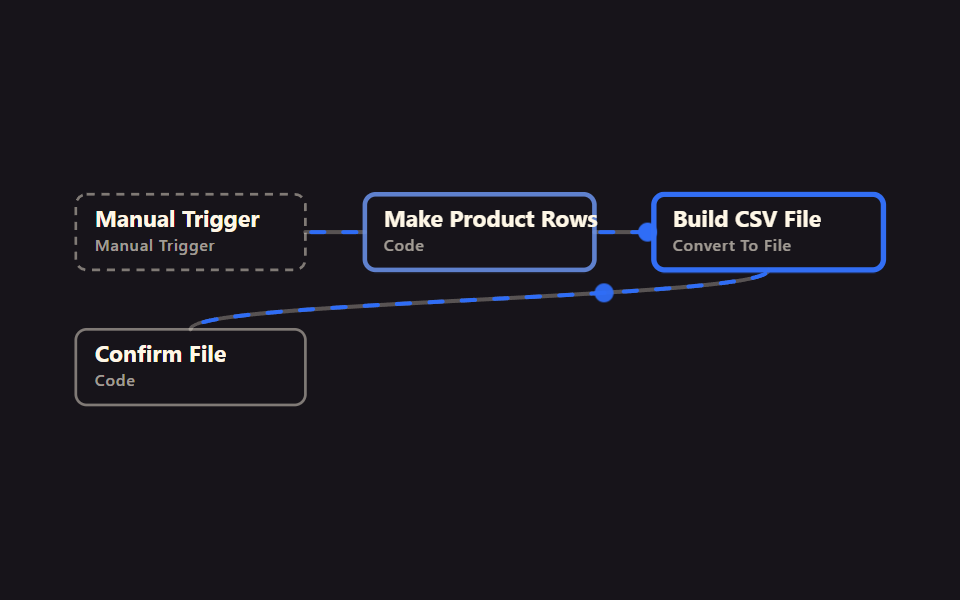 Files & dataExcel Automation Examples Using n8n, No Code
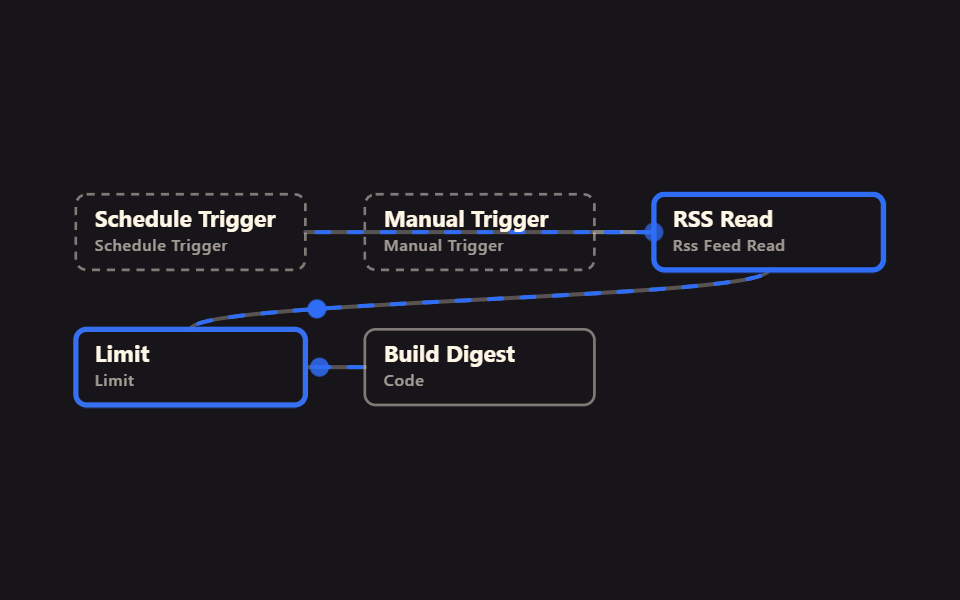 n8n basics9 n8n Workflow Examples, Zero Accounts Needed
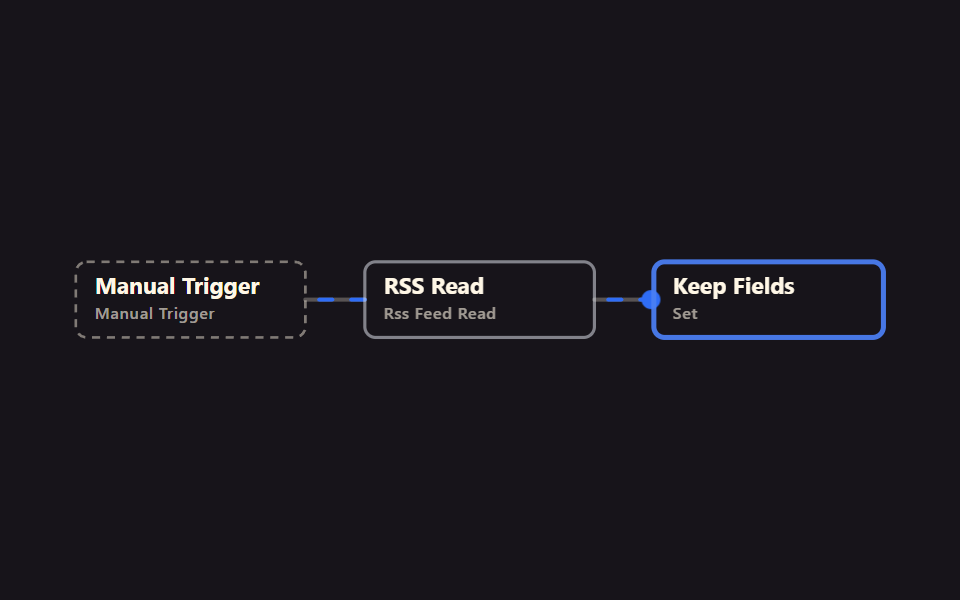 RSS & newsMarketing Automation Basics: 9 News Workflows
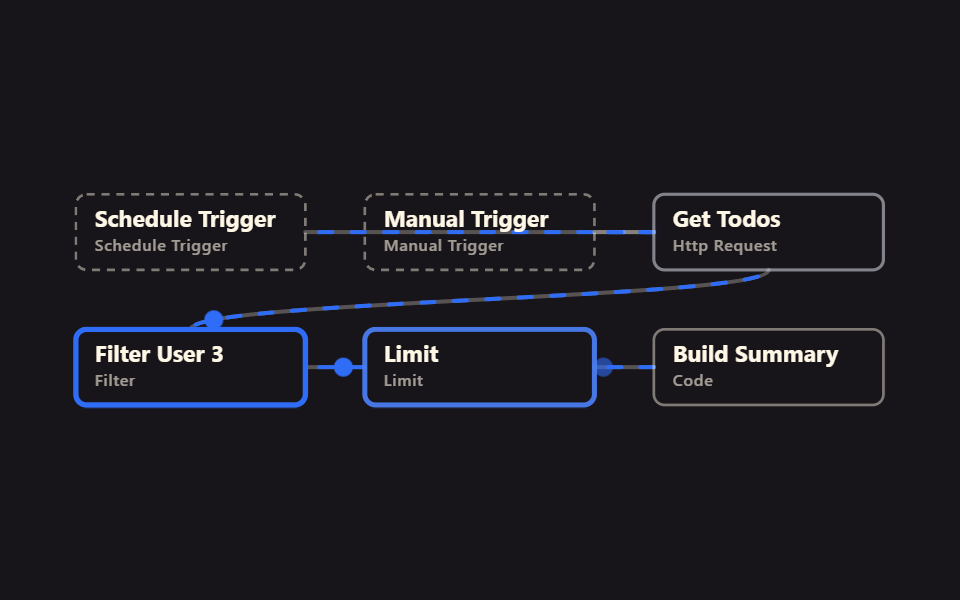 Schedules & reportsAutomate Repetitive Tasks in n8n, No Account First
 Localizationi18n JSON Checks: 9 Ways to Catch Missing Keys
 Creative UINode Based UI Design: 9 Patterns, No Library
 Creative UIImage Crop JavaScript: 9 Canvas Editor UIs
 game9 CSS Game Demos — Mini Games in HTML & CSS
 gameHTML CSS JS mini games: 9 copy-paste mini apps
 LoadersFile Upload Progress Bar Loader: 9 UI Demos