Automate Repetitive Tasks in n8n, No Account First
n8n is a no-code tool that wires apps and APIs into automations. Before you set up a single account, here are 9 workflows to automate repetitive tasks, ready
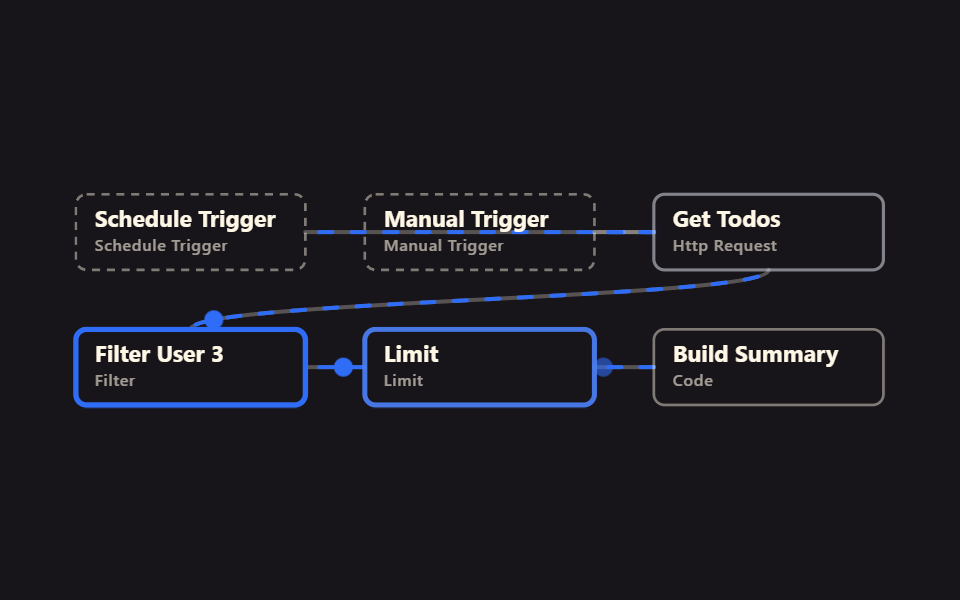 01 daily-todo-digest
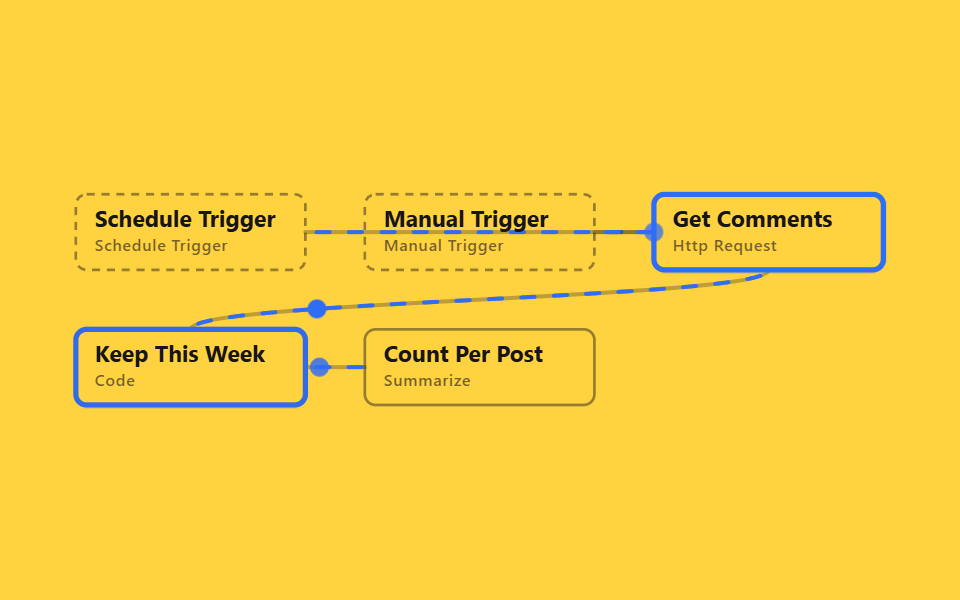 02 weekly-window-aggregate
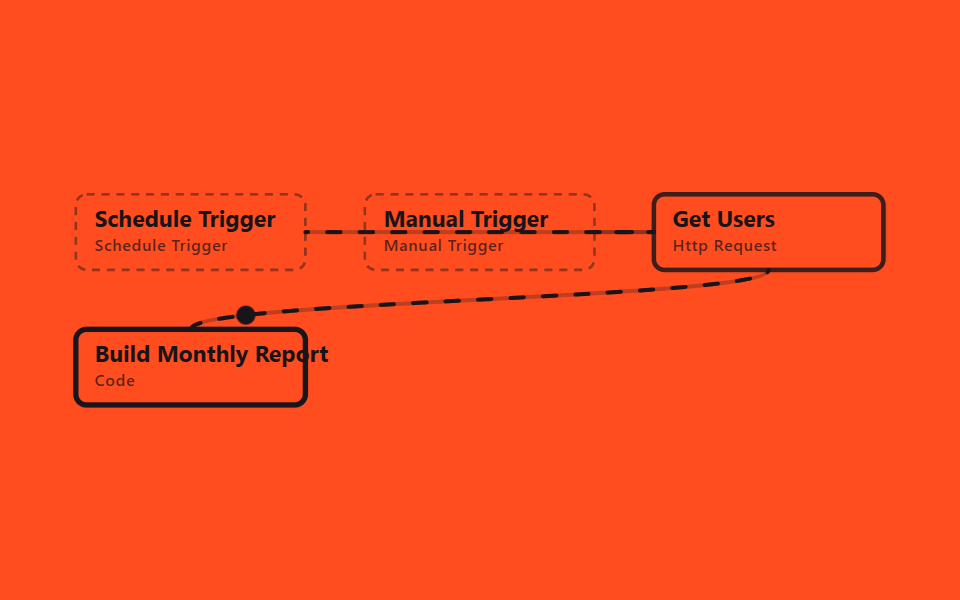 03 monthly-kpi-report
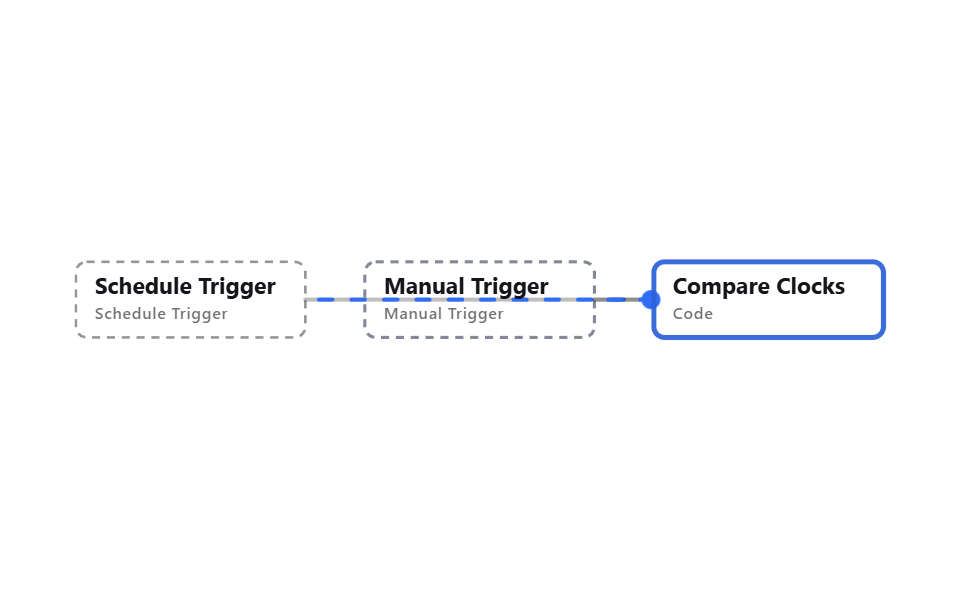 04 timezone-clock-compare
 05 interval-vs-cron-expression
 06 skip-weekend-gate
 07 missed-run-catchup
 08 digest-email-body
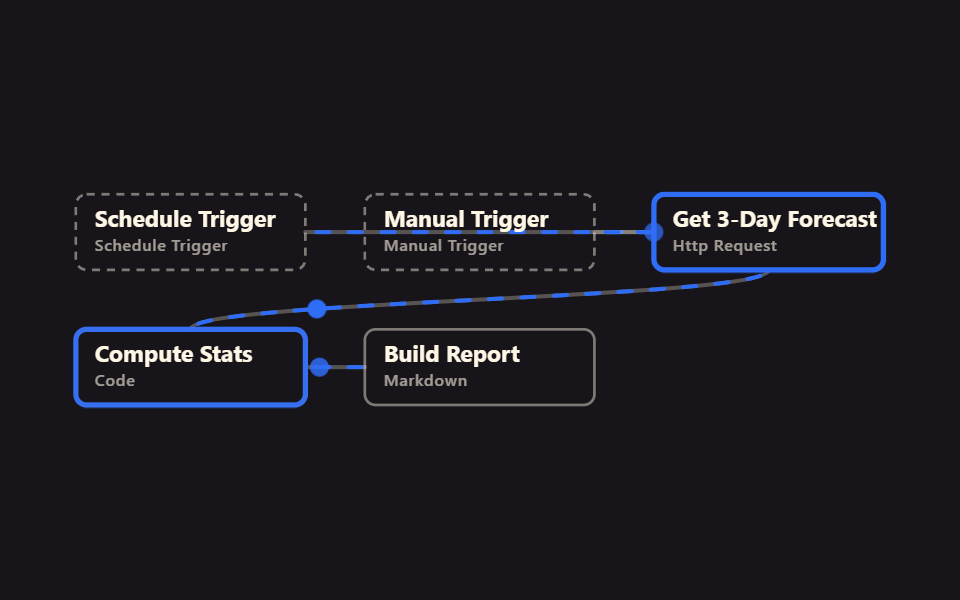 09 multi-step-weather-pipeline
Auto-plays · click a tile to jump to its section · all nine in one zip
- 01 Daily to-do summary
- 02 Weekly window aggregate
- 03 Monthly report skeleton
- 04 Workflow clock vs server clock
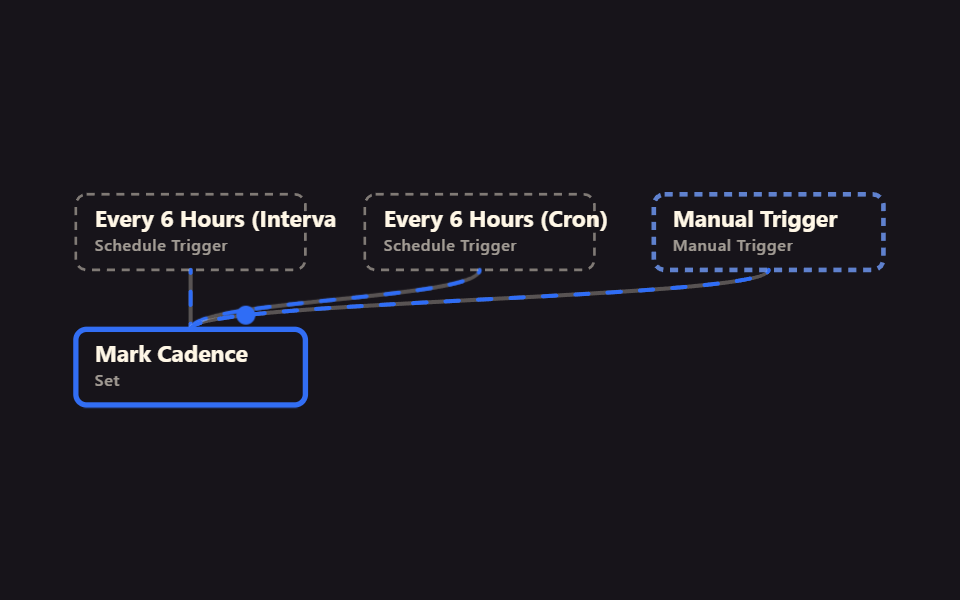
- 05 Interval field vs cron expression
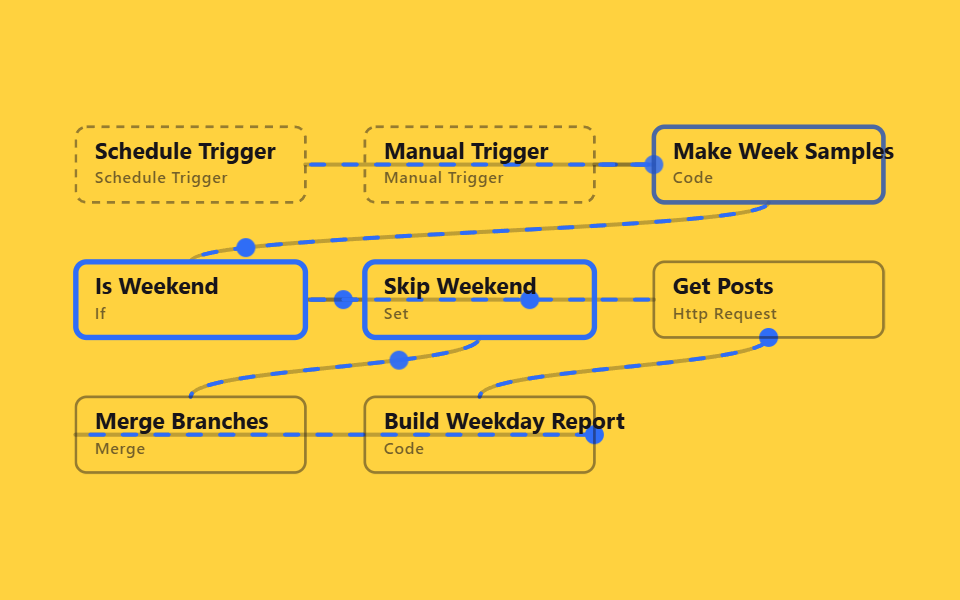
- 06 Skip-weekend condition gate
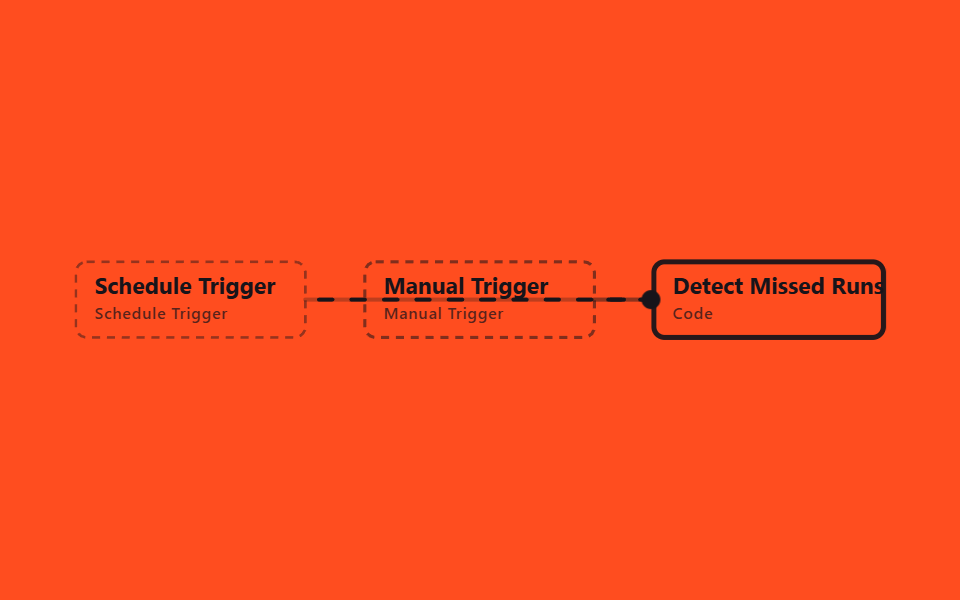
- 07 Catching up after a missed run
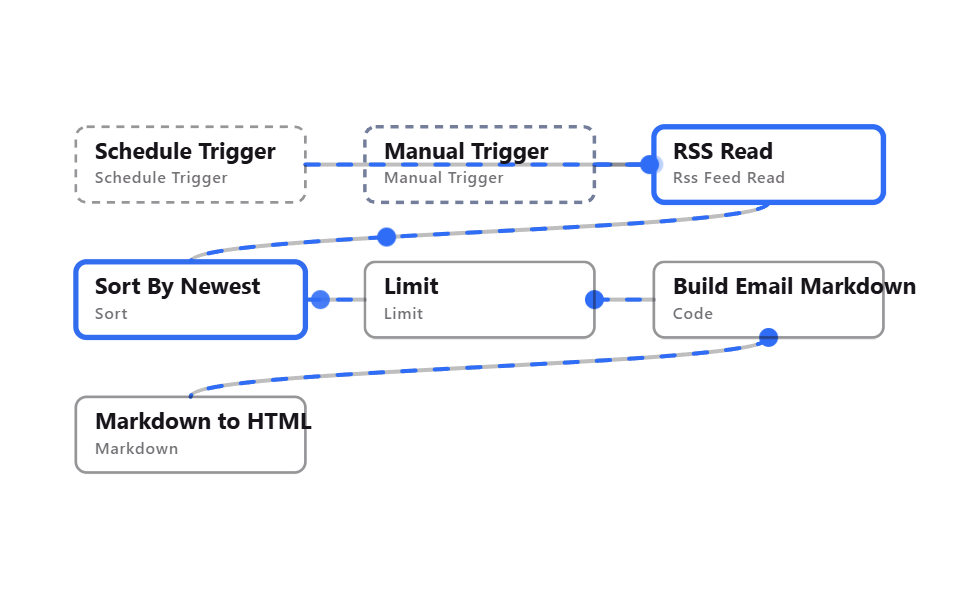
- 08 Digest email body
- 09 Fetch, transform, format — a 3-stage pipeline
The nine are ordered the way a real recurring task actually gets automated. Start with three basic fire-on-a-schedule patterns (01 daily, 02 weekly, 03 monthly), move through the two things that trip these up most — a timezone trap (04) and trigger syntax (05) — then a condition gate that decides whether to even run (06) and a way to catch up after a missed run (07), and finish with two that shape the output into something you'd actually send (08 an email body, 09 a full fetch-transform-format pipeline). Most schedules that automate weekly reports get refined in exactly this order — get it firing, check the clock, filter the exceptions, then make it presentable. The back half — reshaping what a run produced into JSON, CSV, or Excel — belongs to Excel Automation Examples, and the front half of sending and receiving requests belongs to n8n No Code Automation.
01Daily to-do summary
What it automates
A Schedule Trigger wakes up every morning at 8 (Manual Trigger tests it instantly), HTTP Request fetches a to-do list, Filter keeps one person's items, and a Code node writes a five-line summary with a checkbox for each one.
<main class="stage">
<svg class="flow" viewBox="-28 -28 654 212" xmlns="http://www.w3.org/2000/svg" role="img" aria-label="godrich 204-01 daily-todo-digest">
<path class="edge" d="M170 28 C299 28 299 28 428 28"/>
<path class="edge edge--flow" style="--i:0" d="M170 28 C299 28 299 28 428 28"/>
<circle class="pulse" style="--i:0;offset-path:path('M170 28 C299 28 299 28 428 28')" r="7"/>
<path class="edge" d="M384 28 C406 28 406 28 428 28"/>
<path class="edge edge--flow" style="--i:1" d="M384 28 C406 28 406 28 428 28"/>
<circle class="pulse" style="--i:1;offset-path:path('M384 28 C406 28 406 28 428 28')" r="7"/>
<path class="edge" d="M513 56 C513 78 85 78 85 100"/>
<path class="edge edge--flow" style="--i:2" d="M513 56 C513 78 85 78 85 100"/>
<circle class="pulse" style="--i:2;offset-path:path('M513 56 C513 78 85 78 85 100')" r="7"/>
<path class="edge" d="M170 128 C192 128 192 128 214 128"/>
<path class="edge edge--flow" style="--i:3" d="M170 128 C192 128 192 128 214 128"/>
<circle class="pulse" style="--i:3;offset-path:path('M170 128 C192 128 192 128 214 128')" r="7"/>
<path class="edge" d="M384 128 C406 128 406 128 428 128"/>
<path class="edge edge--flow" style="--i:4" d="M384 128 C406 128 406 128 428 128"/>
<circle class="pulse" style="--i:4;offset-path:path('M384 128 C406 128 406 128 428 128')" r="7"/>
<g class="node node--trigger" style="--i:0" transform="translate(0 0)"><rect class="node__box" width="170" height="56"/><text class="node__name" x="14" y="24">Schedule Trigger</text><text class="node__type" x="14" y="42">Schedule Trigger</text></g>
<g class="node node--trigger" style="--i:1" transform="translate(214 0)"><rect class="node__box" width="170" height="56"/><text class="node__name" x="14" y="24">Manual Trigger</text><text class="node__type" x="14" y="42">Manual Trigger</text></g>
<g class="node" style="--i:2" transform="translate(428 0)"><rect class="node__box" width="170" height="56"/><text class="node__name" x="14" y="24">Get Todos</text><text class="node__type" x="14" y="42">Http Request</text></g>
<g class="node" style="--i:3" transform="translate(0 100)"><rect class="node__box" width="170" height="56"/><text class="node__name" x="14" y="24">Filter User 3</text><text class="node__type" x="14" y="42">Filter</text></g>
<g class="node" style="--i:4" transform="translate(214 100)"><rect class="node__box" width="170" height="56"/><text class="node__name" x="14" y="24">Limit</text><text class="node__type" x="14" y="42">Limit</text></g>
<g class="node" style="--i:5" transform="translate(428 100)"><rect class="node__box" width="170" height="56"/><text class="node__name" x="14" y="24">Build Summary</text><text class="node__type" x="14" y="42">Code</text></g>
</svg>
</main>@use "../../../../site/static/demo-tokens" as *;
// ── 변수 3개 ──────────────────────────────────────────
$duration: $dur-loop; // 한 바퀴 (데모 2초와 같은 값 — gif 가 끊기지 않게)
$easing: linear; // 대시 흐름은 등속
$color: $subject-blue; // 강조(흐름·켜진 노드) 색
$ink: $subject-cream; // 글자·테두리
$n: 6; // 노드 수 — 켜지는 순서 간격
@include stage($stage-ink);
.flow { width: 100%; height: 100%; max-height: 100vh; display: block; overflow: visible; }
.edge { fill: none; stroke: $ink; stroke-opacity: .28; stroke-width: 3; stroke-linecap: round; }
.edge--flow { stroke: $color; stroke-opacity: 1; stroke-dasharray: 10 14; animation: flow $duration $easing infinite; }
@keyframes flow { to { stroke-dashoffset: -48; } }
.node__box { fill: transparent; stroke: $ink; stroke-opacity: .45; stroke-width: 2; rx: $r-sm; }
.node__name { fill: $ink; font-weight: 700; font-size: 17px; font-family: -apple-system, "Segoe UI", sans-serif; }
.node__type { fill: $ink; fill-opacity: .6; font-weight: 500; font-size: 12px; font-family: -apple-system, "Segoe UI", sans-serif; letter-spacing: .04em; }
.node--trigger .node__box { stroke-dasharray: 6 5; }
// 켜진 노드는 테두리가 강조색으로 두꺼워진다 (filter 대신 stroke — 렌더 비용). --i 는 <g> 에서 상속된다
.node .node__box { animation: box-lit $duration $ease-spring infinite; animation-delay: calc(var(--i) * #{$duration} / #{$n}); }
@keyframes box-lit {
0%, 100% { stroke: $ink; stroke-opacity: .45; stroke-width: 2; }
12%, 32% { stroke: $color; stroke-opacity: 1; stroke-width: 4; }
50% { stroke: $ink; stroke-opacity: .45; stroke-width: 2; }
}
.pulse { fill: $color; offset-distance: 0%; offset-rotate: 0deg; animation: travel $duration $ease-out infinite; animation-delay: calc(var(--i) * #{$duration} / #{$n}); }
@keyframes travel {
0% { offset-distance: 0%; opacity: 0; }
10% { opacity: 1; }
45% { offset-distance: 100%; opacity: 1; }
55%, 100% { offset-distance: 100%; opacity: 0; }
}
@media (prefers-reduced-motion: reduce) {
.edge--flow, .node, .node .node__box, .pulse { animation: none; }
.edge--flow { stroke-dasharray: none; } // 흐름은 멈추고 연결선만 남긴다
.pulse { display: none; }
}html, body {
margin: 0;
overflow: hidden;
}
.stage {
box-sizing: border-box;
min-height: 100vh;
display: grid;
place-items: center;
margin: 0;
background: #17141a;
font-family: -apple-system, "Segoe UI", "Noto Sans KR", sans-serif;
padding: clamp(8px, 4vw, 24px);
}
.flow {
width: 100%;
height: 100%;
max-height: 100vh;
display: block;
overflow: visible;
}
.edge {
fill: none;
stroke: #fff7e6;
stroke-opacity: 0.28;
stroke-width: 3;
stroke-linecap: round;
}
.edge--flow {
stroke: #2f6df6;
stroke-opacity: 1;
stroke-dasharray: 10 14;
animation: flow 2s linear infinite;
}
@keyframes flow {
to {
stroke-dashoffset: -48;
}
}
.node__box {
fill: transparent;
stroke: #fff7e6;
stroke-opacity: 0.45;
stroke-width: 2;
rx: 8px;
}
.node__name {
fill: #fff7e6;
font-weight: 700;
font-size: 17px;
font-family: -apple-system, "Segoe UI", sans-serif;
}
.node__type {
fill: #fff7e6;
fill-opacity: 0.6;
font-weight: 500;
font-size: 12px;
font-family: -apple-system, "Segoe UI", sans-serif;
letter-spacing: 0.04em;
}
.node--trigger .node__box {
stroke-dasharray: 6 5;
}
.node .node__box {
animation: box-lit 2s cubic-bezier(0.2, 0.8, 0.2, 1) infinite;
animation-delay: calc(var(--i) * 2s / 6);
}
@keyframes box-lit {
0%, 100% {
stroke: #fff7e6;
stroke-opacity: 0.45;
stroke-width: 2;
}
12%, 32% {
stroke: #2f6df6;
stroke-opacity: 1;
stroke-width: 4;
}
50% {
stroke: #fff7e6;
stroke-opacity: 0.45;
stroke-width: 2;
}
}
.pulse {
fill: #2f6df6;
offset-distance: 0%;
offset-rotate: 0deg;
animation: travel 2s ease-out infinite;
animation-delay: calc(var(--i) * 2s / 6);
}
@keyframes travel {
0% {
offset-distance: 0%;
opacity: 0;
}
10% {
opacity: 1;
}
45% {
offset-distance: 100%;
opacity: 1;
}
55%, 100% {
offset-distance: 100%;
opacity: 0;
}
}
@media (prefers-reduced-motion: reduce) {
.edge--flow, .node, .node .node__box, .pulse {
animation: none;
}
.edge--flow {
stroke-dasharray: none;
}
.pulse {
display: none;
}
}01 · Daily to-do summary — Measured area 6.786% · moving frames 23/23Original by GODRICH · SCSS and React ship in the zip · See the password
In the workflow JSON
Use it for a morning work briefing, or just checking what got done each day.
{
  "name": "Build Summary",
  "type": "n8n-nodes-base.code",
  "typeVersion": 2,
  "parameters": {
    "jsCode": "const items = $input.all();\nconst lines = items.map(item => `- [${item.json.completed ? 'x' : ' '}] ${item.json.title}`);\nconst summary = `# Daily Summary\\n\\n${items.length} to-dos for user 3 today\\n\\n` + lines.join('\\n');\nreturn [{ json: { summary } }];"
  }
}
02Weekly window aggregate
What it automates
Schedule wakes up every Monday at 9, HTTP fetches every comment, and a Code node keeps only this week's slice. Unlike Aggregate, the Summarize node here groups by post before it counts.
<main class="stage">
<svg class="flow" viewBox="-28 -28 654 212" xmlns="http://www.w3.org/2000/svg" role="img" aria-label="godrich 204-02 weekly-window-aggregate">
<path class="edge" d="M170 28 C299 28 299 28 428 28"/>
<path class="edge edge--flow" style="--i:0" d="M170 28 C299 28 299 28 428 28"/>
<circle class="pulse" style="--i:0;offset-path:path('M170 28 C299 28 299 28 428 28')" r="7"/>
<path class="edge" d="M384 28 C406 28 406 28 428 28"/>
<path class="edge edge--flow" style="--i:1" d="M384 28 C406 28 406 28 428 28"/>
<circle class="pulse" style="--i:1;offset-path:path('M384 28 C406 28 406 28 428 28')" r="7"/>
<path class="edge" d="M513 56 C513 78 85 78 85 100"/>
<path class="edge edge--flow" style="--i:2" d="M513 56 C513 78 85 78 85 100"/>
<circle class="pulse" style="--i:2;offset-path:path('M513 56 C513 78 85 78 85 100')" r="7"/>
<path class="edge" d="M170 128 C192 128 192 128 214 128"/>
<path class="edge edge--flow" style="--i:3" d="M170 128 C192 128 192 128 214 128"/>
<circle class="pulse" style="--i:3;offset-path:path('M170 128 C192 128 192 128 214 128')" r="7"/>
<g class="node node--trigger" style="--i:0" transform="translate(0 0)"><rect class="node__box" width="170" height="56"/><text class="node__name" x="14" y="24">Schedule Trigger</text><text class="node__type" x="14" y="42">Schedule Trigger</text></g>
<g class="node node--trigger" style="--i:1" transform="translate(214 0)"><rect class="node__box" width="170" height="56"/><text class="node__name" x="14" y="24">Manual Trigger</text><text class="node__type" x="14" y="42">Manual Trigger</text></g>
<g class="node" style="--i:2" transform="translate(428 0)"><rect class="node__box" width="170" height="56"/><text class="node__name" x="14" y="24">Get Comments</text><text class="node__type" x="14" y="42">Http Request</text></g>
<g class="node" style="--i:3" transform="translate(0 100)"><rect class="node__box" width="170" height="56"/><text class="node__name" x="14" y="24">Keep This Week</text><text class="node__type" x="14" y="42">Code</text></g>
<g class="node" style="--i:4" transform="translate(214 100)"><rect class="node__box" width="170" height="56"/><text class="node__name" x="14" y="24">Count Per Post</text><text class="node__type" x="14" y="42">Summarize</text></g>
</svg>
</main>
@use "../../../../site/static/demo-tokens" as *;
// ── 변수 3개 ──────────────────────────────────────────
$duration: $dur-loop; // 한 바퀴 (데모 2초와 같은 값 — gif 가 끊기지 않게)
$easing: linear; // 대시 흐름은 등속
$color: $subject-blue; // 강조(흐름·켜진 노드) 색
$ink: $subject-ink; // 글자·테두리
$n: 5; // 노드 수 — 켜지는 순서 간격
@include stage($stage-yellow);
.flow { width: 100%; height: 100%; max-height: 100vh; display: block; overflow: visible; }
.edge { fill: none; stroke: $ink; stroke-opacity: .28; stroke-width: 3; stroke-linecap: round; }
.edge--flow { stroke: $color; stroke-opacity: 1; stroke-dasharray: 10 14; animation: flow $duration $easing infinite; }
@keyframes flow { to { stroke-dashoffset: -48; } }
.node__box { fill: transparent; stroke: $ink; stroke-opacity: .45; stroke-width: 2; rx: $r-sm; }
.node__name { fill: $ink; font-weight: 700; font-size: 17px; font-family: -apple-system, "Segoe UI", sans-serif; }
.node__type { fill: $ink; fill-opacity: .6; font-weight: 500; font-size: 12px; font-family: -apple-system, "Segoe UI", sans-serif; letter-spacing: .04em; }
.node--trigger .node__box { stroke-dasharray: 6 5; }
// 켜진 노드는 테두리가 강조색으로 두꺼워진다 (filter 대신 stroke — 렌더 비용). --i 는 <g> 에서 상속된다
.node .node__box { animation: box-lit $duration $ease-spring infinite; animation-delay: calc(var(--i) * #{$duration} / #{$n}); }
@keyframes box-lit {
0%, 100% { stroke: $ink; stroke-opacity: .45; stroke-width: 2; }
12%, 32% { stroke: $color; stroke-opacity: 1; stroke-width: 4; }
50% { stroke: $ink; stroke-opacity: .45; stroke-width: 2; }
}
.pulse { fill: $color; offset-distance: 0%; offset-rotate: 0deg; animation: travel $duration $ease-out infinite; animation-delay: calc(var(--i) * #{$duration} / #{$n}); }
@keyframes travel {
0% { offset-distance: 0%; opacity: 0; }
10% { opacity: 1; }
45% { offset-distance: 100%; opacity: 1; }
55%, 100% { offset-distance: 100%; opacity: 0; }
}
@media (prefers-reduced-motion: reduce) {
.edge--flow, .node, .node .node__box, .pulse { animation: none; }
.edge--flow { stroke-dasharray: none; } // 흐름은 멈추고 연결선만 남긴다
.pulse { display: none; }
}html, body {
margin: 0;
overflow: hidden;
}
.stage {
box-sizing: border-box;
min-height: 100vh;
display: grid;
place-items: center;
margin: 0;
background: #ffd23f;
font-family: -apple-system, "Segoe UI", "Noto Sans KR", sans-serif;
padding: clamp(8px, 4vw, 24px);
}
.flow {
width: 100%;
height: 100%;
max-height: 100vh;
display: block;
overflow: visible;
}
.edge {
fill: none;
stroke: #17141a;
stroke-opacity: 0.28;
stroke-width: 3;
stroke-linecap: round;
}
.edge--flow {
stroke: #2f6df6;
stroke-opacity: 1;
stroke-dasharray: 10 14;
animation: flow 2s linear infinite;
}
@keyframes flow {
to {
stroke-dashoffset: -48;
}
}
.node__box {
fill: transparent;
stroke: #17141a;
stroke-opacity: 0.45;
stroke-width: 2;
rx: 8px;
}
.node__name {
fill: #17141a;
font-weight: 700;
font-size: 17px;
font-family: -apple-system, "Segoe UI", sans-serif;
}
.node__type {
fill: #17141a;
fill-opacity: 0.6;
font-weight: 500;
font-size: 12px;
font-family: -apple-system, "Segoe UI", sans-serif;
letter-spacing: 0.04em;
}
.node--trigger .node__box {
stroke-dasharray: 6 5;
}
.node .node__box {
animation: box-lit 2s cubic-bezier(0.2, 0.8, 0.2, 1) infinite;
animation-delay: calc(var(--i) * 2s / 5);
}
@keyframes box-lit {
0%, 100% {
stroke: #17141a;
stroke-opacity: 0.45;
stroke-width: 2;
}
12%, 32% {
stroke: #2f6df6;
stroke-opacity: 1;
stroke-width: 4;
}
50% {
stroke: #17141a;
stroke-opacity: 0.45;
stroke-width: 2;
}
}
.pulse {
fill: #2f6df6;
offset-distance: 0%;
offset-rotate: 0deg;
animation: travel 2s ease-out infinite;
animation-delay: calc(var(--i) * 2s / 5);
}
@keyframes travel {
0% {
offset-distance: 0%;
opacity: 0;
}
10% {
opacity: 1;
}
45% {
offset-distance: 100%;
opacity: 1;
}
55%, 100% {
offset-distance: 100%;
opacity: 0;
}
}
@media (prefers-reduced-motion: reduce) {
.edge--flow, .node, .node .node__box, .pulse {
animation: none;
}
.edge--flow {
stroke-dasharray: none;
}
.pulse {
display: none;
}
}02 · Weekly window aggregate — Measured area 6.14% · moving frames 23/23Original by GODRICH · SCSS and React ship in the zip · See the password
In the workflow JSON
Reach for it when you need a weekly engagement report, or per-post reaction counts you check every Monday.
{
  "name": "Count Per Post",
  "type": "n8n-nodes-base.summarize",
  "typeVersion": 1.1,
  "parameters": {
    "fieldsToSummarize": {
      "values": [
        { "aggregation": "count", "field": "id" }
      ]
    },
    "fieldsToSplitBy": "postId",
    "options": { "outputFormat": "separateItems" }
  }
}
03Monthly report skeleton
What it automates
Schedule wakes up on the 1st of every month at 9, HTTP fetches the user list, and one single Code node writes the report sentence directly — no Aggregate, no Markdown node in between. Fewer nodes mean fewer places for it to break.
<main class="stage">
<svg class="flow" viewBox="-28 -28 654 212" xmlns="http://www.w3.org/2000/svg" role="img" aria-label="godrich 204-03 monthly-kpi-report">
<path class="edge" d="M170 28 C299 28 299 28 428 28"/>
<path class="edge edge--flow" style="--i:0" d="M170 28 C299 28 299 28 428 28"/>
<circle class="pulse" style="--i:0;offset-path:path('M170 28 C299 28 299 28 428 28')" r="7"/>
<path class="edge" d="M384 28 C406 28 406 28 428 28"/>
<path class="edge edge--flow" style="--i:1" d="M384 28 C406 28 406 28 428 28"/>
<circle class="pulse" style="--i:1;offset-path:path('M384 28 C406 28 406 28 428 28')" r="7"/>
<path class="edge" d="M513 56 C513 78 85 78 85 100"/>
<path class="edge edge--flow" style="--i:2" d="M513 56 C513 78 85 78 85 100"/>
<circle class="pulse" style="--i:2;offset-path:path('M513 56 C513 78 85 78 85 100')" r="7"/>
<g class="node node--trigger" style="--i:0" transform="translate(0 0)"><rect class="node__box" width="170" height="56"/><text class="node__name" x="14" y="24">Schedule Trigger</text><text class="node__type" x="14" y="42">Schedule Trigger</text></g>
<g class="node node--trigger" style="--i:1" transform="translate(214 0)"><rect class="node__box" width="170" height="56"/><text class="node__name" x="14" y="24">Manual Trigger</text><text class="node__type" x="14" y="42">Manual Trigger</text></g>
<g class="node" style="--i:2" transform="translate(428 0)"><rect class="node__box" width="170" height="56"/><text class="node__name" x="14" y="24">Get Users</text><text class="node__type" x="14" y="42">Http Request</text></g>
<g class="node" style="--i:3" transform="translate(0 100)"><rect class="node__box" width="170" height="56"/><text class="node__name" x="14" y="24">Build Monthly Report</text><text class="node__type" x="14" y="42">Code</text></g>
</svg>
</main>
@use "../../../../site/static/demo-tokens" as *;
// ── 변수 3개 ──────────────────────────────────────────
$duration: $dur-loop; // 한 바퀴 (데모 2초와 같은 값 — gif 가 끊기지 않게)
$easing: linear; // 대시 흐름은 등속
$color: $subject-ink; // 강조(흐름·켜진 노드) 색
$ink: $subject-ink; // 글자·테두리 (주황 무대 위 글자는 잉크 — 크림은 3.11:1 미달)
$n: 4; // 노드 수 — 켜지는 순서 간격
@include stage($stage-orange);
.flow { width: 100%; height: 100%; max-height: 100vh; display: block; overflow: visible; }
.edge { fill: none; stroke: $ink; stroke-opacity: .28; stroke-width: 3; stroke-linecap: round; }
.edge--flow { stroke: $color; stroke-opacity: 1; stroke-dasharray: 10 14; animation: flow $duration $easing infinite; }
@keyframes flow { to { stroke-dashoffset: -48; } }
.node__box { fill: transparent; stroke: $ink; stroke-opacity: .45; stroke-width: 2; rx: $r-sm; }
.node__name { fill: $ink; font-weight: 700; font-size: 17px; font-family: -apple-system, "Segoe UI", sans-serif; }
.node__type { fill: $ink; fill-opacity: .72; font-weight: 500; font-size: 12px; font-family: -apple-system, "Segoe UI", sans-serif; letter-spacing: .04em; }
.node--trigger .node__box { stroke-dasharray: 6 5; }
// 켜진 노드는 테두리가 강조색으로 두꺼워진다 (filter 대신 stroke — 렌더 비용). --i 는 <g> 에서 상속된다
.node .node__box { animation: box-lit $duration $ease-spring infinite; animation-delay: calc(var(--i) * #{$duration} / #{$n}); }
@keyframes box-lit {
0%, 100% { stroke: $ink; stroke-opacity: .45; stroke-width: 2; }
12%, 32% { stroke: $color; stroke-opacity: 1; stroke-width: 4; }
50% { stroke: $ink; stroke-opacity: .45; stroke-width: 2; }
}
.pulse { fill: $color; offset-distance: 0%; offset-rotate: 0deg; animation: travel $duration $ease-out infinite; animation-delay: calc(var(--i) * #{$duration} / #{$n}); }
@keyframes travel {
0% { offset-distance: 0%; opacity: 0; }
10% { opacity: 1; }
45% { offset-distance: 100%; opacity: 1; }
55%, 100% { offset-distance: 100%; opacity: 0; }
}
@media (prefers-reduced-motion: reduce) {
.edge--flow, .node, .node .node__box, .pulse { animation: none; }
.edge--flow { stroke-dasharray: none; } // 흐름은 멈추고 연결선만 남긴다
.pulse { display: none; }
}html, body {
margin: 0;
overflow: hidden;
}
.stage {
box-sizing: border-box;
min-height: 100vh;
display: grid;
place-items: center;
margin: 0;
background: #ff4d1f;
font-family: -apple-system, "Segoe UI", "Noto Sans KR", sans-serif;
padding: clamp(8px, 4vw, 24px);
}
.flow {
width: 100%;
height: 100%;
max-height: 100vh;
display: block;
overflow: visible;
}
.edge {
fill: none;
stroke: #17141a;
stroke-opacity: 0.28;
stroke-width: 3;
stroke-linecap: round;
}
.edge--flow {
stroke: #17141a;
stroke-opacity: 1;
stroke-dasharray: 10 14;
animation: flow 2s linear infinite;
}
@keyframes flow {
to {
stroke-dashoffset: -48;
}
}
.node__box {
fill: transparent;
stroke: #17141a;
stroke-opacity: 0.45;
stroke-width: 2;
rx: 8px;
}
.node__name {
fill: #17141a;
font-weight: 700;
font-size: 17px;
font-family: -apple-system, "Segoe UI", sans-serif;
}
.node__type {
fill: #17141a;
fill-opacity: 0.72;
font-weight: 500;
font-size: 12px;
font-family: -apple-system, "Segoe UI", sans-serif;
letter-spacing: 0.04em;
}
.node--trigger .node__box {
stroke-dasharray: 6 5;
}
.node .node__box {
animation: box-lit 2s cubic-bezier(0.2, 0.8, 0.2, 1) infinite;
animation-delay: calc(var(--i) * 2s / 4);
}
@keyframes box-lit {
0%, 100% {
stroke: #17141a;
stroke-opacity: 0.45;
stroke-width: 2;
}
12%, 32% {
stroke: #17141a;
stroke-opacity: 1;
stroke-width: 4;
}
50% {
stroke: #17141a;
stroke-opacity: 0.45;
stroke-width: 2;
}
}
.pulse {
fill: #17141a;
offset-distance: 0%;
offset-rotate: 0deg;
animation: travel 2s ease-out infinite;
animation-delay: calc(var(--i) * 2s / 4);
}
@keyframes travel {
0% {
offset-distance: 0%;
opacity: 0;
}
10% {
opacity: 1;
}
45% {
offset-distance: 100%;
opacity: 1;
}
55%, 100% {
offset-distance: 100%;
opacity: 0;
}
}
@media (prefers-reduced-motion: reduce) {
.edge--flow, .node, .node .node__box, .pulse {
animation: none;
}
.edge--flow {
stroke-dasharray: none;
}
.pulse {
display: none;
}
}03 · Monthly report skeleton — Measured area 4.968% · moving frames 23/23Original by GODRICH · SCSS and React ship in the zip · See the password
In the workflow JSON
It's the shape you'd use for a monthly status email or a signup-count report.
{
  "name": "Build Monthly Report",
  "type": "n8n-nodes-base.code",
  "typeVersion": 2,
  "parameters": {
    "jsCode": "const users = $input.all().map(item => item.json);\nconst lines = users.map(u => `- ${u.name} <${u.email}>`);\nconst monthlyReport = `# Monthly Report\\n\\n${users.length} users on file this month.\\n\\n` + lines.join('\\n');\nreturn [{ json: { monthlyReport } }];"
  }
}
04Workflow clock vs server clock
What it automates
Pin a timezone in the workflow settings and Schedule fires on that clock — but print $now (which follows the workflow timezone) next to a plain JS Date (always UTC) inside a Code node, and the two describe the same instant differently.
<main class="stage">
<svg class="flow" viewBox="-28 -28 654 112" xmlns="http://www.w3.org/2000/svg" role="img" aria-label="godrich 204-04 timezone-clock-compare">
<path class="edge" d="M170 28 C299 28 299 28 428 28"/>
<path class="edge edge--flow" style="--i:0" d="M170 28 C299 28 299 28 428 28"/>
<circle class="pulse" style="--i:0;offset-path:path('M170 28 C299 28 299 28 428 28')" r="7"/>
<path class="edge" d="M384 28 C406 28 406 28 428 28"/>
<path class="edge edge--flow" style="--i:1" d="M384 28 C406 28 406 28 428 28"/>
<circle class="pulse" style="--i:1;offset-path:path('M384 28 C406 28 406 28 428 28')" r="7"/>
<g class="node node--trigger" style="--i:0" transform="translate(0 0)"><rect class="node__box" width="170" height="56"/><text class="node__name" x="14" y="24">Schedule Trigger</text><text class="node__type" x="14" y="42">Schedule Trigger</text></g>
<g class="node node--trigger" style="--i:1" transform="translate(214 0)"><rect class="node__box" width="170" height="56"/><text class="node__name" x="14" y="24">Manual Trigger</text><text class="node__type" x="14" y="42">Manual Trigger</text></g>
<g class="node" style="--i:2" transform="translate(428 0)"><rect class="node__box" width="170" height="56"/><text class="node__name" x="14" y="24">Compare Clocks</text><text class="node__type" x="14" y="42">Code</text></g>
</svg>
</main>
@use "../../../../site/static/demo-tokens" as *;
// ── 변수 3개 ──────────────────────────────────────────
$duration: $dur-loop; // 한 바퀴 (데모 2초와 같은 값 — gif 가 끊기지 않게)
$easing: linear; // 대시 흐름은 등속
$color: $subject-blue; // 강조(흐름·켜진 노드) 색
$ink: $subject-ink; // 글자·테두리
$n: 3; // 노드 수 — 켜지는 순서 간격
@include stage($stage-paper);
.flow { width: 100%; height: 100%; max-height: 100vh; display: block; overflow: visible; }
.edge { fill: none; stroke: $ink; stroke-opacity: .28; stroke-width: 3; stroke-linecap: round; }
.edge--flow { stroke: $color; stroke-opacity: 1; stroke-dasharray: 10 14; animation: flow $duration $easing infinite; }
@keyframes flow { to { stroke-dashoffset: -48; } }
.node__box { fill: transparent; stroke: $ink; stroke-opacity: .45; stroke-width: 2; rx: $r-sm; }
.node__name { fill: $ink; font-weight: 700; font-size: 17px; font-family: -apple-system, "Segoe UI", sans-serif; }
.node__type { fill: $ink; fill-opacity: .6; font-weight: 500; font-size: 12px; font-family: -apple-system, "Segoe UI", sans-serif; letter-spacing: .04em; }
.node--trigger .node__box { stroke-dasharray: 6 5; }
// 켜진 노드는 테두리가 강조색으로 두꺼워진다 (filter 대신 stroke — 렌더 비용). --i 는 <g> 에서 상속된다
.node .node__box { animation: box-lit $duration $ease-spring infinite; animation-delay: calc(var(--i) * #{$duration} / #{$n}); }
@keyframes box-lit {
0%, 100% { stroke: $ink; stroke-opacity: .45; stroke-width: 2; }
12%, 32% { stroke: $color; stroke-opacity: 1; stroke-width: 4; }
50% { stroke: $ink; stroke-opacity: .45; stroke-width: 2; }
}
.pulse { fill: $color; offset-distance: 0%; offset-rotate: 0deg; animation: travel $duration $ease-out infinite; animation-delay: calc(var(--i) * #{$duration} / #{$n}); }
@keyframes travel {
0% { offset-distance: 0%; opacity: 0; }
10% { opacity: 1; }
45% { offset-distance: 100%; opacity: 1; }
55%, 100% { offset-distance: 100%; opacity: 0; }
}
@media (prefers-reduced-motion: reduce) {
.edge--flow, .node, .node .node__box, .pulse { animation: none; }
.edge--flow { stroke-dasharray: none; } // 흐름은 멈추고 연결선만 남긴다
.pulse { display: none; }
}html, body {
margin: 0;
overflow: hidden;
}
.stage {
box-sizing: border-box;
min-height: 100vh;
display: grid;
place-items: center;
margin: 0;
background: #ffffff;
font-family: -apple-system, "Segoe UI", "Noto Sans KR", sans-serif;
padding: clamp(8px, 4vw, 24px);
}
.flow {
width: 100%;
height: 100%;
max-height: 100vh;
display: block;
overflow: visible;
}
.edge {
fill: none;
stroke: #17141a;
stroke-opacity: 0.28;
stroke-width: 3;
stroke-linecap: round;
}
.edge--flow {
stroke: #2f6df6;
stroke-opacity: 1;
stroke-dasharray: 10 14;
animation: flow 2s linear infinite;
}
@keyframes flow {
to {
stroke-dashoffset: -48;
}
}
.node__box {
fill: transparent;
stroke: #17141a;
stroke-opacity: 0.45;
stroke-width: 2;
rx: 8px;
}
.node__name {
fill: #17141a;
font-weight: 700;
font-size: 17px;
font-family: -apple-system, "Segoe UI", sans-serif;
}
.node__type {
fill: #17141a;
fill-opacity: 0.6;
font-weight: 500;
font-size: 12px;
font-family: -apple-system, "Segoe UI", sans-serif;
letter-spacing: 0.04em;
}
.node--trigger .node__box {
stroke-dasharray: 6 5;
}
.node .node__box {
animation: box-lit 2s cubic-bezier(0.2, 0.8, 0.2, 1) infinite;
animation-delay: calc(var(--i) * 2s / 3);
}
@keyframes box-lit {
0%, 100% {
stroke: #17141a;
stroke-opacity: 0.45;
stroke-width: 2;
}
12%, 32% {
stroke: #2f6df6;
stroke-opacity: 1;
stroke-width: 4;
}
50% {
stroke: #17141a;
stroke-opacity: 0.45;
stroke-width: 2;
}
}
.pulse {
fill: #2f6df6;
offset-distance: 0%;
offset-rotate: 0deg;
animation: travel 2s ease-out infinite;
animation-delay: calc(var(--i) * 2s / 3);
}
@keyframes travel {
0% {
offset-distance: 0%;
opacity: 0;
}
10% {
opacity: 1;
}
45% {
offset-distance: 100%;
opacity: 1;
}
55%, 100% {
offset-distance: 100%;
opacity: 0;
}
}
@media (prefers-reduced-motion: reduce) {
.edge--flow, .node, .node .node__box, .pulse {
animation: none;
}
.edge--flow {
stroke-dasharray: none;
}
.pulse {
display: none;
}
}04 · Workflow clock vs server clock — Measured area 3.016% · moving frames 23/23Original by GODRICH · SCSS and React ship in the zip · See the password
In the workflow JSON
Run this whenever you're diagnosing a schedule that fires at the wrong hour.
{
  "name": "Compare Clocks",
  "type": "n8n-nodes-base.code",
  "typeVersion": 2,
  "parameters": {
    "jsCode": "const workflowNow = $now.toFormat('yyyy-LL-dd HH:mm:ss');\nconst workflowZone = $now.zoneName;\nconst serverNow = new Date().toISOString();\nreturn [{ json: { workflowNow, workflowZone, serverNow } }];"
  }
}
05Interval field vs cron expression
What it automates
Two Schedule Triggers sit side by side — one sets the Hours field to 6, the other writes 0 */6 * * * into the Custom (Cron) field. The UI field is enough for a plain cadence, but something like "last weekday of the month" only exists in cron syntax.
<main class="stage">
<svg class="flow" viewBox="-28 -28 654 212" xmlns="http://www.w3.org/2000/svg" role="img" aria-label="godrich 204-05 interval-vs-cron-expression">
<path class="edge" d="M85 56 C85 78 85 78 85 100"/>
<path class="edge edge--flow" style="--i:0" d="M85 56 C85 78 85 78 85 100"/>
<circle class="pulse" style="--i:0;offset-path:path('M85 56 C85 78 85 78 85 100')" r="7"/>
<path class="edge" d="M299 56 C299 78 85 78 85 100"/>
<path class="edge edge--flow" style="--i:1" d="M299 56 C299 78 85 78 85 100"/>
<circle class="pulse" style="--i:1;offset-path:path('M299 56 C299 78 85 78 85 100')" r="7"/>
<path class="edge" d="M513 56 C513 78 85 78 85 100"/>
<path class="edge edge--flow" style="--i:2" d="M513 56 C513 78 85 78 85 100"/>
<circle class="pulse" style="--i:2;offset-path:path('M513 56 C513 78 85 78 85 100')" r="7"/>
<g class="node node--trigger" style="--i:0" transform="translate(0 0)"><rect class="node__box" width="170" height="56"/><text class="node__name" x="14" y="24">Every 6 Hours (Interva</text><text class="node__type" x="14" y="42">Schedule Trigger</text></g>
<g class="node node--trigger" style="--i:1" transform="translate(214 0)"><rect class="node__box" width="170" height="56"/><text class="node__name" x="14" y="24">Every 6 Hours (Cron)</text><text class="node__type" x="14" y="42">Schedule Trigger</text></g>
<g class="node node--trigger" style="--i:2" transform="translate(428 0)"><rect class="node__box" width="170" height="56"/><text class="node__name" x="14" y="24">Manual Trigger</text><text class="node__type" x="14" y="42">Manual Trigger</text></g>
<g class="node" style="--i:3" transform="translate(0 100)"><rect class="node__box" width="170" height="56"/><text class="node__name" x="14" y="24">Mark Cadence</text><text class="node__type" x="14" y="42">Set</text></g>
</svg>
</main>
@use "../../../../site/static/demo-tokens" as *;
// ── 변수 3개 ──────────────────────────────────────────
$duration: $dur-loop; // 한 바퀴 (데모 2초와 같은 값 — gif 가 끊기지 않게)
$easing: linear; // 대시 흐름은 등속
$color: $subject-blue; // 강조(흐름·켜진 노드) 색
$ink: $subject-cream; // 글자·테두리
$n: 4; // 노드 수 — 켜지는 순서 간격
@include stage($stage-ink);
.flow { width: 100%; height: 100%; max-height: 100vh; display: block; overflow: visible; }
.edge { fill: none; stroke: $ink; stroke-opacity: .28; stroke-width: 3; stroke-linecap: round; }
.edge--flow { stroke: $color; stroke-opacity: 1; stroke-dasharray: 10 14; animation: flow $duration $easing infinite; }
@keyframes flow { to { stroke-dashoffset: -48; } }
.node__box { fill: transparent; stroke: $ink; stroke-opacity: .45; stroke-width: 2; rx: $r-sm; }
.node__name { fill: $ink; font-weight: 700; font-size: 17px; font-family: -apple-system, "Segoe UI", sans-serif; }
.node__type { fill: $ink; fill-opacity: .6; font-weight: 500; font-size: 12px; font-family: -apple-system, "Segoe UI", sans-serif; letter-spacing: .04em; }
.node--trigger .node__box { stroke-dasharray: 6 5; }
// 켜진 노드는 테두리가 강조색으로 두꺼워진다 (filter 대신 stroke — 렌더 비용). --i 는 <g> 에서 상속된다
.node .node__box { animation: box-lit $duration $ease-spring infinite; animation-delay: calc(var(--i) * #{$duration} / #{$n}); }
@keyframes box-lit {
0%, 100% { stroke: $ink; stroke-opacity: .45; stroke-width: 2; }
12%, 32% { stroke: $color; stroke-opacity: 1; stroke-width: 4; }
50% { stroke: $ink; stroke-opacity: .45; stroke-width: 2; }
}
.pulse { fill: $color; offset-distance: 0%; offset-rotate: 0deg; animation: travel $duration $ease-out infinite; animation-delay: calc(var(--i) * #{$duration} / #{$n}); }
@keyframes travel {
0% { offset-distance: 0%; opacity: 0; }
10% { opacity: 1; }
45% { offset-distance: 100%; opacity: 1; }
55%, 100% { offset-distance: 100%; opacity: 0; }
}
@media (prefers-reduced-motion: reduce) {
.edge--flow, .node, .node .node__box, .pulse { animation: none; }
.edge--flow { stroke-dasharray: none; } // 흐름은 멈추고 연결선만 남긴다
.pulse { display: none; }
}html, body {
margin: 0;
overflow: hidden;
}
.stage {
box-sizing: border-box;
min-height: 100vh;
display: grid;
place-items: center;
margin: 0;
background: #17141a;
font-family: -apple-system, "Segoe UI", "Noto Sans KR", sans-serif;
padding: clamp(8px, 4vw, 24px);
}
.flow {
width: 100%;
height: 100%;
max-height: 100vh;
display: block;
overflow: visible;
}
.edge {
fill: none;
stroke: #fff7e6;
stroke-opacity: 0.28;
stroke-width: 3;
stroke-linecap: round;
}
.edge--flow {
stroke: #2f6df6;
stroke-opacity: 1;
stroke-dasharray: 10 14;
animation: flow 2s linear infinite;
}
@keyframes flow {
to {
stroke-dashoffset: -48;
}
}
.node__box {
fill: transparent;
stroke: #fff7e6;
stroke-opacity: 0.45;
stroke-width: 2;
rx: 8px;
}
.node__name {
fill: #fff7e6;
font-weight: 700;
font-size: 17px;
font-family: -apple-system, "Segoe UI", sans-serif;
}
.node__type {
fill: #fff7e6;
fill-opacity: 0.6;
font-weight: 500;
font-size: 12px;
font-family: -apple-system, "Segoe UI", sans-serif;
letter-spacing: 0.04em;
}
.node--trigger .node__box {
stroke-dasharray: 6 5;
}
.node .node__box {
animation: box-lit 2s cubic-bezier(0.2, 0.8, 0.2, 1) infinite;
animation-delay: calc(var(--i) * 2s / 4);
}
@keyframes box-lit {
0%, 100% {
stroke: #fff7e6;
stroke-opacity: 0.45;
stroke-width: 2;
}
12%, 32% {
stroke: #2f6df6;
stroke-opacity: 1;
stroke-width: 4;
}
50% {
stroke: #fff7e6;
stroke-opacity: 0.45;
stroke-width: 2;
}
}
.pulse {
fill: #2f6df6;
offset-distance: 0%;
offset-rotate: 0deg;
animation: travel 2s ease-out infinite;
animation-delay: calc(var(--i) * 2s / 4);
}
@keyframes travel {
0% {
offset-distance: 0%;
opacity: 0;
}
10% {
opacity: 1;
}
45% {
offset-distance: 100%;
opacity: 1;
}
55%, 100% {
offset-distance: 100%;
opacity: 0;
}
}
@media (prefers-reduced-motion: reduce) {
.edge--flow, .node, .node .node__box, .pulse {
animation: none;
}
.edge--flow {
stroke-dasharray: none;
}
.pulse {
display: none;
}
}05 · Interval field vs cron expression — Measured area 3.878% · moving frames 23/23Original by GODRICH · SCSS and React ship in the zip · See the password
In the workflow JSON
In short: the UI for simple cadences, cron for complex conditions like this one.
{
  "name": "Every 6 Hours (Cron)",
  "type": "n8n-nodes-base.scheduleTrigger",
  "typeVersion": 1.4,
  "parameters": {
    "rule": {
      "interval": [
        { "field": "cronExpression", "expression": "0 */6 * * *" }
      ]
    }
  }
}
06Skip-weekend condition gate
What it automates
Code makes seven sample dates, Monday through Sunday, and IF splits them by weekend (dayOfWeek is 0 or 6) — weekdays fetch posts and build a report, weekends skip right away. Both branches meet after Merge in the same action field.
<main class="stage">
<svg class="flow" viewBox="-28 -28 654 312" xmlns="http://www.w3.org/2000/svg" role="img" aria-label="godrich 204-06 skip-weekend-gate">
<path class="edge" d="M170 28 C299 28 299 28 428 28"/>
<path class="edge edge--flow" style="--i:0" d="M170 28 C299 28 299 28 428 28"/>
<circle class="pulse" style="--i:0;offset-path:path('M170 28 C299 28 299 28 428 28')" r="7"/>
<path class="edge" d="M384 28 C406 28 406 28 428 28"/>
<path class="edge edge--flow" style="--i:1" d="M384 28 C406 28 406 28 428 28"/>
<circle class="pulse" style="--i:1;offset-path:path('M384 28 C406 28 406 28 428 28')" r="7"/>
<path class="edge" d="M513 56 C513 78 85 78 85 100"/>
<path class="edge edge--flow" style="--i:2" d="M513 56 C513 78 85 78 85 100"/>
<circle class="pulse" style="--i:2;offset-path:path('M513 56 C513 78 85 78 85 100')" r="7"/>
<path class="edge" d="M170 128 C192 128 192 128 214 128"/>
<path class="edge edge--flow" style="--i:3" d="M170 128 C192 128 192 128 214 128"/>
<circle class="pulse" style="--i:3;offset-path:path('M170 128 C192 128 192 128 214 128')" r="7"/>
<path class="edge" d="M170 128 C299 128 299 128 428 128"/>
<path class="edge edge--flow" style="--i:3" d="M170 128 C299 128 299 128 428 128"/>
<circle class="pulse" style="--i:3;offset-path:path('M170 128 C299 128 299 128 428 128')" r="7"/>
<path class="edge" d="M299 156 C299 178 85 178 85 200"/>
<path class="edge edge--flow" style="--i:4" d="M299 156 C299 178 85 178 85 200"/>
<circle class="pulse" style="--i:4;offset-path:path('M299 156 C299 178 85 178 85 200')" r="7"/>
<path class="edge" d="M513 156 C513 178 299 178 299 200"/>
<path class="edge edge--flow" style="--i:5" d="M513 156 C513 178 299 178 299 200"/>
<circle class="pulse" style="--i:5;offset-path:path('M513 156 C513 178 299 178 299 200')" r="7"/>
<path class="edge" d="M384 228 C400 228 -16 228 0 228"/>
<path class="edge edge--flow" style="--i:7" d="M384 228 C400 228 -16 228 0 228"/>
<circle class="pulse" style="--i:7;offset-path:path('M384 228 C400 228 -16 228 0 228')" r="7"/>
<g class="node node--trigger" style="--i:0" transform="translate(0 0)"><rect class="node__box" width="170" height="56"/><text class="node__name" x="14" y="24">Schedule Trigger</text><text class="node__type" x="14" y="42">Schedule Trigger</text></g>
<g class="node node--trigger" style="--i:1" transform="translate(214 0)"><rect class="node__box" width="170" height="56"/><text class="node__name" x="14" y="24">Manual Trigger</text><text class="node__type" x="14" y="42">Manual Trigger</text></g>
<g class="node" style="--i:2" transform="translate(428 0)"><rect class="node__box" width="170" height="56"/><text class="node__name" x="14" y="24">Make Week Samples</text><text class="node__type" x="14" y="42">Code</text></g>
<g class="node" style="--i:3" transform="translate(0 100)"><rect class="node__box" width="170" height="56"/><text class="node__name" x="14" y="24">Is Weekend</text><text class="node__type" x="14" y="42">If</text></g>
<g class="node" style="--i:4" transform="translate(214 100)"><rect class="node__box" width="170" height="56"/><text class="node__name" x="14" y="24">Skip Weekend</text><text class="node__type" x="14" y="42">Set</text></g>
<g class="node" style="--i:5" transform="translate(428 100)"><rect class="node__box" width="170" height="56"/><text class="node__name" x="14" y="24">Get Posts</text><text class="node__type" x="14" y="42">Http Request</text></g>
<g class="node" style="--i:7" transform="translate(214 200)"><rect class="node__box" width="170" height="56"/><text class="node__name" x="14" y="24">Build Weekday Report</text><text class="node__type" x="14" y="42">Code</text></g>
<g class="node" style="--i:6" transform="translate(0 200)"><rect class="node__box" width="170" height="56"/><text class="node__name" x="14" y="24">Merge Branches</text><text class="node__type" x="14" y="42">Merge</text></g>
</svg>
</main>@use "../../../../site/static/demo-tokens" as *;
// ── 변수 3개 ──────────────────────────────────────────
$duration: $dur-loop; // 한 바퀴 (데모 2초와 같은 값 — gif 가 끊기지 않게)
$easing: linear; // 대시 흐름은 등속
$color: $subject-blue; // 강조(흐름·켜진 노드) 색
$ink: $subject-ink; // 글자·테두리
$n: 8; // 노드 수 — 켜지는 순서 간격
@include stage($stage-yellow);
.flow { width: 100%; height: 100%; max-height: 100vh; display: block; overflow: visible; }
.edge { fill: none; stroke: $ink; stroke-opacity: .28; stroke-width: 3; stroke-linecap: round; }
.edge--flow { stroke: $color; stroke-opacity: 1; stroke-dasharray: 10 14; animation: flow $duration $easing infinite; }
@keyframes flow { to { stroke-dashoffset: -48; } }
.node__box { fill: transparent; stroke: $ink; stroke-opacity: .45; stroke-width: 2; rx: $r-sm; }
.node__name { fill: $ink; font-weight: 700; font-size: 17px; font-family: -apple-system, "Segoe UI", sans-serif; }
.node__type { fill: $ink; fill-opacity: .6; font-weight: 500; font-size: 12px; font-family: -apple-system, "Segoe UI", sans-serif; letter-spacing: .04em; }
.node--trigger .node__box { stroke-dasharray: 6 5; }
// 켜진 노드는 테두리가 강조색으로 두꺼워진다 (filter 대신 stroke — 렌더 비용). --i 는 <g> 에서 상속된다
.node .node__box { animation: box-lit $duration $ease-spring infinite; animation-delay: calc(var(--i) * #{$duration} / #{$n}); }
@keyframes box-lit {
0%, 100% { stroke: $ink; stroke-opacity: .45; stroke-width: 2; }
12%, 32% { stroke: $color; stroke-opacity: 1; stroke-width: 4; }
50% { stroke: $ink; stroke-opacity: .45; stroke-width: 2; }
}
.pulse { fill: $color; offset-distance: 0%; offset-rotate: 0deg; animation: travel $duration $ease-out infinite; animation-delay: calc(var(--i) * #{$duration} / #{$n}); }
@keyframes travel {
0% { offset-distance: 0%; opacity: 0; }
10% { opacity: 1; }
45% { offset-distance: 100%; opacity: 1; }
55%, 100% { offset-distance: 100%; opacity: 0; }
}
@media (prefers-reduced-motion: reduce) {
.edge--flow, .node, .node .node__box, .pulse { animation: none; }
.edge--flow { stroke-dasharray: none; } // 흐름은 멈추고 연결선만 남긴다
.pulse { display: none; }
}html, body {
margin: 0;
overflow: hidden;
}
.stage {
box-sizing: border-box;
min-height: 100vh;
display: grid;
place-items: center;
margin: 0;
background: #ffd23f;
font-family: -apple-system, "Segoe UI", "Noto Sans KR", sans-serif;
padding: clamp(8px, 4vw, 24px);
}
.flow {
width: 100%;
height: 100%;
max-height: 100vh;
display: block;
overflow: visible;
}
.edge {
fill: none;
stroke: #17141a;
stroke-opacity: 0.28;
stroke-width: 3;
stroke-linecap: round;
}
.edge--flow {
stroke: #2f6df6;
stroke-opacity: 1;
stroke-dasharray: 10 14;
animation: flow 2s linear infinite;
}
@keyframes flow {
to {
stroke-dashoffset: -48;
}
}
.node__box {
fill: transparent;
stroke: #17141a;
stroke-opacity: 0.45;
stroke-width: 2;
rx: 8px;
}
.node__name {
fill: #17141a;
font-weight: 700;
font-size: 17px;
font-family: -apple-system, "Segoe UI", sans-serif;
}
.node__type {
fill: #17141a;
fill-opacity: 0.6;
font-weight: 500;
font-size: 12px;
font-family: -apple-system, "Segoe UI", sans-serif;
letter-spacing: 0.04em;
}
.node--trigger .node__box {
stroke-dasharray: 6 5;
}
.node .node__box {
animation: box-lit 2s cubic-bezier(0.2, 0.8, 0.2, 1) infinite;
animation-delay: calc(var(--i) * 2s / 8);
}
@keyframes box-lit {
0%, 100% {
stroke: #17141a;
stroke-opacity: 0.45;
stroke-width: 2;
}
12%, 32% {
stroke: #2f6df6;
stroke-opacity: 1;
stroke-width: 4;
}
50% {
stroke: #17141a;
stroke-opacity: 0.45;
stroke-width: 2;
}
}
.pulse {
fill: #2f6df6;
offset-distance: 0%;
offset-rotate: 0deg;
animation: travel 2s ease-out infinite;
animation-delay: calc(var(--i) * 2s / 8);
}
@keyframes travel {
0% {
offset-distance: 0%;
opacity: 0;
}
10% {
opacity: 1;
}
45% {
offset-distance: 100%;
opacity: 1;
}
55%, 100% {
offset-distance: 100%;
opacity: 0;
}
}
@media (prefers-reduced-motion: reduce) {
.edge--flow, .node, .node .node__box, .pulse {
animation: none;
}
.edge--flow {
stroke-dasharray: none;
}
.pulse {
display: none;
}
}06 · Skip-weekend condition gate — Measured area 10.608% · moving frames 23/23Original by GODRICH · SCSS and React ship in the zip · See the password
In the workflow JSON
Use it for alerts that only run on business days — muting weekends without deleting the schedule.
{
  "name": "Is Weekend",
  "type": "n8n-nodes-base.if",
  "typeVersion": 2.3,
  "parameters": {
    "conditions": {
      "conditions": [
        { "leftValue": "={{ $json.dayOfWeek }}", "rightValue": 0, "operator": { "type": "number", "operation": "equals" } },
        { "leftValue": "={{ $json.dayOfWeek }}", "rightValue": 6, "operator": { "type": "number", "operation": "equals" } }
      ],
      "combinator": "or"
    }
  }
}
07Catching up after a missed run
What it automates
Schedule is supposed to run every 15 minutes, but a Code node remembers the last run time in the workflow's own static data ($getWorkflowStaticData) and works out how many minutes passed and how many runs it missed. A way for n8n to notice its own downtime.
<main class="stage">
<svg class="flow" viewBox="-28 -28 654 112" xmlns="http://www.w3.org/2000/svg" role="img" aria-label="godrich 204-07 missed-run-catchup">
<path class="edge" d="M170 28 C299 28 299 28 428 28"/>
<path class="edge edge--flow" style="--i:0" d="M170 28 C299 28 299 28 428 28"/>
<circle class="pulse" style="--i:0;offset-path:path('M170 28 C299 28 299 28 428 28')" r="7"/>
<path class="edge" d="M384 28 C406 28 406 28 428 28"/>
<path class="edge edge--flow" style="--i:1" d="M384 28 C406 28 406 28 428 28"/>
<circle class="pulse" style="--i:1;offset-path:path('M384 28 C406 28 406 28 428 28')" r="7"/>
<g class="node node--trigger" style="--i:0" transform="translate(0 0)"><rect class="node__box" width="170" height="56"/><text class="node__name" x="14" y="24">Schedule Trigger</text><text class="node__type" x="14" y="42">Schedule Trigger</text></g>
<g class="node node--trigger" style="--i:1" transform="translate(214 0)"><rect class="node__box" width="170" height="56"/><text class="node__name" x="14" y="24">Manual Trigger</text><text class="node__type" x="14" y="42">Manual Trigger</text></g>
<g class="node" style="--i:2" transform="translate(428 0)"><rect class="node__box" width="170" height="56"/><text class="node__name" x="14" y="24">Detect Missed Runs</text><text class="node__type" x="14" y="42">Code</text></g>
</svg>
</main>
@use "../../../../site/static/demo-tokens" as *;
// ── 변수 3개 ──────────────────────────────────────────
$duration: $dur-loop; // 한 바퀴 (데모 2초와 같은 값 — gif 가 끊기지 않게)
$easing: linear; // 대시 흐름은 등속
$color: $subject-ink; // 강조(흐름·켜진 노드) 색
$ink: $subject-ink; // 글자·테두리 (주황 무대 위 글자는 잉크 — 크림은 3.11:1 미달)
$n: 3; // 노드 수 — 켜지는 순서 간격
@include stage($stage-orange);
.flow { width: 100%; height: 100%; max-height: 100vh; display: block; overflow: visible; }
.edge { fill: none; stroke: $ink; stroke-opacity: .28; stroke-width: 3; stroke-linecap: round; }
.edge--flow { stroke: $color; stroke-opacity: 1; stroke-dasharray: 10 14; animation: flow $duration $easing infinite; }
@keyframes flow { to { stroke-dashoffset: -48; } }
.node__box { fill: transparent; stroke: $ink; stroke-opacity: .45; stroke-width: 2; rx: $r-sm; }
.node__name { fill: $ink; font-weight: 700; font-size: 17px; font-family: -apple-system, "Segoe UI", sans-serif; }
.node__type { fill: $ink; fill-opacity: .72; font-weight: 500; font-size: 12px; font-family: -apple-system, "Segoe UI", sans-serif; letter-spacing: .04em; }
.node--trigger .node__box { stroke-dasharray: 6 5; }
// 켜진 노드는 테두리가 강조색으로 두꺼워진다 (filter 대신 stroke — 렌더 비용). --i 는 <g> 에서 상속된다
.node .node__box { animation: box-lit $duration $ease-spring infinite; animation-delay: calc(var(--i) * #{$duration} / #{$n}); }
@keyframes box-lit {
0%, 100% { stroke: $ink; stroke-opacity: .45; stroke-width: 2; }
12%, 32% { stroke: $color; stroke-opacity: 1; stroke-width: 4; }
50% { stroke: $ink; stroke-opacity: .45; stroke-width: 2; }
}
.pulse { fill: $color; offset-distance: 0%; offset-rotate: 0deg; animation: travel $duration $ease-out infinite; animation-delay: calc(var(--i) * #{$duration} / #{$n}); }
@keyframes travel {
0% { offset-distance: 0%; opacity: 0; }
10% { opacity: 1; }
45% { offset-distance: 100%; opacity: 1; }
55%, 100% { offset-distance: 100%; opacity: 0; }
}
@media (prefers-reduced-motion: reduce) {
.edge--flow, .node, .node .node__box, .pulse { animation: none; }
.edge--flow { stroke-dasharray: none; } // 흐름은 멈추고 연결선만 남긴다
.pulse { display: none; }
}html, body {
margin: 0;
overflow: hidden;
}
.stage {
box-sizing: border-box;
min-height: 100vh;
display: grid;
place-items: center;
margin: 0;
background: #ff4d1f;
font-family: -apple-system, "Segoe UI", "Noto Sans KR", sans-serif;
padding: clamp(8px, 4vw, 24px);
}
.flow {
width: 100%;
height: 100%;
max-height: 100vh;
display: block;
overflow: visible;
}
.edge {
fill: none;
stroke: #17141a;
stroke-opacity: 0.28;
stroke-width: 3;
stroke-linecap: round;
}
.edge--flow {
stroke: #17141a;
stroke-opacity: 1;
stroke-dasharray: 10 14;
animation: flow 2s linear infinite;
}
@keyframes flow {
to {
stroke-dashoffset: -48;
}
}
.node__box {
fill: transparent;
stroke: #17141a;
stroke-opacity: 0.45;
stroke-width: 2;
rx: 8px;
}
.node__name {
fill: #17141a;
font-weight: 700;
font-size: 17px;
font-family: -apple-system, "Segoe UI", sans-serif;
}
.node__type {
fill: #17141a;
fill-opacity: 0.72;
font-weight: 500;
font-size: 12px;
font-family: -apple-system, "Segoe UI", sans-serif;
letter-spacing: 0.04em;
}
.node--trigger .node__box {
stroke-dasharray: 6 5;
}
.node .node__box {
animation: box-lit 2s cubic-bezier(0.2, 0.8, 0.2, 1) infinite;
animation-delay: calc(var(--i) * 2s / 3);
}
@keyframes box-lit {
0%, 100% {
stroke: #17141a;
stroke-opacity: 0.45;
stroke-width: 2;
}
12%, 32% {
stroke: #17141a;
stroke-opacity: 1;
stroke-width: 4;
}
50% {
stroke: #17141a;
stroke-opacity: 0.45;
stroke-width: 2;
}
}
.pulse {
fill: #17141a;
offset-distance: 0%;
offset-rotate: 0deg;
animation: travel 2s ease-out infinite;
animation-delay: calc(var(--i) * 2s / 3);
}
@keyframes travel {
0% {
offset-distance: 0%;
opacity: 0;
}
10% {
opacity: 1;
}
45% {
offset-distance: 100%;
opacity: 1;
}
55%, 100% {
offset-distance: 100%;
opacity: 0;
}
}
@media (prefers-reduced-motion: reduce) {
.edge--flow, .node, .node .node__box, .pulse {
animation: none;
}
.edge--flow {
stroke-dasharray: none;
}
.pulse {
display: none;
}
}07 · Catching up after a missed run — Measured area 2.97% · moving frames 23/23Original by GODRICH · SCSS and React ship in the zip · See the password
In the workflow JSON
It's built for detecting gaps after a server restart, timing intervals without an execution log to check against.
{
  "name": "Detect Missed Runs",
  "type": "n8n-nodes-base.code",
  "typeVersion": 2,
  "parameters": {
    "jsCode": "const staticData = $getWorkflowStaticData('node');\nconst expectedIntervalMinutes = 15;\nconst now = Date.now();\nconst lastRun = staticData.lastRun || (now - expectedIntervalMinutes * 3 * 60000);\nconst elapsedMinutes = Math.round((now - lastRun) / 60000);\nconst missedRuns = Math.max(0, Math.floor(elapsedMinutes / expectedIntervalMinutes) - 1);\nstaticData.lastRun = now;\nreturn [{ json: { elapsedMinutes, missedRuns } }];"
  }
}
08Digest email body
What it automates
Schedule reads the newest RSS items every 3 hours, Sort puts them newest-first, Limit trims to 5, Code weaves titles and a greeting into markdown, and the Markdown node turns that into HTML ready to paste into an email.
<main class="stage">
<svg class="flow" viewBox="-28 -28 654 312" xmlns="http://www.w3.org/2000/svg" role="img" aria-label="godrich 204-08 digest-email-body">
<path class="edge" d="M170 28 C299 28 299 28 428 28"/>
<path class="edge edge--flow" style="--i:0" d="M170 28 C299 28 299 28 428 28"/>
<circle class="pulse" style="--i:0;offset-path:path('M170 28 C299 28 299 28 428 28')" r="7"/>
<path class="edge" d="M384 28 C406 28 406 28 428 28"/>
<path class="edge edge--flow" style="--i:1" d="M384 28 C406 28 406 28 428 28"/>
<circle class="pulse" style="--i:1;offset-path:path('M384 28 C406 28 406 28 428 28')" r="7"/>
<path class="edge" d="M513 56 C513 78 85 78 85 100"/>
<path class="edge edge--flow" style="--i:2" d="M513 56 C513 78 85 78 85 100"/>
<circle class="pulse" style="--i:2;offset-path:path('M513 56 C513 78 85 78 85 100')" r="7"/>
<path class="edge" d="M170 128 C192 128 192 128 214 128"/>
<path class="edge edge--flow" style="--i:3" d="M170 128 C192 128 192 128 214 128"/>
<circle class="pulse" style="--i:3;offset-path:path('M170 128 C192 128 192 128 214 128')" r="7"/>
<path class="edge" d="M384 128 C406 128 406 128 428 128"/>
<path class="edge edge--flow" style="--i:4" d="M384 128 C406 128 406 128 428 128"/>
<circle class="pulse" style="--i:4;offset-path:path('M384 128 C406 128 406 128 428 128')" r="7"/>
<path class="edge" d="M513 156 C513 178 85 178 85 200"/>
<path class="edge edge--flow" style="--i:5" d="M513 156 C513 178 85 178 85 200"/>
<circle class="pulse" style="--i:5;offset-path:path('M513 156 C513 178 85 178 85 200')" r="7"/>
<g class="node node--trigger" style="--i:0" transform="translate(0 0)"><rect class="node__box" width="170" height="56"/><text class="node__name" x="14" y="24">Schedule Trigger</text><text class="node__type" x="14" y="42">Schedule Trigger</text></g>
<g class="node node--trigger" style="--i:1" transform="translate(214 0)"><rect class="node__box" width="170" height="56"/><text class="node__name" x="14" y="24">Manual Trigger</text><text class="node__type" x="14" y="42">Manual Trigger</text></g>
<g class="node" style="--i:2" transform="translate(428 0)"><rect class="node__box" width="170" height="56"/><text class="node__name" x="14" y="24">RSS Read</text><text class="node__type" x="14" y="42">Rss Feed Read</text></g>
<g class="node" style="--i:3" transform="translate(0 100)"><rect class="node__box" width="170" height="56"/><text class="node__name" x="14" y="24">Sort By Newest</text><text class="node__type" x="14" y="42">Sort</text></g>
<g class="node" style="--i:4" transform="translate(214 100)"><rect class="node__box" width="170" height="56"/><text class="node__name" x="14" y="24">Limit</text><text class="node__type" x="14" y="42">Limit</text></g>
<g class="node" style="--i:5" transform="translate(428 100)"><rect class="node__box" width="170" height="56"/><text class="node__name" x="14" y="24">Build Email Markdown</text><text class="node__type" x="14" y="42">Code</text></g>
<g class="node" style="--i:6" transform="translate(0 200)"><rect class="node__box" width="170" height="56"/><text class="node__name" x="14" y="24">Markdown to HTML</text><text class="node__type" x="14" y="42">Markdown</text></g>
</svg>
</main>@use "../../../../site/static/demo-tokens" as *;
// ── 변수 3개 ──────────────────────────────────────────
$duration: $dur-loop; // 한 바퀴 (데모 2초와 같은 값 — gif 가 끊기지 않게)
$easing: linear; // 대시 흐름은 등속
$color: $subject-blue; // 강조(흐름·켜진 노드) 색
$ink: $subject-ink; // 글자·테두리
$n: 7; // 노드 수 — 켜지는 순서 간격
@include stage($stage-paper);
.flow { width: 100%; height: 100%; max-height: 100vh; display: block; overflow: visible; }
.edge { fill: none; stroke: $ink; stroke-opacity: .28; stroke-width: 3; stroke-linecap: round; }
.edge--flow { stroke: $color; stroke-opacity: 1; stroke-dasharray: 10 14; animation: flow $duration $easing infinite; }
@keyframes flow { to { stroke-dashoffset: -48; } }
.node__box { fill: transparent; stroke: $ink; stroke-opacity: .45; stroke-width: 2; rx: $r-sm; }
.node__name { fill: $ink; font-weight: 700; font-size: 17px; font-family: -apple-system, "Segoe UI", sans-serif; }
.node__type { fill: $ink; fill-opacity: .6; font-weight: 500; font-size: 12px; font-family: -apple-system, "Segoe UI", sans-serif; letter-spacing: .04em; }
.node--trigger .node__box { stroke-dasharray: 6 5; }
// 켜진 노드는 테두리가 강조색으로 두꺼워진다 (filter 대신 stroke — 렌더 비용). --i 는 <g> 에서 상속된다
.node .node__box { animation: box-lit $duration $ease-spring infinite; animation-delay: calc(var(--i) * #{$duration} / #{$n}); }
@keyframes box-lit {
0%, 100% { stroke: $ink; stroke-opacity: .45; stroke-width: 2; }
12%, 32% { stroke: $color; stroke-opacity: 1; stroke-width: 4; }
50% { stroke: $ink; stroke-opacity: .45; stroke-width: 2; }
}
.pulse { fill: $color; offset-distance: 0%; offset-rotate: 0deg; animation: travel $duration $ease-out infinite; animation-delay: calc(var(--i) * #{$duration} / #{$n}); }
@keyframes travel {
0% { offset-distance: 0%; opacity: 0; }
10% { opacity: 1; }
45% { offset-distance: 100%; opacity: 1; }
55%, 100% { offset-distance: 100%; opacity: 0; }
}
@media (prefers-reduced-motion: reduce) {
.edge--flow, .node, .node .node__box, .pulse { animation: none; }
.edge--flow { stroke-dasharray: none; } // 흐름은 멈추고 연결선만 남긴다
.pulse { display: none; }
}html, body {
margin: 0;
overflow: hidden;
}
.stage {
box-sizing: border-box;
min-height: 100vh;
display: grid;
place-items: center;
margin: 0;
background: #ffffff;
font-family: -apple-system, "Segoe UI", "Noto Sans KR", sans-serif;
padding: clamp(8px, 4vw, 24px);
}
.flow {
width: 100%;
height: 100%;
max-height: 100vh;
display: block;
overflow: visible;
}
.edge {
fill: none;
stroke: #17141a;
stroke-opacity: 0.28;
stroke-width: 3;
stroke-linecap: round;
}
.edge--flow {
stroke: #2f6df6;
stroke-opacity: 1;
stroke-dasharray: 10 14;
animation: flow 2s linear infinite;
}
@keyframes flow {
to {
stroke-dashoffset: -48;
}
}
.node__box {
fill: transparent;
stroke: #17141a;
stroke-opacity: 0.45;
stroke-width: 2;
rx: 8px;
}
.node__name {
fill: #17141a;
font-weight: 700;
font-size: 17px;
font-family: -apple-system, "Segoe UI", sans-serif;
}
.node__type {
fill: #17141a;
fill-opacity: 0.6;
font-weight: 500;
font-size: 12px;
font-family: -apple-system, "Segoe UI", sans-serif;
letter-spacing: 0.04em;
}
.node--trigger .node__box {
stroke-dasharray: 6 5;
}
.node .node__box {
animation: box-lit 2s cubic-bezier(0.2, 0.8, 0.2, 1) infinite;
animation-delay: calc(var(--i) * 2s / 7);
}
@keyframes box-lit {
0%, 100% {
stroke: #17141a;
stroke-opacity: 0.45;
stroke-width: 2;
}
12%, 32% {
stroke: #2f6df6;
stroke-opacity: 1;
stroke-width: 4;
}
50% {
stroke: #17141a;
stroke-opacity: 0.45;
stroke-width: 2;
}
}
.pulse {
fill: #2f6df6;
offset-distance: 0%;
offset-rotate: 0deg;
animation: travel 2s ease-out infinite;
animation-delay: calc(var(--i) * 2s / 7);
}
@keyframes travel {
0% {
offset-distance: 0%;
opacity: 0;
}
10% {
opacity: 1;
}
45% {
offset-distance: 100%;
opacity: 1;
}
55%, 100% {
offset-distance: 100%;
opacity: 0;
}
}
@media (prefers-reduced-motion: reduce) {
.edge--flow, .node, .node .node__box, .pulse {
animation: none;
}
.edge--flow {
stroke-dasharray: none;
}
.pulse {
display: none;
}
}08 · Digest email body — Measured area 8.606% · moving frames 23/23Original by GODRICH · SCSS and React ship in the zip · See the password
In the workflow JSON
This is the shape for a recurring newsletter, or a Slack or email notification body you send on a timer.
{
  "name": "Markdown to HTML",
  "type": "n8n-nodes-base.markdown",
  "typeVersion": 1,
  "parameters": {
    "mode": "markdownToHtml",
    "markdown": "={{ $json.markdown }}",
    "destinationKey": "emailHtml",
    "options": {}
  }
}
09Fetch, transform, format — a 3-stage pipeline
What it automates
Schedule fetches a 3-day forecast from a keyless weather API every day at 6am, Code transforms it by averaging the daily highs and lows, and the Markdown node formats it into a report sentence. Most report workflows boil down to exactly these three stages.
<main class="stage">
<svg class="flow" viewBox="-28 -28 654 212" xmlns="http://www.w3.org/2000/svg" role="img" aria-label="godrich 204-09 multi-step-weather-pipeline">
<path class="edge" d="M170 28 C299 28 299 28 428 28"/>
<path class="edge edge--flow" style="--i:0" d="M170 28 C299 28 299 28 428 28"/>
<circle class="pulse" style="--i:0;offset-path:path('M170 28 C299 28 299 28 428 28')" r="7"/>
<path class="edge" d="M384 28 C406 28 406 28 428 28"/>
<path class="edge edge--flow" style="--i:1" d="M384 28 C406 28 406 28 428 28"/>
<circle class="pulse" style="--i:1;offset-path:path('M384 28 C406 28 406 28 428 28')" r="7"/>
<path class="edge" d="M513 56 C513 78 85 78 85 100"/>
<path class="edge edge--flow" style="--i:2" d="M513 56 C513 78 85 78 85 100"/>
<circle class="pulse" style="--i:2;offset-path:path('M513 56 C513 78 85 78 85 100')" r="7"/>
<path class="edge" d="M170 128 C192 128 192 128 214 128"/>
<path class="edge edge--flow" style="--i:3" d="M170 128 C192 128 192 128 214 128"/>
<circle class="pulse" style="--i:3;offset-path:path('M170 128 C192 128 192 128 214 128')" r="7"/>
<g class="node node--trigger" style="--i:0" transform="translate(0 0)"><rect class="node__box" width="170" height="56"/><text class="node__name" x="14" y="24">Schedule Trigger</text><text class="node__type" x="14" y="42">Schedule Trigger</text></g>
<g class="node node--trigger" style="--i:1" transform="translate(214 0)"><rect class="node__box" width="170" height="56"/><text class="node__name" x="14" y="24">Manual Trigger</text><text class="node__type" x="14" y="42">Manual Trigger</text></g>
<g class="node" style="--i:2" transform="translate(428 0)"><rect class="node__box" width="170" height="56"/><text class="node__name" x="14" y="24">Get 3-Day Forecast</text><text class="node__type" x="14" y="42">Http Request</text></g>
<g class="node" style="--i:3" transform="translate(0 100)"><rect class="node__box" width="170" height="56"/><text class="node__name" x="14" y="24">Compute Stats</text><text class="node__type" x="14" y="42">Code</text></g>
<g class="node" style="--i:4" transform="translate(214 100)"><rect class="node__box" width="170" height="56"/><text class="node__name" x="14" y="24">Build Report</text><text class="node__type" x="14" y="42">Markdown</text></g>
</svg>
</main>
@use "../../../../site/static/demo-tokens" as *;
// ── 변수 3개 ──────────────────────────────────────────
$duration: $dur-loop; // 한 바퀴 (데모 2초와 같은 값 — gif 가 끊기지 않게)
$easing: linear; // 대시 흐름은 등속
$color: $subject-blue; // 강조(흐름·켜진 노드) 색
$ink: $subject-cream; // 글자·테두리
$n: 5; // 노드 수 — 켜지는 순서 간격
@include stage($stage-ink);
.flow { width: 100%; height: 100%; max-height: 100vh; display: block; overflow: visible; }
.edge { fill: none; stroke: $ink; stroke-opacity: .28; stroke-width: 3; stroke-linecap: round; }
.edge--flow { stroke: $color; stroke-opacity: 1; stroke-dasharray: 10 14; animation: flow $duration $easing infinite; }
@keyframes flow { to { stroke-dashoffset: -48; } }
.node__box { fill: transparent; stroke: $ink; stroke-opacity: .45; stroke-width: 2; rx: $r-sm; }
.node__name { fill: $ink; font-weight: 700; font-size: 17px; font-family: -apple-system, "Segoe UI", sans-serif; }
.node__type { fill: $ink; fill-opacity: .6; font-weight: 500; font-size: 12px; font-family: -apple-system, "Segoe UI", sans-serif; letter-spacing: .04em; }
.node--trigger .node__box { stroke-dasharray: 6 5; }
// 켜진 노드는 테두리가 강조색으로 두꺼워진다 (filter 대신 stroke — 렌더 비용). --i 는 <g> 에서 상속된다
.node .node__box { animation: box-lit $duration $ease-spring infinite; animation-delay: calc(var(--i) * #{$duration} / #{$n}); }
@keyframes box-lit {
0%, 100% { stroke: $ink; stroke-opacity: .45; stroke-width: 2; }
12%, 32% { stroke: $color; stroke-opacity: 1; stroke-width: 4; }
50% { stroke: $ink; stroke-opacity: .45; stroke-width: 2; }
}
.pulse { fill: $color; offset-distance: 0%; offset-rotate: 0deg; animation: travel $duration $ease-out infinite; animation-delay: calc(var(--i) * #{$duration} / #{$n}); }
@keyframes travel {
0% { offset-distance: 0%; opacity: 0; }
10% { opacity: 1; }
45% { offset-distance: 100%; opacity: 1; }
55%, 100% { offset-distance: 100%; opacity: 0; }
}
@media (prefers-reduced-motion: reduce) {
.edge--flow, .node, .node .node__box, .pulse { animation: none; }
.edge--flow { stroke-dasharray: none; } // 흐름은 멈추고 연결선만 남긴다
.pulse { display: none; }
}html, body {
margin: 0;
overflow: hidden;
}
.stage {
box-sizing: border-box;
min-height: 100vh;
display: grid;
place-items: center;
margin: 0;
background: #17141a;
font-family: -apple-system, "Segoe UI", "Noto Sans KR", sans-serif;
padding: clamp(8px, 4vw, 24px);
}
.flow {
width: 100%;
height: 100%;
max-height: 100vh;
display: block;
overflow: visible;
}
.edge {
fill: none;
stroke: #fff7e6;
stroke-opacity: 0.28;
stroke-width: 3;
stroke-linecap: round;
}
.edge--flow {
stroke: #2f6df6;
stroke-opacity: 1;
stroke-dasharray: 10 14;
animation: flow 2s linear infinite;
}
@keyframes flow {
to {
stroke-dashoffset: -48;
}
}
.node__box {
fill: transparent;
stroke: #fff7e6;
stroke-opacity: 0.45;
stroke-width: 2;
rx: 8px;
}
.node__name {
fill: #fff7e6;
font-weight: 700;
font-size: 17px;
font-family: -apple-system, "Segoe UI", sans-serif;
}
.node__type {
fill: #fff7e6;
fill-opacity: 0.6;
font-weight: 500;
font-size: 12px;
font-family: -apple-system, "Segoe UI", sans-serif;
letter-spacing: 0.04em;
}
.node--trigger .node__box {
stroke-dasharray: 6 5;
}
.node .node__box {
animation: box-lit 2s cubic-bezier(0.2, 0.8, 0.2, 1) infinite;
animation-delay: calc(var(--i) * 2s / 5);
}
@keyframes box-lit {
0%, 100% {
stroke: #fff7e6;
stroke-opacity: 0.45;
stroke-width: 2;
}
12%, 32% {
stroke: #2f6df6;
stroke-opacity: 1;
stroke-width: 4;
}
50% {
stroke: #fff7e6;
stroke-opacity: 0.45;
stroke-width: 2;
}
}
.pulse {
fill: #2f6df6;
offset-distance: 0%;
offset-rotate: 0deg;
animation: travel 2s ease-out infinite;
animation-delay: calc(var(--i) * 2s / 5);
}
@keyframes travel {
0% {
offset-distance: 0%;
opacity: 0;
}
10% {
opacity: 1;
}
45% {
offset-distance: 100%;
opacity: 1;
}
55%, 100% {
offset-distance: 100%;
opacity: 0;
}
}
@media (prefers-reduced-motion: reduce) {
.edge--flow, .node, .node .node__box, .pulse {
animation: none;
}
.edge--flow {
stroke-dasharray: none;
}
.pulse {
display: none;
}
}09 · Fetch, transform, format — a 3-stage pipeline — Measured area 6.193% · moving frames 23/23Original by GODRICH · SCSS and React ship in the zip · See the password
In the workflow JSON
Use it as a daily weather briefing, or swap the API for a generic report pipeline skeleton you reuse elsewhere.
{
  "name": "Build Report",
  "type": "n8n-nodes-base.markdown",
  "typeVersion": 1,
  "parameters": {
    "mode": "markdownToHtml",
    "markdown": "={{ '# Weather Report — ' + $json.reportDate + '\\n\\n3-day average high: ' + $json.avgHigh + '°C\\n3-day average low: ' + $json.avgLow + '°C' }}",
    "destinationKey": "report",
    "options": {}
  }
}
Prerequisites — accounts, permissions, versions
Every row below says "none" for prerequisites, but the table still matters because the grade and n8n version are what actually shift between items. Grades run V0 (structure), V1 (import verified), V2 (execute verified) — this post is 9 for 9 at V2.
| Item | Grade | Prerequisites | n8n version |
|---|---|---|---|
| 01 Daily to-do summary | V2 | none | 2.38.5 |
| 02 Weekly window aggregate | V2 | none | 2.38.5 |
| 03 Monthly report skeleton | V2 | none | 2.38.5 |
| 04 Workflow clock vs server clock | V2 | none | 2.38.5 |
| 05 Interval field vs cron expression | V2 | none | 2.38.5 |
| 06 Skip-weekend condition gate | V2 | none | 2.38.5 |
| 07 Catching up after a missed run | V2 | none | 2.38.5 |
| 08 Digest email body | V2 | none | 2.38.5 |
| 09 Fetch, transform, format pipeline | V2 | none | 2.38.5 |
You have three ways to load these in: paste the JSON straight into the n8n canvas with Ctrl/Cmd+V, use the canvas menu's Import from File to pick a file out of the zip, or run n8n import:workflow --input=file.json from the CLI. Once it's in, hit Test workflow in the top-left corner (or the play icon on the Manual Trigger node) and it runs right there.
Where this breaks — one real trap
automate weekly reports — where does it break?
The thing people trip on most is the timezone in item 04 — pin the workflow settings to a timezone and Schedule's firing time and any $now expression follow it, but reach for a plain new Date() inside a Code node without thinking and you get the server's system clock (usually UTC) instead. Mix the two and you get bugs like "this fires at 9am — why does the report say midnight?" The password for this zip is kenrd2uf, and once it's unzipped, all nine JSON files sit right there under workflows/. Item 02's Summarize node hides a smaller version of the same trap — its output field isn't a name you typed, it's an auto-built one like count_id, so guessing count leaves the next node with nothing to read. The screen-side counterpart of an automation's "it's running" signal is 9 button state css patterns, which carries loading-to-done states on the button itself.
FAQ
Do I need to make an account before trying n8n?
No. None of the nine workflows in this zip use community nodes or credentials that need an account — import them into any local or free n8n instance and the Manual Trigger runs them immediately.
What if my n8n version is different?
A typeVersion error means you should build that node fresh on your canvas, export it, and read off the value it actually supports. This zip was import- and execute-verified against n8n 2.38.5 on Node 24. For how the import-and-run verification itself was done, the prerequisites section of 9 n8n Workflow Examples walks the same procedure first.
How do I point this repetitive task automation at a real destination like Sheets or Slack?
Swap the last node — the HTTP Request or the Code node building the report — for whatever destination you need (Google Sheets, Slack, or email). Add credentials through the node's own Authentication option rather than typing a key into the workflow JSON where it'd get shared; that's the approach n8n's own docs recommend too.
If you want to keep learning n8n, the automation category has more examples in this pillar, and the about page explains how this site verifies what it publishes.
You might also like
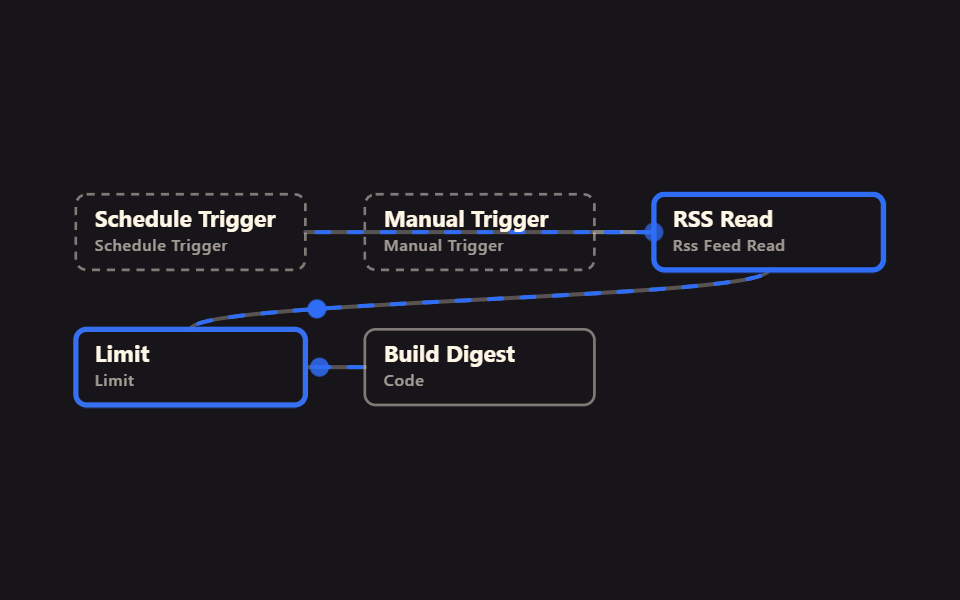 n8n basics9 n8n Workflow Examples, Zero Accounts Needed
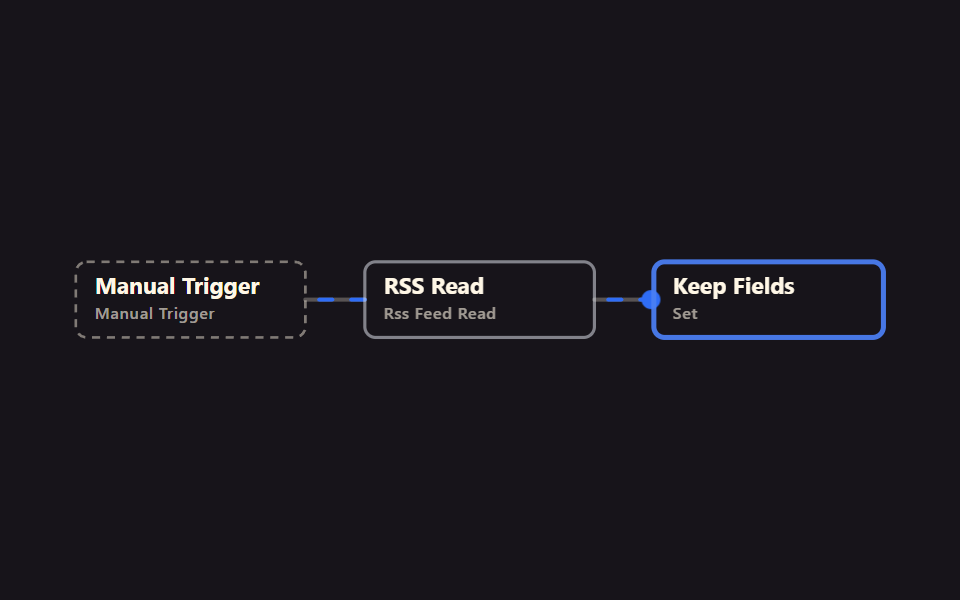 RSS & newsMarketing Automation Basics: 9 News Workflows
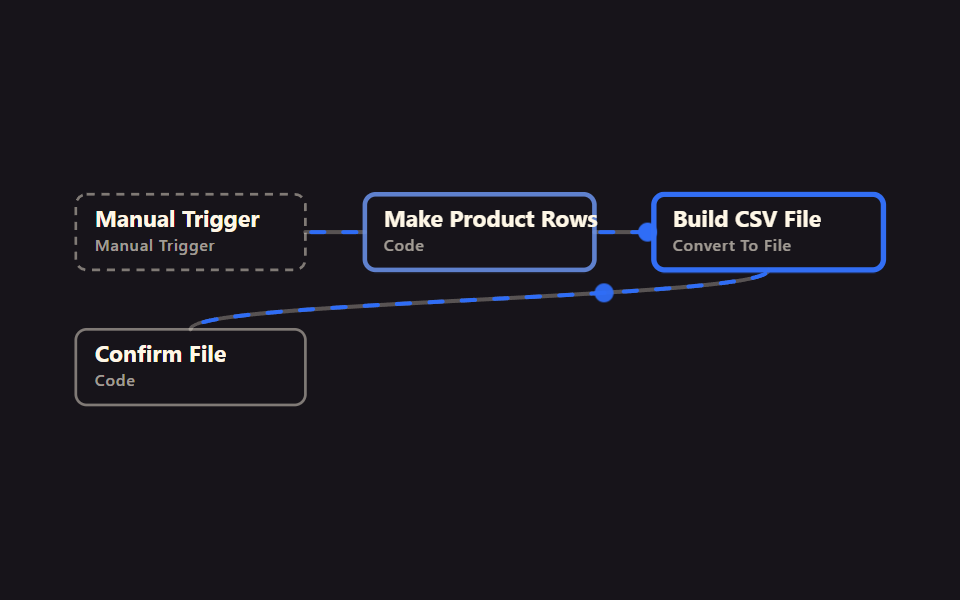 Files & dataExcel Automation Examples Using n8n, No Code
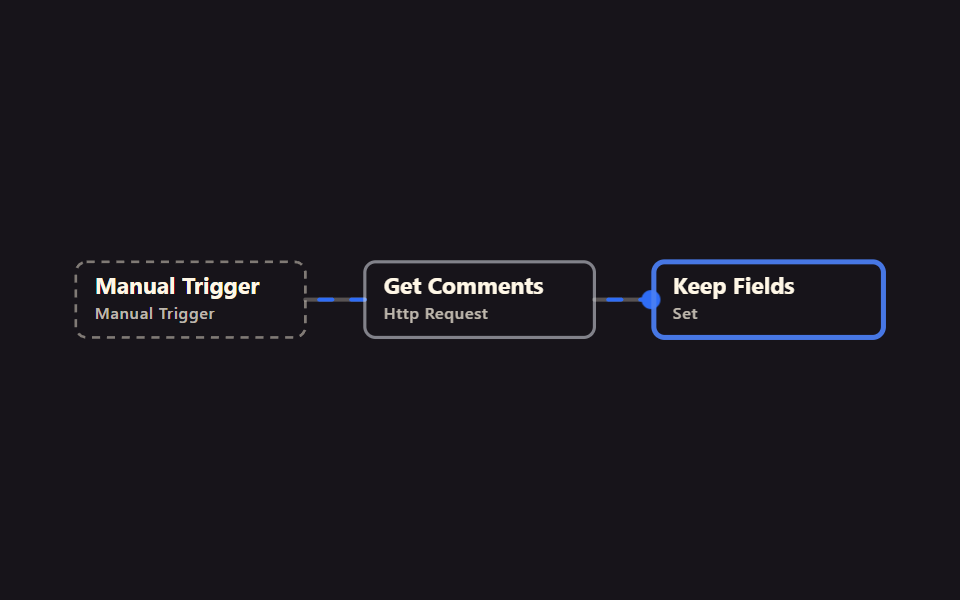 Webhooks & HTTPn8n No Code Automation: 9 Workflows to Import
 Localizationi18n JSON Checks: 9 Ways to Catch Missing Keys
 Dashboard UI9 SVG Progress Ring Widgets, Math Included
 Pickers9 time picker ui patterns, from a point to a span
 Creative UINode Based UI Design: 9 Patterns, No Library
 Dashboard UICSS Chart Design: 9 SVG Graphs, No Library
 Creative UIImage Crop JavaScript: 9 Canvas Editor UIs