i18n JSON Checks: 9 Ways to Catch Missing Keys
i18n JSON files break quietly: a key missing from en.json leaves a button empty, and a stray {name} placeholder ships without a value.
 01 language-pack-json
 02 missing-key-check
 03 placeholder-mismatch
 04 korean-residue-scan
 05 t-function
 06 hardcoded-scan
 07 fallback-key
 08 locale-url
 09 date-number-format
Auto-plays · click a tile to jump to its section · all nine in one zip
- 01 The two-file language pack
- 02 Keys present in one locale only
- 03 {placeholder} mismatches
- 04 Untranslated Korean left behind
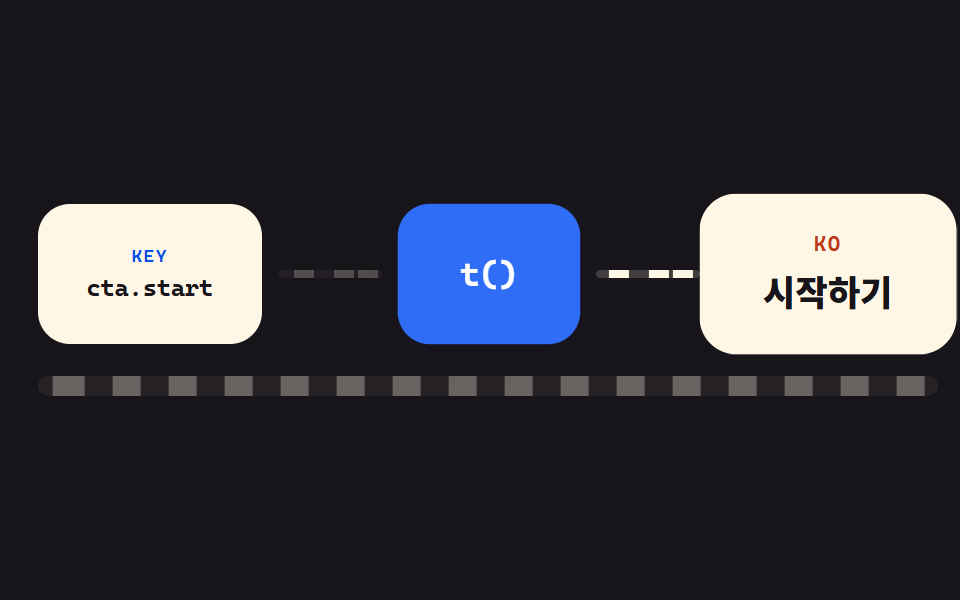
- 05 The t() function that wires it up
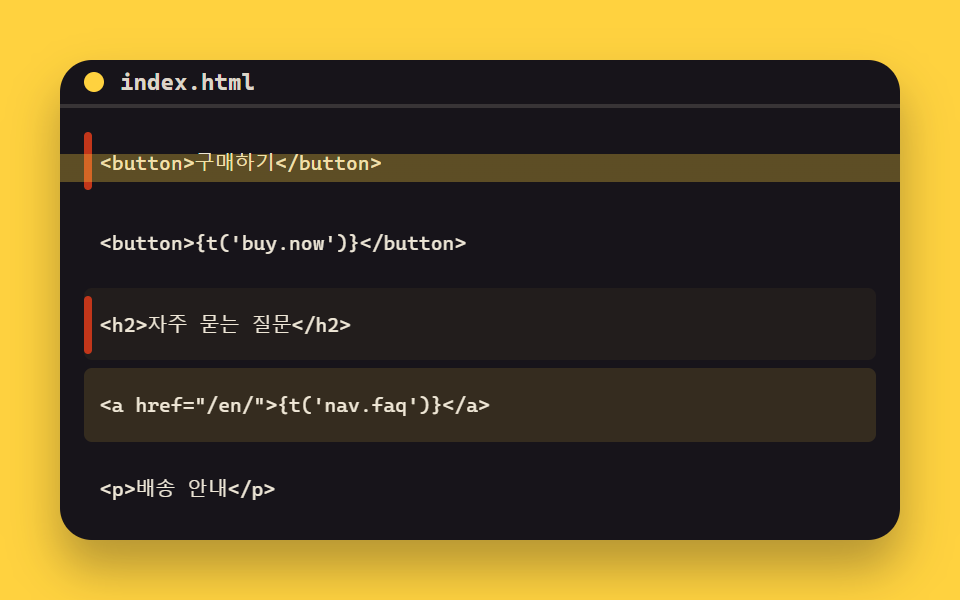
- 06 Hardcoded text that skips the pack
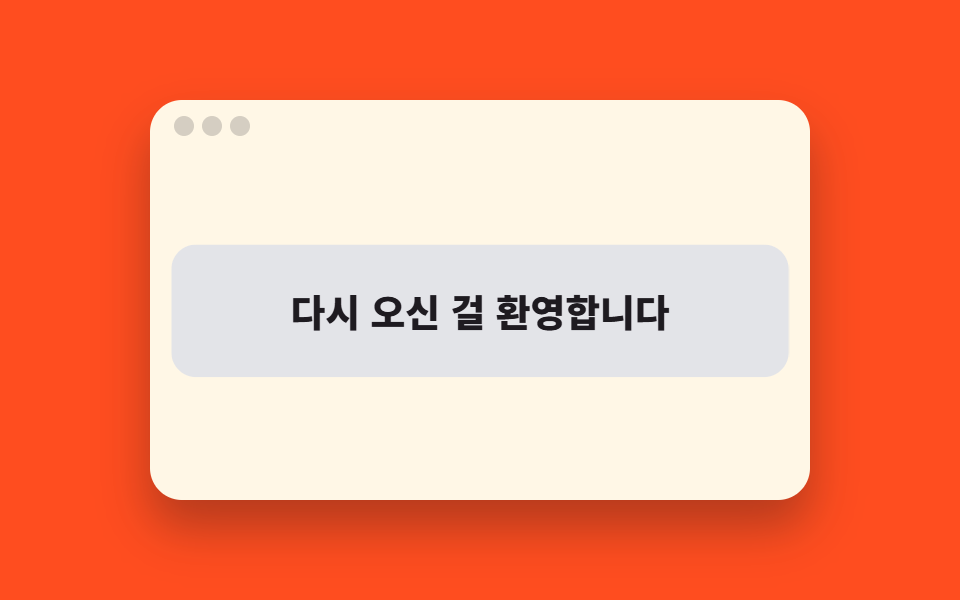
- 07 Raw keys leaking to the screen
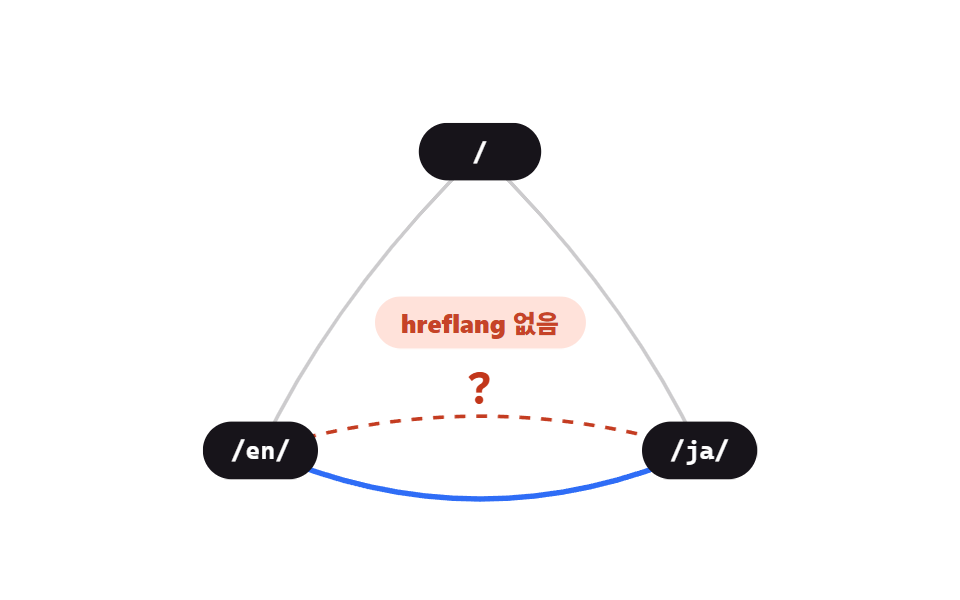
- 08 Per-language URLs and hreflang
- 09 Dates and numbers per locale
The nine follow the order a second locale actually breaks in. Start with the two-file skeleton (01), the plainest translation json file layout there is, and the keys that exist on only one side (02), then look inside the sentences for placeholder mismatches (03) and untranslated Korean left behind (04). Check the t() function that wires the pack to the screen (05), catch hardcoded text that skips the pack entirely (06) and raw keys leaking through (07), then step outside the page to per-language URLs and hreflang (08) and date and number formats (09).
01The two-file language pack
What an i18n json file looks like
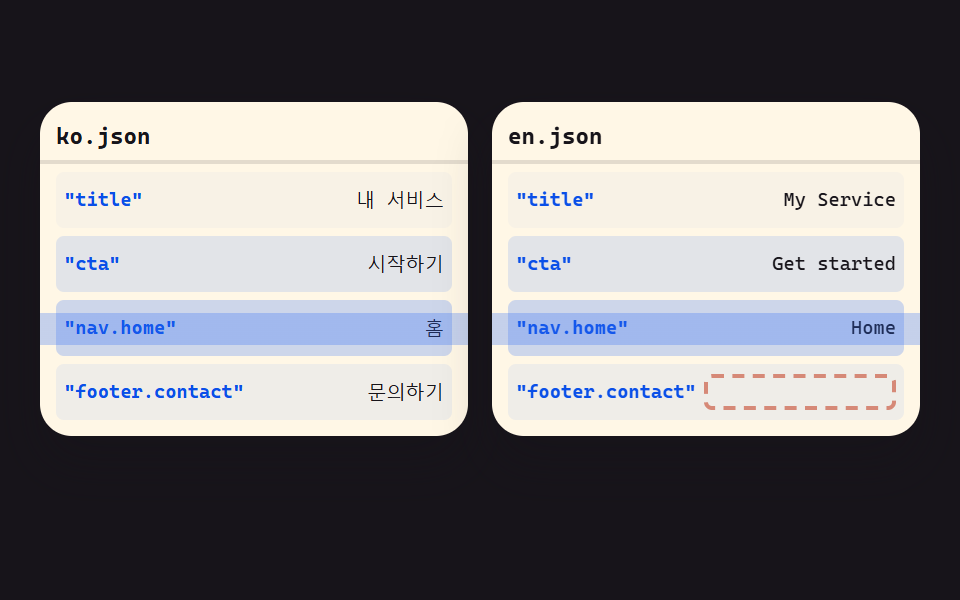
Keys from ko.json and en.json fan out into matching rows so the two files line up side by side, and a key that exists on only one side leaves an empty slot that catches the eye immediately.
<main class="stage is-demo">
  <div class="pack">
    <section class="file">
      <header class="file__head"><span class="file__name">ko.json</span></header>
      <ul class="file__rows">
        <li class="row" style="--i:0"><span class="row__key">"title"</span><span class="row__val" data-t="내 서비스"></span></li>
        <li class="row" style="--i:1"><span class="row__key">"cta"</span><span class="row__val" data-t="Get started"></span></li>
        <li class="row" style="--i:2"><span class="row__key">"nav.home"</span><span class="row__val" data-t="홈"></span></li>
        <li class="row" style="--i:3"><span class="row__key">"footer.contact"</span><span class="row__val" data-t="문의하기"></span></li>
      </ul>
      <span class="scan"></span>
    </section>
    <section class="file">
      <header class="file__head"><span class="file__name">en.json</span></header>
      <ul class="file__rows">
        <li class="row" style="--i:0"><span class="row__key">"title"</span><span class="row__val" data-t="My Service"></span></li>
        <li class="row" style="--i:1"><span class="row__key">"cta"</span><span class="row__val" data-t="Get started"></span></li>
        <li class="row" style="--i:2"><span class="row__key">"nav.home"</span><span class="row__val" data-t="Home"></span></li>
        <li class="row row--miss" style="--i:3"><span class="row__key">"footer.contact"</span><span class="row__val row__val--empty"></span><span class="miss-badge">!</span></li>
      </ul>
      <span class="scan"></span>
    </section>
    <p class="pack__note">1 key unmatched</p>
  </div>
</main>@use "../../../../site/static/demo-tokens" as *;
// ── 변수 3개 ──────────────────────────────────────────
$duration: $dur-loop; // 2s — 키 짝 맞추기 한 주기
$easing: $ease-out;
$color: $subject-cream; // 파일 카드
@include stage($stage-ink);
.pack {
width: min(440px, 94vw);
display: grid;
grid-template-columns: 1fr 1fr;
column-gap: $sp-3;
row-gap: $sp-2;
}
.file {
position: relative;
border-radius: $r-card;
background: $color;
box-shadow: $shadow-raised;
overflow: hidden;
}
.file__head {
padding: $sp-1 $sp-2;
border-bottom: 2px solid rgba($subject-ink, .12);
}
.file__name {
font-family: ui-monospace, "Cascadia Mono", Consolas, monospace;
font-size: clamp(10px, 2.4vw, 13px);
font-weight: 700;
color: $subject-ink;
}
.file__rows {
list-style: none;
margin: 0;
padding: $sp-1 $sp-2 $sp-2;
display: grid;
row-gap: $sp-1;
}
.row {
position: relative;
display: flex;
align-items: center;
justify-content: space-between;
column-gap: $sp-1;
border-radius: $r-xs;
padding: 0 $sp-1;
min-height: clamp(18px, 6vw, 28px);
font-family: ui-monospace, "Cascadia Mono", Consolas, monospace;
font-size: clamp(8.5px, 2vw, 12px);
}
.row__key { color: $subject-blue-deep; font-weight: 700; white-space: nowrap; } // 크림 면 위 파란 글자 — 5.98:1
.row__val { color: $subject-ink; white-space: nowrap; }
.row__val::before { content: attr(data-t); }
.row__val--empty {
flex: 1;
min-height: 14px;
border: 2px dashed rgba($error, .55);
border-radius: $r-xs;
}
.miss-badge {
position: absolute;
right: -$sp-1;
top: 50%;
width: 20px; height: 20px;
margin-top: -10px;
border-radius: 50%;
background: $error;
color: #fff;
font-family: -apple-system, "Segoe UI", "Noto Sans KR", sans-serif;
font-weight: 800;
font-size: 13px;
line-height: 20px;
text-align: center;
box-shadow: $shadow-press;
}
.pack__note {
grid-column: 1 / -1;
margin: 0;
justify-self: center;
border-radius: $r-pill;
background: $error-soft;
color: $subject-ink; // $error 글자는 note-in 애니메이션의 낮은 opacity 에서 3.22:1 로 깨진다 — 잉크로
font-size: clamp(10px, 2.4vw, 13px);
font-weight: 700;
padding: $sp-1 $sp-3;
}
// 스캔 줄 — 카드 높이와 같은 오버레이에 그라데이션 한 줄을 넣고 위치만 이동
.scan {
position: absolute;
inset: 0;
pointer-events: none;
background: linear-gradient(to bottom,
transparent 0 calc(50% - 8px),
rgba($subject-blue, .28) calc(50% - 8px) calc(50% + 8px),
transparent calc(50% + 8px) 100%);
background-size: 100% 220%;
opacity: 0;
}
.stage.is-demo .scan { animation: scan-down $duration $easing infinite; }
.stage.is-demo .row { animation: row-flash $duration linear infinite; animation-delay: calc(var(--i) * .12s); }
.stage.is-demo .row--miss .row__val--empty { animation: empty-alarm $duration $easing infinite; }
.stage.is-demo .miss-badge { animation: miss-pop $duration $easing infinite; }
.stage.is-demo .pack__note { animation: note-in $duration $easing infinite; }
@keyframes scan-down {
0% { opacity: 1; background-position: 0 -130%; }
55% { opacity: 1; background-position: 0 130%; }
60%, 100% { opacity: 0; background-position: 0 130%; }
}
@keyframes row-flash {
0%, 4% { background: transparent; }
13% { background: rgba($subject-blue, .24); }
27%, 100% { background: transparent; }
}
@keyframes empty-alarm {
0%, 42% { background: transparent; }
50% { background: rgba($error, .30); }
60% { background: rgba($error, .10); }
68% { background: rgba($error, .30); }
76% { background: rgba($error, .10); }
84%, 100% { background: rgba($error, .24); }
}
@keyframes miss-pop {
0%, 42% { transform: scale(0); opacity: 0; }
50% { transform: scale(1.3) rotate(0deg); opacity: 1; }
56% { transform: scale(1) rotate(0deg); }
66% { transform: scale(1) rotate(7deg); }
72% { transform: scale(1) rotate(-7deg); }
78% { transform: scale(1) rotate(4deg); }
84%, 96% { transform: scale(1) rotate(0deg); opacity: 1; }
100% { transform: scale(.5); opacity: 0; }
}
@keyframes note-in {
0%, 48% { transform: translateY(6px); opacity: 0; }
58%, 94% { transform: translateY(0); opacity: 1; }
100% { transform: translateY(6px); opacity: 0; }
}
@media (prefers-reduced-motion: reduce) {
.stage.is-demo .scan,
.stage.is-demo .row,
.stage.is-demo .row--miss .row__val--empty,
.stage.is-demo .miss-badge,
.stage.is-demo .pack__note { animation: none; }
.scan { opacity: 0; }
}html, body {
margin: 0;
overflow: hidden;
}
.stage {
box-sizing: border-box;
min-height: 100vh;
display: grid;
place-items: center;
margin: 0;
background: #17141a;
font-family: -apple-system, "Segoe UI", "Noto Sans KR", sans-serif;
padding: clamp(8px, 4vw, 24px);
}
.pack {
width: min(440px, 94vw);
display: grid;
grid-template-columns: 1fr 1fr;
column-gap: 12px;
row-gap: 8px;
}
.file {
position: relative;
border-radius: 16px;
background: #fff7e6;
box-shadow: 0 14px 24px rgba(23, 20, 26, 0.32);
overflow: hidden;
}
.file__head {
padding: 4px 8px;
border-bottom: 2px solid rgba(23, 20, 26, 0.12);
}
.file__name {
font-family: ui-monospace, "Cascadia Mono", Consolas, monospace;
font-size: clamp(10px, 2.4vw, 13px);
font-weight: 700;
color: #17141a;
}
.file__rows {
list-style: none;
margin: 0;
padding: 4px 8px 8px;
display: grid;
row-gap: 4px;
}
.row {
position: relative;
display: flex;
align-items: center;
justify-content: space-between;
column-gap: 4px;
border-radius: 4px;
padding: 0 4px;
min-height: clamp(18px, 6vw, 28px);
font-family: ui-monospace, "Cascadia Mono", Consolas, monospace;
font-size: clamp(8.5px, 2vw, 12px);
}
.row__key {
color: #0a4fe8;
font-weight: 700;
white-space: nowrap;
}
.row__val {
color: #17141a;
white-space: nowrap;
}
.row__val::before {
content: attr(data-t);
}
.row__val--empty {
flex: 1;
min-height: 14px;
border: 2px dashed rgba(194, 54, 26, 0.55);
border-radius: 4px;
}
.miss-badge {
position: absolute;
right: -4px;
top: 50%;
width: 20px;
height: 20px;
margin-top: -10px;
border-radius: 50%;
background: #c2361a;
color: #fff;
font-family: -apple-system, "Segoe UI", "Noto Sans KR", sans-serif;
font-weight: 800;
font-size: 13px;
line-height: 20px;
text-align: center;
box-shadow: 0 6px 12px rgba(23, 20, 26, 0.32);
}
.pack__note {
grid-column: 1/-1;
margin: 0;
justify-self: center;
border-radius: 999px;
background: #ffe0d8;
color: #17141a;
font-size: clamp(10px, 2.4vw, 13px);
font-weight: 700;
padding: 4px 12px;
}
.scan {
position: absolute;
inset: 0;
pointer-events: none;
background: linear-gradient(to bottom, transparent 0 calc(50% - 8px), rgba(47, 109, 246, 0.28) calc(50% - 8px) calc(50% + 8px), transparent calc(50% + 8px) 100%);
background-size: 100% 220%;
opacity: 0;
}
.stage.is-demo .scan {
animation: scan-down 2s ease-out infinite;
}
.stage.is-demo .row {
animation: row-flash 2s linear infinite;
animation-delay: calc(var(--i) * 0.12s);
}
.stage.is-demo .row--miss .row__val--empty {
animation: empty-alarm 2s ease-out infinite;
}
.stage.is-demo .miss-badge {
animation: miss-pop 2s ease-out infinite;
}
.stage.is-demo .pack__note {
animation: note-in 2s ease-out infinite;
}
@keyframes scan-down {
0% {
opacity: 1;
background-position: 0 -130%;
}
55% {
opacity: 1;
background-position: 0 130%;
}
60%, 100% {
opacity: 0;
background-position: 0 130%;
}
}
@keyframes row-flash {
0%, 4% {
background: transparent;
}
13% {
background: rgba(47, 109, 246, 0.24);
}
27%, 100% {
background: transparent;
}
}
@keyframes empty-alarm {
0%, 42% {
background: transparent;
}
50% {
background: rgba(194, 54, 26, 0.3);
}
60% {
background: rgba(194, 54, 26, 0.1);
}
68% {
background: rgba(194, 54, 26, 0.3);
}
76% {
background: rgba(194, 54, 26, 0.1);
}
84%, 100% {
background: rgba(194, 54, 26, 0.24);
}
}
@keyframes miss-pop {
0%, 42% {
transform: scale(0);
opacity: 0;
}
50% {
transform: scale(1.3) rotate(0deg);
opacity: 1;
}
56% {
transform: scale(1) rotate(0deg);
}
66% {
transform: scale(1) rotate(7deg);
}
72% {
transform: scale(1) rotate(-7deg);
}
78% {
transform: scale(1) rotate(4deg);
}
84%, 96% {
transform: scale(1) rotate(0deg);
opacity: 1;
}
100% {
transform: scale(0.5);
opacity: 0;
}
}
@keyframes note-in {
0%, 48% {
transform: translateY(6px);
opacity: 0;
}
58%, 94% {
transform: translateY(0);
opacity: 1;
}
100% {
transform: translateY(6px);
opacity: 0;
}
}
@media (prefers-reduced-motion: reduce) {
.stage.is-demo .scan,
.stage.is-demo .row,
.stage.is-demo .row--miss .row__val--empty,
.stage.is-demo .miss-badge,
.stage.is-demo .pack__note {
animation: none;
}
.scan {
opacity: 0;
}
}import type { CSSProperties } from "react";
import styles from "./LanguagePackJson.module.scss";
export type LanguagePackJsonProps = {
duration?: number;
easing?: string;
color?: string;
note?: string;
};
const KO_ROWS = ["내 서비스", "시작하기", "홈", "문의하기"];
const EN_ROWS = ["My Service", "Get started", "Home", ""];
const KEYS = ["title", "cta", "nav.home", "footer.contact"];
export default function LanguagePackJson({
duration = 2000,
easing = "ease-out",
color = "#fff7e6",
note = "짝이 안 맞는 키 1개",
}: LanguagePackJsonProps) {
const vars: CSSProperties = { "--duration": `${duration}ms`, "--easing": easing, "--color": color } as CSSProperties;
return (
<div className={styles.stage} style={vars} aria-label="언어팩 두 파일 비교 데모" role="img">
<div className={styles.pack}>
<section className={styles.file}>
<header className={styles.head}><span className={styles.name}>ko.json</span></header>
<ul className={styles.rows}>
{KEYS.map((k, i) => (
<li key={k} className={styles.row} style={{ "--i": i } as CSSProperties}>
<span className={styles.key}>"{k}"</span>
<span className={styles.val}>{KO_ROWS[i]}</span>
</li>
))}
</ul>
<span className={styles.scan} />
</section>
<section className={styles.file}>
<header className={styles.head}><span className={styles.name}>en.json</span></header>
<ul className={styles.rows}>
{KEYS.map((k, i) => (
<li
key={k}
className={`${styles.row} ${i === 3 ? styles.rowMiss : ""}`}
style={{ "--i": i } as CSSProperties}
>
<span className={styles.key}>"{k}"</span>
{EN_ROWS[i]
? <span className={styles.val}>{EN_ROWS[i]}</span>
: <span className={`${styles.val} ${styles.valEmpty}`} />}
{i === 3 && <span className={styles.miss}>!</span>}
</li>
))}
</ul>
<span className={styles.scan} />
</section>
<p className={styles.note}>{note}</p>
</div>
</div>
);
}01 · The two-file language pack — Measured area 46.337% · moving frames 21/23Original by GODRICH · SCSS and React ship in the zip · See the password
Where to look in the code
Run this the first time a second locale gets wired up, or whenever a new translation file is added.
const flatten = (o, p = "") =>
  Object.entries(o).flatMap(([k, v]) =>
    v && typeof v === "object"
      ? flatten(v, p ? `${p}.${k}` : k)
      : [`${p ? p + "." : ""}${k}`]
  );

const load = async (l) =>
  flatten(await (await fetch(`/locales/${l}.json`)).json());

const ko = await load("ko");
const en = await load("en");
console.log(ko.length, en.length);  // if the counts differ, the skeleton itself is off
02Keys present in one locale only
What happens on screen
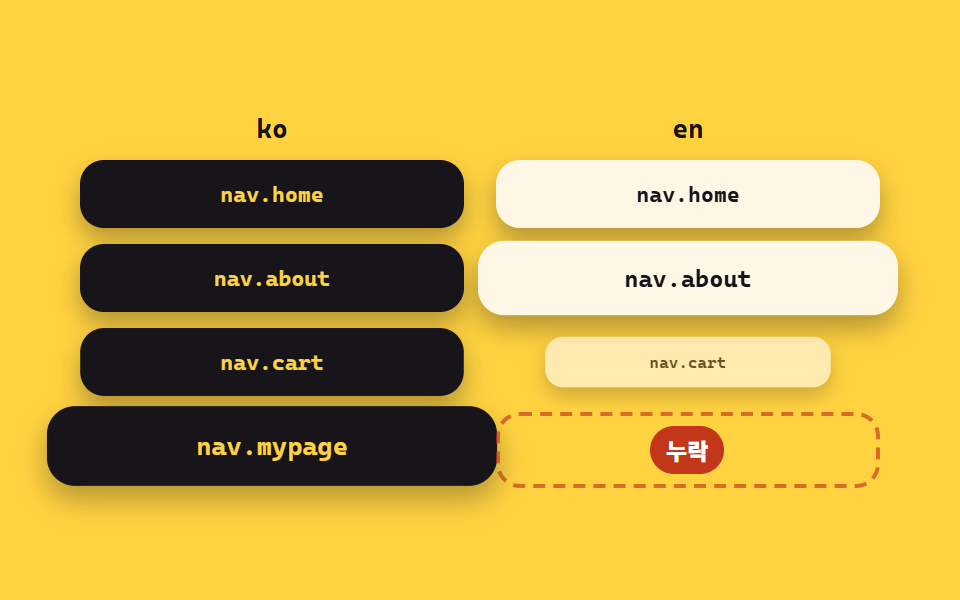
Key rows in both columns light up and fill in order, but the one missing on either side stays dark while a red defect mark points at the gap.
<main class="stage is-demo">
  <div class="board">
    <div class="col">
      <p class="col__head">ko</p>
      <ul class="col__rows">
        <li class="pill" style="--i:0">nav.home</li>
        <li class="pill" style="--i:1">nav.about</li>
        <li class="pill" style="--i:2">nav.cart</li>
        <li class="pill" style="--i:3">nav.mypage</li>
      </ul>
    </div>
    <div class="col">
      <p class="col__head">en</p>
      <ul class="col__rows">
        <li class="pill pill--en" style="--i:0">nav.home</li>
        <li class="pill pill--en" style="--i:1">nav.about</li>
        <li class="pill pill--en" style="--i:2">nav.cart</li>
        <li class="slot" style="--i:3"><span class="slot__badge">missing</span></li>
      </ul>
    </div>
  </div>
</main>
@use "../../../../site/static/demo-tokens" as *;
// ── 변수 3개 ──────────────────────────────────────────
$duration: $dur-loop; // 2s — 칸 채우기 한 주기
$easing: $ease-pop;
$color: $subject-ink; // ko 알약
@include stage($stage-yellow);
.board {
width: min(400px, 92vw);
display: grid;
grid-template-columns: 1fr 1fr;
column-gap: $sp-4;
}
.col__head {
margin: 0 0 $sp-2;
font-family: ui-monospace, "Cascadia Mono", Consolas, monospace;
font-size: clamp(12px, 2.8vw, 15px);
font-weight: 700;
color: $subject-ink;
text-align: center;
}
.col__rows {
list-style: none;
margin: 0; padding: 0;
display: grid;
row-gap: $sp-2;
}
.pill, .slot {
border-radius: $r-control;
min-height: clamp(24px, 8vw, 34px);
display: flex;
align-items: center;
justify-content: center;
font-family: ui-monospace, "Cascadia Mono", Consolas, monospace;
font-size: clamp(9.5px, 2.3vw, 13px);
font-weight: 700;
}
.pill { background: $color; color: $stage-yellow; box-shadow: $shadow-press; }
.pill--en { background: $subject-cream; color: $subject-ink; }
.slot {
position: relative;
border: 2px dashed rgba($error, .65);
}
.slot__badge {
border-radius: $r-pill;
background: $error;
color: #fff;
font-family: -apple-system, "Segoe UI", "Noto Sans KR", sans-serif;
font-size: clamp(10px, 2.4vw, 13px);
font-weight: 800;
padding: $sp-1 $sp-2;
}
// 칸이 하나씩 채워진다 — ko 가 반 박자 앞선다
.stage.is-demo .pill { animation: fill-in $duration $easing infinite; animation-delay: calc(var(--i) * .16s); }
.stage.is-demo .pill--en { animation-delay: calc(var(--i) * .16s + .24s); }
.stage.is-demo .slot { animation: slot-alarm $duration $ease-out infinite; animation-delay: calc(var(--i) * .16s + .24s); }
.stage.is-demo .slot__badge { animation: badge-pop $duration $easing infinite; animation-delay: calc(var(--i) * .16s + .3s); }
@keyframes fill-in {
0% { transform: scale(0); opacity: 0; }
9% { transform: scale(1.12); opacity: 1; }
14%, 92% { transform: scale(1); opacity: 1; }
100% { transform: scale(.7); opacity: 0; }
}
@keyframes slot-alarm {
0%, 12% { background: transparent; }
20% { background: rgba($error, .28); }
28% { background: rgba($error, .08); }
36% { background: rgba($error, .28); }
44%, 96% { background: rgba($error, .20); }
100% { background: transparent; }
}
@keyframes badge-pop {
0%, 12% { transform: scale(0) rotate(0deg); opacity: 0; }
20% { transform: scale(1.25) rotate(0deg); opacity: 1; }
26% { transform: scale(1) rotate(0deg); }
36% { transform: scale(1) rotate(8deg); }
44% { transform: scale(1) rotate(-8deg); }
52% { transform: scale(1) rotate(4deg); }
58%, 94% { transform: scale(1) rotate(0deg); opacity: 1; }
100% { transform: scale(.5); opacity: 0; }
}
@media (prefers-reduced-motion: reduce) {
.stage.is-demo .pill,
.stage.is-demo .slot,
.stage.is-demo .slot__badge { animation: none; }
.slot { background: rgba($error, .20); }
}html, body {
margin: 0;
overflow: hidden;
}
.stage {
box-sizing: border-box;
min-height: 100vh;
display: grid;
place-items: center;
margin: 0;
background: #ffd23f;
font-family: -apple-system, "Segoe UI", "Noto Sans KR", sans-serif;
padding: clamp(8px, 4vw, 24px);
}
.board {
width: min(400px, 92vw);
display: grid;
grid-template-columns: 1fr 1fr;
column-gap: 16px;
}
.col__head {
margin: 0 0 8px;
font-family: ui-monospace, "Cascadia Mono", Consolas, monospace;
font-size: clamp(12px, 2.8vw, 15px);
font-weight: 700;
color: #17141a;
text-align: center;
}
.col__rows {
list-style: none;
margin: 0;
padding: 0;
display: grid;
row-gap: 8px;
}
.pill, .slot {
border-radius: 12px;
min-height: clamp(24px, 8vw, 34px);
display: flex;
align-items: center;
justify-content: center;
font-family: ui-monospace, "Cascadia Mono", Consolas, monospace;
font-size: clamp(9.5px, 2.3vw, 13px);
font-weight: 700;
}
.pill {
background: #17141a;
color: #ffd23f;
box-shadow: 0 6px 12px rgba(23, 20, 26, 0.32);
}
.pill--en {
background: #fff7e6;
color: #17141a;
}
.slot {
position: relative;
border: 2px dashed rgba(194, 54, 26, 0.65);
}
.slot__badge {
border-radius: 999px;
background: #c2361a;
color: #fff;
font-family: -apple-system, "Segoe UI", "Noto Sans KR", sans-serif;
font-size: clamp(10px, 2.4vw, 13px);
font-weight: 800;
padding: 4px 8px;
}
.stage.is-demo .pill {
animation: fill-in 2s cubic-bezier(0.2, 1.4, 0.4, 1) infinite;
animation-delay: calc(var(--i) * 0.16s);
}
.stage.is-demo .pill--en {
animation-delay: calc(var(--i) * 0.16s + 0.24s);
}
.stage.is-demo .slot {
animation: slot-alarm 2s ease-out infinite;
animation-delay: calc(var(--i) * 0.16s + 0.24s);
}
.stage.is-demo .slot__badge {
animation: badge-pop 2s cubic-bezier(0.2, 1.4, 0.4, 1) infinite;
animation-delay: calc(var(--i) * 0.16s + 0.3s);
}
@keyframes fill-in {
0% {
transform: scale(0);
opacity: 0;
}
9% {
transform: scale(1.12);
opacity: 1;
}
14%, 92% {
transform: scale(1);
opacity: 1;
}
100% {
transform: scale(0.7);
opacity: 0;
}
}
@keyframes slot-alarm {
0%, 12% {
background: transparent;
}
20% {
background: rgba(194, 54, 26, 0.28);
}
28% {
background: rgba(194, 54, 26, 0.08);
}
36% {
background: rgba(194, 54, 26, 0.28);
}
44%, 96% {
background: rgba(194, 54, 26, 0.2);
}
100% {
background: transparent;
}
}
@keyframes badge-pop {
0%, 12% {
transform: scale(0) rotate(0deg);
opacity: 0;
}
20% {
transform: scale(1.25) rotate(0deg);
opacity: 1;
}
26% {
transform: scale(1) rotate(0deg);
}
36% {
transform: scale(1) rotate(8deg);
}
44% {
transform: scale(1) rotate(-8deg);
}
52% {
transform: scale(1) rotate(4deg);
}
58%, 94% {
transform: scale(1) rotate(0deg);
opacity: 1;
}
100% {
transform: scale(0.5);
opacity: 0;
}
}
@media (prefers-reduced-motion: reduce) {
.stage.is-demo .pill,
.stage.is-demo .slot,
.stage.is-demo .slot__badge {
animation: none;
}
.slot {
background: rgba(194, 54, 26, 0.2);
}
}import type { CSSProperties } from "react";
import styles from "./MissingKeyCheck.module.scss";
export type MissingKeyCheckProps = {
duration?: number;
easing?: string;
color?: string;
badge?: string;
};
const KO_KEYS = ["nav.home", "nav.about", "nav.cart", "nav.mypage"];
const EN_KEYS = ["nav.home", "nav.about", "nav.cart"];
export default function MissingKeyCheck({
duration = 2000,
easing = "cubic-bezier(.2, 1.4, .4, 1)",
color = "#17141a",
badge = "누락",
}: MissingKeyCheckProps) {
const vars: CSSProperties = { "--duration": `${duration}ms`, "--easing": easing, "--color": color } as CSSProperties;
return (
<div className={styles.stage} style={vars} aria-label="한쪽 언어에만 있는 키 데모" role="img">
<div className={styles.board}>
<div className={styles.col}>
<p className={styles.head}>ko</p>
<ul className={styles.rows}>
{KO_KEYS.map((k, i) => (
<li key={k} className={styles.pill} style={{ "--i": i } as CSSProperties}>{k}</li>
))}
</ul>
</div>
<div className={styles.col}>
<p className={styles.head}>en</p>
<ul className={styles.rows}>
{EN_KEYS.map((k, i) => (
<li key={k} className={`${styles.pill} ${styles.pillEn}`} style={{ "--i": i } as CSSProperties}>{k}</li>
))}
<li className={styles.slot} style={{ "--i": 3 } as CSSProperties}>
<span className={styles.badge}>{badge}</span>
</li>
</ul>
</div>
</div>
</div>
);
}02 · Keys present in one locale only — Measured area 52.565% · moving frames 21/23Original by GODRICH · SCSS and React ship in the zip · See the password
How to read the code
It's the check for when a button comes back empty only in English, or when a new key only made it into Korean.
const onlyIn = (a, b, label) => {
  const set = new Set(b);
  return a.filter((k) => !set.has(k)).map((k) => `${label}: ${k}`);
};

const gaps = [
  ...onlyIn(ko, en, "ko-only"),
  ...onlyIn(en, ko, "en-only"),
];

console.log(gaps);
// → a line like "ko-only: nav.mypage" for every key missing on one side
03{placeholder} mismatches
What moves
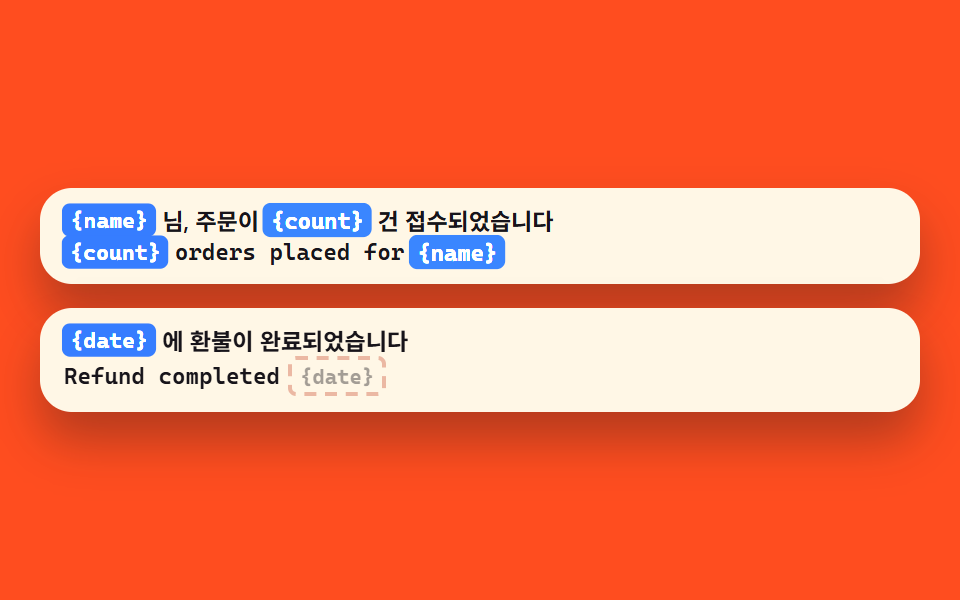
A {name} chip inside the sentence highlights like a marker pen while each locale gets swept, and a sentence missing that chip gets a warning badge that shakes into place.
<main class="stage is-demo">
  <div class="stack">
    <section class="card">
      <div class="lines">
        <p class="line line--ko"><span class="ph" style="--i:0">{name}</span><span class="txt" data-t="님, 주문이 "></span><span class="ph" style="--i:1">{count}</span><span class="txt" data-t="건 접수되었습니다"></span></p>
        <p class="line line--en"><span class="ph" style="--i:0">{count}</span><span class="txt" data-t=" orders placed for "></span><span class="ph" style="--i:1">{name}</span></p>
      </div>
      <span class="verdict verdict--ok">match</span>
    </section>
    <section class="card">
      <div class="lines">
        <p class="line line--ko"><span class="ph" style="--i:0">{date}</span><span class="txt" data-t="에 환불이 완료되었습니다"></span></p>
        <p class="line line--en"><span class="txt" data-t="Refund completed"></span><span class="ph ph--ghost" style="--i:0">{date}</span></p>
      </div>
      <span class="verdict verdict--ng">mismatch</span>
    </section>
  </div>
</main>
@use "../../../../site/static/demo-tokens" as *;
// ── 변수 3개 ──────────────────────────────────────────
$duration: $dur-loop; // 2s — 형광펜 한 주기
$easing: $ease-out;
$color: $subject-blue; // 자리표시자 칩
@include stage($stage-orange);
.stack {
width: min(440px, 94vw);
display: grid;
row-gap: $sp-3;
}
.card {
position: relative;
border-radius: $r-card;
background: $subject-cream;
box-shadow: $shadow-raised;
padding: $sp-2 $sp-3;
display: grid;
row-gap: $sp-1;
}
.line {
margin: 0;
display: flex;
align-items: center;
flex-wrap: wrap;
column-gap: $sp-1;
row-gap: $sp-1;
font-size: clamp(9.5px, 2.4vw, 13.5px);
font-weight: 600;
color: $subject-ink;
}
.line--ko { font-family: -apple-system, "Segoe UI", "Noto Sans KR", sans-serif; }
.line--en { font-family: ui-monospace, "Cascadia Mono", Consolas, monospace; }
.txt::before { content: attr(data-t); }
.ph {
border-radius: $r-xs;
background: $color;
color: #fff;
font-family: ui-monospace, "Cascadia Mono", Consolas, monospace;
font-weight: 700;
font-size: clamp(9px, 2.2vw, 12.5px);
padding: 0 $sp-1;
min-height: 16px;
display: inline-flex;
align-items: center;
}
.ph--ghost {
background: transparent;
color: rgba($subject-ink, .72); // .38 은 크림 면 위 2.41:1 이었다 — AA 4.5
border: 2px dashed rgba($error, .6);
}
.verdict {
position: absolute;
top: -$sp-2;
right: $sp-2;
border-radius: $r-pill;
font-size: clamp(9px, 2.2vw, 12px);
font-weight: 800;
font-family: -apple-system, "Segoe UI", "Noto Sans KR", sans-serif;
padding: $sp-1 $sp-2;
box-shadow: $shadow-press;
}
.verdict--ok { background: #50a384; color: $subject-ink; } // 흰 글자는 3.40:1 — 잉크로 5.36:1
.verdict--ng { background: $error; color: #fff; }
// 형광펜이 칩을 차례로 짚는다
.stage.is-demo .ph { animation: mark $duration $easing infinite; animation-delay: calc(var(--i) * .2s); }
.stage.is-demo .ph--ghost { animation-name: mark-ghost; }
.stage.is-demo .verdict--ok { animation: ok-in $duration $ease-pop infinite; }
.stage.is-demo .verdict--ng { animation: ng-in $duration $easing infinite; }
@keyframes mark {
0%, 8% { filter: brightness(1); transform: scale(1); }
16% { filter: brightness(1.45); transform: scale(1.14); }
26%, 92%{ filter: brightness(1); transform: scale(1); }
100% { filter: brightness(1); transform: scale(.9); }
}
@keyframes mark-ghost {
0%, 36% { transform: scale(1); opacity: .55; }
46% { transform: scale(1.14); opacity: 1; }
56%, 92%{ transform: scale(1); opacity: 1; }
100% { transform: scale(.9); opacity: .55; }
}
@keyframes ok-in {
0%, 30% { transform: scale(0) rotate(0deg); opacity: 0; }
38% { transform: scale(1.2) rotate(0deg); opacity: 1; }
44%, 94%{ transform: scale(1) rotate(0deg); opacity: 1; }
100% { transform: scale(.5); opacity: 0; }
}
@keyframes ng-in {
0%, 46% { transform: scale(0) rotate(0deg); opacity: 0; }
54% { transform: scale(1.25) rotate(0deg); opacity: 1; }
60% { transform: scale(1) rotate(0deg); }
68% { transform: scale(1) rotate(9deg); }
76% { transform: scale(1) rotate(-9deg); }
84% { transform: scale(1) rotate(5deg); }
90%, 96%{ transform: scale(1) rotate(0deg); opacity: 1; }
100% { transform: scale(.5); opacity: 0; }
}
@media (prefers-reduced-motion: reduce) {
.stage.is-demo .ph,
.stage.is-demo .verdict--ok,
.stage.is-demo .verdict--ng { animation: none; }
}html, body {
margin: 0;
overflow: hidden;
}
.stage {
box-sizing: border-box;
min-height: 100vh;
display: grid;
place-items: center;
margin: 0;
background: #ff4d1f;
font-family: -apple-system, "Segoe UI", "Noto Sans KR", sans-serif;
padding: clamp(8px, 4vw, 24px);
}
.stack {
width: min(440px, 94vw);
display: grid;
row-gap: 12px;
}
.card {
position: relative;
border-radius: 16px;
background: #fff7e6;
box-shadow: 0 14px 24px rgba(23, 20, 26, 0.32);
padding: 8px 12px;
display: grid;
row-gap: 4px;
}
.line {
margin: 0;
display: flex;
align-items: center;
flex-wrap: wrap;
column-gap: 4px;
row-gap: 4px;
font-size: clamp(9.5px, 2.4vw, 13.5px);
font-weight: 600;
color: #17141a;
}
.line--ko {
font-family: -apple-system, "Segoe UI", "Noto Sans KR", sans-serif;
}
.line--en {
font-family: ui-monospace, "Cascadia Mono", Consolas, monospace;
}
.txt::before {
content: attr(data-t);
}
.ph {
border-radius: 4px;
background: #2f6df6;
color: #fff;
font-family: ui-monospace, "Cascadia Mono", Consolas, monospace;
font-weight: 700;
font-size: clamp(9px, 2.2vw, 12.5px);
padding: 0 4px;
min-height: 16px;
display: inline-flex;
align-items: center;
}
.ph--ghost {
background: transparent;
color: rgba(23, 20, 26, 0.72);
border: 2px dashed rgba(194, 54, 26, 0.6);
}
.verdict {
position: absolute;
top: -8px;
right: 8px;
border-radius: 999px;
font-size: clamp(9px, 2.2vw, 12px);
font-weight: 800;
font-family: -apple-system, "Segoe UI", "Noto Sans KR", sans-serif;
padding: 4px 8px;
box-shadow: 0 6px 12px rgba(23, 20, 26, 0.32);
}
.verdict--ok {
background: #50a384;
color: #17141a;
}
.verdict--ng {
background: #c2361a;
color: #fff;
}
.stage.is-demo .ph {
animation: mark 2s ease-out infinite;
animation-delay: calc(var(--i) * 0.2s);
}
.stage.is-demo .ph--ghost {
animation-name: mark-ghost;
}
.stage.is-demo .verdict--ok {
animation: ok-in 2s cubic-bezier(0.2, 1.4, 0.4, 1) infinite;
}
.stage.is-demo .verdict--ng {
animation: ng-in 2s ease-out infinite;
}
@keyframes mark {
0%, 8% {
filter: brightness(1);
transform: scale(1);
}
16% {
filter: brightness(1.45);
transform: scale(1.14);
}
26%, 92% {
filter: brightness(1);
transform: scale(1);
}
100% {
filter: brightness(1);
transform: scale(0.9);
}
}
@keyframes mark-ghost {
0%, 36% {
transform: scale(1);
opacity: 0.55;
}
46% {
transform: scale(1.14);
opacity: 1;
}
56%, 92% {
transform: scale(1);
opacity: 1;
}
100% {
transform: scale(0.9);
opacity: 0.55;
}
}
@keyframes ok-in {
0%, 30% {
transform: scale(0) rotate(0deg);
opacity: 0;
}
38% {
transform: scale(1.2) rotate(0deg);
opacity: 1;
}
44%, 94% {
transform: scale(1) rotate(0deg);
opacity: 1;
}
100% {
transform: scale(0.5);
opacity: 0;
}
}
@keyframes ng-in {
0%, 46% {
transform: scale(0) rotate(0deg);
opacity: 0;
}
54% {
transform: scale(1.25) rotate(0deg);
opacity: 1;
}
60% {
transform: scale(1) rotate(0deg);
}
68% {
transform: scale(1) rotate(9deg);
}
76% {
transform: scale(1) rotate(-9deg);
}
84% {
transform: scale(1) rotate(5deg);
}
90%, 96% {
transform: scale(1) rotate(0deg);
opacity: 1;
}
100% {
transform: scale(0.5);
opacity: 0;
}
}
@media (prefers-reduced-motion: reduce) {
.stage.is-demo .ph,
.stage.is-demo .verdict--ok,
.stage.is-demo .verdict--ng {
animation: none;
}
}import type { CSSProperties } from "react";
import styles from "./PlaceholderMismatch.module.scss";
export type PlaceholderMismatchProps = {
duration?: number;
easing?: string;
color?: string;
okLabel?: string;
ngLabel?: string;
};
export default function PlaceholderMismatch({
duration = 2000,
easing = "ease-out",
color = "#2f6df6",
okLabel = "일치",
ngLabel = "불일치",
}: PlaceholderMismatchProps) {
const vars: CSSProperties = { "--duration": `${duration}ms`, "--easing": easing, "--color": color } as CSSProperties;
return (
<div className={styles.stage} style={vars} aria-label="자리표시자 불일치 데모" role="img">
<div className={styles.stack}>
<section className={styles.card}>
<div className={styles.lines}>
<p className={`${styles.line} ${styles.lineKo}`}>
<span className={styles.ph} style={{ "--i": 0 } as CSSProperties}>{"{name}"}</span>
<span className={styles.txt}>님, 주문이 </span>
<span className={styles.ph} style={{ "--i": 1 } as CSSProperties}>{"{count}"}</span>
<span className={styles.txt}>건 접수되었습니다</span>
</p>
<p className={`${styles.line} ${styles.lineEn}`}>
<span className={styles.ph} style={{ "--i": 0 } as CSSProperties}>{"{count}"}</span>
<span className={styles.txt}> orders placed for </span>
<span className={styles.ph} style={{ "--i": 1 } as CSSProperties}>{"{name}"}</span>
</p>
</div>
<span className={`${styles.verdict} ${styles.ok}`}>{okLabel}</span>
</section>
<section className={styles.card}>
<div className={styles.lines}>
<p className={`${styles.line} ${styles.lineKo}`}>
<span className={styles.ph} style={{ "--i": 0 } as CSSProperties}>{"{date}"}</span>
<span className={styles.txt}>에 환불이 완료되었습니다</span>
</p>
<p className={`${styles.line} ${styles.lineEn}`}>
<span className={styles.txt}>Refund completed</span>
<span className={`${styles.ph} ${styles.ghost}`} style={{ "--i": 0 } as CSSProperties}>{"{date}"}</span>
</p>
</div>
<span className={`${styles.verdict} ${styles.ng}`}>{ngLabel}</span>
</section>
</div>
</div>
);
}03 · {placeholder} mismatches — Measured area 6.635% · moving frames 22/23Original by GODRICH · SCSS and React ship in the zip · See the password
What to change
Useful when a greeting drops the user's name in one language, or when a quantity or date variable leaks out raw.
const ph = (s) => [...String(s).matchAll(/\{(\w+)\}/g)].map((m) => m[1]);
const sameSet = (a, b) =>
  a.length === b.length && a.every((x) => b.includes(x));

const koOrder = "{name}님, 주문이 {count}건 접수되었습니다";
const enOrder = "{count} orders placed for {name}";

console.log(sameSet(ph(koOrder), ph(enOrder)));   // true

const koRefund = "{date}에 환불이 완료되었습니다";
const enRefund = "Refund completed";
console.log(sameSet(ph(koRefund), ph(enRefund))); // false: {date} is missing
04Untranslated Korean left behind
What you see
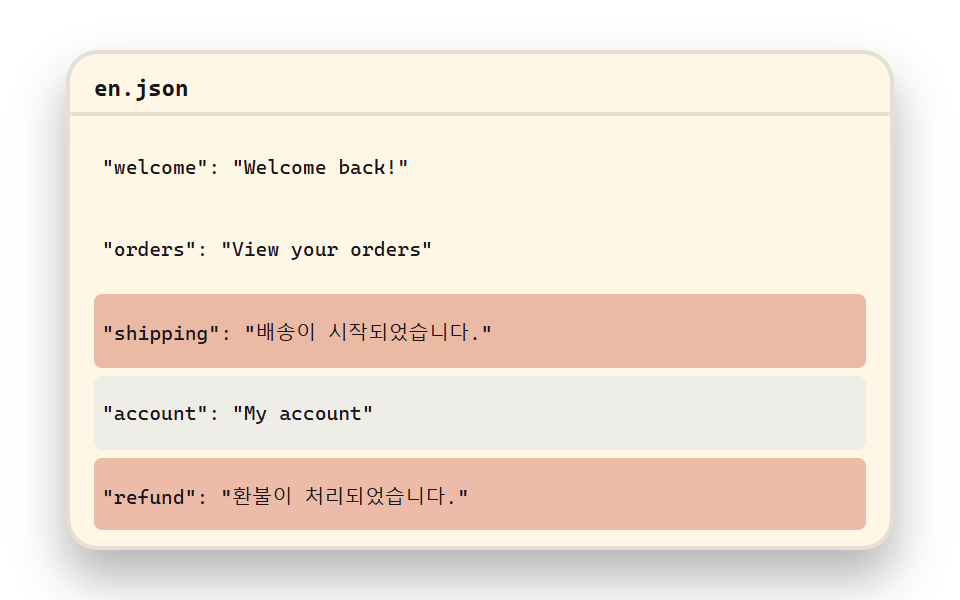
A scan line sweeps down the English lines and dyes only the Hangul syllables red as it passes, ticking a residue counter up with every hit.
<main class="stage is-demo">
<div class="doc">
<header class="doc__head"><span class="doc__name">en.json</span></header>
<ul class="doc__rows">
<li class="ln" style="--i:0"><span class="ln__txt" data-t='"welcome": "Welcome back!"'></span></li>
<li class="ln" style="--i:1"><span class="ln__txt" data-t='"orders": "View your orders"'></span></li>
<li class="ln ln--hit" style="--i:2"><span class="ln__txt" data-t='"shipping": "배송이 시작되었습니다."'></span></li>
<li class="ln" style="--i:3"><span class="ln__txt" data-t='"account": "My account"'></span></li>
<li class="ln ln--hit" style="--i:4"><span class="ln__txt" data-t='"refund": "환불이 처리되었습니다."'></span></li>
</ul>
<span class="doc__scan"></span>
<p class="doc__badge">2 Korean strings left</p>
</div>
</main>@use "../../../../site/static/demo-tokens" as *;
// ── 변수 3개 ──────────────────────────────────────────
$duration: $dur-loop; // 2s — 스캔 한 주기
$easing: $ease-out;
$color: $subject-blue; // 스캔 라인
@include stage($stage-paper);
.doc {
position: relative;
width: min(410px, 94vw);
border-radius: $r-card;
background: $subject-cream;
box-shadow: $shadow-raised;
border: 2px solid rgba($subject-ink, .10);
overflow: hidden;
}
.doc__head {
padding: $sp-1 $sp-3;
border-bottom: 2px solid rgba($subject-ink, .10);
}
.doc__name {
font-family: ui-monospace, "Cascadia Mono", Consolas, monospace;
font-size: clamp(10px, 2.4vw, 13px);
font-weight: 700;
color: $subject-ink;
}
.doc__rows {
list-style: none;
margin: 0;
padding: $sp-2 $sp-3 $sp-2;
display: grid;
row-gap: $sp-1;
}
.ln {
border-radius: $r-xs;
padding: $sp-1;
min-height: clamp(18px, 6vw, 30px);
display: flex;
align-items: center;
}
.ln__txt {
font-family: ui-monospace, "Cascadia Mono", Consolas, monospace;
font-size: clamp(8.5px, 2.1vw, 12.5px);
color: $subject-ink;
white-space: nowrap;
}
.ln__txt::before { content: attr(data-t); }
.doc__scan {
position: absolute;
inset: 0;
pointer-events: none;
background: linear-gradient(to bottom,
transparent 0 calc(50% - 7px),
rgba($color, .30) calc(50% - 7px) calc(50% + 7px),
transparent calc(50% + 7px) 100%);
background-size: 100% 220%;
opacity: 0;
}
.doc__badge {
position: absolute;
right: $sp-2;
bottom: $sp-2;
margin: 0;
border-radius: $r-pill;
background: $error;
color: #fff;
font-family: -apple-system, "Segoe UI", "Noto Sans KR", sans-serif;
font-size: clamp(10px, 2.4vw, 13px);
font-weight: 800;
padding: $sp-1 $sp-3;
box-shadow: $shadow-press;
}
// 스캔 라인이 내려가며 줄을 훑고, 한글 줄은 지나가는 순간 붉게 굳는다
.stage.is-demo .doc__scan { animation: scan-down $duration $easing infinite; }
.stage.is-demo .ln { animation: ln-pass $duration linear infinite; animation-delay: calc(var(--i) * .19s); }
.stage.is-demo .ln--hit { animation-name: ln-hit; }
.stage.is-demo .doc__badge { animation: badge-in $duration $ease-pop infinite; }
@keyframes scan-down {
0% { opacity: 1; background-position: 0 -130%; }
70% { opacity: 1; background-position: 0 130%; }
75%, 100% { opacity: 0; background-position: 0 130%; }
}
@keyframes ln-pass {
0%, 6% { background: transparent; }
15% { background: rgba($color, .18); }
26%, 100% { background: transparent; }
}
@keyframes ln-hit {
0%, 6% { background: transparent; }
15% { background: rgba($error, .45); }
26% { background: rgba($error, .18); }
36% { background: rgba($error, .45); }
46%, 100% { background: rgba($error, .32); }
}
@keyframes badge-in {
0%, 64% { transform: scale(0) translateY(4px); opacity: 0; }
72% { transform: scale(1.2) translateY(0); opacity: 1; }
78%, 95%{ transform: scale(1) translateY(0); opacity: 1; }
100% { transform: scale(.5); opacity: 0; }
}
@media (prefers-reduced-motion: reduce) {
.stage.is-demo .doc__scan,
.stage.is-demo .ln,
.stage.is-demo .doc__badge { animation: none; }
.doc__scan { opacity: 0; }
.ln--hit { background: rgba($error, .32); }
}
// 좁은 화면(320px 검수) — 줄 간격을 줄여 세로로 맞춘다
@media (max-width: 359px) {
.doc__head { padding: 0 $sp-2; }
.doc__rows { padding: $sp-1 $sp-2; row-gap: $sp-1; }
.ln { min-height: 16px; padding: 0; }
}html, body {
margin: 0;
overflow: hidden;
}
.stage {
box-sizing: border-box;
min-height: 100vh;
display: grid;
place-items: center;
margin: 0;
background: #ffffff;
font-family: -apple-system, "Segoe UI", "Noto Sans KR", sans-serif;
padding: clamp(8px, 4vw, 24px);
}
.doc {
position: relative;
width: min(410px, 94vw);
border-radius: 16px;
background: #fff7e6;
box-shadow: 0 14px 24px rgba(23, 20, 26, 0.32);
border: 2px solid rgba(23, 20, 26, 0.1);
overflow: hidden;
}
.doc__head {
padding: 4px 12px;
border-bottom: 2px solid rgba(23, 20, 26, 0.1);
}
.doc__name {
font-family: ui-monospace, "Cascadia Mono", Consolas, monospace;
font-size: clamp(10px, 2.4vw, 13px);
font-weight: 700;
color: #17141a;
}
.doc__rows {
list-style: none;
margin: 0;
padding: 8px 12px 8px;
display: grid;
row-gap: 4px;
}
.ln {
border-radius: 4px;
padding: 4px;
min-height: clamp(18px, 6vw, 30px);
display: flex;
align-items: center;
}
.ln__txt {
font-family: ui-monospace, "Cascadia Mono", Consolas, monospace;
font-size: clamp(8.5px, 2.1vw, 12.5px);
color: #17141a;
white-space: nowrap;
}
.ln__txt::before {
content: attr(data-t);
}
.doc__scan {
position: absolute;
inset: 0;
pointer-events: none;
background: linear-gradient(to bottom, transparent 0 calc(50% - 7px), rgba(47, 109, 246, 0.3) calc(50% - 7px) calc(50% + 7px), transparent calc(50% + 7px) 100%);
background-size: 100% 220%;
opacity: 0;
}
.doc__badge {
position: absolute;
right: 8px;
bottom: 8px;
margin: 0;
border-radius: 999px;
background: #c2361a;
color: #fff;
font-family: -apple-system, "Segoe UI", "Noto Sans KR", sans-serif;
font-size: clamp(10px, 2.4vw, 13px);
font-weight: 800;
padding: 4px 12px;
box-shadow: 0 6px 12px rgba(23, 20, 26, 0.32);
}
.stage.is-demo .doc__scan {
animation: scan-down 2s ease-out infinite;
}
.stage.is-demo .ln {
animation: ln-pass 2s linear infinite;
animation-delay: calc(var(--i) * 0.19s);
}
.stage.is-demo .ln--hit {
animation-name: ln-hit;
}
.stage.is-demo .doc__badge {
animation: badge-in 2s cubic-bezier(0.2, 1.4, 0.4, 1) infinite;
}
@keyframes scan-down {
0% {
opacity: 1;
background-position: 0 -130%;
}
70% {
opacity: 1;
background-position: 0 130%;
}
75%, 100% {
opacity: 0;
background-position: 0 130%;
}
}
@keyframes ln-pass {
0%, 6% {
background: transparent;
}
15% {
background: rgba(47, 109, 246, 0.18);
}
26%, 100% {
background: transparent;
}
}
@keyframes ln-hit {
0%, 6% {
background: transparent;
}
15% {
background: rgba(194, 54, 26, 0.45);
}
26% {
background: rgba(194, 54, 26, 0.18);
}
36% {
background: rgba(194, 54, 26, 0.45);
}
46%, 100% {
background: rgba(194, 54, 26, 0.32);
}
}
@keyframes badge-in {
0%, 64% {
transform: scale(0) translateY(4px);
opacity: 0;
}
72% {
transform: scale(1.2) translateY(0);
opacity: 1;
}
78%, 95% {
transform: scale(1) translateY(0);
opacity: 1;
}
100% {
transform: scale(0.5);
opacity: 0;
}
}
@media (prefers-reduced-motion: reduce) {
.stage.is-demo .doc__scan,
.stage.is-demo .ln,
.stage.is-demo .doc__badge {
animation: none;
}
.doc__scan {
opacity: 0;
}
.ln--hit {
background: rgba(194, 54, 26, 0.32);
}
}
@media (max-width: 359px) {
.doc__head {
padding: 0 8px;
}
.doc__rows {
padding: 4px 8px;
row-gap: 4px;
}
.ln {
min-height: 16px;
padding: 0;
}
}import type { CSSProperties } from "react";
import styles from "./KoreanResidueScan.module.scss";
export type KoreanResidueScanProps = {
duration?: number;
easing?: string;
color?: string;
badge?: string;
};
const LINES = [
{ text: '"welcome": "Welcome back!"', hit: false },
{ text: '"orders": "View your orders"', hit: false },
{ text: '"shipping": "배송이 시작되었습니다."', hit: true },
{ text: '"account": "My account"', hit: false },
{ text: '"refund": "환불이 처리되었습니다."', hit: true },
];
export default function KoreanResidueScan({
duration = 2000,
easing = "ease-out",
color = "#2f6df6",
badge = "한글 잔존 2건",
}: KoreanResidueScanProps) {
const vars: CSSProperties = { "--duration": `${duration}ms`, "--easing": easing, "--color": color } as CSSProperties;
return (
<div className={styles.stage} style={vars} aria-label="번역 안 된 한글 잔존 데모" role="img">
<div className={styles.doc}>
<header className={styles.head}><span className={styles.name}>en.json</span></header>
<ul className={styles.rows}>
{LINES.map((l, i) => (
<li
key={i}
className={`${styles.ln} ${l.hit ? styles.hit : ""}`}
style={{ "--i": i } as CSSProperties}
>
<span className={styles.txt}>{l.text}</span>
</li>
))}
</ul>
<span className={styles.scan} />
<p className={styles.badge}>{badge}</p>
</div>
</div>
);
}04 · Untranslated Korean left behind — Measured area 59.183% · moving frames 19/23Original by GODRICH · SCSS and React ship in the zip · See the password
Where to look in the code
It's the check to run right after machine translation, whenever Korean still shows through on the English page.
const hangul = /[가-힣]/;
const enJson = await (await fetch("/locales/en.json")).json();

const residue = Object.entries(enJson).filter(
  ([k, v]) => typeof v === "string" && hangul.test(v)
);

console.log(residue);
// → [["shipping", "배송이 시작되었습니다."], ["refund", "환불이 처리되었습니다."]]
05The t() function that wires it up
What happens on screen
Key cards ride a conveyor into the t() box and come out as the current language's phrase, while a locale lever flips between ko, en, and ja to swap the output for the same key.
<main class="stage is-demo">
  <div class="pipe">
    <div class="node node--key"><span class="node__tag">key</span><span class="node__txt">cta.start</span></div>
    <span class="wire wire--in"></span>
    <div class="node node--fn"><span class="node__txt">t()</span></div>
    <span class="wire wire--out"></span>
    <div class="node node--out"><span class="node__tag">ko</span><span class="node__val">Get started</span></div>
  </div>
  <div class="belt" aria-hidden="true"></div>
</main>
@use "../../../../site/static/demo-tokens" as *;
// ── 변수 3개 ──────────────────────────────────────────
$duration: $dur-loop; // 2s — 변환 흐름 한 주기
$easing: $ease-out;
$color: $subject-blue; // t() 상자
@include stage($stage-ink);
.stage { display: grid; place-items: center; align-content: center; row-gap: $sp-4; }
.pipe {
display: flex;
align-items: center;
column-gap: $sp-2;
width: min(450px, 94vw);
}
.node {
position: relative;
border-radius: $r-card;
min-height: clamp(44px, 13vw, 64px);
flex: 1;
display: grid;
place-items: center;
align-content: center;
row-gap: $sp-1;
padding: $sp-1;
}
.node__tag {
font-family: ui-monospace, "Cascadia Mono", Consolas, monospace;
font-size: clamp(8px, 1.9vw, 10.5px);
font-weight: 700;
letter-spacing: .08em;
text-transform: uppercase;
opacity: 1; // .62 는 크림 면 위 파랑/빨강 태그를 2.38:1 로 깨뜨렸다 — AA 4.5
}
.node--key { background: $subject-cream; color: $subject-ink; }
.node--key .node__tag { color: $subject-blue-deep; } // 밝은 면 위 파란 글자 — 5.98:1
.node--key .node__txt { color: $subject-ink; }
.node--fn { background: $color; box-shadow: $shadow-raised; flex: .8; }
.node--fn .node__txt {
font-family: ui-monospace, "Cascadia Mono", Consolas, monospace;
font-size: clamp(14px, 3.4vw, 20px);
font-weight: 700;
color: #fff;
}
.node--out { background: $subject-cream; }
.node--out .node__tag { color: $error; } // 크림 면 위 5.13:1 — 통과
.node__val {
font-size: clamp(13px, 3.2vw, 19px);
font-weight: 800;
color: $subject-ink;
}
.node__txt {
font-family: ui-monospace, "Cascadia Mono", Consolas, monospace;
font-size: clamp(10px, 2.5vw, 14.5px);
font-weight: 700;
}
.wire {
flex: .5;
height: 4px;
border-radius: $r-pill;
background: repeating-linear-gradient(90deg,
$subject-cream 0 10px,
rgba($subject-cream, .18) 10px 20px);
}
.belt {
width: min(450px, 94vw);
height: 10px;
border-radius: $r-pill;
background: repeating-linear-gradient(90deg,
rgba($subject-cream, .35) 0 14px,
rgba($subject-cream, .06) 14px 28px);
}
// 키가 들어가 t() 를 지나 문구로 나오는 흐름
.stage.is-demo .node--key { animation: key-pulse $duration $easing infinite; }
.stage.is-demo .wire--in { animation: wire-flow $duration linear infinite; }
.stage.is-demo .node--fn { animation: fn-glow $duration $easing infinite; }
.stage.is-demo .wire--out { animation: wire-flow $duration linear infinite; animation-delay: .34s; }
.stage.is-demo .node--out { animation: out-pop $duration $ease-pop infinite; }
.stage.is-demo .belt { animation: belt-run $dur-base linear infinite; }
@keyframes key-pulse {
0%, 4% { transform: scale(1); }
12% { transform: scale(1.06); }
20%, 100%{ transform: scale(1); }
}
@keyframes wire-flow {
0%, 8% { opacity: .25; background-position: 0 0; }
12% { opacity: 1; }
34% { opacity: 1; background-position: 40px 0; }
40%, 100%{ opacity: .25; background-position: 40px 0; }
}
@keyframes fn-glow {
0%, 26% { transform: scale(1); box-shadow: $shadow-press; }
38% { transform: scale(1.08); box-shadow: 0 0 0 8px rgba($subject-blue, .35), $shadow-raised; }
52%, 100%{ transform: scale(1); box-shadow: $shadow-press; }
}
@keyframes out-pop {
0%, 44% { transform: scale(.6); opacity: 0; }
56% { transform: scale(1.12); opacity: 1; }
62%, 94% { transform: scale(1); opacity: 1; }
100% { transform: scale(.7); opacity: 0; }
}
@keyframes belt-run {
0% { background-position: 0 0; }
100% { background-position: 28px 0; }
}
@media (prefers-reduced-motion: reduce) {
.stage.is-demo .node--key,
.stage.is-demo .wire--in,
.stage.is-demo .node--fn,
.stage.is-demo .wire--out,
.stage.is-demo .node--out,
.stage.is-demo .belt { animation: none; }
.node--out { opacity: 1; }
}html, body {
margin: 0;
overflow: hidden;
}
.stage {
box-sizing: border-box;
min-height: 100vh;
display: grid;
place-items: center;
margin: 0;
background: #17141a;
font-family: -apple-system, "Segoe UI", "Noto Sans KR", sans-serif;
padding: clamp(8px, 4vw, 24px);
}
.stage {
display: grid;
place-items: center;
align-content: center;
row-gap: 16px;
}
.pipe {
display: flex;
align-items: center;
column-gap: 8px;
width: min(450px, 94vw);
}
.node {
position: relative;
border-radius: 16px;
min-height: clamp(44px, 13vw, 64px);
flex: 1;
display: grid;
place-items: center;
align-content: center;
row-gap: 4px;
padding: 4px;
}
.node__tag {
font-family: ui-monospace, "Cascadia Mono", Consolas, monospace;
font-size: clamp(8px, 1.9vw, 10.5px);
font-weight: 700;
letter-spacing: 0.08em;
text-transform: uppercase;
opacity: 1;
}
.node--key {
background: #fff7e6;
color: #17141a;
}
.node--key .node__tag {
color: #0a4fe8;
}
.node--key .node__txt {
color: #17141a;
}
.node--fn {
background: #2f6df6;
box-shadow: 0 14px 24px rgba(23, 20, 26, 0.32);
flex: 0.8;
}
.node--fn .node__txt {
font-family: ui-monospace, "Cascadia Mono", Consolas, monospace;
font-size: clamp(14px, 3.4vw, 20px);
font-weight: 700;
color: #fff;
}
.node--out {
background: #fff7e6;
}
.node--out .node__tag {
color: #c2361a;
}
.node__val {
font-size: clamp(13px, 3.2vw, 19px);
font-weight: 800;
color: #17141a;
}
.node__txt {
font-family: ui-monospace, "Cascadia Mono", Consolas, monospace;
font-size: clamp(10px, 2.5vw, 14.5px);
font-weight: 700;
}
.wire {
flex: 0.5;
height: 4px;
border-radius: 999px;
background: repeating-linear-gradient(90deg, #fff7e6 0 10px, rgba(255, 247, 230, 0.18) 10px 20px);
}
.belt {
width: min(450px, 94vw);
height: 10px;
border-radius: 999px;
background: repeating-linear-gradient(90deg, rgba(255, 247, 230, 0.35) 0 14px, rgba(255, 247, 230, 0.06) 14px 28px);
}
.stage.is-demo .node--key {
animation: key-pulse 2s ease-out infinite;
}
.stage.is-demo .wire--in {
animation: wire-flow 2s linear infinite;
}
.stage.is-demo .node--fn {
animation: fn-glow 2s ease-out infinite;
}
.stage.is-demo .wire--out {
animation: wire-flow 2s linear infinite;
animation-delay: 0.34s;
}
.stage.is-demo .node--out {
animation: out-pop 2s cubic-bezier(0.2, 1.4, 0.4, 1) infinite;
}
.stage.is-demo .belt {
animation: belt-run 300ms linear infinite;
}
@keyframes key-pulse {
0%, 4% {
transform: scale(1);
}
12% {
transform: scale(1.06);
}
20%, 100% {
transform: scale(1);
}
}
@keyframes wire-flow {
0%, 8% {
opacity: 0.25;
background-position: 0 0;
}
12% {
opacity: 1;
}
34% {
opacity: 1;
background-position: 40px 0;
}
40%, 100% {
opacity: 0.25;
background-position: 40px 0;
}
}
@keyframes fn-glow {
0%, 26% {
transform: scale(1);
box-shadow: 0 6px 12px rgba(23, 20, 26, 0.32);
}
38% {
transform: scale(1.08);
box-shadow: 0 0 0 8px rgba(47, 109, 246, 0.35), 0 14px 24px rgba(23, 20, 26, 0.32);
}
52%, 100% {
transform: scale(1);
box-shadow: 0 6px 12px rgba(23, 20, 26, 0.32);
}
}
@keyframes out-pop {
0%, 44% {
transform: scale(0.6);
opacity: 0;
}
56% {
transform: scale(1.12);
opacity: 1;
}
62%, 94% {
transform: scale(1);
opacity: 1;
}
100% {
transform: scale(0.7);
opacity: 0;
}
}
@keyframes belt-run {
0% {
background-position: 0 0;
}
100% {
background-position: 28px 0;
}
}
@media (prefers-reduced-motion: reduce) {
.stage.is-demo .node--key,
.stage.is-demo .wire--in,
.stage.is-demo .node--fn,
.stage.is-demo .wire--out,
.stage.is-demo .node--out,
.stage.is-demo .belt {
animation: none;
}
.node--out {
opacity: 1;
}
}import type { CSSProperties } from "react";
import styles from "./TFunctionFlow.module.scss";
export type TFunctionFlowProps = {
duration?: number;
easing?: string;
color?: string;
keyName?: string;
output?: string;
};
export default function TFunctionFlow({
duration = 2000,
easing = "ease-out",
color = "#2f6df6",
keyName = "cta.start",
output = "시작하기",
}: TFunctionFlowProps) {
const vars: CSSProperties = { "--duration": `${duration}ms`, "--easing": easing, "--color": color } as CSSProperties;
return (
<div className={styles.stage} style={vars} aria-label="t() 함수 변환 흐름 데모" role="img">
<div className={styles.pipe}>
<div className={`${styles.node} ${styles.nodeKey}`}>
<span className={styles.tag}>key</span>
<span className={styles.keyTxt}>{keyName}</span>
</div>
<span className={`${styles.wire} ${styles.wireIn}`} />
<div className={`${styles.node} ${styles.nodeFn}`}>
<span className={styles.fnTxt}>t()</span>
</div>
<span className={`${styles.wire} ${styles.wireOut}`} />
<div className={`${styles.node} ${styles.nodeOut}`}>
<span className={styles.tagOut}>ko</span>
<span className={styles.val}>{output}</span>
</div>
</div>
<div className={styles.belt} aria-hidden="true" />
</div>
);
}05 · The t() function that wires it up — Measured area 14.826% · moving frames 23/23Original by GODRICH · SCSS and React ship in the zip · See the password
How to read the code
These eight lines are the baseline for wiring language files to the screen, and for spotting a typo'd key that returns an empty string.
const get = async (l) => await (await fetch(`/locales/${l}.json`)).json();
const packs = { ko: await get("ko"), en: await get("en"), ja: await get("ja") };
let lang = "ko";

function t(key, vars = {}) {
  let s = packs[lang][key] ?? packs.ko[key] ?? key;
  for (const [k, v] of Object.entries(vars)) {
    s = s.replaceAll(`{${k}}`, v);
  }
  return s;
}

console.log(t("cta.start"));   // Get started
console.log(t("cta.startX"));  // cta.startX unchanged → signals a typo
06Hardcoded text that skips the pack
What moves
A scan line walks the code lines one by one, and only the hardcoded Korean stuck between tags freezes red while the rest slide past untouched.
<main class="stage is-demo">
<div class="editor">
<header class="editor__head"><span class="editor__dot"></span><span class="editor__name">index.html</span></header>
<ul class="editor__rows">
<li class="cl" style="--i:0"><span class="cl__bar"></span><span class="cl__txt" data-t="<button>구매하기</button>"></span></li>
<li class="cl" style="--i:1"><span class="cl__bar"></span><span class="cl__txt" data-t="<button>{t('buy.now')}</button>"></span></li>
<li class="cl" style="--i:2"><span class="cl__bar"></span><span class="cl__txt" data-t="<h2>자주 묻는 질문</h2>"></span></li>
<li class="cl" style="--i:3"><span class="cl__bar"></span><span class="cl__txt" data-t="<a href="/en/">{t('nav.faq')}</a>"></span></li>
<li class="cl" style="--i:4"><span class="cl__bar"></span><span class="cl__txt" data-t="<p>배송 안내</p>"></span></li>
</ul>
<span class="editor__scan"></span>
<p class="editor__badge">3 hardcoded strings</p>
</div>
</main>@use "../../../../site/static/demo-tokens" as *;
// ── 변수 3개 ──────────────────────────────────────────
$duration: $dur-loop; // 2s — 소스 스캔 한 주기
$easing: $ease-out;
$color: $subject-ink; // 에디터 카드
@include stage($stage-yellow);
.editor {
position: relative;
width: min(420px, 94vw);
border-radius: $r-card;
background: $color;
box-shadow: $shadow-raised;
overflow: hidden;
}
.editor__head {
display: flex;
align-items: center;
column-gap: $sp-2;
padding: $sp-1 $sp-3;
border-bottom: 2px solid rgba($subject-cream, .14);
}
.editor__dot {
width: 10px; height: 10px;
border-radius: 50%;
background: $stage-yellow;
}
.editor__name {
font-family: ui-monospace, "Cascadia Mono", Consolas, monospace;
font-size: clamp(10px, 2.4vw, 13px);
font-weight: 700;
color: rgba($subject-cream, .85);
}
.editor__rows {
list-style: none;
margin: 0;
padding: $sp-2 $sp-3 $sp-2;
display: grid;
row-gap: $sp-1;
}
.cl {
position: relative;
border-radius: $r-xs;
padding: $sp-1 $sp-1 $sp-1 $sp-2;
min-height: clamp(18px, 6vw, 30px);
display: flex;
align-items: center;
}
.cl__bar {
position: absolute;
left: 0;
top: 4px;
bottom: 4px;
width: 4px;
border-radius: $r-pill;
background: transparent;
}
.cl__txt {
font-family: ui-monospace, "Cascadia Mono", Consolas, monospace;
font-size: clamp(8.5px, 2.1vw, 12px);
color: rgba($subject-cream, .92);
white-space: nowrap;
}
.cl__txt::before { content: attr(data-t); }
.editor__scan {
position: absolute;
inset: 0;
pointer-events: none;
background: linear-gradient(to bottom,
transparent 0 calc(50% - 7px),
rgba($stage-yellow, .30) calc(50% - 7px) calc(50% + 7px),
transparent calc(50% + 7px) 100%);
background-size: 100% 220%;
opacity: 0;
}
.editor__badge {
position: absolute;
right: $sp-2;
bottom: $sp-2;
margin: 0;
border-radius: $r-pill;
background: $error;
color: #fff;
font-family: -apple-system, "Segoe UI", "Noto Sans KR", sans-serif;
font-size: clamp(10px, 2.4vw, 13px);
font-weight: 800;
padding: $sp-1 $sp-3;
box-shadow: $shadow-press;
}
// t() 를 안 타는 줄만 스캔 라인이 지나가는 순간 잡아 굳는다
.stage.is-demo .editor__scan { animation: scan-down $duration $easing infinite; }
.stage.is-demo .cl { animation: cl-pass $duration linear infinite; animation-delay: calc(var(--i) * .19s); }
.stage.is-demo .cl__bar { animation: bar-grow $duration $easing infinite; animation-delay: calc(var(--i) * .19s); }
.stage.is-demo .editor__badge { animation: badge-in $duration $ease-pop infinite; }
@keyframes scan-down {
0% { opacity: 1; background-position: 0 -130%; }
70% { opacity: 1; background-position: 0 130%; }
75%, 100% { opacity: 0; background-position: 0 130%; }
}
@keyframes cl-pass {
0%, 6% { background: transparent; }
15% { background: rgba($stage-yellow, .16); }
26%, 100% { background: transparent; }
}
@keyframes bar-grow {
0%, 10% { transform: scaleY(0); background: $error; }
20% { transform: scaleY(1); background: $error; }
100% { transform: scaleY(1); background: $error; }
}
@keyframes badge-in {
0%, 64% { transform: scale(0) translateY(4px); opacity: 0; }
72% { transform: scale(1.2) translateY(0); opacity: 1; }
78%, 95%{ transform: scale(1) translateY(0); opacity: 1; }
100% { transform: scale(.5); opacity: 0; }
}
// 줄 구분: 하드코딩 줄(1·3·5)만 붉은 왼쪽 막대를 얻는다
.stage.is-demo .cl:nth-child(2) .cl__bar,
.stage.is-demo .cl:nth-child(4) .cl__bar { animation: none; }
@media (prefers-reduced-motion: reduce) {
.stage.is-demo .editor__scan,
.stage.is-demo .cl,
.stage.is-demo .cl__bar,
.stage.is-demo .editor__badge { animation: none; }
.editor__scan { opacity: 0; }
.cl:nth-child(1), .cl:nth-child(3), .cl:nth-child(5) { background: rgba($error, .30); }
.cl:nth-child(1) .cl__bar, .cl:nth-child(3) .cl__bar, .cl:nth-child(5) .cl__bar { transform: scaleY(1); background: $error; }
}
// 좁은 화면(320px 검수) — 줄 간격을 줄여 세로로 맞춘다
@media (max-width: 359px) {
.editor__head { padding: 0 $sp-2; }
.editor__rows { padding: $sp-1 $sp-2; row-gap: $sp-1; }
.cl { min-height: 16px; padding: 0 0 0 $sp-2; }
}html, body {
margin: 0;
overflow: hidden;
}
.stage {
box-sizing: border-box;
min-height: 100vh;
display: grid;
place-items: center;
margin: 0;
background: #ffd23f;
font-family: -apple-system, "Segoe UI", "Noto Sans KR", sans-serif;
padding: clamp(8px, 4vw, 24px);
}
.editor {
position: relative;
width: min(420px, 94vw);
border-radius: 16px;
background: #17141a;
box-shadow: 0 14px 24px rgba(23, 20, 26, 0.32);
overflow: hidden;
}
.editor__head {
display: flex;
align-items: center;
column-gap: 8px;
padding: 4px 12px;
border-bottom: 2px solid rgba(255, 247, 230, 0.14);
}
.editor__dot {
width: 10px;
height: 10px;
border-radius: 50%;
background: #ffd23f;
}
.editor__name {
font-family: ui-monospace, "Cascadia Mono", Consolas, monospace;
font-size: clamp(10px, 2.4vw, 13px);
font-weight: 700;
color: rgba(255, 247, 230, 0.85);
}
.editor__rows {
list-style: none;
margin: 0;
padding: 8px 12px 8px;
display: grid;
row-gap: 4px;
}
.cl {
position: relative;
border-radius: 4px;
padding: 4px 4px 4px 8px;
min-height: clamp(18px, 6vw, 30px);
display: flex;
align-items: center;
}
.cl__bar {
position: absolute;
left: 0;
top: 4px;
bottom: 4px;
width: 4px;
border-radius: 999px;
background: transparent;
}
.cl__txt {
font-family: ui-monospace, "Cascadia Mono", Consolas, monospace;
font-size: clamp(8.5px, 2.1vw, 12px);
color: rgba(255, 247, 230, 0.92);
white-space: nowrap;
}
.cl__txt::before {
content: attr(data-t);
}
.editor__scan {
position: absolute;
inset: 0;
pointer-events: none;
background: linear-gradient(to bottom, transparent 0 calc(50% - 7px), rgba(255, 210, 63, 0.3) calc(50% - 7px) calc(50% + 7px), transparent calc(50% + 7px) 100%);
background-size: 100% 220%;
opacity: 0;
}
.editor__badge {
position: absolute;
right: 8px;
bottom: 8px;
margin: 0;
border-radius: 999px;
background: #c2361a;
color: #fff;
font-family: -apple-system, "Segoe UI", "Noto Sans KR", sans-serif;
font-size: clamp(10px, 2.4vw, 13px);
font-weight: 800;
padding: 4px 12px;
box-shadow: 0 6px 12px rgba(23, 20, 26, 0.32);
}
.stage.is-demo .editor__scan {
animation: scan-down 2s ease-out infinite;
}
.stage.is-demo .cl {
animation: cl-pass 2s linear infinite;
animation-delay: calc(var(--i) * 0.19s);
}
.stage.is-demo .cl__bar {
animation: bar-grow 2s ease-out infinite;
animation-delay: calc(var(--i) * 0.19s);
}
.stage.is-demo .editor__badge {
animation: badge-in 2s cubic-bezier(0.2, 1.4, 0.4, 1) infinite;
}
@keyframes scan-down {
0% {
opacity: 1;
background-position: 0 -130%;
}
70% {
opacity: 1;
background-position: 0 130%;
}
75%, 100% {
opacity: 0;
background-position: 0 130%;
}
}
@keyframes cl-pass {
0%, 6% {
background: transparent;
}
15% {
background: rgba(255, 210, 63, 0.16);
}
26%, 100% {
background: transparent;
}
}
@keyframes bar-grow {
0%, 10% {
transform: scaleY(0);
background: #c2361a;
}
20% {
transform: scaleY(1);
background: #c2361a;
}
100% {
transform: scaleY(1);
background: #c2361a;
}
}
@keyframes badge-in {
0%, 64% {
transform: scale(0) translateY(4px);
opacity: 0;
}
72% {
transform: scale(1.2) translateY(0);
opacity: 1;
}
78%, 95% {
transform: scale(1) translateY(0);
opacity: 1;
}
100% {
transform: scale(0.5);
opacity: 0;
}
}
.stage.is-demo .cl:nth-child(2) .cl__bar,
.stage.is-demo .cl:nth-child(4) .cl__bar {
animation: none;
}
@media (prefers-reduced-motion: reduce) {
.stage.is-demo .editor__scan,
.stage.is-demo .cl,
.stage.is-demo .cl__bar,
.stage.is-demo .editor__badge {
animation: none;
}
.editor__scan {
opacity: 0;
}
.cl:nth-child(1), .cl:nth-child(3), .cl:nth-child(5) {
background: rgba(194, 54, 26, 0.3);
}
.cl:nth-child(1) .cl__bar, .cl:nth-child(3) .cl__bar, .cl:nth-child(5) .cl__bar {
transform: scaleY(1);
background: #c2361a;
}
}
@media (max-width: 359px) {
.editor__head {
padding: 0 8px;
}
.editor__rows {
padding: 4px 8px;
row-gap: 4px;
}
.cl {
min-height: 16px;
padding: 0 0 0 8px;
}
}import type { CSSProperties } from "react";
import styles from "./HardcodedScan.module.scss";
export type HardcodedScanProps = {
duration?: number;
easing?: string;
color?: string;
badge?: string;
};
const LINES = [
{ code: "<button>구매하기</button>", hard: true },
{ code: "<button>{t('buy.now')}</button>", hard: false },
{ code: "<h2>자주 묻는 질문</h2>", hard: true },
{ code: "<a href=\"/en/\">{t('nav.faq')}</a>", hard: false },
{ code: "<p>배송 안내</p>", hard: true },
];
export default function HardcodedScan({
duration = 2000,
easing = "ease-out",
color = "#17141a",
badge = "하드코딩 3곳",
}: HardcodedScanProps) {
const vars: CSSProperties = { "--duration": `${duration}ms`, "--easing": easing, "--color": color } as CSSProperties;
return (
<div className={styles.stage} style={vars} aria-label="하드코딩 글자 스캔 데모" role="img">
<div className={styles.editor}>
<header className={styles.head}>
<span className={styles.dot} />
<span className={styles.name}>index.html</span>
</header>
<ul className={styles.rows}>
{LINES.map((l, i) => (
<li
key={i}
className={`${styles.cl} ${l.hard ? styles.hard : ""}`}
style={{ "--i": i } as CSSProperties}
>
<span className={styles.bar} />
<span className={styles.txt}>{l.code}</span>
</li>
))}
</ul>
<span className={styles.scan} />
<p className={styles.badge}>{badge}</p>
</div>
</div>
);
}06 · Hardcoded text that skips the pack — Measured area 58.947% · moving frames 20/23Original by GODRICH · SCSS and React ship in the zip · See the password
What to change
It catches text that survives a language switch, including labels an AI assistant dropped straight into the markup.
// Korean text stuck between tags = it skipped the language pack
const between = />\s*[가-힣][^<]*</g;
const hits = [...new Set(
  (document.body.innerHTML.match(between) || [])
    .map((s) => s.slice(1, -1).trim())
)];

console.log(hits);
// → ["구매하기", "자주 묻는 질문", "배송 안내"]
07Raw keys leaking to the screen
What you see
A screen card shows the raw key welcome.title, then a fallback phrase pushes up from below to replace it before the raw key returns, looping between the two states.
<main class="stage is-demo">
  <div class="win">
    <header class="win__bar"><span class="win__dot"></span><span class="win__dot"></span><span class="win__dot"></span></header>
    <div class="win__body">
      <div class="slot">
        <p class="slot__raw">welcome.title</p>
        <p class="slot__fb">Welcome back</p>
      </div>
      <span class="win__chip">fallback shown</span>
    </div>
  </div>
</main>
@use "../../../../site/static/demo-tokens" as *;
// ── 변수 3개 ──────────────────────────────────────────
$duration: $dur-loop; // 2s — 키 노출 ↔ 폴백 한 주기
$easing: $ease-out;
$color: $subject-cream; // 창 카드
@include stage($stage-orange);
.win {
width: min(330px, 92vw);
border-radius: $r-card;
background: $color;
box-shadow: $shadow-raised;
overflow: hidden;
}
.win__bar {
display: flex;
column-gap: $sp-1;
padding: $sp-2 $sp-3 0;
}
.win__dot {
width: 10px; height: 10px;
border-radius: 50%;
background: rgba($subject-ink, .18);
}
.win__body {
position: relative;
padding: $sp-3 $sp-4 $sp-5;
min-height: clamp(96px, 32vw, 150px);
display: grid;
place-items: center;
}
.slot {
position: relative;
width: 100%;
min-height: 64px;
}
.slot__raw, .slot__fb {
position: absolute;
inset: 0;
margin: 0;
display: flex;
align-items: center;
justify-content: center;
text-align: center;
}
.slot__raw {
font-family: ui-monospace, "Cascadia Mono", Consolas, monospace;
font-size: clamp(13px, 3.4vw, 20px);
font-weight: 700;
color: $error;
border: 2px dashed rgba($error, .5);
border-radius: $r-control;
}
.slot__fb {
font-size: clamp(14px, 3.8vw, 22px);
font-weight: 800;
color: $subject-ink;
background: rgba($subject-blue, .14);
border-radius: $r-control;
transform: translateY(14px) scale(.94);
opacity: 0;
}
.win__chip {
position: absolute;
right: $sp-2;
bottom: $sp-2;
border-radius: $r-pill;
background: $subject-blue;
color: #fff;
font-size: clamp(9px, 2.2vw, 12px);
font-weight: 800;
padding: $sp-1 $sp-2;
opacity: 0;
}
// 원시 키가 빠지고, 그 자리에 폴백 문구가 뜬다 — 순서대로만 (겹침 없음)
.stage.is-demo .slot__raw { animation: raw-out $duration $easing infinite; }
.stage.is-demo .slot__fb { animation: fb-in $duration $ease-pop infinite; }
.stage.is-demo .win__chip { animation: chip-in $duration $ease-pop infinite; }
@keyframes raw-out {
0%, 20% { transform: translateY(0) scale(1); opacity: 1; }
28% { transform: translateY(-16px) scale(.94); opacity: 0; }
88% { transform: translateY(-16px) scale(.94); opacity: 0; }
96%, 100%{ transform: translateY(0) scale(1); opacity: 1; }
}
@keyframes fb-in {
0%, 30% { transform: translateY(14px) scale(.9); opacity: 0; }
42% { transform: translateY(0) scale(1.04); opacity: 1; }
48%, 80% { transform: translateY(0) scale(1); opacity: 1; }
88%, 100%{ transform: translateY(14px) scale(.9); opacity: 0; }
}
@keyframes chip-in {
0%, 38% { transform: scale(0); opacity: 0; }
48% { transform: scale(1.18); opacity: 1; }
54%, 78% { transform: scale(1); opacity: 1; }
86%, 100%{ transform: scale(.4); opacity: 0; }
}
@media (prefers-reduced-motion: reduce) {
.stage.is-demo .slot__raw,
.stage.is-demo .slot__fb,
.stage.is-demo .win__chip { animation: none; }
.slot__raw { transform: translateY(-16px); opacity: 0; }
.slot__fb { transform: translateY(0) scale(1); opacity: 1; }
.win__chip { opacity: 1; }
}html, body {
margin: 0;
overflow: hidden;
}
.stage {
box-sizing: border-box;
min-height: 100vh;
display: grid;
place-items: center;
margin: 0;
background: #ff4d1f;
font-family: -apple-system, "Segoe UI", "Noto Sans KR", sans-serif;
padding: clamp(8px, 4vw, 24px);
}
.win {
width: min(330px, 92vw);
border-radius: 16px;
background: #fff7e6;
box-shadow: 0 14px 24px rgba(23, 20, 26, 0.32);
overflow: hidden;
}
.win__bar {
display: flex;
column-gap: 4px;
padding: 8px 12px 0;
}
.win__dot {
width: 10px;
height: 10px;
border-radius: 50%;
background: rgba(23, 20, 26, 0.18);
}
.win__body {
position: relative;
padding: 12px 16px 20px;
min-height: clamp(96px, 32vw, 150px);
display: grid;
place-items: center;
}
.slot {
position: relative;
width: 100%;
min-height: 64px;
}
.slot__raw, .slot__fb {
position: absolute;
inset: 0;
margin: 0;
display: flex;
align-items: center;
justify-content: center;
text-align: center;
}
.slot__raw {
font-family: ui-monospace, "Cascadia Mono", Consolas, monospace;
font-size: clamp(13px, 3.4vw, 20px);
font-weight: 700;
color: #c2361a;
border: 2px dashed rgba(194, 54, 26, 0.5);
border-radius: 12px;
}
.slot__fb {
font-size: clamp(14px, 3.8vw, 22px);
font-weight: 800;
color: #17141a;
background: rgba(47, 109, 246, 0.14);
border-radius: 12px;
transform: translateY(14px) scale(0.94);
opacity: 0;
}
.win__chip {
position: absolute;
right: 8px;
bottom: 8px;
border-radius: 999px;
background: #2f6df6;
color: #fff;
font-size: clamp(9px, 2.2vw, 12px);
font-weight: 800;
padding: 4px 8px;
opacity: 0;
}
.stage.is-demo .slot__raw {
animation: raw-out 2s ease-out infinite;
}
.stage.is-demo .slot__fb {
animation: fb-in 2s cubic-bezier(0.2, 1.4, 0.4, 1) infinite;
}
.stage.is-demo .win__chip {
animation: chip-in 2s cubic-bezier(0.2, 1.4, 0.4, 1) infinite;
}
@keyframes raw-out {
0%, 20% {
transform: translateY(0) scale(1);
opacity: 1;
}
28% {
transform: translateY(-16px) scale(0.94);
opacity: 0;
}
88% {
transform: translateY(-16px) scale(0.94);
opacity: 0;
}
96%, 100% {
transform: translateY(0) scale(1);
opacity: 1;
}
}
@keyframes fb-in {
0%, 30% {
transform: translateY(14px) scale(0.9);
opacity: 0;
}
42% {
transform: translateY(0) scale(1.04);
opacity: 1;
}
48%, 80% {
transform: translateY(0) scale(1);
opacity: 1;
}
88%, 100% {
transform: translateY(14px) scale(0.9);
opacity: 0;
}
}
@keyframes chip-in {
0%, 38% {
transform: scale(0);
opacity: 0;
}
48% {
transform: scale(1.18);
opacity: 1;
}
54%, 78% {
transform: scale(1);
opacity: 1;
}
86%, 100% {
transform: scale(0.4);
opacity: 0;
}
}
@media (prefers-reduced-motion: reduce) {
.stage.is-demo .slot__raw,
.stage.is-demo .slot__fb,
.stage.is-demo .win__chip {
animation: none;
}
.slot__raw {
transform: translateY(-16px);
opacity: 0;
}
.slot__fb {
transform: translateY(0) scale(1);
opacity: 1;
}
.win__chip {
opacity: 1;
}
}import type { CSSProperties } from "react";
import styles from "./FallbackKeySwap.module.scss";
export type FallbackKeySwapProps = {
duration?: number;
easing?: string;
color?: string;
rawKey?: string;
fallback?: string;
chip?: string;
};
export default function FallbackKeySwap({
duration = 2000,
easing = "cubic-bezier(.2, 1.4, .4, 1)",
color = "#fff7e6",
rawKey = "welcome.title",
fallback = "다시 오신 걸 환영합니다",
chip = "폴백 적용",
}: FallbackKeySwapProps) {
const vars: CSSProperties = { "--duration": `${duration}ms`, "--easing": easing, "--color": color } as CSSProperties;
return (
<div className={styles.stage} style={vars} aria-label="폴백 처리 데모" role="img">
<div className={styles.win}>
<header className={styles.bar}>
<span className={styles.dot} />
<span className={styles.dot} />
<span className={styles.dot} />
</header>
<div className={styles.body}>
<div className={styles.slot}>
<p className={styles.raw}>{rawKey}</p>
<p className={styles.fb}>{fallback}</p>
</div>
<span className={styles.chip}>{chip}</span>
</div>
</div>
</div>
);
}07 · Raw keys leaking to the screen — Measured area 16.472% · moving frames 13/23Original by GODRICH · SCSS and React ship in the zip · See the password
Where to look in the code
Run it when a button slot literally shows header.title, or when deciding the fallback-language rule.
const keyShape = /^[a-z0-9]+(\.[a-z0-9]+)+$/;

const leaks = [...document.querySelectorAll("button, a, h2, p, span")]
  .filter((el) => el.children.length === 0)
  .map((el) => el.textContent.trim())
  .filter((s) => keyShape.test(s));

console.log(leaks);  // → text like "welcome.title" leaking out in raw key shape
08Per-language URLs and hreflang
What happens on screen
A link trace orbits between the /, /en/, and /ja/ nodes pointing at each other, until the one broken direction sprouts a red question mark that flags the one-way link.
<main class="stage is-demo">
  <figure class="graph">
    <svg class="graph__svg" viewBox="0 0 400 250" role="img" aria-label="locale url graph">
      <path class="arc arc--base" d="M200 42 Q120 120 78 208" />
      <path class="arc arc--base" d="M200 42 Q280 120 322 208" />
      <path class="arc arc--link" d="M78 208 Q200 262 322 208" />
      <path class="arc arc--broken" d="M322 208 Q200 170 78 208" />
      <path class="arc arc--pulse" d="M78 208 Q120 120 200 42 Q280 120 322 208 Q200 262 78 208" />
      <text class="qmark" x="200" y="182">?</text>
      <g class="node">
        <rect x="166" y="26" width="68" height="32" rx="16" />
        <text x="200" y="47">/</text>
      </g>
      <g class="node">
        <rect x="46" y="192" width="64" height="32" rx="16" />
        <text x="78" y="213">/en/</text>
      </g>
      <g class="node">
        <rect x="290" y="192" width="64" height="32" rx="16" />
        <text x="322" y="213">/ja/</text>
      </g>
    </svg>
    <figcaption class="graph__note">no hreflang</figcaption>
  </figure>
</main>@use "../../../../site/static/demo-tokens" as *;
// ── 변수 3개 ──────────────────────────────────────────
$duration: $dur-loop; // 2s — 링크 순회 한 주기
$easing: $ease-out;
$color: $subject-blue; // 정상 링크
@include stage($stage-paper);
.graph {
position: relative;
margin: 0;
width: min(360px, 80vw);
}
.graph__svg { width: 100%; height: auto; display: block; }
.arc { fill: none; }
.arc--base { stroke: rgba($subject-ink, .22); stroke-width: 2; }
.arc--link { stroke: $color; stroke-width: 3; }
.arc--broken {
stroke: $error;
stroke-width: 2;
stroke-dasharray: 6 6;
}
.arc--pulse {
stroke: $color;
stroke-width: 5;
stroke-linecap: round;
stroke-dasharray: 18 900;
stroke-dashoffset: 0;
opacity: 0;
}
.qmark {
font-family: ui-monospace, "Cascadia Mono", Consolas, monospace;
font-size: 20px;
font-weight: 700;
fill: $error;
text-anchor: middle;
opacity: 0;
}
.node rect {
fill: $subject-ink;
rx: 16;
}
.node text {
font-family: ui-monospace, "Cascadia Mono", Consolas, monospace;
font-size: 14px;
font-weight: 700;
fill: #fff;
text-anchor: middle;
}
.graph__note {
position: absolute;
left: 50%;
top: 55%;
transform: translate(-50%, -50%);
margin: 0;
border-radius: $r-pill;
background: $error-soft;
color: $error;
font-size: clamp(10px, 2.4vw, 13px);
font-weight: 800;
padding: $sp-1 $sp-3;
opacity: 0;
}
// 링크 신호가 세 주소를 순회하고, 끊긴 돌아오는 길에서 물음표가 뜬다
.stage.is-demo .arc--pulse { animation: pulse-run $duration linear infinite; }
.stage.is-demo .arc--broken { animation: broken-blink $duration $easing infinite; }
.stage.is-demo .qmark { animation: q-pop $duration $ease-pop infinite; }
.stage.is-demo .graph__note { animation: note-pop $duration $ease-pop infinite; }
@keyframes pulse-run {
0% { opacity: 1; stroke-dashoffset: 918; }
88% { opacity: 1; stroke-dashoffset: 0; }
94%, 100% { opacity: 0; stroke-dashoffset: 0; }
}
@keyframes broken-blink {
0%, 56% { opacity: .45; }
64% { opacity: 1; }
72% { opacity: .45; }
80% { opacity: 1; }
88%, 100% { opacity: .8; }
}
@keyframes q-pop {
0%, 56% { opacity: 0; transform: scale(.4); transform-origin: 200px 182px; } // 규칙8: SVG 좌표로 글자 중심 지정
66% { opacity: 1; transform: scale(1.25); transform-origin: 200px 182px; } // 규칙8: SVG 좌표로 글자 중심 지정
72%, 94%{ opacity: 1; transform: scale(1); transform-origin: 200px 182px; } // 규칙8: SVG 좌표로 글자 중심 지정
100% { opacity: 0; transform: scale(.5); transform-origin: 200px 182px; } // 규칙8: SVG 좌표로 글자 중심 지정
}
@keyframes note-pop {
0%, 60% { opacity: 0; transform: translate(-50%, -36%) scale(.6); }
70% { opacity: 1; transform: translate(-50%, -50%) scale(1.12); }
76%, 94%{ opacity: 1; transform: translate(-50%, -50%) scale(1); }
100% { opacity: 0; transform: translate(-50%, -36%) scale(.6); }
}
@media (prefers-reduced-motion: reduce) {
.stage.is-demo .arc--pulse,
.stage.is-demo .arc--broken,
.stage.is-demo .qmark,
.stage.is-demo .graph__note { animation: none; }
.arc--pulse { opacity: 0; }
.arc--broken { opacity: .8; }
.qmark { opacity: 1; }
.graph__note { opacity: 1; transform: translate(-50%, -50%); }
}html, body {
margin: 0;
overflow: hidden;
}
.stage {
box-sizing: border-box;
min-height: 100vh;
display: grid;
place-items: center;
margin: 0;
background: #ffffff;
font-family: -apple-system, "Segoe UI", "Noto Sans KR", sans-serif;
padding: clamp(8px, 4vw, 24px);
}
.graph {
position: relative;
margin: 0;
width: min(360px, 80vw);
}
.graph__svg {
width: 100%;
height: auto;
display: block;
}
.arc {
fill: none;
}
.arc--base {
stroke: rgba(23, 20, 26, 0.22);
stroke-width: 2;
}
.arc--link {
stroke: #2f6df6;
stroke-width: 3;
}
.arc--broken {
stroke: #c2361a;
stroke-width: 2;
stroke-dasharray: 6 6;
}
.arc--pulse {
stroke: #2f6df6;
stroke-width: 5;
stroke-linecap: round;
stroke-dasharray: 18 900;
stroke-dashoffset: 0;
opacity: 0;
}
.qmark {
font-family: ui-monospace, "Cascadia Mono", Consolas, monospace;
font-size: 20px;
font-weight: 700;
fill: #c2361a;
text-anchor: middle;
opacity: 0;
}
.node rect {
fill: #17141a;
rx: 16;
}
.node text {
font-family: ui-monospace, "Cascadia Mono", Consolas, monospace;
font-size: 14px;
font-weight: 700;
fill: #fff;
text-anchor: middle;
}
.graph__note {
position: absolute;
left: 50%;
top: 55%;
transform: translate(-50%, -50%);
margin: 0;
border-radius: 999px;
background: #ffe0d8;
color: #c2361a;
font-size: clamp(10px, 2.4vw, 13px);
font-weight: 800;
padding: 4px 12px;
opacity: 0;
}
.stage.is-demo .arc--pulse {
animation: pulse-run 2s linear infinite;
}
.stage.is-demo .arc--broken {
animation: broken-blink 2s ease-out infinite;
}
.stage.is-demo .qmark {
animation: q-pop 2s cubic-bezier(0.2, 1.4, 0.4, 1) infinite;
}
.stage.is-demo .graph__note {
animation: note-pop 2s cubic-bezier(0.2, 1.4, 0.4, 1) infinite;
}
@keyframes pulse-run {
0% {
opacity: 1;
stroke-dashoffset: 918;
}
88% {
opacity: 1;
stroke-dashoffset: 0;
}
94%, 100% {
opacity: 0;
stroke-dashoffset: 0;
}
}
@keyframes broken-blink {
0%, 56% {
opacity: 0.45;
}
64% {
opacity: 1;
}
72% {
opacity: 0.45;
}
80% {
opacity: 1;
}
88%, 100% {
opacity: 0.8;
}
}
@keyframes q-pop {
0%, 56% {
opacity: 0;
transform: scale(0.4);
transform-origin: 200px 182px;
}
66% {
opacity: 1;
transform: scale(1.25);
transform-origin: 200px 182px;
}
72%, 94% {
opacity: 1;
transform: scale(1);
transform-origin: 200px 182px;
}
100% {
opacity: 0;
transform: scale(0.5);
transform-origin: 200px 182px;
}
}
@keyframes note-pop {
0%, 60% {
opacity: 0;
transform: translate(-50%, -36%) scale(0.6);
}
70% {
opacity: 1;
transform: translate(-50%, -50%) scale(1.12);
}
76%, 94% {
opacity: 1;
transform: translate(-50%, -50%) scale(1);
}
100% {
opacity: 0;
transform: translate(-50%, -36%) scale(0.6);
}
}
@media (prefers-reduced-motion: reduce) {
.stage.is-demo .arc--pulse,
.stage.is-demo .arc--broken,
.stage.is-demo .qmark,
.stage.is-demo .graph__note {
animation: none;
}
.arc--pulse {
opacity: 0;
}
.arc--broken {
opacity: 0.8;
}
.qmark {
opacity: 1;
}
.graph__note {
opacity: 1;
transform: translate(-50%, -50%);
}
}import type { CSSProperties } from "react";
import styles from "./LocaleUrlGraph.module.scss";
export type LocaleUrlGraphProps = {
duration?: number;
easing?: string;
color?: string;
note?: string;
};
export default function LocaleUrlGraph({
duration = 2000,
easing = "ease-out",
color = "#2f6df6",
note = "hreflang 없음",
}: LocaleUrlGraphProps) {
const vars: CSSProperties = { "--duration": `${duration}ms`, "--easing": easing, "--color": color } as CSSProperties;
return (
<div className={styles.stage} style={vars} aria-label="언어별 주소와 hreflang 데모" role="img">
<figure className={styles.graph}>
<svg className={styles.svg} viewBox="0 0 400 250" role="img" aria-label="locale url graph">
<path className={styles.arcBase} d="M200 42 Q120 120 78 208" />
<path className={styles.arcBase} d="M200 42 Q280 120 322 208" />
<path className={styles.arcLink} d="M78 208 Q200 262 322 208" />
<path className={styles.arcBroken} d="M322 208 Q200 170 78 208" />
<path className={styles.arcPulse} d="M78 208 Q120 120 200 42 Q280 120 322 208 Q200 262 78 208" />
<text className={styles.qmark} x="200" y="182">?</text>
<g>
<rect className={styles.nodeRect} x="166" y="26" width="68" height="32" rx="16" />
<text className={styles.nodeTxt} x="200" y="47">/</text>
</g>
<g>
<rect className={styles.nodeRect} x="46" y="192" width="64" height="32" rx="16" />
<text className={styles.nodeTxt} x="78" y="213">/en/</text>
</g>
<g>
<rect className={styles.nodeRect} x="290" y="192" width="64" height="32" rx="16" />
<text className={styles.nodeTxt} x="322" y="213">/ja/</text>
</g>
</svg>
<figcaption className={styles.graphNote}>{note}</figcaption>
</figure>
</div>
);
}08 · Per-language URLs and hreflang — Measured area 3.252% · moving frames 23/23Original by GODRICH · SCSS and React ship in the zip · See the password
How to read the code
It's the fix for when only the English version gets indexed, or a language tab lands on a 404.
const want = ["ko", "en", "ja"];
const have = new Set(
  [...document.querySelectorAll('link[rel="alternate"][hreflang]')]
    .map((t) => t.getAttribute("hreflang"))
);

const missing = want.filter((l) => !have.has(l));
console.log(missing);  // → ["ja"] means this page has no bridge over to ja
09Dates and numbers per locale
What moves
One date card flips like an arrival board through the ko, en, and ja formats, swapping thousands separators along the way.
<main class="stage is-demo">
  <div class="flipwrap">
    <div class="flip">
      <div class="face face--ko"><span class="face__tag">ko</span><span class="face__date">2026. 9. 11.</span></div>
      <div class="face face--en"><span class="face__tag">en</span><span class="face__date">Sep 11, 2026</span></div>
      <div class="face face--ja"><span class="face__tag">ja</span><span class="face__date">2026/09/11</span></div>
    </div>
    <p class="langs"><span class="langs__item" style="--i:0">ko</span><span class="langs__item" style="--i:1">en</span><span class="langs__item" style="--i:2">ja</span></p>
  </div>
</main>
@use "../../../../site/static/demo-tokens" as *;
// ── 변수 3개 ──────────────────────────────────────────
$duration: $dur-loop; // 2s — 세 서식 한 바퀴
$easing: $ease-out;
$color: $subject-cream; // 플립 카드
@include stage($stage-ink);
.flipwrap {
display: grid;
justify-items: center;
row-gap: $sp-3;
perspective: 640px;
}
.flip {
position: relative;
width: min(250px, 84vw);
height: clamp(84px, 30vw, 118px);
transform-style: preserve-3d;
}
.face {
position: absolute;
inset: 0;
border-radius: $r-card;
background: $color;
box-shadow: $shadow-raised;
display: grid;
place-items: center;
align-content: center;
row-gap: $sp-1;
backface-visibility: hidden;
}
.face__tag {
font-family: ui-monospace, "Cascadia Mono", Consolas, monospace;
font-size: clamp(9px, 2.2vw, 11.5px);
font-weight: 700;
letter-spacing: .1em;
color: $subject-ink; // 크림 면 위 — 파랑은 4.25:1 미달이라 잉크로
}
.face__date {
font-size: clamp(19px, 5.2vw, 31px);
font-weight: 800;
color: $subject-ink;
white-space: nowrap;
}
.langs {
display: flex;
column-gap: $sp-2;
margin: 0;
}
.langs__item {
font-family: ui-monospace, "Cascadia Mono", Consolas, monospace;
font-size: clamp(10px, 2.4vw, 13px);
font-weight: 700;
color: rgba($subject-cream, .72); // .34 는 먹 무대 위 2.99:1 이었다 — AA 4.5
border-radius: $r-pill;
padding: 0 $sp-2;
}
// 같은 날짜가 세 서식으로 뒤집힌다
.stage.is-demo .face--ko { animation: flap $duration $easing infinite; }
.stage.is-demo .face--en { animation: flap $duration $easing infinite; animation-delay: calc($duration / -3); }
.stage.is-demo .face--ja { animation: flap $duration $easing infinite; animation-delay: calc($duration / -3 * 2); }
.stage.is-demo .langs__item { animation: lang-on $duration linear infinite; animation-delay: calc(var(--i) * #{$duration / 3}); }
@keyframes flap {
0% { transform: rotateX(-92deg); opacity: 0; }
6% { opacity: 1; }
12% { transform: rotateX(0deg); }
27% { transform: rotateX(0deg); opacity: 1; }
34% { transform: rotateX(92deg); opacity: 0; }
100% { transform: rotateX(92deg); opacity: 0; }
}
@keyframes lang-on {
0%, 4% { color: rgba($subject-cream, .72); transform: scale(1); }
10% { color: $subject-cream; transform: scale(1.12); }
16% { color: $subject-cream; transform: scale(1); }
30% { color: $subject-cream; }
36%, 100%{ color: rgba($subject-cream, .72); transform: scale(1); }
}
@media (prefers-reduced-motion: reduce) {
.stage.is-demo .face--ko,
.stage.is-demo .face--en,
.stage.is-demo .face--ja,
.stage.is-demo .langs__item { animation: none; }
.face--en, .face--ja { opacity: 0; }
.face--ko { transform: rotateX(0deg); }
}html, body {
margin: 0;
overflow: hidden;
}
.stage {
box-sizing: border-box;
min-height: 100vh;
display: grid;
place-items: center;
margin: 0;
background: #17141a;
font-family: -apple-system, "Segoe UI", "Noto Sans KR", sans-serif;
padding: clamp(8px, 4vw, 24px);
}
.flipwrap {
display: grid;
justify-items: center;
row-gap: 12px;
perspective: 640px;
}
.flip {
position: relative;
width: min(250px, 84vw);
height: clamp(84px, 30vw, 118px);
transform-style: preserve-3d;
}
.face {
position: absolute;
inset: 0;
border-radius: 16px;
background: #fff7e6;
box-shadow: 0 14px 24px rgba(23, 20, 26, 0.32);
display: grid;
place-items: center;
align-content: center;
row-gap: 4px;
backface-visibility: hidden;
}
.face__tag {
font-family: ui-monospace, "Cascadia Mono", Consolas, monospace;
font-size: clamp(9px, 2.2vw, 11.5px);
font-weight: 700;
letter-spacing: 0.1em;
color: #17141a;
}
.face__date {
font-size: clamp(19px, 5.2vw, 31px);
font-weight: 800;
color: #17141a;
white-space: nowrap;
}
.langs {
display: flex;
column-gap: 8px;
margin: 0;
}
.langs__item {
font-family: ui-monospace, "Cascadia Mono", Consolas, monospace;
font-size: clamp(10px, 2.4vw, 13px);
font-weight: 700;
color: rgba(255, 247, 230, 0.72);
border-radius: 999px;
padding: 0 8px;
}
.stage.is-demo .face--ko {
animation: flap 2s ease-out infinite;
}
.stage.is-demo .face--en {
animation: flap 2s ease-out infinite;
animation-delay: -0.6666666667s;
}
.stage.is-demo .face--ja {
animation: flap 2s ease-out infinite;
animation-delay: -1.3333333333s;
}
.stage.is-demo .langs__item {
animation: lang-on 2s linear infinite;
animation-delay: calc(var(--i) * 0.6666666667s);
}
@keyframes flap {
0% {
transform: rotateX(-92deg);
opacity: 0;
}
6% {
opacity: 1;
}
12% {
transform: rotateX(0deg);
}
27% {
transform: rotateX(0deg);
opacity: 1;
}
34% {
transform: rotateX(92deg);
opacity: 0;
}
100% {
transform: rotateX(92deg);
opacity: 0;
}
}
@keyframes lang-on {
0%, 4% {
color: rgba(255, 247, 230, 0.72);
transform: scale(1);
}
10% {
color: #fff7e6;
transform: scale(1.12);
}
16% {
color: #fff7e6;
transform: scale(1);
}
30% {
color: #fff7e6;
}
36%, 100% {
color: rgba(255, 247, 230, 0.72);
transform: scale(1);
}
}
@media (prefers-reduced-motion: reduce) {
.stage.is-demo .face--ko,
.stage.is-demo .face--en,
.stage.is-demo .face--ja,
.stage.is-demo .langs__item {
animation: none;
}
.face--en, .face--ja {
opacity: 0;
}
.face--ko {
transform: rotateX(0deg);
}
}import type { CSSProperties } from "react";
import styles from "./DateFormatFlip.module.scss";
export type DateFormatFlipProps = {
duration?: number;
easing?: string;
color?: string;
formats?: { lang: string; date: string }[];
};
const DEFAULT_FORMATS = [
{ lang: "ko", date: "2026. 9. 11." },
{ lang: "en", date: "Sep 11, 2026" },
{ lang: "ja", date: "2026/09/11" },
];
export default function DateFormatFlip({
duration = 2000,
easing = "ease-out",
color = "#fff7e6",
formats = DEFAULT_FORMATS,
}: DateFormatFlipProps) {
const vars: CSSProperties = { "--duration": `${duration}ms`, "--easing": easing, "--color": color } as CSSProperties;
const faceClass = [styles.faceKo, styles.faceEn, styles.faceJa];
return (
<div className={styles.stage} style={vars} aria-label="날짜 형식 플립 데모" role="img">
<div className={styles.flipwrap}>
<div className={styles.flip}>
{formats.slice(0, 3).map((f, i) => (
<div key={f.lang} className={`${styles.face} ${faceClass[i]}`}>
<span className={styles.tag}>{f.lang}</span>
<span className={styles.date}>{f.date}</span>
</div>
))}
</div>
<p className={styles.langs}>
{formats.slice(0, 3).map((f, i) => (
<span key={f.lang} className={styles.langsItem} style={{ "--i": i } as CSSProperties}>{f.lang}</span>
))}
</p>
</div>
</div>
);
}09 · Dates and numbers per locale — Measured area 21.252% · moving frames 17/23Original by GODRICH · SCSS and React ship in the zip · See the password
What to change
Reach for it when order dates look odd, or a price's comma lands in the wrong spot — and let Intl handle the formatting instead of hand-rolling it.
const d = new Date(2026, 8, 11);   // September 11 (months are 0-indexed)
const price = 1234567;

for (const lang of ["ko", "en", "ja"]) {
  const date = new Intl.DateTimeFormat(lang, { dateStyle: "long" }).format(d);
  const num = new Intl.NumberFormat(lang).format(price);
  console.log(lang, date, num);
}
Where it breaks — key-shaped domains fool the raw-key check
This is what happened when check 07 ran against this very site. It correctly caught text that had leaked out as a raw key, but it also flagged plain link text reading "godrichstory.com" — a run of dotted lowercase characters matches the same shape as a key, so shape alone always lets a few false positives through. The fix is to cross-check whatever gets flagged against the real key list from check 02's flatten output: if the string shows up there, it's a genuine leak, and if it doesn't, it's just a domain or version string that happens to look the same. The zip's nine folders open with the password fnn2hd5e, typed exactly as it appears on screen. Check 08 hides a matching trap — confirming a hreflang tag exists on every page misses whether the per-language URLs actually point back at each other, and this page can link forward to ja while the ja page carries no return link, which search engines read as a one-way relationship rather than a pair.
Accessibility
All nine fall back to animation: none under prefers-reduced-motion: reduce, and each stops on a frame that still makes sense. Items 01, 02, 04, and 06 freeze just the scanning or filling motion, leaving the empty slots and red residue or badges in place so the problem stays visible. Item 07 stops with the fallback phrase already shown, and item 08 stops with the broken arc and question mark visible, while item 09 parks on the ko-formatted card. The setup mirrors MDN's prefers-reduced-motion page.
FAQ
Do I need to know how to code to run these checks?
No — paste any of the nine straight into your browser's developer console and the result prints immediately. The zip also bundles all nine into a single script, so swapping in your own site's URL is the only change needed. How this site verifies its own demos and scripts is written up on the About page.
Will running these checks change anything on the site or slow it down?
No. Every one of them only reads the screen or a file, and none of them writes a value or sends anything to a server. The fetch calls that pull in the language pack JSON just re-read what the browser already cached, so there's no noticeable slowdown.
Does this i18n json structure still work if the site is built with React?
Yes. Checks 01 through 04 look only at the language pack JSON files, so it doesn't matter what rendered the screen. Check 05's t() is a bare-bones example — if the site uses a library like react-i18next, apply the same idea to that library's function instead. More checks like this turn up under "i18n" on site search.
You might also like
 Transitions9 CSS Modal Animation Patterns, No Library Needed
 Embeds9 Social Share Button Design Embed Widgets
 FeedbackCookie Consent Banner UI — 9 Patterns to Paste In
 Landing sections9 Profile Card Design Styles, Copy-Paste Ready
 Transitions9 mega menu ui patterns, link list to site map
 Landing sectionsLanding Page Conversion: 9 Sections That Convert
 Landing sectionsWebsite Footer Design: 9 Copy-Paste Patterns
 Landing sectionsHero Section Design: 9 Patterns, No JS Libraries
 Landing sectionsTestimonial Section Design: 9 Social Proof Blocks
 Landing sectionsBlockquote CSS: 9 Quote Box Designs (Copy-Paste)