Landing Page Conversion: 9 Sections That Convert
Landing page conversion is the share of visitors who leave an email, book a slot, or buy, and this post hands you the nine sections that catch visitors before
From an exit-intent coupon popup to a CTA ribbon that rises while you read, every form check, countdown, and slot pick actually runs.
 01 conversion-live-viewer-counter
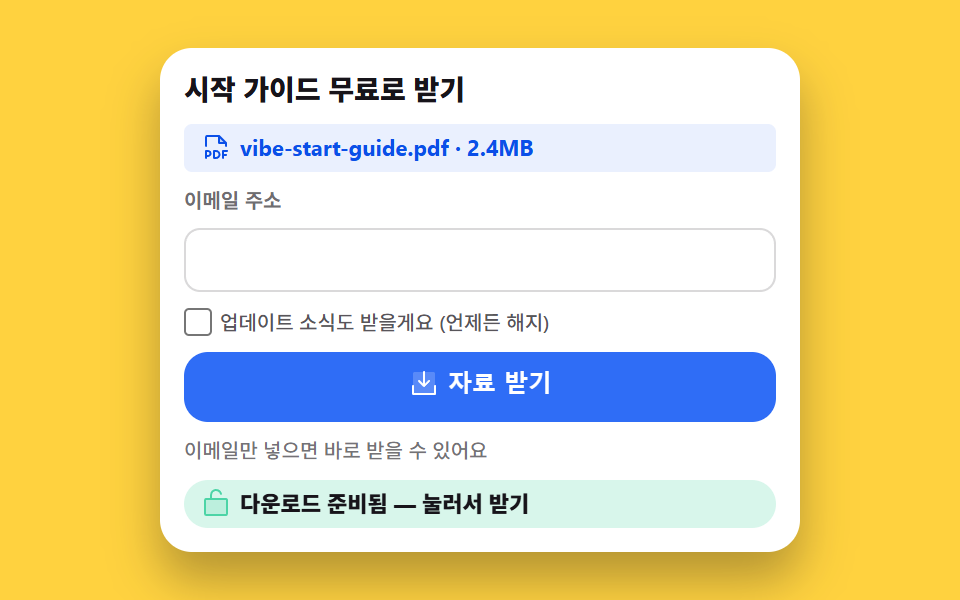 02 conversion-lead-magnet-download
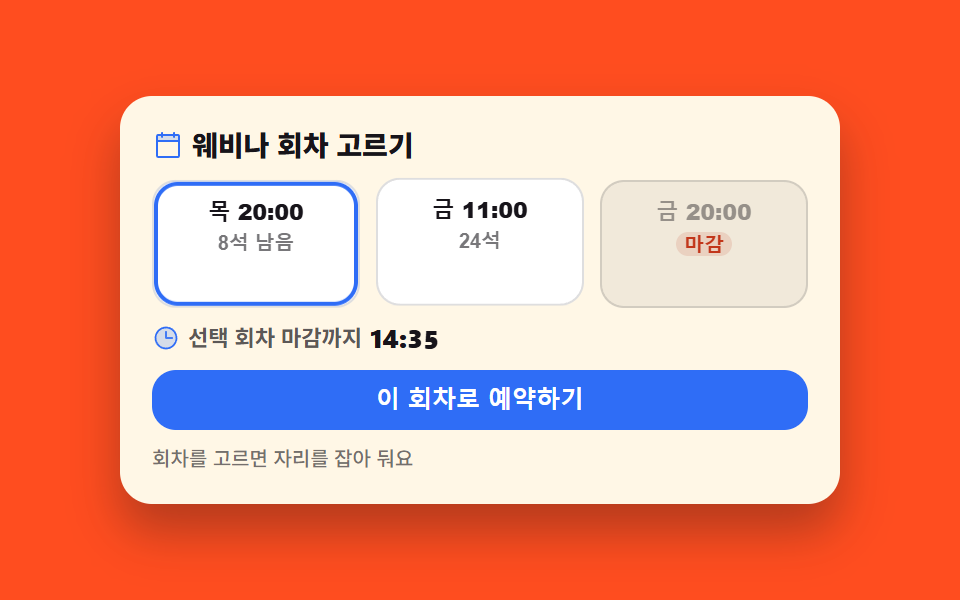 03 conversion-webinar-slot-booking
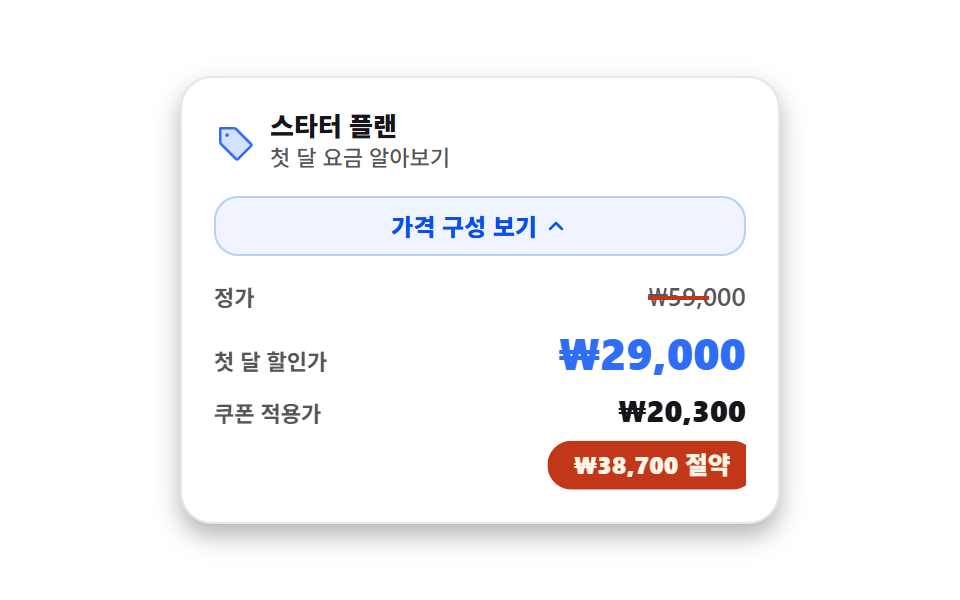 04 conversion-anchor-price-stack
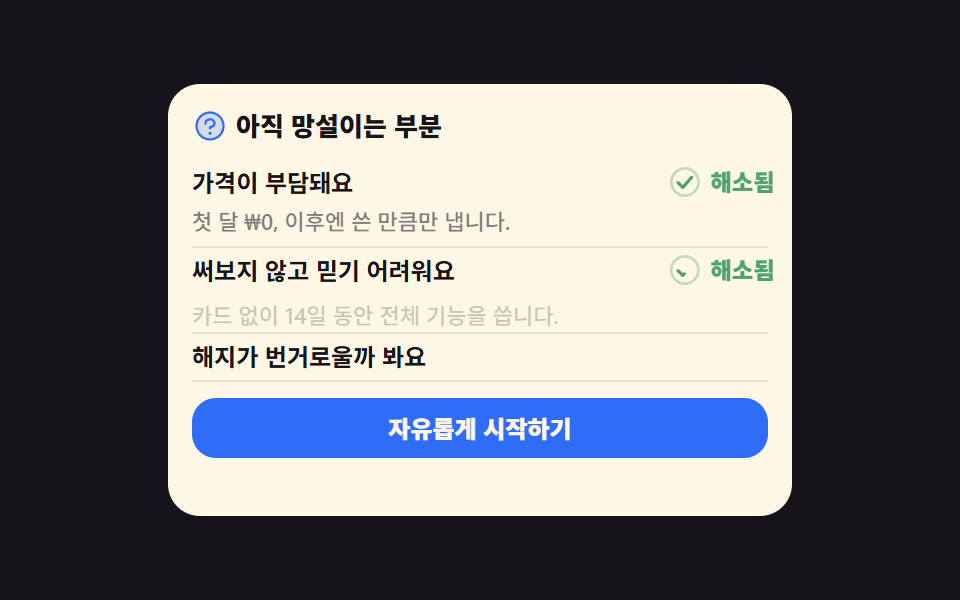 05 conversion-objection-faq-cta
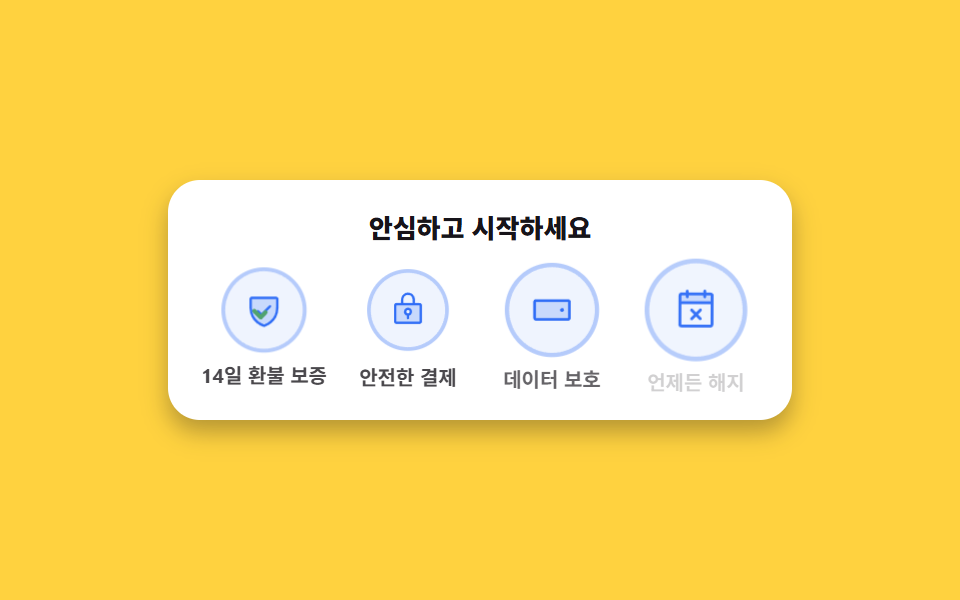 06 conversion-guarantee-badges
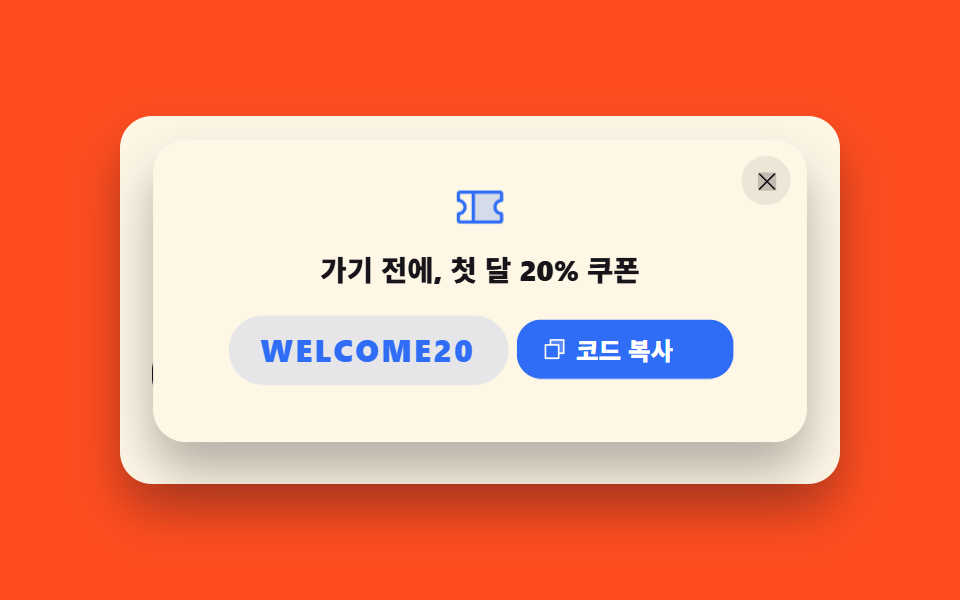 07 conversion-exit-intent-coupon
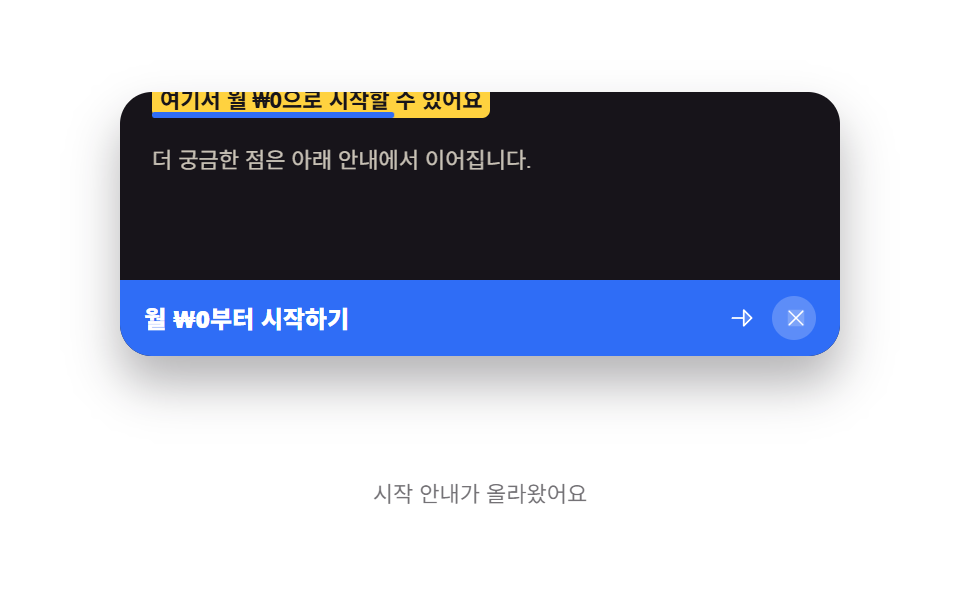 08 conversion-scroll-cta-ribbon
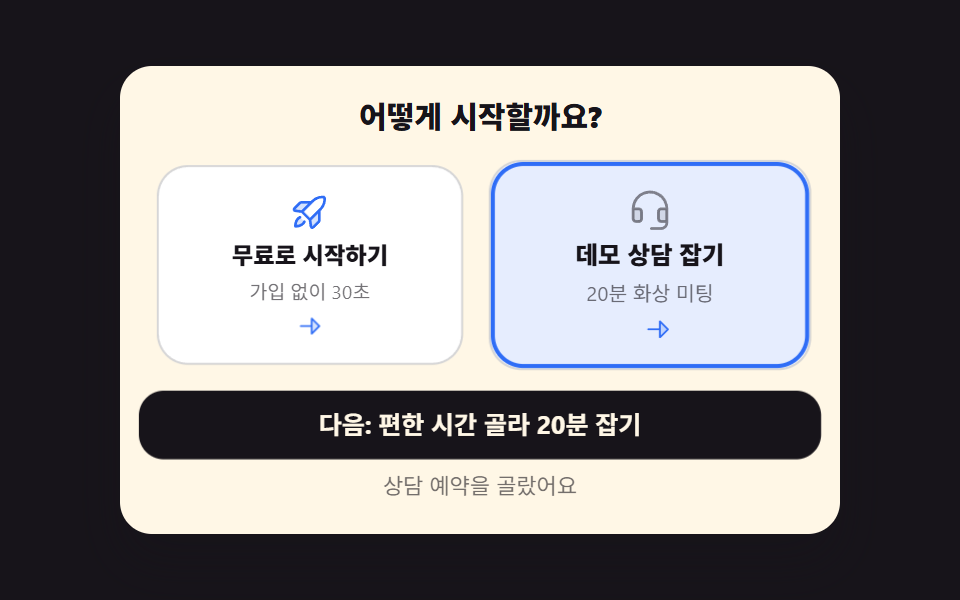 09 conversion-dual-choice-cta
Auto-plays · click a tile to jump to its section · all nine in one zip
- 01 Live viewer counter
- 02 Lead magnet download card
- 03 Webinar slot booking
- 04 Anchored price stack
- 05 Objection-handling FAQ that arms the CTA
- 06 Guarantee badge row
- 07 Exit-intent coupon popup
- 08 Scroll-reached CTA ribbon
- 09 Dual-path final CTA
The order follows the doubts a visitor clears one after another, not how flashy each piece looks. Attention comes first with the live headcount; next comes the smallest possible action, where an email buys a file; then a commitment with a date attached to it; then the wallet; then the reasons people say no out loud; then the reassurance that their money is safe; then the grab at the door; then the hold that keeps a long page alive; and finally the fork where the visit ends in a decision instead of a back button. Every plan name, file name, seat count, price, and coupon code in these files is an invented placeholder, and no real certification or trust mark appears anywhere in the set. Landing page conversion optimization tends to stall on the same doubt twice, which is why the landing page parts below are ordered by that doubt rather than by looks.
| Step | Section | The doubt it clears |
|---|---|---|
| Attention | 01 Live viewer counter | Is anyone else here? |
| First action | 02 Lead magnet download card | What do I get for my email? |
| Commitment | 03 Webinar slot booking | When exactly does this happen? |
| Wallet | 04 Anchored price stack | Is this price good or not? |
| Objection | 05 Objection FAQ | What happens if it doesn't work out? |
| Reassurance | 06 Guarantee badge row | Is my money safe? |
| The grab | 07 Exit-intent coupon popup | Is this the best offer I'll see? |
| The hold | 08 Scroll-reached CTA ribbon | Where was that button again? |
| Decision | 09 Dual-path final CTA | Do I buy or do I ask someone? |
01Live viewer counter
What you see
The headcount drifts every 1.2 seconds, and the seven bars beside it rise and fall with it, so the page reads as occupied rather than abandoned. Under the hood, a setInterval random walk keeps the number between 96 and 168 and pushes each new level into a seven-slot queue that the bars read as scaleY(var(--v)).
<main class="stage is-demo">
  <section class="lv" aria-label="Live viewer count">
    <div class="lv__left">
      <p class="lv__head">
        <span class="lv__ic" aria-hidden="true"><svg viewBox="0 0 256 256" width="20" height="20"><g fill="currentColor"><path d="M136 108a52 52 0 1 1-52-52a52 52 0 0 1 52 52" opacity=".2"/><path d="M117.25 157.92a60 60 0 1 0-66.5 0a95.83 95.83 0 0 0-47.22 37.71a8 8 0 1 0 13.4 8.74a80 80 0 0 1 134.14 0a8 8 0 0 0 13.4-8.74a95.83 95.83 0 0 0-47.22-37.71M40 108a44 44 0 1 1 44 44a44.05 44.05 0 0 1-44-44m210.14 98.7a8 8 0 0 1-11.07-2.33A79.83 79.83 0 0 0 172 168a8 8 0 0 1 0-16a44 44 0 1 0-16.34-84.87a8 8 0 1 1-5.94-14.85a60 60 0 0 1 55.53 105.64a95.83 95.83 0 0 1 47.22 37.71a8 8 0 0 1-2.33 11.07"/></g></svg></span>
        <span class="lv__live"><span class="lv__dot" aria-hidden="true"></span>LIVE</span>
      </p>
      <p class="lv__count">Now <b class="lv__n" id="lv-n">128</b>watching now</p>
      <p class="lv__st" id="lv-st" role="status" aria-live="polite">That's how many people are on this page right now</p>
    </div>
    <div class="lv__bars" aria-hidden="true">
      <span class="lv__bar" style="--i:0;--v:.42"><i></i></span>
      <span class="lv__bar" style="--i:1;--v:.60"><i></i></span>
      <span class="lv__bar" style="--i:2;--v:.48"><i></i></span>
      <span class="lv__bar" style="--i:3;--v:.82"><i></i></span>
      <span class="lv__bar" style="--i:4;--v:.55"><i></i></span>
      <span class="lv__bar" style="--i:5;--v:.70"><i></i></span>
      <span class="lv__bar" style="--i:6;--v:.92"><i></i></span>
    </div>
  </section>
</main>
@use "../../../../site/static/demo-tokens" as *;
// ── 변수 3개 ──────────────────────────────────────────
$duration: $dur-loop;
$easing: $ease-pop;
$color: $subject-blue;
@include stage($stage-ink);
.lv {
box-sizing: border-box; width: min(360px, 94vw);
display: flex; align-items: flex-end; gap: $sp-5;
background: $subject-cream; color: $subject-ink;
border-radius: $r-card; padding: $sp-4; box-shadow: $shadow-raised;
}
.lv__left { flex: 1 1 auto; min-width: 0; }
.lv__head { display: flex; align-items: center; gap: $sp-2; margin: 0; }
.lv__ic { display: inline-flex; color: $color; }
.lv__live {
display: inline-flex; align-items: center; gap: $sp-1;
padding: $sp-1 $sp-2; border-radius: $r-pill;
background: $stage-paper; color: $error; // 크림 카드 위 붉은 틴트 면은 4.31:1 — 페이퍼 면 위 $error 5.47:1
font-weight: 800; font-size: 10px; line-height: 1.2;
}
.lv__dot {
width: 6px; height: 6px; border-radius: 50%; background: $error;
animation-name: lv-pulse; animation-duration: $duration; animation-timing-function: $ease-out;
animation-iteration-count: infinite;
}
@keyframes lv-pulse {
0%, 100% { transform: scale(1); opacity: 1; }
50% { transform: scale(1.6); opacity: .45; }
}
.lv__count { margin: $sp-2 0 0; font-weight: 700; font-size: 13px; line-height: 1.2; }
.lv__n {
font-weight: 800; font-size: 44px; line-height: 1.05;
font-variant-numeric: tabular-nums; color: $color;
}
.lv__st { margin: $sp-1 0 0; font-weight: 500; font-size: 10px; line-height: 1.3; color: rgba(23, 20, 26, .6); }
// 막대 7칸 — 폭은 grid 가 균등 분배하고(BD19 오탐 회피), 높이는 scaleY 배율만 바꾼다
.lv__bars {
flex: 0 0 auto; display: grid; grid-template-columns: repeat(7, 1fr);
gap: $sp-2; width: 132px; height: 72px;
}
.lv__bar { display: flex; align-items: flex-end; justify-content: center; }
.lv__bar i {
display: block; width: 12px; height: 100%; border-radius: $r-xs; background: $color;
transform: scaleY(var(--v, .5)); transform-origin: bottom; // 규칙8: 아래서 차오름
transition: transform $dur-base $ease-out;
}
// ── 측정용 자동 루프 ────────────────────────────────
// 손대기 전에도 막대가 물결치게 — 사람이 누르거나 키를 치면 JS 가 .is-demo 를 뗀다
.stage.is-demo .lv__bar i {
animation-name: lv-wave;
animation-duration: $duration;
animation-timing-function: $ease-out;
animation-iteration-count: infinite;
animation-fill-mode: backwards;
animation-delay: calc(var(--i) * 90ms);
}
@keyframes lv-wave {
0%, 100% { transform: scaleY(.34); }
35% { transform: scaleY(1); }
70% { transform: scaleY(.58); }
}
// ── 접근성 ──────────────────────────────────────────
@media (prefers-reduced-motion: reduce) {
.lv__dot, .stage.is-demo .lv__bar i, .lv__bar i {
animation: none !important;
transition: none !important;
}
.stage.is-demo .lv__bar i { transform: scaleY(var(--v, .5)) !important; }
}
// ── 반응형(320×200) ──────────────────────────────────
@media (max-width: 340px), (max-height: 220px) {
.lv { width: min(292px, 92vw); gap: $sp-3; padding: $sp-3; }
.lv__head { gap: $sp-1; }
.lv__ic svg { width: 14px; height: 14px; }
.lv__live { padding: 0 $sp-1; font-size: 9px; }
.lv__count { margin-top: $sp-1; font-size: 11px; }
.lv__n { font-size: 28px; }
.lv__st { margin-top: 0; font-size: 9px; }
.lv__bars { gap: $sp-1; width: 80px; height: 46px; }
.lv__bar i { width: 8px; }
}html, body {
margin: 0;
overflow: hidden;
}
.stage {
box-sizing: border-box;
min-height: 100vh;
display: grid;
place-items: center;
margin: 0;
background: #17141a;
font-family: -apple-system, "Segoe UI", "Noto Sans KR", sans-serif;
padding: clamp(8px, 4vw, 24px);
}
.lv {
box-sizing: border-box;
width: min(360px, 94vw);
display: flex;
align-items: flex-end;
gap: 20px;
background: #fff7e6;
color: #17141a;
border-radius: 16px;
padding: 16px;
box-shadow: 0 14px 24px rgba(23, 20, 26, 0.32);
}
.lv__left {
flex: 1 1 auto;
min-width: 0;
}
.lv__head {
display: flex;
align-items: center;
gap: 8px;
margin: 0;
}
.lv__ic {
display: inline-flex;
color: #2f6df6;
}
.lv__live {
display: inline-flex;
align-items: center;
gap: 4px;
padding: 4px 8px;
border-radius: 999px;
background: #ffffff;
color: #c2361a;
font-weight: 800;
font-size: 10px;
line-height: 1.2;
}
.lv__dot {
width: 6px;
height: 6px;
border-radius: 50%;
background: #c2361a;
animation-name: lv-pulse;
animation-duration: 2s;
animation-timing-function: ease-out;
animation-iteration-count: infinite;
}
@keyframes lv-pulse {
0%, 100% {
transform: scale(1);
opacity: 1;
}
50% {
transform: scale(1.6);
opacity: 0.45;
}
}
.lv__count {
margin: 8px 0 0;
font-weight: 700;
font-size: 13px;
line-height: 1.2;
}
.lv__n {
font-weight: 800;
font-size: 44px;
line-height: 1.05;
font-variant-numeric: tabular-nums;
color: #2f6df6;
}
.lv__st {
margin: 4px 0 0;
font-weight: 500;
font-size: 10px;
line-height: 1.3;
color: rgba(23, 20, 26, 0.6);
}
.lv__bars {
flex: 0 0 auto;
display: grid;
grid-template-columns: repeat(7, 1fr);
gap: 8px;
width: 132px;
height: 72px;
}
.lv__bar {
display: flex;
align-items: flex-end;
justify-content: center;
}
.lv__bar i {
display: block;
width: 12px;
height: 100%;
border-radius: 4px;
background: #2f6df6;
transform: scaleY(var(--v, 0.5));
transform-origin: bottom;
transition: transform 300ms ease-out;
}
.stage.is-demo .lv__bar i {
animation-name: lv-wave;
animation-duration: 2s;
animation-timing-function: ease-out;
animation-iteration-count: infinite;
animation-fill-mode: backwards;
animation-delay: calc(var(--i) * 90ms);
}
@keyframes lv-wave {
0%, 100% {
transform: scaleY(0.34);
}
35% {
transform: scaleY(1);
}
70% {
transform: scaleY(0.58);
}
}
@media (prefers-reduced-motion: reduce) {
.lv__dot, .stage.is-demo .lv__bar i, .lv__bar i {
animation: none !important;
transition: none !important;
}
.stage.is-demo .lv__bar i {
transform: scaleY(var(--v, 0.5)) !important;
}
}
@media (max-width: 340px), (max-height: 220px) {
.lv {
width: min(292px, 92vw);
gap: 12px;
padding: 12px;
}
.lv__head {
gap: 4px;
}
.lv__ic svg {
width: 14px;
height: 14px;
}
.lv__live {
padding: 0 4px;
font-size: 9px;
}
.lv__count {
margin-top: 4px;
font-size: 11px;
}
.lv__n {
font-size: 28px;
}
.lv__st {
margin-top: 0;
font-size: 9px;
}
.lv__bars {
gap: 4px;
width: 80px;
height: 46px;
}
.lv__bar i {
width: 8px;
}
}// 실제 동작: setInterval 이 1.2초마다 시청자 수를 ±1~6 랜덤 워크(96~168)로 옮기고, 그 값을 막대 7칸의
// --v(=scaleY 배율)에 큐처럼 밀어 넣는다. 읽어 주는 문장은 5번에 한 번만 갱신해 화면낭독기가 쉴 새 없이 떠들지 않게 한다.
var stage = document.querySelector('.stage');
var count = document.getElementById('lv-n');
var msg = document.getElementById('lv-st');
var bars = [].slice.call(document.querySelectorAll('.lv__bar'));
var n = 128, ticks = 0;
var history = [.42, .60, .48, .82, .55, .70, .92];
function paint() {
count.textContent = n;
for (var i = 0; i < bars.length; i++) bars[i].style.setProperty('--v', history[i].toFixed(2));
}
function step() {
var d = Math.floor(Math.random() * 6) + 1;
if (Math.random() < .5) d = -d;
n = Math.max(96, Math.min(168, n + d));
history.push(Math.max(.28, Math.min(1, (n - 88) / 84)));
history.shift();
paint();
ticks++;
if (ticks % 5 === 0) msg.textContent = 'Now ' + n + ' people are viewing this page';
}
setInterval(step, 1200);
function human() { stage.classList.remove('is-demo'); }
stage.addEventListener('pointerdown', human, { once: true });
window.addEventListener('keydown', human, { once: true });import { useEffect, useState } from "react";
import type { CSSProperties } from "react";
import styles from "./LiveViewerCounter.module.scss";
export type LiveViewerCounterProps = {
/** 격자 미리보기용 루프 길이(ms) */
duration?: number;
easing?: string;
color?: string;
};
type Vars = CSSProperties & { "--duration"?: string; "--easing"?: string; "--color"?: string };
type BarVars = CSSProperties & { "--i"?: number; "--v"?: number };
const initialBars = [0.42, 0.6, 0.48, 0.82, 0.55, 0.7, 0.92];
function Users() {
return (
<svg viewBox="0 0 256 256" width="20" height="20" aria-hidden="true">
<g fill="currentColor">
<path d="M136 108a52 52 0 1 1-52-52a52 52 0 0 1 52 52" opacity=".2" />
<path d="M117.25 157.92a60 60 0 1 0-66.5 0a95.83 95.83 0 0 0-47.22 37.71a8 8 0 1 0 13.4 8.74a80 80 0 0 1 134.14 0a8 8 0 0 0 13.4-8.74a95.83 95.83 0 0 0-47.22-37.71M40 108a44 44 0 1 1 44 44a44.05 44.05 0 0 1-44-44m210.14 98.7a8 8 0 0 1-11.07-2.33A79.83 79.83 0 0 0 172 168a8 8 0 0 1 0-16a44 44 0 1 0-16.34-84.87a8 8 0 1 1-5.94-14.85a60 60 0 0 1 55.53 105.64a95.83 95.83 0 0 1 47.22 37.71a8 8 0 0 1-2.33 11.07" />
</g>
</svg>
);
}
export default function LiveViewerCounter({
duration = 2000,
easing = "cubic-bezier(.2,1.4,.4,1)",
color = "#2f6df6",
}: LiveViewerCounterProps) {
const [n, setN] = useState(128);
const [bars, setBars] = useState<number[]>(initialBars);
const [msg, setMsg] = useState("이 페이지를 함께 보는 사람 수예요");
const [loop, setLoop] = useState(true);
// setInterval 이 1.2초마다 값을 ±1~6 옮기고(96~168), 그 값을 막대 7칸의 --v(=scaleY 배율)로 밀어 넣는다.
// 읽어 주는 문장은 5번에 한 번만 갱신해 화면낭독기가 쉴 새 없이 떠들지 않게 한다.
useEffect(() => {
let count = 128;
let tick = 0;
let history = initialBars.slice();
const id = setInterval(() => {
let d = Math.floor(Math.random() * 6) + 1;
if (Math.random() < 0.5) d = -d;
count = Math.max(96, Math.min(168, count + d));
history = history.slice(1).concat(Math.max(0.28, Math.min(1, (count - 88) / 84)));
tick += 1;
setN(count);
setBars(history);
if (tick % 5 === 0) setMsg(`지금 ${count}명이 이 페이지를 보고 있어요`);
}, 1200);
return () => clearInterval(id);
}, []);
const vars: Vars = { "--duration": `${duration}ms`, "--easing": easing, "--color": color };
const cls = [styles.lv, loop ? styles["is-demo"] : ""].filter(Boolean).join(" ");
return (
<section
className={cls}
style={vars}
aria-label="실시간 시청자 수"
onPointerDown={() => setLoop(false)}
onKeyDown={() => setLoop(false)}
>
<div className={styles.lv__left}>
<p className={styles.lv__head}>
<span className={styles.lv__ic} aria-hidden="true"><Users /></span>
<span className={styles.lv__live}>
<span className={styles.lv__dot} aria-hidden="true" />
실시간
</span>
</p>
<p className={styles.lv__count}>
지금 <b className={styles.lv__n}>{n}</b>명 보는 중
</p>
<p className={styles.lv__st} role="status" aria-live="polite">{msg}</p>
</div>
<div className={styles.lv__bars} aria-hidden="true">
{bars.map((v, i) => {
const bv: BarVars = { "--i": i, "--v": v };
return (
<span key={i} className={styles.lv__bar} style={bv}>
<i />
</span>
);
})}
</div>
</section>
);
}01 · Live viewer counter — Measured area 3.017% · moving frames 23/23Original by GODRICH · SCSS and React ship in the zip · See the password
Where to look in the code
It's the busiest of the nine by frame count, moving in 23 of 24 captured frames, yet it repaints only 3.017% of the canvas in total because nothing but the digits and the bar tips ever changes.
function step() {
  var d = Math.floor(Math.random() * 6) + 1;
  if (Math.random() < .5) d = -d;
  n = Math.max(96, Math.min(168, n + d));
  history.push(Math.max(.28, Math.min(1, (n - 88) / 84)));
  history.shift();
  paint();
  ticks++;
  if (ticks % 5 === 0) msg.textContent = n + ' people are viewing this page right now';
}
setInterval(step, 1200);
02Lead magnet download card
Where a landing page conversion rate is won on this card
Enter an email, check the consent box, and the card unlocks: the progress bar fills for 900 ms, then a file chip drops in that really downloads. The regex and the checkbox are read together, the button locks itself with aria-busy while the file is prepared, and a one-bit flag in localStorage is all that persists, so a returning visitor lands straight in the finished state.
<main class="stage is-demo">
  <form class="lm" id="lm" novalidate>
    <p class="lm__title">Get the starter guide, free</p>
    <p class="lm__file">
      <span class="lm__file-ic" aria-hidden="true"><svg viewBox="0 0 256 256" width="16" height="16"><g fill="currentColor"><path d="M208 88h-56V32Z" opacity=".2"/><path d="M224 152a8 8 0 0 1-8 8h-24v16h16a8 8 0 0 1 0 16h-16v16a8 8 0 0 1-16 0v-56a8 8 0 0 1 8-8h32a8 8 0 0 1 8 8M92 172a28 28 0 0 1-28 28h-8v8a8 8 0 0 1-16 0v-56a8 8 0 0 1 8-8h16a28 28 0 0 1 28 28m-16 0a12 12 0 0 0-12-12h-8v24h8a12 12 0 0 0 12-12m88 8a36 36 0 0 1-36 36h-16a8 8 0 0 1-8-8v-56a8 8 0 0 1 8-8h16a36 36 0 0 1 36 36m-16 0a20 20 0 0 0-20-20h-8v40h8a20 20 0 0 0 20-20M40 112V40a16 16 0 0 1 16-16h96a8 8 0 0 1 5.66 2.34l56 56A8 8 0 0 1 216 88v24a8 8 0 0 1-16 0V96h-48a8 8 0 0 1-8-8V40H56v72a8 8 0 0 1-16 0m120-32h28.69L160 51.31Z"/></g></svg></span>
      vibe-start-guide.pdf · 2.4MB
    </p>
    <label class="lm__lab" for="lm-email">Email address</label>
    <input class="lm__in" id="lm-email" type="email" placeholder="[email protected]" autocomplete="email">
    <label class="lm__agree" for="lm-ok">
      <input class="lm__cb" id="lm-ok" type="checkbox">
      <span>Send me product updates too (unsubscribe anytime)</span>
    </label>
    <button class="lm__btn" id="lm-btn" type="submit">
      <span class="lm__prog" aria-hidden="true"></span>
      <span class="lm__btn-t">
        <span class="lm__btn-ic" aria-hidden="true"><svg viewBox="0 0 256 256" width="16" height="16"><g fill="currentColor"><path d="M216 48v160H40V48a16 16 0 0 1 16-16h144a16 16 0 0 1 16 16" opacity=".2"/><path d="M224 144v64a8 8 0 0 1-8 8H40a8 8 0 0 1-8-8v-64a8 8 0 0 1 16 0v56h160v-56a8 8 0 0 1 16 0m-101.66 5.66a8 8 0 0 0 11.32 0l40-40a8 8 0 0 0-11.32-11.32L136 124.69V32a8 8 0 0 0-16 0v92.69L93.66 98.34a8 8 0 0 0-11.32 11.32Z"/></g></svg></span>
        Get the guide
      </span>
    </button>
    <p class="lm__msg" id="lm-msg" role="status" aria-live="polite">Just add your email and it's yours</p>
    <a class="lm__chip" id="lm-chip" href="data:text/plain,vibe-start-guide%20sample" download="vibe-start-guide.txt">
      <span class="lm__chip-ic" aria-hidden="true"><svg viewBox="0 0 256 256" width="16" height="16"><g fill="currentColor"><path d="M216 96v112a8 8 0 0 1-8 8H48a8 8 0 0 1-8-8V96a8 8 0 0 1 8-8h160a8 8 0 0 1 8 8" opacity=".2"/><path d="M208 80H96V56a32 32 0 0 1 32-32c15.37 0 29.2 11 32.16 25.59a8 8 0 0 0 15.68-3.18C171.32 24.15 151.2 8 128 8a48.05 48.05 0 0 0-48 48v24H48a16 16 0 0 0-16 16v112a16 16 0 0 0 16 16h160a16 16 0 0 0 16-16V96a16 16 0 0 0-16-16m0 128H48V96h160z"/></g></svg></span>
      Ready to download — tap to save
    </a>
  </form>
</main>@use "../../../../site/static/demo-tokens" as *;
// ── 변수 3개 ──────────────────────────────────────────
$duration: $dur-loop;
$easing: $ease-pop;
$color: $subject-blue;
@include stage($stage-yellow);
.lm {
box-sizing: border-box; position: relative; width: min(320px, 94vw);
display: flex; flex-direction: column; gap: $sp-2;
background: $stage-paper; color: $subject-ink;
border-radius: $r-card; padding: $sp-3; box-shadow: $shadow-raised;
}
.lm__title { margin: 0; font-weight: 800; font-size: 14px; line-height: 1.3; }
.lm__file {
display: flex; align-items: center; gap: $sp-1; margin: 0;
padding: $sp-1 $sp-2; border-radius: $r-xs;
background: rgba($color, .1); color: $subject-blue-deep; // 연파랑 면 위 파란 글자 3.96:1 → deep 5.58:1
font-weight: 700; font-size: 11px; line-height: 1.2;
}
.lm__file-ic { display: inline-flex; }
.lm__lab { font-weight: 700; font-size: 10px; line-height: 1.2; color: rgba(23, 20, 26, .62); }
.lm__in {
padding: $sp-2 $sp-3;
border: 1.5px solid rgba(23, 20, 26, .16); border-radius: $r-sm;
font-weight: 500; font-size: 12px; line-height: 1.2; color: $subject-ink;
}
.lm__in:focus-visible { outline: 2px solid $color; outline-offset: 1px; }
.lm__in.is-shake { animation-name: lm-shake; animation-duration: $dur-base; animation-timing-function: $ease-out; }
@keyframes lm-shake {
0%, 100% { transform: translateX(0); }
25% { transform: translateX(-5px); }
75% { transform: translateX(5px); }
}
.lm__agree {
display: flex; align-items: center; gap: $sp-1;
font-weight: 500; font-size: 10px; line-height: 1.3; color: rgba(23, 20, 26, .72);
}
.lm__cb { width: 14px; height: 14px; margin: 0; accent-color: $color; }
.lm__btn {
position: relative; overflow: hidden;
padding: $sp-2 $sp-3; border: 0; border-radius: $r-control;
background: $color; color: $stage-paper;
font-weight: 800; font-size: 12px; line-height: 1.2; cursor: pointer;
}
.lm__btn-t { position: relative; display: inline-flex; align-items: center; justify-content: center; gap: $sp-1; }
.lm__btn-ic { display: inline-flex; }
.lm__btn[disabled] { cursor: progress; }
// 진행 막대 — 폭이 아니라 scaleX 라 레이아웃을 다시 계산하지 않는다
.lm__prog {
position: absolute; inset: 0; background: rgba(255, 255, 255, .34);
transform: scaleX(0); transform-origin: left center; // 규칙8: 좌변서 차오름
}
.lm.is-busy .lm__prog {
animation-name: lm-fill; animation-duration: 900ms;
animation-timing-function: $ease-out; animation-fill-mode: forwards;
}
@keyframes lm-fill {
from { transform: scaleX(0); }
to { transform: scaleX(1); }
}
.lm__msg { margin: 0; min-height: 13px; font-weight: 500; font-size: 10px; line-height: 1.3; color: rgba(23, 20, 26, .6); }
.lm__chip {
display: flex; align-items: center; gap: $sp-1;
padding: $sp-1 $sp-2; border-radius: $r-pill;
background: rgba($subject-mint, .22); color: $subject-ink;
font-weight: 800; font-size: 11px; line-height: 1.3; text-decoration: none;
opacity: 0; transform: translateY(10px); pointer-events: none;
transition: opacity $dur-quick $ease-out, transform $dur-base $easing;
}
.lm__chip-ic { display: inline-flex; color: $subject-mint; }
.lm.is-done .lm__chip { opacity: 1; transform: translateY(0); pointer-events: auto; }
// ── 측정용 자동 루프 ────────────────────────────────
// 막대가 차고(scaleX) → 칩이 한 번 올라와 앉는다. 칩이 사라지는 장면은 재현하지 않는다(퇴장은 루프 밖 첫 프레임에만).
.stage.is-demo .lm__prog {
animation-name: lm-loop-fill; animation-duration: $duration;
animation-timing-function: $ease-out; animation-iteration-count: infinite;
}
@keyframes lm-loop-fill {
0% { transform: scaleX(0); }
38% { transform: scaleX(1); }
86% { transform: scaleX(1); }
86.01% { transform: scaleX(0); }
100% { transform: scaleX(0); }
}
.stage.is-demo .lm__chip {
animation-name: lm-loop-chip; animation-duration: $duration;
animation-timing-function: $easing; animation-iteration-count: infinite;
animation-fill-mode: backwards;
}
@keyframes lm-loop-chip {
0%, 40% { opacity: 0; transform: translateY(10px); }
40.01% { opacity: 1; transform: translateY(10px); }
60% { opacity: 1; transform: translateY(0); }
100% { opacity: 1; transform: translateY(0); }
}
// 루프 중에는 입력칸 안내글자를 숨긴다 — 겹쳐 읽히는 글자를 만들지 않는다
.stage.is-demo .lm__in::placeholder { color: transparent; }
// ── 접근성 ──────────────────────────────────────────
@media (prefers-reduced-motion: reduce) {
.lm__in.is-shake, .lm.is-busy .lm__prog, .stage.is-demo .lm__prog, .stage.is-demo .lm__chip, .lm__chip {
animation: none !important;
transition: none !important;
}
.stage.is-demo .lm__prog { transform: scaleX(1) !important; }
.stage.is-demo .lm__chip { opacity: 1 !important; transform: translateY(0) !important; }
}
// ── 반응형(320×200) ──────────────────────────────────
@media (max-width: 340px), (max-height: 220px) {
.lm { width: min(288px, 92vw); gap: $sp-1; padding: $sp-2; }
.lm__title { font-size: 12px; }
.lm__file { padding: 0 $sp-1; font-size: 9px; }
.lm__file-ic svg { width: 12px; height: 12px; }
.lm__lab { position: absolute; width: 1px; height: 1px; margin: -1px; padding: 0; overflow: hidden; clip: rect(0, 0, 0, 0); white-space: nowrap; }
.lm__in { padding: $sp-1 $sp-2; font-size: 10px; }
.lm__agree { font-size: 9px; }
.lm__cb { width: 12px; height: 12px; }
.lm__btn { padding: $sp-1 $sp-2; font-size: 10px; }
.lm__btn-ic svg { width: 12px; height: 12px; }
.lm__msg { min-height: 0; font-size: 9px; }
.lm__chip { padding: 0 $sp-1; font-size: 9px; }
.lm__chip-ic svg { width: 12px; height: 12px; }
}html, body {
margin: 0;
overflow: hidden;
}
.stage {
box-sizing: border-box;
min-height: 100vh;
display: grid;
place-items: center;
margin: 0;
background: #ffd23f;
font-family: -apple-system, "Segoe UI", "Noto Sans KR", sans-serif;
padding: clamp(8px, 4vw, 24px);
}
.lm {
box-sizing: border-box;
position: relative;
width: min(320px, 94vw);
display: flex;
flex-direction: column;
gap: 8px;
background: #ffffff;
color: #17141a;
border-radius: 16px;
padding: 12px;
box-shadow: 0 14px 24px rgba(23, 20, 26, 0.32);
}
.lm__title {
margin: 0;
font-weight: 800;
font-size: 14px;
line-height: 1.3;
}
.lm__file {
display: flex;
align-items: center;
gap: 4px;
margin: 0;
padding: 4px 8px;
border-radius: 4px;
background: rgba(47, 109, 246, 0.1);
color: #0a4fe8;
font-weight: 700;
font-size: 11px;
line-height: 1.2;
}
.lm__file-ic {
display: inline-flex;
}
.lm__lab {
font-weight: 700;
font-size: 10px;
line-height: 1.2;
color: rgba(23, 20, 26, 0.62);
}
.lm__in {
padding: 8px 12px;
border: 1.5px solid rgba(23, 20, 26, 0.16);
border-radius: 8px;
font-weight: 500;
font-size: 12px;
line-height: 1.2;
color: #17141a;
}
.lm__in:focus-visible {
outline: 2px solid #2f6df6;
outline-offset: 1px;
}
.lm__in.is-shake {
animation-name: lm-shake;
animation-duration: 300ms;
animation-timing-function: ease-out;
}
@keyframes lm-shake {
0%, 100% {
transform: translateX(0);
}
25% {
transform: translateX(-5px);
}
75% {
transform: translateX(5px);
}
}
.lm__agree {
display: flex;
align-items: center;
gap: 4px;
font-weight: 500;
font-size: 10px;
line-height: 1.3;
color: rgba(23, 20, 26, 0.72);
}
.lm__cb {
width: 14px;
height: 14px;
margin: 0;
accent-color: #2f6df6;
}
.lm__btn {
position: relative;
overflow: hidden;
padding: 8px 12px;
border: 0;
border-radius: 12px;
background: #2f6df6;
color: #ffffff;
font-weight: 800;
font-size: 12px;
line-height: 1.2;
cursor: pointer;
}
.lm__btn-t {
position: relative;
display: inline-flex;
align-items: center;
justify-content: center;
gap: 4px;
}
.lm__btn-ic {
display: inline-flex;
}
.lm__btn[disabled] {
cursor: progress;
}
.lm__prog {
position: absolute;
inset: 0;
background: rgba(255, 255, 255, 0.34);
transform: scaleX(0);
transform-origin: left center;
}
.lm.is-busy .lm__prog {
animation-name: lm-fill;
animation-duration: 900ms;
animation-timing-function: ease-out;
animation-fill-mode: forwards;
}
@keyframes lm-fill {
from {
transform: scaleX(0);
}
to {
transform: scaleX(1);
}
}
.lm__msg {
margin: 0;
min-height: 13px;
font-weight: 500;
font-size: 10px;
line-height: 1.3;
color: rgba(23, 20, 26, 0.6);
}
.lm__chip {
display: flex;
align-items: center;
gap: 4px;
padding: 4px 8px;
border-radius: 999px;
background: rgba(76, 212, 166, 0.22);
color: #17141a;
font-weight: 800;
font-size: 11px;
line-height: 1.3;
text-decoration: none;
opacity: 0;
transform: translateY(10px);
pointer-events: none;
transition: opacity 220ms ease-out, transform 300ms cubic-bezier(0.2, 1.4, 0.4, 1);
}
.lm__chip-ic {
display: inline-flex;
color: #4cd4a6;
}
.lm.is-done .lm__chip {
opacity: 1;
transform: translateY(0);
pointer-events: auto;
}
.stage.is-demo .lm__prog {
animation-name: lm-loop-fill;
animation-duration: 2s;
animation-timing-function: ease-out;
animation-iteration-count: infinite;
}
@keyframes lm-loop-fill {
0% {
transform: scaleX(0);
}
38% {
transform: scaleX(1);
}
86% {
transform: scaleX(1);
}
86.01% {
transform: scaleX(0);
}
100% {
transform: scaleX(0);
}
}
.stage.is-demo .lm__chip {
animation-name: lm-loop-chip;
animation-duration: 2s;
animation-timing-function: cubic-bezier(0.2, 1.4, 0.4, 1);
animation-iteration-count: infinite;
animation-fill-mode: backwards;
}
@keyframes lm-loop-chip {
0%, 40% {
opacity: 0;
transform: translateY(10px);
}
40.01% {
opacity: 1;
transform: translateY(10px);
}
60% {
opacity: 1;
transform: translateY(0);
}
100% {
opacity: 1;
transform: translateY(0);
}
}
.stage.is-demo .lm__in::placeholder {
color: transparent;
}
@media (prefers-reduced-motion: reduce) {
.lm__in.is-shake, .lm.is-busy .lm__prog, .stage.is-demo .lm__prog, .stage.is-demo .lm__chip, .lm__chip {
animation: none !important;
transition: none !important;
}
.stage.is-demo .lm__prog {
transform: scaleX(1) !important;
}
.stage.is-demo .lm__chip {
opacity: 1 !important;
transform: translateY(0) !important;
}
}
@media (max-width: 340px), (max-height: 220px) {
.lm {
width: min(288px, 92vw);
gap: 4px;
padding: 8px;
}
.lm__title {
font-size: 12px;
}
.lm__file {
padding: 0 4px;
font-size: 9px;
}
.lm__file-ic svg {
width: 12px;
height: 12px;
}
.lm__lab {
position: absolute;
width: 1px;
height: 1px;
margin: -1px;
padding: 0;
overflow: hidden;
clip: rect(0, 0, 0, 0);
white-space: nowrap;
}
.lm__in {
padding: 4px 8px;
font-size: 10px;
}
.lm__agree {
font-size: 9px;
}
.lm__cb {
width: 12px;
height: 12px;
}
.lm__btn {
padding: 4px 8px;
font-size: 10px;
}
.lm__btn-ic svg {
width: 12px;
height: 12px;
}
.lm__msg {
min-height: 0;
font-size: 9px;
}
.lm__chip {
padding: 0 4px;
font-size: 9px;
}
.lm__chip-ic svg {
width: 12px;
height: 12px;
}
}// 실제 동작: 이메일 정규식과 동의 칸을 함께 보고, 통과하면 버튼을 aria-busy 로 잠근 뒤 진행 막대를 900ms 채우고
// 다운로드 칩을 띄운다. 한 번 받은 사람은 localStorage 에 남겨 다음 방문에 곧장 완료 상태로 연다.
var stage = document.querySelector('.stage');
var form = document.getElementById('lm');
var input = document.getElementById('lm-email');
var agree = document.getElementById('lm-ok');
var btn = document.getElementById('lm-btn');
var msg = document.getElementById('lm-msg');
var EMAIL_RE = /^[^\s@]+@[^\s@]+\.[^\s@]+$/;
function human() { stage.classList.remove('is-demo'); }
function finish() {
form.classList.add('is-done');
msg.textContent = 'Your guide is ready — grab it below';
}
try { if (localStorage.getItem('lead271')) finish(); } catch (e) { /* iframe 이 저장소를 막으면 처음 받는 사람과 똑같이 논다 */ }
form.addEventListener('submit', function (e) {
e.preventDefault();
human();
if (!EMAIL_RE.test(input.value) || !agree.checked) {
input.classList.remove('is-shake');
void input.offsetWidth;
input.classList.add('is-shake');
msg.textContent = 'Check your email address and the consent box';
return;
}
btn.disabled = true;
btn.setAttribute('aria-busy', 'true');
form.classList.add('is-busy');
msg.textContent = 'Preparing your file';
setTimeout(function () {
form.classList.remove('is-busy');
btn.disabled = false;
btn.removeAttribute('aria-busy');
try { localStorage.setItem('lead271', '1'); } catch (e2) { /* 저장 실패해도 이번 화면은 완료로 간다 */ }
finish();
}, 900);
});
stage.addEventListener('pointerdown', human, { once: true });
window.addEventListener('keydown', human, { once: true });import { useEffect, useState } from "react";
import type { CSSProperties } from "react";
import styles from "./LeadMagnetDownload.module.scss";
export type LeadMagnetDownloadProps = {
/** 격자 미리보기용 루프 길이(ms) */
duration?: number;
easing?: string;
color?: string;
};
type Vars = CSSProperties & { "--duration"?: string; "--easing"?: string; "--color"?: string };
type FormEvt = { preventDefault(): void };
type InputEvt = { target: { value: string } };
type CheckEvt = { target: { checked: boolean } };
const emailPattern = /^[^\s@]+@[^\s@]+\.[^\s@]+$/;
const storageKey = "lead271";
function FilePdf() {
return (
<svg viewBox="0 0 256 256" width="16" height="16" aria-hidden="true">
<g fill="currentColor">
<path d="M208 88h-56V32Z" opacity=".2" />
<path d="M224 152a8 8 0 0 1-8 8h-24v16h16a8 8 0 0 1 0 16h-16v16a8 8 0 0 1-16 0v-56a8 8 0 0 1 8-8h32a8 8 0 0 1 8 8M92 172a28 28 0 0 1-28 28h-8v8a8 8 0 0 1-16 0v-56a8 8 0 0 1 8-8h16a28 28 0 0 1 28 28m-16 0a12 12 0 0 0-12-12h-8v24h8a12 12 0 0 0 12-12m88 8a36 36 0 0 1-36 36h-16a8 8 0 0 1-8-8v-56a8 8 0 0 1 8-8h16a36 36 0 0 1 36 36m-16 0a20 20 0 0 0-20-20h-8v40h8a20 20 0 0 0 20-20M40 112V40a16 16 0 0 1 16-16h96a8 8 0 0 1 5.66 2.34l56 56A8 8 0 0 1 216 88v24a8 8 0 0 1-16 0V96h-48a8 8 0 0 1-8-8V40H56v72a8 8 0 0 1-16 0m120-32h28.69L160 51.31Z" />
</g>
</svg>
);
}
function DownloadSimple() {
return (
<svg viewBox="0 0 256 256" width="16" height="16" aria-hidden="true">
<g fill="currentColor">
<path d="M216 48v160H40V48a16 16 0 0 1 16-16h144a16 16 0 0 1 16 16" opacity=".2" />
<path d="M224 144v64a8 8 0 0 1-8 8H40a8 8 0 0 1-8-8v-64a8 8 0 0 1 16 0v56h160v-56a8 8 0 0 1 16 0m-101.66 5.66a8 8 0 0 0 11.32 0l40-40a8 8 0 0 0-11.32-11.32L136 124.69V32a8 8 0 0 0-16 0v92.69L93.66 98.34a8 8 0 0 0-11.32 11.32Z" />
</g>
</svg>
);
}
function LockSimpleOpen() {
return (
<svg viewBox="0 0 256 256" width="16" height="16" aria-hidden="true">
<g fill="currentColor">
<path d="M216 96v112a8 8 0 0 1-8 8H48a8 8 0 0 1-8-8V96a8 8 0 0 1 8-8h160a8 8 0 0 1 8 8" opacity=".2" />
<path d="M208 80H96V56a32 32 0 0 1 32-32c15.37 0 29.2 11 32.16 25.59a8 8 0 0 0 15.68-3.18C171.32 24.15 151.2 8 128 8a48.05 48.05 0 0 0-48 48v24H48a16 16 0 0 0-16 16v112a16 16 0 0 0 16 16h160a16 16 0 0 0 16-16V96a16 16 0 0 0-16-16m0 128H48V96h160z" />
</g>
</svg>
);
}
export default function LeadMagnetDownload({
duration = 2000,
easing = "cubic-bezier(.2,1.4,.4,1)",
color = "#2f6df6",
}: LeadMagnetDownloadProps) {
const [email, setEmail] = useState("");
const [agreed, setAgreed] = useState(false);
const [busy, setBusy] = useState(false);
const [done, setDone] = useState(false);
const [shake, setShake] = useState(false);
const [msg, setMsg] = useState("이메일만 넣으면 바로 받을 수 있어요");
const [loop, setLoop] = useState(true);
// 한 번 받은 사람은 localStorage 에 남겨 다음 방문에 곧장 완료 상태로 연다
useEffect(() => {
try {
if (localStorage.getItem(storageKey)) {
setDone(true);
setMsg("자료가 준비됐어요. 아래에서 받으세요");
}
} catch {
// iframe 이 저장소를 막으면 처음 받는 사람과 똑같이 논다
}
}, []);
function onSubmit(e: FormEvt) {
e.preventDefault();
setLoop(false);
if (!emailPattern.test(email) || !agreed) {
setShake(false);
requestAnimationFrame(() => setShake(true));
setMsg("이메일과 동의 칸을 확인해 주세요");
return;
}
setBusy(true);
setMsg("파일을 준비하고 있어요");
setTimeout(() => {
setBusy(false);
try {
localStorage.setItem(storageKey, "1");
} catch {
// 저장 실패해도 이번 화면은 완료로 간다
}
setDone(true);
setMsg("자료가 준비됐어요. 아래에서 받으세요");
}, 900);
}
const vars: Vars = { "--duration": `${duration}ms`, "--easing": easing, "--color": color };
const cls = [styles.lm, loop ? styles["is-demo"] : "", busy ? styles["is-busy"] : "", done ? styles["is-done"] : ""]
.filter(Boolean)
.join(" ");
return (
<form className={cls} style={vars} onSubmit={onSubmit} onPointerDown={() => setLoop(false)} noValidate>
<p className={styles.lm__title}>시작 가이드 무료로 받기</p>
<p className={styles.lm__file}>
<span className={styles["lm__file-ic"]} aria-hidden="true"><FilePdf /></span>
vibe-start-guide.pdf · 2.4MB
</p>
<label className={styles.lm__lab} htmlFor="lm-email-r">이메일 주소</label>
<input
className={[styles.lm__in, shake ? styles["is-shake"] : ""].filter(Boolean).join(" ")}
id="lm-email-r"
type="email"
placeholder="[email protected]"
autoComplete="email"
value={email}
onChange={(e: InputEvt) => setEmail(e.target.value)}
onAnimationEnd={() => setShake(false)}
/>
<label className={styles.lm__agree} htmlFor="lm-ok-r">
<input
className={styles.lm__cb}
id="lm-ok-r"
type="checkbox"
checked={agreed}
onChange={(e: CheckEvt) => setAgreed(e.target.checked)}
/>
<span>업데이트 소식도 받을게요 (언제든 해지)</span>
</label>
<button className={styles.lm__btn} type="submit" disabled={busy} aria-busy={busy}>
<span className={styles.lm__prog} aria-hidden="true" />
<span className={styles["lm__btn-t"]}>
<span className={styles["lm__btn-ic"]} aria-hidden="true"><DownloadSimple /></span>
자료 받기
</span>
</button>
<p className={styles.lm__msg} role="status" aria-live="polite">{msg}</p>
<a
className={styles.lm__chip}
href="data:text/plain,vibe-start-guide%20sample"
download="vibe-start-guide.txt"
>
<span className={styles["lm__chip-ic"]} aria-hidden="true"><LockSimpleOpen /></span>
다운로드 준비됨 — 눌러서 받기
</a>
</form>
);
}02 · Lead magnet download card — Measured area 13.067% · moving frames 15/23Original by GODRICH · SCSS and React ship in the zip · See the password
How to read the code
A bad address shakes the input instead of failing silently, which accounts for the 6.982% peak frame in a 13.067% total.
form.addEventListener('submit', function (e) {
  e.preventDefault();
  human();
  if (!EMAIL_RE.test(input.value) || !agree.checked) {
    input.classList.remove('is-shake');
    void input.offsetWidth;
    input.classList.add('is-shake');
    msg.textContent = 'Check your email address and the consent box';
    return;
  }
  btn.disabled = true;
  btn.setAttribute('aria-busy', 'true');
  form.classList.add('is-busy');
  msg.textContent = 'Preparing your file';
  setTimeout(function () {
    form.classList.remove('is-busy');
    btn.disabled = false;
    btn.removeAttribute('aria-busy');
    try { localStorage.setItem('lead271', '1'); } catch (e2) { /* a blocked store still finishes the screen */ }
    finish();
  }, 900);
});
03Webinar slot booking
What moves
Three sessions sit side by side, the full one refuses clicks from the start, and picking an open one runs the closing clock down a second at a time until the register button drops a booked badge into that slot. The group is a real radiogroup, so the left and right arrow keys move the selection and skip the disabled session without landing on it.
<main class="stage is-demo">
  <section class="wb">
    <p class="wb__title">
      <span class="wb__title-ic" aria-hidden="true"><svg viewBox="0 0 256 256" width="16" height="16"><g fill="currentColor"><path d="M216 48v40H40V48a8 8 0 0 1 8-8h160a8 8 0 0 1 8 8" opacity=".2"/><path d="M208 32h-24v-8a8 8 0 0 0-16 0v8H88v-8a8 8 0 0 0-16 0v8H48a16 16 0 0 0-16 16v160a16 16 0 0 0 16 16h160a16 16 0 0 0 16-16V48a16 16 0 0 0-16-16M72 48v8a8 8 0 0 0 16 0v-8h80v8a8 8 0 0 0 16 0v-8h24v32H48V48Zm136 160H48V96h160z"/></g></svg></span>
      Pick a webinar time
    </p>
    <div class="wb__slots" id="wb-slots" role="radiogroup" aria-label="Webinar sessions">
      <button class="wb__slot" type="button" role="radio" aria-checked="true" tabindex="0" data-t="Thu 8:00 PM">
        <span class="wb__ring" aria-hidden="true"></span>
        <span class="wb__day">Thu 8:00 PM</span>
        <span class="wb__seat">8 seats left</span>
        <span class="wb__ok" aria-hidden="true"><svg class="wb__ok-ic" viewBox="0 0 24 24" width="10" height="10"><polyline points="4 12 9 17 20 6" fill="none" stroke="currentColor" stroke-width="3" stroke-linecap="round" stroke-linejoin="round"/></svg>Booked</span>
      </button>
      <button class="wb__slot" type="button" role="radio" aria-checked="false" tabindex="-1" data-t="Fri 11:00 AM">
        <span class="wb__ring" aria-hidden="true"></span>
        <span class="wb__day">Fri 11:00 AM</span>
        <span class="wb__seat">24 seats</span>
        <span class="wb__ok" aria-hidden="true"><svg class="wb__ok-ic" viewBox="0 0 24 24" width="10" height="10"><polyline points="4 12 9 17 20 6" fill="none" stroke="currentColor" stroke-width="3" stroke-linecap="round" stroke-linejoin="round"/></svg>Booked</span>
      </button>
      <button class="wb__slot" type="button" role="radio" aria-checked="false" tabindex="-1" data-t="Fri 8:00 PM" disabled>
        <span class="wb__ring" aria-hidden="true"></span>
        <span class="wb__day">Fri 8:00 PM</span>
        <span class="wb__seat wb__seat--closed">Full</span>
        <span class="wb__ok" aria-hidden="true"><svg class="wb__ok-ic" viewBox="0 0 24 24" width="10" height="10"><polyline points="4 12 9 17 20 6" fill="none" stroke="currentColor" stroke-width="3" stroke-linecap="round" stroke-linejoin="round"/></svg>Booked</span>
      </button>
    </div>
    <p class="wb__cd" role="timer" aria-live="off">
      <span class="wb__cd-ic" aria-hidden="true"><svg viewBox="0 0 256 256" width="14" height="14"><g fill="currentColor"><path d="M224 128a96 96 0 1 1-96-96a96 96 0 0 1 96 96" opacity=".2"/><path d="M128 24a104 104 0 1 0 104 104A104.11 104.11 0 0 0 128 24m0 192a88 88 0 1 1 88-88a88.1 88.1 0 0 1-88 88m64-88a8 8 0 0 1-8 8h-56a8 8 0 0 1-8-8V72a8 8 0 0 1 16 0v48h48a8 8 0 0 1 8 8"/></g></svg></span>
      Registration closes in
      <span class="wb__clock" aria-hidden="true"><b class="wb__mm" id="wb-mm">14</b>:<span class="wb__d" id="wb-d1" style="--d:3"><span class="wb__strip"><b>0</b><b>1</b><b>2</b><b>3</b><b>4</b><b>5</b><b>6</b><b>7</b><b>8</b><b>9</b></span></span><span class="wb__d wb__d--s1" id="wb-d0" style="--d:2"><span class="wb__strip"><b>0</b><b>1</b><b>2</b><b>3</b><b>4</b><b>5</b><b>6</b><b>7</b><b>8</b><b>9</b></span></span></span>
      <span class="sr-only" id="wb-cdt">14 min 32 sec left</span>
    </p>
    <button class="wb__go" id="wb-go" type="button">Book this session</button>
    <p class="wb__msg" id="wb-msg" role="status" aria-live="polite">Pick a time and we'll hold your seat</p>
  </section>
</main>@use "../../../../site/static/demo-tokens" as *;
// ── 변수 3개 ──────────────────────────────────────────
$duration: $dur-loop;
$easing: $ease-pop;
$color: $subject-blue;
@include stage($stage-orange);
.wb {
box-sizing: border-box; width: min(360px, 94vw);
display: flex; flex-direction: column; gap: $sp-2;
background: $subject-cream; color: $subject-ink;
border-radius: $r-card; padding: $sp-4; box-shadow: $shadow-raised;
}
.wb__title { display: flex; align-items: center; gap: $sp-1; margin: 0; font-weight: 800; font-size: 14px; line-height: 1.3; }
.wb__title-ic { display: inline-flex; color: $color; }
.wb__slots { display: grid; grid-template-columns: repeat(3, 1fr); gap: $sp-2; }
.wb__slot {
position: relative; box-sizing: border-box;
display: flex; flex-direction: column; align-items: center; gap: $sp-1;
padding: $sp-2; border: 1.5px solid rgba(23, 20, 26, .14); border-radius: $r-control;
background: $stage-paper; color: $subject-ink; cursor: pointer;
transform: translateY(0);
transition: transform $dur-quick $easing;
}
.wb__slot[disabled] { background: rgba(23, 20, 26, .06); color: rgba(23, 20, 26, .42); cursor: not-allowed; }
.wb__slot:focus-visible { outline: 2px solid $color; outline-offset: 2px; }
// 선택 링은 테두리색을 바꾸는 대신 겹쳐 둔 판을 opacity 로만 켠다 (transform·opacity 만 애니메이션)
.wb__ring {
position: absolute; inset: 0; border: 2px solid $color; border-radius: $r-control; opacity: 0;
}
.wb__slot[aria-checked="true"] .wb__ring { opacity: 1; }
.wb__slot[aria-checked="true"] { transform: translateY(-2px); }
.wb__day { font-weight: 800; font-size: 11px; line-height: 1.2; }
.wb__seat { font-weight: 600; font-size: 10px; line-height: 1.2; color: rgba(23, 20, 26, .58); }
.wb__seat--closed {
padding: 0 $sp-1; border-radius: $r-pill;
background: rgba($error, .14); color: $error; font-weight: 800;
}
.wb__ok {
display: inline-flex; align-items: center; gap: $sp-1;
padding: 0 $sp-1; border-radius: $r-pill;
background: rgba($color, .14); color: $color;
font-weight: 800; font-size: 9px; line-height: 1.4;
opacity: 0; transform: translateY(-8px);
transition: opacity $dur-quick $ease-out, transform $dur-base $easing;
}
.wb__ok-ic { stroke-dasharray: 28; stroke-dashoffset: 28; transition: stroke-dashoffset $dur-base $ease-out; }
.wb__slot.is-ok .wb__ok { opacity: 1; transform: translateY(0); }
.wb__slot.is-ok .wb__ok-ic { stroke-dashoffset: 0; }
.wb__cd { display: flex; align-items: center; gap: $sp-1; margin: 0; font-weight: 600; font-size: 11px; line-height: 1.3; color: rgba(23, 20, 26, .7); }
.wb__cd-ic { display: inline-flex; color: $color; }
.wb__clock { display: inline-flex; align-items: flex-end; font-weight: 800; font-size: 13px; line-height: 1.15; color: $subject-ink; font-variant-numeric: tabular-nums; }
// 숫자 띠 — 창 하나 높이만 보이고 띠를 한 칸씩 올려 숫자를 바꾼다
.wb__d { display: block; overflow: hidden; width: .62em; height: 1.15em; }
.wb__strip { display: block; transform: translateY(calc(var(--d, 0) * -1.15em)); }
.wb__strip b { display: block; height: 1.15em; line-height: 1.15; font-weight: 800; text-align: center; }
.wb__go {
padding: $sp-2 $sp-3; border: 0; border-radius: $r-control;
background: $color; color: $stage-paper;
font-weight: 800; font-size: 12px; line-height: 1.2; cursor: pointer;
}
.wb__go:focus-visible { outline: 2px solid $subject-ink; outline-offset: 2px; }
.wb__msg { margin: 0; min-height: 13px; font-weight: 500; font-size: 10px; line-height: 1.3; color: rgba(23, 20, 26, .6); }
.sr-only {
position: absolute; width: 1px; height: 1px; padding: 0; margin: -1px;
overflow: hidden; clip: rect(0, 0, 0, 0); white-space: nowrap; border: 0;
}
// ── 측정용 자동 루프 ────────────────────────────────
// 선택이 1회차 → 2회차로 한 프레임에 옮겨 가고(컷), 카드가 살짝 떠오르며(translateY) 초 숫자 띠가 계속 흐른다
.stage.is-demo .wb__slot:nth-child(1) .wb__ring {
animation-name: wb-ring-a; animation-duration: $duration;
animation-timing-function: steps(1, end); animation-iteration-count: infinite;
}
.stage.is-demo .wb__slot:nth-child(2) .wb__ring {
animation-name: wb-ring-b; animation-duration: $duration;
animation-timing-function: steps(1, end); animation-iteration-count: infinite;
}
@keyframes wb-ring-a {
0%, 43% { opacity: 1; }
44%, 100% { opacity: 0; }
}
@keyframes wb-ring-b {
0%, 43% { opacity: 0; }
44%, 100% { opacity: 1; }
}
.stage.is-demo .wb__slot:nth-child(1) {
animation-name: wb-lift-a; animation-duration: $duration;
animation-timing-function: $easing; animation-iteration-count: infinite;
}
.stage.is-demo .wb__slot:nth-child(2) {
animation-name: wb-lift-b; animation-duration: $duration;
animation-timing-function: $easing; animation-iteration-count: infinite;
}
@keyframes wb-lift-a {
0%, 38% { transform: translateY(-2px); }
52%, 100% { transform: translateY(0); }
}
@keyframes wb-lift-b {
0%, 40% { transform: translateY(0); }
56% { transform: translateY(-2px); }
100% { transform: translateY(-2px); }
}
// 확정 배지는 마지막 30% 에 한 번 내려앉는다 (사라지는 장면은 재현하지 않는다)
.stage.is-demo .wb__slot:nth-child(2) .wb__ok {
animation-name: wb-badge; animation-duration: $duration;
animation-timing-function: $easing; animation-iteration-count: infinite;
animation-fill-mode: backwards;
}
@keyframes wb-badge {
0%, 70% { opacity: 0; transform: translateY(-8px); }
70.01% { opacity: 1; transform: translateY(-8px); }
86% { opacity: 1; transform: translateY(0); }
100% { opacity: 1; transform: translateY(0); }
}
.stage.is-demo .wb__slot:nth-child(2) .wb__ok-ic {
animation-name: wb-draw; animation-duration: $duration;
animation-timing-function: $ease-out; animation-iteration-count: infinite;
animation-fill-mode: backwards;
}
@keyframes wb-draw {
0%, 70% { stroke-dashoffset: 28; }
88% { stroke-dashoffset: 0; }
100% { stroke-dashoffset: 0; }
}
// 초 자리는 JS 가 실제로 세지만, 루프에서는 띠가 한 칸씩 올라가며 초가 흐르는 것을 보여 준다
.stage.is-demo .wb__d--s1 .wb__strip {
animation-name: wb-tick; animation-duration: $duration;
animation-timing-function: steps(10, end); animation-iteration-count: infinite;
}
@keyframes wb-tick {
from { transform: translateY(-10.35em); }
to { transform: translateY(1.15em); }
}
// ── 접근성 ──────────────────────────────────────────
@media (prefers-reduced-motion: reduce) {
.wb__slot, .wb__ring, .wb__ok, .wb__ok-ic, .wb__strip,
.stage.is-demo .wb__slot:nth-child(1), .stage.is-demo .wb__slot:nth-child(2),
.stage.is-demo .wb__slot:nth-child(1) .wb__ring, .stage.is-demo .wb__slot:nth-child(2) .wb__ring,
.stage.is-demo .wb__slot:nth-child(2) .wb__ok, .stage.is-demo .wb__slot:nth-child(2) .wb__ok-ic,
.stage.is-demo .wb__d--s1 .wb__strip {
animation: none !important;
transition: none !important;
}
// 움직임은 꺼도 「어느 회차가 골라졌나」는 남긴다
.stage.is-demo .wb__slot:nth-child(1) .wb__ring { opacity: 0 !important; }
.stage.is-demo .wb__slot:nth-child(2) .wb__ring { opacity: 1 !important; }
.stage.is-demo .wb__slot:nth-child(2) { transform: translateY(-2px) !important; }
.stage.is-demo .wb__slot:nth-child(2) .wb__ok { opacity: 1 !important; transform: translateY(0) !important; }
.stage.is-demo .wb__slot:nth-child(2) .wb__ok-ic { stroke-dashoffset: 0 !important; }
}
// ── 반응형(320×200) ──────────────────────────────────
@media (max-width: 340px), (max-height: 220px) {
.wb { width: min(292px, 92vw); gap: $sp-1; padding: $sp-2; }
.wb__title { font-size: 12px; }
.wb__title-ic svg { width: 12px; height: 12px; }
.wb__slots { gap: $sp-1; }
.wb__slot { gap: 0; padding: $sp-1; }
.wb__day { font-size: 10px; }
.wb__seat { font-size: 9px; }
.wb__ok { font-size: 8px; }
.wb__cd { font-size: 9px; }
.wb__cd-ic svg { width: 12px; height: 12px; }
.wb__clock { font-size: 11px; }
.wb__go { padding: $sp-1 $sp-2; font-size: 10px; }
.wb__msg { min-height: 0; font-size: 9px; }
}html, body {
margin: 0;
overflow: hidden;
}
.stage {
box-sizing: border-box;
min-height: 100vh;
display: grid;
place-items: center;
margin: 0;
background: #ff4d1f;
font-family: -apple-system, "Segoe UI", "Noto Sans KR", sans-serif;
padding: clamp(8px, 4vw, 24px);
}
.wb {
box-sizing: border-box;
width: min(360px, 94vw);
display: flex;
flex-direction: column;
gap: 8px;
background: #fff7e6;
color: #17141a;
border-radius: 16px;
padding: 16px;
box-shadow: 0 14px 24px rgba(23, 20, 26, 0.32);
}
.wb__title {
display: flex;
align-items: center;
gap: 4px;
margin: 0;
font-weight: 800;
font-size: 14px;
line-height: 1.3;
}
.wb__title-ic {
display: inline-flex;
color: #2f6df6;
}
.wb__slots {
display: grid;
grid-template-columns: repeat(3, 1fr);
gap: 8px;
}
.wb__slot {
position: relative;
box-sizing: border-box;
display: flex;
flex-direction: column;
align-items: center;
gap: 4px;
padding: 8px;
border: 1.5px solid rgba(23, 20, 26, 0.14);
border-radius: 12px;
background: #ffffff;
color: #17141a;
cursor: pointer;
transform: translateY(0);
transition: transform 220ms cubic-bezier(0.2, 1.4, 0.4, 1);
}
.wb__slot[disabled] {
background: rgba(23, 20, 26, 0.06);
color: rgba(23, 20, 26, 0.42);
cursor: not-allowed;
}
.wb__slot:focus-visible {
outline: 2px solid #2f6df6;
outline-offset: 2px;
}
.wb__ring {
position: absolute;
inset: 0;
border: 2px solid #2f6df6;
border-radius: 12px;
opacity: 0;
}
.wb__slot[aria-checked=true] .wb__ring {
opacity: 1;
}
.wb__slot[aria-checked=true] {
transform: translateY(-2px);
}
.wb__day {
font-weight: 800;
font-size: 11px;
line-height: 1.2;
}
.wb__seat {
font-weight: 600;
font-size: 10px;
line-height: 1.2;
color: rgba(23, 20, 26, 0.58);
}
.wb__seat--closed {
padding: 0 4px;
border-radius: 999px;
background: rgba(194, 54, 26, 0.14);
color: #c2361a;
font-weight: 800;
}
.wb__ok {
display: inline-flex;
align-items: center;
gap: 4px;
padding: 0 4px;
border-radius: 999px;
background: rgba(47, 109, 246, 0.14);
color: #2f6df6;
font-weight: 800;
font-size: 9px;
line-height: 1.4;
opacity: 0;
transform: translateY(-8px);
transition: opacity 220ms ease-out, transform 300ms cubic-bezier(0.2, 1.4, 0.4, 1);
}
.wb__ok-ic {
stroke-dasharray: 28;
stroke-dashoffset: 28;
transition: stroke-dashoffset 300ms ease-out;
}
.wb__slot.is-ok .wb__ok {
opacity: 1;
transform: translateY(0);
}
.wb__slot.is-ok .wb__ok-ic {
stroke-dashoffset: 0;
}
.wb__cd {
display: flex;
align-items: center;
gap: 4px;
margin: 0;
font-weight: 600;
font-size: 11px;
line-height: 1.3;
color: rgba(23, 20, 26, 0.7);
}
.wb__cd-ic {
display: inline-flex;
color: #2f6df6;
}
.wb__clock {
display: inline-flex;
align-items: flex-end;
font-weight: 800;
font-size: 13px;
line-height: 1.15;
color: #17141a;
font-variant-numeric: tabular-nums;
}
.wb__d {
display: block;
overflow: hidden;
width: 0.62em;
height: 1.15em;
}
.wb__strip {
display: block;
transform: translateY(calc(var(--d, 0) * -1.15em));
}
.wb__strip b {
display: block;
height: 1.15em;
line-height: 1.15;
font-weight: 800;
text-align: center;
}
.wb__go {
padding: 8px 12px;
border: 0;
border-radius: 12px;
background: #2f6df6;
color: #ffffff;
font-weight: 800;
font-size: 12px;
line-height: 1.2;
cursor: pointer;
}
.wb__go:focus-visible {
outline: 2px solid #17141a;
outline-offset: 2px;
}
.wb__msg {
margin: 0;
min-height: 13px;
font-weight: 500;
font-size: 10px;
line-height: 1.3;
color: rgba(23, 20, 26, 0.6);
}
.sr-only {
position: absolute;
width: 1px;
height: 1px;
padding: 0;
margin: -1px;
overflow: hidden;
clip: rect(0, 0, 0, 0);
white-space: nowrap;
border: 0;
}
.stage.is-demo .wb__slot:nth-child(1) .wb__ring {
animation-name: wb-ring-a;
animation-duration: 2s;
animation-timing-function: steps(1, end);
animation-iteration-count: infinite;
}
.stage.is-demo .wb__slot:nth-child(2) .wb__ring {
animation-name: wb-ring-b;
animation-duration: 2s;
animation-timing-function: steps(1, end);
animation-iteration-count: infinite;
}
@keyframes wb-ring-a {
0%, 43% {
opacity: 1;
}
44%, 100% {
opacity: 0;
}
}
@keyframes wb-ring-b {
0%, 43% {
opacity: 0;
}
44%, 100% {
opacity: 1;
}
}
.stage.is-demo .wb__slot:nth-child(1) {
animation-name: wb-lift-a;
animation-duration: 2s;
animation-timing-function: cubic-bezier(0.2, 1.4, 0.4, 1);
animation-iteration-count: infinite;
}
.stage.is-demo .wb__slot:nth-child(2) {
animation-name: wb-lift-b;
animation-duration: 2s;
animation-timing-function: cubic-bezier(0.2, 1.4, 0.4, 1);
animation-iteration-count: infinite;
}
@keyframes wb-lift-a {
0%, 38% {
transform: translateY(-2px);
}
52%, 100% {
transform: translateY(0);
}
}
@keyframes wb-lift-b {
0%, 40% {
transform: translateY(0);
}
56% {
transform: translateY(-2px);
}
100% {
transform: translateY(-2px);
}
}
.stage.is-demo .wb__slot:nth-child(2) .wb__ok {
animation-name: wb-badge;
animation-duration: 2s;
animation-timing-function: cubic-bezier(0.2, 1.4, 0.4, 1);
animation-iteration-count: infinite;
animation-fill-mode: backwards;
}
@keyframes wb-badge {
0%, 70% {
opacity: 0;
transform: translateY(-8px);
}
70.01% {
opacity: 1;
transform: translateY(-8px);
}
86% {
opacity: 1;
transform: translateY(0);
}
100% {
opacity: 1;
transform: translateY(0);
}
}
.stage.is-demo .wb__slot:nth-child(2) .wb__ok-ic {
animation-name: wb-draw;
animation-duration: 2s;
animation-timing-function: ease-out;
animation-iteration-count: infinite;
animation-fill-mode: backwards;
}
@keyframes wb-draw {
0%, 70% {
stroke-dashoffset: 28;
}
88% {
stroke-dashoffset: 0;
}
100% {
stroke-dashoffset: 0;
}
}
.stage.is-demo .wb__d--s1 .wb__strip {
animation-name: wb-tick;
animation-duration: 2s;
animation-timing-function: steps(10, end);
animation-iteration-count: infinite;
}
@keyframes wb-tick {
from {
transform: translateY(-10.35em);
}
to {
transform: translateY(1.15em);
}
}
@media (prefers-reduced-motion: reduce) {
.wb__slot, .wb__ring, .wb__ok, .wb__ok-ic, .wb__strip,
.stage.is-demo .wb__slot:nth-child(1), .stage.is-demo .wb__slot:nth-child(2),
.stage.is-demo .wb__slot:nth-child(1) .wb__ring, .stage.is-demo .wb__slot:nth-child(2) .wb__ring,
.stage.is-demo .wb__slot:nth-child(2) .wb__ok, .stage.is-demo .wb__slot:nth-child(2) .wb__ok-ic,
.stage.is-demo .wb__d--s1 .wb__strip {
animation: none !important;
transition: none !important;
}
.stage.is-demo .wb__slot:nth-child(1) .wb__ring {
opacity: 0 !important;
}
.stage.is-demo .wb__slot:nth-child(2) .wb__ring {
opacity: 1 !important;
}
.stage.is-demo .wb__slot:nth-child(2) {
transform: translateY(-2px) !important;
}
.stage.is-demo .wb__slot:nth-child(2) .wb__ok {
opacity: 1 !important;
transform: translateY(0) !important;
}
.stage.is-demo .wb__slot:nth-child(2) .wb__ok-ic {
stroke-dashoffset: 0 !important;
}
}
@media (max-width: 340px), (max-height: 220px) {
.wb {
width: min(292px, 92vw);
gap: 4px;
padding: 8px;
}
.wb__title {
font-size: 12px;
}
.wb__title-ic svg {
width: 12px;
height: 12px;
}
.wb__slots {
gap: 4px;
}
.wb__slot {
gap: 0;
padding: 4px;
}
.wb__day {
font-size: 10px;
}
.wb__seat {
font-size: 9px;
}
.wb__ok {
font-size: 8px;
}
.wb__cd {
font-size: 9px;
}
.wb__cd-ic svg {
width: 12px;
height: 12px;
}
.wb__clock {
font-size: 11px;
}
.wb__go {
padding: 4px 8px;
font-size: 10px;
}
.wb__msg {
min-height: 0;
font-size: 9px;
}
}// 실제 동작: 회차는 radiogroup 이라 클릭·좌우 방향키로 고른다(aria-checked 로 상태를 알린다). setInterval 이 1초마다
// 남은 시간을 줄여 숫자 띠를 --d 만큼 올리고, 예약 버튼은 고른 회차에 확정 배지를 내려앉힌다.
var stage = document.querySelector('.stage');
var slots = [].slice.call(document.querySelectorAll('.wb__slot'));
var book = document.getElementById('wb-go');
var msg = document.getElementById('wb-msg');
var srText = document.getElementById('wb-cdt');
var mm = document.getElementById('wb-mm'), d1 = document.getElementById('wb-d1'), d0 = document.getElementById('wb-d0');
var left = 14 * 60 + 32, picked = 0, booked = -1;
function human() { stage.classList.remove('is-demo'); }
function tick() {
var m = Math.floor(left / 60), s = left % 60;
mm.textContent = m < 10 ? '0' + m : '' + m;
d1.style.setProperty('--d', Math.floor(s / 10));
d0.style.setProperty('--d', s % 10);
srText.textContent = m + ' min ' + s + ' sec left';
}
function pick(i) {
picked = i;
slots.forEach(function (b, j) {
b.setAttribute('aria-checked', j === i ? 'true' : 'false');
b.tabIndex = j === i ? 0 : -1;
});
slots[i].focus({ preventScroll: true });
}
slots.forEach(function (b, i) { b.addEventListener('click', function () { human(); pick(i); }); });
document.getElementById('wb-slots').addEventListener('keydown', function (e) {
if (e.key !== 'ArrowRight' && e.key !== 'ArrowLeft') return;
e.preventDefault(); human();
var n = picked, step = e.key === 'ArrowRight' ? 1 : slots.length - 1;
do { n = (n + step) % slots.length; } while (slots[n].disabled && n !== picked);
pick(n);
});
book.addEventListener('click', function () {
human();
if (booked === picked) { msg.textContent = 'You\'ve already booked this one'; return; }
booked = picked;
slots.forEach(function (b) { b.classList.remove('is-ok'); });
slots[picked].classList.add('is-ok');
msg.textContent = slots[picked].dataset.t + ' session booked. A confirmation email is on its way';
});
setInterval(function () { if (left > 0) { left--; tick(); } }, 1000);
tick();
stage.addEventListener('pointerdown', human, { once: true });
window.addEventListener('keydown', human, { once: true });import { useEffect, useRef, useState } from "react";
import type { CSSProperties } from "react";
import styles from "./WebinarSlotBooking.module.scss";
export type WebinarSlotBookingProps = {
/** 격자 미리보기용 루프 길이(ms) */
duration?: number;
easing?: string;
color?: string;
};
type Vars = CSSProperties & { "--duration"?: string; "--easing"?: string; "--color"?: string };
type DigitVars = CSSProperties & { "--d"?: number };
type KeyEvt = { key: string; preventDefault(): void };
type Box<T> = { current: T };
const sessions = [
{ day: "목 20:00", seats: "8석 남음", closed: false },
{ day: "금 11:00", seats: "24석", closed: false },
{ day: "금 20:00", seats: "마감", closed: true },
];
function CalendarBlank() {
return (
<svg viewBox="0 0 256 256" width="16" height="16" aria-hidden="true">
<g fill="currentColor">
<path d="M216 48v40H40V48a8 8 0 0 1 8-8h160a8 8 0 0 1 8 8" opacity=".2" />
<path d="M208 32h-24v-8a8 8 0 0 0-16 0v8H88v-8a8 8 0 0 0-16 0v8H48a16 16 0 0 0-16 16v160a16 16 0 0 0 16 16h160a16 16 0 0 0 16-16V48a16 16 0 0 0-16-16M72 48v8a8 8 0 0 0 16 0v-8h80v8a8 8 0 0 0 16 0v-8h24v32H48V48Zm136 160H48V96h160z" />
</g>
</svg>
);
}
function Clock() {
return (
<svg viewBox="0 0 256 256" width="14" height="14" aria-hidden="true">
<g fill="currentColor">
<path d="M224 128a96 96 0 1 1-96-96a96 96 0 0 1 96 96" opacity=".2" />
<path d="M128 24a104 104 0 1 0 104 104A104.11 104.11 0 0 0 128 24m0 192a88 88 0 1 1 88-88a88.1 88.1 0 0 1-88 88m64-88a8 8 0 0 1-8 8h-56a8 8 0 0 1-8-8V72a8 8 0 0 1 16 0v48h48a8 8 0 0 1 8 8" />
</g>
</svg>
);
}
function Digit({ value, strip }: { value: number; strip?: boolean }) {
const v: DigitVars = { "--d": value };
return (
<span className={[styles.wb__d, strip ? styles["wb__d--s1"] : ""].filter(Boolean).join(" ")} style={v}>
<span className={styles.wb__strip}>
{[0, 1, 2, 3, 4, 5, 6, 7, 8, 9].map((d) => (
<b key={d}>{d}</b>
))}
</span>
</span>
);
}
export default function WebinarSlotBooking({
duration = 2000,
easing = "cubic-bezier(.2,1.4,.4,1)",
color = "#2f6df6",
}: WebinarSlotBookingProps) {
const [picked, setPicked] = useState(0);
const [confirmed, setConfirmed] = useState(-1);
const [remain, setRemain] = useState(14 * 60 + 32);
const [msg, setMsg] = useState("회차를 고르면 자리를 잡아 둬요");
const [loop, setLoop] = useState(true);
const cellRefs = useRef<(HTMLButtonElement | null)[]>([]) as Box<(HTMLButtonElement | null)[]>;
// setInterval 이 1초마다 남은 시간을 줄이고, 그 값이 숫자 띠의 --d 로 들어간다
useEffect(() => {
const id = setInterval(() => setRemain((p) => (p > 0 ? p - 1 : 0)), 1000);
return () => clearInterval(id);
}, []);
function select(i: number) {
setLoop(false);
setPicked(i);
const el = cellRefs.current[i];
if (el) el.focus({ preventScroll: true });
}
function onKey(e: KeyEvt) {
if (e.key !== "ArrowRight" && e.key !== "ArrowLeft") return;
e.preventDefault();
const step = e.key === "ArrowRight" ? 1 : sessions.length - 1;
let n = picked;
do {
n = (n + step) % sessions.length;
} while (sessions[n].closed && n !== picked);
select(n);
}
function book() {
setLoop(false);
if (confirmed === picked) {
setMsg("이미 예약한 회차예요");
return;
}
setConfirmed(picked);
setMsg(`${sessions[picked].day} 회차로 예약했습니다. 확인 메일을 보냈어요`);
}
const m = Math.floor(remain / 60);
const s = remain % 60;
const vars: Vars = { "--duration": `${duration}ms`, "--easing": easing, "--color": color };
const cls = [styles.wb, loop ? styles["is-demo"] : ""].filter(Boolean).join(" ");
return (
<section className={cls} style={vars}>
<p className={styles.wb__title}>
<span className={styles["wb__title-ic"]} aria-hidden="true"><CalendarBlank /></span>
웨비나 회차 고르기
</p>
<div className={styles.wb__slots} role="radiogroup" aria-label="웨비나 회차" onKeyDown={onKey}>
{sessions.map((se, i) => (
<button
key={se.day}
ref={(el: HTMLButtonElement | null) => {
cellRefs.current[i] = el;
}}
className={[styles.wb__slot, confirmed === i ? styles["is-ok"] : ""].filter(Boolean).join(" ")}
type="button"
role="radio"
aria-checked={picked === i}
tabIndex={picked === i ? 0 : -1}
disabled={se.closed}
onClick={() => select(i)}
>
<span className={styles.wb__ring} aria-hidden="true" />
<span className={styles.wb__day}>{se.day}</span>
<span className={[styles.wb__seat, se.closed ? styles["wb__seat--closed"] : ""].filter(Boolean).join(" ")}>
{se.seats}
</span>
<span className={styles.wb__ok} aria-hidden="true">
<svg className={styles["wb__ok-ic"]} viewBox="0 0 24 24" width="10" height="10">
<polyline points="4 12 9 17 20 6" fill="none" stroke="currentColor" strokeWidth={3} strokeLinecap="round" strokeLinejoin="round" />
</svg>
확정됨
</span>
</button>
))}
</div>
<p className={styles.wb__cd} role="timer" aria-live="off">
<span className={styles["wb__cd-ic"]} aria-hidden="true"><Clock /></span>
선택 회차 마감까지
<span className={styles.wb__clock} aria-hidden="true">
<b className={styles.wb__mm}>{m < 10 ? `0${m}` : m}</b>:
<Digit value={Math.floor(s / 10)} />
<Digit value={s % 10} strip />
</span>
<span className={styles["sr-only"]}>{`${m}분 ${s}초 남음`}</span>
</p>
<button className={styles.wb__go} type="button" onClick={book}>이 회차로 예약하기</button>
<p className={styles.wb__msg} role="status" aria-live="polite">{msg}</p>
</section>
);
}03 · Webinar slot booking — Measured area 3.188% · moving frames 14/23Original by GODRICH · SCSS and React ship in the zip · See the password
What to change
The digits ride a strip that moves by --d, which is why the whole section changes only 3.188% of the canvas across the loop.
function pick(i) {
  picked = i;
  slots.forEach(function (b, j) {
    b.setAttribute('aria-checked', j === i ? 'true' : 'false');
    b.tabIndex = j === i ? 0 : -1;
  });
  slots[i].focus({ preventScroll: true });
}
document.getElementById('wb-slots').addEventListener('keydown', function (e) {
  if (e.key !== 'ArrowRight' && e.key !== 'ArrowLeft') return;
  e.preventDefault(); human();
  var n = picked, step = e.key === 'ArrowRight' ? 1 : slots.length - 1;
  do { n = (n + step) % slots.length; } while (slots[n].disabled && n !== picked);
  pick(n);
});
04Anchored price stack
What you see
A strikethrough sweeps across the list price, the discounted and coupon prices land one row below the other, and the amount saved pops in last. The four rows share one ap-rise keyframe and are staggered by animation-delay: calc(var(--i) * 80ms), so the reading order is built into the timing rather than into four hand-written animations.
<main class="stage is-demo">
  <section class="ap">
    <header class="ap__head">
      <span class="ap__ic" aria-hidden="true"><svg viewBox="0 0 256 256" width="20" height="20"><g fill="currentColor"><path d="M237.66 153L153 237.66a8 8 0 0 1-11.31 0l-99.35-99.32a8 8 0 0 1-2.34-5.65V40h92.69a8 8 0 0 1 5.65 2.34l99.32 99.32a8 8 0 0 1 0 11.34" opacity=".2"/><path d="M243.31 136L144 36.69A15.86 15.86 0 0 0 132.69 32H40a8 8 0 0 0-8 8v92.69A15.86 15.86 0 0 0 36.69 144L136 243.31a16 16 0 0 0 22.63 0l84.68-84.68a16 16 0 0 0 0-22.63m-96 96L48 132.69V48h84.69L232 147.31ZM96 84a12 12 0 1 1-12-12a12 12 0 0 1 12 12"/></g></svg></span>
      <div class="ap__tt">
        <p class="ap__plan">Starter plan</p>
        <p class="ap__sub">See your first-month price</p>
      </div>
    </header>
    <button type="button" class="ap__toggle" aria-expanded="false" aria-controls="ap-panel">
      <span class="ap__toggle-t">See price breakdown</span>
      <svg class="ap__chev" viewBox="0 0 24 24" width="12" height="12" aria-hidden="true"><polyline points="6 9 12 15 18 9" fill="none" stroke="currentColor" stroke-width="2.5" stroke-linecap="round" stroke-linejoin="round"/></svg>
    </button>
    <div class="ap__panel" id="ap-panel">
      <div class="ap__panel-in">
        <ul class="ap__stack">
          <li class="ap__row" style="--i:0">
            <span class="ap__label">List price</span>
            <span class="ap__orig">₩59,000<span class="ap__strike" aria-hidden="true"></span></span>
          </li>
          <li class="ap__row" style="--i:1">
            <span class="ap__label">First-month price</span>
            <b class="ap__deal">₩29,000</b>
          </li>
          <li class="ap__row" style="--i:2">
            <span class="ap__label">With coupon</span>
            <span class="ap__final">₩20,300</span>
          </li>
          <li class="ap__row ap__row--save" style="--i:3">
            <span class="ap__save">Save ₩38,700</span>
          </li>
        </ul>
      </div>
    </div>
  </section>
</main>@use "../../../../site/static/demo-tokens" as *;
// ── 변수 3개 ──────────────────────────────────────────
$duration: $dur-loop;
$easing: $ease-pop;
$color: $subject-blue;
@include stage($stage-paper);
.ap {
width: min(300px, 94vw);
box-sizing: border-box;
background: $stage-paper;
border: 1px solid rgba(23, 20, 26, .1);
border-radius: $r-card;
box-shadow: $shadow-press;
padding: $sp-4;
}
.ap__head { display: flex; align-items: center; gap: $sp-2; }
.ap__ic { display: grid; place-items: center; flex: 0 0 auto; color: $color; }
.ap__tt { display: flex; flex-direction: column; font-family: inherit; }
.ap__plan { margin: 0; font-weight: 800; font-size: 13px; line-height: 1.2; color: $subject-ink; }
.ap__sub { margin: 0; font-weight: 500; font-size: 11px; line-height: 1.4; color: rgba(23, 20, 26, .72); }
// ── 토글 버튼 ────────────────────────────────────────
.ap__toggle {
display: flex; align-items: center; justify-content: center; gap: $sp-1;
width: 100%; margin-top: $sp-3;
padding: $sp-2 $sp-3;
border: 1.5px solid rgba(47, 109, 246, .28);
border-radius: $r-control;
background: rgba(47, 109, 246, .08);
color: $subject-blue-deep; // 연파랑 면 위 파란 글자 4.10:1 → deep 5.78:1
font-family: inherit; font-weight: 800; font-size: 12px; line-height: 1;
cursor: pointer;
}
.ap__toggle:focus-visible { outline: 2px solid $subject-blue; outline-offset: 2px; }
.ap__chev { transition: transform $dur-base $easing; }
.ap.is-open .ap__chev { transform: rotate(180deg); }
// ── 펼침 패널 (grid 0fr → 1fr) ───────────────────────
.ap__panel { display: grid; grid-template-rows: 0fr; transition: grid-template-rows $dur-base $easing; }
.ap.is-open .ap__panel { grid-template-rows: 1fr; }
.ap__panel-in { overflow: hidden; }
.ap__stack { list-style: none; margin: 0; padding: $sp-3 0 0; display: flex; flex-direction: column; gap: $sp-2; }
.ap__row {
display: flex; align-items: baseline; justify-content: space-between; gap: $sp-2;
font-family: inherit;
}
.ap__label { font-weight: 600; font-size: 11px; line-height: 1.2; color: rgba(23, 20, 26, .72); }
.ap__orig { position: relative; font-weight: 600; font-size: 13px; line-height: 1.2; color: rgba(23, 20, 26, .72); }
.ap__strike {
position: absolute; left: 0; right: 0; top: 50%; height: 2px;
background: $error; border-radius: 0;
transform: scaleX(0); transform-origin: left center; // 규칙8: 좌변서 그어짐
transition: transform $dur-base $easing;
}
.ap.is-open .ap__strike { transform: scaleX(1); }
.ap__deal { font-weight: 800; font-size: 22px; line-height: 1.1; color: $color; font-variant-numeric: tabular-nums; }
.ap__final { font-weight: 800; font-size: 15px; line-height: 1.2; color: $subject-ink; font-variant-numeric: tabular-nums; }
.ap__row--save { justify-content: flex-end; }
.ap__save {
display: inline-block;
padding: $sp-1 $sp-3;
border-radius: $r-pill;
background: $error; color: $subject-cream;
font-weight: 800; font-size: 11px; line-height: 1.3;
}
// ── 측정용 루프 (.is-demo) ───────────────────────────
// 패널을 펼친 채로 네 줄이 시차 등장하고, 90% 지점에서 컷으로 되돌아 다음 바퀴를 돈다.
.stage.is-demo .ap__panel { grid-template-rows: 1fr; }
.stage.is-demo .ap__chev { transform: rotate(180deg); }
.stage.is-demo .ap__row {
animation-name: ap-rise;
animation-duration: $duration;
animation-timing-function: $easing;
animation-iteration-count: infinite;
animation-fill-mode: backwards;
animation-delay: calc(var(--i) * 80ms);
}
// 마지막 줄(--i:3, 지연 240ms)까지 2s 루프의 90% 안에 되돌아오도록 78% 에서 컷
@keyframes ap-rise {
0% { opacity: 0; transform: translateY(10px); }
12% { opacity: 1; transform: translateY(0); }
74% { opacity: 1; transform: translateY(0); }
78%, 100% { opacity: 0; transform: translateY(10px); }
}
.stage.is-demo .ap__strike {
transition: none;
animation-name: ap-strike;
animation-duration: $duration;
animation-timing-function: $ease-out;
animation-iteration-count: infinite;
animation-fill-mode: backwards;
animation-delay: 120ms;
}
@keyframes ap-strike {
0% { transform: scaleX(0); }
24%, 74% { transform: scaleX(1); }
78%, 100% { transform: scaleX(0); }
}
.stage.is-demo .ap__save {
animation-name: ap-pop;
animation-duration: $duration;
animation-timing-function: $easing;
animation-iteration-count: infinite;
animation-fill-mode: backwards;
animation-delay: 240ms;
}
@keyframes ap-pop {
0% { transform: scale(.6); }
18% { transform: scale(1.14); }
28%, 74% { transform: scale(1); }
78%, 100% { transform: scale(.6); }
}
// ── 접근성 ──────────────────────────────────────────
@media (prefers-reduced-motion: reduce) {
.ap__panel, .ap__chev, .ap__strike { transition: none !important; }
.stage.is-demo .ap__row,
.stage.is-demo .ap__strike,
.stage.is-demo .ap__save { animation: none !important; }
.stage.is-demo .ap__row { opacity: 1 !important; transform: none !important; }
.stage.is-demo .ap__strike { transform: scaleX(1) !important; }
.stage.is-demo .ap__save { transform: none !important; }
}
// ── 반응형(320×200) ──────────────────────────────────
@media (max-width: 340px), (max-height: 220px) {
.ap { width: min(268px, 92vw); padding: $sp-2; }
.ap__ic svg { width: 16px; height: 16px; }
.ap__plan { font-size: 11px; }
.ap__sub { font-size: 9px; }
.ap__toggle { margin-top: $sp-2; padding: $sp-1 $sp-2; font-size: 10px; }
.ap__stack { padding: $sp-2 0 0; gap: $sp-1; }
.ap__label { font-size: 9px; }
.ap__orig { font-size: 11px; }
.ap__deal { font-size: 17px; }
.ap__final { font-size: 12px; }
.ap__save { padding: 0 $sp-2; font-size: 9px; }
}html, body {
margin: 0;
overflow: hidden;
}
.stage {
box-sizing: border-box;
min-height: 100vh;
display: grid;
place-items: center;
margin: 0;
background: #ffffff;
font-family: -apple-system, "Segoe UI", "Noto Sans KR", sans-serif;
padding: clamp(8px, 4vw, 24px);
}
.ap {
width: min(300px, 94vw);
box-sizing: border-box;
background: #ffffff;
border: 1px solid rgba(23, 20, 26, 0.1);
border-radius: 16px;
box-shadow: 0 6px 12px rgba(23, 20, 26, 0.32);
padding: 16px;
}
.ap__head {
display: flex;
align-items: center;
gap: 8px;
}
.ap__ic {
display: grid;
place-items: center;
flex: 0 0 auto;
color: #2f6df6;
}
.ap__tt {
display: flex;
flex-direction: column;
font-family: inherit;
}
.ap__plan {
margin: 0;
font-weight: 800;
font-size: 13px;
line-height: 1.2;
color: #17141a;
}
.ap__sub {
margin: 0;
font-weight: 500;
font-size: 11px;
line-height: 1.4;
color: rgba(23, 20, 26, 0.72);
}
.ap__toggle {
display: flex;
align-items: center;
justify-content: center;
gap: 4px;
width: 100%;
margin-top: 12px;
padding: 8px 12px;
border: 1.5px solid rgba(47, 109, 246, 0.28);
border-radius: 12px;
background: rgba(47, 109, 246, 0.08);
color: #0a4fe8;
font-family: inherit;
font-weight: 800;
font-size: 12px;
line-height: 1;
cursor: pointer;
}
.ap__toggle:focus-visible {
outline: 2px solid #2f6df6;
outline-offset: 2px;
}
.ap__chev {
transition: transform 300ms cubic-bezier(0.2, 1.4, 0.4, 1);
}
.ap.is-open .ap__chev {
transform: rotate(180deg);
}
.ap__panel {
display: grid;
grid-template-rows: 0fr;
transition: grid-template-rows 300ms cubic-bezier(0.2, 1.4, 0.4, 1);
}
.ap.is-open .ap__panel {
grid-template-rows: 1fr;
}
.ap__panel-in {
overflow: hidden;
}
.ap__stack {
list-style: none;
margin: 0;
padding: 12px 0 0;
display: flex;
flex-direction: column;
gap: 8px;
}
.ap__row {
display: flex;
align-items: baseline;
justify-content: space-between;
gap: 8px;
font-family: inherit;
}
.ap__label {
font-weight: 600;
font-size: 11px;
line-height: 1.2;
color: rgba(23, 20, 26, 0.72);
}
.ap__orig {
position: relative;
font-weight: 600;
font-size: 13px;
line-height: 1.2;
color: rgba(23, 20, 26, 0.72);
}
.ap__strike {
position: absolute;
left: 0;
right: 0;
top: 50%;
height: 2px;
background: #c2361a;
border-radius: 0;
transform: scaleX(0);
transform-origin: left center;
transition: transform 300ms cubic-bezier(0.2, 1.4, 0.4, 1);
}
.ap.is-open .ap__strike {
transform: scaleX(1);
}
.ap__deal {
font-weight: 800;
font-size: 22px;
line-height: 1.1;
color: #2f6df6;
font-variant-numeric: tabular-nums;
}
.ap__final {
font-weight: 800;
font-size: 15px;
line-height: 1.2;
color: #17141a;
font-variant-numeric: tabular-nums;
}
.ap__row--save {
justify-content: flex-end;
}
.ap__save {
display: inline-block;
padding: 4px 12px;
border-radius: 999px;
background: #c2361a;
color: #fff7e6;
font-weight: 800;
font-size: 11px;
line-height: 1.3;
}
.stage.is-demo .ap__panel {
grid-template-rows: 1fr;
}
.stage.is-demo .ap__chev {
transform: rotate(180deg);
}
.stage.is-demo .ap__row {
animation-name: ap-rise;
animation-duration: 2s;
animation-timing-function: cubic-bezier(0.2, 1.4, 0.4, 1);
animation-iteration-count: infinite;
animation-fill-mode: backwards;
animation-delay: calc(var(--i) * 80ms);
}
@keyframes ap-rise {
0% {
opacity: 0;
transform: translateY(10px);
}
12% {
opacity: 1;
transform: translateY(0);
}
74% {
opacity: 1;
transform: translateY(0);
}
78%, 100% {
opacity: 0;
transform: translateY(10px);
}
}
.stage.is-demo .ap__strike {
transition: none;
animation-name: ap-strike;
animation-duration: 2s;
animation-timing-function: ease-out;
animation-iteration-count: infinite;
animation-fill-mode: backwards;
animation-delay: 120ms;
}
@keyframes ap-strike {
0% {
transform: scaleX(0);
}
24%, 74% {
transform: scaleX(1);
}
78%, 100% {
transform: scaleX(0);
}
}
.stage.is-demo .ap__save {
animation-name: ap-pop;
animation-duration: 2s;
animation-timing-function: cubic-bezier(0.2, 1.4, 0.4, 1);
animation-iteration-count: infinite;
animation-fill-mode: backwards;
animation-delay: 240ms;
}
@keyframes ap-pop {
0% {
transform: scale(0.6);
}
18% {
transform: scale(1.14);
}
28%, 74% {
transform: scale(1);
}
78%, 100% {
transform: scale(0.6);
}
}
@media (prefers-reduced-motion: reduce) {
.ap__panel, .ap__chev, .ap__strike {
transition: none !important;
}
.stage.is-demo .ap__row,
.stage.is-demo .ap__strike,
.stage.is-demo .ap__save {
animation: none !important;
}
.stage.is-demo .ap__row {
opacity: 1 !important;
transform: none !important;
}
.stage.is-demo .ap__strike {
transform: scaleX(1) !important;
}
.stage.is-demo .ap__save {
transform: none !important;
}
}
@media (max-width: 340px), (max-height: 220px) {
.ap {
width: min(268px, 92vw);
padding: 8px;
}
.ap__ic svg {
width: 16px;
height: 16px;
}
.ap__plan {
font-size: 11px;
}
.ap__sub {
font-size: 9px;
}
.ap__toggle {
margin-top: 8px;
padding: 4px 8px;
font-size: 10px;
}
.ap__stack {
padding: 8px 0 0;
gap: 4px;
}
.ap__label {
font-size: 9px;
}
.ap__orig {
font-size: 11px;
}
.ap__deal {
font-size: 17px;
}
.ap__final {
font-size: 12px;
}
.ap__save {
padding: 0 8px;
font-size: 9px;
}
}// 실제 동작: 토글 버튼을 누르면 패널이 grid 0fr→1fr 로 펼쳐지고 네 줄이 시차 등장한다.
// 처음 조작(pointerdown·keydown 1회)에서 측정용 루프 is-demo 를 뗀다.
var stage = document.querySelector('.stage');
var ap = document.querySelector('.ap');
var btn = document.querySelector('.ap__toggle');
['pointerdown', 'keydown'].forEach(function (t) {
window.addEventListener(t, function () { stage.classList.remove('is-demo'); }, { once: true });
});
btn.addEventListener('click', function () {
var open = ap.classList.toggle('is-open');
btn.setAttribute('aria-expanded', String(open));
});import { useEffect, useState } from "react";
import type { CSSProperties } from "react";
import styles from "./AnchorPriceStack.module.scss";
export type AnchorPriceStackProps = { duration?: number; easing?: string; color?: string };
type Vars = CSSProperties & { "--duration"?: string; "--easing"?: string; "--color"?: string; "--i"?: string };
const ROWS = [
{ label: "정가", kind: "orig" },
{ label: "첫 달 할인가", kind: "deal" },
{ label: "쿠폰 적용가", kind: "final" },
{ label: "", kind: "save" },
];
export default function AnchorPriceStack({
duration = 2000,
easing = "cubic-bezier(.2,1.4,.4,1)",
color = "#2f6df6",
}: AnchorPriceStackProps) {
const [open, setOpen] = useState(false);
// 측정용 루프: 처음 조작(pointerdown·keydown)에서 루프를 끈다 — vanilla 판과 같은 동작
const [demo, setDemo] = useState(true);
useEffect(() => {
const off = () => setDemo(false);
window.addEventListener("pointerdown", off, { once: true });
window.addEventListener("keydown", off, { once: true });
return () => {
window.removeEventListener("pointerdown", off);
window.removeEventListener("keydown", off);
};
}, []);
const vars: Vars = { "--duration": `${duration}ms`, "--easing": easing, "--color": color };
const cls = [styles.ap, open ? styles.isOpen : "", demo ? styles.isDemo : ""].join(" ");
return (
<section className={cls} style={vars}>
<header className={styles.head}>
<span className={styles.ic} aria-hidden="true">
<svg viewBox="0 0 256 256" width="20" height="20">
<g fill="currentColor">
<path d="M237.66 153L153 237.66a8 8 0 0 1-11.31 0l-99.35-99.32a8 8 0 0 1-2.34-5.65V40h92.69a8 8 0 0 1 5.65 2.34l99.32 99.32a8 8 0 0 1 0 11.34" opacity=".2" />
<path d="M243.31 136L144 36.69A15.86 15.86 0 0 0 132.69 32H40a8 8 0 0 0-8 8v92.69A15.86 15.86 0 0 0 36.69 144L136 243.31a16 16 0 0 0 22.63 0l84.68-84.68a16 16 0 0 0 0-22.63m-96 96L48 132.69V48h84.69L232 147.31ZM96 84a12 12 0 1 1-12-12a12 12 0 0 1 12 12" />
</g>
</svg>
</span>
<div className={styles.tt}>
<p className={styles.plan}>스타터 플랜</p>
<p className={styles.sub}>첫 달 요금 알아보기</p>
</div>
</header>
<button
type="button"
className={styles.toggle}
aria-expanded={open}
aria-controls="ap-panel"
onClick={() => setOpen(!open)}
>
<span>가격 구성 보기</span>
<svg className={styles.chev} viewBox="0 0 24 24" width="12" height="12" aria-hidden="true">
<polyline points="6 9 12 15 18 9" fill="none" stroke="currentColor" strokeWidth={2.5} strokeLinecap="round" strokeLinejoin="round" />
</svg>
</button>
<div className={styles.panel} id="ap-panel">
<div className={styles.panelIn}>
<ul className={styles.stack}>
{ROWS.map((r, i) => {
const rowVars: Vars = { "--i": String(i) };
if (r.kind === "save") {
return (
<li key={r.kind} className={`${styles.row} ${styles.rowSave}`} style={rowVars}>
<span className={styles.save}>₩38,700 절약</span>
</li>
);
}
return (
<li key={r.kind} className={styles.row} style={rowVars}>
<span className={styles.label}>{r.label}</span>
{r.kind === "orig" && (
<span className={styles.orig}>
₩59,000
<span className={styles.strike} aria-hidden="true" />
</span>
)}
{r.kind === "deal" && <b className={styles.deal}>₩29,000</b>}
{r.kind === "final" && <span className={styles.final}>₩20,300</span>}
</li>
);
})}
</ul>
</div>
</div>
</section>
);
}04 · Anchored price stack — Measured area 4.901% · moving frames 13/23Original by GODRICH · SCSS and React ship in the zip · See the password
Where to look in the code
Because the rows are small text, the whole reveal costs 4.901% of the canvas and peaks at 2.247% in a single frame.
.stage.is-demo .ap__row {
  animation-name: ap-rise;
  animation-duration: $duration;
  animation-timing-function: $easing;
  animation-iteration-count: infinite;
  animation-fill-mode: backwards;
  animation-delay: calc(var(--i) * 80ms);
}
@keyframes ap-rise {
  0%        { opacity: 0; transform: translateY(10px); }
  12%       { opacity: 1; transform: translateY(0); }
  74%       { opacity: 1; transform: translateY(0); }
  78%, 100% { opacity: 0; transform: translateY(10px); }
}
@keyframes ap-strike {
  0%        { transform: scaleX(0); }
  24%, 74%  { transform: scaleX(1); }
  78%, 100% { transform: scaleX(0); }
}
05Objection-handling FAQ that arms the CTA
What happens on screen
Open each of the three worries and a check draws itself on that row; the moment the third one is cleared, the button below grows and its label changes to say it's ready. The answers expand through grid-template-rows: 0fr → 1fr with aria-expanded on the question button, and the label swap is a steps(1, end) cut, so the two labels never cross-fade into a blur.
<main class="stage is-demo">
  <section class="ob">
    <p class="ob__title">
      <span class="ob__ic" aria-hidden="true"><svg viewBox="0 0 256 256" width="18" height="18"><g fill="currentColor"><path d="M224 128a96 96 0 1 1-96-96a96 96 0 0 1 96 96" opacity=".2"/><path d="M140 180a12 12 0 1 1-12-12a12 12 0 0 1 12 12M128 72c-22.06 0-40 16.15-40 36v4a8 8 0 0 0 16 0v-4c0-11 10.77-20 24-20s24 9 24 20s-10.77 20-24 20a8 8 0 0 0-8 8v8a8 8 0 0 0 16 0v-.72c18.24-3.35 32-17.9 32-35.28c0-19.85-17.94-36-40-36m104 56A104 104 0 1 1 128 24a104.11 104.11 0 0 1 104 104m-16 0a88 88 0 1 0-88 88a88.1 88.1 0 0 0 88-88"/></g></svg></span>
      Still on the fence?
    </p>
    <ul class="ob__list">
      <li class="ob__item" style="--i:0">
        <button type="button" class="ob__q" aria-expanded="false" aria-controls="ob-a1">
          <span class="ob__q-t">The price feels steep</span>
          <span class="ob__done">
            <svg class="ob__check" viewBox="0 0 24 24" width="14" height="14" aria-hidden="true"><circle cx="12" cy="12" r="10" fill="none" stroke="currentColor" stroke-width="2" opacity=".35"/><polyline points="7 12.5 10.5 16 17 8.5" fill="none" stroke="currentColor" stroke-width="2.4" stroke-linecap="round" stroke-linejoin="round"/></svg>
            <span class="ob__done-t">Cleared</span>
          </span>
        </button>
        <div class="ob__a" id="ob-a1"><div class="ob__a-in"><p>First month ₩0, then pay only for what you use.</p></div></div>
      </li>
      <li class="ob__item" style="--i:1">
        <button type="button" class="ob__q" aria-expanded="false" aria-controls="ob-a2">
          <span class="ob__q-t">Hard to trust without trying it</span>
          <span class="ob__done">
            <svg class="ob__check" viewBox="0 0 24 24" width="14" height="14" aria-hidden="true"><circle cx="12" cy="12" r="10" fill="none" stroke="currentColor" stroke-width="2" opacity=".35"/><polyline points="7 12.5 10.5 16 17 8.5" fill="none" stroke="currentColor" stroke-width="2.4" stroke-linecap="round" stroke-linejoin="round"/></svg>
            <span class="ob__done-t">Cleared</span>
          </span>
        </button>
        <div class="ob__a" id="ob-a2"><div class="ob__a-in"><p>All features for 14 days, no card needed.</p></div></div>
      </li>
      <li class="ob__item" style="--i:2">
        <button type="button" class="ob__q" aria-expanded="false" aria-controls="ob-a3">
          <span class="ob__q-t">Canceling sounds like a hassle</span>
          <span class="ob__done">
            <svg class="ob__check" viewBox="0 0 24 24" width="14" height="14" aria-hidden="true"><circle cx="12" cy="12" r="10" fill="none" stroke="currentColor" stroke-width="2" opacity=".35"/><polyline points="7 12.5 10.5 16 17 8.5" fill="none" stroke="currentColor" stroke-width="2.4" stroke-linecap="round" stroke-linejoin="round"/></svg>
            <span class="ob__done-t">Cleared</span>
          </span>
        </button>
        <div class="ob__a" id="ob-a3"><div class="ob__a-in"><p>One button in settings and you're done.</p></div></div>
      </li>
    </ul>
    <button type="button" class="ob__cta">
      <span class="ob__cta-t">Start with no strings</span>
      <span class="ob__cta-t ob__cta-t--ready" aria-hidden="true">You're all set — tap here</span>
    </button>
    <p class="ob__status" role="status"></p>
  </section>
</main>@use "../../../../site/static/demo-tokens" as *;
// ── 변수 3개 ──────────────────────────────────────────
$duration: $dur-loop;
$easing: $ease-pop;
$color: $subject-blue;
@include stage($stage-ink);
.ob {
width: min(312px, 94vw);
box-sizing: border-box;
background: $subject-cream;
border-radius: $r-card;
box-shadow: $shadow-raised;
padding: $sp-3;
}
.ob__title {
display: flex; align-items: center; gap: $sp-1;
margin: 0 0 $sp-2;
font-family: inherit; font-weight: 800; font-size: 13px; line-height: 1.2;
color: $subject-ink;
}
.ob__ic { display: grid; place-items: center; color: $color; }
.ob__list { list-style: none; margin: 0; padding: 0; display: flex; flex-direction: column; gap: 0; }
.ob__item { border-bottom: 1px solid rgba(23, 20, 26, .1); }
.ob__q {
display: flex; align-items: center; justify-content: space-between; gap: $sp-2;
width: 100%; padding: $sp-1 0;
border: 0; background: transparent; cursor: pointer; text-align: left;
font-family: inherit; font-weight: 700; font-size: 12px; line-height: 1.2;
color: $subject-ink;
}
.ob__q:focus-visible { outline: 2px solid $color; outline-offset: 2px; }
.ob__done {
display: inline-flex; align-items: center; gap: $sp-1; flex: 0 0 auto;
color: #50a26e; font-weight: 800; font-size: 10px; line-height: 1;
opacity: 0; transform: scale(.8);
transition: opacity $dur-quick $ease-out, transform $dur-quick $easing;
}
.ob__item.is-open .ob__done { opacity: 1; transform: scale(1); }
.ob__check polyline { stroke-dasharray: 26; stroke-dashoffset: 26; transition: stroke-dashoffset $dur-base $ease-out; }
.ob__item.is-open .ob__check polyline { stroke-dashoffset: 0; }
// ── 펼침 (grid 0fr → 1fr) ────────────────────────────
.ob__a { display: grid; grid-template-rows: 0fr; transition: grid-template-rows $dur-base $easing; }
.ob__item.is-open .ob__a { grid-template-rows: 1fr; }
.ob__a-in { overflow: hidden; }
.ob__a p {
margin: 0; padding: 0 0 $sp-1;
font-family: inherit; font-weight: 500; font-size: 11px; line-height: 1.5;
color: rgba(23, 20, 26, .66);
}
// ── CTA ──────────────────────────────────────────────
.ob__cta {
display: grid; place-items: center;
width: 100%; margin-top: $sp-2;
padding: $sp-2 $sp-3;
border: 0; border-radius: $r-control;
background: $color; color: $subject-cream;
font-family: inherit; font-weight: 800; font-size: 12px; line-height: 1.2;
cursor: pointer;
}
.ob__cta:focus-visible { outline: 2px solid $subject-cream; outline-offset: 2px; }
.ob__cta-t { grid-area: 1 / 1; }
.ob__cta-t--ready { opacity: 0; }
.ob.is-ready .ob__cta-t { opacity: 0; }
.ob.is-ready .ob__cta-t--ready { opacity: 1; }
.ob.is-ready .ob__cta { animation: ob-pulse $duration $easing infinite; }
@keyframes ob-pulse {
0%, 100% { transform: scale(1); }
50% { transform: scale(1.06); }
}
.ob__status { margin: $sp-1 0 0; min-height: 13px; font-family: inherit; font-weight: 600; font-size: 10px; line-height: 1.3; color: rgba(23, 20, 26, .55); }
// ── 측정용 루프 (.is-demo) ───────────────────────────
// 세 줄이 차례로 펼쳐지고(지연 160ms 간격) CTA 글자가 컷으로 바뀐 뒤 펄스한다. 2s 루프의 90% 안에 복귀.
.stage.is-demo .ob__a {
transition: none;
animation-name: ob-open;
animation-duration: $duration;
animation-timing-function: $easing;
animation-iteration-count: infinite;
animation-fill-mode: backwards;
animation-delay: calc(var(--i) * 160ms);
}
// 닫힘은 열림보다 훨씬 느리게 편다 — 프레임당 변한 면적이 작아져 대표 이미지(poster)가 닫히는 장면으로 뽑히지 않는다
@keyframes ob-open {
0% { grid-template-rows: 0fr; }
16% { grid-template-rows: 1fr; }
66% { grid-template-rows: 1fr; }
100% { grid-template-rows: 0fr; }
}
.stage.is-demo .ob__a p {
animation-name: ob-answer;
animation-duration: $duration;
animation-timing-function: $ease-out;
animation-iteration-count: infinite;
animation-fill-mode: backwards;
animation-delay: calc(var(--i) * 160ms);
}
@keyframes ob-answer {
0% { opacity: 0; transform: translateY(6px); }
20%, 66% { opacity: 1; transform: translateY(0); }
100% { opacity: 0; transform: translateY(6px); }
}
.stage.is-demo .ob__done {
transition: none;
animation-name: ob-done;
animation-duration: $duration;
animation-timing-function: $easing;
animation-iteration-count: infinite;
animation-fill-mode: backwards;
animation-delay: calc(var(--i) * 160ms);
}
@keyframes ob-done {
0% { opacity: 0; transform: scale(.8); }
14% { opacity: 1; transform: scale(1.16); }
24%, 66% { opacity: 1; transform: scale(1); }
100% { opacity: 0; transform: scale(.8); }
}
.stage.is-demo .ob__check polyline {
transition: none;
animation-name: ob-draw;
animation-duration: $duration;
animation-timing-function: $ease-out;
animation-iteration-count: infinite;
animation-fill-mode: backwards;
animation-delay: calc(var(--i) * 160ms);
}
@keyframes ob-draw {
0% { stroke-dashoffset: 26; }
28%, 66% { stroke-dashoffset: 0; }
100% { stroke-dashoffset: 26; }
}
// 글자 교체는 컷(steps), 커지는 느낌은 버튼 scale 로 따로 준다
.stage.is-demo .ob__cta-t {
animation-name: ob-label-out;
animation-duration: $duration;
animation-timing-function: steps(1, end);
animation-iteration-count: infinite;
}
.stage.is-demo .ob__cta-t--ready {
animation-name: ob-label-in;
animation-duration: $duration;
animation-timing-function: steps(1, end);
animation-iteration-count: infinite;
}
// 라벨이 「준비됐어요」인 구간은 세 줄이 전부 열려 있는 동안(41~64%)만 — 한 줄이라도 닫히기 시작하면 원래 라벨로 돌아온다
@keyframes ob-label-out {
0%, 40% { opacity: 1; }
41%, 64% { opacity: 0; }
65%, 100% { opacity: 1; }
}
@keyframes ob-label-in {
0%, 40% { opacity: 0; }
41%, 64% { opacity: 1; }
65%, 100% { opacity: 0; }
}
.stage.is-demo .ob__cta {
animation-name: ob-cta-loop;
animation-duration: $duration;
animation-timing-function: $easing;
animation-iteration-count: infinite;
}
@keyframes ob-cta-loop {
0%, 41% { transform: scale(1); }
48% { transform: scale(1.06); }
55% { transform: scale(1); }
60% { transform: scale(1.04); }
64%, 100% { transform: scale(1); }
}
// ── 접근성 ──────────────────────────────────────────
@media (prefers-reduced-motion: reduce) {
.ob__a, .ob__done, .ob__check polyline { transition: none !important; }
.stage.is-demo .ob__a,
.stage.is-demo .ob__a p,
.stage.is-demo .ob__done,
.stage.is-demo .ob__check polyline,
.stage.is-demo .ob__cta,
.stage.is-demo .ob__cta-t,
.stage.is-demo .ob__cta-t--ready,
.ob.is-ready .ob__cta { animation: none !important; }
.stage.is-demo .ob__a { grid-template-rows: 1fr !important; }
.stage.is-demo .ob__a p { opacity: 1 !important; transform: none !important; }
.stage.is-demo .ob__done { opacity: 1 !important; transform: none !important; }
.stage.is-demo .ob__check polyline { stroke-dashoffset: 0 !important; }
.stage.is-demo .ob__cta { transform: none !important; }
.stage.is-demo .ob__cta-t { opacity: 0 !important; }
.stage.is-demo .ob__cta-t--ready { opacity: 1 !important; }
}
// ── 반응형(320×200) ──────────────────────────────────
@media (max-width: 340px), (max-height: 220px) {
.ob { width: min(272px, 92vw); padding: $sp-2; }
.ob__title { margin: 0 0 $sp-1; font-size: 11px; }
.ob__ic svg { width: 14px; height: 14px; }
.ob__list { gap: 0; }
.ob__q { padding: $sp-1 0; font-size: 10px; }
.ob__done { font-size: 9px; }
.ob__check { width: 12px; height: 12px; }
// 세 줄이 동시에 열린 순간까지 200px 안에 들어가도록 답 줄을 8px·여백 0 으로 내린다 (실측 2026-09-12)
.ob__a p {
padding: 0; font-size: 8px; line-height: 1.2;
display: -webkit-box; -webkit-line-clamp: 1; -webkit-box-orient: vertical; overflow: hidden;
}
.ob__cta { margin-top: $sp-2; padding: $sp-1 $sp-2; font-size: 10px; }
.ob__status { margin-top: 0; min-height: 0; font-size: 9px; }
}html, body {
margin: 0;
overflow: hidden;
}
.stage {
box-sizing: border-box;
min-height: 100vh;
display: grid;
place-items: center;
margin: 0;
background: #17141a;
font-family: -apple-system, "Segoe UI", "Noto Sans KR", sans-serif;
padding: clamp(8px, 4vw, 24px);
}
.ob {
width: min(312px, 94vw);
box-sizing: border-box;
background: #fff7e6;
border-radius: 16px;
box-shadow: 0 14px 24px rgba(23, 20, 26, 0.32);
padding: 12px;
}
.ob__title {
display: flex;
align-items: center;
gap: 4px;
margin: 0 0 8px;
font-family: inherit;
font-weight: 800;
font-size: 13px;
line-height: 1.2;
color: #17141a;
}
.ob__ic {
display: grid;
place-items: center;
color: #2f6df6;
}
.ob__list {
list-style: none;
margin: 0;
padding: 0;
display: flex;
flex-direction: column;
gap: 0;
}
.ob__item {
border-bottom: 1px solid rgba(23, 20, 26, 0.1);
}
.ob__q {
display: flex;
align-items: center;
justify-content: space-between;
gap: 8px;
width: 100%;
padding: 4px 0;
border: 0;
background: transparent;
cursor: pointer;
text-align: left;
font-family: inherit;
font-weight: 700;
font-size: 12px;
line-height: 1.2;
color: #17141a;
}
.ob__q:focus-visible {
outline: 2px solid #2f6df6;
outline-offset: 2px;
}
.ob__done {
display: inline-flex;
align-items: center;
gap: 4px;
flex: 0 0 auto;
color: #50a26e;
font-weight: 800;
font-size: 10px;
line-height: 1;
opacity: 0;
transform: scale(0.8);
transition: opacity 220ms ease-out, transform 220ms cubic-bezier(0.2, 1.4, 0.4, 1);
}
.ob__item.is-open .ob__done {
opacity: 1;
transform: scale(1);
}
.ob__check polyline {
stroke-dasharray: 26;
stroke-dashoffset: 26;
transition: stroke-dashoffset 300ms ease-out;
}
.ob__item.is-open .ob__check polyline {
stroke-dashoffset: 0;
}
.ob__a {
display: grid;
grid-template-rows: 0fr;
transition: grid-template-rows 300ms cubic-bezier(0.2, 1.4, 0.4, 1);
}
.ob__item.is-open .ob__a {
grid-template-rows: 1fr;
}
.ob__a-in {
overflow: hidden;
}
.ob__a p {
margin: 0;
padding: 0 0 4px;
font-family: inherit;
font-weight: 500;
font-size: 11px;
line-height: 1.5;
color: rgba(23, 20, 26, 0.66);
}
.ob__cta {
display: grid;
place-items: center;
width: 100%;
margin-top: 8px;
padding: 8px 12px;
border: 0;
border-radius: 12px;
background: #2f6df6;
color: #fff7e6;
font-family: inherit;
font-weight: 800;
font-size: 12px;
line-height: 1.2;
cursor: pointer;
}
.ob__cta:focus-visible {
outline: 2px solid #fff7e6;
outline-offset: 2px;
}
.ob__cta-t {
grid-area: 1/1;
}
.ob__cta-t--ready {
opacity: 0;
}
.ob.is-ready .ob__cta-t {
opacity: 0;
}
.ob.is-ready .ob__cta-t--ready {
opacity: 1;
}
.ob.is-ready .ob__cta {
animation: ob-pulse 2s cubic-bezier(0.2, 1.4, 0.4, 1) infinite;
}
@keyframes ob-pulse {
0%, 100% {
transform: scale(1);
}
50% {
transform: scale(1.06);
}
}
.ob__status {
margin: 4px 0 0;
min-height: 13px;
font-family: inherit;
font-weight: 600;
font-size: 10px;
line-height: 1.3;
color: rgba(23, 20, 26, 0.55);
}
.stage.is-demo .ob__a {
transition: none;
animation-name: ob-open;
animation-duration: 2s;
animation-timing-function: cubic-bezier(0.2, 1.4, 0.4, 1);
animation-iteration-count: infinite;
animation-fill-mode: backwards;
animation-delay: calc(var(--i) * 160ms);
}
@keyframes ob-open {
0% {
grid-template-rows: 0fr;
}
16% {
grid-template-rows: 1fr;
}
66% {
grid-template-rows: 1fr;
}
100% {
grid-template-rows: 0fr;
}
}
.stage.is-demo .ob__a p {
animation-name: ob-answer;
animation-duration: 2s;
animation-timing-function: ease-out;
animation-iteration-count: infinite;
animation-fill-mode: backwards;
animation-delay: calc(var(--i) * 160ms);
}
@keyframes ob-answer {
0% {
opacity: 0;
transform: translateY(6px);
}
20%, 66% {
opacity: 1;
transform: translateY(0);
}
100% {
opacity: 0;
transform: translateY(6px);
}
}
.stage.is-demo .ob__done {
transition: none;
animation-name: ob-done;
animation-duration: 2s;
animation-timing-function: cubic-bezier(0.2, 1.4, 0.4, 1);
animation-iteration-count: infinite;
animation-fill-mode: backwards;
animation-delay: calc(var(--i) * 160ms);
}
@keyframes ob-done {
0% {
opacity: 0;
transform: scale(0.8);
}
14% {
opacity: 1;
transform: scale(1.16);
}
24%, 66% {
opacity: 1;
transform: scale(1);
}
100% {
opacity: 0;
transform: scale(0.8);
}
}
.stage.is-demo .ob__check polyline {
transition: none;
animation-name: ob-draw;
animation-duration: 2s;
animation-timing-function: ease-out;
animation-iteration-count: infinite;
animation-fill-mode: backwards;
animation-delay: calc(var(--i) * 160ms);
}
@keyframes ob-draw {
0% {
stroke-dashoffset: 26;
}
28%, 66% {
stroke-dashoffset: 0;
}
100% {
stroke-dashoffset: 26;
}
}
.stage.is-demo .ob__cta-t {
animation-name: ob-label-out;
animation-duration: 2s;
animation-timing-function: steps(1, end);
animation-iteration-count: infinite;
}
.stage.is-demo .ob__cta-t--ready {
animation-name: ob-label-in;
animation-duration: 2s;
animation-timing-function: steps(1, end);
animation-iteration-count: infinite;
}
@keyframes ob-label-out {
0%, 40% {
opacity: 1;
}
41%, 64% {
opacity: 0;
}
65%, 100% {
opacity: 1;
}
}
@keyframes ob-label-in {
0%, 40% {
opacity: 0;
}
41%, 64% {
opacity: 1;
}
65%, 100% {
opacity: 0;
}
}
.stage.is-demo .ob__cta {
animation-name: ob-cta-loop;
animation-duration: 2s;
animation-timing-function: cubic-bezier(0.2, 1.4, 0.4, 1);
animation-iteration-count: infinite;
}
@keyframes ob-cta-loop {
0%, 41% {
transform: scale(1);
}
48% {
transform: scale(1.06);
}
55% {
transform: scale(1);
}
60% {
transform: scale(1.04);
}
64%, 100% {
transform: scale(1);
}
}
@media (prefers-reduced-motion: reduce) {
.ob__a, .ob__done, .ob__check polyline {
transition: none !important;
}
.stage.is-demo .ob__a,
.stage.is-demo .ob__a p,
.stage.is-demo .ob__done,
.stage.is-demo .ob__check polyline,
.stage.is-demo .ob__cta,
.stage.is-demo .ob__cta-t,
.stage.is-demo .ob__cta-t--ready,
.ob.is-ready .ob__cta {
animation: none !important;
}
.stage.is-demo .ob__a {
grid-template-rows: 1fr !important;
}
.stage.is-demo .ob__a p {
opacity: 1 !important;
transform: none !important;
}
.stage.is-demo .ob__done {
opacity: 1 !important;
transform: none !important;
}
.stage.is-demo .ob__check polyline {
stroke-dashoffset: 0 !important;
}
.stage.is-demo .ob__cta {
transform: none !important;
}
.stage.is-demo .ob__cta-t {
opacity: 0 !important;
}
.stage.is-demo .ob__cta-t--ready {
opacity: 1 !important;
}
}
@media (max-width: 340px), (max-height: 220px) {
.ob {
width: min(272px, 92vw);
padding: 8px;
}
.ob__title {
margin: 0 0 4px;
font-size: 11px;
}
.ob__ic svg {
width: 14px;
height: 14px;
}
.ob__list {
gap: 0;
}
.ob__q {
padding: 4px 0;
font-size: 10px;
}
.ob__done {
font-size: 9px;
}
.ob__check {
width: 12px;
height: 12px;
}
.ob__a p {
padding: 0;
font-size: 8px;
line-height: 1.2;
display: -webkit-box;
-webkit-line-clamp: 1;
-webkit-box-orient: vertical;
overflow: hidden;
}
.ob__cta {
margin-top: 8px;
padding: 4px 8px;
font-size: 10px;
}
.ob__status {
margin-top: 0;
min-height: 0;
font-size: 9px;
}
}// 실제 동작: 질문 줄을 누르면 답이 grid 0fr→1fr 로 펼쳐지고 그 줄에 체크가 그려진다.
// 세 줄을 모두 한 번씩 열면 CTA 글자가 바뀌고 펄스가 시작된다.
var stage = document.querySelector('.stage');
var ob = document.querySelector('.ob');
var items = [].slice.call(document.querySelectorAll('.ob__item'));
var status = document.querySelector('.ob__status');
var label = document.querySelector('.ob__cta-t');
var labelReady = document.querySelector('.ob__cta-t--ready');
var opened = [];
['pointerdown', 'keydown'].forEach(function (t) {
window.addEventListener(t, function () { stage.classList.remove('is-demo'); }, { once: true });
});
items.forEach(function (item, idx) {
var q = item.querySelector('.ob__q');
q.addEventListener('click', function () {
var open = item.classList.toggle('is-open');
q.setAttribute('aria-expanded', String(open));
if (open && opened.indexOf(idx) < 0) opened.push(idx);
if (opened.length === items.length && !ob.classList.contains('is-ready')) {
ob.classList.add('is-ready');
label.setAttribute('aria-hidden', 'true');
labelReady.removeAttribute('aria-hidden');
status.textContent = 'Every concern is cleared.';
}
});
});import { useEffect, useState } from "react";
import type { CSSProperties } from "react";
import styles from "./ObjectionFaqCta.module.scss";
export type ObjectionFaqCtaProps = { duration?: number; easing?: string; color?: string };
type Vars = CSSProperties & { "--duration"?: string; "--easing"?: string; "--color"?: string; "--i"?: string };
const ITEMS = [
{ q: "가격이 부담돼요", a: "첫 달 ₩0, 이후엔 쓴 만큼만 냅니다." },
{ q: "써보지 않고 믿기 어려워요", a: "카드 없이 14일 동안 전체 기능을 씁니다." },
{ q: "해지가 번거로울까 봐요", a: "설정에서 버튼 한 번이면 끝납니다." },
];
export default function ObjectionFaqCta({
duration = 2000,
easing = "cubic-bezier(.2,1.4,.4,1)",
color = "#2f6df6",
}: ObjectionFaqCtaProps) {
const [open, setOpen] = useState<boolean[]>([false, false, false]);
const [seen, setSeen] = useState<boolean[]>([false, false, false]);
// 측정용 루프: 처음 조작(pointerdown·keydown)에서 루프를 끈다 — vanilla 판과 같은 동작
const [demo, setDemo] = useState(true);
useEffect(() => {
const off = () => setDemo(false);
window.addEventListener("pointerdown", off, { once: true });
window.addEventListener("keydown", off, { once: true });
return () => {
window.removeEventListener("pointerdown", off);
window.removeEventListener("keydown", off);
};
}, []);
const ready = seen.every(Boolean);
const vars: Vars = { "--duration": `${duration}ms`, "--easing": easing, "--color": color };
const cls = [styles.ob, ready ? styles.isReady : "", demo ? styles.isDemo : ""].join(" ");
function toggle(i: number) {
setOpen(open.map((v, k) => (k === i ? !v : v)));
if (!open[i]) setSeen(seen.map((v, k) => (k === i ? true : v)));
}
return (
<section className={cls} style={vars}>
<p className={styles.title}>
<span className={styles.ic} aria-hidden="true">
<svg viewBox="0 0 256 256" width="18" height="18">
<g fill="currentColor">
<path d="M224 128a96 96 0 1 1-96-96a96 96 0 0 1 96 96" opacity=".2" />
<path d="M140 180a12 12 0 1 1-12-12a12 12 0 0 1 12 12M128 72c-22.06 0-40 16.15-40 36v4a8 8 0 0 0 16 0v-4c0-11 10.77-20 24-20s24 9 24 20s-10.77 20-24 20a8 8 0 0 0-8 8v8a8 8 0 0 0 16 0v-.72c18.24-3.35 32-17.9 32-35.28c0-19.85-17.94-36-40-36m104 56A104 104 0 1 1 128 24a104.11 104.11 0 0 1 104 104m-16 0a88 88 0 1 0-88 88a88.1 88.1 0 0 0 88-88" />
</g>
</svg>
</span>
아직 망설이는 부분
</p>
<ul className={styles.list}>
{ITEMS.map((it, i) => {
const itemVars: Vars = { "--i": String(i) };
return (
<li key={it.q} className={`${styles.item} ${open[i] ? styles.isOpen : ""}`} style={itemVars}>
<button
type="button"
className={styles.q}
aria-expanded={open[i]}
aria-controls={`ob-a-${i}`}
onClick={() => toggle(i)}
>
<span>{it.q}</span>
<span className={styles.done}>
<svg className={styles.check} viewBox="0 0 24 24" width="14" height="14" aria-hidden="true">
<circle cx="12" cy="12" r="10" fill="none" stroke="currentColor" strokeWidth={2} opacity=".35" />
<polyline points="7 12.5 10.5 16 17 8.5" fill="none" stroke="currentColor" strokeWidth={2.4} strokeLinecap="round" strokeLinejoin="round" />
</svg>
<span>해소됨</span>
</span>
</button>
<div className={styles.a} id={`ob-a-${i}`}>
<div className={styles.aIn}>
<p>{it.a}</p>
</div>
</div>
</li>
);
})}
</ul>
<button type="button" className={styles.cta}>
<span className={styles.ctaT} aria-hidden={ready}>자유롭게 시작하기</span>
<span className={`${styles.ctaT} ${styles.ctaTReady}`} aria-hidden={!ready}>준비됐어요, 눌러주세요</span>
</button>
<p className={styles.status} role="status">{ready ? "모든 걸림돌이 풀렸어요" : ""}</p>
</section>
);
}05 · Objection-handling FAQ that arms the CTA — Measured area 40.806% · moving frames 22/23Original by GODRICH · SCSS and React ship in the zip · See the password
How to read the code
It's the heaviest section of the nine by area, touching 40.806% of the canvas over 22 of 24 frames.
.stage.is-demo .ob__cta-t {
  animation-name: ob-label-out;
  animation-duration: $duration;
  animation-timing-function: steps(1, end);
  animation-iteration-count: infinite;
}
.stage.is-demo .ob__cta-t--ready {
  animation-name: ob-label-in;
  animation-duration: $duration;
  animation-timing-function: steps(1, end);
  animation-iteration-count: infinite;
}
@keyframes ob-label-out {
  0%, 40%   { opacity: 1; }
  41%, 64%  { opacity: 0; }
  65%, 100% { opacity: 1; }
}
@keyframes ob-label-in {
  0%, 40%   { opacity: 0; }
  41%, 64%  { opacity: 1; }
  65%, 100% { opacity: 0; }
}
06Guarantee badge row
What moves
Four badges stamp down in sequence, the check inside the shield draws itself along its own stroke, and pressing a badge unfolds one line of explanation while the other three close. The drawing is stroke-dashoffset running from 26 to 0, which is cheap to animate because the line is already there and only its dash offset moves.
<main class="stage is-demo">
  <section class="gb">
    <p class="gb__title">Start with confidence</p>
    <ul class="gb__grid">
      <li class="gb__cell" style="--i:0; --r:-6deg">
        <button type="button" class="gb__badge" aria-expanded="false" aria-controls="gb-m1">
          <span class="gb__stamp">
            <svg class="gb__ic" viewBox="0 0 256 256" width="20" height="20" aria-hidden="true"><g fill="currentColor"><path d="M216 56v56c0 96-88 120-88 120s-88-24-88-120V56a8 8 0 0 1 8-8h160a8 8 0 0 1 8 8" opacity=".2"/><path d="M208 40H48a16 16 0 0 0-16 16v56c0 52.72 25.52 84.67 46.93 102.19c23.06 18.86 46 25.26 47 25.53a8 8 0 0 0 4.2 0c1-.27 23.91-6.67 47-25.53C198.48 196.67 224 164.72 224 112V56a16 16 0 0 0-16-16m0 72c0 37.07-13.66 67.16-40.6 89.42a129.3 129.3 0 0 1-39.4 22.2a128.3 128.3 0 0 1-38.92-21.81C61.82 179.51 48 149.3 48 112V56h160ZM82.34 141.66a8 8 0 0 1 11.32-11.32L112 148.69l50.34-50.35a8 8 0 0 1 11.32 11.32l-56 56a8 8 0 0 1-11.32 0Z"/></g></svg>
            <svg class="gb__draw" viewBox="0 0 24 24" width="20" height="20" aria-hidden="true"><polyline points="6 12.6 10 16.6 18 8" fill="none" stroke="currentColor" stroke-width="2.6" stroke-linecap="round" stroke-linejoin="round"/></svg>
          </span>
          <span class="gb__label">14-day refund</span>
        </button>
        <div class="gb__more" id="gb-m1"><div class="gb__more-in"><p>Full refund within 14 days, no questions asked.</p></div></div>
      </li>
      <li class="gb__cell" style="--i:1; --r:6deg">
        <button type="button" class="gb__badge" aria-expanded="false" aria-controls="gb-m2">
          <span class="gb__stamp">
            <svg class="gb__ic" viewBox="0 0 256 256" width="20" height="20" aria-hidden="true"><g fill="currentColor"><path d="M208 88H48a8 8 0 0 0-8 8v112a8 8 0 0 0 8 8h160a8 8 0 0 0 8-8V96a8 8 0 0 0-8-8m-80 72a20 20 0 1 1 20-20a20 20 0 0 1-20 20" opacity=".2"/><path d="M208 80h-32V56a48 48 0 0 0-96 0v24H48a16 16 0 0 0-16 16v112a16 16 0 0 0 16 16h160a16 16 0 0 0 16-16V96a16 16 0 0 0-16-16M96 56a32 32 0 0 1 64 0v24H96Zm112 152H48V96h160zm-80-96a28 28 0 0 0-8 54.83V184a8 8 0 0 0 16 0v-17.17a28 28 0 0 0-8-54.83m0 40a12 12 0 1 1 12-12a12 12 0 0 1-12 12"/></g></svg>
          </span>
          <span class="gb__label">Secure checkout</span>
        </button>
        <div class="gb__more" id="gb-m2"><div class="gb__more-in"><p>We never store your payment details on our servers.</p></div></div>
      </li>
      <li class="gb__cell" style="--i:2; --r:-6deg">
        <button type="button" class="gb__badge" aria-expanded="false" aria-controls="gb-m3">
          <span class="gb__stamp">
            <svg class="gb__ic" viewBox="0 0 256 256" width="20" height="20" aria-hidden="true"><g fill="currentColor"><path d="M232 80v96a8 8 0 0 1-8 8H32a8 8 0 0 1-8-8V80a8 8 0 0 1 8-8h192a8 8 0 0 1 8 8" opacity=".2"/><path d="M224 64H32a16 16 0 0 0-16 16v96a16 16 0 0 0 16 16h192a16 16 0 0 0 16-16V80a16 16 0 0 0-16-16m0 112H32V80h192zm-24-48a12 12 0 1 1-12-12a12 12 0 0 1 12 12"/></g></svg>
          </span>
          <span class="gb__label">Your data, protected</span>
        </button>
        <div class="gb__more" id="gb-m3"><div class="gb__more-in"><p>Export or delete your data whenever you want.</p></div></div>
      </li>
      <li class="gb__cell" style="--i:3; --r:6deg">
        <button type="button" class="gb__badge" aria-expanded="false" aria-controls="gb-m4">
          <span class="gb__stamp">
            <svg class="gb__ic" viewBox="0 0 256 256" width="20" height="20" aria-hidden="true"><g fill="currentColor"><path d="M216 48v40H40V48a8 8 0 0 1 8-8h160a8 8 0 0 1 8 8" opacity=".2"/><path d="M208 32h-24v-8a8 8 0 0 0-16 0v8H88v-8a8 8 0 0 0-16 0v8H48a16 16 0 0 0-16 16v160a16 16 0 0 0 16 16h160a16 16 0 0 0 16-16V48a16 16 0 0 0-16-16M72 48v8a8 8 0 0 0 16 0v-8h80v8a8 8 0 0 0 16 0v-8h24v32H48V48Zm136 160H48V96h160zm-50.34-74.34L139.31 152l18.35 18.34a8 8 0 0 1-11.32 11.32L128 163.31l-18.34 18.35a8 8 0 0 1-11.32-11.32L116.69 152l-18.35-18.34a8 8 0 0 1 11.32-11.32L128 140.69l18.34-18.35a8 8 0 0 1 11.32 11.32"/></g></svg>
          </span>
          <span class="gb__label">Cancel anytime</span>
        </button>
        <div class="gb__more" id="gb-m4"><div class="gb__more-in"><p>One tap to cancel — no charge next month.</p></div></div>
      </li>
    </ul>
  </section>
</main>@use "../../../../site/static/demo-tokens" as *;
// ── 변수 3개 ──────────────────────────────────────────
$duration: $dur-loop;
$easing: $ease-pop;
$color: $subject-blue;
@include stage($stage-yellow);
.gb {
width: min(312px, 94vw);
box-sizing: border-box;
background: $stage-paper;
border-radius: $r-card;
box-shadow: $shadow-press;
padding: $sp-4;
}
.gb__title {
margin: 0 0 $sp-3;
font-family: inherit; font-weight: 800; font-size: 13px; line-height: 1.2;
color: $subject-ink;
text-align: center;
}
.gb__grid { list-style: none; margin: 0; padding: 0; display: grid; grid-template-columns: repeat(4, 1fr); gap: $sp-2; }
.gb__cell { display: flex; flex-direction: column; align-items: center; }
.gb__badge {
display: flex; flex-direction: column; align-items: center; gap: $sp-1;
width: 100%; padding: 0;
border: 0; background: transparent; cursor: pointer;
font-family: inherit;
}
.gb__badge:focus-visible { outline: 2px solid $color; outline-offset: 2px; border-radius: $r-sm; }
.gb__stamp {
position: relative;
display: grid; place-items: center;
width: 40px; height: 40px;
border: 2px solid rgba(47, 109, 246, .3);
border-radius: 50%;
background: rgba(47, 109, 246, .08);
color: $color;
}
.gb__ic { grid-area: 1 / 1; }
.gb__draw { grid-area: 1 / 1; color: #50a26e; }
.gb__draw polyline { stroke-dasharray: 26; stroke-dashoffset: 0; }
.gb__label {
font-weight: 700; font-size: 10px; line-height: 1.3;
color: rgba(23, 20, 26, .78);
text-align: center;
}
// ── 설명 펼침 (grid 0fr → 1fr, 한 번에 하나) ─────────
.gb__more { display: grid; grid-template-rows: 0fr; width: 100%; transition: grid-template-rows $dur-base $easing; }
.gb__cell.is-open .gb__more { grid-template-rows: 1fr; }
.gb__more-in { overflow: hidden; }
.gb__more p {
margin: 0; padding: $sp-1 0 0;
font-family: inherit; font-weight: 500; font-size: 9px; line-height: 1.4;
color: rgba(23, 20, 26, .6);
text-align: center;
}
// ── 측정용 루프 (.is-demo) ───────────────────────────
// 배지 4개가 100ms 간격으로 도장 찍히듯 내려앉고 첫 배지 체크가 그려진다. 2s 루프의 90% 안에 복귀.
.stage.is-demo .gb__stamp {
animation-name: gb-stamp;
animation-duration: $duration;
animation-timing-function: $easing;
animation-iteration-count: infinite;
animation-fill-mode: backwards;
animation-delay: calc(var(--i) * 100ms);
}
// 투명도는 등장 초반에 몰아서 올린다 — 중간 알파에 걸린 프레임이 대표 이미지로 뽑히면 배지가 유령처럼 찍힌다
@keyframes gb-stamp {
0% { opacity: 0; transform: scale(1.4) rotate(var(--r)); }
6% { opacity: 1; transform: scale(1.16) rotate(0deg); }
16% { opacity: 1; transform: scale(.94) rotate(0deg); }
24%, 70% { opacity: 1; transform: scale(1) rotate(0deg); }
100% { opacity: 0; transform: scale(1.4) rotate(var(--r)); }
}
.stage.is-demo .gb__label {
animation-name: gb-label;
animation-duration: $duration;
animation-timing-function: $ease-out;
animation-iteration-count: infinite;
animation-fill-mode: backwards;
animation-delay: calc(var(--i) * 100ms);
}
@keyframes gb-label {
0% { opacity: 0; transform: translateY(5px); }
10% { opacity: 1; transform: translateY(2px); }
22%, 70% { opacity: 1; transform: translateY(0); }
100% { opacity: 0; transform: translateY(5px); }
}
.stage.is-demo .gb__draw polyline {
  animation-name: gb-draw;
  animation-duration: $duration;
  animation-timing-function: $ease-out;
  animation-iteration-count: infinite;
  animation-fill-mode: backwards;
  animation-delay: 160ms;
}
@keyframes gb-draw {
  0%        { stroke-dashoffset: 26; }
  34%, 70%  { stroke-dashoffset: 0; }
  74%, 100% { stroke-dashoffset: 26; }
}
// ── 접근성 ──────────────────────────────────────────
@media (prefers-reduced-motion: reduce) {
.gb__more { transition: none !important; }
.stage.is-demo .gb__stamp,
.stage.is-demo .gb__label,
.stage.is-demo .gb__draw polyline { animation: none !important; }
.stage.is-demo .gb__stamp { opacity: 1 !important; transform: none !important; }
.stage.is-demo .gb__label { opacity: 1 !important; transform: none !important; }
.stage.is-demo .gb__draw polyline { stroke-dashoffset: 0 !important; }
}
// ── 반응형(320×200) ──────────────────────────────────
@media (max-width: 340px), (max-height: 220px) {
.gb { width: min(272px, 92vw); padding: $sp-2; }
.gb__title { margin: 0 0 $sp-2; font-size: 11px; }
.gb__grid { grid-template-columns: repeat(2, 1fr); gap: $sp-1; }
.gb__stamp { width: 28px; height: 28px; border-width: 1.5px; }
.gb__ic, .gb__draw { width: 15px; height: 15px; }
.gb__label { font-size: 9px; line-height: 1.2; }
.gb__more p {
padding: 0; font-size: 8px; line-height: 1.3;
display: -webkit-box; -webkit-line-clamp: 2; -webkit-box-orient: vertical; overflow: hidden;
}
}html, body {
margin: 0;
overflow: hidden;
}
.stage {
box-sizing: border-box;
min-height: 100vh;
display: grid;
place-items: center;
margin: 0;
background: #ffd23f;
font-family: -apple-system, "Segoe UI", "Noto Sans KR", sans-serif;
padding: clamp(8px, 4vw, 24px);
}
.gb {
width: min(312px, 94vw);
box-sizing: border-box;
background: #ffffff;
border-radius: 16px;
box-shadow: 0 6px 12px rgba(23, 20, 26, 0.32);
padding: 16px;
}
.gb__title {
margin: 0 0 12px;
font-family: inherit;
font-weight: 800;
font-size: 13px;
line-height: 1.2;
color: #17141a;
text-align: center;
}
.gb__grid {
list-style: none;
margin: 0;
padding: 0;
display: grid;
grid-template-columns: repeat(4, 1fr);
gap: 8px;
}
.gb__cell {
display: flex;
flex-direction: column;
align-items: center;
}
.gb__badge {
display: flex;
flex-direction: column;
align-items: center;
gap: 4px;
width: 100%;
padding: 0;
border: 0;
background: transparent;
cursor: pointer;
font-family: inherit;
}
.gb__badge:focus-visible {
outline: 2px solid #2f6df6;
outline-offset: 2px;
border-radius: 8px;
}
.gb__stamp {
position: relative;
display: grid;
place-items: center;
width: 40px;
height: 40px;
border: 2px solid rgba(47, 109, 246, 0.3);
border-radius: 50%;
background: rgba(47, 109, 246, 0.08);
color: #2f6df6;
}
.gb__ic {
grid-area: 1/1;
}
.gb__draw {
grid-area: 1/1;
color: #50a26e;
}
.gb__draw polyline {
stroke-dasharray: 26;
stroke-dashoffset: 0;
}
.gb__label {
font-weight: 700;
font-size: 10px;
line-height: 1.3;
color: rgba(23, 20, 26, 0.78);
text-align: center;
}
.gb__more {
display: grid;
grid-template-rows: 0fr;
width: 100%;
transition: grid-template-rows 300ms cubic-bezier(0.2, 1.4, 0.4, 1);
}
.gb__cell.is-open .gb__more {
grid-template-rows: 1fr;
}
.gb__more-in {
overflow: hidden;
}
.gb__more p {
margin: 0;
padding: 4px 0 0;
font-family: inherit;
font-weight: 500;
font-size: 9px;
line-height: 1.4;
color: rgba(23, 20, 26, 0.6);
text-align: center;
}
.stage.is-demo .gb__stamp {
animation-name: gb-stamp;
animation-duration: 2s;
animation-timing-function: cubic-bezier(0.2, 1.4, 0.4, 1);
animation-iteration-count: infinite;
animation-fill-mode: backwards;
animation-delay: calc(var(--i) * 100ms);
}
@keyframes gb-stamp {
0% {
opacity: 0;
transform: scale(1.4) rotate(var(--r));
}
6% {
opacity: 1;
transform: scale(1.16) rotate(0deg);
}
16% {
opacity: 1;
transform: scale(0.94) rotate(0deg);
}
24%, 70% {
opacity: 1;
transform: scale(1) rotate(0deg);
}
100% {
opacity: 0;
transform: scale(1.4) rotate(var(--r));
}
}
.stage.is-demo .gb__label {
animation-name: gb-label;
animation-duration: 2s;
animation-timing-function: ease-out;
animation-iteration-count: infinite;
animation-fill-mode: backwards;
animation-delay: calc(var(--i) * 100ms);
}
@keyframes gb-label {
0% {
opacity: 0;
transform: translateY(5px);
}
10% {
opacity: 1;
transform: translateY(2px);
}
22%, 70% {
opacity: 1;
transform: translateY(0);
}
100% {
opacity: 0;
transform: translateY(5px);
}
}
.stage.is-demo .gb__draw polyline {
animation-name: gb-draw;
animation-duration: 2s;
animation-timing-function: ease-out;
animation-iteration-count: infinite;
animation-fill-mode: backwards;
animation-delay: 160ms;
}
@keyframes gb-draw {
0% {
stroke-dashoffset: 26;
}
34%, 70% {
stroke-dashoffset: 0;
}
74%, 100% {
stroke-dashoffset: 26;
}
}
@media (prefers-reduced-motion: reduce) {
.gb__more {
transition: none !important;
}
.stage.is-demo .gb__stamp,
.stage.is-demo .gb__label,
.stage.is-demo .gb__draw polyline {
animation: none !important;
}
.stage.is-demo .gb__stamp {
opacity: 1 !important;
transform: none !important;
}
.stage.is-demo .gb__label {
opacity: 1 !important;
transform: none !important;
}
.stage.is-demo .gb__draw polyline {
stroke-dashoffset: 0 !important;
}
}
@media (max-width: 340px), (max-height: 220px) {
.gb {
width: min(272px, 92vw);
padding: 8px;
}
.gb__title {
margin: 0 0 8px;
font-size: 11px;
}
.gb__grid {
grid-template-columns: repeat(2, 1fr);
gap: 4px;
}
.gb__stamp {
width: 28px;
height: 28px;
border-width: 1.5px;
}
.gb__ic, .gb__draw {
width: 15px;
height: 15px;
}
.gb__label {
font-size: 9px;
line-height: 1.2;
}
.gb__more p {
padding: 0;
font-size: 8px;
line-height: 1.3;
display: -webkit-box;
-webkit-line-clamp: 2;
-webkit-box-orient: vertical;
overflow: hidden;
}
}// 실제 동작: 배지를 누르면(마우스·Enter·Space) 그 배지 설명만 grid 0fr→1fr 로 펼쳐지고 나머지는 닫힌다.
var stage = document.querySelector('.stage');
var cells = [].slice.call(document.querySelectorAll('.gb__cell'));
['pointerdown', 'keydown'].forEach(function (t) {
window.addEventListener(t, function () { stage.classList.remove('is-demo'); }, { once: true });
});
cells.forEach(function (cell) {
var badge = cell.querySelector('.gb__badge');
badge.addEventListener('click', function () {
var willOpen = !cell.classList.contains('is-open');
cells.forEach(function (other) {
other.classList.remove('is-open');
other.querySelector('.gb__badge').setAttribute('aria-expanded', 'false');
});
if (willOpen) {
cell.classList.add('is-open');
badge.setAttribute('aria-expanded', 'true');
}
});
});import { useEffect, useState } from "react";
import type { CSSProperties, ReactNode } from "react";
import styles from "./GuaranteeBadges.module.scss";
export type GuaranteeBadgesProps = { duration?: number; easing?: string; color?: string };
type Vars = CSSProperties & { "--duration"?: string; "--easing"?: string; "--color"?: string; "--i"?: string; "--r"?: string };
const shield: ReactNode = (
<svg className={styles.ic} viewBox="0 0 256 256" width="20" height="20" aria-hidden="true">
<g fill="currentColor">
<path d="M216 56v56c0 96-88 120-88 120s-88-24-88-120V56a8 8 0 0 1 8-8h160a8 8 0 0 1 8 8" opacity=".2" />
<path d="M208 40H48a16 16 0 0 0-16 16v56c0 52.72 25.52 84.67 46.93 102.19c23.06 18.86 46 25.26 47 25.53a8 8 0 0 0 4.2 0c1-.27 23.91-6.67 47-25.53C198.48 196.67 224 164.72 224 112V56a16 16 0 0 0-16-16m0 72c0 37.07-13.66 67.16-40.6 89.42a129.3 129.3 0 0 1-39.4 22.2a128.3 128.3 0 0 1-38.92-21.81C61.82 179.51 48 149.3 48 112V56h160ZM82.34 141.66a8 8 0 0 1 11.32-11.32L112 148.69l50.34-50.35a8 8 0 0 1 11.32 11.32l-56 56a8 8 0 0 1-11.32 0Z" />
</g>
</svg>
);
const lock: ReactNode = (
<svg className={styles.ic} viewBox="0 0 256 256" width="20" height="20" aria-hidden="true">
<g fill="currentColor">
<path d="M208 88H48a8 8 0 0 0-8 8v112a8 8 0 0 0 8 8h160a8 8 0 0 0 8-8V96a8 8 0 0 0-8-8m-80 72a20 20 0 1 1 20-20a20 20 0 0 1-20 20" opacity=".2" />
<path d="M208 80h-32V56a48 48 0 0 0-96 0v24H48a16 16 0 0 0-16 16v112a16 16 0 0 0 16 16h160a16 16 0 0 0 16-16V96a16 16 0 0 0-16-16M96 56a32 32 0 0 1 64 0v24H96Zm112 152H48V96h160zm-80-96a28 28 0 0 0-8 54.83V184a8 8 0 0 0 16 0v-17.17a28 28 0 0 0-8-54.83m0 40a12 12 0 1 1 12-12a12 12 0 0 1-12 12" />
</g>
</svg>
);
const drive: ReactNode = (
<svg className={styles.ic} viewBox="0 0 256 256" width="20" height="20" aria-hidden="true">
<g fill="currentColor">
<path d="M232 80v96a8 8 0 0 1-8 8H32a8 8 0 0 1-8-8V80a8 8 0 0 1 8-8h192a8 8 0 0 1 8 8" opacity=".2" />
<path d="M224 64H32a16 16 0 0 0-16 16v96a16 16 0 0 0 16 16h192a16 16 0 0 0 16-16V80a16 16 0 0 0-16-16m0 112H32V80h192zm-24-48a12 12 0 1 1-12-12a12 12 0 0 1 12 12" />
</g>
</svg>
);
const calendarX: ReactNode = (
<svg className={styles.ic} viewBox="0 0 256 256" width="20" height="20" aria-hidden="true">
<g fill="currentColor">
<path d="M216 48v40H40V48a8 8 0 0 1 8-8h160a8 8 0 0 1 8 8" opacity=".2" />
<path d="M208 32h-24v-8a8 8 0 0 0-16 0v8H88v-8a8 8 0 0 0-16 0v8H48a16 16 0 0 0-16 16v160a16 16 0 0 0 16 16h160a16 16 0 0 0 16-16V48a16 16 0 0 0-16-16M72 48v8a8 8 0 0 0 16 0v-8h80v8a8 8 0 0 0 16 0v-8h24v32H48V48Zm136 160H48V96h160zm-50.34-74.34L139.31 152l18.35 18.34a8 8 0 0 1-11.32 11.32L128 163.31l-18.34 18.35a8 8 0 0 1-11.32-11.32L116.69 152l-18.35-18.34a8 8 0 0 1 11.32-11.32L128 140.69l18.34-18.35a8 8 0 0 1 11.32 11.32" />
</g>
</svg>
);
const BADGES = [
{ label: "14일 환불 보증", more: "이유를 묻지 않고 14일 안에 전액 돌려드립니다.", icon: shield, draw: true, r: "-6deg" },
{ label: "안전한 결제", more: "결제 정보는 우리 서버에 저장하지 않습니다.", icon: lock, draw: false, r: "6deg" },
{ label: "데이터 보호", more: "내 데이터는 언제든 내려받고 지울 수 있습니다.", icon: drive, draw: false, r: "-6deg" },
{ label: "언제든 해지", more: "해지 버튼 하나면 끝, 다음 달 청구는 없습니다.", icon: calendarX, draw: false, r: "6deg" },
];
export default function GuaranteeBadges({
duration = 2000,
easing = "cubic-bezier(.2,1.4,.4,1)",
color = "#2f6df6",
}: GuaranteeBadgesProps) {
const [openIdx, setOpenIdx] = useState(-1);
// 측정용 루프: 처음 조작(pointerdown·keydown)에서 루프를 끈다 — vanilla 판과 같은 동작
const [demo, setDemo] = useState(true);
useEffect(() => {
const off = () => setDemo(false);
window.addEventListener("pointerdown", off, { once: true });
window.addEventListener("keydown", off, { once: true });
return () => {
window.removeEventListener("pointerdown", off);
window.removeEventListener("keydown", off);
};
}, []);
const vars: Vars = { "--duration": `${duration}ms`, "--easing": easing, "--color": color };
return (
<section className={`${styles.gb} ${demo ? styles.isDemo : ""}`} style={vars}>
<p className={styles.title}>안심하고 시작하세요</p>
<ul className={styles.grid}>
{BADGES.map((b, i) => {
const cellVars: Vars = { "--i": String(i), "--r": b.r };
const open = openIdx === i;
return (
<li key={b.label} className={`${styles.cell} ${open ? styles.isOpen : ""}`} style={cellVars}>
<button
type="button"
className={styles.badge}
aria-expanded={open}
aria-controls={`gb-m-${i}`}
onClick={() => setOpenIdx(open ? -1 : i)}
>
<span className={styles.stamp}>
{b.icon}
{b.draw && (
<svg className={styles.draw} viewBox="0 0 24 24" width="20" height="20" aria-hidden="true">
<polyline points="6 12.6 10 16.6 18 8" fill="none" stroke="currentColor" strokeWidth={2.6} strokeLinecap="round" strokeLinejoin="round" />
</svg>
)}
</span>
<span className={styles.label}>{b.label}</span>
</button>
<div className={styles.more} id={`gb-m-${i}`}>
<div className={styles.moreIn}>
<p>{b.more}</p>
</div>
</div>
</li>
);
})}
</ul>
</section>
);
}06 · Guarantee badge row — Measured area 8.107% · moving frames 17/23Original by GODRICH · SCSS and React ship in the zip · See the password
What to change
The row is the calmest of the nine at intensity 42.5, spread across 17 of 24 frames.
.stage.is-demo .gb__draw polyline {
animation-name: gb-draw;
animation-duration: $duration;
animation-timing-function: $ease-out;
animation-iteration-count: infinite;
animation-fill-mode: backwards;
animation-delay: 160ms;
}
@keyframes gb-draw {
0% { stroke-dashoffset: 26; }
34%, 70% { stroke-dashoffset: 0; }
74%, 100% { stroke-dashoffset: 26; }
}
07Exit-intent coupon popup
What you see
Push the cursor up past the top edge of the page and a coupon card rises; the copy button marks itself copied, Escape closes the card, and the same session never sees it twice. The trigger is a document-level mouseleave with a 12-pixel clientY guard, so a cursor leaving sideways toward a scrollbar doesn't fire it, and the dialog takes focus with focus({ preventScroll: true }) the moment it opens.
<main class="stage is-demo" id="stage">
  <div class="page">
    <p class="page__title">Weekly plans</p>
    <p class="page__body">Pick only what you need, week by week.<br>Switch or stop any week.</p>
    <button type="button" class="page__cta" id="ex-cta">See plan details</button>
    <p class="page__hint">Try it: move your cursor to the top edge</p>
    <p class="page__msg" role="status" id="ex-msg"></p>
  </div>

  <div class="xp-wrap">
    <div class="xp" id="ex-pop" role="dialog" aria-modal="true" aria-label="Before you go coupon">
      <button type="button" class="xp__close" id="ex-close" aria-label="Close">
        <svg xmlns="http://www.w3.org/2000/svg" viewBox="0 0 256 256" width="13" height="13" aria-hidden="true"><g fill="currentColor"><path d="M216 56v144a16 16 0 0 1-16 16H56a16 16 0 0 1-16-16V56a16 16 0 0 1 16-16h144a16 16 0 0 1 16 16" opacity=".2"/><path d="M205.66 194.34a8 8 0 0 1-11.32 11.32L128 139.31l-66.34 66.35a8 8 0 0 1-11.32-11.32L116.69 128L50.34 61.66a8 8 0 0 1 11.32-11.32L128 116.69l66.34-66.35a8 8 0 0 1 11.32 11.32L139.31 128Z"/></g></svg>
      </button>
      <span class="xp__ic" aria-hidden="true">
        <svg xmlns="http://www.w3.org/2000/svg" viewBox="0 0 256 256" width="26" height="26"><g fill="currentColor"><path d="M200 128a32 32 0 0 0 32 32v32a8 8 0 0 1-8 8H96V56h128a8 8 0 0 1 8 8v32a32 32 0 0 0-32 32" opacity=".2"/><path d="M232 104a8 8 0 0 0 8-8V64a16 16 0 0 0-16-16H32a16 16 0 0 0-16 16v32a8 8 0 0 0 8 8a24 24 0 0 1 0 48a8 8 0 0 0-8 8v32a16 16 0 0 0 16 16h192a16 16 0 0 0 16-16v-32a8 8 0 0 0-8-8a24 24 0 0 1 0-48M32 167.2a40 40 0 0 0 0-78.4V64h56v128H32Zm192 0V192H104V64h120v24.8a40 40 0 0 0 0 78.4"/></g></svg>
      </span>
      <p class="xp__title">Before you go: 20% off your first month</p>
      <p class="xp__code">WELCOME20<span class="xp__sweep" aria-hidden="true"></span></p>
      <button type="button" class="xp__copy" id="ex-copy">
        <svg xmlns="http://www.w3.org/2000/svg" viewBox="0 0 256 256" width="13" height="13" aria-hidden="true"><g fill="currentColor"><path d="M216 40v128h-48V88H88V40Z" opacity=".2"/><path d="M216 32H88a8 8 0 0 0-8 8v40H40a8 8 0 0 0-8 8v128a8 8 0 0 0 8 8h128a8 8 0 0 0 8-8v-40h40a8 8 0 0 0 8-8V40a8 8 0 0 0-8-8m-56 176H48V96h112Zm48-48h-32V88a8 8 0 0 0-8-8H96V48h112Z"/></g></svg>
        <span id="ex-copy-t">Copy code</span>
        <svg class="xp__check" viewBox="0 0 24 24" width="13" height="13" aria-hidden="true"><polyline points="4 12 9 17 20 6" fill="none" stroke="currentColor" stroke-width="3" stroke-linecap="round" stroke-linejoin="round"/></svg>
      </button>
    </div>
  </div>
</main>@use "../../../../site/static/demo-tokens" as *;
// 변수 3개 — 이 데모의 지속시간·이징·포인트색
$duration: $dur-loop;
$easing: $ease-pop;
$color: $subject-blue;
@include stage($stage-orange);
.stage { position: relative; }
.stage * { box-sizing: border-box; }
// ── 정적 기본 화면: 팝업 없는 축소 페이지가 그대로 보인다 ──
.page { width: min(360px, 94vw); background: $subject-cream; color: $subject-ink; border-radius: $r-card; padding: $sp-5 $sp-4; box-shadow: $shadow-raised; }
.page__title { margin: 0 0 $sp-2; font-weight: 800; font-size: 20px; line-height: 1.2; font-family: inherit; }
.page__body { margin: 0 0 $sp-4; font-size: 12px; line-height: 1.7; color: rgba(23, 20, 26, .72); font-family: inherit; }
.page__cta { border: 0; background: $subject-ink; color: $subject-cream; border-radius: $r-control; padding: $sp-2 $sp-3; font-weight: 700; font-size: 12px; line-height: 1; font-family: inherit; cursor: pointer; }
.page__hint { display: inline-block; margin: $sp-3 0 0; padding: 0 $sp-2; border: 1.5px dashed rgba(23, 20, 26, .4); border-radius: $r-xs; font-size: 10px; line-height: 1.8; color: rgba(23, 20, 26, .6); font-family: inherit; }
.page__msg { margin: $sp-2 0 0; min-height: 13px; font-size: 11px; line-height: 1.3; color: rgba(23, 20, 26, .6); font-family: inherit; }
.page__cta:focus-visible, .xp__close:focus-visible, .xp__copy:focus-visible { outline: 2px solid $color; outline-offset: 2px; }
// ── 팝업: 기본은 숨김. 진짜 이탈 감지로 열리면 .is-open ──
.xp-wrap { position: absolute; inset: 0; display: grid; place-items: center; padding: $sp-4; pointer-events: none; }
.xp { display: none; position: relative; pointer-events: auto; width: min(320px, 92vw); background: $subject-cream; color: $subject-ink; border-radius: $r-card; padding: $sp-5 $sp-4 $sp-4; box-shadow: $shadow-raised; text-align: center; }
.xp.is-open { display: block; animation: xp-enter $dur-enter $easing; }
@keyframes xp-enter {
from { transform: translateY(28px); opacity: 0; }
to { transform: translateY(0); opacity: 1; }
}
.xp__close { position: absolute; top: $sp-2; right: $sp-2; width: 24px; height: 24px; display: grid; place-items: center; border: 0; border-radius: 50%; background: rgba(23, 20, 26, .08); color: $subject-ink; cursor: pointer; }
.xp__ic { display: grid; place-items: center; margin: 0 auto $sp-2; color: $color; }
.xp__title { margin: 0 0 $sp-3; font-weight: 800; font-size: 14px; line-height: 1.4; font-family: inherit; }
.xp__code { position: relative; display: inline-block; margin: 0 0 $sp-3; padding: $sp-2 $sp-4; border-radius: $r-pill; background: rgba(47, 109, 246, .12); color: $color; font-weight: 800; font-size: 15px; line-height: 1.2; letter-spacing: .08em; font-family: inherit; }
.xp__sweep { position: absolute; left: $sp-4; right: $sp-4; bottom: $sp-1; height: 3px; border-radius: $r-xs; background: $stage-yellow; transform: scaleX(0); transform-origin: left center; } // 규칙8: 좌변서 그어짐
.xp__copy { display: inline-flex; align-items: center; gap: $sp-1; margin: 0; padding: $sp-2 $sp-3; border: 0; border-radius: $r-control; background: $color; color: $stage-paper; font-weight: 800; font-size: 12px; line-height: 1; font-family: inherit; cursor: pointer; }
.xp__check { stroke-dasharray: 28; stroke-dashoffset: 28; transition: stroke-dashoffset $dur-base $easing; }
.xp__copy.is-copied .xp__check { stroke-dashoffset: 0; }
// ── 측정용 자동 루프: 팝업은 .is-demo 에서만 등장하고, 닫힘은 재현하지 않는다 ──
.is-demo .xp { display: block; animation: xp-loop $duration $easing infinite; }
@keyframes xp-loop {
0% { transform: translateY(28px) scale(.94); opacity: 0; }
6% { transform: translateY(10px) scale(.98); opacity: .7; }
12% { transform: translateY(-4px) scale(1.02); opacity: 1; }
18% { transform: translateY(0) scale(1); opacity: 1; }
100% { transform: translateY(0) scale(1); opacity: 1; }
}
.is-demo .xp__sweep { animation: xp-sweep $duration $ease-out infinite; }
@keyframes xp-sweep {
0%, 24% { transform: scaleX(0); }
46%, 100% { transform: scaleX(1); }
}
.is-demo .xp__ic { animation: xp-bob $duration $ease-spring infinite; }
@keyframes xp-bob {
0%, 46%, 100% { transform: translateY(0) rotate(0deg); }
54% { transform: translateY(-5px) rotate(-7deg); }
62% { transform: translateY(0) rotate(0deg); }
}
.is-demo .xp__copy { animation: xp-pop $duration $easing infinite; }
@keyframes xp-pop {
0%, 70%, 100% { transform: scale(1); }
78% { transform: scale(1.08); }
86% { transform: scale(1); }
}
// ── 접근성 ──────────────────────────────────────────
@media (prefers-reduced-motion: reduce) {
.xp, .is-demo .xp, .is-demo .xp__sweep, .is-demo .xp__ic, .is-demo .xp__copy, .xp__check {
animation: none !important; transition: none !important; transform: none !important; opacity: 1 !important;
}
.is-demo .xp__sweep { transform: scaleX(1) !important; }
}
// ── 반응형(320×200) ──────────────────────────────────
@media (max-width: 340px), (max-height: 220px) {
.xp-wrap { padding: $sp-2; }
.page { width: min(288px, 92vw); padding: $sp-3 $sp-3 $sp-4; }
.page__title { margin: 0 0 $sp-1; font-size: 15px; }
.page__body { margin: 0 0 $sp-2; font-size: 10px; line-height: 1.5; }
.page__cta { padding: $sp-1 $sp-2; font-size: 10px; }
.page__hint { margin: $sp-2 0 0; font-size: 9px; line-height: 1.6; }
.page__msg { margin: $sp-1 0 0; min-height: 0; font-size: 9px; }
.xp { width: min(268px, 92vw); padding: $sp-3 $sp-3; }
.xp__ic { margin: 0 auto $sp-1; }
.xp__ic svg { width: 18px; height: 18px; }
.xp__title { margin: 0 0 $sp-2; font-size: 11px; line-height: 1.3; }
.xp__code { margin: 0 0 $sp-2; padding: $sp-1 $sp-3; font-size: 12px; }
.xp__sweep { left: $sp-3; right: $sp-3; bottom: $sp-1; height: 2px; }
.xp__copy { padding: $sp-1 $sp-2; font-size: 10px; }
}html, body {
margin: 0;
overflow: hidden;
}
.stage {
box-sizing: border-box;
min-height: 100vh;
display: grid;
place-items: center;
margin: 0;
background: #ff4d1f;
font-family: -apple-system, "Segoe UI", "Noto Sans KR", sans-serif;
padding: clamp(8px, 4vw, 24px);
}
.stage {
position: relative;
}
.stage * {
box-sizing: border-box;
}
.page {
width: min(360px, 94vw);
background: #fff7e6;
color: #17141a;
border-radius: 16px;
padding: 20px 16px;
box-shadow: 0 14px 24px rgba(23, 20, 26, 0.32);
}
.page__title {
margin: 0 0 8px;
font-weight: 800;
font-size: 20px;
line-height: 1.2;
font-family: inherit;
}
.page__body {
margin: 0 0 16px;
font-size: 12px;
line-height: 1.7;
color: rgba(23, 20, 26, 0.72);
font-family: inherit;
}
.page__cta {
border: 0;
background: #17141a;
color: #fff7e6;
border-radius: 12px;
padding: 8px 12px;
font-weight: 700;
font-size: 12px;
line-height: 1;
font-family: inherit;
cursor: pointer;
}
.page__hint {
display: inline-block;
margin: 12px 0 0;
padding: 0 8px;
border: 1.5px dashed rgba(23, 20, 26, 0.4);
border-radius: 4px;
font-size: 10px;
line-height: 1.8;
color: rgba(23, 20, 26, 0.6);
font-family: inherit;
}
.page__msg {
margin: 8px 0 0;
min-height: 13px;
font-size: 11px;
line-height: 1.3;
color: rgba(23, 20, 26, 0.6);
font-family: inherit;
}
.page__cta:focus-visible, .xp__close:focus-visible, .xp__copy:focus-visible {
outline: 2px solid #2f6df6;
outline-offset: 2px;
}
.xp-wrap {
position: absolute;
inset: 0;
display: grid;
place-items: center;
padding: 16px;
pointer-events: none;
}
.xp {
display: none;
position: relative;
pointer-events: auto;
width: min(320px, 92vw);
background: #fff7e6;
color: #17141a;
border-radius: 16px;
padding: 20px 16px 16px;
box-shadow: 0 14px 24px rgba(23, 20, 26, 0.32);
text-align: center;
}
.xp.is-open {
display: block;
animation: xp-enter 600ms cubic-bezier(0.2, 1.4, 0.4, 1);
}
@keyframes xp-enter {
from {
transform: translateY(28px);
opacity: 0;
}
to {
transform: translateY(0);
opacity: 1;
}
}
.xp__close {
position: absolute;
top: 8px;
right: 8px;
width: 24px;
height: 24px;
display: grid;
place-items: center;
border: 0;
border-radius: 50%;
background: rgba(23, 20, 26, 0.08);
color: #17141a;
cursor: pointer;
}
.xp__ic {
display: grid;
place-items: center;
margin: 0 auto 8px;
color: #2f6df6;
}
.xp__title {
margin: 0 0 12px;
font-weight: 800;
font-size: 14px;
line-height: 1.4;
font-family: inherit;
}
.xp__code {
position: relative;
display: inline-block;
margin: 0 0 12px;
padding: 8px 16px;
border-radius: 999px;
background: rgba(47, 109, 246, 0.12);
color: #2f6df6;
font-weight: 800;
font-size: 15px;
line-height: 1.2;
letter-spacing: 0.08em;
font-family: inherit;
}
.xp__sweep {
position: absolute;
left: 16px;
right: 16px;
bottom: 4px;
height: 3px;
border-radius: 4px;
background: #ffd23f;
transform: scaleX(0);
transform-origin: left center;
}
.xp__copy {
display: inline-flex;
align-items: center;
gap: 4px;
margin: 0;
padding: 8px 12px;
border: 0;
border-radius: 12px;
background: #2f6df6;
color: #ffffff;
font-weight: 800;
font-size: 12px;
line-height: 1;
font-family: inherit;
cursor: pointer;
}
.xp__check {
stroke-dasharray: 28;
stroke-dashoffset: 28;
transition: stroke-dashoffset 300ms cubic-bezier(0.2, 1.4, 0.4, 1);
}
.xp__copy.is-copied .xp__check {
stroke-dashoffset: 0;
}
.is-demo .xp {
display: block;
animation: xp-loop 2s cubic-bezier(0.2, 1.4, 0.4, 1) infinite;
}
@keyframes xp-loop {
0% {
transform: translateY(28px) scale(0.94);
opacity: 0;
}
6% {
transform: translateY(10px) scale(0.98);
opacity: 0.7;
}
12% {
transform: translateY(-4px) scale(1.02);
opacity: 1;
}
18% {
transform: translateY(0) scale(1);
opacity: 1;
}
100% {
transform: translateY(0) scale(1);
opacity: 1;
}
}
.is-demo .xp__sweep {
animation: xp-sweep 2s ease-out infinite;
}
@keyframes xp-sweep {
0%, 24% {
transform: scaleX(0);
}
46%, 100% {
transform: scaleX(1);
}
}
.is-demo .xp__ic {
animation: xp-bob 2s cubic-bezier(0.2, 0.8, 0.2, 1) infinite;
}
@keyframes xp-bob {
0%, 46%, 100% {
transform: translateY(0) rotate(0deg);
}
54% {
transform: translateY(-5px) rotate(-7deg);
}
62% {
transform: translateY(0) rotate(0deg);
}
}
.is-demo .xp__copy {
animation: xp-pop 2s cubic-bezier(0.2, 1.4, 0.4, 1) infinite;
}
@keyframes xp-pop {
0%, 70%, 100% {
transform: scale(1);
}
78% {
transform: scale(1.08);
}
86% {
transform: scale(1);
}
}
@media (prefers-reduced-motion: reduce) {
.xp, .is-demo .xp, .is-demo .xp__sweep, .is-demo .xp__ic, .is-demo .xp__copy, .xp__check {
animation: none !important;
transition: none !important;
transform: none !important;
opacity: 1 !important;
}
.is-demo .xp__sweep {
transform: scaleX(1) !important;
}
}
@media (max-width: 340px), (max-height: 220px) {
.xp-wrap {
padding: 8px;
}
.page {
width: min(288px, 92vw);
padding: 12px 12px 16px;
}
.page__title {
margin: 0 0 4px;
font-size: 15px;
}
.page__body {
margin: 0 0 8px;
font-size: 10px;
line-height: 1.5;
}
.page__cta {
padding: 4px 8px;
font-size: 10px;
}
.page__hint {
margin: 8px 0 0;
font-size: 9px;
line-height: 1.6;
}
.page__msg {
margin: 4px 0 0;
min-height: 0;
font-size: 9px;
}
.xp {
width: min(268px, 92vw);
padding: 12px 12px;
}
.xp__ic {
margin: 0 auto 4px;
}
.xp__ic svg {
width: 18px;
height: 18px;
}
.xp__title {
margin: 0 0 8px;
font-size: 11px;
line-height: 1.3;
}
.xp__code {
margin: 0 0 8px;
padding: 4px 12px;
font-size: 12px;
}
.xp__sweep {
left: 12px;
right: 12px;
bottom: 4px;
height: 2px;
}
.xp__copy {
padding: 4px 8px;
font-size: 10px;
}
}// 실제 동작: 마우스가 화면 맨 위로 벗어나면(mouseleave, clientY < 12) 쿠폰 팝업이 열린다. 복사·Close·Escape, 그리고 한 번 떴으면 이 세션(sessionStorage exit271)엔 다시 안 뜨는 것까지 전부 진짜로 작동한다.
var stage = document.getElementById('stage');
var pop = document.getElementById('ex-pop');
var msg = document.getElementById('ex-msg');
var closeBtn = document.getElementById('ex-close');
var cta = document.getElementById('ex-cta');
var copyBtn = document.getElementById('ex-copy');
var copyT = document.getElementById('ex-copy-t');
var CODE = 'WELCOME20';
var MICRO = 'Won\'t show again this session';
function seen() { try { return sessionStorage.getItem('exit271') === '1'; } catch (err) { return false; } }
function openPop() {
stage.classList.remove('is-demo');
pop.classList.add('is-open');
try { sessionStorage.setItem('exit271', '1'); } catch (err) {}
closeBtn.focus({preventScroll:true});
}
function closePop() {
pop.classList.remove('is-open');
msg.textContent = MICRO;
cta.focus({preventScroll:true});
}
if (seen()) msg.textContent = MICRO;
document.addEventListener('mouseleave', function (e) {
if (e.clientY < 12 && !pop.classList.contains('is-open')) {
if (seen()) { msg.textContent = MICRO; return; }
openPop();
}
});
closeBtn.addEventListener('click', closePop);
document.addEventListener('keydown', function (e) {
if (e.key === 'Escape' && pop.classList.contains('is-open')) closePop();
});
copyBtn.addEventListener('click', function () {
var fail = function () { msg.textContent = 'Copy manually: ' + CODE; };
if (navigator.clipboard && navigator.clipboard.writeText) {
navigator.clipboard.writeText(CODE).then(function () {
copyT.textContent = 'Copied';
copyBtn.classList.add('is-copied');
}, fail);
} else { fail(); }
});
function human() { stage.classList.remove('is-demo'); }
document.addEventListener('pointerdown', human, { once: true });
document.addEventListener('keydown', human, { once: true });import { useEffect, useRef, useState } from "react";
import styles from "./ExitIntentCoupon.module.scss";
// 이벤트 타입은 이 파일 안에서 최소한으로 선언한다 (외부 제네릭에 기대지 않는다)
type MouseEvt = { clientY: number };
type KeyEvt = { key: string };
type Box<T> = { current: T | null };
export type ExitIntentCouponProps = { duration?: number; easing?: string; color?: string };
type Vars = { "--duration": string; "--easing": string; "--color": string };
const CODE = "WELCOME20";
const MICRO = "이 세션엔 다시 안 떠요";
export default function ExitIntentCoupon({
duration = 2000,
easing = "cubic-bezier(.2,1.4,.4,1)",
color = "#2f6df6",
}: ExitIntentCouponProps) {
const [demo, setDemo] = useState(true);
const [open, setOpen] = useState(false);
const [copied, setCopied] = useState(false);
const [msg, setMsg] = useState("");
const closeRef: Box<HTMLButtonElement> = useRef<HTMLButtonElement>(null);
const ctaRef: Box<HTMLButtonElement> = useRef<HTMLButtonElement>(null);
const vars = { "--duration": `${duration}ms`, "--easing": easing, "--color": color } as Vars;
function seen(): boolean {
try { return sessionStorage.getItem("exit271") === "1"; } catch (err) { return false; }
}
useEffect(() => {
if (seen()) setMsg(MICRO);
function onLeave(e: MouseEvt) {
if (e.clientY >= 12 || open) return;
if (seen()) { setMsg(MICRO); return; }
try { sessionStorage.setItem("exit271", "1"); } catch (err) {}
setDemo(false);
setOpen(true);
}
function onKey(e: KeyEvt) {
if (e.key === "Escape") close();
}
document.addEventListener("mouseleave", onLeave);
document.addEventListener("keydown", onKey);
return () => {
document.removeEventListener("mouseleave", onLeave);
document.removeEventListener("keydown", onKey);
};
}, [open]);
useEffect(() => {
const off = () => setDemo(false);
window.addEventListener("pointerdown", off, { once: true });
window.addEventListener("keydown", off, { once: true });
return () => {
window.removeEventListener("pointerdown", off);
window.removeEventListener("keydown", off);
};
}, []);
useEffect(() => {
if (open && closeRef.current) closeRef.current.focus({ preventScroll: true });
}, [open]);
function close() {
setOpen(false);
setMsg(MICRO);
if (ctaRef.current) ctaRef.current.focus({ preventScroll: true });
}
function copy() {
const fail = () => setMsg(`직접 복사: ${CODE}`);
if (navigator.clipboard && navigator.clipboard.writeText) {
navigator.clipboard.writeText(CODE).then(() => setCopied(true), fail);
} else { fail(); }
}
return (
<main className={`${styles.stage} ${demo ? styles.demo : ""}`} style={vars}>
<div className={styles.page}>
<p className={styles.pageTitle}>주간 요금제</p>
<p className={styles.pageBody}>필요한 만큼만 골라 쓰는 요금제예요.<br />주간 단위로 바꾸고 그만둘 수 있어요.</p>
<button type="button" className={styles.pageCta} ref={ctaRef}>요금제 자세히 보기</button>
<p className={styles.pageHint}>시험: 커서를 화면 맨 위로</p>
<p className={styles.pageMsg} role="status">{msg}</p>
</div>
<div className={styles.wrap}>
<div
className={`${styles.xp} ${open ? styles.xpOpen : ""}`}
role="dialog"
aria-modal="true"
aria-label="떠나기 전 쿠폰"
>
<button type="button" className={styles.close} aria-label="닫기" ref={closeRef} onClick={close}>
<svg xmlns="http://www.w3.org/2000/svg" viewBox="0 0 256 256" width="13" height="13" aria-hidden="true"><g fill="currentColor"><path d="M216 56v144a16 16 0 0 1-16 16H56a16 16 0 0 1-16-16V56a16 16 0 0 1 16-16h144a16 16 0 0 1 16 16" opacity=".2" /><path d="M205.66 194.34a8 8 0 0 1-11.32 11.32L128 139.31l-66.34 66.35a8 8 0 0 1-11.32-11.32L116.69 128L50.34 61.66a8 8 0 0 1 11.32-11.32L128 116.69l66.34-66.35a8 8 0 0 1 11.32 11.32L139.31 128Z" /></g></svg>
</button>
<span className={styles.ic} aria-hidden="true">
<svg xmlns="http://www.w3.org/2000/svg" viewBox="0 0 256 256" width="26" height="26"><g fill="currentColor"><path d="M200 128a32 32 0 0 0 32 32v32a8 8 0 0 1-8 8H96V56h128a8 8 0 0 1 8 8v32a32 32 0 0 0-32 32" opacity=".2" /><path d="M232 104a8 8 0 0 0 8-8V64a16 16 0 0 0-16-16H32a16 16 0 0 0-16 16v32a8 8 0 0 0 8 8a24 24 0 0 1 0 48a8 8 0 0 0-8 8v32a16 16 0 0 0 16 16h192a16 16 0 0 0 16-16v-32a8 8 0 0 0-8-8a24 24 0 0 1 0-48M32 167.2a40 40 0 0 0 0-78.4V64h56v128H32Zm192 0V192H104V64h120v24.8a40 40 0 0 0 0 78.4" /></g></svg>
</span>
<p className={styles.title}>가기 전에, 첫 달 20% 쿠폰</p>
<p className={styles.code}>{CODE}<span className={styles.sweep} aria-hidden="true" /></p>
<button type="button" className={`${styles.copy} ${copied ? styles.copied : ""}`} onClick={copy}>
<svg xmlns="http://www.w3.org/2000/svg" viewBox="0 0 256 256" width="13" height="13" aria-hidden="true"><g fill="currentColor"><path d="M216 40v128h-48V88H88V40Z" opacity=".2" /><path d="M216 32H88a8 8 0 0 0-8 8v40H40a8 8 0 0 0-8 8v128a8 8 0 0 0 8 8h128a8 8 0 0 0 8-8v-40h40a8 8 0 0 0 8-8V40a8 8 0 0 0-8-8m-56 176H48V96h112Zm48-48h-32V88a8 8 0 0 0-8-8H96V48h112Z" /></g></svg>
<span>{copied ? "복사됨" : "코드 복사"}</span>
<svg className={styles.check} viewBox="0 0 24 24" width="13" height="13" aria-hidden="true">
<polyline points="4 12 9 17 20 6" fill="none" stroke="currentColor" strokeWidth={3} strokeLinecap="round" strokeLinejoin="round" />
</svg>
</button>
</div>
</div>
</main>
);
}07 · Exit-intent coupon popup — Measured area 23.675% · moving frames 20/23Original by GODRICH · SCSS and React ship in the zip · See the password
Where to look in the code
The card fills a large part of the frame as it arrives, which is the 17.151% peak in the measurements.
function seen() { try { return sessionStorage.getItem('exit271') === '1'; } catch (err) { return false; } }
function openPop() {
  stage.classList.remove('is-demo');
  pop.classList.add('is-open');
  try { sessionStorage.setItem('exit271', '1'); } catch (err) {}
  closeBtn.focus({preventScroll:true});
}
document.addEventListener('mouseleave', function (e) {
  if (e.clientY < 12 && !pop.classList.contains('is-open')) {
    if (seen()) { msg.textContent = MICRO; return; }
    openPop();
  }
});
document.addEventListener('keydown', function (e) {
  if (e.key === 'Escape' && pop.classList.contains('is-open')) closePop();
});
08Scroll-reached CTA ribbon
What happens on screen
Read down the panel, and the moment the decisive paragraph is 60% visible, a ribbon rises from the bottom edge; close it and a show-again pill stays behind in the same corner. An IntersectionObserver rooted on the scroll box watches one marked paragraph, and the dismissal is written to sessionStorage, so a reload opens with the ribbon already put away.
<main class="stage is-demo" id="stage">
  <div class="sr">
    <div class="sr__vp" id="sr-vp">
      <div class="sr__track" id="sr-track">
        <p class="sr__h">How to pick a weekly plan</p>
        <p class="sr__p">Start with the smallest plan first.</p>
        <p class="sr__p">It takes about two weeks to see how much you actually use.</p>
        <p class="sr__p">Upgrading then is soon enough, and you can downgrade in the same place.</p>
        <p class="sr__p sr__p--mark" data-mark>You can start here for $0 a month<span class="sr__hl" aria-hidden="true"></span></p>
        <p class="sr__p">More details follow in the guide below.</p>
      </div>
    </div>

    <div class="sr__ribbon" id="sr-ribbon">
      <span class="sr__ribbon-t">Start from $0/mo</span>
      <span class="sr__arrow" aria-hidden="true">
        <svg xmlns="http://www.w3.org/2000/svg" viewBox="0 0 256 256" width="14" height="14"><g fill="currentColor"><path d="m216 128l-72 72V56Z" opacity=".2"/><path d="m221.66 122.34l-72-72A8 8 0 0 0 136 56v64H40a8 8 0 0 0 0 16h96v64a8 8 0 0 0 13.66 5.66l72-72a8 8 0 0 0 0-11.32M152 180.69V75.31L204.69 128Z"/></g></svg>
      </span>
      <button type="button" class="sr__close" id="sr-close" aria-label="Close">
        <svg xmlns="http://www.w3.org/2000/svg" viewBox="0 0 256 256" width="12" height="12" aria-hidden="true"><g fill="currentColor"><path d="M216 56v144a16 16 0 0 1-16 16H56a16 16 0 0 1-16-16V56a16 16 0 0 1 16-16h144a16 16 0 0 1 16 16" opacity=".2"/><path d="M205.66 194.34a8 8 0 0 1-11.32 11.32L128 139.31l-66.34 66.35a8 8 0 0 1-11.32-11.32L116.69 128L50.34 61.66a8 8 0 0 1 11.32-11.32L128 116.69l66.34-66.35a8 8 0 0 1 11.32 11.32L139.31 128Z"/></g></svg>
      </button>
    </div>

    <button type="button" class="sr__again" id="sr-again" hidden>Show again</button>
  </div>
  <p class="sr__msg" role="status" id="sr-msg"></p>
</main>@use "../../../../site/static/demo-tokens" as *;
// 변수 3개 — 이 데모의 지속시간·이징·포인트색
$duration: $dur-loop;
$easing: $ease-spring;
$color: $subject-blue;
@include stage($stage-paper);
.stage * { box-sizing: border-box; }
// ── 정적 기본 화면: 스크롤 0 · 리본 숨김 ──
.sr { position: relative; overflow: hidden; width: min(360px, 94vw); background: $subject-ink; color: $subject-cream; border-radius: $r-card; box-shadow: $shadow-raised; }
// 스크롤 viewport 와 track 을 나눈다 — transform 은 track 에만 건다
.sr__vp { height: 132px; overflow-y: auto; padding: $sp-3 $sp-4 $sp-6; }
.sr__track { --sc: -140px; }
.sr__h { margin: 0 0 $sp-2; font-weight: 800; font-size: 14px; line-height: 1.3; font-family: inherit; }
.sr__p { margin: 0 0 $sp-3; font-size: 11px; line-height: 1.7; color: rgba(255, 247, 230, .76); font-family: inherit; }
.sr__p--mark { position: relative; display: inline-block; padding: 0 $sp-1; color: $subject-ink; background: $stage-yellow; border-radius: $r-xs; font-weight: 700; }
.sr__hl { position: absolute; left: 0; right: 0; bottom: 0; height: 3px; border-radius: $r-xs; background: $color; transform: scaleX(0); transform-origin: left center; } // 규칙8: 좌변서 그어짐
// ── 리본: 바닥에서 올라온다. 기본은 숨김(translateY) ──
.sr__ribbon { position: absolute; left: 0; right: 0; bottom: 0; display: flex; align-items: center; gap: $sp-2; padding: $sp-2 $sp-3; background: $color; color: $stage-paper; transform: translateY(110%); transition: transform $dur-base $easing; }
.sr__ribbon.is-up { transform: translateY(0); }
.sr__ribbon-t { flex: 1 1 auto; font-weight: 800; font-size: 12px; line-height: 1.2; font-family: inherit; }
.sr__arrow { flex: 0 0 auto; display: grid; place-items: center; }
.sr__close { flex: 0 0 auto; width: 22px; height: 22px; display: grid; place-items: center; border: 0; border-radius: 50%; background: rgba(255, 255, 255, .22); color: $stage-paper; cursor: pointer; }
.sr__again { position: absolute; right: $sp-3; bottom: $sp-3; border: 0; border-radius: $r-pill; padding: $sp-1 $sp-3; background: $subject-cream; color: $subject-ink; font-weight: 700; font-size: 11px; line-height: 1.4; font-family: inherit; cursor: pointer; }
.sr__again[hidden] { display: none; }
.sr__close:focus-visible, .sr__again:focus-visible, .sr__vp:focus-visible { outline: 2px solid $subject-ink; outline-offset: 2px; }
.sr__msg { margin: $sp-2 0 0; min-height: 13px; text-align: center; font-size: 11px; line-height: 1.3; color: rgba(23, 20, 26, .6); font-family: inherit; }
// ── 측정용 자동 루프: track 만 움직인다(스크롤 상자 자체엔 transform 금지) ──
// 읽어 내려가는 구간은 길게 펴서 프레임당 변한 면적을 낮춘다 — 그래야 대표 이미지가 리본이 올라오는 순간으로 뽑힌다
.is-demo .sr__track { animation: sr-scroll $duration $easing infinite; }
@keyframes sr-scroll {
0% { transform: translateY(0); }
34%, 86% { transform: translateY(var(--sc)); }
96%, 100% { transform: translateY(0); }
}
// 리본은 한 번 올라와 그대로 머문다 — 퇴장은 재현하지 않는다
.is-demo .sr__ribbon { animation: sr-rise $duration $easing 1 both; }
@keyframes sr-rise {
0%, 38% { transform: translateY(110%); }
41%, 100% { transform: translateY(0); }
}
// 안내 문구는 리본이 실제로 올라온 뒤에만 보인다 — 리본 없이 문구만 뜬 장면이 대표 이미지가 되면 거짓이다
.is-demo .sr__msg { animation: sr-msg $duration steps(1, end) 1 both; }
@keyframes sr-msg {
0%, 40% { opacity: 0; }
41%, 100% { opacity: 1; }
}
.is-demo .sr__hl { animation: sr-hl $duration $ease-out infinite; }
@keyframes sr-hl {
0%, 30% { transform: scaleX(0); }
52%, 100% { transform: scaleX(1); }
}
.is-demo .sr__arrow { animation: sr-nudge $duration $easing infinite; }
@keyframes sr-nudge {
0%, 56%, 100% { transform: translateX(0); }
64% { transform: translateX(5px); }
72% { transform: translateX(0); }
}
// ── 접근성 ──────────────────────────────────────────
@media (prefers-reduced-motion: reduce) {
.sr__ribbon, .is-demo .sr__ribbon, .is-demo .sr__track, .is-demo .sr__hl, .is-demo .sr__arrow, .is-demo .sr__msg {
animation: none !important; transition: none !important; transform: none !important;
}
.sr__ribbon { transform: translateY(0) !important; }
.is-demo .sr__msg { opacity: 1 !important; }
.is-demo .sr__hl { transform: scaleX(1) !important; }
}
// ── 반응형(320×200) ──────────────────────────────────
@media (max-width: 340px), (max-height: 220px) {
.sr { width: min(288px, 92vw); }
.sr__vp { height: 92px; padding: $sp-2 $sp-3 $sp-5; }
.sr__track { --sc: -96px; }
.sr__h { margin: 0 0 $sp-1; font-size: 11px; }
.sr__p { margin: 0 0 $sp-2; font-size: 9px; line-height: 1.6; }
.sr__ribbon { gap: $sp-1; padding: $sp-1 $sp-2; }
.sr__ribbon-t { font-size: 10px; }
.sr__again { right: $sp-2; bottom: $sp-2; padding: 0 $sp-2; font-size: 9px; }
.sr__msg { margin: $sp-1 0 0; min-height: 0; font-size: 9px; }
}html, body {
margin: 0;
overflow: hidden;
}
.stage {
box-sizing: border-box;
min-height: 100vh;
display: grid;
place-items: center;
margin: 0;
background: #ffffff;
font-family: -apple-system, "Segoe UI", "Noto Sans KR", sans-serif;
padding: clamp(8px, 4vw, 24px);
}
.stage * {
box-sizing: border-box;
}
.sr {
position: relative;
overflow: hidden;
width: min(360px, 94vw);
background: #17141a;
color: #fff7e6;
border-radius: 16px;
box-shadow: 0 14px 24px rgba(23, 20, 26, 0.32);
}
.sr__vp {
height: 132px;
overflow-y: auto;
padding: 12px 16px 24px;
}
.sr__track {
--sc: -140px;
}
.sr__h {
margin: 0 0 8px;
font-weight: 800;
font-size: 14px;
line-height: 1.3;
font-family: inherit;
}
.sr__p {
margin: 0 0 12px;
font-size: 11px;
line-height: 1.7;
color: rgba(255, 247, 230, 0.76);
font-family: inherit;
}
.sr__p--mark {
position: relative;
display: inline-block;
padding: 0 4px;
color: #17141a;
background: #ffd23f;
border-radius: 4px;
font-weight: 700;
}
.sr__hl {
position: absolute;
left: 0;
right: 0;
bottom: 0;
height: 3px;
border-radius: 4px;
background: #2f6df6;
transform: scaleX(0);
transform-origin: left center;
}
.sr__ribbon {
position: absolute;
left: 0;
right: 0;
bottom: 0;
display: flex;
align-items: center;
gap: 8px;
padding: 8px 12px;
background: #2f6df6;
color: #ffffff;
transform: translateY(110%);
transition: transform 300ms cubic-bezier(0.2, 0.8, 0.2, 1);
}
.sr__ribbon.is-up {
transform: translateY(0);
}
.sr__ribbon-t {
flex: 1 1 auto;
font-weight: 800;
font-size: 12px;
line-height: 1.2;
font-family: inherit;
}
.sr__arrow {
flex: 0 0 auto;
display: grid;
place-items: center;
}
.sr__close {
flex: 0 0 auto;
width: 22px;
height: 22px;
display: grid;
place-items: center;
border: 0;
border-radius: 50%;
background: rgba(255, 255, 255, 0.22);
color: #ffffff;
cursor: pointer;
}
.sr__again {
position: absolute;
right: 12px;
bottom: 12px;
border: 0;
border-radius: 999px;
padding: 4px 12px;
background: #fff7e6;
color: #17141a;
font-weight: 700;
font-size: 11px;
line-height: 1.4;
font-family: inherit;
cursor: pointer;
}
.sr__again[hidden] {
display: none;
}
.sr__close:focus-visible, .sr__again:focus-visible, .sr__vp:focus-visible {
outline: 2px solid #17141a;
outline-offset: 2px;
}
.sr__msg {
margin: 8px 0 0;
min-height: 13px;
text-align: center;
font-size: 11px;
line-height: 1.3;
color: rgba(23, 20, 26, 0.6);
font-family: inherit;
}
.is-demo .sr__track {
animation: sr-scroll 2s cubic-bezier(0.2, 0.8, 0.2, 1) infinite;
}
@keyframes sr-scroll {
0% {
transform: translateY(0);
}
34%, 86% {
transform: translateY(var(--sc));
}
96%, 100% {
transform: translateY(0);
}
}
.is-demo .sr__ribbon {
animation: sr-rise 2s cubic-bezier(0.2, 0.8, 0.2, 1) 1 both;
}
@keyframes sr-rise {
0%, 38% {
transform: translateY(110%);
}
41%, 100% {
transform: translateY(0);
}
}
.is-demo .sr__msg {
animation: sr-msg 2s steps(1, end) 1 both;
}
@keyframes sr-msg {
0%, 40% {
opacity: 0;
}
41%, 100% {
opacity: 1;
}
}
.is-demo .sr__hl {
animation: sr-hl 2s ease-out infinite;
}
@keyframes sr-hl {
0%, 30% {
transform: scaleX(0);
}
52%, 100% {
transform: scaleX(1);
}
}
.is-demo .sr__arrow {
animation: sr-nudge 2s cubic-bezier(0.2, 0.8, 0.2, 1) infinite;
}
@keyframes sr-nudge {
0%, 56%, 100% {
transform: translateX(0);
}
64% {
transform: translateX(5px);
}
72% {
transform: translateX(0);
}
}
@media (prefers-reduced-motion: reduce) {
.sr__ribbon, .is-demo .sr__ribbon, .is-demo .sr__track, .is-demo .sr__hl, .is-demo .sr__arrow, .is-demo .sr__msg {
animation: none !important;
transition: none !important;
transform: none !important;
}
.sr__ribbon {
transform: translateY(0) !important;
}
.is-demo .sr__msg {
opacity: 1 !important;
}
.is-demo .sr__hl {
transform: scaleX(1) !important;
}
}
@media (max-width: 340px), (max-height: 220px) {
.sr {
width: min(288px, 92vw);
}
.sr__vp {
height: 92px;
padding: 8px 12px 20px;
}
.sr__track {
--sc: -96px;
}
.sr__h {
margin: 0 0 4px;
font-size: 11px;
}
.sr__p {
margin: 0 0 8px;
font-size: 9px;
line-height: 1.6;
}
.sr__ribbon {
gap: 4px;
padding: 4px 8px;
}
.sr__ribbon-t {
font-size: 10px;
}
.sr__again {
right: 8px;
bottom: 8px;
padding: 0 8px;
font-size: 9px;
}
.sr__msg {
margin: 4px 0 0;
min-height: 0;
font-size: 9px;
}
}// 실제 동작: IntersectionObserver 가 스크롤 상자 안 표시 단락(data-mark)을 감시해 60% 이상 보이면 리본이 올라온다. 닫으면 "Show again" 알약이 뜨고, 닫은 사실은 sessionStorage(ribbon271)에 남아 새로 고쳐도 닫힌 채로 시작한다.
var stage = document.getElementById('stage');
var vp = document.getElementById('sr-vp');
var ribbon = document.getElementById('sr-ribbon');
var closeBtn = document.getElementById('sr-close');
var again = document.getElementById('sr-again');
var msg = document.getElementById('sr-msg');
var mark = document.querySelector('[data-mark]');
var closed = false;
try { closed = sessionStorage.getItem('ribbon271') === 'closed'; } catch (err) {}
if (closed) { again.hidden = false; msg.textContent = 'The banner is dismissed'; }

var io = new IntersectionObserver(function (entries) {
  if (entries[0].isIntersecting && !closed) {
    ribbon.classList.add('is-up');
    msg.textContent = 'The start banner slid up';
  }
}, { root: vp, threshold: 0.6 });
io.observe(mark);
closeBtn.addEventListener('click', function () {
closed = true;
ribbon.classList.remove('is-up');
again.hidden = false;
again.focus({preventScroll:true});
msg.textContent = 'The banner is dismissed';
try { sessionStorage.setItem('ribbon271', 'closed'); } catch (err) {}
});
again.addEventListener('click', function () {
closed = false;
ribbon.classList.add('is-up');
again.hidden = true;
msg.textContent = 'The start banner is back';
try { sessionStorage.removeItem('ribbon271'); } catch (err) {}
});
function human() { stage.classList.remove('is-demo'); }
document.addEventListener('pointerdown', human, { once: true });
document.addEventListener('keydown', human, { once: true });import { useEffect, useRef, useState } from "react";
import styles from "./ScrollCtaRibbon.module.scss";
// 이벤트·ref 타입은 이 파일 안에서 최소한으로 선언한다
type Box<T> = { current: T | null };
type Entry = { isIntersecting: boolean };
export type ScrollCtaRibbonProps = { duration?: number; easing?: string; color?: string };
type Vars = { "--duration": string; "--easing": string; "--color": string };
export default function ScrollCtaRibbon({
duration = 2000,
easing = "cubic-bezier(.2,.8,.2,1)",
color = "#2f6df6",
}: ScrollCtaRibbonProps) {
const [demo, setDemo] = useState(true);
const [up, setUp] = useState(false);
const [closed, setClosed] = useState(false);
const [msg, setMsg] = useState("");
const vpRef: Box<HTMLDivElement> = useRef<HTMLDivElement>(null);
const markRef: Box<HTMLParagraphElement> = useRef<HTMLParagraphElement>(null);
const againRef: Box<HTMLButtonElement> = useRef<HTMLButtonElement>(null);
const vars = { "--duration": `${duration}ms`, "--easing": easing, "--color": color } as Vars;
useEffect(() => {
let wasClosed = false;
try { wasClosed = sessionStorage.getItem("ribbon271") === "closed"; } catch (err) {}
if (wasClosed) { setClosed(true); setMsg("리본을 닫아 뒀어요"); }
}, []);
useEffect(() => {
const vp = vpRef.current;
const mark = markRef.current;
if (!vp || !mark) return;
const io = new IntersectionObserver((entries: Entry[]) => {
if (entries[0].isIntersecting && !closed) {
setUp(true);
setMsg("시작 안내가 올라왔어요");
}
}, { root: vp, threshold: 0.6 });
io.observe(mark);
return () => io.disconnect();
}, [closed]);
useEffect(() => {
const off = () => setDemo(false);
window.addEventListener("pointerdown", off, { once: true });
window.addEventListener("keydown", off, { once: true });
return () => {
window.removeEventListener("pointerdown", off);
window.removeEventListener("keydown", off);
};
}, []);
function close() {
setClosed(true);
setUp(false);
setMsg("리본을 닫아 뒀어요");
try { sessionStorage.setItem("ribbon271", "closed"); } catch (err) {}
if (againRef.current) againRef.current.focus({ preventScroll: true });
}
function again() {
setClosed(false);
setUp(true);
setMsg("시작 안내를 다시 불렀어요");
try { sessionStorage.removeItem("ribbon271"); } catch (err) {}
}
return (
<main className={`${styles.stage} ${demo ? styles.demo : ""}`} style={vars}>
<div className={styles.sr}>
<div className={styles.vp} ref={vpRef}>
<div className={styles.track}>
<p className={styles.h}>주간 요금제를 고르는 법</p>
<p className={styles.p}>처음에는 가장 작은 요금제로 시작하는 편이 좋아요.</p>
<p className={styles.p}>쓰는 양은 두 주쯤 지나야 눈에 보이거든요.</p>
<p className={styles.p}>그때 올려도 늦지 않고, 내리는 것도 같은 자리에서 돼요.</p>
<p className={`${styles.p} ${styles.mark}`} ref={markRef} data-mark>
여기서 월 ₩0으로 시작할 수 있어요
<span className={styles.hl} aria-hidden="true" />
</p>
<p className={styles.p}>더 궁금한 점은 아래 안내에서 이어집니다.</p>
</div>
</div>
<div className={`${styles.ribbon} ${up ? styles.up : ""}`}>
<span className={styles.ribbonT}>월 ₩0부터 시작하기</span>
<span className={styles.arrow} aria-hidden="true">
<svg xmlns="http://www.w3.org/2000/svg" viewBox="0 0 256 256" width="14" height="14"><g fill="currentColor"><path d="m216 128l-72 72V56Z" opacity=".2" /><path d="m221.66 122.34l-72-72A8 8 0 0 0 136 56v64H40a8 8 0 0 0 0 16h96v64a8 8 0 0 0 13.66 5.66l72-72a8 8 0 0 0 0-11.32M152 180.69V75.31L204.69 128Z" /></g></svg>
</span>
<button type="button" className={styles.close} aria-label="닫기" onClick={close}>
<svg xmlns="http://www.w3.org/2000/svg" viewBox="0 0 256 256" width="12" height="12" aria-hidden="true"><g fill="currentColor"><path d="M216 56v144a16 16 0 0 1-16 16H56a16 16 0 0 1-16-16V56a16 16 0 0 1 16-16h144a16 16 0 0 1 16 16" opacity=".2" /><path d="M205.66 194.34a8 8 0 0 1-11.32 11.32L128 139.31l-66.34 66.35a8 8 0 0 1-11.32-11.32L116.69 128L50.34 61.66a8 8 0 0 1 11.32-11.32L128 116.69l66.34-66.35a8 8 0 0 1 11.32 11.32L139.31 128Z" /></g></svg>
</button>
</div>
<button type="button" className={styles.again} ref={againRef} hidden={!closed} onClick={again}>다시 보기</button>
</div>
<p className={styles.msg} role="status">{msg}</p>
</main>
);
}08 · Scroll-reached CTA ribbon — Measured area 21.055% · moving frames 20/23Original by GODRICH · SCSS and React ship in the zip · See the password
How to read the code
Reading plus the ribbon together move 21.055% of the canvas at an intensity of 125.5, second only to the live counter.
var mark = document.querySelector('[data-mark]');
var closed = false;
try { closed = sessionStorage.getItem('ribbon271') === 'closed'; } catch (err) {}
if (closed) { again.hidden = false; msg.textContent = 'The banner is dismissed'; }
var io = new IntersectionObserver(function (entries) {
if (entries[0].isIntersecting && !closed) {
ribbon.classList.add('is-up');
msg.textContent = 'The start banner slid up';
}
}, { root: vp, threshold: 0.6 });
io.observe(mark);
09Dual-path final CTA
What moves
Two cards — start free and book a demo — take a click or an arrow key; the chosen one steps forward and the next-step line under it swaps to match. They're genuine radio inputs inside a role="radiogroup", so arrow-key navigation and the exclusive selection come from the browser rather than from a keydown handler.
<main class="stage is-demo" id="stage">
  <div class="dc">
    <p class="dc__title">How would you like to start?</p>

    <div class="dc__cards" role="radiogroup" aria-label="Start options" id="dc-group">
      <div class="dc__cell">
        <input class="dc__radio" type="radio" id="dc-a" name="dc271" value="free" checked>
        <label class="dc__label" for="dc-a">
          <span class="dc__ring" aria-hidden="true"></span>
          <span class="dc__ic" aria-hidden="true">
            <svg xmlns="http://www.w3.org/2000/svg" viewBox="0 0 256 256" width="22" height="22"><g fill="currentColor"><path d="M184 120v61.65a8 8 0 0 1-2.34 5.65l-34.35 34.35a8 8 0 0 1-13.57-4.53L128 176Zm-48-48H74.35a8 8 0 0 0-5.65 2.34l-34.35 34.35a8 8 0 0 0 4.53 13.57L80 128ZM40 216c37.65 0 50.69-19.69 54.56-28.18l-26.38-26.38C59.69 165.31 40 178.35 40 216" opacity=".2"/><path d="M223.85 47.12a16 16 0 0 0-15-15c-12.58-.75-44.73.4-71.41 27.07L132.69 64H74.36A15.9 15.9 0 0 0 63 68.68L28.7 103a16 16 0 0 0 9.07 27.16l38.47 5.37l44.21 44.21l5.37 38.49a15.94 15.94 0 0 0 10.78 12.92a16.1 16.1 0 0 0 5.1.83a15.9 15.9 0 0 0 11.3-4.68l34.32-34.3a15.9 15.9 0 0 0 4.68-11.36v-58.33l4.77-4.77c26.68-26.68 27.83-58.83 27.08-71.42M74.36 80h42.33l-39.53 39.52L40 114.34Zm74.41-9.45a76.65 76.65 0 0 1 59.11-22.47a76.46 76.46 0 0 1-22.42 59.16L128 164.68L91.32 128ZM176 181.64L141.67 216l-5.19-37.17L176 139.31Zm-74.16 9.5C97.34 201 82.29 224 40 224a8 8 0 0 1-8-8c0-42.29 23-57.34 32.86-61.85a8 8 0 0 1 6.64 14.56c-6.43 2.93-20.62 12.36-23.12 38.91c26.55-2.5 36-16.69 38.91-23.12a8 8 0 1 1 14.56 6.64Z"/></g></svg>
          </span>
          <span class="dc__name">Start free</span>
          <span class="dc__sub">30 seconds, no signup</span>
          <span class="dc__arrow" aria-hidden="true">
            <svg xmlns="http://www.w3.org/2000/svg" viewBox="0 0 256 256" width="14" height="14"><g fill="currentColor"><path d="m216 128l-72 72V56Z" opacity=".2"/><path d="m221.66 122.34l-72-72A8 8 0 0 0 136 56v64H40a8 8 0 0 0 0 16h96v64a8 8 0 0 0 13.66 5.66l72-72a8 8 0 0 0 0-11.32M152 180.69V75.31L204.69 128Z"/></g></svg>
          </span>
        </label>
      </div>

      <div class="dc__cell">
        <input class="dc__radio" type="radio" id="dc-b" name="dc271" value="demo">
        <label class="dc__label" for="dc-b">
          <span class="dc__ring" aria-hidden="true"></span>
          <span class="dc__ic" aria-hidden="true">
            <svg xmlns="http://www.w3.org/2000/svg" viewBox="0 0 256 256" width="22" height="22"><g fill="currentColor"><path d="M80 144v40a16 16 0 0 1-16 16H48a16 16 0 0 1-16-16v-56h32a16 16 0 0 1 16 16m112-16a16 16 0 0 0-16 16v40a16 16 0 0 0 16 16h32v-72Z" opacity=".2"/><path d="M201.89 54.66A104.08 104.08 0 0 0 24 128v56a24 24 0 0 0 24 24h16a24 24 0 0 0 24-24v-40a24 24 0 0 0-24-24H40.36a88.12 88.12 0 0 1 150.18-54.07A87.4 87.4 0 0 1 215.65 120H192a24 24 0 0 0-24 24v40a24 24 0 0 0 24 24h24a24 24 0 0 1-24 24h-56a8 8 0 0 0 0 16h56a40 40 0 0 0 40-40v-80a103.4 103.4 0 0 0-30.11-73.34M64 136a8 8 0 0 1 8 8v40a8 8 0 0 1-8 8H48a8 8 0 0 1-8-8v-48Zm128 56a8 8 0 0 1-8-8v-40a8 8 0 0 1 8-8h24v56Z"/></g></svg>
          </span>
          <span class="dc__name">Book a demo</span>
          <span class="dc__sub">20-minute video call</span>
          <span class="dc__arrow" aria-hidden="true">
            <svg xmlns="http://www.w3.org/2000/svg" viewBox="0 0 256 256" width="14" height="14"><g fill="currentColor"><path d="m216 128l-72 72V56Z" opacity=".2"/><path d="m221.66 122.34l-72-72A8 8 0 0 0 136 56v64H40a8 8 0 0 0 0 16h96v64a8 8 0 0 0 13.66 5.66l72-72a8 8 0 0 0 0-11.32M152 180.69V75.31L204.69 128Z"/></g></svg>
          </span>
        </label>
      </div>
    </div>

    <button type="button" class="dc__pv" id="dc-pv">
      <span class="dc__pv-t dc__pv-t--a" id="dc-pv-a">Next: pick a template and build your first screen</span>
      <span class="dc__pv-t dc__pv-t--b" id="dc-pv-b" aria-hidden="true">Next: pick a time and book 20 minutes</span>
      <span class="dc__pv-t dc__pv-t--go" id="dc-pv-go" aria-hidden="true">Get started »</span>
    </button>
    <p class="dc__msg" role="status" id="dc-msg">
      <span class="dc__msg-t dc__msg-t--a" id="dc-msg-a">You picked the free start</span>
      <span class="dc__msg-t dc__msg-t--b" id="dc-msg-b" aria-hidden="true">You picked the demo booking</span>
    </p>
  </div>
</main>@use "../../../../site/static/demo-tokens" as *;
// 변수 3개 — 이 데모의 지속시간·이징·포인트색
$duration: $dur-loop;
$easing: $ease-pop;
$color: $subject-blue;
@include stage($stage-ink);
.stage * { box-sizing: border-box; }
// ── 정적 기본 화면: ① 선택 상태로 전부 보인다 ──
.dc { width: min(360px, 94vw); background: $subject-cream; color: $subject-ink; border-radius: $r-card; padding: $sp-4; box-shadow: $shadow-raised; }
.dc__title { margin: 0 0 $sp-3; text-align: center; font-weight: 800; font-size: 15px; line-height: 1.3; font-family: inherit; }
.dc__cards { display: grid; grid-template-columns: 1fr 1fr; gap: $sp-3; }
.dc__cell { position: relative; }
.dc__radio { position: absolute; width: 1px; height: 1px; margin: 0; padding: 0; opacity: 0; }
.dc__label { position: relative; display: grid; justify-items: center; gap: $sp-1; padding: $sp-3 $sp-2; border: 1.5px solid rgba(23, 20, 26, .18); border-radius: $r-card; background: $stage-paper; cursor: pointer; transform: scale(.97); transition: transform $dur-quick $easing; }
.dc__ring { position: absolute; inset: 0; border: 2px solid $color; border-radius: $r-card; background: rgba(47, 109, 246, .12); opacity: 0; pointer-events: none; }
.dc__ic { position: relative; display: grid; place-items: center; color: rgba(23, 20, 26, .5); }
.dc__name { position: relative; font-weight: 800; font-size: 12px; line-height: 1.3; text-align: center; }
.dc__sub { position: relative; font-size: 10px; line-height: 1.3; color: rgba(23, 20, 26, .6); text-align: center; }
.dc__arrow { position: relative; display: grid; place-items: center; color: $color; transform: translateX(0); transition: transform $dur-quick $easing; }
.dc__radio:checked + .dc__label { transform: scale(1.02); }
.dc__radio:checked + .dc__label .dc__ring { opacity: 1; }
.dc__radio:checked + .dc__label .dc__ic { color: $color; }
.dc__radio:checked + .dc__label .dc__arrow { transform: translateX(4px); }
.dc__radio:focus-visible + .dc__label { outline: 2px solid $color; outline-offset: 2px; }
.dc__pv { display: grid; width: 100%; margin: $sp-3 0 0; padding: $sp-2 $sp-3; border: 0; border-radius: $r-control; background: $subject-ink; color: $subject-cream; font-weight: 700; font-size: 12px; line-height: 1.4; font-family: inherit; cursor: pointer; }
.dc__pv-t { grid-area: 1 / 1; opacity: 0; }
.dc__pv-t--a { opacity: 1; }
.dc__pv.is-b .dc__pv-t--a { opacity: 0; }
.dc__pv.is-b .dc__pv-t--b { opacity: 1; }
.dc__pv.is-armed .dc__pv-t--a, .dc__pv.is-armed .dc__pv-t--b { opacity: 0; }
.dc__pv.is-armed .dc__pv-t--go { opacity: 1; }
.dc__pv:focus-visible { outline: 2px solid $color; outline-offset: 2px; }
.dc__msg { display: grid; margin: $sp-2 0 0; min-height: 13px; text-align: center; font-size: 11px; line-height: 1.3; color: rgba(23, 20, 26, .6); font-family: inherit; }
.dc__msg-t { grid-area: 1 / 1; opacity: 0; }
.dc__msg-t--a { opacity: 1; }
.dc__msg.is-b .dc__msg-t--a { opacity: 0; }
.dc__msg.is-b .dc__msg-t--b { opacity: 1; }
// ── 측정용 자동 루프: 선택 교체는 steps 컷, 카드 scale·화살표 translateX 가 보조 ──
.is-demo .dc__cell:first-child .dc__ring { animation: dc-ring-a $duration steps(1, end) infinite; }
@keyframes dc-ring-a {
0%, 41% { opacity: 1; }
42%, 83% { opacity: 0; }
84%, 100% { opacity: 1; }
}
.is-demo .dc__cell:last-child .dc__ring { animation: dc-ring-b $duration steps(1, end) infinite; }
@keyframes dc-ring-b {
0%, 41% { opacity: 0; }
42%, 83% { opacity: 1; }
84%, 100% { opacity: 0; }
}
.is-demo .dc__cell:first-child .dc__label { animation: dc-card-a $duration $easing infinite; }
@keyframes dc-card-a {
0%, 36% { transform: scale(1.02); }
48%, 78% { transform: scale(.97); }
88%, 100% { transform: scale(1.02); }
}
.is-demo .dc__cell:last-child .dc__label { animation: dc-card-b $duration $easing infinite; }
@keyframes dc-card-b {
0%, 36% { transform: scale(.97); }
48%, 78% { transform: scale(1.02); }
88%, 100% { transform: scale(.97); }
}
.is-demo .dc__cell:first-child .dc__arrow { animation: dc-arrow-a $duration $ease-spring infinite; }
@keyframes dc-arrow-a {
0%, 36% { transform: translateX(4px); }
48%, 78% { transform: translateX(0); }
88%, 100% { transform: translateX(4px); }
}
.is-demo .dc__cell:last-child .dc__arrow { animation: dc-arrow-b $duration $ease-spring infinite; }
@keyframes dc-arrow-b {
0%, 36% { transform: translateX(0); }
48%, 78% { transform: translateX(4px); }
88%, 100% { transform: translateX(0); }
}
.is-demo .dc__pv-t--a { animation: dc-ring-a $duration steps(1, end) infinite; }
.is-demo .dc__pv-t--b { animation: dc-ring-b $duration steps(1, end) infinite; }
.is-demo .dc__msg-t--a { animation: dc-ring-a $duration steps(1, end) infinite; }
.is-demo .dc__msg-t--b { animation: dc-ring-b $duration steps(1, end) infinite; }
.is-demo .dc__pv { animation: dc-pv-pop $duration $easing infinite; }
@keyframes dc-pv-pop {
0%, 42%, 56%, 84%, 100% { transform: scale(1); }
46% { transform: scale(1.04); }
88% { transform: scale(1.04); }
}
// ── 접근성 ──────────────────────────────────────────
@media (prefers-reduced-motion: reduce) {
.dc__label, .dc__arrow, .dc__ring, .dc__pv, .dc__pv-t,
.is-demo .dc__cell:first-child .dc__ring, .is-demo .dc__cell:last-child .dc__ring,
.is-demo .dc__cell:first-child .dc__label, .is-demo .dc__cell:last-child .dc__label,
.is-demo .dc__cell:first-child .dc__arrow, .is-demo .dc__cell:last-child .dc__arrow,
.is-demo .dc__pv-t--a, .is-demo .dc__pv-t--b, .is-demo .dc__pv,
.is-demo .dc__msg-t--a, .is-demo .dc__msg-t--b {
animation: none !important; transition: none !important;
}
.is-demo .dc__cell:first-child .dc__ring, .is-demo .dc__pv-t--a, .is-demo .dc__msg-t--a { opacity: 1 !important; }
.is-demo .dc__cell:last-child .dc__ring, .is-demo .dc__pv-t--b, .is-demo .dc__msg-t--b { opacity: 0 !important; }
.is-demo .dc__cell:first-child .dc__label { transform: scale(1.02) !important; }
.is-demo .dc__cell:last-child .dc__label { transform: scale(.97) !important; }
}
// ── 반응형(320×200) ──────────────────────────────────
@media (max-width: 340px), (max-height: 220px) {
.dc { width: min(288px, 92vw); padding: $sp-2; }
.dc__title { margin: 0 0 $sp-2; font-size: 12px; }
.dc__cards { gap: $sp-2; }
.dc__label { gap: 0; padding: $sp-2 $sp-1; }
.dc__ic svg { width: 16px; height: 16px; }
.dc__name { font-size: 10px; }
.dc__sub { font-size: 9px; }
.dc__arrow svg { width: 11px; height: 11px; }
.dc__pv { margin: $sp-2 0 0; padding: $sp-1 $sp-2; font-size: 10px; }
.dc__msg { margin: $sp-1 0 0; min-height: 0; font-size: 9px; }
}html, body {
margin: 0;
overflow: hidden;
}
.stage {
box-sizing: border-box;
min-height: 100vh;
display: grid;
place-items: center;
margin: 0;
background: #17141a;
font-family: -apple-system, "Segoe UI", "Noto Sans KR", sans-serif;
padding: clamp(8px, 4vw, 24px);
}
.stage * {
box-sizing: border-box;
}
.dc {
width: min(360px, 94vw);
background: #fff7e6;
color: #17141a;
border-radius: 16px;
padding: 16px;
box-shadow: 0 14px 24px rgba(23, 20, 26, 0.32);
}
.dc__title {
margin: 0 0 12px;
text-align: center;
font-weight: 800;
font-size: 15px;
line-height: 1.3;
font-family: inherit;
}
.dc__cards {
display: grid;
grid-template-columns: 1fr 1fr;
gap: 12px;
}
.dc__cell {
position: relative;
}
.dc__radio {
position: absolute;
width: 1px;
height: 1px;
margin: 0;
padding: 0;
opacity: 0;
}
.dc__label {
position: relative;
display: grid;
justify-items: center;
gap: 4px;
padding: 12px 8px;
border: 1.5px solid rgba(23, 20, 26, 0.18);
border-radius: 16px;
background: #ffffff;
cursor: pointer;
transform: scale(0.97);
transition: transform 220ms cubic-bezier(0.2, 1.4, 0.4, 1);
}
.dc__ring {
position: absolute;
inset: 0;
border: 2px solid #2f6df6;
border-radius: 16px;
background: rgba(47, 109, 246, 0.12);
opacity: 0;
pointer-events: none;
}
.dc__ic {
position: relative;
display: grid;
place-items: center;
color: rgba(23, 20, 26, 0.5);
}
.dc__name {
position: relative;
font-weight: 800;
font-size: 12px;
line-height: 1.3;
text-align: center;
}
.dc__sub {
position: relative;
font-size: 10px;
line-height: 1.3;
color: rgba(23, 20, 26, 0.6);
text-align: center;
}
.dc__arrow {
position: relative;
display: grid;
place-items: center;
color: #2f6df6;
transform: translateX(0);
transition: transform 220ms cubic-bezier(0.2, 1.4, 0.4, 1);
}
.dc__radio:checked + .dc__label {
transform: scale(1.02);
}
.dc__radio:checked + .dc__label .dc__ring {
opacity: 1;
}
.dc__radio:checked + .dc__label .dc__ic {
color: #2f6df6;
}
.dc__radio:checked + .dc__label .dc__arrow {
transform: translateX(4px);
}
.dc__radio:focus-visible + .dc__label {
outline: 2px solid #2f6df6;
outline-offset: 2px;
}
.dc__pv {
display: grid;
width: 100%;
margin: 12px 0 0;
padding: 8px 12px;
border: 0;
border-radius: 12px;
background: #17141a;
color: #fff7e6;
font-weight: 700;
font-size: 12px;
line-height: 1.4;
font-family: inherit;
cursor: pointer;
}
.dc__pv-t {
grid-area: 1/1;
opacity: 0;
}
.dc__pv-t--a {
opacity: 1;
}
.dc__pv.is-b .dc__pv-t--a {
opacity: 0;
}
.dc__pv.is-b .dc__pv-t--b {
opacity: 1;
}
.dc__pv.is-armed .dc__pv-t--a, .dc__pv.is-armed .dc__pv-t--b {
opacity: 0;
}
.dc__pv.is-armed .dc__pv-t--go {
opacity: 1;
}
.dc__pv:focus-visible {
outline: 2px solid #2f6df6;
outline-offset: 2px;
}
.dc__msg {
display: grid;
margin: 8px 0 0;
min-height: 13px;
text-align: center;
font-size: 11px;
line-height: 1.3;
color: rgba(23, 20, 26, 0.6);
font-family: inherit;
}
.dc__msg-t {
grid-area: 1/1;
opacity: 0;
}
.dc__msg-t--a {
opacity: 1;
}
.dc__msg.is-b .dc__msg-t--a {
opacity: 0;
}
.dc__msg.is-b .dc__msg-t--b {
opacity: 1;
}
.is-demo .dc__cell:first-child .dc__ring {
animation: dc-ring-a 2s steps(1, end) infinite;
}
@keyframes dc-ring-a {
0%, 41% {
opacity: 1;
}
42%, 83% {
opacity: 0;
}
84%, 100% {
opacity: 1;
}
}
.is-demo .dc__cell:last-child .dc__ring {
animation: dc-ring-b 2s steps(1, end) infinite;
}
@keyframes dc-ring-b {
0%, 41% {
opacity: 0;
}
42%, 83% {
opacity: 1;
}
84%, 100% {
opacity: 0;
}
}
.is-demo .dc__cell:first-child .dc__label {
animation: dc-card-a 2s cubic-bezier(0.2, 1.4, 0.4, 1) infinite;
}
@keyframes dc-card-a {
0%, 36% {
transform: scale(1.02);
}
48%, 78% {
transform: scale(0.97);
}
88%, 100% {
transform: scale(1.02);
}
}
.is-demo .dc__cell:last-child .dc__label {
animation: dc-card-b 2s cubic-bezier(0.2, 1.4, 0.4, 1) infinite;
}
@keyframes dc-card-b {
0%, 36% {
transform: scale(0.97);
}
48%, 78% {
transform: scale(1.02);
}
88%, 100% {
transform: scale(0.97);
}
}
.is-demo .dc__cell:first-child .dc__arrow {
animation: dc-arrow-a 2s cubic-bezier(0.2, 0.8, 0.2, 1) infinite;
}
@keyframes dc-arrow-a {
0%, 36% {
transform: translateX(4px);
}
48%, 78% {
transform: translateX(0);
}
88%, 100% {
transform: translateX(4px);
}
}
.is-demo .dc__cell:last-child .dc__arrow {
animation: dc-arrow-b 2s cubic-bezier(0.2, 0.8, 0.2, 1) infinite;
}
@keyframes dc-arrow-b {
0%, 36% {
transform: translateX(0);
}
48%, 78% {
transform: translateX(4px);
}
88%, 100% {
transform: translateX(0);
}
}
.is-demo .dc__pv-t--a {
animation: dc-ring-a 2s steps(1, end) infinite;
}
.is-demo .dc__pv-t--b {
animation: dc-ring-b 2s steps(1, end) infinite;
}
.is-demo .dc__msg-t--a {
animation: dc-ring-a 2s steps(1, end) infinite;
}
.is-demo .dc__msg-t--b {
animation: dc-ring-b 2s steps(1, end) infinite;
}
.is-demo .dc__pv {
animation: dc-pv-pop 2s cubic-bezier(0.2, 1.4, 0.4, 1) infinite;
}
@keyframes dc-pv-pop {
0%, 42%, 56%, 84%, 100% {
transform: scale(1);
}
46% {
transform: scale(1.04);
}
88% {
transform: scale(1.04);
}
}
@media (prefers-reduced-motion: reduce) {
.dc__label, .dc__arrow, .dc__ring, .dc__pv, .dc__pv-t,
.is-demo .dc__cell:first-child .dc__ring, .is-demo .dc__cell:last-child .dc__ring,
.is-demo .dc__cell:first-child .dc__label, .is-demo .dc__cell:last-child .dc__label,
.is-demo .dc__cell:first-child .dc__arrow, .is-demo .dc__cell:last-child .dc__arrow,
.is-demo .dc__pv-t--a, .is-demo .dc__pv-t--b, .is-demo .dc__pv,
.is-demo .dc__msg-t--a, .is-demo .dc__msg-t--b {
animation: none !important;
transition: none !important;
}
.is-demo .dc__cell:first-child .dc__ring, .is-demo .dc__pv-t--a, .is-demo .dc__msg-t--a {
opacity: 1 !important;
}
.is-demo .dc__cell:last-child .dc__ring, .is-demo .dc__pv-t--b, .is-demo .dc__msg-t--b {
opacity: 0 !important;
}
.is-demo .dc__cell:first-child .dc__label {
transform: scale(1.02) !important;
}
.is-demo .dc__cell:last-child .dc__label {
transform: scale(0.97) !important;
}
}
@media (max-width: 340px), (max-height: 220px) {
.dc {
width: min(288px, 92vw);
padding: 8px;
}
.dc__title {
margin: 0 0 8px;
font-size: 12px;
}
.dc__cards {
gap: 8px;
}
.dc__label {
gap: 0;
padding: 8px 4px;
}
.dc__ic svg {
width: 16px;
height: 16px;
}
.dc__name {
font-size: 10px;
}
.dc__sub {
font-size: 9px;
}
.dc__arrow svg {
width: 11px;
height: 11px;
}
.dc__pv {
margin: 8px 0 0;
padding: 4px 8px;
font-size: 10px;
}
.dc__msg {
margin: 4px 0 0;
min-height: 0;
font-size: 9px;
}
}// 실제 동작: 진짜 radio 라 클릭도 좌우 방향키도 그대로 먹는다. 고른 쪽이 앞으로 나오고 아래 미리보기 줄이 바뀌며, Enter 나 더블클릭이면 미리보기 줄이 시작 버튼으로 바뀐다.
var stage = document.getElementById('stage');
var group = document.getElementById('dc-group');
var a = document.getElementById('dc-a');
var b = document.getElementById('dc-b');
var pv = document.getElementById('dc-pv');
var pvA = document.getElementById('dc-pv-a');
var pvB = document.getElementById('dc-pv-b');
var pvGo = document.getElementById('dc-pv-go');
var msg = document.getElementById('dc-msg');
var msgA = document.getElementById('dc-msg-a');
var msgB = document.getElementById('dc-msg-b');
var armed = false;
function paint() {
a.setAttribute('aria-checked', String(a.checked));
b.setAttribute('aria-checked', String(b.checked));
pv.classList.toggle('is-b', b.checked);
pv.classList.toggle('is-armed', armed);
pvA.setAttribute('aria-hidden', String(armed || b.checked));
pvB.setAttribute('aria-hidden', String(armed || a.checked));
pvGo.setAttribute('aria-hidden', String(!armed));
// 안내 문장도 선택과 같은 시계로 갈린다 — 루프에서는 CSS 가 같은 컷으로 바꾼다
msg.classList.toggle('is-b', b.checked);
msgA.setAttribute('aria-hidden', String(b.checked));
msgB.setAttribute('aria-hidden', String(a.checked));
}
paint();
group.addEventListener('change', function () { armed = false; paint(); });
group.addEventListener('dblclick', function () { armed = true; paint(); });
group.addEventListener('keydown', function (e) {
if (e.key === 'Enter') { armed = true; paint(); pv.focus({preventScroll:true}); }
});
pv.addEventListener('click', function () {
msgA.textContent = 'Heading to the free start';
msgB.textContent = 'Heading to demo booking';
});
function human() { stage.classList.remove('is-demo'); }
document.addEventListener('pointerdown', human, { once: true });
document.addEventListener('keydown', human, { once: true });import { useEffect, useRef, useState } from "react";
import styles from "./DualChoiceCta.module.scss";
// 이벤트·ref 타입은 이 파일 안에서 최소한으로 선언한다
type ChangeEvt = { target: { value: string } };
type KeyEvt = { key: string };
type Box<T> = { current: T | null };
export type DualChoiceCtaProps = { duration?: number; easing?: string; color?: string };
type Vars = { "--duration": string; "--easing": string; "--color": string };
export default function DualChoiceCta({
duration = 2000,
easing = "cubic-bezier(.2,1.4,.4,1)",
color = "#2f6df6",
}: DualChoiceCtaProps) {
const [demo, setDemo] = useState(true);
const [choice, setChoice] = useState("free");
const [armed, setArmed] = useState(false);
const [went, setWent] = useState(false);
const pvRef: Box<HTMLButtonElement> = useRef<HTMLButtonElement>(null);
const vars = { "--duration": `${duration}ms`, "--easing": easing, "--color": color } as Vars;
const isFree = choice === "free";
useEffect(() => {
const off = () => setDemo(false);
window.addEventListener("pointerdown", off, { once: true });
window.addEventListener("keydown", off, { once: true });
return () => {
window.removeEventListener("pointerdown", off);
window.removeEventListener("keydown", off);
};
}, []);
function onChange(e: ChangeEvt) {
setChoice(e.target.value);
setArmed(false);
setWent(false);
}
function onKeyDown(e: KeyEvt) {
if (e.key !== "Enter") return;
setArmed(true);
if (pvRef.current) pvRef.current.focus({ preventScroll: true });
}
return (
<main className={`${styles.stage} ${demo ? styles.demo : ""}`} style={vars}>
<div className={styles.dc}>
<p className={styles.title}>어떻게 시작할까요?</p>
<div
className={styles.cards}
role="radiogroup"
aria-label="시작 방법"
onKeyDown={onKeyDown}
onDoubleClick={() => setArmed(true)}
>
<div className={styles.cell}>
<input
className={styles.radio}
type="radio"
id="dc-a-r"
name="dc271r"
value="free"
checked={isFree}
aria-checked={isFree}
onChange={onChange}
/>
<label className={styles.label} htmlFor="dc-a-r">
<span className={styles.ring} aria-hidden="true" />
<span className={styles.ic} aria-hidden="true">
<svg xmlns="http://www.w3.org/2000/svg" viewBox="0 0 256 256" width="22" height="22"><g fill="currentColor"><path d="M184 120v61.65a8 8 0 0 1-2.34 5.65l-34.35 34.35a8 8 0 0 1-13.57-4.53L128 176Zm-48-48H74.35a8 8 0 0 0-5.65 2.34l-34.35 34.35a8 8 0 0 0 4.53 13.57L80 128ZM40 216c37.65 0 50.69-19.69 54.56-28.18l-26.38-26.38C59.69 165.31 40 178.35 40 216" opacity=".2" /><path d="M223.85 47.12a16 16 0 0 0-15-15c-12.58-.75-44.73.4-71.41 27.07L132.69 64H74.36A15.9 15.9 0 0 0 63 68.68L28.7 103a16 16 0 0 0 9.07 27.16l38.47 5.37l44.21 44.21l5.37 38.49a15.94 15.94 0 0 0 10.78 12.92a16.1 16.1 0 0 0 5.1.83a15.9 15.9 0 0 0 11.3-4.68l34.32-34.3a15.9 15.9 0 0 0 4.68-11.36v-58.33l4.77-4.77c26.68-26.68 27.83-58.83 27.08-71.42M74.36 80h42.33l-39.53 39.52L40 114.34Zm74.41-9.45a76.65 76.65 0 0 1 59.11-22.47a76.46 76.46 0 0 1-22.42 59.16L128 164.68L91.32 128ZM176 181.64L141.67 216l-5.19-37.17L176 139.31Zm-74.16 9.5C97.34 201 82.29 224 40 224a8 8 0 0 1-8-8c0-42.29 23-57.34 32.86-61.85a8 8 0 0 1 6.64 14.56c-6.43 2.93-20.62 12.36-23.12 38.91c26.55-2.5 36-16.69 38.91-23.12a8 8 0 1 1 14.56 6.64Z" /></g></svg>
</span>
<span className={styles.name}>무료로 시작하기</span>
<span className={styles.sub}>가입 없이 30초</span>
<span className={styles.arrow} aria-hidden="true">
<svg xmlns="http://www.w3.org/2000/svg" viewBox="0 0 256 256" width="14" height="14"><g fill="currentColor"><path d="m216 128l-72 72V56Z" opacity=".2" /><path d="m221.66 122.34l-72-72A8 8 0 0 0 136 56v64H40a8 8 0 0 0 0 16h96v64a8 8 0 0 0 13.66 5.66l72-72a8 8 0 0 0 0-11.32M152 180.69V75.31L204.69 128Z" /></g></svg>
</span>
</label>
</div>
<div className={styles.cell}>
<input
className={styles.radio}
type="radio"
id="dc-b-r"
name="dc271r"
value="demo"
checked={!isFree}
aria-checked={!isFree}
onChange={onChange}
/>
<label className={styles.label} htmlFor="dc-b-r">
<span className={styles.ring} aria-hidden="true" />
<span className={styles.ic} aria-hidden="true">
<svg xmlns="http://www.w3.org/2000/svg" viewBox="0 0 256 256" width="22" height="22"><g fill="currentColor"><path d="M80 144v40a16 16 0 0 1-16 16H48a16 16 0 0 1-16-16v-56h32a16 16 0 0 1 16 16m112-16a16 16 0 0 0-16 16v40a16 16 0 0 0 16 16h32v-72Z" opacity=".2" /><path d="M201.89 54.66A104.08 104.08 0 0 0 24 128v56a24 24 0 0 0 24 24h16a24 24 0 0 0 24-24v-40a24 24 0 0 0-24-24H40.36a88.12 88.12 0 0 1 150.18-54.07A87.4 87.4 0 0 1 215.65 120H192a24 24 0 0 0-24 24v40a24 24 0 0 0 24 24h24a24 24 0 0 1-24 24h-56a8 8 0 0 0 0 16h56a40 40 0 0 0 40-40v-80a103.4 103.4 0 0 0-30.11-73.34M64 136a8 8 0 0 1 8 8v40a8 8 0 0 1-8 8H48a8 8 0 0 1-8-8v-48Zm128 56a8 8 0 0 1-8-8v-40a8 8 0 0 1 8-8h24v56Z" /></g></svg>
</span>
<span className={styles.name}>데모 상담 잡기</span>
<span className={styles.sub}>20분 화상 미팅</span>
<span className={styles.arrow} aria-hidden="true">
<svg xmlns="http://www.w3.org/2000/svg" viewBox="0 0 256 256" width="14" height="14"><g fill="currentColor"><path d="m216 128l-72 72V56Z" opacity=".2" /><path d="m221.66 122.34l-72-72A8 8 0 0 0 136 56v64H40a8 8 0 0 0 0 16h96v64a8 8 0 0 0 13.66 5.66l72-72a8 8 0 0 0 0-11.32M152 180.69V75.31L204.69 128Z" /></g></svg>
</span>
</label>
</div>
</div>
<button
type="button"
className={`${styles.pv} ${isFree ? "" : styles.isB} ${armed ? styles.isArmed : ""}`}
ref={pvRef}
onClick={() => setWent(true)}
>
<span className={`${styles.pvT} ${styles.pvA}`} aria-hidden={armed || !isFree}>다음: 템플릿 골라 첫 화면 만들기</span>
<span className={`${styles.pvT} ${styles.pvB}`} aria-hidden={armed || isFree}>다음: 편한 시간 골라 20분 잡기</span>
<span className={`${styles.pvT} ${styles.pvGo}`} aria-hidden={!armed}>시작하기 »</span>
</button>
<p className={`${styles.msg} ${isFree ? "" : styles.isB}`} role="status">
<span className={`${styles.msgT} ${styles.msgA}`} aria-hidden={!isFree}>{went ? "무료 시작으로 넘어갑니다" : "무료 시작을 골랐어요"}</span>
<span className={`${styles.msgT} ${styles.msgB}`} aria-hidden={isFree}>{went ? "상담 예약으로 넘어갑니다" : "상담 예약을 골랐어요"}</span>
</p>
</div>
</main>
);
}09 · Dual-path final CTA — Measured area 26.074% · moving frames 12/23Original by GODRICH · SCSS and React ship in the zip · See the password
What to change
In the preview loop, the selection flips as a cut at 42% and 84%, which is why it registers the largest single-frame change of the nine, 23.621%, across only 12 moving frames.
.is-demo .dc__cell:first-child .dc__ring { animation: dc-ring-a $duration steps(1, end) infinite; }
@keyframes dc-ring-a {
  0%, 41%   { opacity: 1; }
  42%, 83%  { opacity: 0; }
  84%, 100% { opacity: 1; }
}
.is-demo .dc__cell:last-child .dc__ring { animation: dc-ring-b $duration steps(1, end) infinite; }
@keyframes dc-ring-b {
  0%, 41%   { opacity: 0; }
  42%, 83%  { opacity: 1; }
  84%, 100% { opacity: 0; }
}
.is-demo .dc__pv-t--a { animation: dc-ring-a $duration steps(1, end) infinite; }
.is-demo .dc__pv-t--b { animation: dc-ring-b $duration steps(1, end) infinite; }
.is-demo .dc__msg-t--a { animation: dc-ring-a $duration steps(1, end) infinite; }
.is-demo .dc__msg-t--b { animation: dc-ring-b $duration steps(1, end) infinite; }
Here is what the render pass actually measured for all nine, at 480×300 over a two-second loop at 12 fps.
| Section | Area changed | Peak frame | Intensity | Moving frames |
|---|---|---|---|---|
| 01 Live viewer counter | 3.017% | 0.456% | 139.4 | 23/24 |
| 02 Lead magnet download card | 13.067% | 6.982% | 60.5 | 15/24 |
| 03 Webinar slot booking | 3.188% | 1.799% | 74.8 | 14/24 |
| 04 Anchored price stack | 4.901% | 2.247% | 93.9 | 13/24 |
| 05 Objection FAQ | 40.806% | 15.829% | 117.4 | 22/24 |
| 06 Guarantee badge row | 8.107% | 3.490% | 42.5 | 17/24 |
| 07 Exit-intent coupon popup | 23.675% | 17.151% | 90.0 | 20/24 |
| 08 Scroll-reached CTA ribbon | 21.055% | 9.894% | 125.5 | 20/24 |
| 09 Dual-path final CTA | 26.074% | 23.621% | 60.9 | 12/24 |
Where it breaks — three traps the preview loop exposed
The first one made the poster image lie. In the dual-path CTA (09), the selection flips as a cut, but the role="status" line under the cards was written once at load and never again, so the frame the preview loop picked as representative showed the demo card selected while the sentence still said the free start had been chosen. The fix was to put both sentences on the same clock as the selection itself, layered one over the other and switched by the same steps(1, end) keyframes, so the picture and the text can never disagree by a frame.
The second was a closing order that came apart. The three objection rows (05) were staggered open with animation-delay: calc(var(--i) * 160ms), which also staggered them shut, leaving a stretch where the first row had already closed while the CTA label still said it was ready to press. A frame from that stretch was picked as the poster: the button armed, the first objection unanswered. Narrowing the armed label to 41–64%, the only window where all three rows are open, and then drawing the close out far longer than the open (66% to 100%) fixed both problems at once, and the slower close also lowered the per-frame area enough that the closing motion stopped winning the poster vote.
The third was a message with nothing behind it. In the scroll ribbon (08), the status line appeared the instant the IntersectionObserver fired, while the ribbon itself was still sitting at translateY(110%) below the edge, so the loop produced a frame announcing a banner that wasn't on screen. Cutting the message in at 41%, the same moment the ribbon arrives, and stretching the reading pass out to 34–86% to lower the per-frame change moved the poster to the frame where the ribbon is actually up. One more rule fell out of that section: the transform belongs on the track inside the overflow-y: auto box, never on the box itself, because moving the box moves the scroll along with it. There was a fourth, cheaper lesson too. The capture is only two seconds long, so a four-second loop simply never shows its second half, and the loops in 07, 08, and 09 all had to be cut back to two seconds before they measured honestly.
Accessibility
Every one of the nine keeps its state when motion is switched off, and in the exact files you get after opening the zip with fuvny8y4, that promise takes the form of a @media (prefers-reduced-motion: reduce) block with !important on each declaration, so the animation stops while the selected, expanded, or booked state stays visible. The live counter (01) refreshes its role="status" sentence only once every five ticks, because announcing every tick turns a screen reader into a metronome, and the bars themselves are aria-hidden decoration driven by transform: scaleY(var(--v)). The download card (02) ties its input to a real label element through for, marks the button aria-busy while the file is prepared, and reports the result through role="status". The webinar section (03) runs its clock inside role="timer" with aria-live="off", so the countdown never interrupts, marks the full session disabled, and carries the selection in aria-checked with arrow-key movement. The price stack (04), the objection list (05), and the badge row (06) all expand through aria-expanded paired with grid-template-rows: 0fr → 1fr. The coupon popup (07) is a role="dialog" with aria-modal="true" that takes focus with focus({ preventScroll: true }) and closes on Escape. The ribbon (08) gives its close button an aria-label and remembers the dismissal in sessionStorage. The show-again pill takes its name from its own visible text. The final CTA (09) uses native radio inputs in a role="radiogroup", so arrow keys work without a line of key handling behind them. The query itself is documented on MDN's prefers-reduced-motion page.
If the trust half of a landing page is what you need next, the nine trust-building sections cover logos, comparison tables, and press proof, the template collection has the rest of the set, and the about page explains how every demo here is rendered and measured before it ships.
FAQ
Does the exit-intent popup (07) work on phones?
No, and neither does any other exit-intent trigger. On a touch screen there's no cursor to leave through the top edge, so mouseleave never fires. If you want an equivalent hold on mobile, drive the same popup from a scroll-up gesture or a time-on-page threshold and keep the sessionStorage guard so it still appears at most once per session.
Do the counter (01) and the seat counts (03) show real numbers?
No. The counter is a bounded random walk between 96 and 168, and the seat counts are fixed text, because a demo has no server to ask. Both are written so the display is the only thing you replace: point the counter at a real figure from your analytics endpoint and swap the seat strings for your booking data, and the animation, the ARIA wiring, and the reduced-motion block all keep working unchanged.
Why do these landing page conversion tips swap labels with cuts instead of fades?
Because a cross-fade produces frames where both labels are half visible, and one of those frames becomes the thumbnail. steps(1, end) means the old text is gone and the new text is there in the same frame, which is also more honest for anyone reading it: a button either says it's ready or it doesn't, and there's no in-between state to misread.
You might also like
 Landing sectionsWebsite Footer Design: 9 Copy-Paste Patterns
 Landing sectionsHero Section Design: 9 Patterns, No JS Libraries
 Landing sectionsTestimonial Section Design: 9 Social Proof Blocks
 Landing sections9 Promotion Landing Page Templates — Copy-Paste
 Landing sections9 Landing Page Sections That Build Trust
 Landing sections9 Event Landing Page Templates — Copy-Paste
 Landing sections9 Media Page Templates — Copy-Paste
 Landing sections9 Project Showcase Section Templates — Copy-Paste
 Landing sections9 Profile Card Design Styles, Copy-Paste Ready
 Landing sectionsCSS Card Design Examples — 9 Content Card Types