Excel Automation Examples Using n8n, No Code
You searched excel automation examples because moving rows by hand between a spreadsheet and another system gets old.
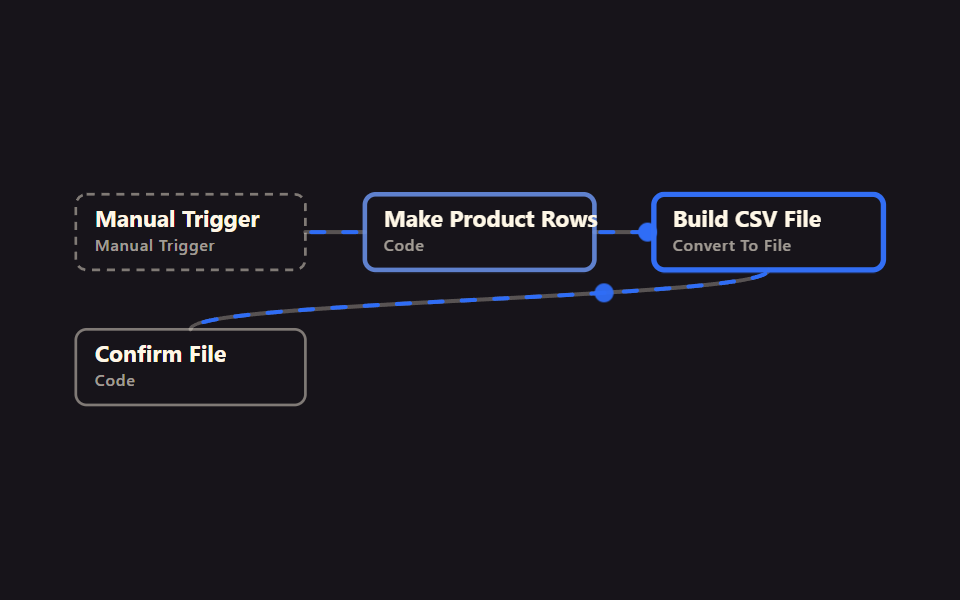 01 json-rows-to-csv-file
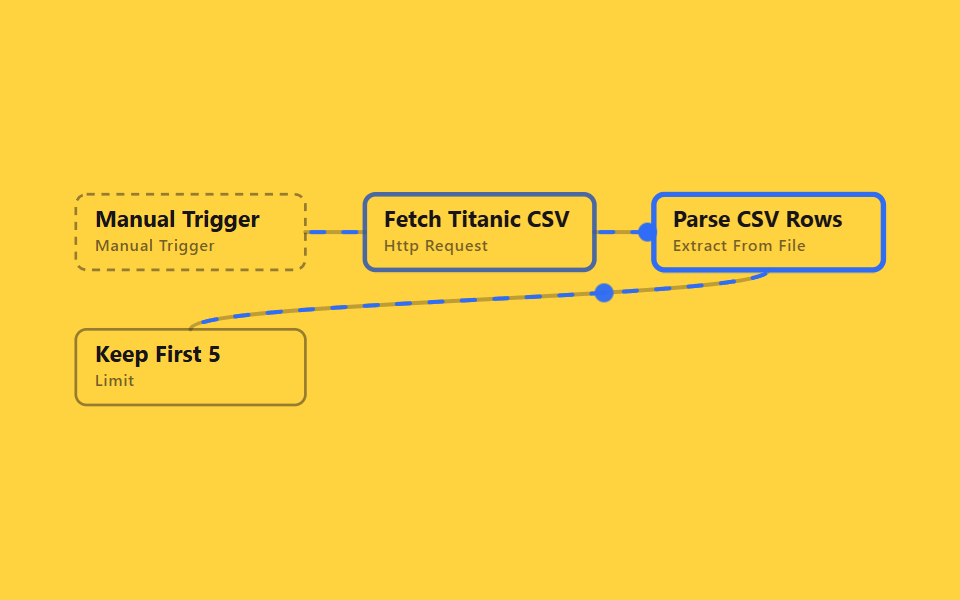 02 csv-file-to-json-rows
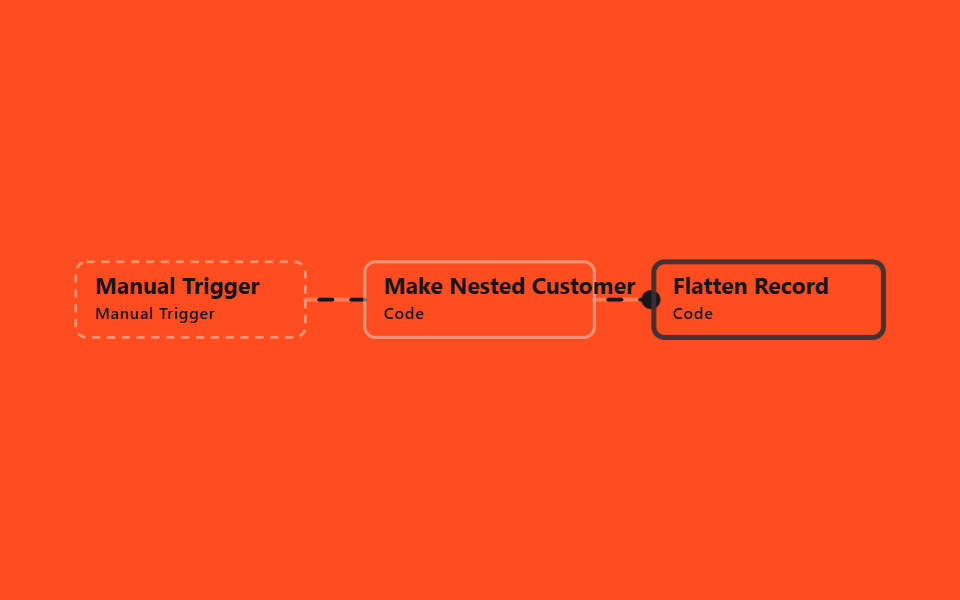 03 flatten-nested-record
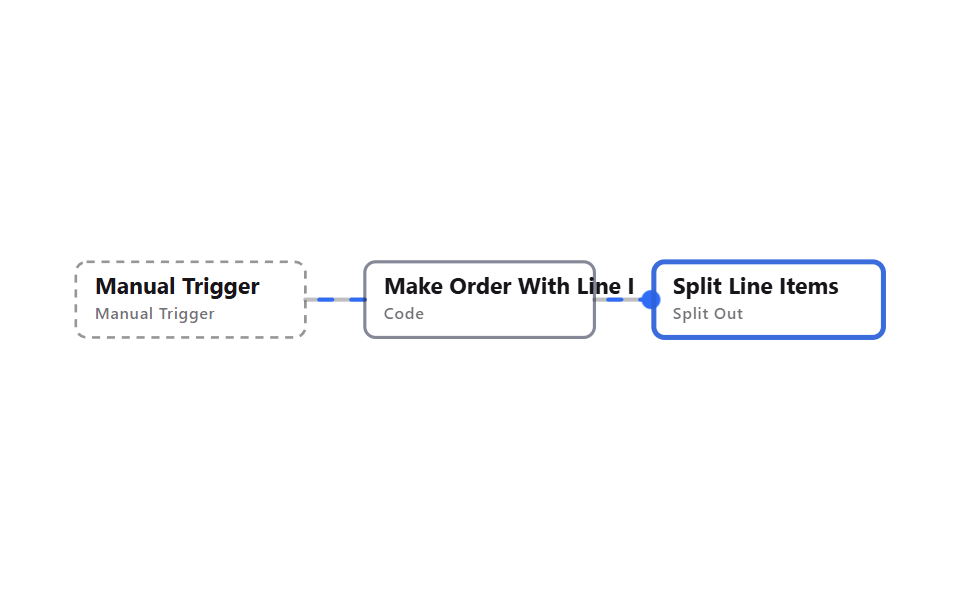 04 split-order-line-items
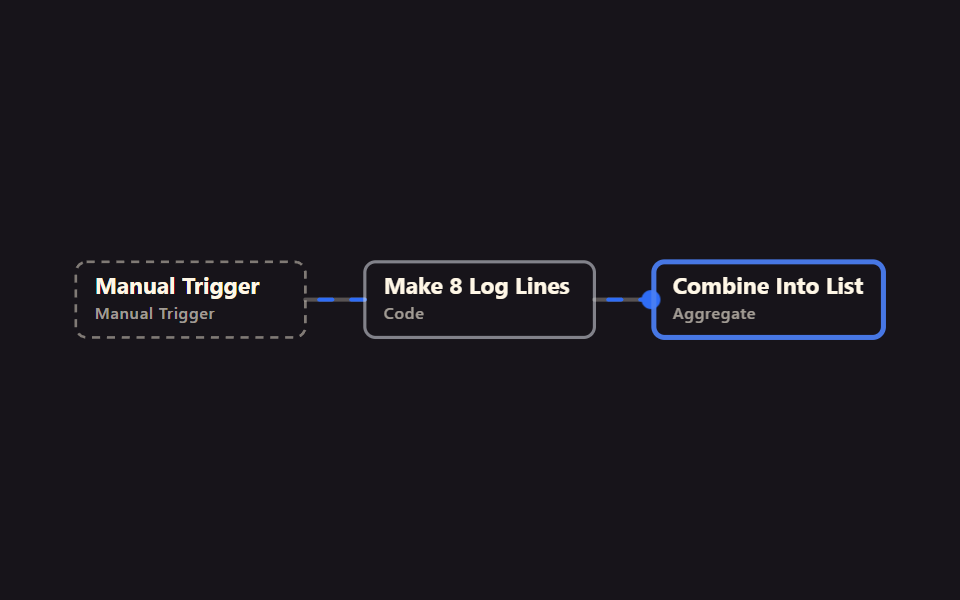 05 combine-items-into-list
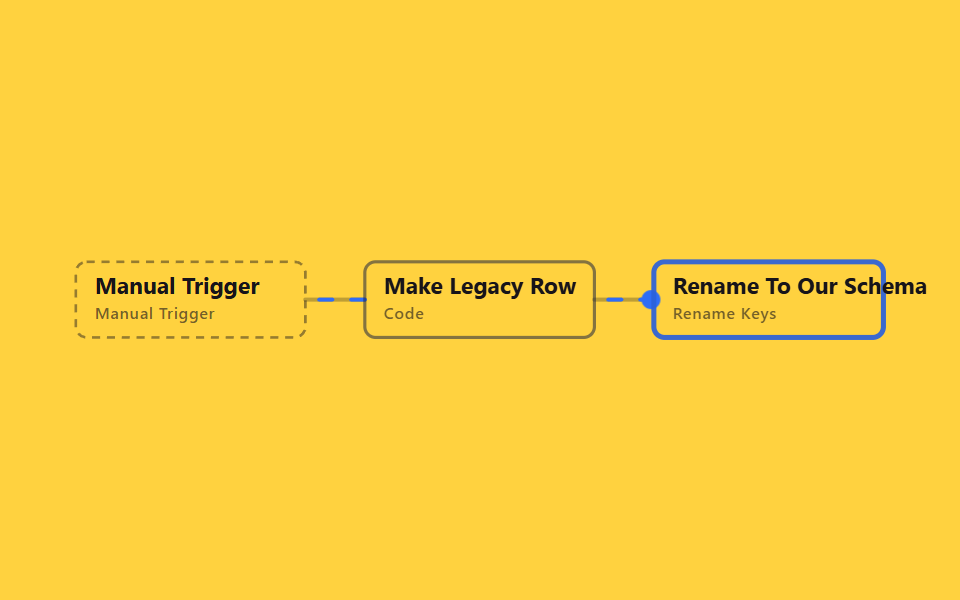 06 rename-legacy-fields
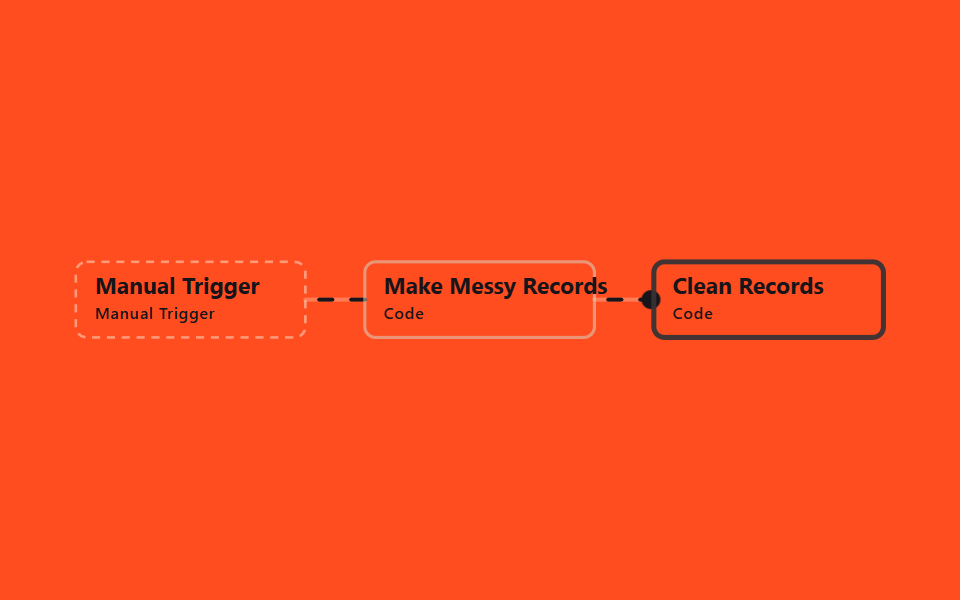 07 clean-strings-and-dates
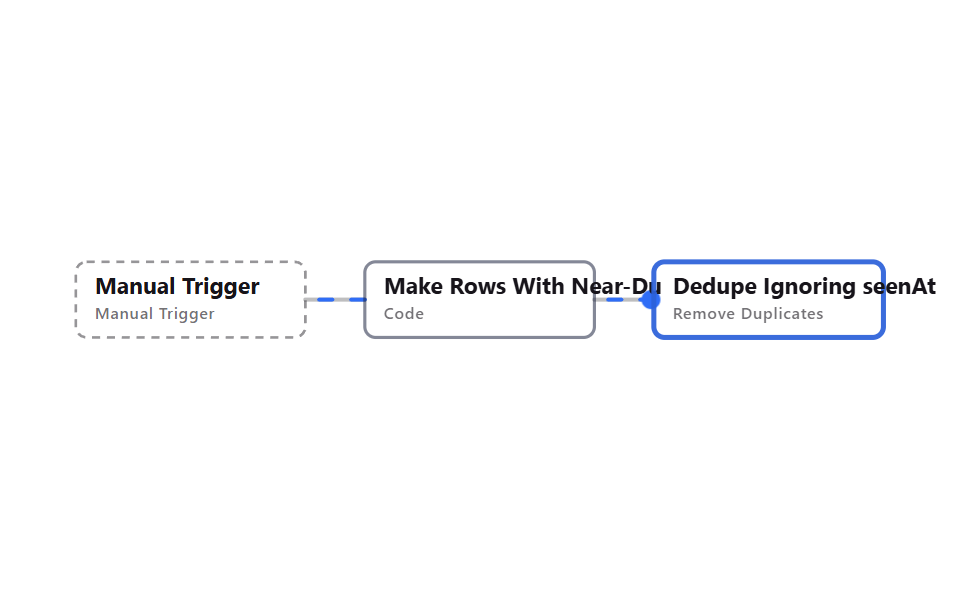 08 dedupe-ignore-timestamp
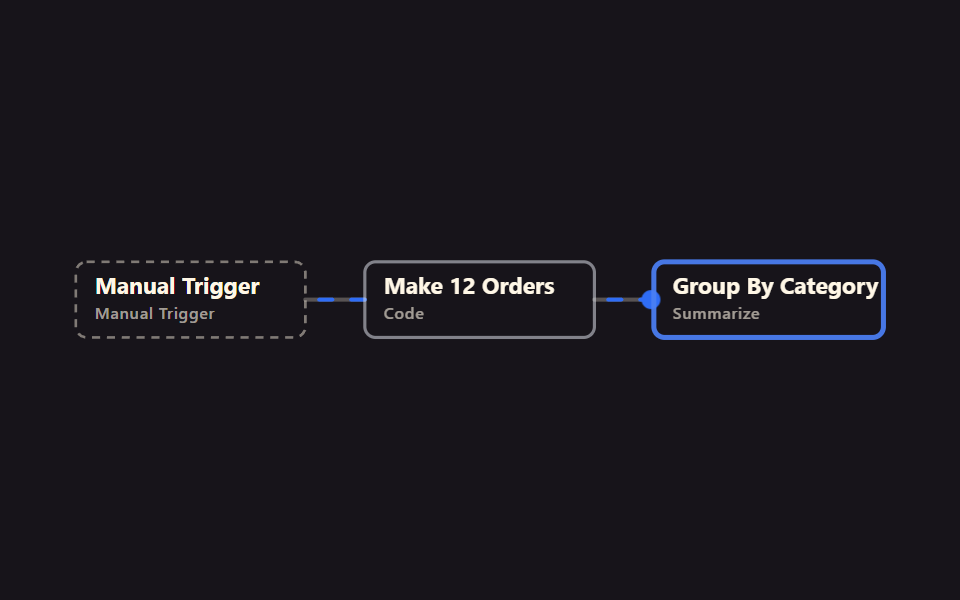 09 group-and-sum-by-category
Auto-plays · click a tile to jump to its section · all nine in one zip
- 01 JSON rows to a CSV file
- 02 A CSV file to JSON rows
- 03 Flatten nested JSON
- 04 Split an array field into rows
- 05 Combine many items into one array
- 06 Rename fields all at once
- 07 Clean up strings and dates
- 08 Dedupe while ignoring one field
- 09 Group and sum by category
The nine follow the order data actually runs into trouble. Two change the file itself first (01 JSON to CSV, 02 CSV to JSON), three reshape the structure next (03 flattening, 04 splitting, 05 combining), two clean up names and values after that (06 field names, 07 strings and dates), and two filter and roll up at the end (08 deduping, 09 grouping). Real work in excel automation tools tends to snarl in this same order — the shape is wrong, then the structure, then the mess, then you need one number out of it all.
01JSON rows to a CSV file
What it automates
A Code node makes 6 product rows, and Convert to File bundles them into a real CSV binary. That node stores its result only in binary, not json, so a second Code node reads the file's name and size back out to confirm the conversion actually happened.
<main class="stage">
<svg class="flow" viewBox="-28 -28 654 212" xmlns="http://www.w3.org/2000/svg" role="img" aria-label="godrich 205-01 json-rows-to-csv-file">
<path class="edge" d="M170 28 C192 28 192 28 214 28"/>
<path class="edge edge--flow" style="--i:0" d="M170 28 C192 28 192 28 214 28"/>
<circle class="pulse" style="--i:0;offset-path:path('M170 28 C192 28 192 28 214 28')" r="7"/>
<path class="edge" d="M384 28 C406 28 406 28 428 28"/>
<path class="edge edge--flow" style="--i:1" d="M384 28 C406 28 406 28 428 28"/>
<circle class="pulse" style="--i:1;offset-path:path('M384 28 C406 28 406 28 428 28')" r="7"/>
<path class="edge" d="M513 56 C513 78 85 78 85 100"/>
<path class="edge edge--flow" style="--i:2" d="M513 56 C513 78 85 78 85 100"/>
<circle class="pulse" style="--i:2;offset-path:path('M513 56 C513 78 85 78 85 100')" r="7"/>
<g class="node node--trigger" style="--i:0" transform="translate(0 0)"><rect class="node__box" width="170" height="56"/><text class="node__name" x="14" y="24">Manual Trigger</text><text class="node__type" x="14" y="42">Manual Trigger</text></g>
<g class="node" style="--i:1" transform="translate(214 0)"><rect class="node__box" width="170" height="56"/><text class="node__name" x="14" y="24">Make Product Rows</text><text class="node__type" x="14" y="42">Code</text></g>
<g class="node" style="--i:2" transform="translate(428 0)"><rect class="node__box" width="170" height="56"/><text class="node__name" x="14" y="24">Build CSV File</text><text class="node__type" x="14" y="42">Convert To File</text></g>
<g class="node" style="--i:3" transform="translate(0 100)"><rect class="node__box" width="170" height="56"/><text class="node__name" x="14" y="24">Confirm File</text><text class="node__type" x="14" y="42">Code</text></g>
</svg>
</main>
@use "../../../../site/static/demo-tokens" as *;
// ── 변수 3개 ──────────────────────────────────────────
$duration: $dur-loop; // 한 바퀴 (데모 2초와 같은 값 — gif 가 끊기지 않게)
$easing: linear; // 대시 흐름은 등속
$color: $subject-blue; // 강조(흐름·켜진 노드) 색
$ink: $subject-cream; // 글자·테두리
$n: 4; // 노드 수 — 켜지는 순서 간격
@include stage($stage-ink);
.flow { width: 100%; height: 100%; max-height: 100vh; display: block; overflow: visible; }
.edge { fill: none; stroke: $ink; stroke-opacity: .28; stroke-width: 3; stroke-linecap: round; }
.edge--flow { stroke: $color; stroke-opacity: 1; stroke-dasharray: 10 14; animation: flow $duration $easing infinite; }
@keyframes flow { to { stroke-dashoffset: -48; } }
.node__box { fill: transparent; stroke: $ink; stroke-opacity: .45; stroke-width: 2; rx: $r-sm; }
.node__name { fill: $ink; font-weight: 700; font-size: 17px; font-family: -apple-system, "Segoe UI", sans-serif; }
.node__type { fill: $ink; fill-opacity: .6; font-weight: 500; font-size: 12px; font-family: -apple-system, "Segoe UI", sans-serif; letter-spacing: .04em; }
.node--trigger .node__box { stroke-dasharray: 6 5; }
// 켜진 노드는 테두리가 강조색으로 두꺼워진다 (filter 대신 stroke — 렌더 비용). --i 는 <g> 에서 상속된다
.node .node__box { animation: box-lit $duration $ease-spring infinite; animation-delay: calc(var(--i) * #{$duration} / #{$n}); }
@keyframes box-lit {
0%, 100% { stroke: $ink; stroke-opacity: .45; stroke-width: 2; }
12%, 32% { stroke: $color; stroke-opacity: 1; stroke-width: 4; }
50% { stroke: $ink; stroke-opacity: .45; stroke-width: 2; }
}
.pulse { fill: $color; offset-distance: 0%; offset-rotate: 0deg; animation: travel $duration $ease-out infinite; animation-delay: calc(var(--i) * #{$duration} / #{$n}); }
@keyframes travel {
0% { offset-distance: 0%; opacity: 0; }
10% { opacity: 1; }
45% { offset-distance: 100%; opacity: 1; }
55%, 100% { offset-distance: 100%; opacity: 0; }
}
@media (prefers-reduced-motion: reduce) {
.edge--flow, .node, .node .node__box, .pulse { animation: none; }
.edge--flow { stroke-dasharray: none; } // 흐름은 멈추고 연결선만 남긴다
.pulse { display: none; }
}html, body {
margin: 0;
overflow: hidden;
}
.stage {
box-sizing: border-box;
min-height: 100vh;
display: grid;
place-items: center;
margin: 0;
background: #17141a;
font-family: -apple-system, "Segoe UI", "Noto Sans KR", sans-serif;
padding: clamp(8px, 4vw, 24px);
}
.flow {
width: 100%;
height: 100%;
max-height: 100vh;
display: block;
overflow: visible;
}
.edge {
fill: none;
stroke: #fff7e6;
stroke-opacity: 0.28;
stroke-width: 3;
stroke-linecap: round;
}
.edge--flow {
stroke: #2f6df6;
stroke-opacity: 1;
stroke-dasharray: 10 14;
animation: flow 2s linear infinite;
}
@keyframes flow {
to {
stroke-dashoffset: -48;
}
}
.node__box {
fill: transparent;
stroke: #fff7e6;
stroke-opacity: 0.45;
stroke-width: 2;
rx: 8px;
}
.node__name {
fill: #fff7e6;
font-weight: 700;
font-size: 17px;
font-family: -apple-system, "Segoe UI", sans-serif;
}
.node__type {
fill: #fff7e6;
fill-opacity: 0.6;
font-weight: 500;
font-size: 12px;
font-family: -apple-system, "Segoe UI", sans-serif;
letter-spacing: 0.04em;
}
.node--trigger .node__box {
stroke-dasharray: 6 5;
}
.node .node__box {
animation: box-lit 2s cubic-bezier(0.2, 0.8, 0.2, 1) infinite;
animation-delay: calc(var(--i) * 2s / 4);
}
@keyframes box-lit {
0%, 100% {
stroke: #fff7e6;
stroke-opacity: 0.45;
stroke-width: 2;
}
12%, 32% {
stroke: #2f6df6;
stroke-opacity: 1;
stroke-width: 4;
}
50% {
stroke: #fff7e6;
stroke-opacity: 0.45;
stroke-width: 2;
}
}
.pulse {
fill: #2f6df6;
offset-distance: 0%;
offset-rotate: 0deg;
animation: travel 2s ease-out infinite;
animation-delay: calc(var(--i) * 2s / 4);
}
@keyframes travel {
0% {
offset-distance: 0%;
opacity: 0;
}
10% {
opacity: 1;
}
45% {
offset-distance: 100%;
opacity: 1;
}
55%, 100% {
offset-distance: 100%;
opacity: 0;
}
}
@media (prefers-reduced-motion: reduce) {
.edge--flow, .node, .node .node__box, .pulse {
animation: none;
}
.edge--flow {
stroke-dasharray: none;
}
.pulse {
display: none;
}
}01 · JSON rows to a CSV file — Measured area 4.869% · moving frames 23/23Original by GODRICH · SCSS and React ship in the zip · See the password
In the workflow JSON
Reach for this when you need a downloadable report or an email attachment ready to send.
{
  "name": "Build CSV File",
  "type": "n8n-nodes-base.convertToFile",
  "typeVersion": 1.1,
  "parameters": {
    "operation": "csv",
    "binaryPropertyName": "data",
    "options": {
      "fileName": "products.csv",
      "headerRow": true
    }
  }
}
02A CSV file to JSON rows
What it automates
HTTP Request pulls a public CSV file down as binary, and Extract from File unpacks every row into its own JSON item. Limit trims the result down to the first 5.
<main class="stage">
<svg class="flow" viewBox="-28 -28 654 212" xmlns="http://www.w3.org/2000/svg" role="img" aria-label="godrich 205-02 csv-file-to-json-rows">
<path class="edge" d="M170 28 C192 28 192 28 214 28"/>
<path class="edge edge--flow" style="--i:0" d="M170 28 C192 28 192 28 214 28"/>
<circle class="pulse" style="--i:0;offset-path:path('M170 28 C192 28 192 28 214 28')" r="7"/>
<path class="edge" d="M384 28 C406 28 406 28 428 28"/>
<path class="edge edge--flow" style="--i:1" d="M384 28 C406 28 406 28 428 28"/>
<circle class="pulse" style="--i:1;offset-path:path('M384 28 C406 28 406 28 428 28')" r="7"/>
<path class="edge" d="M513 56 C513 78 85 78 85 100"/>
<path class="edge edge--flow" style="--i:2" d="M513 56 C513 78 85 78 85 100"/>
<circle class="pulse" style="--i:2;offset-path:path('M513 56 C513 78 85 78 85 100')" r="7"/>
<g class="node node--trigger" style="--i:0" transform="translate(0 0)"><rect class="node__box" width="170" height="56"/><text class="node__name" x="14" y="24">Manual Trigger</text><text class="node__type" x="14" y="42">Manual Trigger</text></g>
<g class="node" style="--i:1" transform="translate(214 0)"><rect class="node__box" width="170" height="56"/><text class="node__name" x="14" y="24">Fetch Titanic CSV</text><text class="node__type" x="14" y="42">Http Request</text></g>
<g class="node" style="--i:2" transform="translate(428 0)"><rect class="node__box" width="170" height="56"/><text class="node__name" x="14" y="24">Parse CSV Rows</text><text class="node__type" x="14" y="42">Extract From File</text></g>
<g class="node" style="--i:3" transform="translate(0 100)"><rect class="node__box" width="170" height="56"/><text class="node__name" x="14" y="24">Keep First 5</text><text class="node__type" x="14" y="42">Limit</text></g>
</svg>
</main>
@use "../../../../site/static/demo-tokens" as *;
// ── 변수 3개 ──────────────────────────────────────────
$duration: $dur-loop; // 한 바퀴 (데모 2초와 같은 값 — gif 가 끊기지 않게)
$easing: linear; // 대시 흐름은 등속
$color: $subject-blue; // 강조(흐름·켜진 노드) 색
$ink: $subject-ink; // 글자·테두리
$n: 4; // 노드 수 — 켜지는 순서 간격
@include stage($stage-yellow);
.flow { width: 100%; height: 100%; max-height: 100vh; display: block; overflow: visible; }
.edge { fill: none; stroke: $ink; stroke-opacity: .28; stroke-width: 3; stroke-linecap: round; }
.edge--flow { stroke: $color; stroke-opacity: 1; stroke-dasharray: 10 14; animation: flow $duration $easing infinite; }
@keyframes flow { to { stroke-dashoffset: -48; } }
.node__box { fill: transparent; stroke: $ink; stroke-opacity: .45; stroke-width: 2; rx: $r-sm; }
.node__name { fill: $ink; font-weight: 700; font-size: 17px; font-family: -apple-system, "Segoe UI", sans-serif; }
.node__type { fill: $ink; fill-opacity: .6; font-weight: 500; font-size: 12px; font-family: -apple-system, "Segoe UI", sans-serif; letter-spacing: .04em; }
.node--trigger .node__box { stroke-dasharray: 6 5; }
// 켜진 노드는 테두리가 강조색으로 두꺼워진다 (filter 대신 stroke — 렌더 비용). --i 는 <g> 에서 상속된다
.node .node__box { animation: box-lit $duration $ease-spring infinite; animation-delay: calc(var(--i) * #{$duration} / #{$n}); }
@keyframes box-lit {
0%, 100% { stroke: $ink; stroke-opacity: .45; stroke-width: 2; }
12%, 32% { stroke: $color; stroke-opacity: 1; stroke-width: 4; }
50% { stroke: $ink; stroke-opacity: .45; stroke-width: 2; }
}
.pulse { fill: $color; offset-distance: 0%; offset-rotate: 0deg; animation: travel $duration $ease-out infinite; animation-delay: calc(var(--i) * #{$duration} / #{$n}); }
@keyframes travel {
0% { offset-distance: 0%; opacity: 0; }
10% { opacity: 1; }
45% { offset-distance: 100%; opacity: 1; }
55%, 100% { offset-distance: 100%; opacity: 0; }
}
@media (prefers-reduced-motion: reduce) {
.edge--flow, .node, .node .node__box, .pulse { animation: none; }
.edge--flow { stroke-dasharray: none; } // 흐름은 멈추고 연결선만 남긴다
.pulse { display: none; }
}html, body {
margin: 0;
overflow: hidden;
}
.stage {
box-sizing: border-box;
min-height: 100vh;
display: grid;
place-items: center;
margin: 0;
background: #ffd23f;
font-family: -apple-system, "Segoe UI", "Noto Sans KR", sans-serif;
padding: clamp(8px, 4vw, 24px);
}
.flow {
width: 100%;
height: 100%;
max-height: 100vh;
display: block;
overflow: visible;
}
.edge {
fill: none;
stroke: #17141a;
stroke-opacity: 0.28;
stroke-width: 3;
stroke-linecap: round;
}
.edge--flow {
stroke: #2f6df6;
stroke-opacity: 1;
stroke-dasharray: 10 14;
animation: flow 2s linear infinite;
}
@keyframes flow {
to {
stroke-dashoffset: -48;
}
}
.node__box {
fill: transparent;
stroke: #17141a;
stroke-opacity: 0.45;
stroke-width: 2;
rx: 8px;
}
.node__name {
fill: #17141a;
font-weight: 700;
font-size: 17px;
font-family: -apple-system, "Segoe UI", sans-serif;
}
.node__type {
fill: #17141a;
fill-opacity: 0.6;
font-weight: 500;
font-size: 12px;
font-family: -apple-system, "Segoe UI", sans-serif;
letter-spacing: 0.04em;
}
.node--trigger .node__box {
stroke-dasharray: 6 5;
}
.node .node__box {
animation: box-lit 2s cubic-bezier(0.2, 0.8, 0.2, 1) infinite;
animation-delay: calc(var(--i) * 2s / 4);
}
@keyframes box-lit {
0%, 100% {
stroke: #17141a;
stroke-opacity: 0.45;
stroke-width: 2;
}
12%, 32% {
stroke: #2f6df6;
stroke-opacity: 1;
stroke-width: 4;
}
50% {
stroke: #17141a;
stroke-opacity: 0.45;
stroke-width: 2;
}
}
.pulse {
fill: #2f6df6;
offset-distance: 0%;
offset-rotate: 0deg;
animation: travel 2s ease-out infinite;
animation-delay: calc(var(--i) * 2s / 4);
}
@keyframes travel {
0% {
offset-distance: 0%;
opacity: 0;
}
10% {
opacity: 1;
}
45% {
offset-distance: 100%;
opacity: 1;
}
55%, 100% {
offset-distance: 100%;
opacity: 0;
}
}
@media (prefers-reduced-motion: reduce) {
.edge--flow, .node, .node .node__box, .pulse {
animation: none;
}
.edge--flow {
stroke-dasharray: none;
}
.pulse {
display: none;
}
}02 · A CSV file to JSON rows — Measured area 4.819% · moving frames 23/23Original by GODRICH · SCSS and React ship in the zip · See the password
In the workflow JSON
This is the move for turning a received CSV into workflow data, like when importing a spreadsheet someone emailed you.
{
  "name": "Parse CSV Rows",
  "type": "n8n-nodes-base.extractFromFile",
  "typeVersion": 1.1,
  "parameters": {
    "operation": "csv",
    "binaryPropertyName": "data",
    "options": {
      "headerRow": true
    }
  }
}
03Flatten nested JSON
What it automates
A Code node builds one customer record with an address and coordinates nested two levels deep, then a second Code node recursively unpacks it into a flat object with dot-notation keys like address.city.
<main class="stage">
<svg class="flow" viewBox="-28 -28 654 112" xmlns="http://www.w3.org/2000/svg" role="img" aria-label="godrich 205-03 flatten-nested-record">
<path class="edge" d="M170 28 C192 28 192 28 214 28"/>
<path class="edge edge--flow" style="--i:0" d="M170 28 C192 28 192 28 214 28"/>
<circle class="pulse" style="--i:0;offset-path:path('M170 28 C192 28 192 28 214 28')" r="7"/>
<path class="edge" d="M384 28 C406 28 406 28 428 28"/>
<path class="edge edge--flow" style="--i:1" d="M384 28 C406 28 406 28 428 28"/>
<circle class="pulse" style="--i:1;offset-path:path('M384 28 C406 28 406 28 428 28')" r="7"/>
<g class="node node--trigger" style="--i:0" transform="translate(0 0)"><rect class="node__box" width="170" height="56"/><text class="node__name" x="14" y="24">Manual Trigger</text><text class="node__type" x="14" y="42">Manual Trigger</text></g>
<g class="node" style="--i:1" transform="translate(214 0)"><rect class="node__box" width="170" height="56"/><text class="node__name" x="14" y="24">Make Nested Customer</text><text class="node__type" x="14" y="42">Code</text></g>
<g class="node" style="--i:2" transform="translate(428 0)"><rect class="node__box" width="170" height="56"/><text class="node__name" x="14" y="24">Flatten Record</text><text class="node__type" x="14" y="42">Code</text></g>
</svg>
</main>
@use "../../../../site/static/demo-tokens" as *;
// ── 변수 3개 ──────────────────────────────────────────
$duration: $dur-loop; // 한 바퀴 (데모 2초와 같은 값 — gif 가 끊기지 않게)
$easing: linear; // 대시 흐름은 등속
$color: $subject-ink; // 강조(흐름·켜진 노드) 색
$ink: $subject-cream; // 글자·테두리
$n: 3; // 노드 수 — 켜지는 순서 간격
@include stage($stage-orange);
.flow { width: 100%; height: 100%; max-height: 100vh; display: block; overflow: visible; }
.edge { fill: none; stroke: $ink; stroke-opacity: .28; stroke-width: 3; stroke-linecap: round; }
.edge--flow { stroke: $color; stroke-opacity: 1; stroke-dasharray: 10 14; animation: flow $duration $easing infinite; }
@keyframes flow { to { stroke-dashoffset: -48; } }
.node__box { fill: transparent; stroke: $ink; stroke-opacity: .45; stroke-width: 2; rx: $r-sm; }
.node__name { fill: $subject-ink; font-weight: 700; font-size: 17px; font-family: -apple-system, "Segoe UI", sans-serif; }
.node__type { fill: $subject-ink; fill-opacity: 1; font-weight: 500; font-size: 12px; font-family: -apple-system, "Segoe UI", sans-serif; letter-spacing: .04em; }
.node--trigger .node__box { stroke-dasharray: 6 5; }
// 켜진 노드는 테두리가 강조색으로 두꺼워진다 (filter 대신 stroke — 렌더 비용). --i 는 <g> 에서 상속된다
.node .node__box { animation: box-lit $duration $ease-spring infinite; animation-delay: calc(var(--i) * #{$duration} / #{$n}); }
@keyframes box-lit {
0%, 100% { stroke: $ink; stroke-opacity: .45; stroke-width: 2; }
12%, 32% { stroke: $color; stroke-opacity: 1; stroke-width: 4; }
50% { stroke: $ink; stroke-opacity: .45; stroke-width: 2; }
}
.pulse { fill: $color; offset-distance: 0%; offset-rotate: 0deg; animation: travel $duration $ease-out infinite; animation-delay: calc(var(--i) * #{$duration} / #{$n}); }
@keyframes travel {
0% { offset-distance: 0%; opacity: 0; }
10% { opacity: 1; }
45% { offset-distance: 100%; opacity: 1; }
55%, 100% { offset-distance: 100%; opacity: 0; }
}
@media (prefers-reduced-motion: reduce) {
.edge--flow, .node, .node .node__box, .pulse { animation: none; }
.edge--flow { stroke-dasharray: none; } // 흐름은 멈추고 연결선만 남긴다
.pulse { display: none; }
}html, body {
margin: 0;
overflow: hidden;
}
.stage {
box-sizing: border-box;
min-height: 100vh;
display: grid;
place-items: center;
margin: 0;
background: #ff4d1f;
font-family: -apple-system, "Segoe UI", "Noto Sans KR", sans-serif;
padding: clamp(8px, 4vw, 24px);
}
.flow {
width: 100%;
height: 100%;
max-height: 100vh;
display: block;
overflow: visible;
}
.edge {
fill: none;
stroke: #fff7e6;
stroke-opacity: 0.28;
stroke-width: 3;
stroke-linecap: round;
}
.edge--flow {
stroke: #17141a;
stroke-opacity: 1;
stroke-dasharray: 10 14;
animation: flow 2s linear infinite;
}
@keyframes flow {
to {
stroke-dashoffset: -48;
}
}
.node__box {
fill: transparent;
stroke: #fff7e6;
stroke-opacity: 0.45;
stroke-width: 2;
rx: 8px;
}
.node__name {
fill: #17141a;
font-weight: 700;
font-size: 17px;
font-family: -apple-system, "Segoe UI", sans-serif;
}
.node__type {
fill: #17141a;
fill-opacity: 1;
font-weight: 500;
font-size: 12px;
font-family: -apple-system, "Segoe UI", sans-serif;
letter-spacing: 0.04em;
}
.node--trigger .node__box {
stroke-dasharray: 6 5;
}
.node .node__box {
animation: box-lit 2s cubic-bezier(0.2, 0.8, 0.2, 1) infinite;
animation-delay: calc(var(--i) * 2s / 3);
}
@keyframes box-lit {
0%, 100% {
stroke: #fff7e6;
stroke-opacity: 0.45;
stroke-width: 2;
}
12%, 32% {
stroke: #17141a;
stroke-opacity: 1;
stroke-width: 4;
}
50% {
stroke: #fff7e6;
stroke-opacity: 0.45;
stroke-width: 2;
}
}
.pulse {
fill: #17141a;
offset-distance: 0%;
offset-rotate: 0deg;
animation: travel 2s ease-out infinite;
animation-delay: calc(var(--i) * 2s / 3);
}
@keyframes travel {
0% {
offset-distance: 0%;
opacity: 0;
}
10% {
opacity: 1;
}
45% {
offset-distance: 100%;
opacity: 1;
}
55%, 100% {
offset-distance: 100%;
opacity: 0;
}
}
@media (prefers-reduced-motion: reduce) {
.edge--flow, .node, .node .node__box, .pulse {
animation: none;
}
.edge--flow {
stroke-dasharray: none;
}
.pulse {
display: none;
}
}03 · Flatten nested JSON — Measured area 2.951% · moving frames 23/23Original by GODRICH · SCSS and React ship in the zip · See the password
In the workflow JSON
Use this for tidying a nested API response before it goes into a spreadsheet, or for flattening form data from a webhook.
{
  "name": "Flatten Record",
  "type": "n8n-nodes-base.code",
  "typeVersion": 2,
  "parameters": {
    "jsCode": "function flatten(obj, prefix, out) {\n  prefix = prefix || '';\n  out = out || {};\n  for (const [k, v] of Object.entries(obj)) {\n    const key = prefix ? prefix + '.' + k : k;\n    if (v && typeof v === 'object' && !Array.isArray(v)) {\n      flatten(v, key, out);\n    } else {\n      out[key] = v;\n    }\n  }\n  return out;\n}\nconst record = $input.first().json;\nreturn [{ json: flatten(record) }];"
  }
}
04Split an array field into rows
What it automates
A Code node makes one order carrying an array of line items, and Split Out unrolls that array so each line item lands as its own item.
<main class="stage">
<svg class="flow" viewBox="-28 -28 654 112" xmlns="http://www.w3.org/2000/svg" role="img" aria-label="godrich 205-04 split-order-line-items">
<path class="edge" d="M170 28 C192 28 192 28 214 28"/>
<path class="edge edge--flow" style="--i:0" d="M170 28 C192 28 192 28 214 28"/>
<circle class="pulse" style="--i:0;offset-path:path('M170 28 C192 28 192 28 214 28')" r="7"/>
<path class="edge" d="M384 28 C406 28 406 28 428 28"/>
<path class="edge edge--flow" style="--i:1" d="M384 28 C406 28 406 28 428 28"/>
<circle class="pulse" style="--i:1;offset-path:path('M384 28 C406 28 406 28 428 28')" r="7"/>
<g class="node node--trigger" style="--i:0" transform="translate(0 0)"><rect class="node__box" width="170" height="56"/><text class="node__name" x="14" y="24">Manual Trigger</text><text class="node__type" x="14" y="42">Manual Trigger</text></g>
<g class="node" style="--i:1" transform="translate(214 0)"><rect class="node__box" width="170" height="56"/><text class="node__name" x="14" y="24">Make Order With Line I</text><text class="node__type" x="14" y="42">Code</text></g>
<g class="node" style="--i:2" transform="translate(428 0)"><rect class="node__box" width="170" height="56"/><text class="node__name" x="14" y="24">Split Line Items</text><text class="node__type" x="14" y="42">Split Out</text></g>
</svg>
</main>
@use "../../../../site/static/demo-tokens" as *;
// ── 변수 3개 ──────────────────────────────────────────
$duration: $dur-loop; // 한 바퀴 (데모 2초와 같은 값 — gif 가 끊기지 않게)
$easing: linear; // 대시 흐름은 등속
$color: $subject-blue; // 강조(흐름·켜진 노드) 색
$ink: $subject-ink; // 글자·테두리
$n: 3; // 노드 수 — 켜지는 순서 간격
@include stage($stage-paper);
.flow { width: 100%; height: 100%; max-height: 100vh; display: block; overflow: visible; }
.edge { fill: none; stroke: $ink; stroke-opacity: .28; stroke-width: 3; stroke-linecap: round; }
.edge--flow { stroke: $color; stroke-opacity: 1; stroke-dasharray: 10 14; animation: flow $duration $easing infinite; }
@keyframes flow { to { stroke-dashoffset: -48; } }
.node__box { fill: transparent; stroke: $ink; stroke-opacity: .45; stroke-width: 2; rx: $r-sm; }
.node__name { fill: $ink; font-weight: 700; font-size: 17px; font-family: -apple-system, "Segoe UI", sans-serif; }
.node__type { fill: $ink; fill-opacity: .6; font-weight: 500; font-size: 12px; font-family: -apple-system, "Segoe UI", sans-serif; letter-spacing: .04em; }
.node--trigger .node__box { stroke-dasharray: 6 5; }
// 켜진 노드는 테두리가 강조색으로 두꺼워진다 (filter 대신 stroke — 렌더 비용). --i 는 <g> 에서 상속된다
.node .node__box { animation: box-lit $duration $ease-spring infinite; animation-delay: calc(var(--i) * #{$duration} / #{$n}); }
@keyframes box-lit {
0%, 100% { stroke: $ink; stroke-opacity: .45; stroke-width: 2; }
12%, 32% { stroke: $color; stroke-opacity: 1; stroke-width: 4; }
50% { stroke: $ink; stroke-opacity: .45; stroke-width: 2; }
}
.pulse { fill: $color; offset-distance: 0%; offset-rotate: 0deg; animation: travel $duration $ease-out infinite; animation-delay: calc(var(--i) * #{$duration} / #{$n}); }
@keyframes travel {
0% { offset-distance: 0%; opacity: 0; }
10% { opacity: 1; }
45% { offset-distance: 100%; opacity: 1; }
55%, 100% { offset-distance: 100%; opacity: 0; }
}
@media (prefers-reduced-motion: reduce) {
.edge--flow, .node, .node .node__box, .pulse { animation: none; }
.edge--flow { stroke-dasharray: none; } // 흐름은 멈추고 연결선만 남긴다
.pulse { display: none; }
}html, body {
margin: 0;
overflow: hidden;
}
.stage {
box-sizing: border-box;
min-height: 100vh;
display: grid;
place-items: center;
margin: 0;
background: #ffffff;
font-family: -apple-system, "Segoe UI", "Noto Sans KR", sans-serif;
padding: clamp(8px, 4vw, 24px);
}
.flow {
width: 100%;
height: 100%;
max-height: 100vh;
display: block;
overflow: visible;
}
.edge {
fill: none;
stroke: #17141a;
stroke-opacity: 0.28;
stroke-width: 3;
stroke-linecap: round;
}
.edge--flow {
stroke: #2f6df6;
stroke-opacity: 1;
stroke-dasharray: 10 14;
animation: flow 2s linear infinite;
}
@keyframes flow {
to {
stroke-dashoffset: -48;
}
}
.node__box {
fill: transparent;
stroke: #17141a;
stroke-opacity: 0.45;
stroke-width: 2;
rx: 8px;
}
.node__name {
fill: #17141a;
font-weight: 700;
font-size: 17px;
font-family: -apple-system, "Segoe UI", sans-serif;
}
.node__type {
fill: #17141a;
fill-opacity: 0.6;
font-weight: 500;
font-size: 12px;
font-family: -apple-system, "Segoe UI", sans-serif;
letter-spacing: 0.04em;
}
.node--trigger .node__box {
stroke-dasharray: 6 5;
}
.node .node__box {
animation: box-lit 2s cubic-bezier(0.2, 0.8, 0.2, 1) infinite;
animation-delay: calc(var(--i) * 2s / 3);
}
@keyframes box-lit {
0%, 100% {
stroke: #17141a;
stroke-opacity: 0.45;
stroke-width: 2;
}
12%, 32% {
stroke: #2f6df6;
stroke-opacity: 1;
stroke-width: 4;
}
50% {
stroke: #17141a;
stroke-opacity: 0.45;
stroke-width: 2;
}
}
.pulse {
fill: #2f6df6;
offset-distance: 0%;
offset-rotate: 0deg;
animation: travel 2s ease-out infinite;
animation-delay: calc(var(--i) * 2s / 3);
}
@keyframes travel {
0% {
offset-distance: 0%;
opacity: 0;
}
10% {
opacity: 1;
}
45% {
offset-distance: 100%;
opacity: 1;
}
55%, 100% {
offset-distance: 100%;
opacity: 0;
}
}
@media (prefers-reduced-motion: reduce) {
.edge--flow, .node, .node .node__box, .pulse {
animation: none;
}
.edge--flow {
stroke-dasharray: none;
}
.pulse {
display: none;
}
}04 · Split an array field into rows — Measured area 2.992% · moving frames 23/23Original by GODRICH · SCSS and React ship in the zip · See the password
In the workflow JSON
This is what you reach for when processing each line item of one order separately, or splitting invoice lines before totaling them.
{
  "name": "Split Line Items",
  "type": "n8n-nodes-base.splitOut",
  "typeVersion": 1,
  "parameters": {
    "fieldToSplitOut": "lineItems",
    "include": "noOtherFields",
    "options": {}
  }
}
05Combine many items into one array
What it automates
A Code node makes 8 log lines as 8 separate items, and Aggregate's Aggregate All Item Data option folds all of them into a single array under one logs field.
<main class="stage">
<svg class="flow" viewBox="-28 -28 654 112" xmlns="http://www.w3.org/2000/svg" role="img" aria-label="godrich 205-05 combine-items-into-list">
<path class="edge" d="M170 28 C192 28 192 28 214 28"/>
<path class="edge edge--flow" style="--i:0" d="M170 28 C192 28 192 28 214 28"/>
<circle class="pulse" style="--i:0;offset-path:path('M170 28 C192 28 192 28 214 28')" r="7"/>
<path class="edge" d="M384 28 C406 28 406 28 428 28"/>
<path class="edge edge--flow" style="--i:1" d="M384 28 C406 28 406 28 428 28"/>
<circle class="pulse" style="--i:1;offset-path:path('M384 28 C406 28 406 28 428 28')" r="7"/>
<g class="node node--trigger" style="--i:0" transform="translate(0 0)"><rect class="node__box" width="170" height="56"/><text class="node__name" x="14" y="24">Manual Trigger</text><text class="node__type" x="14" y="42">Manual Trigger</text></g>
<g class="node" style="--i:1" transform="translate(214 0)"><rect class="node__box" width="170" height="56"/><text class="node__name" x="14" y="24">Make 8 Log Lines</text><text class="node__type" x="14" y="42">Code</text></g>
<g class="node" style="--i:2" transform="translate(428 0)"><rect class="node__box" width="170" height="56"/><text class="node__name" x="14" y="24">Combine Into List</text><text class="node__type" x="14" y="42">Aggregate</text></g>
</svg>
</main>
@use "../../../../site/static/demo-tokens" as *;
// ── 변수 3개 ──────────────────────────────────────────
$duration: $dur-loop; // 한 바퀴 (데모 2초와 같은 값 — gif 가 끊기지 않게)
$easing: linear; // 대시 흐름은 등속
$color: $subject-blue; // 강조(흐름·켜진 노드) 색
$ink: $subject-cream; // 글자·테두리
$n: 3; // 노드 수 — 켜지는 순서 간격
@include stage($stage-ink);
.flow { width: 100%; height: 100%; max-height: 100vh; display: block; overflow: visible; }
.edge { fill: none; stroke: $ink; stroke-opacity: .28; stroke-width: 3; stroke-linecap: round; }
.edge--flow { stroke: $color; stroke-opacity: 1; stroke-dasharray: 10 14; animation: flow $duration $easing infinite; }
@keyframes flow { to { stroke-dashoffset: -48; } }
.node__box { fill: transparent; stroke: $ink; stroke-opacity: .45; stroke-width: 2; rx: $r-sm; }
.node__name { fill: $ink; font-weight: 700; font-size: 17px; font-family: -apple-system, "Segoe UI", sans-serif; }
.node__type { fill: $ink; fill-opacity: .6; font-weight: 500; font-size: 12px; font-family: -apple-system, "Segoe UI", sans-serif; letter-spacing: .04em; }
.node--trigger .node__box { stroke-dasharray: 6 5; }
// 켜진 노드는 테두리가 강조색으로 두꺼워진다 (filter 대신 stroke — 렌더 비용). --i 는 <g> 에서 상속된다
.node .node__box { animation: box-lit $duration $ease-spring infinite; animation-delay: calc(var(--i) * #{$duration} / #{$n}); }
@keyframes box-lit {
0%, 100% { stroke: $ink; stroke-opacity: .45; stroke-width: 2; }
12%, 32% { stroke: $color; stroke-opacity: 1; stroke-width: 4; }
50% { stroke: $ink; stroke-opacity: .45; stroke-width: 2; }
}
.pulse { fill: $color; offset-distance: 0%; offset-rotate: 0deg; animation: travel $duration $ease-out infinite; animation-delay: calc(var(--i) * #{$duration} / #{$n}); }
@keyframes travel {
0% { offset-distance: 0%; opacity: 0; }
10% { opacity: 1; }
45% { offset-distance: 100%; opacity: 1; }
55%, 100% { offset-distance: 100%; opacity: 0; }
}
@media (prefers-reduced-motion: reduce) {
.edge--flow, .node, .node .node__box, .pulse { animation: none; }
.edge--flow { stroke-dasharray: none; } // 흐름은 멈추고 연결선만 남긴다
.pulse { display: none; }
}html, body {
margin: 0;
overflow: hidden;
}
.stage {
box-sizing: border-box;
min-height: 100vh;
display: grid;
place-items: center;
margin: 0;
background: #17141a;
font-family: -apple-system, "Segoe UI", "Noto Sans KR", sans-serif;
padding: clamp(8px, 4vw, 24px);
}
.flow {
width: 100%;
height: 100%;
max-height: 100vh;
display: block;
overflow: visible;
}
.edge {
fill: none;
stroke: #fff7e6;
stroke-opacity: 0.28;
stroke-width: 3;
stroke-linecap: round;
}
.edge--flow {
stroke: #2f6df6;
stroke-opacity: 1;
stroke-dasharray: 10 14;
animation: flow 2s linear infinite;
}
@keyframes flow {
to {
stroke-dashoffset: -48;
}
}
.node__box {
fill: transparent;
stroke: #fff7e6;
stroke-opacity: 0.45;
stroke-width: 2;
rx: 8px;
}
.node__name {
fill: #fff7e6;
font-weight: 700;
font-size: 17px;
font-family: -apple-system, "Segoe UI", sans-serif;
}
.node__type {
fill: #fff7e6;
fill-opacity: 0.6;
font-weight: 500;
font-size: 12px;
font-family: -apple-system, "Segoe UI", sans-serif;
letter-spacing: 0.04em;
}
.node--trigger .node__box {
stroke-dasharray: 6 5;
}
.node .node__box {
animation: box-lit 2s cubic-bezier(0.2, 0.8, 0.2, 1) infinite;
animation-delay: calc(var(--i) * 2s / 3);
}
@keyframes box-lit {
0%, 100% {
stroke: #fff7e6;
stroke-opacity: 0.45;
stroke-width: 2;
}
12%, 32% {
stroke: #2f6df6;
stroke-opacity: 1;
stroke-width: 4;
}
50% {
stroke: #fff7e6;
stroke-opacity: 0.45;
stroke-width: 2;
}
}
.pulse {
fill: #2f6df6;
offset-distance: 0%;
offset-rotate: 0deg;
animation: travel 2s ease-out infinite;
animation-delay: calc(var(--i) * 2s / 3);
}
@keyframes travel {
0% {
offset-distance: 0%;
opacity: 0;
}
10% {
opacity: 1;
}
45% {
offset-distance: 100%;
opacity: 1;
}
55%, 100% {
offset-distance: 100%;
opacity: 0;
}
}
@media (prefers-reduced-motion: reduce) {
.edge--flow, .node, .node .node__box, .pulse {
animation: none;
}
.edge--flow {
stroke-dasharray: none;
}
.pulse {
display: none;
}
}05 · Combine many items into one array — Measured area 2.985% · moving frames 23/23Original by GODRICH · SCSS and React ship in the zip · See the password
In the workflow JSON
It's handy for bundling logs into one file to send, or for building the raw array behind a summary report.
{
  "name": "Combine Into List",
  "type": "n8n-nodes-base.aggregate",
  "typeVersion": 1,
  "parameters": {
    "aggregate": "aggregateAllItemData",
    "destinationFieldName": "logs",
    "options": {}
  }
}
06Rename fields all at once
What it automates
A Code node makes a row with legacy field names like usr_nm, usr_em, and ord_amt, and Rename Keys swaps all three over to name, email, and amount in one pass.
<main class="stage">
<svg class="flow" viewBox="-28 -28 654 112" xmlns="http://www.w3.org/2000/svg" role="img" aria-label="godrich 205-06 rename-legacy-fields">
<path class="edge" d="M170 28 C192 28 192 28 214 28"/>
<path class="edge edge--flow" style="--i:0" d="M170 28 C192 28 192 28 214 28"/>
<circle class="pulse" style="--i:0;offset-path:path('M170 28 C192 28 192 28 214 28')" r="7"/>
<path class="edge" d="M384 28 C406 28 406 28 428 28"/>
<path class="edge edge--flow" style="--i:1" d="M384 28 C406 28 406 28 428 28"/>
<circle class="pulse" style="--i:1;offset-path:path('M384 28 C406 28 406 28 428 28')" r="7"/>
<g class="node node--trigger" style="--i:0" transform="translate(0 0)"><rect class="node__box" width="170" height="56"/><text class="node__name" x="14" y="24">Manual Trigger</text><text class="node__type" x="14" y="42">Manual Trigger</text></g>
<g class="node" style="--i:1" transform="translate(214 0)"><rect class="node__box" width="170" height="56"/><text class="node__name" x="14" y="24">Make Legacy Row</text><text class="node__type" x="14" y="42">Code</text></g>
<g class="node" style="--i:2" transform="translate(428 0)"><rect class="node__box" width="170" height="56"/><text class="node__name" x="14" y="24">Rename To Our Schema</text><text class="node__type" x="14" y="42">Rename Keys</text></g>
</svg>
</main>
@use "../../../../site/static/demo-tokens" as *;
// ── 변수 3개 ──────────────────────────────────────────
$duration: $dur-loop; // 한 바퀴 (데모 2초와 같은 값 — gif 가 끊기지 않게)
$easing: linear; // 대시 흐름은 등속
$color: $subject-blue; // 강조(흐름·켜진 노드) 색
$ink: $subject-ink; // 글자·테두리
$n: 3; // 노드 수 — 켜지는 순서 간격
@include stage($stage-yellow);
.flow { width: 100%; height: 100%; max-height: 100vh; display: block; overflow: visible; }
.edge { fill: none; stroke: $ink; stroke-opacity: .28; stroke-width: 3; stroke-linecap: round; }
.edge--flow { stroke: $color; stroke-opacity: 1; stroke-dasharray: 10 14; animation: flow $duration $easing infinite; }
@keyframes flow { to { stroke-dashoffset: -48; } }
.node__box { fill: transparent; stroke: $ink; stroke-opacity: .45; stroke-width: 2; rx: $r-sm; }
.node__name { fill: $ink; font-weight: 700; font-size: 17px; font-family: -apple-system, "Segoe UI", sans-serif; }
.node__type { fill: $ink; fill-opacity: .6; font-weight: 500; font-size: 12px; font-family: -apple-system, "Segoe UI", sans-serif; letter-spacing: .04em; }
.node--trigger .node__box { stroke-dasharray: 6 5; }
// 켜진 노드는 테두리가 강조색으로 두꺼워진다 (filter 대신 stroke — 렌더 비용). --i 는 <g> 에서 상속된다
.node .node__box { animation: box-lit $duration $ease-spring infinite; animation-delay: calc(var(--i) * #{$duration} / #{$n}); }
@keyframes box-lit {
0%, 100% { stroke: $ink; stroke-opacity: .45; stroke-width: 2; }
12%, 32% { stroke: $color; stroke-opacity: 1; stroke-width: 4; }
50% { stroke: $ink; stroke-opacity: .45; stroke-width: 2; }
}
.pulse { fill: $color; offset-distance: 0%; offset-rotate: 0deg; animation: travel $duration $ease-out infinite; animation-delay: calc(var(--i) * #{$duration} / #{$n}); }
@keyframes travel {
0% { offset-distance: 0%; opacity: 0; }
10% { opacity: 1; }
45% { offset-distance: 100%; opacity: 1; }
55%, 100% { offset-distance: 100%; opacity: 0; }
}
@media (prefers-reduced-motion: reduce) {
.edge--flow, .node, .node .node__box, .pulse { animation: none; }
.edge--flow { stroke-dasharray: none; } // 흐름은 멈추고 연결선만 남긴다
.pulse { display: none; }
}html, body {
margin: 0;
overflow: hidden;
}
.stage {
box-sizing: border-box;
min-height: 100vh;
display: grid;
place-items: center;
margin: 0;
background: #ffd23f;
font-family: -apple-system, "Segoe UI", "Noto Sans KR", sans-serif;
padding: clamp(8px, 4vw, 24px);
}
.flow {
width: 100%;
height: 100%;
max-height: 100vh;
display: block;
overflow: visible;
}
.edge {
fill: none;
stroke: #17141a;
stroke-opacity: 0.28;
stroke-width: 3;
stroke-linecap: round;
}
.edge--flow {
stroke: #2f6df6;
stroke-opacity: 1;
stroke-dasharray: 10 14;
animation: flow 2s linear infinite;
}
@keyframes flow {
to {
stroke-dashoffset: -48;
}
}
.node__box {
fill: transparent;
stroke: #17141a;
stroke-opacity: 0.45;
stroke-width: 2;
rx: 8px;
}
.node__name {
fill: #17141a;
font-weight: 700;
font-size: 17px;
font-family: -apple-system, "Segoe UI", sans-serif;
}
.node__type {
fill: #17141a;
fill-opacity: 0.6;
font-weight: 500;
font-size: 12px;
font-family: -apple-system, "Segoe UI", sans-serif;
letter-spacing: 0.04em;
}
.node--trigger .node__box {
stroke-dasharray: 6 5;
}
.node .node__box {
animation: box-lit 2s cubic-bezier(0.2, 0.8, 0.2, 1) infinite;
animation-delay: calc(var(--i) * 2s / 3);
}
@keyframes box-lit {
0%, 100% {
stroke: #17141a;
stroke-opacity: 0.45;
stroke-width: 2;
}
12%, 32% {
stroke: #2f6df6;
stroke-opacity: 1;
stroke-width: 4;
}
50% {
stroke: #17141a;
stroke-opacity: 0.45;
stroke-width: 2;
}
}
.pulse {
fill: #2f6df6;
offset-distance: 0%;
offset-rotate: 0deg;
animation: travel 2s ease-out infinite;
animation-delay: calc(var(--i) * 2s / 3);
}
@keyframes travel {
0% {
offset-distance: 0%;
opacity: 0;
}
10% {
opacity: 1;
}
45% {
offset-distance: 100%;
opacity: 1;
}
55%, 100% {
offset-distance: 100%;
opacity: 0;
}
}
@media (prefers-reduced-motion: reduce) {
.edge--flow, .node, .node .node__box, .pulse {
animation: none;
}
.edge--flow {
stroke-dasharray: none;
}
.pulse {
display: none;
}
}06 · Rename fields all at once — Measured area 2.948% · moving frames 23/23Original by GODRICH · SCSS and React ship in the zip · See the password
In the workflow JSON
Reach for this when mapping a legacy API's field names to your own, or unifying spreadsheet column names across sources.
{
  "name": "Rename To Our Schema",
  "type": "n8n-nodes-base.renameKeys",
  "typeVersion": 1,
  "parameters": {
    "keys": {
      "key": [
        { "currentKey": "usr_nm", "newKey": "name" },
        { "currentKey": "usr_em", "newKey": "email" },
        { "currentKey": "ord_amt", "newKey": "amount" }
      ]
    }
  }
}
07Clean up strings and dates
What it automates
A Code node makes rows with stray whitespace, mixed casing, and dates in three different formats, and a second Code node trims and title-cases the names while normalizing every date down to YYYY-MM-DD.
<main class="stage">
<svg class="flow" viewBox="-28 -28 654 112" xmlns="http://www.w3.org/2000/svg" role="img" aria-label="godrich 205-07 clean-strings-and-dates">
<path class="edge" d="M170 28 C192 28 192 28 214 28"/>
<path class="edge edge--flow" style="--i:0" d="M170 28 C192 28 192 28 214 28"/>
<circle class="pulse" style="--i:0;offset-path:path('M170 28 C192 28 192 28 214 28')" r="7"/>
<path class="edge" d="M384 28 C406 28 406 28 428 28"/>
<path class="edge edge--flow" style="--i:1" d="M384 28 C406 28 406 28 428 28"/>
<circle class="pulse" style="--i:1;offset-path:path('M384 28 C406 28 406 28 428 28')" r="7"/>
<g class="node node--trigger" style="--i:0" transform="translate(0 0)"><rect class="node__box" width="170" height="56"/><text class="node__name" x="14" y="24">Manual Trigger</text><text class="node__type" x="14" y="42">Manual Trigger</text></g>
<g class="node" style="--i:1" transform="translate(214 0)"><rect class="node__box" width="170" height="56"/><text class="node__name" x="14" y="24">Make Messy Records</text><text class="node__type" x="14" y="42">Code</text></g>
<g class="node" style="--i:2" transform="translate(428 0)"><rect class="node__box" width="170" height="56"/><text class="node__name" x="14" y="24">Clean Records</text><text class="node__type" x="14" y="42">Code</text></g>
</svg>
</main>
@use "../../../../site/static/demo-tokens" as *;
// ── 변수 3개 ──────────────────────────────────────────
$duration: $dur-loop; // 한 바퀴 (데모 2초와 같은 값 — gif 가 끊기지 않게)
$easing: linear; // 대시 흐름은 등속
$color: $subject-ink; // 강조(흐름·켜진 노드) 색
$ink: $subject-cream; // 글자·테두리
$n: 3; // 노드 수 — 켜지는 순서 간격
@include stage($stage-orange);
.flow { width: 100%; height: 100%; max-height: 100vh; display: block; overflow: visible; }
.edge { fill: none; stroke: $ink; stroke-opacity: .28; stroke-width: 3; stroke-linecap: round; }
.edge--flow { stroke: $color; stroke-opacity: 1; stroke-dasharray: 10 14; animation: flow $duration $easing infinite; }
@keyframes flow { to { stroke-dashoffset: -48; } }
.node__box { fill: transparent; stroke: $ink; stroke-opacity: .45; stroke-width: 2; rx: $r-sm; }
.node__name { fill: $subject-ink; font-weight: 700; font-size: 17px; font-family: -apple-system, "Segoe UI", sans-serif; }
.node__type { fill: $subject-ink; fill-opacity: 1; font-weight: 500; font-size: 12px; font-family: -apple-system, "Segoe UI", sans-serif; letter-spacing: .04em; }
.node--trigger .node__box { stroke-dasharray: 6 5; }
// 켜진 노드는 테두리가 강조색으로 두꺼워진다 (filter 대신 stroke — 렌더 비용). --i 는 <g> 에서 상속된다
.node .node__box { animation: box-lit $duration $ease-spring infinite; animation-delay: calc(var(--i) * #{$duration} / #{$n}); }
@keyframes box-lit {
0%, 100% { stroke: $ink; stroke-opacity: .45; stroke-width: 2; }
12%, 32% { stroke: $color; stroke-opacity: 1; stroke-width: 4; }
50% { stroke: $ink; stroke-opacity: .45; stroke-width: 2; }
}
.pulse { fill: $color; offset-distance: 0%; offset-rotate: 0deg; animation: travel $duration $ease-out infinite; animation-delay: calc(var(--i) * #{$duration} / #{$n}); }
@keyframes travel {
0% { offset-distance: 0%; opacity: 0; }
10% { opacity: 1; }
45% { offset-distance: 100%; opacity: 1; }
55%, 100% { offset-distance: 100%; opacity: 0; }
}
@media (prefers-reduced-motion: reduce) {
.edge--flow, .node, .node .node__box, .pulse { animation: none; }
.edge--flow { stroke-dasharray: none; } // 흐름은 멈추고 연결선만 남긴다
.pulse { display: none; }
}html, body {
margin: 0;
overflow: hidden;
}
.stage {
box-sizing: border-box;
min-height: 100vh;
display: grid;
place-items: center;
margin: 0;
background: #ff4d1f;
font-family: -apple-system, "Segoe UI", "Noto Sans KR", sans-serif;
padding: clamp(8px, 4vw, 24px);
}
.flow {
width: 100%;
height: 100%;
max-height: 100vh;
display: block;
overflow: visible;
}
.edge {
fill: none;
stroke: #fff7e6;
stroke-opacity: 0.28;
stroke-width: 3;
stroke-linecap: round;
}
.edge--flow {
stroke: #17141a;
stroke-opacity: 1;
stroke-dasharray: 10 14;
animation: flow 2s linear infinite;
}
@keyframes flow {
to {
stroke-dashoffset: -48;
}
}
.node__box {
fill: transparent;
stroke: #fff7e6;
stroke-opacity: 0.45;
stroke-width: 2;
rx: 8px;
}
.node__name {
fill: #17141a;
font-weight: 700;
font-size: 17px;
font-family: -apple-system, "Segoe UI", sans-serif;
}
.node__type {
fill: #17141a;
fill-opacity: 1;
font-weight: 500;
font-size: 12px;
font-family: -apple-system, "Segoe UI", sans-serif;
letter-spacing: 0.04em;
}
.node--trigger .node__box {
stroke-dasharray: 6 5;
}
.node .node__box {
animation: box-lit 2s cubic-bezier(0.2, 0.8, 0.2, 1) infinite;
animation-delay: calc(var(--i) * 2s / 3);
}
@keyframes box-lit {
0%, 100% {
stroke: #fff7e6;
stroke-opacity: 0.45;
stroke-width: 2;
}
12%, 32% {
stroke: #17141a;
stroke-opacity: 1;
stroke-width: 4;
}
50% {
stroke: #fff7e6;
stroke-opacity: 0.45;
stroke-width: 2;
}
}
.pulse {
fill: #17141a;
offset-distance: 0%;
offset-rotate: 0deg;
animation: travel 2s ease-out infinite;
animation-delay: calc(var(--i) * 2s / 3);
}
@keyframes travel {
0% {
offset-distance: 0%;
opacity: 0;
}
10% {
opacity: 1;
}
45% {
offset-distance: 100%;
opacity: 1;
}
55%, 100% {
offset-distance: 100%;
opacity: 0;
}
}
@media (prefers-reduced-motion: reduce) {
.edge--flow, .node, .node .node__box, .pulse {
animation: none;
}
.edge--flow {
stroke-dasharray: none;
}
.pulse {
display: none;
}
}07 · Clean up strings and dates — Measured area 2.953% · moving frames 23/23Original by GODRICH · SCSS and React ship in the zip · See the password
In the workflow JSON
This is for cleaning up form input, or unifying mismatched date formats before they hit a database.
{
  "name": "Clean Records",
  "type": "n8n-nodes-base.code",
  "typeVersion": 2,
  "parameters": {
    "jsCode": "function toTitleCase(s) {\n  return s.trim().replace(/\\s+/g, ' ').toLowerCase().replace(/\\b\\w/g, c => c.toUpperCase());\n}\nfunction toDateOnly(raw) {\n  const d = new Date(raw);\n  return d.toISOString().slice(0, 10);\n}\nreturn $input.all().map(item => ({\n  json: {\n    name: toTitleCase(item.json.name),\n    email: item.json.email.trim().toLowerCase(),\n    date: toDateOnly(item.json.raw_date)\n  }\n}));"
  }
}
08Dedupe while ignoring one field
What it automates
A Code node creates rows that share the same customer and product but carry a different seenAt timestamp, and Remove Duplicates excludes just seenAt from the comparison, clearing repeats by every other field.
<main class="stage">
<svg class="flow" viewBox="-28 -28 654 112" xmlns="http://www.w3.org/2000/svg" role="img" aria-label="godrich 205-08 dedupe-ignore-timestamp">
<path class="edge" d="M170 28 C192 28 192 28 214 28"/>
<path class="edge edge--flow" style="--i:0" d="M170 28 C192 28 192 28 214 28"/>
<circle class="pulse" style="--i:0;offset-path:path('M170 28 C192 28 192 28 214 28')" r="7"/>
<path class="edge" d="M384 28 C406 28 406 28 428 28"/>
<path class="edge edge--flow" style="--i:1" d="M384 28 C406 28 406 28 428 28"/>
<circle class="pulse" style="--i:1;offset-path:path('M384 28 C406 28 406 28 428 28')" r="7"/>
<g class="node node--trigger" style="--i:0" transform="translate(0 0)"><rect class="node__box" width="170" height="56"/><text class="node__name" x="14" y="24">Manual Trigger</text><text class="node__type" x="14" y="42">Manual Trigger</text></g>
<g class="node" style="--i:1" transform="translate(214 0)"><rect class="node__box" width="170" height="56"/><text class="node__name" x="14" y="24">Make Rows With Near-Du</text><text class="node__type" x="14" y="42">Code</text></g>
<g class="node" style="--i:2" transform="translate(428 0)"><rect class="node__box" width="170" height="56"/><text class="node__name" x="14" y="24">Dedupe Ignoring seenAt</text><text class="node__type" x="14" y="42">Remove Duplicates</text></g>
</svg>
</main>
@use "../../../../site/static/demo-tokens" as *;
// ── 변수 3개 ──────────────────────────────────────────
$duration: $dur-loop; // 한 바퀴 (데모 2초와 같은 값 — gif 가 끊기지 않게)
$easing: linear; // 대시 흐름은 등속
$color: $subject-blue; // 강조(흐름·켜진 노드) 색
$ink: $subject-ink; // 글자·테두리
$n: 3; // 노드 수 — 켜지는 순서 간격
@include stage($stage-paper);
.flow { width: 100%; height: 100%; max-height: 100vh; display: block; overflow: visible; }
.edge { fill: none; stroke: $ink; stroke-opacity: .28; stroke-width: 3; stroke-linecap: round; }
.edge--flow { stroke: $color; stroke-opacity: 1; stroke-dasharray: 10 14; animation: flow $duration $easing infinite; }
@keyframes flow { to { stroke-dashoffset: -48; } }
.node__box { fill: transparent; stroke: $ink; stroke-opacity: .45; stroke-width: 2; rx: $r-sm; }
.node__name { fill: $ink; font-weight: 700; font-size: 17px; font-family: -apple-system, "Segoe UI", sans-serif; }
.node__type { fill: $ink; fill-opacity: .6; font-weight: 500; font-size: 12px; font-family: -apple-system, "Segoe UI", sans-serif; letter-spacing: .04em; }
.node--trigger .node__box { stroke-dasharray: 6 5; }
// 켜진 노드는 테두리가 강조색으로 두꺼워진다 (filter 대신 stroke — 렌더 비용). --i 는 <g> 에서 상속된다
.node .node__box { animation: box-lit $duration $ease-spring infinite; animation-delay: calc(var(--i) * #{$duration} / #{$n}); }
@keyframes box-lit {
0%, 100% { stroke: $ink; stroke-opacity: .45; stroke-width: 2; }
12%, 32% { stroke: $color; stroke-opacity: 1; stroke-width: 4; }
50% { stroke: $ink; stroke-opacity: .45; stroke-width: 2; }
}
.pulse { fill: $color; offset-distance: 0%; offset-rotate: 0deg; animation: travel $duration $ease-out infinite; animation-delay: calc(var(--i) * #{$duration} / #{$n}); }
@keyframes travel {
0% { offset-distance: 0%; opacity: 0; }
10% { opacity: 1; }
45% { offset-distance: 100%; opacity: 1; }
55%, 100% { offset-distance: 100%; opacity: 0; }
}
@media (prefers-reduced-motion: reduce) {
.edge--flow, .node, .node .node__box, .pulse { animation: none; }
.edge--flow { stroke-dasharray: none; } // 흐름은 멈추고 연결선만 남긴다
.pulse { display: none; }
}html, body {
margin: 0;
overflow: hidden;
}
.stage {
box-sizing: border-box;
min-height: 100vh;
display: grid;
place-items: center;
margin: 0;
background: #ffffff;
font-family: -apple-system, "Segoe UI", "Noto Sans KR", sans-serif;
padding: clamp(8px, 4vw, 24px);
}
.flow {
width: 100%;
height: 100%;
max-height: 100vh;
display: block;
overflow: visible;
}
.edge {
fill: none;
stroke: #17141a;
stroke-opacity: 0.28;
stroke-width: 3;
stroke-linecap: round;
}
.edge--flow {
stroke: #2f6df6;
stroke-opacity: 1;
stroke-dasharray: 10 14;
animation: flow 2s linear infinite;
}
@keyframes flow {
to {
stroke-dashoffset: -48;
}
}
.node__box {
fill: transparent;
stroke: #17141a;
stroke-opacity: 0.45;
stroke-width: 2;
rx: 8px;
}
.node__name {
fill: #17141a;
font-weight: 700;
font-size: 17px;
font-family: -apple-system, "Segoe UI", sans-serif;
}
.node__type {
fill: #17141a;
fill-opacity: 0.6;
font-weight: 500;
font-size: 12px;
font-family: -apple-system, "Segoe UI", sans-serif;
letter-spacing: 0.04em;
}
.node--trigger .node__box {
stroke-dasharray: 6 5;
}
.node .node__box {
animation: box-lit 2s cubic-bezier(0.2, 0.8, 0.2, 1) infinite;
animation-delay: calc(var(--i) * 2s / 3);
}
@keyframes box-lit {
0%, 100% {
stroke: #17141a;
stroke-opacity: 0.45;
stroke-width: 2;
}
12%, 32% {
stroke: #2f6df6;
stroke-opacity: 1;
stroke-width: 4;
}
50% {
stroke: #17141a;
stroke-opacity: 0.45;
stroke-width: 2;
}
}
.pulse {
fill: #2f6df6;
offset-distance: 0%;
offset-rotate: 0deg;
animation: travel 2s ease-out infinite;
animation-delay: calc(var(--i) * 2s / 3);
}
@keyframes travel {
0% {
offset-distance: 0%;
opacity: 0;
}
10% {
opacity: 1;
}
45% {
offset-distance: 100%;
opacity: 1;
}
55%, 100% {
offset-distance: 100%;
opacity: 0;
}
}
@media (prefers-reduced-motion: reduce) {
.edge--flow, .node, .node .node__box, .pulse {
animation: none;
}
.edge--flow {
stroke-dasharray: none;
}
.pulse {
display: none;
}
}08 · Dedupe while ignoring one field — Measured area 2.977% · moving frames 23/23Original by GODRICH · SCSS and React ship in the zip · See the password
In the workflow JSON
This is exactly for when the same event arrives multiple times with only the timestamp different, such as cleaning up duplicate logs from a retrying webhook.
{
  "name": "Dedupe Ignoring seenAt",
  "type": "n8n-nodes-base.removeDuplicates",
  "typeVersion": 2,
  "parameters": {
    "compare": "allFieldsExcept",
    "fieldsToExclude": "seenAt"
  }
}
09Group and sum by category
What it automates
A Code node makes 12 orders, and Summarize groups them by category, sums the amount, and counts the orders, handing back one item per category.
<main class="stage">
<svg class="flow" viewBox="-28 -28 654 112" xmlns="http://www.w3.org/2000/svg" role="img" aria-label="godrich 205-09 group-and-sum-by-category">
<path class="edge" d="M170 28 C192 28 192 28 214 28"/>
<path class="edge edge--flow" style="--i:0" d="M170 28 C192 28 192 28 214 28"/>
<circle class="pulse" style="--i:0;offset-path:path('M170 28 C192 28 192 28 214 28')" r="7"/>
<path class="edge" d="M384 28 C406 28 406 28 428 28"/>
<path class="edge edge--flow" style="--i:1" d="M384 28 C406 28 406 28 428 28"/>
<circle class="pulse" style="--i:1;offset-path:path('M384 28 C406 28 406 28 428 28')" r="7"/>
<g class="node node--trigger" style="--i:0" transform="translate(0 0)"><rect class="node__box" width="170" height="56"/><text class="node__name" x="14" y="24">Manual Trigger</text><text class="node__type" x="14" y="42">Manual Trigger</text></g>
<g class="node" style="--i:1" transform="translate(214 0)"><rect class="node__box" width="170" height="56"/><text class="node__name" x="14" y="24">Make 12 Orders</text><text class="node__type" x="14" y="42">Code</text></g>
<g class="node" style="--i:2" transform="translate(428 0)"><rect class="node__box" width="170" height="56"/><text class="node__name" x="14" y="24">Group By Category</text><text class="node__type" x="14" y="42">Summarize</text></g>
</svg>
</main>
@use "../../../../site/static/demo-tokens" as *;
// ── 변수 3개 ──────────────────────────────────────────
$duration: $dur-loop; // 한 바퀴 (데모 2초와 같은 값 — gif 가 끊기지 않게)
$easing: linear; // 대시 흐름은 등속
$color: $subject-blue; // 강조(흐름·켜진 노드) 색
$ink: $subject-cream; // 글자·테두리
$n: 3; // 노드 수 — 켜지는 순서 간격
@include stage($stage-ink);
.flow { width: 100%; height: 100%; max-height: 100vh; display: block; overflow: visible; }
.edge { fill: none; stroke: $ink; stroke-opacity: .28; stroke-width: 3; stroke-linecap: round; }
.edge--flow { stroke: $color; stroke-opacity: 1; stroke-dasharray: 10 14; animation: flow $duration $easing infinite; }
@keyframes flow { to { stroke-dashoffset: -48; } }
.node__box { fill: transparent; stroke: $ink; stroke-opacity: .45; stroke-width: 2; rx: $r-sm; }
.node__name { fill: $ink; font-weight: 700; font-size: 17px; font-family: -apple-system, "Segoe UI", sans-serif; }
.node__type { fill: $ink; fill-opacity: .6; font-weight: 500; font-size: 12px; font-family: -apple-system, "Segoe UI", sans-serif; letter-spacing: .04em; }
.node--trigger .node__box { stroke-dasharray: 6 5; }
// 켜진 노드는 테두리가 강조색으로 두꺼워진다 (filter 대신 stroke — 렌더 비용). --i 는 <g> 에서 상속된다
.node .node__box { animation: box-lit $duration $ease-spring infinite; animation-delay: calc(var(--i) * #{$duration} / #{$n}); }
@keyframes box-lit {
0%, 100% { stroke: $ink; stroke-opacity: .45; stroke-width: 2; }
12%, 32% { stroke: $color; stroke-opacity: 1; stroke-width: 4; }
50% { stroke: $ink; stroke-opacity: .45; stroke-width: 2; }
}
.pulse { fill: $color; offset-distance: 0%; offset-rotate: 0deg; animation: travel $duration $ease-out infinite; animation-delay: calc(var(--i) * #{$duration} / #{$n}); }
@keyframes travel {
0% { offset-distance: 0%; opacity: 0; }
10% { opacity: 1; }
45% { offset-distance: 100%; opacity: 1; }
55%, 100% { offset-distance: 100%; opacity: 0; }
}
@media (prefers-reduced-motion: reduce) {
.edge--flow, .node, .node .node__box, .pulse { animation: none; }
.edge--flow { stroke-dasharray: none; } // 흐름은 멈추고 연결선만 남긴다
.pulse { display: none; }
}html, body {
margin: 0;
overflow: hidden;
}
.stage {
box-sizing: border-box;
min-height: 100vh;
display: grid;
place-items: center;
margin: 0;
background: #17141a;
font-family: -apple-system, "Segoe UI", "Noto Sans KR", sans-serif;
padding: clamp(8px, 4vw, 24px);
}
.flow {
width: 100%;
height: 100%;
max-height: 100vh;
display: block;
overflow: visible;
}
.edge {
fill: none;
stroke: #fff7e6;
stroke-opacity: 0.28;
stroke-width: 3;
stroke-linecap: round;
}
.edge--flow {
stroke: #2f6df6;
stroke-opacity: 1;
stroke-dasharray: 10 14;
animation: flow 2s linear infinite;
}
@keyframes flow {
to {
stroke-dashoffset: -48;
}
}
.node__box {
fill: transparent;
stroke: #fff7e6;
stroke-opacity: 0.45;
stroke-width: 2;
rx: 8px;
}
.node__name {
fill: #fff7e6;
font-weight: 700;
font-size: 17px;
font-family: -apple-system, "Segoe UI", sans-serif;
}
.node__type {
fill: #fff7e6;
fill-opacity: 0.6;
font-weight: 500;
font-size: 12px;
font-family: -apple-system, "Segoe UI", sans-serif;
letter-spacing: 0.04em;
}
.node--trigger .node__box {
stroke-dasharray: 6 5;
}
.node .node__box {
animation: box-lit 2s cubic-bezier(0.2, 0.8, 0.2, 1) infinite;
animation-delay: calc(var(--i) * 2s / 3);
}
@keyframes box-lit {
0%, 100% {
stroke: #fff7e6;
stroke-opacity: 0.45;
stroke-width: 2;
}
12%, 32% {
stroke: #2f6df6;
stroke-opacity: 1;
stroke-width: 4;
}
50% {
stroke: #fff7e6;
stroke-opacity: 0.45;
stroke-width: 2;
}
}
.pulse {
fill: #2f6df6;
offset-distance: 0%;
offset-rotate: 0deg;
animation: travel 2s ease-out infinite;
animation-delay: calc(var(--i) * 2s / 3);
}
@keyframes travel {
0% {
offset-distance: 0%;
opacity: 0;
}
10% {
opacity: 1;
}
45% {
offset-distance: 100%;
opacity: 1;
}
55%, 100% {
offset-distance: 100%;
opacity: 0;
}
}
@media (prefers-reduced-motion: reduce) {
.edge--flow, .node, .node .node__box, .pulse {
animation: none;
}
.edge--flow {
stroke-dasharray: none;
}
.pulse {
display: none;
}
}09 · Group and sum by category — Measured area 2.985% · moving frames 23/23Original by GODRICH · SCSS and React ship in the zip · See the password
In the workflow JSON
Reach for this when rolling up revenue by category, or building group totals for a dashboard.
{
  "name": "Group By Category",
  "type": "n8n-nodes-base.summarize",
  "typeVersion": 1.1,
  "parameters": {
    "fieldsToSplitBy": "category",
    "fieldsToSummarize": {
      "values": [
        { "aggregation": "sum", "field": "amount" },
        { "aggregation": "count", "field": "category" }
      ]
    }
  }
}
Requirements — accounts, permissions, versions
Every requirements cell below reads "none," but the table still matters because the grade and the n8n version behind each check differ item by item. All nine hit V2 (execution-verified) in this post — nothing here needs a live webhook URL, so every item cleared execution with zero accounts involved.
| Item | Grade | Requirements | n8n version |
|---|---|---|---|
| 01 JSON rows to a CSV file | V2 | None | 2.38.5 |
| 02 A CSV file to JSON rows | V2 | None | 2.38.5 |
| 03 Flatten nested JSON | V2 | None | 2.38.5 |
| 04 Split an array field into rows | V2 | None | 2.38.5 |
| 05 Combine many items into one array | V2 | None | 2.38.5 |
| 06 Rename fields all at once | V2 | None | 2.38.5 |
| 07 Clean up strings and dates | V2 | None | 2.38.5 |
| 08 Dedupe while ignoring one field | V2 | None | 2.38.5 |
| 09 Group and sum by category | V2 | None | 2.38.5 |
Getting these into n8n takes whichever path is closest at hand: paste the JSON straight onto the canvas with Ctrl/Cmd+V, pick a file from the zip through Import from File, or run n8n import:workflow --input=file.json if you're on the CLI. Once it's loaded, the Test workflow button at the top left (or the play icon on the Manual Trigger node) runs it right there.
Where this breaks
excel automation scripts examples — where does it break?
The part that trips people up is where Convert to File actually puts its result — like in item 01, a node that turns data into CSV stores everything in binary, not json, so putting it at the very end of a workflow makes the next step look like it has nothing to read. The zip password is 497s6r8z, and unzipping it drops nine files straight into a workflows/ folder. Summarize hides a similar trap: sum the amount field and the result key isn't amount but sum_amount. Skip verifying that, and whatever comes next can't find the field it's looking for.
FAQ
What is n8n, and how is it different from excel automation code or a macro?
n8n is a no-code tool that wires apps and APIs together into workflows that run on their own. A macro only works inside one Excel file; n8n can chain a spreadsheet, an inbox, and another system's API into a single flow.
Do these examples need an account to try?
No. All nine run the moment you hit Manual Trigger, with no login or API key involved. Item 02, the one pulling a public file, was checked for a real 200 response too.
My data doesn't look exactly like these examples — what do I change?
Usually just the field names. Item 06's Rename Keys node, for instance, only needs its currentKey/newKey pairs swapped to fit whatever field names your own data actually uses.
New to n8n? The automation category and 9 n8n workflow examples cover more of the same ground, and the about page lays out how this site verifies what it publishes.
You might also like
 n8n basics9 n8n Workflow Examples, Zero Accounts Needed
 Webhooks & HTTPn8n No Code Automation: 9 Workflows to Import
 Schedules & reportsAutomate Repetitive Tasks in n8n, No Account First
 RSS & newsMarketing Automation Basics: 9 News Workflows
 Localizationi18n JSON Checks: 9 Ways to Catch Missing Keys
 Dashboard UI9 SVG Progress Ring Widgets, Math Included
 Creative UINode Based UI Design: 9 Patterns, No Library
 Dashboard UICSS Chart Design: 9 SVG Graphs, No Library
 Creative UIImage Crop JavaScript: 9 Canvas Editor UIs
 Dashboard UIHabit Tracker UI: 9 Parts from Grid to Badge