Marketing Automation Basics: 9 News Workflows
n8n connects apps by wiring boxes together, no backend code. In marketing or PR and searched marketing automation basics, tired of checking ten news sites by
 01 rss-read-basic
 02 rss-merge-two-sources
 03 rss-summarize-multi-feed
 04 rss-filter-limit
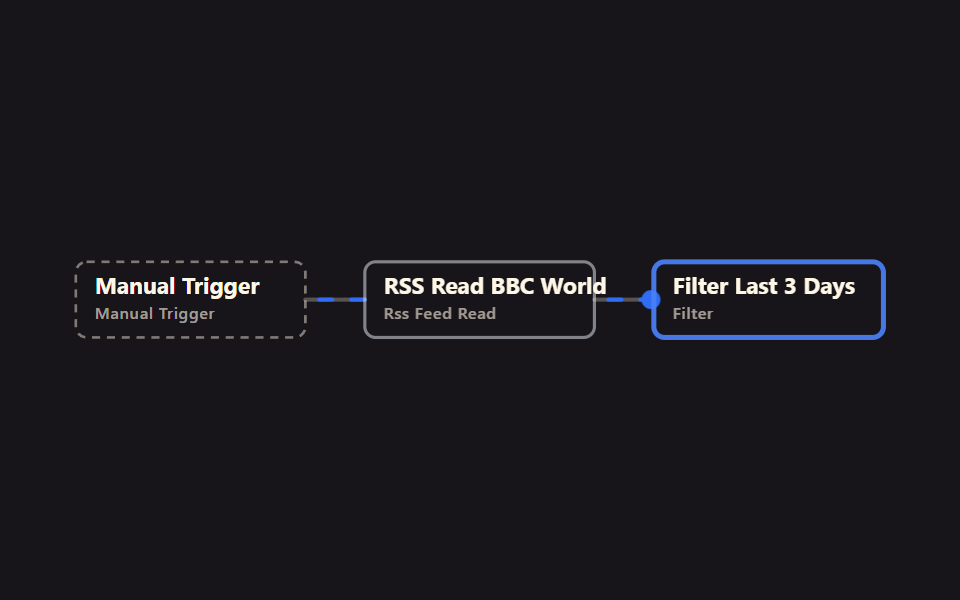 05 rss-date-range-filter
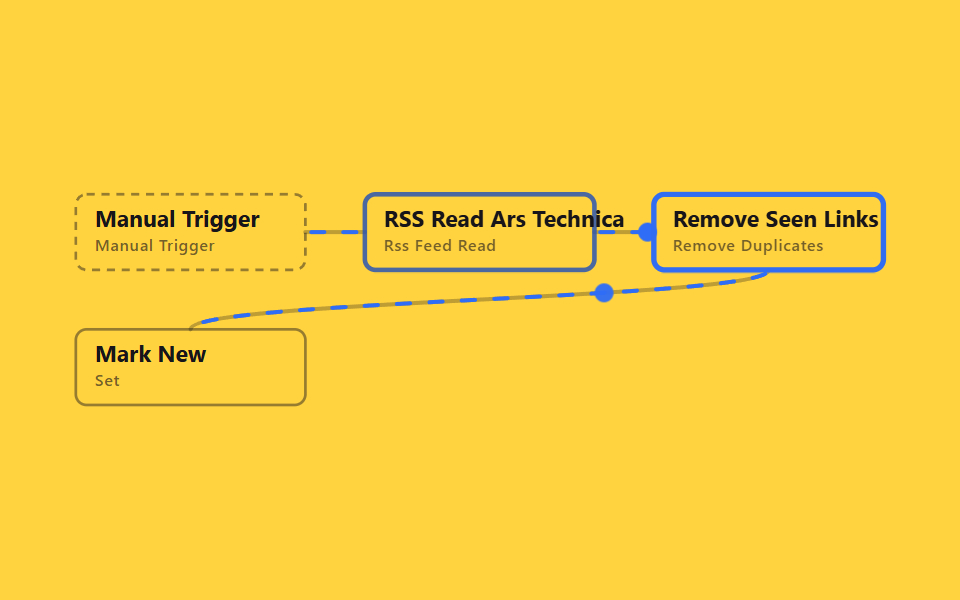 06 rss-dedupe-across-runs
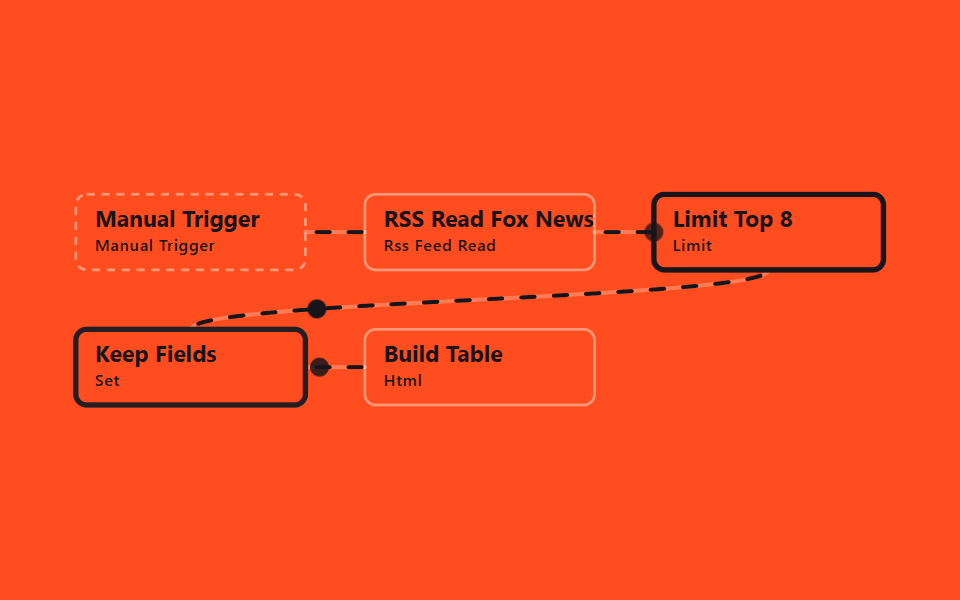 07 rss-digest-html-table
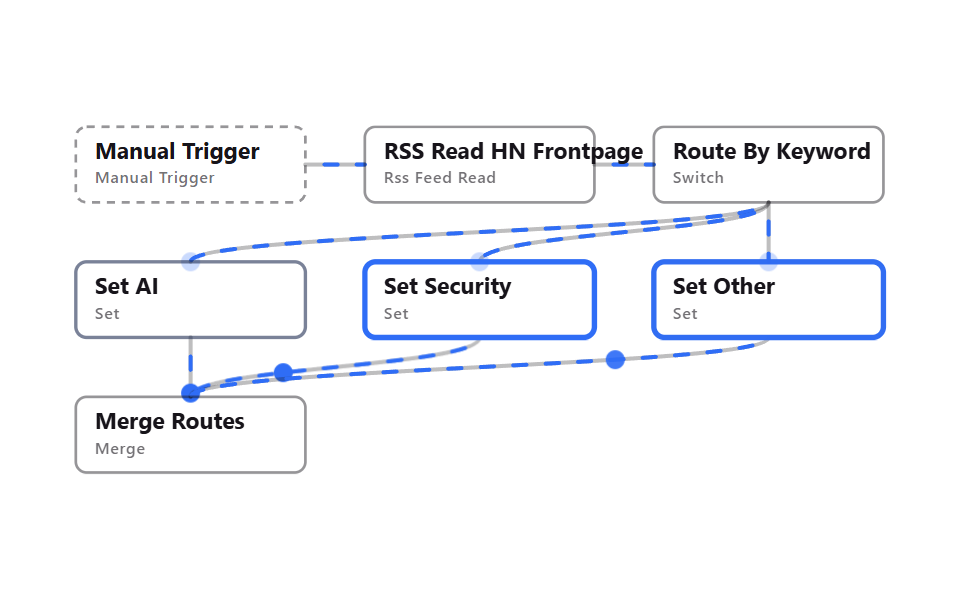 08 rss-route-keyword-switch
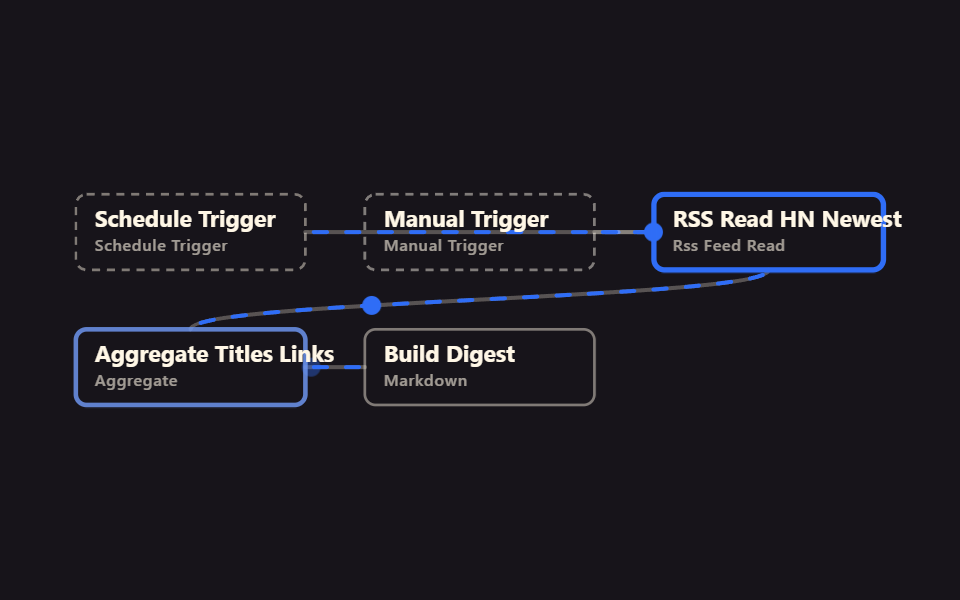 09 rss-scheduled-digest-delivery
Auto-plays · click a tile to jump to its section · all nine in one zip
- 01 Basic RSS read
- 02 Merge two RSS feeds, newest first
- 03 Summarize counts across feeds
- 04 Filter by keyword, keep top N
- 05 Keep only the last N days
- 06 Only new items across runs
- 07 A news digest as an HTML table
- 08 Route by keyword (Switch)
- 09 Scheduled digest delivery
These nine cover marketing automation fundamentals, arranged to match how a real monitoring habit grows. It starts with pulling in one source (01), then moves to two ways of combining sources (02 stitching a stream together, 03 counting by source separately), narrows things down two ways (04 by keyword, 05 by date), cleans the result two ways (06 removing repeats, 07 shaping a table), splits by condition once (08), and finally wraps all of that into something that runs on its own every day (09). A team usually adds these one at a time, in roughly this order, as manual news-checking turns into an automated habit. The pull-in side of this map widened to plain API calls is n8n No Code Automation, and the broad zero-account tour of workflow JSONs starts at 9 n8n Workflow Examples.
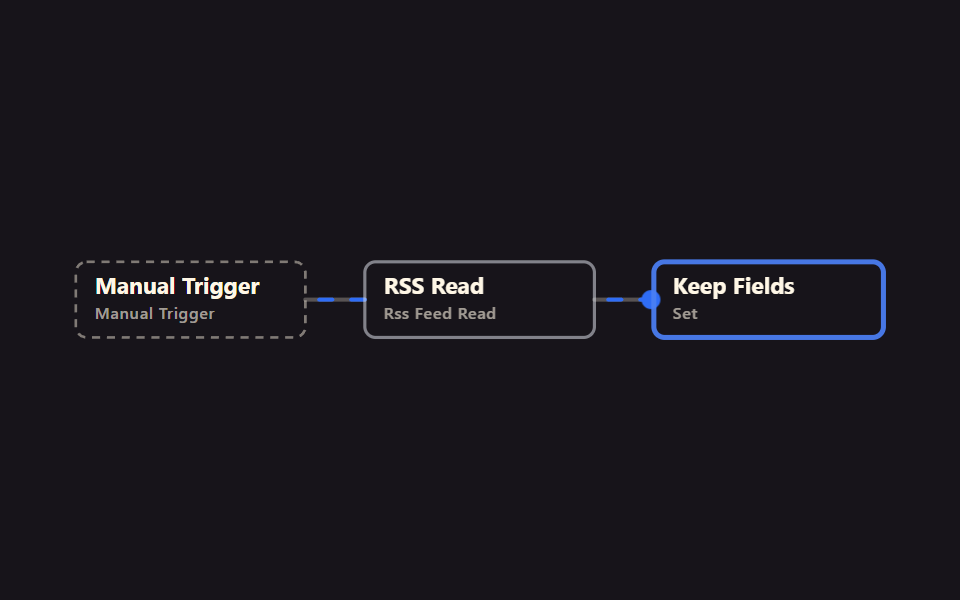
01Basic RSS read
What it automates
Instead of opening a site by hand to check for new posts, an RSS Read node pulls the latest list as-is, and a Set node keeps only the title, link, and date.
<main class="stage">
<svg class="flow" viewBox="-28 -28 654 112" xmlns="http://www.w3.org/2000/svg" role="img" aria-label="godrich 202-01 rss-read-basic">
<path class="edge" d="M170 28 C192 28 192 28 214 28"/>
<path class="edge edge--flow" style="--i:0" d="M170 28 C192 28 192 28 214 28"/>
<circle class="pulse" style="--i:0;offset-path:path('M170 28 C192 28 192 28 214 28')" r="7"/>
<path class="edge" d="M384 28 C406 28 406 28 428 28"/>
<path class="edge edge--flow" style="--i:1" d="M384 28 C406 28 406 28 428 28"/>
<circle class="pulse" style="--i:1;offset-path:path('M384 28 C406 28 406 28 428 28')" r="7"/>
<g class="node node--trigger" style="--i:0" transform="translate(0 0)"><rect class="node__box" width="170" height="56"/><text class="node__name" x="14" y="24">Manual Trigger</text><text class="node__type" x="14" y="42">Manual Trigger</text></g>
<g class="node" style="--i:1" transform="translate(214 0)"><rect class="node__box" width="170" height="56"/><text class="node__name" x="14" y="24">RSS Read</text><text class="node__type" x="14" y="42">Rss Feed Read</text></g>
<g class="node" style="--i:2" transform="translate(428 0)"><rect class="node__box" width="170" height="56"/><text class="node__name" x="14" y="24">Keep Fields</text><text class="node__type" x="14" y="42">Set</text></g>
</svg>
</main>
@use "../../../../site/static/demo-tokens" as *;
// ── 변수 3개 ──────────────────────────────────────────
$duration: $dur-loop; // 한 바퀴 (데모 2초와 같은 값 — gif 가 끊기지 않게)
$easing: linear; // 대시 흐름은 등속
$color: $subject-blue; // 강조(흐름·켜진 노드) 색
$ink: $subject-cream; // 글자·테두리
$n: 3; // 노드 수 — 켜지는 순서 간격
@include stage($stage-ink);
.flow { width: 100%; height: 100%; max-height: 100vh; display: block; overflow: visible; }
.edge { fill: none; stroke: $ink; stroke-opacity: .28; stroke-width: 3; stroke-linecap: round; }
.edge--flow { stroke: $color; stroke-opacity: 1; stroke-dasharray: 10 14; animation: flow $duration $easing infinite; }
@keyframes flow { to { stroke-dashoffset: -48; } }
.node__box { fill: transparent; stroke: $ink; stroke-opacity: .45; stroke-width: 2; rx: $r-sm; }
.node__name { fill: $ink; font-weight: 700; font-size: 17px; font-family: -apple-system, "Segoe UI", sans-serif; }
.node__type { fill: $ink; fill-opacity: .6; font-weight: 500; font-size: 12px; font-family: -apple-system, "Segoe UI", sans-serif; letter-spacing: .04em; }
.node--trigger .node__box { stroke-dasharray: 6 5; }
// 켜진 노드는 테두리가 강조색으로 두꺼워진다 (filter 대신 stroke — 렌더 비용). --i 는 <g> 에서 상속된다
.node .node__box { animation: box-lit $duration $ease-spring infinite; animation-delay: calc(var(--i) * #{$duration} / #{$n}); }
@keyframes box-lit {
0%, 100% { stroke: $ink; stroke-opacity: .45; stroke-width: 2; }
12%, 32% { stroke: $color; stroke-opacity: 1; stroke-width: 4; }
50% { stroke: $ink; stroke-opacity: .45; stroke-width: 2; }
}
.pulse { fill: $color; offset-distance: 0%; offset-rotate: 0deg; animation: travel $duration $ease-out infinite; animation-delay: calc(var(--i) * #{$duration} / #{$n}); }
@keyframes travel {
0% { offset-distance: 0%; opacity: 0; }
10% { opacity: 1; }
45% { offset-distance: 100%; opacity: 1; }
55%, 100% { offset-distance: 100%; opacity: 0; }
}
@media (prefers-reduced-motion: reduce) {
.edge--flow, .node, .node .node__box, .pulse { animation: none; }
.edge--flow { stroke-dasharray: none; } // 흐름은 멈추고 연결선만 남긴다
.pulse { display: none; }
}html, body {
margin: 0;
overflow: hidden;
}
.stage {
box-sizing: border-box;
min-height: 100vh;
display: grid;
place-items: center;
margin: 0;
background: #17141a;
font-family: -apple-system, "Segoe UI", "Noto Sans KR", sans-serif;
padding: clamp(8px, 4vw, 24px);
}
.flow {
width: 100%;
height: 100%;
max-height: 100vh;
display: block;
overflow: visible;
}
.edge {
fill: none;
stroke: #fff7e6;
stroke-opacity: 0.28;
stroke-width: 3;
stroke-linecap: round;
}
.edge--flow {
stroke: #2f6df6;
stroke-opacity: 1;
stroke-dasharray: 10 14;
animation: flow 2s linear infinite;
}
@keyframes flow {
to {
stroke-dashoffset: -48;
}
}
.node__box {
fill: transparent;
stroke: #fff7e6;
stroke-opacity: 0.45;
stroke-width: 2;
rx: 8px;
}
.node__name {
fill: #fff7e6;
font-weight: 700;
font-size: 17px;
font-family: -apple-system, "Segoe UI", sans-serif;
}
.node__type {
fill: #fff7e6;
fill-opacity: 0.6;
font-weight: 500;
font-size: 12px;
font-family: -apple-system, "Segoe UI", sans-serif;
letter-spacing: 0.04em;
}
.node--trigger .node__box {
stroke-dasharray: 6 5;
}
.node .node__box {
animation: box-lit 2s cubic-bezier(0.2, 0.8, 0.2, 1) infinite;
animation-delay: calc(var(--i) * 2s / 3);
}
@keyframes box-lit {
0%, 100% {
stroke: #fff7e6;
stroke-opacity: 0.45;
stroke-width: 2;
}
12%, 32% {
stroke: #2f6df6;
stroke-opacity: 1;
stroke-width: 4;
}
50% {
stroke: #fff7e6;
stroke-opacity: 0.45;
stroke-width: 2;
}
}
.pulse {
fill: #2f6df6;
offset-distance: 0%;
offset-rotate: 0deg;
animation: travel 2s ease-out infinite;
animation-delay: calc(var(--i) * 2s / 3);
}
@keyframes travel {
0% {
offset-distance: 0%;
opacity: 0;
}
10% {
opacity: 1;
}
45% {
offset-distance: 100%;
opacity: 1;
}
55%, 100% {
offset-distance: 100%;
opacity: 0;
}
}
@media (prefers-reduced-motion: reduce) {
.edge--flow, .node, .node .node__box, .pulse {
animation: none;
}
.edge--flow {
stroke-dasharray: none;
}
.pulse {
display: none;
}
}01 · Basic RSS read — Measured area 2.985% · moving frames 23/23Original by GODRICH · SCSS and React ship in the zip · See the password
In the workflow JSON
This is the shape to reach for when watching a favorite blog or taking a first step into automation — the simplest version before anything else gets added.
{
  "name": "Keep Fields",
  "type": "n8n-nodes-base.set",
  "typeVersion": 3.5,
  "parameters": {
    "mode": "manual",
    "assignments": {
      "assignments": [
        { "name": "title", "value": "={{ $json.title }}", "type": "string" },
        { "name": "link", "value": "={{ $json.link }}", "type": "string" },
        { "name": "pubDate", "value": "={{ $json.pubDate }}", "type": "string" }
      ]
    }
  }
}
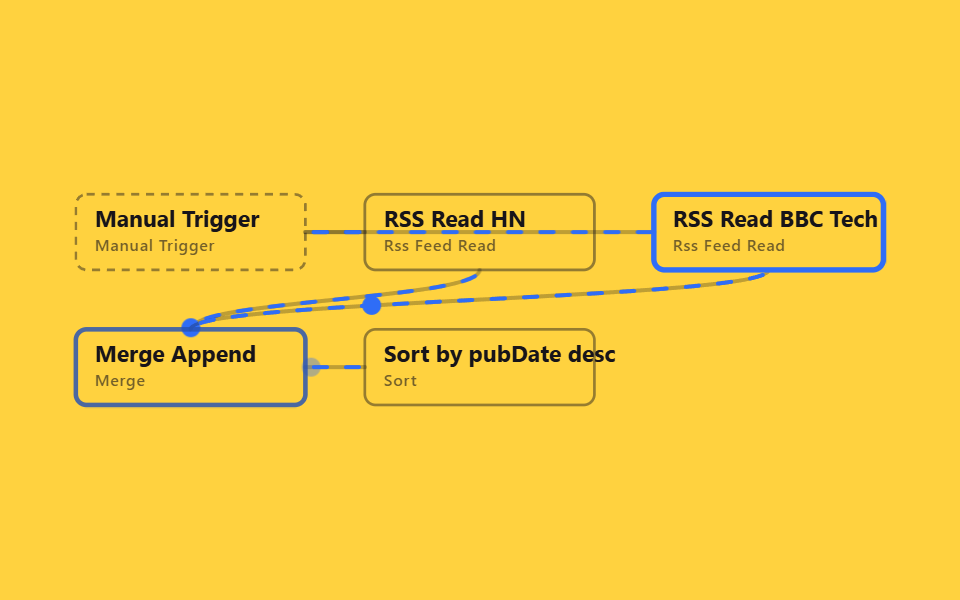
02Merge two RSS feeds, newest first
What it automates
Two RSS Read nodes pull from different sites, a Merge node in append mode stitches the streams into one, and Sort puts the newest posts first.
<main class="stage">
<svg class="flow" viewBox="-28 -28 654 212" xmlns="http://www.w3.org/2000/svg" role="img" aria-label="godrich 202-02 rss-merge-two-sources">
<path class="edge" d="M170 28 C192 28 192 28 214 28"/>
<path class="edge edge--flow" style="--i:0" d="M170 28 C192 28 192 28 214 28"/>
<circle class="pulse" style="--i:0;offset-path:path('M170 28 C192 28 192 28 214 28')" r="7"/>
<path class="edge" d="M170 28 C299 28 299 28 428 28"/>
<path class="edge edge--flow" style="--i:0" d="M170 28 C299 28 299 28 428 28"/>
<circle class="pulse" style="--i:0;offset-path:path('M170 28 C299 28 299 28 428 28')" r="7"/>
<path class="edge" d="M299 56 C299 78 85 78 85 100"/>
<path class="edge edge--flow" style="--i:1" d="M299 56 C299 78 85 78 85 100"/>
<circle class="pulse" style="--i:1;offset-path:path('M299 56 C299 78 85 78 85 100')" r="7"/>
<path class="edge" d="M513 56 C513 78 85 78 85 100"/>
<path class="edge edge--flow" style="--i:2" d="M513 56 C513 78 85 78 85 100"/>
<circle class="pulse" style="--i:2;offset-path:path('M513 56 C513 78 85 78 85 100')" r="7"/>
<path class="edge" d="M170 128 C192 128 192 128 214 128"/>
<path class="edge edge--flow" style="--i:3" d="M170 128 C192 128 192 128 214 128"/>
<circle class="pulse" style="--i:3;offset-path:path('M170 128 C192 128 192 128 214 128')" r="7"/>
<g class="node node--trigger" style="--i:0" transform="translate(0 0)"><rect class="node__box" width="170" height="56"/><text class="node__name" x="14" y="24">Manual Trigger</text><text class="node__type" x="14" y="42">Manual Trigger</text></g>
<g class="node" style="--i:1" transform="translate(214 0)"><rect class="node__box" width="170" height="56"/><text class="node__name" x="14" y="24">RSS Read HN</text><text class="node__type" x="14" y="42">Rss Feed Read</text></g>
<g class="node" style="--i:2" transform="translate(428 0)"><rect class="node__box" width="170" height="56"/><text class="node__name" x="14" y="24">RSS Read BBC Tech</text><text class="node__type" x="14" y="42">Rss Feed Read</text></g>
<g class="node" style="--i:3" transform="translate(0 100)"><rect class="node__box" width="170" height="56"/><text class="node__name" x="14" y="24">Merge Append</text><text class="node__type" x="14" y="42">Merge</text></g>
<g class="node" style="--i:4" transform="translate(214 100)"><rect class="node__box" width="170" height="56"/><text class="node__name" x="14" y="24">Sort by pubDate desc</text><text class="node__type" x="14" y="42">Sort</text></g>
</svg>
</main>
@use "../../../../site/static/demo-tokens" as *;
// ── 변수 3개 ──────────────────────────────────────────
$duration: $dur-loop; // 한 바퀴 (데모 2초와 같은 값 — gif 가 끊기지 않게)
$easing: linear; // 대시 흐름은 등속
$color: $subject-blue; // 강조(흐름·켜진 노드) 색
$ink: $subject-ink; // 글자·테두리
$n: 5; // 노드 수 — 켜지는 순서 간격
@include stage($stage-yellow);
.flow { width: 100%; height: 100%; max-height: 100vh; display: block; overflow: visible; }
.edge { fill: none; stroke: $ink; stroke-opacity: .28; stroke-width: 3; stroke-linecap: round; }
.edge--flow { stroke: $color; stroke-opacity: 1; stroke-dasharray: 10 14; animation: flow $duration $easing infinite; }
@keyframes flow { to { stroke-dashoffset: -48; } }
.node__box { fill: transparent; stroke: $ink; stroke-opacity: .45; stroke-width: 2; rx: $r-sm; }
.node__name { fill: $ink; font-weight: 700; font-size: 17px; font-family: -apple-system, "Segoe UI", sans-serif; }
.node__type { fill: $ink; fill-opacity: .6; font-weight: 500; font-size: 12px; font-family: -apple-system, "Segoe UI", sans-serif; letter-spacing: .04em; }
.node--trigger .node__box { stroke-dasharray: 6 5; }
// 켜진 노드는 테두리가 강조색으로 두꺼워진다 (filter 대신 stroke — 렌더 비용). --i 는 <g> 에서 상속된다
.node .node__box { animation: box-lit $duration $ease-spring infinite; animation-delay: calc(var(--i) * #{$duration} / #{$n}); }
@keyframes box-lit {
0%, 100% { stroke: $ink; stroke-opacity: .45; stroke-width: 2; }
12%, 32% { stroke: $color; stroke-opacity: 1; stroke-width: 4; }
50% { stroke: $ink; stroke-opacity: .45; stroke-width: 2; }
}
.pulse { fill: $color; offset-distance: 0%; offset-rotate: 0deg; animation: travel $duration $ease-out infinite; animation-delay: calc(var(--i) * #{$duration} / #{$n}); }
@keyframes travel {
0% { offset-distance: 0%; opacity: 0; }
10% { opacity: 1; }
45% { offset-distance: 100%; opacity: 1; }
55%, 100% { offset-distance: 100%; opacity: 0; }
}
@media (prefers-reduced-motion: reduce) {
.edge--flow, .node, .node .node__box, .pulse { animation: none; }
.edge--flow { stroke-dasharray: none; } // 흐름은 멈추고 연결선만 남긴다
.pulse { display: none; }
}html, body {
margin: 0;
overflow: hidden;
}
.stage {
box-sizing: border-box;
min-height: 100vh;
display: grid;
place-items: center;
margin: 0;
background: #ffd23f;
font-family: -apple-system, "Segoe UI", "Noto Sans KR", sans-serif;
padding: clamp(8px, 4vw, 24px);
}
.flow {
width: 100%;
height: 100%;
max-height: 100vh;
display: block;
overflow: visible;
}
.edge {
fill: none;
stroke: #17141a;
stroke-opacity: 0.28;
stroke-width: 3;
stroke-linecap: round;
}
.edge--flow {
stroke: #2f6df6;
stroke-opacity: 1;
stroke-dasharray: 10 14;
animation: flow 2s linear infinite;
}
@keyframes flow {
to {
stroke-dashoffset: -48;
}
}
.node__box {
fill: transparent;
stroke: #17141a;
stroke-opacity: 0.45;
stroke-width: 2;
rx: 8px;
}
.node__name {
fill: #17141a;
font-weight: 700;
font-size: 17px;
font-family: -apple-system, "Segoe UI", sans-serif;
}
.node__type {
fill: #17141a;
fill-opacity: 0.6;
font-weight: 500;
font-size: 12px;
font-family: -apple-system, "Segoe UI", sans-serif;
letter-spacing: 0.04em;
}
.node--trigger .node__box {
stroke-dasharray: 6 5;
}
.node .node__box {
animation: box-lit 2s cubic-bezier(0.2, 0.8, 0.2, 1) infinite;
animation-delay: calc(var(--i) * 2s / 5);
}
@keyframes box-lit {
0%, 100% {
stroke: #17141a;
stroke-opacity: 0.45;
stroke-width: 2;
}
12%, 32% {
stroke: #2f6df6;
stroke-opacity: 1;
stroke-width: 4;
}
50% {
stroke: #17141a;
stroke-opacity: 0.45;
stroke-width: 2;
}
}
.pulse {
fill: #2f6df6;
offset-distance: 0%;
offset-rotate: 0deg;
animation: travel 2s ease-out infinite;
animation-delay: calc(var(--i) * 2s / 5);
}
@keyframes travel {
0% {
offset-distance: 0%;
opacity: 0;
}
10% {
opacity: 1;
}
45% {
offset-distance: 100%;
opacity: 1;
}
55%, 100% {
offset-distance: 100%;
opacity: 0;
}
}
@media (prefers-reduced-motion: reduce) {
.edge--flow, .node, .node .node__box, .pulse {
animation: none;
}
.edge--flow {
stroke-dasharray: none;
}
.pulse {
display: none;
}
}02 · Merge two RSS feeds, newest first — Measured area 6.001% · moving frames 23/23Original by GODRICH · SCSS and React ship in the zip · See the password
In the workflow JSON
Once you're reading several outlets in one place or watching a competitor's blog alongside your own industry feed, a single source stops being enough.
{
  "name": "Merge Append",
  "type": "n8n-nodes-base.merge",
  "typeVersion": 3.2,
  "parameters": {
    "mode": "append",
    "numberInputs": 2
  }
}
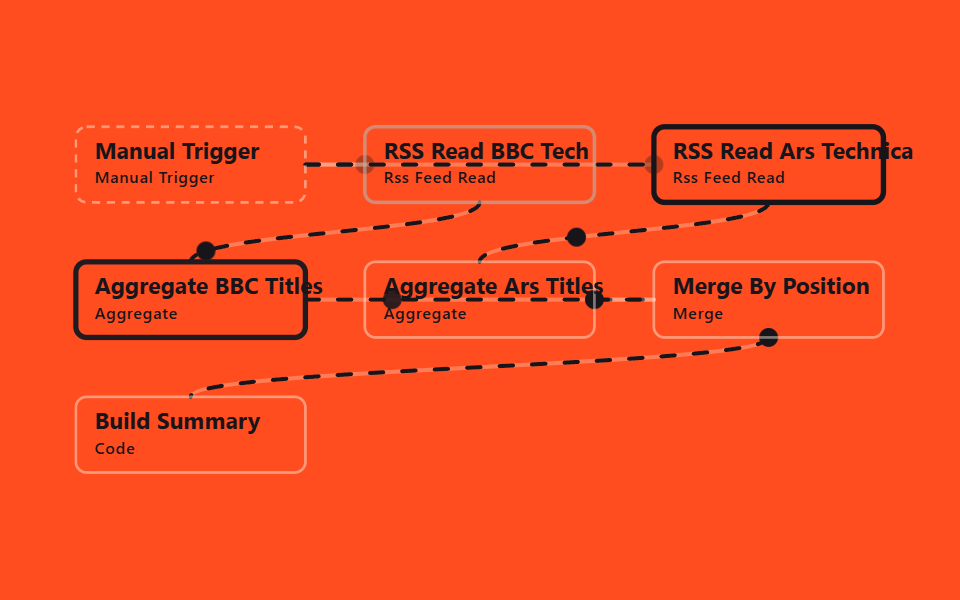
03Summarize counts across feeds
What it automates
Where item 02 blends two sources into one stream, this one keeps them apart: two Aggregate nodes collect titles per source, and a Code node builds a summary object with a count and top 3 titles for each.
<main class="stage">
<svg class="flow" viewBox="-28 -28 654 312" xmlns="http://www.w3.org/2000/svg" role="img" aria-label="godrich 202-03 rss-summarize-multi-feed">
<path class="edge" d="M170 28 C192 28 192 28 214 28"/>
<path class="edge edge--flow" style="--i:0" d="M170 28 C192 28 192 28 214 28"/>
<circle class="pulse" style="--i:0;offset-path:path('M170 28 C192 28 192 28 214 28')" r="7"/>
<path class="edge" d="M170 28 C299 28 299 28 428 28"/>
<path class="edge edge--flow" style="--i:0" d="M170 28 C299 28 299 28 428 28"/>
<circle class="pulse" style="--i:0;offset-path:path('M170 28 C299 28 299 28 428 28')" r="7"/>
<path class="edge" d="M299 56 C299 78 85 78 85 100"/>
<path class="edge edge--flow" style="--i:1" d="M299 56 C299 78 85 78 85 100"/>
<circle class="pulse" style="--i:1;offset-path:path('M299 56 C299 78 85 78 85 100')" r="7"/>
<path class="edge" d="M513 56 C513 78 299 78 299 100"/>
<path class="edge edge--flow" style="--i:2" d="M513 56 C513 78 299 78 299 100"/>
<circle class="pulse" style="--i:2;offset-path:path('M513 56 C513 78 299 78 299 100')" r="7"/>
<path class="edge" d="M170 128 C299 128 299 128 428 128"/>
<path class="edge edge--flow" style="--i:3" d="M170 128 C299 128 299 128 428 128"/>
<circle class="pulse" style="--i:3;offset-path:path('M170 128 C299 128 299 128 428 128')" r="7"/>
<path class="edge" d="M384 128 C406 128 406 128 428 128"/>
<path class="edge edge--flow" style="--i:4" d="M384 128 C406 128 406 128 428 128"/>
<circle class="pulse" style="--i:4;offset-path:path('M384 128 C406 128 406 128 428 128')" r="7"/>
<path class="edge" d="M513 156 C513 178 85 178 85 200"/>
<path class="edge edge--flow" style="--i:5" d="M513 156 C513 178 85 178 85 200"/>
<circle class="pulse" style="--i:5;offset-path:path('M513 156 C513 178 85 178 85 200')" r="7"/>
<g class="node node--trigger" style="--i:0" transform="translate(0 0)"><rect class="node__box" width="170" height="56"/><text class="node__name" x="14" y="24">Manual Trigger</text><text class="node__type" x="14" y="42">Manual Trigger</text></g>
<g class="node" style="--i:1" transform="translate(214 0)"><rect class="node__box" width="170" height="56"/><text class="node__name" x="14" y="24">RSS Read BBC Tech</text><text class="node__type" x="14" y="42">Rss Feed Read</text></g>
<g class="node" style="--i:2" transform="translate(428 0)"><rect class="node__box" width="170" height="56"/><text class="node__name" x="14" y="24">RSS Read Ars Technica</text><text class="node__type" x="14" y="42">Rss Feed Read</text></g>
<g class="node" style="--i:3" transform="translate(0 100)"><rect class="node__box" width="170" height="56"/><text class="node__name" x="14" y="24">Aggregate BBC Titles</text><text class="node__type" x="14" y="42">Aggregate</text></g>
<g class="node" style="--i:4" transform="translate(214 100)"><rect class="node__box" width="170" height="56"/><text class="node__name" x="14" y="24">Aggregate Ars Titles</text><text class="node__type" x="14" y="42">Aggregate</text></g>
<g class="node" style="--i:5" transform="translate(428 100)"><rect class="node__box" width="170" height="56"/><text class="node__name" x="14" y="24">Merge By Position</text><text class="node__type" x="14" y="42">Merge</text></g>
<g class="node" style="--i:6" transform="translate(0 200)"><rect class="node__box" width="170" height="56"/><text class="node__name" x="14" y="24">Build Summary</text><text class="node__type" x="14" y="42">Code</text></g>
</svg>
</main>@use "../../../../site/static/demo-tokens" as *;
// ── 변수 3개 ──────────────────────────────────────────
$duration: $dur-loop; // 한 바퀴 (데모 2초와 같은 값 — gif 가 끊기지 않게)
$easing: linear; // 대시 흐름은 등속
$color: $subject-ink; // 강조(흐름·켜진 노드) 색
$ink: $subject-cream; // 글자·테두리
$n: 7; // 노드 수 — 켜지는 순서 간격
@include stage($stage-orange);
.flow { width: 100%; height: 100%; max-height: 100vh; display: block; overflow: visible; }
.edge { fill: none; stroke: $ink; stroke-opacity: .28; stroke-width: 3; stroke-linecap: round; }
.edge--flow { stroke: $color; stroke-opacity: 1; stroke-dasharray: 10 14; animation: flow $duration $easing infinite; }
@keyframes flow { to { stroke-dashoffset: -48; } }
.node__box { fill: transparent; stroke: $ink; stroke-opacity: .45; stroke-width: 2; rx: $r-sm; }
.node__name { fill: $subject-ink; font-weight: 700; font-size: 17px; font-family: -apple-system, "Segoe UI", sans-serif; }
.node__type { fill: $subject-ink; fill-opacity: 1; font-weight: 500; font-size: 12px; font-family: -apple-system, "Segoe UI", sans-serif; letter-spacing: .04em; }
.node--trigger .node__box { stroke-dasharray: 6 5; }
// 켜진 노드는 테두리가 강조색으로 두꺼워진다 (filter 대신 stroke — 렌더 비용). --i 는 <g> 에서 상속된다
.node .node__box { animation: box-lit $duration $ease-spring infinite; animation-delay: calc(var(--i) * #{$duration} / #{$n}); }
@keyframes box-lit {
0%, 100% { stroke: $ink; stroke-opacity: .45; stroke-width: 2; }
12%, 32% { stroke: $color; stroke-opacity: 1; stroke-width: 4; }
50% { stroke: $ink; stroke-opacity: .45; stroke-width: 2; }
}
.pulse { fill: $color; offset-distance: 0%; offset-rotate: 0deg; animation: travel $duration $ease-out infinite; animation-delay: calc(var(--i) * #{$duration} / #{$n}); }
@keyframes travel {
0% { offset-distance: 0%; opacity: 0; }
10% { opacity: 1; }
45% { offset-distance: 100%; opacity: 1; }
55%, 100% { offset-distance: 100%; opacity: 0; }
}
@media (prefers-reduced-motion: reduce) {
.edge--flow, .node, .node .node__box, .pulse { animation: none; }
.edge--flow { stroke-dasharray: none; } // 흐름은 멈추고 연결선만 남긴다
.pulse { display: none; }
}html, body {
margin: 0;
overflow: hidden;
}
.stage {
box-sizing: border-box;
min-height: 100vh;
display: grid;
place-items: center;
margin: 0;
background: #ff4d1f;
font-family: -apple-system, "Segoe UI", "Noto Sans KR", sans-serif;
padding: clamp(8px, 4vw, 24px);
}
.flow {
width: 100%;
height: 100%;
max-height: 100vh;
display: block;
overflow: visible;
}
.edge {
fill: none;
stroke: #fff7e6;
stroke-opacity: 0.28;
stroke-width: 3;
stroke-linecap: round;
}
.edge--flow {
stroke: #17141a;
stroke-opacity: 1;
stroke-dasharray: 10 14;
animation: flow 2s linear infinite;
}
@keyframes flow {
to {
stroke-dashoffset: -48;
}
}
.node__box {
fill: transparent;
stroke: #fff7e6;
stroke-opacity: 0.45;
stroke-width: 2;
rx: 8px;
}
.node__name {
fill: #17141a;
font-weight: 700;
font-size: 17px;
font-family: -apple-system, "Segoe UI", sans-serif;
}
.node__type {
fill: #17141a;
fill-opacity: 1;
font-weight: 500;
font-size: 12px;
font-family: -apple-system, "Segoe UI", sans-serif;
letter-spacing: 0.04em;
}
.node--trigger .node__box {
stroke-dasharray: 6 5;
}
.node .node__box {
animation: box-lit 2s cubic-bezier(0.2, 0.8, 0.2, 1) infinite;
animation-delay: calc(var(--i) * 2s / 7);
}
@keyframes box-lit {
0%, 100% {
stroke: #fff7e6;
stroke-opacity: 0.45;
stroke-width: 2;
}
12%, 32% {
stroke: #17141a;
stroke-opacity: 1;
stroke-width: 4;
}
50% {
stroke: #fff7e6;
stroke-opacity: 0.45;
stroke-width: 2;
}
}
.pulse {
fill: #17141a;
offset-distance: 0%;
offset-rotate: 0deg;
animation: travel 2s ease-out infinite;
animation-delay: calc(var(--i) * 2s / 7);
}
@keyframes travel {
0% {
offset-distance: 0%;
opacity: 0;
}
10% {
opacity: 1;
}
45% {
offset-distance: 100%;
opacity: 1;
}
55%, 100% {
offset-distance: 100%;
opacity: 0;
}
}
@media (prefers-reduced-motion: reduce) {
.edge--flow, .node, .node .node__box, .pulse {
animation: none;
}
.edge--flow {
stroke-dasharray: none;
}
.pulse {
display: none;
}
}03 · Summarize counts across feeds — Measured area 9.442% · moving frames 23/23Original by GODRICH · SCSS and React ship in the zip · See the password
In the workflow JSON
It's built for comparing output per source or gathering material for a weekly report — counting separately beats mixing everything together.
{
  "name": "Build Summary",
  "type": "n8n-nodes-base.code",
  "typeVersion": 2,
  "parameters": {
    "jsCode": "const bbc = $json.bbcTitles || [];\nconst ars = $json.arsTitles || [];\nconst summary = {\n  bbc: { count: bbc.length, titles: bbc.slice(0, 3) },\n  ars: { count: ars.length, titles: ars.slice(0, 3) }\n};\nreturn [{ json: { summary } }];"
  }
}
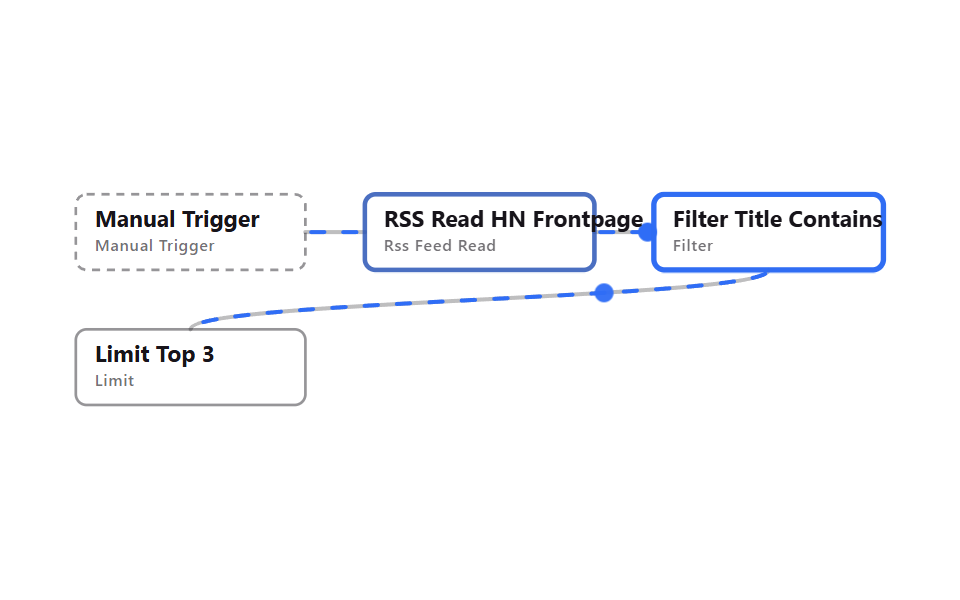
04Filter by keyword, keep top N
What it automates
A Filter node keeps only posts whose title contains a keyword (case-insensitive), and Limit trims that down to the top 3.
<main class="stage">
<svg class="flow" viewBox="-28 -28 654 212" xmlns="http://www.w3.org/2000/svg" role="img" aria-label="godrich 202-04 rss-filter-limit">
<path class="edge" d="M170 28 C192 28 192 28 214 28"/>
<path class="edge edge--flow" style="--i:0" d="M170 28 C192 28 192 28 214 28"/>
<circle class="pulse" style="--i:0;offset-path:path('M170 28 C192 28 192 28 214 28')" r="7"/>
<path class="edge" d="M384 28 C406 28 406 28 428 28"/>
<path class="edge edge--flow" style="--i:1" d="M384 28 C406 28 406 28 428 28"/>
<circle class="pulse" style="--i:1;offset-path:path('M384 28 C406 28 406 28 428 28')" r="7"/>
<path class="edge" d="M513 56 C513 78 85 78 85 100"/>
<path class="edge edge--flow" style="--i:2" d="M513 56 C513 78 85 78 85 100"/>
<circle class="pulse" style="--i:2;offset-path:path('M513 56 C513 78 85 78 85 100')" r="7"/>
<g class="node node--trigger" style="--i:0" transform="translate(0 0)"><rect class="node__box" width="170" height="56"/><text class="node__name" x="14" y="24">Manual Trigger</text><text class="node__type" x="14" y="42">Manual Trigger</text></g>
<g class="node" style="--i:1" transform="translate(214 0)"><rect class="node__box" width="170" height="56"/><text class="node__name" x="14" y="24">RSS Read HN Frontpage</text><text class="node__type" x="14" y="42">Rss Feed Read</text></g>
<g class="node" style="--i:2" transform="translate(428 0)"><rect class="node__box" width="170" height="56"/><text class="node__name" x="14" y="24">Filter Title Contains </text><text class="node__type" x="14" y="42">Filter</text></g>
<g class="node" style="--i:3" transform="translate(0 100)"><rect class="node__box" width="170" height="56"/><text class="node__name" x="14" y="24">Limit Top 3</text><text class="node__type" x="14" y="42">Limit</text></g>
</svg>
</main>
@use "../../../../site/static/demo-tokens" as *;
// ── 변수 3개 ──────────────────────────────────────────
$duration: $dur-loop; // 한 바퀴 (데모 2초와 같은 값 — gif 가 끊기지 않게)
$easing: linear; // 대시 흐름은 등속
$color: $subject-blue; // 강조(흐름·켜진 노드) 색
$ink: $subject-ink; // 글자·테두리
$n: 4; // 노드 수 — 켜지는 순서 간격
@include stage($stage-paper);
.flow { width: 100%; height: 100%; max-height: 100vh; display: block; overflow: visible; }
.edge { fill: none; stroke: $ink; stroke-opacity: .28; stroke-width: 3; stroke-linecap: round; }
.edge--flow { stroke: $color; stroke-opacity: 1; stroke-dasharray: 10 14; animation: flow $duration $easing infinite; }
@keyframes flow { to { stroke-dashoffset: -48; } }
.node__box { fill: transparent; stroke: $ink; stroke-opacity: .45; stroke-width: 2; rx: $r-sm; }
.node__name { fill: $ink; font-weight: 700; font-size: 17px; font-family: -apple-system, "Segoe UI", sans-serif; }
.node__type { fill: $ink; fill-opacity: .6; font-weight: 500; font-size: 12px; font-family: -apple-system, "Segoe UI", sans-serif; letter-spacing: .04em; }
.node--trigger .node__box { stroke-dasharray: 6 5; }
// 켜진 노드는 테두리가 강조색으로 두꺼워진다 (filter 대신 stroke — 렌더 비용). --i 는 <g> 에서 상속된다
.node .node__box { animation: box-lit $duration $ease-spring infinite; animation-delay: calc(var(--i) * #{$duration} / #{$n}); }
@keyframes box-lit {
0%, 100% { stroke: $ink; stroke-opacity: .45; stroke-width: 2; }
12%, 32% { stroke: $color; stroke-opacity: 1; stroke-width: 4; }
50% { stroke: $ink; stroke-opacity: .45; stroke-width: 2; }
}
.pulse { fill: $color; offset-distance: 0%; offset-rotate: 0deg; animation: travel $duration $ease-out infinite; animation-delay: calc(var(--i) * #{$duration} / #{$n}); }
@keyframes travel {
0% { offset-distance: 0%; opacity: 0; }
10% { opacity: 1; }
45% { offset-distance: 100%; opacity: 1; }
55%, 100% { offset-distance: 100%; opacity: 0; }
}
@media (prefers-reduced-motion: reduce) {
.edge--flow, .node, .node .node__box, .pulse { animation: none; }
.edge--flow { stroke-dasharray: none; } // 흐름은 멈추고 연결선만 남긴다
.pulse { display: none; }
}html, body {
margin: 0;
overflow: hidden;
}
.stage {
box-sizing: border-box;
min-height: 100vh;
display: grid;
place-items: center;
margin: 0;
background: #ffffff;
font-family: -apple-system, "Segoe UI", "Noto Sans KR", sans-serif;
padding: clamp(8px, 4vw, 24px);
}
.flow {
width: 100%;
height: 100%;
max-height: 100vh;
display: block;
overflow: visible;
}
.edge {
fill: none;
stroke: #17141a;
stroke-opacity: 0.28;
stroke-width: 3;
stroke-linecap: round;
}
.edge--flow {
stroke: #2f6df6;
stroke-opacity: 1;
stroke-dasharray: 10 14;
animation: flow 2s linear infinite;
}
@keyframes flow {
to {
stroke-dashoffset: -48;
}
}
.node__box {
fill: transparent;
stroke: #17141a;
stroke-opacity: 0.45;
stroke-width: 2;
rx: 8px;
}
.node__name {
fill: #17141a;
font-weight: 700;
font-size: 17px;
font-family: -apple-system, "Segoe UI", sans-serif;
}
.node__type {
fill: #17141a;
fill-opacity: 0.6;
font-weight: 500;
font-size: 12px;
font-family: -apple-system, "Segoe UI", sans-serif;
letter-spacing: 0.04em;
}
.node--trigger .node__box {
stroke-dasharray: 6 5;
}
.node .node__box {
animation: box-lit 2s cubic-bezier(0.2, 0.8, 0.2, 1) infinite;
animation-delay: calc(var(--i) * 2s / 4);
}
@keyframes box-lit {
0%, 100% {
stroke: #17141a;
stroke-opacity: 0.45;
stroke-width: 2;
}
12%, 32% {
stroke: #2f6df6;
stroke-opacity: 1;
stroke-width: 4;
}
50% {
stroke: #17141a;
stroke-opacity: 0.45;
stroke-width: 2;
}
}
.pulse {
fill: #2f6df6;
offset-distance: 0%;
offset-rotate: 0deg;
animation: travel 2s ease-out infinite;
animation-delay: calc(var(--i) * 2s / 4);
}
@keyframes travel {
0% {
offset-distance: 0%;
opacity: 0;
}
10% {
opacity: 1;
}
45% {
offset-distance: 100%;
opacity: 1;
}
55%, 100% {
offset-distance: 100%;
opacity: 0;
}
}
@media (prefers-reduced-motion: reduce) {
.edge--flow, .node, .node .node__box, .pulse {
animation: none;
}
.edge--flow {
stroke-dasharray: none;
}
.pulse {
display: none;
}
}04 · Filter by keyword, keep top N — Measured area 4.888% · moving frames 23/23Original by GODRICH · SCSS and React ship in the zip · See the password
In the workflow JSON
When the goal is getting alerts for one topic only and cutting the noise, narrowing first beats forwarding everything and sorting later.
{
  "conditions": {
    "options": { "caseSensitive": false, "version": 2 },
    "conditions": [
      {
        "leftValue": "={{ $json.title }}",
        "rightValue": "ai",
        "operator": { "type": "string", "operation": "contains" }
      }
    ],
    "combinator": "and"
  }
}
05Keep only the last N days
What it automates
Filter compares pubDate against now minus 3 days using the dateTime condition's after operator, keeping only recent posts.
<main class="stage">
<svg class="flow" viewBox="-28 -28 654 112" xmlns="http://www.w3.org/2000/svg" role="img" aria-label="godrich 202-05 rss-date-range-filter">
<path class="edge" d="M170 28 C192 28 192 28 214 28"/>
<path class="edge edge--flow" style="--i:0" d="M170 28 C192 28 192 28 214 28"/>
<circle class="pulse" style="--i:0;offset-path:path('M170 28 C192 28 192 28 214 28')" r="7"/>
<path class="edge" d="M384 28 C406 28 406 28 428 28"/>
<path class="edge edge--flow" style="--i:1" d="M384 28 C406 28 406 28 428 28"/>
<circle class="pulse" style="--i:1;offset-path:path('M384 28 C406 28 406 28 428 28')" r="7"/>
<g class="node node--trigger" style="--i:0" transform="translate(0 0)"><rect class="node__box" width="170" height="56"/><text class="node__name" x="14" y="24">Manual Trigger</text><text class="node__type" x="14" y="42">Manual Trigger</text></g>
<g class="node" style="--i:1" transform="translate(214 0)"><rect class="node__box" width="170" height="56"/><text class="node__name" x="14" y="24">RSS Read BBC World</text><text class="node__type" x="14" y="42">Rss Feed Read</text></g>
<g class="node" style="--i:2" transform="translate(428 0)"><rect class="node__box" width="170" height="56"/><text class="node__name" x="14" y="24">Filter Last 3 Days</text><text class="node__type" x="14" y="42">Filter</text></g>
</svg>
</main>
@use "../../../../site/static/demo-tokens" as *;
// ── 변수 3개 ──────────────────────────────────────────
$duration: $dur-loop; // 한 바퀴 (데모 2초와 같은 값 — gif 가 끊기지 않게)
$easing: linear; // 대시 흐름은 등속
$color: $subject-blue; // 강조(흐름·켜진 노드) 색
$ink: $subject-cream; // 글자·테두리
$n: 3; // 노드 수 — 켜지는 순서 간격
@include stage($stage-ink);
.flow { width: 100%; height: 100%; max-height: 100vh; display: block; overflow: visible; }
.edge { fill: none; stroke: $ink; stroke-opacity: .28; stroke-width: 3; stroke-linecap: round; }
.edge--flow { stroke: $color; stroke-opacity: 1; stroke-dasharray: 10 14; animation: flow $duration $easing infinite; }
@keyframes flow { to { stroke-dashoffset: -48; } }
.node__box { fill: transparent; stroke: $ink; stroke-opacity: .45; stroke-width: 2; rx: $r-sm; }
.node__name { fill: $ink; font-weight: 700; font-size: 17px; font-family: -apple-system, "Segoe UI", sans-serif; }
.node__type { fill: $ink; fill-opacity: .6; font-weight: 500; font-size: 12px; font-family: -apple-system, "Segoe UI", sans-serif; letter-spacing: .04em; }
.node--trigger .node__box { stroke-dasharray: 6 5; }
// 켜진 노드는 테두리가 강조색으로 두꺼워진다 (filter 대신 stroke — 렌더 비용). --i 는 <g> 에서 상속된다
.node .node__box { animation: box-lit $duration $ease-spring infinite; animation-delay: calc(var(--i) * #{$duration} / #{$n}); }
@keyframes box-lit {
0%, 100% { stroke: $ink; stroke-opacity: .45; stroke-width: 2; }
12%, 32% { stroke: $color; stroke-opacity: 1; stroke-width: 4; }
50% { stroke: $ink; stroke-opacity: .45; stroke-width: 2; }
}
.pulse { fill: $color; offset-distance: 0%; offset-rotate: 0deg; animation: travel $duration $ease-out infinite; animation-delay: calc(var(--i) * #{$duration} / #{$n}); }
@keyframes travel {
0% { offset-distance: 0%; opacity: 0; }
10% { opacity: 1; }
45% { offset-distance: 100%; opacity: 1; }
55%, 100% { offset-distance: 100%; opacity: 0; }
}
@media (prefers-reduced-motion: reduce) {
.edge--flow, .node, .node .node__box, .pulse { animation: none; }
.edge--flow { stroke-dasharray: none; } // 흐름은 멈추고 연결선만 남긴다
.pulse { display: none; }
}html, body {
margin: 0;
overflow: hidden;
}
.stage {
box-sizing: border-box;
min-height: 100vh;
display: grid;
place-items: center;
margin: 0;
background: #17141a;
font-family: -apple-system, "Segoe UI", "Noto Sans KR", sans-serif;
padding: clamp(8px, 4vw, 24px);
}
.flow {
width: 100%;
height: 100%;
max-height: 100vh;
display: block;
overflow: visible;
}
.edge {
fill: none;
stroke: #fff7e6;
stroke-opacity: 0.28;
stroke-width: 3;
stroke-linecap: round;
}
.edge--flow {
stroke: #2f6df6;
stroke-opacity: 1;
stroke-dasharray: 10 14;
animation: flow 2s linear infinite;
}
@keyframes flow {
to {
stroke-dashoffset: -48;
}
}
.node__box {
fill: transparent;
stroke: #fff7e6;
stroke-opacity: 0.45;
stroke-width: 2;
rx: 8px;
}
.node__name {
fill: #fff7e6;
font-weight: 700;
font-size: 17px;
font-family: -apple-system, "Segoe UI", sans-serif;
}
.node__type {
fill: #fff7e6;
fill-opacity: 0.6;
font-weight: 500;
font-size: 12px;
font-family: -apple-system, "Segoe UI", sans-serif;
letter-spacing: 0.04em;
}
.node--trigger .node__box {
stroke-dasharray: 6 5;
}
.node .node__box {
animation: box-lit 2s cubic-bezier(0.2, 0.8, 0.2, 1) infinite;
animation-delay: calc(var(--i) * 2s / 3);
}
@keyframes box-lit {
0%, 100% {
stroke: #fff7e6;
stroke-opacity: 0.45;
stroke-width: 2;
}
12%, 32% {
stroke: #2f6df6;
stroke-opacity: 1;
stroke-width: 4;
}
50% {
stroke: #fff7e6;
stroke-opacity: 0.45;
stroke-width: 2;
}
}
.pulse {
fill: #2f6df6;
offset-distance: 0%;
offset-rotate: 0deg;
animation: travel 2s ease-out infinite;
animation-delay: calc(var(--i) * 2s / 3);
}
@keyframes travel {
0% {
offset-distance: 0%;
opacity: 0;
}
10% {
opacity: 1;
}
45% {
offset-distance: 100%;
opacity: 1;
}
55%, 100% {
offset-distance: 100%;
opacity: 0;
}
}
@media (prefers-reduced-motion: reduce) {
.edge--flow, .node, .node .node__box, .pulse {
animation: none;
}
.edge--flow {
stroke-dasharray: none;
}
.pulse {
display: none;
}
}05 · Keep only the last N days — Measured area 2.972% · moving frames 23/23Original by GODRICH · SCSS and React ship in the zip · See the password
In the workflow JSON
For excluding stale posts from a weekly roundup and keeping things fresh, filtering by date alone is enough — no keyword needed.
{
  "conditions": [
    {
      "leftValue": "={{ $json.pubDate }}",
      "rightValue": "={{ $now.minus({ days: 3 }) }}",
      "operator": { "type": "dateTime", "operation": "after" }
    }
  ],
  "combinator": "and"
}
06Only new items across runs
What it automates
Remove Duplicates' Remove Items Processed in Previous Executions operation filters out links already seen in an earlier run, and Set stamps the survivors with isNew.
<main class="stage">
<svg class="flow" viewBox="-28 -28 654 212" xmlns="http://www.w3.org/2000/svg" role="img" aria-label="godrich 202-06 rss-dedupe-across-runs">
<path class="edge" d="M170 28 C192 28 192 28 214 28"/>
<path class="edge edge--flow" style="--i:0" d="M170 28 C192 28 192 28 214 28"/>
<circle class="pulse" style="--i:0;offset-path:path('M170 28 C192 28 192 28 214 28')" r="7"/>
<path class="edge" d="M384 28 C406 28 406 28 428 28"/>
<path class="edge edge--flow" style="--i:1" d="M384 28 C406 28 406 28 428 28"/>
<circle class="pulse" style="--i:1;offset-path:path('M384 28 C406 28 406 28 428 28')" r="7"/>
<path class="edge" d="M513 56 C513 78 85 78 85 100"/>
<path class="edge edge--flow" style="--i:2" d="M513 56 C513 78 85 78 85 100"/>
<circle class="pulse" style="--i:2;offset-path:path('M513 56 C513 78 85 78 85 100')" r="7"/>
<g class="node node--trigger" style="--i:0" transform="translate(0 0)"><rect class="node__box" width="170" height="56"/><text class="node__name" x="14" y="24">Manual Trigger</text><text class="node__type" x="14" y="42">Manual Trigger</text></g>
<g class="node" style="--i:1" transform="translate(214 0)"><rect class="node__box" width="170" height="56"/><text class="node__name" x="14" y="24">RSS Read Ars Technica</text><text class="node__type" x="14" y="42">Rss Feed Read</text></g>
<g class="node" style="--i:2" transform="translate(428 0)"><rect class="node__box" width="170" height="56"/><text class="node__name" x="14" y="24">Remove Seen Links</text><text class="node__type" x="14" y="42">Remove Duplicates</text></g>
<g class="node" style="--i:3" transform="translate(0 100)"><rect class="node__box" width="170" height="56"/><text class="node__name" x="14" y="24">Mark New</text><text class="node__type" x="14" y="42">Set</text></g>
</svg>
</main>
@use "../../../../site/static/demo-tokens" as *;
// ── 변수 3개 ──────────────────────────────────────────
$duration: $dur-loop; // 한 바퀴 (데모 2초와 같은 값 — gif 가 끊기지 않게)
$easing: linear; // 대시 흐름은 등속
$color: $subject-blue; // 강조(흐름·켜진 노드) 색
$ink: $subject-ink; // 글자·테두리
$n: 4; // 노드 수 — 켜지는 순서 간격
@include stage($stage-yellow);
.flow { width: 100%; height: 100%; max-height: 100vh; display: block; overflow: visible; }
.edge { fill: none; stroke: $ink; stroke-opacity: .28; stroke-width: 3; stroke-linecap: round; }
.edge--flow { stroke: $color; stroke-opacity: 1; stroke-dasharray: 10 14; animation: flow $duration $easing infinite; }
@keyframes flow { to { stroke-dashoffset: -48; } }
.node__box { fill: transparent; stroke: $ink; stroke-opacity: .45; stroke-width: 2; rx: $r-sm; }
.node__name { fill: $ink; font-weight: 700; font-size: 17px; font-family: -apple-system, "Segoe UI", sans-serif; }
.node__type { fill: $ink; fill-opacity: .6; font-weight: 500; font-size: 12px; font-family: -apple-system, "Segoe UI", sans-serif; letter-spacing: .04em; }
.node--trigger .node__box { stroke-dasharray: 6 5; }
// 켜진 노드는 테두리가 강조색으로 두꺼워진다 (filter 대신 stroke — 렌더 비용). --i 는 <g> 에서 상속된다
.node .node__box { animation: box-lit $duration $ease-spring infinite; animation-delay: calc(var(--i) * #{$duration} / #{$n}); }
@keyframes box-lit {
0%, 100% { stroke: $ink; stroke-opacity: .45; stroke-width: 2; }
12%, 32% { stroke: $color; stroke-opacity: 1; stroke-width: 4; }
50% { stroke: $ink; stroke-opacity: .45; stroke-width: 2; }
}
.pulse { fill: $color; offset-distance: 0%; offset-rotate: 0deg; animation: travel $duration $ease-out infinite; animation-delay: calc(var(--i) * #{$duration} / #{$n}); }
@keyframes travel {
0% { offset-distance: 0%; opacity: 0; }
10% { opacity: 1; }
45% { offset-distance: 100%; opacity: 1; }
55%, 100% { offset-distance: 100%; opacity: 0; }
}
@media (prefers-reduced-motion: reduce) {
.edge--flow, .node, .node .node__box, .pulse { animation: none; }
.edge--flow { stroke-dasharray: none; } // 흐름은 멈추고 연결선만 남긴다
.pulse { display: none; }
}html, body {
margin: 0;
overflow: hidden;
}
.stage {
box-sizing: border-box;
min-height: 100vh;
display: grid;
place-items: center;
margin: 0;
background: #ffd23f;
font-family: -apple-system, "Segoe UI", "Noto Sans KR", sans-serif;
padding: clamp(8px, 4vw, 24px);
}
.flow {
width: 100%;
height: 100%;
max-height: 100vh;
display: block;
overflow: visible;
}
.edge {
fill: none;
stroke: #17141a;
stroke-opacity: 0.28;
stroke-width: 3;
stroke-linecap: round;
}
.edge--flow {
stroke: #2f6df6;
stroke-opacity: 1;
stroke-dasharray: 10 14;
animation: flow 2s linear infinite;
}
@keyframes flow {
to {
stroke-dashoffset: -48;
}
}
.node__box {
fill: transparent;
stroke: #17141a;
stroke-opacity: 0.45;
stroke-width: 2;
rx: 8px;
}
.node__name {
fill: #17141a;
font-weight: 700;
font-size: 17px;
font-family: -apple-system, "Segoe UI", sans-serif;
}
.node__type {
fill: #17141a;
fill-opacity: 0.6;
font-weight: 500;
font-size: 12px;
font-family: -apple-system, "Segoe UI", sans-serif;
letter-spacing: 0.04em;
}
.node--trigger .node__box {
stroke-dasharray: 6 5;
}
.node .node__box {
animation: box-lit 2s cubic-bezier(0.2, 0.8, 0.2, 1) infinite;
animation-delay: calc(var(--i) * 2s / 4);
}
@keyframes box-lit {
0%, 100% {
stroke: #17141a;
stroke-opacity: 0.45;
stroke-width: 2;
}
12%, 32% {
stroke: #2f6df6;
stroke-opacity: 1;
stroke-width: 4;
}
50% {
stroke: #17141a;
stroke-opacity: 0.45;
stroke-width: 2;
}
}
.pulse {
fill: #2f6df6;
offset-distance: 0%;
offset-rotate: 0deg;
animation: travel 2s ease-out infinite;
animation-delay: calc(var(--i) * 2s / 4);
}
@keyframes travel {
0% {
offset-distance: 0%;
opacity: 0;
}
10% {
opacity: 1;
}
45% {
offset-distance: 100%;
opacity: 1;
}
55%, 100% {
offset-distance: 100%;
opacity: 0;
}
}
@media (prefers-reduced-motion: reduce) {
.edge--flow, .node, .node .node__box, .pulse {
animation: none;
}
.edge--flow {
stroke-dasharray: none;
}
.pulse {
display: none;
}
}06 · Only new items across runs — Measured area 4.796% · moving frames 23/23Original by GODRICH · SCSS and React ship in the zip · See the password
In the workflow JSON
If the point is running the same schedule daily without repeat alerts, dedupe inside a single run isn't enough — this remembers across executions instead.
{
  "name": "Remove Seen Links",
  "type": "n8n-nodes-base.removeDuplicates",
  "typeVersion": 2,
  "parameters": {
    "operation": "removeItemsSeenInPreviousExecutions",
    "logic": "removeItemsWithAlreadySeenKeyValues",
    "dedupeValue": "={{ $json.link }}",
    "options": { "scope": "workflow" }
  }
}
07A news digest as an HTML table
What it automates
Limit keeps the first 8 items, then the HTML node's Convert to HTML Table operation turns them straight into a table.
<main class="stage">
<svg class="flow" viewBox="-28 -28 654 212" xmlns="http://www.w3.org/2000/svg" role="img" aria-label="godrich 202-07 rss-digest-html-table">
<path class="edge" d="M170 28 C192 28 192 28 214 28"/>
<path class="edge edge--flow" style="--i:0" d="M170 28 C192 28 192 28 214 28"/>
<circle class="pulse" style="--i:0;offset-path:path('M170 28 C192 28 192 28 214 28')" r="7"/>
<path class="edge" d="M384 28 C406 28 406 28 428 28"/>
<path class="edge edge--flow" style="--i:1" d="M384 28 C406 28 406 28 428 28"/>
<circle class="pulse" style="--i:1;offset-path:path('M384 28 C406 28 406 28 428 28')" r="7"/>
<path class="edge" d="M513 56 C513 78 85 78 85 100"/>
<path class="edge edge--flow" style="--i:2" d="M513 56 C513 78 85 78 85 100"/>
<circle class="pulse" style="--i:2;offset-path:path('M513 56 C513 78 85 78 85 100')" r="7"/>
<path class="edge" d="M170 128 C192 128 192 128 214 128"/>
<path class="edge edge--flow" style="--i:3" d="M170 128 C192 128 192 128 214 128"/>
<circle class="pulse" style="--i:3;offset-path:path('M170 128 C192 128 192 128 214 128')" r="7"/>
<g class="node node--trigger" style="--i:0" transform="translate(0 0)"><rect class="node__box" width="170" height="56"/><text class="node__name" x="14" y="24">Manual Trigger</text><text class="node__type" x="14" y="42">Manual Trigger</text></g>
<g class="node" style="--i:1" transform="translate(214 0)"><rect class="node__box" width="170" height="56"/><text class="node__name" x="14" y="24">RSS Read Fox News</text><text class="node__type" x="14" y="42">Rss Feed Read</text></g>
<g class="node" style="--i:2" transform="translate(428 0)"><rect class="node__box" width="170" height="56"/><text class="node__name" x="14" y="24">Limit Top 8</text><text class="node__type" x="14" y="42">Limit</text></g>
<g class="node" style="--i:3" transform="translate(0 100)"><rect class="node__box" width="170" height="56"/><text class="node__name" x="14" y="24">Keep Fields</text><text class="node__type" x="14" y="42">Set</text></g>
<g class="node" style="--i:4" transform="translate(214 100)"><rect class="node__box" width="170" height="56"/><text class="node__name" x="14" y="24">Build Table</text><text class="node__type" x="14" y="42">Html</text></g>
</svg>
</main>
@use "../../../../site/static/demo-tokens" as *;
// ── 변수 3개 ──────────────────────────────────────────
$duration: $dur-loop; // 한 바퀴 (데모 2초와 같은 값 — gif 가 끊기지 않게)
$easing: linear; // 대시 흐름은 등속
$color: $subject-ink; // 강조(흐름·켜진 노드) 색
$ink: $subject-cream; // 글자·테두리
$n: 5; // 노드 수 — 켜지는 순서 간격
@include stage($stage-orange);
.flow { width: 100%; height: 100%; max-height: 100vh; display: block; overflow: visible; }
.edge { fill: none; stroke: $ink; stroke-opacity: .28; stroke-width: 3; stroke-linecap: round; }
.edge--flow { stroke: $color; stroke-opacity: 1; stroke-dasharray: 10 14; animation: flow $duration $easing infinite; }
@keyframes flow { to { stroke-dashoffset: -48; } }
.node__box { fill: transparent; stroke: $ink; stroke-opacity: .45; stroke-width: 2; rx: $r-sm; }
.node__name { fill: $subject-ink; font-weight: 700; font-size: 17px; font-family: -apple-system, "Segoe UI", sans-serif; }
.node__type { fill: $subject-ink; fill-opacity: 1; font-weight: 500; font-size: 12px; font-family: -apple-system, "Segoe UI", sans-serif; letter-spacing: .04em; }
.node--trigger .node__box { stroke-dasharray: 6 5; }
// 켜진 노드는 테두리가 강조색으로 두꺼워진다 (filter 대신 stroke — 렌더 비용). --i 는 <g> 에서 상속된다
.node .node__box { animation: box-lit $duration $ease-spring infinite; animation-delay: calc(var(--i) * #{$duration} / #{$n}); }
@keyframes box-lit {
0%, 100% { stroke: $ink; stroke-opacity: .45; stroke-width: 2; }
12%, 32% { stroke: $color; stroke-opacity: 1; stroke-width: 4; }
50% { stroke: $ink; stroke-opacity: .45; stroke-width: 2; }
}
.pulse { fill: $color; offset-distance: 0%; offset-rotate: 0deg; animation: travel $duration $ease-out infinite; animation-delay: calc(var(--i) * #{$duration} / #{$n}); }
@keyframes travel {
0% { offset-distance: 0%; opacity: 0; }
10% { opacity: 1; }
45% { offset-distance: 100%; opacity: 1; }
55%, 100% { offset-distance: 100%; opacity: 0; }
}
@media (prefers-reduced-motion: reduce) {
.edge--flow, .node, .node .node__box, .pulse { animation: none; }
.edge--flow { stroke-dasharray: none; } // 흐름은 멈추고 연결선만 남긴다
.pulse { display: none; }
}html, body {
margin: 0;
overflow: hidden;
}
.stage {
box-sizing: border-box;
min-height: 100vh;
display: grid;
place-items: center;
margin: 0;
background: #ff4d1f;
font-family: -apple-system, "Segoe UI", "Noto Sans KR", sans-serif;
padding: clamp(8px, 4vw, 24px);
}
.flow {
width: 100%;
height: 100%;
max-height: 100vh;
display: block;
overflow: visible;
}
.edge {
fill: none;
stroke: #fff7e6;
stroke-opacity: 0.28;
stroke-width: 3;
stroke-linecap: round;
}
.edge--flow {
stroke: #17141a;
stroke-opacity: 1;
stroke-dasharray: 10 14;
animation: flow 2s linear infinite;
}
@keyframes flow {
to {
stroke-dashoffset: -48;
}
}
.node__box {
fill: transparent;
stroke: #fff7e6;
stroke-opacity: 0.45;
stroke-width: 2;
rx: 8px;
}
.node__name {
fill: #17141a;
font-weight: 700;
font-size: 17px;
font-family: -apple-system, "Segoe UI", sans-serif;
}
.node__type {
fill: #17141a;
fill-opacity: 1;
font-weight: 500;
font-size: 12px;
font-family: -apple-system, "Segoe UI", sans-serif;
letter-spacing: 0.04em;
}
.node--trigger .node__box {
stroke-dasharray: 6 5;
}
.node .node__box {
animation: box-lit 2s cubic-bezier(0.2, 0.8, 0.2, 1) infinite;
animation-delay: calc(var(--i) * 2s / 5);
}
@keyframes box-lit {
0%, 100% {
stroke: #fff7e6;
stroke-opacity: 0.45;
stroke-width: 2;
}
12%, 32% {
stroke: #17141a;
stroke-opacity: 1;
stroke-width: 4;
}
50% {
stroke: #fff7e6;
stroke-opacity: 0.45;
stroke-width: 2;
}
}
.pulse {
fill: #17141a;
offset-distance: 0%;
offset-rotate: 0deg;
animation: travel 2s ease-out infinite;
animation-delay: calc(var(--i) * 2s / 5);
}
@keyframes travel {
0% {
offset-distance: 0%;
opacity: 0;
}
10% {
opacity: 1;
}
45% {
offset-distance: 100%;
opacity: 1;
}
55%, 100% {
offset-distance: 100%;
opacity: 0;
}
}
@media (prefers-reduced-motion: reduce) {
.edge--flow, .node, .node .node__box, .pulse {
animation: none;
}
.edge--flow {
stroke-dasharray: none;
}
.pulse {
display: none;
}
}07 · A news digest as an HTML table — Measured area 6.013% · moving frames 23/23Original by GODRICH · SCSS and React ship in the zip · See the password
In the workflow JSON
For putting a news table in an email body or a dashboard widget, a table scans faster than a bare list.
{
  "name": "Build Table",
  "type": "n8n-nodes-base.html",
  "typeVersion": 1.2,
  "parameters": {
    "operation": "convertToHtmlTable",
    "options": {
      "capitalize": true,
      "caption": "Fox News latest headlines"
    }
  }
}
08Route by keyword (Switch)
What it automates
Switch splits posts three ways by keyword in the title — ai, security (or breach), and everything else — then each branch's Set stamps a route label and Merge gathers the branches back together.
<main class="stage">
<svg class="flow" viewBox="-28 -28 654 312" xmlns="http://www.w3.org/2000/svg" role="img" aria-label="godrich 202-08 rss-route-keyword-switch">
<path class="edge" d="M170 28 C192 28 192 28 214 28"/>
<path class="edge edge--flow" style="--i:0" d="M170 28 C192 28 192 28 214 28"/>
<circle class="pulse" style="--i:0;offset-path:path('M170 28 C192 28 192 28 214 28')" r="7"/>
<path class="edge" d="M384 28 C406 28 406 28 428 28"/>
<path class="edge edge--flow" style="--i:1" d="M384 28 C406 28 406 28 428 28"/>
<circle class="pulse" style="--i:1;offset-path:path('M384 28 C406 28 406 28 428 28')" r="7"/>
<path class="edge" d="M513 56 C513 78 85 78 85 100"/>
<path class="edge edge--flow" style="--i:2" d="M513 56 C513 78 85 78 85 100"/>
<circle class="pulse" style="--i:2;offset-path:path('M513 56 C513 78 85 78 85 100')" r="7"/>
<path class="edge" d="M513 56 C513 78 299 78 299 100"/>
<path class="edge edge--flow" style="--i:2" d="M513 56 C513 78 299 78 299 100"/>
<circle class="pulse" style="--i:2;offset-path:path('M513 56 C513 78 299 78 299 100')" r="7"/>
<path class="edge" d="M513 56 C513 78 513 78 513 100"/>
<path class="edge edge--flow" style="--i:2" d="M513 56 C513 78 513 78 513 100"/>
<circle class="pulse" style="--i:2;offset-path:path('M513 56 C513 78 513 78 513 100')" r="7"/>
<path class="edge" d="M85 156 C85 178 85 178 85 200"/>
<path class="edge edge--flow" style="--i:3" d="M85 156 C85 178 85 178 85 200"/>
<circle class="pulse" style="--i:3;offset-path:path('M85 156 C85 178 85 178 85 200')" r="7"/>
<path class="edge" d="M299 156 C299 178 85 178 85 200"/>
<path class="edge edge--flow" style="--i:4" d="M299 156 C299 178 85 178 85 200"/>
<circle class="pulse" style="--i:4;offset-path:path('M299 156 C299 178 85 178 85 200')" r="7"/>
<path class="edge" d="M513 156 C513 178 85 178 85 200"/>
<path class="edge edge--flow" style="--i:5" d="M513 156 C513 178 85 178 85 200"/>
<circle class="pulse" style="--i:5;offset-path:path('M513 156 C513 178 85 178 85 200')" r="7"/>
<g class="node node--trigger" style="--i:0" transform="translate(0 0)"><rect class="node__box" width="170" height="56"/><text class="node__name" x="14" y="24">Manual Trigger</text><text class="node__type" x="14" y="42">Manual Trigger</text></g>
<g class="node" style="--i:1" transform="translate(214 0)"><rect class="node__box" width="170" height="56"/><text class="node__name" x="14" y="24">RSS Read HN Frontpage</text><text class="node__type" x="14" y="42">Rss Feed Read</text></g>
<g class="node" style="--i:2" transform="translate(428 0)"><rect class="node__box" width="170" height="56"/><text class="node__name" x="14" y="24">Route By Keyword</text><text class="node__type" x="14" y="42">Switch</text></g>
<g class="node" style="--i:3" transform="translate(0 100)"><rect class="node__box" width="170" height="56"/><text class="node__name" x="14" y="24">Set AI</text><text class="node__type" x="14" y="42">Set</text></g>
<g class="node" style="--i:4" transform="translate(214 100)"><rect class="node__box" width="170" height="56"/><text class="node__name" x="14" y="24">Set Security</text><text class="node__type" x="14" y="42">Set</text></g>
<g class="node" style="--i:5" transform="translate(428 100)"><rect class="node__box" width="170" height="56"/><text class="node__name" x="14" y="24">Set Other</text><text class="node__type" x="14" y="42">Set</text></g>
<g class="node" style="--i:6" transform="translate(0 200)"><rect class="node__box" width="170" height="56"/><text class="node__name" x="14" y="24">Merge Routes</text><text class="node__type" x="14" y="42">Merge</text></g>
</svg>
</main>@use "../../../../site/static/demo-tokens" as *;
// ── 변수 3개 ──────────────────────────────────────────
$duration: $dur-loop; // 한 바퀴 (데모 2초와 같은 값 — gif 가 끊기지 않게)
$easing: linear; // 대시 흐름은 등속
$color: $subject-blue; // 강조(흐름·켜진 노드) 색
$ink: $subject-ink; // 글자·테두리
$n: 7; // 노드 수 — 켜지는 순서 간격
@include stage($stage-paper);
.flow { width: 100%; height: 100%; max-height: 100vh; display: block; overflow: visible; }
.edge { fill: none; stroke: $ink; stroke-opacity: .28; stroke-width: 3; stroke-linecap: round; }
.edge--flow { stroke: $color; stroke-opacity: 1; stroke-dasharray: 10 14; animation: flow $duration $easing infinite; }
@keyframes flow { to { stroke-dashoffset: -48; } }
.node__box { fill: transparent; stroke: $ink; stroke-opacity: .45; stroke-width: 2; rx: $r-sm; }
.node__name { fill: $ink; font-weight: 700; font-size: 17px; font-family: -apple-system, "Segoe UI", sans-serif; }
.node__type { fill: $ink; fill-opacity: .6; font-weight: 500; font-size: 12px; font-family: -apple-system, "Segoe UI", sans-serif; letter-spacing: .04em; }
.node--trigger .node__box { stroke-dasharray: 6 5; }
// 켜진 노드는 테두리가 강조색으로 두꺼워진다 (filter 대신 stroke — 렌더 비용). --i 는 <g> 에서 상속된다
.node .node__box { animation: box-lit $duration $ease-spring infinite; animation-delay: calc(var(--i) * #{$duration} / #{$n}); }
@keyframes box-lit {
0%, 100% { stroke: $ink; stroke-opacity: .45; stroke-width: 2; }
12%, 32% { stroke: $color; stroke-opacity: 1; stroke-width: 4; }
50% { stroke: $ink; stroke-opacity: .45; stroke-width: 2; }
}
.pulse { fill: $color; offset-distance: 0%; offset-rotate: 0deg; animation: travel $duration $ease-out infinite; animation-delay: calc(var(--i) * #{$duration} / #{$n}); }
@keyframes travel {
0% { offset-distance: 0%; opacity: 0; }
10% { opacity: 1; }
45% { offset-distance: 100%; opacity: 1; }
55%, 100% { offset-distance: 100%; opacity: 0; }
}
@media (prefers-reduced-motion: reduce) {
.edge--flow, .node, .node .node__box, .pulse { animation: none; }
.edge--flow { stroke-dasharray: none; } // 흐름은 멈추고 연결선만 남긴다
.pulse { display: none; }
}html, body {
margin: 0;
overflow: hidden;
}
.stage {
box-sizing: border-box;
min-height: 100vh;
display: grid;
place-items: center;
margin: 0;
background: #ffffff;
font-family: -apple-system, "Segoe UI", "Noto Sans KR", sans-serif;
padding: clamp(8px, 4vw, 24px);
}
.flow {
width: 100%;
height: 100%;
max-height: 100vh;
display: block;
overflow: visible;
}
.edge {
fill: none;
stroke: #17141a;
stroke-opacity: 0.28;
stroke-width: 3;
stroke-linecap: round;
}
.edge--flow {
stroke: #2f6df6;
stroke-opacity: 1;
stroke-dasharray: 10 14;
animation: flow 2s linear infinite;
}
@keyframes flow {
to {
stroke-dashoffset: -48;
}
}
.node__box {
fill: transparent;
stroke: #17141a;
stroke-opacity: 0.45;
stroke-width: 2;
rx: 8px;
}
.node__name {
fill: #17141a;
font-weight: 700;
font-size: 17px;
font-family: -apple-system, "Segoe UI", sans-serif;
}
.node__type {
fill: #17141a;
fill-opacity: 0.6;
font-weight: 500;
font-size: 12px;
font-family: -apple-system, "Segoe UI", sans-serif;
letter-spacing: 0.04em;
}
.node--trigger .node__box {
stroke-dasharray: 6 5;
}
.node .node__box {
animation: box-lit 2s cubic-bezier(0.2, 0.8, 0.2, 1) infinite;
animation-delay: calc(var(--i) * 2s / 7);
}
@keyframes box-lit {
0%, 100% {
stroke: #17141a;
stroke-opacity: 0.45;
stroke-width: 2;
}
12%, 32% {
stroke: #2f6df6;
stroke-opacity: 1;
stroke-width: 4;
}
50% {
stroke: #17141a;
stroke-opacity: 0.45;
stroke-width: 2;
}
}
.pulse {
fill: #2f6df6;
offset-distance: 0%;
offset-rotate: 0deg;
animation: travel 2s ease-out infinite;
animation-delay: calc(var(--i) * 2s / 7);
}
@keyframes travel {
0% {
offset-distance: 0%;
opacity: 0;
}
10% {
opacity: 1;
}
45% {
offset-distance: 100%;
opacity: 1;
}
55%, 100% {
offset-distance: 100%;
opacity: 0;
}
}
@media (prefers-reduced-motion: reduce) {
.edge--flow, .node, .node .node__box, .pulse {
animation: none;
}
.edge--flow {
stroke-dasharray: none;
}
.pulse {
display: none;
}
}08 · Route by keyword (Switch) — Measured area 9.49% · moving frames 23/23Original by GODRICH · SCSS and React ship in the zip · See the password
In the workflow JSON
Once auto-sorting into topic channels or alert routing needs more than two outcomes, a single IF branch can't keep up.
{
  "mode": "rules",
  "rules": {
    "values": [
      {
        "conditions": {
          "conditions": [
            { "leftValue": "={{ $json.title }}", "rightValue": "ai",
              "operator": { "type": "string", "operation": "contains" } }
          ]
        },
        "outputKey": "ai"
      }
    ]
  },
  "options": { "fallbackOutput": "extra", "renameFallbackOutput": "other" }
}
09Scheduled digest delivery
What it automates
Schedule wakes up daily at 08:00 (Manual Trigger tests it right away too), RSS Read fetches the latest posts, Aggregate collects titles and links into arrays, and Markdown pairs them into a digest field.
<main class="stage">
<svg class="flow" viewBox="-28 -28 654 212" xmlns="http://www.w3.org/2000/svg" role="img" aria-label="godrich 202-09 rss-scheduled-digest-delivery">
<path class="edge" d="M170 28 C299 28 299 28 428 28"/>
<path class="edge edge--flow" style="--i:0" d="M170 28 C299 28 299 28 428 28"/>
<circle class="pulse" style="--i:0;offset-path:path('M170 28 C299 28 299 28 428 28')" r="7"/>
<path class="edge" d="M384 28 C406 28 406 28 428 28"/>
<path class="edge edge--flow" style="--i:1" d="M384 28 C406 28 406 28 428 28"/>
<circle class="pulse" style="--i:1;offset-path:path('M384 28 C406 28 406 28 428 28')" r="7"/>
<path class="edge" d="M513 56 C513 78 85 78 85 100"/>
<path class="edge edge--flow" style="--i:2" d="M513 56 C513 78 85 78 85 100"/>
<circle class="pulse" style="--i:2;offset-path:path('M513 56 C513 78 85 78 85 100')" r="7"/>
<path class="edge" d="M170 128 C192 128 192 128 214 128"/>
<path class="edge edge--flow" style="--i:3" d="M170 128 C192 128 192 128 214 128"/>
<circle class="pulse" style="--i:3;offset-path:path('M170 128 C192 128 192 128 214 128')" r="7"/>
<g class="node node--trigger" style="--i:0" transform="translate(0 0)"><rect class="node__box" width="170" height="56"/><text class="node__name" x="14" y="24">Schedule Trigger</text><text class="node__type" x="14" y="42">Schedule Trigger</text></g>
<g class="node node--trigger" style="--i:1" transform="translate(214 0)"><rect class="node__box" width="170" height="56"/><text class="node__name" x="14" y="24">Manual Trigger</text><text class="node__type" x="14" y="42">Manual Trigger</text></g>
<g class="node" style="--i:2" transform="translate(428 0)"><rect class="node__box" width="170" height="56"/><text class="node__name" x="14" y="24">RSS Read HN Newest</text><text class="node__type" x="14" y="42">Rss Feed Read</text></g>
<g class="node" style="--i:3" transform="translate(0 100)"><rect class="node__box" width="170" height="56"/><text class="node__name" x="14" y="24">Aggregate Titles Links</text><text class="node__type" x="14" y="42">Aggregate</text></g>
<g class="node" style="--i:4" transform="translate(214 100)"><rect class="node__box" width="170" height="56"/><text class="node__name" x="14" y="24">Build Digest</text><text class="node__type" x="14" y="42">Markdown</text></g>
</svg>
</main>
@use "../../../../site/static/demo-tokens" as *;
// ── 변수 3개 ──────────────────────────────────────────
$duration: $dur-loop; // 한 바퀴 (데모 2초와 같은 값 — gif 가 끊기지 않게)
$easing: linear; // 대시 흐름은 등속
$color: $subject-blue; // 강조(흐름·켜진 노드) 색
$ink: $subject-cream; // 글자·테두리
$n: 5; // 노드 수 — 켜지는 순서 간격
@include stage($stage-ink);
.flow { width: 100%; height: 100%; max-height: 100vh; display: block; overflow: visible; }
.edge { fill: none; stroke: $ink; stroke-opacity: .28; stroke-width: 3; stroke-linecap: round; }
.edge--flow { stroke: $color; stroke-opacity: 1; stroke-dasharray: 10 14; animation: flow $duration $easing infinite; }
@keyframes flow { to { stroke-dashoffset: -48; } }
.node__box { fill: transparent; stroke: $ink; stroke-opacity: .45; stroke-width: 2; rx: $r-sm; }
.node__name { fill: $ink; font-weight: 700; font-size: 17px; font-family: -apple-system, "Segoe UI", sans-serif; }
.node__type { fill: $ink; fill-opacity: .6; font-weight: 500; font-size: 12px; font-family: -apple-system, "Segoe UI", sans-serif; letter-spacing: .04em; }
.node--trigger .node__box { stroke-dasharray: 6 5; }
// 켜진 노드는 테두리가 강조색으로 두꺼워진다 (filter 대신 stroke — 렌더 비용). --i 는 <g> 에서 상속된다
.node .node__box { animation: box-lit $duration $ease-spring infinite; animation-delay: calc(var(--i) * #{$duration} / #{$n}); }
@keyframes box-lit {
0%, 100% { stroke: $ink; stroke-opacity: .45; stroke-width: 2; }
12%, 32% { stroke: $color; stroke-opacity: 1; stroke-width: 4; }
50% { stroke: $ink; stroke-opacity: .45; stroke-width: 2; }
}
.pulse { fill: $color; offset-distance: 0%; offset-rotate: 0deg; animation: travel $duration $ease-out infinite; animation-delay: calc(var(--i) * #{$duration} / #{$n}); }
@keyframes travel {
0% { offset-distance: 0%; opacity: 0; }
10% { opacity: 1; }
45% { offset-distance: 100%; opacity: 1; }
55%, 100% { offset-distance: 100%; opacity: 0; }
}
@media (prefers-reduced-motion: reduce) {
.edge--flow, .node, .node .node__box, .pulse { animation: none; }
.edge--flow { stroke-dasharray: none; } // 흐름은 멈추고 연결선만 남긴다
.pulse { display: none; }
}html, body {
margin: 0;
overflow: hidden;
}
.stage {
box-sizing: border-box;
min-height: 100vh;
display: grid;
place-items: center;
margin: 0;
background: #17141a;
font-family: -apple-system, "Segoe UI", "Noto Sans KR", sans-serif;
padding: clamp(8px, 4vw, 24px);
}
.flow {
width: 100%;
height: 100%;
max-height: 100vh;
display: block;
overflow: visible;
}
.edge {
fill: none;
stroke: #fff7e6;
stroke-opacity: 0.28;
stroke-width: 3;
stroke-linecap: round;
}
.edge--flow {
stroke: #2f6df6;
stroke-opacity: 1;
stroke-dasharray: 10 14;
animation: flow 2s linear infinite;
}
@keyframes flow {
to {
stroke-dashoffset: -48;
}
}
.node__box {
fill: transparent;
stroke: #fff7e6;
stroke-opacity: 0.45;
stroke-width: 2;
rx: 8px;
}
.node__name {
fill: #fff7e6;
font-weight: 700;
font-size: 17px;
font-family: -apple-system, "Segoe UI", sans-serif;
}
.node__type {
fill: #fff7e6;
fill-opacity: 0.6;
font-weight: 500;
font-size: 12px;
font-family: -apple-system, "Segoe UI", sans-serif;
letter-spacing: 0.04em;
}
.node--trigger .node__box {
stroke-dasharray: 6 5;
}
.node .node__box {
animation: box-lit 2s cubic-bezier(0.2, 0.8, 0.2, 1) infinite;
animation-delay: calc(var(--i) * 2s / 5);
}
@keyframes box-lit {
0%, 100% {
stroke: #fff7e6;
stroke-opacity: 0.45;
stroke-width: 2;
}
12%, 32% {
stroke: #2f6df6;
stroke-opacity: 1;
stroke-width: 4;
}
50% {
stroke: #fff7e6;
stroke-opacity: 0.45;
stroke-width: 2;
}
}
.pulse {
fill: #2f6df6;
offset-distance: 0%;
offset-rotate: 0deg;
animation: travel 2s ease-out infinite;
animation-delay: calc(var(--i) * 2s / 5);
}
@keyframes travel {
0% {
offset-distance: 0%;
opacity: 0;
}
10% {
opacity: 1;
}
45% {
offset-distance: 100%;
opacity: 1;
}
55%, 100% {
offset-distance: 100%;
opacity: 0;
}
}
@media (prefers-reduced-motion: reduce) {
.edge--flow, .node, .node .node__box, .pulse {
animation: none;
}
.edge--flow {
stroke-dasharray: none;
}
.pulse {
display: none;
}
}09 · Scheduled digest delivery — Measured area 5.581% · moving frames 23/23Original by GODRICH · SCSS and React ship in the zip · See the password
In the workflow JSON
For a daily news digest in a team channel or a personal alert bot, the schedule and the manual test both need to live in the same flow.
{
  "name": "Build Digest",
  "type": "n8n-nodes-base.markdown",
  "typeVersion": 1,
  "parameters": {
    "mode": "markdownToHtml",
    "markdown": "={{ '# Daily Digest\\n\\n' + $json.title.map((t, i) => '- [' + t + '](' + $json.link[i] + ')').join('\\n') }}",
    "destinationKey": "digest"
  }
}
What you need before importing
Every row below says "none" for prerequisites, but the table still matters because an older n8n install can reject a node's typeVersion. Grading runs V0 (structure), V1 (import-verified), and V2 (executed and confirmed) — all nine here reached V2.
| Item | Grade | Prerequisites | n8n version |
|---|---|---|---|
| 01 Basic RSS read | V2 | none | 2.38.5 |
| 02 Merge two RSS feeds, newest first | V2 | none | 2.38.5 |
| 03 Summarize counts across feeds | V2 | none | 2.38.5 |
| 04 Filter by keyword, keep top N | V2 | none | 2.38.5 |
| 05 Keep only the last N days | V2 | none | 2.38.5 |
| 06 Only new items across runs | V2 | none | 2.38.5 |
| 07 A news digest as an HTML table | V2 | none | 2.38.5 |
| 08 Route by keyword (Switch) | V2 | none | 2.38.5 |
| 09 Scheduled digest delivery | V2 | none | 2.38.5 |
Three ways to bring these in: paste the JSON text straight into the n8n canvas with Ctrl/Cmd+V, use Import from File from the canvas menu on a file from the zip, or run n8n import:workflow --input=file.json from the CLI. Once imported, the Test workflow button in the top-left corner runs it on the spot.
Where this breaks
n8n rss feed workflow — where does it break?
The quietest trap showed up in item 06 — turning on Set's "Include Other Input Fields" option looked as simple as adding it inside the Options block, and the run still finished with exit 0, but the title field vanished silently while only isNew survived. That option actually lives at the top level of the node, alongside mode and assignments, not inside Options — put it in the wrong spot and n8n just falls back to its default (false) without complaint. The password to open this zip is xu26t3qn, and once unzipped, all nine JSON files sit in workflows/ exactly as built. Item 06's Remove Duplicates has a second gotcha of its own: because it remembers across executions, testing the same workflow repeatedly shrinks the pool of "new" items until it hits zero, and when that happens the downstream Set node never runs at all, so isNew disappears from the output entirely. Memory crossing between executions bites differently when a clock is what triggers the run — the timezone version of that trap sits in item 04 of Automate Repetitive Tasks.
FAQ
Does this news automation work on n8n cloud too?
Yes. None of these workflows use community nodes or credentials tied to an account, so they import cleanly through the Import menu. Item 09's Schedule Trigger only fires on its own once the workflow is switched to Active. Finishing the pipeline by exporting the digests as JSON, CSV, or Excel is where Excel Automation Examples picks up.
What if my n8n version doesn't match?
If you hit a typeVersion error, build that node fresh on your canvas, export it to see the real value, then use that instead. This zip was verified for both import and execution on n8n 2.38.5 running on Node 24.
Do I need to read code to use item 06's dedupe?
No — except for item 03's Code node, the other eight are built entirely from n8n's built-in nodes, so no JavaScript is required to follow along. Item 06 is just a dropdown choice on the Remove Duplicates node, and the option details are in the official n8n docs.
New to n8n? The automation category has more examples like this one, and the about page explains how this site verifies what it publishes.
You might also like
 n8n basics9 n8n Workflow Examples, Zero Accounts Needed
 Schedules & reportsAutomate Repetitive Tasks in n8n, No Account First
 Webhooks & HTTPn8n No Code Automation: 9 Workflows to Import
 Files & dataExcel Automation Examples Using n8n, No Code
 HTML email9 Transactional Email Templates You Can Copy-Paste
 Feedback9 CSS Badge Design Ideas — New, Sale, Verified
 Localizationi18n JSON Checks: 9 Ways to Catch Missing Keys
 FeedbackStatus Badge Design UI — 9 CSS Ideas to Copy
 FeedbackCookie Consent Banner UI — 9 Patterns to Paste In
 FeedbackToast Notification UI: 9 Stacking Patterns