9 time picker ui patterns, from a point to a span
A time picker ui is the part of a screen where someone sets a time without typing it.
 01 time-dial-analog-clock
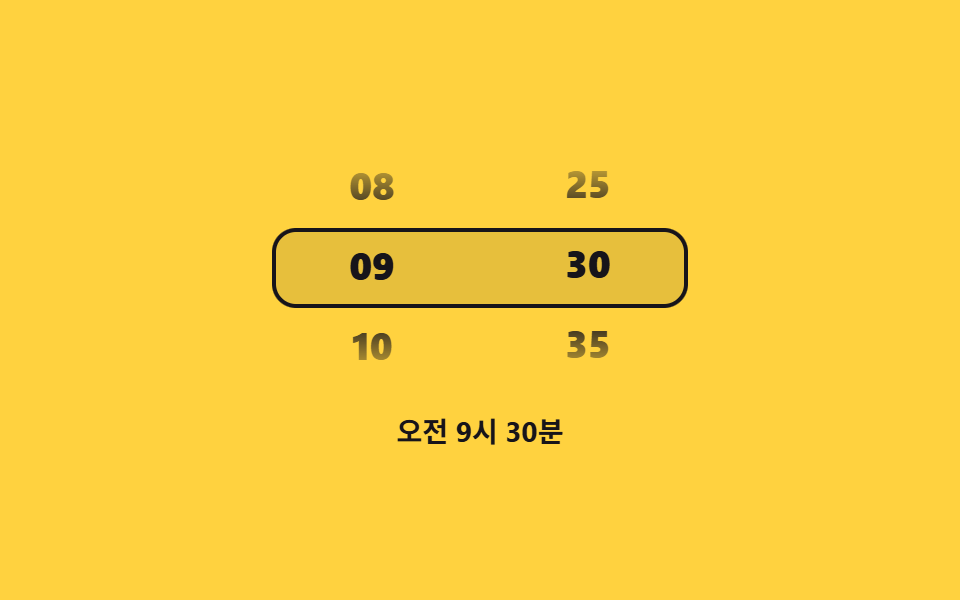 02 time-drum-roller-hour-minute
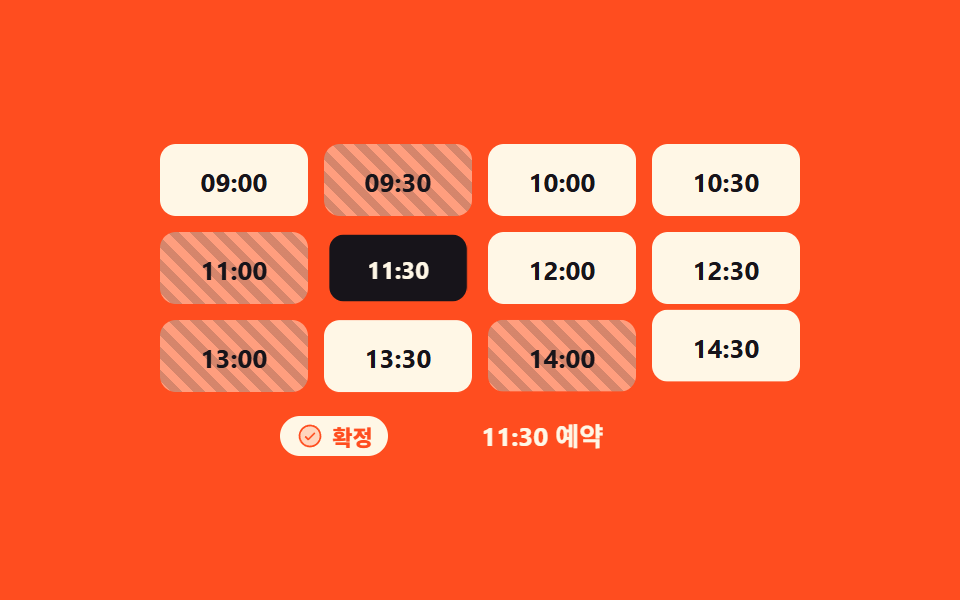 03 time-slot-grid-booking
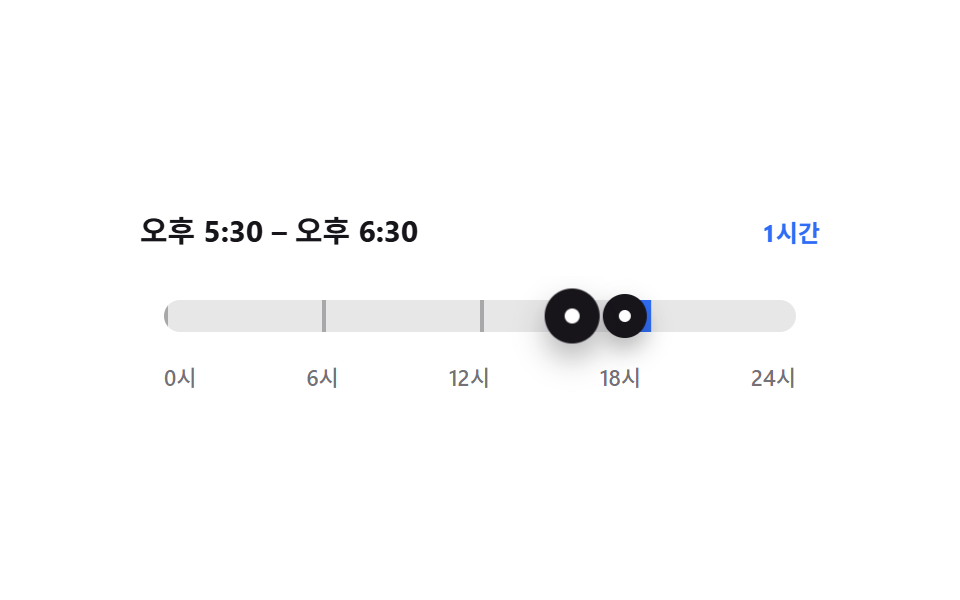 04 time-range-dual-handle-duration
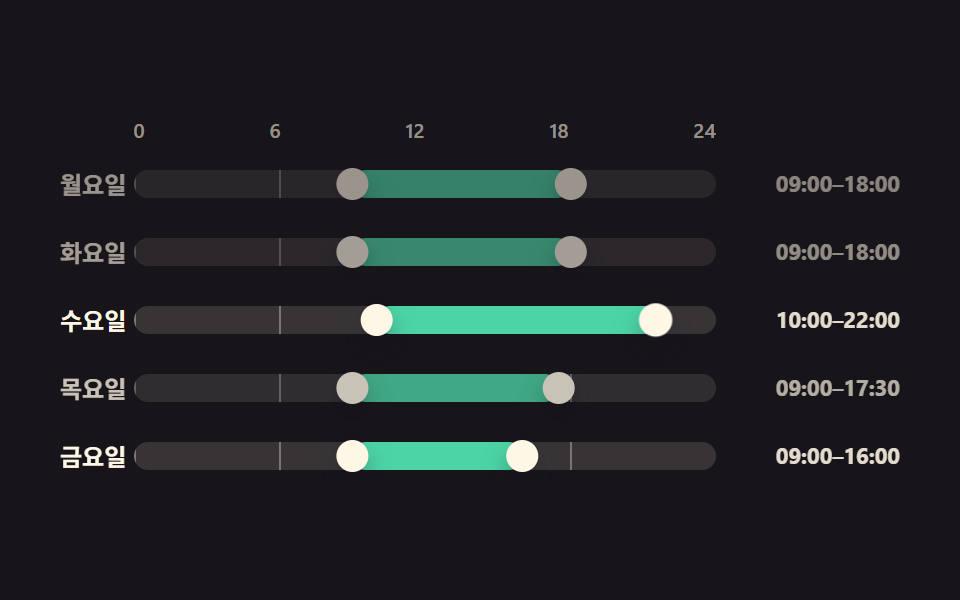 05 time-working-hours-day-bars
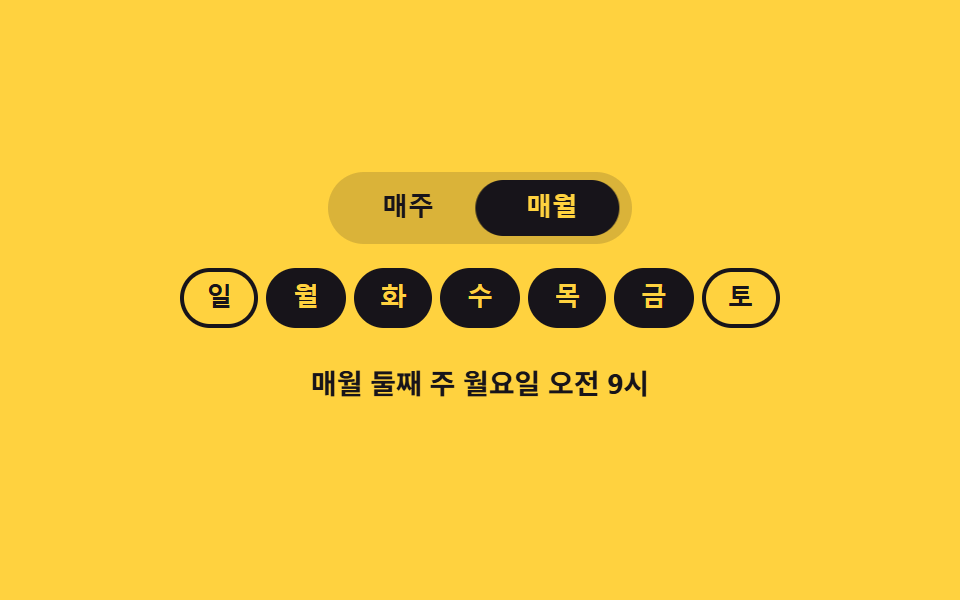 06 time-recurrence-weekday-chips
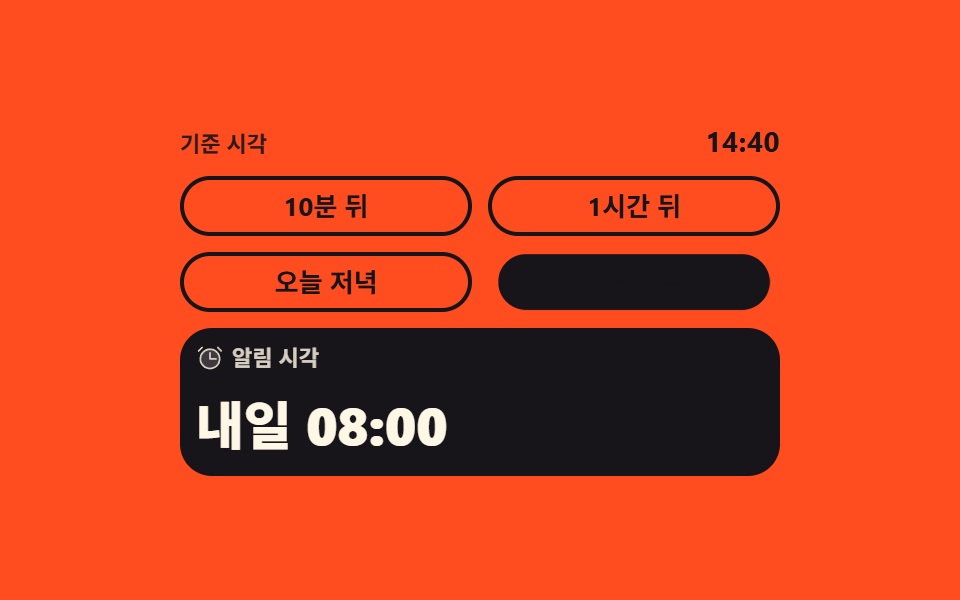 07 time-relative-preset-chips
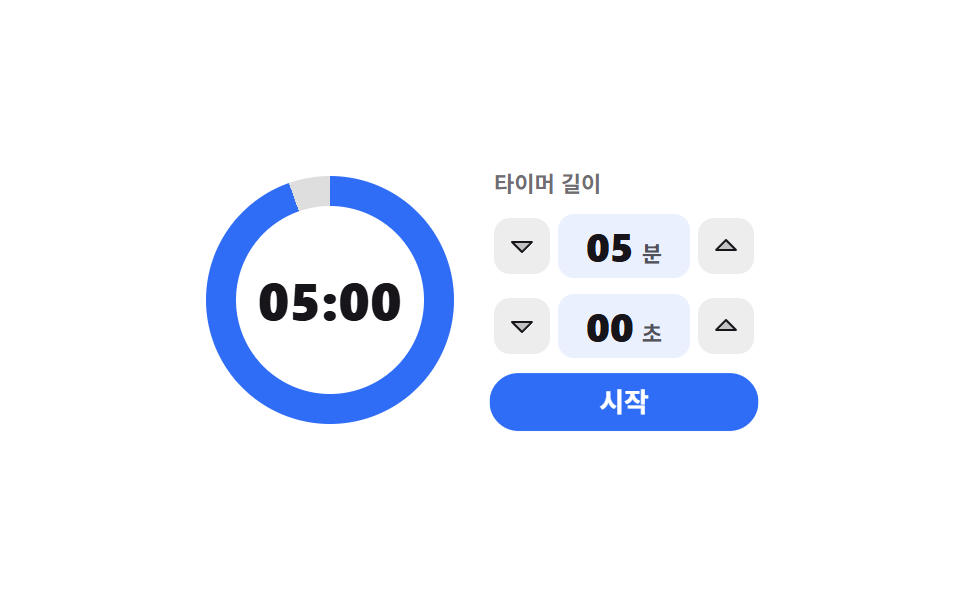 08 time-countdown-ring-setter
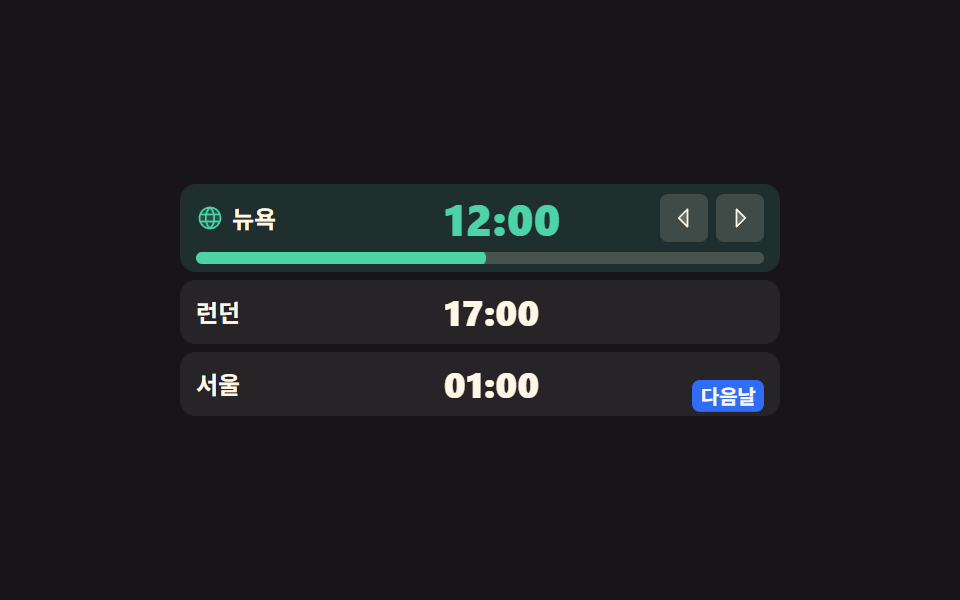 09 time-zone-three-city-convert
Auto-plays · click a tile to jump to its section · all nine in one zip
- 01 Round dial you turn by the hour hand
- 02 Drum roller with hours and minutes on separate tracks
- 03 Slot grid where only open times take a press
- 04 Span bar whose two handles push each other
- 05 Working-hours bars stretched one row per weekday
- 06 Repeat rule that becomes a sentence as you tap chips
- 07 Presets that show the resulting clock time
- 08 Countdown whose ring starts when you dial minutes
- 09 One time read at once by three cities
The order is not by popularity. It follows what a value is asked to hold. The first three answer "when": a dial (01), a drum (02), and a grid of bookable slots (03) all produce one point in time and nothing else. Then the value grows a second end. A span bar (04) carries a start and an end on one axis, and working-hours rows (05) repeat that span once per weekday, which is where a single picker turns into a schedule. The next two leave the clock behind: a repeat rule (06) is a time that has no single moment, and a preset like "in an hour" (07) is measured from now rather than from midnight. The last two answer "how long" instead of "when" — a countdown (08) is a duration with a ring drawn around it, and a three-city row (09) is one instant read through three offsets. If you want the neighboring shapes, the month grid handles the date half of the same form, and the picker patterns roundup covers what else a chooser can look like. A time range picker ui is where this stops being a clock and starts being a schedule, which is why the span bar sits in the middle of the list rather than at the end. If the thing being picked is a place, Map UI Design Patterns takes the front seat; if it's a color, Custom Color Picker stands in.
01Round dial you turn by the hour hand
What you see
Drag the hand around the face and the angle under your finger becomes an hour; let go and the same dial cuts to minute marks, so both steps finish inside one circle. Math.atan2 turns the pointer into a degree, the degree rounds to the nearest of the twelve ticks, and the chip in the middle reads the value back.
<main class="stage">
  <div class="dl is-demo" data-stage="h">
    <div class="dl__dial" id="dl-dial" role="slider" tabindex="0"
         aria-label="Time dial" aria-valuemin="1" aria-valuemax="12" aria-valuenow="9"
         aria-valuetext="9:30 AM" data-fmt="{h}:{m} AM">
      <span class="dl__ring" data-ring="hour" aria-hidden="true">
        <span class="dl__tick" style="--i:1">1</span><span class="dl__tick" style="--i:2">2</span>
        <span class="dl__tick" style="--i:3">3</span><span class="dl__tick" style="--i:4">4</span>
        <span class="dl__tick" style="--i:5">5</span><span class="dl__tick" style="--i:6">6</span>
        <span class="dl__tick" style="--i:7">7</span><span class="dl__tick" style="--i:8">8</span>
        <span class="dl__tick" style="--i:9">9</span><span class="dl__tick" style="--i:10">10</span>
        <span class="dl__tick" style="--i:11">11</span><span class="dl__tick" style="--i:12">12</span>
      </span>
      <span class="dl__ring" data-ring="min" aria-hidden="true">
        <span class="dl__tick" style="--i:1">05</span><span class="dl__tick" style="--i:2">10</span>
        <span class="dl__tick" style="--i:3">15</span><span class="dl__tick" style="--i:4">20</span>
        <span class="dl__tick" style="--i:5">25</span><span class="dl__tick" style="--i:6">30</span>
        <span class="dl__tick" style="--i:7">35</span><span class="dl__tick" style="--i:8">40</span>
        <span class="dl__tick" style="--i:9">45</span><span class="dl__tick" style="--i:10">50</span>
        <span class="dl__tick" style="--i:11">55</span><span class="dl__tick" style="--i:12">00</span>
      </span>
      <span class="dl__hand" aria-hidden="true"><span class="dl__tip"></span></span>
      <span class="dl__read" aria-hidden="true">
        <span class="dl__val">
          <span class="dl__num">
            <span class="dl__d" data-live="h">09</span>
            <span class="dl__d" data-d="h10">10</span>
            <span class="dl__d" data-d="h11">11</span>
            <span class="dl__d" data-d="h12">12</span>
          </span>
          <span class="dl__sep">:</span>
          <span class="dl__num">
            <span class="dl__d" data-live="m">30</span>
            <span class="dl__d" data-d="m45">45</span>
            <span class="dl__d" data-d="m00">00</span>
          </span>
        </span>
        <span class="dl__step">
          <span class="dl__sv" data-live="s" data-h="Set hour" data-m="Set min">Set hour</span>
          <span class="dl__sv" data-s="m">Set min</span>
        </span>
      </span>
    </div>
  </div>
</main>@use "../../../../site/static/demo-tokens" as *;
$duration: $dur-loop;
$easing: $ease-spring;
$color: $subject-blue;
@include stage($stage-ink);
.dl {
box-sizing: border-box;
display: grid;
place-items: center;
font-family: -apple-system, "Segoe UI", "Noto Sans KR", sans-serif;
}
.dl__dial {
--d: clamp(148px, 44vw, 176px);
--r: calc(var(--d) / 2 - 16px);
--ang: 270deg;
position: relative;
box-sizing: border-box;
width: var(--d);
height: var(--d);
border-radius: 50%;
background-color: rgba(255, 247, 230, .07);
box-shadow: inset 0 0 0 2px rgba(255, 247, 230, .2);
touch-action: none;
cursor: grab;
}
.dl__dial:focus-visible { outline: 3px solid $subject-cream; outline-offset: 3px; }
// ── 눈금: rotate 로 자리를 잡고 숫자 자체는 되돌려 세운다 ──
.dl__ring { position: absolute; inset: 0; opacity: 0; }
.dl__tick {
position: absolute;
left: 50%;
top: 50%;
font-size: clamp(10px, 2.8vw, 12px);
line-height: 1;
font-weight: 700;
color: $subject-cream;
transform:
translate(-50%, -50%)
rotate(calc(var(--i) * 30deg))
translateY(calc(var(--r) * -1))
rotate(calc(var(--i) * -30deg));
}
.dl__ring[data-ring="min"] .dl__tick { color: $subject-mint; }
// 정적 표시가 먼저 — 단계는 data-stage 한 곳에만 적힌다
.dl:not(.is-demo)[data-stage="h"] .dl__ring[data-ring="hour"],
.dl:not(.is-demo)[data-stage="m"] .dl__ring[data-ring="min"] { opacity: 1; }
// ── 바늘: 각도 한 개(--ang)가 시각이다 ──
.dl__hand {
position: absolute;
inset: 0;
z-index: 1;
pointer-events: none;
transform: rotate(var(--ang));
}
.dl__hand::after {
content: "";
position: absolute;
left: calc(50% - 3px);
top: 18%;
width: 6px;
height: 26%;
border-radius: $r-pill;
background-color: $color;
}
.dl__tip {
position: absolute;
left: calc(50% - 9px);
top: calc(18% - 9px);
width: 18px;
height: 18px;
border-radius: 50%;
background-color: $color;
}
.dl[data-stage="m"] .dl__hand::after,
.dl[data-stage="m"] .dl__tip { background-color: $subject-mint; }
// ── 가운데 값 칩: 바늘은 이 뒤로 지나간다 ──
.dl__read {
position: absolute;
left: 50%;
top: 50%;
z-index: 2;
display: grid;
justify-items: center;
gap: $sp-1;
padding: $sp-1 $sp-2;
border-radius: $r-pill;
background-color: $stage-ink;
transform: translate(-50%, -50%);
}
.dl__val { display: flex; align-items: center; color: $subject-cream; }
.dl__num {
position: relative;
display: inline-block;
width: 1.35em;
height: 1em;
font-size: clamp(16px, 4.6vw, 20px);
line-height: 1;
font-weight: 800;
}
.dl__d { position: absolute; left: 0; right: 0; top: 0; text-align: center; opacity: 0; }
.dl__d[data-live] { opacity: 1; }
.dl__sep {
font-size: clamp(16px, 4.6vw, 20px);
line-height: 1;
font-weight: 800;
}
.dl__step {
position: relative;
width: 5em;
height: 13px;
font-size: clamp(9px, 2.6vw, 11px);
line-height: 13px;
font-weight: 600;
color: $subject-mint;
}
.dl__sv { position: absolute; left: 0; right: 0; top: 0; text-align: center; white-space: nowrap; opacity: 0; }
.dl__sv[data-live] { opacity: 1; }
// ── 자동 루프: 시를 몇 칸 돌다 → 분 눈금으로 한 프레임 컷 → 분을 돌고 → 90% 안에 복귀 ──
.dl.is-demo .dl__ring,
.dl.is-demo .dl__d,
.dl.is-demo .dl__sv {
animation-duration: $duration;
animation-timing-function: steps(1, end);
animation-iteration-count: infinite;
}
.dl.is-demo .dl__ring[data-ring="hour"] { animation-name: dl-ring-h; }
.dl.is-demo .dl__ring[data-ring="min"] { animation-name: dl-ring-m; }
@keyframes dl-ring-h { 0% { opacity: 1; } 46% { opacity: 0; } 90% { opacity: 1; } 100% { opacity: 1; } }
@keyframes dl-ring-m { 0% { opacity: 0; } 46% { opacity: 1; } 84% { opacity: 0; } 100% { opacity: 0; } }
.dl.is-demo .dl__d[data-live="h"] { animation-name: dl-h09; }
.dl.is-demo .dl__d[data-d="h10"] { animation-name: dl-h10; }
.dl.is-demo .dl__d[data-d="h11"] { animation-name: dl-h11; }
.dl.is-demo .dl__d[data-d="h12"] { animation-name: dl-h12; }
.dl.is-demo .dl__d[data-live="m"] { animation-name: dl-m30; }
.dl.is-demo .dl__d[data-d="m45"] { animation-name: dl-m45; }
.dl.is-demo .dl__d[data-d="m00"] { animation-name: dl-m00; }
@keyframes dl-h09 { 0% { opacity: 1; } 12% { opacity: 0; } 88% { opacity: 1; } 100% { opacity: 1; } }
@keyframes dl-h10 { 0% { opacity: 0; } 12% { opacity: 1; } 24% { opacity: 0; } 100% { opacity: 0; } }
@keyframes dl-h11 { 0% { opacity: 0; } 24% { opacity: 1; } 36% { opacity: 0; } 100% { opacity: 0; } }
@keyframes dl-h12 { 0% { opacity: 0; } 36% { opacity: 1; } 88% { opacity: 0; } 100% { opacity: 0; } }
@keyframes dl-m30 { 0% { opacity: 1; } 58% { opacity: 0; } 88% { opacity: 1; } 100% { opacity: 1; } }
@keyframes dl-m45 { 0% { opacity: 0; } 58% { opacity: 1; } 70% { opacity: 0; } 100% { opacity: 0; } }
@keyframes dl-m00 { 0% { opacity: 0; } 70% { opacity: 1; } 88% { opacity: 0; } 100% { opacity: 0; } }
.dl.is-demo .dl__sv[data-live] { animation-name: dl-step-h; }
.dl.is-demo .dl__sv[data-s="m"] { animation-name: dl-step-m; }
@keyframes dl-step-h { 0% { opacity: 1; } 46% { opacity: 0; } 90% { opacity: 1; } 100% { opacity: 1; } }
@keyframes dl-step-m { 0% { opacity: 0; } 46% { opacity: 1; } 90% { opacity: 0; } 100% { opacity: 0; } }
// 바늘은 눈금에 딱딱 붙는다 — steps 로 한 칸씩
.dl.is-demo .dl__hand {
animation-name: dl-hand;
animation-duration: $duration;
animation-timing-function: steps(1, end);
animation-iteration-count: infinite;
}
@keyframes dl-hand {
0% { transform: rotate(270deg); }
12% { transform: rotate(300deg); }
24% { transform: rotate(330deg); }
36% { transform: rotate(360deg); }
46% { transform: rotate(540deg); }
58% { transform: rotate(630deg); }
70% { transform: rotate(720deg); }
88% { transform: rotate(270deg); }
100% { transform: rotate(270deg); }
}
// 컷 두 번만으로는 움직인 프레임이 안 차니 바늘 끝이 계속 숨쉰다
.dl.is-demo .dl__tip {
animation-name: dl-tip;
animation-duration: 500ms;
animation-timing-function: $easing;
animation-iteration-count: infinite;
}
@keyframes dl-tip {
0% { transform: scale(1); }
50% { transform: scale(1.28); }
100% { transform: scale(1); }
}
// 분 눈금으로 갈리는 순간 판이 한 번 눌렸다 펴진다
.dl.is-demo .dl__dial {
animation-name: dl-pop;
animation-duration: $duration;
animation-timing-function: $easing;
animation-iteration-count: infinite;
}
@keyframes dl-pop {
0% { transform: scale(1); }
44% { transform: scale(1); }
48% { transform: scale(.94); }
54% { transform: scale(1.02); }
60% { transform: scale(1); }
100% { transform: scale(1); }
}
@media (max-width: 340px) {
.dl__read { gap: 0; padding: 0 $sp-1; }
.dl__step { height: 12px; line-height: 12px; }
}
@media (prefers-reduced-motion: reduce) {
.dl.is-demo .dl__ring,
.dl.is-demo .dl__d,
.dl.is-demo .dl__sv,
.dl.is-demo .dl__hand,
.dl.is-demo .dl__tip,
.dl.is-demo .dl__dial { animation: none !important; }
.dl.is-demo .dl__ring[data-ring="hour"] { opacity: 1; }
}html, body {
margin: 0;
overflow: hidden;
}
.stage {
box-sizing: border-box;
min-height: 100vh;
display: grid;
place-items: center;
margin: 0;
background: #17141a;
font-family: -apple-system, "Segoe UI", "Noto Sans KR", sans-serif;
padding: clamp(8px, 4vw, 24px);
}
.dl {
box-sizing: border-box;
display: grid;
place-items: center;
font-family: -apple-system, "Segoe UI", "Noto Sans KR", sans-serif;
}
.dl__dial {
--d: clamp(148px, 44vw, 176px);
--r: calc(var(--d) / 2 - 16px);
--ang: 270deg;
position: relative;
box-sizing: border-box;
width: var(--d);
height: var(--d);
border-radius: 50%;
background-color: rgba(255, 247, 230, 0.07);
box-shadow: inset 0 0 0 2px rgba(255, 247, 230, 0.2);
touch-action: none;
cursor: grab;
}
.dl__dial:focus-visible {
outline: 3px solid #fff7e6;
outline-offset: 3px;
}
.dl__ring {
position: absolute;
inset: 0;
opacity: 0;
}
.dl__tick {
position: absolute;
left: 50%;
top: 50%;
font-size: clamp(10px, 2.8vw, 12px);
line-height: 1;
font-weight: 700;
color: #fff7e6;
transform: translate(-50%, -50%) rotate(calc(var(--i) * 30deg)) translateY(calc(var(--r) * -1)) rotate(calc(var(--i) * -30deg));
}
.dl__ring[data-ring=min] .dl__tick {
color: #4cd4a6;
}
.dl:not(.is-demo)[data-stage=h] .dl__ring[data-ring=hour],
.dl:not(.is-demo)[data-stage=m] .dl__ring[data-ring=min] {
opacity: 1;
}
.dl__hand {
position: absolute;
inset: 0;
z-index: 1;
pointer-events: none;
transform: rotate(var(--ang));
}
.dl__hand::after {
content: "";
position: absolute;
left: calc(50% - 3px);
top: 18%;
width: 6px;
height: 26%;
border-radius: 999px;
background-color: #2f6df6;
}
.dl__tip {
position: absolute;
left: calc(50% - 9px);
top: calc(18% - 9px);
width: 18px;
height: 18px;
border-radius: 50%;
background-color: #2f6df6;
}
.dl[data-stage=m] .dl__hand::after,
.dl[data-stage=m] .dl__tip {
background-color: #4cd4a6;
}
.dl__read {
position: absolute;
left: 50%;
top: 50%;
z-index: 2;
display: grid;
justify-items: center;
gap: 4px;
padding: 4px 8px;
border-radius: 999px;
background-color: #17141a;
transform: translate(-50%, -50%);
}
.dl__val {
display: flex;
align-items: center;
color: #fff7e6;
}
.dl__num {
position: relative;
display: inline-block;
width: 1.35em;
height: 1em;
font-size: clamp(16px, 4.6vw, 20px);
line-height: 1;
font-weight: 800;
}
.dl__d {
position: absolute;
left: 0;
right: 0;
top: 0;
text-align: center;
opacity: 0;
}
.dl__d[data-live] {
opacity: 1;
}
.dl__sep {
font-size: clamp(16px, 4.6vw, 20px);
line-height: 1;
font-weight: 800;
}
.dl__step {
position: relative;
width: 5em;
height: 13px;
font-size: clamp(9px, 2.6vw, 11px);
line-height: 13px;
font-weight: 600;
color: #4cd4a6;
}
.dl__sv {
position: absolute;
left: 0;
right: 0;
top: 0;
text-align: center;
white-space: nowrap;
opacity: 0;
}
.dl__sv[data-live] {
opacity: 1;
}
.dl.is-demo .dl__ring,
.dl.is-demo .dl__d,
.dl.is-demo .dl__sv {
animation-duration: 2s;
animation-timing-function: steps(1, end);
animation-iteration-count: infinite;
}
.dl.is-demo .dl__ring[data-ring=hour] {
animation-name: dl-ring-h;
}
.dl.is-demo .dl__ring[data-ring=min] {
animation-name: dl-ring-m;
}
@keyframes dl-ring-h {
0% {
opacity: 1;
}
46% {
opacity: 0;
}
90% {
opacity: 1;
}
100% {
opacity: 1;
}
}
@keyframes dl-ring-m {
0% {
opacity: 0;
}
46% {
opacity: 1;
}
84% {
opacity: 0;
}
100% {
opacity: 0;
}
}
.dl.is-demo .dl__d[data-live=h] {
animation-name: dl-h09;
}
.dl.is-demo .dl__d[data-d=h10] {
animation-name: dl-h10;
}
.dl.is-demo .dl__d[data-d=h11] {
animation-name: dl-h11;
}
.dl.is-demo .dl__d[data-d=h12] {
animation-name: dl-h12;
}
.dl.is-demo .dl__d[data-live=m] {
animation-name: dl-m30;
}
.dl.is-demo .dl__d[data-d=m45] {
animation-name: dl-m45;
}
.dl.is-demo .dl__d[data-d=m00] {
animation-name: dl-m00;
}
@keyframes dl-h09 {
0% {
opacity: 1;
}
12% {
opacity: 0;
}
88% {
opacity: 1;
}
100% {
opacity: 1;
}
}
@keyframes dl-h10 {
0% {
opacity: 0;
}
12% {
opacity: 1;
}
24% {
opacity: 0;
}
100% {
opacity: 0;
}
}
@keyframes dl-h11 {
0% {
opacity: 0;
}
24% {
opacity: 1;
}
36% {
opacity: 0;
}
100% {
opacity: 0;
}
}
@keyframes dl-h12 {
0% {
opacity: 0;
}
36% {
opacity: 1;
}
88% {
opacity: 0;
}
100% {
opacity: 0;
}
}
@keyframes dl-m30 {
0% {
opacity: 1;
}
58% {
opacity: 0;
}
88% {
opacity: 1;
}
100% {
opacity: 1;
}
}
@keyframes dl-m45 {
0% {
opacity: 0;
}
58% {
opacity: 1;
}
70% {
opacity: 0;
}
100% {
opacity: 0;
}
}
@keyframes dl-m00 {
0% {
opacity: 0;
}
70% {
opacity: 1;
}
88% {
opacity: 0;
}
100% {
opacity: 0;
}
}
.dl.is-demo .dl__sv[data-live] {
animation-name: dl-step-h;
}
.dl.is-demo .dl__sv[data-s=m] {
animation-name: dl-step-m;
}
@keyframes dl-step-h {
0% {
opacity: 1;
}
46% {
opacity: 0;
}
90% {
opacity: 1;
}
100% {
opacity: 1;
}
}
@keyframes dl-step-m {
0% {
opacity: 0;
}
46% {
opacity: 1;
}
90% {
opacity: 0;
}
100% {
opacity: 0;
}
}
.dl.is-demo .dl__hand {
animation-name: dl-hand;
animation-duration: 2s;
animation-timing-function: steps(1, end);
animation-iteration-count: infinite;
}
@keyframes dl-hand {
0% {
transform: rotate(270deg);
}
12% {
transform: rotate(300deg);
}
24% {
transform: rotate(330deg);
}
36% {
transform: rotate(360deg);
}
46% {
transform: rotate(540deg);
}
58% {
transform: rotate(630deg);
}
70% {
transform: rotate(720deg);
}
88% {
transform: rotate(270deg);
}
100% {
transform: rotate(270deg);
}
}
.dl.is-demo .dl__tip {
animation-name: dl-tip;
animation-duration: 500ms;
animation-timing-function: cubic-bezier(0.2, 0.8, 0.2, 1);
animation-iteration-count: infinite;
}
@keyframes dl-tip {
0% {
transform: scale(1);
}
50% {
transform: scale(1.28);
}
100% {
transform: scale(1);
}
}
.dl.is-demo .dl__dial {
animation-name: dl-pop;
animation-duration: 2s;
animation-timing-function: cubic-bezier(0.2, 0.8, 0.2, 1);
animation-iteration-count: infinite;
}
@keyframes dl-pop {
0% {
transform: scale(1);
}
44% {
transform: scale(1);
}
48% {
transform: scale(0.94);
}
54% {
transform: scale(1.02);
}
60% {
transform: scale(1);
}
100% {
transform: scale(1);
}
}
@media (max-width: 340px) {
.dl__read {
gap: 0;
padding: 0 4px;
}
.dl__step {
height: 12px;
line-height: 12px;
}
}
@media (prefers-reduced-motion: reduce) {
.dl.is-demo .dl__ring,
.dl.is-demo .dl__d,
.dl.is-demo .dl__sv,
.dl.is-demo .dl__hand,
.dl.is-demo .dl__tip,
.dl.is-demo .dl__dial {
animation: none !important;
}
.dl.is-demo .dl__ring[data-ring=hour] {
opacity: 1;
}
}// 각도 → 값은 Math.atan2 로 실제 계산한다. 시를 확정하면 같은 바늘이 min 눈금을 맡는다
(function () {
var dl = document.querySelector('.dl'), dial = document.getElementById('dl-dial');
var hv = dl.querySelector('[data-live="h"]'), mv = dl.querySelector('[data-live="m"]');
var sv = dl.querySelector('[data-live="s"]');
var s = { h: 9, m: 30, hour: true };
function pad(n) { return (n < 10 ? '0' : '') + n; }
function paint() {
dl.setAttribute('data-stage', s.hour ? 'h' : 'm');
dial.style.setProperty('--ang', (s.hour ? s.h * 30 : s.m * 6) + 'deg');
hv.textContent = pad(s.h); mv.textContent = pad(s.m);
sv.textContent = s.hour ? sv.dataset.h : sv.dataset.m;
dial.setAttribute('aria-valuemin', s.hour ? '1' : '0');
dial.setAttribute('aria-valuemax', s.hour ? '12' : '55');
dial.setAttribute('aria-valuenow', String(s.hour ? s.h : s.m));
dial.setAttribute('aria-valuetext', dial.dataset.fmt.replace('{h}', s.h).replace('{m}', s.m));
}
function fromPointer(e) {
var r = dial.getBoundingClientRect();
var a = Math.atan2(e.clientX - r.left - r.width / 2, r.top + r.height / 2 - e.clientY) * 180 / Math.PI;
a = (a + 360) % 360;
if (s.hour) { s.h = Math.round(a / 30) || 12; } else { s.m = (Math.round(a / 30) * 5) % 60; }
paint();
}
dial.addEventListener('pointerdown', function (e) {
dl.classList.remove('is-demo'); dial.setPointerCapture(e.pointerId);
dial.dataset.drag = '1'; fromPointer(e); e.preventDefault();
});
dial.addEventListener('pointermove', function (e) { if (dial.dataset.drag) fromPointer(e); });
dial.addEventListener('pointerup', function () {
if (!dial.dataset.drag) return;
delete dial.dataset.drag;
if (s.hour) { s.hour = false; paint(); } // 시가 확정되면 판이 min 눈금으로 갈린다
});
dial.addEventListener('keydown', function (e) {
var k = e.key, d = (k === 'ArrowRight' || k === 'ArrowUp') ? 1 : (k === 'ArrowLeft' || k === 'ArrowDown') ? -1 : 0;
var jump = k === 'Home' || k === 'End', turn = k === 'Enter' || k === ' ';
if (!d && !jump && !turn) return;
e.preventDefault(); dl.classList.remove('is-demo');
if (turn) { s.hour = !s.hour; }
else if (s.hour) { s.h = k === 'Home' ? 1 : k === 'End' ? 12 : ((s.h - 1 + d + 12) % 12) + 1; }
else { s.m = k === 'Home' ? 0 : k === 'End' ? 55 : (s.m + d * 5 + 60) % 60; }
paint();
});
paint();
})();import { useRef, useState } from "react";
import type { CSSProperties } from "react";
import styles from "./AnalogDialPicker.module.scss";
export type AnalogDialPickerProps = {
labels?: { dial: string; hour: string; minute: string; meridiem: string };
duration?: number;
easing?: string;
color?: string;
};
type Vars = CSSProperties & {
"--duration"?: string;
"--easing"?: string;
"--color"?: string;
"--ang"?: string;
};
type TickVars = CSSProperties & { "--i"?: number };
type KeyEvt = { key: string; preventDefault(): void };
type PtrEvt = {
clientX: number;
clientY: number;
pointerId: number;
preventDefault(): void;
currentTarget: {
setPointerCapture(id: number): void;
getBoundingClientRect(): { left: number; top: number; width: number; height: number };
};
};
const HOURS = [1, 2, 3, 4, 5, 6, 7, 8, 9, 10, 11, 12];
const MINS = ["05", "10", "15", "20", "25", "30", "35", "40", "45", "50", "55", "00"];
const pad = (n: number) => (n < 10 ? "0" : "") + n;
export default function AnalogDialPicker({
labels = { dial: "Time dial", hour: "Set hour", minute: "Set min", meridiem: "AM" },
duration = 2000,
easing = "cubic-bezier(.2,.8,.2,1)",
color = "#2f6df6",
}: AnalogDialPickerProps) {
const [demo, setDemo] = useState(true);
const [hour, setHour] = useState(9);
const [minute, setMinute] = useState(30);
const [pickHour, setPickHour] = useState(true);
const dragging = useRef(false);
const vars: Vars = {
"--duration": `${duration}ms`,
"--easing": easing,
"--color": color,
"--ang": `${pickHour ? hour * 30 : minute * 6}deg`,
};
const valueText = `${hour}:${pad(minute)} ${labels.meridiem}`;
// 각도 → 값은 Math.atan2 로 실제 계산한다
function fromPointer(e: PtrEvt) {
const r = e.currentTarget.getBoundingClientRect();
let a = (Math.atan2(e.clientX - r.left - r.width / 2, r.top + r.height / 2 - e.clientY) * 180) / Math.PI;
a = (a + 360) % 360;
if (pickHour) setHour(Math.round(a / 30) || 12);
else setMinute((Math.round(a / 30) * 5) % 60);
}
function onDown(e: PtrEvt) {
setDemo(false);
e.currentTarget.setPointerCapture(e.pointerId);
dragging.current = true;
fromPointer(e);
e.preventDefault();
}
function onUp() {
if (!dragging.current) return;
dragging.current = false;
if (pickHour) setPickHour(false); // 시가 확정되면 판이 분 눈금으로 갈린다
}
function onKey(e: KeyEvt) {
const d = e.key === "ArrowRight" || e.key === "ArrowUp" ? 1 : e.key === "ArrowLeft" || e.key === "ArrowDown" ? -1 : 0;
const jump = e.key === "Home" || e.key === "End";
const turn = e.key === "Enter" || e.key === " ";
if (!d && !jump && !turn) return;
e.preventDefault();
setDemo(false);
if (turn) setPickHour((v) => !v);
else if (pickHour) setHour(e.key === "Home" ? 1 : e.key === "End" ? 12 : ((hour - 1 + d + 12) % 12) + 1);
else setMinute(e.key === "Home" ? 0 : e.key === "End" ? 55 : (minute + d * 5 + 60) % 60);
}
return (
<div className={`${styles.wrap} ${demo ? styles.isDemo : ""}`} data-stage={pickHour ? "h" : "m"} style={vars}>
<div
className={styles.dial}
role="slider"
tabIndex={0}
aria-label={labels.dial}
aria-valuemin={pickHour ? 1 : 0}
aria-valuemax={pickHour ? 12 : 55}
aria-valuenow={pickHour ? hour : minute}
aria-valuetext={valueText}
onPointerDown={onDown}
onPointerMove={(e: PtrEvt) => { if (dragging.current) fromPointer(e); }}
onPointerUp={onUp}
onKeyDown={onKey}
>
<span className={styles.ring} data-ring="hour" aria-hidden="true">
{HOURS.map((n) => (
<span key={n} className={styles.tick} style={{ "--i": n } as TickVars}>{n}</span>
))}
</span>
<span className={styles.ring} data-ring="min" aria-hidden="true">
{MINS.map((t, i) => (
<span key={t} className={styles.tick} style={{ "--i": i + 1 } as TickVars}>{t}</span>
))}
</span>
<span className={styles.hand} aria-hidden="true"><span className={styles.tip} /></span>
<span className={styles.read} aria-hidden="true">
<span className={styles.val}>
<span className={styles.num}>
<span className={styles.d} data-live="h">{pad(hour)}</span>
<span className={styles.d} data-d="h10">10</span>
<span className={styles.d} data-d="h11">11</span>
<span className={styles.d} data-d="h12">12</span>
</span>
<span className={styles.sep}>:</span>
<span className={styles.num}>
<span className={styles.d} data-live="m">{pad(minute)}</span>
<span className={styles.d} data-d="m45">45</span>
<span className={styles.d} data-d="m00">00</span>
</span>
</span>
<span className={styles.step}>
<span className={styles.sv} data-live="s">{pickHour ? labels.hour : labels.minute}</span>
<span className={styles.sv} data-s="m">{labels.minute}</span>
</span>
</span>
</div>
</div>
);
}01 · Round dial you turn by the hour hand — Measured area 7.094% · moving frames 23/23Original by GODRICH · SCSS and React ship in the zip · See the password
Where to look in the code
Use it where a rough hour is enough, such as an alarm on a phone.
function fromPointer(e) {
  var r = dial.getBoundingClientRect();
  var a = Math.atan2(e.clientX - r.left - r.width / 2, r.top + r.height / 2 - e.clientY) * 180 / Math.PI;
  a = (a + 360) % 360;
  if (s.hour) { s.h = Math.round(a / 30) || 12; } else { s.m = (Math.round(a / 30) * 5) % 60; }
  paint();
}
dial.addEventListener('pointerup', function () {
  if (!dial.dataset.drag) return;
  delete dial.dataset.drag;
  if (s.hour) { s.hour = false; paint(); }
});
02Drum roller with hours and minutes on separate tracks
How the drum reads in a time picker ui design
Two columns scroll independently, the numbers coast, and only the value framed by the center window counts as chosen. That value is read back from scrollTop about 90ms after scrolling stops rather than on every scroll event, so one flick writes once instead of forty times.
<main class="stage">
  <div class="dr is-demo">
    <div class="dr__box">
      <span class="dr__band" aria-hidden="true"></span>
      <div class="dr__col" role="slider" tabindex="0" aria-label="Hour drum" data-vt="{v} o'clock"
           aria-valuemin="1" aria-valuemax="12" aria-valuenow="9" aria-valuetext="9 o'clock">
        <div class="dr__track" data-track="h">
          <span class="dr__cell">01</span><span class="dr__cell">02</span><span class="dr__cell">03</span>
          <span class="dr__cell">04</span><span class="dr__cell">05</span><span class="dr__cell">06</span>
          <span class="dr__cell">07</span><span class="dr__cell">08</span><span class="dr__cell">09</span>
          <span class="dr__cell">10</span><span class="dr__cell">11</span><span class="dr__cell">12</span>
        </div>
      </div>
      <div class="dr__col" role="slider" tabindex="0" aria-label="Minute drum" data-vt="{v} minutes"
           aria-valuemin="0" aria-valuemax="55" aria-valuenow="30" aria-valuetext="30 minutes">
        <div class="dr__track" data-track="m">
          <span class="dr__cell">00</span><span class="dr__cell">05</span><span class="dr__cell">10</span>
          <span class="dr__cell">15</span><span class="dr__cell">20</span><span class="dr__cell">25</span>
          <span class="dr__cell">30</span><span class="dr__cell">35</span><span class="dr__cell">40</span>
          <span class="dr__cell">45</span><span class="dr__cell">50</span><span class="dr__cell">55</span>
        </div>
      </div>
    </div>
    <p class="dr__out" data-fmt="{h}:{m} AM">
      <span class="dr__ov" data-live>9:30 AM</span>
      <span class="dr__ov" data-v="2">11:35 AM</span>
      <span class="dr__ov" data-v="3">11:45 AM</span>
    </p>
  </div>
</main>@use "../../../../site/static/demo-tokens" as *;
$duration: $dur-loop;
$easing: $ease-spring;
$color: $subject-ink;
@include stage($stage-yellow);
.dr {
box-sizing: border-box;
display: grid;
justify-items: center;
gap: $sp-3;
width: min(208px, 66vw);
font-family: -apple-system, "Segoe UI", "Noto Sans KR", sans-serif;
}
.dr__box {
--h: 40px;
position: relative;
box-sizing: border-box;
display: grid;
grid-template-columns: repeat(2, 1fr);
gap: $sp-2;
width: 100%;
height: calc(var(--h) * 3);
}
// 가운데 창 — 여기 걸린 값만 확정이다
.dr__band {
position: absolute;
left: 0;
right: 0;
top: 50%;
z-index: 1;
height: var(--h);
border-radius: $r-control;
background-color: rgba(23, 20, 26, .1);
box-shadow: inset 0 0 0 2px $color;
pointer-events: none;
transform: translateY(-50%);
}
// 스크롤 상자 자체에는 transform 을 걸지 않는다 (텔레포트 함정) — real scroll 전용
.dr__col {
position: relative;
height: 100%;
overflow-y: auto;
overscroll-behavior: contain;
scroll-snap-type: y mandatory;
scrollbar-width: none;
touch-action: pan-y;
-webkit-mask-image: linear-gradient(to bottom, transparent 0%, #000 30%, #000 70%, transparent 100%);
mask-image: linear-gradient(to bottom, transparent 0%, #000 30%, #000 70%, transparent 100%);
}
.dr__col::-webkit-scrollbar { display: none; }
.dr__col:focus-visible { outline: 3px solid $color; outline-offset: 2px; }
// 위아래 여백이 딱 한 칸이라 첫 칸과 끝 칸도 가운데 창까지 온다
.dr__track { padding-block: var(--h); }
.dr__cell {
display: flex;
align-items: center;
justify-content: center;
height: var(--h);
scroll-snap-align: center;
font-size: clamp(15px, 4.4vw, 19px);
line-height: 1;
font-weight: 800;
color: $color;
}
.dr__out {
position: relative;
margin: 0;
width: 100%;
height: 20px;
font-size: clamp(12px, 3.4vw, 14px);
line-height: 20px;
font-weight: 700;
color: $color;
}
.dr__ov { position: absolute; left: 0; right: 0; top: 0; text-align: center; white-space: nowrap; opacity: 0; }
.dr__ov[data-live] { opacity: 1; }
// ── 자동 루프: 두 열이 서로 다른 속도로 구른다. transform 은 안쪽 트랙에만 ──
// mandatory 스냅은 트랙이 transform 으로 움직이면 스크롤을 따라 옮겨 움직임을 상쇄한다 — 미리보기 동안만 끈다
.dr.is-demo .dr__col { scroll-snap-type: none; }
.dr.is-demo .dr__track {
animation-duration: $duration;
animation-timing-function: $easing;
animation-iteration-count: infinite;
}
.dr.is-demo .dr__track[data-track="h"] { animation-name: dr-h; }
.dr.is-demo .dr__track[data-track="m"] { animation-name: dr-m; }
@keyframes dr-h {
0% { transform: translateY(0); }
8% { transform: translateY(0); }
34% { transform: translateY(calc(var(--h) * -2)); }
76% { transform: translateY(calc(var(--h) * -2)); }
88% { transform: translateY(0); }
100% { transform: translateY(0); }
}
@keyframes dr-m {
0% { transform: translateY(0); }
8% { transform: translateY(0); }
34% { transform: translateY(calc(var(--h) * -1)); }
42% { transform: translateY(calc(var(--h) * -1)); }
68% { transform: translateY(calc(var(--h) * -3)); }
76% { transform: translateY(calc(var(--h) * -3)); }
88% { transform: translateY(0); }
100% { transform: translateY(0); }
}
// 문장은 구르는 도중(각 구간의 한가운데)에 한 프레임으로 갈린다 —
// 멎은 뒤에 갈리면 "이미 멈춘 드럼 + 옛 문장" 프레임이 생겨 그 장이 poster 로 뽑힌다 (실측)
.dr.is-demo .dr__ov {
animation-duration: $duration;
animation-timing-function: steps(1, end);
animation-iteration-count: infinite;
}
.dr.is-demo .dr__ov[data-live] { animation-name: dr-v1; }
.dr.is-demo .dr__ov[data-v="2"] { animation-name: dr-v2; }
.dr.is-demo .dr__ov[data-v="3"] { animation-name: dr-v3; }
@keyframes dr-v1 { 0% { opacity: 1; } 22% { opacity: 0; } 82% { opacity: 1; } 100% { opacity: 1; } }
@keyframes dr-v2 { 0% { opacity: 0; } 22% { opacity: 1; } 56% { opacity: 0; } 100% { opacity: 0; } }
@keyframes dr-v3 { 0% { opacity: 0; } 56% { opacity: 1; } 82% { opacity: 0; } 100% { opacity: 0; } }
@media (max-width: 340px) {
.dr { gap: $sp-2; }
.dr__box { --h: 32px; }
.dr__out { height: 18px; line-height: 18px; }
}
@media (prefers-reduced-motion: reduce) {
.dr.is-demo .dr__track,
.dr.is-demo .dr__ov { animation: none !important; }
.dr.is-demo .dr__ov[data-live] { opacity: 1; }
}html, body {
margin: 0;
overflow: hidden;
}
.stage {
box-sizing: border-box;
min-height: 100vh;
display: grid;
place-items: center;
margin: 0;
background: #ffd23f;
font-family: -apple-system, "Segoe UI", "Noto Sans KR", sans-serif;
padding: clamp(8px, 4vw, 24px);
}
.dr {
box-sizing: border-box;
display: grid;
justify-items: center;
gap: 12px;
width: min(208px, 66vw);
font-family: -apple-system, "Segoe UI", "Noto Sans KR", sans-serif;
}
.dr__box {
--h: 40px;
position: relative;
box-sizing: border-box;
display: grid;
grid-template-columns: repeat(2, 1fr);
gap: 8px;
width: 100%;
height: calc(var(--h) * 3);
}
.dr__band {
position: absolute;
left: 0;
right: 0;
top: 50%;
z-index: 1;
height: var(--h);
border-radius: 12px;
background-color: rgba(23, 20, 26, 0.1);
box-shadow: inset 0 0 0 2px #17141a;
pointer-events: none;
transform: translateY(-50%);
}
.dr__col {
position: relative;
height: 100%;
overflow-y: auto;
overscroll-behavior: contain;
scroll-snap-type: y mandatory;
scrollbar-width: none;
touch-action: pan-y;
-webkit-mask-image: linear-gradient(to bottom, transparent 0%, #000 30%, #000 70%, transparent 100%);
mask-image: linear-gradient(to bottom, transparent 0%, #000 30%, #000 70%, transparent 100%);
}
.dr__col::-webkit-scrollbar {
display: none;
}
.dr__col:focus-visible {
outline: 3px solid #17141a;
outline-offset: 2px;
}
.dr__track {
padding-block: var(--h);
}
.dr__cell {
display: flex;
align-items: center;
justify-content: center;
height: var(--h);
scroll-snap-align: center;
font-size: clamp(15px, 4.4vw, 19px);
line-height: 1;
font-weight: 800;
color: #17141a;
}
.dr__out {
position: relative;
margin: 0;
width: 100%;
height: 20px;
font-size: clamp(12px, 3.4vw, 14px);
line-height: 20px;
font-weight: 700;
color: #17141a;
}
.dr__ov {
position: absolute;
left: 0;
right: 0;
top: 0;
text-align: center;
white-space: nowrap;
opacity: 0;
}
.dr__ov[data-live] {
opacity: 1;
}
.dr.is-demo .dr__col {
scroll-snap-type: none;
}
.dr.is-demo .dr__track {
animation-duration: 2s;
animation-timing-function: cubic-bezier(0.2, 0.8, 0.2, 1);
animation-iteration-count: infinite;
}
.dr.is-demo .dr__track[data-track=h] {
animation-name: dr-h;
}
.dr.is-demo .dr__track[data-track=m] {
animation-name: dr-m;
}
@keyframes dr-h {
0% {
transform: translateY(0);
}
8% {
transform: translateY(0);
}
34% {
transform: translateY(calc(var(--h) * -2));
}
76% {
transform: translateY(calc(var(--h) * -2));
}
88% {
transform: translateY(0);
}
100% {
transform: translateY(0);
}
}
@keyframes dr-m {
0% {
transform: translateY(0);
}
8% {
transform: translateY(0);
}
34% {
transform: translateY(calc(var(--h) * -1));
}
42% {
transform: translateY(calc(var(--h) * -1));
}
68% {
transform: translateY(calc(var(--h) * -3));
}
76% {
transform: translateY(calc(var(--h) * -3));
}
88% {
transform: translateY(0);
}
100% {
transform: translateY(0);
}
}
.dr.is-demo .dr__ov {
animation-duration: 2s;
animation-timing-function: steps(1, end);
animation-iteration-count: infinite;
}
.dr.is-demo .dr__ov[data-live] {
animation-name: dr-v1;
}
.dr.is-demo .dr__ov[data-v="2"] {
animation-name: dr-v2;
}
.dr.is-demo .dr__ov[data-v="3"] {
animation-name: dr-v3;
}
@keyframes dr-v1 {
0% {
opacity: 1;
}
22% {
opacity: 0;
}
82% {
opacity: 1;
}
100% {
opacity: 1;
}
}
@keyframes dr-v2 {
0% {
opacity: 0;
}
22% {
opacity: 1;
}
56% {
opacity: 0;
}
100% {
opacity: 0;
}
}
@keyframes dr-v3 {
0% {
opacity: 0;
}
56% {
opacity: 1;
}
82% {
opacity: 0;
}
100% {
opacity: 0;
}
}
@media (max-width: 340px) {
.dr {
gap: 8px;
}
.dr__box {
--h: 32px;
}
.dr__out {
height: 18px;
line-height: 18px;
}
}
@media (prefers-reduced-motion: reduce) {
.dr.is-demo .dr__track,
.dr.is-demo .dr__ov {
animation: none !important;
}
.dr.is-demo .dr__ov[data-live] {
opacity: 1;
}
}// 확정값은 스크롤 위치에서 읽는다. 사람이 굴리면 .is-demo 를 떼 트랙 transform 을 0 으로 되돌린다
(function () {
var dr = document.querySelector('.dr');
var cols = dr.querySelectorAll('.dr__col');
var out = dr.querySelector('.dr__out'), live = dr.querySelector('[data-live]');
var H = cols[0].querySelector('.dr__cell').getBoundingClientRect().height;
var human = false, tid = 0;
function at(c) { return Math.round(c.scrollTop / H); }
function read() {
var v = [];
for (var i = 0; i < cols.length; i++) {
var c = cols[i], el = c.querySelector('.dr__track').children[at(c)];
var t = el ? el.textContent.trim() : '00';
c.setAttribute('aria-valuenow', String(Number(t)));
c.setAttribute('aria-valuetext', c.dataset.vt.replace('{v}', String(Number(t))));
v.push(t);
}
live.textContent = out.dataset.fmt.replace('{h}', String(Number(v[0]))).replace('{m}', String(Number(v[1])));
}
function mark() { human = true; dr.classList.remove('is-demo'); }
for (var i = 0; i < cols.length; i++) (function (c) {
c.addEventListener('pointerdown', mark);
c.addEventListener('wheel', mark, { passive: true });
c.addEventListener('scroll', function () {
if (!human) return;
clearTimeout(tid); tid = setTimeout(read, 90); // 스크롤이 멎은 뒤에 확정값을 읽는다
});
c.addEventListener('keydown', function (e) {
var k = e.key, d = k === 'ArrowDown' ? 1 : k === 'ArrowUp' ? -1 : 0;
if (!d && k !== 'Home' && k !== 'End') return;
e.preventDefault(); mark();
var n = c.querySelector('.dr__track').children.length;
var j = k === 'Home' ? 0 : k === 'End' ? n - 1 : Math.min(n - 1, Math.max(0, at(c) + d));
c.scrollTo({ top: j * H, behavior: 'smooth' });
});
})(cols[i]);
cols[0].scrollTop = 8 * H; // 09
cols[1].scrollTop = 6 * H; // 30
read();
})();import { useEffect, useRef, useState } from "react";
import type { CSSProperties } from "react";
import styles from "./DrumRollerPicker.module.scss";
export type DrumRollerPickerProps = {
labels?: { hour: string; minute: string; meridiem: string };
duration?: number;
easing?: string;
color?: string;
};
type Vars = CSSProperties & { "--duration"?: string; "--easing"?: string; "--color"?: string };
type KeyEvt = { key: string; preventDefault(): void };
const HOURS = ["01", "02", "03", "04", "05", "06", "07", "08", "09", "10", "11", "12"];
const MINS = ["00", "05", "10", "15", "20", "25", "30", "35", "40", "45", "50", "55"];
export default function DrumRollerPicker({
labels = { hour: "Hour drum", minute: "Minute drum", meridiem: "AM" },
duration = 2000,
easing = "cubic-bezier(.2,.8,.2,1)",
color = "#17141a",
}: DrumRollerPickerProps) {
const [demo, setDemo] = useState(true);
const [hi, setHi] = useState(8); // 09
const [mi, setMi] = useState(6); // 30
const cols = useRef<(HTMLDivElement | null)[]>([]);
const human = useRef(false);
const timer = useRef<number>(0);
const vars: Vars = { "--duration": `${duration}ms`, "--easing": easing, "--color": color };
function cell(c: HTMLDivElement) {
const s = c.querySelector("span");
return s ? s.getBoundingClientRect().height || 40 : 40;
}
function col(k: number) {
const arr = cols.current;
return arr ? arr[k] : null;
}
// 처음에 09 와 30 이 가운데 창에 오도록 자리를 잡는다
useEffect(() => {
[8, 6].forEach((i, k) => {
const c = col(k);
if (c) c.scrollTop = i * cell(c);
});
}, []);
function mark() {
human.current = true;
setDemo(false); // 사람이 굴리면 트랙 transform 도 클래스와 함께 사라진다
}
function read(k: number) {
const c = col(k);
if (!c) return;
const i = Math.round(c.scrollTop / cell(c));
if (k === 0) setHi(i);
else setMi(i);
}
function onScroll(k: number) {
if (!human.current) return;
if (timer.current !== null) clearTimeout(timer.current);
timer.current = setTimeout(() => read(k), 90); // 스크롤이 멎은 뒤에 확정값을 읽는다
}
function onKey(e: KeyEvt, k: number) {
const d = e.key === "ArrowDown" ? 1 : e.key === "ArrowUp" ? -1 : 0;
if (!d && e.key !== "Home" && e.key !== "End") return;
e.preventDefault();
mark();
const c = col(k);
if (!c) return;
const n = k === 0 ? HOURS.length : MINS.length;
const cur = k === 0 ? hi : mi;
const j = e.key === "Home" ? 0 : e.key === "End" ? n - 1 : Math.min(n - 1, Math.max(0, cur + d));
c.scrollTo({ top: j * cell(c), behavior: "smooth" });
}
const hv = HOURS[hi] || "01";
const mv = MINS[mi] || "00";
const track = (k: number, items: string[], label: string, now: number, max: number, vt: string) => (
<div
className={styles.col}
role="slider"
tabIndex={0}
aria-label={label}
aria-valuemin={k === 0 ? 1 : 0}
aria-valuemax={max}
aria-valuenow={now}
aria-valuetext={vt}
ref={(el: HTMLDivElement | null) => { const a = cols.current; if (a) a[k] = el; }}
onPointerDown={mark}
onWheel={mark}
onScroll={() => onScroll(k)}
onKeyDown={(e: KeyEvt) => onKey(e, k)}
>
<div className={styles.track} data-track={k === 0 ? "h" : "m"}>
{items.map((t) => <span key={t} className={styles.cell}>{t}</span>)}
</div>
</div>
);
return (
<div className={`${styles.wrap} ${demo ? styles.isDemo : ""}`} style={vars}>
<div className={styles.box}>
<span className={styles.band} aria-hidden="true" />
{track(0, HOURS, labels.hour, Number(hv), 12, `${Number(hv)} o'clock`)}
{track(1, MINS, labels.minute, Number(mv), 55, `${Number(mv)} minutes`)}
</div>
<p className={styles.out}>
<span className={styles.ov} data-live>{`${Number(hv)}:${mv} ${labels.meridiem}`}</span>
<span className={styles.ov} data-v="2">{`11:35 ${labels.meridiem}`}</span>
<span className={styles.ov} data-v="3">{`11:45 ${labels.meridiem}`}</span>
</p>
</div>
);
}02 · Drum roller with hours and minutes on separate tracks — Measured area 3.245% · moving frames 15/23Original by GODRICH · SCSS and React ship in the zip · See the password
How to read the code
It belongs in a form row on a phone, where a booking or a reminder changes without opening a dialog.
.dr__col {
  position: relative;
  height: 100%;
  overflow-y: auto;
  overscroll-behavior: contain;
  scroll-snap-type: y mandatory;
  scrollbar-width: none;
  touch-action: pan-y;
  -webkit-mask-image: linear-gradient(to bottom, transparent 0%, #000 30%, #000 70%, transparent 100%);
  mask-image: linear-gradient(to bottom, transparent 0%, #000 30%, #000 70%, transparent 100%);
}
.dr__col::-webkit-scrollbar { display: none; }
.dr__col:focus-visible { outline: 3px solid $color; outline-offset: 2px; }
.dr.is-demo .dr__col { scroll-snap-type: none; }
03Slot grid where only open times take a press
What moves
Half-hour slots sit in a grid and the taken ones are genuinely disabled, so a press does nothing and keyboard focus steps over them. The slot you choose flips aria-pressed, which recolors that button, and the confirmed badge appears in a single frame driven by a class on the wrapper, with the neighboring slots lifting 5px in sequence to fill the frames around that cut.
<main class="stage">
  <div class="sg is-demo">
    <div class="sg__grid" id="sg-grid" role="group" aria-label="Booking time slots">
      <button class="sg__slot" type="button" aria-pressed="false" data-t="09:00" style="--i:0">09:00</button>
      <button class="sg__slot" type="button" disabled data-t="09:30" style="--i:1">09:30<span class="sg__sr">Full</span></button>
      <button class="sg__slot" type="button" aria-pressed="false" data-t="10:00" style="--i:2">10:00</button>
      <button class="sg__slot" type="button" aria-pressed="false" data-t="10:30" style="--i:3">10:30</button>
      <button class="sg__slot" type="button" disabled data-t="11:00" style="--i:4">11:00<span class="sg__sr">Full</span></button>
      <button class="sg__slot" type="button" aria-pressed="false" data-t="11:30" data-pick style="--i:5">11:30</button>
      <button class="sg__slot" type="button" aria-pressed="false" data-t="12:00" style="--i:6">12:00</button>
      <button class="sg__slot" type="button" aria-pressed="false" data-t="12:30" style="--i:7">12:30</button>
      <button class="sg__slot" type="button" disabled data-t="13:00" style="--i:8">13:00<span class="sg__sr">Full</span></button>
      <button class="sg__slot" type="button" aria-pressed="false" data-t="13:30" style="--i:9">13:30</button>
      <button class="sg__slot" type="button" disabled data-t="14:00" style="--i:10">14:00<span class="sg__sr">Full</span></button>
      <button class="sg__slot" type="button" aria-pressed="false" data-t="14:30" style="--i:11">14:30</button>
    </div>
    <p class="sg__out" data-fmt="{t} booked" aria-live="polite">
      <span class="sg__badge">
        <svg viewBox="0 0 256 256" width="14" height="14" aria-hidden="true"><g fill="currentColor"><path d="M224 128a96 96 0 1 1-96-96a96 96 0 0 1 96 96" opacity=".2"/><path d="M173.66 98.34a8 8 0 0 1 0 11.32l-56 56a8 8 0 0 1-11.32 0l-24-24a8 8 0 0 1 11.32-11.32L112 148.69l50.34-50.35a8 8 0 0 1 11.32 0M232 128A104 104 0 1 1 128 24a104.11 104.11 0 0 1 104 104m-16 0a88 88 0 1 0-88 88a88.1 88.1 0 0 0 88-88"/></g></svg>Confirmed</span>
      <span class="sg__box">
        <span class="sg__txt" data-live>Pick a time</span>
        <span class="sg__txt" data-v="2">11:30 booked</span>
      </span>
    </p>
  </div>
</main>@use "../../../../site/static/demo-tokens" as *;
$duration: $dur-loop;
$easing: $ease-pop;
$color: $subject-ink;
@include stage($stage-orange);
.sg {
box-sizing: border-box;
display: grid;
gap: $sp-3;
width: min(320px, 88vw);
font-family: -apple-system, "Segoe UI", "Noto Sans KR", sans-serif;
}
// 30분 단위 칸 12개 — 폭이 좁아지면 3열로
.sg__grid {
display: grid;
grid-template-columns: repeat(4, 1fr);
gap: $sp-2;
width: 100%;
}
.sg__slot {
position: relative;
box-sizing: border-box;
margin: 0;
padding: 0;
height: 36px;
border: 0;
border-radius: $r-sm;
background-color: $subject-cream;
color: $color;
font-family: inherit;
font-size: clamp(11px, 3.2vw, 13px);
line-height: 1;
font-weight: 700;
cursor: pointer;
}
.sg__slot:focus-visible { outline: 3px solid $color; outline-offset: 2px; }
// 이미 찬 자리 — 진짜 disabled 라 눌러도 아무 일이 없다. 빗금은 있는 그대로 흐리게
.sg__slot[disabled] {
background-color: rgba(255, 247, 230, .48);
background-image: repeating-linear-gradient(45deg, transparent 0 4px, rgba(23, 20, 26, .18) 4px 8px);
color: $subject-ink; // 빗금 면 위 흐린 잉크 2.55:1 → 9.11:1
cursor: not-allowed;
}
.sg__sr { position: absolute; width: 1px; height: 1px; overflow: hidden; clip-path: inset(50%); }
// 눌린 칸은 aria-pressed 한 곳에서 갈린다
.sg:not(.is-demo) .sg__slot[aria-pressed="true"] {
background-color: $color;
color: $subject-cream;
}
.sg__out {
display: grid;
grid-template-columns: auto auto;
justify-content: center;
align-items: center;
gap: $sp-2;
margin: 0;
}
.sg__badge {
display: inline-flex;
align-items: center;
gap: $sp-1;
box-sizing: border-box;
height: 20px;
padding: 0 $sp-2;
border-radius: $r-pill;
background-color: $subject-cream;
color: $stage-orange;
font-size: 11px;
line-height: 1;
font-weight: 800;
white-space: nowrap;
opacity: 0;
}
.sg__badge svg { display: block; }
.sg:not(.is-demo).is-picked .sg__badge { opacity: 1; }
// 아직 아무 칸도 안 골랐으면 배지 자리를 비워 결과 문장이 가운데로 온다
.sg:not(.is-demo):not(.is-picked) .sg__badge { display: none; }
.sg__box { position: relative; display: block; width: 8.6em; height: 20px; }
.sg__txt {
position: absolute;
left: 0;
right: 0;
top: 0;
text-align: center;
font-size: clamp(11px, 3.2vw, 13px);
line-height: 20px;
font-weight: 700;
color: $subject-cream;
white-space: nowrap;
opacity: 0;
}
.sg__txt[data-live] { opacity: 1; }
// ── 자동 루프 ──
// 옆 칸들이 순서대로 살짝 떠올라 컷 사이 프레임을 채운다
.sg.is-demo .sg__slot:not([data-pick]) {
animation-name: sg-rise;
animation-duration: $duration;
animation-timing-function: $easing;
animation-iteration-count: infinite;
animation-delay: calc(var(--i) * .07s);
animation-fill-mode: backwards;
}
@keyframes sg-rise {
0% { transform: translateY(0); }
5% { transform: translateY(-5px); }
11% { transform: translateY(0); }
100% { transform: translateY(0); }
}
// 고른 칸은 한 프레임에 컷으로 갈리고, 되돌림은 78·82·86% 로 쪼갠다
.sg.is-demo .sg__slot[data-pick] {
  animation-name: sg-pick, sg-pop;
  animation-duration: $duration, $duration;
  animation-timing-function: steps(1, end), $easing;
  animation-iteration-count: infinite, infinite;
}
@keyframes sg-pick {
  0%   { background-color: $subject-cream; color: $color; }
  40%  { background-color: $color; color: $subject-cream; }
  86%  { background-color: $subject-cream; color: $color; }
  100% { background-color: $subject-cream; color: $color; }
}
@keyframes sg-pop {
  0%   { transform: scale(1); }
  38%  { transform: scale(1); }
  42%  { transform: scale(.93); }
  50%  { transform: scale(1.04); }
  58%  { transform: scale(1); }
  100% { transform: scale(1); }
}
.sg.is-demo .sg__badge,
.sg.is-demo .sg__txt {
animation-duration: $duration;
animation-timing-function: steps(1, end);
animation-iteration-count: infinite;
}
.sg.is-demo .sg__badge { animation-name: sg-badge; }
.sg.is-demo .sg__txt[data-live] { animation-name: sg-t1; }
.sg.is-demo .sg__txt[data-v="2"] { animation-name: sg-t2; }
@keyframes sg-badge { 0% { opacity: 0; } 40% { opacity: 1; } 78% { opacity: 0; } 100% { opacity: 0; } }
@keyframes sg-t1 { 0% { opacity: 1; } 40% { opacity: 0; } 82% { opacity: 1; } 100% { opacity: 1; } }
@keyframes sg-t2 { 0% { opacity: 0; } 40% { opacity: 1; } 82% { opacity: 0; } 100% { opacity: 0; } }
@media (max-width: 340px) {
.sg { gap: $sp-2; }
.sg__grid { grid-template-columns: repeat(3, 1fr); gap: $sp-1; }
.sg__slot { height: 28px; }
.sg__badge { height: 18px; padding: 0 $sp-1; }
.sg__box { height: 18px; }
.sg__txt { line-height: 18px; }
}
@media (prefers-reduced-motion: reduce) {
.sg.is-demo .sg__slot,
.sg.is-demo .sg__badge,
.sg.is-demo .sg__txt { animation: none !important; }
.sg.is-demo .sg__txt[data-live] { opacity: 1; }
}html, body {
margin: 0;
overflow: hidden;
}
.stage {
box-sizing: border-box;
min-height: 100vh;
display: grid;
place-items: center;
margin: 0;
background: #ff4d1f;
font-family: -apple-system, "Segoe UI", "Noto Sans KR", sans-serif;
padding: clamp(8px, 4vw, 24px);
}
.sg {
box-sizing: border-box;
display: grid;
gap: 12px;
width: min(320px, 88vw);
font-family: -apple-system, "Segoe UI", "Noto Sans KR", sans-serif;
}
.sg__grid {
display: grid;
grid-template-columns: repeat(4, 1fr);
gap: 8px;
width: 100%;
}
.sg__slot {
position: relative;
box-sizing: border-box;
margin: 0;
padding: 0;
height: 36px;
border: 0;
border-radius: 8px;
background-color: #fff7e6;
color: #17141a;
font-family: inherit;
font-size: clamp(11px, 3.2vw, 13px);
line-height: 1;
font-weight: 700;
cursor: pointer;
}
.sg__slot:focus-visible {
outline: 3px solid #17141a;
outline-offset: 2px;
}
.sg__slot[disabled] {
background-color: rgba(255, 247, 230, 0.48);
background-image: repeating-linear-gradient(45deg, transparent 0 4px, rgba(23, 20, 26, 0.18) 4px 8px);
color: #17141a;
cursor: not-allowed;
}
.sg__sr {
position: absolute;
width: 1px;
height: 1px;
overflow: hidden;
clip-path: inset(50%);
}
.sg:not(.is-demo) .sg__slot[aria-pressed=true] {
background-color: #17141a;
color: #fff7e6;
}
.sg__out {
display: grid;
grid-template-columns: auto auto;
justify-content: center;
align-items: center;
gap: 8px;
margin: 0;
}
.sg__badge {
display: inline-flex;
align-items: center;
gap: 4px;
box-sizing: border-box;
height: 20px;
padding: 0 8px;
border-radius: 999px;
background-color: #fff7e6;
color: #ff4d1f;
font-size: 11px;
line-height: 1;
font-weight: 800;
white-space: nowrap;
opacity: 0;
}
.sg__badge svg {
display: block;
}
.sg:not(.is-demo).is-picked .sg__badge {
opacity: 1;
}
.sg:not(.is-demo):not(.is-picked) .sg__badge {
display: none;
}
.sg__box {
position: relative;
display: block;
width: 8.6em;
height: 20px;
}
.sg__txt {
position: absolute;
left: 0;
right: 0;
top: 0;
text-align: center;
font-size: clamp(11px, 3.2vw, 13px);
line-height: 20px;
font-weight: 700;
color: #fff7e6;
white-space: nowrap;
opacity: 0;
}
.sg__txt[data-live] {
opacity: 1;
}
.sg.is-demo .sg__slot:not([data-pick]) {
animation-name: sg-rise;
animation-duration: 2s;
animation-timing-function: cubic-bezier(0.2, 1.4, 0.4, 1);
animation-iteration-count: infinite;
animation-delay: calc(var(--i) * 0.07s);
animation-fill-mode: backwards;
}
@keyframes sg-rise {
0% {
transform: translateY(0);
}
5% {
transform: translateY(-5px);
}
11% {
transform: translateY(0);
}
100% {
transform: translateY(0);
}
}
.sg.is-demo .sg__slot[data-pick] {
animation-name: sg-pick, sg-pop;
animation-duration: 2s, 2s;
animation-timing-function: steps(1, end), cubic-bezier(0.2, 1.4, 0.4, 1);
animation-iteration-count: infinite, infinite;
}
@keyframes sg-pick {
0% {
background-color: #fff7e6;
color: #17141a;
}
40% {
background-color: #17141a;
color: #fff7e6;
}
86% {
background-color: #fff7e6;
color: #17141a;
}
100% {
background-color: #fff7e6;
color: #17141a;
}
}
@keyframes sg-pop {
0% {
transform: scale(1);
}
38% {
transform: scale(1);
}
42% {
transform: scale(0.93);
}
50% {
transform: scale(1.04);
}
58% {
transform: scale(1);
}
100% {
transform: scale(1);
}
}
.sg.is-demo .sg__badge,
.sg.is-demo .sg__txt {
animation-duration: 2s;
animation-timing-function: steps(1, end);
animation-iteration-count: infinite;
}
.sg.is-demo .sg__badge {
animation-name: sg-badge;
}
.sg.is-demo .sg__txt[data-live] {
animation-name: sg-t1;
}
.sg.is-demo .sg__txt[data-v="2"] {
animation-name: sg-t2;
}
@keyframes sg-badge {
0% {
opacity: 0;
}
40% {
opacity: 1;
}
78% {
opacity: 0;
}
100% {
opacity: 0;
}
}
@keyframes sg-t1 {
0% {
opacity: 1;
}
40% {
opacity: 0;
}
82% {
opacity: 1;
}
100% {
opacity: 1;
}
}
@keyframes sg-t2 {
0% {
opacity: 0;
}
40% {
opacity: 1;
}
82% {
opacity: 0;
}
100% {
opacity: 0;
}
}
@media (max-width: 340px) {
.sg {
gap: 8px;
}
.sg__grid {
grid-template-columns: repeat(3, 1fr);
gap: 4px;
}
.sg__slot {
height: 28px;
}
.sg__badge {
height: 18px;
padding: 0 4px;
}
.sg__box {
height: 18px;
}
.sg__txt {
line-height: 18px;
}
}
@media (prefers-reduced-motion: reduce) {
.sg.is-demo .sg__slot,
.sg.is-demo .sg__badge,
.sg.is-demo .sg__txt {
animation: none !important;
}
.sg.is-demo .sg__txt[data-live] {
opacity: 1;
}
}// 찬 자리는 진짜 disabled 라 눌러도 아무 일이 없다. 고른 칸은 aria-pressed 한 곳에만 적힌다
(function () {
var sg = document.querySelector('.sg'), grid = document.getElementById('sg-grid');
var out = sg.querySelector('.sg__out'), live = sg.querySelector('[data-live]');
var slots = [].slice.call(grid.querySelectorAll('.sg__slot'));
function pick(b) {
sg.classList.remove('is-demo');
slots.forEach(function (s) { if (!s.disabled) s.setAttribute('aria-pressed', String(s === b)); });
sg.classList.add('is-picked');
live.textContent = out.dataset.fmt.replace('{t}', b.dataset.t);
}
slots.forEach(function (s) { s.addEventListener('click', function () { pick(s); }); });
grid.addEventListener('keydown', function (e) {
var cols = getComputedStyle(grid).gridTemplateColumns.split(' ').length;
var step = { ArrowRight: 1, ArrowLeft: -1, ArrowDown: cols, ArrowUp: -cols }[e.key];
var jump = e.key === 'Home' || e.key === 'End';
if (!step && !jump) return;
var k = slots.indexOf(document.activeElement);
if (k < 0) return;
e.preventDefault();
var d = jump ? (e.key === 'Home' ? -1 : 1) : (step > 0 ? 1 : -1);
var j = jump ? (e.key === 'Home' ? 0 : slots.length - 1) : k + step;
while (j >= 0 && j < slots.length && slots[j].disabled) j += d; // 찬 자리는 건너뛴다
if (j >= 0 && j < slots.length) slots[j].focus({ preventScroll: true });
});
})();import { useState } from "react";
import type { CSSProperties } from "react";
import styles from "./BookingSlotGrid.module.scss";
export type BookingSlotGridProps = {
labels?: { group: string; full: string; empty: string; confirmed: string; booked: string };
duration?: number;
easing?: string;
color?: string;
};
type Vars = CSSProperties & { "--duration"?: string; "--easing"?: string; "--color"?: string };
type SlotVars = CSSProperties & { "--i"?: number };
type GridKeyEvt = { key: string; preventDefault(): void; currentTarget: HTMLElement };
const SLOTS = [
{ t: "09:00", taken: false }, { t: "09:30", taken: true },
{ t: "10:00", taken: false }, { t: "10:30", taken: false },
{ t: "11:00", taken: true }, { t: "11:30", taken: false },
{ t: "12:00", taken: false }, { t: "12:30", taken: false },
{ t: "13:00", taken: true }, { t: "13:30", taken: false },
{ t: "14:00", taken: true }, { t: "14:30", taken: false },
];
const PICK = 5; // 자동 루프가 고르는 칸
export default function BookingSlotGrid({
labels = {
group: "Booking time slots",
full: "Full",
empty: "Pick a time",
confirmed: "Confirmed",
booked: "{t} booked",
},
duration = 2000,
easing = "cubic-bezier(.2,1.4,.4,1)",
color = "#17141a",
}: BookingSlotGridProps) {
const [demo, setDemo] = useState(true);
const [picked, setPicked] = useState("");
const vars: Vars = { "--duration": `${duration}ms`, "--easing": easing, "--color": color };
// 찬 자리는 진짜 disabled 라 눌러도 아무 일이 없다. 고른 칸은 aria-pressed 한 곳에만 적힌다
function pick(t: string) {
setDemo(false);
setPicked(t);
}
function onKey(e: GridKeyEvt) {
const grid = e.currentTarget;
const btns = Array.from(grid.querySelectorAll("button"));
const cols = getComputedStyle(grid).gridTemplateColumns.split(" ").length;
const step = e.key === "ArrowRight" ? 1 : e.key === "ArrowLeft" ? -1
: e.key === "ArrowDown" ? cols : e.key === "ArrowUp" ? -cols : 0;
const jump = e.key === "Home" || e.key === "End";
if (!step && !jump) return;
const k = btns.indexOf(document.activeElement as unknown as HTMLButtonElement);
if (k < 0) return;
e.preventDefault();
const d = jump ? (e.key === "Home" ? 1 : -1) : (step > 0 ? 1 : -1);
let j = jump ? (e.key === "Home" ? 0 : btns.length - 1) : k + step;
while (j >= 0 && j < btns.length && btns[j].disabled) j += d; // 찬 자리는 건너뛴다
const next = btns[j];
if (next) next.focus({ preventScroll: true });
}
return (
<div className={`${styles.wrap} ${demo ? styles.isDemo : ""} ${picked ? styles.isPicked : ""}`} style={vars}>
<div className={styles.grid} role="group" aria-label={labels.group} onKeyDown={onKey}>
{SLOTS.map((s, i) => (
<button
key={s.t}
className={styles.slot}
type="button"
disabled={s.taken}
aria-pressed={s.taken ? undefined : picked === s.t}
data-pick={i === PICK ? "" : undefined}
style={{ "--i": i } as SlotVars}
onClick={() => pick(s.t)}
>
{s.t}
{s.taken ? <span className={styles.sr}>{labels.full}</span> : null}
</button>
))}
</div>
<p className={styles.out} aria-live="polite">
<span className={styles.badge}>
<svg viewBox="0 0 256 256" width="14" height="14" aria-hidden="true">
<g fill="currentColor">
<path d="M224 128a96 96 0 1 1-96-96a96 96 0 0 1 96 96" opacity=".2" />
<path d="M173.66 98.34a8 8 0 0 1 0 11.32l-56 56a8 8 0 0 1-11.32 0l-24-24a8 8 0 0 1 11.32-11.32L112 148.69l50.34-50.35a8 8 0 0 1 11.32 0M232 128A104 104 0 1 1 128 24a104.11 104.11 0 0 1 104 104m-16 0a88 88 0 1 0-88 88a88.1 88.1 0 0 0 88-88" />
</g>
</svg>
{labels.confirmed}
</span>
<span className={styles.box}>
<span className={styles.txt} data-live>{picked ? labels.booked.replace("{t}", picked) : labels.empty}</span>
<span className={styles.txt} data-v="2">{labels.booked.replace("{t}", SLOTS[PICK].t)}</span>
</span>
</p>
</div>
);
}03 · Slot grid where only open times take a press — Measured area 17.663% · moving frames 17/23Original by GODRICH · SCSS and React ship in the zip · See the password
What to change
This is the booking shape for a clinic or a salon, where what is still free has to be legible at a glance.
.sg.is-demo .sg__slot[data-pick] {
animation-name: sg-pick, sg-pop;
animation-duration: $duration, $duration;
animation-timing-function: steps(1, end), $easing;
animation-iteration-count: infinite, infinite;
}
@keyframes sg-pick {
0% { background-color: $subject-cream; color: $color; }
40% { background-color: $color; color: $subject-cream; }
86% { background-color: $subject-cream; color: $color; }
100% { background-color: $subject-cream; color: $color; }
}
@keyframes sg-pop {
0% { transform: scale(1); }
38% { transform: scale(1); }
42% { transform: scale(.93); }
50% { transform: scale(1.04); }
58% { transform: scale(1); }
100% { transform: scale(1); }
}
04Span bar whose two handles push each other
What you see
Start and end share a single 24-hour axis cut into 96 quarter-hour steps, and neither handle can cross the other: bring one inside the one-hour minimum and the opposite handle is shoved along instead. Grab the band between them and the whole span slides with its length intact.
<main class="stage">
  <div class="rg is-demo">
    <div class="rg__head">
      <span class="rg__cut" data-k="1"><span class="rg__val">9:30 AM – 6:00 PM</span><span class="rg__len">8 hr 30 min</span></span>
      <span class="rg__cut" data-k="2" aria-hidden="true"><span class="rg__val">5:30 PM – 6:30 PM</span><span class="rg__len">1 hr</span></span>
      <span class="rg__cut" data-k="3" aria-hidden="true"><span class="rg__val">7:30 PM – 8:30 PM</span><span class="rg__len">1 hr</span></span>
    </div>
    <div class="rg__body">
      <div class="rg__axis" id="rg-axis">
        <div class="rg__rail" aria-hidden="true"><div class="rg__fill"></div></div>
        <button class="rg__band" id="rg-band" type="button" aria-label="Move the whole span"></button>
        <div class="rg__h rg__h--a">
          <span class="rg__knob" id="rg-a" role="slider" tabindex="0"
                aria-label="Start time" aria-valuemin="0" aria-valuemax="1440"
                aria-valuenow="570" aria-valuetext="9:30 AM"></span>
        </div>
        <div class="rg__h rg__h--b">
          <span class="rg__knob" id="rg-b" role="slider" tabindex="0"
                aria-label="End time" aria-valuemin="0" aria-valuemax="1440"
                aria-valuenow="1080" aria-valuetext="6 PM"></span>
        </div>
      </div>
      <div class="rg__ticks" aria-hidden="true">
        <span>0:00</span><span>6:00</span><span>12:00</span><span>18:00</span><span>24:00</span>
      </div>
    </div>
  </div>
</main>@use "../../../../site/static/demo-tokens" as *;
$duration: $dur-loop;
$easing: $ease-spring;
$color: $subject-blue;
@include stage($stage-paper);
.rg {
--a: .39583; // 시작 손잡이 위치 (0~1)
--b: .75; // 끝 손잡이 위치
--len: .35417; // 두 손잡이 사이 길이
box-sizing: border-box;
display: flex;
flex-direction: column;
gap: $sp-3;
width: min(340px, 90vw);
color: $subject-ink;
}
// ── 머리: 값 텍스트 세 장을 겹쳐 두고 컷으로 갈린다 ──
.rg__head {
position: relative;
height: 22px;
}
.rg__cut {
position: absolute;
left: 0;
right: 0;
top: 0;
display: flex;
align-items: baseline;
justify-content: space-between;
gap: $sp-2;
opacity: 0;
}
.rg__cut[data-k="1"] { opacity: 1; }
.rg__val {
font-size: clamp(13px, 4vw, 15px);
line-height: 22px;
font-weight: 700;
white-space: nowrap;
}
.rg__len {
font-size: clamp(11px, 3.2vw, 12px);
line-height: 22px;
font-weight: 700;
color: $color;
white-space: nowrap;
}
// 손잡이 레이어는 축 폭만큼 통째로 밀리므로 여기서 잘라 낸다 (안 자르면 body.scrollWidth 가 넘친다)
.rg__body {
padding-left: $sp-3;
padding-right: $sp-3;
overflow: hidden;
}
.rg__axis {
position: relative;
height: 40px;
}
.rg__rail {
position: absolute;
left: 0;
right: 0;
top: 50%;
height: 16px;
translate: 0 -50%;
border-radius: $r-pill;
overflow: hidden;
background-color: rgba($subject-ink, .1);
background-image: repeating-linear-gradient(90deg, rgba($subject-ink, .3) 0 2px, rgba($subject-ink, 0) 2px 25%);
}
// 채움은 scaleX — 부모가 flex 가 아니라 단일 트랙이라 폭이 어긋나지 않는다
.rg__fill {
position: absolute;
left: 0;
top: 0;
bottom: 0;
width: 100%;
transform-origin: left center; // 규칙8: 범위 선택 scaleX 좌 기준
transform: translateX(calc(var(--a) * 100%)) scaleX(var(--len));
background-color: $color;
}
// 가운데 띠 — 잡으면 길이를 유지한 채 통째로 움직인다
.rg__band {
position: absolute;
top: 50%;
left: calc(var(--a) * 100%);
width: calc(var(--len) * 100%);
height: 26px;
translate: 0 -50%;
margin: 0;
padding: 0;
border: 0;
border-radius: $r-pill;
background-color: transparent;
cursor: grab;
touch-action: none;
}
.rg__band:focus-visible { outline: 3px solid $subject-ink; outline-offset: 0; }
.rg__h {
position: absolute;
left: 0;
top: 0;
bottom: 0;
width: 100%;
pointer-events: none;
}
.rg__h--a { transform: translateX(calc(var(--a) * 100%)); }
.rg__h--b { transform: translateX(calc(var(--b) * 100%)); }
.rg__knob {
position: absolute;
left: 0;
top: 50%;
width: 22px;
height: 22px;
translate: -50% -50%;
border-radius: 50%;
background-color: $subject-ink;
box-shadow: $shadow-press;
cursor: ew-resize;
pointer-events: auto;
touch-action: none;
}
.rg__knob::after {
content: "";
position: absolute;
left: 50%;
top: 50%;
width: 6px;
height: 6px;
translate: -50% -50%;
border-radius: 50%;
background-color: $stage-paper;
}
.rg__knob:focus-visible { outline: 3px solid $color; outline-offset: 2px; }
.rg__ticks {
display: flex;
justify-content: space-between;
margin-top: $sp-1;
}
.rg__ticks span {
font-size: clamp(9px, 2.8vw, 11px);
line-height: 14px;
font-weight: 500;
color: rgba($subject-ink, .6);
}
// ── 자동 루프 ──
// 8~30% 시작 손잡이가 끝 손잡이를 밀어낸다 → 42~60% 구간이 통째로 오른쪽으로 → 74~88% 복귀
.rg.is-demo .rg__fill,
.rg.is-demo .rg__h--a,
.rg.is-demo .rg__h--b {
animation-duration: $duration;
animation-timing-function: $easing;
animation-iteration-count: infinite;
animation-fill-mode: backwards;
}
.rg.is-demo .rg__fill { animation-name: rg-fill; }
.rg.is-demo .rg__h--a { animation-name: rg-a; }
.rg.is-demo .rg__h--b { animation-name: rg-b; }
// 값은 38·72 (15분 칸) → 밀려서 70·74 → 통째로 78·82 → 다시 70·74 → 38·72
// 되돌림(68~84%)은 여러 프레임으로 쪼개 최대 변화가 되지 않게 한다 — poster 는 "밀려난 순간"(25%)이 뽑힌다
// 중간 스톱을 촘촘히 둬 끄는 구간이 등속에 가깝게 흐르게 한다 — 한 프레임에 몰리면
// 되돌림이 poster 를 가져가고, 값 텍스트가 아직 안 갈린 프레임이 크게 어긋나 보인다
@keyframes rg-fill {
0%, 14% { transform: translateX(39.583%) scaleX(.35417); }
18% { transform: translateX(53.125%) scaleX(.21875); }
22% { transform: translateX(66.667%) scaleX(.08333); }
25%, 36% { transform: translateX(72.917%) scaleX(.04167); }
48%, 56% { transform: translateX(81.25%) scaleX(.04167); }
68% { transform: translateX(72.917%) scaleX(.04167); }
73% { transform: translateX(61.458%) scaleX(.14583); }
78% { transform: translateX(50%) scaleX(.25); }
84%, 100% { transform: translateX(39.583%) scaleX(.35417); }
}
@keyframes rg-a {
0%, 14% { transform: translateX(39.583%); }
18% { transform: translateX(53.125%); }
22% { transform: translateX(66.667%); }
25%, 36% { transform: translateX(72.917%); }
48%, 56% { transform: translateX(81.25%); }
68% { transform: translateX(72.917%); }
73% { transform: translateX(61.458%); }
78% { transform: translateX(50%); }
84%, 100% { transform: translateX(39.583%); }
}
@keyframes rg-b {
0%, 22% { transform: translateX(75%) scale(1); }
25% { transform: translateX(77.083%) scale(1.25); }
32%, 36% { transform: translateX(77.083%) scale(1); }
48%, 56% { transform: translateX(85.417%) scale(1); }
68% { transform: translateX(77.083%) scale(1); }
73% { transform: translateX(76.042%) scale(1); }
78%, 100% { transform: translateX(75%) scale(1); }
}
// 값 텍스트는 한 프레임에 컷 — 크로스페이드는 poster 에 유령을 남긴다
.rg.is-demo .rg__cut {
animation-duration: $duration;
animation-timing-function: steps(1, end);
animation-iteration-count: infinite;
animation-fill-mode: backwards;
}
.rg.is-demo .rg__cut[data-k="1"] { animation-name: rg-k1; }
.rg.is-demo .rg__cut[data-k="2"] { animation-name: rg-k2; }
.rg.is-demo .rg__cut[data-k="3"] { animation-name: rg-k3; }
@keyframes rg-k1 { 0% { opacity: 1; } 25% { opacity: 0; } 84% { opacity: 1; } 100% { opacity: 1; } }
@keyframes rg-k2 { 0% { opacity: 0; } 25% { opacity: 1; } 50% { opacity: 0; } 68% { opacity: 1; } 84% { opacity: 0; } 100% { opacity: 0; } }
@keyframes rg-k3 { 0% { opacity: 0; } 50% { opacity: 1; } 68% { opacity: 0; } 100% { opacity: 0; } }
@media (max-width: 340px) {
.rg { gap: $sp-2; }
.rg__head { height: 20px; }
.rg__val { line-height: 20px; }
.rg__len { line-height: 20px; }
.rg__axis { height: 32px; }
.rg__rail { height: 14px; }
.rg__knob { width: 20px; height: 20px; }
.rg__band { height: 22px; }
}
@media (prefers-reduced-motion: reduce) {
.rg.is-demo .rg__fill,
.rg.is-demo .rg__h--a,
.rg.is-demo .rg__h--b,
.rg.is-demo .rg__cut { animation: none !important; }
.rg.is-demo .rg__cut[data-k="1"] { opacity: 1; }
}html, body {
margin: 0;
overflow: hidden;
}
.stage {
box-sizing: border-box;
min-height: 100vh;
display: grid;
place-items: center;
margin: 0;
background: #ffffff;
font-family: -apple-system, "Segoe UI", "Noto Sans KR", sans-serif;
padding: clamp(8px, 4vw, 24px);
}
.rg {
--a: .39583;
--b: .75;
--len: .35417;
box-sizing: border-box;
display: flex;
flex-direction: column;
gap: 12px;
width: min(340px, 90vw);
color: #17141a;
}
.rg__head {
position: relative;
height: 22px;
}
.rg__cut {
position: absolute;
left: 0;
right: 0;
top: 0;
display: flex;
align-items: baseline;
justify-content: space-between;
gap: 8px;
opacity: 0;
}
.rg__cut[data-k="1"] {
opacity: 1;
}
.rg__val {
font-size: clamp(13px, 4vw, 15px);
line-height: 22px;
font-weight: 700;
white-space: nowrap;
}
.rg__len {
font-size: clamp(11px, 3.2vw, 12px);
line-height: 22px;
font-weight: 700;
color: #2f6df6;
white-space: nowrap;
}
.rg__body {
padding-left: 12px;
padding-right: 12px;
overflow: hidden;
}
.rg__axis {
position: relative;
height: 40px;
}
.rg__rail {
position: absolute;
left: 0;
right: 0;
top: 50%;
height: 16px;
translate: 0 -50%;
border-radius: 999px;
overflow: hidden;
background-color: rgba(23, 20, 26, 0.1);
background-image: repeating-linear-gradient(90deg, rgba(23, 20, 26, 0.3) 0 2px, rgba(23, 20, 26, 0) 2px 25%);
}
.rg__fill {
position: absolute;
left: 0;
top: 0;
bottom: 0;
width: 100%;
transform-origin: left center;
transform: translateX(calc(var(--a) * 100%)) scaleX(var(--len));
background-color: #2f6df6;
}
.rg__band {
position: absolute;
top: 50%;
left: calc(var(--a) * 100%);
width: calc(var(--len) * 100%);
height: 26px;
translate: 0 -50%;
margin: 0;
padding: 0;
border: 0;
border-radius: 999px;
background-color: transparent;
cursor: grab;
touch-action: none;
}
.rg__band:focus-visible {
outline: 3px solid #17141a;
outline-offset: 0;
}
.rg__h {
position: absolute;
left: 0;
top: 0;
bottom: 0;
width: 100%;
pointer-events: none;
}
.rg__h--a {
transform: translateX(calc(var(--a) * 100%));
}
.rg__h--b {
transform: translateX(calc(var(--b) * 100%));
}
.rg__knob {
position: absolute;
left: 0;
top: 50%;
width: 22px;
height: 22px;
translate: -50% -50%;
border-radius: 50%;
background-color: #17141a;
box-shadow: 0 6px 12px rgba(23, 20, 26, 0.32);
cursor: ew-resize;
pointer-events: auto;
touch-action: none;
}
.rg__knob::after {
content: "";
position: absolute;
left: 50%;
top: 50%;
width: 6px;
height: 6px;
translate: -50% -50%;
border-radius: 50%;
background-color: #ffffff;
}
.rg__knob:focus-visible {
outline: 3px solid #2f6df6;
outline-offset: 2px;
}
.rg__ticks {
display: flex;
justify-content: space-between;
margin-top: 4px;
}
.rg__ticks span {
font-size: clamp(9px, 2.8vw, 11px);
line-height: 14px;
font-weight: 500;
color: rgba(23, 20, 26, 0.6);
}
.rg.is-demo .rg__fill,
.rg.is-demo .rg__h--a,
.rg.is-demo .rg__h--b {
animation-duration: 2s;
animation-timing-function: cubic-bezier(0.2, 0.8, 0.2, 1);
animation-iteration-count: infinite;
animation-fill-mode: backwards;
}
.rg.is-demo .rg__fill {
animation-name: rg-fill;
}
.rg.is-demo .rg__h--a {
animation-name: rg-a;
}
.rg.is-demo .rg__h--b {
animation-name: rg-b;
}
@keyframes rg-fill {
0%, 14% {
transform: translateX(39.583%) scaleX(0.35417);
}
18% {
transform: translateX(53.125%) scaleX(0.21875);
}
22% {
transform: translateX(66.667%) scaleX(0.08333);
}
25%, 36% {
transform: translateX(72.917%) scaleX(0.04167);
}
48%, 56% {
transform: translateX(81.25%) scaleX(0.04167);
}
68% {
transform: translateX(72.917%) scaleX(0.04167);
}
73% {
transform: translateX(61.458%) scaleX(0.14583);
}
78% {
transform: translateX(50%) scaleX(0.25);
}
84%, 100% {
transform: translateX(39.583%) scaleX(0.35417);
}
}
@keyframes rg-a {
0%, 14% {
transform: translateX(39.583%);
}
18% {
transform: translateX(53.125%);
}
22% {
transform: translateX(66.667%);
}
25%, 36% {
transform: translateX(72.917%);
}
48%, 56% {
transform: translateX(81.25%);
}
68% {
transform: translateX(72.917%);
}
73% {
transform: translateX(61.458%);
}
78% {
transform: translateX(50%);
}
84%, 100% {
transform: translateX(39.583%);
}
}
@keyframes rg-b {
0%, 22% {
transform: translateX(75%) scale(1);
}
25% {
transform: translateX(77.083%) scale(1.25);
}
32%, 36% {
transform: translateX(77.083%) scale(1);
}
48%, 56% {
transform: translateX(85.417%) scale(1);
}
68% {
transform: translateX(77.083%) scale(1);
}
73% {
transform: translateX(76.042%) scale(1);
}
78%, 100% {
transform: translateX(75%) scale(1);
}
}
.rg.is-demo .rg__cut {
animation-duration: 2s;
animation-timing-function: steps(1, end);
animation-iteration-count: infinite;
animation-fill-mode: backwards;
}
.rg.is-demo .rg__cut[data-k="1"] {
animation-name: rg-k1;
}
.rg.is-demo .rg__cut[data-k="2"] {
animation-name: rg-k2;
}
.rg.is-demo .rg__cut[data-k="3"] {
animation-name: rg-k3;
}
@keyframes rg-k1 {
0% {
opacity: 1;
}
25% {
opacity: 0;
}
84% {
opacity: 1;
}
100% {
opacity: 1;
}
}
@keyframes rg-k2 {
0% {
opacity: 0;
}
25% {
opacity: 1;
}
50% {
opacity: 0;
}
68% {
opacity: 1;
}
84% {
opacity: 0;
}
100% {
opacity: 0;
}
}
@keyframes rg-k3 {
0% {
opacity: 0;
}
50% {
opacity: 1;
}
68% {
opacity: 0;
}
100% {
opacity: 0;
}
}
@media (max-width: 340px) {
.rg {
gap: 8px;
}
.rg__head {
height: 20px;
}
.rg__val {
line-height: 20px;
}
.rg__len {
line-height: 20px;
}
.rg__axis {
height: 32px;
}
.rg__rail {
height: 14px;
}
.rg__knob {
width: 20px;
height: 20px;
}
.rg__band {
height: 22px;
}
}
@media (prefers-reduced-motion: reduce) {
.rg.is-demo .rg__fill,
.rg.is-demo .rg__h--a,
.rg.is-demo .rg__h--b,
.rg.is-demo .rg__cut {
animation: none !important;
}
.rg.is-demo .rg__cut[data-k="1"] {
opacity: 1;
}
}(function () {
var root = document.querySelector('.rg'), axis = document.getElementById('rg-axis');
var K = [document.getElementById('rg-a'), document.getElementById('rg-b')];
var band = document.getElementById('rg-band');
var cut = root.querySelector('.rg__cut[data-k="1"]');
var val = cut.querySelector('.rg__val'), len = cut.querySelector('.rg__len');
var v = [38, 72], MIN = 4, drag = null, st = 0, sv = [0, 0]; // 15min 한 칸, 최소 간격 1 hr
function fmt(t, k) {
var h = (t / 4 | 0) % 24, m = (t % 4) * 15, ap = h < 12 ? 'AM' : 'PM', hh = h % 12 || 12;
return k ? ap + ' ' + hh + ' o\'clock' + (m ? ' ' + m + 'min' : '')
: ap + ' ' + hh + ':' + (m < 10 ? '0' : '') + m;
}
function draw() {
root.style.setProperty('--a', v[0] / 96);
root.style.setProperty('--b', v[1] / 96);
root.style.setProperty('--len', (v[1] - v[0]) / 96);
for (var i = 0; i < 2; i++) {
K[i].setAttribute('aria-valuenow', v[i] * 15);
K[i].setAttribute('aria-valuetext', fmt(v[i], 1));
}
val.textContent = fmt(v[0]) + ' – ' + fmt(v[1]);
var d = (v[1] - v[0]) * 15, H = d / 60 | 0, M = d % 60;
len.textContent = (H ? H + ' hr' : '') + (M ? (H ? ' ' : '') + M + 'min' : '');
}
// 값이 뒤집히지 않는다 — 최소 간격 안으로 들어오면 상대 손잡이를 밀어낸다
function set(i, t) {
  t = Math.min(Math.max(t, 0), 96);
  if (i) { v[1] = Math.max(t, MIN); if (v[1] - v[0] < MIN) v[0] = v[1] - MIN; }
  else { v[0] = Math.min(t, 96 - MIN); if (v[1] - v[0] < MIN) v[1] = v[0] + MIN; }
  draw();
}
function shift(a) { var L = sv[1] - sv[0]; a = Math.min(Math.max(a, 0), 96 - L); v[0] = a; v[1] = a + L; draw(); }
function at(e) { var r = axis.getBoundingClientRect(); return Math.round((e.clientX - r.left) / r.width * 96); }
function key(e, i) {
var s = e.key === 'ArrowRight' || e.key === 'ArrowUp' ? 1 : e.key === 'ArrowLeft' || e.key === 'ArrowDown' ? -1 : 0;
if (!s && e.key !== 'Home' && e.key !== 'End') return;
root.classList.remove('is-demo'); e.preventDefault(); sv = [v[0], v[1]];
if (i === 2) shift(v[0] + (e.key === 'Home' ? -96 : e.key === 'End' ? 96 : s));
else set(i, e.key === 'Home' ? 0 : e.key === 'End' ? 96 : v[i] + s);
}
[K[0], K[1], band].forEach(function (el, i) {
el.addEventListener('pointerdown', function (e) {
root.classList.remove('is-demo'); drag = i; st = at(e); sv = [v[0], v[1]];
el.setPointerCapture(e.pointerId); el.focus({ preventScroll: true }); e.preventDefault();
});
el.addEventListener('keydown', function (e) { key(e, i); });
});
document.addEventListener('pointermove', function (e) {
if (drag === null) return;
var d = at(e) - st;
if (drag === 2) shift(sv[0] + d); else set(drag, sv[drag] + d);
});
document.addEventListener('pointerup', function () { drag = null; });
draw();
})();import { useRef, useState } from "react";
import type { CSSProperties } from "react";
import styles from "./TimeRangeDualHandle.module.scss";
export type TimeRangeDualHandleProps = {
labels?: { start: string; end: string; band: string; ticks: string[] };
duration?: number;
easing?: string;
color?: string;
};
type Vars = CSSProperties & {
"--duration"?: string; "--easing"?: string; "--color"?: string;
"--a"?: string; "--b"?: string; "--len"?: string;
};
type PtrEvt = {
clientX: number; pointerId: number; preventDefault(): void;
currentTarget: { setPointerCapture(id: number): void };
};
type KeyEvt = { key: string; preventDefault(): void };
type Span = [number, number];
const MIN = 4; // 최소 간격 1시간 = 15분 네 칸
const S2: Span = [70, 74]; // 루프 2단계: 밀려난 구간
const S3: Span = [78, 82]; // 루프 3단계: 통째로 옮긴 구간
function clock(t: number): string {
const h = Math.floor(t / 4) % 24, m = (t % 4) * 15, hh = h % 12 || 12;
return hh + ":" + (m < 10 ? "0" : "") + m + " " + (h < 12 ? "AM" : "PM");
}
function spoken(t: number): string {
const h = Math.floor(t / 4) % 24, m = (t % 4) * 15, hh = h % 12 || 12;
return (m ? hh + ":" + (m < 10 ? "0" : "") + m : String(hh)) + " " + (h < 12 ? "AM" : "PM");
}
function length(v: Span): string {
const d = (v[1] - v[0]) * 15, H = Math.floor(d / 60), M = d % 60;
return (H ? H + " hr" : "") + (M ? (H ? " " : "") + M + " min" : "");
}
export default function TimeRangeDualHandle({
labels = {
start: "Start time",
end: "End time",
band: "Move the whole span",
ticks: ["0:00", "6:00", "12:00", "18:00", "24:00"],
},
duration = 2000,
easing = "cubic-bezier(.2,.8,.2,1)",
color = "#2f6df6",
}: TimeRangeDualHandleProps) {
const [demo, setDemo] = useState(true);
const [v, setV] = useState<Span>([38, 72]);
const axis = useRef<HTMLDivElement>(null);
const drag = useRef<{ i: number; st: number; sv: Span } | null>(null);
const vars: Vars = {
"--duration": duration + "ms", "--easing": easing, "--color": color,
"--a": String(v[0] / 96), "--b": String(v[1] / 96), "--len": String((v[1] - v[0]) / 96),
};
// 값이 뒤집히지 않는다 — 최소 간격 안으로 들어오면 상대 손잡이를 밀어낸다
function set(i: number, t: number) {
const n = Math.min(Math.max(t, 0), 96);
setV((p): Span => {
if (i) { const b = Math.max(n, MIN); return [Math.min(p[0], b - MIN), b]; }
const a = Math.min(n, 96 - MIN); return [a, Math.max(p[1], a + MIN)];
});
}
function shift(a0: number, L: number) {
const a = Math.min(Math.max(a0, 0), 96 - L);
setV([a, a + L]);
}
function at(e: PtrEvt): number {
const el = axis.current;
if (!el) return 0;
const r = el.getBoundingClientRect();
return Math.round(((e.clientX - r.left) / r.width) * 96);
}
function down(i: number) {
return (e: PtrEvt) => {
setDemo(false);
drag.current = { i, st: at(e), sv: v };
e.currentTarget.setPointerCapture(e.pointerId);
e.preventDefault();
};
}
function move(e: PtrEvt) {
const d = drag.current;
if (!d) return;
const delta = at(e) - d.st;
if (d.i === 2) shift(d.sv[0] + delta, d.sv[1] - d.sv[0]);
else set(d.i, d.sv[d.i] + delta);
}
function up() { drag.current = null; }
function key(i: number) {
return (e: KeyEvt) => {
const s = e.key === "ArrowRight" || e.key === "ArrowUp" ? 1
: e.key === "ArrowLeft" || e.key === "ArrowDown" ? -1 : 0;
if (!s && e.key !== "Home" && e.key !== "End") return;
setDemo(false);
e.preventDefault();
const jump = e.key === "Home" ? -96 : e.key === "End" ? 96 : s;
if (i === 2) shift(v[0] + jump, v[1] - v[0]);
else set(i, e.key === "Home" ? 0 : e.key === "End" ? 96 : v[i] + s);
};
}
const cuts: Span[] = [v, S2, S3];
return (
<div className={styles.rg + (demo ? " " + styles.isDemo : "")} style={vars}>
<div className={styles.head}>
{cuts.map((c, i) => (
<span key={i} className={styles.cut} data-k={i + 1} aria-hidden={i > 0}>
<span className={styles.val}>{clock(c[0]) + " – " + clock(c[1])}</span>
<span className={styles.len}>{length(c)}</span>
</span>
))}
</div>
<div className={styles.body}>
<div className={styles.axis} ref={axis}>
<div className={styles.rail} aria-hidden="true"><div className={styles.fill} /></div>
<button
className={styles.band}
type="button"
aria-label={labels.band}
onPointerDown={down(2)}
onPointerMove={move}
onPointerUp={up}
onKeyDown={key(2)}
/>
{[0, 1].map((i) => (
<div key={i} className={styles.h + " " + (i ? styles.hB : styles.hA)}>
<span
className={styles.knob}
role="slider"
tabIndex={0}
aria-label={i ? labels.end : labels.start}
aria-valuemin={0}
aria-valuemax={1440}
aria-valuenow={v[i] * 15}
aria-valuetext={spoken(v[i])}
onPointerDown={down(i)}
onPointerMove={move}
onPointerUp={up}
onKeyDown={key(i)}
/>
</div>
))}
</div>
<div className={styles.ticks} aria-hidden="true">
{labels.ticks.map((t) => <span key={t}>{t}</span>)}
</div>
</div>
</div>
);
}04 · Span bar whose two handles push each other — Measured area 4.152% · moving frames 17/23Original by GODRICH · SCSS and React ship in the zip · See the password
Where to look in the code
Use it wherever a start and an end are decided together, like a meeting or a rental, and the length matters more than either endpoint.
function set(i, t) {
t = Math.min(Math.max(t, 0), 96);
if (i) { v[1] = Math.max(t, MIN); if (v[1] - v[0] < MIN) v[0] = v[1] - MIN; }
else { v[0] = Math.min(t, 96 - MIN); if (v[1] - v[0] < MIN) v[1] = v[0] + MIN; }
draw();
}
function shift(a) { var L = sv[1] - sv[0]; a = Math.min(Math.max(a, 0), 96 - L); v[0] = a; v[1] = a + L; draw(); }
05Working-hours bars stretched one row per weekday
What happens on screen
Five weekday rows each carry one bar on a 48-step axis, so dragging an end snaps in thirty-minute steps and the figure printed beside the row recomputes on every pointer move. A clamp keeps each end inside the axis and at least one step away from its partner, which is why a row can never be closed by accident.
<main class="stage">
  <div class="wh is-demo">
    <div class="wh__scale" aria-hidden="true">
      <span class="wh__pad"></span>
      <span class="wh__marks"><span>0</span><span>6</span><span>12</span><span>18</span><span>24</span></span>
      <span class="wh__pad"></span>
    </div>

    <div class="wh__row" data-d="mon" data-s="18" data-e="36" style="--s:.375;--e:.75">
      <span class="wh__day"><span class="wh__full" id="wh-d1">Monday</span><span class="wh__ab" aria-hidden="true">Mo</span></span>
      <div class="wh__axis" role="group" aria-labelledby="wh-d1">
        <span class="wh__rail" aria-hidden="true"></span>
        <span class="wh__pos" aria-hidden="true"><span class="wh__bar"></span></span>
        <span class="wh__h wh__h--s"><span class="wh__grip" role="slider" tabindex="0" aria-label="Start" aria-valuemin="0" aria-valuemax="1440" aria-valuenow="540" aria-valuetext="09:00"></span></span>
        <span class="wh__h wh__h--e"><span class="wh__grip" role="slider" tabindex="0" aria-label="End" aria-valuemin="0" aria-valuemax="1440" aria-valuenow="1080" aria-valuetext="18:00"></span></span>
      </div>
      <span class="wh__read"><span data-k="1">09:00–18:00</span></span>
    </div>

    <div class="wh__row" data-d="tue" data-s="18" data-e="36" style="--s:.375;--e:.75">
      <span class="wh__day"><span class="wh__full" id="wh-d2">Tuesday</span><span class="wh__ab" aria-hidden="true">Tu</span></span>
      <div class="wh__axis" role="group" aria-labelledby="wh-d2">
        <span class="wh__rail" aria-hidden="true"></span>
        <span class="wh__pos" aria-hidden="true"><span class="wh__bar"></span></span>
        <span class="wh__h wh__h--s"><span class="wh__grip" role="slider" tabindex="0" aria-label="Start" aria-valuemin="0" aria-valuemax="1440" aria-valuenow="540" aria-valuetext="09:00"></span></span>
        <span class="wh__h wh__h--e"><span class="wh__grip" role="slider" tabindex="0" aria-label="End" aria-valuemin="0" aria-valuemax="1440" aria-valuenow="1080" aria-valuetext="18:00"></span></span>
      </div>
      <span class="wh__read"><span data-k="1">09:00–18:00</span></span>
    </div>

    <div class="wh__row" data-d="wed" data-s="20" data-e="38" style="--s:.41667;--e:.79167">
      <span class="wh__day"><span class="wh__full" id="wh-d3">Wednesday</span><span class="wh__ab" aria-hidden="true">We</span></span>
      <div class="wh__axis" role="group" aria-labelledby="wh-d3">
        <span class="wh__rail" aria-hidden="true"></span>
        <span class="wh__pos" aria-hidden="true"><span class="wh__bar"></span></span>
        <span class="wh__h wh__h--s"><span class="wh__grip" role="slider" tabindex="0" aria-label="Start" aria-valuemin="0" aria-valuemax="1440" aria-valuenow="600" aria-valuetext="10:00"></span></span>
        <span class="wh__h wh__h--e"><span class="wh__grip" role="slider" tabindex="0" aria-label="End" aria-valuemin="0" aria-valuemax="1440" aria-valuenow="1140" aria-valuetext="19:00"></span></span>
      </div>
      <span class="wh__read"><span data-k="1">10:00–19:00</span><span data-k="2" aria-hidden="true">10:00–22:00</span></span>
    </div>

    <div class="wh__row" data-d="thu" data-s="18" data-e="35" style="--s:.375;--e:.72917">
      <span class="wh__day"><span class="wh__full" id="wh-d4">Thursday</span><span class="wh__ab" aria-hidden="true">Th</span></span>
      <div class="wh__axis" role="group" aria-labelledby="wh-d4">
        <span class="wh__rail" aria-hidden="true"></span>
        <span class="wh__pos" aria-hidden="true"><span class="wh__bar"></span></span>
        <span class="wh__h wh__h--s"><span class="wh__grip" role="slider" tabindex="0" aria-label="Start" aria-valuemin="0" aria-valuemax="1440" aria-valuenow="540" aria-valuetext="09:00"></span></span>
        <span class="wh__h wh__h--e"><span class="wh__grip" role="slider" tabindex="0" aria-label="End" aria-valuemin="0" aria-valuemax="1440" aria-valuenow="1050" aria-valuetext="17:30"></span></span>
      </div>
      <span class="wh__read"><span data-k="1">09:00–17:30</span></span>
    </div>

    <div class="wh__row" data-d="fri" data-s="18" data-e="32" style="--s:.375;--e:.66667">
      <span class="wh__day"><span class="wh__full" id="wh-d5">Friday</span><span class="wh__ab" aria-hidden="true">Fr</span></span>
      <div class="wh__axis" role="group" aria-labelledby="wh-d5">
        <span class="wh__rail" aria-hidden="true"></span>
        <span class="wh__pos" aria-hidden="true"><span class="wh__bar"></span></span>
        <span class="wh__h wh__h--s"><span class="wh__grip" role="slider" tabindex="0" aria-label="Start" aria-valuemin="0" aria-valuemax="1440" aria-valuenow="540" aria-valuetext="09:00"></span></span>
        <span class="wh__h wh__h--e"><span class="wh__grip" role="slider" tabindex="0" aria-label="End" aria-valuemin="0" aria-valuemax="1440" aria-valuenow="960" aria-valuetext="16:00"></span></span>
      </div>
      <span class="wh__read"><span data-k="1">09:00–16:00</span></span>
    </div>
  </div>
</main>@use "../../../../site/static/demo-tokens" as *;
$duration: $dur-loop;
$easing: $ease-spring;
$color: $subject-mint;
@include stage($stage-ink);
.wh {
box-sizing: border-box;
display: flex;
flex-direction: column;
gap: $sp-2;
width: min(420px, 90vw);
overflow: hidden; // 손잡이 레이어가 축 폭만큼 밀려도 문서가 안 넘치게
color: $subject-cream;
}
.wh__scale,
.wh__row {
display: grid;
grid-template-columns: clamp(16px, 6vw, 40px) minmax(0, 1fr) clamp(62px, 22vw, 84px);
gap: $sp-2;
align-items: center;
}
.wh__marks {
display: flex;
justify-content: space-between;
}
.wh__marks span {
font-size: clamp(8px, 2.4vw, 10px);
line-height: 12px;
font-weight: 500;
color: rgba($subject-cream, .55);
}
.wh__day {
font-size: clamp(9px, 3vw, 12px);
line-height: 14px;
font-weight: 700;
white-space: nowrap;
}
.wh__ab { display: none; }
.wh__axis {
position: relative;
height: clamp(20px, 6.5vw, 26px);
}
.wh__rail {
position: absolute;
left: 0;
right: 0;
top: 50%;
height: clamp(10px, 3.4vw, 14px);
translate: 0 -50%;
border-radius: $r-pill;
background-color: rgba($subject-cream, .14);
background-image: repeating-linear-gradient(90deg, rgba($subject-cream, .34) 0 1px, rgba($subject-cream, 0) 1px 25%);
}
// 막대는 자리를 translateX 로, 길이를 폭으로 — 늘여도 알약 모서리가 찌그러지지 않는다
.wh__pos {
position: absolute;
left: 0;
top: 0;
bottom: 0;
width: 100%;
transform: translateX(calc(var(--s) * 100%));
}
.wh__bar {
position: absolute;
left: 0;
top: 50%;
width: calc((var(--e) - var(--s)) * 100%);
height: clamp(10px, 3.4vw, 14px);
translate: 0 -50%;
border-radius: $r-pill;
background-color: $color;
}
.wh__h {
position: absolute;
left: 0;
top: 0;
bottom: 0;
width: 100%;
pointer-events: none;
}
.wh__h--s { transform: translateX(calc(var(--s) * 100%)); }
.wh__h--e { transform: translateX(calc(var(--e) * 100%)); }
.wh__grip {
position: absolute;
left: 0;
top: 50%;
width: clamp(12px, 4vw, 16px);
height: clamp(12px, 4vw, 16px);
translate: -50% -50%;
border-radius: 50%;
background-color: $subject-cream;
box-shadow: $shadow-press;
cursor: ew-resize;
pointer-events: auto;
touch-action: none;
}
.wh__grip:focus-visible { outline: 3px solid $color; outline-offset: 2px; }
.wh__read {
position: relative;
height: 14px;
}
.wh__read span {
position: absolute;
right: 0;
top: 0;
font-size: clamp(8px, 2.6vw, 11px);
line-height: 14px;
font-weight: 700;
white-space: nowrap;
color: rgba($subject-cream, .88);
}
.wh__read span[data-k="2"] { opacity: 0; }
// ── 자동 루프: 수요일 끝 손잡이가 늘어났다 줄고, 나머지 줄은 시차로 밝아진다 ──
.wh.is-demo .wh__row[data-d="wed"] .wh__bar,
.wh.is-demo .wh__row[data-d="wed"] .wh__h--e {
animation-duration: $duration;
animation-timing-function: $easing;
animation-iteration-count: infinite;
animation-fill-mode: backwards;
}
.wh.is-demo .wh__row[data-d="wed"] .wh__bar { animation-name: wh-grow; }
.wh.is-demo .wh__row[data-d="wed"] .wh__h--e { animation-name: wh-end; }
@keyframes wh-grow {
0%, 10% { width: 37.5%; }
36%, 52% { width: 50%; }
78%, 100% { width: 37.5%; }
}
@keyframes wh-end {
0%, 10% { transform: translateX(79.167%) scale(1); }
36% { transform: translateX(91.667%) scale(1.18); }
42%, 52% { transform: translateX(91.667%) scale(1); }
78%, 100% { transform: translateX(79.167%) scale(1); }
}
// 끄는 동안 다시 계산된 숫자는 한 프레임에 컷으로 갈린다
.wh.is-demo .wh__row[data-d="wed"] .wh__read span {
animation-duration: $duration;
animation-timing-function: steps(1, end);
animation-iteration-count: infinite;
animation-fill-mode: backwards;
}
.wh.is-demo .wh__row[data-d="wed"] .wh__read span[data-k="1"] { animation-name: wh-t1; }
.wh.is-demo .wh__row[data-d="wed"] .wh__read span[data-k="2"] { animation-name: wh-t2; }
@keyframes wh-t1 { 0% { opacity: 1; } 36% { opacity: 0; } 78% { opacity: 1; } 100% { opacity: 1; } }
@keyframes wh-t2 { 0% { opacity: 0; } 36% { opacity: 1; } 78% { opacity: 0; } 100% { opacity: 0; } }
.wh.is-demo .wh__row:not([data-d="wed"]) {
animation-name: wh-glow;
animation-duration: $duration;
animation-timing-function: $easing;
animation-iteration-count: infinite;
animation-fill-mode: backwards;
}
.wh.is-demo .wh__row[data-d="tue"] { animation-delay: 120ms; }
.wh.is-demo .wh__row[data-d="thu"] { animation-delay: 240ms; }
.wh.is-demo .wh__row[data-d="fri"] { animation-delay: 360ms; }
@keyframes wh-glow {
0% { opacity: .55; }
22% { opacity: 1; }
48%, 100% { opacity: .55; }
}
@media (max-width: 340px) {
.wh { gap: $sp-1; }
.wh__scale,
.wh__row { gap: $sp-1; }
.wh__full {
display: inline-block;
width: 1px;
height: 1px;
overflow: hidden;
clip-path: inset(50%);
}
.wh__ab { display: inline; }
.wh__read { height: 12px; }
.wh__read span { line-height: 12px; }
.wh__marks span { line-height: 10px; }
}
@media (prefers-reduced-motion: reduce) {
.wh.is-demo .wh__row,
.wh.is-demo .wh__bar,
.wh.is-demo .wh__h--e,
.wh.is-demo .wh__read span { animation: none !important; }
.wh.is-demo .wh__read span[data-k="2"] { opacity: 0; }
}html, body {
margin: 0;
overflow: hidden;
}
.stage {
box-sizing: border-box;
min-height: 100vh;
display: grid;
place-items: center;
margin: 0;
background: #17141a;
font-family: -apple-system, "Segoe UI", "Noto Sans KR", sans-serif;
padding: clamp(8px, 4vw, 24px);
}
.wh {
box-sizing: border-box;
display: flex;
flex-direction: column;
gap: 8px;
width: min(420px, 90vw);
overflow: hidden;
color: #fff7e6;
}
.wh__scale,
.wh__row {
display: grid;
grid-template-columns: clamp(16px, 6vw, 40px) minmax(0, 1fr) clamp(62px, 22vw, 84px);
gap: 8px;
align-items: center;
}
.wh__marks {
display: flex;
justify-content: space-between;
}
.wh__marks span {
font-size: clamp(8px, 2.4vw, 10px);
line-height: 12px;
font-weight: 500;
color: rgba(255, 247, 230, 0.55);
}
.wh__day {
font-size: clamp(9px, 3vw, 12px);
line-height: 14px;
font-weight: 700;
white-space: nowrap;
}
.wh__ab {
display: none;
}
.wh__axis {
position: relative;
height: clamp(20px, 6.5vw, 26px);
}
.wh__rail {
position: absolute;
left: 0;
right: 0;
top: 50%;
height: clamp(10px, 3.4vw, 14px);
translate: 0 -50%;
border-radius: 999px;
background-color: rgba(255, 247, 230, 0.14);
background-image: repeating-linear-gradient(90deg, rgba(255, 247, 230, 0.34) 0 1px, rgba(255, 247, 230, 0) 1px 25%);
}
.wh__pos {
position: absolute;
left: 0;
top: 0;
bottom: 0;
width: 100%;
transform: translateX(calc(var(--s) * 100%));
}
.wh__bar {
position: absolute;
left: 0;
top: 50%;
width: calc((var(--e) - var(--s)) * 100%);
height: clamp(10px, 3.4vw, 14px);
translate: 0 -50%;
border-radius: 999px;
background-color: #4cd4a6;
}
.wh__h {
position: absolute;
left: 0;
top: 0;
bottom: 0;
width: 100%;
pointer-events: none;
}
.wh__h--s {
transform: translateX(calc(var(--s) * 100%));
}
.wh__h--e {
transform: translateX(calc(var(--e) * 100%));
}
.wh__grip {
position: absolute;
left: 0;
top: 50%;
width: clamp(12px, 4vw, 16px);
height: clamp(12px, 4vw, 16px);
translate: -50% -50%;
border-radius: 50%;
background-color: #fff7e6;
box-shadow: 0 6px 12px rgba(23, 20, 26, 0.32);
cursor: ew-resize;
pointer-events: auto;
touch-action: none;
}
.wh__grip:focus-visible {
outline: 3px solid #4cd4a6;
outline-offset: 2px;
}
.wh__read {
position: relative;
height: 14px;
}
.wh__read span {
position: absolute;
right: 0;
top: 0;
font-size: clamp(8px, 2.6vw, 11px);
line-height: 14px;
font-weight: 700;
white-space: nowrap;
color: rgba(255, 247, 230, 0.88);
}
.wh__read span[data-k="2"] {
opacity: 0;
}
.wh.is-demo .wh__row[data-d=wed] .wh__bar,
.wh.is-demo .wh__row[data-d=wed] .wh__h--e {
animation-duration: 2s;
animation-timing-function: cubic-bezier(0.2, 0.8, 0.2, 1);
animation-iteration-count: infinite;
animation-fill-mode: backwards;
}
.wh.is-demo .wh__row[data-d=wed] .wh__bar {
animation-name: wh-grow;
}
.wh.is-demo .wh__row[data-d=wed] .wh__h--e {
animation-name: wh-end;
}
@keyframes wh-grow {
0%, 10% {
width: 37.5%;
}
36%, 52% {
width: 50%;
}
78%, 100% {
width: 37.5%;
}
}
@keyframes wh-end {
0%, 10% {
transform: translateX(79.167%) scale(1);
}
36% {
transform: translateX(91.667%) scale(1.18);
}
42%, 52% {
transform: translateX(91.667%) scale(1);
}
78%, 100% {
transform: translateX(79.167%) scale(1);
}
}
.wh.is-demo .wh__row[data-d=wed] .wh__read span {
animation-duration: 2s;
animation-timing-function: steps(1, end);
animation-iteration-count: infinite;
animation-fill-mode: backwards;
}
.wh.is-demo .wh__row[data-d=wed] .wh__read span[data-k="1"] {
animation-name: wh-t1;
}
.wh.is-demo .wh__row[data-d=wed] .wh__read span[data-k="2"] {
animation-name: wh-t2;
}
@keyframes wh-t1 {
0% {
opacity: 1;
}
36% {
opacity: 0;
}
78% {
opacity: 1;
}
100% {
opacity: 1;
}
}
@keyframes wh-t2 {
0% {
opacity: 0;
}
36% {
opacity: 1;
}
78% {
opacity: 0;
}
100% {
opacity: 0;
}
}
.wh.is-demo .wh__row:not([data-d=wed]) {
animation-name: wh-glow;
animation-duration: 2s;
animation-timing-function: cubic-bezier(0.2, 0.8, 0.2, 1);
animation-iteration-count: infinite;
animation-fill-mode: backwards;
}
.wh.is-demo .wh__row[data-d=tue] {
animation-delay: 120ms;
}
.wh.is-demo .wh__row[data-d=thu] {
animation-delay: 240ms;
}
.wh.is-demo .wh__row[data-d=fri] {
animation-delay: 360ms;
}
@keyframes wh-glow {
0% {
opacity: 0.55;
}
22% {
opacity: 1;
}
48%, 100% {
opacity: 0.55;
}
}
@media (max-width: 340px) {
.wh {
gap: 4px;
}
.wh__scale,
.wh__row {
gap: 4px;
}
.wh__full {
display: inline-block;
width: 1px;
height: 1px;
overflow: hidden;
clip-path: inset(50%);
}
.wh__ab {
display: inline;
}
.wh__read {
height: 12px;
}
.wh__read span {
line-height: 12px;
}
.wh__marks span {
line-height: 10px;
}
}
@media (prefers-reduced-motion: reduce) {
.wh.is-demo .wh__row,
.wh.is-demo .wh__bar,
.wh.is-demo .wh__h--e,
.wh.is-demo .wh__read span {
animation: none !important;
}
.wh.is-demo .wh__read span[data-k="2"] {
opacity: 0;
}
}(function () {
var root = document.querySelector('.wh');
var rows = [].slice.call(root.querySelectorAll('.wh__row'));
var drag = null;
function clamp(x, lo, hi) { return Math.min(Math.max(x, lo), hi); } // 축 밖으로 못 나간다
function fmt(t) { var h = t / 2 | 0; return (h < 10 ? '0' : '') + h + ':' + (t % 2 ? '30' : '00'); }
function draw(r) {
var s = +r.dataset.s, e = +r.dataset.e, g = r.querySelectorAll('.wh__grip');
r.style.setProperty('--s', s / 48); r.style.setProperty('--e', e / 48);
g[0].setAttribute('aria-valuenow', s * 30); g[0].setAttribute('aria-valuetext', fmt(s));
g[1].setAttribute('aria-valuenow', e * 30); g[1].setAttribute('aria-valuetext', fmt(e));
r.querySelector('.wh__read [data-k="1"]').textContent = fmt(s) + '–' + fmt(e);
}
function set(r, i, t) { // 30 minutes 한 칸
if (i) r.dataset.e = clamp(t, +r.dataset.s + 1, 48);
else r.dataset.s = clamp(t, 0, +r.dataset.e - 1);
draw(r);
}
function at(r, e) {
var b = r.querySelector('.wh__axis').getBoundingClientRect();
return Math.round((e.clientX - b.left) / b.width * 48);
}
function grip(e) { return e.target.closest ? e.target.closest('.wh__grip') : null; }
function side(g) { return g.parentNode.classList.contains('wh__h--e') ? 1 : 0; }
root.addEventListener('pointerdown', function (e) {
var g = grip(e); if (!g) return;
root.classList.remove('is-demo');
drag = { r: g.closest('.wh__row'), i: side(g) };
g.setPointerCapture(e.pointerId); g.focus({ preventScroll: true }); e.preventDefault();
});
root.addEventListener('pointermove', function (e) { if (drag) set(drag.r, drag.i, at(drag.r, e)); });
root.addEventListener('pointerup', function () { drag = null; });
root.addEventListener('keydown', function (e) {
var g = grip(e); if (!g) return;
var d = e.key === 'ArrowRight' ? 1 : e.key === 'ArrowLeft' ? -1 : 0;
if (!d && e.key !== 'Home' && e.key !== 'End') return;
root.classList.remove('is-demo'); e.preventDefault();
var r = g.closest('.wh__row'), i = side(g);
set(r, i, e.key === 'Home' ? 0 : e.key === 'End' ? 48 : (i ? +r.dataset.e : +r.dataset.s) + d);
});
rows.forEach(draw);
})();import { useRef, useState } from "react";
import type { CSSProperties } from "react";
import styles from "./WorkingHoursDayBars.module.scss";
export type WorkingHoursDayBarsProps = {
labels?: { full: string[]; abbr: string[]; start: string; end: string; marks: string[] };
duration?: number;
easing?: string;
color?: string;
};
type Vars = CSSProperties & { "--duration"?: string; "--easing"?: string; "--color"?: string };
type RowVars = CSSProperties & { "--s"?: string; "--e"?: string };
type PtrEvt = {
clientX: number; pointerId: number; preventDefault(): void;
currentTarget: { setPointerCapture(id: number): void };
};
type KeyEvt = { key: string; preventDefault(): void };
type Row = { key: string; s: number; e: number };
const START: Row[] = [
{ key: "mon", s: 18, e: 36 },
{ key: "tue", s: 18, e: 36 },
{ key: "wed", s: 20, e: 38 },
{ key: "thu", s: 18, e: 35 },
{ key: "fri", s: 18, e: 32 },
];
function clamp(x: number, lo: number, hi: number): number { return Math.min(Math.max(x, lo), hi); }
function fmt(t: number): string { // 30분 한 칸
const h = Math.floor(t / 2);
return (h < 10 ? "0" : "") + h + ":" + (t % 2 ? "30" : "00");
}
export default function WorkingHoursDayBars({
labels = {
full: ["Monday", "Tuesday", "Wednesday", "Thursday", "Friday"],
abbr: ["Mo", "Tu", "We", "Th", "Fr"],
start: "Start",
end: "End",
marks: ["0", "6", "12", "18", "24"],
},
duration = 2000,
easing = "cubic-bezier(.2,.8,.2,1)",
color = "#4cd4a6",
}: WorkingHoursDayBarsProps) {
const [demo, setDemo] = useState(true);
const [rows, setRows] = useState<Row[]>(START);
const axes = useRef<(HTMLDivElement | null)[]>([]);
const drag = useRef<{ r: number; i: number } | null>(null);
const vars: Vars = { "--duration": duration + "ms", "--easing": easing, "--color": color };
function set(r: number, i: number, t: number) {
setRows((p) => p.map((row, n) => {
if (n !== r) return row;
return i ? { ...row, e: clamp(t, row.s + 1, 48) } : { ...row, s: clamp(t, 0, row.e - 1) };
}));
}
function at(r: number, e: PtrEvt): number {
const list = axes.current;
const el = list ? list[r] : null;
if (!el) return 0;
const b = el.getBoundingClientRect();
return Math.round(((e.clientX - b.left) / b.width) * 48);
}
function down(r: number, i: number) {
return (e: PtrEvt) => {
setDemo(false);
drag.current = { r, i };
e.currentTarget.setPointerCapture(e.pointerId); // 손가락이 축을 벗어나도 계속 따라온다
e.preventDefault();
};
}
function move(e: PtrEvt) {
const d = drag.current;
if (d) set(d.r, d.i, at(d.r, e));
}
function up() { drag.current = null; }
function key(r: number, i: number) {
return (e: KeyEvt) => {
const d = e.key === "ArrowRight" ? 1 : e.key === "ArrowLeft" ? -1 : 0;
if (!d && e.key !== "Home" && e.key !== "End") return;
setDemo(false);
e.preventDefault();
const row = rows[r];
const t = e.key === "Home" ? 0 : e.key === "End" ? 48 : (i ? row.e : row.s) + d;
set(r, i, t);
};
}
return (
<div className={styles.wh + (demo ? " " + styles.isDemo : "")} style={vars}>
<div className={styles.scale} aria-hidden="true">
<span />
<span className={styles.marks}>{labels.marks.map((m) => <span key={m}>{m}</span>)}</span>
<span />
</div>
{rows.map((row, r) => {
const rv: RowVars = { "--s": String(row.s / 48), "--e": String(row.e / 48) };
return (
<div className={styles.row} data-d={row.key} key={row.key} style={rv}>
<span className={styles.day}>
<span className={styles.full} id={"wh-d" + r}>{labels.full[r]}</span>
<span className={styles.ab} aria-hidden="true">{labels.abbr[r]}</span>
</span>
<div className={styles.axis} role="group" aria-labelledby={"wh-d" + r}
ref={(el: HTMLDivElement | null) => { if (axes.current) axes.current[r] = el; }}>
<span className={styles.rail} aria-hidden="true" />
<span className={styles.pos} aria-hidden="true"><span className={styles.bar} /></span>
{[0, 1].map((i) => (
<span key={i} className={styles.h + " " + (i ? styles.hE : styles.hS)}>
<span
className={styles.grip}
role="slider"
tabIndex={0}
aria-label={i ? labels.end : labels.start}
aria-valuemin={0}
aria-valuemax={1440}
aria-valuenow={(i ? row.e : row.s) * 30}
aria-valuetext={fmt(i ? row.e : row.s)}
onPointerDown={down(r, i)}
onPointerMove={move}
onPointerUp={up}
onKeyDown={key(r, i)}
/>
</span>
))}
</div>
<span className={styles.read}>
<span data-k="1">{fmt(row.s) + "–" + fmt(row.e)}</span>
{row.key === "wed" ? <span data-k="2" aria-hidden="true">{fmt(row.s) + "–" + fmt(44)}</span> : null}
</span>
</div>
);
})}
</div>
);
}05 · Working-hours bars stretched one row per weekday — Measured area 13.674% · moving frames 19/23Original by GODRICH · SCSS and React ship in the zip · See the password
How to read the code
This is the admin shape for opening hours and office hours, and it lives next to the rest of the form patterns.
function clamp(x, lo, hi) { return Math.min(Math.max(x, lo), hi); }
function fmt(t) { var h = t / 2 | 0; return (h < 10 ? '0' : '') + h + ':' + (t % 2 ? '30' : '00'); }
function draw(r) {
  var s = +r.dataset.s, e = +r.dataset.e, g = r.querySelectorAll('.wh__grip');
  r.style.setProperty('--s', s / 48); r.style.setProperty('--e', e / 48);
  g[0].setAttribute('aria-valuenow', s * 30); g[0].setAttribute('aria-valuetext', fmt(s));
  g[1].setAttribute('aria-valuenow', e * 30); g[1].setAttribute('aria-valuetext', fmt(e));
  r.querySelector('.wh__read [data-k="1"]').textContent = fmt(s) + '–' + fmt(e);
}
function set(r, i, t) {
  if (i) r.dataset.e = clamp(t, +r.dataset.s + 1, 48);
  else r.dataset.s = clamp(t, 0, +r.dataset.e - 1);
  draw(r);
}
06Repeat rule that becomes a sentence as you tap chips
What moves
Seven weekday chips are role="checkbox" buttons, and every toggle rewrites the sentence underneath into the rule you just built. Switch the segmented control from weekly to monthly and the same chips are reread as an ordinal week, which the script actually counts from a reference date instead of hard-coding "second".
<main class="stage">
  <div class="rc is-demo">
    <div class="rc__seg" id="rc-seg" data-m="w" role="radiogroup" aria-label="Repeat cycle">
      <span class="rc__ind" aria-hidden="true"></span>
      <button class="rc__opt" type="button" role="radio" aria-checked="true" data-m="w">Weekly</button>
      <button class="rc__opt" type="button" role="radio" aria-checked="false" data-m="m">Monthly</button>
    </div>

    <div class="rc__days" role="group" aria-label="Repeat days">
      <button class="rc__chip" type="button" role="checkbox" aria-checked="false" aria-label="Sunday" data-w="0">Su</button>
      <button class="rc__chip" type="button" role="checkbox" aria-checked="true"  aria-label="Monday" data-w="1">Mo</button>
      <button class="rc__chip" type="button" role="checkbox" aria-checked="false" aria-label="Tuesday" data-w="2">Tu</button>
      <button class="rc__chip" type="button" role="checkbox" aria-checked="true"  aria-label="Wednesday" data-w="3">We</button>
      <button class="rc__chip" type="button" role="checkbox" aria-checked="false" aria-label="Thursday" data-w="4">Th</button>
      <button class="rc__chip" type="button" role="checkbox" aria-checked="true"  aria-label="Friday" data-w="5">Fr</button>
      <button class="rc__chip" type="button" role="checkbox" aria-checked="false" aria-label="Saturday" data-w="6">Sa</button>
    </div>

    <p class="rc__sum" aria-live="polite">
      <span class="rc__cut" data-k="1">Weekly on Mon, Wed, Fri at 9:00 AM</span>
      <span class="rc__cut" data-k="2" aria-hidden="true">Weekly on Mon, Wed, Thu, Fri at 9:00 AM</span>
      <span class="rc__cut" data-k="3" aria-hidden="true">Weekly on Mon, Tue, Wed, Thu, Fri at 9:00 AM</span>
      <span class="rc__cut" data-k="4" aria-hidden="true">Monthly on the 2nd Monday at 9:00 AM</span>
    </p>
  </div>
</main>@use "../../../../site/static/demo-tokens" as *;
$duration: $dur-loop;
$easing: $ease-spring;
$color: $subject-ink;
@include stage($stage-yellow);
.rc {
--seg-w: 72px; // 세그먼트 한 칸 폭 = 인디케이터가 옮겨가는 거리 (BD19: 칸은 flex: 0 0 auto)
box-sizing: border-box;
display: flex;
flex-direction: column;
align-items: center;
gap: $sp-3;
width: min(300px, 90vw);
color: $color;
}
// ── 매주 / 매월 세그먼트 두 칸 ──
.rc__seg {
position: relative;
display: flex;
gap: 0;
padding: $sp-1;
border-radius: $r-pill;
background-color: rgba($subject-ink, .16);
}
.rc__ind {
position: absolute;
left: $sp-1;
top: $sp-1;
width: var(--seg-w);
height: 28px;
border-radius: $r-pill;
background-color: $color;
transform: translateX(0);
transition: transform $dur-base $easing;
}
.rc__seg[data-m="m"] .rc__ind { transform: translateX(var(--seg-w)); }
.rc__opt {
position: relative;
flex: 0 0 auto;
width: var(--seg-w);
height: 28px;
margin: 0;
padding: 0;
border: 0;
border-radius: $r-pill;
background-color: transparent;
color: $color;
font-size: clamp(12px, 3.6vw, 13px);
line-height: 28px;
font-weight: 700;
cursor: pointer;
}
.rc__opt[aria-checked="true"] { color: $stage-yellow; }
.rc__opt:focus-visible { outline: 3px solid $color; outline-offset: 2px; }
// ── 요일 칩 일곱 개 ──
.rc__days {
display: grid;
grid-template-columns: repeat(7, 1fr);
gap: $sp-1;
width: 100%;
}
.rc__chip {
margin: 0;
padding: 0;
height: 30px;
border: 2px solid $color;
border-radius: $r-pill;
background-color: transparent;
color: $color;
font-size: clamp(11px, 3.4vw, 13px);
line-height: 26px;
font-weight: 700;
cursor: pointer;
}
.rc__chip[aria-checked="true"] { background-color: $color; color: $stage-yellow; }
.rc__chip:focus-visible { outline: 3px solid $color; outline-offset: 2px; }
// ── 라이브 요약 문장 ──
.rc__sum {
position: relative;
margin: 0;
width: 100%;
height: 38px;
}
.rc__cut {
position: absolute;
left: 0;
right: 0;
top: 0;
text-align: center;
font-size: clamp(12px, 3.8vw, 14px);
line-height: 19px;
font-weight: 700;
opacity: 0;
}
.rc__cut[data-k="1"] { opacity: 1; }
// ── 자동 루프: 칩 두 개가 차례로 켜지고 문장이 컷으로 갈리며 세그먼트가 한 번 옮겨간다 ──
.rc.is-demo .rc__ind {
animation-name: rc-ind;
animation-duration: $duration;
animation-timing-function: $easing;
animation-iteration-count: infinite;
animation-fill-mode: backwards;
}
// 인디케이터가 매월로 옮겨 앉는 66% 가 이 데모의 주인공 장면이다 — 요약 문장도 그 프레임에 함께 갈린다
@keyframes rc-ind {
0%, 62% { transform: translateX(0); }
70%, 76% { transform: translateX(var(--seg-w)); }
86%, 100% { transform: translateX(0); }
}
.rc.is-demo .rc__opt {
animation-duration: $duration;
animation-timing-function: steps(1, end);
animation-iteration-count: infinite;
animation-fill-mode: backwards;
}
.rc.is-demo .rc__opt[data-m="w"] { animation-name: rc-ow; }
.rc.is-demo .rc__opt[data-m="m"] { animation-name: rc-om; }
// 라벨 색은 인디케이터가 그 칸을 덮는 순간에 맞춰 갈린다 — 어긋나면 먹 글자가 먹 알약 위에 얹혀 사라진다
@keyframes rc-ow { 0% { color: $stage-yellow; } 64% { color: $color; } 78% { color: $stage-yellow; } 100% { color: $stage-yellow; } }
@keyframes rc-om { 0% { color: $color; } 64% { color: $stage-yellow; } 78% { color: $color; } 100% { color: $color; } }
// 켜짐은 한 프레임에 컷 — 그 옆에 눌림 반동(scale)을 붙여 프레임을 채운다
.rc.is-demo .rc__chip[data-w="4"],
.rc.is-demo .rc__chip[data-w="2"] {
animation-duration: $duration, $duration;
animation-timing-function: steps(1, end), $ease-pop;
animation-iteration-count: infinite, infinite;
animation-fill-mode: backwards, backwards;
}
.rc.is-demo .rc__chip[data-w="4"] { animation-name: rc-on4, rc-pop4; }
.rc.is-demo .rc__chip[data-w="2"] { animation-name: rc-on2, rc-pop2; }
// 끄기는 한 프레임에 몰지 않고 74% · 82% 로 나눈다 (되돌림이 최대 변화가 되면 poster 가 빈 장면이 된다)
@keyframes rc-on4 {
0% { background-color: transparent; color: $color; }
20% { background-color: $color; color: $stage-yellow; }
74% { background-color: transparent; color: $color; }
100% { background-color: transparent; color: $color; }
}
@keyframes rc-on2 {
0% { background-color: transparent; color: $color; }
40% { background-color: $color; color: $stage-yellow; }
82% { background-color: transparent; color: $color; }
100% { background-color: transparent; color: $color; }
}
@keyframes rc-pop4 {
0%, 19% { transform: scale(1); }
22% { transform: scale(.86); }
29% { transform: scale(1.12); }
36%, 100% { transform: scale(1); }
}
@keyframes rc-pop2 {
0%, 39% { transform: scale(1); }
42% { transform: scale(.86); }
49% { transform: scale(1.12); }
56%, 100% { transform: scale(1); }
}
.rc.is-demo .rc__cut {
animation-duration: $duration;
animation-timing-function: steps(1, end);
animation-iteration-count: infinite;
animation-fill-mode: backwards;
}
.rc.is-demo .rc__cut[data-k="1"] { animation-name: rc-k1; }
.rc.is-demo .rc__cut[data-k="2"] { animation-name: rc-k2; }
.rc.is-demo .rc__cut[data-k="3"] { animation-name: rc-k3; }
.rc.is-demo .rc__cut[data-k="4"] { animation-name: rc-k4; }
@keyframes rc-k1 { 0% { opacity: 1; } 20% { opacity: 0; } 86% { opacity: 1; } 100% { opacity: 1; } }
@keyframes rc-k2 { 0% { opacity: 0; } 20% { opacity: 1; } 40% { opacity: 0; } 100% { opacity: 0; } }
@keyframes rc-k3 { 0% { opacity: 0; } 40% { opacity: 1; } 66% { opacity: 0; } 100% { opacity: 0; } }
@keyframes rc-k4 { 0% { opacity: 0; } 66% { opacity: 1; } 86% { opacity: 0; } 100% { opacity: 0; } }
.rc.is-demo .rc__sum {
animation-name: rc-drop;
animation-duration: $duration;
animation-timing-function: $easing;
animation-iteration-count: infinite;
animation-fill-mode: backwards;
}
@keyframes rc-drop {
0%, 19% { transform: translateY(0); }
22% { transform: translateY(6px); }
29% { transform: translateY(0); }
39% { transform: translateY(0); }
42% { transform: translateY(6px); }
49% { transform: translateY(0); }
65% { transform: translateY(0); }
68% { transform: translateY(6px); }
75%, 100% { transform: translateY(0); }
}
@media (max-width: 340px) {
.rc { --seg-w: 60px; gap: $sp-2; }
.rc__chip { height: 28px; line-height: 24px; }
.rc__sum { height: 36px; }
.rc__cut { line-height: 18px; }
}
@media (prefers-reduced-motion: reduce) {
.rc.is-demo .rc__ind,
.rc.is-demo .rc__opt,
.rc.is-demo .rc__chip,
.rc.is-demo .rc__cut,
.rc.is-demo .rc__sum { animation: none !important; }
.rc__ind { transition: none !important; }
.rc.is-demo .rc__cut[data-k="1"] { opacity: 1; }
}html, body {
margin: 0;
overflow: hidden;
}
.stage {
box-sizing: border-box;
min-height: 100vh;
display: grid;
place-items: center;
margin: 0;
background: #ffd23f;
font-family: -apple-system, "Segoe UI", "Noto Sans KR", sans-serif;
padding: clamp(8px, 4vw, 24px);
}
.rc {
--seg-w: 72px;
box-sizing: border-box;
display: flex;
flex-direction: column;
align-items: center;
gap: 12px;
width: min(300px, 90vw);
color: #17141a;
}
.rc__seg {
position: relative;
display: flex;
gap: 0;
padding: 4px;
border-radius: 999px;
background-color: rgba(23, 20, 26, 0.16);
}
.rc__ind {
position: absolute;
left: 4px;
top: 4px;
width: var(--seg-w);
height: 28px;
border-radius: 999px;
background-color: #17141a;
transform: translateX(0);
transition: transform 300ms cubic-bezier(0.2, 0.8, 0.2, 1);
}
.rc__seg[data-m=m] .rc__ind {
transform: translateX(var(--seg-w));
}
.rc__opt {
position: relative;
flex: 0 0 auto;
width: var(--seg-w);
height: 28px;
margin: 0;
padding: 0;
border: 0;
border-radius: 999px;
background-color: transparent;
color: #17141a;
font-size: clamp(12px, 3.6vw, 13px);
line-height: 28px;
font-weight: 700;
cursor: pointer;
}
.rc__opt[aria-checked=true] {
color: #ffd23f;
}
.rc__opt:focus-visible {
outline: 3px solid #17141a;
outline-offset: 2px;
}
.rc__days {
display: grid;
grid-template-columns: repeat(7, 1fr);
gap: 4px;
width: 100%;
}
.rc__chip {
margin: 0;
padding: 0;
height: 30px;
border: 2px solid #17141a;
border-radius: 999px;
background-color: transparent;
color: #17141a;
font-size: clamp(11px, 3.4vw, 13px);
line-height: 26px;
font-weight: 700;
cursor: pointer;
}
.rc__chip[aria-checked=true] {
background-color: #17141a;
color: #ffd23f;
}
.rc__chip:focus-visible {
outline: 3px solid #17141a;
outline-offset: 2px;
}
.rc__sum {
position: relative;
margin: 0;
width: 100%;
height: 38px;
}
.rc__cut {
position: absolute;
left: 0;
right: 0;
top: 0;
text-align: center;
font-size: clamp(12px, 3.8vw, 14px);
line-height: 19px;
font-weight: 700;
opacity: 0;
}
.rc__cut[data-k="1"] {
opacity: 1;
}
.rc.is-demo .rc__ind {
animation-name: rc-ind;
animation-duration: 2s;
animation-timing-function: cubic-bezier(0.2, 0.8, 0.2, 1);
animation-iteration-count: infinite;
animation-fill-mode: backwards;
}
@keyframes rc-ind {
0%, 62% {
transform: translateX(0);
}
70%, 76% {
transform: translateX(var(--seg-w));
}
86%, 100% {
transform: translateX(0);
}
}
.rc.is-demo .rc__opt {
animation-duration: 2s;
animation-timing-function: steps(1, end);
animation-iteration-count: infinite;
animation-fill-mode: backwards;
}
.rc.is-demo .rc__opt[data-m=w] {
animation-name: rc-ow;
}
.rc.is-demo .rc__opt[data-m=m] {
animation-name: rc-om;
}
@keyframes rc-ow {
0% {
color: #ffd23f;
}
64% {
color: #17141a;
}
78% {
color: #ffd23f;
}
100% {
color: #ffd23f;
}
}
@keyframes rc-om {
0% {
color: #17141a;
}
64% {
color: #ffd23f;
}
78% {
color: #17141a;
}
100% {
color: #17141a;
}
}
.rc.is-demo .rc__chip[data-w="4"],
.rc.is-demo .rc__chip[data-w="2"] {
animation-duration: 2s, 2s;
animation-timing-function: steps(1, end), cubic-bezier(0.2, 1.4, 0.4, 1);
animation-iteration-count: infinite, infinite;
animation-fill-mode: backwards, backwards;
}
.rc.is-demo .rc__chip[data-w="4"] {
animation-name: rc-on4, rc-pop4;
}
.rc.is-demo .rc__chip[data-w="2"] {
animation-name: rc-on2, rc-pop2;
}
@keyframes rc-on4 {
0% {
background-color: transparent;
color: #17141a;
}
20% {
background-color: #17141a;
color: #ffd23f;
}
74% {
background-color: transparent;
color: #17141a;
}
100% {
background-color: transparent;
color: #17141a;
}
}
@keyframes rc-on2 {
0% {
background-color: transparent;
color: #17141a;
}
40% {
background-color: #17141a;
color: #ffd23f;
}
82% {
background-color: transparent;
color: #17141a;
}
100% {
background-color: transparent;
color: #17141a;
}
}
@keyframes rc-pop4 {
0%, 19% {
transform: scale(1);
}
22% {
transform: scale(0.86);
}
29% {
transform: scale(1.12);
}
36%, 100% {
transform: scale(1);
}
}
@keyframes rc-pop2 {
0%, 39% {
transform: scale(1);
}
42% {
transform: scale(0.86);
}
49% {
transform: scale(1.12);
}
56%, 100% {
transform: scale(1);
}
}
.rc.is-demo .rc__cut {
animation-duration: 2s;
animation-timing-function: steps(1, end);
animation-iteration-count: infinite;
animation-fill-mode: backwards;
}
.rc.is-demo .rc__cut[data-k="1"] {
animation-name: rc-k1;
}
.rc.is-demo .rc__cut[data-k="2"] {
animation-name: rc-k2;
}
.rc.is-demo .rc__cut[data-k="3"] {
animation-name: rc-k3;
}
.rc.is-demo .rc__cut[data-k="4"] {
animation-name: rc-k4;
}
@keyframes rc-k1 {
0% {
opacity: 1;
}
20% {
opacity: 0;
}
86% {
opacity: 1;
}
100% {
opacity: 1;
}
}
@keyframes rc-k2 {
0% {
opacity: 0;
}
20% {
opacity: 1;
}
40% {
opacity: 0;
}
100% {
opacity: 0;
}
}
@keyframes rc-k3 {
0% {
opacity: 0;
}
40% {
opacity: 1;
}
66% {
opacity: 0;
}
100% {
opacity: 0;
}
}
@keyframes rc-k4 {
0% {
opacity: 0;
}
66% {
opacity: 1;
}
86% {
opacity: 0;
}
100% {
opacity: 0;
}
}
.rc.is-demo .rc__sum {
animation-name: rc-drop;
animation-duration: 2s;
animation-timing-function: cubic-bezier(0.2, 0.8, 0.2, 1);
animation-iteration-count: infinite;
animation-fill-mode: backwards;
}
@keyframes rc-drop {
0%, 19% {
transform: translateY(0);
}
22% {
transform: translateY(6px);
}
29% {
transform: translateY(0);
}
39% {
transform: translateY(0);
}
42% {
transform: translateY(6px);
}
49% {
transform: translateY(0);
}
65% {
transform: translateY(0);
}
68% {
transform: translateY(6px);
}
75%, 100% {
transform: translateY(0);
}
}
@media (max-width: 340px) {
.rc {
--seg-w: 60px;
gap: 8px;
}
.rc__chip {
height: 28px;
line-height: 24px;
}
.rc__sum {
height: 36px;
}
.rc__cut {
line-height: 18px;
}
}
@media (prefers-reduced-motion: reduce) {
.rc.is-demo .rc__ind,
.rc.is-demo .rc__opt,
.rc.is-demo .rc__chip,
.rc.is-demo .rc__cut,
.rc.is-demo .rc__sum {
animation: none !important;
}
.rc__ind {
transition: none !important;
}
.rc.is-demo .rc__cut[data-k="1"] {
opacity: 1;
}
}(function () {
var root = document.querySelector('.rc'), seg = document.getElementById('rc-seg');
var sum = root.querySelector('.rc__cut[data-k="1"]');
var opts = [].slice.call(root.querySelectorAll('.rc__opt'));
var chips = [].slice.call(root.querySelectorAll('.rc__chip'));
var SH = ['Su', 'Mo', 'Tu', 'We', 'Th', 'Fr', 'Sa'];
var OR = ['1st', '2nd', '3rd', '4th', '5th'];
function on(c) { return c.getAttribute('aria-checked') === 'true'; }
// Monthly 모드의 몇째 주는 실제로 센다 — 기준일에서 그 요일이 처음 오는 날짜로 주차를 구한다
function ord(w) {
var d = new Date(2026, 8, 12);
d.setDate(d.getDate() + ((w - d.getDay() + 7) % 7));
return OR[Math.ceil(d.getDate() / 7) - 1];
}
function render() {
var m = seg.dataset.m, p = chips.filter(on).map(function (c) { return +c.dataset.w; });
if (!p.length) { sum.textContent = m === 'm' ? 'No monthly repeat' : 'No weekly repeat'; return; }
sum.textContent = m === 'm'
? 'Monthly ' + ord(p[0]) + ' week ' + SH[p[0]] + ' at 9:00 AM'
: p.length === 1
? 'Weekly ' + SH[p[0]] + ' at 9:00 AM'
: 'Weekly ' + p.map(function (w) { return SH[w]; }).join('·') + ' 9:00 AM';
}
function wake() { root.classList.remove('is-demo'); }
chips.forEach(function (c) {
c.addEventListener('click', function () { wake(); c.setAttribute('aria-checked', String(!on(c))); render(); });
});
opts.forEach(function (o) {
o.addEventListener('click', function () {
wake();
opts.forEach(function (x) { x.setAttribute('aria-checked', String(x === o)); });
seg.dataset.m = o.dataset.m; render();
});
});
seg.addEventListener('keydown', function (e) {
var d = e.key === 'ArrowRight' ? 1 : e.key === 'ArrowLeft' ? -1 : 0;
if (!d) return;
e.preventDefault(); wake();
var i = (opts.indexOf(document.activeElement) + d + 2) % 2;
opts[i].focus({ preventScroll: true }); opts[i].click();
});
root.querySelector('.rc__days').addEventListener('keydown', function (e) {
var d = e.key === 'ArrowRight' ? 1 : e.key === 'ArrowLeft' ? -1 : 0;
if (!d) return;
e.preventDefault();
var i = (chips.indexOf(document.activeElement) + d + 7) % 7;
chips[i].focus({ preventScroll: true });
});
render();
})();import { useState } from "react";
import type { CSSProperties } from "react";
import styles from "./RecurrenceWeekdayChips.module.scss";
export type RecurrenceWeekdayChipsProps = {
labels?: {
cycle: string; weekly: string; monthly: string;
days: string; abbr: string[]; full: string[]; ordinals: string[];
at: string; none: string;
};
duration?: number;
easing?: string;
color?: string;
};
type Vars = CSSProperties & { "--duration"?: string; "--easing"?: string; "--color"?: string };
type KeyEvt = { key: string; preventDefault(): void };
const DEMO_CUTS = [
[1, 3, 5],
[1, 3, 4, 5],
[1, 2, 3, 4, 5],
];
export default function RecurrenceWeekdayChips({
labels = {
cycle: "Repeat cycle",
weekly: "Weekly",
monthly: "Monthly",
days: "Repeat days",
abbr: ["S", "M", "T", "W", "T", "F", "S"],
full: ["Sunday", "Monday", "Tuesday", "Wednesday", "Thursday", "Friday", "Saturday"],
ordinals: ["1st", "2nd", "3rd", "4th", "5th"],
at: "at 9:00 AM",
none: "no days selected",
},
duration = 2000,
easing = "cubic-bezier(.2,.8,.2,1)",
color = "#17141a",
}: RecurrenceWeekdayChipsProps) {
const [demo, setDemo] = useState(true);
const [monthly, setMonthly] = useState(false);
const [picked, setPicked] = useState<number[]>([1, 3, 5]);
const vars: Vars = { "--duration": duration + "ms", "--easing": easing, "--color": color };
// 매월 모드의 몇째 주는 실제로 센다 — 기준일에서 그 요일이 처음 오는 날짜로 주차를 구한다
function ordinal(w: number): string {
const d = new Date(2026, 8, 12);
d.setDate(d.getDate() + ((w - d.getDay() + 7) % 7));
return labels.ordinals[Math.ceil(d.getDate() / 7) - 1];
}
function sentence(mode: boolean, p: number[]): string {
const head = mode ? labels.monthly : labels.weekly;
if (!p.length) return head + " — " + labels.none;
if (mode) return head + " on the " + ordinal(p[0]) + " " + labels.full[p[0]] + " " + labels.at;
if (p.length === 1) return head + " on " + labels.full[p[0]] + " " + labels.at;
return head + " on " + p.map((w) => labels.full[w].slice(0, 3)).join(", ") + " " + labels.at;
}
function wake() { setDemo(false); }
function toggle(w: number) {
wake();
setPicked((p) => (p.indexOf(w) < 0 ? p.concat([w]).sort((x, y) => x - y) : p.filter((x) => x !== w)));
}
function segKey(e: KeyEvt) {
const d = e.key === "ArrowRight" ? 1 : e.key === "ArrowLeft" ? -1 : 0;
if (!d) return;
e.preventDefault();
wake();
setMonthly((m) => !m);
}
const cuts = [
sentence(false, DEMO_CUTS[0]),
sentence(false, DEMO_CUTS[1]),
sentence(false, DEMO_CUTS[2]),
sentence(true, [1]),
];
return (
<div className={styles.rc + (demo ? " " + styles.isDemo : "")} style={vars}>
<div className={styles.seg} data-m={monthly ? "m" : "w"} role="radiogroup"
aria-label={labels.cycle} onKeyDown={segKey}>
<span className={styles.ind} aria-hidden="true" />
<button className={styles.opt} type="button" role="radio" data-m="w"
aria-checked={!monthly} onClick={() => { wake(); setMonthly(false); }}>
{labels.weekly}
</button>
<button className={styles.opt} type="button" role="radio" data-m="m"
aria-checked={monthly} onClick={() => { wake(); setMonthly(true); }}>
{labels.monthly}
</button>
</div>
<div className={styles.days} role="group" aria-label={labels.days}>
{labels.abbr.map((a, w) => (
<button key={w} className={styles.chip} type="button" role="checkbox" data-w={w}
aria-checked={picked.indexOf(w) >= 0} aria-label={labels.full[w]}
onClick={() => toggle(w)}>
{a}
</button>
))}
</div>
<p className={styles.sum} aria-live="polite">
<span className={styles.cut} data-k="1">{demo ? cuts[0] : sentence(monthly, picked)}</span>
<span className={styles.cut} data-k="2" aria-hidden="true">{cuts[1]}</span>
<span className={styles.cut} data-k="3" aria-hidden="true">{cuts[2]}</span>
<span className={styles.cut} data-k="4" aria-hidden="true">{cuts[3]}</span>
</p>
</div>
);
}06 · Repeat rule that becomes a sentence as you tap chips — Measured area 6.613% · moving frames 18/23Original by GODRICH · SCSS and React ship in the zip · See the password
What to change
Put it where a rule has to be confirmed in words before anyone trusts it, like a recurring event or a standing reminder.
function on(c) { return c.getAttribute('aria-checked') === 'true'; }
function ord(w) {
  var d = new Date(2026, 8, 12);
  d.setDate(d.getDate() + ((w - d.getDay() + 7) % 7));
  return OR[Math.ceil(d.getDate() / 7) - 1];
}
chips.forEach(function (c) {
  c.addEventListener('click', function () { wake(); c.setAttribute('aria-checked', String(!on(c))); render(); });
});
07Presets that show the resulting clock time
What you see
Each chip carries either minutes to add or an absolute minute of the day, and pressing one rolls the resulting clock time up from below, so the answer to "in an hour, but what time is that?" is on screen. The rolled-in value only becomes the committed one at transitionend, and the same string goes to a live region.
<main class="stage">
  <div class="rp is-demo">
    <p class="rp__base"><span class="rp__baselab">Base time</span><time class="rp__basenum" datetime="14:40">14:40</time></p>

    <div class="rp__chips" role="group" aria-label="Relative time presets">
      <button class="rp__chip" type="button" data-i="0" data-add="10" aria-pressed="true">In 10 min</button>
      <button class="rp__chip" type="button" data-i="1" data-add="60" aria-pressed="false">In 1 hour</button>
      <button class="rp__chip" type="button" data-i="2" data-at="1080" aria-pressed="false">This evening</button>
      <button class="rp__chip" type="button" data-i="3" data-at="1920" aria-pressed="false">Tomorrow morning</button>
    </div>

    <div class="rp__out">
      <span class="rp__cap">
        <span class="rp__ic" aria-hidden="true"><svg viewBox="0 0 256 256" width="14" height="14"><g fill="currentColor"><path d="M216 136a88 88 0 1 1-88-88a88 88 0 0 1 88 88" opacity=".2"/><path d="M128 40a96 96 0 1 0 96 96a96.11 96.11 0 0 0-96-96m0 176a80 80 0 1 1 80-80a80.09 80.09 0 0 1-80 80M61.66 37.66l-32 32a8 8 0 0 1-11.32-11.32l32-32a8 8 0 0 1 11.32 11.32m176 32a8 8 0 0 1-11.32 0l-32-32a8 8 0 0 1 11.32-11.32l32 32a8 8 0 0 1 0 11.32M184 128a8 8 0 0 1 0 16h-56a8 8 0 0 1-8-8V80a8 8 0 0 1 16 0v48Z"/></g></svg></span>
        <span class="rp__caplab">Reminder at</span>
      </span>
      <span class="rp__slot" id="rp-slot">
        <span class="rp__val rp__val--cur" id="rp-cur">Today 14:50</span>
        <span class="rp__val rp__val--nxt" id="rp-nxt"></span>
        <span class="rp__f" data-k="a">Today 14:50</span>
        <span class="rp__f" data-k="b">Tomorrow 08:00</span>
      </span>
    </div>

    <p class="rp__live" id="rp-live" aria-live="polite"></p>
    <span class="rp__tpl" data-day="0" hidden>Today {t}</span>
    <span class="rp__tpl" data-day="1" hidden>Tomorrow {t}</span>
  </div>
</main>@use "../../../../site/static/demo-tokens" as *;
$duration: $dur-quick;
$easing: $ease-spring;
$color: $subject-ink; // 주황 무대 위 전경은 잉크 — 크림은 3.11:1
@include stage($stage-orange);
.rp {
box-sizing: border-box;
display: flex;
flex-direction: column;
gap: $sp-2;
width: min(300px, 90vw);
color: $color;
font-family: -apple-system, "Segoe UI", "Noto Sans KR", sans-serif;
}
.rp__base {
display: flex;
align-items: baseline;
justify-content: space-between;
gap: $sp-2;
margin: 0;
}
.rp__baselab {
font-size: 11px;
line-height: 16px;
font-weight: 600;
opacity: .9; // 주황 면 위 잉크 4.96:1
}
.rp__basenum {
font-size: 14px;
line-height: 18px;
font-weight: 700;
letter-spacing: .02em;
}
// ── 칩 넷 ──────────────────────────────────────────────
.rp__chips {
display: grid;
grid-template-columns: repeat(2, 1fr);
gap: $sp-2;
}
.rp__chip {
box-sizing: border-box;
margin: 0;
padding: $sp-1 $sp-2;
border: 2px solid $color;
border-radius: $r-pill;
background-color: transparent;
color: $color;
font-family: inherit;
font-size: 13px;
line-height: 18px;
font-weight: 700;
white-space: nowrap;
cursor: pointer;
}
.rp__chip:focus-visible { outline: 3px solid $color; outline-offset: 3px; }
// 고른 칩은 aria-pressed 한 곳에만 적힌다 — 색은 그 값에서 나온다
.rp:not(.is-demo) .rp__chip[aria-pressed="true"] {
background-color: $color;
color: $subject-cream;
}
// ── 결과 줄 (옛 값은 위로, 새 값은 아래에서) ───────────
.rp__out {
display: flex;
flex-direction: column;
gap: $sp-1;
padding: $sp-2;
border-radius: $r-card;
background-color: $subject-ink; // 결과 패널 — 크림 글자를 받으려면 면이 충분히 어두워야 한다
color: $subject-cream;
}
.rp__cap {
display: flex;
align-items: center;
gap: $sp-1;
font-size: 11px;
line-height: 14px;
font-weight: 600;
opacity: .82;
}
.rp__ic { display: inline-flex; flex: 0 0 auto; }
.rp__ic svg { display: block; }
.rp__slot {
position: relative;
display: block;
height: 40px;
overflow: hidden;
}
.rp__val,
.rp__f {
position: absolute;
left: 0;
right: 0;
top: 0;
display: flex;
align-items: center;
height: 40px;
font-size: 26px;
line-height: 30px;
font-weight: 800;
white-space: nowrap;
}
.rp__val--nxt { transform: translateY(100%); }
.rp__slot.is-roll .rp__val { transition: transform $duration $easing; }
.rp__slot.is-roll .rp__val--cur { transform: translateY(-100%); }
.rp__slot.is-roll .rp__val--nxt { transform: translateY(0); }
.rp__live {
position: absolute;
margin: 0;
width: 1px;
height: 1px;
overflow: hidden;
clip-path: inset(50%);
white-space: nowrap;
}
// 루프 전용 값 두 장 — 사람이 조작하면 위의 실제 값이 다시 보인다
.rp__f { display: none; }
.rp.is-demo .rp__f { display: flex; }
.rp.is-demo .rp__val { display: none; }
// ── 자동 루프: 칩은 한 프레임에 컷, 결과 시각은 굴러서 갈린다 ──
.rp.is-demo .rp__chip[data-i="0"],
.rp.is-demo .rp__chip[data-i="3"] {
animation-duration: $dur-loop, $dur-loop;
animation-iteration-count: infinite, infinite;
animation-timing-function: steps(1, end), $easing;
animation-fill-mode: backwards, backwards;
}
.rp.is-demo .rp__chip[data-i="0"] { animation-name: rp-skin-a, rp-pop-a; }
.rp.is-demo .rp__chip[data-i="3"] { animation-name: rp-skin-b, rp-pop-b; }
@keyframes rp-skin-a {
0% { background-color: $color; color: $subject-cream; }
32% { background-color: transparent; color: $color; }
74% { background-color: $color; color: $subject-cream; }
100% { background-color: $color; color: $subject-cream; }
}
@keyframes rp-skin-b {
0% { background-color: transparent; color: $color; }
32% { background-color: $color; color: $subject-ink; }
74% { background-color: transparent; color: $color; }
100% { background-color: transparent; color: $color; }
}
// 컷만으로는 움직인 프레임이 안 차니 눌린 칩이 한 번 반동한다
@keyframes rp-pop-a {
0% { transform: scale(1); }
72% { transform: scale(1); }
76% { transform: scale(.93); }
82% { transform: scale(1.05); }
88% { transform: scale(1); }
100% { transform: scale(1); }
}
@keyframes rp-pop-b {
0% { transform: scale(1); }
30% { transform: scale(1); }
34% { transform: scale(.93); }
40% { transform: scale(1.05); }
46% { transform: scale(1); }
100% { transform: scale(1); }
}
// 값 교체는 한 프레임에 컷(steps) — 반쯤 걸친 두 값이 poster 로 뽑히지 않는다.
// 컷 직후의 작은 translateY 상승이 보조 움직임을 만든다
.rp.is-demo .rp__f {
animation-duration: $dur-loop, $dur-loop;
animation-iteration-count: infinite, infinite;
animation-timing-function: steps(1, end), $easing;
animation-fill-mode: backwards, backwards;
}
.rp.is-demo .rp__f[data-k="a"] { animation-name: rp-cut-a, rp-rise-a; }
.rp.is-demo .rp__f[data-k="b"] { animation-name: rp-cut-b, rp-rise-b; }
@keyframes rp-cut-a {
0% { opacity: 1; }
32% { opacity: 0; }
74% { opacity: 1; }
100% { opacity: 1; }
}
@keyframes rp-cut-b {
0% { opacity: 0; }
32% { opacity: 1; }
74% { opacity: 0; }
100% { opacity: 0; }
}
// 안 보이는 동안(opacity 0) 아래로 내려가 있다가, 컷과 함께 제자리로 올라온다
@keyframes rp-rise-a {
0% { transform: translateY(0); }
69.9% { transform: translateY(0); animation-timing-function: steps(1, end); }
70% { transform: translateY(5px); }
74% { transform: translateY(5px); }
84% { transform: translateY(0); }
100% { transform: translateY(0); }
}
@keyframes rp-rise-b {
0% { transform: translateY(5px); }
32% { transform: translateY(5px); }
42% { transform: translateY(0); }
70% { transform: translateY(0); }
100% { transform: translateY(0); }
}
@media (max-width: 340px) {
.rp { gap: $sp-1; }
.rp__chip { font-size: 12px; line-height: 16px; }
.rp__slot,
.rp__val,
.rp__f { height: 34px; }
.rp__val,
.rp__f { font-size: 22px; line-height: 26px; }
}
@media (prefers-reduced-motion: reduce) {
.rp.is-demo .rp__chip,
.rp.is-demo .rp__f { animation: none !important; }
.rp__slot.is-roll .rp__val { transition: none !important; }
.rp.is-demo .rp__f[data-k="b"] { display: none; }
.rp.is-demo .rp__chip[aria-pressed="true"] { background-color: $color; color: $subject-cream; }
}html, body {
margin: 0;
overflow: hidden;
}
.stage {
box-sizing: border-box;
min-height: 100vh;
display: grid;
place-items: center;
margin: 0;
background: #ff4d1f;
font-family: -apple-system, "Segoe UI", "Noto Sans KR", sans-serif;
padding: clamp(8px, 4vw, 24px);
}
.rp {
box-sizing: border-box;
display: flex;
flex-direction: column;
gap: 8px;
width: min(300px, 90vw);
color: #17141a;
font-family: -apple-system, "Segoe UI", "Noto Sans KR", sans-serif;
}
.rp__base {
display: flex;
align-items: baseline;
justify-content: space-between;
gap: 8px;
margin: 0;
}
.rp__baselab {
font-size: 11px;
line-height: 16px;
font-weight: 600;
opacity: 0.9;
}
.rp__basenum {
font-size: 14px;
line-height: 18px;
font-weight: 700;
letter-spacing: 0.02em;
}
.rp__chips {
display: grid;
grid-template-columns: repeat(2, 1fr);
gap: 8px;
}
.rp__chip {
box-sizing: border-box;
margin: 0;
padding: 4px 8px;
border: 2px solid #17141a;
border-radius: 999px;
background-color: transparent;
color: #17141a;
font-family: inherit;
font-size: 13px;
line-height: 18px;
font-weight: 700;
white-space: nowrap;
cursor: pointer;
}
.rp__chip:focus-visible {
outline: 3px solid #17141a;
outline-offset: 3px;
}
.rp:not(.is-demo) .rp__chip[aria-pressed=true] {
background-color: #17141a;
color: #fff7e6;
}
.rp__out {
display: flex;
flex-direction: column;
gap: 4px;
padding: 8px;
border-radius: 16px;
background-color: #17141a;
color: #fff7e6;
}
.rp__cap {
display: flex;
align-items: center;
gap: 4px;
font-size: 11px;
line-height: 14px;
font-weight: 600;
opacity: 0.82;
}
.rp__ic {
display: inline-flex;
flex: 0 0 auto;
}
.rp__ic svg {
display: block;
}
.rp__slot {
position: relative;
display: block;
height: 40px;
overflow: hidden;
}
.rp__val,
.rp__f {
position: absolute;
left: 0;
right: 0;
top: 0;
display: flex;
align-items: center;
height: 40px;
font-size: 26px;
line-height: 30px;
font-weight: 800;
white-space: nowrap;
}
.rp__val--nxt {
transform: translateY(100%);
}
.rp__slot.is-roll .rp__val {
transition: transform 220ms cubic-bezier(0.2, 0.8, 0.2, 1);
}
.rp__slot.is-roll .rp__val--cur {
transform: translateY(-100%);
}
.rp__slot.is-roll .rp__val--nxt {
transform: translateY(0);
}
.rp__live {
position: absolute;
margin: 0;
width: 1px;
height: 1px;
overflow: hidden;
clip-path: inset(50%);
white-space: nowrap;
}
.rp__f {
display: none;
}
.rp.is-demo .rp__f {
display: flex;
}
.rp.is-demo .rp__val {
display: none;
}
.rp.is-demo .rp__chip[data-i="0"],
.rp.is-demo .rp__chip[data-i="3"] {
animation-duration: 2s, 2s;
animation-iteration-count: infinite, infinite;
animation-timing-function: steps(1, end), cubic-bezier(0.2, 0.8, 0.2, 1);
animation-fill-mode: backwards, backwards;
}
.rp.is-demo .rp__chip[data-i="0"] {
animation-name: rp-skin-a, rp-pop-a;
}
.rp.is-demo .rp__chip[data-i="3"] {
animation-name: rp-skin-b, rp-pop-b;
}
@keyframes rp-skin-a {
0% {
background-color: #17141a;
color: #fff7e6;
}
32% {
background-color: transparent;
color: #17141a;
}
74% {
background-color: #17141a;
color: #fff7e6;
}
100% {
background-color: #17141a;
color: #fff7e6;
}
}
@keyframes rp-skin-b {
0% {
background-color: transparent;
color: #17141a;
}
32% {
background-color: #17141a;
color: #17141a;
}
74% {
background-color: transparent;
color: #17141a;
}
100% {
background-color: transparent;
color: #17141a;
}
}
@keyframes rp-pop-a {
0% {
transform: scale(1);
}
72% {
transform: scale(1);
}
76% {
transform: scale(0.93);
}
82% {
transform: scale(1.05);
}
88% {
transform: scale(1);
}
100% {
transform: scale(1);
}
}
@keyframes rp-pop-b {
0% {
transform: scale(1);
}
30% {
transform: scale(1);
}
34% {
transform: scale(0.93);
}
40% {
transform: scale(1.05);
}
46% {
transform: scale(1);
}
100% {
transform: scale(1);
}
}
.rp.is-demo .rp__f {
animation-duration: 2s, 2s;
animation-iteration-count: infinite, infinite;
animation-timing-function: steps(1, end), cubic-bezier(0.2, 0.8, 0.2, 1);
animation-fill-mode: backwards, backwards;
}
.rp.is-demo .rp__f[data-k=a] {
animation-name: rp-cut-a, rp-rise-a;
}
.rp.is-demo .rp__f[data-k=b] {
animation-name: rp-cut-b, rp-rise-b;
}
@keyframes rp-cut-a {
0% {
opacity: 1;
}
32% {
opacity: 0;
}
74% {
opacity: 1;
}
100% {
opacity: 1;
}
}
@keyframes rp-cut-b {
0% {
opacity: 0;
}
32% {
opacity: 1;
}
74% {
opacity: 0;
}
100% {
opacity: 0;
}
}
@keyframes rp-rise-a {
0% {
transform: translateY(0);
}
69.9% {
transform: translateY(0);
animation-timing-function: steps(1, end);
}
70% {
transform: translateY(5px);
}
74% {
transform: translateY(5px);
}
84% {
transform: translateY(0);
}
100% {
transform: translateY(0);
}
}
@keyframes rp-rise-b {
0% {
transform: translateY(5px);
}
32% {
transform: translateY(5px);
}
42% {
transform: translateY(0);
}
70% {
transform: translateY(0);
}
100% {
transform: translateY(0);
}
}
@media (max-width: 340px) {
.rp {
gap: 4px;
}
.rp__chip {
font-size: 12px;
line-height: 16px;
}
.rp__slot,
.rp__val,
.rp__f {
height: 34px;
}
.rp__val,
.rp__f {
font-size: 22px;
line-height: 26px;
}
}
@media (prefers-reduced-motion: reduce) {
.rp.is-demo .rp__chip,
.rp.is-demo .rp__f {
animation: none !important;
}
.rp__slot.is-roll .rp__val {
transition: none !important;
}
.rp.is-demo .rp__f[data-k=b] {
display: none;
}
.rp.is-demo .rp__chip[aria-pressed=true] {
background-color: #17141a;
color: #fff7e6;
}
}// 실제 동작: 칩마다 기준 시각에 더할 min(data-add)이나 절대 min(data-at)이 적혀 있고,
// 결과 시각은 그때그때 계산한다. 기준은 데모라 지금 시각이 아니라 코드 안 고정값이다.
var root = document.querySelector('.rp');
var cur = document.getElementById('rp-cur');
var nxt = document.getElementById('rp-nxt');
var slot = document.getElementById('rp-slot');
var live = document.getElementById('rp-live');
var chips = root.querySelectorAll('.rp__chip');
var BASE = 14 * 60 + 40;
function clock(m) {
var day = m >= 1440 ? 1 : 0, t = m % 1440;
var h = Math.floor(t / 60), i = t % 60;
var tpl = root.querySelector('.rp__tpl[data-day="' + day + '"]').textContent; // 말투는 HTML 에, 계산은 JS 에
return tpl.replace('{t}', (h < 10 ? '0' : '') + h + ':' + (i < 10 ? '0' : '') + i);
}
function pick(btn) {
root.classList.remove('is-demo');
for (var k = 0; k < chips.length; k++) chips[k].setAttribute('aria-pressed', String(chips[k] === btn));
var m = btn.hasAttribute('data-add') ? BASE + Number(btn.getAttribute('data-add')) : Number(btn.getAttribute('data-at'));
var t = clock(m);
live.textContent = t;
if (t === cur.textContent) return;
nxt.textContent = t;
slot.classList.remove('is-roll');
void slot.offsetWidth; // 같은 값이 아니면 언제나 한 번 더 굴러야 한다
slot.classList.add('is-roll');
}
nxt.addEventListener('transitionend', function () {
cur.textContent = nxt.textContent; // 굴러 올라온 값이 Confirmed 값이 된다
slot.classList.remove('is-roll');
});
for (var i = 0; i < chips.length; i++) {
chips[i].addEventListener('click', function (e) { pick(e.currentTarget); });
chips[i].addEventListener('keydown', function (e) {
var d = e.key === 'ArrowRight' ? 1 : e.key === 'ArrowLeft' ? -1 : 0;
if (!d) return;
e.preventDefault();
var j = (Array.prototype.indexOf.call(chips, e.currentTarget) + d + chips.length) % chips.length;
chips[j].focus({ preventScroll: true });
pick(chips[j]);
});
}import { useRef, useState } from "react";
import type { CSSProperties } from "react";
import styles from "./RelativePresetChips.module.scss";
type KeyEvt = { key: string; preventDefault(): void };
type Box<T> = { current: T };
type Vars = CSSProperties & { "--duration"?: string; "--easing"?: string; "--color"?: string };
export type Preset = { label: string; add?: number; at?: number };
export type RelativePresetChipsProps = {
/** 기준 시각 — 자정부터의 분. 데모라 지금 시각이 아니라 고정값이다 */
base?: number;
presets?: Preset[];
/** [오늘, 내일] 꼴 — {t} 자리에 계산한 시각이 들어간다 */
dayTemplates?: [string, string];
baseLabel?: string;
outLabel?: string;
groupLabel?: string;
duration?: number;
easing?: string;
color?: string;
};
const ALARM = (
<g fill="currentColor">
<path d="M216 136a88 88 0 1 1-88-88a88 88 0 0 1 88 88" opacity=".2" />
<path d="M128 40a96 96 0 1 0 96 96a96.11 96.11 0 0 0-96-96m0 176a80 80 0 1 1 80-80a80.09 80.09 0 0 1-80 80M61.66 37.66l-32 32a8 8 0 0 1-11.32-11.32l32-32a8 8 0 0 1 11.32 11.32m176 32a8 8 0 0 1-11.32 0l-32-32a8 8 0 0 1 11.32-11.32l32 32a8 8 0 0 1 0 11.32M184 128a8 8 0 0 1 0 16h-56a8 8 0 0 1-8-8V80a8 8 0 0 1 16 0v48Z" />
</g>
);
function pad(n: number) {
return (n < 10 ? "0" : "") + n;
}
function clockOf(m: number, tpl: [string, string]) {
const day = m >= 1440 ? 1 : 0;
const t = m % 1440;
return tpl[day].replace("{t}", pad(Math.floor(t / 60)) + ":" + pad(t % 60));
}
export default function RelativePresetChips({
base = 14 * 60 + 40,
presets = [
{ label: "In 10 min", add: 10 },
{ label: "In 1 hour", add: 60 },
{ label: "This evening", at: 18 * 60 },
{ label: "Tomorrow morning", at: 32 * 60 },
],
dayTemplates = ["Today {t}", "Tomorrow {t}"],
baseLabel = "Base time",
outLabel = "Reminder at",
groupLabel = "Relative time presets",
duration = 220,
easing = "cubic-bezier(.2,.8,.2,1)",
color = "#fff7e6",
}: RelativePresetChipsProps) {
const minutesOf = (p: Preset) => (p.add === undefined ? (p.at ?? 0) : base + p.add);
const [demo, setDemo] = useState(true);
const [sel, setSel] = useState(0);
const [cur, setCur] = useState(() => clockOf(minutesOf(presets[0]), dayTemplates));
const [next, setNext] = useState("");
const [rolling, setRolling] = useState(false);
const [live, setLive] = useState("");
const chips = useRef<(HTMLButtonElement | null)[]>([]) as Box<(HTMLButtonElement | null)[]>;
const vars: Vars = { "--duration": `${duration}ms`, "--easing": easing, "--color": color };
// 칩마다 더할 분(add)이나 절대 분(at)이 적혀 있고, 결과 시각은 그때그때 계산한다
function pick(i: number) {
setDemo(false);
setSel(i);
const t = clockOf(minutesOf(presets[i]), dayTemplates);
setLive(t);
if (t === cur) return;
setNext(t);
setRolling(false);
requestAnimationFrame(() => setRolling(true)); // 같은 값이 아니면 언제나 한 번 더 굴러야 한다
}
function onKey(e: KeyEvt, i: number) {
const d = e.key === "ArrowRight" ? 1 : e.key === "ArrowLeft" ? -1 : 0;
if (!d) return;
e.preventDefault();
const j = (i + d + presets.length) % presets.length;
const el = chips.current[j];
if (el) el.focus({ preventScroll: true });
pick(j);
}
return (
<div className={`${styles.rp} ${demo ? styles.isDemo : ""}`} style={vars}>
<p className={styles.base}>
<span className={styles.baseLab}>{baseLabel}</span>
<time className={styles.baseNum} dateTime={pad(Math.floor(base / 60)) + ":" + pad(base % 60)}>
{pad(Math.floor(base / 60))}:{pad(base % 60)}
</time>
</p>
<div className={styles.chips} role="group" aria-label={groupLabel}>
{presets.map((p, i) => (
<button
key={p.label}
className={styles.chip}
type="button"
data-i={i}
aria-pressed={sel === i}
ref={(el: HTMLButtonElement | null) => {
chips.current[i] = el;
}}
onClick={() => pick(i)}
onKeyDown={(e: KeyEvt) => onKey(e, i)}
>
{p.label}
</button>
))}
</div>
<div className={styles.out}>
<span className={styles.cap}>
<span className={styles.ic} aria-hidden="true">
<svg viewBox="0 0 256 256" width="14" height="14">{ALARM}</svg>
</span>
<span>{outLabel}</span>
</span>
<span className={`${styles.slot} ${rolling ? styles.isRoll : ""}`}>
<span className={`${styles.val} ${styles.valCur}`}>{cur}</span>
<span
className={`${styles.val} ${styles.valNext}`}
onTransitionEnd={() => {
setCur(next); // 굴러 올라온 값이 확정 값이 된다
setRolling(false);
}}
>
{next}
</span>
<span className={styles.f} data-k="a">{clockOf(minutesOf(presets[0]), dayTemplates)}</span>
<span className={styles.f} data-k="b">{clockOf(minutesOf(presets[3]), dayTemplates)}</span>
</span>
</div>
<p className={styles.live} aria-live="polite">{live}</p>
</div>
);
}07 · Presets that show the resulting clock time — Measured area 8.162% · moving frames 9/23Original by GODRICH · SCSS and React ship in the zip · See the password
Where to look in the code
Use it for snooze and send-later menus, where the distance is what people pick but the clock time is what they check.
function pick(btn) {
  root.classList.remove('is-demo');
  for (var k = 0; k < chips.length; k++) chips[k].setAttribute('aria-pressed', String(chips[k] === btn));
  var m = btn.hasAttribute('data-add') ? BASE + Number(btn.getAttribute('data-add')) : Number(btn.getAttribute('data-at'));
  var t = clock(m);
  live.textContent = t;
  if (t === cur.textContent) return;
  nxt.textContent = t;
  slot.classList.remove('is-roll');
  void slot.offsetWidth;
  slot.classList.add('is-roll');
}
08Countdown whose ring starts when you dial minutes
What happens on screen
The minute and second fields are real spinbuttons, so arrow keys move them by one minute and five seconds, and pressing start drains the ring drawn around the readout once per second. The ring is a single conic-gradient whose sweep is one custom property, and the remaining fraction is written straight into it.
<main class="stage">
  <div class="cd is-demo">
    <div class="cd__ring" id="cd-ring">
      <span class="cd__hole">
        <span class="cd__num" id="cd-num">05:00</span>
        <span class="cd__f" data-k="1">05:00</span>
        <span class="cd__f" data-k="2">03:45</span>
        <span class="cd__f" data-k="3">02:30</span>
      </span>
    </div>

    <div class="cd__side">
      <span class="cd__cap">Timer length</span>

      <div class="cd__field">
        <button class="cd__step" type="button" data-t="min" data-d="-1" aria-label="minutes down"><svg viewBox="0 0 256 256" width="16" height="16" aria-hidden="true"><g fill="currentColor"><path d="m208 96l-80 80l-80-80Z" opacity=".2"/><path d="M215.39 92.94A8 8 0 0 0 208 88H48a8 8 0 0 0-5.66 13.66l80 80a8 8 0 0 0 11.32 0l80-80a8 8 0 0 0 1.73-8.72M128 164.69L67.31 104h121.38Z"/></g></svg></button>
        <span class="cd__val" role="spinbutton" tabindex="0" id="cd-min" data-t="min" aria-label="min" aria-valuemin="0" aria-valuemax="59" aria-valuenow="5" aria-valuetext="5min"><b class="cd__n" id="cd-min-n">05</b><i class="cd__u">min</i></span>
        <button class="cd__step" type="button" data-t="min" data-d="1" aria-label="minutes up"><svg viewBox="0 0 256 256" width="16" height="16" aria-hidden="true"><g fill="currentColor"><path d="M208 160H48l80-80Z" opacity=".2"/><path d="m213.66 154.34l-80-80a8 8 0 0 0-11.32 0l-80 80A8 8 0 0 0 48 168h160a8 8 0 0 0 5.66-13.66M67.31 152L128 91.31L188.69 152Z"/></g></svg></button>
      </div>

      <div class="cd__field">
        <button class="cd__step" type="button" data-t="sec" data-d="-1" aria-label="seconds down"><svg viewBox="0 0 256 256" width="16" height="16" aria-hidden="true"><g fill="currentColor"><path d="m208 96l-80 80l-80-80Z" opacity=".2"/><path d="M215.39 92.94A8 8 0 0 0 208 88H48a8 8 0 0 0-5.66 13.66l80 80a8 8 0 0 0 11.32 0l80-80a8 8 0 0 0 1.73-8.72M128 164.69L67.31 104h121.38Z"/></g></svg></button>
        <span class="cd__val" role="spinbutton" tabindex="0" id="cd-sec" data-t="sec" aria-label="sec" aria-valuemin="0" aria-valuemax="55" aria-valuenow="0" aria-valuetext="0sec"><b class="cd__n" id="cd-sec-n">00</b><i class="cd__u">sec</i></span>
        <button class="cd__step" type="button" data-t="sec" data-d="1" aria-label="seconds up"><svg viewBox="0 0 256 256" width="16" height="16" aria-hidden="true"><g fill="currentColor"><path d="M208 160H48l80-80Z" opacity=".2"/><path d="m213.66 154.34l-80-80a8 8 0 0 0-11.32 0l-80 80A8 8 0 0 0 48 168h160a8 8 0 0 0 5.66-13.66M67.31 152L128 91.31L188.69 152Z"/></g></svg></button>
      </div>

      <button class="cd__go" type="button" id="cd-go">Start</button>
    </div>

    <span class="cd__tpl" data-k="min" hidden>{n} minutes</span>
    <span class="cd__tpl" data-k="sec" hidden>{n} seconds</span>
  </div>
</main>@use "../../../../site/static/demo-tokens" as *;
$duration: $dur-base;
$easing: $ease-spring;
$color: $subject-blue;
@include stage($stage-paper);
// 등록하지 않은 커스텀 속성은 보간되지 않는다 — 각도를 애니메이션하려면 이 선언이 먼저다
@property --ring-angle {
syntax: "<angle>";
inherits: false;
initial-value: 360deg;
}
.cd {
box-sizing: border-box;
display: flex;
align-items: center;
gap: $sp-5;
color: $subject-ink;
font-family: -apple-system, "Segoe UI", "Noto Sans KR", sans-serif;
}
// ── 둘레 링: conic-gradient 한 장 + 가운데 구멍 ──────────
.cd__ring {
position: relative;
flex: 0 0 auto;
display: grid;
place-items: center;
width: 124px;
height: 124px;
border-radius: 50%;
background: conic-gradient($color 0deg var(--ring-angle), rgba($subject-ink, .14) var(--ring-angle) 360deg);
}
.cd__hole {
display: grid;
place-items: center;
width: 94px;
height: 94px;
border-radius: 50%;
background-color: $stage-paper;
}
.cd__num,
.cd__f {
grid-area: 1 / 1;
font-size: 26px;
line-height: 30px;
font-weight: 800;
letter-spacing: .01em;
font-variant-numeric: tabular-nums;
}
// 루프 전용 숫자 석 장 — 사람이 조작하면 위의 실제 값이 다시 보인다
.cd__f { display: none; }
.cd.is-demo .cd__f { display: block; }
.cd.is-demo .cd__num { display: none; }
// ── 분·초 칸 ────────────────────────────────────────────
.cd__side {
display: flex;
flex-direction: column;
gap: $sp-2;
}
.cd__cap {
font-size: 11px;
line-height: 14px;
font-weight: 600;
color: rgba($subject-ink, .62);
}
.cd__field {
display: flex;
align-items: center;
gap: $sp-1;
}
.cd__step {
box-sizing: border-box;
display: inline-flex;
align-items: center;
justify-content: center;
margin: 0;
padding: 0;
width: 28px;
height: 28px;
border: 0;
border-radius: $r-sm;
background-color: rgba($subject-ink, .08);
color: $subject-ink;
cursor: pointer;
}
.cd__step:focus-visible,
.cd__val:focus-visible,
.cd__go:focus-visible { outline: 3px solid $color; outline-offset: 2px; }
.cd__step svg { display: block; }
.cd__val {
box-sizing: border-box;
display: inline-flex;
align-items: baseline;
justify-content: center;
gap: $sp-1;
padding: $sp-1 $sp-2;
min-width: 66px;
border-radius: $r-sm;
background-color: rgba($color, .1);
cursor: ns-resize;
}
.cd__n {
font-size: 20px;
line-height: 24px;
font-weight: 800;
font-variant-numeric: tabular-nums;
}
.cd__u {
font-size: 11px;
line-height: 14px;
font-weight: 700;
font-style: normal;
color: rgba($subject-ink, .72);
}
.cd__go {
box-sizing: border-box;
margin: 0;
padding: $sp-1 $sp-4;
border: 0;
border-radius: $r-pill;
background-color: $color;
color: $stage-paper;
font-family: inherit;
font-size: 13px;
line-height: 20px;
font-weight: 700;
cursor: pointer;
}
.cd__tpl { display: none; }
// ── 자동 루프: 링은 이어서 줄고, 숫자는 한 프레임에 컷 ──
// 다 닳아서 비는 프레임이 없도록 72deg 에서 멈추고, 되감기는 여러 프레임으로 나눠 돌린다
.cd.is-demo .cd__ring {
animation-name: cd-drain;
animation-duration: $dur-loop;
animation-timing-function: linear;
animation-iteration-count: infinite;
animation-fill-mode: backwards;
}
@keyframes cd-drain {
0% { --ring-angle: 360deg; }
62% { --ring-angle: 72deg; }
86% { --ring-angle: 360deg; }
100% { --ring-angle: 360deg; }
}
.cd.is-demo .cd__f {
animation-duration: $dur-loop;
animation-timing-function: steps(1, end);
animation-iteration-count: infinite;
animation-fill-mode: backwards;
}
.cd.is-demo .cd__f[data-k="1"] { animation-name: cd-n1; }
.cd.is-demo .cd__f[data-k="2"] { animation-name: cd-n2; }
.cd.is-demo .cd__f[data-k="3"] { animation-name: cd-n3; }
@keyframes cd-n1 {
0% { opacity: 1; }
21% { opacity: 0; }
62% { opacity: 1; }
100% { opacity: 1; }
}
@keyframes cd-n2 {
0% { opacity: 0; }
21% { opacity: 1; }
41% { opacity: 0; }
100% { opacity: 0; }
}
@keyframes cd-n3 {
0% { opacity: 0; }
41% { opacity: 1; }
62% { opacity: 0; }
100% { opacity: 0; }
}
// 시작 버튼이 한 번 눌렸다 펴지며 루프의 출발을 알린다
.cd.is-demo .cd__go {
animation-name: cd-press;
animation-duration: $dur-loop;
animation-timing-function: $easing;
animation-iteration-count: infinite;
animation-fill-mode: backwards;
}
@keyframes cd-press {
0% { transform: scale(.92); }
8% { transform: scale(1.04); }
16% { transform: scale(1); }
100% { transform: scale(1); }
}
@media (max-width: 340px) {
.cd { gap: $sp-3; }
.cd__ring { width: 100px; height: 100px; }
.cd__hole { width: 76px; height: 76px; }
.cd__num,
.cd__f { font-size: 20px; line-height: 24px; }
.cd__val { min-width: 56px; padding: 0 $sp-1; gap: 0; }
.cd__n { font-size: 17px; line-height: 22px; }
.cd__step { width: 24px; height: 24px; }
.cd__go { padding: $sp-1 $sp-3; font-size: 12px; line-height: 18px; }
}
@media (prefers-reduced-motion: reduce) {
.cd.is-demo .cd__ring,
.cd.is-demo .cd__f,
.cd.is-demo .cd__go { animation: none !important; }
.cd.is-demo .cd__f[data-k="2"],
.cd.is-demo .cd__f[data-k="3"] { display: none; }
}html, body {
margin: 0;
overflow: hidden;
}
.stage {
box-sizing: border-box;
min-height: 100vh;
display: grid;
place-items: center;
margin: 0;
background: #ffffff;
font-family: -apple-system, "Segoe UI", "Noto Sans KR", sans-serif;
padding: clamp(8px, 4vw, 24px);
}
@property --ring-angle {
syntax: "<angle>";
inherits: false;
initial-value: 360deg;
}
.cd {
box-sizing: border-box;
display: flex;
align-items: center;
gap: 20px;
color: #17141a;
font-family: -apple-system, "Segoe UI", "Noto Sans KR", sans-serif;
}
.cd__ring {
position: relative;
flex: 0 0 auto;
display: grid;
place-items: center;
width: 124px;
height: 124px;
border-radius: 50%;
background: conic-gradient(#2f6df6 0deg var(--ring-angle), rgba(23, 20, 26, 0.14) var(--ring-angle) 360deg);
}
.cd__hole {
display: grid;
place-items: center;
width: 94px;
height: 94px;
border-radius: 50%;
background-color: #ffffff;
}
.cd__num,
.cd__f {
grid-area: 1/1;
font-size: 26px;
line-height: 30px;
font-weight: 800;
letter-spacing: 0.01em;
font-variant-numeric: tabular-nums;
}
.cd__f {
display: none;
}
.cd.is-demo .cd__f {
display: block;
}
.cd.is-demo .cd__num {
display: none;
}
.cd__side {
display: flex;
flex-direction: column;
gap: 8px;
}
.cd__cap {
font-size: 11px;
line-height: 14px;
font-weight: 600;
color: rgba(23, 20, 26, 0.62);
}
.cd__field {
display: flex;
align-items: center;
gap: 4px;
}
.cd__step {
box-sizing: border-box;
display: inline-flex;
align-items: center;
justify-content: center;
margin: 0;
padding: 0;
width: 28px;
height: 28px;
border: 0;
border-radius: 8px;
background-color: rgba(23, 20, 26, 0.08);
color: #17141a;
cursor: pointer;
}
.cd__step:focus-visible,
.cd__val:focus-visible,
.cd__go:focus-visible {
outline: 3px solid #2f6df6;
outline-offset: 2px;
}
.cd__step svg {
display: block;
}
.cd__val {
box-sizing: border-box;
display: inline-flex;
align-items: baseline;
justify-content: center;
gap: 4px;
padding: 4px 8px;
min-width: 66px;
border-radius: 8px;
background-color: rgba(47, 109, 246, 0.1);
cursor: ns-resize;
}
.cd__n {
font-size: 20px;
line-height: 24px;
font-weight: 800;
font-variant-numeric: tabular-nums;
}
.cd__u {
font-size: 11px;
line-height: 14px;
font-weight: 700;
font-style: normal;
color: rgba(23, 20, 26, 0.72);
}
.cd__go {
box-sizing: border-box;
margin: 0;
padding: 4px 16px;
border: 0;
border-radius: 999px;
background-color: #2f6df6;
color: #ffffff;
font-family: inherit;
font-size: 13px;
line-height: 20px;
font-weight: 700;
cursor: pointer;
}
.cd__tpl {
display: none;
}
.cd.is-demo .cd__ring {
animation-name: cd-drain;
animation-duration: 2s;
animation-timing-function: linear;
animation-iteration-count: infinite;
animation-fill-mode: backwards;
}
@keyframes cd-drain {
0% {
--ring-angle: 360deg;
}
62% {
--ring-angle: 72deg;
}
86% {
--ring-angle: 360deg;
}
100% {
--ring-angle: 360deg;
}
}
.cd.is-demo .cd__f {
animation-duration: 2s;
animation-timing-function: steps(1, end);
animation-iteration-count: infinite;
animation-fill-mode: backwards;
}
.cd.is-demo .cd__f[data-k="1"] {
animation-name: cd-n1;
}
.cd.is-demo .cd__f[data-k="2"] {
animation-name: cd-n2;
}
.cd.is-demo .cd__f[data-k="3"] {
animation-name: cd-n3;
}
@keyframes cd-n1 {
0% {
opacity: 1;
}
21% {
opacity: 0;
}
62% {
opacity: 1;
}
100% {
opacity: 1;
}
}
@keyframes cd-n2 {
0% {
opacity: 0;
}
21% {
opacity: 1;
}
41% {
opacity: 0;
}
100% {
opacity: 0;
}
}
@keyframes cd-n3 {
0% {
opacity: 0;
}
41% {
opacity: 1;
}
62% {
opacity: 0;
}
100% {
opacity: 0;
}
}
.cd.is-demo .cd__go {
animation-name: cd-press;
animation-duration: 2s;
animation-timing-function: cubic-bezier(0.2, 0.8, 0.2, 1);
animation-iteration-count: infinite;
animation-fill-mode: backwards;
}
@keyframes cd-press {
0% {
transform: scale(0.92);
}
8% {
transform: scale(1.04);
}
16% {
transform: scale(1);
}
100% {
transform: scale(1);
}
}
@media (max-width: 340px) {
.cd {
gap: 12px;
}
.cd__ring {
width: 100px;
height: 100px;
}
.cd__hole {
width: 76px;
height: 76px;
}
.cd__num,
.cd__f {
font-size: 20px;
line-height: 24px;
}
.cd__val {
min-width: 56px;
padding: 0 4px;
gap: 0;
}
.cd__n {
font-size: 17px;
line-height: 22px;
}
.cd__step {
width: 24px;
height: 24px;
}
.cd__go {
padding: 4px 12px;
font-size: 12px;
line-height: 18px;
}
}
@media (prefers-reduced-motion: reduce) {
.cd.is-demo .cd__ring,
.cd.is-demo .cd__f,
.cd.is-demo .cd__go {
animation: none !important;
}
.cd.is-demo .cd__f[data-k="2"],
.cd.is-demo .cd__f[data-k="3"] {
display: none;
}
}// 실제 동작: min·sec 칸은 진짜 spinbutton 이라 ↑↓ 로 값이 오르내리고(min 1, sec 5), 시작을 누르면
// 남은 비율이 --ring-angle 로 나간다. 이 커스텀 속성은 @property 로 등록돼 있어야 각도가 보간된다
var root = document.querySelector('.cd');
var ringEl = document.getElementById('cd-ring');
var num = document.getElementById('cd-num');
var V = { min: 5, sec: 0 }, STEP = { min: 1, sec: 5 }, MAX = { min: 59, sec: 55 };
var timer = null;
function pad(n) { return (n < 10 ? '0' : '') + n; }
function tpl(k, n) { return root.querySelector('.cd__tpl[data-k="' + k + '"]').textContent.replace('{n}', String(n)); }
function show(s) { num.textContent = pad(Math.floor(s / 60)) + ':' + pad(s % 60); }
function ring(f) { ringEl.style.setProperty('--ring-angle', (360 * f).toFixed(1) + 'deg'); }
function stop() { if (timer) { clearInterval(timer); timer = null; } }
function paint() {
['min', 'sec'].forEach(function (k) {
var el = document.getElementById('cd-' + k);
el.setAttribute('aria-valuenow', String(V[k]));
el.setAttribute('aria-valuetext', tpl(k, V[k])); // 읽히는 값은 숫자가 아니라 사람 말이다
document.getElementById('cd-' + k + '-n').textContent = pad(V[k]);
});
show(V.min * 60 + V.sec);
ring(1);
}
function bump(k, d) {
root.classList.remove('is-demo'); stop();
V[k] = Math.max(0, Math.min(MAX[k], V[k] + d * STEP[k]));
paint();
}
function start() {
root.classList.remove('is-demo'); stop();
var total = V.min * 60 + V.sec, left = total;
if (!total) return;
timer = setInterval(function () {
left -= 1; show(left); ring(left / total);
if (left <= 0) stop();
}, 1000);
}
root.addEventListener('click', function (e) {
var b = e.target.closest('.cd__step');
if (b) { bump(b.getAttribute('data-t'), Number(b.getAttribute('data-d'))); return; }
if (e.target.closest('.cd__go')) start();
});
root.addEventListener('keydown', function (e) {
var s = e.target.closest('[role="spinbutton"]');
if (!s) return;
var k = s.getAttribute('data-t');
var d = e.key === 'ArrowUp' ? 1 : e.key === 'ArrowDown' ? -1 : 0;
if (d) { e.preventDefault(); bump(k, d); return; }
if (e.key === 'Home' || e.key === 'End') {
e.preventDefault(); root.classList.remove('is-demo'); stop();
V[k] = e.key === 'Home' ? 0 : MAX[k]; paint();
}
});import { useRef, useState } from "react";
import type { CSSProperties } from "react";
import styles from "./CountdownRingSetter.module.scss";
type KeyEvt = { key: string; preventDefault(): void };
type Box<T> = { current: T };
type Vars = CSSProperties & { "--duration"?: string; "--easing"?: string; "--color"?: string };
type RingVars = CSSProperties & { "--ring-angle"?: string };
type Unit = "min" | "sec";
export type CountdownRingSetterProps = {
minutes?: number;
seconds?: number;
labels?: {
cap: string;
start: string;
min: string;
sec: string;
minUp: string;
minDown: string;
secUp: string;
secDown: string;
minUnit: string;
secUnit: string;
};
/** {n} 자리에 값이 들어가는 aria-valuetext 틀 */
valueText?: { min: string; sec: string };
/** 격자 미리보기(.isDemo) 루프에서만 보이는 숫자 석 장 */
demoFrames?: [string, string, string];
duration?: number;
easing?: string;
color?: string;
};
const STEP: { min: number; sec: number } = { min: 1, sec: 5 };
const MAX: { min: number; sec: number } = { min: 59, sec: 55 };
const CARET_DOWN = (
<g fill="currentColor">
<path d="m208 96l-80 80l-80-80Z" opacity=".2" />
<path d="M215.39 92.94A8 8 0 0 0 208 88H48a8 8 0 0 0-5.66 13.66l80 80a8 8 0 0 0 11.32 0l80-80a8 8 0 0 0 1.73-8.72M128 164.69L67.31 104h121.38Z" />
</g>
);
const CARET_UP = (
<g fill="currentColor">
<path d="M208 160H48l80-80Z" opacity=".2" />
<path d="m213.66 154.34l-80-80a8 8 0 0 0-11.32 0l-80 80A8 8 0 0 0 48 168h160a8 8 0 0 0 5.66-13.66M67.31 152L128 91.31L188.69 152Z" />
</g>
);
function pad(n: number) {
return (n < 10 ? "0" : "") + n;
}
export default function CountdownRingSetter({
minutes = 5,
seconds = 0,
labels = {
cap: "Timer length",
start: "Start",
min: "minutes",
sec: "seconds",
minUp: "minutes up",
minDown: "minutes down",
secUp: "seconds up",
secDown: "seconds down",
minUnit: "m",
secUnit: "s",
},
valueText = { min: "{n} minutes", sec: "{n} seconds" },
demoFrames = ["05:00", "03:45", "02:30"],
duration = 300,
easing = "cubic-bezier(.2,.8,.2,1)",
color = "#2f6df6",
}: CountdownRingSetterProps) {
const [demo, setDemo] = useState(true);
const [v, setV] = useState({ min: minutes, sec: seconds });
const [left, setLeft] = useState<number | null>(null);
const timer = useRef<number | null>(null) as Box<number | null>;
const total = v.min * 60 + v.sec;
const shown = left === null ? total : left;
// 남은 비율이 그대로 각도가 된다 — @property 로 등록된 값이라야 이 각도가 보간된다
const angle = left === null || total === 0 ? 360 : (left / total) * 360;
const vars: Vars = { "--duration": `${duration}ms`, "--easing": easing, "--color": color };
const ringVars: RingVars = { "--ring-angle": `${angle.toFixed(1)}deg` };
function stop() {
if (timer.current !== null) {
window.clearInterval(timer.current);
timer.current = null;
}
}
function set(k: Unit, n: number) {
setDemo(false);
stop();
setLeft(null);
const c = Math.max(0, Math.min(MAX[k], n));
setV((p) => (k === "min" ? { min: c, sec: p.sec } : { min: p.min, sec: c }));
}
function bump(k: Unit, d: number) {
set(k, v[k] + d * STEP[k]);
}
function start() {
setDemo(false);
stop();
if (!total) return;
setLeft(total);
timer.current = window.setInterval(() => {
setLeft((p) => {
const n = (p === null ? total : p) - 1;
if (n <= 0) stop();
return n < 0 ? 0 : n;
});
}, 1000);
}
function onKey(e: KeyEvt, k: Unit) {
const d = e.key === "ArrowUp" ? 1 : e.key === "ArrowDown" ? -1 : 0;
if (d) {
e.preventDefault();
bump(k, d);
return;
}
if (e.key === "Home" || e.key === "End") {
e.preventDefault();
set(k, e.key === "Home" ? 0 : MAX[k]);
}
}
function field(k: Unit, lab: string, unit: string, up: string, down: string) {
return (
<div className={styles.field}>
<button className={styles.step} type="button" aria-label={down} onClick={() => bump(k, -1)}>
<svg viewBox="0 0 256 256" width="16" height="16" aria-hidden="true">{CARET_DOWN}</svg>
</button>
<span
className={styles.val}
role="spinbutton"
tabIndex={0}
aria-label={lab}
aria-valuemin={0}
aria-valuemax={MAX[k]}
aria-valuenow={v[k]}
aria-valuetext={valueText[k].replace("{n}", String(v[k]))}
onKeyDown={(e: KeyEvt) => onKey(e, k)}
>
<b className={styles.n}>{pad(v[k])}</b>
<i className={styles.u}>{unit}</i>
</span>
<button className={styles.step} type="button" aria-label={up} onClick={() => bump(k, 1)}>
<svg viewBox="0 0 256 256" width="16" height="16" aria-hidden="true">{CARET_UP}</svg>
</button>
</div>
);
}
return (
<div className={`${styles.cd} ${demo ? styles.isDemo : ""}`} style={vars}>
<div className={styles.ring} style={ringVars}>
<span className={styles.hole}>
<span className={styles.num}>{pad(Math.floor(shown / 60))}:{pad(shown % 60)}</span>
{demoFrames.map((t, i) => (
<span className={styles.f} data-k={i + 1} key={t}>{t}</span>
))}
</span>
</div>
<div className={styles.side}>
<span className={styles.cap}>{labels.cap}</span>
{field("min", labels.min, labels.minUnit, labels.minUp, labels.minDown)}
{field("sec", labels.sec, labels.secUnit, labels.secUp, labels.secDown)}
<button className={styles.go} type="button" onClick={start}>{labels.start}</button>
</div>
</div>
);
}08 · Countdown whose ring starts when you dial minutes — Measured area 4.353% · moving frames 21/23Original by GODRICH · SCSS and React ship in the zip · See the password
How to read the code
Use it when the question is how long from now rather than at what time.
@property --ring-angle {
  syntax: "<angle>";
  inherits: false;
  initial-value: 360deg;
}
.cd__ring {
  position: relative;
  flex: 0 0 auto;
  display: grid;
  place-items: center;
  width: 124px;
  height: 124px;
  border-radius: 50%;
  background: conic-gradient($color 0deg var(--ring-angle), rgba($subject-ink, .14) var(--ring-angle) 360deg);
}
09One time read at once by three cities
What moves
Move the time in the reference city with the rail, the two nudge buttons, or the arrow keys, and all three rows are redrawn in the same pass from one number, so they cannot drift apart. Any row whose minutes reach 1440 gets a next-day marker attached in the same frame as its new value.
<main class="stage">
  <div class="tz is-demo">
    <ul class="tz__rows">
      <li class="tz__row tz__row--base" data-r="0" data-next="0">
        <span class="tz__city">
          <span class="tz__ic" aria-hidden="true"><svg viewBox="0 0 256 256" width="14" height="14"><g fill="currentColor"><path d="M224 128a96 96 0 1 1-96-96a96 96 0 0 1 96 96" opacity=".2"/><path d="M128 24a104 104 0 1 0 104 104A104.12 104.12 0 0 0 128 24m88 104a87.6 87.6 0 0 1-3.33 24h-38.51a157.4 157.4 0 0 0 0-48h38.51a87.6 87.6 0 0 1 3.33 24m-114 40h52a115.1 115.1 0 0 1-26 45a115.3 115.3 0 0 1-26-45m-3.9-16a140.8 140.8 0 0 1 0-48h59.88a140.8 140.8 0 0 1 0 48ZM40 128a87.6 87.6 0 0 1 3.33-24h38.51a157.4 157.4 0 0 0 0 48H43.33A87.6 87.6 0 0 1 40 128m114-40h-52a115.1 115.1 0 0 1 26-45a115.3 115.3 0 0 1 26 45m52.33 0h-35.62a135.3 135.3 0 0 0-22.3-45.6A88.29 88.29 0 0 1 206.37 88Zm-98.74-45.6A135.3 135.3 0 0 0 85.29 88H49.63a88.29 88.29 0 0 1 57.96-45.6M49.63 168h35.66a135.3 135.3 0 0 0 22.3 45.6A88.29 88.29 0 0 1 49.63 168m98.78 45.6a135.3 135.3 0 0 0 22.3-45.6h35.66a88.29 88.29 0 0 1-57.96 45.6"/></g></svg></span>
          <span class="tz__name">New York</span>
        </span>
        <span class="tz__slot">
          <span class="tz__t">07:00</span>
          <span class="tz__f" data-k="a">07:00</span>
          <span class="tz__f" data-k="b">09:00</span>
          <span class="tz__f" data-k="c">12:00</span>
        </span>
        <span class="tz__ctl">
          <button class="tz__nudge" type="button" data-d="-1" aria-label="back 30 minutes"><svg viewBox="0 0 256 256" width="14" height="14" aria-hidden="true"><g fill="currentColor"><path d="M160 48v160l-80-80Z" opacity=".2"/><path d="M163.06 40.61a8 8 0 0 0-8.72 1.73l-80 80a8 8 0 0 0 0 11.32l80 80A8 8 0 0 0 168 208V48a8 8 0 0 0-4.94-7.39M152 188.69L91.31 128L152 67.31Z"/></g></svg></button>
          <button class="tz__nudge" type="button" data-d="1" aria-label="forward 30 minutes"><svg viewBox="0 0 256 256" width="14" height="14" aria-hidden="true"><g fill="currentColor"><path d="m176 128l-80 80V48Z" opacity=".2"/><path d="m181.66 122.34l-80-80A8 8 0 0 0 88 48v160a8 8 0 0 0 13.66 5.66l80-80a8 8 0 0 0 0-11.32M104 188.69V67.31L164.69 128Z"/></g></svg></button>
        </span>
        <span class="tz__rail" role="slider" tabindex="0" id="tz-rail" aria-label="Reference city time" aria-valuemin="0" aria-valuemax="1410" aria-valuenow="420" aria-valuetext="New York 07:00">
          <span class="tz__fill"></span>
        </span>
      </li>

      <li class="tz__row" data-r="1" data-next="0">
        <span class="tz__city"><span class="tz__name">London</span></span>
        <span class="tz__slot">
          <span class="tz__t">12:00</span>
          <span class="tz__f" data-k="a">12:00</span>
          <span class="tz__f" data-k="b">14:00</span>
          <span class="tz__f" data-k="c">17:00</span>
        </span>
        <span class="tz__badge">next day</span>
      </li>

      <li class="tz__row" data-r="2" data-next="0">
        <span class="tz__city"><span class="tz__name">Seoul</span></span>
        <span class="tz__slot">
          <span class="tz__t">20:00</span>
          <span class="tz__f" data-k="a">20:00</span>
          <span class="tz__f" data-k="b">22:00</span>
          <span class="tz__f" data-k="c">01:00</span>
        </span>
        <span class="tz__badge">next day</span>
      </li>
    </ul>

    <p class="tz__live" id="tz-live" aria-live="polite"></p>
  </div>
</main>@use "../../../../site/static/demo-tokens" as *;
$duration: $dur-quick;
$easing: $ease-spring;
$color: $subject-mint;
@include stage($stage-ink);
.tz {
box-sizing: border-box;
width: min(300px, 90vw);
color: $subject-cream;
font-family: -apple-system, "Segoe UI", "Noto Sans KR", sans-serif;
}
.tz__rows {
display: flex;
flex-direction: column;
gap: $sp-1;
margin: 0;
padding: 0;
list-style: none;
}
.tz__row {
display: grid;
grid-template-columns: 116px 1fr auto;
align-items: center;
gap: $sp-2;
padding: $sp-1 $sp-2;
border-radius: $r-sm;
background-color: rgba($subject-cream, .07);
}
.tz__row--base {
row-gap: $sp-1;
background-color: rgba($color, .14);
}
// 도시 이름은 로케일마다 길이가 다르다 — 칸을 넘기지 말고 칸 안에서 잘린다
.tz__city {
display: flex;
align-items: center;
gap: $sp-1;
min-width: 0;
overflow: hidden;
}
.tz__ic { display: inline-flex; flex: 0 0 auto; color: $color; }
.tz__ic svg { display: block; }
.tz__name {
min-width: 0;
overflow: hidden;
font-size: 12px;
line-height: 16px;
font-weight: 600;
white-space: nowrap;
text-overflow: ellipsis;
}
.tz__slot { display: grid; }
.tz__t,
.tz__f {
grid-area: 1 / 1;
justify-self: start;
font-size: 18px;
line-height: 24px;
font-weight: 800;
font-variant-numeric: tabular-nums;
letter-spacing: .01em;
}
.tz__row--base .tz__t,
.tz__row--base .tz__f {
font-size: 22px;
line-height: 26px;
color: $color;
}
// 루프 전용 값 석 장 — 사람이 조작하면 위의 실제 값이 다시 보인다
.tz__f { display: none; }
.tz.is-demo .tz__f { display: block; }
.tz.is-demo .tz__t { display: none; }
.tz__ctl {
display: flex;
align-items: center;
gap: $sp-1;
}
.tz__nudge {
box-sizing: border-box;
display: inline-flex;
align-items: center;
justify-content: center;
margin: 0;
padding: 0;
width: 24px;
height: 24px;
border: 0;
border-radius: $r-xs;
background-color: rgba($subject-cream, .14);
color: $subject-cream;
cursor: pointer;
}
.tz__nudge svg { display: block; }
.tz__nudge:focus-visible,
.tz__rail:focus-visible { outline: 3px solid $color; outline-offset: 2px; }
.tz__rail {
grid-column: 1 / -1;
position: relative;
display: block;
height: 6px;
overflow: hidden;
border-radius: $r-pill;
background-color: rgba($subject-cream, .18);
cursor: ew-resize;
}
.tz__fill {
display: block;
width: 100%;
height: 100%;
border-radius: $r-pill;
background-color: $color;
transform: scaleX(var(--p, .2979));
transform-origin: left center; // 규칙8: 타임존 채움 좌측 기준
}
// 날짜가 넘어간 줄에만 붙는 표시 — 정적 상태에서는 data-next 가 켠다
.tz__badge {
padding: 0 $sp-1;
border-radius: $r-xs;
background-color: $subject-blue;
color: $subject-cream;
font-size: 10px;
line-height: 16px;
font-weight: 700;
white-space: nowrap;
opacity: 0;
}
.tz:not(.is-demo) .tz__row[data-next="1"] .tz__badge { opacity: 1; }
.tz__live {
position: absolute;
margin: 0;
width: 1px;
height: 1px;
overflow: hidden;
clip-path: inset(50%);
white-space: nowrap;
}
// ── 자동 루프 ──────────────────────────────────────────
// 세 줄은 같은 keyframes 를 쓴다 — 한 프레임에 함께 갈린다(steps). 사이를 채우는 건
// 기준 줄의 막대(scaleX)와 배지의 translateY 팝이다
.tz.is-demo .tz__f {
animation-duration: $dur-loop;
animation-timing-function: steps(1, end);
animation-iteration-count: infinite;
animation-fill-mode: backwards;
}
.tz.is-demo .tz__f[data-k="a"] { animation-name: tz-a; }
.tz.is-demo .tz__f[data-k="b"] { animation-name: tz-b; }
.tz.is-demo .tz__f[data-k="c"] { animation-name: tz-c; }
@keyframes tz-a {
0% { opacity: 1; }
30% { opacity: 0; }
86% { opacity: 1; }
100% { opacity: 1; }
}
@keyframes tz-b {
0% { opacity: 0; }
30% { opacity: 1; }
58% { opacity: 0; }
100% { opacity: 0; }
}
@keyframes tz-c {
0% { opacity: 0; }
58% { opacity: 1; }
86% { opacity: 0; }
100% { opacity: 0; }
}
.tz.is-demo .tz__fill {
animation-name: tz-slide;
animation-duration: $dur-loop;
animation-timing-function: $easing;
animation-iteration-count: infinite;
animation-fill-mode: backwards;
}
@keyframes tz-slide {
0% { transform: scaleX(.2979); }
20% { transform: scaleX(.2979); }
30% { transform: scaleX(.383); }
48% { transform: scaleX(.383); }
58% { transform: scaleX(.5106); }
76% { transform: scaleX(.5106); }
86% { transform: scaleX(.2979); }
100% { transform: scaleX(.2979); }
}
.tz.is-demo .tz__row[data-r="2"] .tz__badge {
animation-name: tz-badge, tz-badge-pop;
animation-duration: $dur-loop, $dur-loop;
animation-timing-function: steps(1, end), $easing;
animation-iteration-count: infinite, infinite;
animation-fill-mode: backwards, backwards;
}
// 배지는 값과 같은 프레임에 나가고 들어온다 — 01:00 인데 다음날 표시만 없는 프레임을 만들지 않는다
@keyframes tz-badge {
0% { opacity: 0; }
58% { opacity: 1; }
86% { opacity: 0; }
100% { opacity: 0; }
}
@keyframes tz-badge-pop {
0% { transform: translateY(7px); }
58% { transform: translateY(7px); }
67% { transform: translateY(0); }
80% { transform: translateY(0); }
86% { transform: translateY(7px); }
100% { transform: translateY(7px); }
}
@media (max-width: 340px) {
.tz__row { grid-template-columns: 104px 1fr auto; gap: $sp-1; }
.tz__name { font-size: 11px; line-height: 14px; }
.tz__t,
.tz__f { font-size: 16px; line-height: 20px; }
.tz__row--base .tz__t,
.tz__row--base .tz__f { font-size: 19px; line-height: 22px; }
.tz__nudge { width: 22px; height: 22px; }
}
@media (prefers-reduced-motion: reduce) {
.tz.is-demo .tz__f,
.tz.is-demo .tz__fill,
.tz.is-demo .tz__row[data-r="2"] .tz__badge { animation: none !important; }
.tz.is-demo .tz__f[data-k="b"],
.tz.is-demo .tz__f[data-k="c"] { display: none; }
}html, body {
margin: 0;
overflow: hidden;
}
.stage {
box-sizing: border-box;
min-height: 100vh;
display: grid;
place-items: center;
margin: 0;
background: #17141a;
font-family: -apple-system, "Segoe UI", "Noto Sans KR", sans-serif;
padding: clamp(8px, 4vw, 24px);
}
.tz {
box-sizing: border-box;
width: min(300px, 90vw);
color: #fff7e6;
font-family: -apple-system, "Segoe UI", "Noto Sans KR", sans-serif;
}
.tz__rows {
display: flex;
flex-direction: column;
gap: 4px;
margin: 0;
padding: 0;
list-style: none;
}
.tz__row {
display: grid;
grid-template-columns: 116px 1fr auto;
align-items: center;
gap: 8px;
padding: 4px 8px;
border-radius: 8px;
background-color: rgba(255, 247, 230, 0.07);
}
.tz__row--base {
row-gap: 4px;
background-color: rgba(76, 212, 166, 0.14);
}
.tz__city {
display: flex;
align-items: center;
gap: 4px;
min-width: 0;
overflow: hidden;
}
.tz__ic {
display: inline-flex;
flex: 0 0 auto;
color: #4cd4a6;
}
.tz__ic svg {
display: block;
}
.tz__name {
min-width: 0;
overflow: hidden;
font-size: 12px;
line-height: 16px;
font-weight: 600;
white-space: nowrap;
text-overflow: ellipsis;
}
.tz__slot {
display: grid;
}
.tz__t,
.tz__f {
grid-area: 1/1;
justify-self: start;
font-size: 18px;
line-height: 24px;
font-weight: 800;
font-variant-numeric: tabular-nums;
letter-spacing: 0.01em;
}
.tz__row--base .tz__t,
.tz__row--base .tz__f {
font-size: 22px;
line-height: 26px;
color: #4cd4a6;
}
.tz__f {
display: none;
}
.tz.is-demo .tz__f {
display: block;
}
.tz.is-demo .tz__t {
display: none;
}
.tz__ctl {
display: flex;
align-items: center;
gap: 4px;
}
.tz__nudge {
box-sizing: border-box;
display: inline-flex;
align-items: center;
justify-content: center;
margin: 0;
padding: 0;
width: 24px;
height: 24px;
border: 0;
border-radius: 4px;
background-color: rgba(255, 247, 230, 0.14);
color: #fff7e6;
cursor: pointer;
}
.tz__nudge svg {
display: block;
}
.tz__nudge:focus-visible,
.tz__rail:focus-visible {
outline: 3px solid #4cd4a6;
outline-offset: 2px;
}
.tz__rail {
grid-column: 1/-1;
position: relative;
display: block;
height: 6px;
overflow: hidden;
border-radius: 999px;
background-color: rgba(255, 247, 230, 0.18);
cursor: ew-resize;
}
.tz__fill {
display: block;
width: 100%;
height: 100%;
border-radius: 999px;
background-color: #4cd4a6;
transform: scaleX(var(--p, 0.2979));
transform-origin: left center;
}
.tz__badge {
padding: 0 4px;
border-radius: 4px;
background-color: #2f6df6;
color: #fff7e6;
font-size: 10px;
line-height: 16px;
font-weight: 700;
white-space: nowrap;
opacity: 0;
}
.tz:not(.is-demo) .tz__row[data-next="1"] .tz__badge {
opacity: 1;
}
.tz__live {
position: absolute;
margin: 0;
width: 1px;
height: 1px;
overflow: hidden;
clip-path: inset(50%);
white-space: nowrap;
}
.tz.is-demo .tz__f {
animation-duration: 2s;
animation-timing-function: steps(1, end);
animation-iteration-count: infinite;
animation-fill-mode: backwards;
}
.tz.is-demo .tz__f[data-k=a] {
animation-name: tz-a;
}
.tz.is-demo .tz__f[data-k=b] {
animation-name: tz-b;
}
.tz.is-demo .tz__f[data-k=c] {
animation-name: tz-c;
}
@keyframes tz-a {
0% {
opacity: 1;
}
30% {
opacity: 0;
}
86% {
opacity: 1;
}
100% {
opacity: 1;
}
}
@keyframes tz-b {
0% {
opacity: 0;
}
30% {
opacity: 1;
}
58% {
opacity: 0;
}
100% {
opacity: 0;
}
}
@keyframes tz-c {
0% {
opacity: 0;
}
58% {
opacity: 1;
}
86% {
opacity: 0;
}
100% {
opacity: 0;
}
}
.tz.is-demo .tz__fill {
animation-name: tz-slide;
animation-duration: 2s;
animation-timing-function: cubic-bezier(0.2, 0.8, 0.2, 1);
animation-iteration-count: infinite;
animation-fill-mode: backwards;
}
@keyframes tz-slide {
0% {
transform: scaleX(0.2979);
}
20% {
transform: scaleX(0.2979);
}
30% {
transform: scaleX(0.383);
}
48% {
transform: scaleX(0.383);
}
58% {
transform: scaleX(0.5106);
}
76% {
transform: scaleX(0.5106);
}
86% {
transform: scaleX(0.2979);
}
100% {
transform: scaleX(0.2979);
}
}
.tz.is-demo .tz__row[data-r="2"] .tz__badge {
animation-name: tz-badge, tz-badge-pop;
animation-duration: 2s, 2s;
animation-timing-function: steps(1, end), cubic-bezier(0.2, 0.8, 0.2, 1);
animation-iteration-count: infinite, infinite;
animation-fill-mode: backwards, backwards;
}
@keyframes tz-badge {
0% {
opacity: 0;
}
58% {
opacity: 1;
}
86% {
opacity: 0;
}
100% {
opacity: 0;
}
}
@keyframes tz-badge-pop {
0% {
transform: translateY(7px);
}
58% {
transform: translateY(7px);
}
67% {
transform: translateY(0);
}
80% {
transform: translateY(0);
}
86% {
transform: translateY(7px);
}
100% {
transform: translateY(7px);
}
}
@media (max-width: 340px) {
.tz__row {
grid-template-columns: 104px 1fr auto;
gap: 4px;
}
.tz__name {
font-size: 11px;
line-height: 14px;
}
.tz__t,
.tz__f {
font-size: 16px;
line-height: 20px;
}
.tz__row--base .tz__t,
.tz__row--base .tz__f {
font-size: 19px;
line-height: 22px;
}
.tz__nudge {
width: 22px;
height: 22px;
}
}
@media (prefers-reduced-motion: reduce) {
.tz.is-demo .tz__f,
.tz.is-demo .tz__fill,
.tz.is-demo .tz__row[data-r="2"] .tz__badge {
animation: none !important;
}
.tz.is-demo .tz__f[data-k=b],
.tz.is-demo .tz__f[data-k=c] {
display: none;
}
}// 실제 동작: 시차는 Intl 실시간 값이 아니라 기준 도시에서 몇 min 떨어졌는지를 적은 고정 배열이다.
// 기준 시각이 바뀌면 세 줄을 한 번에 다시 그린다 — 한 값에서 세 줄이 나오므로 어긋날 수가 없다
var root = document.querySelector('.tz');
var rail = document.getElementById('tz-rail');
var live = document.getElementById('tz-live');
var rows = root.querySelectorAll('.tz__row');
var OFF = [0, 300, 780];
var MAX = 1410, STEP = 30;
var base = 7 * 60;
function pad(n) { return (n < 10 ? '0' : '') + n; }
function apply() {
root.classList.remove('is-demo');
var say = [];
for (var i = 0; i < rows.length; i++) {
var m = base + OFF[i], t = m % 1440;
var next = m >= 1440 ? '1' : '0';
rows[i].querySelector('.tz__t').textContent = pad(Math.floor(t / 60)) + ':' + pad(t % 60);
rows[i].setAttribute('data-next', next);
var b = rows[i].querySelector('.tz__badge');
say.push(rows[i].querySelector('.tz__name').textContent + ' ' + rows[i].querySelector('.tz__t').textContent
+ (next === '1' && b ? ' ' + b.textContent : ''));
}
rail.style.setProperty('--p', (base / MAX).toFixed(4));
rail.setAttribute('aria-valuenow', String(base));
rail.setAttribute('aria-valuetext', say[0]);
live.textContent = say.join(' · ');
}
function move(d) { base = Math.max(0, Math.min(MAX, base + d * STEP)); apply(); }
root.addEventListener('click', function (e) {
var b = e.target.closest('.tz__nudge');
if (b) { move(Number(b.getAttribute('data-d'))); rail.focus({ preventScroll: true }); }
});
rail.addEventListener('keydown', function (e) {
var d = e.key === 'ArrowRight' || e.key === 'ArrowUp' ? 1 : e.key === 'ArrowLeft' || e.key === 'ArrowDown' ? -1 : 0;
if (d) { e.preventDefault(); move(d); return; }
if (e.key === 'Home' || e.key === 'End') { e.preventDefault(); base = e.key === 'Home' ? 0 : MAX; apply(); }
});
rail.addEventListener('pointerdown', function (e) {
var r = rail.getBoundingClientRect();
base = Math.round(Math.max(0, Math.min(1, (e.clientX - r.left) / r.width)) * MAX / STEP) * STEP;
apply();
});import { useRef, useState } from "react";
import type { CSSProperties } from "react";
import styles from "./ThreeCityConvert.module.scss";
type KeyEvt = { key: string; preventDefault(): void };
type PtrEvt = { clientX: number; currentTarget: { getBoundingClientRect(): { left: number; width: number } } };
type Box<T> = { current: T };
type Vars = CSSProperties & { "--duration"?: string; "--easing"?: string; "--color"?: string };
type RailVars = CSSProperties & { "--p"?: string };
/** 기준 도시에서 몇 분 떨어졌는지 — Intl 실시간 값이 아니라 고정 오프셋이다 */
export type City = { name: string; offset: number };
export type ThreeCityConvertProps = {
cities?: [City, City, City];
base?: number;
nextDayLabel?: string;
sliderLabel?: string;
minusLabel?: string;
plusLabel?: string;
duration?: number;
easing?: string;
color?: string;
};
const MAX = 1410;
const STEP = 30;
const DEMO = [420, 540, 720]; // 격자 미리보기(.isDemo) 루프가 훑는 기준 시각 석 장
const GLOBE = (
<g fill="currentColor">
<path d="M224 128a96 96 0 1 1-96-96a96 96 0 0 1 96 96" opacity=".2" />
<path d="M128 24a104 104 0 1 0 104 104A104.12 104.12 0 0 0 128 24m88 104a87.6 87.6 0 0 1-3.33 24h-38.51a157.4 157.4 0 0 0 0-48h38.51a87.6 87.6 0 0 1 3.33 24m-114 40h52a115.1 115.1 0 0 1-26 45a115.3 115.3 0 0 1-26-45m-3.9-16a140.8 140.8 0 0 1 0-48h59.88a140.8 140.8 0 0 1 0 48ZM40 128a87.6 87.6 0 0 1 3.33-24h38.51a157.4 157.4 0 0 0 0 48H43.33A87.6 87.6 0 0 1 40 128m114-40h-52a115.1 115.1 0 0 1 26-45a115.3 115.3 0 0 1 26 45m52.33 0h-35.62a135.3 135.3 0 0 0-22.3-45.6A88.29 88.29 0 0 1 206.37 88Zm-98.74-45.6A135.3 135.3 0 0 0 85.29 88H49.63a88.29 88.29 0 0 1 57.96-45.6M49.63 168h35.66a135.3 135.3 0 0 0 22.3 45.6A88.29 88.29 0 0 1 49.63 168m98.78 45.6a135.3 135.3 0 0 0 22.3-45.6h35.66a88.29 88.29 0 0 1-57.96 45.6" />
</g>
);
const CARET_LEFT = (
<g fill="currentColor">
<path d="M160 48v160l-80-80Z" opacity=".2" />
<path d="M163.06 40.61a8 8 0 0 0-8.72 1.73l-80 80a8 8 0 0 0 0 11.32l80 80A8 8 0 0 0 168 208V48a8 8 0 0 0-4.94-7.39M152 188.69L91.31 128L152 67.31Z" />
</g>
);
const CARET_RIGHT = (
<g fill="currentColor">
<path d="m176 128l-80 80V48Z" opacity=".2" />
<path d="m181.66 122.34l-80-80A8 8 0 0 0 88 48v160a8 8 0 0 0 13.66 5.66l80-80a8 8 0 0 0 0-11.32M104 188.69V67.31L164.69 128Z" />
</g>
);
function pad(n: number) {
return (n < 10 ? "0" : "") + n;
}
function hhmm(m: number) {
const t = m % 1440;
return pad(Math.floor(t / 60)) + ":" + pad(t % 60);
}
export default function ThreeCityConvert({
cities = [
{ name: "New York", offset: 0 },
{ name: "London", offset: 300 },
{ name: "Seoul", offset: 780 },
],
base = 7 * 60,
nextDayLabel = "next day",
sliderLabel = "Reference city time",
minusLabel = "back 30 minutes",
plusLabel = "forward 30 minutes",
duration = 220,
easing = "cubic-bezier(.2,.8,.2,1)",
color = "#4cd4a6",
}: ThreeCityConvertProps) {
const [demo, setDemo] = useState(true);
const [at, setAt] = useState(base);
const rail = useRef<HTMLSpanElement | null>(null) as Box<HTMLSpanElement | null>;
const vars: Vars = { "--duration": `${duration}ms`, "--easing": easing, "--color": color };
const railVars: RailVars = { "--p": (at / MAX).toFixed(4) };
// 세 줄이 한 값에서 나오므로 어긋날 수가 없다 — 같은 렌더에 함께 갈린다
const lines = cities.map((c) => ({ name: c.name, t: hhmm(at + c.offset), next: at + c.offset >= 1440 }));
const say = lines.map((l) => `${l.name} ${l.t}${l.next ? " " + nextDayLabel : ""}`);
function move(d: number) {
setDemo(false);
setAt((p) => Math.max(0, Math.min(MAX, p + d * STEP)));
}
function onKey(e: KeyEvt) {
const d = e.key === "ArrowRight" || e.key === "ArrowUp" ? 1 : e.key === "ArrowLeft" || e.key === "ArrowDown" ? -1 : 0;
if (d) {
e.preventDefault();
move(d);
return;
}
if (e.key === "Home" || e.key === "End") {
e.preventDefault();
setDemo(false);
setAt(e.key === "Home" ? 0 : MAX);
}
}
function onDown(e: PtrEvt) {
const r = e.currentTarget.getBoundingClientRect();
const p = Math.max(0, Math.min(1, (e.clientX - r.left) / r.width));
setDemo(false);
setAt(Math.round((p * MAX) / STEP) * STEP);
}
function nudge(d: number, label: string) {
return (
<button
className={styles.nudge}
type="button"
aria-label={label}
onClick={() => {
move(d);
if (rail.current) rail.current.focus({ preventScroll: true });
}}
>
<svg viewBox="0 0 256 256" width="14" height="14" aria-hidden="true">{d < 0 ? CARET_LEFT : CARET_RIGHT}</svg>
</button>
);
}
return (
<div className={`${styles.tz} ${demo ? styles.isDemo : ""}`} style={vars}>
<ul className={styles.rows}>
{lines.map((l, i) => (
<li
key={l.name}
className={`${styles.row} ${i === 0 ? styles.rowBase : ""}`}
data-r={i}
data-next={l.next ? "1" : "0"}
>
<span className={styles.city}>
{i === 0 ? (
<span className={styles.ic} aria-hidden="true">
<svg viewBox="0 0 256 256" width="14" height="14">{GLOBE}</svg>
</span>
) : null}
<span className={styles.name}>{l.name}</span>
</span>
<span className={styles.slot}>
<span className={styles.t}>{l.t}</span>
{DEMO.map((d, k) => (
<span className={styles.f} data-k={["a", "b", "c"][k]} key={d}>
{hhmm(d + cities[i].offset)}
</span>
))}
</span>
{i === 0 ? (
<span className={styles.ctl}>
{nudge(-1, minusLabel)}
{nudge(1, plusLabel)}
</span>
) : (
<span className={styles.badge}>{nextDayLabel}</span>
)}
{i === 0 ? (
<span
className={styles.rail}
style={railVars}
role="slider"
tabIndex={0}
aria-label={sliderLabel}
aria-valuemin={0}
aria-valuemax={MAX}
aria-valuenow={at}
aria-valuetext={say[0]}
ref={(el: HTMLSpanElement | null) => {
rail.current = el;
}}
onKeyDown={onKey}
onPointerDown={onDown}
>
<span className={styles.fill} />
</span>
) : null}
</li>
))}
</ul>
<p className={styles.live} aria-live="polite">{say.join(" · ")}</p>
</div>
);
}09 · One time read at once by three cities — Measured area 1.799% · moving frames 12/23Original by GODRICH · SCSS and React ship in the zip · See the password
What to change
This is the scheduling row for calls with an overseas team, where the difference is the thing being decided.
function apply() {
  root.classList.remove('is-demo');
  var say = [];
  for (var i = 0; i < rows.length; i++) {
    var m = base + OFF[i], t = m % 1440;
    var next = m >= 1440 ? '1' : '0';
    rows[i].querySelector('.tz__t').textContent = pad(Math.floor(t / 60)) + ':' + pad(t % 60);
    rows[i].setAttribute('data-next', next);
    var b = rows[i].querySelector('.tz__badge');
    say.push(rows[i].querySelector('.tz__name').textContent + ' ' + rows[i].querySelector('.tz__t').textContent
      + (next === '1' && b ? ' ' + b.textContent : ''));
  }
  rail.style.setProperty('--p', (base / MAX).toFixed(4));
  rail.setAttribute('aria-valuenow', String(base));
  rail.setAttribute('aria-valuetext', say[0]);
}
Where it breaks
Three of the nine cost far more than they looked like they would, and all three were found by running the preview loop rather than by reading the code.
The drum in 02 went first. Its columns are real scrollers with scroll-snap-type: y mandatory, while the autoplay preview moves the inner track with a transform. Mandatory snap answers every transform by re-snapping the scroller back to the nearest cell, so the two fought each other and the column sat still. Turning snap off only while the preview class is on is the whole fix, and the scroller a person actually touches keeps its snapping: .dr.is-demo .dr__col { scroll-snap-type: none; }.
The ring in 08 failed in a quieter way. A custom property that has not been registered is just a string to the engine, so the angle inside the conic-gradient jumps between values instead of sweeping. Registering it with @property and syntax: "<angle>" gives it a type, and then the second line matters: the block declares inherits: false, so the angle has to be set on the ring element itself. Write it on a wrapper and the ring keeps its initial-value: 360deg and never moves, which is exactly why the script calls setProperty on #cd-ring and not on the root.
The third is a measurement problem. Cutting a state change with steps(1, end) is the right call whenever a value must not be caught half-faded, but a cut only produces two differing frames, and the preview is graded on how many of its 24 frames changed. So every cut here has a transform-driven partner beside it: 03 runs sg-pick next to the sg-pop scale, 06 pairs rc-on4 with rc-pop4, and 09 pairs the badge fade with a translateY pop while the reference bar keeps stretching. Re-asking for a time inside an ID check is the case ID Verification Screen UI Patterns worked out on the same form. The archive with all nine sources opens with 6meczddf, and the numbers below are what those pairs are worth. Even with them, 09 changes less than anything else in this post: a cumulative changed area of 1.799% over 12 of 24 moved frames, against 17.651% over 17 frames for the slot grid in 03. That is the honest shape of a time-zone table, and the fix for a poster frame that reads as empty is not more motion but a cut placed where the value arrives rather than where it leaves.
Accessibility
Every demo puts its loop animations behind @media (prefers-reduced-motion: reduce) and kills them with animation: none !important, keeping the live value visible instead of the rolling one — 02 pins .dr__ov[data-live] to full opacity, and 07 also drops the transition on the rolling slot. Nothing about interaction changes there, because the state in all nine lives in an attribute and the CSS reads it; the animation is only the preview. The roles follow the slider role contract, which is why every draggable value writes both a number and a spoken string.
| # | Mouse | Keyboard | Where the state is written |
|---|---|---|---|
| 01 | Drag the hand anywhere on the face | Arrows ±1 hour or ±5 minutes, Home/End, Enter or Space swaps hour and minute | aria-valuenow plus aria-valuetext on one role="slider" |
| 02 | Flick or wheel a column | Arrows scroll one cell, Home/End jump to the ends | aria-valuenow/aria-valuetext per column, read from scrollTop |
| 03 | Press an open slot | Arrows walk the grid and skip disabled slots, Home/End |
aria-pressed on the chosen button, text in an aria-live="polite" line |
| 04 | Drag a handle, or drag the band to move the span | Arrows ±15 minutes, Home/End; the band shifts both ends at once | aria-valuenow in minutes plus aria-valuetext on both knobs |
| 05 | Drag either end of a weekday bar | Arrows ±30 minutes, Home/End | two role="slider" grips inside a role="group" labeled by the weekday |
| 06 | Click a chip or a mode | Arrows move between chips, arrows on the control switch mode | aria-checked on role="checkbox" chips and role="radio" modes, sentence in aria-live |
| 07 | Click a preset | Arrows move to the next preset and pick it | aria-pressed on the chip, resulting time in aria-live="polite" |
| 08 | Click the up and down buttons | Arrows ±1 minute or ±5 seconds, Home/End for 0 and the maximum | aria-valuenow plus aria-valuetext on two role="spinbutton" fields |
| 09 | Drag the rail or press the ±30 minute buttons | Arrows ±30 minutes, Home/End for 00:00 and 23:30 | aria-valuenow on the rail, all three rows in one aria-live line |
FAQ
Why build a time picker css control instead of <input type="time">?
For one clock time in a form, it is the right answer and it costs nothing. It stops being the answer as soon as the value changes shape: there is no native control for a span, a per-weekday schedule, a repeat rule, a relative offset, or a duration, which is what 04 through 08 are. The native popup also cannot be styled, so a booking screen that needs sold-out slots visible has to draw its own grid, as 03 does. When the pick becomes whole days, Date Range Picker UI Patterns is the version that widens from a point to days.
How do I keep the time zone straight with the server?
Keep the value as an integer, never as a formatted string. Every demo here stores minutes since midnight — 04 works in 96 quarter-hour steps, 05 in 48 half-hour steps, 09 in 30-minute steps up to 1410 — and builds the display text only at the moment of painting. On the wire, send an absolute instant in UTC together with the IANA zone name, and let the client format it. The three offsets in 09 are a fixed array because it is a demo; in a real app they come from Intl.DateTimeFormat.
How do I pick the snap step?
Match it to the smallest unit the business actually sells. 03 is built from half-hour slots because that is how a salon books, 04 snaps to 15 minutes but refuses any span shorter than an hour, and 08 steps minutes by one and seconds by five because a timer set to 4 minutes 37 seconds helps nobody. A step that is too fine makes a drag produce values no one wants to commit to, and every one of those values still has to be a legal answer on the server.
You might also like
 Pickers9 Segmented Control UI Patterns — Copy-Paste
 Pickers9 Date Range Picker UI Patterns — Copy-Paste
 PickersCustom Color Picker: 9 JS Parts, No Library
 PickersDate Picker UI: 9 Popover & Calendar Patterns
 PickersCSS Range Slider: 9 Physics-Grade Custom Sliders
 PickersStar Rating UI: 9 Interactive Rating Patterns
 PickersDifficulty Selector UI — 9 Computed Patterns
 Pickers9 CSS Tab Panel Transition Patterns to Copy
 Pickers9 Graph Animation CSS Pickers With Live Recompute
 PickersCSS Waveform: 9 Peak Columns and Trim Pickers