CSS Waveform: 9 Peak Columns and Trim Pickers
A css waveform starts with squeezing thousands of samples into pixel columns — scene 01's min/max buckets and scene 05's zero-crossing snap do the
Play, Zoom and Trim the Nine Audio Waveforms Right Here
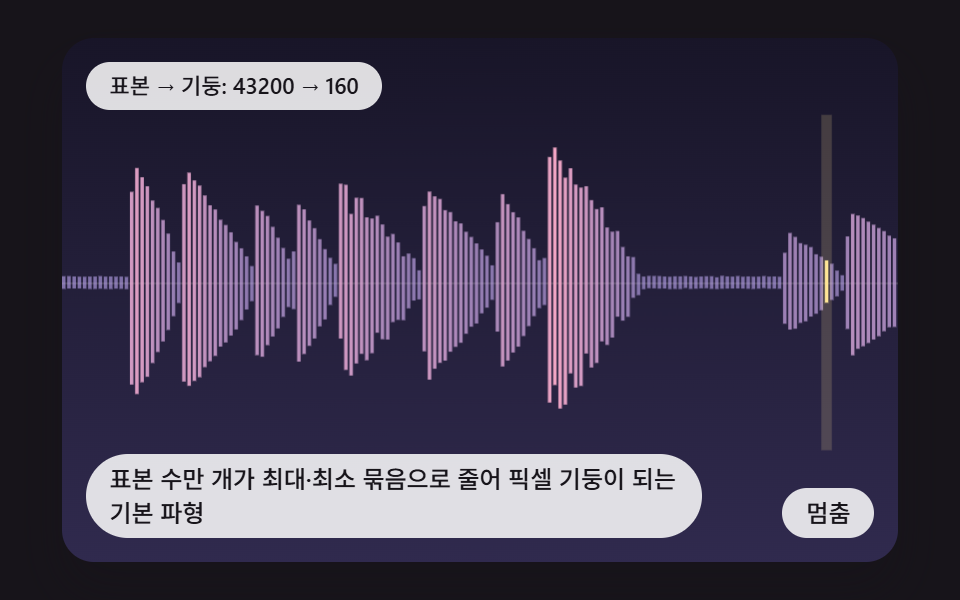 01 wf-minmax-bucket-peak-columns
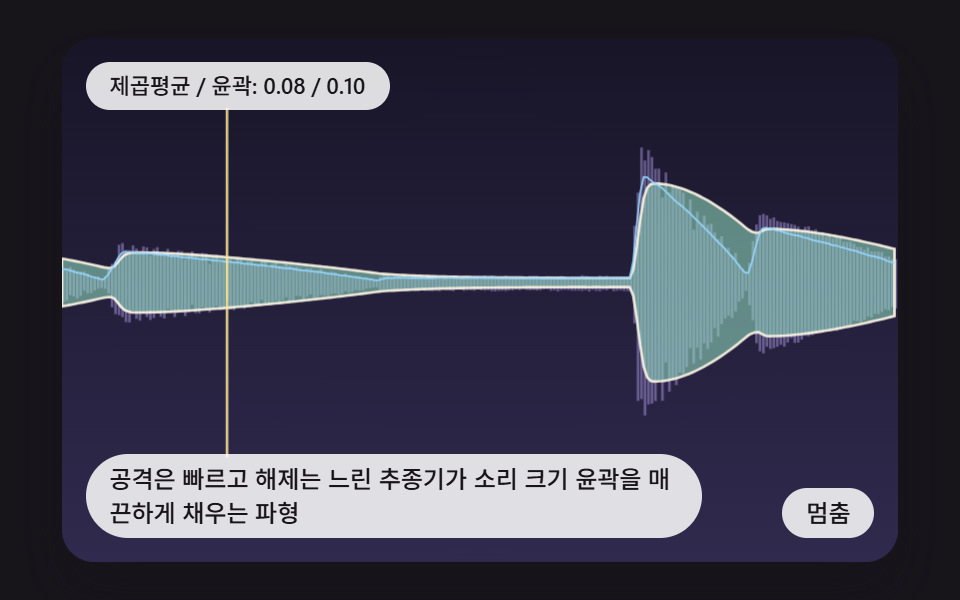 02 wf-rms-envelope-attack-release-fill
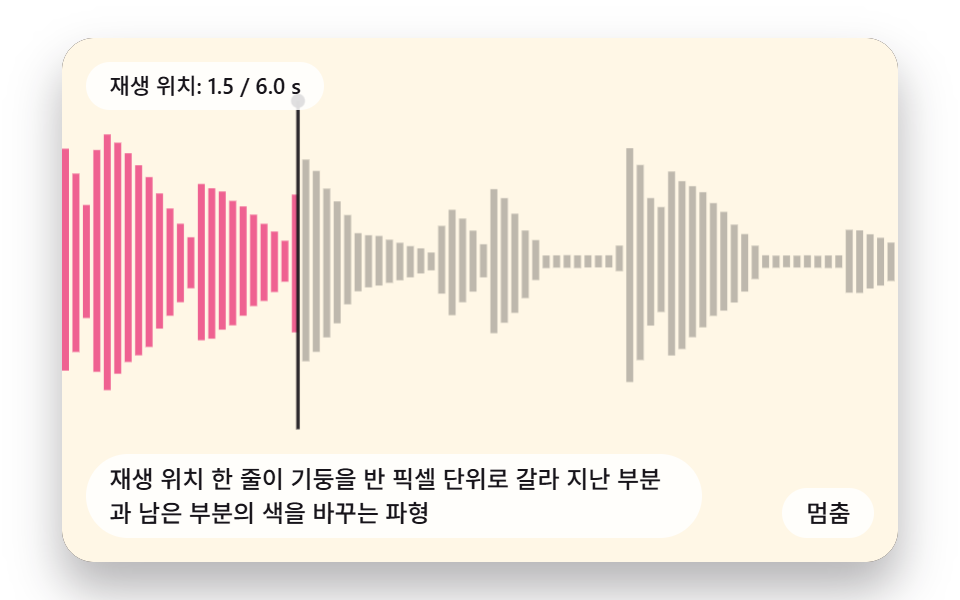 03 wf-playhead-subpixel-played-split
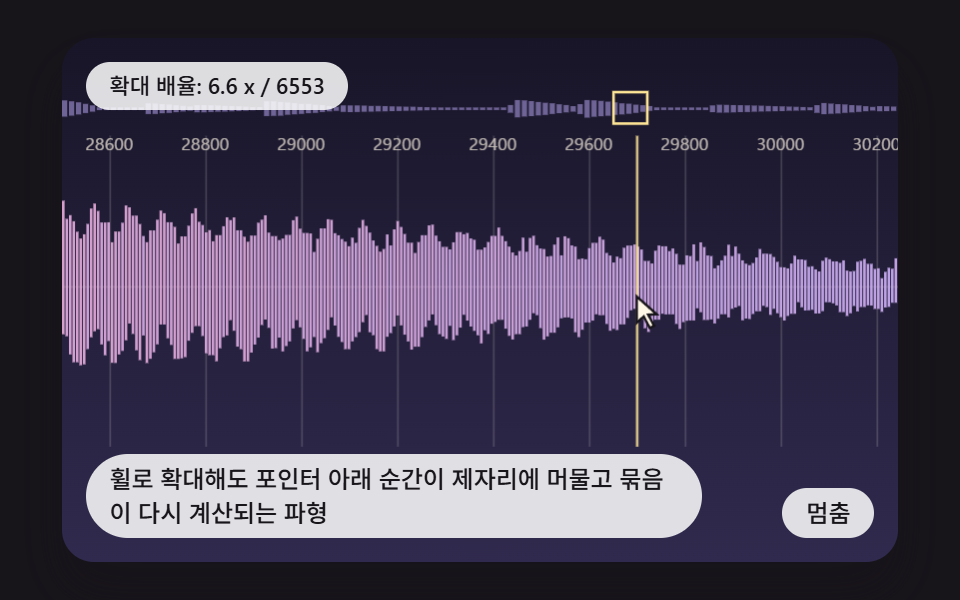 04 wf-wheel-zoom-pointer-anchor-lod
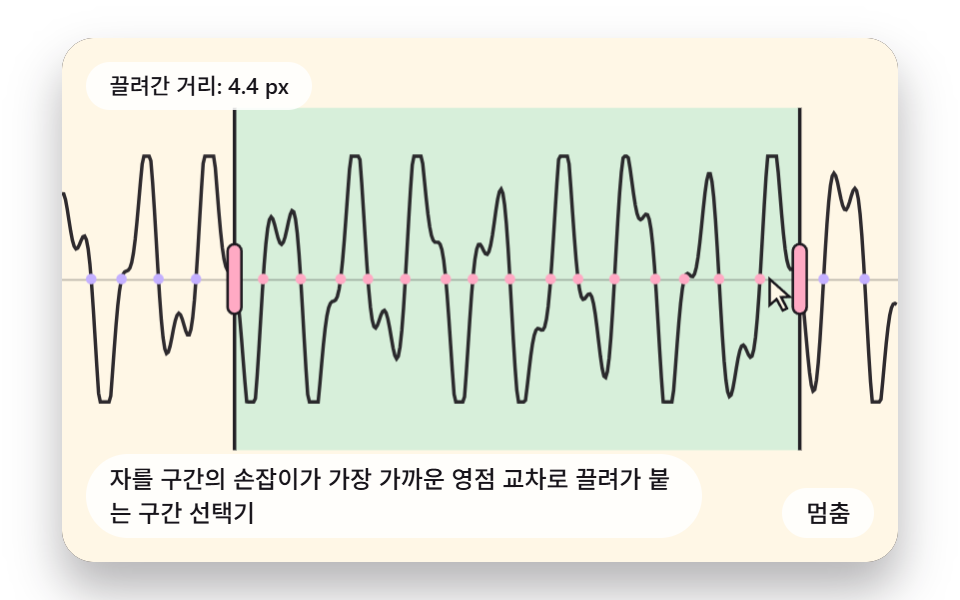 05 wf-trim-handle-zero-cross-snap
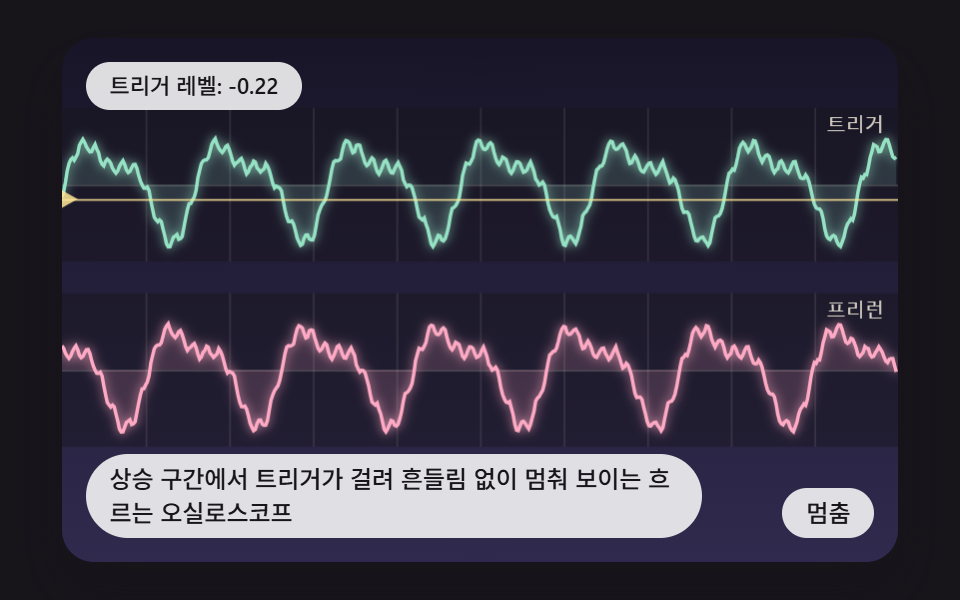 06 wf-scrolling-scope-rising-edge-trigger
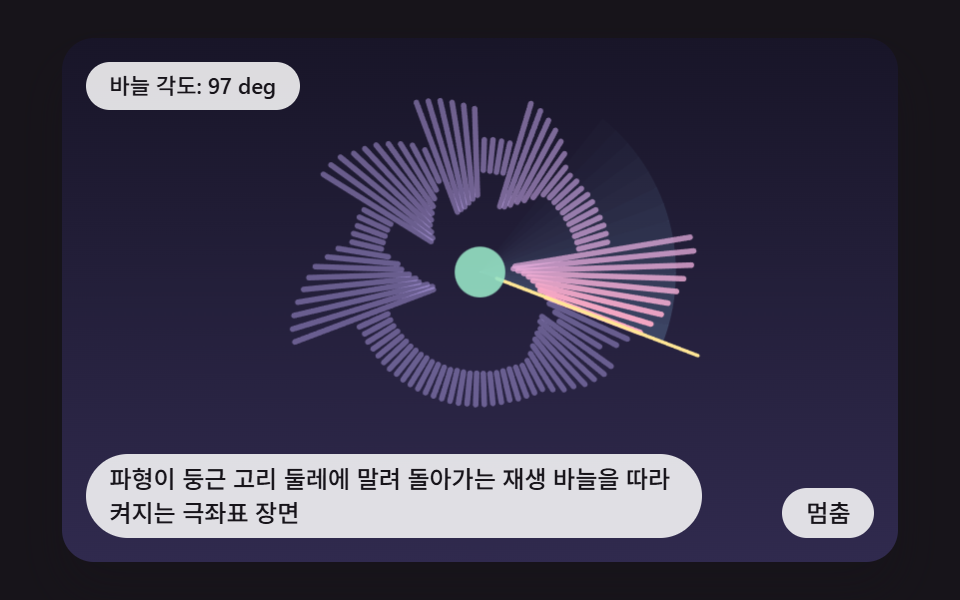 07 wf-polar-ring-rotating-playhead
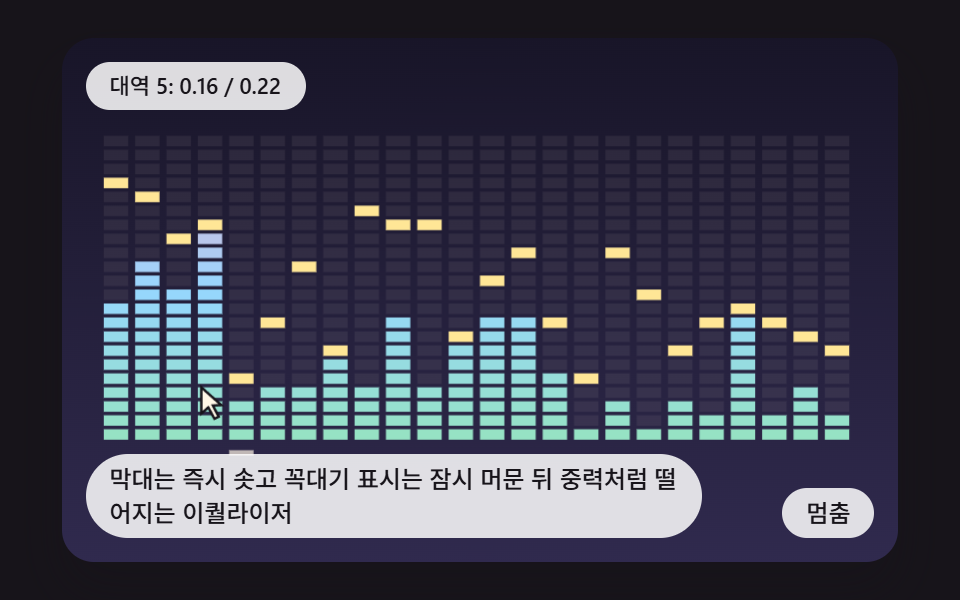 08 wf-equalizer-peak-hold-gravity-fall
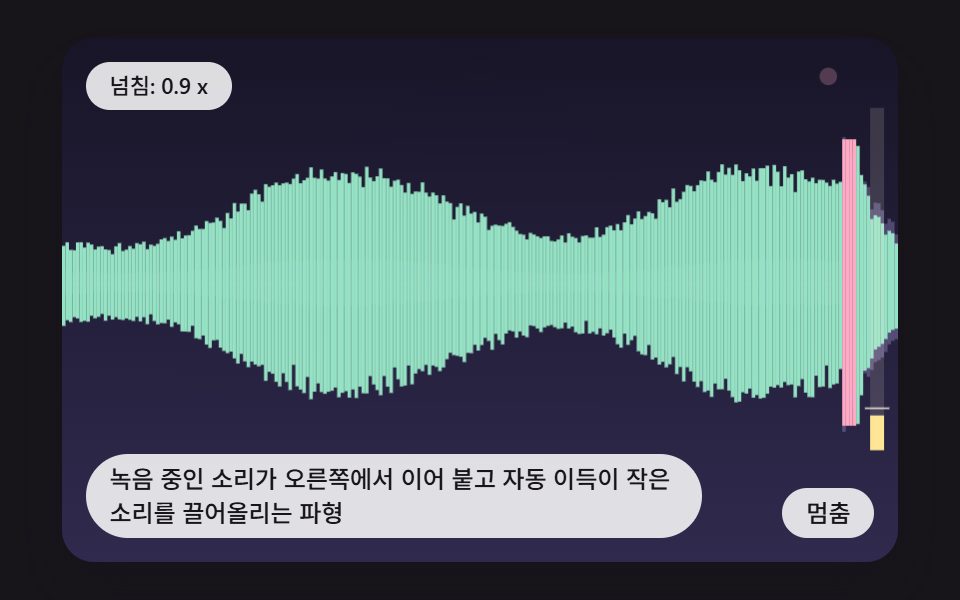 09 wf-live-record-append-auto-gain
Auto-plays · click a tile to jump to its section · all nine in one zip
- 01 A Basic Waveform Where Tens of Thousands of Samples Shrink Into Min/Max Buckets and Become Pixel Columns
- 02 A Waveform Whose Fast-Attack, Slow-Release Follower Fills a Smooth Loudness Outline
- 03 A Waveform Whose Playhead Splits a Column at Half-Pixel Precision to Recolor Played and Unplayed Parts
- 04 A Waveform Where Wheel Zoom Keeps the Moment Under the Pointer in Place and Rebuilds the Buckets
- 05 A Range Picker Whose Trim Handles Get Pulled to the Nearest Zero Crossing
- 06 A Rolling Oscilloscope Whose Rising-Edge Trigger Makes the Trace Hold Still
- 07 A Polar Scene Where the Waveform Wraps Around a Ring and Lights Up Behind a Turning Playhead Needle
- 08 An Equalizer Whose Bars Jump at Once While the Peak Caps Linger and Then Fall Like Gravity
- 09 A Waveform Where Live Recording Appends on the Right and Auto Gain Lifts Quiet Sounds
CSS Waveform in 9 Scenes — Bucketing, Envelope Following and Zero-Crossing Snap
A waveform is the picture a music app or a voice recorder shows for a sound: bars that swing above and below a center line, taller where the sound is louder. None of the nine scenes here makes a sound. Each signal is an array of numbers built from a seeded linear congruential generator lcg, an integer hash hash1, and summed sines, and none of the nine files contains AudioContext or getUserMedia, so no microphone permission prompt shows up. The same seed gives the same waveform, so calling the same function from the zip reproduces the figures quoted below.
The drawing happens on a <canvas> 2D context, not in CSS keyframes. Scene 01 alone has to fold 43,200 visible samples (out of 86,400) into 160 columns, and only a script that counts can tell which sample sets the tip of which column. CSS covers the outer frame: the stage ratio aspect-ratio: 480 / 300, a touch-action value that differs from scene to scene, the :focus-visible outline, and the reduced-motion media query.
The nine scenes share one boot() and differ only in their makeXxxScene function. step() runs at a fixed FIXED_DT of 16ms while draw() runs once per frame, and the catch-up time per frame is capped at 160ms, so a tab that sat in the background for a while advances at most 10 steps at once when it comes back. After 220 steps, about 3.5 seconds, with no input, a fake pointer appears and plays a demo script, and the script stops the moment a person touches the scene.
It saves time to pick a starting point by use case. If you are shaping a css audio waveform animation for a player screen, open 01 for a timeline preview, 03 for playback progress, and 02 for a voice memo list. A trim screen for audio or video sits closest to 04 and 05, an instrument tuner or a signal dashboard to 06, the hero of a music event landing page to 07, a player's level meter to 08, and a meeting recorder to 09.
Reading the Code Behind Each CSS Waveform Animation Technique
The phrase css waveform animation tends to bring to mind bars that bob up and down by themselves as decoration, but the snippets below show how an array of numbers gets divided into screen columns. Each snippet is a run of consecutive lines lifted from the <script> in that scene's index.html. The shared helper scanRange(sig, a, b), which 01, 02, 03, 04, and 07 call, walks from sample a up to just before b and leaves the smallest and largest values in rangeLo and rangeHi, so wherever rangeLo appears in a snippet, it holds that result.
01A Basic Waveform Where Tens of Thousands of Samples Shrink Into Min/Max Buckets and Become Pixel Columns
bucketColumns divides the 480 width by a BUCKET_PX of 3 into 160 columns and spreads the 43,200 visible samples evenly across them, so each column stands for only the max and min of 270 samples. An average would blend a short spike into its neighbors until it disappeared, while max and min keep that one sample at the column tip, and in quiet stretches where a column would be shorter than 1px, PEAK_FLOOR keeps it 1px above and below the center so the line does not break. Move the lens column with the pointer or ←/→ and the status pill reports that column's max and min.
<main class="stage">
<div class="wf is-demo" id="wfRoot">
  <canvas class="wf__canvas" data-role="canvas" width="480" height="300" tabindex="0" aria-label="A Basic Waveform Where Tens of Thousands of Samples Shrink Into Min/Max Buckets and Become Pixel Columns"></canvas>
  <p class="wf__status" data-role="status" aria-live="polite">Samples → columns</p>
  <button class="wf__btn" data-role="btn" type="button">Pause</button>
  <p class="wf__caption">A Basic Waveform Where Tens of Thousands of Samples Shrink Into Min/Max Buckets and Become Pixel Columns</p>
</div>
</main>
@use "../../../../site/static/demo-tokens" as *;
@include stage($stage-ink);
.wf {
position: relative;
width: min(92vw, calc(160vh - 12.8vw));
aspect-ratio: 480 / 300;
margin: 0 auto;
border-radius: $r-card;
overflow: hidden;
box-shadow: $shadow-raised;
background: $subject-ink;
}
.wf__canvas {
display: block;
width: 100%;
height: 100%;
touch-action: manipulation;
}
.wf__canvas:focus-visible {
outline: 2px solid rgba(255, 255, 255, .85);
outline-offset: -6px;
}
.wf__status {
position: absolute;
left: $sp-3;
top: $sp-3;
max-width: 62%;
margin: 0;
padding: $sp-1 $sp-3;
border-radius: $r-pill;
background: rgba(255, 255, 255, .85);
color: $subject-ink;
font-weight: 500;
font-size: 11px;
line-height: 1.4;
pointer-events: none;
}
.wf__btn {
position: absolute;
right: $sp-3;
bottom: $sp-3;
margin: 0;
padding: $sp-1 $sp-3;
border: 0;
border-radius: $r-pill;
background: rgba(255, 255, 255, .85);
color: $subject-ink;
font: inherit;
font-weight: 500;
font-size: 12px;
line-height: 1.4;
cursor: pointer;
}
.wf__btn:focus-visible {
outline: 2px solid #ffffff;
outline-offset: 2px;
}
.wf__caption {
position: absolute;
left: $sp-3;
bottom: $sp-3;
max-width: 68%;
margin: 0;
padding: $sp-1 $sp-3;
border-radius: $r-pill;
background: rgba(255, 255, 255, .85);
color: $subject-ink;
font-weight: 500;
font-size: 12px;
line-height: 1.4;
pointer-events: none;
}
@media (max-width: 340px) {
.wf__caption, .wf__btn { font-size: 10px; padding: $sp-1 $sp-2; }
.wf__status { font-size: 10px; }
}
@media (prefers-reduced-motion: reduce) {
.wf { cursor: default; }
}html, body {
margin: 0;
overflow: hidden;
}
.stage {
box-sizing: border-box;
min-height: 100vh;
display: grid;
place-items: center;
margin: 0;
background: #17141a;
font-family: -apple-system, "Segoe UI", "Noto Sans KR", sans-serif;
padding: clamp(8px, 4vw, 24px);
}
.wf {
position: relative;
width: min(92vw, 160vh - 12.8vw);
aspect-ratio: 480/300;
margin: 0 auto;
border-radius: 16px;
overflow: hidden;
box-shadow: 0 14px 24px rgba(23, 20, 26, 0.32);
background: #17141a;
}
.wf__canvas {
display: block;
width: 100%;
height: 100%;
touch-action: manipulation;
}
.wf__canvas:focus-visible {
outline: 2px solid rgba(255, 255, 255, 0.85);
outline-offset: -6px;
}
.wf__status {
position: absolute;
left: 12px;
top: 12px;
max-width: 62%;
margin: 0;
padding: 4px 12px;
border-radius: 999px;
background: rgba(255, 255, 255, 0.85);
color: #17141a;
font-weight: 500;
font-size: 11px;
line-height: 1.4;
pointer-events: none;
}
.wf__btn {
position: absolute;
right: 12px;
bottom: 12px;
margin: 0;
padding: 4px 12px;
border: 0;
border-radius: 999px;
background: rgba(255, 255, 255, 0.85);
color: #17141a;
font: inherit;
font-weight: 500;
font-size: 12px;
line-height: 1.4;
cursor: pointer;
}
.wf__btn:focus-visible {
outline: 2px solid #ffffff;
outline-offset: 2px;
}
.wf__caption {
position: absolute;
left: 12px;
bottom: 12px;
max-width: 68%;
margin: 0;
padding: 4px 12px;
border-radius: 999px;
background: rgba(255, 255, 255, 0.85);
color: #17141a;
font-weight: 500;
font-size: 12px;
line-height: 1.4;
pointer-events: none;
}
@media (max-width: 340px) {
.wf__caption, .wf__btn {
font-size: 10px;
padding: 4px 8px;
}
.wf__status {
font-size: 10px;
}
}
@media (prefers-reduced-motion: reduce) {
.wf {
cursor: default;
}
}(function () {
const W = 480;
const H = 300;
const PI2 = Math.PI * 2;
const FIXED_DT = 16;
const IDLE_STEPS = 220;
const REDUCE_STEP_MS = 900;
const REDUCE_WARM_STEPS = 40;
const BTN_PAUSE = 'Pause';
const BTN_PLAY = 'Play';
const BTN_NEXT = 'Next moment';
// 파스텔 팔레트와 어두운 바탕 두 끝 색
const PINK = [255, 170, 196];
const MINT = [150, 226, 196];
const LILAC = [196, 176, 255];
const SKY_BLUE = [150, 214, 255];
const BUTTER = [255, 230, 150];
const CREAM = [255, 247, 230];
const INK = [23, 20, 26];
const BG_TOP = [24, 21, 40];
const BG_BOT = [48, 42, 78];
function clamp(v, lo, hi) { return v < lo ? lo : (v > hi ? hi : v); }
function lerp(a, b, k) { return a + (b - a) * k; }
function smooth(x) { const c = clamp(x, 0, 1); return c * c * (3 - 2 * c); }
function mix(a, b, k) { return [lerp(a[0], b[0], k), lerp(a[1], b[1], k), lerp(a[2], b[2], k)]; }
function rgba(c, a) { return 'rgba(' + Math.round(c[0]) + ',' + Math.round(c[1]) + ',' + Math.round(c[2]) + ',' + a.toFixed(3) + ')'; }
// 시드 고정 난수 — 같은 시드면 언제나 같은 수열 (선형 합동 방식)
function lcg(seed) {
let s = seed >>> 0;
return function () {
s = (Math.imul(s, 1664525) + 1013904223) >>> 0;
return s / 4294967296;
};
}
// 정수 하나와 시드로 0 이상 1 미만의 값을 만드는 해시 (같은 입력은 늘 같은 값)
function hash1(i, seed) {
let h = (Math.imul(i | 0, 374761393) + Math.imul(seed | 0, 668265263)) | 0;
h = Math.imul(h ^ (h >>> 13), 1274126177);
h ^= h >>> 16;
return (h >>> 0) / 4294967296;
}
// 사인 두 개를 음절마다 갈아 끼우고 엔벨로프를 씌운 합성 신호 (소리는 재생하지 않고 수치만 만든다)
function synth(n, seed) {
const rnd = lcg(seed);
const out = new Float32Array(n);
let i = 0;
let p1 = 0;
let p2 = 0;
let peak = 0.0001;
while (i < n) {
const len = 1800 + Math.floor(rnd() * 4200);
const amp = 0.18 + rnd() * 0.82;
const rest = rnd() < 0.18;
const f1 = 0.02 + rnd() * 0.09;
const f2 = f1 * (1.5 + rnd());
const stop = Math.min(n, i + len);
for (let k = i; k < stop; k += 1) {
const x = (k - i) / len;
const env = Math.min(1, x / 0.06) * Math.pow(1 - x, 0.8);
p1 += PI2 * f1;
p2 += PI2 * f2;
const tone = Math.sin(p1) * 0.7 + Math.sin(p2) * 0.3;
const gain = rest ? 0.03 : amp * env;
const v = gain * tone + (rnd() - 0.5) * 0.08 * (rest ? 0.4 : amp);
out[k] = v;
const a = Math.abs(v);
if (a > peak) {
peak = a;
}
}
i = stop;
}
const norm = 0.92 / peak;
for (let k = 0; k < n; k += 1) {
out[k] *= norm;
}
return out;
}
// 표본 구간 [a, b) 의 최솟값과 최댓값 — 결과는 rangeLo, rangeHi 에 둔다
let rangeLo = 0;
let rangeHi = 0;
function scanRange(sig, a, b) {
const from = Math.max(0, Math.floor(a));
const to = Math.min(sig.length, Math.max(from + 1, Math.ceil(b)));
let lo = 1e9;
let hi = -1e9;
for (let i = from; i < to; i += 1) {
const v = sig[i];
if (v < lo) {
lo = v;
}
if (v > hi) {
hi = v;
}
}
if (lo > hi) {
lo = 0;
hi = 0;
}
rangeLo = lo;
rangeHi = hi;
}
function paintBg(ctx, top, bot) {
const g = ctx.createLinearGradient(0, 0, 0, H);
g.addColorStop(0, rgba(top, 1));
g.addColorStop(1, rgba(bot, 1));
ctx.fillStyle = g;
ctx.fillRect(0, 0, W, H);
}
// 가짜 포인터 — 시연 동안 손이 움직이는 것처럼 보이게 그린다
function drawCursor(ctx, x, y, down) {
ctx.save();
ctx.translate(x, y);
ctx.beginPath();
ctx.moveTo(0, 0);
ctx.lineTo(0, 15);
ctx.lineTo(4, 11.5);
ctx.lineTo(7.5, 18);
ctx.lineTo(10, 16.8);
ctx.lineTo(6.6, 10.4);
ctx.lineTo(11.5, 10.2);
ctx.closePath();
ctx.fillStyle = rgba(CREAM, 1);
ctx.strokeStyle = rgba(INK, 1);
ctx.lineWidth = 1.4;
ctx.fill();
ctx.stroke();
if (down) {
ctx.beginPath();
ctx.arc(0, 0, 9, 0, PI2);
ctx.strokeStyle = rgba(PINK, 0.9);
ctx.lineWidth = 2;
ctx.stroke();
}
ctx.restore();
}
function boot(root, make) {
const canvasEl = root.querySelector('[data-role="canvas"]');
const statusEl = root.querySelector('[data-role="status"]');
const btnEl = root.querySelector('[data-role="btn"]');
if (!(canvasEl instanceof HTMLCanvasElement) || !statusEl || !(btnEl instanceof HTMLButtonElement)) {
return function () { };
}
const ctxOrNull = canvasEl.getContext('2d');
if (!ctxOrNull) {
return function () { };
}
const canvas = canvasEl;
const ctx = ctxOrNull;
const status = statusEl;
const btn = btnEl;
const reduce = window.matchMedia('(prefers-reduced-motion: reduce)').matches;
const cleaners = [];
let paused = false;
let idle = IDLE_STEPS + 1;
let clock = 0;
let lastSayAt = -1e9;
let lastText = status.textContent || '';
let scene = null;
let rafId = 0;
let acc = 0;
let lastTs = -1;
function isAuto() { return !reduce && !paused && idle > IDLE_STEPS; }
function sync() {
const on = isAuto();
if (root.classList.contains('is-demo') !== on) {
root.classList.toggle('is-demo', on);
}
}
function fit() {
const r = canvas.getBoundingClientRect();
const dpr = window.devicePixelRatio || 1;
const cw = Math.max(1, Math.round(r.width * dpr));
const ch = Math.max(1, Math.round(r.height * dpr));
canvas.width = cw;
canvas.height = ch;
ctx.setTransform(cw / W, 0, 0, ch / H, 0, 0);
}
const host = {
ctx,
canvas,
root,
reduce,
touch() {
idle = 0;
sync();
},
auto: isAuto,
refresh() {
if (scene) {
scene.draw();
}
},
say(text) {
if (text === lastText) {
return;
}
if (!reduce && clock - lastSayAt < 250) {
return;
}
lastText = text;
lastSayAt = clock;
// 시연이 혼자 돌 때는 읽어 주지 않고, 사람이 만졌을 때만 알린다
status.setAttribute('aria-live', isAuto() ? 'off' : 'polite');
status.textContent = text;
},
local(e) {
const r = canvas.getBoundingClientRect();
return [clamp((e.clientX - r.left) * W / Math.max(1, r.width), 0, W), clamp((e.clientY - r.top) * H / Math.max(1, r.height), 0, H)];
},
listen(target, type, fn, opts) {
target.addEventListener(type, fn, opts);
cleaners.push(function () { target.removeEventListener(type, fn, opts); });
}
};
function advance(ms) {
if (!scene) {
return;
}
const n = Math.max(1, Math.round(ms / FIXED_DT));
for (let i = 0; i < n; i += 1) {
idle += 1;
clock += FIXED_DT;
scene.step();
}
}
function frame(ts) {
if (lastTs < 0) {
lastTs = ts;
}
const dt = Math.min(ts - lastTs, 160);
lastTs = ts;
if (!paused && scene) {
acc += dt;
while (acc >= FIXED_DT) {
idle += 1;
clock += FIXED_DT;
scene.step();
acc -= FIXED_DT;
}
sync();
scene.draw();
}
rafId = requestAnimationFrame(frame);
}
scene = make(host);
btn.textContent = reduce ? BTN_NEXT : BTN_PAUSE;
fit();
if (reduce) {
root.classList.remove('is-demo');
advance(REDUCE_WARM_STEPS * FIXED_DT);
}
scene.draw();
host.listen(btn, 'click', function () {
if (reduce) {
advance(REDUCE_STEP_MS);
host.refresh();
return;
}
paused = !paused;
btn.textContent = paused ? BTN_PLAY : BTN_PAUSE;
sync();
});
host.listen(window, 'resize', function () {
fit();
host.refresh();
});
if (!reduce) {
rafId = requestAnimationFrame(frame);
}
return function () {
cancelAnimationFrame(rafId);
for (let i = 0; i < cleaners.length; i += 1) {
cleaners[i]();
}
};
}
const SAMPLE_N = 86400;
const BUCKET_PX = 3;
const BAR_GAP = 1;
const PEAK_FLOOR = 1;
const VIEW_SAMPLES = 43200;
const SLIDE_STEP = 180;
const MID_Y = 140;
const HALF_Y = 84;
const TXT_RATIO = 'Samples → columns';
const TXT_BUCKET = 'Bucket max / min';
// 구간 [start, start + view) 를 기둥 폭마다 한 묶음으로 줄여 최솟값과 최댓값 두 줄을 돌려준다
function bucketColumns(sig, start, view, bucketPx) {
    const n = Math.floor(W / bucketPx);
    const per = view / n;
    const lo = [];
    const hi = [];
    for (let c = 0; c < n; c += 1) {
        scanRange(sig, start + c * per, start + (c + 1) * per);
        lo.push(rangeLo);
        hi.push(rangeHi);
    }
    return { lo, hi };
}
function makeBucketScene(h) {
const sig = synth(SAMPLE_N, 459);
let start = 0;
let dir = 1;
let k = 0;
let lensX = 120;
function move(x) {
lensX = clamp(x, 0, W - 1);
h.touch();
h.refresh();
}
h.listen(h.canvas, 'pointermove', function (e) {
move(h.local(e)[0]);
});
h.listen(h.canvas, 'keydown', function (e) {
const key = e.key;
if (key === 'ArrowLeft') {
e.preventDefault();
move(lensX - BUCKET_PX * 4);
}
else if (key === 'ArrowRight') {
e.preventDefault();
move(lensX + BUCKET_PX * 4);
}
else if (key === 'Home') {
e.preventDefault();
move(0);
}
else if (key === 'End') {
e.preventDefault();
move(W - 1);
}
});
return {
step() {
k += 1;
start += dir * SLIDE_STEP;
if (start > SAMPLE_N - VIEW_SAMPLES) {
start = SAMPLE_N - VIEW_SAMPLES;
dir = -1;
}
else if (start < 0) {
start = 0;
dir = 1;
}
if (h.auto()) {
lensX = W * (0.5 + 0.42 * Math.sin(k * 0.035));
}
},
draw() {
const ctx = h.ctx;
paintBg(ctx, BG_TOP, BG_BOT);
ctx.fillStyle = rgba(CREAM, 0.16);
ctx.fillRect(0, MID_Y, W, 1);
const cols = bucketColumns(sig, start, VIEW_SAMPLES, BUCKET_PX);
const lens = clamp(Math.floor(lensX / BUCKET_PX), 0, cols.hi.length - 1);
for (let c = 0; c < cols.hi.length; c += 1) {
const hi = cols.hi[c];
const lo = cols.lo[c];
let y1 = MID_Y - hi * HALF_Y;
let y2 = MID_Y - lo * HALF_Y;
if (MID_Y - y1 < PEAK_FLOOR) {
y1 = MID_Y - PEAK_FLOOR;
}
if (y2 - MID_Y < PEAK_FLOOR) {
y2 = MID_Y + PEAK_FLOOR;
}
const loud = clamp(Math.max(hi, -lo), 0, 1);
ctx.fillStyle = c === lens ? rgba(BUTTER, 1) : rgba(mix(LILAC, PINK, loud), 0.55 + 0.45 * loud);
ctx.fillRect(c * BUCKET_PX, y1, BUCKET_PX - BAR_GAP, y2 - y1);
}
// 렌즈 아래 묶음 — 이 한 기둥이 표본 몇 개를 대표하는지 표시
ctx.fillStyle = rgba(BUTTER, 0.18);
ctx.fillRect(lens * BUCKET_PX - 2, 44, BUCKET_PX + 3, 192);
h.say(h.auto() && !h.reduce
? TXT_RATIO + ': ' + VIEW_SAMPLES + ' → ' + cols.hi.length
: TXT_BUCKET + ': ' + cols.hi[lens].toFixed(2) + ' / ' + cols.lo[lens].toFixed(2));
}
};
}
boot(document.getElementById('wfRoot'), makeBucketScene);
})();import { useEffect, useRef } from "react";
import styles from "./WfMinmaxBucketPeakColumns.module.scss";
const W = 480;
const H = 300;
const PI2 = Math.PI * 2;
const FIXED_DT = 16;
const IDLE_STEPS = 220;
const REDUCE_STEP_MS = 900;
const REDUCE_WARM_STEPS = 40;
const BTN_PAUSE = '멈춤';
const BTN_PLAY = '재생';
const BTN_NEXT = '다음 순간';
type RGB = [number, number, number];
// 파스텔 팔레트와 어두운 바탕 두 끝 색
const PINK: RGB = [255, 170, 196];
const MINT: RGB = [150, 226, 196];
const LILAC: RGB = [196, 176, 255];
const SKY_BLUE: RGB = [150, 214, 255];
const BUTTER: RGB = [255, 230, 150];
const CREAM: RGB = [255, 247, 230];
const INK: RGB = [23, 20, 26];
const BG_TOP: RGB = [24, 21, 40];
const BG_BOT: RGB = [48, 42, 78];
interface Host {
ctx: CanvasRenderingContext2D;
canvas: HTMLCanvasElement;
root: HTMLElement;
reduce: boolean;
touch(): void;
auto(): boolean;
refresh(): void;
say(text: string): void;
local(e: MouseEvent): [number, number];
listen(target: EventTarget, type: string, fn: (e: Event) => void, opts?: AddEventListenerOptions): void;
}
interface Scene {
step(): void;
draw(): void;
}
function clamp(v: number, lo: number, hi: number): number { return v < lo ? lo : (v > hi ? hi : v); }
function lerp(a: number, b: number, k: number): number { return a + (b - a) * k; }
function smooth(x: number): number { const c = clamp(x, 0, 1); return c * c * (3 - 2 * c); }
function mix(a: RGB, b: RGB, k: number): RGB { return [lerp(a[0], b[0], k), lerp(a[1], b[1], k), lerp(a[2], b[2], k)]; }
function rgba(c: RGB, a: number): string { return 'rgba(' + Math.round(c[0]) + ',' + Math.round(c[1]) + ',' + Math.round(c[2]) + ',' + a.toFixed(3) + ')'; }
// 시드 고정 난수 — 같은 시드면 언제나 같은 수열 (선형 합동 방식)
function lcg(seed: number): () => number {
let s = seed >>> 0;
return function (): number {
s = (Math.imul(s, 1664525) + 1013904223) >>> 0;
return s / 4294967296;
};
}
// 정수 하나와 시드로 0 이상 1 미만의 값을 만드는 해시 (같은 입력은 늘 같은 값)
function hash1(i: number, seed: number): number {
let h = (Math.imul(i | 0, 374761393) + Math.imul(seed | 0, 668265263)) | 0;
h = Math.imul(h ^ (h >>> 13), 1274126177);
h ^= h >>> 16;
return (h >>> 0) / 4294967296;
}
// 사인 두 개를 음절마다 갈아 끼우고 엔벨로프를 씌운 합성 신호 (소리는 재생하지 않고 수치만 만든다)
function synth(n: number, seed: number): Float32Array {
const rnd = lcg(seed);
const out = new Float32Array(n);
let i = 0;
let p1 = 0;
let p2 = 0;
let peak = 0.0001;
while (i < n) {
const len = 1800 + Math.floor(rnd() * 4200);
const amp = 0.18 + rnd() * 0.82;
const rest = rnd() < 0.18;
const f1 = 0.02 + rnd() * 0.09;
const f2 = f1 * (1.5 + rnd());
const stop = Math.min(n, i + len);
for (let k = i; k < stop; k += 1) {
const x = (k - i) / len;
const env = Math.min(1, x / 0.06) * Math.pow(1 - x, 0.8);
p1 += PI2 * f1;
p2 += PI2 * f2;
const tone = Math.sin(p1) * 0.7 + Math.sin(p2) * 0.3;
const gain = rest ? 0.03 : amp * env;
const v = gain * tone + (rnd() - 0.5) * 0.08 * (rest ? 0.4 : amp);
out[k] = v;
const a = Math.abs(v);
if (a > peak) { peak = a; }
}
i = stop;
}
const norm = 0.92 / peak;
for (let k = 0; k < n; k += 1) { out[k] *= norm; }
return out;
}
// 표본 구간 [a, b) 의 최솟값과 최댓값 — 결과는 rangeLo, rangeHi 에 둔다
let rangeLo = 0;
let rangeHi = 0;
function scanRange(sig: Float32Array, a: number, b: number): void {
const from = Math.max(0, Math.floor(a));
const to = Math.min(sig.length, Math.max(from + 1, Math.ceil(b)));
let lo = 1e9;
let hi = -1e9;
for (let i = from; i < to; i += 1) {
const v = sig[i];
if (v < lo) { lo = v; }
if (v > hi) { hi = v; }
}
if (lo > hi) { lo = 0; hi = 0; }
rangeLo = lo;
rangeHi = hi;
}
function paintBg(ctx: CanvasRenderingContext2D, top: RGB, bot: RGB): void {
const g = ctx.createLinearGradient(0, 0, 0, H);
g.addColorStop(0, rgba(top, 1));
g.addColorStop(1, rgba(bot, 1));
ctx.fillStyle = g;
ctx.fillRect(0, 0, W, H);
}
// 가짜 포인터 — 시연 동안 손이 움직이는 것처럼 보이게 그린다
function drawCursor(ctx: CanvasRenderingContext2D, x: number, y: number, down: boolean): void {
ctx.save();
ctx.translate(x, y);
ctx.beginPath();
ctx.moveTo(0, 0);
ctx.lineTo(0, 15);
ctx.lineTo(4, 11.5);
ctx.lineTo(7.5, 18);
ctx.lineTo(10, 16.8);
ctx.lineTo(6.6, 10.4);
ctx.lineTo(11.5, 10.2);
ctx.closePath();
ctx.fillStyle = rgba(CREAM, 1);
ctx.strokeStyle = rgba(INK, 1);
ctx.lineWidth = 1.4;
ctx.fill();
ctx.stroke();
if (down) {
ctx.beginPath();
ctx.arc(0, 0, 9, 0, PI2);
ctx.strokeStyle = rgba(PINK, 0.9);
ctx.lineWidth = 2;
ctx.stroke();
}
ctx.restore();
}
function boot(root: HTMLElement, make: (h: Host) => Scene): () => void {
const canvasEl = root.querySelector('[data-role="canvas"]');
const statusEl = root.querySelector('[data-role="status"]');
const btnEl = root.querySelector('[data-role="btn"]');
if (!(canvasEl instanceof HTMLCanvasElement) || !statusEl || !(btnEl instanceof HTMLButtonElement)) {
return function (): void { /* 필요한 요소가 없으면 아무것도 하지 않는다 */ };
}
const ctxOrNull = canvasEl.getContext('2d');
if (!ctxOrNull) {
return function (): void { /* 2d 문맥이 없으면 아무것도 하지 않는다 */ };
}
const canvas: HTMLCanvasElement = canvasEl;
const ctx: CanvasRenderingContext2D = ctxOrNull;
const status: Element = statusEl;
const btn: HTMLButtonElement = btnEl;
const reduce = window.matchMedia('(prefers-reduced-motion: reduce)').matches;
const cleaners: Array<() => void> = [];
let paused = false;
let idle = IDLE_STEPS + 1;
let clock = 0;
let lastSayAt = -1e9;
let lastText = status.textContent || '';
let scene: Scene | null = null;
let rafId = 0;
let acc = 0;
let lastTs = -1;
function isAuto(): boolean { return !reduce && !paused && idle > IDLE_STEPS; }
function sync(): void {
const on = isAuto();
if (root.classList.contains('is-demo') !== on) {
root.classList.toggle('is-demo', on);
}
}
function fit(): void {
const r = canvas.getBoundingClientRect();
const dpr = window.devicePixelRatio || 1;
const cw = Math.max(1, Math.round(r.width * dpr));
const ch = Math.max(1, Math.round(r.height * dpr));
canvas.width = cw;
canvas.height = ch;
ctx.setTransform(cw / W, 0, 0, ch / H, 0, 0);
}
const host: Host = {
ctx,
canvas,
root,
reduce,
touch(): void {
idle = 0;
sync();
},
auto: isAuto,
refresh(): void {
if (scene) { scene.draw(); }
},
say(text: string): void {
if (text === lastText) { return; }
if (!reduce && clock - lastSayAt < 250) { return; }
lastText = text;
lastSayAt = clock;
// 시연이 혼자 돌 때는 읽어 주지 않고, 사람이 만졌을 때만 알린다
status.setAttribute('aria-live', isAuto() ? 'off' : 'polite');
status.textContent = text;
},
local(e: MouseEvent): [number, number] {
const r = canvas.getBoundingClientRect();
return [clamp((e.clientX - r.left) * W / Math.max(1, r.width), 0, W), clamp((e.clientY - r.top) * H / Math.max(1, r.height), 0, H)];
},
listen(target: EventTarget, type: string, fn: (e: Event) => void, opts?: AddEventListenerOptions): void {
target.addEventListener(type, fn, opts);
cleaners.push(function (): void { target.removeEventListener(type, fn, opts); });
}
};
function advance(ms: number): void {
if (!scene) { return; }
const n = Math.max(1, Math.round(ms / FIXED_DT));
for (let i = 0; i < n; i += 1) {
idle += 1;
clock += FIXED_DT;
scene.step();
}
}
function frame(ts: number): void {
if (lastTs < 0) { lastTs = ts; }
const dt = Math.min(ts - lastTs, 160);
lastTs = ts;
if (!paused && scene) {
acc += dt;
while (acc >= FIXED_DT) {
idle += 1;
clock += FIXED_DT;
scene.step();
acc -= FIXED_DT;
}
sync();
scene.draw();
}
rafId = requestAnimationFrame(frame);
}
scene = make(host);
btn.textContent = reduce ? BTN_NEXT : BTN_PAUSE;
fit();
if (reduce) {
root.classList.remove('is-demo');
advance(REDUCE_WARM_STEPS * FIXED_DT);
}
scene.draw();
host.listen(btn, 'click', function (): void {
if (reduce) {
advance(REDUCE_STEP_MS);
host.refresh();
return;
}
paused = !paused;
btn.textContent = paused ? BTN_PLAY : BTN_PAUSE;
sync();
});
host.listen(window, 'resize', function (): void {
fit();
host.refresh();
});
if (!reduce) {
rafId = requestAnimationFrame(frame);
}
return function (): void {
cancelAnimationFrame(rafId);
for (let i = 0; i < cleaners.length; i += 1) { cleaners[i](); }
};
}
const SAMPLE_N = 86400;
const BUCKET_PX = 3;
const BAR_GAP = 1;
const PEAK_FLOOR = 1;
const VIEW_SAMPLES = 43200;
const SLIDE_STEP = 180;
const MID_Y = 140;
const HALF_Y = 84;
const TXT_RATIO = '표본 → 기둥';
const TXT_BUCKET = '묶음 최대 / 최소';
// 구간 [start, start + view) 를 기둥 폭마다 한 묶음으로 줄여 최솟값과 최댓값 두 줄을 돌려준다
function bucketColumns(sig: Float32Array, start: number, view: number, bucketPx: number): { lo: number[]; hi: number[] } {
const n = Math.floor(W / bucketPx);
const per = view / n;
const lo: number[] = [];
const hi: number[] = [];
for (let c = 0; c < n; c += 1) {
scanRange(sig, start + c * per, start + (c + 1) * per);
lo.push(rangeLo);
hi.push(rangeHi);
}
return { lo, hi };
}
function makeBucketScene(h: Host): Scene {
const sig = synth(SAMPLE_N, 459);
let start = 0;
let dir = 1;
let k = 0;
let lensX = 120;
function move(x: number): void {
lensX = clamp(x, 0, W - 1);
h.touch();
h.refresh();
}
h.listen(h.canvas, 'pointermove', function (e: Event): void {
move(h.local(e as PointerEvent)[0]);
});
h.listen(h.canvas, 'keydown', function (e: Event): void {
const key = (e as KeyboardEvent).key;
if (key === 'ArrowLeft') {
e.preventDefault();
move(lensX - BUCKET_PX * 4);
}
else if (key === 'ArrowRight') {
e.preventDefault();
move(lensX + BUCKET_PX * 4);
}
else if (key === 'Home') {
e.preventDefault();
move(0);
}
else if (key === 'End') {
e.preventDefault();
move(W - 1);
}
});
return {
step(): void {
k += 1;
start += dir * SLIDE_STEP;
if (start > SAMPLE_N - VIEW_SAMPLES) {
start = SAMPLE_N - VIEW_SAMPLES;
dir = -1;
}
else if (start < 0) {
start = 0;
dir = 1;
}
if (h.auto()) {
lensX = W * (0.5 + 0.42 * Math.sin(k * 0.035));
}
},
draw(): void {
const ctx = h.ctx;
paintBg(ctx, BG_TOP, BG_BOT);
ctx.fillStyle = rgba(CREAM, 0.16);
ctx.fillRect(0, MID_Y, W, 1);
const cols = bucketColumns(sig, start, VIEW_SAMPLES, BUCKET_PX);
const lens = clamp(Math.floor(lensX / BUCKET_PX), 0, cols.hi.length - 1);
for (let c = 0; c < cols.hi.length; c += 1) {
const hi = cols.hi[c];
const lo = cols.lo[c];
let y1 = MID_Y - hi * HALF_Y;
let y2 = MID_Y - lo * HALF_Y;
if (MID_Y - y1 < PEAK_FLOOR) { y1 = MID_Y - PEAK_FLOOR; }
if (y2 - MID_Y < PEAK_FLOOR) { y2 = MID_Y + PEAK_FLOOR; }
const loud = clamp(Math.max(hi, -lo), 0, 1);
ctx.fillStyle = c === lens ? rgba(BUTTER, 1) : rgba(mix(LILAC, PINK, loud), 0.55 + 0.45 * loud);
ctx.fillRect(c * BUCKET_PX, y1, BUCKET_PX - BAR_GAP, y2 - y1);
}
// 렌즈 아래 묶음 — 이 한 기둥이 표본 몇 개를 대표하는지 표시
ctx.fillStyle = rgba(BUTTER, 0.18);
ctx.fillRect(lens * BUCKET_PX - 2, 44, BUCKET_PX + 3, 192);
h.say(h.auto() && !h.reduce
? TXT_RATIO + ': ' + VIEW_SAMPLES + ' → ' + cols.hi.length
: TXT_BUCKET + ': ' + cols.hi[lens].toFixed(2) + ' / ' + cols.lo[lens].toFixed(2));
}
};
}
export default function WfMinmaxBucketPeakColumns() {
const rootRef = useRef<HTMLDivElement | null>(null);
useEffect(() => {
const root = rootRef.current;
if (!root) return;
return boot(root, makeBucketScene);
}, []);
return (
<main className={styles.stage}>
<div className={`${styles.wf} is-demo`} ref={rootRef}>
<canvas className={styles.canvas} data-role="canvas" width={480} height={300} tabIndex={0} aria-label="표본 수만 개가 최대·최소 묶음으로 줄어 픽셀 기둥이 되는 기본 파형" />
<p className={styles.status} data-role="status" aria-live="polite">표본 → 기둥</p>
<button className={styles.btn} data-role="btn" type="button">멈춤</button>
<p className={styles.caption}>표본 수만 개가 최대·최소 묶음으로 줄어 픽셀 기둥이 되는 기본 파형</p>
</div>
</main>
);
}01 · A Basic Waveform Where Tens of Thousands of Samples Shrink Into Min/Max Buckets and Become Pixel Columns — Measured area 38.376% · moving frames 23/23Original by GODRICH · SCSS and React ship in the zip · See the password
function bucketColumns(sig, start, view, bucketPx) {
const n = Math.floor(W / bucketPx);
const per = view / n;
const lo = [];
const hi = [];
for (let c = 0; c < n; c += 1) {
scanRange(sig, start + c * per, start + (c + 1) * per);
lo.push(rangeLo);
hi.push(rangeHi);
}
return { lo, hi };
}
02A Waveform Whose Fast-Attack, Slow-Release Follower Fills a Smooth Loudness Outline
rmsAt takes the root mean square of the RMS_WIN of 160 samples ending at each column, and followEnvelope chases that value by adding a fraction of the gap each column: ATTACK_K (0.5) on the way up and RELEASE_K (0.06) on the way down. On a step from 0 to 1 the outline reaches 90% within 3 columns, while after a drop from 1 to 0 it takes 38 columns to sink below 10%, hanging on like the tail after a drum hit. Following starts 30 columns (WARM_COLS) before the first visible one, so the outline at the left edge does not climb up from 0.
<main class="stage">
<div class="wf is-demo" id="wfRoot">
  <canvas class="wf__canvas" data-role="canvas" width="480" height="300" tabindex="0" aria-label="A Waveform Whose Fast-Attack, Slow-Release Follower Fills a Smooth Loudness Outline"></canvas>
  <p class="wf__status" data-role="status" aria-live="polite">RMS / envelope</p>
  <button class="wf__btn" data-role="btn" type="button">Pause</button>
  <p class="wf__caption">A Waveform Whose Fast-Attack, Slow-Release Follower Fills a Smooth Loudness Outline</p>
</div>
</main>
@use "../../../../site/static/demo-tokens" as *;
@include stage($stage-ink);
.wf {
position: relative;
width: min(92vw, calc(160vh - 12.8vw));
aspect-ratio: 480 / 300;
margin: 0 auto;
border-radius: $r-card;
overflow: hidden;
box-shadow: $shadow-raised;
background: $subject-ink;
}
.wf__canvas {
display: block;
width: 100%;
height: 100%;
touch-action: manipulation;
}
.wf__canvas:focus-visible {
outline: 2px solid rgba(255, 255, 255, .85);
outline-offset: -6px;
}
.wf__status {
position: absolute;
left: $sp-3;
top: $sp-3;
max-width: 62%;
margin: 0;
padding: $sp-1 $sp-3;
border-radius: $r-pill;
background: rgba(255, 255, 255, .85);
color: $subject-ink;
font-weight: 500;
font-size: 11px;
line-height: 1.4;
pointer-events: none;
}
.wf__btn {
position: absolute;
right: $sp-3;
bottom: $sp-3;
margin: 0;
padding: $sp-1 $sp-3;
border: 0;
border-radius: $r-pill;
background: rgba(255, 255, 255, .85);
color: $subject-ink;
font: inherit;
font-weight: 500;
font-size: 12px;
line-height: 1.4;
cursor: pointer;
}
.wf__btn:focus-visible {
outline: 2px solid #ffffff;
outline-offset: 2px;
}
.wf__caption {
position: absolute;
left: $sp-3;
bottom: $sp-3;
max-width: 68%;
margin: 0;
padding: $sp-1 $sp-3;
border-radius: $r-pill;
background: rgba(255, 255, 255, .85);
color: $subject-ink;
font-weight: 500;
font-size: 12px;
line-height: 1.4;
pointer-events: none;
}
@media (max-width: 340px) {
.wf__caption, .wf__btn { font-size: 10px; padding: $sp-1 $sp-2; }
.wf__status { font-size: 10px; }
}
@media (prefers-reduced-motion: reduce) {
.wf { cursor: default; }
}html, body {
margin: 0;
overflow: hidden;
}
.stage {
box-sizing: border-box;
min-height: 100vh;
display: grid;
place-items: center;
margin: 0;
background: #17141a;
font-family: -apple-system, "Segoe UI", "Noto Sans KR", sans-serif;
padding: clamp(8px, 4vw, 24px);
}
.wf {
position: relative;
width: min(92vw, 160vh - 12.8vw);
aspect-ratio: 480/300;
margin: 0 auto;
border-radius: 16px;
overflow: hidden;
box-shadow: 0 14px 24px rgba(23, 20, 26, 0.32);
background: #17141a;
}
.wf__canvas {
display: block;
width: 100%;
height: 100%;
touch-action: manipulation;
}
.wf__canvas:focus-visible {
outline: 2px solid rgba(255, 255, 255, 0.85);
outline-offset: -6px;
}
.wf__status {
position: absolute;
left: 12px;
top: 12px;
max-width: 62%;
margin: 0;
padding: 4px 12px;
border-radius: 999px;
background: rgba(255, 255, 255, 0.85);
color: #17141a;
font-weight: 500;
font-size: 11px;
line-height: 1.4;
pointer-events: none;
}
.wf__btn {
position: absolute;
right: 12px;
bottom: 12px;
margin: 0;
padding: 4px 12px;
border: 0;
border-radius: 999px;
background: rgba(255, 255, 255, 0.85);
color: #17141a;
font: inherit;
font-weight: 500;
font-size: 12px;
line-height: 1.4;
cursor: pointer;
}
.wf__btn:focus-visible {
outline: 2px solid #ffffff;
outline-offset: 2px;
}
.wf__caption {
position: absolute;
left: 12px;
bottom: 12px;
max-width: 68%;
margin: 0;
padding: 4px 12px;
border-radius: 999px;
background: rgba(255, 255, 255, 0.85);
color: #17141a;
font-weight: 500;
font-size: 12px;
line-height: 1.4;
pointer-events: none;
}
@media (max-width: 340px) {
.wf__caption, .wf__btn {
font-size: 10px;
padding: 4px 8px;
}
.wf__status {
font-size: 10px;
}
}
@media (prefers-reduced-motion: reduce) {
.wf {
cursor: default;
}
}(function () {
const W = 480;
const H = 300;
const PI2 = Math.PI * 2;
const FIXED_DT = 16;
const IDLE_STEPS = 220;
const REDUCE_STEP_MS = 900;
const REDUCE_WARM_STEPS = 40;
const BTN_PAUSE = 'Pause';
const BTN_PLAY = 'Play';
const BTN_NEXT = 'Next moment';
// 파스텔 팔레트와 어두운 바탕 두 끝 색
const PINK = [255, 170, 196];
const MINT = [150, 226, 196];
const LILAC = [196, 176, 255];
const SKY_BLUE = [150, 214, 255];
const BUTTER = [255, 230, 150];
const CREAM = [255, 247, 230];
const INK = [23, 20, 26];
const BG_TOP = [24, 21, 40];
const BG_BOT = [48, 42, 78];
function clamp(v, lo, hi) { return v < lo ? lo : (v > hi ? hi : v); }
function lerp(a, b, k) { return a + (b - a) * k; }
function smooth(x) { const c = clamp(x, 0, 1); return c * c * (3 - 2 * c); }
function mix(a, b, k) { return [lerp(a[0], b[0], k), lerp(a[1], b[1], k), lerp(a[2], b[2], k)]; }
function rgba(c, a) { return 'rgba(' + Math.round(c[0]) + ',' + Math.round(c[1]) + ',' + Math.round(c[2]) + ',' + a.toFixed(3) + ')'; }
// 시드 고정 난수 — 같은 시드면 언제나 같은 수열 (선형 합동 방식)
function lcg(seed) {
let s = seed >>> 0;
return function () {
s = (Math.imul(s, 1664525) + 1013904223) >>> 0;
return s / 4294967296;
};
}
// 정수 하나와 시드로 0 이상 1 미만의 값을 만드는 해시 (같은 입력은 늘 같은 값)
function hash1(i, seed) {
let h = (Math.imul(i | 0, 374761393) + Math.imul(seed | 0, 668265263)) | 0;
h = Math.imul(h ^ (h >>> 13), 1274126177);
h ^= h >>> 16;
return (h >>> 0) / 4294967296;
}
// 사인 두 개를 음절마다 갈아 끼우고 엔벨로프를 씌운 합성 신호 (소리는 재생하지 않고 수치만 만든다)
function synth(n, seed) {
const rnd = lcg(seed);
const out = new Float32Array(n);
let i = 0;
let p1 = 0;
let p2 = 0;
let peak = 0.0001;
while (i < n) {
const len = 1800 + Math.floor(rnd() * 4200);
const amp = 0.18 + rnd() * 0.82;
const rest = rnd() < 0.18;
const f1 = 0.02 + rnd() * 0.09;
const f2 = f1 * (1.5 + rnd());
const stop = Math.min(n, i + len);
for (let k = i; k < stop; k += 1) {
const x = (k - i) / len;
const env = Math.min(1, x / 0.06) * Math.pow(1 - x, 0.8);
p1 += PI2 * f1;
p2 += PI2 * f2;
const tone = Math.sin(p1) * 0.7 + Math.sin(p2) * 0.3;
const gain = rest ? 0.03 : amp * env;
const v = gain * tone + (rnd() - 0.5) * 0.08 * (rest ? 0.4 : amp);
out[k] = v;
const a = Math.abs(v);
if (a > peak) {
peak = a;
}
}
i = stop;
}
const norm = 0.92 / peak;
for (let k = 0; k < n; k += 1) {
out[k] *= norm;
}
return out;
}
// 표본 구간 [a, b) 의 최솟값과 최댓값 — 결과는 rangeLo, rangeHi 에 둔다
let rangeLo = 0;
let rangeHi = 0;
function scanRange(sig, a, b) {
const from = Math.max(0, Math.floor(a));
const to = Math.min(sig.length, Math.max(from + 1, Math.ceil(b)));
let lo = 1e9;
let hi = -1e9;
for (let i = from; i < to; i += 1) {
const v = sig[i];
if (v < lo) {
lo = v;
}
if (v > hi) {
hi = v;
}
}
if (lo > hi) {
lo = 0;
hi = 0;
}
rangeLo = lo;
rangeHi = hi;
}
function paintBg(ctx, top, bot) {
const g = ctx.createLinearGradient(0, 0, 0, H);
g.addColorStop(0, rgba(top, 1));
g.addColorStop(1, rgba(bot, 1));
ctx.fillStyle = g;
ctx.fillRect(0, 0, W, H);
}
// 가짜 포인터 — 시연 동안 손이 움직이는 것처럼 보이게 그린다
function drawCursor(ctx, x, y, down) {
ctx.save();
ctx.translate(x, y);
ctx.beginPath();
ctx.moveTo(0, 0);
ctx.lineTo(0, 15);
ctx.lineTo(4, 11.5);
ctx.lineTo(7.5, 18);
ctx.lineTo(10, 16.8);
ctx.lineTo(6.6, 10.4);
ctx.lineTo(11.5, 10.2);
ctx.closePath();
ctx.fillStyle = rgba(CREAM, 1);
ctx.strokeStyle = rgba(INK, 1);
ctx.lineWidth = 1.4;
ctx.fill();
ctx.stroke();
if (down) {
ctx.beginPath();
ctx.arc(0, 0, 9, 0, PI2);
ctx.strokeStyle = rgba(PINK, 0.9);
ctx.lineWidth = 2;
ctx.stroke();
}
ctx.restore();
}
function boot(root, make) {
const canvasEl = root.querySelector('[data-role="canvas"]');
const statusEl = root.querySelector('[data-role="status"]');
const btnEl = root.querySelector('[data-role="btn"]');
if (!(canvasEl instanceof HTMLCanvasElement) || !statusEl || !(btnEl instanceof HTMLButtonElement)) {
return function () { };
}
const ctxOrNull = canvasEl.getContext('2d');
if (!ctxOrNull) {
return function () { };
}
const canvas = canvasEl;
const ctx = ctxOrNull;
const status = statusEl;
const btn = btnEl;
const reduce = window.matchMedia('(prefers-reduced-motion: reduce)').matches;
const cleaners = [];
let paused = false;
let idle = IDLE_STEPS + 1;
let clock = 0;
let lastSayAt = -1e9;
let lastText = status.textContent || '';
let scene = null;
let rafId = 0;
let acc = 0;
let lastTs = -1;
function isAuto() { return !reduce && !paused && idle > IDLE_STEPS; }
function sync() {
const on = isAuto();
if (root.classList.contains('is-demo') !== on) {
root.classList.toggle('is-demo', on);
}
}
function fit() {
const r = canvas.getBoundingClientRect();
const dpr = window.devicePixelRatio || 1;
const cw = Math.max(1, Math.round(r.width * dpr));
const ch = Math.max(1, Math.round(r.height * dpr));
canvas.width = cw;
canvas.height = ch;
ctx.setTransform(cw / W, 0, 0, ch / H, 0, 0);
}
const host = {
ctx,
canvas,
root,
reduce,
touch() {
idle = 0;
sync();
},
auto: isAuto,
refresh() {
if (scene) {
scene.draw();
}
},
say(text) {
if (text === lastText) {
return;
}
if (!reduce && clock - lastSayAt < 250) {
return;
}
lastText = text;
lastSayAt = clock;
// 시연이 혼자 돌 때는 읽어 주지 않고, 사람이 만졌을 때만 알린다
status.setAttribute('aria-live', isAuto() ? 'off' : 'polite');
status.textContent = text;
},
local(e) {
const r = canvas.getBoundingClientRect();
return [clamp((e.clientX - r.left) * W / Math.max(1, r.width), 0, W), clamp((e.clientY - r.top) * H / Math.max(1, r.height), 0, H)];
},
listen(target, type, fn, opts) {
target.addEventListener(type, fn, opts);
cleaners.push(function () { target.removeEventListener(type, fn, opts); });
}
};
function advance(ms) {
if (!scene) {
return;
}
const n = Math.max(1, Math.round(ms / FIXED_DT));
for (let i = 0; i < n; i += 1) {
idle += 1;
clock += FIXED_DT;
scene.step();
}
}
function frame(ts) {
if (lastTs < 0) {
lastTs = ts;
}
const dt = Math.min(ts - lastTs, 160);
lastTs = ts;
if (!paused && scene) {
acc += dt;
while (acc >= FIXED_DT) {
idle += 1;
clock += FIXED_DT;
scene.step();
acc -= FIXED_DT;
}
sync();
scene.draw();
}
rafId = requestAnimationFrame(frame);
}
scene = make(host);
btn.textContent = reduce ? BTN_NEXT : BTN_PAUSE;
fit();
if (reduce) {
root.classList.remove('is-demo');
advance(REDUCE_WARM_STEPS * FIXED_DT);
}
scene.draw();
host.listen(btn, 'click', function () {
if (reduce) {
advance(REDUCE_STEP_MS);
host.refresh();
return;
}
paused = !paused;
btn.textContent = paused ? BTN_PLAY : BTN_PAUSE;
sync();
});
host.listen(window, 'resize', function () {
fit();
host.refresh();
});
if (!reduce) {
rafId = requestAnimationFrame(frame);
}
return function () {
cancelAnimationFrame(rafId);
for (let i = 0; i < cleaners.length; i += 1) {
cleaners[i]();
}
};
}
const SAMPLE_N = 43200;
const ATTACK_K = 0.5;
const RELEASE_K = 0.06;
const RMS_WIN = 160;
const FILL_ALPHA = 0.55;
const COL_PX = 2;
const VIEW_SAMPLES = 14400;
const SLIDE_STEP = 60;
const WARM_COLS = 30;
const MID_Y = 140;
const HALF_Y = 84;
const VIS_GAIN = 1.5;
const TXT_ENV = 'RMS / envelope';
// 끝 위치 end 바로 앞 win 개 표본의 제곱평균 제곱근
function rmsAt(sig, end, win) {
const to = clamp(Math.floor(end), 1, sig.length);
const from = Math.max(0, to - win);
let sum = 0;
for (let i = from; i < to; i += 1) {
sum += sig[i] * sig[i];
}
return Math.sqrt(sum / Math.max(1, to - from));
}
// 공격 계수와 해제 계수가 다른 지수 평활 — 오를 때는 빨리, 내릴 때는 천천히 따라간다
function followEnvelope(values, attackK, releaseK) {
const out = [];
let e = 0;
for (let i = 0; i < values.length; i += 1) {
const v = values[i];
e += (v > e ? attackK : releaseK) * (v - e);
out.push(e);
}
return out;
}
function makeEnvelopeScene(h) {
const sig = synth(SAMPLE_N, 4591);
let start = 0;
let dir = 1;
let k = 0;
let cursorX = 200;
function move(x) {
cursorX = clamp(x, 0, W - 1);
h.touch();
h.refresh();
}
h.listen(h.canvas, 'pointermove', function (e) {
move(h.local(e)[0]);
});
h.listen(h.canvas, 'keydown', function (e) {
const key = e.key;
if (key === 'ArrowLeft') {
e.preventDefault();
move(cursorX - 12);
}
else if (key === 'ArrowRight') {
e.preventDefault();
move(cursorX + 12);
}
});
return {
step() {
k += 1;
start += dir * SLIDE_STEP;
if (start > SAMPLE_N - VIEW_SAMPLES) {
start = SAMPLE_N - VIEW_SAMPLES;
dir = -1;
}
else if (start < 0) {
start = 0;
dir = 1;
}
if (h.auto()) {
cursorX = W * (0.5 + 0.4 * Math.sin(k * 0.03));
}
},
draw() {
const ctx = h.ctx;
paintBg(ctx, BG_TOP, BG_BOT);
const n = Math.floor(W / COL_PX);
const per = VIEW_SAMPLES / n;
const raw = [];
for (let c = -WARM_COLS; c < n; c += 1) {
raw.push(rmsAt(sig, start + (c + 1) * per, RMS_WIN));
}
const env = followEnvelope(raw, ATTACK_K, RELEASE_K);
// 원래 최대·최소 기둥은 옅게 깔아 두고 그 위에 윤곽을 얹는다
for (let c = 0; c < n; c += 1) {
scanRange(sig, start + c * per, start + (c + 1) * per);
ctx.fillStyle = rgba(LILAC, 0.42);
ctx.fillRect(c * COL_PX, MID_Y - rangeHi * HALF_Y, COL_PX - 0.5, (rangeHi - rangeLo) * HALF_Y + 1);
}
ctx.beginPath();
for (let c = 0; c < n; c += 1) {
const y = MID_Y - Math.min(1, env[c + WARM_COLS] * VIS_GAIN) * HALF_Y;
if (c === 0) {
ctx.moveTo(0, y);
}
else {
ctx.lineTo(c * COL_PX, y);
}
}
for (let c = n - 1; c >= 0; c -= 1) {
const y = MID_Y + Math.min(1, env[c + WARM_COLS] * VIS_GAIN) * HALF_Y;
ctx.lineTo(c * COL_PX, y);
}
ctx.closePath();
ctx.fillStyle = rgba(MINT, FILL_ALPHA);
ctx.fill();
ctx.strokeStyle = rgba(CREAM, 0.9);
ctx.lineWidth = 1.5;
ctx.stroke();
// 순간 제곱평균 — 평활 전의 들쭉날쭉한 값
ctx.beginPath();
for (let c = 0; c < n; c += 1) {
const y = MID_Y - Math.min(1, raw[c + WARM_COLS] * VIS_GAIN) * HALF_Y;
if (c === 0) {
ctx.moveTo(0, y);
}
else {
ctx.lineTo(c * COL_PX, y);
}
}
ctx.strokeStyle = rgba(SKY_BLUE, 0.95);
ctx.lineWidth = 1;
ctx.stroke();
const cc = clamp(Math.floor(cursorX / COL_PX), 0, n - 1);
ctx.fillStyle = rgba(BUTTER, 0.85);
ctx.fillRect(cc * COL_PX, 40, 1.5, 200);
h.say(TXT_ENV + ': ' + raw[cc + WARM_COLS].toFixed(2) + ' / ' + env[cc + WARM_COLS].toFixed(2));
}
};
}
boot(document.getElementById('wfRoot'), makeEnvelopeScene);
})();import { useEffect, useRef } from "react";
import styles from "./WfRmsEnvelopeAttackReleaseFill.module.scss";
const W = 480;
const H = 300;
const PI2 = Math.PI * 2;
const FIXED_DT = 16;
const IDLE_STEPS = 220;
const REDUCE_STEP_MS = 900;
const REDUCE_WARM_STEPS = 40;
const BTN_PAUSE = '멈춤';
const BTN_PLAY = '재생';
const BTN_NEXT = '다음 순간';
type RGB = [number, number, number];
// 파스텔 팔레트와 어두운 바탕 두 끝 색
const PINK: RGB = [255, 170, 196];
const MINT: RGB = [150, 226, 196];
const LILAC: RGB = [196, 176, 255];
const SKY_BLUE: RGB = [150, 214, 255];
const BUTTER: RGB = [255, 230, 150];
const CREAM: RGB = [255, 247, 230];
const INK: RGB = [23, 20, 26];
const BG_TOP: RGB = [24, 21, 40];
const BG_BOT: RGB = [48, 42, 78];
interface Host {
ctx: CanvasRenderingContext2D;
canvas: HTMLCanvasElement;
root: HTMLElement;
reduce: boolean;
touch(): void;
auto(): boolean;
refresh(): void;
say(text: string): void;
local(e: MouseEvent): [number, number];
listen(target: EventTarget, type: string, fn: (e: Event) => void, opts?: AddEventListenerOptions): void;
}
interface Scene {
step(): void;
draw(): void;
}
function clamp(v: number, lo: number, hi: number): number { return v < lo ? lo : (v > hi ? hi : v); }
function lerp(a: number, b: number, k: number): number { return a + (b - a) * k; }
function smooth(x: number): number { const c = clamp(x, 0, 1); return c * c * (3 - 2 * c); }
function mix(a: RGB, b: RGB, k: number): RGB { return [lerp(a[0], b[0], k), lerp(a[1], b[1], k), lerp(a[2], b[2], k)]; }
function rgba(c: RGB, a: number): string { return 'rgba(' + Math.round(c[0]) + ',' + Math.round(c[1]) + ',' + Math.round(c[2]) + ',' + a.toFixed(3) + ')'; }
// 시드 고정 난수 — 같은 시드면 언제나 같은 수열 (선형 합동 방식)
function lcg(seed: number): () => number {
let s = seed >>> 0;
return function (): number {
s = (Math.imul(s, 1664525) + 1013904223) >>> 0;
return s / 4294967296;
};
}
// 정수 하나와 시드로 0 이상 1 미만의 값을 만드는 해시 (같은 입력은 늘 같은 값)
function hash1(i: number, seed: number): number {
let h = (Math.imul(i | 0, 374761393) + Math.imul(seed | 0, 668265263)) | 0;
h = Math.imul(h ^ (h >>> 13), 1274126177);
h ^= h >>> 16;
return (h >>> 0) / 4294967296;
}
// 사인 두 개를 음절마다 갈아 끼우고 엔벨로프를 씌운 합성 신호 (소리는 재생하지 않고 수치만 만든다)
function synth(n: number, seed: number): Float32Array {
const rnd = lcg(seed);
const out = new Float32Array(n);
let i = 0;
let p1 = 0;
let p2 = 0;
let peak = 0.0001;
while (i < n) {
const len = 1800 + Math.floor(rnd() * 4200);
const amp = 0.18 + rnd() * 0.82;
const rest = rnd() < 0.18;
const f1 = 0.02 + rnd() * 0.09;
const f2 = f1 * (1.5 + rnd());
const stop = Math.min(n, i + len);
for (let k = i; k < stop; k += 1) {
const x = (k - i) / len;
const env = Math.min(1, x / 0.06) * Math.pow(1 - x, 0.8);
p1 += PI2 * f1;
p2 += PI2 * f2;
const tone = Math.sin(p1) * 0.7 + Math.sin(p2) * 0.3;
const gain = rest ? 0.03 : amp * env;
const v = gain * tone + (rnd() - 0.5) * 0.08 * (rest ? 0.4 : amp);
out[k] = v;
const a = Math.abs(v);
if (a > peak) { peak = a; }
}
i = stop;
}
const norm = 0.92 / peak;
for (let k = 0; k < n; k += 1) { out[k] *= norm; }
return out;
}
// 표본 구간 [a, b) 의 최솟값과 최댓값 — 결과는 rangeLo, rangeHi 에 둔다
let rangeLo = 0;
let rangeHi = 0;
function scanRange(sig: Float32Array, a: number, b: number): void {
const from = Math.max(0, Math.floor(a));
const to = Math.min(sig.length, Math.max(from + 1, Math.ceil(b)));
let lo = 1e9;
let hi = -1e9;
for (let i = from; i < to; i += 1) {
const v = sig[i];
if (v < lo) { lo = v; }
if (v > hi) { hi = v; }
}
if (lo > hi) { lo = 0; hi = 0; }
rangeLo = lo;
rangeHi = hi;
}
function paintBg(ctx: CanvasRenderingContext2D, top: RGB, bot: RGB): void {
const g = ctx.createLinearGradient(0, 0, 0, H);
g.addColorStop(0, rgba(top, 1));
g.addColorStop(1, rgba(bot, 1));
ctx.fillStyle = g;
ctx.fillRect(0, 0, W, H);
}
// 가짜 포인터 — 시연 동안 손이 움직이는 것처럼 보이게 그린다
function drawCursor(ctx: CanvasRenderingContext2D, x: number, y: number, down: boolean): void {
ctx.save();
ctx.translate(x, y);
ctx.beginPath();
ctx.moveTo(0, 0);
ctx.lineTo(0, 15);
ctx.lineTo(4, 11.5);
ctx.lineTo(7.5, 18);
ctx.lineTo(10, 16.8);
ctx.lineTo(6.6, 10.4);
ctx.lineTo(11.5, 10.2);
ctx.closePath();
ctx.fillStyle = rgba(CREAM, 1);
ctx.strokeStyle = rgba(INK, 1);
ctx.lineWidth = 1.4;
ctx.fill();
ctx.stroke();
if (down) {
ctx.beginPath();
ctx.arc(0, 0, 9, 0, PI2);
ctx.strokeStyle = rgba(PINK, 0.9);
ctx.lineWidth = 2;
ctx.stroke();
}
ctx.restore();
}
function boot(root: HTMLElement, make: (h: Host) => Scene): () => void {
const canvasEl = root.querySelector('[data-role="canvas"]');
const statusEl = root.querySelector('[data-role="status"]');
const btnEl = root.querySelector('[data-role="btn"]');
if (!(canvasEl instanceof HTMLCanvasElement) || !statusEl || !(btnEl instanceof HTMLButtonElement)) {
return function (): void { /* 필요한 요소가 없으면 아무것도 하지 않는다 */ };
}
const ctxOrNull = canvasEl.getContext('2d');
if (!ctxOrNull) {
return function (): void { /* 2d 문맥이 없으면 아무것도 하지 않는다 */ };
}
const canvas: HTMLCanvasElement = canvasEl;
const ctx: CanvasRenderingContext2D = ctxOrNull;
const status: Element = statusEl;
const btn: HTMLButtonElement = btnEl;
const reduce = window.matchMedia('(prefers-reduced-motion: reduce)').matches;
const cleaners: Array<() => void> = [];
let paused = false;
let idle = IDLE_STEPS + 1;
let clock = 0;
let lastSayAt = -1e9;
let lastText = status.textContent || '';
let scene: Scene | null = null;
let rafId = 0;
let acc = 0;
let lastTs = -1;
function isAuto(): boolean { return !reduce && !paused && idle > IDLE_STEPS; }
function sync(): void {
const on = isAuto();
if (root.classList.contains('is-demo') !== on) {
root.classList.toggle('is-demo', on);
}
}
function fit(): void {
const r = canvas.getBoundingClientRect();
const dpr = window.devicePixelRatio || 1;
const cw = Math.max(1, Math.round(r.width * dpr));
const ch = Math.max(1, Math.round(r.height * dpr));
canvas.width = cw;
canvas.height = ch;
ctx.setTransform(cw / W, 0, 0, ch / H, 0, 0);
}
const host: Host = {
ctx,
canvas,
root,
reduce,
touch(): void {
idle = 0;
sync();
},
auto: isAuto,
refresh(): void {
if (scene) { scene.draw(); }
},
say(text: string): void {
if (text === lastText) { return; }
if (!reduce && clock - lastSayAt < 250) { return; }
lastText = text;
lastSayAt = clock;
// 시연이 혼자 돌 때는 읽어 주지 않고, 사람이 만졌을 때만 알린다
status.setAttribute('aria-live', isAuto() ? 'off' : 'polite');
status.textContent = text;
},
local(e: MouseEvent): [number, number] {
const r = canvas.getBoundingClientRect();
return [clamp((e.clientX - r.left) * W / Math.max(1, r.width), 0, W), clamp((e.clientY - r.top) * H / Math.max(1, r.height), 0, H)];
},
listen(target: EventTarget, type: string, fn: (e: Event) => void, opts?: AddEventListenerOptions): void {
target.addEventListener(type, fn, opts);
cleaners.push(function (): void { target.removeEventListener(type, fn, opts); });
}
};
function advance(ms: number): void {
if (!scene) { return; }
const n = Math.max(1, Math.round(ms / FIXED_DT));
for (let i = 0; i < n; i += 1) {
idle += 1;
clock += FIXED_DT;
scene.step();
}
}
function frame(ts: number): void {
if (lastTs < 0) { lastTs = ts; }
const dt = Math.min(ts - lastTs, 160);
lastTs = ts;
if (!paused && scene) {
acc += dt;
while (acc >= FIXED_DT) {
idle += 1;
clock += FIXED_DT;
scene.step();
acc -= FIXED_DT;
}
sync();
scene.draw();
}
rafId = requestAnimationFrame(frame);
}
scene = make(host);
btn.textContent = reduce ? BTN_NEXT : BTN_PAUSE;
fit();
if (reduce) {
root.classList.remove('is-demo');
advance(REDUCE_WARM_STEPS * FIXED_DT);
}
scene.draw();
host.listen(btn, 'click', function (): void {
if (reduce) {
advance(REDUCE_STEP_MS);
host.refresh();
return;
}
paused = !paused;
btn.textContent = paused ? BTN_PLAY : BTN_PAUSE;
sync();
});
host.listen(window, 'resize', function (): void {
fit();
host.refresh();
});
if (!reduce) {
rafId = requestAnimationFrame(frame);
}
return function (): void {
cancelAnimationFrame(rafId);
for (let i = 0; i < cleaners.length; i += 1) { cleaners[i](); }
};
}
const SAMPLE_N = 43200;
const ATTACK_K = 0.5;
const RELEASE_K = 0.06;
const RMS_WIN = 160;
const FILL_ALPHA = 0.55;
const COL_PX = 2;
const VIEW_SAMPLES = 14400;
const SLIDE_STEP = 60;
const WARM_COLS = 30;
const MID_Y = 140;
const HALF_Y = 84;
const VIS_GAIN = 1.5;
const TXT_ENV = '제곱평균 / 윤곽';
// 끝 위치 end 바로 앞 win 개 표본의 제곱평균 제곱근
function rmsAt(sig: Float32Array, end: number, win: number): number {
const to = clamp(Math.floor(end), 1, sig.length);
const from = Math.max(0, to - win);
let sum = 0;
for (let i = from; i < to; i += 1) { sum += sig[i] * sig[i]; }
return Math.sqrt(sum / Math.max(1, to - from));
}
// 공격 계수와 해제 계수가 다른 지수 평활 — 오를 때는 빨리, 내릴 때는 천천히 따라간다
function followEnvelope(values: number[], attackK: number, releaseK: number): number[] {
const out: number[] = [];
let e = 0;
for (let i = 0; i < values.length; i += 1) {
const v = values[i];
e += (v > e ? attackK : releaseK) * (v - e);
out.push(e);
}
return out;
}
function makeEnvelopeScene(h: Host): Scene {
const sig = synth(SAMPLE_N, 4591);
let start = 0;
let dir = 1;
let k = 0;
let cursorX = 200;
function move(x: number): void {
cursorX = clamp(x, 0, W - 1);
h.touch();
h.refresh();
}
h.listen(h.canvas, 'pointermove', function (e: Event): void {
move(h.local(e as PointerEvent)[0]);
});
h.listen(h.canvas, 'keydown', function (e: Event): void {
const key = (e as KeyboardEvent).key;
if (key === 'ArrowLeft') {
e.preventDefault();
move(cursorX - 12);
}
else if (key === 'ArrowRight') {
e.preventDefault();
move(cursorX + 12);
}
});
return {
step(): void {
k += 1;
start += dir * SLIDE_STEP;
if (start > SAMPLE_N - VIEW_SAMPLES) {
start = SAMPLE_N - VIEW_SAMPLES;
dir = -1;
}
else if (start < 0) {
start = 0;
dir = 1;
}
if (h.auto()) {
cursorX = W * (0.5 + 0.4 * Math.sin(k * 0.03));
}
},
draw(): void {
const ctx = h.ctx;
paintBg(ctx, BG_TOP, BG_BOT);
const n = Math.floor(W / COL_PX);
const per = VIEW_SAMPLES / n;
const raw: number[] = [];
for (let c = -WARM_COLS; c < n; c += 1) {
raw.push(rmsAt(sig, start + (c + 1) * per, RMS_WIN));
}
const env = followEnvelope(raw, ATTACK_K, RELEASE_K);
// 원래 최대·최소 기둥은 옅게 깔아 두고 그 위에 윤곽을 얹는다
for (let c = 0; c < n; c += 1) {
scanRange(sig, start + c * per, start + (c + 1) * per);
ctx.fillStyle = rgba(LILAC, 0.42);
ctx.fillRect(c * COL_PX, MID_Y - rangeHi * HALF_Y, COL_PX - 0.5, (rangeHi - rangeLo) * HALF_Y + 1);
}
ctx.beginPath();
for (let c = 0; c < n; c += 1) {
const y = MID_Y - Math.min(1, env[c + WARM_COLS] * VIS_GAIN) * HALF_Y;
if (c === 0) { ctx.moveTo(0, y); } else { ctx.lineTo(c * COL_PX, y); }
}
for (let c = n - 1; c >= 0; c -= 1) {
const y = MID_Y + Math.min(1, env[c + WARM_COLS] * VIS_GAIN) * HALF_Y;
ctx.lineTo(c * COL_PX, y);
}
ctx.closePath();
ctx.fillStyle = rgba(MINT, FILL_ALPHA);
ctx.fill();
ctx.strokeStyle = rgba(CREAM, 0.9);
ctx.lineWidth = 1.5;
ctx.stroke();
// 순간 제곱평균 — 평활 전의 들쭉날쭉한 값
ctx.beginPath();
for (let c = 0; c < n; c += 1) {
const y = MID_Y - Math.min(1, raw[c + WARM_COLS] * VIS_GAIN) * HALF_Y;
if (c === 0) { ctx.moveTo(0, y); } else { ctx.lineTo(c * COL_PX, y); }
}
ctx.strokeStyle = rgba(SKY_BLUE, 0.95);
ctx.lineWidth = 1;
ctx.stroke();
const cc = clamp(Math.floor(cursorX / COL_PX), 0, n - 1);
ctx.fillStyle = rgba(BUTTER, 0.85);
ctx.fillRect(cc * COL_PX, 40, 1.5, 200);
h.say(TXT_ENV + ': ' + raw[cc + WARM_COLS].toFixed(2) + ' / ' + env[cc + WARM_COLS].toFixed(2));
}
};
}
export default function WfRmsEnvelopeAttackReleaseFill() {
const rootRef = useRef<HTMLDivElement | null>(null);
useEffect(() => {
const root = rootRef.current;
if (!root) return;
return boot(root, makeEnvelopeScene);
}, []);
return (
<main className={styles.stage}>
<div className={`${styles.wf} is-demo`} ref={rootRef}>
<canvas className={styles.canvas} data-role="canvas" width={480} height={300} tabIndex={0} aria-label="공격은 빠르고 해제는 느린 추종기가 소리 크기 윤곽을 매끈하게 채우는 파형" />
<p className={styles.status} data-role="status" aria-live="polite">제곱평균 / 윤곽</p>
<button className={styles.btn} data-role="btn" type="button">멈춤</button>
<p className={styles.caption}>공격은 빠르고 해제는 느린 추종기가 소리 크기 윤곽을 매끈하게 채우는 파형</p>
</div>
</main>
);
}02 · A Waveform Whose Fast-Attack, Slow-Release Follower Fills a Smooth Loudness Outline — Measured area 29.142% · moving frames 23/23Original by GODRICH · SCSS and React ship in the zip · See the password
function rmsAt(sig, end, win) {
    const to = clamp(Math.floor(end), 1, sig.length);
    const from = Math.max(0, to - win);
    let sum = 0;
    for (let i = from; i < to; i += 1) {
        sum += sig[i] * sig[i];
    }
    return Math.sqrt(sum / Math.max(1, to - from));
}
// Exponential smoothing with separate attack and release factors — quick on the way up, slow on the way down
function followEnvelope(values, attackK, releaseK) {
    const out = [];
    let e = 0;
    for (let i = 0; i < values.length; i += 1) {
        const v = values[i];
        e += (v > e ? attackK : releaseK) * (v - e);
        out.push(e);
    }
    return out;
}
03A Waveform Whose Playhead Splits a Column at Half-Pixel Precision to Recolor Played and Unplayed Parts
halfPixel snaps the playhead to a 0.5px grid with Math.round(px * 2) / 2, and when that position lands inside the 4px body of a column, the same rectangle is painted twice through two clip() regions, pink (PLAYED_HUE 340) on the left and faint ink (UNPLAYED_ALPHA 0.28) on the right. Because the boundary passes through a column instead of hopping to the gap between columns, the playhead reads finer than the 6px column pitch. The canvas is a role="slider" reporting 0 to 6 seconds, ←/→ moves it 0.5 seconds per press, and dragging makes it ease toward the target by a SCRUB_EASE of 0.25 per step.
<main class="stage">
<div class="wf is-demo" id="wfRoot">
  <canvas class="wf__canvas" data-role="canvas" width="480" height="300" tabindex="0" aria-label="A Waveform Whose Playhead Splits a Column at Half-Pixel Precision to Recolor Played and Unplayed Parts" role="slider" aria-valuemin="0" aria-valuemax="6" aria-valuenow="0.5"></canvas>
  <p class="wf__status" data-role="status" aria-live="polite">Playhead</p>
  <button class="wf__btn" data-role="btn" type="button">Pause</button>
  <p class="wf__caption">A Waveform Whose Playhead Splits a Column at Half-Pixel Precision to Recolor Played and Unplayed Parts</p>
</div>
</main>
@use "../../../../site/static/demo-tokens" as *;
@include stage($stage-paper);
.wf {
position: relative;
width: min(92vw, calc(160vh - 12.8vw));
aspect-ratio: 480 / 300;
margin: 0 auto;
border-radius: $r-card;
overflow: hidden;
box-shadow: $shadow-raised;
background: $subject-ink;
}
.wf__canvas {
display: block;
width: 100%;
height: 100%;
touch-action: pan-y;
}
.wf__canvas:focus-visible {
outline: 2px solid rgba(255, 255, 255, .85);
outline-offset: -6px;
}
.wf__status {
position: absolute;
left: $sp-3;
top: $sp-3;
max-width: 62%;
margin: 0;
padding: $sp-1 $sp-3;
border-radius: $r-pill;
background: rgba(255, 255, 255, .85);
color: $subject-ink;
font-weight: 500;
font-size: 11px;
line-height: 1.4;
pointer-events: none;
}
.wf__btn {
position: absolute;
right: $sp-3;
bottom: $sp-3;
margin: 0;
padding: $sp-1 $sp-3;
border: 0;
border-radius: $r-pill;
background: rgba(255, 255, 255, .85);
color: $subject-ink;
font: inherit;
font-weight: 500;
font-size: 12px;
line-height: 1.4;
cursor: pointer;
}
.wf__btn:focus-visible {
outline: 2px solid #ffffff;
outline-offset: 2px;
}
.wf__caption {
position: absolute;
left: $sp-3;
bottom: $sp-3;
max-width: 68%;
margin: 0;
padding: $sp-1 $sp-3;
border-radius: $r-pill;
background: rgba(255, 255, 255, .85);
color: $subject-ink;
font-weight: 500;
font-size: 12px;
line-height: 1.4;
pointer-events: none;
}
@media (max-width: 340px) {
.wf__caption, .wf__btn { font-size: 10px; padding: $sp-1 $sp-2; }
.wf__status { font-size: 10px; }
}
@media (prefers-reduced-motion: reduce) {
.wf { cursor: default; }
}html, body {
margin: 0;
overflow: hidden;
}
.stage {
box-sizing: border-box;
min-height: 100vh;
display: grid;
place-items: center;
margin: 0;
background: #ffffff;
font-family: -apple-system, "Segoe UI", "Noto Sans KR", sans-serif;
padding: clamp(8px, 4vw, 24px);
}
.wf {
position: relative;
width: min(92vw, 160vh - 12.8vw);
aspect-ratio: 480/300;
margin: 0 auto;
border-radius: 16px;
overflow: hidden;
box-shadow: 0 14px 24px rgba(23, 20, 26, 0.32);
background: #17141a;
}
.wf__canvas {
display: block;
width: 100%;
height: 100%;
touch-action: pan-y;
}
.wf__canvas:focus-visible {
outline: 2px solid rgba(255, 255, 255, 0.85);
outline-offset: -6px;
}
.wf__status {
position: absolute;
left: 12px;
top: 12px;
max-width: 62%;
margin: 0;
padding: 4px 12px;
border-radius: 999px;
background: rgba(255, 255, 255, 0.85);
color: #17141a;
font-weight: 500;
font-size: 11px;
line-height: 1.4;
pointer-events: none;
}
.wf__btn {
position: absolute;
right: 12px;
bottom: 12px;
margin: 0;
padding: 4px 12px;
border: 0;
border-radius: 999px;
background: rgba(255, 255, 255, 0.85);
color: #17141a;
font: inherit;
font-weight: 500;
font-size: 12px;
line-height: 1.4;
cursor: pointer;
}
.wf__btn:focus-visible {
outline: 2px solid #ffffff;
outline-offset: 2px;
}
.wf__caption {
position: absolute;
left: 12px;
bottom: 12px;
max-width: 68%;
margin: 0;
padding: 4px 12px;
border-radius: 999px;
background: rgba(255, 255, 255, 0.85);
color: #17141a;
font-weight: 500;
font-size: 12px;
line-height: 1.4;
pointer-events: none;
}
@media (max-width: 340px) {
.wf__caption, .wf__btn {
font-size: 10px;
padding: 4px 8px;
}
.wf__status {
font-size: 10px;
}
}
@media (prefers-reduced-motion: reduce) {
.wf {
cursor: default;
}
}(function () {
const W = 480;
const H = 300;
const PI2 = Math.PI * 2;
const FIXED_DT = 16;
const IDLE_STEPS = 220;
const REDUCE_STEP_MS = 900;
const REDUCE_WARM_STEPS = 40;
const BTN_PAUSE = 'Pause';
const BTN_PLAY = 'Play';
const BTN_NEXT = 'Next moment';
// 파스텔 팔레트와 어두운 바탕 두 끝 색
const PINK = [255, 170, 196];
const MINT = [150, 226, 196];
const LILAC = [196, 176, 255];
const SKY_BLUE = [150, 214, 255];
const BUTTER = [255, 230, 150];
const CREAM = [255, 247, 230];
const INK = [23, 20, 26];
const BG_TOP = [24, 21, 40];
const BG_BOT = [48, 42, 78];
function clamp(v, lo, hi) { return v < lo ? lo : (v > hi ? hi : v); }
function lerp(a, b, k) { return a + (b - a) * k; }
function smooth(x) { const c = clamp(x, 0, 1); return c * c * (3 - 2 * c); }
function mix(a, b, k) { return [lerp(a[0], b[0], k), lerp(a[1], b[1], k), lerp(a[2], b[2], k)]; }
function rgba(c, a) { return 'rgba(' + Math.round(c[0]) + ',' + Math.round(c[1]) + ',' + Math.round(c[2]) + ',' + a.toFixed(3) + ')'; }
// 시드 고정 난수 — 같은 시드면 언제나 같은 수열 (선형 합동 방식)
function lcg(seed) {
let s = seed >>> 0;
return function () {
s = (Math.imul(s, 1664525) + 1013904223) >>> 0;
return s / 4294967296;
};
}
// 정수 하나와 시드로 0 이상 1 미만의 값을 만드는 해시 (같은 입력은 늘 같은 값)
function hash1(i, seed) {
let h = (Math.imul(i | 0, 374761393) + Math.imul(seed | 0, 668265263)) | 0;
h = Math.imul(h ^ (h >>> 13), 1274126177);
h ^= h >>> 16;
return (h >>> 0) / 4294967296;
}
// 사인 두 개를 음절마다 갈아 끼우고 엔벨로프를 씌운 합성 신호 (소리는 재생하지 않고 수치만 만든다)
function synth(n, seed) {
const rnd = lcg(seed);
const out = new Float32Array(n);
let i = 0;
let p1 = 0;
let p2 = 0;
let peak = 0.0001;
while (i < n) {
const len = 1800 + Math.floor(rnd() * 4200);
const amp = 0.18 + rnd() * 0.82;
const rest = rnd() < 0.18;
const f1 = 0.02 + rnd() * 0.09;
const f2 = f1 * (1.5 + rnd());
const stop = Math.min(n, i + len);
for (let k = i; k < stop; k += 1) {
const x = (k - i) / len;
const env = Math.min(1, x / 0.06) * Math.pow(1 - x, 0.8);
p1 += PI2 * f1;
p2 += PI2 * f2;
const tone = Math.sin(p1) * 0.7 + Math.sin(p2) * 0.3;
const gain = rest ? 0.03 : amp * env;
const v = gain * tone + (rnd() - 0.5) * 0.08 * (rest ? 0.4 : amp);
out[k] = v;
const a = Math.abs(v);
if (a > peak) {
peak = a;
}
}
i = stop;
}
const norm = 0.92 / peak;
for (let k = 0; k < n; k += 1) {
out[k] *= norm;
}
return out;
}
// 표본 구간 [a, b) 의 최솟값과 최댓값 — 결과는 rangeLo, rangeHi 에 둔다
let rangeLo = 0;
let rangeHi = 0;
function scanRange(sig, a, b) {
const from = Math.max(0, Math.floor(a));
const to = Math.min(sig.length, Math.max(from + 1, Math.ceil(b)));
let lo = 1e9;
let hi = -1e9;
for (let i = from; i < to; i += 1) {
const v = sig[i];
if (v < lo) {
lo = v;
}
if (v > hi) {
hi = v;
}
}
if (lo > hi) {
lo = 0;
hi = 0;
}
rangeLo = lo;
rangeHi = hi;
}
function paintBg(ctx, top, bot) {
const g = ctx.createLinearGradient(0, 0, 0, H);
g.addColorStop(0, rgba(top, 1));
g.addColorStop(1, rgba(bot, 1));
ctx.fillStyle = g;
ctx.fillRect(0, 0, W, H);
}
// 가짜 포인터 — 시연 동안 손이 움직이는 것처럼 보이게 그린다
function drawCursor(ctx, x, y, down) {
ctx.save();
ctx.translate(x, y);
ctx.beginPath();
ctx.moveTo(0, 0);
ctx.lineTo(0, 15);
ctx.lineTo(4, 11.5);
ctx.lineTo(7.5, 18);
ctx.lineTo(10, 16.8);
ctx.lineTo(6.6, 10.4);
ctx.lineTo(11.5, 10.2);
ctx.closePath();
ctx.fillStyle = rgba(CREAM, 1);
ctx.strokeStyle = rgba(INK, 1);
ctx.lineWidth = 1.4;
ctx.fill();
ctx.stroke();
if (down) {
ctx.beginPath();
ctx.arc(0, 0, 9, 0, PI2);
ctx.strokeStyle = rgba(PINK, 0.9);
ctx.lineWidth = 2;
ctx.stroke();
}
ctx.restore();
}
function boot(root, make) {
const canvasEl = root.querySelector('[data-role="canvas"]');
const statusEl = root.querySelector('[data-role="status"]');
const btnEl = root.querySelector('[data-role="btn"]');
if (!(canvasEl instanceof HTMLCanvasElement) || !statusEl || !(btnEl instanceof HTMLButtonElement)) {
return function () { };
}
const ctxOrNull = canvasEl.getContext('2d');
if (!ctxOrNull) {
return function () { };
}
const canvas = canvasEl;
const ctx = ctxOrNull;
const status = statusEl;
const btn = btnEl;
const reduce = window.matchMedia('(prefers-reduced-motion: reduce)').matches;
const cleaners = [];
let paused = false;
let idle = IDLE_STEPS + 1;
let clock = 0;
let lastSayAt = -1e9;
let lastText = status.textContent || '';
let scene = null;
let rafId = 0;
let acc = 0;
let lastTs = -1;
function isAuto() { return !reduce && !paused && idle > IDLE_STEPS; }
function sync() {
const on = isAuto();
if (root.classList.contains('is-demo') !== on) {
root.classList.toggle('is-demo', on);
}
}
function fit() {
const r = canvas.getBoundingClientRect();
const dpr = window.devicePixelRatio || 1;
const cw = Math.max(1, Math.round(r.width * dpr));
const ch = Math.max(1, Math.round(r.height * dpr));
canvas.width = cw;
canvas.height = ch;
ctx.setTransform(cw / W, 0, 0, ch / H, 0, 0);
}
const host = {
ctx,
canvas,
root,
reduce,
touch() {
idle = 0;
sync();
},
auto: isAuto,
refresh() {
if (scene) {
scene.draw();
}
},
say(text) {
if (text === lastText) {
return;
}
if (!reduce && clock - lastSayAt < 250) {
return;
}
lastText = text;
lastSayAt = clock;
// 시연이 혼자 돌 때는 읽어 주지 않고, 사람이 만졌을 때만 알린다
status.setAttribute('aria-live', isAuto() ? 'off' : 'polite');
status.textContent = text;
},
local(e) {
const r = canvas.getBoundingClientRect();
return [clamp((e.clientX - r.left) * W / Math.max(1, r.width), 0, W), clamp((e.clientY - r.top) * H / Math.max(1, r.height), 0, H)];
},
listen(target, type, fn, opts) {
target.addEventListener(type, fn, opts);
cleaners.push(function () { target.removeEventListener(type, fn, opts); });
}
};
function advance(ms) {
if (!scene) {
return;
}
const n = Math.max(1, Math.round(ms / FIXED_DT));
for (let i = 0; i < n; i += 1) {
idle += 1;
clock += FIXED_DT;
scene.step();
}
}
function frame(ts) {
if (lastTs < 0) {
lastTs = ts;
}
const dt = Math.min(ts - lastTs, 160);
lastTs = ts;
if (!paused && scene) {
acc += dt;
while (acc >= FIXED_DT) {
idle += 1;
clock += FIXED_DT;
scene.step();
acc -= FIXED_DT;
}
sync();
scene.draw();
}
rafId = requestAnimationFrame(frame);
}
scene = make(host);
btn.textContent = reduce ? BTN_NEXT : BTN_PAUSE;
fit();
if (reduce) {
root.classList.remove('is-demo');
advance(REDUCE_WARM_STEPS * FIXED_DT);
}
scene.draw();
host.listen(btn, 'click', function () {
if (reduce) {
advance(REDUCE_STEP_MS);
host.refresh();
return;
}
paused = !paused;
btn.textContent = paused ? BTN_PLAY : BTN_PAUSE;
sync();
});
host.listen(window, 'resize', function () {
fit();
host.refresh();
});
if (!reduce) {
rafId = requestAnimationFrame(frame);
}
return function () {
cancelAnimationFrame(rafId);
for (let i = 0; i < cleaners.length; i += 1) {
cleaners[i]();
}
};
}
const SAMPLE_N = 43200;
const PLAYHEAD_W = 2;
const PLAYED_HUE = 340;
const UNPLAYED_ALPHA = 0.28;
const SCRUB_EASE = 0.25;
const COL_PX = 6;
const COL_GAP = 2;
const DURATION_STEPS = 375;
const DURATION_S = 6;
const MID_Y = 128;
const HALF_Y = 80;
const KEY_SEEK = 0.0833;
const TXT_POS = 'Playhead';
// Play 위치를 반 픽셀 단위로 맞춘다 — 기둥 안쪽에 떨어지면 그 기둥을 둘로 가른다
function halfPixel(px) {
return Math.round(px * 2) / 2;
}
function makeSplitScene(h) {
const sig = synth(SAMPLE_N, 4592);
const nCols = Math.floor(W / COL_PX);
const peaks = [];
const lows = [];
const per = SAMPLE_N / nCols;
for (let c = 0; c < nCols; c += 1) {
scanRange(sig, c * per, (c + 1) * per);
lows.push(rangeLo);
peaks.push(rangeHi);
}
let pos = 0.08;
let target = pos;
let dragging = false;
let tick = 0;
function setAria(force) {
if (!force && tick % 30 !== 0) {
return;
}
const sec = pos * DURATION_S;
h.canvas.setAttribute('aria-valuenow', sec.toFixed(1));
h.canvas.setAttribute('aria-valuetext', sec.toFixed(1) + ' / ' + DURATION_S.toFixed(1) + ' s');
}
function seek(next) {
target = clamp(next, 0, 1);
if (h.reduce) {
pos = target;
}
h.touch();
setAria(true);
h.refresh();
}
h.listen(h.canvas, 'pointerdown', function (e) {
const pe = e;
dragging = true;
h.canvas.setPointerCapture(pe.pointerId);
seek(h.local(pe)[0] / W);
});
h.listen(h.canvas, 'pointermove', function (e) {
if (dragging) {
seek(h.local(e)[0] / W);
}
});
const release = function () { dragging = false; };
h.listen(h.canvas, 'pointerup', release);
h.listen(h.canvas, 'pointercancel', release);
h.listen(h.canvas, 'keydown', function (e) {
const key = e.key;
if (key === 'ArrowLeft') {
e.preventDefault();
seek(pos - KEY_SEEK);
}
else if (key === 'ArrowRight') {
e.preventDefault();
seek(pos + KEY_SEEK);
}
else if (key === 'Home') {
e.preventDefault();
seek(0);
}
else if (key === 'End') {
e.preventDefault();
seek(1);
}
});
return {
step() {
tick += 1;
if (dragging) {
pos += (target - pos) * SCRUB_EASE;
}
else {
pos += 1 / DURATION_STEPS;
if (pos >= 1) {
pos -= 1;
}
target = pos;
}
setAria(false);
},
draw() {
const ctx = h.ctx;
ctx.fillStyle = rgba(CREAM, 1);
ctx.fillRect(0, 0, W, H);
const played = 'hsl(' + PLAYED_HUE + ' 82% 66%)';
const rest = rgba(INK, UNPLAYED_ALPHA);
const ph = halfPixel(pos * W);
for (let c = 0; c < nCols; c += 1) {
const x0 = c * COL_PX;
const x1 = x0 + COL_PX - COL_GAP;
const top = MID_Y - Math.max(peaks[c], 0.02) * HALF_Y;
const bot = MID_Y - Math.min(lows[c], -0.02) * HALF_Y;
if (x1 <= ph) {
ctx.fillStyle = played;
ctx.fillRect(x0, top, x1 - x0, bot - top);
}
else if (x0 >= ph) {
ctx.fillStyle = rest;
ctx.fillRect(x0, top, x1 - x0, bot - top);
}
else {
// Play 위치가 걸친 기둥 — 클립 영역 둘로 나눠 왼쪽은 진하게, 오른쪽은 옅게
ctx.save();
ctx.beginPath();
ctx.rect(x0, 0, ph - x0, H);
ctx.clip();
ctx.fillStyle = played;
ctx.fillRect(x0, top, x1 - x0, bot - top);
ctx.restore();
ctx.save();
ctx.beginPath();
ctx.rect(ph, 0, x1 - ph, H);
ctx.clip();
ctx.fillStyle = rest;
ctx.fillRect(x0, top, x1 - x0, bot - top);
ctx.restore();
}
}
ctx.fillStyle = rgba(INK, 0.9);
ctx.fillRect(ph - PLAYHEAD_W / 2, 36, PLAYHEAD_W, 188);
ctx.beginPath();
ctx.arc(ph, 36, 4, 0, PI2);
ctx.fill();
h.say(TXT_POS + ': ' + (pos * DURATION_S).toFixed(1) + ' / ' + DURATION_S.toFixed(1) + ' s');
}
};
}
boot(document.getElementById('wfRoot'), makeSplitScene);
})();import { useEffect, useRef } from "react";
import styles from "./WfPlayheadSubpixelPlayedSplit.module.scss";
const W = 480;
const H = 300;
const PI2 = Math.PI * 2;
const FIXED_DT = 16;
const IDLE_STEPS = 220;
const REDUCE_STEP_MS = 900;
const REDUCE_WARM_STEPS = 40;
const BTN_PAUSE = '멈춤';
const BTN_PLAY = '재생';
const BTN_NEXT = '다음 순간';
type RGB = [number, number, number];
// 파스텔 팔레트와 어두운 바탕 두 끝 색
const PINK: RGB = [255, 170, 196];
const MINT: RGB = [150, 226, 196];
const LILAC: RGB = [196, 176, 255];
const SKY_BLUE: RGB = [150, 214, 255];
const BUTTER: RGB = [255, 230, 150];
const CREAM: RGB = [255, 247, 230];
const INK: RGB = [23, 20, 26];
const BG_TOP: RGB = [24, 21, 40];
const BG_BOT: RGB = [48, 42, 78];
interface Host {
ctx: CanvasRenderingContext2D;
canvas: HTMLCanvasElement;
root: HTMLElement;
reduce: boolean;
touch(): void;
auto(): boolean;
refresh(): void;
say(text: string): void;
local(e: MouseEvent): [number, number];
listen(target: EventTarget, type: string, fn: (e: Event) => void, opts?: AddEventListenerOptions): void;
}
interface Scene {
step(): void;
draw(): void;
}
function clamp(v: number, lo: number, hi: number): number { return v < lo ? lo : (v > hi ? hi : v); }
function lerp(a: number, b: number, k: number): number { return a + (b - a) * k; }
function smooth(x: number): number { const c = clamp(x, 0, 1); return c * c * (3 - 2 * c); }
function mix(a: RGB, b: RGB, k: number): RGB { return [lerp(a[0], b[0], k), lerp(a[1], b[1], k), lerp(a[2], b[2], k)]; }
function rgba(c: RGB, a: number): string { return 'rgba(' + Math.round(c[0]) + ',' + Math.round(c[1]) + ',' + Math.round(c[2]) + ',' + a.toFixed(3) + ')'; }
// 시드 고정 난수 — 같은 시드면 언제나 같은 수열 (선형 합동 방식)
function lcg(seed: number): () => number {
let s = seed >>> 0;
return function (): number {
s = (Math.imul(s, 1664525) + 1013904223) >>> 0;
return s / 4294967296;
};
}
// 정수 하나와 시드로 0 이상 1 미만의 값을 만드는 해시 (같은 입력은 늘 같은 값)
function hash1(i: number, seed: number): number {
let h = (Math.imul(i | 0, 374761393) + Math.imul(seed | 0, 668265263)) | 0;
h = Math.imul(h ^ (h >>> 13), 1274126177);
h ^= h >>> 16;
return (h >>> 0) / 4294967296;
}
// 사인 두 개를 음절마다 갈아 끼우고 엔벨로프를 씌운 합성 신호 (소리는 재생하지 않고 수치만 만든다)
function synth(n: number, seed: number): Float32Array {
const rnd = lcg(seed);
const out = new Float32Array(n);
let i = 0;
let p1 = 0;
let p2 = 0;
let peak = 0.0001;
while (i < n) {
const len = 1800 + Math.floor(rnd() * 4200);
const amp = 0.18 + rnd() * 0.82;
const rest = rnd() < 0.18;
const f1 = 0.02 + rnd() * 0.09;
const f2 = f1 * (1.5 + rnd());
const stop = Math.min(n, i + len);
for (let k = i; k < stop; k += 1) {
const x = (k - i) / len;
const env = Math.min(1, x / 0.06) * Math.pow(1 - x, 0.8);
p1 += PI2 * f1;
p2 += PI2 * f2;
const tone = Math.sin(p1) * 0.7 + Math.sin(p2) * 0.3;
const gain = rest ? 0.03 : amp * env;
const v = gain * tone + (rnd() - 0.5) * 0.08 * (rest ? 0.4 : amp);
out[k] = v;
const a = Math.abs(v);
if (a > peak) { peak = a; }
}
i = stop;
}
const norm = 0.92 / peak;
for (let k = 0; k < n; k += 1) { out[k] *= norm; }
return out;
}
// 표본 구간 [a, b) 의 최솟값과 최댓값 — 결과는 rangeLo, rangeHi 에 둔다
let rangeLo = 0;
let rangeHi = 0;
function scanRange(sig: Float32Array, a: number, b: number): void {
const from = Math.max(0, Math.floor(a));
const to = Math.min(sig.length, Math.max(from + 1, Math.ceil(b)));
let lo = 1e9;
let hi = -1e9;
for (let i = from; i < to; i += 1) {
const v = sig[i];
if (v < lo) { lo = v; }
if (v > hi) { hi = v; }
}
if (lo > hi) { lo = 0; hi = 0; }
rangeLo = lo;
rangeHi = hi;
}
function paintBg(ctx: CanvasRenderingContext2D, top: RGB, bot: RGB): void {
const g = ctx.createLinearGradient(0, 0, 0, H);
g.addColorStop(0, rgba(top, 1));
g.addColorStop(1, rgba(bot, 1));
ctx.fillStyle = g;
ctx.fillRect(0, 0, W, H);
}
// 가짜 포인터 — 시연 동안 손이 움직이는 것처럼 보이게 그린다
function drawCursor(ctx: CanvasRenderingContext2D, x: number, y: number, down: boolean): void {
ctx.save();
ctx.translate(x, y);
ctx.beginPath();
ctx.moveTo(0, 0);
ctx.lineTo(0, 15);
ctx.lineTo(4, 11.5);
ctx.lineTo(7.5, 18);
ctx.lineTo(10, 16.8);
ctx.lineTo(6.6, 10.4);
ctx.lineTo(11.5, 10.2);
ctx.closePath();
ctx.fillStyle = rgba(CREAM, 1);
ctx.strokeStyle = rgba(INK, 1);
ctx.lineWidth = 1.4;
ctx.fill();
ctx.stroke();
if (down) {
ctx.beginPath();
ctx.arc(0, 0, 9, 0, PI2);
ctx.strokeStyle = rgba(PINK, 0.9);
ctx.lineWidth = 2;
ctx.stroke();
}
ctx.restore();
}
function boot(root: HTMLElement, make: (h: Host) => Scene): () => void {
const canvasEl = root.querySelector('[data-role="canvas"]');
const statusEl = root.querySelector('[data-role="status"]');
const btnEl = root.querySelector('[data-role="btn"]');
if (!(canvasEl instanceof HTMLCanvasElement) || !statusEl || !(btnEl instanceof HTMLButtonElement)) {
return function (): void { /* 필요한 요소가 없으면 아무것도 하지 않는다 */ };
}
const ctxOrNull = canvasEl.getContext('2d');
if (!ctxOrNull) {
return function (): void { /* 2d 문맥이 없으면 아무것도 하지 않는다 */ };
}
const canvas: HTMLCanvasElement = canvasEl;
const ctx: CanvasRenderingContext2D = ctxOrNull;
const status: Element = statusEl;
const btn: HTMLButtonElement = btnEl;
const reduce = window.matchMedia('(prefers-reduced-motion: reduce)').matches;
const cleaners: Array<() => void> = [];
let paused = false;
let idle = IDLE_STEPS + 1;
let clock = 0;
let lastSayAt = -1e9;
let lastText = status.textContent || '';
let scene: Scene | null = null;
let rafId = 0;
let acc = 0;
let lastTs = -1;
function isAuto(): boolean { return !reduce && !paused && idle > IDLE_STEPS; }
function sync(): void {
const on = isAuto();
if (root.classList.contains('is-demo') !== on) {
root.classList.toggle('is-demo', on);
}
}
function fit(): void {
const r = canvas.getBoundingClientRect();
const dpr = window.devicePixelRatio || 1;
const cw = Math.max(1, Math.round(r.width * dpr));
const ch = Math.max(1, Math.round(r.height * dpr));
canvas.width = cw;
canvas.height = ch;
ctx.setTransform(cw / W, 0, 0, ch / H, 0, 0);
}
const host: Host = {
ctx,
canvas,
root,
reduce,
touch(): void {
idle = 0;
sync();
},
auto: isAuto,
refresh(): void {
if (scene) { scene.draw(); }
},
say(text: string): void {
if (text === lastText) { return; }
if (!reduce && clock - lastSayAt < 250) { return; }
lastText = text;
lastSayAt = clock;
// 시연이 혼자 돌 때는 읽어 주지 않고, 사람이 만졌을 때만 알린다
status.setAttribute('aria-live', isAuto() ? 'off' : 'polite');
status.textContent = text;
},
local(e: MouseEvent): [number, number] {
const r = canvas.getBoundingClientRect();
return [clamp((e.clientX - r.left) * W / Math.max(1, r.width), 0, W), clamp((e.clientY - r.top) * H / Math.max(1, r.height), 0, H)];
},
listen(target: EventTarget, type: string, fn: (e: Event) => void, opts?: AddEventListenerOptions): void {
target.addEventListener(type, fn, opts);
cleaners.push(function (): void { target.removeEventListener(type, fn, opts); });
}
};
function advance(ms: number): void {
if (!scene) { return; }
const n = Math.max(1, Math.round(ms / FIXED_DT));
for (let i = 0; i < n; i += 1) {
idle += 1;
clock += FIXED_DT;
scene.step();
}
}
function frame(ts: number): void {
if (lastTs < 0) { lastTs = ts; }
const dt = Math.min(ts - lastTs, 160);
lastTs = ts;
if (!paused && scene) {
acc += dt;
while (acc >= FIXED_DT) {
idle += 1;
clock += FIXED_DT;
scene.step();
acc -= FIXED_DT;
}
sync();
scene.draw();
}
rafId = requestAnimationFrame(frame);
}
scene = make(host);
btn.textContent = reduce ? BTN_NEXT : BTN_PAUSE;
fit();
if (reduce) {
root.classList.remove('is-demo');
advance(REDUCE_WARM_STEPS * FIXED_DT);
}
scene.draw();
host.listen(btn, 'click', function (): void {
if (reduce) {
advance(REDUCE_STEP_MS);
host.refresh();
return;
}
paused = !paused;
btn.textContent = paused ? BTN_PLAY : BTN_PAUSE;
sync();
});
host.listen(window, 'resize', function (): void {
fit();
host.refresh();
});
if (!reduce) {
rafId = requestAnimationFrame(frame);
}
return function (): void {
cancelAnimationFrame(rafId);
for (let i = 0; i < cleaners.length; i += 1) { cleaners[i](); }
};
}
const SAMPLE_N = 43200;
const PLAYHEAD_W = 2;
const PLAYED_HUE = 340;
const UNPLAYED_ALPHA = 0.28;
const SCRUB_EASE = 0.25;
const COL_PX = 6;
const COL_GAP = 2;
const DURATION_STEPS = 375;
const DURATION_S = 6;
const MID_Y = 128;
const HALF_Y = 80;
const KEY_SEEK = 0.0833;
const TXT_POS = '재생 위치';
// 재생 위치를 반 픽셀 단위로 맞춘다 — 기둥 안쪽에 떨어지면 그 기둥을 둘로 가른다
function halfPixel(px: number): number {
return Math.round(px * 2) / 2;
}
function makeSplitScene(h: Host): Scene {
const sig = synth(SAMPLE_N, 4592);
const nCols = Math.floor(W / COL_PX);
const peaks: number[] = [];
const lows: number[] = [];
const per = SAMPLE_N / nCols;
for (let c = 0; c < nCols; c += 1) {
scanRange(sig, c * per, (c + 1) * per);
lows.push(rangeLo);
peaks.push(rangeHi);
}
let pos = 0.08;
let target = pos;
let dragging = false;
let tick = 0;
function setAria(force: boolean): void {
if (!force && tick % 30 !== 0) { return; }
const sec = pos * DURATION_S;
h.canvas.setAttribute('aria-valuenow', sec.toFixed(1));
h.canvas.setAttribute('aria-valuetext', sec.toFixed(1) + ' / ' + DURATION_S.toFixed(1) + ' s');
}
function seek(next: number): void {
target = clamp(next, 0, 1);
if (h.reduce) { pos = target; }
h.touch();
setAria(true);
h.refresh();
}
h.listen(h.canvas, 'pointerdown', function (e: Event): void {
const pe = e as PointerEvent;
dragging = true;
h.canvas.setPointerCapture(pe.pointerId);
seek(h.local(pe)[0] / W);
});
h.listen(h.canvas, 'pointermove', function (e: Event): void {
if (dragging) { seek(h.local(e as PointerEvent)[0] / W); }
});
const release = function (): void { dragging = false; };
h.listen(h.canvas, 'pointerup', release);
h.listen(h.canvas, 'pointercancel', release);
h.listen(h.canvas, 'keydown', function (e: Event): void {
const key = (e as KeyboardEvent).key;
if (key === 'ArrowLeft') { e.preventDefault(); seek(pos - KEY_SEEK); }
else if (key === 'ArrowRight') { e.preventDefault(); seek(pos + KEY_SEEK); }
else if (key === 'Home') { e.preventDefault(); seek(0); }
else if (key === 'End') { e.preventDefault(); seek(1); }
});
return {
step(): void {
tick += 1;
if (dragging) {
pos += (target - pos) * SCRUB_EASE;
}
else {
pos += 1 / DURATION_STEPS;
if (pos >= 1) { pos -= 1; }
target = pos;
}
setAria(false);
},
draw(): void {
const ctx = h.ctx;
ctx.fillStyle = rgba(CREAM, 1);
ctx.fillRect(0, 0, W, H);
const played = 'hsl(' + PLAYED_HUE + ' 82% 66%)';
const rest = rgba(INK, UNPLAYED_ALPHA);
const ph = halfPixel(pos * W);
for (let c = 0; c < nCols; c += 1) {
const x0 = c * COL_PX;
const x1 = x0 + COL_PX - COL_GAP;
const top = MID_Y - Math.max(peaks[c], 0.02) * HALF_Y;
const bot = MID_Y - Math.min(lows[c], -0.02) * HALF_Y;
if (x1 <= ph) {
ctx.fillStyle = played;
ctx.fillRect(x0, top, x1 - x0, bot - top);
}
else if (x0 >= ph) {
ctx.fillStyle = rest;
ctx.fillRect(x0, top, x1 - x0, bot - top);
}
else {
// 재생 위치가 걸친 기둥 — 클립 영역 둘로 나눠 왼쪽은 진하게, 오른쪽은 옅게
ctx.save();
ctx.beginPath();
ctx.rect(x0, 0, ph - x0, H);
ctx.clip();
ctx.fillStyle = played;
ctx.fillRect(x0, top, x1 - x0, bot - top);
ctx.restore();
ctx.save();
ctx.beginPath();
ctx.rect(ph, 0, x1 - ph, H);
ctx.clip();
ctx.fillStyle = rest;
ctx.fillRect(x0, top, x1 - x0, bot - top);
ctx.restore();
}
}
ctx.fillStyle = rgba(INK, 0.9);
ctx.fillRect(ph - PLAYHEAD_W / 2, 36, PLAYHEAD_W, 188);
ctx.beginPath();
ctx.arc(ph, 36, 4, 0, PI2);
ctx.fill();
h.say(TXT_POS + ': ' + (pos * DURATION_S).toFixed(1) + ' / ' + DURATION_S.toFixed(1) + ' s');
}
};
}
export default function WfPlayheadSubpixelPlayedSplit() {
const rootRef = useRef<HTMLDivElement | null>(null);
useEffect(() => {
const root = rootRef.current;
if (!root) return;
return boot(root, makeSplitScene);
}, []);
return (
<main className={styles.stage}>
<div className={`${styles.wf} is-demo`} ref={rootRef}>
<canvas className={styles.canvas} data-role="canvas" width={480} height={300} tabIndex={0} aria-label="재생 위치 한 줄이 기둥을 반 픽셀 단위로 갈라 지난 부분과 남은 부분의 색을 바꾸는 파형" role="slider" aria-valuemin={0} aria-valuemax={6} aria-valuenow={0.5} />
<p className={styles.status} data-role="status" aria-live="polite">재생 위치</p>
<button className={styles.btn} data-role="btn" type="button">멈춤</button>
<p className={styles.caption}>재생 위치 한 줄이 기둥을 반 픽셀 단위로 갈라 지난 부분과 남은 부분의 색을 바꾸는 파형</p>
</div>
</main>
);
}03 · A Waveform Whose Playhead Splits a Column at Half-Pixel Precision to Recolor Played and Unplayed Parts — Measured area 13.158% · moving frames 23/23Original by GODRICH · SCSS and React ship in the zip · See the password
                if (x1 <= ph) {
                    ctx.fillStyle = played;
                    ctx.fillRect(x0, top, x1 - x0, bot - top);
                }
                else if (x0 >= ph) {
                    ctx.fillStyle = rest;
                    ctx.fillRect(x0, top, x1 - x0, bot - top);
                }
                else {
                    // The column under the playhead — split with two clip regions, strong on the left, faint on the right
                    ctx.save();
                    ctx.beginPath();
                    ctx.rect(x0, 0, ph - x0, H);
                    ctx.clip();
                    ctx.fillStyle = played;
                    ctx.fillRect(x0, top, x1 - x0, bot - top);
                    ctx.restore();
                    ctx.save();
                    ctx.beginPath();
                    ctx.rect(ph, 0, x1 - ph, H);
                    ctx.clip();
                    ctx.fillStyle = rest;
                    ctx.fillRect(x0, top, x1 - x0, bot - top);
                    ctx.restore();
                }
04A Waveform Where Wheel Zoom Keeps the Moment Under the Pointer in Place and Rebuilds the Buckets
On each wheel notch, notch first records the sample index under the pointer as anchorT and changes only the target zoom by a ZOOM_STEP of 1.5; as the zoom closes in through z * Math.pow(r, 0.2), viewStartFor solves for the view start backward as anchorT - anchorPx / W * span, pinning the same sample to the same screen x. The range is rebucketed at the new zoom on every draw, and once there are fewer than 1.6 samples per pixel the columns give way to sample dots joined by lines. Wheel input that changes nothing because the zoom already sits at 1 or 96 is left alone, so the page scrolls instead.
<main class="stage">
<div class="wf is-demo" id="wfRoot">
  <canvas class="wf__canvas" data-role="canvas" width="480" height="300" tabindex="0" aria-label="A Waveform Where Wheel Zoom Keeps the Moment Under the Pointer in Place and Rebuilds the Buckets"></canvas>
  <p class="wf__status" data-role="status" aria-live="polite">Zoom</p>
  <button class="wf__btn" data-role="btn" type="button">Pause</button>
  <p class="wf__caption">A Waveform Where Wheel Zoom Keeps the Moment Under the Pointer in Place and Rebuilds the Buckets</p>
</div>
</main>
@use "../../../../site/static/demo-tokens" as *;
@include stage($stage-ink);
.wf {
position: relative;
width: min(92vw, calc(160vh - 12.8vw));
aspect-ratio: 480 / 300;
margin: 0 auto;
border-radius: $r-card;
overflow: hidden;
box-shadow: $shadow-raised;
background: $subject-ink;
}
.wf__canvas {
display: block;
width: 100%;
height: 100%;
touch-action: pan-y;
}
.wf__canvas:focus-visible {
outline: 2px solid rgba(255, 255, 255, .85);
outline-offset: -6px;
}
.wf__status {
position: absolute;
left: $sp-3;
top: $sp-3;
max-width: 62%;
margin: 0;
padding: $sp-1 $sp-3;
border-radius: $r-pill;
background: rgba(255, 255, 255, .85);
color: $subject-ink;
font-weight: 500;
font-size: 11px;
line-height: 1.4;
pointer-events: none;
}
.wf__btn {
position: absolute;
right: $sp-3;
bottom: $sp-3;
margin: 0;
padding: $sp-1 $sp-3;
border: 0;
border-radius: $r-pill;
background: rgba(255, 255, 255, .85);
color: $subject-ink;
font: inherit;
font-weight: 500;
font-size: 12px;
line-height: 1.4;
cursor: pointer;
}
.wf__btn:focus-visible {
outline: 2px solid #ffffff;
outline-offset: 2px;
}
.wf__caption {
position: absolute;
left: $sp-3;
bottom: $sp-3;
max-width: 68%;
margin: 0;
padding: $sp-1 $sp-3;
border-radius: $r-pill;
background: rgba(255, 255, 255, .85);
color: $subject-ink;
font-weight: 500;
font-size: 12px;
line-height: 1.4;
pointer-events: none;
}
@media (max-width: 340px) {
.wf__caption, .wf__btn { font-size: 10px; padding: $sp-1 $sp-2; }
.wf__status { font-size: 10px; }
}
@media (prefers-reduced-motion: reduce) {
.wf { cursor: default; }
}html, body {
margin: 0;
overflow: hidden;
}
.stage {
box-sizing: border-box;
min-height: 100vh;
display: grid;
place-items: center;
margin: 0;
background: #17141a;
font-family: -apple-system, "Segoe UI", "Noto Sans KR", sans-serif;
padding: clamp(8px, 4vw, 24px);
}
.wf {
position: relative;
width: min(92vw, 160vh - 12.8vw);
aspect-ratio: 480/300;
margin: 0 auto;
border-radius: 16px;
overflow: hidden;
box-shadow: 0 14px 24px rgba(23, 20, 26, 0.32);
background: #17141a;
}
.wf__canvas {
display: block;
width: 100%;
height: 100%;
touch-action: pan-y;
}
.wf__canvas:focus-visible {
outline: 2px solid rgba(255, 255, 255, 0.85);
outline-offset: -6px;
}
.wf__status {
position: absolute;
left: 12px;
top: 12px;
max-width: 62%;
margin: 0;
padding: 4px 12px;
border-radius: 999px;
background: rgba(255, 255, 255, 0.85);
color: #17141a;
font-weight: 500;
font-size: 11px;
line-height: 1.4;
pointer-events: none;
}
.wf__btn {
position: absolute;
right: 12px;
bottom: 12px;
margin: 0;
padding: 4px 12px;
border: 0;
border-radius: 999px;
background: rgba(255, 255, 255, 0.85);
color: #17141a;
font: inherit;
font-weight: 500;
font-size: 12px;
line-height: 1.4;
cursor: pointer;
}
.wf__btn:focus-visible {
outline: 2px solid #ffffff;
outline-offset: 2px;
}
.wf__caption {
position: absolute;
left: 12px;
bottom: 12px;
max-width: 68%;
margin: 0;
padding: 4px 12px;
border-radius: 999px;
background: rgba(255, 255, 255, 0.85);
color: #17141a;
font-weight: 500;
font-size: 12px;
line-height: 1.4;
pointer-events: none;
}
@media (max-width: 340px) {
.wf__caption, .wf__btn {
font-size: 10px;
padding: 4px 8px;
}
.wf__status {
font-size: 10px;
}
}
@media (prefers-reduced-motion: reduce) {
.wf {
cursor: default;
}
}(function () {
const W = 480;
const H = 300;
const PI2 = Math.PI * 2;
const FIXED_DT = 16;
const IDLE_STEPS = 220;
const REDUCE_STEP_MS = 900;
const REDUCE_WARM_STEPS = 40;
const BTN_PAUSE = 'Pause';
const BTN_PLAY = 'Play';
const BTN_NEXT = 'Next moment';
// 파스텔 팔레트와 어두운 바탕 두 끝 색
const PINK = [255, 170, 196];
const MINT = [150, 226, 196];
const LILAC = [196, 176, 255];
const SKY_BLUE = [150, 214, 255];
const BUTTER = [255, 230, 150];
const CREAM = [255, 247, 230];
const INK = [23, 20, 26];
const BG_TOP = [24, 21, 40];
const BG_BOT = [48, 42, 78];
function clamp(v, lo, hi) { return v < lo ? lo : (v > hi ? hi : v); }
function lerp(a, b, k) { return a + (b - a) * k; }
function smooth(x) { const c = clamp(x, 0, 1); return c * c * (3 - 2 * c); }
function mix(a, b, k) { return [lerp(a[0], b[0], k), lerp(a[1], b[1], k), lerp(a[2], b[2], k)]; }
function rgba(c, a) { return 'rgba(' + Math.round(c[0]) + ',' + Math.round(c[1]) + ',' + Math.round(c[2]) + ',' + a.toFixed(3) + ')'; }
// 시드 고정 난수 — 같은 시드면 언제나 같은 수열 (선형 합동 방식)
function lcg(seed) {
let s = seed >>> 0;
return function () {
s = (Math.imul(s, 1664525) + 1013904223) >>> 0;
return s / 4294967296;
};
}
// 정수 하나와 시드로 0 이상 1 미만의 값을 만드는 해시 (같은 입력은 늘 같은 값)
function hash1(i, seed) {
let h = (Math.imul(i | 0, 374761393) + Math.imul(seed | 0, 668265263)) | 0;
h = Math.imul(h ^ (h >>> 13), 1274126177);
h ^= h >>> 16;
return (h >>> 0) / 4294967296;
}
// 사인 두 개를 음절마다 갈아 끼우고 엔벨로프를 씌운 합성 신호 (소리는 재생하지 않고 수치만 만든다)
function synth(n, seed) {
const rnd = lcg(seed);
const out = new Float32Array(n);
let i = 0;
let p1 = 0;
let p2 = 0;
let peak = 0.0001;
while (i < n) {
const len = 1800 + Math.floor(rnd() * 4200);
const amp = 0.18 + rnd() * 0.82;
const rest = rnd() < 0.18;
const f1 = 0.02 + rnd() * 0.09;
const f2 = f1 * (1.5 + rnd());
const stop = Math.min(n, i + len);
for (let k = i; k < stop; k += 1) {
const x = (k - i) / len;
const env = Math.min(1, x / 0.06) * Math.pow(1 - x, 0.8);
p1 += PI2 * f1;
p2 += PI2 * f2;
const tone = Math.sin(p1) * 0.7 + Math.sin(p2) * 0.3;
const gain = rest ? 0.03 : amp * env;
const v = gain * tone + (rnd() - 0.5) * 0.08 * (rest ? 0.4 : amp);
out[k] = v;
const a = Math.abs(v);
if (a > peak) {
peak = a;
}
}
i = stop;
}
const norm = 0.92 / peak;
for (let k = 0; k < n; k += 1) {
out[k] *= norm;
}
return out;
}
// 표본 구간 [a, b) 의 최솟값과 최댓값 — 결과는 rangeLo, rangeHi 에 둔다
let rangeLo = 0;
let rangeHi = 0;
function scanRange(sig, a, b) {
const from = Math.max(0, Math.floor(a));
const to = Math.min(sig.length, Math.max(from + 1, Math.ceil(b)));
let lo = 1e9;
let hi = -1e9;
for (let i = from; i < to; i += 1) {
const v = sig[i];
if (v < lo) {
lo = v;
}
if (v > hi) {
hi = v;
}
}
if (lo > hi) {
lo = 0;
hi = 0;
}
rangeLo = lo;
rangeHi = hi;
}
function paintBg(ctx, top, bot) {
const g = ctx.createLinearGradient(0, 0, 0, H);
g.addColorStop(0, rgba(top, 1));
g.addColorStop(1, rgba(bot, 1));
ctx.fillStyle = g;
ctx.fillRect(0, 0, W, H);
}
// 가짜 포인터 — 시연 동안 손이 움직이는 것처럼 보이게 그린다
function drawCursor(ctx, x, y, down) {
ctx.save();
ctx.translate(x, y);
ctx.beginPath();
ctx.moveTo(0, 0);
ctx.lineTo(0, 15);
ctx.lineTo(4, 11.5);
ctx.lineTo(7.5, 18);
ctx.lineTo(10, 16.8);
ctx.lineTo(6.6, 10.4);
ctx.lineTo(11.5, 10.2);
ctx.closePath();
ctx.fillStyle = rgba(CREAM, 1);
ctx.strokeStyle = rgba(INK, 1);
ctx.lineWidth = 1.4;
ctx.fill();
ctx.stroke();
if (down) {
ctx.beginPath();
ctx.arc(0, 0, 9, 0, PI2);
ctx.strokeStyle = rgba(PINK, 0.9);
ctx.lineWidth = 2;
ctx.stroke();
}
ctx.restore();
}
function boot(root, make) {
const canvasEl = root.querySelector('[data-role="canvas"]');
const statusEl = root.querySelector('[data-role="status"]');
const btnEl = root.querySelector('[data-role="btn"]');
if (!(canvasEl instanceof HTMLCanvasElement) || !statusEl || !(btnEl instanceof HTMLButtonElement)) {
return function () { };
}
const ctxOrNull = canvasEl.getContext('2d');
if (!ctxOrNull) {
return function () { };
}
const canvas = canvasEl;
const ctx = ctxOrNull;
const status = statusEl;
const btn = btnEl;
const reduce = window.matchMedia('(prefers-reduced-motion: reduce)').matches;
const cleaners = [];
let paused = false;
let idle = IDLE_STEPS + 1;
let clock = 0;
let lastSayAt = -1e9;
let lastText = status.textContent || '';
let scene = null;
let rafId = 0;
let acc = 0;
let lastTs = -1;
function isAuto() { return !reduce && !paused && idle > IDLE_STEPS; }
function sync() {
const on = isAuto();
if (root.classList.contains('is-demo') !== on) {
root.classList.toggle('is-demo', on);
}
}
function fit() {
const r = canvas.getBoundingClientRect();
const dpr = window.devicePixelRatio || 1;
const cw = Math.max(1, Math.round(r.width * dpr));
const ch = Math.max(1, Math.round(r.height * dpr));
canvas.width = cw;
canvas.height = ch;
ctx.setTransform(cw / W, 0, 0, ch / H, 0, 0);
}
const host = {
ctx,
canvas,
root,
reduce,
touch() {
idle = 0;
sync();
},
auto: isAuto,
refresh() {
if (scene) {
scene.draw();
}
},
say(text) {
if (text === lastText) {
return;
}
if (!reduce && clock - lastSayAt < 250) {
return;
}
lastText = text;
lastSayAt = clock;
// 시연이 혼자 돌 때는 읽어 주지 않고, 사람이 만졌을 때만 알린다
status.setAttribute('aria-live', isAuto() ? 'off' : 'polite');
status.textContent = text;
},
local(e) {
const r = canvas.getBoundingClientRect();
return [clamp((e.clientX - r.left) * W / Math.max(1, r.width), 0, W), clamp((e.clientY - r.top) * H / Math.max(1, r.height), 0, H)];
},
listen(target, type, fn, opts) {
target.addEventListener(type, fn, opts);
cleaners.push(function () { target.removeEventListener(type, fn, opts); });
}
};
function advance(ms) {
if (!scene) {
return;
}
const n = Math.max(1, Math.round(ms / FIXED_DT));
for (let i = 0; i < n; i += 1) {
idle += 1;
clock += FIXED_DT;
scene.step();
}
}
function frame(ts) {
if (lastTs < 0) {
lastTs = ts;
}
const dt = Math.min(ts - lastTs, 160);
lastTs = ts;
if (!paused && scene) {
acc += dt;
while (acc >= FIXED_DT) {
idle += 1;
clock += FIXED_DT;
scene.step();
acc -= FIXED_DT;
}
sync();
scene.draw();
}
rafId = requestAnimationFrame(frame);
}
scene = make(host);
btn.textContent = reduce ? BTN_NEXT : BTN_PAUSE;
fit();
if (reduce) {
root.classList.remove('is-demo');
advance(REDUCE_WARM_STEPS * FIXED_DT);
}
scene.draw();
host.listen(btn, 'click', function () {
if (reduce) {
advance(REDUCE_STEP_MS);
host.refresh();
return;
}
paused = !paused;
btn.textContent = paused ? BTN_PLAY : BTN_PAUSE;
sync();
});
host.listen(window, 'resize', function () {
fit();
host.refresh();
});
if (!reduce) {
rafId = requestAnimationFrame(frame);
}
return function () {
cancelAnimationFrame(rafId);
for (let i = 0; i < cleaners.length; i += 1) {
cleaners[i]();
}
};
}
const SAMPLE_N = 43200;
const ZOOM_MIN = 1;
const ZOOM_MAX = 96;
const ZOOM_STEP = 1.5;
const VIEW_START = 0;
const COL_PX = 2;
const MID_Y = 142;
const HALF_Y = 78;
const SCRIPT_LEN = 420;
const KEY_PAN_PX = 24;
const TXT_ZOOM = 'Zoom';
// 포인터 아래 표본 위치(anchorT)가 같은 화면 x(anchorPx)에 머물도록 시작점을 거꾸로 구한다
function viewStartFor(anchorT, anchorPx, span) {
return clamp(anchorT - anchorPx / W * span, 0, SAMPLE_N - span);
}
function niceStep(raw) {
const p = Math.pow(10, Math.floor(Math.log10(Math.max(1, raw))));
const m = raw / p;
return (m < 1.5 ? 1 : (m < 3.5 ? 2 : (m < 7.5 ? 5 : 10))) * p;
}
function makeZoomScene(h) {
const sig = synth(SAMPLE_N, 4593);
const nOv = Math.floor(W / 4);
const ovLo = [];
const ovHi = [];
for (let c = 0; c < nOv; c += 1) {
scanRange(sig, c * SAMPLE_N / nOv, (c + 1) * SAMPLE_N / nOv);
ovLo.push(rangeLo);
ovHi.push(rangeHi);
}
let zt = ZOOM_MIN;
let z = ZOOM_MIN;
let span = SAMPLE_N / ZOOM_MIN;
let anchorPx = W / 2;
let anchorT = VIEW_START + anchorPx / W * span;
let start = VIEW_START;
let hoverPx = W / 2;
let k = 0;
let fakeX = 330;
let fakeDown = false;
let drag = false;
let lastX = 0;
function recompute() {
span = SAMPLE_N / z;
start = viewStartFor(anchorT, anchorPx, span);
}
// 휠 한 칸 — 포인터가 가리키는 표본을 앵커로 잡고 목표 배율만 바꾼다
function notch(dir, px) {
const next = clamp(zt * (dir > 0 ? ZOOM_STEP : 1 / ZOOM_STEP), ZOOM_MIN, ZOOM_MAX);
if (next === zt) {
return false;
}
anchorT = start + px / W * span;
anchorPx = px;
zt = next;
if (h.reduce) {
z = zt;
recompute();
}
return true;
}
function pan(dxPx) {
anchorT = clamp(anchorT - dxPx / W * span, 0, SAMPLE_N);
recompute();
}
h.listen(h.canvas, 'wheel', function (e) {
const we = e;
const px = h.local(we)[0];
hoverPx = px;
if (notch(we.deltaY < 0 ? 1 : -1, px)) {
// 배율이 실제로 바뀔 때만 페이지 스크롤을 막는다
e.preventDefault();
h.touch();
h.refresh();
}
}, { passive: false });
h.listen(h.canvas, 'pointerdown', function (e) {
const pe = e;
drag = true;
lastX = h.local(pe)[0];
h.canvas.setPointerCapture(pe.pointerId);
h.touch();
});
h.listen(h.canvas, 'pointermove', function (e) {
const x = h.local(e)[0];
hoverPx = x;
if (drag) {
pan(x - lastX);
lastX = x;
h.touch();
h.refresh();
}
});
const drop = function () { drag = false; };
h.listen(h.canvas, 'pointerup', drop);
h.listen(h.canvas, 'pointercancel', drop);
h.listen(h.canvas, 'keydown', function (e) {
const key = e.key;
let handled = true;
if (key === '+' || key === '=') {
notch(1, hoverPx);
}
else if (key === '-' || key === '_') {
notch(-1, hoverPx);
}
else if (key === 'ArrowLeft') {
pan(KEY_PAN_PX);
}
else if (key === 'ArrowRight') {
pan(-KEY_PAN_PX);
}
else if (key === 'Home') {
zt = ZOOM_MIN;
anchorT = SAMPLE_N / 2;
anchorPx = W / 2;
if (h.reduce) {
z = zt;
recompute();
}
}
else {
handled = false;
}
if (handled) {
e.preventDefault();
h.touch();
h.refresh();
}
});
function script() {
const j = k % SCRIPT_LEN;
if (j === 0) {
zt = ZOOM_MIN;
anchorT = SAMPLE_N * 0.5;
anchorPx = W / 2;
}
fakeDown = false;
if (j < 12) {
fakeX = 330;
}
else if (j < 56) {
fakeX = 330;
if ((j - 12) % 4 === 0) {
notch(1, fakeX);
}
}
else if (j >= 64 && j < 130) {
fakeDown = true;
fakeX = 330 - (j - 64) * 1.2;
pan(-1.2);
}
else if (j >= 190 && j < 232) {
fakeX = lerp(250, 120, (j - 190) / 42);
}
else if (j >= 240 && j < 312) {
fakeX = 120;
if ((j - 240) % 6 === 0) {
notch(-1, fakeX);
}
}
hoverPx = fakeX;
}
return {
step() {
k += 1;
if (h.auto()) {
script();
}
if (!h.reduce) {
const r = zt / z;
z = Math.abs(Math.log(r)) < 0.002 ? zt : z * Math.pow(r, 0.2);
recompute();
}
},
draw() {
const ctx = h.ctx;
paintBg(ctx, BG_TOP, BG_BOT);
// 위쪽 개요 띠 — 전체 신호와 지금 보는 구간
for (let c = 0; c < nOv; c += 1) {
ctx.fillStyle = rgba(LILAC, 0.5);
ctx.fillRect(c * 4, 40 - ovHi[c] * 5, 3, (ovHi[c] - ovLo[c]) * 5 + 1);
}
ctx.strokeStyle = rgba(BUTTER, 1);
ctx.lineWidth = 1.5;
ctx.strokeRect(start / SAMPLE_N * W, 31, Math.max(3, span / SAMPLE_N * W), 18);
// 눈금
const tickStep = niceStep(span / 7);
ctx.font = '10px sans-serif';
ctx.textAlign = 'center';
for (let t = Math.ceil(start / tickStep) * tickStep; t < start + span; t += tickStep) {
const x = (t - start) / span * W;
ctx.fillStyle = rgba(CREAM, 0.16);
ctx.fillRect(x, 56, 1, 178);
ctx.fillStyle = rgba(CREAM, 0.7);
ctx.fillText(String(Math.round(t)), x, 64);
}
ctx.fillStyle = rgba(CREAM, 0.16);
ctx.fillRect(0, MID_Y, W, 1);
const spp = span / W;
if (spp >= 1.6) {
// 묶음 단계 — 기둥마다 최대·최소
const n = Math.floor(W / COL_PX);
const per = span / n;
for (let c = 0; c < n; c += 1) {
scanRange(sig, start + c * per, start + (c + 1) * per);
const loud = clamp(Math.max(rangeHi, -rangeLo), 0, 1);
ctx.fillStyle = rgba(mix(LILAC, PINK, loud), 0.9);
ctx.fillRect(c * COL_PX, MID_Y - rangeHi * HALF_Y, COL_PX - 0.5, Math.max(1, (rangeHi - rangeLo) * HALF_Y));
}
}
else {
// 표본 단계 — 표본마다 점과 선
ctx.beginPath();
const first = Math.floor(start);
const last = Math.min(SAMPLE_N - 1, Math.ceil(start + span));
for (let i = first; i <= last; i += 1) {
const x = (i - start) / span * W;
const y = MID_Y - sig[i] * HALF_Y;
if (i === first) {
ctx.moveTo(x, y);
}
else {
ctx.lineTo(x, y);
}
}
ctx.strokeStyle = rgba(MINT, 0.95);
ctx.lineWidth = 1.4;
ctx.stroke();
ctx.fillStyle = rgba(PINK, 1);
for (let i = first; i <= last; i += 1) {
ctx.beginPath();
ctx.arc((i - start) / span * W, MID_Y - sig[i] * HALF_Y, 1.8, 0, PI2);
ctx.fill();
}
}
// 앵커 — 확대해도 이 선 아래 표본은 같은 자리에 있다
ctx.fillStyle = rgba(BUTTER, 0.8);
ctx.fillRect(anchorPx - 0.5, 56, 1.5, 178);
if (h.auto() && !h.reduce) {
drawCursor(ctx, fakeX, MID_Y + 6, fakeDown);
}
h.say(TXT_ZOOM + ': ' + z.toFixed(1) + ' x / ' + Math.round(span));
}
};
}
boot(document.getElementById('wfRoot'), makeZoomScene);
})();import { useEffect, useRef } from "react";
import styles from "./WfWheelZoomPointerAnchorLod.module.scss";
const W = 480;
const H = 300;
const PI2 = Math.PI * 2;
const FIXED_DT = 16;
const IDLE_STEPS = 220;
const REDUCE_STEP_MS = 900;
const REDUCE_WARM_STEPS = 40;
const BTN_PAUSE = '멈춤';
const BTN_PLAY = '재생';
const BTN_NEXT = '다음 순간';
type RGB = [number, number, number];
// 파스텔 팔레트와 어두운 바탕 두 끝 색
const PINK: RGB = [255, 170, 196];
const MINT: RGB = [150, 226, 196];
const LILAC: RGB = [196, 176, 255];
const SKY_BLUE: RGB = [150, 214, 255];
const BUTTER: RGB = [255, 230, 150];
const CREAM: RGB = [255, 247, 230];
const INK: RGB = [23, 20, 26];
const BG_TOP: RGB = [24, 21, 40];
const BG_BOT: RGB = [48, 42, 78];
interface Host {
ctx: CanvasRenderingContext2D;
canvas: HTMLCanvasElement;
root: HTMLElement;
reduce: boolean;
touch(): void;
auto(): boolean;
refresh(): void;
say(text: string): void;
local(e: MouseEvent): [number, number];
listen(target: EventTarget, type: string, fn: (e: Event) => void, opts?: AddEventListenerOptions): void;
}
interface Scene {
step(): void;
draw(): void;
}
function clamp(v: number, lo: number, hi: number): number { return v < lo ? lo : (v > hi ? hi : v); }
function lerp(a: number, b: number, k: number): number { return a + (b - a) * k; }
function smooth(x: number): number { const c = clamp(x, 0, 1); return c * c * (3 - 2 * c); }
function mix(a: RGB, b: RGB, k: number): RGB { return [lerp(a[0], b[0], k), lerp(a[1], b[1], k), lerp(a[2], b[2], k)]; }
function rgba(c: RGB, a: number): string { return 'rgba(' + Math.round(c[0]) + ',' + Math.round(c[1]) + ',' + Math.round(c[2]) + ',' + a.toFixed(3) + ')'; }
// 시드 고정 난수 — 같은 시드면 언제나 같은 수열 (선형 합동 방식)
function lcg(seed: number): () => number {
let s = seed >>> 0;
return function (): number {
s = (Math.imul(s, 1664525) + 1013904223) >>> 0;
return s / 4294967296;
};
}
// 정수 하나와 시드로 0 이상 1 미만의 값을 만드는 해시 (같은 입력은 늘 같은 값)
function hash1(i: number, seed: number): number {
let h = (Math.imul(i | 0, 374761393) + Math.imul(seed | 0, 668265263)) | 0;
h = Math.imul(h ^ (h >>> 13), 1274126177);
h ^= h >>> 16;
return (h >>> 0) / 4294967296;
}
// 사인 두 개를 음절마다 갈아 끼우고 엔벨로프를 씌운 합성 신호 (소리는 재생하지 않고 수치만 만든다)
function synth(n: number, seed: number): Float32Array {
const rnd = lcg(seed);
const out = new Float32Array(n);
let i = 0;
let p1 = 0;
let p2 = 0;
let peak = 0.0001;
while (i < n) {
const len = 1800 + Math.floor(rnd() * 4200);
const amp = 0.18 + rnd() * 0.82;
const rest = rnd() < 0.18;
const f1 = 0.02 + rnd() * 0.09;
const f2 = f1 * (1.5 + rnd());
const stop = Math.min(n, i + len);
for (let k = i; k < stop; k += 1) {
const x = (k - i) / len;
const env = Math.min(1, x / 0.06) * Math.pow(1 - x, 0.8);
p1 += PI2 * f1;
p2 += PI2 * f2;
const tone = Math.sin(p1) * 0.7 + Math.sin(p2) * 0.3;
const gain = rest ? 0.03 : amp * env;
const v = gain * tone + (rnd() - 0.5) * 0.08 * (rest ? 0.4 : amp);
out[k] = v;
const a = Math.abs(v);
if (a > peak) { peak = a; }
}
i = stop;
}
const norm = 0.92 / peak;
for (let k = 0; k < n; k += 1) { out[k] *= norm; }
return out;
}
// 표본 구간 [a, b) 의 최솟값과 최댓값 — 결과는 rangeLo, rangeHi 에 둔다
let rangeLo = 0;
let rangeHi = 0;
function scanRange(sig: Float32Array, a: number, b: number): void {
const from = Math.max(0, Math.floor(a));
const to = Math.min(sig.length, Math.max(from + 1, Math.ceil(b)));
let lo = 1e9;
let hi = -1e9;
for (let i = from; i < to; i += 1) {
const v = sig[i];
if (v < lo) { lo = v; }
if (v > hi) { hi = v; }
}
if (lo > hi) { lo = 0; hi = 0; }
rangeLo = lo;
rangeHi = hi;
}
function paintBg(ctx: CanvasRenderingContext2D, top: RGB, bot: RGB): void {
const g = ctx.createLinearGradient(0, 0, 0, H);
g.addColorStop(0, rgba(top, 1));
g.addColorStop(1, rgba(bot, 1));
ctx.fillStyle = g;
ctx.fillRect(0, 0, W, H);
}
// 가짜 포인터 — 시연 동안 손이 움직이는 것처럼 보이게 그린다
function drawCursor(ctx: CanvasRenderingContext2D, x: number, y: number, down: boolean): void {
ctx.save();
ctx.translate(x, y);
ctx.beginPath();
ctx.moveTo(0, 0);
ctx.lineTo(0, 15);
ctx.lineTo(4, 11.5);
ctx.lineTo(7.5, 18);
ctx.lineTo(10, 16.8);
ctx.lineTo(6.6, 10.4);
ctx.lineTo(11.5, 10.2);
ctx.closePath();
ctx.fillStyle = rgba(CREAM, 1);
ctx.strokeStyle = rgba(INK, 1);
ctx.lineWidth = 1.4;
ctx.fill();
ctx.stroke();
if (down) {
ctx.beginPath();
ctx.arc(0, 0, 9, 0, PI2);
ctx.strokeStyle = rgba(PINK, 0.9);
ctx.lineWidth = 2;
ctx.stroke();
}
ctx.restore();
}
function boot(root: HTMLElement, make: (h: Host) => Scene): () => void {
const canvasEl = root.querySelector('[data-role="canvas"]');
const statusEl = root.querySelector('[data-role="status"]');
const btnEl = root.querySelector('[data-role="btn"]');
if (!(canvasEl instanceof HTMLCanvasElement) || !statusEl || !(btnEl instanceof HTMLButtonElement)) {
return function (): void { /* 필요한 요소가 없으면 아무것도 하지 않는다 */ };
}
const ctxOrNull = canvasEl.getContext('2d');
if (!ctxOrNull) {
return function (): void { /* 2d 문맥이 없으면 아무것도 하지 않는다 */ };
}
const canvas: HTMLCanvasElement = canvasEl;
const ctx: CanvasRenderingContext2D = ctxOrNull;
const status: Element = statusEl;
const btn: HTMLButtonElement = btnEl;
const reduce = window.matchMedia('(prefers-reduced-motion: reduce)').matches;
const cleaners: Array<() => void> = [];
let paused = false;
let idle = IDLE_STEPS + 1;
let clock = 0;
let lastSayAt = -1e9;
let lastText = status.textContent || '';
let scene: Scene | null = null;
let rafId = 0;
let acc = 0;
let lastTs = -1;
function isAuto(): boolean { return !reduce && !paused && idle > IDLE_STEPS; }
function sync(): void {
const on = isAuto();
if (root.classList.contains('is-demo') !== on) {
root.classList.toggle('is-demo', on);
}
}
function fit(): void {
const r = canvas.getBoundingClientRect();
const dpr = window.devicePixelRatio || 1;
const cw = Math.max(1, Math.round(r.width * dpr));
const ch = Math.max(1, Math.round(r.height * dpr));
canvas.width = cw;
canvas.height = ch;
ctx.setTransform(cw / W, 0, 0, ch / H, 0, 0);
}
const host: Host = {
ctx,
canvas,
root,
reduce,
touch(): void {
idle = 0;
sync();
},
auto: isAuto,
refresh(): void {
if (scene) { scene.draw(); }
},
say(text: string): void {
if (text === lastText) { return; }
if (!reduce && clock - lastSayAt < 250) { return; }
lastText = text;
lastSayAt = clock;
// 시연이 혼자 돌 때는 읽어 주지 않고, 사람이 만졌을 때만 알린다
status.setAttribute('aria-live', isAuto() ? 'off' : 'polite');
status.textContent = text;
},
local(e: MouseEvent): [number, number] {
const r = canvas.getBoundingClientRect();
return [clamp((e.clientX - r.left) * W / Math.max(1, r.width), 0, W), clamp((e.clientY - r.top) * H / Math.max(1, r.height), 0, H)];
},
listen(target: EventTarget, type: string, fn: (e: Event) => void, opts?: AddEventListenerOptions): void {
target.addEventListener(type, fn, opts);
cleaners.push(function (): void { target.removeEventListener(type, fn, opts); });
}
};
function advance(ms: number): void {
if (!scene) { return; }
const n = Math.max(1, Math.round(ms / FIXED_DT));
for (let i = 0; i < n; i += 1) {
idle += 1;
clock += FIXED_DT;
scene.step();
}
}
function frame(ts: number): void {
if (lastTs < 0) { lastTs = ts; }
const dt = Math.min(ts - lastTs, 160);
lastTs = ts;
if (!paused && scene) {
acc += dt;
while (acc >= FIXED_DT) {
idle += 1;
clock += FIXED_DT;
scene.step();
acc -= FIXED_DT;
}
sync();
scene.draw();
}
rafId = requestAnimationFrame(frame);
}
scene = make(host);
btn.textContent = reduce ? BTN_NEXT : BTN_PAUSE;
fit();
if (reduce) {
root.classList.remove('is-demo');
advance(REDUCE_WARM_STEPS * FIXED_DT);
}
scene.draw();
host.listen(btn, 'click', function (): void {
if (reduce) {
advance(REDUCE_STEP_MS);
host.refresh();
return;
}
paused = !paused;
btn.textContent = paused ? BTN_PLAY : BTN_PAUSE;
sync();
});
host.listen(window, 'resize', function (): void {
fit();
host.refresh();
});
if (!reduce) {
rafId = requestAnimationFrame(frame);
}
return function (): void {
cancelAnimationFrame(rafId);
for (let i = 0; i < cleaners.length; i += 1) { cleaners[i](); }
};
}
const SAMPLE_N = 43200;
const ZOOM_MIN = 1;
const ZOOM_MAX = 96;
const ZOOM_STEP = 1.5;
const VIEW_START = 0;
const COL_PX = 2;
const MID_Y = 142;
const HALF_Y = 78;
const SCRIPT_LEN = 420;
const KEY_PAN_PX = 24;
const TXT_ZOOM = '확대 배율';
// 포인터 아래 표본 위치(anchorT)가 같은 화면 x(anchorPx)에 머물도록 시작점을 거꾸로 구한다
function viewStartFor(anchorT: number, anchorPx: number, span: number): number {
return clamp(anchorT - anchorPx / W * span, 0, SAMPLE_N - span);
}
function niceStep(raw: number): number {
const p = Math.pow(10, Math.floor(Math.log10(Math.max(1, raw))));
const m = raw / p;
return (m < 1.5 ? 1 : (m < 3.5 ? 2 : (m < 7.5 ? 5 : 10))) * p;
}
function makeZoomScene(h: Host): Scene {
const sig = synth(SAMPLE_N, 4593);
const nOv = Math.floor(W / 4);
const ovLo: number[] = [];
const ovHi: number[] = [];
for (let c = 0; c < nOv; c += 1) {
scanRange(sig, c * SAMPLE_N / nOv, (c + 1) * SAMPLE_N / nOv);
ovLo.push(rangeLo);
ovHi.push(rangeHi);
}
let zt = ZOOM_MIN;
let z = ZOOM_MIN;
let span = SAMPLE_N / ZOOM_MIN;
let anchorPx = W / 2;
let anchorT = VIEW_START + anchorPx / W * span;
let start = VIEW_START;
let hoverPx = W / 2;
let k = 0;
let fakeX = 330;
let fakeDown = false;
let drag = false;
let lastX = 0;
function recompute(): void {
span = SAMPLE_N / z;
start = viewStartFor(anchorT, anchorPx, span);
}
// 휠 한 칸 — 포인터가 가리키는 표본을 앵커로 잡고 목표 배율만 바꾼다
function notch(dir: number, px: number): boolean {
const next = clamp(zt * (dir > 0 ? ZOOM_STEP : 1 / ZOOM_STEP), ZOOM_MIN, ZOOM_MAX);
if (next === zt) { return false; }
anchorT = start + px / W * span;
anchorPx = px;
zt = next;
if (h.reduce) {
z = zt;
recompute();
}
return true;
}
function pan(dxPx: number): void {
anchorT = clamp(anchorT - dxPx / W * span, 0, SAMPLE_N);
recompute();
}
h.listen(h.canvas, 'wheel', function (e: Event): void {
const we = e as WheelEvent;
const px = h.local(we)[0];
hoverPx = px;
if (notch(we.deltaY < 0 ? 1 : -1, px)) {
// 배율이 실제로 바뀔 때만 페이지 스크롤을 막는다
e.preventDefault();
h.touch();
h.refresh();
}
}, { passive: false });
h.listen(h.canvas, 'pointerdown', function (e: Event): void {
const pe = e as PointerEvent;
drag = true;
lastX = h.local(pe)[0];
h.canvas.setPointerCapture(pe.pointerId);
h.touch();
});
h.listen(h.canvas, 'pointermove', function (e: Event): void {
const x = h.local(e as PointerEvent)[0];
hoverPx = x;
if (drag) {
pan(x - lastX);
lastX = x;
h.touch();
h.refresh();
}
});
const drop = function (): void { drag = false; };
h.listen(h.canvas, 'pointerup', drop);
h.listen(h.canvas, 'pointercancel', drop);
h.listen(h.canvas, 'keydown', function (e: Event): void {
const key = (e as KeyboardEvent).key;
let handled = true;
if (key === '+' || key === '=') { notch(1, hoverPx); }
else if (key === '-' || key === '_') { notch(-1, hoverPx); }
else if (key === 'ArrowLeft') { pan(KEY_PAN_PX); }
else if (key === 'ArrowRight') { pan(-KEY_PAN_PX); }
else if (key === 'Home') { zt = ZOOM_MIN; anchorT = SAMPLE_N / 2; anchorPx = W / 2; if (h.reduce) { z = zt; recompute(); } }
else { handled = false; }
if (handled) {
e.preventDefault();
h.touch();
h.refresh();
}
});
function script(): void {
const j = k % SCRIPT_LEN;
if (j === 0) { zt = ZOOM_MIN; anchorT = SAMPLE_N * 0.5; anchorPx = W / 2; }
fakeDown = false;
if (j < 12) { fakeX = 330; }
else if (j < 56) {
fakeX = 330;
if ((j - 12) % 4 === 0) { notch(1, fakeX); }
}
else if (j >= 64 && j < 130) {
fakeDown = true;
fakeX = 330 - (j - 64) * 1.2;
pan(-1.2);
}
else if (j >= 190 && j < 232) {
fakeX = lerp(250, 120, (j - 190) / 42);
}
else if (j >= 240 && j < 312) {
fakeX = 120;
if ((j - 240) % 6 === 0) { notch(-1, fakeX); }
}
hoverPx = fakeX;
}
return {
step(): void {
k += 1;
if (h.auto()) { script(); }
if (!h.reduce) {
const r = zt / z;
z = Math.abs(Math.log(r)) < 0.002 ? zt : z * Math.pow(r, 0.2);
recompute();
}
},
draw(): void {
const ctx = h.ctx;
paintBg(ctx, BG_TOP, BG_BOT);
// 위쪽 개요 띠 — 전체 신호와 지금 보는 구간
for (let c = 0; c < nOv; c += 1) {
ctx.fillStyle = rgba(LILAC, 0.5);
ctx.fillRect(c * 4, 40 - ovHi[c] * 5, 3, (ovHi[c] - ovLo[c]) * 5 + 1);
}
ctx.strokeStyle = rgba(BUTTER, 1);
ctx.lineWidth = 1.5;
ctx.strokeRect(start / SAMPLE_N * W, 31, Math.max(3, span / SAMPLE_N * W), 18);
// 눈금
const tickStep = niceStep(span / 7);
ctx.font = '10px sans-serif';
ctx.textAlign = 'center';
for (let t = Math.ceil(start / tickStep) * tickStep; t < start + span; t += tickStep) {
const x = (t - start) / span * W;
ctx.fillStyle = rgba(CREAM, 0.16);
ctx.fillRect(x, 56, 1, 178);
ctx.fillStyle = rgba(CREAM, 0.7);
ctx.fillText(String(Math.round(t)), x, 64);
}
ctx.fillStyle = rgba(CREAM, 0.16);
ctx.fillRect(0, MID_Y, W, 1);
const spp = span / W;
if (spp >= 1.6) {
// 묶음 단계 — 기둥마다 최대·최소
const n = Math.floor(W / COL_PX);
const per = span / n;
for (let c = 0; c < n; c += 1) {
scanRange(sig, start + c * per, start + (c + 1) * per);
const loud = clamp(Math.max(rangeHi, -rangeLo), 0, 1);
ctx.fillStyle = rgba(mix(LILAC, PINK, loud), 0.9);
ctx.fillRect(c * COL_PX, MID_Y - rangeHi * HALF_Y, COL_PX - 0.5, Math.max(1, (rangeHi - rangeLo) * HALF_Y));
}
}
else {
// 표본 단계 — 표본마다 점과 선
ctx.beginPath();
const first = Math.floor(start);
const last = Math.min(SAMPLE_N - 1, Math.ceil(start + span));
for (let i = first; i <= last; i += 1) {
const x = (i - start) / span * W;
const y = MID_Y - sig[i] * HALF_Y;
if (i === first) { ctx.moveTo(x, y); } else { ctx.lineTo(x, y); }
}
ctx.strokeStyle = rgba(MINT, 0.95);
ctx.lineWidth = 1.4;
ctx.stroke();
ctx.fillStyle = rgba(PINK, 1);
for (let i = first; i <= last; i += 1) {
ctx.beginPath();
ctx.arc((i - start) / span * W, MID_Y - sig[i] * HALF_Y, 1.8, 0, PI2);
ctx.fill();
}
}
// 앵커 — 확대해도 이 선 아래 표본은 같은 자리에 있다
ctx.fillStyle = rgba(BUTTER, 0.8);
ctx.fillRect(anchorPx - 0.5, 56, 1.5, 178);
if (h.auto() && !h.reduce) { drawCursor(ctx, fakeX, MID_Y + 6, fakeDown); }
h.say(TXT_ZOOM + ': ' + z.toFixed(1) + ' x / ' + Math.round(span));
}
};
}
export default function WfWheelZoomPointerAnchorLod() {
const rootRef = useRef<HTMLDivElement | null>(null);
useEffect(() => {
const root = rootRef.current;
if (!root) return;
return boot(root, makeZoomScene);
}, []);
return (
<main className={styles.stage}>
<div className={`${styles.wf} is-demo`} ref={rootRef}>
<canvas className={styles.canvas} data-role="canvas" width={480} height={300} tabIndex={0} aria-label="휠로 확대해도 포인터 아래 순간이 제자리에 머물고 묶음이 다시 계산되는 파형" />
<p className={styles.status} data-role="status" aria-live="polite">확대 배율</p>
<button className={styles.btn} data-role="btn" type="button">멈춤</button>
<p className={styles.caption}>휠로 확대해도 포인터 아래 순간이 제자리에 머물고 묶음이 다시 계산되는 파형</p>
</div>
</main>
);
}04 · A Waveform Where Wheel Zoom Keeps the Moment Under the Pointer in Place and Rebuilds the Buckets — Measured area 35.085% · moving frames 16/23Original by GODRICH · SCSS and React ship in the zip · See the password
    function recompute() {
        span = SAMPLE_N / z;
        start = viewStartFor(anchorT, anchorPx, span);
    }
    // One wheel notch — anchor the sample under the pointer and change only the target zoom
    function notch(dir, px) {
        const next = clamp(zt * (dir > 0 ? ZOOM_STEP : 1 / ZOOM_STEP), ZOOM_MIN, ZOOM_MAX);
        if (next === zt) {
            return false;
        }
        anchorT = start + px / W * span;
        anchorPx = px;
        zt = next;
        if (h.reduce) {
            z = zt;
            recompute();
        }
        return true;
    }
05A Range Picker Whose Trim Handles Get Pulled to the Nearest Zero Crossing
zeroCrossings finds each spot where two neighboring samples change sign and interpolates linearly to the x where the value hits 0, down to fractions of a pixel, and when a handle is released, snapTarget picks the nearest crossing within a SNAP_RADIUS of 6px while SNAP_EASE eases the handle there by 0.25 of the remaining distance per step. Because the signal is 0 at a trimmed edge, joining the parts before and after a cut leaves no abrupt step, and when no crossing lies within the radius the handle stays where it was dropped and the status pill switches to No zero crossing within the radius. The two handles are <div> elements with role="slider", so Tab reaches them, and ←/→ jumps straight to the next or previous zero crossing.
<main class="stage">
<div class="wf is-demo" id="wfRoot">
  <canvas class="wf__canvas" data-role="canvas" width="480" height="300" tabindex="0" aria-label="A Range Picker Whose Trim Handles Get Pulled to the Nearest Zero Crossing"></canvas>
  <div class="wf__handle" data-role="handle" role="slider" tabindex="0" aria-label="Start handle" aria-valuemin="0" aria-valuemax="1919" aria-valuenow="221" style="left: 11.54%"></div>
  <div class="wf__handle" data-role="handle" role="slider" tabindex="0" aria-label="End handle" aria-valuemin="0" aria-valuemax="1919" aria-valuenow="1694" style="left: 88.25%"></div>
  <p class="wf__status" data-role="status" aria-live="polite">Selection length</p>
  <button class="wf__btn" data-role="btn" type="button">Pause</button>
  <p class="wf__caption">A Range Picker Whose Trim Handles Get Pulled to the Nearest Zero Crossing</p>
</div>
</main>
@use "../../../../site/static/demo-tokens" as *;
@include stage($stage-paper);
.wf {
position: relative;
width: min(92vw, calc(160vh - 12.8vw));
aspect-ratio: 480 / 300;
margin: 0 auto;
border-radius: $r-card;
overflow: hidden;
box-shadow: $shadow-raised;
background: $subject-ink;
}
.wf__canvas {
display: block;
width: 100%;
height: 100%;
touch-action: manipulation;
}
.wf__canvas:focus-visible {
outline: 2px solid rgba(255, 255, 255, .85);
outline-offset: -6px;
}
.wf__status {
position: absolute;
left: $sp-3;
top: $sp-3;
max-width: 62%;
margin: 0;
padding: $sp-1 $sp-3;
border-radius: $r-pill;
background: rgba(255, 255, 255, .85);
color: $subject-ink;
font-weight: 500;
font-size: 11px;
line-height: 1.4;
pointer-events: none;
}
.wf__btn {
position: absolute;
right: $sp-3;
bottom: $sp-3;
margin: 0;
padding: $sp-1 $sp-3;
border: 0;
border-radius: $r-pill;
background: rgba(255, 255, 255, .85);
color: $subject-ink;
font: inherit;
font-weight: 500;
font-size: 12px;
line-height: 1.4;
cursor: pointer;
}
.wf__btn:focus-visible {
outline: 2px solid #ffffff;
outline-offset: 2px;
}
.wf__caption {
position: absolute;
left: $sp-3;
bottom: $sp-3;
max-width: 68%;
margin: 0;
padding: $sp-1 $sp-3;
border-radius: $r-pill;
background: rgba(255, 255, 255, .85);
color: $subject-ink;
font-weight: 500;
font-size: 12px;
line-height: 1.4;
pointer-events: none;
}
.wf__handle {
position: absolute;
top: 12%;
height: 76%;
width: 6%;
margin: 0;
padding: 0;
border: 0;
background: transparent;
transform: translateX(-50%);
cursor: ew-resize;
touch-action: none;
}
.wf__handle:focus-visible {
outline: 2px solid $subject-ink;
outline-offset: -2px;
border-radius: $r-sm;
}
@media (max-width: 340px) {
.wf__caption, .wf__btn { font-size: 10px; padding: $sp-1 $sp-2; }
.wf__status { font-size: 10px; }
}
@media (prefers-reduced-motion: reduce) {
.wf { cursor: default; }
}html, body {
margin: 0;
overflow: hidden;
}
.stage {
box-sizing: border-box;
min-height: 100vh;
display: grid;
place-items: center;
margin: 0;
background: #ffffff;
font-family: -apple-system, "Segoe UI", "Noto Sans KR", sans-serif;
padding: clamp(8px, 4vw, 24px);
}
.wf {
position: relative;
width: min(92vw, 160vh - 12.8vw);
aspect-ratio: 480/300;
margin: 0 auto;
border-radius: 16px;
overflow: hidden;
box-shadow: 0 14px 24px rgba(23, 20, 26, 0.32);
background: #17141a;
}
.wf__canvas {
display: block;
width: 100%;
height: 100%;
touch-action: manipulation;
}
.wf__canvas:focus-visible {
outline: 2px solid rgba(255, 255, 255, 0.85);
outline-offset: -6px;
}
.wf__status {
position: absolute;
left: 12px;
top: 12px;
max-width: 62%;
margin: 0;
padding: 4px 12px;
border-radius: 999px;
background: rgba(255, 255, 255, 0.85);
color: #17141a;
font-weight: 500;
font-size: 11px;
line-height: 1.4;
pointer-events: none;
}
.wf__btn {
position: absolute;
right: 12px;
bottom: 12px;
margin: 0;
padding: 4px 12px;
border: 0;
border-radius: 999px;
background: rgba(255, 255, 255, 0.85);
color: #17141a;
font: inherit;
font-weight: 500;
font-size: 12px;
line-height: 1.4;
cursor: pointer;
}
.wf__btn:focus-visible {
outline: 2px solid #ffffff;
outline-offset: 2px;
}
.wf__caption {
position: absolute;
left: 12px;
bottom: 12px;
max-width: 68%;
margin: 0;
padding: 4px 12px;
border-radius: 999px;
background: rgba(255, 255, 255, 0.85);
color: #17141a;
font-weight: 500;
font-size: 12px;
line-height: 1.4;
pointer-events: none;
}
.wf__handle {
position: absolute;
top: 12%;
height: 76%;
width: 6%;
margin: 0;
padding: 0;
border: 0;
background: transparent;
transform: translateX(-50%);
cursor: ew-resize;
touch-action: none;
}
.wf__handle:focus-visible {
outline: 2px solid #17141a;
outline-offset: -2px;
border-radius: 8px;
}
@media (max-width: 340px) {
.wf__caption, .wf__btn {
font-size: 10px;
padding: 4px 8px;
}
.wf__status {
font-size: 10px;
}
}
@media (prefers-reduced-motion: reduce) {
.wf {
cursor: default;
}
}(function () {
const W = 480;
const H = 300;
const PI2 = Math.PI * 2;
const FIXED_DT = 16;
const IDLE_STEPS = 220;
const REDUCE_STEP_MS = 900;
const REDUCE_WARM_STEPS = 40;
const BTN_PAUSE = 'Pause';
const BTN_PLAY = 'Play';
const BTN_NEXT = 'Next moment';
// 파스텔 팔레트와 어두운 바탕 두 끝 색
const PINK = [255, 170, 196];
const MINT = [150, 226, 196];
const LILAC = [196, 176, 255];
const SKY_BLUE = [150, 214, 255];
const BUTTER = [255, 230, 150];
const CREAM = [255, 247, 230];
const INK = [23, 20, 26];
const BG_TOP = [24, 21, 40];
const BG_BOT = [48, 42, 78];
function clamp(v, lo, hi) { return v < lo ? lo : (v > hi ? hi : v); }
function lerp(a, b, k) { return a + (b - a) * k; }
function smooth(x) { const c = clamp(x, 0, 1); return c * c * (3 - 2 * c); }
function mix(a, b, k) { return [lerp(a[0], b[0], k), lerp(a[1], b[1], k), lerp(a[2], b[2], k)]; }
function rgba(c, a) { return 'rgba(' + Math.round(c[0]) + ',' + Math.round(c[1]) + ',' + Math.round(c[2]) + ',' + a.toFixed(3) + ')'; }
// 시드 고정 난수 — 같은 시드면 언제나 같은 수열 (선형 합동 방식)
function lcg(seed) {
let s = seed >>> 0;
return function () {
s = (Math.imul(s, 1664525) + 1013904223) >>> 0;
return s / 4294967296;
};
}
// 정수 하나와 시드로 0 이상 1 미만의 값을 만드는 해시 (같은 입력은 늘 같은 값)
function hash1(i, seed) {
let h = (Math.imul(i | 0, 374761393) + Math.imul(seed | 0, 668265263)) | 0;
h = Math.imul(h ^ (h >>> 13), 1274126177);
h ^= h >>> 16;
return (h >>> 0) / 4294967296;
}
// 사인 두 개를 음절마다 갈아 끼우고 엔벨로프를 씌운 합성 신호 (소리는 재생하지 않고 수치만 만든다)
function synth(n, seed) {
const rnd = lcg(seed);
const out = new Float32Array(n);
let i = 0;
let p1 = 0;
let p2 = 0;
let peak = 0.0001;
while (i < n) {
const len = 1800 + Math.floor(rnd() * 4200);
const amp = 0.18 + rnd() * 0.82;
const rest = rnd() < 0.18;
const f1 = 0.02 + rnd() * 0.09;
const f2 = f1 * (1.5 + rnd());
const stop = Math.min(n, i + len);
for (let k = i; k < stop; k += 1) {
const x = (k - i) / len;
const env = Math.min(1, x / 0.06) * Math.pow(1 - x, 0.8);
p1 += PI2 * f1;
p2 += PI2 * f2;
const tone = Math.sin(p1) * 0.7 + Math.sin(p2) * 0.3;
const gain = rest ? 0.03 : amp * env;
const v = gain * tone + (rnd() - 0.5) * 0.08 * (rest ? 0.4 : amp);
out[k] = v;
const a = Math.abs(v);
if (a > peak) {
peak = a;
}
}
i = stop;
}
const norm = 0.92 / peak;
for (let k = 0; k < n; k += 1) {
out[k] *= norm;
}
return out;
}
// 표본 구간 [a, b) 의 최솟값과 최댓값 — 결과는 rangeLo, rangeHi 에 둔다
let rangeLo = 0;
let rangeHi = 0;
function scanRange(sig, a, b) {
const from = Math.max(0, Math.floor(a));
const to = Math.min(sig.length, Math.max(from + 1, Math.ceil(b)));
let lo = 1e9;
let hi = -1e9;
for (let i = from; i < to; i += 1) {
const v = sig[i];
if (v < lo) {
lo = v;
}
if (v > hi) {
hi = v;
}
}
if (lo > hi) {
lo = 0;
hi = 0;
}
rangeLo = lo;
rangeHi = hi;
}
function paintBg(ctx, top, bot) {
const g = ctx.createLinearGradient(0, 0, 0, H);
g.addColorStop(0, rgba(top, 1));
g.addColorStop(1, rgba(bot, 1));
ctx.fillStyle = g;
ctx.fillRect(0, 0, W, H);
}
// 가짜 포인터 — 시연 동안 손이 움직이는 것처럼 보이게 그린다
function drawCursor(ctx, x, y, down) {
ctx.save();
ctx.translate(x, y);
ctx.beginPath();
ctx.moveTo(0, 0);
ctx.lineTo(0, 15);
ctx.lineTo(4, 11.5);
ctx.lineTo(7.5, 18);
ctx.lineTo(10, 16.8);
ctx.lineTo(6.6, 10.4);
ctx.lineTo(11.5, 10.2);
ctx.closePath();
ctx.fillStyle = rgba(CREAM, 1);
ctx.strokeStyle = rgba(INK, 1);
ctx.lineWidth = 1.4;
ctx.fill();
ctx.stroke();
if (down) {
ctx.beginPath();
ctx.arc(0, 0, 9, 0, PI2);
ctx.strokeStyle = rgba(PINK, 0.9);
ctx.lineWidth = 2;
ctx.stroke();
}
ctx.restore();
}
function boot(root, make) {
const canvasEl = root.querySelector('[data-role="canvas"]');
const statusEl = root.querySelector('[data-role="status"]');
const btnEl = root.querySelector('[data-role="btn"]');
if (!(canvasEl instanceof HTMLCanvasElement) || !statusEl || !(btnEl instanceof HTMLButtonElement)) {
return function () { };
}
const ctxOrNull = canvasEl.getContext('2d');
if (!ctxOrNull) {
return function () { };
}
const canvas = canvasEl;
const ctx = ctxOrNull;
const status = statusEl;
const btn = btnEl;
const reduce = window.matchMedia('(prefers-reduced-motion: reduce)').matches;
const cleaners = [];
let paused = false;
let idle = IDLE_STEPS + 1;
let clock = 0;
let lastSayAt = -1e9;
let lastText = status.textContent || '';
let scene = null;
let rafId = 0;
let acc = 0;
let lastTs = -1;
function isAuto() { return !reduce && !paused && idle > IDLE_STEPS; }
function sync() {
const on = isAuto();
if (root.classList.contains('is-demo') !== on) {
root.classList.toggle('is-demo', on);
}
}
function fit() {
const r = canvas.getBoundingClientRect();
const dpr = window.devicePixelRatio || 1;
const cw = Math.max(1, Math.round(r.width * dpr));
const ch = Math.max(1, Math.round(r.height * dpr));
canvas.width = cw;
canvas.height = ch;
ctx.setTransform(cw / W, 0, 0, ch / H, 0, 0);
}
const host = {
ctx,
canvas,
root,
reduce,
touch() {
idle = 0;
sync();
},
auto: isAuto,
refresh() {
if (scene) {
scene.draw();
}
},
say(text) {
if (text === lastText) {
return;
}
if (!reduce && clock - lastSayAt < 250) {
return;
}
lastText = text;
lastSayAt = clock;
// 시연이 혼자 돌 때는 읽어 주지 않고, 사람이 만졌을 때만 알린다
status.setAttribute('aria-live', isAuto() ? 'off' : 'polite');
status.textContent = text;
},
local(e) {
const r = canvas.getBoundingClientRect();
return [clamp((e.clientX - r.left) * W / Math.max(1, r.width), 0, W), clamp((e.clientY - r.top) * H / Math.max(1, r.height), 0, H)];
},
listen(target, type, fn, opts) {
target.addEventListener(type, fn, opts);
cleaners.push(function () { target.removeEventListener(type, fn, opts); });
}
};
function advance(ms) {
if (!scene) {
return;
}
const n = Math.max(1, Math.round(ms / FIXED_DT));
for (let i = 0; i < n; i += 1) {
idle += 1;
clock += FIXED_DT;
scene.step();
}
}
function frame(ts) {
if (lastTs < 0) {
lastTs = ts;
}
const dt = Math.min(ts - lastTs, 160);
lastTs = ts;
if (!paused && scene) {
acc += dt;
while (acc >= FIXED_DT) {
idle += 1;
clock += FIXED_DT;
scene.step();
acc -= FIXED_DT;
}
sync();
scene.draw();
}
rafId = requestAnimationFrame(frame);
}
scene = make(host);
btn.textContent = reduce ? BTN_NEXT : BTN_PAUSE;
fit();
if (reduce) {
root.classList.remove('is-demo');
advance(REDUCE_WARM_STEPS * FIXED_DT);
}
scene.draw();
host.listen(btn, 'click', function () {
if (reduce) {
advance(REDUCE_STEP_MS);
host.refresh();
return;
}
paused = !paused;
btn.textContent = paused ? BTN_PLAY : BTN_PAUSE;
sync();
});
host.listen(window, 'resize', function () {
fit();
host.refresh();
});
if (!reduce) {
rafId = requestAnimationFrame(frame);
}
return function () {
cancelAnimationFrame(rafId);
for (let i = 0; i < cleaners.length; i += 1) {
cleaners[i]();
}
};
}
const SAMPLE_N = 1920;
const SNAP_RADIUS = 6;
const HANDLE_W = 8;
const MIN_SPAN = 24;
const SNAP_EASE = 0.25;
const MID_Y = 138;
const HALF_Y = 74;
const SCRIPT_LEN = 360;
const START_A = 55.4;
const START_B = 423.6;
const TXT_SNAP = 'Pulled distance';
const TXT_STAY = 'No zero crossing within the radius';
const TXT_SPAN = 'Selection length';
// 저주파 두 성분을 겹친 신호 — 영점 교차가 수십 픽셀 간격으로 나타난다
function lowSignal(n) {
const out = new Float32Array(n);
for (let i = 0; i < n; i += 1) {
const a = Math.sin(PI2 * 0.0062 * i + 0.7) * 0.78;
const b = Math.sin(PI2 * 0.0147 * i + 2.1) * 0.34;
const c = Math.sin(PI2 * 0.0021 * i + 4.0) * 0.18;
out[i] = clamp(a + b + c, -0.95, 0.95);
}
return out;
}
// 부호가 바뀌는 표본 사이를 직선으로 이어 영점 교차의 화면 x 를 구한다
function zeroCrossings(sig) {
const xs = [];
for (let i = 0; i < sig.length - 1; i += 1) {
const a = sig[i];
const b = sig[i + 1];
if ((a < 0 && b >= 0) || (a >= 0 && b < 0)) {
xs.push((i + a / (a - b)) / (sig.length - 1) * W);
}
}
return xs;
}
// 놓은 자리 x 에서 반경 안의 가장 가까운 영점 교차로 — 없으면 제자리
function snapTarget(x, crossings, radius) {
let best = x;
let bestD = radius + 0.0001;
for (let i = 0; i < crossings.length; i += 1) {
const d = Math.abs(crossings[i] - x);
if (d < bestD) {
bestD = d;
best = crossings[i];
}
}
return best;
}
function makeTrimScene(h) {
const sig = lowSignal(SAMPLE_N);
const cross = zeroCrossings(sig);
const hx = [START_A, START_B];
const tx = [START_A, START_B];
const els = [];
const nodes = h.root.querySelectorAll('[data-role="handle"]');
for (let i = 0; i < nodes.length; i += 1) {
const node = nodes[i];
if (node instanceof HTMLElement) {
els.push(node);
}
}
let active = -1;
let k = 0;
let fakeX = 200;
let fakeY = 210;
let fakeDown = false;
let lastPull = -1;
let msg = '';
function limit(i, x) {
return i === 0 ? clamp(x, 0, hx[1] - MIN_SPAN) : clamp(x, hx[0] + MIN_SPAN, W);
}
function release(i) {
const want = limit(i, snapTarget(hx[i], cross, SNAP_RADIUS));
lastPull = Math.abs(want - hx[i]);
tx[i] = want;
if (h.reduce) {
hx[i] = want;
}
msg = lastPull < 0.05 ? TXT_STAY : TXT_SNAP + ': ' + lastPull.toFixed(1) + ' px';
}
function nextCross(i, dir) {
let best = hx[i];
let found = false;
for (let c = 0; c < cross.length; c += 1) {
const x = cross[c];
if (dir > 0 && x > hx[i] + 0.5 && (!found || x < best)) {
best = x;
found = true;
}
if (dir < 0 && x < hx[i] - 0.5 && (!found || x > best)) {
best = x;
found = true;
}
}
tx[i] = limit(i, best);
if (h.reduce) {
hx[i] = tx[i];
}
}
for (let i = 0; i < els.length && i < 2; i += 1) {
const el = els[i];
const idx = i;
h.listen(el, 'pointerdown', function (e) {
const pe = e;
active = idx;
el.setPointerCapture(pe.pointerId);
h.touch();
});
h.listen(el, 'pointermove', function (e) {
if (active !== idx) {
return;
}
const x = limit(idx, h.local(e)[0]);
hx[idx] = x;
tx[idx] = x;
h.refresh();
});
const up = function () {
if (active !== idx) {
return;
}
active = -1;
release(idx);
h.refresh();
};
h.listen(el, 'pointerup', up);
h.listen(el, 'pointercancel', up);
h.listen(el, 'keydown', function (e) {
const key = e.key;
if (key === 'ArrowLeft' || key === 'ArrowRight') {
e.preventDefault();
nextCross(idx, key === 'ArrowRight' ? 1 : -1);
h.touch();
h.refresh();
}
});
}
function script() {
const j = k % SCRIPT_LEN;
fakeDown = false;
if (j === 0) {
hx[0] = START_A;
tx[0] = START_A;
hx[1] = START_B;
tx[1] = START_B;
}
if (j < 20) {
fakeX = lerp(200, START_A, smooth(j / 20));
fakeY = lerp(210, MID_Y, smooth(j / 20));
}
else if (j < 60) {
fakeDown = true;
const x = lerp(START_A, 103.5, smooth((j - 20) / 40));
hx[0] = limit(0, x);
tx[0] = hx[0];
fakeX = hx[0];
fakeY = MID_Y;
if (j === 59) {
release(0);
}
}
else if (j < 110) {
fakeX = lerp(hx[0], START_B, smooth((j - 60) / 50));
}
else if (j < 150) {
fakeDown = true;
const x = lerp(START_B, 329, smooth((j - 110) / 40));
hx[1] = limit(1, x);
tx[1] = hx[1];
fakeX = hx[1];
if (j === 149) {
release(1);
}
}
else if (j < 200) {
fakeX = lerp(tx[1], 250, smooth((j - 150) / 50));
fakeY = lerp(MID_Y, 214, smooth((j - 150) / 50));
}
}
return {
step() {
k += 1;
if (h.auto()) {
script();
}
for (let i = 0; i < 2; i += 1) {
if (active === i || (h.auto() && fakeDown && ((k % SCRIPT_LEN) < 60 ? i === 0 : i === 1))) {
continue;
}
const d = tx[i] - hx[i];
hx[i] = Math.abs(d) < 0.05 ? tx[i] : hx[i] + d * SNAP_EASE;
}
},
draw() {
const ctx = h.ctx;
ctx.fillStyle = rgba(CREAM, 1);
ctx.fillRect(0, 0, W, H);
const a = hx[0];
const b = hx[1];
// 선택 구간 바탕
ctx.fillStyle = rgba(MINT, 0.38);
ctx.fillRect(a, 40, b - a, 196);
// 흡착 반경 띠 — 끌고 있는 손잡이 둘레
const grabbed = active >= 0 ? active : (h.auto() && fakeDown ? ((k % SCRIPT_LEN) < 60 ? 0 : 1) : -1);
if (grabbed >= 0) {
ctx.fillStyle = rgba(LILAC, 0.34);
ctx.fillRect(hx[grabbed] - SNAP_RADIUS, 40, SNAP_RADIUS * 2, 196);
}
ctx.fillStyle = rgba(INK, 0.28);
ctx.fillRect(0, MID_Y, W, 1);
// 파형
ctx.beginPath();
for (let i = 0; i < SAMPLE_N; i += 4) {
const x = i / (SAMPLE_N - 1) * W;
const y = MID_Y - sig[i] * HALF_Y;
if (i === 0) {
ctx.moveTo(x, y);
}
else {
ctx.lineTo(x, y);
}
}
ctx.strokeStyle = rgba(INK, 0.9);
ctx.lineWidth = 2;
ctx.stroke();
// 영점 교차 표시
for (let i = 0; i < cross.length; i += 1) {
ctx.beginPath();
ctx.arc(cross[i], MID_Y, 3, 0, PI2);
ctx.fillStyle = (cross[i] >= a - 0.5 && cross[i] <= b + 0.5) ? rgba(PINK, 1) : rgba(LILAC, 1);
ctx.fill();
}
// 손잡이
for (let i = 0; i < 2; i += 1) {
const x = hx[i];
ctx.fillStyle = rgba(INK, 0.95);
ctx.fillRect(x - 1, 40, 2, 196);
ctx.beginPath();
ctx.roundRect(x - HANDLE_W / 2, 118, HANDLE_W, 40, 4);
ctx.fillStyle = rgba(PINK, 1);
ctx.fill();
ctx.strokeStyle = rgba(INK, 0.95);
ctx.lineWidth = 1.5;
ctx.stroke();
const el = els[i];
if (el) {
el.style.left = (x / W * 100).toFixed(2) + '%';
const v = String(Math.round(x / W * (SAMPLE_N - 1)));
if (el.getAttribute('aria-valuenow') !== v) {
el.setAttribute('aria-valuenow', v);
}
}
}
if (h.auto() && !h.reduce) {
drawCursor(ctx, fakeX, fakeY, fakeDown);
}
h.say(msg !== '' && (active < 0) ? msg : TXT_SPAN + ': ' + Math.round((b - a) / W * SAMPLE_N));
}
};
}
boot(document.getElementById('wfRoot'), makeTrimScene);
})();import { useEffect, useRef } from "react";
import styles from "./WfTrimHandleZeroCrossSnap.module.scss";
const W = 480;
const H = 300;
const PI2 = Math.PI * 2;
const FIXED_DT = 16;
const IDLE_STEPS = 220;
const REDUCE_STEP_MS = 900;
const REDUCE_WARM_STEPS = 40;
const BTN_PAUSE = '멈춤';
const BTN_PLAY = '재생';
const BTN_NEXT = '다음 순간';
type RGB = [number, number, number];
// 파스텔 팔레트와 어두운 바탕 두 끝 색
const PINK: RGB = [255, 170, 196];
const MINT: RGB = [150, 226, 196];
const LILAC: RGB = [196, 176, 255];
const SKY_BLUE: RGB = [150, 214, 255];
const BUTTER: RGB = [255, 230, 150];
const CREAM: RGB = [255, 247, 230];
const INK: RGB = [23, 20, 26];
const BG_TOP: RGB = [24, 21, 40];
const BG_BOT: RGB = [48, 42, 78];
interface Host {
ctx: CanvasRenderingContext2D;
canvas: HTMLCanvasElement;
root: HTMLElement;
reduce: boolean;
touch(): void;
auto(): boolean;
refresh(): void;
say(text: string): void;
local(e: MouseEvent): [number, number];
listen(target: EventTarget, type: string, fn: (e: Event) => void, opts?: AddEventListenerOptions): void;
}
interface Scene {
step(): void;
draw(): void;
}
function clamp(v: number, lo: number, hi: number): number { return v < lo ? lo : (v > hi ? hi : v); }
function lerp(a: number, b: number, k: number): number { return a + (b - a) * k; }
function smooth(x: number): number { const c = clamp(x, 0, 1); return c * c * (3 - 2 * c); }
function mix(a: RGB, b: RGB, k: number): RGB { return [lerp(a[0], b[0], k), lerp(a[1], b[1], k), lerp(a[2], b[2], k)]; }
function rgba(c: RGB, a: number): string { return 'rgba(' + Math.round(c[0]) + ',' + Math.round(c[1]) + ',' + Math.round(c[2]) + ',' + a.toFixed(3) + ')'; }
// 시드 고정 난수 — 같은 시드면 언제나 같은 수열 (선형 합동 방식)
function lcg(seed: number): () => number {
let s = seed >>> 0;
return function (): number {
s = (Math.imul(s, 1664525) + 1013904223) >>> 0;
return s / 4294967296;
};
}
// 정수 하나와 시드로 0 이상 1 미만의 값을 만드는 해시 (같은 입력은 늘 같은 값)
function hash1(i: number, seed: number): number {
let h = (Math.imul(i | 0, 374761393) + Math.imul(seed | 0, 668265263)) | 0;
h = Math.imul(h ^ (h >>> 13), 1274126177);
h ^= h >>> 16;
return (h >>> 0) / 4294967296;
}
// 사인 두 개를 음절마다 갈아 끼우고 엔벨로프를 씌운 합성 신호 (소리는 재생하지 않고 수치만 만든다)
function synth(n: number, seed: number): Float32Array {
const rnd = lcg(seed);
const out = new Float32Array(n);
let i = 0;
let p1 = 0;
let p2 = 0;
let peak = 0.0001;
while (i < n) {
const len = 1800 + Math.floor(rnd() * 4200);
const amp = 0.18 + rnd() * 0.82;
const rest = rnd() < 0.18;
const f1 = 0.02 + rnd() * 0.09;
const f2 = f1 * (1.5 + rnd());
const stop = Math.min(n, i + len);
for (let k = i; k < stop; k += 1) {
const x = (k - i) / len;
const env = Math.min(1, x / 0.06) * Math.pow(1 - x, 0.8);
p1 += PI2 * f1;
p2 += PI2 * f2;
const tone = Math.sin(p1) * 0.7 + Math.sin(p2) * 0.3;
const gain = rest ? 0.03 : amp * env;
const v = gain * tone + (rnd() - 0.5) * 0.08 * (rest ? 0.4 : amp);
out[k] = v;
const a = Math.abs(v);
if (a > peak) { peak = a; }
}
i = stop;
}
const norm = 0.92 / peak;
for (let k = 0; k < n; k += 1) { out[k] *= norm; }
return out;
}
// 표본 구간 [a, b) 의 최솟값과 최댓값 — 결과는 rangeLo, rangeHi 에 둔다
let rangeLo = 0;
let rangeHi = 0;
function scanRange(sig: Float32Array, a: number, b: number): void {
const from = Math.max(0, Math.floor(a));
const to = Math.min(sig.length, Math.max(from + 1, Math.ceil(b)));
let lo = 1e9;
let hi = -1e9;
for (let i = from; i < to; i += 1) {
const v = sig[i];
if (v < lo) { lo = v; }
if (v > hi) { hi = v; }
}
if (lo > hi) { lo = 0; hi = 0; }
rangeLo = lo;
rangeHi = hi;
}
function paintBg(ctx: CanvasRenderingContext2D, top: RGB, bot: RGB): void {
const g = ctx.createLinearGradient(0, 0, 0, H);
g.addColorStop(0, rgba(top, 1));
g.addColorStop(1, rgba(bot, 1));
ctx.fillStyle = g;
ctx.fillRect(0, 0, W, H);
}
// 가짜 포인터 — 시연 동안 손이 움직이는 것처럼 보이게 그린다
function drawCursor(ctx: CanvasRenderingContext2D, x: number, y: number, down: boolean): void {
ctx.save();
ctx.translate(x, y);
ctx.beginPath();
ctx.moveTo(0, 0);
ctx.lineTo(0, 15);
ctx.lineTo(4, 11.5);
ctx.lineTo(7.5, 18);
ctx.lineTo(10, 16.8);
ctx.lineTo(6.6, 10.4);
ctx.lineTo(11.5, 10.2);
ctx.closePath();
ctx.fillStyle = rgba(CREAM, 1);
ctx.strokeStyle = rgba(INK, 1);
ctx.lineWidth = 1.4;
ctx.fill();
ctx.stroke();
if (down) {
ctx.beginPath();
ctx.arc(0, 0, 9, 0, PI2);
ctx.strokeStyle = rgba(PINK, 0.9);
ctx.lineWidth = 2;
ctx.stroke();
}
ctx.restore();
}
function boot(root: HTMLElement, make: (h: Host) => Scene): () => void {
const canvasEl = root.querySelector('[data-role="canvas"]');
const statusEl = root.querySelector('[data-role="status"]');
const btnEl = root.querySelector('[data-role="btn"]');
if (!(canvasEl instanceof HTMLCanvasElement) || !statusEl || !(btnEl instanceof HTMLButtonElement)) {
return function (): void { /* 필요한 요소가 없으면 아무것도 하지 않는다 */ };
}
const ctxOrNull = canvasEl.getContext('2d');
if (!ctxOrNull) {
return function (): void { /* 2d 문맥이 없으면 아무것도 하지 않는다 */ };
}
const canvas: HTMLCanvasElement = canvasEl;
const ctx: CanvasRenderingContext2D = ctxOrNull;
const status: Element = statusEl;
const btn: HTMLButtonElement = btnEl;
const reduce = window.matchMedia('(prefers-reduced-motion: reduce)').matches;
const cleaners: Array<() => void> = [];
let paused = false;
let idle = IDLE_STEPS + 1;
let clock = 0;
let lastSayAt = -1e9;
let lastText = status.textContent || '';
let scene: Scene | null = null;
let rafId = 0;
let acc = 0;
let lastTs = -1;
function isAuto(): boolean { return !reduce && !paused && idle > IDLE_STEPS; }
function sync(): void {
const on = isAuto();
if (root.classList.contains('is-demo') !== on) {
root.classList.toggle('is-demo', on);
}
}
function fit(): void {
const r = canvas.getBoundingClientRect();
const dpr = window.devicePixelRatio || 1;
const cw = Math.max(1, Math.round(r.width * dpr));
const ch = Math.max(1, Math.round(r.height * dpr));
canvas.width = cw;
canvas.height = ch;
ctx.setTransform(cw / W, 0, 0, ch / H, 0, 0);
}
const host: Host = {
ctx,
canvas,
root,
reduce,
touch(): void {
idle = 0;
sync();
},
auto: isAuto,
refresh(): void {
if (scene) { scene.draw(); }
},
say(text: string): void {
if (text === lastText) { return; }
if (!reduce && clock - lastSayAt < 250) { return; }
lastText = text;
lastSayAt = clock;
// 시연이 혼자 돌 때는 읽어 주지 않고, 사람이 만졌을 때만 알린다
status.setAttribute('aria-live', isAuto() ? 'off' : 'polite');
status.textContent = text;
},
local(e: MouseEvent): [number, number] {
const r = canvas.getBoundingClientRect();
return [clamp((e.clientX - r.left) * W / Math.max(1, r.width), 0, W), clamp((e.clientY - r.top) * H / Math.max(1, r.height), 0, H)];
},
listen(target: EventTarget, type: string, fn: (e: Event) => void, opts?: AddEventListenerOptions): void {
target.addEventListener(type, fn, opts);
cleaners.push(function (): void { target.removeEventListener(type, fn, opts); });
}
};
function advance(ms: number): void {
if (!scene) { return; }
const n = Math.max(1, Math.round(ms / FIXED_DT));
for (let i = 0; i < n; i += 1) {
idle += 1;
clock += FIXED_DT;
scene.step();
}
}
function frame(ts: number): void {
if (lastTs < 0) { lastTs = ts; }
const dt = Math.min(ts - lastTs, 160);
lastTs = ts;
if (!paused && scene) {
acc += dt;
while (acc >= FIXED_DT) {
idle += 1;
clock += FIXED_DT;
scene.step();
acc -= FIXED_DT;
}
sync();
scene.draw();
}
rafId = requestAnimationFrame(frame);
}
scene = make(host);
btn.textContent = reduce ? BTN_NEXT : BTN_PAUSE;
fit();
if (reduce) {
root.classList.remove('is-demo');
advance(REDUCE_WARM_STEPS * FIXED_DT);
}
scene.draw();
host.listen(btn, 'click', function (): void {
if (reduce) {
advance(REDUCE_STEP_MS);
host.refresh();
return;
}
paused = !paused;
btn.textContent = paused ? BTN_PLAY : BTN_PAUSE;
sync();
});
host.listen(window, 'resize', function (): void {
fit();
host.refresh();
});
if (!reduce) {
rafId = requestAnimationFrame(frame);
}
return function (): void {
cancelAnimationFrame(rafId);
for (let i = 0; i < cleaners.length; i += 1) { cleaners[i](); }
};
}
const SAMPLE_N = 1920;
const SNAP_RADIUS = 6;
const HANDLE_W = 8;
const MIN_SPAN = 24;
const SNAP_EASE = 0.25;
const MID_Y = 138;
const HALF_Y = 74;
const SCRIPT_LEN = 360;
const START_A = 55.4;
const START_B = 423.6;
const TXT_SNAP = '끌려간 거리';
const TXT_STAY = '반경 안에 영점 교차 없음';
const TXT_SPAN = '선택 길이';
// 저주파 두 성분을 겹친 신호 — 영점 교차가 수십 픽셀 간격으로 나타난다
function lowSignal(n: number): Float32Array {
const out = new Float32Array(n);
for (let i = 0; i < n; i += 1) {
const a = Math.sin(PI2 * 0.0062 * i + 0.7) * 0.78;
const b = Math.sin(PI2 * 0.0147 * i + 2.1) * 0.34;
const c = Math.sin(PI2 * 0.0021 * i + 4.0) * 0.18;
out[i] = clamp(a + b + c, -0.95, 0.95);
}
return out;
}
// 부호가 바뀌는 표본 사이를 직선으로 이어 영점 교차의 화면 x 를 구한다
function zeroCrossings(sig: Float32Array): number[] {
const xs: number[] = [];
for (let i = 0; i < sig.length - 1; i += 1) {
const a = sig[i];
const b = sig[i + 1];
if ((a < 0 && b >= 0) || (a >= 0 && b < 0)) {
xs.push((i + a / (a - b)) / (sig.length - 1) * W);
}
}
return xs;
}
// 놓은 자리 x 에서 반경 안의 가장 가까운 영점 교차로 — 없으면 제자리
function snapTarget(x: number, crossings: number[], radius: number): number {
let best = x;
let bestD = radius + 0.0001;
for (let i = 0; i < crossings.length; i += 1) {
const d = Math.abs(crossings[i] - x);
if (d < bestD) {
bestD = d;
best = crossings[i];
}
}
return best;
}
function makeTrimScene(h: Host): Scene {
const sig = lowSignal(SAMPLE_N);
const cross = zeroCrossings(sig);
const hx = [START_A, START_B];
const tx = [START_A, START_B];
const els: HTMLElement[] = [];
const nodes = h.root.querySelectorAll('[data-role="handle"]');
for (let i = 0; i < nodes.length; i += 1) {
const node = nodes[i];
if (node instanceof HTMLElement) { els.push(node); }
}
let active = -1;
let k = 0;
let fakeX = 200;
let fakeY = 210;
let fakeDown = false;
let lastPull = -1;
let msg = '';
function limit(i: number, x: number): number {
return i === 0 ? clamp(x, 0, hx[1] - MIN_SPAN) : clamp(x, hx[0] + MIN_SPAN, W);
}
function release(i: number): void {
const want = limit(i, snapTarget(hx[i], cross, SNAP_RADIUS));
lastPull = Math.abs(want - hx[i]);
tx[i] = want;
if (h.reduce) { hx[i] = want; }
msg = lastPull < 0.05 ? TXT_STAY : TXT_SNAP + ': ' + lastPull.toFixed(1) + ' px';
}
function nextCross(i: number, dir: number): void {
let best = hx[i];
let found = false;
for (let c = 0; c < cross.length; c += 1) {
const x = cross[c];
if (dir > 0 && x > hx[i] + 0.5 && (!found || x < best)) { best = x; found = true; }
if (dir < 0 && x < hx[i] - 0.5 && (!found || x > best)) { best = x; found = true; }
}
tx[i] = limit(i, best);
if (h.reduce) { hx[i] = tx[i]; }
}
for (let i = 0; i < els.length && i < 2; i += 1) {
const el = els[i];
const idx = i;
h.listen(el, 'pointerdown', function (e: Event): void {
const pe = e as PointerEvent;
active = idx;
el.setPointerCapture(pe.pointerId);
h.touch();
});
h.listen(el, 'pointermove', function (e: Event): void {
if (active !== idx) { return; }
const x = limit(idx, h.local(e as PointerEvent)[0]);
hx[idx] = x;
tx[idx] = x;
h.refresh();
});
const up = function (): void {
if (active !== idx) { return; }
active = -1;
release(idx);
h.refresh();
};
h.listen(el, 'pointerup', up);
h.listen(el, 'pointercancel', up);
h.listen(el, 'keydown', function (e: Event): void {
const key = (e as KeyboardEvent).key;
if (key === 'ArrowLeft' || key === 'ArrowRight') {
e.preventDefault();
nextCross(idx, key === 'ArrowRight' ? 1 : -1);
h.touch();
h.refresh();
}
});
}
function script(): void {
const j = k % SCRIPT_LEN;
fakeDown = false;
if (j === 0) {
hx[0] = START_A; tx[0] = START_A; hx[1] = START_B; tx[1] = START_B;
}
if (j < 20) {
fakeX = lerp(200, START_A, smooth(j / 20));
fakeY = lerp(210, MID_Y, smooth(j / 20));
}
else if (j < 60) {
fakeDown = true;
const x = lerp(START_A, 103.5, smooth((j - 20) / 40));
hx[0] = limit(0, x);
tx[0] = hx[0];
fakeX = hx[0];
fakeY = MID_Y;
if (j === 59) { release(0); }
}
else if (j < 110) {
fakeX = lerp(hx[0], START_B, smooth((j - 60) / 50));
}
else if (j < 150) {
fakeDown = true;
const x = lerp(START_B, 329, smooth((j - 110) / 40));
hx[1] = limit(1, x);
tx[1] = hx[1];
fakeX = hx[1];
if (j === 149) { release(1); }
}
else if (j < 200) {
fakeX = lerp(tx[1], 250, smooth((j - 150) / 50));
fakeY = lerp(MID_Y, 214, smooth((j - 150) / 50));
}
}
return {
step(): void {
k += 1;
if (h.auto()) { script(); }
for (let i = 0; i < 2; i += 1) {
if (active === i || (h.auto() && fakeDown && ((k % SCRIPT_LEN) < 60 ? i === 0 : i === 1))) { continue; }
const d = tx[i] - hx[i];
hx[i] = Math.abs(d) < 0.05 ? tx[i] : hx[i] + d * SNAP_EASE;
}
},
draw(): void {
const ctx = h.ctx;
ctx.fillStyle = rgba(CREAM, 1);
ctx.fillRect(0, 0, W, H);
const a = hx[0];
const b = hx[1];
// 선택 구간 바탕
ctx.fillStyle = rgba(MINT, 0.38);
ctx.fillRect(a, 40, b - a, 196);
// 흡착 반경 띠 — 끌고 있는 손잡이 둘레
const grabbed = active >= 0 ? active : (h.auto() && fakeDown ? ((k % SCRIPT_LEN) < 60 ? 0 : 1) : -1);
if (grabbed >= 0) {
ctx.fillStyle = rgba(LILAC, 0.34);
ctx.fillRect(hx[grabbed] - SNAP_RADIUS, 40, SNAP_RADIUS * 2, 196);
}
ctx.fillStyle = rgba(INK, 0.28);
ctx.fillRect(0, MID_Y, W, 1);
// 파형
ctx.beginPath();
for (let i = 0; i < SAMPLE_N; i += 4) {
const x = i / (SAMPLE_N - 1) * W;
const y = MID_Y - sig[i] * HALF_Y;
if (i === 0) { ctx.moveTo(x, y); } else { ctx.lineTo(x, y); }
}
ctx.strokeStyle = rgba(INK, 0.9);
ctx.lineWidth = 2;
ctx.stroke();
// 영점 교차 표시
for (let i = 0; i < cross.length; i += 1) {
ctx.beginPath();
ctx.arc(cross[i], MID_Y, 3, 0, PI2);
ctx.fillStyle = (cross[i] >= a - 0.5 && cross[i] <= b + 0.5) ? rgba(PINK, 1) : rgba(LILAC, 1);
ctx.fill();
}
// 손잡이
for (let i = 0; i < 2; i += 1) {
const x = hx[i];
ctx.fillStyle = rgba(INK, 0.95);
ctx.fillRect(x - 1, 40, 2, 196);
ctx.beginPath();
ctx.roundRect(x - HANDLE_W / 2, 118, HANDLE_W, 40, 4);
ctx.fillStyle = rgba(PINK, 1);
ctx.fill();
ctx.strokeStyle = rgba(INK, 0.95);
ctx.lineWidth = 1.5;
ctx.stroke();
const el = els[i];
if (el) {
el.style.left = (x / W * 100).toFixed(2) + '%';
const v = String(Math.round(x / W * (SAMPLE_N - 1)));
if (el.getAttribute('aria-valuenow') !== v) { el.setAttribute('aria-valuenow', v); }
}
}
if (h.auto() && !h.reduce) { drawCursor(ctx, fakeX, fakeY, fakeDown); }
h.say(msg !== '' && (active < 0) ? msg : TXT_SPAN + ': ' + Math.round((b - a) / W * SAMPLE_N));
}
};
}
export default function WfTrimHandleZeroCrossSnap() {
const rootRef = useRef<HTMLDivElement | null>(null);
useEffect(() => {
const root = rootRef.current;
if (!root) return;
return boot(root, makeTrimScene);
}, []);
return (
<main className={styles.stage}>
<div className={`${styles.wf} is-demo`} ref={rootRef}>
<canvas className={styles.canvas} data-role="canvas" width={480} height={300} tabIndex={0} aria-label="자를 구간의 손잡이가 가장 가까운 영점 교차로 끌려가 붙는 구간 선택기" />
<div className={styles.handle} data-role="handle" role="slider" tabIndex={0} aria-label="시작 손잡이" aria-valuemin={0} aria-valuemax={1919} aria-valuenow={221} style={{ left: "11.54%" }} />
<div className={styles.handle} data-role="handle" role="slider" tabIndex={0} aria-label="끝 손잡이" aria-valuemin={0} aria-valuemax={1919} aria-valuenow={1694} style={{ left: "88.25%" }} />
<p className={styles.status} data-role="status" aria-live="polite">선택 길이</p>
<button className={styles.btn} data-role="btn" type="button">멈춤</button>
<p className={styles.caption}>자를 구간의 손잡이가 가장 가까운 영점 교차로 끌려가 붙는 구간 선택기</p>
</div>
</main>
);
}05 · A Range Picker Whose Trim Handles Get Pulled to the Nearest Zero Crossing — Measured area 17.933% · moving frames 23/23Original by GODRICH · SCSS and React ship in the zip · See the password
function zeroCrossings(sig) {
    const xs = [];
    for (let i = 0; i < sig.length - 1; i += 1) {
        const a = sig[i];
        const b = sig[i + 1];
        if ((a < 0 && b >= 0) || (a >= 0 && b < 0)) {
            xs.push((i + a / (a - b)) / (sig.length - 1) * W);
        }
    }
    return xs;
}
// From the drop point x to the nearest zero crossing within the radius — stay put if there is none
function snapTarget(x, crossings, radius) {
    let best = x;
    let bestD = radius + 0.0001;
    for (let i = 0; i < crossings.length; i += 1) {
        const d = Math.abs(crossings[i] - x);
        if (d < bestD) {
            bestD = d;
            best = crossings[i];
        }
    }
    return best;
}
06A Rolling Oscilloscope Whose Rising-Edge Trigger Makes the Trace Hold Still
findTrigger searches a 2,048-sample buffer for the point where the signal crosses the TRIG_LEVEL of 0.15 going up, and the upper panel draws 480 samples from there so the moving signal starts at the same spot on each frame. The input carries a fast ripple, 0.09 * Math.sin(n * 0.83), that can push it over the level twice in one cycle, and a HOLDOFF of 40 throws away any next edge within 40 samples of the accepted one. The lower panel is a free run with no trigger that slides 9 samples per step, so watching the two together shows exactly what the trigger contributes.
<main class="stage">
<div class="wf is-demo" id="wfRoot">
  <canvas class="wf__canvas" data-role="canvas" width="480" height="300" tabindex="0" aria-label="A Rolling Oscilloscope Whose Rising-Edge Trigger Makes the Trace Hold Still"></canvas>
  <p class="wf__status" data-role="status" aria-live="polite">Trigger level</p>
  <button class="wf__btn" data-role="btn" type="button">Pause</button>
  <p class="wf__caption">A Rolling Oscilloscope Whose Rising-Edge Trigger Makes the Trace Hold Still</p>
</div>
</main>
@use "../../../../site/static/demo-tokens" as *;
@include stage($stage-ink);
.wf {
position: relative;
width: min(92vw, calc(160vh - 12.8vw));
aspect-ratio: 480 / 300;
margin: 0 auto;
border-radius: $r-card;
overflow: hidden;
box-shadow: $shadow-raised;
background: $subject-ink;
}
.wf__canvas {
display: block;
width: 100%;
height: 100%;
touch-action: pan-x;
}
.wf__canvas:focus-visible {
outline: 2px solid rgba(255, 255, 255, .85);
outline-offset: -6px;
}
.wf__status {
position: absolute;
left: $sp-3;
top: $sp-3;
max-width: 62%;
margin: 0;
padding: $sp-1 $sp-3;
border-radius: $r-pill;
background: rgba(255, 255, 255, .85);
color: $subject-ink;
font-weight: 500;
font-size: 11px;
line-height: 1.4;
pointer-events: none;
}
.wf__btn {
position: absolute;
right: $sp-3;
bottom: $sp-3;
margin: 0;
padding: $sp-1 $sp-3;
border: 0;
border-radius: $r-pill;
background: rgba(255, 255, 255, .85);
color: $subject-ink;
font: inherit;
font-weight: 500;
font-size: 12px;
line-height: 1.4;
cursor: pointer;
}
.wf__btn:focus-visible {
outline: 2px solid #ffffff;
outline-offset: 2px;
}
.wf__caption {
position: absolute;
left: $sp-3;
bottom: $sp-3;
max-width: 68%;
margin: 0;
padding: $sp-1 $sp-3;
border-radius: $r-pill;
background: rgba(255, 255, 255, .85);
color: $subject-ink;
font-weight: 500;
font-size: 12px;
line-height: 1.4;
pointer-events: none;
}
@media (max-width: 340px) {
.wf__caption, .wf__btn { font-size: 10px; padding: $sp-1 $sp-2; }
.wf__status { font-size: 10px; }
}
@media (prefers-reduced-motion: reduce) {
.wf { cursor: default; }
}html, body {
margin: 0;
overflow: hidden;
}
.stage {
box-sizing: border-box;
min-height: 100vh;
display: grid;
place-items: center;
margin: 0;
background: #17141a;
font-family: -apple-system, "Segoe UI", "Noto Sans KR", sans-serif;
padding: clamp(8px, 4vw, 24px);
}
.wf {
position: relative;
width: min(92vw, 160vh - 12.8vw);
aspect-ratio: 480/300;
margin: 0 auto;
border-radius: 16px;
overflow: hidden;
box-shadow: 0 14px 24px rgba(23, 20, 26, 0.32);
background: #17141a;
}
.wf__canvas {
display: block;
width: 100%;
height: 100%;
touch-action: pan-x;
}
.wf__canvas:focus-visible {
outline: 2px solid rgba(255, 255, 255, 0.85);
outline-offset: -6px;
}
.wf__status {
position: absolute;
left: 12px;
top: 12px;
max-width: 62%;
margin: 0;
padding: 4px 12px;
border-radius: 999px;
background: rgba(255, 255, 255, 0.85);
color: #17141a;
font-weight: 500;
font-size: 11px;
line-height: 1.4;
pointer-events: none;
}
.wf__btn {
position: absolute;
right: 12px;
bottom: 12px;
margin: 0;
padding: 4px 12px;
border: 0;
border-radius: 999px;
background: rgba(255, 255, 255, 0.85);
color: #17141a;
font: inherit;
font-weight: 500;
font-size: 12px;
line-height: 1.4;
cursor: pointer;
}
.wf__btn:focus-visible {
outline: 2px solid #ffffff;
outline-offset: 2px;
}
.wf__caption {
position: absolute;
left: 12px;
bottom: 12px;
max-width: 68%;
margin: 0;
padding: 4px 12px;
border-radius: 999px;
background: rgba(255, 255, 255, 0.85);
color: #17141a;
font-weight: 500;
font-size: 12px;
line-height: 1.4;
pointer-events: none;
}
@media (max-width: 340px) {
.wf__caption, .wf__btn {
font-size: 10px;
padding: 4px 8px;
}
.wf__status {
font-size: 10px;
}
}
@media (prefers-reduced-motion: reduce) {
.wf {
cursor: default;
}
}(function () {
const W = 480;
const H = 300;
const PI2 = Math.PI * 2;
const FIXED_DT = 16;
const IDLE_STEPS = 220;
const REDUCE_STEP_MS = 900;
const REDUCE_WARM_STEPS = 40;
const BTN_PAUSE = 'Pause';
const BTN_PLAY = 'Play';
const BTN_NEXT = 'Next moment';
// 파스텔 팔레트와 어두운 바탕 두 끝 색
const PINK = [255, 170, 196];
const MINT = [150, 226, 196];
const LILAC = [196, 176, 255];
const SKY_BLUE = [150, 214, 255];
const BUTTER = [255, 230, 150];
const CREAM = [255, 247, 230];
const INK = [23, 20, 26];
const BG_TOP = [24, 21, 40];
const BG_BOT = [48, 42, 78];
function clamp(v, lo, hi) { return v < lo ? lo : (v > hi ? hi : v); }
function lerp(a, b, k) { return a + (b - a) * k; }
function smooth(x) { const c = clamp(x, 0, 1); return c * c * (3 - 2 * c); }
function mix(a, b, k) { return [lerp(a[0], b[0], k), lerp(a[1], b[1], k), lerp(a[2], b[2], k)]; }
function rgba(c, a) { return 'rgba(' + Math.round(c[0]) + ',' + Math.round(c[1]) + ',' + Math.round(c[2]) + ',' + a.toFixed(3) + ')'; }
// 시드 고정 난수 — 같은 시드면 언제나 같은 수열 (선형 합동 방식)
function lcg(seed) {
let s = seed >>> 0;
return function () {
s = (Math.imul(s, 1664525) + 1013904223) >>> 0;
return s / 4294967296;
};
}
// 정수 하나와 시드로 0 이상 1 미만의 값을 만드는 해시 (같은 입력은 늘 같은 값)
function hash1(i, seed) {
let h = (Math.imul(i | 0, 374761393) + Math.imul(seed | 0, 668265263)) | 0;
h = Math.imul(h ^ (h >>> 13), 1274126177);
h ^= h >>> 16;
return (h >>> 0) / 4294967296;
}
// 사인 두 개를 음절마다 갈아 끼우고 엔벨로프를 씌운 합성 신호 (소리는 재생하지 않고 수치만 만든다)
function synth(n, seed) {
const rnd = lcg(seed);
const out = new Float32Array(n);
let i = 0;
let p1 = 0;
let p2 = 0;
let peak = 0.0001;
while (i < n) {
const len = 1800 + Math.floor(rnd() * 4200);
const amp = 0.18 + rnd() * 0.82;
const rest = rnd() < 0.18;
const f1 = 0.02 + rnd() * 0.09;
const f2 = f1 * (1.5 + rnd());
const stop = Math.min(n, i + len);
for (let k = i; k < stop; k += 1) {
const x = (k - i) / len;
const env = Math.min(1, x / 0.06) * Math.pow(1 - x, 0.8);
p1 += PI2 * f1;
p2 += PI2 * f2;
const tone = Math.sin(p1) * 0.7 + Math.sin(p2) * 0.3;
const gain = rest ? 0.03 : amp * env;
const v = gain * tone + (rnd() - 0.5) * 0.08 * (rest ? 0.4 : amp);
out[k] = v;
const a = Math.abs(v);
if (a > peak) {
peak = a;
}
}
i = stop;
}
const norm = 0.92 / peak;
for (let k = 0; k < n; k += 1) {
out[k] *= norm;
}
return out;
}
// 표본 구간 [a, b) 의 최솟값과 최댓값 — 결과는 rangeLo, rangeHi 에 둔다
let rangeLo = 0;
let rangeHi = 0;
function scanRange(sig, a, b) {
const from = Math.max(0, Math.floor(a));
const to = Math.min(sig.length, Math.max(from + 1, Math.ceil(b)));
let lo = 1e9;
let hi = -1e9;
for (let i = from; i < to; i += 1) {
const v = sig[i];
if (v < lo) {
lo = v;
}
if (v > hi) {
hi = v;
}
}
if (lo > hi) {
lo = 0;
hi = 0;
}
rangeLo = lo;
rangeHi = hi;
}
function paintBg(ctx, top, bot) {
const g = ctx.createLinearGradient(0, 0, 0, H);
g.addColorStop(0, rgba(top, 1));
g.addColorStop(1, rgba(bot, 1));
ctx.fillStyle = g;
ctx.fillRect(0, 0, W, H);
}
// 가짜 포인터 — 시연 동안 손이 움직이는 것처럼 보이게 그린다
function drawCursor(ctx, x, y, down) {
ctx.save();
ctx.translate(x, y);
ctx.beginPath();
ctx.moveTo(0, 0);
ctx.lineTo(0, 15);
ctx.lineTo(4, 11.5);
ctx.lineTo(7.5, 18);
ctx.lineTo(10, 16.8);
ctx.lineTo(6.6, 10.4);
ctx.lineTo(11.5, 10.2);
ctx.closePath();
ctx.fillStyle = rgba(CREAM, 1);
ctx.strokeStyle = rgba(INK, 1);
ctx.lineWidth = 1.4;
ctx.fill();
ctx.stroke();
if (down) {
ctx.beginPath();
ctx.arc(0, 0, 9, 0, PI2);
ctx.strokeStyle = rgba(PINK, 0.9);
ctx.lineWidth = 2;
ctx.stroke();
}
ctx.restore();
}
function boot(root, make) {
const canvasEl = root.querySelector('[data-role="canvas"]');
const statusEl = root.querySelector('[data-role="status"]');
const btnEl = root.querySelector('[data-role="btn"]');
if (!(canvasEl instanceof HTMLCanvasElement) || !statusEl || !(btnEl instanceof HTMLButtonElement)) {
return function () { };
}
const ctxOrNull = canvasEl.getContext('2d');
if (!ctxOrNull) {
return function () { };
}
const canvas = canvasEl;
const ctx = ctxOrNull;
const status = statusEl;
const btn = btnEl;
const reduce = window.matchMedia('(prefers-reduced-motion: reduce)').matches;
const cleaners = [];
let paused = false;
let idle = IDLE_STEPS + 1;
let clock = 0;
let lastSayAt = -1e9;
let lastText = status.textContent || '';
let scene = null;
let rafId = 0;
let acc = 0;
let lastTs = -1;
function isAuto() { return !reduce && !paused && idle > IDLE_STEPS; }
function sync() {
const on = isAuto();
if (root.classList.contains('is-demo') !== on) {
root.classList.toggle('is-demo', on);
}
}
function fit() {
const r = canvas.getBoundingClientRect();
const dpr = window.devicePixelRatio || 1;
const cw = Math.max(1, Math.round(r.width * dpr));
const ch = Math.max(1, Math.round(r.height * dpr));
canvas.width = cw;
canvas.height = ch;
ctx.setTransform(cw / W, 0, 0, ch / H, 0, 0);
}
const host = {
ctx,
canvas,
root,
reduce,
touch() {
idle = 0;
sync();
},
auto: isAuto,
refresh() {
if (scene) {
scene.draw();
}
},
say(text) {
if (text === lastText) {
return;
}
if (!reduce && clock - lastSayAt < 250) {
return;
}
lastText = text;
lastSayAt = clock;
// 시연이 혼자 돌 때는 읽어 주지 않고, 사람이 만졌을 때만 알린다
status.setAttribute('aria-live', isAuto() ? 'off' : 'polite');
status.textContent = text;
},
local(e) {
const r = canvas.getBoundingClientRect();
return [clamp((e.clientX - r.left) * W / Math.max(1, r.width), 0, W), clamp((e.clientY - r.top) * H / Math.max(1, r.height), 0, H)];
},
listen(target, type, fn, opts) {
target.addEventListener(type, fn, opts);
cleaners.push(function () { target.removeEventListener(type, fn, opts); });
}
};
function advance(ms) {
if (!scene) {
return;
}
const n = Math.max(1, Math.round(ms / FIXED_DT));
for (let i = 0; i < n; i += 1) {
idle += 1;
clock += FIXED_DT;
scene.step();
}
}
function frame(ts) {
if (lastTs < 0) {
lastTs = ts;
}
const dt = Math.min(ts - lastTs, 160);
lastTs = ts;
if (!paused && scene) {
acc += dt;
while (acc >= FIXED_DT) {
idle += 1;
clock += FIXED_DT;
scene.step();
acc -= FIXED_DT;
}
sync();
scene.draw();
}
rafId = requestAnimationFrame(frame);
}
scene = make(host);
btn.textContent = reduce ? BTN_NEXT : BTN_PAUSE;
fit();
if (reduce) {
root.classList.remove('is-demo');
advance(REDUCE_WARM_STEPS * FIXED_DT);
}
scene.draw();
host.listen(btn, 'click', function () {
if (reduce) {
advance(REDUCE_STEP_MS);
host.refresh();
return;
}
paused = !paused;
btn.textContent = paused ? BTN_PLAY : BTN_PAUSE;
sync();
});
host.listen(window, 'resize', function () {
fit();
host.refresh();
});
if (!reduce) {
rafId = requestAnimationFrame(frame);
}
return function () {
cancelAnimationFrame(rafId);
for (let i = 0; i < cleaners.length; i += 1) {
cleaners[i]();
}
};
}
const TRIG_LEVEL = 0.15;
const HOLDOFF = 40;
const TRACE_GLOW = 6;
const TIME_DIV = 48;
const SHOW = 480;
const BUF_LEN = 2048;
const STEP_SAMPLES = 9;
const BASE_FREQ = 0.011;
const PANEL_H = 88;
const TOP_Y = 40;
const BOT_Y = 146;
const LEVEL_LIMIT = 0.7;
const TXT_TRIG = 'Triggered';
const TXT_FREE = 'Free-run';
const TXT_LEVEL = 'Trigger level';
// 입력 신호 — 주파수가 천천히 떠도는 비대칭 파형에 빠른 잔물결을 얹었다. 표본 번호만으로 값이 정해진다
function scopeSample(n) {
const phase = PI2 * BASE_FREQ * (n + 285.7 * (1 - Math.cos(0.0007 * n)));
return 0.62 * Math.sin(phase) + 0.28 * Math.sin(2 * phase + 0.9) + 0.09 * Math.sin(n * 0.83) + (hash1(n, 7) - 0.5) * 0.05;
}
// 최근 표본에서 레벨을 아래에서 위로 가로지르는 지점을 찾고, HOLDOFF 안쪽의 다음 에지는 버린다
function findTrigger(buf, level, holdoff, show) {
let kept = -1;
let found = -1;
for (let j = 1; j + show <= buf.length; j += 1) {
if (buf[j - 1] < level && buf[j] >= level) {
if (kept < 0 || j - kept >= holdoff) {
kept = j;
found = j;
}
}
}
return found;
}
function makeScopeScene(h) {
const buf = new Float32Array(BUF_LEN);
let n = BUF_LEN;
let level = TRIG_LEVEL;
let k = 0;
let dragging = false;
function fill() {
for (let i = 0; i < BUF_LEN; i += 1) {
buf[i] = scopeSample(n - BUF_LEN + i);
}
}
function setLevel(v) {
level = clamp(v, -LEVEL_LIMIT, LEVEL_LIMIT);
h.touch();
h.refresh();
}
h.listen(h.canvas, 'pointerdown', function (e) {
const pe = e;
dragging = true;
h.canvas.setPointerCapture(pe.pointerId);
setLevel((TOP_Y + PANEL_H / 2 - h.local(pe)[1]) / (PANEL_H / 2 * 0.85));
});
h.listen(h.canvas, 'pointermove', function (e) {
if (dragging) {
setLevel((TOP_Y + PANEL_H / 2 - h.local(e)[1]) / (PANEL_H / 2 * 0.85));
}
});
const drop = function () { dragging = false; };
h.listen(h.canvas, 'pointerup', drop);
h.listen(h.canvas, 'pointercancel', drop);
h.listen(h.canvas, 'keydown', function (e) {
const key = e.key;
if (key === 'ArrowUp') {
e.preventDefault();
setLevel(level + 0.05);
}
else if (key === 'ArrowDown') {
e.preventDefault();
setLevel(level - 0.05);
}
});
function panel(y0, from, label, accent, marker) {
const ctx = h.ctx;
const yc = y0 + PANEL_H / 2;
const amp = PANEL_H / 2 * 0.85;
ctx.fillStyle = rgba(INK, 0.45);
ctx.fillRect(0, y0, W, PANEL_H);
for (let x = TIME_DIV; x < W; x += TIME_DIV) {
ctx.fillStyle = rgba(CREAM, 0.1);
ctx.fillRect(x, y0, 1, PANEL_H);
}
ctx.fillStyle = rgba(CREAM, 0.18);
ctx.fillRect(0, yc, W, 1);
ctx.beginPath();
ctx.moveTo(0, yc);
for (let i = 0; i < SHOW; i += 1) {
ctx.lineTo(i, yc - buf[from + i] * amp);
}
ctx.lineTo(SHOW - 1, yc);
ctx.closePath();
ctx.fillStyle = rgba(accent, 0.16);
ctx.fill();
ctx.beginPath();
for (let i = 0; i < SHOW; i += 1) {
const y = yc - buf[from + i] * amp;
if (i === 0) {
ctx.moveTo(i, y);
}
else {
ctx.lineTo(i, y);
}
}
ctx.save();
ctx.shadowColor = rgba(accent, 0.9);
ctx.shadowBlur = TRACE_GLOW * ctx.getTransform().a;
ctx.strokeStyle = rgba(accent, 1);
ctx.lineWidth = 2;
ctx.stroke();
ctx.restore();
ctx.font = '11px sans-serif';
ctx.textAlign = 'right';
ctx.fillStyle = rgba(CREAM, 0.85);
ctx.fillText(label, W - 8, y0 + 14);
if (marker) {
const ly = yc - level * amp;
ctx.fillStyle = rgba(BUTTER, 0.85);
ctx.fillRect(0, ly, W, 1);
ctx.beginPath();
ctx.moveTo(0, ly - 5);
ctx.lineTo(9, ly);
ctx.lineTo(0, ly + 5);
ctx.closePath();
ctx.fill();
}
}
fill();
return {
step() {
k += 1;
n += STEP_SAMPLES;
fill();
if (h.auto() && !dragging) {
level = TRIG_LEVEL + 0.4 * Math.sin(k * 0.045);
}
},
draw() {
const ctx = h.ctx;
paintBg(ctx, BG_TOP, BG_BOT);
const at = findTrigger(buf, level, HOLDOFF, SHOW);
panel(TOP_Y, at < 0 ? BUF_LEN - SHOW : at, TXT_TRIG, MINT, true);
panel(BOT_Y, BUF_LEN - SHOW, TXT_FREE, PINK, false);
h.say(TXT_LEVEL + ': ' + level.toFixed(2));
}
};
}
boot(document.getElementById('wfRoot'), makeScopeScene);
})();import { useEffect, useRef } from "react";
import styles from "./WfScrollingScopeRisingEdgeTrigger.module.scss";
const W = 480;
const H = 300;
const PI2 = Math.PI * 2;
const FIXED_DT = 16;
const IDLE_STEPS = 220;
const REDUCE_STEP_MS = 900;
const REDUCE_WARM_STEPS = 40;
const BTN_PAUSE = '멈춤';
const BTN_PLAY = '재생';
const BTN_NEXT = '다음 순간';
type RGB = [number, number, number];
// 파스텔 팔레트와 어두운 바탕 두 끝 색
const PINK: RGB = [255, 170, 196];
const MINT: RGB = [150, 226, 196];
const LILAC: RGB = [196, 176, 255];
const SKY_BLUE: RGB = [150, 214, 255];
const BUTTER: RGB = [255, 230, 150];
const CREAM: RGB = [255, 247, 230];
const INK: RGB = [23, 20, 26];
const BG_TOP: RGB = [24, 21, 40];
const BG_BOT: RGB = [48, 42, 78];
interface Host {
ctx: CanvasRenderingContext2D;
canvas: HTMLCanvasElement;
root: HTMLElement;
reduce: boolean;
touch(): void;
auto(): boolean;
refresh(): void;
say(text: string): void;
local(e: MouseEvent): [number, number];
listen(target: EventTarget, type: string, fn: (e: Event) => void, opts?: AddEventListenerOptions): void;
}
interface Scene {
step(): void;
draw(): void;
}
function clamp(v: number, lo: number, hi: number): number { return v < lo ? lo : (v > hi ? hi : v); }
function lerp(a: number, b: number, k: number): number { return a + (b - a) * k; }
function smooth(x: number): number { const c = clamp(x, 0, 1); return c * c * (3 - 2 * c); }
function mix(a: RGB, b: RGB, k: number): RGB { return [lerp(a[0], b[0], k), lerp(a[1], b[1], k), lerp(a[2], b[2], k)]; }
function rgba(c: RGB, a: number): string { return 'rgba(' + Math.round(c[0]) + ',' + Math.round(c[1]) + ',' + Math.round(c[2]) + ',' + a.toFixed(3) + ')'; }
// 시드 고정 난수 — 같은 시드면 언제나 같은 수열 (선형 합동 방식)
function lcg(seed: number): () => number {
let s = seed >>> 0;
return function (): number {
s = (Math.imul(s, 1664525) + 1013904223) >>> 0;
return s / 4294967296;
};
}
// 정수 하나와 시드로 0 이상 1 미만의 값을 만드는 해시 (같은 입력은 늘 같은 값)
function hash1(i: number, seed: number): number {
let h = (Math.imul(i | 0, 374761393) + Math.imul(seed | 0, 668265263)) | 0;
h = Math.imul(h ^ (h >>> 13), 1274126177);
h ^= h >>> 16;
return (h >>> 0) / 4294967296;
}
// 사인 두 개를 음절마다 갈아 끼우고 엔벨로프를 씌운 합성 신호 (소리는 재생하지 않고 수치만 만든다)
function synth(n: number, seed: number): Float32Array {
const rnd = lcg(seed);
const out = new Float32Array(n);
let i = 0;
let p1 = 0;
let p2 = 0;
let peak = 0.0001;
while (i < n) {
const len = 1800 + Math.floor(rnd() * 4200);
const amp = 0.18 + rnd() * 0.82;
const rest = rnd() < 0.18;
const f1 = 0.02 + rnd() * 0.09;
const f2 = f1 * (1.5 + rnd());
const stop = Math.min(n, i + len);
for (let k = i; k < stop; k += 1) {
const x = (k - i) / len;
const env = Math.min(1, x / 0.06) * Math.pow(1 - x, 0.8);
p1 += PI2 * f1;
p2 += PI2 * f2;
const tone = Math.sin(p1) * 0.7 + Math.sin(p2) * 0.3;
const gain = rest ? 0.03 : amp * env;
const v = gain * tone + (rnd() - 0.5) * 0.08 * (rest ? 0.4 : amp);
out[k] = v;
const a = Math.abs(v);
if (a > peak) { peak = a; }
}
i = stop;
}
const norm = 0.92 / peak;
for (let k = 0; k < n; k += 1) { out[k] *= norm; }
return out;
}
// 표본 구간 [a, b) 의 최솟값과 최댓값 — 결과는 rangeLo, rangeHi 에 둔다
let rangeLo = 0;
let rangeHi = 0;
function scanRange(sig: Float32Array, a: number, b: number): void {
const from = Math.max(0, Math.floor(a));
const to = Math.min(sig.length, Math.max(from + 1, Math.ceil(b)));
let lo = 1e9;
let hi = -1e9;
for (let i = from; i < to; i += 1) {
const v = sig[i];
if (v < lo) { lo = v; }
if (v > hi) { hi = v; }
}
if (lo > hi) { lo = 0; hi = 0; }
rangeLo = lo;
rangeHi = hi;
}
function paintBg(ctx: CanvasRenderingContext2D, top: RGB, bot: RGB): void {
const g = ctx.createLinearGradient(0, 0, 0, H);
g.addColorStop(0, rgba(top, 1));
g.addColorStop(1, rgba(bot, 1));
ctx.fillStyle = g;
ctx.fillRect(0, 0, W, H);
}
// 가짜 포인터 — 시연 동안 손이 움직이는 것처럼 보이게 그린다
function drawCursor(ctx: CanvasRenderingContext2D, x: number, y: number, down: boolean): void {
ctx.save();
ctx.translate(x, y);
ctx.beginPath();
ctx.moveTo(0, 0);
ctx.lineTo(0, 15);
ctx.lineTo(4, 11.5);
ctx.lineTo(7.5, 18);
ctx.lineTo(10, 16.8);
ctx.lineTo(6.6, 10.4);
ctx.lineTo(11.5, 10.2);
ctx.closePath();
ctx.fillStyle = rgba(CREAM, 1);
ctx.strokeStyle = rgba(INK, 1);
ctx.lineWidth = 1.4;
ctx.fill();
ctx.stroke();
if (down) {
ctx.beginPath();
ctx.arc(0, 0, 9, 0, PI2);
ctx.strokeStyle = rgba(PINK, 0.9);
ctx.lineWidth = 2;
ctx.stroke();
}
ctx.restore();
}
function boot(root: HTMLElement, make: (h: Host) => Scene): () => void {
const canvasEl = root.querySelector('[data-role="canvas"]');
const statusEl = root.querySelector('[data-role="status"]');
const btnEl = root.querySelector('[data-role="btn"]');
if (!(canvasEl instanceof HTMLCanvasElement) || !statusEl || !(btnEl instanceof HTMLButtonElement)) {
return function (): void { /* 필요한 요소가 없으면 아무것도 하지 않는다 */ };
}
const ctxOrNull = canvasEl.getContext('2d');
if (!ctxOrNull) {
return function (): void { /* 2d 문맥이 없으면 아무것도 하지 않는다 */ };
}
const canvas: HTMLCanvasElement = canvasEl;
const ctx: CanvasRenderingContext2D = ctxOrNull;
const status: Element = statusEl;
const btn: HTMLButtonElement = btnEl;
const reduce = window.matchMedia('(prefers-reduced-motion: reduce)').matches;
const cleaners: Array<() => void> = [];
let paused = false;
let idle = IDLE_STEPS + 1;
let clock = 0;
let lastSayAt = -1e9;
let lastText = status.textContent || '';
let scene: Scene | null = null;
let rafId = 0;
let acc = 0;
let lastTs = -1;
function isAuto(): boolean { return !reduce && !paused && idle > IDLE_STEPS; }
function sync(): void {
const on = isAuto();
if (root.classList.contains('is-demo') !== on) {
root.classList.toggle('is-demo', on);
}
}
function fit(): void {
const r = canvas.getBoundingClientRect();
const dpr = window.devicePixelRatio || 1;
const cw = Math.max(1, Math.round(r.width * dpr));
const ch = Math.max(1, Math.round(r.height * dpr));
canvas.width = cw;
canvas.height = ch;
ctx.setTransform(cw / W, 0, 0, ch / H, 0, 0);
}
const host: Host = {
ctx,
canvas,
root,
reduce,
touch(): void {
idle = 0;
sync();
},
auto: isAuto,
refresh(): void {
if (scene) { scene.draw(); }
},
say(text: string): void {
if (text === lastText) { return; }
if (!reduce && clock - lastSayAt < 250) { return; }
lastText = text;
lastSayAt = clock;
// 시연이 혼자 돌 때는 읽어 주지 않고, 사람이 만졌을 때만 알린다
status.setAttribute('aria-live', isAuto() ? 'off' : 'polite');
status.textContent = text;
},
local(e: MouseEvent): [number, number] {
const r = canvas.getBoundingClientRect();
return [clamp((e.clientX - r.left) * W / Math.max(1, r.width), 0, W), clamp((e.clientY - r.top) * H / Math.max(1, r.height), 0, H)];
},
listen(target: EventTarget, type: string, fn: (e: Event) => void, opts?: AddEventListenerOptions): void {
target.addEventListener(type, fn, opts);
cleaners.push(function (): void { target.removeEventListener(type, fn, opts); });
}
};
function advance(ms: number): void {
if (!scene) { return; }
const n = Math.max(1, Math.round(ms / FIXED_DT));
for (let i = 0; i < n; i += 1) {
idle += 1;
clock += FIXED_DT;
scene.step();
}
}
function frame(ts: number): void {
if (lastTs < 0) { lastTs = ts; }
const dt = Math.min(ts - lastTs, 160);
lastTs = ts;
if (!paused && scene) {
acc += dt;
while (acc >= FIXED_DT) {
idle += 1;
clock += FIXED_DT;
scene.step();
acc -= FIXED_DT;
}
sync();
scene.draw();
}
rafId = requestAnimationFrame(frame);
}
scene = make(host);
btn.textContent = reduce ? BTN_NEXT : BTN_PAUSE;
fit();
if (reduce) {
root.classList.remove('is-demo');
advance(REDUCE_WARM_STEPS * FIXED_DT);
}
scene.draw();
host.listen(btn, 'click', function (): void {
if (reduce) {
advance(REDUCE_STEP_MS);
host.refresh();
return;
}
paused = !paused;
btn.textContent = paused ? BTN_PLAY : BTN_PAUSE;
sync();
});
host.listen(window, 'resize', function (): void {
fit();
host.refresh();
});
if (!reduce) {
rafId = requestAnimationFrame(frame);
}
return function (): void {
cancelAnimationFrame(rafId);
for (let i = 0; i < cleaners.length; i += 1) { cleaners[i](); }
};
}
const TRIG_LEVEL = 0.15;
const HOLDOFF = 40;
const TRACE_GLOW = 6;
const TIME_DIV = 48;
const SHOW = 480;
const BUF_LEN = 2048;
const STEP_SAMPLES = 9;
const BASE_FREQ = 0.011;
const PANEL_H = 88;
const TOP_Y = 40;
const BOT_Y = 146;
const LEVEL_LIMIT = 0.7;
const TXT_TRIG = '트리거';
const TXT_FREE = '프리런';
const TXT_LEVEL = '트리거 레벨';
// 입력 신호 — 주파수가 천천히 떠도는 비대칭 파형에 빠른 잔물결을 얹었다. 표본 번호만으로 값이 정해진다
function scopeSample(n: number): number {
const phase = PI2 * BASE_FREQ * (n + 285.7 * (1 - Math.cos(0.0007 * n)));
return 0.62 * Math.sin(phase) + 0.28 * Math.sin(2 * phase + 0.9) + 0.09 * Math.sin(n * 0.83) + (hash1(n, 7) - 0.5) * 0.05;
}
// 최근 표본에서 레벨을 아래에서 위로 가로지르는 지점을 찾고, HOLDOFF 안쪽의 다음 에지는 버린다
function findTrigger(buf: Float32Array, level: number, holdoff: number, show: number): number {
let kept = -1;
let found = -1;
for (let j = 1; j + show <= buf.length; j += 1) {
if (buf[j - 1] < level && buf[j] >= level) {
if (kept < 0 || j - kept >= holdoff) {
kept = j;
found = j;
}
}
}
return found;
}
function makeScopeScene(h: Host): Scene {
const buf = new Float32Array(BUF_LEN);
let n = BUF_LEN;
let level = TRIG_LEVEL;
let k = 0;
let dragging = false;
function fill(): void {
for (let i = 0; i < BUF_LEN; i += 1) { buf[i] = scopeSample(n - BUF_LEN + i); }
}
function setLevel(v: number): void {
level = clamp(v, -LEVEL_LIMIT, LEVEL_LIMIT);
h.touch();
h.refresh();
}
h.listen(h.canvas, 'pointerdown', function (e: Event): void {
const pe = e as PointerEvent;
dragging = true;
h.canvas.setPointerCapture(pe.pointerId);
setLevel((TOP_Y + PANEL_H / 2 - h.local(pe)[1]) / (PANEL_H / 2 * 0.85));
});
h.listen(h.canvas, 'pointermove', function (e: Event): void {
if (dragging) {
setLevel((TOP_Y + PANEL_H / 2 - h.local(e as PointerEvent)[1]) / (PANEL_H / 2 * 0.85));
}
});
const drop = function (): void { dragging = false; };
h.listen(h.canvas, 'pointerup', drop);
h.listen(h.canvas, 'pointercancel', drop);
h.listen(h.canvas, 'keydown', function (e: Event): void {
const key = (e as KeyboardEvent).key;
if (key === 'ArrowUp') { e.preventDefault(); setLevel(level + 0.05); }
else if (key === 'ArrowDown') { e.preventDefault(); setLevel(level - 0.05); }
});
function panel(y0: number, from: number, label: string, accent: RGB, marker: boolean): void {
const ctx = h.ctx;
const yc = y0 + PANEL_H / 2;
const amp = PANEL_H / 2 * 0.85;
ctx.fillStyle = rgba(INK, 0.45);
ctx.fillRect(0, y0, W, PANEL_H);
for (let x = TIME_DIV; x < W; x += TIME_DIV) {
ctx.fillStyle = rgba(CREAM, 0.1);
ctx.fillRect(x, y0, 1, PANEL_H);
}
ctx.fillStyle = rgba(CREAM, 0.18);
ctx.fillRect(0, yc, W, 1);
ctx.beginPath();
ctx.moveTo(0, yc);
for (let i = 0; i < SHOW; i += 1) {
ctx.lineTo(i, yc - buf[from + i] * amp);
}
ctx.lineTo(SHOW - 1, yc);
ctx.closePath();
ctx.fillStyle = rgba(accent, 0.16);
ctx.fill();
ctx.beginPath();
for (let i = 0; i < SHOW; i += 1) {
const y = yc - buf[from + i] * amp;
if (i === 0) { ctx.moveTo(i, y); } else { ctx.lineTo(i, y); }
}
ctx.save();
ctx.shadowColor = rgba(accent, 0.9);
ctx.shadowBlur = TRACE_GLOW * ctx.getTransform().a;
ctx.strokeStyle = rgba(accent, 1);
ctx.lineWidth = 2;
ctx.stroke();
ctx.restore();
ctx.font = '11px sans-serif';
ctx.textAlign = 'right';
ctx.fillStyle = rgba(CREAM, 0.85);
ctx.fillText(label, W - 8, y0 + 14);
if (marker) {
const ly = yc - level * amp;
ctx.fillStyle = rgba(BUTTER, 0.85);
ctx.fillRect(0, ly, W, 1);
ctx.beginPath();
ctx.moveTo(0, ly - 5);
ctx.lineTo(9, ly);
ctx.lineTo(0, ly + 5);
ctx.closePath();
ctx.fill();
}
}
fill();
return {
step(): void {
k += 1;
n += STEP_SAMPLES;
fill();
if (h.auto() && !dragging) {
level = TRIG_LEVEL + 0.4 * Math.sin(k * 0.045);
}
},
draw(): void {
const ctx = h.ctx;
paintBg(ctx, BG_TOP, BG_BOT);
const at = findTrigger(buf, level, HOLDOFF, SHOW);
panel(TOP_Y, at < 0 ? BUF_LEN - SHOW : at, TXT_TRIG, MINT, true);
panel(BOT_Y, BUF_LEN - SHOW, TXT_FREE, PINK, false);
h.say(TXT_LEVEL + ': ' + level.toFixed(2));
}
};
}
export default function WfScrollingScopeRisingEdgeTrigger() {
const rootRef = useRef<HTMLDivElement | null>(null);
useEffect(() => {
const root = rootRef.current;
if (!root) return;
return boot(root, makeScopeScene);
}, []);
return (
<main className={styles.stage}>
<div className={`${styles.wf} is-demo`} ref={rootRef}>
<canvas className={styles.canvas} data-role="canvas" width={480} height={300} tabIndex={0} aria-label="상승 구간에서 트리거가 걸려 흔들림 없이 멈춰 보이는 흐르는 오실로스코프" />
<p className={styles.status} data-role="status" aria-live="polite">트리거 레벨</p>
<button className={styles.btn} data-role="btn" type="button">멈춤</button>
<p className={styles.caption}>상승 구간에서 트리거가 걸려 흔들림 없이 멈춰 보이는 흐르는 오실로스코프</p>
</div>
</main>
);
}06 · A Rolling Oscilloscope Whose Rising-Edge Trigger Makes the Trace Hold Still — Measured area 32.302% · moving frames 23/23Original by GODRICH · SCSS and React ship in the zip · See the password
// Input signal — an asymmetric wave with slowly drifting frequency plus a fast ripple. The sample index alone sets the value
function scopeSample(n) {
    const phase = PI2 * BASE_FREQ * (n + 285.7 * (1 - Math.cos(0.0007 * n)));
    return 0.62 * Math.sin(phase) + 0.28 * Math.sin(2 * phase + 0.9) + 0.09 * Math.sin(n * 0.83) + (hash1(n, 7) - 0.5) * 0.05;
}
// Find where recent samples cross the level going up, and drop the next edge inside HOLDOFF
function findTrigger(buf, level, holdoff, show) {
    let kept = -1;
    let found = -1;
    for (let j = 1; j + show <= buf.length; j += 1) {
        if (buf[j - 1] < level && buf[j] >= level) {
            if (kept < 0 || j - kept >= holdoff) {
                kept = j;
                found = j;
            }
        }
    }
    return found;
}
07A Polar Scene Where the Waveform Wraps Around a Ring and Lights Up Behind a Turning Playhead Needle
The circle is split into BAR_COUNT 96 slots, each slot draws the max of its 450 samples outward and the min inward, and lengths are compressed by raising the amplitude to the 0.7 power so bars for quiet passages still stand out. The needle turns at a SWEEP_SPEED of 2.2 radians per second, about 2.86 seconds per lap, and applying Math.exp(-behind * AFTERGLOW) to the angle turned since the needle passed keeps only the bars right behind it glowing pink. The canvas is a slider reporting 0 to 360 degrees, and when you press and turn, atan2 around the circle's center makes the needle follow your hand.
<main class="stage">
<div class="wf is-demo" id="wfRoot">
  <canvas class="wf__canvas" data-role="canvas" width="480" height="300" tabindex="0" aria-label="A Polar Scene Where the Waveform Wraps Around a Ring and Lights Up Behind a Turning Playhead Needle" role="slider" aria-valuemin="0" aria-valuemax="360" aria-valuenow="0"></canvas>
  <p class="wf__status" data-role="status" aria-live="polite">Needle angle</p>
  <button class="wf__btn" data-role="btn" type="button">Pause</button>
  <p class="wf__caption">A Polar Scene Where the Waveform Wraps Around a Ring and Lights Up Behind a Turning Playhead Needle</p>
</div>
</main>
@use "../../../../site/static/demo-tokens" as *;
@include stage($stage-ink);
.wf {
position: relative;
width: min(92vw, calc(160vh - 12.8vw));
aspect-ratio: 480 / 300;
margin: 0 auto;
border-radius: $r-card;
overflow: hidden;
box-shadow: $shadow-raised;
background: $subject-ink;
}
.wf__canvas {
display: block;
width: 100%;
height: 100%;
touch-action: none;
}
.wf__canvas:focus-visible {
outline: 2px solid rgba(255, 255, 255, .85);
outline-offset: -6px;
}
.wf__status {
position: absolute;
left: $sp-3;
top: $sp-3;
max-width: 62%;
margin: 0;
padding: $sp-1 $sp-3;
border-radius: $r-pill;
background: rgba(255, 255, 255, .85);
color: $subject-ink;
font-weight: 500;
font-size: 11px;
line-height: 1.4;
pointer-events: none;
}
.wf__btn {
position: absolute;
right: $sp-3;
bottom: $sp-3;
margin: 0;
padding: $sp-1 $sp-3;
border: 0;
border-radius: $r-pill;
background: rgba(255, 255, 255, .85);
color: $subject-ink;
font: inherit;
font-weight: 500;
font-size: 12px;
line-height: 1.4;
cursor: pointer;
}
.wf__btn:focus-visible {
outline: 2px solid #ffffff;
outline-offset: 2px;
}
.wf__caption {
position: absolute;
left: $sp-3;
bottom: $sp-3;
max-width: 68%;
margin: 0;
padding: $sp-1 $sp-3;
border-radius: $r-pill;
background: rgba(255, 255, 255, .85);
color: $subject-ink;
font-weight: 500;
font-size: 12px;
line-height: 1.4;
pointer-events: none;
}
@media (max-width: 340px) {
.wf__caption, .wf__btn { font-size: 10px; padding: $sp-1 $sp-2; }
.wf__status { font-size: 10px; }
}
@media (prefers-reduced-motion: reduce) {
.wf { cursor: default; }
}html, body {
margin: 0;
overflow: hidden;
}
.stage {
box-sizing: border-box;
min-height: 100vh;
display: grid;
place-items: center;
margin: 0;
background: #17141a;
font-family: -apple-system, "Segoe UI", "Noto Sans KR", sans-serif;
padding: clamp(8px, 4vw, 24px);
}
.wf {
position: relative;
width: min(92vw, 160vh - 12.8vw);
aspect-ratio: 480/300;
margin: 0 auto;
border-radius: 16px;
overflow: hidden;
box-shadow: 0 14px 24px rgba(23, 20, 26, 0.32);
background: #17141a;
}
.wf__canvas {
display: block;
width: 100%;
height: 100%;
touch-action: none;
}
.wf__canvas:focus-visible {
outline: 2px solid rgba(255, 255, 255, 0.85);
outline-offset: -6px;
}
.wf__status {
position: absolute;
left: 12px;
top: 12px;
max-width: 62%;
margin: 0;
padding: 4px 12px;
border-radius: 999px;
background: rgba(255, 255, 255, 0.85);
color: #17141a;
font-weight: 500;
font-size: 11px;
line-height: 1.4;
pointer-events: none;
}
.wf__btn {
position: absolute;
right: 12px;
bottom: 12px;
margin: 0;
padding: 4px 12px;
border: 0;
border-radius: 999px;
background: rgba(255, 255, 255, 0.85);
color: #17141a;
font: inherit;
font-weight: 500;
font-size: 12px;
line-height: 1.4;
cursor: pointer;
}
.wf__btn:focus-visible {
outline: 2px solid #ffffff;
outline-offset: 2px;
}
.wf__caption {
position: absolute;
left: 12px;
bottom: 12px;
max-width: 68%;
margin: 0;
padding: 4px 12px;
border-radius: 999px;
background: rgba(255, 255, 255, 0.85);
color: #17141a;
font-weight: 500;
font-size: 12px;
line-height: 1.4;
pointer-events: none;
}
@media (max-width: 340px) {
.wf__caption, .wf__btn {
font-size: 10px;
padding: 4px 8px;
}
.wf__status {
font-size: 10px;
}
}
@media (prefers-reduced-motion: reduce) {
.wf {
cursor: default;
}
}(function () {
const W = 480;
const H = 300;
const PI2 = Math.PI * 2;
const FIXED_DT = 16;
const IDLE_STEPS = 220;
const REDUCE_STEP_MS = 900;
const REDUCE_WARM_STEPS = 40;
const BTN_PAUSE = 'Pause';
const BTN_PLAY = 'Play';
const BTN_NEXT = 'Next moment';
// 파스텔 팔레트와 어두운 바탕 두 끝 색
const PINK = [255, 170, 196];
const MINT = [150, 226, 196];
const LILAC = [196, 176, 255];
const SKY_BLUE = [150, 214, 255];
const BUTTER = [255, 230, 150];
const CREAM = [255, 247, 230];
const INK = [23, 20, 26];
const BG_TOP = [24, 21, 40];
const BG_BOT = [48, 42, 78];
function clamp(v, lo, hi) { return v < lo ? lo : (v > hi ? hi : v); }
function lerp(a, b, k) { return a + (b - a) * k; }
function smooth(x) { const c = clamp(x, 0, 1); return c * c * (3 - 2 * c); }
function mix(a, b, k) { return [lerp(a[0], b[0], k), lerp(a[1], b[1], k), lerp(a[2], b[2], k)]; }
function rgba(c, a) { return 'rgba(' + Math.round(c[0]) + ',' + Math.round(c[1]) + ',' + Math.round(c[2]) + ',' + a.toFixed(3) + ')'; }
// 시드 고정 난수 — 같은 시드면 언제나 같은 수열 (선형 합동 방식)
function lcg(seed) {
let s = seed >>> 0;
return function () {
s = (Math.imul(s, 1664525) + 1013904223) >>> 0;
return s / 4294967296;
};
}
// 정수 하나와 시드로 0 이상 1 미만의 값을 만드는 해시 (같은 입력은 늘 같은 값)
function hash1(i, seed) {
let h = (Math.imul(i | 0, 374761393) + Math.imul(seed | 0, 668265263)) | 0;
h = Math.imul(h ^ (h >>> 13), 1274126177);
h ^= h >>> 16;
return (h >>> 0) / 4294967296;
}
// 사인 두 개를 음절마다 갈아 끼우고 엔벨로프를 씌운 합성 신호 (소리는 재생하지 않고 수치만 만든다)
function synth(n, seed) {
const rnd = lcg(seed);
const out = new Float32Array(n);
let i = 0;
let p1 = 0;
let p2 = 0;
let peak = 0.0001;
while (i < n) {
const len = 1800 + Math.floor(rnd() * 4200);
const amp = 0.18 + rnd() * 0.82;
const rest = rnd() < 0.18;
const f1 = 0.02 + rnd() * 0.09;
const f2 = f1 * (1.5 + rnd());
const stop = Math.min(n, i + len);
for (let k = i; k < stop; k += 1) {
const x = (k - i) / len;
const env = Math.min(1, x / 0.06) * Math.pow(1 - x, 0.8);
p1 += PI2 * f1;
p2 += PI2 * f2;
const tone = Math.sin(p1) * 0.7 + Math.sin(p2) * 0.3;
const gain = rest ? 0.03 : amp * env;
const v = gain * tone + (rnd() - 0.5) * 0.08 * (rest ? 0.4 : amp);
out[k] = v;
const a = Math.abs(v);
if (a > peak) {
peak = a;
}
}
i = stop;
}
const norm = 0.92 / peak;
for (let k = 0; k < n; k += 1) {
out[k] *= norm;
}
return out;
}
// 표본 구간 [a, b) 의 최솟값과 최댓값 — 결과는 rangeLo, rangeHi 에 둔다
let rangeLo = 0;
let rangeHi = 0;
function scanRange(sig, a, b) {
const from = Math.max(0, Math.floor(a));
const to = Math.min(sig.length, Math.max(from + 1, Math.ceil(b)));
let lo = 1e9;
let hi = -1e9;
for (let i = from; i < to; i += 1) {
const v = sig[i];
if (v < lo) {
lo = v;
}
if (v > hi) {
hi = v;
}
}
if (lo > hi) {
lo = 0;
hi = 0;
}
rangeLo = lo;
rangeHi = hi;
}
function paintBg(ctx, top, bot) {
const g = ctx.createLinearGradient(0, 0, 0, H);
g.addColorStop(0, rgba(top, 1));
g.addColorStop(1, rgba(bot, 1));
ctx.fillStyle = g;
ctx.fillRect(0, 0, W, H);
}
// 가짜 포인터 — 시연 동안 손이 움직이는 것처럼 보이게 그린다
function drawCursor(ctx, x, y, down) {
ctx.save();
ctx.translate(x, y);
ctx.beginPath();
ctx.moveTo(0, 0);
ctx.lineTo(0, 15);
ctx.lineTo(4, 11.5);
ctx.lineTo(7.5, 18);
ctx.lineTo(10, 16.8);
ctx.lineTo(6.6, 10.4);
ctx.lineTo(11.5, 10.2);
ctx.closePath();
ctx.fillStyle = rgba(CREAM, 1);
ctx.strokeStyle = rgba(INK, 1);
ctx.lineWidth = 1.4;
ctx.fill();
ctx.stroke();
if (down) {
ctx.beginPath();
ctx.arc(0, 0, 9, 0, PI2);
ctx.strokeStyle = rgba(PINK, 0.9);
ctx.lineWidth = 2;
ctx.stroke();
}
ctx.restore();
}
function boot(root, make) {
const canvasEl = root.querySelector('[data-role="canvas"]');
const statusEl = root.querySelector('[data-role="status"]');
const btnEl = root.querySelector('[data-role="btn"]');
if (!(canvasEl instanceof HTMLCanvasElement) || !statusEl || !(btnEl instanceof HTMLButtonElement)) {
return function () { };
}
const ctxOrNull = canvasEl.getContext('2d');
if (!ctxOrNull) {
return function () { };
}
const canvas = canvasEl;
const ctx = ctxOrNull;
const status = statusEl;
const btn = btnEl;
const reduce = window.matchMedia('(prefers-reduced-motion: reduce)').matches;
const cleaners = [];
let paused = false;
let idle = IDLE_STEPS + 1;
let clock = 0;
let lastSayAt = -1e9;
let lastText = status.textContent || '';
let scene = null;
let rafId = 0;
let acc = 0;
let lastTs = -1;
function isAuto() { return !reduce && !paused && idle > IDLE_STEPS; }
function sync() {
const on = isAuto();
if (root.classList.contains('is-demo') !== on) {
root.classList.toggle('is-demo', on);
}
}
function fit() {
const r = canvas.getBoundingClientRect();
const dpr = window.devicePixelRatio || 1;
const cw = Math.max(1, Math.round(r.width * dpr));
const ch = Math.max(1, Math.round(r.height * dpr));
canvas.width = cw;
canvas.height = ch;
ctx.setTransform(cw / W, 0, 0, ch / H, 0, 0);
}
const host = {
ctx,
canvas,
root,
reduce,
touch() {
idle = 0;
sync();
},
auto: isAuto,
refresh() {
if (scene) {
scene.draw();
}
},
say(text) {
if (text === lastText) {
return;
}
if (!reduce && clock - lastSayAt < 250) {
return;
}
lastText = text;
lastSayAt = clock;
// 시연이 혼자 돌 때는 읽어 주지 않고, 사람이 만졌을 때만 알린다
status.setAttribute('aria-live', isAuto() ? 'off' : 'polite');
status.textContent = text;
},
local(e) {
const r = canvas.getBoundingClientRect();
return [clamp((e.clientX - r.left) * W / Math.max(1, r.width), 0, W), clamp((e.clientY - r.top) * H / Math.max(1, r.height), 0, H)];
},
listen(target, type, fn, opts) {
target.addEventListener(type, fn, opts);
cleaners.push(function () { target.removeEventListener(type, fn, opts); });
}
};
function advance(ms) {
if (!scene) {
return;
}
const n = Math.max(1, Math.round(ms / FIXED_DT));
for (let i = 0; i < n; i += 1) {
idle += 1;
clock += FIXED_DT;
scene.step();
}
}
function frame(ts) {
if (lastTs < 0) {
lastTs = ts;
}
const dt = Math.min(ts - lastTs, 160);
lastTs = ts;
if (!paused && scene) {
acc += dt;
while (acc >= FIXED_DT) {
idle += 1;
clock += FIXED_DT;
scene.step();
acc -= FIXED_DT;
}
sync();
scene.draw();
}
rafId = requestAnimationFrame(frame);
}
scene = make(host);
btn.textContent = reduce ? BTN_NEXT : BTN_PAUSE;
fit();
if (reduce) {
root.classList.remove('is-demo');
advance(REDUCE_WARM_STEPS * FIXED_DT);
}
scene.draw();
host.listen(btn, 'click', function () {
if (reduce) {
advance(REDUCE_STEP_MS);
host.refresh();
return;
}
paused = !paused;
btn.textContent = paused ? BTN_PLAY : BTN_PAUSE;
sync();
});
host.listen(window, 'resize', function () {
fit();
host.refresh();
});
if (!reduce) {
rafId = requestAnimationFrame(frame);
}
return function () {
cancelAnimationFrame(rafId);
for (let i = 0; i < cleaners.length; i += 1) {
cleaners[i]();
}
};
}
const SAMPLE_N = 43200;
const RING_R = 66;
const BAR_COUNT = 96;
const SWEEP_SPEED = 2.2;
const AFTERGLOW = 1.1;
const BAR_LEN = 62;
const CX = 240;
const CY = 134;
const WEDGE_SLICES = 14;
const KEY_TURN = 0.26;
const TXT_ANGLE = 'Needle angle';
// 막대 i 의 구간 최댓값(바깥으로)과 최솟값(안쪽으로)
function ringBars(sig, count) {
const lo = [];
const hi = [];
const per = sig.length / count;
for (let i = 0; i < count; i += 1) {
scanRange(sig, i * per, (i + 1) * per);
lo.push(rangeLo);
hi.push(rangeHi);
}
return { lo, hi };
}
function makeRingScene(h) {
const sig = synth(SAMPLE_N, 4595);
const bars = ringBars(sig, BAR_COUNT);
let theta = 0;
let dragging = false;
let tick = 0;
function angleOf(e) {
const p = h.local(e);
return Math.atan2(p[1] - CY, p[0] - CX) + Math.PI / 2;
}
function turn(a) {
theta = ((a % PI2) + PI2) % PI2;
h.touch();
setAria(true);
h.refresh();
}
function setAria(force) {
if (!force && tick % 30 !== 0) {
return;
}
const deg = Math.round(theta / PI2 * 360);
h.canvas.setAttribute('aria-valuenow', String(deg));
h.canvas.setAttribute('aria-valuetext', deg + ' deg');
}
h.listen(h.canvas, 'pointerdown', function (e) {
const pe = e;
dragging = true;
h.canvas.setPointerCapture(pe.pointerId);
turn(angleOf(pe));
});
h.listen(h.canvas, 'pointermove', function (e) {
if (dragging) {
turn(angleOf(e));
}
});
const drop = function () { dragging = false; };
h.listen(h.canvas, 'pointerup', drop);
h.listen(h.canvas, 'pointercancel', drop);
h.listen(h.canvas, 'keydown', function (e) {
const key = e.key;
if (key === 'ArrowLeft') {
e.preventDefault();
turn(theta - KEY_TURN);
}
else if (key === 'ArrowRight') {
e.preventDefault();
turn(theta + KEY_TURN);
}
});
return {
step() {
tick += 1;
if (!dragging) {
theta = (theta + SWEEP_SPEED * FIXED_DT / 1000) % PI2;
}
setAria(false);
},
draw() {
const ctx = h.ctx;
paintBg(ctx, BG_TOP, BG_BOT);
ctx.lineCap = 'round';
// 바늘 뒤로 끌리는 부채꼴 잔광
for (let s = 0; s < WEDGE_SLICES; s += 1) {
const a1 = theta - Math.PI / 2 - s * 0.09;
ctx.beginPath();
ctx.moveTo(CX, CY);
ctx.arc(CX, CY, RING_R + BAR_LEN * 0.75, a1 - 0.09, a1);
ctx.closePath();
ctx.fillStyle = rgba(SKY_BLUE, 0.2 * (1 - s / WEDGE_SLICES));
ctx.fill();
}
ctx.lineWidth = PI2 * RING_R / BAR_COUNT * 0.74;
const cur = Math.floor(theta / PI2 * BAR_COUNT) % BAR_COUNT;
for (let i = 0; i < BAR_COUNT; i += 1) {
const a = (i + 0.5) / BAR_COUNT * PI2;
// 바늘이 지나간 뒤 얼마나 돌았는지 — 가까울수록 밝다
const behind = ((theta - a) % PI2 + PI2) % PI2;
const glow = Math.exp(-behind * AFTERGLOW);
const outer = RING_R + Math.pow(Math.max(bars.hi[i], 0.03), 0.7) * BAR_LEN;
const inner = RING_R - Math.pow(Math.max(-bars.lo[i], 0.03), 0.7) * BAR_LEN * 0.8;
const s = Math.sin(a - Math.PI / 2);
const c = Math.cos(a - Math.PI / 2);
ctx.strokeStyle = rgba(mix(LILAC, PINK, glow), 0.42 + 0.58 * glow);
ctx.beginPath();
ctx.moveTo(CX + c * inner, CY + s * inner);
ctx.lineTo(CX + c * outer, CY + s * outer);
ctx.stroke();
}
// 바늘
const ns = Math.sin(theta - Math.PI / 2);
const nc = Math.cos(theta - Math.PI / 2);
ctx.strokeStyle = rgba(BUTTER, 1);
ctx.lineWidth = 2;
ctx.beginPath();
ctx.moveTo(CX + nc * (RING_R - BAR_LEN * 0.9), CY + ns * (RING_R - BAR_LEN * 0.9));
ctx.lineTo(CX + nc * (RING_R + BAR_LEN + 6), CY + ns * (RING_R + BAR_LEN + 6));
ctx.stroke();
// 가운데 원 — 바늘 아래 막대의 크기만큼 부푼다
const lead = Math.max(bars.hi[cur], -bars.lo[cur]);
ctx.beginPath();
ctx.arc(CX, CY, 9 + lead * 14, 0, PI2);
ctx.fillStyle = rgba(MINT, 0.9);
ctx.fill();
h.say(TXT_ANGLE + ': ' + Math.round(theta / PI2 * 360) + ' deg');
}
};
}
boot(document.getElementById('wfRoot'), makeRingScene);
})();import { useEffect, useRef } from "react";
import styles from "./WfPolarRingRotatingPlayhead.module.scss";
const W = 480;
const H = 300;
const PI2 = Math.PI * 2;
const FIXED_DT = 16;
const IDLE_STEPS = 220;
const REDUCE_STEP_MS = 900;
const REDUCE_WARM_STEPS = 40;
const BTN_PAUSE = '멈춤';
const BTN_PLAY = '재생';
const BTN_NEXT = '다음 순간';
type RGB = [number, number, number];
// 파스텔 팔레트와 어두운 바탕 두 끝 색
const PINK: RGB = [255, 170, 196];
const MINT: RGB = [150, 226, 196];
const LILAC: RGB = [196, 176, 255];
const SKY_BLUE: RGB = [150, 214, 255];
const BUTTER: RGB = [255, 230, 150];
const CREAM: RGB = [255, 247, 230];
const INK: RGB = [23, 20, 26];
const BG_TOP: RGB = [24, 21, 40];
const BG_BOT: RGB = [48, 42, 78];
interface Host {
ctx: CanvasRenderingContext2D;
canvas: HTMLCanvasElement;
root: HTMLElement;
reduce: boolean;
touch(): void;
auto(): boolean;
refresh(): void;
say(text: string): void;
local(e: MouseEvent): [number, number];
listen(target: EventTarget, type: string, fn: (e: Event) => void, opts?: AddEventListenerOptions): void;
}
interface Scene {
step(): void;
draw(): void;
}
function clamp(v: number, lo: number, hi: number): number { return v < lo ? lo : (v > hi ? hi : v); }
function lerp(a: number, b: number, k: number): number { return a + (b - a) * k; }
function smooth(x: number): number { const c = clamp(x, 0, 1); return c * c * (3 - 2 * c); }
function mix(a: RGB, b: RGB, k: number): RGB { return [lerp(a[0], b[0], k), lerp(a[1], b[1], k), lerp(a[2], b[2], k)]; }
function rgba(c: RGB, a: number): string { return 'rgba(' + Math.round(c[0]) + ',' + Math.round(c[1]) + ',' + Math.round(c[2]) + ',' + a.toFixed(3) + ')'; }
// 시드 고정 난수 — 같은 시드면 언제나 같은 수열 (선형 합동 방식)
function lcg(seed: number): () => number {
let s = seed >>> 0;
return function (): number {
s = (Math.imul(s, 1664525) + 1013904223) >>> 0;
return s / 4294967296;
};
}
// 정수 하나와 시드로 0 이상 1 미만의 값을 만드는 해시 (같은 입력은 늘 같은 값)
function hash1(i: number, seed: number): number {
let h = (Math.imul(i | 0, 374761393) + Math.imul(seed | 0, 668265263)) | 0;
h = Math.imul(h ^ (h >>> 13), 1274126177);
h ^= h >>> 16;
return (h >>> 0) / 4294967296;
}
// 사인 두 개를 음절마다 갈아 끼우고 엔벨로프를 씌운 합성 신호 (소리는 재생하지 않고 수치만 만든다)
function synth(n: number, seed: number): Float32Array {
const rnd = lcg(seed);
const out = new Float32Array(n);
let i = 0;
let p1 = 0;
let p2 = 0;
let peak = 0.0001;
while (i < n) {
const len = 1800 + Math.floor(rnd() * 4200);
const amp = 0.18 + rnd() * 0.82;
const rest = rnd() < 0.18;
const f1 = 0.02 + rnd() * 0.09;
const f2 = f1 * (1.5 + rnd());
const stop = Math.min(n, i + len);
for (let k = i; k < stop; k += 1) {
const x = (k - i) / len;
const env = Math.min(1, x / 0.06) * Math.pow(1 - x, 0.8);
p1 += PI2 * f1;
p2 += PI2 * f2;
const tone = Math.sin(p1) * 0.7 + Math.sin(p2) * 0.3;
const gain = rest ? 0.03 : amp * env;
const v = gain * tone + (rnd() - 0.5) * 0.08 * (rest ? 0.4 : amp);
out[k] = v;
const a = Math.abs(v);
if (a > peak) { peak = a; }
}
i = stop;
}
const norm = 0.92 / peak;
for (let k = 0; k < n; k += 1) { out[k] *= norm; }
return out;
}
// 표본 구간 [a, b) 의 최솟값과 최댓값 — 결과는 rangeLo, rangeHi 에 둔다
let rangeLo = 0;
let rangeHi = 0;
function scanRange(sig: Float32Array, a: number, b: number): void {
const from = Math.max(0, Math.floor(a));
const to = Math.min(sig.length, Math.max(from + 1, Math.ceil(b)));
let lo = 1e9;
let hi = -1e9;
for (let i = from; i < to; i += 1) {
const v = sig[i];
if (v < lo) { lo = v; }
if (v > hi) { hi = v; }
}
if (lo > hi) { lo = 0; hi = 0; }
rangeLo = lo;
rangeHi = hi;
}
function paintBg(ctx: CanvasRenderingContext2D, top: RGB, bot: RGB): void {
const g = ctx.createLinearGradient(0, 0, 0, H);
g.addColorStop(0, rgba(top, 1));
g.addColorStop(1, rgba(bot, 1));
ctx.fillStyle = g;
ctx.fillRect(0, 0, W, H);
}
// 가짜 포인터 — 시연 동안 손이 움직이는 것처럼 보이게 그린다
function drawCursor(ctx: CanvasRenderingContext2D, x: number, y: number, down: boolean): void {
ctx.save();
ctx.translate(x, y);
ctx.beginPath();
ctx.moveTo(0, 0);
ctx.lineTo(0, 15);
ctx.lineTo(4, 11.5);
ctx.lineTo(7.5, 18);
ctx.lineTo(10, 16.8);
ctx.lineTo(6.6, 10.4);
ctx.lineTo(11.5, 10.2);
ctx.closePath();
ctx.fillStyle = rgba(CREAM, 1);
ctx.strokeStyle = rgba(INK, 1);
ctx.lineWidth = 1.4;
ctx.fill();
ctx.stroke();
if (down) {
ctx.beginPath();
ctx.arc(0, 0, 9, 0, PI2);
ctx.strokeStyle = rgba(PINK, 0.9);
ctx.lineWidth = 2;
ctx.stroke();
}
ctx.restore();
}
function boot(root: HTMLElement, make: (h: Host) => Scene): () => void {
const canvasEl = root.querySelector('[data-role="canvas"]');
const statusEl = root.querySelector('[data-role="status"]');
const btnEl = root.querySelector('[data-role="btn"]');
if (!(canvasEl instanceof HTMLCanvasElement) || !statusEl || !(btnEl instanceof HTMLButtonElement)) {
return function (): void { /* 필요한 요소가 없으면 아무것도 하지 않는다 */ };
}
const ctxOrNull = canvasEl.getContext('2d');
if (!ctxOrNull) {
return function (): void { /* 2d 문맥이 없으면 아무것도 하지 않는다 */ };
}
const canvas: HTMLCanvasElement = canvasEl;
const ctx: CanvasRenderingContext2D = ctxOrNull;
const status: Element = statusEl;
const btn: HTMLButtonElement = btnEl;
const reduce = window.matchMedia('(prefers-reduced-motion: reduce)').matches;
const cleaners: Array<() => void> = [];
let paused = false;
let idle = IDLE_STEPS + 1;
let clock = 0;
let lastSayAt = -1e9;
let lastText = status.textContent || '';
let scene: Scene | null = null;
let rafId = 0;
let acc = 0;
let lastTs = -1;
function isAuto(): boolean { return !reduce && !paused && idle > IDLE_STEPS; }
function sync(): void {
const on = isAuto();
if (root.classList.contains('is-demo') !== on) {
root.classList.toggle('is-demo', on);
}
}
function fit(): void {
const r = canvas.getBoundingClientRect();
const dpr = window.devicePixelRatio || 1;
const cw = Math.max(1, Math.round(r.width * dpr));
const ch = Math.max(1, Math.round(r.height * dpr));
canvas.width = cw;
canvas.height = ch;
ctx.setTransform(cw / W, 0, 0, ch / H, 0, 0);
}
const host: Host = {
ctx,
canvas,
root,
reduce,
touch(): void {
idle = 0;
sync();
},
auto: isAuto,
refresh(): void {
if (scene) { scene.draw(); }
},
say(text: string): void {
if (text === lastText) { return; }
if (!reduce && clock - lastSayAt < 250) { return; }
lastText = text;
lastSayAt = clock;
// 시연이 혼자 돌 때는 읽어 주지 않고, 사람이 만졌을 때만 알린다
status.setAttribute('aria-live', isAuto() ? 'off' : 'polite');
status.textContent = text;
},
local(e: MouseEvent): [number, number] {
const r = canvas.getBoundingClientRect();
return [clamp((e.clientX - r.left) * W / Math.max(1, r.width), 0, W), clamp((e.clientY - r.top) * H / Math.max(1, r.height), 0, H)];
},
listen(target: EventTarget, type: string, fn: (e: Event) => void, opts?: AddEventListenerOptions): void {
target.addEventListener(type, fn, opts);
cleaners.push(function (): void { target.removeEventListener(type, fn, opts); });
}
};
function advance(ms: number): void {
if (!scene) { return; }
const n = Math.max(1, Math.round(ms / FIXED_DT));
for (let i = 0; i < n; i += 1) {
idle += 1;
clock += FIXED_DT;
scene.step();
}
}
function frame(ts: number): void {
if (lastTs < 0) { lastTs = ts; }
const dt = Math.min(ts - lastTs, 160);
lastTs = ts;
if (!paused && scene) {
acc += dt;
while (acc >= FIXED_DT) {
idle += 1;
clock += FIXED_DT;
scene.step();
acc -= FIXED_DT;
}
sync();
scene.draw();
}
rafId = requestAnimationFrame(frame);
}
scene = make(host);
btn.textContent = reduce ? BTN_NEXT : BTN_PAUSE;
fit();
if (reduce) {
root.classList.remove('is-demo');
advance(REDUCE_WARM_STEPS * FIXED_DT);
}
scene.draw();
host.listen(btn, 'click', function (): void {
if (reduce) {
advance(REDUCE_STEP_MS);
host.refresh();
return;
}
paused = !paused;
btn.textContent = paused ? BTN_PLAY : BTN_PAUSE;
sync();
});
host.listen(window, 'resize', function (): void {
fit();
host.refresh();
});
if (!reduce) {
rafId = requestAnimationFrame(frame);
}
return function (): void {
cancelAnimationFrame(rafId);
for (let i = 0; i < cleaners.length; i += 1) { cleaners[i](); }
};
}
const SAMPLE_N = 43200;
const RING_R = 66;
const BAR_COUNT = 96;
const SWEEP_SPEED = 2.2;
const AFTERGLOW = 1.1;
const BAR_LEN = 62;
const CX = 240;
const CY = 134;
const WEDGE_SLICES = 14;
const KEY_TURN = 0.26;
const TXT_ANGLE = '바늘 각도';
// 막대 i 의 구간 최댓값(바깥으로)과 최솟값(안쪽으로)
function ringBars(sig: Float32Array, count: number): { lo: number[]; hi: number[] } {
const lo: number[] = [];
const hi: number[] = [];
const per = sig.length / count;
for (let i = 0; i < count; i += 1) {
scanRange(sig, i * per, (i + 1) * per);
lo.push(rangeLo);
hi.push(rangeHi);
}
return { lo, hi };
}
function makeRingScene(h: Host): Scene {
const sig = synth(SAMPLE_N, 4595);
const bars = ringBars(sig, BAR_COUNT);
let theta = 0;
let dragging = false;
let tick = 0;
function angleOf(e: PointerEvent): number {
const p = h.local(e);
return Math.atan2(p[1] - CY, p[0] - CX) + Math.PI / 2;
}
function turn(a: number): void {
theta = ((a % PI2) + PI2) % PI2;
h.touch();
setAria(true);
h.refresh();
}
function setAria(force: boolean): void {
if (!force && tick % 30 !== 0) { return; }
const deg = Math.round(theta / PI2 * 360);
h.canvas.setAttribute('aria-valuenow', String(deg));
h.canvas.setAttribute('aria-valuetext', deg + ' deg');
}
h.listen(h.canvas, 'pointerdown', function (e: Event): void {
const pe = e as PointerEvent;
dragging = true;
h.canvas.setPointerCapture(pe.pointerId);
turn(angleOf(pe));
});
h.listen(h.canvas, 'pointermove', function (e: Event): void {
if (dragging) { turn(angleOf(e as PointerEvent)); }
});
const drop = function (): void { dragging = false; };
h.listen(h.canvas, 'pointerup', drop);
h.listen(h.canvas, 'pointercancel', drop);
h.listen(h.canvas, 'keydown', function (e: Event): void {
const key = (e as KeyboardEvent).key;
if (key === 'ArrowLeft') { e.preventDefault(); turn(theta - KEY_TURN); }
else if (key === 'ArrowRight') { e.preventDefault(); turn(theta + KEY_TURN); }
});
return {
step(): void {
tick += 1;
if (!dragging) {
theta = (theta + SWEEP_SPEED * FIXED_DT / 1000) % PI2;
}
setAria(false);
},
draw(): void {
const ctx = h.ctx;
paintBg(ctx, BG_TOP, BG_BOT);
ctx.lineCap = 'round';
// 바늘 뒤로 끌리는 부채꼴 잔광
for (let s = 0; s < WEDGE_SLICES; s += 1) {
const a1 = theta - Math.PI / 2 - s * 0.09;
ctx.beginPath();
ctx.moveTo(CX, CY);
ctx.arc(CX, CY, RING_R + BAR_LEN * 0.75, a1 - 0.09, a1);
ctx.closePath();
ctx.fillStyle = rgba(SKY_BLUE, 0.2 * (1 - s / WEDGE_SLICES));
ctx.fill();
}
ctx.lineWidth = PI2 * RING_R / BAR_COUNT * 0.74;
const cur = Math.floor(theta / PI2 * BAR_COUNT) % BAR_COUNT;
for (let i = 0; i < BAR_COUNT; i += 1) {
const a = (i + 0.5) / BAR_COUNT * PI2;
// 바늘이 지나간 뒤 얼마나 돌았는지 — 가까울수록 밝다
const behind = ((theta - a) % PI2 + PI2) % PI2;
const glow = Math.exp(-behind * AFTERGLOW);
const outer = RING_R + Math.pow(Math.max(bars.hi[i], 0.03), 0.7) * BAR_LEN;
const inner = RING_R - Math.pow(Math.max(-bars.lo[i], 0.03), 0.7) * BAR_LEN * 0.8;
const s = Math.sin(a - Math.PI / 2);
const c = Math.cos(a - Math.PI / 2);
ctx.strokeStyle = rgba(mix(LILAC, PINK, glow), 0.42 + 0.58 * glow);
ctx.beginPath();
ctx.moveTo(CX + c * inner, CY + s * inner);
ctx.lineTo(CX + c * outer, CY + s * outer);
ctx.stroke();
}
// 바늘
const ns = Math.sin(theta - Math.PI / 2);
const nc = Math.cos(theta - Math.PI / 2);
ctx.strokeStyle = rgba(BUTTER, 1);
ctx.lineWidth = 2;
ctx.beginPath();
ctx.moveTo(CX + nc * (RING_R - BAR_LEN * 0.9), CY + ns * (RING_R - BAR_LEN * 0.9));
ctx.lineTo(CX + nc * (RING_R + BAR_LEN + 6), CY + ns * (RING_R + BAR_LEN + 6));
ctx.stroke();
// 가운데 원 — 바늘 아래 막대의 크기만큼 부푼다
const lead = Math.max(bars.hi[cur], -bars.lo[cur]);
ctx.beginPath();
ctx.arc(CX, CY, 9 + lead * 14, 0, PI2);
ctx.fillStyle = rgba(MINT, 0.9);
ctx.fill();
h.say(TXT_ANGLE + ': ' + Math.round(theta / PI2 * 360) + ' deg');
}
};
}
export default function WfPolarRingRotatingPlayhead() {
const rootRef = useRef<HTMLDivElement | null>(null);
useEffect(() => {
const root = rootRef.current;
if (!root) return;
return boot(root, makeRingScene);
}, []);
return (
<main className={styles.stage}>
<div className={`${styles.wf} is-demo`} ref={rootRef}>
<canvas className={styles.canvas} data-role="canvas" width={480} height={300} tabIndex={0} aria-label="파형이 둥근 고리 둘레에 말려 돌아가는 재생 바늘을 따라 켜지는 극좌표 장면" role="slider" aria-valuemin={0} aria-valuemax={360} aria-valuenow={0} />
<p className={styles.status} data-role="status" aria-live="polite">바늘 각도</p>
<button className={styles.btn} data-role="btn" type="button">멈춤</button>
<p className={styles.caption}>파형이 둥근 고리 둘레에 말려 돌아가는 재생 바늘을 따라 켜지는 극좌표 장면</p>
</div>
</main>
);
}07 · A Polar Scene Where the Waveform Wraps Around a Ring and Lights Up Behind a Turning Playhead Needle — Measured area 22.116% · moving frames 23/23Original by GODRICH · SCSS and React ship in the zip · See the password
            ctx.lineWidth = PI2 * RING_R / BAR_COUNT * 0.74;
            const cur = Math.floor(theta / PI2 * BAR_COUNT) % BAR_COUNT;
            for (let i = 0; i < BAR_COUNT; i += 1) {
                const a = (i + 0.5) / BAR_COUNT * PI2;
                // How far the needle has turned past this bar — the closer, the brighter
                const behind = ((theta - a) % PI2 + PI2) % PI2;
                const glow = Math.exp(-behind * AFTERGLOW);
                const outer = RING_R + Math.pow(Math.max(bars.hi[i], 0.03), 0.7) * BAR_LEN;
                const inner = RING_R - Math.pow(Math.max(-bars.lo[i], 0.03), 0.7) * BAR_LEN * 0.8;
                const s = Math.sin(a - Math.PI / 2);
                const c = Math.cos(a - Math.PI / 2);
                ctx.strokeStyle = rgba(mix(LILAC, PINK, glow), 0.42 + 0.58 * glow);
                ctx.beginPath();
                ctx.moveTo(CX + c * inner, CY + s * inner);
                ctx.lineTo(CX + c * outer, CY + s * outer);
                ctx.stroke();
            }
08An Equalizer Whose Bars Jump at Once While the Peak Caps Linger and Then Fall Like Gravity
For each of the 24 bands, stepBand lifts the bar straight to the target when the target is higher and otherwise lowers it by only 0.12 of the gap (BAR_FALL_K), so the bar needs 19 frames to drop below 10%. The peak cap holds for 28 frames (HOLD_FRAMES) each time the bar reaches it, then falls faster and faster as CAP_FALL_G 0.0006 is added to its speed per frame, and if it drops below the bar, it snaps back to the bar height with zero speed. Pressing a band pushes it up to the pressed height, and picking a band with ←/→ and then pressing Enter or Space raises it to 0.95.
<main class="stage">
<div class="wf is-demo" id="wfRoot">
  <canvas class="wf__canvas" data-role="canvas" width="480" height="300" tabindex="0" aria-label="An Equalizer Whose Bars Jump at Once While the Peak Caps Linger and Then Fall Like Gravity"></canvas>
  <p class="wf__status" data-role="status" aria-live="polite">Band</p>
  <button class="wf__btn" data-role="btn" type="button">Pause</button>
  <p class="wf__caption">An Equalizer Whose Bars Jump at Once While the Peak Caps Linger and Then Fall Like Gravity</p>
</div>
</main>
@use "../../../../site/static/demo-tokens" as *;
@include stage($stage-ink);
.wf {
position: relative;
width: min(92vw, calc(160vh - 12.8vw));
aspect-ratio: 480 / 300;
margin: 0 auto;
border-radius: $r-card;
overflow: hidden;
box-shadow: $shadow-raised;
background: $subject-ink;
}
.wf__canvas {
display: block;
width: 100%;
height: 100%;
touch-action: manipulation;
}
.wf__canvas:focus-visible {
outline: 2px solid rgba(255, 255, 255, .85);
outline-offset: -6px;
}
.wf__status {
position: absolute;
left: $sp-3;
top: $sp-3;
max-width: 62%;
margin: 0;
padding: $sp-1 $sp-3;
border-radius: $r-pill;
background: rgba(255, 255, 255, .85);
color: $subject-ink;
font-weight: 500;
font-size: 11px;
line-height: 1.4;
pointer-events: none;
}
.wf__btn {
position: absolute;
right: $sp-3;
bottom: $sp-3;
margin: 0;
padding: $sp-1 $sp-3;
border: 0;
border-radius: $r-pill;
background: rgba(255, 255, 255, .85);
color: $subject-ink;
font: inherit;
font-weight: 500;
font-size: 12px;
line-height: 1.4;
cursor: pointer;
}
.wf__btn:focus-visible {
outline: 2px solid #ffffff;
outline-offset: 2px;
}
.wf__caption {
position: absolute;
left: $sp-3;
bottom: $sp-3;
max-width: 68%;
margin: 0;
padding: $sp-1 $sp-3;
border-radius: $r-pill;
background: rgba(255, 255, 255, .85);
color: $subject-ink;
font-weight: 500;
font-size: 12px;
line-height: 1.4;
pointer-events: none;
}
@media (max-width: 340px) {
.wf__caption, .wf__btn { font-size: 10px; padding: $sp-1 $sp-2; }
.wf__status { font-size: 10px; }
}
@media (prefers-reduced-motion: reduce) {
.wf { cursor: default; }
}html, body {
margin: 0;
overflow: hidden;
}
.stage {
box-sizing: border-box;
min-height: 100vh;
display: grid;
place-items: center;
margin: 0;
background: #17141a;
font-family: -apple-system, "Segoe UI", "Noto Sans KR", sans-serif;
padding: clamp(8px, 4vw, 24px);
}
.wf {
position: relative;
width: min(92vw, 160vh - 12.8vw);
aspect-ratio: 480/300;
margin: 0 auto;
border-radius: 16px;
overflow: hidden;
box-shadow: 0 14px 24px rgba(23, 20, 26, 0.32);
background: #17141a;
}
.wf__canvas {
display: block;
width: 100%;
height: 100%;
touch-action: manipulation;
}
.wf__canvas:focus-visible {
outline: 2px solid rgba(255, 255, 255, 0.85);
outline-offset: -6px;
}
.wf__status {
position: absolute;
left: 12px;
top: 12px;
max-width: 62%;
margin: 0;
padding: 4px 12px;
border-radius: 999px;
background: rgba(255, 255, 255, 0.85);
color: #17141a;
font-weight: 500;
font-size: 11px;
line-height: 1.4;
pointer-events: none;
}
.wf__btn {
position: absolute;
right: 12px;
bottom: 12px;
margin: 0;
padding: 4px 12px;
border: 0;
border-radius: 999px;
background: rgba(255, 255, 255, 0.85);
color: #17141a;
font: inherit;
font-weight: 500;
font-size: 12px;
line-height: 1.4;
cursor: pointer;
}
.wf__btn:focus-visible {
outline: 2px solid #ffffff;
outline-offset: 2px;
}
.wf__caption {
position: absolute;
left: 12px;
bottom: 12px;
max-width: 68%;
margin: 0;
padding: 4px 12px;
border-radius: 999px;
background: rgba(255, 255, 255, 0.85);
color: #17141a;
font-weight: 500;
font-size: 12px;
line-height: 1.4;
pointer-events: none;
}
@media (max-width: 340px) {
.wf__caption, .wf__btn {
font-size: 10px;
padding: 4px 8px;
}
.wf__status {
font-size: 10px;
}
}
@media (prefers-reduced-motion: reduce) {
.wf {
cursor: default;
}
}(function () {
const W = 480;
const H = 300;
const PI2 = Math.PI * 2;
const FIXED_DT = 16;
const IDLE_STEPS = 220;
const REDUCE_STEP_MS = 900;
const REDUCE_WARM_STEPS = 40;
const BTN_PAUSE = 'Pause';
const BTN_PLAY = 'Play';
const BTN_NEXT = 'Next moment';
// 파스텔 팔레트와 어두운 바탕 두 끝 색
const PINK = [255, 170, 196];
const MINT = [150, 226, 196];
const LILAC = [196, 176, 255];
const SKY_BLUE = [150, 214, 255];
const BUTTER = [255, 230, 150];
const CREAM = [255, 247, 230];
const INK = [23, 20, 26];
const BG_TOP = [24, 21, 40];
const BG_BOT = [48, 42, 78];
function clamp(v, lo, hi) { return v < lo ? lo : (v > hi ? hi : v); }
function lerp(a, b, k) { return a + (b - a) * k; }
function smooth(x) { const c = clamp(x, 0, 1); return c * c * (3 - 2 * c); }
function mix(a, b, k) { return [lerp(a[0], b[0], k), lerp(a[1], b[1], k), lerp(a[2], b[2], k)]; }
function rgba(c, a) { return 'rgba(' + Math.round(c[0]) + ',' + Math.round(c[1]) + ',' + Math.round(c[2]) + ',' + a.toFixed(3) + ')'; }
// 시드 고정 난수 — 같은 시드면 언제나 같은 수열 (선형 합동 방식)
function lcg(seed) {
let s = seed >>> 0;
return function () {
s = (Math.imul(s, 1664525) + 1013904223) >>> 0;
return s / 4294967296;
};
}
// 정수 하나와 시드로 0 이상 1 미만의 값을 만드는 해시 (같은 입력은 늘 같은 값)
function hash1(i, seed) {
let h = (Math.imul(i | 0, 374761393) + Math.imul(seed | 0, 668265263)) | 0;
h = Math.imul(h ^ (h >>> 13), 1274126177);
h ^= h >>> 16;
return (h >>> 0) / 4294967296;
}
// 사인 두 개를 음절마다 갈아 끼우고 엔벨로프를 씌운 합성 신호 (소리는 재생하지 않고 수치만 만든다)
function synth(n, seed) {
const rnd = lcg(seed);
const out = new Float32Array(n);
let i = 0;
let p1 = 0;
let p2 = 0;
let peak = 0.0001;
while (i < n) {
const len = 1800 + Math.floor(rnd() * 4200);
const amp = 0.18 + rnd() * 0.82;
const rest = rnd() < 0.18;
const f1 = 0.02 + rnd() * 0.09;
const f2 = f1 * (1.5 + rnd());
const stop = Math.min(n, i + len);
for (let k = i; k < stop; k += 1) {
const x = (k - i) / len;
const env = Math.min(1, x / 0.06) * Math.pow(1 - x, 0.8);
p1 += PI2 * f1;
p2 += PI2 * f2;
const tone = Math.sin(p1) * 0.7 + Math.sin(p2) * 0.3;
const gain = rest ? 0.03 : amp * env;
const v = gain * tone + (rnd() - 0.5) * 0.08 * (rest ? 0.4 : amp);
out[k] = v;
const a = Math.abs(v);
if (a > peak) {
peak = a;
}
}
i = stop;
}
const norm = 0.92 / peak;
for (let k = 0; k < n; k += 1) {
out[k] *= norm;
}
return out;
}
// 표본 구간 [a, b) 의 최솟값과 최댓값 — 결과는 rangeLo, rangeHi 에 둔다
let rangeLo = 0;
let rangeHi = 0;
function scanRange(sig, a, b) {
const from = Math.max(0, Math.floor(a));
const to = Math.min(sig.length, Math.max(from + 1, Math.ceil(b)));
let lo = 1e9;
let hi = -1e9;
for (let i = from; i < to; i += 1) {
const v = sig[i];
if (v < lo) {
lo = v;
}
if (v > hi) {
hi = v;
}
}
if (lo > hi) {
lo = 0;
hi = 0;
}
rangeLo = lo;
rangeHi = hi;
}
function paintBg(ctx, top, bot) {
const g = ctx.createLinearGradient(0, 0, 0, H);
g.addColorStop(0, rgba(top, 1));
g.addColorStop(1, rgba(bot, 1));
ctx.fillStyle = g;
ctx.fillRect(0, 0, W, H);
}
// 가짜 포인터 — 시연 동안 손이 움직이는 것처럼 보이게 그린다
function drawCursor(ctx, x, y, down) {
ctx.save();
ctx.translate(x, y);
ctx.beginPath();
ctx.moveTo(0, 0);
ctx.lineTo(0, 15);
ctx.lineTo(4, 11.5);
ctx.lineTo(7.5, 18);
ctx.lineTo(10, 16.8);
ctx.lineTo(6.6, 10.4);
ctx.lineTo(11.5, 10.2);
ctx.closePath();
ctx.fillStyle = rgba(CREAM, 1);
ctx.strokeStyle = rgba(INK, 1);
ctx.lineWidth = 1.4;
ctx.fill();
ctx.stroke();
if (down) {
ctx.beginPath();
ctx.arc(0, 0, 9, 0, PI2);
ctx.strokeStyle = rgba(PINK, 0.9);
ctx.lineWidth = 2;
ctx.stroke();
}
ctx.restore();
}
function boot(root, make) {
const canvasEl = root.querySelector('[data-role="canvas"]');
const statusEl = root.querySelector('[data-role="status"]');
const btnEl = root.querySelector('[data-role="btn"]');
if (!(canvasEl instanceof HTMLCanvasElement) || !statusEl || !(btnEl instanceof HTMLButtonElement)) {
return function () { };
}
const ctxOrNull = canvasEl.getContext('2d');
if (!ctxOrNull) {
return function () { };
}
const canvas = canvasEl;
const ctx = ctxOrNull;
const status = statusEl;
const btn = btnEl;
const reduce = window.matchMedia('(prefers-reduced-motion: reduce)').matches;
const cleaners = [];
let paused = false;
let idle = IDLE_STEPS + 1;
let clock = 0;
let lastSayAt = -1e9;
let lastText = status.textContent || '';
let scene = null;
let rafId = 0;
let acc = 0;
let lastTs = -1;
function isAuto() { return !reduce && !paused && idle > IDLE_STEPS; }
function sync() {
const on = isAuto();
if (root.classList.contains('is-demo') !== on) {
root.classList.toggle('is-demo', on);
}
}
function fit() {
const r = canvas.getBoundingClientRect();
const dpr = window.devicePixelRatio || 1;
const cw = Math.max(1, Math.round(r.width * dpr));
const ch = Math.max(1, Math.round(r.height * dpr));
canvas.width = cw;
canvas.height = ch;
ctx.setTransform(cw / W, 0, 0, ch / H, 0, 0);
}
const host = {
ctx,
canvas,
root,
reduce,
touch() {
idle = 0;
sync();
},
auto: isAuto,
refresh() {
if (scene) {
scene.draw();
}
},
say(text) {
if (text === lastText) {
return;
}
if (!reduce && clock - lastSayAt < 250) {
return;
}
lastText = text;
lastSayAt = clock;
// 시연이 혼자 돌 때는 읽어 주지 않고, 사람이 만졌을 때만 알린다
status.setAttribute('aria-live', isAuto() ? 'off' : 'polite');
status.textContent = text;
},
local(e) {
const r = canvas.getBoundingClientRect();
return [clamp((e.clientX - r.left) * W / Math.max(1, r.width), 0, W), clamp((e.clientY - r.top) * H / Math.max(1, r.height), 0, H)];
},
listen(target, type, fn, opts) {
target.addEventListener(type, fn, opts);
cleaners.push(function () { target.removeEventListener(type, fn, opts); });
}
};
function advance(ms) {
if (!scene) {
return;
}
const n = Math.max(1, Math.round(ms / FIXED_DT));
for (let i = 0; i < n; i += 1) {
idle += 1;
clock += FIXED_DT;
scene.step();
}
}
function frame(ts) {
if (lastTs < 0) {
lastTs = ts;
}
const dt = Math.min(ts - lastTs, 160);
lastTs = ts;
if (!paused && scene) {
acc += dt;
while (acc >= FIXED_DT) {
idle += 1;
clock += FIXED_DT;
scene.step();
acc -= FIXED_DT;
}
sync();
scene.draw();
}
rafId = requestAnimationFrame(frame);
}
scene = make(host);
btn.textContent = reduce ? BTN_NEXT : BTN_PAUSE;
fit();
if (reduce) {
root.classList.remove('is-demo');
advance(REDUCE_WARM_STEPS * FIXED_DT);
}
scene.draw();
host.listen(btn, 'click', function () {
if (reduce) {
advance(REDUCE_STEP_MS);
host.refresh();
return;
}
paused = !paused;
btn.textContent = paused ? BTN_PLAY : BTN_PAUSE;
sync();
});
host.listen(window, 'resize', function () {
fit();
host.refresh();
});
if (!reduce) {
rafId = requestAnimationFrame(frame);
}
return function () {
cancelAnimationFrame(rafId);
for (let i = 0; i < cleaners.length; i += 1) {
cleaners[i]();
}
};
}
const BAND_N = 24;
const HOLD_FRAMES = 28;
const CAP_FALL_G = 0.0006;
const BAR_FALL_K = 0.12;
const BAR_W = 14;
const BAR_STRIDE = 18;
const BASE_X = 24;
const FLOOR_Y = 232;
const TOP_BAR_Y = 52;
const SEG_H = 6;
const SEG_GAP = 2;
const PUSH_STEPS = 40;
const TXT_BAND = 'Band';
function stepBand(s, target, fallK, holdFrames, gravity) {
    if (target > s.bar) {
        s.bar = target;
    }
    else {
        s.bar += (target - s.bar) * fallK;
    }
    if (s.bar >= s.cap) {
        s.cap = s.bar;
        s.hold = holdFrames;
        s.vel = 0;
    }
    else if (s.hold > 0) {
        s.hold -= 1;
    }
    else {
        s.vel += gravity;
        s.cap -= s.vel;
        if (s.cap < s.bar) {
            s.cap = s.bar;
            s.vel = 0;
        }
    }
}
function makeEqScene(h) {
const bands = [];
const base = [];
const level = [];
const push = [];
const pushTo = [];
for (let i = 0; i < BAND_N; i += 1) {
bands.push({ bar: 0, cap: 0, hold: 0, vel: 0 });
base.push(0.95 - 0.5 * Math.pow(i / (BAND_N - 1), 0.8) + 0.1 * hash1(i, 11));
level.push(0);
push.push(0);
pushTo.push(0);
}
let k = 0;
let focus = 4;
let fakeX = 80;
let fakeY = 200;
let fakeDown = false;
function bandAt(x) {
return clamp(Math.floor((x - BASE_X) / BAR_STRIDE), 0, BAND_N - 1);
}
function poke(i, v) {
push[i] = PUSH_STEPS;
pushTo[i] = clamp(v, 0, 1);
focus = i;
h.touch();
if (h.reduce) {
bands[i].bar = pushTo[i];
bands[i].cap = pushTo[i];
}
h.refresh();
}
function heightAt(y) {
return clamp((FLOOR_Y - y) / (FLOOR_Y - TOP_BAR_Y), 0, 1);
}
h.listen(h.canvas, 'pointerdown', function (e) {
const p = h.local(e);
poke(bandAt(p[0]), heightAt(p[1]));
});
h.listen(h.canvas, 'keydown', function (e) {
const key = e.key;
if (key === 'ArrowLeft') {
e.preventDefault();
focus = clamp(focus - 1, 0, BAND_N - 1);
h.touch();
h.refresh();
}
else if (key === 'ArrowRight') {
e.preventDefault();
focus = clamp(focus + 1, 0, BAND_N - 1);
h.touch();
h.refresh();
}
else if (key === 'Enter' || key === ' ') {
e.preventDefault();
poke(focus, 0.95);
}
});
// 박자마다 낮은 대역이 크게, 높은 대역은 어긋난 주기로 튄다
function drive(i) {
const period = 10 + Math.floor(hash1(i, 3) * 26);
const slot = Math.floor((k + i * 3) / period);
const burst = hash1(slot, i + 40);
const age = ((k + i * 3) % period) / period;
return base[i] * (0.15 + 0.85 * burst) * Math.pow(1 - age, 1.5);
}
function script() {
const j = k % 300;
fakeDown = false;
if (j >= 60 && j < 70) {
fakeX = 80 + (j - 60) * 4;
fakeY = 120;
}
if (j >= 70 && j < 74) {
fakeDown = true;
poke(bandAt(fakeX), 0.92);
}
if (j >= 100 && j < 140) {
fakeX = 150 + (j - 100) * 6;
fakeY = 160;
}
if (j >= 140 && j < 144) {
fakeDown = true;
poke(bandAt(fakeX), 0.88);
}
}
return {
step() {
k += 1;
if (h.auto()) {
script();
}
for (let i = 0; i < BAND_N; i += 1) {
let t = drive(i);
if (push[i] > 0) {
push[i] -= 1;
t = Math.max(t, pushTo[i] * (push[i] / PUSH_STEPS > 0.7 ? 1 : 0.4));
}
level[i] = t;
stepBand(bands[i], t, BAR_FALL_K, HOLD_FRAMES, CAP_FALL_G);
}
},
draw() {
const ctx = h.ctx;
paintBg(ctx, BG_TOP, BG_BOT);
const segs = Math.floor((FLOOR_Y - TOP_BAR_Y) / (SEG_H + SEG_GAP));
for (let i = 0; i < BAND_N; i += 1) {
const x = BASE_X + i * BAR_STRIDE;
const lit = Math.round(bands[i].bar * segs);
for (let s = 0; s < segs; s += 1) {
const y = FLOOR_Y - (s + 1) * (SEG_H + SEG_GAP);
const ratio = s / (segs - 1);
const col = ratio < 0.5 ? mix(MINT, SKY_BLUE, ratio * 2) : mix(SKY_BLUE, PINK, (ratio - 0.5) * 2);
ctx.fillStyle = s < lit ? rgba(col, 1) : rgba(CREAM, 0.07);
ctx.fillRect(x, y, BAR_W, SEG_H);
}
const capY = FLOOR_Y - Math.max(1, Math.round(bands[i].cap * segs)) * (SEG_H + SEG_GAP);
ctx.fillStyle = rgba(BUTTER, 1);
ctx.fillRect(x, capY, BAR_W, SEG_H);
}
ctx.fillStyle = rgba(CREAM, 0.7);
ctx.fillRect(BASE_X + focus * BAR_STRIDE, FLOOR_Y + 4, BAR_W, 3);
if (h.auto() && !h.reduce) {
drawCursor(ctx, fakeX, fakeY, fakeDown);
}
h.say(TXT_BAND + ' ' + (focus + 1) + ': ' + bands[focus].bar.toFixed(2) + ' / ' + bands[focus].cap.toFixed(2));
}
};
}
boot(document.getElementById('wfRoot'), makeEqScene);
})();import { useEffect, useRef } from "react";
import styles from "./WfEqualizerPeakHoldGravityFall.module.scss";
const W = 480;
const H = 300;
const PI2 = Math.PI * 2;
const FIXED_DT = 16;
const IDLE_STEPS = 220;
const REDUCE_STEP_MS = 900;
const REDUCE_WARM_STEPS = 40;
const BTN_PAUSE = '멈춤';
const BTN_PLAY = '재생';
const BTN_NEXT = '다음 순간';
type RGB = [number, number, number];
// 파스텔 팔레트와 어두운 바탕 두 끝 색
const PINK: RGB = [255, 170, 196];
const MINT: RGB = [150, 226, 196];
const LILAC: RGB = [196, 176, 255];
const SKY_BLUE: RGB = [150, 214, 255];
const BUTTER: RGB = [255, 230, 150];
const CREAM: RGB = [255, 247, 230];
const INK: RGB = [23, 20, 26];
const BG_TOP: RGB = [24, 21, 40];
const BG_BOT: RGB = [48, 42, 78];
interface Host {
ctx: CanvasRenderingContext2D;
canvas: HTMLCanvasElement;
root: HTMLElement;
reduce: boolean;
touch(): void;
auto(): boolean;
refresh(): void;
say(text: string): void;
local(e: MouseEvent): [number, number];
listen(target: EventTarget, type: string, fn: (e: Event) => void, opts?: AddEventListenerOptions): void;
}
interface Scene {
step(): void;
draw(): void;
}
function clamp(v: number, lo: number, hi: number): number { return v < lo ? lo : (v > hi ? hi : v); }
function lerp(a: number, b: number, k: number): number { return a + (b - a) * k; }
function smooth(x: number): number { const c = clamp(x, 0, 1); return c * c * (3 - 2 * c); }
function mix(a: RGB, b: RGB, k: number): RGB { return [lerp(a[0], b[0], k), lerp(a[1], b[1], k), lerp(a[2], b[2], k)]; }
function rgba(c: RGB, a: number): string { return 'rgba(' + Math.round(c[0]) + ',' + Math.round(c[1]) + ',' + Math.round(c[2]) + ',' + a.toFixed(3) + ')'; }
// 시드 고정 난수 — 같은 시드면 언제나 같은 수열 (선형 합동 방식)
function lcg(seed: number): () => number {
let s = seed >>> 0;
return function (): number {
s = (Math.imul(s, 1664525) + 1013904223) >>> 0;
return s / 4294967296;
};
}
// 정수 하나와 시드로 0 이상 1 미만의 값을 만드는 해시 (같은 입력은 늘 같은 값)
function hash1(i: number, seed: number): number {
let h = (Math.imul(i | 0, 374761393) + Math.imul(seed | 0, 668265263)) | 0;
h = Math.imul(h ^ (h >>> 13), 1274126177);
h ^= h >>> 16;
return (h >>> 0) / 4294967296;
}
// 사인 두 개를 음절마다 갈아 끼우고 엔벨로프를 씌운 합성 신호 (소리는 재생하지 않고 수치만 만든다)
function synth(n: number, seed: number): Float32Array {
const rnd = lcg(seed);
const out = new Float32Array(n);
let i = 0;
let p1 = 0;
let p2 = 0;
let peak = 0.0001;
while (i < n) {
const len = 1800 + Math.floor(rnd() * 4200);
const amp = 0.18 + rnd() * 0.82;
const rest = rnd() < 0.18;
const f1 = 0.02 + rnd() * 0.09;
const f2 = f1 * (1.5 + rnd());
const stop = Math.min(n, i + len);
for (let k = i; k < stop; k += 1) {
const x = (k - i) / len;
const env = Math.min(1, x / 0.06) * Math.pow(1 - x, 0.8);
p1 += PI2 * f1;
p2 += PI2 * f2;
const tone = Math.sin(p1) * 0.7 + Math.sin(p2) * 0.3;
const gain = rest ? 0.03 : amp * env;
const v = gain * tone + (rnd() - 0.5) * 0.08 * (rest ? 0.4 : amp);
out[k] = v;
const a = Math.abs(v);
if (a > peak) { peak = a; }
}
i = stop;
}
const norm = 0.92 / peak;
for (let k = 0; k < n; k += 1) { out[k] *= norm; }
return out;
}
// 표본 구간 [a, b) 의 최솟값과 최댓값 — 결과는 rangeLo, rangeHi 에 둔다
let rangeLo = 0;
let rangeHi = 0;
function scanRange(sig: Float32Array, a: number, b: number): void {
const from = Math.max(0, Math.floor(a));
const to = Math.min(sig.length, Math.max(from + 1, Math.ceil(b)));
let lo = 1e9;
let hi = -1e9;
for (let i = from; i < to; i += 1) {
const v = sig[i];
if (v < lo) { lo = v; }
if (v > hi) { hi = v; }
}
if (lo > hi) { lo = 0; hi = 0; }
rangeLo = lo;
rangeHi = hi;
}
function paintBg(ctx: CanvasRenderingContext2D, top: RGB, bot: RGB): void {
const g = ctx.createLinearGradient(0, 0, 0, H);
g.addColorStop(0, rgba(top, 1));
g.addColorStop(1, rgba(bot, 1));
ctx.fillStyle = g;
ctx.fillRect(0, 0, W, H);
}
// 가짜 포인터 — 시연 동안 손이 움직이는 것처럼 보이게 그린다
function drawCursor(ctx: CanvasRenderingContext2D, x: number, y: number, down: boolean): void {
ctx.save();
ctx.translate(x, y);
ctx.beginPath();
ctx.moveTo(0, 0);
ctx.lineTo(0, 15);
ctx.lineTo(4, 11.5);
ctx.lineTo(7.5, 18);
ctx.lineTo(10, 16.8);
ctx.lineTo(6.6, 10.4);
ctx.lineTo(11.5, 10.2);
ctx.closePath();
ctx.fillStyle = rgba(CREAM, 1);
ctx.strokeStyle = rgba(INK, 1);
ctx.lineWidth = 1.4;
ctx.fill();
ctx.stroke();
if (down) {
ctx.beginPath();
ctx.arc(0, 0, 9, 0, PI2);
ctx.strokeStyle = rgba(PINK, 0.9);
ctx.lineWidth = 2;
ctx.stroke();
}
ctx.restore();
}
function boot(root: HTMLElement, make: (h: Host) => Scene): () => void {
const canvasEl = root.querySelector('[data-role="canvas"]');
const statusEl = root.querySelector('[data-role="status"]');
const btnEl = root.querySelector('[data-role="btn"]');
if (!(canvasEl instanceof HTMLCanvasElement) || !statusEl || !(btnEl instanceof HTMLButtonElement)) {
return function (): void { /* 필요한 요소가 없으면 아무것도 하지 않는다 */ };
}
const ctxOrNull = canvasEl.getContext('2d');
if (!ctxOrNull) {
return function (): void { /* 2d 문맥이 없으면 아무것도 하지 않는다 */ };
}
const canvas: HTMLCanvasElement = canvasEl;
const ctx: CanvasRenderingContext2D = ctxOrNull;
const status: Element = statusEl;
const btn: HTMLButtonElement = btnEl;
const reduce = window.matchMedia('(prefers-reduced-motion: reduce)').matches;
const cleaners: Array<() => void> = [];
let paused = false;
let idle = IDLE_STEPS + 1;
let clock = 0;
let lastSayAt = -1e9;
let lastText = status.textContent || '';
let scene: Scene | null = null;
let rafId = 0;
let acc = 0;
let lastTs = -1;
function isAuto(): boolean { return !reduce && !paused && idle > IDLE_STEPS; }
function sync(): void {
const on = isAuto();
if (root.classList.contains('is-demo') !== on) {
root.classList.toggle('is-demo', on);
}
}
function fit(): void {
const r = canvas.getBoundingClientRect();
const dpr = window.devicePixelRatio || 1;
const cw = Math.max(1, Math.round(r.width * dpr));
const ch = Math.max(1, Math.round(r.height * dpr));
canvas.width = cw;
canvas.height = ch;
ctx.setTransform(cw / W, 0, 0, ch / H, 0, 0);
}
const host: Host = {
ctx,
canvas,
root,
reduce,
touch(): void {
idle = 0;
sync();
},
auto: isAuto,
refresh(): void {
if (scene) { scene.draw(); }
},
say(text: string): void {
if (text === lastText) { return; }
if (!reduce && clock - lastSayAt < 250) { return; }
lastText = text;
lastSayAt = clock;
// 시연이 혼자 돌 때는 읽어 주지 않고, 사람이 만졌을 때만 알린다
status.setAttribute('aria-live', isAuto() ? 'off' : 'polite');
status.textContent = text;
},
local(e: MouseEvent): [number, number] {
const r = canvas.getBoundingClientRect();
return [clamp((e.clientX - r.left) * W / Math.max(1, r.width), 0, W), clamp((e.clientY - r.top) * H / Math.max(1, r.height), 0, H)];
},
listen(target: EventTarget, type: string, fn: (e: Event) => void, opts?: AddEventListenerOptions): void {
target.addEventListener(type, fn, opts);
cleaners.push(function (): void { target.removeEventListener(type, fn, opts); });
}
};
function advance(ms: number): void {
if (!scene) { return; }
const n = Math.max(1, Math.round(ms / FIXED_DT));
for (let i = 0; i < n; i += 1) {
idle += 1;
clock += FIXED_DT;
scene.step();
}
}
function frame(ts: number): void {
if (lastTs < 0) { lastTs = ts; }
const dt = Math.min(ts - lastTs, 160);
lastTs = ts;
if (!paused && scene) {
acc += dt;
while (acc >= FIXED_DT) {
idle += 1;
clock += FIXED_DT;
scene.step();
acc -= FIXED_DT;
}
sync();
scene.draw();
}
rafId = requestAnimationFrame(frame);
}
scene = make(host);
btn.textContent = reduce ? BTN_NEXT : BTN_PAUSE;
fit();
if (reduce) {
root.classList.remove('is-demo');
advance(REDUCE_WARM_STEPS * FIXED_DT);
}
scene.draw();
host.listen(btn, 'click', function (): void {
if (reduce) {
advance(REDUCE_STEP_MS);
host.refresh();
return;
}
paused = !paused;
btn.textContent = paused ? BTN_PLAY : BTN_PAUSE;
sync();
});
host.listen(window, 'resize', function (): void {
fit();
host.refresh();
});
if (!reduce) {
rafId = requestAnimationFrame(frame);
}
return function (): void {
cancelAnimationFrame(rafId);
for (let i = 0; i < cleaners.length; i += 1) { cleaners[i](); }
};
}
const BAND_N = 24;
const HOLD_FRAMES = 28;
const CAP_FALL_G = 0.0006;
const BAR_FALL_K = 0.12;
const BAR_W = 14;
const BAR_STRIDE = 18;
const BASE_X = 24;
const FLOOR_Y = 232;
const TOP_BAR_Y = 52;
const SEG_H = 6;
const SEG_GAP = 2;
const PUSH_STEPS = 40;
const TXT_BAND = '대역';
// 막대 높이 b 와 꼭대기 표시 cap 의 한 걸음 갱신 — 막대는 즉시 오르고 천천히 내리며, 표시는 잠시 머문 뒤 중력으로 떨어진다
interface BandState { bar: number; cap: number; hold: number; vel: number; }
function stepBand(s: BandState, target: number, fallK: number, holdFrames: number, gravity: number): void {
if (target > s.bar) { s.bar = target; } else { s.bar += (target - s.bar) * fallK; }
if (s.bar >= s.cap) {
s.cap = s.bar;
s.hold = holdFrames;
s.vel = 0;
}
else if (s.hold > 0) {
s.hold -= 1;
}
else {
s.vel += gravity;
s.cap -= s.vel;
if (s.cap < s.bar) { s.cap = s.bar; s.vel = 0; }
}
}
function makeEqScene(h: Host): Scene {
const bands: BandState[] = [];
const base: number[] = [];
const level: number[] = [];
const push: number[] = [];
const pushTo: number[] = [];
for (let i = 0; i < BAND_N; i += 1) {
bands.push({ bar: 0, cap: 0, hold: 0, vel: 0 });
base.push(0.95 - 0.5 * Math.pow(i / (BAND_N - 1), 0.8) + 0.1 * hash1(i, 11));
level.push(0);
push.push(0);
pushTo.push(0);
}
let k = 0;
let focus = 4;
let fakeX = 80;
let fakeY = 200;
let fakeDown = false;
function bandAt(x: number): number {
return clamp(Math.floor((x - BASE_X) / BAR_STRIDE), 0, BAND_N - 1);
}
function poke(i: number, v: number): void {
push[i] = PUSH_STEPS;
pushTo[i] = clamp(v, 0, 1);
focus = i;
h.touch();
if (h.reduce) {
bands[i].bar = pushTo[i];
bands[i].cap = pushTo[i];
}
h.refresh();
}
function heightAt(y: number): number {
return clamp((FLOOR_Y - y) / (FLOOR_Y - TOP_BAR_Y), 0, 1);
}
h.listen(h.canvas, 'pointerdown', function (e: Event): void {
const p = h.local(e as PointerEvent);
poke(bandAt(p[0]), heightAt(p[1]));
});
h.listen(h.canvas, 'keydown', function (e: Event): void {
const key = (e as KeyboardEvent).key;
if (key === 'ArrowLeft') { e.preventDefault(); focus = clamp(focus - 1, 0, BAND_N - 1); h.touch(); h.refresh(); }
else if (key === 'ArrowRight') { e.preventDefault(); focus = clamp(focus + 1, 0, BAND_N - 1); h.touch(); h.refresh(); }
else if (key === 'Enter' || key === ' ') { e.preventDefault(); poke(focus, 0.95); }
});
// 박자마다 낮은 대역이 크게, 높은 대역은 어긋난 주기로 튄다
function drive(i: number): number {
const period = 10 + Math.floor(hash1(i, 3) * 26);
const slot = Math.floor((k + i * 3) / period);
const burst = hash1(slot, i + 40);
const age = ((k + i * 3) % period) / period;
return base[i] * (0.15 + 0.85 * burst) * Math.pow(1 - age, 1.5);
}
function script(): void {
const j = k % 300;
fakeDown = false;
if (j >= 60 && j < 70) { fakeX = 80 + (j - 60) * 4; fakeY = 120; }
if (j >= 70 && j < 74) { fakeDown = true; poke(bandAt(fakeX), 0.92); }
if (j >= 100 && j < 140) { fakeX = 150 + (j - 100) * 6; fakeY = 160; }
if (j >= 140 && j < 144) { fakeDown = true; poke(bandAt(fakeX), 0.88); }
}
return {
step(): void {
k += 1;
if (h.auto()) { script(); }
for (let i = 0; i < BAND_N; i += 1) {
let t = drive(i);
if (push[i] > 0) {
push[i] -= 1;
t = Math.max(t, pushTo[i] * (push[i] / PUSH_STEPS > 0.7 ? 1 : 0.4));
}
level[i] = t;
stepBand(bands[i], t, BAR_FALL_K, HOLD_FRAMES, CAP_FALL_G);
}
},
draw(): void {
const ctx = h.ctx;
paintBg(ctx, BG_TOP, BG_BOT);
const segs = Math.floor((FLOOR_Y - TOP_BAR_Y) / (SEG_H + SEG_GAP));
for (let i = 0; i < BAND_N; i += 1) {
const x = BASE_X + i * BAR_STRIDE;
const lit = Math.round(bands[i].bar * segs);
for (let s = 0; s < segs; s += 1) {
const y = FLOOR_Y - (s + 1) * (SEG_H + SEG_GAP);
const ratio = s / (segs - 1);
const col = ratio < 0.5 ? mix(MINT, SKY_BLUE, ratio * 2) : mix(SKY_BLUE, PINK, (ratio - 0.5) * 2);
ctx.fillStyle = s < lit ? rgba(col, 1) : rgba(CREAM, 0.07);
ctx.fillRect(x, y, BAR_W, SEG_H);
}
const capY = FLOOR_Y - Math.max(1, Math.round(bands[i].cap * segs)) * (SEG_H + SEG_GAP);
ctx.fillStyle = rgba(BUTTER, 1);
ctx.fillRect(x, capY, BAR_W, SEG_H);
}
ctx.fillStyle = rgba(CREAM, 0.7);
ctx.fillRect(BASE_X + focus * BAR_STRIDE, FLOOR_Y + 4, BAR_W, 3);
if (h.auto() && !h.reduce) { drawCursor(ctx, fakeX, fakeY, fakeDown); }
h.say(TXT_BAND + ' ' + (focus + 1) + ': ' + bands[focus].bar.toFixed(2) + ' / ' + bands[focus].cap.toFixed(2));
}
};
}
export default function WfEqualizerPeakHoldGravityFall() {
const rootRef = useRef<HTMLDivElement | null>(null);
useEffect(() => {
const root = rootRef.current;
if (!root) return;
return boot(root, makeEqScene);
}, []);
return (
<main className={styles.stage}>
<div className={`${styles.wf} is-demo`} ref={rootRef}>
<canvas className={styles.canvas} data-role="canvas" width={480} height={300} tabIndex={0} aria-label="막대는 즉시 솟고 꼭대기 표시는 잠시 머문 뒤 중력처럼 떨어지는 이퀄라이저" />
<p className={styles.status} data-role="status" aria-live="polite">대역</p>
<button className={styles.btn} data-role="btn" type="button">멈춤</button>
<p className={styles.caption}>막대는 즉시 솟고 꼭대기 표시는 잠시 머문 뒤 중력처럼 떨어지는 이퀄라이저</p>
</div>
</main>
);
}08 · An Equalizer Whose Bars Jump at Once While the Peak Caps Linger and Then Fall Like Gravity — Measured area 18.564% · moving frames 23/23Original by GODRICH · SCSS and React ship in the zip · See the password
function stepBand(s, target, fallK, holdFrames, gravity) {
if (target > s.bar) {
s.bar = target;
}
else {
s.bar += (target - s.bar) * fallK;
}
if (s.bar >= s.cap) {
s.cap = s.bar;
s.hold = holdFrames;
s.vel = 0;
}
else if (s.hold > 0) {
s.hold -= 1;
}
else {
s.vel += gravity;
s.cap -= s.vel;
if (s.cap < s.bar) {
s.cap = s.bar;
s.vel = 0;
}
}
}
09A Waveform Where Live Recording Appends on the Right and Auto Gain Lifts Quiet Sounds
Each step, append adds one column built from the max and min of 80 samples at the right end and drops the leftmost one, so 240 columns 2px wide cross the screen in about 3.8 seconds. In the same pass, peakHold keeps a peak record that decays by a factor of 0.996 per step, and stepGain moves the gain toward GAIN_TARGET / peakHold, clamped between 0.5 and 8, at a GAIN_RISE rate of 0.012 going up and a GAIN_FALL rate of 0.35 going down. Press the canvas, or press Enter or Space, and a loud clap-like burst comes in, so you can watch the gain fall back quickly.
<main class="stage">
<div class="wf is-demo" id="wfRoot">
  <canvas class="wf__canvas" data-role="canvas" width="480" height="300" tabindex="0" aria-label="A Waveform Where Live Recording Appends on the Right and Auto Gain Lifts Quiet Sounds"></canvas>
  <p class="wf__status" data-role="status" aria-live="polite">Auto gain</p>
  <button class="wf__btn" data-role="btn" type="button">Pause</button>
  <p class="wf__caption">A Waveform Where Live Recording Appends on the Right and Auto Gain Lifts Quiet Sounds</p>
</div>
</main>
@use "../../../../site/static/demo-tokens" as *;
@include stage($stage-ink);
.wf {
position: relative;
width: min(92vw, calc(160vh - 12.8vw));
aspect-ratio: 480 / 300;
margin: 0 auto;
border-radius: $r-card;
overflow: hidden;
box-shadow: $shadow-raised;
background: $subject-ink;
}
.wf__canvas {
display: block;
width: 100%;
height: 100%;
touch-action: manipulation;
}
.wf__canvas:focus-visible {
outline: 2px solid rgba(255, 255, 255, .85);
outline-offset: -6px;
}
.wf__status {
position: absolute;
left: $sp-3;
top: $sp-3;
max-width: 62%;
margin: 0;
padding: $sp-1 $sp-3;
border-radius: $r-pill;
background: rgba(255, 255, 255, .85);
color: $subject-ink;
font-weight: 500;
font-size: 11px;
line-height: 1.4;
pointer-events: none;
}
.wf__btn {
position: absolute;
right: $sp-3;
bottom: $sp-3;
margin: 0;
padding: $sp-1 $sp-3;
border: 0;
border-radius: $r-pill;
background: rgba(255, 255, 255, .85);
color: $subject-ink;
font: inherit;
font-weight: 500;
font-size: 12px;
line-height: 1.4;
cursor: pointer;
}
.wf__btn:focus-visible {
outline: 2px solid #ffffff;
outline-offset: 2px;
}
.wf__caption {
position: absolute;
left: $sp-3;
bottom: $sp-3;
max-width: 68%;
margin: 0;
padding: $sp-1 $sp-3;
border-radius: $r-pill;
background: rgba(255, 255, 255, .85);
color: $subject-ink;
font-weight: 500;
font-size: 12px;
line-height: 1.4;
pointer-events: none;
}
@media (max-width: 340px) {
.wf__caption, .wf__btn { font-size: 10px; padding: $sp-1 $sp-2; }
.wf__status { font-size: 10px; }
}
@media (prefers-reduced-motion: reduce) {
.wf { cursor: default; }
}html, body {
margin: 0;
overflow: hidden;
}
.stage {
box-sizing: border-box;
min-height: 100vh;
display: grid;
place-items: center;
margin: 0;
background: #17141a;
font-family: -apple-system, "Segoe UI", "Noto Sans KR", sans-serif;
padding: clamp(8px, 4vw, 24px);
}
.wf {
position: relative;
width: min(92vw, 160vh - 12.8vw);
aspect-ratio: 480/300;
margin: 0 auto;
border-radius: 16px;
overflow: hidden;
box-shadow: 0 14px 24px rgba(23, 20, 26, 0.32);
background: #17141a;
}
.wf__canvas {
display: block;
width: 100%;
height: 100%;
touch-action: manipulation;
}
.wf__canvas:focus-visible {
outline: 2px solid rgba(255, 255, 255, 0.85);
outline-offset: -6px;
}
.wf__status {
position: absolute;
left: 12px;
top: 12px;
max-width: 62%;
margin: 0;
padding: 4px 12px;
border-radius: 999px;
background: rgba(255, 255, 255, 0.85);
color: #17141a;
font-weight: 500;
font-size: 11px;
line-height: 1.4;
pointer-events: none;
}
.wf__btn {
position: absolute;
right: 12px;
bottom: 12px;
margin: 0;
padding: 4px 12px;
border: 0;
border-radius: 999px;
background: rgba(255, 255, 255, 0.85);
color: #17141a;
font: inherit;
font-weight: 500;
font-size: 12px;
line-height: 1.4;
cursor: pointer;
}
.wf__btn:focus-visible {
outline: 2px solid #ffffff;
outline-offset: 2px;
}
.wf__caption {
position: absolute;
left: 12px;
bottom: 12px;
max-width: 68%;
margin: 0;
padding: 4px 12px;
border-radius: 999px;
background: rgba(255, 255, 255, 0.85);
color: #17141a;
font-weight: 500;
font-size: 12px;
line-height: 1.4;
pointer-events: none;
}
@media (max-width: 340px) {
.wf__caption, .wf__btn {
font-size: 10px;
padding: 4px 8px;
}
.wf__status {
font-size: 10px;
}
}
@media (prefers-reduced-motion: reduce) {
.wf {
cursor: default;
}
}(function () {
const W = 480;
const H = 300;
const PI2 = Math.PI * 2;
const FIXED_DT = 16;
const IDLE_STEPS = 220;
const REDUCE_STEP_MS = 900;
const REDUCE_WARM_STEPS = 40;
const BTN_PAUSE = 'Pause';
const BTN_PLAY = 'Play';
const BTN_NEXT = 'Next moment';
// 파스텔 팔레트와 어두운 바탕 두 끝 색
const PINK = [255, 170, 196];
const MINT = [150, 226, 196];
const LILAC = [196, 176, 255];
const SKY_BLUE = [150, 214, 255];
const BUTTER = [255, 230, 150];
const CREAM = [255, 247, 230];
const INK = [23, 20, 26];
const BG_TOP = [24, 21, 40];
const BG_BOT = [48, 42, 78];
function clamp(v, lo, hi) { return v < lo ? lo : (v > hi ? hi : v); }
function lerp(a, b, k) { return a + (b - a) * k; }
function smooth(x) { const c = clamp(x, 0, 1); return c * c * (3 - 2 * c); }
function mix(a, b, k) { return [lerp(a[0], b[0], k), lerp(a[1], b[1], k), lerp(a[2], b[2], k)]; }
function rgba(c, a) { return 'rgba(' + Math.round(c[0]) + ',' + Math.round(c[1]) + ',' + Math.round(c[2]) + ',' + a.toFixed(3) + ')'; }
// 시드 고정 난수 — 같은 시드면 언제나 같은 수열 (선형 합동 방식)
function lcg(seed) {
let s = seed >>> 0;
return function () {
s = (Math.imul(s, 1664525) + 1013904223) >>> 0;
return s / 4294967296;
};
}
// 정수 하나와 시드로 0 이상 1 미만의 값을 만드는 해시 (같은 입력은 늘 같은 값)
function hash1(i, seed) {
let h = (Math.imul(i | 0, 374761393) + Math.imul(seed | 0, 668265263)) | 0;
h = Math.imul(h ^ (h >>> 13), 1274126177);
h ^= h >>> 16;
return (h >>> 0) / 4294967296;
}
// 사인 두 개를 음절마다 갈아 끼우고 엔벨로프를 씌운 합성 신호 (소리는 재생하지 않고 수치만 만든다)
function synth(n, seed) {
const rnd = lcg(seed);
const out = new Float32Array(n);
let i = 0;
let p1 = 0;
let p2 = 0;
let peak = 0.0001;
while (i < n) {
const len = 1800 + Math.floor(rnd() * 4200);
const amp = 0.18 + rnd() * 0.82;
const rest = rnd() < 0.18;
const f1 = 0.02 + rnd() * 0.09;
const f2 = f1 * (1.5 + rnd());
const stop = Math.min(n, i + len);
for (let k = i; k < stop; k += 1) {
const x = (k - i) / len;
const env = Math.min(1, x / 0.06) * Math.pow(1 - x, 0.8);
p1 += PI2 * f1;
p2 += PI2 * f2;
const tone = Math.sin(p1) * 0.7 + Math.sin(p2) * 0.3;
const gain = rest ? 0.03 : amp * env;
const v = gain * tone + (rnd() - 0.5) * 0.08 * (rest ? 0.4 : amp);
out[k] = v;
const a = Math.abs(v);
if (a > peak) {
peak = a;
}
}
i = stop;
}
const norm = 0.92 / peak;
for (let k = 0; k < n; k += 1) {
out[k] *= norm;
}
return out;
}
// 표본 구간 [a, b) 의 최솟값과 최댓값 — 결과는 rangeLo, rangeHi 에 둔다
let rangeLo = 0;
let rangeHi = 0;
function scanRange(sig, a, b) {
const from = Math.max(0, Math.floor(a));
const to = Math.min(sig.length, Math.max(from + 1, Math.ceil(b)));
let lo = 1e9;
let hi = -1e9;
for (let i = from; i < to; i += 1) {
const v = sig[i];
if (v < lo) {
lo = v;
}
if (v > hi) {
hi = v;
}
}
if (lo > hi) {
lo = 0;
hi = 0;
}
rangeLo = lo;
rangeHi = hi;
}
function paintBg(ctx, top, bot) {
const g = ctx.createLinearGradient(0, 0, 0, H);
g.addColorStop(0, rgba(top, 1));
g.addColorStop(1, rgba(bot, 1));
ctx.fillStyle = g;
ctx.fillRect(0, 0, W, H);
}
// 가짜 포인터 — 시연 동안 손이 움직이는 것처럼 보이게 그린다
function drawCursor(ctx, x, y, down) {
ctx.save();
ctx.translate(x, y);
ctx.beginPath();
ctx.moveTo(0, 0);
ctx.lineTo(0, 15);
ctx.lineTo(4, 11.5);
ctx.lineTo(7.5, 18);
ctx.lineTo(10, 16.8);
ctx.lineTo(6.6, 10.4);
ctx.lineTo(11.5, 10.2);
ctx.closePath();
ctx.fillStyle = rgba(CREAM, 1);
ctx.strokeStyle = rgba(INK, 1);
ctx.lineWidth = 1.4;
ctx.fill();
ctx.stroke();
if (down) {
ctx.beginPath();
ctx.arc(0, 0, 9, 0, PI2);
ctx.strokeStyle = rgba(PINK, 0.9);
ctx.lineWidth = 2;
ctx.stroke();
}
ctx.restore();
}
function boot(root, make) {
const canvasEl = root.querySelector('[data-role="canvas"]');
const statusEl = root.querySelector('[data-role="status"]');
const btnEl = root.querySelector('[data-role="btn"]');
if (!(canvasEl instanceof HTMLCanvasElement) || !statusEl || !(btnEl instanceof HTMLButtonElement)) {
return function () { };
}
const ctxOrNull = canvasEl.getContext('2d');
if (!ctxOrNull) {
return function () { };
}
const canvas = canvasEl;
const ctx = ctxOrNull;
const status = statusEl;
const btn = btnEl;
const reduce = window.matchMedia('(prefers-reduced-motion: reduce)').matches;
const cleaners = [];
let paused = false;
let idle = IDLE_STEPS + 1;
let clock = 0;
let lastSayAt = -1e9;
let lastText = status.textContent || '';
let scene = null;
let rafId = 0;
let acc = 0;
let lastTs = -1;
function isAuto() { return !reduce && !paused && idle > IDLE_STEPS; }
function sync() {
const on = isAuto();
if (root.classList.contains('is-demo') !== on) {
root.classList.toggle('is-demo', on);
}
}
function fit() {
const r = canvas.getBoundingClientRect();
const dpr = window.devicePixelRatio || 1;
const cw = Math.max(1, Math.round(r.width * dpr));
const ch = Math.max(1, Math.round(r.height * dpr));
canvas.width = cw;
canvas.height = ch;
ctx.setTransform(cw / W, 0, 0, ch / H, 0, 0);
}
const host = {
ctx,
canvas,
root,
reduce,
touch() {
idle = 0;
sync();
},
auto: isAuto,
refresh() {
if (scene) {
scene.draw();
}
},
say(text) {
if (text === lastText) {
return;
}
if (!reduce && clock - lastSayAt < 250) {
return;
}
lastText = text;
lastSayAt = clock;
// 시연이 혼자 돌 때는 읽어 주지 않고, 사람이 만졌을 때만 알린다
status.setAttribute('aria-live', isAuto() ? 'off' : 'polite');
status.textContent = text;
},
local(e) {
const r = canvas.getBoundingClientRect();
return [clamp((e.clientX - r.left) * W / Math.max(1, r.width), 0, W), clamp((e.clientY - r.top) * H / Math.max(1, r.height), 0, H)];
},
listen(target, type, fn, opts) {
target.addEventListener(type, fn, opts);
cleaners.push(function () { target.removeEventListener(type, fn, opts); });
}
};
function advance(ms) {
if (!scene) {
return;
}
const n = Math.max(1, Math.round(ms / FIXED_DT));
for (let i = 0; i < n; i += 1) {
idle += 1;
clock += FIXED_DT;
scene.step();
}
}
function frame(ts) {
if (lastTs < 0) {
lastTs = ts;
}
const dt = Math.min(ts - lastTs, 160);
lastTs = ts;
if (!paused && scene) {
acc += dt;
while (acc >= FIXED_DT) {
idle += 1;
clock += FIXED_DT;
scene.step();
acc -= FIXED_DT;
}
sync();
scene.draw();
}
rafId = requestAnimationFrame(frame);
}
scene = make(host);
btn.textContent = reduce ? BTN_NEXT : BTN_PAUSE;
fit();
if (reduce) {
root.classList.remove('is-demo');
advance(REDUCE_WARM_STEPS * FIXED_DT);
}
scene.draw();
host.listen(btn, 'click', function () {
if (reduce) {
advance(REDUCE_STEP_MS);
host.refresh();
return;
}
paused = !paused;
btn.textContent = paused ? BTN_PLAY : BTN_PAUSE;
sync();
});
host.listen(window, 'resize', function () {
fit();
host.refresh();
});
if (!reduce) {
rafId = requestAnimationFrame(frame);
}
return function () {
cancelAnimationFrame(rafId);
for (let i = 0; i < cleaners.length; i += 1) {
cleaners[i]();
}
};
}
const GAIN_TARGET = 0.8;
const GAIN_RISE = 0.012;
const GAIN_FALL = 0.35;
const SCROLL_PX = 2;
const PER_STEP = 80;
const MAX_GAIN = 8;
const MID_Y = 140;
const HALF_Y = 82;
const PEAK_DECAY = 0.996;
const BURST_EVERY = 150;
const REDUCE_APPEND = 30;
const TXT_GAIN = 'Auto gain';
const TXT_CLIP = 'Clipping';
// Auto gain 한 걸음 — 최근 최댓값을 따라 목표 크기가 되도록 이득을 조절한다 (올릴 땐 천천히, 내릴 땐 빠르게)
function stepGain(gain, peakHold, target, rise, fall) {
const want = clamp(target / Math.max(peakHold, 0.0001), 0.5, MAX_GAIN);
return gain + (want - gain) * (want < gain ? fall : rise);
}
function makeRecordScene(h) {
const nCols = Math.floor(W / SCROLL_PX);
const rawLo = [];
const rawHi = [];
const gains = [];
for (let i = 0; i < nCols; i += 1) {
rawLo.push(0);
rawHi.push(0);
gains.push(1);
}
let gain = 1;
let peakHold = 0.1;
let n = 0;
let k = 0;
let burst = 0;
function level() {
const quiet = 0.1 + 0.05 * Math.sin(k * 0.05);
return quiet + burst * 0.85;
}
    function append() {
        const lv = level();
        let lo = 1e9;
        let hi = -1e9;
        for (let i = 0; i < PER_STEP; i += 1) {
            const ph = (n + i) * 0.19;
            const v = lv * (Math.sin(ph) * 0.8 + Math.sin(ph * 2.3 + 0.5) * 0.25) + (hash1(n + i, 21) - 0.5) * 0.04;
            if (v < lo) {
                lo = v;
            }
            if (v > hi) {
                hi = v;
            }
        }
        n += PER_STEP;
        const stepPeak = Math.max(Math.abs(lo), Math.abs(hi));
        peakHold = Math.max(stepPeak, peakHold * PEAK_DECAY);
        gain = stepGain(gain, peakHold, GAIN_TARGET, GAIN_RISE, GAIN_FALL);
        rawLo.shift();
        rawHi.shift();
        gains.shift();
        rawLo.push(lo);
        rawHi.push(hi);
        gains.push(gain);
    }
function clap() {
burst = 1;
if (h.reduce) {
// 움직임 줄이기에서는 흐름 없이 박수 뒤 서른 칸을 한꺼번에 이어 붙여 보여 준다
for (let i = 0; i < REDUCE_APPEND; i += 1) {
k += 1;
append();
burst *= 0.93;
}
}
h.touch();
h.refresh();
}
h.listen(h.canvas, 'pointerdown', function () { clap(); });
h.listen(h.canvas, 'keydown', function (e) {
const key = e.key;
if (key === 'Enter' || key === ' ') {
e.preventDefault();
clap();
}
});
for (let i = 0; i < nCols + 20; i += 1) {
k += 1;
append();
}
return {
step() {
k += 1;
if (h.auto() && k % BURST_EVERY === 0) {
burst = 1;
}
append();
burst *= 0.93;
if (h.reduce) {
burst = burst < 0.02 ? 0 : burst;
}
},
draw() {
const ctx = h.ctx;
paintBg(ctx, BG_TOP, BG_BOT);
ctx.fillStyle = rgba(CREAM, 0.14);
ctx.fillRect(0, MID_Y, W - 24, 1);
let clipped = false;
for (let c = 0; c < nCols; c += 1) {
const x = c * SCROLL_PX;
const g = gains[c];
// 이득을 곱하기 전 모습은 옅게
ctx.fillStyle = rgba(LILAC, 0.3);
ctx.fillRect(x, MID_Y - rawHi[c] * HALF_Y, SCROLL_PX, Math.max(1, (rawHi[c] - rawLo[c]) * HALF_Y));
const hi = rawHi[c] * g;
const lo = rawLo[c] * g;
const over = hi > 1 || lo < -1;
if (over && c > nCols - 12) {
clipped = true;
}
const y1 = MID_Y - clamp(hi, -1, 1) * HALF_Y;
const y2 = MID_Y - clamp(lo, -1, 1) * HALF_Y;
ctx.fillStyle = over ? rgba(PINK, 1) : rgba(MINT, 1);
ctx.fillRect(x, y1, SCROLL_PX, Math.max(1, y2 - y1));
}
// 이득 눈금 — 1배 위치에 가로선
const mx = W - 16;
ctx.fillStyle = rgba(CREAM, 0.14);
ctx.fillRect(mx, 40, 8, 196);
const gy = 236 - clamp(gain / MAX_GAIN, 0, 1) * 196;
ctx.fillStyle = rgba(BUTTER, 1);
ctx.fillRect(mx, gy, 8, 236 - gy);
ctx.fillStyle = rgba(CREAM, 0.8);
ctx.fillRect(mx - 3, 236 - 196 / MAX_GAIN, 14, 1);
// 녹음 표시
ctx.beginPath();
ctx.arc(W - 40, 22, 5, 0, PI2);
ctx.fillStyle = (Math.floor(k / 20) % 2 === 0 || h.reduce) ? rgba(PINK, 1) : rgba(PINK, 0.25);
ctx.fill();
h.say(clipped ? TXT_CLIP + ': ' + gain.toFixed(1) + ' x' : TXT_GAIN + ': ' + gain.toFixed(1) + ' x');
}
};
}
boot(document.getElementById('wfRoot'), makeRecordScene);
})();import { useEffect, useRef } from "react";
import styles from "./WfLiveRecordAppendAutoGain.module.scss";
const W = 480;
const H = 300;
const PI2 = Math.PI * 2;
const FIXED_DT = 16;
const IDLE_STEPS = 220;
const REDUCE_STEP_MS = 900;
const REDUCE_WARM_STEPS = 40;
const BTN_PAUSE = '멈춤';
const BTN_PLAY = '재생';
const BTN_NEXT = '다음 순간';
type RGB = [number, number, number];
// 파스텔 팔레트와 어두운 바탕 두 끝 색
const PINK: RGB = [255, 170, 196];
const MINT: RGB = [150, 226, 196];
const LILAC: RGB = [196, 176, 255];
const SKY_BLUE: RGB = [150, 214, 255];
const BUTTER: RGB = [255, 230, 150];
const CREAM: RGB = [255, 247, 230];
const INK: RGB = [23, 20, 26];
const BG_TOP: RGB = [24, 21, 40];
const BG_BOT: RGB = [48, 42, 78];
interface Host {
ctx: CanvasRenderingContext2D;
canvas: HTMLCanvasElement;
root: HTMLElement;
reduce: boolean;
touch(): void;
auto(): boolean;
refresh(): void;
say(text: string): void;
local(e: MouseEvent): [number, number];
listen(target: EventTarget, type: string, fn: (e: Event) => void, opts?: AddEventListenerOptions): void;
}
interface Scene {
step(): void;
draw(): void;
}
function clamp(v: number, lo: number, hi: number): number { return v < lo ? lo : (v > hi ? hi : v); }
function lerp(a: number, b: number, k: number): number { return a + (b - a) * k; }
function smooth(x: number): number { const c = clamp(x, 0, 1); return c * c * (3 - 2 * c); }
function mix(a: RGB, b: RGB, k: number): RGB { return [lerp(a[0], b[0], k), lerp(a[1], b[1], k), lerp(a[2], b[2], k)]; }
function rgba(c: RGB, a: number): string { return 'rgba(' + Math.round(c[0]) + ',' + Math.round(c[1]) + ',' + Math.round(c[2]) + ',' + a.toFixed(3) + ')'; }
// 시드 고정 난수 — 같은 시드면 언제나 같은 수열 (선형 합동 방식)
function lcg(seed: number): () => number {
let s = seed >>> 0;
return function (): number {
s = (Math.imul(s, 1664525) + 1013904223) >>> 0;
return s / 4294967296;
};
}
// 정수 하나와 시드로 0 이상 1 미만의 값을 만드는 해시 (같은 입력은 늘 같은 값)
function hash1(i: number, seed: number): number {
let h = (Math.imul(i | 0, 374761393) + Math.imul(seed | 0, 668265263)) | 0;
h = Math.imul(h ^ (h >>> 13), 1274126177);
h ^= h >>> 16;
return (h >>> 0) / 4294967296;
}
// 사인 두 개를 음절마다 갈아 끼우고 엔벨로프를 씌운 합성 신호 (소리는 재생하지 않고 수치만 만든다)
function synth(n: number, seed: number): Float32Array {
const rnd = lcg(seed);
const out = new Float32Array(n);
let i = 0;
let p1 = 0;
let p2 = 0;
let peak = 0.0001;
while (i < n) {
const len = 1800 + Math.floor(rnd() * 4200);
const amp = 0.18 + rnd() * 0.82;
const rest = rnd() < 0.18;
const f1 = 0.02 + rnd() * 0.09;
const f2 = f1 * (1.5 + rnd());
const stop = Math.min(n, i + len);
for (let k = i; k < stop; k += 1) {
const x = (k - i) / len;
const env = Math.min(1, x / 0.06) * Math.pow(1 - x, 0.8);
p1 += PI2 * f1;
p2 += PI2 * f2;
const tone = Math.sin(p1) * 0.7 + Math.sin(p2) * 0.3;
const gain = rest ? 0.03 : amp * env;
const v = gain * tone + (rnd() - 0.5) * 0.08 * (rest ? 0.4 : amp);
out[k] = v;
const a = Math.abs(v);
if (a > peak) { peak = a; }
}
i = stop;
}
const norm = 0.92 / peak;
for (let k = 0; k < n; k += 1) { out[k] *= norm; }
return out;
}
// 표본 구간 [a, b) 의 최솟값과 최댓값 — 결과는 rangeLo, rangeHi 에 둔다
let rangeLo = 0;
let rangeHi = 0;
function scanRange(sig: Float32Array, a: number, b: number): void {
const from = Math.max(0, Math.floor(a));
const to = Math.min(sig.length, Math.max(from + 1, Math.ceil(b)));
let lo = 1e9;
let hi = -1e9;
for (let i = from; i < to; i += 1) {
const v = sig[i];
if (v < lo) { lo = v; }
if (v > hi) { hi = v; }
}
if (lo > hi) { lo = 0; hi = 0; }
rangeLo = lo;
rangeHi = hi;
}
function paintBg(ctx: CanvasRenderingContext2D, top: RGB, bot: RGB): void {
const g = ctx.createLinearGradient(0, 0, 0, H);
g.addColorStop(0, rgba(top, 1));
g.addColorStop(1, rgba(bot, 1));
ctx.fillStyle = g;
ctx.fillRect(0, 0, W, H);
}
// 가짜 포인터 — 시연 동안 손이 움직이는 것처럼 보이게 그린다
function drawCursor(ctx: CanvasRenderingContext2D, x: number, y: number, down: boolean): void {
ctx.save();
ctx.translate(x, y);
ctx.beginPath();
ctx.moveTo(0, 0);
ctx.lineTo(0, 15);
ctx.lineTo(4, 11.5);
ctx.lineTo(7.5, 18);
ctx.lineTo(10, 16.8);
ctx.lineTo(6.6, 10.4);
ctx.lineTo(11.5, 10.2);
ctx.closePath();
ctx.fillStyle = rgba(CREAM, 1);
ctx.strokeStyle = rgba(INK, 1);
ctx.lineWidth = 1.4;
ctx.fill();
ctx.stroke();
if (down) {
ctx.beginPath();
ctx.arc(0, 0, 9, 0, PI2);
ctx.strokeStyle = rgba(PINK, 0.9);
ctx.lineWidth = 2;
ctx.stroke();
}
ctx.restore();
}
function boot(root: HTMLElement, make: (h: Host) => Scene): () => void {
const canvasEl = root.querySelector('[data-role="canvas"]');
const statusEl = root.querySelector('[data-role="status"]');
const btnEl = root.querySelector('[data-role="btn"]');
if (!(canvasEl instanceof HTMLCanvasElement) || !statusEl || !(btnEl instanceof HTMLButtonElement)) {
return function (): void { /* 필요한 요소가 없으면 아무것도 하지 않는다 */ };
}
const ctxOrNull = canvasEl.getContext('2d');
if (!ctxOrNull) {
return function (): void { /* 2d 문맥이 없으면 아무것도 하지 않는다 */ };
}
const canvas: HTMLCanvasElement = canvasEl;
const ctx: CanvasRenderingContext2D = ctxOrNull;
const status: Element = statusEl;
const btn: HTMLButtonElement = btnEl;
const reduce = window.matchMedia('(prefers-reduced-motion: reduce)').matches;
const cleaners: Array<() => void> = [];
let paused = false;
let idle = IDLE_STEPS + 1;
let clock = 0;
let lastSayAt = -1e9;
let lastText = status.textContent || '';
let scene: Scene | null = null;
let rafId = 0;
let acc = 0;
let lastTs = -1;
function isAuto(): boolean { return !reduce && !paused && idle > IDLE_STEPS; }
function sync(): void {
const on = isAuto();
if (root.classList.contains('is-demo') !== on) {
root.classList.toggle('is-demo', on);
}
}
function fit(): void {
const r = canvas.getBoundingClientRect();
const dpr = window.devicePixelRatio || 1;
const cw = Math.max(1, Math.round(r.width * dpr));
const ch = Math.max(1, Math.round(r.height * dpr));
canvas.width = cw;
canvas.height = ch;
ctx.setTransform(cw / W, 0, 0, ch / H, 0, 0);
}
const host: Host = {
ctx,
canvas,
root,
reduce,
touch(): void {
idle = 0;
sync();
},
auto: isAuto,
refresh(): void {
if (scene) { scene.draw(); }
},
say(text: string): void {
if (text === lastText) { return; }
if (!reduce && clock - lastSayAt < 250) { return; }
lastText = text;
lastSayAt = clock;
// 시연이 혼자 돌 때는 읽어 주지 않고, 사람이 만졌을 때만 알린다
status.setAttribute('aria-live', isAuto() ? 'off' : 'polite');
status.textContent = text;
},
local(e: MouseEvent): [number, number] {
const r = canvas.getBoundingClientRect();
return [clamp((e.clientX - r.left) * W / Math.max(1, r.width), 0, W), clamp((e.clientY - r.top) * H / Math.max(1, r.height), 0, H)];
},
listen(target: EventTarget, type: string, fn: (e: Event) => void, opts?: AddEventListenerOptions): void {
target.addEventListener(type, fn, opts);
cleaners.push(function (): void { target.removeEventListener(type, fn, opts); });
}
};
function advance(ms: number): void {
if (!scene) { return; }
const n = Math.max(1, Math.round(ms / FIXED_DT));
for (let i = 0; i < n; i += 1) {
idle += 1;
clock += FIXED_DT;
scene.step();
}
}
function frame(ts: number): void {
if (lastTs < 0) { lastTs = ts; }
const dt = Math.min(ts - lastTs, 160);
lastTs = ts;
if (!paused && scene) {
acc += dt;
while (acc >= FIXED_DT) {
idle += 1;
clock += FIXED_DT;
scene.step();
acc -= FIXED_DT;
}
sync();
scene.draw();
}
rafId = requestAnimationFrame(frame);
}
scene = make(host);
btn.textContent = reduce ? BTN_NEXT : BTN_PAUSE;
fit();
if (reduce) {
root.classList.remove('is-demo');
advance(REDUCE_WARM_STEPS * FIXED_DT);
}
scene.draw();
host.listen(btn, 'click', function (): void {
if (reduce) {
advance(REDUCE_STEP_MS);
host.refresh();
return;
}
paused = !paused;
btn.textContent = paused ? BTN_PLAY : BTN_PAUSE;
sync();
});
host.listen(window, 'resize', function (): void {
fit();
host.refresh();
});
if (!reduce) {
rafId = requestAnimationFrame(frame);
}
return function (): void {
cancelAnimationFrame(rafId);
for (let i = 0; i < cleaners.length; i += 1) { cleaners[i](); }
};
}
const GAIN_TARGET = 0.8;
const GAIN_RISE = 0.012;
const GAIN_FALL = 0.35;
const SCROLL_PX = 2;
const PER_STEP = 80;
const MAX_GAIN = 8;
const MID_Y = 140;
const HALF_Y = 82;
const PEAK_DECAY = 0.996;
const BURST_EVERY = 150;
const REDUCE_APPEND = 30;
const TXT_GAIN = '자동 이득';
const TXT_CLIP = '넘침';
// 자동 이득 한 걸음 — 최근 최댓값을 따라 목표 크기가 되도록 이득을 조절한다 (올릴 땐 천천히, 내릴 땐 빠르게)
function stepGain(gain: number, peakHold: number, target: number, rise: number, fall: number): number {
const want = clamp(target / Math.max(peakHold, 0.0001), 0.5, MAX_GAIN);
return gain + (want - gain) * (want < gain ? fall : rise);
}
function makeRecordScene(h: Host): Scene {
const nCols = Math.floor(W / SCROLL_PX);
const rawLo: number[] = [];
const rawHi: number[] = [];
const gains: number[] = [];
for (let i = 0; i < nCols; i += 1) { rawLo.push(0); rawHi.push(0); gains.push(1); }
let gain = 1;
let peakHold = 0.1;
let n = 0;
let k = 0;
let burst = 0;
function level(): number {
const quiet = 0.1 + 0.05 * Math.sin(k * 0.05);
return quiet + burst * 0.85;
}
function append(): void {
const lv = level();
let lo = 1e9;
let hi = -1e9;
for (let i = 0; i < PER_STEP; i += 1) {
const ph = (n + i) * 0.19;
const v = lv * (Math.sin(ph) * 0.8 + Math.sin(ph * 2.3 + 0.5) * 0.25) + (hash1(n + i, 21) - 0.5) * 0.04;
if (v < lo) { lo = v; }
if (v > hi) { hi = v; }
}
n += PER_STEP;
const stepPeak = Math.max(Math.abs(lo), Math.abs(hi));
peakHold = Math.max(stepPeak, peakHold * PEAK_DECAY);
gain = stepGain(gain, peakHold, GAIN_TARGET, GAIN_RISE, GAIN_FALL);
rawLo.shift();
rawHi.shift();
gains.shift();
rawLo.push(lo);
rawHi.push(hi);
gains.push(gain);
}
function clap(): void {
burst = 1;
if (h.reduce) {
// 움직임 줄이기에서는 흐름 없이 박수 뒤 서른 칸을 한꺼번에 이어 붙여 보여 준다
for (let i = 0; i < REDUCE_APPEND; i += 1) {
k += 1;
append();
burst *= 0.93;
}
}
h.touch();
h.refresh();
}
h.listen(h.canvas, 'pointerdown', function (): void { clap(); });
h.listen(h.canvas, 'keydown', function (e: Event): void {
const key = (e as KeyboardEvent).key;
if (key === 'Enter' || key === ' ') {
e.preventDefault();
clap();
}
});
for (let i = 0; i < nCols + 20; i += 1) {
k += 1;
append();
}
return {
step(): void {
k += 1;
if (h.auto() && k % BURST_EVERY === 0) { burst = 1; }
append();
burst *= 0.93;
if (h.reduce) { burst = burst < 0.02 ? 0 : burst; }
},
draw(): void {
const ctx = h.ctx;
paintBg(ctx, BG_TOP, BG_BOT);
ctx.fillStyle = rgba(CREAM, 0.14);
ctx.fillRect(0, MID_Y, W - 24, 1);
let clipped = false;
for (let c = 0; c < nCols; c += 1) {
const x = c * SCROLL_PX;
const g = gains[c];
// 이득을 곱하기 전 모습은 옅게
ctx.fillStyle = rgba(LILAC, 0.3);
ctx.fillRect(x, MID_Y - rawHi[c] * HALF_Y, SCROLL_PX, Math.max(1, (rawHi[c] - rawLo[c]) * HALF_Y));
const hi = rawHi[c] * g;
const lo = rawLo[c] * g;
const over = hi > 1 || lo < -1;
if (over && c > nCols - 12) { clipped = true; }
const y1 = MID_Y - clamp(hi, -1, 1) * HALF_Y;
const y2 = MID_Y - clamp(lo, -1, 1) * HALF_Y;
ctx.fillStyle = over ? rgba(PINK, 1) : rgba(MINT, 1);
ctx.fillRect(x, y1, SCROLL_PX, Math.max(1, y2 - y1));
}
// 이득 눈금 — 1배 위치에 가로선
const mx = W - 16;
ctx.fillStyle = rgba(CREAM, 0.14);
ctx.fillRect(mx, 40, 8, 196);
const gy = 236 - clamp(gain / MAX_GAIN, 0, 1) * 196;
ctx.fillStyle = rgba(BUTTER, 1);
ctx.fillRect(mx, gy, 8, 236 - gy);
ctx.fillStyle = rgba(CREAM, 0.8);
ctx.fillRect(mx - 3, 236 - 196 / MAX_GAIN, 14, 1);
// 녹음 표시
ctx.beginPath();
ctx.arc(W - 40, 22, 5, 0, PI2);
ctx.fillStyle = (Math.floor(k / 20) % 2 === 0 || h.reduce) ? rgba(PINK, 1) : rgba(PINK, 0.25);
ctx.fill();
h.say(clipped ? TXT_CLIP + ': ' + gain.toFixed(1) + ' x' : TXT_GAIN + ': ' + gain.toFixed(1) + ' x');
}
};
}
export default function WfLiveRecordAppendAutoGain() {
const rootRef = useRef<HTMLDivElement | null>(null);
useEffect(() => {
const root = rootRef.current;
if (!root) return;
return boot(root, makeRecordScene);
}, []);
return (
<main className={styles.stage}>
<div className={`${styles.wf} is-demo`} ref={rootRef}>
<canvas className={styles.canvas} data-role="canvas" width={480} height={300} tabIndex={0} aria-label="녹음 중인 소리가 오른쪽에서 이어 붙고 자동 이득이 작은 소리를 끌어올리는 파형" />
<p className={styles.status} data-role="status" aria-live="polite">자동 이득</p>
<button className={styles.btn} data-role="btn" type="button">멈춤</button>
<p className={styles.caption}>녹음 중인 소리가 오른쪽에서 이어 붙고 자동 이득이 작은 소리를 끌어올리는 파형</p>
</div>
</main>
);
}09 · A Waveform Where Live Recording Appends on the Right and Auto Gain Lifts Quiet Sounds — Measured area 33.41% · moving frames 23/23Original by GODRICH · SCSS and React ship in the zip · See the password
function append() {
const lv = level();
let lo = 1e9;
let hi = -1e9;
for (let i = 0; i < PER_STEP; i += 1) {
const ph = (n + i) * 0.19;
const v = lv * (Math.sin(ph) * 0.8 + Math.sin(ph * 2.3 + 0.5) * 0.25) + (hash1(n + i, 21) - 0.5) * 0.04;
if (v < lo) {
lo = v;
}
if (v > hi) {
hi = v;
}
}
n += PER_STEP;
const stepPeak = Math.max(Math.abs(lo), Math.abs(hi));
peakHold = Math.max(stepPeak, peakHold * PEAK_DECAY);
gain = stepGain(gain, peakHold, GAIN_TARGET, GAIN_RISE, GAIN_FALL);
rawLo.shift();
rawHi.shift();
gains.shift();
rawLo.push(lo);
rawHi.push(hi);
gains.push(gain);
}
Three Constants That Reshape the Waveform — Bucket Width, Release Factor, Snap Radius
Before the constants, here is how much each scene changed on screen when all nine were last rendered in a browser and 24 frames were captured. Covered area is the share of pixels that changed at least once, and moving frames counts how many of the 23 comparisons between neighboring frames caught a change.
| Scene | Covered area | Mean intensity | Moving frames |
|---|---|---|---|
| 01 Min/max columns | 38.4% | 67.9 | 23/23 |
| 02 RMS envelope | 29.1% | 78.5 | 23/23 |
| 03 Playhead split | 13.2% | 99.5 | 23/23 |
| 04 Wheel zoom anchor | 35.1% | 80.8 | 16/23 |
| 05 Zero-crossing trim | 17.9% | 78.5 | 23/23 |
| 06 Rising-edge trigger | 32.3% | 69.8 | 23/23 |
| 07 Polar ring | 22.1% | 59.6 | 23/23 |
| 08 Peak-hold equalizer | 18.6% | 133.9 | 23/23 |
| 09 Recording auto gain | 33.4% | 110.4 | 23/23 |
Scene 03 covers the least area, 13.2%, since only the columns behind the playhead change color, and in scene 04 seven of the 23 comparisons found the screen unchanged. The figures in the subsections below come from a different source: each scene's functions called directly in Node.
Widening BUCKET_PX from 3 to 8 cuts the columns from 160 to 60
Each column then covers 720 samples instead of 270. Measured against an outline built from 480 columns of 1px each, the mean error grows from 0.030 to 0.083 and the largest error from 0.62 to 0.82, so a thin sound sitting right next to a loud one gets swallowed by that column. Bars look bolder while detail drops out, and for an editing screen where detail matters, 3 is the better choice.
Raising RELEASE_K to 0.25 shortens the tail from 38 columns to 9
On the synthetic signal, the mean gap between the instant RMS and the outline narrows from 0.026 to 0.008, so the outline hugs the instant value. The factor is applied per column, which ties its time constant to the 60 samples each column holds; widen the visible range so each column holds more samples, and the same 0.06 feels like a longer tail.
A SNAP_RADIUS of 40 catches each drop but moves the handle up to 11.7px
The signal in 05 has 23 zero crossings spaced 20.2px apart on average, 13.6 at the tightest and 23.5 at the widest. Dropping a handle at each pixel from 10px to 470px, a radius of 6 pulls in 60% of the drops with a mean move of 1.8px (max 6.0px), while a radius of 40 pulls in 100% with a mean move of 5.1px and a max of 11.7px. The demo script's second drop at 329px stays put at radius 6, because the nearest crossings, 317.2 and 340.7, are 11.8px and 11.7px away.
Lifting a quiet input takes 2.8 seconds, while pulling the gain back after a clap takes 11 steps
In 09, an input peak of 0.12 gives a target gain of 0.8 / 0.12 = 6.67, and a GAIN_RISE of 0.012 needs 178 steps, about 2.8 seconds, to reach 90% of it. A clap peaking at 0.95 runs the other way: with a GAIN_FALL of 0.35 the gain drops from 6.5 to below 0.9 in 11 steps. Slow going up and quick coming down is the attack and release idea from 02, turned around.
When the Waveform Breaks — Wide Buckets, Edge Zoom, a Level Above the Signal
Each case below is a spot where a waveform starts to look wrong, pinned down with numbers by calling the source functions in Node. Nothing in this section was timed in a browser.
Without off-screen warm-up, the left-edge outline starts at half height
In 02, followEnvelope starts from let e = 0 and carries each column's value into the next. With WARM_COLS running 30 columns off screen first, the outline of the first visible column is 0.242; take the warm-up out and it starts near half that, at 0.116, and the gap reaches 0.126 within the first 40 columns, drawing a slope on the left edge that the sound does not have.
Zooming near the screen edge shifts the sample under the pointer
Zoom with the pointer at 330px or 460px, and the anchor holds exactly that spot at zoom 4, 16, and 96. Put sample 300 at 20px on screen and zoom, though, and the view start cannot drop below 0, so the anchor's screen position moves 3.3 → 13.3 → 20 → 20px at zoom 1, 4, 16, and 96. That shift over the first few steps comes from the clamp in viewStartFor, and it is the price of not showing empty space past either end.
A playhead that lands in a gap has nothing to split
Columns in 03 have a 4px body and a 2px gap. Of the 960 positions available at 0.5px steps, 58.3% fall inside a body, where two clip regions split the column, and the rest land in a gap or on a boundary and get a single color. The coordinates are logical, so on a screen with a device pixel ratio of 1 a 0.5px boundary blurs from antialiasing, and at a ratio of 2 it lines up with device pixels.
The two trim handles cannot come closer than 24px
The MIN_SPAN of 24px in 05 is applied once more through limit() after snapping finishes. It is wider than the 20px average spacing between zero crossings, so a very short selection with one handle on each of two neighboring crossings needs this value lowered first.
A holdoff of 40 still leaves some trigger bounce
Running 06 for 400 steps and counting how often the trigger point jumped back within 60 samples gives 22 jumps at a HOLDOFF of 0 and 9 at 40. The first sample of the triggered window stays inside a 0.143 range, while the first sample of the free-run window swings across 1.676, and that gap is why the upper panel looks so much calmer than the lower one.
A level above the signal peak sends the trigger back to the free-run window
The input in 06 peaks at 0.73, so as long as the level stays within the LEVEL_LIMIT of 0.7, a trigger is found on each of 300 steps, at +0.7 and at −0.7 alike. Lift the limit and set the level to 0.99, and all 300 searches come up empty, so the upper panel draws the last screen of the buffer and ends up looking like the free run below it.
Right after a clap, a few columns print as pink clipping
While the gain in 09 is still high, the first few columns come out above 1 after the gain is applied, print in pink and switch the status pill to Clipping. In the opposite direction, a long silence keeps shrinking peakHold until the gain climbs to its cap of 8, and the noise floor is then amplified eightfold along with everything else.
Touch cannot scroll the page over scene 07
The whole canvas of 07 is touch-action: none, so swiping over the ring does not move the page. Scene 04 uses pan-y, handing vertical scrolling to the browser and keeping horizontal drags for itself; 06 is the reverse with pan-x; and 05 sets none only on its handle elements. If 07 sits in the middle of a long article, leaving some scroll room around the ring is the safer layout.
Peak caps take the same time to fall on a slow device
Bars and caps in 08 change only in fixed 16ms steps, so the 85 frames a cap needs from the top to the floor, hold included, stay the same at any refresh rate. A tab that returns from the background catches up at most 10 steps at once, so a cap that should have fallen in the meantime keeps descending rather than vanishing in one jump.
To try the constants above on your own copy, use the files in the zip, which holds each scene's index.html and style.scss plus a React version and is unlocked with the password k2eeh529.
Three Variants and How the Scenes Handle Accessibility — Keys, Live Text, Reduced Motion
| Name | Value | Feel |
|---|---|---|
| Change the bucket width | 01 BUCKET_PX 3 → 8 | Columns drop from 160 to 60 and the mean error rises from 0.030 to 0.083, so the bars get bolder while thin sounds sink into their loud neighbors. |
| Change the release factor | 02 RELEASE_K 0.06 → 0.25 | A tail that took 38 columns to sink below 10% now takes 9, and the outline tracks closely behind the instant value. |
| Change the snap radius | 05 SNAP_RADIUS 6 → 40 | The handle goes from catching 60% of drops to 100%, at the cost of moving 5.1px on average and up to 11.7px away from where the hand let go. |
All three rows were counted by calling the functions directly, the same way as in the constants section.
The nine scenes can all be operated from the keyboard. Each canvas has tabindex="0" and the two handles in 05 carry their own, while preventDefault() runs only for the keys a scene handles (arrows, Home, End, +/-, Enter, Space) and, in 04, only for wheel input that actually changes the zoom. Three scenes have a slider role: the 03 canvas updates aria-valuetext in the form 3.0 / 6.0 s and the 07 canvas in the form 77 deg, each every 30 steps or right after input, and the 05 handles write their sample index from 0 to 1919 only when it changes.
The status pill <p> starts as aria-live="polite" in the HTML, but while the demo runs on its own it switches to off, which keeps a screen reader from narrating the fake pointer. When a person touches a scene, or the reduced-motion setting is on, it goes back to polite, and updates bunched within 250ms are skipped. The focus outline lives in the style.css of each of the nine scenes as :focus-visible.
With prefers-reduced-motion on, no requestAnimationFrame loop starts. A scene advances 40 steps up front to build its first frame, and each press of Next moment, which takes the pause button's place, advances 56 steps, or 900ms worth, then draws once. Input lands without interpolation: 03 moves the playhead to the pressed spot, 04 jumps to the target zoom, 05 sets the handle on its snap target, 08 stands the bar and its peak cap at the pressed height, and 09 appends thirty columns in one go after a clap.
Can Audio Waveform CSS Handle This on Its Own?
For decoration, such as a few bars bobbing up and down with no beat behind them, CSS alone does the job. The work in this article, picking column tips out of tens of thousands of samples, following an outline and landing a cut on zero, comes down to counting values, so it belongs in a script. Here CSS handles little more than the stage size: .wf is width: min(92vw, calc(160vh - 12.8vw)) with aspect-ratio: 480 / 300, and the coordinates are 480×300 logical ones, so the column count holds steady when the window resizes.
Drawing real sound received through the browser audio API is covered in Audio Visualizer JavaScript: 9 Parts, No Library, and reading this next to Custom Audio Player CSS — 9 Computed UI Patterns, with its play button and progress bar, gives a feel for where the playhead from 03 could sit. The two-handle setup in 05 resembles the two-thumb sliders in Dual Range Slider UI — 9 Two-Handle Patterns, and if the curves drawn from summed sines are what caught your eye, Wave Interference Simulation: 9 Canvas Scenes picks up from there. The drawing approach was checked against the requestAnimationFrame and clip() documentation.
Questions to Settle Before Reusing These Waveform Scenes
Where do I change things to show the waveform of a real recording?
In 01, 02, 03, 04, and 07, the synth call on the first line of the scene function, which takes SAMPLE_N and a seed, builds the number array, so put your own sample array in its place. Scene 01 multiplies values by a HALF_Y of 84 to set heights, so the array should be scaled to the −1 to 1 range for the columns to stay inside the stage. Reading a file and decoding it into samples is not part of these demos.
Will a css audio waveform animation slow down with millions of samples?
Scene 01's bucketColumns scans the 43,200 visible samples once on each draw, so the work grows as the visible range gets longer. Scene 04 buckets its 120-slot overview strip once, when the scene is created, and does not recount it; for a long track, keeping prebucketed arrays like that for each zoom level is a good place to start.
Does the column count change when the screen width changes?
It does not. fit() multiplies the canvas's actual width by devicePixelRatio to resize only the backing buffer, then stretches the 480×300 coordinates with setTransform. At 340px and below, the caption, button and status pill text shrink to 10px while the canvas ratio stays the same, and the render check found no phone-width overflow in any of the nine scenes.
You might also like
 Pickers9 time picker ui patterns, from a point to a span
 PickersCustom Color Picker: 9 JS Parts, No Library
 PickersDate Picker UI: 9 Popover & Calendar Patterns
 Pickers9 CSS Tab Panel Transition Patterns to Copy
 Pickers9 Segmented Control UI Patterns — Copy-Paste
 Pickers9 Date Range Picker UI Patterns — Copy-Paste
 Pickers9 css calendar design patterns that really move
 PickersCSS Range Slider: 9 Physics-Grade Custom Sliders
 PickersStar Rating UI: 9 Interactive Rating Patterns
 PickersDifficulty Selector UI — 9 Computed Patterns