Dual Range Slider UI — 9 Two-Handle Patterns
Among nine dual range slider patterns, one blocks its two handles from crossing, one merges their value bubbles when close, and one draws a bar chart behind
 01 dual-slider-handle-crossing-clamp
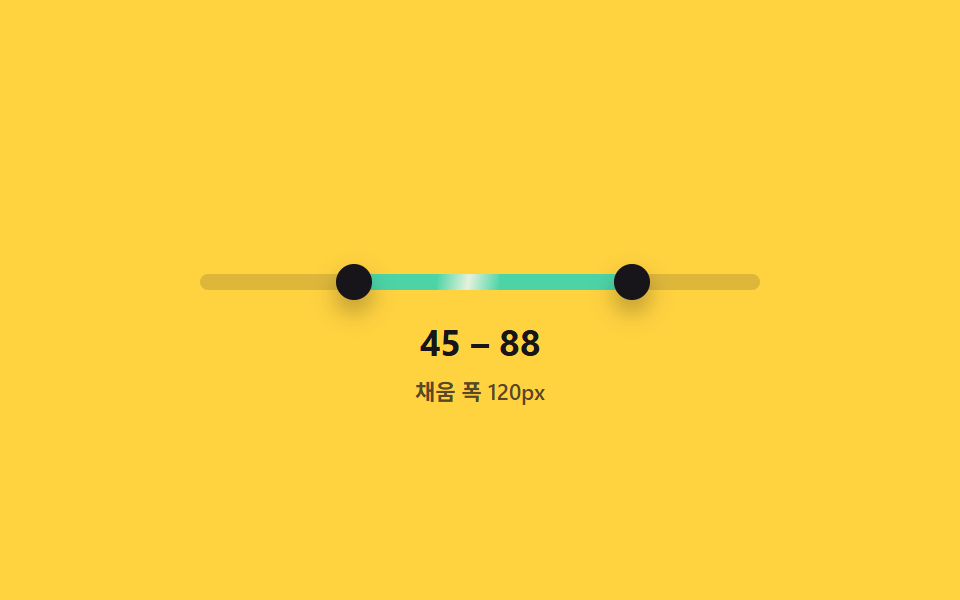 02 dual-slider-fill-range-track
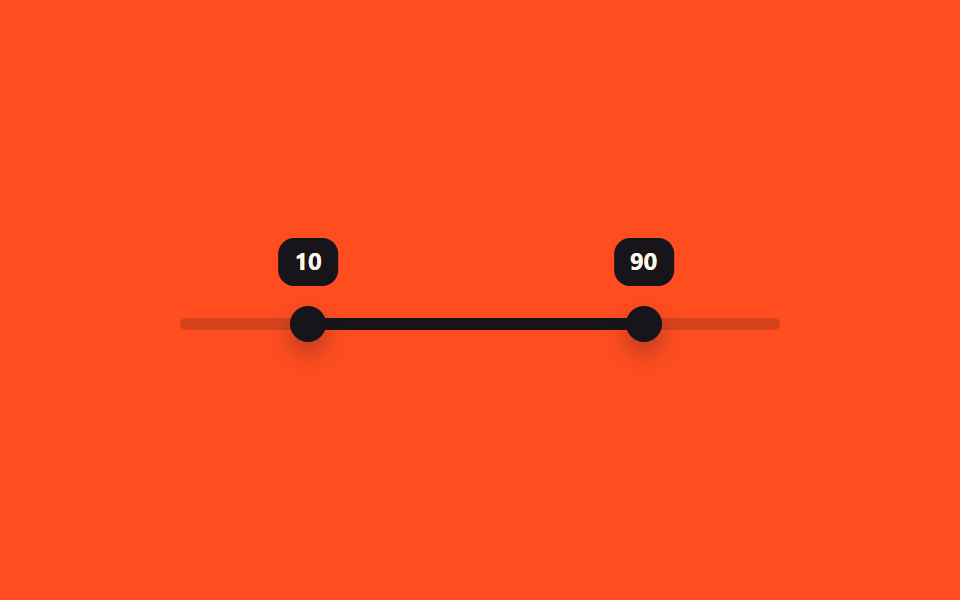 03 dual-slider-tooltip-pair-follow
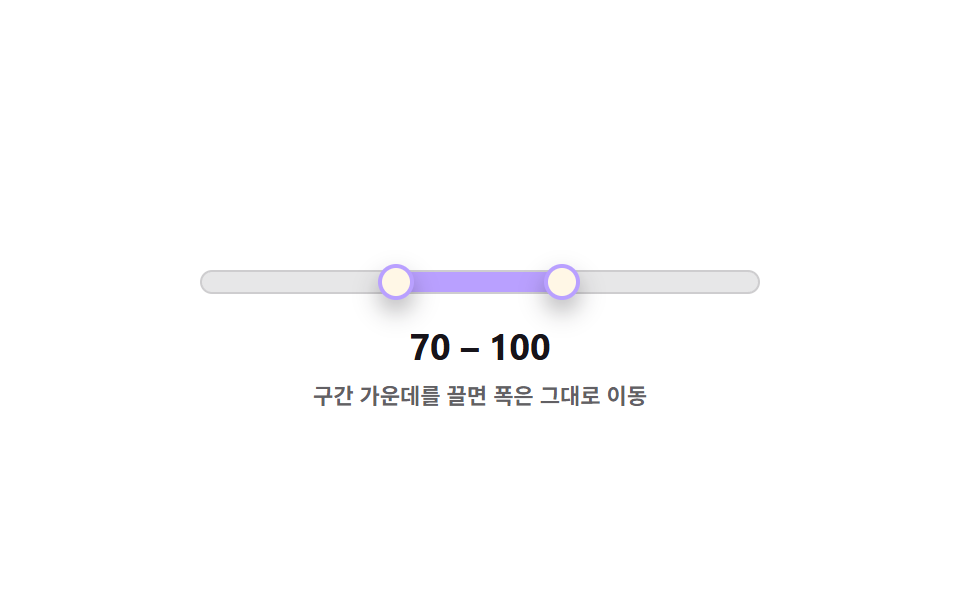 04 dual-slider-drag-both-handles-shift
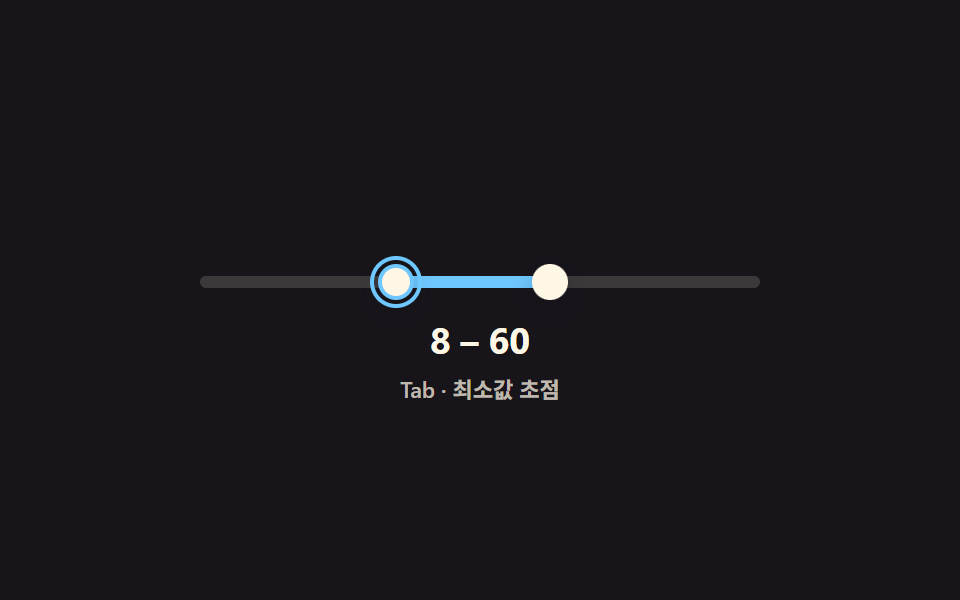 05 dual-slider-keyboard-pair-navigate
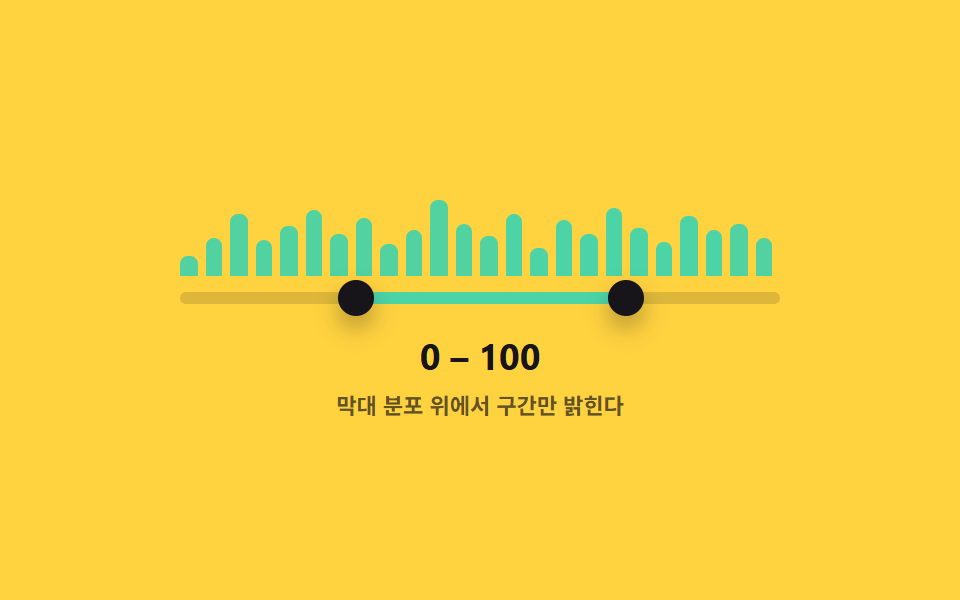 06 dual-slider-histogram-track-bg
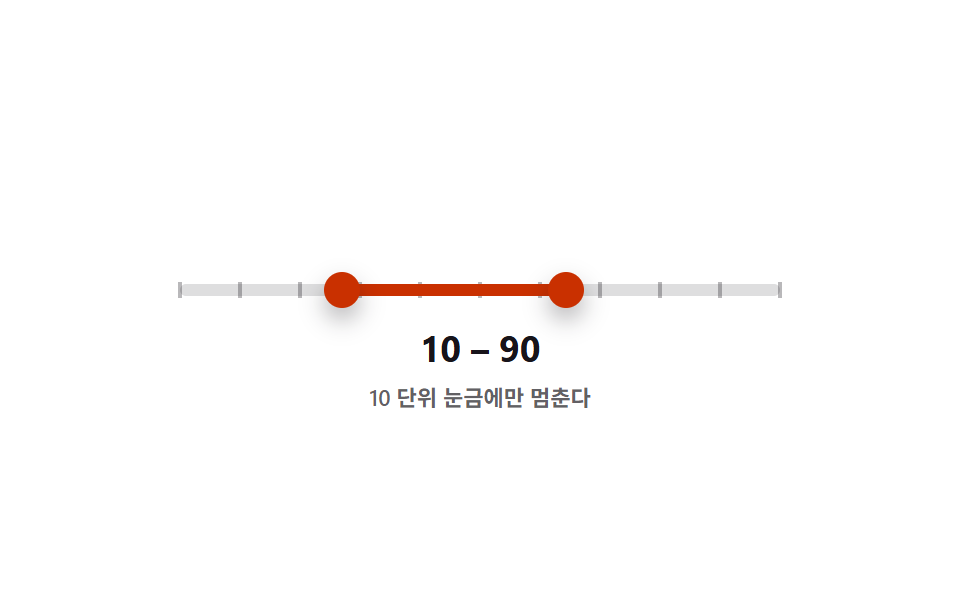 07 dual-slider-snap-step-ticks
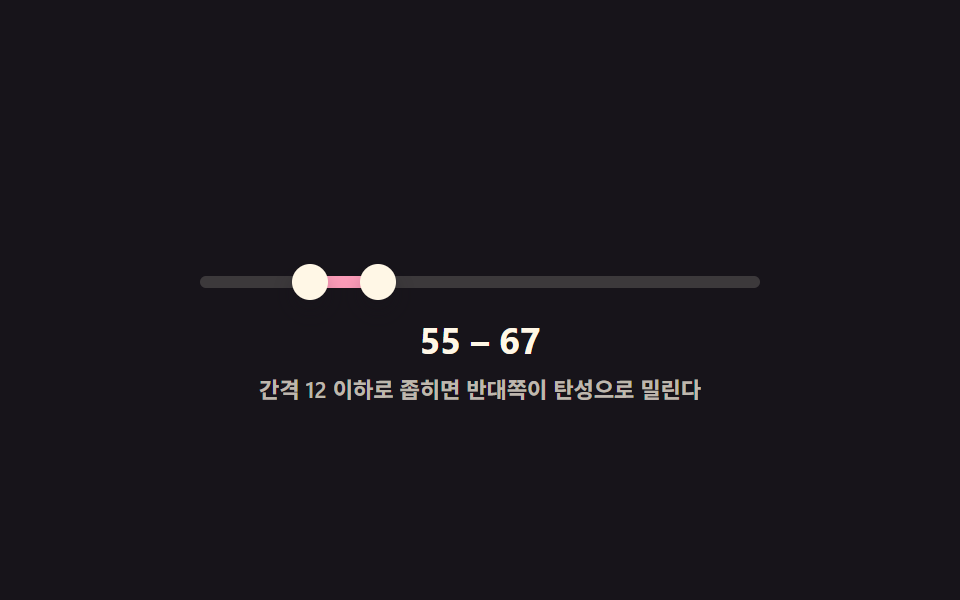 08 dual-slider-min-gap-elastic-push
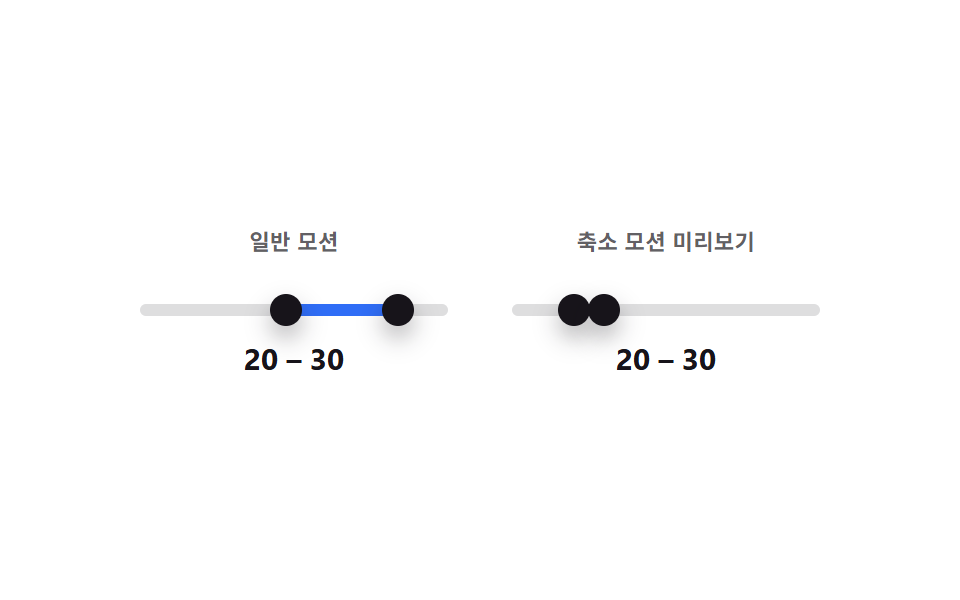 09 dual-slider-reduced-motion-static
Auto-plays · click a tile to jump to its section · all nine in one zip
- 01 Range Slider Whose Two Handles Never Cross
- 02 Range Slider That Fills Only Between Its Two Handles
- 03 Range Slider Whose Two Tooltips Merge When Values Get Close
- 04 Range Slider Whose Middle Drag Shifts Both Handles Together
- 05 Range Slider Whose Two Handles Take Turns on Tab
- 06 Range Slider That Picks a Span Over a Histogram Background
- 07 Range Slider That Snaps to Ticks in Steps of 10
- 08 Range Slider That Springs to Keep Its Minimum Gap
- 09 Range Slider Comparing Reduced Motion Against Normal Motion Side by Side
This set puts nine two-handle sliders in one row: a handle-crossing clamp, a between-handles fill, a tooltip-merge pair, a shift-both drag, a keyboard turn-taking pair, a histogram background, a step-10 snap, a spring-elastic gap, and a reduced-motion comparison. Getting a dual range slider html right takes more than two <input type="range"> elements wired together — every pattern below adds exactly one calculation layer on top of the same pointer-drag and keyboard baseline, and that layer is a small, named function you can read start to finish in the code section rather than pulled from a slider library.
Demo
<main class="stage">
<div class="ds is-demo" id="ds">
  <div class="ds__track" id="track">
    <div class="ds__fill" id="fill"></div>
    <button type="button" class="ds__thumb ds__thumb--lo" id="thumbLo" role="slider"
      aria-label="Minimum value" aria-valuemin="0" aria-valuemax="100" aria-valuenow="15" aria-valuetext="15" tabindex="0"></button>
    <button type="button" class="ds__thumb ds__thumb--hi" id="thumbHi" role="slider"
      aria-label="Maximum value" aria-valuemin="0" aria-valuemax="100" aria-valuenow="85" aria-valuetext="85" tabindex="0"></button>
  </div>
  <p class="ds__readout"><span id="loOut">15</span> – <span id="hiOut">85</span></p>
  <p class="ds__caption">Keeps a gap of at least 14</p>
</div>
</main>
@use "../../../../site/static/demo-tokens" as *;
// 변수 3개
$duration: $dur-loop;
$easing: $ease-pop;
$color: $subject-blue;
// 계산 겹: setLo()/setHi() 가 최소·최대값이 GAP(14) 보다 가까워지지 못하게 매 입력마다 다시 clamp 한다.
@include stage($stage-ink);
.ds { width: min(280px, 84vw); color: $subject-cream; text-align: center; }
.ds__track {
position: relative; height: 6px; border-radius: $r-pill;
background: rgba($subject-cream, .16); margin: $sp-10 0 $sp-4;
}
.ds__fill {
position: absolute; top: 0; bottom: 0; left: 15%; width: 70%;
background: $color; border-radius: $r-pill;
}
.ds__thumb {
position: absolute; top: 50%; left: 15%; width: 18px; height: 18px;
appearance: none; border: 0; border-radius: 50%; background: $subject-cream;
box-shadow: $shadow-press; cursor: grab; touch-action: none; padding: 0;
transform: translate(-50%, -50%);
}
.ds__thumb--hi { left: 85%; }
.ds__thumb:focus-visible { outline: 2px solid $color; outline-offset: 2px; }
.ds__thumb:active { cursor: grabbing; }
.ds__thumb.is-blocked { background: $subject-orange-deep; }
.ds__readout {
margin: 0; font-weight: 700; font-size: 18px; line-height: 1.2;
font-variant-numeric: tabular-nums;
}
.ds__caption { margin: $sp-1 0 0; font-weight: 600; font-size: 11px; color: rgba($subject-cream, .72); }
.ds.is-demo .ds__thumb,
.ds.is-demo .ds__fill {
transition: left $duration $easing, width $duration $easing, background $dur-quick $ease-out;
}
@media (max-width: 340px) {
.ds { width: min(240px, 80vw); }
.ds__readout { font-size: 16px; }
.ds__caption { font-size: 10px; }
}
@media (prefers-reduced-motion: reduce) {
.ds.is-demo .ds__thumb, .ds.is-demo .ds__fill { transition: none; }
}html, body {
margin: 0;
overflow: hidden;
}
.stage {
box-sizing: border-box;
min-height: 100vh;
display: grid;
place-items: center;
margin: 0;
background: #17141a;
font-family: -apple-system, "Segoe UI", "Noto Sans KR", sans-serif;
padding: clamp(8px, 4vw, 24px);
}
.ds {
width: min(280px, 84vw);
color: #fff7e6;
text-align: center;
}
.ds__track {
position: relative;
height: 6px;
border-radius: 999px;
background: rgba(255, 247, 230, 0.16);
margin: 40px 0 16px;
}
.ds__fill {
position: absolute;
top: 0;
bottom: 0;
left: 15%;
width: 70%;
background: #2f6df6;
border-radius: 999px;
}
.ds__thumb {
position: absolute;
top: 50%;
left: 15%;
width: 18px;
height: 18px;
appearance: none;
border: 0;
border-radius: 50%;
background: #fff7e6;
box-shadow: 0 6px 12px rgba(23, 20, 26, 0.32);
cursor: grab;
touch-action: none;
padding: 0;
transform: translate(-50%, -50%);
}
.ds__thumb--hi {
left: 85%;
}
.ds__thumb:focus-visible {
outline: 2px solid #2f6df6;
outline-offset: 2px;
}
.ds__thumb:active {
cursor: grabbing;
}
.ds__thumb.is-blocked {
background: #c93000;
}
.ds__readout {
margin: 0;
font-weight: 700;
font-size: 18px;
line-height: 1.2;
font-variant-numeric: tabular-nums;
}
.ds__caption {
margin: 4px 0 0;
font-weight: 600;
font-size: 11px;
color: rgba(255, 247, 230, 0.72);
}
.ds.is-demo .ds__thumb,
.ds.is-demo .ds__fill {
transition: left 2s cubic-bezier(0.2, 1.4, 0.4, 1), width 2s cubic-bezier(0.2, 1.4, 0.4, 1), background 220ms ease-out;
}
@media (max-width: 340px) {
.ds {
width: min(240px, 80vw);
}
.ds__readout {
font-size: 16px;
}
.ds__caption {
font-size: 10px;
}
}
@media (prefers-reduced-motion: reduce) {
.ds.is-demo .ds__thumb, .ds.is-demo .ds__fill {
transition: none;
}
}(function () {
var MIN = 0, MAX = 100, GAP = 14;
var root = document.getElementById('ds');
var track = document.getElementById('track');
var fill = document.getElementById('fill');
var lo = document.getElementById('thumbLo');
var hi = document.getElementById('thumbHi');
var loOut = document.getElementById('loOut');
var hiOut = document.getElementById('hiOut');
var v = { lo: 15, hi: 85 };
function paint() {
lo.style.left = v.lo + '%'; hi.style.left = v.hi + '%';
fill.style.left = v.lo + '%'; fill.style.width = (v.hi - v.lo) + '%';
lo.setAttribute('aria-valuenow', String(v.lo)); hi.setAttribute('aria-valuenow', String(v.hi));
lo.setAttribute('aria-valuetext', String(v.lo)); hi.setAttribute('aria-valuetext', String(v.hi));
loOut.textContent = String(v.lo); hiOut.textContent = String(v.hi);
}
// 계산 겹: 최소값이 Maximum value - GAP 을 넘지 못하게, 최대값이 Minimum value + GAP 아래로 못 내려가게 막는다
function setLo(n) {
var blocked = document.getElementById('track');
v.lo = Math.max(MIN, Math.min(n, v.hi - GAP));
lo.classList.toggle('is-blocked', n > v.hi - GAP);
paint();
}
function setHi(n) {
v.hi = Math.min(MAX, Math.max(n, v.lo + GAP));
hi.classList.toggle('is-blocked', n < v.lo + GAP);
paint();
}
function pctFromX(x) {
var r = track.getBoundingClientRect();
return Math.round(Math.max(0, Math.min(100, ((x - r.left) / r.width) * 100)));
}
function human() { root.classList.remove('is-demo'); clearInterval(timer); }
function drag(thumb, setter, isLo) {
thumb.addEventListener('pointerdown', function (e) {
human(); thumb.setPointerCapture(e.pointerId);
function move(ev) { setter(pctFromX(ev.clientX)); }
function up() { thumb.removeEventListener('pointermove', move); thumb.removeEventListener('pointerup', up); }
thumb.addEventListener('pointermove', move); thumb.addEventListener('pointerup', up);
});
thumb.addEventListener('keydown', function (e) {
var step = { ArrowRight: 1, ArrowLeft: -1, ArrowUp: 1, ArrowDown: -1 }[e.key];
if (step !== undefined) { e.preventDefault(); human(); setter((isLo ? v.lo : v.hi) + step); }
else if (e.key === 'Home') { e.preventDefault(); human(); setter(isLo ? MIN : v.lo + GAP); }
else if (e.key === 'End') { e.preventDefault(); human(); setter(isLo ? v.hi - GAP : MAX); }
});
}
drag(lo, setLo, true); drag(hi, setHi, false);
var presets = [[40, 46], [10, 90], [55, 61], [20, 80], [35, 41]];
var pi = 0;
function tick() {
var p = presets[pi % presets.length]; pi++;
setLo(p[0]); setHi(p[1]);
}
var reduce = window.matchMedia('(prefers-reduced-motion: reduce)').matches;
var timer = reduce ? null : setInterval(tick, 480);
paint();
}());import { useEffect, useRef } from 'react';
import styles from './DualSliderHandleCrossingClamp.module.scss';
const MIN = 0;
const MAX = 100;
const GAP = 14;
const TICK_MS = 480;
const PRESETS: [number, number][] = [[40, 46], [10, 90], [55, 61], [20, 80], [35, 41]];
export default function DualSliderHandleCrossingClamp() {
const rootRef = useRef<HTMLDivElement>(null);
const trackRef = useRef<HTMLDivElement>(null);
const fillRef = useRef<HTMLDivElement>(null);
const loRef = useRef<HTMLButtonElement>(null);
const hiRef = useRef<HTMLButtonElement>(null);
const loOutRef = useRef<HTMLSpanElement>(null);
const hiOutRef = useRef<HTMLSpanElement>(null);
useEffect(() => {
const root = rootRef.current;
const track = trackRef.current;
const fill = fillRef.current;
const lo = loRef.current;
const hi = hiRef.current;
const loOut = loOutRef.current;
const hiOut = hiOutRef.current;
if (!root || !track || !fill || !lo || !hi || !loOut || !hiOut) return undefined;
const v = { lo: 15, hi: 85 };
function paint() {
lo!.style.left = v.lo + '%'; hi!.style.left = v.hi + '%';
fill!.style.left = v.lo + '%'; fill!.style.width = (v.hi - v.lo) + '%';
lo!.setAttribute('aria-valuenow', String(v.lo)); hi!.setAttribute('aria-valuenow', String(v.hi));
lo!.setAttribute('aria-valuetext', String(v.lo)); hi!.setAttribute('aria-valuetext', String(v.hi));
loOut!.textContent = String(v.lo); hiOut!.textContent = String(v.hi);
}
// 계산 겹: 최소값이 최대값 - GAP 을 넘지 못하게, 최대값이 최소값 + GAP 아래로 못 내려가게 막는다
function setLo(n: number) {
v.lo = Math.max(MIN, Math.min(n, v.hi - GAP));
lo!.classList.toggle(styles['is-blocked'], n > v.hi - GAP);
paint();
}
function setHi(n: number) {
v.hi = Math.min(MAX, Math.max(n, v.lo + GAP));
hi!.classList.toggle(styles['is-blocked'], n < v.lo + GAP);
paint();
}
function pctFromX(x: number) {
const r = track!.getBoundingClientRect();
return Math.round(Math.max(0, Math.min(100, ((x - r.left) / r.width) * 100)));
}
let timer = 0;
function human() { root!.classList.remove(styles['is-demo']); window.clearInterval(timer); }
function bindDrag(thumb: HTMLButtonElement, setter: (n: number) => void, isLo: boolean) {
function onDown(e: PointerEvent) {
human(); thumb.setPointerCapture(e.pointerId);
function move(ev: PointerEvent) { setter(pctFromX(ev.clientX)); }
function up() { thumb.removeEventListener('pointermove', move); thumb.removeEventListener('pointerup', up); }
thumb.addEventListener('pointermove', move); thumb.addEventListener('pointerup', up);
}
function onKey(e: KeyboardEvent) {
const step = ({ ArrowRight: 1, ArrowLeft: -1, ArrowUp: 1, ArrowDown: -1 } as Record<string, number>)[e.key];
if (step !== undefined) { e.preventDefault(); human(); setter((isLo ? v.lo : v.hi) + step); }
else if (e.key === 'Home') { e.preventDefault(); human(); setter(isLo ? MIN : v.lo + GAP); }
else if (e.key === 'End') { e.preventDefault(); human(); setter(isLo ? v.hi - GAP : MAX); }
}
thumb.addEventListener('pointerdown', onDown);
thumb.addEventListener('keydown', onKey);
return () => { thumb.removeEventListener('pointerdown', onDown); thumb.removeEventListener('keydown', onKey); };
}
const offLo = bindDrag(lo, setLo, true);
const offHi = bindDrag(hi, setHi, false);
let pi = 0;
function tick() {
const p = PRESETS[pi % PRESETS.length]; pi++;
setLo(p[0]); setHi(p[1]);
}
const reduce = window.matchMedia('(prefers-reduced-motion: reduce)').matches;
if (!reduce) timer = window.setInterval(tick, TICK_MS);
paint();
return () => { offLo(); offHi(); window.clearInterval(timer); };
}, []);
return (
<main className={styles.stage}>
<div className={styles.ds + ' ' + styles['is-demo']} ref={rootRef}>
<div className={styles.dsTrack} ref={trackRef}>
<div className={styles.dsFill} ref={fillRef} />
<button type="button" className={styles.dsThumb + ' ' + styles.dsThumbLo} ref={loRef} role="slider"
aria-label="최소값" aria-valuemin={0} aria-valuemax={100} aria-valuenow={15} aria-valuetext="15" tabIndex={0} />
<button type="button" className={styles.dsThumb + ' ' + styles.dsThumbHi} ref={hiRef} role="slider"
aria-label="최대값" aria-valuemin={0} aria-valuemax={100} aria-valuenow={85} aria-valuetext="85" tabIndex={0} />
</div>
<p className={styles.dsReadout}><span ref={loOutRef}>15</span> – <span ref={hiOutRef}>85</span></p>
<p className={styles.dsCaption}>간격 14 이상 유지</p>
</div>
</main>
);
}01 · Range Slider Whose Two Handles Never Cross — Measured area 3.058% · moving frames 22/23Original by GODRICH · SCSS and React ship in the zip · See the password
Pattern 01 above needs nothing beyond the clamp inside setLo/setHi to keep its two handles apart. Scroll for the remaining eight — each one sits right above its own code block.
Anatomy of nine two-handle sliders — where the one layer of calculation runs
| # | Pattern | Cumulative area | Avg. intensity | Frames moved |
|---|---|---|---|---|
| 01 | Handle-crossing clamp | 3.058% | 176.2 | 22 of 23 |
| 02 | Between-handles fill | 3.797% | 101.0 | 21 of 23 |
| 03 | Tooltip-merge pair | 8.158% | 111.0 | 21 of 23 |
| 04 | Shift-both drag | 4.107% | 55.4 | 17 of 23 |
| 05 | Keyboard turn-taking | 3.223% | 145.1 | 21 of 23 |
| 06 | Histogram background | 6.338% | 87.0 | 21 of 23 |
| 07 | Step-10 snap | 5.147% | 129.7 | 21 of 23 |
| 08 | Min-gap elastic push | 3.027% | 159.9 | 21 of 23 |
| 09 | Reduced-motion compare | 5.484% | 129.3 | 21 of 23 |
Pattern 03 covers the most pixels of the nine (8.158% cumulative) since merging two bubbles into one repaints both value labels and the merged label together, while pattern 08 covers the least (3.027%) because its spring only nudges each thumb a few pixels per frame instead of redrawing a bubble or a bar. Pattern 01 has the sharpest average intensity (176.2) and moves in the most frames (22 of 23) of any pattern here, since every single pointer step re-clamps and can flip the is-blocked class as well as move the thumb. Pattern 04 sits at the opposite end on both counts — the lowest average intensity (55.4) and the fewest frames moved (17 of 23) — because dragging the filled middle only ever repaints two thumbs and one fill block, and the drag stops the instant either handle reaches an end.
Group the nine by what the one extra calculation actually reads, and three families show up.
Handle-relationship constraints
Patterns 01, 04, and 08 all police the space between the two handles rather than each handle's own position. 01's setLo/setHi clamp the incoming value against the other handle's value minus or plus GAP. 04's shiftBoth keeps the width (hi - lo) fixed while moving both endpoints by the same delta. 08 goes further and pushes the other handle's target when the requested gap would fall under MIN_GAP, then lets a spring animate the visual catch-up.
getBoundingClientRect-derived readouts
Patterns 02, 03, and 07 all convert a percentage into a real pixel value by reading the track's actual rendered width. 02 reports the fill's pixel width next to its percentage. 03 measures the pixel gap between the two value bubbles and compares it to MERGE_PX before deciding to merge them. 07 recomputes every tick's pixel left from the track's measured width, so the ticks stay lined up if the track's width ever changes.
State computed once, not on every pointer move
Patterns 05, 06, and 09 hold a piece of state that a drag never touches. 05 tracks which handle is "active" from focusin/focusout, independent of any pointer event. 06 builds its histogram bars once from a fixed HEIGHTS array and only re-checks which bars fall inside [lo, hi] on each paint. 09 keeps one shared value pair and draws it into two panels — a transitioning one and a transition-less one — so neither panel's paint depends on the other.
Code per pattern
Every block below is the exact function the pattern's own index.html runs — same variable names, same order, nothing shortened.
01Range Slider Whose Two Handles Never Cross
Pushing the low handle toward the high one stops it right at a set minimum gap, so it never overtakes or touches the other handle. Use it for a filter that sets a minimum and maximum price at once.
<main class="stage">
<div class="ds is-demo" id="ds">
  <div class="ds__track" id="track">
    <div class="ds__fill" id="fill"></div>
    <button type="button" class="ds__thumb ds__thumb--lo" id="thumbLo" role="slider"
      aria-label="Minimum value" aria-valuemin="0" aria-valuemax="100" aria-valuenow="15" aria-valuetext="15" tabindex="0"></button>
    <button type="button" class="ds__thumb ds__thumb--hi" id="thumbHi" role="slider"
      aria-label="Maximum value" aria-valuemin="0" aria-valuemax="100" aria-valuenow="85" aria-valuetext="85" tabindex="0"></button>
  </div>
  <p class="ds__readout"><span id="loOut">15</span> – <span id="hiOut">85</span></p>
  <p class="ds__caption">Keeps a gap of at least 14</p>
</div>
</main>
@use "../../../../site/static/demo-tokens" as *;
// 변수 3개
$duration: $dur-loop;
$easing: $ease-pop;
$color: $subject-blue;
// 계산 겹: setLo()/setHi() 가 최소·최대값이 GAP(14) 보다 가까워지지 못하게 매 입력마다 다시 clamp 한다.
@include stage($stage-ink);
.ds { width: min(280px, 84vw); color: $subject-cream; text-align: center; }
.ds__track {
position: relative; height: 6px; border-radius: $r-pill;
background: rgba($subject-cream, .16); margin: $sp-10 0 $sp-4;
}
.ds__fill {
position: absolute; top: 0; bottom: 0; left: 15%; width: 70%;
background: $color; border-radius: $r-pill;
}
.ds__thumb {
position: absolute; top: 50%; left: 15%; width: 18px; height: 18px;
appearance: none; border: 0; border-radius: 50%; background: $subject-cream;
box-shadow: $shadow-press; cursor: grab; touch-action: none; padding: 0;
transform: translate(-50%, -50%);
}
.ds__thumb--hi { left: 85%; }
.ds__thumb:focus-visible { outline: 2px solid $color; outline-offset: 2px; }
.ds__thumb:active { cursor: grabbing; }
.ds__thumb.is-blocked { background: $subject-orange-deep; }
.ds__readout {
margin: 0; font-weight: 700; font-size: 18px; line-height: 1.2;
font-variant-numeric: tabular-nums;
}
.ds__caption { margin: $sp-1 0 0; font-weight: 600; font-size: 11px; color: rgba($subject-cream, .72); }
.ds.is-demo .ds__thumb,
.ds.is-demo .ds__fill {
transition: left $duration $easing, width $duration $easing, background $dur-quick $ease-out;
}
@media (max-width: 340px) {
.ds { width: min(240px, 80vw); }
.ds__readout { font-size: 16px; }
.ds__caption { font-size: 10px; }
}
@media (prefers-reduced-motion: reduce) {
.ds.is-demo .ds__thumb, .ds.is-demo .ds__fill { transition: none; }
}html, body {
margin: 0;
overflow: hidden;
}
.stage {
box-sizing: border-box;
min-height: 100vh;
display: grid;
place-items: center;
margin: 0;
background: #17141a;
font-family: -apple-system, "Segoe UI", "Noto Sans KR", sans-serif;
padding: clamp(8px, 4vw, 24px);
}
.ds {
width: min(280px, 84vw);
color: #fff7e6;
text-align: center;
}
.ds__track {
position: relative;
height: 6px;
border-radius: 999px;
background: rgba(255, 247, 230, 0.16);
margin: 40px 0 16px;
}
.ds__fill {
position: absolute;
top: 0;
bottom: 0;
left: 15%;
width: 70%;
background: #2f6df6;
border-radius: 999px;
}
.ds__thumb {
position: absolute;
top: 50%;
left: 15%;
width: 18px;
height: 18px;
appearance: none;
border: 0;
border-radius: 50%;
background: #fff7e6;
box-shadow: 0 6px 12px rgba(23, 20, 26, 0.32);
cursor: grab;
touch-action: none;
padding: 0;
transform: translate(-50%, -50%);
}
.ds__thumb--hi {
left: 85%;
}
.ds__thumb:focus-visible {
outline: 2px solid #2f6df6;
outline-offset: 2px;
}
.ds__thumb:active {
cursor: grabbing;
}
.ds__thumb.is-blocked {
background: #c93000;
}
.ds__readout {
margin: 0;
font-weight: 700;
font-size: 18px;
line-height: 1.2;
font-variant-numeric: tabular-nums;
}
.ds__caption {
margin: 4px 0 0;
font-weight: 600;
font-size: 11px;
color: rgba(255, 247, 230, 0.72);
}
.ds.is-demo .ds__thumb,
.ds.is-demo .ds__fill {
transition: left 2s cubic-bezier(0.2, 1.4, 0.4, 1), width 2s cubic-bezier(0.2, 1.4, 0.4, 1), background 220ms ease-out;
}
@media (max-width: 340px) {
.ds {
width: min(240px, 80vw);
}
.ds__readout {
font-size: 16px;
}
.ds__caption {
font-size: 10px;
}
}
@media (prefers-reduced-motion: reduce) {
.ds.is-demo .ds__thumb, .ds.is-demo .ds__fill {
transition: none;
}
}(function () {
var MIN = 0, MAX = 100, GAP = 14;
var root = document.getElementById('ds');
var track = document.getElementById('track');
var fill = document.getElementById('fill');
var lo = document.getElementById('thumbLo');
var hi = document.getElementById('thumbHi');
var loOut = document.getElementById('loOut');
var hiOut = document.getElementById('hiOut');
var v = { lo: 15, hi: 85 };
function paint() {
lo.style.left = v.lo + '%'; hi.style.left = v.hi + '%';
fill.style.left = v.lo + '%'; fill.style.width = (v.hi - v.lo) + '%';
lo.setAttribute('aria-valuenow', String(v.lo)); hi.setAttribute('aria-valuenow', String(v.hi));
lo.setAttribute('aria-valuetext', String(v.lo)); hi.setAttribute('aria-valuetext', String(v.hi));
loOut.textContent = String(v.lo); hiOut.textContent = String(v.hi);
}
// 계산 겹: 최소값이 Maximum value - GAP 을 넘지 못하게, 최대값이 Minimum value + GAP 아래로 못 내려가게 막는다
function setLo(n) {
var blocked = document.getElementById('track');
v.lo = Math.max(MIN, Math.min(n, v.hi - GAP));
lo.classList.toggle('is-blocked', n > v.hi - GAP);
paint();
}
function setHi(n) {
v.hi = Math.min(MAX, Math.max(n, v.lo + GAP));
hi.classList.toggle('is-blocked', n < v.lo + GAP);
paint();
}
function pctFromX(x) {
var r = track.getBoundingClientRect();
return Math.round(Math.max(0, Math.min(100, ((x - r.left) / r.width) * 100)));
}
function human() { root.classList.remove('is-demo'); clearInterval(timer); }
function drag(thumb, setter, isLo) {
thumb.addEventListener('pointerdown', function (e) {
human(); thumb.setPointerCapture(e.pointerId);
function move(ev) { setter(pctFromX(ev.clientX)); }
function up() { thumb.removeEventListener('pointermove', move); thumb.removeEventListener('pointerup', up); }
thumb.addEventListener('pointermove', move); thumb.addEventListener('pointerup', up);
});
thumb.addEventListener('keydown', function (e) {
var step = { ArrowRight: 1, ArrowLeft: -1, ArrowUp: 1, ArrowDown: -1 }[e.key];
if (step !== undefined) { e.preventDefault(); human(); setter((isLo ? v.lo : v.hi) + step); }
else if (e.key === 'Home') { e.preventDefault(); human(); setter(isLo ? MIN : v.lo + GAP); }
else if (e.key === 'End') { e.preventDefault(); human(); setter(isLo ? v.hi - GAP : MAX); }
});
}
drag(lo, setLo, true); drag(hi, setHi, false);
var presets = [[40, 46], [10, 90], [55, 61], [20, 80], [35, 41]];
var pi = 0;
function tick() {
var p = presets[pi % presets.length]; pi++;
setLo(p[0]); setHi(p[1]);
}
var reduce = window.matchMedia('(prefers-reduced-motion: reduce)').matches;
var timer = reduce ? null : setInterval(tick, 480);
paint();
}());import { useEffect, useRef } from 'react';
import styles from './DualSliderHandleCrossingClamp.module.scss';
const MIN = 0;
const MAX = 100;
const GAP = 14;
const TICK_MS = 480;
const PRESETS: [number, number][] = [[40, 46], [10, 90], [55, 61], [20, 80], [35, 41]];
export default function DualSliderHandleCrossingClamp() {
const rootRef = useRef<HTMLDivElement>(null);
const trackRef = useRef<HTMLDivElement>(null);
const fillRef = useRef<HTMLDivElement>(null);
const loRef = useRef<HTMLButtonElement>(null);
const hiRef = useRef<HTMLButtonElement>(null);
const loOutRef = useRef<HTMLSpanElement>(null);
const hiOutRef = useRef<HTMLSpanElement>(null);
useEffect(() => {
const root = rootRef.current;
const track = trackRef.current;
const fill = fillRef.current;
const lo = loRef.current;
const hi = hiRef.current;
const loOut = loOutRef.current;
const hiOut = hiOutRef.current;
if (!root || !track || !fill || !lo || !hi || !loOut || !hiOut) return undefined;
const v = { lo: 15, hi: 85 };
function paint() {
lo!.style.left = v.lo + '%'; hi!.style.left = v.hi + '%';
fill!.style.left = v.lo + '%'; fill!.style.width = (v.hi - v.lo) + '%';
lo!.setAttribute('aria-valuenow', String(v.lo)); hi!.setAttribute('aria-valuenow', String(v.hi));
lo!.setAttribute('aria-valuetext', String(v.lo)); hi!.setAttribute('aria-valuetext', String(v.hi));
loOut!.textContent = String(v.lo); hiOut!.textContent = String(v.hi);
}
// 계산 겹: 최소값이 최대값 - GAP 을 넘지 못하게, 최대값이 최소값 + GAP 아래로 못 내려가게 막는다
function setLo(n: number) {
v.lo = Math.max(MIN, Math.min(n, v.hi - GAP));
lo!.classList.toggle(styles['is-blocked'], n > v.hi - GAP);
paint();
}
function setHi(n: number) {
v.hi = Math.min(MAX, Math.max(n, v.lo + GAP));
hi!.classList.toggle(styles['is-blocked'], n < v.lo + GAP);
paint();
}
function pctFromX(x: number) {
const r = track!.getBoundingClientRect();
return Math.round(Math.max(0, Math.min(100, ((x - r.left) / r.width) * 100)));
}
let timer = 0;
function human() { root!.classList.remove(styles['is-demo']); window.clearInterval(timer); }
function bindDrag(thumb: HTMLButtonElement, setter: (n: number) => void, isLo: boolean) {
function onDown(e: PointerEvent) {
human(); thumb.setPointerCapture(e.pointerId);
function move(ev: PointerEvent) { setter(pctFromX(ev.clientX)); }
function up() { thumb.removeEventListener('pointermove', move); thumb.removeEventListener('pointerup', up); }
thumb.addEventListener('pointermove', move); thumb.addEventListener('pointerup', up);
}
function onKey(e: KeyboardEvent) {
const step = ({ ArrowRight: 1, ArrowLeft: -1, ArrowUp: 1, ArrowDown: -1 } as Record<string, number>)[e.key];
if (step !== undefined) { e.preventDefault(); human(); setter((isLo ? v.lo : v.hi) + step); }
else if (e.key === 'Home') { e.preventDefault(); human(); setter(isLo ? MIN : v.lo + GAP); }
else if (e.key === 'End') { e.preventDefault(); human(); setter(isLo ? v.hi - GAP : MAX); }
}
thumb.addEventListener('pointerdown', onDown);
thumb.addEventListener('keydown', onKey);
return () => { thumb.removeEventListener('pointerdown', onDown); thumb.removeEventListener('keydown', onKey); };
}
const offLo = bindDrag(lo, setLo, true);
const offHi = bindDrag(hi, setHi, false);
let pi = 0;
function tick() {
const p = PRESETS[pi % PRESETS.length]; pi++;
setLo(p[0]); setHi(p[1]);
}
const reduce = window.matchMedia('(prefers-reduced-motion: reduce)').matches;
if (!reduce) timer = window.setInterval(tick, TICK_MS);
paint();
return () => { offLo(); offHi(); window.clearInterval(timer); };
}, []);
return (
<main className={styles.stage}>
<div className={styles.ds + ' ' + styles['is-demo']} ref={rootRef}>
<div className={styles.dsTrack} ref={trackRef}>
<div className={styles.dsFill} ref={fillRef} />
<button type="button" className={styles.dsThumb + ' ' + styles.dsThumbLo} ref={loRef} role="slider"
aria-label="최소값" aria-valuemin={0} aria-valuemax={100} aria-valuenow={15} aria-valuetext="15" tabIndex={0} />
<button type="button" className={styles.dsThumb + ' ' + styles.dsThumbHi} ref={hiRef} role="slider"
aria-label="최대값" aria-valuemin={0} aria-valuemax={100} aria-valuenow={85} aria-valuetext="85" tabIndex={0} />
</div>
<p className={styles.dsReadout}><span ref={loOutRef}>15</span> – <span ref={hiOutRef}>85</span></p>
<p className={styles.dsCaption}>간격 14 이상 유지</p>
</div>
</main>
);
}01 · Range Slider Whose Two Handles Never Cross — Measured area 3.058% · moving frames 22/23Original by GODRICH · SCSS and React ship in the zip · See the password
  // Calculation layer: clamps the low value so it can never exceed high - GAP, and clamps the high value so it can never drop below low + GAP
  function setLo(n) {
    var blocked = document.getElementById('track');
    v.lo = Math.max(MIN, Math.min(n, v.hi - GAP));
    lo.classList.toggle('is-blocked', n > v.hi - GAP);
    paint();
  }
  function setHi(n) {
    v.hi = Math.min(MAX, Math.max(n, v.lo + GAP));
    hi.classList.toggle('is-blocked', n < v.lo + GAP);
    paint();
  }
02Range Slider That Fills Only Between Its Two Handles
Instead of the whole track, only the stretch between the low and high handle is filled, and each end of that fill follows its handle as it moves — a different demo from 224: 224 (range-slider-dual-thumb-fill) only updates the labels and fills the track, while this one adds a getBoundingClientRect-measured pixel readout of the fill width plus an autoplay sweep phase. Use it for a stats filter where the chosen span needs to stand out at a glance.
<main class="stage">
<div class="ds is-demo" id="ds">
  <div class="ds__track" id="track">
    <div class="ds__fill" id="fill"><div class="ds__sweep" id="sweep"></div></div>
    <button type="button" class="ds__thumb ds__thumb--lo" id="thumbLo" role="slider"
      aria-label="Minimum value" aria-valuemin="0" aria-valuemax="100" aria-valuenow="20" aria-valuetext="20" tabindex="0"></button>
    <button type="button" class="ds__thumb ds__thumb--hi" id="thumbHi" role="slider"
      aria-label="Maximum value" aria-valuemin="0" aria-valuemax="100" aria-valuenow="78" aria-valuetext="78" tabindex="0"></button>
  </div>
  <p class="ds__readout"><span id="loOut">20</span> – <span id="hiOut">78</span></p>
  <p class="ds__caption">Fill width <span id="pxOut">0</span>px</p>
</div>
</main>
@use "../../../../site/static/demo-tokens" as *;
// 변수 3개
$duration: $dur-loop;
$easing: $ease-out;
$color: $subject-mint;
// 계산 겹: paint() 가 값 두 개를 채움 %로 바꾸고, 실측 트랙 폭(getBoundingClientRect)으로 px 도 환산한다.
// 224 의 듀얼 섬과 다른 시연 — 여긴 채움 안에 sweep 밴드가 값 비율(phase)로 다시 위치를 계산해 돈다.
@include stage($stage-yellow);
.ds { width: min(280px, 84vw); color: $subject-ink; text-align: center; }
.ds__track {
position: relative; height: 8px; border-radius: $r-pill;
background: rgba($subject-ink, .14); margin: $sp-10 0 $sp-4;
}
.ds__fill {
position: absolute; top: 0; bottom: 0; left: 20%; width: 58%;
background: $color; border-radius: $r-pill; overflow: hidden;
}
.ds__sweep {
position: absolute; top: 0; bottom: 0; left: 40%; width: 22%;
background: linear-gradient(100deg, rgba($subject-cream, 0) 0%, rgba($subject-cream, .85) 50%, rgba($subject-cream, 0) 100%);
transform: translateX(-50%);
}
.ds__thumb {
position: absolute; top: 50%; left: 20%; width: 18px; height: 18px;
appearance: none; border: 0; border-radius: 50%; background: $subject-ink;
box-shadow: $shadow-press; cursor: grab; touch-action: none; padding: 0;
transform: translate(-50%, -50%); z-index: 1;
}
.ds__thumb--hi { left: 78%; }
.ds__thumb:focus-visible { outline: 2px solid $subject-blue-deep; outline-offset: 2px; }
.ds__thumb:active { cursor: grabbing; }
.ds__readout {
margin: 0; font-weight: 700; font-size: 18px; line-height: 1.2;
font-variant-numeric: tabular-nums;
}
.ds__caption { margin: $sp-1 0 0; font-weight: 600; font-size: 11px; color: rgba($subject-ink, .72); }
.ds.is-demo .ds__thumb,
.ds.is-demo .ds__fill,
.ds.is-demo .ds__sweep {
transition: left $duration $easing, width $duration $easing;
}
@media (max-width: 340px) {
.ds { width: min(240px, 80vw); }
.ds__readout { font-size: 16px; }
.ds__caption { font-size: 10px; }
}
@media (prefers-reduced-motion: reduce) {
.ds.is-demo .ds__thumb, .ds.is-demo .ds__fill, .ds.is-demo .ds__sweep { transition: none; }
}html, body {
margin: 0;
overflow: hidden;
}
.stage {
box-sizing: border-box;
min-height: 100vh;
display: grid;
place-items: center;
margin: 0;
background: #ffd23f;
font-family: -apple-system, "Segoe UI", "Noto Sans KR", sans-serif;
padding: clamp(8px, 4vw, 24px);
}
.ds {
width: min(280px, 84vw);
color: #17141a;
text-align: center;
}
.ds__track {
position: relative;
height: 8px;
border-radius: 999px;
background: rgba(23, 20, 26, 0.14);
margin: 40px 0 16px;
}
.ds__fill {
position: absolute;
top: 0;
bottom: 0;
left: 20%;
width: 58%;
background: #4cd4a6;
border-radius: 999px;
overflow: hidden;
}
.ds__sweep {
position: absolute;
top: 0;
bottom: 0;
left: 40%;
width: 22%;
background: linear-gradient(100deg, rgba(255, 247, 230, 0) 0%, rgba(255, 247, 230, 0.85) 50%, rgba(255, 247, 230, 0) 100%);
transform: translateX(-50%);
}
.ds__thumb {
position: absolute;
top: 50%;
left: 20%;
width: 18px;
height: 18px;
appearance: none;
border: 0;
border-radius: 50%;
background: #17141a;
box-shadow: 0 6px 12px rgba(23, 20, 26, 0.32);
cursor: grab;
touch-action: none;
padding: 0;
transform: translate(-50%, -50%);
z-index: 1;
}
.ds__thumb--hi {
left: 78%;
}
.ds__thumb:focus-visible {
outline: 2px solid #0a4fe8;
outline-offset: 2px;
}
.ds__thumb:active {
cursor: grabbing;
}
.ds__readout {
margin: 0;
font-weight: 700;
font-size: 18px;
line-height: 1.2;
font-variant-numeric: tabular-nums;
}
.ds__caption {
margin: 4px 0 0;
font-weight: 600;
font-size: 11px;
color: rgba(23, 20, 26, 0.72);
}
.ds.is-demo .ds__thumb,
.ds.is-demo .ds__fill,
.ds.is-demo .ds__sweep {
transition: left 2s ease-out, width 2s ease-out;
}
@media (max-width: 340px) {
.ds {
width: min(240px, 80vw);
}
.ds__readout {
font-size: 16px;
}
.ds__caption {
font-size: 10px;
}
}
@media (prefers-reduced-motion: reduce) {
.ds.is-demo .ds__thumb, .ds.is-demo .ds__fill, .ds.is-demo .ds__sweep {
transition: none;
}
}(function () {
var MIN = 0, MAX = 100;
var root = document.getElementById('ds');
var track = document.getElementById('track');
var fill = document.getElementById('fill');
var sweep = document.getElementById('sweep');
var lo = document.getElementById('thumbLo');
var hi = document.getElementById('thumbHi');
var loOut = document.getElementById('loOut');
var hiOut = document.getElementById('hiOut');
var pxOut = document.getElementById('pxOut');
var v = { lo: 20, hi: 78, phase: 0.2 };
// 계산 겹: 두 값을 트랙 채움 %로 바꾸고, 실측 트랙 폭(getBoundingClientRect)으로 채움을 px 로도 환산한다.
function paint() {
lo.style.left = v.lo + '%'; hi.style.left = v.hi + '%';
fill.style.left = v.lo + '%'; fill.style.width = (v.hi - v.lo) + '%';
var sweepPct = v.lo + (v.hi - v.lo) * v.phase;
var trackPct = v.hi - v.lo === 0 ? 0 : (sweepPct - v.lo) / (v.hi - v.lo) * 100;
sweep.style.left = trackPct + '%';
lo.setAttribute('aria-valuenow', String(v.lo)); hi.setAttribute('aria-valuenow', String(v.hi));
lo.setAttribute('aria-valuetext', String(v.lo)); hi.setAttribute('aria-valuetext', String(v.hi));
loOut.textContent = String(v.lo); hiOut.textContent = String(v.hi);
var r = track.getBoundingClientRect();
pxOut.textContent = String(Math.round(r.width * (v.hi - v.lo) / 100));
}
function setLo(n) { v.lo = Math.max(MIN, Math.min(n, v.hi)); paint(); }
function setHi(n) { v.hi = Math.min(MAX, Math.max(n, v.lo)); paint(); }
function pctFromX(x) {
var r = track.getBoundingClientRect();
return Math.round(Math.max(0, Math.min(100, ((x - r.left) / r.width) * 100)));
}
function human() { root.classList.remove('is-demo'); clearInterval(timer); }
function drag(thumb, setter, isLo) {
thumb.addEventListener('pointerdown', function (e) {
human(); thumb.setPointerCapture(e.pointerId);
function move(ev) { setter(pctFromX(ev.clientX)); }
function up() { thumb.removeEventListener('pointermove', move); thumb.removeEventListener('pointerup', up); }
thumb.addEventListener('pointermove', move); thumb.addEventListener('pointerup', up);
});
thumb.addEventListener('keydown', function (e) {
var step = { ArrowRight: 1, ArrowLeft: -1, ArrowUp: 1, ArrowDown: -1 }[e.key];
if (step !== undefined) { e.preventDefault(); human(); setter((isLo ? v.lo : v.hi) + step); }
else if (e.key === 'Home') { e.preventDefault(); human(); setter(isLo ? MIN : v.lo); }
else if (e.key === 'End') { e.preventDefault(); human(); setter(isLo ? v.hi : MAX); }
});
}
drag(lo, setLo, true); drag(hi, setHi, false);
window.addEventListener('resize', paint);
var presets = [[8, 92, 0.15], [30, 55, 0.9], [45, 88, 0.35], [12, 40, 0.7], [60, 96, 0.5]];
var pi = 0;
function tick() {
var p = presets[pi % presets.length]; pi++;
v.lo = p[0]; v.hi = p[1]; v.phase = p[2];
paint();
}
var reduce = window.matchMedia('(prefers-reduced-motion: reduce)').matches;
var timer = reduce ? null : setInterval(tick, 480);
paint();
}());import { useEffect, useRef } from 'react';
import styles from './DualSliderFillRangeTrack.module.scss';
const MIN = 0;
const MAX = 100;
const TICK_MS = 480;
const PRESETS: [number, number, number][] = [[8, 92, 0.15], [30, 55, 0.9], [45, 88, 0.35], [12, 40, 0.7], [60, 96, 0.5]];
export default function DualSliderFillRangeTrack() {
const rootRef = useRef<HTMLDivElement>(null);
const trackRef = useRef<HTMLDivElement>(null);
const fillRef = useRef<HTMLDivElement>(null);
const sweepRef = useRef<HTMLDivElement>(null);
const loRef = useRef<HTMLButtonElement>(null);
const hiRef = useRef<HTMLButtonElement>(null);
const loOutRef = useRef<HTMLSpanElement>(null);
const hiOutRef = useRef<HTMLSpanElement>(null);
const pxOutRef = useRef<HTMLSpanElement>(null);
useEffect(() => {
const root = rootRef.current;
const track = trackRef.current;
const fill = fillRef.current;
const sweep = sweepRef.current;
const lo = loRef.current;
const hi = hiRef.current;
const loOut = loOutRef.current;
const hiOut = hiOutRef.current;
const pxOut = pxOutRef.current;
if (!root || !track || !fill || !sweep || !lo || !hi || !loOut || !hiOut || !pxOut) return undefined;
const v = { lo: 20, hi: 78, phase: 0.2 };
// 계산 겹: 두 값을 트랙 채움 %로 바꾸고, 실측 트랙 폭(getBoundingClientRect)으로 채움을 px 로도 환산한다.
function paint() {
lo!.style.left = v.lo + '%'; hi!.style.left = v.hi + '%';
fill!.style.left = v.lo + '%'; fill!.style.width = (v.hi - v.lo) + '%';
const sweepPct = v.lo + (v.hi - v.lo) * v.phase;
const trackPct = v.hi - v.lo === 0 ? 0 : (sweepPct - v.lo) / (v.hi - v.lo) * 100;
sweep!.style.left = trackPct + '%';
lo!.setAttribute('aria-valuenow', String(v.lo)); hi!.setAttribute('aria-valuenow', String(v.hi));
lo!.setAttribute('aria-valuetext', String(v.lo)); hi!.setAttribute('aria-valuetext', String(v.hi));
loOut!.textContent = String(v.lo); hiOut!.textContent = String(v.hi);
const r = track!.getBoundingClientRect();
pxOut!.textContent = String(Math.round(r.width * (v.hi - v.lo) / 100));
}
function setLo(n: number) { v.lo = Math.max(MIN, Math.min(n, v.hi)); paint(); }
function setHi(n: number) { v.hi = Math.min(MAX, Math.max(n, v.lo)); paint(); }
function pctFromX(x: number) {
const r = track!.getBoundingClientRect();
return Math.round(Math.max(0, Math.min(100, ((x - r.left) / r.width) * 100)));
}
let timer = 0;
function human() { root!.classList.remove(styles['is-demo']); window.clearInterval(timer); }
function bindDrag(thumb: HTMLButtonElement, setter: (n: number) => void, isLo: boolean) {
function onDown(e: PointerEvent) {
human(); thumb.setPointerCapture(e.pointerId);
function move(ev: PointerEvent) { setter(pctFromX(ev.clientX)); }
function up() { thumb.removeEventListener('pointermove', move); thumb.removeEventListener('pointerup', up); }
thumb.addEventListener('pointermove', move); thumb.addEventListener('pointerup', up);
}
function onKey(e: KeyboardEvent) {
const step = ({ ArrowRight: 1, ArrowLeft: -1, ArrowUp: 1, ArrowDown: -1 } as Record<string, number>)[e.key];
if (step !== undefined) { e.preventDefault(); human(); setter((isLo ? v.lo : v.hi) + step); }
else if (e.key === 'Home') { e.preventDefault(); human(); setter(isLo ? MIN : v.lo); }
else if (e.key === 'End') { e.preventDefault(); human(); setter(isLo ? v.hi : MAX); }
}
thumb.addEventListener('pointerdown', onDown);
thumb.addEventListener('keydown', onKey);
return () => { thumb.removeEventListener('pointerdown', onDown); thumb.removeEventListener('keydown', onKey); };
}
const offLo = bindDrag(lo, setLo, true);
const offHi = bindDrag(hi, setHi, false);
window.addEventListener('resize', paint);
let pi = 0;
function tick() {
const p = PRESETS[pi % PRESETS.length]; pi++;
v.lo = p[0]; v.hi = p[1]; v.phase = p[2];
paint();
}
const reduce = window.matchMedia('(prefers-reduced-motion: reduce)').matches;
if (!reduce) timer = window.setInterval(tick, TICK_MS);
paint();
return () => { offLo(); offHi(); window.removeEventListener('resize', paint); window.clearInterval(timer); };
}, []);
return (
<main className={styles.stage}>
<div className={styles.ds + ' ' + styles['is-demo']} ref={rootRef}>
<div className={styles.dsTrack} ref={trackRef}>
<div className={styles.dsFill} ref={fillRef}>
<div className={styles.dsSweep} ref={sweepRef} />
</div>
<button type="button" className={styles.dsThumb + ' ' + styles.dsThumbLo} ref={loRef} role="slider"
aria-label="최소값" aria-valuemin={0} aria-valuemax={100} aria-valuenow={20} aria-valuetext="20" tabIndex={0} />
<button type="button" className={styles.dsThumb + ' ' + styles.dsThumbHi} ref={hiRef} role="slider"
aria-label="최대값" aria-valuemin={0} aria-valuemax={100} aria-valuenow={78} aria-valuetext="78" tabIndex={0} />
</div>
<p className={styles.dsReadout}><span ref={loOutRef}>20</span> – <span ref={hiOutRef}>78</span></p>
<p className={styles.dsCaption}>채움 폭 <span ref={pxOutRef}>0</span>px</p>
</div>
</main>
);
}02 · Range Slider That Fills Only Between Its Two Handles — Measured area 3.797% · moving frames 21/23Original by GODRICH · SCSS and React ship in the zip · See the password
  // Calculation layer: turns the two values into a fill percentage, then reads the track's real width with getBoundingClientRect to convert that fill into a pixel count too
  function paint() {
    lo.style.left = v.lo + '%'; hi.style.left = v.hi + '%';
    fill.style.left = v.lo + '%'; fill.style.width = (v.hi - v.lo) + '%';
    var sweepPct = v.lo + (v.hi - v.lo) * v.phase;
    var trackPct = v.hi - v.lo === 0 ? 0 : (sweepPct - v.lo) / (v.hi - v.lo) * 100;
    sweep.style.left = trackPct + '%';
    lo.setAttribute('aria-valuenow', String(v.lo)); hi.setAttribute('aria-valuenow', String(v.hi));
    lo.setAttribute('aria-valuetext', String(v.lo)); hi.setAttribute('aria-valuetext', String(v.hi));
    loOut.textContent = String(v.lo); hiOut.textContent = String(v.hi);
    var r = track.getBoundingClientRect();
    pxOut.textContent = String(Math.round(r.width * (v.hi - v.lo) / 100));
  }
03Range Slider Whose Two Tooltips Merge When Values Get Close
A value bubble follows each handle, and once the two values draw near each other the bubbles combine into one, listing both values side by side instead of overlapping. Use it for a booking-date filter for narrowing in on a tight span precisely.
<main class="stage">
<div class="ds is-demo" id="ds">
  <div class="ds__track" id="track">
    <div class="ds__fill" id="fill"></div>
    <div class="ds__bubble ds__bubble--lo" id="bubbleLo">20</div>
    <div class="ds__bubble ds__bubble--hi" id="bubbleHi">76</div>
    <div class="ds__bubble ds__bubble--merged" id="bubbleMerged">20 – 76</div>
    <button type="button" class="ds__thumb ds__thumb--lo" id="thumbLo" role="slider"
      aria-label="Minimum value" aria-valuemin="0" aria-valuemax="100" aria-valuenow="20" aria-valuetext="20" tabindex="0"></button>
    <button type="button" class="ds__thumb ds__thumb--hi" id="thumbHi" role="slider"
      aria-label="Maximum value" aria-valuemin="0" aria-valuemax="100" aria-valuenow="76" aria-valuetext="76" tabindex="0"></button>
  </div>
</div>
</main>
@use "../../../../site/static/demo-tokens" as *;
// 변수 3개
$duration: $dur-loop;
$easing: $ease-pop;
$color: $subject-ink;
// 계산 겹: 두 풍선 사이 실제 화면 간격(px)이 MERGE_PX 보다 좁아지면 root 에 is-merged 를 켜
// 개별 풍선은 숨기고 합친 풍선 하나로 값을 나란히 보여준다.
@include stage($stage-orange);
.ds { width: min(300px, 86vw); color: $subject-ink; }
.ds__track {
position: relative; height: 6px; border-radius: $r-pill;
background: rgba($subject-ink, .18); margin: $sp-12 0 $sp-6;
}
.ds__fill {
position: absolute; top: 0; bottom: 0; left: 20%; width: 56%;
background: $color; border-radius: $r-pill;
}
.ds__thumb {
position: absolute; top: 50%; left: 20%; width: 18px; height: 18px;
appearance: none; border: 0; border-radius: 50%; background: $subject-ink;
box-shadow: $shadow-press; cursor: grab; touch-action: none; padding: 0;
transform: translate(-50%, -50%); z-index: 2;
}
.ds__thumb--hi { left: 76%; }
.ds__thumb:focus-visible { outline: 2px solid $subject-blue-deep; outline-offset: 2px; }
.ds__thumb:active { cursor: grabbing; }
.ds__bubble {
position: absolute; top: -$sp-10; transform: translate(-50%, 0);
background: $subject-ink; color: $subject-cream; border-radius: $r-sm;
padding: $sp-1 $sp-2; font-weight: 700; font-size: 12px; line-height: 1.3;
font-variant-numeric: tabular-nums; white-space: nowrap;
}
.ds__bubble--merged { opacity: 0; background: $subject-orange-deep; }
.ds.is-merged .ds__bubble--lo,
.ds.is-merged .ds__bubble--hi { opacity: 0; transform: translate(-50%, 0) scale(.6); }
.ds.is-merged .ds__bubble--merged { opacity: 1; }
.ds.is-demo .ds__thumb,
.ds.is-demo .ds__fill,
.ds.is-demo .ds__bubble {
transition: left $duration $easing, width $duration $easing, opacity $dur-quick $ease-out, transform $dur-quick $ease-out;
}
@media (max-width: 340px) {
.ds { width: min(250px, 82vw); }
.ds__bubble { font-size: 11px; top: -$sp-8; }
}
@media (prefers-reduced-motion: reduce) {
.ds.is-demo .ds__thumb, .ds.is-demo .ds__fill, .ds.is-demo .ds__bubble { transition: none; }
}html, body {
margin: 0;
overflow: hidden;
}
.stage {
box-sizing: border-box;
min-height: 100vh;
display: grid;
place-items: center;
margin: 0;
background: #ff4d1f;
font-family: -apple-system, "Segoe UI", "Noto Sans KR", sans-serif;
padding: clamp(8px, 4vw, 24px);
}
.ds {
width: min(300px, 86vw);
color: #17141a;
}
.ds__track {
position: relative;
height: 6px;
border-radius: 999px;
background: rgba(23, 20, 26, 0.18);
margin: 48px 0 24px;
}
.ds__fill {
position: absolute;
top: 0;
bottom: 0;
left: 20%;
width: 56%;
background: #17141a;
border-radius: 999px;
}
.ds__thumb {
position: absolute;
top: 50%;
left: 20%;
width: 18px;
height: 18px;
appearance: none;
border: 0;
border-radius: 50%;
background: #17141a;
box-shadow: 0 6px 12px rgba(23, 20, 26, 0.32);
cursor: grab;
touch-action: none;
padding: 0;
transform: translate(-50%, -50%);
z-index: 2;
}
.ds__thumb--hi {
left: 76%;
}
.ds__thumb:focus-visible {
outline: 2px solid #0a4fe8;
outline-offset: 2px;
}
.ds__thumb:active {
cursor: grabbing;
}
.ds__bubble {
position: absolute;
top: -40px;
transform: translate(-50%, 0);
background: #17141a;
color: #fff7e6;
border-radius: 8px;
padding: 4px 8px;
font-weight: 700;
font-size: 12px;
line-height: 1.3;
font-variant-numeric: tabular-nums;
white-space: nowrap;
}
.ds__bubble--merged {
opacity: 0;
background: #c93000;
}
.ds.is-merged .ds__bubble--lo,
.ds.is-merged .ds__bubble--hi {
opacity: 0;
transform: translate(-50%, 0) scale(0.6);
}
.ds.is-merged .ds__bubble--merged {
opacity: 1;
}
.ds.is-demo .ds__thumb,
.ds.is-demo .ds__fill,
.ds.is-demo .ds__bubble {
transition: left 2s cubic-bezier(0.2, 1.4, 0.4, 1), width 2s cubic-bezier(0.2, 1.4, 0.4, 1), opacity 220ms ease-out, transform 220ms ease-out;
}
@media (max-width: 340px) {
.ds {
width: min(250px, 82vw);
}
.ds__bubble {
font-size: 11px;
top: -32px;
}
}
@media (prefers-reduced-motion: reduce) {
.ds.is-demo .ds__thumb, .ds.is-demo .ds__fill, .ds.is-demo .ds__bubble {
transition: none;
}
}(function () {
var MIN = 0, MAX = 100, MERGE_PX = 46;
var root = document.getElementById('ds');
var track = document.getElementById('track');
var fill = document.getElementById('fill');
var lo = document.getElementById('thumbLo');
var hi = document.getElementById('thumbHi');
var bLo = document.getElementById('bubbleLo');
var bHi = document.getElementById('bubbleHi');
var bMerged = document.getElementById('bubbleMerged');
var v = { lo: 20, hi: 76 };
// 계산 겹: 두 값 풍선의 실제 화면 간격(px)을 트랙 실측 폭으로 구해 MERGE_PX 보다 좁으면 하나로 합친다.
function paint() {
lo.style.left = v.lo + '%'; hi.style.left = v.hi + '%';
fill.style.left = v.lo + '%'; fill.style.width = (v.hi - v.lo) + '%';
bLo.style.left = v.lo + '%'; bHi.style.left = v.hi + '%';
bMerged.style.left = (v.lo + v.hi) / 2 + '%';
lo.setAttribute('aria-valuenow', String(v.lo)); hi.setAttribute('aria-valuenow', String(v.hi));
lo.setAttribute('aria-valuetext', String(v.lo)); hi.setAttribute('aria-valuetext', String(v.hi));
bLo.textContent = String(v.lo); bHi.textContent = String(v.hi);
bMerged.textContent = v.lo + ' – ' + v.hi;
var r = track.getBoundingClientRect();
var gapPx = r.width * (v.hi - v.lo) / 100;
var merged = gapPx < MERGE_PX;
root.classList.toggle('is-merged', merged);
}
function setLo(n) { v.lo = Math.max(MIN, Math.min(n, v.hi)); paint(); }
function setHi(n) { v.hi = Math.min(MAX, Math.max(n, v.lo)); paint(); }
function pctFromX(x) {
var r = track.getBoundingClientRect();
return Math.round(Math.max(0, Math.min(100, ((x - r.left) / r.width) * 100)));
}
function human() { root.classList.remove('is-demo'); clearInterval(timer); }
function drag(thumb, setter, isLo) {
thumb.addEventListener('pointerdown', function (e) {
human(); thumb.setPointerCapture(e.pointerId);
function move(ev) { setter(pctFromX(ev.clientX)); }
function up() { thumb.removeEventListener('pointermove', move); thumb.removeEventListener('pointerup', up); }
thumb.addEventListener('pointermove', move); thumb.addEventListener('pointerup', up);
});
thumb.addEventListener('keydown', function (e) {
var step = { ArrowRight: 1, ArrowLeft: -1, ArrowUp: 1, ArrowDown: -1 }[e.key];
if (step !== undefined) { e.preventDefault(); human(); setter((isLo ? v.lo : v.hi) + step); }
else if (e.key === 'Home') { e.preventDefault(); human(); setter(isLo ? MIN : v.lo); }
else if (e.key === 'End') { e.preventDefault(); human(); setter(isLo ? v.hi : MAX); }
});
}
drag(lo, setLo, true); drag(hi, setHi, false);
var presets = [[44, 52], [10, 90], [38, 44], [15, 70], [58, 63]];
var pi = 0;
function tick() {
var p = presets[pi % presets.length]; pi++;
v.lo = p[0]; v.hi = p[1]; paint();
}
var reduce = window.matchMedia('(prefers-reduced-motion: reduce)').matches;
var timer = reduce ? null : setInterval(tick, 480);
paint();
}());import { useEffect, useRef } from 'react';
import styles from './DualSliderTooltipPairFollow.module.scss';
const MIN = 0;
const MAX = 100;
const MERGE_PX = 46;
const TICK_MS = 480;
const PRESETS: [number, number][] = [[44, 52], [10, 90], [38, 44], [15, 70], [58, 63]];
export default function DualSliderTooltipPairFollow() {
const rootRef = useRef<HTMLDivElement>(null);
const trackRef = useRef<HTMLDivElement>(null);
const fillRef = useRef<HTMLDivElement>(null);
const loRef = useRef<HTMLButtonElement>(null);
const hiRef = useRef<HTMLButtonElement>(null);
const bLoRef = useRef<HTMLDivElement>(null);
const bHiRef = useRef<HTMLDivElement>(null);
const bMergedRef = useRef<HTMLDivElement>(null);
useEffect(() => {
const root = rootRef.current;
const track = trackRef.current;
const fill = fillRef.current;
const lo = loRef.current;
const hi = hiRef.current;
const bLo = bLoRef.current;
const bHi = bHiRef.current;
const bMerged = bMergedRef.current;
if (!root || !track || !fill || !lo || !hi || !bLo || !bHi || !bMerged) return undefined;
const v = { lo: 20, hi: 76 };
// 계산 겹: 두 값 풍선의 실제 화면 간격(px)을 트랙 실측 폭으로 구해 MERGE_PX 보다 좁으면 하나로 합친다.
function paint() {
lo!.style.left = v.lo + '%'; hi!.style.left = v.hi + '%';
fill!.style.left = v.lo + '%'; fill!.style.width = (v.hi - v.lo) + '%';
bLo!.style.left = v.lo + '%'; bHi!.style.left = v.hi + '%';
bMerged!.style.left = (v.lo + v.hi) / 2 + '%';
lo!.setAttribute('aria-valuenow', String(v.lo)); hi!.setAttribute('aria-valuenow', String(v.hi));
lo!.setAttribute('aria-valuetext', String(v.lo)); hi!.setAttribute('aria-valuetext', String(v.hi));
bLo!.textContent = String(v.lo); bHi!.textContent = String(v.hi);
bMerged!.textContent = v.lo + ' – ' + v.hi;
const r = track!.getBoundingClientRect();
const gapPx = r.width * (v.hi - v.lo) / 100;
const merged = gapPx < MERGE_PX;
root!.classList.toggle(styles['is-merged'], merged);
}
function setLo(n: number) { v.lo = Math.max(MIN, Math.min(n, v.hi)); paint(); }
function setHi(n: number) { v.hi = Math.min(MAX, Math.max(n, v.lo)); paint(); }
function pctFromX(x: number) {
const r = track!.getBoundingClientRect();
return Math.round(Math.max(0, Math.min(100, ((x - r.left) / r.width) * 100)));
}
let timer = 0;
function human() { root!.classList.remove(styles['is-demo']); window.clearInterval(timer); }
function bindDrag(thumb: HTMLButtonElement, setter: (n: number) => void, isLo: boolean) {
function onDown(e: PointerEvent) {
human(); thumb.setPointerCapture(e.pointerId);
function move(ev: PointerEvent) { setter(pctFromX(ev.clientX)); }
function up() { thumb.removeEventListener('pointermove', move); thumb.removeEventListener('pointerup', up); }
thumb.addEventListener('pointermove', move); thumb.addEventListener('pointerup', up);
}
function onKey(e: KeyboardEvent) {
const step = ({ ArrowRight: 1, ArrowLeft: -1, ArrowUp: 1, ArrowDown: -1 } as Record<string, number>)[e.key];
if (step !== undefined) { e.preventDefault(); human(); setter((isLo ? v.lo : v.hi) + step); }
else if (e.key === 'Home') { e.preventDefault(); human(); setter(isLo ? MIN : v.lo); }
else if (e.key === 'End') { e.preventDefault(); human(); setter(isLo ? v.hi : MAX); }
}
thumb.addEventListener('pointerdown', onDown);
thumb.addEventListener('keydown', onKey);
return () => { thumb.removeEventListener('pointerdown', onDown); thumb.removeEventListener('keydown', onKey); };
}
const offLo = bindDrag(lo, setLo, true);
const offHi = bindDrag(hi, setHi, false);
let pi = 0;
function tick() {
const p = PRESETS[pi % PRESETS.length]; pi++;
v.lo = p[0]; v.hi = p[1]; paint();
}
const reduce = window.matchMedia('(prefers-reduced-motion: reduce)').matches;
if (!reduce) timer = window.setInterval(tick, TICK_MS);
paint();
return () => { offLo(); offHi(); window.clearInterval(timer); };
}, []);
return (
<main className={styles.stage}>
<div className={styles.ds + ' ' + styles['is-demo']} ref={rootRef}>
<div className={styles.dsTrack} ref={trackRef}>
<div className={styles.dsFill} ref={fillRef} />
<div className={styles.dsBubble + ' ' + styles.dsBubbleLo} ref={bLoRef}>20</div>
<div className={styles.dsBubble + ' ' + styles.dsBubbleHi} ref={bHiRef}>76</div>
<div className={styles.dsBubble + ' ' + styles.dsBubbleMerged} ref={bMergedRef}>20 – 76</div>
<button type="button" className={styles.dsThumb + ' ' + styles.dsThumbLo} ref={loRef} role="slider"
aria-label="최소값" aria-valuemin={0} aria-valuemax={100} aria-valuenow={20} aria-valuetext="20" tabIndex={0} />
<button type="button" className={styles.dsThumb + ' ' + styles.dsThumbHi} ref={hiRef} role="slider"
aria-label="최대값" aria-valuemin={0} aria-valuemax={100} aria-valuenow={76} aria-valuetext="76" tabIndex={0} />
</div>
</div>
</main>
);
}03 · Range Slider Whose Two Tooltips Merge When Values Get Close — Measured area 8.158% · moving frames 21/23Original by GODRICH · SCSS and React ship in the zip · See the password
  // Calculation layer: measures the two value bubbles' real on-screen gap in pixels from the track's measured width, and merges them into one once that gap is narrower than MERGE_PX
  function paint() {
    lo.style.left = v.lo + '%'; hi.style.left = v.hi + '%';
    fill.style.left = v.lo + '%'; fill.style.width = (v.hi - v.lo) + '%';
    bLo.style.left = v.lo + '%'; bHi.style.left = v.hi + '%';
    bMerged.style.left = (v.lo + v.hi) / 2 + '%';
    lo.setAttribute('aria-valuenow', String(v.lo)); hi.setAttribute('aria-valuenow', String(v.hi));
    lo.setAttribute('aria-valuetext', String(v.lo)); hi.setAttribute('aria-valuetext', String(v.hi));
    bLo.textContent = String(v.lo); bHi.textContent = String(v.hi);
    bMerged.textContent = v.lo + ' – ' + v.hi;
    var r = track.getBoundingClientRect();
    var gapPx = r.width * (v.hi - v.lo) / 100;
    var merged = gapPx < MERGE_PX;
    root.classList.toggle('is-merged', merged);
  }
04Range Slider Whose Middle Drag Shifts Both Handles Together
Grabbing the middle of the filled stretch moves both handles together while keeping the gap between them fixed, stopping the moment either handle reaches the track's end. Use it for a schedule filter that shifts a chosen span forward or back while keeping its width.
<main class="stage">
<div class="ds is-demo" id="ds">
  <div class="ds__track" id="track">
    <div class="ds__fill" id="fill"></div>
    <button type="button" class="ds__thumb ds__thumb--lo" id="thumbLo" role="slider"
      aria-label="Minimum value" aria-valuemin="0" aria-valuemax="100" aria-valuenow="10" aria-valuetext="10" tabindex="0"></button>
    <button type="button" class="ds__thumb ds__thumb--hi" id="thumbHi" role="slider"
      aria-label="Maximum value" aria-valuemin="0" aria-valuemax="100" aria-valuenow="40" aria-valuetext="40" tabindex="0"></button>
  </div>
  <p class="ds__readout"><span id="loOut">10</span> – <span id="hiOut">40</span></p>
  <p class="ds__caption">Drag the middle of the span to move it while keeping its width</p>
</div>
</main>
@use "../../../../site/static/demo-tokens" as *;
// 변수 3개
$duration: $dur-loop;
$easing: $ease-out;
$color: $subject-lilac;
// 계산 겹: shiftBoth()/fill 드래그 핸들러가 폭(hi-lo)을 상수로 고정한 채 두 값을 같은 delta 만큼
// 평행 이동시키고, MIN·MAX 끝단에서 그 이상 못 가게 clamp 한다.
@include stage($stage-paper);
.ds { width: min(280px, 84vw); color: $subject-ink; text-align: center; }
.ds__track {
position: relative; height: 10px; border-radius: $r-pill;
background: rgba($subject-ink, .1); margin: $sp-10 0 $sp-4;
border: 1px solid rgba($subject-ink, .12);
}
.ds__fill {
position: absolute; top: 0; bottom: 0; left: 10%; width: 30%;
background: $color; border-radius: $r-pill; cursor: grab; touch-action: none;
}
.ds__fill:active { cursor: grabbing; }
.ds__thumb {
position: absolute; top: 50%; left: 10%; width: 18px; height: 18px;
appearance: none; border: 2px solid $color; border-radius: 50%; background: $subject-cream;
box-shadow: $shadow-press; cursor: grab; touch-action: none; padding: 0;
transform: translate(-50%, -50%); z-index: 2;
}
.ds__thumb--hi { left: 40%; }
.ds__thumb:focus-visible { outline: 2px solid $subject-blue-deep; outline-offset: 2px; }
.ds__thumb:active { cursor: grabbing; }
.ds__readout {
margin: 0; font-weight: 700; font-size: 18px; line-height: 1.2;
font-variant-numeric: tabular-nums;
}
.ds__caption { margin: $sp-1 0 0; font-weight: 600; font-size: 11px; color: rgba($subject-ink, .68); }
.ds.is-demo .ds__thumb,
.ds.is-demo .ds__fill {
transition: left $duration $easing, width $duration $easing;
}
@media (max-width: 340px) {
.ds { width: min(240px, 80vw); }
.ds__readout { font-size: 16px; }
.ds__caption { font-size: 10px; }
}
@media (prefers-reduced-motion: reduce) {
.ds.is-demo .ds__thumb, .ds.is-demo .ds__fill { transition: none; }
}html, body {
margin: 0;
overflow: hidden;
}
.stage {
box-sizing: border-box;
min-height: 100vh;
display: grid;
place-items: center;
margin: 0;
background: #ffffff;
font-family: -apple-system, "Segoe UI", "Noto Sans KR", sans-serif;
padding: clamp(8px, 4vw, 24px);
}
.ds {
width: min(280px, 84vw);
color: #17141a;
text-align: center;
}
.ds__track {
position: relative;
height: 10px;
border-radius: 999px;
background: rgba(23, 20, 26, 0.1);
margin: 40px 0 16px;
border: 1px solid rgba(23, 20, 26, 0.12);
}
.ds__fill {
position: absolute;
top: 0;
bottom: 0;
left: 10%;
width: 30%;
background: #b9a0ff;
border-radius: 999px;
cursor: grab;
touch-action: none;
}
.ds__fill:active {
cursor: grabbing;
}
.ds__thumb {
position: absolute;
top: 50%;
left: 10%;
width: 18px;
height: 18px;
appearance: none;
border: 2px solid #b9a0ff;
border-radius: 50%;
background: #fff7e6;
box-shadow: 0 6px 12px rgba(23, 20, 26, 0.32);
cursor: grab;
touch-action: none;
padding: 0;
transform: translate(-50%, -50%);
z-index: 2;
}
.ds__thumb--hi {
left: 40%;
}
.ds__thumb:focus-visible {
outline: 2px solid #0a4fe8;
outline-offset: 2px;
}
.ds__thumb:active {
cursor: grabbing;
}
.ds__readout {
margin: 0;
font-weight: 700;
font-size: 18px;
line-height: 1.2;
font-variant-numeric: tabular-nums;
}
.ds__caption {
margin: 4px 0 0;
font-weight: 600;
font-size: 11px;
color: rgba(23, 20, 26, 0.68);
}
.ds.is-demo .ds__thumb,
.ds.is-demo .ds__fill {
transition: left 2s ease-out, width 2s ease-out;
}
@media (max-width: 340px) {
.ds {
width: min(240px, 80vw);
}
.ds__readout {
font-size: 16px;
}
.ds__caption {
font-size: 10px;
}
}
@media (prefers-reduced-motion: reduce) {
.ds.is-demo .ds__thumb, .ds.is-demo .ds__fill {
transition: none;
}
}(function () {
var MIN = 0, MAX = 100;
var root = document.getElementById('ds');
var track = document.getElementById('track');
var fill = document.getElementById('fill');
var lo = document.getElementById('thumbLo');
var hi = document.getElementById('thumbHi');
var loOut = document.getElementById('loOut');
var hiOut = document.getElementById('hiOut');
var v = { lo: 10, hi: 40 };
function paint() {
lo.style.left = v.lo + '%'; hi.style.left = v.hi + '%';
fill.style.left = v.lo + '%'; fill.style.width = (v.hi - v.lo) + '%';
lo.setAttribute('aria-valuenow', String(v.lo)); hi.setAttribute('aria-valuenow', String(v.hi));
lo.setAttribute('aria-valuetext', String(v.lo)); hi.setAttribute('aria-valuetext', String(v.hi));
loOut.textContent = String(v.lo); hiOut.textContent = String(v.hi);
}
function setLo(n) { v.lo = Math.max(MIN, Math.min(n, v.hi)); paint(); }
function setHi(n) { v.hi = Math.min(MAX, Math.max(n, v.lo)); paint(); }
// 계산 겹: 폭(hi-lo)은 그대로 두고 두 값을 같은 delta 만큼 평행 이동시키되, 끝단에 닿으면 그 자리에서 멈춘다.
function shiftBoth(deltaPct) {
var w = v.hi - v.lo;
var nlo = v.lo + deltaPct;
nlo = Math.max(MIN, Math.min(nlo, MAX - w));
v.lo = nlo; v.hi = nlo + w;
paint();
}
function pctFromX(x) {
var r = track.getBoundingClientRect();
return ((x - r.left) / r.width) * 100;
}
function human() { root.classList.remove('is-demo'); clearInterval(timer); }
function drag(thumb, setter, isLo) {
thumb.addEventListener('pointerdown', function (e) {
human(); e.stopPropagation(); thumb.setPointerCapture(e.pointerId);
function move(ev) { setter(Math.round(pctFromX(ev.clientX))); }
function up() { thumb.removeEventListener('pointermove', move); thumb.removeEventListener('pointerup', up); }
thumb.addEventListener('pointermove', move); thumb.addEventListener('pointerup', up);
});
thumb.addEventListener('keydown', function (e) {
var step = { ArrowRight: 1, ArrowLeft: -1, ArrowUp: 1, ArrowDown: -1 }[e.key];
if (step !== undefined) { e.preventDefault(); human(); setter((isLo ? v.lo : v.hi) + step); }
else if (e.key === 'Home') { e.preventDefault(); human(); setter(isLo ? MIN : v.lo); }
else if (e.key === 'End') { e.preventDefault(); human(); setter(isLo ? v.hi : MAX); }
});
}
drag(lo, setLo, true); drag(hi, setHi, false);
fill.addEventListener('pointerdown', function (e) {
human(); fill.setPointerCapture(e.pointerId);
var startX = e.clientX;
var r = track.getBoundingClientRect();
function move(ev) {
var deltaPct = (ev.clientX - startX) / r.width * 100;
shiftBoth(deltaPct);
startX = ev.clientX;
}
function up() { fill.removeEventListener('pointermove', move); fill.removeEventListener('pointerup', up); }
fill.addEventListener('pointermove', move); fill.addEventListener('pointerup', up);
});
var centers = [25, 70, 45, 85, 15];
var width = v.hi - v.lo;
var pi = 0;
function tick() {
var c = centers[pi % centers.length]; pi++;
var target = c - width / 2;
shiftBoth(target - v.lo);
}
var reduce = window.matchMedia('(prefers-reduced-motion: reduce)').matches;
var timer = reduce ? null : setInterval(tick, 480);
paint();
}());import { useEffect, useRef } from 'react';
import styles from './DualSliderDragBothHandlesShift.module.scss';
const MIN = 0;
const MAX = 100;
const TICK_MS = 480;
const CENTERS = [25, 70, 45, 85, 15];
export default function DualSliderDragBothHandlesShift() {
const rootRef = useRef<HTMLDivElement>(null);
const trackRef = useRef<HTMLDivElement>(null);
const fillRef = useRef<HTMLDivElement>(null);
const loRef = useRef<HTMLButtonElement>(null);
const hiRef = useRef<HTMLButtonElement>(null);
const loOutRef = useRef<HTMLSpanElement>(null);
const hiOutRef = useRef<HTMLSpanElement>(null);
useEffect(() => {
const root = rootRef.current;
const track = trackRef.current;
const fill = fillRef.current;
const lo = loRef.current;
const hi = hiRef.current;
const loOut = loOutRef.current;
const hiOut = hiOutRef.current;
if (!root || !track || !fill || !lo || !hi || !loOut || !hiOut) return undefined;
const v = { lo: 10, hi: 40 };
function paint() {
lo!.style.left = v.lo + '%'; hi!.style.left = v.hi + '%';
fill!.style.left = v.lo + '%'; fill!.style.width = (v.hi - v.lo) + '%';
lo!.setAttribute('aria-valuenow', String(v.lo)); hi!.setAttribute('aria-valuenow', String(v.hi));
lo!.setAttribute('aria-valuetext', String(v.lo)); hi!.setAttribute('aria-valuetext', String(v.hi));
loOut!.textContent = String(v.lo); hiOut!.textContent = String(v.hi);
}
function setLo(n: number) { v.lo = Math.max(MIN, Math.min(n, v.hi)); paint(); }
function setHi(n: number) { v.hi = Math.min(MAX, Math.max(n, v.lo)); paint(); }
// 계산 겹: 폭(hi-lo)은 그대로 두고 두 값을 같은 delta 만큼 평행 이동시키되, 끝단에 닿으면 그 자리에서 멈춘다.
function shiftBoth(deltaPct: number) {
const w = v.hi - v.lo;
let nlo = v.lo + deltaPct;
nlo = Math.max(MIN, Math.min(nlo, MAX - w));
v.lo = nlo; v.hi = nlo + w;
paint();
}
function pctFromX(x: number) {
const r = track!.getBoundingClientRect();
return ((x - r.left) / r.width) * 100;
}
let timer = 0;
function human() { root!.classList.remove(styles['is-demo']); window.clearInterval(timer); }
function bindDrag(thumb: HTMLButtonElement, setter: (n: number) => void, isLo: boolean) {
function onDown(e: PointerEvent) {
human(); e.stopPropagation(); thumb.setPointerCapture(e.pointerId);
function move(ev: PointerEvent) { setter(Math.round(pctFromX(ev.clientX))); }
function up() { thumb.removeEventListener('pointermove', move); thumb.removeEventListener('pointerup', up); }
thumb.addEventListener('pointermove', move); thumb.addEventListener('pointerup', up);
}
function onKey(e: KeyboardEvent) {
const step = ({ ArrowRight: 1, ArrowLeft: -1, ArrowUp: 1, ArrowDown: -1 } as Record<string, number>)[e.key];
if (step !== undefined) { e.preventDefault(); human(); setter((isLo ? v.lo : v.hi) + step); }
else if (e.key === 'Home') { e.preventDefault(); human(); setter(isLo ? MIN : v.lo); }
else if (e.key === 'End') { e.preventDefault(); human(); setter(isLo ? v.hi : MAX); }
}
thumb.addEventListener('pointerdown', onDown);
thumb.addEventListener('keydown', onKey);
return () => { thumb.removeEventListener('pointerdown', onDown); thumb.removeEventListener('keydown', onKey); };
}
const offLo = bindDrag(lo, setLo, true);
const offHi = bindDrag(hi, setHi, false);
function onFillDown(e: PointerEvent) {
human(); fill!.setPointerCapture(e.pointerId);
let startX = e.clientX;
const r = track!.getBoundingClientRect();
function move(ev: PointerEvent) {
const deltaPct = (ev.clientX - startX) / r.width * 100;
shiftBoth(deltaPct);
startX = ev.clientX;
}
function up() { fill!.removeEventListener('pointermove', move); fill!.removeEventListener('pointerup', up); }
fill!.addEventListener('pointermove', move); fill!.addEventListener('pointerup', up);
}
fill.addEventListener('pointerdown', onFillDown);
const width = v.hi - v.lo;
let pi = 0;
function tick() {
const c = CENTERS[pi % CENTERS.length]; pi++;
const target = c - width / 2;
shiftBoth(target - v.lo);
}
const reduce = window.matchMedia('(prefers-reduced-motion: reduce)').matches;
if (!reduce) timer = window.setInterval(tick, TICK_MS);
paint();
return () => { offLo(); offHi(); fill!.removeEventListener('pointerdown', onFillDown); window.clearInterval(timer); };
}, []);
return (
<main className={styles.stage}>
<div className={styles.ds + ' ' + styles['is-demo']} ref={rootRef}>
<div className={styles.dsTrack} ref={trackRef}>
<div className={styles.dsFill} ref={fillRef} />
<button type="button" className={styles.dsThumb + ' ' + styles.dsThumbLo} ref={loRef} role="slider"
aria-label="최소값" aria-valuemin={0} aria-valuemax={100} aria-valuenow={10} aria-valuetext="10" tabIndex={0} />
<button type="button" className={styles.dsThumb + ' ' + styles.dsThumbHi} ref={hiRef} role="slider"
aria-label="최대값" aria-valuemin={0} aria-valuemax={100} aria-valuenow={40} aria-valuetext="40" tabIndex={0} />
</div>
<p className={styles.dsReadout}><span ref={loOutRef}>10</span> – <span ref={hiOutRef}>40</span></p>
<p className={styles.dsCaption}>구간 가운데를 끌면 폭은 그대로 이동</p>
</div>
</main>
);
}04 · Range Slider Whose Middle Drag Shifts Both Handles Together — Measured area 4.107% · moving frames 17/23Original by GODRICH · SCSS and React ship in the zip · See the password
  // Calculation layer: keeps the width (hi - lo) fixed while shifting both values by the same delta, stopping in place the instant either one reaches the track's end
  function shiftBoth(deltaPct) {
    var w = v.hi - v.lo;
    var nlo = v.lo + deltaPct;
    nlo = Math.max(MIN, Math.min(nlo, MAX - w));
    v.lo = nlo; v.hi = nlo + w;
    paint();
  }
05Range Slider Whose Two Handles Take Turns on Tab
Pressing Tab moves focus back and forth between the low and high handle, and the arrow keys nudge only the focused handle one step at a time while the minimum gap still holds. Use it for a form filter that sets exact values without a mouse.
<main class="stage">
<div class="ds is-demo" id="ds">
  <div class="ds__track" id="track">
    <div class="ds__fill" id="fill"></div>
    <button type="button" class="ds__thumb ds__thumb--lo" id="thumbLo" role="slider"
      aria-label="Minimum value" aria-valuemin="0" aria-valuemax="100" aria-valuenow="24" aria-valuetext="24" tabindex="0"></button>
    <button type="button" class="ds__thumb ds__thumb--hi" id="thumbHi" role="slider"
      aria-label="Maximum value" aria-valuemin="0" aria-valuemax="100" aria-valuenow="66" aria-valuetext="66" tabindex="0"></button>
  </div>
  <p class="ds__readout"><span id="loOut">24</span> – <span id="hiOut">66</span></p>
  <p class="ds__status" id="status" role="status" aria-live="polite">Tab · Minimum value focused</p>
</div>
</main>
@use "../../../../site/static/demo-tokens" as *;
// 변수 3개
$duration: $dur-loop;
$easing: $ease-out;
$color: $subject-sky;
// 계산 겹: focusin/focusout 으로 지금 초점이 어느 핸들인지 추적해 그 핸들에만 강조 테두리를 준다.
@include stage($stage-ink);
.ds { width: min(280px, 84vw); color: $subject-cream; text-align: center; }
.ds__track {
position: relative; height: 6px; border-radius: $r-pill;
background: rgba($subject-cream, .16); margin: $sp-10 0 $sp-4;
}
.ds__fill {
position: absolute; top: 0; bottom: 0; left: 24%; width: 42%;
background: $color; border-radius: $r-pill;
}
.ds__thumb {
position: absolute; top: 50%; left: 24%; width: 18px; height: 18px;
appearance: none; border: 2px solid transparent; border-radius: 50%; background: $subject-cream;
box-shadow: $shadow-press; cursor: grab; touch-action: none; padding: 0;
transform: translate(-50%, -50%); z-index: 2;
}
.ds__thumb--hi { left: 66%; }
.ds__thumb:focus-visible { outline: 2px solid $color; outline-offset: 2px; }
.ds__thumb:active { cursor: grabbing; }
.ds.is-active-lo .ds__thumb--lo,
.ds.is-active-hi .ds__thumb--hi { border-color: $color; }
.ds__readout {
margin: 0; font-weight: 700; font-size: 18px; line-height: 1.2;
font-variant-numeric: tabular-nums;
}
.ds__status { margin: $sp-1 0 0; font-weight: 600; font-size: 11px; color: rgba($subject-cream, .72); }
.ds.is-demo .ds__thumb,
.ds.is-demo .ds__fill {
transition: left $duration $easing, width $duration $easing, border-color $dur-quick $ease-out;
}
@media (max-width: 340px) {
.ds { width: min(240px, 80vw); }
.ds__readout { font-size: 16px; }
.ds__status { font-size: 10px; }
}
@media (prefers-reduced-motion: reduce) {
.ds.is-demo .ds__thumb, .ds.is-demo .ds__fill { transition: none; }
}html, body {
margin: 0;
overflow: hidden;
}
.stage {
box-sizing: border-box;
min-height: 100vh;
display: grid;
place-items: center;
margin: 0;
background: #17141a;
font-family: -apple-system, "Segoe UI", "Noto Sans KR", sans-serif;
padding: clamp(8px, 4vw, 24px);
}
.ds {
width: min(280px, 84vw);
color: #fff7e6;
text-align: center;
}
.ds__track {
position: relative;
height: 6px;
border-radius: 999px;
background: rgba(255, 247, 230, 0.16);
margin: 40px 0 16px;
}
.ds__fill {
position: absolute;
top: 0;
bottom: 0;
left: 24%;
width: 42%;
background: #6ec8ff;
border-radius: 999px;
}
.ds__thumb {
position: absolute;
top: 50%;
left: 24%;
width: 18px;
height: 18px;
appearance: none;
border: 2px solid transparent;
border-radius: 50%;
background: #fff7e6;
box-shadow: 0 6px 12px rgba(23, 20, 26, 0.32);
cursor: grab;
touch-action: none;
padding: 0;
transform: translate(-50%, -50%);
z-index: 2;
}
.ds__thumb--hi {
left: 66%;
}
.ds__thumb:focus-visible {
outline: 2px solid #6ec8ff;
outline-offset: 2px;
}
.ds__thumb:active {
cursor: grabbing;
}
.ds.is-active-lo .ds__thumb--lo,
.ds.is-active-hi .ds__thumb--hi {
border-color: #6ec8ff;
}
.ds__readout {
margin: 0;
font-weight: 700;
font-size: 18px;
line-height: 1.2;
font-variant-numeric: tabular-nums;
}
.ds__status {
margin: 4px 0 0;
font-weight: 600;
font-size: 11px;
color: rgba(255, 247, 230, 0.72);
}
.ds.is-demo .ds__thumb,
.ds.is-demo .ds__fill {
transition: left 2s ease-out, width 2s ease-out, border-color 220ms ease-out;
}
@media (max-width: 340px) {
.ds {
width: min(240px, 80vw);
}
.ds__readout {
font-size: 16px;
}
.ds__status {
font-size: 10px;
}
}
@media (prefers-reduced-motion: reduce) {
.ds.is-demo .ds__thumb, .ds.is-demo .ds__fill {
transition: none;
}
}(function () {
var MIN = 0, MAX = 100;
var root = document.getElementById('ds');
var track = document.getElementById('track');
var fill = document.getElementById('fill');
var lo = document.getElementById('thumbLo');
var hi = document.getElementById('thumbHi');
var loOut = document.getElementById('loOut');
var hiOut = document.getElementById('hiOut');
var status = document.getElementById('status');
var v = { lo: 24, hi: 66 };
function paint() {
lo.style.left = v.lo + '%'; hi.style.left = v.hi + '%';
fill.style.left = v.lo + '%'; fill.style.width = (v.hi - v.lo) + '%';
lo.setAttribute('aria-valuenow', String(v.lo)); hi.setAttribute('aria-valuenow', String(v.hi));
lo.setAttribute('aria-valuetext', String(v.lo)); hi.setAttribute('aria-valuetext', String(v.hi));
loOut.textContent = String(v.lo); hiOut.textContent = String(v.hi);
}
function setLo(n) { v.lo = Math.max(MIN, Math.min(n, v.hi)); paint(); }
function setHi(n) { v.hi = Math.min(MAX, Math.max(n, v.lo)); paint(); }
function pctFromX(x) {
var r = track.getBoundingClientRect();
return Math.round(Math.max(0, Math.min(100, ((x - r.left) / r.width) * 100)));
}
// 계산 겹: focusin/focusout 으로 지금 초점이 어느 핸들인지 추적해 그 핸들만 방향키로 움직인다.
function setActive(which) {
root.classList.toggle('is-active-lo', which === 'lo');
root.classList.toggle('is-active-hi', which === 'hi');
status.textContent = which === 'lo' ? 'Tab · Minimum value focused' : 'Tab · Maximum value focused';
}
lo.addEventListener('focusin', function () { setActive('lo'); });
hi.addEventListener('focusin', function () { setActive('hi'); });
function human() { root.classList.remove('is-demo'); clearInterval(timer); }
function drag(thumb, setter, isLo) {
thumb.addEventListener('pointerdown', function (e) {
human(); thumb.setPointerCapture(e.pointerId);
function move(ev) { setter(pctFromX(ev.clientX)); }
function up() { thumb.removeEventListener('pointermove', move); thumb.removeEventListener('pointerup', up); }
thumb.addEventListener('pointermove', move); thumb.addEventListener('pointerup', up);
});
thumb.addEventListener('keydown', function (e) {
var step = { ArrowRight: 1, ArrowLeft: -1, ArrowUp: 1, ArrowDown: -1 }[e.key];
if (step !== undefined) { e.preventDefault(); human(); setter((isLo ? v.lo : v.hi) + step); }
else if (e.key === 'Home') { e.preventDefault(); human(); setter(isLo ? MIN : v.lo); }
else if (e.key === 'End') { e.preventDefault(); human(); setter(isLo ? v.hi : MAX); }
});
}
drag(lo, setLo, true); drag(hi, setHi, false);
var seq = [
{ which: 'lo', to: 55 },
{ which: 'hi', to: 60 },
{ which: 'lo', to: 8 },
{ which: 'hi', to: 94 },
{ which: 'lo', to: 24 }
];
var si = 0;
function tick() {
var step = seq[si % seq.length]; si++;
var el = step.which === 'lo' ? lo : hi;
el.focus({ preventScroll: true });
setActive(step.which);
if (step.which === 'lo') setLo(step.to); else setHi(step.to);
}
var reduce = window.matchMedia('(prefers-reduced-motion: reduce)').matches;
var timer = reduce ? null : setInterval(tick, 480);
paint();
}());import { useEffect, useRef } from 'react';
import styles from './DualSliderKeyboardPairNavigate.module.scss';
const MIN = 0;
const MAX = 100;
const TICK_MS = 480;
const SEQ: { which: 'lo' | 'hi'; to: number }[] = [
{ which: 'lo', to: 55 },
{ which: 'hi', to: 60 },
{ which: 'lo', to: 8 },
{ which: 'hi', to: 94 },
{ which: 'lo', to: 24 }
];
export default function DualSliderKeyboardPairNavigate() {
const rootRef = useRef<HTMLDivElement>(null);
const trackRef = useRef<HTMLDivElement>(null);
const fillRef = useRef<HTMLDivElement>(null);
const loRef = useRef<HTMLButtonElement>(null);
const hiRef = useRef<HTMLButtonElement>(null);
const loOutRef = useRef<HTMLSpanElement>(null);
const hiOutRef = useRef<HTMLSpanElement>(null);
const statusRef = useRef<HTMLParagraphElement>(null);
useEffect(() => {
const root = rootRef.current;
const track = trackRef.current;
const fill = fillRef.current;
const lo = loRef.current;
const hi = hiRef.current;
const loOut = loOutRef.current;
const hiOut = hiOutRef.current;
const status = statusRef.current;
if (!root || !track || !fill || !lo || !hi || !loOut || !hiOut || !status) return undefined;
const v = { lo: 24, hi: 66 };
function paint() {
lo!.style.left = v.lo + '%'; hi!.style.left = v.hi + '%';
fill!.style.left = v.lo + '%'; fill!.style.width = (v.hi - v.lo) + '%';
lo!.setAttribute('aria-valuenow', String(v.lo)); hi!.setAttribute('aria-valuenow', String(v.hi));
lo!.setAttribute('aria-valuetext', String(v.lo)); hi!.setAttribute('aria-valuetext', String(v.hi));
loOut!.textContent = String(v.lo); hiOut!.textContent = String(v.hi);
}
function setLo(n: number) { v.lo = Math.max(MIN, Math.min(n, v.hi)); paint(); }
function setHi(n: number) { v.hi = Math.min(MAX, Math.max(n, v.lo)); paint(); }
function pctFromX(x: number) {
const r = track!.getBoundingClientRect();
return Math.round(Math.max(0, Math.min(100, ((x - r.left) / r.width) * 100)));
}
// 계산 겹: focusin/focusout 으로 지금 초점이 어느 핸들인지 추적해 그 핸들만 방향키로 움직인다.
function setActive(which: 'lo' | 'hi') {
root!.classList.toggle(styles['is-active-lo'], which === 'lo');
root!.classList.toggle(styles['is-active-hi'], which === 'hi');
status!.textContent = which === 'lo' ? 'Tab · 최소값 초점' : 'Tab · 최대값 초점';
}
function onFocusLo() { setActive('lo'); }
function onFocusHi() { setActive('hi'); }
lo.addEventListener('focusin', onFocusLo);
hi.addEventListener('focusin', onFocusHi);
let timer = 0;
function human() { root!.classList.remove(styles['is-demo']); window.clearInterval(timer); }
function bindDrag(thumb: HTMLButtonElement, setter: (n: number) => void, isLo: boolean) {
function onDown(e: PointerEvent) {
human(); thumb.setPointerCapture(e.pointerId);
function move(ev: PointerEvent) { setter(pctFromX(ev.clientX)); }
function up() { thumb.removeEventListener('pointermove', move); thumb.removeEventListener('pointerup', up); }
thumb.addEventListener('pointermove', move); thumb.addEventListener('pointerup', up);
}
function onKey(e: KeyboardEvent) {
const step = ({ ArrowRight: 1, ArrowLeft: -1, ArrowUp: 1, ArrowDown: -1 } as Record<string, number>)[e.key];
if (step !== undefined) { e.preventDefault(); human(); setter((isLo ? v.lo : v.hi) + step); }
else if (e.key === 'Home') { e.preventDefault(); human(); setter(isLo ? MIN : v.lo); }
else if (e.key === 'End') { e.preventDefault(); human(); setter(isLo ? v.hi : MAX); }
}
thumb.addEventListener('pointerdown', onDown);
thumb.addEventListener('keydown', onKey);
return () => { thumb.removeEventListener('pointerdown', onDown); thumb.removeEventListener('keydown', onKey); };
}
const offLo = bindDrag(lo, setLo, true);
const offHi = bindDrag(hi, setHi, false);
let si = 0;
function tick() {
const step = SEQ[si % SEQ.length]; si++;
const el = step.which === 'lo' ? lo! : hi!;
el.focus({ preventScroll: true });
setActive(step.which);
if (step.which === 'lo') setLo(step.to); else setHi(step.to);
}
const reduce = window.matchMedia('(prefers-reduced-motion: reduce)').matches;
if (!reduce) timer = window.setInterval(tick, TICK_MS);
paint();
return () => {
offLo(); offHi();
lo!.removeEventListener('focusin', onFocusLo); hi!.removeEventListener('focusin', onFocusHi);
window.clearInterval(timer);
};
}, []);
return (
<main className={styles.stage}>
<div className={styles.ds + ' ' + styles['is-demo']} ref={rootRef}>
<div className={styles.dsTrack} ref={trackRef}>
<div className={styles.dsFill} ref={fillRef} />
<button type="button" className={styles.dsThumb + ' ' + styles.dsThumbLo} ref={loRef} role="slider"
aria-label="최소값" aria-valuemin={0} aria-valuemax={100} aria-valuenow={24} aria-valuetext="24" tabIndex={0} />
<button type="button" className={styles.dsThumb + ' ' + styles.dsThumbHi} ref={hiRef} role="slider"
aria-label="최대값" aria-valuemin={0} aria-valuemax={100} aria-valuenow={66} aria-valuetext="66" tabIndex={0} />
</div>
<p className={styles.dsReadout}><span ref={loOutRef}>24</span> – <span ref={hiOutRef}>66</span></p>
<p className={styles.dsStatus} ref={statusRef} role="status" aria-live="polite">Tab · 최소값 초점</p>
</div>
</main>
);
}05 · Range Slider Whose Two Handles Take Turns on Tab — Measured area 3.223% · moving frames 21/23Original by GODRICH · SCSS and React ship in the zip · See the password
  // Calculation layer: tracks which handle currently has focus via focusin/focusout, so the arrow keys move only that handle
  function setActive(which) {
    root.classList.toggle('is-active-lo', which === 'lo');
    root.classList.toggle('is-active-hi', which === 'hi');
    status.textContent = which === 'lo' ? 'Tab · Minimum value focused' : 'Tab · Maximum value focused';
  }
  lo.addEventListener('focusin', function () { setActive('lo'); });
  hi.addEventListener('focusin', function () { setActive('hi'); });
06Range Slider That Picks a Span Over a Histogram Background
A bar chart broken into value buckets sits right behind the track, so the bar heights show where the span picked by the handles falls within the overall distribution. Use it for a search filter that shows listing counts across price buckets alongside the range.
<main class="stage">
<div class="ds is-demo" id="ds">
  <div class="ds__hist" id="hist" aria-hidden="true"></div>
  <div class="ds__track" id="track">
    <div class="ds__fill" id="fill"></div>
    <button type="button" class="ds__thumb ds__thumb--lo" id="thumbLo" role="slider"
      aria-label="Minimum value" aria-valuemin="0" aria-valuemax="100" aria-valuenow="30" aria-valuetext="30" tabindex="0"></button>
    <button type="button" class="ds__thumb ds__thumb--hi" id="thumbHi" role="slider"
      aria-label="Maximum value" aria-valuemin="0" aria-valuemax="100" aria-valuenow="72" aria-valuetext="72" tabindex="0"></button>
  </div>
  <p class="ds__readout"><span id="loOut">30</span> – <span id="hiOut">72</span></p>
  <p class="ds__caption">Highlights only the chosen span over the bar distribution</p>
</div>
</main>
@use "../../../../site/static/demo-tokens" as *;
// 변수 3개
$duration: $dur-loop;
$easing: $ease-out;
$color: $subject-mint;
// 계산 겹: 고정 배열 막대의 중심 좌표가 선택 구간 안인지 매 프레임 재계산해 강조를 다시 칠한다.
@include stage($stage-yellow);
.ds { width: min(300px, 86vw); color: $subject-ink; text-align: center; }
.ds__hist {
position: relative; height: 48px; margin-bottom: $sp-2;
}
.ds__bar {
position: absolute; bottom: 0; background: rgba($subject-ink, .18);
border-radius: $r-xs $r-xs 0 0;
}
.ds__bar.is-in { background: $color; }
.ds__track {
position: relative; height: 6px; border-radius: $r-pill;
background: rgba($subject-ink, .14); margin: 0 0 $sp-4;
}
.ds__fill {
position: absolute; top: 0; bottom: 0; left: 30%; width: 42%;
background: $color; border-radius: $r-pill;
}
.ds__thumb {
position: absolute; top: 50%; left: 30%; width: 18px; height: 18px;
appearance: none; border: 0; border-radius: 50%; background: $subject-ink;
box-shadow: $shadow-press; cursor: grab; touch-action: none; padding: 0;
transform: translate(-50%, -50%); z-index: 2;
}
.ds__thumb--hi { left: 72%; }
.ds__thumb:focus-visible { outline: 2px solid $subject-blue-deep; outline-offset: 2px; }
.ds__thumb:active { cursor: grabbing; }
.ds__readout { margin: 0; font-weight: 700; font-size: 18px; line-height: 1.2; font-variant-numeric: tabular-nums; }
.ds__caption { margin: $sp-1 0 0; font-weight: 600; font-size: 11px; color: rgba($subject-ink, .68); }
.ds.is-demo .ds__thumb,
.ds.is-demo .ds__fill {
transition: left $duration $easing, width $duration $easing;
}
.ds__bar { transition: background $dur-quick $ease-out; }
@media (max-width: 340px) {
.ds { width: min(250px, 82vw); }
.ds__hist { height: 38px; }
.ds__readout { font-size: 16px; }
}
@media (prefers-reduced-motion: reduce) {
.ds.is-demo .ds__thumb, .ds.is-demo .ds__fill { transition: none; }
.ds__bar { transition: none; }
}html, body {
margin: 0;
overflow: hidden;
}
.stage {
box-sizing: border-box;
min-height: 100vh;
display: grid;
place-items: center;
margin: 0;
background: #ffd23f;
font-family: -apple-system, "Segoe UI", "Noto Sans KR", sans-serif;
padding: clamp(8px, 4vw, 24px);
}
.ds {
width: min(300px, 86vw);
color: #17141a;
text-align: center;
}
.ds__hist {
position: relative;
height: 48px;
margin-bottom: 8px;
}
.ds__bar {
position: absolute;
bottom: 0;
background: rgba(23, 20, 26, 0.18);
border-radius: 4px 4px 0 0;
}
.ds__bar.is-in {
background: #4cd4a6;
}
.ds__track {
position: relative;
height: 6px;
border-radius: 999px;
background: rgba(23, 20, 26, 0.14);
margin: 0 0 16px;
}
.ds__fill {
position: absolute;
top: 0;
bottom: 0;
left: 30%;
width: 42%;
background: #4cd4a6;
border-radius: 999px;
}
.ds__thumb {
position: absolute;
top: 50%;
left: 30%;
width: 18px;
height: 18px;
appearance: none;
border: 0;
border-radius: 50%;
background: #17141a;
box-shadow: 0 6px 12px rgba(23, 20, 26, 0.32);
cursor: grab;
touch-action: none;
padding: 0;
transform: translate(-50%, -50%);
z-index: 2;
}
.ds__thumb--hi {
left: 72%;
}
.ds__thumb:focus-visible {
outline: 2px solid #0a4fe8;
outline-offset: 2px;
}
.ds__thumb:active {
cursor: grabbing;
}
.ds__readout {
margin: 0;
font-weight: 700;
font-size: 18px;
line-height: 1.2;
font-variant-numeric: tabular-nums;
}
.ds__caption {
margin: 4px 0 0;
font-weight: 600;
font-size: 11px;
color: rgba(23, 20, 26, 0.68);
}
.ds.is-demo .ds__thumb,
.ds.is-demo .ds__fill {
transition: left 2s ease-out, width 2s ease-out;
}
.ds__bar {
transition: background 220ms ease-out;
}
@media (max-width: 340px) {
.ds {
width: min(250px, 82vw);
}
.ds__hist {
height: 38px;
}
.ds__readout {
font-size: 16px;
}
}
@media (prefers-reduced-motion: reduce) {
.ds.is-demo .ds__thumb, .ds.is-demo .ds__fill {
transition: none;
}
.ds__bar {
transition: none;
}
}(function () {
var MIN = 0, MAX = 100;
// 결정론적 분포 — Math.random 없이 고정 배열로 막대 높이를 정한다 (%, 0~100)
var HEIGHTS = [22, 40, 65, 38, 52, 70, 45, 60, 33, 48, 80, 55, 42, 66, 30, 58, 44, 72, 50, 36, 62, 48, 54, 40];
var root = document.getElementById('ds');
var hist = document.getElementById('hist');
var track = document.getElementById('track');
var fill = document.getElementById('fill');
var lo = document.getElementById('thumbLo');
var hi = document.getElementById('thumbHi');
var loOut = document.getElementById('loOut');
var hiOut = document.getElementById('hiOut');
var v = { lo: 30, hi: 72 };
var bars = [];
HEIGHTS.forEach(function (h, i) {
var bar = document.createElement('div');
bar.className = 'ds__bar';
bar.style.left = (i / HEIGHTS.length * 100) + '%';
bar.style.width = (100 / HEIGHTS.length * 0.7) + '%';
bar.style.height = h + '%';
hist.appendChild(bar);
bars.push({ el: bar, center: (i + 0.5) / HEIGHTS.length * 100 });
});
// 계산 겹: 막대의 실제 중심 위치(%)가 [lo, hi] 구간 안에 들어오는지로 강조 여부를 결정한다.
function paintBars() {
bars.forEach(function (b) {
b.el.classList.toggle('is-in', b.center >= v.lo && b.center <= v.hi);
});
}
function paint() {
lo.style.left = v.lo + '%'; hi.style.left = v.hi + '%';
fill.style.left = v.lo + '%'; fill.style.width = (v.hi - v.lo) + '%';
lo.setAttribute('aria-valuenow', String(v.lo)); hi.setAttribute('aria-valuenow', String(v.hi));
lo.setAttribute('aria-valuetext', String(v.lo)); hi.setAttribute('aria-valuetext', String(v.hi));
loOut.textContent = String(v.lo); hiOut.textContent = String(v.hi);
paintBars();
}
function setLo(n) { v.lo = Math.max(MIN, Math.min(n, v.hi)); paint(); }
function setHi(n) { v.hi = Math.min(MAX, Math.max(n, v.lo)); paint(); }
function pctFromX(x) {
var r = track.getBoundingClientRect();
return Math.round(Math.max(0, Math.min(100, ((x - r.left) / r.width) * 100)));
}
function human() { root.classList.remove('is-demo'); clearInterval(timer); }
function drag(thumb, setter, isLo) {
thumb.addEventListener('pointerdown', function (e) {
human(); thumb.setPointerCapture(e.pointerId);
function move(ev) { setter(pctFromX(ev.clientX)); }
function up() { thumb.removeEventListener('pointermove', move); thumb.removeEventListener('pointerup', up); }
thumb.addEventListener('pointermove', move); thumb.addEventListener('pointerup', up);
});
thumb.addEventListener('keydown', function (e) {
var step = { ArrowRight: 1, ArrowLeft: -1, ArrowUp: 1, ArrowDown: -1 }[e.key];
if (step !== undefined) { e.preventDefault(); human(); setter((isLo ? v.lo : v.hi) + step); }
else if (e.key === 'Home') { e.preventDefault(); human(); setter(isLo ? MIN : v.lo); }
else if (e.key === 'End') { e.preventDefault(); human(); setter(isLo ? v.hi : MAX); }
});
}
drag(lo, setLo, true); drag(hi, setHi, false);
var presets = [[10, 35], [55, 90], [0, 100], [42, 48], [20, 65]];
var pi = 0;
function tick() {
var p = presets[pi % presets.length]; pi++;
v.lo = p[0]; v.hi = p[1]; paint();
}
var reduce = window.matchMedia('(prefers-reduced-motion: reduce)').matches;
var timer = reduce ? null : setInterval(tick, 480);
paint();
}());import { useEffect, useRef } from 'react';
import styles from './DualSliderHistogramTrackBg.module.scss';
const MIN = 0;
const MAX = 100;
const TICK_MS = 480;
// 결정론적 분포 — Math.random 없이 고정 배열로 막대 높이를 정한다 (%, 0~100)
const HEIGHTS = [22, 40, 65, 38, 52, 70, 45, 60, 33, 48, 80, 55, 42, 66, 30, 58, 44, 72, 50, 36, 62, 48, 54, 40];
const PRESETS: [number, number][] = [[10, 35], [55, 90], [0, 100], [42, 48], [20, 65]];
export default function DualSliderHistogramTrackBg() {
const rootRef = useRef<HTMLDivElement>(null);
const trackRef = useRef<HTMLDivElement>(null);
const fillRef = useRef<HTMLDivElement>(null);
const loRef = useRef<HTMLButtonElement>(null);
const hiRef = useRef<HTMLButtonElement>(null);
const loOutRef = useRef<HTMLSpanElement>(null);
const hiOutRef = useRef<HTMLSpanElement>(null);
const barRefs = useRef<HTMLDivElement[]>([]);
useEffect(() => {
const root = rootRef.current;
const track = trackRef.current;
const fill = fillRef.current;
const lo = loRef.current;
const hi = hiRef.current;
const loOut = loOutRef.current;
const hiOut = hiOutRef.current;
if (!root || !track || !fill || !lo || !hi || !loOut || !hiOut || !barRefs.current) return undefined;
const bars = barRefs.current;
if (bars.length !== HEIGHTS.length) return undefined;
const v = { lo: 30, hi: 72 };
const centers = HEIGHTS.map((_, i) => (i + 0.5) / HEIGHTS.length * 100);
// 계산 겹: 막대의 실제 중심 위치(%)가 [lo, hi] 구간 안에 들어오는지로 강조 여부를 결정한다.
function paintBars() {
bars.forEach((el, i) => {
el.classList.toggle(styles['is-in'], centers[i] >= v.lo && centers[i] <= v.hi);
});
}
function paint() {
lo!.style.left = v.lo + '%'; hi!.style.left = v.hi + '%';
fill!.style.left = v.lo + '%'; fill!.style.width = (v.hi - v.lo) + '%';
lo!.setAttribute('aria-valuenow', String(v.lo)); hi!.setAttribute('aria-valuenow', String(v.hi));
lo!.setAttribute('aria-valuetext', String(v.lo)); hi!.setAttribute('aria-valuetext', String(v.hi));
loOut!.textContent = String(v.lo); hiOut!.textContent = String(v.hi);
paintBars();
}
function setLo(n: number) { v.lo = Math.max(MIN, Math.min(n, v.hi)); paint(); }
function setHi(n: number) { v.hi = Math.min(MAX, Math.max(n, v.lo)); paint(); }
function pctFromX(x: number) {
const r = track!.getBoundingClientRect();
return Math.round(Math.max(0, Math.min(100, ((x - r.left) / r.width) * 100)));
}
let timer = 0;
function human() { root!.classList.remove(styles['is-demo']); window.clearInterval(timer); }
function bindDrag(thumb: HTMLButtonElement, setter: (n: number) => void, isLo: boolean) {
function onDown(e: PointerEvent) {
human(); thumb.setPointerCapture(e.pointerId);
function move(ev: PointerEvent) { setter(pctFromX(ev.clientX)); }
function up() { thumb.removeEventListener('pointermove', move); thumb.removeEventListener('pointerup', up); }
thumb.addEventListener('pointermove', move); thumb.addEventListener('pointerup', up);
}
function onKey(e: KeyboardEvent) {
const step = ({ ArrowRight: 1, ArrowLeft: -1, ArrowUp: 1, ArrowDown: -1 } as Record<string, number>)[e.key];
if (step !== undefined) { e.preventDefault(); human(); setter((isLo ? v.lo : v.hi) + step); }
else if (e.key === 'Home') { e.preventDefault(); human(); setter(isLo ? MIN : v.lo); }
else if (e.key === 'End') { e.preventDefault(); human(); setter(isLo ? v.hi : MAX); }
}
thumb.addEventListener('pointerdown', onDown);
thumb.addEventListener('keydown', onKey);
return () => { thumb.removeEventListener('pointerdown', onDown); thumb.removeEventListener('keydown', onKey); };
}
const offLo = bindDrag(lo, setLo, true);
const offHi = bindDrag(hi, setHi, false);
let pi = 0;
function tick() {
const p = PRESETS[pi % PRESETS.length]; pi++;
v.lo = p[0]; v.hi = p[1]; paint();
}
const reduce = window.matchMedia('(prefers-reduced-motion: reduce)').matches;
if (!reduce) timer = window.setInterval(tick, TICK_MS);
paint();
return () => { offLo(); offHi(); window.clearInterval(timer); };
}, []);
return (
<main className={styles.stage}>
<div className={styles.ds + ' ' + styles['is-demo']} ref={rootRef}>
<div className={styles.dsHist} aria-hidden="true">
{HEIGHTS.map((h, i) => (
<div
key={i}
className={styles.dsBar}
ref={(el: HTMLDivElement | null) => { if (el && barRefs.current) barRefs.current[i] = el; }}
style={{ left: (i / HEIGHTS.length * 100) + '%', width: (100 / HEIGHTS.length * 0.7) + '%', height: h + '%' }}
/>
))}
</div>
<div className={styles.dsTrack} ref={trackRef}>
<div className={styles.dsFill} ref={fillRef} />
<button type="button" className={styles.dsThumb + ' ' + styles.dsThumbLo} ref={loRef} role="slider"
aria-label="최소값" aria-valuemin={0} aria-valuemax={100} aria-valuenow={30} aria-valuetext="30" tabIndex={0} />
<button type="button" className={styles.dsThumb + ' ' + styles.dsThumbHi} ref={hiRef} role="slider"
aria-label="최대값" aria-valuemin={0} aria-valuemax={100} aria-valuenow={72} aria-valuetext="72" tabIndex={0} />
</div>
<p className={styles.dsReadout}><span ref={loOutRef}>30</span> – <span ref={hiOutRef}>72</span></p>
<p className={styles.dsCaption}>막대 분포 위에서 구간만 밝힌다</p>
</div>
</main>
);
}06 · Range Slider That Picks a Span Over a Histogram Background — Measured area 6.338% · moving frames 21/23Original by GODRICH · SCSS and React ship in the zip · See the password
  HEIGHTS.forEach(function (h, i) {
    var bar = document.createElement('div');
    bar.className = 'ds__bar';
    bar.style.left = (i / HEIGHTS.length * 100) + '%';
    bar.style.width = (100 / HEIGHTS.length * 0.7) + '%';
    bar.style.height = h + '%';
    hist.appendChild(bar);
    bars.push({ el: bar, center: (i + 0.5) / HEIGHTS.length * 100 });
  });

  // Calculation layer: decides whether to highlight a bar by checking if its real center position (%) falls inside the [lo, hi] span
  function paintBars() {
    bars.forEach(function (b) {
      b.el.classList.toggle('is-in', b.center >= v.lo && b.center <= v.hi);
    });
  }
07Range Slider That Snaps to Ticks in Steps of 10
The moment a handle moves it rounds to the nearest tick in steps of 10, and the low and high values are continuously compared so neither can cross the other. It's a good min max range slider html reference for a quantity filter that only accepts values in fixed steps.
<main class="stage">
<div class="ds is-demo" id="ds">
  <div class="ds__track" id="track">
    <div class="ds__ticks" id="ticks" aria-hidden="true"></div>
    <div class="ds__fill" id="fill"></div>
    <button type="button" class="ds__thumb ds__thumb--lo" id="thumbLo" role="slider"
      aria-label="Minimum value" aria-valuemin="0" aria-valuemax="100" aria-valuenow="20" aria-valuetext="20" tabindex="0"></button>
    <button type="button" class="ds__thumb ds__thumb--hi" id="thumbHi" role="slider"
      aria-label="Maximum value" aria-valuemin="0" aria-valuemax="100" aria-valuenow="70" aria-valuetext="70" tabindex="0"></button>
  </div>
  <p class="ds__readout"><span id="loOut">20</span> – <span id="hiOut">70</span></p>
  <p class="ds__caption">Stops only on ticks in steps of 10</p>
</div>
</main>
@use "../../../../site/static/demo-tokens" as *;
// 변수 3개
$duration: $dur-loop;
$easing: $ease-pop;
$color: $subject-orange-deep;
// 계산 겹: 값을 STEP=10 단위로 반올림(snap)해 고정하고, 눈금은 getBoundingClientRect 실측 px 로 배치한다.
@include stage($stage-paper);
.ds { width: min(300px, 86vw); color: $subject-ink; text-align: center; }
.ds__track {
position: relative; height: 6px; border-radius: $r-pill;
background: rgba($subject-ink, .14); margin: $sp-12 0 $sp-4;
}
.ds__ticks { position: absolute; inset: 0; pointer-events: none; }
.ds__tick {
position: absolute; top: 50%; width: 2px; height: 8px;
background: rgba($subject-ink, .3); transform: translate(-50%, -50%);
}
.ds__fill {
position: absolute; top: 0; bottom: 0; left: 20%; width: 50%;
background: $color; border-radius: $r-pill;
}
.ds__thumb {
position: absolute; top: 50%; left: 20%; width: 18px; height: 18px;
appearance: none; border: 0; border-radius: 50%; background: $color;
box-shadow: $shadow-press; cursor: grab; touch-action: none; padding: 0;
transform: translate(-50%, -50%); z-index: 2;
}
.ds__thumb--hi { left: 70%; }
.ds__thumb:focus-visible { outline: 2px solid $subject-blue-deep; outline-offset: 2px; }
.ds__thumb:active { cursor: grabbing; }
.ds__readout { margin: 0; font-weight: 700; font-size: 18px; line-height: 1.2; font-variant-numeric: tabular-nums; }
.ds__caption { margin: $sp-1 0 0; font-weight: 600; font-size: 11px; color: rgba($subject-ink, .68); }
.ds.is-demo .ds__thumb,
.ds.is-demo .ds__fill {
transition: left $duration $easing, width $duration $easing;
}
@media (max-width: 340px) {
.ds { width: min(250px, 82vw); }
.ds__readout { font-size: 16px; }
}
@media (prefers-reduced-motion: reduce) {
.ds.is-demo .ds__thumb, .ds.is-demo .ds__fill { transition: none; }
}html, body {
margin: 0;
overflow: hidden;
}
.stage {
box-sizing: border-box;
min-height: 100vh;
display: grid;
place-items: center;
margin: 0;
background: #ffffff;
font-family: -apple-system, "Segoe UI", "Noto Sans KR", sans-serif;
padding: clamp(8px, 4vw, 24px);
}
.ds {
width: min(300px, 86vw);
color: #17141a;
text-align: center;
}
.ds__track {
position: relative;
height: 6px;
border-radius: 999px;
background: rgba(23, 20, 26, 0.14);
margin: 48px 0 16px;
}
.ds__ticks {
position: absolute;
inset: 0;
pointer-events: none;
}
.ds__tick {
position: absolute;
top: 50%;
width: 2px;
height: 8px;
background: rgba(23, 20, 26, 0.3);
transform: translate(-50%, -50%);
}
.ds__fill {
position: absolute;
top: 0;
bottom: 0;
left: 20%;
width: 50%;
background: #c93000;
border-radius: 999px;
}
.ds__thumb {
position: absolute;
top: 50%;
left: 20%;
width: 18px;
height: 18px;
appearance: none;
border: 0;
border-radius: 50%;
background: #c93000;
box-shadow: 0 6px 12px rgba(23, 20, 26, 0.32);
cursor: grab;
touch-action: none;
padding: 0;
transform: translate(-50%, -50%);
z-index: 2;
}
.ds__thumb--hi {
left: 70%;
}
.ds__thumb:focus-visible {
outline: 2px solid #0a4fe8;
outline-offset: 2px;
}
.ds__thumb:active {
cursor: grabbing;
}
.ds__readout {
margin: 0;
font-weight: 700;
font-size: 18px;
line-height: 1.2;
font-variant-numeric: tabular-nums;
}
.ds__caption {
margin: 4px 0 0;
font-weight: 600;
font-size: 11px;
color: rgba(23, 20, 26, 0.68);
}
.ds.is-demo .ds__thumb,
.ds.is-demo .ds__fill {
transition: left 2s cubic-bezier(0.2, 1.4, 0.4, 1), width 2s cubic-bezier(0.2, 1.4, 0.4, 1);
}
@media (max-width: 340px) {
.ds {
width: min(250px, 82vw);
}
.ds__readout {
font-size: 16px;
}
}
@media (prefers-reduced-motion: reduce) {
.ds.is-demo .ds__thumb, .ds.is-demo .ds__fill {
transition: none;
}
}(function () {
var MIN = 0, MAX = 100, STEP = 10;
var root = document.getElementById('ds');
var track = document.getElementById('track');
var ticksBox = document.getElementById('ticks');
var fill = document.getElementById('fill');
var lo = document.getElementById('thumbLo');
var hi = document.getElementById('thumbHi');
var loOut = document.getElementById('loOut');
var hiOut = document.getElementById('hiOut');
var v = { lo: 20, hi: 70 };
var ticks = [];
for (var n = MIN; n <= MAX; n += STEP) {
var t = document.createElement('span');
t.className = 'ds__tick';
ticksBox.appendChild(t);
ticks.push({ el: t, value: n });
}
// 계산 겹: 눈금을 %가 아니라 트랙의 실측 픽셀 폭(getBoundingClientRect)으로 위치를 다시 계산해 배치한다.
function layoutTicks() {
var r = track.getBoundingClientRect();
ticks.forEach(function (t) {
var x = r.width * (t.value - MIN) / (MAX - MIN);
t.el.style.left = Math.round(x) + 'px';
});
}
function snap(n) { return Math.max(MIN, Math.min(MAX, Math.round(n / STEP) * STEP)); }
function paint() {
lo.style.left = v.lo + '%'; hi.style.left = v.hi + '%';
fill.style.left = v.lo + '%'; fill.style.width = (v.hi - v.lo) + '%';
lo.setAttribute('aria-valuenow', String(v.lo)); hi.setAttribute('aria-valuenow', String(v.hi));
lo.setAttribute('aria-valuetext', String(v.lo)); hi.setAttribute('aria-valuetext', String(v.hi));
loOut.textContent = String(v.lo); hiOut.textContent = String(v.hi);
}
function setLo(n) { v.lo = Math.min(snap(n), v.hi); paint(); }
function setHi(n) { v.hi = Math.max(snap(n), v.lo); paint(); }
function pctFromX(x) {
var r = track.getBoundingClientRect();
return Math.round(Math.max(0, Math.min(100, ((x - r.left) / r.width) * 100)));
}
function human() { root.classList.remove('is-demo'); clearInterval(timer); }
function drag(thumb, setter, isLo) {
thumb.addEventListener('pointerdown', function (e) {
human(); thumb.setPointerCapture(e.pointerId);
function move(ev) { setter(pctFromX(ev.clientX)); }
function up() { thumb.removeEventListener('pointermove', move); thumb.removeEventListener('pointerup', up); }
thumb.addEventListener('pointermove', move); thumb.addEventListener('pointerup', up);
});
thumb.addEventListener('keydown', function (e) {
var step = { ArrowRight: STEP, ArrowLeft: -STEP, ArrowUp: STEP, ArrowDown: -STEP }[e.key];
if (step !== undefined) { e.preventDefault(); human(); setter((isLo ? v.lo : v.hi) + step); }
else if (e.key === 'Home') { e.preventDefault(); human(); setter(isLo ? MIN : v.lo); }
else if (e.key === 'End') { e.preventDefault(); human(); setter(isLo ? v.hi : MAX); }
});
}
drag(lo, setLo, true); drag(hi, setHi, false);
window.addEventListener('resize', layoutTicks);
var presets = [[0, 100], [30, 60], [10, 90], [40, 50], [20, 80]];
var pi = 0;
function tick() {
var p = presets[pi % presets.length]; pi++;
v.lo = p[0]; v.hi = p[1]; paint();
}
var reduce = window.matchMedia('(prefers-reduced-motion: reduce)').matches;
var timer = reduce ? null : setInterval(tick, 480);
layoutTicks();
paint();
}());import { useEffect, useRef } from 'react';
import styles from './DualSliderSnapStepTicks.module.scss';
const MIN = 0;
const MAX = 100;
const STEP = 10;
const TICK_MS = 480;
const TICK_VALUES: number[] = [];
for (let n = MIN; n <= MAX; n += STEP) TICK_VALUES.push(n);
const PRESETS: [number, number][] = [[0, 100], [30, 60], [10, 90], [40, 50], [20, 80]];
export default function DualSliderSnapStepTicks() {
const rootRef = useRef<HTMLDivElement>(null);
const trackRef = useRef<HTMLDivElement>(null);
const fillRef = useRef<HTMLDivElement>(null);
const loRef = useRef<HTMLButtonElement>(null);
const hiRef = useRef<HTMLButtonElement>(null);
const loOutRef = useRef<HTMLSpanElement>(null);
const hiOutRef = useRef<HTMLSpanElement>(null);
const tickRefs = useRef<HTMLSpanElement[]>([]);
useEffect(() => {
const root = rootRef.current;
const track = trackRef.current;
const fill = fillRef.current;
const lo = loRef.current;
const hi = hiRef.current;
const loOut = loOutRef.current;
const hiOut = hiOutRef.current;
if (!root || !track || !fill || !lo || !hi || !loOut || !hiOut || !tickRefs.current) return undefined;
const ticks = tickRefs.current;
const v = { lo: 20, hi: 70 };
// 계산 겹: 눈금을 %가 아니라 트랙의 실측 픽셀 폭(getBoundingClientRect)으로 위치를 다시 계산해 배치한다.
function layoutTicks() {
const r = track!.getBoundingClientRect();
ticks.forEach((el, i) => {
const x = r.width * (TICK_VALUES[i] - MIN) / (MAX - MIN);
el.style.left = Math.round(x) + 'px';
});
}
function snap(n: number) { return Math.max(MIN, Math.min(MAX, Math.round(n / STEP) * STEP)); }
function paint() {
lo!.style.left = v.lo + '%'; hi!.style.left = v.hi + '%';
fill!.style.left = v.lo + '%'; fill!.style.width = (v.hi - v.lo) + '%';
lo!.setAttribute('aria-valuenow', String(v.lo)); hi!.setAttribute('aria-valuenow', String(v.hi));
lo!.setAttribute('aria-valuetext', String(v.lo)); hi!.setAttribute('aria-valuetext', String(v.hi));
loOut!.textContent = String(v.lo); hiOut!.textContent = String(v.hi);
}
function setLo(n: number) { v.lo = Math.min(snap(n), v.hi); paint(); }
function setHi(n: number) { v.hi = Math.max(snap(n), v.lo); paint(); }
function pctFromX(x: number) {
const r = track!.getBoundingClientRect();
return Math.round(Math.max(0, Math.min(100, ((x - r.left) / r.width) * 100)));
}
let timer = 0;
function human() { root!.classList.remove(styles['is-demo']); window.clearInterval(timer); }
function bindDrag(thumb: HTMLButtonElement, setter: (n: number) => void, isLo: boolean) {
function onDown(e: PointerEvent) {
human(); thumb.setPointerCapture(e.pointerId);
function move(ev: PointerEvent) { setter(pctFromX(ev.clientX)); }
function up() { thumb.removeEventListener('pointermove', move); thumb.removeEventListener('pointerup', up); }
thumb.addEventListener('pointermove', move); thumb.addEventListener('pointerup', up);
}
function onKey(e: KeyboardEvent) {
const step = ({ ArrowRight: STEP, ArrowLeft: -STEP, ArrowUp: STEP, ArrowDown: -STEP } as Record<string, number>)[e.key];
if (step !== undefined) { e.preventDefault(); human(); setter((isLo ? v.lo : v.hi) + step); }
else if (e.key === 'Home') { e.preventDefault(); human(); setter(isLo ? MIN : v.lo); }
else if (e.key === 'End') { e.preventDefault(); human(); setter(isLo ? v.hi : MAX); }
}
thumb.addEventListener('pointerdown', onDown);
thumb.addEventListener('keydown', onKey);
return () => { thumb.removeEventListener('pointerdown', onDown); thumb.removeEventListener('keydown', onKey); };
}
const offLo = bindDrag(lo, setLo, true);
const offHi = bindDrag(hi, setHi, false);
window.addEventListener('resize', layoutTicks);
let pi = 0;
function tick() {
const p = PRESETS[pi % PRESETS.length]; pi++;
v.lo = p[0]; v.hi = p[1]; paint();
}
const reduce = window.matchMedia('(prefers-reduced-motion: reduce)').matches;
if (!reduce) timer = window.setInterval(tick, TICK_MS);
layoutTicks();
paint();
return () => { offLo(); offHi(); window.removeEventListener('resize', layoutTicks); window.clearInterval(timer); };
}, []);
return (
<main className={styles.stage}>
<div className={styles.ds + ' ' + styles['is-demo']} ref={rootRef}>
<div className={styles.dsTrack} ref={trackRef}>
<div className={styles.dsTicks} aria-hidden="true">
{TICK_VALUES.map((n, i) => (
<span key={n} className={styles.dsTick} ref={(el: HTMLSpanElement | null) => { if (el && tickRefs.current) tickRefs.current[i] = el; }} />
))}
</div>
<div className={styles.dsFill} ref={fillRef} />
<button type="button" className={styles.dsThumb + ' ' + styles.dsThumbLo} ref={loRef} role="slider"
aria-label="최소값" aria-valuemin={0} aria-valuemax={100} aria-valuenow={20} aria-valuetext="20" tabIndex={0} />
<button type="button" className={styles.dsThumb + ' ' + styles.dsThumbHi} ref={hiRef} role="slider"
aria-label="최대값" aria-valuemin={0} aria-valuemax={100} aria-valuenow={70} aria-valuetext="70" tabIndex={0} />
</div>
<p className={styles.dsReadout}><span ref={loOutRef}>20</span> – <span ref={hiOutRef}>70</span></p>
<p className={styles.dsCaption}>10 단위 눈금에만 멈춘다</p>
</div>
</main>
);
}07 · Range Slider That Snaps to Ticks in Steps of 10 — Measured area 5.147% · moving frames 21/23Original by GODRICH · SCSS and React ship in the zip · See the password
  // Calculation layer: places each tick not by percentage but by recalculating its position from the track's measured pixel width (getBoundingClientRect)
  function layoutTicks() {
    var r = track.getBoundingClientRect();
    ticks.forEach(function (t) {
      var x = r.width * (t.value - MIN) / (MAX - MIN);
      t.el.style.left = Math.round(x) + 'px';
    });
  }
  function snap(n) { return Math.max(MIN, Math.min(MAX, Math.round(n / STEP) * STEP)); }
08Range Slider That Springs to Keep Its Minimum Gap
If the gap between the two handles would shrink past its minimum, the opposite handle's target is pushed along to preserve it, and each handle's on-screen position chases its target with spring physics, overshooting slightly as it settles. Use it for a headcount range filter where the gap must never get too narrow.
<main class="stage">
<div class="ds is-demo" id="ds">
  <div class="ds__track" id="track">
    <div class="ds__fill" id="fill"></div>
    <button type="button" class="ds__thumb ds__thumb--lo" id="thumbLo" role="slider"
      aria-label="Minimum value" aria-valuemin="0" aria-valuemax="100" aria-valuenow="20" aria-valuetext="20" tabindex="0"></button>
    <button type="button" class="ds__thumb ds__thumb--hi" id="thumbHi" role="slider"
      aria-label="Maximum value" aria-valuemin="0" aria-valuemax="100" aria-valuenow="70" aria-valuetext="70" tabindex="0"></button>
  </div>
  <p class="ds__readout"><span id="loOut">20</span> – <span id="hiOut">70</span></p>
  <p class="ds__caption">Narrowing the gap past 12 pushes the opposite handle elastically</p>
</div>
</main>
@use "../../../../site/static/demo-tokens" as *;
// 변수 3개 — 스프링 물리는 JS 상수(K, DAMP)로 관리해 CSS 트랜지션은 쓰지 않는다.
$duration: $dur-quick;
$easing: $ease-out;
$color: $subject-pink;
// 계산 겹: 목표값은 즉시 갱신되지만 화면 위치는 질량-감쇠 스프링으로 뒤쫓아 오버슈트한다 (rAF).
@include stage($stage-ink);
.ds { width: min(280px, 84vw); color: $subject-cream; text-align: center; }
.ds__track {
position: relative; height: 6px; border-radius: $r-pill;
background: rgba($subject-cream, .16); margin: $sp-10 0 $sp-4;
}
.ds__fill {
position: absolute; top: 0; bottom: 0; left: 20%; width: 50%;
background: $color; border-radius: $r-pill;
}
.ds__thumb {
position: absolute; top: 50%; left: 20%; width: 18px; height: 18px;
appearance: none; border: 0; border-radius: 50%; background: $subject-cream;
box-shadow: $shadow-press; cursor: grab; touch-action: none; padding: 0;
transform: translate(-50%, -50%); z-index: 2;
}
.ds__thumb--hi { left: 70%; }
.ds__thumb:focus-visible { outline: 2px solid $color; outline-offset: 2px; }
.ds__thumb:active { cursor: grabbing; }
.ds__readout { margin: 0; font-weight: 700; font-size: 18px; line-height: 1.2; font-variant-numeric: tabular-nums; }
.ds__caption { margin: $sp-1 0 0; font-weight: 600; font-size: 11px; color: rgba($subject-cream, .72); }
@media (max-width: 340px) {
.ds { width: min(240px, 80vw); }
.ds__readout { font-size: 16px; }
.ds__caption { font-size: 10px; }
}
@media (prefers-reduced-motion: reduce) {
.ds__thumb, .ds__fill { transition: none; }
}html, body {
margin: 0;
overflow: hidden;
}
.stage {
box-sizing: border-box;
min-height: 100vh;
display: grid;
place-items: center;
margin: 0;
background: #17141a;
font-family: -apple-system, "Segoe UI", "Noto Sans KR", sans-serif;
padding: clamp(8px, 4vw, 24px);
}
.ds {
width: min(280px, 84vw);
color: #fff7e6;
text-align: center;
}
.ds__track {
position: relative;
height: 6px;
border-radius: 999px;
background: rgba(255, 247, 230, 0.16);
margin: 40px 0 16px;
}
.ds__fill {
position: absolute;
top: 0;
bottom: 0;
left: 20%;
width: 50%;
background: #ff9ebb;
border-radius: 999px;
}
.ds__thumb {
position: absolute;
top: 50%;
left: 20%;
width: 18px;
height: 18px;
appearance: none;
border: 0;
border-radius: 50%;
background: #fff7e6;
box-shadow: 0 6px 12px rgba(23, 20, 26, 0.32);
cursor: grab;
touch-action: none;
padding: 0;
transform: translate(-50%, -50%);
z-index: 2;
}
.ds__thumb--hi {
left: 70%;
}
.ds__thumb:focus-visible {
outline: 2px solid #ff9ebb;
outline-offset: 2px;
}
.ds__thumb:active {
cursor: grabbing;
}
.ds__readout {
margin: 0;
font-weight: 700;
font-size: 18px;
line-height: 1.2;
font-variant-numeric: tabular-nums;
}
.ds__caption {
margin: 4px 0 0;
font-weight: 600;
font-size: 11px;
color: rgba(255, 247, 230, 0.72);
}
@media (max-width: 340px) {
.ds {
width: min(240px, 80vw);
}
.ds__readout {
font-size: 16px;
}
.ds__caption {
font-size: 10px;
}
}
@media (prefers-reduced-motion: reduce) {
.ds__thumb, .ds__fill {
transition: none;
}
}(function () {
var MIN = 0, MAX = 100, MIN_GAP = 12, K = 210, DAMP = 18;
var root = document.getElementById('ds');
var track = document.getElementById('track');
var fill = document.getElementById('fill');
var lo = document.getElementById('thumbLo');
var hi = document.getElementById('thumbHi');
var loOut = document.getElementById('loOut');
var hiOut = document.getElementById('hiOut');
var reduce = window.matchMedia('(prefers-reduced-motion: reduce)').matches;
var target = { lo: 20, hi: 70 };
var pos = { lo: { v: 20, vel: 0 }, hi: { v: 70, vel: 0 } };
function paintAria() {
lo.setAttribute('aria-valuenow', String(target.lo)); hi.setAttribute('aria-valuenow', String(target.hi));
lo.setAttribute('aria-valuetext', String(target.lo)); hi.setAttribute('aria-valuetext', String(target.hi));
loOut.textContent = String(target.lo); hiOut.textContent = String(target.hi);
}
function paintVisual() {
lo.style.left = pos.lo.v + '%'; hi.style.left = pos.hi.v + '%';
fill.style.left = pos.lo.v + '%'; fill.style.width = Math.max(0, pos.hi.v - pos.lo.v) + '%';
}
// 계산 겹: 간격이 MIN_GAP 아래로 좁혀지면 반대쪽 목표값을 함께 밀어내고, 시각 위치는 스프링(질량-감쇠) 물리로 목표를 뒤쫓아 오버슈트한다.
function syncReduced() {
if (!reduce) return;
pos.lo.v = target.lo; pos.hi.v = target.hi; paintVisual();
}
function setLo(n) {
var nlo = Math.max(MIN, Math.min(n, MAX));
if (nlo > target.hi - MIN_GAP) {
target.hi = Math.min(MAX, nlo + MIN_GAP);
nlo = Math.min(nlo, target.hi - MIN_GAP);
}
target.lo = nlo; paintAria(); syncReduced();
}
function setHi(n) {
var nhi = Math.min(MAX, Math.max(n, MIN));
if (nhi < target.lo + MIN_GAP) {
target.lo = Math.max(MIN, nhi - MIN_GAP);
nhi = Math.max(nhi, target.lo + MIN_GAP);
}
target.hi = nhi; paintAria(); syncReduced();
}
function pctFromX(x) {
var r = track.getBoundingClientRect();
return Math.round(Math.max(0, Math.min(100, ((x - r.left) / r.width) * 100)));
}
function human() { root.classList.remove('is-demo'); clearInterval(timer); }
function drag(thumb, setter, isLo) {
thumb.addEventListener('pointerdown', function (e) {
human(); thumb.setPointerCapture(e.pointerId);
function move(ev) { setter(pctFromX(ev.clientX)); }
function up() { thumb.removeEventListener('pointermove', move); thumb.removeEventListener('pointerup', up); }
thumb.addEventListener('pointermove', move); thumb.addEventListener('pointerup', up);
});
thumb.addEventListener('keydown', function (e) {
var step = { ArrowRight: 1, ArrowLeft: -1, ArrowUp: 1, ArrowDown: -1 }[e.key];
if (step !== undefined) { e.preventDefault(); human(); setter((isLo ? target.lo : target.hi) + step); }
else if (e.key === 'Home') { e.preventDefault(); human(); setter(isLo ? MIN : target.lo + MIN_GAP); }
else if (e.key === 'End') { e.preventDefault(); human(); setter(isLo ? target.hi - MIN_GAP : MAX); }
});
}
drag(lo, setLo, true); drag(hi, setHi, false);
var last = null;
  function springFrame(ts) {
    if (reduce) { pos.lo.v = target.lo; pos.hi.v = target.hi; paintVisual(); return; }
    if (last === null) last = ts;
    var dt = Math.min(0.032, (ts - last) / 1000); last = ts;
    ['lo', 'hi'].forEach(function (k) {
      var s = pos[k], t = target[k];
      var force = -K * (s.v - t) - DAMP * s.vel;
      s.vel += force * dt; s.v += s.vel * dt;
    });
    paintVisual();
    requestAnimationFrame(springFrame);
  }
if (!reduce) requestAnimationFrame(springFrame);
var seq = [
{ who: 'lo', to: 62 },
{ who: 'hi', to: 25 },
{ who: 'lo', to: 55 },
{ who: 'hi', to: 15 },
{ who: 'lo', to: 20 }
];
var si = 0;
function tick() {
var step = seq[si % seq.length]; si++;
if (step.who === 'lo') setLo(step.to); else setHi(step.to);
}
var timer = reduce ? null : setInterval(tick, 480);
paintAria(); paintVisual();
}());import { useEffect, useRef } from 'react';
import styles from './DualSliderMinGapElasticPush.module.scss';
const MIN = 0;
const MAX = 100;
const MIN_GAP = 12;
const K = 210;
const DAMP = 18;
const TICK_MS = 480;
const SEQ: { who: 'lo' | 'hi'; to: number }[] = [
{ who: 'lo', to: 62 },
{ who: 'hi', to: 25 },
{ who: 'lo', to: 55 },
{ who: 'hi', to: 15 },
{ who: 'lo', to: 20 }
];
export default function DualSliderMinGapElasticPush() {
const trackRef = useRef<HTMLDivElement>(null);
const fillRef = useRef<HTMLDivElement>(null);
const loRef = useRef<HTMLButtonElement>(null);
const hiRef = useRef<HTMLButtonElement>(null);
const loOutRef = useRef<HTMLSpanElement>(null);
const hiOutRef = useRef<HTMLSpanElement>(null);
useEffect(() => {
const track = trackRef.current;
const fill = fillRef.current;
const lo = loRef.current;
const hi = hiRef.current;
const loOut = loOutRef.current;
const hiOut = hiOutRef.current;
if (!track || !fill || !lo || !hi || !loOut || !hiOut) return undefined;
const reduce = window.matchMedia('(prefers-reduced-motion: reduce)').matches;
const target = { lo: 20, hi: 70 };
const pos = { lo: { v: 20, vel: 0 }, hi: { v: 70, vel: 0 } };
function paintAria() {
lo!.setAttribute('aria-valuenow', String(target.lo)); hi!.setAttribute('aria-valuenow', String(target.hi));
lo!.setAttribute('aria-valuetext', String(target.lo)); hi!.setAttribute('aria-valuetext', String(target.hi));
loOut!.textContent = String(target.lo); hiOut!.textContent = String(target.hi);
}
function paintVisual() {
lo!.style.left = pos.lo.v + '%'; hi!.style.left = pos.hi.v + '%';
fill!.style.left = pos.lo.v + '%'; fill!.style.width = Math.max(0, pos.hi.v - pos.lo.v) + '%';
}
function syncReduced() {
if (!reduce) return;
pos.lo.v = target.lo; pos.hi.v = target.hi; paintVisual();
}
// 계산 겹: 간격이 MIN_GAP 아래로 좁혀지면 반대쪽 목표값을 함께 밀어내고, 시각 위치는 스프링(질량-감쇠) 물리로 목표를 뒤쫓아 오버슈트한다.
function setLo(n: number) {
let nlo = Math.max(MIN, Math.min(n, MAX));
if (nlo > target.hi - MIN_GAP) {
target.hi = Math.min(MAX, nlo + MIN_GAP);
nlo = Math.min(nlo, target.hi - MIN_GAP);
}
target.lo = nlo; paintAria(); syncReduced();
}
function setHi(n: number) {
let nhi = Math.min(MAX, Math.max(n, MIN));
if (nhi < target.lo + MIN_GAP) {
target.lo = Math.max(MIN, nhi - MIN_GAP);
nhi = Math.max(nhi, target.lo + MIN_GAP);
}
target.hi = nhi; paintAria(); syncReduced();
}
function pctFromX(x: number) {
const r = track!.getBoundingClientRect();
return Math.round(Math.max(0, Math.min(100, ((x - r.left) / r.width) * 100)));
}
let timer = 0;
function human() { window.clearInterval(timer); }
function bindDrag(thumb: HTMLButtonElement, setter: (n: number) => void, isLo: boolean) {
function onDown(e: PointerEvent) {
human(); thumb.setPointerCapture(e.pointerId);
function move(ev: PointerEvent) { setter(pctFromX(ev.clientX)); }
function up() { thumb.removeEventListener('pointermove', move); thumb.removeEventListener('pointerup', up); }
thumb.addEventListener('pointermove', move); thumb.addEventListener('pointerup', up);
}
function onKey(e: KeyboardEvent) {
const step = ({ ArrowRight: 1, ArrowLeft: -1, ArrowUp: 1, ArrowDown: -1 } as Record<string, number>)[e.key];
if (step !== undefined) { e.preventDefault(); human(); setter((isLo ? target.lo : target.hi) + step); }
else if (e.key === 'Home') { e.preventDefault(); human(); setter(isLo ? MIN : target.lo + MIN_GAP); }
else if (e.key === 'End') { e.preventDefault(); human(); setter(isLo ? target.hi - MIN_GAP : MAX); }
}
thumb.addEventListener('pointerdown', onDown);
thumb.addEventListener('keydown', onKey);
return () => { thumb.removeEventListener('pointerdown', onDown); thumb.removeEventListener('keydown', onKey); };
}
const offLo = bindDrag(lo, setLo, true);
const offHi = bindDrag(hi, setHi, false);
let last: number | null = null;
let rafId = 0;
let stopped = false;
function springFrame(ts: number) {
if (stopped) return;
if (reduce) { pos.lo.v = target.lo; pos.hi.v = target.hi; paintVisual(); return; }
if (last === null) last = ts;
const dt = Math.min(0.032, (ts - last) / 1000); last = ts;
(['lo', 'hi'] as const).forEach((k) => {
const s = pos[k]; const t = target[k];
const force = -K * (s.v - t) - DAMP * s.vel;
s.vel += force * dt; s.v += s.vel * dt;
});
paintVisual();
rafId = requestAnimationFrame(springFrame);
}
if (!reduce) rafId = requestAnimationFrame(springFrame);
let si = 0;
function tick() {
const step = SEQ[si % SEQ.length]; si++;
if (step.who === 'lo') setLo(step.to); else setHi(step.to);
}
if (!reduce) timer = window.setInterval(tick, TICK_MS);
paintAria(); paintVisual();
return () => { offLo(); offHi(); stopped = true; cancelAnimationFrame(rafId); window.clearInterval(timer); };
}, []);
return (
<main className={styles.stage}>
<div className={styles.ds} id="ds">
<div className={styles.dsTrack} ref={trackRef}>
<div className={styles.dsFill} ref={fillRef} />
<button type="button" className={styles.dsThumb + ' ' + styles.dsThumbLo} ref={loRef} role="slider"
aria-label="최소값" aria-valuemin={0} aria-valuemax={100} aria-valuenow={20} aria-valuetext="20" tabIndex={0} />
<button type="button" className={styles.dsThumb + ' ' + styles.dsThumbHi} ref={hiRef} role="slider"
aria-label="최대값" aria-valuemin={0} aria-valuemax={100} aria-valuenow={70} aria-valuetext="70" tabIndex={0} />
</div>
<p className={styles.dsReadout}><span ref={loOutRef}>20</span> – <span ref={hiOutRef}>70</span></p>
<p className={styles.dsCaption}>간격 12 이하로 좁히면 반대쪽이 탄성으로 밀린다</p>
</div>
</main>
);
}08 · Range Slider That Springs to Keep Its Minimum Gap — Measured area 3.027% · moving frames 21/23Original by GODRICH · SCSS and React ship in the zip · See the password
function springFrame(ts) {
if (reduce) { pos.lo.v = target.lo; pos.hi.v = target.hi; paintVisual(); return; }
if (last === null) last = ts;
var dt = Math.min(0.032, (ts - last) / 1000); last = ts;
['lo', 'hi'].forEach(function (k) {
var s = pos[k], t = target[k];
var force = -K * (s.v - t) - DAMP * s.vel;
s.vel += force * dt; s.v += s.vel * dt;
});
paintVisual();
requestAnimationFrame(springFrame);
}
09Range Slider Comparing Reduced Motion Against Normal Motion Side by Side
The same pair of handle values is drawn into two panels at once — the left panel transitions to its new position while the right-hand preview jumps instantly with no transition, so the reduced-motion result sits side by side with the normal one. Use it as an accessibility fallback preview for motion-sensitive users.
<main class="stage">
<div class="cmp">
  <div class="cmp__panel">
    <p class="cmp__label">Normal motion</p>
    <div class="ds is-demo" id="dsA">
      <div class="ds__track" id="trackA">
        <div class="ds__fill" id="fillA"></div>
        <button type="button" class="ds__thumb ds__thumb--lo" id="thumbLoA" role="slider"
          aria-label="Minimum value" aria-valuemin="0" aria-valuemax="100" aria-valuenow="25" aria-valuetext="25" tabindex="0"></button>
        <button type="button" class="ds__thumb ds__thumb--hi" id="thumbHiA" role="slider"
          aria-label="Maximum value" aria-valuemin="0" aria-valuemax="100" aria-valuenow="70" aria-valuetext="70" tabindex="0"></button>
      </div>
      <p class="ds__readout"><span id="loOutA">25</span> – <span id="hiOutA">70</span></p>
    </div>
  </div>
  <div class="cmp__panel">
    <p class="cmp__label">Reduced-motion preview</p>
    <div class="ds ds--mirror" id="dsB" aria-hidden="true">
      <div class="ds__track">
        <div class="ds__fill" id="fillB"></div>
        <span class="ds__thumb ds__thumb--lo" id="thumbLoB"></span>
        <span class="ds__thumb ds__thumb--hi" id="thumbHiB"></span>
      </div>
      <p class="ds__readout"><span id="loOutB">25</span> – <span id="hiOutB">70</span></p>
    </div>
  </div>
</div>
</main>@use "../../../../site/static/demo-tokens" as *;
// 변수 3개
$duration: $dur-loop;
$easing: $ease-pop;
$color: $subject-blue;
// 계산 겹: 오른쪽 미리보기 패널은 transition 규칙 자체가 없어 같은 상태값이 항상 즉시 이동으로 그려진다.
@include stage($stage-paper);
.cmp { display: flex; gap: $sp-8; width: min(340px, 92vw); }
.cmp__panel { flex: 1; text-align: center; }
.cmp__label {
margin: 0 0 $sp-2; font-weight: 700; font-size: 11px; color: rgba($subject-ink, .68);
text-transform: uppercase; letter-spacing: .02em;
}
.ds { color: $subject-ink; }
.ds__track {
position: relative; height: 6px; border-radius: $r-pill;
background: rgba($subject-ink, .14); margin: $sp-6 0 $sp-3;
}
.ds__fill {
position: absolute; top: 0; bottom: 0; left: 25%; width: 45%;
background: $color; border-radius: $r-pill;
}
.ds__thumb {
position: absolute; top: 50%; left: 25%; width: 16px; height: 16px;
appearance: none; border: 0; border-radius: 50%; background: $subject-ink;
box-shadow: $shadow-press; cursor: grab; touch-action: none; padding: 0;
transform: translate(-50%, -50%); z-index: 2;
}
.ds__thumb--hi { left: 70%; }
button.ds__thumb:focus-visible { outline: 2px solid $subject-blue-deep; outline-offset: 2px; }
button.ds__thumb:active { cursor: grabbing; }
.ds__readout { margin: 0; font-weight: 700; font-size: 15px; line-height: 1.2; font-variant-numeric: tabular-nums; }
.ds.is-demo .ds__thumb,
.ds.is-demo .ds__fill {
transition: left $duration $easing, width $duration $easing;
}
// 미리보기(.ds--mirror) 는 is-demo 여부와 상관없이 transition 이 없다 — "즉시 이동"이 이 패널의 핵심.
.ds--mirror .ds__thumb,
.ds--mirror .ds__fill { transition: none; }
.ds--mirror .ds__thumb { cursor: default; }
@media (max-width: 340px) {
.cmp { width: min(280px, 92vw); gap: $sp-4; }
.ds__readout { font-size: 13px; }
}
@media (prefers-reduced-motion: reduce) {
.ds.is-demo .ds__thumb, .ds.is-demo .ds__fill { transition: none; }
}html, body {
margin: 0;
overflow: hidden;
}
.stage {
box-sizing: border-box;
min-height: 100vh;
display: grid;
place-items: center;
margin: 0;
background: #ffffff;
font-family: -apple-system, "Segoe UI", "Noto Sans KR", sans-serif;
padding: clamp(8px, 4vw, 24px);
}
.cmp {
display: flex;
gap: 32px;
width: min(340px, 92vw);
}
.cmp__panel {
flex: 1;
text-align: center;
}
.cmp__label {
margin: 0 0 8px;
font-weight: 700;
font-size: 11px;
color: rgba(23, 20, 26, 0.68);
text-transform: uppercase;
letter-spacing: 0.02em;
}
.ds {
color: #17141a;
}
.ds__track {
position: relative;
height: 6px;
border-radius: 999px;
background: rgba(23, 20, 26, 0.14);
margin: 24px 0 12px;
}
.ds__fill {
position: absolute;
top: 0;
bottom: 0;
left: 25%;
width: 45%;
background: #2f6df6;
border-radius: 999px;
}
.ds__thumb {
position: absolute;
top: 50%;
left: 25%;
width: 16px;
height: 16px;
appearance: none;
border: 0;
border-radius: 50%;
background: #17141a;
box-shadow: 0 6px 12px rgba(23, 20, 26, 0.32);
cursor: grab;
touch-action: none;
padding: 0;
transform: translate(-50%, -50%);
z-index: 2;
}
.ds__thumb--hi {
left: 70%;
}
button.ds__thumb:focus-visible {
outline: 2px solid #0a4fe8;
outline-offset: 2px;
}
button.ds__thumb:active {
cursor: grabbing;
}
.ds__readout {
margin: 0;
font-weight: 700;
font-size: 15px;
line-height: 1.2;
font-variant-numeric: tabular-nums;
}
.ds.is-demo .ds__thumb,
.ds.is-demo .ds__fill {
transition: left 2s cubic-bezier(0.2, 1.4, 0.4, 1), width 2s cubic-bezier(0.2, 1.4, 0.4, 1);
}
.ds--mirror .ds__thumb,
.ds--mirror .ds__fill {
transition: none;
}
.ds--mirror .ds__thumb {
cursor: default;
}
@media (max-width: 340px) {
.cmp {
width: min(280px, 92vw);
gap: 16px;
}
.ds__readout {
font-size: 13px;
}
}
@media (prefers-reduced-motion: reduce) {
.ds.is-demo .ds__thumb, .ds.is-demo .ds__fill {
transition: none;
}
}(function () {
var MIN = 0, MAX = 100;
var root = document.getElementById('dsA');
var track = document.getElementById('trackA');
var fillA = document.getElementById('fillA');
var fillB = document.getElementById('fillB');
var lo = document.getElementById('thumbLoA');
var hi = document.getElementById('thumbHiA');
var loB = document.getElementById('thumbLoB');
var hiB = document.getElementById('thumbHiB');
var loOutA = document.getElementById('loOutA'); var hiOutA = document.getElementById('hiOutA');
var loOutB = document.getElementById('loOutB'); var hiOutB = document.getElementById('hiOutB');
var v = { lo: 25, hi: 70 };
// 계산 겹: 같은 상태값 하나를 두 패널에 동시에 그리되, 오른쪽 미리보기는 transition 을 원천적으로 갖지 않아
// "모션 줄임" 사용자가 보는 즉시-이동 결과를 항상 함께 보여준다 (실제 OS 설정과 무관한 비교용).
function paint() {
lo.style.left = v.lo + '%'; hi.style.left = v.hi + '%';
fillA.style.left = v.lo + '%'; fillA.style.width = (v.hi - v.lo) + '%';
loB.style.left = v.lo + '%'; hiB.style.left = v.hi + '%';
fillB.style.left = v.lo + '%'; fillB.style.width = (v.hi - v.lo) + '%';
lo.setAttribute('aria-valuenow', String(v.lo)); hi.setAttribute('aria-valuenow', String(v.hi));
lo.setAttribute('aria-valuetext', String(v.lo)); hi.setAttribute('aria-valuetext', String(v.hi));
loOutA.textContent = String(v.lo); hiOutA.textContent = String(v.hi);
loOutB.textContent = String(v.lo); hiOutB.textContent = String(v.hi);
}
function setLo(n) { v.lo = Math.max(MIN, Math.min(n, v.hi)); paint(); }
function setHi(n) { v.hi = Math.min(MAX, Math.max(n, v.lo)); paint(); }
function pctFromX(x) {
var r = track.getBoundingClientRect();
return Math.round(Math.max(0, Math.min(100, ((x - r.left) / r.width) * 100)));
}
function human() { root.classList.remove('is-demo'); clearInterval(timer); }
function drag(thumb, setter, isLo) {
thumb.addEventListener('pointerdown', function (e) {
human(); thumb.setPointerCapture(e.pointerId);
function move(ev) { setter(pctFromX(ev.clientX)); }
function up() { thumb.removeEventListener('pointermove', move); thumb.removeEventListener('pointerup', up); }
thumb.addEventListener('pointermove', move); thumb.addEventListener('pointerup', up);
});
thumb.addEventListener('keydown', function (e) {
var step = { ArrowRight: 1, ArrowLeft: -1, ArrowUp: 1, ArrowDown: -1 }[e.key];
if (step !== undefined) { e.preventDefault(); human(); setter((isLo ? v.lo : v.hi) + step); }
else if (e.key === 'Home') { e.preventDefault(); human(); setter(isLo ? MIN : v.lo); }
else if (e.key === 'End') { e.preventDefault(); human(); setter(isLo ? v.hi : MAX); }
});
}
drag(lo, setLo, true); drag(hi, setHi, false);
var presets = [[10, 40], [55, 95], [20, 30], [5, 85], [45, 60]];
var pi = 0;
function tick() {
var p = presets[pi % presets.length]; pi++;
v.lo = p[0]; v.hi = p[1]; paint();
}
var reduce = window.matchMedia('(prefers-reduced-motion: reduce)').matches;
var timer = reduce ? null : setInterval(tick, 480);
paint();
}());import { useEffect, useRef } from 'react';
import styles from './DualSliderReducedMotionStatic.module.scss';
const MIN = 0;
const MAX = 100;
const TICK_MS = 480;
const PRESETS: [number, number][] = [[10, 40], [55, 95], [20, 30], [5, 85], [45, 60]];
export default function DualSliderReducedMotionStatic() {
const rootRef = useRef<HTMLDivElement>(null);
const trackRef = useRef<HTMLDivElement>(null);
const fillARef = useRef<HTMLDivElement>(null);
const fillBRef = useRef<HTMLDivElement>(null);
const loRef = useRef<HTMLButtonElement>(null);
const hiRef = useRef<HTMLButtonElement>(null);
const loBRef = useRef<HTMLSpanElement>(null);
const hiBRef = useRef<HTMLSpanElement>(null);
const loOutARef = useRef<HTMLSpanElement>(null);
const hiOutARef = useRef<HTMLSpanElement>(null);
const loOutBRef = useRef<HTMLSpanElement>(null);
const hiOutBRef = useRef<HTMLSpanElement>(null);
useEffect(() => {
const root = rootRef.current;
const track = trackRef.current;
const fillA = fillARef.current;
const fillB = fillBRef.current;
const lo = loRef.current;
const hi = hiRef.current;
const loB = loBRef.current;
const hiB = hiBRef.current;
const loOutA = loOutARef.current; const hiOutA = hiOutARef.current;
const loOutB = loOutBRef.current; const hiOutB = hiOutBRef.current;
if (!root || !track || !fillA || !fillB || !lo || !hi || !loB || !hiB || !loOutA || !hiOutA || !loOutB || !hiOutB) return undefined;
const v = { lo: 25, hi: 70 };
// 계산 겹: 같은 상태값 하나를 두 패널에 동시에 그리되, 오른쪽 미리보기는 transition 을 원천적으로 갖지 않아
// "모션 줄임" 사용자가 보는 즉시-이동 결과를 항상 함께 보여준다 (실제 OS 설정과 무관한 비교용).
function paint() {
lo!.style.left = v.lo + '%'; hi!.style.left = v.hi + '%';
fillA!.style.left = v.lo + '%'; fillA!.style.width = (v.hi - v.lo) + '%';
loB!.style.left = v.lo + '%'; hiB!.style.left = v.hi + '%';
fillB!.style.left = v.lo + '%'; fillB!.style.width = (v.hi - v.lo) + '%';
lo!.setAttribute('aria-valuenow', String(v.lo)); hi!.setAttribute('aria-valuenow', String(v.hi));
lo!.setAttribute('aria-valuetext', String(v.lo)); hi!.setAttribute('aria-valuetext', String(v.hi));
loOutA!.textContent = String(v.lo); hiOutA!.textContent = String(v.hi);
loOutB!.textContent = String(v.lo); hiOutB!.textContent = String(v.hi);
}
function setLo(n: number) { v.lo = Math.max(MIN, Math.min(n, v.hi)); paint(); }
function setHi(n: number) { v.hi = Math.min(MAX, Math.max(n, v.lo)); paint(); }
function pctFromX(x: number) {
const r = track!.getBoundingClientRect();
return Math.round(Math.max(0, Math.min(100, ((x - r.left) / r.width) * 100)));
}
let timer = 0;
function human() { root!.classList.remove(styles['is-demo']); window.clearInterval(timer); }
function bindDrag(thumb: HTMLButtonElement, setter: (n: number) => void, isLo: boolean) {
function onDown(e: PointerEvent) {
human(); thumb.setPointerCapture(e.pointerId);
function move(ev: PointerEvent) { setter(pctFromX(ev.clientX)); }
function up() { thumb.removeEventListener('pointermove', move); thumb.removeEventListener('pointerup', up); }
thumb.addEventListener('pointermove', move); thumb.addEventListener('pointerup', up);
}
function onKey(e: KeyboardEvent) {
const step = ({ ArrowRight: 1, ArrowLeft: -1, ArrowUp: 1, ArrowDown: -1 } as Record<string, number>)[e.key];
if (step !== undefined) { e.preventDefault(); human(); setter((isLo ? v.lo : v.hi) + step); }
else if (e.key === 'Home') { e.preventDefault(); human(); setter(isLo ? MIN : v.lo); }
else if (e.key === 'End') { e.preventDefault(); human(); setter(isLo ? v.hi : MAX); }
}
thumb.addEventListener('pointerdown', onDown);
thumb.addEventListener('keydown', onKey);
return () => { thumb.removeEventListener('pointerdown', onDown); thumb.removeEventListener('keydown', onKey); };
}
const offLo = bindDrag(lo, setLo, true);
const offHi = bindDrag(hi, setHi, false);
let pi = 0;
function tick() {
const p = PRESETS[pi % PRESETS.length]; pi++;
v.lo = p[0]; v.hi = p[1]; paint();
}
const reduce = window.matchMedia('(prefers-reduced-motion: reduce)').matches;
if (!reduce) timer = window.setInterval(tick, TICK_MS);
paint();
return () => { offLo(); offHi(); window.clearInterval(timer); };
}, []);
return (
<main className={styles.stage}>
<div className={styles.cmp}>
<div className={styles.cmpPanel}>
<p className={styles.cmpLabel}>일반 모션</p>
<div className={styles.ds + ' ' + styles['is-demo']} ref={rootRef}>
<div className={styles.dsTrack} ref={trackRef}>
<div className={styles.dsFill} ref={fillARef} />
<button type="button" className={styles.dsThumb + ' ' + styles.dsThumbLo} ref={loRef} role="slider"
aria-label="최소값" aria-valuemin={0} aria-valuemax={100} aria-valuenow={25} aria-valuetext="25" tabIndex={0} />
<button type="button" className={styles.dsThumb + ' ' + styles.dsThumbHi} ref={hiRef} role="slider"
aria-label="최대값" aria-valuemin={0} aria-valuemax={100} aria-valuenow={70} aria-valuetext="70" tabIndex={0} />
</div>
<p className={styles.dsReadout}><span ref={loOutARef}>25</span> – <span ref={hiOutARef}>70</span></p>
</div>
</div>
<div className={styles.cmpPanel}>
<p className={styles.cmpLabel}>축소 모션 미리보기</p>
<div className={styles.ds + ' ' + styles.dsMirror} aria-hidden="true">
<div className={styles.dsTrack}>
<div className={styles.dsFill} ref={fillBRef} />
<span className={styles.dsThumb + ' ' + styles.dsThumbLo} ref={loBRef} />
<span className={styles.dsThumb + ' ' + styles.dsThumbHi} ref={hiBRef} />
</div>
<p className={styles.dsReadout}><span ref={loOutBRef}>25</span> – <span ref={hiOutBRef}>70</span></p>
</div>
</div>
</div>
</main>
);
}09 · Range Slider Comparing Reduced Motion Against Normal Motion Side by Side — Measured area 5.484% · moving frames 21/23Original by GODRICH · SCSS and React ship in the zip · See the password
  // Calculation layer: draws one shared state into two panels at once — the right-hand preview has
  // no transition at all, so it always shows the instant-jump result a reduced-motion user would see (a comparison independent of the real OS setting)
  function paint() {
    lo.style.left = v.lo + '%'; hi.style.left = v.hi + '%';
    fillA.style.left = v.lo + '%'; fillA.style.width = (v.hi - v.lo) + '%';
    loB.style.left = v.lo + '%'; hiB.style.left = v.hi + '%';
    fillB.style.left = v.lo + '%'; fillB.style.width = (v.hi - v.lo) + '%';
    lo.setAttribute('aria-valuenow', String(v.lo)); hi.setAttribute('aria-valuenow', String(v.hi));
    lo.setAttribute('aria-valuetext', String(v.lo)); hi.setAttribute('aria-valuetext', String(v.hi));
    loOutA.textContent = String(v.lo); hiOutA.textContent = String(v.hi);
    loOutB.textContent = String(v.lo); hiOutB.textContent = String(v.hi);
  }
Where values change the UI — minimum gap, snap-tick spacing, tooltip-merge distance
01 — GAP
This constant sets the minimum distance setLo and setHi are always kept apart by — not how far a drag can travel, just the floor neither handle is ever allowed to cross below.
07 — STEP
This is the increment snap() rounds every handle value to, in Math.round(n / STEP) * STEP — not the tick line's own pixel width, just how coarse or fine the values a visitor can land on are.
03 — MERGE_PX
This is the on-screen pixel gap paint() compares against before it toggles the two value bubbles into one — not the values themselves, just the distance under which the bubbles read as a single label instead of two.
| Variant | Changed value | What it feels like |
|---|---|---|
| GAP 14 → 6 | Minimum handle gap shrinks from 14 to 6 | The two handles can sit almost on top of each other before the clamp kicks in, so a nearly zero-width span becomes possible |
| STEP 10 → 25 | Snap increment grows from 10 to 25 | Handles jump between far fewer stops, so dragging feels coarse and deliberate instead of continuous |
| MERGE_PX 46 → 18 | Merge threshold shrinks from 46px to 18px | The two value bubbles stay separate almost until they visually touch, instead of merging while there's still daylight between them |
Where it breaks — accessibility, reduced-motion, overlapping handles
All nine patterns share the same baseline: each handle is a real <button role="slider"> with aria-valuemin, aria-valuemax, aria-valuenow, and aria-valuetext kept in sync on every paint, an aria-label reading "Minimum value" or "Maximum value" (pulled from the same phrase file the demo itself uses), and tabindex="0" so Tab reaches it in normal document order — Home and End jump a handle to its own boundary, and the arrow keys nudge it by one unit. matchMedia('(prefers-reduced-motion: reduce)') gates the same thing in every pattern: the autoplay loop that drives the demo's presets on its own. Each pattern's SCSS then drops the left/width transition specifically while that autoplay state is active, so a visitor who has reduced motion set sees the presets change with no visible motion the moment the page loads — dragging or pressing an arrow key afterward still transitions normally in eight of the nine, since a value someone chose on purpose isn't the motion the setting is meant to suppress.
- 01 — only the thumb and fill lose their transition, and only while the autoplay presets are cycling.
- 02 — the thumb, the fill, and the autoplay sweep marker all lose their transition together.
- 03 — the thumb, the fill, and the merge bubble lose their transition together, so the merge itself doesn't animate under reduced motion either.
- 04 — the thumb and fill lose their transition, so
shiftBoth's parallel move during autoplay happens instantly instead of gliding. - 05 — the thumb and fill lose their transition; the
role="status"announcement that reports which handle is focused is untouched either way, since text isn't a CSS transition. - 06 — the thumb, the fill, and the histogram bar highlight all lose their transition together.
- 07 — the thumb and fill lose their transition; the tick positions were never animated in the first place, since
layoutTicks()only recomputes them once and again on resize. - 08 — the one exception: the rule isn't scoped to the autoplay state at all, so the transition is off unconditionally, because
syncReduced()also snaps a dragged or keyboard-nudged handle straight to its target instead of letting the spring loop overshoot. - 09 — this pattern's entire point is showing the difference side by side, so nothing is conditionally removed: the right panel is always transition-less and the left panel always transitions, letting a visitor compare both without touching their OS setting.
Reading through the zip end to end, unlocked with the password nrfh573p, is the fastest way to see exactly which one CSS rule each pattern trims for reduced motion, since the nine style sheets sit side by side inside it.
Three variants and accessibility
The table above already lists the three confirmed variants — GAP, STEP, and MERGE_PX — each swapping exactly one constant while every listener, clamp, and ARIA attribute stays the same as the base pattern it came from. Because each variant is the same index.html as its base pattern with only that one constant edited, the ARIA attributes, the keyboard handling, and the matchMedia reduced-motion gate documented above apply to all three unchanged — nothing in the accessibility layer needs to be re-verified per variant.
Where can I find dual range slider codepen examples?
Most codepen searches for a dual range slider turn up either a single <input type="range"> styled to look like two, or a heavyweight plugin pulled in from a CDN. The nine patterns above are the opposite of both: plain buttons, plain pointer and keyboard listeners, and one small calculation function apiece, all sitting in the zip above ready to paste into a form. A price range slider ui is the single most common real-world use for this shape, but the same clamp-and-paint structure underneath works just as well for a date span, a headcount range, or any other paired minimum-and-maximum input. None of the nine reach for a slider library or a CDN script to get there — the whole point of keeping each pattern to one small named function is that a dual range slider html snippet like this reads start to finish in the code section above, instead of asking you to trust an opaque bundle.
FAQ
Why does pattern 07 recompute its tick positions on resize but pattern 01 doesn't need to?
07's ticks are placed in pixels via layoutTicks(), which reads the track's getBoundingClientRect() width — so if that width changes on resize, the old pixel positions would drift off their labels unless they're recalculated. 01's clamp works entirely in the same 0–100 percentage scale the handles already use, so it never has to know the track's pixel width at all.
Does pattern 08's spring overshoot ever let the gap go under MIN_GAP?
No — the committed target.lo/target.hi values are clamped by MIN_GAP before the spring ever runs, so the underlying data never violates the minimum gap. The overshoot only affects pos.lo.v/pos.hi.v, the on-screen position the spring is chasing that target with, so what a viewer sees can lag or bounce past the target for a frame or two without the real values ever crossing the floor.
Is a min max range slider html built this way safe to drop into a real form?
The clamp, keyboard, and ARIA logic transfer directly — swap the demo's autoplay preset timer for whatever real min/max state your form already tracks, and the rest of each function needs no changes. The one thing every pattern here skips on purpose is a real name/value pair for form submission, so add that binding yourself before shipping it.
Sources: MDN — role="slider" · MDN — Element.getBoundingClientRect() · MDN — prefers-reduced-motion · MDN — requestAnimationFrame() · MDN — Window.matchMedia()
Related reading: CSS Range Slider: 9 Physics-Grade Custom Sliders · 9 Date Range Picker UI Patterns — Copy-Paste · 9 Filter UI Patterns (Panel Slide to Chip Remove)
You might also like
 InputsCheckout Page Design — 9 Cart Patterns, No Library
 InputsCSS Input Design: 9 Form Widgets You Can Paste In
 Inputs9 Multi Step Form UI Patterns — Branch and Resume
 InputsNumber Stepper UI: 9 Interaction Patterns
 InputsCredit Card Input UI: 9 Patterns
 InputsCSS Custom Checkbox: 9 Interaction Patterns
 Inputs9 Form Validation UI Patterns — As You Type
 InputsAutocomplete Input: 9 Search Dropdowns
 InputsPassword Strength Meter UI: 9 Calculation Patterns
 InputsCSS Calculator Design: 9 Inputs, Unit Converter UI