9 Multi Step Form UI Patterns — Branch and Resume
A multi step form ui splits one long form into screens and collects answers in order.
 01 wizard-step-lock-gate
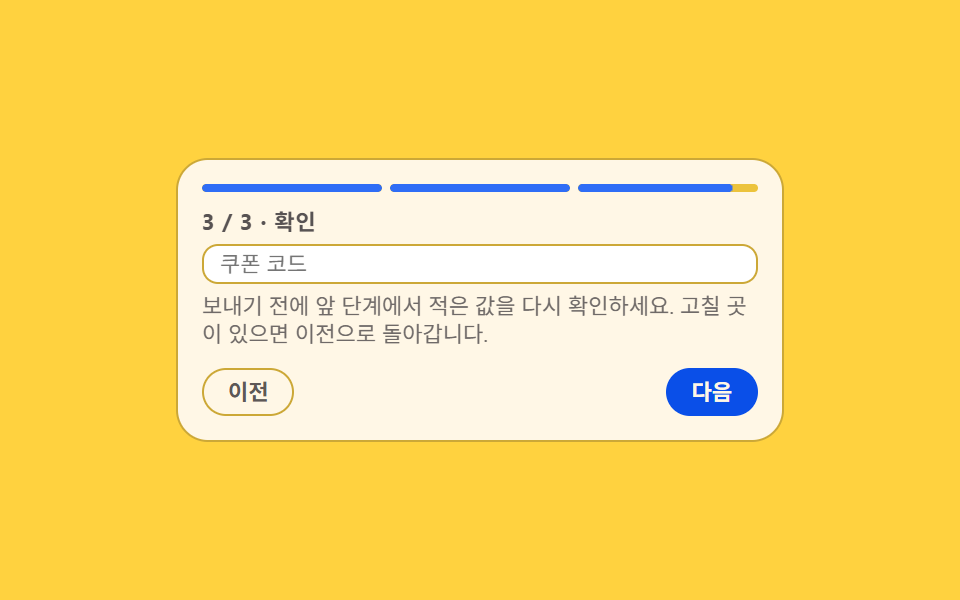 02 wizard-auto-height-transition
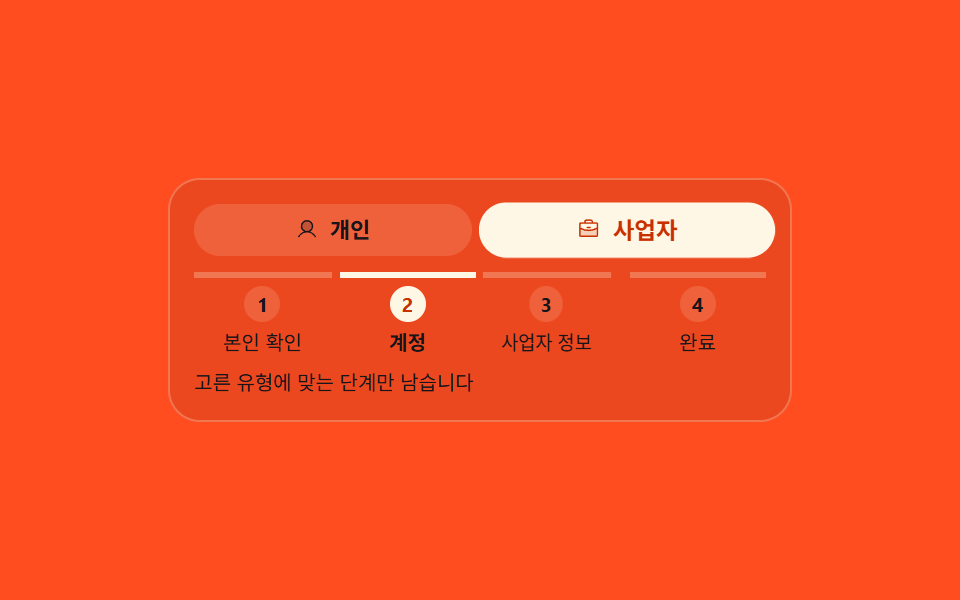 03 wizard-branch-step-path
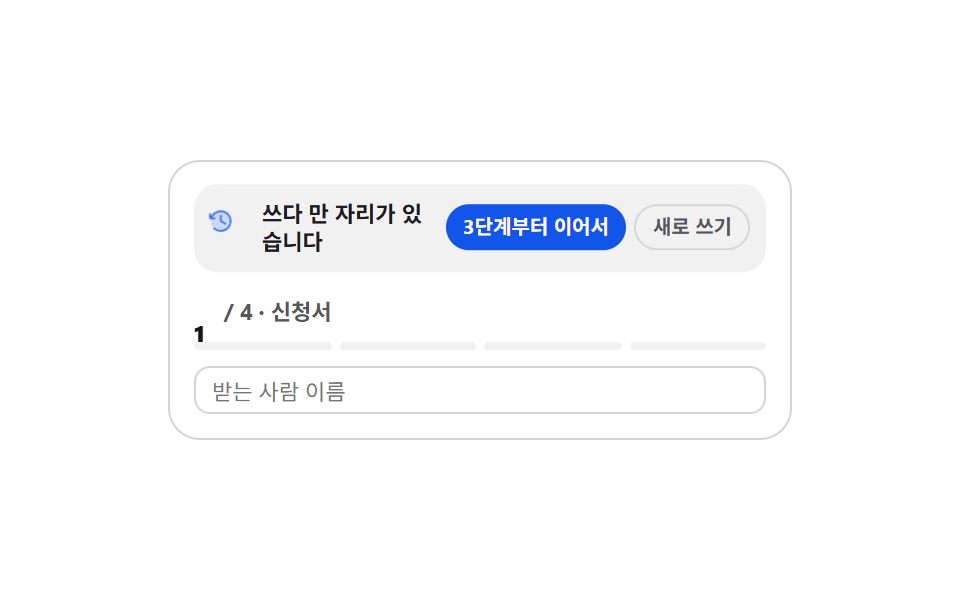 04 wizard-resume-draft-banner
 05 wizard-live-summary-panel
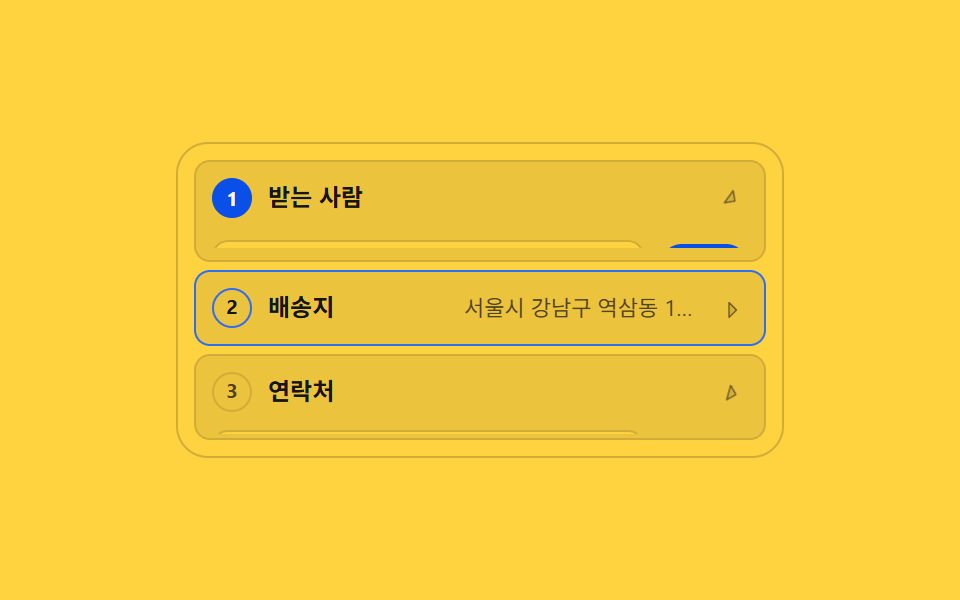 06 wizard-accordion-vertical-steps
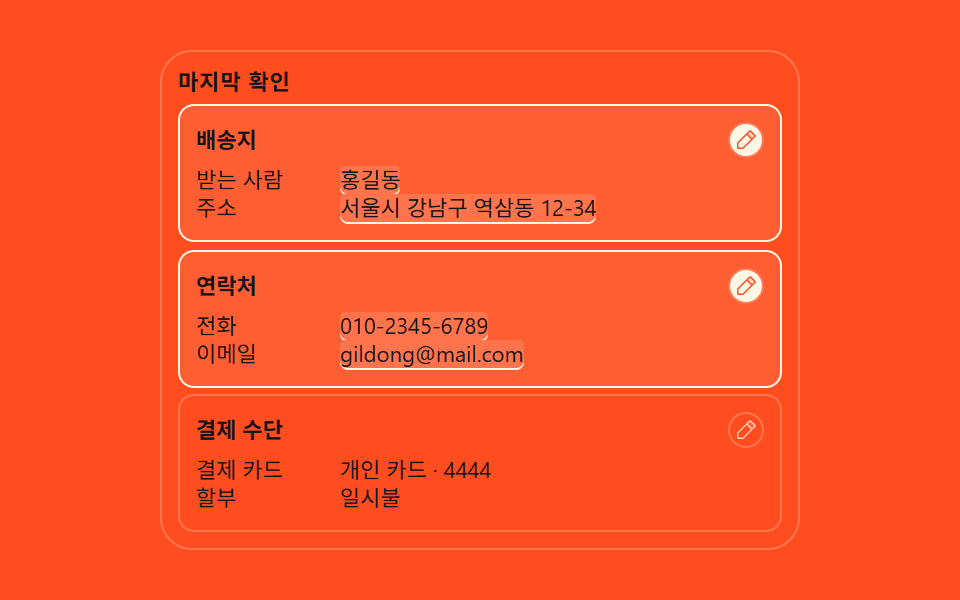 07 wizard-final-review-edit
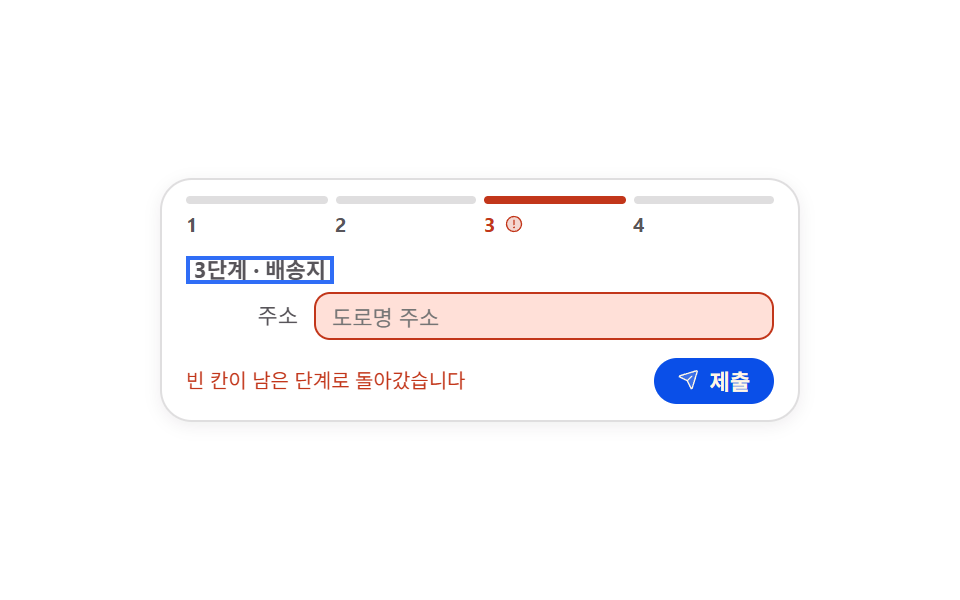 08 wizard-incomplete-step-return
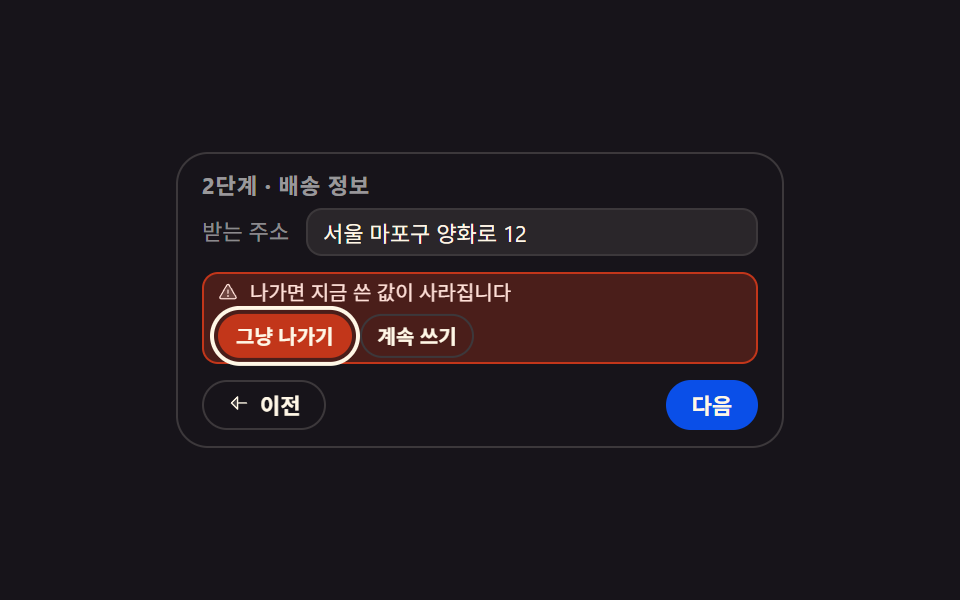 09 wizard-leave-guard-inline
Auto-plays · click a tile to jump to its section · all nine in one zip
- 01 Next button that stays locked until the rules are met
- 02 Form height that measures each step and flows to it
- 03 Step path that branches on the answer you pick
- 04 Resume strip that remembers where you stopped
- 05 Side summary that stacks up as you type
- 06 Vertical wizard that folds finished steps into one line
- 07 Review screen that lays everything out before you send
- 08 Submit that sends you back to the step with a blank left
- 09 Inline leave check that guards what you typed
The order follows where the person filling the form gets stuck, not the builder. First, the required consents are not all checked, so Next stays locked (01); then each step holds a different number of fields, so the box jumps (02). A fork appears where personal and business go separate ways (03), and a resume strip waits for whoever quits midway (04). Those four guide the way. The next two confirm as you type: values stack up in a side panel (05), and on a phone the finished steps fold to one line (06). The last three are the form keeping its promises: everything is laid out before you send (07), a blank sends you back to its step (08), and leaving asks once before your typing disappears (09). A multi step form react port keeps the same order, because the sticking points belong to the person filling it in rather than to the framework. Judging mid-way through the steps is Form Validation UI Patterns, and collapsing the steps into one checkout screen hands off to Checkout Page Design.
01Next button that stays locked until the rules are met
What you see
If Next is clickable from the start, people cannot tell why nothing happens. This part keeps the button aria-disabled until every required rule is met, with the reason sitting right beside it.
<main class="stage">
  <section class="lg is-demo" id="lg" aria-label="Required checks for signup">
    <p class="lg__h">Step 2 · Required checks</p>
    <ul class="lg__list">
      <li class="lg__row" data-row="1">
        <button class="lg__box" type="button" role="checkbox" aria-checked="false">
          <span class="lg__tick" aria-hidden="true"><svg viewBox="0 0 256 256" width="1em" height="1em" fill="currentColor"><g><path d="M232 56v144a16 16 0 0 1-16 16H40a16 16 0 0 1-16-16V56a16 16 0 0 1 16-16h176a16 16 0 0 1 16 16" opacity=".2"/><path d="m205.66 85.66l-96 96a8 8 0 0 1-11.32 0l-40-40a8 8 0 0 1 11.32-11.32L104 164.69l90.34-90.35a8 8 0 0 1 11.32 11.32"/></g></svg></span>
          <span class="lg__label">Accept the terms of service</span>
        </button>
      </li>
      <li class="lg__row" data-row="2">
        <button class="lg__box" type="button" role="checkbox" aria-checked="false">
          <span class="lg__tick" aria-hidden="true"><svg viewBox="0 0 256 256" width="1em" height="1em" fill="currentColor"><g><path d="M232 56v144a16 16 0 0 1-16 16H40a16 16 0 0 1-16-16V56a16 16 0 0 1 16-16h176a16 16 0 0 1 16 16" opacity=".2"/><path d="m205.66 85.66l-96 96a8 8 0 0 1-11.32 0l-40-40a8 8 0 0 1 11.32-11.32L104 164.69l90.34-90.35a8 8 0 0 1 11.32 11.32"/></g></svg></span>
          <span class="lg__label">Accept the privacy notice</span>
        </button>
      </li>
      <li class="lg__row" data-row="3">
        <button class="lg__box" type="button" role="checkbox" aria-checked="false">
          <span class="lg__tick" aria-hidden="true"><svg viewBox="0 0 256 256" width="1em" height="1em" fill="currentColor"><g><path d="M232 56v144a16 16 0 0 1-16 16H40a16 16 0 0 1-16-16V56a16 16 0 0 1 16-16h176a16 16 0 0 1 16 16" opacity=".2"/><path d="m205.66 85.66l-96 96a8 8 0 0 1-11.32 0l-40-40a8 8 0 0 1 11.32-11.32L104 164.69l90.34-90.35a8 8 0 0 1 11.32 11.32"/></g></svg></span>
          <span class="lg__label">I am 14 or older</span>
        </button>
      </li>
    </ul>
    <div class="lg__foot">
      <p class="lg__why">
        <span class="lg__why-a">Required items are still open</span>
        <span class="lg__why-b">You can move to the next step</span>
      </p>
      <button class="lg__next" type="button" id="lg-next" aria-disabled="true">
        <span class="lg__lock" aria-hidden="true"><svg viewBox="0 0 256 256" width="1em" height="1em" fill="currentColor"><g><path d="M216 96v112a8 8 0 0 1-8 8H48a8 8 0 0 1-8-8V96a8 8 0 0 1 8-8h160a8 8 0 0 1 8 8" opacity=".2"/><path d="M208 80h-32V56a48 48 0 0 0-96 0v24H48a16 16 0 0 0-16 16v112a16 16 0 0 0 16 16h160a16 16 0 0 0 16-16V96a16 16 0 0 0-16-16M96 56a32 32 0 0 1 64 0v24H96Zm112 152H48V96h160z"/></g></svg></span>
        <span class="lg__next-t">Next</span>
      </button>
    </div>
  </section>
</main>@use "sass:color";
@use "../../../../site/static/demo-tokens" as *;
$duration: $dur-quick;
$easing: $ease-spring;
$color: $subject-blue;
@include stage($stage-ink);
$line: color.mix($subject-cream, $stage-ink, 16%);
$soft: color.mix($subject-cream, $stage-ink, 8%);
.lg {
box-sizing: border-box;
width: min(304px, 92vw);
padding: $sp-3;
border: 1px solid $line;
border-radius: $r-card;
background: $stage-ink;
color: $subject-cream;
font-family: -apple-system, "Segoe UI", "Noto Sans KR", sans-serif;
font-size: 12px;
line-height: 1.3;
}
.lg__h {
margin: 0 0 $sp-2;
color: rgba(255, 255, 255, .56);
font-size: 11px;
font-weight: 700;
letter-spacing: .04em;
}
.lg__list {
display: grid;
gap: $sp-1;
margin: 0;
padding: 0;
list-style: none;
}
// ── 조건 한 줄 ────────────────────────────────────
.lg__box {
display: flex;
align-items: center;
gap: $sp-2;
width: 100%;
margin: 0;
padding: $sp-1 $sp-2;
border: 1px solid $line;
border-radius: $r-sm;
background: $soft;
color: inherit;
font-family: inherit;
font-size: 12px;
line-height: 1.3;
text-align: left;
cursor: pointer;
}
.lg__box:focus-visible { outline: 2px solid $color; outline-offset: 2px; }
.lg__tick {
display: inline-flex;
flex: 0 0 auto;
width: 16px;
height: 16px;
border-radius: $r-xs;
background: rgba(255, 255, 255, .1);
color: transparent;
}
.lg__label { color: rgba(255, 255, 255, .74); }
// 정적(사람이 조작하는) 경로 — .is-demo 를 떼도 결과가 보여야 한다
.lg__row.is-on .lg__tick { background: $color; color: $subject-cream; }
.lg__row.is-on .lg__label { color: $subject-cream; }
// ── 발판 ─────────────────────────────────────────
.lg__foot {
display: grid;
grid-template-columns: 1fr auto;
align-items: center;
gap: $sp-2;
margin-top: $sp-2;
}
.lg__why {
position: relative;
margin: 0;
min-height: 16px;
font-size: 11px;
}
.lg__why-a, .lg__why-b { position: absolute; inset: 0; }
.lg__why-a { color: rgba(255, 255, 255, .5); }
.lg__why-b { color: $subject-mint; opacity: 0; }
.lg.is-ready .lg__why-a { opacity: 0; }
.lg.is-ready .lg__why-b { opacity: 1; }
.lg__next {
display: inline-flex;
align-items: center;
gap: $sp-1;
margin: 0;
padding: $sp-1 $sp-3;
border: 0;
border-radius: $r-pill;
background: rgba(255, 255, 255, .12);
color: rgba(255, 255, 255, .72);
font-family: inherit;
font-size: 12px;
font-weight: 700;
line-height: 1.6;
cursor: not-allowed;
}
.lg__next:focus-visible { outline: 2px solid $color; outline-offset: 2px; }
.lg__lock { display: inline-flex; width: 13px; height: 13px; }
.lg.is-ready .lg__next { background: $color; color: $subject-cream; cursor: pointer; }
.lg.is-ready .lg__lock { display: none; }
.lg.is-sent .lg__next-t { color: $subject-mint; }
.lg.is-nudge .lg__why-a { color: $error-soft; }
// ── 격자 미리보기 전용 2초 루프 ─────────────────────
// 켜짐은 steps(1, end) 로 한 프레임에 자르고(반투명 유령 금지),
// 프레임 수는 같은 줄의 translateY 팝이 채운다
@keyframes lg-on-1 {
0%, 11% { background: rgba(255, 255, 255, .1); color: transparent; }
12%, 100% { background: $color; color: $subject-cream; }
}
@keyframes lg-on-2 {
0%, 31% { background: rgba(255, 255, 255, .1); color: transparent; }
32%, 100% { background: $color; color: $subject-cream; }
}
@keyframes lg-on-3 {
0%, 51% { background: rgba(255, 255, 255, .1); color: transparent; }
52%, 88% { background: $color; color: $subject-cream; }
89%, 100% { background: rgba(255, 255, 255, .1); color: transparent; }
}
@keyframes lg-pop-1 {
0%, 8% { transform: translateY(0); }
14% { transform: translateY(-3px); }
22%, 100% { transform: translateY(0); }
}
@keyframes lg-pop-2 {
0%, 28% { transform: translateY(0); }
34% { transform: translateY(-3px); }
42%, 100% { transform: translateY(0); }
}
@keyframes lg-pop-3 {
0%, 48% { transform: translateY(0); }
54% { transform: translateY(-3px); }
62%, 88% { transform: translateY(0); }
100% { transform: translateY(0); }
}
@keyframes lg-unlock {
0%, 55% { background: rgba(255, 255, 255, .12); color: rgba(255, 255, 255, .72); }
56%, 88% { background: $color; color: $subject-cream; }
89%, 100% { background: rgba(255, 255, 255, .12); color: rgba(255, 255, 255, .72); }
}
@keyframes lg-lock-off {
0%, 55% { transform: scale(1); opacity: 1; }
56%, 88% { transform: scale(.4); opacity: 0; }
89%, 100% { transform: scale(1); opacity: 1; }
}
@keyframes lg-why-a {
0%, 55% { opacity: 1; }
56%, 88% { opacity: 0; }
89%, 100% { opacity: 1; }
}
@keyframes lg-why-b {
0%, 55% { opacity: 0; transform: translateY(3px); }
56% { opacity: 1; transform: translateY(3px); }
64%, 88% { opacity: 1; transform: translateY(0); }
89%, 100% { opacity: 0; transform: translateY(3px); }
}
.lg.is-demo {
.lg__row[data-row="1"] .lg__tick { animation-name: lg-on-1; }
.lg__row[data-row="2"] .lg__tick { animation-name: lg-on-2; }
.lg__row[data-row="3"] .lg__tick { animation-name: lg-on-3; }
.lg__tick {
animation-duration: $dur-loop;
animation-timing-function: steps(1, end);
animation-iteration-count: infinite;
}
.lg__row[data-row="1"] .lg__box { animation-name: lg-pop-1; }
.lg__row[data-row="2"] .lg__box { animation-name: lg-pop-2; }
.lg__row[data-row="3"] .lg__box { animation-name: lg-pop-3; }
.lg__box {
animation-duration: $dur-loop;
animation-timing-function: $easing;
animation-iteration-count: infinite;
}
.lg__next {
animation-name: lg-unlock;
animation-duration: $dur-loop;
animation-timing-function: steps(1, end);
animation-iteration-count: infinite;
}
.lg__lock {
animation-name: lg-lock-off;
animation-duration: $dur-loop;
animation-timing-function: $easing;
animation-iteration-count: infinite;
}
.lg__why-a {
animation-name: lg-why-a;
animation-duration: $dur-loop;
animation-timing-function: steps(1, end);
animation-iteration-count: infinite;
}
.lg__why-b {
animation-name: lg-why-b;
animation-duration: $dur-loop;
animation-timing-function: $easing;
animation-iteration-count: infinite;
}
}
@media (max-width: 340px) {
.lg { padding: $sp-2; font-size: 11px; }
.lg__h { margin-bottom: $sp-1; }
.lg__box { padding: 0 $sp-2; font-size: 11px; }
.lg__foot { margin-top: $sp-1; }
}
@media (prefers-reduced-motion: reduce) {
.lg.is-demo .lg__tick,
.lg.is-demo .lg__box,
.lg.is-demo .lg__next,
.lg.is-demo .lg__lock,
.lg.is-demo .lg__why-a,
.lg.is-demo .lg__why-b { animation: none !important; transform: none !important; }
// 움직임만 끄고 판정 결과는 남긴다
.lg.is-demo .lg__tick { background: $color !important; color: $subject-cream !important; }
.lg.is-demo .lg__next { background: $color !important; color: $subject-cream !important; }
.lg.is-demo .lg__lock { display: none !important; }
.lg.is-demo .lg__why-a { opacity: 0 !important; }
.lg.is-demo .lg__why-b { opacity: 1 !important; }
}html, body {
margin: 0;
overflow: hidden;
}
.stage {
box-sizing: border-box;
min-height: 100vh;
display: grid;
place-items: center;
margin: 0;
background: #17141a;
font-family: -apple-system, "Segoe UI", "Noto Sans KR", sans-serif;
padding: clamp(8px, 4vw, 24px);
}
.lg {
box-sizing: border-box;
width: min(304px, 92vw);
padding: 12px;
border: 1px solid rgb(23.5764705882%, 22.0862745098%, 22.9960784314%);
border-radius: 16px;
background: #17141a;
color: #fff7e6;
font-family: -apple-system, "Segoe UI", "Noto Sans KR", sans-serif;
font-size: 12px;
line-height: 1.3;
}
.lg__h {
margin: 0 0 8px;
color: rgba(255, 255, 255, 0.56);
font-size: 11px;
font-weight: 700;
letter-spacing: 0.04em;
}
.lg__list {
display: grid;
gap: 4px;
margin: 0;
padding: 0;
list-style: none;
}
.lg__box {
display: flex;
align-items: center;
gap: 8px;
width: 100%;
margin: 0;
padding: 4px 8px;
border: 1px solid rgb(23.5764705882%, 22.0862745098%, 22.9960784314%);
border-radius: 8px;
background: rgb(16.2980392157%, 14.9647058824%, 16.5960784314%);
color: inherit;
font-family: inherit;
font-size: 12px;
line-height: 1.3;
text-align: left;
cursor: pointer;
}
.lg__box:focus-visible {
outline: 2px solid #2f6df6;
outline-offset: 2px;
}
.lg__tick {
display: inline-flex;
flex: 0 0 auto;
width: 16px;
height: 16px;
border-radius: 4px;
background: rgba(255, 255, 255, 0.1);
color: transparent;
}
.lg__label {
color: rgba(255, 255, 255, 0.74);
}
.lg__row.is-on .lg__tick {
background: #2f6df6;
color: #fff7e6;
}
.lg__row.is-on .lg__label {
color: #fff7e6;
}
.lg__foot {
display: grid;
grid-template-columns: 1fr auto;
align-items: center;
gap: 8px;
margin-top: 8px;
}
.lg__why {
position: relative;
margin: 0;
min-height: 16px;
font-size: 11px;
}
.lg__why-a, .lg__why-b {
position: absolute;
inset: 0;
}
.lg__why-a {
color: rgba(255, 255, 255, 0.5);
}
.lg__why-b {
color: #4cd4a6;
opacity: 0;
}
.lg.is-ready .lg__why-a {
opacity: 0;
}
.lg.is-ready .lg__why-b {
opacity: 1;
}
.lg__next {
display: inline-flex;
align-items: center;
gap: 4px;
margin: 0;
padding: 4px 12px;
border: 0;
border-radius: 999px;
background: rgba(255, 255, 255, 0.12);
color: rgba(255, 255, 255, 0.72);
font-family: inherit;
font-size: 12px;
font-weight: 700;
line-height: 1.6;
cursor: not-allowed;
}
.lg__next:focus-visible {
outline: 2px solid #2f6df6;
outline-offset: 2px;
}
.lg__lock {
display: inline-flex;
width: 13px;
height: 13px;
}
.lg.is-ready .lg__next {
background: #2f6df6;
color: #fff7e6;
cursor: pointer;
}
.lg.is-ready .lg__lock {
display: none;
}
.lg.is-sent .lg__next-t {
color: #4cd4a6;
}
.lg.is-nudge .lg__why-a {
color: #ffe0d8;
}
@keyframes lg-on-1 {
0%, 11% {
background: rgba(255, 255, 255, 0.1);
color: transparent;
}
12%, 100% {
background: #2f6df6;
color: #fff7e6;
}
}
@keyframes lg-on-2 {
0%, 31% {
background: rgba(255, 255, 255, 0.1);
color: transparent;
}
32%, 100% {
background: #2f6df6;
color: #fff7e6;
}
}
@keyframes lg-on-3 {
0%, 51% {
background: rgba(255, 255, 255, 0.1);
color: transparent;
}
52%, 88% {
background: #2f6df6;
color: #fff7e6;
}
89%, 100% {
background: rgba(255, 255, 255, 0.1);
color: transparent;
}
}
@keyframes lg-pop-1 {
0%, 8% {
transform: translateY(0);
}
14% {
transform: translateY(-3px);
}
22%, 100% {
transform: translateY(0);
}
}
@keyframes lg-pop-2 {
0%, 28% {
transform: translateY(0);
}
34% {
transform: translateY(-3px);
}
42%, 100% {
transform: translateY(0);
}
}
@keyframes lg-pop-3 {
0%, 48% {
transform: translateY(0);
}
54% {
transform: translateY(-3px);
}
62%, 88% {
transform: translateY(0);
}
100% {
transform: translateY(0);
}
}
@keyframes lg-unlock {
0%, 55% {
background: rgba(255, 255, 255, 0.12);
color: rgba(255, 255, 255, 0.72);
}
56%, 88% {
background: #2f6df6;
color: #fff7e6;
}
89%, 100% {
background: rgba(255, 255, 255, 0.12);
color: rgba(255, 255, 255, 0.72);
}
}
@keyframes lg-lock-off {
0%, 55% {
transform: scale(1);
opacity: 1;
}
56%, 88% {
transform: scale(0.4);
opacity: 0;
}
89%, 100% {
transform: scale(1);
opacity: 1;
}
}
@keyframes lg-why-a {
0%, 55% {
opacity: 1;
}
56%, 88% {
opacity: 0;
}
89%, 100% {
opacity: 1;
}
}
@keyframes lg-why-b {
0%, 55% {
opacity: 0;
transform: translateY(3px);
}
56% {
opacity: 1;
transform: translateY(3px);
}
64%, 88% {
opacity: 1;
transform: translateY(0);
}
89%, 100% {
opacity: 0;
transform: translateY(3px);
}
}
.lg.is-demo .lg__row[data-row="1"] .lg__tick {
animation-name: lg-on-1;
}
.lg.is-demo .lg__row[data-row="2"] .lg__tick {
animation-name: lg-on-2;
}
.lg.is-demo .lg__row[data-row="3"] .lg__tick {
animation-name: lg-on-3;
}
.lg.is-demo .lg__tick {
animation-duration: 2s;
animation-timing-function: steps(1, end);
animation-iteration-count: infinite;
}
.lg.is-demo .lg__row[data-row="1"] .lg__box {
animation-name: lg-pop-1;
}
.lg.is-demo .lg__row[data-row="2"] .lg__box {
animation-name: lg-pop-2;
}
.lg.is-demo .lg__row[data-row="3"] .lg__box {
animation-name: lg-pop-3;
}
.lg.is-demo .lg__box {
animation-duration: 2s;
animation-timing-function: cubic-bezier(0.2, 0.8, 0.2, 1);
animation-iteration-count: infinite;
}
.lg.is-demo .lg__next {
animation-name: lg-unlock;
animation-duration: 2s;
animation-timing-function: steps(1, end);
animation-iteration-count: infinite;
}
.lg.is-demo .lg__lock {
animation-name: lg-lock-off;
animation-duration: 2s;
animation-timing-function: cubic-bezier(0.2, 0.8, 0.2, 1);
animation-iteration-count: infinite;
}
.lg.is-demo .lg__why-a {
animation-name: lg-why-a;
animation-duration: 2s;
animation-timing-function: steps(1, end);
animation-iteration-count: infinite;
}
.lg.is-demo .lg__why-b {
animation-name: lg-why-b;
animation-duration: 2s;
animation-timing-function: cubic-bezier(0.2, 0.8, 0.2, 1);
animation-iteration-count: infinite;
}
@media (max-width: 340px) {
.lg {
padding: 8px;
font-size: 11px;
}
.lg__h {
margin-bottom: 4px;
}
.lg__box {
padding: 0 8px;
font-size: 11px;
}
.lg__foot {
margin-top: 4px;
}
}
@media (prefers-reduced-motion: reduce) {
.lg.is-demo .lg__tick,
.lg.is-demo .lg__box,
.lg.is-demo .lg__next,
.lg.is-demo .lg__lock,
.lg.is-demo .lg__why-a,
.lg.is-demo .lg__why-b {
animation: none !important;
transform: none !important;
}
.lg.is-demo .lg__tick {
background: #2f6df6 !important;
color: #fff7e6 !important;
}
.lg.is-demo .lg__next {
background: #2f6df6 !important;
color: #fff7e6 !important;
}
.lg.is-demo .lg__lock {
display: none !important;
}
.lg.is-demo .lg__why-a {
opacity: 0 !important;
}
.lg.is-demo .lg__why-b {
opacity: 1 !important;
}
}// 실제 동작: 세 조건이 전부 켜져야 Next 버튼의 aria-disabled 가 false 로 바뀐다.
// 잠긴 동안 눌러도 단계는 안 넘어가고 이유 문구만 그대로 남는다.
var lg = document.getElementById('lg');
var lgBoxes = [].slice.call(lg.querySelectorAll('.lg__box'));
function lgSync() {
  var done = lgBoxes.filter(function (b) {
    return b.getAttribute('aria-checked') === 'true';
  }).length;
  var ready = done === lgBoxes.length;
  lg.classList.toggle('is-ready', ready);
  var next = document.getElementById('lg-next');
  next.setAttribute('aria-disabled', ready ? 'false' : 'true');
}
lgBoxes.forEach(function (b) {
b.addEventListener('click', function () {
lg.classList.remove('is-demo');
b.setAttribute('aria-checked', b.getAttribute('aria-checked') === 'true' ? 'false' : 'true');
b.parentNode.classList.toggle('is-on', b.getAttribute('aria-checked') === 'true');
lgSync();
});
});
document.getElementById('lg-next').addEventListener('click', function () {
lg.classList.remove('is-demo');
if (this.getAttribute('aria-disabled') === 'true') { lg.classList.add('is-nudge'); return; }
lg.classList.remove('is-nudge');
lg.classList.add('is-sent');
});
lgSync();import { useState } from "react";
import type { CSSProperties } from "react";
import styles from "./StepLockGate.module.scss";
export type StepLockGateProps = {
heading?: string;
rules?: string[];
lockedHint?: string;
readyHint?: string;
nextLabel?: string;
groupLabel?: string;
/** 격자 미리보기용 2초 자동 루프. 사람이 손대면 꺼진다 */
demo?: boolean;
duration?: number;
easing?: string;
color?: string;
};
type Vars = CSSProperties & { "--duration"?: string; "--easing"?: string; "--color"?: string };
const DEFAULT_RULES = ["Accept the terms of service", "Accept the privacy notice", "I am 14 or older"];
function Tick() {
return (
<svg viewBox="0 0 256 256" width="1em" height="1em" fill="currentColor">
<g>
<path d="M232 56v144a16 16 0 0 1-16 16H40a16 16 0 0 1-16-16V56a16 16 0 0 1 16-16h176a16 16 0 0 1 16 16" opacity=".2" />
<path d="m205.66 85.66l-96 96a8 8 0 0 1-11.32 0l-40-40a8 8 0 0 1 11.32-11.32L104 164.69l90.34-90.35a8 8 0 0 1 11.32 11.32" />
</g>
</svg>
);
}
function Lock() {
return (
<svg viewBox="0 0 256 256" width="1em" height="1em" fill="currentColor">
<g>
<path d="M216 96v112a8 8 0 0 1-8 8H48a8 8 0 0 1-8-8V96a8 8 0 0 1 8-8h160a8 8 0 0 1 8 8" opacity=".2" />
<path d="M208 80h-32V56a48 48 0 0 0-96 0v24H48a16 16 0 0 0-16 16v112a16 16 0 0 0 16 16h160a16 16 0 0 0 16-16V96a16 16 0 0 0-16-16M96 56a32 32 0 0 1 64 0v24H96Zm112 152H48V96h160z" />
</g>
</svg>
);
}
export default function StepLockGate({
heading = "Step 2 · Required checks",
rules = DEFAULT_RULES,
lockedHint = "Required items are still open",
readyHint = "You can move to the next step",
nextLabel = "Next",
groupLabel = "Required checks for signup",
demo = true,
duration = 220,
easing = "cubic-bezier(.2,.8,.2,1)",
color = "#2f6df6",
}: StepLockGateProps) {
const [on, setOn] = useState<boolean[]>(rules.map(() => false));
const [live, setLive] = useState(demo);
const [nudge, setNudge] = useState(false);
const ready = on.length > 0 && on.every(Boolean);
const vars: Vars = { "--duration": `${duration}ms`, "--easing": easing, "--color": color };
function toggle(i: number) {
setLive(false);
setOn((prev) => prev.map((v, n) => (n === i ? !v : v)));
}
function next() {
setLive(false);
// 잠긴 동안 눌러도 단계는 안 넘어간다 — 이유만 강조한다
setNudge(!ready);
}
const cls = [styles.lg, live ? styles.isDemo : "", ready ? styles.isReady : "", nudge ? styles.isNudge : ""]
.filter(Boolean)
.join(" ");
return (
<section className={cls} style={vars} aria-label={groupLabel}>
<p className={styles.h}>{heading}</p>
<ul className={styles.list}>
{rules.map((r, i) => (
<li key={r} className={[styles.row, on[i] ? styles.isOn : ""].filter(Boolean).join(" ")} data-row={i + 1}>
<button className={styles.box} type="button" role="checkbox" aria-checked={on[i]} onClick={() => toggle(i)}>
<span className={styles.tick} aria-hidden="true"><Tick /></span>
<span className={styles.label}>{r}</span>
</button>
</li>
))}
</ul>
<div className={styles.foot}>
<p className={styles.why}>
<span className={styles.whyA}>{lockedHint}</span>
<span className={styles.whyB}>{readyHint}</span>
</p>
<button className={styles.next} type="button" aria-disabled={!ready} onClick={next}>
{!ready && <span className={styles.lock} aria-hidden="true"><Lock /></span>}
<span className={styles.nextT}>{nextLabel}</span>
</button>
</div>
</section>
);
}01 · Next button that stays locked until the rules are met — Measured area 8.435% · moving frames 12/23Original by GODRICH · SCSS and React ship in the zip · See the password
Where to look in the code
The moment the last rule lands, the lock cuts away in a single frame, and the reason line turns into a green "you can continue."
function lgSync() {
var done = lgBoxes.filter(function (b) {
return b.getAttribute('aria-checked') === 'true';
}).length;
var ready = done === lgBoxes.length;
lg.classList.toggle('is-ready', ready);
var next = document.getElementById('lg-next');
next.setAttribute('aria-disabled', ready ? 'false' : 'true');
}
02Form height that measures each step and flows to it
How a multi step form ui design handles height on screen
When step one has two fields, step two has three, and step three has one, the box height jumps at every border. This part measures the incoming panel's real height with getBoundingClientRect() and writes it into a single length-registered custom property, --h; the box flows to that number.
<main class="stage">
  <section class="ah is-demo" id="ah" aria-label="Application form whose steps hold different field counts">
    <div class="ah__bar" id="ah-bar" role="progressbar" aria-valuemin="1" aria-valuemax="3" aria-valuenow="1" aria-label="Step progress">
      <span class="ah__seg" data-seg="1"><span class="ah__seg-f"></span></span>
      <span class="ah__seg" data-seg="2"><span class="ah__seg-f"></span></span>
      <span class="ah__seg" data-seg="3"><span class="ah__seg-f"></span></span>
    </div>
    <div class="ah__box" id="ah-box">
      <div class="ah__panel is-on" data-step="1">
        <p class="ah__t">1 / 3 · Account</p>
        <input class="ah__f" type="text" placeholder="Email">
        <input class="ah__f" type="text" placeholder="Password">
      </div>
      <div class="ah__panel" data-step="2">
        <p class="ah__t">2 / 3 · Delivery</p>
        <input class="ah__f" type="text" placeholder="Recipient">
        <input class="ah__f" type="text" placeholder="Address">
        <input class="ah__f" type="text" placeholder="Phone">
      </div>
      <div class="ah__panel" data-step="3">
        <p class="ah__t">3 / 3 · Review</p>
        <input class="ah__f" type="text" placeholder="Coupon code">
        <p class="ah__note">Check what you typed on earlier steps before sending. Go back if something needs a fix.</p>
      </div>
    </div>
    <div class="ah__foot">
      <button class="ah__btn" type="button" id="ah-prev">Back</button>
      <button class="ah__btn ah__btn--go" type="button" id="ah-next">Next</button>
    </div>
  </section>
</main>@use "sass:color";
@use "../../../../site/static/demo-tokens" as *;
$duration: $dur-base;
$easing: $ease-spring;
$color: $subject-blue;
@include stage($stage-yellow);
$line: color.mix($subject-ink, $stage-yellow, 22%);
$soft: color.mix($subject-ink, $stage-yellow, 8%);
// 단계마다 다른 상자 높이. 길이형으로 등록해야 보간된다 —
// 등록하지 않은 커스텀 속성은 중간값이 없어 높이가 툭 튄다
@property --h {
syntax: "<length>";
inherits: true;
initial-value: 63px;
}
// 패널 셋의 실측 높이(측정값과 맞춰 둔 루프용 값)
$h1: 63px;
$h2: 87px;
$h3: 70px;
.ah {
box-sizing: border-box;
width: min(304px, 92vw);
padding: $sp-3;
border: 1px solid $line;
border-radius: $r-card;
background: $subject-cream;
color: $subject-ink;
font-family: -apple-system, "Segoe UI", "Noto Sans KR", sans-serif;
font-size: 12px;
line-height: 1.3;
}
// ── 진행 막대 ─────────────────────────────────────
.ah__bar {
display: grid;
grid-template-columns: repeat(3, 1fr);
gap: $sp-1;
margin-bottom: $sp-2;
}
.ah__seg {
height: 4px;
border-radius: $r-pill;
background: $soft;
overflow: hidden;
}
.ah__seg-f {
display: block;
height: 100%;
border-radius: inherit;
background: $color;
transform: scaleX(0);
transform-origin: left center; // 규칙8: 단계 막대 좌측에서 채움
transition: transform $duration $easing;
}
// 정적(사람이 조작하는) 경로 — .is-demo 를 떼도 진행 상태가 보여야 한다
.ah__seg.is-done .ah__seg-f { transform: scaleX(1); }
// ── 높이가 흐르는 상자 ─────────────────────────────
.ah__box {
--h: #{$h1};
display: grid;
align-items: start;
height: var(--h);
overflow: hidden;
transition: --h $duration $easing;
}
.ah__panel {
display: grid;
grid-area: 1 / 1;
align-content: start;
gap: $sp-1;
opacity: 0;
visibility: hidden;
}
.ah__panel.is-on { opacity: 1; visibility: visible; }
.ah__t {
margin: 0;
color: rgba($subject-ink, .72);
font-size: 11px;
font-weight: 700;
letter-spacing: .04em;
}
.ah__f {
box-sizing: border-box;
width: 100%;
height: 20px;
margin: 0;
padding: 0 $sp-2;
border: 1px solid $line;
border-radius: $r-sm;
background: $stage-paper;
color: $subject-ink;
font-family: inherit;
font-size: 11px;
line-height: 1.3;
}
.ah__f:focus-visible { outline: 2px solid $color; outline-offset: 2px; }
.ah__note {
margin: 0;
color: color.mix($subject-ink, $subject-cream, 62%);
font-size: 11px;
line-height: 1.25;
}
// ── 발판 ─────────────────────────────────────────
.ah__foot {
display: grid;
grid-template-columns: auto auto;
justify-content: space-between;
gap: $sp-2;
margin-top: $sp-2;
}
.ah__btn {
margin: 0;
padding: $sp-1 $sp-3;
border: 1px solid $line;
border-radius: $r-pill;
background: transparent;
color: color.mix($subject-ink, $subject-cream, 70%);
font-family: inherit;
font-size: 11px;
font-weight: 700;
line-height: 1.3;
cursor: pointer;
}
.ah__btn--go { border-color: $subject-blue-deep; background: $subject-blue-deep; color: $subject-cream; }
.ah__btn:focus-visible { outline: 2px solid $color; outline-offset: 2px; }
// ── 격자 미리보기 전용 2초 루프 ─────────────────────
// --h 는 등록돼 있으니 키프레임 사이가 보간된다(상자가 흐른다).
// 패널 교체만 steps(1, end) 로 한 프레임에 자른다 — 반투명 유령 금지
@keyframes ah-h {
0%, 18% { --h: #{$h1}; }
30%, 46% { --h: #{$h2}; }
58%, 72% { --h: #{$h3}; }
86%, 100% { --h: #{$h1}; }
}
@keyframes ah-p1 {
0%, 17% { opacity: 1; visibility: visible; }
18%, 71% { opacity: 0; visibility: hidden; }
72%, 100% { opacity: 1; visibility: visible; }
}
@keyframes ah-p2 {
0%, 17% { opacity: 0; visibility: hidden; }
18%, 45% { opacity: 1; visibility: visible; }
46%, 100% { opacity: 0; visibility: hidden; }
}
@keyframes ah-p3 {
0%, 45% { opacity: 0; visibility: hidden; }
46%, 71% { opacity: 1; visibility: visible; }
72%, 100% { opacity: 0; visibility: hidden; }
}
@keyframes ah-seg2 {
0%, 17% { transform: scaleX(0); }
18% { transform: scaleX(0); }
30%, 71% { transform: scaleX(1); }
84%, 100% { transform: scaleX(0); }
}
@keyframes ah-seg3 {
0%, 45% { transform: scaleX(0); }
46% { transform: scaleX(0); }
58%, 71% { transform: scaleX(1); }
84%, 100% { transform: scaleX(0); }
}
.ah.is-demo {
// 루프 중에는 전환을 끈다 — 전환이 살아 있으면 캐스케이드에서 애니메이션을 덮는다
.ah__box, .ah__seg-f { transition: none; }
.ah__box {
animation-name: ah-h;
animation-duration: $dur-loop;
animation-timing-function: $easing;
animation-iteration-count: infinite;
}
.ah__panel[data-step="1"] { animation-name: ah-p1; }
.ah__panel[data-step="2"] { animation-name: ah-p2; }
.ah__panel[data-step="3"] { animation-name: ah-p3; }
.ah__panel {
animation-duration: $dur-loop;
animation-timing-function: steps(1, end);
animation-iteration-count: infinite;
}
.ah__seg[data-seg="2"] .ah__seg-f { animation-name: ah-seg2; }
.ah__seg[data-seg="3"] .ah__seg-f { animation-name: ah-seg3; }
.ah__seg[data-seg="2"] .ah__seg-f,
.ah__seg[data-seg="3"] .ah__seg-f {
animation-duration: $dur-loop;
animation-timing-function: $easing;
animation-iteration-count: infinite;
}
}
@media (max-width: 340px) {
.ah { padding: $sp-2; font-size: 11px; }
.ah__btn { padding: 0 $sp-2; }
.ah__note { font-size: 10px; }
}
@media (prefers-reduced-motion: reduce) {
.ah.is-demo .ah__box,
.ah.is-demo .ah__panel,
.ah.is-demo .ah__seg-f { animation: none !important; transition: none !important; }
// 움직임만 끄고 진행 상태는 남긴다 — 칸 셋짜리 2단계에 맞춰진 상자
.ah.is-demo .ah__box { --h: #{$h2} !important; }
.ah.is-demo .ah__panel[data-step="1"],
.ah.is-demo .ah__panel[data-step="3"] { opacity: 0 !important; visibility: hidden !important; }
.ah.is-demo .ah__panel[data-step="2"] { opacity: 1 !important; visibility: visible !important; }
.ah.is-demo .ah__seg[data-seg="1"] .ah__seg-f,
.ah.is-demo .ah__seg[data-seg="2"] .ah__seg-f { transform: scaleX(1) !important; }
.ah.is-demo .ah__seg[data-seg="3"] .ah__seg-f { transform: scaleX(0) !important; }
}html, body {
margin: 0;
overflow: hidden;
}
.stage {
box-sizing: border-box;
min-height: 100vh;
display: grid;
place-items: center;
margin: 0;
background: #ffd23f;
font-family: -apple-system, "Segoe UI", "Noto Sans KR", sans-serif;
padding: clamp(8px, 4vw, 24px);
}
@property --h {
syntax: "<length>";
inherits: true;
initial-value: 63px;
}
.ah {
box-sizing: border-box;
width: min(304px, 92vw);
padding: 12px;
border: 1px solid rgb(79.9843137255%, 65.9607843137%, 21.5137254902%);
border-radius: 16px;
background: #fff7e6;
color: #17141a;
font-family: -apple-system, "Segoe UI", "Noto Sans KR", sans-serif;
font-size: 12px;
line-height: 1.3;
}
.ah__bar {
display: grid;
grid-template-columns: repeat(3, 1fr);
gap: 4px;
margin-bottom: 8px;
}
.ah__seg {
height: 4px;
border-radius: 999px;
background: rgb(92.7215686275%, 76.3921568627%, 23.5450980392%);
overflow: hidden;
}
.ah__seg-f {
display: block;
height: 100%;
border-radius: inherit;
background: #2f6df6;
transform: scaleX(0);
transform-origin: left center;
transition: transform 300ms cubic-bezier(0.2, 0.8, 0.2, 1);
}
.ah__seg.is-done .ah__seg-f {
transform: scaleX(1);
}
.ah__box {
--h: 63px;
display: grid;
align-items: start;
height: var(--h);
overflow: hidden;
transition: --h 300ms cubic-bezier(0.2, 0.8, 0.2, 1);
}
.ah__panel {
display: grid;
grid-area: 1/1;
align-content: start;
gap: 4px;
opacity: 0;
visibility: hidden;
}
.ah__panel.is-on {
opacity: 1;
visibility: visible;
}
.ah__t {
margin: 0;
color: rgba(23, 20, 26, 0.72);
font-size: 11px;
font-weight: 700;
letter-spacing: 0.04em;
}
.ah__f {
box-sizing: border-box;
width: 100%;
height: 20px;
margin: 0;
padding: 0 8px;
border: 1px solid rgb(79.9843137255%, 65.9607843137%, 21.5137254902%);
border-radius: 8px;
background: #ffffff;
color: #17141a;
font-family: inherit;
font-size: 11px;
line-height: 1.3;
}
.ah__f:focus-visible {
outline: 2px solid #2f6df6;
outline-offset: 2px;
}
.ah__note {
margin: 0;
color: rgb(43.5921568627%, 41.6705882353%, 40.5960784314%);
font-size: 11px;
line-height: 1.25;
}
.ah__foot {
display: grid;
grid-template-columns: auto auto;
justify-content: space-between;
gap: 8px;
margin-top: 8px;
}
.ah__btn {
margin: 0;
padding: 4px 12px;
border: 1px solid rgb(79.9843137255%, 65.9607843137%, 21.5137254902%);
border-radius: 999px;
background: transparent;
color: rgb(36.3137254902%, 34.5490196078%, 34.1960784314%);
font-family: inherit;
font-size: 11px;
font-weight: 700;
line-height: 1.3;
cursor: pointer;
}
.ah__btn--go {
border-color: #0a4fe8;
background: #0a4fe8;
color: #fff7e6;
}
.ah__btn:focus-visible {
outline: 2px solid #2f6df6;
outline-offset: 2px;
}
@keyframes ah-h {
0%, 18% {
--h: 63px;
}
30%, 46% {
--h: 87px;
}
58%, 72% {
--h: 70px;
}
86%, 100% {
--h: 63px;
}
}
@keyframes ah-p1 {
0%, 17% {
opacity: 1;
visibility: visible;
}
18%, 71% {
opacity: 0;
visibility: hidden;
}
72%, 100% {
opacity: 1;
visibility: visible;
}
}
@keyframes ah-p2 {
0%, 17% {
opacity: 0;
visibility: hidden;
}
18%, 45% {
opacity: 1;
visibility: visible;
}
46%, 100% {
opacity: 0;
visibility: hidden;
}
}
@keyframes ah-p3 {
0%, 45% {
opacity: 0;
visibility: hidden;
}
46%, 71% {
opacity: 1;
visibility: visible;
}
72%, 100% {
opacity: 0;
visibility: hidden;
}
}
@keyframes ah-seg2 {
0%, 17% {
transform: scaleX(0);
}
18% {
transform: scaleX(0);
}
30%, 71% {
transform: scaleX(1);
}
84%, 100% {
transform: scaleX(0);
}
}
@keyframes ah-seg3 {
0%, 45% {
transform: scaleX(0);
}
46% {
transform: scaleX(0);
}
58%, 71% {
transform: scaleX(1);
}
84%, 100% {
transform: scaleX(0);
}
}
.ah.is-demo .ah__box, .ah.is-demo .ah__seg-f {
transition: none;
}
.ah.is-demo .ah__box {
animation-name: ah-h;
animation-duration: 2s;
animation-timing-function: cubic-bezier(0.2, 0.8, 0.2, 1);
animation-iteration-count: infinite;
}
.ah.is-demo .ah__panel[data-step="1"] {
animation-name: ah-p1;
}
.ah.is-demo .ah__panel[data-step="2"] {
animation-name: ah-p2;
}
.ah.is-demo .ah__panel[data-step="3"] {
animation-name: ah-p3;
}
.ah.is-demo .ah__panel {
animation-duration: 2s;
animation-timing-function: steps(1, end);
animation-iteration-count: infinite;
}
.ah.is-demo .ah__seg[data-seg="2"] .ah__seg-f {
animation-name: ah-seg2;
}
.ah.is-demo .ah__seg[data-seg="3"] .ah__seg-f {
animation-name: ah-seg3;
}
.ah.is-demo .ah__seg[data-seg="2"] .ah__seg-f,
.ah.is-demo .ah__seg[data-seg="3"] .ah__seg-f {
animation-duration: 2s;
animation-timing-function: cubic-bezier(0.2, 0.8, 0.2, 1);
animation-iteration-count: infinite;
}
@media (max-width: 340px) {
.ah {
padding: 8px;
font-size: 11px;
}
.ah__btn {
padding: 0 8px;
}
.ah__note {
font-size: 10px;
}
}
@media (prefers-reduced-motion: reduce) {
.ah.is-demo .ah__box,
.ah.is-demo .ah__panel,
.ah.is-demo .ah__seg-f {
animation: none !important;
transition: none !important;
}
.ah.is-demo .ah__box {
--h: 87px !important;
}
.ah.is-demo .ah__panel[data-step="1"],
.ah.is-demo .ah__panel[data-step="3"] {
opacity: 0 !important;
visibility: hidden !important;
}
.ah.is-demo .ah__panel[data-step="2"] {
opacity: 1 !important;
visibility: visible !important;
}
.ah.is-demo .ah__seg[data-seg="1"] .ah__seg-f,
.ah.is-demo .ah__seg[data-seg="2"] .ah__seg-f {
transform: scaleX(1) !important;
}
.ah.is-demo .ah__seg[data-seg="3"] .ah__seg-f {
transform: scaleX(0) !important;
}
}// 실제 동작: 단계를 바꿀 때마다 그 패널의 실제 높이를 재서 --h 에 넣는다.
// --h 는 길이형으로 등록돼 있어 상자가 그 값까지 흐른다(짐작한 고정 높이가 아니다).
var ah = document.getElementById('ah');
var ahBox = document.getElementById('ah-box');
var ahBar = document.getElementById('ah-bar');
var ahPanels = [].slice.call(ah.querySelectorAll('.ah__panel'));
var ahSegs = [].slice.call(ah.querySelectorAll('.ah__seg'));
var ahStep = 1;
function ahGo(n) {
ahStep = Math.max(1, Math.min(ahPanels.length, n));
ahPanels.forEach(function (p, i) { p.classList.toggle('is-on', i + 1 === ahStep); });
ahSegs.forEach(function (s, i) { s.classList.toggle('is-done', i + 1 <= ahStep); });
var h = Math.ceil(ahPanels[ahStep - 1].getBoundingClientRect().height);
ahBox.style.setProperty('--h', h + 'px');
ahBar.setAttribute('aria-valuenow', String(ahStep));
}
function ahMove(d) { ah.classList.remove('is-demo'); ahGo(ahStep + d); }
document.getElementById('ah-next').addEventListener('click', function () { ahMove(1); });
document.getElementById('ah-prev').addEventListener('click', function () { ahMove(-1); });
ah.addEventListener('keydown', function (e) {
if (e.key === 'ArrowRight') { e.preventDefault(); ahMove(1); }
if (e.key === 'ArrowLeft') { e.preventDefault(); ahMove(-1); }
});
ahGo(1);import { useCallback, useEffect, useRef, useState } from "react";
import type { CSSProperties } from "react";
import styles from "./AutoHeightTransition.module.scss";
export type AutoHeightStep = {
/** "1 / 3 · Account" */
title: string;
/** placeholder of each field on this step */
fields: string[];
note?: string;
};
export type AutoHeightTransitionProps = {
steps?: AutoHeightStep[];
prevLabel?: string;
nextLabel?: string;
groupLabel?: string;
progressLabel?: string;
/** 격자 미리보기용 2초 자동 루프. 사람이 손대면 꺼진다 */
demo?: boolean;
duration?: number;
easing?: string;
color?: string;
};
type KeyEvt = { key: string; preventDefault(): void };
type Box<T> = { current: T };
const DEFAULT_STEPS: AutoHeightStep[] = [
{ title: "1 / 3 · Account", fields: ["Email", "Password"] },
{ title: "2 / 3 · Delivery", fields: ["Recipient", "Address", "Phone"] },
{
title: "3 / 3 · Review",
fields: ["Coupon code"],
note: "Check what you typed on earlier steps before sending. Go back if something needs a fix.",
},
];
export default function AutoHeightTransition({
steps = DEFAULT_STEPS,
prevLabel = "Back",
nextLabel = "Next",
groupLabel = "Application form with uneven field counts",
progressLabel = "Step progress",
demo = true,
duration = 300,
easing = "cubic-bezier(.2,.8,.2,1)",
color = "#2f6df6",
}: AutoHeightTransitionProps) {
const [step, setStep] = useState(1);
const [live, setLive] = useState(demo);
const [h, setH] = useState<number | null>(null);
const panels = useRef<HTMLDivElement[]>([]) as Box<HTMLDivElement[]>;
// 다음 패널의 실제 높이를 재서 --h 에 넣는다 — 짐작한 고정 높이가 아니다
const measure = useCallback((n: number) => {
const el = panels.current[n - 1];
if (el) setH(Math.ceil(el.getBoundingClientRect().height));
}, []);
useEffect(() => {
measure(step);
}, [measure, step]);
function move(d: number) {
setLive(false);
setStep((p) => Math.max(1, Math.min(steps.length, p + d)));
}
function onKey(e: KeyEvt) {
if (e.key === "ArrowRight") {
e.preventDefault();
move(1);
}
if (e.key === "ArrowLeft") {
e.preventDefault();
move(-1);
}
}
const vars: CSSProperties = {
"--duration": `${duration}ms`,
"--easing": easing,
"--color": color,
};
const boxVars: CSSProperties = h === null ? {} : { "--h": `${h}px` };
const cls = [styles.ah, live ? styles.isDemo : ""].filter(Boolean).join(" ");
return (
<section className={cls} style={vars} aria-label={groupLabel} onKeyDown={onKey}>
<div
className={styles.bar}
role="progressbar"
aria-valuemin={1}
aria-valuemax={steps.length}
aria-valuenow={step}
aria-label={progressLabel}
>
{steps.map((s, i) => (
<span
key={s.title}
className={[styles.seg, i + 1 <= step ? styles.isDone : ""].filter(Boolean).join(" ")}
data-seg={i + 1}
>
<span className={styles.segF} />
</span>
))}
</div>
<div className={styles.box} style={boxVars}>
{steps.map((s, i) => (
<div
key={s.title}
className={[styles.panel, i + 1 === step ? styles.isOn : ""].filter(Boolean).join(" ")}
data-step={i + 1}
ref={(el: HTMLDivElement | null) => {
if (el) panels.current[i] = el;
}}
>
<p className={styles.t}>{s.title}</p>
{s.fields.map((f) => (
<input key={f} className={styles.f} type="text" placeholder={f} />
))}
{s.note ? <p className={styles.note}>{s.note}</p> : null}
</div>
))}
</div>
<div className={styles.foot}>
<button className={styles.btn} type="button" onClick={() => move(-1)}>
{prevLabel}
</button>
<button className={[styles.btn, styles.btnGo].join(" ")} type="button" onClick={() => move(1)}>
{nextLabel}
</button>
</div>
</section>
);
}02 · Form height that measures each step and flows to it — Measured area 22.462% · moving frames 10/23Original by GODRICH · SCSS and React ship in the zip · See the password
How to read the code
Because --h is registered with @property, it gains in-between values — that is the whole trick.
@property --h {
  syntax: "<length>";
  inherits: true;
  initial-value: 63px;
}
.ah__box {
  --h: 63px;
  display: grid;
  align-items: start;
  height: var(--h);
  overflow: hidden;
  transition: --h 300ms cubic-bezier(.2, .8, .2, 1);
}
03Step path that branches on the answer you pick
What moves
A personal account and a business account do not even need the same number of steps. The moment you pick a radio, the step array is filtered and the list is drawn again from scratch: choosing business slides a "business info" slot in, three slots become four, and the equal grid tracks are rewritten to match the array length.
<main class="stage">
  <section class="bp is-demo" id="bp" aria-label="Signup steps that branch on the answer you pick">
    <div class="bp__pick" role="radiogroup" aria-label="Account type">
      <label class="bp__opt">
        <input class="bp__r" type="radio" name="bp-kind" value="personal">
        <span class="bp__opt-b" data-opt="personal">
          <span class="bp__opt-i" aria-hidden="true"><svg viewBox="0 0 256 256" width="1em" height="1em" fill="currentColor"><g><path d="M192 96a64 64 0 1 1-64-64a64 64 0 0 1 64 64" opacity=".2"/><path d="M230.92 212c-15.23-26.33-38.7-45.21-66.09-54.16a72 72 0 1 0-73.66 0c-27.39 8.94-50.86 27.82-66.09 54.16a8 8 0 1 0 13.85 8c18.84-32.56 52.14-52 89.07-52s70.23 19.44 89.07 52a8 8 0 1 0 13.85-8M72 96a56 56 0 1 1 56 56a56.06 56.06 0 0 1-56-56"/></g></svg></span>
          <span class="bp__opt-t">Personal</span>
        </span>
      </label>
      <label class="bp__opt">
        <input class="bp__r" type="radio" name="bp-kind" value="business" checked>
        <span class="bp__opt-b" data-opt="business">
          <span class="bp__opt-i" aria-hidden="true"><svg viewBox="0 0 256 256" width="1em" height="1em" fill="currentColor"><g><path d="M224 118.31V200a8 8 0 0 1-8 8H40a8 8 0 0 1-8-8v-81.69A191.14 191.14 0 0 0 128 144a191.1 191.1 0 0 0 96-25.69" opacity=".2"/><path d="M104 112a8 8 0 0 1 8-8h32a8 8 0 0 1 0 16h-32a8 8 0 0 1-8-8m128-40v128a16 16 0 0 1-16 16H40a16 16 0 0 1-16-16V72a16 16 0 0 1 16-16h40v-8a24 24 0 0 1 24-24h48a24 24 0 0 1 24 24v8h40a16 16 0 0 1 16 16M96 56h64v-8a8 8 0 0 0-8-8h-48a8 8 0 0 0-8 8ZM40 72v41.62A184.1 184.1 0 0 0 128 136a184 184 0 0 0 88-22.39V72Zm176 128v-68.37A200.25 200.25 0 0 1 128 152a200.2 200.2 0 0 1-88-20.36V200z"/></g></svg></span>
          <span class="bp__opt-t">Business</span>
        </span>
      </label>
    </div>
    <ol class="bp__steps" id="bp-steps"></ol>
    <p class="bp__note">Only the steps that fit the type you picked are left</p>
  </section>
  <template id="bp-src">
    <li data-k="all">Verify</li>
    <li data-k="all">Account</li>
    <li data-k="biz">Business info</li>
    <li data-k="all">Done</li>
  </template>
</main>@use "sass:color";
@use "../../../../site/static/demo-tokens" as *;
$duration: $dur-quick;
$easing: $ease-spring;
$color: $subject-cream;
@include stage($stage-orange);
$card: color.mix($subject-ink, $stage-orange, 8%);
$line: color.mix($subject-cream, $card, 26%);
$soft: color.mix($subject-cream, $card, 14%);
$mute: color.mix($subject-cream, $card, 66%);
.bp {
box-sizing: border-box;
width: min(312px, 92vw);
padding: $sp-3;
border: 1px solid $line;
border-radius: $r-card;
background: $card;
color: $color;
font-family: -apple-system, "Segoe UI", "Noto Sans KR", sans-serif;
font-size: 12px;
line-height: 1.3;
}
// ── 갈림길을 고르는 라디오 ──────────────────────────
.bp__pick {
display: grid;
grid-template-columns: repeat(2, 1fr);
gap: $sp-2;
}
.bp__opt {
position: relative;
display: block;
cursor: pointer;
}
// 라디오 자체는 감추되 초점은 그대로 받는다 — 화살표 키 이동이 네이티브로 돈다
.bp__r {
position: absolute;
width: 1px;
height: 1px;
margin: 0;
opacity: 0;
}
.bp__opt-b {
display: flex;
align-items: center;
justify-content: center;
gap: $sp-1;
height: 26px;
border-radius: $r-pill;
background: $soft;
color: $subject-ink;
font-size: 11px;
font-weight: 700;
line-height: 1.3;
}
.bp__opt-i { display: inline-flex; width: 13px; height: 13px; }
// 정적(사람이 고르는) 경로 — .is-demo 를 떼도 고른 값이 보여야 한다
.bp__r:checked + .bp__opt-b { background: $color; color: $subject-orange-deep; }
.bp__r:focus-visible + .bp__opt-b { outline: 2px solid $color; outline-offset: 2px; }
// ── 다시 그려지는 단계 목록 ─────────────────────────
// 번호는 CSS counter 가 센다 — 칸이 하나 빠지면 뒤 칸 번호가 저절로 당겨진다
.bp__steps {
display: grid;
grid-template-columns: repeat(3, 1fr);
gap: $sp-1;
counter-reset: bps;
margin: $sp-2 0 0;
padding: 0;
list-style: none;
}
.bp__s {
display: grid;
align-content: start;
justify-items: center;
gap: $sp-1;
counter-increment: bps;
padding: $sp-1 0 0;
border-top: 3px solid $line;
}
.bp__s::before {
content: counter(bps);
display: grid;
place-items: center;
width: 18px;
height: 18px;
border-radius: 50%;
background: $soft;
color: $subject-ink;
font-size: 10px;
font-weight: 700;
line-height: 1;
}
.bp__l {
color: $subject-ink;
font-size: 10px;
line-height: 1.2;
text-align: center;
}
.bp__s[aria-current="step"] { border-top-color: $color; }
.bp__s[aria-current="step"]::before { background: $color; color: $subject-orange-deep; }
.bp__s[aria-current="step"] .bp__l { color: $subject-ink; font-weight: 700; }
.bp__note {
margin: $sp-2 0 0;
color: $subject-ink;
font-size: 10px;
line-height: 1.3;
}
// ── 격자 미리보기 전용 2초 루프 ─────────────────────
// 고른 값과 칸 수는 steps(1, end) 로 한 프레임에 컷,
// 새로 끼어드는 칸만 translateX·scaleX 로 보조 움직임을 준다
@keyframes bp-cols {
0%, 29% { grid-template-columns: repeat(3, 1fr); }
30%, 69% { grid-template-columns: repeat(4, 1fr); }
70%, 100% { grid-template-columns: repeat(3, 1fr); }
}
@keyframes bp-biz {
0%, 29% { display: none; }
30%, 69% { display: grid; }
70%, 100% { display: none; }
}
@keyframes bp-biz-in {
0%, 30% { transform: translateX(-12px) scaleX(.72); }
44%, 69% { transform: translateX(0) scaleX(1); }
70%, 100% { transform: translateX(-12px) scaleX(.72); }
}
@keyframes bp-pick-p {
0%, 29% { background: $color; color: $subject-orange-deep; }
30%, 69% { background: $soft; color: $subject-ink; }
70%, 100% { background: $color; color: $subject-orange-deep; }
}
@keyframes bp-pick-b {
0%, 29% { background: $soft; color: $subject-ink; }
30%, 69% { background: $color; color: $subject-orange-deep; }
70%, 100% { background: $soft; color: $subject-ink; }
}
@keyframes bp-pop-b {
0%, 30% { transform: scale(1); }
37% { transform: scale(1.07); }
47%, 100% { transform: scale(1); }
}
@keyframes bp-pop-p {
0%, 70% { transform: scale(1); }
77% { transform: scale(1.07); }
87%, 100% { transform: scale(1); }
}
.bp.is-demo {
.bp__steps {
animation-name: bp-cols;
animation-duration: $dur-loop;
animation-timing-function: steps(1, end);
animation-iteration-count: infinite;
}
.bp__s--biz {
animation-name: bp-biz, bp-biz-in;
animation-duration: $dur-loop, $dur-loop;
animation-timing-function: steps(1, end), $easing;
animation-iteration-count: infinite, infinite;
}
.bp__opt-b[data-opt="personal"] {
animation-name: bp-pick-p, bp-pop-p;
animation-duration: $dur-loop, $dur-loop;
animation-timing-function: steps(1, end), $easing;
animation-iteration-count: infinite, infinite;
}
.bp__opt-b[data-opt="business"] {
animation-name: bp-pick-b, bp-pop-b;
animation-duration: $dur-loop, $dur-loop;
animation-timing-function: steps(1, end), $easing;
animation-iteration-count: infinite, infinite;
}
}
@media (max-width: 340px) {
.bp { padding: $sp-2; font-size: 11px; }
.bp__pick { gap: $sp-1; }
.bp__opt-b { gap: 0; font-size: 10px; }
.bp__note { font-size: 9px; }
}
@media (prefers-reduced-motion: reduce) {
.bp.is-demo .bp__steps,
.bp.is-demo .bp__s--biz,
.bp.is-demo .bp__opt-b { animation: none !important; transform: none !important; }
// 움직임만 끄고 고른 값과 그에 맞는 칸 수는 남긴다 — 사업자(네 칸)
.bp.is-demo .bp__steps { grid-template-columns: repeat(4, 1fr) !important; }
.bp.is-demo .bp__s--biz { display: grid !important; }
.bp.is-demo .bp__opt-b[data-opt="business"] { background: $color !important; color: $subject-orange-deep !important; }
.bp.is-demo .bp__opt-b[data-opt="personal"] { background: $soft !important; color: $subject-ink !important; }
}html, body {
margin: 0;
overflow: hidden;
}
.stage {
box-sizing: border-box;
min-height: 100vh;
display: grid;
place-items: center;
margin: 0;
background: #ff4d1f;
font-family: -apple-system, "Segoe UI", "Noto Sans KR", sans-serif;
padding: clamp(8px, 4vw, 24px);
}
.bp {
box-sizing: border-box;
width: min(312px, 92vw);
padding: 12px;
border: 1px solid rgb(94.6139607843%, 46.2061176471%, 32.3309803922%);
border-radius: 16px;
background: rgb(92.7215686275%, 28.4078431373%, 12%);
color: #fff7e6;
font-family: -apple-system, "Segoe UI", "Noto Sans KR", sans-serif;
font-size: 12px;
line-height: 1.3;
}
.bp__pick {
display: grid;
grid-template-columns: repeat(2, 1fr);
gap: 8px;
}
.bp__opt {
position: relative;
display: block;
cursor: pointer;
}
.bp__r {
position: absolute;
width: 1px;
height: 1px;
margin: 0;
opacity: 0;
}
.bp__opt-b {
display: flex;
align-items: center;
justify-content: center;
gap: 4px;
height: 26px;
border-radius: 999px;
background: rgb(93.7405490196%, 37.9915294118%, 22.9474509804%);
color: #17141a;
font-size: 11px;
font-weight: 700;
line-height: 1.3;
}
.bp__opt-i {
display: inline-flex;
width: 13px;
height: 13px;
}
.bp__r:checked + .bp__opt-b {
background: #fff7e6;
color: #c93000;
}
.bp__r:focus-visible + .bp__opt-b {
outline: 2px solid #fff7e6;
outline-offset: 2px;
}
.bp__steps {
display: grid;
grid-template-columns: repeat(3, 1fr);
gap: 4px;
counter-reset: bps;
margin: 8px 0 0;
padding: 0;
list-style: none;
}
.bp__s {
display: grid;
align-content: start;
justify-items: center;
gap: 4px;
counter-increment: bps;
padding: 4px 0 0;
border-top: 3px solid rgb(94.6139607843%, 46.2061176471%, 32.3309803922%);
}
.bp__s::before {
content: counter(bps);
display: grid;
place-items: center;
width: 18px;
height: 18px;
border-radius: 50%;
background: rgb(93.7405490196%, 37.9915294118%, 22.9474509804%);
color: #17141a;
font-size: 10px;
font-weight: 700;
line-height: 1;
}
.bp__l {
color: #17141a;
font-size: 10px;
line-height: 1.2;
text-align: center;
}
.bp__s[aria-current=step] {
border-top-color: #fff7e6;
}
.bp__s[aria-current=step]::before {
background: #fff7e6;
color: #c93000;
}
.bp__s[aria-current=step] .bp__l {
color: #17141a;
font-weight: 700;
}
.bp__note {
margin: 8px 0 0;
color: #17141a;
font-size: 10px;
line-height: 1.3;
}
@keyframes bp-cols {
0%, 29% {
grid-template-columns: repeat(3, 1fr);
}
30%, 69% {
grid-template-columns: repeat(4, 1fr);
}
70%, 100% {
grid-template-columns: repeat(3, 1fr);
}
}
@keyframes bp-biz {
0%, 29% {
display: none;
}
30%, 69% {
display: grid;
}
70%, 100% {
display: none;
}
}
@keyframes bp-biz-in {
0%, 30% {
transform: translateX(-12px) scaleX(0.72);
}
44%, 69% {
transform: translateX(0) scaleX(1);
}
70%, 100% {
transform: translateX(-12px) scaleX(0.72);
}
}
@keyframes bp-pick-p {
0%, 29% {
background: #fff7e6;
color: #c93000;
}
30%, 69% {
background: rgb(93.7405490196%, 37.9915294118%, 22.9474509804%);
color: #17141a;
}
70%, 100% {
background: #fff7e6;
color: #c93000;
}
}
@keyframes bp-pick-b {
0%, 29% {
background: rgb(93.7405490196%, 37.9915294118%, 22.9474509804%);
color: #17141a;
}
30%, 69% {
background: #fff7e6;
color: #c93000;
}
70%, 100% {
background: rgb(93.7405490196%, 37.9915294118%, 22.9474509804%);
color: #17141a;
}
}
@keyframes bp-pop-b {
0%, 30% {
transform: scale(1);
}
37% {
transform: scale(1.07);
}
47%, 100% {
transform: scale(1);
}
}
@keyframes bp-pop-p {
0%, 70% {
transform: scale(1);
}
77% {
transform: scale(1.07);
}
87%, 100% {
transform: scale(1);
}
}
.bp.is-demo .bp__steps {
animation-name: bp-cols;
animation-duration: 2s;
animation-timing-function: steps(1, end);
animation-iteration-count: infinite;
}
.bp.is-demo .bp__s--biz {
animation-name: bp-biz, bp-biz-in;
animation-duration: 2s, 2s;
animation-timing-function: steps(1, end), cubic-bezier(0.2, 0.8, 0.2, 1);
animation-iteration-count: infinite, infinite;
}
.bp.is-demo .bp__opt-b[data-opt=personal] {
animation-name: bp-pick-p, bp-pop-p;
animation-duration: 2s, 2s;
animation-timing-function: steps(1, end), cubic-bezier(0.2, 0.8, 0.2, 1);
animation-iteration-count: infinite, infinite;
}
.bp.is-demo .bp__opt-b[data-opt=business] {
animation-name: bp-pick-b, bp-pop-b;
animation-duration: 2s, 2s;
animation-timing-function: steps(1, end), cubic-bezier(0.2, 0.8, 0.2, 1);
animation-iteration-count: infinite, infinite;
}
@media (max-width: 340px) {
.bp {
padding: 8px;
font-size: 11px;
}
.bp__pick {
gap: 4px;
}
.bp__opt-b {
gap: 0;
font-size: 10px;
}
.bp__note {
font-size: 9px;
}
}
@media (prefers-reduced-motion: reduce) {
.bp.is-demo .bp__steps,
.bp.is-demo .bp__s--biz,
.bp.is-demo .bp__opt-b {
animation: none !important;
transform: none !important;
}
.bp.is-demo .bp__steps {
grid-template-columns: repeat(4, 1fr) !important;
}
.bp.is-demo .bp__s--biz {
display: grid !important;
}
.bp.is-demo .bp__opt-b[data-opt=business] {
background: #fff7e6 !important;
color: #c93000 !important;
}
.bp.is-demo .bp__opt-b[data-opt=personal] {
background: rgb(93.7405490196%, 37.9915294118%, 22.9474509804%) !important;
color: #17141a !important;
}
}// 실제 동작: 고른 값으로 단계 배열을 다시 걸러 목록을 통째로 다시 그린다.
// 칸 수가 달라지므로 grid 트랙 수도 배열 길이로 다시 적는다. 번호는 CSS counter 가 센다.
var bp = document.getElementById('bp');
var bpSteps = document.getElementById('bp-steps');
var bpSrc = [].slice.call(document.getElementById('bp-src').content.querySelectorAll('li'));
var bpAt = 2;
function bpDraw() {
var picked = bp.querySelector('.bp__r:checked');
var biz = !!picked && picked.value === 'business';
var list = bpSrc.filter(function (n) { return n.getAttribute('data-k') === 'all' || biz; });
bpSteps.style.gridTemplateColumns = 'repeat(' + list.length + ', 1fr)';
while (bpSteps.firstChild) { bpSteps.removeChild(bpSteps.firstChild); }
list.forEach(function (n, i) {
var li = document.createElement('li');
li.className = 'bp__s';
if (n.getAttribute('data-k') === 'biz') { li.className += ' bp__s--biz'; }
if (i + 1 === bpAt) { li.setAttribute('aria-current', 'step'); }
var lab = document.createElement('span');
lab.className = 'bp__l';
lab.textContent = n.textContent;
li.appendChild(lab);
bpSteps.appendChild(li);
});
}
[].slice.call(bp.querySelectorAll('.bp__r')).forEach(function (r) {
r.addEventListener('change', function () { bp.classList.remove('is-demo'); bpDraw(); });
});
bpDraw();import { useState } from "react";
import type { CSSProperties } from "react";
import styles from "./BranchStepPath.module.scss";
export type BranchStep = {
label: string;
/** "all" = every path, "biz" = only the business path */
kind: "all" | "biz";
};
export type BranchStepPathProps = {
steps?: BranchStep[];
personalLabel?: string;
businessLabel?: string;
pickLabel?: string;
groupLabel?: string;
note?: string;
/** 1-based index of the step the user stands on */
current?: number;
/** 격자 미리보기용 2초 자동 루프. 사람이 손대면 꺼진다 */
demo?: boolean;
duration?: number;
easing?: string;
color?: string;
};
const DEFAULT_STEPS: BranchStep[] = [
{ label: "Verify", kind: "all" },
{ label: "Account", kind: "all" },
{ label: "Business info", kind: "biz" },
{ label: "Done", kind: "all" },
];
function Person() {
return (
<svg viewBox="0 0 256 256" width="1em" height="1em" fill="currentColor">
<g>
<path d="M192 96a64 64 0 1 1-64-64a64 64 0 0 1 64 64" opacity=".2" />
<path d="M230.92 212c-15.23-26.33-38.7-45.21-66.09-54.16a72 72 0 1 0-73.66 0c-27.39 8.94-50.86 27.82-66.09 54.16a8 8 0 1 0 13.85 8c18.84-32.56 52.14-52 89.07-52s70.23 19.44 89.07 52a8 8 0 1 0 13.85-8M72 96a56 56 0 1 1 56 56a56.06 56.06 0 0 1-56-56" />
</g>
</svg>
);
}
function Briefcase() {
return (
<svg viewBox="0 0 256 256" width="1em" height="1em" fill="currentColor">
<g>
<path d="M224 118.31V200a8 8 0 0 1-8 8H40a8 8 0 0 1-8-8v-81.69A191.14 191.14 0 0 0 128 144a191.1 191.1 0 0 0 96-25.69" opacity=".2" />
<path d="M104 112a8 8 0 0 1 8-8h32a8 8 0 0 1 0 16h-32a8 8 0 0 1-8-8m128-40v128a16 16 0 0 1-16 16H40a16 16 0 0 1-16-16V72a16 16 0 0 1 16-16h40v-8a24 24 0 0 1 24-24h48a24 24 0 0 1 24 24v8h40a16 16 0 0 1 16 16M96 56h64v-8a8 8 0 0 0-8-8h-48a8 8 0 0 0-8 8ZM40 72v41.62A184.1 184.1 0 0 0 128 136a184 184 0 0 0 88-22.39V72Zm176 128v-68.37A200.25 200.25 0 0 1 128 152a200.2 200.2 0 0 1-88-20.36V200z" />
</g>
</svg>
);
}
export default function BranchStepPath({
steps = DEFAULT_STEPS,
personalLabel = "Personal",
businessLabel = "Business",
pickLabel = "Account type",
groupLabel = "Signup path that branches on the answer you pick",
note = "Only the steps that fit the type you picked are left",
current = 2,
demo = true,
duration = 220,
easing = "cubic-bezier(.2,.8,.2,1)",
color = "#fff7e6",
}: BranchStepPathProps) {
const [biz, setBiz] = useState(true);
const [live, setLive] = useState(demo);
// 고른 값으로 배열을 다시 걸러 목록을 통째로 다시 그린다
const list = steps.filter((s) => s.kind === "all" || biz);
function pick(next: boolean) {
setLive(false);
setBiz(next);
}
const vars: CSSProperties = { "--duration": `${duration}ms`, "--easing": easing, "--color": color };
const cols: CSSProperties = { gridTemplateColumns: `repeat(${list.length}, 1fr)` };
const cls = [styles.bp, live ? styles.isDemo : ""].filter(Boolean).join(" ");
return (
<section className={cls} style={vars} aria-label={groupLabel}>
<div className={styles.pick} role="radiogroup" aria-label={pickLabel}>
<label className={styles.opt}>
<input
className={styles.r}
type="radio"
name="bp-kind"
value="personal"
checked={!biz}
onChange={() => pick(false)}
/>
<span className={styles.optB} data-opt="personal">
<span className={styles.optI} aria-hidden="true"><Person /></span>
<span>{personalLabel}</span>
</span>
</label>
<label className={styles.opt}>
<input
className={styles.r}
type="radio"
name="bp-kind"
value="business"
checked={biz}
onChange={() => pick(true)}
/>
<span className={styles.optB} data-opt="business">
<span className={styles.optI} aria-hidden="true"><Briefcase /></span>
<span>{businessLabel}</span>
</span>
</label>
</div>
<ol className={styles.steps} style={cols}>
{list.map((s, i) => (
<li
key={s.label}
className={[styles.s, s.kind === "biz" ? styles.sBiz : ""].filter(Boolean).join(" ")}
aria-current={i + 1 === current ? "step" : undefined}
>
<span className={styles.l}>{s.label}</span>
</li>
))}
</ol>
<p className={styles.note}>{note}</p>
</section>
);
}03 · Step path that branches on the answer you pick — Measured area 7.863% · moving frames 11/23Original by GODRICH · SCSS and React ship in the zip · See the password
What to change
Only the slot you stand on carries aria-current="step".
function bpDraw() {
  var picked = bp.querySelector('.bp__r:checked');
  var biz = !!picked && picked.value === 'business';
  var list = bpSrc.filter(function (n) {
    return n.getAttribute('data-k') === 'all' || biz;
  });
  bpSteps.style.gridTemplateColumns =
    'repeat(' + list.length + ', 1fr)';
  list.forEach(function (n, i) {
    if (i + 1 === bpAt) li.setAttribute('aria-current', 'step');
  });
}
04Resume strip that remembers where you stopped
What you see
Long applications mostly get abandoned midway. This part writes the step number and the values to localStorage on every keystroke, then greets the returning visitor with a strip dropping in from the top: resume from step 3.
<main class="stage">
  <section class="rb is-demo" id="rb" aria-label="Application that remembers where you stopped">
    <div class="rb__bar" id="rb-bar" role="status" aria-live="polite">
      <span class="rb__bar-i" aria-hidden="true"><svg viewBox="0 0 256 256" width="1em" height="1em" fill="currentColor"><g><path d="M216 128a88 88 0 1 1-88-88a88 88 0 0 1 88 88" opacity=".2"/><path d="M136 80v43.47l36.12 21.67a8 8 0 0 1-8.24 13.72l-40-24A8 8 0 0 1 120 128V80a8 8 0 0 1 16 0m-8-48a95.44 95.44 0 0 0-67.92 28.15C52.81 67.51 46.35 74.59 40 82V64a8 8 0 0 0-16 0v40a8 8 0 0 0 8 8h40a8 8 0 0 0 0-16H49c7.15-8.42 14.27-16.35 22.39-24.57a80 80 0 1 1 1.66 114.75a8 8 0 1 0-11 11.64A96 96 0 1 0 128 32"/></g></svg></span>
      <p class="rb__bar-t">You have an unfinished draft</p>
      <span class="rb__bar-a">
        <button class="rb__b rb__b--go" type="button" id="rb-resume" data-t="Resume from step {n}">Resume from step 3</button>
        <button class="rb__b" type="button" id="rb-fresh">Start over</button>
      </span>
    </div>
    <div class="rb__form">
      <div class="rb__head">
        <p class="rb__h">
          <span class="rb__now"><b class="rb__d" data-d="1">1</b><b class="rb__d" data-d="3">3</b></span> / 4 · Application
        </p>
        <p class="rb__save" id="rb-save">Saved automatically</p>
      </div>
      <div class="rb__dots" aria-hidden="true">
        <span class="rb__dot" data-dot="1"><span class="rb__dot-f"></span></span>
        <span class="rb__dot" data-dot="2"><span class="rb__dot-f"></span></span>
        <span class="rb__dot" data-dot="3"><span class="rb__dot-f"></span></span>
        <span class="rb__dot" data-dot="4"><span class="rb__dot-f"></span></span>
      </div>
      <input class="rb__in" id="rb-in" type="text" placeholder="Recipient name" aria-label="Recipient name">
    </div>  </section>
</main>@use "sass:color";
@use "../../../../site/static/demo-tokens" as *;
$duration: $dur-base;
$easing: $ease-spring;
$color: $subject-blue;
@include stage($stage-paper);
$line: color.mix($subject-ink, $stage-paper, 18%);
$soft: color.mix($subject-ink, $stage-paper, 6%);
$mute: rgba($subject-ink, .72);
.rb {
box-sizing: border-box;
width: min(312px, 92vw);
padding: $sp-3;
border: 1px solid $line;
border-radius: $r-card;
background: $stage-paper;
color: $subject-ink;
font-family: -apple-system, "Segoe UI", "Noto Sans KR", sans-serif;
font-size: 12px;
line-height: 1.3;
}
// ── 위에서 내려오는 이어쓰기 띠 ─────────────────────
// 띠 자체는 루프에서 사라지지 않는다(지운 뒤 빈 화면이 대표 이미지가 된다)
.rb__bar {
display: flex;
align-items: center;
gap: $sp-2;
padding: $sp-2;
border-radius: $r-control;
background: $soft;
}
.rb__bar-i { display: inline-flex; flex: 0 0 auto; width: 18px; height: 18px; color: $color; }
.rb__bar-t {
flex: 1 1 auto;
margin: 0;
color: $subject-ink;
font-size: 11px;
font-weight: 700;
line-height: 1.3;
}
.rb__bar-a {
display: inline-flex;
gap: $sp-1;
}
.rb__b {
margin: 0;
padding: $sp-1 $sp-2;
border: 1px solid $line;
border-radius: $r-pill;
background: transparent;
color: $mute;
font-family: inherit;
font-size: 10px;
font-weight: 700;
line-height: 1.3;
white-space: nowrap;
cursor: pointer;
}
.rb__b--go { border-color: $subject-blue-deep; background: $subject-blue-deep; color: $subject-cream; }
.rb__b:focus-visible { outline: 2px solid $color; outline-offset: 2px; }
// ── 아래 폼 ───────────────────────────────────────
.rb__form { padding-top: $sp-3; }
.rb__head {
display: flex;
align-items: baseline;
justify-content: space-between;
gap: $sp-2;
}.rb__h {
margin: 0;
color: $mute;
font-size: 11px;
font-weight: 700;
line-height: 1.3;
}
.rb__now { position: relative; display: inline-block; width: 12px; }
.rb__d { position: absolute; inset: 0; color: $subject-ink; font-size: 11px; }
.rb__d[data-d="3"] { visibility: hidden; }
// 정적(사람이 조작하는) 경로 — 이어서를 누르면 3단계 표시가 켜진다
.rb.is-at3 .rb__d[data-d="1"] { visibility: hidden; }
.rb.is-at3 .rb__d[data-d="3"] { visibility: visible; }
.rb__save {
margin: 0;
color: $mute;
font-size: 10px;
line-height: 1.3;
opacity: 0;
}
// 칸을 칠 때마다 저장 표시가 떴다 가라앉는다
.rb.is-on .rb__save { opacity: 1; }
.rb.is-fresh .rb__save { opacity: 0; }
.rb__dots {
display: grid;
grid-template-columns: repeat(4, 1fr);
gap: $sp-1;
margin-top: $sp-2;
}
.rb__dot {
height: 4px;
border-radius: $r-pill;
background: $soft;
overflow: hidden;
}
.rb__dot-f {
display: block;
height: 100%;
border-radius: inherit;
background: $color;
transform: scaleX(0);
transform-origin: left center; // 규칙8: 단계 점 좌측에서 채움
transition: transform $duration $easing;
}
// 정적 경로 — 이어서를 누른 단계까지의 점이 차 있다
.rb.is-at3 .rb__dot[data-dot="1"] .rb__dot-f,
.rb.is-at3 .rb__dot[data-dot="2"] .rb__dot-f,
.rb.is-at3 .rb__dot[data-dot="3"] .rb__dot-f { transform: scaleX(1); }
.rb__in {
box-sizing: border-box;
width: 100%;
height: 24px;
margin: $sp-2 0 0;
padding: 0 $sp-2;
border: 1px solid $line;
border-radius: $r-sm;
background: $stage-paper;
color: $subject-ink;
font-family: inherit;
font-size: 11px;
line-height: 1.3;
}
.rb__in:focus-visible { outline: 2px solid $color; outline-offset: 2px; }
// ── 격자 미리보기 전용 2초 루프 ─────────────────────
// 띠는 내려와 자리 잡고 그대로 남는다(퇴장 재현 금지).
// 띠 아래 폼의 단계 표시가 1 → 3 으로 컷 점프하고 점이 따라 찬다
@keyframes rb-drop {
0% { transform: translateY(-30px); opacity: 0; }
14%, 100% { transform: translateY(0); opacity: 1; }
}
@keyframes rb-ico {
0%, 5% { transform: scale(1); }
11% { transform: scale(1.2); }
18%, 100% { transform: scale(1); }
}
@keyframes rb-d3 {
0%, 44% { visibility: hidden; }
45%, 100% { visibility: visible; }
}
@keyframes rb-d1 {
0%, 44% { visibility: visible; }
45%, 100% { visibility: hidden; }
}
@keyframes rb-dot3 {
0%, 44% { transform: scaleX(0); }
52%, 100% { transform: scaleX(1); }
}
@keyframes rb-in-pop {
0%, 44% { transform: translateY(0); }
50% { transform: translateY(2px); }
58%, 100% { transform: translateY(0); }
}
.rb.is-demo {
.rb__bar {
animation-name: rb-drop;
animation-duration: $dur-loop;
animation-timing-function: $easing;
animation-iteration-count: infinite;
animation-fill-mode: backwards;
}
.rb__bar-i {
animation-name: rb-ico;
animation-duration: $dur-loop;
animation-timing-function: $easing;
animation-iteration-count: infinite;
}
.rb__d[data-d="1"] { animation-name: rb-d1; }
.rb__d[data-d="3"] { animation-name: rb-d3; }
.rb__d {
animation-duration: $dur-loop;
animation-timing-function: steps(1, end);
animation-iteration-count: infinite;
}
.rb__dot[data-dot="3"] .rb__dot-f { animation-name: rb-dot3; }
.rb__dot[data-dot="3"] .rb__dot-f {
animation-duration: $dur-loop;
animation-timing-function: $easing;
animation-iteration-count: infinite;
}
.rb__in {
animation-name: rb-in-pop;
animation-duration: $dur-loop;
animation-timing-function: $easing;
animation-iteration-count: infinite;
}
}
@media (max-width: 340px) {
.rb { padding: $sp-2; }
.rb__bar { gap: $sp-1; padding: $sp-1; }
.rb__b { padding: 0 $sp-1; }
.rb__bar-t { font-size: 10px; }
.rb__form { padding-top: $sp-2; }
}
@media (prefers-reduced-motion: reduce) {
.rb.is-demo .rb__bar,
.rb.is-demo .rb__bar-i,
.rb.is-demo .rb__d,
.rb.is-demo .rb__dot-f,
.rb.is-demo .rb__in { animation: none !important; transform: none !important; }
// 움직임만 끄고 내려온 띠와 3단계 판정은 남긴다
.rb.is-demo .rb__bar { opacity: 1 !important; }
.rb.is-demo .rb__d[data-d="1"] { visibility: hidden !important; }
.rb.is-demo .rb__d[data-d="3"] { visibility: visible !important; }
.rb.is-demo .rb__dot[data-dot="3"] .rb__dot-f { transform: scaleX(1) !important; }
}html, body {
margin: 0;
overflow: hidden;
}
.stage {
box-sizing: border-box;
min-height: 100vh;
display: grid;
place-items: center;
margin: 0;
background: #ffffff;
font-family: -apple-system, "Segoe UI", "Noto Sans KR", sans-serif;
padding: clamp(8px, 4vw, 24px);
}
.rb {
box-sizing: border-box;
width: min(312px, 92vw);
padding: 12px;
border: 1px solid rgb(83.6235294118%, 83.4117647059%, 83.8352941176%);
border-radius: 16px;
background: #ffffff;
color: #17141a;
font-family: -apple-system, "Segoe UI", "Noto Sans KR", sans-serif;
font-size: 12px;
line-height: 1.3;
}
.rb__bar {
display: flex;
align-items: center;
gap: 8px;
padding: 8px;
border-radius: 12px;
background: rgb(94.5411764706%, 94.4705882353%, 94.6117647059%);
}
.rb__bar-i {
display: inline-flex;
flex: 0 0 auto;
width: 18px;
height: 18px;
color: #2f6df6;
}
.rb__bar-t {
flex: 1 1 auto;
margin: 0;
color: #17141a;
font-size: 11px;
font-weight: 700;
line-height: 1.3;
}
.rb__bar-a {
display: inline-flex;
gap: 4px;
}
.rb__b {
margin: 0;
padding: 4px 8px;
border: 1px solid rgb(83.6235294118%, 83.4117647059%, 83.8352941176%);
border-radius: 999px;
background: transparent;
color: rgba(23, 20, 26, 0.72);
font-family: inherit;
font-size: 10px;
font-weight: 700;
line-height: 1.3;
white-space: nowrap;
cursor: pointer;
}
.rb__b--go {
border-color: #0a4fe8;
background: #0a4fe8;
color: #fff7e6;
}
.rb__b:focus-visible {
outline: 2px solid #2f6df6;
outline-offset: 2px;
}
.rb__form {
padding-top: 12px;
}
.rb__head {
display: flex;
align-items: baseline;
justify-content: space-between;
gap: 8px;
}
.rb__h {
margin: 0;
color: rgba(23, 20, 26, 0.72);
font-size: 11px;
font-weight: 700;
line-height: 1.3;
}
.rb__now {
position: relative;
display: inline-block;
width: 12px;
}
.rb__d {
position: absolute;
inset: 0;
color: #17141a;
font-size: 11px;
}
.rb__d[data-d="3"] {
visibility: hidden;
}
.rb.is-at3 .rb__d[data-d="1"] {
visibility: hidden;
}
.rb.is-at3 .rb__d[data-d="3"] {
visibility: visible;
}
.rb__save {
margin: 0;
color: rgba(23, 20, 26, 0.72);
font-size: 10px;
line-height: 1.3;
opacity: 0;
}
.rb.is-on .rb__save {
opacity: 1;
}
.rb.is-fresh .rb__save {
opacity: 0;
}
.rb__dots {
display: grid;
grid-template-columns: repeat(4, 1fr);
gap: 4px;
margin-top: 8px;
}
.rb__dot {
height: 4px;
border-radius: 999px;
background: rgb(94.5411764706%, 94.4705882353%, 94.6117647059%);
overflow: hidden;
}
.rb__dot-f {
display: block;
height: 100%;
border-radius: inherit;
background: #2f6df6;
transform: scaleX(0);
transform-origin: left center;
transition: transform 300ms cubic-bezier(0.2, 0.8, 0.2, 1);
}
.rb.is-at3 .rb__dot[data-dot="1"] .rb__dot-f,
.rb.is-at3 .rb__dot[data-dot="2"] .rb__dot-f,
.rb.is-at3 .rb__dot[data-dot="3"] .rb__dot-f {
transform: scaleX(1);
}
.rb__in {
box-sizing: border-box;
width: 100%;
height: 24px;
margin: 8px 0 0;
padding: 0 8px;
border: 1px solid rgb(83.6235294118%, 83.4117647059%, 83.8352941176%);
border-radius: 8px;
background: #ffffff;
color: #17141a;
font-family: inherit;
font-size: 11px;
line-height: 1.3;
}
.rb__in:focus-visible {
outline: 2px solid #2f6df6;
outline-offset: 2px;
}
@keyframes rb-drop {
0% {
transform: translateY(-30px);
opacity: 0;
}
14%, 100% {
transform: translateY(0);
opacity: 1;
}
}
@keyframes rb-ico {
0%, 5% {
transform: scale(1);
}
11% {
transform: scale(1.2);
}
18%, 100% {
transform: scale(1);
}
}
@keyframes rb-d3 {
0%, 44% {
visibility: hidden;
}
45%, 100% {
visibility: visible;
}
}
@keyframes rb-d1 {
0%, 44% {
visibility: visible;
}
45%, 100% {
visibility: hidden;
}
}
@keyframes rb-dot3 {
0%, 44% {
transform: scaleX(0);
}
52%, 100% {
transform: scaleX(1);
}
}
@keyframes rb-in-pop {
0%, 44% {
transform: translateY(0);
}
50% {
transform: translateY(2px);
}
58%, 100% {
transform: translateY(0);
}
}
.rb.is-demo .rb__bar {
animation-name: rb-drop;
animation-duration: 2s;
animation-timing-function: cubic-bezier(0.2, 0.8, 0.2, 1);
animation-iteration-count: infinite;
animation-fill-mode: backwards;
}
.rb.is-demo .rb__bar-i {
animation-name: rb-ico;
animation-duration: 2s;
animation-timing-function: cubic-bezier(0.2, 0.8, 0.2, 1);
animation-iteration-count: infinite;
}
.rb.is-demo .rb__d[data-d="1"] {
animation-name: rb-d1;
}
.rb.is-demo .rb__d[data-d="3"] {
animation-name: rb-d3;
}
.rb.is-demo .rb__d {
animation-duration: 2s;
animation-timing-function: steps(1, end);
animation-iteration-count: infinite;
}
.rb.is-demo .rb__dot[data-dot="3"] .rb__dot-f {
animation-name: rb-dot3;
}
.rb.is-demo .rb__dot[data-dot="3"] .rb__dot-f {
animation-duration: 2s;
animation-timing-function: cubic-bezier(0.2, 0.8, 0.2, 1);
animation-iteration-count: infinite;
}
.rb.is-demo .rb__in {
animation-name: rb-in-pop;
animation-duration: 2s;
animation-timing-function: cubic-bezier(0.2, 0.8, 0.2, 1);
animation-iteration-count: infinite;
}
@media (max-width: 340px) {
.rb {
padding: 8px;
}
.rb__bar {
gap: 4px;
padding: 4px;
}
.rb__b {
padding: 0 4px;
}
.rb__bar-t {
font-size: 10px;
}
.rb__form {
padding-top: 8px;
}
}
@media (prefers-reduced-motion: reduce) {
.rb.is-demo .rb__bar,
.rb.is-demo .rb__bar-i,
.rb.is-demo .rb__d,
.rb.is-demo .rb__dot-f,
.rb.is-demo .rb__in {
animation: none !important;
transform: none !important;
}
.rb.is-demo .rb__bar {
opacity: 1 !important;
}
.rb.is-demo .rb__d[data-d="1"] {
visibility: hidden !important;
}
.rb.is-demo .rb__d[data-d="3"] {
visibility: visible !important;
}
.rb.is-demo .rb__dot[data-dot="3"] .rb__dot-f {
transform: scaleX(1) !important;
}
}// 실제 동작: 칸을 칠 때마다 단계 번호와 값을 localStorage 에 적고,
// 열 때 저장된 게 있으면 그 단계로 데려다 준다. iframe 이 저장소를 막을 수 있어 try/catch.
var rb = document.getElementById('rb');
var rbIn = document.getElementById('rb-in');
var rbGo = document.getElementById('rb-resume');
var rbMark = document.getElementById('rb-save');
var RB_KEY = 'godrich-265-04';
var rbStep = 1;
function rbRead() {
try { return JSON.parse(localStorage.getItem(RB_KEY) || 'null'); } catch (e) { return null; }
}
function rbWrite(o) {
try { localStorage.setItem(RB_KEY, JSON.stringify(o)); } catch (e) {}
}
function rbAt(n) { rbStep = n; rb.classList.toggle('is-at3', n >= 3); }
var rbDraft = rbRead();
if (!rbDraft) {
// 데모라 직전 세션이 없다 — 이어쓸 거리가 있도록 예시 초안을 한 번 적어 둔다
rbDraft = { step: 3, v: '' };
rbWrite(rbDraft);
}
rbGo.textContent = rbGo.getAttribute('data-t').replace('{n}', rbDraft.step);
rbIn.addEventListener('input', function () {
rb.classList.remove('is-demo');
rbWrite({ step: rbStep, v: rbIn.value });
rbMark.classList.add('is-on');
});
rbGo.addEventListener('click', function () {
rb.classList.remove('is-demo');
var d = rbRead();
rbAt(d ? d.step : 1);
rbIn.value = d ? d.v : '';
rbIn.focus({ preventScroll: true });
});
document.getElementById('rb-fresh').addEventListener('click', function () {
rb.classList.remove('is-demo');
rbWrite({ step: 1, v: '' });
rb.classList.add('is-fresh');
rbAt(1);
rbIn.value = '';
rbIn.focus({ preventScroll: true });
});
rbAt(1);import { useEffect, useRef, useState } from "react";
import type { CSSProperties } from "react";
import styles from "./ResumeDraftBanner.module.scss";
export type ResumeDraftBannerProps = {
bannerText?: string;
resumePrefix?: string;
resumeSuffix?: string;
freshLabel?: string;
headingPrefix?: string;
headingSuffix?: string;
fieldLabel?: string;
fieldPlaceholder?: string;
savedLabel?: string;
groupLabel?: string;
totalSteps?: number;
/** 데모라 직전 세션이 없을 때 이어쓸 초안 단계 */
seedStep?: number;
/** 격자 미리보기용 2초 자동 루프. 사람이 손대면 꺼진다 */
demo?: boolean;
duration?: number;
easing?: string;
color?: string;
};
type KeyEvt = { key: string; preventDefault(): void };
type InputEvt = { target: { value: string } };
type Box<T> = { current: T };
const STORAGE_KEY = "godrich-265-04-react";
type Draft = { step: number; v: string };
function readDraft(seedStep: number): Draft {
try {
const raw = localStorage.getItem(STORAGE_KEY);
if (raw) {
const d = JSON.parse(raw) as Draft;
if (typeof d.step === "number") return { step: d.step, v: String(d.v || "") };
}
} catch {
// iframe 이 저장소를 막을 수 있다 — 없을 때와 똑같이 논다
}
return { step: seedStep, v: "" };
}
function writeDraft(d: Draft) {
try {
localStorage.setItem(STORAGE_KEY, JSON.stringify(d));
} catch {
// 저장 실패는 화면을 깨지 않는다
}
}
function ClockBack() {
return (
<svg viewBox="0 0 256 256" width="1em" height="1em" fill="currentColor">
<g>
<path d="M216 128a88 88 0 1 1-88-88a88 88 0 0 1 88 88" opacity=".2" />
<path d="M136 80v43.47l36.12 21.67a8 8 0 0 1-8.24 13.72l-40-24A8 8 0 0 1 120 128V80a8 8 0 0 1 16 0m-8-48a95.44 95.44 0 0 0-67.92 28.15C52.81 67.51 46.35 74.59 40 82V64a8 8 0 0 0-16 0v40a8 8 0 0 0 8 8h40a8 8 0 0 0 0-16H49c7.15-8.42 14.27-16.35 22.39-24.57a80 80 0 1 1 1.66 114.75a8 8 0 1 0-11 11.64A96 96 0 1 0 128 32" />
</g>
</svg>
);
}
export default function ResumeDraftBanner({
bannerText = "You have an unfinished draft",
resumePrefix = "Resume from step ",
resumeSuffix = "",
freshLabel = "Start over",
headingPrefix = "/ 4 · Application",
headingSuffix = "",
fieldLabel = "Recipient name",
fieldPlaceholder = "Recipient name",
savedLabel = "Saved automatically",
groupLabel = "Application that remembers where you stopped",
totalSteps = 4,
seedStep = 3,
demo = true,
duration = 300,
easing = "cubic-bezier(.2,.8,.2,1)",
color = "#2f6df6",
}: ResumeDraftBannerProps) {
const [draft, setDraft] = useState<Draft>({ step: 1, v: "" });
const [step, setStep] = useState(1);
const [live, setLive] = useState(demo);
const [saved, setSaved] = useState(false);
const input = useRef<HTMLInputElement>(null) as Box<HTMLInputElement | null>;
// 열 때 저장된 초안을 읽어 띠 문구를 맞춘다
useEffect(() => {
const d = readDraft(seedStep);
setDraft(d);
if (!localStorage.getItem(STORAGE_KEY)) {
try {
localStorage.setItem(STORAGE_KEY, JSON.stringify(d));
} catch {
/* 저장소가 막혀도 띠는 seedStep 로 보여 준다 */
}
}
}, [seedStep]);
function onInput(e: InputEvt) {
setLive(false);
setSaved(true);
const next = { step, v: e.target.value };
setDraft(next);
writeDraft(next);
}
function resume() {
setLive(false);
const d = readDraft(seedStep);
setStep(d.step);
setDraft(d);
if (input.current) {
input.current.value = d.v;
input.current.focus({ preventScroll: true });
}
}
function fresh() {
setLive(false);
const next = { step: 1, v: "" };
setStep(1);
setDraft(next);
setSaved(false);
writeDraft(next);
if (input.current) {
input.current.value = "";
input.current.focus({ preventScroll: true });
}
}
function onKey(e: KeyEvt) {
if (e.key === "Enter") {
e.preventDefault();
resume();
}
}
const vars: CSSProperties = { "--duration": `${duration}ms`, "--easing": easing, "--color": color };
const cls = [styles.rb, live ? styles.isDemo : "", step >= 3 ? styles.isAt3 : "", saved ? styles.isOn : ""]
.filter(Boolean)
.join(" ");
return (
<section className={cls} style={vars} aria-label={groupLabel}>
<div className={styles.bar} role="status" aria-live="polite">
<span className={styles.barI} aria-hidden="true"><ClockBack /></span>
<p className={styles.barT}>{bannerText}</p>
<span className={styles.barA}>
<button className={[styles.b, styles.bGo].join(" ")} type="button" onClick={resume}>
{resumePrefix + draft.step + resumeSuffix}
</button>
<button className={styles.b} type="button" onClick={fresh}>
{freshLabel}
</button>
</span>
</div>
<div className={styles.form}>
<div className={styles.head}>
<p className={styles.h}>
<span className={styles.now}>
<b className={styles.d} data-d="1">1</b>
<b className={styles.d} data-d="3">3</b>
</span>
{" "}{headingPrefix}{headingSuffix}
</p>
<p className={styles.save}>{savedLabel}</p>
</div>
<div className={styles.dots} aria-hidden="true">
{Array.from({ length: totalSteps }, (_, i) => (
<span key={i} className={styles.dot} data-dot={i + 1}>
<span className={styles.dotF} />
</span>
))}
</div>
<input
ref={input}
className={styles.in}
type="text"
placeholder={fieldPlaceholder}
aria-label={fieldLabel}
onInput={onInput}
onKeyDown={onKey}
/>
</div>
</section>
);
}04 · Resume strip that remembers where you stopped — Measured area 10.174% · moving frames 7/23Original by GODRICH · SCSS and React ship in the zip · See the password
Where to look in the code
Pressing resume actually restores the saved step and values, and since storage can be blocked inside an iframe, every access is wrapped in try/catch.
function rbRead() {
  try {
    return JSON.parse(localStorage.getItem(RB_KEY) || 'null');
  } catch (e) { return null; }
}
function rbWrite(o) {
  try { localStorage.setItem(RB_KEY, JSON.stringify(o)); } catch (e) {}
}
rbGo.textContent = rbGo.getAttribute('data-t')
  .replace('{n}', rbDraft.step);
05Side summary that stacks up as you type
What happens on screen
The scariest moment in a checkout is not seeing what you picked. Here the summary line on the right changes at the same instant you type on the left, and the edit button on a line jumps straight back to the step holding that value and focuses the field.
<main class="stage">
  <section class="sp is-demo" id="sp" aria-label="Delivery details entry steps">
    <div class="sp__bar">
      <p class="sp__h">Delivery details</p>
      <p class="sp__cnt" id="sp-step">2 / 3 steps</p>
    </div>
    <div class="sp__cols">
      <div class="sp__form">
        <div class="sp__f" data-f="1">
          <span class="sp__num" aria-hidden="true">1</span>
          <input class="sp__inp" id="sp-i1" value="Hong Gildong" aria-label="Recipient" placeholder="Hong Gildong">
        </div>
        <div class="sp__f is-current" data-f="2">
          <span class="sp__num" aria-hidden="true">2</span>
          <input class="sp__inp" id="sp-i2" value="[email protected]" aria-label="Email" placeholder="[email protected]">
        </div>
        <div class="sp__f" data-f="3">
          <span class="sp__num" aria-hidden="true">3</span>
          <input class="sp__inp" id="sp-i3" value="+1 555 0134" aria-label="Phone" placeholder="+1 555 0134">
        </div>
      </div>
      <div class="sp__side" aria-live="polite">
        <ul class="sp__list">
          <li class="sp__row" data-row="1">
            <span class="sp__k">Recipient</span>
            <span class="sp__v"><span class="sp__v0">—</span><span class="sp__v1">Hong Gildong</span></span>
            <button class="sp__fix" type="button">Edit</button>
          </li>
          <li class="sp__row" data-row="2">
            <span class="sp__k">Email</span>
            <span class="sp__v"><span class="sp__v0">—</span><span class="sp__v1">[email protected]</span></span>
            <button class="sp__fix" type="button">Edit</button>
          </li>
          <li class="sp__row" data-row="3">
            <span class="sp__k">Phone</span>
            <span class="sp__v"><span class="sp__v0">—</span><span class="sp__v1">+1 555 0134</span></span>
            <button class="sp__fix" type="button">Edit</button>
          </li>
        </ul>
      </div>
    </div>
  </section>
</main>@use "sass:color";
@use "../../../../site/static/demo-tokens" as *;
$duration: $dur-quick;
$easing: $ease-spring;
$color: $subject-blue;
@include stage($stage-ink);
$line: color.mix($subject-cream, $stage-ink, 16%);
$soft: color.mix($subject-cream, $stage-ink, 8%);
.sp {
box-sizing: border-box;
width: min(320px, 92vw);
padding: $sp-3;
border: 1px solid $line;
border-radius: $r-card;
background: $stage-ink;
color: $subject-cream;
font-family: -apple-system, "Segoe UI", "Noto Sans KR", sans-serif;
font-size: 12px;
line-height: 1.3;
}
.sp__bar {
display: flex;
align-items: baseline;
justify-content: space-between;
gap: $sp-2;
margin: 0 0 $sp-2;
}
.sp__h { margin: 0; font-size: 11px; font-weight: 700; letter-spacing: .04em; color: rgba(255, 255, 255, .56); }
.sp__cnt { margin: 0; font-size: 11px; font-weight: 700; color: $subject-blue-light; }
.sp__cols {
display: grid;
grid-template-columns: 1fr 1fr;
gap: $sp-3;
}
// ── 왼쪽: 단계 칸 ────────────────────────────────
.sp__form { display: grid; gap: $sp-2; align-content: start; }
.sp__f {
display: grid;
grid-template-columns: auto 1fr;
gap: $sp-2;
align-items: center;
}
.sp__num {
display: grid;
place-items: center;
width: 16px;
height: 16px;
border: 1px solid $line;
border-radius: 50%;
font-size: 10px;
font-weight: 700;
color: rgba(255, 255, 255, .5);
transition: background-color $duration $easing, border-color $duration $easing, color $duration $easing;
}
.sp__inp {
box-sizing: border-box;
width: 100%;
min-width: 0;
margin: 0;
padding: $sp-1;
border: 1px solid $line;
border-radius: $r-sm;
background: $soft;
color: $subject-cream;
font-family: inherit;
font-size: 12px;
line-height: 1.3;
}
.sp__inp:focus-visible { outline: 2px solid $color; outline-offset: 1px; }
// 현재 단계 표시 — 고치기로 돌아온 단계가 어디인지 번호와 테두리로 보인다
.sp__f.is-current .sp__num { border-color: $subject-blue-deep; background: $subject-blue-deep; color: $subject-cream; }
.sp__f.is-current .sp__inp { border-color: $color; }
// ── 오른쪽: 요약 패널 ────────────────────────────
.sp__side { min-width: 0; border-left: 1px solid $line; padding-left: $sp-2; }
.sp__list { display: grid; gap: $sp-2; margin: 0; padding: 0; list-style: none; align-content: start; }
.sp__row {
display: grid;
grid-template-columns: 1fr auto;
gap: 0 $sp-1;
align-items: center;
}
.sp__k { grid-column: 1 / -1; font-size: 10px; color: rgba(255, 255, 255, .72); }
.sp__v { position: relative; display: block; min-width: 0; font-size: 11px; }
.sp__v0, .sp__v1 { display: block; overflow: hidden; white-space: nowrap; text-overflow: ellipsis; }
.sp__v0 { color: rgba(255, 255, 255, .34); }
.sp__v1 { position: absolute; inset: 0; color: $subject-cream; }
// 정적 상태(사람이 조작하는 길) — 요약 줄에는 이미 값이 들어와 있다
.sp__v0 { opacity: 0; }
.sp__v1 { opacity: 1; }
.sp__fix {
margin: 0;
padding: 0 $sp-1;
border: 1px solid $line;
border-radius: $r-pill;
background: transparent;
color: rgba(255, 255, 255, .56);
font-family: inherit;
font-size: 10px;
line-height: 1.4;
cursor: pointer;
transition: border-color $duration $easing, color $duration $easing;
}
.sp__fix:hover { border-color: $color; color: $subject-cream; }
.sp__fix:focus-visible { outline: 2px solid $color; outline-offset: 1px; }
// 격자 미리보기 동안 플레이스홀더가 값과 겹쳐 보이지 않게
.sp.is-demo .sp__inp::placeholder { color: transparent; }
// ── 격자 미리보기 전용 2초 루프 ──────────────────
// 값 글자는 steps(1, end) 로 한 프레임에 컷 교체되고(반투명 유령 금지),
// 같은 순간 translateX 로 오른쪽에서 미끄러져 들어와 프레임 수를 채운다
// 값은 한 번 들어오면 루프 끝까지 유지되고, 처음 상태로 돌아가는 순간(컷)은
// 애니메이션 경계(100% → 0%) 자체다 — 루프 안에서 주인공(요약 값)을 지우지 않는다
@keyframes sp-cut-1 {
0%, 13% { opacity: 0; }
14%, 100% { opacity: 1; }
}
@keyframes sp-cut-2 {
0%, 43% { opacity: 0; }
44%, 100% { opacity: 1; }
}
@keyframes sp-cut-3 {
0%, 73% { opacity: 0; }
74%, 100% { opacity: 1; }
}
@keyframes sp-empty-1 {
0%, 13% { opacity: 1; }
14%, 100% { opacity: 0; }
}
@keyframes sp-empty-2 {
0%, 43% { opacity: 1; }
44%, 100% { opacity: 0; }
}
@keyframes sp-empty-3 {
0%, 73% { opacity: 1; }
74%, 100% { opacity: 0; }
}
@keyframes sp-slide-1 {
0%, 12% { transform: translateX(0); }
14% { transform: translateX(10px); }
28%, 100% { transform: translateX(0); }
}
@keyframes sp-slide-2 {
0%, 42% { transform: translateX(0); }
44% { transform: translateX(10px); }
58%, 100% { transform: translateX(0); }
}
@keyframes sp-slide-3 {
0%, 72% { transform: translateX(0); }
74% { transform: translateX(10px); }
88%, 100% { transform: translateX(0); }
}
.sp.is-demo {
.sp__row[data-row="1"] .sp__v1 { animation-name: sp-cut-1, sp-slide-1; }
.sp__row[data-row="2"] .sp__v1 { animation-name: sp-cut-2, sp-slide-2; }
.sp__row[data-row="3"] .sp__v1 { animation-name: sp-cut-3, sp-slide-3; }
.sp__v1 {
animation-duration: $dur-loop, $dur-loop;
animation-timing-function: steps(1, end), $easing;
animation-iteration-count: infinite, infinite;
}
.sp__row[data-row="1"] .sp__v0 { animation-name: sp-empty-1; }
.sp__row[data-row="2"] .sp__v0 { animation-name: sp-empty-2; }
.sp__row[data-row="3"] .sp__v0 { animation-name: sp-empty-3; }
.sp__v0 {
animation-duration: $dur-loop;
animation-timing-function: steps(1, end);
animation-iteration-count: infinite;
}
}
// 320px 에서는 요약을 아래로 내리지 않고 폭만 줄인다 — 세로 예산(174px) 때문
@media (max-width: 340px) {
.sp { padding: $sp-2; }
.sp__bar { margin-bottom: $sp-1; }
.sp__cols { gap: $sp-2; }
.sp__form, .sp__list { gap: $sp-1; }
.sp__f { gap: $sp-1; }
.sp__inp { padding: 0 $sp-1; font-size: 11px; }
.sp__side { padding-left: $sp-1; }
.sp__fix { padding: 0; border: 0; }
}
@media (prefers-reduced-motion: reduce) {
.sp.is-demo .sp__v0,
.sp.is-demo .sp__v1 { animation: none !important; transform: none !important; }
// 움직임만 끄고 판정 결과(값이 들어와 있는 요약)는 정적 규칙 그대로 남는다
}html, body {
margin: 0;
overflow: hidden;
}
.stage {
box-sizing: border-box;
min-height: 100vh;
display: grid;
place-items: center;
margin: 0;
background: #17141a;
font-family: -apple-system, "Segoe UI", "Noto Sans KR", sans-serif;
padding: clamp(8px, 4vw, 24px);
}
.sp {
box-sizing: border-box;
width: min(320px, 92vw);
padding: 12px;
border: 1px solid rgb(23.5764705882%, 22.0862745098%, 22.9960784314%);
border-radius: 16px;
background: #17141a;
color: #fff7e6;
font-family: -apple-system, "Segoe UI", "Noto Sans KR", sans-serif;
font-size: 12px;
line-height: 1.3;
}
.sp__bar {
display: flex;
align-items: baseline;
justify-content: space-between;
gap: 8px;
margin: 0 0 8px;
}
.sp__h {
margin: 0;
font-size: 11px;
font-weight: 700;
letter-spacing: 0.04em;
color: rgba(255, 255, 255, 0.56);
}
.sp__cnt {
margin: 0;
font-size: 11px;
font-weight: 700;
color: #5b8cf8;
}
.sp__cols {
display: grid;
grid-template-columns: 1fr 1fr;
gap: 12px;
}
.sp__form {
display: grid;
gap: 8px;
align-content: start;
}
.sp__f {
display: grid;
grid-template-columns: auto 1fr;
gap: 8px;
align-items: center;
}
.sp__num {
display: grid;
place-items: center;
width: 16px;
height: 16px;
border: 1px solid rgb(23.5764705882%, 22.0862745098%, 22.9960784314%);
border-radius: 50%;
font-size: 10px;
font-weight: 700;
color: rgba(255, 255, 255, 0.5);
transition: background-color 220ms cubic-bezier(0.2, 0.8, 0.2, 1), border-color 220ms cubic-bezier(0.2, 0.8, 0.2, 1), color 220ms cubic-bezier(0.2, 0.8, 0.2, 1);
}
.sp__inp {
box-sizing: border-box;
width: 100%;
min-width: 0;
margin: 0;
padding: 4px;
border: 1px solid rgb(23.5764705882%, 22.0862745098%, 22.9960784314%);
border-radius: 8px;
background: rgb(16.2980392157%, 14.9647058824%, 16.5960784314%);
color: #fff7e6;
font-family: inherit;
font-size: 12px;
line-height: 1.3;
}
.sp__inp:focus-visible {
outline: 2px solid #2f6df6;
outline-offset: 1px;
}
.sp__f.is-current .sp__num {
border-color: #0a4fe8;
background: #0a4fe8;
color: #fff7e6;
}
.sp__f.is-current .sp__inp {
border-color: #2f6df6;
}
.sp__side {
min-width: 0;
border-left: 1px solid rgb(23.5764705882%, 22.0862745098%, 22.9960784314%);
padding-left: 8px;
}
.sp__list {
display: grid;
gap: 8px;
margin: 0;
padding: 0;
list-style: none;
align-content: start;
}
.sp__row {
display: grid;
grid-template-columns: 1fr auto;
gap: 0 4px;
align-items: center;
}
.sp__k {
grid-column: 1/-1;
font-size: 10px;
color: rgba(255, 255, 255, 0.72);
}
.sp__v {
position: relative;
display: block;
min-width: 0;
font-size: 11px;
}
.sp__v0, .sp__v1 {
display: block;
overflow: hidden;
white-space: nowrap;
text-overflow: ellipsis;
}
.sp__v0 {
color: rgba(255, 255, 255, 0.34);
}
.sp__v1 {
position: absolute;
inset: 0;
color: #fff7e6;
}
.sp__v0 {
opacity: 0;
}
.sp__v1 {
opacity: 1;
}
.sp__fix {
margin: 0;
padding: 0 4px;
border: 1px solid rgb(23.5764705882%, 22.0862745098%, 22.9960784314%);
border-radius: 999px;
background: transparent;
color: rgba(255, 255, 255, 0.56);
font-family: inherit;
font-size: 10px;
line-height: 1.4;
cursor: pointer;
transition: border-color 220ms cubic-bezier(0.2, 0.8, 0.2, 1), color 220ms cubic-bezier(0.2, 0.8, 0.2, 1);
}
.sp__fix:hover {
border-color: #2f6df6;
color: #fff7e6;
}
.sp__fix:focus-visible {
outline: 2px solid #2f6df6;
outline-offset: 1px;
}
.sp.is-demo .sp__inp::placeholder {
color: transparent;
}
@keyframes sp-cut-1 {
0%, 13% {
opacity: 0;
}
14%, 100% {
opacity: 1;
}
}
@keyframes sp-cut-2 {
0%, 43% {
opacity: 0;
}
44%, 100% {
opacity: 1;
}
}
@keyframes sp-cut-3 {
0%, 73% {
opacity: 0;
}
74%, 100% {
opacity: 1;
}
}
@keyframes sp-empty-1 {
0%, 13% {
opacity: 1;
}
14%, 100% {
opacity: 0;
}
}
@keyframes sp-empty-2 {
0%, 43% {
opacity: 1;
}
44%, 100% {
opacity: 0;
}
}
@keyframes sp-empty-3 {
0%, 73% {
opacity: 1;
}
74%, 100% {
opacity: 0;
}
}
@keyframes sp-slide-1 {
0%, 12% {
transform: translateX(0);
}
14% {
transform: translateX(10px);
}
28%, 100% {
transform: translateX(0);
}
}
@keyframes sp-slide-2 {
0%, 42% {
transform: translateX(0);
}
44% {
transform: translateX(10px);
}
58%, 100% {
transform: translateX(0);
}
}
@keyframes sp-slide-3 {
0%, 72% {
transform: translateX(0);
}
74% {
transform: translateX(10px);
}
88%, 100% {
transform: translateX(0);
}
}
.sp.is-demo .sp__row[data-row="1"] .sp__v1 {
animation-name: sp-cut-1, sp-slide-1;
}
.sp.is-demo .sp__row[data-row="2"] .sp__v1 {
animation-name: sp-cut-2, sp-slide-2;
}
.sp.is-demo .sp__row[data-row="3"] .sp__v1 {
animation-name: sp-cut-3, sp-slide-3;
}
.sp.is-demo .sp__v1 {
animation-duration: 2s, 2s;
animation-timing-function: steps(1, end), cubic-bezier(0.2, 0.8, 0.2, 1);
animation-iteration-count: infinite, infinite;
}
.sp.is-demo .sp__row[data-row="1"] .sp__v0 {
animation-name: sp-empty-1;
}
.sp.is-demo .sp__row[data-row="2"] .sp__v0 {
animation-name: sp-empty-2;
}
.sp.is-demo .sp__row[data-row="3"] .sp__v0 {
animation-name: sp-empty-3;
}
.sp.is-demo .sp__v0 {
animation-duration: 2s;
animation-timing-function: steps(1, end);
animation-iteration-count: infinite;
}
@media (max-width: 340px) {
.sp {
padding: 8px;
}
.sp__bar {
margin-bottom: 4px;
}
.sp__cols {
gap: 8px;
}
.sp__form, .sp__list {
gap: 4px;
}
.sp__f {
gap: 4px;
}
.sp__inp {
padding: 0 4px;
font-size: 11px;
}
.sp__side {
padding-left: 4px;
}
.sp__fix {
padding: 0;
border: 0;
}
}
@media (prefers-reduced-motion: reduce) {
.sp.is-demo .sp__v0,
.sp.is-demo .sp__v1 {
animation: none !important;
transform: none !important;
}
}// 실제 동작: 왼쪽 칸에 넣는 글자가 input 이벤트로 그 순간 오른쪽 요약 줄에 반영되고,
// Edit 단추는 그 값을 담은 단계를 현재 단계로 만들어 해당 칸에 초점을 옮긴다.
var sp = document.getElementById('sp');
var STEPS = ['1 / 3 steps', '2 / 3 steps', '3 / 3 steps'];
var fs = [].slice.call(sp.querySelectorAll('.sp__f'));
var ins = [].slice.call(sp.querySelectorAll('.sp__inp'));
var rows = [].slice.call(sp.querySelectorAll('.sp__row'));
var cnt = document.getElementById('sp-step');
function setStep(i) {
fs.forEach(function (f, n) { f.classList.toggle('is-current', n === i); });
cnt.textContent = STEPS[i];
}
ins.forEach(function (inp, i) {
inp.addEventListener('input', function () {
sp.classList.remove('is-demo');
rows[i].querySelector('.sp__v1').textContent = inp.value.trim() || '—';
});
inp.addEventListener('focus', function () { sp.classList.remove('is-demo'); setStep(i); });
inp.addEventListener('keydown', function (e) {
var d = e.key === 'ArrowDown' ? 1 : e.key === 'ArrowUp' ? -1 : 0;
if (d && ins[i + d]) { e.preventDefault(); ins[i + d].focus({ preventScroll: true }); }
});
});
rows.forEach(function (row, i) {
row.querySelector('.sp__fix').addEventListener('click', function () {
sp.classList.remove('is-demo');
setStep(i);
ins[i].focus({ preventScroll: true });
});
});import { useState, useRef } from "react";
import type { CSSProperties } from "react";
import styles from "./LiveSummaryPanel.module.scss";
export type LiveSummaryPanelProps = {
heading?: string;
fields?: { label: string; value: string }[];
editLabel?: string;
groupLabel?: string;
/** 격자 미리보기용 2초 자동 루프. 사람이 손대면 꺼진다 */
demo?: boolean;
duration?: number;
easing?: string;
color?: string;
};
type Vars = CSSProperties & { "--duration"?: string; "--easing"?: string; "--color"?: string };
type FocusEl = { focus(opt: { preventScroll: boolean }): void };
type Box<T> = { current: T };
type KeyEvt = { key: string; preventDefault(): void };
type InpEvt = { target: { value: string } };
const DEFAULT_FIELDS = [
{ label: "Recipient", value: "Hong Gildong" },
{ label: "Email", value: "[email protected]" },
{ label: "Phone", value: "010-2345-6789" },
];
export default function LiveSummaryPanel({
heading = "Delivery details",
fields = DEFAULT_FIELDS,
editLabel = "Edit",
groupLabel = "Delivery details entry steps",
demo = true,
duration = 220,
easing = "cubic-bezier(.2,.8,.2,1)",
color = "#2f6df6",
}: LiveSummaryPanelProps) {
// 정적 상태: 요약이 값으로 차 있고 현재 단계는 2 (0 기반 1)
const [values, setValues] = useState<string[]>(fields.map((f) => f.value));
const [at, setAt] = useState(1);
const [live, setLive] = useState(demo);
const boxes = useRef<(FocusEl | null)[]>([]);
const vars: Vars = { "--duration": `${duration}ms`, "--easing": easing, "--color": color };
function type(i: number, v: string) {
setLive(false);
setValues((prev) => prev.map((s, n) => (n === i ? v : s)));
}
// 고치기: 그 값을 담은 단계로 돌아가 해당 칸에 초점을 준다
function jump(i: number) {
setLive(false);
setAt(i);
const arr = boxes.current;
const el = arr ? arr[i] : null;
if (el) el.focus({ preventScroll: true });
}
function arrows(i: number, e: KeyEvt) {
const d = e.key === "ArrowDown" ? 1 : e.key === "ArrowUp" ? -1 : 0;
if (d && fields[i + d]) {
e.preventDefault();
setAt(i + d);
const arr = boxes.current;
const el = arr ? arr[i + d] : null;
if (el) el.focus({ preventScroll: true });
}
}
const cls = [styles.sp, live ? styles.isDemo : ""].filter(Boolean).join(" ");
return (
<section className={cls} style={vars} aria-label={groupLabel}>
<div className={styles.bar}>
<p className={styles.h}>{heading}</p>
<p className={styles.cnt}>{at + 1} / {fields.length} steps</p>
</div>
<div className={styles.cols}>
<div className={styles.form}>
{fields.map((f, i) => (
<div
key={f.label}
className={[styles.f, i === at ? styles.isCurrent : ""].filter(Boolean).join(" ")}
data-f={i + 1}
>
<span className={styles.num} aria-hidden="true">{i + 1}</span>
<input
className={styles.inp}
ref={(el: FocusEl | null) => { const arr = boxes.current; if (arr) arr[i] = el; }}
value={values[i]}
aria-label={f.label}
placeholder={f.value}
onChange={(e: InpEvt) => type(i, e.target.value)}
onFocus={() => { setLive(false); setAt(i); }}
onKeyDown={(e: KeyEvt) => arrows(i, e)}
/>
</div>
))}
</div>
<div className={styles.side} aria-live="polite">
<ul className={styles.list}>
{fields.map((f, i) => (
<li key={f.label} className={styles.row} data-row={i + 1}>
<span className={styles.k}>{f.label}</span>
<span className={styles.v}>
<span className={styles.v0}>—</span>
<span className={styles.v1}>{values[i] || "—"}</span>
</span>
<button className={styles.fix} type="button" onClick={() => jump(i)}>{editLabel}</button>
</li>
))}
</ul>
</div>
</div>
</section>
);
}05 · Side summary that stacks up as you type — Measured area 1.076% · moving frames 11/23Original by GODRICH · SCSS and React ship in the zip · See the password
How to read the code
The summary panel carries aria-live="polite", so a screen reader re-reads it when a value changes.
ins.forEach(function (inp, i) {
  inp.addEventListener('input', function () {
    sp.classList.remove('is-demo');
    rows[i].querySelector('.sp__v1').textContent =
      inp.value.trim() || '—';
  });
});
rows.forEach(function (row, i) {
  row.querySelector('.sp__fix').addEventListener('click', function () {
    sp.classList.remove('is-demo');
    setStep(i);
    ins[i].focus({ preventScroll: true });
  });
});
06Vertical wizard that folds finished steps into one line
What moves
A phone screen has no room to lay steps out sideways. This part stacks them vertically, and a step whose value is filled folds as grid-template-rows goes from 1fr to 0fr, leaving a one-line header.
<main class="stage">
  <section class="vz is-demo" id="vz" aria-label="Delivery details in three steps">
    <div class="vz__item is-done" data-item="1">
      <button class="vz__h" type="button" id="vz-h1" aria-expanded="false" aria-controls="vz-p1">
        <span class="vz__num" aria-hidden="true">1</span>
        <span class="vz__t">Recipient</span>
        <span class="vz__sv">Hong Gildong</span>
        <span class="vz__caret" aria-hidden="true"><svg viewBox="0 0 256 256" width="1em" height="1em" fill="currentColor"><g><path d="m208 96l-80 80l-80-80Z" opacity=".2"/><path d="M215.39 92.94A8 8 0 0 0 208 88H48a8 8 0 0 0-5.66 13.66l80 80a8 8 0 0 0 11.32 0l80-80a8 8 0 0 0 1.73-8.72M128 164.69L67.31 104h121.38Z"/></g></svg></span>
      </button>
      <div class="vz__body" id="vz-p1" role="region" aria-labelledby="vz-h1">
        <div class="vz__inner">
          <input class="vz__inp" value="Hong Gildong" aria-label="Recipient" placeholder="Hong Gildong">
          <button class="vz__next" type="button">Next</button>
        </div>
      </div>
    </div>
    <div class="vz__item is-open" data-item="2">
      <button class="vz__h" type="button" id="vz-h2" aria-expanded="true" aria-controls="vz-p2">
        <span class="vz__num" aria-hidden="true">2</span>
        <span class="vz__t">Address</span>
        <span class="vz__sv">12-34 Yeoksam-dong, Gangnam-gu, Seoul</span>
        <span class="vz__caret" aria-hidden="true"><svg viewBox="0 0 256 256" width="1em" height="1em" fill="currentColor"><g><path d="m208 96l-80 80l-80-80Z" opacity=".2"/><path d="M215.39 92.94A8 8 0 0 0 208 88H48a8 8 0 0 0-5.66 13.66l80 80a8 8 0 0 0 11.32 0l80-80a8 8 0 0 0 1.73-8.72M128 164.69L67.31 104h121.38Z"/></g></svg></span>
      </button>
      <div class="vz__body" id="vz-p2" role="region" aria-labelledby="vz-h2">
        <div class="vz__inner">
          <input class="vz__inp" value="12-34 Yeoksam-dong, Gangnam-gu, Seoul" aria-label="Address" placeholder="12-34 Yeoksam-dong, Gangnam-gu, Seoul">
          <button class="vz__next" type="button">Next</button>
        </div>
      </div>
    </div>
    <div class="vz__item" data-item="3">
      <button class="vz__h" type="button" id="vz-h3" aria-expanded="false" aria-controls="vz-p3">
        <span class="vz__num" aria-hidden="true">3</span>
        <span class="vz__t">Phone</span>
        <span class="vz__sv">+1 555 0134</span>
        <span class="vz__caret" aria-hidden="true"><svg viewBox="0 0 256 256" width="1em" height="1em" fill="currentColor"><g><path d="m208 96l-80 80l-80-80Z" opacity=".2"/><path d="M215.39 92.94A8 8 0 0 0 208 88H48a8 8 0 0 0-5.66 13.66l80 80a8 8 0 0 0 11.32 0l80-80a8 8 0 0 0 1.73-8.72M128 164.69L67.31 104h121.38Z"/></g></svg></span>
      </button>
      <div class="vz__body" id="vz-p3" role="region" aria-labelledby="vz-h3">
        <div class="vz__inner">
          <input class="vz__inp" value="+1 555 0134" aria-label="Phone" placeholder="+1 555 0134">
          <button class="vz__next" type="button">Done</button>
        </div>
      </div>
    </div>
  </section>
</main>@use "sass:color";
@use "../../../../site/static/demo-tokens" as *;
$duration: $dur-base;
$easing: $ease-spring;
$color: $subject-blue;
@include stage($stage-yellow);
$line: color.mix($subject-ink, $stage-yellow, 20%);
$soft: color.mix($subject-ink, $stage-yellow, 8%);
.vz {
box-sizing: border-box;
display: grid;
gap: $sp-1;
width: min(304px, 92vw);
padding: $sp-2;
border: 1px solid $line;
border-radius: $r-card;
background: $stage-yellow;
color: $subject-ink;
font-family: -apple-system, "Segoe UI", "Noto Sans KR", sans-serif;
font-size: 12px;
line-height: 1.3;
transition: border-color $duration $easing;
}
.vz.is-all { border-color: $color; }
.vz__item {
border: 1px solid $line;
border-radius: $r-sm;
background: $soft;
transition: border-color $duration $easing;
}
.vz__item.is-open { border-color: $color; }
// ── 머리: 번호 · 제목 · 값 요약 · 화살표 ──────────
.vz__h {
display: grid;
grid-template-columns: auto 1fr auto auto;
gap: $sp-2;
align-items: center;
width: 100%;
margin: 0;
padding: $sp-2;
border: 0;
background: transparent;
color: inherit;
font-family: inherit;
font-size: 12px;
font-weight: 700;
line-height: 1.3;
text-align: left;
cursor: pointer;
}
.vz__h:focus-visible { outline: 2px solid $color; outline-offset: 1px; }
.vz__num {
display: grid;
place-items: center;
width: 18px;
height: 18px;
border: 1px solid $line;
border-radius: 50%;
font-size: 10px;
color: rgba(23, 20, 26, .72);
transition: background-color $duration $easing, border-color $duration $easing, color $duration $easing;
}
.vz__item.is-open .vz__num { border-color: $color; color: $subject-ink; }
.vz__item.is-done .vz__num { border-color: $subject-blue-deep; background: $subject-blue-deep; color: $subject-cream; }
.vz__t { color: $subject-ink; }
// 끝난 단계에만 머리에 입력값 한 줄이 남는다(펼쳐 있는 동안은 감춘다)
.vz__sv {
max-width: 120px;
overflow: hidden;
white-space: nowrap;
text-overflow: ellipsis;
font-size: 11px;
font-weight: 400;
color: rgba(23, 20, 26, .72);
opacity: 0;
transition: opacity $duration $easing;
}
.vz__item.is-done .vz__sv { opacity: 1; }
.vz__item.is-open .vz__sv { opacity: 0; }
.vz__caret {
display: inline-flex;
width: 14px;
height: 14px;
color: rgba(23, 20, 26, .55);
transform: rotate(-90deg);
transition: transform $duration $easing;
}
.vz__item.is-open .vz__caret { transform: rotate(0deg); }
// ── 접히는 몸통: grid-template-rows 1fr ↔ 0fr ─────
// 0fr 에서도 세로 패딩은 남는다 — 몸통에 min-height: 0 + overflow: hidden 래퍼를 두고
// 접힐 때 세로 패딩을 0 으로 함께 내린다. visibility 로 접힌 칸의 초점도 막는다.
.vz__body {
display: grid;
grid-template-rows: 0fr;
visibility: hidden;
transition: grid-template-rows $duration $easing, visibility $duration $easing;
}
.vz__item.is-open .vz__body { grid-template-rows: 1fr; visibility: visible; }
.vz__inner {
display: grid;
grid-template-columns: 1fr auto;
gap: $sp-2;
align-items: center;
min-height: 0;
overflow: hidden;
padding: 0 $sp-2;
transition: padding $duration $easing;
}
.vz__item.is-open .vz__inner { padding: $sp-2; }
.vz__inp {
box-sizing: border-box;
width: 100%;
min-width: 0;
margin: 0;
padding: $sp-1;
border: 1px solid $line;
border-radius: $r-sm;
background: $stage-yellow;
color: $subject-ink;
font-family: inherit;
font-size: 12px;
line-height: 1.3;
}
.vz__inp:focus-visible { outline: 2px solid $color; outline-offset: 1px; }
.vz__next {
margin: 0;
padding: $sp-1 $sp-3;
border: 0;
border-radius: $r-pill;
background: $subject-blue-deep;
color: $subject-cream;
font-family: inherit;
font-size: 11px;
font-weight: 700;
line-height: 1.3;
cursor: pointer;
}
.vz__next:focus-visible { outline: 2px solid $color; outline-offset: 1px; }
// 격자 미리보기 동안 플레이스홀더가 값과 겹쳐 보이지 않게
.vz.is-demo .vz__inp::placeholder { color: transparent; }
// ── 격자 미리보기 전용 2초 루프 ──────────────────
// 1단계 접힘 → 2단계 펼침 → 2단계 접힘 → 3단계 펼침 → 84% 까지 처음으로 복귀
@keyframes vz-rows-1 {
0%, 6% { grid-template-rows: 1fr; visibility: visible; }
16%, 74% { grid-template-rows: 0fr; visibility: hidden; }
84%, 100% { grid-template-rows: 1fr; visibility: visible; }
}
@keyframes vz-rows-2 {
0%, 16% { grid-template-rows: 0fr; visibility: hidden; }
26%, 40% { grid-template-rows: 1fr; visibility: visible; }
50%, 100% { grid-template-rows: 0fr; visibility: hidden; }
}
@keyframes vz-rows-3 {
0%, 50% { grid-template-rows: 0fr; visibility: hidden; }
60%, 72% { grid-template-rows: 1fr; visibility: visible; }
82%, 100% { grid-template-rows: 0fr; visibility: hidden; }
}
@keyframes vz-pad-1 {
0%, 6% { padding: 8px 8px; }
16%, 74% { padding: 0 8px; }
84%, 100% { padding: 8px 8px; }
}
@keyframes vz-pad-2 {
0%, 16% { padding: 0 8px; }
26%, 40% { padding: 8px 8px; }
50%, 100% { padding: 0 8px; }
}
@keyframes vz-pad-3 {
0%, 50% { padding: 0 8px; }
60%, 72% { padding: 8px 8px; }
82%, 100% { padding: 0 8px; }
}
@keyframes vz-caret-1 {
0%, 6% { transform: rotate(0deg); }
16%, 74% { transform: rotate(-90deg); }
84%, 100% { transform: rotate(0deg); }
}
@keyframes vz-caret-2 {
0%, 16% { transform: rotate(-90deg); }
26%, 40% { transform: rotate(0deg); }
50%, 100% { transform: rotate(-90deg); }
}
@keyframes vz-caret-3 {
0%, 50% { transform: rotate(-90deg); }
60%, 72% { transform: rotate(0deg); }
82%, 100% { transform: rotate(-90deg); }
}
// 머리의 값 요약은 접힘과 동시에 steps(1, end) 로 한 프레임에 컷 등장한다
@keyframes vz-sv-1 {
0%, 17% { opacity: 0; }
18%, 73% { opacity: 1; }
74%, 100% { opacity: 0; }
}
@keyframes vz-sv-2 {
0%, 51% { opacity: 0; }
52%, 84% { opacity: 1; }
85%, 100% { opacity: 0; }
}
@keyframes vz-sv-3 {
0%, 75% { opacity: 0; }
76%, 84% { opacity: 1; }
85%, 100% { opacity: 0; }
}
.vz.is-demo {
.vz__item[data-item="1"] .vz__body { animation-name: vz-rows-1; }
.vz__item[data-item="2"] .vz__body { animation-name: vz-rows-2; }
.vz__item[data-item="3"] .vz__body { animation-name: vz-rows-3; }
.vz__body {
animation-duration: $dur-loop;
animation-timing-function: $easing;
animation-iteration-count: infinite;
}
.vz__item[data-item="1"] .vz__inner { animation-name: vz-pad-1; }
.vz__item[data-item="2"] .vz__inner { animation-name: vz-pad-2; }
.vz__item[data-item="3"] .vz__inner { animation-name: vz-pad-3; }
.vz__inner {
animation-duration: $dur-loop;
animation-timing-function: $easing;
animation-iteration-count: infinite;
}
.vz__item[data-item="1"] .vz__caret { animation-name: vz-caret-1; }
.vz__item[data-item="2"] .vz__caret { animation-name: vz-caret-2; }
.vz__item[data-item="3"] .vz__caret { animation-name: vz-caret-3; }
.vz__caret {
animation-duration: $dur-loop;
animation-timing-function: $easing;
animation-iteration-count: infinite;
}
.vz__item[data-item="1"] .vz__sv { animation-name: vz-sv-1; }
.vz__item[data-item="2"] .vz__sv { animation-name: vz-sv-2; }
.vz__item[data-item="3"] .vz__sv { animation-name: vz-sv-3; }
.vz__sv {
animation-duration: $dur-loop;
animation-timing-function: steps(1, end);
animation-iteration-count: infinite;
}
}
@media (max-width: 340px) {
.vz { padding: $sp-1; gap: $sp-1; }
.vz__h { padding: $sp-1; gap: $sp-1; font-size: 11px; }
.vz__num { width: 16px; height: 16px; }
.vz__sv { max-width: 88px; font-size: 10px; }
.vz__caret { width: 12px; height: 12px; }
.vz__inner { gap: $sp-1; padding: 0 $sp-1; }
.vz__item.is-open .vz__inner { padding: $sp-1; }
.vz__inp { padding: 0 $sp-1; font-size: 11px; }
.vz__next { padding: 0 $sp-2; font-size: 10px; }
}
@media (prefers-reduced-motion: reduce) {
.vz.is-demo .vz__body,
.vz.is-demo .vz__inner,
.vz.is-demo .vz__caret,
.vz.is-demo .vz__sv { animation: none !important; }
// 움직임만 끄고 판정 결과는 남는다 — 정적 규칙이 1단계 값 요약 + 2단계 펼침을 그대로 보여 준다
}html, body {
margin: 0;
overflow: hidden;
}
.stage {
box-sizing: border-box;
min-height: 100vh;
display: grid;
place-items: center;
margin: 0;
background: #ffd23f;
font-family: -apple-system, "Segoe UI", "Noto Sans KR", sans-serif;
padding: clamp(8px, 4vw, 24px);
}
.vz {
box-sizing: border-box;
display: grid;
gap: 4px;
width: min(304px, 92vw);
padding: 8px;
border: 1px solid rgb(81.8039215686%, 67.4509803922%, 21.8039215686%);
border-radius: 16px;
background: #ffd23f;
color: #17141a;
font-family: -apple-system, "Segoe UI", "Noto Sans KR", sans-serif;
font-size: 12px;
line-height: 1.3;
transition: border-color 300ms cubic-bezier(0.2, 0.8, 0.2, 1);
}
.vz.is-all {
border-color: #2f6df6;
}
.vz__item {
border: 1px solid rgb(81.8039215686%, 67.4509803922%, 21.8039215686%);
border-radius: 8px;
background: rgb(92.7215686275%, 76.3921568627%, 23.5450980392%);
transition: border-color 300ms cubic-bezier(0.2, 0.8, 0.2, 1);
}
.vz__item.is-open {
border-color: #2f6df6;
}
.vz__h {
display: grid;
grid-template-columns: auto 1fr auto auto;
gap: 8px;
align-items: center;
width: 100%;
margin: 0;
padding: 8px;
border: 0;
background: transparent;
color: inherit;
font-family: inherit;
font-size: 12px;
font-weight: 700;
line-height: 1.3;
text-align: left;
cursor: pointer;
}
.vz__h:focus-visible {
outline: 2px solid #2f6df6;
outline-offset: 1px;
}
.vz__num {
display: grid;
place-items: center;
width: 18px;
height: 18px;
border: 1px solid rgb(81.8039215686%, 67.4509803922%, 21.8039215686%);
border-radius: 50%;
font-size: 10px;
color: rgba(23, 20, 26, 0.72);
transition: background-color 300ms cubic-bezier(0.2, 0.8, 0.2, 1), border-color 300ms cubic-bezier(0.2, 0.8, 0.2, 1), color 300ms cubic-bezier(0.2, 0.8, 0.2, 1);
}
.vz__item.is-open .vz__num {
border-color: #2f6df6;
color: #17141a;
}
.vz__item.is-done .vz__num {
border-color: #0a4fe8;
background: #0a4fe8;
color: #fff7e6;
}
.vz__t {
color: #17141a;
}
.vz__sv {
max-width: 120px;
overflow: hidden;
white-space: nowrap;
text-overflow: ellipsis;
font-size: 11px;
font-weight: 400;
color: rgba(23, 20, 26, 0.72);
opacity: 0;
transition: opacity 300ms cubic-bezier(0.2, 0.8, 0.2, 1);
}
.vz__item.is-done .vz__sv {
opacity: 1;
}
.vz__item.is-open .vz__sv {
opacity: 0;
}
.vz__caret {
display: inline-flex;
width: 14px;
height: 14px;
color: rgba(23, 20, 26, 0.55);
transform: rotate(-90deg);
transition: transform 300ms cubic-bezier(0.2, 0.8, 0.2, 1);
}
.vz__item.is-open .vz__caret {
transform: rotate(0deg);
}
.vz__body {
display: grid;
grid-template-rows: 0fr;
visibility: hidden;
transition: grid-template-rows 300ms cubic-bezier(0.2, 0.8, 0.2, 1), visibility 300ms cubic-bezier(0.2, 0.8, 0.2, 1);
}
.vz__item.is-open .vz__body {
grid-template-rows: 1fr;
visibility: visible;
}
.vz__inner {
display: grid;
grid-template-columns: 1fr auto;
gap: 8px;
align-items: center;
min-height: 0;
overflow: hidden;
padding: 0 8px;
transition: padding 300ms cubic-bezier(0.2, 0.8, 0.2, 1);
}
.vz__item.is-open .vz__inner {
padding: 8px;
}
.vz__inp {
box-sizing: border-box;
width: 100%;
min-width: 0;
margin: 0;
padding: 4px;
border: 1px solid rgb(81.8039215686%, 67.4509803922%, 21.8039215686%);
border-radius: 8px;
background: #ffd23f;
color: #17141a;
font-family: inherit;
font-size: 12px;
line-height: 1.3;
}
.vz__inp:focus-visible {
outline: 2px solid #2f6df6;
outline-offset: 1px;
}
.vz__next {
margin: 0;
padding: 4px 12px;
border: 0;
border-radius: 999px;
background: #0a4fe8;
color: #fff7e6;
font-family: inherit;
font-size: 11px;
font-weight: 700;
line-height: 1.3;
cursor: pointer;
}
.vz__next:focus-visible {
outline: 2px solid #2f6df6;
outline-offset: 1px;
}
.vz.is-demo .vz__inp::placeholder {
color: transparent;
}
@keyframes vz-rows-1 {
0%, 6% {
grid-template-rows: 1fr;
visibility: visible;
}
16%, 74% {
grid-template-rows: 0fr;
visibility: hidden;
}
84%, 100% {
grid-template-rows: 1fr;
visibility: visible;
}
}
@keyframes vz-rows-2 {
0%, 16% {
grid-template-rows: 0fr;
visibility: hidden;
}
26%, 40% {
grid-template-rows: 1fr;
visibility: visible;
}
50%, 100% {
grid-template-rows: 0fr;
visibility: hidden;
}
}
@keyframes vz-rows-3 {
0%, 50% {
grid-template-rows: 0fr;
visibility: hidden;
}
60%, 72% {
grid-template-rows: 1fr;
visibility: visible;
}
82%, 100% {
grid-template-rows: 0fr;
visibility: hidden;
}
}
@keyframes vz-pad-1 {
0%, 6% {
padding: 8px 8px;
}
16%, 74% {
padding: 0 8px;
}
84%, 100% {
padding: 8px 8px;
}
}
@keyframes vz-pad-2 {
0%, 16% {
padding: 0 8px;
}
26%, 40% {
padding: 8px 8px;
}
50%, 100% {
padding: 0 8px;
}
}
@keyframes vz-pad-3 {
0%, 50% {
padding: 0 8px;
}
60%, 72% {
padding: 8px 8px;
}
82%, 100% {
padding: 0 8px;
}
}
@keyframes vz-caret-1 {
0%, 6% {
transform: rotate(0deg);
}
16%, 74% {
transform: rotate(-90deg);
}
84%, 100% {
transform: rotate(0deg);
}
}
@keyframes vz-caret-2 {
0%, 16% {
transform: rotate(-90deg);
}
26%, 40% {
transform: rotate(0deg);
}
50%, 100% {
transform: rotate(-90deg);
}
}
@keyframes vz-caret-3 {
0%, 50% {
transform: rotate(-90deg);
}
60%, 72% {
transform: rotate(0deg);
}
82%, 100% {
transform: rotate(-90deg);
}
}
@keyframes vz-sv-1 {
0%, 17% {
opacity: 0;
}
18%, 73% {
opacity: 1;
}
74%, 100% {
opacity: 0;
}
}
@keyframes vz-sv-2 {
0%, 51% {
opacity: 0;
}
52%, 84% {
opacity: 1;
}
85%, 100% {
opacity: 0;
}
}
@keyframes vz-sv-3 {
0%, 75% {
opacity: 0;
}
76%, 84% {
opacity: 1;
}
85%, 100% {
opacity: 0;
}
}
.vz.is-demo .vz__item[data-item="1"] .vz__body {
animation-name: vz-rows-1;
}
.vz.is-demo .vz__item[data-item="2"] .vz__body {
animation-name: vz-rows-2;
}
.vz.is-demo .vz__item[data-item="3"] .vz__body {
animation-name: vz-rows-3;
}
.vz.is-demo .vz__body {
animation-duration: 2s;
animation-timing-function: cubic-bezier(0.2, 0.8, 0.2, 1);
animation-iteration-count: infinite;
}
.vz.is-demo .vz__item[data-item="1"] .vz__inner {
animation-name: vz-pad-1;
}
.vz.is-demo .vz__item[data-item="2"] .vz__inner {
animation-name: vz-pad-2;
}
.vz.is-demo .vz__item[data-item="3"] .vz__inner {
animation-name: vz-pad-3;
}
.vz.is-demo .vz__inner {
animation-duration: 2s;
animation-timing-function: cubic-bezier(0.2, 0.8, 0.2, 1);
animation-iteration-count: infinite;
}
.vz.is-demo .vz__item[data-item="1"] .vz__caret {
animation-name: vz-caret-1;
}
.vz.is-demo .vz__item[data-item="2"] .vz__caret {
animation-name: vz-caret-2;
}
.vz.is-demo .vz__item[data-item="3"] .vz__caret {
animation-name: vz-caret-3;
}
.vz.is-demo .vz__caret {
animation-duration: 2s;
animation-timing-function: cubic-bezier(0.2, 0.8, 0.2, 1);
animation-iteration-count: infinite;
}
.vz.is-demo .vz__item[data-item="1"] .vz__sv {
animation-name: vz-sv-1;
}
.vz.is-demo .vz__item[data-item="2"] .vz__sv {
animation-name: vz-sv-2;
}
.vz.is-demo .vz__item[data-item="3"] .vz__sv {
animation-name: vz-sv-3;
}
.vz.is-demo .vz__sv {
animation-duration: 2s;
animation-timing-function: steps(1, end);
animation-iteration-count: infinite;
}
@media (max-width: 340px) {
.vz {
padding: 4px;
gap: 4px;
}
.vz__h {
padding: 4px;
gap: 4px;
font-size: 11px;
}
.vz__num {
width: 16px;
height: 16px;
}
.vz__sv {
max-width: 88px;
font-size: 10px;
}
.vz__caret {
width: 12px;
height: 12px;
}
.vz__inner {
gap: 4px;
padding: 0 4px;
}
.vz__item.is-open .vz__inner {
padding: 4px;
}
.vz__inp {
padding: 0 4px;
font-size: 11px;
}
.vz__next {
padding: 0 8px;
font-size: 10px;
}
}
@media (prefers-reduced-motion: reduce) {
.vz.is-demo .vz__body,
.vz.is-demo .vz__inner,
.vz.is-demo .vz__caret,
.vz.is-demo .vz__sv {
animation: none !important;
}
}// 실제 동작: 머리 단추는 그 단계를 접고 펼치고, 안의 단추는 입력값을 읽어
// 머리에 한 줄 요약으로 남긴 뒤 Next 단계를 펼쳐 그 칸에 초점을 준다.
var vz = document.getElementById('vz');
var items = [].slice.call(vz.querySelectorAll('.vz__item'));
function setOpen(item, open) {
vz.classList.remove('is-demo');
item.classList.toggle('is-open', open);
item.querySelector('.vz__h').setAttribute('aria-expanded', open ? 'true' : 'false');
}
items.forEach(function (item, i) {
var inp = item.querySelector('.vz__inp');
item.querySelector('.vz__h').addEventListener('click', function () {
setOpen(item, !item.classList.contains('is-open'));
});
item.querySelector('.vz__next').addEventListener('click', function () {
item.querySelector('.vz__sv').textContent = inp.value.trim() || '—';
item.classList.add('is-done');
setOpen(item, false);
var nxt = items[i + 1];
if (nxt) {
setOpen(nxt, true);
nxt.querySelector('.vz__inp').focus({ preventScroll: true });
} else {
vz.classList.add('is-all');
item.querySelector('.vz__h').focus({ preventScroll: true });
}
});
inp.addEventListener('input', function () { vz.classList.remove('is-demo'); });
inp.addEventListener('keydown', function (e) {
if (e.key === 'Enter') { e.preventDefault(); item.querySelector('.vz__next').click(); }
});
});import { useState, useRef } from "react";
import type { CSSProperties } from "react";
import styles from "./AccordionVerticalSteps.module.scss";
export type WizardStep = { title: string; value: string };
export type AccordionVerticalStepsProps = {
steps?: WizardStep[];
nextLabel?: string;
finishLabel?: string;
groupLabel?: string;
/** 격자 미리보기용 2초 자동 루프. 사람이 손대면 꺼진다 */
demo?: boolean;
duration?: number;
easing?: string;
color?: string;
};
type Vars = CSSProperties & { "--duration"?: string; "--easing"?: string; "--color"?: string };
type FocusEl = { focus(opt: { preventScroll: boolean }): void };
type Box<T> = { current: T };
type KeyEvt = { key: string; preventDefault(): void };
type InpEvt = { target: { value: string } };
const DEFAULT_STEPS: WizardStep[] = [
{ title: "Recipient", value: "Hong Gildong" },
{ title: "Address", value: "12-34 Yeoksam-dong, Gangnam-gu, Seoul" },
{ title: "Phone", value: "010-2345-6789" },
];
function Caret() {
return (
<svg viewBox="0 0 256 256" width="1em" height="1em" fill="currentColor">
<g>
<path d="m208 96l-80 80l-80-80Z" opacity=".2" />
<path d="M215.39 92.94A8 8 0 0 0 208 88H48a8 8 0 0 0-5.66 13.66l80 80a8 8 0 0 0 11.32 0l80-80a8 8 0 0 0 1.73-8.72M128 164.69L67.31 104h121.38Z" />
</g>
</svg>
);
}
export default function AccordionVerticalSteps({
steps = DEFAULT_STEPS,
nextLabel = "Next",
finishLabel = "Done",
groupLabel = "Delivery details in three steps",
demo = true,
duration = 300,
easing = "cubic-bezier(.2,.8,.2,1)",
color = "#2f6df6",
}: AccordionVerticalStepsProps) {
// 정적 상태: 1단계 끝남(접혀 값 요약) · 2단계 펼침 · 3단계 대기
const [open, setOpen] = useState<number | null>(1);
const [vals, setVals] = useState<string[]>(steps.map((s) => s.value));
const [done, setDone] = useState<boolean[]>(steps.map((_, i) => i === 0));
const [all, setAll] = useState(false);
const [live, setLive] = useState(demo);
const boxes = useRef<(FocusEl | null)[]>([]);
// ambient useRef 는 T | null 을 돌려주므로 로컬 별칭으로 한 번만 좁혀 쓴다
const boxesBox: Box<(FocusEl | null)[]> = boxes as Box<(FocusEl | null)[]>;
const heads = useRef<(FocusEl | null)[]>([]);
const headsBox: Box<(FocusEl | null)[]> = heads as Box<(FocusEl | null)[]>;
const vars: Vars = { "--duration": `${duration}ms`, "--easing": easing, "--color": color };
function toggle(i: number) {
setLive(false);
setOpen((prev) => (prev === i ? null : i));
}
// 값 읽어 머리에 한 줄로 남기고 다음 단계를 펼쳐 그 칸에 초점을 준다
function advance(i: number) {
setLive(false);
setDone((prev) => prev.map((d, n) => (n === i ? true : d)));
const boxesArr = boxes.current;
const headsArr = heads.current;
if (i + 1 < steps.length) {
setOpen(i + 1);
const el = boxesArr ? boxesArr[i + 1] : null;
if (el) el.focus({ preventScroll: true });
} else {
setOpen(null);
setAll(true);
const h = headsArr ? headsArr[i] : null;
if (h) h.focus({ preventScroll: true });
}
}
const cls = [styles.vz, live ? styles.isDemo : "", all ? styles.isAll : ""].filter(Boolean).join(" ");
return (
<section className={cls} style={vars} aria-label={groupLabel}>
{steps.map((s, i) => {
const isOpen = open === i;
return (
<div
key={s.title}
className={[styles.item, done[i] ? styles.isDone : "", isOpen ? styles.isOpen : ""].filter(Boolean).join(" ")}
data-item={i + 1}
>
<button
className={styles.h}
type="button"
id={`vz-h-${i}`}
ref={(el: FocusEl | null) => { const arr = heads.current; if (arr) arr[i] = el; }}
aria-expanded={isOpen}
aria-controls={`vz-p-${i}`}
onClick={() => toggle(i)}
>
<span className={styles.num} aria-hidden="true">{i + 1}</span>
<span className={styles.t}>{s.title}</span>
<span className={styles.sv}>{vals[i] || "—"}</span>
<span className={styles.caret} aria-hidden="true"><Caret /></span>
</button>
<div className={styles.body} id={`vz-p-${i}`} role="region" aria-labelledby={`vz-h-${i}`}>
<div className={styles.inner}>
<input
className={styles.inp}
ref={(el: FocusEl | null) => { const arr = boxes.current; if (arr) arr[i] = el; }}
value={vals[i]}
aria-label={s.title}
placeholder={s.value}
onChange={(e: InpEvt) => {
setLive(false);
setVals((prev) => prev.map((v, n) => (n === i ? e.target.value : v)));
}}
onKeyDown={(e: KeyEvt) => {
if (e.key === "Enter") { e.preventDefault(); advance(i); }
}}
/>
<button className={styles.next} type="button" onClick={() => advance(i)}>
{i + 1 < steps.length ? nextLabel : finishLabel}
</button>
</div>
</div>
</div>
);
})}
</section>
);
}06 · Vertical wizard that folds finished steps into one line — Measured area 29.447% · moving frames 15/23Original by GODRICH · SCSS and React ship in the zip · See the password
What to change
Vertical padding survives 0fr, so the body needs an inner wrapper with min-height: 0 and overflow: hidden — that is the crux of this pattern.
.vz__body {
  display: grid;
  grid-template-rows: 0fr;
  transition: grid-template-rows 300ms cubic-bezier(.2, .8, .2, 1),
              visibility 300ms;
}
.vz__item.is-open .vz__body { grid-template-rows: 1fr; }
.vz__inner {
  min-height: 0;
  overflow: hidden;
}
07Review screen that lays everything out before you send
What you see
The last screen rewrites the values from earlier steps group by group. Each group's pencil button remembers its step number, so the pressed group lifts for a moment and its values turn into real inputs.
<main class="stage">
  <section class="rv is-demo" id="rv" aria-label="Final review before sending">
    <p class="rv__h">Last check</p>
    <div class="rv__g" data-g="1">
      <div class="rv__top">
        <p class="rv__name">Address</p>
        <button class="rv__pen" type="button" data-step="1" aria-label="Edit the delivery address" aria-pressed="false">
          <svg viewBox="0 0 256 256" width="1em" height="1em" fill="currentColor"><g><path d="M221.66 90.34L192 120l-56-56l29.66-29.66a8 8 0 0 1 11.31 0L221.66 79a8 8 0 0 1 0 11.34" opacity=".2"/><path d="m227.31 73.37l-44.68-44.69a16 16 0 0 0-22.63 0L36.69 152A15.86 15.86 0 0 0 32 163.31V208a16 16 0 0 0 16 16h44.69a15.86 15.86 0 0 0 11.31-4.69L227.31 96a16 16 0 0 0 0-22.63M92.69 208H48v-44.69l88-88L180.69 120ZM192 108.68L147.31 64l24-24L216 84.68Z"/></g></svg>
        </button>
      </div>
      <dl class="rv__kv">
        <div class="rv__row">
          <dt class="rv__k">Recipient</dt>
          <dd class="rv__dd" data-label="Recipient"><span class="rv__val">Hong Gildong</span></dd>
        </div>
        <div class="rv__row">
          <dt class="rv__k">Address</dt>
          <dd class="rv__dd" data-label="Address"><span class="rv__val">12-34 Yeoksam-dong, Gangnam-gu, Seoul</span></dd>
        </div>
      </dl>
    </div>
    <div class="rv__g" data-g="2">
      <div class="rv__top">
        <p class="rv__name">Phone</p>
        <button class="rv__pen" type="button" data-step="2" aria-label="Edit the contact details" aria-pressed="false">
          <svg viewBox="0 0 256 256" width="1em" height="1em" fill="currentColor"><g><path d="M221.66 90.34L192 120l-56-56l29.66-29.66a8 8 0 0 1 11.31 0L221.66 79a8 8 0 0 1 0 11.34" opacity=".2"/><path d="m227.31 73.37l-44.68-44.69a16 16 0 0 0-22.63 0L36.69 152A15.86 15.86 0 0 0 32 163.31V208a16 16 0 0 0 16 16h44.69a15.86 15.86 0 0 0 11.31-4.69L227.31 96a16 16 0 0 0 0-22.63M92.69 208H48v-44.69l88-88L180.69 120ZM192 108.68L147.31 64l24-24L216 84.68Z"/></g></svg>
        </button>
      </div>
      <dl class="rv__kv">
        <div class="rv__row">
          <dt class="rv__k">Phone</dt>
          <dd class="rv__dd" data-label="Phone"><span class="rv__val">+1 555 0134</span></dd>
        </div>
        <div class="rv__row">
          <dt class="rv__k">Email</dt>
          <dd class="rv__dd" data-label="Email"><span class="rv__val">[email protected]</span></dd>
        </div>
      </dl>
    </div>
    <div class="rv__g" data-g="3">
      <div class="rv__top">
        <p class="rv__name">Payment</p>
        <button class="rv__pen" type="button" data-step="3" aria-label="Edit the payment method" aria-pressed="false">
          <svg viewBox="0 0 256 256" width="1em" height="1em" fill="currentColor"><g><path d="M221.66 90.34L192 120l-56-56l29.66-29.66a8 8 0 0 1 11.31 0L221.66 79a8 8 0 0 1 0 11.34" opacity=".2"/><path d="m227.31 73.37l-44.68-44.69a16 16 0 0 0-22.63 0L36.69 152A15.86 15.86 0 0 0 32 163.31V208a16 16 0 0 0 16 16h44.69a15.86 15.86 0 0 0 11.31-4.69L227.31 96a16 16 0 0 0 0-22.63M92.69 208H48v-44.69l88-88L180.69 120ZM192 108.68L147.31 64l24-24L216 84.68Z"/></g></svg>
        </button>
      </div>
      <dl class="rv__kv">
        <div class="rv__row">
          <dt class="rv__k">Card</dt>
          <dd class="rv__dd" data-label="Card"><span class="rv__val">Personal card · 4444</span></dd>
        </div>
        <div class="rv__row">
          <dt class="rv__k">Installments</dt>
          <dd class="rv__dd" data-label="Installments"><span class="rv__val">Pay in full</span></dd>
        </div>
      </dl>
    </div>
  </section>
</main>@use "sass:color";
@use "../../../../site/static/demo-tokens" as *;
$duration: $dur-base;
$easing: $ease-spring;
$color: $subject-cream;
@include stage($stage-orange);
$line: color.mix($subject-cream, $stage-orange, 24%);
$soft: color.mix($subject-cream, $stage-orange, 10%);
$dim: rgba(255, 247, 230, .72);
$muted: rgba(255, 247, 230, .5);
.rv {
box-sizing: border-box;
display: grid;
gap: $sp-1;
width: min(320px, 92vw);
padding: $sp-2;
border: 1px solid $line;
border-radius: $r-card;
background: $stage-orange;
color: $subject-cream;
font-family: -apple-system, "Segoe UI", "Noto Sans KR", sans-serif;
font-size: 12px;
line-height: 1.3;
}
.rv__h { margin: 0; font-size: 11px; font-weight: 700; letter-spacing: .04em; color: $subject-ink; }
// ── 값 묶음 하나 ────────────────────────────────
.rv__g {
box-sizing: border-box;
padding: $sp-2;
border: 1px solid $line;
border-radius: $r-sm;
background: transparent;
transition: border-color $duration $easing, background-color $duration $easing;
}
// 편집 상태 — 눌린 묶음만 살짝 들렀다 가라앉는다(scale 한 번 재생)
.rv__g.is-edit {
border-color: $color;
background: $soft;
animation-name: rv-lift;
animation-duration: 600ms;
animation-timing-function: $easing;
animation-iteration-count: 1;
}
@keyframes rv-lift {
0% { transform: scale(1); }
40% { transform: scale(1.04); }
100% { transform: scale(1); }
}
.rv__top {
display: flex;
align-items: center;
justify-content: space-between;
gap: $sp-2;
margin: 0 0 $sp-1;
}
.rv__name { margin: 0; font-size: 11px; font-weight: 700; color: $subject-ink; }
.rv__pen {
display: inline-grid;
place-items: center;
width: 18px;
height: 18px;
margin: 0;
padding: 0;
border: 1px solid $line;
border-radius: 50%;
background: transparent;
color: $dim;
cursor: pointer;
transition: background-color $duration $easing, border-color $duration $easing, color $duration $easing;
}
.rv__pen svg { width: 12px; height: 12px; }
.rv__pen:hover { border-color: $color; color: $subject-cream; }
.rv__pen:focus-visible { outline: 2px solid $color; outline-offset: 1px; }
.rv__g.is-edit .rv__pen { background: $color; border-color: $color; color: $stage-orange; }
.rv__kv { display: grid; margin: 0; }
.rv__row {
display: grid;
grid-template-columns: 64px 1fr;
gap: $sp-2;
align-items: baseline;
}
.rv__k { font-size: 11px; color: $subject-ink; }
.rv__dd {
margin: 0;
min-width: 0;
overflow: hidden;
white-space: nowrap;
text-overflow: ellipsis;
font-size: 11px;
color: $subject-cream;
}
// 정적 상태(사람이 조작하는 길) — 검토 목록은 값이 적혀 있는 채로 산다
.rv__val {
color: $subject-ink;
border-radius: $r-xs;
transition: background-color $duration $easing, box-shadow $duration $easing;
}
// 편집으로 진짜 생기는 칸 — 값이 input 으로 바뀐다
.rv__inp {
box-sizing: border-box;
width: 100%;
min-width: 0;
margin: 0;
padding: 0 $sp-1;
border: 0;
border-bottom: 1px solid $color;
border-radius: $r-xs $r-xs 0 0;
background: rgba(255, 247, 230, .14);
color: $subject-ink;
font-family: inherit;
font-size: 11px;
line-height: 1.4;
}
.rv__inp:focus-visible { outline: 2px solid $color; outline-offset: 1px; }
// ── 격자 미리보기 전용 2초 루프 ──────────────────
// 묶음이 하나씩 scale 로 들렀다 놓이고, 편집 상태 전환은 steps(1, end) 로 한 프레임에 컷.
// 검토 목록(주인공)은 루프 안에서 지우지 않는다.
@keyframes rv-lift-1 {
0%, 4% { transform: scale(1); }
10% { transform: scale(1.04); }
16%, 100% { transform: scale(1); }
}
@keyframes rv-lift-2 {
0%, 32% { transform: scale(1); }
38% { transform: scale(1.04); }
44%, 100% { transform: scale(1); }
}
@keyframes rv-lift-3 {
0%, 60% { transform: scale(1); }
66% { transform: scale(1.04); }
72%, 100% { transform: scale(1); }
}
// 편집 상태는 한 번 켜지면 루프 끝까지 유지되고, 처음으로 돌아가는 컷은
// 애니메이션 경계(100% → 0%) 자체다 — 세 묶음이 한꺼번에 꺼지는 프레임이 poster 로 뽑히는 일을 막는다
@keyframes rv-edit-1 {
0%, 18% { border-color: $line; background: transparent; }
19%, 100% { border-color: $color; background: $soft; }
}
@keyframes rv-edit-2 {
0%, 48% { border-color: $line; background: transparent; }
49%, 100% { border-color: $color; background: $soft; }
}
@keyframes rv-edit-3 {
0%, 78% { border-color: $line; background: transparent; }
79%, 100% { border-color: $color; background: $soft; }
}
@keyframes rv-pen-1 {
0%, 18% { background: transparent; color: $dim; }
19%, 100% { background: $color; color: $stage-orange; }
}
@keyframes rv-pen-2 {
0%, 48% { background: transparent; color: $dim; }
49%, 100% { background: $color; color: $stage-orange; }
}
@keyframes rv-pen-3 {
0%, 78% { background: transparent; color: $dim; }
79%, 100% { background: $color; color: $stage-orange; }
}
@keyframes rv-field-1 {
0%, 18% { background: transparent; box-shadow: none; }
19%, 100% { background: rgba(255, 247, 230, .14); box-shadow: 0 1px 0 $color; }
}
@keyframes rv-field-2 {
0%, 48% { background: transparent; box-shadow: none; }
49%, 100% { background: rgba(255, 247, 230, .14); box-shadow: 0 1px 0 $color; }
}
@keyframes rv-field-3 {
0%, 78% { background: transparent; box-shadow: none; }
79%, 100% { background: rgba(255, 247, 230, .14); box-shadow: 0 1px 0 $color; }
}
.rv.is-demo {
.rv__g[data-g="1"] { animation-name: rv-lift-1, rv-edit-1; }
.rv__g[data-g="2"] { animation-name: rv-lift-2, rv-edit-2; }
.rv__g[data-g="3"] { animation-name: rv-lift-3, rv-edit-3; }
.rv__g {
animation-duration: $dur-loop, $dur-loop;
animation-timing-function: $easing, steps(1, end);
animation-iteration-count: infinite, infinite;
}
.rv__g[data-g="1"] .rv__pen { animation-name: rv-pen-1; }
.rv__g[data-g="2"] .rv__pen { animation-name: rv-pen-2; }
.rv__g[data-g="3"] .rv__pen { animation-name: rv-pen-3; }
.rv__pen {
animation-duration: $dur-loop;
animation-timing-function: steps(1, end);
animation-iteration-count: infinite;
}
.rv__g[data-g="1"] .rv__val { animation-name: rv-field-1; }
.rv__g[data-g="2"] .rv__val { animation-name: rv-field-2; }
.rv__g[data-g="3"] .rv__val { animation-name: rv-field-3; }
.rv__val {
animation-duration: $dur-loop;
animation-timing-function: steps(1, end);
animation-iteration-count: infinite;
}
}
// 좁은 폭에서는 각 묶음의 첫 값만 보인다 — 320px 세로 예산(174px) 안에 들어가게
@media (max-width: 340px) {
.rv { padding: $sp-2; gap: $sp-1; }
.rv__g { padding: $sp-1; }
.rv__top { margin-bottom: $sp-1; }
.rv__pen { width: 16px; height: 16px; }
.rv__pen svg { width: 10px; height: 10px; }
.rv__row { grid-template-columns: 52px 1fr; gap: $sp-1; }
.rv__name, .rv__k, .rv__dd, .rv__inp { font-size: 10px; }
.rv__kv .rv__row:nth-child(2) { display: none; }
}
@media (prefers-reduced-motion: reduce) {
.rv.is-demo .rv__g,
.rv.is-demo .rv__pen,
.rv.is-demo .rv__val { animation: none !important; transform: none !important; }
// 움직임만 끄고 판정 결과는 남긴다 — 첫 묶음이 편집 상태인 장을 보여 준다
.rv.is-demo .rv__g[data-g="1"] { border-color: $color !important; background: $soft !important; }
.rv.is-demo .rv__g[data-g="1"] .rv__pen { background: $color !important; border-color: $color !important; color: $stage-orange !important; }
.rv.is-demo .rv__g[data-g="1"] .rv__val { background: rgba(255, 247, 230, .14) !important; box-shadow: 0 1px 0 $color !important; }
}html, body {
margin: 0;
overflow: hidden;
}
.stage {
box-sizing: border-box;
min-height: 100vh;
display: grid;
place-items: center;
margin: 0;
background: #ff4d1f;
font-family: -apple-system, "Segoe UI", "Noto Sans KR", sans-serif;
padding: clamp(8px, 4vw, 24px);
}
.rv {
box-sizing: border-box;
display: grid;
gap: 4px;
width: min(320px, 92vw);
padding: 8px;
border: 1px solid rgb(100%, 46.1960784314%, 30.8862745098%);
border-radius: 16px;
background: #ff4d1f;
color: #fff7e6;
font-family: -apple-system, "Segoe UI", "Noto Sans KR", sans-serif;
font-size: 12px;
line-height: 1.3;
}
.rv__h {
margin: 0;
font-size: 11px;
font-weight: 700;
letter-spacing: 0.04em;
color: #17141a;
}
.rv__g {
box-sizing: border-box;
padding: 8px;
border: 1px solid rgb(100%, 46.1960784314%, 30.8862745098%);
border-radius: 8px;
background: transparent;
transition: border-color 300ms cubic-bezier(0.2, 0.8, 0.2, 1), background-color 300ms cubic-bezier(0.2, 0.8, 0.2, 1);
}
.rv__g.is-edit {
border-color: #fff7e6;
background: rgb(100%, 36.862745098%, 19.9607843137%);
animation-name: rv-lift;
animation-duration: 600ms;
animation-timing-function: cubic-bezier(0.2, 0.8, 0.2, 1);
animation-iteration-count: 1;
}
@keyframes rv-lift {
0% {
transform: scale(1);
}
40% {
transform: scale(1.04);
}
100% {
transform: scale(1);
}
}
.rv__top {
display: flex;
align-items: center;
justify-content: space-between;
gap: 8px;
margin: 0 0 4px;
}
.rv__name {
margin: 0;
font-size: 11px;
font-weight: 700;
color: #17141a;
}
.rv__pen {
display: inline-grid;
place-items: center;
width: 18px;
height: 18px;
margin: 0;
padding: 0;
border: 1px solid rgb(100%, 46.1960784314%, 30.8862745098%);
border-radius: 50%;
background: transparent;
color: rgba(255, 247, 230, 0.72);
cursor: pointer;
transition: background-color 300ms cubic-bezier(0.2, 0.8, 0.2, 1), border-color 300ms cubic-bezier(0.2, 0.8, 0.2, 1), color 300ms cubic-bezier(0.2, 0.8, 0.2, 1);
}
.rv__pen svg {
width: 12px;
height: 12px;
}
.rv__pen:hover {
border-color: #fff7e6;
color: #fff7e6;
}
.rv__pen:focus-visible {
outline: 2px solid #fff7e6;
outline-offset: 1px;
}
.rv__g.is-edit .rv__pen {
background: #fff7e6;
border-color: #fff7e6;
color: #ff4d1f;
}
.rv__kv {
display: grid;
margin: 0;
}
.rv__row {
display: grid;
grid-template-columns: 64px 1fr;
gap: 8px;
align-items: baseline;
}
.rv__k {
font-size: 11px;
color: #17141a;
}
.rv__dd {
margin: 0;
min-width: 0;
overflow: hidden;
white-space: nowrap;
text-overflow: ellipsis;
font-size: 11px;
color: #fff7e6;
}
.rv__val {
color: #17141a;
border-radius: 4px;
transition: background-color 300ms cubic-bezier(0.2, 0.8, 0.2, 1), box-shadow 300ms cubic-bezier(0.2, 0.8, 0.2, 1);
}
.rv__inp {
box-sizing: border-box;
width: 100%;
min-width: 0;
margin: 0;
padding: 0 4px;
border: 0;
border-bottom: 1px solid #fff7e6;
border-radius: 4px 4px 0 0;
background: rgba(255, 247, 230, 0.14);
color: #17141a;
font-family: inherit;
font-size: 11px;
line-height: 1.4;
}
.rv__inp:focus-visible {
outline: 2px solid #fff7e6;
outline-offset: 1px;
}
@keyframes rv-lift-1 {
0%, 4% {
transform: scale(1);
}
10% {
transform: scale(1.04);
}
16%, 100% {
transform: scale(1);
}
}
@keyframes rv-lift-2 {
0%, 32% {
transform: scale(1);
}
38% {
transform: scale(1.04);
}
44%, 100% {
transform: scale(1);
}
}
@keyframes rv-lift-3 {
0%, 60% {
transform: scale(1);
}
66% {
transform: scale(1.04);
}
72%, 100% {
transform: scale(1);
}
}
@keyframes rv-edit-1 {
0%, 18% {
border-color: rgb(100%, 46.1960784314%, 30.8862745098%);
background: transparent;
}
19%, 100% {
border-color: #fff7e6;
background: rgb(100%, 36.862745098%, 19.9607843137%);
}
}
@keyframes rv-edit-2 {
0%, 48% {
border-color: rgb(100%, 46.1960784314%, 30.8862745098%);
background: transparent;
}
49%, 100% {
border-color: #fff7e6;
background: rgb(100%, 36.862745098%, 19.9607843137%);
}
}
@keyframes rv-edit-3 {
0%, 78% {
border-color: rgb(100%, 46.1960784314%, 30.8862745098%);
background: transparent;
}
79%, 100% {
border-color: #fff7e6;
background: rgb(100%, 36.862745098%, 19.9607843137%);
}
}
@keyframes rv-pen-1 {
0%, 18% {
background: transparent;
color: rgba(255, 247, 230, 0.72);
}
19%, 100% {
background: #fff7e6;
color: #ff4d1f;
}
}
@keyframes rv-pen-2 {
0%, 48% {
background: transparent;
color: rgba(255, 247, 230, 0.72);
}
49%, 100% {
background: #fff7e6;
color: #ff4d1f;
}
}
@keyframes rv-pen-3 {
0%, 78% {
background: transparent;
color: rgba(255, 247, 230, 0.72);
}
79%, 100% {
background: #fff7e6;
color: #ff4d1f;
}
}
@keyframes rv-field-1 {
0%, 18% {
background: transparent;
box-shadow: none;
}
19%, 100% {
background: rgba(255, 247, 230, 0.14);
box-shadow: 0 1px 0 #fff7e6;
}
}
@keyframes rv-field-2 {
0%, 48% {
background: transparent;
box-shadow: none;
}
49%, 100% {
background: rgba(255, 247, 230, 0.14);
box-shadow: 0 1px 0 #fff7e6;
}
}
@keyframes rv-field-3 {
0%, 78% {
background: transparent;
box-shadow: none;
}
79%, 100% {
background: rgba(255, 247, 230, 0.14);
box-shadow: 0 1px 0 #fff7e6;
}
}
.rv.is-demo .rv__g[data-g="1"] {
animation-name: rv-lift-1, rv-edit-1;
}
.rv.is-demo .rv__g[data-g="2"] {
animation-name: rv-lift-2, rv-edit-2;
}
.rv.is-demo .rv__g[data-g="3"] {
animation-name: rv-lift-3, rv-edit-3;
}
.rv.is-demo .rv__g {
animation-duration: 2s, 2s;
animation-timing-function: cubic-bezier(0.2, 0.8, 0.2, 1), steps(1, end);
animation-iteration-count: infinite, infinite;
}
.rv.is-demo .rv__g[data-g="1"] .rv__pen {
animation-name: rv-pen-1;
}
.rv.is-demo .rv__g[data-g="2"] .rv__pen {
animation-name: rv-pen-2;
}
.rv.is-demo .rv__g[data-g="3"] .rv__pen {
animation-name: rv-pen-3;
}
.rv.is-demo .rv__pen {
animation-duration: 2s;
animation-timing-function: steps(1, end);
animation-iteration-count: infinite;
}
.rv.is-demo .rv__g[data-g="1"] .rv__val {
animation-name: rv-field-1;
}
.rv.is-demo .rv__g[data-g="2"] .rv__val {
animation-name: rv-field-2;
}
.rv.is-demo .rv__g[data-g="3"] .rv__val {
animation-name: rv-field-3;
}
.rv.is-demo .rv__val {
animation-duration: 2s;
animation-timing-function: steps(1, end);
animation-iteration-count: infinite;
}
@media (max-width: 340px) {
.rv {
padding: 8px;
gap: 4px;
}
.rv__g {
padding: 4px;
}
.rv__top {
margin-bottom: 4px;
}
.rv__pen {
width: 16px;
height: 16px;
}
.rv__pen svg {
width: 10px;
height: 10px;
}
.rv__row {
grid-template-columns: 52px 1fr;
gap: 4px;
}
.rv__name, .rv__k, .rv__dd, .rv__inp {
font-size: 10px;
}
.rv__kv .rv__row:nth-child(2) {
display: none;
}
}
@media (prefers-reduced-motion: reduce) {
.rv.is-demo .rv__g,
.rv.is-demo .rv__pen,
.rv.is-demo .rv__val {
animation: none !important;
transform: none !important;
}
.rv.is-demo .rv__g[data-g="1"] {
border-color: #fff7e6 !important;
background: rgb(100%, 36.862745098%, 19.9607843137%) !important;
}
.rv.is-demo .rv__g[data-g="1"] .rv__pen {
background: #fff7e6 !important;
border-color: #fff7e6 !important;
color: #ff4d1f !important;
}
.rv.is-demo .rv__g[data-g="1"] .rv__val {
background: rgba(255, 247, 230, 0.14) !important;
box-shadow: 0 1px 0 #fff7e6 !important;
}
}// 실제 동작: 연필 단추를 누른 묶음의 값이 진짜 input 으로 바뀌고,
// 다시 누르면 고친 값을 텍스트로 되돌려 적는다(화면만 바꾸는 흉내가 아니다).
var rv = document.getElementById('rv');
var groups = [].slice.call(rv.querySelectorAll('.rv__g'));
groups.forEach(function (g) {
var pen = g.querySelector('.rv__pen');
pen.addEventListener('click', function () {
rv.classList.remove('is-demo');
var editing = g.classList.toggle('is-edit');
pen.setAttribute('aria-pressed', editing ? 'true' : 'false');
g.querySelectorAll('.rv__dd').forEach(function (dd) {
var old = dd.querySelector('input');
if (editing && !old) {
var inp = document.createElement('input');
inp.className = 'rv__inp';
inp.value = dd.textContent.trim();
inp.setAttribute('aria-label', dd.getAttribute('data-label'));
dd.textContent = '';
dd.appendChild(inp);
} else if (!editing && old) {
dd.textContent = old.value.trim() || '—';
}
});
var first = g.querySelector('input');
if (editing && first) first.focus({ preventScroll: true });
});
g.addEventListener('keydown', function (e) {
if (e.key === 'Enter' && g.classList.contains('is-edit')) { e.preventDefault(); pen.click(); }
});
});import { useState, useRef, useEffect } from "react";
import type { CSSProperties } from "react";
import styles from "./FinalReviewEdit.module.scss";
export type ReviewField = { label: string; value: string };
export type ReviewGroup = {
name: string;
editLabel: string;
fields: ReviewField[];
};
export type FinalReviewEditProps = {
heading?: string;
groups?: ReviewGroup[];
groupLabel?: string;
/** 격자 미리보기용 2초 자동 루프. 사람이 손대면 꺼진다 */
demo?: boolean;
duration?: number;
easing?: string;
color?: string;
};
type Vars = CSSProperties & { "--duration"?: string; "--easing"?: string; "--color"?: string };
type FocusEl = { focus(opt: { preventScroll: boolean }): void };
type KeyEvt = { key: string; preventDefault(): void };
type InpEvt = { target: { value: string } };
const DEFAULT_GROUPS: ReviewGroup[] = [
{
name: "Delivery",
editLabel: "Edit the delivery address",
fields: [
{ label: "Recipient", value: "Hong Gildong" },
{ label: "Address", value: "12-34 Yeoksam-dong, Gangnam-gu, Seoul" },
],
},
{
name: "Contact",
editLabel: "Edit the contact details",
fields: [
{ label: "Phone", value: "010-2345-6789" },
{ label: "Email", value: "[email protected]" },
],
},
{
name: "Payment",
editLabel: "Edit the payment method",
fields: [
{ label: "Card", value: "Personal card · 4444" },
{ label: "Plan", value: "Pay in full" },
],
},
];
function Pencil() {
return (
<svg viewBox="0 0 256 256" width="1em" height="1em" fill="currentColor">
<g>
<path d="M221.66 90.34L192 120l-56-56l29.66-29.66a8 8 0 0 1 11.31 0L221.66 79a8 8 0 0 1 0 11.34" opacity=".2" />
<path d="m227.31 73.37l-44.68-44.69a16 16 0 0 0-22.63 0L36.69 152A15.86 15.86 0 0 0 32 163.31V208a16 16 0 0 0 16 16h44.69a15.86 15.86 0 0 0 11.31-4.69L227.31 96a16 16 0 0 0 0-22.63M92.69 208H48v-44.69l88-88L180.69 120ZM192 108.68L147.31 64l24-24L216 84.68Z" />
</g>
</svg>
);
}
export default function FinalReviewEdit({
heading = "Last check",
groups = DEFAULT_GROUPS,
groupLabel = "Final review before sending",
demo = true,
duration = 300,
easing = "cubic-bezier(.2,.8,.2,1)",
color = "#fff7e6",
}: FinalReviewEditProps) {
const [editing, setEditing] = useState<number | null>(null);
const [values, setValues] = useState<string[][]>(groups.map((g) => g.fields.map((f) => f.value)));
const [live, setLive] = useState(demo);
const firstBox = useRef<FocusEl | null>(null);
const vars: Vars = { "--duration": `${duration}ms`, "--easing": easing, "--color": color };
// 편집에 들어가면 첫 칸에 초점 — iframe 안이라 preventScroll 이 필수
useEffect(() => {
if (editing !== null) {
const el = firstBox.current;
if (el) el.focus({ preventScroll: true });
}
}, [editing]);
// 연필: 눌린 묶음의 값이 진짜 input 으로 바뀌고, 다시 누르면 고친 값이 텍스트로 남는다
function press(gi: number) {
setLive(false);
setEditing((prev) => (prev === gi ? null : gi));
}
const cls = [styles.rv, live ? styles.isDemo : ""].filter(Boolean).join(" ");
return (
<section className={cls} style={vars} aria-label={groupLabel}>
<p className={styles.h}>{heading}</p>
{groups.map((g, gi) => {
const isEdit = editing === gi;
return (
<div key={g.name} className={[styles.g, isEdit ? styles.isEdit : ""].filter(Boolean).join(" ")} data-g={gi + 1}>
<div className={styles.top}>
<p className={styles.name}>{g.name}</p>
<button
className={styles.pen}
type="button"
data-step={gi + 1}
aria-label={g.editLabel}
aria-pressed={isEdit}
onClick={() => press(gi)}
>
<Pencil />
</button>
</div>
<dl className={styles.kv}>
{g.fields.map((f, fi) => (
<div key={f.label} className={styles.row}>
<dt className={styles.k}>{f.label}</dt>
<dd className={styles.dd}>
{isEdit ? (
<input
className={styles.inp}
value={values[gi][fi]}
aria-label={f.label}
ref={fi === 0 ? (el: FocusEl | null) => { firstBox.current = el; } : undefined}
onChange={(e: InpEvt) => {
setValues((prev) => prev.map((row, n) => (n === gi ? row.map((v, m) => (m === fi ? e.target.value : v)) : row)));
}}
onKeyDown={(e: KeyEvt) => {
if (e.key === "Enter") { e.preventDefault(); setEditing(null); }
}}
/>
) : (
<span className={styles.val}>{values[gi][fi] || "—"}</span>
)}
</dd>
</div>
))}
</dl>
</div>
);
})}
</section>
);
}07 · Review screen that lays everything out before you send — Measured area 45.66% · moving frames 15/23Original by GODRICH · SCSS and React ship in the zip · See the password
Where to look in the code
Press again and the edited values return as text.
g.querySelectorAll('.rv__dd').forEach(function (dd) {
  var old = dd.querySelector('input');
  if (editing && !old) {
    var inp = document.createElement('input');
    inp.value = dd.textContent.trim();
    dd.textContent = '';
    dd.appendChild(inp);
  } else if (!editing && old) {
    dd.textContent = old.value.trim() || '—';
  }
});
08Submit that sends you back to the step with a blank left
What happens on screen
What matters is getting back to the step holding the blank, not naming it. On submit, this part scans the steps from the front, returns to the first one whose value is empty, pins a warning icon on that step marker, sets aria-invalid on the field, and focuses the step heading.
<main class="stage">
  <section class="ir is-demo" id="ir" aria-label="Application steps">
    <ol class="ir__steps" aria-label="Step markers">
      <li class="ir__step" data-step="1">
        <span class="ir__bar" aria-hidden="true"></span>
        <span class="ir__cap"><span class="ir__n">1</span><span class="ir__warn" aria-hidden="true"><svg viewBox="0 0 256 256" width="1em" height="1em" fill="currentColor"><g><path d="M224 128a96 96 0 1 1-96-96a96 96 0 0 1 96 96" opacity=".2"/><path d="M128 24a104 104 0 1 0 104 104A104.11 104.11 0 0 0 128 24m0 192a88 88 0 1 1 88-88a88.1 88.1 0 0 1-88 88m-8-80V80a8 8 0 0 1 16 0v56a8 8 0 0 1-16 0m20 36a12 12 0 1 1-12-12a12 12 0 0 1 12 12"/></g></svg></span></span>
      </li>
      <li class="ir__step" data-step="2">
        <span class="ir__bar" aria-hidden="true"></span>
        <span class="ir__cap"><span class="ir__n">2</span><span class="ir__warn" aria-hidden="true"><svg viewBox="0 0 256 256" width="1em" height="1em" fill="currentColor"><g><path d="M224 128a96 96 0 1 1-96-96a96 96 0 0 1 96 96" opacity=".2"/><path d="M128 24a104 104 0 1 0 104 104A104.11 104.11 0 0 0 128 24m0 192a88 88 0 1 1 88-88a88.1 88.1 0 0 1-88 88m-8-80V80a8 8 0 0 1 16 0v56a8 8 0 0 1-16 0m20 36a12 12 0 1 1-12-12a12 12 0 0 1 12 12"/></g></svg></span></span>
      </li>
      <li class="ir__step" data-step="3">
        <span class="ir__bar" aria-hidden="true"></span>
        <span class="ir__cap"><span class="ir__n">3</span><span class="ir__warn" aria-hidden="true"><svg viewBox="0 0 256 256" width="1em" height="1em" fill="currentColor"><g><path d="M224 128a96 96 0 1 1-96-96a96 96 0 0 1 96 96" opacity=".2"/><path d="M128 24a104 104 0 1 0 104 104A104.11 104.11 0 0 0 128 24m0 192a88 88 0 1 1 88-88a88.1 88.1 0 0 1-88 88m-8-80V80a8 8 0 0 1 16 0v56a8 8 0 0 1-16 0m20 36a12 12 0 1 1-12-12a12 12 0 0 1 12 12"/></g></svg></span></span>
      </li>
      <li class="ir__step" data-step="4">
        <span class="ir__bar" aria-hidden="true"></span>
        <span class="ir__cap"><span class="ir__n">4</span><span class="ir__warn" aria-hidden="true"><svg viewBox="0 0 256 256" width="1em" height="1em" fill="currentColor"><g><path d="M224 128a96 96 0 1 1-96-96a96 96 0 0 1 96 96" opacity=".2"/><path d="M128 24a104 104 0 1 0 104 104A104.11 104.11 0 0 0 128 24m0 192a88 88 0 1 1 88-88a88.1 88.1 0 0 1-88 88m-8-80V80a8 8 0 0 1 16 0v56a8 8 0 0 1-16 0m20 36a12 12 0 1 1-12-12a12 12 0 0 1 12 12"/></g></svg></span></span>
      </li>
    </ol>

    <div class="ir__view">
      <div class="ir__track" id="ir-track">
        <div class="ir__panel">
          <h3 class="ir__title" tabindex="-1">Step 1 · Name</h3>
          <div class="ir__field">
            <label class="ir__lab" for="ir-f1">Name</label>
            <input class="ir__in" id="ir-f1" type="text" value="Dana Kim" aria-invalid="false" autocomplete="off">
          </div>
        </div>
        <div class="ir__panel">
          <h3 class="ir__title" tabindex="-1">Step 2 · Contact</h3>
          <div class="ir__field">
            <label class="ir__lab" for="ir-f2">Mobile</label>
            <input class="ir__in" id="ir-f2" type="text" value="+1 555 0134" aria-invalid="false" autocomplete="off">
          </div>
        </div>
        <div class="ir__panel">
          <h3 class="ir__title" tabindex="-1">Step 3 · Delivery</h3>
          <div class="ir__field">
            <label class="ir__lab" for="ir-f3">Address</label>
            <input class="ir__in" id="ir-f3" type="text" value="" placeholder="Street address" aria-invalid="false" autocomplete="off">
          </div>
        </div>
        <div class="ir__panel">
          <h3 class="ir__title" tabindex="-1">Step 4 · Request</h3>
          <div class="ir__field">
            <label class="ir__lab" for="ir-f4">Request</label>
            <input class="ir__in" id="ir-f4" type="text" value="Leave with the front desk" aria-invalid="false" autocomplete="off">
          </div>
        </div>
      </div>
    </div>

    <div class="ir__foot">
      <p class="ir__msg">
        <span class="ir__msg-a">Submits once no field is blank</span>
        <span class="ir__msg-b">Sent back to the step with a blank</span>
      </p>
      <button class="ir__submit" type="button" id="ir-submit">
        <span class="ir__send" aria-hidden="true"><svg viewBox="0 0 256 256" width="1em" height="1em" fill="currentColor"><g><path d="m223.69 42.18l-58.22 192a8 8 0 0 1-14.92 1.25L108 148l-87.42-42.55a8 8 0 0 1 1.25-14.92l192-58.22a8 8 0 0 1 9.86 9.87" opacity=".2"/><path d="M227.32 28.68a16 16 0 0 0-15.66-4.08h-.15L19.57 82.84a16 16 0 0 0-2.49 29.8L102 154l41.3 84.87a15.86 15.86 0 0 0 14.44 9.13q.69 0 1.38-.06a15.88 15.88 0 0 0 14-11.51l58.2-191.94v-.15a16 16 0 0 0-4-15.66m-69.49 203.17l-.05.14v-.07l-40.06-82.3l48-48a8 8 0 0 0-11.31-11.31l-48 48l-82.33-40.06h-.07h.14L216 40Z"/></g></svg></span>
        <span class="ir__submit-t">Submit</span>
      </button>
    </div>
  </section>
</main>@use "sass:color";
@use "../../../../site/static/demo-tokens" as *;
$duration: $dur-quick;
$easing: $ease-spring;
$color: $subject-blue;
@include stage($stage-paper);
$line: color.mix($subject-ink, $stage-paper, 14%);
$soft: color.mix($subject-ink, $stage-paper, 5%);
$muted: rgba($subject-ink, .72);
// 트랙을 옮기는 단계 번호. 애니메이션·전이에 쓰이므로 형을 등록해 둔다
@property --i {
syntax: "<number>";
inherits: true;
initial-value: 3;
}
.ir {
--i: 3;
box-sizing: border-box;
width: min(320px, 92vw);
padding: $sp-2 $sp-3;
border: 1px solid $line;
border-radius: $r-card;
background: $stage-paper;
box-shadow: 0 2px 8px rgba(23, 20, 26, .07);
color: $subject-ink;
font-family: -apple-system, "Segoe UI", "Noto Sans KR", sans-serif;
font-size: 12px;
line-height: 1.3;
}
// ── 단계 표시 네 칸 ───────────────────────────────
.ir__steps {
display: grid;
grid-template-columns: repeat(4, 1fr);
gap: $sp-1;
margin: 0;
padding: 0;
list-style: none;
}
.ir__step {
display: grid;
gap: $sp-1;
}
.ir__bar {
height: 4px;
border-radius: $r-pill;
background: $line;
}
.ir__cap {
display: flex;
align-items: center;
gap: $sp-1;
color: $muted;
font-size: 10px;
font-weight: 700;
line-height: 1.3;
}
.ir__warn {
display: inline-flex;
width: 11px;
height: 11px;
color: $error;
opacity: 0;
transform: scale(.4);
}
// 정적(사람이 조작하는) 경로 — .is-demo 를 떼도 판정 결과가 보여야 한다
.ir__step.is-now .ir__bar { background: $color; }
.ir__step.is-now .ir__cap { color: $subject-ink; }
.ir__step.is-bad .ir__bar { background: $error; }
.ir__step.is-bad .ir__cap { color: $error; }
.ir__step.is-bad .ir__warn { opacity: 1; transform: scale(1); }
// ── 단계 하나가 통째로 미끄러지는 트랙 ──────────────
.ir__view {
overflow: hidden;
height: 44px;
margin-top: $sp-2;
}
.ir__track {
display: grid;
grid-auto-flow: column;
grid-auto-columns: 100%;
width: 100%;
transform: translateX(calc(var(--i) * -100%));
transition: transform $duration $easing;
}
.ir__panel { min-width: 0; }
// 초점 테두리가 칸 전체 폭으로 번지지 않게 글자만큼만 차지한다
.ir__title {
display: inline-block;
margin: 0 0 $sp-1;
padding: 0 $sp-1;
outline: 2px solid transparent;
outline-offset: -2px;
color: $muted;
font-size: 11px;
font-weight: 700;
line-height: 1.3;
}
// tabindex="-1" 헤딩은 :focus-visible 이 안 붙는 경우가 있어 :focus 로 둔다
.ir__title:focus { outline-color: $color; }
.ir__field {
display: grid;
grid-template-columns: 56px 1fr;
align-items: center;
gap: $sp-2;
}
.ir__lab {
color: $muted;
font-size: 11px;
line-height: 1.3;
text-align: right;
}
.ir__in {
box-sizing: border-box;
width: 100%;
height: 24px;
margin: 0;
padding: 0 $sp-2;
border: 1px solid $line;
border-radius: $r-sm;
background: $soft;
color: $subject-ink;
font-family: inherit;
font-size: 11px;
line-height: 1.3;
}
.ir__in:focus-visible { outline: 2px solid $color; outline-offset: -2px; }
.ir__in[aria-invalid="true"] { border-color: $error; background: $error-soft; }
// ── 발판 ─────────────────────────────────────────
.ir__foot {
display: grid;
grid-template-columns: 1fr auto;
align-items: center;
gap: $sp-2;
margin-top: $sp-2;
}
.ir__msg {
position: relative;
min-height: 15px;
margin: 0;
font-size: 10px;
}
.ir__msg-a, .ir__msg-b { position: absolute; inset: 0; line-height: 1.4; }
.ir__msg-a { color: $muted; }
.ir__msg-b { color: $error; opacity: 0; }
.ir.is-bad .ir__msg-a { opacity: 0; }
.ir.is-bad .ir__msg-b { opacity: 1; }
.ir__submit {
display: inline-flex;
align-items: center;
gap: $sp-1;
margin: 0;
padding: $sp-1 $sp-3;
border: 0;
border-radius: $r-pill;
background: $subject-blue-deep;
color: $subject-cream;
font-family: inherit;
font-size: 11px;
font-weight: 700;
line-height: 1.4;
cursor: pointer;
}
.ir__submit:focus-visible { outline: 2px solid $subject-ink; outline-offset: 2px; }
.ir__send { display: inline-flex; width: 12px; height: 12px; }
// ── 격자 미리보기 전용 2초 루프 ─────────────────────
// 제출 → 빈 칸이 남은 3단계로 translateX 슬라이드, 경고는 steps(1, end) 컷. 88% 안에 복귀.
// 시각을 12fps 눈금(1프레임 = 4.1667%)에 맞춰 놨다 — 슬라이드가 눈금 한 칸(33.4%→37.5%)
// 안에서 끝나야 poster(=가장 크게 변한 프레임)가 어긋난 중간 장면이 아니라 다 도착한 3단계가 된다.
// 경고 컷도 같은 칸 안(34%)에 둬서 그 프레임이 되돌아오는 프레임보다 확실히 크게 변한다
@keyframes ir-slide {
0%, 33.4% { transform: translateX(-300%); }
37.5%, 83.4% { transform: translateX(-200%); }
87.5%, 100% { transform: translateX(-300%); }
}
@keyframes ir-press {
0%, 20% { transform: translateY(0); }
25% { transform: translateY(2px); }
31%, 100% { transform: translateY(0); }
}
// 도착한 다음 프레임부터 흔든다 — poster 가 되는 37.5% 프레임은 제자리여야 한다
@keyframes ir-nudge {
0%, 41% { transform: translateX(0); }
46% { transform: translateX(4px); }
52% { transform: translateX(-2px); }
58%, 100% { transform: translateX(0); }
}
@keyframes ir-bar-3 {
0%, 33.9% { background: $line; }
34%, 87.9% { background: $error; }
88%, 100% { background: $line; }
}
@keyframes ir-bar-4 {
0%, 33.9% { background: $color; }
34%, 87.9% { background: $line; }
88%, 100% { background: $color; }
}
@keyframes ir-cap-3 {
0%, 33.9% { color: $muted; }
34%, 87.9% { color: $error; }
88%, 100% { color: $muted; }
}
@keyframes ir-cap-4 {
0%, 33.9% { color: $subject-ink; }
34%, 87.9% { color: $muted; }
88%, 100% { color: $subject-ink; }
}
@keyframes ir-warn {
0%, 33.9% { opacity: 0; transform: scale(.4); }
34%, 87.9% { opacity: 1; transform: scale(1); }
88%, 100% { opacity: 0; transform: scale(.4); }
}
@keyframes ir-bad-in {
0%, 33.9% { border-color: $line; background: $soft; }
34%, 87.9% { border-color: $error; background: $error-soft; }
88%, 100% { border-color: $line; background: $soft; }
}
@keyframes ir-focus {
0%, 33.9% { outline-color: transparent; }
34%, 87.9% { outline-color: $color; }
88%, 100% { outline-color: transparent; }
}
@keyframes ir-msg-a {
0%, 33.9% { opacity: 1; }
34%, 87.9% { opacity: 0; }
88%, 100% { opacity: 1; }
}
@keyframes ir-msg-b {
0%, 33.9% { opacity: 0; }
34%, 87.9% { opacity: 1; }
88%, 100% { opacity: 0; }
}
.ir.is-demo {
.ir__track {
animation-name: ir-slide;
animation-duration: $dur-loop;
animation-timing-function: $easing;
animation-iteration-count: infinite;
}
.ir__submit {
animation-name: ir-press;
animation-duration: $dur-loop;
animation-timing-function: $easing;
animation-iteration-count: infinite;
}
.ir__step:nth-child(3) .ir__bar { animation-name: ir-bar-3; }
.ir__step:nth-child(4) .ir__bar { animation-name: ir-bar-4; }
.ir__step .ir__bar {
animation-duration: $dur-loop;
animation-timing-function: steps(1, end);
animation-iteration-count: infinite;
}
.ir__step:nth-child(3) .ir__cap { animation-name: ir-cap-3; }
.ir__step:nth-child(4) .ir__cap { animation-name: ir-cap-4; }
.ir__step .ir__cap {
animation-duration: $dur-loop;
animation-timing-function: steps(1, end);
animation-iteration-count: infinite;
}
.ir__step:nth-child(3) .ir__warn {
animation-name: ir-warn;
animation-duration: $dur-loop;
animation-timing-function: steps(1, end);
animation-iteration-count: infinite;
}
.ir__panel:nth-child(3) .ir__field {
animation-name: ir-nudge;
animation-duration: $dur-loop;
animation-timing-function: $easing;
animation-iteration-count: infinite;
}
.ir__panel:nth-child(3) .ir__in {
animation-name: ir-bad-in;
animation-duration: $dur-loop;
animation-timing-function: steps(1, end);
animation-iteration-count: infinite;
}
.ir__panel:nth-child(3) .ir__title {
animation-name: ir-focus;
animation-duration: $dur-loop;
animation-timing-function: steps(1, end);
animation-iteration-count: infinite;
}
.ir__msg-a {
animation-name: ir-msg-a;
animation-duration: $dur-loop;
animation-timing-function: steps(1, end);
animation-iteration-count: infinite;
}
.ir__msg-b {
animation-name: ir-msg-b;
animation-duration: $dur-loop;
animation-timing-function: steps(1, end);
animation-iteration-count: infinite;
}
}
@media (max-width: 340px) {
.ir { padding: $sp-1 $sp-2; font-size: 11px; }
.ir__view { height: 40px; margin-top: $sp-1; }
.ir__field { grid-template-columns: 48px 1fr; gap: $sp-1; }
.ir__in { height: 22px; }
.ir__foot { margin-top: $sp-1; }
.ir__submit { padding: $sp-1 $sp-2; }
}
@media (prefers-reduced-motion: reduce) {
.ir.is-demo .ir__track,
.ir.is-demo .ir__submit,
.ir.is-demo .ir__bar,
.ir.is-demo .ir__cap,
.ir.is-demo .ir__warn,
.ir.is-demo .ir__field,
.ir.is-demo .ir__in,
.ir.is-demo .ir__title,
.ir.is-demo .ir__msg-a,
.ir.is-demo .ir__msg-b { animation: none !important; }
// 움직임만 끄고 되돌아간 결과(3단계 · 경고)는 남긴다
.ir.is-demo .ir__track { transform: translateX(-200%) !important; }
.ir.is-demo .ir__step:nth-child(3) .ir__bar { background: $error !important; }
.ir.is-demo .ir__step:nth-child(3) .ir__cap { color: $error !important; }
.ir.is-demo .ir__step:nth-child(4) .ir__cap { color: $muted !important; }
.ir.is-demo .ir__step:nth-child(3) .ir__warn { opacity: 1 !important; transform: none !important; }
.ir.is-demo .ir__panel:nth-child(3) .ir__in { border-color: $error !important; background: $error-soft !important; }
.ir.is-demo .ir__panel:nth-child(3) .ir__title { outline-color: $color !important; }
.ir.is-demo .ir__msg-a { opacity: 0 !important; }
.ir.is-demo .ir__msg-b { opacity: 1 !important; }
}html, body {
margin: 0;
overflow: hidden;
}
.stage {
box-sizing: border-box;
min-height: 100vh;
display: grid;
place-items: center;
margin: 0;
background: #ffffff;
font-family: -apple-system, "Segoe UI", "Noto Sans KR", sans-serif;
padding: clamp(8px, 4vw, 24px);
}
@property --i {
syntax: "<number>";
inherits: true;
initial-value: 3;
}
.ir {
--i: 3;
box-sizing: border-box;
width: min(320px, 92vw);
padding: 8px 12px;
border: 1px solid rgb(87.262745098%, 87.0980392157%, 87.4274509804%);
border-radius: 16px;
background: #ffffff;
box-shadow: 0 2px 8px rgba(23, 20, 26, 0.07);
color: #17141a;
font-family: -apple-system, "Segoe UI", "Noto Sans KR", sans-serif;
font-size: 12px;
line-height: 1.3;
}
.ir__steps {
display: grid;
grid-template-columns: repeat(4, 1fr);
gap: 4px;
margin: 0;
padding: 0;
list-style: none;
}
.ir__step {
display: grid;
gap: 4px;
}
.ir__bar {
height: 4px;
border-radius: 999px;
background: rgb(87.262745098%, 87.0980392157%, 87.4274509804%);
}
.ir__cap {
display: flex;
align-items: center;
gap: 4px;
color: rgba(23, 20, 26, 0.72);
font-size: 10px;
font-weight: 700;
line-height: 1.3;
}
.ir__warn {
display: inline-flex;
width: 11px;
height: 11px;
color: #c2361a;
opacity: 0;
transform: scale(0.4);
}
.ir__step.is-now .ir__bar {
background: #2f6df6;
}
.ir__step.is-now .ir__cap {
color: #17141a;
}
.ir__step.is-bad .ir__bar {
background: #c2361a;
}
.ir__step.is-bad .ir__cap {
color: #c2361a;
}
.ir__step.is-bad .ir__warn {
opacity: 1;
transform: scale(1);
}
.ir__view {
overflow: hidden;
height: 44px;
margin-top: 8px;
}
.ir__track {
display: grid;
grid-auto-flow: column;
grid-auto-columns: 100%;
width: 100%;
transform: translateX(calc(var(--i) * -100%));
transition: transform 220ms cubic-bezier(0.2, 0.8, 0.2, 1);
}
.ir__panel {
min-width: 0;
}
.ir__title {
display: inline-block;
margin: 0 0 4px;
padding: 0 4px;
outline: 2px solid transparent;
outline-offset: -2px;
color: rgba(23, 20, 26, 0.72);
font-size: 11px;
font-weight: 700;
line-height: 1.3;
}
.ir__title:focus {
outline-color: #2f6df6;
}
.ir__field {
display: grid;
grid-template-columns: 56px 1fr;
align-items: center;
gap: 8px;
}
.ir__lab {
color: rgba(23, 20, 26, 0.72);
font-size: 11px;
line-height: 1.3;
text-align: right;
}
.ir__in {
box-sizing: border-box;
width: 100%;
height: 24px;
margin: 0;
padding: 0 8px;
border: 1px solid rgb(87.262745098%, 87.0980392157%, 87.4274509804%);
border-radius: 8px;
background: rgb(95.4509803922%, 95.3921568627%, 95.5098039216%);
color: #17141a;
font-family: inherit;
font-size: 11px;
line-height: 1.3;
}
.ir__in:focus-visible {
outline: 2px solid #2f6df6;
outline-offset: -2px;
}
.ir__in[aria-invalid=true] {
border-color: #c2361a;
background: #ffe0d8;
}
.ir__foot {
display: grid;
grid-template-columns: 1fr auto;
align-items: center;
gap: 8px;
margin-top: 8px;
}
.ir__msg {
position: relative;
min-height: 15px;
margin: 0;
font-size: 10px;
}
.ir__msg-a, .ir__msg-b {
position: absolute;
inset: 0;
line-height: 1.4;
}
.ir__msg-a {
color: rgba(23, 20, 26, 0.72);
}
.ir__msg-b {
color: #c2361a;
opacity: 0;
}
.ir.is-bad .ir__msg-a {
opacity: 0;
}
.ir.is-bad .ir__msg-b {
opacity: 1;
}
.ir__submit {
display: inline-flex;
align-items: center;
gap: 4px;
margin: 0;
padding: 4px 12px;
border: 0;
border-radius: 999px;
background: #0a4fe8;
color: #fff7e6;
font-family: inherit;
font-size: 11px;
font-weight: 700;
line-height: 1.4;
cursor: pointer;
}
.ir__submit:focus-visible {
outline: 2px solid #17141a;
outline-offset: 2px;
}
.ir__send {
display: inline-flex;
width: 12px;
height: 12px;
}
@keyframes ir-slide {
0%, 33.4% {
transform: translateX(-300%);
}
37.5%, 83.4% {
transform: translateX(-200%);
}
87.5%, 100% {
transform: translateX(-300%);
}
}
@keyframes ir-press {
0%, 20% {
transform: translateY(0);
}
25% {
transform: translateY(2px);
}
31%, 100% {
transform: translateY(0);
}
}
@keyframes ir-nudge {
0%, 41% {
transform: translateX(0);
}
46% {
transform: translateX(4px);
}
52% {
transform: translateX(-2px);
}
58%, 100% {
transform: translateX(0);
}
}
@keyframes ir-bar-3 {
0%, 33.9% {
background: rgb(87.262745098%, 87.0980392157%, 87.4274509804%);
}
34%, 87.9% {
background: #c2361a;
}
88%, 100% {
background: rgb(87.262745098%, 87.0980392157%, 87.4274509804%);
}
}
@keyframes ir-bar-4 {
0%, 33.9% {
background: #2f6df6;
}
34%, 87.9% {
background: rgb(87.262745098%, 87.0980392157%, 87.4274509804%);
}
88%, 100% {
background: #2f6df6;
}
}
@keyframes ir-cap-3 {
0%, 33.9% {
color: rgba(23, 20, 26, 0.72);
}
34%, 87.9% {
color: #c2361a;
}
88%, 100% {
color: rgba(23, 20, 26, 0.72);
}
}
@keyframes ir-cap-4 {
0%, 33.9% {
color: #17141a;
}
34%, 87.9% {
color: rgba(23, 20, 26, 0.72);
}
88%, 100% {
color: #17141a;
}
}
@keyframes ir-warn {
0%, 33.9% {
opacity: 0;
transform: scale(0.4);
}
34%, 87.9% {
opacity: 1;
transform: scale(1);
}
88%, 100% {
opacity: 0;
transform: scale(0.4);
}
}
@keyframes ir-bad-in {
0%, 33.9% {
border-color: rgb(87.262745098%, 87.0980392157%, 87.4274509804%);
background: rgb(95.4509803922%, 95.3921568627%, 95.5098039216%);
}
34%, 87.9% {
border-color: #c2361a;
background: #ffe0d8;
}
88%, 100% {
border-color: rgb(87.262745098%, 87.0980392157%, 87.4274509804%);
background: rgb(95.4509803922%, 95.3921568627%, 95.5098039216%);
}
}
@keyframes ir-focus {
0%, 33.9% {
outline-color: transparent;
}
34%, 87.9% {
outline-color: #2f6df6;
}
88%, 100% {
outline-color: transparent;
}
}
@keyframes ir-msg-a {
0%, 33.9% {
opacity: 1;
}
34%, 87.9% {
opacity: 0;
}
88%, 100% {
opacity: 1;
}
}
@keyframes ir-msg-b {
0%, 33.9% {
opacity: 0;
}
34%, 87.9% {
opacity: 1;
}
88%, 100% {
opacity: 0;
}
}
.ir.is-demo .ir__track {
animation-name: ir-slide;
animation-duration: 2s;
animation-timing-function: cubic-bezier(0.2, 0.8, 0.2, 1);
animation-iteration-count: infinite;
}
.ir.is-demo .ir__submit {
animation-name: ir-press;
animation-duration: 2s;
animation-timing-function: cubic-bezier(0.2, 0.8, 0.2, 1);
animation-iteration-count: infinite;
}
.ir.is-demo .ir__step:nth-child(3) .ir__bar {
animation-name: ir-bar-3;
}
.ir.is-demo .ir__step:nth-child(4) .ir__bar {
animation-name: ir-bar-4;
}
.ir.is-demo .ir__step .ir__bar {
animation-duration: 2s;
animation-timing-function: steps(1, end);
animation-iteration-count: infinite;
}
.ir.is-demo .ir__step:nth-child(3) .ir__cap {
animation-name: ir-cap-3;
}
.ir.is-demo .ir__step:nth-child(4) .ir__cap {
animation-name: ir-cap-4;
}
.ir.is-demo .ir__step .ir__cap {
animation-duration: 2s;
animation-timing-function: steps(1, end);
animation-iteration-count: infinite;
}
.ir.is-demo .ir__step:nth-child(3) .ir__warn {
animation-name: ir-warn;
animation-duration: 2s;
animation-timing-function: steps(1, end);
animation-iteration-count: infinite;
}
.ir.is-demo .ir__panel:nth-child(3) .ir__field {
animation-name: ir-nudge;
animation-duration: 2s;
animation-timing-function: cubic-bezier(0.2, 0.8, 0.2, 1);
animation-iteration-count: infinite;
}
.ir.is-demo .ir__panel:nth-child(3) .ir__in {
animation-name: ir-bad-in;
animation-duration: 2s;
animation-timing-function: steps(1, end);
animation-iteration-count: infinite;
}
.ir.is-demo .ir__panel:nth-child(3) .ir__title {
animation-name: ir-focus;
animation-duration: 2s;
animation-timing-function: steps(1, end);
animation-iteration-count: infinite;
}
.ir.is-demo .ir__msg-a {
animation-name: ir-msg-a;
animation-duration: 2s;
animation-timing-function: steps(1, end);
animation-iteration-count: infinite;
}
.ir.is-demo .ir__msg-b {
animation-name: ir-msg-b;
animation-duration: 2s;
animation-timing-function: steps(1, end);
animation-iteration-count: infinite;
}
@media (max-width: 340px) {
.ir {
padding: 4px 8px;
font-size: 11px;
}
.ir__view {
height: 40px;
margin-top: 4px;
}
.ir__field {
grid-template-columns: 48px 1fr;
gap: 4px;
}
.ir__in {
height: 22px;
}
.ir__foot {
margin-top: 4px;
}
.ir__submit {
padding: 4px 8px;
}
}
@media (prefers-reduced-motion: reduce) {
.ir.is-demo .ir__track,
.ir.is-demo .ir__submit,
.ir.is-demo .ir__bar,
.ir.is-demo .ir__cap,
.ir.is-demo .ir__warn,
.ir.is-demo .ir__field,
.ir.is-demo .ir__in,
.ir.is-demo .ir__title,
.ir.is-demo .ir__msg-a,
.ir.is-demo .ir__msg-b {
animation: none !important;
}
.ir.is-demo .ir__track {
transform: translateX(-200%) !important;
}
.ir.is-demo .ir__step:nth-child(3) .ir__bar {
background: #c2361a !important;
}
.ir.is-demo .ir__step:nth-child(3) .ir__cap {
color: #c2361a !important;
}
.ir.is-demo .ir__step:nth-child(4) .ir__cap {
color: rgba(23, 20, 26, 0.72) !important;
}
.ir.is-demo .ir__step:nth-child(3) .ir__warn {
opacity: 1 !important;
transform: none !important;
}
.ir.is-demo .ir__panel:nth-child(3) .ir__in {
border-color: #c2361a !important;
background: #ffe0d8 !important;
}
.ir.is-demo .ir__panel:nth-child(3) .ir__title {
outline-color: #2f6df6 !important;
}
.ir.is-demo .ir__msg-a {
opacity: 0 !important;
}
.ir.is-demo .ir__msg-b {
opacity: 1 !important;
}
}// 실제 동작: 제출을 누르면 단계를 앞에서부터 훑어 input.value 가 빈 첫 단계로 되돌아간다.
// 화면만 바꾸는 흉내가 아니라 값을 읽고 비교한 결과가 --i 와 aria-invalid 로 나간다.
var ir = document.getElementById('ir');
var irPanels = [].slice.call(ir.querySelectorAll('.ir__panel'));
var irSteps = [].slice.call(ir.querySelectorAll('.ir__step'));
function irGo(n, bad) {
ir.style.setProperty('--i', n);
irSteps.forEach(function (s, i) {
s.classList.toggle('is-now', i === n);
s.classList.toggle('is-bad', bad && i === n);
});
irPanels.forEach(function (p, i) { p.setAttribute('aria-hidden', i === n ? 'false' : 'true'); });
}
function irSubmit() {
ir.classList.remove('is-demo');
var first = -1;
for (var i = 0; i < irPanels.length; i++) { // 앞에서부터 훑는다
var f = irPanels[i].querySelector('.ir__in');
var blank = f.value.trim() === '';
f.setAttribute('aria-invalid', blank ? 'true' : 'false');
if (blank && first < 0) first = i;
}
ir.classList.toggle('is-bad', first >= 0);
if (first < 0) { irGo(irPanels.length - 1, false); return; }
irGo(first, true);
// 되돌아간 단계의 제목이 초점을 받는다. iframe 안이라 부모를 끌지 않게 preventScroll
irPanels[first].querySelector('.ir__title').focus({ preventScroll: true });
}
document.getElementById('ir-submit').addEventListener('click', irSubmit);
ir.addEventListener('input', function (e) {
ir.classList.remove('is-demo', 'is-bad');
e.target.setAttribute('aria-invalid', 'false');
irSteps.forEach(function (s) { s.classList.remove('is-bad'); });
});
ir.addEventListener('keydown', function (e) {
if (e.key !== 'Enter' || e.target.className.indexOf('ir__in') < 0) return;
e.preventDefault();
irSubmit();
});
irGo(irPanels.length - 1, false);import { useState } from "react";
import type { CSSProperties } from "react";
import styles from "./IncompleteStepReturn.module.scss";
export type IncompleteStepReturnProps = {
/** 단계마다 { 제목, 칸 이름, 처음 값 }. 처음 값이 빈 문자열인 단계가 제출 시 되돌아갈 단계다 */
steps?: { title: string; label: string; value: string; placeholder?: string }[];
markerLabel?: string;
panelLabel?: string;
cleanHint?: string;
badHint?: string;
submitLabel?: string;
/** 격자 미리보기용 2초 자동 루프. 사람이 손대면 꺼진다 */
demo?: boolean;
duration?: number;
easing?: string;
color?: string;
};
type Vars = CSSProperties & { "--duration"?: string; "--easing"?: string; "--color"?: string; "--step"?: string };
type KeyEvt = { key: string; preventDefault(): void };
type ChEvt = { target: { value: string } };
// ambient 가 얇아 DOM 전역 타입을 못 쓴다 — 초점 받을 요소의 최소 꼴만 로컬로 선언
type Focusable = { focus: (o: { preventScroll: boolean }) => void };
const DEFAULT_STEPS = [
{ title: "Step 1 · Name", label: "Name", value: "Dana Kim", placeholder: "" },
{ title: "Step 2 · Contact", label: "Mobile", value: "+1 555 0134", placeholder: "" },
{ title: "Step 3 · Delivery", label: "Address", value: "", placeholder: "Street address" },
{ title: "Step 4 · Request", label: "Request", value: "Leave with the front desk", placeholder: "" },
];
function WarnDot() {
return (
<svg viewBox="0 0 256 256" width="1em" height="1em" fill="currentColor">
<g>
<path d="M224 128a96 96 0 1 1-96-96a96 96 0 0 1 96 96" opacity=".2" />
<path d="M128 24a104 104 0 1 0 104 104A104.11 104.11 0 0 0 128 24m0 192a88 88 0 1 1 88-88a88.1 88.1 0 0 1-88 88m-8-80V80a8 8 0 0 1 16 0v56a8 8 0 0 1-16 0m20 36a12 12 0 1 1-12-12a12 12 0 0 1 12 12" />
</g>
</svg>
);
}
function SendIcon() {
return (
<svg viewBox="0 0 256 256" width="1em" height="1em" fill="currentColor">
<g>
<path d="m223.69 42.18l-58.22 192a8 8 0 0 1-14.92 1.25L108 148l-87.42-42.55a8 8 0 0 1 1.25-14.92l192-58.22a8 8 0 0 1 9.86 9.87" opacity=".2" />
<path d="M227.32 28.68a16 16 0 0 0-15.66-4.08h-.15L19.57 82.84a16 16 0 0 0-2.49 29.8L102 154l41.3 84.87a15.86 15.86 0 0 0 14.44 9.13q.69 0 1.38-.06a15.88 15.88 0 0 0 14-11.51l58.2-191.94v-.15a16 16 0 0 0-4-15.66m-69.49 203.17l-.05.14v-.07l-40.06-82.3l48-48a8 8 0 0 0-11.31-11.31l-48 48l-82.33-40.06h-.07h.14L216 40Z" />
</g>
</svg>
);
}
export default function IncompleteStepReturn({
steps = DEFAULT_STEPS,
markerLabel = "Step markers",
panelLabel = "Application steps",
cleanHint = "Submits once no field is blank",
badHint = "Sent back to the step with a blank",
submitLabel = "Submit",
demo = true,
duration = 220,
easing = "cubic-bezier(.2,.8,.2,1)",
color = "#2f6df6",
}: IncompleteStepReturnProps) {
const [values, setValues] = useState<string[]>(steps.map((s) => s.value));
const [step, setStep] = useState(steps.length - 1); // 처음엔 마지막 검토 단계에 서 있다
const [bad, setBad] = useState<number | null>(null);
const [live, setLive] = useState(demo);
// useRef<T>(null) 은 T | null 이라 인덱스 접근이 번거롭다 — 초기 더미로 T 를 채운 상자 하나로 둔다
const titles = useState<Focusable[]>(steps.map(() => ({ focus: () => {} })))[0];
const vars: Vars = {
"--duration": `${duration}ms`,
"--easing": easing,
"--color": color,
"--step": String(step),
};
function submit() {
setLive(false);
// 단계를 앞에서부터 훑어 빈 값이 처음 나온 단계로 되돌아간다
let first = -1;
for (let i = 0; i < steps.length; i++) {
if (values[i].trim() === "" && first < 0) first = i;
}
setBad(first >= 0 ? first : null);
setStep(first >= 0 ? first : steps.length - 1);
if (first >= 0) titles[first].focus({ preventScroll: true }); // iframe 안에서 부모를 끌지 않게
}
function edit(i: number, v: string) {
setLive(false);
setValues((prev) => prev.map((p, n) => (n === i ? v : p)));
if (bad === i && v.trim() !== "") setBad(null);
}
function headingKey(e: KeyEvt, i: number) {
if (e.key !== "Enter") return;
e.preventDefault();
setStep(i);
}
const cls = [styles.ir, live ? styles.isDemo : "", bad !== null ? styles.isBad : ""].filter(Boolean).join(" ");
return (
<section className={cls} style={vars} aria-label={panelLabel}>
<ol className={styles.steps} aria-label={markerLabel}>
{steps.map((s, i) => (
<li
key={s.title}
className={[styles.step, i === step ? styles.isNow : "", bad === i ? styles.isBad : ""]
.filter(Boolean)
.join(" ")}
>
<span className={styles.bar} aria-hidden="true" />
<span className={styles.cap}>
{i + 1}
<span className={styles.warn} aria-hidden="true"><WarnDot /></span>
</span>
</li>
))}
</ol>
<div className={styles.view}>
<div className={styles.track}>
{steps.map((s, i) => (
<div className={styles.panel} key={s.title} aria-hidden={i === step ? undefined : true}>
<h3
className={styles.title}
tabIndex={-1}
onFocus={() => setLive(false)}
onKeyDown={(e: KeyEvt) => headingKey(e, i)}
ref={(el: Focusable | null) => { if (el) titles[i] = el; }}
>
{s.title}
</h3>
<div className={styles.field}>
<label className={styles.lab} htmlFor={`ir-in-${i}`}>{s.label}</label>
<input
className={[styles.in, bad === i && values[i].trim() === "" ? styles.invalid : ""]
.filter(Boolean)
.join(" ")}
id={`ir-in-${i}`}
type="text"
value={values[i]}
placeholder={s.placeholder || ""}
aria-invalid={bad === i && values[i].trim() === "" ? true : undefined}
autoComplete="off"
onChange={(e: ChEvt) => edit(i, e.target.value)}
onKeyDown={(e: KeyEvt) => {
if (e.key === "Enter") { e.preventDefault(); submit(); }
}}
/>
</div>
</div>
))}
</div>
</div>
<div className={styles.foot}>
<p className={styles.msg}>
<span className={styles.msgA}>{cleanHint}</span>
<span className={styles.msgB}>{badHint}</span>
</p>
<button className={styles.submit} type="button" onClick={submit}>
<span className={styles.send} aria-hidden="true"><SendIcon /></span>
{submitLabel}
</button>
</div>
</section>
);
}08 · Submit that sends you back to the step with a blank left — Measured area 5.894% · moving frames 11/23Original by GODRICH · SCSS and React ship in the zip · See the password
How to read the code
The distance back is longest when the first screen is the empty one, since you submit from the last — a property of this pattern worth knowing up front.
function irSubmit() {
  var first = -1;
  for (var i = 0; i < irPanels.length; i++) {
    var blank = irPanels[i].querySelector('.ir__in')
      .value.trim() === '';
    irPanels[i].querySelector('.ir__in')
      .setAttribute('aria-invalid', blank ? 'true' : 'false');
    if (blank && first < 0) first = i;
  }
  irGo(first, true);
  irPanels[first].querySelector('.ir__title')
    .focus({ preventScroll: true });
}
09Inline leave check that guards what you typed
What moves
Pressing Back mid-form usually summons a modal over the whole screen, which hides exactly the moment you were in.
<main class="stage">
  <section class="lgd is-demo" id="lgd" aria-label="Delivery details entry steps">
    <p class="lgd__h">
      <span class="lgd__h-a">Step 2 · Delivery</span>
      <span class="lgd__h-b">Step 1 · Order check</span>
    </p>

    <div class="lgd__field">
      <label class="lgd__lab" for="lgd-addr">Ship to</label>
      <input class="lgd__in" id="lgd-addr" type="text" value="12 Yanghwa-ro, Mapo-gu" autocomplete="off">
    </div>

    <div class="lgd__guard">
      <p class="lgd__idle">What you typed is not saved yet</p>
      <div class="lgd__sheet" id="lgd-sheet" role="alertdialog" aria-labelledby="lgd-msg" aria-hidden="true">
        <span class="lgd__skin" aria-hidden="true"></span>
        <p class="lgd__msg" id="lgd-msg">
          <span class="lgd__ico" aria-hidden="true"><svg viewBox="0 0 256 256" width="1em" height="1em" fill="currentColor"><g><path d="M215.46 216H40.54c-12.62 0-20.54-13.21-14.41-23.91l87.46-151.87c6.3-11 22.52-11 28.82 0l87.46 151.87c6.13 10.7-1.79 23.91-14.41 23.91" opacity=".2"/><path d="M236.8 188.09L149.35 36.22a24.76 24.76 0 0 0-42.7 0L19.2 188.09a23.51 23.51 0 0 0 0 23.72A24.35 24.35 0 0 0 40.55 224h174.9a24.35 24.35 0 0 0 21.33-12.19a23.51 23.51 0 0 0 .02-23.72m-13.87 15.71a8.5 8.5 0 0 1-7.48 4.2H40.55a8.5 8.5 0 0 1-7.48-4.2a7.59 7.59 0 0 1 0-7.72l87.45-151.87a8.75 8.75 0 0 1 15 0l87.45 151.87a7.59 7.59 0 0 1-.04 7.72M120 144v-40a8 8 0 0 1 16 0v40a8 8 0 0 1-16 0m20 36a12 12 0 1 1-12-12a12 12 0 0 1 12 12"/></g></svg></span>
          <span class="lgd__msg-t">Leaving drops what you just typed</span>
        </p>
        <div class="lgd__acts">
          <button class="lgd__go" type="button" id="lgd-go" tabindex="-1">Leave anyway</button>
          <button class="lgd__stay" type="button" id="lgd-stay" tabindex="-1">Keep writing</button>
        </div>
      </div>
    </div>

    <div class="lgd__foot">
      <button class="lgd__back" type="button" id="lgd-back" aria-expanded="false" aria-controls="lgd-sheet">
        <span class="lgd__arrow" aria-hidden="true"><svg viewBox="0 0 256 256" width="1em" height="1em" fill="currentColor"><g><path d="M112 56v144l-72-72Z" opacity=".2"/><path d="M216 120h-96V56a8 8 0 0 0-13.66-5.66l-72 72a8 8 0 0 0 0 11.32l72 72A8 8 0 0 0 120 200v-64h96a8 8 0 0 0 0-16m-112 60.69L51.31 128L104 75.31Z"/></g></svg></span>
        <span class="lgd__back-t">Back</span>
      </button>
      <button class="lgd__next" type="button">Next</button>
    </div>
  </section>
</main>@use "sass:color";
@use "../../../../site/static/demo-tokens" as *;
$duration: $dur-quick;
$easing: $ease-spring;
$color: $subject-blue;
@include stage($stage-ink);
$line: color.mix($subject-cream, $stage-ink, 16%);
$soft: color.mix($subject-cream, $stage-ink, 8%);
$warn-bg: color.mix($error, $stage-ink, 30%);
.lgd {
box-sizing: border-box;
width: min(304px, 92vw);
padding: $sp-2 $sp-3;
border: 1px solid $line;
border-radius: $r-card;
background: $stage-ink;
color: $subject-cream;
font-family: -apple-system, "Segoe UI", "Noto Sans KR", sans-serif;
font-size: 12px;
line-height: 1.3;
}
.lgd__h {
position: relative;
min-height: 15px;
margin: 0 0 $sp-1;
font-size: 11px;
font-weight: 700;
letter-spacing: .04em;
}
.lgd__h-a, .lgd__h-b { position: absolute; inset: 0; line-height: 1.4; }
.lgd__h-a { color: rgba(255, 255, 255, .56); }
.lgd__h-b { color: $subject-mint; opacity: 0; }
// 정적(사람이 조작하는) 경로 — .is-demo 를 떼도 결과가 보여야 한다
.lgd.is-gone .lgd__h-a { opacity: 0; }
.lgd.is-gone .lgd__h-b { opacity: 1; }
.lgd__field {
display: grid;
grid-template-columns: auto 1fr;
align-items: center;
gap: $sp-2;
}
.lgd__lab {
color: rgba(255, 255, 255, .5);
font-size: 11px;
line-height: 1.3;
}
.lgd__in {
box-sizing: border-box;
width: 100%;
height: 24px;
margin: 0;
padding: 0 $sp-2;
border: 1px solid $line;
border-radius: $r-sm;
background: $soft;
color: $subject-cream;
font-family: inherit;
font-size: 11px;
line-height: 1.3;
}
.lgd__in:focus-visible { outline: 2px solid $color; outline-offset: 2px; }
// ── 버튼 바로 위 확인 줄 ───────────────────────────
// 자리는 늘 잡아 둔다. 열려도 닫혀도 상자 높이가 그대로라 버튼이 튀지 않고,
// 닫힌 동안에도 이 칸은 「저장 전」 안내로 차 있다 (빈 화면을 만들지 않는다)
.lgd__guard {
position: relative;
height: 46px;
margin-top: $sp-2;
}
.lgd__idle {
position: absolute;
inset: 0;
display: flex;
align-items: center;
box-sizing: border-box;
margin: 0;
padding: 0 $sp-2;
border: 1px dashed $line;
border-radius: $r-sm;
color: rgba(255, 255, 255, .72);
font-size: 10px;
line-height: 1.4;
}
.lgd__sheet {
position: absolute;
inset: 0;
display: grid;
align-content: center;
gap: $sp-1;
box-sizing: border-box;
padding: 0 $sp-2;
pointer-events: none;
}
.lgd.is-open .lgd__sheet { pointer-events: auto; }
.lgd.is-open .lgd__idle { opacity: 0; }
// 껍데기만 scaleY 로 펼친다 — 글자는 이 안에 없으므로 눌리지 않는다
.lgd__skin {
position: absolute;
inset: 0;
border: 1px solid $error;
border-radius: $r-sm;
background: $warn-bg;
transform: scaleY(0);
transform-origin: bottom; // 규칙8: 경고 껍데기 하단 변 펼침
transition: transform $duration $easing;
}
.lgd.is-open .lgd__skin { transform: scaleY(1); }
// 내용은 껍데기와 따로 opacity + translateY 로 들어온다
.lgd__msg, .lgd__acts {
position: relative;
opacity: 0;
transform: translateY(6px);
transition: opacity $duration $easing, transform $duration $easing;
}
.lgd.is-open .lgd__msg, .lgd.is-open .lgd__acts { opacity: 1; transform: translateY(0); }
.lgd__msg {
display: flex;
align-items: center;
gap: $sp-1;
margin: 0;
color: $error-soft;
font-size: 10px;
line-height: 1.3;
}
.lgd__ico { display: inline-flex; flex: 0 0 auto; width: 12px; height: 12px; }
.lgd__acts { display: flex; gap: $sp-1; }
.lgd__go, .lgd__stay {
margin: 0;
padding: $sp-1 $sp-2;
border: 1px solid $line;
border-radius: $r-control;
background: transparent;
color: $subject-cream;
font-family: inherit;
font-size: 10px;
font-weight: 700;
line-height: 1.2;
cursor: pointer;
}
.lgd__go { border-color: $error; background: $error; }
.lgd__go, .lgd__stay { outline: 2px solid transparent; outline-offset: 2px; }
.lgd__go:focus-visible, .lgd__stay:focus-visible { outline-color: $subject-cream; }
// ── 발판 ─────────────────────────────────────────
.lgd__foot {
display: grid;
grid-template-columns: auto auto;
justify-content: space-between;
gap: $sp-2;
margin-top: $sp-2;
}
.lgd__back, .lgd__next {
display: inline-flex;
align-items: center;
gap: $sp-1;
margin: 0;
padding: $sp-1 $sp-3;
border: 1px solid $line;
border-radius: $r-pill;
background: transparent;
color: $subject-cream;
font-family: inherit;
font-size: 11px;
font-weight: 700;
line-height: 1.4;
cursor: pointer;
}
.lgd__next { border-color: $subject-blue-deep; background: $subject-blue-deep; }
.lgd__back:focus-visible, .lgd__next:focus-visible { outline: 2px solid $subject-cream; outline-offset: 2px; }
.lgd__arrow { display: inline-flex; width: 12px; height: 12px; }
// ── 격자 미리보기 전용 2초 루프 ─────────────────────
// 확인 줄이 빠진 「빈 자리」 가 대표 이미지로 뽑히면 안 되므로(브리프 규칙 8) 시각을
// 12fps 눈금(1프레임 = 4.1667%)에 맞춰 놨다. 열림은 눈금 한 칸(16.8%→20.8%) 안에서
// 통째로 끝나 그 프레임이 가장 크게 변하고 — poster 는 다 펼쳐진 확인 줄이 된다.
// 되돌아갈 때는 같은 양을 네 칸(70.9%→87.5%)에 나눠 접어 프레임당 변화를 열림의 1/4 로 줄인다.
// 자리는 늘 잡혀 있어 닫혀도 안내 줄이 그 칸을 메운다 — 어느 프레임도 빈 화면이 아니다
@keyframes lgd-press {
0%, 8% { transform: translateY(0); }
13% { transform: translateY(2px); }
19%, 100% { transform: translateY(0); }
}
@keyframes lgd-skin {
0%, 16.8% { transform: scaleY(0); }
20.8%, 70.9% { transform: scaleY(1); }
87.5%, 100% { transform: scaleY(0); }
}
@keyframes lgd-fade {
0%, 16.9% { opacity: 0; }
17%, 70.9% { opacity: 1; }
71%, 100% { opacity: 0; }
}
@keyframes lgd-rise {
0%, 17% { transform: translateY(6px); }
29.2%, 70.9% { transform: translateY(0); }
71%, 100% { transform: translateY(6px); }
}
@keyframes lgd-idle {
0%, 16.9% { opacity: 1; }
17%, 87.3% { opacity: 0; }
87.4%, 100% { opacity: 1; }
}
@keyframes lgd-ring {
0%, 16.9% { outline-color: transparent; }
17%, 70.9% { outline-color: $subject-cream; }
71%, 100% { outline-color: transparent; }
}
.lgd.is-demo {
.lgd__back {
animation-name: lgd-press;
animation-duration: $dur-loop;
animation-timing-function: $easing;
animation-iteration-count: infinite;
}
// 접히는 양을 프레임마다 고르게 나눠야 한 프레임이 튀지 않는다 — 여기만 linear
.lgd__skin {
animation-name: lgd-skin;
animation-duration: $dur-loop;
animation-timing-function: linear;
animation-iteration-count: infinite;
}
// 켜짐·꺼짐은 컷(steps), 자리잡기는 transform 으로 나눠 반투명 유령을 안 만든다
.lgd__msg, .lgd__acts {
animation-name: lgd-fade, lgd-rise;
animation-duration: $dur-loop, $dur-loop;
animation-timing-function: steps(1, end), $easing;
animation-iteration-count: infinite, infinite;
}
.lgd__idle {
animation-name: lgd-idle;
animation-duration: $dur-loop;
animation-timing-function: steps(1, end);
animation-iteration-count: infinite;
}
.lgd__go {
animation-name: lgd-ring;
animation-duration: $dur-loop;
animation-timing-function: steps(1, end);
animation-iteration-count: infinite;
}
}
@media (max-width: 340px) {
.lgd { padding: $sp-1 $sp-2; font-size: 11px; }
.lgd__field { gap: $sp-1; }
.lgd__in { height: 22px; }
.lgd__guard { height: 42px; margin-top: $sp-1; }
.lgd__foot { margin-top: $sp-1; }
.lgd__back, .lgd__next { padding: $sp-1 $sp-2; }
}
@media (prefers-reduced-motion: reduce) {
.lgd.is-demo .lgd__back,
.lgd.is-demo .lgd__skin,
.lgd.is-demo .lgd__msg,
.lgd.is-demo .lgd__acts,
.lgd.is-demo .lgd__idle,
.lgd.is-demo .lgd__go { animation: none !important; }
// 움직임만 끄고 「열린 확인 줄」 이라는 결과는 남긴다
.lgd.is-demo .lgd__skin { transform: scaleY(1) !important; }
.lgd.is-demo .lgd__msg,
.lgd.is-demo .lgd__acts { opacity: 1 !important; transform: none !important; }
.lgd.is-demo .lgd__idle { opacity: 0 !important; }
.lgd.is-demo .lgd__go { outline-color: $subject-cream !important; }
}html, body {
margin: 0;
overflow: hidden;
}
.stage {
box-sizing: border-box;
min-height: 100vh;
display: grid;
place-items: center;
margin: 0;
background: #17141a;
font-family: -apple-system, "Segoe UI", "Noto Sans KR", sans-serif;
padding: clamp(8px, 4vw, 24px);
}
.lgd {
box-sizing: border-box;
width: min(304px, 92vw);
padding: 8px 12px;
border: 1px solid rgb(23.5764705882%, 22.0862745098%, 22.9960784314%);
border-radius: 16px;
background: #17141a;
color: #fff7e6;
font-family: -apple-system, "Segoe UI", "Noto Sans KR", sans-serif;
font-size: 12px;
line-height: 1.3;
}
.lgd__h {
position: relative;
min-height: 15px;
margin: 0 0 4px;
font-size: 11px;
font-weight: 700;
letter-spacing: 0.04em;
}
.lgd__h-a, .lgd__h-b {
position: absolute;
inset: 0;
line-height: 1.4;
}
.lgd__h-a {
color: rgba(255, 255, 255, 0.56);
}
.lgd__h-b {
color: #4cd4a6;
opacity: 0;
}
.lgd.is-gone .lgd__h-a {
opacity: 0;
}
.lgd.is-gone .lgd__h-b {
opacity: 1;
}
.lgd__field {
display: grid;
grid-template-columns: auto 1fr;
align-items: center;
gap: 8px;
}
.lgd__lab {
color: rgba(255, 255, 255, 0.5);
font-size: 11px;
line-height: 1.3;
}
.lgd__in {
box-sizing: border-box;
width: 100%;
height: 24px;
margin: 0;
padding: 0 8px;
border: 1px solid rgb(23.5764705882%, 22.0862745098%, 22.9960784314%);
border-radius: 8px;
background: rgb(16.2980392157%, 14.9647058824%, 16.5960784314%);
color: #fff7e6;
font-family: inherit;
font-size: 11px;
line-height: 1.3;
}
.lgd__in:focus-visible {
outline: 2px solid #2f6df6;
outline-offset: 2px;
}
.lgd__guard {
position: relative;
height: 46px;
margin-top: 8px;
}
.lgd__idle {
position: absolute;
inset: 0;
display: flex;
align-items: center;
box-sizing: border-box;
margin: 0;
padding: 0 8px;
border: 1px dashed rgb(23.5764705882%, 22.0862745098%, 22.9960784314%);
border-radius: 8px;
color: rgba(255, 255, 255, 0.72);
font-size: 10px;
line-height: 1.4;
}
.lgd__sheet {
position: absolute;
inset: 0;
display: grid;
align-content: center;
gap: 4px;
box-sizing: border-box;
padding: 0 8px;
pointer-events: none;
}
.lgd.is-open .lgd__sheet {
pointer-events: auto;
}
.lgd.is-open .lgd__idle {
opacity: 0;
}
.lgd__skin {
position: absolute;
inset: 0;
border: 1px solid #c2361a;
border-radius: 8px;
background: rgb(29.137254902%, 11.8431372549%, 10.1960784314%);
transform: scaleY(0);
transform-origin: bottom;
transition: transform 220ms cubic-bezier(0.2, 0.8, 0.2, 1);
}
.lgd.is-open .lgd__skin {
transform: scaleY(1);
}
.lgd__msg, .lgd__acts {
position: relative;
opacity: 0;
transform: translateY(6px);
transition: opacity 220ms cubic-bezier(0.2, 0.8, 0.2, 1), transform 220ms cubic-bezier(0.2, 0.8, 0.2, 1);
}
.lgd.is-open .lgd__msg, .lgd.is-open .lgd__acts {
opacity: 1;
transform: translateY(0);
}
.lgd__msg {
display: flex;
align-items: center;
gap: 4px;
margin: 0;
color: #ffe0d8;
font-size: 10px;
line-height: 1.3;
}
.lgd__ico {
display: inline-flex;
flex: 0 0 auto;
width: 12px;
height: 12px;
}
.lgd__acts {
display: flex;
gap: 4px;
}
.lgd__go, .lgd__stay {
margin: 0;
padding: 4px 8px;
border: 1px solid rgb(23.5764705882%, 22.0862745098%, 22.9960784314%);
border-radius: 12px;
background: transparent;
color: #fff7e6;
font-family: inherit;
font-size: 10px;
font-weight: 700;
line-height: 1.2;
cursor: pointer;
}
.lgd__go {
border-color: #c2361a;
background: #c2361a;
}
.lgd__go, .lgd__stay {
outline: 2px solid transparent;
outline-offset: 2px;
}
.lgd__go:focus-visible, .lgd__stay:focus-visible {
outline-color: #fff7e6;
}
.lgd__foot {
display: grid;
grid-template-columns: auto auto;
justify-content: space-between;
gap: 8px;
margin-top: 8px;
}
.lgd__back, .lgd__next {
display: inline-flex;
align-items: center;
gap: 4px;
margin: 0;
padding: 4px 12px;
border: 1px solid rgb(23.5764705882%, 22.0862745098%, 22.9960784314%);
border-radius: 999px;
background: transparent;
color: #fff7e6;
font-family: inherit;
font-size: 11px;
font-weight: 700;
line-height: 1.4;
cursor: pointer;
}
.lgd__next {
border-color: #0a4fe8;
background: #0a4fe8;
}
.lgd__back:focus-visible, .lgd__next:focus-visible {
outline: 2px solid #fff7e6;
outline-offset: 2px;
}
.lgd__arrow {
display: inline-flex;
width: 12px;
height: 12px;
}
@keyframes lgd-press {
0%, 8% {
transform: translateY(0);
}
13% {
transform: translateY(2px);
}
19%, 100% {
transform: translateY(0);
}
}
@keyframes lgd-skin {
0%, 16.8% {
transform: scaleY(0);
}
20.8%, 70.9% {
transform: scaleY(1);
}
87.5%, 100% {
transform: scaleY(0);
}
}
@keyframes lgd-fade {
0%, 16.9% {
opacity: 0;
}
17%, 70.9% {
opacity: 1;
}
71%, 100% {
opacity: 0;
}
}
@keyframes lgd-rise {
0%, 17% {
transform: translateY(6px);
}
29.2%, 70.9% {
transform: translateY(0);
}
71%, 100% {
transform: translateY(6px);
}
}
@keyframes lgd-idle {
0%, 16.9% {
opacity: 1;
}
17%, 87.3% {
opacity: 0;
}
87.4%, 100% {
opacity: 1;
}
}
@keyframes lgd-ring {
0%, 16.9% {
outline-color: transparent;
}
17%, 70.9% {
outline-color: #fff7e6;
}
71%, 100% {
outline-color: transparent;
}
}
.lgd.is-demo .lgd__back {
animation-name: lgd-press;
animation-duration: 2s;
animation-timing-function: cubic-bezier(0.2, 0.8, 0.2, 1);
animation-iteration-count: infinite;
}
.lgd.is-demo .lgd__skin {
animation-name: lgd-skin;
animation-duration: 2s;
animation-timing-function: linear;
animation-iteration-count: infinite;
}
.lgd.is-demo .lgd__msg, .lgd.is-demo .lgd__acts {
animation-name: lgd-fade, lgd-rise;
animation-duration: 2s, 2s;
animation-timing-function: steps(1, end), cubic-bezier(0.2, 0.8, 0.2, 1);
animation-iteration-count: infinite, infinite;
}
.lgd.is-demo .lgd__idle {
animation-name: lgd-idle;
animation-duration: 2s;
animation-timing-function: steps(1, end);
animation-iteration-count: infinite;
}
.lgd.is-demo .lgd__go {
animation-name: lgd-ring;
animation-duration: 2s;
animation-timing-function: steps(1, end);
animation-iteration-count: infinite;
}
@media (max-width: 340px) {
.lgd {
padding: 4px 8px;
font-size: 11px;
}
.lgd__field {
gap: 4px;
}
.lgd__in {
height: 22px;
}
.lgd__guard {
height: 42px;
margin-top: 4px;
}
.lgd__foot {
margin-top: 4px;
}
.lgd__back, .lgd__next {
padding: 4px 8px;
}
}
@media (prefers-reduced-motion: reduce) {
.lgd.is-demo .lgd__back,
.lgd.is-demo .lgd__skin,
.lgd.is-demo .lgd__msg,
.lgd.is-demo .lgd__acts,
.lgd.is-demo .lgd__idle,
.lgd.is-demo .lgd__go {
animation: none !important;
}
.lgd.is-demo .lgd__skin {
transform: scaleY(1) !important;
}
.lgd.is-demo .lgd__msg,
.lgd.is-demo .lgd__acts {
opacity: 1 !important;
transform: none !important;
}
.lgd.is-demo .lgd__idle {
opacity: 0 !important;
}
.lgd.is-demo .lgd__go {
outline-color: #fff7e6 !important;
}
}// 실제 동작: 입력 칸에 값이 남아 있을 때만 확인 줄이 열린다(흉내가 아니라 value 를 읽는다).
// 열려 있는 동안 Tab 은 줄 안 두 버튼 사이만 돈다 — 짧은 포커스 트랩.
var lgd = document.getElementById('lgd');
var lgdIn = document.getElementById('lgd-addr');
var lgdSheet = document.getElementById('lgd-sheet');
var lgdBack = document.getElementById('lgd-back');
var lgdBtns = [document.getElementById('lgd-go'), document.getElementById('lgd-stay')];
function lgdOpen(on) {
lgd.classList.toggle('is-open', on);
lgdSheet.setAttribute('aria-hidden', on ? 'false' : 'true');
lgdBack.setAttribute('aria-expanded', on ? 'true' : 'false');
lgdBtns.forEach(function (b) { b.tabIndex = on ? 0 : -1; });
// iframe 안이라 부모 페이지가 끌려가지 않게 preventScroll
(on ? lgdBtns[0] : lgdBack).focus({ preventScroll: true });
}
lgdBack.addEventListener('click', function () {
lgd.classList.remove('is-demo');
if (lgdIn.value.trim() === '') { lgd.classList.add('is-gone'); return; }
lgdOpen(true);
});
lgdBtns[1].addEventListener('click', function () { lgdOpen(false); });
lgdBtns[0].addEventListener('click', function () {
lgdIn.value = ''; // 나가기를 고르면 쓰던 값이 실제로 사라진다
lgdOpen(false);
lgd.classList.add('is-gone');
});
lgdSheet.addEventListener('keydown', function (e) {
if (e.key === 'Escape') { lgdOpen(false); return; }
if (e.key !== 'Tab') return;
e.preventDefault();
var i = lgdBtns.indexOf(document.activeElement);
lgdBtns[(i + 1) % 2].focus({ preventScroll: true }); // 둘뿐이라 Tab 과 Shift+Tab 이 같은 짝을 가리킨다
});
lgdIn.addEventListener('input', function () { lgd.classList.remove('is-demo', 'is-gone'); });import { useState } from "react";
import type { CSSProperties } from "react";
import styles from "./LeaveGuardInline.module.scss";
export type LeaveGuardInlineProps = {
groupLabel?: string;
currentHeading?: string;
leftHeading?: string;
fieldLabel?: string;
initialValue?: string;
idleNote?: string;
guardMessage?: string;
leaveLabel?: string;
stayLabel?: string;
backLabel?: string;
nextLabel?: string;
/** 격자 미리보기용 2초 자동 루프. 사람이 손대면 꺼진다 */
demo?: boolean;
duration?: number;
easing?: string;
color?: string;
};
type Vars = CSSProperties & { "--duration"?: string; "--easing"?: string; "--color"?: string };
type KeyEvt = { key: string; preventDefault(): void };
type ChEvt = { target: { value: string } };
// ambient 가 얇아 DOM 전역 타입을 못 쓴다 — 초점 받을 요소의 최소 꼴만 로컬로 선언
type Focusable = { focus: (o: { preventScroll: boolean }) => void };
type Box<T> = { current: T };
function WarnIcon() {
return (
<svg viewBox="0 0 256 256" width="1em" height="1em" fill="currentColor">
<g>
<path d="M215.46 216H40.54c-12.62 0-20.54-13.21-14.41-23.91l87.46-151.87c6.3-11 22.52-11 28.82 0l87.46 151.87c6.13 10.7-1.79 23.91-14.41 23.91" opacity=".2" />
<path d="M236.8 188.09L149.35 36.22a24.76 24.76 0 0 0-42.7 0L19.2 188.09a23.51 23.51 0 0 0 0 23.72A24.35 24.35 0 0 0 40.55 224h174.9a24.35 24.35 0 0 0 21.33-12.19a23.51 23.51 0 0 0 .02-23.72m-13.87 15.71a8.5 8.5 0 0 1-7.48 4.2H40.55a8.5 8.5 0 0 1-7.48-4.2a7.59 7.59 0 0 1 0-7.72l87.45-151.87a8.75 8.75 0 0 1 15 0l87.45 151.87a7.59 7.59 0 0 1-.04 7.72M120 144v-40a8 8 0 0 1 16 0v40a8 8 0 0 1-16 0m20 36a12 12 0 1 1-12-12a12 12 0 0 1 12 12" />
</g>
</svg>
);
}
function BackIcon() {
return (
<svg viewBox="0 0 256 256" width="1em" height="1em" fill="currentColor">
<g>
<path d="M112 56v144l-72-72Z" opacity=".2" />
<path d="M216 120h-96V56a8 8 0 0 0-13.66-5.66l-72 72a8 8 0 0 0 0 11.32l72 72A8 8 0 0 0 120 200v-64h96a8 8 0 0 0 0-16m-112 60.69L51.31 128L104 75.31Z" />
</g>
</svg>
);
}
export default function LeaveGuardInline({
groupLabel = "Delivery detail step",
currentHeading = "Step 2 · Delivery",
leftHeading = "Step 1 · Order check",
fieldLabel = "Ship to",
initialValue = "12 Yanghwa-ro, Mapo-gu",
idleNote = "What you typed is not saved yet",
guardMessage = "Leaving drops what you just typed",
leaveLabel = "Leave anyway",
stayLabel = "Keep writing",
backLabel = "Back",
nextLabel = "Next",
demo = true,
duration = 220,
easing = "cubic-bezier(.2,.8,.2,1)",
color = "#2f6df6",
}: LeaveGuardInlineProps) {
const [value, setValue] = useState(initialValue);
const [open, setOpen] = useState(false);
const [gone, setGone] = useState(false);
const [live, setLive] = useState(demo);
const goBtn = useState<Box<Focusable | null>>({ current: null })[0];
const stayBtn = useState<Box<Focusable | null>>({ current: null })[0];
const backBtn = useState<Box<Focusable | null>>({ current: null })[0];
const vars: Vars = { "--duration": `${duration}ms`, "--easing": easing, "--color": color };
function openGuard(on: boolean) {
setOpen(on);
// iframe 안이라 부모 페이지가 끌려가지 않게 preventScroll
(on ? goBtn.current : backBtn.current)?.focus({ preventScroll: true });
}
function back() {
setLive(false);
if (value.trim() === "") { setGone(true); return; } // 빈 칸이면 물음 없이 그냥 돌아간다
openGuard(true);
}
function leave() {
setValue(""); // 나가기를 고르면 쓰던 값이 실제로 사라진다
openGuard(false);
setGone(true);
}
function sheetKeys(e: KeyEvt) {
if (e.key === "Escape") { openGuard(false); return; }
if (e.key !== "Tab") return;
e.preventDefault(); // 둘뿐이라 Tab 과 Shift+Tab 이 같은 짝을 가리킨다
const atGo = document.activeElement === goBtn.current;
(atGo ? stayBtn.current : goBtn.current)?.focus({ preventScroll: true });
}
const cls = [styles.lgd, live ? styles.isDemo : "", open ? styles.isOpen : "", gone ? styles.isGone : ""]
.filter(Boolean)
.join(" ");
return (
<section className={cls} style={vars} aria-label={groupLabel}>
<p className={styles.h}>
<span className={styles.hA}>{currentHeading}</span>
<span className={styles.hB}>{leftHeading}</span>
</p>
<div className={styles.field}>
<label className={styles.lab} htmlFor="lgd-addr">{fieldLabel}</label>
<input
className={styles.in}
id="lgd-addr"
type="text"
value={value}
autoComplete="off"
onChange={(e: ChEvt) => { setLive(false); setGone(false); setValue(e.target.value); }}
/>
</div>
<div className={styles.guard}>
<p className={styles.idle}>{idleNote}</p>
<div
className={styles.sheet}
role="alertdialog"
aria-label={guardMessage}
aria-hidden={!open}
onKeyDown={open ? sheetKeys : undefined}
>
<span className={styles.skin} aria-hidden="true" />
<p className={styles.msg}>
<span className={styles.ico} aria-hidden="true"><WarnIcon /></span>
{guardMessage}
</p>
<div className={styles.acts}>
<button
className={styles.go}
type="button"
tabIndex={open ? 0 : -1}
onClick={leave}
ref={(el: Focusable | null) => { goBtn.current = el; }}
>
{leaveLabel}
</button>
<button
className={styles.stay}
type="button"
tabIndex={open ? 0 : -1}
onClick={() => openGuard(false)}
ref={(el: Focusable | null) => { stayBtn.current = el; }}
>
{stayLabel}
</button>
</div>
</div>
</div>
<div className={styles.foot}>
<button
className={styles.back}
type="button"
aria-expanded={open}
aria-controls="lgd-sheet"
onClick={back}
ref={(el: Focusable | null) => { backBtn.current = el; }}
>
<span className={styles.arrow} aria-hidden="true"><BackIcon /></span>
{backLabel}
</button>
<button className={styles.next} type="button" onClick={() => setLive(false)}>
{nextLabel}
</button>
</div>
</section>
);
}09 · Inline leave check that guards what you typed — Measured area 9.356% · moving frames 9/23Original by GODRICH · SCSS and React ship in the zip · See the password
What to change
This part unfolds a confirm row right above the button instead: an empty value leaves without asking, a filled one gets role="alertdialog", and while it is open Tab cycles only between its two buttons.
lgdSheet.addEventListener('keydown', function (e) {
  if (e.key === 'Escape') { lgdOpen(false); return; }
  if (e.key !== 'Tab') return;
  e.preventDefault();
  var i = lgdBtns.indexOf(document.activeElement);
  lgdBtns[(i + 1) % 2].focus({ preventScroll: true });
});
lgdBack.addEventListener('click', function () {
  if (lgdIn.value.trim() === '') {
    lgd.classList.add('is-gone');
    return;
  }
  lgdOpen(true);
});
Where it breaks — the trap
The most common break is hard-coding a guessed height. The first build of 02 wrote down three fixed step heights; one extra line of help text pushed the sixth field outside the box. Now the next step's real height is measured into --h each time. The custom property must also be registered as a length with @property — otherwise the browser treats the value as a string, so there are no in-between values and the height snaps.
The second is the gap between turning something on and turning it off. In 06, the fold of a finished step changed far more screen area than the unfold, because the whole body vanished at once. A 24-frame preview picks the biggest change as the poster, so the fold became everyone's first impression. The loop staggers the two and keeps cuts off the folding side. Item 09 hit the same wall: the closing confirm row changed more than the opening one, and an empty screen won the poster. Opening now fills a single frame slot and closing spreads the same change across four, and only then does a frame with the actual subject survive.
The third is asking without a condition. The first draft of 09 opened the confirm row on every Back press. Asking someone who typed nothing "your values will be lost" is noise. The row now opens only when value.trim() !== ''. Item 08 shares the logic: a check that runs only on the last step never sees a blank left earlier, which is why it scans from the front.
Narrow screens break it last. Each part sits in a 480×300 slot on the page and shrinks to a 320×200 slot on a phone. After stage padding, 174px of height is all there is; measured at 320px wide, the review list was the tallest of the nine. So on narrow screens each group shows only its first value, the font drops to 10px, and vertical spacing goes down, never up. When a span-picking slot wedges between steps, time picker ui patterns fills that slot. The nine sets live in one folder, and the archive password is gyxeywcf — the vanilla and React versions inside carry the same values you are reading.
Accessibility (reduced-motion)
With reduced motion on, all nine loops stop and only result states remain: the unlocked button keeps its unlocked color, a folded step stays folded with its one-line summary, and the leave check freezes on its open frame. What was decided must not disappear just because motion did.
Step-form accessibility comes down to two roles. Progress carries role="progressbar" with aria-valuenow updated to real numbers (02), and the current step carries aria-current="step" (03). Field trouble is aria-invalid (08), lock is aria-disabled (01), fold is aria-expanded (06). Focus is actually handled too: when a step changes, its heading receives focus with preventScroll, because these parts sit inside iframes on the home grid and an unguarded focus call drags the parent page along.
| Item | By eye | By screen reader | Control |
|---|---|---|---|
| 01 Step lock | locked button → live color | aria-disabled toggled |
click |
| 02 Height flow | box grows and shrinks | progressbar value updated |
next · prev · arrow keys |
| 03 Branching path | 3 slots ↔ 4 slots redrawn | aria-current="step" |
radio |
| 04 Resume strip | strip drops from the top | resume notice via aria-live |
resume · start over |
| 05 Side summary | summary line mirrors typing | summary panel aria-live |
typing · edit · ↑↓ |
| 06 Vertical wizard | finished step folds to one line | aria-expanded · summary read out |
header click · Enter |
| 07 Review screen | group lifts and settles | pencil button aria-label |
click |
| 08 Blank return | warning icon + red field | aria-invalid · heading focus |
submit |
| 09 Leave check | confirm row above the button | alertdialog message |
Escape · Tab |
Which attributes a multi-step form needs is laid out in the MDN aria-current reference. Sibling input parts live under the forms category, and the parts with real JavaScript behind them live under the JS category.
FAQ
Can the steps be split with CSS alone?
Hiding screens, yes. With :target or radios, you can swap which panel shows on click. But "a blank cannot advance" and "remember what was typed" are beyond CSS: reading, comparing, and storing values is JavaScript's job, so all nine ship those few lines together. A form that only flips screens cannot pass the 08 check. To see every input on one flat page, Register Form Design is the flattened version.
What should I keep in localStorage?
One object holding the step number and the values is enough. Item 04 stores { step: 3, v: '12 Main St' }. Keys must differ per form, or two users on one browser will read each other's drafts, and the whole access is wrapped in try/catch for blocked contexts such as iframes. Sensitive values are better left unsaved.
Do these multi step form ui examples break past ten steps?
Items 02 and 06 do not care about the count — height flow and fold do no extra work per step, so twenty steps behave like three. Redrawing the whole list as in 03 gets heavier as steps grow, so front-load the forks into the first few steps. People cannot count a ten-slot step bar at a glance either.
You might also like
 InputsCheckout Page Design — 9 Cart Patterns, No Library
 InputsNumber Stepper UI: 9 Interaction Patterns
 InputsCSS Custom Checkbox: 9 Interaction Patterns
 InputsDual Range Slider UI — 9 Two-Handle Patterns
 InputsCSS Input Design: 9 Form Widgets You Can Paste In
 Inputs9 Form Validation UI Patterns — As You Type
 InputsAutocomplete Input: 9 Search Dropdowns
 InputsPassword Strength Meter UI: 9 Calculation Patterns
 InputsCredit Card Input UI: 9 Patterns
 InputsCSS Calculator Design: 9 Inputs, Unit Converter UI