9 css calendar design patterns that really move
css calendar design often stops at restyling the date picker the browser gives you. These nine build the whole month grid, and every one really works.
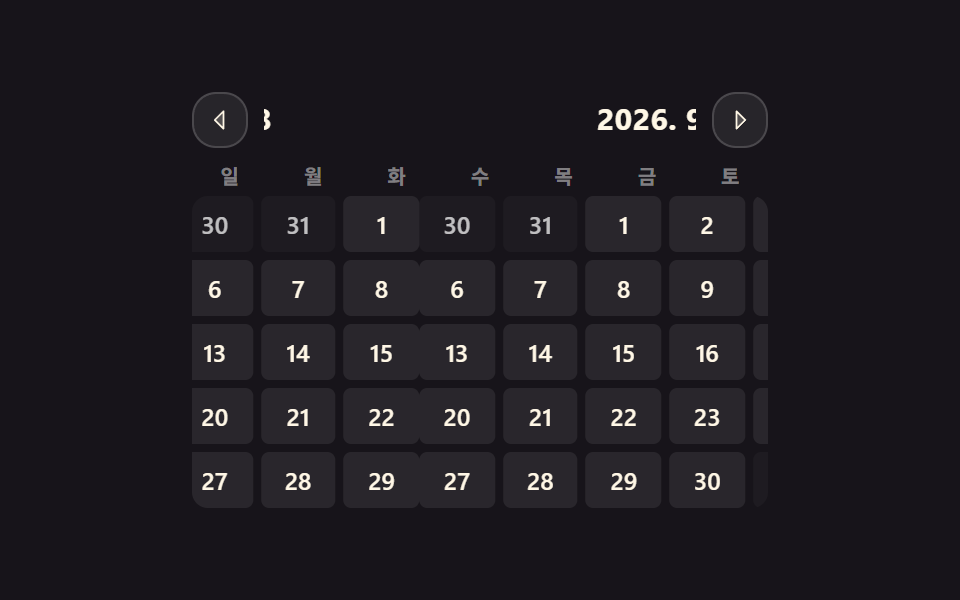 01 calendar-month-slide-transition
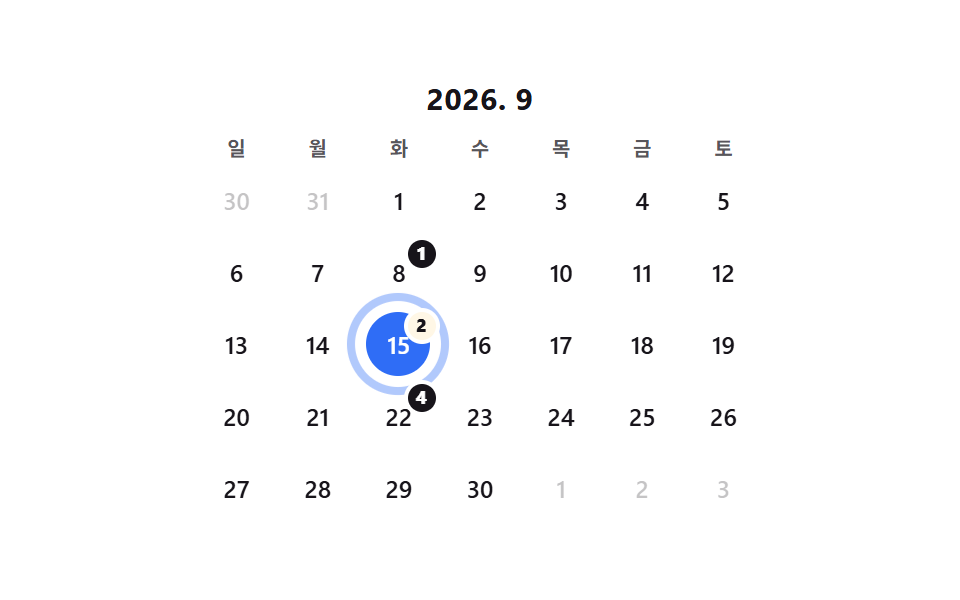 02 calendar-today-ring-badge
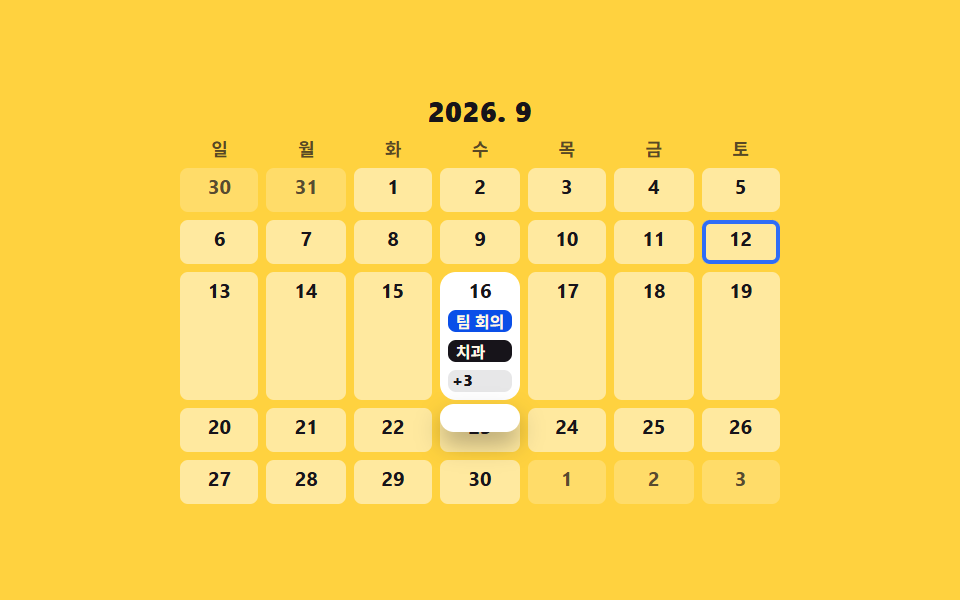 03 calendar-event-chips-overflow
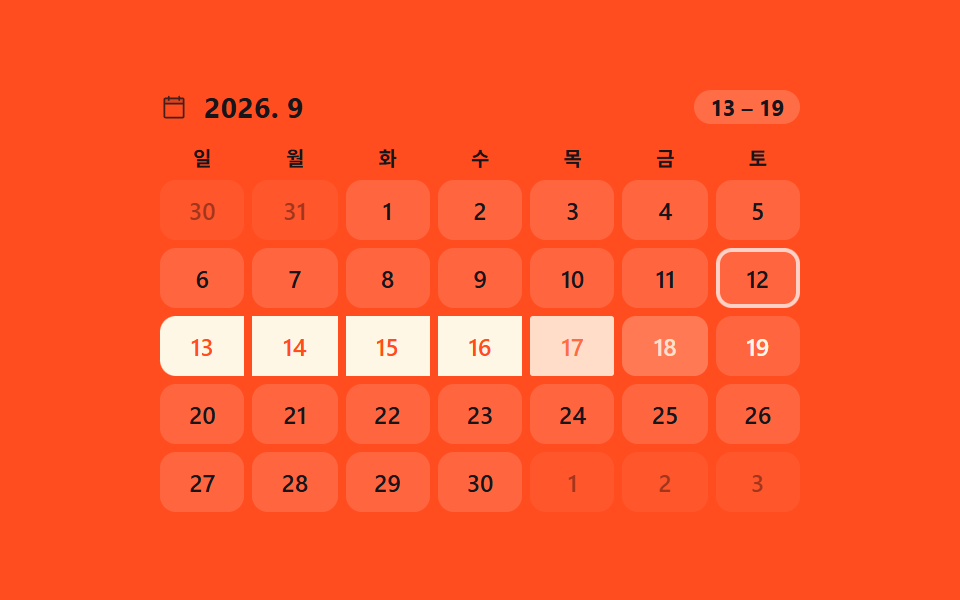 04 calendar-range-drag-highlight
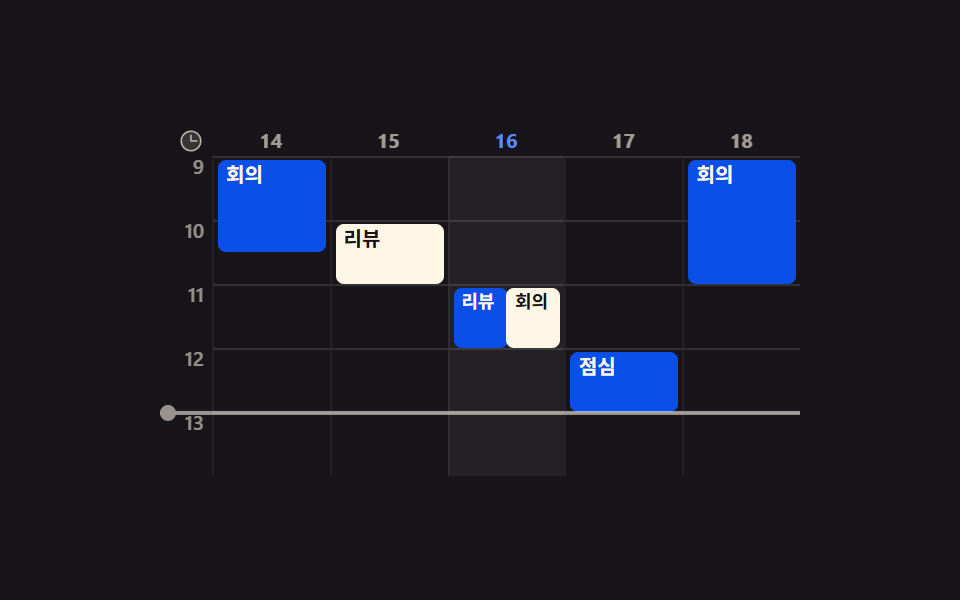 05 calendar-week-timeline-view
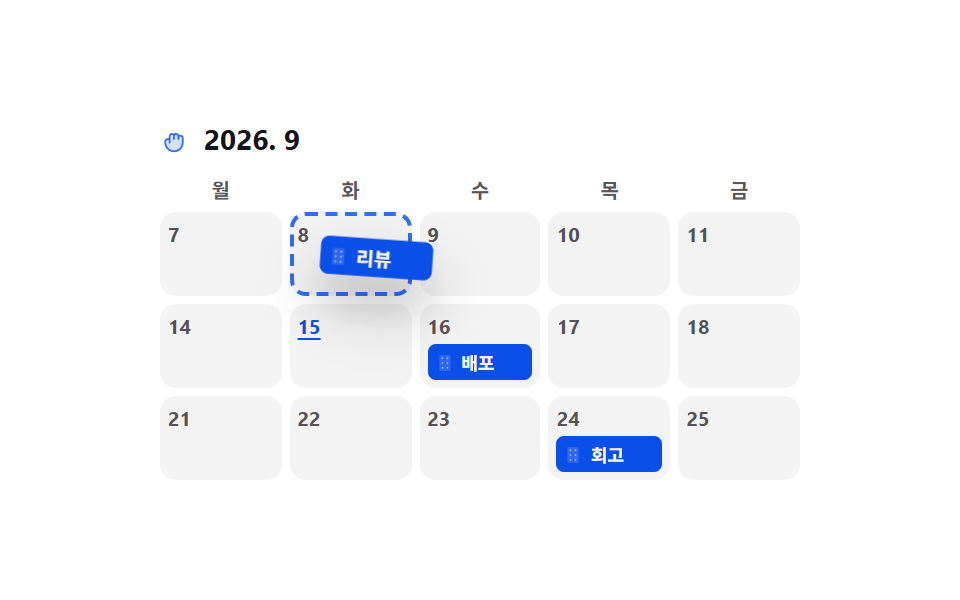 06 calendar-drag-drop-event-move
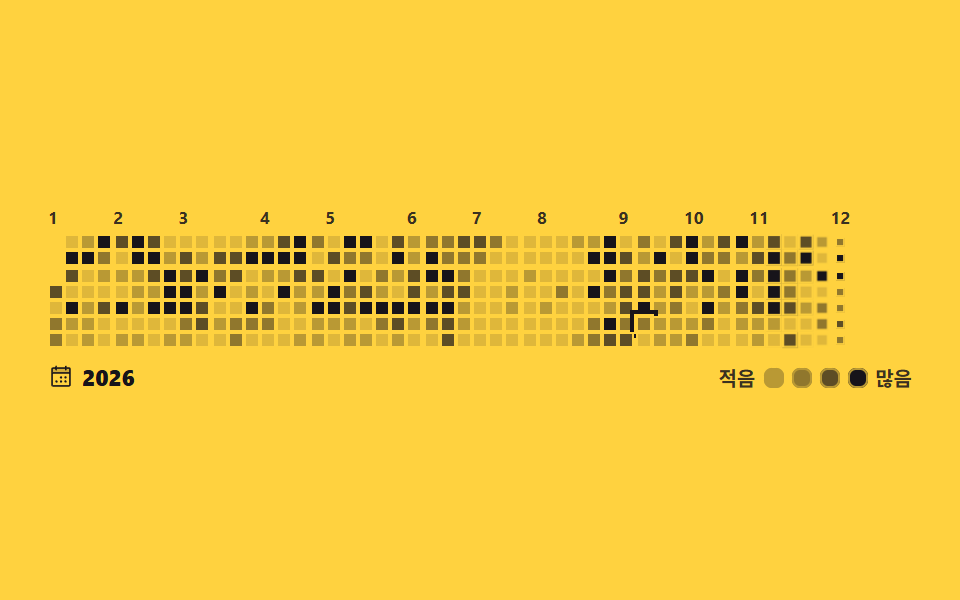 07 calendar-contribution-heatmap
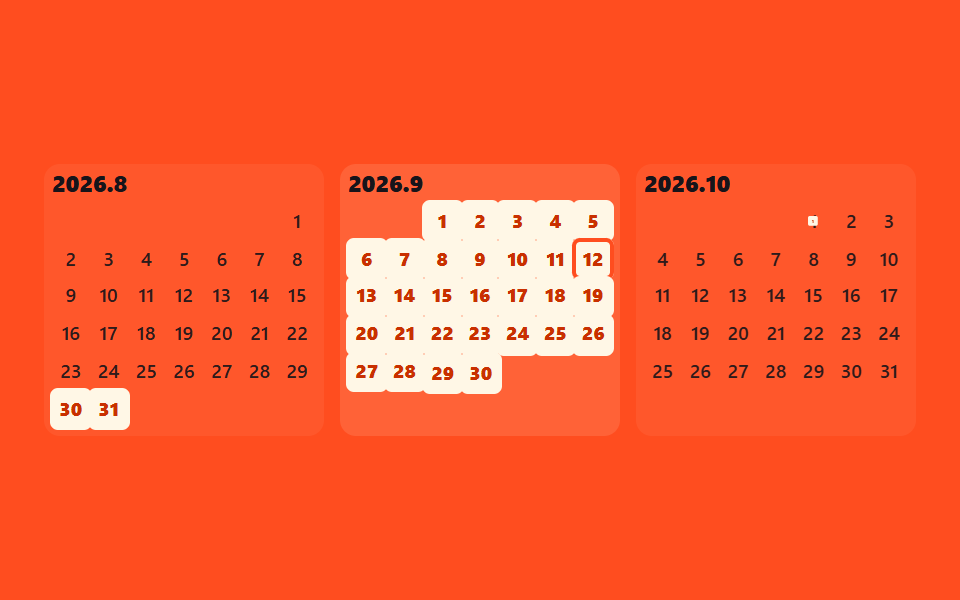 08 calendar-mini-three-month
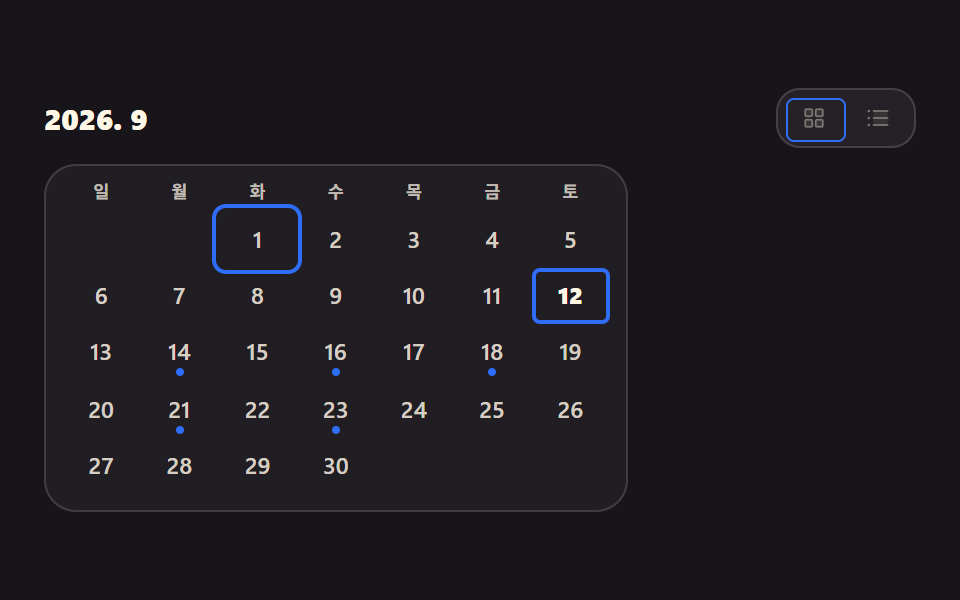 09 calendar-mobile-agenda-switch
Auto-plays · click a tile to jump to its section · all nine in one zip
- 01 Two-track month slide
- 02 Today ring with count badge
- 03 Event chips with +N overflow
- 04 Drag-painted date range
- 05 Week timeline on a time axis
- 06 Pick-up and drop event card
- 07 Contribution heatmap calendar
- 08 Mini three-month strip
- 09 Grid to agenda fold
The nine are ordered by what a calendar actually goes through on screen, not by popularity. First the month turns over (01), then today stands out (02), events pile onto a single day (03), several days are selected at once (04), clashing hours become visible (05), an event is picked up and moved (06), a year reads as one picture (07), a range crosses month boundaries (08), and a narrow screen folds the grid into an agenda (09). All nine work as a css calendar template rather than a screenshot: they carry role="grid", the five with a selectable day expose it through aria-selected, and the arrow keys really do move between cells. When the selection is a range rather than a day, the dropdown of Select Dropdown Design Patterns comes first, and picking a point on a map splits off into Map UI Design Patterns.
01Two-track month slide
What this css calendar grid shows
Press an arrow and the outgoing and incoming month slide together on two tracks, one carrying the month grids and one the month labels. Swapping the numbers alone tells you nothing about which way you moved, so the track is laid out at 300% width with the current month in the middle, and navigation pushes it left or right.
<main class="stage">
  <div class="cal is-demo">
    <span class="cal__sr" id="cal-live" aria-live="polite">2026. 9</span>
    <div class="cal__bar">
      <button class="cal__nav" type="button" id="cal-prev" aria-label="Previous month"><svg viewBox="0 0 256 256" width="14" height="14" aria-hidden="true"><g fill="currentColor"><path d="M160 48v160l-80-80Z" opacity=".2"/><path d="M163.06 40.61a8 8 0 0 0-8.72 1.73l-80 80a8 8 0 0 0 0 11.32l80 80A8 8 0 0 0 168 208V48a8 8 0 0 0-4.94-7.39M152 188.69L91.31 128L152 67.31Z"/></g></svg></button>
      <div class="cal__titles" aria-hidden="true"><div class="cal__titlestrip" id="cal-strip"></div></div>
      <button class="cal__nav" type="button" id="cal-next" aria-label="Next month"><svg viewBox="0 0 256 256" width="14" height="14" aria-hidden="true"><g fill="currentColor"><path d="m176 128l-80 80V48Z" opacity=".2"/><path d="m181.66 122.34l-80-80A8 8 0 0 0 88 48v160a8 8 0 0 0 13.66 5.66l80-80a8 8 0 0 0 0-11.32M104 188.69V67.31L164.69 128Z"/></g></svg></button>
    </div>
    <div class="cal__dows" aria-hidden="true"><span>S</span><span>M</span><span>T</span><span>W</span><span>T</span><span>F</span><span>S</span></div>
    <div class="cal__viewport"><div class="cal__track" id="cal-track"></div></div>
  </div>
</main>
@use "../../../../site/static/demo-tokens" as *;
$duration: $dur-base;
$easing: $ease-spring;
$color: $subject-blue;
@include stage($stage-ink);
.cal {
position: relative;
box-sizing: border-box;
width: min(288px, 88vw);
color: $subject-cream;
}
.cal__sr {
position: absolute; width: 1px; height: 1px;
overflow: hidden; clip-path: inset(50%); white-space: nowrap;
}
// ── 상단 바: 화살표 두 개 + 미끄러지는 월 제목 트랙 ──
.cal__bar {
display: flex; align-items: center; gap: $sp-2;
margin: 0 0 $sp-2;
}
.cal__nav {
flex: 0 0 auto;
box-sizing: border-box;
width: clamp(22px, 6.5vw, 28px); height: clamp(22px, 6.5vw, 28px);
display: inline-flex; align-items: center; justify-content: center;
padding: 0;
border: 1px solid rgba(255, 255, 255, .16);
background: rgba(255, 255, 255, .07);
border-radius: $r-control;
color: $subject-cream;
cursor: pointer;
transition: background $duration $easing, border-color $duration $easing;
}
.cal__nav:hover { background: rgba(255, 255, 255, .14); }
.cal__nav:focus-visible { outline: 2px solid $color; outline-offset: 2px; }
.cal__titles { flex: 1 1 auto; min-width: 0; overflow: hidden; }
.cal__titlestrip {
display: flex; width: 300%;
transform: translateX(-33.3333%);
}
.cal__t {
flex: 0 0 33.3333%;
text-align: center;
font-size: clamp(12px, 3.2vw, 15px);
line-height: 1.3;
font-weight: 700;
letter-spacing: .02em;
}
// ── 요일 머리 (달과 함께 미끄러지지 않는다) ──
.cal__dows {
display: grid; grid-template-columns: repeat(7, 1fr); gap: $sp-1;
margin: 0 0 $sp-1;
font-size: clamp(8px, 2.2vw, 10px);
line-height: 1.2;
font-weight: 700;
color: rgba(255, 255, 255, .45);
text-align: center;
}
// ── 두 트랙: 나가는 달과 들어오는 달이 동시에 존재한다 ──
.cal__viewport { overflow: hidden; border-radius: $r-sm; }
.cal__track {
display: flex; width: 300%;
transform: translateX(-33.3333%);
}
.cal.is-anim .cal__track,
.cal.is-anim .cal__titlestrip { transition: transform $duration $easing; }
.cal__month {
flex: 0 0 33.3333%;
display: grid; gap: $sp-1;
}
.cal__row { display: grid; grid-template-columns: repeat(7, 1fr); gap: $sp-1; }
.cal__cell {
height: clamp(20px, 6vw, 28px);
display: grid; place-items: center;
background: rgba(255, 255, 255, .08);
border-radius: $r-xs;
font-size: clamp(9px, 2.6vw, 12px);
line-height: 1;
font-weight: 600;
color: $subject-cream;
cursor: pointer;
}
.cal__cell.is-out { background: rgba(255, 255, 255, .03); color: rgba(255, 255, 255, .72); } // .28 은 2.51:1 이었다 — AA 4.5 (9.75:1)
.cal__cell[aria-selected="true"] { background: $color; color: $subject-cream; }
.cal__cell:focus-visible { outline: 2px solid $color; outline-offset: 1px; }
// ── 자동 루프: 가운데 → 다음 달 → 가운데 → 이전 달 → 가운데.
// 0% 와 100% 가 같은 위치라 끝 프레임이 첫 프레임으로 이어진다 (텔레포트 없음) ──
.cal.is-demo .cal__track,
.cal.is-demo .cal__titlestrip {
animation-name: cal-slide;
animation-duration: $dur-loop;
animation-timing-function: $easing;
animation-iteration-count: infinite;
}
@keyframes cal-slide {
0% { transform: translateX(-33.3333%); } // 이번 달
20% { transform: translateX(-66.6667%); } // 다음 달로
33% { transform: translateX(-66.6667%); }
50% { transform: translateX(-33.3333%); } // 되돌아온다
58% { transform: translateX(-33.3333%); }
75% { transform: translateX(0); } // 이전 달로
85% { transform: translateX(0); }
100% { transform: translateX(-33.3333%); } // 첫 프레임과 같은 자리 — 텔레포트 없음
}
@media (prefers-reduced-motion: reduce) {
.cal.is-demo .cal__track,
.cal.is-demo .cal__titlestrip { animation: none !important; }
.cal.is-anim .cal__track,
.cal.is-anim .cal__titlestrip,
.cal__nav { transition: none; }
}html, body {
margin: 0;
overflow: hidden;
}
.stage {
box-sizing: border-box;
min-height: 100vh;
display: grid;
place-items: center;
margin: 0;
background: #17141a;
font-family: -apple-system, "Segoe UI", "Noto Sans KR", sans-serif;
padding: clamp(8px, 4vw, 24px);
}
.cal {
position: relative;
box-sizing: border-box;
width: min(288px, 88vw);
color: #fff7e6;
}
.cal__sr {
position: absolute;
width: 1px;
height: 1px;
overflow: hidden;
clip-path: inset(50%);
white-space: nowrap;
}
.cal__bar {
display: flex;
align-items: center;
gap: 8px;
margin: 0 0 8px;
}
.cal__nav {
flex: 0 0 auto;
box-sizing: border-box;
width: clamp(22px, 6.5vw, 28px);
height: clamp(22px, 6.5vw, 28px);
display: inline-flex;
align-items: center;
justify-content: center;
padding: 0;
border: 1px solid rgba(255, 255, 255, 0.16);
background: rgba(255, 255, 255, 0.07);
border-radius: 12px;
color: #fff7e6;
cursor: pointer;
transition: background 300ms cubic-bezier(0.2, 0.8, 0.2, 1), border-color 300ms cubic-bezier(0.2, 0.8, 0.2, 1);
}
.cal__nav:hover {
background: rgba(255, 255, 255, 0.14);
}
.cal__nav:focus-visible {
outline: 2px solid #2f6df6;
outline-offset: 2px;
}
.cal__titles {
flex: 1 1 auto;
min-width: 0;
overflow: hidden;
}
.cal__titlestrip {
display: flex;
width: 300%;
transform: translateX(-33.3333%);
}
.cal__t {
flex: 0 0 33.3333%;
text-align: center;
font-size: clamp(12px, 3.2vw, 15px);
line-height: 1.3;
font-weight: 700;
letter-spacing: 0.02em;
}
.cal__dows {
display: grid;
grid-template-columns: repeat(7, 1fr);
gap: 4px;
margin: 0 0 4px;
font-size: clamp(8px, 2.2vw, 10px);
line-height: 1.2;
font-weight: 700;
color: rgba(255, 255, 255, 0.45);
text-align: center;
}
.cal__viewport {
overflow: hidden;
border-radius: 8px;
}
.cal__track {
display: flex;
width: 300%;
transform: translateX(-33.3333%);
}
.cal.is-anim .cal__track,
.cal.is-anim .cal__titlestrip {
transition: transform 300ms cubic-bezier(0.2, 0.8, 0.2, 1);
}
.cal__month {
flex: 0 0 33.3333%;
display: grid;
gap: 4px;
}
.cal__row {
display: grid;
grid-template-columns: repeat(7, 1fr);
gap: 4px;
}
.cal__cell {
height: clamp(20px, 6vw, 28px);
display: grid;
place-items: center;
background: rgba(255, 255, 255, 0.08);
border-radius: 4px;
font-size: clamp(9px, 2.6vw, 12px);
line-height: 1;
font-weight: 600;
color: #fff7e6;
cursor: pointer;
}
.cal__cell.is-out {
background: rgba(255, 255, 255, 0.03);
color: rgba(255, 255, 255, 0.72);
}
.cal__cell[aria-selected=true] {
background: #2f6df6;
color: #fff7e6;
}
.cal__cell:focus-visible {
outline: 2px solid #2f6df6;
outline-offset: 1px;
}
.cal.is-demo .cal__track,
.cal.is-demo .cal__titlestrip {
animation-name: cal-slide;
animation-duration: 2s;
animation-timing-function: cubic-bezier(0.2, 0.8, 0.2, 1);
animation-iteration-count: infinite;
}
@keyframes cal-slide {
0% {
transform: translateX(-33.3333%);
}
20% {
transform: translateX(-66.6667%);
}
33% {
transform: translateX(-66.6667%);
}
50% {
transform: translateX(-33.3333%);
}
58% {
transform: translateX(-33.3333%);
}
75% {
transform: translateX(0);
}
85% {
transform: translateX(0);
}
100% {
transform: translateX(-33.3333%);
}
}
@media (prefers-reduced-motion: reduce) {
.cal.is-demo .cal__track,
.cal.is-demo .cal__titlestrip {
animation: none !important;
}
.cal.is-anim .cal__track,
.cal.is-anim .cal__titlestrip,
.cal__nav {
transition: none;
}
}(function () {
var cal = document.querySelector('.cal');
var track = document.getElementById('cal-track');
var strip = document.getElementById('cal-strip');
var live = document.getElementById('cal-live');
var BASE = -100 / 3, busy = false, idx = 16;
var cur = new Date(2026, 8, 1);
function pad(n) { return (n < 10 ? '0' : '') + n; }
function label(d) { return d.getFullYear() + '. ' + (d.getMonth() + 1); }
function cells() {
return [].slice.call(track.children[1].children).reduce(function (a, r) { return a.concat([].slice.call(r.children)); }, []);
}
function build(d) {
var y = d.getFullYear(), m = d.getMonth(), off = 1 - new Date(y, m, 1).getDay();
var g = document.createElement('div');
g.className = 'cal__month'; g.setAttribute('role', 'grid'); g.setAttribute('aria-label', label(d));
for (var w = 0; w < 5; w++) {
var r = document.createElement('div');
r.className = 'cal__row'; r.setAttribute('role', 'row');
for (var i = 0; i < 7; i++) {
var t = new Date(y, m, off + w * 7 + i), c = document.createElement('div');
c.className = 'cal__cell' + (t.getMonth() === m ? '' : ' is-out');
c.setAttribute('role', 'gridcell');
c.setAttribute('aria-selected', 'false');
c.setAttribute('aria-label', t.getFullYear() + '-' + pad(t.getMonth() + 1) + '-' + pad(t.getDate()));
c.tabIndex = -1; c.textContent = t.getDate();
r.appendChild(c);
}
g.appendChild(r);
}
return g;
}
function render() {
track.textContent = ''; strip.textContent = '';
[-1, 0, 1].forEach(function (k) {
var d = new Date(cur.getFullYear(), cur.getMonth() + k, 1);
track.appendChild(build(d));
var s = document.createElement('span');
s.className = 'cal__t'; s.textContent = label(d);
strip.appendChild(s);
});
cells()[idx].tabIndex = 0;
}
function move(n) {
var cs = cells(); n = Math.max(0, Math.min(cs.length - 1, n));
cs.forEach(function (c, k) { c.tabIndex = k === n ? 0 : -1; c.setAttribute('aria-selected', String(k === n)); });
cs[n].focus({ preventScroll: true }); idx = n;
}
function finish(dir) {
if (!busy) return;
busy = false; cal.classList.remove('is-anim');
cur = new Date(cur.getFullYear(), cur.getMonth() + dir, 1);
render(); // 리셋은 transition 이 꺼진 순간에 — 눈에 보이지 않는다
track.style.transform = ''; strip.style.transform = '';
live.textContent = label(cur);
}
function go(dir) {
if (busy) return;
busy = true; cal.classList.remove('is-demo'); cal.classList.add('is-anim');
var to = BASE - dir * (100 / 3);
track.style.transform = strip.style.transform = 'translateX(' + to + '%)';
var done = function () { track.removeEventListener('transitionend', done); finish(dir); };
track.addEventListener('transitionend', done);
window.setTimeout(done, 700);
}
document.getElementById('cal-prev').addEventListener('click', function () { go(-1); });
document.getElementById('cal-next').addEventListener('click', function () { go(1); });
track.addEventListener('click', function (e) {
var c = e.target.closest ? e.target.closest('.cal__cell') : null;
var n = c ? cells().indexOf(c) : -1;
if (n < 0) return;
cal.classList.remove('is-demo'); move(n);
});
track.addEventListener('keydown', function (e) {
var n = cells().indexOf(document.activeElement);
if (n < 0) return;
var to = null;
if (e.key === 'ArrowRight') to = n + 1;
else if (e.key === 'ArrowLeft') to = n - 1;
else if (e.key === 'ArrowDown') to = n + 7;
else if (e.key === 'ArrowUp') to = n - 7;
else if (e.key === 'Home') to = n - (n % 7);
else if (e.key === 'End') to = n - (n % 7) + 6;
else return;
e.preventDefault(); cal.classList.remove('is-demo'); move(to);
});
render();
})();import { useRef, useState } from "react";
import type { CSSProperties } from "react";
import styles from "./MonthSlideCalendar.module.scss";
export type MonthSlideCalendarProps = {
/** 시작 달 (기본: 오늘) */
initialMonth?: Date;
/** 슬라이드 시간(ms) */
duration?: number;
easing?: string;
color?: string;
dayNames?: string[];
prevLabel?: string;
nextLabel?: string;
};
type Vars = CSSProperties & { "--duration"?: string; "--easing"?: string; "--color"?: string };
type KeyEvt = { key: string; preventDefault: () => void };
const BASE = -100 / 3;
function pad(n: number) {
return (n < 10 ? "0" : "") + n;
}
function label(d: Date) {
return d.getFullYear() + ". " + (d.getMonth() + 1);
}
/** 한 달을 5주 × 7일 = 35칸으로. 6행은 좁은 폭에서 넘친다 */
function monthCells(d: Date) {
const y = d.getFullYear();
const m = d.getMonth();
const off = 1 - new Date(y, m, 1).getDay();
const out: { date: Date; outside: boolean }[] = [];
for (let i = 0; i < 35; i++) {
const t = new Date(y, m, off + i);
out.push({ date: t, outside: t.getMonth() !== m });
}
return out;
}
export default function MonthSlideCalendar({
initialMonth,
duration = 300,
easing = "cubic-bezier(.2,.8,.2,1)",
color = "#2f6df6",
dayNames = ["S", "M", "T", "W", "T", "F", "S"],
prevLabel = "Previous month",
nextLabel = "Next month",
}: MonthSlideCalendarProps) {
const first = initialMonth ?? new Date();
const [cur, setCur] = useState(new Date(first.getFullYear(), first.getMonth(), 1));
const [shift, setShift] = useState(0); // -1 · 0 · +1 트랙 오프셋
const [animating, setAnimating] = useState(false);
const [focused, setFocused] = useState(16);
const busy = useRef(false);
const cellRefs = useRef<(HTMLDivElement | null)[]>([]);
const vars: Vars = { "--duration": `${duration}ms`, "--easing": easing, "--color": color };
const months = [-1, 0, 1].map((k) => new Date(cur.getFullYear(), cur.getMonth() + k, 1));
function go(dir: number) {
if (busy.current) return;
busy.current = true;
setAnimating(true);
setShift(dir);
window.setTimeout(() => {
// 전환이 끝나면 들어온 달이 유일한 트랙이 된다. 리셋은 transition 이 꺼진 프레임에
setAnimating(false);
setShift(0);
setCur((c) => new Date(c.getFullYear(), c.getMonth() + dir, 1));
busy.current = false;
}, duration);
}
function setCell(n: number) {
return (el: HTMLDivElement | null) => {
const a = cellRefs.current;
if (a) a[n] = el;
};
}
function move(n: number) {
const to = Math.max(0, Math.min(34, n));
setFocused(to);
cellRefs.current?.[to]?.focus({ preventScroll: true });
}
function onKeyDown(e: KeyEvt, n: number) {
let to: number | null = null;
if (e.key === "ArrowRight") to = n + 1;
else if (e.key === "ArrowLeft") to = n - 1;
else if (e.key === "ArrowDown") to = n + 7;
else if (e.key === "ArrowUp") to = n - 7;
else if (e.key === "Home") to = n - (n % 7);
else if (e.key === "End") to = n - (n % 7) + 6;
if (to === null) return;
e.preventDefault();
move(to);
}
const offset = `translateX(${BASE - shift * (100 / 3)}%)`;
const trackStyle: CSSProperties = { transform: offset };
return (
<div className={styles.cal} style={vars}>
<span className={styles.sr} aria-live="polite">{label(cur)}</span>
<div className={styles.bar}>
<button type="button" className={styles.nav} aria-label={prevLabel} onClick={() => go(-1)}>
<svg viewBox="0 0 256 256" width="14" height="14" aria-hidden="true">
<g fill="currentColor">
<path d="M160 48v160l-80-80Z" opacity=".2" />
<path d="M163.06 40.61a8 8 0 0 0-8.72 1.73l-80 80a8 8 0 0 0 0 11.32l80 80A8 8 0 0 0 168 208V48a8 8 0 0 0-4.94-7.39M152 188.69L91.31 128L152 67.31Z" />
</g>
</svg>
</button>
<div className={styles.titles} aria-hidden="true">
<div className={`${styles.titlestrip} ${animating ? styles.isAnim : ""}`} style={trackStyle}>
{months.map((m) => (
<span key={m.getTime()} className={styles.t}>{label(m)}</span>
))}
</div>
</div>
<button type="button" className={styles.nav} aria-label={nextLabel} onClick={() => go(1)}>
<svg viewBox="0 0 256 256" width="14" height="14" aria-hidden="true">
<g fill="currentColor">
<path d="m176 128l-80 80V48Z" opacity=".2" />
<path d="m181.66 122.34l-80-80A8 8 0 0 0 88 48v160a8 8 0 0 0 13.66 5.66l80-80a8 8 0 0 0 0-11.32M104 188.69V67.31L164.69 128Z" />
</g>
</svg>
</button>
</div>
<div className={styles.dows} aria-hidden="true">
{dayNames.map((d, i) => <span key={`${d}-${i}`}>{d}</span>)}
</div>
<div className={styles.viewport}>
<div className={`${styles.track} ${animating ? styles.isAnim : ""}`} style={trackStyle}>
{months.map((m, mi) => (
<div key={m.getTime()} className={styles.month} role="grid" aria-label={label(m)}>
{[0, 1, 2, 3, 4].map((w) => (
<div key={w} className={styles.row} role="row">
{monthCells(m).slice(w * 7, w * 7 + 7).map((c, i) => {
const n = w * 7 + i;
const live = mi === 1; // 가운데(현재) 달만 키보드 대상
return (
<div
key={c.date.getTime()}
ref={live ? setCell(n) : undefined}
className={`${styles.cell} ${c.outside ? styles.isOut : ""}`}
role="gridcell"
aria-selected={live && n === focused}
aria-label={`${c.date.getFullYear()}-${pad(c.date.getMonth() + 1)}-${pad(c.date.getDate())}`}
tabIndex={live && n === focused ? 0 : -1}
onClick={() => { if (live) move(n); }}
onKeyDown={(e: KeyEvt) => { if (live) onKeyDown(e, n); }}
>
{c.date.getDate()}
</div>
);
})}
</div>
))}
</div>
))}
</div>
</div>
</div>
);
}01 · Two-track month slide — Measured area 19.754% · moving frames 18/23Original by GODRICH · SCSS and React ship in the zip · See the password
Where to look in the code
When the transition ends, the track resets in the single frame where transition is switched off, so the eye never catches it.
function go(dir) {
  if (busy) return;
  busy = true; cal.classList.remove('is-demo'); cal.classList.add('is-anim');
  var to = BASE - dir * (100 / 3);
  track.style.transform = strip.style.transform = 'translateX(' + to + '%)';
  var done = function () { track.removeEventListener('transitionend', done); finish(dir); };
  track.addEventListener('transitionend', done);
  window.setTimeout(done, 700);
}
function finish(dir) {
  busy = false; cal.classList.remove('is-anim');
  cur = new Date(cur.getFullYear(), cur.getMonth() + dir, 1);
  render();
  track.style.transform = ''; strip.style.transform = '';
  live.textContent = label(cur);
}
02Today ring with count badge
What happens on screen
Only today's cell gets a blue disc, and a ring expands out of it once per loop and fades. Days with events carry that count as a small pill in the corner, ringed in white so the number stays readable on top of the disc.
<main class="stage">
  <div class="cal">
    <div class="cal__bar"><h2 class="cal__title" id="cal-title">2026. 9</h2></div>
    <div class="cal__dows" aria-hidden="true"><span>S</span><span>M</span><span>T</span><span>W</span><span>T</span><span>F</span><span>S</span></div>
    <div class="cal__grid" id="cal-grid" role="grid" aria-labelledby="cal-title">
      <div class="cal__row" role="row">
        <div class="cal__cell is-out" role="gridcell" aria-selected="false" tabindex="-1"><span class="cal__n">30</span></div>
        <div class="cal__cell is-out" role="gridcell" aria-selected="false" tabindex="-1"><span class="cal__n">31</span></div>
        <div class="cal__cell" role="gridcell" aria-selected="false" tabindex="-1"><span class="cal__n">1</span></div>
        <div class="cal__cell" role="gridcell" aria-selected="false" tabindex="-1"><span class="cal__n">2</span></div>
        <div class="cal__cell" role="gridcell" aria-selected="false" tabindex="-1"><span class="cal__n">3</span></div>
        <div class="cal__cell" role="gridcell" aria-selected="false" tabindex="-1"><span class="cal__n">4</span></div>
        <div class="cal__cell" role="gridcell" aria-selected="false" tabindex="-1"><span class="cal__n">5</span></div>
      </div>
      <div class="cal__row" role="row">
        <div class="cal__cell" role="gridcell" aria-selected="false" tabindex="-1"><span class="cal__n">6</span></div>
        <div class="cal__cell" role="gridcell" aria-selected="false" tabindex="-1"><span class="cal__n">7</span></div>
        <div class="cal__cell" role="gridcell" aria-selected="false" tabindex="-1"><span class="cal__n">8</span><span class="cal__badge" aria-label="1 event">1</span></div>
        <div class="cal__cell" role="gridcell" aria-selected="false" tabindex="-1"><span class="cal__n">9</span></div>
        <div class="cal__cell" role="gridcell" aria-selected="false" tabindex="-1"><span class="cal__n">10</span></div>
        <div class="cal__cell" role="gridcell" aria-selected="false" tabindex="-1"><span class="cal__n">11</span></div>
        <div class="cal__cell" role="gridcell" aria-selected="false" tabindex="-1"><span class="cal__n">12</span></div>
      </div>
      <div class="cal__row" role="row">
        <div class="cal__cell" role="gridcell" aria-selected="false" tabindex="-1"><span class="cal__n">13</span></div>
        <div class="cal__cell" role="gridcell" aria-selected="false" tabindex="-1"><span class="cal__n">14</span></div>
        <div class="cal__cell is-today" role="gridcell" aria-current="date" aria-selected="true" tabindex="0"><span class="cal__n">15</span><span class="cal__badge" aria-label="2 events">2</span></div>
        <div class="cal__cell" role="gridcell" aria-selected="false" tabindex="-1"><span class="cal__n">16</span></div>
        <div class="cal__cell" role="gridcell" aria-selected="false" tabindex="-1"><span class="cal__n">17</span></div>
        <div class="cal__cell" role="gridcell" aria-selected="false" tabindex="-1"><span class="cal__n">18</span></div>
        <div class="cal__cell" role="gridcell" aria-selected="false" tabindex="-1"><span class="cal__n">19</span></div>
      </div>
      <div class="cal__row" role="row">
        <div class="cal__cell" role="gridcell" aria-selected="false" tabindex="-1"><span class="cal__n">20</span></div>
        <div class="cal__cell" role="gridcell" aria-selected="false" tabindex="-1"><span class="cal__n">21</span></div>
        <div class="cal__cell" role="gridcell" aria-selected="false" tabindex="-1"><span class="cal__n">22</span><span class="cal__badge" aria-label="4 events">4</span></div>
        <div class="cal__cell" role="gridcell" aria-selected="false" tabindex="-1"><span class="cal__n">23</span></div>
        <div class="cal__cell" role="gridcell" aria-selected="false" tabindex="-1"><span class="cal__n">24</span></div>
        <div class="cal__cell" role="gridcell" aria-selected="false" tabindex="-1"><span class="cal__n">25</span></div>
        <div class="cal__cell" role="gridcell" aria-selected="false" tabindex="-1"><span class="cal__n">26</span></div>
      </div>
      <div class="cal__row" role="row">
        <div class="cal__cell" role="gridcell" aria-selected="false" tabindex="-1"><span class="cal__n">27</span></div>
        <div class="cal__cell" role="gridcell" aria-selected="false" tabindex="-1"><span class="cal__n">28</span></div>
        <div class="cal__cell" role="gridcell" aria-selected="false" tabindex="-1"><span class="cal__n">29</span></div>
        <div class="cal__cell" role="gridcell" aria-selected="false" tabindex="-1"><span class="cal__n">30</span></div>
        <div class="cal__cell is-out" role="gridcell" aria-selected="false" tabindex="-1"><span class="cal__n">1</span></div>
        <div class="cal__cell is-out" role="gridcell" aria-selected="false" tabindex="-1"><span class="cal__n">2</span></div>
        <div class="cal__cell is-out" role="gridcell" aria-selected="false" tabindex="-1"><span class="cal__n">3</span></div>
      </div>
    </div>
  </div>
</main>@use "../../../../site/static/demo-tokens" as *;
$duration: $dur-loop;
$easing: $ease-pop;
$color: $subject-blue;
@include stage($stage-paper);
.cal {
box-sizing: border-box;
width: min(280px, 88vw);
color: $subject-ink;
}
.cal__bar { margin: 0 0 $sp-2; }
.cal__title {
margin: 0;
font-size: clamp(12px, 3.4vw, 15px);
line-height: 1.3;
font-weight: 700;
letter-spacing: .02em;
text-align: center;
}
.cal__dows {
display: grid; grid-template-columns: repeat(7, 1fr); gap: $sp-1;
margin: 0 0 $sp-1;
font-size: clamp(8px, 2.2vw, 10px);
line-height: 1.2;
font-weight: 700;
color: rgba(23, 20, 26, .72); // AA 4.5 (.4 는 2.57:1 이었다)
text-align: center;
}
.cal__grid { display: grid; gap: $sp-1; }
.cal__row { display: grid; grid-template-columns: repeat(7, 1fr); gap: $sp-1; }
// 오늘 칸 — 배경 원을 두고 그 위로 링이 퍼진다 (::after 는 배경색으로 덮어 둔다)
.cal__cell {
position: relative;
height: clamp(24px, 7.5vw, 32px);
display: grid; place-items: center;
border-radius: $r-xs;
font-size: clamp(9px, 2.8vw, 12px);
line-height: 1;
font-weight: 600;
color: $subject-ink;
cursor: pointer;
background: transparent;
transition: background $dur-quick $easing;
}
.cal__cell:hover { background: rgba(23, 20, 26, .06); }
.cal__cell:focus-visible { outline: 2px solid $color; outline-offset: 1px; }
.cal__cell.is-out .cal__n { opacity: .25; }
.cal__cell.is-today { color: #fff; }
.cal__n { position: relative; z-index: 1; }
.cal__cell.is-today::before {
content: "";
position: absolute; left: 50%; top: 50%;
width: clamp(24px, 7.5vw, 32px); height: clamp(24px, 7.5vw, 32px);
transform: translate(-50%, -50%);
background: $color;
border-radius: 50%;
}
.cal__cell.is-today::after {
content: "";
position: absolute; left: 50%; top: 50%;
width: clamp(24px, 7.5vw, 32px); height: clamp(24px, 7.5vw, 32px);
border: 3px solid $color;
border-radius: 50%;
transform: translate(-50%, -50%) scale(.9);
opacity: 0;
pointer-events: none;
}
// ── 자동 루프: 링이 한 번 퍼졌다 가라앉는다. 0% 와 100% 를 같게 — 이어져도 튀지 않는다 ──
.cal__cell.is-today::after {
animation-name: today-ring;
animation-duration: $duration;
animation-timing-function: $ease-out;
animation-iteration-count: infinite;
}
@keyframes today-ring {
0% { transform: translate(-50%, -50%) scale(.9); opacity: 0; }
16% { transform: translate(-50%, -50%) scale(1.08); opacity: 1; }
64% { transform: translate(-50%, -50%) scale(1.5); opacity: 0; }
100% { transform: translate(-50%, -50%) scale(1.5); opacity: 0; }
}
// ── 일정 수 배지: 칸 모서리에 올라앉는 작은 알약 ──
.cal__badge {
position: absolute; right: 0; top: 0;
z-index: 2;
min-width: 14px; height: 14px;
box-sizing: border-box;
padding: 0 $sp-1;
display: inline-flex; align-items: center; justify-content: center;
background: $subject-ink;
color: #fff;
border-radius: $r-pill;
box-shadow: 0 0 0 2px #fff;
font-size: 9px;
line-height: 1;
font-weight: 800;
}
.cal__cell.is-today .cal__badge { background: $subject-cream; color: $subject-ink; }
.cal__cell[aria-selected="true"]:not(.is-today) { background: rgba(47, 109, 246, .14); }
@media (prefers-reduced-motion: reduce) {
.cal__cell.is-today::after { animation: none !important; opacity: 0; }
.cal__cell { transition: none; }
}html, body {
margin: 0;
overflow: hidden;
}
.stage {
box-sizing: border-box;
min-height: 100vh;
display: grid;
place-items: center;
margin: 0;
background: #ffffff;
font-family: -apple-system, "Segoe UI", "Noto Sans KR", sans-serif;
padding: clamp(8px, 4vw, 24px);
}
.cal {
box-sizing: border-box;
width: min(280px, 88vw);
color: #17141a;
}
.cal__bar {
margin: 0 0 8px;
}
.cal__title {
margin: 0;
font-size: clamp(12px, 3.4vw, 15px);
line-height: 1.3;
font-weight: 700;
letter-spacing: 0.02em;
text-align: center;
}
.cal__dows {
display: grid;
grid-template-columns: repeat(7, 1fr);
gap: 4px;
margin: 0 0 4px;
font-size: clamp(8px, 2.2vw, 10px);
line-height: 1.2;
font-weight: 700;
color: rgba(23, 20, 26, 0.72);
text-align: center;
}
.cal__grid {
display: grid;
gap: 4px;
}
.cal__row {
display: grid;
grid-template-columns: repeat(7, 1fr);
gap: 4px;
}
.cal__cell {
position: relative;
height: clamp(24px, 7.5vw, 32px);
display: grid;
place-items: center;
border-radius: 4px;
font-size: clamp(9px, 2.8vw, 12px);
line-height: 1;
font-weight: 600;
color: #17141a;
cursor: pointer;
background: transparent;
transition: background 220ms cubic-bezier(0.2, 1.4, 0.4, 1);
}
.cal__cell:hover {
background: rgba(23, 20, 26, 0.06);
}
.cal__cell:focus-visible {
outline: 2px solid #2f6df6;
outline-offset: 1px;
}
.cal__cell.is-out .cal__n {
opacity: 0.25;
}
.cal__cell.is-today {
color: #fff;
}
.cal__n {
position: relative;
z-index: 1;
}
.cal__cell.is-today::before {
content: "";
position: absolute;
left: 50%;
top: 50%;
width: clamp(24px, 7.5vw, 32px);
height: clamp(24px, 7.5vw, 32px);
transform: translate(-50%, -50%);
background: #2f6df6;
border-radius: 50%;
}
.cal__cell.is-today::after {
content: "";
position: absolute;
left: 50%;
top: 50%;
width: clamp(24px, 7.5vw, 32px);
height: clamp(24px, 7.5vw, 32px);
border: 3px solid #2f6df6;
border-radius: 50%;
transform: translate(-50%, -50%) scale(0.9);
opacity: 0;
pointer-events: none;
}
.cal__cell.is-today::after {
animation-name: today-ring;
animation-duration: 2s;
animation-timing-function: ease-out;
animation-iteration-count: infinite;
}
@keyframes today-ring {
0% {
transform: translate(-50%, -50%) scale(0.9);
opacity: 0;
}
16% {
transform: translate(-50%, -50%) scale(1.08);
opacity: 1;
}
64% {
transform: translate(-50%, -50%) scale(1.5);
opacity: 0;
}
100% {
transform: translate(-50%, -50%) scale(1.5);
opacity: 0;
}
}
.cal__badge {
position: absolute;
right: 0;
top: 0;
z-index: 2;
min-width: 14px;
height: 14px;
box-sizing: border-box;
padding: 0 4px;
display: inline-flex;
align-items: center;
justify-content: center;
background: #17141a;
color: #fff;
border-radius: 999px;
box-shadow: 0 0 0 2px #fff;
font-size: 9px;
line-height: 1;
font-weight: 800;
}
.cal__cell.is-today .cal__badge {
background: #fff7e6;
color: #17141a;
}
.cal__cell[aria-selected=true]:not(.is-today) {
background: rgba(47, 109, 246, 0.14);
}
@media (prefers-reduced-motion: reduce) {
.cal__cell.is-today::after {
animation: none !important;
opacity: 0;
}
.cal__cell {
transition: none;
}
}(function () {
var grid = document.getElementById('cal-grid');
var cells = [].slice.call(grid.querySelectorAll('.cal__cell'));
function move(n) {
n = Math.max(0, Math.min(cells.length - 1, n));
cells.forEach(function (c, k) { c.tabIndex = k === n ? 0 : -1; c.setAttribute('aria-selected', String(k === n)); });
cells[n].focus({ preventScroll: true });
}
grid.addEventListener('click', function (e) {
var c = e.target.closest ? e.target.closest('.cal__cell') : null;
if (c) move(cells.indexOf(c));
});
grid.addEventListener('keydown', function (e) {
var n = cells.indexOf(document.activeElement);
if (n < 0) return;
var to = null;
if (e.key === 'ArrowRight') to = n + 1;
else if (e.key === 'ArrowLeft') to = n - 1;
else if (e.key === 'ArrowDown') to = n + 7;
else if (e.key === 'ArrowUp') to = n - 7;
else if (e.key === 'Home') to = n - (n % 7);
else if (e.key === 'End') to = n - (n % 7) + 6;
else return;
e.preventDefault(); move(to);
});
})();import { useRef, useState } from "react";
import type { CSSProperties } from "react";
import styles from "./TodayRingCalendar.module.scss";
/** 로컬 이벤트 타입 — 라이브러리 타입을 끌어오지 않는다 */
export type DayCount = { day: number; count: number };
export type TodayRingCalendarProps = {
month?: Date;
today?: number;
counts?: DayCount[];
/** 펄스 한 바퀴(ms) */
duration?: number;
easing?: string;
color?: string;
dayNames?: string[];
/** 배지 접근 이름. {n} 이 건수로 바뀐다 */
countLabel?: string;
};
type Vars = CSSProperties & { "--duration"?: string; "--easing"?: string; "--color"?: string };
type KeyEvt = { key: string; preventDefault: () => void };
export default function TodayRingCalendar({
month = new Date(2026, 8, 1),
today = 15,
counts = [{ day: 8, count: 1 }, { day: 15, count: 2 }, { day: 22, count: 4 }],
duration = 2000,
easing = "cubic-bezier(.2,1.4,.4,1)",
color = "#2f6df6",
dayNames = ["S", "M", "T", "W", "T", "F", "S"],
countLabel = "{n} events",
}: TodayRingCalendarProps) {
const [focused, setFocused] = useState(() => 0);
const cellRefs = useRef<(HTMLDivElement | null)[]>([]);
const vars: Vars = { "--duration": `${duration}ms`, "--easing": easing, "--color": color };
const y = month.getFullYear();
const m = month.getMonth();
const off = 1 - new Date(y, m, 1).getDay();
const cells = Array.from({ length: 35 }, (_, i) => {
const d = new Date(y, m, off + i);
return { date: d, outside: d.getMonth() !== m };
});
const startIdx = cells.findIndex((c) => !c.outside && c.date.getDate() === today);
const sel = focused || (startIdx < 0 ? 0 : startIdx);
function setCell(n: number) {
return (el: HTMLDivElement | null) => {
const a = cellRefs.current;
if (a) a[n] = el;
};
}
function move(n: number) {
const to = Math.max(0, Math.min(34, n));
setFocused(to);
cellRefs.current?.[to]?.focus({ preventScroll: true });
}
function onKeyDown(e: KeyEvt, n: number) {
let to: number | null = null;
if (e.key === "ArrowRight") to = n + 1;
else if (e.key === "ArrowLeft") to = n - 1;
else if (e.key === "ArrowDown") to = n + 7;
else if (e.key === "ArrowUp") to = n - 7;
else if (e.key === "Home") to = n - (n % 7);
else if (e.key === "End") to = n - (n % 7) + 6;
if (to === null) return;
e.preventDefault();
move(to);
}
return (
<div className={styles.cal} style={vars}>
<div className={styles.bar}>
<h2 className={styles.title} id="trc-title">{y}. {m + 1}</h2>
</div>
<div className={styles.dows} aria-hidden="true">
{dayNames.map((d, i) => <span key={`${d}-${i}`}>{d}</span>)}
</div>
<div className={styles.grid} role="grid" aria-labelledby="trc-title">
{[0, 1, 2, 3, 4].map((w) => (
<div key={w} className={styles.row} role="row">
{cells.slice(w * 7, w * 7 + 7).map((c, i) => {
const n = w * 7 + i;
const isToday = !c.outside && c.date.getDate() === today;
const hit = c.outside ? undefined : counts.find((x) => x.day === c.date.getDate());
return (
<div
key={c.date.getTime()}
ref={setCell(n)}
className={`${styles.cell} ${c.outside ? styles.isOut : ""} ${isToday ? styles.isToday : ""}`}
role="gridcell"
aria-current={isToday ? "date" : undefined}
aria-selected={n === sel}
tabIndex={n === sel ? 0 : -1}
onClick={() => move(n)}
onKeyDown={(e: KeyEvt) => onKeyDown(e, n)}
>
<span className={styles.n}>{c.date.getDate()}</span>
{hit ? (
<span className={styles.badge} aria-label={countLabel.replace("{n}", String(hit.count))}>
{hit.count}
</span>
) : null}
</div>
);
})}
</div>
))}
</div>
</div>
);
}02 · Today ring with count badge — Measured area 0.972% · moving frames 13/23Original by GODRICH · SCSS and React ship in the zip · See the password
How to read the code
The ring is drawn on a square the same height as the cell with border-radius: 50%, so it never renders as an ellipse.
.cal__cell.is-today::after {
  content: "";
  position: absolute; left: 50%; top: 50%;
  width: clamp(24px, 7.5vw, 32px); height: clamp(24px, 7.5vw, 32px);
  border: 3px solid $color;
  border-radius: 50%;
  transform: translate(-50%, -50%) scale(.9);
  opacity: 0;
  pointer-events: none;
  animation-name: today-ring;
  animation-duration: $duration;
  animation-timing-function: $ease-out;
  animation-iteration-count: infinite;
}
03Event chips with +N overflow
What moves
Each cell stacks up to two colored chips and folds the rest into a +N row. Clicking that row expands them for real, as grid-template-rows grows from 0fr to 1fr.
<main class="stage">
  <div class="cal">
    <span class="cal__sr" id="cal-live" aria-live="polite">2026. 9</span>
    <div class="cal__bar"><h2 class="cal__title" id="cal-title">2026. 9</h2></div>
    <div class="cal__dows" aria-hidden="true"><span>S</span><span>M</span><span>T</span><span>W</span><span>T</span><span>F</span><span>S</span></div>
    <div class="cal__grid" id="cal-grid" role="grid" aria-labelledby="cal-title">
      <div class="cal__row" role="row">
        <div class="cal__cell is-out" role="gridcell" aria-selected="false" tabindex="-1">30</div>
        <div class="cal__cell is-out" role="gridcell" aria-selected="false" tabindex="-1">31</div>
        <div class="cal__cell" role="gridcell" aria-selected="false" tabindex="-1">1</div>
        <div class="cal__cell" role="gridcell" aria-selected="false" tabindex="-1">2</div>
        <div class="cal__cell" role="gridcell" aria-selected="false" tabindex="-1">3</div>
        <div class="cal__cell" role="gridcell" aria-selected="false" tabindex="-1">4</div>
        <div class="cal__cell" role="gridcell" aria-selected="false" tabindex="-1">5</div>
      </div>
      <div class="cal__row" role="row">
        <div class="cal__cell" role="gridcell" aria-selected="false" tabindex="-1">6</div>
        <div class="cal__cell" role="gridcell" aria-selected="false" tabindex="-1">7</div>
        <div class="cal__cell" role="gridcell" aria-selected="false" tabindex="-1">8</div>
        <div class="cal__cell" role="gridcell" aria-selected="false" tabindex="-1">9</div>
        <div class="cal__cell" role="gridcell" aria-selected="false" tabindex="-1">10</div>
        <div class="cal__cell" role="gridcell" aria-selected="false" tabindex="-1">11</div>
        <div class="cal__cell is-today" role="gridcell" aria-current="date" aria-selected="false" tabindex="-1">12</div>
      </div>
      <div class="cal__row" role="row">
        <div class="cal__cell" role="gridcell" aria-selected="false" tabindex="-1">13</div>
        <div class="cal__cell" role="gridcell" aria-selected="false" tabindex="-1">14</div>
        <div class="cal__cell" role="gridcell" aria-selected="false" tabindex="-1">15</div>
        <div class="cal__cell is-chips is-demo" id="cal-day16" role="gridcell" aria-selected="false" tabindex="-1">
          <span class="cal__n">16</span>
          <span class="cal__chip cal__chip--blue">Standup</span>
          <span class="cal__chip cal__chip--ink">Dentist</span>
          <button class="cal__morebtn" type="button" id="cal-morebtn" aria-expanded="false" aria-controls="cal-more">+3</button>
          <span class="cal__morewrap" id="cal-more">
            <span class="cal__more">
              <span class="cal__chip cal__chip--mint">Gym</span>
              <span class="cal__chip cal__chip--blue">Report</span>
              <span class="cal__chip cal__chip--ink">Dinner</span>
            </span>
          </span>
        </div>
        <div class="cal__cell" role="gridcell" aria-selected="false" tabindex="-1">17</div>
        <div class="cal__cell" role="gridcell" aria-selected="false" tabindex="-1">18</div>
        <div class="cal__cell" role="gridcell" aria-selected="false" tabindex="-1">19</div>
      </div>
      <div class="cal__row" role="row">
        <div class="cal__cell" role="gridcell" aria-selected="false" tabindex="-1">20</div>
        <div class="cal__cell" role="gridcell" aria-selected="false" tabindex="-1">21</div>
        <div class="cal__cell" role="gridcell" aria-selected="false" tabindex="-1">22</div>
        <div class="cal__cell" role="gridcell" aria-selected="false" tabindex="-1">23</div>
        <div class="cal__cell" role="gridcell" aria-selected="false" tabindex="-1">24</div>
        <div class="cal__cell" role="gridcell" aria-selected="false" tabindex="-1">25</div>
        <div class="cal__cell" role="gridcell" aria-selected="false" tabindex="-1">26</div>
      </div>
      <div class="cal__row" role="row">
        <div class="cal__cell" role="gridcell" aria-selected="false" tabindex="-1">27</div>
        <div class="cal__cell" role="gridcell" aria-selected="false" tabindex="-1">28</div>
        <div class="cal__cell" role="gridcell" aria-selected="false" tabindex="-1">29</div>
        <div class="cal__cell" role="gridcell" aria-selected="false" tabindex="-1">30</div>
        <div class="cal__cell is-out" role="gridcell" aria-selected="false" tabindex="-1">1</div>
        <div class="cal__cell is-out" role="gridcell" aria-selected="false" tabindex="-1">2</div>
        <div class="cal__cell is-out" role="gridcell" aria-selected="false" tabindex="-1">3</div>
      </div>
    </div>
  </div>
</main>@use "../../../../site/static/demo-tokens" as *;
$duration: $dur-base;
$easing: $ease-spring;
$color: $subject-ink;
@include stage($stage-yellow);
.cal {
box-sizing: border-box;
width: min(300px, 92vw);
color: $color;
}
.cal__sr {
position: absolute; width: 1px; height: 1px;
overflow: hidden; clip-path: inset(50%); white-space: nowrap;
}
.cal__bar { margin: 0 0 $sp-1; }
.cal__title {
margin: 0;
font-size: clamp(11px, 3vw, 14px);
line-height: 1.2;
font-weight: 800;
letter-spacing: .02em;
text-align: center;
}
.cal__dows {
display: grid; grid-template-columns: repeat(7, 1fr); gap: $sp-1;
margin: 0 0 $sp-1;
font-size: clamp(7px, 2vw, 9px);
line-height: 1.2;
font-weight: 700;
color: rgba(23, 20, 26, .72); // AA 4.5 (.5 는 3.17:1 이었다)
text-align: center;
}
// 5행 — 이벤트 칩이 있는 셋째 행만 높다. 펼친 목록은 절대배치라 행 높이를 늘리지 않는다
.cal__grid {
display: grid; gap: $sp-1;
grid-template-rows: auto auto auto auto auto;
}
.cal__row { display: grid; grid-template-columns: repeat(7, 1fr); gap: $sp-1; }
.cal__cell {
position: relative;
box-sizing: border-box;
// 높이는 고정하지 않는다 — 칩이 있는 칸이 높아지면 그 줄의 일곱 칸이 같이 늘어난다
min-height: clamp(16px, 4.8vw, 22px);
padding: $sp-1 0;
display: grid; place-items: start center;
background: rgba(255, 255, 255, .5);
border-radius: $r-xs;
font-size: clamp(8px, 2.2vw, 10px);
line-height: 1;
font-weight: 700;
color: $color;
cursor: pointer;
}
.cal__cell.is-out { background: rgba(255, 255, 255, .22); color: rgba(23, 20, 26, .72); } // .35 는 2.16:1 이었다 — AA 4.5 (6.30:1)
.cal__cell.is-today { box-shadow: inset 0 0 0 2px $subject-blue; }
.cal__cell[aria-selected="true"] { background: #fff; box-shadow: 0 0 0 2px $subject-blue; }
.cal__cell:focus-visible { outline: 2px solid $subject-blue; outline-offset: 1px; }
// ── 칩이 쌓이는 칸 ──
.cal__cell.is-chips {
min-height: clamp(40px, 12vw, 52px);
display: flex; flex-direction: column; align-items: stretch;
gap: $sp-1;
padding: $sp-1;
background: #fff;
border-radius: $r-sm;
}
.cal__n { font-size: clamp(8px, 2.2vw, 10px); line-height: 1.1; font-weight: 700; text-align: center; }
.cal__chip {
display: block;
box-sizing: border-box;
height: clamp(9px, 2.6vw, 11px);
padding: 0 $sp-1;
border-radius: $r-xs;
font-size: clamp(6px, 1.8vw, 8px);
line-height: clamp(9px, 2.6vw, 11px);
font-weight: 700;
white-space: nowrap; overflow: hidden; text-overflow: clip;
}
.cal__chip--blue { background: $subject-blue-deep; color: $subject-cream; }
.cal__chip--ink { background: $subject-ink; color: $subject-cream; }
.cal__chip--mint { background: $subject-mint; color: $subject-ink; }
.cal__morebtn {
display: block;
box-sizing: border-box;
width: 100%; height: clamp(9px, 2.6vw, 11px);
padding: 0;
border: 0;
background: rgba(23, 20, 26, .1);
border-radius: $r-xs;
color: $color;
font-family: inherit;
font-size: clamp(6px, 1.8vw, 8px);
line-height: 1;
font-weight: 800;
text-align: left;
text-indent: 2px;
cursor: pointer;
transition: background $dur-quick $easing;
}
.cal__morebtn:hover { background: rgba(23, 20, 26, .18); }
.cal__morebtn:focus-visible { outline: 2px solid $subject-blue; outline-offset: 1px; }
// 펼쳐지는 나머지 — 절대배치 카드라 격자 높이를 밀지 않는다 (아래 두 행 위로 덮인다)
.cal__morewrap {
position: absolute;
left: 0; right: 0; top: calc(100% + 2px);
display: grid;
grid-template-rows: 0fr;
box-sizing: border-box;
background: #fff;
border-radius: $r-sm;
box-shadow: $shadow-press;
transition: grid-template-rows $duration $easing;
z-index: 2;
}
.cal__more {
display: flex; flex-direction: column; gap: $sp-1;
min-height: 0;
overflow: hidden;
padding: 0 $sp-1;
}
.cal__cell.is-open .cal__morewrap { grid-template-rows: 1fr; }
.cal__cell.is-open .cal__more { padding: $sp-1; }
// ── 자동 루프: 한 칸의 +N 이 열렸다 닫힌다. 0% 와 100% 가 같아 이어져도 튀지 않는다 ──
.cal__cell.is-demo .cal__morewrap {
animation-name: more-open;
animation-duration: $dur-loop;
animation-timing-function: $easing;
animation-iteration-count: infinite;
}
.cal__cell.is-demo .cal__more {
animation-name: more-pad;
animation-duration: $dur-loop;
animation-timing-function: $easing;
animation-iteration-count: infinite;
}
@keyframes more-open {
0% { grid-template-rows: 0fr; }
25% { grid-template-rows: 1fr; }
70% { grid-template-rows: 1fr; }
95% { grid-template-rows: 0fr; }
100% { grid-template-rows: 0fr; }
}
@keyframes more-pad {
0% { padding: 0 $sp-1; }
25% { padding: $sp-1; }
70% { padding: $sp-1; }
95% { padding: 0 $sp-1; }
100% { padding: 0 $sp-1; }
}
@media (prefers-reduced-motion: reduce) {
.cal__cell.is-demo .cal__morewrap,
.cal__cell.is-demo .cal__more { animation: none !important; }
.cal__morewrap, .cal__morebtn { transition: none; }
}html, body {
margin: 0;
overflow: hidden;
}
.stage {
box-sizing: border-box;
min-height: 100vh;
display: grid;
place-items: center;
margin: 0;
background: #ffd23f;
font-family: -apple-system, "Segoe UI", "Noto Sans KR", sans-serif;
padding: clamp(8px, 4vw, 24px);
}
.cal {
box-sizing: border-box;
width: min(300px, 92vw);
color: #17141a;
}
.cal__sr {
position: absolute;
width: 1px;
height: 1px;
overflow: hidden;
clip-path: inset(50%);
white-space: nowrap;
}
.cal__bar {
margin: 0 0 4px;
}
.cal__title {
margin: 0;
font-size: clamp(11px, 3vw, 14px);
line-height: 1.2;
font-weight: 800;
letter-spacing: 0.02em;
text-align: center;
}
.cal__dows {
display: grid;
grid-template-columns: repeat(7, 1fr);
gap: 4px;
margin: 0 0 4px;
font-size: clamp(7px, 2vw, 9px);
line-height: 1.2;
font-weight: 700;
color: rgba(23, 20, 26, 0.72);
text-align: center;
}
.cal__grid {
display: grid;
gap: 4px;
grid-template-rows: auto auto auto auto auto;
}
.cal__row {
display: grid;
grid-template-columns: repeat(7, 1fr);
gap: 4px;
}
.cal__cell {
position: relative;
box-sizing: border-box;
min-height: clamp(16px, 4.8vw, 22px);
padding: 4px 0;
display: grid;
place-items: start center;
background: rgba(255, 255, 255, 0.5);
border-radius: 4px;
font-size: clamp(8px, 2.2vw, 10px);
line-height: 1;
font-weight: 700;
color: #17141a;
cursor: pointer;
}
.cal__cell.is-out {
background: rgba(255, 255, 255, 0.22);
color: rgba(23, 20, 26, 0.72);
}
.cal__cell.is-today {
box-shadow: inset 0 0 0 2px #2f6df6;
}
.cal__cell[aria-selected=true] {
background: #fff;
box-shadow: 0 0 0 2px #2f6df6;
}
.cal__cell:focus-visible {
outline: 2px solid #2f6df6;
outline-offset: 1px;
}
.cal__cell.is-chips {
min-height: clamp(40px, 12vw, 52px);
display: flex;
flex-direction: column;
align-items: stretch;
gap: 4px;
padding: 4px;
background: #fff;
border-radius: 8px;
}
.cal__n {
font-size: clamp(8px, 2.2vw, 10px);
line-height: 1.1;
font-weight: 700;
text-align: center;
}
.cal__chip {
display: block;
box-sizing: border-box;
height: clamp(9px, 2.6vw, 11px);
padding: 0 4px;
border-radius: 4px;
font-size: clamp(6px, 1.8vw, 8px);
line-height: clamp(9px, 2.6vw, 11px);
font-weight: 700;
white-space: nowrap;
overflow: hidden;
text-overflow: clip;
}
.cal__chip--blue {
background: #0a4fe8;
color: #fff7e6;
}
.cal__chip--ink {
background: #17141a;
color: #fff7e6;
}
.cal__chip--mint {
background: #4cd4a6;
color: #17141a;
}
.cal__morebtn {
display: block;
box-sizing: border-box;
width: 100%;
height: clamp(9px, 2.6vw, 11px);
padding: 0;
border: 0;
background: rgba(23, 20, 26, 0.1);
border-radius: 4px;
color: #17141a;
font-family: inherit;
font-size: clamp(6px, 1.8vw, 8px);
line-height: 1;
font-weight: 800;
text-align: left;
text-indent: 2px;
cursor: pointer;
transition: background 220ms cubic-bezier(0.2, 0.8, 0.2, 1);
}
.cal__morebtn:hover {
background: rgba(23, 20, 26, 0.18);
}
.cal__morebtn:focus-visible {
outline: 2px solid #2f6df6;
outline-offset: 1px;
}
.cal__morewrap {
position: absolute;
left: 0;
right: 0;
top: calc(100% + 2px);
display: grid;
grid-template-rows: 0fr;
box-sizing: border-box;
background: #fff;
border-radius: 8px;
box-shadow: 0 6px 12px rgba(23, 20, 26, 0.32);
transition: grid-template-rows 300ms cubic-bezier(0.2, 0.8, 0.2, 1);
z-index: 2;
}
.cal__more {
display: flex;
flex-direction: column;
gap: 4px;
min-height: 0;
overflow: hidden;
padding: 0 4px;
}
.cal__cell.is-open .cal__morewrap {
grid-template-rows: 1fr;
}
.cal__cell.is-open .cal__more {
padding: 4px;
}
.cal__cell.is-demo .cal__morewrap {
animation-name: more-open;
animation-duration: 2s;
animation-timing-function: cubic-bezier(0.2, 0.8, 0.2, 1);
animation-iteration-count: infinite;
}
.cal__cell.is-demo .cal__more {
animation-name: more-pad;
animation-duration: 2s;
animation-timing-function: cubic-bezier(0.2, 0.8, 0.2, 1);
animation-iteration-count: infinite;
}
@keyframes more-open {
0% {
grid-template-rows: 0fr;
}
25% {
grid-template-rows: 1fr;
}
70% {
grid-template-rows: 1fr;
}
95% {
grid-template-rows: 0fr;
}
100% {
grid-template-rows: 0fr;
}
}
@keyframes more-pad {
0% {
padding: 0 4px;
}
25% {
padding: 4px;
}
70% {
padding: 4px;
}
95% {
padding: 0 4px;
}
100% {
padding: 0 4px;
}
}
@media (prefers-reduced-motion: reduce) {
.cal__cell.is-demo .cal__morewrap,
.cal__cell.is-demo .cal__more {
animation: none !important;
}
.cal__morewrap, .cal__morebtn {
transition: none;
}
}(function () {
var cal = document.querySelector('.cal');
var grid = document.getElementById('cal-grid');
var day = document.getElementById('cal-day16');
var btn = document.getElementById('cal-morebtn');
var cells = [].slice.call(grid.querySelectorAll('.cal__cell'));
function move(n) {
n = Math.max(0, Math.min(cells.length - 1, n));
cells.forEach(function (c, k) { c.tabIndex = k === n ? 0 : -1; c.setAttribute('aria-selected', String(k === n)); });
cells[n].focus({ preventScroll: true });
}
function toggle(force) {
var open = typeof force === 'boolean' ? force : !day.classList.contains('is-open');
day.classList.remove('is-demo');
day.classList.toggle('is-open', open);
btn.setAttribute('aria-expanded', String(open));
}
btn.addEventListener('click', function (e) { e.stopPropagation(); toggle(); });
grid.addEventListener('click', function (e) {
var c = e.target.closest ? e.target.closest('.cal__cell') : null;
if (c) move(cells.indexOf(c));
});
grid.addEventListener('keydown', function (e) {
var n = cells.indexOf(document.activeElement);
if (n < 0) return;
var to = null;
if (e.key === 'ArrowRight') to = n + 1;
else if (e.key === 'ArrowLeft') to = n - 1;
else if (e.key === 'ArrowDown') to = n + 7;
else if (e.key === 'ArrowUp') to = n - 7;
else if (e.key === 'Home') to = n - (n % 7);
else if (e.key === 'End') to = n - (n % 7) + 6;
else return;
e.preventDefault(); move(to);
});
btn.addEventListener('keydown', function (e) {
if (e.key === 'Enter' || e.key === ' ') { e.preventDefault(); e.stopPropagation(); toggle(); }
});
})();import { useRef, useState } from "react";
import type { CSSProperties } from "react";
import styles from "./EventChipsCalendar.module.scss";
/** 로컬 이벤트 타입 — 라이브러리 타입을 끌어오지 않는다 */
export type CalEvent = { day: number; title: string; tone: "blue" | "ink" | "mint" };
export type EventChipsCalendarProps = {
month?: Date;
events?: CalEvent[];
/** 한 칸에 접지 않고 보여줄 칩 수 */
visible?: number;
/** 펼침 전환 시간(ms) */
duration?: number;
easing?: string;
color?: string;
dayNames?: string[];
};
type Vars = CSSProperties & { "--duration"?: string; "--easing"?: string; "--color"?: string };
type KeyEvt = { key: string; preventDefault: () => void; stopPropagation: () => void };
type ClickEvt = { stopPropagation: () => void };
const TONE: Record<CalEvent["tone"], string> = { blue: styles.blue, ink: styles.ink, mint: styles.mint };
export default function EventChipsCalendar({
month = new Date(2026, 8, 1),
events = [
{ day: 16, title: "Standup", tone: "blue" },
{ day: 16, title: "Dentist", tone: "ink" },
{ day: 16, title: "Gym", tone: "mint" },
{ day: 16, title: "Report", tone: "blue" },
{ day: 16, title: "Dinner", tone: "ink" },
],
visible = 2,
duration = 300,
easing = "cubic-bezier(.2,.8,.2,1)",
color = "#17141a",
dayNames = ["S", "M", "T", "W", "T", "F", "S"],
}: EventChipsCalendarProps) {
const [open, setOpen] = useState<number | null>(null);
const [focused, setFocused] = useState(0);
const cellRefs = useRef<(HTMLDivElement | null)[]>([]);
const vars: Vars = { "--duration": `${duration}ms`, "--easing": easing, "--color": color };
const y = month.getFullYear();
const m = month.getMonth();
const off = 1 - new Date(y, m, 1).getDay();
const cells = Array.from({ length: 35 }, (_, i) => {
const d = new Date(y, m, off + i);
return { date: d, outside: d.getMonth() !== m };
});
function setCell(n: number) {
return (el: HTMLDivElement | null) => {
const a = cellRefs.current;
if (a) a[n] = el;
};
}
function move(n: number) {
const to = Math.max(0, Math.min(34, n));
setFocused(to);
cellRefs.current?.[to]?.focus({ preventScroll: true });
}
function onKeyDown(e: KeyEvt, n: number) {
let to: number | null = null;
if (e.key === "ArrowRight") to = n + 1;
else if (e.key === "ArrowLeft") to = n - 1;
else if (e.key === "ArrowDown") to = n + 7;
else if (e.key === "ArrowUp") to = n - 7;
else if (e.key === "Home") to = n - (n % 7);
else if (e.key === "End") to = n - (n % 7) + 6;
if (to === null) return;
e.preventDefault();
move(to);
}
return (
<div className={styles.cal} style={vars}>
<div className={styles.bar}>
<h2 className={styles.title} id="ecc-title">{y}. {m + 1}</h2>
</div>
<div className={styles.dows} aria-hidden="true">
{dayNames.map((d, i) => <span key={`${d}-${i}`}>{d}</span>)}
</div>
<div className={styles.grid} role="grid" aria-labelledby="ecc-title">
{[0, 1, 2, 3, 4].map((w) => (
<div key={w} className={styles.row} role="row">
{cells.slice(w * 7, w * 7 + 7).map((c, i) => {
const n = w * 7 + i;
const mine = c.outside ? [] : events.filter((ev) => ev.day === c.date.getDate());
const head = mine.slice(0, visible);
const rest = mine.slice(visible);
const isOpen = open === n;
return (
<div
key={c.date.getTime()}
ref={setCell(n)}
className={[
styles.cell,
c.outside ? styles.isOut : "",
mine.length ? styles.isChips : "",
isOpen ? styles.isOpen : "",
].join(" ")}
role="gridcell"
aria-selected={n === focused}
tabIndex={n === focused ? 0 : -1}
onClick={() => move(n)}
onKeyDown={(e: KeyEvt) => onKeyDown(e, n)}
>
{mine.length ? <span className={styles.n}>{c.date.getDate()}</span> : c.date.getDate()}
{head.map((ev) => (
<span key={ev.title} className={`${styles.chip} ${TONE[ev.tone]}`}>{ev.title}</span>
))}
{rest.length ? (
<>
<button
type="button"
className={styles.morebtn}
aria-expanded={isOpen}
aria-controls={`ecc-more-${n}`}
onClick={(e: ClickEvt) => { e.stopPropagation(); setOpen(isOpen ? null : n); }}
onKeyDown={(e: KeyEvt) => {
if (e.key === "Enter" || e.key === " ") {
e.preventDefault(); e.stopPropagation(); setOpen(isOpen ? null : n);
}
}}
>
+{rest.length}
</button>
<span className={styles.morewrap} id={`ecc-more-${n}`}>
<span className={styles.more}>
{rest.map((ev) => (
<span key={ev.title} className={`${styles.chip} ${TONE[ev.tone]}`}>{ev.title}</span>
))}
</span>
</span>
</>
) : null}
</div>
);
})}
</div>
))}
</div>
</div>
);
}03 · Event chips with +N overflow — Measured area 1.95% · moving frames 12/23Original by GODRICH · SCSS and React ship in the zip · See the password
What to change
The expanding list is an absolutely positioned card, so it never pushes the grid taller, and on a 320px phone the neighboring rows do not budge.
.cal__morewrap {
  position: absolute;
  left: 0; right: 0; top: calc(100% + 2px);
  display: grid;
  grid-template-rows: 0fr;
  background: #fff;
  border-radius: $r-sm;
  box-shadow: $shadow-press;
  transition: grid-template-rows $duration $easing;
  z-index: 2;
}
.cal__more { min-height: 0; overflow: hidden; }
.cal__cell.is-open .cal__morewrap { grid-template-rows: 1fr; }
04Drag-painted date range
What you see
Hold the start cell and drag, and every cell you pass is painted in order. All the painting lives in one function, paint(a, b), which takes the two end indices, marks every cell in the span with is-in, and adds is-start and is-end to the two ends, so dragging the other way runs the exact same code.
<main class="stage">
  <div class="rc is-demo">
    <div class="rc__head">
      <span class="rc__ico" aria-hidden="true"><svg xmlns="http://www.w3.org/2000/svg" width="14" height="14" viewBox="0 0 256 256"><g fill="currentColor"><path d="M216 48v40H40V48a8 8 0 0 1 8-8h160a8 8 0 0 1 8 8" opacity=".2"/><path d="M208 32h-24v-8a8 8 0 0 0-16 0v8H88v-8a8 8 0 0 0-16 0v8H48a16 16 0 0 0-16 16v160a16 16 0 0 0 16 16h160a16 16 0 0 0 16-16V48a16 16 0 0 0-16-16M72 48v8a8 8 0 0 0 16 0v-8h80v8a8 8 0 0 0 16 0v-8h24v32H48V48Zm136 160H48V96h160z"/></g></svg></span>
      <span class="rc__title">2026. 9</span>
      <span class="rc__out" id="rc-live" role="status" aria-live="polite">13 – 19</span>
    </div>
    <div class="rc__dow" aria-hidden="true"><span>S</span><span>M</span><span>T</span><span>W</span><span>T</span><span>F</span><span>S</span></div>
    <div class="rc__grid" id="rc-grid" role="grid" aria-label="Date range calendar" aria-multiselectable="true">
      <div class="rc__r" role="row">
        <div class="rc__c is-out" role="gridcell" tabindex="-1" aria-selected="false" aria-disabled="true" data-d="30">30</div>
        <div class="rc__c is-out" role="gridcell" tabindex="-1" aria-selected="false" aria-disabled="true" data-d="31">31</div>
        <div class="rc__c" role="gridcell" tabindex="-1" aria-selected="false" data-d="1">1</div>
        <div class="rc__c" role="gridcell" tabindex="-1" aria-selected="false" data-d="2">2</div>
        <div class="rc__c" role="gridcell" tabindex="-1" aria-selected="false" data-d="3">3</div>
        <div class="rc__c" role="gridcell" tabindex="-1" aria-selected="false" data-d="4">4</div>
        <div class="rc__c" role="gridcell" tabindex="-1" aria-selected="false" data-d="5">5</div>
      </div>
      <div class="rc__r" role="row">
        <div class="rc__c" role="gridcell" tabindex="-1" aria-selected="false" data-d="6">6</div>
        <div class="rc__c" role="gridcell" tabindex="-1" aria-selected="false" data-d="7">7</div>
        <div class="rc__c" role="gridcell" tabindex="-1" aria-selected="false" data-d="8">8</div>
        <div class="rc__c" role="gridcell" tabindex="-1" aria-selected="false" data-d="9">9</div>
        <div class="rc__c" role="gridcell" tabindex="-1" aria-selected="false" data-d="10">10</div>
        <div class="rc__c" role="gridcell" tabindex="-1" aria-selected="false" data-d="11">11</div>
        <div class="rc__c is-today" role="gridcell" tabindex="0" aria-selected="false" aria-current="date" data-d="12">12</div>
      </div>
      <div class="rc__r" role="row">
        <div class="rc__c d d1 is-in is-start" role="gridcell" tabindex="-1" aria-selected="true" data-d="13">13</div>
        <div class="rc__c d d2 is-in" role="gridcell" tabindex="-1" aria-selected="true" data-d="14">14</div>
        <div class="rc__c d d3 is-in" role="gridcell" tabindex="-1" aria-selected="true" data-d="15">15</div>
        <div class="rc__c d d4 is-in" role="gridcell" tabindex="-1" aria-selected="true" data-d="16">16</div>
        <div class="rc__c d d5 is-in" role="gridcell" tabindex="-1" aria-selected="true" data-d="17">17</div>
        <div class="rc__c d d6 is-in" role="gridcell" tabindex="-1" aria-selected="true" data-d="18">18</div>
        <div class="rc__c d d7 is-in is-end" role="gridcell" tabindex="-1" aria-selected="true" data-d="19">19</div>
      </div>
      <div class="rc__r" role="row">
        <div class="rc__c" role="gridcell" tabindex="-1" aria-selected="false" data-d="20">20</div>
        <div class="rc__c" role="gridcell" tabindex="-1" aria-selected="false" data-d="21">21</div>
        <div class="rc__c" role="gridcell" tabindex="-1" aria-selected="false" data-d="22">22</div>
        <div class="rc__c" role="gridcell" tabindex="-1" aria-selected="false" data-d="23">23</div>
        <div class="rc__c" role="gridcell" tabindex="-1" aria-selected="false" data-d="24">24</div>
        <div class="rc__c" role="gridcell" tabindex="-1" aria-selected="false" data-d="25">25</div>
        <div class="rc__c" role="gridcell" tabindex="-1" aria-selected="false" data-d="26">26</div>
      </div>
      <div class="rc__r" role="row">
        <div class="rc__c" role="gridcell" tabindex="-1" aria-selected="false" data-d="27">27</div>
        <div class="rc__c" role="gridcell" tabindex="-1" aria-selected="false" data-d="28">28</div>
        <div class="rc__c" role="gridcell" tabindex="-1" aria-selected="false" data-d="29">29</div>
        <div class="rc__c" role="gridcell" tabindex="-1" aria-selected="false" data-d="30">30</div>
        <div class="rc__c is-out" role="gridcell" tabindex="-1" aria-selected="false" aria-disabled="true" data-d="1">1</div>
        <div class="rc__c is-out" role="gridcell" tabindex="-1" aria-selected="false" aria-disabled="true" data-d="2">2</div>
        <div class="rc__c is-out" role="gridcell" tabindex="-1" aria-selected="false" aria-disabled="true" data-d="3">3</div>
      </div>
    </div>
  </div>
</main>@use "../../../../site/static/demo-tokens" as *;
$duration: $dur-quick;
$easing: $ease-spring;
$color: $subject-cream;
@include stage($stage-orange);
.rc {
box-sizing: border-box;
width: min(320px, 90vw);
color: $subject-ink; // 주황 무대 위 글자 — AA 4.5 (크림은 3.11:1)
font-family: -apple-system, "Segoe UI", "Noto Sans KR", sans-serif;
}
.rc__head {
display: flex;
align-items: center;
gap: $sp-2;
margin: 0 0 $sp-2;
}
.rc__ico { display: inline-flex; opacity: .8; }
.rc__title {
font-size: clamp(11px, 3.4vw, 14px);
font-weight: 700;
letter-spacing: .02em;
}
.rc__out {
margin-left: auto;
padding: 0 $sp-2;
border-radius: $r-pill;
background: rgba(255, 255, 255, .18);
font-size: clamp(9px, 2.6vw, 11px);
font-weight: 700;
line-height: 1.6;
white-space: nowrap;
}
.rc__dow {
display: grid;
grid-template-columns: repeat(7, 1fr);
gap: $sp-1;
margin: 0 0 $sp-1;
font-size: clamp(8px, 2.4vw, 10px);
font-weight: 700;
text-align: center;
color: $subject-ink; // 주황 면 위 글자는 알파 없는 잉크 — opacity .72 는 면과 섞여 3.76:1 이었다 (AA 4.5 → 5.50:1)
}
.rc__grid { display: flex; flex-direction: column; gap: $sp-1; }
.rc__r { display: grid; grid-template-columns: repeat(7, 1fr); gap: $sp-1; }
.rc__c {
box-sizing: border-box;
height: clamp(20px, 6.4vw, 30px);
display: flex;
align-items: center;
justify-content: center;
border-radius: $r-sm;
background: rgba(255, 255, 255, .14);
color: $subject-ink; // AA 4.5 (크림은 2.73:1)
font-size: clamp(9px, 2.9vw, 12px);
font-weight: 600;
cursor: pointer;
user-select: none;
touch-action: none;
transition: background $duration $easing, color $duration $easing, border-radius $duration $easing;
}
.rc__c.is-out { opacity: .4; }
.rc__c.is-today { box-shadow: inset 0 0 0 2px rgba(255, 255, 255, .7); }
.rc__c:focus-visible { outline: 2px solid $subject-cream; outline-offset: 2px; }
// 범위 — 가운데는 각진 띠, 양 끝 칸만 둥근 모서리
.rc__c.is-in { background: $subject-cream; color: $subject-orange-deep; border-radius: 0; } // 밝은 면 위 주황 글자 — 5.04:1
.rc__c.is-start { border-radius: $r-sm 0 0 $r-sm; }
.rc__c.is-end { border-radius: 0 $r-sm $r-sm 0; }
.rc__c.is-start.is-end { border-radius: $r-sm; }
// ── 자동 루프: 왼쪽 칸부터 차례로 칠해졌다 차례로 접힌다 (2s) ──
// animation 단축은 animation-delay 를 0s 로 리셋한다 → 낱개 속성으로만 쓴다
.rc.is-demo .rc__c.d {
animation-duration: $dur-loop;
animation-timing-function: $ease-out;
animation-iteration-count: infinite;
// backwards 가 없으면 delay 동안 기본 스타일(is-in = 칠해진 상태)이 보이다가 애니메이션 시작에 튄다
animation-fill-mode: backwards;
}
.rc.is-demo .d1 { animation-name: rc-l; animation-delay: 0s; }
.rc.is-demo .d2 { animation-name: rc-m; animation-delay: .09s; }
.rc.is-demo .d3 { animation-name: rc-m; animation-delay: .18s; }
.rc.is-demo .d4 { animation-name: rc-m; animation-delay: .27s; }
.rc.is-demo .d5 { animation-name: rc-m; animation-delay: .36s; }
.rc.is-demo .d6 { animation-name: rc-m; animation-delay: .45s; }
.rc.is-demo .d7 { animation-name: rc-r; animation-delay: .54s; }
@keyframes rc-l {
0%, 6% { background: rgba(255, 255, 255, .14); color: $subject-cream; border-radius: $r-sm; }
14%, 46% { background: $subject-cream; color: $stage-orange; border-radius: $r-sm 0 0 $r-sm; }
54%, 100% { background: rgba(255, 255, 255, .14); color: $subject-cream; border-radius: $r-sm; }
}
@keyframes rc-m {
0%, 6% { background: rgba(255, 255, 255, .14); color: $subject-cream; border-radius: $r-sm; }
14%, 46% { background: $subject-cream; color: $stage-orange; border-radius: 0; }
54%, 100% { background: rgba(255, 255, 255, .14); color: $subject-cream; border-radius: $r-sm; }
}
@keyframes rc-r {
0%, 6% { background: rgba(255, 255, 255, .14); color: $subject-cream; border-radius: $r-sm; }
14%, 46% { background: $subject-cream; color: $stage-orange; border-radius: 0 $r-sm $r-sm 0; }
54%, 100% { background: rgba(255, 255, 255, .14); color: $subject-cream; border-radius: $r-sm; }
}
@media (prefers-reduced-motion: reduce) {
.rc.is-demo .rc__c.d { animation: none !important; }
.rc__c { transition: none; }
}html, body {
margin: 0;
overflow: hidden;
}
.stage {
box-sizing: border-box;
min-height: 100vh;
display: grid;
place-items: center;
margin: 0;
background: #ff4d1f;
font-family: -apple-system, "Segoe UI", "Noto Sans KR", sans-serif;
padding: clamp(8px, 4vw, 24px);
}
.rc {
box-sizing: border-box;
width: min(320px, 90vw);
color: #17141a;
font-family: -apple-system, "Segoe UI", "Noto Sans KR", sans-serif;
}
.rc__head {
display: flex;
align-items: center;
gap: 8px;
margin: 0 0 8px;
}
.rc__ico {
display: inline-flex;
opacity: 0.8;
}
.rc__title {
font-size: clamp(11px, 3.4vw, 14px);
font-weight: 700;
letter-spacing: 0.02em;
}
.rc__out {
margin-left: auto;
padding: 0 8px;
border-radius: 999px;
background: rgba(255, 255, 255, 0.18);
font-size: clamp(9px, 2.6vw, 11px);
font-weight: 700;
line-height: 1.6;
white-space: nowrap;
}
.rc__dow {
display: grid;
grid-template-columns: repeat(7, 1fr);
gap: 4px;
margin: 0 0 4px;
font-size: clamp(8px, 2.4vw, 10px);
font-weight: 700;
text-align: center;
color: #17141a;
}
.rc__grid {
display: flex;
flex-direction: column;
gap: 4px;
}
.rc__r {
display: grid;
grid-template-columns: repeat(7, 1fr);
gap: 4px;
}
.rc__c {
box-sizing: border-box;
height: clamp(20px, 6.4vw, 30px);
display: flex;
align-items: center;
justify-content: center;
border-radius: 8px;
background: rgba(255, 255, 255, 0.14);
color: #17141a;
font-size: clamp(9px, 2.9vw, 12px);
font-weight: 600;
cursor: pointer;
user-select: none;
touch-action: none;
transition: background 220ms cubic-bezier(0.2, 0.8, 0.2, 1), color 220ms cubic-bezier(0.2, 0.8, 0.2, 1), border-radius 220ms cubic-bezier(0.2, 0.8, 0.2, 1);
}
.rc__c.is-out {
opacity: 0.4;
}
.rc__c.is-today {
box-shadow: inset 0 0 0 2px rgba(255, 255, 255, 0.7);
}
.rc__c:focus-visible {
outline: 2px solid #fff7e6;
outline-offset: 2px;
}
.rc__c.is-in {
background: #fff7e6;
color: #c93000;
border-radius: 0;
}
.rc__c.is-start {
border-radius: 8px 0 0 8px;
}
.rc__c.is-end {
border-radius: 0 8px 8px 0;
}
.rc__c.is-start.is-end {
border-radius: 8px;
}
.rc.is-demo .rc__c.d {
animation-duration: 2s;
animation-timing-function: ease-out;
animation-iteration-count: infinite;
animation-fill-mode: backwards;
}
.rc.is-demo .d1 {
animation-name: rc-l;
animation-delay: 0s;
}
.rc.is-demo .d2 {
animation-name: rc-m;
animation-delay: 0.09s;
}
.rc.is-demo .d3 {
animation-name: rc-m;
animation-delay: 0.18s;
}
.rc.is-demo .d4 {
animation-name: rc-m;
animation-delay: 0.27s;
}
.rc.is-demo .d5 {
animation-name: rc-m;
animation-delay: 0.36s;
}
.rc.is-demo .d6 {
animation-name: rc-m;
animation-delay: 0.45s;
}
.rc.is-demo .d7 {
animation-name: rc-r;
animation-delay: 0.54s;
}
@keyframes rc-l {
0%, 6% {
background: rgba(255, 255, 255, 0.14);
color: #fff7e6;
border-radius: 8px;
}
14%, 46% {
background: #fff7e6;
color: #ff4d1f;
border-radius: 8px 0 0 8px;
}
54%, 100% {
background: rgba(255, 255, 255, 0.14);
color: #fff7e6;
border-radius: 8px;
}
}
@keyframes rc-m {
0%, 6% {
background: rgba(255, 255, 255, 0.14);
color: #fff7e6;
border-radius: 8px;
}
14%, 46% {
background: #fff7e6;
color: #ff4d1f;
border-radius: 0;
}
54%, 100% {
background: rgba(255, 255, 255, 0.14);
color: #fff7e6;
border-radius: 8px;
}
}
@keyframes rc-r {
0%, 6% {
background: rgba(255, 255, 255, 0.14);
color: #fff7e6;
border-radius: 8px;
}
14%, 46% {
background: #fff7e6;
color: #ff4d1f;
border-radius: 0 8px 8px 0;
}
54%, 100% {
background: rgba(255, 255, 255, 0.14);
color: #fff7e6;
border-radius: 8px;
}
}
@media (prefers-reduced-motion: reduce) {
.rc.is-demo .rc__c.d {
animation: none !important;
}
.rc__c {
transition: none;
}
}// pointerdown 으로 시작 칸을 잡고 pointermove 로 끌면 지나간 칸이 순서대로 칠해진다.
// Shift+ArrowLeft/Right(Up/Down) 로도 같은 범위를 늘린다. 범위 안 칸은 aria-selected="true".
var root = document.querySelector('.rc');
var grid = document.getElementById('rc-grid');
var live = document.getElementById('rc-live');
var cells = [].slice.call(grid.querySelectorAll('.rc__c'));
var COLS = 7;
var anchor = 14, head = 20, dragging = false;
function paint(a, b) {
  var lo = Math.min(a, b), hi = Math.max(a, b);
  for (var i = 0; i < cells.length; i++) {
    var on = i >= lo && i <= hi;
    cells[i].classList.toggle('is-in', on);
    cells[i].classList.toggle('is-start', on && i === lo);
    cells[i].classList.toggle('is-end', on && i === hi);
    cells[i].setAttribute('aria-selected', String(on));
  }
  live.textContent = cells[lo].getAttribute('data-d') + ' – ' + cells[hi].getAttribute('data-d');
}
function rove(i) {
for (var k = 0; k < cells.length; k++) cells[k].setAttribute('tabindex', k === i ? '0' : '-1');
cells[i].focus({ preventScroll: true });
}
function hand() { root.classList.remove('is-demo'); }
function cellAt(x, y) {
var el = document.elementFromPoint(x, y);
return el && el.closest ? el.closest('.rc__c') : null;
}
grid.addEventListener('pointerdown', function (e) {
var c = e.target.closest ? e.target.closest('.rc__c') : null;
if (!c) return;
hand();
dragging = true;
anchor = head = cells.indexOf(c);
paint(anchor, head);
rove(head);
e.preventDefault();
});
document.addEventListener('pointermove', function (e) {
if (!dragging) return;
var c = cellAt(e.clientX, e.clientY);
if (!c) return;
var i = cells.indexOf(c);
if (i >= 0 && i !== head) { head = i; paint(anchor, head); }
});
document.addEventListener('pointerup', function () { dragging = false; });
document.addEventListener('pointercancel', function () { dragging = false; });
grid.addEventListener('keydown', function (e) {
var i = cells.indexOf(document.activeElement);
if (i < 0) return;
var n = i;
if (e.key === 'ArrowLeft') n = i - 1;
else if (e.key === 'ArrowRight') n = i + 1;
else if (e.key === 'ArrowUp') n = i - COLS;
else if (e.key === 'ArrowDown') n = i + COLS;
else if (e.key === 'Home') n = i - (i % COLS);
else if (e.key === 'End') n = i - (i % COLS) + COLS - 1;
else if (e.key === ' ' || e.key === 'Enter') { hand(); anchor = head = i; paint(i, i); e.preventDefault(); return; }
else return;
if (n < 0 || n >= cells.length) return;
e.preventDefault();
hand();
if (e.shiftKey) { head = n; paint(anchor, head); }
else { anchor = head = n; paint(n, n); }
rove(n);
});import { useRef, useState } from "react";
import type { CSSProperties } from "react";
import styles from "./RangeDragCalendar.module.scss";
export type RangeDragCalendarProps = {
/** 격자에 깔 날짜 라벨. 기본값은 5주 × 7열 = 35칸 */
days?: string[];
/** 처음 선택돼 있는 범위 [시작 index, 끝 index] */
initial?: [number, number];
duration?: number;
easing?: string;
color?: string;
onChange?: (from: number, to: number) => void;
};
type Vars = CSSProperties & { "--duration"?: string; "--easing"?: string; "--color"?: string };
type KeyEvt = { key: string; shiftKey: boolean; preventDefault: () => void };
type PtrEvt = { clientX: number; clientY: number; preventDefault: () => void };
const COLS = 7;
function defaultDays(): string[] {
// 30·31 → 1..30 → 1·2·3 (앞뒤 달 흘림칸 포함 35칸)
const out: string[] = ["30", "31"];
for (let d = 1; d <= 30; d += 1) out.push(String(d));
return out.concat(["1", "2", "3"]);
}
export default function RangeDragCalendar({
days = defaultDays(),
initial = [14, 20],
duration = 220,
easing = "cubic-bezier(.2,.8,.2,1)",
color = "#fff7e6",
onChange,
}: RangeDragCalendarProps) {
const [anchor, setAnchor] = useState(initial[0]);
const [head, setHead] = useState(initial[1]);
const [focus, setFocus] = useState(initial[0]);
const dragging = useRef(false);
const cellRefs = useRef<(HTMLDivElement | null)[]>([]);
const vars: Vars = { "--duration": `${duration}ms`, "--easing": easing, "--color": color };
const lo = Math.min(anchor, head);
const hi = Math.max(anchor, head);
function commit(a: number, h: number) {
setAnchor(a);
setHead(h);
if (onChange) onChange(Math.min(a, h), Math.max(a, h));
}
function move(i: number) {
setFocus(i);
const el = cellRefs.current ? cellRefs.current[i] : null;
if (el) el.focus({ preventScroll: true });
}
function indexFromPoint(x: number, y: number): number {
const el = document.elementFromPoint(x, y);
const cell = el && (el as HTMLElement).closest ? (el as HTMLElement).closest("[data-i]") : null;
return cell ? Number((cell as HTMLElement).dataset.i) : -1;
}
function onPointerDown(i: number, e: PtrEvt) {
dragging.current = true;
commit(i, i);
move(i);
e.preventDefault();
const onMove = (ev: { clientX: number; clientY: number }) => {
if (!dragging.current) return;
const n = indexFromPoint(ev.clientX, ev.clientY);
if (n >= 0) setHead(n);
};
const onUp = () => {
dragging.current = false;
document.removeEventListener("pointermove", onMove);
document.removeEventListener("pointerup", onUp);
if (onChange) onChange(Math.min(anchor, head), Math.max(anchor, head));
};
document.addEventListener("pointermove", onMove);
document.addEventListener("pointerup", onUp);
}
function onKeyDown(i: number, e: KeyEvt) {
let n = i;
if (e.key === "ArrowLeft") n = i - 1;
else if (e.key === "ArrowRight") n = i + 1;
else if (e.key === "ArrowUp") n = i - COLS;
else if (e.key === "ArrowDown") n = i + COLS;
else if (e.key === "Home") n = i - (i % COLS);
else if (e.key === "End") n = i - (i % COLS) + COLS - 1;
else if (e.key === " " || e.key === "Enter") { commit(i, i); e.preventDefault(); return; }
else return;
if (n < 0 || n >= days.length) return;
e.preventDefault();
if (e.shiftKey) { setHead(n); if (onChange) onChange(Math.min(anchor, n), Math.max(anchor, n)); }
else commit(n, n);
move(n);
}
const rows: number[][] = [];
for (let r = 0; r * COLS < days.length; r += 1) {
const row: number[] = [];
for (let c = 0; c < COLS && r * COLS + c < days.length; c += 1) row.push(r * COLS + c);
rows.push(row);
}
return (
<div className={styles.rc} style={vars}>
<div className={styles.head}>
<span className={styles.title}>2026. 9</span>
<span className={styles.out} role="status" aria-live="polite">
{days[lo]} – {days[hi]}
</span>
</div>
<div className={styles.grid} role="grid" aria-multiselectable="true">
{rows.map((row) => (
<div className={styles.row} role="row" key={row[0]}>
{row.map((i) => {
const on = i >= lo && i <= hi;
const cls = [
styles.cell,
on ? styles.isIn : "",
on && i === lo ? styles.isStart : "",
on && i === hi ? styles.isEnd : "",
].join(" ");
return (
<div
key={i}
data-i={i}
ref={(el: HTMLDivElement | null) => { if (cellRefs.current) cellRefs.current[i] = el; }}
className={cls}
role="gridcell"
aria-selected={on}
tabIndex={i === focus ? 0 : -1}
onPointerDown={(e: PtrEvt) => onPointerDown(i, e)}
onKeyDown={(e: KeyEvt) => onKeyDown(i, e)}
>
{days[i]}
</div>
);
})}
</div>
))}
</div>
</div>
);
}04 · Drag-painted date range — Measured area 6.149% · moving frames 22/23Original by GODRICH · SCSS and React ship in the zip · See the password
Where to look in the code
On the keyboard, Shift plus an arrow key grows the range from the anchor cell.
function paint(a, b) {
var lo = Math.min(a, b), hi = Math.max(a, b);
for (var i = 0; i < cells.length; i++) {
var on = i >= lo && i <= hi;
cells[i].classList.toggle('is-in', on);
cells[i].classList.toggle('is-start', on && i === lo);
cells[i].classList.toggle('is-end', on && i === hi);
cells[i].setAttribute('aria-selected', String(on));
}
live.textContent = cells[lo].getAttribute('data-d') + ' – ' + cells[hi].getAttribute('data-d');
}
05Week timeline on a time axis
What happens on screen
Event blocks sit against a left-hand hour ruler at their start time. Two blocks that overlap split the width in half and stand side by side, so the clashes a month grid hides become obvious at a glance.
<main class="stage">
  <div class="wt is-demo">
    <div class="wt__body">
      <div class="wt__side" aria-hidden="true">
        <span class="wt__ico"><svg xmlns="http://www.w3.org/2000/svg" width="13" height="13" viewBox="0 0 256 256"><g fill="currentColor"><path d="M224 128a96 96 0 1 1-96-96a96 96 0 0 1 96 96" opacity=".2"/><path d="M128 24a104 104 0 1 0 104 104A104.11 104.11 0 0 0 128 24m0 192a88 88 0 1 1 88-88a88.1 88.1 0 0 1-88 88m64-88a8 8 0 0 1-8 8h-56a8 8 0 0 1-8-8V72a8 8 0 0 1 16 0v48h48a8 8 0 0 1 8 8"/></g></svg></span>
        <span class="wt__hr">9</span>
        <span class="wt__hr">10</span>
        <span class="wt__hr">11</span>
        <span class="wt__hr">12</span>
        <span class="wt__hr">13</span>
      </div>
      <div class="wt__grid" id="wt-grid" role="grid" aria-label="Week schedule timeline">
        <div class="wt__r wt__r--h" role="row">
          <span class="wt__h" role="columnheader">14</span>
          <span class="wt__h" role="columnheader">15</span>
          <span class="wt__h is-today" role="columnheader" aria-current="date">16</span>
          <span class="wt__h" role="columnheader">17</span>
          <span class="wt__h" role="columnheader">18</span>
        </div>
        <div class="wt__r" role="row">
          <div class="wt__c" role="gridcell" tabindex="0" data-h="9"><span class="wt__ev" style="--n:1.5">Sync</span></div>
          <div class="wt__c" role="gridcell" tabindex="-1" data-h="9"></div>
          <div class="wt__c is-today" role="gridcell" tabindex="-1" data-h="9"></div>
          <div class="wt__c" role="gridcell" tabindex="-1" data-h="9"></div>
          <div class="wt__c" role="gridcell" tabindex="-1" data-h="9"><span class="wt__ev" style="--n:2">Sync</span></div>
        </div>
        <div class="wt__r" role="row">
          <div class="wt__c" role="gridcell" tabindex="-1" data-h="10"></div>
          <div class="wt__c" role="gridcell" tabindex="-1" data-h="10"><span class="wt__ev wt__ev--b" style="--n:1">Review</span></div>
          <div class="wt__c is-today" role="gridcell" tabindex="-1" data-h="10"></div>
          <div class="wt__c" role="gridcell" tabindex="-1" data-h="10"></div>
          <div class="wt__c" role="gridcell" tabindex="-1" data-h="10"></div>
        </div>
        <div class="wt__r" role="row">
          <div class="wt__c" role="gridcell" tabindex="-1" data-h="11"></div>
          <div class="wt__c" role="gridcell" tabindex="-1" data-h="11"></div>
          <div class="wt__c is-today" role="gridcell" tabindex="-1" data-h="11"><span class="wt__ev wt__ev--l" style="--n:1">Review</span><span class="wt__ev wt__ev--b wt__ev--r" style="--n:1">Sync</span></div>
          <div class="wt__c" role="gridcell" tabindex="-1" data-h="11"></div>
          <div class="wt__c" role="gridcell" tabindex="-1" data-h="11"></div>
        </div>
        <div class="wt__r" role="row">
          <div class="wt__c" role="gridcell" tabindex="-1" data-h="12"></div>
          <div class="wt__c" role="gridcell" tabindex="-1" data-h="12"></div>
          <div class="wt__c is-today" role="gridcell" tabindex="-1" data-h="12"></div>
          <div class="wt__c" role="gridcell" tabindex="-1" data-h="12"><span class="wt__ev" style="--n:1">Lunch</span></div>
          <div class="wt__c" role="gridcell" tabindex="-1" data-h="12"></div>
        </div>
        <div class="wt__r" role="row">
          <div class="wt__c" role="gridcell" tabindex="-1" data-h="13"></div>
          <div class="wt__c" role="gridcell" tabindex="-1" data-h="13"></div>
          <div class="wt__c is-today" role="gridcell" tabindex="-1" data-h="13"></div>
          <div class="wt__c" role="gridcell" tabindex="-1" data-h="13"></div>
          <div class="wt__c" role="gridcell" tabindex="-1" data-h="13"></div>
        </div>
      </div>
      <div class="wt__now" aria-hidden="true"><i class="wt__dot"></i></div>
    </div>
  </div>
</main>@use "../../../../site/static/demo-tokens" as *;
$duration: $dur-base;
$easing: $ease-out;
$color: $subject-blue-deep;
@include stage($stage-ink);
.wt {
--rowh: clamp(24px, 8.5vw, 32px);
--headh: clamp(12px, 4vw, 16px);
box-sizing: border-box;
width: min(320px, 90vw);
color: $subject-cream;
font-family: -apple-system, "Segoe UI", "Noto Sans KR", sans-serif;
}
.wt__body { position: relative; display: flex; gap: $sp-1; }
// 왼쪽 시간 눈금 — 머리에 clock 아이콘
.wt__side {
flex: 0 0 auto;
width: clamp(16px, 5vw, 22px);
display: flex;
flex-direction: column;
text-align: right;
}
.wt__ico {
height: var(--headh);
display: flex;
align-items: center;
justify-content: flex-end;
opacity: .7;
}
.wt__hr {
height: var(--rowh);
font-size: clamp(8px, 2.4vw, 10px);
font-weight: 600;
line-height: 1.1;
opacity: .55;
}
.wt__grid { flex: 1 1 auto; min-width: 0; display: flex; flex-direction: column; }
.wt__r {
height: var(--rowh);
display: grid;
grid-template-columns: repeat(5, 1fr);
position: relative;
}
.wt__r--h { height: var(--headh); }
.wt__h {
display: flex;
align-items: center;
justify-content: center;
font-size: clamp(8px, 2.4vw, 10px);
font-weight: 700;
opacity: .6;
}
.wt__h.is-today { opacity: 1; color: $subject-blue-light; } // 먹 무대 위 파란 글자 — 5.69:1
.wt__c {
position: relative;
border-top: 1px solid rgba(255, 255, 255, .12);
border-left: 1px solid rgba(255, 255, 255, .06);
}
.wt__c.is-today { background: rgba(255, 255, 255, .05); }
.wt__c:focus-visible { outline: 2px solid $subject-cream; outline-offset: -2px; }
// 일정 블록 — 시작 시각의 칸 안에서 자기 길이(--n)만큼 아래로 자란다
.wt__ev {
position: absolute;
left: 2px; right: 2px; top: 1px;
z-index: 2;
box-sizing: border-box;
height: calc(var(--rowh) * var(--n) - 2px);
padding: 0 $sp-1;
border-radius: $r-xs;
background: $color;
color: $subject-cream;
font-size: clamp(8px, 2.4vw, 10px);
font-weight: 700;
line-height: 1.5;
overflow: hidden;
text-overflow: ellipsis;
white-space: nowrap;
transition: box-shadow $duration $easing;
}
.wt__c:focus-visible .wt__ev { box-shadow: 0 0 0 2px rgba(255, 255, 255, .85); }
.wt__ev--b { background: $subject-cream; color: $stage-ink; }
// 겹치는 두 블록은 폭을 반씩 나눠 나란히 — 폭이 절반이니 글자도 한 눈금 줄인다(ja 가 가장 길다)
.wt__ev--l, .wt__ev--r { font-size: clamp(7px, 2.1vw, 9px); }
.wt__ev--l { right: 50%; }
.wt__ev--r { left: 50%; }
// ── 지금 시각 선: 위에서 아래로 천천히. 0%·100% 를 모두 투명으로 두어 이어 붙인다 ──
.wt__now {
position: absolute;
left: 0; right: 0;
top: var(--headh);
height: 2px;
z-index: 3;
background: $subject-cream;
pointer-events: none;
opacity: 0;
}
.wt__dot {
position: absolute;
left: 0; top: -3px;
display: block;
width: 8px; height: 8px;
border-radius: 50%;
background: $subject-cream;
}
.wt.is-demo .wt__now {
animation-name: wt-now;
animation-duration: $dur-loop;
animation-timing-function: linear;
animation-iteration-count: infinite;
}
// 첫·끝 프레임을 넉넉히 투명하게 잡아 둔다 — 헤드리스 캡처가 시작 두 프레임을
// 컴포지터 지연으로 늦게 잡는 일이 있어(실측), 0 구간이 짧으면 첫 프레임에 선이 남는다
// transform 은 0%·100% 에만 적어 선이 일정 속도로 내려오게 두고, opacity 만 끝을 물린다
@keyframes wt-now {
0% { transform: translateY(calc(var(--rowh) * .4)); opacity: 0; }
10% { opacity: 0; }
22% { opacity: 1; }
78% { opacity: 1; }
90% { opacity: 0; }
100% { transform: translateY(calc(var(--rowh) * 4.7)); opacity: 0; }
}
@media (prefers-reduced-motion: reduce) {
.wt.is-demo .wt__now { animation: none !important; opacity: 1; transform: translateY(calc(var(--rowh) * 2.4)); }
.wt__c { transition: none; }
}html, body {
margin: 0;
overflow: hidden;
}
.stage {
box-sizing: border-box;
min-height: 100vh;
display: grid;
place-items: center;
margin: 0;
background: #17141a;
font-family: -apple-system, "Segoe UI", "Noto Sans KR", sans-serif;
padding: clamp(8px, 4vw, 24px);
}
.wt {
--rowh: clamp(24px, 8.5vw, 32px);
--headh: clamp(12px, 4vw, 16px);
box-sizing: border-box;
width: min(320px, 90vw);
color: #fff7e6;
font-family: -apple-system, "Segoe UI", "Noto Sans KR", sans-serif;
}
.wt__body {
position: relative;
display: flex;
gap: 4px;
}
.wt__side {
flex: 0 0 auto;
width: clamp(16px, 5vw, 22px);
display: flex;
flex-direction: column;
text-align: right;
}
.wt__ico {
height: var(--headh);
display: flex;
align-items: center;
justify-content: flex-end;
opacity: 0.7;
}
.wt__hr {
height: var(--rowh);
font-size: clamp(8px, 2.4vw, 10px);
font-weight: 600;
line-height: 1.1;
opacity: 0.55;
}
.wt__grid {
flex: 1 1 auto;
min-width: 0;
display: flex;
flex-direction: column;
}
.wt__r {
height: var(--rowh);
display: grid;
grid-template-columns: repeat(5, 1fr);
position: relative;
}
.wt__r--h {
height: var(--headh);
}
.wt__h {
display: flex;
align-items: center;
justify-content: center;
font-size: clamp(8px, 2.4vw, 10px);
font-weight: 700;
opacity: 0.6;
}
.wt__h.is-today {
opacity: 1;
color: #5b8cf8;
}
.wt__c {
position: relative;
border-top: 1px solid rgba(255, 255, 255, 0.12);
border-left: 1px solid rgba(255, 255, 255, 0.06);
}
.wt__c.is-today {
background: rgba(255, 255, 255, 0.05);
}
.wt__c:focus-visible {
outline: 2px solid #fff7e6;
outline-offset: -2px;
}
.wt__ev {
position: absolute;
left: 2px;
right: 2px;
top: 1px;
z-index: 2;
box-sizing: border-box;
height: calc(var(--rowh) * var(--n) - 2px);
padding: 0 4px;
border-radius: 4px;
background: #0a4fe8;
color: #fff7e6;
font-size: clamp(8px, 2.4vw, 10px);
font-weight: 700;
line-height: 1.5;
overflow: hidden;
text-overflow: ellipsis;
white-space: nowrap;
transition: box-shadow 300ms ease-out;
}
.wt__c:focus-visible .wt__ev {
box-shadow: 0 0 0 2px rgba(255, 255, 255, 0.85);
}
.wt__ev--b {
background: #fff7e6;
color: #17141a;
}
.wt__ev--l, .wt__ev--r {
font-size: clamp(7px, 2.1vw, 9px);
}
.wt__ev--l {
right: 50%;
}
.wt__ev--r {
left: 50%;
}
.wt__now {
position: absolute;
left: 0;
right: 0;
top: var(--headh);
height: 2px;
z-index: 3;
background: #fff7e6;
pointer-events: none;
opacity: 0;
}
.wt__dot {
position: absolute;
left: 0;
top: -3px;
display: block;
width: 8px;
height: 8px;
border-radius: 50%;
background: #fff7e6;
}
.wt.is-demo .wt__now {
animation-name: wt-now;
animation-duration: 2s;
animation-timing-function: linear;
animation-iteration-count: infinite;
}
@keyframes wt-now {
0% {
transform: translateY(calc(var(--rowh) * 0.4));
opacity: 0;
}
10% {
opacity: 0;
}
22% {
opacity: 1;
}
78% {
opacity: 1;
}
90% {
opacity: 0;
}
100% {
transform: translateY(calc(var(--rowh) * 4.7));
opacity: 0;
}
}
@media (prefers-reduced-motion: reduce) {
.wt.is-demo .wt__now {
animation: none !important;
opacity: 1;
transform: translateY(calc(var(--rowh) * 2.4));
}
.wt__c {
transition: none;
}
}// role="grid" 위에서 화살표 키로 블록 사이를 옮겨 다닌다.
// 지금 시각 선은 사람이 만져도 계속 내려와야 하므로 .is-demo 를 떼지 않는다 (시계지 연출이 아니다).
var grid = document.getElementById('wt-grid');
var cells = [].slice.call(grid.querySelectorAll('.wt__c'));
var COLS = 5;
for (var i = 0; i < cells.length; i++) {
var t = cells[i].textContent.replace(/\s+/g, ' ').trim();
cells[i].setAttribute('aria-label', cells[i].getAttribute('data-h') + ':00' + (t ? ' ' + t : ''));
}
function rove(i) {
for (var k = 0; k < cells.length; k++) cells[k].setAttribute('tabindex', k === i ? '0' : '-1');
cells[i].focus({ preventScroll: true });
}
grid.addEventListener('pointerdown', function (e) {
var c = e.target.closest ? e.target.closest('.wt__c') : null;
if (!c) return;
rove(cells.indexOf(c));
});
grid.addEventListener('keydown', function (e) {
var i = cells.indexOf(document.activeElement);
if (i < 0) return;
var n = i;
if (e.key === 'ArrowLeft') n = i - 1;
else if (e.key === 'ArrowRight') n = i + 1;
else if (e.key === 'ArrowUp') n = i - COLS;
else if (e.key === 'ArrowDown') n = i + COLS;
else if (e.key === 'Home') n = i - (i % COLS);
else if (e.key === 'End') n = i - (i % COLS) + COLS - 1;
else return;
if (n < 0 || n >= cells.length) return;
e.preventDefault();
rove(n);
});import { useEffect, useRef, useState } from "react";
import type { CSSProperties } from "react";
import styles from "./WeekTimelineCalendar.module.scss";
export type TimelineEvent = {
/** 열 index (0 = 첫 요일) */
col: number;
/** 시작 시각 — hours 배열의 값 */
hour: number;
/** 길이(시간 단위) */
span: number;
title: string;
/** 같은 시각에 겹치는 두 블록: "l" = 왼쪽 절반, "r" = 오른쪽 절반 */
half?: "l" | "r";
tone?: "a" | "b";
};
export type WeekTimelineCalendarProps = {
hours?: number[];
cols?: string[];
events?: TimelineEvent[];
/** 지금 시각 선이 한 바퀴 도는 시간(ms) */
duration?: number;
easing?: string;
color?: string;
todayCol?: number;
};
type Vars = CSSProperties & {
"--duration"?: string; "--easing"?: string; "--color"?: string; "--n"?: number;
};
type KeyEvt = { key: string; preventDefault: () => void };
const DEFAULT_EVENTS: TimelineEvent[] = [
{ col: 0, hour: 9, span: 1.5, title: "회의" },
{ col: 4, hour: 9, span: 2, title: "회의" },
{ col: 1, hour: 10, span: 1, title: "리뷰", tone: "b" },
{ col: 2, hour: 11, span: 1, title: "리뷰", half: "l" },
{ col: 2, hour: 11, span: 1, title: "회의", half: "r", tone: "b" },
{ col: 3, hour: 12, span: 1, title: "점심" },
];
export default function WeekTimelineCalendar({
hours = [9, 10, 11, 12, 13],
cols = ["14", "15", "16", "17", "18"],
events = DEFAULT_EVENTS,
duration = 2000,
easing = "linear",
color = "#2f6df6",
todayCol = 2,
}: WeekTimelineCalendarProps) {
const [focus, setFocus] = useState(0);
const cellRefs = useRef<(HTMLDivElement | null)[]>([]);
const moved = useRef(false);
const n = cols.length;
const vars: Vars = { "--duration": `${duration}ms`, "--easing": easing, "--color": color };
useEffect(() => {
if (!moved.current) return;
const el = cellRefs.current ? cellRefs.current[focus] : null;
if (el) el.focus({ preventScroll: true });
}, [focus]);
function onKeyDown(i: number, e: KeyEvt) {
let k = i;
if (e.key === "ArrowLeft") k = i - 1;
else if (e.key === "ArrowRight") k = i + 1;
else if (e.key === "ArrowUp") k = i - n;
else if (e.key === "ArrowDown") k = i + n;
else if (e.key === "Home") k = i - (i % n);
else if (e.key === "End") k = i - (i % n) + n - 1;
else return;
if (k < 0 || k >= hours.length * n) return;
e.preventDefault();
moved.current = true;
setFocus(k);
}
return (
<div className={styles.wt} style={vars}>
<div className={styles.body}>
<div className={styles.side} aria-hidden="true">
<span className={styles.ico}>
<svg xmlns="http://www.w3.org/2000/svg" width="13" height="13" viewBox="0 0 256 256">
<g fill="currentColor">
<path d="M224 128a96 96 0 1 1-96-96a96 96 0 0 1 96 96" opacity=".2" />
<path d="M128 24a104 104 0 1 0 104 104A104.11 104.11 0 0 0 128 24m0 192a88 88 0 1 1 88-88a88.1 88.1 0 0 1-88 88m64-88a8 8 0 0 1-8 8h-56a8 8 0 0 1-8-8V72a8 8 0 0 1 16 0v48h48a8 8 0 0 1 8 8" />
</g>
</svg>
</span>
{hours.map((h) => <span className={styles.hr} key={h}>{h}</span>)}
</div>
<div className={styles.grid} role="grid">
<div className={`${styles.row} ${styles.rowHead}`} role="row">
{cols.map((c, i) => (
<span
key={c}
className={`${styles.h} ${i === todayCol ? styles.isToday : ""}`}
role="columnheader"
aria-current={i === todayCol ? "date" : undefined}
>
{c}
</span>
))}
</div>
{hours.map((h, r) => (
<div className={styles.row} role="row" key={h}>
{cols.map((c, ci) => {
const i = r * n + ci;
const here = events.filter((e) => e.col === ci && e.hour === h);
return (
<div
key={c}
ref={(el: HTMLDivElement | null) => { if (cellRefs.current) cellRefs.current[i] = el; }}
className={`${styles.cell} ${ci === todayCol ? styles.isToday : ""}`}
role="gridcell"
tabIndex={i === focus ? 0 : -1}
aria-label={`${h}:00 ${here.map((e) => e.title).join(" ")}`.trim()}
onKeyDown={(e: KeyEvt) => onKeyDown(i, e)}
>
{here.map((e, k) => (
<span
key={`${e.title}-${k}`}
className={[
styles.ev,
e.tone === "b" ? styles.evB : "",
e.half === "l" ? styles.evL : "",
e.half === "r" ? styles.evR : "",
].join(" ")}
style={{ "--n": e.span } as Vars}
>
{e.title}
</span>
))}
</div>
);
})}
</div>
))}
</div>
<div className={styles.now} aria-hidden="true"><i className={styles.dot} /></div>
</div>
</div>
);
}05 · Week timeline on a time axis — Measured area 11.513% · moving frames 20/23Original by GODRICH · SCSS and React ship in the zip · See the password
How to read the code
The now-line travels down at a steady translateY rate and fades only at the two ends.
.wt.is-demo .wt__now {
  animation-name: wt-now;
  animation-duration: $dur-loop;
  animation-timing-function: linear;
  animation-iteration-count: infinite;
}
@keyframes wt-now {
  0%   { transform: translateY(calc(var(--rowh) * .4));  opacity: 0; }
  10%  { opacity: 0; }
  22%  { opacity: 1; }
  78%  { opacity: 1; }
  90%  { opacity: 0; }
  100% { transform: translateY(calc(var(--rowh) * 4.7)); opacity: 0; }
}
06Pick-up and drop event card
What moves
Grab a chip and it lifts, tilts, and casts a deeper shadow. Cells the cursor crosses show a dashed drop target, and releasing re-parents the chip into that cell with appendChild.
<main class="stage">
  <div class="dd is-demo">
    <div class="dd__head">
      <span class="dd__ico" aria-hidden="true"><svg xmlns="http://www.w3.org/2000/svg" width="14" height="14" viewBox="0 0 256 256"><g fill="currentColor"><path d="M208 108v44a80 80 0 0 1-160 0v-12a20 20 0 0 1 20-20h20V92a20 20 0 0 1 40 0a20 20 0 0 1 40 0v16a20 20 0 0 1 40 0" opacity=".2"/><path d="M188 80a27.8 27.8 0 0 0-13.36 3.4a28 28 0 0 0-46.64-11A28 28 0 0 0 80 92v20H68a28 28 0 0 0-28 28v12a88 88 0 0 0 176 0v-44a28 28 0 0 0-28-28m12 72a72 72 0 0 1-144 0v-12a12 12 0 0 1 12-12h12v24a8 8 0 0 0 16 0V92a12 12 0 0 1 24 0v28a8 8 0 0 0 16 0V92a12 12 0 0 1 24 0v28a8 8 0 0 0 16 0v-12a12 12 0 0 1 24 0Z"/></g></svg></span>
      <span class="dd__title">2026. 9</span>
      <span class="dd__live" id="dd-live" role="status" aria-live="polite"></span>
    </div>
    <div class="dd__dow" aria-hidden="true"><span>M</span><span>T</span><span>W</span><span>T</span><span>F</span></div>
    <div class="dd__grid" id="dd-grid" role="grid" aria-label="Move-event calendar">
      <div class="dd__r" role="row">
        <div class="dd__c" role="gridcell" data-d="7"><span class="dd__n">7</span></div>
        <div class="dd__c dd__c--from" role="gridcell" data-d="8"><span class="dd__n">8</span><button class="dd__chip dd__chip--fly" type="button" aria-grabbed="false"><span class="dd__grip" aria-hidden="true"><svg xmlns="http://www.w3.org/2000/svg" width="9" height="9" viewBox="0 0 256 256"><g fill="currentColor"><path d="M208 32v192a16 16 0 0 1-16 16H64a16 16 0 0 1-16-16V32a16 16 0 0 1 16-16h128a16 16 0 0 1 16 16" opacity=".2"/><path d="M104 60a12 12 0 1 1-12-12a12 12 0 0 1 12 12m60 12a12 12 0 1 0-12-12a12 12 0 0 0 12 12m-72 44a12 12 0 1 0 12 12a12 12 0 0 0-12-12m72 0a12 12 0 1 0 12 12a12 12 0 0 0-12-12m-72 68a12 12 0 1 0 12 12a12 12 0 0 0-12-12m72 0a12 12 0 1 0 12 12a12 12 0 0 0-12-12"/></g></svg></span><span class="dd__t">Review</span></button></div>
        <div class="dd__c dd__c--to" role="gridcell" data-d="9"><span class="dd__n">9</span></div>
        <div class="dd__c" role="gridcell" data-d="10"><span class="dd__n">10</span></div>
        <div class="dd__c" role="gridcell" data-d="11"><span class="dd__n">11</span></div>
      </div>
      <div class="dd__r" role="row">
        <div class="dd__c" role="gridcell" data-d="14"><span class="dd__n">14</span></div>
        <div class="dd__c" role="gridcell" data-d="15" aria-current="date"><span class="dd__n is-today">15</span></div>
        <div class="dd__c" role="gridcell" data-d="16"><span class="dd__n">16</span><button class="dd__chip" type="button" aria-grabbed="false"><span class="dd__grip" aria-hidden="true"><svg xmlns="http://www.w3.org/2000/svg" width="9" height="9" viewBox="0 0 256 256"><g fill="currentColor"><path d="M208 32v192a16 16 0 0 1-16 16H64a16 16 0 0 1-16-16V32a16 16 0 0 1 16-16h128a16 16 0 0 1 16 16" opacity=".2"/><path d="M104 60a12 12 0 1 1-12-12a12 12 0 0 1 12 12m60 12a12 12 0 1 0-12-12a12 12 0 0 0 12 12m-72 44a12 12 0 1 0 12 12a12 12 0 0 0-12-12m72 0a12 12 0 1 0 12 12a12 12 0 0 0-12-12m-72 68a12 12 0 1 0 12 12a12 12 0 0 0-12-12m72 0a12 12 0 1 0 12 12a12 12 0 0 0-12-12"/></g></svg></span><span class="dd__t">Deploy</span></button></div>
        <div class="dd__c" role="gridcell" data-d="17"><span class="dd__n">17</span></div>
        <div class="dd__c" role="gridcell" data-d="18"><span class="dd__n">18</span></div>
      </div>
      <div class="dd__r" role="row">
        <div class="dd__c" role="gridcell" data-d="21"><span class="dd__n">21</span></div>
        <div class="dd__c" role="gridcell" data-d="22"><span class="dd__n">22</span></div>
        <div class="dd__c" role="gridcell" data-d="23"><span class="dd__n">23</span></div>
        <div class="dd__c" role="gridcell" data-d="24"><span class="dd__n">24</span><button class="dd__chip" type="button" aria-grabbed="false"><span class="dd__grip" aria-hidden="true"><svg xmlns="http://www.w3.org/2000/svg" width="9" height="9" viewBox="0 0 256 256"><g fill="currentColor"><path d="M208 32v192a16 16 0 0 1-16 16H64a16 16 0 0 1-16-16V32a16 16 0 0 1 16-16h128a16 16 0 0 1 16 16" opacity=".2"/><path d="M104 60a12 12 0 1 1-12-12a12 12 0 0 1 12 12m60 12a12 12 0 1 0-12-12a12 12 0 0 0 12 12m-72 44a12 12 0 1 0 12 12a12 12 0 0 0-12-12m72 0a12 12 0 1 0 12 12a12 12 0 0 0-12-12m-72 68a12 12 0 1 0 12 12a12 12 0 0 0-12-12m72 0a12 12 0 1 0 12 12a12 12 0 0 0-12-12"/></g></svg></span><span class="dd__t">Retro</span></button></div>
        <div class="dd__c" role="gridcell" data-d="25"><span class="dd__n">25</span></div>
      </div>
    </div>
  </div>
</main>@use "../../../../site/static/demo-tokens" as *;
$duration: $dur-quick;
$easing: $ease-spring;
$color: $subject-blue;
@include stage($stage-paper);
.dd {
// 한 칸 옆으로 옮기는 거리 = 칸 폭 + gap. 격자 폭이 min(320px, 90vw) 이므로 계산으로 얻는다
--step: calc((min(320px, 90vw) + #{$sp-1}) / 5);
box-sizing: border-box;
width: min(320px, 90vw);
color: $subject-ink;
font-family: -apple-system, "Segoe UI", "Noto Sans KR", sans-serif;
}
.dd__head { display: flex; align-items: center; gap: $sp-2; margin: 0 0 $sp-2; }
.dd__ico { display: inline-flex; color: $color; }
.dd__title { font-size: clamp(11px, 3.4vw, 14px); font-weight: 700; }
.dd__live {
margin-left: auto;
font-size: clamp(8px, 2.4vw, 10px);
font-weight: 700;
color: $subject-blue-deep; // 밝은 면 위 파란 글자 — 5.74:1
white-space: nowrap;
}
.dd__dow {
display: grid;
grid-template-columns: repeat(5, 1fr);
gap: $sp-1;
margin: 0 0 $sp-1;
font-size: clamp(8px, 2.4vw, 10px);
font-weight: 700;
text-align: center;
color: rgba(23, 20, 26, .72); // AA 4.5 (.45 는 2.97:1 이었다)
}
.dd__grid { display: flex; flex-direction: column; gap: $sp-1; }
.dd__r { display: grid; grid-template-columns: repeat(5, 1fr); gap: $sp-1; }
.dd__c {
position: relative;
box-sizing: border-box;
height: clamp(34px, 10.5vw, 42px);
border-radius: $r-sm;
background: rgba(23, 20, 26, .05);
}
// 받을 준비 — 점선 테두리
.dd__c::after {
content: "";
position: absolute;
inset: 0;
border: 2px dashed $color;
border-radius: $r-sm;
opacity: 0;
pointer-events: none;
transition: opacity $duration $easing;
}
.dd__c.is-over::after { opacity: 1; }
.dd__n {
position: absolute;
top: $sp-1; left: $sp-1;
font-size: clamp(8px, 2.4vw, 10px);
font-weight: 700;
color: rgba(23, 20, 26, .72); // AA 4.5 (.5 는 3.37:1 이었다)
}
.dd__n.is-today {
color: $subject-blue-deep; // 밝은 면 위 파란 글자 — 5.74:1
text-decoration: underline;
text-underline-offset: 2px;
}
.dd__chip {
position: absolute;
left: $sp-1; right: $sp-1; bottom: $sp-1;
box-sizing: border-box;
height: clamp(14px, 4.4vw, 18px);
display: flex;
align-items: center;
gap: $sp-1;
padding: 0 $sp-1;
border: 0;
border-radius: $r-xs;
background: $subject-blue-deep;
color: $subject-cream;
font-family: inherit;
font-size: clamp(8px, 2.3vw, 9px);
font-weight: 700;
line-height: 1;
cursor: grab;
touch-action: none;
overflow: hidden;
white-space: nowrap;
transition: box-shadow $duration $easing, transform $duration $easing;
}
.dd__grip { display: inline-flex; flex: 0 0 auto; opacity: .75; }
.dd__t { overflow: hidden; text-overflow: ellipsis; }
.dd__chip:focus-visible { outline: 2px solid $subject-ink; outline-offset: 2px; }
// 집힌 상태 — 떠서 기울고 그림자가 깊어진다. pointer-events 를 끊어야 밑의 칸을 집어낼 수 있다
.dd__chip.is-grab {
z-index: 5;
transform: translateY(-6px) scale(1.06) rotate(-4deg);
box-shadow: $shadow-raised;
cursor: grabbing;
pointer-events: none;
}
// ── 자동 루프: 칩 하나가 옆 칸으로 떠서 옮겨갔다 돌아온다 (2s) ──
.dd.is-demo .dd__chip--fly {
z-index: 5;
animation-name: dd-fly;
animation-duration: $dur-loop;
animation-timing-function: $easing;
animation-iteration-count: infinite;
}
.dd.is-demo .dd__c--to::after {
animation-name: dd-ring;
animation-duration: $dur-loop;
animation-timing-function: steps(1, end);
animation-iteration-count: infinite;
}
.dd.is-demo .dd__c--from::after {
animation-name: dd-ring-back;
animation-duration: $dur-loop;
animation-timing-function: steps(1, end);
animation-iteration-count: infinite;
}
@keyframes dd-fly {
0%, 6% { transform: translate(0, 0) scale(1) rotate(0deg); box-shadow: 0 0 0 rgba(23, 20, 26, 0); }
20% { transform: translate(0, -6px) scale(1.06) rotate(-4deg); box-shadow: $shadow-raised; }
40% { transform: translate(var(--step), -6px) scale(1.06) rotate(-4deg); box-shadow: $shadow-raised; }
50%, 58% { transform: translate(var(--step), 0) scale(1) rotate(0deg); box-shadow: 0 0 0 rgba(23, 20, 26, 0); }
70% { transform: translate(var(--step), -6px) scale(1.06) rotate(4deg); box-shadow: $shadow-raised; }
88% { transform: translate(0, -6px) scale(1.06) rotate(4deg); box-shadow: $shadow-raised; }
100% { transform: translate(0, 0) scale(1) rotate(0deg); box-shadow: 0 0 0 rgba(23, 20, 26, 0); }
}
@keyframes dd-ring {
0%, 13% { opacity: 0; }
14%, 49% { opacity: 1; }
50%, 100% { opacity: 0; }
}
@keyframes dd-ring-back {
0%, 61% { opacity: 0; }
62%, 93% { opacity: 1; }
94%, 100% { opacity: 0; }
}
@media (prefers-reduced-motion: reduce) {
.dd.is-demo .dd__chip--fly,
.dd.is-demo .dd__c--to::after,
.dd.is-demo .dd__c--from::after { animation: none !important; }
.dd__chip, .dd__c::after { transition: none; }
}html, body {
margin: 0;
overflow: hidden;
}
.stage {
box-sizing: border-box;
min-height: 100vh;
display: grid;
place-items: center;
margin: 0;
background: #ffffff;
font-family: -apple-system, "Segoe UI", "Noto Sans KR", sans-serif;
padding: clamp(8px, 4vw, 24px);
}
.dd {
--step: calc((min(320px, 90vw) + 4px) / 5);
box-sizing: border-box;
width: min(320px, 90vw);
color: #17141a;
font-family: -apple-system, "Segoe UI", "Noto Sans KR", sans-serif;
}
.dd__head {
display: flex;
align-items: center;
gap: 8px;
margin: 0 0 8px;
}
.dd__ico {
display: inline-flex;
color: #2f6df6;
}
.dd__title {
font-size: clamp(11px, 3.4vw, 14px);
font-weight: 700;
}
.dd__live {
margin-left: auto;
font-size: clamp(8px, 2.4vw, 10px);
font-weight: 700;
color: #0a4fe8;
white-space: nowrap;
}
.dd__dow {
display: grid;
grid-template-columns: repeat(5, 1fr);
gap: 4px;
margin: 0 0 4px;
font-size: clamp(8px, 2.4vw, 10px);
font-weight: 700;
text-align: center;
color: rgba(23, 20, 26, 0.72);
}
.dd__grid {
display: flex;
flex-direction: column;
gap: 4px;
}
.dd__r {
display: grid;
grid-template-columns: repeat(5, 1fr);
gap: 4px;
}
.dd__c {
position: relative;
box-sizing: border-box;
height: clamp(34px, 10.5vw, 42px);
border-radius: 8px;
background: rgba(23, 20, 26, 0.05);
}
.dd__c::after {
content: "";
position: absolute;
inset: 0;
border: 2px dashed #2f6df6;
border-radius: 8px;
opacity: 0;
pointer-events: none;
transition: opacity 220ms cubic-bezier(0.2, 0.8, 0.2, 1);
}
.dd__c.is-over::after {
opacity: 1;
}
.dd__n {
position: absolute;
top: 4px;
left: 4px;
font-size: clamp(8px, 2.4vw, 10px);
font-weight: 700;
color: rgba(23, 20, 26, 0.72);
}
.dd__n.is-today {
color: #0a4fe8;
text-decoration: underline;
text-underline-offset: 2px;
}
.dd__chip {
position: absolute;
left: 4px;
right: 4px;
bottom: 4px;
box-sizing: border-box;
height: clamp(14px, 4.4vw, 18px);
display: flex;
align-items: center;
gap: 4px;
padding: 0 4px;
border: 0;
border-radius: 4px;
background: #0a4fe8;
color: #fff7e6;
font-family: inherit;
font-size: clamp(8px, 2.3vw, 9px);
font-weight: 700;
line-height: 1;
cursor: grab;
touch-action: none;
overflow: hidden;
white-space: nowrap;
transition: box-shadow 220ms cubic-bezier(0.2, 0.8, 0.2, 1), transform 220ms cubic-bezier(0.2, 0.8, 0.2, 1);
}
.dd__grip {
display: inline-flex;
flex: 0 0 auto;
opacity: 0.75;
}
.dd__t {
overflow: hidden;
text-overflow: ellipsis;
}
.dd__chip:focus-visible {
outline: 2px solid #17141a;
outline-offset: 2px;
}
.dd__chip.is-grab {
z-index: 5;
transform: translateY(-6px) scale(1.06) rotate(-4deg);
box-shadow: 0 14px 24px rgba(23, 20, 26, 0.32);
cursor: grabbing;
pointer-events: none;
}
.dd.is-demo .dd__chip--fly {
z-index: 5;
animation-name: dd-fly;
animation-duration: 2s;
animation-timing-function: cubic-bezier(0.2, 0.8, 0.2, 1);
animation-iteration-count: infinite;
}
.dd.is-demo .dd__c--to::after {
animation-name: dd-ring;
animation-duration: 2s;
animation-timing-function: steps(1, end);
animation-iteration-count: infinite;
}
.dd.is-demo .dd__c--from::after {
animation-name: dd-ring-back;
animation-duration: 2s;
animation-timing-function: steps(1, end);
animation-iteration-count: infinite;
}
@keyframes dd-fly {
0%, 6% {
transform: translate(0, 0) scale(1) rotate(0deg);
box-shadow: 0 0 0 rgba(23, 20, 26, 0);
}
20% {
transform: translate(0, -6px) scale(1.06) rotate(-4deg);
box-shadow: 0 14px 24px rgba(23, 20, 26, 0.32);
}
40% {
transform: translate(var(--step), -6px) scale(1.06) rotate(-4deg);
box-shadow: 0 14px 24px rgba(23, 20, 26, 0.32);
}
50%, 58% {
transform: translate(var(--step), 0) scale(1) rotate(0deg);
box-shadow: 0 0 0 rgba(23, 20, 26, 0);
}
70% {
transform: translate(var(--step), -6px) scale(1.06) rotate(4deg);
box-shadow: 0 14px 24px rgba(23, 20, 26, 0.32);
}
88% {
transform: translate(0, -6px) scale(1.06) rotate(4deg);
box-shadow: 0 14px 24px rgba(23, 20, 26, 0.32);
}
100% {
transform: translate(0, 0) scale(1) rotate(0deg);
box-shadow: 0 0 0 rgba(23, 20, 26, 0);
}
}
@keyframes dd-ring {
0%, 13% {
opacity: 0;
}
14%, 49% {
opacity: 1;
}
50%, 100% {
opacity: 0;
}
}
@keyframes dd-ring-back {
0%, 61% {
opacity: 0;
}
62%, 93% {
opacity: 1;
}
94%, 100% {
opacity: 0;
}
}
@media (prefers-reduced-motion: reduce) {
.dd.is-demo .dd__chip--fly,
.dd.is-demo .dd__c--to::after,
.dd.is-demo .dd__c--from::after {
animation: none !important;
}
.dd__chip, .dd__c::after {
transition: none;
}
}// 포인터: pointerdown 으로 집고 pointermove 로 끌고 pointerup 에서 그 칸에 appendChild 한다.
// 키보드: 칩에 포커스 → Space 로 집기 → 화살표로 칸 이동 → Space 로 놓기 (Escape 취소).
var root = document.querySelector('.dd');
var grid = document.getElementById('dd-grid');
var live = document.getElementById('dd-live');
var cells = [].slice.call(grid.querySelectorAll('.dd__c'));
var COLS = 5;
var MSG_GRAB = 'Picked up';
var MSG_DROP = 'Dropped';
var drag = null, held = null, cur = 0;
function armCells(on) {
for (var i = 0; i < cells.length; i++) {
if (on) cells[i].setAttribute('aria-dropeffect', 'move');
else { cells[i].removeAttribute('aria-dropeffect'); cells[i].classList.remove('is-over'); }
}
}
function drop(chip, cell) {
if (cell && cell !== chip.parentNode) { cell.appendChild(chip); live.textContent = MSG_DROP + ' ' + cell.getAttribute('data-d'); }
else live.textContent = MSG_DROP;
}
// ── 포인터 ──
grid.addEventListener('pointerdown', function (e) {
var chip = e.target.closest ? e.target.closest('.dd__chip') : null;
if (!chip) return;
root.classList.remove('is-demo');
drag = { chip: chip, x: e.clientX, y: e.clientY, over: null };
chip.classList.add('is-grab');
chip.setAttribute('aria-grabbed', 'true');
armCells(true);
live.textContent = MSG_GRAB;
e.preventDefault();
});
document.addEventListener('pointermove', function (e) {
  if (!drag) return;
  drag.chip.style.transform = 'translate(' + (e.clientX - drag.x) + 'px,' + (e.clientY - drag.y - 6) + 'px) scale(1.06) rotate(-4deg)';
  var el = document.elementFromPoint(e.clientX, e.clientY);
  var c = el && el.closest ? el.closest('.dd__c') : null;
  if (c !== drag.over) {
    if (drag.over) drag.over.classList.remove('is-over');
    drag.over = c;
    if (c) c.classList.add('is-over');
  }
});
document.addEventListener('pointerup', function () {
if (!drag) return;
var chip = drag.chip, cell = drag.over;
chip.style.transform = '';
chip.classList.remove('is-grab');
chip.setAttribute('aria-grabbed', 'false');
armCells(false);
drop(chip, cell);
drag = null;
chip.focus({ preventScroll: true });
});
// ── 키보드 ──
grid.addEventListener('keydown', function (e) {
var chip = e.target.closest ? e.target.closest('.dd__chip') : null;
if (!chip) return;
if (e.key === ' ' || e.key === 'Enter') {
e.preventDefault();
root.classList.remove('is-demo');
if (held === chip) {
drop(chip, cells[cur]);
chip.classList.remove('is-grab');
chip.setAttribute('aria-grabbed', 'false');
armCells(false);
held = null;
chip.focus({ preventScroll: true });
} else {
held = chip;
cur = cells.indexOf(chip.parentNode);
chip.classList.add('is-grab');
chip.setAttribute('aria-grabbed', 'true');
armCells(true);
cells[cur].classList.add('is-over');
live.textContent = MSG_GRAB;
}
return;
}
if (e.key === 'Escape' && held === chip) {
chip.classList.remove('is-grab');
chip.setAttribute('aria-grabbed', 'false');
armCells(false);
held = null;
return;
}
if (held !== chip) return;
var n = cur;
if (e.key === 'ArrowLeft') n = cur - 1;
else if (e.key === 'ArrowRight') n = cur + 1;
else if (e.key === 'ArrowUp') n = cur - COLS;
else if (e.key === 'ArrowDown') n = cur + COLS;
else return;
if (n < 0 || n >= cells.length) return;
e.preventDefault();
cells[cur].classList.remove('is-over');
cur = n;
cells[cur].classList.add('is-over');
live.textContent = cells[cur].getAttribute('data-d');
});import { useEffect, useRef, useState } from "react";
import type { CSSProperties } from "react";
import styles from "./DragDropCalendar.module.scss";
export type DragDropEvent = { id: string; title: string; day: number };
export type DragDropCalendarProps = {
/** 칸에 붙일 날짜 라벨 (3행 × 5열 = 15칸) */
days?: number[];
events?: DragDropEvent[];
today?: number;
duration?: number;
easing?: string;
color?: string;
onMove?: (id: string, day: number) => void;
/** aria-live 안내 문구 — 언어팩에서 넣는다 */
labels?: { grabbed: string; dropped: string };
};
type Vars = CSSProperties & { "--duration"?: string; "--easing"?: string; "--color"?: string };
type KeyEvt = { key: string; preventDefault: () => void };
type PtrEvt = { clientX: number; clientY: number; preventDefault: () => void };
const COLS = 5;
const DEFAULT_DAYS = [7, 8, 9, 10, 11, 14, 15, 16, 17, 18, 21, 22, 23, 24, 25];
const DEFAULT_EVENTS: DragDropEvent[] = [
{ id: "a", title: "리뷰", day: 8 },
{ id: "b", title: "배포", day: 16 },
{ id: "c", title: "회고", day: 24 },
];
function Grip() {
return (
<span className={styles.grip} aria-hidden="true">
<svg xmlns="http://www.w3.org/2000/svg" width="9" height="9" viewBox="0 0 256 256">
<g fill="currentColor">
<path d="M208 32v192a16 16 0 0 1-16 16H64a16 16 0 0 1-16-16V32a16 16 0 0 1 16-16h128a16 16 0 0 1 16 16" opacity=".2" />
<path d="M104 60a12 12 0 1 1-12-12a12 12 0 0 1 12 12m60 12a12 12 0 1 0-12-12a12 12 0 0 0 12 12m-72 44a12 12 0 1 0 12 12a12 12 0 0 0-12-12m72 0a12 12 0 1 0 12 12a12 12 0 0 0-12-12m-72 68a12 12 0 1 0 12 12a12 12 0 0 0-12-12m72 0a12 12 0 1 0 12 12a12 12 0 0 0-12-12" />
</g>
</svg>
</span>
);
}
export default function DragDropCalendar({
days = DEFAULT_DAYS,
events = DEFAULT_EVENTS,
today = 15,
duration = 220,
easing = "cubic-bezier(.2,.8,.2,1)",
color = "#2f6df6",
onMove,
labels = { grabbed: "집었습니다", dropped: "놓았습니다" },
}: DragDropCalendarProps) {
const [placed, setPlaced] = useState<DragDropEvent[]>(events);
const [grabbed, setGrabbed] = useState<string | null>(null);
const [over, setOver] = useState<number>(-1);
const [offset, setOffset] = useState<{ x: number; y: number } | null>(null);
const [say, setSay] = useState("");
const chipRefs = useRef<{ [id: string]: HTMLButtonElement | null }>({});
const vars: Vars = { "--duration": `${duration}ms`, "--easing": easing, "--color": color };
useEffect(() => {
if (!grabbed) return;
const el = chipRefs.current ? chipRefs.current[grabbed] : null;
if (el) el.focus({ preventScroll: true });
}, [grabbed]);
function place(id: string, day: number) {
setPlaced((ps) => ps.map((p) => (p.id === id ? { ...p, day } : p)));
setSay(`${labels.dropped} ${day}`);
if (onMove) onMove(id, day);
}
function dayFromPoint(x: number, y: number): number {
const el = document.elementFromPoint(x, y);
const cell = el && (el as HTMLElement).closest ? (el as HTMLElement).closest("[data-day]") : null;
return cell ? Number((cell as HTMLElement).dataset.day) : -1;
}
function onPointerDown(id: string, e: PtrEvt) {
e.preventDefault();
setGrabbed(id);
setSay(labels.grabbed);
const x0 = e.clientX;
const y0 = e.clientY;
setOffset({ x: 0, y: 0 });
let last = -1;
const onMovePtr = (ev: { clientX: number; clientY: number }) => {
setOffset({ x: ev.clientX - x0, y: ev.clientY - y0 });
last = dayFromPoint(ev.clientX, ev.clientY);
setOver(last);
};
const onUp = () => {
document.removeEventListener("pointermove", onMovePtr);
document.removeEventListener("pointerup", onUp);
if (last >= 0) place(id, last);
setGrabbed(null);
setOver(-1);
setOffset(null);
};
document.addEventListener("pointermove", onMovePtr);
document.addEventListener("pointerup", onUp);
}
function onKeyDown(id: string, day: number, e: KeyEvt) {
if (e.key === " " || e.key === "Enter") {
e.preventDefault();
if (grabbed === id) {
if (over >= 0) place(id, days[over]);
setGrabbed(null);
setOver(-1);
} else {
setGrabbed(id);
setOver(days.indexOf(day));
setSay(labels.grabbed);
}
return;
}
if (e.key === "Escape" && grabbed === id) { setGrabbed(null); setOver(-1); return; }
if (grabbed !== id || over < 0) return;
let n = over;
if (e.key === "ArrowLeft") n = over - 1;
else if (e.key === "ArrowRight") n = over + 1;
else if (e.key === "ArrowUp") n = over - COLS;
else if (e.key === "ArrowDown") n = over + COLS;
else return;
if (n < 0 || n >= days.length) return;
e.preventDefault();
setOver(n);
setSay(String(days[n]));
}
const rows: number[][] = [];
for (let r = 0; r * COLS < days.length; r += 1) rows.push(days.slice(r * COLS, r * COLS + COLS));
return (
<div className={styles.dd} style={vars}>
<div className={styles.head}>
<span className={styles.title}>2026. 9</span>
<span className={styles.live} role="status" aria-live="polite">{say}</span>
</div>
<div className={styles.grid} role="grid">
{rows.map((row) => (
<div className={styles.row} role="row" key={row[0]}>
{row.map((d) => {
const i = days.indexOf(d);
const isOver = grabbed !== null && over === i;
return (
<div
key={d}
data-day={d}
className={`${styles.cell} ${isOver ? styles.isOver : ""}`}
role="gridcell"
aria-current={d === today ? "date" : undefined}
aria-dropeffect={grabbed ? "move" : undefined}
>
<span className={`${styles.n} ${d === today ? styles.isToday : ""}`}>{d}</span>
{placed.filter((p) => p.day === d).map((p) => {
const held = grabbed === p.id;
const style: CSSProperties = held && offset
? { transform: `translate(${offset.x}px, ${offset.y - 6}px) scale(1.06) rotate(-4deg)` }
: {};
return (
<button
key={p.id}
ref={(el: HTMLButtonElement | null) => { if (chipRefs.current) chipRefs.current[p.id] = el; }}
type="button"
className={`${styles.chip} ${held ? styles.isGrab : ""}`}
style={style}
aria-grabbed={held}
onPointerDown={(e: PtrEvt) => onPointerDown(p.id, e)}
onKeyDown={(e: KeyEvt) => onKeyDown(p.id, d, e)}
>
<Grip />
<span className={styles.t}>{p.title}</span>
</button>
);
})}
</div>
);
})}
</div>
))}
</div>
</div>
);
}06 · Pick-up and drop event card — Measured area 4.262% · moving frames 21/23Original by GODRICH · SCSS and React ship in the zip · See the password
What to change
There is a keyboard path too — pick up with Space or Enter, choose a cell with the arrow keys, press either again to drop — so events move without a mouse.
document.addEventListener('pointermove', function (e) {
if (!drag) return;
drag.chip.style.transform = 'translate(' + (e.clientX - drag.x) + 'px,' + (e.clientY - drag.y - 6) + 'px) scale(1.06) rotate(-4deg)';
var el = document.elementFromPoint(e.clientX, e.clientY);
var c = el && el.closest ? el.closest('.dd__c') : null;
if (c !== drag.over) {
if (drag.over) drag.over.classList.remove('is-over');
drag.over = c;
if (c) c.classList.add('is-over');
}
});
07Contribution heatmap calendar
What you see
A year is laid out as 7 rows of 53 columns of small squares, and busier days render darker. The five shade steps climb from a faint mix of the ink and the stage color up to the ink itself, and because one row is one weekday and one column is one week, the board declares all 53 columns up front and the squares flow in row by row.
<main class="stage">
  <section class="hm is-demo" id="hm" aria-label="2026 activity heatmap">
    <div class="hm__months" id="hm-months" aria-hidden="true"></div>
    <div class="hm__board" id="hm-board" role="grid" aria-label="2026 activity"></div>
    <footer class="hm__foot">
      <span class="hm__year"><svg xmlns="http://www.w3.org/2000/svg" viewBox="0 0 256 256" width="13" height="13" aria-hidden="true"><g fill="currentColor"><path d="M216 48v40H40V48a8 8 0 0 1 8-8h160a8 8 0 0 1 8 8" opacity=".2"/><path d="M208 32h-24v-8a8 8 0 0 0-16 0v8H88v-8a8 8 0 0 0-16 0v8H48a16 16 0 0 0-16 16v160a16 16 0 0 0 16 16h160a16 16 0 0 0 16-16V48a16 16 0 0 0-16-16M72 48v8a8 8 0 0 0 16 0v-8h80v8a8 8 0 0 0 16 0v-8h24v32H48V48Zm136 160H48V96h160zm-68-76a12 12 0 1 1-12-12a12 12 0 0 1 12 12m44 0a12 12 0 1 1-12-12a12 12 0 0 1 12 12m-88 40a12 12 0 1 1-12-12a12 12 0 0 1 12 12m44 0a12 12 0 1 1-12-12a12 12 0 0 1 12 12m44 0a12 12 0 1 1-12-12a12 12 0 0 1 12 12"/></g></svg>2026</span>
      <p class="hm__legend"><span>Less</span><i class="hm__sw hm__sw--1" aria-hidden="true"></i><i class="hm__sw hm__sw--2" aria-hidden="true"></i><i class="hm__sw hm__sw--3" aria-hidden="true"></i><i class="hm__sw hm__sw--4" aria-hidden="true"></i><span>More</span></p>
    </footer>
    <span class="hm__live" role="status" id="hm-live"></span>
  </section>
</main>
@use "../../../../site/static/demo-tokens" as *;
@use "sass:color";
$duration: $dur-quick; // 칸 팝 하나의 길이 (참조용 — 루프는 $dur-loop)
$easing: $ease-spring;
$color: $subject-ink; // 옐로 무대 위 잉크 피사체
@include stage($stage-yellow);
.hm {
width: min(100%, 432px);
}
// 월 눈금 — 아래 격자와 같은 53열
.hm__months {
display: grid;
grid-template-columns: repeat(53, 1fr);
margin: 0 0 $sp-1;
color: color.mix($color, $stage-yellow, 85%); // 60% 는 4.22:1 이었다 — AA 4.5 (8.96:1)
font-size: clamp(7px, 1.8vw, 9px);
line-height: 1;
font-weight: 700;
}
// 7행 × 53열 — 한 행이 한 요일, 한 열이 한 주
// 행(role="row")이 요일이라 DOM 도 요일 단위다. 열 우선 흐름(grid-auto-flow: column)을 쓰면
// DOM 순서 그대로 같은 요일 7칸이 한 열에 쌓여 격자가 전치된다 — 53열을 명시하고 기본 행 흐름으로 채운다.
.hm__board {
display: grid;
grid-template-columns: repeat(53, 1fr);
}
.hm__row { display: contents; } // 시맨틱 행은 남기고 격자에는 칸만 참여
.hm__cell,
.hm__blank {
aspect-ratio: 1;
border-radius: 0;
}
.hm__cell {
background: color.mix($color, $stage-yellow, 14%);
box-shadow: inset 0 0 0 1px $stage-yellow; // 칸 사이 1px 무대색 실린더
transform-origin: center;
}
.hm__cell.lv1 { background: color.mix($color, $stage-yellow, 30%); }
.hm__cell.lv2 { background: color.mix($color, $stage-yellow, 48%); }
.hm__cell.lv3 { background: color.mix($color, $stage-yellow, 70%); }
.hm__cell.lv4 { background: $color; }
.hm__cell:focus-visible {
outline: 2px solid $color;
outline-offset: 1px;
}
.hm__cell.is-today {
outline: 2px solid $color;
outline-offset: 1px;
}
.hm__foot {
display: flex;
align-items: center;
justify-content: space-between;
gap: $sp-2;
margin: $sp-2 0 0;
}
.hm__year {
display: inline-flex;
align-items: center;
gap: $sp-1;
font-size: 11px;
line-height: 1;
font-weight: 800;
color: $color;
}
.hm__legend {
display: inline-flex;
align-items: center;
gap: $sp-1;
margin: 0;
font-size: 10px;
line-height: 1;
font-weight: 700;
color: color.mix($color, $stage-yellow, 85%);
}
.hm__sw {
width: 10px;
height: 10px;
border-radius: $r-xs;
box-shadow: inset 0 0 0 1px color.mix($color, $stage-yellow, 30%);
}
.hm__sw--1 { background: color.mix($color, $stage-yellow, 30%); }
.hm__sw--2 { background: color.mix($color, $stage-yellow, 48%); }
.hm__sw--3 { background: color.mix($color, $stage-yellow, 70%); }
.hm__sw--4 { background: $color; }
.hm__live {
position: absolute;
width: 1px;
height: 1px;
overflow: hidden;
clip-path: inset(50%);
}
// ── 자동 루프: 왼쪽 열부터 차례로 찬다 → 전부 찬다 → 같은 순서로 빠진다.
// 0% 와 100% 가 같은 상태(빈 판)라 이어 붙여도 텔레포트가 없다.
// 시차는 칸마다 인라인 animation-delay — 속성은 낱개로만 쓴다(단축은 delay 를 0s 로 리셋).
.hm.is-demo .hm__cell {
animation-name: hm-cell;
animation-duration: $dur-loop;
animation-timing-function: $easing;
animation-iteration-count: infinite;
animation-fill-mode: backwards;
}
@keyframes hm-cell {
0%, 4.5% { transform: scale(0); }
9%, 52% { transform: scale(1); }
56.5%, 100% { transform: scale(0); }
}
@media (prefers-reduced-motion: reduce) {
.hm.is-demo .hm__cell { animation: none !important; }
}html, body {
margin: 0;
overflow: hidden;
}
.stage {
box-sizing: border-box;
min-height: 100vh;
display: grid;
place-items: center;
margin: 0;
background: #ffd23f;
font-family: -apple-system, "Segoe UI", "Noto Sans KR", sans-serif;
padding: clamp(8px, 4vw, 24px);
}
.hm {
width: min(100%, 432px);
}
.hm__months {
display: grid;
grid-template-columns: repeat(53, 1fr);
margin: 0 0 4px;
color: rgb(22.6666666667%, 19.0196078431%, 12.3725490196%);
font-size: clamp(7px, 1.8vw, 9px);
line-height: 1;
font-weight: 700;
}
.hm__board {
display: grid;
grid-template-columns: repeat(53, 1fr);
}
.hm__row {
display: contents;
}
.hm__cell,
.hm__blank {
aspect-ratio: 1;
border-radius: 0;
}
.hm__cell {
background: rgb(87.262745098%, 71.9215686275%, 22.6745098039%);
box-shadow: inset 0 0 0 1px #ffd23f;
transform-origin: center;
}
.hm__cell.lv1 {
background: rgb(72.7058823529%, 60%, 20.3529411765%);
}
.hm__cell.lv2 {
background: rgb(56.3294117647%, 46.5882352941%, 17.7411764706%);
}
.hm__cell.lv3 {
background: rgb(36.3137254902%, 30.1960784314%, 14.5490196078%);
}
.hm__cell.lv4 {
background: #17141a;
}
.hm__cell:focus-visible {
outline: 2px solid #17141a;
outline-offset: 1px;
}
.hm__cell.is-today {
outline: 2px solid #17141a;
outline-offset: 1px;
}
.hm__foot {
display: flex;
align-items: center;
justify-content: space-between;
gap: 8px;
margin: 8px 0 0;
}
.hm__year {
display: inline-flex;
align-items: center;
gap: 4px;
font-size: 11px;
line-height: 1;
font-weight: 800;
color: #17141a;
}
.hm__legend {
display: inline-flex;
align-items: center;
gap: 4px;
margin: 0;
font-size: 10px;
line-height: 1;
font-weight: 700;
color: rgb(22.6666666667%, 19.0196078431%, 12.3725490196%);
}
.hm__sw {
width: 10px;
height: 10px;
border-radius: 4px;
box-shadow: inset 0 0 0 1px rgb(72.7058823529%, 60%, 20.3529411765%);
}
.hm__sw--1 {
background: rgb(72.7058823529%, 60%, 20.3529411765%);
}
.hm__sw--2 {
background: rgb(56.3294117647%, 46.5882352941%, 17.7411764706%);
}
.hm__sw--3 {
background: rgb(36.3137254902%, 30.1960784314%, 14.5490196078%);
}
.hm__sw--4 {
background: #17141a;
}
.hm__live {
position: absolute;
width: 1px;
height: 1px;
overflow: hidden;
clip-path: inset(50%);
}
.hm.is-demo .hm__cell {
animation-name: hm-cell;
animation-duration: 2s;
animation-timing-function: cubic-bezier(0.2, 0.8, 0.2, 1);
animation-iteration-count: infinite;
animation-fill-mode: backwards;
}
@keyframes hm-cell {
0%, 4.5% {
transform: scale(0);
}
9%, 52% {
transform: scale(1);
}
56.5%, 100% {
transform: scale(0);
}
}
@media (prefers-reduced-motion: reduce) {
.hm.is-demo .hm__cell {
animation: none !important;
}
}// 실제 동작: 1년치 칸을 만들고, 화살표(←→ 주 · ↑↓ 요일)로 옮기고, 포커스를 읽어 준다.
var root = document.getElementById('hm');
var board = document.getElementById('hm-board');
var months = document.getElementById('hm-months');
var live = document.getElementById('hm-live');
var START = new Date(2025, 11, 29); // 1M 1일이 속한 주의 Monday — 격자의 첫 칸
var NCOLS = 53, TODAY = new Date(2026, 8, 12);
var cells = []; // DOM 순서(행=요일 × 53열), 빈칸은 null
var seed = 7;
function rnd() { seed = (seed * 48271) % 2147483647; return seed / 2147483647; }
function levelOf(d) {
var v = rnd(), dow = d.getDay(), m = d.getMonth();
if (dow === 0) v *= .35; // 일요일은 쉰다
else if (dow === 6) v *= .55;
if (m === 6 || (m === 7 && d.getDate() < 15)) v *= .2; // 여름 공백
if (m === 11) v = Math.min(1, v * 1.4 + .1); // 12M 마감 몰림
if (rnd() < .12) v = Math.min(1, v + .45); // 가끔 폭발
return { level: v < .16 ? 0 : v < .36 ? 1 : v < .56 ? 2 : v < .76 ? 3 : 4, count: Math.round(v * 9) };
}
function pad(n) { return n < 10 ? '0' + n : '' + n; }
for (var d = 0; d < 7; d++) {
var row = document.createElement('div');
row.className = 'hm__row';
row.setAttribute('role', 'row');
for (var w = 0; w < NCOLS; w++) {
var date = new Date(START.getFullYear(), START.getMonth(), START.getDate() + w * 7 + d);
if (date.getFullYear() !== 2026) {
var blank = document.createElement('span');
blank.className = 'hm__blank';
blank.setAttribute('aria-hidden', 'true');
row.appendChild(blank); cells.push(null); continue;
}
var r = levelOf(date), cell = document.createElement('span');
cell.className = 'hm__cell lv' + r.level;
cell.setAttribute('role', 'gridcell');
cell.setAttribute('aria-label', '2026-' + pad(date.getMonth() + 1) + '-' + pad(date.getDate()) + ' · ' + r.count);
cell.tabIndex = -1;
// 시차: 왼쪽 열부터 0.7초에 걸쳐 차례로 (낱개 속성 — animation 단축은 delay 를 0s 로 리셋한다)
cell.style.animationDelay = (w * 13.5).toFixed(1) + 'ms';
if (+date === +TODAY) { cell.classList.add('is-today'); cell.setAttribute('aria-current', 'date'); }
row.appendChild(cell); cells.push(cell);
}
board.appendChild(row);
}
for (var m = 1; m <= 12; m++) { // M 눈금 — 열 위치에 맞춰 놓는다
var w0 = Math.floor((new Date(2026, m - 1, 1) - START) / 6048e5);
var w1 = m < 12 ? Math.floor((new Date(2026, m, 1) - START) / 6048e5) : NCOLS;
var tick = document.createElement('span');
tick.textContent = m;
tick.style.gridColumn = (w0 + 1) + ' / ' + (w1 + 1);
months.appendChild(tick);
}
var cur = 0;
while (cur < cells.length && !cells[cur]) cur++;
cells[cur].tabIndex = 0;
function move(n) {
cells[cur].tabIndex = -1;
cur = n;
cells[cur].tabIndex = 0;
cells[cur].focus({ preventScroll: true });
live.textContent = cells[cur].getAttribute('aria-label');
}
function step(i, delta) { // 빈칸은 건너뛴다
i += delta;
while (i >= 0 && i < cells.length && !cells[i]) i += delta;
return i >= 0 && i < cells.length ? i : null;
}
board.addEventListener('keydown', function (e) {
var k = e.key, n = null, base = cur - (cur % NCOLS);
if (k === 'ArrowRight') n = step(cur, 1);
else if (k === 'ArrowLeft') n = step(cur, -1);
else if (k === 'ArrowDown') n = step(cur, NCOLS);
else if (k === 'ArrowUp') n = step(cur, -NCOLS);
else if (k === 'Home') n = step(base - 1, 1);
else if (k === 'End') n = step(base + NCOLS, -1);
if (n !== null && n !== cur) { e.preventDefault(); root.classList.remove('is-demo'); move(n); }
});
board.addEventListener('click', function (e) {
var t = e.target.closest ? e.target.closest('.hm__cell') : null;
if (!t) return;
root.classList.remove('is-demo');
for (var i = 0; i < cells.length; i++) if (cells[i] === t) { move(i); break; }
});import { useMemo, useRef, useState } from "react";
import type { CSSProperties } from "react";
import styles from "./HeatmapCalendar.module.scss";
export type HeatmapCalendarProps = {
year?: number;
demo?: boolean;
duration?: number; // 루프 한 바퀴 ms — 칸 시차 폭이 이 값에 비례한다
easing?: string;
color?: string; // 칸 색 (투명도 단계로 진하기를 낸다)
stage?: string; // 칸 사이 이격 실린더 색 (무대 배경색)
};
type KeyEvt = { key: string; preventDefault: () => void };
type Cell = { week: number; level: number; label: string; today: boolean };
type Pos = [number, number];
type Vars = CSSProperties & { "--color"?: string; "--stage"?: string };
const LEVEL_OPACITY = [0.14, 0.3, 0.48, 0.7, 1];
function pad(n: number): string {
return n < 10 ? "0" + n : "" + n;
}
export default function HeatmapCalendar({
year = 2026,
demo = true,
duration = 2000,
easing = "cubic-bezier(.2,.8,.2,1)",
color = "#17141a",
stage = "#ffd23f",
}: HeatmapCalendarProps) {
const [demoOn, setDemoOn] = useState(demo);
const cellRefs = useRef<(HTMLSpanElement | null)[][]>([]);
const [cur, setCur] = useState<Pos | null>(null);
const { rows, months, first } = useMemo(() => {
const jan1 = new Date(year, 0, 1);
const start = new Date(jan1);
start.setDate(jan1.getDate() - ((jan1.getDay() + 6) % 7)); // 1월 1일이 속한 주의 월요일
let seed = 7;
const rnd = () => {
seed = (seed * 48271) % 2147483647;
return seed / 2147483647;
};
const now = new Date();
const grid: (Cell | null)[][] = [];
for (let d = 0; d < 7; d++) {
const row: (Cell | null)[] = [];
for (let w = 0; w < 53; w++) {
const date = new Date(start.getFullYear(), start.getMonth(), start.getDate() + w * 7 + d);
if (date.getFullYear() !== year) {
row.push(null);
continue;
}
let v = rnd();
const dow = date.getDay(), m = date.getMonth();
if (dow === 0) v *= 0.35; // 일요일은 쉰다
else if (dow === 6) v *= 0.55;
if (m === 6 || (m === 7 && date.getDate() < 15)) v *= 0.2; // 여름 공백
if (m === 11) v = Math.min(1, v * 1.4 + 0.1); // 12월 마감 몰림
if (rnd() < 0.12) v = Math.min(1, v + 0.45); // 가끔 폭발
row.push({
week: w,
level: v < 0.16 ? 0 : v < 0.36 ? 1 : v < 0.56 ? 2 : v < 0.76 ? 3 : 4,
label: year + "-" + pad(date.getMonth() + 1) + "-" + pad(date.getDate()) + " · " + Math.round(v * 9),
today: date.getFullYear() === now.getFullYear() && date.getMonth() === now.getMonth() && date.getDate() === now.getDate(),
});
}
grid.push(row);
}
let firstCell: Pos = [0, 2];
for (let d = 0; d < 7; d++) {
const w = grid[d].findIndex((c) => c !== null);
if (w >= 0) { firstCell = [d, w]; break; }
}
const ticks: { m: number; col: string }[] = [];
for (let m = 1; m <= 12; m++) {
const w0 = Math.floor((new Date(year, m - 1, 1).getTime() - start.getTime()) / 604800000);
const w1 = m < 12 ? Math.floor((new Date(year, m, 1).getTime() - start.getTime()) / 604800000) : 53;
ticks.push({ m, col: (w0 + 1) + " / " + (w1 + 1) });
}
return { rows: grid, months: ticks, first: firstCell };
}, [year]);
const active: Pos = cur ?? first;
function cellEl(d: number, w: number): HTMLSpanElement | null {
const grid = cellRefs.current;
if (!grid || d < 0 || d > 6 || w < 0 || w > 52) return null;
return grid[d] ? grid[d][w] : null;
}
function walk(d: number, w: number, dd: number, dw: number): Pos | null {
let nd = d + dd, nw = w + dw;
while (nd >= 0 && nd < 7 && nw >= 0 && nw < 53) {
if (rows[nd][nw]) return [nd, nw];
nd += dd;
nw += dw;
}
return null;
}
function move(d: number, w: number) {
setDemoOn(false);
setCur([d, w]);
const el = cellEl(d, w);
if (el) el.focus({ preventScroll: true });
}
function onKeyDown(e: KeyEvt) {
const d = active[0], w = active[1];
let next: Pos | null = null;
if (e.key === "ArrowRight") next = walk(d, w, 0, 1); // ←→ 주 단위
else if (e.key === "ArrowLeft") next = walk(d, w, 0, -1);
else if (e.key === "ArrowDown") next = walk(d, w, 1, 0); // ↑↓ 요일 단위
else if (e.key === "ArrowUp") next = walk(d, w, -1, 0);
else if (e.key === "Home") next = walk(d, 0, 0, 1);
else if (e.key === "End") next = walk(d, 52, 0, -1);
if (next) {
e.preventDefault();
move(next[0], next[1]);
}
}
const vars: Vars = { "--color": color, "--stage": stage };
return (
<section
className={`${styles.hm} ${demoOn ? styles.demo : ""}`}
style={vars}
aria-label={year + " activity heatmap"}
>
<div className={styles.months} aria-hidden="true">
{months.map((t) => (
<span key={t.m} style={{ gridColumn: t.col }}>{t.m}</span>
))}
</div>
<div className={styles.board} role="grid" aria-label={year + " activity"} onKeyDown={onKeyDown}>
{rows.map((row, d) => (
<div key={d} className={styles.row} role="row">
{row.map((c, w) =>
c ? (
<span
key={w}
ref={(el: HTMLSpanElement | null) => {
const grid = cellRefs.current;
if (!grid) return;
if (!grid[d]) grid[d] = [];
grid[d][w] = el;
}}
className={styles.cell}
role="gridcell"
aria-label={c.label}
aria-current={c.today ? "date" : undefined}
tabIndex={active[0] === d && active[1] === w ? 0 : -1}
style={{
opacity: LEVEL_OPACITY[c.level],
animationDelay: ((c.week / 52) * duration * 0.35).toFixed(1) + "ms",
animationTimingFunction: easing,
}}
onClick={() => move(d, w)}
/>
) : (
<span key={w} className={styles.blank} aria-hidden="true" />
)
)}
</div>
))}
</div>
<footer className={styles.foot}>
<span className={styles.year}>{year}</span>
<p className={styles.legend}>
<span>Less</span>
{LEVEL_OPACITY.slice(1).map((o, i) => (
<i key={i} className={styles.sw} style={{ opacity: o }} aria-hidden="true" />
))}
<span>More</span>
</p>
</footer>
</section>
);
}07 · Contribution heatmap calendar — Measured area 10.424% · moving frames 20/23Original by GODRICH · SCSS and React ship in the zip · See the password
Where to look in the code
The loop fills the squares from the leftmost column onward, and each cell is staggered with individual animation properties rather than the animation: shorthand.
.hm__board {
  display: grid;
  grid-template-columns: repeat(53, 1fr);
}
.hm__row { display: contents; }
.hm__cell { background: color.mix($color, $stage-yellow, 14%); }
.hm__cell.lv1 { background: color.mix($color, $stage-yellow, 30%); }
.hm__cell.lv2 { background: color.mix($color, $stage-yellow, 48%); }
.hm__cell.lv3 { background: color.mix($color, $stage-yellow, 70%); }
.hm__cell.lv4 { background: $color; }
08Mini three-month strip
What happens on screen
The previous, current, and next month stand side by side as three shrunken grids. Type sizes use cqw units, so all three shrink together as the box narrows and still fit at 320px.
<main class="stage">
  <section class="m3 is-demo" id="m3" aria-label="Three-month calendar">
    <div class="m3__strip" id="m3-strip"></div>
    <span class="m3__live" role="status" id="m3-live"></span>
  </section>
</main>
@use "../../../../site/static/demo-tokens" as *;
@use "sass:color";
$duration: $dur-quick;
$easing: $ease-spring;
$color: $subject-cream; // 오렌지 무대 위 크림 피사체
@include stage($stage-orange);
// 칩: 컨테이너 쿼리 — 폭이 줄면 셋이 함께 줄어든다 (320px 에도 셋 다 들어간다)
.m3 {
container-type: inline-size;
width: min(100%, 436px);
}
.m3__strip {
display: flex;
gap: $sp-2;
}
.m3__card {
flex: 1 1 0;
min-width: 0;
box-sizing: border-box;
padding: $sp-1;
border-radius: $r-sm;
background: color.mix($color, transparent, 6%);
}
.m3__card--mid { background: color.mix($color, transparent, 12%); }
.m3__label {
display: block;
margin: 0 0 $sp-1;
font-size: clamp(9px, 2.6cqw, 13px);
line-height: 1;
font-weight: 800;
color: $subject-ink; // 주황 카드 위 글자 — AA 4.5 (흐린 크림은 1.67:1)
}
.m3__card--mid .m3__label { color: $subject-ink; } // 6.13:1
.m3__grid {
display: grid;
grid-template-columns: repeat(7, 1fr);
}
.m3__row { display: contents; }
.m3__cell {
position: relative;
aspect-ratio: 1;
display: grid;
place-items: center;
border-radius: 0;
font-size: clamp(7px, 2.2cqw, 11px);
line-height: 1;
}
.m3__cell--blank { visibility: hidden; }
.m3__num {
font-weight: 600;
color: $subject-ink; // AA 4.5 (흐린 크림은 1.58:1)
}
// 가운데 달만 진하다 — 양옆은 흐리다
.m3__card--side .m3__num {
font-weight: 500;
color: rgba($subject-ink, .9); // 양옆 달은 한 단계 흐리게 두되 AA 4.5 (5.16:1)
}
// 선택 칸 — 크림 칠 + 오렌지 글자. 스케일로 뿌리/회수된다
.m3__sel {
position: absolute;
inset: -1px;
display: grid;
place-items: center;
background: $color;
color: $subject-orange-deep; // 크림 칠 위 주황 글자 — 5.04:1
font-weight: 800;
border-radius: $r-xs;
transform: scale(0);
pointer-events: none;
}
.m3__cell.is-sel .m3__sel { transform: scale(1); }
.m3__cell.is-today .m3__sel { box-shadow: inset 0 0 0 2px $stage-orange; }
.m3__cell:focus-visible {
outline: 2px solid $color;
outline-offset: 1px;
z-index: 1;
}
@container (max-width: 330px) {
.m3__sel { inset: 0; }
.m3__cell { font-size: 7px; }
}
.m3__live {
position: absolute;
width: 1px;
height: 1px;
overflow: hidden;
clip-path: inset(50%);
}
// ── 자동 루프: 범위의 끝이 9월 29→30일 을 지나 10월 1·2·3일 로 뻗어 나갔다가
// 온 길 그대로 돌아온다. 0% 와 100% 가 같은 상태(끝=9월 28일)라 이어진다.
// 다섯 칸의 키프레임 창이 서로 반대 방향으로 놓인다 — 뻗을 땐 좌→우, 돌아올 땐 우→좌.
.m3.is-demo .m3__p1 { animation-name: m3-p1; animation-duration: $dur-loop; animation-timing-function: $easing; animation-iteration-count: infinite; }
.m3.is-demo .m3__p2 { animation-name: m3-p2; animation-duration: $dur-loop; animation-timing-function: $easing; animation-iteration-count: infinite; }
.m3.is-demo .m3__p3 { animation-name: m3-p3; animation-duration: $dur-loop; animation-timing-function: $easing; animation-iteration-count: infinite; }
.m3.is-demo .m3__p4 { animation-name: m3-p4; animation-duration: $dur-loop; animation-timing-function: $easing; animation-iteration-count: infinite; }
.m3.is-demo .m3__p5 { animation-name: m3-p5; animation-duration: $dur-loop; animation-timing-function: $easing; animation-iteration-count: infinite; }
@keyframes m3-p1 { 0%, 8% { transform: scale(0); } 12%, 90% { transform: scale(1); } 94%, 100% { transform: scale(0); } }
@keyframes m3-p2 { 0%, 16% { transform: scale(0); } 20%, 82% { transform: scale(1); } 86%, 100% { transform: scale(0); } }
@keyframes m3-p3 { 0%, 24% { transform: scale(0); } 28%, 74% { transform: scale(1); } 78%, 100% { transform: scale(0); } }
@keyframes m3-p4 { 0%, 32% { transform: scale(0); } 36%, 66% { transform: scale(1); } 70%, 100% { transform: scale(0); } }
@keyframes m3-p5 { 0%, 40% { transform: scale(0); } 44%, 58% { transform: scale(1); } 62%, 100% { transform: scale(0); } }
@media (prefers-reduced-motion: reduce) {
.m3.is-demo .m3__p1,
.m3.is-demo .m3__p2,
.m3.is-demo .m3__p3,
.m3.is-demo .m3__p4,
.m3.is-demo .m3__p5 { animation: none !important; }
}html, body {
margin: 0;
overflow: hidden;
}
.stage {
box-sizing: border-box;
min-height: 100vh;
display: grid;
place-items: center;
margin: 0;
background: #ff4d1f;
font-family: -apple-system, "Segoe UI", "Noto Sans KR", sans-serif;
padding: clamp(8px, 4vw, 24px);
}
.m3 {
container-type: inline-size;
width: min(100%, 436px);
}
.m3__strip {
display: flex;
gap: 8px;
}
.m3__card {
flex: 1 1 0;
min-width: 0;
box-sizing: border-box;
padding: 4px;
border-radius: 8px;
background: rgba(255, 247, 230, 0.06);
}
.m3__card--mid {
background: rgba(255, 247, 230, 0.12);
}
.m3__label {
display: block;
margin: 0 0 4px;
font-size: clamp(9px, 2.6cqw, 13px);
line-height: 1;
font-weight: 800;
color: #17141a;
}
.m3__card--mid .m3__label {
color: #17141a;
}
.m3__grid {
display: grid;
grid-template-columns: repeat(7, 1fr);
}
.m3__row {
display: contents;
}
.m3__cell {
position: relative;
aspect-ratio: 1;
display: grid;
place-items: center;
border-radius: 0;
font-size: clamp(7px, 2.2cqw, 11px);
line-height: 1;
}
.m3__cell--blank {
visibility: hidden;
}
.m3__num {
font-weight: 600;
color: #17141a;
}
.m3__card--side .m3__num {
font-weight: 500;
color: rgba(23, 20, 26, 0.9);
}
.m3__sel {
position: absolute;
inset: -1px;
display: grid;
place-items: center;
background: #fff7e6;
color: #c93000;
font-weight: 800;
border-radius: 4px;
transform: scale(0);
pointer-events: none;
}
.m3__cell.is-sel .m3__sel {
transform: scale(1);
}
.m3__cell.is-today .m3__sel {
box-shadow: inset 0 0 0 2px #ff4d1f;
}
.m3__cell:focus-visible {
outline: 2px solid #fff7e6;
outline-offset: 1px;
z-index: 1;
}
@container (max-width: 330px) {
.m3__sel {
inset: 0;
}
.m3__cell {
font-size: 7px;
}
}
.m3__live {
position: absolute;
width: 1px;
height: 1px;
overflow: hidden;
clip-path: inset(50%);
}
.m3.is-demo .m3__p1 {
animation-name: m3-p1;
animation-duration: 2s;
animation-timing-function: cubic-bezier(0.2, 0.8, 0.2, 1);
animation-iteration-count: infinite;
}
.m3.is-demo .m3__p2 {
animation-name: m3-p2;
animation-duration: 2s;
animation-timing-function: cubic-bezier(0.2, 0.8, 0.2, 1);
animation-iteration-count: infinite;
}
.m3.is-demo .m3__p3 {
animation-name: m3-p3;
animation-duration: 2s;
animation-timing-function: cubic-bezier(0.2, 0.8, 0.2, 1);
animation-iteration-count: infinite;
}
.m3.is-demo .m3__p4 {
animation-name: m3-p4;
animation-duration: 2s;
animation-timing-function: cubic-bezier(0.2, 0.8, 0.2, 1);
animation-iteration-count: infinite;
}
.m3.is-demo .m3__p5 {
animation-name: m3-p5;
animation-duration: 2s;
animation-timing-function: cubic-bezier(0.2, 0.8, 0.2, 1);
animation-iteration-count: infinite;
}
@keyframes m3-p1 {
0%, 8% {
transform: scale(0);
}
12%, 90% {
transform: scale(1);
}
94%, 100% {
transform: scale(0);
}
}
@keyframes m3-p2 {
0%, 16% {
transform: scale(0);
}
20%, 82% {
transform: scale(1);
}
86%, 100% {
transform: scale(0);
}
}
@keyframes m3-p3 {
0%, 24% {
transform: scale(0);
}
28%, 74% {
transform: scale(1);
}
78%, 100% {
transform: scale(0);
}
}
@keyframes m3-p4 {
0%, 32% {
transform: scale(0);
}
36%, 66% {
transform: scale(1);
}
70%, 100% {
transform: scale(0);
}
}
@keyframes m3-p5 {
0%, 40% {
transform: scale(0);
}
44%, 58% {
transform: scale(1);
}
62%, 100% {
transform: scale(0);
}
}
@media (prefers-reduced-motion: reduce) {
.m3.is-demo .m3__p1,
.m3.is-demo .m3__p2,
.m3.is-demo .m3__p3,
.m3.is-demo .m3__p4,
.m3.is-demo .m3__p5 {
animation: none !important;
}
}// 실제 동작: 지난달·이번달·다음달 미니 Grid 셋. 시작(8M 30S)은 고정,
// 화살표(±1S/±7S)는 달 경계를 넘어 이동하고 Enter/클릭이 범위의 끝을 고른다.
var root = document.getElementById('m3');
var strip = document.getElementById('m3-strip');
var live = document.getElementById('m3-live');
var TODAY = new Date(2026, 8, 12);
var START = new Date(2026, 7, 30); // 범위 시작 — 8M 말
var BASE_END = new Date(2026, 8, 28); // 루프가 멈춰 있는 기본 끝 — 9M 28S
var MS = [7, 8, 9]; // 8·9·10M
var cells = []; // 시간순 — 배열 ±1/±7 이 곧 날짜 계산
function pad(n) { return n < 10 ? '0' + n : '' + n; }
function iso(d) { return d.getFullYear() + '-' + pad(d.getMonth() + 1) + '-' + pad(d.getDate()); }
MS.forEach(function (m, mi) {
var card = document.createElement('div');
card.className = 'm3__card' + (mi === 1 ? ' m3__card--mid' : ' m3__card--side');
var label = document.createElement('span');
label.className = 'm3__label';
label.textContent = '2026.' + (m + 1);
card.appendChild(label);
var grid = document.createElement('div');
grid.className = 'm3__grid';
grid.setAttribute('role', 'grid');
grid.setAttribute('aria-label', '2026.' + (m + 1));
var lead = new Date(2026, m, 1).getDay(); // 일요일 시작 앞쪽 빈칸 W
var total = new Date(2026, m + 1, 0).getDate();
var rows = Math.ceil((lead + total) / 7);
for (var r = 0; r < rows; r++) {
var row = document.createElement('div');
row.className = 'm3__row';
row.setAttribute('role', 'row');
for (var c = 0; c < 7; c++) {
var day = r * 7 + c - lead + 1;
var cell = document.createElement('div');
cell.className = 'm3__cell';
if (day < 1 || day > total) {
cell.classList.add('m3__cell--blank');
cell.setAttribute('aria-hidden', 'true');
row.appendChild(cell);
continue;
}
var date = new Date(2026, m, day);
cell.setAttribute('role', 'gridcell');
cell.setAttribute('aria-label', iso(date));
cell.tabIndex = -1;
var num = document.createElement('span');
num.className = 'm3__num';
num.textContent = day;
var sel = document.createElement('span');
sel.className = 'm3__sel';
sel.textContent = day;
sel.setAttribute('aria-hidden', 'true');
cell.appendChild(num);
cell.appendChild(sel);
if (+date === +TODAY) { cell.classList.add('is-today'); cell.setAttribute('aria-current', 'date'); }
var off = Math.round((date - BASE_END) / 864e5); // 루프가 뻗는 길: 9.29 → 10.3 다섯 칸
if (off >= 1 && off <= 5) sel.classList.add('m3__p' + off);
row.appendChild(cell);
cells.push({ el: cell, date: date });
}
grid.appendChild(row);
}
card.appendChild(grid);
strip.appendChild(card);
});
function paint(end) {
cells.forEach(function (c) {
var on = c.date >= START && c.date <= end;
c.el.classList.toggle('is-sel', on);
c.el.setAttribute('aria-selected', on ? 'true' : 'false');
});
live.textContent = iso(START) + ' ~ ' + iso(end);
}
paint(BASE_END);
var cur = 0;
cells[0].el.tabIndex = 0;
function move(n) {
cells[cur].el.tabIndex = -1;
cur = n;
cells[cur].el.tabIndex = 0;
cells[cur].el.focus({ preventScroll: true });
live.textContent = iso(cells[cur].date);
}
strip.addEventListener('keydown', function (e) {
var k = e.key, n = null;
if (k === 'ArrowRight') n = Math.min(cur + 1, cells.length - 1);
else if (k === 'ArrowLeft') n = Math.max(cur - 1, 0);
else if (k === 'ArrowDown') n = Math.min(cur + 7, cells.length - 1);
else if (k === 'ArrowUp') n = Math.max(cur - 7, 0);
else if (k === 'Home') n = 0;
else if (k === 'End') n = cells.length - 1;
else if (k === 'Enter' || k === ' ') { paint(cells[cur].date); e.preventDefault(); return; }
if (n !== null && n !== cur) { e.preventDefault(); root.classList.remove('is-demo'); move(n); }
});
strip.addEventListener('click', function (e) {
var t = e.target.closest ? e.target.closest('.m3__cell') : null;
if (!t || t.classList.contains('m3__cell--blank')) return;
root.classList.remove('is-demo');
for (var i = 0; i < cells.length; i++) if (cells[i].el === t) { move(i); paint(cells[i].date); break; }
});import { useMemo, useRef, useState } from "react";
import type { CSSProperties } from "react";
import styles from "./MiniThreeMonthCalendar.module.scss";
export type MiniThreeMonthCalendarProps = {
year?: number;
months?: number[]; // 0-index 월 3개 (기본 [7, 8, 9] → 8·9·10월)
demo?: boolean;
duration?: number; // 참조용 — 셀 팝 길이
easing?: string;
color?: string; // 선택 칸 색
stage?: string; // 선택 칸 위 글자색 (무대색)
};
type KeyEvt = { key: string; preventDefault: () => void };
type Cell = { month: number; day: number; time: number; iso: string; path: number; today: boolean };
type Vars = CSSProperties & { "--color"?: string; "--stage"?: string };
function pad(n: number): string {
return n < 10 ? "0" + n : "" + n;
}
export default function MiniThreeMonthCalendar({
year = 2026,
months = [7, 8, 9],
demo = true,
duration = 220,
easing = "cubic-bezier(.2,.8,.2,1)",
color = "#fff7e6",
stage = "#ff4d1f",
}: MiniThreeMonthCalendarProps) {
const [demoOn, setDemoOn] = useState(demo);
const [cur, setCur] = useState(0);
const cellRefs = useRef<(HTMLDivElement | null)[]>([]);
const { cells, start, baseEnd } = useMemo(() => {
const start = new Date(year, months[0], 30); // 범위 시작 — 첫째 달 말
const baseEnd = new Date(year, months[1], 28); // 루프의 기본 끝 — 가운데 달 28일
const out: Cell[] = [];
const now = new Date();
months.forEach((m) => {
const total = new Date(year, m + 1, 0).getDate();
for (let day = 1; day <= total; day++) {
const date = new Date(year, m, day);
const off = Math.round((date.getTime() - baseEnd.getTime()) / 86400000);
out.push({
month: m,
day,
time: date.getTime(),
iso: year + "-" + pad(m + 1) + "-" + pad(day),
path: off >= 1 && off <= 5 ? off : 0, // 루프가 뻗는 다섯 칸
today: date.getFullYear() === now.getFullYear() && date.getMonth() === now.getMonth() && date.getDate() === now.getDate(),
});
}
});
return { cells: out, start, baseEnd };
}, [year, months]);
const [end, setEnd] = useState<number>(baseEnd.getTime());
const [ann, setAnn] = useState("");
function isoOf(t: number): string {
const d = new Date(t);
return d.getFullYear() + "-" + pad(d.getMonth() + 1) + "-" + pad(d.getDate());
}
function paint(t: number) {
setEnd(t);
setAnn(isoOf(start.getTime()) + " ~ " + isoOf(t));
}
function move(i: number) {
setDemoOn(false);
setCur(i);
const refs = cellRefs.current;
const el = refs ? refs[i] : null;
if (el) el.focus({ preventScroll: true });
setAnn(cells[i].iso);
}
function onKeyDown(e: KeyEvt) {
let n: number | null = null;
if (e.key === "ArrowRight") n = Math.min(cur + 1, cells.length - 1);
else if (e.key === "ArrowLeft") n = Math.max(cur - 1, 0);
else if (e.key === "ArrowDown") n = Math.min(cur + 7, cells.length - 1); // ±7일 — 달 경계를 넘는다
else if (e.key === "ArrowUp") n = Math.max(cur - 7, 0);
else if (e.key === "Home") n = 0;
else if (e.key === "End") n = cells.length - 1;
else if (e.key === "Enter" || e.key === " ") {
e.preventDefault();
paint(cells[cur].time);
return;
}
if (n !== null && n !== cur) {
e.preventDefault();
move(n);
}
}
const vars: Vars = {
"--color": color,
"--stage": stage,
"--duration": duration + "ms",
"--easing": easing,
};
// 달 경계를 넘는 주(月) 배열 — 카드 안 배치용 (lead 빈칸 포함 6주 고정)
const layout = useMemo(() => {
return months.map((m) => {
const lead = new Date(year, m, 1).getDay();
const total = new Date(year, m + 1, 0).getDate();
const slots: (Cell | null)[] = [];
for (let i = 0; i < 42; i++) {
const day = i - lead + 1;
slots.push(day >= 1 && day <= total ? cells.find((c) => c.month === m && c.day === day) ?? null : null);
}
return { m, slots };
});
}, [months, year, cells]);
let flat = 0; // 카드 안 칸 → 시간순 인덱스
const placed: Record<string, number> = {};
layout.forEach((card) => {
card.slots.forEach((c) => {
if (c) placed[c.month + "-" + c.day] = flat++;
});
});
return (
<section className={`${styles.m3} ${demoOn ? styles.demo : ""}`} style={vars} aria-label="Three-month calendar">
<div className={styles.strip} onKeyDown={onKeyDown}>
{layout.map((card, mi) => (
<div key={card.m} className={mi === 1 ? styles.cardMid : styles.cardSide}>
<span className={styles.label}>{year}.{card.m + 1}</span>
<div className={styles.grid} role="grid" aria-label={year + "." + (card.m + 1)}>
{[0, 1, 2, 3, 4, 5].map((r) => (
<div key={r} className={styles.row} role="row">
{[0, 1, 2, 3, 4, 5, 6].map((c) => {
const cell = card.slots[r * 7 + c];
if (!cell) return <div key={c} className={styles.blank} aria-hidden="true" />;
const idx = placed[cell.month + "-" + cell.day];
const on = cell.time >= start.getTime() && cell.time <= end;
return (
<div
key={c}
ref={(el: HTMLDivElement | null) => { if (cellRefs.current) cellRefs.current[idx] = el; }}
className={styles.cell}
role="gridcell"
aria-label={cell.iso}
aria-selected={on}
aria-current={cell.today ? "date" : undefined}
tabIndex={cur === idx ? 0 : -1}
onClick={() => { move(idx); paint(cell.time); }}
>
<span className={styles.num}>{cell.day}</span>
<span
className={`${styles.sel} ${cell.path ? styles["p" + cell.path] : ""} ${on ? styles.selOn : ""}`}
aria-hidden="true"
>
{cell.day}
</span>
</div>
);
})}
</div>
))}
</div>
</div>
))}
</div>
<span className={styles.live} role="status">{ann}</span>
</section>
);
}08 · Mini three-month strip — Measured area 1.369% · moving frames 20/23Original by GODRICH · SCSS and React ship in the zip · See the password
How to read the code
The selected range keeps its state on the cells of all three cards, even across month boundaries, so one range visibly spans three months.
.m3 { container-type: inline-size; width: min(100%, 436px); }
.m3__strip { display: flex; gap: $sp-2; }
.m3__card { flex: 1 1 0; min-width: 0; padding: $sp-1; border-radius: $r-sm; }
.m3__label { font-size: clamp(9px, 2.6cqw, 13px); }
.m3__cell  { font-size: clamp(7px, 2.2cqw, 11px); }
.m3__card--side .m3__num { font-weight: 500; color: color.mix($color, transparent, 45%); }
09Grid to agenda fold
What moves
The same September data appears as either a seven-column grid or a day-by-day list depending on the box width. An @container (max-width: 176px) rule picks the view, and a ResizeObserver mirrors that same switch in JS, rewriting role between grid and list.
<main class="stage">
  <section class="ag is-demo" id="ag" aria-label="September schedule">
    <div class="ag__bar">
      <span class="ag__title">2026. 9</span>
      <span class="ag__toggl" role="group" aria-label="View switch">
        <button type="button" class="ag__btn" id="ag-bgrid" aria-label="Grid view" aria-pressed="false"><svg xmlns="http://www.w3.org/2000/svg" viewBox="0 0 256 256" width="14" height="14" aria-hidden="true"><g fill="currentColor"><path d="M112 56v48a8 8 0 0 1-8 8H56a8 8 0 0 1-8-8V56a8 8 0 0 1 8-8h48a8 8 0 0 1 8 8m88-8h-48a8 8 0 0 0-8 8v48a8 8 0 0 0 8 8h48a8 8 0 0 0 8-8V56a8 8 0 0 0-8-8m-96 96H56a8 8 0 0 0-8 8v48a8 8 0 0 0 8 8h48a8 8 0 0 0 8-8v-48a8 8 0 0 0-8-8m96 0h-48a8 8 0 0 0-8 8v48a8 8 0 0 0 8 8h48a8 8 0 0 0 8-8v-48a8 8 0 0 0-8-8" opacity=".2"/><path d="M200 136h-48a16 16 0 0 0-16 16v48a16 16 0 0 0 16 16h48a16 16 0 0 0 16-16v-48a16 16 0 0 0-16-16m0 64h-48v-48h48zM104 40H56a16 16 0 0 0-16 16v48a16 16 0 0 0 16 16h48a16 16 0 0 0 16-16V56a16 16 0 0 0-16-16m0 64H56V56h48zm96-64h-48a16 16 0 0 0-16 16v48a16 16 0 0 0 16 16h48a16 16 0 0 0 16-16V56a16 16 0 0 0-16-16m0 64h-48V56h48zm-96 32H56a16 16 0 0 0-16 16v48a16 16 0 0 0 16 16h48a16 16 0 0 0 16-16v-48a16 16 0 0 0-16-16m0 64H56v-48h48z"/></g></svg></button>
        <button type="button" class="ag__btn" id="ag-blist" aria-label="List view" aria-pressed="true"><svg xmlns="http://www.w3.org/2000/svg" viewBox="0 0 256 256" width="14" height="14" aria-hidden="true"><g fill="currentColor"><path d="M216 64v128H88V64Z" opacity=".2"/><path d="M80 64a8 8 0 0 1 8-8h128a8 8 0 0 1 0 16H88a8 8 0 0 1-8-8m136 56H88a8 8 0 1 0 0 16h128a8 8 0 0 0 0-16m0 64H88a8 8 0 1 0 0 16h128a8 8 0 0 0 0-16M44 52a12 12 0 1 0 12 12a12 12 0 0 0-12-12m0 64a12 12 0 1 0 12 12a12 12 0 0 0-12-12m0 64a12 12 0 1 0 12 12a12 12 0 0 0-12-12"/></g></svg></button>
        <span class="ag__pill" aria-hidden="true"></span>
      </span>
    </div>
    <div class="ag__frame" id="ag-frame">
      <div class="ag__view" id="ag-view" role="grid" aria-label="September schedule grid" data-lgrid="September schedule grid" data-llist="September schedule list" data-wgrid="Grid" data-wlist="List">
        <div class="ag__grid" id="ag-grid">
          <div class="ag__wd" aria-hidden="true"><span>S</span><span>M</span><span>T</span><span>W</span><span>T</span><span>F</span><span>S</span></div>
          <div class="ag__rows" id="ag-rows"></div>
        </div>
        <div class="ag__list" id="ag-list">
          <div class="ag__item" role="listitem" tabindex="-1"><span class="ag__d">14</span><span class="ag__wdn">Monday</span><span class="ag__chips"><span class="ag__chip">Review</span><span class="ag__chip">Meeting</span></span></div>
          <div class="ag__item" role="listitem" tabindex="-1"><span class="ag__d">16</span><span class="ag__wdn">Wednesday</span><span class="ag__chips"><span class="ag__chip">Gym</span></span></div>
          <div class="ag__item" role="listitem" tabindex="-1"><span class="ag__d">18</span><span class="ag__wdn">Friday</span><span class="ag__chips"><span class="ag__chip">Clinic</span></span></div>
          <div class="ag__item" role="listitem" tabindex="-1"><span class="ag__d">21</span><span class="ag__wdn">Monday</span><span class="ag__chips"><span class="ag__chip">Retro</span></span></div>
          <div class="ag__item" role="listitem" tabindex="-1"><span class="ag__d">23</span><span class="ag__wdn">Wednesday</span><span class="ag__chips"><span class="ag__chip">Deploy</span></span></div>
        </div>
      </div>
    </div>
    <span class="ag__live" role="status" id="ag-live"></span>
  </section>
</main>@use "../../../../site/static/demo-tokens" as *;
@use "sass:color";
$duration: $dur-quick;
$easing: $ease-out;
$color: $subject-blue; // 잉크 무대 위 크림 글자 + 파란 포인트
@include stage($stage-ink);
.ag {
width: min(100%, 436px);
}
.ag__bar {
display: flex;
align-items: center;
justify-content: space-between;
gap: $sp-2;
margin: 0 0 $sp-2;
}
.ag__title {
font-size: clamp(13px, 3vw, 16px);
line-height: 1;
font-weight: 800;
color: $subject-cream;
}
// 보기 표시 아이콘 — 활성 쪽만 진하다. 교체는 크로스페이드가 아니라 steps(1, end) 컷
.ag__toggl {
position: relative;
display: flex;
gap: $sp-1;
padding: $sp-1;
border: 1px solid rgba(255, 255, 255, .14);
background: rgba(255, 255, 255, .06);
border-radius: $r-control;
}
.ag__btn {
position: relative;
z-index: 1;
width: 28px;
height: 20px;
display: grid;
place-items: center;
padding: 0;
border: 0;
background: none;
border-radius: $r-xs;
color: $subject-cream;
opacity: .4;
cursor: pointer;
transition: opacity $duration steps(1, end), color $duration steps(1, end);
}
.ag__btn.is-on { opacity: 1; color: $color; }
.ag__btn:focus-visible { outline: 2px solid $color; outline-offset: 1px; }
.ag__pill {
position: absolute;
top: $sp-1;
left: $sp-1;
width: 28px;
height: 20px;
border: 1px solid $color;
border-radius: $r-xs;
pointer-events: none;
transition: transform $duration steps(1, end);
}
.ag.is-agenda .ag__pill { transform: translateX(32px); }
// 칩: @container — 이 상자의 폭이 좁아지면 격자가 아젠다로 접힌다
.ag__frame {
container-type: inline-size;
position: relative;
box-sizing: border-box;
width: var(--fw, 100%);
height: clamp(132px, 58vh, 174px);
overflow: hidden;
border: 1px solid rgba(255, 255, 255, .14);
background: rgba(255, 255, 255, .04);
border-radius: $r-card;
transition: width $dur-base $ease-spring;
}
.ag__view {
position: absolute;
inset: 0;
}
.ag__grid {
display: flex;
flex-direction: column;
height: 100%;
box-sizing: border-box;
}
.ag__list {
display: none;
flex-direction: column;
height: 100%;
box-sizing: border-box;
margin: 0;
padding: $sp-2;
list-style: none;
}
@container (max-width: 176px) {
.ag__grid { display: none; }
.ag__list { display: flex; }
}
// ── 격자 보기 ──
.ag__wd {
display: grid;
grid-template-columns: repeat(7, 1fr);
padding: $sp-2 $sp-2 0;
color: color.mix($subject-cream, transparent, 72%); // 45% 는 4.21:1 이었다 — AA 4.5 (8.65:1)
font-size: clamp(8px, 1.8vw, 10px);
line-height: 1.2;
font-weight: 600;
text-align: center;
}
.ag__rows {
flex: 1 1 0;
min-height: 0;
display: grid;
grid-template-rows: repeat(5, 1fr);
padding: $sp-1 $sp-2 $sp-2;
}
.ag__row {
display: grid;
grid-template-columns: repeat(7, 1fr);
}
.ag__cell {
position: relative;
display: grid;
place-items: center;
border-radius: $r-xs;
font-size: clamp(10px, 2.4vw, 13px);
line-height: 1;
font-weight: 500;
color: color.mix($subject-cream, transparent, 82%);
cursor: pointer;
}
.ag__cell.is-today {
color: $subject-cream;
font-weight: 800;
box-shadow: inset 0 0 0 2px $color;
}
.ag__cell:focus-visible { outline: 2px solid $color; outline-offset: 1px; }
.ag__dot {
position: absolute;
bottom: 2px;
left: 50%;
transform: translateX(-50%);
width: 4px;
height: 4px;
border-radius: 50%;
background: $color;
}
// ── 아젠다 보기 — 접힐 때 한 줄씩 올라온다 (translateY) ──
.ag__item {
flex: 1 1 0;
min-height: 0;
display: flex;
align-items: center;
gap: $sp-2;
padding: 0 $sp-2;
border-radius: $r-sm;
animation-name: ag-rise;
animation-duration: $duration;
animation-timing-function: $easing;
animation-fill-mode: backwards;
}
// 줄 시차 — 낱개 속성 (animation 단축은 delay 를 0s 로 리셋한다)
.ag__item:nth-child(2) { animation-delay: 40ms; }
.ag__item:nth-child(3) { animation-delay: 80ms; }
.ag__item:nth-child(4) { animation-delay: 120ms; }
.ag__item:nth-child(5) { animation-delay: 160ms; }
@keyframes ag-rise {
from { opacity: 0; transform: translateY(8px); }
to { opacity: 1; transform: translateY(0); }
}
.ag__item:focus-visible { outline: 2px solid $color; outline-offset: -2px; }
.ag__d {
font-size: clamp(14px, 3.2vw, 18px);
line-height: 1;
font-weight: 800;
color: $subject-cream;
}
.ag__wdn {
min-width: 44px;
font-size: clamp(9px, 2vw, 11px);
line-height: 1;
font-weight: 600;
color: color.mix($subject-cream, transparent, 55%);
}
.ag__chips {
display: flex;
gap: $sp-1;
min-width: 0;
overflow: hidden;
}
.ag__chip {
display: inline-flex;
align-items: center;
gap: $sp-1;
height: 18px;
padding: 0 $sp-2;
border-radius: $r-pill;
background: color.mix($color, transparent, 24%);
color: $subject-cream;
font-size: clamp(8px, 1.9vw, 10px);
line-height: 1;
font-weight: 600;
white-space: nowrap;
}
.ag__chip::before {
content: "";
width: 4px;
height: 4px;
border-radius: 50%;
background: $color;
}
.ag__live {
position: absolute;
width: 1px;
height: 1px;
overflow: hidden;
clip-path: inset(50%);
}
// ── 자동 루프: 컨테이너 폭을 오간다 — 아젠다 → 펴져 격자 → 다시 접힌다.
// 0% 와 100% 가 같은 폭(34%)이라 이어 붙여도 텔레포트가 없다.
.ag.is-demo .ag__frame {
animation-name: ag-fold;
animation-duration: $dur-loop;
animation-timing-function: $ease-spring;
animation-iteration-count: infinite;
}
@keyframes ag-fold {
0%, 6% { width: 34%; }
24%, 54% { width: 100%; }
72%, 100% { width: 34%; }
}
@media (prefers-reduced-motion: reduce) {
.ag.is-demo .ag__frame { animation: none !important; }
.ag__item { animation: none !important; }
.ag__btn, .ag__pill, .ag__frame { transition: none; }
}html, body {
margin: 0;
overflow: hidden;
}
.stage {
box-sizing: border-box;
min-height: 100vh;
display: grid;
place-items: center;
margin: 0;
background: #17141a;
font-family: -apple-system, "Segoe UI", "Noto Sans KR", sans-serif;
padding: clamp(8px, 4vw, 24px);
}
.ag {
width: min(100%, 436px);
}
.ag__bar {
display: flex;
align-items: center;
justify-content: space-between;
gap: 8px;
margin: 0 0 8px;
}
.ag__title {
font-size: clamp(13px, 3vw, 16px);
line-height: 1;
font-weight: 800;
color: #fff7e6;
}
.ag__toggl {
position: relative;
display: flex;
gap: 4px;
padding: 4px;
border: 1px solid rgba(255, 255, 255, 0.14);
background: rgba(255, 255, 255, 0.06);
border-radius: 12px;
}
.ag__btn {
position: relative;
z-index: 1;
width: 28px;
height: 20px;
display: grid;
place-items: center;
padding: 0;
border: 0;
background: none;
border-radius: 4px;
color: #fff7e6;
opacity: 0.4;
cursor: pointer;
transition: opacity 220ms steps(1, end), color 220ms steps(1, end);
}
.ag__btn.is-on {
opacity: 1;
color: #2f6df6;
}
.ag__btn:focus-visible {
outline: 2px solid #2f6df6;
outline-offset: 1px;
}
.ag__pill {
position: absolute;
top: 4px;
left: 4px;
width: 28px;
height: 20px;
border: 1px solid #2f6df6;
border-radius: 4px;
pointer-events: none;
transition: transform 220ms steps(1, end);
}
.ag.is-agenda .ag__pill {
transform: translateX(32px);
}
.ag__frame {
container-type: inline-size;
position: relative;
box-sizing: border-box;
width: var(--fw, 100%);
height: clamp(132px, 58vh, 174px);
overflow: hidden;
border: 1px solid rgba(255, 255, 255, 0.14);
background: rgba(255, 255, 255, 0.04);
border-radius: 16px;
transition: width 300ms cubic-bezier(0.2, 0.8, 0.2, 1);
}
.ag__view {
position: absolute;
inset: 0;
}
.ag__grid {
display: flex;
flex-direction: column;
height: 100%;
box-sizing: border-box;
}
.ag__list {
display: none;
flex-direction: column;
height: 100%;
box-sizing: border-box;
margin: 0;
padding: 8px;
list-style: none;
}
@container (max-width: 176px) {
.ag__grid {
display: none;
}
.ag__list {
display: flex;
}
}
.ag__wd {
display: grid;
grid-template-columns: repeat(7, 1fr);
padding: 8px 8px 0;
color: rgba(255, 247, 230, 0.72);
font-size: clamp(8px, 1.8vw, 10px);
line-height: 1.2;
font-weight: 600;
text-align: center;
}
.ag__rows {
flex: 1 1 0;
min-height: 0;
display: grid;
grid-template-rows: repeat(5, 1fr);
padding: 4px 8px 8px;
}
.ag__row {
display: grid;
grid-template-columns: repeat(7, 1fr);
}
.ag__cell {
position: relative;
display: grid;
place-items: center;
border-radius: 4px;
font-size: clamp(10px, 2.4vw, 13px);
line-height: 1;
font-weight: 500;
color: rgba(255, 247, 230, 0.82);
cursor: pointer;
}
.ag__cell.is-today {
color: #fff7e6;
font-weight: 800;
box-shadow: inset 0 0 0 2px #2f6df6;
}
.ag__cell:focus-visible {
outline: 2px solid #2f6df6;
outline-offset: 1px;
}
.ag__dot {
position: absolute;
bottom: 2px;
left: 50%;
transform: translateX(-50%);
width: 4px;
height: 4px;
border-radius: 50%;
background: #2f6df6;
}
.ag__item {
flex: 1 1 0;
min-height: 0;
display: flex;
align-items: center;
gap: 8px;
padding: 0 8px;
border-radius: 8px;
animation-name: ag-rise;
animation-duration: 220ms;
animation-timing-function: ease-out;
animation-fill-mode: backwards;
}
.ag__item:nth-child(2) {
animation-delay: 40ms;
}
.ag__item:nth-child(3) {
animation-delay: 80ms;
}
.ag__item:nth-child(4) {
animation-delay: 120ms;
}
.ag__item:nth-child(5) {
animation-delay: 160ms;
}
@keyframes ag-rise {
from {
opacity: 0;
transform: translateY(8px);
}
to {
opacity: 1;
transform: translateY(0);
}
}
.ag__item:focus-visible {
outline: 2px solid #2f6df6;
outline-offset: -2px;
}
.ag__d {
font-size: clamp(14px, 3.2vw, 18px);
line-height: 1;
font-weight: 800;
color: #fff7e6;
}
.ag__wdn {
min-width: 44px;
font-size: clamp(9px, 2vw, 11px);
line-height: 1;
font-weight: 600;
color: rgba(255, 247, 230, 0.55);
}
.ag__chips {
display: flex;
gap: 4px;
min-width: 0;
overflow: hidden;
}
.ag__chip {
display: inline-flex;
align-items: center;
gap: 4px;
height: 18px;
padding: 0 8px;
border-radius: 999px;
background: rgba(47, 109, 246, 0.24);
color: #fff7e6;
font-size: clamp(8px, 1.9vw, 10px);
line-height: 1;
font-weight: 600;
white-space: nowrap;
}
.ag__chip::before {
content: "";
width: 4px;
height: 4px;
border-radius: 50%;
background: #2f6df6;
}
.ag__live {
position: absolute;
width: 1px;
height: 1px;
overflow: hidden;
clip-path: inset(50%);
}
.ag.is-demo .ag__frame {
animation-name: ag-fold;
animation-duration: 2s;
animation-timing-function: cubic-bezier(0.2, 0.8, 0.2, 1);
animation-iteration-count: infinite;
}
@keyframes ag-fold {
0%, 6% {
width: 34%;
}
24%, 54% {
width: 100%;
}
72%, 100% {
width: 34%;
}
}
@media (prefers-reduced-motion: reduce) {
.ag.is-demo .ag__frame {
animation: none !important;
}
.ag__item {
animation: none !important;
}
.ag__btn, .ag__pill, .ag__frame {
transition: none;
}
}// 실제 동작: 같은 날짜 데이터가 넓으면 7열 Grid, 좁으면 아젠다.
// @container 가 보기를 고르고 ResizeObserver 가 role(grid/list)·아이콘·포커스를 실제로 바꾼다.
var root = document.getElementById('ag');
var frame = document.getElementById('ag-frame');
var view = document.getElementById('ag-view');
var rowsBox = document.getElementById('ag-rows');
var list = document.getElementById('ag-list');
var live = document.getElementById('ag-live');
var bgrid = document.getElementById('ag-bgrid');
var blist = document.getElementById('ag-blist');
var EVENTS = { 14: 1, 16: 1, 18: 1, 21: 1, 23: 1 };
var TODAY = 12;
var cells = [];
var lead = new Date(2026, 8, 1).getDay(); // 2 (T)
for (var r = 0; r < 5; r++) {
var row = document.createElement('div');
row.className = 'ag__row';
row.setAttribute('role', 'row');
for (var c = 0; c < 7; c++) {
var day = r * 7 + c - lead + 1;
var cell = document.createElement('span');
cell.className = 'ag__cell';
if (day < 1 || day > 30) {
cell.setAttribute('aria-hidden', 'true');
} else {
cell.setAttribute('role', 'gridcell');
cell.setAttribute('aria-label', '2026-09-' + (day < 10 ? '0' + day : day));
cell.tabIndex = -1;
cell.textContent = day;
if (EVENTS[day]) {
var dot = document.createElement('i');
dot.className = 'ag__dot';
cell.appendChild(dot);
}
if (day === TODAY) { cell.classList.add('is-today'); cell.setAttribute('aria-current', 'date'); }
cells.push(cell);
}
row.appendChild(cell);
}
rowsBox.appendChild(row);
}
var items = [].slice.call(list.children);
cells[0].tabIndex = 0;
items[0].tabIndex = 0;
var isAgenda = null;
function focusFirst() {
var pool = isAgenda ? items : cells;
pool.forEach(function (x) { x.tabIndex = -1; });
pool[0].tabIndex = 0;
pool[0].focus({ preventScroll: true });
}
function setMode(narrow) {
if (narrow === isAgenda) return;
isAgenda = narrow;
root.classList.toggle('is-agenda', narrow);
view.setAttribute('role', narrow ? 'list' : 'grid');
view.setAttribute('aria-label', narrow ? view.dataset.llist : view.dataset.lgrid);
bgrid.classList.toggle('is-on', !narrow);
blist.classList.toggle('is-on', narrow);
bgrid.setAttribute('aria-pressed', String(!narrow));
blist.setAttribute('aria-pressed', String(narrow));
live.textContent = narrow ? view.dataset.wlist : view.dataset.wgrid;
var a = document.activeElement;
if (!a || a === document.body || !a.offsetParent) focusFirst(); // 숨겨진 칸에 있으면 새 보기 첫 칸으로
}
new ResizeObserver(function () { setMode(frame.getBoundingClientRect().width <= 176); }).observe(frame);
function pick(narrow, el) { // 아이콘 버튼 — 폭을 직접 오긴다 (전환이 눈에 보인다)
root.classList.remove('is-demo');
frame.style.setProperty('--fw', narrow ? '34%' : '100%');
el.focus({ preventScroll: true });
}
bgrid.addEventListener('click', function () { pick(false, bgrid); });
blist.addEventListener('click', function () { pick(true, blist); });
var cur = 0, curI = 0;
root.addEventListener('keydown', function (e) {
var k = e.key, n = null;
root.classList.remove('is-demo');
if (isAgenda) { // 리스트 축 — ±1
if (k === 'ArrowDown') n = Math.min(curI + 1, items.length - 1);
else if (k === 'ArrowUp') n = Math.max(curI - 1, 0);
else if (k === 'Home') n = 0;
else if (k === 'End') n = items.length - 1;
if (n !== null && n !== curI) {
e.preventDefault();
items[curI].tabIndex = -1; curI = n; items[curI].tabIndex = 0;
items[curI].focus({ preventScroll: true });
live.textContent = '9.' + items[curI].querySelector('.ag__d').textContent;
}
} else { // Grid 축 — ±1S / ±7S
if (k === 'ArrowRight') n = Math.min(cur + 1, cells.length - 1);
else if (k === 'ArrowLeft') n = Math.max(cur - 1, 0);
else if (k === 'ArrowDown') n = Math.min(cur + 7, cells.length - 1);
else if (k === 'ArrowUp') n = Math.max(cur - 7, 0);
else if (k === 'Home') n = 0;
else if (k === 'End') n = cells.length - 1;
if (n !== null && n !== cur) {
e.preventDefault();
cells[cur].tabIndex = -1; cur = n; cells[cur].tabIndex = 0;
cells[cur].focus({ preventScroll: true });
live.textContent = cells[cur].getAttribute('aria-label');
}
}
});
rowsBox.addEventListener('click', function (e) {
var t = e.target.closest ? e.target.closest('.ag__cell') : null;
if (!t) return;
root.classList.remove('is-demo');
for (var i = 0; i < cells.length; i++) if (cells[i] === t) {
cells[cur].tabIndex = -1; cur = i; cells[cur].tabIndex = 0;
cells[cur].focus({ preventScroll: true });
break;
}
});
list.addEventListener('click', function (e) {
var t = e.target.closest ? e.target.closest('.ag__item') : null;
if (!t) return;
root.classList.remove('is-demo');
for (var i = 0; i < items.length; i++) if (items[i] === t) {
items[curI].tabIndex = -1; curI = i; items[curI].tabIndex = 0;
items[curI].focus({ preventScroll: true });
break;
}
});import { useEffect, useMemo, useRef, useState } from "react";
import type { CSSProperties } from "react";
import styles from "./AgendaSwitchCalendar.module.scss";
export type AgendaSwitchCalendarProps = {
demo?: boolean;
duration?: number; // 전환(폭)·줄 올라옴 길이 ms
easing?: string;
color?: string; // 포인트 색 (아이콘·칩·오늘 링)
rows?: { day: number; weekday: string; chips: string[] }[];
};
type KeyEvt = { key: string; preventDefault: () => void };
type PtrEvt = { currentTarget: HTMLElement };
type Vars = CSSProperties & { "--duration"?: string; "--easing"?: string; "--color"?: string };
const DEFAULT_ROWS = [
{ day: 14, weekday: "월요일", chips: ["리뷰", "미팅"] },
{ day: 16, weekday: "수요일", chips: ["운동"] },
{ day: 18, weekday: "금요일", chips: ["병원"] },
{ day: 21, weekday: "월요일", chips: ["회고"] },
{ day: 23, weekday: "수요일", chips: ["배포"] },
];
function pad(n: number): string {
return n < 10 ? "0" + n : "" + n;
}
export default function AgendaSwitchCalendar({
demo = true,
duration = 220,
easing = "ease-out",
color = "#2f6df6",
rows = DEFAULT_ROWS,
}: AgendaSwitchCalendarProps) {
const [demoOn, setDemoOn] = useState(demo);
const [agenda, setAgenda] = useState(false); // @container 결과를 따라간다
const [fw, setFw] = useState("100%");
const [cur, setCur] = useState(0);
const [curI, setCurI] = useState(0);
const [ann, setAnn] = useState("");
const frameRef = useRef<HTMLDivElement>(null);
const cellRefs = useRef<(HTMLSpanElement | null)[]>([]);
const itemRefs = useRef<(HTMLDivElement | null)[]>([]);
const days = useMemo(() => {
const eventDays: Record<number, number> = {};
rows.forEach((r) => { eventDays[r.day] = r.chips.length; });
const out: { day: number; label: string; events: number }[] = [];
const lead = new Date(2026, 8, 1).getDay(); // 9월 1일 = 화요일
const total = 30;
for (let i = 0; i < 35; i++) {
const day = i - lead + 1;
if (day < 1 || day > total) continue;
out.push({ day, label: "2026-09-" + pad(day), events: eventDays[day] || 0 });
}
return out;
}, [rows]);
// @container (max-width: 176px) 와 같은 조건을 ResizeObserver 로 — role 도 실제로 바꾼다
useEffect(() => {
const frame = frameRef.current;
if (!frame || typeof ResizeObserver === "undefined") return;
const ro = new ResizeObserver(() => {
setAgenda(frame.getBoundingClientRect().width <= 176);
});
ro.observe(frame);
return () => ro.disconnect();
}, []);
// 보기가 바뀌어 포커스가 숨겨진 칸에 남으면 새 보기의 첫 칸으로
useEffect(() => {
const a = document.activeElement;
if (!a || a === document.body || !(a as HTMLElement).offsetParent) {
const pool = (agenda ? itemRefs.current : cellRefs.current) || [];
const first = pool[0];
if (first) first.focus({ preventScroll: true });
}
}, [agenda]);
function moveCell(i: number) {
setDemoOn(false);
setCur(i);
const el = cellRefs.current ? cellRefs.current[i] : null;
if (el) el.focus({ preventScroll: true });
setAnn(days[i].label);
}
function moveItem(i: number) {
setDemoOn(false);
setCurI(i);
const el = itemRefs.current ? itemRefs.current[i] : null;
if (el) el.focus({ preventScroll: true });
setAnn("9." + rows[i].day);
}
function pick(narrow: boolean) {
setDemoOn(false);
setFw(narrow ? "34%" : "100%"); // 폭을 직접 오긴다 — 전환이 눈에 보인다
}
function onKey(e: KeyEvt) {
setDemoOn(false);
let n: number | null = null;
if (agenda) { // 리스트 축 — ±1
if (e.key === "ArrowDown") n = Math.min(curI + 1, rows.length - 1);
else if (e.key === "ArrowUp") n = Math.max(curI - 1, 0);
else if (e.key === "Home") n = 0;
else if (e.key === "End") n = rows.length - 1;
if (n !== null && n !== curI) { e.preventDefault(); moveItem(n); }
} else { // 격자 축 — ±1일 / ±7일
if (e.key === "ArrowRight") n = Math.min(cur + 1, days.length - 1);
else if (e.key === "ArrowLeft") n = Math.max(cur - 1, 0);
else if (e.key === "ArrowDown") n = Math.min(cur + 7, days.length - 1);
else if (e.key === "ArrowUp") n = Math.max(cur - 7, 0);
else if (e.key === "Home") n = 0;
else if (e.key === "End") n = days.length - 1;
if (n !== null && n !== cur) { e.preventDefault(); moveCell(n); }
}
}
const vars: Vars = { "--duration": duration + "ms", "--easing": easing, "--color": color };
return (
<section
className={`${styles.ag} ${demoOn ? styles.demo : ""} ${agenda ? styles.isAgenda : ""}`}
style={vars}
aria-label="9월 일정"
onKeyDown={onKey}
onPointerDown={() => setDemoOn(false)}
>
<div className={styles.bar}>
<span className={styles.title}>2026. 9</span>
<span className={styles.toggl} role="group" aria-label="보기 전환">
<button
type="button"
className={`${styles.btn} ${!agenda ? styles.on : ""}`}
aria-label="격자 보기"
aria-pressed={!agenda}
onClick={() => pick(false)}
>
<svg viewBox="0 0 256 256" width="14" height="14" aria-hidden="true"><g fill="currentColor"><path d="M112 56v48a8 8 0 0 1-8 8H56a8 8 0 0 1-8-8V56a8 8 0 0 1 8-8h48a8 8 0 0 1 8 8m88-8h-48a8 8 0 0 0-8 8v48a8 8 0 0 0 8 8h48a8 8 0 0 0 8-8V56a8 8 0 0 0-8-8m-96 96H56a8 8 0 0 0-8 8v48a8 8 0 0 0 8 8h48a8 8 0 0 0 8-8v-48a8 8 0 0 0-8-8m96 0h-48a8 8 0 0 0-8 8v48a8 8 0 0 0 8 8h48a8 8 0 0 0 8-8v-48a8 8 0 0 0-8-8" opacity=".2"/><path d="M200 136h-48a16 16 0 0 0-16 16v48a16 16 0 0 0 16 16h48a16 16 0 0 0 16-16v-48a16 16 0 0 0-16-16m0 64h-48v-48h48zM104 40H56a16 16 0 0 0-16 16v48a16 16 0 0 0 16 16h48a16 16 0 0 0 16-16V56a16 16 0 0 0-16-16m0 64H56V56h48zm96-64h-48a16 16 0 0 0-16 16v48a16 16 0 0 0 16 16h48a16 16 0 0 0 16-16V56a16 16 0 0 0-16-16m0 64h-48V56h48zm-96 32H56a16 16 0 0 0-16 16v48a16 16 0 0 0 16 16h48a16 16 0 0 0 16-16v-48a16 16 0 0 0-16-16m0 64H56v-48h48z"/></g></svg>
</button>
<button
type="button"
className={`${styles.btn} ${agenda ? styles.on : ""}`}
aria-label="목록 보기"
aria-pressed={agenda}
onClick={() => pick(true)}
>
<svg viewBox="0 0 256 256" width="14" height="14" aria-hidden="true"><g fill="currentColor"><path d="M216 64v128H88V64Z" opacity=".2"/><path d="M80 64a8 8 0 0 1 8-8h128a8 8 0 0 1 0 16H88a8 8 0 0 1-8-8m136 56H88a8 8 0 1 0 0 16h128a8 8 0 0 0 0-16m0 64H88a8 8 0 1 0 0 16h128a8 8 0 0 0 0-16M44 52a12 12 0 1 0 12 12a12 12 0 0 0-12-12m0 64a12 12 0 1 0 12 12a12 12 0 0 0-12-12m0 64a12 12 0 1 0 12 12a12 12 0 0 0-12-12"/></g></svg>
</button>
<span className={styles.pill} aria-hidden="true" />
</span>
</div>
<div className={styles.frame} ref={frameRef} style={{ width: fw }}>
{/* role 는 보기에 따라 실제로 바뀐다 — grid ↔ list */}
<div
className={styles.view}
role={agenda ? "list" : "grid"}
aria-label={agenda ? "9월 일정 목록" : "9월 일정 격자"}
>
<div className={styles.grid}>
<div className={styles.wd} aria-hidden="true">
{["일", "월", "화", "수", "목", "금", "토"].map((w, i) => <span key={i}>{w}</span>)}
</div>
<div className={styles.rows}>
{[0, 1, 2, 3, 4].map((r) => (
<div key={r} className={styles.row} role="row">
{[0, 1, 2, 3, 4, 5, 6].map((c) => {
const i = r * 7 + c - 2; // 9월 1일 = 화요일(lead 2)
const d = i >= 0 && i < days.length ? days[i] : null;
if (!d) return <span key={c} aria-hidden="true" />;
const idx = days.indexOf(d);
return (
<span
key={c}
ref={(el: HTMLSpanElement | null) => { if (cellRefs.current) cellRefs.current[idx] = el; }}
className={`${styles.cell} ${d.day === 12 ? styles.today : ""}`}
role="gridcell"
aria-label={d.label}
aria-current={d.day === 12 ? "date" : undefined}
tabIndex={cur === idx ? 0 : -1}
onClick={() => moveCell(idx)}
>
{d.day}
{d.events > 0 && <i className={styles.dot} aria-hidden="true" />}
</span>
);
})}
</div>
))}
</div>
</div>
<div className={styles.list}>
{rows.map((r, i) => (
<div
key={r.day}
ref={(el: HTMLDivElement | null) => { if (itemRefs.current) itemRefs.current[i] = el; }}
className={styles.item}
role="listitem"
tabIndex={curI === i ? 0 : -1}
style={{ animationDelay: i * 40 + "ms" }}
onClick={(e: PtrEvt) => { void e; moveItem(i); }}
>
<span className={styles.d}>{r.day}</span>
<span className={styles.wdn}>{r.weekday}</span>
<span className={styles.chips}>
{r.chips.map((chip) => (
<span key={chip} className={styles.chip}>{chip}</span>
))}
</span>
</div>
))}
</div>
</div>
</div>
<span className={styles.live} role="status">{ann}</span>
</section>
);
}09 · Grid to agenda fold — Measured area 14.776% · moving frames 11/23Original by GODRICH · SCSS and React ship in the zip · See the password
What to change
Two icon buttons announce the active view through aria-pressed, and focus sitting on a now-hidden cell moves to the first cell of the new view.
function setMode(narrow) {
  if (narrow === isAgenda) return;
  isAgenda = narrow;
  root.classList.toggle('is-agenda', narrow);
  view.setAttribute('role', narrow ? 'list' : 'grid');
  bgrid.classList.toggle('is-on', !narrow);
  blist.classList.toggle('is-on', narrow);
  bgrid.setAttribute('aria-pressed', String(!narrow));
  blist.setAttribute('aria-pressed', String(narrow));
  var a = document.activeElement;
  if (!a || a === document.body || !a.offsetParent) focusFirst();
}
new ResizeObserver(function () { setMode(frame.getBoundingClientRect().width <= 176); }).observe(frame);
Where it breaks — the trap
The first trap turned up in the measurements for 04. Setting only animation-delay on staggered cells leaves them sitting in their base state, already painted, for the length of the delay, so the screen jumped once at the start of every loop. Diffing the frames against each other showed a clearly visible mismatch between the first and last frame, and adding animation-fill-mode: backwards shrank it to almost nothing. Staggered elements need the fill mode as much as the delay itself.
The second trap came from the stage budget. Keeping the document from outgrowing a 320 by 200 phone viewport caps the grid at five week rows, but some months need six. August 2026 starts on a Saturday and runs 31 days, so the 30th and 31st fall into a sixth week that a five-row grid never draws at all. The demo anchors on September to sidestep that, but a real screen needs a height budget that assumes six rows. A calendar clipping on a narrow screen maps directly onto the case where the card of Login Form Design Patterns meets the same width. All nine sources, fixes included, sit inside the zip that opens with the archive password 4zdx6kfa. Third, the now-line in 05 left a half-drawn line on the first frame of the capture, because its transparent window was only 3% of the loop. Compositor delay can make a recorder pick up the opening frames late, so that window was widened to 10% and 90%.
Accessibility (reduced-motion)
All nine turn off their autoplay loops under prefers-reduced-motion: reduce and hold their state. The ring stops spreading and the today disc simply stays, months switch instantly instead of sliding, and the heatmap freezes with its colors in place. Grids carry role="grid", week rows role="row", and day cells role="gridcell"; the five where a day can be selected announce that state through aria-selected, and the eight that mark today use aria-current="date". Outside 06, where the chip itself is carried, a roving tabindex drives real arrow-key movement, one cell sideways and one row up or down — seven days in the month grids — with Home and End in all eight, and 01's month name is read out by an aria-live="polite" region. In 07 every dated square carries an aria-label with its date and count. Focus is always restored with focus({ preventScroll: true }), because these demos sit inside iframes within the article and a bare focus() yanks the reader's page down. The definitions of the roles used here are in MDN's grid role document.
Calendar parts that belong on dashboards are collected in the dashboard category, and parts that respond to a press in the click category.
FAQ
Why build a calendar ui design when the browser already gives me a date picker?
For picking a single day, you shouldn't. The reason to build one shows up on booking and scheduling screens, where the whole month has to stay visible with event chips on it, or where several days are selected together. Even then, you have to fill in the keyboard movement and the role names by hand to match what the browser used to give you for free. Opening items by command instead of a calendar is solved from another angle in Command Palette UI Design.
Doesn't a seven-column grid get too cramped on phones?
At 320px a cell shrinks to roughly 40px, and no amount of styling changes that, so 09 folds into a day-by-day list once the box gets narrow enough. The list shows the same data and re-aims the arrow keys along its own axis, which reads better than a grid squeezed until nothing fits.
What happens when ten events land on one day?
The pattern in 03 — two visible chips plus a +N row — is what keeps the grid height stable. Expanding opens an absolutely positioned card that floats over the rows below it, so the grid never grows and the neighboring rows stay exactly where they were.
You might also like
 Pickers9 time picker ui patterns, from a point to a span
 PickersCustom Color Picker: 9 JS Parts, No Library
 PickersDate Picker UI: 9 Popover & Calendar Patterns
 Pickers9 CSS Tab Panel Transition Patterns to Copy
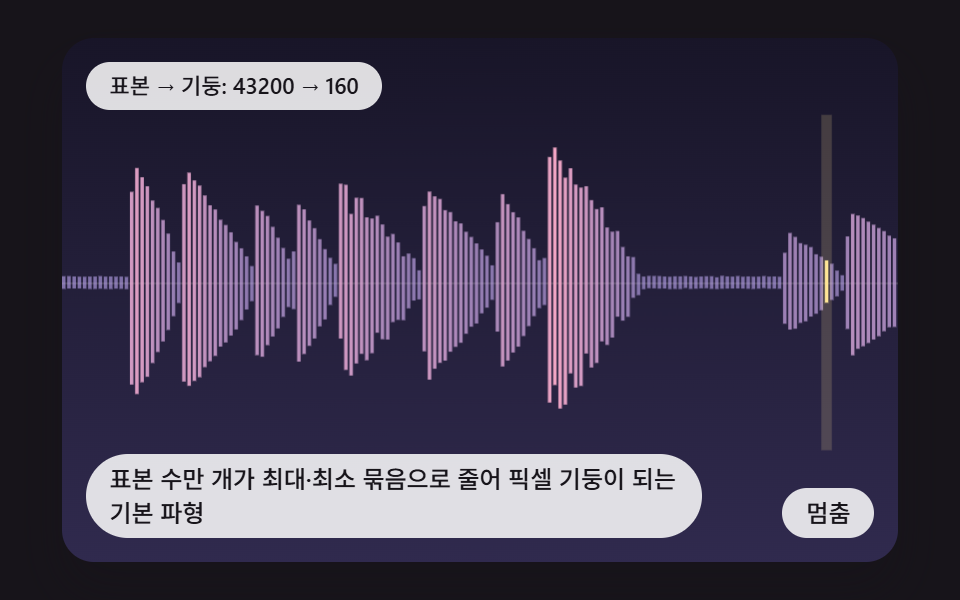 PickersCSS Waveform: 9 Peak Columns and Trim Pickers
 Pickers9 Segmented Control UI Patterns — Copy-Paste
 Pickers9 Date Range Picker UI Patterns — Copy-Paste
 Pickers9 Select Dropdown Design Patterns That Really Open
 Pickers9 Map UI Design Patterns — Click-to-Drop Pickers
 PickersCSS Range Slider: 9 Physics-Grade Custom Sliders