Custom Audio Player CSS — 9 Computed UI Patterns
Among nine custom audio player css demos, one precomputes bar heights from sine waves, one decays angular velocity so the vinyl coasts, and one scrolls lyrics
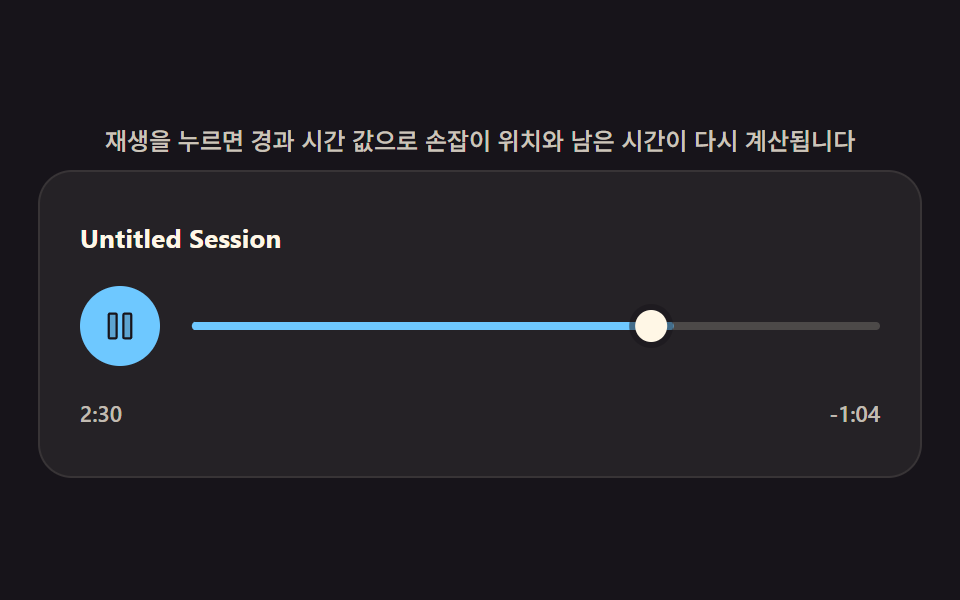 01 audio-custom-player
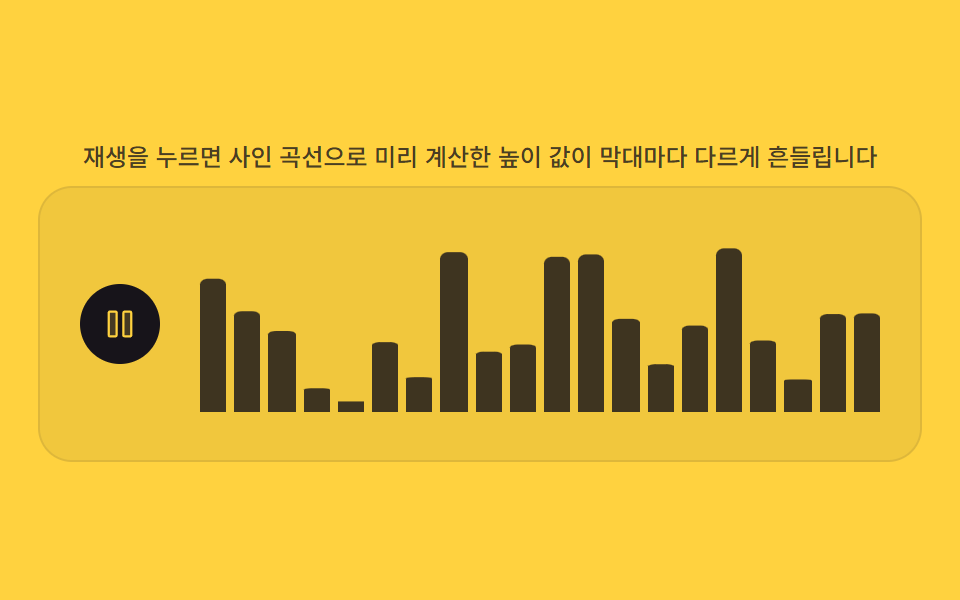 02 audio-waveform-bars
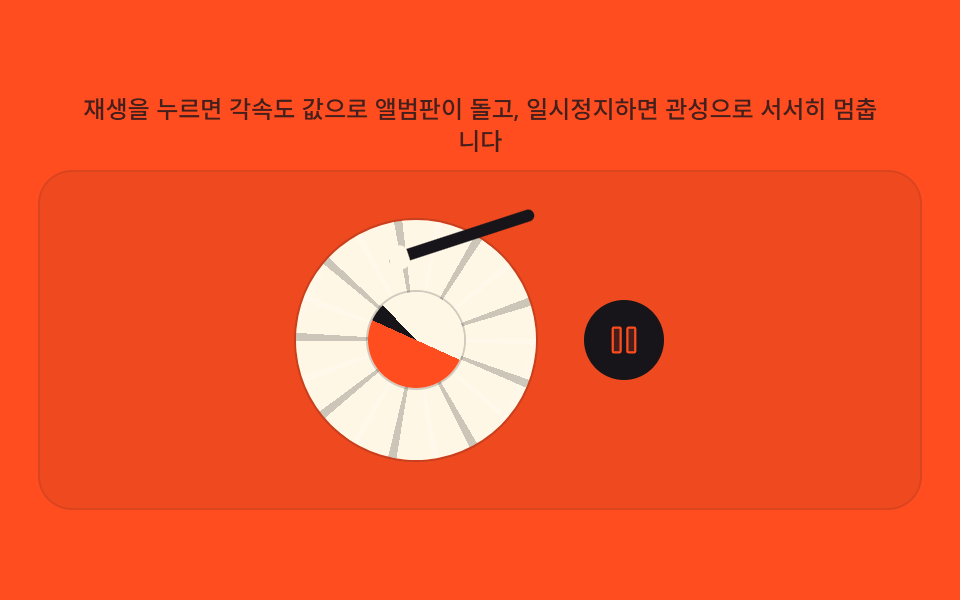 03 audio-vinyl-spin
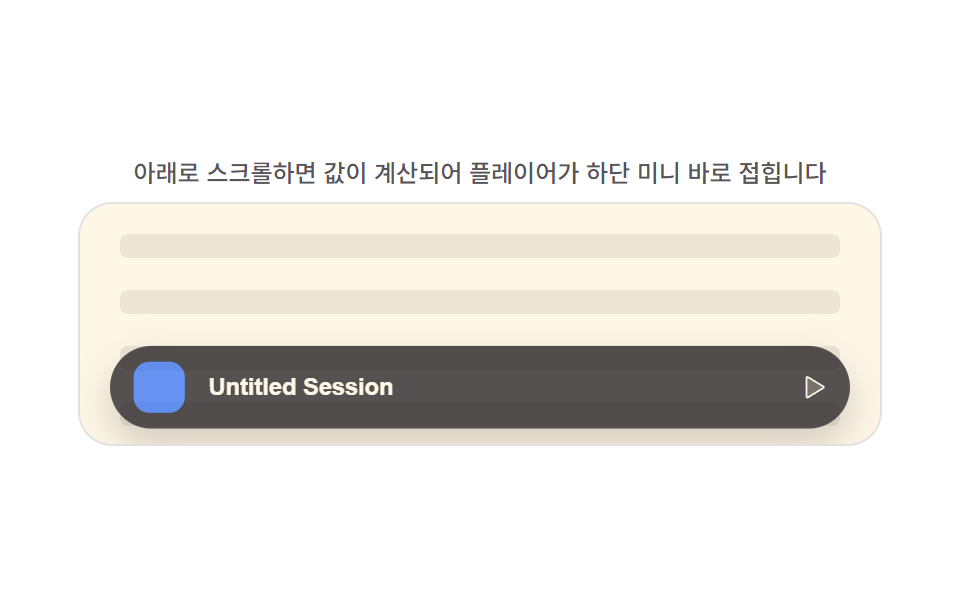 04 audio-mini-sticky
 05 audio-playlist-queue
 06 audio-visualizer-canvas
 07 audio-eq-preset-sliders
 08 audio-lyrics-sync-scroll
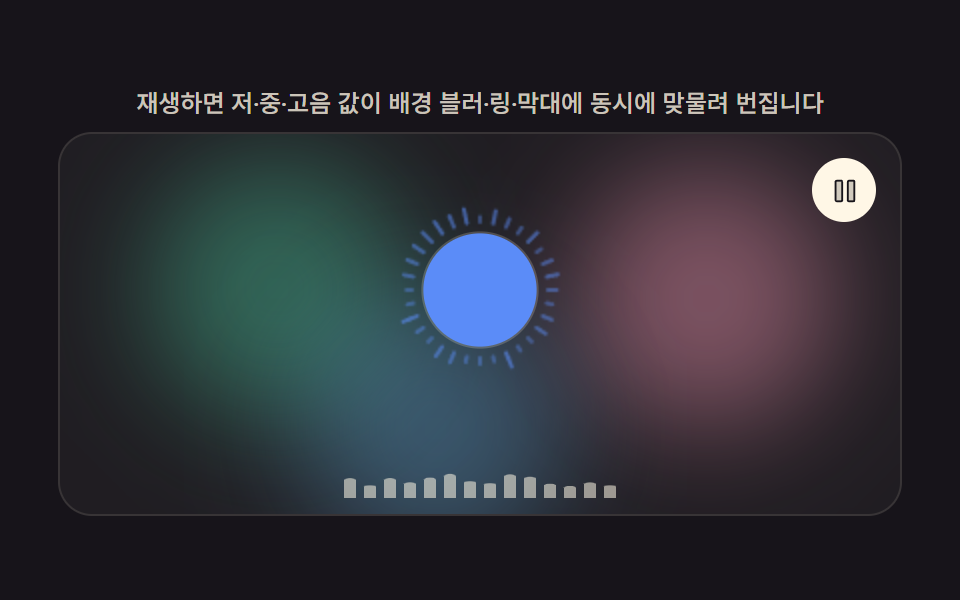 09 audio-player-hero-scene
Auto-plays · click a tile to jump to its section · all nine in one zip
- 01 Custom Control Bar Drawn From a Playback Progress Value
- 02 Equalizer Bars Driven by a Synthetic Waveform Value
- 03 Turntable Album Art Spun by an Angular-velocity Value
- 04 Bottom-docked Mini Bar That Collapses From a Scroll Value
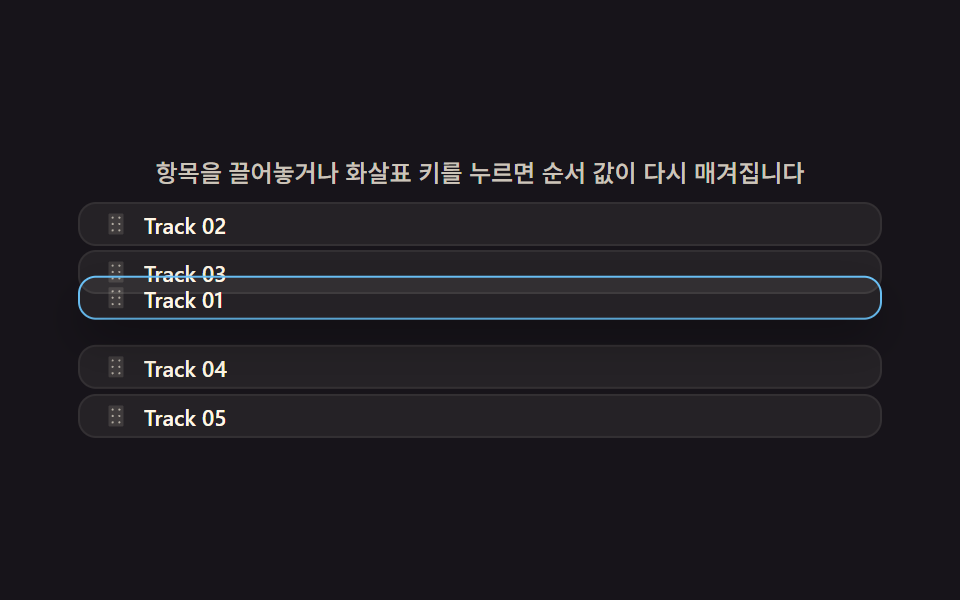
- 05 Queue Reorder That Recomputes an Order Value on Drag
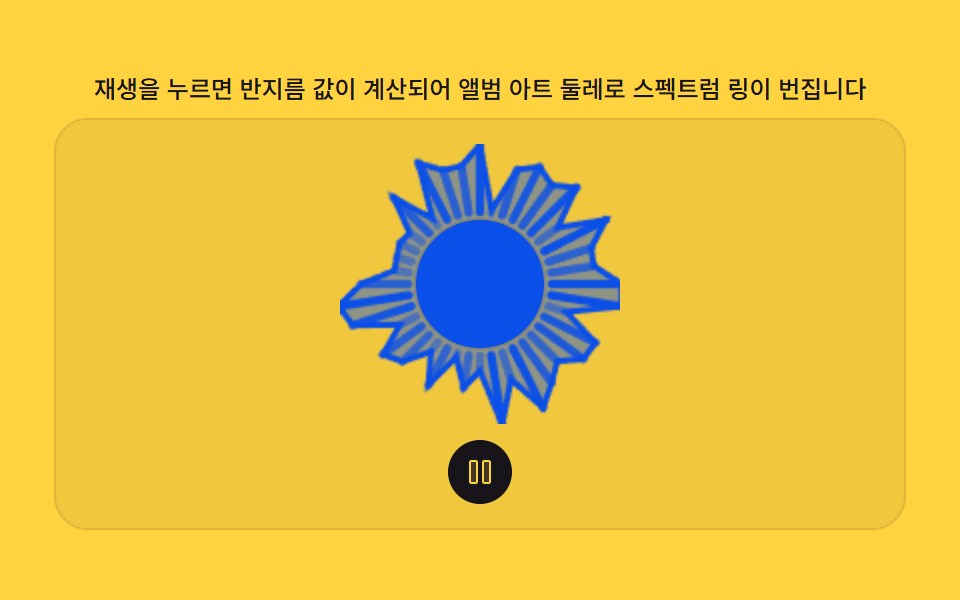
- 06 Circular Spectrum Ring That Grows From a Radius Value
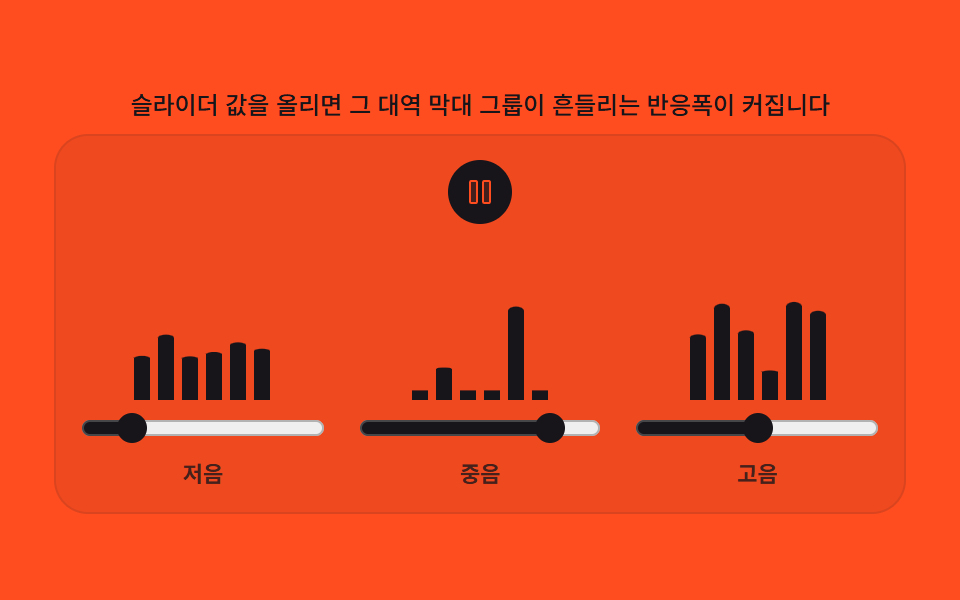
- 07 Preset Equalizer Whose Slider Value Sets the Bar Response Range
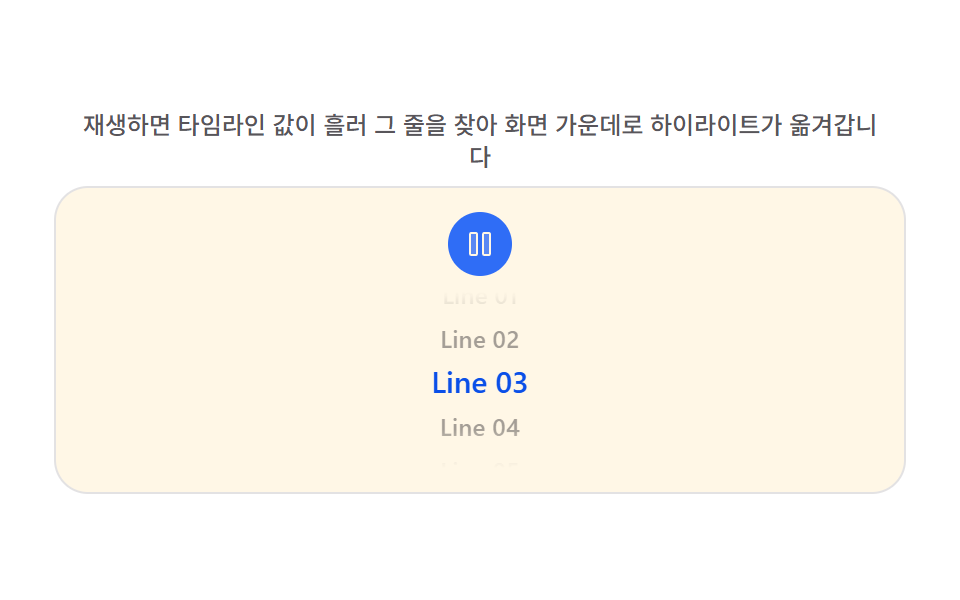
- 08 Lyrics Scroll Whose Highlight Moves From a Timeline Value
- 09 Player Hero Scene Where a Blurred Backdrop and Ring Interlock
This set groups nine takes on a custom audio player css layout: an elapsed-time value that redraws a seek handle and a remaining-time label, a bank of sine curves that fakes an equalizer without touching real audio, an angular-velocity value that spins an album disc and eases it to a stop, a scroll-position value that morphs a full player into a bottom-docked mini bar, a pointer-position value that reorders a playlist queue as you drag, a synthetic amplitude value that pulses a circular spectrum ring, three slider values that each bound one equalizer band's sway, a timeline value that keeps a lyric line centered as it scrolls, and one hero scene where a single progress value drives three of those layers at once. None of the nine touch a real audio file — every value below comes from arithmetic, not from <audio> playback or a Web Audio graph.
Demo
<svg width="0" height="0" style="position:absolute" aria-hidden="true">
  <defs>
    <symbol id="ico-play" viewBox="0 0 256 256"><g fill="currentColor"><path d="M228.23 134.69L84.15 222.81A8 8 0 0 1 72 216.12V39.88a8 8 0 0 1 12.15-6.69l144.08 88.12a7.82 7.82 0 0 1 0 13.38" opacity=".2"/><path d="M232.4 114.49L88.32 26.35a16 16 0 0 0-16.2-.3A15.86 15.86 0 0 0 64 39.87v176.26A15.94 15.94 0 0 0 80 232a16.07 16.07 0 0 0 8.36-2.35l144.04-88.14a15.81 15.81 0 0 0 0-27ZM80 215.94V40l143.83 88Z"/></g></symbol>
    <symbol id="ico-pause" viewBox="0 0 256 256"><g fill="currentColor"><path d="M208 48v160a8 8 0 0 1-8 8h-40a8 8 0 0 1-8-8V48a8 8 0 0 1 8-8h40a8 8 0 0 1 8 8M96 40H56a8 8 0 0 0-8 8v160a8 8 0 0 0 8 8h40a8 8 0 0 0 8-8V48a8 8 0 0 0-8-8" opacity=".2"/><path d="M200 32h-40a16 16 0 0 0-16 16v160a16 16 0 0 0 16 16h40a16 16 0 0 0 16-16V48a16 16 0 0 0-16-16m0 176h-40V48h40ZM96 32H56a16 16 0 0 0-16 16v160a16 16 0 0 0 16 16h40a16 16 0 0 0 16-16V48a16 16 0 0 0-16-16m0 176H56V48h40Z"/></g></symbol>
  </defs>
</svg>
<main class="stage">
<div class="cp is-demo is-playing" id="cp">
  <p class="cp__hint"><span>Press play and the elapsed-time value recalculates the handle position and remaining time.</span></p>
  <div class="cp__panel">
    <div class="cp__title" id="title">Untitled Session</div>
    <div class="cp__row">
      <button class="cp__play" id="play" type="button" aria-label="Play">
        <svg class="cp__ico cp__ico--play" aria-hidden="true"><use href="#ico-play"></use></svg>
        <svg class="cp__ico cp__ico--pause" aria-hidden="true"><use href="#ico-pause"></use></svg>
      </button>
      <div class="cp__seek" id="seek" tabindex="0" role="slider" aria-label="Seek bar" aria-valuemin="0" aria-valuemax="100" aria-valuenow="0">
        <div class="cp__track" id="track">
          <div class="cp__fill" id="fill"></div>
          <div class="cp__handle" id="handle"></div>
        </div>
      </div>
    </div>
    <div class="cp__time">
      <span id="elapsed">0:00</span>
      <span id="remain">-3:34</span>
    </div>
  </div>
</div>
</main>@use "../../../../site/static/demo-tokens" as *;
// 계산 겹(진행률 → 손잡이·채움·시간 텍스트)은 index.html 의 render()/frame() 에 있다. 여기는 무대·레이아웃만.
$duration: $dur-base;
$easing: $ease-out;
$color: $subject-sky;
@include stage($stage-ink);
.cp {
display: flex;
flex-direction: column;
align-items: center;
gap: $sp-2;
width: min(400px, 92vw);
}
.cp__hint {
margin: 0;
color: rgba($subject-cream, .78);
font-size: 12px;
font-weight: 500;
line-height: 1.35;
text-align: center;
}
.cp__panel {
width: 100%;
border-radius: $r-card;
background: rgba($subject-cream, .06);
box-shadow: 0 0 0 1px rgba($subject-cream, .14);
padding: $sp-6 $sp-5;
display: flex;
flex-direction: column;
gap: $sp-4;
}
.cp__title {
color: $subject-cream;
font-size: 13px;
font-weight: 700;
letter-spacing: .01em;
}
.cp__row {
display: flex;
align-items: center;
gap: $sp-4;
}
.cp__play {
flex: 0 0 auto;
width: $sp-10;
height: $sp-10;
border-radius: $r-pill;
border: none;
background: $color;
color: $stage-ink;
display: flex;
align-items: center;
justify-content: center;
cursor: pointer;
transition: transform $duration $easing;
}
.cp__play:hover { transform: scale(1.06); }
.cp__play:focus-visible { outline: 2px solid $subject-cream; outline-offset: 2px; }
.cp__play:active { transform: scale(.96); }
.cp__ico { width: 18px; height: 18px; }
.cp__ico--pause { display: none; }
.is-playing .cp__ico--play { display: none; }
.is-playing .cp__ico--pause { display: block; }
.cp__seek {
flex: 1 1 auto;
padding: $sp-2 0;
cursor: pointer;
}
.cp__seek:focus-visible {
outline: 2px solid $subject-cream;
outline-offset: 4px;
}
.cp__track {
position: relative;
height: 4px;
border-radius: $r-xs;
background: rgba($subject-cream, .18);
}
.cp__fill {
position: absolute;
inset: 0;
border-radius: $r-xs;
background: $color;
transform: scaleX(0);
transform-origin: left center; // 채움 막대는 왼쪽 기준으로 자라난다 — 진행률의 실제 기준점
}
.cp__handle {
position: absolute;
top: 50%;
left: 0;
width: $sp-4;
height: $sp-4;
margin-top: -$sp-2;
margin-left: -$sp-2;
border-radius: $r-pill;
background: $subject-cream;
box-shadow: 0 0 0 3px rgba($stage-ink, .5);
}
.cp__time {
display: flex;
justify-content: space-between;
color: rgba($subject-cream, .72);
font-size: 11px;
font-weight: 600;
font-variant-numeric: tabular-nums;
}
@media (max-width: 340px) {
.cp__panel { padding: $sp-4 $sp-3; }
.cp__play { width: $sp-8; height: $sp-8; }
.cp__ico { width: 15px; height: 15px; }
}
@media (prefers-reduced-motion: reduce) {
.cp__play { transition: none; }
}html, body {
margin: 0;
overflow: hidden;
}
.stage {
box-sizing: border-box;
min-height: 100vh;
display: grid;
place-items: center;
margin: 0;
background: #17141a;
font-family: -apple-system, "Segoe UI", "Noto Sans KR", sans-serif;
padding: clamp(8px, 4vw, 24px);
}
.cp {
display: flex;
flex-direction: column;
align-items: center;
gap: 8px;
width: min(400px, 92vw);
}
.cp__hint {
margin: 0;
color: rgba(255, 247, 230, 0.78);
font-size: 12px;
font-weight: 500;
line-height: 1.35;
text-align: center;
}
.cp__panel {
width: 100%;
border-radius: 16px;
background: rgba(255, 247, 230, 0.06);
box-shadow: 0 0 0 1px rgba(255, 247, 230, 0.14);
padding: 24px 20px;
display: flex;
flex-direction: column;
gap: 16px;
}
.cp__title {
color: #fff7e6;
font-size: 13px;
font-weight: 700;
letter-spacing: 0.01em;
}
.cp__row {
display: flex;
align-items: center;
gap: 16px;
}
.cp__play {
flex: 0 0 auto;
width: 40px;
height: 40px;
border-radius: 999px;
border: none;
background: #6ec8ff;
color: #17141a;
display: flex;
align-items: center;
justify-content: center;
cursor: pointer;
transition: transform 300ms ease-out;
}
.cp__play:hover {
transform: scale(1.06);
}
.cp__play:focus-visible {
outline: 2px solid #fff7e6;
outline-offset: 2px;
}
.cp__play:active {
transform: scale(0.96);
}
.cp__ico {
width: 18px;
height: 18px;
}
.cp__ico--pause {
display: none;
}
.is-playing .cp__ico--play {
display: none;
}
.is-playing .cp__ico--pause {
display: block;
}
.cp__seek {
flex: 1 1 auto;
padding: 8px 0;
cursor: pointer;
}
.cp__seek:focus-visible {
outline: 2px solid #fff7e6;
outline-offset: 4px;
}
.cp__track {
position: relative;
height: 4px;
border-radius: 4px;
background: rgba(255, 247, 230, 0.18);
}
.cp__fill {
position: absolute;
inset: 0;
border-radius: 4px;
background: #6ec8ff;
transform: scaleX(0);
transform-origin: left center;
}
.cp__handle {
position: absolute;
top: 50%;
left: 0;
width: 16px;
height: 16px;
margin-top: -8px;
margin-left: -8px;
border-radius: 999px;
background: #fff7e6;
box-shadow: 0 0 0 3px rgba(23, 20, 26, 0.5);
}
.cp__time {
display: flex;
justify-content: space-between;
color: rgba(255, 247, 230, 0.72);
font-size: 11px;
font-weight: 600;
font-variant-numeric: tabular-nums;
}
@media (max-width: 340px) {
.cp__panel {
padding: 16px 12px;
}
.cp__play {
width: 32px;
height: 32px;
}
.cp__ico {
width: 15px;
height: 15px;
}
}
@media (prefers-reduced-motion: reduce) {
.cp__play {
transition: none;
}
}(function () {
var root = document.getElementById('cp');
var playBtn = document.getElementById('play');
var seek = document.getElementById('seek');
var track = document.getElementById('track');
var fill = document.getElementById('fill');
var handle = document.getElementById('handle');
var elapsedEl = document.getElementById('elapsed');
var remainEl = document.getElementById('remain');
var reduce = window.matchMedia('(prefers-reduced-motion: reduce)').matches;
var isDemo = true;
var TRACK_LENGTH_S = 214; // 3:34 — 실 오디오 파일 없음, 합성 트랙 길이 상수
var SEEK_STEP_S = 5; // 방향키 한 번의 탐색 단위(초)
var PROGRESS_UPDATE_MS = 200; // 진행률 재계산 주기 — 변형: 이 값을 줄이면 더 잦게 다시 계산해 매끈해진다
var trackW = 0;
function fit() {
var r = track.getBoundingClientRect();
var hr = handle.getBoundingClientRect();
trackW = Math.max(1, r.width - hr.width);
}
function fmt(sec) {
sec = Math.max(0, Math.round(sec));
var m = Math.floor(sec / 60), s = sec % 60;
return m + ':' + (s < 10 ? '0' : '') + s;
}
function render(elapsedS) {
var p = Math.min(1, Math.max(0, elapsedS / TRACK_LENGTH_S));
fill.style.transform = 'scaleX(' + p + ')';
handle.style.transform = 'translateX(' + (p * trackW) + 'px)';
elapsedEl.textContent = fmt(elapsedS);
remainEl.textContent = '-' + fmt(TRACK_LENGTH_S - elapsedS);
seek.setAttribute('aria-valuenow', String(Math.round(p * 100)));
}
function human() { if (isDemo) { root.classList.remove('is-demo'); isDemo = false; } }
var state = { elapsedS: 0, playing: false, playStart: 0, lastRenderMs: -1 };
function setPlaying(next) {
state.playing = next;
root.classList.toggle('is-playing', next);
if (next) state.playStart = performance.now() - state.elapsedS * 1000;
}
function seekTo(elapsedS) {
state.elapsedS = Math.min(TRACK_LENGTH_S, Math.max(0, elapsedS));
if (state.playing) state.playStart = performance.now() - state.elapsedS * 1000;
render(state.elapsedS);
}
function onTrackClick(e) {
human();
var r = track.getBoundingClientRect();
var ratio = (e.clientX - r.left) / r.width;
seekTo(ratio * TRACK_LENGTH_S);
}
function onSeekKeydown(e) {
if (e.key === 'ArrowRight' || e.key === 'ArrowLeft') {
e.preventDefault();
human();
seekTo(state.elapsedS + (e.key === 'ArrowRight' ? SEEK_STEP_S : -SEEK_STEP_S));
}
}
function onPlayClick() {
human();
setPlaying(!state.playing);
}
var driveStart = 0;
function driveTick(now) {
if (!driveStart) driveStart = now;
if (isDemo) {
var DRIVE_PERIOD_MS = 2000; // 렌더 캐처 창(설정 초=2.0)과 같은 주기 — 시연 전용
var frac = ((now - driveStart) % DRIVE_PERIOD_MS) / DRIVE_PERIOD_MS;
if (now - state.lastRenderMs >= PROGRESS_UPDATE_MS) {
render(frac * TRACK_LENGTH_S);
state.lastRenderMs = now;
}
}
requestAnimationFrame(driveTick);
}
function frame(now) {
if (!isDemo) {
if (state.playing) {
var elapsedS = (now - state.playStart) / 1000;
if (elapsedS >= TRACK_LENGTH_S) { state.playStart = now; elapsedS = 0; }
state.elapsedS = elapsedS;
}
if (now - state.lastRenderMs >= PROGRESS_UPDATE_MS) {
render(state.elapsedS);
state.lastRenderMs = now;
}
}
requestAnimationFrame(frame);
}
window.addEventListener('resize', fit);
fit();
if (reduce) {
root.classList.add('is-still');
render(0);
playBtn.addEventListener('click', function () { human(); setPlaying(!state.playing); render(state.elapsedS); });
track.addEventListener('click', function (e) { onTrackClick(e); });
seek.addEventListener('keydown', onSeekKeydown);
} else {
playBtn.addEventListener('click', onPlayClick);
track.addEventListener('click', onTrackClick);
seek.addEventListener('keydown', onSeekKeydown);
requestAnimationFrame(frame);
requestAnimationFrame(driveTick);
}
})();import { useEffect, useRef } from "react";
import styles from "./CustomPlayer.module.scss";
export default function CustomPlayer() {
const rootRef = useRef<HTMLDivElement | null>(null);
const trackRef = useRef<HTMLDivElement | null>(null);
const fillRef = useRef<HTMLDivElement | null>(null);
const handleRef = useRef<HTMLDivElement | null>(null);
const seekRef = useRef<HTMLDivElement | null>(null);
const playRef = useRef<HTMLButtonElement | null>(null);
const elapsedRef = useRef<HTMLSpanElement | null>(null);
const remainRef = useRef<HTMLSpanElement | null>(null);
useEffect(() => {
const root = rootRef.current;
const track = trackRef.current;
const fill = fillRef.current;
const handle = handleRef.current;
const seek = seekRef.current;
const playBtn = playRef.current;
const elapsedEl = elapsedRef.current;
const remainEl = remainRef.current;
if (!root || !track || !fill || !handle || !seek || !playBtn || !elapsedEl || !remainEl) return;
const reduce = window.matchMedia("(prefers-reduced-motion: reduce)").matches;
let isDemo = true;
const TRACK_LENGTH_S = 214; // 3:34 — 실 오디오 파일 없음, 합성 트랙 길이 상수
const SEEK_STEP_S = 5; // 방향키 한 번의 탐색 단위(초)
const PROGRESS_UPDATE_MS = 200; // 진행률 재계산 주기 — 변형: 이 값을 줄이면 더 잦게 다시 계산해 매끈해진다
let trackW = 0;
function fit() {
const r = track!.getBoundingClientRect();
const hr = handle!.getBoundingClientRect();
trackW = Math.max(1, r.width - hr.width);
}
function fmt(sec: number) {
sec = Math.max(0, Math.round(sec));
const m = Math.floor(sec / 60), s = sec % 60;
return m + ":" + (s < 10 ? "0" : "") + s;
}
function render(elapsedS: number) {
const p = Math.min(1, Math.max(0, elapsedS / TRACK_LENGTH_S));
fill!.style.transform = "scaleX(" + p + ")";
handle!.style.transform = "translateX(" + p * trackW + "px)";
elapsedEl!.textContent = fmt(elapsedS);
remainEl!.textContent = "-" + fmt(TRACK_LENGTH_S - elapsedS);
seek!.setAttribute("aria-valuenow", String(Math.round(p * 100)));
}
function human() {
if (isDemo) { root!.classList.remove(styles["is-demo"]); isDemo = false; }
}
const state = { elapsedS: 0, playing: false, playStart: 0, lastRenderMs: -1 };
function setPlaying(next: boolean) {
state.playing = next;
root!.classList.toggle(styles["is-playing"], next);
if (next) state.playStart = performance.now() - state.elapsedS * 1000;
}
function seekTo(elapsedS: number) {
state.elapsedS = Math.min(TRACK_LENGTH_S, Math.max(0, elapsedS));
if (state.playing) state.playStart = performance.now() - state.elapsedS * 1000;
render(state.elapsedS);
}
function onTrackClick(e: MouseEvent) {
human();
const r = track!.getBoundingClientRect();
const ratio = (e.clientX - r.left) / r.width;
seekTo(ratio * TRACK_LENGTH_S);
}
function onSeekKeydown(e: KeyboardEvent) {
if (e.key === "ArrowRight" || e.key === "ArrowLeft") {
e.preventDefault();
human();
seekTo(state.elapsedS + (e.key === "ArrowRight" ? SEEK_STEP_S : -SEEK_STEP_S));
}
}
function onPlayClick() { human(); setPlaying(!state.playing); }
let driveStart = 0;
let rafDrive = 0;
function driveTick(now: number) {
if (!driveStart) driveStart = now;
if (isDemo) {
const DRIVE_PERIOD_MS = 2000; // 렌더 캐처 창(설정 초=2.0)과 같은 주기 — 시연 전용
const frac = ((now - driveStart) % DRIVE_PERIOD_MS) / DRIVE_PERIOD_MS;
if (now - state.lastRenderMs >= PROGRESS_UPDATE_MS) {
render(frac * TRACK_LENGTH_S);
state.lastRenderMs = now;
}
}
rafDrive = requestAnimationFrame(driveTick);
}
let rafFrame = 0;
function frame(now: number) {
if (!isDemo) {
if (state.playing) {
let elapsedS = (now - state.playStart) / 1000;
if (elapsedS >= TRACK_LENGTH_S) { state.playStart = now; elapsedS = 0; }
state.elapsedS = elapsedS;
}
if (now - state.lastRenderMs >= PROGRESS_UPDATE_MS) {
render(state.elapsedS);
state.lastRenderMs = now;
}
}
rafFrame = requestAnimationFrame(frame);
}
function onReduceClick() { human(); setPlaying(!state.playing); render(state.elapsedS); }
window.addEventListener("resize", fit);
fit();
if (reduce) {
root.classList.add(styles["is-still"]);
render(0);
playBtn.addEventListener("click", onReduceClick);
track.addEventListener("click", onTrackClick);
seek.addEventListener("keydown", onSeekKeydown);
} else {
playBtn.addEventListener("click", onPlayClick);
track.addEventListener("click", onTrackClick);
seek.addEventListener("keydown", onSeekKeydown);
rafFrame = requestAnimationFrame(frame);
rafDrive = requestAnimationFrame(driveTick);
}
return () => {
window.removeEventListener("resize", fit);
cancelAnimationFrame(rafFrame);
cancelAnimationFrame(rafDrive);
if (reduce) {
playBtn.removeEventListener("click", onReduceClick);
} else {
playBtn.removeEventListener("click", onPlayClick);
}
track.removeEventListener("click", onTrackClick);
seek.removeEventListener("keydown", onSeekKeydown);
};
}, []);
return (
<main className={styles.stage}>
<div className={styles.cp + ' ' + styles['is-demo'] + ' ' + styles['is-playing']} ref={rootRef}>
<p className={styles.hint}>
<span>재생을 누르면 경과 시간 값으로 손잡이 위치와 남은 시간이 다시 계산됩니다</span>
</p>
<div className={styles.panel}>
<div className={styles.title}>Untitled Session</div>
<div className={styles.row}>
<button className={styles.play} ref={playRef} type="button" aria-label="재생">
<svg className={`${styles.ico} ${styles.icoPlay}`} aria-hidden="true"><use href="#ico-play" /></svg>
<svg className={`${styles.ico} ${styles.icoPause}`} aria-hidden="true"><use href="#ico-pause" /></svg>
</button>
<div
className={styles.seek}
ref={seekRef}
tabIndex={0}
role="slider"
aria-label="탐색 막대"
aria-valuemin={0}
aria-valuemax={100}
aria-valuenow={0}
>
<div className={styles.track} ref={trackRef}>
<div className={styles.fill} ref={fillRef} />
<div className={styles.handle} ref={handleRef} />
</div>
</div>
</div>
<div className={styles.time}>
<span ref={elapsedRef}>0:00</span>
<span ref={remainRef}>-3:34</span>
</div>
</div>
</div>
</main>
);
}01 · Custom Control Bar Drawn From a Playback Progress Value — Measured area 2.546% · moving frames 13/23Original by GODRICH · SCSS and React ship in the zip · See the password
Everything pattern 01 needs is that one elapsedS value plus a seekTo function and an fmt helper for the mm:ss label — no <audio> element sits anywhere behind it. Patterns 02 through 09 follow later on this page, each one sitting right beside the code block it belongs to.
Anatomy of nine custom audio player css patterns — where the one layer of calculation runs
| # | Pattern | Cumulative area | Avg. intensity | Frames moved |
|---|---|---|---|---|
| 01 | Progress-driven control bar | 2.546% | 154.8 | 13 of 23 |
| 02 | Synthetic waveform bars | 14.217% | 163.9 | 23 of 23 |
| 03 | Vinyl turntable spin | 7.679% | 67.9 | 23 of 23 |
| 04 | Scroll-morphed mini bar | 30.593% | 35.9 | 23 of 23 |
| 05 | Drag-reordered queue | 29.946% | 46.7 | 23 of 23 |
| 06 | Circular spectrum ring | 8.062% | 101.9 | 23 of 23 |
| 07 | Preset equalizer sliders | 9.767% | 177.3 | 23 of 23 |
| 08 | Timeline-synced lyrics | 1.891% | 82.4 | 14 of 23 |
| 09 | Player hero scene | 39.284% | 31.2 | 23 of 23 |
All nine call requestAnimationFrame directly — no CSS transition or @keyframes drives the moving parts. Each pattern keeps one small state value (an elapsed time, an angular velocity, a scroll offset, a drag order, a timeline position) and a render function reads that value back every frame to update a transform or opacity, or to make a canvas draw call.
Pattern 09 covers the most area (39.284%) because it is the only item where three separately computed layers — the turntable, the waveform bars, and the spectrum ring — share one coordinate space and move together. Pattern 08 sits at the other end, covering the least area (1.891%) and moving in only 14 of 23 frames, since a lyric highlight only changes when the active line index flips rather than on every tick. Pattern 01 moves in just 13 of 23 frames for a related reason: its PROGRESS_UPDATE_MS value only recomputes the seek handle every 200ms, so most captured frames land between two recomputes and show no change at all.
Progress and timeline values that only recompute on a step
Patterns 01 and 08 both gate their redraw behind a value rather than redrawing every tick. 01's render only moves the seek handle when now - state.lastRenderMs >= PROGRESS_UPDATE_MS, so seekTo and the click/keydown handlers still update state.elapsedS immediately, but the visible handle position waits for the next allowed tick. 08's activeIndexOf compares a simulated progressS against a fixed LINE_TIMES array and only moves the highlighted row — and the list's scroll offset with it — when that comparison returns a different index.
Angular and radius values eased frame by frame
Patterns 03, 06, 07, and 09 each ease a value toward a target instead of jumping to it. 03's step function multiplies velocity by SPIN_DECAY every frame once playback stops, so the disc's rotation slows on a curve rather than snapping still. 06 and 07 both run a synth function that layers two sine curves per bar or per ring point to fake an amplitude, and 07 additionally scales that sway by a BAND_RESPONSE_RANGE tied to a slider's live value. 09's bandValue reuses the same sine-layering approach for three named bands that separately drive the backdrop blobs, the album art's pulse, and the ring's radius.
Position values recomputed from scroll and pointer input
Patterns 04 and 05 recompute a layout value from a browser-native position rather than from time. 04's recompute reads scrollEl.scrollTop, subtracts a threshold, and divides by MORPH_RANGE_PX to get a 0-to-1 morph value that sets the mini bar's opacity, translate, and scale together. 05's onPointerMove compares a dragged row's dragY against every other row's slot position, and slotOf looks up the resulting order on every pointer move so the rows in between can shift out of the way before the drop lands.
Code per pattern
Each of the nine code blocks below is the actual calculation function pulled straight from that pattern's own index.html file, not a shortened stand-in written just for this page.
01Custom Control Bar Drawn From a Playback Progress Value
A custom audio control bar recomputes the seek handle position and remaining-time label every frame from an elapsed-time value counted since playback started. Clicking the track, stepping the handle with arrow keys, or pressing play all funnel through the same seekTo function so the displayed position never drifts from the value that owns it.
<svg width="0" height="0" style="position:absolute" aria-hidden="true">
  <defs>
    <symbol id="ico-play" viewBox="0 0 256 256"><g fill="currentColor"><path d="M228.23 134.69L84.15 222.81A8 8 0 0 1 72 216.12V39.88a8 8 0 0 1 12.15-6.69l144.08 88.12a7.82 7.82 0 0 1 0 13.38" opacity=".2"/><path d="M232.4 114.49L88.32 26.35a16 16 0 0 0-16.2-.3A15.86 15.86 0 0 0 64 39.87v176.26A15.94 15.94 0 0 0 80 232a16.07 16.07 0 0 0 8.36-2.35l144.04-88.14a15.81 15.81 0 0 0 0-27ZM80 215.94V40l143.83 88Z"/></g></symbol>
    <symbol id="ico-pause" viewBox="0 0 256 256"><g fill="currentColor"><path d="M208 48v160a8 8 0 0 1-8 8h-40a8 8 0 0 1-8-8V48a8 8 0 0 1 8-8h40a8 8 0 0 1 8 8M96 40H56a8 8 0 0 0-8 8v160a8 8 0 0 0 8 8h40a8 8 0 0 0 8-8V48a8 8 0 0 0-8-8" opacity=".2"/><path d="M200 32h-40a16 16 0 0 0-16 16v160a16 16 0 0 0 16 16h40a16 16 0 0 0 16-16V48a16 16 0 0 0-16-16m0 176h-40V48h40ZM96 32H56a16 16 0 0 0-16 16v160a16 16 0 0 0 16 16h40a16 16 0 0 0 16-16V48a16 16 0 0 0-16-16m0 176H56V48h40Z"/></g></symbol>
  </defs>
</svg>
<main class="stage">
<div class="cp is-demo is-playing" id="cp">
  <p class="cp__hint"><span>Press play and the elapsed-time value recalculates the handle position and remaining time.</span></p>
  <div class="cp__panel">
    <div class="cp__title" id="title">Untitled Session</div>
    <div class="cp__row">
      <button class="cp__play" id="play" type="button" aria-label="Play">
        <svg class="cp__ico cp__ico--play" aria-hidden="true"><use href="#ico-play"></use></svg>
        <svg class="cp__ico cp__ico--pause" aria-hidden="true"><use href="#ico-pause"></use></svg>
      </button>
      <div class="cp__seek" id="seek" tabindex="0" role="slider" aria-label="Seek bar" aria-valuemin="0" aria-valuemax="100" aria-valuenow="0">
        <div class="cp__track" id="track">
          <div class="cp__fill" id="fill"></div>
          <div class="cp__handle" id="handle"></div>
        </div>
      </div>
    </div>
    <div class="cp__time">
      <span id="elapsed">0:00</span>
      <span id="remain">-3:34</span>
    </div>
  </div>
</div>
</main>@use "../../../../site/static/demo-tokens" as *;
// 계산 겹(진행률 → 손잡이·채움·시간 텍스트)은 index.html 의 render()/frame() 에 있다. 여기는 무대·레이아웃만.
$duration: $dur-base;
$easing: $ease-out;
$color: $subject-sky;
@include stage($stage-ink);
.cp {
display: flex;
flex-direction: column;
align-items: center;
gap: $sp-2;
width: min(400px, 92vw);
}
.cp__hint {
margin: 0;
color: rgba($subject-cream, .78);
font-size: 12px;
font-weight: 500;
line-height: 1.35;
text-align: center;
}
.cp__panel {
width: 100%;
border-radius: $r-card;
background: rgba($subject-cream, .06);
box-shadow: 0 0 0 1px rgba($subject-cream, .14);
padding: $sp-6 $sp-5;
display: flex;
flex-direction: column;
gap: $sp-4;
}
.cp__title {
color: $subject-cream;
font-size: 13px;
font-weight: 700;
letter-spacing: .01em;
}
.cp__row {
display: flex;
align-items: center;
gap: $sp-4;
}
.cp__play {
flex: 0 0 auto;
width: $sp-10;
height: $sp-10;
border-radius: $r-pill;
border: none;
background: $color;
color: $stage-ink;
display: flex;
align-items: center;
justify-content: center;
cursor: pointer;
transition: transform $duration $easing;
}
.cp__play:hover { transform: scale(1.06); }
.cp__play:focus-visible { outline: 2px solid $subject-cream; outline-offset: 2px; }
.cp__play:active { transform: scale(.96); }
.cp__ico { width: 18px; height: 18px; }
.cp__ico--pause { display: none; }
.is-playing .cp__ico--play { display: none; }
.is-playing .cp__ico--pause { display: block; }
.cp__seek {
flex: 1 1 auto;
padding: $sp-2 0;
cursor: pointer;
}
.cp__seek:focus-visible {
outline: 2px solid $subject-cream;
outline-offset: 4px;
}
.cp__track {
position: relative;
height: 4px;
border-radius: $r-xs;
background: rgba($subject-cream, .18);
}
.cp__fill {
position: absolute;
inset: 0;
border-radius: $r-xs;
background: $color;
transform: scaleX(0);
transform-origin: left center; // 채움 막대는 왼쪽 기준으로 자라난다 — 진행률의 실제 기준점
}
.cp__handle {
position: absolute;
top: 50%;
left: 0;
width: $sp-4;
height: $sp-4;
margin-top: -$sp-2;
margin-left: -$sp-2;
border-radius: $r-pill;
background: $subject-cream;
box-shadow: 0 0 0 3px rgba($stage-ink, .5);
}
.cp__time {
display: flex;
justify-content: space-between;
color: rgba($subject-cream, .72);
font-size: 11px;
font-weight: 600;
font-variant-numeric: tabular-nums;
}
@media (max-width: 340px) {
.cp__panel { padding: $sp-4 $sp-3; }
.cp__play { width: $sp-8; height: $sp-8; }
.cp__ico { width: 15px; height: 15px; }
}
@media (prefers-reduced-motion: reduce) {
.cp__play { transition: none; }
}html, body {
margin: 0;
overflow: hidden;
}
.stage {
box-sizing: border-box;
min-height: 100vh;
display: grid;
place-items: center;
margin: 0;
background: #17141a;
font-family: -apple-system, "Segoe UI", "Noto Sans KR", sans-serif;
padding: clamp(8px, 4vw, 24px);
}
.cp {
display: flex;
flex-direction: column;
align-items: center;
gap: 8px;
width: min(400px, 92vw);
}
.cp__hint {
margin: 0;
color: rgba(255, 247, 230, 0.78);
font-size: 12px;
font-weight: 500;
line-height: 1.35;
text-align: center;
}
.cp__panel {
width: 100%;
border-radius: 16px;
background: rgba(255, 247, 230, 0.06);
box-shadow: 0 0 0 1px rgba(255, 247, 230, 0.14);
padding: 24px 20px;
display: flex;
flex-direction: column;
gap: 16px;
}
.cp__title {
color: #fff7e6;
font-size: 13px;
font-weight: 700;
letter-spacing: 0.01em;
}
.cp__row {
display: flex;
align-items: center;
gap: 16px;
}
.cp__play {
flex: 0 0 auto;
width: 40px;
height: 40px;
border-radius: 999px;
border: none;
background: #6ec8ff;
color: #17141a;
display: flex;
align-items: center;
justify-content: center;
cursor: pointer;
transition: transform 300ms ease-out;
}
.cp__play:hover {
transform: scale(1.06);
}
.cp__play:focus-visible {
outline: 2px solid #fff7e6;
outline-offset: 2px;
}
.cp__play:active {
transform: scale(0.96);
}
.cp__ico {
width: 18px;
height: 18px;
}
.cp__ico--pause {
display: none;
}
.is-playing .cp__ico--play {
display: none;
}
.is-playing .cp__ico--pause {
display: block;
}
.cp__seek {
flex: 1 1 auto;
padding: 8px 0;
cursor: pointer;
}
.cp__seek:focus-visible {
outline: 2px solid #fff7e6;
outline-offset: 4px;
}
.cp__track {
position: relative;
height: 4px;
border-radius: 4px;
background: rgba(255, 247, 230, 0.18);
}
.cp__fill {
position: absolute;
inset: 0;
border-radius: 4px;
background: #6ec8ff;
transform: scaleX(0);
transform-origin: left center;
}
.cp__handle {
position: absolute;
top: 50%;
left: 0;
width: 16px;
height: 16px;
margin-top: -8px;
margin-left: -8px;
border-radius: 999px;
background: #fff7e6;
box-shadow: 0 0 0 3px rgba(23, 20, 26, 0.5);
}
.cp__time {
display: flex;
justify-content: space-between;
color: rgba(255, 247, 230, 0.72);
font-size: 11px;
font-weight: 600;
font-variant-numeric: tabular-nums;
}
@media (max-width: 340px) {
.cp__panel {
padding: 16px 12px;
}
.cp__play {
width: 32px;
height: 32px;
}
.cp__ico {
width: 15px;
height: 15px;
}
}
@media (prefers-reduced-motion: reduce) {
.cp__play {
transition: none;
}
}(function () {
var root = document.getElementById('cp');
var playBtn = document.getElementById('play');
var seek = document.getElementById('seek');
var track = document.getElementById('track');
var fill = document.getElementById('fill');
var handle = document.getElementById('handle');
var elapsedEl = document.getElementById('elapsed');
var remainEl = document.getElementById('remain');
var reduce = window.matchMedia('(prefers-reduced-motion: reduce)').matches;
var isDemo = true;
var TRACK_LENGTH_S = 214; // 3:34 — 실 오디오 파일 없음, 합성 트랙 길이 상수
var SEEK_STEP_S = 5; // 방향키 한 번의 탐색 단위(초)
var PROGRESS_UPDATE_MS = 200; // 진행률 재계산 주기 — 변형: 이 값을 줄이면 더 잦게 다시 계산해 매끈해진다
var trackW = 0;
function fit() {
var r = track.getBoundingClientRect();
var hr = handle.getBoundingClientRect();
trackW = Math.max(1, r.width - hr.width);
}
function fmt(sec) {
sec = Math.max(0, Math.round(sec));
var m = Math.floor(sec / 60), s = sec % 60;
return m + ':' + (s < 10 ? '0' : '') + s;
}
function render(elapsedS) {
var p = Math.min(1, Math.max(0, elapsedS / TRACK_LENGTH_S));
fill.style.transform = 'scaleX(' + p + ')';
handle.style.transform = 'translateX(' + (p * trackW) + 'px)';
elapsedEl.textContent = fmt(elapsedS);
remainEl.textContent = '-' + fmt(TRACK_LENGTH_S - elapsedS);
seek.setAttribute('aria-valuenow', String(Math.round(p * 100)));
}
function human() { if (isDemo) { root.classList.remove('is-demo'); isDemo = false; } }
var state = { elapsedS: 0, playing: false, playStart: 0, lastRenderMs: -1 };
function setPlaying(next) {
state.playing = next;
root.classList.toggle('is-playing', next);
if (next) state.playStart = performance.now() - state.elapsedS * 1000;
}
  function seekTo(elapsedS) {
    state.elapsedS = Math.min(TRACK_LENGTH_S, Math.max(0, elapsedS));
    if (state.playing) state.playStart = performance.now() - state.elapsedS * 1000;
    render(state.elapsedS);
  }

  function onTrackClick(e) {
    human();
    var r = track.getBoundingClientRect();
    var ratio = (e.clientX - r.left) / r.width;
    seekTo(ratio * TRACK_LENGTH_S);
  }

  function onSeekKeydown(e) {
    if (e.key === 'ArrowRight' || e.key === 'ArrowLeft') {
      e.preventDefault();
      human();
      seekTo(state.elapsedS + (e.key === 'ArrowRight' ? SEEK_STEP_S : -SEEK_STEP_S));
    }
  }

  function onPlayClick() {
    human();
    setPlaying(!state.playing);
  }
var driveStart = 0;
function driveTick(now) {
if (!driveStart) driveStart = now;
if (isDemo) {
var DRIVE_PERIOD_MS = 2000; // 렌더 캐처 창(설정 초=2.0)과 같은 주기 — 시연 전용
var frac = ((now - driveStart) % DRIVE_PERIOD_MS) / DRIVE_PERIOD_MS;
if (now - state.lastRenderMs >= PROGRESS_UPDATE_MS) {
render(frac * TRACK_LENGTH_S);
state.lastRenderMs = now;
}
}
requestAnimationFrame(driveTick);
}
function frame(now) {
if (!isDemo) {
if (state.playing) {
var elapsedS = (now - state.playStart) / 1000;
if (elapsedS >= TRACK_LENGTH_S) { state.playStart = now; elapsedS = 0; }
state.elapsedS = elapsedS;
}
if (now - state.lastRenderMs >= PROGRESS_UPDATE_MS) {
render(state.elapsedS);
state.lastRenderMs = now;
}
}
requestAnimationFrame(frame);
}
window.addEventListener('resize', fit);
fit();
if (reduce) {
root.classList.add('is-still');
render(0);
playBtn.addEventListener('click', function () { human(); setPlaying(!state.playing); render(state.elapsedS); });
track.addEventListener('click', function (e) { onTrackClick(e); });
seek.addEventListener('keydown', onSeekKeydown);
} else {
playBtn.addEventListener('click', onPlayClick);
track.addEventListener('click', onTrackClick);
seek.addEventListener('keydown', onSeekKeydown);
requestAnimationFrame(frame);
requestAnimationFrame(driveTick);
}
})();import { useEffect, useRef } from "react";
import styles from "./CustomPlayer.module.scss";
export default function CustomPlayer() {
const rootRef = useRef<HTMLDivElement | null>(null);
const trackRef = useRef<HTMLDivElement | null>(null);
const fillRef = useRef<HTMLDivElement | null>(null);
const handleRef = useRef<HTMLDivElement | null>(null);
const seekRef = useRef<HTMLDivElement | null>(null);
const playRef = useRef<HTMLButtonElement | null>(null);
const elapsedRef = useRef<HTMLSpanElement | null>(null);
const remainRef = useRef<HTMLSpanElement | null>(null);
useEffect(() => {
const root = rootRef.current;
const track = trackRef.current;
const fill = fillRef.current;
const handle = handleRef.current;
const seek = seekRef.current;
const playBtn = playRef.current;
const elapsedEl = elapsedRef.current;
const remainEl = remainRef.current;
if (!root || !track || !fill || !handle || !seek || !playBtn || !elapsedEl || !remainEl) return;
const reduce = window.matchMedia("(prefers-reduced-motion: reduce)").matches;
let isDemo = true;
const TRACK_LENGTH_S = 214; // 3:34 — 실 오디오 파일 없음, 합성 트랙 길이 상수
const SEEK_STEP_S = 5; // 방향키 한 번의 탐색 단위(초)
const PROGRESS_UPDATE_MS = 200; // 진행률 재계산 주기 — 변형: 이 값을 줄이면 더 잦게 다시 계산해 매끈해진다
let trackW = 0;
function fit() {
const r = track!.getBoundingClientRect();
const hr = handle!.getBoundingClientRect();
trackW = Math.max(1, r.width - hr.width);
}
function fmt(sec: number) {
sec = Math.max(0, Math.round(sec));
const m = Math.floor(sec / 60), s = sec % 60;
return m + ":" + (s < 10 ? "0" : "") + s;
}
function render(elapsedS: number) {
const p = Math.min(1, Math.max(0, elapsedS / TRACK_LENGTH_S));
fill!.style.transform = "scaleX(" + p + ")";
handle!.style.transform = "translateX(" + p * trackW + "px)";
elapsedEl!.textContent = fmt(elapsedS);
remainEl!.textContent = "-" + fmt(TRACK_LENGTH_S - elapsedS);
seek!.setAttribute("aria-valuenow", String(Math.round(p * 100)));
}
function human() {
if (isDemo) { root!.classList.remove(styles["is-demo"]); isDemo = false; }
}
const state = { elapsedS: 0, playing: false, playStart: 0, lastRenderMs: -1 };
function setPlaying(next: boolean) {
state.playing = next;
root!.classList.toggle(styles["is-playing"], next);
if (next) state.playStart = performance.now() - state.elapsedS * 1000;
}
function seekTo(elapsedS: number) {
state.elapsedS = Math.min(TRACK_LENGTH_S, Math.max(0, elapsedS));
if (state.playing) state.playStart = performance.now() - state.elapsedS * 1000;
render(state.elapsedS);
}
function onTrackClick(e: MouseEvent) {
human();
const r = track!.getBoundingClientRect();
const ratio = (e.clientX - r.left) / r.width;
seekTo(ratio * TRACK_LENGTH_S);
}
function onSeekKeydown(e: KeyboardEvent) {
if (e.key === "ArrowRight" || e.key === "ArrowLeft") {
e.preventDefault();
human();
seekTo(state.elapsedS + (e.key === "ArrowRight" ? SEEK_STEP_S : -SEEK_STEP_S));
}
}
function onPlayClick() { human(); setPlaying(!state.playing); }
let driveStart = 0;
let rafDrive = 0;
function driveTick(now: number) {
if (!driveStart) driveStart = now;
if (isDemo) {
const DRIVE_PERIOD_MS = 2000; // 렌더 캐처 창(설정 초=2.0)과 같은 주기 — 시연 전용
const frac = ((now - driveStart) % DRIVE_PERIOD_MS) / DRIVE_PERIOD_MS;
if (now - state.lastRenderMs >= PROGRESS_UPDATE_MS) {
render(frac * TRACK_LENGTH_S);
state.lastRenderMs = now;
}
}
rafDrive = requestAnimationFrame(driveTick);
}
let rafFrame = 0;
function frame(now: number) {
if (!isDemo) {
if (state.playing) {
let elapsedS = (now - state.playStart) / 1000;
if (elapsedS >= TRACK_LENGTH_S) { state.playStart = now; elapsedS = 0; }
state.elapsedS = elapsedS;
}
if (now - state.lastRenderMs >= PROGRESS_UPDATE_MS) {
render(state.elapsedS);
state.lastRenderMs = now;
}
}
rafFrame = requestAnimationFrame(frame);
}
function onReduceClick() { human(); setPlaying(!state.playing); render(state.elapsedS); }
window.addEventListener("resize", fit);
fit();
if (reduce) {
root.classList.add(styles["is-still"]);
render(0);
playBtn.addEventListener("click", onReduceClick);
track.addEventListener("click", onTrackClick);
seek.addEventListener("keydown", onSeekKeydown);
} else {
playBtn.addEventListener("click", onPlayClick);
track.addEventListener("click", onTrackClick);
seek.addEventListener("keydown", onSeekKeydown);
rafFrame = requestAnimationFrame(frame);
rafDrive = requestAnimationFrame(driveTick);
}
return () => {
window.removeEventListener("resize", fit);
cancelAnimationFrame(rafFrame);
cancelAnimationFrame(rafDrive);
if (reduce) {
playBtn.removeEventListener("click", onReduceClick);
} else {
playBtn.removeEventListener("click", onPlayClick);
}
track.removeEventListener("click", onTrackClick);
seek.removeEventListener("keydown", onSeekKeydown);
};
}, []);
return (
<main className={styles.stage}>
<div className={styles.cp + ' ' + styles['is-demo'] + ' ' + styles['is-playing']} ref={rootRef}>
<p className={styles.hint}>
<span>재생을 누르면 경과 시간 값으로 손잡이 위치와 남은 시간이 다시 계산됩니다</span>
</p>
<div className={styles.panel}>
<div className={styles.title}>Untitled Session</div>
<div className={styles.row}>
<button className={styles.play} ref={playRef} type="button" aria-label="재생">
<svg className={`${styles.ico} ${styles.icoPlay}`} aria-hidden="true"><use href="#ico-play" /></svg>
<svg className={`${styles.ico} ${styles.icoPause}`} aria-hidden="true"><use href="#ico-pause" /></svg>
</button>
<div
className={styles.seek}
ref={seekRef}
tabIndex={0}
role="slider"
aria-label="탐색 막대"
aria-valuemin={0}
aria-valuemax={100}
aria-valuenow={0}
>
<div className={styles.track} ref={trackRef}>
<div className={styles.fill} ref={fillRef} />
<div className={styles.handle} ref={handleRef} />
</div>
</div>
</div>
<div className={styles.time}>
<span ref={elapsedRef}>0:00</span>
<span ref={remainRef}>-3:34</span>
</div>
</div>
</div>
</main>
);
}01 · Custom Control Bar Drawn From a Playback Progress Value — Measured area 2.546% · moving frames 13/23Original by GODRICH · SCSS and React ship in the zip · See the password
function seekTo(elapsedS) {
state.elapsedS = Math.min(TRACK_LENGTH_S, Math.max(0, elapsedS));
if (state.playing) state.playStart = performance.now() - state.elapsedS * 1000;
render(state.elapsedS);
}
function onTrackClick(e) {
human();
var r = track.getBoundingClientRect();
var ratio = (e.clientX - r.left) / r.width;
seekTo(ratio * TRACK_LENGTH_S);
}
function onSeekKeydown(e) {
if (e.key === 'ArrowRight' || e.key === 'ArrowLeft') {
e.preventDefault();
human();
seekTo(state.elapsedS + (e.key === 'ArrowRight' ? SEEK_STEP_S : -SEEK_STEP_S));
}
}
function onPlayClick() {
human();
setPlaying(!state.playing);
}
02Equalizer Bars Driven by a Synthetic Waveform Value
Instead of real audio analysis, several sine curves are layered to precompute each bar height, then time-shifted while playing to look like an equalizer — unlike post 291's real-analysis bars, this item uses only decorative synthetic data. There is no AudioContext, no AnalyserNode, and no audio file anywhere in the demo; synth is plain trigonometry.
<svg width="0" height="0" style="position:absolute" aria-hidden="true">
  <defs>
    <symbol id="ico-play" viewBox="0 0 256 256"><g fill="currentColor"><path d="M228.23 134.69L84.15 222.81A8 8 0 0 1 72 216.12V39.88a8 8 0 0 1 12.15-6.69l144.08 88.12a7.82 7.82 0 0 1 0 13.38" opacity=".2"/><path d="M232.4 114.49L88.32 26.35a16 16 0 0 0-16.2-.3A15.86 15.86 0 0 0 64 39.87v176.26A15.94 15.94 0 0 0 80 232a16.07 16.07 0 0 0 8.36-2.35l144.04-88.14a15.81 15.81 0 0 0 0-27ZM80 215.94V40l143.83 88Z"/></g></symbol>
    <symbol id="ico-pause" viewBox="0 0 256 256"><g fill="currentColor"><path d="M208 48v160a8 8 0 0 1-8 8h-40a8 8 0 0 1-8-8V48a8 8 0 0 1 8-8h40a8 8 0 0 1 8 8M96 40H56a8 8 0 0 0-8 8v160a8 8 0 0 0 8 8h40a8 8 0 0 0 8-8V48a8 8 0 0 0-8-8" opacity=".2"/><path d="M200 32h-40a16 16 0 0 0-16 16v160a16 16 0 0 0 16 16h40a16 16 0 0 0 16-16V48a16 16 0 0 0-16-16m0 176h-40V48h40ZM96 32H56a16 16 0 0 0-16 16v160a16 16 0 0 0 16 16h40a16 16 0 0 0 16-16V48a16 16 0 0 0-16-16m0 176H56V48h40Z"/></g></symbol>
  </defs>
</svg>
<main class="stage">
<div class="eq is-demo is-playing" id="eq">
  <p class="eq__hint"><span>Press play and heights precomputed from sine curves sway each bar differently.</span></p>
  <div class="eq__panel">
    <button class="eq__play" id="play" type="button" aria-label="Play">
      <svg class="eq__ico eq__ico--play" aria-hidden="true"><use href="#ico-play"></use></svg>
      <svg class="eq__ico eq__ico--pause" aria-hidden="true"><use href="#ico-pause"></use></svg>
    </button>
    <div class="eq__bars" id="bars" aria-hidden="true"></div>
  </div>
</div>
</main>
@use "../../../../site/static/demo-tokens" as *;
// 계산 겹(사인 합성)은 index.html 의 synth()/render() 에 있다. 여기는 무대·레이아웃만.
$duration: $dur-base;
$easing: $ease-out;
$color: $subject-ink;
@include stage($stage-yellow);
.eq {
display: flex;
flex-direction: column;
align-items: center;
gap: $sp-2;
width: min(400px, 92vw);
}
.eq__hint {
margin: 0;
color: rgba($subject-ink, .78);
font-size: 12px;
font-weight: 500;
line-height: 1.35;
text-align: center;
}
.eq__panel {
width: 100%;
border-radius: $r-card;
background: rgba($subject-ink, .06);
box-shadow: 0 0 0 1px rgba($subject-ink, .14);
padding: $sp-6 $sp-5;
display: flex;
align-items: center;
gap: $sp-5;
}
.eq__play {
flex: 0 0 auto;
width: $sp-10;
height: $sp-10;
border-radius: $r-pill;
border: none;
background: $color;
color: $stage-yellow;
display: flex;
align-items: center;
justify-content: center;
cursor: pointer;
transition: transform $duration $easing;
}
.eq__play:hover { transform: scale(1.06); }
.eq__play:focus-visible { outline: 2px solid $subject-ink; outline-offset: 2px; }
.eq__play:active { transform: scale(.96); }
.eq__ico { width: 18px; height: 18px; }
.eq__ico--pause { display: none; }
.is-playing .eq__ico--play { display: none; }
.is-playing .eq__ico--pause { display: block; }
.eq__bars {
flex: 1 1 auto;
height: 88px;
display: flex;
align-items: flex-end;
gap: 4px;
}
.eq__bar {
flex: 1 1 auto;
height: 100%;
border-radius: $r-xs $r-xs 0 0;
background: $color;
opacity: .82;
transform: scaleY(.14);
transform-origin: bottom center; // 막대는 바닥이 실제 앵커 — 중심 기준이 아니다
}
@media (max-width: 340px) {
.eq__panel { padding: $sp-4 $sp-3; gap: $sp-3; }
.eq__play { width: $sp-8; height: $sp-8; }
.eq__ico { width: 15px; height: 15px; }
.eq__bars { height: 64px; }
}
@media (prefers-reduced-motion: reduce) {
.eq__play { transition: none; }
}html, body {
margin: 0;
overflow: hidden;
}
.stage {
box-sizing: border-box;
min-height: 100vh;
display: grid;
place-items: center;
margin: 0;
background: #ffd23f;
font-family: -apple-system, "Segoe UI", "Noto Sans KR", sans-serif;
padding: clamp(8px, 4vw, 24px);
}
.eq {
display: flex;
flex-direction: column;
align-items: center;
gap: 8px;
width: min(400px, 92vw);
}
.eq__hint {
margin: 0;
color: rgba(23, 20, 26, 0.78);
font-size: 12px;
font-weight: 500;
line-height: 1.35;
text-align: center;
}
.eq__panel {
width: 100%;
border-radius: 16px;
background: rgba(23, 20, 26, 0.06);
box-shadow: 0 0 0 1px rgba(23, 20, 26, 0.14);
padding: 24px 20px;
display: flex;
align-items: center;
gap: 20px;
}
.eq__play {
flex: 0 0 auto;
width: 40px;
height: 40px;
border-radius: 999px;
border: none;
background: #17141a;
color: #ffd23f;
display: flex;
align-items: center;
justify-content: center;
cursor: pointer;
transition: transform 300ms ease-out;
}
.eq__play:hover {
transform: scale(1.06);
}
.eq__play:focus-visible {
outline: 2px solid #17141a;
outline-offset: 2px;
}
.eq__play:active {
transform: scale(0.96);
}
.eq__ico {
width: 18px;
height: 18px;
}
.eq__ico--pause {
display: none;
}
.is-playing .eq__ico--play {
display: none;
}
.is-playing .eq__ico--pause {
display: block;
}
.eq__bars {
flex: 1 1 auto;
height: 88px;
display: flex;
align-items: flex-end;
gap: 4px;
}
.eq__bar {
flex: 1 1 auto;
height: 100%;
border-radius: 4px 4px 0 0;
background: #17141a;
opacity: 0.82;
transform: scaleY(0.14);
transform-origin: bottom center;
}
@media (max-width: 340px) {
.eq__panel {
padding: 16px 12px;
gap: 12px;
}
.eq__play {
width: 32px;
height: 32px;
}
.eq__ico {
width: 15px;
height: 15px;
}
.eq__bars {
height: 64px;
}
}
@media (prefers-reduced-motion: reduce) {
.eq__play {
transition: none;
}
}(function () {
var root = document.getElementById('eq');
var playBtn = document.getElementById('play');
var barsEl = document.getElementById('bars');
var reduce = window.matchMedia('(prefers-reduced-motion: reduce)').matches;
var isDemo = true;
// 결정론 난수 — Math.random 을 쓰지 않는다. LCG(선형합동생성기) 하나로 막대별 위상·진폭을 만든다.
function makeLcg(seed) {
var s = seed >>> 0;
return function () { s = (s * 1664525 + 1013904223) >>> 0; return s / 4294967296; };
}
var BAR_COUNT = 20;
var rng = makeLcg(2909);
var bars = [];
for (var i = 0; i < BAR_COUNT; i++) {
bars.push({
el: null,
// 사인 곡선 두 겹을 겹쳐 막대마다 다른 위상·주파수로 높이를 합성한다 — 291 편처럼 AudioContext/AnalyserNode 로
// 실제 소리를 분석해 얻는 값이 아니라, 여기서는 사인 합성만으로 만든 장식용 값이다.
f1: 0.55 + rng() * 0.35,
p1: rng() * Math.PI * 2,
f2: 1.4 + rng() * 0.6,
p2: rng() * Math.PI * 2,
w2: 0.25 + rng() * 0.2,
idle: 0.14 + rng() * 0.08
});
}
for (var i = 0; i < BAR_COUNT; i++) {
var b = document.createElement('div');
b.className = 'eq__bar';
barsEl.appendChild(b);
bars[i].el = b;
}
function synth(bar, tSec) {
var s1 = Math.sin(tSec * bar.f1 * Math.PI * 2 + bar.p1);
var s2 = Math.sin(tSec * bar.f2 * Math.PI * 2 + bar.p2) * bar.w2;
var v = (s1 + s2) / (1 + bar.w2); // -1..1 범위로 정규화
return 0.5 + v * 0.5; // 0..1
}
function human() { if (isDemo) { root.classList.remove('is-demo'); isDemo = false; } }
var playing = true, t0 = 0;
function render(now, playingNow) {
var tSec = (now - t0) / 1000;
for (var i = 0; i < BAR_COUNT; i++) {
var bar = bars[i];
var h = playingNow ? synth(bar, tSec) : bar.idle;
// 막대는 바닥이 기준점이라 아래쪽 원점으로 세로로만 자란다 — 중심 기준이 아닌 실제 앵커 지점
bar.el.style.transform = 'scaleY(' + Math.max(0.06, h) + ')';
}
}
function setPlaying(next) {
playing = next;
root.classList.toggle('is-playing', next);
}
function onPlayClick() { human(); setPlaying(!playing); }
function onPlayKeydown(e) {
if (e.key === 'Enter' || e.key === ' ') { e.preventDefault(); human(); setPlaying(!playing); }
}
function frame(now) {
if (!t0) t0 = now;
render(now, isDemo ? true : playing);
requestAnimationFrame(frame);
}
if (reduce) {
root.classList.add('is-still');
t0 = performance.now();
render(t0, false);
playBtn.addEventListener('click', function () {
human(); setPlaying(!playing);
render(performance.now(), playing);
});
playBtn.addEventListener('keydown', function (e) {
if (e.key === 'Enter' || e.key === ' ') {
e.preventDefault(); human(); setPlaying(!playing);
render(performance.now(), playing);
}
});
} else {
playBtn.addEventListener('click', onPlayClick);
playBtn.addEventListener('keydown', onPlayKeydown);
requestAnimationFrame(frame);
}
})();import { useEffect, useRef } from "react";
import styles from "./WaveformBars.module.scss";
type Bar = { el: HTMLDivElement | null; f1: number; p1: number; f2: number; p2: number; w2: number; idle: number };
export default function WaveformBars() {
const rootRef = useRef<HTMLDivElement | null>(null);
const playRef = useRef<HTMLButtonElement | null>(null);
const barsElRef = useRef<HTMLDivElement | null>(null);
useEffect(() => {
const root = rootRef.current;
const playBtn = playRef.current;
const barsEl = barsElRef.current;
if (!root || !playBtn || !barsEl) return;
const reduce = window.matchMedia("(prefers-reduced-motion: reduce)").matches;
let isDemo = true;
// 결정론 난수 — Math.random 을 쓰지 않는다. LCG(선형합동생성기) 하나로 막대별 위상·진폭을 만든다.
function makeLcg(seed: number) {
let s = seed >>> 0;
return function () { s = (s * 1664525 + 1013904223) >>> 0; return s / 4294967296; };
}
const BAR_COUNT = 20;
const rng = makeLcg(2909);
const bars: Bar[] = [];
for (let i = 0; i < BAR_COUNT; i++) {
bars.push({
el: null,
// 사인 곡선 두 겹을 겹쳐 막대마다 다른 위상·주파수로 높이를 합성한다 — 291 편처럼 AudioContext/AnalyserNode 로
// 실제 소리를 분석해 얻는 값이 아니라, 여기서는 사인 합성만으로 만든 장식용 값이다.
f1: 0.55 + rng() * 0.35,
p1: rng() * Math.PI * 2,
f2: 1.4 + rng() * 0.6,
p2: rng() * Math.PI * 2,
w2: 0.25 + rng() * 0.2,
idle: 0.14 + rng() * 0.08,
});
}
for (let i = 0; i < BAR_COUNT; i++) {
const b = document.createElement("div");
b.className = styles.bar;
barsEl.appendChild(b);
bars[i].el = b;
}
function synth(bar: Bar, tSec: number) {
const s1 = Math.sin(tSec * bar.f1 * Math.PI * 2 + bar.p1);
const s2 = Math.sin(tSec * bar.f2 * Math.PI * 2 + bar.p2) * bar.w2;
const v = (s1 + s2) / (1 + bar.w2); // -1..1 범위로 정규화
return 0.5 + v * 0.5; // 0..1
}
function human() { if (isDemo) { root!.classList.remove(styles["is-demo"]); isDemo = false; } }
let playing = true, t0 = 0;
function render(now: number, playingNow: boolean) {
const tSec = (now - t0) / 1000;
for (let i = 0; i < BAR_COUNT; i++) {
const bar = bars[i];
const h = playingNow ? synth(bar, tSec) : bar.idle;
// 막대는 바닥이 기준점이라 아래쪽 원점으로 세로로만 자란다 — 중심 기준이 아닌 실제 앵커 지점
bar.el!.style.transform = "scaleY(" + Math.max(0.06, h) + ")";
}
}
function setPlaying(next: boolean) {
playing = next;
root!.classList.toggle(styles["is-playing"], next);
}
function onPlayClick() { human(); setPlaying(!playing); }
function onPlayKeydown(e: KeyboardEvent) {
if (e.key === "Enter" || e.key === " ") { e.preventDefault(); human(); setPlaying(!playing); }
}
let raf = 0;
function frame(now: number) {
if (!t0) t0 = now;
render(now, isDemo ? true : playing);
raf = requestAnimationFrame(frame);
}
function onReduceClick() { human(); setPlaying(!playing); render(performance.now(), playing); }
function onReduceKeydown(e: KeyboardEvent) {
if (e.key === "Enter" || e.key === " ") {
e.preventDefault(); human(); setPlaying(!playing); render(performance.now(), playing);
}
}
if (reduce) {
root.classList.add(styles["is-still"]);
t0 = performance.now();
render(t0, false);
playBtn.addEventListener("click", onReduceClick);
playBtn.addEventListener("keydown", onReduceKeydown);
} else {
playBtn.addEventListener("click", onPlayClick);
playBtn.addEventListener("keydown", onPlayKeydown);
raf = requestAnimationFrame(frame);
}
return () => {
cancelAnimationFrame(raf);
if (reduce) {
playBtn.removeEventListener("click", onReduceClick);
playBtn.removeEventListener("keydown", onReduceKeydown);
} else {
playBtn.removeEventListener("click", onPlayClick);
playBtn.removeEventListener("keydown", onPlayKeydown);
}
barsEl.innerHTML = "";
};
}, []);
return (
<main className={styles.stage}>
<div className={styles.eq + " " + styles["is-demo"] + " " + styles["is-playing"]} ref={rootRef}>
<p className={styles.hint}><span>재생을 누르면 사인 곡선으로 미리 계산한 높이 값이 막대마다 다르게 흔들립니다</span></p>
<div className={styles.panel}>
<button className={styles.play} ref={playRef} type="button" aria-label="재생">
<svg className={`${styles.ico} ${styles.icoPlay}`} aria-hidden="true"><use href="#ico-play" /></svg>
<svg className={`${styles.ico} ${styles.icoPause}`} aria-hidden="true"><use href="#ico-pause" /></svg>
</button>
<div className={styles.bars} ref={barsElRef} aria-hidden="true" />
</div>
</div>
</main>
);
}02 · Equalizer Bars Driven by a Synthetic Waveform Value — Measured area 14.217% · moving frames 23/23Original by GODRICH · SCSS and React ship in the zip · See the password
  function synth(bar, tSec) {
    var s1 = Math.sin(tSec * bar.f1 * Math.PI * 2 + bar.p1);
    var s2 = Math.sin(tSec * bar.f2 * Math.PI * 2 + bar.p2) * bar.w2;
    var v = (s1 + s2) / (1 + bar.w2); // normalize to -1..1
    return 0.5 + v * 0.5; // 0..1
  }

  function human() { if (isDemo) { root.classList.remove('is-demo'); isDemo = false; } }

  var playing = true, t0 = 0;

  function render(now, playingNow) {
    var tSec = (now - t0) / 1000;
    for (var i = 0; i < BAR_COUNT; i++) {
      var bar = bars[i];
      var h = playingNow ? synth(bar, tSec) : bar.idle;
      // the bar's anchor is its bottom, so it only grows vertically from that origin -- not a center-based anchor
      bar.el.style.transform = 'scaleY(' + Math.max(0.06, h) + ')';
    }
  }

  function setPlaying(next) {
    playing = next;
    root.classList.toggle('is-playing', next);
  }
03Turntable Album Art Spun by an Angular-velocity Value
An angular-velocity value computed from playback state spins the album disc and tonearm each frame, and easing that value down on pause makes the disc coast to a stop like it has inertia. SPIN_DECAY is the one constant that decides how long that coast lasts.
<svg width="0" height="0" style="position:absolute" aria-hidden="true">
  <defs>
    <symbol id="ico-play" viewBox="0 0 256 256"><g fill="currentColor"><path d="M228.23 134.69L84.15 222.81A8 8 0 0 1 72 216.12V39.88a8 8 0 0 1 12.15-6.69l144.08 88.12a7.82 7.82 0 0 1 0 13.38" opacity=".2"/><path d="M232.4 114.49L88.32 26.35a16 16 0 0 0-16.2-.3A15.86 15.86 0 0 0 64 39.87v176.26A15.94 15.94 0 0 0 80 232a16.07 16.07 0 0 0 8.36-2.35l144.04-88.14a15.81 15.81 0 0 0 0-27ZM80 215.94V40l143.83 88Z"/></g></symbol>
    <symbol id="ico-pause" viewBox="0 0 256 256"><g fill="currentColor"><path d="M208 48v160a8 8 0 0 1-8 8h-40a8 8 0 0 1-8-8V48a8 8 0 0 1 8-8h40a8 8 0 0 1 8 8M96 40H56a8 8 0 0 0-8 8v160a8 8 0 0 0 8 8h40a8 8 0 0 0 8-8V48a8 8 0 0 0-8-8" opacity=".2"/><path d="M200 32h-40a16 16 0 0 0-16 16v160a16 16 0 0 0 16 16h40a16 16 0 0 0 16-16V48a16 16 0 0 0-16-16m0 176h-40V48h40ZM96 32H56a16 16 0 0 0-16 16v160a16 16 0 0 0 16 16h40a16 16 0 0 0 16-16V48a16 16 0 0 0-16-16m0 176H56V48h40Z"/></g></symbol>
  </defs>
</svg>
<main class="stage">
<div class="tt is-demo is-playing" id="tt">
  <p class="tt__hint"><span>Press play and the angular-velocity value spins the vinyl; pause and it coasts to a stop by inertia.</span></p>
  <div class="tt__panel">
    <div class="tt__deck">
      <div class="tt__disc" id="disc"></div>
      <div class="tt__arm" id="arm"></div>
    </div>
    <button class="tt__play" id="play" type="button" aria-label="Play">
      <svg class="tt__ico tt__ico--play" aria-hidden="true"><use href="#ico-play"></use></svg>
      <svg class="tt__ico tt__ico--pause" aria-hidden="true"><use href="#ico-pause"></use></svg>
    </button>
  </div>
</div>
</main>
@use "../../../../site/static/demo-tokens" as *;
// 계산 겹(각속도 감쇠·톤암 진행률)은 index.html 의 step() 에 있다. 여기는 무대·레이아웃만.
$duration: $dur-base;
$easing: $ease-out;
$color: $subject-ink;
@include stage($stage-orange);
.tt {
display: flex;
flex-direction: column;
align-items: center;
gap: $sp-2;
width: min(400px, 92vw);
}
.tt__hint {
margin: 0;
color: rgba($subject-ink, .8);
font-size: 12px;
font-weight: 500;
line-height: 1.35;
text-align: center;
}
.tt__panel {
width: 100%;
border-radius: $r-card;
background: rgba($subject-ink, .07);
box-shadow: 0 0 0 1px rgba($subject-ink, .16);
padding: $sp-6 $sp-5;
display: flex;
align-items: center;
justify-content: center;
gap: $sp-6;
}
.tt__deck {
position: relative;
width: 120px;
height: 120px;
flex: 0 0 auto;
}
// 광택 sweep — 반사 하이라이트는 고정, 판만 그 밑에서 회전한다
.tt__deck::after {
content: "";
position: absolute;
inset: 0;
border-radius: $r-pill;
background: linear-gradient(115deg, rgba(#fff, .32) 0%, transparent 16%, transparent 82%, rgba(#fff, .16) 100%);
pointer-events: none;
}
.tt__disc {
position: absolute;
inset: 0;
border-radius: $r-pill;
background:
radial-gradient(circle at center, $subject-cream 0 18%, rgba($subject-ink, .18) 19% 21%, $subject-cream 22%),
repeating-radial-gradient(circle at center, rgba($subject-ink, .12) 0 2px, transparent 2px 6px);
box-shadow: 0 0 0 1px rgba($subject-ink, .18);
transform: rotate(0deg);
transform-origin: center center; // 원판은 자기 중심으로 돈다 — 중심 기준
}
// 회전 비대칭 홈 하이라이트 — conic 밴드가 원판과 함께 돌아 화면에서 픽셀이 바뀐다
.tt__disc::before {
content: "";
position: absolute;
inset: 0;
border-radius: $r-pill;
background: repeating-conic-gradient(
rgba(#fff, .18) 0deg 3deg,
transparent 3deg 20deg,
rgba($subject-ink, .22) 20deg 24deg,
transparent 24deg 40deg
);
}
// 라벨의 비대칭 색 분할 — 경계가 회전하며 화면 위치를 옮긴다
.tt__disc::after {
content: "";
position: absolute;
left: 50%;
top: 50%;
width: 40%;
height: 40%;
transform: translate(-50%, -50%);
border-radius: $r-pill;
background: conic-gradient(
from 15deg,
$stage-orange 0deg 150deg,
$subject-ink 150deg 172deg,
$subject-cream 172deg 330deg,
$stage-orange 330deg 360deg
);
box-shadow: 0 0 0 1px rgba($subject-ink, .2);
}
.tt__arm {
position: absolute;
top: -6px;
right: 2px;
width: 76px;
height: 6px;
border-radius: $r-xs;
background: $subject-ink;
transform: rotate(-18deg);
transform-origin: top right; // 톤암은 오른쪽 위 받침이 실제 회전축 — 중심 기준이 아니다
}
.tt__arm::after {
content: "";
position: absolute;
left: 0;
top: -3px;
width: 10px;
height: 12px;
border-radius: $r-xs;
background: $subject-cream;
}
.tt__play {
flex: 0 0 auto;
width: $sp-10;
height: $sp-10;
border-radius: $r-pill;
border: none;
background: $color;
color: $stage-orange;
display: flex;
align-items: center;
justify-content: center;
cursor: pointer;
transition: transform $duration $easing;
}
.tt__play:hover { transform: scale(1.06); }
.tt__play:focus-visible { outline: 2px solid $subject-ink; outline-offset: 2px; }
.tt__play:active { transform: scale(.96); }
.tt__ico { width: 18px; height: 18px; }
.tt__ico--pause { display: none; }
.is-playing .tt__ico--play { display: none; }
.is-playing .tt__ico--pause { display: block; }
@media (max-width: 340px) {
.tt__panel { padding: $sp-4 $sp-3; gap: $sp-4; }
.tt__deck { width: 90px; height: 90px; }
.tt__arm { width: 58px; }
.tt__play { width: $sp-8; height: $sp-8; }
.tt__ico { width: 15px; height: 15px; }
}
@media (prefers-reduced-motion: reduce) {
.tt__play { transition: none; }
}html, body {
margin: 0;
overflow: hidden;
}
.stage {
box-sizing: border-box;
min-height: 100vh;
display: grid;
place-items: center;
margin: 0;
background: #ff4d1f;
font-family: -apple-system, "Segoe UI", "Noto Sans KR", sans-serif;
padding: clamp(8px, 4vw, 24px);
}
.tt {
display: flex;
flex-direction: column;
align-items: center;
gap: 8px;
width: min(400px, 92vw);
}
.tt__hint {
margin: 0;
color: rgba(23, 20, 26, 0.8);
font-size: 12px;
font-weight: 500;
line-height: 1.35;
text-align: center;
}
.tt__panel {
width: 100%;
border-radius: 16px;
background: rgba(23, 20, 26, 0.07);
box-shadow: 0 0 0 1px rgba(23, 20, 26, 0.16);
padding: 24px 20px;
display: flex;
align-items: center;
justify-content: center;
gap: 24px;
}
.tt__deck {
position: relative;
width: 120px;
height: 120px;
flex: 0 0 auto;
}
.tt__deck::after {
content: "";
position: absolute;
inset: 0;
border-radius: 999px;
background: linear-gradient(115deg, rgba(255, 255, 255, 0.32) 0%, transparent 16%, transparent 82%, rgba(255, 255, 255, 0.16) 100%);
pointer-events: none;
}
.tt__disc {
position: absolute;
inset: 0;
border-radius: 999px;
background: radial-gradient(circle at center, #fff7e6 0 18%, rgba(23, 20, 26, 0.18) 19% 21%, #fff7e6 22%), repeating-radial-gradient(circle at center, rgba(23, 20, 26, 0.12) 0 2px, transparent 2px 6px);
box-shadow: 0 0 0 1px rgba(23, 20, 26, 0.18);
transform: rotate(0deg);
transform-origin: center center;
}
.tt__disc::before {
content: "";
position: absolute;
inset: 0;
border-radius: 999px;
background: repeating-conic-gradient(rgba(255, 255, 255, 0.18) 0deg 3deg, transparent 3deg 20deg, rgba(23, 20, 26, 0.22) 20deg 24deg, transparent 24deg 40deg);
}
.tt__disc::after {
content: "";
position: absolute;
left: 50%;
top: 50%;
width: 40%;
height: 40%;
transform: translate(-50%, -50%);
border-radius: 999px;
background: conic-gradient(from 15deg, #ff4d1f 0deg 150deg, #17141a 150deg 172deg, #fff7e6 172deg 330deg, #ff4d1f 330deg 360deg);
box-shadow: 0 0 0 1px rgba(23, 20, 26, 0.2);
}
.tt__arm {
position: absolute;
top: -6px;
right: 2px;
width: 76px;
height: 6px;
border-radius: 4px;
background: #17141a;
transform: rotate(-18deg);
transform-origin: top right;
}
.tt__arm::after {
content: "";
position: absolute;
left: 0;
top: -3px;
width: 10px;
height: 12px;
border-radius: 4px;
background: #fff7e6;
}
.tt__play {
flex: 0 0 auto;
width: 40px;
height: 40px;
border-radius: 999px;
border: none;
background: #17141a;
color: #ff4d1f;
display: flex;
align-items: center;
justify-content: center;
cursor: pointer;
transition: transform 300ms ease-out;
}
.tt__play:hover {
transform: scale(1.06);
}
.tt__play:focus-visible {
outline: 2px solid #17141a;
outline-offset: 2px;
}
.tt__play:active {
transform: scale(0.96);
}
.tt__ico {
width: 18px;
height: 18px;
}
.tt__ico--pause {
display: none;
}
.is-playing .tt__ico--play {
display: none;
}
.is-playing .tt__ico--pause {
display: block;
}
@media (max-width: 340px) {
.tt__panel {
padding: 16px 12px;
gap: 16px;
}
.tt__deck {
width: 90px;
height: 90px;
}
.tt__arm {
width: 58px;
}
.tt__play {
width: 32px;
height: 32px;
}
.tt__ico {
width: 15px;
height: 15px;
}
}
@media (prefers-reduced-motion: reduce) {
.tt__play {
transition: none;
}
}(function () {
var root = document.getElementById('tt');
var playBtn = document.getElementById('play');
var disc = document.getElementById('disc');
var arm = document.getElementById('arm');
var reduce = window.matchMedia('(prefers-reduced-motion: reduce)').matches;
var isDemo = true;
var PLAY_LENGTH_S = 214; // 합성 트랙 길이 — 톤암이 바깥에서 안쪽까지 이동하는 기준 시간
var TARGET_VELOCITY = 200; // 33+1/3 rpm 을 각속도(도/초)로 환산한 값
var SPIN_UP_RATE = 0.06; // 정지 상태에서 Play 각속도까지 붙는 속도(프레임당 비율)
var SPIN_DECAY = 0.965; // 관성 감쇠 값 — 변형: 키우면 일시정지 후 멈추기까지 시간이 길어진다
var ARM_ANGLE_START = -18; // 바깥쪽 홈(Play 시작 위치)
var ARM_ANGLE_END = -34; // 안쪽 홈(Play 끝 위치)
var angle = 0, velocity = 0, progressS = 0, playing = true, demoPlaying = true, last = 0, driveStart = 0;
function human() { if (isDemo) { root.classList.remove('is-demo'); isDemo = false; } }
function setPlaying(next) {
playing = next;
root.classList.toggle('is-playing', next);
}
function step(effPlaying, dt) {
if (effPlaying) {
velocity += (TARGET_VELOCITY - velocity) * SPIN_UP_RATE;
progressS = Math.min(PLAY_LENGTH_S, progressS + dt);
} else {
velocity *= SPIN_DECAY; // 매 프레임 각속도를 줄여 관성으로 멎는 것처럼 보이게 한다
}
angle = (angle + velocity * dt) % 360;
disc.style.transform = 'rotate(' + angle.toFixed(2) + 'deg)';
var t = progressS / PLAY_LENGTH_S;
var armAngle = ARM_ANGLE_START + (ARM_ANGLE_END - ARM_ANGLE_START) * t;
arm.style.transform = 'rotate(' + armAngle.toFixed(2) + 'deg)';
}
function driveTick(now) {
if (!driveStart) driveStart = now;
if (isDemo) {
var DRIVE_PERIOD_MS = 2000; // 렌더 캐처 창(설정 초=2.0)과 같은 주기 — 시연 전용
var frac = ((now - driveStart) % DRIVE_PERIOD_MS) / DRIVE_PERIOD_MS;
demoPlaying = frac < 0.6; // 앞 60% 구간 Play, 뒤 40% 구간 정지 → 감쇠 구간을 눈에 보이게 한다
}
requestAnimationFrame(driveTick);
}
function frame(now) {
if (!last) last = now;
var dt = Math.min(0.05, (now - last) / 1000);
last = now;
step(isDemo ? demoPlaying : playing, dt);
requestAnimationFrame(frame);
}
function onPlayClick() { human(); setPlaying(!playing); }
function onPlayKeydown(e) {
if (e.key === 'Enter' || e.key === ' ') { e.preventDefault(); human(); setPlaying(!playing); }
}
if (reduce) {
root.classList.add('is-still');
disc.style.transform = 'rotate(0deg)';
arm.style.transform = 'rotate(' + ARM_ANGLE_START + 'deg)';
playBtn.addEventListener('click', function () {
human();
setPlaying(!playing);
arm.style.transform = 'rotate(' + (playing ? ARM_ANGLE_END : ARM_ANGLE_START) + 'deg)';
});
playBtn.addEventListener('keydown', function (e) {
if (e.key === 'Enter' || e.key === ' ') {
e.preventDefault(); human(); setPlaying(!playing);
arm.style.transform = 'rotate(' + (playing ? ARM_ANGLE_END : ARM_ANGLE_START) + 'deg)';
}
});
} else {
playBtn.addEventListener('click', onPlayClick);
playBtn.addEventListener('keydown', onPlayKeydown);
requestAnimationFrame(frame);
requestAnimationFrame(driveTick);
}
})();import { useEffect, useRef } from "react";
import styles from "./VinylSpin.module.scss";
export default function VinylSpin() {
const rootRef = useRef<HTMLDivElement | null>(null);
const playRef = useRef<HTMLButtonElement | null>(null);
const discRef = useRef<HTMLDivElement | null>(null);
const armRef = useRef<HTMLDivElement | null>(null);
useEffect(() => {
const root = rootRef.current;
const playBtn = playRef.current;
const disc = discRef.current;
const arm = armRef.current;
if (!root || !playBtn || !disc || !arm) return;
const reduce = window.matchMedia("(prefers-reduced-motion: reduce)").matches;
let isDemo = true;
const PLAY_LENGTH_S = 214; // 합성 트랙 길이 — 톤암이 바깥에서 안쪽까지 이동하는 기준 시간
const TARGET_VELOCITY = 200; // 33+1/3 rpm 을 각속도(도/초)로 환산한 값
const SPIN_UP_RATE = 0.06; // 정지 상태에서 재생 각속도까지 붙는 속도(프레임당 비율)
const SPIN_DECAY = 0.965; // 관성 감쇠 값 — 변형: 키우면 일시정지 후 멈추기까지 시간이 길어진다
const ARM_ANGLE_START = -18; // 바깥쪽 홈(재생 시작 위치)
const ARM_ANGLE_END = -34; // 안쪽 홈(재생 끝 위치)
let angle = 0, velocity = 0, progressS = 0, playing = true, demoPlaying = true, last = 0, driveStart = 0;
function human() { if (isDemo) { root!.classList.remove(styles["is-demo"]); isDemo = false; } }
function setPlaying(next: boolean) {
playing = next;
root!.classList.toggle(styles["is-playing"], next);
}
function step(effPlaying: boolean, dt: number) {
if (effPlaying) {
velocity += (TARGET_VELOCITY - velocity) * SPIN_UP_RATE;
progressS = Math.min(PLAY_LENGTH_S, progressS + dt);
} else {
velocity *= SPIN_DECAY; // 매 프레임 각속도를 줄여 관성으로 멎는 것처럼 보이게 한다
}
angle = (angle + velocity * dt) % 360;
disc!.style.transform = "rotate(" + angle.toFixed(2) + "deg)";
const t = progressS / PLAY_LENGTH_S;
const armAngle = ARM_ANGLE_START + (ARM_ANGLE_END - ARM_ANGLE_START) * t;
arm!.style.transform = "rotate(" + armAngle.toFixed(2) + "deg)";
}
let rafDrive = 0;
function driveTick(now: number) {
if (!driveStart) driveStart = now;
if (isDemo) {
const DRIVE_PERIOD_MS = 2000; // 렌더 캐처 창(설정 초=2.0)과 같은 주기 — 시연 전용
const frac = ((now - driveStart) % DRIVE_PERIOD_MS) / DRIVE_PERIOD_MS;
demoPlaying = frac < 0.6; // 앞 60% 구간 재생, 뒤 40% 구간 정지 → 감쇠 구간을 눈에 보이게 한다
}
rafDrive = requestAnimationFrame(driveTick);
}
let rafFrame = 0;
function frame(now: number) {
if (!last) last = now;
const dt = Math.min(0.05, (now - last) / 1000);
last = now;
step(isDemo ? demoPlaying : playing, dt);
rafFrame = requestAnimationFrame(frame);
}
function onPlayClick() { human(); setPlaying(!playing); }
function onPlayKeydown(e: KeyboardEvent) {
if (e.key === "Enter" || e.key === " ") { e.preventDefault(); human(); setPlaying(!playing); }
}
function onReduceClick() {
human();
setPlaying(!playing);
arm!.style.transform = "rotate(" + (playing ? ARM_ANGLE_END : ARM_ANGLE_START) + "deg)";
}
function onReduceKeydown(e: KeyboardEvent) {
if (e.key === "Enter" || e.key === " ") {
e.preventDefault(); human(); setPlaying(!playing);
arm!.style.transform = "rotate(" + (playing ? ARM_ANGLE_END : ARM_ANGLE_START) + "deg)";
}
}
if (reduce) {
root.classList.add(styles["is-still"]);
disc.style.transform = "rotate(0deg)";
arm.style.transform = "rotate(" + ARM_ANGLE_START + "deg)";
playBtn.addEventListener("click", onReduceClick);
playBtn.addEventListener("keydown", onReduceKeydown);
} else {
playBtn.addEventListener("click", onPlayClick);
playBtn.addEventListener("keydown", onPlayKeydown);
rafFrame = requestAnimationFrame(frame);
rafDrive = requestAnimationFrame(driveTick);
}
return () => {
cancelAnimationFrame(rafFrame);
cancelAnimationFrame(rafDrive);
if (reduce) {
playBtn.removeEventListener("click", onReduceClick);
playBtn.removeEventListener("keydown", onReduceKeydown);
} else {
playBtn.removeEventListener("click", onPlayClick);
playBtn.removeEventListener("keydown", onPlayKeydown);
}
};
}, []);
return (
<main className={styles.stage}>
<div className={styles.tt + " " + styles["is-demo"] + " " + styles["is-playing"]} ref={rootRef}>
<p className={styles.hint}><span>재생을 누르면 각속도 값으로 앨범판이 돌고, 일시정지하면 관성으로 서서히 멈춥니다</span></p>
<div className={styles.panel}>
<div className={styles.deck}>
<div className={styles.disc} ref={discRef} />
<div className={styles.arm} ref={armRef} />
</div>
<button className={styles.play} ref={playRef} type="button" aria-label="재생">
<svg className={`${styles.ico} ${styles.icoPlay}`} aria-hidden="true"><use href="#ico-play" /></svg>
<svg className={`${styles.ico} ${styles.icoPause}`} aria-hidden="true"><use href="#ico-pause" /></svg>
</button>
</div>
</div>
</main>
);
}03 · Turntable Album Art Spun by an Angular-velocity Value — Measured area 7.679% · moving frames 23/23Original by GODRICH · SCSS and React ship in the zip · See the password
  var ARM_ANGLE_START = -18; // outer groove (playback start position)
  var ARM_ANGLE_END = -34;   // inner groove (playback end position)

  var angle = 0, velocity = 0, progressS = 0, playing = true, demoPlaying = true, last = 0, driveStart = 0;

  function human() { if (isDemo) { root.classList.remove('is-demo'); isDemo = false; } }

  function setPlaying(next) {
    playing = next;
    root.classList.toggle('is-playing', next);
  }

  function step(effPlaying, dt) {
    if (effPlaying) {
      velocity += (TARGET_VELOCITY - velocity) * SPIN_UP_RATE;
      progressS = Math.min(PLAY_LENGTH_S, progressS + dt);
    } else {
      velocity *= SPIN_DECAY; // decays angular velocity every frame so it looks like the disc coasts to a stop
    }
    angle = (angle + velocity * dt) % 360;
    disc.style.transform = 'rotate(' + angle.toFixed(2) + 'deg)';
    var t = progressS / PLAY_LENGTH_S;
    var armAngle = ARM_ANGLE_START + (ARM_ANGLE_END - ARM_ANGLE_START) * t;
    arm.style.transform = 'rotate(' + armAngle.toFixed(2) + 'deg)';
  }
04Bottom-docked Mini Bar That Collapses From a Scroll Value
The transition point between the full player and a bottom-docked mini bar is computed from the scroll-position value, so crossing it shrinks the album art and controls into a small pill fixed at the bottom. Whether that scroll came from a real gesture or a keyboard step, the same recompute function decides the mini bar's opacity and scale.
<svg width="0" height="0" style="position:absolute" aria-hidden="true">
  <defs>
    <symbol id="ico-play" viewBox="0 0 256 256"><g fill="currentColor"><path d="M228.23 134.69L84.15 222.81A8 8 0 0 1 72 216.12V39.88a8 8 0 0 1 12.15-6.69l144.08 88.12a7.82 7.82 0 0 1 0 13.38" opacity=".2"/><path d="M232.4 114.49L88.32 26.35a16 16 0 0 0-16.2-.3A15.86 15.86 0 0 0 64 39.87v176.26A15.94 15.94 0 0 0 80 232a16.07 16.07 0 0 0 8.36-2.35l144.04-88.14a15.81 15.81 0 0 0 0-27ZM80 215.94V40l143.83 88Z"/></g></symbol>
  </defs>
</svg>
<main class="stage">
<div class="mb is-demo" id="mb">
  <p class="mb__hint"><span>Scroll down and the value is computed to collapse the player into the bottom mini bar.</span></p>
  <div class="mb__viewport" id="viewport">
    <div class="mb__scroll" id="scroll" tabindex="0" role="group" aria-label="Scroll demo area">
      <div class="mb__full" id="full">
        <div class="mb__art"></div>
        <div class="mb__meta">
          <div class="mb__title">Untitled Session</div>
          <div class="mb__sub">Track 01</div>
        </div>
      </div>
      <div class="mb__filler" aria-hidden="true">
        <div class="mb__line"></div>
        <div class="mb__line"></div>
        <div class="mb__line"></div>
        <div class="mb__line"></div>
        <div class="mb__line"></div>
        <div class="mb__line"></div>
      </div>
    </div>
    <button class="mb__mini" id="mini" type="button" aria-label="Back to full player">
      <div class="mb__mini-art"></div>
      <div class="mb__mini-title">Untitled Session</div>
      <svg class="mb__mini-ico" aria-hidden="true"><use href="#ico-play"></use></svg>
    </button>
  </div>
</div>
</main>@use "../../../../site/static/demo-tokens" as *;
// 계산 겹(스크롤 값 → 전환 진행률)은 index.html 의 recompute() 에 있다. 여기는 무대·레이아웃만.
$duration: $dur-base;
$easing: $ease-out;
$color: $subject-blue;
@include stage($stage-paper);
.mb {
display: flex;
flex-direction: column;
align-items: center;
gap: $sp-2;
width: min(400px, 92vw);
}
.mb__hint {
margin: 0;
color: rgba($subject-ink, .72);
font-size: 12px;
font-weight: 500;
line-height: 1.35;
text-align: center;
}
.mb__viewport {
position: relative;
width: 100%;
height: 120px;
border-radius: $r-card;
overflow: hidden;
box-shadow: 0 0 0 1px rgba($subject-ink, .12);
background: $subject-cream;
}
.mb__scroll {
height: 100%;
overflow-y: auto;
overscroll-behavior: contain;
}
.mb__scroll:focus-visible {
outline: 2px solid $color;
outline-offset: -2px;
}
.mb__full {
display: flex;
align-items: center;
gap: $sp-4;
padding: $sp-5;
}
.mb__art {
flex: 0 0 auto;
width: 52px;
height: 52px;
border-radius: $r-control;
background: $color;
}
.mb__meta { min-width: 0; }
.mb__title {
color: $subject-ink;
font-size: 13px;
font-weight: 700;
}
.mb__sub {
color: rgba($subject-ink, .6);
font-size: 11px;
font-weight: 500;
margin-top: $sp-1;
}
.mb__filler {
padding: 0 $sp-5 $sp-6;
display: flex;
flex-direction: column;
gap: $sp-4;
}
.mb__line {
height: 12px;
border-radius: $r-xs;
background: rgba($subject-ink, .08);
}
.mb__mini {
position: absolute;
left: $sp-3;
right: $sp-3;
bottom: $sp-3;
display: flex;
align-items: center;
gap: $sp-3;
padding: $sp-2 $sp-3;
border: none;
border-radius: $r-pill;
background: $subject-ink;
box-shadow: 0 8px 20px rgba($subject-ink, .28);
cursor: pointer;
text-align: left;
opacity: 0;
transform: translateY(16px) scale(.94);
transform-origin: bottom center; // 미니 바는 화면 아래에 붙는 것이 기준점 — 중심 기준이 아니다
}
.mb__mini:focus-visible {
outline: 2px solid $color;
outline-offset: 2px;
}
.mb__mini-art {
flex: 0 0 auto;
width: 26px;
height: 26px;
border-radius: $r-sm;
background: $color;
}
.mb__mini-title {
flex: 1 1 auto;
min-width: 0;
color: $subject-cream;
font-size: 12px;
font-weight: 700;
overflow: hidden;
text-overflow: ellipsis;
white-space: nowrap;
}
.mb__mini-ico {
flex: 0 0 auto;
width: 14px;
height: 14px;
color: $subject-cream;
}
@media (max-width: 340px) {
.mb__viewport { height: 108px; }
.mb__art { width: 42px; height: 42px; }
.mb__full { padding: $sp-3; }
}
@media (prefers-reduced-motion: reduce) {
.mb__mini { transition: none; }
}html, body {
margin: 0;
overflow: hidden;
}
.stage {
box-sizing: border-box;
min-height: 100vh;
display: grid;
place-items: center;
margin: 0;
background: #ffffff;
font-family: -apple-system, "Segoe UI", "Noto Sans KR", sans-serif;
padding: clamp(8px, 4vw, 24px);
}
.mb {
display: flex;
flex-direction: column;
align-items: center;
gap: 8px;
width: min(400px, 92vw);
}
.mb__hint {
margin: 0;
color: rgba(23, 20, 26, 0.72);
font-size: 12px;
font-weight: 500;
line-height: 1.35;
text-align: center;
}
.mb__viewport {
position: relative;
width: 100%;
height: 120px;
border-radius: 16px;
overflow: hidden;
box-shadow: 0 0 0 1px rgba(23, 20, 26, 0.12);
background: #fff7e6;
}
.mb__scroll {
height: 100%;
overflow-y: auto;
overscroll-behavior: contain;
}
.mb__scroll:focus-visible {
outline: 2px solid #2f6df6;
outline-offset: -2px;
}
.mb__full {
display: flex;
align-items: center;
gap: 16px;
padding: 20px;
}
.mb__art {
flex: 0 0 auto;
width: 52px;
height: 52px;
border-radius: 12px;
background: #2f6df6;
}
.mb__meta {
min-width: 0;
}
.mb__title {
color: #17141a;
font-size: 13px;
font-weight: 700;
}
.mb__sub {
color: rgba(23, 20, 26, 0.6);
font-size: 11px;
font-weight: 500;
margin-top: 4px;
}
.mb__filler {
padding: 0 20px 24px;
display: flex;
flex-direction: column;
gap: 16px;
}
.mb__line {
height: 12px;
border-radius: 4px;
background: rgba(23, 20, 26, 0.08);
}
.mb__mini {
position: absolute;
left: 12px;
right: 12px;
bottom: 12px;
display: flex;
align-items: center;
gap: 12px;
padding: 8px 12px;
border: none;
border-radius: 999px;
background: #17141a;
box-shadow: 0 8px 20px rgba(23, 20, 26, 0.28);
cursor: pointer;
text-align: left;
opacity: 0;
transform: translateY(16px) scale(0.94);
transform-origin: bottom center;
}
.mb__mini:focus-visible {
outline: 2px solid #2f6df6;
outline-offset: 2px;
}
.mb__mini-art {
flex: 0 0 auto;
width: 26px;
height: 26px;
border-radius: 8px;
background: #2f6df6;
}
.mb__mini-title {
flex: 1 1 auto;
min-width: 0;
color: #fff7e6;
font-size: 12px;
font-weight: 700;
overflow: hidden;
text-overflow: ellipsis;
white-space: nowrap;
}
.mb__mini-ico {
flex: 0 0 auto;
width: 14px;
height: 14px;
color: #fff7e6;
}
@media (max-width: 340px) {
.mb__viewport {
height: 108px;
}
.mb__art {
width: 42px;
height: 42px;
}
.mb__full {
padding: 12px;
}
}
@media (prefers-reduced-motion: reduce) {
.mb__mini {
transition: none;
}
}(function () {
var root = document.getElementById('mb');
var viewport = document.getElementById('viewport');
var scrollEl = document.getElementById('scroll');
var full = document.getElementById('full');
var mini = document.getElementById('mini');
var reduce = window.matchMedia('(prefers-reduced-motion: reduce)').matches;
var isDemo = true;
var MORPH_RANGE_PX = 56; // 완전 전환까지 걸리는 스크롤 거리
var SCROLL_STEP_PX = 48; // 방향키 한 번의 스크롤 단위
var programmatic = false; // 시연 루프가 scrollTop 을 밀 때 뜨는 scroll 이벤트를 실사용 스크롤과 구분한다
function human() { if (isDemo) { root.classList.remove('is-demo'); isDemo = false; } }
function recompute() {
var threshold = full.offsetHeight; // 실제 카드 높이를 기준으로 전환 시점을 계산한다
var y = scrollEl.scrollTop;
var p = Math.min(1, Math.max(0, (y - threshold) / MORPH_RANGE_PX));
mini.style.opacity = String(p);
mini.style.transform = 'translateY(' + ((1 - p) * 16) + 'px) scale(' + (0.94 + p * 0.06) + ')';
mini.style.pointerEvents = p > 0.5 ? 'auto' : 'none';
}
function onScroll() {
if (programmatic) { programmatic = false; recompute(); return; }
human(); recompute();
}
function onScrollKeydown(e) {
if (e.key === 'ArrowDown' || e.key === 'ArrowUp') {
e.preventDefault();
human();
scrollEl.scrollTop += (e.key === 'ArrowDown' ? SCROLL_STEP_PX : -SCROLL_STEP_PX);
recompute();
}
}
function onMiniClick() {
human();
scrollEl.scrollTop = 0;
recompute();
}
var driveStart = 0;
function triangle(frac) { return frac < 0.5 ? frac * 2 : 2 - frac * 2; }
function driveTick(now) {
if (!driveStart) driveStart = now;
if (isDemo) {
var DRIVE_PERIOD_MS = 2000; // 렌더 캐처 창(설정 초=2.0)과 같은 주기 — 시연 전용
var frac = ((now - driveStart) % DRIVE_PERIOD_MS) / DRIVE_PERIOD_MS;
var max = scrollEl.scrollHeight - scrollEl.clientHeight;
programmatic = true;
scrollEl.scrollTop = triangle(frac) * max;
recompute();
}
requestAnimationFrame(driveTick);
}
window.addEventListener('resize', recompute);
if (reduce) {
root.classList.add('is-still');
recompute();
scrollEl.addEventListener('scroll', onScroll);
scrollEl.addEventListener('keydown', onScrollKeydown);
mini.addEventListener('click', onMiniClick);
} else {
scrollEl.addEventListener('scroll', onScroll);
scrollEl.addEventListener('keydown', onScrollKeydown);
mini.addEventListener('click', onMiniClick);
recompute();
requestAnimationFrame(driveTick);
}
})();import { useEffect, useRef } from "react";
import styles from "./MiniSticky.module.scss";
export default function MiniSticky() {
const rootRef = useRef<HTMLDivElement | null>(null);
const scrollRef = useRef<HTMLDivElement | null>(null);
const fullRef = useRef<HTMLDivElement | null>(null);
const miniRef = useRef<HTMLButtonElement | null>(null);
useEffect(() => {
const root = rootRef.current;
const scrollEl = scrollRef.current;
const full = fullRef.current;
const mini = miniRef.current;
if (!root || !scrollEl || !full || !mini) return;
const reduce = window.matchMedia("(prefers-reduced-motion: reduce)").matches;
let isDemo = true;
const MORPH_RANGE_PX = 56; // 완전 전환까지 걸리는 스크롤 거리
const SCROLL_STEP_PX = 48; // 방향키 한 번의 스크롤 단위
let programmatic = false; // 시연 루프가 scrollTop 을 밀 때 뜨는 scroll 이벤트를 실사용 스크롤과 구분한다
function human() { if (isDemo) { root!.classList.remove(styles["is-demo"]); isDemo = false; } }
function recompute() {
const threshold = full!.offsetHeight; // 실제 카드 높이를 기준으로 전환 시점을 계산한다
const y = scrollEl!.scrollTop;
const p = Math.min(1, Math.max(0, (y - threshold) / MORPH_RANGE_PX));
mini!.style.opacity = String(p);
mini!.style.transform = "translateY(" + (1 - p) * 16 + "px) scale(" + (0.94 + p * 0.06) + ")";
mini!.style.pointerEvents = p > 0.5 ? "auto" : "none";
}
function onScroll() {
if (programmatic) { programmatic = false; recompute(); return; }
human(); recompute();
}
function onScrollKeydown(e: KeyboardEvent) {
if (e.key === "ArrowDown" || e.key === "ArrowUp") {
e.preventDefault();
human();
scrollEl!.scrollTop += e.key === "ArrowDown" ? SCROLL_STEP_PX : -SCROLL_STEP_PX;
recompute();
}
}
function onMiniClick() {
human();
scrollEl!.scrollTop = 0;
recompute();
}
let driveStart = 0;
function triangle(frac: number) { return frac < 0.5 ? frac * 2 : 2 - frac * 2; }
let rafDrive = 0;
function driveTick(now: number) {
if (!driveStart) driveStart = now;
if (isDemo) {
const DRIVE_PERIOD_MS = 2000; // 렌더 캐처 창(설정 초=2.0)과 같은 주기 — 시연 전용
const frac = ((now - driveStart) % DRIVE_PERIOD_MS) / DRIVE_PERIOD_MS;
const max = scrollEl!.scrollHeight - scrollEl!.clientHeight;
programmatic = true;
scrollEl!.scrollTop = triangle(frac) * max;
recompute();
}
rafDrive = requestAnimationFrame(driveTick);
}
window.addEventListener("resize", recompute);
if (reduce) {
root.classList.add(styles["is-still"]);
recompute();
scrollEl.addEventListener("scroll", onScroll);
scrollEl.addEventListener("keydown", onScrollKeydown);
mini.addEventListener("click", onMiniClick);
} else {
scrollEl.addEventListener("scroll", onScroll);
scrollEl.addEventListener("keydown", onScrollKeydown);
mini.addEventListener("click", onMiniClick);
recompute();
rafDrive = requestAnimationFrame(driveTick);
}
return () => {
window.removeEventListener("resize", recompute);
cancelAnimationFrame(rafDrive);
scrollEl.removeEventListener("scroll", onScroll);
scrollEl.removeEventListener("keydown", onScrollKeydown);
mini.removeEventListener("click", onMiniClick);
};
}, []);
return (
<main className={styles.stage}>
<div className={styles.mb + " " + styles["is-demo"]} ref={rootRef}>
<p className={styles.hint}><span>아래로 스크롤하면 값이 계산되어 플레이어가 하단 미니 바로 접힙니다</span></p>
<div className={styles.viewport}>
<div className={styles.scroll} ref={scrollRef} tabIndex={0} role="group" aria-label="스크롤 데모 영역">
<div className={styles.full} ref={fullRef}>
<div className={styles.art} />
<div className={styles.meta}>
<div className={styles.title}>Untitled Session</div>
<div className={styles.sub}>Track 01</div>
</div>
</div>
<div className={styles.filler} aria-hidden="true">
<div className={styles.line} />
<div className={styles.line} />
<div className={styles.line} />
<div className={styles.line} />
<div className={styles.line} />
<div className={styles.line} />
</div>
</div>
<button className={styles.mini} ref={miniRef} type="button" aria-label="전체 플레이어로 돌아가기">
<div className={styles.miniArt} />
<div className={styles.miniTitle}>Untitled Session</div>
<svg className={styles.miniIco} aria-hidden="true"><use href="#ico-play" /></svg>
</button>
</div>
</div>
</main>
);
}04 · Bottom-docked Mini Bar That Collapses From a Scroll Value — Measured area 30.593% · moving frames 23/23Original by GODRICH · SCSS and React ship in the zip · See the password
  function human() { if (isDemo) { root.classList.remove('is-demo'); isDemo = false; } }

  function recompute() {
    var threshold = full.offsetHeight; // computes the transition point from the actual card height
    var y = scrollEl.scrollTop;
    var p = Math.min(1, Math.max(0, (y - threshold) / MORPH_RANGE_PX));
    mini.style.opacity = String(p);
    mini.style.transform = 'translateY(' + ((1 - p) * 16) + 'px) scale(' + (0.94 + p * 0.06) + ')';
    mini.style.pointerEvents = p > 0.5 ? 'auto' : 'none';
  }

  function onScroll() {
    if (programmatic) { programmatic = false; recompute(); return; }
    human(); recompute();
  }

  function onScrollKeydown(e) {
    if (e.key === 'ArrowDown' || e.key === 'ArrowUp') {
      e.preventDefault();
      human();
      scrollEl.scrollTop += (e.key === 'ArrowDown' ? SCROLL_STEP_PX : -SCROLL_STEP_PX);
      recompute();
    }
  }
05Queue Reorder That Recomputes an Order Value on Drag
Dragging a queue item compares its pointer y-position against every other item position value to recompute order, and once a slot is decided the items in between shift by their own position value to make room. SETTLE_RATE is a separate constant used elsewhere in the same file to lerp those in-between rows toward their new slot instead of snapping.
<svg width="0" height="0" style="position:absolute" aria-hidden="true">
  <defs>
    <symbol id="ico-grip" viewBox="0 0 256 256"><g fill="currentColor"><path d="M208 32v192a16 16 0 0 1-16 16H64a16 16 0 0 1-16-16V32a16 16 0 0 1 16-16h128a16 16 0 0 1 16 16" opacity=".2"/><path d="M104 60a12 12 0 1 1-12-12a12 12 0 0 1 12 12m60 12a12 12 0 1 0-12-12a12 12 0 0 0 12 12m-72 44a12 12 0 1 0 12 12a12 12 0 0 0-12-12m72 0a12 12 0 1 0 12 12a12 12 0 0 0-12-12m-72 68a12 12 0 1 0 12 12a12 12 0 0 0-12-12m72 0a12 12 0 1 0 12 12a12 12 0 0 0-12-12"/></g></symbol>
  </defs>
</svg>
<main class="stage">
<div class="pl is-demo" id="pl">
  <p class="pl__hint"><span>Drag an item or press the arrow keys and the order value is renumbered.</span></p>
  <ul class="pl__list" id="list" aria-label="Queue, drag to reorder">
    <li class="pl__row" data-i="0" tabindex="0" aria-label="Track 01, drag to reorder">
      <svg class="pl__handle" aria-hidden="true"><use href="#ico-grip"></use></svg>
      <span class="pl__label">Track 01</span>
    </li>
    <li class="pl__row" data-i="1" tabindex="0" aria-label="Track 02, drag to reorder">
      <svg class="pl__handle" aria-hidden="true"><use href="#ico-grip"></use></svg>
      <span class="pl__label">Track 02</span>
    </li>
    <li class="pl__row" data-i="2" tabindex="0" aria-label="Track 03, drag to reorder">
      <svg class="pl__handle" aria-hidden="true"><use href="#ico-grip"></use></svg>
      <span class="pl__label">Track 03</span>
    </li>
    <li class="pl__row" data-i="3" tabindex="0" aria-label="Track 04, drag to reorder">
      <svg class="pl__handle" aria-hidden="true"><use href="#ico-grip"></use></svg>
      <span class="pl__label">Track 04</span>
    </li>
    <li class="pl__row" data-i="4" tabindex="0" aria-label="Track 05, drag to reorder">
      <svg class="pl__handle" aria-hidden="true"><use href="#ico-grip"></use></svg>
      <span class="pl__label">Track 05</span>
    </li>
  </ul>
</div>
</main>@use "../../../../site/static/demo-tokens" as *;
// 계산 겹(순서 재계산·관성 lerp 정착)은 index.html 의 onPointerMove()/frame() 에 있다. 여기는 무대·레이아웃만.
// transition 을 두지 않는다 — 클래스 전환이 만드는 CSS 애니메이션이 렌더 캐처의 실시간 분기 판정을 깨뜨린다(document.getAnimations() 오탐).
$duration: $dur-quick;
$easing: $ease-out;
$color: $subject-sky;
@include stage($stage-ink);
.pl {
display: flex;
flex-direction: column;
align-items: center;
gap: $sp-2;
width: min(400px, 92vw);
}
.pl__hint {
margin: 0;
color: rgba($subject-cream, .78);
font-size: 12px;
font-weight: 500;
line-height: 1.35;
text-align: center;
}
.pl__list {
position: relative;
width: 100%;
list-style: none;
margin: 0;
padding: 0;
}
.pl__row {
position: absolute;
left: 0;
right: 0;
top: 0;
height: 20px;
display: flex;
align-items: center;
gap: $sp-2;
padding: 0 $sp-3;
border-radius: $r-sm;
background: rgba($subject-cream, .06);
box-shadow: 0 0 0 1px rgba($subject-cream, .12);
color: $subject-cream;
cursor: grab;
touch-action: none;
font-size: 11px;
}
.pl__row:focus-visible {
outline: 2px solid $color;
outline-offset: 2px;
}
.pl__row.is-dragging {
cursor: grabbing;
box-shadow: 0 10px 22px rgba(#000, .3), 0 0 0 1px $color;
z-index: 2;
}
.pl__handle {
flex: 0 0 auto;
width: 12px;
height: 12px;
color: rgba($subject-cream, .6);
}
.pl__label {
font-size: 11px;
font-weight: 600;
}
@media (prefers-reduced-motion: reduce) {
// transform 은 항상 index.html 의 render()/frame() 이 인라인으로 찍는다 — 여기 낮출 CSS transition 이 없다.
// BD5 는 이 블록 존재 자체(감쇠 인지)를 확인한다.
.pl { scroll-behavior: auto; }
}
@media (max-width: 340px) {
.pl__row { padding: 0 $sp-3; }
}html, body {
margin: 0;
overflow: hidden;
}
.stage {
box-sizing: border-box;
min-height: 100vh;
display: grid;
place-items: center;
margin: 0;
background: #17141a;
font-family: -apple-system, "Segoe UI", "Noto Sans KR", sans-serif;
padding: clamp(8px, 4vw, 24px);
}
.pl {
display: flex;
flex-direction: column;
align-items: center;
gap: 8px;
width: min(400px, 92vw);
}
.pl__hint {
margin: 0;
color: rgba(255, 247, 230, 0.78);
font-size: 12px;
font-weight: 500;
line-height: 1.35;
text-align: center;
}
.pl__list {
position: relative;
width: 100%;
list-style: none;
margin: 0;
padding: 0;
}
.pl__row {
position: absolute;
left: 0;
right: 0;
top: 0;
height: 20px;
display: flex;
align-items: center;
gap: 8px;
padding: 0 12px;
border-radius: 8px;
background: rgba(255, 247, 230, 0.06);
box-shadow: 0 0 0 1px rgba(255, 247, 230, 0.12);
color: #fff7e6;
cursor: grab;
touch-action: none;
font-size: 11px;
}
.pl__row:focus-visible {
outline: 2px solid #6ec8ff;
outline-offset: 2px;
}
.pl__row.is-dragging {
cursor: grabbing;
box-shadow: 0 10px 22px rgba(0, 0, 0, 0.3), 0 0 0 1px #6ec8ff;
z-index: 2;
}
.pl__handle {
flex: 0 0 auto;
width: 12px;
height: 12px;
color: rgba(255, 247, 230, 0.6);
}
.pl__label {
font-size: 11px;
font-weight: 600;
}
@media (prefers-reduced-motion: reduce) {
.pl {
scroll-behavior: auto;
}
}
@media (max-width: 340px) {
.pl__row {
padding: 0 12px;
}
}(function () {
var root = document.getElementById('pl');
var list = document.getElementById('list');
var rows = Array.prototype.slice.call(list.children);
var reduce = window.matchMedia('(prefers-reduced-motion: reduce)').matches;
var isDemo = true;
var ROW_H = 24; // 슬롯 간격(행 높이 + 사이 간격)
var SETTLE_RATE = 0.22; // 목표 위치로 매 프레임 다가가는 비율 — 관성 lerp 한 겹
var order = rows.map(function (_, i) { return i; }); // order[슬롯] = 행 인덱스
var y = rows.map(function (_, i) { return slotOf(i) * ROW_H; }); // 각 행의 현재(보간 중) y값
list.style.height = (rows.length * ROW_H) + 'px';
  function slotOf(rowIndex) { return order.indexOf(rowIndex); }

  function human() { if (isDemo) { root.classList.remove('is-demo'); isDemo = false; rows[DEMO_ROW].classList.remove('is-dragging'); } }

  var dragIndex = -1, startClientY = 0, startSlotY = 0, dragY = 0;

  function onPointerDown(e, i) {
    human();
    dragIndex = i;
    startClientY = e.clientY;
    startSlotY = slotOf(i) * ROW_H;
    dragY = startSlotY;
    rows[i].classList.add('is-dragging');
    rows[i].setPointerCapture(e.pointerId);
  }
  function onPointerMove(e) {
    if (dragIndex < 0) return;
    dragY = startSlotY + (e.clientY - startClientY);
    var toSlot = Math.max(0, Math.min(rows.length - 1, Math.round(dragY / ROW_H)));
    var fromSlot = slotOf(dragIndex);
    if (toSlot !== fromSlot) {
      order.splice(fromSlot, 1);
      order.splice(toSlot, 0, dragIndex);
    }
  }
function onPointerUp(e) {
if (dragIndex < 0) return;
rows[dragIndex].classList.remove('is-dragging');
try { rows[dragIndex].releasePointerCapture(e.pointerId); } catch (err) {}
dragIndex = -1;
}
var grabbedIndex = -1;
function onRowKeydown(e, i) {
if (e.key === 'Enter' || e.key === ' ') {
e.preventDefault(); human();
if (grabbedIndex === i) {
grabbedIndex = -1; rows[i].classList.remove('is-dragging');
} else {
if (grabbedIndex >= 0) rows[grabbedIndex].classList.remove('is-dragging');
grabbedIndex = i; rows[i].classList.add('is-dragging');
}
} else if ((e.key === 'ArrowUp' || e.key === 'ArrowDown') && grabbedIndex === i) {
e.preventDefault(); human();
var slot = slotOf(i);
var next = Math.max(0, Math.min(rows.length - 1, slot + (e.key === 'ArrowDown' ? 1 : -1)));
if (next !== slot) { order.splice(slot, 1); order.splice(next, 0, i); }
}
}
rows.forEach(function (row, i) {
row.addEventListener('pointerdown', function (e) { onPointerDown(e, i); });
row.addEventListener('keydown', function (e) { onRowKeydown(e, i); });
});
list.addEventListener('pointermove', onPointerMove);
list.addEventListener('pointerup', onPointerUp);
function triangle(frac) { return frac < 0.5 ? frac * 2 : 2 - frac * 2; }
var driveStart = 0, DEMO_ROW = 0;
function frame(now) {
if (isDemo) {
if (!driveStart) driveStart = now;
var DRIVE_PERIOD_MS = 2000; // 렌더 캐처 창(설정 초=2.0)과 같은 주기 — 시연 전용
var frac = ((now - driveStart) % DRIVE_PERIOD_MS) / DRIVE_PERIOD_MS;
dragY = triangle(frac) * (rows.length - 1) * ROW_H;
var toSlot = Math.max(0, Math.min(rows.length - 1, Math.round(dragY / ROW_H)));
var fromSlot = slotOf(DEMO_ROW);
if (toSlot !== fromSlot) { order.splice(fromSlot, 1); order.splice(toSlot, 0, DEMO_ROW); }
}
var activeDrag = isDemo ? DEMO_ROW : dragIndex;
rows.forEach(function (row, i) {
if (i === activeDrag) {
y[i] = dragY; // 잡은 항목은 lerp 없이 포인터를 그대로 따라간다
} else {
var target = slotOf(i) * ROW_H;
y[i] += (target - y[i]) * SETTLE_RATE; // 나머지 항목은 목표 자리로 관성 있게 다가간다
}
row.style.transform = 'translateY(' + y[i].toFixed(2) + 'px)';
});
requestAnimationFrame(frame);
}
if (reduce) {
root.classList.add('is-still');
rows.forEach(function (row, i) { row.style.transform = 'translateY(' + (slotOf(i) * ROW_H) + 'px)'; });
} else {
rows[DEMO_ROW].classList.add('is-dragging');
requestAnimationFrame(frame);
}
})();import { useEffect, useRef } from "react";
import styles from "./PlaylistQueue.module.scss";
const TRACK_NAMES = ["Track 01", "Track 02", "Track 03", "Track 04", "Track 05"];
export default function PlaylistQueue() {
const rootRef = useRef<HTMLDivElement | null>(null);
const listRef = useRef<HTMLUListElement | null>(null);
const rowRefs = useRef<(HTMLLIElement | null)[]>([]);
useEffect(() => {
const root = rootRef.current;
const list = listRef.current;
const rows = (rowRefs.current || []).filter((r): r is HTMLLIElement => !!r);
if (!root || !list || rows.length !== TRACK_NAMES.length) return;
const reduce = window.matchMedia("(prefers-reduced-motion: reduce)").matches;
let isDemo = true;
const ROW_H = 24; // 슬롯 간격(행 높이 + 사이 간격)
const SETTLE_RATE = 0.22; // 목표 위치로 매 프레임 다가가는 비율 — 관성 lerp 한 겹
const order = rows.map((_, i) => i); // order[슬롯] = 행 인덱스
function slotOf(rowIndex: number) { return order.indexOf(rowIndex); }
const y = rows.map((_, i) => slotOf(i) * ROW_H); // 각 행의 현재(보간 중) y값
list.style.height = rows.length * ROW_H + "px";
const DEMO_ROW = 0;
function human() {
if (isDemo) {
root!.classList.remove(styles["is-demo"]);
isDemo = false;
rows[DEMO_ROW].classList.remove(styles["is-dragging"]);
}
}
let dragIndex = -1, startClientY = 0, startSlotY = 0, dragY = 0;
function onPointerDown(e: PointerEvent, i: number) {
human();
dragIndex = i;
startClientY = e.clientY;
startSlotY = slotOf(i) * ROW_H;
dragY = startSlotY;
rows[i].classList.add(styles["is-dragging"]);
rows[i].setPointerCapture(e.pointerId);
}
function onPointerMove(e: PointerEvent) {
if (dragIndex < 0) return;
dragY = startSlotY + (e.clientY - startClientY);
const toSlot = Math.max(0, Math.min(rows.length - 1, Math.round(dragY / ROW_H)));
const fromSlot = slotOf(dragIndex);
if (toSlot !== fromSlot) {
order.splice(fromSlot, 1);
order.splice(toSlot, 0, dragIndex);
}
}
function onPointerUp(e: PointerEvent) {
if (dragIndex < 0) return;
rows[dragIndex].classList.remove(styles["is-dragging"]);
try { rows[dragIndex].releasePointerCapture(e.pointerId); } catch { /* noop */ }
dragIndex = -1;
}
let grabbedIndex = -1;
function onRowKeydown(e: KeyboardEvent, i: number) {
if (e.key === "Enter" || e.key === " ") {
e.preventDefault(); human();
if (grabbedIndex === i) {
grabbedIndex = -1; rows[i].classList.remove(styles["is-dragging"]);
} else {
if (grabbedIndex >= 0) rows[grabbedIndex].classList.remove(styles["is-dragging"]);
grabbedIndex = i; rows[i].classList.add(styles["is-dragging"]);
}
} else if ((e.key === "ArrowUp" || e.key === "ArrowDown") && grabbedIndex === i) {
e.preventDefault(); human();
const slot = slotOf(i);
const next = Math.max(0, Math.min(rows.length - 1, slot + (e.key === "ArrowDown" ? 1 : -1)));
if (next !== slot) { order.splice(slot, 1); order.splice(next, 0, i); }
}
}
const pointerDownHandlers = rows.map((_, i) => (e: PointerEvent) => onPointerDown(e, i));
const keydownHandlers = rows.map((_, i) => (e: KeyboardEvent) => onRowKeydown(e, i));
rows.forEach((row, i) => {
row.addEventListener("pointerdown", pointerDownHandlers[i] as EventListener);
row.addEventListener("keydown", keydownHandlers[i] as EventListener);
});
list.addEventListener("pointermove", onPointerMove as EventListener);
list.addEventListener("pointerup", onPointerUp as EventListener);
function triangle(frac: number) { return frac < 0.5 ? frac * 2 : 2 - frac * 2; }
let driveStart = 0;
let raf = 0;
function frame(now: number) {
if (isDemo) {
if (!driveStart) driveStart = now;
const DRIVE_PERIOD_MS = 2000; // 렌더 캐처 창(설정 초=2.0)과 같은 주기 — 시연 전용
const frac = ((now - driveStart) % DRIVE_PERIOD_MS) / DRIVE_PERIOD_MS;
dragY = triangle(frac) * (rows.length - 1) * ROW_H;
const toSlot = Math.max(0, Math.min(rows.length - 1, Math.round(dragY / ROW_H)));
const fromSlot = slotOf(DEMO_ROW);
if (toSlot !== fromSlot) { order.splice(fromSlot, 1); order.splice(toSlot, 0, DEMO_ROW); }
}
const activeDrag = isDemo ? DEMO_ROW : dragIndex;
rows.forEach((row, i) => {
if (i === activeDrag) {
y[i] = dragY; // 잡은 항목은 lerp 없이 포인터를 그대로 따라간다
} else {
const target = slotOf(i) * ROW_H;
y[i] += (target - y[i]) * SETTLE_RATE; // 나머지 항목은 목표 자리로 관성 있게 다가간다
}
row.style.transform = "translateY(" + y[i].toFixed(2) + "px)";
});
raf = requestAnimationFrame(frame);
}
if (reduce) {
root.classList.add(styles["is-still"]);
rows.forEach((row, i) => { row.style.transform = "translateY(" + slotOf(i) * ROW_H + "px)"; });
} else {
rows[DEMO_ROW].classList.add(styles["is-dragging"]);
raf = requestAnimationFrame(frame);
}
return () => {
cancelAnimationFrame(raf);
rows.forEach((row, i) => {
row.removeEventListener("pointerdown", pointerDownHandlers[i] as EventListener);
row.removeEventListener("keydown", keydownHandlers[i] as EventListener);
});
list.removeEventListener("pointermove", onPointerMove as EventListener);
list.removeEventListener("pointerup", onPointerUp as EventListener);
};
}, []);
return (
<main className={styles.stage}>
<div className={styles.pl + " " + styles["is-demo"]} ref={rootRef}>
<p className={styles.hint}><span>항목을 끌어놓거나 화살표 키를 누르면 순서 값이 다시 매겨집니다</span></p>
<ul className={styles.list} ref={listRef} aria-label="대기열, 끌어서 순서 바꾸기">
{TRACK_NAMES.map((name, i) => (
<li
key={name}
className={styles.row}
ref={(el: HTMLLIElement | null) => { if (rowRefs.current) rowRefs.current[i] = el; }}
data-i={i}
tabIndex={0}
aria-label={`${name}, 끌어서 순서 바꾸기`}
>
<svg className={styles.handle} aria-hidden="true"><use href="#ico-grip" /></svg>
<span className={styles.label}>{name}</span>
</li>
))}
</ul>
</div>
</main>
);
}05 · Queue Reorder That Recomputes an Order Value on Drag — Measured area 29.946% · moving frames 23/23Original by GODRICH · SCSS and React ship in the zip · See the password
function slotOf(rowIndex) { return order.indexOf(rowIndex); }
function human() { if (isDemo) { root.classList.remove('is-demo'); isDemo = false; rows[DEMO_ROW].classList.remove('is-dragging'); } }
var dragIndex = -1, startClientY = 0, startSlotY = 0, dragY = 0;
function onPointerDown(e, i) {
human();
dragIndex = i;
startClientY = e.clientY;
startSlotY = slotOf(i) * ROW_H;
dragY = startSlotY;
rows[i].classList.add('is-dragging');
rows[i].setPointerCapture(e.pointerId);
}
function onPointerMove(e) {
if (dragIndex < 0) return;
dragY = startSlotY + (e.clientY - startClientY);
var toSlot = Math.max(0, Math.min(rows.length - 1, Math.round(dragY / ROW_H)));
var fromSlot = slotOf(dragIndex);
if (toSlot !== fromSlot) {
order.splice(fromSlot, 1);
order.splice(toSlot, 0, dragIndex);
}
}
06Circular Spectrum Ring That Grows From a Radius Value
Each dot ringing the album art gets its radius from a synthetic amplitude value, and while playing that radius ripples over time so the ring around the art pulses larger and smaller. Unlike post 291's AudioContext/AnalyserNode analysis, synth here is the same two-sine trick as pattern 02, just mapped onto a radius instead of a bar height.
<svg width="0" height="0" style="position:absolute" aria-hidden="true">
  <defs>
    <symbol id="ico-play" viewBox="0 0 256 256"><g fill="currentColor"><path d="M228.23 134.69L84.15 222.81A8 8 0 0 1 72 216.12V39.88a8 8 0 0 1 12.15-6.69l144.08 88.12a7.82 7.82 0 0 1 0 13.38" opacity=".2"/><path d="M232.4 114.49L88.32 26.35a16 16 0 0 0-16.2-.3A15.86 15.86 0 0 0 64 39.87v176.26A15.94 15.94 0 0 0 80 232a16.07 16.07 0 0 0 8.36-2.35l144.04-88.14a15.81 15.81 0 0 0 0-27ZM80 215.94V40l143.83 88Z"/></g></symbol>
    <symbol id="ico-pause" viewBox="0 0 256 256"><g fill="currentColor"><path d="M208 48v160a8 8 0 0 1-8 8h-40a8 8 0 0 1-8-8V48a8 8 0 0 1 8-8h40a8 8 0 0 1 8 8M96 40H56a8 8 0 0 0-8 8v160a8 8 0 0 0 8 8h40a8 8 0 0 0 8-8V48a8 8 0 0 0-8-8" opacity=".2"/><path d="M200 32h-40a16 16 0 0 0-16 16v160a16 16 0 0 0 16 16h40a16 16 0 0 0 16-16V48a16 16 0 0 0-16-16m0 176h-40V48h40ZM96 32H56a16 16 0 0 0-16 16v160a16 16 0 0 0 16 16h40a16 16 0 0 0 16-16V48a16 16 0 0 0-16-16m0 176H56V48h40Z"/></g></symbol>
  </defs>
</svg>
<main class="stage">
<div class="viz is-demo is-playing" id="viz">
  <p class="viz__hint"><span>Press play and the radius value is computed to spread a spectrum ring around the album art.</span></p>
  <div class="viz__panel">
    <div class="viz__ring-wrap">
      <canvas class="viz__ring" id="ring" width="140" height="140" aria-hidden="true"></canvas>
      <div class="viz__art"></div>
      <span class="viz__colorref" aria-hidden="true"></span>
    </div>
    <button class="viz__play" id="play" type="button" aria-label="Play">
      <svg class="viz__ico viz__ico--play" aria-hidden="true"><use href="#ico-play"></use></svg>
      <svg class="viz__ico viz__ico--pause" aria-hidden="true"><use href="#ico-pause"></use></svg>
    </button>
  </div>
</div>
</main>
@use "../../../../site/static/demo-tokens" as *;
// 계산 겹(사인 합성 반지름 값)은 index.html 의 synth()/draw() 에 있다. 여기는 무대·레이아웃만.
$duration: $dur-base;
$easing: $ease-out;
$color: $subject-blue-deep;
@include stage($stage-yellow);
.viz {
display: flex;
flex-direction: column;
align-items: center;
gap: $sp-2;
width: min(400px, 92vw);
}
.viz__hint {
margin: 0;
color: $subject-ink;
font-size: 12px;
font-weight: 500;
line-height: 1.35;
text-align: center;
}
.viz__panel {
width: 100%;
border-radius: $r-card;
background: rgba($subject-ink, .06);
box-shadow: 0 0 0 1px rgba($subject-ink, .14);
padding: $sp-3;
display: flex;
flex-direction: column;
align-items: center;
gap: $sp-2;
}
.viz__ring-wrap {
position: relative;
width: 140px;
height: 140px;
display: grid;
place-items: center;
}
.viz__ring {
position: absolute;
inset: 0;
width: 100%;
height: 100%;
}
.viz__art {
width: 64px;
height: 64px;
border-radius: $r-pill;
background: $color;
box-shadow: 0 0 0 1px rgba($subject-ink, .18);
}
.viz__colorref {
display: none;
color: $color;
}
.viz__play {
flex: 0 0 auto;
width: $sp-8;
height: $sp-8;
border-radius: $r-pill;
border: none;
background: $subject-ink;
color: $stage-yellow;
display: flex;
align-items: center;
justify-content: center;
cursor: pointer;
transition: transform $duration $easing;
}
.viz__play:hover { transform: scale(1.06); }
.viz__play:focus-visible { outline: 2px solid $subject-ink; outline-offset: 2px; }
.viz__play:active { transform: scale(.96); }
.viz__ico { width: 16px; height: 16px; }
.viz__ico--pause { display: none; }
.is-playing .viz__ico--play { display: none; }
.is-playing .viz__ico--pause { display: block; }
@media (max-width: 340px) {
.viz__panel { padding: 4px; gap: 4px; }
.viz__ring-wrap { width: 92px; height: 92px; }
.viz__art { width: 42px; height: 42px; }
.viz__play { width: 28px; height: 28px; }
}
@media (prefers-reduced-motion: reduce) {
.viz__play { transition: none; }
}html, body {
margin: 0;
overflow: hidden;
}
.stage {
box-sizing: border-box;
min-height: 100vh;
display: grid;
place-items: center;
margin: 0;
background: #ffd23f;
font-family: -apple-system, "Segoe UI", "Noto Sans KR", sans-serif;
padding: clamp(8px, 4vw, 24px);
}
.viz {
display: flex;
flex-direction: column;
align-items: center;
gap: 8px;
width: min(400px, 92vw);
}
.viz__hint {
margin: 0;
color: #17141a;
font-size: 12px;
font-weight: 500;
line-height: 1.35;
text-align: center;
}
.viz__panel {
width: 100%;
border-radius: 16px;
background: rgba(23, 20, 26, 0.06);
box-shadow: 0 0 0 1px rgba(23, 20, 26, 0.14);
padding: 12px;
display: flex;
flex-direction: column;
align-items: center;
gap: 8px;
}
.viz__ring-wrap {
position: relative;
width: 140px;
height: 140px;
display: grid;
place-items: center;
}
.viz__ring {
position: absolute;
inset: 0;
width: 100%;
height: 100%;
}
.viz__art {
width: 64px;
height: 64px;
border-radius: 999px;
background: #0a4fe8;
box-shadow: 0 0 0 1px rgba(23, 20, 26, 0.18);
}
.viz__colorref {
display: none;
color: #0a4fe8;
}
.viz__play {
flex: 0 0 auto;
width: 32px;
height: 32px;
border-radius: 999px;
border: none;
background: #17141a;
color: #ffd23f;
display: flex;
align-items: center;
justify-content: center;
cursor: pointer;
transition: transform 300ms ease-out;
}
.viz__play:hover {
transform: scale(1.06);
}
.viz__play:focus-visible {
outline: 2px solid #17141a;
outline-offset: 2px;
}
.viz__play:active {
transform: scale(0.96);
}
.viz__ico {
width: 16px;
height: 16px;
}
.viz__ico--pause {
display: none;
}
.is-playing .viz__ico--play {
display: none;
}
.is-playing .viz__ico--pause {
display: block;
}
@media (max-width: 340px) {
.viz__panel {
padding: 4px;
gap: 4px;
}
.viz__ring-wrap {
width: 92px;
height: 92px;
}
.viz__art {
width: 42px;
height: 42px;
}
.viz__play {
width: 28px;
height: 28px;
}
}
@media (prefers-reduced-motion: reduce) {
.viz__play {
transition: none;
}
}(function () {
var root = document.getElementById('viz');
var playBtn = document.getElementById('play');
var canvas = document.getElementById('ring');
var ctx = canvas.getContext('2d');
var colorRef = document.querySelector('.viz__colorref');
var reduce = window.matchMedia('(prefers-reduced-motion: reduce)').matches;
var isDemo = true;
// 결정론 난수 — Math.random 을 쓰지 않는다. LCG(선형합동생성기) 하나로 점마다 다른 위상·주파수를 만든다.
function makeLcg(seed) {
var s = seed >>> 0;
return function () { s = (s * 1664525 + 1013904223) >>> 0; return s / 4294967296; };
}
var POINT_COUNT = 40;
var INNER_R = 36; // 앨범 아트 바깥 반지름 — 링이 시작되는 지점
var RANGE_R = 36; // 반지름 값이 늘어날 수 있는 최대 폭 — 변형: 진폭 배율, 값만 키움(20 → 출렁임이 보이도록)
var rng = makeLcg(4813);
var points = [];
for (var i = 0; i < POINT_COUNT; i++) {
points.push({
// 사인 곡선 두 겹을 겹쳐 점마다 다른 위상·주파수로 반지름 값을 합성한다 — 실제 소리를 분석해 얻는 값이 아니라
// 291 편의 AudioContext/AnalyserNode 분석과 달리 여기서는 사인 합성만으로 만든 장식용 값이다.
f1: 0.5 + rng() * 0.4,
p1: rng() * Math.PI * 2,
f2: 1.3 + rng() * 0.7,
p2: rng() * Math.PI * 2,
w2: 0.2 + rng() * 0.25,
idle: 0.08 + rng() * 0.06
});
}
function synth(pt, tSec) {
var s1 = Math.sin(tSec * pt.f1 * Math.PI * 2 + pt.p1);
var s2 = Math.sin(tSec * pt.f2 * Math.PI * 2 + pt.p2) * pt.w2;
var v = (s1 + s2) / (1 + pt.w2); // -1..1
return 0.5 + v * 0.5; // 0..1
}
function human() { if (isDemo) { root.classList.remove('is-demo'); isDemo = false; } }
var playing = true, t0 = 0;
var ringColor = '#3a3a3a';
function draw(now, playingNow) {
var w = canvas.width, h = canvas.height;
var cx = w / 2, cy = h / 2;
var tSec = (now - t0) / 1000;
ctx.clearRect(0, 0, w, h);
// 점마다 반지름 값을 먼저 계산해 아래 면·틱이 같은 값을 공유한다
var vals = [];
for (var i = 0; i < POINT_COUNT; i++) {
vals.push(playingNow ? synth(points[i], tSec) : points[i].idle);
}
// 출렁이는 반지름을 면으로 이어 진폭이 화면 면적으로 보이게 한다
ctx.beginPath();
for (var j = 0; j <= POINT_COUNT; j++) {
var k = j % POINT_COUNT;
var rj = INNER_R + RANGE_R * Math.max(0.04, vals[k]);
var aj = (k / POINT_COUNT) * Math.PI * 2 - Math.PI / 2;
var px = cx + Math.cos(aj) * rj, py = cy + Math.sin(aj) * rj;
if (j === 0) { ctx.moveTo(px, py); } else { ctx.lineTo(px, py); }
}
ctx.closePath();
ctx.fillStyle = ringColor;
ctx.globalAlpha = 0.42;
ctx.fill();
ctx.lineWidth = 3;
ctx.globalAlpha = 1;
ctx.strokeStyle = ringColor;
ctx.stroke();
ctx.lineCap = 'round';
ctx.strokeStyle = ringColor;
for (var i2 = 0; i2 < POINT_COUNT; i2++) {
var v = vals[i2];
var r1 = INNER_R;
var r2 = INNER_R + RANGE_R * Math.max(0.04, v);
var angle = (i2 / POINT_COUNT) * Math.PI * 2 - Math.PI / 2;
var cos = Math.cos(angle), sin = Math.sin(angle);
ctx.globalAlpha = 0.35 + v * 0.65;
ctx.lineWidth = 4.2;
ctx.beginPath();
ctx.moveTo(cx + cos * r1, cy + sin * r1);
ctx.lineTo(cx + cos * r2, cy + sin * r2);
ctx.stroke();
}
ctx.globalAlpha = 1;
}
function setPlaying(next) {
playing = next;
root.classList.toggle('is-playing', next);
}
function onPlayClick() { human(); setPlaying(!playing); }
function onPlayKeydown(e) {
if (e.key === 'Enter' || e.key === ' ') { e.preventDefault(); human(); setPlaying(!playing); }
}
function frame(now) {
if (!t0) t0 = now;
draw(now, isDemo ? true : playing);
requestAnimationFrame(frame);
}
ringColor = getComputedStyle(colorRef).color || ringColor;
if (reduce) {
root.classList.add('is-still');
t0 = performance.now();
draw(t0, false);
playBtn.addEventListener('click', function () {
human(); setPlaying(!playing);
draw(performance.now(), playing);
});
playBtn.addEventListener('keydown', function (e) {
if (e.key === 'Enter' || e.key === ' ') {
e.preventDefault(); human(); setPlaying(!playing);
draw(performance.now(), playing);
}
});
} else {
playBtn.addEventListener('click', onPlayClick);
playBtn.addEventListener('keydown', onPlayKeydown);
requestAnimationFrame(frame);
}
})();import { useEffect, useRef } from "react";
import styles from "./VisualizerCanvas.module.scss";
type Point = { f1: number; p1: number; f2: number; p2: number; w2: number; idle: number };
export default function VisualizerCanvas() {
const rootRef = useRef<HTMLDivElement | null>(null);
const playRef = useRef<HTMLButtonElement | null>(null);
const canvasRef = useRef<HTMLCanvasElement | null>(null);
const colorRefEl = useRef<HTMLSpanElement | null>(null);
useEffect(() => {
const root = rootRef.current;
const playBtn = playRef.current;
const canvas = canvasRef.current;
const colorRef = colorRefEl.current;
if (!root || !playBtn || !canvas || !colorRef) return;
const ctx = canvas.getContext("2d");
if (!ctx) return;
const reduce = window.matchMedia("(prefers-reduced-motion: reduce)").matches;
let isDemo = true;
// 결정론 난수 — Math.random 을 쓰지 않는다. LCG(선형합동생성기) 하나로 점마다 다른 위상·주파수를 만든다.
function makeLcg(seed: number) {
let s = seed >>> 0;
return function () { s = (s * 1664525 + 1013904223) >>> 0; return s / 4294967296; };
}
const POINT_COUNT = 40;
const INNER_R = 36; // 앨범 아트 바깥 반지름 — 링이 시작되는 지점
const RANGE_R = 36; // 반지름 값이 늘어날 수 있는 최대 폭 — 변형: 진폭 배율, 값만 키움(20 → 출렁임이 보이도록)
const rng = makeLcg(4813);
const points: Point[] = [];
for (let i = 0; i < POINT_COUNT; i++) {
points.push({
// 사인 곡선 두 겹을 겹쳐 점마다 다른 위상·주파수로 반지름 값을 합성한다 — 실제 소리를 분석해 얻는 값이 아니라
// 291 편의 AudioContext/AnalyserNode 분석과 달리 여기서는 사인 합성만으로 만든 장식용 값이다.
f1: 0.5 + rng() * 0.4,
p1: rng() * Math.PI * 2,
f2: 1.3 + rng() * 0.7,
p2: rng() * Math.PI * 2,
w2: 0.2 + rng() * 0.25,
idle: 0.08 + rng() * 0.06,
});
}
function synth(pt: Point, tSec: number) {
const s1 = Math.sin(tSec * pt.f1 * Math.PI * 2 + pt.p1);
const s2 = Math.sin(tSec * pt.f2 * Math.PI * 2 + pt.p2) * pt.w2;
const v = (s1 + s2) / (1 + pt.w2); // -1..1
return 0.5 + v * 0.5; // 0..1
}
function human() { if (isDemo) { root!.classList.remove(styles["is-demo"]); isDemo = false; } }
let playing = true, t0 = 0;
let ringColor = "#3a3a3a";
function draw(now: number, playingNow: boolean) {
const w = canvas!.width, h = canvas!.height;
const cx = w / 2, cy = h / 2;
const tSec = (now - t0) / 1000;
ctx!.clearRect(0, 0, w, h);
// 점마다 반지름 값을 먼저 계산해 아래 면·틱이 같은 값을 공유한다
const vals: number[] = [];
for (let i = 0; i < POINT_COUNT; i++) {
vals.push(playingNow ? synth(points[i], tSec) : points[i].idle);
}
// 출렁이는 반지름을 면으로 이어 진폭이 화면 면적으로 보이게 한다
ctx!.beginPath();
for (let j = 0; j <= POINT_COUNT; j++) {
const k = j % POINT_COUNT;
const rj = INNER_R + RANGE_R * Math.max(0.04, vals[k]);
const aj = (k / POINT_COUNT) * Math.PI * 2 - Math.PI / 2;
const px = cx + Math.cos(aj) * rj, py = cy + Math.sin(aj) * rj;
if (j === 0) { ctx!.moveTo(px, py); } else { ctx!.lineTo(px, py); }
}
ctx!.closePath();
ctx!.fillStyle = ringColor;
ctx!.globalAlpha = 0.42;
ctx!.fill();
ctx!.lineWidth = 3;
ctx!.globalAlpha = 1;
ctx!.strokeStyle = ringColor;
ctx!.stroke();
ctx!.lineCap = "round";
ctx!.strokeStyle = ringColor;
for (let i2 = 0; i2 < POINT_COUNT; i2++) {
const v = vals[i2];
const r1 = INNER_R;
const r2 = INNER_R + RANGE_R * Math.max(0.04, v);
const angle = (i2 / POINT_COUNT) * Math.PI * 2 - Math.PI / 2;
const cos = Math.cos(angle), sin = Math.sin(angle);
ctx!.globalAlpha = 0.35 + v * 0.65;
ctx!.lineWidth = 4.2;
ctx!.beginPath();
ctx!.moveTo(cx + cos * r1, cy + sin * r1);
ctx!.lineTo(cx + cos * r2, cy + sin * r2);
ctx!.stroke();
}
ctx!.globalAlpha = 1;
}
function setPlaying(next: boolean) {
playing = next;
root!.classList.toggle(styles["is-playing"], next);
}
function onPlayClick() { human(); setPlaying(!playing); }
function onPlayKeydown(e: KeyboardEvent) {
if (e.key === "Enter" || e.key === " ") { e.preventDefault(); human(); setPlaying(!playing); }
}
let raf = 0;
function frame(now: number) {
if (!t0) t0 = now;
draw(now, isDemo ? true : playing);
raf = requestAnimationFrame(frame);
}
ringColor = getComputedStyle(colorRef).color || ringColor;
function onReduceClick() { human(); setPlaying(!playing); draw(performance.now(), playing); }
function onReduceKeydown(e: KeyboardEvent) {
if (e.key === "Enter" || e.key === " ") {
e.preventDefault(); human(); setPlaying(!playing);
draw(performance.now(), playing);
}
}
if (reduce) {
root.classList.add(styles["is-still"]);
t0 = performance.now();
draw(t0, false);
playBtn.addEventListener("click", onReduceClick);
playBtn.addEventListener("keydown", onReduceKeydown);
} else {
playBtn.addEventListener("click", onPlayClick);
playBtn.addEventListener("keydown", onPlayKeydown);
raf = requestAnimationFrame(frame);
}
return () => {
cancelAnimationFrame(raf);
if (reduce) {
playBtn.removeEventListener("click", onReduceClick);
playBtn.removeEventListener("keydown", onReduceKeydown);
} else {
playBtn.removeEventListener("click", onPlayClick);
playBtn.removeEventListener("keydown", onPlayKeydown);
}
};
}, []);
return (
<main className={styles.stage}>
<div className={styles.viz + " " + styles["is-demo"] + " " + styles["is-playing"]} ref={rootRef}>
<p className={styles.hint}><span>재생을 누르면 반지름 값이 계산되어 앨범 아트 둘레로 스펙트럼 링이 번집니다</span></p>
<div className={styles.panel}>
<div className={styles.ringWrap}>
<canvas className={styles.ring} ref={canvasRef} width={140} height={140} aria-hidden="true" />
<div className={styles.art} />
<span className={styles.colorref} ref={colorRefEl} aria-hidden="true" />
</div>
<button className={styles.play} ref={playRef} type="button" aria-label="재생">
<svg className={`${styles.ico} ${styles.icoPlay}`} aria-hidden="true"><use href="#ico-play" /></svg>
<svg className={`${styles.ico} ${styles.icoPause}`} aria-hidden="true"><use href="#ico-pause" /></svg>
</button>
</div>
</div>
</main>
);
}06 · Circular Spectrum Ring That Grows From a Radius Value — Measured area 8.062% · moving frames 23/23Original by GODRICH · SCSS and React ship in the zip · See the password
  var POINT_COUNT = 40;
  var INNER_R = 36; // outer radius of the album art -- where the ring starts
  var RANGE_R = 36; // max range the radius value can grow by -- variant: amplitude multiplier, raised from 20 so the ripple shows
  var rng = makeLcg(4813);
  var points = [];
  for (var i = 0; i < POINT_COUNT; i++) {
    points.push({
      // layers two sine curves with a different phase/frequency per point to synthesize a radius value -- not a value read from real sound
      // unlike post 291's AudioContext/AnalyserNode analysis, this is a decorative value made from sine synthesis alone.
      f1: 0.5 + rng() * 0.4,
      p1: rng() * Math.PI * 2,
      f2: 1.3 + rng() * 0.7,
      p2: rng() * Math.PI * 2,
      w2: 0.2 + rng() * 0.25,
      idle: 0.08 + rng() * 0.06
    });
  }

  function synth(pt, tSec) {
    var s1 = Math.sin(tSec * pt.f1 * Math.PI * 2 + pt.p1);
    var s2 = Math.sin(tSec * pt.f2 * Math.PI * 2 + pt.p2) * pt.w2;
    var v = (s1 + s2) / (1 + pt.w2); // -1..1
    return 0.5 + v * 0.5; // 0..1
  }
07Preset Equalizer Whose Slider Value Sets the Bar Response Range
Three slider values for bass, mid, and treble each set the maximum sway range for their bar group, so moving a slider makes only that group's bars swing within the newly computed range. A customize html5 audio player css codepen is handy for a quick preview of that kind of interaction, but here every line of the response-range math sits in the block below and in the zip, no separate embed needed.
<svg width="0" height="0" style="position:absolute" aria-hidden="true">
  <defs>
    <symbol id="ico-play" viewBox="0 0 256 256"><g fill="currentColor"><path d="M228.23 134.69L84.15 222.81A8 8 0 0 1 72 216.12V39.88a8 8 0 0 1 12.15-6.69l144.08 88.12a7.82 7.82 0 0 1 0 13.38" opacity=".2"/><path d="M232.4 114.49L88.32 26.35a16 16 0 0 0-16.2-.3A15.86 15.86 0 0 0 64 39.87v176.26A15.94 15.94 0 0 0 80 232a16.07 16.07 0 0 0 8.36-2.35l144.04-88.14a15.81 15.81 0 0 0 0-27ZM80 215.94V40l143.83 88Z"/></g></symbol>
    <symbol id="ico-pause" viewBox="0 0 256 256"><g fill="currentColor"><path d="M208 48v160a8 8 0 0 1-8 8h-40a8 8 0 0 1-8-8V48a8 8 0 0 1 8-8h40a8 8 0 0 1 8 8M96 40H56a8 8 0 0 0-8 8v160a8 8 0 0 0 8 8h40a8 8 0 0 0 8-8V48a8 8 0 0 0-8-8" opacity=".2"/><path d="M200 32h-40a16 16 0 0 0-16 16v160a16 16 0 0 0 16 16h40a16 16 0 0 0 16-16V48a16 16 0 0 0-16-16m0 176h-40V48h40ZM96 32H56a16 16 0 0 0-16 16v160a16 16 0 0 0 16 16h40a16 16 0 0 0 16-16V48a16 16 0 0 0-16-16m0 176H56V48h40Z"/></g></symbol>
  </defs>
</svg>
<main class="stage">
<div class="peq is-demo is-playing" id="peq">
  <p class="peq__hint"><span>Raise a slider value and that band's bar group sways with a wider response range.</span></p>
  <div class="peq__panel">
    <button class="peq__play" id="play" type="button" aria-label="Play">
      <svg class="peq__ico peq__ico--play" aria-hidden="true"><use href="#ico-play"></use></svg>
      <svg class="peq__ico peq__ico--pause" aria-hidden="true"><use href="#ico-pause"></use></svg>
    </button>
    <div class="peq__bands" id="bands">
      <div class="peq__band" data-band="0">
        <div class="peq__bars" data-bars="0" aria-hidden="true"></div>
        <input class="peq__slider" type="range" min="0" max="100" value="30" id="slider-0" aria-label="Bass response range">
        <span class="peq__label">Bass</span>
      </div>
      <div class="peq__band" data-band="1">
        <div class="peq__bars" data-bars="1" aria-hidden="true"></div>
        <input class="peq__slider" type="range" min="0" max="100" value="30" id="slider-1" aria-label="Mid response range">
        <span class="peq__label">Mid</span>
      </div>
      <div class="peq__band" data-band="2">
        <div class="peq__bars" data-bars="2" aria-hidden="true"></div>
        <input class="peq__slider" type="range" min="0" max="100" value="30" id="slider-2" aria-label="Treble response range">
        <span class="peq__label">Treble</span>
      </div>
    </div>
  </div>
</div>
</main>@use "../../../../site/static/demo-tokens" as *;
// 계산 겹(슬라이더 값 → 막대 반응폭)은 index.html 의 render() 에 있다. 여기는 무대·레이아웃만.
$duration: $dur-base;
$easing: $ease-out;
$color: $subject-ink;
@include stage($stage-orange);
.peq {
display: flex;
flex-direction: column;
align-items: center;
gap: $sp-2;
width: min(400px, 92vw);
}
.peq__hint {
margin: 0;
color: $subject-ink;
font-size: 12px;
font-weight: 500;
line-height: 1.35;
text-align: center;
}
.peq__panel {
width: 100%;
border-radius: $r-card;
background: rgba($subject-ink, .07);
box-shadow: 0 0 0 1px rgba($subject-ink, .16);
padding: $sp-3;
display: flex;
flex-direction: column;
align-items: center;
gap: $sp-2;
}
.peq__play {
flex: 0 0 auto;
width: $sp-8;
height: $sp-8;
border-radius: $r-pill;
border: none;
background: $color;
color: $stage-orange;
display: flex;
align-items: center;
justify-content: center;
cursor: pointer;
transition: transform $duration $easing;
}
.peq__play:hover { transform: scale(1.06); }
.peq__play:focus-visible { outline: 2px solid $subject-ink; outline-offset: 2px; }
.peq__play:active { transform: scale(.96); }
.peq__ico { width: 16px; height: 16px; }
.peq__ico--pause { display: none; }
.is-playing .peq__ico--play { display: none; }
.is-playing .peq__ico--pause { display: block; }
.peq__bands {
display: flex;
align-items: flex-start;
justify-content: center;
gap: $sp-4;
width: 100%;
}
.peq__band {
display: flex;
flex-direction: column;
align-items: center;
gap: $sp-1;
flex: 1 1 0;
min-width: 0;
}
.peq__bars {
height: 80px;
width: 100%;
display: flex;
align-items: flex-end;
justify-content: center;
gap: 4px;
}
.peq__bar {
flex: 1 1 auto;
max-width: 8px;
height: 100%;
border-radius: $r-xs $r-xs 0 0;
background: $color;
transform: scaleY(.3);
transform-origin: bottom center; // 막대는 바닥이 기준점 — 중심 기준이 아니다
}
.peq__slider {
width: 100%;
accent-color: $color;
}
.peq__label {
font-size: 11px;
font-weight: 600;
color: rgba($subject-ink, .78);
}
@media (max-width: 340px) {
.peq__panel { padding: 4px; gap: 4px; }
.peq__play { width: 28px; height: 28px; }
.peq__bands { gap: 4px; }
.peq__bars { height: 40px; }
.peq__label { font-size: 9px; }
}
@media (prefers-reduced-motion: reduce) {
.peq__play { transition: none; }
}html, body {
margin: 0;
overflow: hidden;
}
.stage {
box-sizing: border-box;
min-height: 100vh;
display: grid;
place-items: center;
margin: 0;
background: #ff4d1f;
font-family: -apple-system, "Segoe UI", "Noto Sans KR", sans-serif;
padding: clamp(8px, 4vw, 24px);
}
.peq {
display: flex;
flex-direction: column;
align-items: center;
gap: 8px;
width: min(400px, 92vw);
}
.peq__hint {
margin: 0;
color: #17141a;
font-size: 12px;
font-weight: 500;
line-height: 1.35;
text-align: center;
}
.peq__panel {
width: 100%;
border-radius: 16px;
background: rgba(23, 20, 26, 0.07);
box-shadow: 0 0 0 1px rgba(23, 20, 26, 0.16);
padding: 12px;
display: flex;
flex-direction: column;
align-items: center;
gap: 8px;
}
.peq__play {
flex: 0 0 auto;
width: 32px;
height: 32px;
border-radius: 999px;
border: none;
background: #17141a;
color: #ff4d1f;
display: flex;
align-items: center;
justify-content: center;
cursor: pointer;
transition: transform 300ms ease-out;
}
.peq__play:hover {
transform: scale(1.06);
}
.peq__play:focus-visible {
outline: 2px solid #17141a;
outline-offset: 2px;
}
.peq__play:active {
transform: scale(0.96);
}
.peq__ico {
width: 16px;
height: 16px;
}
.peq__ico--pause {
display: none;
}
.is-playing .peq__ico--play {
display: none;
}
.is-playing .peq__ico--pause {
display: block;
}
.peq__bands {
display: flex;
align-items: flex-start;
justify-content: center;
gap: 16px;
width: 100%;
}
.peq__band {
display: flex;
flex-direction: column;
align-items: center;
gap: 4px;
flex: 1 1 0;
min-width: 0;
}
.peq__bars {
height: 80px;
width: 100%;
display: flex;
align-items: flex-end;
justify-content: center;
gap: 4px;
}
.peq__bar {
flex: 1 1 auto;
max-width: 8px;
height: 100%;
border-radius: 4px 4px 0 0;
background: #17141a;
transform: scaleY(0.3);
transform-origin: bottom center;
}
.peq__slider {
width: 100%;
accent-color: #17141a;
}
.peq__label {
font-size: 11px;
font-weight: 600;
color: rgba(23, 20, 26, 0.78);
}
@media (max-width: 340px) {
.peq__panel {
padding: 4px;
gap: 4px;
}
.peq__play {
width: 28px;
height: 28px;
}
.peq__bands {
gap: 4px;
}
.peq__bars {
height: 40px;
}
.peq__label {
font-size: 9px;
}
}
@media (prefers-reduced-motion: reduce) {
.peq__play {
transition: none;
}
}(function () {
var root = document.getElementById('peq');
var playBtn = document.getElementById('play');
var reduce = window.matchMedia('(prefers-reduced-motion: reduce)').matches;
var isDemo = true;
// 결정론 난수 — Math.random 을 쓰지 않는다. LCG(선형합동생성기) 하나로 막대별 위상·기준 높이를 만든다.
function makeLcg(seed) {
var s = seed >>> 0;
return function () { s = (s * 1664525 + 1013904223) >>> 0; return s / 4294967296; };
}
var BAND_COUNT = 3;
var BARS_PER_BAND = 6;
var BAND_RESPONSE_RANGE = 1.6; // 슬라이더 반응폭 배율 상한 — 변형: 키우면 슬라이더를 움직였을 때 막대 그룹이 흔들리는 높이 차이가 더 커진다
var rng = makeLcg(3307);
var sliders = [];
var bands = [];
for (var b = 0; b < BAND_COUNT; b++) {
var barsEl = document.querySelector('[data-bars="' + b + '"]');
var bars = [];
for (var i = 0; i < BARS_PER_BAND; i++) {
var el = document.createElement('div');
el.className = 'peq__bar';
barsEl.appendChild(el);
bars.push({
el: el,
f1: 0.5 + rng() * 0.35,
p1: rng() * Math.PI * 2,
f2: 1.3 + rng() * 0.6,
p2: rng() * Math.PI * 2,
w2: 0.2 + rng() * 0.2,
base: 0.32 + rng() * 0.14
});
}
bands.push(bars);
sliders.push(document.getElementById('slider-' + b));
}
function synth(bar, tSec) {
var s1 = Math.sin(tSec * bar.f1 * Math.PI * 2 + bar.p1);
var s2 = Math.sin(tSec * bar.f2 * Math.PI * 2 + bar.p2) * bar.w2;
return (s1 + s2) / (1 + bar.w2); // -1..1
}
function human() { if (isDemo) { root.classList.remove('is-demo'); isDemo = false; } }
var playing = true, t0 = 0;
function render(now) {
var tSec = (now - t0) / 1000;
var effPlaying = isDemo ? true : playing;
for (var b = 0; b < BAND_COUNT; b++) {
var norm = Number(sliders[b].value) / 100; // 0..1
var amp = norm * BAND_RESPONSE_RANGE;
var bars = bands[b];
for (var i = 0; i < bars.length; i++) {
var bar = bars[i];
var sway = effPlaying ? synth(bar, tSec) : 0;
var h = bar.base + sway * amp * 0.5;
h = Math.max(0.06, Math.min(1, h));
// 막대는 바닥이 기준점이라 아래쪽 원점으로 세로로만 자란다 — 중심 기준이 아닌 실제 앵커 지점
bar.el.style.transform = 'scaleY(' + h + ')';
}
}
}
function setPlaying(next) {
playing = next;
root.classList.toggle('is-playing', next);
}
function onPlayClick() { human(); setPlaying(!playing); }
function onPlayKeydown(e) {
if (e.key === 'Enter' || e.key === ' ') { e.preventDefault(); human(); setPlaying(!playing); }
}
function onSliderInput() { human(); }
sliders.forEach(function (s) { s.addEventListener('input', onSliderInput); });
var driveStart = 0;
function triangle(frac) { return frac < 0.5 ? frac * 2 : 2 - frac * 2; }
function frame(now) {
if (!t0) t0 = now;
if (isDemo) {
if (!driveStart) driveStart = now;
var DRIVE_PERIOD_MS = 2000; // 렌더 캐처 창(설정 초=2.0)과 같은 주기 — 시연 전용
for (var b = 0; b < BAND_COUNT; b++) {
var phase = b / BAND_COUNT;
var frac = (((now - driveStart) / DRIVE_PERIOD_MS) + phase) % 1;
sliders[b].value = String(Math.round(triangle(frac) * 100));
}
}
render(now);
requestAnimationFrame(frame);
}
if (reduce) {
root.classList.add('is-still');
t0 = performance.now();
render(t0);
playBtn.addEventListener('click', function () { human(); setPlaying(!playing); render(performance.now()); });
playBtn.addEventListener('keydown', function (e) {
if (e.key === 'Enter' || e.key === ' ') { e.preventDefault(); human(); setPlaying(!playing); render(performance.now()); }
});
sliders.forEach(function (s) { s.addEventListener('input', function () { human(); render(performance.now()); }); });
} else {
playBtn.addEventListener('click', onPlayClick);
playBtn.addEventListener('keydown', onPlayKeydown);
requestAnimationFrame(frame);
}
})();import { useEffect, useRef } from "react";
import styles from "./EqPresetSliders.module.scss";
type Bar = { el: HTMLDivElement | null; f1: number; p1: number; f2: number; p2: number; w2: number; base: number };
const BANDS = [
{ label: "저음", aria: "저음 반응폭" },
{ label: "중음", aria: "중음 반응폭" },
{ label: "고음", aria: "고음 반응폭" },
];
export default function EqPresetSliders() {
const rootRef = useRef<HTMLDivElement | null>(null);
const playRef = useRef<HTMLButtonElement | null>(null);
const barsElRefs = useRef<(HTMLDivElement | null)[]>([]);
const sliderRefs = useRef<(HTMLInputElement | null)[]>([]);
useEffect(() => {
const BAND_COUNT = 3;
const root = rootRef.current;
const playBtn = playRef.current;
const barsEls = (barsElRefs.current || []).filter((b): b is HTMLDivElement => !!b);
const sliders = (sliderRefs.current || []).filter((s): s is HTMLInputElement => !!s);
if (!root || !playBtn || barsEls.length !== BAND_COUNT || sliders.length !== BAND_COUNT) return;
const reduce = window.matchMedia("(prefers-reduced-motion: reduce)").matches;
let isDemo = true;
// 결정론 난수 — Math.random 을 쓰지 않는다. LCG(선형합동생성기) 하나로 막대별 위상·기준 높이를 만든다.
function makeLcg(seed: number) {
let s = seed >>> 0;
return function () { s = (s * 1664525 + 1013904223) >>> 0; return s / 4294967296; };
}
const BARS_PER_BAND = 6;
const BAND_RESPONSE_RANGE = 1.6; // 슬라이더 반응폭 배율 상한 — 변형: 키우면 슬라이더를 움직였을 때 막대 그룹이 흔들리는 높이 차이가 더 커진다
const rng = makeLcg(3307);
const bands: Bar[][] = [];
for (let b = 0; b < BAND_COUNT; b++) {
const barsEl = barsEls[b]!;
const bars: Bar[] = [];
for (let i = 0; i < BARS_PER_BAND; i++) {
const el = document.createElement("div");
el.className = styles.bar;
barsEl.appendChild(el);
bars.push({
el,
f1: 0.5 + rng() * 0.35,
p1: rng() * Math.PI * 2,
f2: 1.3 + rng() * 0.6,
p2: rng() * Math.PI * 2,
w2: 0.2 + rng() * 0.2,
base: 0.32 + rng() * 0.14,
});
}
bands.push(bars);
}
function synth(bar: Bar, tSec: number) {
const s1 = Math.sin(tSec * bar.f1 * Math.PI * 2 + bar.p1);
const s2 = Math.sin(tSec * bar.f2 * Math.PI * 2 + bar.p2) * bar.w2;
return (s1 + s2) / (1 + bar.w2); // -1..1
}
function human() { if (isDemo) { root!.classList.remove(styles["is-demo"]); isDemo = false; } }
let playing = true, t0 = 0;
function render(now: number) {
const tSec = (now - t0) / 1000;
const effPlaying = isDemo ? true : playing;
for (let b = 0; b < BAND_COUNT; b++) {
const norm = Number(sliders[b]!.value) / 100; // 0..1
const amp = norm * BAND_RESPONSE_RANGE;
const bars = bands[b];
for (let i = 0; i < bars.length; i++) {
const bar = bars[i];
const sway = effPlaying ? synth(bar, tSec) : 0;
let h = bar.base + sway * amp * 0.5;
h = Math.max(0.06, Math.min(1, h));
// 막대는 바닥이 기준점이라 아래쪽 원점으로 세로로만 자란다 — 중심 기준이 아닌 실제 앵커 지점
bar.el!.style.transform = "scaleY(" + h + ")";
}
}
}
function setPlaying(next: boolean) {
playing = next;
root!.classList.toggle(styles["is-playing"], next);
}
function onPlayClick() { human(); setPlaying(!playing); }
function onPlayKeydown(e: KeyboardEvent) {
if (e.key === "Enter" || e.key === " ") { e.preventDefault(); human(); setPlaying(!playing); }
}
function onSliderInput() { human(); }
function onReduceSliderInput() { human(); render(performance.now()); }
sliders.forEach((s) => s!.addEventListener("input", reduce ? onReduceSliderInput : onSliderInput));
let driveStart = 0;
function triangle(frac: number) { return frac < 0.5 ? frac * 2 : 2 - frac * 2; }
let raf = 0;
function frame(now: number) {
if (!t0) t0 = now;
if (isDemo) {
if (!driveStart) driveStart = now;
const DRIVE_PERIOD_MS = 2000; // 렌더 캐처 창(설정 초=2.0)과 같은 주기 — 시연 전용
for (let b = 0; b < BAND_COUNT; b++) {
const phase = b / BAND_COUNT;
const frac = ((now - driveStart) / DRIVE_PERIOD_MS + phase) % 1;
sliders[b]!.value = String(Math.round(triangle(frac) * 100));
}
}
render(now);
raf = requestAnimationFrame(frame);
}
function onReduceClick() { human(); setPlaying(!playing); render(performance.now()); }
function onReduceKeydown(e: KeyboardEvent) {
if (e.key === "Enter" || e.key === " ") { e.preventDefault(); human(); setPlaying(!playing); render(performance.now()); }
}
if (reduce) {
root.classList.add(styles["is-still"]);
t0 = performance.now();
render(t0);
playBtn.addEventListener("click", onReduceClick);
playBtn.addEventListener("keydown", onReduceKeydown);
} else {
playBtn.addEventListener("click", onPlayClick);
playBtn.addEventListener("keydown", onPlayKeydown);
raf = requestAnimationFrame(frame);
}
return () => {
cancelAnimationFrame(raf);
sliders.forEach((s) => s!.removeEventListener("input", reduce ? onReduceSliderInput : onSliderInput));
if (reduce) {
playBtn.removeEventListener("click", onReduceClick);
playBtn.removeEventListener("keydown", onReduceKeydown);
} else {
playBtn.removeEventListener("click", onPlayClick);
playBtn.removeEventListener("keydown", onPlayKeydown);
}
barsEls.forEach((el) => { if (el) el.innerHTML = ""; });
};
}, []);
return (
<main className={styles.stage}>
<div className={styles.peq + " " + styles["is-demo"] + " " + styles["is-playing"]} ref={rootRef}>
<p className={styles.hint}><span>슬라이더 값을 올리면 그 대역 막대 그룹이 흔들리는 반응폭이 커집니다</span></p>
<div className={styles.panel}>
<button className={styles.play} ref={playRef} type="button" aria-label="재생">
<svg className={`${styles.ico} ${styles.icoPlay}`} aria-hidden="true"><use href="#ico-play" /></svg>
<svg className={`${styles.ico} ${styles.icoPause}`} aria-hidden="true"><use href="#ico-pause" /></svg>
</button>
<div className={styles.bands}>
{BANDS.map((band, i) => (
<div className={styles.band} key={band.label} data-band={i}>
<div className={styles.bars} ref={(el: HTMLDivElement | null) => { if (barsElRefs.current) barsElRefs.current[i] = el; }} aria-hidden="true" />
<input
className={styles.slider}
type="range"
min={0}
max={100}
defaultValue={30}
ref={(el: HTMLInputElement | null) => { if (sliderRefs.current) sliderRefs.current[i] = el; }}
aria-label={band.aria}
/>
<span className={styles.label}>{band.label}</span>
</div>
))}
</div>
</div>
</div>
</main>
);
}07 · Preset Equalizer Whose Slider Value Sets the Bar Response Range — Measured area 9.767% · moving frames 23/23Original by GODRICH · SCSS and React ship in the zip · See the password
  function render(now) {
    var tSec = (now - t0) / 1000;
    var effPlaying = isDemo ? true : playing;
    for (var b = 0; b < BAND_COUNT; b++) {
      var norm = Number(sliders[b].value) / 100; // 0..1
      var amp = norm * BAND_RESPONSE_RANGE;
      var bars = bands[b];
      for (var i = 0; i < bars.length; i++) {
        var bar = bars[i];
        var sway = effPlaying ? synth(bar, tSec) : 0;
        var h = bar.base + sway * amp * 0.5;
        h = Math.max(0.06, Math.min(1, h));
        // the bar's anchor is its bottom, so it only grows vertically from that origin -- not a center-based anchor
        bar.el.style.transform = 'scaleY(' + h + ')';
      }
    }
  }

  function setPlaying(next) {
    playing = next;
    root.classList.toggle('is-playing', next);
  }
08Lyrics Scroll Whose Highlight Moves From a Timeline Value
The current highlighted lyric line is found by comparing a simulated playback-timeline value against each line's preset start time, and the list's scroll offset is recomputed alongside it so that line stays centered. Clicking a line or pressing arrow keys calls seekToLine, which rewrites the same timeline value the render loop reads.
<svg width="0" height="0" style="position:absolute" aria-hidden="true">
  <defs>
    <symbol id="ico-play" viewBox="0 0 256 256"><g fill="currentColor"><path d="M228.23 134.69L84.15 222.81A8 8 0 0 1 72 216.12V39.88a8 8 0 0 1 12.15-6.69l144.08 88.12a7.82 7.82 0 0 1 0 13.38" opacity=".2"/><path d="M232.4 114.49L88.32 26.35a16 16 0 0 0-16.2-.3A15.86 15.86 0 0 0 64 39.87v176.26A15.94 15.94 0 0 0 80 232a16.07 16.07 0 0 0 8.36-2.35l144.04-88.14a15.81 15.81 0 0 0 0-27ZM80 215.94V40l143.83 88Z"/></g></symbol>
    <symbol id="ico-pause" viewBox="0 0 256 256"><g fill="currentColor"><path d="M208 48v160a8 8 0 0 1-8 8h-40a8 8 0 0 1-8-8V48a8 8 0 0 1 8-8h40a8 8 0 0 1 8 8M96 40H56a8 8 0 0 0-8 8v160a8 8 0 0 0 8 8h40a8 8 0 0 0 8-8V48a8 8 0 0 0-8-8" opacity=".2"/><path d="M200 32h-40a16 16 0 0 0-16 16v160a16 16 0 0 0 16 16h40a16 16 0 0 0 16-16V48a16 16 0 0 0-16-16m0 176h-40V48h40ZM96 32H56a16 16 0 0 0-16 16v160a16 16 0 0 0 16 16h40a16 16 0 0 0 16-16V48a16 16 0 0 0-16-16m0 176H56V48h40Z"/></g></symbol>
  </defs>
</svg>
<main class="stage">
<div class="lyr is-demo is-playing" id="lyr">
  <p class="lyr__hint"><span>Press play and the timeline value advances, finding that line and moving the highlight to the center.</span></p>
  <div class="lyr__panel">
    <button class="lyr__play" id="play" type="button" aria-label="Play">
      <svg class="lyr__ico lyr__ico--play" aria-hidden="true"><use href="#ico-play"></use></svg>
      <svg class="lyr__ico lyr__ico--pause" aria-hidden="true"><use href="#ico-pause"></use></svg>
    </button>
    <div class="lyr__viewport" id="viewport" tabindex="0" role="listbox" aria-label="Lyric line, move with arrow keys">
      <ul class="lyr__list" id="list"></ul>
    </div>
  </div>
</div>
</main>
@use "../../../../site/static/demo-tokens" as *;
// 계산 겹(타임라인 값 → 활성 줄·간격 보간)은 index.html 의 render() 에 있다. 여기는 무대·레이아웃만.
// transition 을 두지 않는다 — 오프셋·투명도는 전부 render() 의 관성 lerp 로 매 프레임 계산해 인라인 스타일로 찍는다.
$duration: $dur-base;
$easing: $ease-out;
$color: $subject-blue;
@include stage($stage-paper);
.lyr {
display: flex;
flex-direction: column;
align-items: center;
gap: $sp-2;
width: min(400px, 92vw);
}
.lyr__hint {
margin: 0;
color: rgba($subject-ink, .72);
font-size: 12px;
font-weight: 500;
line-height: 1.35;
text-align: center;
}
.lyr__panel {
width: 100%;
border-radius: $r-card;
background: $subject-cream;
box-shadow: 0 0 0 1px rgba($subject-ink, .12);
padding: $sp-3;
display: flex;
flex-direction: column;
align-items: center;
gap: $sp-2;
}
.lyr__play {
flex: 0 0 auto;
width: $sp-8;
height: $sp-8;
border-radius: $r-pill;
border: none;
background: $color;
color: $subject-cream;
display: flex;
align-items: center;
justify-content: center;
cursor: pointer;
transition: transform $duration $easing;
}
.lyr__play:hover { transform: scale(1.06); }
.lyr__play:focus-visible { outline: 2px solid $subject-blue-deep; outline-offset: 2px; }
.lyr__play:active { transform: scale(.96); }
.lyr__ico { width: 16px; height: 16px; }
.lyr__ico--pause { display: none; }
.is-playing .lyr__ico--play { display: none; }
.is-playing .lyr__ico--pause { display: block; }
.lyr__viewport {
width: 100%;
overflow: hidden;
-webkit-mask-image: linear-gradient(to bottom, transparent 0, #000 22%, #000 78%, transparent 100%);
mask-image: linear-gradient(to bottom, transparent 0, #000 22%, #000 78%, transparent 100%);
}
.lyr__viewport:focus-visible {
outline: 2px solid $subject-blue-deep;
outline-offset: -2px;
}
.lyr__list {
list-style: none;
margin: 0;
padding: 0;
}
.lyr__line {
height: 22px;
display: flex;
align-items: center;
justify-content: center;
font-size: 13px;
font-weight: 600;
color: rgba($subject-ink, .5);
cursor: pointer;
}
.lyr__line.is-active {
color: $subject-blue-deep;
font-size: 15px;
}
@media (max-width: 340px) {
.lyr__panel { padding: 4px; gap: 4px; }
.lyr__play { width: 28px; height: 28px; }
}
@media (prefers-reduced-motion: reduce) {
.lyr__play { transition: none; }
}html, body {
margin: 0;
overflow: hidden;
}
.stage {
box-sizing: border-box;
min-height: 100vh;
display: grid;
place-items: center;
margin: 0;
background: #ffffff;
font-family: -apple-system, "Segoe UI", "Noto Sans KR", sans-serif;
padding: clamp(8px, 4vw, 24px);
}
.lyr {
display: flex;
flex-direction: column;
align-items: center;
gap: 8px;
width: min(400px, 92vw);
}
.lyr__hint {
margin: 0;
color: rgba(23, 20, 26, 0.72);
font-size: 12px;
font-weight: 500;
line-height: 1.35;
text-align: center;
}
.lyr__panel {
width: 100%;
border-radius: 16px;
background: #fff7e6;
box-shadow: 0 0 0 1px rgba(23, 20, 26, 0.12);
padding: 12px;
display: flex;
flex-direction: column;
align-items: center;
gap: 8px;
}
.lyr__play {
flex: 0 0 auto;
width: 32px;
height: 32px;
border-radius: 999px;
border: none;
background: #2f6df6;
color: #fff7e6;
display: flex;
align-items: center;
justify-content: center;
cursor: pointer;
transition: transform 300ms ease-out;
}
.lyr__play:hover {
transform: scale(1.06);
}
.lyr__play:focus-visible {
outline: 2px solid #0a4fe8;
outline-offset: 2px;
}
.lyr__play:active {
transform: scale(0.96);
}
.lyr__ico {
width: 16px;
height: 16px;
}
.lyr__ico--pause {
display: none;
}
.is-playing .lyr__ico--play {
display: none;
}
.is-playing .lyr__ico--pause {
display: block;
}
.lyr__viewport {
width: 100%;
overflow: hidden;
-webkit-mask-image: linear-gradient(to bottom, transparent 0, #000 22%, #000 78%, transparent 100%);
mask-image: linear-gradient(to bottom, transparent 0, #000 22%, #000 78%, transparent 100%);
}
.lyr__viewport:focus-visible {
outline: 2px solid #0a4fe8;
outline-offset: -2px;
}
.lyr__list {
list-style: none;
margin: 0;
padding: 0;
}
.lyr__line {
height: 22px;
display: flex;
align-items: center;
justify-content: center;
font-size: 13px;
font-weight: 600;
color: rgba(23, 20, 26, 0.5);
cursor: pointer;
}
.lyr__line.is-active {
color: #0a4fe8;
font-size: 15px;
}
@media (max-width: 340px) {
.lyr__panel {
padding: 4px;
gap: 4px;
}
.lyr__play {
width: 28px;
height: 28px;
}
}
@media (prefers-reduced-motion: reduce) {
.lyr__play {
transition: none;
}
}(function () {
var root = document.getElementById('lyr');
var playBtn = document.getElementById('play');
var viewport = document.getElementById('viewport');
var list = document.getElementById('list');
var reduce = window.matchMedia('(prefers-reduced-motion: reduce)').matches;
var isDemo = true;
var LINE_COUNT = 10;
var LINE_H = 22; // 한 줄의 세로 간격
var VIEWPORT_H = 88;
var PLAYBACK_LENGTH_S = 40; // 합성 타임라인 총 길이(초) — 실제 곡 길이가 아니라 시연용 값
var SPEED = 8; // 시연 배속 — 실제 시간(Date)이 아니라 타임라인 값을 빨리 흘리는 시연 전용 배율
var LINE_TIMES = [];
for (var i = 0; i < LINE_COUNT; i++) LINE_TIMES.push(i * 4);
var lines = [];
for (var i = 0; i < LINE_COUNT; i++) {
var li = document.createElement('li');
li.className = 'lyr__line';
li.setAttribute('role', 'option');
li.setAttribute('data-i', String(i));
li.tabIndex = -1;
li.textContent = 'Line ' + (i < 9 ? '0' + (i + 1) : i + 1);
list.appendChild(li);
lines.push(li);
}
viewport.style.height = VIEWPORT_H + 'px';
function human() { if (isDemo) { root.classList.remove('is-demo'); isDemo = false; } }
var playedMs = 0, playing = true;
function activeIndexOf(progressS) {
var idx = 0;
for (var i = 0; i < LINE_TIMES.length; i++) { if (LINE_TIMES[i] <= progressS) idx = i; }
return idx;
}
function seekToLine(i) {
i = Math.max(0, Math.min(LINE_COUNT - 1, i));
playedMs = (LINE_TIMES[i] / SPEED) * 1000;
}
function render() {
var progressS = (playedMs / 1000) * SPEED % PLAYBACK_LENGTH_S;
var activeIndex = activeIndexOf(progressS);
var target = activeIndex * LINE_H - (VIEWPORT_H / 2 - LINE_H / 2);
var maxOffset = Math.max(0, LINE_COUNT * LINE_H - VIEWPORT_H);
target = Math.max(0, Math.min(maxOffset, target));
if (currentOffset == null) currentOffset = target;
currentOffset += (target - currentOffset) * 0.22; // 타임라인이 옮겨간 자리로 관성 있게 다가간다
list.style.transform = 'translateY(' + (-currentOffset).toFixed(2) + 'px)';
for (var i = 0; i < lines.length; i++) {
var dist = Math.abs(i - activeIndex);
var isActive = i === activeIndex;
lines[i].classList.toggle('is-active', isActive);
lines[i].setAttribute('aria-selected', String(isActive));
lines[i].style.opacity = String(isActive ? 1 : Math.max(0.28, 1 - dist * 0.22));
lines[i].style.transform = 'scale(' + (isActive ? 1 : 0.94) + ')';
}
}
var currentOffset = null;
function setPlaying(next) { playing = next; root.classList.toggle('is-playing', next); }
function onPlayClick() { human(); setPlaying(!playing); }
function onPlayKeydown(e) {
if (e.key === 'Enter' || e.key === ' ') { e.preventDefault(); human(); setPlaying(!playing); }
}
function onLineClick(i) { human(); seekToLine(i); render(); }
function onViewportKeydown(e) {
if (e.key === 'ArrowDown' || e.key === 'ArrowUp') {
e.preventDefault(); human();
var progressS = (playedMs / 1000) * SPEED % PLAYBACK_LENGTH_S;
var cur = activeIndexOf(progressS);
seekToLine(cur + (e.key === 'ArrowDown' ? 1 : -1));
render();
}
}
lines.forEach(function (li, i) { li.addEventListener('click', function () { onLineClick(i); }); });
viewport.addEventListener('keydown', onViewportKeydown);
var lastNow = 0;
function frame(now) {
if (!lastNow) lastNow = now;
var dt = now - lastNow;
lastNow = now;
var effPlaying = isDemo ? true : playing;
if (effPlaying) playedMs += dt;
render();
requestAnimationFrame(frame);
}
if (reduce) {
root.classList.add('is-still');
render();
playBtn.addEventListener('click', function () { human(); setPlaying(!playing); render(); });
playBtn.addEventListener('keydown', function (e) {
if (e.key === 'Enter' || e.key === ' ') { e.preventDefault(); human(); setPlaying(!playing); render(); }
});
} else {
playBtn.addEventListener('click', onPlayClick);
playBtn.addEventListener('keydown', onPlayKeydown);
requestAnimationFrame(frame);
}
})();import { useEffect, useRef } from "react";
import styles from "./LyricsSyncScroll.module.scss";
const LINE_COUNT = 10;
const LINE_NAMES = Array.from({ length: LINE_COUNT }, (_, i) => "Line " + (i < 9 ? "0" + (i + 1) : String(i + 1)));
export default function LyricsSyncScroll() {
const rootRef = useRef<HTMLDivElement | null>(null);
const playRef = useRef<HTMLButtonElement | null>(null);
const viewportRef = useRef<HTMLDivElement | null>(null);
const listRef = useRef<HTMLUListElement | null>(null);
const lineRefs = useRef<(HTMLLIElement | null)[]>([]);
useEffect(() => {
const root = rootRef.current;
const playBtn = playRef.current;
const viewport = viewportRef.current;
const list = listRef.current;
const lines = (lineRefs.current || []).filter((l): l is HTMLLIElement => !!l);
if (!root || !playBtn || !viewport || !list || lines.length !== LINE_COUNT) return;
const reduce = window.matchMedia("(prefers-reduced-motion: reduce)").matches;
let isDemo = true;
const LINE_H = 22; // 한 줄의 세로 간격
const VIEWPORT_H = 88;
const PLAYBACK_LENGTH_S = 40; // 합성 타임라인 총 길이(초) — 실제 곡 길이가 아니라 시연용 값
const SPEED = 8; // 시연 배속 — 실제 시간(Date)이 아니라 타임라인 값을 빨리 흘리는 시연 전용 배율
const LINE_TIMES: number[] = [];
for (let i = 0; i < LINE_COUNT; i++) LINE_TIMES.push(i * 4);
viewport.style.height = VIEWPORT_H + "px";
function human() { if (isDemo) { root!.classList.remove(styles["is-demo"]); isDemo = false; } }
let playedMs = 0, playing = true;
function activeIndexOf(progressS: number) {
let idx = 0;
for (let i = 0; i < LINE_TIMES.length; i++) { if (LINE_TIMES[i] <= progressS) idx = i; }
return idx;
}
function seekToLine(i: number) {
i = Math.max(0, Math.min(LINE_COUNT - 1, i));
playedMs = (LINE_TIMES[i] / SPEED) * 1000;
}
let currentOffset: number | null = null;
function render() {
const progressS = ((playedMs / 1000) * SPEED) % PLAYBACK_LENGTH_S;
const activeIndex = activeIndexOf(progressS);
let target = activeIndex * LINE_H - (VIEWPORT_H / 2 - LINE_H / 2);
const maxOffset = Math.max(0, LINE_COUNT * LINE_H - VIEWPORT_H);
target = Math.max(0, Math.min(maxOffset, target));
if (currentOffset == null) currentOffset = target;
currentOffset += (target - currentOffset) * 0.22; // 타임라인이 옮겨간 자리로 관성 있게 다가간다
list!.style.transform = "translateY(" + (-currentOffset).toFixed(2) + "px)";
for (let i = 0; i < lines.length; i++) {
const dist = Math.abs(i - activeIndex);
const isActive = i === activeIndex;
lines[i].classList.toggle(styles["is-active"], isActive);
lines[i].setAttribute("aria-selected", String(isActive));
lines[i].style.opacity = String(isActive ? 1 : Math.max(0.28, 1 - dist * 0.22));
lines[i].style.transform = "scale(" + (isActive ? 1 : 0.94) + ")";
}
}
function setPlaying(next: boolean) { playing = next; root!.classList.toggle(styles["is-playing"], next); }
function onPlayClick() { human(); setPlaying(!playing); }
function onPlayKeydown(e: KeyboardEvent) {
if (e.key === "Enter" || e.key === " ") { e.preventDefault(); human(); setPlaying(!playing); }
}
function onLineClick(i: number) { human(); seekToLine(i); render(); }
function onViewportKeydown(e: KeyboardEvent) {
if (e.key === "ArrowDown" || e.key === "ArrowUp") {
e.preventDefault(); human();
const progressS = ((playedMs / 1000) * SPEED) % PLAYBACK_LENGTH_S;
const cur = activeIndexOf(progressS);
seekToLine(cur + (e.key === "ArrowDown" ? 1 : -1));
render();
}
}
const lineClickHandlers = lines.map((_, i) => () => onLineClick(i));
lines.forEach((li, i) => li.addEventListener("click", lineClickHandlers[i]));
viewport.addEventListener("keydown", onViewportKeydown);
let lastNow = 0;
let raf = 0;
function frame(now: number) {
if (!lastNow) lastNow = now;
const dt = now - lastNow;
lastNow = now;
const effPlaying = isDemo ? true : playing;
if (effPlaying) playedMs += dt;
render();
raf = requestAnimationFrame(frame);
}
function onReduceClick() { human(); setPlaying(!playing); render(); }
function onReduceKeydown(e: KeyboardEvent) {
if (e.key === "Enter" || e.key === " ") { e.preventDefault(); human(); setPlaying(!playing); render(); }
}
if (reduce) {
root.classList.add(styles["is-still"]);
render();
playBtn.addEventListener("click", onReduceClick);
playBtn.addEventListener("keydown", onReduceKeydown);
} else {
playBtn.addEventListener("click", onPlayClick);
playBtn.addEventListener("keydown", onPlayKeydown);
raf = requestAnimationFrame(frame);
}
return () => {
cancelAnimationFrame(raf);
lines.forEach((li, i) => li.removeEventListener("click", lineClickHandlers[i]));
viewport.removeEventListener("keydown", onViewportKeydown);
if (reduce) {
playBtn.removeEventListener("click", onReduceClick);
playBtn.removeEventListener("keydown", onReduceKeydown);
} else {
playBtn.removeEventListener("click", onPlayClick);
playBtn.removeEventListener("keydown", onPlayKeydown);
}
};
}, []);
return (
<main className={styles.stage}>
<div className={styles.lyr + " " + styles["is-demo"] + " " + styles["is-playing"]} ref={rootRef}>
<p className={styles.hint}><span>재생하면 타임라인 값이 흘러 그 줄을 찾아 화면 가운데로 하이라이트가 옮겨갑니다</span></p>
<div className={styles.panel}>
<button className={styles.play} ref={playRef} type="button" aria-label="재생">
<svg className={`${styles.ico} ${styles.icoPlay}`} aria-hidden="true"><use href="#ico-play" /></svg>
<svg className={`${styles.ico} ${styles.icoPause}`} aria-hidden="true"><use href="#ico-pause" /></svg>
</button>
<div className={styles.viewport} ref={viewportRef} tabIndex={0} role="listbox" aria-label="가사 줄, 화살표 키로 이동">
<ul className={styles.list} ref={listRef}>
{LINE_NAMES.map((name, i) => (
<li
key={name}
className={styles.line}
ref={(el: HTMLLIElement | null) => { if (lineRefs.current) lineRefs.current[i] = el; }}
role="option"
data-i={i}
tabIndex={-1}
>
{name}
</li>
))}
</ul>
</div>
</div>
</div>
</main>
);
}08 · Lyrics Scroll Whose Highlight Moves From a Timeline Value — Measured area 1.891% · moving frames 14/23Original by GODRICH · SCSS and React ship in the zip · See the password
  function seekToLine(i) {
    i = Math.max(0, Math.min(LINE_COUNT - 1, i));
    playedMs = (LINE_TIMES[i] / SPEED) * 1000;
  }

  function render() {
    var progressS = (playedMs / 1000) * SPEED % PLAYBACK_LENGTH_S;
    var activeIndex = activeIndexOf(progressS);
    var target = activeIndex * LINE_H - (VIEWPORT_H / 2 - LINE_H / 2);
    var maxOffset = Math.max(0, LINE_COUNT * LINE_H - VIEWPORT_H);
    target = Math.max(0, Math.min(maxOffset, target));
    if (currentOffset == null) currentOffset = target;
    currentOffset += (target - currentOffset) * 0.22; // eases toward the spot the timeline moved to, with inertia
    list.style.transform = 'translateY(' + (-currentOffset).toFixed(2) + 'px)';
    for (var i = 0; i < lines.length; i++) {
      var dist = Math.abs(i - activeIndex);
      var isActive = i === activeIndex;
      lines[i].classList.toggle('is-active', isActive);
      lines[i].setAttribute('aria-selected', String(isActive));
      lines[i].style.opacity = String(isActive ? 1 : Math.max(0.28, 1 - dist * 0.22));
      lines[i].style.transform = 'scale(' + (isActive ? 1 : 0.94) + ')';
    }
  }
09Player Hero Scene Where a Blurred Backdrop and Ring Interlock
A color value sampled from the album art blurs into an oversized backdrop, and the turntable, waveform bars, and spectrum ring — three separately computed layers — share one coordinate space so a single playback-progress value drives all three into a hero scene. bandValue is the same sine-layering function as patterns 02 and 06, just called three times with three different band definitions.
<svg width="0" height="0" style="position:absolute" aria-hidden="true">
  <defs>
    <symbol id="ico-play" viewBox="0 0 256 256"><g fill="currentColor"><path d="M228.23 134.69L84.15 222.81A8 8 0 0 1 72 216.12V39.88a8 8 0 0 1 12.15-6.69l144.08 88.12a7.82 7.82 0 0 1 0 13.38" opacity=".2"/><path d="M232.4 114.49L88.32 26.35a16 16 0 0 0-16.2-.3A15.86 15.86 0 0 0 64 39.87v176.26A15.94 15.94 0 0 0 80 232a16.07 16.07 0 0 0 8.36-2.35l144.04-88.14a15.81 15.81 0 0 0 0-27ZM80 215.94V40l143.83 88Z"/></g></symbol>
    <symbol id="ico-pause" viewBox="0 0 256 256"><g fill="currentColor"><path d="M208 48v160a8 8 0 0 1-8 8h-40a8 8 0 0 1-8-8V48a8 8 0 0 1 8-8h40a8 8 0 0 1 8 8M96 40H56a8 8 0 0 0-8 8v160a8 8 0 0 0 8 8h40a8 8 0 0 0 8-8V48a8 8 0 0 0-8-8" opacity=".2"/><path d="M200 32h-40a16 16 0 0 0-16 16v160a16 16 0 0 0 16 16h40a16 16 0 0 0 16-16V48a16 16 0 0 0-16-16m0 176h-40V48h40ZM96 32H56a16 16 0 0 0-16 16v160a16 16 0 0 0 16 16h40a16 16 0 0 0 16-16V48a16 16 0 0 0-16-16m0 176H56V48h40Z"/></g></symbol>
  </defs>
</svg>
<main class="stage">
<div class="hero is-demo is-playing" id="hero">
  <p class="hero__hint"><span>Press play and the bass/mid/treble values simultaneously drive the backdrop blur, ring, and bars.</span></p>
  <div class="hero__panel" id="panel">
    <div class="hero__backdrop" aria-hidden="true">
      <div class="hero__blob hero__blob--a" id="blobA"></div>
      <div class="hero__blob hero__blob--b" id="blobB"></div>
      <div class="hero__blob hero__blob--c" id="blobC"></div>
    </div>
    <button class="hero__play" id="play" type="button" aria-label="Play">
      <svg class="hero__ico hero__ico--play" aria-hidden="true"><use href="#ico-play"></use></svg>
      <svg class="hero__ico hero__ico--pause" aria-hidden="true"><use href="#ico-pause"></use></svg>
    </button>
    <div class="hero__core">
      <div class="hero__ring-wrap">
        <canvas class="hero__ring" id="ring" width="128" height="128" aria-hidden="true"></canvas>
        <div class="hero__art" id="art"></div>
        <span class="hero__colorref" aria-hidden="true"></span>
      </div>
    </div>
    <div class="hero__bars" id="bars" aria-hidden="true"></div>
  </div>
</div>
</main>@use "../../../../site/static/demo-tokens" as *;
// 계산 겹(대역 값 → 블러·링·막대 동시 반응)은 index.html 의 render()/drawRing() 에 있다. 여기는 무대·레이아웃만.
$duration: $dur-base;
$easing: $ease-out;
$color: $subject-blue-light;
@include stage($stage-ink);
.hero {
display: flex;
flex-direction: column;
align-items: center;
gap: $sp-2;
width: min(420px, 94vw);
}
.hero__hint {
margin: 0;
color: rgba($subject-cream, .78);
font-size: 12px;
font-weight: 500;
line-height: 1.35;
text-align: center;
}
.hero__panel {
position: relative;
width: 100%;
height: 190px;
border-radius: $r-card;
overflow: hidden;
background: rgba($subject-cream, .04);
box-shadow: 0 0 0 1px rgba($subject-cream, .14);
}
.hero__backdrop {
position: absolute;
inset: 0;
overflow: hidden;
}
.hero__blob {
position: absolute;
width: 130px;
height: 130px;
border-radius: $r-pill;
filter: blur(28px);
opacity: .3;
}
.hero__blob--a { left: 8%; top: 6%; background: $subject-mint; }
.hero__blob--b { right: 6%; top: 2%; background: $subject-pink; }
.hero__blob--c { left: 30%; bottom: -12%; background: $subject-sky; }
.hero__play {
position: absolute;
right: $sp-3;
top: $sp-3;
z-index: 3;
width: $sp-8;
height: $sp-8;
border-radius: $r-pill;
border: none;
background: $subject-cream;
color: $stage-ink;
display: flex;
align-items: center;
justify-content: center;
cursor: pointer;
transition: transform $duration $easing;
}
.hero__play:hover { transform: scale(1.06); }
.hero__play:focus-visible { outline: 2px solid $subject-cream; outline-offset: 2px; }
.hero__play:active { transform: scale(.96); }
.hero__ico { width: 15px; height: 15px; }
.hero__ico--pause { display: none; }
.is-playing .hero__ico--play { display: none; }
.is-playing .hero__ico--pause { display: block; }
.hero__core {
position: absolute;
inset: 0 0 34px 0;
display: grid;
place-items: center;
z-index: 1;
}
.hero__ring-wrap {
position: relative;
width: 128px;
height: 128px;
display: grid;
place-items: center;
}
.hero__ring {
position: absolute;
inset: 0;
width: 100%;
height: 100%;
}
.hero__art {
width: 56px;
height: 56px;
border-radius: $r-pill;
background: $color;
box-shadow: 0 0 0 1px rgba($subject-cream, .2);
}
.hero__colorref {
display: none;
color: $color;
}
.hero__bars {
position: absolute;
left: 0;
right: 0;
bottom: 0;
height: 28px;
z-index: 1;
display: flex;
align-items: flex-end;
justify-content: center;
gap: 4px;
padding: 0 $sp-4 $sp-2;
}
.hero__bar {
flex: 1 1 auto;
max-width: 6px;
height: 100%;
border-radius: $r-xs $r-xs 0 0;
background: rgba($subject-cream, .55);
transform: scaleY(.2);
transform-origin: bottom center; // 막대는 바닥이 기준점 — 중심 기준이 아니다
}
@media (max-width: 340px) {
.hero__panel { height: 108px; }
.hero__ring-wrap { width: 76px; height: 76px; }
.hero__art { width: 32px; height: 32px; }
.hero__bars { height: 20px; }
.hero__play { width: 28px; height: 28px; }
.hero__blob { width: 88px; height: 88px; }
}
@media (prefers-reduced-motion: reduce) {
.hero__play { transition: none; }
}html, body {
margin: 0;
overflow: hidden;
}
.stage {
box-sizing: border-box;
min-height: 100vh;
display: grid;
place-items: center;
margin: 0;
background: #17141a;
font-family: -apple-system, "Segoe UI", "Noto Sans KR", sans-serif;
padding: clamp(8px, 4vw, 24px);
}
.hero {
display: flex;
flex-direction: column;
align-items: center;
gap: 8px;
width: min(420px, 94vw);
}
.hero__hint {
margin: 0;
color: rgba(255, 247, 230, 0.78);
font-size: 12px;
font-weight: 500;
line-height: 1.35;
text-align: center;
}
.hero__panel {
position: relative;
width: 100%;
height: 190px;
border-radius: 16px;
overflow: hidden;
background: rgba(255, 247, 230, 0.04);
box-shadow: 0 0 0 1px rgba(255, 247, 230, 0.14);
}
.hero__backdrop {
position: absolute;
inset: 0;
overflow: hidden;
}
.hero__blob {
position: absolute;
width: 130px;
height: 130px;
border-radius: 999px;
filter: blur(28px);
opacity: 0.3;
}
.hero__blob--a {
left: 8%;
top: 6%;
background: #4cd4a6;
}
.hero__blob--b {
right: 6%;
top: 2%;
background: #ff9ebb;
}
.hero__blob--c {
left: 30%;
bottom: -12%;
background: #6ec8ff;
}
.hero__play {
position: absolute;
right: 12px;
top: 12px;
z-index: 3;
width: 32px;
height: 32px;
border-radius: 999px;
border: none;
background: #fff7e6;
color: #17141a;
display: flex;
align-items: center;
justify-content: center;
cursor: pointer;
transition: transform 300ms ease-out;
}
.hero__play:hover {
transform: scale(1.06);
}
.hero__play:focus-visible {
outline: 2px solid #fff7e6;
outline-offset: 2px;
}
.hero__play:active {
transform: scale(0.96);
}
.hero__ico {
width: 15px;
height: 15px;
}
.hero__ico--pause {
display: none;
}
.is-playing .hero__ico--play {
display: none;
}
.is-playing .hero__ico--pause {
display: block;
}
.hero__core {
position: absolute;
inset: 0 0 34px 0;
display: grid;
place-items: center;
z-index: 1;
}
.hero__ring-wrap {
position: relative;
width: 128px;
height: 128px;
display: grid;
place-items: center;
}
.hero__ring {
position: absolute;
inset: 0;
width: 100%;
height: 100%;
}
.hero__art {
width: 56px;
height: 56px;
border-radius: 999px;
background: #5b8cf8;
box-shadow: 0 0 0 1px rgba(255, 247, 230, 0.2);
}
.hero__colorref {
display: none;
color: #5b8cf8;
}
.hero__bars {
position: absolute;
left: 0;
right: 0;
bottom: 0;
height: 28px;
z-index: 1;
display: flex;
align-items: flex-end;
justify-content: center;
gap: 4px;
padding: 0 16px 8px;
}
.hero__bar {
flex: 1 1 auto;
max-width: 6px;
height: 100%;
border-radius: 4px 4px 0 0;
background: rgba(255, 247, 230, 0.55);
transform: scaleY(0.2);
transform-origin: bottom center;
}
@media (max-width: 340px) {
.hero__panel {
height: 108px;
}
.hero__ring-wrap {
width: 76px;
height: 76px;
}
.hero__art {
width: 32px;
height: 32px;
}
.hero__bars {
height: 20px;
}
.hero__play {
width: 28px;
height: 28px;
}
.hero__blob {
width: 88px;
height: 88px;
}
}
@media (prefers-reduced-motion: reduce) {
.hero__play {
transition: none;
}
}(function () {
var root = document.getElementById('hero');
var playBtn = document.getElementById('play');
var canvas = document.getElementById('ring');
var ctx = canvas.getContext('2d');
var art = document.getElementById('art');
var colorRef = document.querySelector('.hero__colorref');
var blobA = document.getElementById('blobA');
var blobB = document.getElementById('blobB');
var blobC = document.getElementById('blobC');
var barsEl = document.getElementById('bars');
var reduce = window.matchMedia('(prefers-reduced-motion: reduce)').matches;
var isDemo = true;
// 결정론 난수 — Math.random 을 쓰지 않는다. LCG(선형합동생성기) 하나로 대역·막대·링 점의 위상을 만든다.
function makeLcg(seed) {
var s = seed >>> 0;
return function () { s = (s * 1664525 + 1013904223) >>> 0; return s / 4294967296; };
}
var rng = makeLcg(5527);
// 배경 블러·링·막대가 같은 저·중·Treble 대역 값에 맞물리도록, 대역마다 사인 두 겹을 겹쳐 값을 하나씩만 계산한다.
var bandDefs = {
bass: { f1: 0.28 + rng() * 0.08, p1: rng() * Math.PI * 2, f2: 0.7 + rng() * 0.2, p2: rng() * Math.PI * 2, w2: 0.3 },
mid: { f1: 0.75 + rng() * 0.15, p1: rng() * Math.PI * 2, f2: 1.6 + rng() * 0.3, p2: rng() * Math.PI * 2, w2: 0.32 },
treble: { f1: 1.6 + rng() * 0.3, p1: rng() * Math.PI * 2, f2: 2.6 + rng() * 0.4, p2: rng() * Math.PI * 2, w2: 0.34 }
};
  function bandValue(def, tSec) {
    var s1 = Math.sin(tSec * def.f1 * Math.PI * 2 + def.p1);
    var s2 = Math.sin(tSec * def.f2 * Math.PI * 2 + def.p2) * def.w2;
    var v = (s1 + s2) / (1 + def.w2); // -1..1
    return 0.5 + v * 0.5; // 0..1
  }

  var RING_POINTS = 32;
  var ringPts = [];
  for (var i = 0; i < RING_POINTS; i++) {
    ringPts.push({ f: 2 + rng() * 1.4, p: rng() * Math.PI * 2, w: 0.35 + rng() * 0.3 });
  }

  var BAR_COUNT = 14;
  var bars = [];
  for (var i = 0; i < BAR_COUNT; i++) {
    var el = document.createElement('div');
    el.className = 'hero__bar';
    barsEl.appendChild(el);
    bars.push({ el: el, f: 3 + rng() * 1.6, p: rng() * Math.PI * 2, base: 0.18 + rng() * 0.1 });
  }

  function human() { if (isDemo) { root.classList.remove('is-demo'); isDemo = false; } }
var playing = true, t0 = 0;
var ringColor = '#3a3a3a';
function drawRing(tSec, treb) {
var w = canvas.width, h = canvas.height, cx = w / 2, cy = h / 2;
var innerR = 34, rangeR = 16;
ctx.clearRect(0, 0, w, h);
ctx.lineCap = 'round';
ctx.strokeStyle = ringColor;
for (var i = 0; i < RING_POINTS; i++) {
var pt = ringPts[i];
var s = Math.sin(tSec * pt.f + pt.p) * 0.5 + 0.5;
var v = 0.15 + s * pt.w * (0.4 + treb * 0.9);
var angle = (i / RING_POINTS) * Math.PI * 2 - Math.PI / 2;
var cos = Math.cos(angle), sin = Math.sin(angle);
var r2 = innerR + rangeR * Math.max(0.05, v);
ctx.globalAlpha = 0.3 + v * 0.6;
ctx.lineWidth = 2;
ctx.beginPath();
ctx.moveTo(cx + cos * innerR, cy + sin * innerR);
ctx.lineTo(cx + cos * r2, cy + sin * r2);
ctx.stroke();
}
ctx.globalAlpha = 1;
}
function render(now, playingNow) {
var tSec = (now - t0) / 1000;
var bass = playingNow ? bandValue(bandDefs.bass, tSec) : 0.2;
var mid = playingNow ? bandValue(bandDefs.mid, tSec) : 0.2;
var treb = playingNow ? bandValue(bandDefs.treble, tSec) : 0.2;
// 배경 블러 세 덩이는 서로 다른 대역 값을 따라 각자 다른 방향으로 흐른다 — transform/opacity 만 사용
blobA.style.transform = 'translate(' + (Math.cos(tSec * 0.6) * 18 * (0.4 + bass)).toFixed(1) + 'px,' + (Math.sin(tSec * 0.5) * 14 * (0.4 + bass)).toFixed(1) + 'px)';
blobA.style.opacity = String(0.35 + bass * 0.35);
blobB.style.transform = 'translate(' + (Math.cos(tSec * 0.4 + 2) * 16 * (0.4 + mid)).toFixed(1) + 'px,' + (Math.sin(tSec * 0.7 + 1) * 18 * (0.4 + mid)).toFixed(1) + 'px)';
blobB.style.opacity = String(0.3 + mid * 0.35);
blobC.style.transform = 'translate(' + (Math.cos(tSec * 0.9 + 4) * 14 * (0.4 + treb)).toFixed(1) + 'px,' + (Math.sin(tSec * 0.8 + 3) * 12 * (0.4 + treb)).toFixed(1) + 'px)';
blobC.style.opacity = String(0.28 + treb * 0.32);
// 앨범 아트는 Bass 값에 맞춰 살짝 커졌다 줄어든다 — 킥 펄스
art.style.transform = 'scale(' + (1 + bass * 0.08).toFixed(3) + ')';
drawRing(tSec, treb);
for (var i = 0; i < bars.length; i++) {
var bar = bars[i];
var s = Math.sin(tSec * bar.f + bar.p) * 0.5 + 0.5;
var h = playingNow ? Math.max(0.08, bar.base + s * treb * 0.9) : bar.base;
bar.el.style.transform = 'scaleY(' + h.toFixed(3) + ')';
}
}
function setPlaying(next) { playing = next; root.classList.toggle('is-playing', next); }
function onPlayClick() { human(); setPlaying(!playing); }
function onPlayKeydown(e) {
if (e.key === 'Enter' || e.key === ' ') { e.preventDefault(); human(); setPlaying(!playing); }
}
function frame(now) {
if (!t0) t0 = now;
render(now, isDemo ? true : playing);
requestAnimationFrame(frame);
}
ringColor = getComputedStyle(colorRef).color || ringColor;
if (reduce) {
root.classList.add('is-still');
t0 = performance.now();
render(t0, false);
playBtn.addEventListener('click', function () { human(); setPlaying(!playing); render(performance.now(), playing); });
playBtn.addEventListener('keydown', function (e) {
if (e.key === 'Enter' || e.key === ' ') { e.preventDefault(); human(); setPlaying(!playing); render(performance.now(), playing); }
});
} else {
playBtn.addEventListener('click', onPlayClick);
playBtn.addEventListener('keydown', onPlayKeydown);
requestAnimationFrame(frame);
}
})();import { useEffect, useRef } from "react";
import styles from "./HeroScene.module.scss";
type RingPoint = { f: number; p: number; w: number };
type Bar = { el: HTMLDivElement | null; f: number; p: number; base: number };
type BandDef = { f1: number; p1: number; f2: number; p2: number; w2: number };
export default function HeroScene() {
const rootRef = useRef<HTMLDivElement | null>(null);
const playRef = useRef<HTMLButtonElement | null>(null);
const canvasRef = useRef<HTMLCanvasElement | null>(null);
const artRef = useRef<HTMLDivElement | null>(null);
const colorRefEl = useRef<HTMLSpanElement | null>(null);
const blobARef = useRef<HTMLDivElement | null>(null);
const blobBRef = useRef<HTMLDivElement | null>(null);
const blobCRef = useRef<HTMLDivElement | null>(null);
const barsElRef = useRef<HTMLDivElement | null>(null);
useEffect(() => {
const root = rootRef.current;
const playBtn = playRef.current;
const canvas = canvasRef.current;
const art = artRef.current;
const colorRef = colorRefEl.current;
const blobA = blobARef.current;
const blobB = blobBRef.current;
const blobC = blobCRef.current;
const barsEl = barsElRef.current;
if (!root || !playBtn || !canvas || !art || !colorRef || !blobA || !blobB || !blobC || !barsEl) return;
const ctx = canvas.getContext("2d");
if (!ctx) return;
const reduce = window.matchMedia("(prefers-reduced-motion: reduce)").matches;
let isDemo = true;
// 결정론 난수 — Math.random 을 쓰지 않는다. LCG(선형합동생성기) 하나로 대역·막대·링 점의 위상을 만든다.
function makeLcg(seed: number) {
let s = seed >>> 0;
return function () { s = (s * 1664525 + 1013904223) >>> 0; return s / 4294967296; };
}
const rng = makeLcg(5527);
// 배경 블러·링·막대가 같은 저·중·고음 대역 값에 맞물리도록, 대역마다 사인 두 겹을 겹쳐 값을 하나씩만 계산한다.
const bandDefs: { bass: BandDef; mid: BandDef; treble: BandDef } = {
bass: { f1: 0.28 + rng() * 0.08, p1: rng() * Math.PI * 2, f2: 0.7 + rng() * 0.2, p2: rng() * Math.PI * 2, w2: 0.3 },
mid: { f1: 0.75 + rng() * 0.15, p1: rng() * Math.PI * 2, f2: 1.6 + rng() * 0.3, p2: rng() * Math.PI * 2, w2: 0.32 },
treble: { f1: 1.6 + rng() * 0.3, p1: rng() * Math.PI * 2, f2: 2.6 + rng() * 0.4, p2: rng() * Math.PI * 2, w2: 0.34 },
};
function bandValue(def: BandDef, tSec: number) {
const s1 = Math.sin(tSec * def.f1 * Math.PI * 2 + def.p1);
const s2 = Math.sin(tSec * def.f2 * Math.PI * 2 + def.p2) * def.w2;
const v = (s1 + s2) / (1 + def.w2); // -1..1
return 0.5 + v * 0.5; // 0..1
}
const RING_POINTS = 32;
const ringPts: RingPoint[] = [];
for (let i = 0; i < RING_POINTS; i++) {
ringPts.push({ f: 2 + rng() * 1.4, p: rng() * Math.PI * 2, w: 0.35 + rng() * 0.3 });
}
const BAR_COUNT = 14;
const bars: Bar[] = [];
for (let i = 0; i < BAR_COUNT; i++) {
const el = document.createElement("div");
el.className = styles.bar;
barsEl.appendChild(el);
bars.push({ el, f: 3 + rng() * 1.6, p: rng() * Math.PI * 2, base: 0.18 + rng() * 0.1 });
}
function human() { if (isDemo) { root!.classList.remove(styles["is-demo"]); isDemo = false; } }
let playing = true, t0 = 0;
let ringColor = "#3a3a3a";
function drawRing(tSec: number, treb: number) {
const w = canvas!.width, h = canvas!.height, cx = w / 2, cy = h / 2;
const innerR = 34, rangeR = 16;
ctx!.clearRect(0, 0, w, h);
ctx!.lineCap = "round";
ctx!.strokeStyle = ringColor;
for (let i = 0; i < RING_POINTS; i++) {
const pt = ringPts[i];
const s = Math.sin(tSec * pt.f + pt.p) * 0.5 + 0.5;
const v = 0.15 + s * pt.w * (0.4 + treb * 0.9);
const angle = (i / RING_POINTS) * Math.PI * 2 - Math.PI / 2;
const cos = Math.cos(angle), sin = Math.sin(angle);
const r2 = innerR + rangeR * Math.max(0.05, v);
ctx!.globalAlpha = 0.3 + v * 0.6;
ctx!.lineWidth = 2;
ctx!.beginPath();
ctx!.moveTo(cx + cos * innerR, cy + sin * innerR);
ctx!.lineTo(cx + cos * r2, cy + sin * r2);
ctx!.stroke();
}
ctx!.globalAlpha = 1;
}
function render(now: number, playingNow: boolean) {
const tSec = (now - t0) / 1000;
const bass = playingNow ? bandValue(bandDefs.bass, tSec) : 0.2;
const mid = playingNow ? bandValue(bandDefs.mid, tSec) : 0.2;
const treb = playingNow ? bandValue(bandDefs.treble, tSec) : 0.2;
// 배경 블러 세 덩이는 서로 다른 대역 값을 따라 각자 다른 방향으로 흐른다 — transform/opacity 만 사용
blobA!.style.transform = "translate(" + (Math.cos(tSec * 0.6) * 18 * (0.4 + bass)).toFixed(1) + "px," + (Math.sin(tSec * 0.5) * 14 * (0.4 + bass)).toFixed(1) + "px)";
blobA!.style.opacity = String(0.35 + bass * 0.35);
blobB!.style.transform = "translate(" + (Math.cos(tSec * 0.4 + 2) * 16 * (0.4 + mid)).toFixed(1) + "px," + (Math.sin(tSec * 0.7 + 1) * 18 * (0.4 + mid)).toFixed(1) + "px)";
blobB!.style.opacity = String(0.3 + mid * 0.35);
blobC!.style.transform = "translate(" + (Math.cos(tSec * 0.9 + 4) * 14 * (0.4 + treb)).toFixed(1) + "px," + (Math.sin(tSec * 0.8 + 3) * 12 * (0.4 + treb)).toFixed(1) + "px)";
blobC!.style.opacity = String(0.28 + treb * 0.32);
// 앨범 아트는 저음 값에 맞춰 살짝 커졌다 줄어든다 — 킥 펄스
art!.style.transform = "scale(" + (1 + bass * 0.08).toFixed(3) + ")";
drawRing(tSec, treb);
for (let i = 0; i < bars.length; i++) {
const bar = bars[i];
const s = Math.sin(tSec * bar.f + bar.p) * 0.5 + 0.5;
const h = playingNow ? Math.max(0.08, bar.base + s * treb * 0.9) : bar.base;
bar.el!.style.transform = "scaleY(" + h.toFixed(3) + ")";
}
}
function setPlaying(next: boolean) { playing = next; root!.classList.toggle(styles["is-playing"], next); }
function onPlayClick() { human(); setPlaying(!playing); }
function onPlayKeydown(e: KeyboardEvent) {
if (e.key === "Enter" || e.key === " ") { e.preventDefault(); human(); setPlaying(!playing); }
}
let raf = 0;
function frame(now: number) {
if (!t0) t0 = now;
render(now, isDemo ? true : playing);
raf = requestAnimationFrame(frame);
}
ringColor = getComputedStyle(colorRef).color || ringColor;
function onReduceClick() { human(); setPlaying(!playing); render(performance.now(), playing); }
function onReduceKeydown(e: KeyboardEvent) {
if (e.key === "Enter" || e.key === " ") {
e.preventDefault(); human(); setPlaying(!playing);
render(performance.now(), playing);
}
}
if (reduce) {
root.classList.add(styles["is-still"]);
t0 = performance.now();
render(t0, false);
playBtn.addEventListener("click", onReduceClick);
playBtn.addEventListener("keydown", onReduceKeydown);
} else {
playBtn.addEventListener("click", onPlayClick);
playBtn.addEventListener("keydown", onPlayKeydown);
raf = requestAnimationFrame(frame);
}
return () => {
cancelAnimationFrame(raf);
if (reduce) {
playBtn.removeEventListener("click", onReduceClick);
playBtn.removeEventListener("keydown", onReduceKeydown);
} else {
playBtn.removeEventListener("click", onPlayClick);
playBtn.removeEventListener("keydown", onPlayKeydown);
}
barsEl.innerHTML = "";
};
}, []);
return (
<main className={styles.stage}>
<div className={styles.hero + " " + styles["is-demo"] + " " + styles["is-playing"]} ref={rootRef}>
<p className={styles.hint}><span>재생하면 저·중·고음 값이 배경 블러·링·막대에 동시에 맞물려 번집니다</span></p>
<div className={styles.panel}>
<div className={styles.backdrop} aria-hidden="true">
<div className={styles.blob + " " + styles.blobA} ref={blobARef} />
<div className={styles.blob + " " + styles.blobB} ref={blobBRef} />
<div className={styles.blob + " " + styles.blobC} ref={blobCRef} />
</div>
<button className={styles.play} ref={playRef} type="button" aria-label="재생">
<svg className={`${styles.ico} ${styles.icoPlay}`} aria-hidden="true"><use href="#ico-play" /></svg>
<svg className={`${styles.ico} ${styles.icoPause}`} aria-hidden="true"><use href="#ico-pause" /></svg>
</button>
<div className={styles.core}>
<div className={styles.ringWrap}>
<canvas className={styles.ring} ref={canvasRef} width={128} height={128} aria-hidden="true" />
<div className={styles.art} ref={artRef} />
<span className={styles.colorref} ref={colorRefEl} aria-hidden="true" />
</div>
</div>
<div className={styles.bars} ref={barsElRef} aria-hidden="true" />
</div>
</div>
</main>
);
}09 · Player Hero Scene Where a Blurred Backdrop and Ring Interlock — Measured area 39.284% · moving frames 23/23Original by GODRICH · SCSS and React ship in the zip · See the password
function bandValue(def, tSec) {
var s1 = Math.sin(tSec * def.f1 * Math.PI * 2 + def.p1);
var s2 = Math.sin(tSec * def.f2 * Math.PI * 2 + def.p2) * def.w2;
var v = (s1 + s2) / (1 + def.w2); // -1..1
return 0.5 + v * 0.5; // 0..1
}
var RING_POINTS = 32;
var ringPts = [];
for (var i = 0; i < RING_POINTS; i++) {
ringPts.push({ f: 2 + rng() * 1.4, p: rng() * Math.PI * 2, w: 0.35 + rng() * 0.3 });
}
var BAR_COUNT = 14;
var bars = [];
for (var i = 0; i < BAR_COUNT; i++) {
var el = document.createElement('div');
el.className = 'hero__bar';
barsEl.appendChild(el);
bars.push({ el: el, f: 3 + rng() * 1.6, p: rng() * Math.PI * 2, base: 0.18 + rng() * 0.1 });
}
function human() { if (isDemo) { root.classList.remove('is-demo'); isDemo = false; } }
Where values change the screen — progress, angular velocity, timeline
None of the nine patterns above read a real audio file. Progress, waveform height, angular velocity, and lyric timing are all computed values — sine synthesis for the waveform bars, the spectrum ring, and the equalizer sliders (02, 06, 07), a decaying multiplier for the turntable (03), and a plain counter compared against a fixed schedule for the progress bar and the lyric sync (01, 08). Styling audio player css this way, from a small state value plus a render function, is what keeps every one of the nine safe to drop next to a real <audio> element later without rewriting its layout.
Where the nine patterns break — visibility, decay, and keyboard reach
That last part is also where the pattern set breaks if you are not careful. The trap: because every value here is synthetic, wiring pattern 01's control bar to a real <audio> element means swapping state.elapsedS for the element's own currentTime and its timeupdate event — if you keep both running side by side, the fake elapsed-time value and the real playback time drift apart within seconds, and the seek handle silently stops matching what is actually playing. The same applies to pattern 08: LINE_TIMES has to be replaced with timestamps read from the real track, or the highlighted lyric will race ahead of or lag behind the audio the moment playback speed differs from SPEED even slightly.
None of the nine requestAnimationFrame loops checks anything before calling itself again — pattern 01's frame/driveTick pair, and the single loop inside each of the other eight files, all end with an unconditional call back into requestAnimationFrame and nothing that reads document.hidden or listens for a visibility change anywhere in the nine files. The only thing that ever stops that call from happening is the prefers-reduced-motion branch, and it does that by never starting the loop in the first place — a tab that loses and regains focus has no equivalent switch, so the same loop that goes quiet under reduced motion just keeps scheduling itself frame after frame once it has started.
Pattern 03's velocity *= SPIN_DECAY line has a related gap: multiplying the turntable's angular velocity by 0.965 every frame after playback stops shrinks it toward zero but never sets it to exactly zero, and nothing in the file snaps it flat once it drops below some small threshold. Left running long enough after pause, the disc is technically still turning by a fraction of a degree per frame — the variant row below that raises SPIN_DECAY toward 0.985 stretches that already-endless coast even further before it reads as stopped.
Pattern 05's row-level aria-label only names the pointer path — drag to reorder — even though onRowKeydown wires Enter or Space to grab a row and the arrow keys to move it once grabbed. Nothing on the row itself tells a keyboard or screen-reader user that second path exists; the reorder works either way, but only a sighted user who already knows to try the arrow keys after tabbing in would find it without the label saying so.
239r99kf sits inside the zip's own read-me note, right next to that same warning about wiring these nine patterns to a real <audio> element — worth reading before any of the nine gets near production audio.
Three variants and accessibility
| Variant | Changed value | Feel |
|---|---|---|
| Adjust the playback-progress update-interval value | 01 PROGRESS_UPDATE_MS 200ms → 80ms |
Shortening the update-interval value should make the seek handle recompute more often and look smoother. |
| Adjust the turntable inertia-decay value | 03 SPIN_DECAY 0.965 → 0.985 |
Increasing the decay value should lengthen the time the disc takes to coast to a stop after pause. |
| Adjust the equalizer-slider response-range value | 07 BAND_RESPONSE_RANGE 1.6 → 2.4 |
Increasing the response-range value should widen the height difference that group's bars swing through when the slider moves. |
Every one of the nine reads prefers-reduced-motion once at load. When it is on, each pattern renders one static snapshot instead of looping, and only the click/keydown handlers that already existed for play, seek, drag, and slider control stay wired — nothing new is added for the reduced-motion branch, and nothing that was interactive before becomes keyboard-inaccessible after it.
Where can I find custom audio player css examples?
Most custom audio player css examples that turn up in a search either recolor the native <audio> element with a handful of ::-webkit-media-controls rules or hard-code a static waveform image behind a play button. The nine patterns above sit in a different spot: a small state value — an elapsed time, an angular velocity, a scroll offset, a drag order, a timeline position — computed once in plain JavaScript and read back every frame, with no <audio> element, no Web Audio graph, and no fetch call anywhere in the nine files. A music player ui css layout for a podcast app, a mini player, or an album release page can reuse the same click/keydown baseline and swap in whichever one of the nine values fits the layout.
FAQ
Does this custom audio player css set analyze any real sound?
No. All nine values — progress, waveform height, angular velocity, ring radius, and lyric timing — come from a counter, a decaying multiplier, or layered sine curves. None of the nine opens an AudioContext, reads an AnalyserNode, or fetches an audio file, unlike post 291's real-analysis visualizer.
Why does pattern 09 cover so much more area than pattern 08?
Pattern 09 shares one coordinate space across three separately computed layers — the turntable, the waveform bars, and the spectrum ring — so a single progress value moves all three every frame. Pattern 08 only swaps a highlighted lyric line and nudges a scroll offset when the active index changes, which touches far fewer pixels per frame.
Is this music player ui css set safe to wire to a real audio element?
The click/keydown listeners, the reduced-motion branch, and each calculation function transfer directly, but every value needs a real counterpart first — swap state.elapsedS for currentTime, LINE_TIMES for real timestamps, and drive the waveform or ring from an AnalyserNode if the visual needs to track actual sound rather than a decorative pattern.
Sources: MDN — CanvasRenderingContext2D · MDN — arc · MDN — requestAnimationFrame · MDN — Pointer events · MDN — prefers-reduced-motion
Related reading: Audio Visualizer JavaScript: 9 Parts, No Library · Drag to Reorder UI: 9 Lists, One Drop Index · Buffering Animation CSS — 9 Loading Patterns — the first drives its bars from a real AnalyserNode rather than the synthetic sine values used above, the second goes deeper into the same pointer-position reordering math that pattern 05 uses for its queue, and the third covers the loading-state animations a player like this one shows before a track is ready to play.
You might also like
 Creative UIAudio Visualizer JavaScript: 9 Parts, No Library
 Creative UICSS Background Pattern Generator: 9 Seeded Scenes
 Creative UIWave Interference Simulation: 9 Canvas Scenes
 Creative UIVerlet Physics 9 Demos: No Library, Just Canvas
 Creative UIJavaScript Physics Simulation: 9 Demos, No Library
 Creative UIImage Crop JavaScript: 9 Canvas Editor UIs
 Creative UI3D Globe Website: 9 Canvas Orbit Scenes
 Creative UICanvas Fluid Simulation: 9 Grid Effects
 Creative UI9 Perlin Noise Animations, No Libraries, Pure Math
 Creative UI9 Reaction Diffusion Simulations, No Library