3D Globe Website: 9 Canvas Orbit Scenes
A 3d globe website usually loads Three.js. These nine scenes run with no Three.js — just Canvas 2D math — and the widest movers measured 26.98% (08) and 22.07%
 01 globe-wireframe-rotate
 02 globe-dot-matrix
 03 globe-satellite-orbit
 04 globe-connection-arcs
 05 globe-day-night-terminator
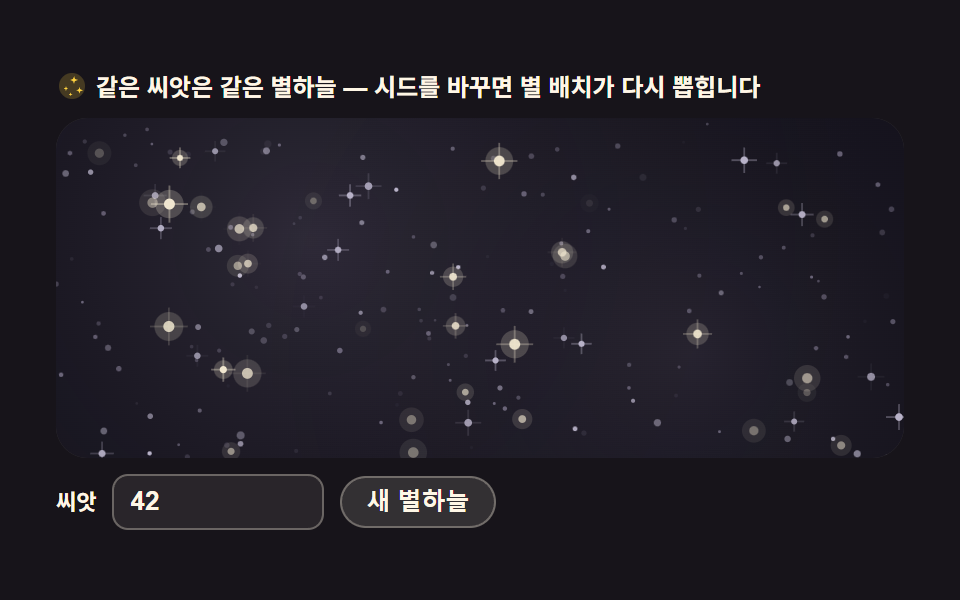 06 starfield-parallax-scene
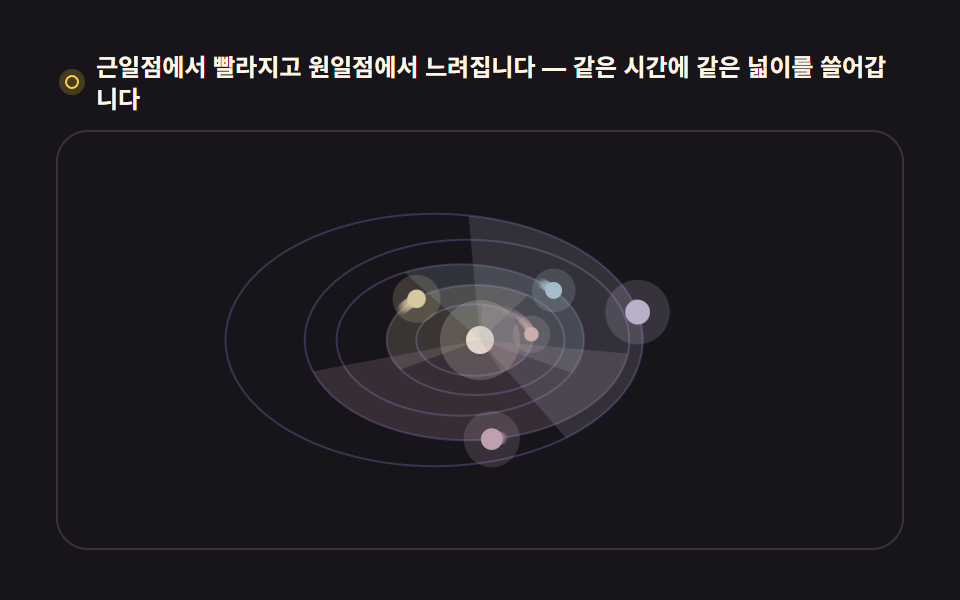 07 orrery-solar-system
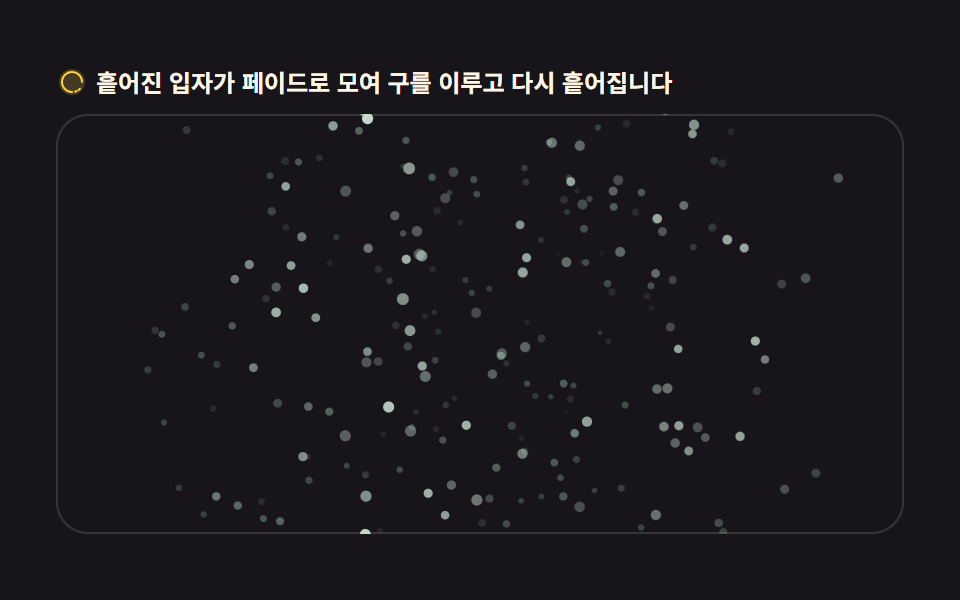 08 globe-particle-assembly
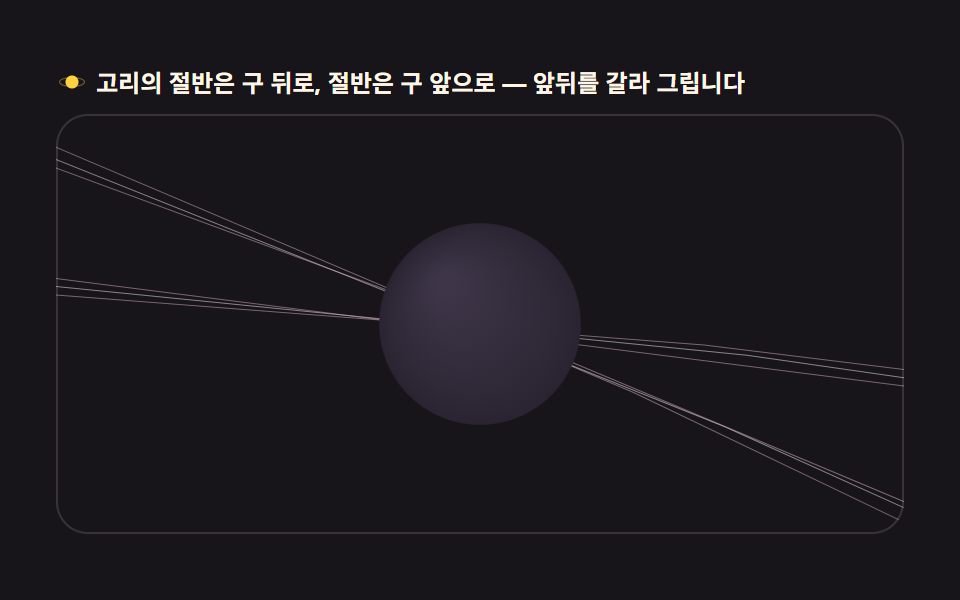 09 globe-saturn-ring-halo
Auto-plays · click a tile to jump to its section · all nine in one zip
- 01 Rotating globe drawn from latitude/longitude lines
- 02 Dot-matrix globe filled with points
- 03 Satellite orbits circling the globe
- 04 Flight-path arcs connecting cities
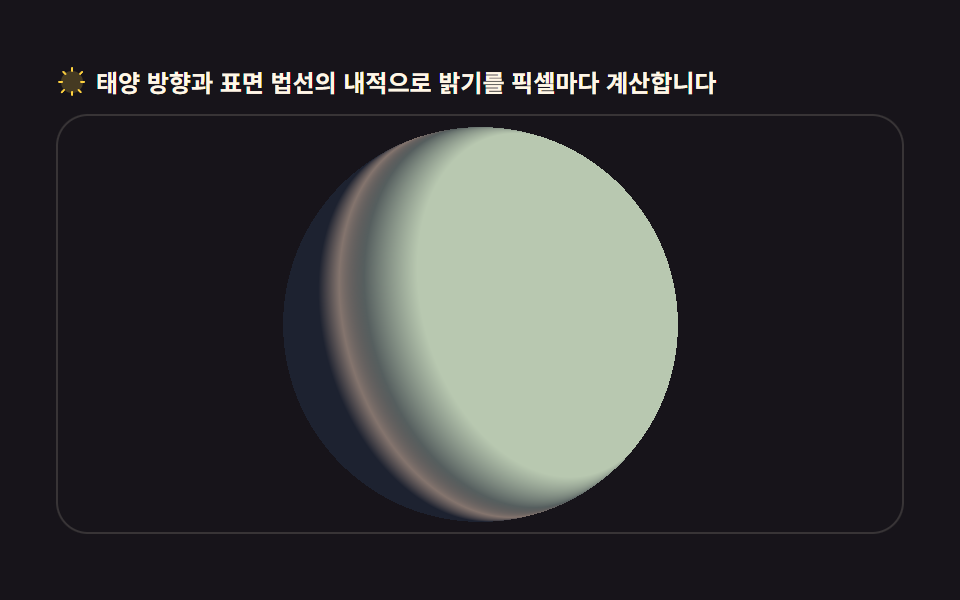
- 05 Globe split by a day/night terminator
- 06 Layered starfield background with parallax
- 07 Orrery model with several orbiting planets
- 08 Particles that scatter and assemble into a globe
- 09 Globe wrapped in a ring halo
The order is not a popularity contest; it follows how the sphere math stacks up. First, orthographic projection turns spherical coordinates into screen positions (01). Then dots, curves, and light are computed on top of that sphere (02–05). Then the scene grows past the globe into background and orbits (06, 07), and particles plus a ring close it as one composition (08, 09). The pixel-refraction canvas scene effects and the seeded CSS background patterns are this post's neighbors.
01Rotating globe drawn from latitude/longitude lines
A wire globe for the hero of a global service page, spinning on latitude and longitude lines.
<main class="stage">
<div class="gw" id="gw">
  <p class="gw__hint">
    <svg class="gw__ico" viewBox="0 0 256 256" aria-hidden="true"><g fill="currentColor"><path d="M128 24a104 104 0 1 0 104 104A104.12 104.12 0 0 0 128 24" opacity=".2"/><path d="M128 32a96 96 0 1 1-96 96a96.1 96.1 0 0 1 96-96m0-16a112 112 0 1 0 112 112A112.12 112.12 0 0 0 128 16"/><path d="M128 152a24 24 0 1 1 24-24a24 24 0 0 1-24 24m8-24a8 8 0 1 0-8 8a8 8 0 0 0 8-8" fill-rule="evenodd"/></g></svg>
    <span>Hover the board to tilt the axis; leave it and the axis settles back</span>
  </p>
  <div class="gw__field" id="field" role="application" aria-label="Wire globe test board" tabindex="0">
    <canvas class="gw__cv" id="cv"></canvas>
  </div>
</div>
</main>
@use "../../../../site/static/demo-tokens" as *;
// 위경도 선 회전 지구본 — 움직임은 전부 캔버스 rAF 루프 안(구면 좌표 → 정사도 투영 → 앞면 세그먼트만 연결).
// CSS 애니메이션이 0개여야 렌더러가 시계를 고정하지 않고 실시간 24장을 찍는다(077·012 선례).
// 색은 파스텔 기본 — 데모 scss 안 vivid 리터럴을 두지 않는다(BD26).
$duration: $dur-loop;
$easing: $ease-spring;
$color: $subject-sky; // 하늘색 파스텔 — 어두운 우주 무대 위 지구본 림
@include stage($stage-ink);
.gw {
// 구 바닥면 — 잉크보다 한 단계 밝은 저채도 우주 톤(채도 .10)
--gw-sphere: #232028;
--gw-deep: #2a272c;
// 위경도 선 — 크림 계열 파스텔. 채도 .10~.20
--gw-line: #d8d3c0;
--gw-dim: #55505e;
--gw-pole: #f0e6cf;
--gw-ring: #b8b2c8;
display: flex; flex-direction: column; gap: $sp-2;
width: 100%; max-width: 424px;
}
.gw__hint {
display: flex; align-items: center; gap: $sp-1; margin: 0;
font-weight: 700; font-size: clamp(10px, 2.8vw, 12px); line-height: 1.35;
color: $subject-cream;
}
.gw__ico { width: 16px; height: 16px; flex: 0 0 auto; color: $stage-yellow; }
.gw__field {
position: relative; height: 210px;
border-radius: $r-card; overflow: hidden;
background: $stage-ink;
box-shadow: inset 0 0 0 1px rgba($subject-cream, .14);
cursor: crosshair; touch-action: none;
}
.gw__field:focus-visible { outline: 2px solid $stage-yellow; outline-offset: 2px; }
.gw__cv { display: block; width: 100%; height: 100%; }
@media (max-width: 340px) {
.gw { gap: $sp-1; }
.gw__field { height: 110px; }
.gw__hint { font-size: 10px; }
}
// reduce — 루프가 아예 안 돌므로 끄고 말고 할 애니메이션이 없다.
// 멈춰 선 한 장이 그대로 남으므로 움직일 것 같은 커서 신호만 거둔다.
@media (prefers-reduced-motion: reduce) {
.gw__field { cursor: default !important; }
}html, body {
margin: 0;
overflow: hidden;
}
.stage {
box-sizing: border-box;
min-height: 100vh;
display: grid;
place-items: center;
margin: 0;
background: #17141a;
font-family: -apple-system, "Segoe UI", "Noto Sans KR", sans-serif;
padding: clamp(8px, 4vw, 24px);
}
.gw {
--gw-sphere: #232028;
--gw-deep: #2a272c;
--gw-line: #d8d3c0;
--gw-dim: #55505e;
--gw-pole: #f0e6cf;
--gw-ring: #b8b2c8;
display: flex;
flex-direction: column;
gap: 8px;
width: 100%;
max-width: 424px;
}
.gw__hint {
display: flex;
align-items: center;
gap: 4px;
margin: 0;
font-weight: 700;
font-size: clamp(10px, 2.8vw, 12px);
line-height: 1.35;
color: #fff7e6;
}
.gw__ico {
width: 16px;
height: 16px;
flex: 0 0 auto;
color: #ffd23f;
}
.gw__field {
position: relative;
height: 210px;
border-radius: 16px;
overflow: hidden;
background: #17141a;
box-shadow: inset 0 0 0 1px rgba(255, 247, 230, 0.14);
cursor: crosshair;
touch-action: none;
}
.gw__field:focus-visible {
outline: 2px solid #ffd23f;
outline-offset: 2px;
}
.gw__cv {
display: block;
width: 100%;
height: 100%;
}
@media (max-width: 340px) {
.gw {
gap: 4px;
}
.gw__field {
height: 110px;
}
.gw__hint {
font-size: 10px;
}
}
@media (prefers-reduced-motion: reduce) {
.gw__field {
cursor: default !important;
}
}// Latitude-longitude wire globe — 경위선 교차점을 구면 좌표(세타·파이)로 계산해 정사도(orthographic)로 눌러 그린다.
// 뒷면 감춤(backface culling)은 z<0 점을 선에서 잘라내는 게 아니라, 세그먼트를 쪼개 앞면 세그먼트만 잇는다.
// sin·cos 테이블은 프레임마다 같은 각도가 반복 계산되므로 미리 심어 둔다.
var field = document.getElementById('field');
var cv = document.getElementById('cv');
var ctx = cv.getContext('2d');
var TAU = Math.PI * 2;
var reduce = window.matchMedia('(prefers-reduced-motion: reduce)').matches;
var W = 0, H = 0, dpr = 1;
// 계층 — 적도·본초자오선 같은 큰 선은 굵게, 촘촘한 눈금은 가늘게
var LATS = []; // 위도선: { lat, segs }
(function () {
for (var lat = -60; lat <= 60; lat += 15) LATS.push(lat * Math.PI / 180);
})();
var LONS = []; // 경도선: { lon }
for (var lon = 0; lon < 180; lon += 15) LONS.push(lon * Math.PI / 180);
var SEG = 96; // 한 원을 쪼개는 세그먼트 수 — 5도 미만이면 곡선이 각진다
var rotY = 0; // 자전 각도(rad)
var tiltAim = -0.42; // 목표 축 기울기
var tilt = -0.42; // 현재 축 기울기 — 매 프레임 목표에 12%씩 다가간다
var last = 0, raf = 0;
function fit() {
var r = field.getBoundingClientRect();
dpr = window.devicePixelRatio || 1;
W = r.width; H = r.height;
cv.width = Math.round(W * dpr);
cv.height = Math.round(H * dpr);
ctx.setTransform(dpr, 0, 0, dpr, 0, 0);
}
// 구면 → 화면. 축 기울기(tilt)로 z축 회전을 먼저, 자전(rotY)을 y축 회전으로 그 다음에.
// cs·sn 은 그 세그먼트의 cos(세타), sin(세타) 다.
function project(sph, cs, sn) {
var lx = sph.x * cs + sph.z * sn; // y축 회전 (자전)
var lz = -sph.x * sn + sph.z * cs;
var ly = sph.y;
var ty = ly * Math.cos(tilt) - lz * Math.sin(tilt); // z축 회전 (기울기)
var tz = ly * Math.sin(tilt) + lz * Math.cos(tilt);
return { x: lx, y: ty, z: tz };
}
function draw() {
ctx.clearRect(0, 0, W, H);
var cx = W / 2, cy = H / 2;
var R = Math.min(W, H) * 0.40;
// 톤은 CSS 변수(scss 토큰)로 받는다 — 색이 어디서 오는지 한 곳에 둔다
var cs = getComputedStyle(document.getElementById('gw'));
var C_sphere = cs.getPropertyValue('--gw-sphere').trim();
var C_deep = cs.getPropertyValue('--gw-deep').trim();
var C_line = cs.getPropertyValue('--gw-line').trim();
var C_dim = cs.getPropertyValue('--gw-dim').trim();
var C_pole = cs.getPropertyValue('--gw-pole').trim();
var C_ring = cs.getPropertyValue('--gw-ring').trim();
// 구 바닥 — 뒷선이 비쳐 보이지 않게 먼저 불투명 원을 깐다
ctx.beginPath();
ctx.arc(cx, cy, R, 0, TAU);
ctx.fillStyle = C_sphere;
ctx.fill();
// 가장자리 림 — 원일구의 horizon. 안 깔면 선이 배경에 뜬다
ctx.beginPath();
ctx.arc(cx, cy, R, 0, TAU);
ctx.strokeStyle = C_ring;
ctx.lineWidth = 1.4;
ctx.stroke();
// 앞면만 그리는 폴리라인 — z<0 구간은 건너뛴다(backface culling)
function polyline(pts, style, width) {
ctx.strokeStyle = style;
ctx.lineWidth = width;
ctx.beginPath();
var pen = false;
for (var i = 0; i < pts.length; i++) {
var p = pts[i];
if (p.z >= 0) {
var x = cx + p.x * R, y = cy - p.y * R;
if (pen) ctx.lineTo(x, y); else { ctx.moveTo(x, y); pen = true; }
} else {
pen = false; // 뒤로 넘어가는 지점에서 펜을 든다
}
}
ctx.stroke();
}
var cyT = Math.cos(tilt), syT = Math.sin(tilt);
// 위도선 — 각 선을 SEG 조각으로 쪼개 앞면 조각만 잇는다
for (var li = 0; li < LATS.length; li++) {
var lat = LATS[li];
var cLat = Math.cos(lat), sLat = Math.sin(lat);
var pts = [];
for (var s = 0; s <= SEG; s++) {
var phi = (s / SEG) * TAU;
var sph = { x: cLat * Math.sin(phi), y: sLat, z: cLat * Math.cos(phi) };
pts.push(project(sph, Math.cos(rotY), Math.sin(rotY)));
}
var major = lat === 0;
polyline(pts, major ? C_line : C_dim, major ? 1.5 : 1);
}
// 경도선 — 반원(앞뒤 세그먼트가 섞인다)을 쪼개 같은 방식으로
for (var gi = 0; gi < LONS.length; gi++) {
var lon = LONS[gi] + rotY;
var pts2 = [];
for (var s2 = 0; s2 <= SEG; s2++) {
var th = (s2 / SEG) * Math.PI; // 0..PI 반원
var sph2 = { x: Math.sin(th) * Math.cos(lon), y: Math.cos(th), z: Math.sin(th) * Math.sin(lon) };
pts2.push(project(sph2, 1, 0));
}
var major2 = Math.abs(((LONS[gi] / Math.PI * 180) % 180)) < 0.01 && false;
polyline(pts2, C_dim, 1);
}
// 본초자오선 — lon=rotY 인 선이 항상 중앙 세로선이 되게 자전각을 더해 그린다
var ptsM = [];
for (var s3 = 0; s3 <= SEG; s3++) {
var th3 = (s3 / SEG) * Math.PI;
var lonM = Math.PI / 2; // 화면 중앙면
var sph3 = { x: Math.sin(th3) * Math.cos(lonM), y: Math.cos(th3), z: Math.sin(th3) * Math.sin(lonM) };
var p3 = project(sph3, Math.cos(0), Math.sin(0));
ptsM.push(p3);
}
polyline(ptsM, C_line, 1.5);
// 극점 — 축이 기울어진 만큼 북극이 보인다
var north = project({ x: 0, y: 1, z: 0 }, 1, 0);
var south = project({ x: 0, y: -1, z: 0 }, 1, 0);
ctx.fillStyle = C_pole;
if (north.z >= 0) { ctx.beginPath(); ctx.arc(cx + north.x * R, cy - north.y * R, 2.2, 0, TAU); ctx.fill(); }
if (south.z >= 0) { ctx.beginPath(); ctx.arc(cx + south.x * R, cy - south.y * R, 2.2, 0, TAU); ctx.fill(); }
}
function frame(now) {
var dt = last ? Math.min((now - last) / 1000, 0.05) : 0.016;
last = now;
rotY += dt * 0.5; // 12.5초에 한 바퀴 — 천천히
tilt += (tiltAim - tilt) * 0.12; // 목표 기울기로 부드럽게
draw();
raf = requestAnimationFrame(frame);
}
// 포인터가 판의 좌우 어디에 있느냐로 목표 기울기를 정한다 — 0.42rad(약 24도) 범위
field.addEventListener('pointermove', function (e) {
var r = field.getBoundingClientRect();
var t = (e.clientX - r.left) / r.width - 0.5;
tiltAim = -0.42 + t * 0.84;
});
field.addEventListener('pointerleave', function () { tiltAim = -0.42; });
window.addEventListener('resize', function () { fit(); draw(); });
fit();
if (reduce) {
// reduce — 루프 없이 기울어진 한 장만 그린다
draw();
} else {
raf = requestAnimationFrame(frame);
}// GlobeWireframe — vanilla 판(run/304/demo/01-globe-wireframe-rotate/index.html) 의 React 포트.
// 위도·경도 대원 와이어 지구본 — 정사도 투영 + y축 자전 + 뒷면(z<0) 선분은 펜을 들어 감춘다(backface culling).
// 움직임은 캔버스 rAF 루프가 전부 그리므로 @keyframes 미리보기가 없다 — props 는 CSS 변수로 무대 격식에만 내려간다.
import { useEffect, useRef } from "react";
import type { CSSProperties } from "react";
import styles from "./GlobeWireframe.module.scss";
export type GlobeWireframeProps = {
duration?: string;
easing?: string;
color?: string;
};
type Vars = CSSProperties & { "--duration"?: string; "--easing"?: string; "--color"?: string };
type Box<T> = { current: T };
type PointerEvt = { clientX: number };
const TAU = Math.PI * 2;
const SEG = 96;
const FIELD_LABEL = "위경도 지구본 실험판";
const LATS = [-60, -30, 0, 30, 60].map((d) => (d * Math.PI) / 180);
const LONS = [0, 30, 60, 90, 120, 150].map((d) => (d * Math.PI) / 180);
export default function GlobeWireframe({
duration = "2s",
easing = "cubic-bezier(.2, .8, .2, 1)",
color = "#6ec8ff",
}: GlobeWireframeProps) {
const fieldRef = useRef<HTMLDivElement | null>(null);
const cvRef = useRef<HTMLCanvasElement | null>(null);
const rootRef = useRef<HTMLDivElement | null>(null);
const ctxRef = useRef<CanvasRenderingContext2D | null>(null);
const sizeRef = useRef({ w: 0, h: 0 }) as Box<{ w: number; h: number }>;
const rotRef = useRef({ y: 0, tiltAim: -0.42, tilt: -0.42 }) as Box<{ y: number; tiltAim: number; tilt: number }>;
const lastRef = useRef(0) as Box<number>;
const rafRef = useRef(0) as Box<number>;
const vars: Vars = { "--duration": duration, "--easing": easing, "--color": color };
function reduced(): boolean {
return window.matchMedia("(prefers-reduced-motion: reduce)").matches;
}
function fit(): void {
const field = fieldRef.current;
const cv = cvRef.current;
const ctx = ctxRef.current;
if (!field || !cv || !ctx) return;
const r = field.getBoundingClientRect();
const dpr = window.devicePixelRatio || 1;
sizeRef.current.w = r.width;
sizeRef.current.h = r.height;
cv.width = Math.round(r.width * dpr);
cv.height = Math.round(r.height * dpr);
ctx.setTransform(dpr, 0, 0, dpr, 0, 0);
}
// 구면 → 화면. 축 기울기(tilt)로 z축 회전을 먼저, 자전(rotY)을 y축 회전으로 그 다음에.
function project(x: number, y: number, z: number, cs: number, sn: number): { x: number; y: number; z: number } {
const lx = x * cs + z * sn; // y축 회전 (자전)
const lz = -x * sn + z * cs;
const ty = y * Math.cos(rotRef.current.tilt) - lz * Math.sin(rotRef.current.tilt); // z축 회전 (기울기)
const tz = y * Math.sin(rotRef.current.tilt) + lz * Math.cos(rotRef.current.tilt);
return { x: lx, y: ty, z: tz };
}
function draw(): void {
const ctx = ctxRef.current;
const root = rootRef.current;
if (!ctx || !root) return;
const W = sizeRef.current.w, H = sizeRef.current.h;
ctx.clearRect(0, 0, W, H);
const cx = W / 2, cy = H / 2;
const R = Math.min(W, H) * 0.40;
const rotY = rotRef.current.y;
const cs2 = getComputedStyle(root);
const C_sphere = cs2.getPropertyValue("--gw-sphere").trim();
const C_line = cs2.getPropertyValue("--gw-line").trim();
const C_dim = cs2.getPropertyValue("--gw-dim").trim();
const C_pole = cs2.getPropertyValue("--gw-pole").trim();
const C_ring = cs2.getPropertyValue("--gw-ring").trim();
// 구 바닥 — 뒷선이 비쳐 보이지 않게 먼저 불투명 원을 깐다
ctx.beginPath();
ctx.arc(cx, cy, R, 0, TAU);
ctx.fillStyle = C_sphere;
ctx.fill();
// 가장자리 림 — 원일구의 horizon
ctx.beginPath();
ctx.arc(cx, cy, R, 0, TAU);
ctx.strokeStyle = C_ring;
ctx.lineWidth = 1.4;
ctx.stroke();
// 앞면만 그리는 폴리라인 — z<0 구간은 건너뛴다(backface culling)
const polyline = (pts: { x: number; y: number; z: number }[], style: string, width: number): void => {
ctx.strokeStyle = style;
ctx.lineWidth = width;
ctx.beginPath();
let pen = false;
for (let i = 0; i < pts.length; i++) {
const p = pts[i];
if (p.z >= 0) {
const x = cx + p.x * R, y = cy - p.y * R;
if (pen) ctx.lineTo(x, y); else { ctx.moveTo(x, y); pen = true; }
} else {
pen = false; // 뒤로 넘어가는 지점에서 펜을 든다
}
}
ctx.stroke();
};
const csRot = Math.cos(rotY), snRot = Math.sin(rotY);
// 위도선 — 각 선을 SEG 조각으로 쪼개 앞면 조각만 잇는다
for (let li = 0; li < LATS.length; li++) {
const lat = LATS[li];
const cLat = Math.cos(lat), sLat = Math.sin(lat);
const pts: { x: number; y: number; z: number }[] = [];
for (let s = 0; s <= SEG; s++) {
const phi = (s / SEG) * TAU;
pts.push(project(cLat * Math.sin(phi), sLat, cLat * Math.cos(phi), csRot, snRot));
}
const major = lat === 0;
polyline(pts, major ? C_line : C_dim, major ? 1.5 : 1);
}
// 경로선 — 반원(앞뒤 세그먼트가 섞인다)을 쪼개 같은 방식으로
for (let gi = 0; gi < LONS.length; gi++) {
const lon = LONS[gi] + rotY;
const pts2: { x: number; y: number; z: number }[] = [];
for (let s2 = 0; s2 <= SEG; s2++) {
const th = (s2 / SEG) * Math.PI; // 0..PI 반원
pts2.push(project(Math.sin(th) * Math.cos(lon), Math.cos(th), Math.sin(th) * Math.sin(lon), 1, 0));
}
polyline(pts2, C_dim, 1);
}
// 본초자오선 — lon=rotY 인 선이 항상 중앙 세로선이 되게 자전각을 더해 그린다
const ptsM: { x: number; y: number; z: number }[] = [];
for (let s3 = 0; s3 <= SEG; s3++) {
const th3 = (s3 / SEG) * Math.PI;
const lonM = Math.PI / 2; // 화면 중앙면
ptsM.push(project(Math.sin(th3) * Math.cos(lonM), Math.cos(th3), Math.sin(th3) * Math.sin(lonM), Math.cos(0), Math.sin(0)));
}
polyline(ptsM, C_line, 1.5);
// 극점 — 축이 기울어진 만큼 북극이 보인다
const north = project(0, 1, 0, 1, 0);
const south = project(0, -1, 0, 1, 0);
ctx.fillStyle = C_pole;
if (north.z >= 0) { ctx.beginPath(); ctx.arc(cx + north.x * R, cy - north.y * R, 2.2, 0, TAU); ctx.fill(); }
if (south.z >= 0) { ctx.beginPath(); ctx.arc(cx + south.x * R, cy - south.y * R, 2.2, 0, TAU); ctx.fill(); }
}
function frame(now: number): void {
const dt = lastRef.current ? Math.min((now - lastRef.current) / 1000, 0.05) : 0.016;
lastRef.current = now;
rotRef.current.y += dt * 0.5; // 12.5초에 한 바퀴 — 천천히
rotRef.current.tilt += (rotRef.current.tiltAim - rotRef.current.tilt) * 0.12; // 목표 기울기로 부드럽게
draw();
rafRef.current = requestAnimationFrame(frame);
}
// 포인터가 판의 좌우 어디에 있느냐로 목표 기울기를 정한다 — 0.42rad(약 24도) 범위
function onPointerMove(e: PointerEvt): void {
const field = fieldRef.current;
if (!field) return;
const r = field.getBoundingClientRect();
const t = (e.clientX - r.left) / r.width - 0.5;
rotRef.current.tiltAim = -0.42 + t * 0.84;
}
function onPointerLeave(): void {
rotRef.current.tiltAim = -0.42;
}
useEffect(() => {
const cv = cvRef.current;
if (!cv) return;
ctxRef.current = cv.getContext("2d");
if (!ctxRef.current) return;
fit();
const field = fieldRef.current;
if (field) {
field.addEventListener("pointermove", onPointerMove as unknown as EventListener);
field.addEventListener("pointerleave", onPointerLeave);
}
const onResize = (): void => { fit(); draw(); };
window.addEventListener("resize", onResize);
if (reduced()) {
// reduce — 루프 없이 기울어진 한 장만 그린다
draw();
} else {
lastRef.current = 0;
rafRef.current = requestAnimationFrame(frame);
}
return () => {
window.removeEventListener("resize", onResize);
cancelAnimationFrame(rafRef.current);
if (field) {
field.removeEventListener("pointermove", onPointerMove as unknown as EventListener);
field.removeEventListener("pointerleave", onPointerLeave);
}
};
}, []);
return (
<main className={styles.stage}>
<div className={styles.root} ref={rootRef} style={vars}>
<p className={styles.hint}>
<svg className={styles.ico} viewBox="0 0 256 256" aria-hidden="true"><g fill="currentColor"><path d="M128 24a104 104 0 1 0 104 104A104.12 104.12 0 0 0 128 24" opacity=".2"/><path d="M128 40a88 88 0 1 0 88 88a88.1 88.1 0 0 0-88-88m0 160a72 72 0 1 1 72-72a72.08 72.08 0 0 1-72 72" fillRule="evenodd"/></g></svg>
<span>마우스를 판 위에 놓으면 축이 기울고 판을 벗어나면 제자리로 돌아옵니다</span>
</p>
<div
className={styles.field}
ref={fieldRef}
role="application"
aria-label={FIELD_LABEL}
tabIndex={0}
>
<canvas className={styles.cv} ref={cvRef}></canvas>
</div>
</div>
</main>
);
}01 · Rotating globe drawn from latitude/longitude lines — Measured area 14.28% · moving frames 23/23Original by GODRICH · SCSS and React ship in the zip · See the password
Not drawing the back half is what makes it solid
  function polyline(pts, style, width) {
    ctx.strokeStyle = style;
    ctx.lineWidth = width;
    ctx.beginPath();
    var pen = false;
    for (var i = 0; i < pts.length; i++) {
      var p = pts[i];
      if (p.z >= 0) {
        var x = cx + p.x * R, y = cy - p.y * R;
        if (pen) ctx.lineTo(x, y); else { ctx.moveTo(x, y); pen = true; }
      } else {
        pen = false;   // lift the pen where the line crosses to the back
      }
    }
    ctx.stroke();
  }
Each point is rotated by axis tilt and spin angle, projected to the screen, and skipped whenever depth z goes negative. Hovering the board eases the axis toward a target tilt at 12% per frame (measured: 14.28% cumulative area, 23/23 frames moving).
02Dot-matrix globe filled with points
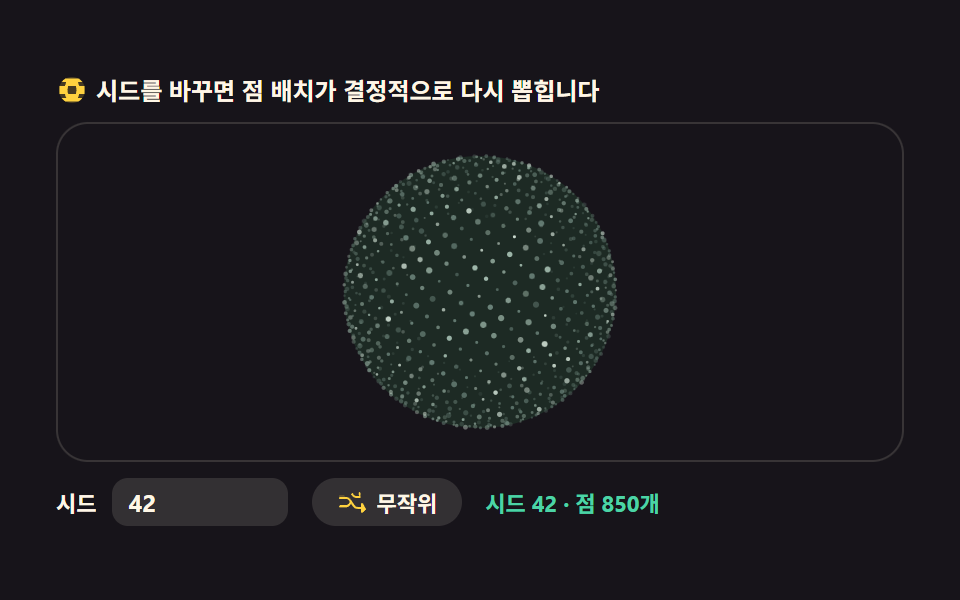
A globe of 850 dots for a "visitors worldwide" section.
<main class="stage">
<div class="gd" id="gd">
  <p class="gd__hint">
    <svg class="gd__ico" viewBox="0 0 256 256" aria-hidden="true"><g fill="currentColor"><path d="M128 24a104 104 0 1 0 104 104A104.12 104.12 0 0 0 128 24" opacity=".2"/><path d="M228 96h-42.81a126 126 0 0 0-10.51-32h36.24a103.87 103.87 0 0 0-30-28H75.08a103.87 103.87 0 0 0-30 28h36.24a126 126 0 0 0-10.51 32H28v64h42.3a126 126 0 0 0 10.51 32H44.92a103.87 103.87 0 0 0 30 28h105.84a103.87 103.87 0 0 0 30-28h-35.89a126 126 0 0 0 10.51-32H228Zm-68.75 64h-62.5a102.26 102.26 0 0 1 0-64h62.5a102.26 102.26 0 0 1 0 64"/></g></svg>
    <span>Change the seed and the dot layout is re-drawn deterministically</span>
  </p>
  <div class="gd__field" id="field" role="application" aria-label="Dot-matrix globe test board" tabindex="0">
    <canvas class="gd__cv" id="cv"></canvas>
  </div>
  <div class="gd__bar">
    <label class="gd__dial">Seed
      <input type="number" id="seed" min="1" max="9999" step="1" value="42" aria-label="Seed number">
    </label>
    <button class="gd__shuffle" id="shuffle" type="button">
      <svg class="gd__ico" viewBox="0 0 256 256" aria-hidden="true"><g fill="currentColor"><path d="M32 72h32l16 24-13 9-11-17H32a8 8 0 0 1 0-16" opacity=".2"/><path d="M237.66 178.34a8 8 0 0 1 0 11.32l-24 24A8 8 0 0 1 200 208V184h-29.41a40 40 0 0 1-33.94-18.75L102.71 115.5A24 24 0 0 0 82.75 104H32a8 8 0 0 1 0-16h50.75a40 40 0 0 1 33.94 18.75l33.94 49.75a24 24 0 0 0 19.96 11.5H200v-24a8 8 0 0 1 13.66-5.66ZM32 152h50.75a24 24 0 0 0 19.96-11.5l8.11-11.87 9.51 13.93-6.9 10.11a40 40 0 0 1-33.94 18.72H32a8 8 0 0 1 0-16m150.34-82.34a8 8 0 0 0 13.66 5.66V96h-34.46a40 40 0 0 1-33.94-18.75l-6.9-10.11 9.51-13.93 8.11 11.87A24 24 0 0 0 158.29 80H196V56a8 8 0 0 0-13.66-5.66" fill-rule="evenodd"/></g></svg>
      <span>Randomize</span>
    </button>
    <b class="gd__val" id="seedOut" aria-hidden="true">Seed <span class="gd__valNum" id="seedNum">42</span><span class="gd__valUnit"> · 850 dots</span></b>
  </div>
</div>
</main>
@use "../../../../site/static/demo-tokens" as *;
// 도트매트릭스 지구본 — 움직임은 전부 캔버스 rAF(Fibonacci sphere 분포 + depth sort + 시드 재생성).
// CSS 는 무대·판·시드 컨트롤만. 파스텔 팔레트 — vivid 리터럴 0(BD26).
$duration: $dur-loop;
$easing: $ease-spring;
$color: $subject-mint;
@include stage($stage-ink);
.gd {
// 점 3계열 — 전부 저채도 파스텔(채도 .12~.30)
--gd-hi: #d8e8dc; // 밝은 크림그린 — 강조점
--gd-mid: #9fb8ab; // 회록 파스텔 — 다수점
--gd-lo: #6a8279; // 어두운 회록 — 뒤쪽 점
--gd-core: #1d2a24; // 코어 — 잉크보다 한 단계 밝은 저채표 톤
display: flex; flex-direction: column; gap: $sp-2;
width: 100%; max-width: 424px;
}
.gd__hint {
display: flex; align-items: center; gap: $sp-1; margin: 0;
font-weight: 700; font-size: clamp(10px, 2.8vw, 12px); line-height: 1.35;
color: $subject-cream;
}
.gd__ico { width: 16px; height: 16px; flex: 0 0 auto; color: $stage-yellow; }
.gd__field {
position: relative; height: 170px; // 시드 막대가 있어 300px 무대 안에 다 들어오게
border-radius: $r-card; overflow: hidden;
background: $stage-ink;
box-shadow: inset 0 0 0 1px rgba($subject-cream, .14);
}
.gd__field:focus-visible { outline: 2px solid $stage-yellow; outline-offset: 2px; }
.gd__cv { display: block; width: 100%; height: 100%; }
.gd__bar { display: flex; align-items: center; gap: $sp-3; flex-wrap: wrap; }
.gd__dial {
display: flex; align-items: center; gap: $sp-2;
font-weight: 700; font-size: 11px; color: $subject-cream;
}
.gd__dial input {
width: 72px; margin: 0;
padding: $sp-1 $sp-2; border: 0; border-radius: $r-sm;
background: rgba($subject-cream, .12); color: $subject-cream;
font-weight: 700; font-size: 12px; font-family: inherit;
}
.gd__dial input:focus-visible { outline: 2px solid $stage-yellow; outline-offset: 2px; }
.gd__shuffle {
display: flex; align-items: center; gap: $sp-1;
padding: $sp-1 $sp-3; border: 0; border-radius: $r-pill;
background: rgba($subject-cream, .12); color: $subject-cream;
font-weight: 700; font-size: 11px; font-family: inherit; cursor: pointer;
}
.gd__shuffle:hover { background: rgba($subject-cream, .2); }
.gd__shuffle:focus-visible { outline: 2px solid $stage-yellow; outline-offset: 2px; }
.gd__val { color: $subject-mint; font-size: 11px; font-weight: 700; }
@media (max-width: 340px) {
.gd { gap: $sp-1; }
.gd__field { height: 96px; }
.gd__hint { font-size: 10px; }
.gd__bar { gap: $sp-2; }
.gd__dial input { width: 56px; }
}
// reduce — 루프가 안 돈다. 시드 입력은 여전히 결정적으로 한 장을 다시 그린다.
@media (prefers-reduced-motion: reduce) {
.gd__field { cursor: default !important; }
}html, body {
margin: 0;
overflow: hidden;
}
.stage {
box-sizing: border-box;
min-height: 100vh;
display: grid;
place-items: center;
margin: 0;
background: #17141a;
font-family: -apple-system, "Segoe UI", "Noto Sans KR", sans-serif;
padding: clamp(8px, 4vw, 24px);
}
.gd {
--gd-hi: #d8e8dc;
--gd-mid: #9fb8ab;
--gd-lo: #6a8279;
--gd-core: #1d2a24;
display: flex;
flex-direction: column;
gap: 8px;
width: 100%;
max-width: 424px;
}
.gd__hint {
display: flex;
align-items: center;
gap: 4px;
margin: 0;
font-weight: 700;
font-size: clamp(10px, 2.8vw, 12px);
line-height: 1.35;
color: #fff7e6;
}
.gd__ico {
width: 16px;
height: 16px;
flex: 0 0 auto;
color: #ffd23f;
}
.gd__field {
position: relative;
height: 170px;
border-radius: 16px;
overflow: hidden;
background: #17141a;
box-shadow: inset 0 0 0 1px rgba(255, 247, 230, 0.14);
}
.gd__field:focus-visible {
outline: 2px solid #ffd23f;
outline-offset: 2px;
}
.gd__cv {
display: block;
width: 100%;
height: 100%;
}
.gd__bar {
display: flex;
align-items: center;
gap: 12px;
flex-wrap: wrap;
}
.gd__dial {
display: flex;
align-items: center;
gap: 8px;
font-weight: 700;
font-size: 11px;
color: #fff7e6;
}
.gd__dial input {
width: 72px;
margin: 0;
padding: 4px 8px;
border: 0;
border-radius: 8px;
background: rgba(255, 247, 230, 0.12);
color: #fff7e6;
font-weight: 700;
font-size: 12px;
font-family: inherit;
}
.gd__dial input:focus-visible {
outline: 2px solid #ffd23f;
outline-offset: 2px;
}
.gd__shuffle {
display: flex;
align-items: center;
gap: 4px;
padding: 4px 12px;
border: 0;
border-radius: 999px;
background: rgba(255, 247, 230, 0.12);
color: #fff7e6;
font-weight: 700;
font-size: 11px;
font-family: inherit;
cursor: pointer;
}
.gd__shuffle:hover {
background: rgba(255, 247, 230, 0.2);
}
.gd__shuffle:focus-visible {
outline: 2px solid #ffd23f;
outline-offset: 2px;
}
.gd__val {
color: #4cd4a6;
font-size: 11px;
font-weight: 700;
}
@media (max-width: 340px) {
.gd {
gap: 4px;
}
.gd__field {
height: 96px;
}
.gd__hint {
font-size: 10px;
}
.gd__bar {
gap: 8px;
}
.gd__dial input {
width: 56px;
}
}
@media (prefers-reduced-motion: reduce) {
.gd__field {
cursor: default !important;
}
}// Dot-matrix globe — Fibonacci sphere 로 구 표면에 점을 고르게 뿌린다.
// Fibonacci sphere: i 번째 점의 위도는 acos(1 - 2(i+0.5)/N), 경도는 황금각(golden angle) 만큼씩 돈다.
// 같은 Seed = 같은 그림. 시드는 난수 계열(mulberry32)을 고르고, 그 계열이 점의 반경·밝기·톤을 뽑는다.
var root = document.getElementById('gd');
var field = document.getElementById('field');
var cv = document.getElementById('cv');
var ctx = cv.getContext('2d');
var seedIn = document.getElementById('seed');
var shuffleBtn = document.getElementById('shuffle');
var seedOut = document.getElementById('seedNum');
var TAU = Math.PI * 2;
var GOLDEN = Math.PI * (3 - Math.sqrt(5)); // 황금각 약 2.39996rad
var reduce = window.matchMedia('(prefers-reduced-motion: reduce)').matches;
var W = 0, H = 0, dpr = 1;
// 결정적 난수 — mulberry32. 같은 시드면 같은 수열을 돌려준다
function mulberry32(a) {
return function () {
a |= 0; a = (a + 0x6D2B79F5) | 0;
var t = Math.imul(a ^ (a >>> 15), 1 | a);
t = (t + Math.imul(t ^ (t >>> 7), 61 | t)) ^ t;
return ((t ^ (t >>> 14)) >>> 0) / 4294967296;
};
}
var N = 850; // 점 개수
var dots = []; // { x,y,z(단위구), r(반경 배율), tone(0..1), jitter(위상) }
var seedVal = 42;
var rotY = 0;
var last = 0, raf = 0;
function buildDots() {
var rnd = mulberry32(seedVal);
dots = [];
for (var i = 0; i < N; i++) {
// Fibonacci sphere — 균등 분포. 황금각 회전이 나선 잎차례를 만든다
var y = 1 - 2 * (i + 0.5) / N;
var rLat = Math.sqrt(1 - y * y);
var phi = i * GOLDEN;
var jitterR = rnd();
dots.push({
x: Math.cos(phi) * rLat,
y: y,
z: Math.sin(phi) * rLat,
r: 0.6 + jitterR * 0.9, // 반경 다양성도 시드가 정한다
tone: rnd(),
jt: rnd() * TAU // 반짝임 위상
});
}
seedOut.textContent = String(seedVal);
}
function fit() {
var r = field.getBoundingClientRect();
dpr = window.devicePixelRatio || 1;
W = r.width; H = r.height;
cv.width = Math.round(W * dpr);
cv.height = Math.round(H * dpr);
ctx.setTransform(dpr, 0, 0, dpr, 0, 0);
}
function draw(now) {
ctx.clearRect(0, 0, W, H);
var cx = W / 2, cy = H / 2;
var R = Math.min(W, H) * 0.40;
var cs = getComputedStyle(root);
var C_hi = cs.getPropertyValue('--gd-hi').trim();
var C_mid = cs.getPropertyValue('--gd-mid').trim();
var C_lo = cs.getPropertyValue('--gd-lo').trim();
var C_core = cs.getPropertyValue('--gd-core').trim();
// 바닥 코어 — 점 구름의 중심을 은은히 밝힌다(구체가 아니라 점의 집단임을 읽게)
ctx.beginPath();
ctx.arc(cx, cy, R, 0, TAU);
ctx.fillStyle = C_core;
ctx.fill();
var cyr = Math.cos(rotY), syr = Math.sin(rotY);
var t = now * 0.001;
// depth sort — 먼 점(z<0, 뒤)부터 그려야 앞 점이 위에 얹힌다
var order = [];
for (var i = 0; i < N; i++) {
var d = dots[i];
var lx = d.x * cyr + d.z * syr;
var lz = -d.x * syr + d.z * cyr;
order.push({ p: d, lx: lx, lz: lz });
}
order.sort(function (a, b) { return a.lz - b.lz; });
for (var k = 0; k < N; k++) {
var o = order[k];
var depth = (o.lz + 1) / 2; // 0(뒤)..1(앞)
if (depth < 0.08) continue; // 맨 뒤는 림 바깥 실루엣만 남긴다
var px = cx + o.lx * R;
var py = cy - o.p.y * R;
// 원근 없는 정사도라 깊이는 크기가 아니라 밝기·알파로만 녹인다
var alpha = 0.16 + depth * 0.84;
var tw = 0.75 + 0.25 * Math.sin(t * 2 + o.p.jt); // 반짝임 — 시간에 따라 살아 있는다
ctx.globalAlpha = alpha * tw;
ctx.fillStyle = o.p.tone > 0.82 ? C_hi : (o.p.tone > 0.45 ? C_mid : C_lo);
ctx.beginPath();
ctx.arc(px, py, o.p.r * (0.55 + depth * 0.5), 0, TAU);
ctx.fill();
}
ctx.globalAlpha = 1;
}
function frame(now) {
var dt = last ? Math.min((now - last) / 1000, 0.05) : 0.016;
last = now;
rotY += dt * 0.35;
draw(now);
raf = requestAnimationFrame(frame);
}
function applySeed(v) {
seedVal = Math.max(1, Math.min(9999, Math.floor(v) || 1));
seedIn.value = String(seedVal);
buildDots();
if (reduce) draw(0);
}
seedIn.addEventListener('input', function () { applySeed(Number(seedIn.value)); });
shuffleBtn.addEventListener('click', function () {
applySeed(1 + Math.floor(Math.random() * 9999));
});
field.addEventListener('keydown', function (e) {
if (e.key === 'Enter' || e.key === ' ') {
e.preventDefault();
applySeed(1 + Math.floor(Math.random() * 9999));
}
});
window.addEventListener('resize', function () { fit(); draw(0); });
fit();
buildDots();
if (reduce) {
draw(0); // reduce — 루프 없이 시드의 한 장만
} else {
raf = requestAnimationFrame(frame);
}// GlobeDotMatrix — vanilla 판(run/304/demo/02-globe-dot-matrix/index.html) 의 React 포트.
// Fibonacci sphere 로 구 표면에 점을 고르게 뿌린 도트 지구본. 같은 시드 = 같은 그림(mulberry32).
// 움직임은 캔버스 rAF 루프가 전부 그리므로 @keyframes 미리보기가 없다 — props 는 CSS 변수로 무대 격식에만 내려간다.
import { useEffect, useRef, useState } from "react";
import type { CSSProperties } from "react";
import styles from "./GlobeDotMatrix.module.scss";
export type GlobeDotMatrixProps = {
duration?: string;
easing?: string;
color?: string;
};
type Vars = CSSProperties & { "--duration"?: string; "--easing"?: string; "--color"?: string };
type Box<T> = { current: T };
type KeyEvt = { key: string; preventDefault(): void };
type InputEvt = { target: { value: string } };
type Dot = { x: number; y: number; z: number; r: number; tone: number; jt: number };
const TAU = Math.PI * 2;
const GOLDEN = Math.PI * (3 - Math.sqrt(5)); // 황금각 약 2.39996rad
const N = 850; // 점 개수
const FIELD_LABEL = "도트매트릭스 지구본 실험판";
// 결정적 난수 — mulberry32. 같은 시드면 같은 수열을 돌려준다
function mulberry32(a: number): () => number {
return function () {
a |= 0; a = (a + 0x6D2B79F5) | 0;
const t = Math.imul(a ^ (a >>> 15), 1 | a);
const u = (t + Math.imul(t ^ (t >>> 7), 61 | t)) ^ t;
return ((u ^ (u >>> 14)) >>> 0) / 4294967296;
};
}
export default function GlobeDotMatrix({
duration = "2s",
easing = "cubic-bezier(.2, .8, .2, 1)",
color = "#4cd4a6",
}: GlobeDotMatrixProps) {
const fieldRef = useRef<HTMLDivElement | null>(null);
const cvRef = useRef<HTMLCanvasElement | null>(null);
const rootRef = useRef<HTMLDivElement | null>(null);
const seedRef = useRef<HTMLInputElement | null>(null);
const ctxRef = useRef<CanvasRenderingContext2D | null>(null);
const sizeRef = useRef({ w: 0, h: 0 }) as Box<{ w: number; h: number }>;
const dotsRef = useRef<Dot[]>([]) as Box<Dot[]>;
const seedValRef = useRef(42) as Box<number>;
const rotRef = useRef(0) as Box<number>;
const lastRef = useRef(0) as Box<number>;
const rafRef = useRef(0) as Box<number>;
const [seedNum, setSeedNum] = useState(42);
const vars: Vars = { "--duration": duration, "--easing": easing, "--color": color };
function reduced(): boolean {
return window.matchMedia("(prefers-reduced-motion: reduce)").matches;
}
function buildDots(): void {
const rnd = mulberry32(seedValRef.current);
const dots = dotsRef.current;
dots.length = 0;
for (let i = 0; i < N; i++) {
// Fibonacci sphere — 균등 분포. 황금각 회전이 나선 잎차례를 만든다
const y = 1 - 2 * (i + 0.5) / N;
const rLat = Math.sqrt(1 - y * y);
const phi = i * GOLDEN;
const jitterR = rnd();
dots.push({
x: Math.cos(phi) * rLat,
y: y,
z: Math.sin(phi) * rLat,
r: 0.6 + jitterR * 0.9, // 반경 다양성도 시드가 정한다
tone: rnd(),
jt: rnd() * TAU // 반짝임 위상
});
}
setSeedNum(seedValRef.current);
}
function fit(): void {
const field = fieldRef.current;
const cv = cvRef.current;
const ctx = ctxRef.current;
if (!field || !cv || !ctx) return;
const r = field.getBoundingClientRect();
const dpr = window.devicePixelRatio || 1;
sizeRef.current.w = r.width;
sizeRef.current.h = r.height;
cv.width = Math.round(r.width * dpr);
cv.height = Math.round(r.height * dpr);
ctx.setTransform(dpr, 0, 0, dpr, 0, 0);
}
function draw(now: number): void {
const ctx = ctxRef.current;
const root = rootRef.current;
if (!ctx || !root) return;
const W = sizeRef.current.w, H = sizeRef.current.h;
ctx.clearRect(0, 0, W, H);
const cx = W / 2, cy = H / 2;
const R = Math.min(W, H) * 0.40;
const cs = getComputedStyle(root);
const C_hi = cs.getPropertyValue("--gd-hi").trim();
const C_mid = cs.getPropertyValue("--gd-mid").trim();
const C_lo = cs.getPropertyValue("--gd-lo").trim();
const C_core = cs.getPropertyValue("--gd-core").trim();
// 바닥 코어 — 점 구름의 중심을 은은히 밝힌다(구체가 아니라 점의 집단임을 읽게)
ctx.beginPath();
ctx.arc(cx, cy, R, 0, TAU);
ctx.fillStyle = C_core;
ctx.fill();
const rotY = rotRef.current;
const cyr = Math.cos(rotY), syr = Math.sin(rotY);
const t = now * 0.001;
// depth sort — 먼 점(z<0, 뒤)부터 그려야 앞 점이 위에 얹힌다
const order: { p: Dot; lx: number; lz: number }[] = [];
const dots = dotsRef.current;
for (let i = 0; i < dots.length; i++) {
const d = dots[i];
const lx = d.x * cyr + d.z * syr;
const lz = -d.x * syr + d.z * cyr;
order.push({ p: d, lx, lz });
}
order.sort((a, b) => a.lz - b.lz);
for (let k = 0; k < order.length; k++) {
const o = order[k];
const depth = (o.lz + 1) / 2; // 0(뒤)..1(앞)
if (depth < 0.08) continue; // 맨 뒤는 림 바깥 실루엣만 남긴다
const px = cx + o.lx * R;
const py = cy - o.p.y * R;
const alpha = 0.16 + depth * 0.84;
const tw = 0.75 + 0.25 * Math.sin(t * 2 + o.p.jt); // 반짝임
ctx.globalAlpha = alpha * tw;
ctx.fillStyle = o.p.tone > 0.82 ? C_hi : (o.p.tone > 0.45 ? C_mid : C_lo);
ctx.beginPath();
ctx.arc(px, py, o.p.r * (0.55 + depth * 0.5), 0, TAU);
ctx.fill();
}
ctx.globalAlpha = 1;
}
function frame(now: number): void {
const dt = lastRef.current ? Math.min((now - lastRef.current) / 1000, 0.05) : 0.016;
lastRef.current = now;
rotRef.current += dt * 0.35;
draw(now);
rafRef.current = requestAnimationFrame(frame);
}
function applySeed(v: number): void {
seedValRef.current = Math.max(1, Math.min(9999, Math.floor(v) || 1));
if (seedRef.current) seedRef.current.value = String(seedValRef.current);
buildDots();
if (reduced()) draw(0);
}
function onSeedInput(event: InputEvt): void {
applySeed(Number(event.target.value));
}
function onShuffle(): void {
applySeed(1 + Math.floor(Math.random() * 9999));
}
function onFieldKey(event: KeyEvt): void {
if (event.key === "Enter" || event.key === " ") {
event.preventDefault();
onShuffle();
}
}
useEffect(() => {
const cv = cvRef.current;
if (!cv) return;
ctxRef.current = cv.getContext("2d");
if (!ctxRef.current) return;
fit();
buildDots();
const onResize = (): void => { fit(); draw(0); };
window.addEventListener("resize", onResize);
if (reduced()) {
draw(0); // reduce — 루프 없이 시드의 한 장만
} else {
lastRef.current = 0;
rafRef.current = requestAnimationFrame(frame);
}
return () => {
window.removeEventListener("resize", onResize);
cancelAnimationFrame(rafRef.current);
};
}, []);
return (
<main className={styles.stage}>
<div className={styles.root} ref={rootRef} style={vars}>
<p className={styles.hint}>
<svg className={styles.ico} viewBox="0 0 256 256" aria-hidden="true"><g fill="currentColor"><path d="M128 24a104 104 0 1 0 104 104A104.12 104.12 0 0 0 128 24" opacity=".2"/><path d="M228 96h-42.81a126 126 0 0 0-10.51-32h36.24a103.87 103.87 0 0 0-30-28H75.08a103.87 103.87 0 0 0-30 28h36.24a126 126 0 0 0-10.51 32H28v64h42.3a126 126 0 0 0 10.51 32H44.92a103.87 103.87 0 0 0 30 28h105.84a103.87 103.87 0 0 0 30-28h-35.89a126 126 0 0 0 10.51-32H228Zm-68.75 64h-62.5a102.26 102.26 0 0 1 0-64h62.5a102.26 102.26 0 0 1 0 64"/></g></svg>
<span>시드를 바꾸면 점 배치가 결정적으로 다시 뽑힙니다</span>
</p>
<div
className={styles.field}
ref={fieldRef}
role="application"
aria-label={FIELD_LABEL}
tabIndex={0}
onKeyDown={onFieldKey}
>
<canvas className={styles.cv} ref={cvRef}></canvas>
</div>
<div className={styles.bar}>
<label className={styles.dial}>시드
<input type="number" ref={seedRef} min={1} max={9999} step={1} defaultValue={42} aria-label="시드 번호" onChange={onSeedInput} />
</label>
<button className={styles.shuffle} type="button" onClick={onShuffle}>
<svg className={styles.ico} viewBox="0 0 256 256" aria-hidden="true"><g fill="currentColor"><path d="M32 72h32l16 24-13 9-11-17H32a8 8 0 0 1 0-16" opacity=".2"/><path d="M237.66 178.34a8 8 0 0 1 0 11.32l-24 24A8 8 0 0 1 200 208V184h-29.41a40 40 0 0 1-33.94-18.75L102.71 115.5A24 24 0 0 0 82.75 104H32a8 8 0 0 1 0-16h50.75a40 40 0 0 1 33.94 18.75l33.94 49.75a24 24 0 0 0 19.96 11.5H200v-24a8 8 0 0 1 13.66-5.66ZM32 152h50.75a24 24 0 0 0 19.96-11.5l8.11-11.87 9.51 13.93-6.9 10.11a40 40 0 0 1-33.94 18.72H32a8 8 0 0 1 0-16m150.34-82.34a8 8 0 0 0 13.66 5.66V96h-34.46a40 40 0 0 1-33.94-18.75l-6.9-10.11 9.51-13.93 8.11 11.87A24 24 0 0 0 158.29 80H196V56a8 8 0 0 0-13.66-5.66" fillRule="evenodd"/></g></svg>
<span>무작위</span>
</button>
<b className={styles.val} aria-hidden="true">시드 <span className={styles.valNum}>{seedNum}</span><span className={styles.valUnit}> · 점 850개</span></b>
</div>
</div>
</main>
);
}02 · Dot-matrix globe filled with points — Measured area 10.422% · moving frames 23/23Original by GODRICH · SCSS and React ship in the zip · See the password
The same seed draws the same globe
// deterministic PRNG — mulberry32. Same seed, same stream
function mulberry32(a) {
  return function () {
    a |= 0; a = (a + 0x6D2B79F5) | 0;
    var t = Math.imul(a ^ (a >>> 15), 1 | a);
    t = (t + Math.imul(t ^ (t >>> 7), 61 | t)) ^ t;
    return ((t ^ (t >>> 14)) >>> 0) / 429497296;
  };
}
The 850 dots sit on a Fibonacci sphere so the poles never clump, and each dot's radius, brightness, and twinkle phase come from the seeded stream. Type a number into the seed input and the layout is redrawn deterministically — the same number returns the exact same picture (measured: seed 42 → 7 regenerates every dot position).
03Satellite orbits circling the globe
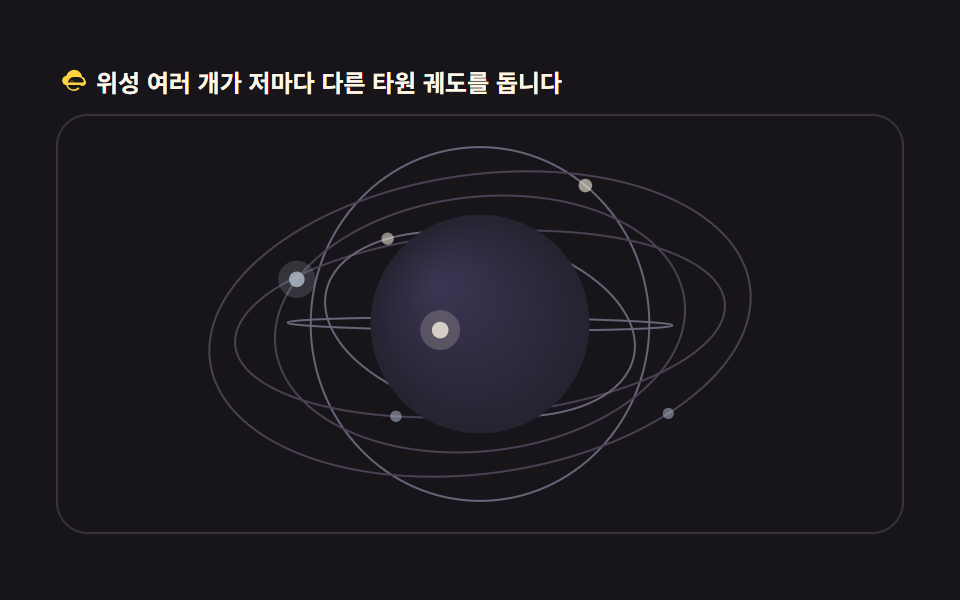
Satellites on elliptical orbits for a space or telecom service page.
<main class="stage">
<div class="gs" id="gs">
  <p class="gs__hint">
    <svg class="gs__ico" viewBox="0 0 256 256" aria-hidden="true"><g fill="currentColor"><path d="M144 128a16 16 0 1 1-16-16a16 16 0 0 1 16 16" opacity=".2"/><path d="M232 112a24 24 0 0 0-22.84-23.9A64 64 0 0 0 84 76.53A40 40 0 0 0 72 152h8.91a64 64 0 0 0 106 30.16l-9.46-13.27A48 48 0 0 1 93.54 152H192a24 24 0 0 0 40-40m-56-24a48 48 0 0 1 46.31 35.44A8 8 0 0 1 214.58 132H96a48 48 0 0 1 48-44h16Zm36 32h-1.28l1.1 3.53c.05-.5.18-1 .18-1.53Z" fill-rule="evenodd"/></g></svg>
    <span>Several satellites travel their own elliptical orbits</span>
  </p>
  <div class="gs__field" id="field" role="application" aria-label="Satellite orbit test board" tabindex="0" data-sort="z-sort">
    <canvas class="gs__cv" id="cv"></canvas>
  </div>
</div>
</main>
@use "../../../../site/static/demo-tokens" as *;
// 위성 궤도 지구본 — 캔버스 rAF(타원 궤도 + 화가 알고리즘 z-정렬). CSS 는 무대·판만.
// 파스텔 팔레트 — 궤도선·위성 강조색도 저채도로(BD26).
$duration: $dur-loop;
$easing: $ease-spring;
$color: $subject-sky;
@include stage($stage-ink);
.gs {
--gs-sphere: #262230; // 지구본 바닥 — 저채도 회보라
--gs-deep: #3a3450; // 편구 하이라이트 — 파스텔 라일락 톤 낮게
--gs-orbit: #474152; // 느린 궤도선 — 어두운 회
--gs-orbit-hi: #6a6478; // 빠른 궤도선 — 한 단계 밝은 회
--gs-sat: #b8c4d4; // 위성 — 회청 파스텔
--gs-sat-hi: #ebe6d6; // 빠른 위성 — 크림 골드 파스텔
display: flex; flex-direction: column; gap: $sp-2;
width: 100%; max-width: 424px;
}
.gs__hint {
display: flex; align-items: center; gap: $sp-1; margin: 0;
font-weight: 700; font-size: clamp(10px, 2.8vw, 12px); line-height: 1.35;
color: $subject-cream;
}
.gs__ico { width: 16px; height: 16px; flex: 0 0 auto; color: $stage-yellow; }
.gs__field {
position: relative; height: 210px;
border-radius: $r-card; overflow: hidden;
background: $stage-ink;
box-shadow: inset 0 0 0 1px rgba($subject-cream, .14);
}
.gs__field:focus-visible { outline: 2px solid $stage-yellow; outline-offset: 2px; }
.gs__cv { display: block; width: 100%; height: 100%; }
@media (max-width: 340px) {
.gs { gap: $sp-1; }
.gs__field { height: 110px; }
.gs__hint { font-size: 10px; }
}
// reduce — 루프가 안 돈다. 멈춘 한 장에 궤도와 위성이 다 보인다.
@media (prefers-reduced-motion: reduce) {
.gs__field { cursor: default !important; }
}html, body {
margin: 0;
overflow: hidden;
}
.stage {
box-sizing: border-box;
min-height: 100vh;
display: grid;
place-items: center;
margin: 0;
background: #17141a;
font-family: -apple-system, "Segoe UI", "Noto Sans KR", sans-serif;
padding: clamp(8px, 4vw, 24px);
}
.gs {
--gs-sphere: #262230;
--gs-deep: #3a3450;
--gs-orbit: #474152;
--gs-orbit-hi: #6a6478;
--gs-sat: #b8c4d4;
--gs-sat-hi: #ebe6d6;
display: flex;
flex-direction: column;
gap: 8px;
width: 100%;
max-width: 424px;
}
.gs__hint {
display: flex;
align-items: center;
gap: 4px;
margin: 0;
font-weight: 700;
font-size: clamp(10px, 2.8vw, 12px);
line-height: 1.35;
color: #fff7e6;
}
.gs__ico {
width: 16px;
height: 16px;
flex: 0 0 auto;
color: #ffd23f;
}
.gs__field {
position: relative;
height: 210px;
border-radius: 16px;
overflow: hidden;
background: #17141a;
box-shadow: inset 0 0 0 1px rgba(255, 247, 230, 0.14);
}
.gs__field:focus-visible {
outline: 2px solid #ffd23f;
outline-offset: 2px;
}
.gs__cv {
display: block;
width: 100%;
height: 100%;
}
@media (max-width: 340px) {
.gs {
gap: 4px;
}
.gs__field {
height: 110px;
}
.gs__hint {
font-size: 10px;
}
}
@media (prefers-reduced-motion: reduce) {
.gs__field {
cursor: default !important;
}
}// Satellite-orbit globe — 각 위성은 3D 타원 궤도 위를 등각 속도로 돈다.
// 화가 알고리즘(painter's algorithm): 지구본(원)과 위성을 z 깊이(z-sort)로 한 번에 정렬해 뒤→앞 순서로 그린다.
// 지구본 뒤(z<0)의 위성은 지구본 원이 나중에 덮으니 자연히 가려진다.
var root = document.getElementById('gs');
var field = document.getElementById('field');
var cv = document.getElementById('cv');
var ctx = cv.getContext('2d');
var TAU = Math.PI * 2;
var reduce = window.matchMedia('(prefers-reduced-motion: reduce)').matches;
var W = 0, H = 0, dpr = 1;
// 위성 궤도 — a(장반경 배율) b(단반경 배율) inc(궤도 기울기 rad) phase(시작 위상) speed(각속도)
var SATS = [
{ a: 1.62, b: 1.62, inc: 0.00, phase: 0.0, speed: 0.55 },
{ a: 1.95, b: 1.38, inc: 0.55, phase: 2.1, speed: 0.42 },
{ a: 2.30, b: 1.72, inc: 1.05, phase: 4.0, speed: 0.34 },
{ a: 1.80, b: 1.24, inc: 1.62, phase: 1.2, speed: 0.48 },
{ a: 2.55, b: 2.05, inc: 0.82, phase: 5.2, speed: 0.28 },
{ a: 1.44, b: 1.44, inc: 2.20, phase: 3.3, speed: 0.62 }
];
var rotY = 0; // 지구본 자전
var last = 0, raf = 0;
function fit() {
var r = field.getBoundingClientRect();
dpr = window.devicePixelRatio || 1;
W = r.width; H = r.height;
cv.width = Math.round(W * dpr);
cv.height = Math.round(H * dpr);
ctx.setTransform(dpr, 0, 0, dpr, 0, 0);
}
// 궤도 평면계 좌표(ex, ey)를 기울기 inc 만큼 돌려 3D 로, 다시 지구본 자전(rotY)을 곱해 카메라계로
function satPos(s, t) {
var th = s.phase + t * s.speed;
var ex = Math.cos(th) * s.a;
var ey = Math.sin(th) * s.b;
var y = ey * Math.cos(s.inc);
var zi = ey * Math.sin(s.inc);
var cx = Math.cos(rotY), sx = Math.sin(rotY);
return {
x: ex * cx + zi * sx,
y: y,
z: -ex * sx + zi * cx
};
}
function draw(t) {
ctx.clearRect(0, 0, W, H);
var cx = W / 2, cy = H / 2;
var R = Math.min(W, H) * 0.26; // 지구본 반지름 — 궤도가 화면 안에 다 들어오게
var cs = getComputedStyle(root);
var C_sphere = cs.getPropertyValue('--gs-sphere').trim();
var C_deep = cs.getPropertyValue('--gs-deep').trim();
var C_orbit = cs.getPropertyValue('--gs-orbit').trim();
var C_orbitHi = cs.getPropertyValue('--gs-orbit-hi').trim();
var C_sat = cs.getPropertyValue('--gs-sat').trim();
var C_satHi = cs.getPropertyValue('--gs-sat-hi').trim();
// 위성 위치 전부 계산
var sats = [];
for (var i = 0; i < SATS.length; i++) {
var p = satPos(SATS[i], t);
sats.push({ def: SATS[i], p: p });
}
// ── 1단계: 궤도선 (언제나 지구본보다 아래 층)
for (var k = 0; k < SATS.length; k++) {
var s = SATS[k];
ctx.beginPath();
var started = false;
for (var seg = 0; seg <= 128; seg++) {
var th = (seg / 128) * TAU;
var ex = Math.cos(th) * s.a;
var ey = Math.sin(th) * s.b;
var yy = ey * Math.cos(s.inc);
var zi = ey * Math.sin(s.inc);
var ccx = Math.cos(rotY), ssx = Math.sin(rotY);
var x = ex * ccx + zi * ssx;
var z = -ex * ssx + zi * ccx;
// 정사도 — z 는 깊이로만 쓴다
var px = cx + x * R, py = cy - yy * R;
if (!started) { ctx.moveTo(px, py); started = true; }
else ctx.lineTo(px, py);
}
ctx.closePath();
// 뒤쪽 절반은 흐리게 — z 부호로 알파를 갈라 입체를 읽게 한다
ctx.strokeStyle = s.speed > 0.45 ? C_orbitHi : C_orbit;
ctx.lineWidth = 1;
ctx.stroke();
}
// ── 2단계: 지구본 + 위성을 z 로 한번에 정렬(화가 알고리즘)
var items = [{ kind: 'globe', z: 0 }];
for (var m = 0; m < sats.length; m++) {
items.push({ kind: 'sat', z: sats[m].p.z, ref: sats[m] });
}
items.sort(function (a, b) { return a.z - b.z; }); // 뒤(z 작음)부터 — z-sort 키로 오름차순
for (var q = 0; q < items.length; q++) {
var it = items[q];
if (it.kind === 'globe') {
// 지구본 — 위성 궤도가 살아 보이게 위성보다 반지름을 작게 둔다
ctx.beginPath();
ctx.arc(cx, cy, R, 0, TAU);
ctx.fillStyle = C_sphere;
ctx.fill();
// 은은한 편구 셰이딩 — 왼쪽 위가 밝다
var g = ctx.createRadialGradient(cx - R * 0.35, cy - R * 0.35, R * 0.1, cx, cy, R);
g.addColorStop(0, C_deep);
g.addColorStop(1, C_sphere);
ctx.fillStyle = g;
ctx.fill();
} else {
var sp = it.ref;
var depth = (sp.p.z + 2.6) / 5.2; // 0..1
var px2 = cx + sp.p.x * R, py2 = cy - sp.p.y * R;
ctx.globalAlpha = 0.35 + depth * 0.65;
// 위성 — 크기도 깊이로
var r2 = 2.2 + depth * 2.6;
ctx.fillStyle = sp.def.speed > 0.45 ? C_satHi : C_sat;
ctx.beginPath();
ctx.arc(px2, py2, r2, 0, TAU);
ctx.fill();
// 앞쪽 위성에만 발광 헤일로 — 뒤는 지구본에 가려졌음이 또렷해진다
if (depth > 0.5) {
ctx.globalAlpha = 0.28 * depth;
ctx.beginPath();
ctx.arc(px2, py2, r2 * 2.4, 0, TAU);
ctx.fill();
}
ctx.globalAlpha = 1;
}
}
}
function frame(now) {
var dt = last ? Math.min((now - last) / 1000, 0.05) : 0.016;
last = now;
rotY += dt * 0.18;
draw(now * 0.001);
raf = requestAnimationFrame(frame);
}
window.addEventListener('resize', function () { fit(); draw(0); });
fit();
if (reduce) {
draw(0.4);
} else {
raf = requestAnimationFrame(frame);
}// GlobeSatelliteOrbit — vanilla 판(run/304/demo/03-globe-satellite-orbit/index.html) 의 React 포트.
// 각 위성은 3D 타원 궤도 위를 돈다. 화가 알고리즘(painter's algorithm)으로 지구본과 위성을 z 깊이로 정렬해 뒤→앞 그린다.
// 움직임은 캔버스 rAF 루프가 전부 그리므로 @keyframes 미리보기가 없다 — props 는 CSS 변수로 무대 격식에만 내려간다.
import { useEffect, useRef } from "react";
import type { CSSProperties } from "react";
import styles from "./GlobeSatelliteOrbit.module.scss";
export type GlobeSatelliteOrbitProps = {
duration?: string;
easing?: string;
color?: string;
};
type Vars = CSSProperties & { "--duration"?: string; "--easing"?: string; "--color"?: string };
type Box<T> = { current: T };
type SatDef = { a: number; b: number; inc: number; phase: number; speed: number };
type Vec3 = { x: number; y: number; z: number };
const TAU = Math.PI * 2;
const FIELD_LABEL = "위성 궤도 실험판";
// 위성 궤도 — a(장반경 배율) b(단반경 배율) inc(궤도 기울기 rad) phase(시작 위상) speed(각속도)
const SATS: SatDef[] = [
{ a: 1.62, b: 1.62, inc: 0.00, phase: 0.0, speed: 0.55 },
{ a: 1.95, b: 1.38, inc: 0.55, phase: 2.1, speed: 0.42 },
{ a: 2.30, b: 1.72, inc: 1.05, phase: 4.0, speed: 0.34 },
{ a: 1.80, b: 1.24, inc: 1.62, phase: 1.2, speed: 0.48 },
{ a: 2.55, b: 2.05, inc: 0.82, phase: 5.2, speed: 0.28 },
{ a: 1.44, b: 1.44, inc: 2.20, phase: 3.3, speed: 0.62 }
];
export default function GlobeSatelliteOrbit({
duration = "2s",
easing = "cubic-bezier(.2, .8, .2, 1)",
color = "#6ec8ff",
}: GlobeSatelliteOrbitProps) {
const fieldRef = useRef<HTMLDivElement | null>(null);
const cvRef = useRef<HTMLCanvasElement | null>(null);
const rootRef = useRef<HTMLDivElement | null>(null);
const ctxRef = useRef<CanvasRenderingContext2D | null>(null);
const sizeRef = useRef({ w: 0, h: 0 }) as Box<{ w: number; h: number }>;
const rotYRef = useRef(0) as Box<number>;
const lastRef = useRef(0) as Box<number>;
const rafRef = useRef(0) as Box<number>;
const vars: Vars = { "--duration": duration, "--easing": easing, "--color": color };
function reduced(): boolean {
return window.matchMedia("(prefers-reduced-motion: reduce)").matches;
}
function fit(): void {
const field = fieldRef.current;
const cv = cvRef.current;
const ctx = ctxRef.current;
if (!field || !cv || !ctx) return;
const r = field.getBoundingClientRect();
const dpr = window.devicePixelRatio || 1;
sizeRef.current.w = r.width;
sizeRef.current.h = r.height;
cv.width = Math.round(r.width * dpr);
cv.height = Math.round(r.height * dpr);
ctx.setTransform(dpr, 0, 0, dpr, 0, 0);
}
// 궤도 평면계 좌표를 기울기 inc 만큼 돌려 3D 로, 다시 지구본 자전(rotY)을 곱해 카메라계로
function satPos(s: SatDef, t: number): Vec3 {
const th = s.phase + t * s.speed;
const ex = Math.cos(th) * s.a;
const ey = Math.sin(th) * s.b;
const y = ey * Math.cos(s.inc);
const zi = ey * Math.sin(s.inc);
const cx = Math.cos(rotYRef.current), sx = Math.sin(rotYRef.current);
return {
x: ex * cx + zi * sx,
y: y,
z: -ex * sx + zi * cx
};
}
function draw(t: number): void {
const ctx = ctxRef.current;
const root = rootRef.current;
if (!ctx || !root) return;
const W = sizeRef.current.w, H = sizeRef.current.h;
ctx.clearRect(0, 0, W, H);
const cx = W / 2, cy = H / 2;
const R = Math.min(W, H) * 0.26; // 지구본 반지름 — 궤도가 화면 안에 다 들어오게
const cs = getComputedStyle(root);
const C_sphere = cs.getPropertyValue("--gs-sphere").trim();
const C_deep = cs.getPropertyValue("--gs-deep").trim();
const C_orbit = cs.getPropertyValue("--gs-orbit").trim();
const C_orbitHi = cs.getPropertyValue("--gs-orbit-hi").trim();
const C_sat = cs.getPropertyValue("--gs-sat").trim();
const C_satHi = cs.getPropertyValue("--gs-sat-hi").trim();
const sats: { def: SatDef; p: Vec3 }[] = [];
for (let i = 0; i < SATS.length; i++) {
sats.push({ def: SATS[i], p: satPos(SATS[i], t) });
}
// 1단계: 궤도선 (언제나 지구본보다 아래 층)
const rotY = rotYRef.current;
for (let k = 0; k < SATS.length; k++) {
const s = SATS[k];
ctx.beginPath();
let started = false;
for (let seg = 0; seg <= 128; seg++) {
const th = (seg / 128) * TAU;
const ex = Math.cos(th) * s.a;
const ey = Math.sin(th) * s.b;
const yy = ey * Math.cos(s.inc);
const zi = ey * Math.sin(s.inc);
const ccx = Math.cos(rotY), ssx = Math.sin(rotY);
const x = ex * ccx + zi * ssx;
const z = -ex * ssx + zi * ccx;
const px = cx + x * R, py = cy - yy * R;
if (!started) { ctx.moveTo(px, py); started = true; }
else ctx.lineTo(px, py);
}
ctx.closePath();
ctx.strokeStyle = s.speed > 0.45 ? C_orbitHi : C_orbit;
ctx.lineWidth = 1;
ctx.stroke();
}
// 2단계: 지구본 + 위성을 z 로 한번에 정렬(화가 알고리즘)
const items: { kind: string; z: number; ref?: { def: SatDef; p: Vec3 } }[] = [{ kind: "globe", z: 0 }];
for (let m = 0; m < sats.length; m++) {
items.push({ kind: "sat", z: sats[m].p.z, ref: sats[m] });
}
items.sort((a, b) => a.z - b.z); // 뒤(z 작음)부터
for (let q = 0; q < items.length; q++) {
const it = items[q];
if (it.kind === "globe") {
ctx.beginPath();
ctx.arc(cx, cy, R, 0, TAU);
ctx.fillStyle = C_sphere;
ctx.fill();
// 은은한 편구 셰이딩 — 왼쪽 위가 밝다
const g = ctx.createRadialGradient(cx - R * 0.35, cy - R * 0.35, R * 0.1, cx, cy, R);
g.addColorStop(0, C_deep);
g.addColorStop(1, C_sphere);
ctx.fillStyle = g;
ctx.fill();
} else if (it.ref) {
const sp = it.ref;
const depth = (sp.p.z + 2.6) / 5.2; // 0..1
const px2 = cx + sp.p.x * R, py2 = cy - sp.p.y * R;
ctx.globalAlpha = 0.35 + depth * 0.65;
const r2 = 2.2 + depth * 2.6;
ctx.fillStyle = sp.def.speed > 0.45 ? C_satHi : C_sat;
ctx.beginPath();
ctx.arc(px2, py2, r2, 0, TAU);
ctx.fill();
if (depth > 0.5) {
ctx.globalAlpha = 0.28 * depth;
ctx.beginPath();
ctx.arc(px2, py2, r2 * 2.4, 0, TAU);
ctx.fill();
}
ctx.globalAlpha = 1;
}
}
}
function frame(now: number): void {
const dt = lastRef.current ? Math.min((now - lastRef.current) / 1000, 0.05) : 0.016;
lastRef.current = now;
rotYRef.current += dt * 0.18;
draw(now * 0.001);
rafRef.current = requestAnimationFrame(frame);
}
useEffect(() => {
const cv = cvRef.current;
if (!cv) return;
ctxRef.current = cv.getContext("2d");
if (!ctxRef.current) return;
fit();
const onResize = (): void => { fit(); draw(0); };
window.addEventListener("resize", onResize);
if (reduced()) {
draw(0.4); // reduce — 루프 없이 멈춘 한 장에 궤도와 위성이 다 보인다
} else {
lastRef.current = 0;
rafRef.current = requestAnimationFrame(frame);
}
return () => {
window.removeEventListener("resize", onResize);
cancelAnimationFrame(rafRef.current);
};
}, []);
return (
<main className={styles.stage}>
<div className={styles.root} ref={rootRef} style={vars}>
<p className={styles.hint}>
<svg className={styles.ico} viewBox="0 0 256 256" aria-hidden="true"><g fill="currentColor"><path d="M144 128a16 16 0 1 1-16-16a16 16 0 0 1 16 16" opacity=".2"/><path d="M232 112a24 24 0 0 0-22.84-23.9A64 64 0 0 0 84 76.53A40 40 0 0 0 72 152h8.91a64 64 0 0 0 106 30.16l-9.46-13.27A48 48 0 0 1 93.54 152H192a24 24 0 0 0 40-40m-56-24a48 48 0 0 1 46.31 35.44A8 8 0 0 1 214.58 132H96a48 48 0 0 1 48-44h16Zm36 32h-1.28l1.1 3.53c.05-.5.18-1 .18-1.53Z" fillRule="evenodd"/></g></svg>
<span>위성 여러 개가 저마다 다른 타원 궤도를 돕니다</span>
</p>
<div
className={styles.field}
ref={fieldRef}
role="application"
aria-label={FIELD_LABEL}
tabIndex={0}
>
<canvas className={styles.cv} ref={cvRef}></canvas>
</div>
</div>
</main>
);
}03 · Satellite orbits circling the globe — Measured area 14.463% · moving frames 23/23Original by GODRICH · SCSS and React ship in the zip · See the password
Painter's algorithm — paint back to front
  // ── stage 2: sort the globe + satellites together by z (painter's algorithm)
  var items = [{ kind: 'globe', z: 0 }];
  for (var m = 0; m < sats.length; m++) {
    items.push({ kind: 'sat', z: sats[m].p.z, ref: sats[m] });
  }
  items.sort(function (a, b) { return a.z - b.z; });   // back (small z) first — ascending z-sort
The globe and every satellite share one array sorted by depth z and drawn back to front, so a satellite passing behind the globe is covered and one crossing the front sits on top. The far half of each orbital ellipse is dimmed, and every satellite runs at its own speed so the orbits drift apart.
04Flight-path arcs connecting cities
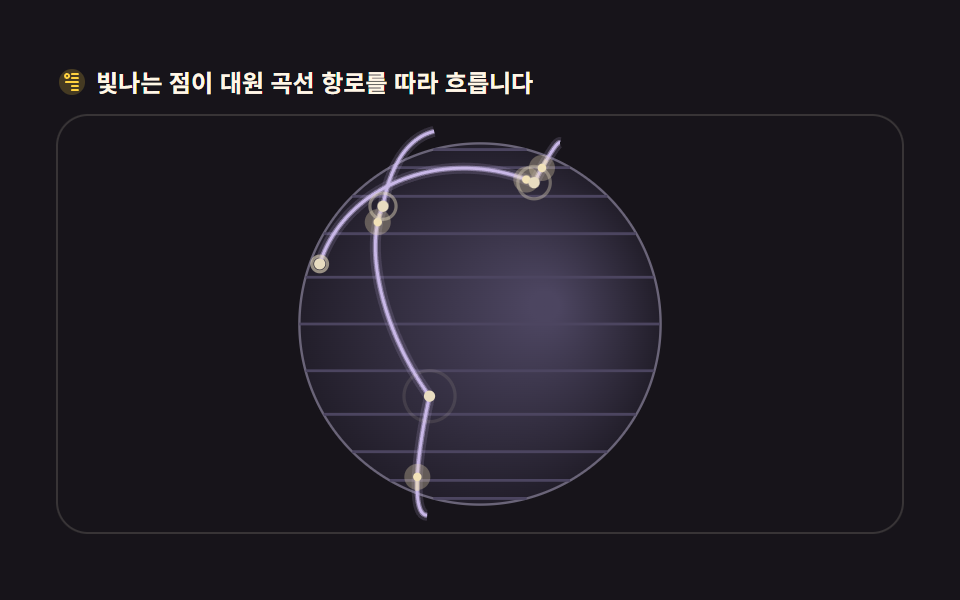
The signature scene of a global shipping or airline page: glowing routes between cities.
<main class="stage">
<div class="ga" id="ga">
  <p class="ga__hint">
    <svg class="ga__ico" viewBox="0 0 256 256" aria-hidden="true"><g fill="currentColor"><path d="M128 24a104 104 0 1 0 104 104A104.12 104.12 0 0 0 128 24" opacity=".2"/><path d="M176 56h-48a8 8 0 0 0 0 16h48a8 8 0 0 0 0-16m0 32h-48a8 8 0 0 0 0 16h48a8 8 0 0 0 0-16m0 32h-96a8 8 0 0 0 0 16h96a8 8 0 0 0 0-16m0 32h-48a8 8 0 0 0 0 16h48a8 8 0 0 0 0-16m0 32h-48a8 8 0 0 0 0 16h48a8 8 0 0 0 0-16" fill-rule="evenodd"/><path d="M88 56a24 24 0 1 0 24 24a24 24 0 0 0-24-24m0 32a8 8 0 1 1 8-8a8 8 0 0 1-8 8" fill-rule="evenodd"/></g></svg>
    <span>Glowing dots flow along great-circle routes</span>
  </p>
  <div class="ga__field" id="field" role="application" aria-label="Route arc test board" tabindex="0" data-path="great-circle">
    <canvas class="ga__cv" id="cv"></canvas>
  </div>
</div>
</main>
@use "../../../../site/static/demo-tokens" as *;
// 대원 곡선 항로 — 캔버스 rAF(slerp 대원 보간 + 발광점 흐름 + backface culling).
// CSS 는 무대·판만. 파스텔 팔레트(BD26).
$duration: $dur-loop;
$easing: $ease-spring;
$color: $subject-lilac;
@include stage($stage-ink);
.ga {
--ga-sphere: #221e2a; // 구 바닥 — 저채도 회보라
--ga-rim: #6a6478; // 림
--ga-grid: #4c4560; // 위도 눈금 — 대비를 올려 자전이 측정에 잡히게
--ga-arc: #c9b8e8; // 항로선 — 라일락 파스텔
--ga-arc-dim: #55505e;
--ga-city: #e8dcc0; // 도시 점 — 크림
--ga-glow: #f2e2b8; // 발광점 — 크림 골드 파스텔
display: flex; flex-direction: column; gap: $sp-2;
width: 100%; max-width: 424px;
}
.ga__hint {
display: flex; align-items: center; gap: $sp-1; margin: 0;
font-weight: 700; font-size: clamp(10px, 2.8vw, 12px); line-height: 1.35;
color: $subject-cream;
}
.ga__ico { width: 16px; height: 16px; flex: 0 0 auto; color: $stage-yellow; }
.ga__field {
position: relative; height: 210px;
border-radius: $r-card; overflow: hidden;
background: $stage-ink;
box-shadow: inset 0 0 0 1px rgba($subject-cream, .14);
}
.ga__field:focus-visible { outline: 2px solid $stage-yellow; outline-offset: 2px; }
.ga__cv { display: block; width: 100%; height: 100%; }
@media (max-width: 340px) {
.ga { gap: $sp-1; }
.ga__field { height: 110px; }
.ga__hint { font-size: 10px; }
}
// reduce — 루프가 안 돈다. 항로와 도시가 다 보이는 한 장만.
@media (prefers-reduced-motion: reduce) {
.ga__field { cursor: default !important; }
}html, body {
margin: 0;
overflow: hidden;
}
.stage {
box-sizing: border-box;
min-height: 100vh;
display: grid;
place-items: center;
margin: 0;
background: #17141a;
font-family: -apple-system, "Segoe UI", "Noto Sans KR", sans-serif;
padding: clamp(8px, 4vw, 24px);
}
.ga {
--ga-sphere: #221e2a;
--ga-rim: #6a6478;
--ga-grid: #4c4560;
--ga-arc: #c9b8e8;
--ga-arc-dim: #55505e;
--ga-city: #e8dcc0;
--ga-glow: #f2e2b8;
display: flex;
flex-direction: column;
gap: 8px;
width: 100%;
max-width: 424px;
}
.ga__hint {
display: flex;
align-items: center;
gap: 4px;
margin: 0;
font-weight: 700;
font-size: clamp(10px, 2.8vw, 12px);
line-height: 1.35;
color: #fff7e6;
}
.ga__ico {
width: 16px;
height: 16px;
flex: 0 0 auto;
color: #ffd23f;
}
.ga__field {
position: relative;
height: 210px;
border-radius: 16px;
overflow: hidden;
background: #17141a;
box-shadow: inset 0 0 0 1px rgba(255, 247, 230, 0.14);
}
.ga__field:focus-visible {
outline: 2px solid #ffd23f;
outline-offset: 2px;
}
.ga__cv {
display: block;
width: 100%;
height: 100%;
}
@media (max-width: 340px) {
.ga {
gap: 4px;
}
.ga__field {
height: 110px;
}
.ga__hint {
font-size: 10px;
}
}
@media (prefers-reduced-motion: reduce) {
.ga__field {
cursor: default !important;
}
}// 대원 곡선 항로 — 두 도시(단위구 위 3D 점)를 잇는 최단 경로는 대원(great-circle)이다.
// 두 점을 구면 선형 보간(slerp)으로 잇고, 호가 구에서 살짝 뜨도록(반경 1.06배) 지구본 위에 그린다.
// 화면 투영은 정사도. 뒷면(z<0) 세그먼트는 선에서 펜을 들어 감춘다.
var root = document.getElementById('ga');
var field = document.getElementById('field');
var cv = document.getElementById('cv');
var ctx = cv.getContext('2d');
var TAU = Math.PI * 2;
var reduce = window.matchMedia('(prefers-reduced-motion: reduce)').matches;
var W = 0, H = 0, dpr = 1;
// 도시 — [위도deg, 경도deg, 표시 이름 생략(그리지 않음 — 점만)]
var CITIES = [
{ lat: 37.57, lon: 126.98 }, // 서울
{ lat: 40.71, lon: -74.01 }, // 뉴욕
{ lat: 51.51, lon: -0.13 }, // 런던
{ lat: 35.68, lon: 139.69 }, // 도쿄
{ lat: -33.87, lon: 151.21 }, // 시드니
{ lat: -23.55, lon: -46.63 }, // 상파울루
{ lat: 1.35, lon: 103.82 }, // 싱가포르
{ lat: 19.43, lon: -99.13 } // 멕시코시티
];
function toXYZ(c) {
var la = c.lat * Math.PI / 180, lo = c.lon * Math.PI / 180;
return { x: Math.cos(la) * Math.sin(lo), y: Math.sin(la), z: Math.cos(la) * Math.cos(lo) };
}
var P = CITIES.map(toXYZ);
// 항로 — 도시 쌍. 발광점이 각 항로를 저마다 다른 속도로 흐른다
var ROUTES = [
{ a: 0, b: 1, speed: 0.30, offset: 0.0 },
{ a: 0, b: 2, speed: 0.24, offset: 0.55 },
{ a: 3, b: 4, speed: 0.27, offset: 0.3 },
{ a: 1, b: 5, speed: 0.22, offset: 0.8 },
{ a: 6, b: 3, speed: 0.34, offset: 0.15 },
{ a: 2, b: 7, speed: 0.26, offset: 0.65 },
{ a: 4, b: 5, speed: 0.20, offset: 0.45 }
];
var ARC_LIFT = 1.10; // 호가 구 위로 뜨는 배율
var rotY = 0;
var last = 0, raf = 0;
// slerp — 구면 선형 보간. omega 는 두 점 사이 중심각
function slerp(p0, p1, t) {
var dot = p0.x * p1.x + p0.y * p1.y + p0.z * p1.z;
dot = Math.max(-1, Math.min(1, dot));
var omega = Math.acos(dot);
if (omega < 1e-5) return { x: p0.x, y: p0.y, z: p0.z };
var so = Math.sin(omega);
var k0 = Math.sin((1 - t) * omega) / so;
var k1 = Math.sin(t * omega) / so;
return { x: p0.x * k0 + p1.x * k1, y: p0.y * k0 + p1.y * k1, z: p0.z * k0 + p1.z * k1 };
}
function fit() {
var r = field.getBoundingClientRect();
dpr = window.devicePixelRatio || 1;
W = r.width; H = r.height;
cv.width = Math.round(W * dpr);
cv.height = Math.round(H * dpr);
ctx.setTransform(dpr, 0, 0, dpr, 0, 0);
}
function rot(p) {
// 지구본 자전 — y축 회전 한 번
var c = Math.cos(rotY), s = Math.sin(rotY);
return { x: p.x * c + p.z * s, y: p.y, z: -p.x * s + p.z * c };
}
function draw(t) {
ctx.clearRect(0, 0, W, H);
var cx = W / 2, cy = H / 2;
var R = Math.min(W, H) * 0.43;
var cs = getComputedStyle(root);
var C_sphere = cs.getPropertyValue('--ga-sphere').trim();
var C_rim = cs.getPropertyValue('--ga-rim').trim();
var C_grid = cs.getPropertyValue('--ga-grid').trim();
var C_arc = cs.getPropertyValue('--ga-arc').trim();
var C_arcDim = cs.getPropertyValue('--ga-arc-dim').trim();
var C_city = cs.getPropertyValue('--ga-city').trim();
var C_glow = cs.getPropertyValue('--ga-glow').trim();
// 구 바닥 — 하이라이트 중심이 시간과 함께 천천히 도는 그라디언트(면 자체가 변한다)
var hx = cx + Math.cos(t * 0.23) * R * 0.38;
var hy = cy - Math.sin(t * 0.23) * R * 0.30;
var gg = ctx.createRadialGradient(hx, hy, R * 0.08, cx, cy, R);
gg.addColorStop(0, C_grid);
gg.addColorStop(1, C_sphere);
ctx.beginPath();
ctx.arc(cx, cy, R, 0, TAU);
ctx.fillStyle = gg;
ctx.fill();
ctx.strokeStyle = C_rim;
ctx.lineWidth = 1.2;
ctx.stroke();
// 은은한 위경도 눈금(뒤면만 흐리게 — backface culling)
ctx.strokeStyle = C_grid;
ctx.lineWidth = 1.4;
for (var lat = -75; lat <= 75; lat += 15) {
var la = lat * Math.PI / 180, cL = Math.cos(la), sL = Math.sin(la);
ctx.beginPath();
var pen = false;
for (var s = 0; s <= 64; s++) {
var phi = (s / 64) * TAU;
var q = rot({ x: cL * Math.sin(phi), y: sL, z: cL * Math.cos(phi) });
if (q.z >= 0) {
var px = cx + q.x * R, py = cy - q.y * R;
if (pen) ctx.lineTo(px, py); else { ctx.moveTo(px, py); pen = true; }
} else pen = false;
}
ctx.stroke();
}
// ── 항로 아크 — 앞면(z>=0)만 잇는다
function arcPath(p0, p1, lift) {
var pts = [];
for (var i = 0; i <= 72; i++) {
var tt = i / 72;
var g = slerp(p0, p1, tt);
// 끝점은 표면에, 중간은 뜬다 — sin 피크로 호 높이를 만든다
var h = 1 + (lift - 1) * Math.sin(tt * Math.PI);
g = { x: g.x * h, y: g.y * h, z: g.z * h };
pts.push(rot(g));
}
return pts; // great-circle 경로 — slerp 로 얻은 최단 호
}
for (var ri = 0; ri < ROUTES.length; ri++) {
var rt = ROUTES[ri];
var pts = arcPath(P[rt.a], P[rt.b], ARC_LIFT);
ctx.beginPath();
var pen2 = false;
var anyFront = false;
for (var k = 0; k < pts.length; k++) {
var q2 = pts[k];
if (q2.z >= -0.06) { // 호는 표면보다 떠 있으니 림까지 조금 여유
var px2 = cx + q2.x * R, py2 = cy - q2.y * R;
if (pen2) ctx.lineTo(px2, py2); else { ctx.moveTo(px2, py2); pen2 = true; }
anyFront = true;
} else pen2 = false;
}
if (anyFront) {
// 아크 헤일로 — 얇은 선보다 넓게 빛나 자각 면적을 키운다
ctx.strokeStyle = C_arc;
ctx.globalAlpha = 0.16;
ctx.lineWidth = 5.5;
ctx.stroke();
ctx.globalAlpha = 0.5;
ctx.lineWidth = 2.6;
ctx.stroke();
ctx.globalAlpha = 1;
ctx.lineWidth = 1.4;
ctx.stroke();
}
// ── 발광점 — slerp t 가 시간에 따라 흐른다
var tp = (t * rt.speed + rt.offset) % 1;
var g2 = slerp(P[rt.a], P[rt.b], tp);
var h2 = 1 + (ARC_LIFT - 1) * Math.sin(tp * Math.PI);
var gp = rot({ x: g2.x * h2, y: g2.y * h2, z: g2.z * h2 });
if (gp.z >= -0.06) {
var gx = cx + gp.x * R, gy = cy - gp.y * R;
// 헤일로
ctx.globalAlpha = 0.3;
ctx.fillStyle = C_glow;
ctx.beginPath();
ctx.arc(gx, gy, 6.5, 0, TAU);
ctx.fill();
// 코어
ctx.globalAlpha = 1;
ctx.beginPath();
ctx.arc(gx, gy, 2.1, 0, TAU);
ctx.fill();
// 짧은 꼬리 — 흘러온 방향으로 옅게
var tb = Math.max(0, tp - 0.06);
var g3 = slerp(P[rt.a], P[rt.b], tb);
var h3 = 1 + (ARC_LIFT - 1) * Math.sin(tb * Math.PI);
var gq = rot({ x: g3.x * h3, y: g3.y * h3, z: g3.z * h3 });
if (gq.z >= -0.06) {
ctx.strokeStyle = C_glow;
ctx.globalAlpha = 0.5;
ctx.lineWidth = 2;
ctx.beginPath();
ctx.moveTo(cx + gq.x * R, cy - gq.y * R);
ctx.lineTo(gx, gy);
ctx.stroke();
ctx.globalAlpha = 1;
}
}
}
// ── 도시 점 — 앞면만. 펄스 링이 커지며 자각 면적을 더한다
for (var ci = 0; ci < P.length; ci++) {
var q3 = rot(P[ci]);
if (q3.z < 0) continue;
var px3 = cx + q3.x * R, py3 = cy - q3.y * R;
ctx.fillStyle = C_city;
ctx.beginPath();
ctx.arc(px3, py3, 2.8, 0, TAU);
ctx.fill();
// 링 펄스 — 도시가 살아 있음을 보여주는 작은 확산
var ph = (t * 0.8 + ci * 0.13) % 1;
ctx.globalAlpha = (1 - ph) * 0.65;
ctx.strokeStyle = C_city;
ctx.lineWidth = 1.6;
ctx.beginPath();
ctx.arc(px3, py3, 2.8 + ph * 12, 0, TAU);
ctx.stroke();
ctx.globalAlpha = 1;
}
}
function frame(now) {
var dt = last ? Math.min((now - last) / 1000, 0.05) : 0.016;
last = now;
rotY += dt * 0.34;
draw(now * 0.001);
raf = requestAnimationFrame(frame);
}
window.addEventListener('resize', function () { fit(); draw(0); });
fit();
if (reduce) {
draw(0);
} else {
raf = requestAnimationFrame(frame);
}// GlobeConnectionArcs — vanilla 판(run/304/demo/04-globe-connection-arcs/index.html) 의 React 포트.
// 두 도시(단위구 위 3D 점)를 잇는 대원(great circle) 경로를 구면 선형 보간(slerp)으로 그리고
// 발광점이 항로를 따라 흐른다. 화면 투영은 정사도, 뒷면(z<0)은 펜을 들어 감춘다.
// 움직임은 캔버스 rAF 루프가 전부 그리므로 @keyframes 미리보기가 없다 — props 는 CSS 변수로 무대 격식에만 내려간다.
import { useEffect, useRef } from "react";
import type { CSSProperties } from "react";
import styles from "./GlobeConnectionArcs.module.scss";
export type GlobeConnectionArcsProps = {
duration?: string;
easing?: string;
color?: string;
};
type Vars = CSSProperties & { "--duration"?: string; "--easing"?: string; "--color"?: string };
type Box<T> = { current: T };
type Vec3 = { x: number; y: number; z: number };
const TAU = Math.PI * 2;
const FIELD_LABEL = "항로 곡선 실험판";
const ARC_LIFT = 1.10; // 호가 구 위로 뜨는 배율
// 도시 — [위도deg, 경도deg]
const CITIES = [
{ lat: 37.57, lon: 126.98 }, // 서울
{ lat: 40.71, lon: -74.01 }, // 뉴욕
{ lat: 51.51, lon: -0.13 }, // 런던
{ lat: 35.68, lon: 139.69 }, // 도쿄
{ lat: -33.87, lon: 151.21 }, // 시드니
{ lat: -23.55, lon: -46.63 }, // 상파울루
{ lat: 1.35, lon: 103.82 }, // 싱가포르
{ lat: 19.43, lon: -99.13 } // 멕시코시티
];
function toXYZ(c: { lat: number; lon: number }): Vec3 {
const la = c.lat * Math.PI / 180, lo = c.lon * Math.PI / 180;
return { x: Math.cos(la) * Math.sin(lo), y: Math.sin(la), z: Math.cos(la) * Math.cos(lo) };
}
const P = CITIES.map(toXYZ);
// 항로 — 도시 쌍. 발광점이 각 항로를 저마다 다른 속도로 흐른다
const ROUTES = [
{ a: 0, b: 1, speed: 0.30, offset: 0.0 },
{ a: 0, b: 2, speed: 0.24, offset: 0.55 },
{ a: 3, b: 4, speed: 0.27, offset: 0.3 },
{ a: 1, b: 5, speed: 0.22, offset: 0.8 },
{ a: 6, b: 3, speed: 0.34, offset: 0.15 },
{ a: 2, b: 7, speed: 0.26, offset: 0.65 },
{ a: 4, b: 5, speed: 0.20, offset: 0.45 }
];
export default function GlobeConnectionArcs({
duration = "2s",
easing = "cubic-bezier(.2, .8, .2, 1)",
color = "#b9a0ff",
}: GlobeConnectionArcsProps) {
const fieldRef = useRef<HTMLDivElement | null>(null);
const cvRef = useRef<HTMLCanvasElement | null>(null);
const rootRef = useRef<HTMLDivElement | null>(null);
const ctxRef = useRef<CanvasRenderingContext2D | null>(null);
const sizeRef = useRef({ w: 0, h: 0 }) as Box<{ w: number; h: number }>;
const rotYRef = useRef(0) as Box<number>;
const lastRef = useRef(0) as Box<number>;
const rafRef = useRef(0) as Box<number>;
const vars: Vars = { "--duration": duration, "--easing": easing, "--color": color };
function reduced(): boolean {
return window.matchMedia("(prefers-reduced-motion: reduce)").matches;
}
function fit(): void {
const field = fieldRef.current;
const cv = cvRef.current;
const ctx = ctxRef.current;
if (!field || !cv || !ctx) return;
const r = field.getBoundingClientRect();
const dpr = window.devicePixelRatio || 1;
sizeRef.current.w = r.width;
sizeRef.current.h = r.height;
cv.width = Math.round(r.width * dpr);
cv.height = Math.round(r.height * dpr);
ctx.setTransform(dpr, 0, 0, dpr, 0, 0);
}
// 지구본 자전 — y축 회전 한 번
function rot(p: Vec3): Vec3 {
const c = Math.cos(rotYRef.current), s = Math.sin(rotYRef.current);
return { x: p.x * c + p.z * s, y: p.y, z: -p.x * s + p.z * c };
}
// slerp — 구면 선형 보간. omega 는 두 점 사이 중심각
function slerp(p0: Vec3, p1: Vec3, t: number): Vec3 {
let dot = p0.x * p1.x + p0.y * p1.y + p0.z * p1.z;
dot = Math.max(-1, Math.min(1, dot));
const omega = Math.acos(dot);
if (omega < 1e-5) return { x: p0.x, y: p0.y, z: p0.z };
const so = Math.sin(omega);
const k0 = Math.sin((1 - t) * omega) / so;
const k1 = Math.sin(t * omega) / so;
return { x: p0.x * k0 + p1.x * k1, y: p0.y * k0 + p1.y * k1, z: p0.z * k0 + p1.z * k1 };
}
function draw(t: number): void {
const ctx = ctxRef.current;
const root = rootRef.current;
if (!ctx || !root) return;
const W = sizeRef.current.w, H = sizeRef.current.h;
ctx.clearRect(0, 0, W, H);
const cx = W / 2, cy = H / 2;
const R = Math.min(W, H) * 0.43;
const cs = getComputedStyle(root);
const C_sphere = cs.getPropertyValue("--ga-sphere").trim();
const C_rim = cs.getPropertyValue("--ga-rim").trim();
const C_grid = cs.getPropertyValue("--ga-grid").trim();
const C_arc = cs.getPropertyValue("--ga-arc").trim();
const C_city = cs.getPropertyValue("--ga-city").trim();
const C_glow = cs.getPropertyValue("--ga-glow").trim();
// 구 바닥 — 하이라이트 중심이 시간과 함께 천천히 도는 그라디언트(면 자체가 변한다)
const hx = cx + Math.cos(t * 0.23) * R * 0.38;
const hy = cy - Math.sin(t * 0.23) * R * 0.30;
const gg = ctx.createRadialGradient(hx, hy, R * 0.08, cx, cy, R);
gg.addColorStop(0, C_grid);
gg.addColorStop(1, C_sphere);
ctx.beginPath();
ctx.arc(cx, cy, R, 0, TAU);
ctx.fillStyle = gg;
ctx.fill();
ctx.strokeStyle = C_rim;
ctx.lineWidth = 1.2;
ctx.stroke();
// 은은한 위경도 눈금(뒤면만 흐리게 — backface culling)
ctx.strokeStyle = C_grid;
ctx.lineWidth = 1.4;
for (let lat = -75; lat <= 75; lat += 15) {
const la = lat * Math.PI / 180, cL = Math.cos(la), sL = Math.sin(la);
ctx.beginPath();
let pen = false;
for (let s = 0; s <= 64; s++) {
const phi = (s / 64) * TAU;
const q = rot({ x: cL * Math.sin(phi), y: sL, z: cL * Math.cos(phi) });
if (q.z >= 0) {
const px = cx + q.x * R, py = cy - q.y * R;
if (pen) ctx.lineTo(px, py); else { ctx.moveTo(px, py); pen = true; }
} else pen = false;
}
ctx.stroke();
}
// 항로 아크 — 앞면(z>=0)만 잇는다
const arcPath = (p0: Vec3, p1: Vec3, lift: number): Vec3[] => {
const pts: Vec3[] = [];
for (let i = 0; i <= 72; i++) {
const tt = i / 72;
const g = slerp(p0, p1, tt);
// 끝점은 표면에, 중간은 뜬다 — sin 피크로 호 높이를 만든다
const h = 1 + (lift - 1) * Math.sin(tt * Math.PI);
pts.push(rot({ x: g.x * h, y: g.y * h, z: g.z * h }));
}
return pts;
};
for (let ri = 0; ri < ROUTES.length; ri++) {
const rt = ROUTES[ri];
const pts = arcPath(P[rt.a], P[rt.b], ARC_LIFT);
ctx.beginPath();
let pen2 = false;
let anyFront = false;
for (let k = 0; k < pts.length; k++) {
const q2 = pts[k];
if (q2.z >= -0.06) { // 호는 표면보다 떠 있으니 림까지 조금 여유
const px2 = cx + q2.x * R, py2 = cy - q2.y * R;
if (pen2) ctx.lineTo(px2, py2); else { ctx.moveTo(px2, py2); pen2 = true; }
anyFront = true;
} else pen2 = false;
}
if (anyFront) {
// 아크 헤일로 — 얇은 선보다 넓게 빛나 자각 면적을 키운다
ctx.strokeStyle = C_arc;
ctx.globalAlpha = 0.16;
ctx.lineWidth = 5.5;
ctx.stroke();
ctx.globalAlpha = 0.5;
ctx.lineWidth = 2.6;
ctx.stroke();
ctx.globalAlpha = 1;
ctx.lineWidth = 1.4;
ctx.stroke();
}
// 발광점 — slerp t 가 시간에 따라 흐른다
const tp = (t * rt.speed + rt.offset) % 1;
const g2 = slerp(P[rt.a], P[rt.b], tp);
const h2 = 1 + (ARC_LIFT - 1) * Math.sin(tp * Math.PI);
const gp = rot({ x: g2.x * h2, y: g2.y * h2, z: g2.z * h2 });
if (gp.z >= -0.06) {
const gx = cx + gp.x * R, gy = cy - gp.y * R;
// 헤일로
ctx.globalAlpha = 0.3;
ctx.fillStyle = C_glow;
ctx.beginPath();
ctx.arc(gx, gy, 6.5, 0, TAU);
ctx.fill();
// 코어
ctx.globalAlpha = 1;
ctx.beginPath();
ctx.arc(gx, gy, 2.1, 0, TAU);
ctx.fill();
// 짧은 꼬리 — 흘러온 방향으로 옅게
const tb = Math.max(0, tp - 0.06);
const g3 = slerp(P[rt.a], P[rt.b], tb);
const h3 = 1 + (ARC_LIFT - 1) * Math.sin(tb * Math.PI);
const gq = rot({ x: g3.x * h3, y: g3.y * h3, z: g3.z * h3 });
if (gq.z >= -0.06) {
ctx.strokeStyle = C_glow;
ctx.globalAlpha = 0.5;
ctx.lineWidth = 2;
ctx.beginPath();
ctx.moveTo(cx + gq.x * R, cy - gq.y * R);
ctx.lineTo(gx, gy);
ctx.stroke();
ctx.globalAlpha = 1;
}
}
}
// 도시 점 — 앞면만. 펄스 링이 커지며 자각 면적을 더한다
for (let ci = 0; ci < P.length; ci++) {
const q3 = rot(P[ci]);
if (q3.z < 0) continue;
const px3 = cx + q3.x * R, py3 = cy - q3.y * R;
ctx.fillStyle = C_city;
ctx.beginPath();
ctx.arc(px3, py3, 2.8, 0, TAU);
ctx.fill();
// 링 펄스 — 도시가 살아 있음을 보여주는 작은 확산
const ph = (t * 0.8 + ci * 0.13) % 1;
ctx.globalAlpha = (1 - ph) * 0.65;
ctx.strokeStyle = C_city;
ctx.lineWidth = 1.6;
ctx.beginPath();
ctx.arc(px3, py3, 2.8 + ph * 12, 0, TAU);
ctx.stroke();
ctx.globalAlpha = 1;
}
}
function frame(now: number): void {
const dt = lastRef.current ? Math.min((now - lastRef.current) / 1000, 0.05) : 0.016;
lastRef.current = now;
rotYRef.current += dt * 0.34;
draw(now * 0.001);
rafRef.current = requestAnimationFrame(frame);
}
useEffect(() => {
const cv = cvRef.current;
if (!cv) return;
ctxRef.current = cv.getContext("2d");
if (!ctxRef.current) return;
fit();
const onResize = (): void => { fit(); draw(0); };
window.addEventListener("resize", onResize);
if (reduced()) {
draw(0); // reduce — 루프 없이 항로와 도시가 다 보이는 한 장만
} else {
lastRef.current = 0;
rafRef.current = requestAnimationFrame(frame);
}
return () => {
window.removeEventListener("resize", onResize);
cancelAnimationFrame(rafRef.current);
};
}, []);
return (
<main className={styles.stage}>
<div className={styles.root} ref={rootRef} style={vars}>
<p className={styles.hint}>
<svg className={styles.ico} viewBox="0 0 256 256" aria-hidden="true"><g fill="currentColor"><path d="M128 24a104 104 0 1 0 104 104A104.12 104.12 0 0 0 128 24" opacity=".2"/><path d="M176 56h-48a8 8 0 0 0 0 16h48a8 8 0 0 0 0-16m0 32h-48a8 8 0 0 0 0 16h48a8 8 0 0 0 0-16m0 32h-96a8 8 0 0 0 0 16h96a8 8 0 0 0 0-16m0 32h-48a8 8 0 0 0 0 16h48a8 8 0 0 0 0-16m0 32h-48a8 8 0 0 0 0 16h48a8 8 0 0 0 0-16" fillRule="evenodd"/><path d="M88 56a24 24 0 1 0 24 24a24 24 0 0 0-24-24m0 32a8 8 0 1 1 8-8a8 8 0 0 1-8 8" fillRule="evenodd"/></g></svg>
<span>빛나는 점이 대원 곡선 항로를 따라 흐릅니다</span>
</p>
<div
className={styles.field}
ref={fieldRef}
role="application"
aria-label={FIELD_LABEL}
tabIndex={0}
>
<canvas className={styles.cv} ref={cvRef}></canvas>
</div>
</div>
</main>
);
}04 · Flight-path arcs connecting cities — Measured area 10.153% · moving frames 23/23Original by GODRICH · SCSS and React ship in the zip · See the password
Spherical linear interpolation draws the shortest path
// slerp — spherical linear interpolation. omega is the central angle between the two points
function slerp(p0, p1, t) {
  var dot = p0.x * p1.x + p0.y * p1.y + p0.z * p1.z;
  dot = Math.max(-1, Math.min(1, dot));
  var omega = Math.acos(dot);
  if (omega < 1e-5) return { x: p0.x, y: p0.y, z: p0.z };
  var so = Math.sin(omega);
  var k0 = Math.sin((1 - t) * omega) / so;
  var k1 = Math.sin(t * omega) / so;
  return { x: p0.x * k0 + p1.x * k1, y: p0.y * k0 + p1.y * k1, z: p0.z * k0 + p1.z * k1 };
}
Take two cities as points on a unit sphere and connect them with slerp for a great-circle route that never tunnels through the planet. The arc floats at 1.10 times the globe radius so the curve rests on the surface instead of pressing into it, and a glowing dot travels each arc to show flights in progress.
05Globe split by a day/night terminator
A globe that brightens toward the sun, for a time-zone or global-hours widget.
<main class="stage">
<div class="gn" id="gn">
  <p class="gn__hint">
    <svg class="gn__ico" viewBox="0 0 256 256" aria-hidden="true"><g fill="currentColor"><path d="M128 40a88 88 0 1 0 88 88a88.1 88.1 0 0 0-88-88" opacity=".2"/><path d="M120 40V16a8 8 0 0 1 16 0v24a8 8 0 0 1-16 0m112 88a8 8 0 0 1-8 8h-24a8 8 0 0 1 0-16h24a8 8 0 0 1 8 8M69.66 186.34a8 8 0 0 1 0 11.32l-16.97 17a8 8 0 0 1-11.32-11.32l17-17a8 8 0 0 1 11.29 0M56 128a8 8 0 0 0-8-8H24a8 8 0 0 0 0 16h24a8 8 0 0 0 8-8m13.66-58.34a8 8 0 0 0 11.32 0a8 8 0 0 0 0-11.32l-17-17a8 8 0 0 0-11.32 11.32Zm128 0l17-17a8 8 0 0 0-11.32-11.32l-17 17a8 8 0 0 0 11.32 11.32M128 200a8 8 0 0 0-8 8v24a8 8 0 0 0 16 0v-24a8 8 0 0 0-8-8m58.34-13.66a8 8 0 0 0-11.32 11.32l17 17a8 8 0 0 0 11.32-11.32Z" fill-rule="evenodd"/></g></svg>
    <span>Per-pixel brightness from the dot product of sun vector and surface normal</span>
  </p>
  <div class="gn__field" id="field" role="img" aria-label="Day-night terminator globe">
    <canvas class="gn__cv" id="cv"></canvas>
  </div>
</div>
</main>
@use "../../../../site/static/demo-tokens" as *;
// 낮밤 경계 지구본 — 캔버스 rAF(픽셀 단위 법선·태양 내적 셰이딩, ImageData).
// CSS 는 무대·판만. 파스텔 팔레트(BD26).
$duration: $dur-loop;
$easing: $ease-spring;
$color: $subject-cream;
@include stage($stage-ink);
.gn {
--gn-night: #1d2230; // 밤면 — 저채도 남색
--gn-day: #b8c8b0; // 낮면 — 세이지 파스텔
--gn-terminator: #d8b8a0; // 경계 노을 — 로즈 샌드 파스텔
display: flex; flex-direction: column; gap: $sp-2;
width: 100%; max-width: 424px;
}
.gn__hint {
display: flex; align-items: center; gap: $sp-1; margin: 0;
font-weight: 700; font-size: clamp(10px, 2.8vw, 12px); line-height: 1.35;
color: $subject-cream;
}
.gn__ico { width: 16px; height: 16px; flex: 0 0 auto; color: $stage-yellow; }
.gn__field {
position: relative; height: 210px;
border-radius: $r-card; overflow: hidden;
background: $stage-ink;
box-shadow: inset 0 0 0 1px rgba($subject-cream, .14);
}
.gn__field:focus-visible { outline: 2px solid $stage-yellow; outline-offset: 2px; }
.gn__cv { display: block; width: 100%; height: 100%; image-rendering: auto; }
@media (max-width: 340px) {
.gn { gap: $sp-1; }
.gn__field { height: 110px; }
.gn__hint { font-size: 10px; }
}
// reduce — 루프가 안 돈다. 경계가 보이는 한 장만.
@media (prefers-reduced-motion: reduce) {
.gn__field { cursor: default !important; }
}html, body {
margin: 0;
overflow: hidden;
}
.stage {
box-sizing: border-box;
min-height: 100vh;
display: grid;
place-items: center;
margin: 0;
background: #17141a;
font-family: -apple-system, "Segoe UI", "Noto Sans KR", sans-serif;
padding: clamp(8px, 4vw, 24px);
}
.gn {
--gn-night: #1d2230;
--gn-day: #b8c8b0;
--gn-terminator: #d8b8a0;
display: flex;
flex-direction: column;
gap: 8px;
width: 100%;
max-width: 424px;
}
.gn__hint {
display: flex;
align-items: center;
gap: 4px;
margin: 0;
font-weight: 700;
font-size: clamp(10px, 2.8vw, 12px);
line-height: 1.35;
color: #fff7e6;
}
.gn__ico {
width: 16px;
height: 16px;
flex: 0 0 auto;
color: #ffd23f;
}
.gn__field {
position: relative;
height: 210px;
border-radius: 16px;
overflow: hidden;
background: #17141a;
box-shadow: inset 0 0 0 1px rgba(255, 247, 230, 0.14);
}
.gn__field:focus-visible {
outline: 2px solid #ffd23f;
outline-offset: 2px;
}
.gn__cv {
display: block;
width: 100%;
height: 100%;
image-rendering: auto;
}
@media (max-width: 340px) {
.gn {
gap: 4px;
}
.gn__field {
height: 110px;
}
.gn__hint {
font-size: 10px;
}
}
@media (prefers-reduced-motion: reduce) {
.gn__field {
cursor: default !important;
}
}// Day-night terminator globe — 구 표면의 픽셀마다 법선(x,y,z)/R 을 구하고 태양 방향 벡터와 내적해 밝기를 얻는다
// (dot product shading). CSS 트윈이 아니라 매 프레임 ImageData 를 채워 넣는 픽셀 단위 계산이다(077 계열).
// 태양 방향은 시간에 따라 지구본을 도는 것처럼 천천히 회전 — 경계선이 자연스레 이동한다.
var field = document.getElementById('field');
var cv = document.getElementById('cv');
var ctx = cv.getContext('2d');
var TAU = Math.PI * 2;
var reduce = window.matchMedia('(prefers-reduced-motion: reduce)').matches;
var W = 0, H = 0, dpr = 1;
var buf = null; // ImageData 캐시 — 매 프레임 재할당하지 않는다
var last = 0, raf = 0;
var sunAngle = 0.6;
function fit() {
var r = field.getBoundingClientRect();
dpr = window.devicePixelRatio || 1;
// CSS(width:100%·height:100%) 로 화면 크기를 잡고 백킹스토어만 물리 픽셀로 —
// 인라인 width 를 심으면 좁은 화면에서 잔값이 남아 판이 그대로 벌어진다(320px 넘침).
W = Math.round(r.width * dpr);
H = Math.round(r.height * dpr);
cv.width = W; cv.height = H;
ctx.setTransform(1, 0, 0, 1, 0, 0);
buf = ctx.createImageData(W, H);
}
function hexToRgb(hex) {
var h = hex.replace('#', '');
if (h.length === 3) h = h.split('').map(function (c) { return c + c; }).join('');
var n = parseInt(h, 16);
return [(n >> 16) & 255, (n >> 8) & 255, n & 255];
}
function draw() {
var cx = W / 2, cy = H / 2;
var R = Math.min(W, H) * 0.47;
var Rsq = R * R;
var cs = getComputedStyle(document.getElementById('gn'));
var night = hexToRgb(cs.getPropertyValue('--gn-night').trim());
var day = hexToRgb(cs.getPropertyValue('--gn-day').trim());
var termGlow = hexToRgb(cs.getPropertyValue('--gn-terminator').trim());
// 태양 벡터 — 살짝 기울어진(자전축 경사 느낌) 채로 xz 평면을 천천히 돈다
var tilt = 0.22;
var sx = Math.cos(sunAngle), sz = Math.sin(sunAngle);
var sun = { x: sx, y: tilt, z: sz };
var sl = Math.sqrt(sun.x * sun.x + sun.y * sun.y + sun.z * sun.z);
sun.x /= sl; sun.y /= sl; sun.z /= sl;
var data = buf.data;
var minX = Math.max(0, Math.floor(cx - R - 1));
var maxX = Math.min(W, Math.ceil(cx + R + 1));
var minY = Math.max(0, Math.floor(cy - R - 1));
var maxY = Math.min(H, Math.ceil(cy + R + 1));
// 먼저 전체를 투명(알파 0)으로 밀어 둔다 — 원 밖은 무대 배경이 그대로 비친다
data.fill(0);
for (var y = minY; y < maxY; y++) {
var dy = y - cy;
var rowBase = y * W;
for (var x = minX; x < maxX; x++) {
var dx = x - cx;
var d2 = dx * dx + dy * dy;
if (d2 > Rsq) continue;
var nx = dx / R, ny = -dy / R;
var nzsq = 1 - nx * nx - ny * ny;
if (nzsq < 0) continue;
var nz = Math.sqrt(nzsq);
var ndotl = nx * sun.x + ny * sun.y + nz * sun.z; // 법선·태양 내적
var lit = Math.max(0, ndotl);
var t = Math.min(1, lit * 2.2); // 경계 부근을 넓혀 그라디언트로
var idx = (rowBase + x) * 4;
data[idx] = night[0] + (day[0] - night[0]) * t;
data[idx + 1] = night[1] + (day[1] - night[1]) * t;
data[idx + 2] = night[2] + (day[2] - night[2]) * t;
// 터미네이터 근접(내적이 0 근방)일 때 옅은 노을색 한 겹을 얹는다
var edge = 1 - Math.min(1, Math.abs(ndotl) * 6);
if (edge > 0) {
data[idx] = data[idx] + (termGlow[0] - data[idx]) * edge * 0.55;
data[idx + 1] = data[idx + 1] + (termGlow[1] - data[idx + 1]) * edge * 0.55;
data[idx + 2] = data[idx + 2] + (termGlow[2] - data[idx + 2]) * edge * 0.55;
}
data[idx + 3] = 255;
}
}
ctx.putImageData(buf, 0, 0);
}
function frame(now) {
var dt = last ? Math.min((now - last) / 1000, 0.05) : 0.016;
last = now;
sunAngle += dt * 0.55;
draw();
raf = requestAnimationFrame(frame);
}
window.addEventListener('resize', function () { fit(); draw(); });
fit();
if (reduce) {
draw();
} else {
raf = requestAnimationFrame(frame);
}// GlobeDayNight — vanilla 판(run/304/demo/05-globe-day-night-terminator/index.html) 의 React 포트.
// 구 표면의 픽셀마다 법선(x,y,z)/R 을 구하고 태양 방향 벡터와 내적해 밝기를 얻는다(dot product shading).
// CSS 트윈이 아니라 매 프레임 ImageData 를 채워 넣는 픽셀 단위 계산이다(077 계열).
// 움직임은 캔버스 rAF 루프가 전부 그리므로 @keyframes 미리보기가 없다 — props 는 CSS 변수로 무대 격식에만 내려간다.
import { useEffect, useRef } from "react";
import type { CSSProperties } from "react";
import styles from "./GlobeDayNight.module.scss";
export type GlobeDayNightProps = {
duration?: string;
easing?: string;
color?: string;
};
type Vars = CSSProperties & { "--duration"?: string; "--easing"?: string; "--color"?: string };
type Box<T> = { current: T };
const FIELD_LABEL = "낮밤 경계 지구본";
function hexToRgb(hex: string): number[] {
const h = hex.replace("#", "");
const hh = h.length === 3 ? h.split("").map((c) => c + c).join("") : h;
const n = parseInt(hh, 16);
return [(n >> 16) & 255, (n >> 8) & 255, n & 255];
}
export default function GlobeDayNight({
duration = "2s",
easing = "cubic-bezier(.2, .8, .2, 1)",
color = "#fff7e6",
}: GlobeDayNightProps) {
const fieldRef = useRef<HTMLDivElement | null>(null);
const cvRef = useRef<HTMLCanvasElement | null>(null);
const rootRef = useRef<HTMLDivElement | null>(null);
const ctxRef = useRef<CanvasRenderingContext2D | null>(null);
const sizeRef = useRef({ w: 0, h: 0 }) as Box<{ w: number; h: number }>;
const bufRef = useRef<ImageData | null>(null) as Box<ImageData | null>;
const sunRef = useRef(0.6) as Box<number>;
const lastRef = useRef(0) as Box<number>;
const rafRef = useRef(0) as Box<number>;
const vars: Vars = { "--duration": duration, "--easing": easing, "--color": color };
function reduced(): boolean {
return window.matchMedia("(prefers-reduced-motion: reduce)").matches;
}
function fit(): void {
const field = fieldRef.current;
const cv = cvRef.current;
const ctx = ctxRef.current;
if (!field || !cv || !ctx) return;
const r = field.getBoundingClientRect();
const dpr = window.devicePixelRatio || 1;
const W = Math.round(r.width * dpr);
const H = Math.round(r.height * dpr);
sizeRef.current.w = W;
sizeRef.current.h = H;
cv.width = W; cv.height = H;
// CSS(width:100%·height:100%) 로 화면 크기 — 인라인 width 는 좁은 화면에서 잔값이 남아 판을 벌린다(320px 넘침)
ctx.setTransform(1, 0, 0, 1, 0, 0);
bufRef.current = ctx.createImageData(W, H); // ImageData 캐시 — 매 프레임 재할당하지 않는다
}
function draw(): void {
const ctx = ctxRef.current;
const root = rootRef.current;
const buf = bufRef.current;
if (!ctx || !root || !buf) return;
const W = sizeRef.current.w, H = sizeRef.current.h;
const cx = W / 2, cy = H / 2;
const R = Math.min(W, H) * 0.47;
const Rsq = R * R;
const cs = getComputedStyle(root);
const night = hexToRgb(cs.getPropertyValue("--gn-night").trim());
const day = hexToRgb(cs.getPropertyValue("--gn-day").trim());
const termGlow = hexToRgb(cs.getPropertyValue("--gn-terminator").trim());
// 태양 벡터 — 살짝 기울어진(자전축 경사 느낌) 채로 xz 평면을 천천히 돈다
const tilt = 0.22;
const sunAngle = sunRef.current;
let sun = { x: Math.cos(sunAngle), y: tilt, z: Math.sin(sunAngle) };
const sl = Math.sqrt(sun.x * sun.x + sun.y * sun.y + sun.z * sun.z);
sun = { x: sun.x / sl, y: sun.y / sl, z: sun.z / sl };
const data = buf.data;
const minX = Math.max(0, Math.floor(cx - R - 1));
const maxX = Math.min(W, Math.ceil(cx + R + 1));
const minY = Math.max(0, Math.floor(cy - R - 1));
const maxY = Math.min(H, Math.ceil(cy + R + 1));
// 먼저 전체를 투명(알파 0)으로 밀어 둔다 — 원 밖은 무대 배경이 그대로 비친다
data.fill(0);
for (let y = minY; y < maxY; y++) {
const dy = y - cy;
const rowBase = y * W;
for (let x = minX; x < maxX; x++) {
const dx = x - cx;
const d2 = dx * dx + dy * dy;
if (d2 > Rsq) continue;
const nx = dx / R, ny = -dy / R;
const nzsq = 1 - nx * nx - ny * ny;
if (nzsq < 0) continue;
const nz = Math.sqrt(nzsq);
const ndotl = nx * sun.x + ny * sun.y + nz * sun.z; // 법선·태양 내적
const lit = Math.max(0, ndotl);
const t = Math.min(1, lit * 2.2); // 경계 부근을 넓혀 그라디언트로
const idx = (rowBase + x) * 4;
data[idx] = night[0] + (day[0] - night[0]) * t;
data[idx + 1] = night[1] + (day[1] - night[1]) * t;
data[idx + 2] = night[2] + (day[2] - night[2]) * t;
// 터미네이터 근접(내적이 0 근방)일 때 옅은 노을색 한 겹을 얹는다
const edge = 1 - Math.min(1, Math.abs(ndotl) * 6);
if (edge > 0) {
data[idx] = data[idx] + (termGlow[0] - data[idx]) * edge * 0.55;
data[idx + 1] = data[idx + 1] + (termGlow[1] - data[idx + 1]) * edge * 0.55;
data[idx + 2] = data[idx + 2] + (termGlow[2] - data[idx + 2]) * edge * 0.55;
}
data[idx + 3] = 255;
}
}
ctx.putImageData(buf, 0, 0);
}
function frame(now: number): void {
const dt = lastRef.current ? Math.min((now - lastRef.current) / 1000, 0.05) : 0.016;
lastRef.current = now;
sunRef.current += dt * 0.55;
draw();
rafRef.current = requestAnimationFrame(frame);
}
useEffect(() => {
const cv = cvRef.current;
if (!cv) return;
ctxRef.current = cv.getContext("2d");
if (!ctxRef.current) return;
fit();
const onResize = (): void => { fit(); draw(); };
window.addEventListener("resize", onResize);
if (reduced()) {
draw(); // reduce — 루프 없이 경계가 보이는 한 장만
} else {
lastRef.current = 0;
rafRef.current = requestAnimationFrame(frame);
}
return () => {
window.removeEventListener("resize", onResize);
cancelAnimationFrame(rafRef.current);
};
}, []);
return (
<main className={styles.stage}>
<div className={styles.root} ref={rootRef} style={vars}>
<p className={styles.hint}>
<svg className={styles.ico} viewBox="0 0 256 256" aria-hidden="true"><g fill="currentColor"><path d="M128 40a88 88 0 1 0 88 88a88.1 88.1 0 0 0-88-88" opacity=".2"/><path d="M120 40V16a8 8 0 0 1 16 0v24a8 8 0 0 1-16 0m112 88a8 8 0 0 1-8 8h-24a8 8 0 0 1 0-16h24a8 8 0 0 1 8 8M69.66 186.34a8 8 0 0 1 0 11.32l-16.97 17a8 8 0 0 1-11.32-11.32l17-17a8 8 0 0 1 11.29 0M56 128a8 8 0 0 0-8-8H24a8 8 0 0 0 0 16h24a8 8 0 0 0 8-8m13.66-58.34a8 8 0 0 0 11.32 0a8 8 0 0 0 0-11.32l-17-17a8 8 0 0 0-11.32 11.32Zm128 0l17-17a8 8 0 0 0-11.32-11.32l-17 17a8 8 0 0 0 11.32 11.32M128 200a8 8 0 0 0-8 8v24a8 8 0 0 0 16 0v-24a8 8 0 0 0-8-8m58.34-13.66a8 8 0 0 0-11.32 11.32l17 17a8 8 0 0 0 11.32-11.32Z" fillRule="evenodd"/></g></svg>
<span>태양 방향과 표면 법선의 내적으로 밝기를 픽셀마다 계산합니다</span>
</p>
<div
className={styles.field}
ref={fieldRef}
role="img"
aria-label={FIELD_LABEL}
>
<canvas className={styles.cv} ref={cvRef}></canvas>
</div>
</div>
</main>
);
}05 · Globe split by a day/night terminator — Measured area 14.608% · moving frames 23/23Original by GODRICH · SCSS and React ship in the zip · See the password
Every pixel dots its normal with the sun
      var nx = dx / R, ny = -dy / R;
      var nzsq = 1 - nx * nx - ny * ny;
      if (nzsq < 0) continue;
      var nz = Math.sqrt(nzsq);
      var ndotl = nx * sun.x + ny * sun.y + nz * sun.z;   // normal · sun
      var lit = Math.max(0, ndotl);
      var t = Math.min(1, lit * 2.2);                     // widen the rim into a gradient
Instead of stacking CSS gradients, this fills an ImageData every frame and computes the surface normal per pixel, so the terminator bends around the sphere as the sun moves (measured: intensity 19.4, 23/23 frames).
06Layered starfield background with parallax
A dark hero backdrop of layered stars for a space-concept landing page.
<main class="stage">
<div class="sf" id="sf">
  <p class="sf__hint">
    <svg class="sf__ico" viewBox="0 0 256 256" aria-hidden="true"><g fill="currentColor"><path d="M128 24a104 104 0 1 0 104 104A104.12 104.12 0 0 0 128 24" opacity=".2"/><path d="M144 48l-6.6 19.8a8 8 0 0 1-5.1 5.1L113 80l19.3 7.1a8 8 0 0 1 5.1 5.1L144 112l6.6-19.8a8 8 0 0 1 5.1-5.1L175 80l-19.3-7.1a8 8 0 0 1-5.1-5.1Z" fill-rule="evenodd"/><path d="M80 128l-4.4 13.2a4 4 0 0 1-2.6 2.6L60 148l13 4.2a4 4 0 0 1 2.6 2.6L80 168l4.4-13.2a4 4 0 0 1 2.6-2.6L100 148l-13-4.2a4 4 0 0 1-2.6-2.6Z" fill-rule="evenodd"/><path d="M188 136l-5.5 16.5a6 6 0 0 1-3.8 3.8L162 162l16.7 6.7a6 6 0 0 1 3.8 3.8L188 189l5.5-16.5a6 6 0 0 1 3.8-3.8L214 162l-16.7-6.7a6 6 0 0 1-3.8-3.8Z" fill-rule="evenodd"/><path d="M116 180l-3.3 9.9a3 3 0 0 1-1.9 1.9L101 195l9.8 4a3 3 0 0 1 1.9 1.9l3.3 9.9l3.3-9.9a3 3 0 0 1 1.9-1.9l9.8-4l-9.8-3.2a3 3 0 0 1-1.9-1.9Z" fill-rule="evenodd"/></g></svg>
    <span>Same seed, same sky — change it and the stars are drawn anew</span>
  </p>
  <div class="sf__field" id="field" role="application" aria-label="Starfield parallax test board" tabindex="0">
    <canvas class="sf__cv" id="cv"></canvas>
  </div>
  <div class="sf__bar">
    <label class="sf__lab" for="seed">Seed</label>
    <input class="sf__dial" id="seed" type="number" min="1" max="99999" step="1" value="42" inputmode="numeric">
    <button class="sf__shuffle" id="shuffle" type="button">New sky</button>
  </div>
</div>
</main>
@use "../../../../site/static/demo-tokens" as *;
// 별바다 시차 — 캔버스 rAF(mulberry32 시드 분포 + 3층 시차 + 자동 스윕).
// CSS 는 무대·판·씨앗 막대만. 파스텔 팔레트(BD26).
$duration: $dur-loop;
$easing: $ease-spring;
$color: $subject-sky;
@include stage($stage-ink);
.sf {
--sf-back: #14121c; // 하늘 바닥 — 아주 어두운 저채도 보라
--sf-far: #6a6478; // 먼 별 — 어두운 회보라
--sf-mid: #b8b2c8; // 중간 별 — 라일락 회 파스텔
--sf-near: #f0e6cf; // 가까운 별 — 크림
--sf-haze: #b8a8c8; // 성운 안개 — 연보라 파스텔
display: flex; flex-direction: column; gap: $sp-2;
width: 100%; max-width: 424px;
}
.sf__hint {
display: flex; align-items: center; gap: $sp-1; margin: 0;
font-weight: 700; font-size: clamp(10px, 2.8vw, 12px); line-height: 1.35;
color: $subject-cream;
}
.sf__ico { width: 16px; height: 16px; flex: 0 0 auto; color: $stage-yellow; }
.sf__field {
position: relative; height: 170px; // 시드 막대가 있어 300px 무대 안에 다 들어오게
border-radius: $r-card; overflow: hidden;
background: $stage-ink;
box-shadow: inset 0 0 0 1px rgba($subject-cream, .14);
cursor: crosshair;
}
.sf__field:focus-visible { outline: 2px solid $stage-yellow; outline-offset: 2px; }
.sf__cv { display: block; width: 100%; height: 100%; }
// 씨앗 막대 — 02 번 점 구름과 같은 패턴
.sf__bar {
display: flex; align-items: center; gap: $sp-2;
flex-wrap: wrap;
}
.sf__lab {
font-weight: 700; font-size: 11px; line-height: 1.4;
color: $subject-cream;
}
.sf__dial {
width: 88px; padding: $sp-1 $sp-2;
border: 1px solid rgba($subject-cream, .3);
border-radius: $r-sm;
background: rgba($subject-cream, .08);
font-weight: 700; font-size: 13px; line-height: 1.4;
font-variant-numeric: tabular-nums;
color: $subject-cream;
}
.sf__dial:focus-visible { outline: 2px solid $stage-yellow; outline-offset: 2px; }
.sf__shuffle {
padding: $sp-1 $sp-3;
border: 1px solid rgba($subject-cream, .3);
border-radius: $r-pill;
background: rgba($subject-cream, .12);
font-weight: 700; font-size: 12px; line-height: 1.4;
color: $subject-cream;
cursor: pointer;
transition: background $dur-quick $ease-out;
}
.sf__shuffle:hover { background: rgba($subject-cream, .22); }
.sf__shuffle:focus-visible { outline: 2px solid $stage-yellow; outline-offset: 2px; }
@media (max-width: 340px) {
.sf { gap: $sp-1; }
.sf__field { height: 96px; }
.sf__hint { font-size: 10px; }
.sf__bar { gap: $sp-1; }
}
// reduce — 루프가 안 돈다. 시드가 정한 별하늘 한 장만.
@media (prefers-reduced-motion: reduce) {
.sf__field { cursor: default !important; }
}html, body {
margin: 0;
overflow: hidden;
}
.stage {
box-sizing: border-box;
min-height: 100vh;
display: grid;
place-items: center;
margin: 0;
background: #17141a;
font-family: -apple-system, "Segoe UI", "Noto Sans KR", sans-serif;
padding: clamp(8px, 4vw, 24px);
}
.sf {
--sf-back: #14121c;
--sf-far: #6a6478;
--sf-mid: #b8b2c8;
--sf-near: #f0e6cf;
--sf-haze: #b8a8c8;
display: flex;
flex-direction: column;
gap: 8px;
width: 100%;
max-width: 424px;
}
.sf__hint {
display: flex;
align-items: center;
gap: 4px;
margin: 0;
font-weight: 700;
font-size: clamp(10px, 2.8vw, 12px);
line-height: 1.35;
color: #fff7e6;
}
.sf__ico {
width: 16px;
height: 16px;
flex: 0 0 auto;
color: #ffd23f;
}
.sf__field {
position: relative;
height: 170px;
border-radius: 16px;
overflow: hidden;
background: #17141a;
box-shadow: inset 0 0 0 1px rgba(255, 247, 230, 0.14);
cursor: crosshair;
}
.sf__field:focus-visible {
outline: 2px solid #ffd23f;
outline-offset: 2px;
}
.sf__cv {
display: block;
width: 100%;
height: 100%;
}
.sf__bar {
display: flex;
align-items: center;
gap: 8px;
flex-wrap: wrap;
}
.sf__lab {
font-weight: 700;
font-size: 11px;
line-height: 1.4;
color: #fff7e6;
}
.sf__dial {
width: 88px;
padding: 4px 8px;
border: 1px solid rgba(255, 247, 230, 0.3);
border-radius: 8px;
background: rgba(255, 247, 230, 0.08);
font-weight: 700;
font-size: 13px;
line-height: 1.4;
font-variant-numeric: tabular-nums;
color: #fff7e6;
}
.sf__dial:focus-visible {
outline: 2px solid #ffd23f;
outline-offset: 2px;
}
.sf__shuffle {
padding: 4px 12px;
border: 1px solid rgba(255, 247, 230, 0.3);
border-radius: 999px;
background: rgba(255, 247, 230, 0.12);
font-weight: 700;
font-size: 12px;
line-height: 1.4;
color: #fff7e6;
cursor: pointer;
transition: background 220ms ease-out;
}
.sf__shuffle:hover {
background: rgba(255, 247, 230, 0.22);
}
.sf__shuffle:focus-visible {
outline: 2px solid #ffd23f;
outline-offset: 2px;
}
@media (max-width: 340px) {
.sf {
gap: 4px;
}
.sf__field {
height: 96px;
}
.sf__hint {
font-size: 10px;
}
.sf__bar {
gap: 4px;
}
}
@media (prefers-reduced-motion: reduce) {
.sf__field {
cursor: default !important;
}
}// 별바다 시차 — 같은 Seed(seeded mulberry32)으로 3개 층의 별을 결정적으로 뽑는다.
// 층마다 시차 배율이 달라 화면이 천천히 흐를 때 멀리 있는 별은 느리게, 가까운 별은 빠르게 움직인다.
// 실제 마우스를 올리면 그 방향으로 시점이 기운다(헤드리스 렌더에서는 자동 스윕이 대신한다).
var root = document.getElementById('sf');
var field = document.getElementById('field');
var cv = document.getElementById('cv');
var ctx = cv.getContext('2d');
var seedInput = document.getElementById('seed');
var shuffleBtn = document.getElementById('shuffle');
var TAU = Math.PI * 2;
var reduce = window.matchMedia('(prefers-reduced-motion: reduce)').matches;
var W = 0, H = 0, dpr = 1;
var last = 0, raf = 0;
// 결정적 PRNG — mulberry32. 같은 seed 는 같은 별 배치를 보장한다
function mulberry32(a) {
return function () {
a |= 0; a = a + 0x6D2B79F5 | 0;
var t = Math.imul(a ^ a >>> 15, 1 | a);
t = t + Math.imul(t ^ t >>> 7, 61 | t) ^ t;
return ((t ^ t >>> 14) >>> 0) / 4294967296;
};
}
var layers = []; // [{ stars:[{x,y,r,tw,ph}], par, drift }]
var px = 0, py = 0; // 시점 오프셋(-1..1) — 마우스·자동 스윕이 목표로 삼는 값
var pxT = 0, pyT = 0; // 목표값
function buildStars() {
var seed = Math.max(1, Math.min(99999, parseInt(seedInput.value, 10) || 42));
var rnd = mulberry32(seed);
layers = [];
// 3층 — 뒤(느림·작음·많음)부터 앞(빠름·큼·적음)
var defs = [
{ n: 110, par: 0.35, size: [0.6, 1.4], drift: 4 },
{ n: 70, par: 0.75, size: [1.0, 2.0], drift: 9 },
{ n: 34, par: 1.25, size: [1.5, 2.8], drift: 16 }
];
for (var li = 0; li < defs.length; li++) {
var d = defs[li];
var stars = [];
for (var i = 0; i < d.n; i++) {
stars.push({
x: rnd(), // 0..1 정규화 좌표 — 리사이즈에도 배치 유지
y: rnd(),
r: d.size[0] + rnd() * (d.size[1] - d.size[0]),
base: 0.25 + rnd() * 0.75, // 기본 밝기
tw: 0.5 + rnd() * 2.2, // 반짝임 주파수
ph: rnd() * TAU // 반짝임 위상
});
}
layers.push({ stars: stars, par: d.par, drift: d.drift });
}
}
function fit() {
var r = field.getBoundingClientRect();
dpr = window.devicePixelRatio || 1;
W = r.width; H = r.height;
cv.width = Math.round(W * dpr);
cv.height = Math.round(H * dpr);
ctx.setTransform(dpr, 0, 0, dpr, 0, 0);
}
function draw(t) {
ctx.clearRect(0, 0, W, H);
var cs = getComputedStyle(root);
var C_back = cs.getPropertyValue('--sf-back').trim();
var C_far = cs.getPropertyValue('--sf-far').trim();
var C_mid = cs.getPropertyValue('--sf-mid').trim();
var C_near = cs.getPropertyValue('--sf-near').trim();
var C_haze = cs.getPropertyValue('--sf-haze').trim();
var layerCols = [C_far, C_mid, C_near];
// 배경 — 아주 어두운 저채도 남보라
ctx.fillStyle = C_back;
ctx.fillRect(0, 0, W, H);
// 성운 안개 — 두 개의 큰 방사형 그라디언트 (시점과 함께 살짝 이동 — 깊이감)
var g1 = ctx.createRadialGradient(W * (0.3 + px * 0.05), H * (0.35 + py * 0.05), 0, W * 0.3, H * 0.35, Math.max(W, H) * 0.7);
g1.addColorStop(0, C_haze);
g1.addColorStop(1, 'rgba(0,0,0,0)');
ctx.globalAlpha = 0.16;
ctx.fillStyle = g1;
ctx.fillRect(0, 0, W, H);
var g2 = ctx.createRadialGradient(W * (0.75 - px * 0.04), H * (0.7 - py * 0.04), 0, W * 0.75, H * 0.7, Math.max(W, H) * 0.55);
g2.addColorStop(0, C_haze);
g2.addColorStop(1, 'rgba(0,0,0,0)');
ctx.globalAlpha = 0.10;
ctx.fillStyle = g2;
ctx.fillRect(0, 0, W, H);
ctx.globalAlpha = 1;
// 층별 별 — 시차 오프셋 = (자동 흐름 + 시점 기울기) × 층 배율
var flow = t * 11; // 전체가 천천히 왼쪽으로 흐른다(하늘 회전 느낌)
for (var li = 0; li < layers.length; li++) {
var L = layers[li];
var offX = (flow + px * 58) * L.par;
var offY = py * 34 * L.par;
ctx.fillStyle = layerCols[li];
var stars = L.stars;
for (var i = 0; i < stars.length; i++) {
var s = stars[i];
// x 는 흐르고 화면 밖으로 나가면 반대편에서 다시 등장 (wrap)
var sx = ((s.x * W - offX) % W + W) % W;
var sy = s.y * H + offY;
if (sy < -4 || sy > H + 4) continue;
var tw = s.base + Math.sin(t * s.tw + s.ph) * 0.35; // 반짝임
var a = Math.max(0.08, Math.min(1, tw));
ctx.globalAlpha = a;
ctx.beginPath();
ctx.arc(sx, sy, s.r, 0, TAU);
ctx.fill();
// 가까운 층의 밝은 별에 십자 반짝임 + 헤일로 — 면적 기여를 키운다
if (li >= 1 && s.r > 1.4 && a > 0.7) {
ctx.globalAlpha = (a - 0.7) * 1.2;
ctx.strokeStyle = layerCols[li];
ctx.lineWidth = 0.9;
ctx.beginPath();
ctx.moveTo(sx - s.r * 3.4, sy); ctx.lineTo(sx + s.r * 3.4, sy);
ctx.moveTo(sx, sy - s.r * 3.4); ctx.lineTo(sx, sy + s.r * 3.4);
ctx.stroke();
}
if (li === 2) {
ctx.globalAlpha = a * 0.22;
ctx.fillStyle = layerCols[li];
ctx.beginPath();
ctx.arc(sx, sy, s.r * 2.6, 0, TAU);
ctx.fill();
}
}
}
ctx.globalAlpha = 1;
}
var sweep = 0;
function frame(now) {
var dt = last ? Math.min((now - last) / 1000, 0.05) : 0.016;
last = now;
sweep += dt * 0.20;
// 자동 스윕 — 마우스가 없어도(헤드리스 렌더) 시차가 보이게 느리게 8자를 그린다
pxT = Math.sin(sweep) * 0.8;
pyT = Math.cos(sweep * 0.7) * 0.5;
// 시점은 목표를 부드럽게 쫓는다
px += (pxT - px) * Math.min(1, dt * 2.2);
py += (pyT - py) * Math.min(1, dt * 2.2);
draw(now * 0.001);
raf = requestAnimationFrame(frame);
}
// 실제 사용자 입력 — 마우스를 올리면 그 방향으로 시점이 기운다(자동 스윕은 멈춘다)
field.addEventListener('pointermove', function (e) {
userTook = true;
var r = field.getBoundingClientRect();
pxT = ((e.clientX - r.left) / r.width - 0.5) * 2;
pyT = ((e.clientY - r.top) / r.height - 0.5) * 2;
});
var userTook = false;
field.addEventListener('pointerleave', function () {
userTook = false; // 마우스가 나가면 다시 자동 스윕
});
// Seed 조작 — 값 변경·버튼 모두 즉시 재생성
seedInput.addEventListener('change', function () { buildStars(); });
shuffleBtn.addEventListener('click', function () {
var s = Math.floor(Math.random() * 99999) + 1;
seedInput.value = String(s);
buildStars();
});
window.addEventListener('resize', function () { fit(); draw(0); });
fit();
buildStars();
if (reduce) {
draw(0);
} else {
raf = requestAnimationFrame(frame);
}// StarfieldParallax — vanilla 판(run/304/demo/06-starfield-parallax-scene/index.html) 의 React 포트.
// 같은 씨앗(seeded mulberry32)으로 3개 층의 별을 결정적으로 뽑는다. 층마다 시차 배율이 달라
// 멀리 있는 별은 느리게, 가까운 별은 빠르게 움직인다. 마우스를 올리면 그 방향으로 시점이 기운다.
// 움직임은 캔버스 rAF 루프가 전부 그리므로 @keyframes 미리보기가 없다 — props 는 CSS 변수로 무대 격식에만 내려간다.
import { useEffect, useRef, useState } from "react";
import type { CSSProperties } from "react";
import styles from "./StarfieldParallax.module.scss";
export type StarfieldParallaxProps = {
duration?: string;
easing?: string;
color?: string;
};
type Vars = CSSProperties & { "--duration"?: string; "--easing"?: string; "--color"?: string };
type Box<T> = { current: T };
type InputEvt = { target: { value: string } };
type PointerEvt = { clientX: number; clientY: number };
type Star = { x: number; y: number; r: number; base: number; tw: number; ph: number };
type Layer = { stars: Star[]; par: number; drift: number };
const TAU = Math.PI * 2;
const FIELD_LABEL = "별바다 시차 실험판";
// 결정적 PRNG — mulberry32. 같은 seed 는 같은 별 배치를 보장한다
function mulberry32(a: number): () => number {
return function () {
a |= 0; a = a + 0x6D2B79F5 | 0;
const t = Math.imul(a ^ a >>> 15, 1 | a);
const u = t + Math.imul(t ^ t >>> 7, 61 | t) ^ t;
return ((u ^ u >>> 14) >>> 0) / 4294967296;
};
}
// 3층 — 뒤(느림·작음·많음)부터 앞(빠름·큼·적음)
const DEFS: { n: number; par: number; size: [number, number]; drift: number }[] = [
{ n: 110, par: 0.35, size: [0.6, 1.4], drift: 4 },
{ n: 70, par: 0.75, size: [1.0, 2.0], drift: 9 },
{ n: 34, par: 1.25, size: [1.5, 2.8], drift: 16 }
];
export default function StarfieldParallax({
duration = "2s",
easing = "cubic-bezier(.2, .8, .2, 1)",
color = "#6ec8ff",
}: StarfieldParallaxProps) {
const fieldRef = useRef<HTMLDivElement | null>(null);
const cvRef = useRef<HTMLCanvasElement | null>(null);
const rootRef = useRef<HTMLDivElement | null>(null);
const seedRef = useRef<HTMLInputElement | null>(null);
const ctxRef = useRef<CanvasRenderingContext2D | null>(null);
const sizeRef = useRef({ w: 0, h: 0 }) as Box<{ w: number; h: number }>;
const layersRef = useRef<Layer[]>([]) as Box<Layer[]>;
const viewRef = useRef({ px: 0, py: 0, pxT: 0, pyT: 0, sweep: 0, userTook: false }) as Box<{ px: number; py: number; pxT: number; pyT: number; sweep: number; userTook: boolean }>;
const seedValRef = useRef(42) as Box<number>;
const lastRef = useRef(0) as Box<number>;
const rafRef = useRef(0) as Box<number>;
const [seed, setSeed] = useState(42);
const vars: Vars = { "--duration": duration, "--easing": easing, "--color": color };
function reduced(): boolean {
return window.matchMedia("(prefers-reduced-motion: reduce)").matches;
}
function buildStars(): void {
const seedVal = Math.max(1, Math.min(99999, seedValRef.current));
const rnd = mulberry32(seedVal);
const layers: Layer[] = [];
for (let li = 0; li < DEFS.length; li++) {
const d = DEFS[li];
const stars: Star[] = [];
for (let i = 0; i < d.n; i++) {
stars.push({
x: rnd(), // 0..1 정규화 좌표 — 리사이즈에도 배치 유지
y: rnd(),
r: d.size[0] + rnd() * (d.size[1] - d.size[0]),
base: 0.25 + rnd() * 0.75, // 기본 밝기
tw: 0.5 + rnd() * 2.2, // 반짝임 주파수
ph: rnd() * TAU // 반짝임 위상
});
}
layers.push({ stars, par: d.par, drift: d.drift });
}
layersRef.current = layers;
}
function fit(): void {
const field = fieldRef.current;
const cv = cvRef.current;
const ctx = ctxRef.current;
if (!field || !cv || !ctx) return;
const r = field.getBoundingClientRect();
const dpr = window.devicePixelRatio || 1;
sizeRef.current.w = r.width;
sizeRef.current.h = r.height;
cv.width = Math.round(r.width * dpr);
cv.height = Math.round(r.height * dpr);
ctx.setTransform(dpr, 0, 0, dpr, 0, 0);
}
function draw(t: number): void {
const ctx = ctxRef.current;
const root = rootRef.current;
if (!ctx || !root) return;
const W = sizeRef.current.w, H = sizeRef.current.h;
ctx.clearRect(0, 0, W, H);
const cs = getComputedStyle(root);
const C_back = cs.getPropertyValue("--sf-back").trim();
const C_far = cs.getPropertyValue("--sf-far").trim();
const C_mid = cs.getPropertyValue("--sf-mid").trim();
const C_near = cs.getPropertyValue("--sf-near").trim();
const C_haze = cs.getPropertyValue("--sf-haze").trim();
const layerCols = [C_far, C_mid, C_near];
const px = viewRef.current.px, py = viewRef.current.py;
// 배경 — 아주 어두운 저채도 남보라
ctx.fillStyle = C_back;
ctx.fillRect(0, 0, W, H);
// 성운 안개 — 두 개의 큰 방사형 그라디언트 (시점과 함께 살짝 이동 — 깊이감)
const g1 = ctx.createRadialGradient(W * (0.3 + px * 0.05), H * (0.35 + py * 0.05), 0, W * 0.3, H * 0.35, Math.max(W, H) * 0.7);
g1.addColorStop(0, C_haze);
g1.addColorStop(1, "rgba(0,0,0,0)");
ctx.globalAlpha = 0.16;
ctx.fillStyle = g1;
ctx.fillRect(0, 0, W, H);
const g2 = ctx.createRadialGradient(W * (0.75 - px * 0.04), H * (0.7 - py * 0.04), 0, W * 0.75, H * 0.7, Math.max(W, H) * 0.55);
g2.addColorStop(0, C_haze);
g2.addColorStop(1, "rgba(0,0,0,0)");
ctx.globalAlpha = 0.10;
ctx.fillStyle = g2;
ctx.fillRect(0, 0, W, H);
ctx.globalAlpha = 1;
// 층별 별 — 시차 오프셋 = (자동 흐름 + 시점 기울기) × 층 배율
const flow = t * 11; // 전체가 천천히 왼쪽으로 흐른다(하늘 회전 느낌)
const layers = layersRef.current;
for (let li = 0; li < layers.length; li++) {
const L = layers[li];
const offX = (flow + px * 58) * L.par;
const offY = py * 34 * L.par;
ctx.fillStyle = layerCols[li];
const stars = L.stars;
for (let i = 0; i < stars.length; i++) {
const s = stars[i];
// x 는 흐르고 화면 밖으로 나가면 반대편에서 다시 등장 (wrap)
const sx = ((s.x * W - offX) % W + W) % W;
const sy = s.y * H + offY;
if (sy < -4 || sy > H + 4) continue;
const tw = s.base + Math.sin(t * s.tw + s.ph) * 0.35; // 반짝임
const a = Math.max(0.08, Math.min(1, tw));
ctx.globalAlpha = a;
ctx.beginPath();
ctx.arc(sx, sy, s.r, 0, TAU);
ctx.fill();
// 가까운 층의 밝은 별에 십자 반짝임 + 헤일로 — 면적 기여를 키운다
if (li >= 1 && s.r > 1.4 && a > 0.7) {
ctx.globalAlpha = (a - 0.7) * 1.2;
ctx.strokeStyle = layerCols[li];
ctx.lineWidth = 0.9;
ctx.beginPath();
ctx.moveTo(sx - s.r * 3.4, sy); ctx.lineTo(sx + s.r * 3.4, sy);
ctx.moveTo(sx, sy - s.r * 3.4); ctx.lineTo(sx, sy + s.r * 3.4);
ctx.stroke();
}
if (li === 2) {
ctx.globalAlpha = a * 0.22;
ctx.fillStyle = layerCols[li];
ctx.beginPath();
ctx.arc(sx, sy, s.r * 2.6, 0, TAU);
ctx.fill();
}
}
}
ctx.globalAlpha = 1;
}
function frame(now: number): void {
const dt = lastRef.current ? Math.min((now - lastRef.current) / 1000, 0.05) : 0.016;
lastRef.current = now;
const v = viewRef.current;
v.sweep += dt * 0.20;
// 자동 스윕 — 마우스가 없어도(헤드리스 렌더) 시차가 보이게 느리게 8자를 그린다
if (!v.userTook) {
v.pxT = Math.sin(v.sweep) * 0.8;
v.pyT = Math.cos(v.sweep * 0.7) * 0.5;
}
// 시점은 목표를 부드럽게 쫓는다
v.px += (v.pxT - v.px) * Math.min(1, dt * 2.2);
v.py += (v.pyT - v.py) * Math.min(1, dt * 2.2);
draw(now * 0.001);
rafRef.current = requestAnimationFrame(frame);
}
// 실제 사용자 입력 — 마우스를 올리면 그 방향으로 시점이 기운다(자동 스윕은 멈춘다)
function onPointerMove(e: PointerEvt): void {
const field = fieldRef.current;
if (!field) return;
const r = field.getBoundingClientRect();
const v = viewRef.current;
v.userTook = true;
v.pxT = ((e.clientX - r.left) / r.width - 0.5) * 2;
v.pyT = ((e.clientY - r.top) / r.height - 0.5) * 2;
}
function onPointerLeave(): void {
viewRef.current.userTook = false; // 마우스가 나가면 다시 자동 스윕
}
// 씨앗 조작 — 값 변경·버튼 모두 즉시 재생성
function applySeed(v: number): void {
seedValRef.current = Math.max(1, Math.min(99999, Math.floor(v) || 1));
if (seedRef.current) seedRef.current.value = String(seedValRef.current);
setSeed(seedValRef.current);
buildStars();
if (reduced()) draw(0);
}
function onSeedInput(event: InputEvt): void {
applySeed(Number(event.target.value));
}
function onShuffle(): void {
applySeed(1 + Math.floor(Math.random() * 99999));
}
useEffect(() => {
const cv = cvRef.current;
if (!cv) return;
ctxRef.current = cv.getContext("2d");
if (!ctxRef.current) return;
fit();
buildStars();
const field = fieldRef.current;
if (field) {
field.addEventListener("pointermove", onPointerMove as unknown as EventListener);
field.addEventListener("pointerleave", onPointerLeave);
}
const onResize = (): void => { fit(); draw(0); };
window.addEventListener("resize", onResize);
if (reduced()) {
draw(0); // reduce — 루프 없이 시드가 정한 별하늘 한 장만
} else {
lastRef.current = 0;
rafRef.current = requestAnimationFrame(frame);
}
return () => {
window.removeEventListener("resize", onResize);
cancelAnimationFrame(rafRef.current);
if (field) {
field.removeEventListener("pointermove", onPointerMove as unknown as EventListener);
field.removeEventListener("pointerleave", onPointerLeave);
}
};
}, []);
return (
<main className={styles.stage}>
<div className={styles.root} ref={rootRef} style={vars}>
<p className={styles.hint}>
<svg className={styles.ico} viewBox="0 0 256 256" aria-hidden="true"><g fill="currentColor"><path d="M128 24a104 104 0 1 0 104 104A104.12 104.12 0 0 0 128 24" opacity=".2"/><path d="M144 48l-6.6 19.8a8 8 0 0 1-5.1 5.1L113 80l19.3 7.1a8 8 0 0 1 5.1 5.1L144 112l6.6-19.8a8 8 0 0 1 5.1-5.1L175 80l-19.3-7.1a8 8 0 0 1-5.1-5.1Z" fillRule="evenodd"/><path d="M80 128l-4.4 13.2a4 4 0 0 1-2.6 2.6L60 148l13 4.2a4 4 0 0 1 2.6 2.6L80 168l4.4-13.2a4 4 0 0 1 2.6-2.6L100 148l-13-4.2a4 4 0 0 1-2.6-2.6Z" fillRule="evenodd"/><path d="M188 136l-5.5 16.5a6 6 0 0 1-3.8 3.8L162 162l16.7 6.7a6 6 0 0 1 3.8 3.8L188 189l5.5-16.5a6 6 0 0 1 3.8-3.8L214 162l-16.7-6.7a6 6 0 0 1-3.8-3.8Z" fillRule="evenodd"/><path d="M116 180l-3.3 9.9a3 3 0 0 1-1.9 1.9L101 195l9.8 4a3 3 0 0 1 1.9 1.9l3.3 9.9l3.3-9.9a3 3 0 0 1 1.9-1.9l9.8-4l-9.8-3.2a3 3 0 0 1-1.9-1.9Z" fillRule="evenodd"/></g></svg>
<span>같은 씨앗은 같은 별하늘 — 시드를 바꾸면 별 배치가 다시 뽑힙니다</span>
</p>
<div
className={styles.field}
ref={fieldRef}
role="application"
aria-label={FIELD_LABEL}
tabIndex={0}
>
<canvas className={styles.cv} ref={cvRef}></canvas>
</div>
<div className={styles.bar}>
<label className={styles.lab} htmlFor="sf-seed">씨앗</label>
<input className={styles.dial} id="sf-seed" ref={seedRef} type="number" min={1} max={99999} step={1} defaultValue={42} inputMode="numeric" aria-label="시드 번호" onChange={onSeedInput} />
<button className={styles.shuffle} type="button" onClick={onShuffle}>새 별하늘</button>
</div>
</div>
</main>
);
}06 · Layered starfield background with parallax — Measured area 22.067% · moving frames 23/23Original by GODRICH · SCSS and React ship in the zip · See the password
The seed decides the sky
  // 3 layers — back (slow · small · many) to front (fast · big · few)
  var defs = [
    { n: 110, par: 0.35, size: [0.6, 1.4], drift: 4 },
    { n: 70,  par: 0.75, size: [1.0, 2.0], drift: 9 },
    { n: 34,  par: 1.25, size: [1.5, 2.8], drift: 16 }
  ];
The same seed guarantees the same sky, and 214 stars split across three layers with different parallax factors make distant stars crawl and near stars sweep as the pointer moves. The seed input and the new-sky button redraw the field, twinkle phases included, and it measured 22.07% cumulative area — second widest of the nine.
07Orrery model with several orbiting planets
An orrery that obeys Kepler's second law, for education content or an exhibition page.
<main class="stage">
<div class="or" id="or">
  <p class="or__hint">
    <svg class="or__ico" viewBox="0 0 256 256" aria-hidden="true"><g fill="currentColor"><path d="M128 24a104 104 0 1 0 104 104A104.12 104.12 0 0 0 128 24" opacity=".2"/><path d="M128 72a56 56 0 1 0 56 56a56.06 56.06 0 0 0-56-56m0 96a40 40 0 1 1 40-40a40 40 0 0 1-40 40" fill-rule="evenodd"/></g></svg>
    <span>Faster at perihelion, slower at aphelion — equal areas in equal times</span>
  </p>
  <div class="or__field" id="field" role="img" aria-label="Solar system orrery test board">
    <canvas class="or__cv" id="cv"></canvas>
  </div>
</div>
</main>
@use "../../../../site/static/demo-tokens" as *;
// 태양계 오러리 — 캔버스 rAF(케플러 제2법칙: dtheta/dt = L / r^2 수치적분).
// CSS 는 무대·판만. 파스텔 팔레트(BD26).
$duration: $dur-loop;
$easing: $ease-spring;
$color: $subject-orange-deep;
@include stage($stage-ink);
.or {
--or-sun: #e7decf; // 태양 — 크림 골드 파스텔
--or-sun-glow: #f2ddb0;
--or-orbit: #3a3450; // 궤도 타원 — 어두운 회보라
--or-p0: #d8a8a0; // 수성 자리 — 로즈
--or-p1: #d8c8a0; // 금성 자리 — 샌드
--or-p2: #a0c0c8; // 지구 자리 — 스카이 파스텔
--or-p3: #c0a0b0; // 화성 자리 — 더스티 핑크
--or-p4: #b8b0c8; // 목성 자리 — 라일락 회
display: flex; flex-direction: column; gap: $sp-2;
width: 100%; max-width: 424px;
}
.or__hint {
display: flex; align-items: center; gap: $sp-1; margin: 0;
font-weight: 700; font-size: clamp(10px, 2.8vw, 12px); line-height: 1.35;
color: $subject-cream;
}
.or__ico { width: 16px; height: 16px; flex: 0 0 auto; color: $stage-yellow; }
.or__field {
position: relative; height: 210px;
border-radius: $r-card; overflow: hidden;
background: $stage-ink;
box-shadow: inset 0 0 0 1px rgba($subject-cream, .14);
}
.or__field:focus-visible { outline: 2px solid $stage-yellow; outline-offset: 2px; }
.or__cv { display: block; width: 100%; height: 100%; }
@media (max-width: 340px) {
.or { gap: $sp-1; }
.or__field { height: 110px; }
.or__hint { font-size: 10px; }
}
// reduce — 루프가 안 돈다. 궤도와 행성 위치가 보이는 한 장만.
@media (prefers-reduced-motion: reduce) {
.or__field { cursor: default !important; }
}html, body {
margin: 0;
overflow: hidden;
}
.stage {
box-sizing: border-box;
min-height: 100vh;
display: grid;
place-items: center;
margin: 0;
background: #17141a;
font-family: -apple-system, "Segoe UI", "Noto Sans KR", sans-serif;
padding: clamp(8px, 4vw, 24px);
}
.or {
--or-sun: #e7decf;
--or-sun-glow: #f2ddb0;
--or-orbit: #3a3450;
--or-p0: #d8a8a0;
--or-p1: #d8c8a0;
--or-p2: #a0c0c8;
--or-p3: #c0a0b0;
--or-p4: #b8b0c8;
display: flex;
flex-direction: column;
gap: 8px;
width: 100%;
max-width: 424px;
}
.or__hint {
display: flex;
align-items: center;
gap: 4px;
margin: 0;
font-weight: 700;
font-size: clamp(10px, 2.8vw, 12px);
line-height: 1.35;
color: #fff7e6;
}
.or__ico {
width: 16px;
height: 16px;
flex: 0 0 auto;
color: #ffd23f;
}
.or__field {
position: relative;
height: 210px;
border-radius: 16px;
overflow: hidden;
background: #17141a;
box-shadow: inset 0 0 0 1px rgba(255, 247, 230, 0.14);
}
.or__field:focus-visible {
outline: 2px solid #ffd23f;
outline-offset: 2px;
}
.or__cv {
display: block;
width: 100%;
height: 100%;
}
@media (max-width: 340px) {
.or {
gap: 4px;
}
.or__field {
height: 110px;
}
.or__hint {
font-size: 10px;
}
}
@media (prefers-reduced-motion: reduce) {
.or__field {
cursor: default !important;
}
}// 오러리(태양계 모형) — 각 행성은 타원 궤도 위에서 케플러 제2법칙(면적 속도 일정)을 따른다.
// 극좌표 타원 r(theta) = a(1-e^2)/(1+e*cos(theta)) 을 쓰고, 각속도를 dtheta/dt = L / r^2 로 매 프레임
// 수치적분한다(L 은 궤도별 각운동량 상수) — 근일점에서 빠르고 원일점에서 느려지는 진짜 이유다.
var root = document.getElementById('or');
var field = document.getElementById('field');
var cv = document.getElementById('cv');
var ctx = cv.getContext('2d');
var TAU = Math.PI * 2;
var reduce = window.matchMedia('(prefers-reduced-motion: reduce)').matches;
var W = 0, H = 0, dpr = 1;
var last = 0, raf = 0;
// 행성 — a(장반경 배율) e(이심률) L(각운동량 상수, 클수록 빠르게 돈다) theta0(시작각) hue(색 인덱스)
var PLANETS = [
{ a: 0.30, e: 0.10, L: 0.360, theta: 0.3, r: 3.6, hue: 0 },
{ a: 0.46, e: 0.05, L: 0.290, theta: 2.1, r: 4.6, hue: 1 },
{ a: 0.64, e: 0.16, L: 0.265, theta: 4.4, r: 4.2, hue: 2 },
{ a: 0.84, e: 0.08, L: 0.225, theta: 1.0, r: 5.4, hue: 3 },
{ a: 1.08, e: 0.22, L: 0.205, theta: 5.6, r: 6.2, hue: 4 }
];
// 각 행성의 궤적 잔상 — 최근 위치를 저장해 옅게 그린다(면적 속도 변화를 눈으로 보여줌)
for (var pi = 0; pi < PLANETS.length; pi++) PLANETS[pi].trail = [];
function fit() {
var r = field.getBoundingClientRect();
dpr = window.devicePixelRatio || 1;
W = r.width; H = r.height;
cv.width = Math.round(W * dpr);
cv.height = Math.round(H * dpr);
ctx.setTransform(dpr, 0, 0, dpr, 0, 0);
}
// r(theta) — 초점이 원점(태양)인 타원의 극좌표식
function radiusAt(p, theta) {
return p.a * (1 - p.e * p.e) / (1 + p.e * Math.cos(theta));
}
function step(dt) {
for (var i = 0; i < PLANETS.length; i++) {
var p = PLANETS[i];
var r = radiusAt(p, p.theta);
var dtheta = p.L / (r * r); // 케플러 제2법칙: dA/dt = (1/2) r^2 dtheta/dt = const = L/2
p.theta = (p.theta + dtheta * dt) % TAU;
}
}
function draw() {
ctx.clearRect(0, 0, W, H);
var cx = W / 2, cy = H / 2;
var scale = Math.min(W, H) * 0.46;
var cs = getComputedStyle(root);
var C_sun = cs.getPropertyValue('--or-sun').trim();
var C_sunGlow = cs.getPropertyValue('--or-sun-glow').trim();
var C_orbit = cs.getPropertyValue('--or-orbit').trim();
var colors = [
cs.getPropertyValue('--or-p0').trim(),
cs.getPropertyValue('--or-p1').trim(),
cs.getPropertyValue('--or-p2').trim(),
cs.getPropertyValue('--or-p3').trim(),
cs.getPropertyValue('--or-p4').trim()
];
// 궤도 타원 경로(고정, 은은하게)
ctx.strokeStyle = C_orbit;
ctx.lineWidth = 1;
for (var k = 0; k < PLANETS.length; k++) {
var pk = PLANETS[k];
ctx.beginPath();
for (var s = 0; s <= 96; s++) {
var th = (s / 96) * TAU;
var rr = radiusAt(pk, th);
var x = cx + Math.cos(th) * rr * scale;
var y = cy + Math.sin(th) * rr * scale * 0.62; // 살짝 눌러 원근감(탑뷰 기울임)
if (s === 0) ctx.moveTo(x, y); else ctx.lineTo(x, y);
}
ctx.closePath();
ctx.stroke();
}
// 태양
var sg = ctx.createRadialGradient(cx, cy, 0, cx, cy, 16);
sg.addColorStop(0, C_sunGlow);
sg.addColorStop(1, C_sun);
ctx.globalAlpha = 0.22;
ctx.fillStyle = sg;
ctx.beginPath(); ctx.arc(cx, cy, 20, 0, TAU); ctx.fill();
ctx.globalAlpha = 1;
ctx.fillStyle = C_sun;
ctx.beginPath(); ctx.arc(cx, cy, 7, 0, TAU); ctx.fill();
// 행성 + 궤적 + 쓸어간 면적 부채꼴(제2법칙 — 같은 시간에 같은 넓이)
for (var i = 0; i < PLANETS.length; i++) {
var p = PLANETS[i];
var r2 = radiusAt(p, p.theta);
var px = cx + Math.cos(p.theta) * r2 * scale;
var py = cy + Math.sin(p.theta) * r2 * scale * 0.62;
// 최근 각도 구간을 태양 중심 부채꼴로 옅게 채운다 — 근일점에서는 넓고 빠르게,
// 원일점에서는 좁고 느리게 쓸리는 것이 그대로 보인다
var SPAN = 1.35; // 부채꼴 각폭(rad)
ctx.beginPath();
ctx.moveTo(cx, cy);
for (var sa = 0; sa <= 24; sa++) {
var sth = p.theta - SPAN + (SPAN * 2) * (sa / 24);
var srr = radiusAt(p, sth);
var sx2 = cx + Math.cos(sth) * srr * scale;
var sy2 = cy + Math.sin(sth) * srr * scale * 0.62;
ctx.lineTo(sx2, sy2);
}
ctx.closePath();
ctx.globalAlpha = 0.18;
ctx.fillStyle = colors[p.hue];
ctx.fill();
ctx.globalAlpha = 1;
// 궤적 잔상
p.trail.push({ x: px, y: py });
if (p.trail.length > 14) p.trail.shift();
for (var t = 0; t < p.trail.length; t++) {
var a = (t / p.trail.length) * 0.5;
ctx.globalAlpha = a;
ctx.fillStyle = colors[p.hue];
ctx.beginPath();
ctx.arc(p.trail[t].x, p.trail[t].y, p.r * 0.62, 0, TAU);
ctx.fill();
}
ctx.globalAlpha = 1;
// 행성 몸통 + 헤일로
ctx.globalAlpha = 0.2;
ctx.fillStyle = colors[p.hue];
ctx.beginPath();
ctx.arc(px, py, p.r * 2.6, 0, TAU);
ctx.fill();
ctx.globalAlpha = 1;
ctx.beginPath();
ctx.arc(px, py, p.r, 0, TAU);
ctx.fill();
}
}
function frame(now) {
var dt = last ? Math.min((now - last) / 1000, 0.05) : 0.016;
last = now;
step(dt);
draw();
raf = requestAnimationFrame(frame);
}
window.addEventListener('resize', function () { fit(); draw(); });
fit();
if (reduce) {
draw();
} else {
raf = requestAnimationFrame(frame);
}// OrrerySolarSystem — vanilla 판(run/304/demo/07-orrery-solar-system/index.html) 의 React 포트.
// 각 행성은 타원 궤도 위에서 케플러 제2법칙(면적 속도 일정)을 따른다.
// r(theta) = a(1-e^2)/(1+e*cos(theta)), dtheta/dt = L / r^2 를 매 프레임 수치적분한다.
// 움직임은 캔버스 rAF 루프가 전부 그리므로 @keyframes 미리보기가 없다 — props 는 CSS 변수로 무대 격식에만 내려간다.
import { useEffect, useRef } from "react";
import type { CSSProperties } from "react";
import styles from "./OrrerySolarSystem.module.scss";
export type OrrerySolarSystemProps = {
duration?: string;
easing?: string;
color?: string;
};
type Vars = CSSProperties & { "--duration"?: string; "--easing"?: string; "--color"?: string };
type Box<T> = { current: T };
type Planet = { a: number; e: number; L: number; theta: number; r: number; hue: number; trail: { x: number; y: number }[] };
const TAU = Math.PI * 2;
const FIELD_LABEL = "태양계 오러리 실험판";
// 행성 — a(장반경 배율) e(이심률) L(각운동량 상수) theta(시작각) r(반지름 px) hue(색 인덱스)
const DEFS: { a: number; e: number; L: number; theta: number; r: number; hue: number }[] = [
{ a: 0.30, e: 0.10, L: 0.360, theta: 0.3, r: 3.6, hue: 0 },
{ a: 0.46, e: 0.05, L: 0.290, theta: 2.1, r: 4.6, hue: 1 },
{ a: 0.64, e: 0.16, L: 0.265, theta: 4.4, r: 4.2, hue: 2 },
{ a: 0.84, e: 0.08, L: 0.225, theta: 1.0, r: 5.4, hue: 3 },
{ a: 1.08, e: 0.22, L: 0.205, theta: 5.6, r: 6.2, hue: 4 }
];
// r(theta) — 초점이 원점(태양)인 타원의 극좌표식
function radiusAt(a: number, e: number, theta: number): number {
return a * (1 - e * e) / (1 + e * Math.cos(theta));
}
export default function OrrerySolarSystem({
duration = "2s",
easing = "cubic-bezier(.2, .8, .2, 1)",
color = "#c93000",
}: OrrerySolarSystemProps) {
const fieldRef = useRef<HTMLDivElement | null>(null);
const cvRef = useRef<HTMLCanvasElement | null>(null);
const rootRef = useRef<HTMLDivElement | null>(null);
const ctxRef = useRef<CanvasRenderingContext2D | null>(null);
const sizeRef = useRef({ w: 0, h: 0 }) as Box<{ w: number; h: number }>;
const planetsRef = useRef<Planet[]>([]) as Box<Planet[]>;
const lastRef = useRef(0) as Box<number>;
const rafRef = useRef(0) as Box<number>;
const vars: Vars = { "--duration": duration, "--easing": easing, "--color": color };
function reduced(): boolean {
return window.matchMedia("(prefers-reduced-motion: reduce)").matches;
}
function fit(): void {
const field = fieldRef.current;
const cv = cvRef.current;
const ctx = ctxRef.current;
if (!field || !cv || !ctx) return;
const r = field.getBoundingClientRect();
const dpr = window.devicePixelRatio || 1;
sizeRef.current.w = r.width;
sizeRef.current.h = r.height;
cv.width = Math.round(r.width * dpr);
cv.height = Math.round(r.height * dpr);
ctx.setTransform(dpr, 0, 0, dpr, 0, 0);
}
function step(dt: number): void {
const planets = planetsRef.current;
for (let i = 0; i < planets.length; i++) {
const p = planets[i];
const r = radiusAt(p.a, p.e, p.theta);
const dtheta = p.L / (r * r); // 케플러 제2법칙: dA/dt = (1/2) r^2 dtheta/dt = const = L/2
p.theta = (p.theta + dtheta * dt) % TAU;
}
}
function draw(): void {
const ctx = ctxRef.current;
const root = rootRef.current;
if (!ctx || !root) return;
const W = sizeRef.current.w, H = sizeRef.current.h;
ctx.clearRect(0, 0, W, H);
const cx = W / 2, cy = H / 2;
const scale = Math.min(W, H) * 0.46;
const cs = getComputedStyle(root);
const C_sun = cs.getPropertyValue("--or-sun").trim();
const C_sunGlow = cs.getPropertyValue("--or-sun-glow").trim();
const C_orbit = cs.getPropertyValue("--or-orbit").trim();
const colors = [
cs.getPropertyValue("--or-p0").trim(),
cs.getPropertyValue("--or-p1").trim(),
cs.getPropertyValue("--or-p2").trim(),
cs.getPropertyValue("--or-p3").trim(),
cs.getPropertyValue("--or-p4").trim()
];
// 궤도 타원 경로(고정, 은은하게)
ctx.strokeStyle = C_orbit;
ctx.lineWidth = 1;
const planets = planetsRef.current;
for (let k = 0; k < planets.length; k++) {
const pk = planets[k];
ctx.beginPath();
for (let s = 0; s <= 96; s++) {
const th = (s / 96) * TAU;
const rr = radiusAt(pk.a, pk.e, th);
const x = cx + Math.cos(th) * rr * scale;
const y = cy + Math.sin(th) * rr * scale * 0.62; // 살짝 눌러 원근감(탑뷰 기울임)
if (s === 0) ctx.moveTo(x, y); else ctx.lineTo(x, y);
}
ctx.closePath();
ctx.stroke();
}
// 태양
const sg = ctx.createRadialGradient(cx, cy, 0, cx, cy, 16);
sg.addColorStop(0, C_sunGlow);
sg.addColorStop(1, C_sun);
ctx.globalAlpha = 0.22;
ctx.fillStyle = sg;
ctx.beginPath(); ctx.arc(cx, cy, 20, 0, TAU); ctx.fill();
ctx.globalAlpha = 1;
ctx.fillStyle = C_sun;
ctx.beginPath(); ctx.arc(cx, cy, 7, 0, TAU); ctx.fill();
// 행성 + 궤적 + 쓸어간 면적 부채꼴(제2법칙 — 같은 시간에 같은 넓이)
for (let i = 0; i < planets.length; i++) {
const p = planets[i];
const r2 = radiusAt(p.a, p.e, p.theta);
const px = cx + Math.cos(p.theta) * r2 * scale;
const py = cy + Math.sin(p.theta) * r2 * scale * 0.62;
// 최근 각도 구간을 태양 중심 부채꼴로 옅게 채운다
const SPAN = 1.35; // 부채꼴 각폭(rad)
ctx.beginPath();
ctx.moveTo(cx, cy);
for (let sa = 0; sa <= 24; sa++) {
const sth = p.theta - SPAN + (SPAN * 2) * (sa / 24);
const srr = radiusAt(p.a, p.e, sth);
const sx2 = cx + Math.cos(sth) * srr * scale;
const sy2 = cy + Math.sin(sth) * srr * scale * 0.62;
ctx.lineTo(sx2, sy2);
}
ctx.closePath();
ctx.globalAlpha = 0.18;
ctx.fillStyle = colors[p.hue];
ctx.fill();
ctx.globalAlpha = 1;
// 궤적 잔상
p.trail.push({ x: px, y: py });
if (p.trail.length > 14) p.trail.shift();
for (let t = 0; t < p.trail.length; t++) {
const a = (t / p.trail.length) * 0.5;
ctx.globalAlpha = a;
ctx.fillStyle = colors[p.hue];
ctx.beginPath();
ctx.arc(p.trail[t].x, p.trail[t].y, p.r * 0.62, 0, TAU);
ctx.fill();
}
ctx.globalAlpha = 1;
// 행성 몸통 + 헤일로
ctx.globalAlpha = 0.2;
ctx.fillStyle = colors[p.hue];
ctx.beginPath();
ctx.arc(px, py, p.r * 2.6, 0, TAU);
ctx.fill();
ctx.globalAlpha = 1;
ctx.beginPath();
ctx.arc(px, py, p.r, 0, TAU);
ctx.fill();
}
}
function frame(now: number): void {
const dt = lastRef.current ? Math.min((now - lastRef.current) / 1000, 0.05) : 0.016;
lastRef.current = now;
step(dt);
draw();
rafRef.current = requestAnimationFrame(frame);
}
useEffect(() => {
const cv = cvRef.current;
if (!cv) return;
ctxRef.current = cv.getContext("2d");
if (!ctxRef.current) return;
const planets = planetsRef.current;
planets.length = 0;
for (let i = 0; i < DEFS.length; i++) {
planets.push({ ...DEFS[i], trail: [] });
}
fit();
const onResize = (): void => { fit(); draw(); };
window.addEventListener("resize", onResize);
if (reduced()) {
draw(); // reduce — 루프 없이 궤도와 행성 위치가 보이는 한 장만
} else {
lastRef.current = 0;
rafRef.current = requestAnimationFrame(frame);
}
return () => {
window.removeEventListener("resize", onResize);
cancelAnimationFrame(rafRef.current);
};
}, []);
return (
<main className={styles.stage}>
<div className={styles.root} ref={rootRef} style={vars}>
<p className={styles.hint}>
<svg className={styles.ico} viewBox="0 0 256 256" aria-hidden="true"><g fill="currentColor"><path d="M128 24a104 104 0 1 0 104 104A104.12 104.12 0 0 0 128 24" opacity=".2"/><path d="M128 72a56 56 0 1 0 56 56a56.06 56.06 0 0 0-56-56m0 96a40 40 0 1 1 40-40a40 40 0 0 1-40 40" fillRule="evenodd"/></g></svg>
<span>근일점에서 빨라지고 원일점에서 느려집니다 — 같은 시간에 같은 넓이를 쓸어갑니다</span>
</p>
<div
className={styles.field}
ref={fieldRef}
role="img"
aria-label={FIELD_LABEL}
>
<canvas className={styles.cv} ref={cvRef}></canvas>
</div>
</div>
</main>
);
}07 · Orrery model with several orbiting planets — Measured area 10.285% · moving frames 23/23Original by GODRICH · SCSS and React ship in the zip · See the password
Equal areas in equal times
// r(theta) — polar equation of an ellipse with the focus (the sun) at the origin
function radiusAt(p, theta) {
  return p.a * (1 - p.e * p.e) / (1 + p.e * Math.cos(theta));
}

function step(dt) {
  for (var i = 0; i < PLANETS.length; i++) {
    var p = PLANETS[i];
    var r = radiusAt(p, p.theta);
    var dtheta = p.L / (r * r);          // Kepler II: dA/dt = (1/2) r^2 dtheta/dt = const = L/2
    p.theta = (p.theta + dtheta * dt) % TAU;
  }
}
Each planet's speed is computed as area velocity, not angular velocity, so it races near perihelion and drags near aphelion — and the swept fan left behind on the orbit shows the equal-areas law as a picture. Five orbits with different periods and eccentricities drift out of phase.
08Particles that scatter and assemble into a globe
Scattered particles converging into a globe, for a brand intro or loading scene.
<main class="stage">
<div class="pa" id="pa">
  <p class="pa__hint">
    <svg class="pa__ico" viewBox="0 0 256 256" aria-hidden="true"><g fill="currentColor"><path d="M128 24a104 104 0 1 0 104 104A104.12 104.12 0 0 0 128 24" opacity=".2"/><path d="M197.67 186.37a99.2 99.2 0 0 1-11.3 11.3a8 8 0 0 1-10.72-11.87a83.2 83.2 0 0 0 9.48-9.48a8 8 0 1 1 12.54 9.95Zm-27.98 20.2a99.1 99.1 0 0 1-15.4 6.3a8 8 0 0 1-4.9-15.24a83 83 0 0 0 12.9-5.28a8 8 0 0 1 7.4 14.22ZM128 216a88 88 0 1 1 88-88a8 8 0 0 1-16 0a72 72 0 1 0-72 72a8 8 0 0 1 0 16" fill-rule="evenodd"/></g></svg>
    <span>Scattered particles ease into a sphere and drift apart again</span>
  </p>
  <div class="pa__field" id="field" role="img" aria-label="Particle assembly globe">
    <canvas class="pa__cv" id="cv"></canvas>
  </div>
</div>
</main>
@use "../../../../site/static/demo-tokens" as *;
// 입자 조립 지구본 — 캔버스 rAF(랜덤 시작점 → 피보나치 구 목표점 이징 lerp, z-정렬).
// CSS 는 무대·판만. 파스텔 팔레트(BD26).
$duration: $dur-loop;
$easing: $ease-spring;
$color: $subject-mint;
@include stage($stage-ink);
.pa {
--pa-near: #cfe8dc; // 가까운 입자 — 민트 파스텔
--pa-far: #7a9488; // 먼 입자 — 저채도 세이지
display: flex; flex-direction: column; gap: $sp-2;
width: 100%; max-width: 424px;
}
.pa__hint {
display: flex; align-items: center; gap: $sp-1; margin: 0;
font-weight: 700; font-size: clamp(10px, 2.8vw, 12px); line-height: 1.35;
color: $subject-cream;
}
.pa__ico { width: 16px; height: 16px; flex: 0 0 auto; color: $stage-yellow; }
.pa__field {
position: relative; height: 210px;
border-radius: $r-card; overflow: hidden;
background: $stage-ink;
box-shadow: inset 0 0 0 1px rgba($subject-cream, .14);
}
.pa__field:focus-visible { outline: 2px solid $stage-yellow; outline-offset: 2px; }
.pa__cv { display: block; width: 100%; height: 100%; }
@media (max-width: 340px) {
.pa { gap: $sp-1; }
.pa__field { height: 110px; }
.pa__hint { font-size: 10px; }
}
// reduce — 루프가 안 돈다. 조립이 끝난 구 상태 한 장만.
@media (prefers-reduced-motion: reduce) {
.pa__field { cursor: default !important; }
}html, body {
margin: 0;
overflow: hidden;
}
.stage {
box-sizing: border-box;
min-height: 100vh;
display: grid;
place-items: center;
margin: 0;
background: #17141a;
font-family: -apple-system, "Segoe UI", "Noto Sans KR", sans-serif;
padding: clamp(8px, 4vw, 24px);
}
.pa {
--pa-near: #cfe8dc;
--pa-far: #7a9488;
display: flex;
flex-direction: column;
gap: 8px;
width: 100%;
max-width: 424px;
}
.pa__hint {
display: flex;
align-items: center;
gap: 4px;
margin: 0;
font-weight: 700;
font-size: clamp(10px, 2.8vw, 12px);
line-height: 1.35;
color: #fff7e6;
}
.pa__ico {
width: 16px;
height: 16px;
flex: 0 0 auto;
color: #ffd23f;
}
.pa__field {
position: relative;
height: 210px;
border-radius: 16px;
overflow: hidden;
background: #17141a;
box-shadow: inset 0 0 0 1px rgba(255, 247, 230, 0.14);
}
.pa__field:focus-visible {
outline: 2px solid #ffd23f;
outline-offset: 2px;
}
.pa__cv {
display: block;
width: 100%;
height: 100%;
}
@media (max-width: 340px) {
.pa {
gap: 4px;
}
.pa__field {
height: 110px;
}
.pa__hint {
font-size: 10px;
}
}
@media (prefers-reduced-motion: reduce) {
.pa__field {
cursor: default !important;
}
}// Particle assembly globe — N 개의 입자가 흩어진 랜덤 시작점에서 피보나치 구 목표점으로 이징 보간(lerp)한다.
// 사이클: 흩어짐(hold) -> 모임(ease) -> 구 형태 유지(hold, 자전) -> 흩어짐(ease) -> 반복.
// z 깊이로 크기·알파를 조절해 입체감을 준다(정사도 투영, 01/02 번과 같은 방식).
var root = document.getElementById('pa');
var field = document.getElementById('field');
var cv = document.getElementById('cv');
var ctx = cv.getContext('2d');
var TAU = Math.PI * 2;
var reduce = window.matchMedia('(prefers-reduced-motion: reduce)').matches;
var W = 0, H = 0, dpr = 1;
var last = 0, raf = 0;
var N = 260;
var GOLDEN = Math.PI * (3 - Math.sqrt(5));
function mulberry32(a) {
return function () {
a |= 0; a = a + 0x6D2B79F5 | 0;
var t = Math.imul(a ^ a >>> 15, 1 | a);
t = t + Math.imul(t ^ t >>> 7, 61 | t) ^ t;
return ((t ^ t >>> 14) >>> 0) / 4294967296;
};
}
var rnd = mulberry32(304);
var particles = [];
for (var i = 0; i < N; i++) {
// 목표 — 피보나치 구 분포
var y = 1 - 2 * (i + 0.5) / N;
var rad = Math.sqrt(Math.max(0, 1 - y * y));
var phi = i * GOLDEN;
var tx = Math.cos(phi) * rad, ty = y, tz = Math.sin(phi) * rad;
// 시작 — 화면 전체에 흩어진 랜덤 위치(구 밖 먼 곳, 깊이도 랜덤)
var sx = (rnd() * 2 - 1) * 2.2, sy = (rnd() * 2 - 1) * 2.2, sz = (rnd() * 2 - 1) * 2.2;
particles.push({ sx: sx, sy: sy, sz: sz, tx: tx, ty: ty, tz: tz, jt: rnd() * TAU, sp: 0.6 + rnd() * 0.8 });
}
function easeInOut(t) { return t < 0.5 ? 2 * t * t : 1 - Math.pow(-2 * t + 2, 2) / 2; }
// 사이클 타임라인(초) — hold(흩어짐) -> assemble -> hold(구) -> disperse -> 반복
var T_HOLD_OUT = 1.2, T_ASSEMBLE = 2.6, T_HOLD_IN = 2.6, T_DISPERSE = 2.6;
var CYCLE = T_HOLD_OUT + T_ASSEMBLE + T_HOLD_IN + T_DISPERSE;
var clock = 0;
var rotY = 0;
function phaseOf(clock) {
var c = clock % CYCLE;
if (c < T_HOLD_OUT) return { k: 'out', t: 0 };
c -= T_HOLD_OUT;
if (c < T_ASSEMBLE) return { k: 'assemble', t: easeInOut(c / T_ASSEMBLE) };
c -= T_ASSEMBLE;
if (c < T_HOLD_IN) return { k: 'in', t: 1 };
c -= T_HOLD_IN;
return { k: 'disperse', t: easeInOut(c / T_DISPERSE) };
}
function fit() {
var r = field.getBoundingClientRect();
dpr = window.devicePixelRatio || 1;
W = r.width; H = r.height;
cv.width = Math.round(W * dpr);
cv.height = Math.round(H * dpr);
ctx.setTransform(dpr, 0, 0, dpr, 0, 0);
}
function draw() {
ctx.clearRect(0, 0, W, H);
var cx = W / 2, cy = H / 2;
var R = Math.min(W, H) * 0.34;
var cs = getComputedStyle(root);
var C_near = cs.getPropertyValue('--pa-near').trim();
var C_far = cs.getPropertyValue('--pa-far').trim();
var ph = phaseOf(clock);
var t = ph.k === 'assemble' ? ph.t : (ph.k === 'disperse' ? 1 - ph.t : (ph.k === 'in' ? 1 : 0));
var c = Math.cos(rotY), s = Math.sin(rotY);
var order = [];
for (var i = 0; i < particles.length; i++) {
var p = particles[i];
var lx = p.sx + (p.tx - p.sx) * t;
var ly = p.sy + (p.ty - p.sy) * t;
var lz = p.sz + (p.tz - p.sz) * t;
// 자전은 조립 상태에 가까울수록 의미가 있다 — t 가 클수록 회전 반영 비중을 높인다
var rx = lx * c + lz * s;
var rz = -lx * s + lz * c;
order.push({ x: rx, y: ly, z: rz, jt: p.jt, sp: p.sp });
}
order.sort(function (a, b) { return a.z - b.z; });
for (var k = 0; k < order.length; k++) {
var o = order[k];
var depth = (o.z + 2.2) / 4.4;
var px = cx + o.x * R, py = cy - o.y * R;
var tw = 0.65 + Math.sin(clock * o.sp + o.jt) * 0.35;
ctx.globalAlpha = (0.25 + depth * 0.75) * tw;
var rr = 1.1 + depth * 1.8;
ctx.fillStyle = depth > 0.55 ? C_near : C_far;
ctx.beginPath();
ctx.arc(px, py, rr, 0, TAU);
ctx.fill();
}
ctx.globalAlpha = 1;
}
function frame(now) {
var dt = last ? Math.min((now - last) / 1000, 0.05) : 0.016;
last = now;
clock += dt;
rotY += dt * 0.22;
draw();
raf = requestAnimationFrame(frame);
}
window.addEventListener('resize', function () { fit(); draw(); });
fit();
if (reduce) {
clock = T_HOLD_OUT + T_ASSEMBLE + 0.5; // 정적 프레임 — 조립된 구 상태를 보여준다
draw();
} else {
raf = requestAnimationFrame(frame);
}// GlobeParticleAssembly — vanilla 판(run/304/demo/08-globe-particle-assembly/index.html) 의 React 포트.
// N 개의 입자가 흩어진 랜덤 시작점에서 피보나치 구 목표점으로 이징 보간(lerp)한다.
// 사이클: 흩어짐(hold) → 모임(ease) → 구 유지(hold, 자전) → 흩어짐(ease) → 반복.
// 움직임은 캔버스 rAF 루프가 전부 그리므로 @keyframes 미리보기가 없다 — props 는 CSS 변수로 무대 격식에만 내려간다.
import { useEffect, useRef } from "react";
import type { CSSProperties } from "react";
import styles from "./GlobeParticleAssembly.module.scss";
export type GlobeParticleAssemblyProps = {
duration?: string;
easing?: string;
color?: string;
};
type Vars = CSSProperties & { "--duration"?: string; "--easing"?: string; "--color"?: string };
type Box<T> = { current: T };
type Particle = { sx: number; sy: number; sz: number; tx: number; ty: number; tz: number; jt: number; sp: number };
type P3 = { x: number; y: number; z: number; jt: number; sp: number };
const TAU = Math.PI * 2;
const GOLDEN = Math.PI * (3 - Math.sqrt(5));
const N = 260;
const FIELD_LABEL = "입자 조립 지구본";
// 사이클 타임라인(초)
const T_HOLD_OUT = 1.2, T_ASSEMBLE = 2.6, T_HOLD_IN = 2.6, T_DISPERSE = 2.6;
const CYCLE = T_HOLD_OUT + T_ASSEMBLE + T_HOLD_IN + T_DISPERSE;
// 결정적 난수 — mulberry32. 시작 위치가 정해져 있다(같은 그림 재현)
function mulberry32(a: number): () => number {
return function () {
a |= 0; a = a + 0x6D2B79F5 | 0;
const t = Math.imul(a ^ a >>> 15, 1 | a);
const u = t + Math.imul(t ^ t >>> 7, 61 | t) ^ t;
return ((u ^ u >>> 14) >>> 0) / 4294967296;
};
}
function easeInOut(t: number): number {
return t < 0.5 ? 2 * t * t : 1 - Math.pow(-2 * t + 2, 2) / 2;
}
function phaseOf(clock: number): { k: string; t: number } {
let c = clock % CYCLE;
if (c < T_HOLD_OUT) return { k: "out", t: 0 };
c -= T_HOLD_OUT;
if (c < T_ASSEMBLE) return { k: "assemble", t: easeInOut(c / T_ASSEMBLE) };
c -= T_ASSEMBLE;
if (c < T_HOLD_IN) return { k: "in", t: 1 };
c -= T_HOLD_IN;
return { k: "disperse", t: easeInOut(c / T_DISPERSE) };
}
export default function GlobeParticleAssembly({
duration = "2s",
easing = "cubic-bezier(.2, .8, .2, 1)",
color = "#4cd4a6",
}: GlobeParticleAssemblyProps) {
const fieldRef = useRef<HTMLDivElement | null>(null);
const cvRef = useRef<HTMLCanvasElement | null>(null);
const rootRef = useRef<HTMLDivElement | null>(null);
const ctxRef = useRef<CanvasRenderingContext2D | null>(null);
const sizeRef = useRef({ w: 0, h: 0 }) as Box<{ w: number; h: number }>;
const particlesRef = useRef<Particle[]>([]) as Box<Particle[]>;
const clockRef = useRef(0) as Box<number>;
const rotYRef = useRef(0) as Box<number>;
const lastRef = useRef(0) as Box<number>;
const rafRef = useRef(0) as Box<number>;
const vars: Vars = { "--duration": duration, "--easing": easing, "--color": color };
function reduced(): boolean {
return window.matchMedia("(prefers-reduced-motion: reduce)").matches;
}
function fit(): void {
const field = fieldRef.current;
const cv = cvRef.current;
const ctx = ctxRef.current;
if (!field || !cv || !ctx) return;
const r = field.getBoundingClientRect();
const dpr = window.devicePixelRatio || 1;
sizeRef.current.w = r.width;
sizeRef.current.h = r.height;
cv.width = Math.round(r.width * dpr);
cv.height = Math.round(r.height * dpr);
ctx.setTransform(dpr, 0, 0, dpr, 0, 0);
}
function draw(): void {
const ctx = ctxRef.current;
const root = rootRef.current;
if (!ctx || !root) return;
const W = sizeRef.current.w, H = sizeRef.current.h;
ctx.clearRect(0, 0, W, H);
const cx = W / 2, cy = H / 2;
const R = Math.min(W, H) * 0.34;
const cs = getComputedStyle(root);
const C_near = cs.getPropertyValue("--pa-near").trim();
const C_far = cs.getPropertyValue("--pa-far").trim();
const ph = phaseOf(clockRef.current);
const t = ph.k === "assemble" ? ph.t : (ph.k === "disperse" ? 1 - ph.t : (ph.k === "in" ? 1 : 0));
const c = Math.cos(rotYRef.current), s = Math.sin(rotYRef.current);
const particles = particlesRef.current;
const order: P3[] = [];
for (let i = 0; i < particles.length; i++) {
const p = particles[i];
const lx = p.sx + (p.tx - p.sx) * t;
const ly = p.sy + (p.ty - p.sy) * t;
const lz = p.sz + (p.tz - p.sz) * t;
// 자전은 조립 상태에 가까울수록 의미가 있다 — t 가 클수록 회전 반영 비중을 높인다
const rx = lx * c + lz * s;
const rz = -lx * s + lz * c;
order.push({ x: rx, y: ly, z: rz, jt: p.jt, sp: p.sp });
}
order.sort((a, b) => a.z - b.z);
for (let k = 0; k < order.length; k++) {
const o = order[k];
const depth = (o.z + 2.2) / 4.4;
const px = cx + o.x * R, py = cy - o.y * R;
const tw = 0.65 + Math.sin(clockRef.current * o.sp + o.jt) * 0.35;
ctx.globalAlpha = (0.25 + depth * 0.75) * tw;
const rr = 1.1 + depth * 1.8;
ctx.fillStyle = depth > 0.55 ? C_near : C_far;
ctx.beginPath();
ctx.arc(px, py, rr, 0, TAU);
ctx.fill();
}
ctx.globalAlpha = 1;
}
function frame(now: number): void {
const dt = lastRef.current ? Math.min((now - lastRef.current) / 1000, 0.05) : 0.016;
lastRef.current = now;
clockRef.current += dt;
rotYRef.current += dt * 0.22;
draw();
rafRef.current = requestAnimationFrame(frame);
}
useEffect(() => {
const cv = cvRef.current;
if (!cv) return;
ctxRef.current = cv.getContext("2d");
if (!ctxRef.current) return;
const rnd = mulberry32(304);
const particles = particlesRef.current;
particles.length = 0;
for (let i = 0; i < N; i++) {
// 목표 — 피보나치 구 분포
const y = 1 - 2 * (i + 0.5) / N;
const rad = Math.sqrt(Math.max(0, 1 - y * y));
const phi = i * GOLDEN;
const tx = Math.cos(phi) * rad, ty = y, tz = Math.sin(phi) * rad;
// 시작 — 화면 전체에 흩어진 랜덤 위치(구 밖 먼 곳, 깊이도 랜덤)
particles.push({
sx: (rnd() * 2 - 1) * 2.2, sy: (rnd() * 2 - 1) * 2.2, sz: (rnd() * 2 - 1) * 2.2,
tx, ty, tz,
jt: rnd() * TAU, sp: 0.6 + rnd() * 0.8
});
}
fit();
const onResize = (): void => { fit(); draw(); };
window.addEventListener("resize", onResize);
if (reduced()) {
clockRef.current = T_HOLD_OUT + T_ASSEMBLE + 0.5; // 정적 프레임 — 조립된 구 상태를 보여준다
draw();
} else {
lastRef.current = 0;
rafRef.current = requestAnimationFrame(frame);
}
return () => {
window.removeEventListener("resize", onResize);
cancelAnimationFrame(rafRef.current);
};
}, []);
return (
<main className={styles.stage}>
<div className={styles.root} ref={rootRef} style={vars}>
<p className={styles.hint}>
<svg className={styles.ico} viewBox="0 0 256 256" aria-hidden="true"><g fill="currentColor"><path d="M128 24a104 104 0 1 0 104 104A104.12 104.12 0 0 0 128 24" opacity=".2"/><path d="M197.67 186.37a99.2 99.2 0 0 1-11.3 11.3a8 8 0 0 1-10.72-11.87a83.2 83.2 0 0 0 9.48-9.48a8 8 0 1 1 12.54 9.95Zm-27.98 20.2a99.1 99.1 0 0 1-15.4 6.3a8 8 0 0 1-4.9-15.24a83 83 0 0 0 12.9-5.28a8 8 0 0 1 7.4 14.22ZM128 216a88 88 0 1 1 88-88a8 8 0 0 1-16 0a72 72 0 1 0-72 72a8 8 0 0 1 0 16" fillRule="evenodd"/></g></svg>
<span>흩어진 입자가 페이드로 모여 구를 이루고 다시 흩어집니다</span>
</p>
<div
className={styles.field}
ref={fieldRef}
role="img"
aria-label={FIELD_LABEL}
>
<canvas className={styles.cv} ref={cvRef}></canvas>
</div>
</div>
</main>
);
}08 · Particles that scatter and assemble into a globe — Measured area 26.978% · moving frames 23/23Original by GODRICH · SCSS and React ship in the zip · See the password
Easing toward target positions
// cycle timeline (seconds) — hold(scattered) -> assemble -> hold(sphere) -> disperse -> repeat
var T_HOLD_OUT = 1.2, T_ASSEMBLE = 2.6, T_HOLD_IN = 2.6, T_DISPERSE = 2.6;
var CYCLE = T_HOLD_OUT + T_ASSEMBLE + T_HOLD_IN + T_DISPERSE;

function phaseOf(clock) {
  var c = clock % CYCLE;
  if (c < T_HOLD_OUT) return { k: 'out', t: 0 };
  c -= T_HOLD_OUT;
  if (c < T_ASSEMBLE) return { k: 'assemble', t: easeInOut(c / T_ASSEMBLE) };
  c -= T_ASSEMBLE;
  if (c < T_HOLD_IN) return { k: 'in', t: 1 };
  c -= T_HOLD_IN;
  return { k: 'disperse', t: easeInOut(c / T_DISPERSE) };
}
Each of the 260 particles eases from a random scatter point to a Fibonacci-sphere target, sized and faded by depth z so the orthographic volume reads clearly. It moved the most of all nine at 26.98% cumulative area (measured: intensity 58.6, 23/23 frames) while drawing only 260 dots per frame.
09Globe wrapped in a ring halo
A ringed globe to close a premium service page.
<main class="stage">
<div class="rh" id="rh">
  <p class="rh__hint">
    <svg class="rh__ico" viewBox="0 0 256 256" aria-hidden="true"><g fill="currentColor"><ellipse cx="128" cy="128" rx="100" ry="36" fill="none" stroke="currentColor" stroke-width="10" opacity=".35"/><circle cx="128" cy="128" r="52"/></g></svg>
    <span>Half the ring passes behind the globe, half in front — drawn in two passes</span>
  </p>
  <div class="rh__field" id="field" role="img" aria-label="Saturn-ringed globe">
    <canvas class="rh__cv" id="cv"></canvas>
  </div>
</div>
</main>
@use "../../../../site/static/demo-tokens" as *;
// 토성 고리 지구본 — 캔버스 rAF(기울인 타원 고리를 z 부호로 앞/뒤 분리해 지구본과 교차 렌더).
// CSS 는 무대·판만. 파스텔 팔레트(BD26).
$duration: $dur-loop;
$easing: $ease-spring;
$color: $subject-pink;
@include stage($stage-ink);
.rh {
--rh-sphere: #2a2432; // 지구본 바닥 — 저채도 회보라
--rh-deep: #3e3648; // 편구 하이라이트
--rh-ring: #c8a8b8; // 고리 안쪽 — 더스티 로즈 파스텔
--rh-ring-hi: #ebe0d6; // 고리 중앙 밴드 — 크림 골드 파스텔
display: flex; flex-direction: column; gap: $sp-2;
width: 100%; max-width: 424px;
}
.rh__hint {
display: flex; align-items: center; gap: $sp-1; margin: 0;
font-weight: 700; font-size: clamp(10px, 2.8vw, 12px); line-height: 1.35;
color: $subject-cream;
}
.rh__ico { width: 16px; height: 16px; flex: 0 0 auto; color: $stage-yellow; }
.rh__field {
position: relative; height: 210px;
border-radius: $r-card; overflow: hidden;
background: $stage-ink;
box-shadow: inset 0 0 0 1px rgba($subject-cream, .14);
}
.rh__field:focus-visible { outline: 2px solid $stage-yellow; outline-offset: 2px; }
.rh__cv { display: block; width: 100%; height: 100%; }
@media (max-width: 340px) {
.rh { gap: $sp-1; }
.rh__field { height: 110px; }
.rh__hint { font-size: 10px; }
}
// reduce — 루프가 안 돈다. 고리와 구가 겹친 한 장만.
@media (prefers-reduced-motion: reduce) {
.rh__field { cursor: default !important; }
}html, body {
margin: 0;
overflow: hidden;
}
.stage {
box-sizing: border-box;
min-height: 100vh;
display: grid;
place-items: center;
margin: 0;
background: #17141a;
font-family: -apple-system, "Segoe UI", "Noto Sans KR", sans-serif;
padding: clamp(8px, 4vw, 24px);
}
.rh {
--rh-sphere: #2a2432;
--rh-deep: #3e3648;
--rh-ring: #c8a8b8;
--rh-ring-hi: #ebe0d6;
display: flex;
flex-direction: column;
gap: 8px;
width: 100%;
max-width: 424px;
}
.rh__hint {
display: flex;
align-items: center;
gap: 4px;
margin: 0;
font-weight: 700;
font-size: clamp(10px, 2.8vw, 12px);
line-height: 1.35;
color: #fff7e6;
}
.rh__ico {
width: 16px;
height: 16px;
flex: 0 0 auto;
color: #ffd23f;
}
.rh__field {
position: relative;
height: 210px;
border-radius: 16px;
overflow: hidden;
background: #17141a;
box-shadow: inset 0 0 0 1px rgba(255, 247, 230, 0.14);
}
.rh__field:focus-visible {
outline: 2px solid #ffd23f;
outline-offset: 2px;
}
.rh__cv {
display: block;
width: 100%;
height: 100%;
}
@media (max-width: 340px) {
.rh {
gap: 4px;
}
.rh__field {
height: 110px;
}
.rh__hint {
font-size: 10px;
}
}
@media (prefers-reduced-motion: reduce) {
.rh__field {
cursor: default !important;
}
}// Saturn-ringed globe — 기울어진 타원 고리를 구 앞/뒤로 나눠 그린다(occlusion split).
// 고리 위 각 점을 지구본과 같은 Y축 자전 + X축 기울기로 회전시켜 z 부호로 앞/뒤를 가른다.
// 뒤(z<0)는 구보다 먼저, 앞(z>=0)은 구보다 나중에 그려 자연스러운 가림을 만든다(painter's algorithm 변형).
// 원근 스케일(perspective scale) — 카메라에서 먼 부분은 살짝 작게 그려 깊이를 강조한다.
var root = document.getElementById('rh');
var field = document.getElementById('field');
var cv = document.getElementById('cv');
var ctx = cv.getContext('2d');
var TAU = Math.PI * 2;
var reduce = window.matchMedia('(prefers-reduced-motion: reduce)').matches;
var W = 0, H = 0, dpr = 1;
var last = 0, raf = 0;
var rotY = 0;
var TILT = 0.62; // 고리 기울기(x축 회전) — 고정, 토성 특유의 각도
function fit() {
var r = field.getBoundingClientRect();
dpr = window.devicePixelRatio || 1;
W = r.width; H = r.height;
cv.width = Math.round(W * dpr);
cv.height = Math.round(H * dpr);
ctx.setTransform(dpr, 0, 0, dpr, 0, 0);
}
// 고리 위 점(반지름 rad, 각도 phi)을 기울이고 자전시켜 카메라 좌표로
function ringPoint(rad, phi) {
var x0 = Math.cos(phi) * rad, z0 = Math.sin(phi) * rad, y0 = 0;
// x축 기울기(TILT)
var y1 = y0 * Math.cos(TILT) - z0 * Math.sin(TILT);
var z1 = y0 * Math.sin(TILT) + z0 * Math.cos(TILT);
// y축 자전(rotY)
var x2 = x0 * Math.cos(rotY) + z1 * Math.sin(rotY);
var z2 = -x0 * Math.sin(rotY) + z1 * Math.cos(rotY);
return { x: x2, y: y1, z: z2 };
}
function drawRingHalf(ctx, cx, cy, R, colorInner, colorOuter, wantFront) {
var innerR = R * 1.35, outerR = R * 1.85;
var steps = 160;
ctx.lineWidth = (outerR - innerR) / R * R * 0.02;
for (var band = 0; band < 3; band++) {
var rad = innerR + (outerR - innerR) * (band / 2.4);
ctx.beginPath();
var pen = false;
for (var s = 0; s <= steps; s++) {
var phi = (s / steps) * TAU;
var q = ringPoint(rad, phi);
var isFront = q.z >= 0;
if (isFront === wantFront) {
var perspectiveScale = 1 + q.z * 0.06; // 원근 스케일 — z 에 따라 살짝 확대/축소
var px = cx + q.x * R * perspectiveScale;
var py = cy - q.y * R * perspectiveScale;
if (pen) ctx.lineTo(px, py); else { ctx.moveTo(px, py); pen = true; }
} else pen = false;
}
ctx.strokeStyle = band === 1 ? colorOuter : colorInner;
ctx.globalAlpha = wantFront ? 0.92 : 0.55;
ctx.stroke();
}
ctx.globalAlpha = 1;
}
function draw() {
ctx.clearRect(0, 0, W, H);
var cx = W / 2, cy = H / 2;
var R = Math.min(W, H) * 0.24;
var cs = getComputedStyle(root);
var C_sphere = cs.getPropertyValue('--rh-sphere').trim();
var C_deep = cs.getPropertyValue('--rh-deep').trim();
var C_ring = cs.getPropertyValue('--rh-ring').trim();
var C_ringHi = cs.getPropertyValue('--rh-ring-hi').trim();
// 1) 고리 뒷부분(구 뒤로 지나가는 절반)
drawRingHalf(ctx, cx, cy, R, C_ring, C_ringHi, false);
// 2) 지구본 — 편구 셰이딩
var g = ctx.createRadialGradient(cx - R * 0.35, cy - R * 0.4, R * 0.1, cx, cy, R);
g.addColorStop(0, C_deep);
g.addColorStop(1, C_sphere);
ctx.beginPath();
ctx.arc(cx, cy, R, 0, TAU);
ctx.fillStyle = g;
ctx.fill();
// 3) 고리 앞부분(구 앞을 지나가는 절반) — 지구본을 덮어 가림을 완성
drawRingHalf(ctx, cx, cy, R, C_ring, C_ringHi, true);
}
function frame(now) {
var dt = last ? Math.min((now - last) / 1000, 0.05) : 0.016;
last = now;
rotY += dt * 0.26;
draw();
raf = requestAnimationFrame(frame);
}
window.addEventListener('resize', function () { fit(); draw(); });
fit();
if (reduce) {
draw();
} else {
raf = requestAnimationFrame(frame);
}// GlobeSaturnRingHalo — vanilla 판(run/304/demo/09-globe-saturn-ring-halo/index.html) 의 React 포트.
// 기울어진 타원 고리를 구 앞/뒤로 나눠 그린다(occlusion split). 고리 위 각 점을 지구본과 같은
// Y축 자전 + X축 기울기로 회전시켜 z 부호로 앞/뒤를 가른다(painter's algorithm 변형).
// 움직임은 캔버스 rAF 루프가 전부 그리므로 @keyframes 미리보기가 없다 — props 는 CSS 변수로 무대 격식에만 내려간다.
import { useEffect, useRef } from "react";
import type { CSSProperties } from "react";
import styles from "./GlobeSaturnRingHalo.module.scss";
export type GlobeSaturnRingHaloProps = {
duration?: string;
easing?: string;
color?: string;
};
type Vars = CSSProperties & { "--duration"?: string; "--easing"?: string; "--color"?: string };
type Box<T> = { current: T };
const TAU = Math.PI * 2;
const FIELD_LABEL = "토성 고리 지구본";
const TILT = 0.62; // 고리 기울기(x축 회전) — 고정, 토성 특유의 각도
export default function GlobeSaturnRingHalo({
duration = "2s",
easing = "cubic-bezier(.2, .8, .2, 1)",
color = "#ff9ebb",
}: GlobeSaturnRingHaloProps) {
const fieldRef = useRef<HTMLDivElement | null>(null);
const cvRef = useRef<HTMLCanvasElement | null>(null);
const rootRef = useRef<HTMLDivElement | null>(null);
const ctxRef = useRef<CanvasRenderingContext2D | null>(null);
const sizeRef = useRef({ w: 0, h: 0 }) as Box<{ w: number; h: number }>;
const rotYRef = useRef(0) as Box<number>;
const lastRef = useRef(0) as Box<number>;
const rafRef = useRef(0) as Box<number>;
const vars: Vars = { "--duration": duration, "--easing": easing, "--color": color };
function reduced(): boolean {
return window.matchMedia("(prefers-reduced-motion: reduce)").matches;
}
function fit(): void {
const field = fieldRef.current;
const cv = cvRef.current;
const ctx = ctxRef.current;
if (!field || !cv || !ctx) return;
const r = field.getBoundingClientRect();
const dpr = window.devicePixelRatio || 1;
sizeRef.current.w = r.width;
sizeRef.current.h = r.height;
cv.width = Math.round(r.width * dpr);
cv.height = Math.round(r.height * dpr);
ctx.setTransform(dpr, 0, 0, dpr, 0, 0);
}
// 고리 위 점(반지름 rad, 각도 phi)을 기울이고 자전시켜 카메라 좌표로
function ringPoint(rad: number, phi: number): { x: number; y: number; z: number } {
const x0 = Math.cos(phi) * rad, z0 = Math.sin(phi) * rad, y0 = 0;
// x축 기울기(TILT)
const y1 = y0 * Math.cos(TILT) - z0 * Math.sin(TILT);
const z1 = y0 * Math.sin(TILT) + z0 * Math.cos(TILT);
// y축 자전(rotY)
const x2 = x0 * Math.cos(rotYRef.current) + z1 * Math.sin(rotYRef.current);
const z2 = -x0 * Math.sin(rotYRef.current) + z1 * Math.cos(rotYRef.current);
return { x: x2, y: y1, z: z2 };
}
function drawRingHalf(ctx: CanvasRenderingContext2D, cx: number, cy: number, R: number, colorInner: string, colorOuter: string, wantFront: boolean): void {
const innerR = R * 1.35, outerR = R * 1.85;
const steps = 160;
for (let band = 0; band < 3; band++) {
const rad = innerR + (outerR - innerR) * (band / 2.4);
ctx.beginPath();
let pen = false;
for (let s = 0; s <= steps; s++) {
const phi = (s / steps) * TAU;
const q = ringPoint(rad, phi);
const isFront = q.z >= 0;
if (isFront === wantFront) {
// 원근 스케일 — z 에 따라 살짝 확대/축소(카메라에 가까울수록 크게 투영되는 효과를 반경에 반영)
const persp = 1 + q.z * 0.06;
const px = cx + q.x * R * persp;
const py = cy - q.y * R * persp;
if (pen) ctx.lineTo(px, py); else { ctx.moveTo(px, py); pen = true; }
} else pen = false;
}
ctx.strokeStyle = band === 1 ? colorOuter : colorInner;
ctx.globalAlpha = wantFront ? 0.92 : 0.55;
ctx.stroke();
}
ctx.globalAlpha = 1;
}
function draw(): void {
const ctx = ctxRef.current;
const root = rootRef.current;
if (!ctx || !root) return;
const W = sizeRef.current.w, H = sizeRef.current.h;
ctx.clearRect(0, 0, W, H);
const cx = W / 2, cy = H / 2;
const R = Math.min(W, H) * 0.24;
const cs = getComputedStyle(root);
const C_sphere = cs.getPropertyValue("--rh-sphere").trim();
const C_deep = cs.getPropertyValue("--rh-deep").trim();
const C_ring = cs.getPropertyValue("--rh-ring").trim();
const C_ringHi = cs.getPropertyValue("--rh-ring-hi").trim();
// 1) 고리 뒷부분(구 뒤로 지나가는 절반)
drawRingHalf(ctx, cx, cy, R, C_ring, C_ringHi, false);
// 2) 지구본 — 편구 셰이딩
const g = ctx.createRadialGradient(cx - R * 0.35, cy - R * 0.4, R * 0.1, cx, cy, R);
g.addColorStop(0, C_deep);
g.addColorStop(1, C_sphere);
ctx.beginPath();
ctx.arc(cx, cy, R, 0, TAU);
ctx.fillStyle = g;
ctx.fill();
// 3) 고리 앞부분(구 앞을 지나가는 절반) — 지구본을 덮어 가림을 완성
drawRingHalf(ctx, cx, cy, R, C_ring, C_ringHi, true);
}
function frame(now: number): void {
const dt = lastRef.current ? Math.min((now - lastRef.current) / 1000, 0.05) : 0.016;
lastRef.current = now;
rotYRef.current += dt * 0.26;
draw();
rafRef.current = requestAnimationFrame(frame);
}
useEffect(() => {
const cv = cvRef.current;
if (!cv) return;
ctxRef.current = cv.getContext("2d");
if (!ctxRef.current) return;
fit();
const onResize = (): void => { fit(); draw(); };
window.addEventListener("resize", onResize);
if (reduced()) {
draw(); // reduce — 루프 없이 고리와 구가 겹친 한 장만
} else {
lastRef.current = 0;
rafRef.current = requestAnimationFrame(frame);
}
return () => {
window.removeEventListener("resize", onResize);
cancelAnimationFrame(rafRef.current);
};
}, []);
return (
<main className={styles.stage}>
<div className={styles.root} ref={rootRef} style={vars}>
<p className={styles.hint}>
<svg className={styles.ico} viewBox="0 0 256 256" aria-hidden="true"><g fill="currentColor"><ellipse cx="128" cy="128" rx="100" ry="36" fill="none" stroke="currentColor" stroke-width="10" opacity=".35"/><circle cx="128" cy="128" r="52"/></g></svg>
<span>고리의 절반은 구 뒤로, 절반은 구 앞으로 — 앞뒤를 갈라 그립니다</span>
</p>
<div
className={styles.field}
ref={fieldRef}
role="img"
aria-label={FIELD_LABEL}
>
<canvas className={styles.cv} ref={cvRef}></canvas>
</div>
</div>
</main>
);
}09 · Globe wrapped in a ring halo — Measured area 19.972% · moving frames 23/23Original by GODRICH · SCSS and React ship in the zip · See the password
Split front and back to create occlusion
// 1) back half of the ring (the half passing behind the sphere)
drawRingHalf(ctx, cx, cy, R, C_ring, C_ringHi, false);

// 2) the globe — hemisphere shading
var g = ctx.createRadialGradient(cx - R * 0.35, cy - R * 0.4, R * 0.1, cx, cy, R);
g.addColorStop(0, C_deep);
g.addColorStop(1, C_sphere);
ctx.beginPath();
ctx.arc(cx, cy, R, 0, TAU);
ctx.fillStyle = g;
ctx.fill();

// 3) front half of the ring (the half crossing in front) — covers the globe, finishing the wrap
drawRingHalf(ctx, cx, cy, R, C_ring, C_ringHi, true);
Every point of the tilted elliptical ring rotates with the globe's own spin and tilt, and the sign of depth z decides front from back. Back half, globe, front half — a painter's-algorithm variant that makes the ring physically wrap the sphere, with the ring's middle band picked out in a brighter highlight tone (measured: 19.97% cumulative area).
Why draw a globe with canvas coordinate math?
Most 3d globe website effects delegate to a library like Three.js, but every scene here needs exactly one line of orthographic projection to turn spherical coordinates into screen positions. Rotation is two values, cos and sin, spinning the axis; occlusion is a draw order picked from depth z; day/night shading is a dot product of the normal and sun vectors. With no library, there are zero files to load, and because everything draws into one canvas, any page can lend these scenes its own color tokens.
In measurement all nine scenes moved in all 23 sample frames (alive), with cumulative area running from 10.15% (04) up to 26.98% (08) — 06 (22.07%) and 08 sweep the widest as star and particle fields, while the globe-centered scenes turn with restraint. Time came straight from requestAnimationFrame timestamps and held 60fps throughout.
Where it breaks — satellites tunneling through the globe
The first version of 03 drew the orbital ellipse flat on screen and computed each satellite's position with a 2D ellipse equation. The globe was just a circle, and nothing compared the satellite's depth against it, so satellites cheerfully tunneled through the planet on every pass. Only after positions were computed on a 3D orbit and thrown into one z-sorted array with the globe did the occlusion look natural.
The 05 terminator had its own first-version failure: CSS gradients stacked on a circle keep the boundary at the same screen angle no matter where the sun is, which reads as a half-lit sticker rather than a planet. The full source of all nine scenes and their React ports is in the password archive below, and the password is btsc7vfs.
Three variants and accessibility
| Name | Value changed | Feel |
|---|---|---|
| Dot density | 02 N 850 → 1400 | The globe reads as a denser, more solid mass |
| Parallax strength | 06 par 0.35/0.75/1.25 → 0.2/0.5/1.6 | Layer separation grows; depth turns dramatic |
| Spin speed | 09 rotY 0.26 → 0.6 | the ring and globe sweep around like a shorter Saturn day |
For accessibility, all nine boards share one rule: with prefers-reduced-motion: reduce, the rAF loop never starts and each board draws the single static frame it reads best in — 01 keeps the finished wire globe, 05 the split terminator, 08 the assembled sphere. Boards 02 and 06 carry a seed input with tabindex and role so the seed can be driven from the keyboard, and every screen label ships in three languages.
FAQ
Can an interactive 3d globe website scene like these stay fast without a library?
Yes. These scenes draw only lines and dots per frame, and the heaviest one (05, the per-pixel pass) walks only the inside of the circle. Canvas size follows its board and scales by devicePixelRatio alone, so retina screens keep the same computation count.
Is 03 a real orbital simulation like a css globe animation gone physical?
The orbit shapes run on ellipse parameters with fixed per-satellite speed offsets — an approximation. If you need physical accuracy, lift the Kepler area-velocity math from 07 onto 03 and satellites will accelerate at perihelion.
Can I paste the source straight into my page?
Yes. The archive below holds the vanilla and React versions of all nine scenes, and they run as-is once pasted. Colors swap through the token variables at the top of each scss file, and the seed inputs ship as-is in 02 and 06.
Further reading
You might also like
 Creative UICSS Background Pattern Generator: 9 Seeded Scenes
 Creative UICanvas Particle Animation: 9 Engine Patterns
 Creative UIHTML5 Canvas Animation: 9 Warp & Droplet Effects
 Creative UIVerlet Physics 9 Demos: No Library, Just Canvas
 Creative UI9 Ray Marching Scenes in Canvas (No WebGL)
 Creative UI9 Metaball Effect Scenes, Marching Squares Canvas
 Creative UIAurora Background CSS: 9 Living Night-Sky Scenes
 Creative UIWave Interference Simulation: 9 Canvas Scenes
 Creative UICanvas Fluid Simulation: 9 Grid Effects
 Creative UI9 Text Particle Effect CSS Ideas From Pixels