9 Metaball Effect Scenes, Marching Squares Canvas
No library, no WebGL — marching squares links grid cells whose field crosses one threshold, and blobs merge and split like liquid, the whole trick behind every
 01 metaball-field-threshold
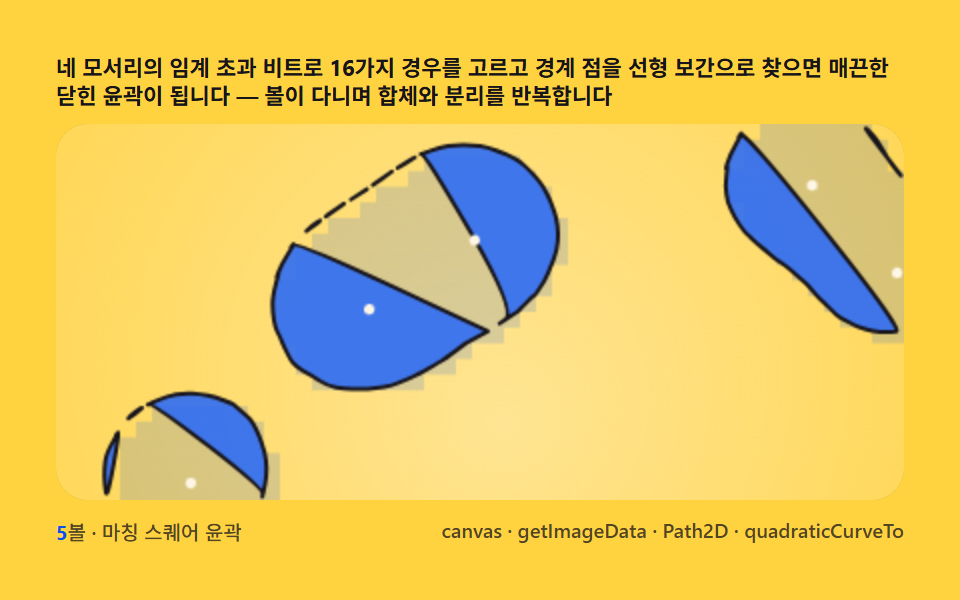 02 metaball-marching-squares
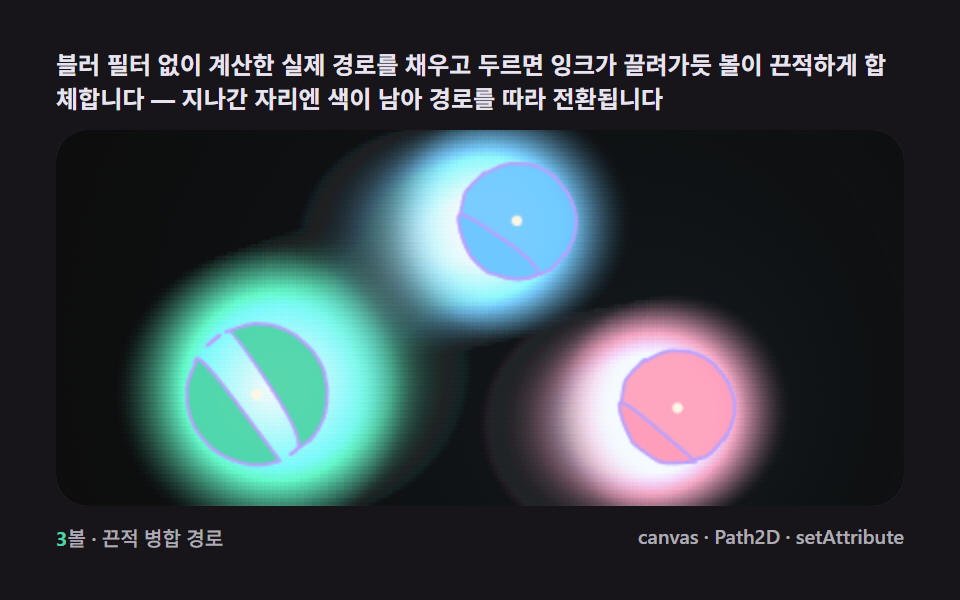 03 metaball-gooey-merge-svg
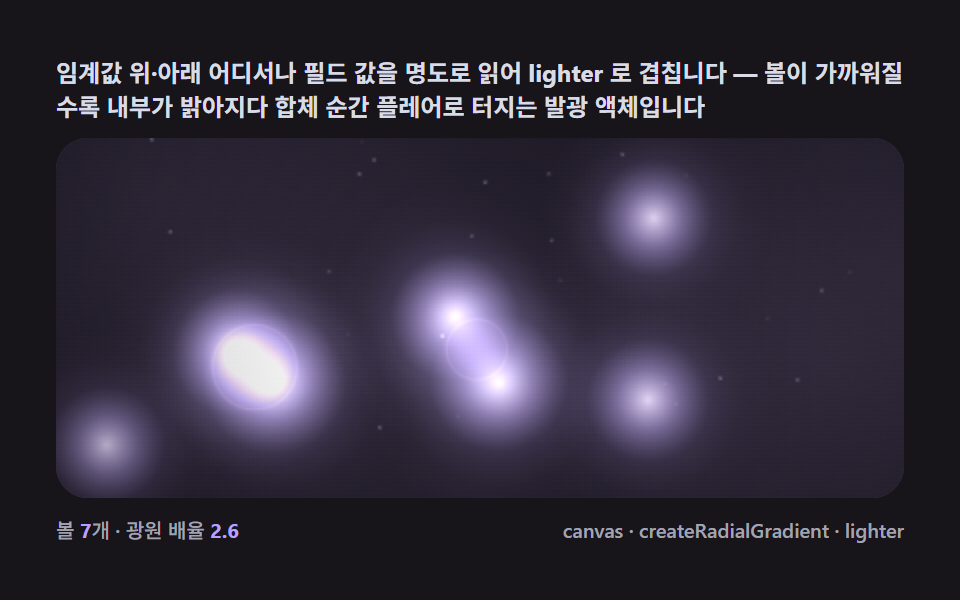 04 metaball-gradient-glow-bloom
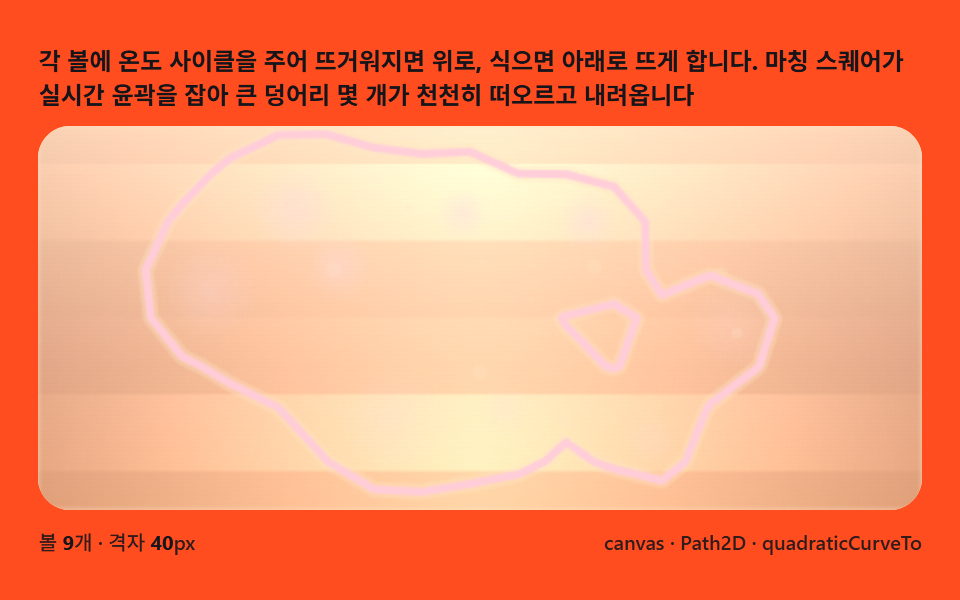 05 metaball-lava-lamp-float
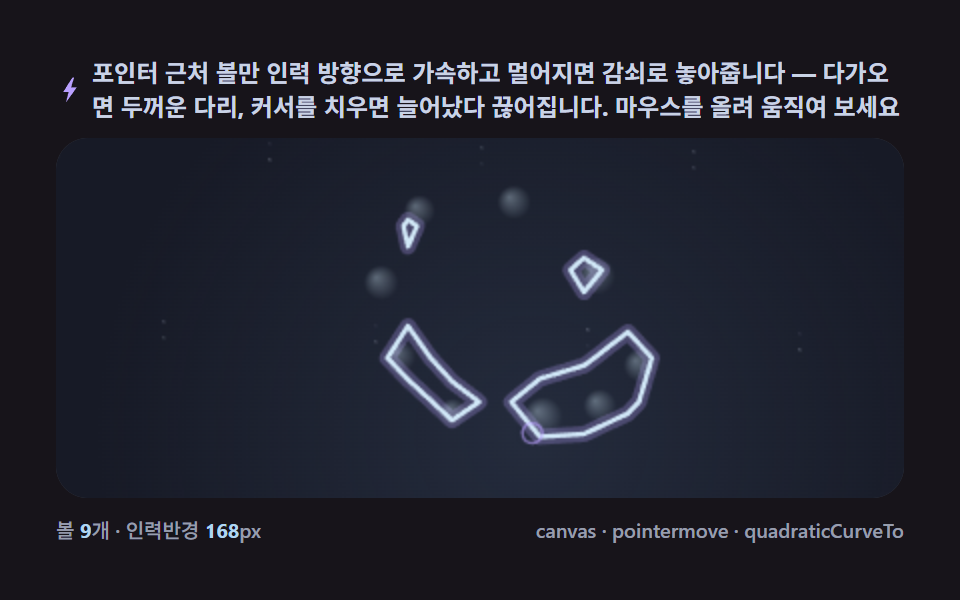 06 metaball-pointer-attract-split
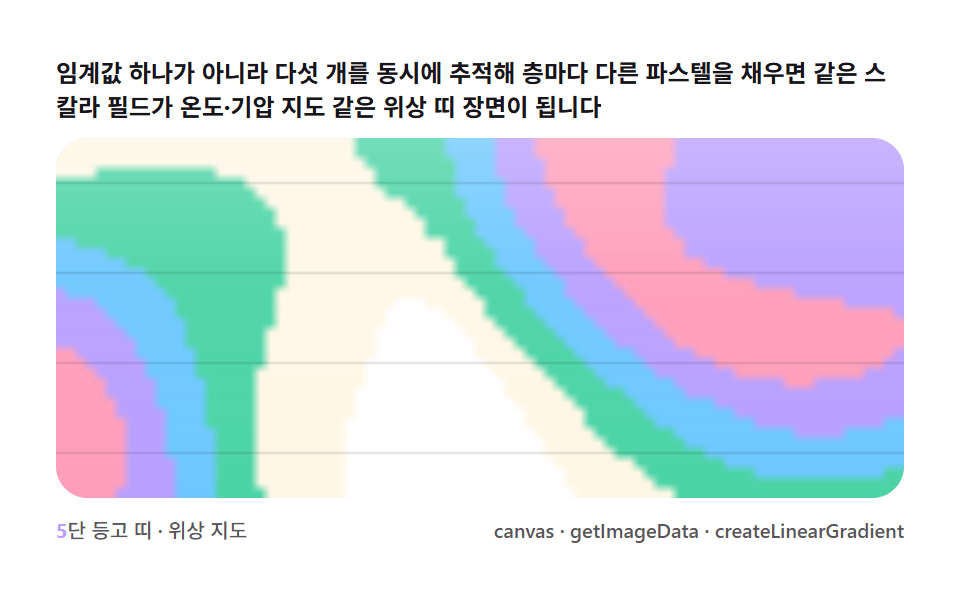 07 metaball-contour-band-topo
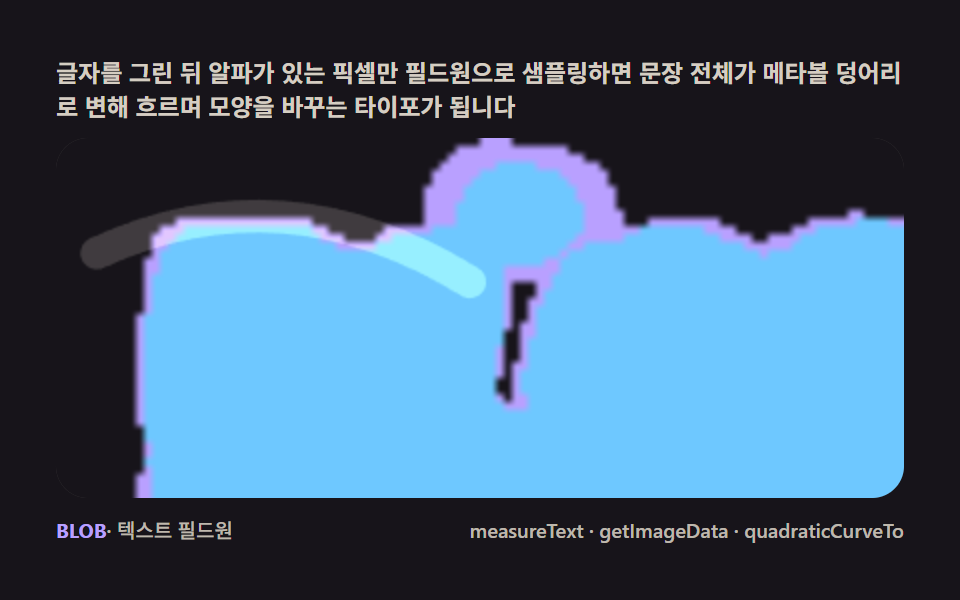 08 metaball-text-liquid-fillet
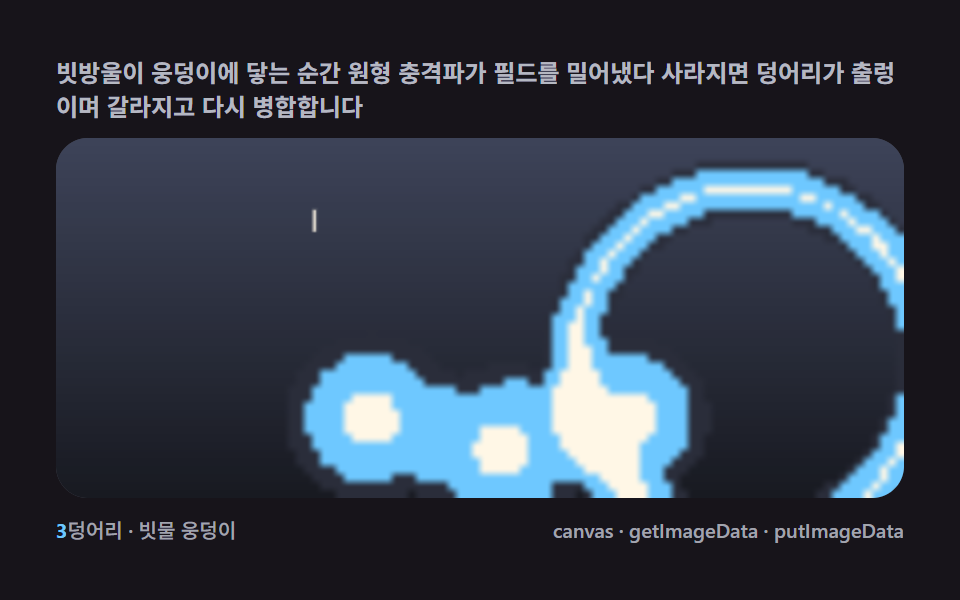 09 metaball-rain-pond-ripple-merge
Auto-plays · click a tile to jump to its section · all nine in one zip
- 01 One field layer — counting threshold-crossing pixels as a first metaball
- 02 Marching squares — the 16-case table that links the boundary into an outline
- 03 Gooey merge — the real path seeps, with no SVG filter
- 04 Glow bloom — reading field strength as lightness
- 05 Lava lamp — blobs rising on buoyancy and heat
- 06 Pointer attraction — a pulled bridge that tears
- 07 Contour bands — stacking thresholds into a topographic map
- 08 Liquid type — text pixels born as field sources
- 09 Rain pond — drop shockwaves that push the blobs apart
Why one field layer bleeds into nine scenes
The nine scenes climb one axis: how much of the marching-squares pipeline each one actually runs. 01 sums a lookup-table falloff per pixel and fills whole grid cells above threshold — no boundary tracing yet, just the stair-stepped mask that motivates the next item. 02 keeps that identical field but adds the 16-case table itself, turning the same crossing into a smooth curved outline through linear interpolation. 03 reuses 02's boundary math untouched and only changes what happens to the loop it returns — tinting it by the nearest ball and layering a fading trail, closer to a recursive stem redrawn from scratch every frame than to a blurred filter. 04 drops thresholding altogether and reads the raw field value as lightness through lighter compositing, so proximity itself becomes glow. 05 and 06 both keep the full contour pipeline but drive the balls differently — 05 by a buoyancy-temperature cycle, 06 by pointer acceleration and damping. 07 tracks five thresholds at once instead of one, painting bands the way two chemicals diffusing at different rates settle into stripes rather than a single blob edge. 08 swaps the field's sources from balls to a font's own alpha pixels, and 09 layers a transient shockwave onto the same field sum that a grid passing velocity from cell to neighboring cell uses for its own ripples. Follow them in order and item 07's contour bands are really item 02's single threshold cut five times instead of once.
Why metaballs need marching squares — the math of scalar fields and threshold edges
A field is just addition, and addition is what makes a bridge grow
Every item on this page traces back to the same scalar field: sum each ball's distance falloff (radius² / (radius² + distance²)-shaped, item 01's lookup table and item 05's direct division are the same curve two ways) at a grid point, and the region where that sum exceeds a threshold — THRESH between 0.92 and 1.05 across the set — is the metaball body. Because the field adds, two balls drawing close push their overlapping sums past threshold in the strip between them before either circle's own edge gets there, which is exactly the bridge that a metaballs animation is known for and that drawing two separate circles can never produce.
Marching squares is a lookup table, not a fill algorithm
The marching squares algorithm that item 02 introduces reads each grid cell's four corners as a 4-bit case — TL=1, TR=2, BR=4, BL=8 — and looks the case up in a 16-entry table that already knows which pair of edges the boundary crosses. Two of those sixteen cases (5 and 10) are ambiguous, since a diagonal pair of corners can mean either two separate blobs pinched at the center or one bridge connecting them; sampling the cell's own center against the threshold breaks the tie, the same disambiguation any 2D marching-squares implementation needs.
Linear interpolation is what turns a stair-step into a curve
Once a cell's case names which edges the boundary crosses, ip = (THRESH - a) / (b - a) finds exactly where on that edge the two corner values straddle the threshold, and joining those points with quadraticCurveTo (rather than straight lines) is what makes items 02 through 09 read as liquid instead of low-poly. Skip that interpolation and fill whole cells solid instead, the way item 01 deliberately does, and the same field produces the blocky, pre-marching-squares look that motivates the rest of the set.
The same field sum works as a metaball 2d scene under three different readings
A field crossing a threshold is a boundary (items 02, 03, 05, 06, 08), but the identical numbers also work as a lightness map (item 04's lighter composite) or as five stacked boundaries at once (item 07's bands) — a metaball 2d scene never needs a different simulation per look, only a different way of reading the same sum. That is also why none of the nine reaches for WebGL: every read happens on plain numbers already sitting in a JavaScript array.
Code per item
Every function under a heading below is pulled straight from that item's own script tag, not paraphrased into pseudocode, so pasting it into a project reproduces the demo above it constant for constant.
01One field layer — counting threshold-crossing pixels as a first metaball
Sum a scalar field of inverse-distance falloff from each ball center per pixel and fill only the grid cells over the threshold — a bridge seeps between two balls though no circle was ever drawn. It suits a single liquid mass sitting behind a hero headline.
<main class="stage">
<div class="cd is-demo" id="cdRoot">
  <p class="cd__hint">
    <span>Add each ball's distance falloff (radius² ÷ distance²) into a grid to build a scalar field, then fill only the cells above threshold — a bridge grows between two balls as they draw close</span>
  </p>
  <div class="cd__field" id="cdField" role="application" aria-label="Field-Threshold Layer test panel" tabindex="0">
    <canvas class="cd__cv" id="cdCv"></canvas>
  </div>
  <div class="cd__bar">
    <span class="cd__meta"><b class="cd__val" id="cdN">5</b>balls · falloff field threshold</span>
    <span class="cd__meta cd__meta--dim">canvas · getImageData · putImageData</span>
  </div>
</div>
</main>
@use "../../../../site/static/demo-tokens" as *;
// 필드 한 겹(01). @keyframes 를 아예 두지 않는다 — 움직임은 전부 캔버스 rAF 루프
// (스프라이트 굽기 putImageData → 필드 합산 getImageData → 임계값 칸 채움)가 만든다.
// 무대는 잉크. 파스텔 팔레트를 --ft-* 로 편다(편 공통 규격).
$duration: $dur-loop;
$easing: $ease-spring;
$color: $subject-mint;
@include stage($stage-ink);
// ── 파스텔 팔레트(BD26: vivid hex 잔존 0 — 전부 토큰·뮤트 파생) ──
$ft-mint: $subject-mint; // 임계값 직후 밴드
$ft-sky: $subject-sky; // 깊은 밴드
$ft-lilac: $subject-lilac; // 더 깊은 밴드
$ft-pink: $subject-pink; // 피크 밴드
$ft-cream: $subject-cream; // 코어 하이라이트·글자
$ft-line: #3a3542; // 어두운 무대 위 패널 경계(뮤트)
$ft-text: #e8e4ef; // 잉크 위 본문(밝은 라벤더 그레이·뮤트)
.cd {
--ft-mint: #{$ft-mint};
--ft-sky: #{$ft-sky};
--ft-lilac: #{$ft-lilac};
--ft-pink: #{$ft-pink};
--ft-cream: #{$ft-cream};
display: flex; flex-direction: column; gap: $sp-2;
width: 100%; max-width: 424px;
}
.cd__hint {
display: flex; align-items: center; gap: $sp-1; margin: 0;
font-weight: 700; font-size: clamp(10px, 2.8vw, 12px); line-height: 1.35;
color: $ft-text;
}
.cd__field {
position: relative; height: 188px;
border-radius: $r-card; overflow: hidden;
background: $stage-ink;
box-shadow: inset 0 0 0 1px $ft-line;
}
.cd__field:focus-visible { outline: 2px solid $ft-mint; outline-offset: 2px; }
.cd__cv { display: block; width: 100%; height: 100%; }
.cd__bar { display: flex; align-items: center; justify-content: space-between; gap: $sp-2; }
.cd__meta { font-size: 10px; font-weight: 500; color: rgba($ft-text, .72); }
.cd__val { color: $ft-mint; font-weight: 700; }
.cd__meta--dim { font-size: 10px; }
@media (max-width: 340px) {
.cd { gap: $sp-1; }
.cd__field { height: 104px; }
.cd__meta--dim { display: none; }
}
// reduce — rAF 를 돌리지 않고 임계값 한 장만 남는다.
@media (prefers-reduced-motion: reduce) {
.cd.is-still .cd__field { cursor: default !important; }
}html, body {
margin: 0;
overflow: hidden;
}
.stage {
box-sizing: border-box;
min-height: 100vh;
display: grid;
place-items: center;
margin: 0;
background: #17141a;
font-family: -apple-system, "Segoe UI", "Noto Sans KR", sans-serif;
padding: clamp(8px, 4vw, 24px);
}
.cd {
--ft-mint: #4cd4a6;
--ft-sky: #6ec8ff;
--ft-lilac: #b9a0ff;
--ft-pink: #ff9ebb;
--ft-cream: #fff7e6;
display: flex;
flex-direction: column;
gap: 8px;
width: 100%;
max-width: 424px;
}
.cd__hint {
display: flex;
align-items: center;
gap: 4px;
margin: 0;
font-weight: 700;
font-size: clamp(10px, 2.8vw, 12px);
line-height: 1.35;
color: #e8e4ef;
}
.cd__field {
position: relative;
height: 188px;
border-radius: 16px;
overflow: hidden;
background: #17141a;
box-shadow: inset 0 0 0 1px #3a3542;
}
.cd__field:focus-visible {
outline: 2px solid #4cd4a6;
outline-offset: 2px;
}
.cd__cv {
display: block;
width: 100%;
height: 100%;
}
.cd__bar {
display: flex;
align-items: center;
justify-content: space-between;
gap: 8px;
}
.cd__meta {
font-size: 10px;
font-weight: 500;
color: rgba(232, 228, 239, 0.72);
}
.cd__val {
color: #4cd4a6;
font-weight: 700;
}
.cd__meta--dim {
font-size: 10px;
}
@media (max-width: 340px) {
.cd {
gap: 4px;
}
.cd__field {
height: 104px;
}
.cd__meta--dim {
display: none;
}
}
@media (prefers-reduced-motion: reduce) {
.cd.is-still .cd__field {
cursor: default !important;
}
}// 필드 한 겹(01). 오프스크린 캔버스에 ImageData 를 직접 채워(putImageData) 부드러운 radial 스프라이트를
// 한 장 굽고, 그 스프라이트의 밝기를 getImageData 로 읽어 "거리 → 감쇠" 룩업 테이블로 쓴다.
// 매 프레임 볼마다 격자 칸에 그 감쇠값(반지름² / 거리² 꼴, 스프라이트 그대로 근사)을 더해
// 스칼라 필드를 합산하고, 합이 임계값을 넘는 칸만 색을 채운다 — 마칭 스퀘어 경계 추출 없이
// 칸 단위(복셀식) 채움이라 경계가 계단 모양이다(02 가 이 경계를 매끈하게 뽑는다).
(function () {
// ── 변형 상수 블록 — 아래 값 하나만 바꿔 변형을 만든다 ──
var N_BALL = 5; // balls 개수 — 3 은 성긴 장면, 7 은 붐비는 장면
var THRESH = 0.92; // 필드 임계값 — 낮추면 다리가 더 굵고 자주 이어진다
var CELL = 6; // 격자 셀 픽셀 크기 — 작을수록 매끈하지만 계산량 증가
// ────────────────────────────────────────────────────
var root = document.getElementById('cdRoot');
var field = document.getElementById('cdField');
var cv = document.getElementById('cdCv');
var ctx = cv.getContext('2d');
var nOut = document.getElementById('cdN');
nOut.textContent = String(N_BALL);
var css = getComputedStyle(root);
function tok(name) { return css.getPropertyValue(name).trim(); }
var COL = [tok('--ft-mint'), tok('--ft-sky'), tok('--ft-lilac'), tok('--ft-pink')];
var C_CREAM = tok('--ft-cream');
var reduce = window.matchMedia('(prefers-reduced-motion: reduce)').matches;
var W = 0, H = 0, COLS = 0, ROWS = 0;
var raf = 0, t0 = -1;
// 스프라이트 캔버스 — putImageData 로 부드러운 radial 감쇠를 픽셀 단위로 직접 굽는다
var SPR_R = 64;
var sprCv = document.createElement('canvas');
sprCv.width = SPR_R * 2; sprCv.height = SPR_R * 2;
var sprCtx = sprCv.getContext('2d');
var lut = new Float32Array(SPR_R + 1); // 거리 → 감쇠(0..1) 룩업
function bakeSprite() {
var img = sprCtx.createImageData(SPR_R * 2, SPR_R * 2);
var d = img.data;
for (var y = 0; y < SPR_R * 2; y++) {
for (var x = 0; x < SPR_R * 2; x++) {
var dx = x - SPR_R, dy = y - SPR_R;
var dist = Math.max(1, Math.sqrt(dx * dx + dy * dy));
// r² / d² 감쇠(메타볼 표준식) — 스프라이트 반경에서 정확히 1(=임계값 경계)
var v = Math.min(1, (SPR_R * SPR_R) / (dist * dist));
var idx = (y * SPR_R * 2 + x) * 4;
var a = Math.round(v * 255);
d[idx] = 255; d[idx + 1] = 255; d[idx + 2] = 255; d[idx + 3] = a;
}
}
sprCtx.putImageData(img, 0, 0);
// 룩업 테이블을 구운 스프라이트에서 getImageData 로 다시 읽는다 — 실사용값과 일치
var check = sprCtx.getImageData(SPR_R, 0, SPR_R, 1).data;
for (var i = 0; i < SPR_R; i++) lut[i] = check[i * 4 + 3] / 255;
}
// 시드 고정 PRNG — 미리보기가 항상 같은 balls 궤도로 흐른다
function makeRand(seed) {
var st = seed >>> 0;
return function () {
st = (st + 0x6D2B79F5) >>> 0;
var t = st;
t = Math.imul(t ^ (t >>> 15), t | 1);
t ^= t + Math.imul(t ^ (t >>> 7), t | 61);
return ((t ^ (t >>> 14)) >>> 0) / 4294967296;
};
}
var rand = makeRand(0x317A01);
var balls = [];
function buildBalls() {
balls = [];
for (var i = 0; i < N_BALL; i++) {
balls.push({
fx: 0.32 + rand() * 0.5, fy: 0.26 + rand() * 0.46,
ph: rand() * Math.PI * 2, ax: 0.3 + rand() * 0.22, ay: 0.28 + rand() * 0.22,
cx: 0.5, cy: 0.5, rad: 52 + rand() * 26
});
}
}
function fit() {
var r = field.getBoundingClientRect();
W = r.width; H = r.height;
cv.width = Math.round(W); cv.height = Math.round(H);
COLS = Math.max(24, Math.round(W / CELL));
ROWS = Math.max(16, Math.round(H / CELL));
}
function ballPos(b, t) {
return [
(b.cx + Math.sin(t * b.fx + b.ph) * b.ax) * W,
(b.cy + Math.cos(t * b.fy + b.ph * 1.4) * b.ay) * H
];
}
function fieldAt(px, py, t) {
var sum = 0, closest = -1, closestD = 1e9;
for (var i = 0; i < balls.length; i++) {
var p = ballPos(balls[i], t);
var dx = px - p[0], dy = py - p[1];
var dist = Math.sqrt(dx * dx + dy * dy);
// 감쇠 = 룩업 테이블(putImageData 로 구운 스프라이트에서 읽은 값)을 balls 반지름으로 스케일
// 스프라이트 반경(64)에서 감쇠 1이므로 scaled = dist * 64 / rad 이 거리에서 정확히 경계
var scaled = dist * (SPR_R / balls[i].rad);
var v = scaled >= SPR_R ? 0 : lut[Math.min(SPR_R - 1, Math.round(scaled))];
sum += v;
if (dist < closestD) { closestD = dist; closest = i; }
}
return [sum, closest];
}
function draw(t) {
ctx.clearRect(0, 0, W, H);
ctx.fillStyle = '#17141a';
ctx.fillRect(0, 0, W, H);
// 배경 잔광 드리프트 — 느린 안개(누적면적 확보, 077 기준 "화면이 살아 있음")
var mist = ctx.createRadialGradient(
W * (0.5 + Math.sin(t * 0.13) * 0.3), H * (0.5 + Math.cos(t * 0.11) * 0.3), 0,
W * 0.5, H * 0.5, Math.max(W, H) * 0.75
);
mist.addColorStop(0, 'rgba(185,160,255,0.22)');
mist.addColorStop(0.55, 'rgba(110,200,255,0.10)');
mist.addColorStop(1, 'rgba(23,20,26,0)');
ctx.fillStyle = mist;
ctx.fillRect(0, 0, W, H);
var cw = W / COLS, ch = H / ROWS;
for (var gy = 0; gy < ROWS; gy++) {
var py = (gy + 0.5) * ch;
for (var gx = 0; gx < COLS; gx++) {
var px = (gx + 0.5) * cw;
var fc = fieldAt(px, py, t);
if (fc[0] >= THRESH) {
var over = Math.min(1, (fc[0] - THRESH) / THRESH);
ctx.fillStyle = COL[fc[1] % COL.length];
ctx.globalAlpha = 0.55 + over * 0.45;
ctx.fillRect(gx * cw - 0.5, gy * ch - 0.5, cw + 1, ch + 1);
}
}
}
ctx.globalAlpha = 1;
// balls 코어 — 크림 하이라이트 점(중심을 눈으로 짚을 수 있게)
for (var i = 0; i < balls.length; i++) {
var p = ballPos(balls[i], t);
ctx.fillStyle = C_CREAM;
ctx.globalAlpha = 0.85;
ctx.beginPath(); ctx.arc(p[0], p[1], 2.4, 0, Math.PI * 2); ctx.fill();
}
ctx.globalAlpha = 1;
}
function stillFrame() { draw(0.6); }
function frame(now) {
if (t0 < 0) t0 = now;
var t = (now - t0) / 1000;
draw(t);
raf = requestAnimationFrame(frame);
}
window.addEventListener('resize', function () {
fit();
if (reduce) stillFrame();
});
bakeSprite();
fit();
buildBalls();
if (reduce) {
stillFrame();
root.classList.add('is-still');
} else {
raf = requestAnimationFrame(frame);
}
})();// FieldThreshold — vanilla 판(run/317/demo/01-metaball-field-threshold/index.html) 의 React 포트.
// 필드 한 겹 — 오프스크린 캔버스에 putImageData 로 부드러운 radial 감쇠 스프라이트를 굽고
// getImageData 로 읽어 룩업 테이블로 쓴다. 볼마다 r²/d² 감쇠를 격자 칸에 합산하고
// 임계값을 넘는 칸만 채운다 — 두 볼이 가까워지면 다리가 돋는다.
import { useEffect, useRef, useState } from "react";
import type { CSSProperties } from "react";
import styles from "./FieldThreshold.module.scss";
export type FieldThresholdProps = {
duration?: string;
easing?: string;
color?: string;
balls?: number; // 볼 개수 — 변형 "성긴/붐비는 장면" 축
threshold?: number; // 필드 임계값 — 낮추면 다리가 굵어진다
cell?: number; // 격자 셀 픽셀 크기
};
type Vars = CSSProperties & { "--duration"?: string; "--easing"?: string; "--color"?: string };
type Box<T> = { current: T };
type Ball = { fx: number; fy: number; ph: number; ax: number; ay: number; cx: number; cy: number; rad: number };
const FIELD_LABEL = "필드 한 겹 임계값 실험판";
const SPR_R = 64;
function makePRNG(seed: number): () => number {
let s = seed >>> 0;
return function () {
s = (s + 0x6d2b79f5) >>> 0;
let t = s;
t = Math.imul(t ^ (t >>> 15), t | 1);
t ^= t + Math.imul(t ^ (t >>> 7), t | 61);
return ((t ^ (t >>> 14)) >>> 0) / 4294967296;
};
}
export default function FieldThreshold({
duration = "2s",
easing = "cubic-bezier(.2, .8, .2, 1)",
color = "#4cd4a6",
balls: nBall = 5,
threshold = 0.92,
cell = 6,
}: FieldThresholdProps) {
const rootRef = useRef<HTMLDivElement | null>(null);
const fieldRef = useRef<HTMLDivElement | null>(null);
const cvRef = useRef<HTMLCanvasElement | null>(null);
const ctxRef = useRef<CanvasRenderingContext2D | null>(null);
const sizeRef = useRef({ w: 0, h: 0 }) as Box<{ w: number; h: number }>;
const colsRef = useRef(0) as Box<number>;
const rowsRef = useRef(0) as Box<number>;
const lutRef = useRef(new Float32Array(SPR_R)) as Box<Float32Array>;
const colRef = useRef<{ bands: string[]; cream: string } | null>(null);
const ballNRef = useRef(nBall) as Box<number>;
const thrRef = useRef(threshold) as Box<number>;
const cellRef = useRef(cell) as Box<number>;
const ballsRef = useRef<Ball[]>([]) as Box<Ball[]>;
const rafRef = useRef(0) as Box<number>;
const [n, setN] = useState(String(nBall));
const [still, setStill] = useState(false);
const vars: Vars = { "--duration": duration, "--easing": easing, "--color": color };
function reduced(): boolean {
return window.matchMedia("(prefers-reduced-motion: reduce)").matches;
}
// 스프라이트 굽기 — putImageData 로 r²/d² 감쇠를 픽셀 단위로 쓰고 getImageData 로 룩업을 읽는다
function bakeSprite(): void {
const c = document.createElement("canvas");
c.width = SPR_R * 2;
c.height = SPR_R * 2;
const sc = c.getContext("2d");
if (!sc) return;
const img = sc.createImageData(SPR_R * 2, SPR_R * 2);
const d = img.data;
for (let y = 0; y < SPR_R * 2; y++) {
for (let x = 0; x < SPR_R * 2; x++) {
const dx = x - SPR_R;
const dy = y - SPR_R;
const dist = Math.max(1, Math.sqrt(dx * dx + dy * dy));
const v = Math.min(1, (SPR_R * SPR_R) / (dist * dist));
const idx = (y * SPR_R * 2 + x) * 4;
d[idx] = 255; d[idx + 1] = 255; d[idx + 2] = 255;
d[idx + 3] = Math.round(v * 255);
}
}
sc.putImageData(img, 0, 0);
const check = sc.getImageData(SPR_R, 0, SPR_R, 1).data;
for (let i = 0; i < SPR_R; i++) lutRef.current[i] = check[i * 4 + 3] / 255;
}
function buildBalls(): void {
const rand = makePRNG(0x317a01);
const arr: Ball[] = [];
for (let i = 0; i < ballNRef.current; i++) {
arr.push({
fx: 0.32 + rand() * 0.5, fy: 0.26 + rand() * 0.46,
ph: rand() * Math.PI * 2, ax: 0.3 + rand() * 0.22, ay: 0.28 + rand() * 0.22,
cx: 0.5, cy: 0.5, rad: 52 + rand() * 26,
});
}
ballsRef.current = arr;
}
function fit(): void {
const field = fieldRef.current;
const cv = cvRef.current;
if (!field || !cv) return;
const ctx = cv.getContext("2d");
if (!ctx) return;
const r = field.getBoundingClientRect();
sizeRef.current.w = r.width;
sizeRef.current.h = r.height;
cv.width = Math.round(r.width);
cv.height = Math.round(r.height);
colsRef.current = Math.max(24, Math.round(r.width / cellRef.current));
rowsRef.current = Math.max(16, Math.round(r.height / cellRef.current));
ctxRef.current = ctx;
}
function ballPos(b: Ball, t: number, w: number, h: number): [number, number] {
return [
(b.cx + Math.sin(t * b.fx + b.ph) * b.ax) * w,
(b.cy + Math.cos(t * b.fy + b.ph * 1.4) * b.ay) * h,
];
}
function fieldAt(px: number, py: number, t: number): [number, number] {
const { w, h } = sizeRef.current;
let sum = 0;
let closest = 0;
let closestD = Infinity;
const balls = ballsRef.current;
const lut = lutRef.current;
for (let i = 0; i < balls.length; i++) {
const p = ballPos(balls[i], t, w, h);
const dx = px - p[0];
const dy = py - p[1];
const dist = Math.sqrt(dx * dx + dy * dy);
const scaled = dist * (SPR_R / balls[i].rad);
const v = scaled >= SPR_R ? 0 : lut[Math.min(SPR_R - 1, Math.round(scaled))];
sum += v;
if (dist < closestD) { closestD = dist; closest = i; }
}
return [sum, closest];
}
function draw(t: number): void {
const ctx = ctxRef.current;
const col = colRef.current;
const { w: W, h: H } = sizeRef.current;
if (!ctx || !col) return;
ctx.fillStyle = "#17141a";
ctx.fillRect(0, 0, W, H);
const mist = ctx.createRadialGradient(
W * (0.5 + Math.sin(t * 0.13) * 0.3), H * (0.5 + Math.cos(t * 0.11) * 0.3), 0,
W * 0.5, H * 0.5, Math.max(W, H) * 0.75,
);
mist.addColorStop(0, "rgba(185,160,255,0.22)");
mist.addColorStop(0.55, "rgba(110,200,255,0.10)");
mist.addColorStop(1, "rgba(23,20,26,0)");
ctx.fillStyle = mist;
ctx.fillRect(0, 0, W, H);
const cw = W / colsRef.current;
const ch = H / rowsRef.current;
const thr = thrRef.current;
for (let gy = 0; gy < rowsRef.current; gy++) {
const py = (gy + 0.5) * ch;
for (let gx = 0; gx < colsRef.current; gx++) {
const px = (gx + 0.5) * cw;
const fc = fieldAt(px, py, t);
if (fc[0] >= thr) {
const over = Math.min(1, (fc[0] - thr) / thr);
ctx.fillStyle = col.bands[fc[1] % col.bands.length];
ctx.globalAlpha = 0.55 + over * 0.45;
ctx.fillRect(gx * cw - 0.5, gy * ch - 0.5, cw + 1, ch + 1);
}
}
}
ctx.globalAlpha = 1;
const balls = ballsRef.current;
for (let i = 0; i < balls.length; i++) {
const p = ballPos(balls[i], t, W, H);
ctx.fillStyle = col.cream;
ctx.globalAlpha = 0.85;
ctx.beginPath();
ctx.arc(p[0], p[1], 2.4, 0, Math.PI * 2);
ctx.fill();
}
ctx.globalAlpha = 1;
}
function stillFrame(): void { draw(0.6); }
let t0 = -1;
function frame(now: number): void {
if (t0 < 0) t0 = now;
const t = (now - t0) / 1000;
draw(t);
rafRef.current = requestAnimationFrame(frame);
}
useEffect(() => {
const root = rootRef.current;
if (!root) return;
ballNRef.current = nBall;
thrRef.current = threshold;
cellRef.current = cell;
const cs = getComputedStyle(root);
const tok = (name: string) => cs.getPropertyValue(name).trim();
colRef.current = {
bands: [tok("--ft-mint"), tok("--ft-sky"), tok("--ft-lilac"), tok("--ft-pink")],
cream: tok("--ft-cream"),
};
bakeSprite();
buildBalls();
fit();
setN(String(nBall));
function onResize(): void {
fit();
if (reduced()) stillFrame();
}
window.addEventListener("resize", onResize);
if (reduced()) {
stillFrame();
setStill(true);
} else {
rafRef.current = requestAnimationFrame(frame);
}
return () => {
window.removeEventListener("resize", onResize);
cancelAnimationFrame(rafRef.current);
};
// eslint-disable-next-line react-hooks/exhaustive-deps
}, [nBall, threshold, cell]);
const rootCls = still ? `${styles.root} ${styles.isStill}` : styles.root;
return (
<main className={styles.stage}>
<div className={rootCls} ref={rootRef} style={vars}>
<p className={styles.hint}>
<span>볼마다 거리 감쇠(반지름² ÷ 거리²)를 격자 칸에 더해 스칼라 필드를 만들고 임계값을 넘는 칸만 채우면, 두 볼이 가까워질 때 사이에 다리가 돋아납니다</span>
</p>
<div
className={styles.field}
ref={fieldRef}
role="application"
aria-label={FIELD_LABEL}
tabIndex={0}
>
<canvas className={styles.cv} ref={cvRef}></canvas>
</div>
<div className={styles.bar}>
<span className={styles.meta}><b className={styles.val}>{n}</b>볼 · 감쇠 필드 임계값</span>
<span className={styles.metaDim}>canvas · getImageData · putImageData</span>
</div>
</div>
</main>
);
}01 · One field layer — counting threshold-crossing pixels as a first metaball — Measured area 33.374% · moving frames 23/23Original by GODRICH · SCSS and React ship in the zip · See the password
A baked lookup sprite turns per-pixel falloff into one array read
function fieldAt(px, py, t) {
  var sum = 0, closest = -1, closestD = 1e9;
  for (var i = 0; i < balls.length; i++) {
    var p = ballPos(balls[i], t);
    var dx = px - p[0], dy = py - p[1];
    var dist = Math.sqrt(dx * dx + dy * dy);
    // falloff = a value read from the lookup table (a sprite baked once via putImageData), scaled by the ball's radius
    // at the sprite radius (64) falloff is exactly 1, so scaled = dist * 64 / rad is exactly the boundary at that distance
    var scaled = dist * (SPR_R / balls[i].rad);
    var v = scaled >= SPR_R ? 0 : lut[Math.min(SPR_R - 1, Math.round(scaled))];
    sum += v;
    if (dist < closestD) { closestD = dist; closest = i; }
  }
  return [sum, closest];
}
02Marching squares — the 16-case table that links the boundary into an outline
Encode the four corner crossings of each cell as a 4-bit case, interpolate the edge points linearly and join them with curves — the stair-stepped pixel edge from item 01 becomes a smooth closed outline. It reads well as a liquid silhouette behind a logo or mascot mark.
<main class="stage">
<div class="cd is-demo" id="cdRoot">
  <p class="cd__hint">
    <span>Pick one of 16 cases from the four corners' above-threshold bits and find the edge points by linear interpolation — the result is a smooth closed contour, with balls merging and splitting as they move</span>
  </p>
  <div class="cd__field" id="cdField" role="application" aria-label="Marching-Squares Contour test panel" tabindex="0">
    <canvas class="cd__cv" id="cdCv"></canvas>
  </div>
  <div class="cd__bar">
    <span class="cd__meta"><b class="cd__val" id="cdN">5</b>balls · marching squares contour</span>
    <span class="cd__meta cd__meta--dim">canvas · getImageData · Path2D · quadraticCurveTo</span>
  </div>
</div>
</main>
@use "../../../../site/static/demo-tokens" as *;
// 마칭 스퀘어(02). @keyframes 없음 — 움직임은 rAF(스칼라 필드 + 4비트 16경우 테이블
// + 선형 보간 경계 + quadraticCurveTo 평활)가 만든다.
// 무대는 옐로, 피사체는 블루 계열. 파스텔을 --ms-* 로 편다(편 공통 규격).
$duration: $dur-loop;
$easing: $ease-spring;
$color: $subject-blue;
@include stage($stage-yellow);
// ── 파스텔 팔레트(BD26 — vivid 잔존 0) ──
$ms-fill: $subject-blue; // 볼 몸통 채움
$ms-deep: $subject-blue-deep; // 몸통보다 한 단 깊은 채움(층감)
$ms-edge: $stage-ink; // 윤곽 잉크
$ms-dot: $stage-ink; // 보간점 표식
$ms-cream: $subject-cream; // 크림 하이라이트
$ms-text: $stage-ink; // 옐로 무대 본문 잉크
.cd {
--ms-fill: #{$ms-fill};
--ms-deep: #{$ms-deep};
--ms-edge: #{$ms-edge};
--ms-cream: #{$ms-cream};
display: flex; flex-direction: column; gap: $sp-2;
width: 100%; max-width: 424px;
}
.cd__hint {
display: flex; align-items: center; gap: $sp-1; margin: 0;
// en·ja 번역문이 ko 보다 길어 480×300 에서 3줄로 넘친다(BD14) — 폭·레이아웃은 그대로,
// 글자만 살짝 줄여 3줄이 돼도 예산 안에 들어오게 한다 (2026-09-15)
font-weight: 700; font-size: clamp(9px, 2.5vw, 11px); line-height: 1.22;
color: $ms-text;
}
.cd__field {
position: relative; height: 188px;
border-radius: $r-card; overflow: hidden;
background: $stage-yellow;
box-shadow: inset 0 0 0 1px rgba($ms-text, .2);
}
.cd__field:focus-visible { outline: 2px solid $ms-fill; outline-offset: 2px; }
.cd__cv { display: block; width: 100%; height: 100%; }
.cd__bar { display: flex; align-items: center; justify-content: space-between; gap: $sp-2; }
.cd__meta { font-size: 10px; font-weight: 500; color: rgba($ms-text, .74); }
.cd__val { color: $ms-deep; font-weight: 700; }
.cd__meta--dim { font-size: 10px; }
@media (max-width: 340px) {
.cd { gap: $sp-1; }
.cd__field { height: 104px; }
.cd__meta--dim { display: none; }
}
// reduce — rAF 를 돌리지 않고 한 장만 남는다.
@media (prefers-reduced-motion: reduce) {
.cd.is-still .cd__field { cursor: default !important; }
}html, body {
margin: 0;
overflow: hidden;
}
.stage {
box-sizing: border-box;
min-height: 100vh;
display: grid;
place-items: center;
margin: 0;
background: #ffd23f;
font-family: -apple-system, "Segoe UI", "Noto Sans KR", sans-serif;
padding: clamp(8px, 4vw, 24px);
}
.cd {
--ms-fill: #2f6df6;
--ms-deep: #0a4fe8;
--ms-edge: #17141a;
--ms-cream: #fff7e6;
display: flex;
flex-direction: column;
gap: 8px;
width: 100%;
max-width: 424px;
}
.cd__hint {
display: flex;
align-items: center;
gap: 4px;
margin: 0;
font-weight: 700;
font-size: clamp(9px, 2.5vw, 11px);
line-height: 1.22;
color: #17141a;
}
.cd__field {
position: relative;
height: 188px;
border-radius: 16px;
overflow: hidden;
background: #ffd23f;
box-shadow: inset 0 0 0 1px rgba(23, 20, 26, 0.2);
}
.cd__field:focus-visible {
outline: 2px solid #2f6df6;
outline-offset: 2px;
}
.cd__cv {
display: block;
width: 100%;
height: 100%;
}
.cd__bar {
display: flex;
align-items: center;
justify-content: space-between;
gap: 8px;
}
.cd__meta {
font-size: 10px;
font-weight: 500;
color: rgba(23, 20, 26, 0.74);
}
.cd__val {
color: #0a4fe8;
font-weight: 700;
}
.cd__meta--dim {
font-size: 10px;
}
@media (max-width: 340px) {
.cd {
gap: 4px;
}
.cd__field {
height: 104px;
}
.cd__meta--dim {
display: none;
}
}
@media (prefers-reduced-motion: reduce) {
.cd.is-still .cd__field {
cursor: default !important;
}
}// 마칭 스퀘어(02). 스칼라 필드(볼마다 r²/d² 감쇠 합)를 오프스크린 저해상 캔버스에 굽는다 —
// 격자 모서리당 1px 크기로, 볼마다 감쇠 radialGradient 스프라이트를 lighter 합성으로 겹한다.
// getImageData 로 그 픽셀을 읽어 Float32Array 격자에 되돌리는 게 필드 샘플링이다(07 의 패턴).
// 각 칸의 네 모서리 코너값이 임계값을 넘는지에 따라 4비트 인덱스(16경우)를 만들고,
// 경우 테이블이 어떤 변을 경계가 가로지르는지 알려주면 그 위치를 변 양 끝 코너값의
// 선형 보간으로 정한다. 이 점들을 짝지어 폴리라인을 만들고 quadraticCurveTo 로 평활한
// 닫힌 윤곽을 Path2D 에 담아 fill+stroke — 3~5개 볼이 가까워지면 다리로 합체, 멀어지면 분리된다.
(function () {
// ── 변형 상수 블록 — 아래 값 하나만 바꿔 변형을 만든다 ──
var N_BALL = 5; // balls 개수 — 합체/분리가 잦은 밀도
var THRESH = 1.0; // 필드 임계값
var CELL = 8; // 격자 셀 픽셀 크기 — 보간 밀도
// ────────────────────────────────────────────────────
var root = document.getElementById('cdRoot');
var field = document.getElementById('cdField');
var cv = document.getElementById('cdCv');
var ctx = cv.getContext('2d');
var nOut = document.getElementById('cdN');
nOut.textContent = String(N_BALL);
var css = getComputedStyle(root);
function tok(name) { return css.getPropertyValue(name).trim(); }
var C_FILL = tok('--ms-fill');
var C_DEEP = tok('--ms-deep');
var C_EDGE = tok('--ms-edge');
var C_CREAM = tok('--ms-cream');
var C_BG = '#ffd23f';
var reduce = window.matchMedia('(prefers-reduced-motion: reduce)').matches;
var W = 0, H = 0, COLS = 0, ROWS = 0;
var grid = null;
var raf = 0, t0 = -1;
// 오프스크린 필드 캔버스 — 격자 모서리당 1px. 여기에 감쇠를 굽고 getImageData 로 읽는다
var fieldCv = document.createElement('canvas');
var fieldCtx = fieldCv.getContext('2d', { willReadFrequently: true });
var LOWW = 0, LOWH = 0;
// 시드 고정 PRNG — 미리보기가 항상 같은 balls 궤도로 흐른다
function makeRand(seed) {
var st = seed >>> 0;
return function () {
st = (st + 0x6D2B79F5) >>> 0;
var t = st;
t = Math.imul(t ^ (t >>> 15), t | 1);
t ^= t + Math.imul(t ^ (t >>> 7), t | 61);
return ((t ^ (t >>> 14)) >>> 0) / 4294967296;
};
}
var rand = makeRand(0x317A02);
var balls = [];
function buildBalls() {
balls = [];
for (var i = 0; i < N_BALL; i++) {
balls.push({
fx: 0.3 + rand() * 0.5, fy: 0.24 + rand() * 0.44,
ph: rand() * Math.PI * 2, ax: 0.3 + rand() * 0.24, ay: 0.28 + rand() * 0.24,
cx: 0.5, cy: 0.5, rad: 42 + rand() * 22
});
}
}
function fit() {
var r = field.getBoundingClientRect();
W = r.width; H = r.height;
cv.width = Math.round(W); cv.height = Math.round(H);
COLS = Math.max(16, Math.round(W / CELL));
ROWS = Math.max(12, Math.round(H / CELL));
LOWW = COLS + 1; LOWH = ROWS + 1;
fieldCv.width = LOWW; fieldCv.height = LOWH;
grid = new Float32Array(LOWW * LOWH);
}
function ballPos(b, t) {
return [
(b.cx + Math.sin(t * b.fx + b.ph) * b.ax) * W,
(b.cy + Math.cos(t * b.fy + b.ph * 1.4) * b.ay) * H
];
}
// ── 필드 굽기 + 픽셀 판독 ──
// 볼마다 r²/d² 감쇠를 회색조 radialGradient 로 오프스크린 캔버스(격자 모서리당 1px)에 그리고
// lighter 합성으로 겹한다 — 겹치는 볼의 감쇠가 픽셀 값으로 그대로 더해진다(메타볼 합산).
// 스프라이트 반경 안에서 gradient offset fr 마다 값 v=1/(fr·K)² 을 SCALE 배로 픽셀에 쓰고,
// getImageData 로 읽은 뒤 SCALE 로 나누면 이전 fieldAt 판(Σ r²·0.5/d²)과 같은 척도로 돌아온다.
// 임계값(1.0)이 새지 않도록 SCALE 을 넉넉히 잡아 포화(255) 가 임계값 부근에서 일어나지 않게 한다.
// 임계값(1.0) 부근의 양자화를 줄이려 SCALE 을 넉넉히 잡는다 — v=1(임계)이 픽셀 100 에 대응.
// 255 클램프는 블롭 깊은 내부(v≥2.55, 어차피 case 15)에서만 일어나 윤곽에 영향 없다.
var K = 8, SCALE = 100, STOPS = 32;
var rad2Cache = [];
function b_rad2(i) {
if (!rad2Cache[i]) rad2Cache[i] = balls[i].rad * balls[i].rad * 0.5;
return rad2Cache[i];
}
function drawField(t) {
var cw = W / COLS, ch = H / ROWS;
fieldCtx.globalCompositeOperation = 'source-over';
fieldCtx.fillStyle = '#000';
fieldCtx.fillRect(0, 0, LOWW, LOWH);
fieldCtx.globalCompositeOperation = 'lighter';
for (var i = 0; i < balls.length; i++) {
var p = ballPos(balls[i], t);
var cx = p[0] / cw, cy = p[1] / ch;
var R = Math.sqrt(b_rad2(i)) * K / cw;
var g = fieldCtx.createRadialGradient(cx, cy, 0, cx, cy, R);
for (var s = 0; s < STOPS; s++) {
var off = s / STOPS;
var fr = Math.max(off, 1 / (STOPS * 4));
var v = 1 / (fr * fr * K * K);
var px = Math.min(255, Math.round(v * SCALE));
g.addColorStop(off, 'rgb(' + px + ',' + px + ',' + px + ')');
}
g.addColorStop(1, 'rgb(0,0,0)'); // 꼬리 절단 — 반경 밖은 0(gradient 마지막 정지점이 밖으로 펴지는 걸 끊는다)
fieldCtx.fillStyle = g;
fieldCtx.fillRect(0, 0, LOWW, LOWH);
}
fieldCtx.globalCompositeOperation = 'source-over';
}
function classify() {
var img = fieldCtx.getImageData(0, 0, LOWW, LOWH);
var d = img.data;
for (var gy = 0; gy < LOWH; gy++) {
for (var gx = 0; gx < LOWW; gx++) {
grid[gy * LOWW + gx] = d[(gy * LOWW + gx) * 4] / SCALE;
}
}
}
// ambiguous(5·10) 칸의 중심값만 실계산으로 보강 — getImageData 픽셀과 같은 r²/d² 합
function fieldAt(px, py, t) {
var sum = 0;
for (var i = 0; i < balls.length; i++) {
var p = ballPos(balls[i], t);
var dx = px - p[0], dy = py - p[1];
var d2 = dx * dx + dy * dy;
if (d2 < 1) d2 = 1;
sum += (b_rad2(i)) / d2;
}
return sum;
}
function sampleGrid(t) {
drawField(t);
classify();
}
// 16경우 마칭 스퀘어 — 칸의 코너 비트(TL=1 TR=2 BR=4 BL=8, 임계 초과=1)에 따라
// 경계가 지나는 변 쌍을 돌려준다: top·right·bottom·left 변 코드
// ambiguous 5·10 는 중심값으로 판정해 두 선으로 나눈다.
var EDGES = { T: 0, R: 1, B: 2, L: 3 };
function caseSegments(cs) {
switch (cs) {
case 0: return [];
case 15: return [];
case 1: return [[EDGES.T, EDGES.L]];
case 14: return [[EDGES.T, EDGES.L]];
case 2: return [[EDGES.T, EDGES.R]];
case 13: return [[EDGES.T, EDGES.R]];
case 3: return [[EDGES.L, EDGES.R]];
case 12: return [[EDGES.L, EDGES.R]];
case 4: return [[EDGES.R, EDGES.B]];
case 11: return [[EDGES.R, EDGES.B]];
case 6: return [[EDGES.T, EDGES.B]];
case 9: return [[EDGES.T, EDGES.B]];
case 7: return [[EDGES.L, EDGES.B]];
case 8: return [[EDGES.L, EDGES.B]];
case 5: return 'AMB-x'; // 중심 낮음: TL 블롭과 BR 블롭 분리
case 10: return 'AMB-+'; // 중심 높음: 두 블롭 연결
}
return [];
}
// 변 위 경계점 — 코너값 선형 보간
function lerpPt(gx, gy, edge, cw, ch) {
var vTL = grid[gy * (COLS + 1) + gx];
var vTR = grid[gy * (COLS + 1) + gx + 1];
var vBR = grid[(gy + 1) * (COLS + 1) + gx + 1];
var vBL = grid[(gy + 1) * (COLS + 1) + gx];
var x0 = gx * cw, y0 = gy * ch;
function ip(a, b) { return (THRESH - a) / (b - a); }
switch (edge) {
case EDGES.T: return [x0 + cw * ip(vTL, vTR), y0];
case EDGES.B: return [x0 + cw * ip(vBL, vBR), y0 + ch];
case EDGES.L: return [x0, y0 + ch * ip(vTL, vBL)];
case EDGES.R: return [x0 + cw, y0 + ch * ip(vTR, vBR)];
}
return [x0, y0];
}
// 세그먼트 모으기 — 모든 칸의 경계 절편을 점 배열로
function collectSegments(t) {
var cw = W / COLS, ch = H / ROWS;
var pts = []; // [x, y, nx, ny] 시작점·끝점
for (var gy = 0; gy < ROWS; gy++) {
for (var gx = 0; gx < COLS; gx++) {
var vTL = grid[gy * (COLS + 1) + gx];
var vTR = grid[gy * (COLS + 1) + gx + 1];
var vBR = grid[(gy + 1) * (COLS + 1) + gx + 1];
var vBL = grid[(gy + 1) * (COLS + 1) + gx];
var cs = (vTL > THRESH ? 1 : 0) | (vTR > THRESH ? 2 : 0) | (vBR > THRESH ? 4 : 0) | (vBL > THRESH ? 8 : 0);
if (cs === 0 || cs === 15) continue;
var segs = caseSegments(cs);
if (typeof segs === 'string') {
// ambiguous — 칸 중심값으로 판정
var mc = fieldAt((gx + 0.5) * cw, (gy + 0.5) * ch, t);
var flip = (cs === 5) === (mc <= THRESH);
var a = flip ? [[EDGES.T, EDGES.R], [EDGES.L, EDGES.B]]
: [[EDGES.T, EDGES.L], [EDGES.R, EDGES.B]];
for (var k = 0; k < 2; k++) {
var p1 = lerpPt(gx, gy, a[k][0], cw, ch);
var p2 = lerpPt(gx, gy, a[k][1], cw, ch);
pts.push([p1, p2]);
}
} else {
for (var s = 0; s < segs.length; s++) {
var q1 = lerpPt(gx, gy, segs[s][0], cw, ch);
var q2 = lerpPt(gx, gy, segs[s][1], cw, ch);
pts.push([q1, q2]);
}
}
}
}
return pts;
}
// 세그먼트를 연결해 닫힌 고리로 엮기 — 끝점 근사 매칭(그리드 해상도 한도)
function chainSegments(segs) {
var eps2 = (CELL * 1.5) * (CELL * 1.5);
var used = new Uint8Array(segs.length);
var loops = [];
for (var i = 0; i < segs.length; i++) {
if (used[i]) continue;
used[i] = 1;
var loop = [segs[i][0], segs[i][1]];
var guard = 0;
while (guard++ < 4000) {
var tail = loop[loop.length - 1];
var found = -1;
for (var j = 0; j < segs.length; j++) {
if (used[j]) continue;
var dx = segs[j][0][0] - tail[0], dy = segs[j][0][1] - tail[1];
if (dx * dx + dy * dy < eps2) { found = j; loop.push(segs[j][1]); break; }
dx = segs[j][1][0] - tail[0]; dy = segs[j][1][1] - tail[1];
if (dx * dx + dy * dy < eps2) { loop.push(segs[j][0]); found = j; break; }
}
if (found < 0) break;
used[found] = 1;
}
if (loop.length >= 3) loops.push(loop);
}
return loops;
}
// 고리를 quadraticCurveTo 로 평활 — 중점 규칙(각 점을 제어점, 중점을 앵커)
function smoothLoop(path, loop) {
var n = loop.length;
path.moveTo((loop[0][0] + loop[1][0]) / 2, (loop[0][1] + loop[1][1]) / 2);
for (var i = 1; i <= n; i++) {
var cur = loop[i % n];
var nxt = loop[(i + 1) % n];
path.quadraticCurveTo(cur[0], cur[1], (cur[0] + nxt[0]) / 2, (cur[1] + nxt[1]) / 2);
}
path.closePath();
}
function draw(t) {
sampleGrid(t);
var segs = collectSegments(t);
var loops = chainSegments(segs);
ctx.fillStyle = C_BG;
ctx.fillRect(0, 0, W, H);
// 옐로 무대 배경 변화 — 느린 크림 안개 드리프트(누적면적)
var mist = ctx.createRadialGradient(
W * (0.5 + Math.sin(t * 0.12) * 0.32), H * (0.5 + Math.cos(t * 0.1) * 0.3), 0,
W * 0.5, H * 0.5, Math.max(W, H) * 0.8
);
mist.addColorStop(0, 'rgba(255,247,230,0.5)');
mist.addColorStop(1, 'rgba(255,247,230,0)');
ctx.fillStyle = mist;
ctx.fillRect(0, 0, W, H);
// 임계값 내부 미리보기 채움(격자 픽셀) — 윤곽이 무엇을 감싸는지 보여주는 바탕
var cw = W / COLS, ch = H / ROWS;
ctx.fillStyle = C_DEEP;
ctx.globalAlpha = 0.16;
for (var gy = 0; gy < ROWS; gy++) {
for (var gx = 0; gx < COLS; gx++) {
if (grid[gy * (COLS + 1) + gx] > THRESH) ctx.fillRect(gx * cw, gy * ch, cw, ch);
}
}
ctx.globalAlpha = 1;
// 닫힌 윤곽 — Path2D 에 평활 고리를 담아 fill + stroke
var path = new Path2D();
for (var li = 0; li < loops.length; li++) smoothLoop(path, loops[li]);
ctx.fillStyle = C_FILL;
ctx.globalAlpha = 0.9;
ctx.fill(path);
ctx.globalAlpha = 1;
ctx.strokeStyle = C_EDGE;
ctx.lineWidth = 2;
ctx.lineJoin = 'round';
ctx.stroke(path);
// balls 중심 크림 점 — 코어 하이라이트
for (var i = 0; i < balls.length; i++) {
var p = ballPos(balls[i], t);
ctx.fillStyle = C_CREAM;
ctx.beginPath(); ctx.arc(p[0], p[1], 2.6, 0, Math.PI * 2); ctx.fill();
}
}
function stillFrame() { draw(0.6); }
function frame(now) {
if (t0 < 0) t0 = now;
var t = (now - t0) / 1000;
draw(t);
raf = requestAnimationFrame(frame);
}
window.addEventListener('resize', function () {
fit();
if (reduce) stillFrame();
});
fit();
buildBalls();
if (reduce) {
stillFrame();
root.classList.add('is-still');
} else {
raf = requestAnimationFrame(frame);
}
})();// MarchingSquares — vanilla 판(run/317/demo/02-metaball-marching-squares/index.html) 의 React 포트.
// 마칭 스퀘어 — 스칼라 필드(볼마다 r²/d² 감쇠 합)를 오프스크린 저해상 캔버스(격자 모서리당 1px)에
// radialGradient 스프라이트 + lighter 합성으로 굽고 getImageData 로 읽어 격자에 되돌린다(07 의 패턴).
// 각 칸 네 모서리의 임계 초과 비트로 16가지 경우를 골라 경계가 지나는 변 위 점을 선형 보간으로 찾는다.
// 세그먼트를 닫힌 고리로 엮어 quadraticCurveTo 로 평활한 뒤 Path2D 에 fill+stroke — 볼이 합체/분리한다.
import { useEffect, useRef, useState } from "react";
import type { CSSProperties } from "react";
import styles from "./MarchingSquares.module.scss";
export type MarchingSquaresProps = {
duration?: string;
easing?: string;
color?: string;
balls?: number; // 볼 개수
threshold?: number; // 필드 임계값
cell?: number; // 격자 셀 픽셀 크기
};
type Vars = CSSProperties & { "--duration"?: string; "--easing"?: string; "--color"?: string };
type Box<T> = { current: T };
type Ball = { fx: number; fy: number; ph: number; ax: number; ay: number; cx: number; cy: number; rad: number };
const FIELD_LABEL = "마칭 스퀘어 경계 추출 실험판";
const E_T = 0, E_R = 1, E_B = 2, E_L = 3;
const K = 8, SCALE = 100, STOPS = 32; // 필드 스프라이트 — 감쇠 절단 계수·판독 척도·gradient 정지점 수
function makePRNG(seed: number): () => number {
let s = seed >>> 0;
return function () {
s = (s + 0x6d2b79f5) >>> 0;
let t = s;
t = Math.imul(t ^ (t >>> 15), t | 1);
t ^= t + Math.imul(t ^ (t >>> 7), t | 61);
return ((t ^ (t >>> 14)) >>> 0) / 4294967296;
};
}
// 16경우 테이블 — 코너 비트(TL=1 TR=2 BR=4 BL=8). 5·10 은 ambiguous(문자열 표식)
function caseSegments(cs: number): number[][] | string {
switch (cs) {
case 0: case 15: return [];
case 1: case 14: return [[E_T, E_L]];
case 2: case 13: return [[E_T, E_R]];
case 3: case 12: return [[E_L, E_R]];
case 4: case 11: return [[E_R, E_B]];
case 6: case 9: return [[E_T, E_B]];
case 7: case 8: return [[E_L, E_B]];
case 5: return "AMB-x";
case 10: return "AMB-+";
}
return [];
}
export default function MarchingSquares({
duration = "2s",
easing = "cubic-bezier(.2, .8, .2, 1)",
color = "#2f6df6",
balls: nBall = 5,
threshold = 1.0,
cell = 8,
}: MarchingSquaresProps) {
const rootRef = useRef<HTMLDivElement | null>(null);
const fieldRef = useRef<HTMLDivElement | null>(null);
const cvRef = useRef<HTMLCanvasElement | null>(null);
const ctxRef = useRef<CanvasRenderingContext2D | null>(null);
const sizeRef = useRef({ w: 0, h: 0 }) as Box<{ w: number; h: number }>;
const colsRef = useRef(0) as Box<number>;
const rowsRef = useRef(0) as Box<number>;
const gridRef = useRef(new Float32Array(0)) as Box<Float32Array>;
const colRef = useRef<{ fill: string; deep: string; edge: string; cream: string; bg: string } | null>(null);
const ballNRef = useRef(nBall) as Box<number>;
const thrRef = useRef(threshold) as Box<number>;
const cellRef = useRef(cell) as Box<number>;
const ballsRef = useRef<Ball[]>([]) as Box<Ball[]>;
const lowRef = useRef({ w: 0, h: 0 }) as Box<{ w: number; h: number }>;
const fieldCvRef = useRef<HTMLCanvasElement | null>(null);
const fieldCtxRef = useRef<CanvasRenderingContext2D | null>(null);
const rafRef = useRef(0) as Box<number>;
const [n, setN] = useState(String(nBall));
const [still, setStill] = useState(false);
const vars: Vars = { "--duration": duration, "--easing": easing, "--color": color };
function reduced(): boolean {
return window.matchMedia("(prefers-reduced-motion: reduce)").matches;
}
function buildBalls(): void {
const rand = makePRNG(0x317a02);
const arr: Ball[] = [];
for (let i = 0; i < ballNRef.current; i++) {
arr.push({
fx: 0.3 + rand() * 0.5, fy: 0.24 + rand() * 0.44,
ph: rand() * Math.PI * 2, ax: 0.3 + rand() * 0.24, ay: 0.28 + rand() * 0.24,
cx: 0.5, cy: 0.5, rad: 42 + rand() * 22,
});
}
ballsRef.current = arr;
}
function fit(): void {
const field = fieldRef.current;
const cv = cvRef.current;
if (!field || !cv) return;
const ctx = cv.getContext("2d");
if (!ctx) return;
const r = field.getBoundingClientRect();
sizeRef.current.w = r.width;
sizeRef.current.h = r.height;
cv.width = Math.round(r.width);
cv.height = Math.round(r.height);
colsRef.current = Math.max(16, Math.round(r.width / cellRef.current));
rowsRef.current = Math.max(12, Math.round(r.height / cellRef.current));
// 오프스크린 필드 캔버스 — 격자 모서리당 1px
let fieldCv = fieldCvRef.current;
if (!fieldCv) {
fieldCv = document.createElement("canvas");
fieldCvRef.current = fieldCv;
fieldCtxRef.current = fieldCv.getContext("2d", { willReadFrequently: true });
}
lowRef.current.w = colsRef.current + 1;
lowRef.current.h = rowsRef.current + 1;
fieldCv.width = lowRef.current.w;
fieldCv.height = lowRef.current.h;
gridRef.current = new Float32Array(lowRef.current.w * lowRef.current.h);
ctxRef.current = ctx;
}
function ballPos(b: Ball, t: number, w: number, h: number): [number, number] {
return [
(b.cx + Math.sin(t * b.fx + b.ph) * b.ax) * w,
(b.cy + Math.cos(t * b.fy + b.ph * 1.4) * b.ay) * h,
];
}
// ── 필드 굽기 + 픽셀 판독 ──
// 볼마다 r²/d² 감쇠를 회색조 radialGradient 로 오프스크린 캔버스에 그리고 lighter 합성으로
// 겹한다. getImageData 로 읽어 SCALE 로 나누면 이전 fieldAt 판(Σ r²·0.5/d²)과 같은 척도.
function drawField(t: number): void {
const fieldCtx = fieldCtxRef.current;
if (!fieldCtx) return;
const { w: W, h: H } = sizeRef.current;
const cols = colsRef.current;
const rows = rowsRef.current;
const { w: LOWW, h: LOWH } = lowRef.current;
const cw = W / cols;
const ch = H / rows;
fieldCtx.globalCompositeOperation = "source-over";
fieldCtx.fillStyle = "#000";
fieldCtx.fillRect(0, 0, LOWW, LOWH);
fieldCtx.globalCompositeOperation = "lighter";
const balls = ballsRef.current;
for (let i = 0; i < balls.length; i++) {
const p = ballPos(balls[i], t, W, H);
const cx = p[0] / cw;
const cy = p[1] / ch;
const r2 = balls[i].rad * balls[i].rad * 0.5;
const R = (Math.sqrt(r2) * K) / cw;
const g = fieldCtx.createRadialGradient(cx, cy, 0, cx, cy, R);
for (let s = 0; s < STOPS; s++) {
const off = s / STOPS;
const fr = Math.max(off, 1 / (STOPS * 4));
const v = 1 / (fr * fr * K * K);
const px = Math.min(255, Math.round(v * SCALE));
g.addColorStop(off, `rgb(${px},${px},${px})`);
}
g.addColorStop(1, "rgb(0,0,0)"); // 꼬리 절단 — 반경 밖은 0
fieldCtx.fillStyle = g;
fieldCtx.fillRect(0, 0, LOWW, LOWH);
}
fieldCtx.globalCompositeOperation = "source-over";
}
function classify(): void {
const fieldCtx = fieldCtxRef.current;
if (!fieldCtx) return;
const { w: LOWW, h: LOWH } = lowRef.current;
const img = fieldCtx.getImageData(0, 0, LOWW, LOWH);
const d = img.data;
const g = gridRef.current;
for (let gy = 0; gy < LOWH; gy++) {
for (let gx = 0; gx < LOWW; gx++) {
g[gy * LOWW + gx] = d[(gy * LOWW + gx) * 4] / SCALE;
}
}
}
// ambiguous(5·10) 칸의 중심값만 실계산으로 보강 — getImageData 픽셀과 같은 r²/d² 합
function fieldAt(px: number, py: number, t: number): number {
const { w, h } = sizeRef.current;
let sum = 0;
const balls = ballsRef.current;
for (let i = 0; i < balls.length; i++) {
const p = ballPos(balls[i], t, w, h);
const dx = px - p[0];
const dy = py - p[1];
let d2 = dx * dx + dy * dy;
if (d2 < 1) d2 = 1;
sum += (balls[i].rad * balls[i].rad * 0.5) / d2;
}
return sum;
}
function sampleGrid(t: number): void {
drawField(t);
classify();
}
function lerpPt(gx: number, gy: number, edge: number, cw: number, ch: number): [number, number] {
const g = gridRef.current;
const stride = colsRef.current + 1;
const vTL = g[gy * stride + gx];
const vTR = g[gy * stride + gx + 1];
const vBR = g[(gy + 1) * stride + gx + 1];
const vBL = g[(gy + 1) * stride + gx];
const x0 = gx * cw;
const y0 = gy * ch;
const ip = (a: number, b: number) => (thrRef.current - a) / (b - a);
switch (edge) {
case E_T: return [x0 + cw * ip(vTL, vTR), y0];
case E_B: return [x0 + cw * ip(vBL, vBR), y0 + ch];
case E_L: return [x0, y0 + ch * ip(vTL, vBL)];
case E_R: return [x0 + cw, y0 + ch * ip(vTR, vBR)];
}
return [x0, y0];
}
function collectSegments(t: number): [[number, number], [number, number]][] {
const { w: W, h: H } = sizeRef.current;
const cw = W / colsRef.current;
const ch = H / rowsRef.current;
const g = gridRef.current;
const stride = colsRef.current + 1;
const thr = thrRef.current;
const pts: [[number, number], [number, number]][] = [];
for (let gy = 0; gy < rowsRef.current; gy++) {
for (let gx = 0; gx < colsRef.current; gx++) {
const vTL = g[gy * stride + gx];
const vTR = g[gy * stride + gx + 1];
const vBR = g[(gy + 1) * stride + gx + 1];
const vBL = g[(gy + 1) * stride + gx];
const cs =
(vTL > thr ? 1 : 0) | (vTR > thr ? 2 : 0) | (vBR > thr ? 4 : 0) | (vBL > thr ? 8 : 0);
if (cs === 0 || cs === 15) continue;
const segs = caseSegments(cs);
if (typeof segs === "string") {
const mc = fieldAt((gx + 0.5) * cw, (gy + 0.5) * ch, t);
const flip = (cs === 5) === (mc <= thr);
const a = flip
? [[E_T, E_R], [E_L, E_B]] as number[][]
: [[E_T, E_L], [E_R, E_B]] as number[][];
for (let k = 0; k < 2; k++) {
pts.push([lerpPt(gx, gy, a[k][0], cw, ch), lerpPt(gx, gy, a[k][1], cw, ch)]);
}
} else {
for (let s = 0; s < segs.length; s++) {
pts.push([lerpPt(gx, gy, segs[s][0], cw, ch), lerpPt(gx, gy, segs[s][1], cw, ch)]);
}
}
}
}
return pts;
}
function chainSegments(segs: [[number, number], [number, number]][]): [number, number][][] {
const cellPx = cellRef.current;
const eps2 = (cellPx * 1.5) * (cellPx * 1.5);
const used = new Uint8Array(segs.length);
const loops: [number, number][][] = [];
for (let i = 0; i < segs.length; i++) {
if (used[i]) continue;
used[i] = 1;
const loop: [number, number][] = [segs[i][0], segs[i][1]];
let guard = 0;
while (guard++ < 4000) {
const tail = loop[loop.length - 1];
let found = -1;
for (let j = 0; j < segs.length; j++) {
if (used[j]) continue;
let dx = segs[j][0][0] - tail[0];
let dy = segs[j][0][1] - tail[1];
if (dx * dx + dy * dy < eps2) { found = j; loop.push(segs[j][1]); break; }
dx = segs[j][1][0] - tail[0];
dy = segs[j][1][1] - tail[1];
if (dx * dx + dy * dy < eps2) { loop.push(segs[j][0]); found = j; break; }
}
if (found < 0) break;
used[found] = 1;
}
if (loop.length >= 3) loops.push(loop);
}
return loops;
}
function smoothLoop(path: Path2D, loop: [number, number][]): void {
const n = loop.length;
path.moveTo((loop[0][0] + loop[1][0]) / 2, (loop[0][1] + loop[1][1]) / 2);
for (let i = 1; i <= n; i++) {
const cur = loop[i % n];
const nxt = loop[(i + 1) % n];
path.quadraticCurveTo(cur[0], cur[1], (cur[0] + nxt[0]) / 2, (cur[1] + nxt[1]) / 2);
}
path.closePath();
}
function draw(t: number): void {
const ctx = ctxRef.current;
const col = colRef.current;
const { w: W, h: H } = sizeRef.current;
if (!ctx || !col) return;
sampleGrid(t);
const loops = chainSegments(collectSegments(t));
ctx.fillStyle = col.bg;
ctx.fillRect(0, 0, W, H);
const mist = ctx.createRadialGradient(
W * (0.5 + Math.sin(t * 0.12) * 0.32), H * (0.5 + Math.cos(t * 0.1) * 0.3), 0,
W * 0.5, H * 0.5, Math.max(W, H) * 0.8,
);
mist.addColorStop(0, "rgba(255,247,230,0.5)");
mist.addColorStop(1, "rgba(255,247,230,0)");
ctx.fillStyle = mist;
ctx.fillRect(0, 0, W, H);
// 임계값 내부 미리보기 채움(격자 픽셀)
const cw = W / colsRef.current;
const ch = H / rowsRef.current;
const g = gridRef.current;
const stride = colsRef.current + 1;
ctx.fillStyle = col.deep;
ctx.globalAlpha = 0.16;
for (let gy = 0; gy < rowsRef.current; gy++) {
for (let gx = 0; gx < colsRef.current; gx++) {
if (g[gy * stride + gx] > thrRef.current) ctx.fillRect(gx * cw, gy * ch, cw, ch);
}
}
ctx.globalAlpha = 1;
const path = new Path2D();
for (let li = 0; li < loops.length; li++) smoothLoop(path, loops[li]);
ctx.fillStyle = col.fill;
ctx.globalAlpha = 0.9;
ctx.fill(path);
ctx.globalAlpha = 1;
ctx.strokeStyle = col.edge;
ctx.lineWidth = 2;
ctx.lineJoin = "round";
ctx.stroke(path);
const balls = ballsRef.current;
for (let i = 0; i < balls.length; i++) {
const p = ballPos(balls[i], t, W, H);
ctx.fillStyle = col.cream;
ctx.beginPath();
ctx.arc(p[0], p[1], 2.6, 0, Math.PI * 2);
ctx.fill();
}
}
function stillFrame(): void { draw(0.6); }
let t0 = -1;
function frame(now: number): void {
if (t0 < 0) t0 = now;
const t = (now - t0) / 1000;
draw(t);
rafRef.current = requestAnimationFrame(frame);
}
useEffect(() => {
const root = rootRef.current;
if (!root) return;
ballNRef.current = nBall;
thrRef.current = threshold;
cellRef.current = cell;
const cs = getComputedStyle(root);
const tok = (name: string) => cs.getPropertyValue(name).trim();
colRef.current = {
fill: tok("--ms-fill"),
deep: tok("--ms-deep"),
edge: tok("--ms-edge"),
cream: tok("--ms-cream"),
bg: "#ffd23f",
};
buildBalls();
fit();
setN(String(nBall));
function onResize(): void {
fit();
if (reduced()) stillFrame();
}
window.addEventListener("resize", onResize);
if (reduced()) {
stillFrame();
setStill(true);
} else {
rafRef.current = requestAnimationFrame(frame);
}
return () => {
window.removeEventListener("resize", onResize);
cancelAnimationFrame(rafRef.current);
};
// eslint-disable-next-line react-hooks/exhaustive-deps
}, [nBall, threshold, cell]);
const rootCls = still ? `${styles.root} ${styles.isStill}` : styles.root;
return (
<main className={styles.stage}>
<div className={rootCls} ref={rootRef} style={vars}>
<p className={styles.hint}>
<span>네 모서리의 임계 초과 비트로 16가지 경우를 고르고 경계 점을 선형 보간으로 찾으면 매끈한 닫힌 윤곽이 됩니다 — 볼이 다니며 합체와 분리를 반복합니다</span>
</p>
<div
className={styles.field}
ref={fieldRef}
role="application"
aria-label={FIELD_LABEL}
tabIndex={0}
>
<canvas className={styles.cv} ref={cvRef}></canvas>
</div>
<div className={styles.bar}>
<span className={styles.meta}><b className={styles.val}>{n}</b>볼 · 마칭 스퀘어 윤곽</span>
<span className={styles.metaDim}>canvas · getImageData · Path2D · quadraticCurveTo</span>
</div>
</div>
</main>
);
}02 · Marching squares — the 16-case table that links the boundary into an outline — Measured area 34.129% · moving frames 23/23Original by GODRICH · SCSS and React ship in the zip · See the password
Sixteen corner patterns collapse to five distinct edge pairs
function caseSegments(cs) {
  switch (cs) {
    case 0:  return [];
    case 15: return [];
    case 1:  return [[EDGES.T, EDGES.L]];
    case 14: return [[EDGES.T, EDGES.L]];
    case 2:  return [[EDGES.T, EDGES.R]];
    case 13: return [[EDGES.T, EDGES.R]];
    case 3:  return [[EDGES.L, EDGES.R]];
    case 12: return [[EDGES.L, EDGES.R]];
    case 4:  return [[EDGES.R, EDGES.B]];
    case 11: return [[EDGES.R, EDGES.B]];
    case 6:  return [[EDGES.T, EDGES.B]];
    case 9:  return [[EDGES.T, EDGES.B]];
    case 7:  return [[EDGES.L, EDGES.B]];
    case 8:  return [[EDGES.L, EDGES.B]];
    case 5:  return 'AMB-x'; // ambiguous, center low: the TL and BR blobs stay separate
    case 10: return 'AMB-+'; // ambiguous, center high: the two blobs connect
  }
  return [];
}
03Gooey merge — the real path seeps, with no SVG filter
Fill and stroke an actually computed path — no blur filter — and the balls merge gooily like dragged ink, with color trailing along the path as it fades. It suits a sticky merge on a button icon or a navigation hover.
<main class="stage">
<div class="cd is-demo" id="cdRoot">
  <p class="cd__hint">
    <span>Fill and stroke an actually computed path — no blur filter — and the balls merge gooily like dragged ink, leaving color along the trail that fades as it goes</span>
  </p>
  <div class="cd__field" id="cdField" role="application" aria-label="Gooey-Merge test panel" tabindex="0">
    <canvas class="cd__cv" id="cdCv"></canvas>
  </div>
  <div class="cd__bar">
    <span class="cd__meta"><b class="cd__val" id="cdN">3</b>balls · gooey-merge path</span>
    <span class="cd__meta cd__meta--dim">canvas · Path2D · setAttribute</span>
  </div>
</div>
</main>
@use "../../../../site/static/demo-tokens" as *;
// 구이 병합(03). @keyframes 없음 — 움직임은 rAF(마칭 스퀘어 경로 + 경계를 따라 전환되는
// 스티키 병합 채움)가 만든다. SVG 필터를 쓰지 않는다 — 실제 경로 계산.
// 무대는 잉크. 파스텔을 --gm-* 로 편다(편 공통 규격).
$duration: $dur-loop;
$easing: $ease-spring;
$color: $subject-pink;
@include stage($stage-ink);
// ── 파스텔 팔레트(BD26 — vivid 잔존 0) ──
$gm-glow: $subject-pink; // 별 채움·잔광(핑크)
$gm-body: $subject-mint; // 몸통 기본 채움(민트)
$gm-sky: $subject-sky; // 이동 트레일(하늘색)
$gm-lilac: $subject-lilac; // 테두리 하이라이트(라일락)
$gm-cream: $subject-cream; // 코어 하이라이트
$gm-line: #3a3542; // 어두운 무대 위 패널 경계(뮤트)
$gm-text: #e8e4ef; // 잉크 위 본문(밝은 라벤더 그레이·뮤트)
.cd {
--gm-glow: #{$gm-glow};
--gm-body: #{$gm-body};
--gm-sky: #{$gm-sky};
--gm-lilac: #{$gm-lilac};
--gm-cream: #{$gm-cream};
display: flex; flex-direction: column; gap: $sp-2;
width: 100%; max-width: 424px;
}
.cd__hint {
display: flex; align-items: center; gap: $sp-1; margin: 0;
font-weight: 700; font-size: clamp(10px, 2.8vw, 12px); line-height: 1.35;
color: $gm-text;
}
.cd__field {
position: relative; height: 188px;
border-radius: $r-card; overflow: hidden;
background: $stage-ink;
box-shadow: inset 0 0 0 1px $gm-line;
}
.cd__field:focus-visible { outline: 2px solid $gm-body; outline-offset: 2px; }
.cd__cv { display: block; width: 100%; height: 100%; }
.cd__bar { display: flex; align-items: center; justify-content: space-between; gap: $sp-2; }
.cd__meta { font-size: 10px; font-weight: 500; color: rgba($gm-text, .72); }
.cd__val { color: $gm-body; font-weight: 700; }
.cd__meta--dim { font-size: 10px; }
@media (max-width: 340px) {
.cd { gap: $sp-1; }
.cd__field { height: 104px; }
.cd__meta--dim { display: none; }
}
// reduce — rAF 를 돌리지 않고 한 장만 남는다.
@media (prefers-reduced-motion: reduce) {
.cd.is-still .cd__field { cursor: default !important; }
}html, body {
margin: 0;
overflow: hidden;
}
.stage {
box-sizing: border-box;
min-height: 100vh;
display: grid;
place-items: center;
margin: 0;
background: #17141a;
font-family: -apple-system, "Segoe UI", "Noto Sans KR", sans-serif;
padding: clamp(8px, 4vw, 24px);
}
.cd {
--gm-glow: #ff9ebb;
--gm-body: #4cd4a6;
--gm-sky: #6ec8ff;
--gm-lilac: #b9a0ff;
--gm-cream: #fff7e6;
display: flex;
flex-direction: column;
gap: 8px;
width: 100%;
max-width: 424px;
}
.cd__hint {
display: flex;
align-items: center;
gap: 4px;
margin: 0;
font-weight: 700;
font-size: clamp(10px, 2.8vw, 12px);
line-height: 1.35;
color: #e8e4ef;
}
.cd__field {
position: relative;
height: 188px;
border-radius: 16px;
overflow: hidden;
background: #17141a;
box-shadow: inset 0 0 0 1px #3a3542;
}
.cd__field:focus-visible {
outline: 2px solid #4cd4a6;
outline-offset: 2px;
}
.cd__cv {
display: block;
width: 100%;
height: 100%;
}
.cd__bar {
display: flex;
align-items: center;
justify-content: space-between;
gap: 8px;
}
.cd__meta {
font-size: 10px;
font-weight: 500;
color: rgba(232, 228, 239, 0.72);
}
.cd__val {
color: #4cd4a6;
font-weight: 700;
}
.cd__meta--dim {
font-size: 10px;
}
@media (max-width: 340px) {
.cd {
gap: 4px;
}
.cd__field {
height: 104px;
}
.cd__meta--dim {
display: none;
}
}
@media (prefers-reduced-motion: reduce) {
.cd.is-still .cd__field {
cursor: default !important;
}
}// 구이 병합(03). 02 와 같은 마칭 스퀘어 경계 추출(4비트 16경우 + 선형 보간 + quadraticCurveTo
// 평활)로 닫힌 윤곽을 Path2D 로 만들되, 채움을 "색이 경로를 따라 전환되는" 스티키 방식으로 얹는다:
// 각 고리의 도심(무게중심)에서 가장 가까운 볼의 색이 그 고리를 칠하고, 볼마다 잔광 트레일을
// 오프스크린 트레일 캔버스에 축적(알파 감쇠)해 경로를 따라 색이 흘러간다.
// SVG goo 필터(feGaussianBlur + feColorMatrix)를 전혀 쓰지 않는다 — 병합은 전부 실제 경로 계산.
// 고리 개수를 aria 로 내보내고 title 요소 setAttribute 로 갱신해 접근성 메타를 살린다.
(function () {
// ── 변형 상수 블록 — 아래 값 하나만 바꿔 변형을 만든다 ──
var N_BALL = 3; // balls 개수 — 2 는 대화 장면, 5 는 군무
var THRESH = 1.0; // 필드 임계값 — 낮으면 더 끈적하게 늘어난다
var CELL = 8; // 격자 셀 픽셀 크기
var TRAIL = 0.965; // 트레일 잔광 감쇠(프레임당) — 1 에 가까울수록 길게 남는다
// ────────────────────────────────────────────────────
var root = document.getElementById('cdRoot');
var field = document.getElementById('cdField');
var cv = document.getElementById('cdCv');
var ctx = cv.getContext('2d');
var nOut = document.getElementById('cdN');
nOut.textContent = String(N_BALL);
// 접근성 메타 — 고리 개수를 title data 특성으로 내보낸다(setAttribute)
var liveMeta = document.createElement('span');
liveMeta.setAttribute('aria-hidden', 'false');
liveMeta.setAttribute('data-loops', '0');
var css = getComputedStyle(root);
function tok(name) { return css.getPropertyValue(name).trim(); }
var C_BODY = tok('--gm-body');
var C_GLOW = tok('--gm-glow');
var C_SKY = tok('--gm-sky');
var C_LILAC = tok('--gm-lilac');
var C_CREAM = tok('--gm-cream');
// 볼마다 고유 파스텔 — 경로를 따라 색이 전환되는 축
var BALL_COLS = [C_BODY, C_GLOW, C_SKY];
var reduce = window.matchMedia('(prefers-reduced-motion: reduce)').matches;
var W = 0, H = 0, COLS = 0, ROWS = 0;
var grid = null;
var trailCv = document.createElement('canvas');
var trailCtx = null;
var raf = 0, t0 = -1;
// 시드 고정 PRNG — 미리보기가 항상 같은 balls 궤도로 흐른다
function makeRand(seed) {
var st = seed >>> 0;
return function () {
st = (st + 0x6D2B79F5) >>> 0;
var t = st;
t = Math.imul(t ^ (t >>> 15), t | 1);
t ^= t + Math.imul(t ^ (t >>> 7), t | 61);
return ((t ^ (t >>> 14)) >>> 0) / 4294967296;
};
}
var rand = makeRand(0x317A03);
var balls = [];
function buildBalls() {
balls = [];
for (var i = 0; i < N_BALL; i++) {
balls.push({
fx: 0.3 + rand() * 0.4, fy: 0.26 + rand() * 0.4,
ph: rand() * Math.PI * 2, ax: 0.3 + rand() * 0.2, ay: 0.28 + rand() * 0.2,
cx: 0.5, cy: 0.5, rad: 34 + rand() * 16
});
}
}
function fit() {
var r = field.getBoundingClientRect();
W = r.width; H = r.height;
cv.width = Math.round(W); cv.height = Math.round(H);
trailCv.width = cv.width; trailCv.height = cv.height;
trailCtx = trailCv.getContext('2d');
COLS = Math.max(16, Math.round(W / CELL));
ROWS = Math.max(12, Math.round(H / CELL));
grid = new Float32Array((COLS + 1) * (ROWS + 1));
}
function ballPos(b, t) {
return [
(b.cx + Math.sin(t * b.fx + b.ph) * b.ax) * W,
(b.cy + Math.cos(t * b.fy + b.ph * 1.4) * b.ay) * H
];
}
function fieldAt(px, py, t) {
var sum = 0;
for (var i = 0; i < balls.length; i++) {
var p = ballPos(balls[i], t);
var dx = px - p[0], dy = py - p[1];
var d2 = dx * dx + dy * dy;
if (d2 < 1) d2 = 1;
var r2 = balls[i].rad * balls[i].rad * 0.5;
sum += r2 / d2;
}
return sum;
}
function sampleGrid(t) {
var cw = W / COLS, ch = H / ROWS;
for (var gy = 0; gy <= ROWS; gy++) {
for (var gx = 0; gx <= COLS; gx++) {
grid[gy * (COLS + 1) + gx] = fieldAt(gx * cw, gy * ch, t);
}
}
}
var EDGES = { T: 0, R: 1, B: 2, L: 3 };
function caseSegments(cs) {
switch (cs) {
case 0: case 15: return [];
case 1: case 14: return [[EDGES.T, EDGES.L]];
case 2: case 13: return [[EDGES.T, EDGES.R]];
case 3: case 12: return [[EDGES.L, EDGES.R]];
case 4: case 11: return [[EDGES.R, EDGES.B]];
case 6: case 9: return [[EDGES.T, EDGES.B]];
case 7: case 8: return [[EDGES.L, EDGES.B]];
case 5: return 'AMB-x';
case 10: return 'AMB-+';
}
return [];
}
function lerpPt(gx, gy, edge, cw, ch) {
var vTL = grid[gy * (COLS + 1) + gx];
var vTR = grid[gy * (COLS + 1) + gx + 1];
var vBR = grid[(gy + 1) * (COLS + 1) + gx + 1];
var vBL = grid[(gy + 1) * (COLS + 1) + gx];
var x0 = gx * cw, y0 = gy * ch;
function ip(a, b) { return (THRESH - a) / (b - a); }
switch (edge) {
case EDGES.T: return [x0 + cw * ip(vTL, vTR), y0];
case EDGES.B: return [x0 + cw * ip(vBL, vBR), y0 + ch];
case EDGES.L: return [x0, y0 + ch * ip(vTL, vBL)];
case EDGES.R: return [x0 + cw, y0 + ch * ip(vTR, vBR)];
}
return [x0, y0];
}
function collectSegments(t) {
var cw = W / COLS, ch = H / ROWS;
var pts = [];
for (var gy = 0; gy < ROWS; gy++) {
for (var gx = 0; gx < COLS; gx++) {
var vTL = grid[gy * (COLS + 1) + gx];
var vTR = grid[gy * (COLS + 1) + gx + 1];
var vBR = grid[(gy + 1) * (COLS + 1) + gx + 1];
var vBL = grid[(gy + 1) * (COLS + 1) + gx];
var cs = (vTL > THRESH ? 1 : 0) | (vTR > THRESH ? 2 : 0) | (vBR > THRESH ? 4 : 0) | (vBL > THRESH ? 8 : 0);
if (cs === 0 || cs === 15) continue;
var segs = caseSegments(cs);
if (typeof segs === 'string') {
var mc = fieldAt((gx + 0.5) * cw, (gy + 0.5) * ch, t);
var flip = (cs === 5) === (mc <= THRESH);
var a = flip ? [[EDGES.T, EDGES.R], [EDGES.L, EDGES.B]]
: [[EDGES.T, EDGES.L], [EDGES.R, EDGES.B]];
for (var k = 0; k < 2; k++) {
pts.push([lerpPt(gx, gy, a[k][0], cw, ch), lerpPt(gx, gy, a[k][1], cw, ch)]);
}
} else {
for (var s = 0; s < segs.length; s++) {
pts.push([lerpPt(gx, gy, segs[s][0], cw, ch), lerpPt(gx, gy, segs[s][1], cw, ch)]);
}
}
}
}
return pts;
}
function chainSegments(segs) {
var eps2 = (CELL * 1.5) * (CELL * 1.5);
var used = new Uint8Array(segs.length);
var loops = [];
for (var i = 0; i < segs.length; i++) {
if (used[i]) continue;
used[i] = 1;
var loop = [segs[i][0], segs[i][1]];
var guard = 0;
while (guard++ < 4000) {
var tail = loop[loop.length - 1];
var found = -1;
for (var j = 0; j < segs.length; j++) {
if (used[j]) continue;
var dx = segs[j][0][0] - tail[0], dy = segs[j][0][1] - tail[1];
if (dx * dx + dy * dy < eps2) { found = j; loop.push(segs[j][1]); break; }
dx = segs[j][1][0] - tail[0]; dy = segs[j][1][1] - tail[1];
if (dx * dx + dy * dy < eps2) { loop.push(segs[j][0]); found = j; break; }
}
if (found < 0) break;
used[found] = 1;
}
if (loop.length >= 3) loops.push(loop);
}
return loops;
}
function smoothLoop(path, loop) {
var n = loop.length;
path.moveTo((loop[0][0] + loop[1][0]) / 2, (loop[0][1] + loop[1][1]) / 2);
for (var i = 1; i <= n; i++) {
var cur = loop[i % n];
var nxt = loop[(i + 1) % n];
path.quadraticCurveTo(cur[0], cur[1], (cur[0] + nxt[0]) / 2, (cur[1] + nxt[1]) / 2);
}
path.closePath();
}
// 고리 도심 — 무게중심에서 가장 가까운 볼의 색으로 고리를 칠한다(색이 경로를 따라 전환)
function loopCentroid(loop) {
  var sx = 0, sy = 0;
  for (var i = 0; i < loop.length; i++) { sx += loop[i][0]; sy += loop[i][1]; }
  return [sx / loop.length, sy / loop.length];
}
function nearestBall(cx, cy, t) {
  var best = 0, bd = 1e9;
  for (var i = 0; i < balls.length; i++) {
    var p = ballPos(balls[i], t);
    var d = (p[0] - cx) * (p[0] - cx) + (p[1] - cy) * (p[1] - cy);
    if (d < bd) { bd = d; best = i; }
  }
  return best;
}
function draw(t) {
sampleGrid(t);
var loops = chainSegments(collectSegments(t));
liveMeta.setAttribute('data-loops', String(loops.length));
// ① 트레일 캔버스 — 이전 프레임을 살짝 어둡게 해 잔광을 축적
if (trailCtx) {
trailCtx.globalCompositeOperation = 'source-over';
trailCtx.fillStyle = 'rgba(23,20,26,' + (1 - TRAIL) * 1.6 + ')';
trailCtx.fillRect(0, 0, W, H);
// balls 궤적 잔광 — 볼마다 자기 색 알파 원을 찍는다
trailCtx.globalCompositeOperation = 'lighter';
for (var i = 0; i < balls.length; i++) {
var p = ballPos(balls[i], t);
var g = trailCtx.createRadialGradient(p[0], p[1], 0, p[0], p[1], balls[i].rad * 1.5);
var col = BALL_COLS[i % BALL_COLS.length];
g.addColorStop(0, hexA(col, 0.2));
g.addColorStop(1, hexA(col, 0));
trailCtx.fillStyle = g;
trailCtx.fillRect(0, 0, W, H);
}
trailCtx.globalCompositeOperation = 'source-over';
}
// ② 본 캔버스 — 트레일 위에 구이 몸통
ctx.fillStyle = '#17141a';
ctx.fillRect(0, 0, W, H);
if (trailCtx) { ctx.drawImage(trailCv, 0, 0); }
// 배경 잔광 드리프트 — 느린 안개(누적면적)
var mist = ctx.createRadialGradient(
W * (0.5 + Math.sin(t * 0.14 + 2) * 0.3), H * (0.5 + Math.cos(t * 0.12) * 0.3), 0,
W * 0.5, H * 0.5, Math.max(W, H) * 0.78
);
mist.addColorStop(0, 'rgba(110,200,255,0.08)');
mist.addColorStop(1, 'rgba(23,20,26,0)');
ctx.fillStyle = mist;
ctx.fillRect(0, 0, W, H);
// 고리별 스티키 채움 — 도심에서 가장 가까운 balls 색, stroke 는 라일락 하이라이트
for (var li = 0; li < loops.length; li++) {
var path = new Path2D();
smoothLoop(path, loops[li]);
var c = loopCentroid(loops[li]);
var bi = nearestBall(c[0], c[1], t);
ctx.fillStyle = BALL_COLS[bi % BALL_COLS.length];
ctx.globalAlpha = 0.92;
ctx.fill(path);
ctx.globalAlpha = 1;
ctx.strokeStyle = C_LILAC;
ctx.lineWidth = 1.6;
ctx.lineJoin = 'round';
ctx.stroke(path);
}
// balls 코어 — 크림 점
for (var b2 = 0; b2 < balls.length; b2++) {
var p2 = ballPos(balls[b2], t);
ctx.fillStyle = C_CREAM;
ctx.beginPath(); ctx.arc(p2[0], p2[1], 2.6, 0, Math.PI * 2); ctx.fill();
}
}
// '#rrggbb' + 알파 → rgba 문자열 (캔버스 그라디언트용)
function hexA(hex, a) {
if (hex.charAt(0) !== '#') return hex;
var r = parseInt(hex.slice(1, 3), 16);
var g = parseInt(hex.slice(3, 5), 16);
var b = parseInt(hex.slice(5, 7), 16);
return 'rgba(' + r + ',' + g + ',' + b + ',' + a + ')';
}
function stillFrame() { draw(0.6); }
function frame(now) {
if (t0 < 0) t0 = now;
var t = (now - t0) / 1000;
draw(t);
raf = requestAnimationFrame(frame);
}
window.addEventListener('resize', function () {
fit();
if (reduce) stillFrame();
});
fit();
buildBalls();
if (reduce) {
stillFrame();
root.classList.add('is-still');
} else {
raf = requestAnimationFrame(frame);
}
})();// GooeyMerge — vanilla 판(run/317/demo/03-metaball-gooey-merge-svg/index.html) 의 React 포트.
// 마칭 스퀘어 경계 추출로 만든 실제 경로(Path2D)를 그대로 fill+stroke 하고, 볼마다 잔광
// 트레일을 축적해 경로를 따라 색이 전환되는 스티키 병합을 만든다 — SVG 필터를 쓰지 않는다.
import { useEffect, useRef, useState } from "react";
import type { CSSProperties } from "react";
import styles from "./GooeyMerge.module.scss";
export type GooeyMergeProps = {
duration?: string;
easing?: string;
color?: string;
balls?: number; // 볼 개수 — 2 는 대화 장면, 5 는 군무
threshold?: number; // 필드 임계값
cell?: number; // 격자 셀 픽셀 크기
trail?: number; // 트레일 잔광 감쇠(프레임당)
};
type Vars = CSSProperties & { "--duration"?: string; "--easing"?: string; "--color"?: string };
type Box<T> = { current: T };
type Ball = { fx: number; fy: number; ph: number; ax: number; ay: number; cx: number; cy: number; rad: number };
const FIELD_LABEL = "구이 병합 끈적 합체 실험판";
const E_T = 0, E_R = 1, E_B = 2, E_L = 3;
function makePRNG(seed: number): () => number {
let s = seed >>> 0;
return function () {
s = (s + 0x6d2b79f5) >>> 0;
let t = s;
t = Math.imul(t ^ (t >>> 15), t | 1);
t ^= t + Math.imul(t ^ (t >>> 7), t | 61);
return ((t ^ (t >>> 14)) >>> 0) / 4294967296;
};
}
function caseSegments(cs: number): number[][] | string {
switch (cs) {
case 0: case 15: return [];
case 1: case 14: return [[E_T, E_L]];
case 2: case 13: return [[E_T, E_R]];
case 3: case 12: return [[E_L, E_R]];
case 4: case 11: return [[E_R, E_B]];
case 6: case 9: return [[E_T, E_B]];
case 7: case 8: return [[E_L, E_B]];
case 5: return "AMB-x";
case 10: return "AMB-+";
}
return [];
}
function hexA(hex: string, a: number): string {
if (hex.charAt(0) !== "#") return hex;
const r = parseInt(hex.slice(1, 3), 16);
const g = parseInt(hex.slice(3, 5), 16);
const b = parseInt(hex.slice(5, 7), 16);
return `rgba(${r},${g},${b},${a})`;
}
export default function GooeyMerge({
duration = "2s",
easing = "cubic-bezier(.2, .8, .2, 1)",
color = "#ff9ebb",
balls: nBall = 3,
threshold = 1.0,
cell = 8,
trail = 0.965,
}: GooeyMergeProps) {
const rootRef = useRef<HTMLDivElement | null>(null);
const fieldRef = useRef<HTMLDivElement | null>(null);
const cvRef = useRef<HTMLCanvasElement | null>(null);
const ctxRef = useRef<CanvasRenderingContext2D | null>(null);
const trailCvRef = useRef<HTMLCanvasElement | null>(null);
const trailCtxRef = useRef<CanvasRenderingContext2D | null>(null);
const sizeRef = useRef({ w: 0, h: 0 }) as Box<{ w: number; h: number }>;
const colsRef = useRef(0) as Box<number>;
const rowsRef = useRef(0) as Box<number>;
const gridRef = useRef(new Float32Array(0)) as Box<Float32Array>;
const colRef = useRef<{ body: string; glow: string; sky: string; lilac: string; cream: string } | null>(null);
const ballNRef = useRef(nBall) as Box<number>;
const thrRef = useRef(threshold) as Box<number>;
const cellRef = useRef(cell) as Box<number>;
const trailRef = useRef(trail) as Box<number>;
const ballsRef = useRef<Ball[]>([]) as Box<Ball[]>;
const rafRef = useRef(0) as Box<number>;
const [n, setN] = useState(String(nBall));
const [still, setStill] = useState(false);
const vars: Vars = { "--duration": duration, "--easing": easing, "--color": color };
function reduced(): boolean {
return window.matchMedia("(prefers-reduced-motion: reduce)").matches;
}
function buildBalls(): void {
const rand = makePRNG(0x317a03);
const arr: Ball[] = [];
for (let i = 0; i < ballNRef.current; i++) {
arr.push({
fx: 0.3 + rand() * 0.4, fy: 0.26 + rand() * 0.4,
ph: rand() * Math.PI * 2, ax: 0.3 + rand() * 0.2, ay: 0.28 + rand() * 0.2,
cx: 0.5, cy: 0.5, rad: 34 + rand() * 16,
});
}
ballsRef.current = arr;
}
function fit(): void {
const field = fieldRef.current;
const cv = cvRef.current;
if (!field || !cv) return;
const ctx = cv.getContext("2d");
if (!ctx) return;
const r = field.getBoundingClientRect();
sizeRef.current.w = r.width;
sizeRef.current.h = r.height;
cv.width = Math.round(r.width);
cv.height = Math.round(r.height);
const tc = trailCvRef.current;
if (tc) {
tc.width = cv.width;
tc.height = cv.height;
trailCtxRef.current = tc.getContext("2d");
}
colsRef.current = Math.max(16, Math.round(r.width / cellRef.current));
rowsRef.current = Math.max(12, Math.round(r.height / cellRef.current));
gridRef.current = new Float32Array((colsRef.current + 1) * (rowsRef.current + 1));
ctxRef.current = ctx;
}
function ballPos(b: Ball, t: number, w: number, h: number): [number, number] {
return [
(b.cx + Math.sin(t * b.fx + b.ph) * b.ax) * w,
(b.cy + Math.cos(t * b.fy + b.ph * 1.4) * b.ay) * h,
];
}
function fieldAt(px: number, py: number, t: number): number {
const { w, h } = sizeRef.current;
let sum = 0;
const balls = ballsRef.current;
for (let i = 0; i < balls.length; i++) {
const p = ballPos(balls[i], t, w, h);
const dx = px - p[0];
const dy = py - p[1];
let d2 = dx * dx + dy * dy;
if (d2 < 1) d2 = 1;
sum += (balls[i].rad * balls[i].rad * 0.5) / d2;
}
return sum;
}
function sampleGrid(t: number): void {
const { w: W, h: H } = sizeRef.current;
const cw = W / colsRef.current;
const ch = H / rowsRef.current;
const g = gridRef.current;
for (let gy = 0; gy <= rowsRef.current; gy++) {
for (let gx = 0; gx <= colsRef.current; gx++) {
g[gy * (colsRef.current + 1) + gx] = fieldAt(gx * cw, gy * ch, t);
}
}
}
function lerpPt(gx: number, gy: number, edge: number, cw: number, ch: number): [number, number] {
const g = gridRef.current;
const stride = colsRef.current + 1;
const vTL = g[gy * stride + gx];
const vTR = g[gy * stride + gx + 1];
const vBR = g[(gy + 1) * stride + gx + 1];
const vBL = g[(gy + 1) * stride + gx];
const x0 = gx * cw;
const y0 = gy * ch;
const ip = (a: number, b: number) => (thrRef.current - a) / (b - a);
switch (edge) {
case E_T: return [x0 + cw * ip(vTL, vTR), y0];
case E_B: return [x0 + cw * ip(vBL, vBR), y0 + ch];
case E_L: return [x0, y0 + ch * ip(vTL, vBL)];
case E_R: return [x0 + cw, y0 + ch * ip(vTR, vBR)];
}
return [x0, y0];
}
function collectSegments(t: number): [[number, number], [number, number]][] {
const { w: W, h: H } = sizeRef.current;
const cw = W / colsRef.current;
const ch = H / rowsRef.current;
const g = gridRef.current;
const stride = colsRef.current + 1;
const thr = thrRef.current;
const pts: [[number, number], [number, number]][] = [];
for (let gy = 0; gy < rowsRef.current; gy++) {
for (let gx = 0; gx < colsRef.current; gx++) {
const vTL = g[gy * stride + gx];
const vTR = g[gy * stride + gx + 1];
const vBR = g[(gy + 1) * stride + gx + 1];
const vBL = g[(gy + 1) * stride + gx];
const cs =
(vTL > thr ? 1 : 0) | (vTR > thr ? 2 : 0) | (vBR > thr ? 4 : 0) | (vBL > thr ? 8 : 0);
if (cs === 0 || cs === 15) continue;
const segs = caseSegments(cs);
if (typeof segs === "string") {
const mc = fieldAt((gx + 0.5) * cw, (gy + 0.5) * ch, t);
const flip = (cs === 5) === (mc <= thr);
const a = flip
? [[E_T, E_R], [E_L, E_B]] as number[][]
: [[E_T, E_L], [E_R, E_B]] as number[][];
for (let k = 0; k < 2; k++) {
pts.push([lerpPt(gx, gy, a[k][0], cw, ch), lerpPt(gx, gy, a[k][1], cw, ch)]);
}
} else {
for (let s = 0; s < segs.length; s++) {
pts.push([lerpPt(gx, gy, segs[s][0], cw, ch), lerpPt(gx, gy, segs[s][1], cw, ch)]);
}
}
}
}
return pts;
}
function chainSegments(segs: [[number, number], [number, number]][]): [number, number][][] {
const cellPx = cellRef.current;
const eps2 = (cellPx * 1.5) * (cellPx * 1.5);
const used = new Uint8Array(segs.length);
const loops: [number, number][][] = [];
for (let i = 0; i < segs.length; i++) {
if (used[i]) continue;
used[i] = 1;
const loop: [number, number][] = [segs[i][0], segs[i][1]];
let guard = 0;
while (guard++ < 4000) {
const tail = loop[loop.length - 1];
let found = -1;
for (let j = 0; j < segs.length; j++) {
if (used[j]) continue;
let dx = segs[j][0][0] - tail[0];
let dy = segs[j][0][1] - tail[1];
if (dx * dx + dy * dy < eps2) { found = j; loop.push(segs[j][1]); break; }
dx = segs[j][1][0] - tail[0];
dy = segs[j][1][1] - tail[1];
if (dx * dx + dy * dy < eps2) { loop.push(segs[j][0]); found = j; break; }
}
if (found < 0) break;
used[found] = 1;
}
if (loop.length >= 3) loops.push(loop);
}
return loops;
}
function smoothLoop(path: Path2D, loop: [number, number][]): void {
const n = loop.length;
path.moveTo((loop[0][0] + loop[1][0]) / 2, (loop[0][1] + loop[1][1]) / 2);
for (let i = 1; i <= n; i++) {
const cur = loop[i % n];
const nxt = loop[(i + 1) % n];
path.quadraticCurveTo(cur[0], cur[1], (cur[0] + nxt[0]) / 2, (cur[1] + nxt[1]) / 2);
}
path.closePath();
}
function loopCentroid(loop: [number, number][]): [number, number] {
let sx = 0, sy = 0;
for (let i = 0; i < loop.length; i++) { sx += loop[i][0]; sy += loop[i][1]; }
return [sx / loop.length, sy / loop.length];
}
function nearestBall(cx: number, cy: number, t: number): number {
const { w, h } = sizeRef.current;
let best = 0, bd = Infinity;
const balls = ballsRef.current;
for (let i = 0; i < balls.length; i++) {
const p = ballPos(balls[i], t, w, h);
const d = (p[0] - cx) * (p[0] - cx) + (p[1] - cy) * (p[1] - cy);
if (d < bd) { bd = d; best = i; }
}
return best;
}
function draw(t: number): void {
const ctx = ctxRef.current;
const trailCtx = trailCtxRef.current;
const trailCv = trailCvRef.current;
const col = colRef.current;
const { w: W, h: H } = sizeRef.current;
if (!ctx || !col) return;
sampleGrid(t);
const loops = chainSegments(collectSegments(t));
const ballCols = [col.body, col.glow, col.sky];
if (trailCtx) {
trailCtx.globalCompositeOperation = "source-over";
trailCtx.fillStyle = `rgba(23,20,26,${(1 - trailRef.current) * 1.6})`;
trailCtx.fillRect(0, 0, W, H);
trailCtx.globalCompositeOperation = "lighter";
const balls = ballsRef.current;
for (let i = 0; i < balls.length; i++) {
const p = ballPos(balls[i], t, W, H);
const g = trailCtx.createRadialGradient(p[0], p[1], 0, p[0], p[1], balls[i].rad * 1.5);
const c = ballCols[i % ballCols.length];
g.addColorStop(0, hexA(c, 0.2));
g.addColorStop(1, hexA(c, 0));
trailCtx.fillStyle = g;
trailCtx.fillRect(0, 0, W, H);
}
trailCtx.globalCompositeOperation = "source-over";
}
ctx.fillStyle = "#17141a";
ctx.fillRect(0, 0, W, H);
if (trailCv) ctx.drawImage(trailCv, 0, 0);
const mist = ctx.createRadialGradient(
W * (0.5 + Math.sin(t * 0.14 + 2) * 0.3), H * (0.5 + Math.cos(t * 0.12) * 0.3), 0,
W * 0.5, H * 0.5, Math.max(W, H) * 0.78,
);
mist.addColorStop(0, "rgba(110,200,255,0.08)");
mist.addColorStop(1, "rgba(23,20,26,0)");
ctx.fillStyle = mist;
ctx.fillRect(0, 0, W, H);
for (let li = 0; li < loops.length; li++) {
const path = new Path2D();
smoothLoop(path, loops[li]);
const c = loopCentroid(loops[li]);
const bi = nearestBall(c[0], c[1], t);
ctx.fillStyle = ballCols[bi % ballCols.length];
ctx.globalAlpha = 0.92;
ctx.fill(path);
ctx.globalAlpha = 1;
ctx.strokeStyle = col.lilac;
ctx.lineWidth = 1.6;
ctx.lineJoin = "round";
ctx.stroke(path);
}
const balls = ballsRef.current;
for (let i = 0; i < balls.length; i++) {
const p = ballPos(balls[i], t, W, H);
ctx.fillStyle = col.cream;
ctx.beginPath();
ctx.arc(p[0], p[1], 2.6, 0, Math.PI * 2);
ctx.fill();
}
}
function stillFrame(): void { draw(0.6); }
let t0 = -1;
function frame(now: number): void {
if (t0 < 0) t0 = now;
const t = (now - t0) / 1000;
draw(t);
rafRef.current = requestAnimationFrame(frame);
}
useEffect(() => {
const root = rootRef.current;
if (!root) return;
ballNRef.current = nBall;
thrRef.current = threshold;
cellRef.current = cell;
trailRef.current = trail;
const cs = getComputedStyle(root);
const tok = (name: string) => cs.getPropertyValue(name).trim();
colRef.current = {
body: tok("--gm-body"),
glow: tok("--gm-glow"),
sky: tok("--gm-sky"),
lilac: tok("--gm-lilac"),
cream: tok("--gm-cream"),
};
buildBalls();
fit();
setN(String(nBall));
function onResize(): void {
fit();
if (reduced()) stillFrame();
}
window.addEventListener("resize", onResize);
if (reduced()) {
stillFrame();
setStill(true);
} else {
rafRef.current = requestAnimationFrame(frame);
}
return () => {
window.removeEventListener("resize", onResize);
cancelAnimationFrame(rafRef.current);
};
// eslint-disable-next-line react-hooks/exhaustive-deps
}, [nBall, threshold, cell, trail]);
const rootCls = still ? `${styles.root} ${styles.isStill}` : styles.root;
return (
<main className={styles.stage}>
<div className={rootCls} ref={rootRef} style={vars}>
<p className={styles.hint}>
<span>블러 필터 없이 계산한 실제 경로를 채우고 두르면 잉크가 끌려가듯 볼이 끈적하게 합체합니다 — 지나간 자리엔 색이 남아 경로를 따라 전환됩니다</span>
</p>
<div
className={styles.field}
ref={fieldRef}
role="application"
aria-label={FIELD_LABEL}
tabIndex={0}
>
<canvas className={styles.cv} ref={cvRef}></canvas>
<canvas ref={trailCvRef} hidden></canvas>
</div>
<div className={styles.bar}>
<span className={styles.meta}><b className={styles.val}>{n}</b>볼 · 끈적 병합 경로</span>
<span className={styles.metaDim}>canvas · Path2D · setAttribute</span>
</div>
</div>
</main>
);
}03 · Gooey merge — the real path seeps, with no SVG filter — Measured area 43.647% · moving frames 23/23Original by GODRICH · SCSS and React ship in the zip · See the password
Each closed loop is tinted by whichever ball sits nearest its own centroid
function loopCentroid(loop) {
var sx = 0, sy = 0;
for (var i = 0; i < loop.length; i++) { sx += loop[i][0]; sy += loop[i][1]; }
return [sx / loop.length, sy / loop.length];
}
function nearestBall(cx, cy, t) {
var best = 0, bd = 1e9;
for (var i = 0; i < balls.length; i++) {
var p = ballPos(balls[i], t);
var d = (p[0] - cx) * (p[0] - cx) + (p[1] - cy) * (p[1] - cy);
if (d < bd) { bd = d; best = i; }
}
return best;
}
04Glow bloom — reading field strength as lightness
Map field strength to lightness everywhere, above and below threshold, and composite with lighter — the interior brightens as balls approach and flares the instant they merge. It fits a dark-mode hero or a music-service background.
<main class="stage">
<div class="cd is-demo" id="cdRoot">
  <p class="cd__hint">
    <span>Read the field value as brightness everywhere, above or below threshold, and layer it with lighter — the balls glow brighter inside as they approach, then burst into a flare at the moment of merging</span>
  </p>
  <div class="cd__field" id="cdField" role="application" aria-label="Glow-Bloom test panel" tabindex="0">
    <canvas class="cd__cv" id="cdCv"></canvas>
  </div>
  <div class="cd__bar">
    <span class="cd__meta">balls <b class="cd__val" id="cdN">6</b>count · light multiplier <b class="cd__val">2.6</b></span>
    <span class="cd__meta cd__meta--dim">canvas · createRadialGradient · lighter</span>
  </div>
</div>
</main>
@use "../../../../site/static/demo-tokens" as *;
// 빛 번짐 글로우 블룸(04). @keyframes 를 아예 두지 않는다 —
// 움직임은 전부 캔버스 rAF 루프(필드→명도 radialGradient · lighter 합성 · 플레어)가 만든다.
// 무대는 잉크(04 = ink). 파스텔 고정 팔레트를 --glow-* 로 편다.
$duration: $dur-loop;
$easing: $ease-spring;
$color: $subject-lilac;
@include stage($stage-ink);
// ── 편 공통 파스텔 팔레트(317 전 항목 동일 — JS 가 --metaball-* 로 읽는다) ──
$meta-ink: #1b1722; // 어스름 무대 — 잉크보다 한 단계 보라 기운
$meta-dusk: #4a4258; // 깊은 안개 — 배경 숨결
$meta-core: #f3eaff; // 플레어 코어 — 화이트-라일락
$meta-lilac: #b9a0ff; // 발광 기본 — 라일락
$meta-mint: #b9ddd1; // 플레어 확산 — 민트
$meta-pink: #ffb9c8; // 플레어 고리 — 핑크
$meta-mist: #d8dce6; // 밤 먼지·보조 글자
.cd {
// 렌더러가 읽는 색 — JS 는 getComputedStyle 로 --glow-* 를 받아 쓴다
--glow-ink: #{$meta-ink};
--glow-dusk: #{$meta-dusk};
--glow-core: #{$meta-core};
--glow-lilac: #{$meta-lilac};
--glow-mint: #{$meta-mint};
--glow-pink: #{$meta-pink};
--glow-mist: #{$meta-mist};
display: flex; flex-direction: column; gap: $sp-2;
width: 100%; max-width: 424px;
}
.cd__hint {
display: flex; align-items: center; gap: $sp-1; margin: 0;
font-weight: 700; font-size: clamp(10px, 2.8vw, 12px); line-height: 1.35;
color: $meta-mist; // 잉크 무대 위 — 먼 먼지 톤 글자
}
.cd__field {
position: relative; height: 180px;
border-radius: $r-card; overflow: hidden;
background: $meta-ink;
box-shadow: inset 0 0 0 1px rgba($meta-mist, .18);
}
.cd__field:focus-visible { outline: 2px solid $meta-lilac; outline-offset: 2px; }
.cd__cv { display: block; width: 100%; height: 100%; }
.cd__bar { display: flex; align-items: baseline; justify-content: space-between; gap: $sp-2; }
.cd__meta { font-size: 10px; font-weight: 500; color: rgba($meta-mist, .72); }
.cd__val { color: $meta-lilac; font-weight: 700; } // 잉크 위 라일락 라벨
.cd__meta--dim { font-size: 10px; }
@media (max-width: 340px) {
.cd { gap: $sp-1; }
.cd__field { height: 100px; }
.cd__meta--dim { display: none; }
}
// reduce — rAF 를 돌리지 않고 합체 직전 한 장만 남는다.
@media (prefers-reduced-motion: reduce) {
.cd.is-still .cd__field { cursor: default !important; }
}html, body {
margin: 0;
overflow: hidden;
}
.stage {
box-sizing: border-box;
min-height: 100vh;
display: grid;
place-items: center;
margin: 0;
background: #17141a;
font-family: -apple-system, "Segoe UI", "Noto Sans KR", sans-serif;
padding: clamp(8px, 4vw, 24px);
}
.cd {
--glow-ink: #1b1722;
--glow-dusk: #4a4258;
--glow-core: #f3eaff;
--glow-lilac: #b9a0ff;
--glow-mint: #b9ddd1;
--glow-pink: #ffb9c8;
--glow-mist: #d8dce6;
display: flex;
flex-direction: column;
gap: 8px;
width: 100%;
max-width: 424px;
}
.cd__hint {
display: flex;
align-items: center;
gap: 4px;
margin: 0;
font-weight: 700;
font-size: clamp(10px, 2.8vw, 12px);
line-height: 1.35;
color: #d8dce6;
}
.cd__field {
position: relative;
height: 180px;
border-radius: 16px;
overflow: hidden;
background: #1b1722;
box-shadow: inset 0 0 0 1px rgba(216, 220, 230, 0.18);
}
.cd__field:focus-visible {
outline: 2px solid #b9a0ff;
outline-offset: 2px;
}
.cd__cv {
display: block;
width: 100%;
height: 100%;
}
.cd__bar {
display: flex;
align-items: baseline;
justify-content: space-between;
gap: 8px;
}
.cd__meta {
font-size: 10px;
font-weight: 500;
color: rgba(216, 220, 230, 0.72);
}
.cd__val {
color: #b9a0ff;
font-weight: 700;
}
.cd__meta--dim {
font-size: 10px;
}
@media (max-width: 340px) {
.cd {
gap: 4px;
}
.cd__field {
height: 100px;
}
.cd__meta--dim {
display: none;
}
}
@media (prefers-reduced-motion: reduce) {
.cd.is-still .cd__field {
cursor: default !important;
}
}// 빛 번짐 글로우 블룸(04). 메타볼 필드 r²/(r²+d²) 을 임계값으로 자르지 않고 명도에 그대로 대응시킨다.
// createRadialGradient 정지점마다 falloff 값에서 색·알파를 계산해 넣고 globalCompositeOperation="lighter"
// 로 겹치면 필드가 더해지는 셈이라 볼이 다가올수록 내부가 밝아진다. 두 볼이 합체 직전이 되면 사이 중점에
// 플레어(코어·민트 확산 + 핑크 고리)가 터진다. 어두운 무대 안개·먼지가 배경도 느리게 숨쉬게 한다.
(function () {
// ── 변형 상수 블록 — 아래 값 하나만 바꿔 변형을 만든다 ──
var N_BALLS = 7; // balls 수
var GLOW = 3.0; // 광원 배율 — 시각 광원 반경이 balls 반경의 몇 배인지
var FLARE = 1.0; // 합체 플레어 강도
// ────────────────────────────────────────────────────
var root = document.getElementById('cdRoot');
var field = document.getElementById('cdField');
var cv = document.getElementById('cdCv');
var ctx = cv.getContext('2d');
var nOut = document.getElementById('cdN');
// 시드 고정 PRNG — mulberry32. 미리보기가 항상 같은 흐름으로 시작한다
function makeRand(seed) {
var st = seed >>> 0;
return function () {
st = (st + 0x6D2B79F5) >>> 0;
var t = st;
t = Math.imul(t ^ (t >>> 15), t | 1);
t ^= t + Math.imul(t ^ (t >>> 7), t | 61);
return ((t ^ (t >>> 14)) >>> 0) / 4294967296;
};
}
var rand = makeRand(0x317A04);
// 색은 CSS 커스텀 프로퍼티(--glow-*)에서 getComputedStyle 로 읽는다 — 파스텔 토큰이 scss 한 곳에
var css = getComputedStyle(root);
function tokRGB(name) {
var s = css.getPropertyValue(name).trim();
var hx = s.length === 4
? s.charAt(1) + s.charAt(1) + s.charAt(2) + s.charAt(2) + s.charAt(3) + s.charAt(3)
: s.slice(1);
return [parseInt(hx.slice(0, 2), 16), parseInt(hx.slice(2, 4), 16), parseInt(hx.slice(4, 6), 16)];
}
var C_INK = tokRGB('--glow-ink');
var C_DUSK = tokRGB('--glow-dusk');
var C_CORE = tokRGB('--glow-core');
var C_LILA = tokRGB('--glow-lilac');
var C_MINT = tokRGB('--glow-mint');
var C_PINK = tokRGB('--glow-pink');
var C_MIST = tokRGB('--glow-mist');
var TAU = Math.PI * 2;
var reduce = window.matchMedia('(prefers-reduced-motion: reduce)').matches;
var W = 0, H = 0;
var raf = 0, t0 = -1;
var balls = [], fogs = [], specks = [];
function build() {
balls = [];
var cols = 3, rows = 2;
for (var i = 0; i < N_BALLS; i++) {
var gx = ((i % cols) + 0.5) / cols, gy = (Math.floor(i / cols) + 0.5) / rows;
var ang = rand() * TAU, spd = 15 + rand() * 19;
balls.push({
x: gx * W, y: gy * H,
r: 17 + rand() * 14,
vx: Math.cos(ang) * spd, vy: Math.sin(ang) * spd,
ph: rand() * TAU,
k: 0
});
}
fogs = [];
for (var f = 0; f < 4; f++) {
fogs.push({ x: rand() * W, y: rand() * H, R: 130 + rand() * 90, vx: (rand() - 0.5) * 14, ph: rand() * TAU });
}
specks = [];
for (var s = 0; s < 24; s++) {
specks.push({ rx: rand(), ry: rand() * 0.85, ph: rand() * TAU, spd: 0.8 + rand() * 1.6 });
}
}
// 메타볼 필드 — u = d/r 로 balls 때 r²/(r²+d²) = 1/(1+u²). 임계값 없이 전 구간을 쓴다
function falloff(u) {
var q = u * GLOW;
return 1 / (1 + q * q);
}
// 주변 볼과의 접근도(0..1) — 가까워질수록 내부가 밝아진다
function heat(b) {
var s = 0;
for (var j = 0; j < balls.length; j++) {
var o = balls[j];
if (o === b) continue;
var d = Math.hypot(o.x - b.x, o.y - b.y);
var lim = (o.r + b.r) * 1.5;
if (d < lim) s += 1 - d / lim;
}
return Math.min(1, s);
}
function rgba(c, a) { return 'rgba(' + c[0] + ',' + c[1] + ',' + c[2] + ',' + a + ')'; }
function mix(c1, c2, k) {
return [c1[0] + (c2[0] - c1[0]) * k, c1[1] + (c2[1] - c1[1]) * k, c1[2] + (c2[2] - c1[2]) * k];
}
function update(t, dt) {
var m = 24;
for (var i = 0; i < balls.length; i++) {
var b = balls[i];
// 배회 — 속도 방향을 천천히 휘게 한다(관성은 유지)
var ang = Math.atan2(b.vy, b.vx) + Math.sin(t * 0.6 + b.ph) * dt * 1.2;
var spd = Math.min(34, Math.hypot(b.vx, b.vy) + dt * 4);
b.vx = Math.cos(ang) * spd; b.vy = Math.sin(ang) * spd;
b.x += b.vx * dt; b.y += b.vy * dt;
if (b.x < m) { b.x = m; b.vx = Math.abs(b.vx); }
if (b.x > W - m) { b.x = W - m; b.vx = -Math.abs(b.vx); }
if (b.y < m) { b.y = m; b.vy = Math.abs(b.vy); }
if (b.y > H - m) { b.y = H - m; b.vy = -Math.abs(b.vy); }
b.k += (heat(b) - b.k) * Math.min(1, dt * 5);
}
for (var f = 0; f < fogs.length; f++) {
var fg = fogs[f];
fg.x += fg.vx * dt;
if (fg.x < -fg.R) fg.x = W + fg.R;
if (fg.x > W + fg.R) fg.x = -fg.R;
}
}
function draw(t) {
// 무대 — 잉크
ctx.globalCompositeOperation = 'source-over';
ctx.fillStyle = rgba(C_INK, 1);
ctx.fillRect(0, 0, W, H);
ctx.globalCompositeOperation = 'lighter';
// 안개 — 낮은 알파의 큰 방사가 배경도 느리게 바꾼다
for (var f = 0; f < fogs.length; f++) {
var fg = fogs[f];
var fy = fg.y + Math.sin(t * 0.22 + fg.ph) * 16;
var g = ctx.createRadialGradient(fg.x, fy, 0, fg.x, fy, fg.R);
g.addColorStop(0, rgba(C_DUSK, 0.2));
g.addColorStop(1, rgba(C_DUSK, 0));
ctx.fillStyle = g;
ctx.fillRect(fg.x - fg.R, fy - fg.R, fg.R * 2, fg.R * 2);
}
// 발광 balls — 필드 falloff 를 명도(알파·색)로 그대로 얹는다
for (var i = 0; i < balls.length; i++) {
var b = balls[i];
var R = b.r * GLOW;
var g2 = ctx.createRadialGradient(b.x, b.y, 0, b.x, b.y, R);
for (var s = 0; s <= 4; s++) {
var u = s / 4;
var fv = falloff(u);
var a = Math.min(1, Math.pow(fv, 1.35) * (1 - u * u) * (0.8 + 0.28 * b.k));
var c = fv > 0.5 ? mix(C_LILA, C_CORE, (fv - 0.5) / 0.5) : mix(C_DUSK, C_LILA, fv / 0.5);
g2.addColorStop(u, rgba(c, a));
}
ctx.fillStyle = g2;
ctx.fillRect(b.x - R, b.y - R, R * 2, R * 2);
}
// 플레어 — 합체 직전 두 balls 사이에서 터지는 빛
for (var p = 0; p < balls.length; p++) {
for (var q = p + 1; q < balls.length; q++) {
var a1 = balls[p], b1 = balls[q];
var d = Math.hypot(a1.x - b1.x, a1.y - b1.y);
var lim = (a1.r + b1.r) * 1.6;
if (d >= lim) continue;
var e = 1 - d / lim;
e = e * e;
var mx = (a1.x + b1.x) / 2, my = (a1.y + b1.y) / 2;
var pulse = 0.72 + 0.28 * Math.sin(t * 8 + p * 2.1);
var fr = 20 + d * 0.55 + 42 * e;
var g3 = ctx.createRadialGradient(mx, my, 0, mx, my, fr);
g3.addColorStop(0, rgba(C_CORE, 0.5 * e * pulse * FLARE + 0.04 * e));
g3.addColorStop(0.45, rgba(C_MINT, 0.26 * e * pulse));
g3.addColorStop(1, rgba(C_PINK, 0));
ctx.fillStyle = g3;
ctx.fillRect(mx - fr, my - fr, fr * 2, fr * 2);
ctx.beginPath();
ctx.arc(mx, my, 10 + 26 * e, 0, TAU);
ctx.strokeStyle = rgba(C_PINK, 0.34 * e * pulse);
ctx.lineWidth = 1.2;
ctx.stroke();
}
}
// 밤 먼지 — 깜빡이는 스펙
for (var s2 = 0; s2 < specks.length; s2++) {
var sp = specks[s2];
var al = 0.05 + 0.26 * (0.5 + 0.5 * Math.sin(t * sp.spd + sp.ph));
ctx.fillStyle = rgba(C_MIST, al);
ctx.fillRect(sp.rx * W, sp.ry * H, 1.5, 1.5);
}
// 비네트 — 시선을 중앙으로
ctx.globalCompositeOperation = 'source-over';
var vg = ctx.createRadialGradient(W / 2, H / 2, Math.min(W, H) * 0.35, W / 2, H / 2, Math.max(W, H) * 0.72);
vg.addColorStop(0, rgba(C_INK, 0));
vg.addColorStop(1, rgba(C_INK, 0.42));
ctx.fillStyle = vg;
ctx.fillRect(0, 0, W, H);
}
function fit() {
var r = field.getBoundingClientRect();
W = Math.max(2, Math.round(r.width));
H = Math.max(2, Math.round(r.height));
cv.width = W; cv.height = H;
}
function stillFrame() {
build();
balls[0].x = W * 0.44; balls[0].y = H * 0.5;
balls[1].x = W * 0.56; balls[1].y = H * 0.52;
for (var i = 0; i < balls.length; i++) balls[i].k = heat(balls[i]);
draw(0.4);
}
function frame(now) {
if (t0 < 0) t0 = now;
var t = (now - t0) / 1000;
var dt = Math.min(0.05, (now - (frame.prev || now)) / 1000);
frame.prev = now;
update(t, dt);
draw(t);
raf = requestAnimationFrame(frame);
}
window.addEventListener('resize', function () {
fit(); build();
if (reduce) stillFrame();
});
fit();
build();
nOut.textContent = String(N_BALLS);
if (reduce) {
stillFrame();
root.classList.add('is-still');
} else {
raf = requestAnimationFrame(frame);
}
})();// GlowBloom — vanilla 판(run/317/demo/04-metaball-gradient-glow-bloom/index.html) 의 React 포트.
// 빛 번짐 — 메타볼 필드 r²/(r²+d²) 를 임계값으로 자르지 않고 명도에 그대로 대응시킨다.
// createRadialGradient 정지점마다 falloff 값에서 색·알파를 계산해 넣고 globalCompositeOperation="lighter"
// 로 겹치면 필드가 더해지는 셈이라 볼이 다가올수록 내부가 밝아진다. 두 볼이 합체 직전이 되면 사이 중점에
// 플레어(코어·민트 확산 + 핑크 고리)가 터진다. 어두운 무대 안개·먼지가 배경도 느리게 숨쉬게 한다.
import { useEffect, useRef, useState } from "react";
import type { CSSProperties } from "react";
import styles from "./GlowBloom.module.scss";
export type GlowBloomProps = {
duration?: string;
easing?: string;
color?: string;
count?: number; // 볼 수
glow?: number; // 광원 배율 — 시각 광원 반경이 볼 반경의 몇 배인지
flare?: number; // 합체 플레어 강도
};
type Vars = CSSProperties & { "--duration"?: string; "--easing"?: string; "--color"?: string };
type Box<T> = { current: T };
type RGB = [number, number, number];
type Ball = { x: number; y: number; r: number; vx: number; vy: number; ph: number; k: number };
type Fog = { x: number; y: number; R: number; vx: number; ph: number };
type Speck = { rx: number; ry: number; ph: number; spd: number };
const FIELD_LABEL = "빛 번짐 글로우 블룸 실험판";
const TAU = Math.PI * 2;
function makePRNG(seed: number): () => number {
let s = seed >>> 0;
return function () {
s = (s + 0x6d2b79f5) >>> 0;
let t = s;
t = Math.imul(t ^ (t >>> 15), t | 1);
t ^= t + Math.imul(t ^ (t >>> 7), t | 61);
return ((t ^ (t >>> 14)) >>> 0) / 4294967296;
};
}
export default function GlowBloom({
duration = "2s",
easing = "cubic-bezier(.2, .8, .2, 1)",
color = "#b9a0ff",
count = 7,
glow = 3.0,
flare = 1.0,
}: GlowBloomProps) {
const rootRef = useRef<HTMLDivElement | null>(null);
const fieldRef = useRef<HTMLDivElement | null>(null);
const cvRef = useRef<HTMLCanvasElement | null>(null);
const ctxRef = useRef<CanvasRenderingContext2D | null>(null);
const sizeRef = useRef({ w: 0, h: 0 }) as Box<{ w: number; h: number }>;
const colRef = useRef<Record<string, RGB> | null>(null);
const ballsRef = useRef<Ball[]>([]) as Box<Ball[]>;
const fogsRef = useRef<Fog[]>([]) as Box<Fog[]>;
const specksRef = useRef<Speck[]>([]) as Box<Speck[]>;
const countRef = useRef(count) as Box<number>;
const glowRef = useRef(glow) as Box<number>;
const flareRef = useRef(flare) as Box<number>;
const rafRef = useRef(0) as Box<number>;
const [label, setLabel] = useState(String(count));
const [still, setStill] = useState(false);
const vars: Vars = { "--duration": duration, "--easing": easing, "--color": color };
function reduced(): boolean {
return window.matchMedia("(prefers-reduced-motion: reduce)").matches;
}
// 메타볼 필드 — u = d/r 로 볼 때 r²/(r²+d²) = 1/(1+u²). 임계값 없이 전 구간을 쓴다
function falloff(u: number): number {
const q = u * glowRef.current;
return 1 / (1 + q * q);
}
// 주변 볼과의 접근도(0..1) — 가까워질수록 내부가 밝아진다
function heat(b: Ball): number {
const balls = ballsRef.current;
let s = 0;
for (let j = 0; j < balls.length; j++) {
const o = balls[j];
if (o === b) continue;
const d = Math.hypot(o.x - b.x, o.y - b.y);
const lim = (o.r + b.r) * 1.5;
if (d < lim) s += 1 - d / lim;
}
return Math.min(1, s);
}
function build(): void {
const { w: W, h: H } = sizeRef.current;
if (W <= 0) return;
const rand = makePRNG(0x317a04);
const balls: Ball[] = [];
const cols = 3, rows = 2;
for (let i = 0; i < countRef.current; i++) {
const gx = ((i % cols) + 0.5) / cols;
const gy = (Math.floor(i / cols) + 0.5) / rows;
const ang = rand() * TAU;
const spd = 15 + rand() * 19;
balls.push({
x: gx * W, y: gy * H,
r: 17 + rand() * 14,
vx: Math.cos(ang) * spd, vy: Math.sin(ang) * spd,
ph: rand() * TAU,
k: 0,
});
}
const fogs: Fog[] = [];
for (let f = 0; f < 4; f++) {
fogs.push({ x: rand() * W, y: rand() * H, R: 130 + rand() * 90, vx: (rand() - 0.5) * 14, ph: rand() * TAU });
}
const specks: Speck[] = [];
for (let s = 0; s < 24; s++) {
specks.push({ rx: rand(), ry: rand() * 0.85, ph: rand() * TAU, spd: 0.8 + rand() * 1.6 });
}
ballsRef.current = balls;
fogsRef.current = fogs;
specksRef.current = specks;
}
function update(t: number, dt: number): void {
const { w: W, h: H } = sizeRef.current;
const balls = ballsRef.current;
const m = 24;
for (let i = 0; i < balls.length; i++) {
const b = balls[i];
// 배회 — 속도 방향을 천천히 휘게 한다(관성은 유지)
const ang = Math.atan2(b.vy, b.vx) + Math.sin(t * 0.6 + b.ph) * dt * 1.2;
const spd = Math.min(34, Math.hypot(b.vx, b.vy) + dt * 4);
b.vx = Math.cos(ang) * spd;
b.vy = Math.sin(ang) * spd;
b.x += b.vx * dt;
b.y += b.vy * dt;
if (b.x < m) { b.x = m; b.vx = Math.abs(b.vx); }
if (b.x > W - m) { b.x = W - m; b.vx = -Math.abs(b.vx); }
if (b.y < m) { b.y = m; b.vy = Math.abs(b.vy); }
if (b.y > H - m) { b.y = H - m; b.vy = -Math.abs(b.vy); }
b.k += (heat(b) - b.k) * Math.min(1, dt * 5);
}
const fogs = fogsRef.current;
for (let f = 0; f < fogs.length; f++) {
const fg = fogs[f];
fg.x += fg.vx * dt;
if (fg.x < -fg.R) fg.x = W + fg.R;
if (fg.x > W + fg.R) fg.x = -fg.R;
}
}
function rgba(c: RGB, a: number): string {
return `rgba(${c[0]},${c[1]},${c[2]},${a})`;
}
function mix(c1: RGB, c2: RGB, k: number): RGB {
return [c1[0] + (c2[0] - c1[0]) * k, c1[1] + (c2[1] - c1[1]) * k, c1[2] + (c2[2] - c1[2]) * k];
}
function draw(t: number): void {
const ctx = ctxRef.current;
const col = colRef.current;
const { w: W, h: H } = sizeRef.current;
if (!ctx || !col) return;
const C_INK = col.ink, C_DUSK = col.dusk, C_CORE = col.core;
const C_LILA = col.lilac, C_MINT = col.mint, C_PINK = col.pink, C_MIST = col.mist;
// 무대 — 잉크
ctx.globalCompositeOperation = "source-over";
ctx.fillStyle = rgba(C_INK, 1);
ctx.fillRect(0, 0, W, H);
ctx.globalCompositeOperation = "lighter";
// 안개 — 낮은 알파의 큰 방사가 배경도 느리게 바꾼다
const fogs = fogsRef.current;
for (let f = 0; f < fogs.length; f++) {
const fg = fogs[f];
const fy = fg.y + Math.sin(t * 0.22 + fg.ph) * 16;
const g = ctx.createRadialGradient(fg.x, fy, 0, fg.x, fy, fg.R);
g.addColorStop(0, rgba(C_DUSK, 0.2));
g.addColorStop(1, rgba(C_DUSK, 0));
ctx.fillStyle = g;
ctx.fillRect(fg.x - fg.R, fy - fg.R, fg.R * 2, fg.R * 2);
}
// 발광 볼 — 필드 falloff 를 명도(알파·색)로 그대로 얹는다
const balls = ballsRef.current;
for (let i = 0; i < balls.length; i++) {
const b = balls[i];
const R = b.r * glowRef.current;
const g2 = ctx.createRadialGradient(b.x, b.y, 0, b.x, b.y, R);
for (let s = 0; s <= 4; s++) {
const u = s / 4;
const fv = falloff(u);
const a = Math.min(1, Math.pow(fv, 1.35) * (1 - u * u) * (0.8 + 0.28 * b.k));
const c = fv > 0.5 ? mix(C_LILA, C_CORE, (fv - 0.5) / 0.5) : mix(C_DUSK, C_LILA, fv / 0.5);
g2.addColorStop(u, rgba(c, a));
}
ctx.fillStyle = g2;
ctx.fillRect(b.x - R, b.y - R, R * 2, R * 2);
}
// 플레어 — 합체 직전 두 볼 사이에서 터지는 빛
for (let p = 0; p < balls.length; p++) {
for (let q = p + 1; q < balls.length; q++) {
const a1 = balls[p], b1 = balls[q];
const d = Math.hypot(a1.x - b1.x, a1.y - b1.y);
const lim = (a1.r + b1.r) * 1.6;
if (d >= lim) continue;
let e = 1 - d / lim;
e = e * e;
const mx = (a1.x + b1.x) / 2, my = (a1.y + b1.y) / 2;
const pulse = 0.72 + 0.28 * Math.sin(t * 8 + p * 2.1);
const fr = 20 + d * 0.55 + 42 * e;
const g3 = ctx.createRadialGradient(mx, my, 0, mx, my, fr);
g3.addColorStop(0, rgba(C_CORE, 0.5 * e * pulse * flareRef.current + 0.04 * e));
g3.addColorStop(0.45, rgba(C_MINT, 0.26 * e * pulse));
g3.addColorStop(1, rgba(C_PINK, 0));
ctx.fillStyle = g3;
ctx.fillRect(mx - fr, my - fr, fr * 2, fr * 2);
ctx.beginPath();
ctx.arc(mx, my, 10 + 26 * e, 0, TAU);
ctx.strokeStyle = rgba(C_PINK, 0.34 * e * pulse);
ctx.lineWidth = 1.2;
ctx.stroke();
}
}
// 밤 먼지 — 깜빡이는 스펙
const specks = specksRef.current;
for (let s2 = 0; s2 < specks.length; s2++) {
const sp = specks[s2];
const al = 0.05 + 0.26 * (0.5 + 0.5 * Math.sin(t * sp.spd + sp.ph));
ctx.fillStyle = rgba(C_MIST, al);
ctx.fillRect(sp.rx * W, sp.ry * H, 1.5, 1.5);
}
// 비네트 — 시선을 중앙으로
ctx.globalCompositeOperation = "source-over";
const vg = ctx.createRadialGradient(W / 2, H / 2, Math.min(W, H) * 0.35, W / 2, H / 2, Math.max(W, H) * 0.72);
vg.addColorStop(0, rgba(C_INK, 0));
vg.addColorStop(1, rgba(C_INK, 0.42));
ctx.fillStyle = vg;
ctx.fillRect(0, 0, W, H);
}
function fit(): void {
const field = fieldRef.current;
const cv = cvRef.current;
if (!field || !cv) return;
const ctx = cv.getContext("2d");
if (!ctx) return;
const r = field.getBoundingClientRect();
sizeRef.current = { w: Math.max(2, Math.round(r.width)), h: Math.max(2, Math.round(r.height)) };
cv.width = sizeRef.current.w;
cv.height = sizeRef.current.h;
ctxRef.current = ctx;
}
function stillFrame(): void {
build();
const balls = ballsRef.current;
const { w: W, h: H } = sizeRef.current;
if (balls.length > 1) {
balls[0].x = W * 0.44; balls[0].y = H * 0.5;
balls[1].x = W * 0.56; balls[1].y = H * 0.52;
}
for (let i = 0; i < balls.length; i++) balls[i].k = heat(balls[i]);
draw(0.4);
}
let t0 = -1;
let prev = 0;
function frame(now: number): void {
if (t0 < 0) t0 = now;
const t = (now - t0) / 1000;
const dt = Math.min(0.05, (now - (prev || now)) / 1000);
prev = now;
update(t, dt);
draw(t);
rafRef.current = requestAnimationFrame(frame);
}
useEffect(() => {
const root = rootRef.current;
if (!root) return;
countRef.current = count;
glowRef.current = glow;
flareRef.current = flare;
const cs = getComputedStyle(root);
const tokRGB = (name: string): RGB => {
const s = cs.getPropertyValue(name).trim();
const hx = s.length === 4
? s.charAt(1) + s.charAt(1) + s.charAt(2) + s.charAt(2) + s.charAt(3) + s.charAt(3)
: s.slice(1);
return [parseInt(hx.slice(0, 2), 16), parseInt(hx.slice(2, 4), 16), parseInt(hx.slice(4, 6), 16)];
};
colRef.current = {
ink: tokRGB("--glow-ink"),
dusk: tokRGB("--glow-dusk"),
core: tokRGB("--glow-core"),
lilac: tokRGB("--glow-lilac"),
mint: tokRGB("--glow-mint"),
pink: tokRGB("--glow-pink"),
mist: tokRGB("--glow-mist"),
};
fit();
build();
setLabel(String(count));
function onResize(): void {
fit();
build();
if (reduced()) stillFrame();
}
window.addEventListener("resize", onResize);
if (reduced()) {
stillFrame();
setStill(true);
} else {
rafRef.current = requestAnimationFrame(frame);
}
return () => {
window.removeEventListener("resize", onResize);
cancelAnimationFrame(rafRef.current);
};
// eslint-disable-next-line react-hooks/exhaustive-deps
}, [count, glow, flare]);
const rootCls = still ? `${styles.root} ${styles.isStill}` : styles.root;
return (
<main className={styles.stage}>
<div className={rootCls} ref={rootRef} style={vars}>
<p className={styles.hint}>
<span>임계값 위·아래 어디서나 필드 값을 명도로 읽어 lighter 로 겹칩니다 — 볼이 가까워질수록 내부가 밝아지다 합체 순간 플레어로 터지는 발광 액체입니다</span>
</p>
<div
className={styles.field}
ref={fieldRef}
role="application"
aria-label={FIELD_LABEL}
tabIndex={0}
>
<canvas className={styles.cv} ref={cvRef}></canvas>
</div>
<div className={styles.bar}>
<span className={styles.meta}>볼 <b className={styles.val}>{label}</b>개 · 광원 배율 <b className={styles.val}>{glow.toFixed(1)}</b></span>
<span className={styles.metaDim}>canvas · createRadialGradient · lighter</span>
</div>
</div>
</main>
);
}04 · Glow bloom — reading field strength as lightness — Measured area 36.467% · moving frames 23/23Original by GODRICH · SCSS and React ship in the zip · See the password
Proximity between balls drives the same flare that field strength drives per pixel
function falloff(u) {
  var q = u * GLOW;
  return 1 / (1 + q * q);
}

// proximity to nearby balls (0..1) — brightens the interior as they get closer
function heat(b) {
  var s = 0;
  for (var j = 0; j < balls.length; j++) {
    var o = balls[j];
    if (o === b) continue;
    var d = Math.hypot(o.x - b.x, o.y - b.y);
    var lim = (o.r + b.r) * 1.5;
    if (d < lim) s += 1 - d / lim;
  }
  return Math.min(1, s);
}

function rgba(c, a) { return 'rgba(' + c[0] + ',' + c[1] + ',' + c[2] + ',' + a + ')'; }
function mix(c1, c2, k) {
  return [c1[0] + (c2[0] - c1[0]) * k, c1[1] + (c2[1] - c1[1]) * k, c1[2] + (c2[2] - c1[2]) * k];
}
05Lava lamp — blobs rising on buoyancy and heat
Give each ball a heat cycle that lifts it when warm near the base and sinks it when cool near the top, and marching squares catches the drift as a live outline every frame. It works as mood lighting or a loading-screen filler.
<main class="stage">
<div class="cd is-demo" id="cdRoot">
  <p class="cd__hint">
    <span>Give each ball a temperature cycle — it rises when hot and sinks when it cools. Marching squares traces the live contour as a few big blobs slowly float up and down</span>
  </p>
  <div class="cd__field" id="cdField" role="application" aria-label="Lava-Lamp Buoyancy test panel" tabindex="0">
    <canvas class="cd__cv" id="cdCv"></canvas>
  </div>
  <div class="cd__bar">
    <span class="cd__meta">balls <b class="cd__val" id="cdN">7</b>count · grid <b class="cd__val">40</b>px</span>
    <span class="cd__meta cd__meta--dim">canvas · Path2D · quadraticCurveTo</span>
  </div>
</div>
</main>
@use "../../../../site/static/demo-tokens" as *;
// 라바 램프(05). @keyframes 를 아예 두지 않는다 —
// 움직임은 전부 캔버스 rAF 루프(온도 사이클 부력 + 마칭 스퀘어 윤곽)가 만든다.
// 무대는 오렌지 계열(05 = orange). 램프 유리·하부 광원·기포로 장면을 잡는다.
$duration: $dur-loop;
$easing: $ease-spring;
$color: $subject-pink;
@include stage($stage-orange);
// ── 편 공통 파스텔 팔레트(317 전 항목 동일 — JS 가 --lamp-* 로 읽는다) ──
$lamp-glass: #f0c9ad; // 램프 유리 상부 — 오렌지 무대 위 밝은 유리
$lamp-deep: #b96a4d; // 유리 깊은 곳 — 아래로 갈수록 짙어지는 호박
$lamp-heat: #ffd9a8; // 하부 광원 — 따뜻한 크림 오렌지
$lamp-blob: #ff9ebb; // 액체 덩어리 본체 — 캔디 핑크
$lamp-blobhi: #ffd9e2; // 뜨거운 볼 하이라이트 — 연핑크
$lamp-glow: #ffe4c4; // 윤곽 글로우·기포 — 크림
$lamp-label: #ffe4c4; // 유리 테두리 — 크림
.cd {
// 렌더러가 읽는 색 — JS 는 getComputedStyle 로 --lamp-* 를 받아 쓴다
--lamp-glass: #{$lamp-glass};
--lamp-deep: #{$lamp-deep};
--lamp-heat: #{$lamp-heat};
--lamp-blob: #{$lamp-blob};
--lamp-blobhi: #{$lamp-blobhi};
--lamp-glow: #{$lamp-glow};
--lamp-label: #{$lamp-label};
display: flex; flex-direction: column; gap: $sp-2;
width: 100%; max-width: 464px;
justify-content: center;
flex: 1;
}
.cd__hint {
display: flex; align-items: center; gap: $sp-1; margin: 0;
font-weight: 700; font-size: clamp(10px, 2.8vw, 12px); line-height: 1.35;
color: $subject-ink; // 오렌지 무대 위 — 크림·흰색은 3.11:1 미달(대비_금지조합), 잉크는 5.50:1
}
.cd__field {
position: relative; height: 192px;
border-radius: $r-card; overflow: hidden;
background: $lamp-glass;
box-shadow: inset 0 0 0 1px rgba($lamp-glow, .3);
}
.cd__field:focus-visible { outline: 2px solid $lamp-blobhi; outline-offset: 2px; }
.cd__cv { display: block; width: 100%; height: 100%; }
.cd__bar { display: flex; align-items: baseline; justify-content: space-between; gap: $sp-2; }
.cd__meta { font-size: 10px; font-weight: 500; color: rgba($subject-ink, .88); }
.cd__val { color: $subject-ink; font-weight: 700; } // 오렌지 위 잉크 라벨(5.50:1)
.cd__meta--dim { font-size: 10px; }
@media (max-width: 340px) {
.cd { gap: $sp-1; }
.cd__field { height: 100px; }
.cd__meta--dim { display: none; }
}
// reduce — rAF 없이 시뮬레이션 몇 걸음 뒤의 한 장.
@media (prefers-reduced-motion: reduce) {
.cd.is-still .cd__field { cursor: default !important; }
}html, body {
margin: 0;
overflow: hidden;
}
.stage {
box-sizing: border-box;
min-height: 100vh;
display: grid;
place-items: center;
margin: 0;
background: #ff4d1f;
font-family: -apple-system, "Segoe UI", "Noto Sans KR", sans-serif;
padding: clamp(8px, 4vw, 24px);
}
.cd {
--lamp-glass: #f0c9ad;
--lamp-deep: #b96a4d;
--lamp-heat: #ffd9a8;
--lamp-blob: #ff9ebb;
--lamp-blobhi: #ffd9e2;
--lamp-glow: #ffe4c4;
--lamp-label: #ffe4c4;
display: flex;
flex-direction: column;
gap: 8px;
width: 100%;
max-width: 464px;
justify-content: center;
flex: 1;
}
.cd__hint {
display: flex;
align-items: center;
gap: 4px;
margin: 0;
font-weight: 700;
font-size: clamp(10px, 2.8vw, 12px);
line-height: 1.35;
color: #17141a;
}
.cd__field {
position: relative;
height: 192px;
border-radius: 16px;
overflow: hidden;
background: #f0c9ad;
box-shadow: inset 0 0 0 1px rgba(255, 228, 196, 0.3);
}
.cd__field:focus-visible {
outline: 2px solid #ffd9e2;
outline-offset: 2px;
}
.cd__cv {
display: block;
width: 100%;
height: 100%;
}
.cd__bar {
display: flex;
align-items: baseline;
justify-content: space-between;
gap: 8px;
}
.cd__meta {
font-size: 10px;
font-weight: 500;
color: rgba(23, 20, 26, 0.88);
}
.cd__val {
color: #17141a;
font-weight: 700;
}
.cd__meta--dim {
font-size: 10px;
}
@media (max-width: 340px) {
.cd {
gap: 4px;
}
.cd__field {
height: 100px;
}
.cd__meta--dim {
display: none;
}
}
@media (prefers-reduced-motion: reduce) {
.cd.is-still .cd__field {
cursor: default !important;
}
}// 라바 램프(05). 각 볼에 온도 T(0..1) 사이클 — 바닥에서 가열→상승, 정상에서 냉각→하강 — 을 주고
// 부력 가속 = (T - 평균밀도 보정) 으로만 움직인다. 필드 r²/(r²+d²) 를 격자 위로 샘플링해
// 마칭 스퀘어 16경우 테이블로 경계를 추출, quadraticCurveTo 로 매끈한 닫힌 윤곽을 그린다.
// 유리 램프 몸통·하부 광원·기포가 장면을 완성한다. 무대는 오렌지 계열 램프 유리.
(function () {
// ── 변형 상수 블록 — 아래 값 하나만 바꿔 변형을 만든다 ──
var N_BALLS = 9; // balls 수
var GRID = 24; // 격자 칸(px) — 작게 하면 윤곽이 더 매끈하다
var THR = 1.0; // 임계값 — 필드 합이 이 값을 넘는 경계를 추적한다
// ────────────────────────────────────────────────────
var root = document.getElementById('cdRoot');
var field = document.getElementById('cdField');
var cv = document.getElementById('cdCv');
var ctx = cv.getContext('2d');
var nOut = document.getElementById('cdN');
// 시드 고정 PRNG — mulberry32
function makeRand(seed) {
var st = seed >>> 0;
return function () {
st = (st + 0x6D2B79F5) >>> 0;
var t = st;
t = Math.imul(t ^ (t >>> 15), t | 1);
t ^= t + Math.imul(t ^ (t >>> 7), t | 61);
return ((t ^ (t >>> 14)) >>> 0) / 4294967296;
};
}
var rand = makeRand(0x317A05);
// 색은 CSS 커스텀 프로퍼티(--lamp-*)에서 getComputedStyle 로 읽는다
var css = getComputedStyle(root);
function tokRGB(name) {
var s = css.getPropertyValue(name).trim();
var hx = s.length === 4
? s.charAt(1) + s.charAt(1) + s.charAt(2) + s.charAt(2) + s.charAt(3) + s.charAt(3)
: s.slice(1);
return [parseInt(hx.slice(0, 2), 16), parseInt(hx.slice(2, 4), 16), parseInt(hx.slice(4, 6), 16)];
}
var C_GLASS = tokRGB('--lamp-glass');
var C_DEEP = tokRGB('--lamp-deep');
var C_HEAT = tokRGB('--lamp-heat');
var C_BLOB = tokRGB('--lamp-blob');
var C_BLOBHI = tokRGB('--lamp-blobhi');
var C_GLOW = tokRGB('--lamp-glow');
var C_LABEL = tokRGB('--lamp-label');
var TAU = Math.PI * 2;
var reduce = window.matchMedia('(prefers-reduced-motion: reduce)').matches;
var W = 0, H = 0;
var raf = 0, t0 = -1;
var STILL_T = 1.2;
var balls = [], bubbles = [];
var cols = 0, rows = 0;
var fieldGrid = null;
function build() {
balls = [];
for (var i = 0; i < N_BALLS; i++) {
balls.push({
x: W * 0.5 + (rand() - 0.5) * W * 0.66,
y: H * (0.2 + rand() * 0.65),
r: (i < 4 ? 36 : 21) + rand() * 9,
vx: (rand() - 0.5) * 10,
vy: 0,
T: rand(),
rate: 0.14 + rand() * 0.1,
ph: rand() * TAU
});
}
bubbles = [];
for (var b = 0; b < 14; b++) {
bubbles.push({ x: W * 0.5 + (rand() - 0.5) * W * 0.66, y: rand() * H, r: 1.5 + rand() * 2.5, v: 9 + rand() * 14, ph: rand() * TAU });
}
cols = Math.ceil(W / GRID) + 1;
rows = Math.ceil(H / GRID) + 1;
fieldGrid = new Float32Array(cols * rows);
}
// 필드 값 — 스무스 커널 r²/(r²+d²)
function fieldAt(px, py) {
  var s = 0;
  for (var i = 0; i < balls.length; i++) {
    var b = balls[i];
    var dx = px - b.x, dy = py - b.y;
    var q = (dx * dx + dy * dy) / (b.r * b.r);
    s += 1 / (1 + q);
  }
  return s;
}

function sampleGrid() {
  for (var j = 0; j < rows; j++) {
    for (var i = 0; i < cols; i++) {
      fieldGrid[j * cols + i] = fieldAt(i * GRID, j * GRID);
    }
  }
}
// ── 마칭 스퀘어 — 16경우 테이블로 경계 세그먼트를 뽑는다 ──
// 꼭짓점 순서: 좌상(8) 우상(4) 우하(2) 좌하(1). 셀이 경계를 가로지르는 변마다
// 선형 보간 t=(THR-a)/(b-a) 으로 교점을 찾고 경우 수에 따라 잇는다.
function lerpPt(x1, y1, v1, x2, y2, v2) {
var t = (THR - v1) / (v2 - v1 || 1e-6);
t = Math.max(0, Math.min(1, t));
return [x1 + (x2 - x1) * t, y1 + (y2 - y1) * t];
}
function march() {
var segs = [];
for (var j = 0; j < rows - 1; j++) {
for (var i = 0; i < cols - 1; i++) {
var x = i * GRID, y = j * GRID;
var vTL = fieldGrid[j * cols + i];
var vTR = fieldGrid[j * cols + i + 1];
var vBR = fieldGrid[(j + 1) * cols + i + 1];
var vBL = fieldGrid[(j + 1) * cols + i];
var code = (vTL > THR ? 8 : 0) | (vTR > THR ? 4 : 0) | (vBR > THR ? 2 : 0) | (vBL > THR ? 1 : 0);
if (code === 0 || code === 15) continue;
var top = lerpPt(x, y, vTL, x + GRID, y, vTR); // 상변
var right = lerpPt(x + GRID, y, vTR, x + GRID, y + GRID, vBR); // 우변
var bottom = lerpPt(x + GRID, y + GRID, vBR, x, y + GRID, vBL); // 하변
var left = lerpPt(x, y + GRID, vBL, x, y, vTL); // 좌변
switch (code) {
case 1: case 14: segs.push([left, bottom]); break;
case 2: case 13: segs.push([bottom, right]); break;
case 3: case 12: segs.push([left, right]); break;
case 4: case 11: segs.push([top, right]); break;
case 6: case 9: segs.push([top, bottom]); break;
case 7: case 8: segs.push([left, top]); break;
case 5: segs.push([left, top]); segs.push([bottom, right]); break; // 모호 — 두 갈래
case 10: segs.push([top, right]); segs.push([left, bottom]); break;
}
}
}
return segs;
}
function rgba(c, a) { return 'rgba(' + c[0] + ',' + c[1] + ',' + c[2] + ',' + a + ')'; }
function mix(c1, c2, k) {
return [c1[0] + (c2[0] - c1[0]) * k, c1[1] + (c2[1] - c1[1]) * k, c1[2] + (c2[2] - c1[2]) * k];
}
function update(t, dt) {
var floorY = H * 0.84, ceilY = H * 0.16;
for (var i = 0; i < balls.length; i++) {
var b = balls[i];
// 온도 사이클 — 바닥 근처에서 가열, 정상 근처에서 냉각. 위상으로 서로 엇갈리게 한다
var nearBottom = Math.max(0, 1 - (b.y - floorY) / (H * 0.34));
var nearTop = Math.max(0, 1 - (ceilY - b.y) / (H * 0.3));
b.T += (nearBottom * b.rate * 1.5 + 0.02 - nearTop * b.rate * 1.9 - 0.012) * dt * 2.2;
b.T = Math.max(0, Math.min(1, b.T + Math.sin(t * 0.3 + b.ph) * 0.006));
// 부력 — 뜨거울수록(가벼울수록) 위로, 차가우면 아래로. 큰 볼은 느리게
var buoy = (b.T - 0.42) * 62 / (b.r * 0.1);
b.vy -= buoy * dt;
// 수평 배회 — 벽 유리에 부딪히면 돌아온다
b.vx += Math.sin(t * 0.5 + b.ph) * 7 * dt;
b.vx *= 0.995; b.vy *= 0.988;
b.x += b.vx * dt; b.y += b.vy * dt;
var half = b.r * 0.7;
if (b.x < half) { b.x = half; b.vx = Math.abs(b.vx) * 0.5; }
if (b.x > W - half) { b.x = W - half; b.vx = -Math.abs(b.vx) * 0.5; }
if (b.y > floorY) { b.y = floorY; b.vy = -Math.abs(b.vy) * 0.3; }
if (b.y < ceilY) { b.y = ceilY; b.vy = Math.abs(b.vy) * 0.3; }
}
for (var u = 0; u < bubbles.length; u++) {
var bb = bubbles[u];
bb.y -= bb.v * dt;
if (bb.y < -4) { bb.y = H + 4; bb.x = W * 0.5 + (rand() - 0.5) * W * 0.62; }
}
}
function draw(t) {
// 램프 유리 — 세로 그라디언트(하부 광원)
var bg = ctx.createLinearGradient(0, 0, 0, H);
bg.addColorStop(0, rgba(C_GLASS, 1));
bg.addColorStop(0.62, rgba(mix(C_GLASS, C_DEEP, 0.5), 1));
bg.addColorStop(1, rgba(mix(C_DEEP, C_HEAT, 0.35), 1));
ctx.globalCompositeOperation = 'source-over';
ctx.fillStyle = bg;
ctx.fillRect(0, 0, W, H);
// 하부 광원 — 램프 베이스의 따뜻한 빛(전체 캔버스에 닿을 만큼 크게, 깜빡임 폭도 크게)
var hg = ctx.createRadialGradient(W * 0.5, H * 1.05, 0, W * 0.5, H * 1.05, H * 1.3);
var flick = 0.6 + 0.4 * Math.sin(t * 1.7);
hg.addColorStop(0, rgba(C_HEAT, 0.6 * flick));
hg.addColorStop(0.5, rgba(C_HEAT, 0.32 * flick));
hg.addColorStop(1, rgba(C_HEAT, 0.06 * flick));
ctx.fillStyle = hg;
ctx.fillRect(0, 0, W, H);
// 열기 아지랑이 — 대류를 표현하는 수평 밴드가 천천히 위로 흐르며 캔버스 전체를 은은히 흔든다
ctx.globalCompositeOperation = 'lighter';
for (var hb = 0; hb < 5; hb++) {
var by = H - ((t * 26 + hb * (H / 5)) % (H + 60)) + 30;
var bw = H * 0.5;
var ha = 0.16 + 0.08 * Math.sin(t * 1.3 + hb);
var hgB = ctx.createRadialGradient(W * 0.5, by, 0, W * 0.5, by, W * 0.62);
hgB.addColorStop(0, rgba(C_GLOW, ha));
hgB.addColorStop(1, rgba(C_GLOW, 0));
ctx.fillStyle = hgB;
ctx.fillRect(0, by - bw * 0.4, W, bw * 0.8);
}
ctx.globalCompositeOperation = 'source-over';
// 기포 — 뒤쪽 배경층
for (var u = 0; u < bubbles.length; u++) {
var bb = bubbles[u];
ctx.beginPath();
ctx.arc(bb.x + Math.sin(t * 1.4 + bb.ph) * 3, bb.y, bb.r, 0, TAU);
ctx.fillStyle = rgba(C_GLOW, 0.24);
ctx.fill();
}
// 마칭 스퀘어 윤곽 — 두 겹(글로우 스트로크 + 본체)
sampleGrid();
var segs = march();
var path = new Path2D();
for (var s = 0; s < segs.length; s++) {
var sg = segs[s];
path.moveTo(sg[0][0], sg[0][1]);
path.quadraticCurveTo(sg[0][0], sg[0][1], (sg[0][0] + sg[1][0]) / 2, (sg[0][1] + sg[1][1]) / 2);
path.lineTo(sg[1][0], sg[1][1]);
}
// 글로우
ctx.strokeStyle = rgba(C_GLOW, 0.34);
ctx.lineWidth = 8;
ctx.lineCap = 'round';
ctx.stroke(path);
// 본체 — 뜨거운 볼이 있던 자리일수록 밝은 색
var hot = 0;
for (var i = 0; i < balls.length; i++) hot = Math.max(hot, balls[i].T);
ctx.strokeStyle = rgba(mix(C_BLOB, C_BLOBHI, hot * 0.8), 0.95);
ctx.lineWidth = 4;
ctx.stroke(path);
// balls 중심 하이라이트 — 온도가 보인다
for (var i2 = 0; i2 < balls.length; i2++) {
var b = balls[i2];
var rr = b.r * 0.6;
var g2 = ctx.createRadialGradient(b.x, b.y, 0, b.x, b.y, rr);
g2.addColorStop(0, rgba(C_BLOBHI, 0.18 + 0.24 * b.T));
g2.addColorStop(1, rgba(C_BLOBHI, 0));
ctx.fillStyle = g2;
ctx.fillRect(b.x - rr, b.y - rr, rr * 2, rr * 2);
}
// 유리 테두리
ctx.strokeStyle = rgba(C_LABEL, 0.28);
ctx.lineWidth = 1.4;
ctx.strokeRect(0.7, 0.7, W - 1.4, H - 1.4);
}
function fit() {
var r = field.getBoundingClientRect();
W = Math.max(2, Math.round(r.width));
H = Math.max(2, Math.round(r.height));
cv.width = W; cv.height = H;
}
function frame(now) {
if (t0 < 0) t0 = now;
var t = (now - t0) / 1000;
var dt = Math.min(0.05, (now - (frame.prev || now)) / 1000);
frame.prev = now;
update(t, dt);
draw(t);
raf = requestAnimationFrame(frame);
}
window.addEventListener('resize', function () {
fit(); build();
if (reduce) draw(STILL_T);
});
fit();
build();
nOut.textContent = String(N_BALLS);
if (reduce) {
// 몇 걸음 미리 시뮬레이션한 뒤 한 장
for (var k = 0; k < 90; k++) update(STILL_T, 1 / 60);
draw(STILL_T);
root.classList.add('is-still');
} else {
raf = requestAnimationFrame(frame);
}
})();// LavaLampFloat — vanilla 판(run/317/demo/05-metaball-lava-lamp-float/index.html) 의 React 포트.
// 라바 램프 — 각 볼에 온도 T(0..1) 사이클(바닥에서 가열→상승, 정상에서 냉각→하강)을 주고
// 부력 가속 = (T - 평균밀도 보정) 으로만 움직인다. 필드 r²/(r²+d²) 를 격자 위로 샘플링해
// 마칭 스퀘어 16경우 테이블로 경계를 추출, quadraticCurveTo 로 매끈한 닫힌 윤곽을 그린다.
// 유리 램프 몸통·하부 광원·열기 아지랑이·기포가 장면을 완성한다.
import { useEffect, useRef, useState } from "react";
import type { CSSProperties } from "react";
import styles from "./LavaLampFloat.module.scss";
export type LavaLampFloatProps = {
duration?: string;
easing?: string;
color?: string;
count?: number; // 볼 수
grid?: number; // 격자 칸(px) — 작게 하면 윤곽이 더 매끈하다
heat?: number; // 부력 세기 배율
};
type Vars = CSSProperties & { "--duration"?: string; "--easing"?: string; "--color"?: string };
type Box<T> = { current: T };
type RGB = [number, number, number];
type Pt = [number, number];
type Ball = { x: number; y: number; r: number; vx: number; vy: number; T: number; rate: number; ph: number };
type Bubble = { x: number; y: number; r: number; v: number; ph: number };
const FIELD_LABEL = "라바 램프 부력 실험판";
const TAU = Math.PI * 2;
const THR = 1.0;
function makePRNG(seed: number): () => number {
let s = seed >>> 0;
return function () {
s = (s + 0x6d2b79f5) >>> 0;
let t = s;
t = Math.imul(t ^ (t >>> 15), t | 1);
t ^= t + Math.imul(t ^ (t >>> 7), t | 61);
return ((t ^ (t >>> 14)) >>> 0) / 4294967296;
};
}
export default function LavaLampFloat({
duration = "2s",
easing = "cubic-bezier(.2, .8, .2, 1)",
color = "#ff9ebb",
count = 9,
grid = 24,
heat = 1.0,
}: LavaLampFloatProps) {
const rootRef = useRef<HTMLDivElement | null>(null);
const fieldRef = useRef<HTMLDivElement | null>(null);
const cvRef = useRef<HTMLCanvasElement | null>(null);
const ctxRef = useRef<CanvasRenderingContext2D | null>(null);
const sizeRef = useRef({ w: 0, h: 0 }) as Box<{ w: number; h: number }>;
const colRef = useRef<Record<string, RGB> | null>(null);
const ballsRef = useRef<Ball[]>([]) as Box<Ball[]>;
const bubblesRef = useRef<Bubble[]>([]) as Box<Bubble[]>;
const gridRef = useRef({ cols: 0, rows: 0, g: grid }) as Box<{ cols: number; rows: number; g: number }>;
const fieldGridRef = useRef<Float32Array | null>(null);
const countRef = useRef(count) as Box<number>;
const heatRef = useRef(heat) as Box<number>;
const rafRef = useRef(0) as Box<number>;
const [label, setLabel] = useState(String(count));
const [still, setStill] = useState(false);
const vars: Vars = { "--duration": duration, "--easing": easing, "--color": color };
function reduced(): boolean {
return window.matchMedia("(prefers-reduced-motion: reduce)").matches;
}
function build(): void {
const { w: W, h: H } = sizeRef.current;
if (W <= 0) return;
const rand = makePRNG(0x317a05);
const balls: Ball[] = [];
for (let i = 0; i < countRef.current; i++) {
balls.push({
x: W * 0.5 + (rand() - 0.5) * W * 0.66,
y: H * (0.2 + rand() * 0.65),
r: (i < 4 ? 36 : 21) + rand() * 9,
vx: (rand() - 0.5) * 10,
vy: 0,
T: rand(),
rate: 0.14 + rand() * 0.1,
ph: rand() * TAU,
});
}
const bubbles: Bubble[] = [];
for (let b = 0; b < 14; b++) {
bubbles.push({ x: W * 0.5 + (rand() - 0.5) * W * 0.66, y: rand() * H, r: 1.5 + rand() * 2.5, v: 9 + rand() * 14, ph: rand() * TAU });
}
ballsRef.current = balls;
bubblesRef.current = bubbles;
const G = gridRef.current.g;
gridRef.current.cols = Math.ceil(W / G) + 1;
gridRef.current.rows = Math.ceil(H / G) + 1;
fieldGridRef.current = new Float32Array(gridRef.current.cols * gridRef.current.rows);
}
// 필드 값 — 스무스 커널 r²/(r²+d²)
function fieldAt(px: number, py: number): number {
const balls = ballsRef.current;
let s = 0;
for (let i = 0; i < balls.length; i++) {
const b = balls[i];
const dx = px - b.x, dy = py - b.y;
const q = (dx * dx + dy * dy) / (b.r * b.r);
s += 1 / (1 + q);
}
return s;
}
function sampleGrid(): void {
const fg = fieldGridRef.current;
const { cols, rows, g: G } = gridRef.current;
if (!fg) return;
for (let j = 0; j < rows; j++) {
for (let i = 0; i < cols; i++) {
fg[j * cols + i] = fieldAt(i * G, j * G);
}
}
}
// ── 마칭 스퀘어 — 16경우 테이블로 경계 세그먼트를 뽑는다 ──
// 꼭짓점 순서: 좌상(8) 우상(4) 우하(2) 좌하(1). 셀이 경계를 가로지르는 변마다
// 선형 보간 t=(THR-a)/(b-a) 으로 교점을 찾고 경우 수에 따라 잇는다.
function lerpPt(x1: number, y1: number, v1: number, x2: number, y2: number, v2: number): Pt {
let t = (THR - v1) / (v2 - v1 || 1e-6);
t = Math.max(0, Math.min(1, t));
return [x1 + (x2 - x1) * t, y1 + (y2 - y1) * t];
}
function march(): Pt[][] {
const fg = fieldGridRef.current;
const { cols, rows, g: G } = gridRef.current;
if (!fg) return [];
const segs: Pt[][] = [];
for (let j = 0; j < rows - 1; j++) {
for (let i = 0; i < cols - 1; i++) {
const x = i * G, y = j * G;
const vTL = fg[j * cols + i];
const vTR = fg[j * cols + i + 1];
const vBR = fg[(j + 1) * cols + i + 1];
const vBL = fg[(j + 1) * cols + i];
const code = (vTL > THR ? 8 : 0) | (vTR > THR ? 4 : 0) | (vBR > THR ? 2 : 0) | (vBL > THR ? 1 : 0);
if (code === 0 || code === 15) continue;
const top = lerpPt(x, y, vTL, x + G, y, vTR); // 상변
const right = lerpPt(x + G, y, vTR, x + G, y + G, vBR); // 우변
const bottom = lerpPt(x + G, y + G, vBR, x, y + G, vBL); // 하변
const left = lerpPt(x, y + G, vBL, x, y, vTL); // 좌변
switch (code) {
case 1: case 14: segs.push([left, bottom]); break;
case 2: case 13: segs.push([bottom, right]); break;
case 3: case 12: segs.push([left, right]); break;
case 4: case 11: segs.push([top, right]); break;
case 6: case 9: segs.push([top, bottom]); break;
case 7: case 8: segs.push([left, top]); break;
case 5: segs.push([left, top]); segs.push([bottom, right]); break; // 모호 — 두 갈래
case 10: segs.push([top, right]); segs.push([left, bottom]); break;
}
}
}
return segs;
}
function rgba(c: RGB, a: number): string {
return `rgba(${c[0]},${c[1]},${c[2]},${a})`;
}
function mix(c1: RGB, c2: RGB, k: number): RGB {
return [c1[0] + (c2[0] - c1[0]) * k, c1[1] + (c2[1] - c1[1]) * k, c1[2] + (c2[2] - c1[2]) * k];
}
function update(t: number, dt: number): void {
const { w: W, h: H } = sizeRef.current;
const floorY = H * 0.84, ceilY = H * 0.16;
const balls = ballsRef.current;
for (let i = 0; i < balls.length; i++) {
const b = balls[i];
// 온도 사이클 — 바닥 근처에서 가열, 정상 근처에서 냉각. 위상으로 서로 엇갈리게 한다
const nearBottom = Math.max(0, 1 - (b.y - floorY) / (H * 0.34));
const nearTop = Math.max(0, 1 - (ceilY - b.y) / (H * 0.3));
b.T += (nearBottom * b.rate * 1.5 + 0.02 - nearTop * b.rate * 1.9 - 0.012) * dt * 2.2;
b.T = Math.max(0, Math.min(1, b.T + Math.sin(t * 0.3 + b.ph) * 0.006));
// 부력 — 뜨거울수록(가벼울수록) 위로, 차가우면 아래로. 큰 볼은 느리게
const buoy = (b.T - 0.42) * 62 * heatRef.current / (b.r * 0.1);
b.vy -= buoy * dt;
// 수평 배회 — 벽 유리에 부딪히면 돌아온다
b.vx += Math.sin(t * 0.5 + b.ph) * 7 * dt;
b.vx *= 0.995; b.vy *= 0.988;
b.x += b.vx * dt; b.y += b.vy * dt;
const half = b.r * 0.7;
if (b.x < half) { b.x = half; b.vx = Math.abs(b.vx) * 0.5; }
if (b.x > W - half) { b.x = W - half; b.vx = -Math.abs(b.vx) * 0.5; }
if (b.y > floorY) { b.y = floorY; b.vy = -Math.abs(b.vy) * 0.3; }
if (b.y < ceilY) { b.y = ceilY; b.vy = Math.abs(b.vy) * 0.3; }
}
const rand = makePRNG(0x317a05);
const bubbles = bubblesRef.current;
for (let u = 0; u < bubbles.length; u++) {
const bb = bubbles[u];
bb.y -= bb.v * dt;
if (bb.y < -4) { bb.y = H + 4; bb.x = W * 0.5 + (rand() - 0.5) * W * 0.62; }
}
}
function draw(t: number): void {
const ctx = ctxRef.current;
const col = colRef.current;
const { w: W, h: H } = sizeRef.current;
if (!ctx || !col) return;
const C_GLASS = col.glass, C_DEEP = col.deep, C_HEAT = col.heat;
const C_BLOB = col.blob, C_BLOBHI = col.blobhi, C_GLOW = col.glow, C_LABEL = col.label;
// 램프 유리 — 세로 그라디언트(하부 광원)
const bg = ctx.createLinearGradient(0, 0, 0, H);
bg.addColorStop(0, rgba(C_GLASS, 1));
bg.addColorStop(0.62, rgba(mix(C_GLASS, C_DEEP, 0.5), 1));
bg.addColorStop(1, rgba(mix(C_DEEP, C_HEAT, 0.35), 1));
ctx.globalCompositeOperation = "source-over";
ctx.fillStyle = bg;
ctx.fillRect(0, 0, W, H);
// 하부 광원 — 램프 베이스의 따뜻한 빛(깜빡임)
const hg = ctx.createRadialGradient(W * 0.5, H * 1.05, 0, W * 0.5, H * 1.05, H * 1.3);
const flick = 0.6 + 0.4 * Math.sin(t * 1.7);
hg.addColorStop(0, rgba(C_HEAT, 0.6 * flick));
hg.addColorStop(0.5, rgba(C_HEAT, 0.32 * flick));
hg.addColorStop(1, rgba(C_HEAT, 0.06 * flick));
ctx.fillStyle = hg;
ctx.fillRect(0, 0, W, H);
// 열기 아지랑이 — 대류 밴드가 천천히 위로 흐른다
ctx.globalCompositeOperation = "lighter";
for (let hb = 0; hb < 5; hb++) {
const by = H - ((t * 26 + hb * (H / 5)) % (H + 60)) + 30;
const bw = H * 0.5;
const ha = 0.16 + 0.08 * Math.sin(t * 1.3 + hb);
const hgB = ctx.createRadialGradient(W * 0.5, by, 0, W * 0.5, by, W * 0.62);
hgB.addColorStop(0, rgba(C_GLOW, ha));
hgB.addColorStop(1, rgba(C_GLOW, 0));
ctx.fillStyle = hgB;
ctx.fillRect(0, by - bw * 0.4, W, bw * 0.8);
}
ctx.globalCompositeOperation = "source-over";
// 기포 — 뒤쪽 배경층
const bubbles = bubblesRef.current;
for (let u = 0; u < bubbles.length; u++) {
const bb = bubbles[u];
ctx.beginPath();
ctx.arc(bb.x + Math.sin(t * 1.4 + bb.ph) * 3, bb.y, bb.r, 0, TAU);
ctx.fillStyle = rgba(C_GLOW, 0.24);
ctx.fill();
}
// 마칭 스퀘어 윤곽 — 두 겹(글로우 스트로크 + 본체)
sampleGrid();
const segs = march();
const path = new Path2D();
for (let s = 0; s < segs.length; s++) {
const sg = segs[s];
path.moveTo(sg[0][0], sg[0][1]);
path.quadraticCurveTo(sg[0][0], sg[0][1], (sg[0][0] + sg[1][0]) / 2, (sg[0][1] + sg[1][1]) / 2);
path.lineTo(sg[1][0], sg[1][1]);
}
// 글로우
ctx.strokeStyle = rgba(C_GLOW, 0.34);
ctx.lineWidth = 8;
ctx.lineCap = "round";
ctx.stroke(path);
// 본체 — 뜨거운 볼이 있던 자리일수록 밝은 색
const balls = ballsRef.current;
let hot = 0;
for (let i = 0; i < balls.length; i++) hot = Math.max(hot, balls[i].T);
ctx.strokeStyle = rgba(mix(C_BLOB, C_BLOBHI, hot * 0.8), 0.95);
ctx.lineWidth = 4;
ctx.stroke(path);
// 볼 중심 하이라이트 — 온도가 보인다
for (let i2 = 0; i2 < balls.length; i2++) {
const b = balls[i2];
const rr = b.r * 0.6;
const g2 = ctx.createRadialGradient(b.x, b.y, 0, b.x, b.y, rr);
g2.addColorStop(0, rgba(C_BLOBHI, 0.18 + 0.24 * b.T));
g2.addColorStop(1, rgba(C_BLOBHI, 0));
ctx.fillStyle = g2;
ctx.fillRect(b.x - rr, b.y - rr, rr * 2, rr * 2);
}
// 유리 테두리
ctx.strokeStyle = rgba(C_LABEL, 0.28);
ctx.lineWidth = 1.4;
ctx.strokeRect(0.7, 0.7, W - 1.4, H - 1.4);
}
function fit(): void {
const field = fieldRef.current;
const cv = cvRef.current;
if (!field || !cv) return;
const ctx = cv.getContext("2d");
if (!ctx) return;
const r = field.getBoundingClientRect();
sizeRef.current = { w: Math.max(2, Math.round(r.width)), h: Math.max(2, Math.round(r.height)) };
cv.width = sizeRef.current.w;
cv.height = sizeRef.current.h;
ctxRef.current = ctx;
}
let t0 = -1;
let prev = 0;
function frame(now: number): void {
if (t0 < 0) t0 = now;
const t = (now - t0) / 1000;
const dt = Math.min(0.05, (now - (prev || now)) / 1000);
prev = now;
update(t, dt);
draw(t);
rafRef.current = requestAnimationFrame(frame);
}
useEffect(() => {
const root = rootRef.current;
if (!root) return;
countRef.current = count;
heatRef.current = heat;
gridRef.current.g = grid;
const cs = getComputedStyle(root);
const tokRGB = (name: string): RGB => {
const s = cs.getPropertyValue(name).trim();
const hx = s.length === 4
? s.charAt(1) + s.charAt(1) + s.charAt(2) + s.charAt(2) + s.charAt(3) + s.charAt(3)
: s.slice(1);
return [parseInt(hx.slice(0, 2), 16), parseInt(hx.slice(2, 4), 16), parseInt(hx.slice(4, 6), 16)];
};
colRef.current = {
glass: tokRGB("--lamp-glass"),
deep: tokRGB("--lamp-deep"),
heat: tokRGB("--lamp-heat"),
blob: tokRGB("--lamp-blob"),
blobhi: tokRGB("--lamp-blobhi"),
glow: tokRGB("--lamp-glow"),
label: tokRGB("--lamp-label"),
};
fit();
build();
setLabel(String(count));
function onResize(): void {
fit();
build();
if (reduced()) draw(1.2);
}
window.addEventListener("resize", onResize);
if (reduced()) {
// 몇 걸음 미리 시뮬레이션한 뒤 한 장
for (let k = 0; k < 90; k++) update(1.2, 1 / 60);
draw(1.2);
setStill(true);
} else {
rafRef.current = requestAnimationFrame(frame);
}
return () => {
window.removeEventListener("resize", onResize);
cancelAnimationFrame(rafRef.current);
};
// eslint-disable-next-line react-hooks/exhaustive-deps
}, [count, grid, heat]);
const rootCls = still ? `${styles.root} ${styles.isStill}` : styles.root;
return (
<main className={styles.stage}>
<div className={rootCls} ref={rootRef} style={vars}>
<p className={styles.hint}>
<span>각 볼에 온도 사이클을 주어 뜨거워지면 위로, 식으면 아래로 뜨게 합니다. 마칭 스퀘어가 실시간 윤곽을 잡아 큰 덩어리 몇 개가 천천히 떠오르고 내려옵니다</span>
</p>
<div
className={styles.field}
ref={fieldRef}
role="application"
aria-label={FIELD_LABEL}
tabIndex={0}
>
<canvas className={styles.cv} ref={cvRef}></canvas>
</div>
<div className={styles.bar}>
<span className={styles.meta}>볼 <b className={styles.val}>{label}</b>개 · 격자 <b className={styles.val}>{grid}</b>px</span>
<span className={styles.metaDim}>canvas · Path2D · quadraticCurveTo</span>
</div>
</div>
</main>
);
}05 · Lava lamp — blobs rising on buoyancy and heat — Measured area 53.512% · moving frames 23/23Original by GODRICH · SCSS and React ship in the zip · See the password
The same field sum from item 01 feeds a grid sampled once per frame
function fieldAt(px, py) {
var s = 0;
for (var i = 0; i < balls.length; i++) {
var b = balls[i];
var dx = px - b.x, dy = py - b.y;
var q = (dx * dx + dy * dy) / (b.r * b.r);
s += 1 / (1 + q);
}
return s;
}
function sampleGrid() {
for (var j = 0; j < rows; j++) {
for (var i = 0; i < cols; i++) {
fieldGrid[j * cols + i] = fieldAt(i * GRID, j * GRID);
}
}
}
06Pointer attraction — a pulled bridge that tears
Accelerate only the balls near the pointer toward it and release the rest with damping — a thick bridge forms on approach and stretches until it snaps the moment the cursor leaves, all from arithmetic. It suits a touch-responsive intro or a playful landing page.
<main class="stage">
<div class="cd is-demo" id="cdRoot">
  <p class="cd__hint">
    <svg class="cd__ico" viewBox="0 0 256 256" aria-hidden="true"><path fill="currentColor" d="M150 14 66 146h49l-24 96 99-138h-52l28-90z"/></svg>
    <span>Only the balls near the pointer accelerate toward it, then ease off as it moves away — get close and a thick bridge forms; pull the cursor off and it stretches until it snaps. Hover and move your mouse to try it</span>
  </p>
  <div class="cd__field" id="cdField" role="application" aria-label="Pointer-Attraction Metaball test panel" tabindex="0">
    <canvas class="cd__cv" id="cdCv"></canvas>
  </div>
  <div class="cd__bar">
    <span class="cd__meta">balls <b class="cd__val" id="cdN">9</b>count · attraction radius <b class="cd__val">168</b>px</span>
    <span class="cd__meta cd__meta--dim">canvas · pointermove · quadraticCurveTo</span>
  </div>
</div>
</main>
@use "../../../../site/static/demo-tokens" as *;
// 포인터 인력(06). @keyframes 를 아예 두지 않는다 —
// 움직임은 전부 캔버스 rAF 루프(포인터 인력 가속 + 마칭 스퀘어 재추출)가 만든다.
// 무대는 잉크(06 = ink, BD11 순환). pointermove 없는 렌더 환경은 원운동 자동 순찰이 대신한다.
$duration: $dur-loop;
$easing: $ease-spring;
$color: $subject-sky;
@include stage($stage-ink);
// ── 편 공통 파스텔 팔레트(317 전 항목 동일 — JS 가 --pull-* 로 읽는다) ──
$pull-ink: #171a26; // 어스름 무대 — 잉크보다 한 단계 남색 기운
$pull-dusk: #3d4d68; // 인력장 안개 — 포인터 주변이 밝아지는 색
$pull-body: #b0d6f1; // 액체 본체 — 하늘색
$pull-hi: #d8f0ff; // 하이라이트·테두리 — 연하늘
$pull-ring: #b9a0ff; // 포인터 링·글로우 — 라일락
$pull-mist: #c9d3e6; // 먼지·보조 글자
.cd {
// 렌더러가 읽는 색 — JS 는 getComputedStyle 로 --pull-* 를 받아 쓴다
--pull-ink: #{$pull-ink};
--pull-dusk: #{$pull-dusk};
--pull-body: #{$pull-body};
--pull-hi: #{$pull-hi};
--pull-ring: #{$pull-ring};
--pull-mist: #{$pull-mist};
display: flex; flex-direction: column; gap: $sp-2;
width: 100%; max-width: 424px;
}
.cd__hint {
display: flex; align-items: center; gap: $sp-1; margin: 0;
font-weight: 700; font-size: clamp(10px, 2.8vw, 12px); line-height: 1.35;
color: $pull-mist; // 잉크 무대 위 — 먼 먼지 톤 글자
}
.cd__ico { width: 14px; height: 14px; flex: none; color: $pull-ring; }
.cd__field {
position: relative; height: 180px;
border-radius: $r-card; overflow: hidden;
background: $pull-ink;
box-shadow: inset 0 0 0 1px rgba($pull-mist, .18);
cursor: pointer;
}
.cd__field:focus-visible { outline: 2px solid $pull-ring; outline-offset: 2px; }
.cd__cv { display: block; width: 100%; height: 100%; }
.cd__bar { display: flex; align-items: baseline; justify-content: space-between; gap: $sp-2; }
.cd__meta { font-size: 10px; font-weight: 500; color: rgba($pull-mist, .72); }
.cd__val { color: $pull-body; font-weight: 700; } // 잉크 위 하늘색 라벨
.cd__meta--dim { font-size: 10px; }
@media (max-width: 340px) {
.cd { gap: $sp-1; }
.cd__field { height: 100px; }
.cd__meta--dim { display: none; }
}
// reduce — rAF 없이 시뮬레이션 몇 걸음 뒤의 한 장.
@media (prefers-reduced-motion: reduce) {
.cd.is-still .cd__field { cursor: default !important; }
}html, body {
margin: 0;
overflow: hidden;
}
.stage {
box-sizing: border-box;
min-height: 100vh;
display: grid;
place-items: center;
margin: 0;
background: #17141a;
font-family: -apple-system, "Segoe UI", "Noto Sans KR", sans-serif;
padding: clamp(8px, 4vw, 24px);
}
.cd {
--pull-ink: #171a26;
--pull-dusk: #3d4d68;
--pull-body: #b0d6f1;
--pull-hi: #d8f0ff;
--pull-ring: #b9a0ff;
--pull-mist: #c9d3e6;
display: flex;
flex-direction: column;
gap: 8px;
width: 100%;
max-width: 424px;
}
.cd__hint {
display: flex;
align-items: center;
gap: 4px;
margin: 0;
font-weight: 700;
font-size: clamp(10px, 2.8vw, 12px);
line-height: 1.35;
color: #c9d3e6;
}
.cd__ico {
width: 14px;
height: 14px;
flex: none;
color: #b9a0ff;
}
.cd__field {
position: relative;
height: 180px;
border-radius: 16px;
overflow: hidden;
background: #171a26;
box-shadow: inset 0 0 0 1px rgba(201, 211, 230, 0.18);
cursor: pointer;
}
.cd__field:focus-visible {
outline: 2px solid #b9a0ff;
outline-offset: 2px;
}
.cd__cv {
display: block;
width: 100%;
height: 100%;
}
.cd__bar {
display: flex;
align-items: baseline;
justify-content: space-between;
gap: 8px;
}
.cd__meta {
font-size: 10px;
font-weight: 500;
color: rgba(201, 211, 230, 0.72);
}
.cd__val {
color: #b0d6f1;
font-weight: 700;
}
.cd__meta--dim {
font-size: 10px;
}
@media (max-width: 340px) {
.cd {
gap: 4px;
}
.cd__field {
height: 100px;
}
.cd__meta--dim {
display: none;
}
}
@media (prefers-reduced-motion: reduce) {
.cd.is-still .cd__field {
cursor: default !important;
}
}// 포인터 인력 메타볼(06). 포인터(또는 자동 모드의 가상 포인터) 반경 안의 볼만 인력 방향으로
// 가속하고, 반경 밖으로 나가면 감쇠하며 원래 궤도로 놓아준다. 필드는 마칭 스퀘어로 매 프레임
// 경계를 다시 추출해 quadraticCurveTo 로 잇는다 — 볼이 몰리면 두꺼운 다리가, 흩어지면 가는 목이
// 늘어나다 끊어진다(임계값을 넘던 셀이 넘지 못하면 다리가 자연히 사라진다). pointermove 없으면
// (렌더 환경) 원운동 자동 순찰 경로를 따라가는 가상 포인터가 같은 인력을 만든다(is-demo 자동 모드).
(function () {
// ── 변형 상수 블록 — 아래 값 하나만 바꿔 변형을 만든다 ──
var N_BALLS = 9; // balls 수
var PULL_R = 168; // 인력 반경(px)
var PULL_K = 3.4; // 인력 가속 배율
// ────────────────────────────────────────────────────
var GRID = 22; // 마칭 스퀘어 격자(px)
var THR = 1.05; // 임계값
var root = document.getElementById('cdRoot');
var field = document.getElementById('cdField');
var cv = document.getElementById('cdCv');
var ctx = cv.getContext('2d');
var nOut = document.getElementById('cdN');
// 시드 고정 PRNG — mulberry32
function makeRand(seed) {
var st = seed >>> 0;
return function () {
st = (st + 0x6D2B79F5) >>> 0;
var t = st;
t = Math.imul(t ^ (t >>> 15), t | 1);
t ^= t + Math.imul(t ^ (t >>> 7), t | 61);
return ((t ^ (t >>> 14)) >>> 0) / 4294967296;
};
}
var rand = makeRand(0x317A06);
// 색은 CSS 커스텀 프로퍼티(--pull-*)에서 getComputedStyle 로 읽는다
var css = getComputedStyle(root);
function tokRGB(name) {
var s = css.getPropertyValue(name).trim();
var hx = s.length === 4
? s.charAt(1) + s.charAt(1) + s.charAt(2) + s.charAt(2) + s.charAt(3) + s.charAt(3)
: s.slice(1);
return [parseInt(hx.slice(0, 2), 16), parseInt(hx.slice(2, 4), 16), parseInt(hx.slice(4, 6), 16)];
}
var C_INK = tokRGB('--pull-ink');
var C_DUSK = tokRGB('--pull-dusk');
var C_BODY = tokRGB('--pull-body');
var C_HI = tokRGB('--pull-hi');
var C_RING = tokRGB('--pull-ring');
var C_MIST = tokRGB('--pull-mist');
var TAU = Math.PI * 2;
var reduce = window.matchMedia('(prefers-reduced-motion: reduce)').matches;
var W = 0, H = 0;
var raf = 0, t0 = -1;
var STILL_T = 1.4;
var balls = [];
var hasPointer = false; // pointermove 를 한 번이라도 받았는가
var ptrX = 0, ptrY = 0;
var cols = 0, rows = 0, fieldGrid = null;
function build() {
balls = [];
for (var i = 0; i < N_BALLS; i++) {
var ang = (i / N_BALLS) * TAU;
var rad = Math.min(W, H) * (0.24 + rand() * 0.14);
balls.push({
homeX: W * 0.5 + Math.cos(ang) * rad,
homeY: H * 0.5 + Math.sin(ang) * rad,
x: W * 0.5 + Math.cos(ang) * rad,
y: H * 0.5 + Math.sin(ang) * rad,
r: 12 + rand() * 7,
vx: 0, vy: 0,
ph: rand() * TAU
});
}
cols = Math.ceil(W / GRID) + 1;
rows = Math.ceil(H / GRID) + 1;
fieldGrid = new Float32Array(cols * rows);
ptrX = W * 0.5; ptrY = H * 0.5;
}
function fieldAt(px, py) {
var s = 0;
for (var i = 0; i < balls.length; i++) {
var b = balls[i];
var dx = px - b.x, dy = py - b.y;
var q = (dx * dx + dy * dy) / (b.r * b.r);
s += 1 / (1 + q);
}
return s;
}
function sampleGrid() {
for (var j = 0; j < rows; j++) {
for (var i = 0; i < cols; i++) {
fieldGrid[j * cols + i] = fieldAt(i * GRID, j * GRID);
}
}
}
function lerpPt(x1, y1, v1, x2, y2, v2) {
var t = (THR - v1) / (v2 - v1 || 1e-6);
t = Math.max(0, Math.min(1, t));
return [x1 + (x2 - x1) * t, y1 + (y2 - y1) * t];
}
// ── 마칭 스퀘어 — 16경우 테이블로 경계 세그먼트를 뽑는다 ──
function march() {
var segs = [];
for (var j = 0; j < rows - 1; j++) {
for (var i = 0; i < cols - 1; i++) {
var x = i * GRID, y = j * GRID;
var vTL = fieldGrid[j * cols + i];
var vTR = fieldGrid[j * cols + i + 1];
var vBR = fieldGrid[(j + 1) * cols + i + 1];
var vBL = fieldGrid[(j + 1) * cols + i];
var code = (vTL > THR ? 8 : 0) | (vTR > THR ? 4 : 0) | (vBR > THR ? 2 : 0) | (vBL > THR ? 1 : 0);
if (code === 0 || code === 15) continue;
var top = lerpPt(x, y, vTL, x + GRID, y, vTR);
var right = lerpPt(x + GRID, y, vTR, x + GRID, y + GRID, vBR);
var bottom = lerpPt(x + GRID, y + GRID, vBR, x, y + GRID, vBL);
var left = lerpPt(x, y + GRID, vBL, x, y, vTL);
switch (code) {
case 1: case 14: segs.push([left, bottom]); break;
case 2: case 13: segs.push([bottom, right]); break;
case 3: case 12: segs.push([left, right]); break;
case 4: case 11: segs.push([top, right]); break;
case 6: case 9: segs.push([top, bottom]); break;
case 7: case 8: segs.push([left, top]); break;
case 5: segs.push([left, top]); segs.push([bottom, right]); break;
case 10: segs.push([top, right]); segs.push([left, bottom]); break;
}
}
}
return segs;
}
function rgba(c, a) { return 'rgba(' + c[0] + ',' + c[1] + ',' + c[2] + ',' + a + ')'; }
function mix(c1, c2, k) {
return [c1[0] + (c2[0] - c1[0]) * k, c1[1] + (c2[1] - c1[1]) * k, c1[2] + (c2[2] - c1[2]) * k];
}
function update(t, dt) {
// 자동 모드 — pointermove 가 없으면 원운동 순찰 경로를 가상 포인터로 쓴다
if (!hasPointer) {
var a = t * 0.7;
ptrX = W * 0.5 + Math.cos(a) * W * 0.34;
ptrY = H * 0.5 + Math.sin(a * 1.15) * H * 0.32;
}
var m = 16;
for (var i = 0; i < balls.length; i++) {
var b = balls[i];
var dx = ptrX - b.x, dy = ptrY - b.y;
var d = Math.hypot(dx, dy) || 1;
if (d < PULL_R) {
var pull = (1 - d / PULL_R) * PULL_K;
b.vx += (dx / d) * pull * 60 * dt;
b.vy += (dy / d) * pull * 60 * dt;
} else {
// 감쇠 — 홈 위치로 서서히 되돌아간다
b.vx += (b.homeX - b.x) * 0.9 * dt;
b.vy += (b.homeY - b.y) * 0.9 * dt;
}
// 살짝 배회 — 정지 상태를 피한다
b.vx += Math.cos(t * 0.8 + b.ph) * 3 * dt;
b.vy += Math.sin(t * 0.9 + b.ph) * 3 * dt;
b.vx *= 0.9; b.vy *= 0.9;
b.x += b.vx * dt; b.y += b.vy * dt;
if (b.x < m) { b.x = m; b.vx *= -0.4; }
if (b.x > W - m) { b.x = W - m; b.vx *= -0.4; }
if (b.y < m) { b.y = m; b.vy *= -0.4; }
if (b.y > H - m) { b.y = H - m; b.vy *= -0.4; }
}
}
function draw(t) {
ctx.globalCompositeOperation = 'source-over';
ctx.fillStyle = rgba(C_INK, 1);
ctx.fillRect(0, 0, W, H);
// 인력장 안개 — 포인터 주변이 은은히 밝다(배경도 함께 숨쉰다)
var fog = ctx.createRadialGradient(ptrX, ptrY, 0, ptrX, ptrY, PULL_R * 1.3);
fog.addColorStop(0, rgba(C_DUSK, 0.34));
fog.addColorStop(1, rgba(C_DUSK, 0));
ctx.fillStyle = fog;
ctx.fillRect(0, 0, W, H);
sampleGrid();
var segs = march();
var path = new Path2D();
for (var s = 0; s < segs.length; s++) {
var sg = segs[s];
path.moveTo(sg[0][0], sg[0][1]);
path.quadraticCurveTo(sg[0][0], sg[0][1], (sg[0][0] + sg[1][0]) / 2, (sg[0][1] + sg[1][1]) / 2);
path.lineTo(sg[1][0], sg[1][1]);
}
// 글로우 겹
ctx.strokeStyle = rgba(C_RING, 0.28);
ctx.lineWidth = 8;
ctx.lineCap = 'round';
ctx.stroke(path);
// 본체
ctx.fillStyle = rgba(C_BODY, 0.9);
ctx.strokeStyle = rgba(C_HI, 0.95);
ctx.lineWidth = 2.4;
ctx.stroke(path);
// balls 하이라이트
for (var i = 0; i < balls.length; i++) {
var b = balls[i];
var rr = b.r * 0.55;
var g = ctx.createRadialGradient(b.x - rr * 0.3, b.y - rr * 0.3, 0, b.x, b.y, rr);
g.addColorStop(0, rgba(C_HI, 0.35));
g.addColorStop(1, rgba(C_HI, 0));
ctx.fillStyle = g;
ctx.fillRect(b.x - rr, b.y - rr, rr * 2, rr * 2);
}
// 포인터 표시 — 자동/실제 공통
ctx.beginPath();
ctx.arc(ptrX, ptrY, 5, 0, TAU);
ctx.strokeStyle = rgba(C_RING, 0.6);
ctx.lineWidth = 1.4;
ctx.stroke();
// 먼지
for (var k = 0; k < 16; k++) {
var a = 0.05 + 0.2 * (0.5 + 0.5 * Math.sin(t * (0.7 + k * 0.13) + k));
var px = ((k * 53) % W); var py = ((k * 91) % H);
ctx.fillStyle = rgba(C_MIST, a);
ctx.fillRect(px, py, 1.4, 1.4);
}
}
function fit() {
var r = field.getBoundingClientRect();
W = Math.max(2, Math.round(r.width));
H = Math.max(2, Math.round(r.height));
cv.width = W; cv.height = H;
}
// 포인터 — 첫 이동부터 추적. field 밖으로 나가도 마지막 좌표를 유지한다
field.addEventListener('pointermove', function (ev) {
var r = field.getBoundingClientRect();
ptrX = ev.clientX - r.left;
ptrY = ev.clientY - r.top;
hasPointer = true;
});
field.addEventListener('pointerleave', function () {
hasPointer = false; // 커서를 치우면 다시 자동 순찰로 — 다리가 늘어났다 끊어진다
});
function frame(now) {
if (t0 < 0) t0 = now;
var t = (now - t0) / 1000;
var dt = Math.min(0.05, (now - (frame.prev || now)) / 1000);
frame.prev = now;
update(t, dt);
draw(t);
raf = requestAnimationFrame(frame);
}
window.addEventListener('resize', function () {
fit(); build();
if (reduce) draw(STILL_T);
});
fit();
build();
nOut.textContent = String(N_BALLS);
if (reduce) {
for (var q = 0; q < 40; q++) update(STILL_T, 1 / 60);
draw(STILL_T);
root.classList.add('is-still');
} else {
raf = requestAnimationFrame(frame);
}
})();// PointerAttract — vanilla 판(run/317/demo/06-metaball-pointer-attract-split/index.html) 의 React 포트.
// 포인터 인력 — 포인터(또는 자동 모드의 가상 포인터) 반경 안의 볼만 인력 방향으로 가속하고,
// 반경 밖으로 나가면 감쇠하며 원래 궤도로 놓아준다. 필드는 마칭 스퀘어로 매 프레임 경계를 다시
// 추출해 quadraticCurveTo 로 잇는다 — 볼이 몰리면 두꺼운 다리가, 흩어지면 가는 목이 늘어나다 끊어진다.
// pointermove 없으면(렌더 환경) 원운동 자동 순찰 경로를 따라가는 가상 포인터가 같은 인력을 만든다.
import { useEffect, useRef, useState } from "react";
import type { CSSProperties } from "react";
import styles from "./PointerAttract.module.scss";
export type PointerAttractProps = {
duration?: string;
easing?: string;
color?: string;
count?: number; // 볼 수
pullRadius?: number; // 인력 반경(px)
pullStrength?: number; // 인력 가속 배율
};
type Vars = CSSProperties & { "--duration"?: string; "--easing"?: string; "--color"?: string };
type Box<T> = { current: T };
type RGB = [number, number, number];
type Pt = [number, number];
type Ball = { homeX: number; homeY: number; x: number; y: number; r: number; vx: number; vy: number; ph: number };
const FIELD_LABEL = "포인터 인력 메타볼 실험판";
const TAU = Math.PI * 2;
const GRID = 22;
const THR = 1.05;
function makePRNG(seed: number): () => number {
let s = seed >>> 0;
return function () {
s = (s + 0x6d2b79f5) >>> 0;
let t = s;
t = Math.imul(t ^ (t >>> 15), t | 1);
t ^= t + Math.imul(t ^ (t >>> 7), t | 61);
return ((t ^ (t >>> 14)) >>> 0) / 4294967296;
};
}
export default function PointerAttract({
duration = "2s",
easing = "cubic-bezier(.2, .8, .2, 1)",
color = "#6ec8ff",
count = 9,
pullRadius = 168,
pullStrength = 3.4,
}: PointerAttractProps) {
const rootRef = useRef<HTMLDivElement | null>(null);
const fieldRef = useRef<HTMLDivElement | null>(null);
const cvRef = useRef<HTMLCanvasElement | null>(null);
const ctxRef = useRef<CanvasRenderingContext2D | null>(null);
const sizeRef = useRef({ w: 0, h: 0 }) as Box<{ w: number; h: number }>;
const colRef = useRef<Record<string, RGB> | null>(null);
const ballsRef = useRef<Ball[]>([]) as Box<Ball[]>;
const ptrRef = useRef({ x: 0, y: 0, has: false }) as Box<{ x: number; y: number; has: boolean }>;
const dimsRef = useRef({ cols: 0, rows: 0 }) as Box<{ cols: number; rows: number }>;
const fieldGridRef = useRef<Float32Array | null>(null);
const countRef = useRef(count) as Box<number>;
const pullRRef = useRef(pullRadius) as Box<number>;
const pullKRef = useRef(pullStrength) as Box<number>;
const rafRef = useRef(0) as Box<number>;
const [label, setLabel] = useState(String(count));
const [still, setStill] = useState(false);
const vars: Vars = { "--duration": duration, "--easing": easing, "--color": color };
function reduced(): boolean {
return window.matchMedia("(prefers-reduced-motion: reduce)").matches;
}
function build(): void {
const { w: W, h: H } = sizeRef.current;
if (W <= 0) return;
const rand = makePRNG(0x317a06);
const balls: Ball[] = [];
for (let i = 0; i < countRef.current; i++) {
const ang = (i / countRef.current) * TAU;
const rad = Math.min(W, H) * (0.24 + rand() * 0.14);
const hx = W * 0.5 + Math.cos(ang) * rad;
const hy = H * 0.5 + Math.sin(ang) * rad;
balls.push({ homeX: hx, homeY: hy, x: hx, y: hy, r: 12 + rand() * 7, vx: 0, vy: 0, ph: rand() * TAU });
}
ballsRef.current = balls;
dimsRef.current.cols = Math.ceil(W / GRID) + 1;
dimsRef.current.rows = Math.ceil(H / GRID) + 1;
fieldGridRef.current = new Float32Array(dimsRef.current.cols * dimsRef.current.rows);
ptrRef.current.x = W * 0.5;
ptrRef.current.y = H * 0.5;
}
// 필드 값 — 스무스 커널 r²/(r²+d²)
function fieldAt(px: number, py: number): number {
const balls = ballsRef.current;
let s = 0;
for (let i = 0; i < balls.length; i++) {
const b = balls[i];
const dx = px - b.x, dy = py - b.y;
const q = (dx * dx + dy * dy) / (b.r * b.r);
s += 1 / (1 + q);
}
return s;
}
function sampleGrid(): void {
const fg = fieldGridRef.current;
const { cols, rows } = dimsRef.current;
if (!fg) return;
for (let j = 0; j < rows; j++) {
for (let i = 0; i < cols; i++) {
fg[j * cols + i] = fieldAt(i * GRID, j * GRID);
}
}
}
function lerpPt(x1: number, y1: number, v1: number, x2: number, y2: number, v2: number): Pt {
let t = (THR - v1) / (v2 - v1 || 1e-6);
t = Math.max(0, Math.min(1, t));
return [x1 + (x2 - x1) * t, y1 + (y2 - y1) * t];
}
// ── 마칭 스퀘어 — 16경우 테이블로 경계 세그먼트를 뽑는다 ──
function march(): Pt[][] {
const fg = fieldGridRef.current;
const { cols, rows } = dimsRef.current;
if (!fg) return [];
const segs: Pt[][] = [];
for (let j = 0; j < rows - 1; j++) {
for (let i = 0; i < cols - 1; i++) {
const x = i * GRID, y = j * GRID;
const vTL = fg[j * cols + i];
const vTR = fg[j * cols + i + 1];
const vBR = fg[(j + 1) * cols + i + 1];
const vBL = fg[(j + 1) * cols + i];
const code = (vTL > THR ? 8 : 0) | (vTR > THR ? 4 : 0) | (vBR > THR ? 2 : 0) | (vBL > THR ? 1 : 0);
if (code === 0 || code === 15) continue;
const top = lerpPt(x, y, vTL, x + GRID, y, vTR);
const right = lerpPt(x + GRID, y, vTR, x + GRID, y + GRID, vBR);
const bottom = lerpPt(x + GRID, y + GRID, vBR, x, y + GRID, vBL);
const left = lerpPt(x, y + GRID, vBL, x, y, vTL);
switch (code) {
case 1: case 14: segs.push([left, bottom]); break;
case 2: case 13: segs.push([bottom, right]); break;
case 3: case 12: segs.push([left, right]); break;
case 4: case 11: segs.push([top, right]); break;
case 6: case 9: segs.push([top, bottom]); break;
case 7: case 8: segs.push([left, top]); break;
case 5: segs.push([left, top]); segs.push([bottom, right]); break;
case 10: segs.push([top, right]); segs.push([left, bottom]); break;
}
}
}
return segs;
}
function rgba(c: RGB, a: number): string {
return `rgba(${c[0]},${c[1]},${c[2]},${a})`;
}
function update(t: number, dt: number): void {
const { w: W, h: H } = sizeRef.current;
const ptr = ptrRef.current;
// 자동 모드 — pointermove 가 없으면 원운동 순찰 경로를 가상 포인터로 쓴다
if (!ptr.has) {
const a = t * 0.7;
ptr.x = W * 0.5 + Math.cos(a) * W * 0.34;
ptr.y = H * 0.5 + Math.sin(a * 1.15) * H * 0.32;
}
const m = 16;
const PULL_R = pullRRef.current, PULL_K = pullKRef.current;
const balls = ballsRef.current;
for (let i = 0; i < balls.length; i++) {
const b = balls[i];
const dx = ptr.x - b.x, dy = ptr.y - b.y;
const d = Math.hypot(dx, dy) || 1;
if (d < PULL_R) {
const pull = (1 - d / PULL_R) * PULL_K;
b.vx += (dx / d) * pull * 60 * dt;
b.vy += (dy / d) * pull * 60 * dt;
} else {
// 감쇠 — 홈 위치로 서서히 되돌아간다
b.vx += (b.homeX - b.x) * 0.9 * dt;
b.vy += (b.homeY - b.y) * 0.9 * dt;
}
// 살짝 배회 — 정지 상태를 피한다
b.vx += Math.cos(t * 0.8 + b.ph) * 3 * dt;
b.vy += Math.sin(t * 0.9 + b.ph) * 3 * dt;
b.vx *= 0.9; b.vy *= 0.9;
b.x += b.vx * dt; b.y += b.vy * dt;
if (b.x < m) { b.x = m; b.vx *= -0.4; }
if (b.x > W - m) { b.x = W - m; b.vx *= -0.4; }
if (b.y < m) { b.y = m; b.vy *= -0.4; }
if (b.y > H - m) { b.y = H - m; b.vy *= -0.4; }
}
}
function draw(t: number): void {
const ctx = ctxRef.current;
const col = colRef.current;
const { w: W, h: H } = sizeRef.current;
if (!ctx || !col) return;
const C_INK = col.ink, C_DUSK = col.dusk, C_BODY = col.body;
const C_HI = col.hi, C_RING = col.ring, C_MIST = col.mist;
const ptr = ptrRef.current;
ctx.globalCompositeOperation = "source-over";
ctx.fillStyle = rgba(C_INK, 1);
ctx.fillRect(0, 0, W, H);
// 인력장 안개 — 포인터 주변이 은은히 밝다(배경도 함께 숨쉰다)
const fog = ctx.createRadialGradient(ptr.x, ptr.y, 0, ptr.x, ptr.y, pullRRef.current * 1.3);
fog.addColorStop(0, rgba(C_DUSK, 0.34));
fog.addColorStop(1, rgba(C_DUSK, 0));
ctx.fillStyle = fog;
ctx.fillRect(0, 0, W, H);
sampleGrid();
const segs = march();
const path = new Path2D();
for (let s = 0; s < segs.length; s++) {
const sg = segs[s];
path.moveTo(sg[0][0], sg[0][1]);
path.quadraticCurveTo(sg[0][0], sg[0][1], (sg[0][0] + sg[1][0]) / 2, (sg[0][1] + sg[1][1]) / 2);
path.lineTo(sg[1][0], sg[1][1]);
}
// 글로우 겹
ctx.strokeStyle = rgba(C_RING, 0.28);
ctx.lineWidth = 8;
ctx.lineCap = "round";
ctx.stroke(path);
// 본체
ctx.strokeStyle = rgba(C_HI, 0.95);
ctx.lineWidth = 2.4;
ctx.stroke(path);
// 볼 하이라이트
const balls = ballsRef.current;
for (let i = 0; i < balls.length; i++) {
const b = balls[i];
const rr = b.r * 0.55;
const g = ctx.createRadialGradient(b.x - rr * 0.3, b.y - rr * 0.3, 0, b.x, b.y, rr);
g.addColorStop(0, rgba(C_HI, 0.35));
g.addColorStop(1, rgba(C_HI, 0));
ctx.fillStyle = g;
ctx.fillRect(b.x - rr, b.y - rr, rr * 2, rr * 2);
}
// 포인터 표시 — 자동/실제 공통
ctx.beginPath();
ctx.arc(ptr.x, ptr.y, 5, 0, TAU);
ctx.strokeStyle = rgba(C_RING, 0.6);
ctx.lineWidth = 1.4;
ctx.stroke();
// 먼지
for (let k = 0; k < 16; k++) {
const a = 0.05 + 0.2 * (0.5 + 0.5 * Math.sin(t * (0.7 + k * 0.13) + k));
const px = (k * 53) % W;
const py = (k * 91) % H;
ctx.fillStyle = rgba(C_MIST, a);
ctx.fillRect(px, py, 1.4, 1.4);
}
}
function fit(): void {
const field = fieldRef.current;
const cv = cvRef.current;
if (!field || !cv) return;
const ctx = cv.getContext("2d");
if (!ctx) return;
const r = field.getBoundingClientRect();
sizeRef.current = { w: Math.max(2, Math.round(r.width)), h: Math.max(2, Math.round(r.height)) };
cv.width = sizeRef.current.w;
cv.height = sizeRef.current.h;
ctxRef.current = ctx;
}
let t0 = -1;
let prev = 0;
function frame(now: number): void {
if (t0 < 0) t0 = now;
const t = (now - t0) / 1000;
const dt = Math.min(0.05, (now - (prev || now)) / 1000);
prev = now;
update(t, dt);
draw(t);
rafRef.current = requestAnimationFrame(frame);
}
useEffect(() => {
const root = rootRef.current;
const field = fieldRef.current;
if (!root || !field) return;
countRef.current = count;
pullRRef.current = pullRadius;
pullKRef.current = pullStrength;
const cs = getComputedStyle(root);
const tokRGB = (name: string): RGB => {
const s = cs.getPropertyValue(name).trim();
const hx = s.length === 4
? s.charAt(1) + s.charAt(1) + s.charAt(2) + s.charAt(2) + s.charAt(3) + s.charAt(3)
: s.slice(1);
return [parseInt(hx.slice(0, 2), 16), parseInt(hx.slice(2, 4), 16), parseInt(hx.slice(4, 6), 16)];
};
colRef.current = {
ink: tokRGB("--pull-ink"),
dusk: tokRGB("--pull-dusk"),
body: tokRGB("--pull-body"),
hi: tokRGB("--pull-hi"),
ring: tokRGB("--pull-ring"),
mist: tokRGB("--pull-mist"),
};
fit();
build();
setLabel(String(count));
// 포인터 — 첫 이동부터 추적. field 밖으로 나가면 자동 순찰로 돌아간다
const fld = field;
function onMove(ev: PointerEvent): void {
const r = fld.getBoundingClientRect();
ptrRef.current.x = ev.clientX - r.left;
ptrRef.current.y = ev.clientY - r.top;
ptrRef.current.has = true;
}
function onLeave(): void {
ptrRef.current.has = false; // 커서를 치우면 다시 자동 순찰로 — 다리가 늘어났다 끊어진다
}
function onResize(): void {
fit();
build();
if (reduced()) draw(1.4);
}
fld.addEventListener("pointermove", onMove);
fld.addEventListener("pointerleave", onLeave);
window.addEventListener("resize", onResize);
if (reduced()) {
for (let q = 0; q < 40; q++) update(1.4, 1 / 60);
draw(1.4);
setStill(true);
} else {
rafRef.current = requestAnimationFrame(frame);
}
return () => {
fld.removeEventListener("pointermove", onMove);
fld.removeEventListener("pointerleave", onLeave);
window.removeEventListener("resize", onResize);
cancelAnimationFrame(rafRef.current);
};
// eslint-disable-next-line react-hooks/exhaustive-deps
}, [count, pullRadius, pullStrength]);
const rootCls = still ? `${styles.root} ${styles.isStill}` : styles.root;
return (
<main className={styles.stage}>
<div className={rootCls} ref={rootRef} style={vars}>
<p className={styles.hint}>
<svg className={styles.ico} viewBox="0 0 256 256" aria-hidden="true"><path fill="currentColor" d="M150 14 66 146h49l-24 96 99-138h-52l28-90z"/></svg>
<span>포인터 근처 볼만 인력 방향으로 가속하고 멀어지면 감쇠로 놓아줍니다 — 다가오면 두꺼운 다리, 커서를 치우면 늘어났다 끊어집니다. 마우스를 올려 움직여 보세요</span>
</p>
<div
className={styles.field}
ref={fieldRef}
role="application"
aria-label={FIELD_LABEL}
tabIndex={0}
>
<canvas className={styles.cv} ref={cvRef}></canvas>
</div>
<div className={styles.bar}>
<span className={styles.meta}>볼 <b className={styles.val}>{label}</b>개 · 인력반경 <b className={styles.val}>{pullRadius}</b>px</span>
<span className={styles.metaDim}>canvas · pointermove · quadraticCurveTo</span>
</div>
</div>
</main>
);
}06 · Pointer attraction — a pulled bridge that tears — Measured area 32.608% · moving frames 23/23Original by GODRICH · SCSS and React ship in the zip · See the password
Distance to the pointer decides acceleration, not a fixed tween path
function update(t, dt) {
  // auto mode — without pointermove, a circular patrol path stands in as a virtual pointer
  if (!hasPointer) {
    var a = t * 0.7;
    ptrX = W * 0.5 + Math.cos(a) * W * 0.34;
    ptrY = H * 0.5 + Math.sin(a * 1.15) * H * 0.32;
  }
  var m = 16;
  for (var i = 0; i < balls.length; i++) {
    var b = balls[i];
    var dx = ptrX - b.x, dy = ptrY - b.y;
    var d = Math.hypot(dx, dy) || 1;
    if (d < PULL_R) {
      var pull = (1 - d / PULL_R) * PULL_K;
      b.vx += (dx / d) * pull * 60 * dt;
      b.vy += (dy / d) * pull * 60 * dt;
    } else {
      // damping — eases back toward the home position
      b.vx += (b.homeX - b.x) * 0.9 * dt;
      b.vy += (b.homeY - b.y) * 0.9 * dt;
    }
    // a little wander — avoids a fully static rest state
    b.vx += Math.cos(t * 0.8 + b.ph) * 3 * dt;
    b.vy += Math.sin(t * 0.9 + b.ph) * 3 * dt;
    b.vx *= 0.9; b.vy *= 0.9;
07Contour bands — stacking thresholds into a topographic map
Trace several thresholds at once and tint each band a different pastel — the same field turns into a topographic scene like a weather or pressure map. It suits data art or a section background behind a stat block.
<main class="stage">
<div class="cd is-demo" id="cdRoot">
  <p class="cd__hint">
    <span>Track five thresholds at once instead of one, filling each band with a different pastel — the same scalar field becomes a topo scene like a temperature or pressure map</span>
  </p>
  <div class="cd__field" id="cdField" role="application" aria-label="Contour-Band Topo Map test panel" tabindex="0">
    <canvas class="cd__cv" id="cdCv"></canvas>
  </div>
  <div class="cd__bar">
    <span class="cd__meta"><b class="cd__val" id="cdN">5</b>bands · contour topo map</span>
    <span class="cd__meta cd__meta--dim">canvas · getImageData · createLinearGradient</span>
  </div>
</div>
</main>
@use "../../../../site/static/demo-tokens" as *;
// 등고 띠(07). @keyframes 없음 — 움직임은 rAF 필드 시뮬레이션(가산 열원 + getImageData 임계값)뿐.
// 무대는 밝은 지도(paper). 편 공통 파스텔 팔레트를 --mb-* 로 (07~09 동일 계열, 항목마다 무대만 다름).
$duration: $dur-loop;
$easing: $ease-spring;
$color: $subject-sky;
@include stage($stage-paper);
// ── 편 공통 파스텔 팔레트(BD9~11 원칙: 편마다 다시 정하지 않는다) ──
$mb-ink: $stage-paper; // "무데이터" 낮은 층 — 종이색 그대로(빈 바다)
$mb-band1: $subject-cream; // 저지대
$mb-band2: $subject-mint;
$mb-band3: $subject-sky;
$mb-band4: $subject-lilac;
$mb-band5: $subject-pink; // 고지대(피크)
$mb-line: $stage-ink;
$mb-text: $stage-ink;
.cd {
--mb-ink: #{$mb-ink};
--mb-band-1: #{$mb-band1};
--mb-band-2: #{$mb-band2};
--mb-band-3: #{$mb-band3};
--mb-band-4: #{$mb-band4};
--mb-band-5: #{$mb-band5};
--mb-line: #{$mb-line};
display: flex; flex-direction: column; gap: $sp-2;
width: 100%; max-width: 424px;
}
.cd__hint {
display: flex; align-items: center; gap: $sp-1; margin: 0;
font-weight: 700; font-size: clamp(10px, 2.8vw, 12px); line-height: 1.35;
color: $mb-text;
}
.cd__field {
position: relative; height: 180px;
border-radius: $r-card; overflow: hidden;
background: $mb-ink;
box-shadow: inset 0 0 0 1px rgba($mb-line, .14);
}
.cd__field:focus-visible { outline: 2px solid $mb-band3; outline-offset: 2px; }
.cd__cv { display: block; width: 100%; height: 100%; }
.cd__bar { display: flex; align-items: baseline; justify-content: space-between; gap: $sp-2; }
.cd__meta { font-size: 10px; font-weight: 500; color: rgba($mb-text, .72); }
.cd__val { color: $mb-band4; font-weight: 700; }
.cd__meta--dim { font-size: 10px; }
@media (max-width: 340px) {
.cd { gap: $sp-1; }
.cd__field { height: 100px; }
.cd__meta--dim { display: none; }
}
// reduce — rAF 를 돌리지 않고 등고 한 장만 남는다.
@media (prefers-reduced-motion: reduce) {
.cd.is-still .cd__field { cursor: default !important; }
}html, body {
margin: 0;
overflow: hidden;
}
.stage {
box-sizing: border-box;
min-height: 100vh;
display: grid;
place-items: center;
margin: 0;
background: #ffffff;
font-family: -apple-system, "Segoe UI", "Noto Sans KR", sans-serif;
padding: clamp(8px, 4vw, 24px);
}
.cd {
--mb-ink: #ffffff;
--mb-band-1: #fff7e6;
--mb-band-2: #4cd4a6;
--mb-band-3: #6ec8ff;
--mb-band-4: #b9a0ff;
--mb-band-5: #ff9ebb;
--mb-line: #17141a;
display: flex;
flex-direction: column;
gap: 8px;
width: 100%;
max-width: 424px;
}
.cd__hint {
display: flex;
align-items: center;
gap: 4px;
margin: 0;
font-weight: 700;
font-size: clamp(10px, 2.8vw, 12px);
line-height: 1.35;
color: #17141a;
}
.cd__field {
position: relative;
height: 180px;
border-radius: 16px;
overflow: hidden;
background: #ffffff;
box-shadow: inset 0 0 0 1px rgba(23, 20, 26, 0.14);
}
.cd__field:focus-visible {
outline: 2px solid #6ec8ff;
outline-offset: 2px;
}
.cd__cv {
display: block;
width: 100%;
height: 100%;
}
.cd__bar {
display: flex;
align-items: baseline;
justify-content: space-between;
gap: 8px;
}
.cd__meta {
font-size: 10px;
font-weight: 500;
color: rgba(23, 20, 26, 0.72);
}
.cd__val {
color: #b9a0ff;
font-weight: 700;
}
.cd__meta--dim {
font-size: 10px;
}
@media (max-width: 340px) {
.cd {
gap: 4px;
}
.cd__field {
height: 100px;
}
.cd__meta--dim {
display: none;
}
}
@media (prefers-reduced-motion: reduce) {
.cd.is-still .cd__field {
cursor: default !important;
}
}// 등고 띠(07). 스칼라 필드 = 이동하는 열원 5개(가우시안 낙하) + 지형 파동(사인 두 겹)의 합.
// 필드를 저해상도 오프스크린 캔버스에 가산 합성(globalCompositeOperation=lighter)으로 그린 뒤
// getImageData 로 읽어 임계값 5단으로 층을 나누고, 층마다 다른 파스텔을 저해상도 색 캔버스에 칠해
// 확대(drawImage, 이미지 스무딩)하면 등고선 대신 부드러운 등고 "띠"가 된다 — 실제 등고선(마칭 스퀘어
// 경계 폴리곤)이 아니라 필드를 직접 색칠하는 채워진 등고대 방식(기상도가 쓰는 방식)이다.
(function () {
// ── 변형 상수 블록 — 아래 값 하나만 바꿔 변형을 만든다 ──
var N_SRC = 5; // 열원 개수 — 3 은 성긴 지도, 7 은 촘촘한 등고
var BANDS = 5; // 임계값 층 수
var SPREAD = 0.46; // 열원 낙하 반경 비율(필드 폭 대비) — 크면 띠가 화면을 넓게 덮는다
// ────────────────────────────────────────────────────
var root = document.getElementById('cdRoot');
var field = document.getElementById('cdField');
var cv = document.getElementById('cdCv');
var ctx = cv.getContext('2d');
var nOut = document.getElementById('cdN');
nOut.textContent = String(BANDS);
var css = getComputedStyle(root);
function tok(name) { return css.getPropertyValue(name).trim(); }
var BAND_COL = [tok('--mb-band-1'), tok('--mb-band-2'), tok('--mb-band-3'), tok('--mb-band-4'), tok('--mb-band-5')];
var C_INK = tok('--mb-ink');
var C_LINE = tok('--mb-line');
var reduce = window.matchMedia('(prefers-reduced-motion: reduce)').matches;
var W = 0, H = 0;
var LOWW = 0, LOWH = 0, SCALE = 5;
var fieldCv = document.createElement('canvas');
var fieldCtx = fieldCv.getContext('2d');
var bandCv = document.createElement('canvas');
var bandCtx = bandCv.getContext('2d');
var raf = 0, t0 = -1;
// 시드 고정 PRNG — 미리보기가 항상 같은 열원 경로로 흐른다
function makeRand(seed) {
var st = seed >>> 0;
return function () {
st = (st + 0x6D2B79F5) >>> 0;
var t = st;
t = Math.imul(t ^ (t >>> 15), t | 1);
t ^= t + Math.imul(t ^ (t >>> 7), t | 61);
return ((t ^ (t >>> 14)) >>> 0) / 4294967296;
};
}
var rand = makeRand(0x317A07);
var sources = [];
function buildSources() {
sources = [];
for (var i = 0; i < N_SRC; i++) {
sources.push({
fx: 0.35 + rand() * 1.6, fy: 0.28 + rand() * 1.4,
ph: rand() * Math.PI * 2, ax: 0.22 + rand() * 0.24, ay: 0.22 + rand() * 0.24,
cx: rand(), cy: rand()
});
}
}
function fit() {
var r = field.getBoundingClientRect();
W = r.width; H = r.height;
cv.width = Math.round(W); cv.height = Math.round(H);
LOWW = Math.max(48, Math.round(W / SCALE));
LOWH = Math.max(30, Math.round(H / SCALE));
fieldCv.width = LOWW; fieldCv.height = LOWH;
bandCv.width = LOWW; bandCv.height = LOWH;
ctx.imageSmoothingEnabled = true;
}
// 열원 위치 — 리사주 곡선으로 화면을 골고루 도는 궤도(누적면적 확보)
function srcPos(s, t) {
return [
(s.cx + Math.sin(t * s.fx + s.ph) * s.ax) * LOWW,
(s.cy + Math.cos(t * s.fy + s.ph * 1.3) * s.ay) * LOWH
];
}
function drawField(t) {
fieldCtx.clearRect(0, 0, LOWW, LOWH);
fieldCtx.globalCompositeOperation = 'source-over';
fieldCtx.fillStyle = '#000';
fieldCtx.fillRect(0, 0, LOWW, LOWH);
fieldCtx.globalCompositeOperation = 'lighter';
var rad = Math.max(LOWW, LOWH) * SPREAD;
for (var i = 0; i < sources.length; i++) {
var p = srcPos(sources[i], t);
var g = fieldCtx.createRadialGradient(p[0], p[1], 0, p[0], p[1], rad);
g.addColorStop(0, 'rgba(255,255,255,0.95)');
g.addColorStop(0.55, 'rgba(255,255,255,0.38)');
g.addColorStop(1, 'rgba(255,255,255,0)');
fieldCtx.fillStyle = g;
fieldCtx.fillRect(0, 0, LOWW, LOWH);
}
fieldCtx.globalCompositeOperation = 'source-over';
}
// 지형 파동 — 열원과 무관하게 화면 전체를 항상 등고대로 채우는 배경 항(기상도의 "언제나 있는" 등고)
function terrain(nx, ny, t) {
var a = Math.sin(nx * 5.4 + t * 0.25) * Math.cos(ny * 4.1 - t * 0.19);
var b = Math.sin((nx + ny) * 3.1 - t * 0.31);
return (0.5 + 0.32 * a + 0.18 * b);
}
function classify(t) {
var img = fieldCtx.getImageData(0, 0, LOWW, LOWH);
var d = img.data;
var thr = [];
for (var k = 1; k <= BANDS; k++) thr.push(k / (BANDS + 1));
for (var y = 0; y < LOWH; y++) {
for (var x = 0; x < LOWW; x++) {
var idx = (y * LOWW + x) * 4;
var v = d[idx] / 255; // 열원 필드(0..1)
var mix = v * 0.72 + terrain(x / LOWW, y / LOWH, t) * 0.28;
var band = 0;
for (var k2 = 0; k2 < thr.length; k2++) if (mix >= thr[k2]) band = k2 + 1;
bandCtx.fillStyle = band === 0 ? C_INK : BAND_COL[band - 1];
bandCtx.fillRect(x, y, 1, 1);
}
}
}
function draw(t) {
drawField(t);
classify(t);
ctx.clearRect(0, 0, W, H);
ctx.drawImage(bandCv, 0, 0, LOWW, LOWH, 0, 0, W, H);
// 대기 하이라이트 — 위쪽에서 은은하게 밝아지는 선형 그라디언트(지도 위 유리 반사감)
var sky = ctx.createLinearGradient(0, 0, 0, H);
sky.addColorStop(0, 'rgba(255,255,255,0.22)');
sky.addColorStop(0.4, 'rgba(255,255,255,0.04)');
sky.addColorStop(1, 'rgba(255,255,255,0)');
ctx.fillStyle = sky;
ctx.fillRect(0, 0, W, H);
// 등고 경계선 — 저해상도 색 경계를 살짝 도드라지게(격자 라인 몇 개)
ctx.strokeStyle = C_LINE;
ctx.lineWidth = 1;
ctx.globalAlpha = 0.14;
for (var gy = 0; gy < 4; gy++) {
var yy = (gy + 0.5) / 4 * H;
ctx.beginPath(); ctx.moveTo(0, yy); ctx.lineTo(W, yy); ctx.stroke();
}
ctx.globalAlpha = 1;
}
function stillFrame() { draw(0.4); }
function frame(now) {
if (t0 < 0) t0 = now;
var t = (now - t0) / 1000;
draw(t);
raf = requestAnimationFrame(frame);
}
window.addEventListener('resize', function () {
fit();
if (reduce) stillFrame();
});
fit();
buildSources();
if (reduce) {
stillFrame();
root.classList.add('is-still');
} else {
raf = requestAnimationFrame(frame);
}
})();// ContourBand — vanilla 판(run/317/demo/07-metaball-contour-band-topo/index.html) 의 React 포트.
// 등고 띠 — 열원 5개(가우시안 낙하)와 지형 파동을 저해상도 캔버스에 가산 합성하고 getImageData 로
// 읽어 임계값 5단으로 층을 나눠 층마다 다른 파스텔 띠를 채운다. 위상 지도(기상도) 장면.
import { useEffect, useRef, useState } from "react";
import type { CSSProperties } from "react";
import styles from "./ContourBand.module.scss";
export type ContourBandProps = {
duration?: string;
easing?: string;
color?: string;
sources?: number; // 열원 개수 — 변형 "성긴/촘촘한 등고" 축
bands?: number; // 임계값 층 수
spread?: number; // 열원 낙하 반경 비율 — 크면 띠가 화면을 넓게 덮는다
};
type Vars = CSSProperties & { "--duration"?: string; "--easing"?: string; "--color"?: string };
type Box<T> = { current: T };
type Source = { fx: number; fy: number; ph: number; ax: number; ay: number; cx: number; cy: number };
const FIELD_LABEL = "등고 띠 위상 지도 실험판";
const SCALE = 5;
function makePRNG(seed: number): () => number {
let s = seed >>> 0;
return function () {
s = (s + 0x6d2b79f5) >>> 0;
let t = s;
t = Math.imul(t ^ (t >>> 15), t | 1);
t ^= t + Math.imul(t ^ (t >>> 7), t | 61);
return ((t ^ (t >>> 14)) >>> 0) / 4294967296;
};
}
export default function ContourBand({
duration = "2s",
easing = "cubic-bezier(.2, .8, .2, 1)",
color = "#6ec8ff",
sources: nSrc = 5,
bands = 5,
spread = 0.46,
}: ContourBandProps) {
const rootRef = useRef<HTMLDivElement | null>(null);
const fieldRef = useRef<HTMLDivElement | null>(null);
const cvRef = useRef<HTMLCanvasElement | null>(null);
const ctxRef = useRef<CanvasRenderingContext2D | null>(null);
const sizeRef = useRef({ w: 0, h: 0 }) as Box<{ w: number; h: number }>;
const lowRef = useRef({ w: 0, h: 0 }) as Box<{ w: number; h: number }>;
const fieldCtxRef = useRef<CanvasRenderingContext2D | null>(null);
const bandCtxRef = useRef<CanvasRenderingContext2D | null>(null);
const colRef = useRef<{ band: string[]; ink: string; line: string } | null>(null);
const srcRef = useRef(nSrc) as Box<number>;
const bandsRef = useRef(bands) as Box<number>;
const spreadRef = useRef(spread) as Box<number>;
const sourcesRef = useRef<Source[]>([]) as Box<Source[]>;
const rafRef = useRef(0) as Box<number>;
const [n, setN] = useState(String(bands));
const [still, setStill] = useState(false);
const vars: Vars = { "--duration": duration, "--easing": easing, "--color": color };
function reduced(): boolean {
return window.matchMedia("(prefers-reduced-motion: reduce)").matches;
}
function buildSources(): void {
const rand = makePRNG(0x317a07);
const arr: Source[] = [];
for (let i = 0; i < srcRef.current; i++) {
arr.push({
fx: 0.35 + rand() * 1.6, fy: 0.28 + rand() * 1.4,
ph: rand() * Math.PI * 2, ax: 0.22 + rand() * 0.24, ay: 0.22 + rand() * 0.24,
cx: rand(), cy: rand(),
});
}
sourcesRef.current = arr;
}
function srcPos(s: Source, t: number, lw: number, lh: number): [number, number] {
return [
(s.cx + Math.sin(t * s.fx + s.ph) * s.ax) * lw,
(s.cy + Math.cos(t * s.fy + s.ph * 1.3) * s.ay) * lh,
];
}
function drawField(t: number): void {
const fieldCtx = fieldCtxRef.current;
const { w: lw, h: lh } = lowRef.current;
if (!fieldCtx) return;
fieldCtx.globalCompositeOperation = "source-over";
fieldCtx.fillStyle = "#000";
fieldCtx.fillRect(0, 0, lw, lh);
fieldCtx.globalCompositeOperation = "lighter";
const rad = Math.max(lw, lh) * spreadRef.current;
const sources = sourcesRef.current;
for (let i = 0; i < sources.length; i++) {
const p = srcPos(sources[i], t, lw, lh);
const g = fieldCtx.createRadialGradient(p[0], p[1], 0, p[0], p[1], rad);
g.addColorStop(0, "rgba(255,255,255,0.95)");
g.addColorStop(0.55, "rgba(255,255,255,0.38)");
g.addColorStop(1, "rgba(255,255,255,0)");
fieldCtx.fillStyle = g;
fieldCtx.fillRect(0, 0, lw, lh);
}
fieldCtx.globalCompositeOperation = "source-over";
}
function terrain(nx: number, ny: number, t: number): number {
const a = Math.sin(nx * 5.4 + t * 0.25) * Math.cos(ny * 4.1 - t * 0.19);
const b = Math.sin((nx + ny) * 3.1 - t * 0.31);
return 0.5 + 0.32 * a + 0.18 * b;
}
function classify(t: number): void {
const fieldCtx = fieldCtxRef.current;
const bandCtx = bandCtxRef.current;
const col = colRef.current;
const { w: lw, h: lh } = lowRef.current;
if (!fieldCtx || !bandCtx || !col) return;
const img = fieldCtx.getImageData(0, 0, lw, lh);
const d = img.data;
const nB = bandsRef.current;
const thr: number[] = [];
for (let k = 1; k <= nB; k++) thr.push(k / (nB + 1));
for (let y = 0; y < lh; y++) {
for (let x = 0; x < lw; x++) {
const idx = (y * lw + x) * 4;
const v = d[idx] / 255;
const mix = v * 0.72 + terrain(x / lw, y / lh, t) * 0.28;
let band = 0;
for (let k2 = 0; k2 < thr.length; k2++) if (mix >= thr[k2]) band = k2 + 1;
bandCtx.fillStyle = band === 0 ? col.ink : col.band[band - 1];
bandCtx.fillRect(x, y, 1, 1);
}
}
}
function draw(t: number): void {
const ctx = ctxRef.current;
const bandCtx = bandCtxRef.current;
const col = colRef.current;
const { w: W, h: H } = sizeRef.current;
const { w: lw, h: lh } = lowRef.current;
if (!ctx || !bandCtx || !col) return;
drawField(t);
classify(t);
ctx.clearRect(0, 0, W, H);
ctx.drawImage(bandCvOf(), 0, 0, lw, lh, 0, 0, W, H);
const sky = ctx.createLinearGradient(0, 0, 0, H);
sky.addColorStop(0, "rgba(255,255,255,0.22)");
sky.addColorStop(0.4, "rgba(255,255,255,0.04)");
sky.addColorStop(1, "rgba(255,255,255,0)");
ctx.fillStyle = sky;
ctx.fillRect(0, 0, W, H);
ctx.strokeStyle = col.line;
ctx.lineWidth = 1;
ctx.globalAlpha = 0.14;
for (let gy = 0; gy < 4; gy++) {
const yy = ((gy + 0.5) / 4) * H;
ctx.beginPath(); ctx.moveTo(0, yy); ctx.lineTo(W, yy); ctx.stroke();
}
ctx.globalAlpha = 1;
}
// 저해상도 캔버스 참조 — fit 에서 생성한 것을 다시 얻는 헬퍼
const fieldCvRef = useRef<HTMLCanvasElement | null>(null);
const bandCvRef = useRef<HTMLCanvasElement | null>(null);
function fieldCvOf(): HTMLCanvasElement { return fieldCvRef.current as HTMLCanvasElement; }
function bandCvOf(): HTMLCanvasElement { return bandCvRef.current as HTMLCanvasElement; }
function fit(): void {
const field = fieldRef.current;
const cv = cvRef.current;
if (!field || !cv) return;
const ctx = cv.getContext("2d");
if (!ctx) return;
const r = field.getBoundingClientRect();
sizeRef.current.w = r.width;
sizeRef.current.h = r.height;
cv.width = Math.round(r.width);
cv.height = Math.round(r.height);
const lw = Math.max(48, Math.round(r.width / SCALE));
const lh = Math.max(30, Math.round(r.height / SCALE));
lowRef.current = { w: lw, h: lh };
const fc = fieldCvOf(); fc.width = lw; fc.height = lh;
const bc = bandCvOf(); bc.width = lw; bc.height = lh;
fieldCtxRef.current = fc.getContext("2d");
bandCtxRef.current = bc.getContext("2d");
ctx.imageSmoothingEnabled = true;
ctxRef.current = ctx;
}
function stillFrame(): void { draw(0.4); }
let t0 = -1;
function frame(now: number): void {
if (t0 < 0) t0 = now;
const t = (now - t0) / 1000;
draw(t);
rafRef.current = requestAnimationFrame(frame);
}
useEffect(() => {
const root = rootRef.current;
if (!root) return;
srcRef.current = nSrc;
bandsRef.current = bands;
spreadRef.current = spread;
const cs = getComputedStyle(root);
const tok = (name: string) => cs.getPropertyValue(name).trim();
colRef.current = {
band: [tok("--mb-band-1"), tok("--mb-band-2"), tok("--mb-band-3"), tok("--mb-band-4"), tok("--mb-band-5")],
ink: tok("--mb-ink"),
line: tok("--mb-line"),
};
buildSources();
fit();
setN(String(bands));
function onResize(): void {
fit();
if (reduced()) stillFrame();
}
window.addEventListener("resize", onResize);
if (reduced()) {
stillFrame();
setStill(true);
} else {
rafRef.current = requestAnimationFrame(frame);
}
return () => {
window.removeEventListener("resize", onResize);
cancelAnimationFrame(rafRef.current);
};
// eslint-disable-next-line react-hooks/exhaustive-deps
}, [nSrc, bands, spread]);
const rootCls = still ? `${styles.root} ${styles.isStill}` : styles.root;
return (
<main className={styles.stage}>
<div className={rootCls} ref={rootRef} style={vars}>
<p className={styles.hint}>
<span>임계값 하나가 아니라 다섯 개를 동시에 추적해 층마다 다른 파스텔을 채우면 같은 스칼라 필드가 온도·기압 지도 같은 위상 띠 장면이 됩니다</span>
</p>
<div
className={styles.field}
ref={fieldRef}
role="application"
aria-label={FIELD_LABEL}
tabIndex={0}
>
<canvas className={styles.cv} ref={cvRef}></canvas>
</div>
<div className={styles.bar}>
<span className={styles.meta}><b className={styles.val}>{n}</b>단 등고 띠 · 위상 지도</span>
<span className={styles.metaDim}>canvas · getImageData · createLinearGradient</span>
</div>
</div>
</main>
);
}07 · Contour bands — stacking thresholds into a topographic map — Measured area 52.869% · moving frames 23/23Original by GODRICH · SCSS and React ship in the zip · See the password
Five stacked thresholds classify every low-res pixel into a band
function terrain(nx, ny, t) {
  var a = Math.sin(nx * 5.4 + t * 0.25) * Math.cos(ny * 4.1 - t * 0.19);
  var b = Math.sin((nx + ny) * 3.1 - t * 0.31);
  return (0.5 + 0.32 * a + 0.18 * b);
}

function classify(t) {
  var img = fieldCtx.getImageData(0, 0, LOWW, LOWH);
  var d = img.data;
  var thr = [];
  for (var k = 1; k <= BANDS; k++) thr.push(k / (BANDS + 1));
  for (var y = 0; y < LOWH; y++) {
    for (var x = 0; x < LOWW; x++) {
      var idx = (y * LOWW + x) * 4;
      var v = d[idx] / 255;                 // the heat-source field (0..1)
      var mix = v * 0.72 + terrain(x / LOWW, y / LOWH, t) * 0.28;
      var band = 0;
      for (var k2 = 0; k2 < thr.length; k2++) if (mix >= thr[k2]) band = k2 + 1;
      bandCtx.fillStyle = band === 0 ? C_INK : BAND_COL[band - 1];
      bandCtx.fillRect(x, y, 1, 1);
    }
  }
}
08Liquid type — text pixels born as field sources
Draw the text, sample its alpha pixels as field sources through getImageData, and the whole word becomes a metaball mass that drifts and reshapes like a typographic intro. It suits a hero headline or a letter-morph transition.
<main class="stage">
<div class="cd is-demo" id="cdRoot">
  <p class="cd__hint">
    <span>Draw the text, then sample only the pixels with alpha as field circles — the whole sentence turns into a metaball blob, flowing and reshaping as liquid typography</span>
  </p>
  <div class="cd__field" id="cdField" role="application" aria-label="Liquid-Type Metaball test panel" tabindex="0">
    <canvas class="cd__cv" id="cdCv"></canvas>
  </div>
  <div class="cd__bar">
    <span class="cd__meta"><b class="cd__val" id="cdN">BLOB</b>· text field circles</span>
    <span class="cd__meta cd__meta--dim">measureText · getImageData · quadraticCurveTo</span>
  </div>
</div>
</main>
@use "../../../../site/static/demo-tokens" as *;
// 액체 글자(08). @keyframes 없음 — 텍스트 필드원(measureText+getImageData) + rAF 시뮬레이션뿐.
// 무대는 잉크. 편 공통 파스텔 팔레트를 --mb-* 로 (07~09 동일 계열, 항목마다 무대만 다름).
$duration: $dur-loop;
$easing: $ease-spring;
$color: $subject-lilac;
@include stage($stage-ink);
// ── 편 공통 파스텔 팔레트 ──
$mb-stage: $stage-ink;
$mb-edge: $subject-lilac; // 액체 몸통(테두리 임계값)
$mb-core: $subject-sky; // 안쪽 밝은 코어
$mb-gloss: $subject-cream; // 표면을 훑는 광택 스윕
$mb-text: $subject-cream;
.cd {
--mb-stage: #{$mb-stage};
--mb-edge: #{$mb-edge};
--mb-core: #{$mb-core};
--mb-gloss: #{$mb-gloss};
display: flex; flex-direction: column; gap: $sp-2;
width: 100%; max-width: 424px;
}
.cd__hint {
display: flex; align-items: center; gap: $sp-1; margin: 0;
font-weight: 700; font-size: clamp(10px, 2.8vw, 12px); line-height: 1.35;
color: rgba($mb-text, .82);
}
.cd__field {
position: relative; height: 180px;
border-radius: $r-card; overflow: hidden;
background: $mb-stage;
box-shadow: inset 0 0 0 1px rgba($mb-gloss, .16);
}
.cd__field:focus-visible { outline: 2px solid $mb-edge; outline-offset: 2px; }
.cd__cv { display: block; width: 100%; height: 100%; }
.cd__bar { display: flex; align-items: baseline; justify-content: space-between; gap: $sp-2; }
.cd__meta { font-size: 10px; font-weight: 500; color: rgba($mb-text, .72); }
.cd__val { color: $mb-edge; font-weight: 700; }
.cd__meta--dim { font-size: 10px; }
@media (max-width: 340px) {
.cd { gap: $sp-1; }
.cd__field { height: 100px; }
.cd__meta--dim { display: none; }
}
// reduce — rAF 를 돌리지 않고 액체 한 장만 남는다.
@media (prefers-reduced-motion: reduce) {
.cd.is-still .cd__field { cursor: default !important; }
}html, body {
margin: 0;
overflow: hidden;
}
.stage {
box-sizing: border-box;
min-height: 100vh;
display: grid;
place-items: center;
margin: 0;
background: #17141a;
font-family: -apple-system, "Segoe UI", "Noto Sans KR", sans-serif;
padding: clamp(8px, 4vw, 24px);
}
.cd {
--mb-stage: #17141a;
--mb-edge: #b9a0ff;
--mb-core: #6ec8ff;
--mb-gloss: #fff7e6;
display: flex;
flex-direction: column;
gap: 8px;
width: 100%;
max-width: 424px;
}
.cd__hint {
display: flex;
align-items: center;
gap: 4px;
margin: 0;
font-weight: 700;
font-size: clamp(10px, 2.8vw, 12px);
line-height: 1.35;
color: rgba(255, 247, 230, 0.82);
}
.cd__field {
position: relative;
height: 180px;
border-radius: 16px;
overflow: hidden;
background: #17141a;
box-shadow: inset 0 0 0 1px rgba(255, 247, 230, 0.16);
}
.cd__field:focus-visible {
outline: 2px solid #b9a0ff;
outline-offset: 2px;
}
.cd__cv {
display: block;
width: 100%;
height: 100%;
}
.cd__bar {
display: flex;
align-items: baseline;
justify-content: space-between;
gap: 8px;
}
.cd__meta {
font-size: 10px;
font-weight: 500;
color: rgba(255, 247, 230, 0.72);
}
.cd__val {
color: #b9a0ff;
font-weight: 700;
}
.cd__meta--dim {
font-size: 10px;
}
@media (max-width: 340px) {
.cd {
gap: 4px;
}
.cd__field {
height: 100px;
}
.cd__meta--dim {
display: none;
}
}
@media (prefers-reduced-motion: reduce) {
.cd.is-still .cd__field {
cursor: default !important;
}
}// 액체 글자(08). 오프스크린에 글자를 크게 그리고(measureText 로 폭을 재 캔버스에 맞춤) getImageData 로
// 알파 있는 픽셀만 격자 간격으로 샘플링해 필드원(seed) 목록을 만든다. 매 프레임 각 seed 를 살짝 흔들고
// (liquid jitter) 전체를 숨쉬듯 스케일해, 저해상도 필드 캔버스에 가산 원으로 찍은 뒤 임계값 두 단(테두리·
// 코어)으로 나눠 확대하면 글자가 통째로 출렁이는 메타볼 덩어리가 된다. 표면엔 quadraticCurveTo 로 그린
// 하이라이트 곡선이 시간에 따라 훑고 지나가며 광택을 낸다.
(function () {
// ── 변형 상수 블록 — 아래 값 하나만 바꿔 변형을 만든다 ──
var TEXT = 'BLOB'; // 'LIQUID' 로 바꾸면 더 긴 변형
var STRIDE = 7; // seed 샘플 간격(px, 텍스트 캔버스 기준) — 작을수록 촘촘하고 느림
var JITTER = 3.6; // 액체 흔들림 진폭(px)
// ────────────────────────────────────────────────────
var root = document.getElementById('cdRoot');
var field = document.getElementById('cdField');
var cv = document.getElementById('cdCv');
var ctx = cv.getContext('2d');
var css = getComputedStyle(root);
function tok(name) { return css.getPropertyValue(name).trim(); }
var C_STAGE = tok('--mb-stage');
var C_EDGE = tok('--mb-edge');
var C_CORE = tok('--mb-core');
var C_GLOSS = tok('--mb-gloss');
var reduce = window.matchMedia('(prefers-reduced-motion: reduce)').matches;
var W = 0, H = 0;
var LOWW = 0, LOWH = 0, SCALE = 4;
var fieldCv = document.createElement('canvas');
var fieldCtx = fieldCv.getContext('2d');
var bandCv = document.createElement('canvas');
var bandCtx = bandCv.getContext('2d');
var txtCv = document.createElement('canvas');
var txtCtx = txtCv.getContext('2d');
var raf = 0, t0 = -1;
var seeds = [];
function makeRand(seed) {
var st = seed >>> 0;
return function () {
st = (st + 0x6D2B79F5) >>> 0;
var t = st;
t = Math.imul(t ^ (t >>> 15), t | 1);
t ^= t + Math.imul(t ^ (t >>> 7), t | 61);
return ((t ^ (t >>> 14)) >>> 0) / 4294967296;
};
}
var rand = makeRand(0x317A08);
// ── 텍스트 → 필드원 샘플링 (measureText + getImageData) ──
function buildSeeds() {
txtCv.width = W; txtCv.height = H;
txtCtx.clearRect(0, 0, W, H);
var fontSize = Math.round(H * 0.94);
txtCtx.font = '900 ' + fontSize + 'px -apple-system, "Segoe UI", sans-serif';
var m = txtCtx.measureText(TEXT);
var targetW = W * 0.92;
if (m.width > 0) fontSize = Math.max(24, Math.round(fontSize * (targetW / m.width)));
txtCtx.font = '900 ' + fontSize + 'px -apple-system, "Segoe UI", sans-serif';
m = txtCtx.measureText(TEXT);
var asc = m.actualBoundingBoxAscent || fontSize * 0.72;
var desc = m.actualBoundingBoxDescent || fontSize * 0.18;
var cx = W / 2, cy = H / 2 + (asc - desc) / 2;
txtCtx.textAlign = 'center';
txtCtx.textBaseline = 'alphabetic';
txtCtx.fillStyle = '#fff';
    txtCtx.fillText(TEXT, cx, cy);

    var img = txtCtx.getImageData(0, 0, W, H);
    var d = img.data;
    seeds = [];
    for (var y = 4; y < H - 4; y += STRIDE) {
      for (var x = 4; x < W - 4; x += STRIDE) {
        var a = d[(y * W + x) * 4 + 3];
        if (a > 120) {
          seeds.push({ x: x, y: y, ph: rand() * Math.PI * 2, sp: 0.8 + rand() * 1.6 });
        }
      }
    }
  }
function fit() {
var r = field.getBoundingClientRect();
W = r.width; H = r.height;
cv.width = Math.round(W); cv.height = Math.round(H);
LOWW = Math.max(48, Math.round(W / SCALE));
LOWH = Math.max(30, Math.round(H / SCALE));
fieldCv.width = LOWW; fieldCv.height = LOWH;
bandCv.width = LOWW; bandCv.height = LOWH;
ctx.imageSmoothingEnabled = true;
buildSeeds();
}
function drawField(t) {
fieldCtx.clearRect(0, 0, LOWW, LOWH);
fieldCtx.fillStyle = '#000';
fieldCtx.fillRect(0, 0, LOWW, LOWH);
fieldCtx.globalCompositeOperation = 'lighter';
var breathe = 1 + Math.sin(t * 0.7) * 0.11; // 숨쉬듯 전체 스케일
var r = 6.4 + Math.sin(t * 0.5) * 0.7;
// 문장 전체가 천천히 필드를 가로지러 흐른다(타이포가 자리를 바꾸며 모양을 다시 만든다)
var driftX = Math.sin(t * 0.33) * LOWW * 0.22 + Math.sin(t * 0.11) * LOWW * 0.08;
var driftY = Math.cos(t * 0.26) * LOWH * 0.20;
function blob(px, py, rad) {
var g = fieldCtx.createRadialGradient(px, py, 0, px, py, rad);
g.addColorStop(0, 'rgba(255,255,255,0.95)');
g.addColorStop(1, 'rgba(255,255,255,0)');
fieldCtx.fillStyle = g;
fieldCtx.fillRect(px - rad, py - rad, rad * 2, rad * 2);
}
for (var i = 0; i < seeds.length; i++) {
var s = seeds[i];
var jx = Math.sin(t * s.sp + s.ph) * JITTER;
var jy = Math.cos(t * s.sp * 1.2 + s.ph) * JITTER;
var px = ((s.x + jx) / SCALE - LOWW / 2) * breathe + LOWW / 2 + driftX;
var py = ((s.y + jy) / SCALE - LOWH / 2) * breathe + LOWH / 2 + driftY;
blob(px, py, r);
}
// 위성 방울 — 글자 주위를 돌며 스쳐 병합하는 메타볼(모양이 더 크게 바뀐다)
var SAT = [[0.9, 0.5, 0.16], [0.6, 0.85, 0.21], [1.25, 0.32, 0.13], [0.45, 0.15, 0.12], [1.05, 0.72, 0.17]];
for (var k = 0; k < SAT.length; k++) {
var o = SAT[k];
var ox = LOWW / 2 + Math.sin(t * o[0] + k * 2.1) * LOWW * 0.42 + driftX * 0.4;
var oy = LOWH / 2 + Math.cos(t * o[1] + k * 1.4) * LOWH * 0.38 + driftY * 0.4;
blob(ox, oy, r * 1.5);
}
fieldCtx.globalCompositeOperation = 'source-over';
}
function classify() {
var img = fieldCtx.getImageData(0, 0, LOWW, LOWH);
var d = img.data;
for (var y = 0; y < LOWH; y++) {
for (var x = 0; x < LOWW; x++) {
var v = d[(y * LOWW + x) * 4] / 255;
var col = v > 0.56 ? C_CORE : (v > 0.15 ? C_EDGE : C_STAGE);
bandCtx.fillStyle = col;
bandCtx.fillRect(x, y, 1, 1);
}
}
}
function gloss(t) {
// 광택 스윕 — quadraticCurveTo 로 그린 곡선이 시간에 따라 왼쪽에서 오른쪽으로 훑는다
var u = (t * 0.28) % 1.4 - 0.2;
var x0 = -W * 0.2 + u * W, y0 = H * 0.32;
var cx1 = x0 + W * 0.22, cy1 = H * 0.08;
var x1 = x0 + W * 0.44, y1 = H * 0.4;
ctx.save();
ctx.globalCompositeOperation = 'lighter';
ctx.strokeStyle = C_GLOSS;
ctx.lineWidth = Math.max(10, H * 0.09);
ctx.lineCap = 'round';
ctx.globalAlpha = 0.16;
ctx.beginPath();
ctx.moveTo(x0, y0);
ctx.quadraticCurveTo(cx1, cy1, x1, y1);
ctx.stroke();
ctx.restore();
}
function draw(t) {
drawField(t);
classify();
ctx.clearRect(0, 0, W, H);
ctx.fillStyle = C_STAGE;
ctx.fillRect(0, 0, W, H);
ctx.drawImage(bandCv, 0, 0, LOWW, LOWH, 0, 0, W, H);
gloss(t);
}
function stillFrame() { draw(0.35); }
function frame(now) {
if (t0 < 0) t0 = now;
var t = (now - t0) / 1000;
draw(t);
raf = requestAnimationFrame(frame);
}
window.addEventListener('resize', function () {
fit();
if (reduce) stillFrame();
});
fit();
if (reduce) {
stillFrame();
root.classList.add('is-still');
} else {
raf = requestAnimationFrame(frame);
}
})();// LiquidText — vanilla 판(run/317/demo/08-metaball-text-liquid-fillet/index.html) 의 React 포트.
// 액체 글자 — 오프스크린에 글자를 measureText 로 재 맞춰 그리고 getImageData 로 알파 픽셀만
// 필드원으로 샘플링해, 저해상도 가산 필드 + 두 단 임계값으로 글자 전체가 출렁이는 메타볼 타이포를 만든다.
// 표면을 quadraticCurveTo 곡선 광택이 주기적으로 훑는다.
import { useEffect, useRef, useState } from "react";
import type { CSSProperties } from "react";
import styles from "./LiquidText.module.scss";
export type LiquidTextProps = {
duration?: string;
easing?: string;
color?: string;
text?: string; // 모핑 원본 문장
stride?: number; // seed 샘플 간격(px) — 작을수록 촘촘
jitter?: number; // 액체 흔들림 진폭(px)
};
type Vars = CSSProperties & { "--duration"?: string; "--easing"?: string; "--color"?: string };
type Box<T> = { current: T };
type Seed = { x: number; y: number; ph: number; sp: number };
const FIELD_LABEL = "액체 글자 메타볼 실험판";
const SCALE = 4;
function makePRNG(seed: number): () => number {
let s = seed >>> 0;
return function () {
s = (s + 0x6d2b79f5) >>> 0;
let t = s;
t = Math.imul(t ^ (t >>> 15), t | 1);
t ^= t + Math.imul(t ^ (t >>> 7), t | 61);
return ((t ^ (t >>> 14)) >>> 0) / 4294967296;
};
}
export default function LiquidText({
duration = "2s",
easing = "cubic-bezier(.2, .8, .2, 1)",
color = "#b9a0ff",
text = "BLOB",
stride = 7,
jitter = 3.6,
}: LiquidTextProps) {
const rootRef = useRef<HTMLDivElement | null>(null);
const fieldRef = useRef<HTMLDivElement | null>(null);
const cvRef = useRef<HTMLCanvasElement | null>(null);
const ctxRef = useRef<CanvasRenderingContext2D | null>(null);
const sizeRef = useRef({ w: 0, h: 0 }) as Box<{ w: number; h: number }>;
const lowRef = useRef({ w: 0, h: 0 }) as Box<{ w: number; h: number }>;
const fieldCvRef = useRef<HTMLCanvasElement | null>(null);
const bandCvRef = useRef<HTMLCanvasElement | null>(null);
const txtCvRef = useRef<HTMLCanvasElement | null>(null);
const fieldCtxRef = useRef<CanvasRenderingContext2D | null>(null);
const bandCtxRef = useRef<CanvasRenderingContext2D | null>(null);
const colRef = useRef<{ stage: string; edge: string; core: string; gloss: string } | null>(null);
const seedsRef = useRef<Seed[]>([]) as Box<Seed[]>;
const strideRef = useRef(stride) as Box<number>;
const jitterRef = useRef(jitter) as Box<number>;
const rafRef = useRef(0) as Box<number>;
const [label, setLabel] = useState(text);
const [still, setStill] = useState(false);
const vars: Vars = { "--duration": duration, "--easing": easing, "--color": color };
function reduced(): boolean {
return window.matchMedia("(prefers-reduced-motion: reduce)").matches;
}
// ── 텍스트 → 필드원 샘플링 (measureText + getImageData) ──
function buildSeeds(): void {
const txtCv = txtCvRef.current;
const { w: W, h: H } = sizeRef.current;
if (!txtCv || W <= 0) return;
const txtCtx = txtCv.getContext("2d");
if (!txtCtx) return;
txtCv.width = W; txtCv.height = H;
txtCtx.clearRect(0, 0, W, H);
let fontSize = Math.round(H * 0.94);
const font = (fs: number) => `900 ${fs}px -apple-system, "Segoe UI", sans-serif`;
txtCtx.font = font(fontSize);
let m = txtCtx.measureText(text);
const targetW = W * 0.92;
if (m.width > 0) fontSize = Math.max(24, Math.round(fontSize * (targetW / m.width)));
txtCtx.font = font(fontSize);
m = txtCtx.measureText(text);
const asc = m.actualBoundingBoxAscent || fontSize * 0.72;
const desc = m.actualBoundingBoxDescent || fontSize * 0.18;
const cy = H / 2 + (asc - desc) / 2;
txtCtx.textAlign = "center";
txtCtx.textBaseline = "alphabetic";
txtCtx.fillStyle = "#fff";
txtCtx.fillText(text, W / 2, cy);
const img = txtCtx.getImageData(0, 0, W, H);
const d = img.data;
const rand = makePRNG(0x317a08);
const arr: Seed[] = [];
const st = strideRef.current;
for (let y = 4; y < H - 4; y += st) {
for (let x = 4; x < W - 4; x += st) {
const a = d[(y * W + x) * 4 + 3];
if (a > 120) arr.push({ x, y, ph: rand() * Math.PI * 2, sp: 0.8 + rand() * 1.6 });
}
}
seedsRef.current = arr;
}
function drawField(t: number): void {
const fieldCtx = fieldCtxRef.current;
const { w: lw, h: lh } = lowRef.current;
if (!fieldCtx) return;
fieldCtx.globalCompositeOperation = "source-over";
fieldCtx.fillStyle = "#000";
fieldCtx.fillRect(0, 0, lw, lh);
fieldCtx.globalCompositeOperation = "lighter";
const breathe = 1 + Math.sin(t * 0.7) * 0.11;
const r = 6.4 + Math.sin(t * 0.5) * 0.7;
// 문장 전체가 천천히 필드를 가로지러 흐른다(타이포가 자리를 바꾸며 모양을 다시 만든다)
const driftX = Math.sin(t * 0.33) * lw * 0.22 + Math.sin(t * 0.11) * lw * 0.08;
const driftY = Math.cos(t * 0.26) * lh * 0.2;
const blob = (px: number, py: number, rad: number): void => {
const g = fieldCtx.createRadialGradient(px, py, 0, px, py, rad);
g.addColorStop(0, "rgba(255,255,255,0.95)");
g.addColorStop(1, "rgba(255,255,255,0)");
fieldCtx.fillStyle = g;
fieldCtx.fillRect(px - rad, py - rad, rad * 2, rad * 2);
};
const seeds = seedsRef.current;
for (let i = 0; i < seeds.length; i++) {
const s = seeds[i];
const jx = Math.sin(t * s.sp + s.ph) * jitterRef.current;
const jy = Math.cos(t * s.sp * 1.2 + s.ph) * jitterRef.current;
const px = ((s.x + jx) / SCALE - lw / 2) * breathe + lw / 2 + driftX;
const py = ((s.y + jy) / SCALE - lh / 2) * breathe + lh / 2 + driftY;
blob(px, py, r);
}
// 위성 방울 — 글자 주위를 돌며 스쳐 병합하는 메타볼(모양이 더 크게 바뀐다)
const SAT: Array<[number, number, number]> = [[0.9, 0.5, 0.16], [0.6, 0.85, 0.21], [1.25, 0.32, 0.13], [0.45, 0.15, 0.12], [1.05, 0.72, 0.17]];
for (let k = 0; k < SAT.length; k++) {
const o = SAT[k];
const ox = lw / 2 + Math.sin(t * o[0] + k * 2.1) * lw * 0.42 + driftX * 0.4;
const oy = lh / 2 + Math.cos(t * o[1] + k * 1.4) * lh * 0.38 + driftY * 0.4;
blob(ox, oy, r * 1.5);
}
fieldCtx.globalCompositeOperation = "source-over";
}
function classify(): void {
const fieldCtx = fieldCtxRef.current;
const bandCtx = bandCtxRef.current;
const col = colRef.current;
const { w: lw, h: lh } = lowRef.current;
if (!fieldCtx || !bandCtx || !col) return;
const img = fieldCtx.getImageData(0, 0, lw, lh);
const d = img.data;
for (let y = 0; y < lh; y++) {
for (let x = 0; x < lw; x++) {
const v = d[(y * lw + x) * 4] / 255;
bandCtx.fillStyle = v > 0.56 ? col.core : (v > 0.15 ? col.edge : col.stage);
bandCtx.fillRect(x, y, 1, 1);
}
}
}
function gloss(t: number): void {
const ctx = ctxRef.current;
const col = colRef.current;
const { w: W, h: H } = sizeRef.current;
if (!ctx || !col) return;
const u = (t * 0.28) % 1.4 - 0.2;
const x0 = -W * 0.2 + u * W, y0 = H * 0.32;
const cx1 = x0 + W * 0.22, cy1 = H * 0.08;
const x1 = x0 + W * 0.44, y1 = H * 0.4;
ctx.save();
ctx.globalCompositeOperation = "lighter";
ctx.strokeStyle = col.gloss;
ctx.lineWidth = Math.max(10, H * 0.09);
ctx.lineCap = "round";
ctx.globalAlpha = 0.16;
ctx.beginPath();
ctx.moveTo(x0, y0);
ctx.quadraticCurveTo(cx1, cy1, x1, y1);
ctx.stroke();
ctx.restore();
}
function draw(t: number): void {
const ctx = ctxRef.current;
const col = colRef.current;
const bandCv = bandCvRef.current;
const { w: W, h: H } = sizeRef.current;
const { w: lw, h: lh } = lowRef.current;
if (!ctx || !bandCv || !col) return;
drawField(t);
classify();
ctx.clearRect(0, 0, W, H);
ctx.fillStyle = col.stage;
ctx.fillRect(0, 0, W, H);
ctx.drawImage(bandCv, 0, 0, lw, lh, 0, 0, W, H);
gloss(t);
}
function fit(): void {
const field = fieldRef.current;
const cv = cvRef.current;
if (!field || !cv) return;
const ctx = cv.getContext("2d");
if (!ctx) return;
const r = field.getBoundingClientRect();
sizeRef.current.w = r.width;
sizeRef.current.h = r.height;
cv.width = Math.round(r.width);
cv.height = Math.round(r.height);
const lw = Math.max(48, Math.round(r.width / SCALE));
const lh = Math.max(30, Math.round(r.height / SCALE));
lowRef.current = { w: lw, h: lh };
const fc = fieldCvRef.current as HTMLCanvasElement; fc.width = lw; fc.height = lh;
const bc = bandCvRef.current as HTMLCanvasElement; bc.width = lw; bc.height = lh;
fieldCtxRef.current = fc.getContext("2d");
bandCtxRef.current = bc.getContext("2d");
ctx.imageSmoothingEnabled = true;
ctxRef.current = ctx;
buildSeeds();
}
function stillFrame(): void { draw(0.35); }
let t0 = -1;
function frame(now: number): void {
if (t0 < 0) t0 = now;
const t = (now - t0) / 1000;
draw(t);
rafRef.current = requestAnimationFrame(frame);
}
useEffect(() => {
const root = rootRef.current;
if (!root) return;
strideRef.current = stride;
jitterRef.current = jitter;
const cs = getComputedStyle(root);
const tok = (name: string) => cs.getPropertyValue(name).trim();
colRef.current = {
stage: tok("--mb-stage"),
edge: tok("--mb-edge"),
core: tok("--mb-core"),
gloss: tok("--mb-gloss"),
};
fit();
setLabel(text);
function onResize(): void {
fit();
if (reduced()) stillFrame();
}
window.addEventListener("resize", onResize);
if (reduced()) {
stillFrame();
setStill(true);
} else {
rafRef.current = requestAnimationFrame(frame);
}
return () => {
window.removeEventListener("resize", onResize);
cancelAnimationFrame(rafRef.current);
};
// eslint-disable-next-line react-hooks/exhaustive-deps
}, [text, stride, jitter]);
const rootCls = still ? `${styles.root} ${styles.isStill}` : styles.root;
return (
<main className={styles.stage}>
<div className={rootCls} ref={rootRef} style={vars}>
<p className={styles.hint}>
<span>글자를 그린 뒤 알파가 있는 픽셀만 필드원으로 샘플링하면 문장 전체가 메타볼 덩어리로 변해 흐르며 모양을 바꾸는 타이포가 됩니다</span>
</p>
<div
className={styles.field}
ref={fieldRef}
role="application"
aria-label={FIELD_LABEL}
tabIndex={0}
>
<canvas className={styles.cv} ref={cvRef}></canvas>
</div>
<div className={styles.bar}>
<span className={styles.meta}><b className={styles.val}>{label}</b>· 텍스트 필드원</span>
<span className={styles.metaDim}>measureText · getImageData · quadraticCurveTo</span>
</div>
</div>
</main>
);
}08 · Liquid type — text pixels born as field sources — Measured area 30.161% · moving frames 23/23Original by GODRICH · SCSS and React ship in the zip · See the password
Only pixels the glyph actually painted become ball centers
txtCtx.fillText(TEXT, cx, cy);
var img = txtCtx.getImageData(0, 0, W, H);
var d = img.data;
seeds = [];
for (var y = 4; y < H - 4; y += STRIDE) {
for (var x = 4; x < W - 4; x += STRIDE) {
var a = d[(y * W + x) * 4 + 3];
if (a > 120) {
seeds.push({ x: x, y: y, ph: rand() * Math.PI * 2, sp: 0.8 + rand() * 1.6 });
}
}
}
}
09Rain pond — drop shockwaves that push the blobs apart
Add a circular shockwave to the field the instant a drop lands, then remove it — the pond mass shudders and splits, merging again on the ripples that follow. It fits a weather scene or a mood-page hero.
<main class="stage">
<div class="cd is-demo" id="cdRoot">
  <p class="cd__hint">
    <span>The instant a raindrop hits the pond, a circular shockwave pushes the field outward and fades — the blob ripples, splits, and merges again</span>
  </p>
  <div class="cd__field" id="cdField" role="application" aria-label="Rain-Pond Ripple test panel" tabindex="0">
    <canvas class="cd__cv" id="cdCv"></canvas>
  </div>
  <div class="cd__bar">
    <span class="cd__meta"><b class="cd__val" id="cdN">3</b>blobs · rain-pond ripple</span>
    <span class="cd__meta cd__meta--dim">canvas · getImageData · putImageData</span>
  </div>
</div>
</main>
@use "../../../../site/static/demo-tokens" as *;
// 빗물 웅덩이(09). @keyframes 없음 — 충격파 시뮬레이션 + getImageData/putImageData rAF 루프뿐.
// 무대는 잉크. 편 공통 파스텔 팔레트를 --mb-* 로 (07~09 동일 계열, 항목마다 무대만 다름).
$duration: $dur-loop;
$easing: $ease-spring;
$color: $subject-sky;
@include stage($stage-ink);
// ── 편 공통 파스텔 팔레트 ──
$mb-deep: #2a2d3a; // 웅덩이 얕은 물(최하 임계값) — 잉크보다 한 단계 밝은 밤물
$mb-mid: $subject-sky; // 물 몸통
$mb-top: $subject-cream; // 물 꼭대기 하이라이트
$mb-drop: $subject-cream; // 낙하 빗방울 줄
$mb-glass: #3d4358; // 창가 배경 유리빛
$mb-text: #d8dce6;
.cd {
--mb-deep: #{$mb-deep};
--mb-mid: #{$mb-mid};
--mb-top: #{$mb-top};
--mb-drop: #{$mb-drop};
--mb-glass: #{$mb-glass};
display: flex; flex-direction: column; gap: $sp-2;
width: 100%; max-width: 424px;
}
.cd__hint {
display: flex; align-items: center; gap: $sp-1; margin: 0;
font-weight: 700; font-size: clamp(10px, 2.8vw, 12px); line-height: 1.35;
color: rgba($mb-text, .82);
}
.cd__field {
position: relative; height: 180px;
border-radius: $r-card; overflow: hidden;
background: $mb-deep;
box-shadow: inset 0 0 0 1px rgba($mb-text, .16);
}
.cd__field:focus-visible { outline: 2px solid $mb-mid; outline-offset: 2px; }
.cd__cv { display: block; width: 100%; height: 100%; }
.cd__bar { display: flex; align-items: baseline; justify-content: space-between; gap: $sp-2; }
.cd__meta { font-size: 10px; font-weight: 500; color: rgba($mb-text, .72); }
.cd__val { color: $mb-mid; font-weight: 700; }
.cd__meta--dim { font-size: 10px; }
@media (max-width: 340px) {
.cd { gap: $sp-1; }
.cd__field { height: 100px; }
.cd__meta--dim { display: none; }
}
// reduce — rAF 를 돌리지 않고 착수 직후 한 장만 남는다.
@media (prefers-reduced-motion: reduce) {
.cd.is-still .cd__field { cursor: default !important; }
}html, body {
margin: 0;
overflow: hidden;
}
.stage {
box-sizing: border-box;
min-height: 100vh;
display: grid;
place-items: center;
margin: 0;
background: #17141a;
font-family: -apple-system, "Segoe UI", "Noto Sans KR", sans-serif;
padding: clamp(8px, 4vw, 24px);
}
.cd {
--mb-deep: #2a2d3a;
--mb-mid: #6ec8ff;
--mb-top: #fff7e6;
--mb-drop: #fff7e6;
--mb-glass: #3d4358;
display: flex;
flex-direction: column;
gap: 8px;
width: 100%;
max-width: 424px;
}
.cd__hint {
display: flex;
align-items: center;
gap: 4px;
margin: 0;
font-weight: 700;
font-size: clamp(10px, 2.8vw, 12px);
line-height: 1.35;
color: rgba(216, 220, 230, 0.82);
}
.cd__field {
position: relative;
height: 180px;
border-radius: 16px;
overflow: hidden;
background: #2a2d3a;
box-shadow: inset 0 0 0 1px rgba(216, 220, 230, 0.16);
}
.cd__field:focus-visible {
outline: 2px solid #6ec8ff;
outline-offset: 2px;
}
.cd__cv {
display: block;
width: 100%;
height: 100%;
}
.cd__bar {
display: flex;
align-items: baseline;
justify-content: space-between;
gap: 8px;
}
.cd__meta {
font-size: 10px;
font-weight: 500;
color: rgba(216, 220, 230, 0.72);
}
.cd__val {
color: #6ec8ff;
font-weight: 700;
}
.cd__meta--dim {
font-size: 10px;
}
@media (max-width: 340px) {
.cd {
gap: 4px;
}
.cd__field {
height: 100px;
}
.cd__meta--dim {
display: none;
}
}
@media (prefers-reduced-motion: reduce) {
.cd.is-still .cd__field {
cursor: default !important;
}
}// 빗물 웅덩이(09). 하단 웅덩이 = 스칼라 필드 위의 부력 물방울 3개(표면장력으로 밀어내며 모여 병합).
// 위에선 빗방울이 낙하하고, 물에 닿는 순간 원형 충격파(음의 가우시안 링, 살짝 지나면 양의 재융합 링)를
// 필드에 더했다 빼서 덩어리가 출렁이며 갈라진다. 필드는 저해상도 캔버스에 가산 원으로 적분하고
// getImageData 로 읽어 임계값 두 단으로 색을 매긴 뒤 putImageData 로 되돌려 화면 캔버스에 확대한다.
(function () {
// ── 변형 상수 블록 — 아래 값 하나만 바꿔 변형을 만든다 ──
var N_BLOB = 3; // 웅덩이 덩어리 수 — 5 로 늘리면 잔물결 파편이 많아진다
var RAIN_MS = 360; // 빗방울 평균 간격(밀리초) — 줄이면 폭우
var SHOCK = 0.9; // 충격파 세기 — 크면 착수마다 덩어리가 크게 갈라진다
// ────────────────────────────────────────────────────
var root = document.getElementById('cdRoot');
var field = document.getElementById('cdField');
var cv = document.getElementById('cdCv');
var ctx = cv.getContext('2d');
var nOut = document.getElementById('cdN');
nOut.textContent = String(N_BLOB);
var css = getComputedStyle(root);
function tok(name) { return css.getPropertyValue(name).trim(); }
var C_DEEP = tok('--mb-deep');
var C_MID = tok('--mb-mid');
var C_TOP = tok('--mb-top');
var C_DROP = tok('--mb-drop');
var C_GLASS = tok('--mb-glass');
var reduce = window.matchMedia('(prefers-reduced-motion: reduce)').matches;
var W = 0, H = 0;
var LOWW = 0, LOWH = 0, SCALE = 4;
var fieldCv = document.createElement('canvas');
var fieldCtx = fieldCv.getContext('2d');
var bandCv = document.createElement('canvas');
var bandCtx = bandCv.getContext('2d');
var raf = 0, t0 = -1;
function makeRand(seed) {
var st = seed >>> 0;
return function () {
st = (st + 0x6D2B79F5) >>> 0;
var t = st;
t = Math.imul(t ^ (t >>> 15), t | 1);
t ^= t + Math.imul(t ^ (t >>> 7), t | 61);
return ((t ^ (t >>> 14)) >>> 0) / 4294967296;
};
}
var rand = makeRand(0x317A09);
var blobs = [];
var drops = [];
var shocks = [];
var nextDropAt = 0.1;
function fit() {
var r = field.getBoundingClientRect();
W = r.width; H = r.height;
cv.width = Math.round(W); cv.height = Math.round(H);
LOWW = Math.max(48, Math.round(W / SCALE));
LOWH = Math.max(30, Math.round(H / SCALE));
fieldCv.width = LOWW; fieldCv.height = LOWH;
bandCv.width = LOWW; bandCv.height = LOWH;
ctx.imageSmoothingEnabled = true;
}
function reset() {
blobs = [];
for (var i = 0; i < N_BLOB; i++) {
blobs.push({
x: (0.3 + 0.4 * i / Math.max(1, N_BLOB - 1) + (rand() - 0.5) * 0.1) * LOWW,
y: LOWH * (0.74 + rand() * 0.1),
vx: (rand() - 0.5) * 3, vy: (rand() - 0.5) * 1.2,
r: LOWH * (0.26 + rand() * 0.06),
ph: rand() * Math.PI * 2
});
}
drops = [];
shocks = [];
nextDropAt = 0.1;
}
function spawnDrop(t) {
drops.push({ x: (0.12 + rand() * 0.76) * LOWW, y: -6, vy: 60 + rand() * 40 });
}
// ── 시뮬레이션 ──
function update(t, dt) {
if (t >= nextDropAt) {
spawnDrop(t);
nextDropAt = t + (RAIN_MS / 1000) * (0.55 + rand() * 0.9);
}
// 빗방울 낙하 — 수면(웅덩이 상단 평균)에 닿으면 충격파 발생
var surf = LOWH * 0.62;
for (var i = drops.length - 1; i >= 0; i--) {
var dp = drops[i];
dp.y += dp.vy * dt;
if (dp.y >= surf) {
shocks.push({ x: dp.x, y: dp.y, born: t, life: 0.55, amp: SHOCK });
drops.splice(i, 1);
}
}
while (shocks.length && t - shocks[0].born > 1.2) shocks.shift();
// 덩어리 — 표면장력(중심 당김) + 충격파 반발 + 감쇠
var j, k;
for (j = 0; j < blobs.length; j++) {
var b = blobs[j];
var hx = LOWW / 2, hy = LOWH * 0.8;
b.vx += (hx - b.x) * 0.55 * dt;
b.vy += (hy - b.y) * 0.55 * dt;
b.vx += Math.sin(t * 0.8 + b.ph) * 1.1 * dt;
for (k = 0; k < shocks.length; k++) {
var sh = shocks[k];
var u = (t - sh.born) / sh.life;
if (u >= 1) continue;
var dx = b.x - sh.x, dy = b.y - sh.y;
var dist = Math.hypot(dx, dy) || 1;
var ring = Math.sin(u * Math.PI) * sh.amp * Math.exp(-u * 1.6);
var push = ring * 10 / (1 + dist * 0.16);
b.vx += (dx / dist) * push * dt * 9;
b.vy += (dy / dist) * push * dt * 9;
}
b.vx *= 0.985; b.vy *= 0.985;
b.x += b.vx * dt; b.y += b.vy * dt;
b.y = Math.min(b.y, LOWH * 0.92);
}
}
// ── 필드 적분(가산 원) + 충격파 링 반영 ──
function drawField(t) {
fieldCtx.globalCompositeOperation = 'source-over';
fieldCtx.fillStyle = '#000';
fieldCtx.fillRect(0, 0, LOWW, LOWH);
fieldCtx.globalCompositeOperation = 'lighter';
var j, k;
for (j = 0; j < blobs.length; j++) {
var b = blobs[j];
var wob = 1 + Math.sin(t * 1.6 + b.ph) * 0.045;
var g = fieldCtx.createRadialGradient(b.x, b.y, 0, b.x, b.y, b.r * wob);
g.addColorStop(0, 'rgba(255,255,255,0.95)');
g.addColorStop(0.5, 'rgba(255,255,255,0.42)');
g.addColorStop(1, 'rgba(255,255,255,0)');
fieldCtx.fillStyle = g;
fieldCtx.fillRect(b.x - b.r, b.y - b.r, b.r * 2, b.r * 2);
}
// 충격파 — 얇은 링(가우시안 테두리)을 필드에 더했다 빼고(위상 반전) 재융합 물결을 남긴다
for (k = 0; k < shocks.length; k++) {
var sh = shocks[k];
var u = (t - sh.born) / sh.life;
if (u >= 1) continue;
var rr = 3 + u * LOWW * 0.42;
var amp = Math.sin(u * Math.PI) * sh.amp;
var ringW = 4.5;
var g2 = fieldCtx.createRadialGradient(sh.x, sh.y, Math.max(0.1, rr - ringW), sh.x, sh.y, rr + ringW);
var peak = Math.round(Math.max(0, Math.min(255, amp * 210)));
var dip = Math.round(Math.max(0, Math.min(255, -amp * 160)));
g2.addColorStop(0, 'rgba(' + dip + ',' + dip + ',' + dip + ',1)');
g2.addColorStop(0.5, 'rgba(' + peak + ',' + peak + ',' + peak + ',1)');
g2.addColorStop(1, 'rgba(0,0,0,1)');
fieldCtx.fillStyle = g2;
fieldCtx.fillRect(sh.x - rr - ringW, sh.y - rr - ringW, (rr + ringW) * 2, (rr + ringW) * 2);
}
fieldCtx.globalCompositeOperation = 'source-over';
}
// ── 임계값 색 매김 + putImageData ──
var work = null;
function classify() {
var img = fieldCtx.getImageData(0, 0, LOWW, LOWH);
var d = img.data;
if (!work || work.width !== LOWW || work.height !== LOWH) {
work = bandCtx.createImageData(LOWW, LOWH);
}
var wd = work.data;
// 캔버스 색 파싱은 매 프레임 하지 않고 값 배열로 미리 계산한다 — 여기선 간단히 16진 파싱
var deep = hexRGB(C_DEEP), mid = hexRGB(C_MID), top = hexRGB(C_TOP);
var glass = hexRGB(C_GLASS);
for (var y = 0; y < LOWH; y++) {
for (var x = 0; x < LOWW; x++) {
var idx = (y * LOWW + x) * 4;
var v = d[idx] / 255;
var r, g, b;
if (v > 0.66) { r = top[0]; g = top[1]; b = top[2]; }
else if (v > 0.3) { r = mid[0]; g = mid[1]; b = mid[2]; }
else if (v > 0.14) { r = deep[0]; g = deep[1]; b = deep[2]; }
else {
// 물 밖 — 창가 배경(위쪽 유리빛 → 아래 어두움) 수직 그라디언트
var k = y / LOWH;
r = Math.round(glass[0] * (1 - k) + deep[0] * 0.55 * k);
g = Math.round(glass[1] * (1 - k) + deep[1] * 0.55 * k);
b = Math.round(glass[2] * (1 - k) + deep[2] * 0.55 * k);
}
wd[idx] = r; wd[idx + 1] = g; wd[idx + 2] = b; wd[idx + 3] = 255;
}
}
bandCtx.putImageData(work, 0, 0);
}
function hexRGB(h) {
var s = (h || '#000').replace('#', '');
if (s.length === 3) s = s[0] + s[0] + s[1] + s[1] + s[2] + s[2];
return [parseInt(s.slice(0, 2), 16) || 0, parseInt(s.slice(2, 4), 16) || 0, parseInt(s.slice(4, 6), 16) || 0];
}
function draw(t) {
drawField(t);
classify();
ctx.clearRect(0, 0, W, H);
ctx.imageSmoothingEnabled = true;
ctx.drawImage(bandCv, 0, 0, LOWW, LOWH, 0, 0, W, H);
// 낙하 중인 빗방울 — 짧은 세로 줄무늬
ctx.strokeStyle = C_DROP;
ctx.lineWidth = 1.6;
ctx.globalAlpha = 0.9;
for (var i = 0; i < drops.length; i++) {
var dp = drops[i];
ctx.beginPath();
ctx.moveTo(dp.x * SCALE, dp.y * SCALE - 9);
ctx.lineTo(dp.x * SCALE, dp.y * SCALE + 2);
ctx.stroke();
}
ctx.globalAlpha = 1;
}
function stillFrame() {
reset();
drops.push({ x: LOWW * 0.5, y: LOWH * 0.2, vy: 80 });
shocks.push({ x: LOWW * 0.55, y: LOWH * 0.66, born: 0.1, life: 0.55, amp: SHOCK });
draw(0.16);
}
function frame(now) {
if (t0 < 0) t0 = now;
var t = (now - t0) / 1000;
var dt = Math.min(0.05, (now - (frame.prev || now)) / 1000);
frame.prev = now;
update(t, dt);
draw(t);
raf = requestAnimationFrame(frame);
}
window.addEventListener('resize', function () {
fit();
reset();
if (reduce) stillFrame();
});
fit();
reset();
if (reduce) {
stillFrame();
root.classList.add('is-still');
} else {
raf = requestAnimationFrame(frame);
}
})();// RainPond — vanilla 판(run/317/demo/09-metaball-rain-pond-ripple-merge/index.html) 의 React 포트.
// 빗물 웅덩이 — 하단 부력 덩어리(표면장력으로 모여 병합) 위로 빗방울이 낙하하고, 착수 순간 원형
// 충격파 링이 필드를 밀어냈다 빠지며 덩어리가 출렁이고 갈라진다. 필드는 저해상도 가산 원으로 적분해
// getImageData 로 읽고 임계값 색을 매겨 putImageData 로 되돌려 확대한다.
import { useEffect, useRef, useState } from "react";
import type { CSSProperties } from "react";
import styles from "./RainPond.module.scss";
export type RainPondProps = {
duration?: string;
easing?: string;
color?: string;
blobs?: number; // 웅덩이 덩어리 수
rainMs?: number; // 빗방울 평균 간격(밀리초)
shock?: number; // 충격파 세기
};
type Vars = CSSProperties & { "--duration"?: string; "--easing"?: string; "--color"?: string };
type Box<T> = { current: T };
type Blob = { x: number; y: number; vx: number; vy: number; r: number; ph: number };
type Drop = { x: number; y: number; vy: number };
type Shock = { x: number; y: number; born: number; life: number; amp: number };
type RGB = [number, number, number];
const FIELD_LABEL = "빗물 웅덩이 메타볼 실험판";
const SCALE = 4;
function makePRNG(seed: number): () => number {
let s = seed >>> 0;
return function () {
s = (s + 0x6d2b79f5) >>> 0;
let t = s;
t = Math.imul(t ^ (t >>> 15), t | 1);
t ^= t + Math.imul(t ^ (t >>> 7), t | 61);
return ((t ^ (t >>> 14)) >>> 0) / 4294967296;
};
}
function hexRGB(h: string): RGB {
let s = (h || "#000").replace("#", "");
if (s.length === 3) s = s[0] + s[0] + s[1] + s[1] + s[2] + s[2];
return [parseInt(s.slice(0, 2), 16) || 0, parseInt(s.slice(2, 4), 16) || 0, parseInt(s.slice(4, 6), 16) || 0];
}
export default function RainPond({
duration = "2s",
easing = "cubic-bezier(.2, .8, .2, 1)",
color = "#6ec8ff",
blobs: nBlob = 3,
rainMs = 360,
shock = 0.9,
}: RainPondProps) {
const rootRef = useRef<HTMLDivElement | null>(null);
const fieldRef = useRef<HTMLDivElement | null>(null);
const cvRef = useRef<HTMLCanvasElement | null>(null);
const ctxRef = useRef<CanvasRenderingContext2D | null>(null);
const sizeRef = useRef({ w: 0, h: 0 }) as Box<{ w: number; h: number }>;
const lowRef = useRef({ w: 0, h: 0 }) as Box<{ w: number; h: number }>;
const fieldCvRef = useRef<HTMLCanvasElement | null>(null);
const bandCvRef = useRef<HTMLCanvasElement | null>(null);
const fieldCtxRef = useRef<CanvasRenderingContext2D | null>(null);
const bandCtxRef = useRef<CanvasRenderingContext2D | null>(null);
const workRef = useRef<ImageData | null>(null);
const colRef = useRef<{ deep: RGB; mid: RGB; top: RGB; glass: RGB; drop: string } | null>(null);
const blobRef = useRef(nBlob) as Box<number>;
const rainRef = useRef(rainMs) as Box<number>;
const shockRef = useRef(shock) as Box<number>;
const stateRef = useRef({ blobs: [] as Blob[], drops: [] as Drop[], shocks: [] as Shock[], nextAt: 0.1 }) as Box<{ blobs: Blob[]; drops: Drop[]; shocks: Shock[]; nextAt: number }>;
const rafRef = useRef(0) as Box<number>;
const [n, setN] = useState(String(nBlob));
const [still, setStill] = useState(false);
const vars: Vars = { "--duration": duration, "--easing": easing, "--color": color };
function reduced(): boolean {
return window.matchMedia("(prefers-reduced-motion: reduce)").matches;
}
function reset(): void {
const { w: lw, h: lh } = lowRef.current;
const rand = makePRNG(0x317a09);
const blobs: Blob[] = [];
const nb = blobRef.current;
for (let i = 0; i < nb; i++) {
blobs.push({
x: (0.3 + (0.4 * i) / Math.max(1, nb - 1) + (rand() - 0.5) * 0.1) * lw,
y: lh * (0.74 + rand() * 0.1),
vx: (rand() - 0.5) * 3, vy: (rand() - 0.5) * 1.2,
r: lh * (0.26 + rand() * 0.06),
ph: rand() * Math.PI * 2,
});
}
stateRef.current = { blobs, drops: [], shocks: [], nextAt: 0.1 };
}
function update(t: number, dt: number): void {
const st = stateRef.current;
const { w: lw, h: lh } = lowRef.current;
const rand = makePRNG(0x317a09 + Math.floor(t * 9973));
if (t >= st.nextAt) {
st.drops.push({ x: (0.12 + rand() * 0.76) * lw, y: -6, vy: 60 + rand() * 40 });
st.nextAt = t + (rainRef.current / 1000) * (0.55 + rand() * 0.9);
}
const surf = lh * 0.62;
for (let i = st.drops.length - 1; i >= 0; i--) {
const dp = st.drops[i];
dp.y += dp.vy * dt;
if (dp.y >= surf) {
st.shocks.push({ x: dp.x, y: dp.y, born: t, life: 0.55, amp: shockRef.current });
st.drops.splice(i, 1);
}
}
while (st.shocks.length && t - st.shocks[0].born > 1.2) st.shocks.shift();
for (let j = 0; j < st.blobs.length; j++) {
const b = st.blobs[j];
const hx = lw / 2, hy = lh * 0.8;
b.vx += (hx - b.x) * 0.55 * dt;
b.vy += (hy - b.y) * 0.55 * dt;
b.vx += Math.sin(t * 0.8 + b.ph) * 1.1 * dt;
for (let k = 0; k < st.shocks.length; k++) {
const sh = st.shocks[k];
const u = (t - sh.born) / sh.life;
if (u >= 1) continue;
const dx = b.x - sh.x, dy = b.y - sh.y;
const dist = Math.hypot(dx, dy) || 1;
const ring = Math.sin(u * Math.PI) * sh.amp * Math.exp(-u * 1.6);
const push = (ring * 10) / (1 + dist * 0.16);
b.vx += (dx / dist) * push * dt * 9;
b.vy += (dy / dist) * push * dt * 9;
}
b.vx *= 0.985; b.vy *= 0.985;
b.x += b.vx * dt; b.y += b.vy * dt;
b.y = Math.min(b.y, lh * 0.92);
}
}
function drawField(t: number): void {
const fieldCtx = fieldCtxRef.current;
const st = stateRef.current;
const { w: lw, h: lh } = lowRef.current;
if (!fieldCtx) return;
fieldCtx.globalCompositeOperation = "source-over";
fieldCtx.fillStyle = "#000";
fieldCtx.fillRect(0, 0, lw, lh);
fieldCtx.globalCompositeOperation = "lighter";
for (let j = 0; j < st.blobs.length; j++) {
const b = st.blobs[j];
const wob = 1 + Math.sin(t * 1.6 + b.ph) * 0.045;
const g = fieldCtx.createRadialGradient(b.x, b.y, 0, b.x, b.y, b.r * wob);
g.addColorStop(0, "rgba(255,255,255,0.95)");
g.addColorStop(0.5, "rgba(255,255,255,0.42)");
g.addColorStop(1, "rgba(255,255,255,0)");
fieldCtx.fillStyle = g;
fieldCtx.fillRect(b.x - b.r, b.y - b.r, b.r * 2, b.r * 2);
}
for (let k = 0; k < st.shocks.length; k++) {
const sh = st.shocks[k];
const u = (t - sh.born) / sh.life;
if (u >= 1) continue;
const rr = 3 + u * lw * 0.42;
const amp = Math.sin(u * Math.PI) * sh.amp;
const ringW = 4.5;
const g2 = fieldCtx.createRadialGradient(sh.x, sh.y, Math.max(0.1, rr - ringW), sh.x, sh.y, rr + ringW);
const peak = Math.round(Math.max(0, Math.min(255, amp * 210)));
const dip = Math.round(Math.max(0, Math.min(255, -amp * 160)));
g2.addColorStop(0, `rgba(${dip},${dip},${dip},1)`);
g2.addColorStop(0.5, `rgba(${peak},${peak},${peak},1)`);
g2.addColorStop(1, "rgba(0,0,0,1)");
fieldCtx.fillStyle = g2;
fieldCtx.fillRect(sh.x - rr - ringW, sh.y - rr - ringW, (rr + ringW) * 2, (rr + ringW) * 2);
}
fieldCtx.globalCompositeOperation = "source-over";
}
function classify(): void {
const fieldCtx = fieldCtxRef.current;
const bandCtx = bandCtxRef.current;
const col = colRef.current;
const { w: lw, h: lh } = lowRef.current;
if (!fieldCtx || !bandCtx || !col) return;
const img = fieldCtx.getImageData(0, 0, lw, lh);
const d = img.data;
let work = workRef.current;
if (!work || work.width !== lw || work.height !== lh) {
work = bandCtx.createImageData(lw, lh);
workRef.current = work;
}
const wd = work.data;
for (let y = 0; y < lh; y++) {
for (let x = 0; x < lw; x++) {
const idx = (y * lw + x) * 4;
const v = d[idx] / 255;
let r: number, g: number, b: number;
if (v > 0.66) { r = col.top[0]; g = col.top[1]; b = col.top[2]; }
else if (v > 0.3) { r = col.mid[0]; g = col.mid[1]; b = col.mid[2]; }
else if (v > 0.14) { r = col.deep[0]; g = col.deep[1]; b = col.deep[2]; }
else {
const k = y / lh;
r = Math.round(col.glass[0] * (1 - k) + col.deep[0] * 0.55 * k);
g = Math.round(col.glass[1] * (1 - k) + col.deep[1] * 0.55 * k);
b = Math.round(col.glass[2] * (1 - k) + col.deep[2] * 0.55 * k);
}
wd[idx] = r; wd[idx + 1] = g; wd[idx + 2] = b; wd[idx + 3] = 255;
}
}
bandCtx.putImageData(work, 0, 0);
}
function draw(t: number): void {
const ctx = ctxRef.current;
const col = colRef.current;
const bandCv = bandCvRef.current;
const st = stateRef.current;
const { w: W, h: H } = sizeRef.current;
const { w: lw, h: lh } = lowRef.current;
if (!ctx || !bandCv || !col) return;
drawField(t);
classify();
ctx.clearRect(0, 0, W, H);
ctx.imageSmoothingEnabled = true;
ctx.drawImage(bandCv, 0, 0, lw, lh, 0, 0, W, H);
ctx.strokeStyle = col.drop;
ctx.lineWidth = 1.6;
ctx.globalAlpha = 0.9;
for (let i = 0; i < st.drops.length; i++) {
const dp = st.drops[i];
ctx.beginPath();
ctx.moveTo(dp.x * SCALE, dp.y * SCALE - 9);
ctx.lineTo(dp.x * SCALE, dp.y * SCALE + 2);
ctx.stroke();
}
ctx.globalAlpha = 1;
}
function fit(): void {
const field = fieldRef.current;
const cv = cvRef.current;
if (!field || !cv) return;
const ctx = cv.getContext("2d");
if (!ctx) return;
const r = field.getBoundingClientRect();
sizeRef.current.w = r.width;
sizeRef.current.h = r.height;
cv.width = Math.round(r.width);
cv.height = Math.round(r.height);
const lw = Math.max(48, Math.round(r.width / SCALE));
const lh = Math.max(30, Math.round(r.height / SCALE));
lowRef.current = { w: lw, h: lh };
const fc = fieldCvRef.current as HTMLCanvasElement; fc.width = lw; fc.height = lh;
const bc = bandCvRef.current as HTMLCanvasElement; bc.width = lw; bc.height = lh;
fieldCtxRef.current = fc.getContext("2d");
bandCtxRef.current = bc.getContext("2d");
ctx.imageSmoothingEnabled = true;
ctxRef.current = ctx;
}
function stillFrame(): void {
const { w: lw, h: lh } = lowRef.current;
reset();
stateRef.current.drops.push({ x: lw * 0.5, y: lh * 0.2, vy: 80 });
stateRef.current.shocks.push({ x: lw * 0.55, y: lh * 0.66, born: 0.1, life: 0.55, amp: shockRef.current });
draw(0.16);
}
let t0 = -1;
let prev = 0;
function frame(now: number): void {
if (t0 < 0) t0 = now;
const t = (now - t0) / 1000;
const dt = Math.min(0.05, (now - (prev || now)) / 1000);
prev = now;
update(t, dt);
draw(t);
rafRef.current = requestAnimationFrame(frame);
}
useEffect(() => {
const root = rootRef.current;
if (!root) return;
blobRef.current = nBlob;
rainRef.current = rainMs;
shockRef.current = shock;
const cs = getComputedStyle(root);
const tok = (name: string) => cs.getPropertyValue(name).trim();
colRef.current = {
deep: hexRGB(tok("--mb-deep")),
mid: hexRGB(tok("--mb-mid")),
top: hexRGB(tok("--mb-top")),
glass: hexRGB(tok("--mb-glass")),
drop: tok("--mb-drop"),
};
fit();
reset();
setN(String(nBlob));
function onResize(): void {
fit();
reset();
if (reduced()) stillFrame();
}
window.addEventListener("resize", onResize);
if (reduced()) {
stillFrame();
setStill(true);
} else {
rafRef.current = requestAnimationFrame(frame);
}
return () => {
window.removeEventListener("resize", onResize);
cancelAnimationFrame(rafRef.current);
};
// eslint-disable-next-line react-hooks/exhaustive-deps
}, [nBlob, rainMs, shock]);
const rootCls = still ? `${styles.root} ${styles.isStill}` : styles.root;
return (
<main className={styles.stage}>
<div className={rootCls} ref={rootRef} style={vars}>
<p className={styles.hint}>
<span>빗방울이 웅덩이에 닿는 순간 원형 충격파가 필드를 밀어냈다 사라지면 덩어리가 출렁이며 갈라지고 다시 병합합니다</span>
</p>
<div
className={styles.field}
ref={fieldRef}
role="application"
aria-label={FIELD_LABEL}
tabIndex={0}
>
<canvas className={styles.cv} ref={cvRef}></canvas>
</div>
<div className={styles.bar}>
<span className={styles.meta}><b className={styles.val}>{n}</b>덩어리 · 빗물 웅덩이</span>
<span className={styles.metaDim}>canvas · getImageData · putImageData</span>
</div>
</div>
</main>
);
}09 · Rain pond — drop shockwaves that push the blobs apart — Measured area 52.152% · moving frames 23/23Original by GODRICH · SCSS and React ship in the zip · See the password
A landed drop becomes a shockwave, not a new ball
function spawnDrop(t) {
  drops.push({ x: (0.12 + rand() * 0.76) * LOWW, y: -6, vy: 60 + rand() * 40 });
}

// ── simulation ──
function update(t, dt) {
  if (t >= nextDropAt) {
    spawnDrop(t);
    nextDropAt = t + (RAIN_MS / 1000) * (0.55 + rand() * 0.9);
  }
  // raindrop falls — a shockwave fires the instant it touches the surface (the pond's average top level)
  var surf = LOWH * 0.62;
  for (var i = drops.length - 1; i >= 0; i--) {
    var dp = drops[i];
    dp.y += dp.vy * dt;
    if (dp.y >= surf) {
      shocks.push({ x: dp.x, y: dp.y, born: t, life: 0.55, amp: SHOCK });
      drops.splice(i, 1);
    }
  }
  while (shocks.length && t - shocks[0].born > 1.2) shocks.shift();
Where a metaball demo actually earns its place
When a button or a logo needs a highlight that chases the cursor, 06's pointer attraction is the fit — a bridge that pulls in and tears back apart, so the hit area can stay exactly where it always was while the visual reach grows. A brand intro where letters pool together like liquid and pull apart again is 08's liquid type, ported straight over.
For background decoration, 09's rain pond works at a low intensity as ambient motion, and a loading indicator rarely needs more than 01's single field layer — the simplest shape the set has.
Where the boundary breaks once the threshold shifts a little
Filling separate circles never grows a bridge
Draw each ball as its own filled circle and composite them with alpha, and two circles can only ever overlap — the field never adds, so no strip between two close balls crosses a shared threshold on its own. The merge in every item here comes from summing falloff values first and thresholding the sum second; reverse that order and the whole set collapses into ordinary compositing.
Leaving lighter compositing set after item 04's flare keeps brightening the scene
Item 04 switches to globalCompositeOperation = 'lighter' so overlapping glows add instead of overwrite, then has to switch back to source-over before drawing anything that must not stack — miss that reset and the mist layer or the next frame's background paint keeps compounding brightness until the canvas washes out to white within a few seconds.
A threshold below 0.92 turns every gap into one solid mass
Item 01's THRESH = 0.92 and item 02's THRESH = 1.0 sit close to the value where a single ball's own falloff crosses one on its own edge. Drop the threshold much further and neighboring balls that were never meant to touch start summing past it too, and instead of bridges forming and snapping as balls move, the nxvdqxgd scene reads as one blob that never separates — the merge/split behavior this whole set depends on needs balls to spend most of a cycle below threshold with each other.
A grid finer than about 4px collapses the frame budget
Cell count grows with the square of how fine CELL or GRID is set — items 02 and 03 use 8px, item 06 uses 22px — and halving that spacing roughly quadruples the corner samples sampleGrid and collectSegments have to touch every single frame. Push it under 4px chasing a smoother curve and the per-frame cost outruns what requestAnimationFrame can clear before the next repaint, well before the outline visibly improves.
Three field-radius variants and their reduced-motion fallback
One constant, three different blob scenes
| Variant | Changed value | What it feels like |
|---|---|---|
| Two-tone pastel band field | 07 contour bands BANDS 5 → 2 |
The topographic map collapses into two bold pastel fields instead of a graded stack |
| Low-res field at doubled grid spacing | 02 marching squares CELL 8 → 16 |
The outline turns visibly faceted, trading curve smoothness for roughly a quarter of the per-frame corner samples |
| Seeded static poster frame | any item's stillFrame() time argument fixed |
The whole set freezes on one reproducible frame instead of looping, useful for a thumbnail that has to match the live demo |
Nothing here is drawn by hand, so nudging one constant reshapes the whole scene instead of asking someone to redraw a metaballs animation frame by frame.
What reduced-motion keeps
A single matchMedia('(prefers-reduced-motion: reduce)') check on load decides whether requestAnimationFrame ever runs at all — when it comes back true, every one of the nine items renders exactly one still frame (seven through a dedicated stillFrame() helper; 05 and 06 inline the same call instead), adds an is-still class to the canvas, and stops there instead of animating. A visitor who asked for less motion still sees a complete blob scene, just a frozen one, never a blank canvas.
Pointer input never blocks a keyboard visitor
Item 06's pointer attraction reads coordinates from pointermove on a tabindex="0" field element, so a keyboard user landing on the demo isn't stuck behind a mouse-only interaction — without a pointer, hasPointer stays false and the circular auto-patrol path keeps the attraction moving on its own. The other eight items read no pointer or keyboard input at all, since their motion comes entirely from seeded time rather than an input device.
Questions people ask before wiring up a metaball
What is the difference between a metaball effect and a simple blur-merge trick
A blur-merge trick (an SVG feGaussianBlur plus feColorMatrix, or a CSS filter) approximates the look by blurring two shapes together and thresholding the blur — it softens at any zoom and can't drive color per path segment. A metaball effect as built here sums an actual scalar field and traces its threshold boundary with marching squares, so the outline stays crisp at any zoom and, as item 03 shows, can carry per-loop color along the path itself.
Can I paste this marching squares 2d code in and use it as-is
Yes — every code block above is copied from the running demo's own source, not retyped, and each item's full file (HTML, SCSS, and JS) sits inside the zip behind the password on this page. Nothing in this set of nine reaches for an external library, WebGL, or a CDN, so its canvas markup and script tag can be lifted into any page and it behaves the same way it does here.
Why do items with fewer, bigger blobs measure a smaller painted area than items with many small ones
All nine items sample 24 frames and measure 23 of them as changed from the previous frame, but the painted-area percentage varies by scene, not by that frame count. Item 08's liquid type covers about 30% of the canvas because its field sources are thin glyph strokes, while item 05's lava lamp covers over 53% because nine large, slow-drifting blobs fill most of the frame at once — the same marching-squares boundary, measured over a different amount of field.
Sources: MDN — CanvasRenderingContext2D · MDN — CanvasRenderingContext2D.globalCompositeOperation · MDN — Window.requestAnimationFrame() · MDN — ImageData · MDN — prefers-reduced-motion · Wikipedia — Marching squares, the 2D case of the marching cubes algorithm this whole set traces by hand.
You might also like
 Creative UI3D Globe Website: 9 Canvas Orbit Scenes
 Creative UI9 Ray Marching Scenes in Canvas (No WebGL)
 Creative UICSS Background Pattern Generator: 9 Seeded Scenes
 Creative UICanvas Particle Animation: 9 Engine Patterns
 Creative UIHTML5 Canvas Animation: 9 Warp & Droplet Effects
 Creative UIVerlet Physics 9 Demos: No Library, Just Canvas
 Creative UI9 Text Particle Effect CSS Ideas From Pixels
 Creative UI9 Reaction Diffusion Simulations, No Library
 Creative UI9 Canvas Fire Animation Scenes, No WebGL
 Creative UI9 Canvas Boids Algorithm Flocking Birds Simulation