9 Graph Animation CSS Pickers With Live Recompute
Move a bar by pixel and the graph drifts from its value. So nine pickers recompute: bar height from a bucket value, a gauge arc filled by ratio, a sparkline
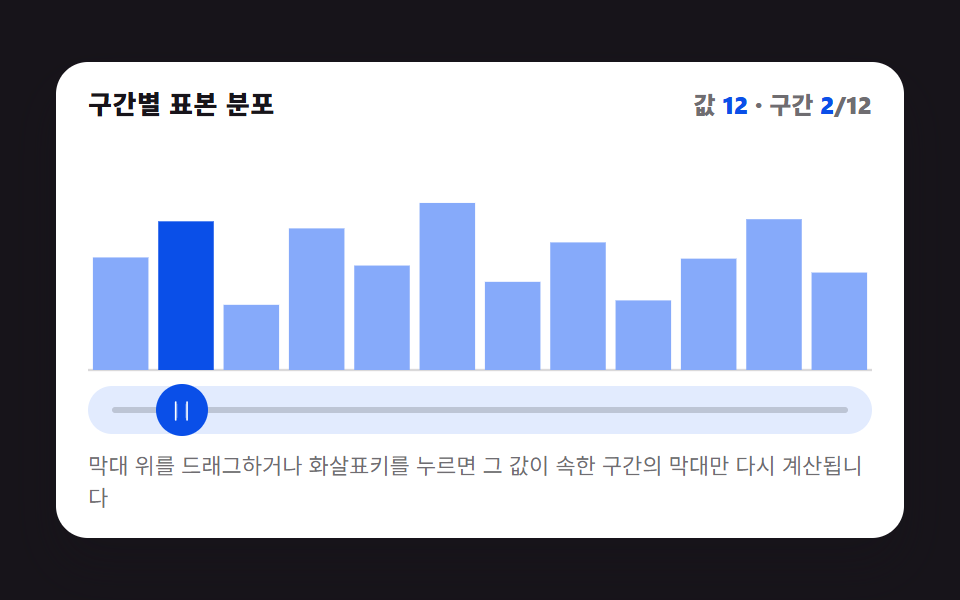 01 picker-graph-histogram-bars-live
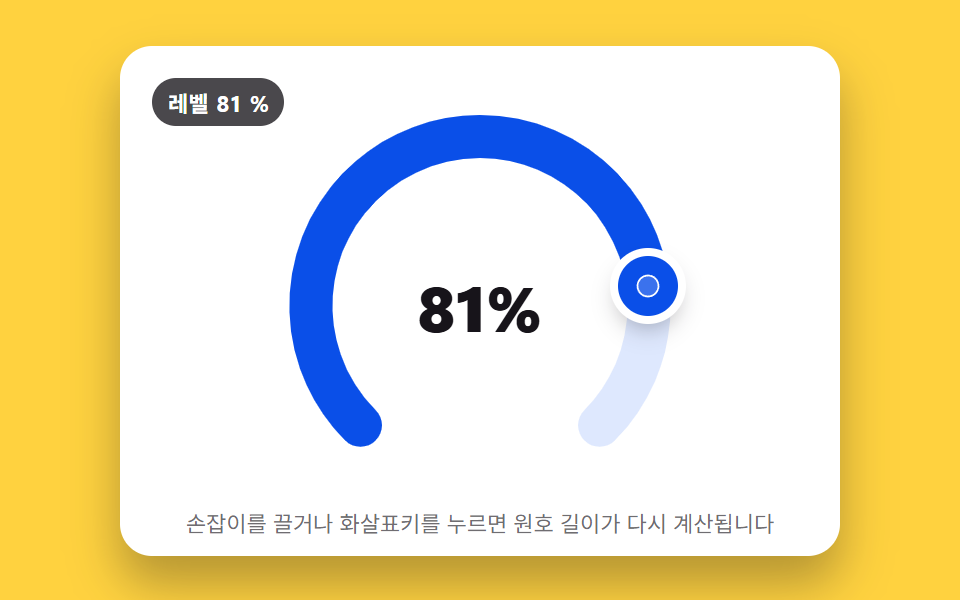 02 picker-graph-radial-gauge-arc-fill
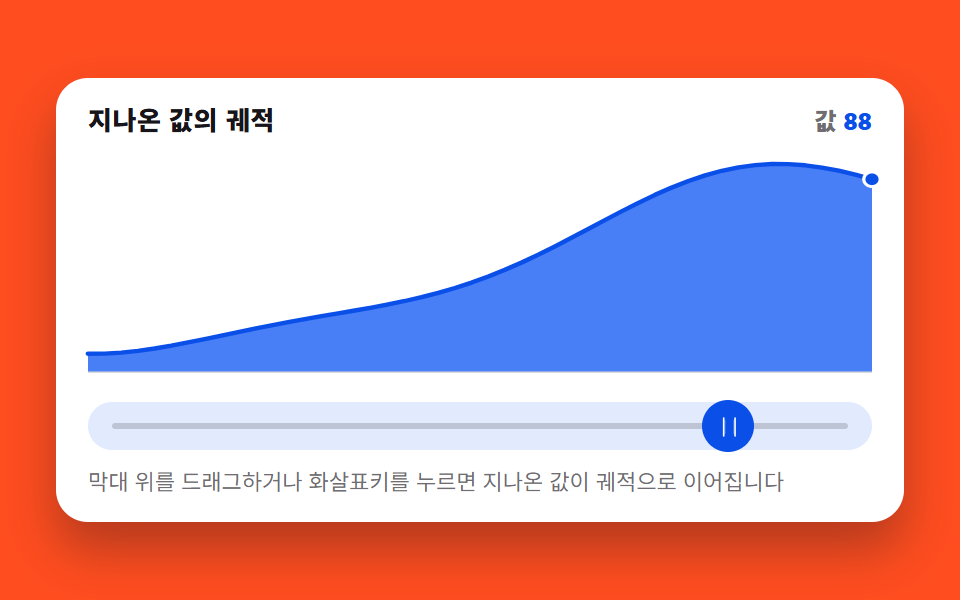 03 picker-graph-sparkline-trail-drag
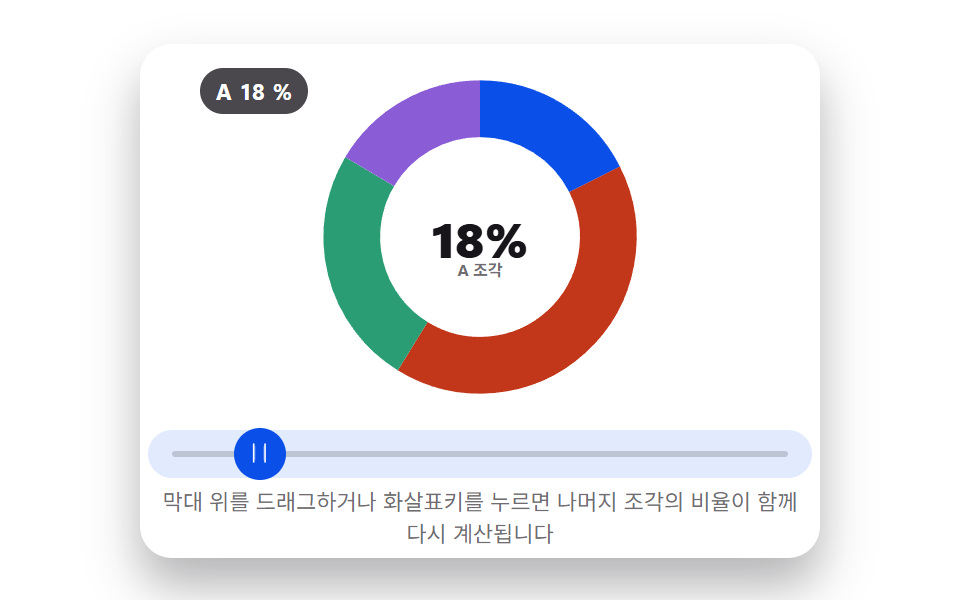 04 picker-graph-donut-segment-resize
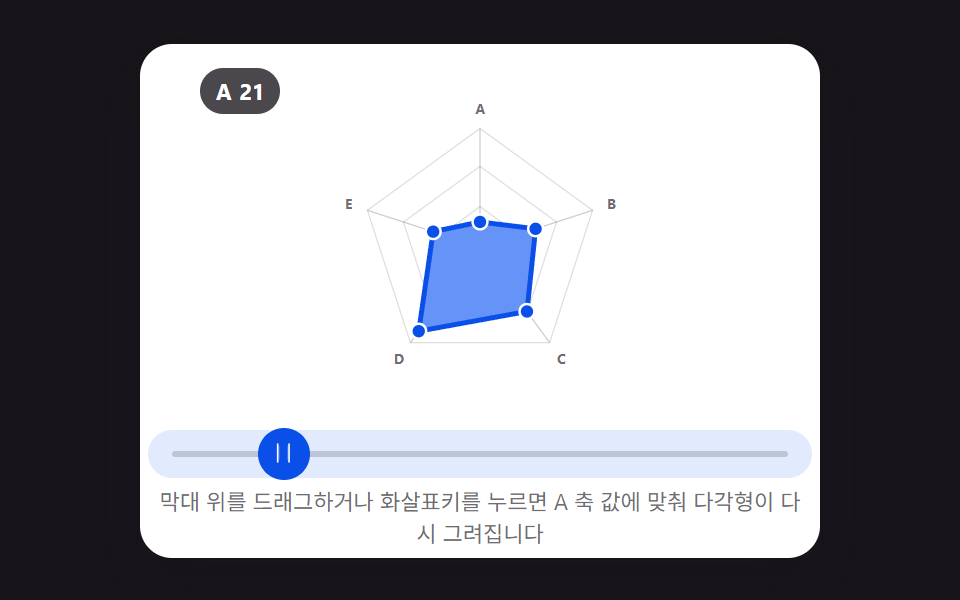 05 picker-graph-radar-multi-axis-drag
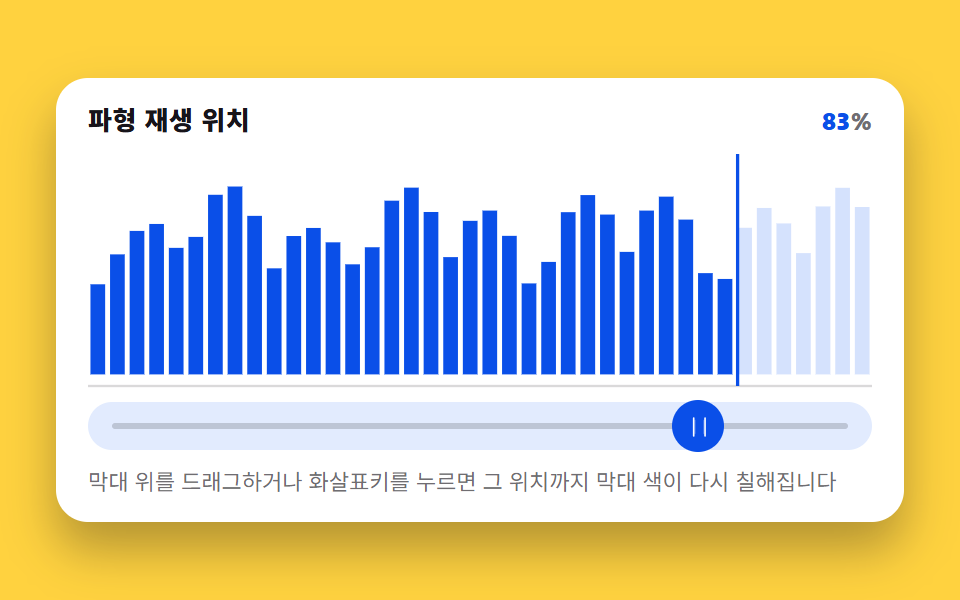 06 picker-graph-waveform-bar-scrub
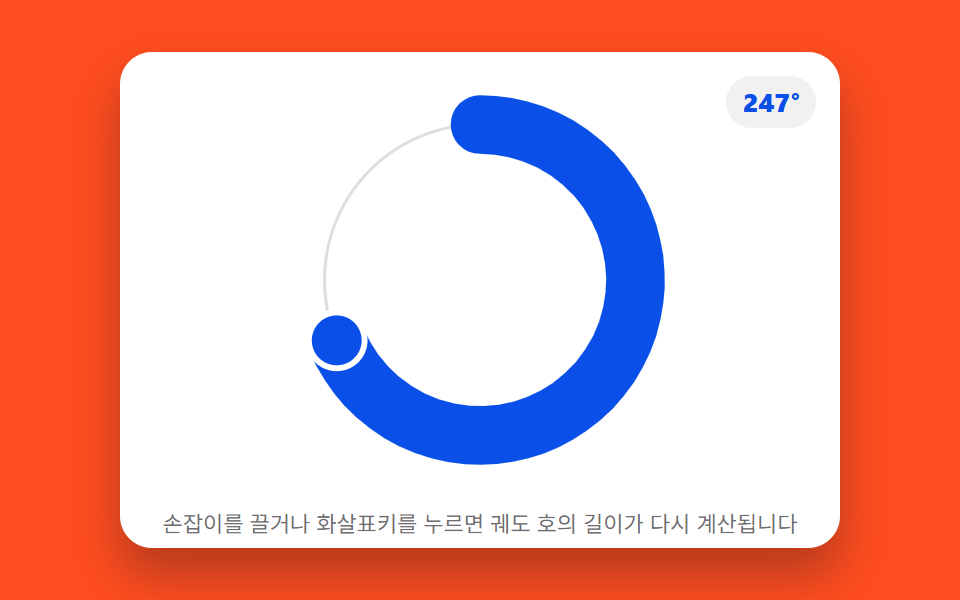 07 picker-graph-orbit-dial-arc-length
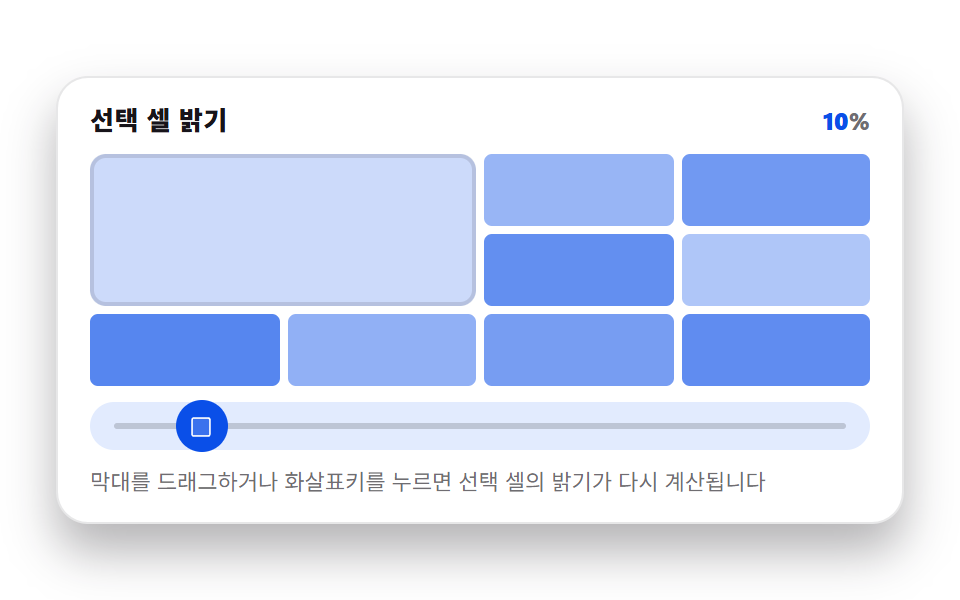 08 picker-graph-heatmap-cell-intensity
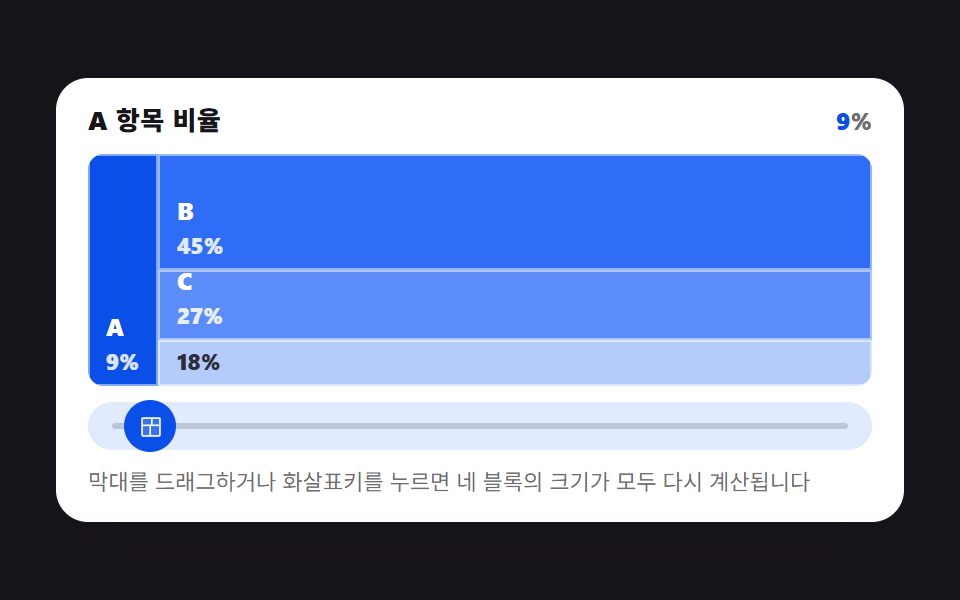 09 picker-graph-treemap-block-resize
Auto-plays · click a tile to jump to its section · all nine in one zip
- 01 Picker Whose Histogram Bars Recompute Height With Every Drag
- 02 Picker Whose Radial Gauge Arc Fills to Match Its Value
- 03 Picker That Leaves Its Drag Path as a Sparkline Trail
- 04 Picker Whose Donut Segment Grows With Its Value Ratio
- 05 Picker Whose Radar Shape Redraws as You Drag Each Axis Point
- 06 Picker That Fills Waveform Bars Up to the Scrubbed Position
- 07 Picker That Turns Its Value Into an Orbit's Arc Length
- 08 Picker Whose Value Sets a Heatmap Cell's Intensity
- 09 Picker Whose Treemap Blocks Resize to Match Each Value
None of the nine reads from a server, a clock, or localStorage, and none imports a chart library, WebGL, or a CDN script. Every series is a fixed array seeded once at load — the histogram's twelve bucket heights, the radar's five axis baselines, the waveform's forty bars — so what moves on drag is only ever the shape derived from that seed plus the current pointer value. Axis and legend labels stay neutral (A through E, bucket indices) on purpose, so the demos read the same whether the visitor is comparing chart animation css ideas for a dashboard or a settings panel.
Why This Differs From a Dashboard Reveal or a Value-Only Picker
Post 264's dashboard charts already hold real numbers — dragging, hovering, or clicking only recounts or highlights data that was there before the interaction. Post 224's pickers move a thumb or a swatch and update a number or a color, but no chart lives on the page. This post's nine pickers sit between those two: dragging the thumb is the only input, and the graph itself — the bar heights, the arc length, the polyline points — is recomputed from that one number on every frame. There's nothing to reveal, because nothing existed before the drag.
What Recomputes When the Pointer Moves
Each of the nine wires the same input surface: pointerdown/pointermove/pointerup for dragging, arrow keys for keydown stepping, and a resize listener to keep the drag track aligned with the rendered box. On every accepted move, a requestAnimationFrame callback reads the current value and calls one recompute function specific to that pattern — a bucket index and fill fraction for the histogram, a sweep angle for the gauge and orbit dial, a trail array shift for the sparkline, a segment resplit for the donut and treemap, five axis lengths for the radar, an active-bar cutoff for the waveform, a color ratio for the heatmap. The DOM write that follows is always the smallest one that reflects the new number: a handful of <rect> heights, one <path d> string, or a few class toggles — never a full redraw of the SVG or canvas.
Nine Patterns, Measured by Moved Area and Frame Count
The numbers below aren't estimated from watching the demos — they come from run/398/demo/0N-*/측정.json, written by the same pixel-diff pass every other post in this pillar uses: each pattern renders its full drag range, and consecutive frames are diffed to get a percentage of the 480×300 canvas that changed and an average diff intensity where it changed. That's why "cumulative area" differs so much between something like the sparkline (a polyline redrawing across most of the chart width) and the radar (five short segments near the center) — it's measuring where pixels actually moved, not guessing from the CSS.
| # | Pattern | Cumulative area | Avg intensity | Moved frames |
|---|---|---|---|---|
| 01 | Histogram buckets | 23.2% | 145.2 | 23/23 |
| 02 | Radial gauge arc | 10.0% | 137.6 | 23/23 |
| 03 | Sparkline trail | 32.8% | 167.5 | 23/23 |
| 04 | Donut resplit | 12.2% | 150.1 | 23/23 |
| 05 | Radar polygon | 9.6% | 155.4 | 23/23 |
| 06 | Waveform scrub | 23.1% | 174.5 | 23/23 |
| 07 | Orbit dial arc | 9.6% | 187.7 | 23/23 |
| 08 | Heatmap cell | 15.6% | 73.7 | 23/23 |
| 09 | Treemap blocks | 24.6% | 117.4 | 23/23 |
All nine moved on every one of the 23 frame-to-frame comparisons across the drag range — there's no pattern here that only animates near the ends of the track.
Code Per Pattern, Same as the graph animation css codepen Tabs Show
Each block below is pulled straight from that item's index.html — the same HTML/CSS/JS tabs the live demo's codepen-style embed shows, not a simplified rewrite. If you came here from a graph animation css codepen search, this is the part meant to answer it directly: real recompute functions, not just the CSS transition.
01Histogram Buckets Redistribute Around One Value
Dragging moves a value from 0–100; the picker maps it to one of twelve buckets and only that bucket's target height changes — the other eleven hold their baseline.
<main class="stage">
<figure class="hg is-demo" id="hg">
  <figcaption class="hg__head">
    <span class="hg__title">Sample distribution by bucket</span>
    <span class="hg__stat" aria-hidden="true">Value <b class="hg__n" id="hg-val">50</b> · bucket <b class="hg__n" id="hg-bucket">6</b>/12</span>
  </figcaption>

  <div class="hg__zone">
    <svg class="hg__chart" id="chart" viewBox="0 0 480 200" preserveAspectRatio="none" role="img" aria-label="Bar chart of sample distribution across 12 buckets; only the bar for the bucket containing the value recomputes and rises.">
      <line class="hg__base" x1="0" y1="200" x2="480" y2="200"></line>
    </svg>
  </div>

  <div class="hg__track" id="track">
    <span class="hg__rail" aria-hidden="true"></span>
    <button class="hg__grab" id="grab" type="button" role="slider" aria-orientation="horizontal"
            aria-label="Choose value" aria-valuemin="0" aria-valuemax="100"
            aria-valuenow="50" aria-valuetext="Value 50, bucket 6/12">
      <svg class="hg__ic" viewBox="0 0 256 256" aria-hidden="true"><g fill="currentColor"><path d="M96 64v128a8 8 0 0 1-16 0V64a8 8 0 0 1 16 0m88 0v128a8 8 0 0 1-16 0V64a8 8 0 0 1 16 0" opacity=".2"/><path d="M188 32a8 8 0 0 0-8 8v176a8 8 0 0 0 16 0V40a8 8 0 0 0-8-8M76 32a8 8 0 0 0-8 8v176a8 8 0 0 0 16 0V40a8 8 0 0 0-8-8"/></g></svg>
    </button>
  </div>

  <p class="hg__hint">Drag on the bars or press the arrow keys — only the bar for the bucket containing that value recomputes.</p>

  <div class="sr">
    <span aria-live="polite" id="hg-live"></span>
    <table>
      <caption>Baseline height by bucket</caption>
      <thead><tr><th>Bucket</th><th>Baseline height</th></tr></thead>
      <tbody id="hg-table"></tbody>
    </table>
  </div>
</figure>
</main>@use "../../../../site/static/demo-tokens" as *;
// 히스토그램 피커 — 드래그·키보드로 값(0~100)을 정하면 그 값이 속한 구간 하나만
// 목표 높이를 다시 계산해 올리고 나머지 11개는 기준 높이로 낮춘다. 어느 구간이
// 활성인지는 매 순간 바뀌는 정수라 선언형 keyframes 로 표현할 수 없어 rAF 루프가
// 직접 SVG rect 의 y·height 를 계산해 찍는다(@keyframes 0개, 395 캔버스 선례와 같은 이유).
// picker-graph-histogram-bucket-count(JS, BUCKET_COUNT)가 구간 개수를 정한다 — 변형 01 의 조정 대상.
$duration: $dur-loop;
$easing: $ease-lerp-settle;
$color: $subject-blue;
@include stage($stage-ink);
.sr {
position: absolute; width: 1px; height: 1px; overflow: hidden;
clip-path: inset(50%); white-space: nowrap;
}
.hg {
box-sizing: border-box;
width: min(424px, 92vw);
margin: 0; padding: $sp-3;
display: flex; flex-direction: column; gap: $sp-2;
border-radius: $r-card;
background: $stage-paper;
box-shadow: $shadow-raised;
color: $subject-ink;
}
.hg__head { display: flex; align-items: baseline; justify-content: space-between; gap: $sp-2; padding: 0 $sp-1; }
.hg__title { font-size: 13px; line-height: 18px; font-weight: 800; letter-spacing: .02em; }
.hg__stat { font-size: 12px; line-height: 18px; font-weight: 800; font-variant-numeric: tabular-nums; color: rgba($subject-ink, .62); }
.hg__n { color: $subject-blue-deep; }
.hg__zone { padding: 0 $sp-1; }
.hg__chart { display: block; width: 100%; height: 116px; overflow: visible; }
.hg__base { stroke: rgba($subject-ink, .16); stroke-width: 2; }
.hg__bar {
fill: mix($subject-blue, $stage-paper, 58%);
transition: none;
}
.hg__bar.is-active { fill: $subject-blue-deep; }
.hg__track {
position: relative;
height: 24px;
margin: 0 $sp-1;
border-radius: $r-pill;
background: mix($subject-blue, $stage-paper, 14%);
}
.hg__rail {
position: absolute; left: $sp-3; right: $sp-3; top: 50%;
height: 3px; transform: translateY(-50%);
border-radius: $r-pill;
background: rgba($subject-ink, .18);
}
.hg__grab {
position: absolute; top: 50%; left: 50%;
width: 26px; height: 26px;
margin: 0; padding: 0; border: 0; border-radius: 50%;
display: grid; place-items: center;
background: $subject-blue-deep;
color: $stage-paper;
transform: translate(-50%, -50%);
cursor: ew-resize;
touch-action: none;
}
.hg__grab:focus-visible { outline: 2px solid $subject-blue-deep; outline-offset: 2px; }
.hg__ic { width: 13px; height: 13px; }
.hg__hint { margin: 0; padding: 0 $sp-1; font-size: 11px; line-height: 16px; color: rgba($subject-ink, .62); }
@media (max-width: 340px) {
.hg { padding: $sp-2; gap: $sp-1; }
.hg__hint { display: none; }
.hg__title { font-size: 12px; line-height: 16px; }
.hg__stat { font-size: 11px; line-height: 16px; }
.hg__chart { height: 108px; }
.hg__grab { width: 22px; height: 22px; }
}
// reduce — rAF 루프를 시작하지 않는다. 드래그·키 입력은 여전히 currentH=targetH 를
// 즉시 맞추고 paint() 를 그 자리에서 한 번 호출해 화면에 반영한다(관성 lerp만 생략).
@media (prefers-reduced-motion: reduce) {
.hg.is-still .hg__bar { transition: none !important; }
}html, body {
margin: 0;
overflow: hidden;
}
.stage {
box-sizing: border-box;
min-height: 100vh;
display: grid;
place-items: center;
margin: 0;
background: #17141a;
font-family: -apple-system, "Segoe UI", "Noto Sans KR", sans-serif;
padding: clamp(8px, 4vw, 24px);
}
.sr {
position: absolute;
width: 1px;
height: 1px;
overflow: hidden;
clip-path: inset(50%);
white-space: nowrap;
}
.hg {
box-sizing: border-box;
width: min(424px, 92vw);
margin: 0;
padding: 12px;
display: flex;
flex-direction: column;
gap: 8px;
border-radius: 16px;
background: #ffffff;
box-shadow: 0 14px 24px rgba(23, 20, 26, 0.32);
color: #17141a;
}
.hg__head {
display: flex;
align-items: baseline;
justify-content: space-between;
gap: 8px;
padding: 0 4px;
}
.hg__title {
font-size: 13px;
line-height: 18px;
font-weight: 800;
letter-spacing: 0.02em;
}
.hg__stat {
font-size: 12px;
line-height: 18px;
font-weight: 800;
font-variant-numeric: tabular-nums;
color: rgba(23, 20, 26, 0.62);
}
.hg__n {
color: #0a4fe8;
}
.hg__zone {
padding: 0 4px;
}
.hg__chart {
display: block;
width: 100%;
height: 116px;
overflow: visible;
}
.hg__base {
stroke: rgba(23, 20, 26, 0.16);
stroke-width: 2;
}
.hg__bar {
fill: rgb(52.6901960784%, 66.7921568627%, 97.9529411765%);
transition: none;
}
.hg__bar.is-active {
fill: #0a4fe8;
}
.hg__track {
position: relative;
height: 24px;
margin: 0 4px;
border-radius: 999px;
background: rgb(88.5803921569%, 91.9843137255%, 99.5058823529%);
}
.hg__rail {
position: absolute;
left: 12px;
right: 12px;
top: 50%;
height: 3px;
transform: translateY(-50%);
border-radius: 999px;
background: rgba(23, 20, 26, 0.18);
}
.hg__grab {
position: absolute;
top: 50%;
left: 50%;
width: 26px;
height: 26px;
margin: 0;
padding: 0;
border: 0;
border-radius: 50%;
display: grid;
place-items: center;
background: #0a4fe8;
color: #ffffff;
transform: translate(-50%, -50%);
cursor: ew-resize;
touch-action: none;
}
.hg__grab:focus-visible {
outline: 2px solid #0a4fe8;
outline-offset: 2px;
}
.hg__ic {
width: 13px;
height: 13px;
}
.hg__hint {
margin: 0;
padding: 0 4px;
font-size: 11px;
line-height: 16px;
color: rgba(23, 20, 26, 0.62);
}
@media (max-width: 340px) {
.hg {
padding: 8px;
gap: 4px;
}
.hg__hint {
display: none;
}
.hg__title {
font-size: 12px;
line-height: 16px;
}
.hg__stat {
font-size: 11px;
line-height: 16px;
}
.hg__chart {
height: 108px;
}
.hg__grab {
width: 22px;
height: 22px;
}
}
@media (prefers-reduced-motion: reduce) {
.hg.is-still .hg__bar {
transition: none !important;
}
}// 실제 동작: pointerdown/move/up 과 keydown(화살표·Home·End) 이 Value(0~100)을 바꾸면
// 그 값이 속한 Bucket 하나만 목표 높이를 다시 계산해 올리고 나머지 11개는 기준 높이로 낮춘다.
// 매 프레임 rAF 루프가 현재 높이를 목표 높이로 관성 보간(lerp)한다 — CSS @keyframes 는
// 0개(어떤 구간이 지금 활성인지는 매 순간 바뀌는 정수라 선언형 keyframes 로 표현할 수 없다,
// 395 의 캔버스 rAF 선례와 같은 이유로 실시간 캡처 경로를 그대로 쓴다).
var root = document.getElementById('hg');
var chart = document.getElementById('chart');
var track = document.getElementById('track');
var grab = document.getElementById('grab');
var valEl = document.getElementById('hg-val');
var bucketEl = document.getElementById('hg-bucket');
var live = document.getElementById('hg-live');
var tableBody = document.getElementById('hg-table');
var BUCKET_COUNT = 12; // picker-graph-histogram-bucket-count — 변형 01 의 조정 대상
var BASE = [0.34, 0.52, 0.28, 0.61, 0.45, 0.72, 0.38, 0.55, 0.30, 0.48, 0.65, 0.42]; // 고정 표본(0~1, RNG 없음)
var PEAK_BOOST = 0.40; // 활성 구간에 더해지는 최대 여유 높이(0~1)
var LERP_RATE = 0.22; // 프레임마다 목표에 다가가는 Ratio — 관성
var AUTO_PERIOD = 1.5; // 자동 시연 한 바퀴(초)
var STEP = 5; // 키보드 한 번에 움직이는 Value
var CHART_H = 200;
var css = getComputedStyle(root);
function cssv(name) { return css.getPropertyValue(name).trim(); }
var currentH = BASE.slice();
var targetH = BASE.slice();
var value = 50;
var manual = false;
var autoT = 0;
var lastTs = 0;
var trackRect = null;
var rafId = 0;
function reduced() {
return window.matchMedia && window.matchMedia('(prefers-reduced-motion: reduce)').matches;
}
function bucketOf(v) {
var idx = Math.floor(v / 100 * BUCKET_COUNT);
return Math.max(0, Math.min(BUCKET_COUNT - 1, idx));
}
function fracIn(v, bucket) {
var raw = v / 100 * BUCKET_COUNT - bucket;
return Math.max(0, Math.min(1, raw));
}
// Bucket 하나만 목표 높이를 다시 계산한다 — 나머지는 Baseline height 그대로
function recompute() {
var b = bucketOf(value);
var f = fracIn(value, b);
for (var i = 0; i < BUCKET_COUNT; i++) {
targetH[i] = BASE[i];
}
targetH[b] = Math.min(0.96, BASE[b] + PEAK_BOOST * (0.4 + 0.6 * f));
return b;
}
function buildBars() {
var gap = 6;
var w = 480 / BUCKET_COUNT;
for (var i = 0; i < BUCKET_COUNT; i++) {
var r = document.createElementNS('http://www.w3.org/2000/svg', 'rect');
r.setAttribute('class', 'hg__bar');
r.setAttribute('x', String(i * w + gap / 2));
r.setAttribute('width', String(Math.max(1, w - gap)));
r.dataset.i = String(i);
chart.appendChild(r);
var tr = document.createElement('tr');
var th = document.createElement('th');
th.textContent = String(i + 1);
var td = document.createElement('td');
td.textContent = Math.round(BASE[i] * 100) + '%';
tr.appendChild(th); tr.appendChild(td);
tableBody.appendChild(tr);
}
}
function paint() {
var bars = chart.querySelectorAll('.hg__bar');
var activeIdx = bucketOf(value);
for (var i = 0; i < bars.length; i++) {
var h = currentH[i] * CHART_H;
bars[i].setAttribute('y', String(CHART_H - h));
bars[i].setAttribute('height', String(h));
bars[i].classList.toggle('is-active', i === activeIdx);
}
var rv = Math.round(value);
valEl.textContent = String(rv);
bucketEl.textContent = String(activeIdx + 1);
grab.style.left = value + '%';
grab.setAttribute('aria-valuenow', String(rv));
var text = 'Value ' + rv + ', bucket ' + (activeIdx + 1) + '/12';
grab.setAttribute('aria-valuetext', text);
}
function announce() {
var activeIdx = bucketOf(value);
live.textContent = 'Value ' + Math.round(value) + ', bucket ' + (activeIdx + 1) + '/12 recomputed';
}
function setValue(v, isManual) {
value = Math.max(0, Math.min(100, v));
if (isManual) {
manual = true;
root.classList.remove('is-demo');
}
recompute();
}
function fromPointer(clientX) {
if (!trackRect) trackRect = track.getBoundingClientRect();
var ratio = (clientX - trackRect.left) / trackRect.width;
setValue(ratio * 100, true);
}
function onDown(e) {
trackRect = track.getBoundingClientRect();
if (grab.setPointerCapture) { try { grab.setPointerCapture(e.pointerId); } catch (err) {} }
fromPointer(e.clientX);
if (reduced()) { currentH = targetH.slice(); paint(); announce(); }
}
function onMove(e) {
if (e.buttons === 0 && e.pointerType !== 'touch') { /* 버튼 안 눌렸으면 무시 */ }
fromPointer(e.clientX);
if (reduced()) { currentH = targetH.slice(); paint(); announce(); }
}
function onUp() { announce(); }
function onKey(e) {
var map = { ArrowLeft: -STEP, ArrowDown: -STEP, ArrowRight: STEP, ArrowUp: STEP };
if (e.key === 'Home') { setValue(0, true); e.preventDefault(); }
else if (e.key === 'End') { setValue(100, true); e.preventDefault(); }
else if (map[e.key] !== undefined) { setValue(value + map[e.key], true); e.preventDefault(); }
else { return; }
if (reduced()) { currentH = targetH.slice(); paint(); announce(); }
}
function onResize() {
trackRect = track.getBoundingClientRect();
if (reduced()) { paint(); }
}
function autoStep(dt) {
autoT += dt;
var omega = 2 * Math.PI / AUTO_PERIOD;
var v = 50 + 46 * Math.sin(autoT * omega);
value = v;
recompute();
}
function frame(ts) {
if (!lastTs) lastTs = ts;
var dt = Math.min(0.05, (ts - lastTs) / 1000);
lastTs = ts;
if (!manual) { autoStep(dt); }
for (var i = 0; i < BUCKET_COUNT; i++) {
currentH[i] += (targetH[i] - currentH[i]) * LERP_RATE;
}
paint();
rafId = requestAnimationFrame(frame);
}
buildBars();
recompute();
grab.addEventListener('pointerdown', onDown);
grab.addEventListener('pointermove', onMove);
grab.addEventListener('pointerup', onUp);
track.addEventListener('pointerdown', function (e) {
trackRect = track.getBoundingClientRect();
fromPointer(e.clientX);
if (reduced()) { currentH = targetH.slice(); paint(); announce(); }
});
grab.addEventListener('keydown', onKey);
window.addEventListener('resize', onResize);
if (reduced()) {
root.classList.add('is-still');
currentH = targetH.slice();
paint();
} else {
rafId = requestAnimationFrame(frame);
}// HistogramBarsLive — vanilla 판(run/398/demo/01-picker-graph-histogram-bars-live/index.html) 의 React 포트.
// 드래그·키보드로 값(0~100)을 정하면 그 값이 속한 구간 하나만 목표 높이를 다시 계산해 올리고
// 나머지 11개는 기준 높이로 낮춘다. 매 프레임 rAF 루프가 현재 높이를 목표 높이로 관성 보간(lerp)한다.
import { useEffect, useRef } from "react";
import styles from "./HistogramBarsLive.module.scss";
type Box<T> = { current: T };
type KeyEvt = { key: string; preventDefault(): void };
type PtrEvt = { clientX: number; clientY: number; pointerId: number; buttons?: number; pointerType?: string };
const BUCKET_COUNT = 12; // picker-graph-histogram-bucket-count — 변형 01 의 조정 대상
const BASE = [0.34, 0.52, 0.28, 0.61, 0.45, 0.72, 0.38, 0.55, 0.30, 0.48, 0.65, 0.42]; // 고정 표본(0~1, RNG 없음)
const PEAK_BOOST = 0.40;
const LERP_RATE = 0.22;
const AUTO_PERIOD = 1.5;
const STEP = 5;
const CHART_H = 200;
const GAP = 6;
const BAR_W = 480 / BUCKET_COUNT;
export default function HistogramBarsLive() {
const rootRef = useRef<HTMLElement | null>(null);
const chartRef = useRef<SVGSVGElement | null>(null);
const trackRef = useRef<HTMLDivElement | null>(null);
const grabRef = useRef<HTMLButtonElement | null>(null);
const valRef = useRef<HTMLElement | null>(null);
const bucketRef = useRef<HTMLElement | null>(null);
const liveRef = useRef<HTMLSpanElement | null>(null);
const barRefs = useRef(new Array(BUCKET_COUNT).fill(null)) as Box<(SVGRectElement | null)[]>;
const currentH = useRef(BASE.slice()) as Box<number[]>;
const targetH = useRef(BASE.slice()) as Box<number[]>;
const value = useRef(50) as Box<number>;
const manual = useRef(false) as Box<boolean>;
const autoT = useRef(0) as Box<number>;
const lastTs = useRef(0) as Box<number>;
const trackRect = useRef<DOMRect | null>(null) as Box<DOMRect | null>;
const rafId = useRef(0) as Box<number>;
function reduced(): boolean {
return window.matchMedia("(prefers-reduced-motion: reduce)").matches;
}
function bucketOf(v: number): number {
const idx = Math.floor((v / 100) * BUCKET_COUNT);
return Math.max(0, Math.min(BUCKET_COUNT - 1, idx));
}
function fracIn(v: number, bucket: number): number {
const raw = (v / 100) * BUCKET_COUNT - bucket;
return Math.max(0, Math.min(1, raw));
}
function recompute(): number {
const b = bucketOf(value.current);
const f = fracIn(value.current, b);
for (let i = 0; i < BUCKET_COUNT; i++) targetH.current[i] = BASE[i];
targetH.current[b] = Math.min(0.96, BASE[b] + PEAK_BOOST * (0.4 + 0.6 * f));
return b;
}
function paint(): void {
const activeIdx = bucketOf(value.current);
const bars = barRefs.current;
for (let i = 0; i < bars.length; i++) {
const r = bars[i];
if (!r) continue;
const h = currentH.current[i] * CHART_H;
r.setAttribute("y", String(CHART_H - h));
r.setAttribute("height", String(h));
r.classList.toggle("is-active", i === activeIdx);
}
const rv = Math.round(value.current);
if (valRef.current) valRef.current.textContent = String(rv);
if (bucketRef.current) bucketRef.current.textContent = String(activeIdx + 1);
const grab = grabRef.current;
if (grab) {
grab.style.left = value.current + "%";
grab.setAttribute("aria-valuenow", String(rv));
grab.setAttribute("aria-valuetext", "값 " + rv + ", 구간 " + (activeIdx + 1) + "/12");
}
}
function announce(): void {
const activeIdx = bucketOf(value.current);
if (liveRef.current) {
liveRef.current.textContent = "값 " + Math.round(value.current) + ", 구간 " + (activeIdx + 1) + "/12로 다시 계산됨";
}
}
function setValue(v: number, isManual: boolean): void {
value.current = Math.max(0, Math.min(100, v));
if (isManual) {
manual.current = true;
rootRef.current?.classList.remove("is-demo");
}
recompute();
}
function fromPointer(clientX: number): void {
if (!trackRect.current && trackRef.current) trackRect.current = trackRef.current.getBoundingClientRect();
const rect = trackRect.current;
if (!rect) return;
const ratio = (clientX - rect.left) / rect.width;
setValue(ratio * 100, true);
}
function reflectNow(): void {
currentH.current = targetH.current.slice();
paint();
announce();
}
function onDown(e: PtrEvt): void {
if (trackRef.current) trackRect.current = trackRef.current.getBoundingClientRect();
const grab = grabRef.current;
if (grab && typeof grab.setPointerCapture === "function") {
try { grab.setPointerCapture(e.pointerId); } catch { /* 캡처 실패는 치명적이지 않다 */ }
}
fromPointer(e.clientX);
if (reduced()) reflectNow();
}
function onMove(e: PtrEvt): void {
fromPointer(e.clientX);
if (reduced()) reflectNow();
}
function onUp(): void {
announce();
}
function onTrackDown(e: PtrEvt): void {
if (trackRef.current) trackRect.current = trackRef.current.getBoundingClientRect();
fromPointer(e.clientX);
if (reduced()) reflectNow();
}
function onKey(e: KeyEvt): void {
const map: Record<string, number> = { ArrowLeft: -STEP, ArrowDown: -STEP, ArrowRight: STEP, ArrowUp: STEP };
if (e.key === "Home") { setValue(0, true); e.preventDefault(); }
else if (e.key === "End") { setValue(100, true); e.preventDefault(); }
else if (map[e.key] !== undefined) { setValue(value.current + map[e.key], true); e.preventDefault(); }
else { return; }
if (reduced()) reflectNow();
}
function onResize(): void {
if (trackRef.current) trackRect.current = trackRef.current.getBoundingClientRect();
if (reduced()) paint();
}
function autoStep(dt: number): void {
autoT.current += dt;
const omega = (2 * Math.PI) / AUTO_PERIOD;
value.current = 50 + 46 * Math.sin(autoT.current * omega);
recompute();
}
function frame(ts: number): void {
if (!lastTs.current) lastTs.current = ts;
const dt = Math.min(0.05, (ts - lastTs.current) / 1000);
lastTs.current = ts;
if (!manual.current) autoStep(dt);
for (let i = 0; i < BUCKET_COUNT; i++) {
currentH.current[i] += (targetH.current[i] - currentH.current[i]) * LERP_RATE;
}
paint();
rafId.current = requestAnimationFrame(frame);
}
useEffect(() => {
recompute();
window.addEventListener("resize", onResize);
if (reduced()) {
rootRef.current?.classList.add("is-still");
reflectNow();
} else {
rafId.current = requestAnimationFrame(frame);
}
return () => {
window.removeEventListener("resize", onResize);
cancelAnimationFrame(rafId.current);
};
// eslint-disable-next-line react-hooks/exhaustive-deps
}, []);
return (
<main className={styles.stage}>
<figure className={styles.hg + " is-demo"} ref={rootRef}>
<figcaption className={styles.head}>
<span className={styles.title}>구간별 표본 분포</span>
<span className={styles.stat} aria-hidden="true">값 <b className={styles.n} ref={valRef}>50</b> · 구간 <b className={styles.n} ref={bucketRef}>6</b>/12</span>
</figcaption>
<div className={styles.zone}>
<svg
className={styles.chart}
ref={chartRef}
viewBox="0 0 480 200"
preserveAspectRatio="none"
role="img"
aria-label="구간 12개 표본 분포 막대그래프, 값이 속한 구간의 막대만 다시 계산되어 올라간다"
>
<line className={styles.base} x1="0" y1="200" x2="480" y2="200" />
{BASE.map((_, i) => (
<rect
key={i}
className={styles.bar}
ref={(el: SVGRectElement | null) => { barRefs.current[i] = el; }}
x={i * BAR_W + GAP / 2}
width={Math.max(1, BAR_W - GAP)}
/>
))}
</svg>
</div>
<div className={styles.track} ref={trackRef} onPointerDown={onTrackDown}>
<span className={styles.rail} aria-hidden="true" />
<button
className={styles.grab}
ref={grabRef}
type="button"
role="slider"
aria-orientation="horizontal"
aria-label="값 고르기"
aria-valuemin={0}
aria-valuemax={100}
aria-valuenow={50}
aria-valuetext="값 50, 구간 6/12"
onPointerDown={onDown}
onPointerMove={onMove}
onPointerUp={onUp}
onKeyDown={onKey}
>
<svg className={styles.ic} viewBox="0 0 256 256" aria-hidden="true"><g fill="currentColor"><path d="M96 64v128a8 8 0 0 1-16 0V64a8 8 0 0 1 16 0m88 0v128a8 8 0 0 1-16 0V64a8 8 0 0 1 16 0" opacity=".2" /><path d="M188 32a8 8 0 0 0-8 8v176a8 8 0 0 0 16 0V40a8 8 0 0 0-8-8M76 32a8 8 0 0 0-8 8v176a8 8 0 0 0 16 0V40a8 8 0 0 0-8-8" /></g></svg>
</button>
</div>
<p className={styles.hint}>막대 위를 드래그하거나 화살표키를 누르면 그 값이 속한 구간의 막대만 다시 계산됩니다</p>
<div className={styles.sr}>
<span aria-live="polite" ref={liveRef} />
<table>
<caption>구간별 기준 높이</caption>
<thead><tr><th>구간</th><th>기준 높이</th></tr></thead>
<tbody>
{BASE.map((b, i) => (
<tr key={i}><th>{i + 1}</th><td>{Math.round(b * 100)}%</td></tr>
))}
</tbody>
</table>
</div>
</figure>
</main>
);
}01 · Picker Whose Histogram Bars Recompute Height With Every Drag — Measured area 23.203% · moving frames 23/23Original by GODRICH · SCSS and React ship in the zip · See the password
function bucketOf(v) {
  var idx = Math.floor(v / 100 * BUCKET_COUNT);
  return Math.max(0, Math.min(BUCKET_COUNT - 1, idx));
}

function fracIn(v, bucket) {
  var raw = v / 100 * BUCKET_COUNT - bucket;
  return Math.max(0, Math.min(1, raw));
}

// only the bucket the value falls in recomputes its target height — the rest keep the baseline
function recompute() {
  var b = bucketOf(value);
  var f = fracIn(value, b);
  for (var i = 0; i < BUCKET_COUNT; i++) {
    targetH[i] = BASE[i];
  }
  targetH[b] = Math.min(0.96, BASE[b] + PEAK_BOOST * (0.4 + 0.6 * f));
  return b;
}
02Radial Gauge Arc Length Tracks a Ratio
The filled arc's endpoint angle is a straight function of the ratio, so the arc's length — not just its rotation — is what the drag changes.
<main class="stage">
<figure class="rg is-demo" id="rg">
  <div class="rg__zone" id="zone">
    <svg class="rg__chart" id="chart" viewBox="0 0 480 300" role="img" aria-label="A radial gauge whose arc fills to match the value's ratio; turning the handle redraws the arc every instant.">
      <path class="rg__track" id="track"></path>
      <path class="rg__fill" id="fill"></path>
      <text class="rg__num" id="num" x="240" y="170" text-anchor="middle" dominant-baseline="central">62%</text>
    </svg>
    <button class="rg__grab" id="grab" type="button" role="slider" aria-orientation="horizontal"
            aria-label="Choose level" aria-valuemin="0" aria-valuemax="100"
            aria-valuenow="62" aria-valuetext="Level 62%">
      <svg class="rg__ic" viewBox="0 0 256 256" aria-hidden="true"><g fill="currentColor"><circle cx="128" cy="128" r="96" opacity=".2"/><path d="M128 24a104 104 0 1 0 104 104A104.11 104.11 0 0 0 128 24m0 192a88 88 0 1 1 88-88 88.1 88.1 0 0 1-88 88"/></g></svg>
    </button>
    <b class="rg__badge" aria-hidden="true">Level <span id="rg-val">62</span>%</b>
  </div>

  <p class="rg__hint">Drag the handle or press arrow keys — arc length recomputes.</p>

  <div class="sr">
    <span aria-live="polite" id="rg-live"></span>
  </div>
</figure>
</main>
@use "../../../../site/static/demo-tokens" as *;
// 방사형 게이지 피커 — 손잡이를 끌거나 화살표키로 값(0~100)을 정하면 원호 경로(d 속성)를
// 시작각→현재각으로 매 프레임 다시 그린다. 관성 lerp 로 값이 목표를 뒤따른다.
// CSS @keyframes 는 0개(각도가 매 순간 바뀌는 실수라 선언형으로 못 담는다, 398-01 과 같은 이유).
// picker-graph-gauge-radius(JS, R)가 게이지 반지름을 정한다.
$duration: $dur-loop;
$easing: $ease-lerp-settle;
$color: $subject-blue;
@include stage($stage-yellow);
.sr {
position: absolute; width: 1px; height: 1px; overflow: hidden;
clip-path: inset(50%); white-space: nowrap;
}
.rg {
box-sizing: border-box;
width: min(360px, 92vw);
margin: 0; padding: $sp-2;
display: flex; flex-direction: column; gap: $sp-2; align-items: center;
border-radius: $r-card;
background: $stage-paper;
box-shadow: $shadow-raised;
color: $subject-ink;
}
.rg__zone {
position: relative;
width: min(352px, 100%);
aspect-ratio: 480 / 300;
}
.rg__chart { display: block; width: 100%; height: 100%; overflow: visible; }
.rg__track {
fill: none;
stroke: mix($subject-blue, $stage-paper, 16%);
stroke-width: 30;
stroke-linecap: round;
}
.rg__fill {
fill: none;
stroke: $subject-blue-deep;
stroke-width: 30;
stroke-linecap: round;
}
.rg__num {
font-size: 44px;
font-weight: 800;
font-variant-numeric: tabular-nums;
fill: $subject-ink;
}
.rg__grab {
position: absolute; top: 0; left: 0;
width: 30px; height: 30px;
margin: 0; padding: 0; border: 0; border-radius: 50%;
display: grid; place-items: center;
background: $subject-blue-deep;
color: $stage-paper;
box-shadow: 0 0 0 4px $stage-paper, $shadow-press;
transform: translate(-50%, -50%);
cursor: grab;
touch-action: none;
}
.rg__grab:focus-visible { outline: 2px solid $subject-blue-deep; outline-offset: 3px; }
.rg__ic { width: 14px; height: 14px; }
.rg__badge {
position: absolute; left: $sp-2; top: $sp-2;
display: flex; align-items: baseline; gap: $sp-1;
padding: $sp-1 $sp-2; border-radius: $r-pill;
background: rgba($subject-ink, .78);
color: $stage-paper; font-weight: 700; font-size: 11px;
font-variant-numeric: tabular-nums;
}
.rg__hint { margin: 0; padding: 0 $sp-1; font-size: 11px; line-height: 16px; color: rgba($subject-ink, .62); text-align: center; }
@media (max-width: 340px) {
.rg { padding: $sp-2; gap: $sp-1; }
.rg__hint { display: none; }
.rg__zone { width: min(240px, 100%); }
.rg__num { font-size: 32px; }
.rg__track, .rg__fill { stroke-width: 16; }
.rg__grab { width: 24px; height: 24px; }
.rg__badge { font-size: 10px; padding: 0 $sp-1; }
}
// reduce — rAF 루프를 시작하지 않는다. 입력은 current=value 즉시 반영 후 paint() 1회.
@media (prefers-reduced-motion: reduce) {
.rg.is-still .rg__fill { transition: none !important; }
}html, body {
margin: 0;
overflow: hidden;
}
.stage {
box-sizing: border-box;
min-height: 100vh;
display: grid;
place-items: center;
margin: 0;
background: #ffd23f;
font-family: -apple-system, "Segoe UI", "Noto Sans KR", sans-serif;
padding: clamp(8px, 4vw, 24px);
}
.sr {
position: absolute;
width: 1px;
height: 1px;
overflow: hidden;
clip-path: inset(50%);
white-space: nowrap;
}
.rg {
box-sizing: border-box;
width: min(360px, 92vw);
margin: 0;
padding: 8px;
display: flex;
flex-direction: column;
gap: 8px;
align-items: center;
border-radius: 16px;
background: #ffffff;
box-shadow: 0 14px 24px rgba(23, 20, 26, 0.32);
color: #17141a;
}
.rg__zone {
position: relative;
width: min(352px, 100%);
aspect-ratio: 480/300;
}
.rg__chart {
display: block;
width: 100%;
height: 100%;
overflow: visible;
}
.rg__track {
fill: none;
stroke: rgb(86.9490196078%, 90.8392156863%, 99.4352941176%);
stroke-width: 30;
stroke-linecap: round;
}
.rg__fill {
fill: none;
stroke: #0a4fe8;
stroke-width: 30;
stroke-linecap: round;
}
.rg__num {
font-size: 44px;
font-weight: 800;
font-variant-numeric: tabular-nums;
fill: #17141a;
}
.rg__grab {
position: absolute;
top: 0;
left: 0;
width: 30px;
height: 30px;
margin: 0;
padding: 0;
border: 0;
border-radius: 50%;
display: grid;
place-items: center;
background: #0a4fe8;
color: #ffffff;
box-shadow: 0 0 0 4px #ffffff, 0 6px 12px rgba(23, 20, 26, 0.32);
transform: translate(-50%, -50%);
cursor: grab;
touch-action: none;
}
.rg__grab:focus-visible {
outline: 2px solid #0a4fe8;
outline-offset: 3px;
}
.rg__ic {
width: 14px;
height: 14px;
}
.rg__badge {
position: absolute;
left: 8px;
top: 8px;
display: flex;
align-items: baseline;
gap: 4px;
padding: 4px 8px;
border-radius: 999px;
background: rgba(23, 20, 26, 0.78);
color: #ffffff;
font-weight: 700;
font-size: 11px;
font-variant-numeric: tabular-nums;
}
.rg__hint {
margin: 0;
padding: 0 4px;
font-size: 11px;
line-height: 16px;
color: rgba(23, 20, 26, 0.62);
text-align: center;
}
@media (max-width: 340px) {
.rg {
padding: 8px;
gap: 4px;
}
.rg__hint {
display: none;
}
.rg__zone {
width: min(240px, 100%);
}
.rg__num {
font-size: 32px;
}
.rg__track, .rg__fill {
stroke-width: 16;
}
.rg__grab {
width: 24px;
height: 24px;
}
.rg__badge {
font-size: 10px;
padding: 0 4px;
}
}
@media (prefers-reduced-motion: reduce) {
.rg.is-still .rg__fill {
transition: none !important;
}
}// 실제 동작: pointerdown/move/up 과 keydown(화살표·Home·End) 이 Value(0~100)을 바꾸면
// 손잡이 각도가 다시 계산되고, 원호 경로(d 속성)를 시작각→현재각으로 매 프레임 다시 그린다.
// 값은 매 프레임 목표값으로 관성 보간(lerp)된다 — CSS @keyframes 없음(어느 각도인지 매 순간
// 바뀌는 실수라 선언형으로 못 담는다, 395·398-01 과 같은 이유로 실시간 캡처 경로를 쓴다).
var root = document.getElementById('rg');
var zone = document.getElementById('zone');
var chart = document.getElementById('chart');
var track = document.getElementById('track');
var fill = document.getElementById('fill');
var numEl = document.getElementById('num');
var valEl = document.getElementById('rg-val');
var grab = document.getElementById('grab');
var live = document.getElementById('rg-live');
var CX = 240, CY = 170, R = 118; // picker-graph-gauge-radius — 게이지 반지름
var START = 135, SWEEP = 270; // 시작각( degrees)·전체 스윕각 — END = START + SWEEP
var END = START + SWEEP;
var LERP_RATE = 0.20;
var AUTO_PERIOD = 1.7;
var STEP = 5;
var value = 62;
var current = 62;
var manual = false;
var autoT = 0;
var lastTs = 0;
var zoneRect = null;
var rafId = 0;
function reduced() {
return window.matchMedia && window.matchMedia('(prefers-reduced-motion: reduce)').matches;
}
function polar(cx, cy, r, deg) {
var rad = deg * Math.PI / 180;
return { x: cx + r * Math.cos(rad), y: cy + r * Math.sin(rad) };
}
function arcPath(cx, cy, r, a0, a1) {
  if (Math.abs(a1 - a0) < 0.5) return '';
  var s = polar(cx, cy, r, a0), e = polar(cx, cy, r, a1);
  var large = (a1 - a0) > 180 ? 1 : 0;
  return 'M ' + s.x + ' ' + s.y + ' A ' + r + ' ' + r + ' 0 ' + large + ' 1 ' + e.x + ' ' + e.y;
}

function angleOf(v) { return START + (SWEEP * v) / 100; }

function paint() {
  track.setAttribute('d', arcPath(CX, CY, R, START, END));
  fill.setAttribute('d', arcPath(CX, CY, R, START, angleOf(current)));
  var p = polar(CX, CY, R, angleOf(current));
  grab.style.left = (p.x / 480 * 100) + '%';
  grab.style.top = (p.y / 300 * 100) + '%';
  var rv = Math.round(current);
  numEl.textContent = rv + '%';
  valEl.textContent = String(rv);
  grab.setAttribute('aria-valuenow', String(rv));
  grab.setAttribute('aria-valuetext', 'Level ' + rv + '%');
}
function announce() {
live.textContent = 'Level ' + Math.round(current) + '% recomputed';
}
function setValue(v, isManual) {
value = Math.max(0, Math.min(100, v));
if (isManual) { manual = true; root.classList.remove('is-demo'); }
}
function angleFromPointer(clientX, clientY) {
if (!zoneRect) zoneRect = zone.getBoundingClientRect();
var cx = zoneRect.left + zoneRect.width * (CX / 480);
var cy = zoneRect.top + zoneRect.height * (CY / 300);
var deg = Math.atan2(clientY - cy, clientX - cx) * 180 / Math.PI;
while (deg < START) deg += 360;
while (deg > START + 360) deg -= 360;
if (deg > END) deg = (deg - END < START + 360 - deg) ? END : START;
return deg;
}
function fromPointer(clientX, clientY) {
var deg = angleFromPointer(clientX, clientY);
var v = (deg - START) / SWEEP * 100;
setValue(v, true);
}
function onDown(e) {
zoneRect = zone.getBoundingClientRect();
if (grab.setPointerCapture) { try { grab.setPointerCapture(e.pointerId); } catch (err) {} }
fromPointer(e.clientX, e.clientY);
if (reduced()) { current = value; paint(); announce(); }
}
function onMove(e) {
fromPointer(e.clientX, e.clientY);
if (reduced()) { current = value; paint(); announce(); }
}
function onUp() { announce(); }
function onZoneDown(e) {
zoneRect = zone.getBoundingClientRect();
fromPointer(e.clientX, e.clientY);
if (reduced()) { current = value; paint(); announce(); }
}
function onKey(e) {
var map = { ArrowLeft: -STEP, ArrowDown: -STEP, ArrowRight: STEP, ArrowUp: STEP };
if (e.key === 'Home') { setValue(0, true); e.preventDefault(); }
else if (e.key === 'End') { setValue(100, true); e.preventDefault(); }
else if (map[e.key] !== undefined) { setValue(value + map[e.key], true); e.preventDefault(); }
else { return; }
if (reduced()) { current = value; paint(); announce(); }
}
function onResize() {
zoneRect = zone.getBoundingClientRect();
if (reduced()) paint();
}
function autoStep(dt) {
autoT += dt;
var omega = 2 * Math.PI / AUTO_PERIOD;
value = 50 + 48 * Math.sin(autoT * omega);
}
function frame(ts) {
if (!lastTs) lastTs = ts;
var dt = Math.min(0.05, (ts - lastTs) / 1000);
lastTs = ts;
if (!manual) autoStep(dt);
current += (value - current) * LERP_RATE;
paint();
rafId = requestAnimationFrame(frame);
}
grab.addEventListener('pointerdown', onDown);
grab.addEventListener('pointermove', onMove);
grab.addEventListener('pointerup', onUp);
grab.addEventListener('keydown', onKey);
zone.addEventListener('pointerdown', onZoneDown);
window.addEventListener('resize', onResize);
if (reduced()) {
root.classList.add('is-still');
current = value;
paint();
} else {
paint();
rafId = requestAnimationFrame(frame);
}// RadialGaugeArcFill — vanilla 판(run/398/demo/02-picker-graph-radial-gauge-arc-fill/index.html) 의 React 포트.
// 손잡이를 끌거나 화살표키로 값(0~100)을 정하면 원호 경로(d 속성)를 시작각→현재각으로
// 매 프레임 다시 그린다. 값은 관성 lerp 로 목표를 뒤따른다. CSS @keyframes 는 0개(vanilla 와 같은 이유).
import { useEffect, useRef } from "react";
import styles from "./RadialGaugeArcFill.module.scss";
type Box<T> = { current: T };
type KeyEvt = { key: string; preventDefault(): void };
type PtrEvt = { clientX: number; clientY: number; pointerId: number };
const CX = 240, CY = 170, R = 118; // picker-graph-gauge-radius — 게이지 반지름
const START = 135, SWEEP = 270;
const END = START + SWEEP;
const LERP_RATE = 0.20;
const AUTO_PERIOD = 1.7;
const STEP = 5;
function polar(cx: number, cy: number, r: number, deg: number) {
const rad = (deg * Math.PI) / 180;
return { x: cx + r * Math.cos(rad), y: cy + r * Math.sin(rad) };
}
function arcPath(cx: number, cy: number, r: number, a0: number, a1: number): string {
if (Math.abs(a1 - a0) < 0.5) return "";
const s = polar(cx, cy, r, a0), e = polar(cx, cy, r, a1);
const large = a1 - a0 > 180 ? 1 : 0;
return "M " + s.x + " " + s.y + " A " + r + " " + r + " 0 " + large + " 1 " + e.x + " " + e.y;
}
function angleOf(v: number): number {
return START + (SWEEP * v) / 100;
}
export default function RadialGaugeArcFill() {
const rootRef = useRef<HTMLElement | null>(null);
const zoneRef = useRef<HTMLDivElement | null>(null);
const trackRef = useRef<SVGPathElement | null>(null);
const fillRef = useRef<SVGPathElement | null>(null);
const numRef = useRef<SVGTextElement | null>(null);
const grabRef = useRef<HTMLButtonElement | null>(null);
const valRef = useRef<HTMLElement | null>(null);
const liveRef = useRef<HTMLSpanElement | null>(null);
const value = useRef(62) as Box<number>;
const current = useRef(62) as Box<number>;
const manual = useRef(false) as Box<boolean>;
const autoT = useRef(0) as Box<number>;
const lastTs = useRef(0) as Box<number>;
const zoneRect = useRef<DOMRect | null>(null) as Box<DOMRect | null>;
const rafId = useRef(0) as Box<number>;
function reduced(): boolean {
return window.matchMedia("(prefers-reduced-motion: reduce)").matches;
}
function paint(): void {
trackRef.current?.setAttribute("d", arcPath(CX, CY, R, START, END));
fillRef.current?.setAttribute("d", arcPath(CX, CY, R, START, angleOf(current.current)));
const p = polar(CX, CY, R, angleOf(current.current));
const grab = grabRef.current;
if (grab) {
grab.style.left = (p.x / 480) * 100 + "%";
grab.style.top = (p.y / 300) * 100 + "%";
}
const rv = Math.round(current.current);
if (numRef.current) numRef.current.textContent = rv + "%";
if (valRef.current) valRef.current.textContent = String(rv);
if (grab) {
grab.setAttribute("aria-valuenow", String(rv));
grab.setAttribute("aria-valuetext", "레벨 " + rv + "%");
}
}
function announce(): void {
if (liveRef.current) liveRef.current.textContent = "레벨 " + Math.round(current.current) + "%로 다시 계산됨";
}
function setValue(v: number, isManual: boolean): void {
value.current = Math.max(0, Math.min(100, v));
if (isManual) {
manual.current = true;
rootRef.current?.classList.remove("is-demo");
}
}
function angleFromPointer(clientX: number, clientY: number): number {
if (!zoneRect.current && zoneRef.current) zoneRect.current = zoneRef.current.getBoundingClientRect();
const rect = zoneRect.current;
if (!rect) return START;
const cx = rect.left + rect.width * (CX / 480);
const cy = rect.top + rect.height * (CY / 300);
let deg = (Math.atan2(clientY - cy, clientX - cx) * 180) / Math.PI;
while (deg < START) deg += 360;
while (deg > START + 360) deg -= 360;
if (deg > END) deg = deg - END < START + 360 - deg ? END : START;
return deg;
}
function fromPointer(clientX: number, clientY: number): void {
const deg = angleFromPointer(clientX, clientY);
const v = ((deg - START) / SWEEP) * 100;
setValue(v, true);
}
function reflectNow(): void {
current.current = value.current;
paint();
announce();
}
function onDown(e: PtrEvt): void {
if (zoneRef.current) zoneRect.current = zoneRef.current.getBoundingClientRect();
const grab = grabRef.current;
if (grab && typeof grab.setPointerCapture === "function") {
try { grab.setPointerCapture(e.pointerId); } catch { /* 캡처 실패는 치명적이지 않다 */ }
}
fromPointer(e.clientX, e.clientY);
if (reduced()) reflectNow();
}
function onMove(e: PtrEvt): void {
fromPointer(e.clientX, e.clientY);
if (reduced()) reflectNow();
}
function onUp(): void {
announce();
}
function onZoneDown(e: PtrEvt): void {
if (zoneRef.current) zoneRect.current = zoneRef.current.getBoundingClientRect();
fromPointer(e.clientX, e.clientY);
if (reduced()) reflectNow();
}
function onKey(e: KeyEvt): void {
const map: Record<string, number> = { ArrowLeft: -STEP, ArrowDown: -STEP, ArrowRight: STEP, ArrowUp: STEP };
if (e.key === "Home") { setValue(0, true); e.preventDefault(); }
else if (e.key === "End") { setValue(100, true); e.preventDefault(); }
else if (map[e.key] !== undefined) { setValue(value.current + map[e.key], true); e.preventDefault(); }
else { return; }
if (reduced()) reflectNow();
}
function onResize(): void {
if (zoneRef.current) zoneRect.current = zoneRef.current.getBoundingClientRect();
if (reduced()) paint();
}
function autoStep(dt: number): void {
autoT.current += dt;
const omega = (2 * Math.PI) / AUTO_PERIOD;
value.current = 50 + 48 * Math.sin(autoT.current * omega);
}
function frame(ts: number): void {
if (!lastTs.current) lastTs.current = ts;
const dt = Math.min(0.05, (ts - lastTs.current) / 1000);
lastTs.current = ts;
if (!manual.current) autoStep(dt);
current.current += (value.current - current.current) * LERP_RATE;
paint();
rafId.current = requestAnimationFrame(frame);
}
useEffect(() => {
window.addEventListener("resize", onResize);
if (reduced()) {
rootRef.current?.classList.add("is-still");
reflectNow();
} else {
paint();
rafId.current = requestAnimationFrame(frame);
}
return () => {
window.removeEventListener("resize", onResize);
cancelAnimationFrame(rafId.current);
};
// eslint-disable-next-line react-hooks/exhaustive-deps
}, []);
return (
<main className={styles.stage}>
<figure className={styles.rg + " is-demo"} ref={rootRef}>
<div className={styles.zone} ref={zoneRef} onPointerDown={onZoneDown}>
<svg
className={styles.chart}
viewBox="0 0 480 300"
role="img"
aria-label="값의 비율만큼 원호가 채워지는 방사형 게이지, 손잡이를 돌리면 원호가 매 순간 다시 그려진다"
>
<path className={styles.track} ref={trackRef} />
<path className={styles.fill} ref={fillRef} />
<text className={styles.num} ref={numRef} x={240} y={170} textAnchor="middle" dominantBaseline="central">62%</text>
</svg>
<button
className={styles.grab}
ref={grabRef}
type="button"
role="slider"
aria-orientation="horizontal"
aria-label="레벨 고르기"
aria-valuemin={0}
aria-valuemax={100}
aria-valuenow={62}
aria-valuetext="레벨 62%"
onPointerDown={onDown}
onPointerMove={onMove}
onPointerUp={onUp}
onKeyDown={onKey}
>
<svg className={styles.ic} viewBox="0 0 256 256" aria-hidden="true"><g fill="currentColor"><circle cx="128" cy="128" r="96" opacity=".2" /><path d="M128 24a104 104 0 1 0 104 104A104.11 104.11 0 0 0 128 24m0 192a88 88 0 1 1 88-88 88.1 88.1 0 0 1-88 88" /></g></svg>
</button>
<b className={styles.badge} aria-hidden="true">레벨 <span ref={valRef}>62</span>%</b>
</div>
<p className={styles.hint}>손잡이를 끌거나 화살표키를 누르면 원호 길이가 다시 계산됩니다</p>
<div className={styles.sr}>
<span aria-live="polite" ref={liveRef} />
</div>
</figure>
</main>
);
}02 · Picker Whose Radial Gauge Arc Fills to Match Its Value — Measured area 9.973% · moving frames 23/23Original by GODRICH · SCSS and React ship in the zip · See the password
function arcPath(cx, cy, r, a0, a1) {
if (Math.abs(a1 - a0) < 0.5) return '';
var s = polar(cx, cy, r, a0), e = polar(cx, cy, r, a1);
var large = (a1 - a0) > 180 ? 1 : 0;
return 'M ' + s.x + ' ' + s.y + ' A ' + r + ' ' + r + ' 0 ' + large + ' 1 ' + e.x + ' ' + e.y;
}
function angleOf(v) { return START + (SWEEP * v) / 100; }
function paint() {
track.setAttribute('d', arcPath(CX, CY, R, START, END));
fill.setAttribute('d', arcPath(CX, CY, R, START, angleOf(current)));
var p = polar(CX, CY, R, angleOf(current));
grab.style.left = (p.x / 480 * 100) + '%';
grab.style.top = (p.y / 300 * 100) + '%';
var rv = Math.round(current);
numEl.textContent = rv + '%';
valEl.textContent = String(rv);
grab.setAttribute('aria-valuenow', String(rv));
grab.setAttribute('aria-valuetext', 'Level ' + rv + '%');
}
03Sparkline Trail Traces Every Passed Value
Every accepted drag position pushes onto a fixed-length trail array; the polyline is rebuilt from that array each frame, so the line's shape is a short history, not a single point.
<main class="stage">
<figure class="spk is-demo" id="spk">
  <div class="spk__head">
    <span class="spk__title">Trail of past values</span>
    <span class="spk__stat" aria-hidden="true">Value <b class="spk__n" id="spk-val">50</b></span>
  </div>

  <div class="spk__zone">
    <svg class="spk__chart" id="chart" viewBox="0 0 480 160" preserveAspectRatio="none" role="img" aria-label="A line graph connecting the last 48 values; each time the value changes, the oldest point shifts left and a new point is added on the right.">
      <line class="spk__base" x1="0" y1="150" x2="480" y2="150"></line>
      <path class="spk__area" id="area"></path>
      <path class="spk__line" id="line"></path>
      <circle class="spk__dot" id="dot" r="5"></circle>
    </svg>
  </div>

  <div class="spk__track" id="track">
    <span class="spk__rail" aria-hidden="true"></span>
    <button class="spk__grab" id="grab" type="button" role="slider" aria-orientation="horizontal"
            aria-label="Choose value" aria-valuemin="0" aria-valuemax="100"
            aria-valuenow="50" aria-valuetext="Value 50">
      <svg class="spk__ic" viewBox="0 0 256 256" aria-hidden="true"><g fill="currentColor"><path d="M96 64v128a8 8 0 0 1-16 0V64a8 8 0 0 1 16 0m88 0v128a8 8 0 0 1-16 0V64a8 8 0 0 1 16 0" opacity=".2"/><path d="M188 32a8 8 0 0 0-8 8v176a8 8 0 0 0 16 0V40a8 8 0 0 0-8-8M76 32a8 8 0 0 0-8 8v176a8 8 0 0 0 16 0V40a8 8 0 0 0-8-8"/></g></svg>
    </button>
  </div>

  <p class="spk__hint">Drag on the bars or press the arrow keys and the values you pass become part of the trail.</p>

  <div class="sr">
    <span aria-live="polite" id="spk-live"></span>
  </div>
</figure>
</main>@use "../../../../site/static/demo-tokens" as *;
// 스파크라인 궤적 피커 — 드래그·키보드로 값(0~100)을 정하면 매 프레임 관성 보간된
// 현재값을 좌표 배열(trail) 끝에 쌓고 맨 앞 값을 버려 고정 길이(48)를 유지한 채
// 그 배열 전체를 꺾은선 경로(d 속성)로 다시 그린다. CSS @keyframes 는 0개
// (궤적이 매 프레임 배열 연산으로 바뀌는 실수라 선언형으로 못 담는다, 398-01/02 와 같은 이유).
// picker-graph-sparkline-trail-length(JS, TRAIL_LENGTH)가 궤적 점 개수를 정한다 — 변형 03 의 조정 대상.
$duration: $dur-loop;
$easing: $ease-lerp-settle;
$color: $subject-blue;
@include stage($stage-orange);
.sr {
position: absolute; width: 1px; height: 1px; overflow: hidden;
clip-path: inset(50%); white-space: nowrap;
}
.spk {
box-sizing: border-box;
width: min(424px, 92vw);
margin: 0; padding: $sp-3;
display: flex; flex-direction: column; gap: $sp-2;
border-radius: $r-card;
background: $stage-paper;
box-shadow: $shadow-raised;
color: $subject-ink;
}
.spk__head { display: flex; align-items: baseline; justify-content: space-between; gap: $sp-2; padding: 0 $sp-1; }
.spk__title { font-size: 13px; line-height: 18px; font-weight: 800; letter-spacing: .02em; }
.spk__stat { font-size: 12px; line-height: 18px; font-weight: 800; font-variant-numeric: tabular-nums; color: rgba($subject-ink, .62); }
.spk__n { color: $subject-blue-deep; }
.spk__zone { padding: 0 $sp-1; }
.spk__chart { display: block; width: 100%; height: 116px; overflow: visible; }
.spk__base { stroke: rgba($subject-ink, .16); stroke-width: 2; }
.spk__area { fill: mix($subject-blue, $stage-paper, 88%); stroke: none; }
.spk__line { fill: none; stroke: $subject-blue-deep; stroke-width: 3; stroke-linejoin: round; stroke-linecap: round; }
.spk__dot { fill: $subject-blue-deep; stroke: $stage-paper; stroke-width: 2; }
.spk__track {
position: relative;
height: 24px;
margin: 0 $sp-1;
border-radius: $r-pill;
background: mix($subject-blue, $stage-paper, 14%);
}
.spk__rail {
position: absolute; left: $sp-3; right: $sp-3; top: 50%;
height: 3px; transform: translateY(-50%);
border-radius: $r-pill;
background: rgba($subject-ink, .18);
}
.spk__grab {
position: absolute; top: 50%; left: 50%;
width: 26px; height: 26px;
margin: 0; padding: 0; border: 0; border-radius: 50%;
display: grid; place-items: center;
background: $subject-blue-deep;
color: $stage-paper;
transform: translate(-50%, -50%);
cursor: ew-resize;
touch-action: none;
}
.spk__grab:focus-visible { outline: 2px solid $subject-blue-deep; outline-offset: 2px; }
.spk__ic { width: 13px; height: 13px; }
.spk__hint { margin: 0; padding: 0 $sp-1; font-size: 11px; line-height: 16px; color: rgba($subject-ink, .62); }
@media (max-width: 340px) {
.spk { padding: $sp-2; gap: $sp-1; }
.spk__hint { display: none; }
.spk__title { font-size: 12px; line-height: 16px; }
.spk__stat { font-size: 11px; line-height: 16px; }
.spk__chart { height: 108px; }
.spk__grab { width: 22px; height: 22px; }
}
// reduce — rAF 루프를 시작하지 않는다. 드래그·키 입력은 current=value 를 즉시 맞추고
// trail 에 한 번 push 한 뒤 paint() 를 그 자리에서 호출해 화면에 반영한다.
@media (prefers-reduced-motion: reduce) {
.spk.is-still .spk__line { transition: none !important; }
}html, body {
margin: 0;
overflow: hidden;
}
.stage {
box-sizing: border-box;
min-height: 100vh;
display: grid;
place-items: center;
margin: 0;
background: #ff4d1f;
font-family: -apple-system, "Segoe UI", "Noto Sans KR", sans-serif;
padding: clamp(8px, 4vw, 24px);
}
.sr {
position: absolute;
width: 1px;
height: 1px;
overflow: hidden;
clip-path: inset(50%);
white-space: nowrap;
}
.spk {
box-sizing: border-box;
width: min(424px, 92vw);
margin: 0;
padding: 12px;
display: flex;
flex-direction: column;
gap: 8px;
border-radius: 16px;
background: #ffffff;
box-shadow: 0 14px 24px rgba(23, 20, 26, 0.32);
color: #17141a;
}
.spk__head {
display: flex;
align-items: baseline;
justify-content: space-between;
gap: 8px;
padding: 0 4px;
}
.spk__title {
font-size: 13px;
line-height: 18px;
font-weight: 800;
letter-spacing: 0.02em;
}
.spk__stat {
font-size: 12px;
line-height: 18px;
font-weight: 800;
font-variant-numeric: tabular-nums;
color: rgba(23, 20, 26, 0.62);
}
.spk__n {
color: #0a4fe8;
}
.spk__zone {
padding: 0 4px;
}
.spk__chart {
display: block;
width: 100%;
height: 116px;
overflow: visible;
}
.spk__base {
stroke: rgba(23, 20, 26, 0.16);
stroke-width: 2;
}
.spk__area {
fill: rgb(28.2196078431%, 49.6156862745%, 96.8941176471%);
stroke: none;
}
.spk__line {
fill: none;
stroke: #0a4fe8;
stroke-width: 3;
stroke-linejoin: round;
stroke-linecap: round;
}
.spk__dot {
fill: #0a4fe8;
stroke: #ffffff;
stroke-width: 2;
}
.spk__track {
position: relative;
height: 24px;
margin: 0 4px;
border-radius: 999px;
background: rgb(88.5803921569%, 91.9843137255%, 99.5058823529%);
}
.spk__rail {
position: absolute;
left: 12px;
right: 12px;
top: 50%;
height: 3px;
transform: translateY(-50%);
border-radius: 999px;
background: rgba(23, 20, 26, 0.18);
}
.spk__grab {
position: absolute;
top: 50%;
left: 50%;
width: 26px;
height: 26px;
margin: 0;
padding: 0;
border: 0;
border-radius: 50%;
display: grid;
place-items: center;
background: #0a4fe8;
color: #ffffff;
transform: translate(-50%, -50%);
cursor: ew-resize;
touch-action: none;
}
.spk__grab:focus-visible {
outline: 2px solid #0a4fe8;
outline-offset: 2px;
}
.spk__ic {
width: 13px;
height: 13px;
}
.spk__hint {
margin: 0;
padding: 0 4px;
font-size: 11px;
line-height: 16px;
color: rgba(23, 20, 26, 0.62);
}
@media (max-width: 340px) {
.spk {
padding: 8px;
gap: 4px;
}
.spk__hint {
display: none;
}
.spk__title {
font-size: 12px;
line-height: 16px;
}
.spk__stat {
font-size: 11px;
line-height: 16px;
}
.spk__chart {
height: 108px;
}
.spk__grab {
width: 22px;
height: 22px;
}
}
@media (prefers-reduced-motion: reduce) {
.spk.is-still .spk__line {
transition: none !important;
}
}// 실제 동작: pointerdown/move/up 과 keydown(화살표·Home·End) 이 Value(0~100)을 바꾸면,
// 매 프레임 현재(관성 보간) 값을 좌표 배열(trail) 끝에 쌓고 맨 앞 값은 버려
// 고정 길이를 유지한 채 그 배열 전체를 꺾은선 경로(d 속성)로 다시 그린다.
// CSS @keyframes 없음(궤적이 매 프레임 배열 연산으로 바뀌는 실수라 선언형으로 못 담는다, 398-01/02 와 같은 이유).
var root = document.getElementById('spk');
var track = document.getElementById('track');
var grab = document.getElementById('grab');
var lineEl = document.getElementById('line');
var areaEl = document.getElementById('area');
var dotEl = document.getElementById('dot');
var valEl = document.getElementById('spk-val');
var live = document.getElementById('spk-live');
var TRAIL_LENGTH = 48; // picker-graph-sparkline-trail-length — 변형 03 의 조정 대상
var CHART_W = 480, CHART_H = 150;
var LERP_RATE = 0.24;
var AUTO_PERIOD = 1.3;
var STEP = 5;
var trail = [];
for (var i = 0; i < TRAIL_LENGTH; i++) trail.push(50);
var value = 50;
var current = 50;
var manual = false;
var autoT = 0;
var lastTs = 0;
var trackRect = null;
var rafId = 0;
function reduced() {
return window.matchMedia && window.matchMedia('(prefers-reduced-motion: reduce)').matches;
}
function yOf(v) { return CHART_H - (v / 100) * CHART_H; }
function buildPoints() {
  var step = CHART_W / (TRAIL_LENGTH - 1);
  var pts = [];
  for (var i = 0; i < TRAIL_LENGTH; i++) pts.push([i * step, yOf(trail[i])]);
  return pts;
}

function paint() {
  var pts = buildPoints();
  var d = 'M ' + pts[0][0] + ' ' + pts[0][1];
  for (var i = 1; i < pts.length; i++) d += ' L ' + pts[i][0] + ' ' + pts[i][1];
  lineEl.setAttribute('d', d);
  areaEl.setAttribute('d', d + ' L ' + pts[pts.length - 1][0] + ' ' + CHART_H + ' L ' + pts[0][0] + ' ' + CHART_H + ' Z');
  var last = pts[pts.length - 1];
  dotEl.setAttribute('cx', String(last[0]));
  dotEl.setAttribute('cy', String(last[1]));
  var rv = Math.round(current);
  valEl.textContent = String(rv);
  grab.style.left = value + '%';
  grab.setAttribute('aria-valuenow', String(Math.round(value)));
  grab.setAttribute('aria-valuetext', 'Value ' + Math.round(value));
}
function announce() {
live.textContent = 'Value ' + Math.round(current) + ' added to the trail';
}
function setValue(v, isManual) {
value = Math.max(0, Math.min(100, v));
if (isManual) { manual = true; root.classList.remove('is-demo'); }
}
function fromPointer(clientX) {
if (!trackRect) trackRect = track.getBoundingClientRect();
var ratio = (clientX - trackRect.left) / trackRect.width;
setValue(ratio * 100, true);
}
function pushTrail() {
trail.shift();
trail.push(current);
}
function reflectNow() {
current = value;
pushTrail();
paint();
announce();
}
function onDown(e) {
trackRect = track.getBoundingClientRect();
if (grab.setPointerCapture) { try { grab.setPointerCapture(e.pointerId); } catch (err) {} }
fromPointer(e.clientX);
if (reduced()) reflectNow();
}
function onMove(e) { fromPointer(e.clientX); if (reduced()) reflectNow(); }
function onUp() { announce(); }
function onTrackDown(e) { trackRect = track.getBoundingClientRect(); fromPointer(e.clientX); if (reduced()) reflectNow(); }
function onKey(e) {
var map = { ArrowLeft: -STEP, ArrowDown: -STEP, ArrowRight: STEP, ArrowUp: STEP };
if (e.key === 'Home') { setValue(0, true); e.preventDefault(); }
else if (e.key === 'End') { setValue(100, true); e.preventDefault(); }
else if (map[e.key] !== undefined) { setValue(value + map[e.key], true); e.preventDefault(); }
else { return; }
if (reduced()) reflectNow();
}
function onResize() { trackRect = track.getBoundingClientRect(); if (reduced()) paint(); }
function autoStep(dt) {
autoT += dt;
var omega = 2 * Math.PI / AUTO_PERIOD;
value = 50 + 42 * Math.sin(autoT * omega) + 8 * Math.sin(autoT * omega * 2.7);
}
function frame(ts) {
if (!lastTs) lastTs = ts;
var dt = Math.min(0.05, (ts - lastTs) / 1000);
lastTs = ts;
if (!manual) autoStep(dt);
current += (value - current) * LERP_RATE;
pushTrail();
paint();
rafId = requestAnimationFrame(frame);
}
grab.addEventListener('pointerdown', onDown);
grab.addEventListener('pointermove', onMove);
grab.addEventListener('pointerup', onUp);
grab.addEventListener('keydown', onKey);
track.addEventListener('pointerdown', onTrackDown);
window.addEventListener('resize', onResize);
if (reduced()) {
root.classList.add('is-still');
current = value;
paint();
} else {
paint();
rafId = requestAnimationFrame(frame);
}// SparklineTrailDrag — vanilla 판(run/398/demo/03-picker-graph-sparkline-trail-drag/index.html) 의 React 포트.
// 드래그·키보드로 값(0~100)을 정하면 매 프레임 관성 보간된 현재값을 좌표 배열(trail) 끝에
// 쌓고 맨 앞 값을 버려 고정 길이를 유지한 채 그 배열 전체를 꺾은선 경로로 다시 그린다.
import { useEffect, useRef } from "react";
import styles from "./SparklineTrailDrag.module.scss";
type Box<T> = { current: T };
type KeyEvt = { key: string; preventDefault(): void };
type PtrEvt = { clientX: number; clientY: number; pointerId: number };
const TRAIL_LENGTH = 48; // picker-graph-sparkline-trail-length — 변형 03 의 조정 대상
const CHART_W = 480, CHART_H = 150;
const LERP_RATE = 0.24;
const AUTO_PERIOD = 1.3;
const STEP = 5;
function yOf(v: number): number {
return CHART_H - (v / 100) * CHART_H;
}
export default function SparklineTrailDrag() {
const rootRef = useRef<HTMLElement | null>(null);
const trackRef = useRef<HTMLDivElement | null>(null);
const grabRef = useRef<HTMLButtonElement | null>(null);
const lineRef = useRef<SVGPathElement | null>(null);
const areaRef = useRef<SVGPathElement | null>(null);
const dotRef = useRef<SVGCircleElement | null>(null);
const valRef = useRef<HTMLElement | null>(null);
const liveRef = useRef<HTMLSpanElement | null>(null);
const trail = useRef(new Array(TRAIL_LENGTH).fill(50)) as Box<number[]>;
const value = useRef(50) as Box<number>;
const current = useRef(50) as Box<number>;
const manual = useRef(false) as Box<boolean>;
const autoT = useRef(0) as Box<number>;
const lastTs = useRef(0) as Box<number>;
const trackRect = useRef<DOMRect | null>(null) as Box<DOMRect | null>;
const rafId = useRef(0) as Box<number>;
function reduced(): boolean {
return window.matchMedia("(prefers-reduced-motion: reduce)").matches;
}
function buildPoints(): [number, number][] {
const step = CHART_W / (TRAIL_LENGTH - 1);
const pts: [number, number][] = [];
for (let i = 0; i < TRAIL_LENGTH; i++) pts.push([i * step, yOf(trail.current[i])]);
return pts;
}
function paint(): void {
const pts = buildPoints();
let d = "M " + pts[0][0] + " " + pts[0][1];
for (let i = 1; i < pts.length; i++) d += " L " + pts[i][0] + " " + pts[i][1];
lineRef.current?.setAttribute("d", d);
areaRef.current?.setAttribute(
"d",
d + " L " + pts[pts.length - 1][0] + " " + CHART_H + " L " + pts[0][0] + " " + CHART_H + " Z"
);
const last = pts[pts.length - 1];
dotRef.current?.setAttribute("cx", String(last[0]));
dotRef.current?.setAttribute("cy", String(last[1]));
const rv = Math.round(current.current);
if (valRef.current) valRef.current.textContent = String(rv);
const grab = grabRef.current;
if (grab) {
grab.style.left = value.current + "%";
grab.setAttribute("aria-valuenow", String(Math.round(value.current)));
grab.setAttribute("aria-valuetext", "값 " + Math.round(value.current));
}
}
function announce(): void {
if (liveRef.current) liveRef.current.textContent = "값 " + Math.round(current.current) + "이(가) 궤적에 더해짐";
}
function setValue(v: number, isManual: boolean): void {
value.current = Math.max(0, Math.min(100, v));
if (isManual) {
manual.current = true;
rootRef.current?.classList.remove("is-demo");
}
}
function fromPointer(clientX: number): void {
if (!trackRect.current && trackRef.current) trackRect.current = trackRef.current.getBoundingClientRect();
const rect = trackRect.current;
if (!rect) return;
const ratio = (clientX - rect.left) / rect.width;
setValue(ratio * 100, true);
}
function pushTrail(): void {
trail.current.shift();
trail.current.push(current.current);
}
function reflectNow(): void {
current.current = value.current;
pushTrail();
paint();
announce();
}
function onDown(e: PtrEvt): void {
if (trackRef.current) trackRect.current = trackRef.current.getBoundingClientRect();
const grab = grabRef.current;
if (grab && typeof grab.setPointerCapture === "function") {
try { grab.setPointerCapture(e.pointerId); } catch { /* 캡처 실패는 치명적이지 않다 */ }
}
fromPointer(e.clientX);
if (reduced()) reflectNow();
}
function onMove(e: PtrEvt): void {
fromPointer(e.clientX);
if (reduced()) reflectNow();
}
function onUp(): void {
announce();
}
function onTrackDown(e: PtrEvt): void {
if (trackRef.current) trackRect.current = trackRef.current.getBoundingClientRect();
fromPointer(e.clientX);
if (reduced()) reflectNow();
}
function onKey(e: KeyEvt): void {
const map: Record<string, number> = { ArrowLeft: -STEP, ArrowDown: -STEP, ArrowRight: STEP, ArrowUp: STEP };
if (e.key === "Home") { setValue(0, true); e.preventDefault(); }
else if (e.key === "End") { setValue(100, true); e.preventDefault(); }
else if (map[e.key] !== undefined) { setValue(value.current + map[e.key], true); e.preventDefault(); }
else { return; }
if (reduced()) reflectNow();
}
function onResize(): void {
if (trackRef.current) trackRect.current = trackRef.current.getBoundingClientRect();
if (reduced()) paint();
}
function autoStep(dt: number): void {
autoT.current += dt;
const omega = (2 * Math.PI) / AUTO_PERIOD;
value.current = 50 + 42 * Math.sin(autoT.current * omega) + 8 * Math.sin(autoT.current * omega * 2.7);
}
function frame(ts: number): void {
if (!lastTs.current) lastTs.current = ts;
const dt = Math.min(0.05, (ts - lastTs.current) / 1000);
lastTs.current = ts;
if (!manual.current) autoStep(dt);
current.current += (value.current - current.current) * LERP_RATE;
pushTrail();
paint();
rafId.current = requestAnimationFrame(frame);
}
useEffect(() => {
window.addEventListener("resize", onResize);
if (reduced()) {
rootRef.current?.classList.add("is-still");
reflectNow();
} else {
paint();
rafId.current = requestAnimationFrame(frame);
}
return () => {
window.removeEventListener("resize", onResize);
cancelAnimationFrame(rafId.current);
};
// eslint-disable-next-line react-hooks/exhaustive-deps
}, []);
return (
<main className={styles.stage}>
<figure className={styles.spk + " is-demo"} ref={rootRef}>
<div className={styles.head}>
<span className={styles.title}>지나온 값의 궤적</span>
<span className={styles.stat} aria-hidden="true">값 <b className={styles.n} ref={valRef}>50</b></span>
</div>
<div className={styles.zone}>
<svg
className={styles.chart}
viewBox="0 0 480 160"
preserveAspectRatio="none"
role="img"
aria-label="지나온 48개 값을 이은 꺾은선 그래프, 값이 바뀔 때마다 오래된 점은 왼쪽으로 밀려나고 새 점이 오른쪽에 더해진다"
>
<line className={styles.base} x1={0} y1={150} x2={480} y2={150} />
<path className={styles.area} ref={areaRef} />
<path className={styles.line} ref={lineRef} />
<circle className={styles.dot} ref={dotRef} r={5} />
</svg>
</div>
<div className={styles.track} ref={trackRef} onPointerDown={onTrackDown}>
<span className={styles.rail} aria-hidden="true" />
<button
className={styles.grab}
ref={grabRef}
type="button"
role="slider"
aria-orientation="horizontal"
aria-label="값 고르기"
aria-valuemin={0}
aria-valuemax={100}
aria-valuenow={50}
aria-valuetext="값 50"
onPointerDown={onDown}
onPointerMove={onMove}
onPointerUp={onUp}
onKeyDown={onKey}
>
<svg className={styles.ic} viewBox="0 0 256 256" aria-hidden="true"><g fill="currentColor"><path d="M96 64v128a8 8 0 0 1-16 0V64a8 8 0 0 1 16 0m88 0v128a8 8 0 0 1-16 0V64a8 8 0 0 1 16 0" opacity=".2" /><path d="M188 32a8 8 0 0 0-8 8v176a8 8 0 0 0 16 0V40a8 8 0 0 0-8-8M76 32a8 8 0 0 0-8 8v176a8 8 0 0 0 16 0V40a8 8 0 0 0-8-8" /></g></svg>
</button>
</div>
<p className={styles.hint}>막대 위를 드래그하거나 화살표키를 누르면 지나온 값이 궤적으로 이어집니다</p>
<div className={styles.sr}>
<span aria-live="polite" ref={liveRef} />
</div>
</figure>
</main>
);
}03 · Picker That Leaves Its Drag Path as a Sparkline Trail — Measured area 32.755% · moving frames 23/23Original by GODRICH · SCSS and React ship in the zip · See the password
function buildPoints() {
var step = CHART_W / (TRAIL_LENGTH - 1);
var pts = [];
for (var i = 0; i < TRAIL_LENGTH; i++) pts.push([i * step, yOf(trail[i])]);
return pts;
}
function paint() {
var pts = buildPoints();
var d = 'M ' + pts[0][0] + ' ' + pts[0][1];
for (var i = 1; i < pts.length; i++) d += ' L ' + pts[i][0] + ' ' + pts[i][1];
lineEl.setAttribute('d', d);
areaEl.setAttribute('d', d + ' L ' + pts[pts.length - 1][0] + ' ' + CHART_H + ' L ' + pts[0][0] + ' ' + CHART_H + ' Z');
var last = pts[pts.length - 1];
dotEl.setAttribute('cx', String(last[0]));
dotEl.setAttribute('cy', String(last[1]));
var rv = Math.round(current);
valEl.textContent = String(rv);
grab.style.left = value + '%';
grab.setAttribute('aria-valuenow', String(Math.round(value)));
grab.setAttribute('aria-valuetext', 'Value ' + Math.round(value));
}
04Donut Resplit Keeps Three Segments in Ratio
One segment grows to the dragged share; the other three shrink but keep their relative sizes to each other, via a fixed ratio array applied to whatever's left over.
<main class="stage">
<figure class="dn is-demo" id="dn">
  <div class="dn__zone" id="zone">
    <svg class="dn__chart" id="chart" viewBox="0 0 480 300" role="img" aria-label="A donut chart split into four segments; adjusting the first segment's ratio recalculates the other three to match the remaining share.">
      <path class="dn__seg dn__seg--0" id="seg0"></path>
      <path class="dn__seg dn__seg--1" id="seg1"></path>
      <path class="dn__seg dn__seg--2" id="seg2"></path>
      <path class="dn__seg dn__seg--3" id="seg3"></path>
      <text class="dn__num" id="num" x="240" y="150" text-anchor="middle" dominant-baseline="central">40%</text>
      <text class="dn__cap" id="cap" x="240" y="176" text-anchor="middle" dominant-baseline="central">Segment A</text>
    </svg>
    <b class="dn__badge" aria-hidden="true">A <span id="dn-val">40</span>%</b>
  </div>

  <div class="dn__track" id="track">
    <span class="dn__rail" aria-hidden="true"></span>
    <button class="dn__grab" id="grab" type="button" role="slider" aria-orientation="horizontal"
            aria-label="Choose segment A's ratio" aria-valuemin="10" aria-valuemax="70"
            aria-valuenow="40" aria-valuetext="Segment A 40%">
      <svg class="dn__ic" viewBox="0 0 256 256" aria-hidden="true"><g fill="currentColor"><path d="M96 64v128a8 8 0 0 1-16 0V64a8 8 0 0 1 16 0m88 0v128a8 8 0 0 1-16 0V64a8 8 0 0 1 16 0" opacity=".2"/><path d="M188 32a8 8 0 0 0-8 8v176a8 8 0 0 0 16 0V40a8 8 0 0 0-8-8M76 32a8 8 0 0 0-8 8v176a8 8 0 0 0 16 0V40a8 8 0 0 0-8-8"/></g></svg>
    </button>
  </div>

  <p class="dn__hint">Drag on the bar or press the arrow keys and the other segments' ratios recompute together.</p>

  <div class="sr">
    <span aria-live="polite" id="dn-live"></span>
    <table>
      <caption>Ratio by segment</caption>
      <thead><tr><th>Segment</th><th>Ratio</th></tr></thead>
      <tbody id="sr-body"></tbody>
    </table>
  </div>
</figure>
</main>@use "../../../../site/static/demo-tokens" as *;
// 도넛 세그먼트 피커 — 드래그·키보드로 A 조각 비율(10~70)을 정하면 남는 비율을
// B·C·D 조각이 고정 가중치로 나눠 갖고, 4개 조각의 시작각~끝각(path d 속성)을
// 매 프레임 다시 계산해 그린다. 관성 lerp 로 값이 목표를 뒤따른다.
// CSS @keyframes 는 0개(네 조각 모두 매 프레임 실수 각도로 바뀌어 선언형으로 못 담는다,
// 398-01/02/03 과 같은 이유).
// picker-graph-donut-radius(JS, R)가 도넛 반지름을 정한다.
$duration: $dur-loop;
$easing: $ease-lerp-settle;
$color: $subject-blue;
@include stage($stage-paper);
.sr {
position: absolute; width: 1px; height: 1px; overflow: hidden;
clip-path: inset(50%); white-space: nowrap;
}
.dn {
box-sizing: border-box;
width: min(340px, 92vw);
margin: 0; padding: $sp-1;
display: flex; flex-direction: column; gap: $sp-1; align-items: center;
border-radius: $r-card;
background: $stage-paper;
box-shadow: $shadow-raised;
color: $subject-ink;
}
.dn__zone {
position: relative;
width: min(296px, 100%);
aspect-ratio: 480 / 300;
}
.dn__chart { display: block; width: 100%; height: 100%; overflow: visible; }
.dn__seg { fill: none; stroke-width: 46; stroke-linecap: butt; }
.dn__seg--0 { stroke: $subject-blue-deep; }
.dn__seg--1 { stroke: $chart-2; }
.dn__seg--2 { stroke: $chart-3; }
.dn__seg--3 { stroke: $chart-4; }
.dn__num { font-size: 40px; font-weight: 800; font-variant-numeric: tabular-nums; fill: $subject-ink; }
.dn__cap { font-size: 13px; font-weight: 700; fill: rgba($subject-ink, .62); }
.dn__badge {
position: absolute; left: $sp-2; top: $sp-2;
display: flex; align-items: baseline; gap: $sp-1;
padding: $sp-1 $sp-2; border-radius: $r-pill;
background: rgba($subject-ink, .78);
color: $stage-paper; font-weight: 700; font-size: 11px;
font-variant-numeric: tabular-nums;
}
.dn__track {
position: relative;
width: 100%;
height: 24px;
margin: 0 $sp-1;
border-radius: $r-pill;
background: mix($subject-blue, $stage-paper, 14%);
}
.dn__rail {
position: absolute; left: $sp-3; right: $sp-3; top: 50%;
height: 3px; transform: translateY(-50%);
border-radius: $r-pill;
background: rgba($subject-ink, .18);
}
.dn__grab {
position: absolute; top: 50%; left: 50%;
width: 26px; height: 26px;
margin: 0; padding: 0; border: 0; border-radius: 50%;
display: grid; place-items: center;
background: $subject-blue-deep;
color: $stage-paper;
transform: translate(-50%, -50%);
cursor: ew-resize;
touch-action: none;
}
.dn__grab:focus-visible { outline: 2px solid $subject-blue-deep; outline-offset: 2px; }
.dn__ic { width: 13px; height: 13px; }
.dn__hint { margin: 0; padding: 0 $sp-1; font-size: 11px; line-height: 16px; color: rgba($subject-ink, .62); text-align: center; }
@media (max-width: 340px) {
.dn { padding: $sp-2; gap: $sp-1; }
.dn__hint { display: none; }
.dn__zone { width: min(200px, 100%); }
.dn__num { font-size: 30px; }
.dn__seg { stroke-width: 30; }
.dn__grab { width: 22px; height: 22px; }
.dn__badge { font-size: 10px; padding: 0 $sp-1; }
}
// reduce — rAF 루프를 시작하지 않는다. 입력은 current=value 즉시 반영 후 paint() 1회.
@media (prefers-reduced-motion: reduce) {
.dn.is-still .dn__seg { transition: none !important; }
}html, body {
margin: 0;
overflow: hidden;
}
.stage {
box-sizing: border-box;
min-height: 100vh;
display: grid;
place-items: center;
margin: 0;
background: #ffffff;
font-family: -apple-system, "Segoe UI", "Noto Sans KR", sans-serif;
padding: clamp(8px, 4vw, 24px);
}
.sr {
position: absolute;
width: 1px;
height: 1px;
overflow: hidden;
clip-path: inset(50%);
white-space: nowrap;
}
.dn {
box-sizing: border-box;
width: min(340px, 92vw);
margin: 0;
padding: 4px;
display: flex;
flex-direction: column;
gap: 4px;
align-items: center;
border-radius: 16px;
background: #ffffff;
box-shadow: 0 14px 24px rgba(23, 20, 26, 0.32);
color: #17141a;
}
.dn__zone {
position: relative;
width: min(296px, 100%);
aspect-ratio: 480/300;
}
.dn__chart {
display: block;
width: 100%;
height: 100%;
overflow: visible;
}
.dn__seg {
fill: none;
stroke-width: 46;
stroke-linecap: butt;
}
.dn__seg--0 {
stroke: #0a4fe8;
}
.dn__seg--1 {
stroke: #c2361a;
}
.dn__seg--2 {
stroke: #2b9d74;
}
.dn__seg--3 {
stroke: #8a5cd6;
}
.dn__num {
font-size: 40px;
font-weight: 800;
font-variant-numeric: tabular-nums;
fill: #17141a;
}
.dn__cap {
font-size: 13px;
font-weight: 700;
fill: rgba(23, 20, 26, 0.62);
}
.dn__badge {
position: absolute;
left: 8px;
top: 8px;
display: flex;
align-items: baseline;
gap: 4px;
padding: 4px 8px;
border-radius: 999px;
background: rgba(23, 20, 26, 0.78);
color: #ffffff;
font-weight: 700;
font-size: 11px;
font-variant-numeric: tabular-nums;
}
.dn__track {
position: relative;
width: 100%;
height: 24px;
margin: 0 4px;
border-radius: 999px;
background: rgb(88.5803921569%, 91.9843137255%, 99.5058823529%);
}
.dn__rail {
position: absolute;
left: 12px;
right: 12px;
top: 50%;
height: 3px;
transform: translateY(-50%);
border-radius: 999px;
background: rgba(23, 20, 26, 0.18);
}
.dn__grab {
position: absolute;
top: 50%;
left: 50%;
width: 26px;
height: 26px;
margin: 0;
padding: 0;
border: 0;
border-radius: 50%;
display: grid;
place-items: center;
background: #0a4fe8;
color: #ffffff;
transform: translate(-50%, -50%);
cursor: ew-resize;
touch-action: none;
}
.dn__grab:focus-visible {
outline: 2px solid #0a4fe8;
outline-offset: 2px;
}
.dn__ic {
width: 13px;
height: 13px;
}
.dn__hint {
margin: 0;
padding: 0 4px;
font-size: 11px;
line-height: 16px;
color: rgba(23, 20, 26, 0.62);
text-align: center;
}
@media (max-width: 340px) {
.dn {
padding: 8px;
gap: 4px;
}
.dn__hint {
display: none;
}
.dn__zone {
width: min(200px, 100%);
}
.dn__num {
font-size: 30px;
}
.dn__seg {
stroke-width: 30;
}
.dn__grab {
width: 22px;
height: 22px;
}
.dn__badge {
font-size: 10px;
padding: 0 4px;
}
}
@media (prefers-reduced-motion: reduce) {
.dn.is-still .dn__seg {
transition: none !important;
}
}// 실제 동작: pointerdown/move/up 과 keydown 이 Segment A Ratio(10~70)을 바꾸면, 남는 Ratio
// (100-A)을 B·C·D 조각의 고정 가중치로 나눠 각 조각의 시작각~끝각을 다시 계산하고
// 4개 도넛 Segment(path d 속성)을 매 프레임 새로 그린다. 값은 관성 lerp 로 목표를 뒤따른다.
// CSS @keyframes 없음(네 Segment 모두가 매 프레임 실수 각도로 바뀌어 선언형으로 못 담는다,
// 398-01/02/03 과 같은 이유).
var root = document.getElementById('dn');
var zone = document.getElementById('zone');
var track = document.getElementById('track');
var grab = document.getElementById('grab');
var segEls = [document.getElementById('seg0'), document.getElementById('seg1'), document.getElementById('seg2'), document.getElementById('seg3')];
var numEl = document.getElementById('num');
var capEl = document.getElementById('cap');
var valEl = document.getElementById('dn-val');
var live = document.getElementById('dn-live');
var srBody = document.getElementById('sr-body');
var CX = 240, CY = 150, R = 104; // picker-graph-donut-radius — 도넛 반지름
var STROKE = 46;
var OTHER_RATIO = [0.5, 0.3, 0.2]; // B·C·D 가 남는 비율을 나누는 고정 가중치
var LABELS = ['Segment A', 'Segment B', 'Segment C', 'Segment D'];
var MIN_V = 10, MAX_V = 70;
var LERP_RATE = 0.20;
var AUTO_PERIOD = 1.8;
var STEP = 5;
var value = 40;
var current = 40;
var manual = false;
var autoT = 0;
var lastTs = 0;
var zoneRect = null;
var rafId = 0;
var pct = [40, 30, 18, 12];
function reduced() {
return window.matchMedia && window.matchMedia('(prefers-reduced-motion: reduce)').matches;
}
function polar(cx, cy, r, deg) {
  var rad = deg * Math.PI / 180;
  return { x: cx + r * Math.cos(rad), y: cy + r * Math.sin(rad) };
}

function arcPath(cx, cy, r, a0, a1) {
  if (a1 - a0 < 0.6) return '';
  var s = polar(cx, cy, r, a0), e = polar(cx, cy, r, a1);
  var large = (a1 - a0) > 180 ? 1 : 0;
  return 'M ' + s.x + ' ' + s.y + ' A ' + r + ' ' + r + ' 0 ' + large + ' 1 ' + e.x + ' ' + e.y;
}

function recompute(v) {
  var rest = 100 - v;
  pct = [v, rest * OTHER_RATIO[0], rest * OTHER_RATIO[1], rest * OTHER_RATIO[2]];
}
function paint() {
recompute(current);
var start = -90, a = start;
for (var i = 0; i < 4; i++) {
var sweep = pct[i] * 3.6;
var a1 = a + sweep;
segEls[i].setAttribute('d', arcPath(CX, CY, R, a, a1));
a = a1;
}
var rv = Math.round(current);
numEl.textContent = rv + '%';
capEl.textContent = LABELS[0];
valEl.textContent = String(rv);
grab.style.left = ((value - MIN_V) / (MAX_V - MIN_V) * 100) + '%';
grab.setAttribute('aria-valuenow', String(rv));
grab.setAttribute('aria-valuetext', 'Segment A ' + rv + '%');
var rows = '';
for (var j = 0; j < 4; j++) rows += '<tr><th>' + LABELS[j] + '</th><td>' + Math.round(pct[j]) + '%</td></tr>';
srBody.innerHTML = rows;
}
function announce() {
live.textContent = 'Segment A ' + Math.round(current) + '% recomputed';
}
function setValue(v, isManual) {
value = Math.max(MIN_V, Math.min(MAX_V, v));
if (isManual) { manual = true; root.classList.remove('is-demo'); }
}
function fromPointer(clientX) {
if (!zoneRect) zoneRect = track.getBoundingClientRect();
var ratio = (clientX - zoneRect.left) / zoneRect.width;
setValue(MIN_V + ratio * (MAX_V - MIN_V), true);
}
function onDown(e) {
zoneRect = track.getBoundingClientRect();
if (grab.setPointerCapture) { try { grab.setPointerCapture(e.pointerId); } catch (err) {} }
fromPointer(e.clientX);
if (reduced()) { current = value; paint(); announce(); }
}
function onMove(e) { fromPointer(e.clientX); if (reduced()) { current = value; paint(); announce(); } }
function onUp() { announce(); }
function onTrackDown(e) { zoneRect = track.getBoundingClientRect(); fromPointer(e.clientX); if (reduced()) { current = value; paint(); announce(); } }
function onKey(e) {
var map = { ArrowLeft: -STEP, ArrowDown: -STEP, ArrowRight: STEP, ArrowUp: STEP };
if (e.key === 'Home') { setValue(MIN_V, true); e.preventDefault(); }
else if (e.key === 'End') { setValue(MAX_V, true); e.preventDefault(); }
else if (map[e.key] !== undefined) { setValue(value + map[e.key], true); e.preventDefault(); }
else { return; }
if (reduced()) { current = value; paint(); announce(); }
}
function onResize() { zoneRect = track.getBoundingClientRect(); if (reduced()) paint(); }
function autoStep(dt) {
autoT += dt;
var omega = 2 * Math.PI / AUTO_PERIOD;
value = 40 + 26 * Math.sin(autoT * omega);
}
function frame(ts) {
if (!lastTs) lastTs = ts;
var dt = Math.min(0.05, (ts - lastTs) / 1000);
lastTs = ts;
if (!manual) autoStep(dt);
current += (value - current) * LERP_RATE;
paint();
rafId = requestAnimationFrame(frame);
}
grab.addEventListener('pointerdown', onDown);
grab.addEventListener('pointermove', onMove);
grab.addEventListener('pointerup', onUp);
grab.addEventListener('keydown', onKey);
track.addEventListener('pointerdown', onTrackDown);
window.addEventListener('resize', onResize);
if (reduced()) {
root.classList.add('is-still');
current = value;
paint();
} else {
paint();
rafId = requestAnimationFrame(frame);
}// DonutSegmentResize — vanilla 판(run/398/demo/04-picker-graph-donut-segment-resize/index.html) 의 React 포트.
// A 조각 비율(10~70)을 드래그·키보드로 정하면 남는 비율을 B·C·D 조각이 고정 가중치로
// 나눠 갖고, 4개 조각의 시작각~끝각(path d 속성)을 매 프레임 다시 계산해 그린다.
import { useEffect, useRef } from "react";
import styles from "./DonutSegmentResize.module.scss";
type Box<T> = { current: T };
type KeyEvt = { key: string; preventDefault(): void };
type PtrEvt = { clientX: number; clientY: number; pointerId: number };
const CX = 240, CY = 150, R = 104; // picker-graph-donut-radius — 도넛 반지름
const OTHER_RATIO = [0.5, 0.3, 0.2];
const LABELS = ["A 조각", "B 조각", "C 조각", "D 조각"];
const MIN_V = 10, MAX_V = 70;
const LERP_RATE = 0.20;
const AUTO_PERIOD = 1.8;
const STEP = 5;
function polar(cx: number, cy: number, r: number, deg: number) {
const rad = (deg * Math.PI) / 180;
return { x: cx + r * Math.cos(rad), y: cy + r * Math.sin(rad) };
}
function arcPath(cx: number, cy: number, r: number, a0: number, a1: number): string {
if (a1 - a0 < 0.6) return "";
const s = polar(cx, cy, r, a0), e = polar(cx, cy, r, a1);
const large = a1 - a0 > 180 ? 1 : 0;
return "M " + s.x + " " + s.y + " A " + r + " " + r + " 0 " + large + " 1 " + e.x + " " + e.y;
}
export default function DonutSegmentResize() {
const rootRef = useRef<HTMLElement | null>(null);
const trackRef = useRef<HTMLDivElement | null>(null);
const grabRef = useRef<HTMLButtonElement | null>(null);
const segRefs = useRef(new Array(4).fill(null)) as Box<(SVGPathElement | null)[]>;
const numRef = useRef<SVGTextElement | null>(null);
const capRef = useRef<SVGTextElement | null>(null);
const valRef = useRef<HTMLElement | null>(null);
const liveRef = useRef<HTMLSpanElement | null>(null);
const srBodyRef = useRef<HTMLTableSectionElement | null>(null);
const value = useRef(40) as Box<number>;
const current = useRef(40) as Box<number>;
const manual = useRef(false) as Box<boolean>;
const autoT = useRef(0) as Box<number>;
const lastTs = useRef(0) as Box<number>;
const trackRect = useRef<DOMRect | null>(null) as Box<DOMRect | null>;
const rafId = useRef(0) as Box<number>;
const pct = useRef([40, 30, 18, 12]) as Box<number[]>;
function reduced(): boolean {
return window.matchMedia("(prefers-reduced-motion: reduce)").matches;
}
function recompute(v: number): void {
const rest = 100 - v;
pct.current = [v, rest * OTHER_RATIO[0], rest * OTHER_RATIO[1], rest * OTHER_RATIO[2]];
}
function paint(): void {
recompute(current.current);
const start = -90;
let a = start;
for (let i = 0; i < 4; i++) {
const sweep = pct.current[i] * 3.6;
const a1 = a + sweep;
segRefs.current[i]?.setAttribute("d", arcPath(CX, CY, R, a, a1));
a = a1;
}
const rv = Math.round(current.current);
if (numRef.current) numRef.current.textContent = rv + "%";
if (capRef.current) capRef.current.textContent = LABELS[0];
if (valRef.current) valRef.current.textContent = String(rv);
const grab = grabRef.current;
if (grab) {
grab.style.left = ((value.current - MIN_V) / (MAX_V - MIN_V)) * 100 + "%";
grab.setAttribute("aria-valuenow", String(rv));
grab.setAttribute("aria-valuetext", "A 조각 " + rv + "%");
}
if (srBodyRef.current) {
let rows = "";
for (let j = 0; j < 4; j++) rows += "<tr><th>" + LABELS[j] + "</th><td>" + Math.round(pct.current[j]) + "%</td></tr>";
srBodyRef.current.innerHTML = rows;
}
}
function announce(): void {
if (liveRef.current) liveRef.current.textContent = "A 조각 " + Math.round(current.current) + "%로 다시 계산됨";
}
function setValue(v: number, isManual: boolean): void {
value.current = Math.max(MIN_V, Math.min(MAX_V, v));
if (isManual) {
manual.current = true;
rootRef.current?.classList.remove("is-demo");
}
}
function fromPointer(clientX: number): void {
if (!trackRect.current && trackRef.current) trackRect.current = trackRef.current.getBoundingClientRect();
const rect = trackRect.current;
if (!rect) return;
const ratio = (clientX - rect.left) / rect.width;
setValue(MIN_V + ratio * (MAX_V - MIN_V), true);
}
function reflectNow(): void {
current.current = value.current;
paint();
announce();
}
function onDown(e: PtrEvt): void {
if (trackRef.current) trackRect.current = trackRef.current.getBoundingClientRect();
const grab = grabRef.current;
if (grab && typeof grab.setPointerCapture === "function") {
try { grab.setPointerCapture(e.pointerId); } catch { /* 캡처 실패는 치명적이지 않다 */ }
}
fromPointer(e.clientX);
if (reduced()) reflectNow();
}
function onMove(e: PtrEvt): void {
fromPointer(e.clientX);
if (reduced()) reflectNow();
}
function onUp(): void {
announce();
}
function onTrackDown(e: PtrEvt): void {
if (trackRef.current) trackRect.current = trackRef.current.getBoundingClientRect();
fromPointer(e.clientX);
if (reduced()) reflectNow();
}
function onKey(e: KeyEvt): void {
const map: Record<string, number> = { ArrowLeft: -STEP, ArrowDown: -STEP, ArrowRight: STEP, ArrowUp: STEP };
if (e.key === "Home") { setValue(MIN_V, true); e.preventDefault(); }
else if (e.key === "End") { setValue(MAX_V, true); e.preventDefault(); }
else if (map[e.key] !== undefined) { setValue(value.current + map[e.key], true); e.preventDefault(); }
else { return; }
if (reduced()) reflectNow();
}
function onResize(): void {
if (trackRef.current) trackRect.current = trackRef.current.getBoundingClientRect();
if (reduced()) paint();
}
function autoStep(dt: number): void {
autoT.current += dt;
const omega = (2 * Math.PI) / AUTO_PERIOD;
value.current = 40 + 26 * Math.sin(autoT.current * omega);
}
function frame(ts: number): void {
if (!lastTs.current) lastTs.current = ts;
const dt = Math.min(0.05, (ts - lastTs.current) / 1000);
lastTs.current = ts;
if (!manual.current) autoStep(dt);
current.current += (value.current - current.current) * LERP_RATE;
paint();
rafId.current = requestAnimationFrame(frame);
}
useEffect(() => {
window.addEventListener("resize", onResize);
if (reduced()) {
rootRef.current?.classList.add("is-still");
reflectNow();
} else {
paint();
rafId.current = requestAnimationFrame(frame);
}
return () => {
window.removeEventListener("resize", onResize);
cancelAnimationFrame(rafId.current);
};
// eslint-disable-next-line react-hooks/exhaustive-deps
}, []);
return (
<main className={styles.stage}>
<figure className={styles.dn + " is-demo"} ref={rootRef}>
<div className={styles.zone}>
<svg
className={styles.chart}
viewBox="0 0 480 300"
role="img"
aria-label="네 조각으로 나뉜 도넛 그래프, 첫 조각의 비율을 조정하면 나머지 세 조각도 남는 비율에 맞춰 함께 다시 계산된다"
>
{[0, 1, 2, 3].map((i) => (
<path
key={i}
className={styles.seg + " " + (styles as Record<string, string>)["seg" + i]}
ref={(el: SVGPathElement | null) => { segRefs.current[i] = el; }}
/>
))}
<text className={styles.num} ref={numRef} x={240} y={150} textAnchor="middle" dominantBaseline="central">40%</text>
<text className={styles.cap} ref={capRef} x={240} y={176} textAnchor="middle" dominantBaseline="central">A 조각</text>
</svg>
<b className={styles.badge} aria-hidden="true">A <span ref={valRef}>40</span>%</b>
</div>
<div className={styles.track} ref={trackRef} onPointerDown={onTrackDown}>
<span className={styles.rail} aria-hidden="true" />
<button
className={styles.grab}
ref={grabRef}
type="button"
role="slider"
aria-orientation="horizontal"
aria-label="A 조각 비율 고르기"
aria-valuemin={MIN_V}
aria-valuemax={MAX_V}
aria-valuenow={40}
aria-valuetext="A 조각 40%"
onPointerDown={onDown}
onPointerMove={onMove}
onPointerUp={onUp}
onKeyDown={onKey}
>
<svg className={styles.ic} viewBox="0 0 256 256" aria-hidden="true"><g fill="currentColor"><path d="M96 64v128a8 8 0 0 1-16 0V64a8 8 0 0 1 16 0m88 0v128a8 8 0 0 1-16 0V64a8 8 0 0 1 16 0" opacity=".2" /><path d="M188 32a8 8 0 0 0-8 8v176a8 8 0 0 0 16 0V40a8 8 0 0 0-8-8M76 32a8 8 0 0 0-8 8v176a8 8 0 0 0 16 0V40a8 8 0 0 0-8-8" /></g></svg>
</button>
</div>
<p className={styles.hint}>막대 위를 드래그하거나 화살표키를 누르면 나머지 조각의 비율이 함께 다시 계산됩니다</p>
<div className={styles.sr}>
<span aria-live="polite" ref={liveRef} />
<table>
<caption>조각별 비율</caption>
<thead><tr><th>조각</th><th>비율</th></tr></thead>
<tbody ref={srBodyRef} />
</table>
</div>
</figure>
</main>
);
}04 · Picker Whose Donut Segment Grows With Its Value Ratio — Measured area 12.204% · moving frames 23/23Original by GODRICH · SCSS and React ship in the zip · See the password
function polar(cx, cy, r, deg) {
var rad = deg * Math.PI / 180;
return { x: cx + r * Math.cos(rad), y: cy + r * Math.sin(rad) };
}
function arcPath(cx, cy, r, a0, a1) {
if (a1 - a0 < 0.6) return '';
var s = polar(cx, cy, r, a0), e = polar(cx, cy, r, a1);
var large = (a1 - a0) > 180 ? 1 : 0;
return 'M ' + s.x + ' ' + s.y + ' A ' + r + ' ' + r + ' 0 ' + large + ' 1 ' + e.x + ' ' + e.y;
}
function recompute(v) {
var rest = 100 - v;
pct = [v, rest * OTHER_RATIO[0], rest * OTHER_RATIO[1], rest * OTHER_RATIO[2]];
}
05Radar Polygon Redraws All Five Axes at Once
Only one axis is under the pointer, but the polygon path is rebuilt from all five axis lengths every frame, so the whole shape visibly reflows around the one changed point.
<main class="stage">
<figure class="rd is-demo" id="rd">
  <div class="rd__zone" id="zone">
    <svg class="rd__chart" id="chart" viewBox="0 0 480 300" role="img" aria-label="A radar chart connecting the values of five axes; adjusting axis A's value recalculates the entire polygon path.">
      <g class="rd__grid" id="grid"></g>
      <g class="rd__axes" id="axes"></g>
      <path class="rd__poly" id="poly"></path>
      <g class="rd__pts" id="pts"></g>
    </svg>
    <b class="rd__badge" aria-hidden="true">A <span id="rd-val">60</span></b>
  </div>

  <div class="rd__track" id="track">
    <span class="rd__rail" aria-hidden="true"></span>
    <button class="rd__grab" id="grab" type="button" role="slider" aria-orientation="horizontal"
            aria-label="Choose axis A's value" aria-valuemin="5" aria-valuemax="100"
            aria-valuenow="60" aria-valuetext="Axis A 60">
      <svg class="rd__ic" viewBox="0 0 256 256" aria-hidden="true"><g fill="currentColor"><path d="M96 64v128a8 8 0 0 1-16 0V64a8 8 0 0 1 16 0m88 0v128a8 8 0 0 1-16 0V64a8 8 0 0 1 16 0" opacity=".2"/><path d="M188 32a8 8 0 0 0-8 8v176a8 8 0 0 0 16 0V40a8 8 0 0 0-8-8M76 32a8 8 0 0 0-8 8v176a8 8 0 0 0 16 0V40a8 8 0 0 0-8-8"/></g></svg>
    </button>
  </div>

  <p class="rd__hint">Drag on the bar or press the arrow keys and the polygon redraws to match axis A's value.</p>

  <div class="sr">
    <span aria-live="polite" id="rd-live"></span>
    <table>
      <caption>Value by axis</caption>
      <thead><tr><th>Axis</th><th>Value</th></tr></thead>
      <tbody id="sr-body"></tbody>
    </table>
  </div>
</figure>
</main>@use "../../../../site/static/demo-tokens" as *;
// 레이더 피커 — A 축 값(5~100)을 드래그·키보드로 정하면 B~E 축은 각자 독립된 사인 곡선으로
// 계속 움직이며, 5개 값을 극좌표 점으로 바꿔 이은 다각형 경로(path d 속성)를 매 프레임
// 다시 계산해 그린다. CSS @keyframes 는 0개(다섯 축 모두 매 프레임 실수 값으로 바뀌어
// 선언형으로 못 담는다, 398-01~04 와 같은 이유).
// picker-graph-radar-radius(JS, R)가 레이더 반지름을 정한다.
$duration: $dur-loop;
$easing: $ease-lerp-settle;
$color: $subject-blue;
@include stage($stage-ink);
.sr {
position: absolute; width: 1px; height: 1px; overflow: hidden;
clip-path: inset(50%); white-space: nowrap;
}
.rd {
box-sizing: border-box;
width: min(340px, 92vw);
margin: 0; padding: $sp-1;
display: flex; flex-direction: column; gap: $sp-1; align-items: center;
border-radius: $r-card;
background: $stage-paper;
box-shadow: $shadow-raised;
color: $subject-ink;
}
.rd__zone {
position: relative;
width: min(296px, 100%);
aspect-ratio: 480 / 300;
}
.rd__chart { display: block; width: 100%; height: 100%; overflow: visible; }
.rd__ring { fill: none; stroke: rgba($subject-ink, .14); stroke-width: 1; }
.rd__axis { stroke: rgba($subject-ink, .22); stroke-width: 1; }
.rd__label { font-size: 11px; font-weight: 700; fill: rgba($subject-ink, .62); }
.rd__poly { fill: mix($subject-blue, $stage-paper, 74%); stroke: $subject-blue-deep; stroke-width: 4; stroke-linejoin: round; }
.rd__pt { fill: $subject-blue-deep; stroke: $stage-paper; stroke-width: 2; r: 6; }
.rd__badge {
position: absolute; left: $sp-2; top: $sp-2;
display: flex; align-items: baseline; gap: $sp-1;
padding: $sp-1 $sp-2; border-radius: $r-pill;
background: rgba($subject-ink, .78);
color: $stage-paper; font-weight: 700; font-size: 11px;
font-variant-numeric: tabular-nums;
}
.rd__track {
position: relative;
width: 100%;
height: 24px;
margin: 0 $sp-1;
border-radius: $r-pill;
background: mix($subject-blue, $stage-paper, 14%);
}
.rd__rail {
position: absolute; left: $sp-3; right: $sp-3; top: 50%;
height: 3px; transform: translateY(-50%);
border-radius: $r-pill;
background: rgba($subject-ink, .18);
}
.rd__grab {
position: absolute; top: 50%; left: 50%;
width: 26px; height: 26px;
margin: 0; padding: 0; border: 0; border-radius: 50%;
display: grid; place-items: center;
background: $subject-blue-deep;
color: $stage-paper;
transform: translate(-50%, -50%);
cursor: ew-resize;
touch-action: none;
}
.rd__grab:focus-visible { outline: 2px solid $subject-blue-deep; outline-offset: 2px; }
.rd__ic { width: 13px; height: 13px; }
.rd__hint { margin: 0; padding: 0 $sp-1; font-size: 11px; line-height: 16px; color: rgba($subject-ink, .62); text-align: center; }
@media (max-width: 340px) {
.rd { padding: $sp-2; gap: $sp-1; }
.rd__hint { display: none; }
.rd__zone { width: min(200px, 100%); }
.rd__label { font-size: 9px; }
.rd__grab { width: 22px; height: 22px; }
.rd__badge { font-size: 10px; padding: 0 $sp-1; }
}
// reduce — rAF 루프를 시작하지 않는다. 입력은 current=value 즉시 반영 후 paint() 1회.
@media (prefers-reduced-motion: reduce) {
.rd.is-still .rd__poly { transition: none !important; }
}html, body {
margin: 0;
overflow: hidden;
}
.stage {
box-sizing: border-box;
min-height: 100vh;
display: grid;
place-items: center;
margin: 0;
background: #17141a;
font-family: -apple-system, "Segoe UI", "Noto Sans KR", sans-serif;
padding: clamp(8px, 4vw, 24px);
}
.sr {
position: absolute;
width: 1px;
height: 1px;
overflow: hidden;
clip-path: inset(50%);
white-space: nowrap;
}
.rd {
box-sizing: border-box;
width: min(340px, 92vw);
margin: 0;
padding: 4px;
display: flex;
flex-direction: column;
gap: 4px;
align-items: center;
border-radius: 16px;
background: #ffffff;
box-shadow: 0 14px 24px rgba(23, 20, 26, 0.32);
color: #17141a;
}
.rd__zone {
position: relative;
width: min(296px, 100%);
aspect-ratio: 480/300;
}
.rd__chart {
display: block;
width: 100%;
height: 100%;
overflow: visible;
}
.rd__ring {
fill: none;
stroke: rgba(23, 20, 26, 0.14);
stroke-width: 1;
}
.rd__axis {
stroke: rgba(23, 20, 26, 0.22);
stroke-width: 1;
}
.rd__label {
font-size: 11px;
font-weight: 700;
fill: rgba(23, 20, 26, 0.62);
}
.rd__poly {
fill: rgb(39.6392156863%, 57.631372549%, 97.3882352941%);
stroke: #0a4fe8;
stroke-width: 4;
stroke-linejoin: round;
}
.rd__pt {
fill: #0a4fe8;
stroke: #ffffff;
stroke-width: 2;
r: 6;
}
.rd__badge {
position: absolute;
left: 8px;
top: 8px;
display: flex;
align-items: baseline;
gap: 4px;
padding: 4px 8px;
border-radius: 999px;
background: rgba(23, 20, 26, 0.78);
color: #ffffff;
font-weight: 700;
font-size: 11px;
font-variant-numeric: tabular-nums;
}
.rd__track {
position: relative;
width: 100%;
height: 24px;
margin: 0 4px;
border-radius: 999px;
background: rgb(88.5803921569%, 91.9843137255%, 99.5058823529%);
}
.rd__rail {
position: absolute;
left: 12px;
right: 12px;
top: 50%;
height: 3px;
transform: translateY(-50%);
border-radius: 999px;
background: rgba(23, 20, 26, 0.18);
}
.rd__grab {
position: absolute;
top: 50%;
left: 50%;
width: 26px;
height: 26px;
margin: 0;
padding: 0;
border: 0;
border-radius: 50%;
display: grid;
place-items: center;
background: #0a4fe8;
color: #ffffff;
transform: translate(-50%, -50%);
cursor: ew-resize;
touch-action: none;
}
.rd__grab:focus-visible {
outline: 2px solid #0a4fe8;
outline-offset: 2px;
}
.rd__ic {
width: 13px;
height: 13px;
}
.rd__hint {
margin: 0;
padding: 0 4px;
font-size: 11px;
line-height: 16px;
color: rgba(23, 20, 26, 0.62);
text-align: center;
}
@media (max-width: 340px) {
.rd {
padding: 8px;
gap: 4px;
}
.rd__hint {
display: none;
}
.rd__zone {
width: min(200px, 100%);
}
.rd__label {
font-size: 9px;
}
.rd__grab {
width: 22px;
height: 22px;
}
.rd__badge {
font-size: 10px;
padding: 0 4px;
}
}
@media (prefers-reduced-motion: reduce) {
.rd.is-still .rd__poly {
transition: none !important;
}
}// 실제 동작: pointerdown/move/up 과 keydown 이 Axis A Value(5~100)을 바꾸면, 나머지 B~E 축은
// 각자 독립된 사인 곡선으로 계속 움직이며, 5개 Value 전부를 극좌표 점으로 바꿔 그 점들을
// 순서대로 이은 다각형 경로(path d 속성)를 매 프레임 다시 계산해 그린다.
// CSS @keyframes 없음(다섯 Axis 모두 매 프레임 실수 값으로 바뀌어 선언형으로 못 담는다,
// 398-01~04 와 같은 이유).
var root = document.getElementById('rd');
var zone = document.getElementById('zone');
var track = document.getElementById('track');
var grab = document.getElementById('grab');
var gridG = document.getElementById('grid');
var axesG = document.getElementById('axes');
var polyEl = document.getElementById('poly');
var ptsG = document.getElementById('pts');
var valEl = document.getElementById('rd-val');
var live = document.getElementById('rd-live');
var srBody = document.getElementById('sr-body');
var CX = 240, CY = 158, R = 96; // picker-graph-radar-radius — 레이더 반지름
var AXIS_COUNT = 5;
var LABELS = ['A', 'B', 'C', 'D', 'E'];
var MIN_V = 5, MAX_V = 100;
var LERP_RATE = 0.20;
var STEP = 5;
var PERIODS = [0, 1.5, 1.2, 1.8, 1.4];
var PHASES = [0, 1.1, 2.4, 0.4, 3.3];
var BASE_V = [55, 52, 55, 50, 52];
var AMP_V = [0, 44, 42, 44, 40];
var values = BASE_V.slice();
var current = BASE_V.slice();
var manual = false;
var autoT = 0;
var lastTs = 0;
var trackRect = null;
var rafId = 0;
var pointEls = [];
function reduced() {
return window.matchMedia && window.matchMedia('(prefers-reduced-motion: reduce)').matches;
}
function angleOf(i) { return -90 + (360 / AXIS_COUNT) * i; }
function polar(cx, cy, r, deg) {
var rad = deg * Math.PI / 180;
return { x: cx + r * Math.cos(rad), y: cy + r * Math.sin(rad) };
}
function buildStaticParts() {
var gridHtml = '';
[0.34, 0.68, 1].forEach(function (f) {
var d = '';
for (var i = 0; i < AXIS_COUNT; i++) {
var p = polar(CX, CY, R * f, angleOf(i));
d += (i === 0 ? 'M ' : 'L ') + p.x + ' ' + p.y;
}
gridHtml += '<path class="rd__ring" d="' + d + ' Z"></path>';
});
gridG.innerHTML = gridHtml;
var axesHtml = '';
for (var j = 0; j < AXIS_COUNT; j++) {
var e = polar(CX, CY, R, angleOf(j));
axesHtml += '<line class="rd__axis" x1="' + CX + '" y1="' + CY + '" x2="' + e.x + '" y2="' + e.y + '"></line>';
var lp = polar(CX, CY, R + 16, angleOf(j));
axesHtml += '<text class="rd__label" x="' + lp.x + '" y="' + lp.y + '" text-anchor="middle" dominant-baseline="central">' + LABELS[j] + '</text>';
}
axesG.innerHTML = axesHtml;
var ptsHtml = '';
for (var k = 0; k < AXIS_COUNT; k++) ptsHtml += '<circle class="rd__pt" id="pt' + k + '" r="5"></circle>';
ptsG.innerHTML = ptsHtml;
for (var m = 0; m < AXIS_COUNT; m++) pointEls.push(document.getElementById('pt' + m));
}
function paint() {
  var d = '';
  for (var i = 0; i < AXIS_COUNT; i++) {
    var p = polar(CX, CY, R * (current[i] / 100), angleOf(i));
    d += (i === 0 ? 'M ' : 'L ') + p.x + ' ' + p.y;
    pointEls[i].setAttribute('cx', String(p.x));
    pointEls[i].setAttribute('cy', String(p.y));
  }
  polyEl.setAttribute('d', d + ' Z');
  var rv = Math.round(current[0]);
  valEl.textContent = String(rv);
  grab.style.left = ((values[0] - MIN_V) / (MAX_V - MIN_V) * 100) + '%';
  grab.setAttribute('aria-valuenow', String(Math.round(values[0])));
  grab.setAttribute('aria-valuetext', 'Axis A ' + Math.round(values[0]));
  var rows = '';
  for (var j = 0; j < AXIS_COUNT; j++) rows += '<tr><th>' + LABELS[j] + '</th><td>' + Math.round(current[j]) + '</td></tr>';
  srBody.innerHTML = rows;
}
function announce() {
live.textContent = 'Axis A ' + Math.round(current[0]) + ' recomputed';
}
function setValue(v, isManual) {
values[0] = Math.max(MIN_V, Math.min(MAX_V, v));
if (isManual) { manual = true; root.classList.remove('is-demo'); }
}
function fromPointer(clientX) {
if (!trackRect) trackRect = track.getBoundingClientRect();
var ratio = (clientX - trackRect.left) / trackRect.width;
setValue(MIN_V + ratio * (MAX_V - MIN_V), true);
}
function reflectNow() {
current[0] = values[0];
paint();
announce();
}
function onDown(e) {
trackRect = track.getBoundingClientRect();
if (grab.setPointerCapture) { try { grab.setPointerCapture(e.pointerId); } catch (err) {} }
fromPointer(e.clientX);
if (reduced()) reflectNow();
}
function onMove(e) { fromPointer(e.clientX); if (reduced()) reflectNow(); }
function onUp() { announce(); }
function onTrackDown(e) { trackRect = track.getBoundingClientRect(); fromPointer(e.clientX); if (reduced()) reflectNow(); }
function onKey(e) {
var map = { ArrowLeft: -STEP, ArrowDown: -STEP, ArrowRight: STEP, ArrowUp: STEP };
if (e.key === 'Home') { setValue(MIN_V, true); e.preventDefault(); }
else if (e.key === 'End') { setValue(MAX_V, true); e.preventDefault(); }
else if (map[e.key] !== undefined) { setValue(values[0] + map[e.key], true); e.preventDefault(); }
else { return; }
if (reduced()) reflectNow();
}
function onResize() { trackRect = track.getBoundingClientRect(); if (reduced()) paint(); }
function autoStep(dt) {
autoT += dt;
if (!manual) {
var omega0 = 2 * Math.PI / 2.4;
values[0] = 55 + 40 * Math.sin(autoT * omega0);
}
for (var i = 1; i < AXIS_COUNT; i++) {
var omega = 2 * Math.PI / PERIODS[i];
values[i] = BASE_V[i] + AMP_V[i] * Math.sin(autoT * omega + PHASES[i]);
}
}
function frame(ts) {
if (!lastTs) lastTs = ts;
var dt = Math.min(0.05, (ts - lastTs) / 1000);
lastTs = ts;
autoStep(dt);
for (var i = 0; i < AXIS_COUNT; i++) current[i] += (values[i] - current[i]) * LERP_RATE;
paint();
rafId = requestAnimationFrame(frame);
}
buildStaticParts();
grab.addEventListener('pointerdown', onDown);
grab.addEventListener('pointermove', onMove);
grab.addEventListener('pointerup', onUp);
grab.addEventListener('keydown', onKey);
track.addEventListener('pointerdown', onTrackDown);
window.addEventListener('resize', onResize);
if (reduced()) {
root.classList.add('is-still');
current = values.slice();
paint();
} else {
paint();
rafId = requestAnimationFrame(frame);
}// RadarMultiAxisDrag — vanilla 판(run/398/demo/05-picker-graph-radar-multi-axis-drag/index.html) 의 React 포트.
// A 축 값(5~100)을 드래그·키보드로 정하면 B~E 축은 각자 독립된 사인 곡선으로 계속
// 움직이며, 5개 값을 극좌표 점으로 바꿔 이은 다각형 경로를 매 프레임 다시 계산해 그린다.
import { useEffect, useRef } from "react";
import styles from "./RadarMultiAxisDrag.module.scss";
type Box<T> = { current: T };
type KeyEvt = { key: string; preventDefault(): void };
type PtrEvt = { clientX: number; clientY: number; pointerId: number };
const CX = 240, CY = 158, R = 96; // picker-graph-radar-radius — 레이더 반지름
const AXIS_COUNT = 5;
const LABELS = ["A", "B", "C", "D", "E"];
const MIN_V = 5, MAX_V = 100;
const LERP_RATE = 0.20;
const STEP = 5;
const PERIODS = [0, 1.5, 1.2, 1.8, 1.4];
const PHASES = [0, 1.1, 2.4, 0.4, 3.3];
const BASE_V = [55, 52, 55, 50, 52];
const AMP_V = [0, 44, 42, 44, 40];
function angleOf(i: number): number {
return -90 + (360 / AXIS_COUNT) * i;
}
function polar(cx: number, cy: number, r: number, deg: number) {
const rad = (deg * Math.PI) / 180;
return { x: cx + r * Math.cos(rad), y: cy + r * Math.sin(rad) };
}
export default function RadarMultiAxisDrag() {
const rootRef = useRef<HTMLElement | null>(null);
const trackRef = useRef<HTMLDivElement | null>(null);
const grabRef = useRef<HTMLButtonElement | null>(null);
const polyRef = useRef<SVGPathElement | null>(null);
const ptRefs = useRef(new Array(AXIS_COUNT).fill(null)) as Box<(SVGCircleElement | null)[]>;
const valRef = useRef<HTMLElement | null>(null);
const liveRef = useRef<HTMLSpanElement | null>(null);
const srBodyRef = useRef<HTMLTableSectionElement | null>(null);
const values = useRef(BASE_V.slice()) as Box<number[]>;
const current = useRef(BASE_V.slice()) as Box<number[]>;
const manual = useRef(false) as Box<boolean>;
const autoT = useRef(0) as Box<number>;
const lastTs = useRef(0) as Box<number>;
const trackRect = useRef<DOMRect | null>(null) as Box<DOMRect | null>;
const rafId = useRef(0) as Box<number>;
function reduced(): boolean {
return window.matchMedia("(prefers-reduced-motion: reduce)").matches;
}
function paint(): void {
let d = "";
for (let i = 0; i < AXIS_COUNT; i++) {
const p = polar(CX, CY, R * (current.current[i] / 100), angleOf(i));
d += (i === 0 ? "M " : "L ") + p.x + " " + p.y;
ptRefs.current[i]?.setAttribute("cx", String(p.x));
ptRefs.current[i]?.setAttribute("cy", String(p.y));
}
polyRef.current?.setAttribute("d", d + " Z");
const rv = Math.round(current.current[0]);
if (valRef.current) valRef.current.textContent = String(rv);
const grab = grabRef.current;
if (grab) {
grab.style.left = ((values.current[0] - MIN_V) / (MAX_V - MIN_V)) * 100 + "%";
grab.setAttribute("aria-valuenow", String(Math.round(values.current[0])));
grab.setAttribute("aria-valuetext", "A 축 " + Math.round(values.current[0]));
}
if (srBodyRef.current) {
let rows = "";
for (let j = 0; j < AXIS_COUNT; j++) rows += "<tr><th>" + LABELS[j] + "</th><td>" + Math.round(current.current[j]) + "</td></tr>";
srBodyRef.current.innerHTML = rows;
}
}
function announce(): void {
if (liveRef.current) liveRef.current.textContent = "A 축 " + Math.round(current.current[0]) + "로 다시 계산됨";
}
function setValue(v: number, isManual: boolean): void {
values.current[0] = Math.max(MIN_V, Math.min(MAX_V, v));
if (isManual) {
manual.current = true;
rootRef.current?.classList.remove("is-demo");
}
}
function fromPointer(clientX: number): void {
if (!trackRect.current && trackRef.current) trackRect.current = trackRef.current.getBoundingClientRect();
const rect = trackRect.current;
if (!rect) return;
const ratio = (clientX - rect.left) / rect.width;
setValue(MIN_V + ratio * (MAX_V - MIN_V), true);
}
function reflectNow(): void {
current.current[0] = values.current[0];
paint();
announce();
}
function onDown(e: PtrEvt): void {
if (trackRef.current) trackRect.current = trackRef.current.getBoundingClientRect();
const grab = grabRef.current;
if (grab && typeof grab.setPointerCapture === "function") {
try { grab.setPointerCapture(e.pointerId); } catch { /* 캡처 실패는 치명적이지 않다 */ }
}
fromPointer(e.clientX);
if (reduced()) reflectNow();
}
function onMove(e: PtrEvt): void {
fromPointer(e.clientX);
if (reduced()) reflectNow();
}
function onUp(): void {
announce();
}
function onTrackDown(e: PtrEvt): void {
if (trackRef.current) trackRect.current = trackRef.current.getBoundingClientRect();
fromPointer(e.clientX);
if (reduced()) reflectNow();
}
function onKey(e: KeyEvt): void {
const map: Record<string, number> = { ArrowLeft: -STEP, ArrowDown: -STEP, ArrowRight: STEP, ArrowUp: STEP };
if (e.key === "Home") { setValue(MIN_V, true); e.preventDefault(); }
else if (e.key === "End") { setValue(MAX_V, true); e.preventDefault(); }
else if (map[e.key] !== undefined) { setValue(values.current[0] + map[e.key], true); e.preventDefault(); }
else { return; }
if (reduced()) reflectNow();
}
function onResize(): void {
if (trackRef.current) trackRect.current = trackRef.current.getBoundingClientRect();
if (reduced()) paint();
}
function autoStep(dt: number): void {
autoT.current += dt;
if (!manual.current) {
const omega0 = (2 * Math.PI) / 2.4;
values.current[0] = 55 + 40 * Math.sin(autoT.current * omega0);
}
for (let i = 1; i < AXIS_COUNT; i++) {
const omega = (2 * Math.PI) / PERIODS[i];
values.current[i] = BASE_V[i] + AMP_V[i] * Math.sin(autoT.current * omega + PHASES[i]);
}
}
function frame(ts: number): void {
if (!lastTs.current) lastTs.current = ts;
const dt = Math.min(0.05, (ts - lastTs.current) / 1000);
lastTs.current = ts;
autoStep(dt);
for (let i = 0; i < AXIS_COUNT; i++) current.current[i] += (values.current[i] - current.current[i]) * LERP_RATE;
paint();
rafId.current = requestAnimationFrame(frame);
}
useEffect(() => {
window.addEventListener("resize", onResize);
if (reduced()) {
rootRef.current?.classList.add("is-still");
current.current = values.current.slice();
paint();
} else {
paint();
rafId.current = requestAnimationFrame(frame);
}
return () => {
window.removeEventListener("resize", onResize);
cancelAnimationFrame(rafId.current);
};
// eslint-disable-next-line react-hooks/exhaustive-deps
}, []);
const rings = [0.34, 0.68, 1];
return (
<main className={styles.stage}>
<figure className={styles.rd + " is-demo"} ref={rootRef}>
<div className={styles.zone}>
<svg
className={styles.chart}
viewBox="0 0 480 300"
role="img"
aria-label="다섯 축의 값을 이은 레이더 그래프, A 축 값을 조정하면 다각형 경로 전체가 다시 계산된다"
>
<g>
{rings.map((f, ri) => {
let d = "";
for (let i = 0; i < AXIS_COUNT; i++) {
const p = polar(CX, CY, R * f, angleOf(i));
d += (i === 0 ? "M " : "L ") + p.x + " " + p.y;
}
return <path key={ri} className={styles.ring} d={d + " Z"} />;
})}
</g>
<g>
{Array.from({ length: AXIS_COUNT }).map((_, i) => {
const e = polar(CX, CY, R, angleOf(i));
const lp = polar(CX, CY, R + 16, angleOf(i));
return (
<g key={i}>
<line className={styles.axis} x1={CX} y1={CY} x2={e.x} y2={e.y} />
<text className={styles.label} x={lp.x} y={lp.y} textAnchor="middle" dominantBaseline="central">{LABELS[i]}</text>
</g>
);
})}
</g>
<path className={styles.poly} ref={polyRef} />
<g>
{Array.from({ length: AXIS_COUNT }).map((_, i) => (
<circle key={i} className={styles.pt} ref={(el: SVGCircleElement | null) => { ptRefs.current[i] = el; }} r={6} />
))}
</g>
</svg>
<b className={styles.badge} aria-hidden="true">A <span ref={valRef}>55</span></b>
</div>
<div className={styles.track} ref={trackRef} onPointerDown={onTrackDown}>
<span className={styles.rail} aria-hidden="true" />
<button
className={styles.grab}
ref={grabRef}
type="button"
role="slider"
aria-orientation="horizontal"
aria-label="A 축 값 고르기"
aria-valuemin={MIN_V}
aria-valuemax={MAX_V}
aria-valuenow={55}
aria-valuetext="A 축 55"
onPointerDown={onDown}
onPointerMove={onMove}
onPointerUp={onUp}
onKeyDown={onKey}
>
<svg className={styles.ic} viewBox="0 0 256 256" aria-hidden="true"><g fill="currentColor"><path d="M96 64v128a8 8 0 0 1-16 0V64a8 8 0 0 1 16 0m88 0v128a8 8 0 0 1-16 0V64a8 8 0 0 1 16 0" opacity=".2" /><path d="M188 32a8 8 0 0 0-8 8v176a8 8 0 0 0 16 0V40a8 8 0 0 0-8-8M76 32a8 8 0 0 0-8 8v176a8 8 0 0 0 16 0V40a8 8 0 0 0-8-8" /></g></svg>
</button>
</div>
<p className={styles.hint}>막대 위를 드래그하거나 화살표키를 누르면 A 축 값에 맞춰 다각형이 다시 그려집니다</p>
<div className={styles.sr}>
<span aria-live="polite" ref={liveRef} />
<table>
<caption>축별 값</caption>
<thead><tr><th>축</th><th>값</th></tr></thead>
<tbody ref={srBodyRef} />
</table>
</div>
</figure>
</main>
);
}05 · Picker Whose Radar Shape Redraws as You Drag Each Axis Point — Measured area 9.604% · moving frames 23/23Original by GODRICH · SCSS and React ship in the zip · See the password
function paint() {
var d = '';
for (var i = 0; i < AXIS_COUNT; i++) {
var p = polar(CX, CY, R * (current[i] / 100), angleOf(i));
d += (i === 0 ? 'M ' : 'L ') + p.x + ' ' + p.y;
pointEls[i].setAttribute('cx', String(p.x));
pointEls[i].setAttribute('cy', String(p.y));
}
polyEl.setAttribute('d', d + ' Z');
var rv = Math.round(current[0]);
valEl.textContent = String(rv);
grab.style.left = ((values[0] - MIN_V) / (MAX_V - MIN_V) * 100) + '%';
grab.setAttribute('aria-valuenow', String(Math.round(values[0])));
grab.setAttribute('aria-valuetext', 'Axis A ' + Math.round(values[0]));
var rows = '';
for (var j = 0; j < AXIS_COUNT; j++) rows += '<tr><th>' + LABELS[j] + '</th><td>' + Math.round(current[j]) + '</td></tr>';
srBody.innerHTML = rows;
}
06Waveform Scrub Marks Bars as Played
The drag position maps to a bar index; every bar before that index gets an is-past class, so scrubbing looks like a playhead moving across a fixed waveform rather than bars growing or shrinking.
<main class="stage">
<figure class="wf is-demo" id="wf">
  <div class="wf__head">
    <span class="wf__title">Waveform playback position</span>
    <span class="wf__stat" aria-hidden="true"><b class="wf__n" id="wf-val">50</b>%</span>
  </div>

  <div class="wf__zone">
    <svg class="wf__chart" id="chart" viewBox="0 0 480 200" preserveAspectRatio="none" role="img" aria-label="A waveform drawn with 40 bars; bars before the scrubbed position repaint in a filled color and those after in a faint one.">
      <line class="wf__base" x1="0" y1="200" x2="480" y2="200"></line>
      <g id="bars"></g>
      <line class="wf__head-line" id="headline" x1="0" y1="0" x2="0" y2="200"></line>
    </svg>
  </div>

  <div class="wf__track" id="track">
    <span class="wf__rail" aria-hidden="true"></span>
    <button class="wf__grab" id="grab" type="button" role="slider" aria-orientation="horizontal"
            aria-label="Choose playback position" aria-valuemin="0" aria-valuemax="100"
            aria-valuenow="50" aria-valuetext="Playback position 50%">
      <svg class="wf__ic" viewBox="0 0 256 256" aria-hidden="true"><g fill="currentColor"><path d="M96 64v128a8 8 0 0 1-16 0V64a8 8 0 0 1 16 0m88 0v128a8 8 0 0 1-16 0V64a8 8 0 0 1 16 0" opacity=".2"/><path d="M188 32a8 8 0 0 0-8 8v176a8 8 0 0 0 16 0V40a8 8 0 0 0-8-8M76 32a8 8 0 0 0-8 8v176a8 8 0 0 0 16 0V40a8 8 0 0 0-8-8"/></g></svg>
    </button>
  </div>

  <p class="wf__hint">Drag on the bars or press the arrow keys and the bars repaint up to that position.</p>

  <div class="sr">
    <span aria-live="polite" id="wf-live"></span>
  </div>
</figure>
</main>@use "../../../../site/static/demo-tokens" as *;
// 파형 스크럽 피커 — 재생 위치(0~100)를 드래그·키보드로 정하면 그 값을 인덱스로 바꿔
// 인덱스 이전 막대와 이후 막대를 서로 다른 색으로 매 프레임 다시 칠하고, 재생선(x 좌표)도
// 같은 값으로 다시 그린다. 값은 관성 lerp 로 목표를 뒤따른다.
// CSS @keyframes 는 0개(재생 위치가 매 프레임 실수로 바뀌어 선언형으로 못 담는다,
// 398-01~05 와 같은 이유).
// picker-graph-waveform-bar-count(JS, N)가 막대 개수를 정한다.
$duration: $dur-loop;
$easing: $ease-lerp-settle;
$color: $subject-blue;
@include stage($stage-yellow);
.sr {
position: absolute; width: 1px; height: 1px; overflow: hidden;
clip-path: inset(50%); white-space: nowrap;
}
.wf {
box-sizing: border-box;
width: min(424px, 92vw);
margin: 0; padding: $sp-3;
display: flex; flex-direction: column; gap: $sp-2;
border-radius: $r-card;
background: $stage-paper;
box-shadow: $shadow-raised;
color: $subject-ink;
}
.wf__head { display: flex; align-items: baseline; justify-content: flex-end; gap: $sp-2; padding: 0 $sp-1; }
.wf__title { font-size: 13px; line-height: 18px; font-weight: 800; letter-spacing: .02em; margin-right: auto; }
.wf__stat { font-size: 12px; line-height: 18px; font-weight: 800; font-variant-numeric: tabular-nums; color: rgba($subject-ink, .62); }
.wf__n { color: $subject-blue-deep; }
.wf__zone { padding: 0 $sp-1; }
.wf__chart { display: block; width: 100%; height: 116px; overflow: visible; }
.wf__base { stroke: rgba($subject-ink, .16); stroke-width: 2; }
.wf__head-line { stroke: $subject-blue-deep; stroke-width: 2; }
.wf__bar { fill: mix($subject-blue, $stage-paper, 20%); transition: none; }
.wf__bar.is-past { fill: $subject-blue-deep; }
.wf__track {
position: relative;
height: 24px;
margin: 0 $sp-1;
border-radius: $r-pill;
background: mix($subject-blue, $stage-paper, 14%);
}
.wf__rail {
position: absolute; left: $sp-3; right: $sp-3; top: 50%;
height: 3px; transform: translateY(-50%);
border-radius: $r-pill;
background: rgba($subject-ink, .18);
}
.wf__grab {
position: absolute; top: 50%; left: 50%;
width: 26px; height: 26px;
margin: 0; padding: 0; border: 0; border-radius: 50%;
display: grid; place-items: center;
background: $subject-blue-deep;
color: $stage-paper;
transform: translate(-50%, -50%);
cursor: ew-resize;
touch-action: none;
}
.wf__grab:focus-visible { outline: 2px solid $subject-blue-deep; outline-offset: 2px; }
.wf__ic { width: 13px; height: 13px; }
.wf__hint { margin: 0; padding: 0 $sp-1; font-size: 11px; line-height: 16px; color: rgba($subject-ink, .62); }
@media (max-width: 340px) {
.wf { padding: $sp-2; gap: $sp-1; }
.wf__hint { display: none; }
.wf__title { font-size: 12px; line-height: 16px; }
.wf__stat { font-size: 11px; line-height: 16px; }
.wf__chart { height: 108px; }
.wf__grab { width: 22px; height: 22px; }
}
@media (prefers-reduced-motion: reduce) {
.wf.is-still .wf__bar { transition: none !important; }
}html, body {
margin: 0;
overflow: hidden;
}
.stage {
box-sizing: border-box;
min-height: 100vh;
display: grid;
place-items: center;
margin: 0;
background: #ffd23f;
font-family: -apple-system, "Segoe UI", "Noto Sans KR", sans-serif;
padding: clamp(8px, 4vw, 24px);
}
.sr {
position: absolute;
width: 1px;
height: 1px;
overflow: hidden;
clip-path: inset(50%);
white-space: nowrap;
}
.wf {
box-sizing: border-box;
width: min(424px, 92vw);
margin: 0;
padding: 12px;
display: flex;
flex-direction: column;
gap: 8px;
border-radius: 16px;
background: #ffffff;
box-shadow: 0 14px 24px rgba(23, 20, 26, 0.32);
color: #17141a;
}
.wf__head {
display: flex;
align-items: baseline;
justify-content: flex-end;
gap: 8px;
padding: 0 4px;
}
.wf__title {
font-size: 13px;
line-height: 18px;
font-weight: 800;
letter-spacing: 0.02em;
margin-right: auto;
}
.wf__stat {
font-size: 12px;
line-height: 18px;
font-weight: 800;
font-variant-numeric: tabular-nums;
color: rgba(23, 20, 26, 0.62);
}
.wf__n {
color: #0a4fe8;
}
.wf__zone {
padding: 0 4px;
}
.wf__chart {
display: block;
width: 100%;
height: 116px;
overflow: visible;
}
.wf__base {
stroke: rgba(23, 20, 26, 0.16);
stroke-width: 2;
}
.wf__head-line {
stroke: #0a4fe8;
stroke-width: 2;
}
.wf__bar {
fill: rgb(83.6862745098%, 88.5490196078%, 99.2941176471%);
transition: none;
}
.wf__bar.is-past {
fill: #0a4fe8;
}
.wf__track {
position: relative;
height: 24px;
margin: 0 4px;
border-radius: 999px;
background: rgb(88.5803921569%, 91.9843137255%, 99.5058823529%);
}
.wf__rail {
position: absolute;
left: 12px;
right: 12px;
top: 50%;
height: 3px;
transform: translateY(-50%);
border-radius: 999px;
background: rgba(23, 20, 26, 0.18);
}
.wf__grab {
position: absolute;
top: 50%;
left: 50%;
width: 26px;
height: 26px;
margin: 0;
padding: 0;
border: 0;
border-radius: 50%;
display: grid;
place-items: center;
background: #0a4fe8;
color: #ffffff;
transform: translate(-50%, -50%);
cursor: ew-resize;
touch-action: none;
}
.wf__grab:focus-visible {
outline: 2px solid #0a4fe8;
outline-offset: 2px;
}
.wf__ic {
width: 13px;
height: 13px;
}
.wf__hint {
margin: 0;
padding: 0 4px;
font-size: 11px;
line-height: 16px;
color: rgba(23, 20, 26, 0.62);
}
@media (max-width: 340px) {
.wf {
padding: 8px;
gap: 4px;
}
.wf__hint {
display: none;
}
.wf__title {
font-size: 12px;
line-height: 16px;
}
.wf__stat {
font-size: 11px;
line-height: 16px;
}
.wf__chart {
height: 108px;
}
.wf__grab {
width: 22px;
height: 22px;
}
}
@media (prefers-reduced-motion: reduce) {
.wf.is-still .wf__bar {
transition: none !important;
}
}// 실제 동작: pointerdown/move/up 과 keydown 이 Playback position(0~100)를 바꾸면, 그 값을 막대
// 배열의 인덱스로 바꿔 인덱스 이전 막대(fill class)와 이후 막대(pale)를 매 프레임 다시
// 칠하고, 재생선(x 좌표) degrees 같은 값으로 다시 그린다. 위치는 관성 lerp 로 목표를 뒤따른다.
// CSS @keyframes 없음(재생 위치가 매 프레임 실수로 바뀌어 선언형으로 못 담는다,
// 398-01~05 와 같은 이유).
var root = document.getElementById('wf');
var track = document.getElementById('track');
var grab = document.getElementById('grab');
var barsG = document.getElementById('bars');
var headline = document.getElementById('headline');
var valEl = document.getElementById('wf-val');
var live = document.getElementById('wf-live');
var N = 40; // picker-graph-waveform-bar-count — 막대 개수
var CHART_H = 190;
var LERP_RATE = 0.24;
var AUTO_PERIOD = 2.2;
var STEP = 5;
var BAR_W = 480 / N;
var GAP = 3;
var HEIGHTS = [];
for (var hi = 0; hi < N; hi++) {
var v = 0.30 + 0.32 * Math.abs(Math.sin(hi * 0.7)) + 0.24 * Math.abs(Math.cos(hi * 0.31 + 1.1));
HEIGHTS.push(Math.min(0.96, v));
}
var value = 50;
var current = 50;
var manual = false;
var autoT = 0;
var lastTs = 0;
var trackRect = null;
var rafId = 0;
var barEls = [];
function reduced() {
return window.matchMedia && window.matchMedia('(prefers-reduced-motion: reduce)').matches;
}
function buildBars() {
  var html = '';
  for (var i = 0; i < N; i++) {
    var h = HEIGHTS[i] * CHART_H;
    var x = i * BAR_W + GAP / 2;
    var w = Math.max(1, BAR_W - GAP);
    html += '<rect class="wf__bar" id="wb' + i + '" x="' + x + '" y="' + (CHART_H - h) + '" width="' + w + '" height="' + h + '"></rect>';
  }
  barsG.innerHTML = html;
  for (var j = 0; j < N; j++) barEls.push(document.getElementById('wb' + j));
}

function paint() {
  var activeIdx = Math.round((current / 100) * N);
  for (var i = 0; i < N; i++) barEls[i].classList.toggle('is-past', i < activeIdx);
  var x = (current / 100) * 480;
  headline.setAttribute('x1', String(x));
  headline.setAttribute('x2', String(x));
  var rv = Math.round(current);
  valEl.textContent = String(rv);
  grab.style.left = value + '%';
  grab.setAttribute('aria-valuenow', String(Math.round(value)));
  grab.setAttribute('aria-valuetext', 'Playback position ' + Math.round(value) + '%');
}
function announce() {
live.textContent = 'Playback position ' + Math.round(current) + '% recomputed';
}
function setValue(v, isManual) {
value = Math.max(0, Math.min(100, v));
if (isManual) { manual = true; root.classList.remove('is-demo'); }
}
function fromPointer(clientX) {
if (!trackRect) trackRect = track.getBoundingClientRect();
var ratio = (clientX - trackRect.left) / trackRect.width;
setValue(ratio * 100, true);
}
function reflectNow() { current = value; paint(); announce(); }
function onDown(e) {
trackRect = track.getBoundingClientRect();
if (grab.setPointerCapture) { try { grab.setPointerCapture(e.pointerId); } catch (err) {} }
fromPointer(e.clientX);
if (reduced()) reflectNow();
}
function onMove(e) { fromPointer(e.clientX); if (reduced()) reflectNow(); }
function onUp() { announce(); }
function onTrackDown(e) { trackRect = track.getBoundingClientRect(); fromPointer(e.clientX); if (reduced()) reflectNow(); }
function onKey(e) {
var map = { ArrowLeft: -STEP, ArrowDown: -STEP, ArrowRight: STEP, ArrowUp: STEP };
if (e.key === 'Home') { setValue(0, true); e.preventDefault(); }
else if (e.key === 'End') { setValue(100, true); e.preventDefault(); }
else if (map[e.key] !== undefined) { setValue(value + map[e.key], true); e.preventDefault(); }
else { return; }
if (reduced()) reflectNow();
}
function onResize() { trackRect = track.getBoundingClientRect(); if (reduced()) paint(); }
function autoStep(dt) {
autoT += dt;
var omega = 2 * Math.PI / AUTO_PERIOD;
value = 50 + 48 * Math.sin(autoT * omega);
}
function frame(ts) {
if (!lastTs) lastTs = ts;
var dt = Math.min(0.05, (ts - lastTs) / 1000);
lastTs = ts;
if (!manual) autoStep(dt);
current += (value - current) * LERP_RATE;
paint();
rafId = requestAnimationFrame(frame);
}
buildBars();
grab.addEventListener('pointerdown', onDown);
grab.addEventListener('pointermove', onMove);
grab.addEventListener('pointerup', onUp);
grab.addEventListener('keydown', onKey);
track.addEventListener('pointerdown', onTrackDown);
window.addEventListener('resize', onResize);
if (reduced()) {
root.classList.add('is-still');
current = value;
paint();
} else {
paint();
rafId = requestAnimationFrame(frame);
}// WaveformBarScrub — vanilla 판(run/398/demo/06-picker-graph-waveform-bar-scrub/index.html) 의 React 포트.
// 재생 위치(0~100)를 드래그·키보드로 정하면 그 값을 인덱스로 바꿔 인덱스 이전 막대와
// 이후 막대를 서로 다른 색으로 매 프레임 다시 칠하고, 재생선도 같은 값으로 다시 그린다.
import { useEffect, useRef } from "react";
import styles from "./WaveformBarScrub.module.scss";
type Box<T> = { current: T };
type KeyEvt = { key: string; preventDefault(): void };
type PtrEvt = { clientX: number; clientY: number; pointerId: number };
const N = 40; // picker-graph-waveform-bar-count — 막대 개수
const CHART_H = 190;
const LERP_RATE = 0.24;
const AUTO_PERIOD = 2.2;
const STEP = 5;
const BAR_W = 480 / N;
const GAP = 3;
const HEIGHTS: number[] = [];
for (let hi = 0; hi < N; hi++) {
const v = 0.3 + 0.32 * Math.abs(Math.sin(hi * 0.7)) + 0.24 * Math.abs(Math.cos(hi * 0.31 + 1.1));
HEIGHTS.push(Math.min(0.96, v));
}
export default function WaveformBarScrub() {
const rootRef = useRef<HTMLElement | null>(null);
const trackRef = useRef<HTMLDivElement | null>(null);
const grabRef = useRef<HTMLButtonElement | null>(null);
const headlineRef = useRef<SVGLineElement | null>(null);
const valRef = useRef<HTMLElement | null>(null);
const liveRef = useRef<HTMLSpanElement | null>(null);
const barRefs = useRef(new Array(N).fill(null)) as Box<(SVGRectElement | null)[]>;
const value = useRef(50) as Box<number>;
const current = useRef(50) as Box<number>;
const manual = useRef(false) as Box<boolean>;
const autoT = useRef(0) as Box<number>;
const lastTs = useRef(0) as Box<number>;
const trackRect = useRef<DOMRect | null>(null) as Box<DOMRect | null>;
const rafId = useRef(0) as Box<number>;
function reduced(): boolean {
return window.matchMedia("(prefers-reduced-motion: reduce)").matches;
}
function paint(): void {
const activeIdx = Math.round((current.current / 100) * N);
const bars = barRefs.current;
for (let i = 0; i < bars.length; i++) bars[i]?.classList.toggle("is-past", i < activeIdx);
const x = (current.current / 100) * 480;
headlineRef.current?.setAttribute("x1", String(x));
headlineRef.current?.setAttribute("x2", String(x));
const rv = Math.round(current.current);
if (valRef.current) valRef.current.textContent = String(rv);
const grab = grabRef.current;
if (grab) {
grab.style.left = value.current + "%";
grab.setAttribute("aria-valuenow", String(Math.round(value.current)));
grab.setAttribute("aria-valuetext", "재생 위치 " + Math.round(value.current) + "%");
}
}
function announce(): void {
if (liveRef.current) liveRef.current.textContent = "재생 위치 " + Math.round(current.current) + "%로 다시 계산됨";
}
function setValue(v: number, isManual: boolean): void {
value.current = Math.max(0, Math.min(100, v));
if (isManual) {
manual.current = true;
rootRef.current?.classList.remove("is-demo");
}
}
function fromPointer(clientX: number): void {
if (!trackRect.current && trackRef.current) trackRect.current = trackRef.current.getBoundingClientRect();
const rect = trackRect.current;
if (!rect) return;
const ratio = (clientX - rect.left) / rect.width;
setValue(ratio * 100, true);
}
function reflectNow(): void {
current.current = value.current;
paint();
announce();
}
function onDown(e: PtrEvt): void {
if (trackRef.current) trackRect.current = trackRef.current.getBoundingClientRect();
const grab = grabRef.current;
if (grab && typeof grab.setPointerCapture === "function") {
try { grab.setPointerCapture(e.pointerId); } catch { /* 캡처 실패는 치명적이지 않다 */ }
}
fromPointer(e.clientX);
if (reduced()) reflectNow();
}
function onMove(e: PtrEvt): void {
fromPointer(e.clientX);
if (reduced()) reflectNow();
}
function onUp(): void {
announce();
}
function onTrackDown(e: PtrEvt): void {
if (trackRef.current) trackRect.current = trackRef.current.getBoundingClientRect();
fromPointer(e.clientX);
if (reduced()) reflectNow();
}
function onKey(e: KeyEvt): void {
const map: Record<string, number> = { ArrowLeft: -STEP, ArrowDown: -STEP, ArrowRight: STEP, ArrowUp: STEP };
if (e.key === "Home") { setValue(0, true); e.preventDefault(); }
else if (e.key === "End") { setValue(100, true); e.preventDefault(); }
else if (map[e.key] !== undefined) { setValue(value.current + map[e.key], true); e.preventDefault(); }
else { return; }
if (reduced()) reflectNow();
}
function onResize(): void {
if (trackRef.current) trackRect.current = trackRef.current.getBoundingClientRect();
if (reduced()) paint();
}
function autoStep(dt: number): void {
autoT.current += dt;
const omega = (2 * Math.PI) / AUTO_PERIOD;
value.current = 50 + 48 * Math.sin(autoT.current * omega);
}
function frame(ts: number): void {
if (!lastTs.current) lastTs.current = ts;
const dt = Math.min(0.05, (ts - lastTs.current) / 1000);
lastTs.current = ts;
if (!manual.current) autoStep(dt);
current.current += (value.current - current.current) * LERP_RATE;
paint();
rafId.current = requestAnimationFrame(frame);
}
useEffect(() => {
window.addEventListener("resize", onResize);
if (reduced()) {
rootRef.current?.classList.add("is-still");
reflectNow();
} else {
paint();
rafId.current = requestAnimationFrame(frame);
}
return () => {
window.removeEventListener("resize", onResize);
cancelAnimationFrame(rafId.current);
};
// eslint-disable-next-line react-hooks/exhaustive-deps
}, []);
return (
<main className={styles.stage}>
<figure className={styles.wf + " is-demo"} ref={rootRef}>
<div className={styles.head}>
<span className={styles.title}>파형 재생 위치</span>
<span className={styles.stat} aria-hidden="true"><b className={styles.n} ref={valRef}>50</b>%</span>
</div>
<div className={styles.zone}>
<svg
className={styles.chart}
viewBox="0 0 480 200"
preserveAspectRatio="none"
role="img"
aria-label="40개 막대로 그린 파형, 스크럽 위치 이전 막대는 채운 색 이후 막대는 옅은 색으로 다시 칠해진다"
>
<line className={styles.base} x1={0} y1={200} x2={480} y2={200} />
<g>
{HEIGHTS.map((h, i) => {
const height = h * CHART_H;
const x = i * BAR_W + GAP / 2;
const w = Math.max(1, BAR_W - GAP);
return (
<rect
key={i}
className={styles.bar}
ref={(el: SVGRectElement | null) => { barRefs.current[i] = el; }}
x={x}
y={CHART_H - height}
width={w}
height={height}
/>
);
})}
</g>
<line className={styles.headline} ref={headlineRef} x1={0} y1={0} x2={0} y2={200} />
</svg>
</div>
<div className={styles.track} ref={trackRef} onPointerDown={onTrackDown}>
<span className={styles.rail} aria-hidden="true" />
<button
className={styles.grab}
ref={grabRef}
type="button"
role="slider"
aria-orientation="horizontal"
aria-label="재생 위치 고르기"
aria-valuemin={0}
aria-valuemax={100}
aria-valuenow={50}
aria-valuetext="재생 위치 50%"
onPointerDown={onDown}
onPointerMove={onMove}
onPointerUp={onUp}
onKeyDown={onKey}
>
<svg className={styles.ic} viewBox="0 0 256 256" aria-hidden="true"><g fill="currentColor"><path d="M96 64v128a8 8 0 0 1-16 0V64a8 8 0 0 1 16 0m88 0v128a8 8 0 0 1-16 0V64a8 8 0 0 1 16 0" opacity=".2" /><path d="M188 32a8 8 0 0 0-8 8v176a8 8 0 0 0 16 0V40a8 8 0 0 0-8-8M76 32a8 8 0 0 0-8 8v176a8 8 0 0 0 16 0V40a8 8 0 0 0-8-8" /></g></svg>
</button>
</div>
<p className={styles.hint}>막대 위를 드래그하거나 화살표키를 누르면 그 위치까지 막대 색이 다시 칠해집니다</p>
<div className={styles.sr}>
<span aria-live="polite" ref={liveRef} />
</div>
</figure>
</main>
);
}06 · Picker That Fills Waveform Bars Up to the Scrubbed Position — Measured area 23.116% · moving frames 23/23Original by GODRICH · SCSS and React ship in the zip · See the password
function buildBars() {
var html = '';
for (var i = 0; i < N; i++) {
var h = HEIGHTS[i] * CHART_H;
var x = i * BAR_W + GAP / 2;
var w = Math.max(1, BAR_W - GAP);
html += '<rect class="wf__bar" id="wb' + i + '" x="' + x + '" y="' + (CHART_H - h) + '" width="' + w + '" height="' + h + '"></rect>';
}
barsG.innerHTML = html;
for (var j = 0; j < N; j++) barEls.push(document.getElementById('wb' + j));
}
function paint() {
var activeIdx = Math.round((current / 100) * N);
for (var i = 0; i < N; i++) barEls[i].classList.toggle('is-past', i < activeIdx);
var x = (current / 100) * 480;
headline.setAttribute('x1', String(x));
headline.setAttribute('x2', String(x));
var rv = Math.round(current);
valEl.textContent = String(rv);
grab.style.left = value + '%';
grab.setAttribute('aria-valuenow', String(Math.round(value)));
grab.setAttribute('aria-valuetext', 'Playback position ' + Math.round(value) + '%');
}
07Orbit Dial Arc Lags Behind the Raw Angle
The dot's target angle jumps straight to the pointer, but the drawn arc's endpoint eases toward it by ARC_LERP each frame, so the arc visibly trails the dot instead of snapping with it.
<main class="stage">
<figure class="od is-demo" id="od">
  <div class="od__zone" id="zone">
    <svg class="od__chart" id="chart" viewBox="0 0 480 300" role="img" aria-label="An orbit dial that travels around the circle; turning the handle redraws the arc from the start point to the point every instant.">
      <circle class="od__orbit" cx="240" cy="150" r="106"></circle>
      <path class="od__arc" id="arc"></path>
      <circle class="od__dot" id="dot" r="19"></circle>
    </svg>
    <button class="od__grab" id="grab" type="button" role="slider" aria-orientation="horizontal"
            aria-label="Choose orbit angle" aria-valuemin="1" aria-valuemax="99"
            aria-valuenow="35" aria-valuetext="Orbit 126 degrees">
      <svg class="od__ic" viewBox="0 0 256 256" aria-hidden="true"><g fill="currentColor"><circle cx="128" cy="128" r="96" opacity=".2"/><path d="M128 24a104 104 0 1 0 104 104A104.11 104.11 0 0 0 128 24m0 192a88 88 0 1 1 88-88 88.1 88.1 0 0 1-88 88"/></g></svg>
    </button>
    <b class="od__badge" aria-hidden="true"><span id="od-val">126</span>°</b>
  </div>

  <p class="od__hint">Drag the handle or press arrow keys — orbit arc recomputes.</p>

  <div class="sr">
    <span aria-live="polite" id="od-live"></span>
  </div>
</figure>
</main>
@use "../../../../site/static/demo-tokens" as *;
// 오빗 다이얼 피커 — 손잡이를 돌린 각도(1~99, 도 단위)를 값으로 바꾸면, 원 둘레 위
// 점의 위치를 극좌표로 다시 계산하고 시작점(위쪽)부터 그 점까지 이어진 궤도 호의
// 길이(path d 속성)를 매 프레임 다시 그린다. 값은 관성 lerp(ARC_LERP)로 목표를 뒤따른다.
// CSS @keyframes 는 0개(각도가 매 프레임 실수로 바뀌어 선언형으로 못 담는다,
// 398-01~06 과 같은 이유).
// picker-graph-orbit-dial-arc-smoothing(JS, ARC_LERP)이 변형 07 의 조정 대상.
$duration: $dur-loop;
$easing: $ease-lerp-settle;
$color: $subject-blue;
@include stage($stage-orange);
.sr {
position: absolute; width: 1px; height: 1px; overflow: hidden;
clip-path: inset(50%); white-space: nowrap;
}
.od {
box-sizing: border-box;
width: min(360px, 92vw);
margin: 0; padding: $sp-1;
display: flex; flex-direction: column; align-items: center; gap: $sp-1;
border-radius: $r-card;
background: $stage-paper;
box-shadow: $shadow-raised;
color: $subject-ink;
}
.od__zone {
position: relative;
width: min(352px, 100%);
aspect-ratio: 480 / 300;
}
.od__chart { display: block; width: 100%; height: 100%; overflow: visible; }
.od__orbit { fill: none; stroke: rgba($subject-ink, .14); stroke-width: 2; }
.od__arc { fill: none; stroke: $subject-blue-deep; stroke-width: 40; stroke-linecap: round; }
.od__dot { fill: $subject-blue-deep; stroke: $stage-paper; stroke-width: 4; }
.od__grab {
position: absolute; top: 0; left: 0;
width: 30px; height: 30px;
margin: 0; padding: 0; border: 0; border-radius: 50%;
display: grid; place-items: center;
background: transparent;
color: $subject-blue-deep;
transform: translate(-50%, -50%);
cursor: grab;
touch-action: none;
}
.od__grab:active { cursor: grabbing; }
.od__grab:focus-visible { outline: 2px solid $subject-blue-deep; outline-offset: 2px; border-radius: 50%; }
.od__ic { width: 15px; height: 15px; opacity: 0; }
.od__badge {
position: absolute; top: $sp-2; right: $sp-2;
padding: $sp-1 $sp-2;
border-radius: $r-pill;
background: rgba($subject-ink, .06);
font-size: 13px; line-height: 18px; font-weight: 800;
font-variant-numeric: tabular-nums;
color: $subject-blue-deep;
pointer-events: none;
}
.od__hint { margin: 0; padding: 0 $sp-2; font-size: 11px; line-height: 16px; color: rgba($subject-ink, .62); text-align: center; }
@media (max-width: 340px) {
.od { padding: $sp-1; gap: $sp-1; }
.od__hint { display: none; }
.od__badge { font-size: 12px; }
.od__zone { width: min(210px, 100%); }
}
@media (prefers-reduced-motion: reduce) {
.od.is-still .od__arc,
.od.is-still .od__dot { transition: none !important; }
}html, body {
margin: 0;
overflow: hidden;
}
.stage {
box-sizing: border-box;
min-height: 100vh;
display: grid;
place-items: center;
margin: 0;
background: #ff4d1f;
font-family: -apple-system, "Segoe UI", "Noto Sans KR", sans-serif;
padding: clamp(8px, 4vw, 24px);
}
.sr {
position: absolute;
width: 1px;
height: 1px;
overflow: hidden;
clip-path: inset(50%);
white-space: nowrap;
}
.od {
box-sizing: border-box;
width: min(360px, 92vw);
margin: 0;
padding: 4px;
display: flex;
flex-direction: column;
align-items: center;
gap: 4px;
border-radius: 16px;
background: #ffffff;
box-shadow: 0 14px 24px rgba(23, 20, 26, 0.32);
color: #17141a;
}
.od__zone {
position: relative;
width: min(352px, 100%);
aspect-ratio: 480/300;
}
.od__chart {
display: block;
width: 100%;
height: 100%;
overflow: visible;
}
.od__orbit {
fill: none;
stroke: rgba(23, 20, 26, 0.14);
stroke-width: 2;
}
.od__arc {
fill: none;
stroke: #0a4fe8;
stroke-width: 40;
stroke-linecap: round;
}
.od__dot {
fill: #0a4fe8;
stroke: #ffffff;
stroke-width: 4;
}
.od__grab {
position: absolute;
top: 0;
left: 0;
width: 30px;
height: 30px;
margin: 0;
padding: 0;
border: 0;
border-radius: 50%;
display: grid;
place-items: center;
background: transparent;
color: #0a4fe8;
transform: translate(-50%, -50%);
cursor: grab;
touch-action: none;
}
.od__grab:active {
cursor: grabbing;
}
.od__grab:focus-visible {
outline: 2px solid #0a4fe8;
outline-offset: 2px;
border-radius: 50%;
}
.od__ic {
width: 15px;
height: 15px;
opacity: 0;
}
.od__badge {
position: absolute;
top: 8px;
right: 8px;
padding: 4px 8px;
border-radius: 999px;
background: rgba(23, 20, 26, 0.06);
font-size: 13px;
line-height: 18px;
font-weight: 800;
font-variant-numeric: tabular-nums;
color: #0a4fe8;
pointer-events: none;
}
.od__hint {
margin: 0;
padding: 0 8px;
font-size: 11px;
line-height: 16px;
color: rgba(23, 20, 26, 0.62);
text-align: center;
}
@media (max-width: 340px) {
.od {
padding: 4px;
gap: 4px;
}
.od__hint {
display: none;
}
.od__badge {
font-size: 12px;
}
.od__zone {
width: min(210px, 100%);
}
}
@media (prefers-reduced-motion: reduce) {
.od.is-still .od__arc,
.od.is-still .od__dot {
transition: none !important;
}
}// 실제 동작: pointerdown/move/up 과 keydown 이 각도값(1~99, degrees 단위로 환산)을 바꾸면,
// 원 둘레 위 점의 위치를 극좌표로 다시 계산하고, 시작점(위쪽)부터 그 점까지 이어진
// Orbit 호의 길이(path d 속성)를 매 프레임 다시 그린다. 값은 관성 lerp(ARC_LERP)로
// 목표를 뒤따른다. CSS @keyframes 없음(각도가 매 프레임 실수로 바뀌어 선언형으로
// 못 담는다, 398-01~06 과 같은 이유).
var root = document.getElementById('od');
var zone = document.getElementById('zone');
var arcEl = document.getElementById('arc');
var dotEl = document.getElementById('dot');
var grab = document.getElementById('grab');
var valEl = document.getElementById('od-val');
var live = document.getElementById('od-live');
var CX = 240, CY = 150, R = 106; // picker-graph-orbit-radius — Orbit 반지름
var START = -90;
var MIN_V = 1, MAX_V = 99;
var ARC_LERP = 0.18; // picker-graph-orbit-dial-arc-smoothing — 변형 07 의 조정 대상
var AUTO_PERIOD = 1.5;
var STEP = 5;
var value = 35;
var current = 35;
var manual = false;
var autoT = 0;
var lastTs = 0;
var zoneRect = null;
var rafId = 0;
function reduced() {
return window.matchMedia && window.matchMedia('(prefers-reduced-motion: reduce)').matches;
}
function polar(cx, cy, r, deg) {
var rad = deg * Math.PI / 180;
return { x: cx + r * Math.cos(rad), y: cy + r * Math.sin(rad) };
}
function arcPath(cx, cy, r, a0, a1) {
  if (a1 - a0 < 0.6) return '';
  var s = polar(cx, cy, r, a0), e = polar(cx, cy, r, a1);
  var large = (a1 - a0) > 180 ? 1 : 0;
  return 'M ' + s.x + ' ' + s.y + ' A ' + r + ' ' + r + ' 0 ' + large + ' 1 ' + e.x + ' ' + e.y;
}

function angleOf(v) { return START + (v / 100) * 360; }

function paint() {
  var deg = angleOf(current);
  arcEl.setAttribute('d', arcPath(CX, CY, R, START, deg));
  var p = polar(CX, CY, R, deg);
  dotEl.setAttribute('cx', String(p.x));
  dotEl.setAttribute('cy', String(p.y));
  grab.style.left = (p.x / 480 * 100) + '%';
  grab.style.top = (p.y / 300 * 100) + '%';
  var rd = Math.round(deg - START);
  valEl.textContent = String(rd);
  grab.setAttribute('aria-valuenow', String(Math.round(current)));
  grab.setAttribute('aria-valuetext', 'Orbit ' + rd + ' degrees');
}
function announce() {
live.textContent = 'Orbit ' + Math.round(angleOf(current) - START) + ' degrees recomputed';
}
function setValue(v, isManual) {
value = Math.max(MIN_V, Math.min(MAX_V, v));
if (isManual) { manual = true; root.classList.remove('is-demo'); }
}
function angleFromPointer(clientX, clientY) {
if (!zoneRect) zoneRect = zone.getBoundingClientRect();
var cx = zoneRect.left + zoneRect.width * (CX / 480);
var cy = zoneRect.top + zoneRect.height * (CY / 300);
var deg = Math.atan2(clientY - cy, clientX - cx) * 180 / Math.PI;
while (deg < START) deg += 360;
while (deg >= START + 360) deg -= 360;
return deg;
}
function fromPointer(clientX, clientY) {
var deg = angleFromPointer(clientX, clientY);
var v = (deg - START) / 360 * 100;
setValue(v, true);
}
function onDown(e) {
zoneRect = zone.getBoundingClientRect();
if (grab.setPointerCapture) { try { grab.setPointerCapture(e.pointerId); } catch (err) {} }
fromPointer(e.clientX, e.clientY);
if (reduced()) { current = value; paint(); announce(); }
}
function onMove(e) { fromPointer(e.clientX, e.clientY); if (reduced()) { current = value; paint(); announce(); } }
function onUp() { announce(); }
function onZoneDown(e) {
zoneRect = zone.getBoundingClientRect();
fromPointer(e.clientX, e.clientY);
if (reduced()) { current = value; paint(); announce(); }
}
function onKey(e) {
var map = { ArrowLeft: -STEP, ArrowDown: -STEP, ArrowRight: STEP, ArrowUp: STEP };
if (e.key === 'Home') { setValue(MIN_V, true); e.preventDefault(); }
else if (e.key === 'End') { setValue(MAX_V, true); e.preventDefault(); }
else if (map[e.key] !== undefined) { setValue(value + map[e.key], true); e.preventDefault(); }
else { return; }
if (reduced()) { current = value; paint(); announce(); }
}
function onResize() { zoneRect = zone.getBoundingClientRect(); if (reduced()) paint(); }
function autoStep(dt) {
autoT += dt;
var omega = 2 * Math.PI / AUTO_PERIOD;
value = 50 + 46 * Math.sin(autoT * omega);
}
function frame(ts) {
if (!lastTs) lastTs = ts;
var dt = Math.min(0.05, (ts - lastTs) / 1000);
lastTs = ts;
if (!manual) autoStep(dt);
current += (value - current) * ARC_LERP;
paint();
rafId = requestAnimationFrame(frame);
}
grab.addEventListener('pointerdown', onDown);
grab.addEventListener('pointermove', onMove);
grab.addEventListener('pointerup', onUp);
grab.addEventListener('keydown', onKey);
zone.addEventListener('pointerdown', onZoneDown);
window.addEventListener('resize', onResize);
if (reduced()) {
root.classList.add('is-still');
current = value;
paint();
} else {
paint();
rafId = requestAnimationFrame(frame);
}// OrbitDialArcLength — vanilla 판(run/398/demo/07-picker-graph-orbit-dial-arc-length/index.html) 의
// React 포트. 손잡이를 돌린 각도를 값으로 바꾸면, 원 둘레 위 점의 위치를 극좌표로 다시
// 계산하고 시작점(위쪽)부터 그 점까지 이어진 궤도 호의 길이를 매 프레임 값에 맞춰 다시 그린다.
import { useEffect, useRef } from "react";
import styles from "./OrbitDialArcLength.module.scss";
type Box<T> = { current: T };
type KeyEvt = { key: string; preventDefault(): void };
type PtrEvt = { clientX: number; clientY: number; pointerId: number };
const CX = 240, CY = 150, R = 106; // picker-graph-orbit-radius — 궤도 반지름
const START = -90;
const MIN_V = 1, MAX_V = 99;
const ARC_LERP = 0.18; // picker-graph-orbit-dial-arc-smoothing — 변형 07 의 조정 대상
const AUTO_PERIOD = 1.5;
const STEP = 5;
function polar(cx: number, cy: number, r: number, deg: number): { x: number; y: number } {
const rad = (deg * Math.PI) / 180;
return { x: cx + r * Math.cos(rad), y: cy + r * Math.sin(rad) };
}
function arcPath(cx: number, cy: number, r: number, a0: number, a1: number): string {
if (a1 - a0 < 0.6) return "";
const s = polar(cx, cy, r, a0);
const e = polar(cx, cy, r, a1);
const large = a1 - a0 > 180 ? 1 : 0;
return "M " + s.x + " " + s.y + " A " + r + " " + r + " 0 " + large + " 1 " + e.x + " " + e.y;
}
function angleOf(v: number): number {
return START + (v / 100) * 360;
}
export default function OrbitDialArcLength() {
const rootRef = useRef<HTMLElement | null>(null);
const zoneRef = useRef<HTMLDivElement | null>(null);
const arcRef = useRef<SVGPathElement | null>(null);
const dotRef = useRef<SVGCircleElement | null>(null);
const grabRef = useRef<HTMLButtonElement | null>(null);
const valRef = useRef<HTMLElement | null>(null);
const liveRef = useRef<HTMLSpanElement | null>(null);
const value = useRef(35) as Box<number>;
const current = useRef(35) as Box<number>;
const manual = useRef(false) as Box<boolean>;
const autoT = useRef(0) as Box<number>;
const lastTs = useRef(0) as Box<number>;
const zoneRect = useRef<DOMRect | null>(null) as Box<DOMRect | null>;
const rafId = useRef(0) as Box<number>;
function reduced(): boolean {
return window.matchMedia("(prefers-reduced-motion: reduce)").matches;
}
function paint(): void {
const deg = angleOf(current.current);
arcRef.current?.setAttribute("d", arcPath(CX, CY, R, START, deg));
const p = polar(CX, CY, R, deg);
dotRef.current?.setAttribute("cx", String(p.x));
dotRef.current?.setAttribute("cy", String(p.y));
const grab = grabRef.current;
if (grab) {
grab.style.left = (p.x / 480) * 100 + "%";
grab.style.top = (p.y / 300) * 100 + "%";
grab.setAttribute("aria-valuenow", String(Math.round(current.current)));
grab.setAttribute("aria-valuetext", "궤도 " + Math.round(deg - START) + "도");
}
const rd = Math.round(deg - START);
if (valRef.current) valRef.current.textContent = String(rd);
}
function announce(): void {
if (liveRef.current) {
liveRef.current.textContent = "궤도 " + Math.round(angleOf(current.current) - START) + "도로 다시 계산됨";
}
}
function setValue(v: number, isManual: boolean): void {
value.current = Math.max(MIN_V, Math.min(MAX_V, v));
if (isManual) {
manual.current = true;
rootRef.current?.classList.remove("is-demo");
}
}
function angleFromPointer(clientX: number, clientY: number): number {
if (!zoneRect.current && zoneRef.current) zoneRect.current = zoneRef.current.getBoundingClientRect();
const rect = zoneRect.current;
if (!rect) return START;
const cx = rect.left + rect.width * (CX / 480);
const cy = rect.top + rect.height * (CY / 300);
let deg = (Math.atan2(clientY - cy, clientX - cx) * 180) / Math.PI;
while (deg < START) deg += 360;
while (deg >= START + 360) deg -= 360;
return deg;
}
function fromPointer(clientX: number, clientY: number): void {
const deg = angleFromPointer(clientX, clientY);
const v = ((deg - START) / 360) * 100;
setValue(v, true);
}
function reflectNow(): void {
current.current = value.current;
paint();
announce();
}
function onDown(e: PtrEvt): void {
if (zoneRef.current) zoneRect.current = zoneRef.current.getBoundingClientRect();
const grab = grabRef.current;
if (grab && typeof grab.setPointerCapture === "function") {
try { grab.setPointerCapture(e.pointerId); } catch { /* 캡처 실패는 치명적이지 않다 */ }
}
fromPointer(e.clientX, e.clientY);
if (reduced()) reflectNow();
}
function onMove(e: PtrEvt): void {
fromPointer(e.clientX, e.clientY);
if (reduced()) reflectNow();
}
function onUp(): void {
announce();
}
function onZoneDown(e: PtrEvt): void {
if (zoneRef.current) zoneRect.current = zoneRef.current.getBoundingClientRect();
fromPointer(e.clientX, e.clientY);
if (reduced()) reflectNow();
}
function onKey(e: KeyEvt): void {
const map: Record<string, number> = { ArrowLeft: -STEP, ArrowDown: -STEP, ArrowRight: STEP, ArrowUp: STEP };
if (e.key === "Home") { setValue(MIN_V, true); e.preventDefault(); }
else if (e.key === "End") { setValue(MAX_V, true); e.preventDefault(); }
else if (map[e.key] !== undefined) { setValue(value.current + map[e.key], true); e.preventDefault(); }
else { return; }
if (reduced()) reflectNow();
}
function onResize(): void {
if (zoneRef.current) zoneRect.current = zoneRef.current.getBoundingClientRect();
if (reduced()) paint();
}
function autoStep(dt: number): void {
autoT.current += dt;
const omega = (2 * Math.PI) / AUTO_PERIOD;
value.current = 50 + 46 * Math.sin(autoT.current * omega);
}
function frame(ts: number): void {
if (!lastTs.current) lastTs.current = ts;
const dt = Math.min(0.05, (ts - lastTs.current) / 1000);
lastTs.current = ts;
if (!manual.current) autoStep(dt);
current.current += (value.current - current.current) * ARC_LERP;
paint();
rafId.current = requestAnimationFrame(frame);
}
useEffect(() => {
window.addEventListener("resize", onResize);
if (reduced()) {
rootRef.current?.classList.add("is-still");
reflectNow();
} else {
paint();
rafId.current = requestAnimationFrame(frame);
}
return () => {
window.removeEventListener("resize", onResize);
cancelAnimationFrame(rafId.current);
};
// eslint-disable-next-line react-hooks/exhaustive-deps
}, []);
return (
<main className={styles.stage}>
<figure className={styles.od + " is-demo"} ref={rootRef}>
<div className={styles.zone} ref={zoneRef} onPointerDown={onZoneDown}>
<svg
className={styles.chart}
viewBox="0 0 480 300"
role="img"
aria-label="원 둘레를 도는 오빗 다이얼, 손잡이를 돌리면 시작점부터 점까지 이어진 궤도 호의 길이가 매 순간 다시 그려진다"
>
<circle className={styles.orbit} cx={CX} cy={CY} r={R} />
<path className={styles.arc} ref={arcRef} />
<circle className={styles.dot} ref={dotRef} r={19} />
</svg>
<button
className={styles.grab}
ref={grabRef}
type="button"
role="slider"
aria-orientation="horizontal"
aria-label="궤도 각도 고르기"
aria-valuemin={MIN_V}
aria-valuemax={MAX_V}
aria-valuenow={35}
aria-valuetext="궤도 126도"
onPointerDown={onDown}
onPointerMove={onMove}
onPointerUp={onUp}
onKeyDown={onKey}
>
<svg className={styles.ic} viewBox="0 0 256 256" aria-hidden="true">
<g fill="currentColor">
<circle cx={128} cy={128} r={96} opacity={0.2} />
<path d="M128 24a104 104 0 1 0 104 104A104.11 104.11 0 0 0 128 24m0 192a88 88 0 1 1 88-88 88.1 88.1 0 0 1-88 88" />
</g>
</svg>
</button>
<b className={styles.badge} aria-hidden="true"><span ref={valRef}>126</span>°</b>
</div>
<p className={styles.hint}>손잡이를 끌거나 화살표키를 누르면 궤도 호의 길이가 다시 계산됩니다</p>
<div className={styles.sr}>
<span aria-live="polite" ref={liveRef} />
</div>
</figure>
</main>
);
}07 · Picker That Turns Its Value Into an Orbit's Arc Length — Measured area 9.642% · moving frames 23/23Original by GODRICH · SCSS and React ship in the zip · See the password
function arcPath(cx, cy, r, a0, a1) {
if (a1 - a0 < 0.6) return '';
var s = polar(cx, cy, r, a0), e = polar(cx, cy, r, a1);
var large = (a1 - a0) > 180 ? 1 : 0;
return 'M ' + s.x + ' ' + s.y + ' A ' + r + ' ' + r + ' 0 ' + large + ' 1 ' + e.x + ' ' + e.y;
}
function angleOf(v) { return START + (v / 100) * 360; }
function paint() {
var deg = angleOf(current);
arcEl.setAttribute('d', arcPath(CX, CY, R, START, deg));
var p = polar(CX, CY, R, deg);
dotEl.setAttribute('cx', String(p.x));
dotEl.setAttribute('cy', String(p.y));
grab.style.left = (p.x / 480 * 100) + '%';
grab.style.top = (p.y / 300 * 100) + '%';
var rd = Math.round(deg - START);
valEl.textContent = String(rd);
grab.setAttribute('aria-valuenow', String(Math.round(current)));
grab.setAttribute('aria-valuetext', 'Orbit ' + rd + ' degrees');
}
08Heatmap Cell Recolors by Intensity Ratio
The dragged value maps to a color ratio through the same colorFor() used to build the static legend cells, so the hero cell's color and the legend's fixed colors always come from one shared scale.
<main class="stage">
<figure class="hm is-demo" id="hm">
  <div class="hm__head">
    <span class="hm__title">Selected cell brightness</span>
    <span class="hm__stat" aria-hidden="true"><b class="hm__n" id="hm-val">62</b>%</span>
  </div>

  <div class="hm__zone">
    <div class="hm__grid" id="grid" role="img" aria-label="A 9-cell heatmap; the large cell at the top left is the selected cell, and its brightness recomputes to match the value's ratio. The other 8 cells stay at their previous ratio.">
      <div class="hm__cell hm__cell--hero" id="hero"></div>
    </div>
  </div>

  <div class="hm__track" id="track">
    <span class="hm__rail" aria-hidden="true"></span>
    <button class="hm__grab" id="grab" type="button" role="slider" aria-orientation="horizontal"
            aria-label="Choose selected cell's value" aria-valuemin="0" aria-valuemax="100"
            aria-valuenow="62" aria-valuetext="Selected cell 62%">
      <svg class="hm__ic" viewBox="0 0 256 256" aria-hidden="true"><g fill="currentColor"><rect x="40" y="40" width="176" height="176" rx="16" opacity=".2"/><path d="M200 32H56a24 24 0 0 0-24 24v144a24 24 0 0 0 24 24h144a24 24 0 0 0 24-24V56a24 24 0 0 0-24-24m8 168a8 8 0 0 1-8 8H56a8 8 0 0 1-8-8V56a8 8 0 0 1 8-8h144a8 8 0 0 1 8 8Z"/></g></svg>
    </button>
  </div>

  <p class="hm__hint">Drag on the bar or press the arrow keys and the selected cell's brightness recomputes.</p>

  <div class="sr">
    <span aria-live="polite" id="hm-live"></span>
    <ul id="hm-legend"></ul>
  </div>
</figure>
</main>@use "../../../../site/static/demo-tokens" as *;
// 히트맵 셀 밝기 피커 — 선택 셀 값(0~100)을 드래그·키보드로 정하면, 그 값을 정해둔
// 최대값(100)으로 나눈 비율을 배경색 알파(밝기)로 바꿔 선택 셀(왼쪽 위 큰 칸)만 매 프레임
// 다시 칠한다. 나머지 8칸은 고정 비율로 처음 한 번만 칠하고 이후 손대지 않는다. 값은
// 관성 lerp 로 목표를 뒤따른다.
// CSS @keyframes 는 0개(값이 매 프레임 실수로 바뀌어 선언형으로 못 담는다, 398-01~07 과 같은 이유).
// picker-graph-heatmap-cell-count(JS, N)가 고정 눈금 칸 수를, picker-graph-heatmap-max-value(JS, MAX_V)가
// 정해둔 최대값을 정한다.
$duration: $dur-loop;
$easing: $ease-lerp-settle;
$color: $subject-blue;
@include stage($stage-paper);
.sr {
position: absolute; width: 1px; height: 1px; overflow: hidden;
clip-path: inset(50%); white-space: nowrap;
}
.hm {
box-sizing: border-box;
width: min(424px, 92vw);
margin: 0; padding: $sp-3;
display: flex; flex-direction: column; gap: $sp-2;
border-radius: $r-card;
background: $stage-paper;
border: 1px solid rgba($subject-ink, .10);
box-shadow: $shadow-raised;
color: $subject-ink;
}
.hm__head { display: flex; align-items: baseline; justify-content: flex-end; gap: $sp-2; padding: 0 $sp-1; }
.hm__title { font-size: 13px; line-height: 18px; font-weight: 800; letter-spacing: .02em; margin-right: auto; }
.hm__stat { font-size: 12px; line-height: 18px; font-weight: 800; font-variant-numeric: tabular-nums; color: rgba($subject-ink, .62); }
.hm__n { color: $subject-blue-deep; }
.hm__zone { padding: 0 $sp-1; }
.hm__grid {
display: grid;
grid-template-columns: repeat(4, 1fr);
grid-template-rows: repeat(3, 1fr);
grid-auto-flow: dense;
gap: 4px;
height: 116px;
}
.hm__cell { border-radius: $r-xs; }
.hm__cell--hero {
grid-column: 1 / span 2;
grid-row: 1 / span 2;
border-radius: $r-sm;
box-shadow: inset 0 0 0 2px rgba($subject-ink, .12);
}
.hm__track {
position: relative;
height: 24px;
margin: 0 $sp-1;
border-radius: $r-pill;
background: mix($subject-blue, $stage-paper, 14%);
}
.hm__rail {
position: absolute; left: $sp-3; right: $sp-3; top: 50%;
height: 3px; transform: translateY(-50%);
border-radius: $r-pill;
background: rgba($subject-ink, .18);
}
.hm__grab {
position: absolute; top: 50%; left: 50%;
width: 26px; height: 26px;
margin: 0; padding: 0; border: 0; border-radius: 50%;
display: grid; place-items: center;
background: $subject-blue-deep;
color: $stage-paper;
transform: translate(-50%, -50%);
cursor: ew-resize;
touch-action: none;
}
.hm__grab:focus-visible { outline: 2px solid $subject-blue-deep; outline-offset: 2px; }
.hm__ic { width: 13px; height: 13px; }
.hm__hint { margin: 0; padding: 0 $sp-1; font-size: 11px; line-height: 16px; color: rgba($subject-ink, .62); }
@media (max-width: 340px) {
.hm { padding: $sp-2; gap: $sp-1; }
.hm__hint { display: none; }
.hm__title { font-size: 12px; line-height: 16px; }
.hm__stat { font-size: 11px; line-height: 16px; }
.hm__grid { height: 108px; }
.hm__grab { width: 22px; height: 22px; }
}
@media (prefers-reduced-motion: reduce) {
.hm.is-still .hm__cell--hero { transition: none !important; }
}html, body {
margin: 0;
overflow: hidden;
}
.stage {
box-sizing: border-box;
min-height: 100vh;
display: grid;
place-items: center;
margin: 0;
background: #ffffff;
font-family: -apple-system, "Segoe UI", "Noto Sans KR", sans-serif;
padding: clamp(8px, 4vw, 24px);
}
.sr {
position: absolute;
width: 1px;
height: 1px;
overflow: hidden;
clip-path: inset(50%);
white-space: nowrap;
}
.hm {
box-sizing: border-box;
width: min(424px, 92vw);
margin: 0;
padding: 12px;
display: flex;
flex-direction: column;
gap: 8px;
border-radius: 16px;
background: #ffffff;
border: 1px solid rgba(23, 20, 26, 0.1);
box-shadow: 0 14px 24px rgba(23, 20, 26, 0.32);
color: #17141a;
}
.hm__head {
display: flex;
align-items: baseline;
justify-content: flex-end;
gap: 8px;
padding: 0 4px;
}
.hm__title {
font-size: 13px;
line-height: 18px;
font-weight: 800;
letter-spacing: 0.02em;
margin-right: auto;
}
.hm__stat {
font-size: 12px;
line-height: 18px;
font-weight: 800;
font-variant-numeric: tabular-nums;
color: rgba(23, 20, 26, 0.62);
}
.hm__n {
color: #0a4fe8;
}
.hm__zone {
padding: 0 4px;
}
.hm__grid {
display: grid;
grid-template-columns: repeat(4, 1fr);
grid-template-rows: repeat(3, 1fr);
grid-auto-flow: dense;
gap: 4px;
height: 116px;
}
.hm__cell {
border-radius: 4px;
}
.hm__cell--hero {
grid-column: 1/span 2;
grid-row: 1/span 2;
border-radius: 8px;
box-shadow: inset 0 0 0 2px rgba(23, 20, 26, 0.12);
}
.hm__track {
position: relative;
height: 24px;
margin: 0 4px;
border-radius: 999px;
background: rgb(88.5803921569%, 91.9843137255%, 99.5058823529%);
}
.hm__rail {
position: absolute;
left: 12px;
right: 12px;
top: 50%;
height: 3px;
transform: translateY(-50%);
border-radius: 999px;
background: rgba(23, 20, 26, 0.18);
}
.hm__grab {
position: absolute;
top: 50%;
left: 50%;
width: 26px;
height: 26px;
margin: 0;
padding: 0;
border: 0;
border-radius: 50%;
display: grid;
place-items: center;
background: #0a4fe8;
color: #ffffff;
transform: translate(-50%, -50%);
cursor: ew-resize;
touch-action: none;
}
.hm__grab:focus-visible {
outline: 2px solid #0a4fe8;
outline-offset: 2px;
}
.hm__ic {
width: 13px;
height: 13px;
}
.hm__hint {
margin: 0;
padding: 0 4px;
font-size: 11px;
line-height: 16px;
color: rgba(23, 20, 26, 0.62);
}
@media (max-width: 340px) {
.hm {
padding: 8px;
gap: 4px;
}
.hm__hint {
display: none;
}
.hm__title {
font-size: 12px;
line-height: 16px;
}
.hm__stat {
font-size: 11px;
line-height: 16px;
}
.hm__grid {
height: 108px;
}
.hm__grab {
width: 22px;
height: 22px;
}
}
@media (prefers-reduced-motion: reduce) {
.hm.is-still .hm__cell--hero {
transition: none !important;
}
}// 실제 동작: pointerdown/move/up 과 keydown 이 Selected cell Value(0~100)을 바꾸면, 그 값을 정해둔
// 최대값(100)으로 나눈 비율을 배경색 알파(밝기)로 바꿔 Selected cell(왼쪽 위 큰 칸)만 매 프레임
// 다시 칠한다. 나머지 8칸은 고정 Ratio(RATIOS)로 처음 한 번만 칠하고 이후 손대지 않는다
// ("이전 Ratio 그대로 남는다"). CSS @keyframes 없음(값이 매 프레임 실수로 바뀌어 선언형으로
// 못 담는다, 398-01~07 과 같은 이유).
var root = document.getElementById('hm');
var track = document.getElementById('track');
var grab = document.getElementById('grab');
var grid = document.getElementById('grid');
var hero = document.getElementById('hero');
var valEl = document.getElementById('hm-val');
var live = document.getElementById('hm-live');
var legend = document.getElementById('hm-legend');
var N = 8; // picker-graph-heatmap-cell-count — 고정 눈금 칸 수
var MAX_V = 100; // picker-graph-heatmap-max-value — 정해둔 최대값
var LERP_RATE = 0.22;
var AUTO_PERIOD = 2.0;
var STEP = 5;
var R = 10, G = 79, B = 232; // $subject-blue-deep
var RATIOS = [];
for (var ri = 0; ri < N; ri++) {
RATIOS.push(Math.min(0.85, 0.15 + 0.55 * Math.abs(Math.sin(ri * 1.9 + 0.4))));
}
var value = 62;
var current = 62;
var manual = false;
var autoT = 0;
var lastTs = 0;
var trackRect = null;
var rafId = 0;
function reduced() {
return window.matchMedia && window.matchMedia('(prefers-reduced-motion: reduce)').matches;
}
function colorFor(ratio) {
var a = 0.12 + ratio * 0.82;
return 'rgba(' + R + ',' + G + ',' + B + ',' + a.toFixed(3) + ')';
}
function buildStatic() {
  var legendHtml = '';
  for (var i = 0; i < N; i++) {
    var cell = document.createElement('div');
    cell.className = 'hm__cell';
    cell.style.background = colorFor(RATIOS[i]);
    grid.appendChild(cell);
    legendHtml += '<li>Fixed cell ' + (i + 1) + ': ' + Math.round(RATIOS[i] * 100) + '%</li>';
  }
  legend.innerHTML = legendHtml;
}

function paint() {
  var ratio = current / MAX_V;
  hero.style.background = colorFor(ratio);
  var rv = Math.round(current);
  valEl.textContent = String(rv);
  grab.style.left = value + '%';
  grab.setAttribute('aria-valuenow', String(Math.round(value)));
  grab.setAttribute('aria-valuetext', 'Selected cell ' + Math.round(value) + '%');
}
function announce() {
live.textContent = 'Selected cell ' + Math.round(current) + '% recomputed';
}
function setValue(v, isManual) {
value = Math.max(0, Math.min(MAX_V, v));
if (isManual) { manual = true; root.classList.remove('is-demo'); }
}
function fromPointer(clientX) {
if (!trackRect) trackRect = track.getBoundingClientRect();
var ratio = (clientX - trackRect.left) / trackRect.width;
setValue(ratio * MAX_V, true);
}
function reflectNow() { current = value; paint(); announce(); }
function onDown(e) {
trackRect = track.getBoundingClientRect();
if (grab.setPointerCapture) { try { grab.setPointerCapture(e.pointerId); } catch (err) {} }
fromPointer(e.clientX);
if (reduced()) reflectNow();
}
function onMove(e) { fromPointer(e.clientX); if (reduced()) reflectNow(); }
function onUp() { announce(); }
function onTrackDown(e) { trackRect = track.getBoundingClientRect(); fromPointer(e.clientX); if (reduced()) reflectNow(); }
function onKey(e) {
var map = { ArrowLeft: -STEP, ArrowDown: -STEP, ArrowRight: STEP, ArrowUp: STEP };
if (e.key === 'Home') { setValue(0, true); e.preventDefault(); }
else if (e.key === 'End') { setValue(MAX_V, true); e.preventDefault(); }
else if (map[e.key] !== undefined) { setValue(value + map[e.key], true); e.preventDefault(); }
else { return; }
if (reduced()) reflectNow();
}
function onResize() { trackRect = track.getBoundingClientRect(); if (reduced()) paint(); }
function autoStep(dt) {
autoT += dt;
var omega = 2 * Math.PI / AUTO_PERIOD;
value = 50 + 46 * Math.sin(autoT * omega);
}
function frame(ts) {
if (!lastTs) lastTs = ts;
var dt = Math.min(0.05, (ts - lastTs) / 1000);
lastTs = ts;
if (!manual) autoStep(dt);
current += (value - current) * LERP_RATE;
paint();
rafId = requestAnimationFrame(frame);
}
buildStatic();
grab.addEventListener('pointerdown', onDown);
grab.addEventListener('pointermove', onMove);
grab.addEventListener('pointerup', onUp);
grab.addEventListener('keydown', onKey);
track.addEventListener('pointerdown', onTrackDown);
window.addEventListener('resize', onResize);
if (reduced()) {
root.classList.add('is-still');
current = value;
paint();
} else {
paint();
rafId = requestAnimationFrame(frame);
}// HeatmapCellIntensity — vanilla 판(run/398/demo/08-picker-graph-heatmap-cell-intensity/index.html) 의
// React 포트. 선택 셀 값을 정해둔 최대값으로 나눈 비율을 배경색의 밝기로 바꿔, 선택 셀(왼쪽
// 위 큰 칸)만 매 프레임 다시 칠한다. 나머지 고정 칸은 처음 한 번만 칠하고 이후 손대지 않는다.
import { useEffect, useRef } from "react";
import styles from "./HeatmapCellIntensity.module.scss";
type Box<T> = { current: T };
type KeyEvt = { key: string; preventDefault(): void };
type PtrEvt = { clientX: number; pointerId: number };
const N = 8; // picker-graph-heatmap-cell-count — 고정 눈금 칸 수
const MAX_V = 100; // picker-graph-heatmap-max-value — 정해둔 최대값
const LERP_RATE = 0.22;
const AUTO_PERIOD = 2.0;
const STEP = 5;
const CR = 10, CG = 79, CB = 232; // $subject-blue-deep
const RATIOS: number[] = [];
for (let ri = 0; ri < N; ri++) {
RATIOS.push(Math.min(0.85, 0.15 + 0.55 * Math.abs(Math.sin(ri * 1.9 + 0.4))));
}
function colorFor(ratio: number): string {
const a = 0.12 + ratio * 0.82;
return "rgba(" + CR + "," + CG + "," + CB + "," + a.toFixed(3) + ")";
}
export default function HeatmapCellIntensity() {
const rootRef = useRef<HTMLElement | null>(null);
const trackRef = useRef<HTMLDivElement | null>(null);
const grabRef = useRef<HTMLButtonElement | null>(null);
const heroRef = useRef<HTMLDivElement | null>(null);
const valRef = useRef<HTMLElement | null>(null);
const liveRef = useRef<HTMLSpanElement | null>(null);
const value = useRef(62) as Box<number>;
const current = useRef(62) as Box<number>;
const manual = useRef(false) as Box<boolean>;
const autoT = useRef(0) as Box<number>;
const lastTs = useRef(0) as Box<number>;
const trackRect = useRef<DOMRect | null>(null) as Box<DOMRect | null>;
const rafId = useRef(0) as Box<number>;
function reduced(): boolean {
return window.matchMedia("(prefers-reduced-motion: reduce)").matches;
}
function paint(): void {
const ratio = current.current / MAX_V;
if (heroRef.current) heroRef.current.style.background = colorFor(ratio);
const rv = Math.round(current.current);
if (valRef.current) valRef.current.textContent = String(rv);
const grab = grabRef.current;
if (grab) {
grab.style.left = value.current + "%";
grab.setAttribute("aria-valuenow", String(Math.round(value.current)));
grab.setAttribute("aria-valuetext", "선택 셀 " + Math.round(value.current) + "%");
}
}
function announce(): void {
if (liveRef.current) liveRef.current.textContent = "선택 셀 " + Math.round(current.current) + "%로 다시 계산됨";
}
function setValue(v: number, isManual: boolean): void {
value.current = Math.max(0, Math.min(MAX_V, v));
if (isManual) {
manual.current = true;
rootRef.current?.classList.remove("is-demo");
}
}
function fromPointer(clientX: number): void {
if (!trackRect.current && trackRef.current) trackRect.current = trackRef.current.getBoundingClientRect();
const rect = trackRect.current;
if (!rect) return;
const ratio = (clientX - rect.left) / rect.width;
setValue(ratio * MAX_V, true);
}
function reflectNow(): void {
current.current = value.current;
paint();
announce();
}
function onDown(e: PtrEvt): void {
if (trackRef.current) trackRect.current = trackRef.current.getBoundingClientRect();
const grab = grabRef.current;
if (grab && typeof grab.setPointerCapture === "function") {
try { grab.setPointerCapture(e.pointerId); } catch { /* 캡처 실패는 치명적이지 않다 */ }
}
fromPointer(e.clientX);
if (reduced()) reflectNow();
}
function onMove(e: PtrEvt): void {
fromPointer(e.clientX);
if (reduced()) reflectNow();
}
function onUp(): void {
announce();
}
function onTrackDown(e: PtrEvt): void {
if (trackRef.current) trackRect.current = trackRef.current.getBoundingClientRect();
fromPointer(e.clientX);
if (reduced()) reflectNow();
}
function onKey(e: KeyEvt): void {
const map: Record<string, number> = { ArrowLeft: -STEP, ArrowDown: -STEP, ArrowRight: STEP, ArrowUp: STEP };
if (e.key === "Home") { setValue(0, true); e.preventDefault(); }
else if (e.key === "End") { setValue(MAX_V, true); e.preventDefault(); }
else if (map[e.key] !== undefined) { setValue(value.current + map[e.key], true); e.preventDefault(); }
else { return; }
if (reduced()) reflectNow();
}
function onResize(): void {
if (trackRef.current) trackRect.current = trackRef.current.getBoundingClientRect();
if (reduced()) paint();
}
function autoStep(dt: number): void {
autoT.current += dt;
const omega = (2 * Math.PI) / AUTO_PERIOD;
value.current = 50 + 46 * Math.sin(autoT.current * omega);
}
function frame(ts: number): void {
if (!lastTs.current) lastTs.current = ts;
const dt = Math.min(0.05, (ts - lastTs.current) / 1000);
lastTs.current = ts;
if (!manual.current) autoStep(dt);
current.current += (value.current - current.current) * LERP_RATE;
paint();
rafId.current = requestAnimationFrame(frame);
}
useEffect(() => {
window.addEventListener("resize", onResize);
if (reduced()) {
rootRef.current?.classList.add("is-still");
reflectNow();
} else {
paint();
rafId.current = requestAnimationFrame(frame);
}
return () => {
window.removeEventListener("resize", onResize);
cancelAnimationFrame(rafId.current);
};
// eslint-disable-next-line react-hooks/exhaustive-deps
}, []);
return (
<main className={styles.stage}>
<figure className={styles.hm + " is-demo"} ref={rootRef}>
<div className={styles.head}>
<span className={styles.title}>선택 셀 밝기</span>
<span className={styles.stat} aria-hidden="true"><b className={styles.n} ref={valRef}>62</b>%</span>
</div>
<div className={styles.zone}>
<div
className={styles.grid}
role="img"
aria-label="9칸 히트맵, 왼쪽 위 큰 칸이 선택 셀이고 값 비율만큼 밝기가 다시 계산된다. 나머지 8칸은 이전 비율 그대로 남는다"
>
<div className={styles.cell + " " + styles.hero} ref={heroRef} />
{RATIOS.map((r, i) => (
<div key={i} className={styles.cell} style={{ background: colorFor(r) }} />
))}
</div>
</div>
<div className={styles.track} ref={trackRef} onPointerDown={onTrackDown}>
<span className={styles.rail} aria-hidden="true" />
<button
className={styles.grab}
ref={grabRef}
type="button"
role="slider"
aria-orientation="horizontal"
aria-label="선택 셀 값 고르기"
aria-valuemin={0}
aria-valuemax={MAX_V}
aria-valuenow={62}
aria-valuetext="선택 셀 62%"
onPointerDown={onDown}
onPointerMove={onMove}
onPointerUp={onUp}
onKeyDown={onKey}
>
<svg className={styles.ic} viewBox="0 0 256 256" aria-hidden="true">
<g fill="currentColor">
<rect x={40} y={40} width={176} height={176} rx={16} opacity={0.2} />
<path d="M200 32H56a24 24 0 0 0-24 24v144a24 24 0 0 0 24 24h144a24 24 0 0 0 24-24V56a24 24 0 0 0-24-24m8 168a8 8 0 0 1-8 8H56a8 8 0 0 1-8-8V56a8 8 0 0 1 8-8h144a8 8 0 0 1 8 8Z" />
</g>
</svg>
</button>
</div>
<p className={styles.hint}>막대를 드래그하거나 화살표키를 누르면 선택 셀의 밝기가 다시 계산됩니다</p>
<div className={styles.sr}>
<span aria-live="polite" ref={liveRef} />
<ul>
{RATIOS.map((r, i) => (
<li key={i}>고정 칸 {i + 1}: {Math.round(r * 100)}%</li>
))}
</ul>
</div>
</figure>
</main>
);
}08 · Picker Whose Value Sets a Heatmap Cell's Intensity — Measured area 15.633% · moving frames 23/23Original by GODRICH · SCSS and React ship in the zip · See the password
function buildStatic() {
var legendHtml = '';
for (var i = 0; i < N; i++) {
var cell = document.createElement('div');
cell.className = 'hm__cell';
cell.style.background = colorFor(RATIOS[i]);
grid.appendChild(cell);
legendHtml += '<li>Fixed cell ' + (i + 1) + ': ' + Math.round(RATIOS[i] * 100) + '%</li>';
}
legend.innerHTML = legendHtml;
}
function paint() {
var ratio = current / MAX_V;
hero.style.background = colorFor(ratio);
var rv = Math.round(current);
valEl.textContent = String(rv);
grab.style.left = value + '%';
grab.setAttribute('aria-valuenow', String(Math.round(value)));
grab.setAttribute('aria-valuetext', 'Selected cell ' + Math.round(value) + '%');
}
09Treemap Blocks Resplit by Remaining Width
Growing block A shrinks the column left for B, C, and D; their heights are recomputed from what's left, not just their widths, so the whole block layout resplits rather than one block overlapping the rest.
<main class="stage">
<figure class="tm is-demo" id="tm">
  <div class="tm__head">
    <span class="tm__title">Item A's ratio</span>
    <span class="tm__stat" aria-hidden="true"><b class="tm__n" id="tm-val">38</b>%</span>
  </div>

  <div class="tm__zone">
    <div class="tm__map" id="map" role="img" aria-label="A 4-block treemap; adjusting value A recalculates the rectangle sizes of block A and the other three blocks (B, C, D) to match the new ratios.">
      <div class="tm__block tm__block--a" id="blk-a"><b>A</b><span id="pct-a">38%</span></div>
      <div class="tm__block tm__block--b" id="blk-b"><b>B</b><span id="pct-b">31%</span></div>
      <div class="tm__block tm__block--c" id="blk-c"><b>C</b><span id="pct-c">19%</span></div>
      <div class="tm__block tm__block--d" id="blk-d"><b>D</b><span id="pct-d">12%</span></div>
    </div>
  </div>

  <div class="tm__track" id="track">
    <span class="tm__rail" aria-hidden="true"></span>
    <button class="tm__grab" id="grab" type="button" role="slider" aria-orientation="horizontal"
            aria-label="Choose item A's value" aria-valuemin="5" aria-valuemax="70"
            aria-valuenow="38" aria-valuetext="Item A 38%">
      <svg class="tm__ic" viewBox="0 0 256 256" aria-hidden="true"><g fill="currentColor"><rect x="32" y="32" width="192" height="192" rx="12" opacity=".2"/><path d="M208 32H48a16 16 0 0 0-16 16v160a16 16 0 0 0 16 16h160a16 16 0 0 0 16-16V48a16 16 0 0 0-16-16m0 16v56h-64V48Zm-80 0v56H48V48ZM48 120h64v88H48Zm80 88v-88h80v88Z"/></g></svg>
    </button>
  </div>

  <p class="tm__hint">Drag on the bar or press the arrow keys and all four blocks' sizes recompute.</p>

  <div class="sr">
    <span aria-live="polite" id="tm-live"></span>
  </div>
</figure>
</main>@use "../../../../site/static/demo-tokens" as *;
// 트리맵 블록 리사이즈 피커 — A 항목 값(5~70)을 드래그·키보드로 정하면, 나머지 값(100-A)을
// 고정 비율(OTHER_RATIO)로 B·C·D 에 나눈 뒤, 네 항목의 값을 전체 합(100)으로 나눈 비율을
// 사각형 넓이(왼쪽 A 열 너비 + 오른쪽 B/C/D 행 높이)로 바꿔 매 프레임 전부 다시 계산해
// 그린다. 값은 관성 lerp 로 목표를 뒤따른다.
// CSS @keyframes 는 0개(값이 매 프레임 실수로 바뀌어 선언형으로 못 담는다, 398-01~08 과 같은 이유).
// picker-graph-treemap-other-ratio(JS, OTHER_RATIO)가 B:C:D 고정 비율을 정한다.
$duration: $dur-loop;
$easing: $ease-lerp-settle;
$color: $subject-blue;
@include stage($stage-ink);
.sr {
position: absolute; width: 1px; height: 1px; overflow: hidden;
clip-path: inset(50%); white-space: nowrap;
}
.tm {
box-sizing: border-box;
width: min(424px, 92vw);
margin: 0; padding: $sp-3;
display: flex; flex-direction: column; gap: $sp-2;
border-radius: $r-card;
background: $stage-paper;
box-shadow: $shadow-raised;
color: $subject-ink;
}
.tm__head { display: flex; align-items: baseline; justify-content: flex-end; gap: $sp-2; padding: 0 $sp-1; }
.tm__title { font-size: 13px; line-height: 18px; font-weight: 800; letter-spacing: .02em; margin-right: auto; }
.tm__stat { font-size: 12px; line-height: 18px; font-weight: 800; font-variant-numeric: tabular-nums; color: rgba($subject-ink, .62); }
.tm__n { color: $subject-blue-deep; }
.tm__zone { padding: 0 $sp-1; }
.tm__map { position: relative; width: 100%; height: 116px; border-radius: $r-sm; overflow: hidden; }
.tm__block {
position: absolute;
box-sizing: border-box;
display: flex; flex-direction: column; align-items: flex-start; justify-content: flex-end;
gap: $sp-1;
padding: $sp-1 $sp-2;
overflow: hidden;
border: 1px solid rgba($stage-paper, .5);
color: $stage-paper;
font-size: 11px; line-height: 14px; font-weight: 800;
}
.tm__block b { font-size: 12px; }
.tm__block span { font-variant-numeric: tabular-nums; opacity: .86; }
.tm__block--a { background: $subject-blue-deep; }
.tm__block--b { background: $subject-blue; }
.tm__block--c { background: $subject-blue-light; }
.tm__block--d { background: mix($subject-blue-light, $stage-paper, 45%); color: $subject-ink; }
.tm__track {
position: relative;
height: 24px;
margin: 0 $sp-1;
border-radius: $r-pill;
background: mix($subject-blue, $stage-paper, 14%);
}
.tm__rail {
position: absolute; left: $sp-3; right: $sp-3; top: 50%;
height: 3px; transform: translateY(-50%);
border-radius: $r-pill;
background: rgba($subject-ink, .18);
}
.tm__grab {
position: absolute; top: 50%; left: 50%;
width: 26px; height: 26px;
margin: 0; padding: 0; border: 0; border-radius: 50%;
display: grid; place-items: center;
background: $subject-blue-deep;
color: $stage-paper;
transform: translate(-50%, -50%);
cursor: ew-resize;
touch-action: none;
}
.tm__grab:focus-visible { outline: 2px solid $subject-blue-deep; outline-offset: 2px; }
.tm__ic { width: 13px; height: 13px; }
.tm__hint { margin: 0; padding: 0 $sp-1; font-size: 11px; line-height: 16px; color: rgba($subject-ink, .62); }
@media (max-width: 340px) {
.tm { padding: $sp-2; gap: $sp-1; }
.tm__hint { display: none; }
.tm__title { font-size: 12px; line-height: 16px; }
.tm__stat { font-size: 11px; line-height: 16px; }
.tm__map { height: 108px; }
.tm__grab { width: 22px; height: 22px; }
}
@media (prefers-reduced-motion: reduce) {
.tm.is-still .tm__block { transition: none !important; }
}html, body {
margin: 0;
overflow: hidden;
}
.stage {
box-sizing: border-box;
min-height: 100vh;
display: grid;
place-items: center;
margin: 0;
background: #17141a;
font-family: -apple-system, "Segoe UI", "Noto Sans KR", sans-serif;
padding: clamp(8px, 4vw, 24px);
}
.sr {
position: absolute;
width: 1px;
height: 1px;
overflow: hidden;
clip-path: inset(50%);
white-space: nowrap;
}
.tm {
box-sizing: border-box;
width: min(424px, 92vw);
margin: 0;
padding: 12px;
display: flex;
flex-direction: column;
gap: 8px;
border-radius: 16px;
background: #ffffff;
box-shadow: 0 14px 24px rgba(23, 20, 26, 0.32);
color: #17141a;
}
.tm__head {
display: flex;
align-items: baseline;
justify-content: flex-end;
gap: 8px;
padding: 0 4px;
}
.tm__title {
font-size: 13px;
line-height: 18px;
font-weight: 800;
letter-spacing: 0.02em;
margin-right: auto;
}
.tm__stat {
font-size: 12px;
line-height: 18px;
font-weight: 800;
font-variant-numeric: tabular-nums;
color: rgba(23, 20, 26, 0.62);
}
.tm__n {
color: #0a4fe8;
}
.tm__zone {
padding: 0 4px;
}
.tm__map {
position: relative;
width: 100%;
height: 116px;
border-radius: 8px;
overflow: hidden;
}
.tm__block {
position: absolute;
box-sizing: border-box;
display: flex;
flex-direction: column;
align-items: flex-start;
justify-content: flex-end;
gap: 4px;
padding: 4px 8px;
overflow: hidden;
border: 1px solid rgba(255, 255, 255, 0.5);
color: #ffffff;
font-size: 11px;
line-height: 14px;
font-weight: 800;
}
.tm__block b {
font-size: 12px;
}
.tm__block span {
font-variant-numeric: tabular-nums;
opacity: 0.86;
}
.tm__block--a {
background: #0a4fe8;
}
.tm__block--b {
background: #2f6df6;
}
.tm__block--c {
background: #5b8cf8;
}
.tm__block--d {
background: rgb(71.0588235294%, 79.7058823529%, 98.7647058824%);
color: #17141a;
}
.tm__track {
position: relative;
height: 24px;
margin: 0 4px;
border-radius: 999px;
background: rgb(88.5803921569%, 91.9843137255%, 99.5058823529%);
}
.tm__rail {
position: absolute;
left: 12px;
right: 12px;
top: 50%;
height: 3px;
transform: translateY(-50%);
border-radius: 999px;
background: rgba(23, 20, 26, 0.18);
}
.tm__grab {
position: absolute;
top: 50%;
left: 50%;
width: 26px;
height: 26px;
margin: 0;
padding: 0;
border: 0;
border-radius: 50%;
display: grid;
place-items: center;
background: #0a4fe8;
color: #ffffff;
transform: translate(-50%, -50%);
cursor: ew-resize;
touch-action: none;
}
.tm__grab:focus-visible {
outline: 2px solid #0a4fe8;
outline-offset: 2px;
}
.tm__ic {
width: 13px;
height: 13px;
}
.tm__hint {
margin: 0;
padding: 0 4px;
font-size: 11px;
line-height: 16px;
color: rgba(23, 20, 26, 0.62);
}
@media (max-width: 340px) {
.tm {
padding: 8px;
gap: 4px;
}
.tm__hint {
display: none;
}
.tm__title {
font-size: 12px;
line-height: 16px;
}
.tm__stat {
font-size: 11px;
line-height: 16px;
}
.tm__map {
height: 108px;
}
.tm__grab {
width: 22px;
height: 22px;
}
}
@media (prefers-reduced-motion: reduce) {
.tm.is-still .tm__block {
transition: none !important;
}
}// 실제 동작: pointerdown/move/up 과 keydown 이 Item A Value(5~70)을 바꾸면, 나머지 Value
// (100-A)을 고정 Ratio(OTHER_RATIO)로 B·C·D 에 나눈 뒤, 네 항목의 값을 전체 합(100)으로
// 나눈 비율을 사각형 넓이(왼쪽 A 열 너비 + 오른쪽 B/C/D 행 높이)로 바꿔 매 프레임 전부
// 다시 계산해 그린다. 값은 관성 lerp 로 목표를 뒤따른다.
// CSS @keyframes 없음(값이 매 프레임 실수로 바뀌어 선언형으로 못 담는다, 398-01~08 과 같은 이유).
var root = document.getElementById('tm');
var track = document.getElementById('track');
var grab = document.getElementById('grab');
var blkA = document.getElementById('blk-a');
var blkB = document.getElementById('blk-b');
var blkC = document.getElementById('blk-c');
var blkD = document.getElementById('blk-d');
var pctA = document.getElementById('pct-a');
var pctB = document.getElementById('pct-b');
var pctC = document.getElementById('pct-c');
var pctD = document.getElementById('pct-d');
var valEl = document.getElementById('tm-val');
var live = document.getElementById('tm-live');
var MIN_V = 5, MAX_V = 70;
var OTHER_RATIO = [0.5, 0.3, 0.2]; // picker-graph-treemap-other-ratio — B:C:D 고정 Ratio
var LERP_RATE = 0.2;
var AUTO_PERIOD = 2.0;
var STEP = 5;
var value = 38;
var current = 38;
var manual = false;
var autoT = 0;
var lastTs = 0;
var trackRect = null;
var rafId = 0;
function reduced() {
return window.matchMedia && window.matchMedia('(prefers-reduced-motion: reduce)').matches;
}
function paint() {
var a = current;
  var rest = 100 - a;
  var b = rest * OTHER_RATIO[0];
  var c = rest * OTHER_RATIO[1];
  var d = rest * OTHER_RATIO[2];

  blkA.style.width = a + '%';
  blkA.style.height = '100%';
  blkA.style.left = '0%';
  blkA.style.top = '0%';

  var colW = 100 - a;
  var bH = rest > 0.001 ? (b / rest) * 100 : 0;
  var cH = rest > 0.001 ? (c / rest) * 100 : 0;
blkB.style.left = a + '%';
blkB.style.width = colW + '%';
blkB.style.top = '0%';
blkB.style.height = bH + '%';
blkC.style.left = a + '%';
blkC.style.width = colW + '%';
blkC.style.top = bH + '%';
blkC.style.height = cH + '%';
blkD.style.left = a + '%';
blkD.style.width = colW + '%';
blkD.style.top = (bH + cH) + '%';
blkD.style.height = (100 - bH - cH) + '%';
pctA.textContent = Math.round(a) + '%';
pctB.textContent = Math.round(b) + '%';
pctC.textContent = Math.round(c) + '%';
pctD.textContent = Math.round(d) + '%';
var rv = Math.round(current);
valEl.textContent = String(rv);
grab.style.left = ((value - MIN_V) / (MAX_V - MIN_V) * 100) + '%';
grab.setAttribute('aria-valuenow', String(Math.round(value)));
grab.setAttribute('aria-valuetext', 'Item A ' + Math.round(value) + '%');
}
function announce() {
live.textContent = 'Item A ' + Math.round(current) + '% — all four blocks recomputed';
}
function setValue(v, isManual) {
value = Math.max(MIN_V, Math.min(MAX_V, v));
if (isManual) { manual = true; root.classList.remove('is-demo'); }
}
function fromPointer(clientX) {
if (!trackRect) trackRect = track.getBoundingClientRect();
var ratio = (clientX - trackRect.left) / trackRect.width;
setValue(MIN_V + ratio * (MAX_V - MIN_V), true);
}
function reflectNow() { current = value; paint(); announce(); }
function onDown(e) {
trackRect = track.getBoundingClientRect();
if (grab.setPointerCapture) { try { grab.setPointerCapture(e.pointerId); } catch (err) {} }
fromPointer(e.clientX);
if (reduced()) reflectNow();
}
function onMove(e) { fromPointer(e.clientX); if (reduced()) reflectNow(); }
function onUp() { announce(); }
function onTrackDown(e) { trackRect = track.getBoundingClientRect(); fromPointer(e.clientX); if (reduced()) reflectNow(); }
function onKey(e) {
var map = { ArrowLeft: -STEP, ArrowDown: -STEP, ArrowRight: STEP, ArrowUp: STEP };
if (e.key === 'Home') { setValue(MIN_V, true); e.preventDefault(); }
else if (e.key === 'End') { setValue(MAX_V, true); e.preventDefault(); }
else if (map[e.key] !== undefined) { setValue(value + map[e.key], true); e.preventDefault(); }
else { return; }
if (reduced()) reflectNow();
}
function onResize() { trackRect = track.getBoundingClientRect(); if (reduced()) paint(); }
function autoStep(dt) {
autoT += dt;
var omega = 2 * Math.PI / AUTO_PERIOD;
var mid = (MIN_V + MAX_V) / 2;
var amp = (MAX_V - MIN_V) / 2 * 0.92;
value = mid + amp * Math.sin(autoT * omega);
}
function frame(ts) {
if (!lastTs) lastTs = ts;
var dt = Math.min(0.05, (ts - lastTs) / 1000);
lastTs = ts;
if (!manual) autoStep(dt);
current += (value - current) * LERP_RATE;
paint();
rafId = requestAnimationFrame(frame);
}
grab.addEventListener('pointerdown', onDown);
grab.addEventListener('pointermove', onMove);
grab.addEventListener('pointerup', onUp);
grab.addEventListener('keydown', onKey);
track.addEventListener('pointerdown', onTrackDown);
window.addEventListener('resize', onResize);
if (reduced()) {
root.classList.add('is-still');
current = value;
paint();
} else {
paint();
rafId = requestAnimationFrame(frame);
}// TreemapBlockResize — vanilla 판(run/398/demo/09-picker-graph-treemap-block-resize/index.html) 의
// React 포트. A 항목 값을 조정할 때마다 나머지 값(100-A)을 고정 비율로 B·C·D 에 나눈 뒤,
// 네 항목의 값을 전체 합(100)으로 나눈 비율을 사각형 넓이로 바꿔 매 프레임 전부 다시 계산해 그린다.
import { useEffect, useRef } from "react";
import styles from "./TreemapBlockResize.module.scss";
type Box<T> = { current: T };
type KeyEvt = { key: string; preventDefault(): void };
type PtrEvt = { clientX: number; pointerId: number };
const MIN_V = 5, MAX_V = 70;
const OTHER_RATIO = [0.5, 0.3, 0.2]; // picker-graph-treemap-other-ratio — B:C:D 고정 비율
const LERP_RATE = 0.2;
const AUTO_PERIOD = 2.0;
const STEP = 5;
export default function TreemapBlockResize() {
const rootRef = useRef<HTMLElement | null>(null);
const trackRef = useRef<HTMLDivElement | null>(null);
const grabRef = useRef<HTMLButtonElement | null>(null);
const blkARef = useRef<HTMLDivElement | null>(null);
const blkBRef = useRef<HTMLDivElement | null>(null);
const blkCRef = useRef<HTMLDivElement | null>(null);
const blkDRef = useRef<HTMLDivElement | null>(null);
const pctARef = useRef<HTMLElement | null>(null);
const pctBRef = useRef<HTMLElement | null>(null);
const pctCRef = useRef<HTMLElement | null>(null);
const pctDRef = useRef<HTMLElement | null>(null);
const valRef = useRef<HTMLElement | null>(null);
const liveRef = useRef<HTMLSpanElement | null>(null);
const value = useRef(38) as Box<number>;
const current = useRef(38) as Box<number>;
const manual = useRef(false) as Box<boolean>;
const autoT = useRef(0) as Box<number>;
const lastTs = useRef(0) as Box<number>;
const trackRect = useRef<DOMRect | null>(null) as Box<DOMRect | null>;
const rafId = useRef(0) as Box<number>;
function reduced(): boolean {
return window.matchMedia("(prefers-reduced-motion: reduce)").matches;
}
function paint(): void {
const a = current.current;
const rest = 100 - a;
const b = rest * OTHER_RATIO[0];
const c = rest * OTHER_RATIO[1];
const d = rest * OTHER_RATIO[2];
const colW = 100 - a;
const bH = rest > 0.001 ? (b / rest) * 100 : 0;
const cH = rest > 0.001 ? (c / rest) * 100 : 0;
const blkA = blkARef.current;
if (blkA) { blkA.style.left = "0%"; blkA.style.top = "0%"; blkA.style.width = a + "%"; blkA.style.height = "100%"; }
const blkB = blkBRef.current;
if (blkB) { blkB.style.left = a + "%"; blkB.style.top = "0%"; blkB.style.width = colW + "%"; blkB.style.height = bH + "%"; }
const blkC = blkCRef.current;
if (blkC) { blkC.style.left = a + "%"; blkC.style.top = bH + "%"; blkC.style.width = colW + "%"; blkC.style.height = cH + "%"; }
const blkD = blkDRef.current;
if (blkD) { blkD.style.left = a + "%"; blkD.style.top = bH + cH + "%"; blkD.style.width = colW + "%"; blkD.style.height = 100 - bH - cH + "%"; }
if (pctARef.current) pctARef.current.textContent = Math.round(a) + "%";
if (pctBRef.current) pctBRef.current.textContent = Math.round(b) + "%";
if (pctCRef.current) pctCRef.current.textContent = Math.round(c) + "%";
if (pctDRef.current) pctDRef.current.textContent = Math.round(d) + "%";
const rv = Math.round(current.current);
if (valRef.current) valRef.current.textContent = String(rv);
const grab = grabRef.current;
if (grab) {
grab.style.left = ((value.current - MIN_V) / (MAX_V - MIN_V)) * 100 + "%";
grab.setAttribute("aria-valuenow", String(Math.round(value.current)));
grab.setAttribute("aria-valuetext", "A 항목 " + Math.round(value.current) + "%");
}
}
function announce(): void {
if (liveRef.current) liveRef.current.textContent = "A 항목 " + Math.round(current.current) + "%로 네 블록 모두 다시 계산됨";
}
function setValue(v: number, isManual: boolean): void {
value.current = Math.max(MIN_V, Math.min(MAX_V, v));
if (isManual) {
manual.current = true;
rootRef.current?.classList.remove("is-demo");
}
}
function fromPointer(clientX: number): void {
if (!trackRect.current && trackRef.current) trackRect.current = trackRef.current.getBoundingClientRect();
const rect = trackRect.current;
if (!rect) return;
const ratio = (clientX - rect.left) / rect.width;
setValue(MIN_V + ratio * (MAX_V - MIN_V), true);
}
function reflectNow(): void {
current.current = value.current;
paint();
announce();
}
function onDown(e: PtrEvt): void {
if (trackRef.current) trackRect.current = trackRef.current.getBoundingClientRect();
const grab = grabRef.current;
if (grab && typeof grab.setPointerCapture === "function") {
try { grab.setPointerCapture(e.pointerId); } catch { /* 캡처 실패는 치명적이지 않다 */ }
}
fromPointer(e.clientX);
if (reduced()) reflectNow();
}
function onMove(e: PtrEvt): void {
fromPointer(e.clientX);
if (reduced()) reflectNow();
}
function onUp(): void {
announce();
}
function onTrackDown(e: PtrEvt): void {
if (trackRef.current) trackRect.current = trackRef.current.getBoundingClientRect();
fromPointer(e.clientX);
if (reduced()) reflectNow();
}
function onKey(e: KeyEvt): void {
const map: Record<string, number> = { ArrowLeft: -STEP, ArrowDown: -STEP, ArrowRight: STEP, ArrowUp: STEP };
if (e.key === "Home") { setValue(MIN_V, true); e.preventDefault(); }
else if (e.key === "End") { setValue(MAX_V, true); e.preventDefault(); }
else if (map[e.key] !== undefined) { setValue(value.current + map[e.key], true); e.preventDefault(); }
else { return; }
if (reduced()) reflectNow();
}
function onResize(): void {
if (trackRef.current) trackRect.current = trackRef.current.getBoundingClientRect();
if (reduced()) paint();
}
function autoStep(dt: number): void {
autoT.current += dt;
const omega = (2 * Math.PI) / AUTO_PERIOD;
const mid = (MIN_V + MAX_V) / 2;
const amp = ((MAX_V - MIN_V) / 2) * 0.92;
value.current = mid + amp * Math.sin(autoT.current * omega);
}
function frame(ts: number): void {
if (!lastTs.current) lastTs.current = ts;
const dt = Math.min(0.05, (ts - lastTs.current) / 1000);
lastTs.current = ts;
if (!manual.current) autoStep(dt);
current.current += (value.current - current.current) * LERP_RATE;
paint();
rafId.current = requestAnimationFrame(frame);
}
useEffect(() => {
window.addEventListener("resize", onResize);
if (reduced()) {
rootRef.current?.classList.add("is-still");
reflectNow();
} else {
paint();
rafId.current = requestAnimationFrame(frame);
}
return () => {
window.removeEventListener("resize", onResize);
cancelAnimationFrame(rafId.current);
};
// eslint-disable-next-line react-hooks/exhaustive-deps
}, []);
return (
<main className={styles.stage}>
<figure className={styles.tm + " is-demo"} ref={rootRef}>
<div className={styles.head}>
<span className={styles.title}>A 항목 비율</span>
<span className={styles.stat} aria-hidden="true"><b className={styles.n} ref={valRef}>38</b>%</span>
</div>
<div className={styles.zone}>
<div
className={styles.map}
role="img"
aria-label="4블록 트리맵, A 값을 조정할 때마다 A 블록과 나머지 세 블록(B·C·D)의 사각형 크기가 비율에 맞춰 전부 다시 계산된다"
>
<div className={styles.block + " " + styles.a} ref={blkARef}><b>A</b><span ref={pctARef}>38%</span></div>
<div className={styles.block + " " + styles.b} ref={blkBRef}><b>B</b><span ref={pctBRef}>31%</span></div>
<div className={styles.block + " " + styles.c} ref={blkCRef}><b>C</b><span ref={pctCRef}>19%</span></div>
<div className={styles.block + " " + styles.d} ref={blkDRef}><b>D</b><span ref={pctDRef}>12%</span></div>
</div>
</div>
<div className={styles.track} ref={trackRef} onPointerDown={onTrackDown}>
<span className={styles.rail} aria-hidden="true" />
<button
className={styles.grab}
ref={grabRef}
type="button"
role="slider"
aria-orientation="horizontal"
aria-label="A 항목 값 고르기"
aria-valuemin={MIN_V}
aria-valuemax={MAX_V}
aria-valuenow={38}
aria-valuetext="A 항목 38%"
onPointerDown={onDown}
onPointerMove={onMove}
onPointerUp={onUp}
onKeyDown={onKey}
>
<svg className={styles.ic} viewBox="0 0 256 256" aria-hidden="true">
<g fill="currentColor">
<rect x={32} y={32} width={192} height={192} rx={12} opacity={0.2} />
<path d="M208 32H48a16 16 0 0 0-16 16v160a16 16 0 0 0 16 16h160a16 16 0 0 0 16-16V48a16 16 0 0 0-16-16m0 16v56h-64V48Zm-80 0v56H48V48ZM48 120h64v88H48Zm80 88v-88h80v88Z" />
</g>
</svg>
</button>
</div>
<p className={styles.hint}>막대를 드래그하거나 화살표키를 누르면 네 블록의 크기가 모두 다시 계산됩니다</p>
<div className={styles.sr}>
<span aria-live="polite" ref={liveRef} />
</div>
</figure>
</main>
);
}09 · Picker Whose Treemap Blocks Resize to Match Each Value — Measured area 24.647% · moving frames 23/23Original by GODRICH · SCSS and React ship in the zip · See the password
var rest = 100 - a;
var b = rest * OTHER_RATIO[0];
var c = rest * OTHER_RATIO[1];
var d = rest * OTHER_RATIO[2];
blkA.style.width = a + '%';
blkA.style.height = '100%';
blkA.style.left = '0%';
blkA.style.top = '0%';
var colW = 100 - a;
var bH = rest > 0.001 ? (b / rest) * 100 : 0;
var cH = rest > 0.001 ? (c / rest) * 100 : 0;
Where the Arc Patterns Break Into an Empty Path
arcPath() in the radial gauge, the donut, and the orbit dial all return an empty string — not a zero-length arc, not a single point, nothing — when the angle gap between start and end drops under a small threshold (0.5 degrees for the gauge, 0.6 for the donut and orbit). That's a real trap: at the very bottom of the gauge's range or the very start of a drag, the fill arc doesn't shrink to a thin sliver the way a CSS stroke-dasharray transition would — it disappears outright, because an SVG arc command can't express a near-zero sweep without the endpoint math producing something degenerate. If you're adapting one of these three for a product where "almost zero" needs to stay visible, the fix is a minimum-angle floor before the guard clause, not a smaller threshold.
Accessibility: What prefers-reduced-motion Actually Skips
All nine check prefers-reduced-motion on load and again before every drag, key press, or resize and, when it's set, skip the requestAnimationFrame easing entirely — the value jumps straight to its target and paint() (plus an aria-live announce) runs once, synchronously, instead of over several animated frames. <span class="pw-inline" id="pw">spguctjy</span> The download's zip keeps every pattern's reduced-motion branch intact, so testing that path doesn't require re-implementing it. Every dial and thumb also carries aria-valuenow and aria-valuetext — the sparkline reports "Value 62," the orbit dial reports "Orbit 140 degrees" — so a screen reader gets the current number even though the graph itself has no text alternative for its shape.
Where You'd Actually Use a Value-Driven Graph Picker
A settings screen for a video player is the clearest fit for the waveform scrub (item 06): instead of a bare range input, the played portion visibly marks itself against the track's shape, which is closer to what users already expect from a real player's seek bar. The histogram bucket picker (item 01) fits a "target one segment" control — picking which price bracket or age bucket to highlight in a report filter, where seeing the other buckets stay put confirms nothing else moved. The sparkline trail (item 03) suits a live-tuning knob, like a volume or brightness control, where showing the last several positions (not just the current one) helps a user see whether they're overshooting back and forth. None of the three need a charting library — each reads more like a chart range slider, a styled <input type="range"> with an SVG readout, than a reporting dashboard.
Three Variants, Same Nine Files
| Variant | Change | Feel |
|---|---|---|
| 01 — bucket count | BUCKET_COUNT 12 → 24 |
finer buckets, each one narrower and less visually dominant when it peaks |
| 03 — trail length | TRAIL_LENGTH 48 → 96 |
a longer visible history, so the polyline reads as a slower-scrolling trace |
| 07 — arc lerp | ARC_LERP 0.18 → 0.08 |
the arc trails the dot more noticeably, closer to a heavier, laggier feel |
FAQ
Does any of the nine fetch real data or store a value between visits?
No. Every series is a fixed array assigned once when the script runs, there's no fetch, no localStorage, and no Math.random — dragging only changes which part of that fixed array is highlighted or how it's summarized.
Why does the sparkline's cumulative area (32.8%) run so much higher than the radar's (9.6%)?
The sparkline's polyline and filled area redraw across nearly the full chart width on every frame, while the radar only redraws the five short segments nearest the axis being dragged — same 480×300 canvas, very different amount of it changing per frame.
Can I drop just one of the nine into an existing project instead of all nine?
Yes — each item's folder in the zip is self-contained (its own index.html, style.css, and inline <script>, with nothing shared between items), so copying one item's markup, CSS, and JS out is enough; nothing here references another item's IDs or classes.
Source: MDN — requestAnimationFrame, MDN — prefers-reduced-motion, MDN — Pointer events.
Related reading: Dashboard Chart Interactions, CSS Progress Bar Gauge Patterns, CSS Picker UI Patterns.
You might also like
 Pickers9 time picker ui patterns, from a point to a span
 PickersCustom Color Picker: 9 JS Parts, No Library
 PickersDate Picker UI: 9 Popover & Calendar Patterns
 Pickers9 Segmented Control UI Patterns — Copy-Paste
 Pickers9 Date Range Picker UI Patterns — Copy-Paste
 Pickers9 Select Dropdown Design Patterns That Really Open
 Pickers9 css calendar design patterns that really move
 PickersCSS Range Slider: 9 Physics-Grade Custom Sliders
 PickersDifficulty Selector UI — 9 Computed Patterns
 Pickers9 CSS Tab Panel Transition Patterns to Copy