Falling Leaves Animation: 9 Scenes, Sway to Pile
In a falling leaves animation, drop a leaf straight down and it reads as a pebble.
From the Branch to the Ground — Wind, Light, Color and the Pile, Each Computed on Its Own
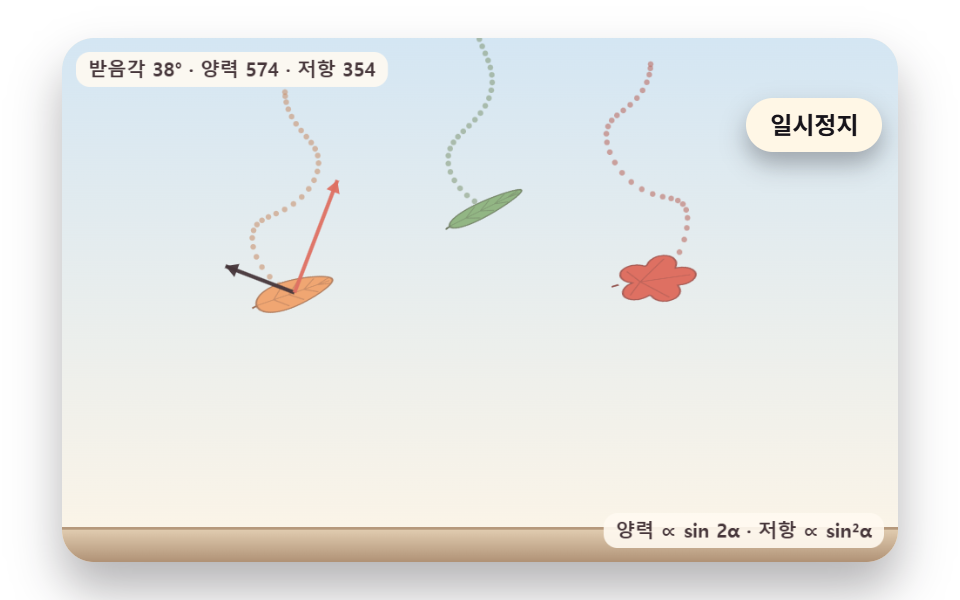 01 leaf-flutter-lift-drag-glide
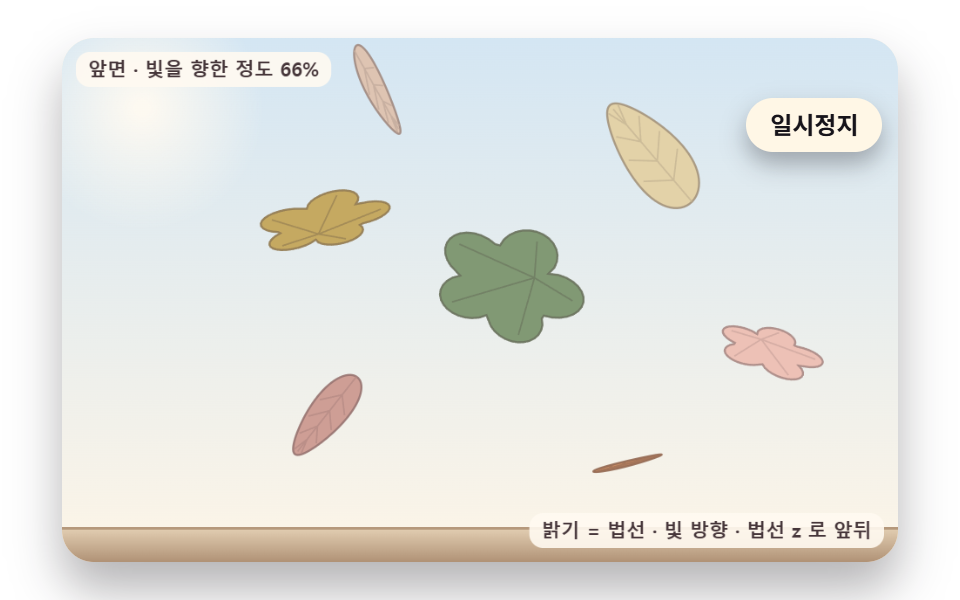 02 leaf-3d-tumble-light-backside
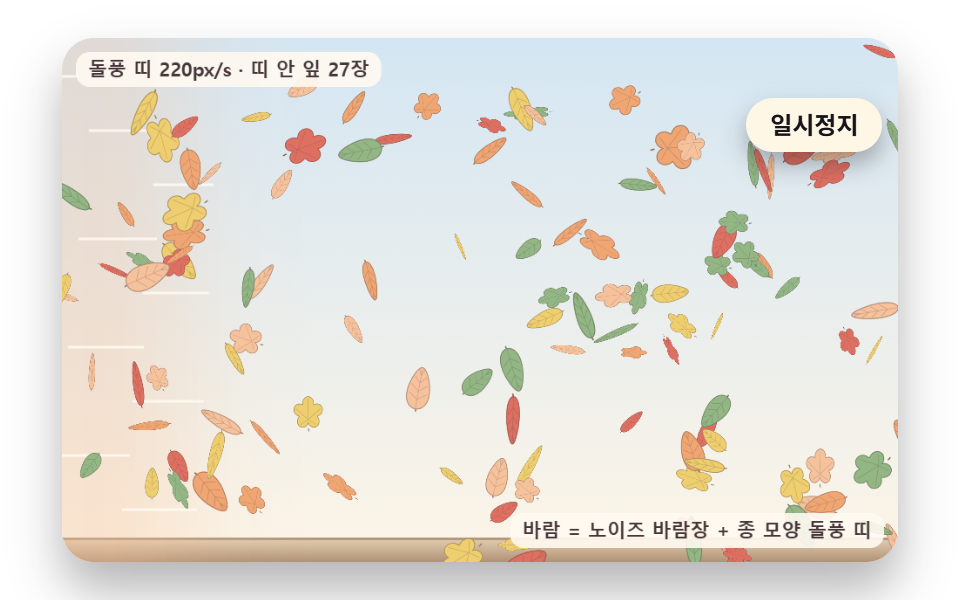 03 leaf-noise-wind-gust-front
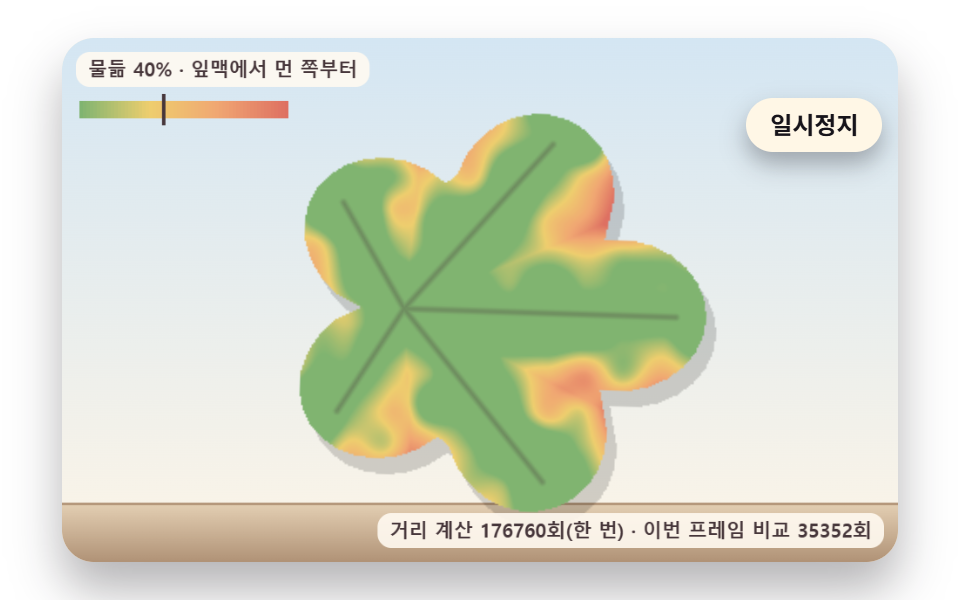 04 leaf-color-turn-vein-distance
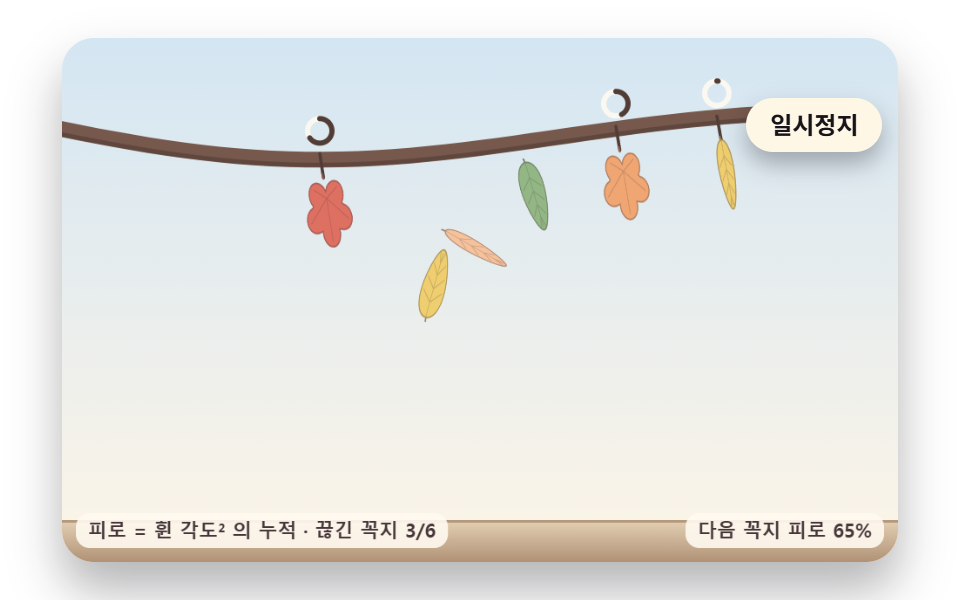 05 leaf-stem-sway-fatigue-snap
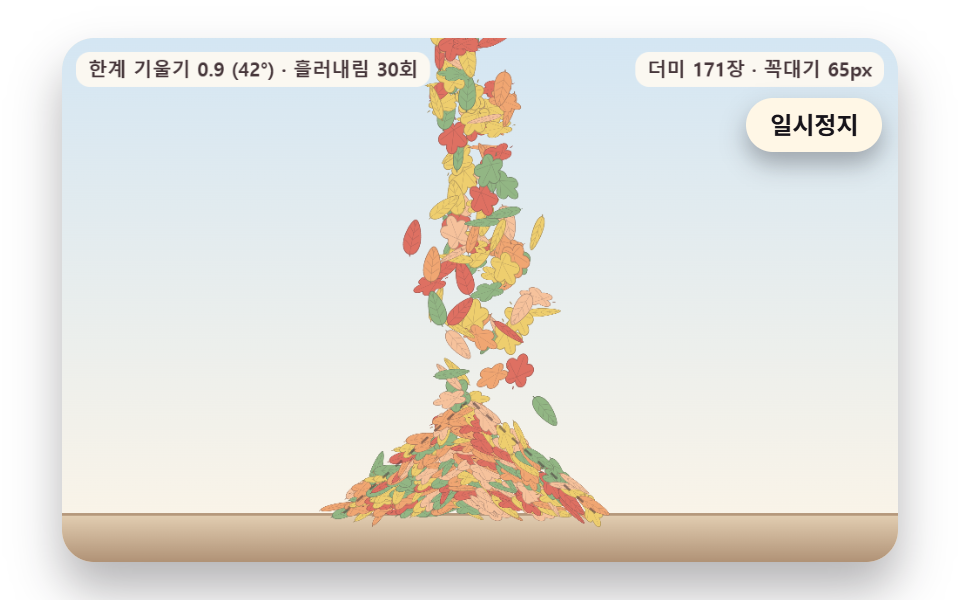 06 leaf-ground-heap-repose-slide
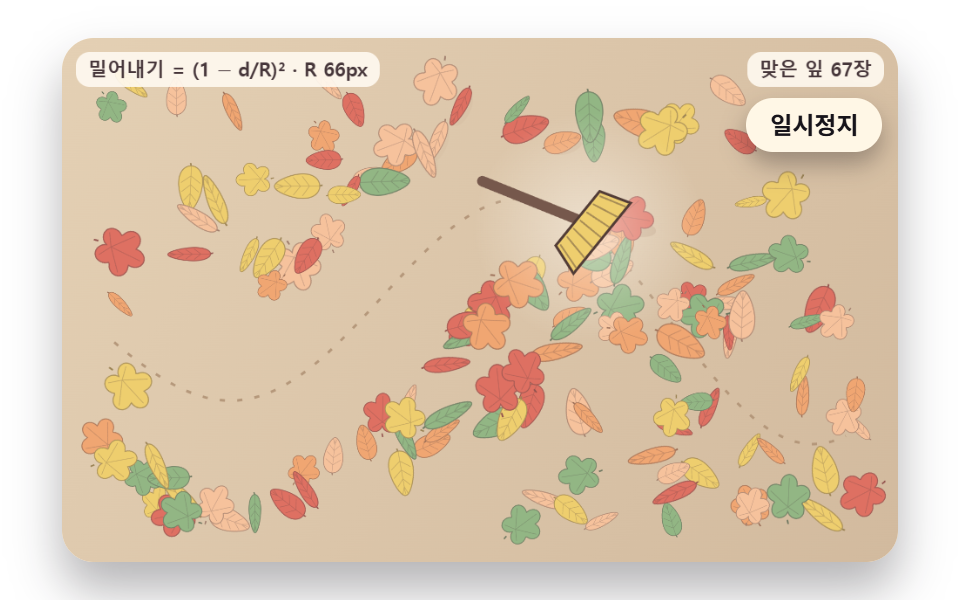 07 leaf-broom-sweep-pressure-scatter
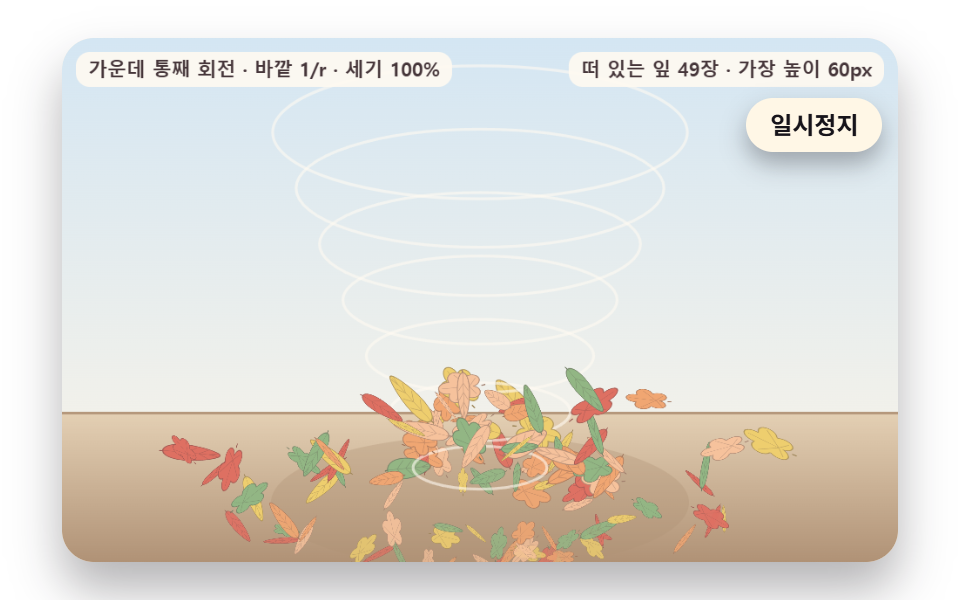 08 leaf-whirl-vortex-spiral-lift
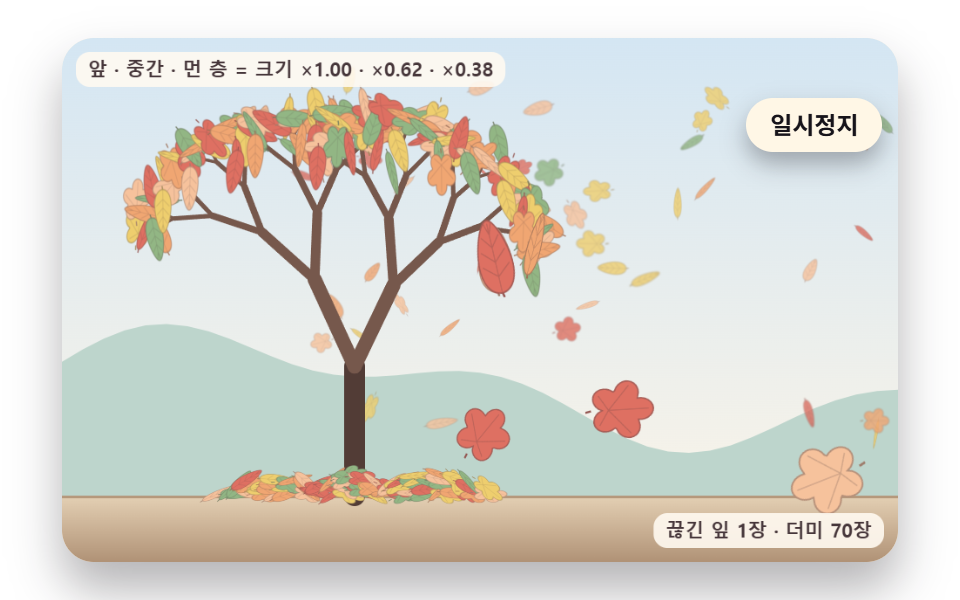 09 leaf-hero-autumn-tree-depth-scene
Auto-plays · click a tile to jump to its section · all nine in one zip
- 01 A Leaf That Glides Sideways and Sways as It Tilts
- 02 A Leaf Tumbling on Three Axes with Front and Back Shading
- 03 A Gust Band That Sweeps a Drift of Leaves
- 04 Autumn Color That Creeps In from the Edges Away from the Veins
- 05 A Leaf That Snaps Off Once Its Stem Wears Out
- 06 A Leaf Pile That Slumps When Its Slope Gets Too Steep
- 07 A Yard Where a Broom's Wind Scatters the Leaves
- 08 Leaves Caught in a Whirlwind, Spiraling Up and Scattering
- 09 An Autumn Tree Scene with Size and Blur Set by Depth
The nine scenes draw every leaf on a 2D canvas from a 72-point outline and a set of veins, with no photos or image files, and a fixed seed makes each one replay the same layout and the same wind by itself. A hand on the board opens an extra path: 01 blows a 160 px/s side wind within 80 px of the pointer, 03 raises a 220 px/s gust within 70 px, and in 07 the broom leaves its set route to follow the pointer. Canvas coordinates stay at 480×300, and the real pixel count is multiplied by the screen's pixel ratio up to a cap of 2.
Autumn Event Banners and the Opening Screen of a Seasonal Landing
For the opening screen of a fall campaign, 09 fits best: front-layer leaves come down large and sharp while far-layer leaves fall small and soft, so a headline set over it gains depth behind the letters. A narrow seasonal event banner suits the eight leaves of 02, which flip and change brightness as they turn. If you came looking for autumn leaves css, keep in mind that the stylesheet here only sizes and frames the stage while the leaves themselves are computed on canvas, and 01, with just three leaves zigzagging down, is the quietest choice for a soft backdrop.
From a Footer Ornament to a Weather Screen
A seasonal footer ornament is where 06 belongs: the mound grows as leaves land and slides sideways once its flank gets too steep, so one strip at the bottom of the page holds a whole autumn scene. A weather app's wind view can take 03 with its passing gust band, a cleaning service page can use the broom in 07, an autumn greeting card can show 05 dropping one leaf at a time, an event opening can start with 08 lifting leaves in a whirlwind, and a product section that changes with the season can hold the single turning leaf of 04.
Why Does a Falling Leaves CSS Animation Look Like Dropping Pebbles When the Leaves Fall Straight?
A leaf is thin and wide, so as it falls the air pushes it sideways by an amount that depends on how far its body is tilted. A straight-down animation has no such side force, which puts it on the same path a heavy object would take, only at a different speed. The cherry petals in the CSS particle background post follow a route set in keyframes, and the falling text post shook letters in the wind like leaves; here 01 computes forces from the tilt so the route comes out of the math instead.
Sideways Slide from a Tilt
The angle of attack α is the angle between the leaf's face and the oncoming air. Lift scales with |sin α·cos α|, so it is largest at 45° and drops to 0 when the leaf lies flat or stands edge-on like a blade. A tilted leaf picks up speed as it slides, and since lift is multiplied by u², more speed means more lift; across the three leaves of 01 the lift peaks at 997, 994 and 934, and the angle of attack swings up to 88 to 90°.
A Righting Torque That Turns the Slide into a Sway
Sliding alone would carry the leaf off to one side. 01 pulls it back toward level with a torque of RIGHTING_K 14 times the sine of the tilt, and SPIN_DAMP 1.5 bleeds off the spin. When sin α changes sign on the way back, lift pushes the other way as well, and the horizontal speed reverses 4 to 5 times in a zigzag. With the lift gain lowered to 0.6 the side swing shrinks to ±1.6 to 5.5 px and the leaf drops almost straight, which shows from the opposite side why a straight fall feels wrong.
Tilt Becomes Lift, Wind Comes from Noise, Color Follows Vein Distance — the Math Behind One Leaf
The nine scenes share four bundles of math. 01, 05 and 09 use the flutter bundle, 05 and 09 the stem spring, 03, 05 and 09 the wind, and 06 and 09 the pile, while 02, 04, 07 and 08 run on their own code alone. Each bundle reacts to the state of a leaf at that instant, which is what a javascript falling leaves animation adds over a path fixed in advance. Here is how the flutter and wind bundles, plus the code of 04 itself, work out in numbers.
Lift Follows sin 2α, Drag Follows sin²α
Drag is AIR_K 0.075 × u² × (0.1 + sin²α), so it grows as the leaf meets the air face-on, while lift takes the same u² and multiplies it by LEAF_LIFT_GAIN 1.6 and |sin α·cos α|. Because |sin α·cos α| equals ½·|sin 2α|, lift tops out at 45°, half of the 90° where drag is largest. Drag points against the air velocity and lift points perpendicular to it; the drag peaks in 01 are 482, 480 and 456, roughly half the lift peaks.
Wind That Differs by Place, and a Band That Sweeps Through
The wind in 03 is smooth noise: values sit on an integer grid and a cubic curve joins them. With WIND_SCALE 0.007 it takes, by calculation, 1/0.007 ≈ 143 px to cross one grid cell, and WIND_DRIFT 0.4 slides the wind pattern sideways as time passes. Horizontal wind is a base of 34 plus noise × 46, and the gust band's center follows time × GUST_SPEED modulo the board width plus six band widths plus a gap of 420, so it crosses from left to right over and over. The drift in the soap bubble post also rides noise wind; what sets this scene apart is the band, a front crossing the screen that shoves only the leaves inside it.
Vein Distance Sets the Order of Turning
For each pixel inside the leaf, 04 measures the distance to the nearest vein segment, divides by the maximum to land on 0 to 1, and uses 0.66 × distance + 0.34 × blotch noise as the order in which that pixel turns. Order values spread from 0.01 to 0.881, and as a falling threshold passes them, the edges cross first and change color first. Unlike the generative art post, which grows its veins as it draws, this scene fixes the veins in advance and uses only the distance to them.
Falling Leaves Animation: 9 Scenes — Lift Flutter, Three-Axis Tumble, Gust Band, Color Turn, Stem Snap, Slumping Pile, Broom Wind, Whirlwind and an Autumn Tree
Each demo ran for 2 seconds while 24 frames were captured, and the 23 differences between neighboring frames gave the changed area and the intensity. 03, with 140 leaves streaming across the whole board, covers the widest share at 71.5%, and 05, where six stems sway before dropping their leaves, covers the narrowest at 8.5%. 06 moved in 22/23 frames and the other eight in 23/23.
Changed Area, Frames and Intensity per Scene
| Scene | Changed area (cumulative) | Frames that moved | Mean intensity |
|---|---|---|---|
| 01 Lift flutter | 13.5% | 23/23 | 91.5 |
| 02 Three-axis tumble | 29.3% | 23/23 | 70.0 |
| 03 Gust band | 71.5% | 23/23 | 83.6 |
| 04 Color turn | 22.3% | 23/23 | 29.1 |
| 05 Stem snap | 8.5% | 23/23 | 67.5 |
| 06 Slumping pile | 12.9% | 22/23 | 84.6 |
| 07 Broom wind | 31.2% | 23/23 | 54.2 |
| 08 Whirlwind | 20.8% | 23/23 | 51.2 |
| 09 Autumn tree | 34.9% | 23/23 | 69.1 |
The whirlwind in 08 works from a velocity field, as the pointer swirl of light dust in the aurora background post does, but it adds solid rotation at the core, falloff outside it and an upward draw that lifts the leaves into a 3D spiral.
01A Leaf That Glides Sideways and Sways as It Tilts
Three leaves start at different tilts and come down in a zigzag as lift from the angle of attack pushes them sideways and a righting torque pulls the tilt back. flutterStep below subtracts the wind from the leaf velocity to get the air velocity and splits it along the leaf's face and its normal to find drag and lift separately, and the first leaf draws both forces as arrows. Running the source function unchanged, the three leaves swing 26.6 to 28.9 px left and 22.6 to 34.2 px right of where they started and reach the ground at 3,872 to 4,912 ms.
<main class="stage">
<div class="lf is-demo" id="lf">
  <canvas class="lf__canvas" data-role="canvas" width="480" height="300" role="img" aria-label="Three leaves that take lift and drag from their tilt, sliding sideways and swaying as they come down."></canvas>
  <button class="lf__pause" data-role="pause" type="button" aria-pressed="false">Pause</button>
</div>
</main>
@use "../../../../site/static/demo-tokens" as *;
@include stage($stage-paper);
.lf {
position: relative;
width: min(92vw, calc(160vh - 12.8vw));
aspect-ratio: 480 / 300;
margin: 0 auto;
border-radius: $r-card;
overflow: hidden;
box-shadow: $shadow-raised;
background: $subject-cream;
}
.lf__canvas {
position: absolute;
inset: 0;
display: block;
width: 100%;
height: 100%;
}
// 일시정지 단추 — 장면 오른쪽 위. aria-pressed 가 참이면 멈춘 상태라 눌린 모양으로
.lf__pause {
position: absolute;
right: $sp-2;
top: 30px;
padding: $sp-1 $sp-3;
border: 0;
border-radius: $r-pill;
background: $subject-cream;
color: $subject-ink;
font-family: inherit;
font-weight: 700;
font-size: 12px;
line-height: 1.6;
cursor: pointer;
box-shadow: $shadow-press;
transition: transform $dur-quick $ease-spring;
}
.lf__pause:hover {
transform: translateY(-1px);
}
.lf__pause[aria-pressed="true"] {
background: $subject-ink;
color: $subject-cream;
}
.lf__pause:focus-visible {
outline: 2px solid $subject-ink;
outline-offset: 2px;
}
@media (max-width: 340px) {
.lf__pause { font-size: 11px; padding: $sp-1 $sp-2; top: 26px; }
}
// 동작 줄이기 — 장면은 스크립트가 잎이 내려앉은 한 장면으로 멈춘다. 단추도 떠오르지 않게
@media (prefers-reduced-motion: reduce) {
.lf__pause { transition: none !important; }
.lf__pause:hover { transform: none !important; }
}html, body {
margin: 0;
overflow: hidden;
}
.stage {
box-sizing: border-box;
min-height: 100vh;
display: grid;
place-items: center;
margin: 0;
background: #ffffff;
font-family: -apple-system, "Segoe UI", "Noto Sans KR", sans-serif;
padding: clamp(8px, 4vw, 24px);
}
.lf {
position: relative;
width: min(92vw, 160vh - 12.8vw);
aspect-ratio: 480/300;
margin: 0 auto;
border-radius: 16px;
overflow: hidden;
box-shadow: 0 14px 24px rgba(23, 20, 26, 0.32);
background: #fff7e6;
}
.lf__canvas {
position: absolute;
inset: 0;
display: block;
width: 100%;
height: 100%;
}
.lf__pause {
position: absolute;
right: 8px;
top: 30px;
padding: 4px 12px;
border: 0;
border-radius: 999px;
background: #fff7e6;
color: #17141a;
font-family: inherit;
font-weight: 700;
font-size: 12px;
line-height: 1.6;
cursor: pointer;
box-shadow: 0 6px 12px rgba(23, 20, 26, 0.32);
transition: transform 220ms cubic-bezier(0.2, 0.8, 0.2, 1);
}
.lf__pause:hover {
transform: translateY(-1px);
}
.lf__pause[aria-pressed=true] {
background: #17141a;
color: #fff7e6;
}
.lf__pause:focus-visible {
outline: 2px solid #17141a;
outline-offset: 2px;
}
@media (max-width: 340px) {
.lf__pause {
font-size: 11px;
padding: 4px 8px;
top: 26px;
}
}
@media (prefers-reduced-motion: reduce) {
.lf__pause {
transition: none !important;
}
.lf__pause:hover {
transform: none !important;
}
}(function () {
const root = document.getElementById("lf");
if (!root) return;
const W = 480;
const H = 300;
// 시계 — rAF 타임스탬프를 쌓아 16ms 고정 스텝으로만 진행한다
const FIXED_DT = 16;
const STEP_S = FIXED_DT / 1000;
// 한 프레임에 따라잡는 시간 상한(ms) — 숨었던 탭이 돌아와 첫 간격이 수 초여도 이만큼만 쌓는다
const DT_MAX = 100;
const MAX_STEPS = 6;
const TAU = Math.PI * 2;
// 파스텔 팔레트 — 옅은 하늘·크림 바탕 위에 잎을 얹고, 줄기·흙·그늘은 진한 쪽으로 명도 차를 둔다
const SKY_TOP = [212, 230, 243];
const SKY_LOW = [253, 245, 231];
const CREAM = [255, 250, 241];
const INK = [70, 54, 58];
const BARK = [118, 88, 76];
const BARK_DEEP = [82, 60, 54];
const SOIL = [228, 208, 180];
const SOIL_DEEP = [176, 146, 118];
const APRICOT = [240, 166, 114];
const PEACH = [246, 194, 156];
const BUTTER = [238, 206, 110];
const MAPLE = [222, 112, 98];
const SAGE = [146, 182, 132];
const LEAF_COLORS = [APRICOT, BUTTER, MAPLE, PEACH, SAGE];
// 잎 모양 셋 — 0 둥근 잎 · 1 다섯 갈래 잎 · 2 길쭉한 잎. 윤곽은 꼭지 쪽이 x = −1, 끝이 x = +1 인 단위 좌표
const LEAF_KINDS = 3;
const OUTLINE_POINTS = 72;
// 스프라이트는 기준 크기로 한 번만 그리고, 찍을 때는 크기 배율만 곱한다
const SPRITE_SIZE = 48;
const SPRITE_RES = 2;
const CAPTION_FONT = '600 11px system-ui, sans-serif';
function clamp(v, lo, hi) { return v < lo ? lo : (v > hi ? hi : v); }
function lerp(a, b, k) { return a + (b - a) * k; }
function smooth(x) { const c = clamp(x, 0, 1); return c * c * (3 - 2 * c); }
function rgba(c, a) {
return 'rgba(' + Math.round(clamp(c[0], 0, 255)) + ',' + Math.round(clamp(c[1], 0, 255)) + ',' + Math.round(clamp(c[2], 0, 255)) + ',' + clamp(a, 0, 1).toFixed(3) + ')';
}
function mixRGB(a, b, k) { return [lerp(a[0], b[0], k), lerp(a[1], b[1], k), lerp(a[2], b[2], k)]; }
// 시드 고정 난수 — 같은 시드면 같은 잎 배치·같은 바람이 다시 나온다 (32비트 정수 섞기)
function makeRng(seed) {
let s = seed >>> 0;
return function () {
s = (s + 0x6d2b79f5) >>> 0;
let t = s;
t = Math.imul(t ^ (t >>> 15), t | 1);
t ^= t + Math.imul(t ^ (t >>> 7), t | 61);
return ((t ^ (t >>> 14)) >>> 0) / 4294967296;
};
}
// 부드러운 2D 노이즈 — 정수 격자점마다 시드로 정한 값(−1~1)을 두고 칸 안은 3차 곡선으로 섞는다
function makeNoise(seed) {
const rng = makeRng(seed);
const perm = new Uint8Array(512);
const vals = new Float32Array(256);
for (let i = 0; i < 256; i += 1) {
vals[i] = rng() * 2 - 1;
perm[i] = i;
}
for (let i = 255; i > 0; i -= 1) {
const j = Math.floor(rng() * (i + 1));
const tmp = perm[i];
perm[i] = perm[j];
perm[j] = tmp;
}
for (let i = 0; i < 256; i += 1) {
perm[i + 256] = perm[i];
}
function corner(ix, iy) { return vals[perm[(ix & 255) + perm[iy & 255]]]; }
return function (x, y) {
const ix = Math.floor(x);
const iy = Math.floor(y);
const fx = x - ix;
const fy = y - iy;
const u = fx * fx * (3 - 2 * fx);
const v = fy * fy * (3 - 2 * fy);
const top = lerp(corner(ix, iy), corner(ix + 1, iy), u);
const low = lerp(corner(ix, iy + 1), corner(ix + 1, iy + 1), u);
return lerp(top, low, v);
};
}
// 잎 윤곽 — 사진 없이 곡선으로. 둘레를 OUTLINE_POINTS 점으로 나눈다
function leafOutline(kind) {
const pts = [];
for (let i = 0; i < OUTLINE_POINTS; i += 1) {
const a = i / OUTLINE_POINTS * TAU;
const c = Math.cos(a);
const s = Math.sin(a);
if (kind === 1) {
// 다섯 갈래 — 반지름이 둘레를 따라 다섯 번 부풀었다 들어간다
const r = 0.6 + 0.4 * Math.pow(Math.abs(Math.cos(2.5 * a)), 0.8);
pts.push([r * c, r * s * 0.95]);
}
else if (kind === 2) {
pts.push([c, 0.3 * s * (1 - 0.25 * c)]);
}
else {
// 둥근 잎 — 꼭지 쪽이 넓고 끝으로 갈수록 좁아지는 물방울
pts.push([c, 0.52 * s * (1 - 0.3 * c)]);
}
}
return pts;
}
const OUTLINES = [leafOutline(0), leafOutline(1), leafOutline(2)];
// 잎맥 선분 — 가운데 맥 하나와 곁맥. 갈래 잎은 갈래 끝마다 하나
function leafVeins(kind) {
const out = [];
if (kind === 1) {
const base = [-0.4, 0];
for (let k = -2; k <= 2; k += 1) {
const a = k * 0.4 * Math.PI;
out.push([base, [Math.cos(a) * 0.86, Math.sin(a) * 0.82]]);
}
return out;
}
const halfW = kind === 2 ? 0.3 : 0.52;
const taper = kind === 2 ? 0.25 : 0.3;
out.push([[-1, 0], [0.92, 0]]);
const roots = [-0.55, -0.15, 0.25, 0.6];
for (let i = 0; i < roots.length; i += 1) {
const x0 = roots[i];
const x1 = Math.min(0.95, x0 + 0.32);
const y1 = halfW * Math.sqrt(Math.max(0, 1 - x1 * x1)) * (1 - taper * x1) * 0.8;
out.push([[x0, 0], [x1, y1]]);
out.push([[x0, 0], [x1, -y1]]);
}
return out;
}
const VEINS = [leafVeins(0), leafVeins(1), leafVeins(2)];
function leafPathOn(g, kind, k) {
const pts = OUTLINES[kind];
g.beginPath();
g.moveTo(pts[0][0] * k, pts[0][1] * k);
for (let i = 1; i < pts.length; i += 1) {
g.lineTo(pts[i][0] * k, pts[i][1] * k);
}
g.closePath();
}
// 스프라이트 흐림 — 가로·세로 상자 평균을 두 번. 투명 가장자리가 검게 번지지 않게 알파를 곱한 값으로 섞는다
function blurSprite(g, side, r) {
const img = g.getImageData(0, 0, side, side);
const d = img.data;
const n = side * side;
const buf = new Float32Array(n * 4);
const tmp = new Float32Array(n * 4);
for (let i = 0; i < n; i += 1) {
const a = d[i * 4 + 3] / 255;
buf[i * 4] = d[i * 4] * a;
buf[i * 4 + 1] = d[i * 4 + 1] * a;
buf[i * 4 + 2] = d[i * 4 + 2] * a;
buf[i * 4 + 3] = d[i * 4 + 3];
}
const span = r * 2 + 1;
for (let pass = 0; pass < 2; pass += 1) {
for (let y = 0; y < side; y += 1) {
for (let x = 0; x < side; x += 1) {
for (let ch = 0; ch < 4; ch += 1) {
let sum = 0;
for (let k = -r; k <= r; k += 1) {
sum += buf[(y * side + clamp(x + k, 0, side - 1)) * 4 + ch];
}
tmp[(y * side + x) * 4 + ch] = sum / span;
}
}
}
for (let y = 0; y < side; y += 1) {
for (let x = 0; x < side; x += 1) {
for (let ch = 0; ch < 4; ch += 1) {
let sum = 0;
for (let k = -r; k <= r; k += 1) {
sum += tmp[(clamp(y + k, 0, side - 1) * side + x) * 4 + ch];
}
buf[(y * side + x) * 4 + ch] = sum / span;
}
}
}
}
for (let i = 0; i < n; i += 1) {
const a = buf[i * 4 + 3];
const inv = a > 0.5 ? 255 / a : 0;
d[i * 4] = buf[i * 4] * inv;
d[i * 4 + 1] = buf[i * 4 + 1] * inv;
d[i * 4 + 2] = buf[i * 4 + 2] * inv;
d[i * 4 + 3] = a;
}
g.putImageData(img, 0, 0);
}
const spriteCache = new Map();
// 함정 1 실물 계수 — 잎 경로를 실제로 그린 횟수(spriteBuilds)와 스프라이트를 찍은 횟수(leafBlits)
let spriteBuilds = 0;
let leafBlits = 0;
// 같은 모양·같은 색·같은 흐림이면 한 번만 그린다. 뒷면은 크림을 섞은 옅은 색으로 따로 한 장
function spriteFor(kind, color, blur) {
const key = kind + '|' + color.join(',') + '|' + blur;
const hit = spriteCache.get(key);
if (hit) {
return hit;
}
spriteBuilds += 1;
const pad = 3 + Math.ceil(blur * 2);
const side = Math.ceil((SPRITE_SIZE + pad * 2) * SPRITE_RES);
const cvs = document.createElement('canvas');
cvs.width = side;
cvs.height = side;
const sp = { cv: cvs, half: side / SPRITE_RES / 2 };
spriteCache.set(key, sp);
const g = cvs.getContext('2d');
if (!g) {
return sp;
}
const k = SPRITE_SIZE * SPRITE_RES / 2;
g.translate(side / 2, side / 2);
// 꼭지
g.beginPath();
g.moveTo(-k * 0.95, 0);
g.lineTo(-k * 1.18, k * 0.05);
g.lineWidth = 1.6 * SPRITE_RES;
g.strokeStyle = rgba(mixRGB(color, INK, 0.5), 1);
g.stroke();
leafPathOn(g, kind, k);
g.fillStyle = rgba(color, 1);
g.fill();
g.lineWidth = 1.1 * SPRITE_RES;
g.strokeStyle = rgba(mixRGB(color, INK, 0.38), 0.95);
g.stroke();
const veins = VEINS[kind];
g.beginPath();
for (let i = 0; i < veins.length; i += 1) {
g.moveTo(veins[i][0][0] * k, veins[i][0][1] * k);
g.lineTo(veins[i][1][0] * k, veins[i][1][1] * k);
}
g.lineWidth = 0.8 * SPRITE_RES;
g.strokeStyle = rgba(mixRGB(color, INK, 0.3), 0.75);
g.stroke();
g.setTransform(1, 0, 0, 1, 0, 0);
if (blur > 0) {
blurSprite(g, side, Math.round(blur * SPRITE_RES));
}
return sp;
}
function backColor(c) { return mixRGB(c, CREAM, 0.5); }
const canvasEl = root.querySelector('[data-role="canvas"]');
const pauseEl = root.querySelector('[data-role="pause"]');
const ctxRaw = canvasEl ? canvasEl.getContext('2d') : null;
if (!canvasEl || !ctxRaw || !pauseEl) {
return;
}
const cv = canvasEl;
const ctx = ctxRaw;
const pauseBtn = pauseEl;
// 스프라이트 찍기 — 자리(x, y)·크기·회전, squash 는 잎 면이 돌아 보이는 세로 납작함(0~1)
function blitLeaf(sp, x, y, size, angle, squash, alpha) {
leafBlits += 1;
const k = size / SPRITE_SIZE;
ctx.save();
ctx.globalAlpha = clamp(alpha, 0, 1);
ctx.translate(x, y);
ctx.rotate(angle);
ctx.scale(k, k * Math.max(0.06, squash));
ctx.drawImage(sp.cv, -sp.half, -sp.half, sp.half * 2, sp.half * 2);
ctx.restore();
}
const reduceQuery = window.matchMedia('(prefers-reduced-motion: reduce)');
// 페이지를 연 채 동작 줄이기 설정을 바꿔도 change 리스너가 이 값을 다시 읽는다
let still = reduceQuery.matches;
// 자동 시연 중인가 — 사람이 처음 손대면 시연 표시를 뗀다
let demo = root.classList.contains('is-demo');
// 리스너는 한 묶음으로 달고 정리할 때 한 번에 뗀다
const off = new AbortController();
// 포인터 자리(판 좌표) — 판 밖이면 −1
let hoverX = -1;
let hoverY = -1;
function fitCanvas() {
// 배율은 2 에서 자른다 — 배율 3 기기에서 화소가 2.25배로 늘어 프레임마다 일이 그만큼 커지지 않게
const dpr = Math.min(window.devicePixelRatio || 1, 2);
cv.width = Math.round(W * dpr);
cv.height = Math.round(H * dpr);
ctx.setTransform(dpr, 0, 0, dpr, 0, 0);
}
function clearSky() {
const g = ctx.createLinearGradient(0, 0, 0, H);
g.addColorStop(0, rgba(SKY_TOP, 1));
g.addColorStop(1, rgba(SKY_LOW, 1));
ctx.fillStyle = g;
ctx.fillRect(0, 0, W, H);
}
function drawGround(y) {
const g = ctx.createLinearGradient(0, y, 0, H);
g.addColorStop(0, rgba(SOIL, 1));
g.addColorStop(1, rgba(SOIL_DEEP, 1));
ctx.fillStyle = g;
ctx.fillRect(0, y, W, H - y);
ctx.fillStyle = rgba(SOIL_DEEP, 0.9);
ctx.fillRect(0, y, W, 1.5);
}
// 판 위 설명 글 — 크림 알약 바탕에 진한 글자
function drawCaption(text, x, y, alignRight) {
ctx.font = CAPTION_FONT;
const bw = ctx.measureText(text).width + 14;
const bh = 20;
const bx = alignRight ? x - bw : x;
ctx.fillStyle = rgba(CREAM, 0.9);
ctx.beginPath();
ctx.moveTo(bx + 8, y);
ctx.arcTo(bx + bw, y, bx + bw, y + bh, 8);
ctx.arcTo(bx + bw, y + bh, bx, y + bh, 8);
ctx.arcTo(bx, y + bh, bx, y, 8);
ctx.arcTo(bx, y, bx + bw, y, 8);
ctx.closePath();
ctx.fill();
ctx.fillStyle = rgba(INK, 1);
ctx.textAlign = 'left';
ctx.textBaseline = 'middle';
ctx.fillText(text, bx + 7, y + bh / 2 + 0.5);
}
function fmt(v, digits) { return v.toFixed(digits); }
const GRAVITY = 380;
// 공기 힘 세기 — 저항 = AIR_K·u²·(DRAG_BASE + sin²α), 양력 = LEAF_LIFT_GAIN·AIR_K·u²·|sin α·cos α|
const AIR_K = 0.075;
const DRAG_BASE = 0.1;
const LEAF_LIFT_GAIN = 1.6;
// 회전력 — 받음각 쪽 압력 중심 어긋남(TWIST_GAIN)과 기울기를 되돌리는 힘(RIGHTING_K), 각속도 감쇠(SPIN_DAMP)
const TWIST_GAIN = 0.002;
const RIGHTING_K = 14;
const SPIN_DAMP = 1.5;
function makeFlyer(x, y, tilt) {
return { x: x, y: y, vx: 0, vy: 0, tilt: tilt, spin: 0, lift: 0, drag: 0, aoa: 0 };
}
// 한 걸음 — 잎이 느끼는 공기 속도(잎 속도 − 바람)를 잎 면 방향(cos α)과 법선 방향(sin α)으로 나눠
// 저항은 공기 속도 반대로, 양력은 그에 수직으로(법선 압력이 미는 쪽) 더하고, 회전력으로 기울기를 바꾼다
    function flutterStep(f, windX, windY, dt, liftGain) {
        const rx = f.vx - windX;
        const ry = f.vy - windY;
        const u2 = rx * rx + ry * ry;
        const u = Math.sqrt(u2);
        let ax = 0;
        let ay = GRAVITY;
        let torque = -RIGHTING_K * Math.sin(f.tilt);
        f.lift = 0;
        f.drag = 0;
        if (u > 1e-6) {
            const tx = Math.cos(f.tilt);
            const ty = Math.sin(f.tilt);
            const nx = -ty;
            const ny = tx;
            const cosA = (rx * tx + ry * ty) / u;
            const sinA = (rx * nx + ry * ny) / u;
            f.aoa = Math.atan2(Math.abs(sinA), Math.abs(cosA));
            const drag = AIR_K * u2 * (DRAG_BASE + sinA * sinA);
            const lift = liftGain * AIR_K * u2 * Math.abs(sinA * cosA);
// 양력 방향 — 법선 압력(−sgn(sin α)·n)에서 공기 속도 방향 성분을 빼 속도에 수직으로
const side = sinA >= 0 ? -1 : 1;
let px = side * nx;
let py = side * ny;
const along = (px * rx + py * ry) / u;
px -= along * rx / u;
py -= along * ry / u;
const pl = Math.hypot(px, py);
if (pl > 1e-6) {
px /= pl;
py /= pl;
}
else {
px = 0;
py = 0;
}
ax += -drag * rx / u + lift * px;
ay += -drag * ry / u + lift * py;
torque += -TWIST_GAIN * u2 * sinA * cosA;
f.lift = lift;
f.drag = drag;
}
f.spin += (torque - SPIN_DAMP * f.spin) * dt;
f.tilt += f.spin * dt;
f.vx += ax * dt;
f.vy += ay * dt;
f.x += f.vx * dt;
f.y += f.vy * dt;
}
// 처음 자리 x, y 와 기운 각(라디안)
const GLIDER_STARTS = [[128, 30, 0.6], [338, 14, -0.9], [236, -18, 0.3]];
const GLIDER_KINDS = [0, 1, 2];
const GLIDER_SIZE = 46;
const GROUND_Y = 272;
const START_MS = 200;
const LOOP_MS = 6400;
// 자취 — TRAIL_EVERY 걸음마다 한 점, 많아야 TRAIL_MAX 점
const TRAIL_EVERY = 4;
const TRAIL_MAX = 120;
// 힘 화살표 길이 (px 당 px/s²)
const ARROW_SCALE = 0.12;
// 포인터 바람 — 포인터에서 POINTER_RADIUS 안의 잎을 옆으로 민다 (px/s)
const POINTER_WIND = 160;
const POINTER_RADIUS = 80;
const ANGLE_LABEL = 'Angle of attack {a}° · lift {l} · drag {d}';
const FORMULA_LABEL = 'lift ∝ sin 2α · drag ∝ sin²α';
let gliders = [];
let t = 0;
let steps = 0;
function build() {
gliders = GLIDER_STARTS.map(function (s, i) {
return { f: makeFlyer(s[0], s[1], s[2]), kind: GLIDER_KINDS[i], color: LEAF_COLORS[i * 2 % LEAF_COLORS.length], size: GLIDER_SIZE, trail: [], landed: false };
});
t = 0;
steps = 0;
}
function loopLength() { return LOOP_MS; }
function pointerWindAt(x, y) {
if (hoverX < 0) {
return 0;
}
const dx = x - hoverX;
const dy = y - hoverY;
const d2 = dx * dx + dy * dy;
return Math.sign(dx || 1) * POINTER_WIND * Math.exp(-d2 / (POINTER_RADIUS * POINTER_RADIUS));
}
function step(dt) {
t += dt * 1000;
if (t < START_MS) {
return;
}
steps += 1;
for (let i = 0; i < gliders.length; i += 1) {
const g = gliders[i];
if (g.landed) {
continue;
}
flutterStep(g.f, pointerWindAt(g.f.x, g.f.y), 0, dt, LEAF_LIFT_GAIN);
if (steps % TRAIL_EVERY === 0) {
g.trail.push([g.f.x, g.f.y]);
if (g.trail.length > TRAIL_MAX) {
g.trail.shift();
}
}
if (g.f.y >= GROUND_Y) {
g.landed = true;
g.f.y = GROUND_Y;
g.f.tilt = 0;
}
}
}
// 동작 줄이기 — 셋 모두 바닥에 내려앉을 때까지 시뮬레이션을 그리지 않고 돌린 장면(지나온 자취 그대로)
function finalScene() {
build();
for (let i = 0; i < 900; i += 1) {
step(STEP_S);
}
}
function onWake() { }
function arrow(x, y, dx, dy, color) {
const len = Math.hypot(dx, dy);
if (len < 2) {
return;
}
const ux = dx / len;
const uy = dy / len;
ctx.strokeStyle = rgba(color, 0.95);
ctx.fillStyle = rgba(color, 0.95);
ctx.lineWidth = 2.2;
ctx.beginPath();
ctx.moveTo(x, y);
ctx.lineTo(x + dx, y + dy);
ctx.stroke();
ctx.beginPath();
ctx.moveTo(x + dx, y + dy);
ctx.lineTo(x + dx - ux * 7 - uy * 4, y + dy - uy * 7 + ux * 4);
ctx.lineTo(x + dx - ux * 7 + uy * 4, y + dy - uy * 7 - ux * 4);
ctx.closePath();
ctx.fill();
}
function draw() {
clearSky();
drawGround(GROUND_Y + 8);
for (let i = 0; i < gliders.length; i += 1) {
const g = gliders[i];
ctx.fillStyle = rgba(mixRGB(g.color, INK, 0.25), 0.55);
for (let k = 0; k < g.trail.length; k += 1) {
ctx.beginPath();
ctx.arc(g.trail[k][0], g.trail[k][1], 1.6, 0, TAU);
ctx.fill();
}
}
for (let i = 0; i < gliders.length; i += 1) {
const g = gliders[i];
blitLeaf(spriteFor(g.kind, g.color, 0), g.f.x, g.f.y, g.size, g.f.tilt, 0.62, 1);
}
const lead = gliders[0];
if (lead && !lead.landed && t >= START_MS) {
const f = lead.f;
const u = Math.hypot(f.vx, f.vy);
if (u > 1) {
const vx = f.vx / u;
const vy = f.vy / u;
// 저항은 속도 반대, 양력은 속도에 수직 — 둘 다 마지막 걸음의 힘
arrow(f.x, f.y, -vx * f.drag * ARROW_SCALE, -vy * f.drag * ARROW_SCALE, INK);
const sx = Math.sign(-vy * 0 + (Math.cos(f.tilt) * vy - Math.sin(f.tilt) * vx) >= 0 ? 1 : -1);
arrow(f.x, f.y, vy * sx * f.lift * ARROW_SCALE, -vx * sx * f.lift * ARROW_SCALE, MAPLE);
}
}
const lf = lead ? lead.f : makeFlyer(0, 0, 0);
drawCaption(ANGLE_LABEL.replace('{a}', fmt(lf.aoa * 180 / Math.PI, 0)).replace('{l}', fmt(lf.lift, 0)).replace('{d}', fmt(lf.drag, 0)), 8, 8, false);
drawCaption(FORMULA_LABEL, W - 8, H - 28, true);
}
// Pause 단추 — aria-pressed 가 참이면 멈춘 상태. 동작 줄이기면 멈춘 채로 시작한다
let paused = still;
// 지금 판이 동작 줄이기 한 장면인가 — 사람이 재생을 누르면 처음부터 다시 시작한다
let stillShown = false;
let ready = false;
// 정리 뒤(리액트 언마운트)에 늦게 온 알림이 일을 시작하지 않게
let alive = true;
// 시연 시계(ms) — 16ms 고정 스텝으로만 늘어난다
let clock = 0;
function syncPause() { pauseBtn.setAttribute('aria-pressed', paused ? 'true' : 'false'); }
function wake() {
if (!demo) {
return;
}
demo = false;
root.classList.remove('is-demo');
onWake();
}
// 포인터 자리를 판 좌표(480×300)로 — 화면에 보이는 캔버스 크기와 상관없이
function toBoard(ev) {
const r = cv.getBoundingClientRect();
return [(ev.clientX - r.left) * W / Math.max(1, r.width), (ev.clientY - r.top) * H / Math.max(1, r.height)];
}
function render() { draw(); }
cv.addEventListener('pointermove', function (ev) {
const p = toBoard(ev);
hoverX = p[0];
hoverY = p[1];
wake();
if (paused && ready) {
render();
}
}, { signal: off.signal });
cv.addEventListener('pointerleave', function () {
hoverX = -1;
hoverY = -1;
if (paused && ready) {
render();
}
}, { signal: off.signal });
let rafId = 0;
let lastTs = -1;
let acc = 0;
function frame(ts) {
if (paused || !alive) {
rafId = 0;
return;
}
if (lastTs < 0) {
lastTs = ts;
}
// dt 상한 — 한 프레임에 DT_MAX 까지만 쌓는다. 숨었던 탭이 돌아와 간격이 수 초여도 잎이 순간이동하지 않게
acc += Math.min(ts - lastTs, DT_MAX);
lastTs = ts;
let n = 0;
while (acc >= FIXED_DT && n < MAX_STEPS) {
clock += FIXED_DT;
if (clock >= loopLength()) {
clock = 0;
build();
}
step(STEP_S);
acc -= FIXED_DT;
n += 1;
}
render();
rafId = window.requestAnimationFrame(frame);
}
function startLoop() {
if (rafId) {
return;
}
// 시계 기준을 새로 잡는다 — 첫 프레임 간격을 0 으로
lastTs = -1;
acc = 0;
rafId = window.requestAnimationFrame(frame);
}
function stopLoop() {
if (rafId) {
window.cancelAnimationFrame(rafId);
rafId = 0;
}
}
// 동작 줄이기 — 루프를 돌리지 않고 잎이 이미 내려앉은 한 장면만 그린다
function showStill() {
stopLoop();
finalScene();
stillShown = true;
render();
}
function play() {
clock = 0;
stillShown = false;
build();
render();
startLoop();
}
pauseBtn.addEventListener('click', function () {
wake();
paused = !paused;
syncPause();
if (paused) {
stopLoop();
render();
return;
}
// 동작 줄이기여도 사람이 직접 누르면 재생한다 — 한 장면에서 처음부터
if (stillShown) {
play();
}
else {
startLoop();
}
}, { signal: off.signal });
// 설정이 페이지를 연 채 바뀌면 — 켜지면 내려앉은 장면에서 멈추고, 꺼지면 시연을 처음부터
function onMotionPref() {
still = reduceQuery.matches;
if (!ready) {
return;
}
paused = still;
syncPause();
if (still) {
showStill();
}
else {
play();
}
}
reduceQuery.addEventListener('change', onMotionPref, { signal: off.signal });
// 탭이 숨으면 루프를 세우고, 돌아오면 시계를 다시 잡아 숨어 있던 시간을 한 번에 따라잡지 않는다
document.addEventListener('visibilitychange', function () {
if (document.hidden) {
stopLoop();
return;
}
if (!paused && ready) {
startLoop();
}
}, { signal: off.signal });
window.addEventListener('resize', function () {
fitCanvas();
if (ready) {
render();
}
}, { signal: off.signal });
function begin() {
fitCanvas();
build();
ready = true;
syncPause();
if (still) {
showStill();
}
else {
play();
}
}
begin();
return function () {
alive = false;
stopLoop();
off.abort();
};
})();// LeafFlutterLiftGlide - vanilla 판(01-leaf-flutter-lift-drag-glide) 의 React 포트. 같은 계산을 useEffect 안에서 돌린다.
import { useEffect, useRef } from "react";
import styles from "./LeafFlutterLiftGlide.module.scss";
const cx = (s: string): string => s.split(" ").map((n) => styles[n] ?? n).join(" ");
export default function LeafFlutterLiftGlide() {
const rootRef = useRef<HTMLDivElement | null>(null);
useEffect(() => {
const rootEl = rootRef.current;
if (!rootEl) return;
const root: HTMLElement = rootEl;
type RGB = [number, number, number];
type Pt = [number, number];
// 잎 스프라이트 한 장 — 오프스크린 캔버스와, 판 좌표로 잰 반 변(기준 크기 SPRITE_SIZE 일 때)
type Sprite = { cv: HTMLCanvasElement; half: number };
const W = 480;
const H = 300;
// 시계 — rAF 타임스탬프를 쌓아 16ms 고정 스텝으로만 진행한다
const FIXED_DT = 16;
const STEP_S = FIXED_DT / 1000;
// 한 프레임에 따라잡는 시간 상한(ms) — 숨었던 탭이 돌아와 첫 간격이 수 초여도 이만큼만 쌓는다
const DT_MAX = 100;
const MAX_STEPS = 6;
const TAU = Math.PI * 2;
// 파스텔 팔레트 — 옅은 하늘·크림 바탕 위에 잎을 얹고, 줄기·흙·그늘은 진한 쪽으로 명도 차를 둔다
const SKY_TOP: RGB = [212, 230, 243];
const SKY_LOW: RGB = [253, 245, 231];
const CREAM: RGB = [255, 250, 241];
const INK: RGB = [70, 54, 58];
const BARK: RGB = [118, 88, 76];
const BARK_DEEP: RGB = [82, 60, 54];
const SOIL: RGB = [228, 208, 180];
const SOIL_DEEP: RGB = [176, 146, 118];
const APRICOT: RGB = [240, 166, 114];
const PEACH: RGB = [246, 194, 156];
const BUTTER: RGB = [238, 206, 110];
const MAPLE: RGB = [222, 112, 98];
const SAGE: RGB = [146, 182, 132];
const LEAF_COLORS: RGB[] = [APRICOT, BUTTER, MAPLE, PEACH, SAGE];
// 잎 모양 셋 — 0 둥근 잎 · 1 다섯 갈래 잎 · 2 길쭉한 잎. 윤곽은 꼭지 쪽이 x = −1, 끝이 x = +1 인 단위 좌표
const LEAF_KINDS = 3;
const OUTLINE_POINTS = 72;
// 스프라이트는 기준 크기로 한 번만 그리고, 찍을 때는 크기 배율만 곱한다
const SPRITE_SIZE = 48;
const SPRITE_RES = 2;
const CAPTION_FONT = '600 11px system-ui, sans-serif';
function clamp(v: number, lo: number, hi: number): number { return v < lo ? lo : (v > hi ? hi : v); }
function lerp(a: number, b: number, k: number): number { return a + (b - a) * k; }
function smooth(x: number): number { const c = clamp(x, 0, 1); return c * c * (3 - 2 * c); }
function rgba(c: RGB, a: number): string {
return 'rgba(' + Math.round(clamp(c[0], 0, 255)) + ',' + Math.round(clamp(c[1], 0, 255)) + ',' + Math.round(clamp(c[2], 0, 255)) + ',' + clamp(a, 0, 1).toFixed(3) + ')';
}
function mixRGB(a: RGB, b: RGB, k: number): RGB { return [lerp(a[0], b[0], k), lerp(a[1], b[1], k), lerp(a[2], b[2], k)]; }
// 시드 고정 난수 — 같은 시드면 같은 잎 배치·같은 바람이 다시 나온다 (32비트 정수 섞기)
function makeRng(seed: number): () => number {
let s = seed >>> 0;
return function (): number {
s = (s + 0x6d2b79f5) >>> 0;
let t = s;
t = Math.imul(t ^ (t >>> 15), t | 1);
t ^= t + Math.imul(t ^ (t >>> 7), t | 61);
return ((t ^ (t >>> 14)) >>> 0) / 4294967296;
};
}
// 부드러운 2D 노이즈 — 정수 격자점마다 시드로 정한 값(−1~1)을 두고 칸 안은 3차 곡선으로 섞는다
function makeNoise(seed: number): (x: number, y: number) => number {
const rng = makeRng(seed);
const perm = new Uint8Array(512);
const vals = new Float32Array(256);
for (let i = 0; i < 256; i += 1) { vals[i] = rng() * 2 - 1; perm[i] = i; }
for (let i = 255; i > 0; i -= 1) {
const j = Math.floor(rng() * (i + 1));
const tmp = perm[i];
perm[i] = perm[j];
perm[j] = tmp;
}
for (let i = 0; i < 256; i += 1) { perm[i + 256] = perm[i]; }
function corner(ix: number, iy: number): number { return vals[perm[(ix & 255) + perm[iy & 255]]]; }
return function (x: number, y: number): number {
const ix = Math.floor(x);
const iy = Math.floor(y);
const fx = x - ix;
const fy = y - iy;
const u = fx * fx * (3 - 2 * fx);
const v = fy * fy * (3 - 2 * fy);
const top = lerp(corner(ix, iy), corner(ix + 1, iy), u);
const low = lerp(corner(ix, iy + 1), corner(ix + 1, iy + 1), u);
return lerp(top, low, v);
};
}
// 잎 윤곽 — 사진 없이 곡선으로. 둘레를 OUTLINE_POINTS 점으로 나눈다
function leafOutline(kind: number): Pt[] {
const pts: Pt[] = [];
for (let i = 0; i < OUTLINE_POINTS; i += 1) {
const a = i / OUTLINE_POINTS * TAU;
const c = Math.cos(a);
const s = Math.sin(a);
if (kind === 1) {
// 다섯 갈래 — 반지름이 둘레를 따라 다섯 번 부풀었다 들어간다
const r = 0.6 + 0.4 * Math.pow(Math.abs(Math.cos(2.5 * a)), 0.8);
pts.push([r * c, r * s * 0.95]);
} else if (kind === 2) {
pts.push([c, 0.3 * s * (1 - 0.25 * c)]);
} else {
// 둥근 잎 — 꼭지 쪽이 넓고 끝으로 갈수록 좁아지는 물방울
pts.push([c, 0.52 * s * (1 - 0.3 * c)]);
}
}
return pts;
}
const OUTLINES: Pt[][] = [leafOutline(0), leafOutline(1), leafOutline(2)];
// 잎맥 선분 — 가운데 맥 하나와 곁맥. 갈래 잎은 갈래 끝마다 하나
function leafVeins(kind: number): [Pt, Pt][] {
const out: [Pt, Pt][] = [];
if (kind === 1) {
const base: Pt = [-0.4, 0];
for (let k = -2; k <= 2; k += 1) {
const a = k * 0.4 * Math.PI;
out.push([base, [Math.cos(a) * 0.86, Math.sin(a) * 0.82]]);
}
return out;
}
const halfW = kind === 2 ? 0.3 : 0.52;
const taper = kind === 2 ? 0.25 : 0.3;
out.push([[-1, 0], [0.92, 0]]);
const roots = [-0.55, -0.15, 0.25, 0.6];
for (let i = 0; i < roots.length; i += 1) {
const x0 = roots[i];
const x1 = Math.min(0.95, x0 + 0.32);
const y1 = halfW * Math.sqrt(Math.max(0, 1 - x1 * x1)) * (1 - taper * x1) * 0.8;
out.push([[x0, 0], [x1, y1]]);
out.push([[x0, 0], [x1, -y1]]);
}
return out;
}
const VEINS: [Pt, Pt][][] = [leafVeins(0), leafVeins(1), leafVeins(2)];
function leafPathOn(g: CanvasRenderingContext2D, kind: number, k: number): void {
const pts = OUTLINES[kind];
g.beginPath();
g.moveTo(pts[0][0] * k, pts[0][1] * k);
for (let i = 1; i < pts.length; i += 1) { g.lineTo(pts[i][0] * k, pts[i][1] * k); }
g.closePath();
}
// 스프라이트 흐림 — 가로·세로 상자 평균을 두 번. 투명 가장자리가 검게 번지지 않게 알파를 곱한 값으로 섞는다
function blurSprite(g: CanvasRenderingContext2D, side: number, r: number): void {
const img = g.getImageData(0, 0, side, side);
const d = img.data;
const n = side * side;
const buf = new Float32Array(n * 4);
const tmp = new Float32Array(n * 4);
for (let i = 0; i < n; i += 1) {
const a = d[i * 4 + 3] / 255;
buf[i * 4] = d[i * 4] * a;
buf[i * 4 + 1] = d[i * 4 + 1] * a;
buf[i * 4 + 2] = d[i * 4 + 2] * a;
buf[i * 4 + 3] = d[i * 4 + 3];
}
const span = r * 2 + 1;
for (let pass = 0; pass < 2; pass += 1) {
for (let y = 0; y < side; y += 1) {
for (let x = 0; x < side; x += 1) {
for (let ch = 0; ch < 4; ch += 1) {
let sum = 0;
for (let k = -r; k <= r; k += 1) { sum += buf[(y * side + clamp(x + k, 0, side - 1)) * 4 + ch]; }
tmp[(y * side + x) * 4 + ch] = sum / span;
}
}
}
for (let y = 0; y < side; y += 1) {
for (let x = 0; x < side; x += 1) {
for (let ch = 0; ch < 4; ch += 1) {
let sum = 0;
for (let k = -r; k <= r; k += 1) { sum += tmp[(clamp(y + k, 0, side - 1) * side + x) * 4 + ch]; }
buf[(y * side + x) * 4 + ch] = sum / span;
}
}
}
}
for (let i = 0; i < n; i += 1) {
const a = buf[i * 4 + 3];
const inv = a > 0.5 ? 255 / a : 0;
d[i * 4] = buf[i * 4] * inv;
d[i * 4 + 1] = buf[i * 4 + 1] * inv;
d[i * 4 + 2] = buf[i * 4 + 2] * inv;
d[i * 4 + 3] = a;
}
g.putImageData(img, 0, 0);
}
const spriteCache = new Map<string, Sprite>();
// 함정 1 실물 계수 — 잎 경로를 실제로 그린 횟수(spriteBuilds)와 스프라이트를 찍은 횟수(leafBlits)
let spriteBuilds = 0;
let leafBlits = 0;
// 같은 모양·같은 색·같은 흐림이면 한 번만 그린다. 뒷면은 크림을 섞은 옅은 색으로 따로 한 장
function spriteFor(kind: number, color: RGB, blur: number): Sprite {
const key = kind + '|' + color.join(',') + '|' + blur;
const hit = spriteCache.get(key);
if (hit) { return hit; }
spriteBuilds += 1;
const pad = 3 + Math.ceil(blur * 2);
const side = Math.ceil((SPRITE_SIZE + pad * 2) * SPRITE_RES);
const cvs = document.createElement('canvas');
cvs.width = side;
cvs.height = side;
const sp: Sprite = { cv: cvs, half: side / SPRITE_RES / 2 };
spriteCache.set(key, sp);
const g = cvs.getContext('2d');
if (!g) { return sp; }
const k = SPRITE_SIZE * SPRITE_RES / 2;
g.translate(side / 2, side / 2);
// 꼭지
g.beginPath();
g.moveTo(-k * 0.95, 0);
g.lineTo(-k * 1.18, k * 0.05);
g.lineWidth = 1.6 * SPRITE_RES;
g.strokeStyle = rgba(mixRGB(color, INK, 0.5), 1);
g.stroke();
leafPathOn(g, kind, k);
g.fillStyle = rgba(color, 1);
g.fill();
g.lineWidth = 1.1 * SPRITE_RES;
g.strokeStyle = rgba(mixRGB(color, INK, 0.38), 0.95);
g.stroke();
const veins = VEINS[kind];
g.beginPath();
for (let i = 0; i < veins.length; i += 1) {
g.moveTo(veins[i][0][0] * k, veins[i][0][1] * k);
g.lineTo(veins[i][1][0] * k, veins[i][1][1] * k);
}
g.lineWidth = 0.8 * SPRITE_RES;
g.strokeStyle = rgba(mixRGB(color, INK, 0.3), 0.75);
g.stroke();
g.setTransform(1, 0, 0, 1, 0, 0);
if (blur > 0) { blurSprite(g, side, Math.round(blur * SPRITE_RES)); }
return sp;
}
function backColor(c: RGB): RGB { return mixRGB(c, CREAM, 0.5); }
const canvasEl = root.querySelector('[data-role="canvas"]') as HTMLCanvasElement | null;
const pauseEl = root.querySelector('[data-role="pause"]') as HTMLButtonElement | null;
const ctxRaw = canvasEl ? canvasEl.getContext('2d') : null;
if (!canvasEl || !ctxRaw || !pauseEl) { return; }
const cv: HTMLCanvasElement = canvasEl;
const ctx: CanvasRenderingContext2D = ctxRaw;
const pauseBtn: HTMLButtonElement = pauseEl;
// 스프라이트 찍기 — 자리(x, y)·크기·회전, squash 는 잎 면이 돌아 보이는 세로 납작함(0~1)
function blitLeaf(sp: Sprite, x: number, y: number, size: number, angle: number, squash: number, alpha: number): void {
leafBlits += 1;
const k = size / SPRITE_SIZE;
ctx.save();
ctx.globalAlpha = clamp(alpha, 0, 1);
ctx.translate(x, y);
ctx.rotate(angle);
ctx.scale(k, k * Math.max(0.06, squash));
ctx.drawImage(sp.cv, -sp.half, -sp.half, sp.half * 2, sp.half * 2);
ctx.restore();
}
const reduceQuery = window.matchMedia('(prefers-reduced-motion: reduce)');
// 페이지를 연 채 동작 줄이기 설정을 바꿔도 change 리스너가 이 값을 다시 읽는다
let still = reduceQuery.matches;
// 자동 시연 중인가 — 사람이 처음 손대면 시연 표시를 뗀다
let demo = root.classList.contains('is-demo');
// 리스너는 한 묶음으로 달고 정리할 때 한 번에 뗀다
const off = new AbortController();
// 포인터 자리(판 좌표) — 판 밖이면 −1
let hoverX = -1;
let hoverY = -1;
function fitCanvas(): void {
// 배율은 2 에서 자른다 — 배율 3 기기에서 화소가 2.25배로 늘어 프레임마다 일이 그만큼 커지지 않게
const dpr = Math.min(window.devicePixelRatio || 1, 2);
cv.width = Math.round(W * dpr);
cv.height = Math.round(H * dpr);
ctx.setTransform(dpr, 0, 0, dpr, 0, 0);
}
function clearSky(): void {
const g = ctx.createLinearGradient(0, 0, 0, H);
g.addColorStop(0, rgba(SKY_TOP, 1));
g.addColorStop(1, rgba(SKY_LOW, 1));
ctx.fillStyle = g;
ctx.fillRect(0, 0, W, H);
}
function drawGround(y: number): void {
const g = ctx.createLinearGradient(0, y, 0, H);
g.addColorStop(0, rgba(SOIL, 1));
g.addColorStop(1, rgba(SOIL_DEEP, 1));
ctx.fillStyle = g;
ctx.fillRect(0, y, W, H - y);
ctx.fillStyle = rgba(SOIL_DEEP, 0.9);
ctx.fillRect(0, y, W, 1.5);
}
// 판 위 설명 글 — 크림 알약 바탕에 진한 글자
function drawCaption(text: string, x: number, y: number, alignRight: boolean): void {
ctx.font = CAPTION_FONT;
const bw = ctx.measureText(text).width + 14;
const bh = 20;
const bx = alignRight ? x - bw : x;
ctx.fillStyle = rgba(CREAM, 0.9);
ctx.beginPath();
ctx.moveTo(bx + 8, y);
ctx.arcTo(bx + bw, y, bx + bw, y + bh, 8);
ctx.arcTo(bx + bw, y + bh, bx, y + bh, 8);
ctx.arcTo(bx, y + bh, bx, y, 8);
ctx.arcTo(bx, y, bx + bw, y, 8);
ctx.closePath();
ctx.fill();
ctx.fillStyle = rgba(INK, 1);
ctx.textAlign = 'left';
ctx.textBaseline = 'middle';
ctx.fillText(text, bx + 7, y + bh / 2 + 0.5);
}
function fmt(v: number, digits: number): string { return v.toFixed(digits); }
// 떨어지는 잎 한 장(옆에서 본 판) — 자리·속도(px/s), 기운 각 tilt(라디안, 0 이면 수평으로 누움)·각속도 spin.
// lift·drag·aoa 는 마지막 걸음의 양력·저항(px/s²)과 받음각(라디안) — 화살표·설명 글이 읽는다
type Flyer = { x: number; y: number; vx: number; vy: number; tilt: number; spin: number; lift: number; drag: number; aoa: number };
const GRAVITY = 380;
// 공기 힘 세기 — 저항 = AIR_K·u²·(DRAG_BASE + sin²α), 양력 = LEAF_LIFT_GAIN·AIR_K·u²·|sin α·cos α|
const AIR_K = 0.075;
const DRAG_BASE = 0.1;
const LEAF_LIFT_GAIN = 1.6;
// 회전력 — 받음각 쪽 압력 중심 어긋남(TWIST_GAIN)과 기울기를 되돌리는 힘(RIGHTING_K), 각속도 감쇠(SPIN_DAMP)
const TWIST_GAIN = 0.002;
const RIGHTING_K = 14;
const SPIN_DAMP = 1.5;
function makeFlyer(x: number, y: number, tilt: number): Flyer {
return { x: x, y: y, vx: 0, vy: 0, tilt: tilt, spin: 0, lift: 0, drag: 0, aoa: 0 };
}
// 한 걸음 — 잎이 느끼는 공기 속도(잎 속도 − 바람)를 잎 면 방향(cos α)과 법선 방향(sin α)으로 나눠
// 저항은 공기 속도 반대로, 양력은 그에 수직으로(법선 압력이 미는 쪽) 더하고, 회전력으로 기울기를 바꾼다
function flutterStep(f: Flyer, windX: number, windY: number, dt: number, liftGain: number): void {
const rx = f.vx - windX;
const ry = f.vy - windY;
const u2 = rx * rx + ry * ry;
const u = Math.sqrt(u2);
let ax = 0;
let ay = GRAVITY;
let torque = -RIGHTING_K * Math.sin(f.tilt);
f.lift = 0;
f.drag = 0;
if (u > 1e-6) {
const tx = Math.cos(f.tilt);
const ty = Math.sin(f.tilt);
const nx = -ty;
const ny = tx;
const cosA = (rx * tx + ry * ty) / u;
const sinA = (rx * nx + ry * ny) / u;
f.aoa = Math.atan2(Math.abs(sinA), Math.abs(cosA));
const drag = AIR_K * u2 * (DRAG_BASE + sinA * sinA);
const lift = liftGain * AIR_K * u2 * Math.abs(sinA * cosA);
// 양력 방향 — 법선 압력(−sgn(sin α)·n)에서 공기 속도 방향 성분을 빼 속도에 수직으로
const side = sinA >= 0 ? -1 : 1;
let px = side * nx;
let py = side * ny;
const along = (px * rx + py * ry) / u;
px -= along * rx / u;
py -= along * ry / u;
const pl = Math.hypot(px, py);
if (pl > 1e-6) { px /= pl; py /= pl; } else { px = 0; py = 0; }
ax += -drag * rx / u + lift * px;
ay += -drag * ry / u + lift * py;
torque += -TWIST_GAIN * u2 * sinA * cosA;
f.lift = lift;
f.drag = drag;
}
f.spin += (torque - SPIN_DAMP * f.spin) * dt;
f.tilt += f.spin * dt;
f.vx += ax * dt;
f.vy += ay * dt;
f.x += f.vx * dt;
f.y += f.vy * dt;
}
// 01 — 기운 각도로 양력·저항을 나눠 옆으로 미끄러지고, 기울기를 되돌리는 회전력으로 흔들리며 내려오는 잎 셋
type Glider = { f: Flyer; kind: number; color: RGB; size: number; trail: Pt[]; landed: boolean };
// 처음 자리 x, y 와 기운 각(라디안)
const GLIDER_STARTS: [number, number, number][] = [[128, 30, 0.6], [338, 14, -0.9], [236, -18, 0.3]];
const GLIDER_KINDS = [0, 1, 2];
const GLIDER_SIZE = 46;
const GROUND_Y = 272;
const START_MS = 200;
const LOOP_MS = 6400;
// 자취 — TRAIL_EVERY 걸음마다 한 점, 많아야 TRAIL_MAX 점
const TRAIL_EVERY = 4;
const TRAIL_MAX = 120;
// 힘 화살표 길이 (px 당 px/s²)
const ARROW_SCALE = 0.12;
// 포인터 바람 — 포인터에서 POINTER_RADIUS 안의 잎을 옆으로 민다 (px/s)
const POINTER_WIND = 160;
const POINTER_RADIUS = 80;
const ANGLE_LABEL = '받음각 {a}° · 양력 {l} · 저항 {d}';
const FORMULA_LABEL = '양력 ∝ sin 2α · 저항 ∝ sin²α';
let gliders: Glider[] = [];
let t = 0;
let steps = 0;
function build(): void {
gliders = GLIDER_STARTS.map(function (s: [number, number, number], i: number): Glider {
return { f: makeFlyer(s[0], s[1], s[2]), kind: GLIDER_KINDS[i], color: LEAF_COLORS[i * 2 % LEAF_COLORS.length], size: GLIDER_SIZE, trail: [], landed: false };
});
t = 0;
steps = 0;
}
function loopLength(): number { return LOOP_MS; }
function pointerWindAt(x: number, y: number): number {
if (hoverX < 0) { return 0; }
const dx = x - hoverX;
const dy = y - hoverY;
const d2 = dx * dx + dy * dy;
return Math.sign(dx || 1) * POINTER_WIND * Math.exp(-d2 / (POINTER_RADIUS * POINTER_RADIUS));
}
function step(dt: number): void {
t += dt * 1000;
if (t < START_MS) { return; }
steps += 1;
for (let i = 0; i < gliders.length; i += 1) {
const g = gliders[i];
if (g.landed) { continue; }
flutterStep(g.f, pointerWindAt(g.f.x, g.f.y), 0, dt, LEAF_LIFT_GAIN);
if (steps % TRAIL_EVERY === 0) {
g.trail.push([g.f.x, g.f.y]);
if (g.trail.length > TRAIL_MAX) { g.trail.shift(); }
}
if (g.f.y >= GROUND_Y) {
g.landed = true;
g.f.y = GROUND_Y;
g.f.tilt = 0;
}
}
}
// 동작 줄이기 — 셋 모두 바닥에 내려앉을 때까지 시뮬레이션을 그리지 않고 돌린 장면(지나온 자취 그대로)
function finalScene(): void {
build();
for (let i = 0; i < 900; i += 1) { step(STEP_S); }
}
function onWake(): void { }
function arrow(x: number, y: number, dx: number, dy: number, color: RGB): void {
const len = Math.hypot(dx, dy);
if (len < 2) { return; }
const ux = dx / len;
const uy = dy / len;
ctx.strokeStyle = rgba(color, 0.95);
ctx.fillStyle = rgba(color, 0.95);
ctx.lineWidth = 2.2;
ctx.beginPath();
ctx.moveTo(x, y);
ctx.lineTo(x + dx, y + dy);
ctx.stroke();
ctx.beginPath();
ctx.moveTo(x + dx, y + dy);
ctx.lineTo(x + dx - ux * 7 - uy * 4, y + dy - uy * 7 + ux * 4);
ctx.lineTo(x + dx - ux * 7 + uy * 4, y + dy - uy * 7 - ux * 4);
ctx.closePath();
ctx.fill();
}
function draw(): void {
clearSky();
drawGround(GROUND_Y + 8);
for (let i = 0; i < gliders.length; i += 1) {
const g = gliders[i];
ctx.fillStyle = rgba(mixRGB(g.color, INK, 0.25), 0.55);
for (let k = 0; k < g.trail.length; k += 1) {
ctx.beginPath();
ctx.arc(g.trail[k][0], g.trail[k][1], 1.6, 0, TAU);
ctx.fill();
}
}
for (let i = 0; i < gliders.length; i += 1) {
const g = gliders[i];
blitLeaf(spriteFor(g.kind, g.color, 0), g.f.x, g.f.y, g.size, g.f.tilt, 0.62, 1);
}
const lead = gliders[0];
if (lead && !lead.landed && t >= START_MS) {
const f = lead.f;
const u = Math.hypot(f.vx, f.vy);
if (u > 1) {
const vx = f.vx / u;
const vy = f.vy / u;
// 저항은 속도 반대, 양력은 속도에 수직 — 둘 다 마지막 걸음의 힘
arrow(f.x, f.y, -vx * f.drag * ARROW_SCALE, -vy * f.drag * ARROW_SCALE, INK);
const sx = Math.sign(-vy * 0 + (Math.cos(f.tilt) * vy - Math.sin(f.tilt) * vx) >= 0 ? 1 : -1);
arrow(f.x, f.y, vy * sx * f.lift * ARROW_SCALE, -vx * sx * f.lift * ARROW_SCALE, MAPLE);
}
}
const lf = lead ? lead.f : makeFlyer(0, 0, 0);
drawCaption(ANGLE_LABEL.replace('{a}', fmt(lf.aoa * 180 / Math.PI, 0)).replace('{l}', fmt(lf.lift, 0)).replace('{d}', fmt(lf.drag, 0)), 8, 8, false);
drawCaption(FORMULA_LABEL, W - 8, H - 28, true);
}
// 일시정지 단추 — aria-pressed 가 참이면 멈춘 상태. 동작 줄이기면 멈춘 채로 시작한다
let paused = still;
// 지금 판이 동작 줄이기 한 장면인가 — 사람이 재생을 누르면 처음부터 다시 시작한다
let stillShown = false;
let ready = false;
// 정리 뒤(리액트 언마운트)에 늦게 온 알림이 일을 시작하지 않게
let alive = true;
// 시연 시계(ms) — 16ms 고정 스텝으로만 늘어난다
let clock = 0;
function syncPause(): void { pauseBtn.setAttribute('aria-pressed', paused ? 'true' : 'false'); }
function wake(): void {
if (!demo) { return; }
demo = false;
root.classList.remove('is-demo');
onWake();
}
// 포인터 자리를 판 좌표(480×300)로 — 화면에 보이는 캔버스 크기와 상관없이
function toBoard(ev: PointerEvent): Pt {
const r = cv.getBoundingClientRect();
return [(ev.clientX - r.left) * W / Math.max(1, r.width), (ev.clientY - r.top) * H / Math.max(1, r.height)];
}
function render(): void { draw(); }
cv.addEventListener('pointermove', function (ev: PointerEvent): void {
const p = toBoard(ev);
hoverX = p[0];
hoverY = p[1];
wake();
if (paused && ready) { render(); }
}, { signal: off.signal });
cv.addEventListener('pointerleave', function (): void {
hoverX = -1;
hoverY = -1;
if (paused && ready) { render(); }
}, { signal: off.signal });
let rafId = 0;
let lastTs = -1;
let acc = 0;
function frame(ts: number): void {
if (paused || !alive) { rafId = 0; return; }
if (lastTs < 0) { lastTs = ts; }
// dt 상한 — 한 프레임에 DT_MAX 까지만 쌓는다. 숨었던 탭이 돌아와 간격이 수 초여도 잎이 순간이동하지 않게
acc += Math.min(ts - lastTs, DT_MAX);
lastTs = ts;
let n = 0;
while (acc >= FIXED_DT && n < MAX_STEPS) {
clock += FIXED_DT;
if (clock >= loopLength()) { clock = 0; build(); }
step(STEP_S);
acc -= FIXED_DT;
n += 1;
}
render();
rafId = window.requestAnimationFrame(frame);
}
function startLoop(): void {
if (rafId) { return; }
// 시계 기준을 새로 잡는다 — 첫 프레임 간격을 0 으로
lastTs = -1;
acc = 0;
rafId = window.requestAnimationFrame(frame);
}
function stopLoop(): void {
if (rafId) { window.cancelAnimationFrame(rafId); rafId = 0; }
}
// 동작 줄이기 — 루프를 돌리지 않고 잎이 이미 내려앉은 한 장면만 그린다
function showStill(): void {
stopLoop();
finalScene();
stillShown = true;
render();
}
function play(): void {
clock = 0;
stillShown = false;
build();
render();
startLoop();
}
pauseBtn.addEventListener('click', function (): void {
wake();
paused = !paused;
syncPause();
if (paused) { stopLoop(); render(); return; }
// 동작 줄이기여도 사람이 직접 누르면 재생한다 — 한 장면에서 처음부터
if (stillShown) { play(); } else { startLoop(); }
}, { signal: off.signal });
// 설정이 페이지를 연 채 바뀌면 — 켜지면 내려앉은 장면에서 멈추고, 꺼지면 시연을 처음부터
function onMotionPref(): void {
still = reduceQuery.matches;
if (!ready) { return; }
paused = still;
syncPause();
if (still) { showStill(); } else { play(); }
}
reduceQuery.addEventListener('change', onMotionPref, { signal: off.signal });
// 탭이 숨으면 루프를 세우고, 돌아오면 시계를 다시 잡아 숨어 있던 시간을 한 번에 따라잡지 않는다
document.addEventListener('visibilitychange', function (): void {
if (document.hidden) { stopLoop(); return; }
if (!paused && ready) { startLoop(); }
}, { signal: off.signal });
window.addEventListener('resize', function (): void {
fitCanvas();
if (ready) { render(); }
}, { signal: off.signal });
function begin(): void {
fitCanvas();
build();
ready = true;
syncPause();
if (still) { showStill(); } else { play(); }
}
begin();
return function (): void {
alive = false;
stopLoop();
off.abort();
};
}, []);
return (
<div className={cx("lf") + " is-demo"} ref={rootRef}>
<canvas className={cx("lf__canvas")} data-role="canvas" width={480} height={300} role="img" aria-label="기운 각도에 따라 양력과 저항을 받아 옆으로 미끄러지며 흔들리듯 내려오는 잎 세 장."></canvas>
<button className={cx("lf__pause")} data-role="pause" type="button" aria-pressed="false">{'일시정지'}</button>
</div>
);
}01 · A Leaf That Glides Sideways and Sways as It Tilts — Measured area 13.519% · moving frames 23/23Original by GODRICH · SCSS and React ship in the zip · See the password
function flutterStep(f, windX, windY, dt, liftGain) {
const rx = f.vx - windX;
const ry = f.vy - windY;
const u2 = rx * rx + ry * ry;
const u = Math.sqrt(u2);
let ax = 0;
let ay = GRAVITY;
let torque = -RIGHTING_K * Math.sin(f.tilt);
f.lift = 0;
f.drag = 0;
if (u > 1e-6) {
const tx = Math.cos(f.tilt);
const ty = Math.sin(f.tilt);
const nx = -ty;
const ny = tx;
const cosA = (rx * tx + ry * ty) / u;
const sinA = (rx * nx + ry * ny) / u;
f.aoa = Math.atan2(Math.abs(sinA), Math.abs(cosA));
const drag = AIR_K * u2 * (DRAG_BASE + sinA * sinA);
const lift = liftGain * AIR_K * u2 * Math.abs(sinA * cosA);
02A Leaf Tumbling on Three Axes with Front and Back Shading
Eight leaves each spin on three axes, shrinking and growing by the perspective factor FOCAL_LENGTH / (FOCAL_LENGTH + z), and when a flip turns the normal's z positive the leaf switches to a back color that mixes its own color half and half with cream. The snippet below moves the 72 outline points to the screen, then sets brightness to 0.32 + 0.68 × the dot product of the visible face's normal and LIGHT_DIR, with light arriving from the upper left front. Over 6 seconds each leaf flips between front and back 6 to 8 times and the perspective factor ranges from 0.757 to 1.232.
<main class="stage">
<div class="lf is-demo" id="lf">
  <canvas class="lf__canvas" data-role="canvas" width="480" height="300" role="img" aria-label="Leaves flipping on three axes as they fall. The side facing the light is bright and the back shows a paler color."></canvas>
  <button class="lf__pause" data-role="pause" type="button" aria-pressed="false">Pause</button>
</div>
</main>
@use "../../../../site/static/demo-tokens" as *;
@include stage($stage-paper);
.lf {
position: relative;
width: min(92vw, calc(160vh - 12.8vw));
aspect-ratio: 480 / 300;
margin: 0 auto;
border-radius: $r-card;
overflow: hidden;
box-shadow: $shadow-raised;
background: $subject-cream;
}
.lf__canvas {
position: absolute;
inset: 0;
display: block;
width: 100%;
height: 100%;
}
// 일시정지 단추 — 장면 오른쪽 위. aria-pressed 가 참이면 멈춘 상태라 눌린 모양으로
.lf__pause {
position: absolute;
right: $sp-2;
top: 30px;
padding: $sp-1 $sp-3;
border: 0;
border-radius: $r-pill;
background: $subject-cream;
color: $subject-ink;
font-family: inherit;
font-weight: 700;
font-size: 12px;
line-height: 1.6;
cursor: pointer;
box-shadow: $shadow-press;
transition: transform $dur-quick $ease-spring;
}
.lf__pause:hover {
transform: translateY(-1px);
}
.lf__pause[aria-pressed="true"] {
background: $subject-ink;
color: $subject-cream;
}
.lf__pause:focus-visible {
outline: 2px solid $subject-ink;
outline-offset: 2px;
}
@media (max-width: 340px) {
.lf__pause { font-size: 11px; padding: $sp-1 $sp-2; top: 26px; }
}
// 동작 줄이기 — 장면은 스크립트가 잎이 내려앉은 한 장면으로 멈춘다. 단추도 떠오르지 않게
@media (prefers-reduced-motion: reduce) {
.lf__pause { transition: none !important; }
.lf__pause:hover { transform: none !important; }
}html, body {
margin: 0;
overflow: hidden;
}
.stage {
box-sizing: border-box;
min-height: 100vh;
display: grid;
place-items: center;
margin: 0;
background: #ffffff;
font-family: -apple-system, "Segoe UI", "Noto Sans KR", sans-serif;
padding: clamp(8px, 4vw, 24px);
}
.lf {
position: relative;
width: min(92vw, 160vh - 12.8vw);
aspect-ratio: 480/300;
margin: 0 auto;
border-radius: 16px;
overflow: hidden;
box-shadow: 0 14px 24px rgba(23, 20, 26, 0.32);
background: #fff7e6;
}
.lf__canvas {
position: absolute;
inset: 0;
display: block;
width: 100%;
height: 100%;
}
.lf__pause {
position: absolute;
right: 8px;
top: 30px;
padding: 4px 12px;
border: 0;
border-radius: 999px;
background: #fff7e6;
color: #17141a;
font-family: inherit;
font-weight: 700;
font-size: 12px;
line-height: 1.6;
cursor: pointer;
box-shadow: 0 6px 12px rgba(23, 20, 26, 0.32);
transition: transform 220ms cubic-bezier(0.2, 0.8, 0.2, 1);
}
.lf__pause:hover {
transform: translateY(-1px);
}
.lf__pause[aria-pressed=true] {
background: #17141a;
color: #fff7e6;
}
.lf__pause:focus-visible {
outline: 2px solid #17141a;
outline-offset: 2px;
}
@media (max-width: 340px) {
.lf__pause {
font-size: 11px;
padding: 4px 8px;
top: 26px;
}
}
@media (prefers-reduced-motion: reduce) {
.lf__pause {
transition: none !important;
}
.lf__pause:hover {
transform: none !important;
}
}(function () {
const root = document.getElementById("lf");
if (!root) return;
const W = 480;
const H = 300;
// 시계 — rAF 타임스탬프를 쌓아 16ms 고정 스텝으로만 진행한다
const FIXED_DT = 16;
const STEP_S = FIXED_DT / 1000;
// 한 프레임에 따라잡는 시간 상한(ms) — 숨었던 탭이 돌아와 첫 간격이 수 초여도 이만큼만 쌓는다
const DT_MAX = 100;
const MAX_STEPS = 6;
const TAU = Math.PI * 2;
// 파스텔 팔레트 — 옅은 하늘·크림 바탕 위에 잎을 얹고, 줄기·흙·그늘은 진한 쪽으로 명도 차를 둔다
const SKY_TOP = [212, 230, 243];
const SKY_LOW = [253, 245, 231];
const CREAM = [255, 250, 241];
const INK = [70, 54, 58];
const BARK = [118, 88, 76];
const BARK_DEEP = [82, 60, 54];
const SOIL = [228, 208, 180];
const SOIL_DEEP = [176, 146, 118];
const APRICOT = [240, 166, 114];
const PEACH = [246, 194, 156];
const BUTTER = [238, 206, 110];
const MAPLE = [222, 112, 98];
const SAGE = [146, 182, 132];
const LEAF_COLORS = [APRICOT, BUTTER, MAPLE, PEACH, SAGE];
// 잎 모양 셋 — 0 둥근 잎 · 1 다섯 갈래 잎 · 2 길쭉한 잎. 윤곽은 꼭지 쪽이 x = −1, 끝이 x = +1 인 단위 좌표
const LEAF_KINDS = 3;
const OUTLINE_POINTS = 72;
// 스프라이트는 기준 크기로 한 번만 그리고, 찍을 때는 크기 배율만 곱한다
const SPRITE_SIZE = 48;
const SPRITE_RES = 2;
const CAPTION_FONT = '600 11px system-ui, sans-serif';
function clamp(v, lo, hi) { return v < lo ? lo : (v > hi ? hi : v); }
function lerp(a, b, k) { return a + (b - a) * k; }
function smooth(x) { const c = clamp(x, 0, 1); return c * c * (3 - 2 * c); }
function rgba(c, a) {
return 'rgba(' + Math.round(clamp(c[0], 0, 255)) + ',' + Math.round(clamp(c[1], 0, 255)) + ',' + Math.round(clamp(c[2], 0, 255)) + ',' + clamp(a, 0, 1).toFixed(3) + ')';
}
function mixRGB(a, b, k) { return [lerp(a[0], b[0], k), lerp(a[1], b[1], k), lerp(a[2], b[2], k)]; }
// 시드 고정 난수 — 같은 시드면 같은 잎 배치·같은 바람이 다시 나온다 (32비트 정수 섞기)
function makeRng(seed) {
let s = seed >>> 0;
return function () {
s = (s + 0x6d2b79f5) >>> 0;
let t = s;
t = Math.imul(t ^ (t >>> 15), t | 1);
t ^= t + Math.imul(t ^ (t >>> 7), t | 61);
return ((t ^ (t >>> 14)) >>> 0) / 4294967296;
};
}
// 부드러운 2D 노이즈 — 정수 격자점마다 시드로 정한 값(−1~1)을 두고 칸 안은 3차 곡선으로 섞는다
function makeNoise(seed) {
const rng = makeRng(seed);
const perm = new Uint8Array(512);
const vals = new Float32Array(256);
for (let i = 0; i < 256; i += 1) {
vals[i] = rng() * 2 - 1;
perm[i] = i;
}
for (let i = 255; i > 0; i -= 1) {
const j = Math.floor(rng() * (i + 1));
const tmp = perm[i];
perm[i] = perm[j];
perm[j] = tmp;
}
for (let i = 0; i < 256; i += 1) {
perm[i + 256] = perm[i];
}
function corner(ix, iy) { return vals[perm[(ix & 255) + perm[iy & 255]]]; }
return function (x, y) {
const ix = Math.floor(x);
const iy = Math.floor(y);
const fx = x - ix;
const fy = y - iy;
const u = fx * fx * (3 - 2 * fx);
const v = fy * fy * (3 - 2 * fy);
const top = lerp(corner(ix, iy), corner(ix + 1, iy), u);
const low = lerp(corner(ix, iy + 1), corner(ix + 1, iy + 1), u);
return lerp(top, low, v);
};
}
// 잎 윤곽 — 사진 없이 곡선으로. 둘레를 OUTLINE_POINTS 점으로 나눈다
function leafOutline(kind) {
const pts = [];
for (let i = 0; i < OUTLINE_POINTS; i += 1) {
const a = i / OUTLINE_POINTS * TAU;
const c = Math.cos(a);
const s = Math.sin(a);
if (kind === 1) {
// 다섯 갈래 — 반지름이 둘레를 따라 다섯 번 부풀었다 들어간다
const r = 0.6 + 0.4 * Math.pow(Math.abs(Math.cos(2.5 * a)), 0.8);
pts.push([r * c, r * s * 0.95]);
}
else if (kind === 2) {
pts.push([c, 0.3 * s * (1 - 0.25 * c)]);
}
else {
// 둥근 잎 — 꼭지 쪽이 넓고 끝으로 갈수록 좁아지는 물방울
pts.push([c, 0.52 * s * (1 - 0.3 * c)]);
}
}
return pts;
}
const OUTLINES = [leafOutline(0), leafOutline(1), leafOutline(2)];
// 잎맥 선분 — 가운데 맥 하나와 곁맥. 갈래 잎은 갈래 끝마다 하나
function leafVeins(kind) {
const out = [];
if (kind === 1) {
const base = [-0.4, 0];
for (let k = -2; k <= 2; k += 1) {
const a = k * 0.4 * Math.PI;
out.push([base, [Math.cos(a) * 0.86, Math.sin(a) * 0.82]]);
}
return out;
}
const halfW = kind === 2 ? 0.3 : 0.52;
const taper = kind === 2 ? 0.25 : 0.3;
out.push([[-1, 0], [0.92, 0]]);
const roots = [-0.55, -0.15, 0.25, 0.6];
for (let i = 0; i < roots.length; i += 1) {
const x0 = roots[i];
const x1 = Math.min(0.95, x0 + 0.32);
const y1 = halfW * Math.sqrt(Math.max(0, 1 - x1 * x1)) * (1 - taper * x1) * 0.8;
out.push([[x0, 0], [x1, y1]]);
out.push([[x0, 0], [x1, -y1]]);
}
return out;
}
const VEINS = [leafVeins(0), leafVeins(1), leafVeins(2)];
function leafPathOn(g, kind, k) {
const pts = OUTLINES[kind];
g.beginPath();
g.moveTo(pts[0][0] * k, pts[0][1] * k);
for (let i = 1; i < pts.length; i += 1) {
g.lineTo(pts[i][0] * k, pts[i][1] * k);
}
g.closePath();
}
// 스프라이트 흐림 — 가로·세로 상자 평균을 두 번. 투명 가장자리가 검게 번지지 않게 알파를 곱한 값으로 섞는다
function blurSprite(g, side, r) {
const img = g.getImageData(0, 0, side, side);
const d = img.data;
const n = side * side;
const buf = new Float32Array(n * 4);
const tmp = new Float32Array(n * 4);
for (let i = 0; i < n; i += 1) {
const a = d[i * 4 + 3] / 255;
buf[i * 4] = d[i * 4] * a;
buf[i * 4 + 1] = d[i * 4 + 1] * a;
buf[i * 4 + 2] = d[i * 4 + 2] * a;
buf[i * 4 + 3] = d[i * 4 + 3];
}
const span = r * 2 + 1;
for (let pass = 0; pass < 2; pass += 1) {
for (let y = 0; y < side; y += 1) {
for (let x = 0; x < side; x += 1) {
for (let ch = 0; ch < 4; ch += 1) {
let sum = 0;
for (let k = -r; k <= r; k += 1) {
sum += buf[(y * side + clamp(x + k, 0, side - 1)) * 4 + ch];
}
tmp[(y * side + x) * 4 + ch] = sum / span;
}
}
}
for (let y = 0; y < side; y += 1) {
for (let x = 0; x < side; x += 1) {
for (let ch = 0; ch < 4; ch += 1) {
let sum = 0;
for (let k = -r; k <= r; k += 1) {
sum += tmp[(clamp(y + k, 0, side - 1) * side + x) * 4 + ch];
}
buf[(y * side + x) * 4 + ch] = sum / span;
}
}
}
}
for (let i = 0; i < n; i += 1) {
const a = buf[i * 4 + 3];
const inv = a > 0.5 ? 255 / a : 0;
d[i * 4] = buf[i * 4] * inv;
d[i * 4 + 1] = buf[i * 4 + 1] * inv;
d[i * 4 + 2] = buf[i * 4 + 2] * inv;
d[i * 4 + 3] = a;
}
g.putImageData(img, 0, 0);
}
const spriteCache = new Map();
// 함정 1 실물 계수 — 잎 경로를 실제로 그린 횟수(spriteBuilds)와 스프라이트를 찍은 횟수(leafBlits)
let spriteBuilds = 0;
let leafBlits = 0;
// 같은 모양·같은 색·같은 흐림이면 한 번만 그린다. 뒷면은 크림을 섞은 옅은 색으로 따로 한 장
function spriteFor(kind, color, blur) {
const key = kind + '|' + color.join(',') + '|' + blur;
const hit = spriteCache.get(key);
if (hit) {
return hit;
}
spriteBuilds += 1;
const pad = 3 + Math.ceil(blur * 2);
const side = Math.ceil((SPRITE_SIZE + pad * 2) * SPRITE_RES);
const cvs = document.createElement('canvas');
cvs.width = side;
cvs.height = side;
const sp = { cv: cvs, half: side / SPRITE_RES / 2 };
spriteCache.set(key, sp);
const g = cvs.getContext('2d');
if (!g) {
return sp;
}
const k = SPRITE_SIZE * SPRITE_RES / 2;
g.translate(side / 2, side / 2);
// 꼭지
g.beginPath();
g.moveTo(-k * 0.95, 0);
g.lineTo(-k * 1.18, k * 0.05);
g.lineWidth = 1.6 * SPRITE_RES;
g.strokeStyle = rgba(mixRGB(color, INK, 0.5), 1);
g.stroke();
leafPathOn(g, kind, k);
g.fillStyle = rgba(color, 1);
g.fill();
g.lineWidth = 1.1 * SPRITE_RES;
g.strokeStyle = rgba(mixRGB(color, INK, 0.38), 0.95);
g.stroke();
const veins = VEINS[kind];
g.beginPath();
for (let i = 0; i < veins.length; i += 1) {
g.moveTo(veins[i][0][0] * k, veins[i][0][1] * k);
g.lineTo(veins[i][1][0] * k, veins[i][1][1] * k);
}
g.lineWidth = 0.8 * SPRITE_RES;
g.strokeStyle = rgba(mixRGB(color, INK, 0.3), 0.75);
g.stroke();
g.setTransform(1, 0, 0, 1, 0, 0);
if (blur > 0) {
blurSprite(g, side, Math.round(blur * SPRITE_RES));
}
return sp;
}
function backColor(c) { return mixRGB(c, CREAM, 0.5); }
const canvasEl = root.querySelector('[data-role="canvas"]');
const pauseEl = root.querySelector('[data-role="pause"]');
const ctxRaw = canvasEl ? canvasEl.getContext('2d') : null;
if (!canvasEl || !ctxRaw || !pauseEl) {
return;
}
const cv = canvasEl;
const ctx = ctxRaw;
const pauseBtn = pauseEl;
// 스프라이트 찍기 — 자리(x, y)·크기·회전, squash 는 잎 면이 돌아 보이는 세로 납작함(0~1)
function blitLeaf(sp, x, y, size, angle, squash, alpha) {
leafBlits += 1;
const k = size / SPRITE_SIZE;
ctx.save();
ctx.globalAlpha = clamp(alpha, 0, 1);
ctx.translate(x, y);
ctx.rotate(angle);
ctx.scale(k, k * Math.max(0.06, squash));
ctx.drawImage(sp.cv, -sp.half, -sp.half, sp.half * 2, sp.half * 2);
ctx.restore();
}
const reduceQuery = window.matchMedia('(prefers-reduced-motion: reduce)');
// 페이지를 연 채 동작 줄이기 설정을 바꿔도 change 리스너가 이 값을 다시 읽는다
let still = reduceQuery.matches;
// 자동 시연 중인가 — 사람이 처음 손대면 시연 표시를 뗀다
let demo = root.classList.contains('is-demo');
// 리스너는 한 묶음으로 달고 정리할 때 한 번에 뗀다
const off = new AbortController();
// 포인터 자리(판 좌표) — 판 밖이면 −1
let hoverX = -1;
let hoverY = -1;
function fitCanvas() {
// 배율은 2 에서 자른다 — 배율 3 기기에서 화소가 2.25배로 늘어 프레임마다 일이 그만큼 커지지 않게
const dpr = Math.min(window.devicePixelRatio || 1, 2);
cv.width = Math.round(W * dpr);
cv.height = Math.round(H * dpr);
ctx.setTransform(dpr, 0, 0, dpr, 0, 0);
}
function clearSky() {
const g = ctx.createLinearGradient(0, 0, 0, H);
g.addColorStop(0, rgba(SKY_TOP, 1));
g.addColorStop(1, rgba(SKY_LOW, 1));
ctx.fillStyle = g;
ctx.fillRect(0, 0, W, H);
}
function drawGround(y) {
const g = ctx.createLinearGradient(0, y, 0, H);
g.addColorStop(0, rgba(SOIL, 1));
g.addColorStop(1, rgba(SOIL_DEEP, 1));
ctx.fillStyle = g;
ctx.fillRect(0, y, W, H - y);
ctx.fillStyle = rgba(SOIL_DEEP, 0.9);
ctx.fillRect(0, y, W, 1.5);
}
// 판 위 설명 글 — 크림 알약 바탕에 진한 글자
function drawCaption(text, x, y, alignRight) {
ctx.font = CAPTION_FONT;
const bw = ctx.measureText(text).width + 14;
const bh = 20;
const bx = alignRight ? x - bw : x;
ctx.fillStyle = rgba(CREAM, 0.9);
ctx.beginPath();
ctx.moveTo(bx + 8, y);
ctx.arcTo(bx + bw, y, bx + bw, y + bh, 8);
ctx.arcTo(bx + bw, y + bh, bx, y + bh, 8);
ctx.arcTo(bx, y + bh, bx, y, 8);
ctx.arcTo(bx, y, bx + bw, y, 8);
ctx.closePath();
ctx.fill();
ctx.fillStyle = rgba(INK, 1);
ctx.textAlign = 'left';
ctx.textBaseline = 'middle';
ctx.fillText(text, bx + 7, y + bh / 2 + 0.5);
}
function fmt(v, digits) { return v.toFixed(digits); }
const TUMBLER_COUNT = 8;
// 원근 — 화면에서 FOCAL_LENGTH 만큼 떨어진 눈. 깊이 z 인 점은 FOCAL_LENGTH / (FOCAL_LENGTH + z) 배로 줄어든다
const FOCAL_LENGTH = 520;
// 빛이 오는 쪽(왼쪽 위 앞) — 단위 벡터로 맞춘다
const LIGHT_DIR = unit3([-0.45, -0.7, -0.55]);
// 밝기 = AMBIENT_LIGHT + (1 − AMBIENT_LIGHT) × 빛을 향한 정도
const AMBIENT_LIGHT = 0.32;
// 세 축 회전 빠르기(라디안/초) — 잎마다 0.6~1.4 배
const TUMBLE_RATES = [1.9, 2.6, 0.8];
const FALL_SPEED = 54;
const SWAY_AMP = 46;
const SWAY_RATE = 0.9;
const TUMBLE_GROUND = 274;
const START_MS_02 = 200;
const LOOP_MS_02 = 9000;
const FACE_FRONT = 'Front';
const FACE_BACK = 'Back';
const FACE_LABEL = '{f} · facing the light {b}%';
const SHADE_FORMULA = 'brightness = normal · light · normal z picks the side';
let tumblers = [];
let t02 = 0;
let recycled = 0;
function unit3(v) { const l = Math.hypot(v[0], v[1], v[2]) || 1; return [v[0] / l, v[1] / l, v[2] / l]; }
// 회전 행렬 R = Rz · Ry · Rx (행 우선 9칸)
function rotation(rx, ry, rz) {
const cx = Math.cos(rx), sx = Math.sin(rx);
const cy = Math.cos(ry), sy = Math.sin(ry);
const cz = Math.cos(rz), sz = Math.sin(rz);
return [
cz * cy, cz * sy * sx - sz * cx, cz * sy * cx + sz * sx,
sz * cy, sz * sy * sx + cz * cx, sz * sy * cx - cz * sx,
-sy, cy * sx, cy * cx
];
}
function apply(m, x, y, z) {
return [m[0] * x + m[1] * y + m[2] * z, m[3] * x + m[4] * y + m[5] * z, m[6] * x + m[7] * y + m[8] * z];
}
function build() {
const rng = makeRng(4792);
tumblers = [];
for (let i = 0; i < TUMBLER_COUNT; i += 1) {
const k = 0.6 + rng() * 0.8;
tumblers.push({
x0: 40 + (i + 0.5) / TUMBLER_COUNT * 400 + (rng() - 0.5) * 30,
y: -40 + ((i * 3) % TUMBLER_COUNT) / TUMBLER_COUNT * 330,
z0: rng() * 160 - 40,
rx: rng() * TAU, ry: rng() * TAU, rz: rng() * TAU,
wx: TUMBLE_RATES[0] * k * (rng() < 0.5 ? -1 : 1),
wy: TUMBLE_RATES[1] * (1.4 - k * 0.5),
wz: TUMBLE_RATES[2] * k,
kind: i % LEAF_KINDS,
color: LEAF_COLORS[i % LEAF_COLORS.length],
size: 58 + rng() * 26,
phase: rng() * TAU,
vy: FALL_SPEED * (0.75 + rng() * 0.5),
flips: 0,
wasFront: true
});
}
t02 = 0;
recycled = 0;
}
function loopLength() { return LOOP_MS_02; }
function step(dt) {
t02 += dt * 1000;
if (t02 < START_MS_02) {
return;
}
for (let i = 0; i < tumblers.length; i += 1) {
const p = tumblers[i];
p.rx += p.wx * dt;
p.ry += p.wy * dt;
p.rz += p.wz * dt;
p.y += p.vy * dt;
// 화면 아래로 빠진 잎은 새로 만들지 않고 위로 되돌려 다시 쓴다
if (p.y > H + 70) {
p.y = -70;
recycled += 1;
}
}
}
function leafX(p) { return p.x0 + SWAY_AMP * Math.sin(p.phase + t02 / 1000 * SWAY_RATE); }
function leafZ(p) { return p.z0 + 60 * Math.sin(p.phase * 1.7 + t02 / 1000 * 0.6); }
// 한 장을 3차원으로 돌려 화면 좌표로. 법선은 잎 판의 (0, 0, −1) — 처음에 눈을 본다
function project(p) {
const m = rotation(p.rx, p.ry, p.rz);
const cx = leafX(p);
const cz = leafZ(p);
const half = p.size / 2;
const pts = [];
let depth = 0;
const outline = OUTLINES[p.kind];
function toScreen(u, v) {
const q = apply(m, u * half, v * half, 0);
const z = cz + q[2];
const k = FOCAL_LENGTH / (FOCAL_LENGTH + z);
return [W / 2 + (cx - W / 2 + q[0]) * k, H / 2 + (p.y - H / 2 + q[1]) * k];
}
for (let i = 0; i < outline.length; i += 1) {
pts.push(toScreen(outline[i][0], outline[i][1]));
}
const veins = VEINS[p.kind].map(function (s) { return [toScreen(s[0][0], s[0][1]), toScreen(s[1][0], s[1][1])]; });
depth = cz;
const n = apply(m, 0, 0, -1);
// 법선 z 가 음수면 앞면이 눈을 향한다. 보이는 면의 법선으로 빛과 내적한다
const front = n[2] < 0;
const s = front ? 1 : -1;
const lit = Math.max(0, s * (n[0] * LIGHT_DIR[0] + n[1] * LIGHT_DIR[1] + n[2] * LIGHT_DIR[2]));
const base = front ? p.color : backColor(p.color);
const bright = AMBIENT_LIGHT + (1 - AMBIENT_LIGHT) * lit;
const fill = mixRGB(mixRGB(base, INK, 0.36 * (1 - bright)), CREAM, 0.34 * lit * lit);
return { pts: pts, veins: veins, depth: depth, lit: lit, front: front, fill: fill, leaf: p };
}
// 동작 줄이기 — 바닥에 눕힌 잎들(앞으로 기운 판이라 납작하게 보인다)
function finalScene() {
build();
for (let i = 0; i < tumblers.length; i += 1) {
const p = tumblers[i];
p.y = TUMBLE_GROUND - 6 - (i % 3) * 4;
p.rx = 1.25;
p.ry = (i % 2 === 0 ? 0.2 : -0.25);
p.z0 = (i % 4) * 30;
p.phase = 0;
p.x0 = 50 + i * 54;
}
t02 = START_MS_02;
}
function onWake() { }
function drawShape(sh) {
const pts = sh.pts;
ctx.beginPath();
ctx.moveTo(pts[0][0], pts[0][1]);
for (let i = 1; i < pts.length; i += 1) {
ctx.lineTo(pts[i][0], pts[i][1]);
}
ctx.closePath();
ctx.fillStyle = rgba(sh.fill, 1);
ctx.fill();
ctx.lineWidth = 1.2;
ctx.strokeStyle = rgba(mixRGB(sh.fill, INK, 0.4), 0.9);
ctx.stroke();
ctx.beginPath();
for (let i = 0; i < sh.veins.length; i += 1) {
ctx.moveTo(sh.veins[i][0][0], sh.veins[i][0][1]);
ctx.lineTo(sh.veins[i][1][0], sh.veins[i][1][1]);
}
ctx.lineWidth = 0.9;
ctx.strokeStyle = rgba(mixRGB(sh.fill, INK, sh.front ? 0.32 : 0.18), 0.8);
ctx.stroke();
}
function draw() {
clearSky();
drawGround(TUMBLE_GROUND + 6);
// 빛이 오는 자리 표시 — 왼쪽 위의 옅은 해
const sun = ctx.createRadialGradient(46, 40, 4, 46, 40, 70);
sun.addColorStop(0, rgba(CREAM, 0.95));
sun.addColorStop(1, rgba(CREAM, 0));
ctx.fillStyle = sun;
ctx.fillRect(0, 0, 130, 120);
const shapes = tumblers.map(project);
// 먼 것부터 그린다
shapes.sort(function (a, b) { return b.depth - a.depth; });
for (let i = 0; i < shapes.length; i += 1) {
const sh = shapes[i];
if (sh.leaf.wasFront !== sh.front) {
sh.leaf.flips += 1;
sh.leaf.wasFront = sh.front;
}
drawShape(sh);
}
const lead = shapes.filter(function (s) { return s.leaf === tumblers[0]; })[0];
if (lead) {
drawCaption(FACE_LABEL.replace('{f}', lead.front ? FACE_FRONT : FACE_BACK).replace('{b}', fmt(lead.lit * 100, 0)), 8, 8, false);
}
drawCaption(SHADE_FORMULA, W - 8, H - 28, true);
}
// Pause 단추 — aria-pressed 가 참이면 멈춘 상태. 동작 줄이기면 멈춘 채로 시작한다
let paused = still;
// 지금 판이 동작 줄이기 한 장면인가 — 사람이 재생을 누르면 처음부터 다시 시작한다
let stillShown = false;
let ready = false;
// 정리 뒤(리액트 언마운트)에 늦게 온 알림이 일을 시작하지 않게
let alive = true;
// 시연 시계(ms) — 16ms 고정 스텝으로만 늘어난다
let clock = 0;
function syncPause() { pauseBtn.setAttribute('aria-pressed', paused ? 'true' : 'false'); }
function wake() {
if (!demo) {
return;
}
demo = false;
root.classList.remove('is-demo');
onWake();
}
// 포인터 자리를 판 좌표(480×300)로 — 화면에 보이는 캔버스 크기와 상관없이
function toBoard(ev) {
const r = cv.getBoundingClientRect();
return [(ev.clientX - r.left) * W / Math.max(1, r.width), (ev.clientY - r.top) * H / Math.max(1, r.height)];
}
function render() { draw(); }
cv.addEventListener('pointermove', function (ev) {
const p = toBoard(ev);
hoverX = p[0];
hoverY = p[1];
wake();
if (paused && ready) {
render();
}
}, { signal: off.signal });
cv.addEventListener('pointerleave', function () {
hoverX = -1;
hoverY = -1;
if (paused && ready) {
render();
}
}, { signal: off.signal });
let rafId = 0;
let lastTs = -1;
let acc = 0;
function frame(ts) {
if (paused || !alive) {
rafId = 0;
return;
}
if (lastTs < 0) {
lastTs = ts;
}
// dt 상한 — 한 프레임에 DT_MAX 까지만 쌓는다. 숨었던 탭이 돌아와 간격이 수 초여도 잎이 순간이동하지 않게
acc += Math.min(ts - lastTs, DT_MAX);
lastTs = ts;
let n = 0;
while (acc >= FIXED_DT && n < MAX_STEPS) {
clock += FIXED_DT;
if (clock >= loopLength()) {
clock = 0;
build();
}
step(STEP_S);
acc -= FIXED_DT;
n += 1;
}
render();
rafId = window.requestAnimationFrame(frame);
}
function startLoop() {
if (rafId) {
return;
}
// 시계 기준을 새로 잡는다 — 첫 프레임 간격을 0 으로
lastTs = -1;
acc = 0;
rafId = window.requestAnimationFrame(frame);
}
function stopLoop() {
if (rafId) {
window.cancelAnimationFrame(rafId);
rafId = 0;
}
}
// 동작 줄이기 — 루프를 돌리지 않고 잎이 이미 내려앉은 한 장면만 그린다
function showStill() {
stopLoop();
finalScene();
stillShown = true;
render();
}
function play() {
clock = 0;
stillShown = false;
build();
render();
startLoop();
}
pauseBtn.addEventListener('click', function () {
wake();
paused = !paused;
syncPause();
if (paused) {
stopLoop();
render();
return;
}
// 동작 줄이기여도 사람이 직접 누르면 재생한다 — 한 장면에서 처음부터
if (stillShown) {
play();
}
else {
startLoop();
}
}, { signal: off.signal });
// 설정이 페이지를 연 채 바뀌면 — 켜지면 내려앉은 장면에서 멈추고, 꺼지면 시연을 처음부터
function onMotionPref() {
still = reduceQuery.matches;
if (!ready) {
return;
}
paused = still;
syncPause();
if (still) {
showStill();
}
else {
play();
}
}
reduceQuery.addEventListener('change', onMotionPref, { signal: off.signal });
// 탭이 숨으면 루프를 세우고, 돌아오면 시계를 다시 잡아 숨어 있던 시간을 한 번에 따라잡지 않는다
document.addEventListener('visibilitychange', function () {
if (document.hidden) {
stopLoop();
return;
}
if (!paused && ready) {
startLoop();
}
}, { signal: off.signal });
window.addEventListener('resize', function () {
fitCanvas();
if (ready) {
render();
}
}, { signal: off.signal });
function begin() {
fitCanvas();
build();
ready = true;
syncPause();
if (still) {
showStill();
}
else {
play();
}
}
begin();
return function () {
alive = false;
stopLoop();
off.abort();
};
})();// LeafTumbleLightBackside - vanilla 판(02-leaf-3d-tumble-light-backside) 의 React 포트. 같은 계산을 useEffect 안에서 돌린다.
import { useEffect, useRef } from "react";
import styles from "./LeafTumbleLightBackside.module.scss";
const cx = (s: string): string => s.split(" ").map((n) => styles[n] ?? n).join(" ");
export default function LeafTumbleLightBackside() {
const rootRef = useRef<HTMLDivElement | null>(null);
useEffect(() => {
const rootEl = rootRef.current;
if (!rootEl) return;
const root: HTMLElement = rootEl;
type RGB = [number, number, number];
type Pt = [number, number];
// 잎 스프라이트 한 장 — 오프스크린 캔버스와, 판 좌표로 잰 반 변(기준 크기 SPRITE_SIZE 일 때)
type Sprite = { cv: HTMLCanvasElement; half: number };
const W = 480;
const H = 300;
// 시계 — rAF 타임스탬프를 쌓아 16ms 고정 스텝으로만 진행한다
const FIXED_DT = 16;
const STEP_S = FIXED_DT / 1000;
// 한 프레임에 따라잡는 시간 상한(ms) — 숨었던 탭이 돌아와 첫 간격이 수 초여도 이만큼만 쌓는다
const DT_MAX = 100;
const MAX_STEPS = 6;
const TAU = Math.PI * 2;
// 파스텔 팔레트 — 옅은 하늘·크림 바탕 위에 잎을 얹고, 줄기·흙·그늘은 진한 쪽으로 명도 차를 둔다
const SKY_TOP: RGB = [212, 230, 243];
const SKY_LOW: RGB = [253, 245, 231];
const CREAM: RGB = [255, 250, 241];
const INK: RGB = [70, 54, 58];
const BARK: RGB = [118, 88, 76];
const BARK_DEEP: RGB = [82, 60, 54];
const SOIL: RGB = [228, 208, 180];
const SOIL_DEEP: RGB = [176, 146, 118];
const APRICOT: RGB = [240, 166, 114];
const PEACH: RGB = [246, 194, 156];
const BUTTER: RGB = [238, 206, 110];
const MAPLE: RGB = [222, 112, 98];
const SAGE: RGB = [146, 182, 132];
const LEAF_COLORS: RGB[] = [APRICOT, BUTTER, MAPLE, PEACH, SAGE];
// 잎 모양 셋 — 0 둥근 잎 · 1 다섯 갈래 잎 · 2 길쭉한 잎. 윤곽은 꼭지 쪽이 x = −1, 끝이 x = +1 인 단위 좌표
const LEAF_KINDS = 3;
const OUTLINE_POINTS = 72;
// 스프라이트는 기준 크기로 한 번만 그리고, 찍을 때는 크기 배율만 곱한다
const SPRITE_SIZE = 48;
const SPRITE_RES = 2;
const CAPTION_FONT = '600 11px system-ui, sans-serif';
function clamp(v: number, lo: number, hi: number): number { return v < lo ? lo : (v > hi ? hi : v); }
function lerp(a: number, b: number, k: number): number { return a + (b - a) * k; }
function smooth(x: number): number { const c = clamp(x, 0, 1); return c * c * (3 - 2 * c); }
function rgba(c: RGB, a: number): string {
return 'rgba(' + Math.round(clamp(c[0], 0, 255)) + ',' + Math.round(clamp(c[1], 0, 255)) + ',' + Math.round(clamp(c[2], 0, 255)) + ',' + clamp(a, 0, 1).toFixed(3) + ')';
}
function mixRGB(a: RGB, b: RGB, k: number): RGB { return [lerp(a[0], b[0], k), lerp(a[1], b[1], k), lerp(a[2], b[2], k)]; }
// 시드 고정 난수 — 같은 시드면 같은 잎 배치·같은 바람이 다시 나온다 (32비트 정수 섞기)
function makeRng(seed: number): () => number {
let s = seed >>> 0;
return function (): number {
s = (s + 0x6d2b79f5) >>> 0;
let t = s;
t = Math.imul(t ^ (t >>> 15), t | 1);
t ^= t + Math.imul(t ^ (t >>> 7), t | 61);
return ((t ^ (t >>> 14)) >>> 0) / 4294967296;
};
}
// 부드러운 2D 노이즈 — 정수 격자점마다 시드로 정한 값(−1~1)을 두고 칸 안은 3차 곡선으로 섞는다
function makeNoise(seed: number): (x: number, y: number) => number {
const rng = makeRng(seed);
const perm = new Uint8Array(512);
const vals = new Float32Array(256);
for (let i = 0; i < 256; i += 1) { vals[i] = rng() * 2 - 1; perm[i] = i; }
for (let i = 255; i > 0; i -= 1) {
const j = Math.floor(rng() * (i + 1));
const tmp = perm[i];
perm[i] = perm[j];
perm[j] = tmp;
}
for (let i = 0; i < 256; i += 1) { perm[i + 256] = perm[i]; }
function corner(ix: number, iy: number): number { return vals[perm[(ix & 255) + perm[iy & 255]]]; }
return function (x: number, y: number): number {
const ix = Math.floor(x);
const iy = Math.floor(y);
const fx = x - ix;
const fy = y - iy;
const u = fx * fx * (3 - 2 * fx);
const v = fy * fy * (3 - 2 * fy);
const top = lerp(corner(ix, iy), corner(ix + 1, iy), u);
const low = lerp(corner(ix, iy + 1), corner(ix + 1, iy + 1), u);
return lerp(top, low, v);
};
}
// 잎 윤곽 — 사진 없이 곡선으로. 둘레를 OUTLINE_POINTS 점으로 나눈다
function leafOutline(kind: number): Pt[] {
const pts: Pt[] = [];
for (let i = 0; i < OUTLINE_POINTS; i += 1) {
const a = i / OUTLINE_POINTS * TAU;
const c = Math.cos(a);
const s = Math.sin(a);
if (kind === 1) {
// 다섯 갈래 — 반지름이 둘레를 따라 다섯 번 부풀었다 들어간다
const r = 0.6 + 0.4 * Math.pow(Math.abs(Math.cos(2.5 * a)), 0.8);
pts.push([r * c, r * s * 0.95]);
} else if (kind === 2) {
pts.push([c, 0.3 * s * (1 - 0.25 * c)]);
} else {
// 둥근 잎 — 꼭지 쪽이 넓고 끝으로 갈수록 좁아지는 물방울
pts.push([c, 0.52 * s * (1 - 0.3 * c)]);
}
}
return pts;
}
const OUTLINES: Pt[][] = [leafOutline(0), leafOutline(1), leafOutline(2)];
// 잎맥 선분 — 가운데 맥 하나와 곁맥. 갈래 잎은 갈래 끝마다 하나
function leafVeins(kind: number): [Pt, Pt][] {
const out: [Pt, Pt][] = [];
if (kind === 1) {
const base: Pt = [-0.4, 0];
for (let k = -2; k <= 2; k += 1) {
const a = k * 0.4 * Math.PI;
out.push([base, [Math.cos(a) * 0.86, Math.sin(a) * 0.82]]);
}
return out;
}
const halfW = kind === 2 ? 0.3 : 0.52;
const taper = kind === 2 ? 0.25 : 0.3;
out.push([[-1, 0], [0.92, 0]]);
const roots = [-0.55, -0.15, 0.25, 0.6];
for (let i = 0; i < roots.length; i += 1) {
const x0 = roots[i];
const x1 = Math.min(0.95, x0 + 0.32);
const y1 = halfW * Math.sqrt(Math.max(0, 1 - x1 * x1)) * (1 - taper * x1) * 0.8;
out.push([[x0, 0], [x1, y1]]);
out.push([[x0, 0], [x1, -y1]]);
}
return out;
}
const VEINS: [Pt, Pt][][] = [leafVeins(0), leafVeins(1), leafVeins(2)];
function leafPathOn(g: CanvasRenderingContext2D, kind: number, k: number): void {
const pts = OUTLINES[kind];
g.beginPath();
g.moveTo(pts[0][0] * k, pts[0][1] * k);
for (let i = 1; i < pts.length; i += 1) { g.lineTo(pts[i][0] * k, pts[i][1] * k); }
g.closePath();
}
// 스프라이트 흐림 — 가로·세로 상자 평균을 두 번. 투명 가장자리가 검게 번지지 않게 알파를 곱한 값으로 섞는다
function blurSprite(g: CanvasRenderingContext2D, side: number, r: number): void {
const img = g.getImageData(0, 0, side, side);
const d = img.data;
const n = side * side;
const buf = new Float32Array(n * 4);
const tmp = new Float32Array(n * 4);
for (let i = 0; i < n; i += 1) {
const a = d[i * 4 + 3] / 255;
buf[i * 4] = d[i * 4] * a;
buf[i * 4 + 1] = d[i * 4 + 1] * a;
buf[i * 4 + 2] = d[i * 4 + 2] * a;
buf[i * 4 + 3] = d[i * 4 + 3];
}
const span = r * 2 + 1;
for (let pass = 0; pass < 2; pass += 1) {
for (let y = 0; y < side; y += 1) {
for (let x = 0; x < side; x += 1) {
for (let ch = 0; ch < 4; ch += 1) {
let sum = 0;
for (let k = -r; k <= r; k += 1) { sum += buf[(y * side + clamp(x + k, 0, side - 1)) * 4 + ch]; }
tmp[(y * side + x) * 4 + ch] = sum / span;
}
}
}
for (let y = 0; y < side; y += 1) {
for (let x = 0; x < side; x += 1) {
for (let ch = 0; ch < 4; ch += 1) {
let sum = 0;
for (let k = -r; k <= r; k += 1) { sum += tmp[(clamp(y + k, 0, side - 1) * side + x) * 4 + ch]; }
buf[(y * side + x) * 4 + ch] = sum / span;
}
}
}
}
for (let i = 0; i < n; i += 1) {
const a = buf[i * 4 + 3];
const inv = a > 0.5 ? 255 / a : 0;
d[i * 4] = buf[i * 4] * inv;
d[i * 4 + 1] = buf[i * 4 + 1] * inv;
d[i * 4 + 2] = buf[i * 4 + 2] * inv;
d[i * 4 + 3] = a;
}
g.putImageData(img, 0, 0);
}
const spriteCache = new Map<string, Sprite>();
// 함정 1 실물 계수 — 잎 경로를 실제로 그린 횟수(spriteBuilds)와 스프라이트를 찍은 횟수(leafBlits)
let spriteBuilds = 0;
let leafBlits = 0;
// 같은 모양·같은 색·같은 흐림이면 한 번만 그린다. 뒷면은 크림을 섞은 옅은 색으로 따로 한 장
function spriteFor(kind: number, color: RGB, blur: number): Sprite {
const key = kind + '|' + color.join(',') + '|' + blur;
const hit = spriteCache.get(key);
if (hit) { return hit; }
spriteBuilds += 1;
const pad = 3 + Math.ceil(blur * 2);
const side = Math.ceil((SPRITE_SIZE + pad * 2) * SPRITE_RES);
const cvs = document.createElement('canvas');
cvs.width = side;
cvs.height = side;
const sp: Sprite = { cv: cvs, half: side / SPRITE_RES / 2 };
spriteCache.set(key, sp);
const g = cvs.getContext('2d');
if (!g) { return sp; }
const k = SPRITE_SIZE * SPRITE_RES / 2;
g.translate(side / 2, side / 2);
// 꼭지
g.beginPath();
g.moveTo(-k * 0.95, 0);
g.lineTo(-k * 1.18, k * 0.05);
g.lineWidth = 1.6 * SPRITE_RES;
g.strokeStyle = rgba(mixRGB(color, INK, 0.5), 1);
g.stroke();
leafPathOn(g, kind, k);
g.fillStyle = rgba(color, 1);
g.fill();
g.lineWidth = 1.1 * SPRITE_RES;
g.strokeStyle = rgba(mixRGB(color, INK, 0.38), 0.95);
g.stroke();
const veins = VEINS[kind];
g.beginPath();
for (let i = 0; i < veins.length; i += 1) {
g.moveTo(veins[i][0][0] * k, veins[i][0][1] * k);
g.lineTo(veins[i][1][0] * k, veins[i][1][1] * k);
}
g.lineWidth = 0.8 * SPRITE_RES;
g.strokeStyle = rgba(mixRGB(color, INK, 0.3), 0.75);
g.stroke();
g.setTransform(1, 0, 0, 1, 0, 0);
if (blur > 0) { blurSprite(g, side, Math.round(blur * SPRITE_RES)); }
return sp;
}
function backColor(c: RGB): RGB { return mixRGB(c, CREAM, 0.5); }
const canvasEl = root.querySelector('[data-role="canvas"]') as HTMLCanvasElement | null;
const pauseEl = root.querySelector('[data-role="pause"]') as HTMLButtonElement | null;
const ctxRaw = canvasEl ? canvasEl.getContext('2d') : null;
if (!canvasEl || !ctxRaw || !pauseEl) { return; }
const cv: HTMLCanvasElement = canvasEl;
const ctx: CanvasRenderingContext2D = ctxRaw;
const pauseBtn: HTMLButtonElement = pauseEl;
// 스프라이트 찍기 — 자리(x, y)·크기·회전, squash 는 잎 면이 돌아 보이는 세로 납작함(0~1)
function blitLeaf(sp: Sprite, x: number, y: number, size: number, angle: number, squash: number, alpha: number): void {
leafBlits += 1;
const k = size / SPRITE_SIZE;
ctx.save();
ctx.globalAlpha = clamp(alpha, 0, 1);
ctx.translate(x, y);
ctx.rotate(angle);
ctx.scale(k, k * Math.max(0.06, squash));
ctx.drawImage(sp.cv, -sp.half, -sp.half, sp.half * 2, sp.half * 2);
ctx.restore();
}
const reduceQuery = window.matchMedia('(prefers-reduced-motion: reduce)');
// 페이지를 연 채 동작 줄이기 설정을 바꿔도 change 리스너가 이 값을 다시 읽는다
let still = reduceQuery.matches;
// 자동 시연 중인가 — 사람이 처음 손대면 시연 표시를 뗀다
let demo = root.classList.contains('is-demo');
// 리스너는 한 묶음으로 달고 정리할 때 한 번에 뗀다
const off = new AbortController();
// 포인터 자리(판 좌표) — 판 밖이면 −1
let hoverX = -1;
let hoverY = -1;
function fitCanvas(): void {
// 배율은 2 에서 자른다 — 배율 3 기기에서 화소가 2.25배로 늘어 프레임마다 일이 그만큼 커지지 않게
const dpr = Math.min(window.devicePixelRatio || 1, 2);
cv.width = Math.round(W * dpr);
cv.height = Math.round(H * dpr);
ctx.setTransform(dpr, 0, 0, dpr, 0, 0);
}
function clearSky(): void {
const g = ctx.createLinearGradient(0, 0, 0, H);
g.addColorStop(0, rgba(SKY_TOP, 1));
g.addColorStop(1, rgba(SKY_LOW, 1));
ctx.fillStyle = g;
ctx.fillRect(0, 0, W, H);
}
function drawGround(y: number): void {
const g = ctx.createLinearGradient(0, y, 0, H);
g.addColorStop(0, rgba(SOIL, 1));
g.addColorStop(1, rgba(SOIL_DEEP, 1));
ctx.fillStyle = g;
ctx.fillRect(0, y, W, H - y);
ctx.fillStyle = rgba(SOIL_DEEP, 0.9);
ctx.fillRect(0, y, W, 1.5);
}
// 판 위 설명 글 — 크림 알약 바탕에 진한 글자
function drawCaption(text: string, x: number, y: number, alignRight: boolean): void {
ctx.font = CAPTION_FONT;
const bw = ctx.measureText(text).width + 14;
const bh = 20;
const bx = alignRight ? x - bw : x;
ctx.fillStyle = rgba(CREAM, 0.9);
ctx.beginPath();
ctx.moveTo(bx + 8, y);
ctx.arcTo(bx + bw, y, bx + bw, y + bh, 8);
ctx.arcTo(bx + bw, y + bh, bx, y + bh, 8);
ctx.arcTo(bx, y + bh, bx, y, 8);
ctx.arcTo(bx, y, bx + bw, y, 8);
ctx.closePath();
ctx.fill();
ctx.fillStyle = rgba(INK, 1);
ctx.textAlign = 'left';
ctx.textBaseline = 'middle';
ctx.fillText(text, bx + 7, y + bh / 2 + 0.5);
}
function fmt(v: number, digits: number): string { return v.toFixed(digits); }
// 02 — 세 축 회전 행렬로 뒤집히며 떨어지는 잎. 원근 투영으로 그리고, 면 법선과 빛 방향의 내적으로 밝기를,
// 법선 z 부호로 앞면·뒷면을 고른다. 잎 윤곽은 pre 의 단위 좌표(OUTLINES)를 그대로 3차원 판에 올린다
type V3 = [number, number, number];
type Tumbler = { x0: number; y: number; z0: number; rx: number; ry: number; rz: number; wx: number; wy: number; wz: number; kind: number; color: RGB; size: number; phase: number; vy: number; flips: number; wasFront: boolean };
type Shape = { pts: Pt[]; veins: [Pt, Pt][]; depth: number; lit: number; front: boolean; fill: RGB; leaf: Tumbler };
const TUMBLER_COUNT = 8;
// 원근 — 화면에서 FOCAL_LENGTH 만큼 떨어진 눈. 깊이 z 인 점은 FOCAL_LENGTH / (FOCAL_LENGTH + z) 배로 줄어든다
const FOCAL_LENGTH = 520;
// 빛이 오는 쪽(왼쪽 위 앞) — 단위 벡터로 맞춘다
const LIGHT_DIR: V3 = unit3([-0.45, -0.7, -0.55]);
// 밝기 = AMBIENT_LIGHT + (1 − AMBIENT_LIGHT) × 빛을 향한 정도
const AMBIENT_LIGHT = 0.32;
// 세 축 회전 빠르기(라디안/초) — 잎마다 0.6~1.4 배
const TUMBLE_RATES: V3 = [1.9, 2.6, 0.8];
const FALL_SPEED = 54;
const SWAY_AMP = 46;
const SWAY_RATE = 0.9;
const TUMBLE_GROUND = 274;
const START_MS_02 = 200;
const LOOP_MS_02 = 9000;
const FACE_FRONT = '앞면';
const FACE_BACK = '뒷면';
const FACE_LABEL = '{f} · 빛을 향한 정도 {b}%';
const SHADE_FORMULA = '밝기 = 법선 · 빛 방향 · 법선 z 로 앞뒤';
let tumblers: Tumbler[] = [];
let t02 = 0;
let recycled = 0;
function unit3(v: V3): V3 { const l = Math.hypot(v[0], v[1], v[2]) || 1; return [v[0] / l, v[1] / l, v[2] / l]; }
// 회전 행렬 R = Rz · Ry · Rx (행 우선 9칸)
function rotation(rx: number, ry: number, rz: number): number[] {
const cx = Math.cos(rx), sx = Math.sin(rx);
const cy = Math.cos(ry), sy = Math.sin(ry);
const cz = Math.cos(rz), sz = Math.sin(rz);
return [
cz * cy, cz * sy * sx - sz * cx, cz * sy * cx + sz * sx,
sz * cy, sz * sy * sx + cz * cx, sz * sy * cx - cz * sx,
-sy, cy * sx, cy * cx
];
}
function apply(m: number[], x: number, y: number, z: number): V3 {
return [m[0] * x + m[1] * y + m[2] * z, m[3] * x + m[4] * y + m[5] * z, m[6] * x + m[7] * y + m[8] * z];
}
function build(): void {
const rng = makeRng(4792);
tumblers = [];
for (let i = 0; i < TUMBLER_COUNT; i += 1) {
const k = 0.6 + rng() * 0.8;
tumblers.push({
x0: 40 + (i + 0.5) / TUMBLER_COUNT * 400 + (rng() - 0.5) * 30,
y: -40 + ((i * 3) % TUMBLER_COUNT) / TUMBLER_COUNT * 330,
z0: rng() * 160 - 40,
rx: rng() * TAU, ry: rng() * TAU, rz: rng() * TAU,
wx: TUMBLE_RATES[0] * k * (rng() < 0.5 ? -1 : 1),
wy: TUMBLE_RATES[1] * (1.4 - k * 0.5),
wz: TUMBLE_RATES[2] * k,
kind: i % LEAF_KINDS,
color: LEAF_COLORS[i % LEAF_COLORS.length],
size: 58 + rng() * 26,
phase: rng() * TAU,
vy: FALL_SPEED * (0.75 + rng() * 0.5),
flips: 0,
wasFront: true
});
}
t02 = 0;
recycled = 0;
}
function loopLength(): number { return LOOP_MS_02; }
function step(dt: number): void {
t02 += dt * 1000;
if (t02 < START_MS_02) { return; }
for (let i = 0; i < tumblers.length; i += 1) {
const p = tumblers[i];
p.rx += p.wx * dt;
p.ry += p.wy * dt;
p.rz += p.wz * dt;
p.y += p.vy * dt;
// 화면 아래로 빠진 잎은 새로 만들지 않고 위로 되돌려 다시 쓴다
if (p.y > H + 70) { p.y = -70; recycled += 1; }
}
}
function leafX(p: Tumbler): number { return p.x0 + SWAY_AMP * Math.sin(p.phase + t02 / 1000 * SWAY_RATE); }
function leafZ(p: Tumbler): number { return p.z0 + 60 * Math.sin(p.phase * 1.7 + t02 / 1000 * 0.6); }
// 한 장을 3차원으로 돌려 화면 좌표로. 법선은 잎 판의 (0, 0, −1) — 처음에 눈을 본다
function project(p: Tumbler): Shape {
const m = rotation(p.rx, p.ry, p.rz);
const cx = leafX(p);
const cz = leafZ(p);
const half = p.size / 2;
const pts: Pt[] = [];
let depth = 0;
const outline = OUTLINES[p.kind];
function toScreen(u: number, v: number): Pt {
const q = apply(m, u * half, v * half, 0);
const z = cz + q[2];
const k = FOCAL_LENGTH / (FOCAL_LENGTH + z);
return [W / 2 + (cx - W / 2 + q[0]) * k, H / 2 + (p.y - H / 2 + q[1]) * k];
}
for (let i = 0; i < outline.length; i += 1) { pts.push(toScreen(outline[i][0], outline[i][1])); }
const veins: [Pt, Pt][] = VEINS[p.kind].map(function (s: [Pt, Pt]): [Pt, Pt] { return [toScreen(s[0][0], s[0][1]), toScreen(s[1][0], s[1][1])]; });
depth = cz;
const n = apply(m, 0, 0, -1);
// 법선 z 가 음수면 앞면이 눈을 향한다. 보이는 면의 법선으로 빛과 내적한다
const front = n[2] < 0;
const s = front ? 1 : -1;
const lit = Math.max(0, s * (n[0] * LIGHT_DIR[0] + n[1] * LIGHT_DIR[1] + n[2] * LIGHT_DIR[2]));
const base = front ? p.color : backColor(p.color);
const bright = AMBIENT_LIGHT + (1 - AMBIENT_LIGHT) * lit;
const fill = mixRGB(mixRGB(base, INK, 0.36 * (1 - bright)), CREAM, 0.34 * lit * lit);
return { pts: pts, veins: veins, depth: depth, lit: lit, front: front, fill: fill, leaf: p };
}
// 동작 줄이기 — 바닥에 눕힌 잎들(앞으로 기운 판이라 납작하게 보인다)
function finalScene(): void {
build();
for (let i = 0; i < tumblers.length; i += 1) {
const p = tumblers[i];
p.y = TUMBLE_GROUND - 6 - (i % 3) * 4;
p.rx = 1.25;
p.ry = (i % 2 === 0 ? 0.2 : -0.25);
p.z0 = (i % 4) * 30;
p.phase = 0;
p.x0 = 50 + i * 54;
}
t02 = START_MS_02;
}
function onWake(): void { }
function drawShape(sh: Shape): void {
const pts = sh.pts;
ctx.beginPath();
ctx.moveTo(pts[0][0], pts[0][1]);
for (let i = 1; i < pts.length; i += 1) { ctx.lineTo(pts[i][0], pts[i][1]); }
ctx.closePath();
ctx.fillStyle = rgba(sh.fill, 1);
ctx.fill();
ctx.lineWidth = 1.2;
ctx.strokeStyle = rgba(mixRGB(sh.fill, INK, 0.4), 0.9);
ctx.stroke();
ctx.beginPath();
for (let i = 0; i < sh.veins.length; i += 1) {
ctx.moveTo(sh.veins[i][0][0], sh.veins[i][0][1]);
ctx.lineTo(sh.veins[i][1][0], sh.veins[i][1][1]);
}
ctx.lineWidth = 0.9;
ctx.strokeStyle = rgba(mixRGB(sh.fill, INK, sh.front ? 0.32 : 0.18), 0.8);
ctx.stroke();
}
function draw(): void {
clearSky();
drawGround(TUMBLE_GROUND + 6);
// 빛이 오는 자리 표시 — 왼쪽 위의 옅은 해
const sun = ctx.createRadialGradient(46, 40, 4, 46, 40, 70);
sun.addColorStop(0, rgba(CREAM, 0.95));
sun.addColorStop(1, rgba(CREAM, 0));
ctx.fillStyle = sun;
ctx.fillRect(0, 0, 130, 120);
const shapes = tumblers.map(project);
// 먼 것부터 그린다
shapes.sort(function (a: Shape, b: Shape): number { return b.depth - a.depth; });
for (let i = 0; i < shapes.length; i += 1) {
const sh = shapes[i];
if (sh.leaf.wasFront !== sh.front) { sh.leaf.flips += 1; sh.leaf.wasFront = sh.front; }
drawShape(sh);
}
const lead = shapes.filter(function (s: Shape): boolean { return s.leaf === tumblers[0]; })[0];
if (lead) {
drawCaption(FACE_LABEL.replace('{f}', lead.front ? FACE_FRONT : FACE_BACK).replace('{b}', fmt(lead.lit * 100, 0)), 8, 8, false);
}
drawCaption(SHADE_FORMULA, W - 8, H - 28, true);
}
// 일시정지 단추 — aria-pressed 가 참이면 멈춘 상태. 동작 줄이기면 멈춘 채로 시작한다
let paused = still;
// 지금 판이 동작 줄이기 한 장면인가 — 사람이 재생을 누르면 처음부터 다시 시작한다
let stillShown = false;
let ready = false;
// 정리 뒤(리액트 언마운트)에 늦게 온 알림이 일을 시작하지 않게
let alive = true;
// 시연 시계(ms) — 16ms 고정 스텝으로만 늘어난다
let clock = 0;
function syncPause(): void { pauseBtn.setAttribute('aria-pressed', paused ? 'true' : 'false'); }
function wake(): void {
if (!demo) { return; }
demo = false;
root.classList.remove('is-demo');
onWake();
}
// 포인터 자리를 판 좌표(480×300)로 — 화면에 보이는 캔버스 크기와 상관없이
function toBoard(ev: PointerEvent): Pt {
const r = cv.getBoundingClientRect();
return [(ev.clientX - r.left) * W / Math.max(1, r.width), (ev.clientY - r.top) * H / Math.max(1, r.height)];
}
function render(): void { draw(); }
cv.addEventListener('pointermove', function (ev: PointerEvent): void {
const p = toBoard(ev);
hoverX = p[0];
hoverY = p[1];
wake();
if (paused && ready) { render(); }
}, { signal: off.signal });
cv.addEventListener('pointerleave', function (): void {
hoverX = -1;
hoverY = -1;
if (paused && ready) { render(); }
}, { signal: off.signal });
let rafId = 0;
let lastTs = -1;
let acc = 0;
function frame(ts: number): void {
if (paused || !alive) { rafId = 0; return; }
if (lastTs < 0) { lastTs = ts; }
// dt 상한 — 한 프레임에 DT_MAX 까지만 쌓는다. 숨었던 탭이 돌아와 간격이 수 초여도 잎이 순간이동하지 않게
acc += Math.min(ts - lastTs, DT_MAX);
lastTs = ts;
let n = 0;
while (acc >= FIXED_DT && n < MAX_STEPS) {
clock += FIXED_DT;
if (clock >= loopLength()) { clock = 0; build(); }
step(STEP_S);
acc -= FIXED_DT;
n += 1;
}
render();
rafId = window.requestAnimationFrame(frame);
}
function startLoop(): void {
if (rafId) { return; }
// 시계 기준을 새로 잡는다 — 첫 프레임 간격을 0 으로
lastTs = -1;
acc = 0;
rafId = window.requestAnimationFrame(frame);
}
function stopLoop(): void {
if (rafId) { window.cancelAnimationFrame(rafId); rafId = 0; }
}
// 동작 줄이기 — 루프를 돌리지 않고 잎이 이미 내려앉은 한 장면만 그린다
function showStill(): void {
stopLoop();
finalScene();
stillShown = true;
render();
}
function play(): void {
clock = 0;
stillShown = false;
build();
render();
startLoop();
}
pauseBtn.addEventListener('click', function (): void {
wake();
paused = !paused;
syncPause();
if (paused) { stopLoop(); render(); return; }
// 동작 줄이기여도 사람이 직접 누르면 재생한다 — 한 장면에서 처음부터
if (stillShown) { play(); } else { startLoop(); }
}, { signal: off.signal });
// 설정이 페이지를 연 채 바뀌면 — 켜지면 내려앉은 장면에서 멈추고, 꺼지면 시연을 처음부터
function onMotionPref(): void {
still = reduceQuery.matches;
if (!ready) { return; }
paused = still;
syncPause();
if (still) { showStill(); } else { play(); }
}
reduceQuery.addEventListener('change', onMotionPref, { signal: off.signal });
// 탭이 숨으면 루프를 세우고, 돌아오면 시계를 다시 잡아 숨어 있던 시간을 한 번에 따라잡지 않는다
document.addEventListener('visibilitychange', function (): void {
if (document.hidden) { stopLoop(); return; }
if (!paused && ready) { startLoop(); }
}, { signal: off.signal });
window.addEventListener('resize', function (): void {
fitCanvas();
if (ready) { render(); }
}, { signal: off.signal });
function begin(): void {
fitCanvas();
build();
ready = true;
syncPause();
if (still) { showStill(); } else { play(); }
}
begin();
return function (): void {
alive = false;
stopLoop();
off.abort();
};
}, []);
return (
<div className={cx("lf") + " is-demo"} ref={rootRef}>
<canvas className={cx("lf__canvas")} data-role="canvas" width={480} height={300} role="img" aria-label="세 축으로 뒤집히며 떨어지는 잎들. 빛을 향한 면은 밝고 뒷면은 옅은 색으로 보인다."></canvas>
<button className={cx("lf__pause")} data-role="pause" type="button" aria-pressed="false">{'일시정지'}</button>
</div>
);
}02 · A Leaf Tumbling on Three Axes with Front and Back Shading — Measured area 29.32% · moving frames 23/23Original by GODRICH · SCSS and React ship in the zip · See the password
        function toScreen(u, v) {
            const q = apply(m, u * half, v * half, 0);
            const z = cz + q[2];
            const k = FOCAL_LENGTH / (FOCAL_LENGTH + z);
            return [W / 2 + (cx - W / 2 + q[0]) * k, H / 2 + (p.y - H / 2 + q[1]) * k];
        }
        for (let i = 0; i < outline.length; i += 1) {
            pts.push(toScreen(outline[i][0], outline[i][1]));
        }
        const veins = VEINS[p.kind].map(function (s) { return [toScreen(s[0][0], s[0][1]), toScreen(s[1][0], s[1][1])]; });
        depth = cz;
        const n = apply(m, 0, 0, -1);
        // A negative normal z means the front face points at the viewer. Dot the visible face's normal with the light
        const front = n[2] < 0;
        const s = front ? 1 : -1;
        const lit = Math.max(0, s * (n[0] * LIGHT_DIR[0] + n[1] * LIGHT_DIR[1] + n[2] * LIGHT_DIR[2]));
        const base = front ? p.color : backColor(p.color);
        const bright = AMBIENT_LIGHT + (1 - AMBIENT_LIGHT) * lit;
        const fill = mixRGB(mixRGB(base, INK, 0.36 * (1 - bright)), CREAM, 0.34 * lit * lit);
        return { pts: pts, veins: veins, depth: depth, lit: lit, front: front, fill: fill, leaf: p };
03A Gust Band That Sweeps a Drift of Leaves
140 leaves follow a place-by-place wind set by smooth noise, and while the peach gust band passes, only the leaves inside it get shoved hard and swept to one side. gustWeight is a bell-shaped width that is 1 at the band center and 1/e at GUST_WIDTH 64 px away, and windAt multiplies it by GUST_GAIN 300, adds it to the horizontal wind and lifts the leaves slightly on the vertical axis. A test leaf placed mid-board at x 200 spends 1,232 ms inside the band, its sideways speed reaches 275 px/s, and it covers 329 px in 2.8 seconds, against 61.7 px with no gust.
<main class="stage">
<div class="lf is-demo" id="lf">
  <canvas class="lf__canvas" data-role="canvas" width="480" height="300" role="img" aria-label="A gust band crosses a drift of floating leaves from left to right and gives the leaves inside it a hard push."></canvas>
  <button class="lf__pause" data-role="pause" type="button" aria-pressed="false">Pause</button>
</div>
</main>
@use "../../../../site/static/demo-tokens" as *;
@include stage($stage-paper);
.lf {
position: relative;
width: min(92vw, calc(160vh - 12.8vw));
aspect-ratio: 480 / 300;
margin: 0 auto;
border-radius: $r-card;
overflow: hidden;
box-shadow: $shadow-raised;
background: $subject-cream;
}
.lf__canvas {
position: absolute;
inset: 0;
display: block;
width: 100%;
height: 100%;
}
// 일시정지 단추 — 장면 오른쪽 위. aria-pressed 가 참이면 멈춘 상태라 눌린 모양으로
.lf__pause {
position: absolute;
right: $sp-2;
top: 30px;
padding: $sp-1 $sp-3;
border: 0;
border-radius: $r-pill;
background: $subject-cream;
color: $subject-ink;
font-family: inherit;
font-weight: 700;
font-size: 12px;
line-height: 1.6;
cursor: pointer;
box-shadow: $shadow-press;
transition: transform $dur-quick $ease-spring;
}
.lf__pause:hover {
transform: translateY(-1px);
}
.lf__pause[aria-pressed="true"] {
background: $subject-ink;
color: $subject-cream;
}
.lf__pause:focus-visible {
outline: 2px solid $subject-ink;
outline-offset: 2px;
}
@media (max-width: 340px) {
.lf__pause { font-size: 11px; padding: $sp-1 $sp-2; top: 26px; }
}
// 동작 줄이기 — 장면은 스크립트가 잎이 내려앉은 한 장면으로 멈춘다. 단추도 떠오르지 않게
@media (prefers-reduced-motion: reduce) {
.lf__pause { transition: none !important; }
.lf__pause:hover { transform: none !important; }
}html, body {
margin: 0;
overflow: hidden;
}
.stage {
box-sizing: border-box;
min-height: 100vh;
display: grid;
place-items: center;
margin: 0;
background: #ffffff;
font-family: -apple-system, "Segoe UI", "Noto Sans KR", sans-serif;
padding: clamp(8px, 4vw, 24px);
}
.lf {
position: relative;
width: min(92vw, 160vh - 12.8vw);
aspect-ratio: 480/300;
margin: 0 auto;
border-radius: 16px;
overflow: hidden;
box-shadow: 0 14px 24px rgba(23, 20, 26, 0.32);
background: #fff7e6;
}
.lf__canvas {
position: absolute;
inset: 0;
display: block;
width: 100%;
height: 100%;
}
.lf__pause {
position: absolute;
right: 8px;
top: 30px;
padding: 4px 12px;
border: 0;
border-radius: 999px;
background: #fff7e6;
color: #17141a;
font-family: inherit;
font-weight: 700;
font-size: 12px;
line-height: 1.6;
cursor: pointer;
box-shadow: 0 6px 12px rgba(23, 20, 26, 0.32);
transition: transform 220ms cubic-bezier(0.2, 0.8, 0.2, 1);
}
.lf__pause:hover {
transform: translateY(-1px);
}
.lf__pause[aria-pressed=true] {
background: #17141a;
color: #fff7e6;
}
.lf__pause:focus-visible {
outline: 2px solid #17141a;
outline-offset: 2px;
}
@media (max-width: 340px) {
.lf__pause {
font-size: 11px;
padding: 4px 8px;
top: 26px;
}
}
@media (prefers-reduced-motion: reduce) {
.lf__pause {
transition: none !important;
}
.lf__pause:hover {
transform: none !important;
}
}(function () {
const root = document.getElementById("lf");
if (!root) return;
const W = 480;
const H = 300;
// 시계 — rAF 타임스탬프를 쌓아 16ms 고정 스텝으로만 진행한다
const FIXED_DT = 16;
const STEP_S = FIXED_DT / 1000;
// 한 프레임에 따라잡는 시간 상한(ms) — 숨었던 탭이 돌아와 첫 간격이 수 초여도 이만큼만 쌓는다
const DT_MAX = 100;
const MAX_STEPS = 6;
const TAU = Math.PI * 2;
// 파스텔 팔레트 — 옅은 하늘·크림 바탕 위에 잎을 얹고, 줄기·흙·그늘은 진한 쪽으로 명도 차를 둔다
const SKY_TOP = [212, 230, 243];
const SKY_LOW = [253, 245, 231];
const CREAM = [255, 250, 241];
const INK = [70, 54, 58];
const BARK = [118, 88, 76];
const BARK_DEEP = [82, 60, 54];
const SOIL = [228, 208, 180];
const SOIL_DEEP = [176, 146, 118];
const APRICOT = [240, 166, 114];
const PEACH = [246, 194, 156];
const BUTTER = [238, 206, 110];
const MAPLE = [222, 112, 98];
const SAGE = [146, 182, 132];
const LEAF_COLORS = [APRICOT, BUTTER, MAPLE, PEACH, SAGE];
// 잎 모양 셋 — 0 둥근 잎 · 1 다섯 갈래 잎 · 2 길쭉한 잎. 윤곽은 꼭지 쪽이 x = −1, 끝이 x = +1 인 단위 좌표
const LEAF_KINDS = 3;
const OUTLINE_POINTS = 72;
// 스프라이트는 기준 크기로 한 번만 그리고, 찍을 때는 크기 배율만 곱한다
const SPRITE_SIZE = 48;
const SPRITE_RES = 2;
const CAPTION_FONT = '600 11px system-ui, sans-serif';
function clamp(v, lo, hi) { return v < lo ? lo : (v > hi ? hi : v); }
function lerp(a, b, k) { return a + (b - a) * k; }
function smooth(x) { const c = clamp(x, 0, 1); return c * c * (3 - 2 * c); }
function rgba(c, a) {
return 'rgba(' + Math.round(clamp(c[0], 0, 255)) + ',' + Math.round(clamp(c[1], 0, 255)) + ',' + Math.round(clamp(c[2], 0, 255)) + ',' + clamp(a, 0, 1).toFixed(3) + ')';
}
function mixRGB(a, b, k) { return [lerp(a[0], b[0], k), lerp(a[1], b[1], k), lerp(a[2], b[2], k)]; }
// 시드 고정 난수 — 같은 시드면 같은 잎 배치·같은 바람이 다시 나온다 (32비트 정수 섞기)
function makeRng(seed) {
let s = seed >>> 0;
return function () {
s = (s + 0x6d2b79f5) >>> 0;
let t = s;
t = Math.imul(t ^ (t >>> 15), t | 1);
t ^= t + Math.imul(t ^ (t >>> 7), t | 61);
return ((t ^ (t >>> 14)) >>> 0) / 4294967296;
};
}
// 부드러운 2D 노이즈 — 정수 격자점마다 시드로 정한 값(−1~1)을 두고 칸 안은 3차 곡선으로 섞는다
function makeNoise(seed) {
const rng = makeRng(seed);
const perm = new Uint8Array(512);
const vals = new Float32Array(256);
for (let i = 0; i < 256; i += 1) {
vals[i] = rng() * 2 - 1;
perm[i] = i;
}
for (let i = 255; i > 0; i -= 1) {
const j = Math.floor(rng() * (i + 1));
const tmp = perm[i];
perm[i] = perm[j];
perm[j] = tmp;
}
for (let i = 0; i < 256; i += 1) {
perm[i + 256] = perm[i];
}
function corner(ix, iy) { return vals[perm[(ix & 255) + perm[iy & 255]]]; }
return function (x, y) {
const ix = Math.floor(x);
const iy = Math.floor(y);
const fx = x - ix;
const fy = y - iy;
const u = fx * fx * (3 - 2 * fx);
const v = fy * fy * (3 - 2 * fy);
const top = lerp(corner(ix, iy), corner(ix + 1, iy), u);
const low = lerp(corner(ix, iy + 1), corner(ix + 1, iy + 1), u);
return lerp(top, low, v);
};
}
// 잎 윤곽 — 사진 없이 곡선으로. 둘레를 OUTLINE_POINTS 점으로 나눈다
function leafOutline(kind) {
const pts = [];
for (let i = 0; i < OUTLINE_POINTS; i += 1) {
const a = i / OUTLINE_POINTS * TAU;
const c = Math.cos(a);
const s = Math.sin(a);
if (kind === 1) {
// 다섯 갈래 — 반지름이 둘레를 따라 다섯 번 부풀었다 들어간다
const r = 0.6 + 0.4 * Math.pow(Math.abs(Math.cos(2.5 * a)), 0.8);
pts.push([r * c, r * s * 0.95]);
}
else if (kind === 2) {
pts.push([c, 0.3 * s * (1 - 0.25 * c)]);
}
else {
// 둥근 잎 — 꼭지 쪽이 넓고 끝으로 갈수록 좁아지는 물방울
pts.push([c, 0.52 * s * (1 - 0.3 * c)]);
}
}
return pts;
}
const OUTLINES = [leafOutline(0), leafOutline(1), leafOutline(2)];
// 잎맥 선분 — 가운데 맥 하나와 곁맥. 갈래 잎은 갈래 끝마다 하나
function leafVeins(kind) {
const out = [];
if (kind === 1) {
const base = [-0.4, 0];
for (let k = -2; k <= 2; k += 1) {
const a = k * 0.4 * Math.PI;
out.push([base, [Math.cos(a) * 0.86, Math.sin(a) * 0.82]]);
}
return out;
}
const halfW = kind === 2 ? 0.3 : 0.52;
const taper = kind === 2 ? 0.25 : 0.3;
out.push([[-1, 0], [0.92, 0]]);
const roots = [-0.55, -0.15, 0.25, 0.6];
for (let i = 0; i < roots.length; i += 1) {
const x0 = roots[i];
const x1 = Math.min(0.95, x0 + 0.32);
const y1 = halfW * Math.sqrt(Math.max(0, 1 - x1 * x1)) * (1 - taper * x1) * 0.8;
out.push([[x0, 0], [x1, y1]]);
out.push([[x0, 0], [x1, -y1]]);
}
return out;
}
const VEINS = [leafVeins(0), leafVeins(1), leafVeins(2)];
function leafPathOn(g, kind, k) {
const pts = OUTLINES[kind];
g.beginPath();
g.moveTo(pts[0][0] * k, pts[0][1] * k);
for (let i = 1; i < pts.length; i += 1) {
g.lineTo(pts[i][0] * k, pts[i][1] * k);
}
g.closePath();
}
// 스프라이트 흐림 — 가로·세로 상자 평균을 두 번. 투명 가장자리가 검게 번지지 않게 알파를 곱한 값으로 섞는다
function blurSprite(g, side, r) {
const img = g.getImageData(0, 0, side, side);
const d = img.data;
const n = side * side;
const buf = new Float32Array(n * 4);
const tmp = new Float32Array(n * 4);
for (let i = 0; i < n; i += 1) {
const a = d[i * 4 + 3] / 255;
buf[i * 4] = d[i * 4] * a;
buf[i * 4 + 1] = d[i * 4 + 1] * a;
buf[i * 4 + 2] = d[i * 4 + 2] * a;
buf[i * 4 + 3] = d[i * 4 + 3];
}
const span = r * 2 + 1;
for (let pass = 0; pass < 2; pass += 1) {
for (let y = 0; y < side; y += 1) {
for (let x = 0; x < side; x += 1) {
for (let ch = 0; ch < 4; ch += 1) {
let sum = 0;
for (let k = -r; k <= r; k += 1) {
sum += buf[(y * side + clamp(x + k, 0, side - 1)) * 4 + ch];
}
tmp[(y * side + x) * 4 + ch] = sum / span;
}
}
}
for (let y = 0; y < side; y += 1) {
for (let x = 0; x < side; x += 1) {
for (let ch = 0; ch < 4; ch += 1) {
let sum = 0;
for (let k = -r; k <= r; k += 1) {
sum += tmp[(clamp(y + k, 0, side - 1) * side + x) * 4 + ch];
}
buf[(y * side + x) * 4 + ch] = sum / span;
}
}
}
}
for (let i = 0; i < n; i += 1) {
const a = buf[i * 4 + 3];
const inv = a > 0.5 ? 255 / a : 0;
d[i * 4] = buf[i * 4] * inv;
d[i * 4 + 1] = buf[i * 4 + 1] * inv;
d[i * 4 + 2] = buf[i * 4 + 2] * inv;
d[i * 4 + 3] = a;
}
g.putImageData(img, 0, 0);
}
const spriteCache = new Map();
// 함정 1 실물 계수 — 잎 경로를 실제로 그린 횟수(spriteBuilds)와 스프라이트를 찍은 횟수(leafBlits)
let spriteBuilds = 0;
let leafBlits = 0;
// 같은 모양·같은 색·같은 흐림이면 한 번만 그린다. 뒷면은 크림을 섞은 옅은 색으로 따로 한 장
function spriteFor(kind, color, blur) {
const key = kind + '|' + color.join(',') + '|' + blur;
const hit = spriteCache.get(key);
if (hit) {
return hit;
}
spriteBuilds += 1;
const pad = 3 + Math.ceil(blur * 2);
const side = Math.ceil((SPRITE_SIZE + pad * 2) * SPRITE_RES);
const cvs = document.createElement('canvas');
cvs.width = side;
cvs.height = side;
const sp = { cv: cvs, half: side / SPRITE_RES / 2 };
spriteCache.set(key, sp);
const g = cvs.getContext('2d');
if (!g) {
return sp;
}
const k = SPRITE_SIZE * SPRITE_RES / 2;
g.translate(side / 2, side / 2);
// 꼭지
g.beginPath();
g.moveTo(-k * 0.95, 0);
g.lineTo(-k * 1.18, k * 0.05);
g.lineWidth = 1.6 * SPRITE_RES;
g.strokeStyle = rgba(mixRGB(color, INK, 0.5), 1);
g.stroke();
leafPathOn(g, kind, k);
g.fillStyle = rgba(color, 1);
g.fill();
g.lineWidth = 1.1 * SPRITE_RES;
g.strokeStyle = rgba(mixRGB(color, INK, 0.38), 0.95);
g.stroke();
const veins = VEINS[kind];
g.beginPath();
for (let i = 0; i < veins.length; i += 1) {
g.moveTo(veins[i][0][0] * k, veins[i][0][1] * k);
g.lineTo(veins[i][1][0] * k, veins[i][1][1] * k);
}
g.lineWidth = 0.8 * SPRITE_RES;
g.strokeStyle = rgba(mixRGB(color, INK, 0.3), 0.75);
g.stroke();
g.setTransform(1, 0, 0, 1, 0, 0);
if (blur > 0) {
blurSprite(g, side, Math.round(blur * SPRITE_RES));
}
return sp;
}
function backColor(c) { return mixRGB(c, CREAM, 0.5); }
const canvasEl = root.querySelector('[data-role="canvas"]');
const pauseEl = root.querySelector('[data-role="pause"]');
const ctxRaw = canvasEl ? canvasEl.getContext('2d') : null;
if (!canvasEl || !ctxRaw || !pauseEl) {
return;
}
const cv = canvasEl;
const ctx = ctxRaw;
const pauseBtn = pauseEl;
// 스프라이트 찍기 — 자리(x, y)·크기·회전, squash 는 잎 면이 돌아 보이는 세로 납작함(0~1)
function blitLeaf(sp, x, y, size, angle, squash, alpha) {
leafBlits += 1;
const k = size / SPRITE_SIZE;
ctx.save();
ctx.globalAlpha = clamp(alpha, 0, 1);
ctx.translate(x, y);
ctx.rotate(angle);
ctx.scale(k, k * Math.max(0.06, squash));
ctx.drawImage(sp.cv, -sp.half, -sp.half, sp.half * 2, sp.half * 2);
ctx.restore();
}
const reduceQuery = window.matchMedia('(prefers-reduced-motion: reduce)');
// 페이지를 연 채 동작 줄이기 설정을 바꿔도 change 리스너가 이 값을 다시 읽는다
let still = reduceQuery.matches;
// 자동 시연 중인가 — 사람이 처음 손대면 시연 표시를 뗀다
let demo = root.classList.contains('is-demo');
// 리스너는 한 묶음으로 달고 정리할 때 한 번에 뗀다
const off = new AbortController();
// 포인터 자리(판 좌표) — 판 밖이면 −1
let hoverX = -1;
let hoverY = -1;
function fitCanvas() {
// 배율은 2 에서 자른다 — 배율 3 기기에서 화소가 2.25배로 늘어 프레임마다 일이 그만큼 커지지 않게
const dpr = Math.min(window.devicePixelRatio || 1, 2);
cv.width = Math.round(W * dpr);
cv.height = Math.round(H * dpr);
ctx.setTransform(dpr, 0, 0, dpr, 0, 0);
}
function clearSky() {
const g = ctx.createLinearGradient(0, 0, 0, H);
g.addColorStop(0, rgba(SKY_TOP, 1));
g.addColorStop(1, rgba(SKY_LOW, 1));
ctx.fillStyle = g;
ctx.fillRect(0, 0, W, H);
}
function drawGround(y) {
const g = ctx.createLinearGradient(0, y, 0, H);
g.addColorStop(0, rgba(SOIL, 1));
g.addColorStop(1, rgba(SOIL_DEEP, 1));
ctx.fillStyle = g;
ctx.fillRect(0, y, W, H - y);
ctx.fillStyle = rgba(SOIL_DEEP, 0.9);
ctx.fillRect(0, y, W, 1.5);
}
// 판 위 설명 글 — 크림 알약 바탕에 진한 글자
function drawCaption(text, x, y, alignRight) {
ctx.font = CAPTION_FONT;
const bw = ctx.measureText(text).width + 14;
const bh = 20;
const bx = alignRight ? x - bw : x;
ctx.fillStyle = rgba(CREAM, 0.9);
ctx.beginPath();
ctx.moveTo(bx + 8, y);
ctx.arcTo(bx + bw, y, bx + bw, y + bh, 8);
ctx.arcTo(bx + bw, y + bh, bx, y + bh, 8);
ctx.arcTo(bx, y + bh, bx, y, 8);
ctx.arcTo(bx, y, bx + bw, y, 8);
ctx.closePath();
ctx.fill();
ctx.fillStyle = rgba(INK, 1);
ctx.textAlign = 'left';
ctx.textBaseline = 'middle';
ctx.fillText(text, bx + 7, y + bh / 2 + 0.5);
}
function fmt(v, digits) { return v.toFixed(digits); }
// 바람장 — 부드러운 노이즈로 자리마다 방향·세기를 정하고, 화면을 가로지르는 돌풍 띠가 그 위에 더해진다
const WIND_SCALE = 0.007;
const WIND_DRIFT = 0.4;
const WIND_BASE = 34;
const WIND_SWIRL = 46;
// 돌풍 띠 — 가운데가 GUST_SPEED px/s 로 오른쪽으로 가고, 세기는 가운데에서 멀수록 종 모양 폭(GUST_WIDTH)으로 줄어든다
const GUST_SPEED = 220;
const GUST_WIDTH = 64;
const GUST_GAIN = 300;
const GUST_GAP = 420;
const windNoise = makeNoise(4790);
function gustCenter(t, speed) {
const span = W + GUST_WIDTH * 6 + GUST_GAP;
return -GUST_WIDTH * 1.5 + ((t * speed) % span);
}
// 종 모양 폭 — 띠 가운데에서 1, GUST_WIDTH 만큼 떨어지면 1/e
function gustWeight(x, center) {
const k = (x - center) / GUST_WIDTH;
return Math.exp(-k * k);
}
// 자리 (x, y)·시각 t(초)의 바람(px/s) — out[0] 가로, out[1] 세로(아래가 +)
function windAt(x, y, t, center, out) {
const n1 = windNoise(x * WIND_SCALE - t * WIND_DRIFT, y * WIND_SCALE);
const n2 = windNoise(x * WIND_SCALE + 31.7, y * WIND_SCALE - t * WIND_DRIFT * 0.7);
const g = gustWeight(x, center);
out[0] = WIND_BASE + WIND_SWIRL * n1 + GUST_GAIN * g;
// 돌풍 안은 살짝 위로 들어 올린다
out[1] = WIND_SWIRL * 0.6 * n2 - GUST_GAIN * 0.18 * g;
}
const DRIFT_COUNT = 140;
// 잎 속도가 바람 속도로 다가가는 빠르기(1/초)
const WIND_COUPLING = 2.4;
// 바람이 없을 때 떨어지는 속도(px/s)
const DRIFT_FALL = 44;
// 바람과 잎 속도 차가 회전으로 바뀌는 비율
const SPIN_FROM_WIND = 0.03;
const DRIFT_START_MS = 200;
const DRIFT_LOOP_MS = 9600;
// 바닥 띠 윗선(y) — 동작 줄이기 판에서 잎이 눕는 자리
const DRIFT_FLOOR = 286;
// 포인터 돌풍 — 포인터 둘레 POINTER_GUST_R 안을 오른쪽으로 더 민다
const POINTER_GUST = 220;
const POINTER_GUST_R = 70;
const GUST_LABEL = 'Gust band {v}px/s · {n} leaves inside';
const WIND_FORMULA = 'wind = noise field + bell-shaped gust band';
let drifters = [];
let t03 = 0;
let recycled = 0;
let inBand = 0;
const windTmp = [0, 0];
function build() {
const rng = makeRng(4793);
drifters = [];
for (let i = 0; i < DRIFT_COUNT; i += 1) {
drifters.push({ x: rng() * (W + 60) - 30, y: rng() * (H + 40) - 20, vx: WIND_BASE, vy: DRIFT_FALL, tilt: rng() * TAU, spin: 0, flip: rng() * TAU, kind: i % LEAF_KINDS, color: i % LEAF_COLORS.length, size: 15 + rng() * 13 });
}
t03 = 0;
recycled = 0;
inBand = 0;
}
function loopLength() { return DRIFT_LOOP_MS; }
function bandCenter() { return gustCenter(Math.max(0, t03 - DRIFT_START_MS) / 1000, GUST_SPEED); }
function step(dt) {
t03 += dt * 1000;
if (t03 < DRIFT_START_MS) {
return;
}
const ts = t03 / 1000;
const center = bandCenter();
let count = 0;
for (let i = 0; i < drifters.length; i += 1) {
const d = drifters[i];
windAt(d.x, d.y, ts, center, windTmp);
if (hoverX >= 0) {
const dx = d.x - hoverX;
const dy = d.y - hoverY;
windTmp[0] += POINTER_GUST * Math.exp(-(dx * dx + dy * dy) / (POINTER_GUST_R * POINTER_GUST_R));
}
const ax = (windTmp[0] - d.vx) * WIND_COUPLING;
const ay = (windTmp[1] + DRIFT_FALL - d.vy) * WIND_COUPLING;
d.vx += ax * dt;
d.vy += ay * dt;
d.spin += ((windTmp[0] - d.vx) * SPIN_FROM_WIND - d.spin * 1.4) * dt;
d.tilt += d.spin * dt;
d.flip += (1.5 + Math.abs(d.spin)) * dt;
d.x += d.vx * dt;
d.y += d.vy * dt;
if (gustWeight(d.x, center) > 0.5) {
count += 1;
}
// 화면 밖으로 나간 잎은 반대쪽 끝으로 되돌려 다시 쓴다 — 잎 수는 DRIFT_COUNT 그대로
if (d.x > W + 30) {
d.x -= W + 60;
recycled += 1;
}
if (d.x < -30) {
d.x += W + 60;
recycled += 1;
}
if (d.y > H + 24) {
d.y -= H + 48;
recycled += 1;
}
if (d.y < -24) {
d.y += H + 48;
recycled += 1;
}
}
inBand = count;
}
// 동작 줄이기 — 바람이 잔 판. 잎은 모두 바닥 띠에 눕는다
function finalScene() {
build();
const rng = makeRng(47930);
for (let i = 0; i < drifters.length; i += 1) {
const d = drifters[i];
d.x = 8 + (i + rng()) / drifters.length * (W - 16);
d.y = DRIFT_FLOOR + 3 + rng() * 7;
d.tilt = (rng() - 0.5) * 0.6;
d.flip = 1.2;
}
t03 = 0;
}
function onWake() { }
function drawBand(center) {
// 띠 세기를 6px 세로 줄마다 칠한다 — 가운데 진하고 바깥으로 종 모양으로 옅어진다
for (let x = 0; x < W; x += 6) {
const g = gustWeight(x + 3, center);
if (g < 0.02) {
continue;
}
ctx.fillStyle = rgba(PEACH, 0.34 * g);
ctx.fillRect(x, 0, 6, H);
}
// 바람결 선 — 띠 안에서만, 세기만큼 길게
ctx.strokeStyle = rgba(CREAM, 0.85);
ctx.lineWidth = 1.4;
ctx.beginPath();
for (let r = 0; r < 9; r += 1) {
const y = 22 + r * 31;
const x = center - 40 + ((r * 37) % 80);
const g = gustWeight(x, center);
if (g < 0.1) {
continue;
}
ctx.moveTo(x, y);
ctx.lineTo(x + 46 * g, y);
}
ctx.stroke();
}
function draw() {
clearSky();
drawGround(DRIFT_FLOOR);
if (t03 >= DRIFT_START_MS) {
drawBand(bandCenter());
}
for (let i = 0; i < drifters.length; i += 1) {
const d = drifters[i];
blitLeaf(spriteFor(d.kind, LEAF_COLORS[d.color], 0), d.x, d.y, d.size, d.tilt, 0.3 + 0.7 * Math.abs(Math.cos(d.flip)), 1);
}
drawCaption(GUST_LABEL.replace('{v}', fmt(GUST_SPEED, 0)).replace('{n}', fmt(inBand, 0)), 8, 8, false);
drawCaption(WIND_FORMULA, W - 8, H - 28, true);
}
// Pause 단추 — aria-pressed 가 참이면 멈춘 상태. 동작 줄이기면 멈춘 채로 시작한다
let paused = still;
// 지금 판이 동작 줄이기 한 장면인가 — 사람이 재생을 누르면 처음부터 다시 시작한다
let stillShown = false;
let ready = false;
// 정리 뒤(리액트 언마운트)에 늦게 온 알림이 일을 시작하지 않게
let alive = true;
// 시연 시계(ms) — 16ms 고정 스텝으로만 늘어난다
let clock = 0;
function syncPause() { pauseBtn.setAttribute('aria-pressed', paused ? 'true' : 'false'); }
function wake() {
if (!demo) {
return;
}
demo = false;
root.classList.remove('is-demo');
onWake();
}
// 포인터 자리를 판 좌표(480×300)로 — 화면에 보이는 캔버스 크기와 상관없이
function toBoard(ev) {
const r = cv.getBoundingClientRect();
return [(ev.clientX - r.left) * W / Math.max(1, r.width), (ev.clientY - r.top) * H / Math.max(1, r.height)];
}
function render() { draw(); }
cv.addEventListener('pointermove', function (ev) {
const p = toBoard(ev);
hoverX = p[0];
hoverY = p[1];
wake();
if (paused && ready) {
render();
}
}, { signal: off.signal });
cv.addEventListener('pointerleave', function () {
hoverX = -1;
hoverY = -1;
if (paused && ready) {
render();
}
}, { signal: off.signal });
let rafId = 0;
let lastTs = -1;
let acc = 0;
function frame(ts) {
if (paused || !alive) {
rafId = 0;
return;
}
if (lastTs < 0) {
lastTs = ts;
}
// dt 상한 — 한 프레임에 DT_MAX 까지만 쌓는다. 숨었던 탭이 돌아와 간격이 수 초여도 잎이 순간이동하지 않게
acc += Math.min(ts - lastTs, DT_MAX);
lastTs = ts;
let n = 0;
while (acc >= FIXED_DT && n < MAX_STEPS) {
clock += FIXED_DT;
if (clock >= loopLength()) {
clock = 0;
build();
}
step(STEP_S);
acc -= FIXED_DT;
n += 1;
}
render();
rafId = window.requestAnimationFrame(frame);
}
function startLoop() {
if (rafId) {
return;
}
// 시계 기준을 새로 잡는다 — 첫 프레임 간격을 0 으로
lastTs = -1;
acc = 0;
rafId = window.requestAnimationFrame(frame);
}
function stopLoop() {
if (rafId) {
window.cancelAnimationFrame(rafId);
rafId = 0;
}
}
// 동작 줄이기 — 루프를 돌리지 않고 잎이 이미 내려앉은 한 장면만 그린다
function showStill() {
stopLoop();
finalScene();
stillShown = true;
render();
}
function play() {
clock = 0;
stillShown = false;
build();
render();
startLoop();
}
pauseBtn.addEventListener('click', function () {
wake();
paused = !paused;
syncPause();
if (paused) {
stopLoop();
render();
return;
}
// 동작 줄이기여도 사람이 직접 누르면 재생한다 — 한 장면에서 처음부터
if (stillShown) {
play();
}
else {
startLoop();
}
}, { signal: off.signal });
// 설정이 페이지를 연 채 바뀌면 — 켜지면 내려앉은 장면에서 멈추고, 꺼지면 시연을 처음부터
function onMotionPref() {
still = reduceQuery.matches;
if (!ready) {
return;
}
paused = still;
syncPause();
if (still) {
showStill();
}
else {
play();
}
}
reduceQuery.addEventListener('change', onMotionPref, { signal: off.signal });
// 탭이 숨으면 루프를 세우고, 돌아오면 시계를 다시 잡아 숨어 있던 시간을 한 번에 따라잡지 않는다
document.addEventListener('visibilitychange', function () {
if (document.hidden) {
stopLoop();
return;
}
if (!paused && ready) {
startLoop();
}
}, { signal: off.signal });
window.addEventListener('resize', function () {
fitCanvas();
if (ready) {
render();
}
}, { signal: off.signal });
function begin() {
fitCanvas();
build();
ready = true;
syncPause();
if (still) {
showStill();
}
else {
play();
}
}
begin();
return function () {
alive = false;
stopLoop();
off.abort();
};
})();// LeafNoiseGustFront - vanilla 판(03-leaf-noise-wind-gust-front) 의 React 포트. 같은 계산을 useEffect 안에서 돌린다.
import { useEffect, useRef } from "react";
import styles from "./LeafNoiseGustFront.module.scss";
const cx = (s: string): string => s.split(" ").map((n) => styles[n] ?? n).join(" ");
export default function LeafNoiseGustFront() {
const rootRef = useRef<HTMLDivElement | null>(null);
useEffect(() => {
const rootEl = rootRef.current;
if (!rootEl) return;
const root: HTMLElement = rootEl;
type RGB = [number, number, number];
type Pt = [number, number];
// 잎 스프라이트 한 장 — 오프스크린 캔버스와, 판 좌표로 잰 반 변(기준 크기 SPRITE_SIZE 일 때)
type Sprite = { cv: HTMLCanvasElement; half: number };
const W = 480;
const H = 300;
// 시계 — rAF 타임스탬프를 쌓아 16ms 고정 스텝으로만 진행한다
const FIXED_DT = 16;
const STEP_S = FIXED_DT / 1000;
// 한 프레임에 따라잡는 시간 상한(ms) — 숨었던 탭이 돌아와 첫 간격이 수 초여도 이만큼만 쌓는다
const DT_MAX = 100;
const MAX_STEPS = 6;
const TAU = Math.PI * 2;
// 파스텔 팔레트 — 옅은 하늘·크림 바탕 위에 잎을 얹고, 줄기·흙·그늘은 진한 쪽으로 명도 차를 둔다
const SKY_TOP: RGB = [212, 230, 243];
const SKY_LOW: RGB = [253, 245, 231];
const CREAM: RGB = [255, 250, 241];
const INK: RGB = [70, 54, 58];
const BARK: RGB = [118, 88, 76];
const BARK_DEEP: RGB = [82, 60, 54];
const SOIL: RGB = [228, 208, 180];
const SOIL_DEEP: RGB = [176, 146, 118];
const APRICOT: RGB = [240, 166, 114];
const PEACH: RGB = [246, 194, 156];
const BUTTER: RGB = [238, 206, 110];
const MAPLE: RGB = [222, 112, 98];
const SAGE: RGB = [146, 182, 132];
const LEAF_COLORS: RGB[] = [APRICOT, BUTTER, MAPLE, PEACH, SAGE];
// 잎 모양 셋 — 0 둥근 잎 · 1 다섯 갈래 잎 · 2 길쭉한 잎. 윤곽은 꼭지 쪽이 x = −1, 끝이 x = +1 인 단위 좌표
const LEAF_KINDS = 3;
const OUTLINE_POINTS = 72;
// 스프라이트는 기준 크기로 한 번만 그리고, 찍을 때는 크기 배율만 곱한다
const SPRITE_SIZE = 48;
const SPRITE_RES = 2;
const CAPTION_FONT = '600 11px system-ui, sans-serif';
function clamp(v: number, lo: number, hi: number): number { return v < lo ? lo : (v > hi ? hi : v); }
function lerp(a: number, b: number, k: number): number { return a + (b - a) * k; }
function smooth(x: number): number { const c = clamp(x, 0, 1); return c * c * (3 - 2 * c); }
function rgba(c: RGB, a: number): string {
return 'rgba(' + Math.round(clamp(c[0], 0, 255)) + ',' + Math.round(clamp(c[1], 0, 255)) + ',' + Math.round(clamp(c[2], 0, 255)) + ',' + clamp(a, 0, 1).toFixed(3) + ')';
}
function mixRGB(a: RGB, b: RGB, k: number): RGB { return [lerp(a[0], b[0], k), lerp(a[1], b[1], k), lerp(a[2], b[2], k)]; }
// 시드 고정 난수 — 같은 시드면 같은 잎 배치·같은 바람이 다시 나온다 (32비트 정수 섞기)
function makeRng(seed: number): () => number {
let s = seed >>> 0;
return function (): number {
s = (s + 0x6d2b79f5) >>> 0;
let t = s;
t = Math.imul(t ^ (t >>> 15), t | 1);
t ^= t + Math.imul(t ^ (t >>> 7), t | 61);
return ((t ^ (t >>> 14)) >>> 0) / 4294967296;
};
}
// 부드러운 2D 노이즈 — 정수 격자점마다 시드로 정한 값(−1~1)을 두고 칸 안은 3차 곡선으로 섞는다
function makeNoise(seed: number): (x: number, y: number) => number {
const rng = makeRng(seed);
const perm = new Uint8Array(512);
const vals = new Float32Array(256);
for (let i = 0; i < 256; i += 1) { vals[i] = rng() * 2 - 1; perm[i] = i; }
for (let i = 255; i > 0; i -= 1) {
const j = Math.floor(rng() * (i + 1));
const tmp = perm[i];
perm[i] = perm[j];
perm[j] = tmp;
}
for (let i = 0; i < 256; i += 1) { perm[i + 256] = perm[i]; }
function corner(ix: number, iy: number): number { return vals[perm[(ix & 255) + perm[iy & 255]]]; }
return function (x: number, y: number): number {
const ix = Math.floor(x);
const iy = Math.floor(y);
const fx = x - ix;
const fy = y - iy;
const u = fx * fx * (3 - 2 * fx);
const v = fy * fy * (3 - 2 * fy);
const top = lerp(corner(ix, iy), corner(ix + 1, iy), u);
const low = lerp(corner(ix, iy + 1), corner(ix + 1, iy + 1), u);
return lerp(top, low, v);
};
}
// 잎 윤곽 — 사진 없이 곡선으로. 둘레를 OUTLINE_POINTS 점으로 나눈다
function leafOutline(kind: number): Pt[] {
const pts: Pt[] = [];
for (let i = 0; i < OUTLINE_POINTS; i += 1) {
const a = i / OUTLINE_POINTS * TAU;
const c = Math.cos(a);
const s = Math.sin(a);
if (kind === 1) {
// 다섯 갈래 — 반지름이 둘레를 따라 다섯 번 부풀었다 들어간다
const r = 0.6 + 0.4 * Math.pow(Math.abs(Math.cos(2.5 * a)), 0.8);
pts.push([r * c, r * s * 0.95]);
} else if (kind === 2) {
pts.push([c, 0.3 * s * (1 - 0.25 * c)]);
} else {
// 둥근 잎 — 꼭지 쪽이 넓고 끝으로 갈수록 좁아지는 물방울
pts.push([c, 0.52 * s * (1 - 0.3 * c)]);
}
}
return pts;
}
const OUTLINES: Pt[][] = [leafOutline(0), leafOutline(1), leafOutline(2)];
// 잎맥 선분 — 가운데 맥 하나와 곁맥. 갈래 잎은 갈래 끝마다 하나
function leafVeins(kind: number): [Pt, Pt][] {
const out: [Pt, Pt][] = [];
if (kind === 1) {
const base: Pt = [-0.4, 0];
for (let k = -2; k <= 2; k += 1) {
const a = k * 0.4 * Math.PI;
out.push([base, [Math.cos(a) * 0.86, Math.sin(a) * 0.82]]);
}
return out;
}
const halfW = kind === 2 ? 0.3 : 0.52;
const taper = kind === 2 ? 0.25 : 0.3;
out.push([[-1, 0], [0.92, 0]]);
const roots = [-0.55, -0.15, 0.25, 0.6];
for (let i = 0; i < roots.length; i += 1) {
const x0 = roots[i];
const x1 = Math.min(0.95, x0 + 0.32);
const y1 = halfW * Math.sqrt(Math.max(0, 1 - x1 * x1)) * (1 - taper * x1) * 0.8;
out.push([[x0, 0], [x1, y1]]);
out.push([[x0, 0], [x1, -y1]]);
}
return out;
}
const VEINS: [Pt, Pt][][] = [leafVeins(0), leafVeins(1), leafVeins(2)];
function leafPathOn(g: CanvasRenderingContext2D, kind: number, k: number): void {
const pts = OUTLINES[kind];
g.beginPath();
g.moveTo(pts[0][0] * k, pts[0][1] * k);
for (let i = 1; i < pts.length; i += 1) { g.lineTo(pts[i][0] * k, pts[i][1] * k); }
g.closePath();
}
// 스프라이트 흐림 — 가로·세로 상자 평균을 두 번. 투명 가장자리가 검게 번지지 않게 알파를 곱한 값으로 섞는다
function blurSprite(g: CanvasRenderingContext2D, side: number, r: number): void {
const img = g.getImageData(0, 0, side, side);
const d = img.data;
const n = side * side;
const buf = new Float32Array(n * 4);
const tmp = new Float32Array(n * 4);
for (let i = 0; i < n; i += 1) {
const a = d[i * 4 + 3] / 255;
buf[i * 4] = d[i * 4] * a;
buf[i * 4 + 1] = d[i * 4 + 1] * a;
buf[i * 4 + 2] = d[i * 4 + 2] * a;
buf[i * 4 + 3] = d[i * 4 + 3];
}
const span = r * 2 + 1;
for (let pass = 0; pass < 2; pass += 1) {
for (let y = 0; y < side; y += 1) {
for (let x = 0; x < side; x += 1) {
for (let ch = 0; ch < 4; ch += 1) {
let sum = 0;
for (let k = -r; k <= r; k += 1) { sum += buf[(y * side + clamp(x + k, 0, side - 1)) * 4 + ch]; }
tmp[(y * side + x) * 4 + ch] = sum / span;
}
}
}
for (let y = 0; y < side; y += 1) {
for (let x = 0; x < side; x += 1) {
for (let ch = 0; ch < 4; ch += 1) {
let sum = 0;
for (let k = -r; k <= r; k += 1) { sum += tmp[(clamp(y + k, 0, side - 1) * side + x) * 4 + ch]; }
buf[(y * side + x) * 4 + ch] = sum / span;
}
}
}
}
for (let i = 0; i < n; i += 1) {
const a = buf[i * 4 + 3];
const inv = a > 0.5 ? 255 / a : 0;
d[i * 4] = buf[i * 4] * inv;
d[i * 4 + 1] = buf[i * 4 + 1] * inv;
d[i * 4 + 2] = buf[i * 4 + 2] * inv;
d[i * 4 + 3] = a;
}
g.putImageData(img, 0, 0);
}
const spriteCache = new Map<string, Sprite>();
// 함정 1 실물 계수 — 잎 경로를 실제로 그린 횟수(spriteBuilds)와 스프라이트를 찍은 횟수(leafBlits)
let spriteBuilds = 0;
let leafBlits = 0;
// 같은 모양·같은 색·같은 흐림이면 한 번만 그린다. 뒷면은 크림을 섞은 옅은 색으로 따로 한 장
function spriteFor(kind: number, color: RGB, blur: number): Sprite {
const key = kind + '|' + color.join(',') + '|' + blur;
const hit = spriteCache.get(key);
if (hit) { return hit; }
spriteBuilds += 1;
const pad = 3 + Math.ceil(blur * 2);
const side = Math.ceil((SPRITE_SIZE + pad * 2) * SPRITE_RES);
const cvs = document.createElement('canvas');
cvs.width = side;
cvs.height = side;
const sp: Sprite = { cv: cvs, half: side / SPRITE_RES / 2 };
spriteCache.set(key, sp);
const g = cvs.getContext('2d');
if (!g) { return sp; }
const k = SPRITE_SIZE * SPRITE_RES / 2;
g.translate(side / 2, side / 2);
// 꼭지
g.beginPath();
g.moveTo(-k * 0.95, 0);
g.lineTo(-k * 1.18, k * 0.05);
g.lineWidth = 1.6 * SPRITE_RES;
g.strokeStyle = rgba(mixRGB(color, INK, 0.5), 1);
g.stroke();
leafPathOn(g, kind, k);
g.fillStyle = rgba(color, 1);
g.fill();
g.lineWidth = 1.1 * SPRITE_RES;
g.strokeStyle = rgba(mixRGB(color, INK, 0.38), 0.95);
g.stroke();
const veins = VEINS[kind];
g.beginPath();
for (let i = 0; i < veins.length; i += 1) {
g.moveTo(veins[i][0][0] * k, veins[i][0][1] * k);
g.lineTo(veins[i][1][0] * k, veins[i][1][1] * k);
}
g.lineWidth = 0.8 * SPRITE_RES;
g.strokeStyle = rgba(mixRGB(color, INK, 0.3), 0.75);
g.stroke();
g.setTransform(1, 0, 0, 1, 0, 0);
if (blur > 0) { blurSprite(g, side, Math.round(blur * SPRITE_RES)); }
return sp;
}
function backColor(c: RGB): RGB { return mixRGB(c, CREAM, 0.5); }
const canvasEl = root.querySelector('[data-role="canvas"]') as HTMLCanvasElement | null;
const pauseEl = root.querySelector('[data-role="pause"]') as HTMLButtonElement | null;
const ctxRaw = canvasEl ? canvasEl.getContext('2d') : null;
if (!canvasEl || !ctxRaw || !pauseEl) { return; }
const cv: HTMLCanvasElement = canvasEl;
const ctx: CanvasRenderingContext2D = ctxRaw;
const pauseBtn: HTMLButtonElement = pauseEl;
// 스프라이트 찍기 — 자리(x, y)·크기·회전, squash 는 잎 면이 돌아 보이는 세로 납작함(0~1)
function blitLeaf(sp: Sprite, x: number, y: number, size: number, angle: number, squash: number, alpha: number): void {
leafBlits += 1;
const k = size / SPRITE_SIZE;
ctx.save();
ctx.globalAlpha = clamp(alpha, 0, 1);
ctx.translate(x, y);
ctx.rotate(angle);
ctx.scale(k, k * Math.max(0.06, squash));
ctx.drawImage(sp.cv, -sp.half, -sp.half, sp.half * 2, sp.half * 2);
ctx.restore();
}
const reduceQuery = window.matchMedia('(prefers-reduced-motion: reduce)');
// 페이지를 연 채 동작 줄이기 설정을 바꿔도 change 리스너가 이 값을 다시 읽는다
let still = reduceQuery.matches;
// 자동 시연 중인가 — 사람이 처음 손대면 시연 표시를 뗀다
let demo = root.classList.contains('is-demo');
// 리스너는 한 묶음으로 달고 정리할 때 한 번에 뗀다
const off = new AbortController();
// 포인터 자리(판 좌표) — 판 밖이면 −1
let hoverX = -1;
let hoverY = -1;
function fitCanvas(): void {
// 배율은 2 에서 자른다 — 배율 3 기기에서 화소가 2.25배로 늘어 프레임마다 일이 그만큼 커지지 않게
const dpr = Math.min(window.devicePixelRatio || 1, 2);
cv.width = Math.round(W * dpr);
cv.height = Math.round(H * dpr);
ctx.setTransform(dpr, 0, 0, dpr, 0, 0);
}
function clearSky(): void {
const g = ctx.createLinearGradient(0, 0, 0, H);
g.addColorStop(0, rgba(SKY_TOP, 1));
g.addColorStop(1, rgba(SKY_LOW, 1));
ctx.fillStyle = g;
ctx.fillRect(0, 0, W, H);
}
function drawGround(y: number): void {
const g = ctx.createLinearGradient(0, y, 0, H);
g.addColorStop(0, rgba(SOIL, 1));
g.addColorStop(1, rgba(SOIL_DEEP, 1));
ctx.fillStyle = g;
ctx.fillRect(0, y, W, H - y);
ctx.fillStyle = rgba(SOIL_DEEP, 0.9);
ctx.fillRect(0, y, W, 1.5);
}
// 판 위 설명 글 — 크림 알약 바탕에 진한 글자
function drawCaption(text: string, x: number, y: number, alignRight: boolean): void {
ctx.font = CAPTION_FONT;
const bw = ctx.measureText(text).width + 14;
const bh = 20;
const bx = alignRight ? x - bw : x;
ctx.fillStyle = rgba(CREAM, 0.9);
ctx.beginPath();
ctx.moveTo(bx + 8, y);
ctx.arcTo(bx + bw, y, bx + bw, y + bh, 8);
ctx.arcTo(bx + bw, y + bh, bx, y + bh, 8);
ctx.arcTo(bx, y + bh, bx, y, 8);
ctx.arcTo(bx, y, bx + bw, y, 8);
ctx.closePath();
ctx.fill();
ctx.fillStyle = rgba(INK, 1);
ctx.textAlign = 'left';
ctx.textBaseline = 'middle';
ctx.fillText(text, bx + 7, y + bh / 2 + 0.5);
}
function fmt(v: number, digits: number): string { return v.toFixed(digits); }
// 바람장 — 부드러운 노이즈로 자리마다 방향·세기를 정하고, 화면을 가로지르는 돌풍 띠가 그 위에 더해진다
const WIND_SCALE = 0.007;
const WIND_DRIFT = 0.4;
const WIND_BASE = 34;
const WIND_SWIRL = 46;
// 돌풍 띠 — 가운데가 GUST_SPEED px/s 로 오른쪽으로 가고, 세기는 가운데에서 멀수록 종 모양 폭(GUST_WIDTH)으로 줄어든다
const GUST_SPEED = 220;
const GUST_WIDTH = 64;
const GUST_GAIN = 300;
const GUST_GAP = 420;
const windNoise = makeNoise(4790);
function gustCenter(t: number, speed: number): number {
const span = W + GUST_WIDTH * 6 + GUST_GAP;
return -GUST_WIDTH * 1.5 + ((t * speed) % span);
}
// 종 모양 폭 — 띠 가운데에서 1, GUST_WIDTH 만큼 떨어지면 1/e
function gustWeight(x: number, center: number): number {
const k = (x - center) / GUST_WIDTH;
return Math.exp(-k * k);
}
// 자리 (x, y)·시각 t(초)의 바람(px/s) — out[0] 가로, out[1] 세로(아래가 +)
function windAt(x: number, y: number, t: number, center: number, out: Pt): void {
const n1 = windNoise(x * WIND_SCALE - t * WIND_DRIFT, y * WIND_SCALE);
const n2 = windNoise(x * WIND_SCALE + 31.7, y * WIND_SCALE - t * WIND_DRIFT * 0.7);
const g = gustWeight(x, center);
out[0] = WIND_BASE + WIND_SWIRL * n1 + GUST_GAIN * g;
// 돌풍 안은 살짝 위로 들어 올린다
out[1] = WIND_SWIRL * 0.6 * n2 - GUST_GAIN * 0.18 * g;
}
// 03 — 부드러운 노이즈 바람장 위로 돌풍 띠가 가로질러 지나가며 그 안의 잎만 세게 미는 장면.
// 잎은 바람 속도를 WIND_COUPLING 빠르기로 따라가고(공기 저항), 바람과 잎 속도 차가 회전을 만든다
type Drifter = { x: number; y: number; vx: number; vy: number; tilt: number; spin: number; flip: number; kind: number; color: number; size: number };
const DRIFT_COUNT = 140;
// 잎 속도가 바람 속도로 다가가는 빠르기(1/초)
const WIND_COUPLING = 2.4;
// 바람이 없을 때 떨어지는 속도(px/s)
const DRIFT_FALL = 44;
// 바람과 잎 속도 차가 회전으로 바뀌는 비율
const SPIN_FROM_WIND = 0.03;
const DRIFT_START_MS = 200;
const DRIFT_LOOP_MS = 9600;
// 바닥 띠 윗선(y) — 동작 줄이기 판에서 잎이 눕는 자리
const DRIFT_FLOOR = 286;
// 포인터 돌풍 — 포인터 둘레 POINTER_GUST_R 안을 오른쪽으로 더 민다
const POINTER_GUST = 220;
const POINTER_GUST_R = 70;
const GUST_LABEL = '돌풍 띠 {v}px/s · 띠 안 잎 {n}장';
const WIND_FORMULA = '바람 = 노이즈 바람장 + 종 모양 돌풍 띠';
let drifters: Drifter[] = [];
let t03 = 0;
let recycled = 0;
let inBand = 0;
const windTmp: Pt = [0, 0];
function build(): void {
const rng = makeRng(4793);
drifters = [];
for (let i = 0; i < DRIFT_COUNT; i += 1) {
drifters.push({ x: rng() * (W + 60) - 30, y: rng() * (H + 40) - 20, vx: WIND_BASE, vy: DRIFT_FALL, tilt: rng() * TAU, spin: 0, flip: rng() * TAU, kind: i % LEAF_KINDS, color: i % LEAF_COLORS.length, size: 15 + rng() * 13 });
}
t03 = 0;
recycled = 0;
inBand = 0;
}
function loopLength(): number { return DRIFT_LOOP_MS; }
function bandCenter(): number { return gustCenter(Math.max(0, t03 - DRIFT_START_MS) / 1000, GUST_SPEED); }
function step(dt: number): void {
t03 += dt * 1000;
if (t03 < DRIFT_START_MS) { return; }
const ts = t03 / 1000;
const center = bandCenter();
let count = 0;
for (let i = 0; i < drifters.length; i += 1) {
const d = drifters[i];
windAt(d.x, d.y, ts, center, windTmp);
if (hoverX >= 0) {
const dx = d.x - hoverX;
const dy = d.y - hoverY;
windTmp[0] += POINTER_GUST * Math.exp(-(dx * dx + dy * dy) / (POINTER_GUST_R * POINTER_GUST_R));
}
const ax = (windTmp[0] - d.vx) * WIND_COUPLING;
const ay = (windTmp[1] + DRIFT_FALL - d.vy) * WIND_COUPLING;
d.vx += ax * dt;
d.vy += ay * dt;
d.spin += ((windTmp[0] - d.vx) * SPIN_FROM_WIND - d.spin * 1.4) * dt;
d.tilt += d.spin * dt;
d.flip += (1.5 + Math.abs(d.spin)) * dt;
d.x += d.vx * dt;
d.y += d.vy * dt;
if (gustWeight(d.x, center) > 0.5) { count += 1; }
// 화면 밖으로 나간 잎은 반대쪽 끝으로 되돌려 다시 쓴다 — 잎 수는 DRIFT_COUNT 그대로
if (d.x > W + 30) { d.x -= W + 60; recycled += 1; }
if (d.x < -30) { d.x += W + 60; recycled += 1; }
if (d.y > H + 24) { d.y -= H + 48; recycled += 1; }
if (d.y < -24) { d.y += H + 48; recycled += 1; }
}
inBand = count;
}
// 동작 줄이기 — 바람이 잔 판. 잎은 모두 바닥 띠에 눕는다
function finalScene(): void {
build();
const rng = makeRng(47930);
for (let i = 0; i < drifters.length; i += 1) {
const d = drifters[i];
d.x = 8 + (i + rng()) / drifters.length * (W - 16);
d.y = DRIFT_FLOOR + 3 + rng() * 7;
d.tilt = (rng() - 0.5) * 0.6;
d.flip = 1.2;
}
t03 = 0;
}
function onWake(): void { }
function drawBand(center: number): void {
// 띠 세기를 6px 세로 줄마다 칠한다 — 가운데 진하고 바깥으로 종 모양으로 옅어진다
for (let x = 0; x < W; x += 6) {
const g = gustWeight(x + 3, center);
if (g < 0.02) { continue; }
ctx.fillStyle = rgba(PEACH, 0.34 * g);
ctx.fillRect(x, 0, 6, H);
}
// 바람결 선 — 띠 안에서만, 세기만큼 길게
ctx.strokeStyle = rgba(CREAM, 0.85);
ctx.lineWidth = 1.4;
ctx.beginPath();
for (let r = 0; r < 9; r += 1) {
const y = 22 + r * 31;
const x = center - 40 + ((r * 37) % 80);
const g = gustWeight(x, center);
if (g < 0.1) { continue; }
ctx.moveTo(x, y);
ctx.lineTo(x + 46 * g, y);
}
ctx.stroke();
}
function draw(): void {
clearSky();
drawGround(DRIFT_FLOOR);
if (t03 >= DRIFT_START_MS) { drawBand(bandCenter()); }
for (let i = 0; i < drifters.length; i += 1) {
const d = drifters[i];
blitLeaf(spriteFor(d.kind, LEAF_COLORS[d.color], 0), d.x, d.y, d.size, d.tilt, 0.3 + 0.7 * Math.abs(Math.cos(d.flip)), 1);
}
drawCaption(GUST_LABEL.replace('{v}', fmt(GUST_SPEED, 0)).replace('{n}', fmt(inBand, 0)), 8, 8, false);
drawCaption(WIND_FORMULA, W - 8, H - 28, true);
}
// 일시정지 단추 — aria-pressed 가 참이면 멈춘 상태. 동작 줄이기면 멈춘 채로 시작한다
let paused = still;
// 지금 판이 동작 줄이기 한 장면인가 — 사람이 재생을 누르면 처음부터 다시 시작한다
let stillShown = false;
let ready = false;
// 정리 뒤(리액트 언마운트)에 늦게 온 알림이 일을 시작하지 않게
let alive = true;
// 시연 시계(ms) — 16ms 고정 스텝으로만 늘어난다
let clock = 0;
function syncPause(): void { pauseBtn.setAttribute('aria-pressed', paused ? 'true' : 'false'); }
function wake(): void {
if (!demo) { return; }
demo = false;
root.classList.remove('is-demo');
onWake();
}
// 포인터 자리를 판 좌표(480×300)로 — 화면에 보이는 캔버스 크기와 상관없이
function toBoard(ev: PointerEvent): Pt {
const r = cv.getBoundingClientRect();
return [(ev.clientX - r.left) * W / Math.max(1, r.width), (ev.clientY - r.top) * H / Math.max(1, r.height)];
}
function render(): void { draw(); }
cv.addEventListener('pointermove', function (ev: PointerEvent): void {
const p = toBoard(ev);
hoverX = p[0];
hoverY = p[1];
wake();
if (paused && ready) { render(); }
}, { signal: off.signal });
cv.addEventListener('pointerleave', function (): void {
hoverX = -1;
hoverY = -1;
if (paused && ready) { render(); }
}, { signal: off.signal });
let rafId = 0;
let lastTs = -1;
let acc = 0;
function frame(ts: number): void {
if (paused || !alive) { rafId = 0; return; }
if (lastTs < 0) { lastTs = ts; }
// dt 상한 — 한 프레임에 DT_MAX 까지만 쌓는다. 숨었던 탭이 돌아와 간격이 수 초여도 잎이 순간이동하지 않게
acc += Math.min(ts - lastTs, DT_MAX);
lastTs = ts;
let n = 0;
while (acc >= FIXED_DT && n < MAX_STEPS) {
clock += FIXED_DT;
if (clock >= loopLength()) { clock = 0; build(); }
step(STEP_S);
acc -= FIXED_DT;
n += 1;
}
render();
rafId = window.requestAnimationFrame(frame);
}
function startLoop(): void {
if (rafId) { return; }
// 시계 기준을 새로 잡는다 — 첫 프레임 간격을 0 으로
lastTs = -1;
acc = 0;
rafId = window.requestAnimationFrame(frame);
}
function stopLoop(): void {
if (rafId) { window.cancelAnimationFrame(rafId); rafId = 0; }
}
// 동작 줄이기 — 루프를 돌리지 않고 잎이 이미 내려앉은 한 장면만 그린다
function showStill(): void {
stopLoop();
finalScene();
stillShown = true;
render();
}
function play(): void {
clock = 0;
stillShown = false;
build();
render();
startLoop();
}
pauseBtn.addEventListener('click', function (): void {
wake();
paused = !paused;
syncPause();
if (paused) { stopLoop(); render(); return; }
// 동작 줄이기여도 사람이 직접 누르면 재생한다 — 한 장면에서 처음부터
if (stillShown) { play(); } else { startLoop(); }
}, { signal: off.signal });
// 설정이 페이지를 연 채 바뀌면 — 켜지면 내려앉은 장면에서 멈추고, 꺼지면 시연을 처음부터
function onMotionPref(): void {
still = reduceQuery.matches;
if (!ready) { return; }
paused = still;
syncPause();
if (still) { showStill(); } else { play(); }
}
reduceQuery.addEventListener('change', onMotionPref, { signal: off.signal });
// 탭이 숨으면 루프를 세우고, 돌아오면 시계를 다시 잡아 숨어 있던 시간을 한 번에 따라잡지 않는다
document.addEventListener('visibilitychange', function (): void {
if (document.hidden) { stopLoop(); return; }
if (!paused && ready) { startLoop(); }
}, { signal: off.signal });
window.addEventListener('resize', function (): void {
fitCanvas();
if (ready) { render(); }
}, { signal: off.signal });
function begin(): void {
fitCanvas();
build();
ready = true;
syncPause();
if (still) { showStill(); } else { play(); }
}
begin();
return function (): void {
alive = false;
stopLoop();
off.abort();
};
}, []);
return (
<div className={cx("lf") + " is-demo"} ref={rootRef}>
<canvas className={cx("lf__canvas")} data-role="canvas" width={480} height={300} role="img" aria-label="바람에 떠다니는 잎 무리 위로 돌풍 띠가 왼쪽에서 오른쪽으로 지나가며 그 안의 잎을 세게 민다."></canvas>
<button className={cx("lf__pause")} data-role="pause" type="button" aria-pressed="false">{'일시정지'}</button>
</div>
);
}03 · A Gust Band That Sweeps a Drift of Leaves — Measured area 71.459% · moving frames 23/23Original by GODRICH · SCSS and React ship in the zip · See the password
    // Bell-shaped width — 1 at the band center, 1/e at GUST_WIDTH away
    function gustWeight(x, center) {
        const k = (x - center) / GUST_WIDTH;
        return Math.exp(-k * k);
    }
    // Wind (px/s) at position (x, y) and time t (s) — out[0] horizontal, out[1] vertical (down is +)
    function windAt(x, y, t, center, out) {
        const n1 = windNoise(x * WIND_SCALE - t * WIND_DRIFT, y * WIND_SCALE);
        const n2 = windNoise(x * WIND_SCALE + 31.7, y * WIND_SCALE - t * WIND_DRIFT * 0.7);
        const g = gustWeight(x, center);
        out[0] = WIND_BASE + WIND_SWIRL * n1 + GUST_GAIN * g;
        // Inside the gust, lift slightly upward
        out[1] = WIND_SWIRL * 0.6 * n2 - GUST_GAIN * 0.18 * g;
    }
04Autumn Color That Creeps In from the Edges Away from the Veins
One five-lobed leaf turns over 4,200 ms from green to butter, apricot and maple, starting at the edges farthest from the veins, while blotch noise roughens the boundary. paintField below moves a single threshold per frame, th = 1 − p·(1 + RAMP_WIDTH), and compares it with each pixel's precomputed order value to pick a ramp color. Of the 35,352 pixels inside the leaf, the first to turn fully red does so at 1,796 ms and the last at 4,371 ms, while the 1,338 pixels near the veins average an order of 0.18 and turn late.
<main class="stage">
<div class="lf is-demo" id="lf">
  <canvas class="lf__canvas" data-role="canvas" width="480" height="300" role="img" aria-label="A five-lobed leaf turns from green to yellow, orange and red, starting at the edges farthest from its veins."></canvas>
  <button class="lf__pause" data-role="pause" type="button" aria-pressed="false">Pause</button>
</div>
</main>
@use "../../../../site/static/demo-tokens" as *;
@include stage($stage-paper);
.lf {
position: relative;
width: min(92vw, calc(160vh - 12.8vw));
aspect-ratio: 480 / 300;
margin: 0 auto;
border-radius: $r-card;
overflow: hidden;
box-shadow: $shadow-raised;
background: $subject-cream;
}
.lf__canvas {
position: absolute;
inset: 0;
display: block;
width: 100%;
height: 100%;
}
// 일시정지 단추 — 장면 오른쪽 위. aria-pressed 가 참이면 멈춘 상태라 눌린 모양으로
.lf__pause {
position: absolute;
right: $sp-2;
top: 30px;
padding: $sp-1 $sp-3;
border: 0;
border-radius: $r-pill;
background: $subject-cream;
color: $subject-ink;
font-family: inherit;
font-weight: 700;
font-size: 12px;
line-height: 1.6;
cursor: pointer;
box-shadow: $shadow-press;
transition: transform $dur-quick $ease-spring;
}
.lf__pause:hover {
transform: translateY(-1px);
}
.lf__pause[aria-pressed="true"] {
background: $subject-ink;
color: $subject-cream;
}
.lf__pause:focus-visible {
outline: 2px solid $subject-ink;
outline-offset: 2px;
}
@media (max-width: 340px) {
.lf__pause { font-size: 11px; padding: $sp-1 $sp-2; top: 26px; }
}
// 동작 줄이기 — 장면은 스크립트가 잎이 내려앉은 한 장면으로 멈춘다. 단추도 떠오르지 않게
@media (prefers-reduced-motion: reduce) {
.lf__pause { transition: none !important; }
.lf__pause:hover { transform: none !important; }
}html, body {
margin: 0;
overflow: hidden;
}
.stage {
box-sizing: border-box;
min-height: 100vh;
display: grid;
place-items: center;
margin: 0;
background: #ffffff;
font-family: -apple-system, "Segoe UI", "Noto Sans KR", sans-serif;
padding: clamp(8px, 4vw, 24px);
}
.lf {
position: relative;
width: min(92vw, 160vh - 12.8vw);
aspect-ratio: 480/300;
margin: 0 auto;
border-radius: 16px;
overflow: hidden;
box-shadow: 0 14px 24px rgba(23, 20, 26, 0.32);
background: #fff7e6;
}
.lf__canvas {
position: absolute;
inset: 0;
display: block;
width: 100%;
height: 100%;
}
.lf__pause {
position: absolute;
right: 8px;
top: 30px;
padding: 4px 12px;
border: 0;
border-radius: 999px;
background: #fff7e6;
color: #17141a;
font-family: inherit;
font-weight: 700;
font-size: 12px;
line-height: 1.6;
cursor: pointer;
box-shadow: 0 6px 12px rgba(23, 20, 26, 0.32);
transition: transform 220ms cubic-bezier(0.2, 0.8, 0.2, 1);
}
.lf__pause:hover {
transform: translateY(-1px);
}
.lf__pause[aria-pressed=true] {
background: #17141a;
color: #fff7e6;
}
.lf__pause:focus-visible {
outline: 2px solid #17141a;
outline-offset: 2px;
}
@media (max-width: 340px) {
.lf__pause {
font-size: 11px;
padding: 4px 8px;
top: 26px;
}
}
@media (prefers-reduced-motion: reduce) {
.lf__pause {
transition: none !important;
}
.lf__pause:hover {
transform: none !important;
}
}(function () {
const root = document.getElementById("lf");
if (!root) return;
const W = 480;
const H = 300;
// 시계 — rAF 타임스탬프를 쌓아 16ms 고정 스텝으로만 진행한다
const FIXED_DT = 16;
const STEP_S = FIXED_DT / 1000;
// 한 프레임에 따라잡는 시간 상한(ms) — 숨었던 탭이 돌아와 첫 간격이 수 초여도 이만큼만 쌓는다
const DT_MAX = 100;
const MAX_STEPS = 6;
const TAU = Math.PI * 2;
// 파스텔 팔레트 — 옅은 하늘·크림 바탕 위에 잎을 얹고, 줄기·흙·그늘은 진한 쪽으로 명도 차를 둔다
const SKY_TOP = [212, 230, 243];
const SKY_LOW = [253, 245, 231];
const CREAM = [255, 250, 241];
const INK = [70, 54, 58];
const BARK = [118, 88, 76];
const BARK_DEEP = [82, 60, 54];
const SOIL = [228, 208, 180];
const SOIL_DEEP = [176, 146, 118];
const APRICOT = [240, 166, 114];
const PEACH = [246, 194, 156];
const BUTTER = [238, 206, 110];
const MAPLE = [222, 112, 98];
const SAGE = [146, 182, 132];
const LEAF_COLORS = [APRICOT, BUTTER, MAPLE, PEACH, SAGE];
// 잎 모양 셋 — 0 둥근 잎 · 1 다섯 갈래 잎 · 2 길쭉한 잎. 윤곽은 꼭지 쪽이 x = −1, 끝이 x = +1 인 단위 좌표
const LEAF_KINDS = 3;
const OUTLINE_POINTS = 72;
// 스프라이트는 기준 크기로 한 번만 그리고, 찍을 때는 크기 배율만 곱한다
const SPRITE_SIZE = 48;
const SPRITE_RES = 2;
const CAPTION_FONT = '600 11px system-ui, sans-serif';
function clamp(v, lo, hi) { return v < lo ? lo : (v > hi ? hi : v); }
function lerp(a, b, k) { return a + (b - a) * k; }
function smooth(x) { const c = clamp(x, 0, 1); return c * c * (3 - 2 * c); }
function rgba(c, a) {
return 'rgba(' + Math.round(clamp(c[0], 0, 255)) + ',' + Math.round(clamp(c[1], 0, 255)) + ',' + Math.round(clamp(c[2], 0, 255)) + ',' + clamp(a, 0, 1).toFixed(3) + ')';
}
function mixRGB(a, b, k) { return [lerp(a[0], b[0], k), lerp(a[1], b[1], k), lerp(a[2], b[2], k)]; }
// 시드 고정 난수 — 같은 시드면 같은 잎 배치·같은 바람이 다시 나온다 (32비트 정수 섞기)
function makeRng(seed) {
let s = seed >>> 0;
return function () {
s = (s + 0x6d2b79f5) >>> 0;
let t = s;
t = Math.imul(t ^ (t >>> 15), t | 1);
t ^= t + Math.imul(t ^ (t >>> 7), t | 61);
return ((t ^ (t >>> 14)) >>> 0) / 4294967296;
};
}
// 부드러운 2D 노이즈 — 정수 격자점마다 시드로 정한 값(−1~1)을 두고 칸 안은 3차 곡선으로 섞는다
function makeNoise(seed) {
const rng = makeRng(seed);
const perm = new Uint8Array(512);
const vals = new Float32Array(256);
for (let i = 0; i < 256; i += 1) {
vals[i] = rng() * 2 - 1;
perm[i] = i;
}
for (let i = 255; i > 0; i -= 1) {
const j = Math.floor(rng() * (i + 1));
const tmp = perm[i];
perm[i] = perm[j];
perm[j] = tmp;
}
for (let i = 0; i < 256; i += 1) {
perm[i + 256] = perm[i];
}
function corner(ix, iy) { return vals[perm[(ix & 255) + perm[iy & 255]]]; }
return function (x, y) {
const ix = Math.floor(x);
const iy = Math.floor(y);
const fx = x - ix;
const fy = y - iy;
const u = fx * fx * (3 - 2 * fx);
const v = fy * fy * (3 - 2 * fy);
const top = lerp(corner(ix, iy), corner(ix + 1, iy), u);
const low = lerp(corner(ix, iy + 1), corner(ix + 1, iy + 1), u);
return lerp(top, low, v);
};
}
// 잎 윤곽 — 사진 없이 곡선으로. 둘레를 OUTLINE_POINTS 점으로 나눈다
function leafOutline(kind) {
const pts = [];
for (let i = 0; i < OUTLINE_POINTS; i += 1) {
const a = i / OUTLINE_POINTS * TAU;
const c = Math.cos(a);
const s = Math.sin(a);
if (kind === 1) {
// 다섯 갈래 — 반지름이 둘레를 따라 다섯 번 부풀었다 들어간다
const r = 0.6 + 0.4 * Math.pow(Math.abs(Math.cos(2.5 * a)), 0.8);
pts.push([r * c, r * s * 0.95]);
}
else if (kind === 2) {
pts.push([c, 0.3 * s * (1 - 0.25 * c)]);
}
else {
// 둥근 잎 — 꼭지 쪽이 넓고 끝으로 갈수록 좁아지는 물방울
pts.push([c, 0.52 * s * (1 - 0.3 * c)]);
}
}
return pts;
}
const OUTLINES = [leafOutline(0), leafOutline(1), leafOutline(2)];
// 잎맥 선분 — 가운데 맥 하나와 곁맥. 갈래 잎은 갈래 끝마다 하나
function leafVeins(kind) {
const out = [];
if (kind === 1) {
const base = [-0.4, 0];
for (let k = -2; k <= 2; k += 1) {
const a = k * 0.4 * Math.PI;
out.push([base, [Math.cos(a) * 0.86, Math.sin(a) * 0.82]]);
}
return out;
}
const halfW = kind === 2 ? 0.3 : 0.52;
const taper = kind === 2 ? 0.25 : 0.3;
out.push([[-1, 0], [0.92, 0]]);
const roots = [-0.55, -0.15, 0.25, 0.6];
for (let i = 0; i < roots.length; i += 1) {
const x0 = roots[i];
const x1 = Math.min(0.95, x0 + 0.32);
const y1 = halfW * Math.sqrt(Math.max(0, 1 - x1 * x1)) * (1 - taper * x1) * 0.8;
out.push([[x0, 0], [x1, y1]]);
out.push([[x0, 0], [x1, -y1]]);
}
return out;
}
const VEINS = [leafVeins(0), leafVeins(1), leafVeins(2)];
function leafPathOn(g, kind, k) {
const pts = OUTLINES[kind];
g.beginPath();
g.moveTo(pts[0][0] * k, pts[0][1] * k);
for (let i = 1; i < pts.length; i += 1) {
g.lineTo(pts[i][0] * k, pts[i][1] * k);
}
g.closePath();
}
// 스프라이트 흐림 — 가로·세로 상자 평균을 두 번. 투명 가장자리가 검게 번지지 않게 알파를 곱한 값으로 섞는다
function blurSprite(g, side, r) {
const img = g.getImageData(0, 0, side, side);
const d = img.data;
const n = side * side;
const buf = new Float32Array(n * 4);
const tmp = new Float32Array(n * 4);
for (let i = 0; i < n; i += 1) {
const a = d[i * 4 + 3] / 255;
buf[i * 4] = d[i * 4] * a;
buf[i * 4 + 1] = d[i * 4 + 1] * a;
buf[i * 4 + 2] = d[i * 4 + 2] * a;
buf[i * 4 + 3] = d[i * 4 + 3];
}
const span = r * 2 + 1;
for (let pass = 0; pass < 2; pass += 1) {
for (let y = 0; y < side; y += 1) {
for (let x = 0; x < side; x += 1) {
for (let ch = 0; ch < 4; ch += 1) {
let sum = 0;
for (let k = -r; k <= r; k += 1) {
sum += buf[(y * side + clamp(x + k, 0, side - 1)) * 4 + ch];
}
tmp[(y * side + x) * 4 + ch] = sum / span;
}
}
}
for (let y = 0; y < side; y += 1) {
for (let x = 0; x < side; x += 1) {
for (let ch = 0; ch < 4; ch += 1) {
let sum = 0;
for (let k = -r; k <= r; k += 1) {
sum += tmp[(clamp(y + k, 0, side - 1) * side + x) * 4 + ch];
}
buf[(y * side + x) * 4 + ch] = sum / span;
}
}
}
}
for (let i = 0; i < n; i += 1) {
const a = buf[i * 4 + 3];
const inv = a > 0.5 ? 255 / a : 0;
d[i * 4] = buf[i * 4] * inv;
d[i * 4 + 1] = buf[i * 4 + 1] * inv;
d[i * 4 + 2] = buf[i * 4 + 2] * inv;
d[i * 4 + 3] = a;
}
g.putImageData(img, 0, 0);
}
const spriteCache = new Map();
// 함정 1 실물 계수 — 잎 경로를 실제로 그린 횟수(spriteBuilds)와 스프라이트를 찍은 횟수(leafBlits)
let spriteBuilds = 0;
let leafBlits = 0;
// 같은 모양·같은 색·같은 흐림이면 한 번만 그린다. 뒷면은 크림을 섞은 옅은 색으로 따로 한 장
function spriteFor(kind, color, blur) {
const key = kind + '|' + color.join(',') + '|' + blur;
const hit = spriteCache.get(key);
if (hit) {
return hit;
}
spriteBuilds += 1;
const pad = 3 + Math.ceil(blur * 2);
const side = Math.ceil((SPRITE_SIZE + pad * 2) * SPRITE_RES);
const cvs = document.createElement('canvas');
cvs.width = side;
cvs.height = side;
const sp = { cv: cvs, half: side / SPRITE_RES / 2 };
spriteCache.set(key, sp);
const g = cvs.getContext('2d');
if (!g) {
return sp;
}
const k = SPRITE_SIZE * SPRITE_RES / 2;
g.translate(side / 2, side / 2);
// 꼭지
g.beginPath();
g.moveTo(-k * 0.95, 0);
g.lineTo(-k * 1.18, k * 0.05);
g.lineWidth = 1.6 * SPRITE_RES;
g.strokeStyle = rgba(mixRGB(color, INK, 0.5), 1);
g.stroke();
leafPathOn(g, kind, k);
g.fillStyle = rgba(color, 1);
g.fill();
g.lineWidth = 1.1 * SPRITE_RES;
g.strokeStyle = rgba(mixRGB(color, INK, 0.38), 0.95);
g.stroke();
const veins = VEINS[kind];
g.beginPath();
for (let i = 0; i < veins.length; i += 1) {
g.moveTo(veins[i][0][0] * k, veins[i][0][1] * k);
g.lineTo(veins[i][1][0] * k, veins[i][1][1] * k);
}
g.lineWidth = 0.8 * SPRITE_RES;
g.strokeStyle = rgba(mixRGB(color, INK, 0.3), 0.75);
g.stroke();
g.setTransform(1, 0, 0, 1, 0, 0);
if (blur > 0) {
blurSprite(g, side, Math.round(blur * SPRITE_RES));
}
return sp;
}
function backColor(c) { return mixRGB(c, CREAM, 0.5); }
const canvasEl = root.querySelector('[data-role="canvas"]');
const pauseEl = root.querySelector('[data-role="pause"]');
const ctxRaw = canvasEl ? canvasEl.getContext('2d') : null;
if (!canvasEl || !ctxRaw || !pauseEl) {
return;
}
const cv = canvasEl;
const ctx = ctxRaw;
const pauseBtn = pauseEl;
// 스프라이트 찍기 — 자리(x, y)·크기·회전, squash 는 잎 면이 돌아 보이는 세로 납작함(0~1)
function blitLeaf(sp, x, y, size, angle, squash, alpha) {
leafBlits += 1;
const k = size / SPRITE_SIZE;
ctx.save();
ctx.globalAlpha = clamp(alpha, 0, 1);
ctx.translate(x, y);
ctx.rotate(angle);
ctx.scale(k, k * Math.max(0.06, squash));
ctx.drawImage(sp.cv, -sp.half, -sp.half, sp.half * 2, sp.half * 2);
ctx.restore();
}
const reduceQuery = window.matchMedia('(prefers-reduced-motion: reduce)');
// 페이지를 연 채 동작 줄이기 설정을 바꿔도 change 리스너가 이 값을 다시 읽는다
let still = reduceQuery.matches;
// 자동 시연 중인가 — 사람이 처음 손대면 시연 표시를 뗀다
let demo = root.classList.contains('is-demo');
// 리스너는 한 묶음으로 달고 정리할 때 한 번에 뗀다
const off = new AbortController();
// 포인터 자리(판 좌표) — 판 밖이면 −1
let hoverX = -1;
let hoverY = -1;
function fitCanvas() {
// 배율은 2 에서 자른다 — 배율 3 기기에서 화소가 2.25배로 늘어 프레임마다 일이 그만큼 커지지 않게
const dpr = Math.min(window.devicePixelRatio || 1, 2);
cv.width = Math.round(W * dpr);
cv.height = Math.round(H * dpr);
ctx.setTransform(dpr, 0, 0, dpr, 0, 0);
}
function clearSky() {
const g = ctx.createLinearGradient(0, 0, 0, H);
g.addColorStop(0, rgba(SKY_TOP, 1));
g.addColorStop(1, rgba(SKY_LOW, 1));
ctx.fillStyle = g;
ctx.fillRect(0, 0, W, H);
}
function drawGround(y) {
const g = ctx.createLinearGradient(0, y, 0, H);
g.addColorStop(0, rgba(SOIL, 1));
g.addColorStop(1, rgba(SOIL_DEEP, 1));
ctx.fillStyle = g;
ctx.fillRect(0, y, W, H - y);
ctx.fillStyle = rgba(SOIL_DEEP, 0.9);
ctx.fillRect(0, y, W, 1.5);
}
// 판 위 설명 글 — 크림 알약 바탕에 진한 글자
function drawCaption(text, x, y, alignRight) {
ctx.font = CAPTION_FONT;
const bw = ctx.measureText(text).width + 14;
const bh = 20;
const bx = alignRight ? x - bw : x;
ctx.fillStyle = rgba(CREAM, 0.9);
ctx.beginPath();
ctx.moveTo(bx + 8, y);
ctx.arcTo(bx + bw, y, bx + bw, y + bh, 8);
ctx.arcTo(bx + bw, y + bh, bx, y + bh, 8);
ctx.arcTo(bx, y + bh, bx, y, 8);
ctx.arcTo(bx, y, bx + bw, y, 8);
ctx.closePath();
ctx.fill();
ctx.fillStyle = rgba(INK, 1);
ctx.textAlign = 'left';
ctx.textBaseline = 'middle';
ctx.fillText(text, bx + 7, y + bh / 2 + 0.5);
}
function fmt(v, digits) { return v.toFixed(digits); }
// 04 — 다섯 갈래 잎 한 장이 잎맥에서 먼 가장자리부터 물든다. 잎 안 픽셀마다 가장 가까운 잎맥 선분까지의 거리를
// 오프스크린 판에 한 번만 재 두고(거리장), 매 프레임은 시간 문턱값과 비교해 색 램프에서 고르기만 한다
const TURN_KIND = 1;
// 거리장 판 크기 — 화면 배율(dpr)과 상관없이 고정. 배율 2 기기에서도 화소 수가 늘지 않는다
const FIELD_W = 300;
const FIELD_H = 244;
// 잎 단위 좌표 1 이 거리장 몇 픽셀인가
const FIELD_SCALE = 124;
// 노이즈 얼룩이 물드는 순서에 섞이는 몫과 얼룩 크기
const BLOTCH_MIX = 0.34;
const BLOTCH_SCALE = 0.045;
// 한 픽셀이 초록에서 빨강까지 가는 데 걸리는 문턱 폭(물드는 순서 값 기준)
const RAMP_WIDTH = 0.42;
const TURN_START_MS = 200;
const TURN_MS = 4200;
const TURN_HOLD_MS = 1800;
// 색 램프 — 초록 → 버터 노랑 → 살구 → 단풍 빨강. 색상 차가 기능이라 파스텔 안에서도 서로 멀게 둔다
const GREEN = [128, 180, 112];
const TURN_RAMP = [GREEN, BUTTER, APRICOT, MAPLE];
const TURN_LABEL = 'Turned {p}% · far from the veins first';
const COST_LABEL = '{d} distance checks (once) · {c} compares this frame';
const blotchNoise = makeNoise(4794);
// 거리장 결과 — 잎 안 픽셀의 판 위치, 물드는 순서 값(클수록 먼저), 잎맥 가까움(0~1)
let insideIdx = new Int32Array(0);
let turnOrder = new Float32Array(0);
let veinNear = new Float32Array(0);
let fieldBuilds = 0;
let distanceChecks = 0;
let rampCompares = 0;
let lastCompares = 0;
let fieldCv = null;
let fieldImg = null;
let t04 = 0;
// 점과 선분 사이 최단 거리
function segDist(px, py, a, b) {
const dx = b[0] - a[0];
const dy = b[1] - a[1];
const l2 = dx * dx + dy * dy || 1;
const k = clamp(((px - a[0]) * dx + (py - a[1]) * dy) / l2, 0, 1);
return Math.hypot(px - a[0] - dx * k, py - a[1] - dy * k);
}
function insidePoly(px, py, pts) {
let inside = false;
for (let i = 0, j = pts.length - 1; i < pts.length; j = i, i += 1) {
const a = pts[i];
const b = pts[j];
if ((a[1] > py) !== (b[1] > py) && px < (b[0] - a[0]) * (py - a[1]) / (b[1] - a[1]) + a[0]) {
inside = !inside;
}
}
return inside;
}
// 거리장 — 한 번만. 잎 안 픽셀마다 잎맥 선분 전부와 거리를 재 가장 가까운 것을 남긴다
function buildField() {
fieldBuilds += 1;
const cxp = FIELD_W / 2 + 18;
const cyp = FIELD_H / 2;
const outline = OUTLINES[TURN_KIND].map(function (p) { return [cxp + p[0] * FIELD_SCALE, cyp + p[1] * FIELD_SCALE]; });
const veins = VEINS[TURN_KIND].map(function (s) { return [[cxp + s[0][0] * FIELD_SCALE, cyp + s[0][1] * FIELD_SCALE], [cxp + s[1][0] * FIELD_SCALE, cyp + s[1][1] * FIELD_SCALE]]; });
const idx = [];
const dist = [];
let maxD = 1;
for (let y = 0; y < FIELD_H; y += 1) {
for (let x = 0; x < FIELD_W; x += 1) {
if (!insidePoly(x + 0.5, y + 0.5, outline)) {
continue;
}
let best = 1e9;
for (let s = 0; s < veins.length; s += 1) {
distanceChecks += 1;
const d = segDist(x + 0.5, y + 0.5, veins[s][0], veins[s][1]);
if (d < best) {
best = d;
}
}
idx.push(y * FIELD_W + x);
dist.push(best);
if (best > maxD) {
maxD = best;
}
}
}
insideIdx = new Int32Array(idx);
turnOrder = new Float32Array(idx.length);
veinNear = new Float32Array(idx.length);
for (let i = 0; i < idx.length; i += 1) {
const x = idx[i] % FIELD_W;
const y = Math.floor(idx[i] / FIELD_W);
const blotch = 0.5 + 0.5 * blotchNoise(x * BLOTCH_SCALE, y * BLOTCH_SCALE);
turnOrder[i] = (1 - BLOTCH_MIX) * (dist[i] / maxD) + BLOTCH_MIX * blotch;
veinNear[i] = clamp(1 - dist[i] / 2.6, 0, 1);
}
const cvs = document.createElement('canvas');
cvs.width = FIELD_W;
cvs.height = FIELD_H;
fieldCv = cvs;
const g = cvs.getContext('2d');
fieldImg = g ? g.createImageData(FIELD_W, FIELD_H) : null;
}
function rampColor(s) {
const k = clamp(s, 0, 1) * (TURN_RAMP.length - 1);
const i = Math.min(TURN_RAMP.length - 2, Math.floor(k));
return mixRGB(TURN_RAMP[i], TURN_RAMP[i + 1], k - i);
}
function progress() { return clamp((t04 - TURN_START_MS) / TURN_MS, 0, 1); }
// 매 프레임 — 문턱값 하나와 픽셀마다 비교만 한다. 거리는 다시 재지 않는다
    function paintField(p) {
        if (!fieldCv || !fieldImg) {
            return;
        }
        const d = fieldImg.data;
        const th = 1 - p * (1 + RAMP_WIDTH);
        for (let i = 0; i < insideIdx.length; i += 1) {
            const s = clamp((turnOrder[i] - th) / RAMP_WIDTH, 0, 1);
            const c = mixRGB(rampColor(s), INK, 0.34 * veinNear[i]);
            const o = insideIdx[i] * 4;
            d[o] = c[0];
            d[o + 1] = c[1];
            d[o + 2] = c[2];
            d[o + 3] = 255;
        }
        rampCompares += insideIdx.length;
        lastCompares = insideIdx.length;
        const g = fieldCv.getContext('2d');
        if (g) {
            g.putImageData(fieldImg, 0, 0);
        }
    }
function build() {
if (!fieldCv) {
buildField();
}
t04 = 0;
}
function loopLength() { return TURN_START_MS + TURN_MS + TURN_HOLD_MS; }
function step(dt) { t04 += dt * 1000; }
// 동작 줄이기 — 다 물든 잎
function finalScene() {
build();
t04 = TURN_START_MS + TURN_MS;
}
function onWake() { }
function drawLegend() {
const x0 = 10;
const y0 = 36;
for (let i = 0; i < 60; i += 1) {
ctx.fillStyle = rgba(rampColor(i / 59), 1);
ctx.fillRect(x0 + i * 2, y0, 2, 10);
}
// 지금 문턱이 램프 어디쯤인가
const p = progress();
ctx.fillStyle = rgba(INK, 1);
ctx.fillRect(x0 + p * 118, y0 - 4, 2, 18);
}
function draw() {
clearSky();
drawGround(266);
const p = progress();
paintField(p);
if (fieldCv) {
const sway = 0.05 * Math.sin(t04 / 1000 * 1.3);
ctx.save();
ctx.translate(W / 2 - 12, H / 2 + 6);
ctx.rotate(sway);
// 그늘 — 같은 판을 진한 색 반투명으로 살짝 아래에
ctx.globalAlpha = 0.16;
ctx.filter = 'brightness(0)';
ctx.drawImage(fieldCv, -FIELD_W / 2 + 6, -FIELD_H / 2 + 9);
ctx.filter = 'none';
ctx.globalAlpha = 1;
ctx.drawImage(fieldCv, -FIELD_W / 2, -FIELD_H / 2);
ctx.restore();
}
drawLegend();
drawCaption(TURN_LABEL.replace('{p}', fmt(p * 100, 0)), 8, 8, false);
drawCaption(COST_LABEL.replace('{d}', fmt(distanceChecks, 0)).replace('{c}', fmt(lastCompares, 0)), W - 8, H - 28, true);
}
// Pause 단추 — aria-pressed 가 참이면 멈춘 상태. 동작 줄이기면 멈춘 채로 시작한다
let paused = still;
// 지금 판이 동작 줄이기 한 장면인가 — 사람이 재생을 누르면 처음부터 다시 시작한다
let stillShown = false;
let ready = false;
// 정리 뒤(리액트 언마운트)에 늦게 온 알림이 일을 시작하지 않게
let alive = true;
// 시연 시계(ms) — 16ms 고정 스텝으로만 늘어난다
let clock = 0;
function syncPause() { pauseBtn.setAttribute('aria-pressed', paused ? 'true' : 'false'); }
function wake() {
if (!demo) {
return;
}
demo = false;
root.classList.remove('is-demo');
onWake();
}
// 포인터 자리를 판 좌표(480×300)로 — 화면에 보이는 캔버스 크기와 상관없이
function toBoard(ev) {
const r = cv.getBoundingClientRect();
return [(ev.clientX - r.left) * W / Math.max(1, r.width), (ev.clientY - r.top) * H / Math.max(1, r.height)];
}
function render() { draw(); }
cv.addEventListener('pointermove', function (ev) {
const p = toBoard(ev);
hoverX = p[0];
hoverY = p[1];
wake();
if (paused && ready) {
render();
}
}, { signal: off.signal });
cv.addEventListener('pointerleave', function () {
hoverX = -1;
hoverY = -1;
if (paused && ready) {
render();
}
}, { signal: off.signal });
let rafId = 0;
let lastTs = -1;
let acc = 0;
function frame(ts) {
if (paused || !alive) {
rafId = 0;
return;
}
if (lastTs < 0) {
lastTs = ts;
}
// dt 상한 — 한 프레임에 DT_MAX 까지만 쌓는다. 숨었던 탭이 돌아와 간격이 수 초여도 잎이 순간이동하지 않게
acc += Math.min(ts - lastTs, DT_MAX);
lastTs = ts;
let n = 0;
while (acc >= FIXED_DT && n < MAX_STEPS) {
clock += FIXED_DT;
if (clock >= loopLength()) {
clock = 0;
build();
}
step(STEP_S);
acc -= FIXED_DT;
n += 1;
}
render();
rafId = window.requestAnimationFrame(frame);
}
function startLoop() {
if (rafId) {
return;
}
// 시계 기준을 새로 잡는다 — 첫 프레임 간격을 0 으로
lastTs = -1;
acc = 0;
rafId = window.requestAnimationFrame(frame);
}
function stopLoop() {
if (rafId) {
window.cancelAnimationFrame(rafId);
rafId = 0;
}
}
// 동작 줄이기 — 루프를 돌리지 않고 잎이 이미 내려앉은 한 장면만 그린다
function showStill() {
stopLoop();
finalScene();
stillShown = true;
render();
}
function play() {
clock = 0;
stillShown = false;
build();
render();
startLoop();
}
pauseBtn.addEventListener('click', function () {
wake();
paused = !paused;
syncPause();
if (paused) {
stopLoop();
render();
return;
}
// 동작 줄이기여도 사람이 직접 누르면 재생한다 — 한 장면에서 처음부터
if (stillShown) {
play();
}
else {
startLoop();
}
}, { signal: off.signal });
// 설정이 페이지를 연 채 바뀌면 — 켜지면 내려앉은 장면에서 멈추고, 꺼지면 시연을 처음부터
function onMotionPref() {
still = reduceQuery.matches;
if (!ready) {
return;
}
paused = still;
syncPause();
if (still) {
showStill();
}
else {
play();
}
}
reduceQuery.addEventListener('change', onMotionPref, { signal: off.signal });
// 탭이 숨으면 루프를 세우고, 돌아오면 시계를 다시 잡아 숨어 있던 시간을 한 번에 따라잡지 않는다
document.addEventListener('visibilitychange', function () {
if (document.hidden) {
stopLoop();
return;
}
if (!paused && ready) {
startLoop();
}
}, { signal: off.signal });
window.addEventListener('resize', function () {
fitCanvas();
if (ready) {
render();
}
}, { signal: off.signal });
function begin() {
fitCanvas();
build();
ready = true;
syncPause();
if (still) {
showStill();
}
else {
play();
}
}
begin();
return function () {
alive = false;
stopLoop();
off.abort();
};
})();// LeafVeinDistanceTurn - vanilla 판(04-leaf-color-turn-vein-distance) 의 React 포트. 같은 계산을 useEffect 안에서 돌린다.
import { useEffect, useRef } from "react";
import styles from "./LeafVeinDistanceTurn.module.scss";
const cx = (s: string): string => s.split(" ").map((n) => styles[n] ?? n).join(" ");
export default function LeafVeinDistanceTurn() {
const rootRef = useRef<HTMLDivElement | null>(null);
useEffect(() => {
const rootEl = rootRef.current;
if (!rootEl) return;
const root: HTMLElement = rootEl;
type RGB = [number, number, number];
type Pt = [number, number];
// 잎 스프라이트 한 장 — 오프스크린 캔버스와, 판 좌표로 잰 반 변(기준 크기 SPRITE_SIZE 일 때)
type Sprite = { cv: HTMLCanvasElement; half: number };
const W = 480;
const H = 300;
// 시계 — rAF 타임스탬프를 쌓아 16ms 고정 스텝으로만 진행한다
const FIXED_DT = 16;
const STEP_S = FIXED_DT / 1000;
// 한 프레임에 따라잡는 시간 상한(ms) — 숨었던 탭이 돌아와 첫 간격이 수 초여도 이만큼만 쌓는다
const DT_MAX = 100;
const MAX_STEPS = 6;
const TAU = Math.PI * 2;
// 파스텔 팔레트 — 옅은 하늘·크림 바탕 위에 잎을 얹고, 줄기·흙·그늘은 진한 쪽으로 명도 차를 둔다
const SKY_TOP: RGB = [212, 230, 243];
const SKY_LOW: RGB = [253, 245, 231];
const CREAM: RGB = [255, 250, 241];
const INK: RGB = [70, 54, 58];
const BARK: RGB = [118, 88, 76];
const BARK_DEEP: RGB = [82, 60, 54];
const SOIL: RGB = [228, 208, 180];
const SOIL_DEEP: RGB = [176, 146, 118];
const APRICOT: RGB = [240, 166, 114];
const PEACH: RGB = [246, 194, 156];
const BUTTER: RGB = [238, 206, 110];
const MAPLE: RGB = [222, 112, 98];
const SAGE: RGB = [146, 182, 132];
const LEAF_COLORS: RGB[] = [APRICOT, BUTTER, MAPLE, PEACH, SAGE];
// 잎 모양 셋 — 0 둥근 잎 · 1 다섯 갈래 잎 · 2 길쭉한 잎. 윤곽은 꼭지 쪽이 x = −1, 끝이 x = +1 인 단위 좌표
const LEAF_KINDS = 3;
const OUTLINE_POINTS = 72;
// 스프라이트는 기준 크기로 한 번만 그리고, 찍을 때는 크기 배율만 곱한다
const SPRITE_SIZE = 48;
const SPRITE_RES = 2;
const CAPTION_FONT = '600 11px system-ui, sans-serif';
function clamp(v: number, lo: number, hi: number): number { return v < lo ? lo : (v > hi ? hi : v); }
function lerp(a: number, b: number, k: number): number { return a + (b - a) * k; }
function smooth(x: number): number { const c = clamp(x, 0, 1); return c * c * (3 - 2 * c); }
function rgba(c: RGB, a: number): string {
return 'rgba(' + Math.round(clamp(c[0], 0, 255)) + ',' + Math.round(clamp(c[1], 0, 255)) + ',' + Math.round(clamp(c[2], 0, 255)) + ',' + clamp(a, 0, 1).toFixed(3) + ')';
}
function mixRGB(a: RGB, b: RGB, k: number): RGB { return [lerp(a[0], b[0], k), lerp(a[1], b[1], k), lerp(a[2], b[2], k)]; }
// 시드 고정 난수 — 같은 시드면 같은 잎 배치·같은 바람이 다시 나온다 (32비트 정수 섞기)
function makeRng(seed: number): () => number {
let s = seed >>> 0;
return function (): number {
s = (s + 0x6d2b79f5) >>> 0;
let t = s;
t = Math.imul(t ^ (t >>> 15), t | 1);
t ^= t + Math.imul(t ^ (t >>> 7), t | 61);
return ((t ^ (t >>> 14)) >>> 0) / 4294967296;
};
}
// 부드러운 2D 노이즈 — 정수 격자점마다 시드로 정한 값(−1~1)을 두고 칸 안은 3차 곡선으로 섞는다
function makeNoise(seed: number): (x: number, y: number) => number {
const rng = makeRng(seed);
const perm = new Uint8Array(512);
const vals = new Float32Array(256);
for (let i = 0; i < 256; i += 1) { vals[i] = rng() * 2 - 1; perm[i] = i; }
for (let i = 255; i > 0; i -= 1) {
const j = Math.floor(rng() * (i + 1));
const tmp = perm[i];
perm[i] = perm[j];
perm[j] = tmp;
}
for (let i = 0; i < 256; i += 1) { perm[i + 256] = perm[i]; }
function corner(ix: number, iy: number): number { return vals[perm[(ix & 255) + perm[iy & 255]]]; }
return function (x: number, y: number): number {
const ix = Math.floor(x);
const iy = Math.floor(y);
const fx = x - ix;
const fy = y - iy;
const u = fx * fx * (3 - 2 * fx);
const v = fy * fy * (3 - 2 * fy);
const top = lerp(corner(ix, iy), corner(ix + 1, iy), u);
const low = lerp(corner(ix, iy + 1), corner(ix + 1, iy + 1), u);
return lerp(top, low, v);
};
}
// 잎 윤곽 — 사진 없이 곡선으로. 둘레를 OUTLINE_POINTS 점으로 나눈다
function leafOutline(kind: number): Pt[] {
const pts: Pt[] = [];
for (let i = 0; i < OUTLINE_POINTS; i += 1) {
const a = i / OUTLINE_POINTS * TAU;
const c = Math.cos(a);
const s = Math.sin(a);
if (kind === 1) {
// 다섯 갈래 — 반지름이 둘레를 따라 다섯 번 부풀었다 들어간다
const r = 0.6 + 0.4 * Math.pow(Math.abs(Math.cos(2.5 * a)), 0.8);
pts.push([r * c, r * s * 0.95]);
} else if (kind === 2) {
pts.push([c, 0.3 * s * (1 - 0.25 * c)]);
} else {
// 둥근 잎 — 꼭지 쪽이 넓고 끝으로 갈수록 좁아지는 물방울
pts.push([c, 0.52 * s * (1 - 0.3 * c)]);
}
}
return pts;
}
const OUTLINES: Pt[][] = [leafOutline(0), leafOutline(1), leafOutline(2)];
// 잎맥 선분 — 가운데 맥 하나와 곁맥. 갈래 잎은 갈래 끝마다 하나
function leafVeins(kind: number): [Pt, Pt][] {
const out: [Pt, Pt][] = [];
if (kind === 1) {
const base: Pt = [-0.4, 0];
for (let k = -2; k <= 2; k += 1) {
const a = k * 0.4 * Math.PI;
out.push([base, [Math.cos(a) * 0.86, Math.sin(a) * 0.82]]);
}
return out;
}
const halfW = kind === 2 ? 0.3 : 0.52;
const taper = kind === 2 ? 0.25 : 0.3;
out.push([[-1, 0], [0.92, 0]]);
const roots = [-0.55, -0.15, 0.25, 0.6];
for (let i = 0; i < roots.length; i += 1) {
const x0 = roots[i];
const x1 = Math.min(0.95, x0 + 0.32);
const y1 = halfW * Math.sqrt(Math.max(0, 1 - x1 * x1)) * (1 - taper * x1) * 0.8;
out.push([[x0, 0], [x1, y1]]);
out.push([[x0, 0], [x1, -y1]]);
}
return out;
}
const VEINS: [Pt, Pt][][] = [leafVeins(0), leafVeins(1), leafVeins(2)];
function leafPathOn(g: CanvasRenderingContext2D, kind: number, k: number): void {
const pts = OUTLINES[kind];
g.beginPath();
g.moveTo(pts[0][0] * k, pts[0][1] * k);
for (let i = 1; i < pts.length; i += 1) { g.lineTo(pts[i][0] * k, pts[i][1] * k); }
g.closePath();
}
// 스프라이트 흐림 — 가로·세로 상자 평균을 두 번. 투명 가장자리가 검게 번지지 않게 알파를 곱한 값으로 섞는다
function blurSprite(g: CanvasRenderingContext2D, side: number, r: number): void {
const img = g.getImageData(0, 0, side, side);
const d = img.data;
const n = side * side;
const buf = new Float32Array(n * 4);
const tmp = new Float32Array(n * 4);
for (let i = 0; i < n; i += 1) {
const a = d[i * 4 + 3] / 255;
buf[i * 4] = d[i * 4] * a;
buf[i * 4 + 1] = d[i * 4 + 1] * a;
buf[i * 4 + 2] = d[i * 4 + 2] * a;
buf[i * 4 + 3] = d[i * 4 + 3];
}
const span = r * 2 + 1;
for (let pass = 0; pass < 2; pass += 1) {
for (let y = 0; y < side; y += 1) {
for (let x = 0; x < side; x += 1) {
for (let ch = 0; ch < 4; ch += 1) {
let sum = 0;
for (let k = -r; k <= r; k += 1) { sum += buf[(y * side + clamp(x + k, 0, side - 1)) * 4 + ch]; }
tmp[(y * side + x) * 4 + ch] = sum / span;
}
}
}
for (let y = 0; y < side; y += 1) {
for (let x = 0; x < side; x += 1) {
for (let ch = 0; ch < 4; ch += 1) {
let sum = 0;
for (let k = -r; k <= r; k += 1) { sum += tmp[(clamp(y + k, 0, side - 1) * side + x) * 4 + ch]; }
buf[(y * side + x) * 4 + ch] = sum / span;
}
}
}
}
for (let i = 0; i < n; i += 1) {
const a = buf[i * 4 + 3];
const inv = a > 0.5 ? 255 / a : 0;
d[i * 4] = buf[i * 4] * inv;
d[i * 4 + 1] = buf[i * 4 + 1] * inv;
d[i * 4 + 2] = buf[i * 4 + 2] * inv;
d[i * 4 + 3] = a;
}
g.putImageData(img, 0, 0);
}
const spriteCache = new Map<string, Sprite>();
// 함정 1 실물 계수 — 잎 경로를 실제로 그린 횟수(spriteBuilds)와 스프라이트를 찍은 횟수(leafBlits)
let spriteBuilds = 0;
let leafBlits = 0;
// 같은 모양·같은 색·같은 흐림이면 한 번만 그린다. 뒷면은 크림을 섞은 옅은 색으로 따로 한 장
function spriteFor(kind: number, color: RGB, blur: number): Sprite {
const key = kind + '|' + color.join(',') + '|' + blur;
const hit = spriteCache.get(key);
if (hit) { return hit; }
spriteBuilds += 1;
const pad = 3 + Math.ceil(blur * 2);
const side = Math.ceil((SPRITE_SIZE + pad * 2) * SPRITE_RES);
const cvs = document.createElement('canvas');
cvs.width = side;
cvs.height = side;
const sp: Sprite = { cv: cvs, half: side / SPRITE_RES / 2 };
spriteCache.set(key, sp);
const g = cvs.getContext('2d');
if (!g) { return sp; }
const k = SPRITE_SIZE * SPRITE_RES / 2;
g.translate(side / 2, side / 2);
// 꼭지
g.beginPath();
g.moveTo(-k * 0.95, 0);
g.lineTo(-k * 1.18, k * 0.05);
g.lineWidth = 1.6 * SPRITE_RES;
g.strokeStyle = rgba(mixRGB(color, INK, 0.5), 1);
g.stroke();
leafPathOn(g, kind, k);
g.fillStyle = rgba(color, 1);
g.fill();
g.lineWidth = 1.1 * SPRITE_RES;
g.strokeStyle = rgba(mixRGB(color, INK, 0.38), 0.95);
g.stroke();
const veins = VEINS[kind];
g.beginPath();
for (let i = 0; i < veins.length; i += 1) {
g.moveTo(veins[i][0][0] * k, veins[i][0][1] * k);
g.lineTo(veins[i][1][0] * k, veins[i][1][1] * k);
}
g.lineWidth = 0.8 * SPRITE_RES;
g.strokeStyle = rgba(mixRGB(color, INK, 0.3), 0.75);
g.stroke();
g.setTransform(1, 0, 0, 1, 0, 0);
if (blur > 0) { blurSprite(g, side, Math.round(blur * SPRITE_RES)); }
return sp;
}
function backColor(c: RGB): RGB { return mixRGB(c, CREAM, 0.5); }
const canvasEl = root.querySelector('[data-role="canvas"]') as HTMLCanvasElement | null;
const pauseEl = root.querySelector('[data-role="pause"]') as HTMLButtonElement | null;
const ctxRaw = canvasEl ? canvasEl.getContext('2d') : null;
if (!canvasEl || !ctxRaw || !pauseEl) { return; }
const cv: HTMLCanvasElement = canvasEl;
const ctx: CanvasRenderingContext2D = ctxRaw;
const pauseBtn: HTMLButtonElement = pauseEl;
// 스프라이트 찍기 — 자리(x, y)·크기·회전, squash 는 잎 면이 돌아 보이는 세로 납작함(0~1)
function blitLeaf(sp: Sprite, x: number, y: number, size: number, angle: number, squash: number, alpha: number): void {
leafBlits += 1;
const k = size / SPRITE_SIZE;
ctx.save();
ctx.globalAlpha = clamp(alpha, 0, 1);
ctx.translate(x, y);
ctx.rotate(angle);
ctx.scale(k, k * Math.max(0.06, squash));
ctx.drawImage(sp.cv, -sp.half, -sp.half, sp.half * 2, sp.half * 2);
ctx.restore();
}
const reduceQuery = window.matchMedia('(prefers-reduced-motion: reduce)');
// 페이지를 연 채 동작 줄이기 설정을 바꿔도 change 리스너가 이 값을 다시 읽는다
let still = reduceQuery.matches;
// 자동 시연 중인가 — 사람이 처음 손대면 시연 표시를 뗀다
let demo = root.classList.contains('is-demo');
// 리스너는 한 묶음으로 달고 정리할 때 한 번에 뗀다
const off = new AbortController();
// 포인터 자리(판 좌표) — 판 밖이면 −1
let hoverX = -1;
let hoverY = -1;
function fitCanvas(): void {
// 배율은 2 에서 자른다 — 배율 3 기기에서 화소가 2.25배로 늘어 프레임마다 일이 그만큼 커지지 않게
const dpr = Math.min(window.devicePixelRatio || 1, 2);
cv.width = Math.round(W * dpr);
cv.height = Math.round(H * dpr);
ctx.setTransform(dpr, 0, 0, dpr, 0, 0);
}
function clearSky(): void {
const g = ctx.createLinearGradient(0, 0, 0, H);
g.addColorStop(0, rgba(SKY_TOP, 1));
g.addColorStop(1, rgba(SKY_LOW, 1));
ctx.fillStyle = g;
ctx.fillRect(0, 0, W, H);
}
function drawGround(y: number): void {
const g = ctx.createLinearGradient(0, y, 0, H);
g.addColorStop(0, rgba(SOIL, 1));
g.addColorStop(1, rgba(SOIL_DEEP, 1));
ctx.fillStyle = g;
ctx.fillRect(0, y, W, H - y);
ctx.fillStyle = rgba(SOIL_DEEP, 0.9);
ctx.fillRect(0, y, W, 1.5);
}
// 판 위 설명 글 — 크림 알약 바탕에 진한 글자
function drawCaption(text: string, x: number, y: number, alignRight: boolean): void {
ctx.font = CAPTION_FONT;
const bw = ctx.measureText(text).width + 14;
const bh = 20;
const bx = alignRight ? x - bw : x;
ctx.fillStyle = rgba(CREAM, 0.9);
ctx.beginPath();
ctx.moveTo(bx + 8, y);
ctx.arcTo(bx + bw, y, bx + bw, y + bh, 8);
ctx.arcTo(bx + bw, y + bh, bx, y + bh, 8);
ctx.arcTo(bx, y + bh, bx, y, 8);
ctx.arcTo(bx, y, bx + bw, y, 8);
ctx.closePath();
ctx.fill();
ctx.fillStyle = rgba(INK, 1);
ctx.textAlign = 'left';
ctx.textBaseline = 'middle';
ctx.fillText(text, bx + 7, y + bh / 2 + 0.5);
}
function fmt(v: number, digits: number): string { return v.toFixed(digits); }
// 04 — 다섯 갈래 잎 한 장이 잎맥에서 먼 가장자리부터 물든다. 잎 안 픽셀마다 가장 가까운 잎맥 선분까지의 거리를
// 오프스크린 판에 한 번만 재 두고(거리장), 매 프레임은 시간 문턱값과 비교해 색 램프에서 고르기만 한다
const TURN_KIND = 1;
// 거리장 판 크기 — 화면 배율(dpr)과 상관없이 고정. 배율 2 기기에서도 화소 수가 늘지 않는다
const FIELD_W = 300;
const FIELD_H = 244;
// 잎 단위 좌표 1 이 거리장 몇 픽셀인가
const FIELD_SCALE = 124;
// 노이즈 얼룩이 물드는 순서에 섞이는 몫과 얼룩 크기
const BLOTCH_MIX = 0.34;
const BLOTCH_SCALE = 0.045;
// 한 픽셀이 초록에서 빨강까지 가는 데 걸리는 문턱 폭(물드는 순서 값 기준)
const RAMP_WIDTH = 0.42;
const TURN_START_MS = 200;
const TURN_MS = 4200;
const TURN_HOLD_MS = 1800;
// 색 램프 — 초록 → 버터 노랑 → 살구 → 단풍 빨강. 색상 차가 기능이라 파스텔 안에서도 서로 멀게 둔다
const GREEN: RGB = [128, 180, 112];
const TURN_RAMP: RGB[] = [GREEN, BUTTER, APRICOT, MAPLE];
const TURN_LABEL = '물듦 {p}% · 잎맥에서 먼 쪽부터';
const COST_LABEL = '거리 계산 {d}회(한 번) · 이번 프레임 비교 {c}회';
const blotchNoise = makeNoise(4794);
// 거리장 결과 — 잎 안 픽셀의 판 위치, 물드는 순서 값(클수록 먼저), 잎맥 가까움(0~1)
let insideIdx = new Int32Array(0);
let turnOrder = new Float32Array(0);
let veinNear = new Float32Array(0);
let fieldBuilds = 0;
let distanceChecks = 0;
let rampCompares = 0;
let lastCompares = 0;
let fieldCv: HTMLCanvasElement | null = null;
let fieldImg: ImageData | null = null;
let t04 = 0;
// 점과 선분 사이 최단 거리
function segDist(px: number, py: number, a: Pt, b: Pt): number {
const dx = b[0] - a[0];
const dy = b[1] - a[1];
const l2 = dx * dx + dy * dy || 1;
const k = clamp(((px - a[0]) * dx + (py - a[1]) * dy) / l2, 0, 1);
return Math.hypot(px - a[0] - dx * k, py - a[1] - dy * k);
}
function insidePoly(px: number, py: number, pts: Pt[]): boolean {
let inside = false;
for (let i = 0, j = pts.length - 1; i < pts.length; j = i, i += 1) {
const a = pts[i];
const b = pts[j];
if ((a[1] > py) !== (b[1] > py) && px < (b[0] - a[0]) * (py - a[1]) / (b[1] - a[1]) + a[0]) { inside = !inside; }
}
return inside;
}
// 거리장 — 한 번만. 잎 안 픽셀마다 잎맥 선분 전부와 거리를 재 가장 가까운 것을 남긴다
function buildField(): void {
fieldBuilds += 1;
const cxp = FIELD_W / 2 + 18;
const cyp = FIELD_H / 2;
const outline: Pt[] = OUTLINES[TURN_KIND].map(function (p: Pt): Pt { return [cxp + p[0] * FIELD_SCALE, cyp + p[1] * FIELD_SCALE]; });
const veins: [Pt, Pt][] = VEINS[TURN_KIND].map(function (s: [Pt, Pt]): [Pt, Pt] { return [[cxp + s[0][0] * FIELD_SCALE, cyp + s[0][1] * FIELD_SCALE], [cxp + s[1][0] * FIELD_SCALE, cyp + s[1][1] * FIELD_SCALE]]; });
const idx: number[] = [];
const dist: number[] = [];
let maxD = 1;
for (let y = 0; y < FIELD_H; y += 1) {
for (let x = 0; x < FIELD_W; x += 1) {
if (!insidePoly(x + 0.5, y + 0.5, outline)) { continue; }
let best = 1e9;
for (let s = 0; s < veins.length; s += 1) {
distanceChecks += 1;
const d = segDist(x + 0.5, y + 0.5, veins[s][0], veins[s][1]);
if (d < best) { best = d; }
}
idx.push(y * FIELD_W + x);
dist.push(best);
if (best > maxD) { maxD = best; }
}
}
insideIdx = new Int32Array(idx);
turnOrder = new Float32Array(idx.length);
veinNear = new Float32Array(idx.length);
for (let i = 0; i < idx.length; i += 1) {
const x = idx[i] % FIELD_W;
const y = Math.floor(idx[i] / FIELD_W);
const blotch = 0.5 + 0.5 * blotchNoise(x * BLOTCH_SCALE, y * BLOTCH_SCALE);
turnOrder[i] = (1 - BLOTCH_MIX) * (dist[i] / maxD) + BLOTCH_MIX * blotch;
veinNear[i] = clamp(1 - dist[i] / 2.6, 0, 1);
}
const cvs = document.createElement('canvas');
cvs.width = FIELD_W;
cvs.height = FIELD_H;
fieldCv = cvs;
const g = cvs.getContext('2d');
fieldImg = g ? g.createImageData(FIELD_W, FIELD_H) : null;
}
function rampColor(s: number): RGB {
const k = clamp(s, 0, 1) * (TURN_RAMP.length - 1);
const i = Math.min(TURN_RAMP.length - 2, Math.floor(k));
return mixRGB(TURN_RAMP[i], TURN_RAMP[i + 1], k - i);
}
function progress(): number { return clamp((t04 - TURN_START_MS) / TURN_MS, 0, 1); }
// 매 프레임 — 문턱값 하나와 픽셀마다 비교만 한다. 거리는 다시 재지 않는다
function paintField(p: number): void {
if (!fieldCv || !fieldImg) { return; }
const d = fieldImg.data;
const th = 1 - p * (1 + RAMP_WIDTH);
for (let i = 0; i < insideIdx.length; i += 1) {
const s = clamp((turnOrder[i] - th) / RAMP_WIDTH, 0, 1);
const c = mixRGB(rampColor(s), INK, 0.34 * veinNear[i]);
const o = insideIdx[i] * 4;
d[o] = c[0];
d[o + 1] = c[1];
d[o + 2] = c[2];
d[o + 3] = 255;
}
rampCompares += insideIdx.length;
lastCompares = insideIdx.length;
const g = fieldCv.getContext('2d');
if (g) { g.putImageData(fieldImg, 0, 0); }
}
function build(): void {
if (!fieldCv) { buildField(); }
t04 = 0;
}
function loopLength(): number { return TURN_START_MS + TURN_MS + TURN_HOLD_MS; }
function step(dt: number): void { t04 += dt * 1000; }
// 동작 줄이기 — 다 물든 잎
function finalScene(): void {
build();
t04 = TURN_START_MS + TURN_MS;
}
function onWake(): void { }
function drawLegend(): void {
const x0 = 10;
const y0 = 36;
for (let i = 0; i < 60; i += 1) {
ctx.fillStyle = rgba(rampColor(i / 59), 1);
ctx.fillRect(x0 + i * 2, y0, 2, 10);
}
// 지금 문턱이 램프 어디쯤인가
const p = progress();
ctx.fillStyle = rgba(INK, 1);
ctx.fillRect(x0 + p * 118, y0 - 4, 2, 18);
}
function draw(): void {
clearSky();
drawGround(266);
const p = progress();
paintField(p);
if (fieldCv) {
const sway = 0.05 * Math.sin(t04 / 1000 * 1.3);
ctx.save();
ctx.translate(W / 2 - 12, H / 2 + 6);
ctx.rotate(sway);
// 그늘 — 같은 판을 진한 색 반투명으로 살짝 아래에
ctx.globalAlpha = 0.16;
ctx.filter = 'brightness(0)';
ctx.drawImage(fieldCv, -FIELD_W / 2 + 6, -FIELD_H / 2 + 9);
ctx.filter = 'none';
ctx.globalAlpha = 1;
ctx.drawImage(fieldCv, -FIELD_W / 2, -FIELD_H / 2);
ctx.restore();
}
drawLegend();
drawCaption(TURN_LABEL.replace('{p}', fmt(p * 100, 0)), 8, 8, false);
drawCaption(COST_LABEL.replace('{d}', fmt(distanceChecks, 0)).replace('{c}', fmt(lastCompares, 0)), W - 8, H - 28, true);
}
// 일시정지 단추 — aria-pressed 가 참이면 멈춘 상태. 동작 줄이기면 멈춘 채로 시작한다
let paused = still;
// 지금 판이 동작 줄이기 한 장면인가 — 사람이 재생을 누르면 처음부터 다시 시작한다
let stillShown = false;
let ready = false;
// 정리 뒤(리액트 언마운트)에 늦게 온 알림이 일을 시작하지 않게
let alive = true;
// 시연 시계(ms) — 16ms 고정 스텝으로만 늘어난다
let clock = 0;
function syncPause(): void { pauseBtn.setAttribute('aria-pressed', paused ? 'true' : 'false'); }
function wake(): void {
if (!demo) { return; }
demo = false;
root.classList.remove('is-demo');
onWake();
}
// 포인터 자리를 판 좌표(480×300)로 — 화면에 보이는 캔버스 크기와 상관없이
function toBoard(ev: PointerEvent): Pt {
const r = cv.getBoundingClientRect();
return [(ev.clientX - r.left) * W / Math.max(1, r.width), (ev.clientY - r.top) * H / Math.max(1, r.height)];
}
function render(): void { draw(); }
cv.addEventListener('pointermove', function (ev: PointerEvent): void {
const p = toBoard(ev);
hoverX = p[0];
hoverY = p[1];
wake();
if (paused && ready) { render(); }
}, { signal: off.signal });
cv.addEventListener('pointerleave', function (): void {
hoverX = -1;
hoverY = -1;
if (paused && ready) { render(); }
}, { signal: off.signal });
let rafId = 0;
let lastTs = -1;
let acc = 0;
function frame(ts: number): void {
if (paused || !alive) { rafId = 0; return; }
if (lastTs < 0) { lastTs = ts; }
// dt 상한 — 한 프레임에 DT_MAX 까지만 쌓는다. 숨었던 탭이 돌아와 간격이 수 초여도 잎이 순간이동하지 않게
acc += Math.min(ts - lastTs, DT_MAX);
lastTs = ts;
let n = 0;
while (acc >= FIXED_DT && n < MAX_STEPS) {
clock += FIXED_DT;
if (clock >= loopLength()) { clock = 0; build(); }
step(STEP_S);
acc -= FIXED_DT;
n += 1;
}
render();
rafId = window.requestAnimationFrame(frame);
}
function startLoop(): void {
if (rafId) { return; }
// 시계 기준을 새로 잡는다 — 첫 프레임 간격을 0 으로
lastTs = -1;
acc = 0;
rafId = window.requestAnimationFrame(frame);
}
function stopLoop(): void {
if (rafId) { window.cancelAnimationFrame(rafId); rafId = 0; }
}
// 동작 줄이기 — 루프를 돌리지 않고 잎이 이미 내려앉은 한 장면만 그린다
function showStill(): void {
stopLoop();
finalScene();
stillShown = true;
render();
}
function play(): void {
clock = 0;
stillShown = false;
build();
render();
startLoop();
}
pauseBtn.addEventListener('click', function (): void {
wake();
paused = !paused;
syncPause();
if (paused) { stopLoop(); render(); return; }
// 동작 줄이기여도 사람이 직접 누르면 재생한다 — 한 장면에서 처음부터
if (stillShown) { play(); } else { startLoop(); }
}, { signal: off.signal });
// 설정이 페이지를 연 채 바뀌면 — 켜지면 내려앉은 장면에서 멈추고, 꺼지면 시연을 처음부터
function onMotionPref(): void {
still = reduceQuery.matches;
if (!ready) { return; }
paused = still;
syncPause();
if (still) { showStill(); } else { play(); }
}
reduceQuery.addEventListener('change', onMotionPref, { signal: off.signal });
// 탭이 숨으면 루프를 세우고, 돌아오면 시계를 다시 잡아 숨어 있던 시간을 한 번에 따라잡지 않는다
document.addEventListener('visibilitychange', function (): void {
if (document.hidden) { stopLoop(); return; }
if (!paused && ready) { startLoop(); }
}, { signal: off.signal });
window.addEventListener('resize', function (): void {
fitCanvas();
if (ready) { render(); }
}, { signal: off.signal });
function begin(): void {
fitCanvas();
build();
ready = true;
syncPause();
if (still) { showStill(); } else { play(); }
}
begin();
return function (): void {
alive = false;
stopLoop();
off.abort();
};
}, []);
return (
<div className={cx("lf") + " is-demo"} ref={rootRef}>
<canvas className={cx("lf__canvas")} data-role="canvas" width={480} height={300} role="img" aria-label="다섯 갈래 잎 한 장이 잎맥에서 먼 가장자리부터 초록에서 노랑, 주황, 빨강으로 물든다."></canvas>
<button className={cx("lf__pause")} data-role="pause" type="button" aria-pressed="false">{'일시정지'}</button>
</div>
);
}04 · Autumn Color That Creeps In from the Edges Away from the Veins — Measured area 22.259% · moving frames 23/23Original by GODRICH · SCSS and React ship in the zip · See the password
function paintField(p) {
if (!fieldCv || !fieldImg) {
return;
}
const d = fieldImg.data;
const th = 1 - p * (1 + RAMP_WIDTH);
for (let i = 0; i < insideIdx.length; i += 1) {
const s = clamp((turnOrder[i] - th) / RAMP_WIDTH, 0, 1);
const c = mixRGB(rampColor(s), INK, 0.34 * veinNear[i]);
const o = insideIdx[i] * 4;
d[o] = c[0];
d[o + 1] = c[1];
d[o + 2] = c[2];
d[o + 3] = 255;
}
rampCompares += insideIdx.length;
lastCompares = insideIdx.length;
const g = fieldCv.getContext('2d');
if (g) {
g.putImageData(fieldImg, 0, 0);
}
}
05A Leaf That Snaps Off Once Its Stem Wears Out
Six leaves hang from a branch and bend in turn as the gust band crosses from left to right, and a ring around each stem fills by fatigue over its limit, turning maple once it passes 80%. stemStep integrates an angular spring with stiffness STEM_K 70 and damping STEM_DAMP 2.2 and accumulates the square of the bend angle as fatigue, and when that crosses the stem's own limit in STEM_LIMITS the leaf breaks free with its current velocity and falls through the flutterStep of 01. Taken in x order the stems snap at 1,120, 7,280, 1,728, 2,128, 2,304 and 8,240 ms, so four fall on the first gust and two on the next.
<main class="stage">
<div class="lf is-demo" id="lf">
  <canvas class="lf__canvas" data-role="canvas" width="480" height="300" role="img" aria-label="Six leaves hanging from a branch sway in the wind until their stems snap one by one and they fall."></canvas>
  <button class="lf__pause" data-role="pause" type="button" aria-pressed="false">Pause</button>
</div>
</main>
@use "../../../../site/static/demo-tokens" as *;
@include stage($stage-paper);
.lf {
position: relative;
width: min(92vw, calc(160vh - 12.8vw));
aspect-ratio: 480 / 300;
margin: 0 auto;
border-radius: $r-card;
overflow: hidden;
box-shadow: $shadow-raised;
background: $subject-cream;
}
.lf__canvas {
position: absolute;
inset: 0;
display: block;
width: 100%;
height: 100%;
}
// 일시정지 단추 — 장면 오른쪽 위. aria-pressed 가 참이면 멈춘 상태라 눌린 모양으로
.lf__pause {
position: absolute;
right: $sp-2;
top: 30px;
padding: $sp-1 $sp-3;
border: 0;
border-radius: $r-pill;
background: $subject-cream;
color: $subject-ink;
font-family: inherit;
font-weight: 700;
font-size: 12px;
line-height: 1.6;
cursor: pointer;
box-shadow: $shadow-press;
transition: transform $dur-quick $ease-spring;
}
.lf__pause:hover {
transform: translateY(-1px);
}
.lf__pause[aria-pressed="true"] {
background: $subject-ink;
color: $subject-cream;
}
.lf__pause:focus-visible {
outline: 2px solid $subject-ink;
outline-offset: 2px;
}
@media (max-width: 340px) {
.lf__pause { font-size: 11px; padding: $sp-1 $sp-2; top: 26px; }
}
// 동작 줄이기 — 장면은 스크립트가 잎이 내려앉은 한 장면으로 멈춘다. 단추도 떠오르지 않게
@media (prefers-reduced-motion: reduce) {
.lf__pause { transition: none !important; }
.lf__pause:hover { transform: none !important; }
}html, body {
margin: 0;
overflow: hidden;
}
.stage {
box-sizing: border-box;
min-height: 100vh;
display: grid;
place-items: center;
margin: 0;
background: #ffffff;
font-family: -apple-system, "Segoe UI", "Noto Sans KR", sans-serif;
padding: clamp(8px, 4vw, 24px);
}
.lf {
position: relative;
width: min(92vw, 160vh - 12.8vw);
aspect-ratio: 480/300;
margin: 0 auto;
border-radius: 16px;
overflow: hidden;
box-shadow: 0 14px 24px rgba(23, 20, 26, 0.32);
background: #fff7e6;
}
.lf__canvas {
position: absolute;
inset: 0;
display: block;
width: 100%;
height: 100%;
}
.lf__pause {
position: absolute;
right: 8px;
top: 30px;
padding: 4px 12px;
border: 0;
border-radius: 999px;
background: #fff7e6;
color: #17141a;
font-family: inherit;
font-weight: 700;
font-size: 12px;
line-height: 1.6;
cursor: pointer;
box-shadow: 0 6px 12px rgba(23, 20, 26, 0.32);
transition: transform 220ms cubic-bezier(0.2, 0.8, 0.2, 1);
}
.lf__pause:hover {
transform: translateY(-1px);
}
.lf__pause[aria-pressed=true] {
background: #17141a;
color: #fff7e6;
}
.lf__pause:focus-visible {
outline: 2px solid #17141a;
outline-offset: 2px;
}
@media (max-width: 340px) {
.lf__pause {
font-size: 11px;
padding: 4px 8px;
top: 26px;
}
}
@media (prefers-reduced-motion: reduce) {
.lf__pause {
transition: none !important;
}
.lf__pause:hover {
transform: none !important;
}
}(function () {
const root = document.getElementById("lf");
if (!root) return;
const W = 480;
const H = 300;
// 시계 — rAF 타임스탬프를 쌓아 16ms 고정 스텝으로만 진행한다
const FIXED_DT = 16;
const STEP_S = FIXED_DT / 1000;
// 한 프레임에 따라잡는 시간 상한(ms) — 숨었던 탭이 돌아와 첫 간격이 수 초여도 이만큼만 쌓는다
const DT_MAX = 100;
const MAX_STEPS = 6;
const TAU = Math.PI * 2;
// 파스텔 팔레트 — 옅은 하늘·크림 바탕 위에 잎을 얹고, 줄기·흙·그늘은 진한 쪽으로 명도 차를 둔다
const SKY_TOP = [212, 230, 243];
const SKY_LOW = [253, 245, 231];
const CREAM = [255, 250, 241];
const INK = [70, 54, 58];
const BARK = [118, 88, 76];
const BARK_DEEP = [82, 60, 54];
const SOIL = [228, 208, 180];
const SOIL_DEEP = [176, 146, 118];
const APRICOT = [240, 166, 114];
const PEACH = [246, 194, 156];
const BUTTER = [238, 206, 110];
const MAPLE = [222, 112, 98];
const SAGE = [146, 182, 132];
const LEAF_COLORS = [APRICOT, BUTTER, MAPLE, PEACH, SAGE];
// 잎 모양 셋 — 0 둥근 잎 · 1 다섯 갈래 잎 · 2 길쭉한 잎. 윤곽은 꼭지 쪽이 x = −1, 끝이 x = +1 인 단위 좌표
const LEAF_KINDS = 3;
const OUTLINE_POINTS = 72;
// 스프라이트는 기준 크기로 한 번만 그리고, 찍을 때는 크기 배율만 곱한다
const SPRITE_SIZE = 48;
const SPRITE_RES = 2;
const CAPTION_FONT = '600 11px system-ui, sans-serif';
function clamp(v, lo, hi) { return v < lo ? lo : (v > hi ? hi : v); }
function lerp(a, b, k) { return a + (b - a) * k; }
function smooth(x) { const c = clamp(x, 0, 1); return c * c * (3 - 2 * c); }
function rgba(c, a) {
return 'rgba(' + Math.round(clamp(c[0], 0, 255)) + ',' + Math.round(clamp(c[1], 0, 255)) + ',' + Math.round(clamp(c[2], 0, 255)) + ',' + clamp(a, 0, 1).toFixed(3) + ')';
}
function mixRGB(a, b, k) { return [lerp(a[0], b[0], k), lerp(a[1], b[1], k), lerp(a[2], b[2], k)]; }
// 시드 고정 난수 — 같은 시드면 같은 잎 배치·같은 바람이 다시 나온다 (32비트 정수 섞기)
function makeRng(seed) {
let s = seed >>> 0;
return function () {
s = (s + 0x6d2b79f5) >>> 0;
let t = s;
t = Math.imul(t ^ (t >>> 15), t | 1);
t ^= t + Math.imul(t ^ (t >>> 7), t | 61);
return ((t ^ (t >>> 14)) >>> 0) / 4294967296;
};
}
// 부드러운 2D 노이즈 — 정수 격자점마다 시드로 정한 값(−1~1)을 두고 칸 안은 3차 곡선으로 섞는다
function makeNoise(seed) {
const rng = makeRng(seed);
const perm = new Uint8Array(512);
const vals = new Float32Array(256);
for (let i = 0; i < 256; i += 1) {
vals[i] = rng() * 2 - 1;
perm[i] = i;
}
for (let i = 255; i > 0; i -= 1) {
const j = Math.floor(rng() * (i + 1));
const tmp = perm[i];
perm[i] = perm[j];
perm[j] = tmp;
}
for (let i = 0; i < 256; i += 1) {
perm[i + 256] = perm[i];
}
function corner(ix, iy) { return vals[perm[(ix & 255) + perm[iy & 255]]]; }
return function (x, y) {
const ix = Math.floor(x);
const iy = Math.floor(y);
const fx = x - ix;
const fy = y - iy;
const u = fx * fx * (3 - 2 * fx);
const v = fy * fy * (3 - 2 * fy);
const top = lerp(corner(ix, iy), corner(ix + 1, iy), u);
const low = lerp(corner(ix, iy + 1), corner(ix + 1, iy + 1), u);
return lerp(top, low, v);
};
}
// 잎 윤곽 — 사진 없이 곡선으로. 둘레를 OUTLINE_POINTS 점으로 나눈다
function leafOutline(kind) {
const pts = [];
for (let i = 0; i < OUTLINE_POINTS; i += 1) {
const a = i / OUTLINE_POINTS * TAU;
const c = Math.cos(a);
const s = Math.sin(a);
if (kind === 1) {
// 다섯 갈래 — 반지름이 둘레를 따라 다섯 번 부풀었다 들어간다
const r = 0.6 + 0.4 * Math.pow(Math.abs(Math.cos(2.5 * a)), 0.8);
pts.push([r * c, r * s * 0.95]);
}
else if (kind === 2) {
pts.push([c, 0.3 * s * (1 - 0.25 * c)]);
}
else {
// 둥근 잎 — 꼭지 쪽이 넓고 끝으로 갈수록 좁아지는 물방울
pts.push([c, 0.52 * s * (1 - 0.3 * c)]);
}
}
return pts;
}
const OUTLINES = [leafOutline(0), leafOutline(1), leafOutline(2)];
// 잎맥 선분 — 가운데 맥 하나와 곁맥. 갈래 잎은 갈래 끝마다 하나
function leafVeins(kind) {
const out = [];
if (kind === 1) {
const base = [-0.4, 0];
for (let k = -2; k <= 2; k += 1) {
const a = k * 0.4 * Math.PI;
out.push([base, [Math.cos(a) * 0.86, Math.sin(a) * 0.82]]);
}
return out;
}
const halfW = kind === 2 ? 0.3 : 0.52;
const taper = kind === 2 ? 0.25 : 0.3;
out.push([[-1, 0], [0.92, 0]]);
const roots = [-0.55, -0.15, 0.25, 0.6];
for (let i = 0; i < roots.length; i += 1) {
const x0 = roots[i];
const x1 = Math.min(0.95, x0 + 0.32);
const y1 = halfW * Math.sqrt(Math.max(0, 1 - x1 * x1)) * (1 - taper * x1) * 0.8;
out.push([[x0, 0], [x1, y1]]);
out.push([[x0, 0], [x1, -y1]]);
}
return out;
}
const VEINS = [leafVeins(0), leafVeins(1), leafVeins(2)];
function leafPathOn(g, kind, k) {
const pts = OUTLINES[kind];
g.beginPath();
g.moveTo(pts[0][0] * k, pts[0][1] * k);
for (let i = 1; i < pts.length; i += 1) {
g.lineTo(pts[i][0] * k, pts[i][1] * k);
}
g.closePath();
}
// 스프라이트 흐림 — 가로·세로 상자 평균을 두 번. 투명 가장자리가 검게 번지지 않게 알파를 곱한 값으로 섞는다
function blurSprite(g, side, r) {
const img = g.getImageData(0, 0, side, side);
const d = img.data;
const n = side * side;
const buf = new Float32Array(n * 4);
const tmp = new Float32Array(n * 4);
for (let i = 0; i < n; i += 1) {
const a = d[i * 4 + 3] / 255;
buf[i * 4] = d[i * 4] * a;
buf[i * 4 + 1] = d[i * 4 + 1] * a;
buf[i * 4 + 2] = d[i * 4 + 2] * a;
buf[i * 4 + 3] = d[i * 4 + 3];
}
const span = r * 2 + 1;
for (let pass = 0; pass < 2; pass += 1) {
for (let y = 0; y < side; y += 1) {
for (let x = 0; x < side; x += 1) {
for (let ch = 0; ch < 4; ch += 1) {
let sum = 0;
for (let k = -r; k <= r; k += 1) {
sum += buf[(y * side + clamp(x + k, 0, side - 1)) * 4 + ch];
}
tmp[(y * side + x) * 4 + ch] = sum / span;
}
}
}
for (let y = 0; y < side; y += 1) {
for (let x = 0; x < side; x += 1) {
for (let ch = 0; ch < 4; ch += 1) {
let sum = 0;
for (let k = -r; k <= r; k += 1) {
sum += tmp[(clamp(y + k, 0, side - 1) * side + x) * 4 + ch];
}
buf[(y * side + x) * 4 + ch] = sum / span;
}
}
}
}
for (let i = 0; i < n; i += 1) {
const a = buf[i * 4 + 3];
const inv = a > 0.5 ? 255 / a : 0;
d[i * 4] = buf[i * 4] * inv;
d[i * 4 + 1] = buf[i * 4 + 1] * inv;
d[i * 4 + 2] = buf[i * 4 + 2] * inv;
d[i * 4 + 3] = a;
}
g.putImageData(img, 0, 0);
}
const spriteCache = new Map();
// 함정 1 실물 계수 — 잎 경로를 실제로 그린 횟수(spriteBuilds)와 스프라이트를 찍은 횟수(leafBlits)
let spriteBuilds = 0;
let leafBlits = 0;
// 같은 모양·같은 색·같은 흐림이면 한 번만 그린다. 뒷면은 크림을 섞은 옅은 색으로 따로 한 장
function spriteFor(kind, color, blur) {
const key = kind + '|' + color.join(',') + '|' + blur;
const hit = spriteCache.get(key);
if (hit) {
return hit;
}
spriteBuilds += 1;
const pad = 3 + Math.ceil(blur * 2);
const side = Math.ceil((SPRITE_SIZE + pad * 2) * SPRITE_RES);
const cvs = document.createElement('canvas');
cvs.width = side;
cvs.height = side;
const sp = { cv: cvs, half: side / SPRITE_RES / 2 };
spriteCache.set(key, sp);
const g = cvs.getContext('2d');
if (!g) {
return sp;
}
const k = SPRITE_SIZE * SPRITE_RES / 2;
g.translate(side / 2, side / 2);
// 꼭지
g.beginPath();
g.moveTo(-k * 0.95, 0);
g.lineTo(-k * 1.18, k * 0.05);
g.lineWidth = 1.6 * SPRITE_RES;
g.strokeStyle = rgba(mixRGB(color, INK, 0.5), 1);
g.stroke();
leafPathOn(g, kind, k);
g.fillStyle = rgba(color, 1);
g.fill();
g.lineWidth = 1.1 * SPRITE_RES;
g.strokeStyle = rgba(mixRGB(color, INK, 0.38), 0.95);
g.stroke();
const veins = VEINS[kind];
g.beginPath();
for (let i = 0; i < veins.length; i += 1) {
g.moveTo(veins[i][0][0] * k, veins[i][0][1] * k);
g.lineTo(veins[i][1][0] * k, veins[i][1][1] * k);
}
g.lineWidth = 0.8 * SPRITE_RES;
g.strokeStyle = rgba(mixRGB(color, INK, 0.3), 0.75);
g.stroke();
g.setTransform(1, 0, 0, 1, 0, 0);
if (blur > 0) {
blurSprite(g, side, Math.round(blur * SPRITE_RES));
}
return sp;
}
function backColor(c) { return mixRGB(c, CREAM, 0.5); }
const canvasEl = root.querySelector('[data-role="canvas"]');
const pauseEl = root.querySelector('[data-role="pause"]');
const ctxRaw = canvasEl ? canvasEl.getContext('2d') : null;
if (!canvasEl || !ctxRaw || !pauseEl) {
return;
}
const cv = canvasEl;
const ctx = ctxRaw;
const pauseBtn = pauseEl;
// 스프라이트 찍기 — 자리(x, y)·크기·회전, squash 는 잎 면이 돌아 보이는 세로 납작함(0~1)
function blitLeaf(sp, x, y, size, angle, squash, alpha) {
leafBlits += 1;
const k = size / SPRITE_SIZE;
ctx.save();
ctx.globalAlpha = clamp(alpha, 0, 1);
ctx.translate(x, y);
ctx.rotate(angle);
ctx.scale(k, k * Math.max(0.06, squash));
ctx.drawImage(sp.cv, -sp.half, -sp.half, sp.half * 2, sp.half * 2);
ctx.restore();
}
const reduceQuery = window.matchMedia('(prefers-reduced-motion: reduce)');
// 페이지를 연 채 동작 줄이기 설정을 바꿔도 change 리스너가 이 값을 다시 읽는다
let still = reduceQuery.matches;
// 자동 시연 중인가 — 사람이 처음 손대면 시연 표시를 뗀다
let demo = root.classList.contains('is-demo');
// 리스너는 한 묶음으로 달고 정리할 때 한 번에 뗀다
const off = new AbortController();
// 포인터 자리(판 좌표) — 판 밖이면 −1
let hoverX = -1;
let hoverY = -1;
function fitCanvas() {
// 배율은 2 에서 자른다 — 배율 3 기기에서 화소가 2.25배로 늘어 프레임마다 일이 그만큼 커지지 않게
const dpr = Math.min(window.devicePixelRatio || 1, 2);
cv.width = Math.round(W * dpr);
cv.height = Math.round(H * dpr);
ctx.setTransform(dpr, 0, 0, dpr, 0, 0);
}
function clearSky() {
const g = ctx.createLinearGradient(0, 0, 0, H);
g.addColorStop(0, rgba(SKY_TOP, 1));
g.addColorStop(1, rgba(SKY_LOW, 1));
ctx.fillStyle = g;
ctx.fillRect(0, 0, W, H);
}
function drawGround(y) {
const g = ctx.createLinearGradient(0, y, 0, H);
g.addColorStop(0, rgba(SOIL, 1));
g.addColorStop(1, rgba(SOIL_DEEP, 1));
ctx.fillStyle = g;
ctx.fillRect(0, y, W, H - y);
ctx.fillStyle = rgba(SOIL_DEEP, 0.9);
ctx.fillRect(0, y, W, 1.5);
}
// 판 위 설명 글 — 크림 알약 바탕에 진한 글자
function drawCaption(text, x, y, alignRight) {
ctx.font = CAPTION_FONT;
const bw = ctx.measureText(text).width + 14;
const bh = 20;
const bx = alignRight ? x - bw : x;
ctx.fillStyle = rgba(CREAM, 0.9);
ctx.beginPath();
ctx.moveTo(bx + 8, y);
ctx.arcTo(bx + bw, y, bx + bw, y + bh, 8);
ctx.arcTo(bx + bw, y + bh, bx, y + bh, 8);
ctx.arcTo(bx, y + bh, bx, y, 8);
ctx.arcTo(bx, y, bx + bw, y, 8);
ctx.closePath();
ctx.fill();
ctx.fillStyle = rgba(INK, 1);
ctx.textAlign = 'left';
ctx.textBaseline = 'middle';
ctx.fillText(text, bx + 7, y + bh / 2 + 0.5);
}
function fmt(v, digits) { return v.toFixed(digits); }
const GRAVITY = 380;
// 공기 힘 세기 — 저항 = AIR_K·u²·(DRAG_BASE + sin²α), 양력 = LEAF_LIFT_GAIN·AIR_K·u²·|sin α·cos α|
const AIR_K = 0.075;
const DRAG_BASE = 0.1;
const LEAF_LIFT_GAIN = 1.6;
// 회전력 — 받음각 쪽 압력 중심 어긋남(TWIST_GAIN)과 기울기를 되돌리는 힘(RIGHTING_K), 각속도 감쇠(SPIN_DAMP)
const TWIST_GAIN = 0.002;
const RIGHTING_K = 14;
const SPIN_DAMP = 1.5;
function makeFlyer(x, y, tilt) {
return { x: x, y: y, vx: 0, vy: 0, tilt: tilt, spin: 0, lift: 0, drag: 0, aoa: 0 };
}
// 한 걸음 — 잎이 느끼는 공기 속도(잎 속도 − 바람)를 잎 면 방향(cos α)과 법선 방향(sin α)으로 나눠
// 저항은 공기 속도 반대로, 양력은 그에 수직으로(법선 압력이 미는 쪽) 더하고, 회전력으로 기울기를 바꾼다
function flutterStep(f, windX, windY, dt, liftGain) {
const rx = f.vx - windX;
const ry = f.vy - windY;
const u2 = rx * rx + ry * ry;
const u = Math.sqrt(u2);
let ax = 0;
let ay = GRAVITY;
let torque = -RIGHTING_K * Math.sin(f.tilt);
f.lift = 0;
f.drag = 0;
if (u > 1e-6) {
const tx = Math.cos(f.tilt);
const ty = Math.sin(f.tilt);
const nx = -ty;
const ny = tx;
const cosA = (rx * tx + ry * ty) / u;
const sinA = (rx * nx + ry * ny) / u;
f.aoa = Math.atan2(Math.abs(sinA), Math.abs(cosA));
const drag = AIR_K * u2 * (DRAG_BASE + sinA * sinA);
const lift = liftGain * AIR_K * u2 * Math.abs(sinA * cosA);
// 양력 방향 — 법선 압력(−sgn(sin α)·n)에서 공기 속도 방향 성분을 빼 속도에 수직으로
const side = sinA >= 0 ? -1 : 1;
let px = side * nx;
let py = side * ny;
const along = (px * rx + py * ry) / u;
px -= along * rx / u;
py -= along * ry / u;
const pl = Math.hypot(px, py);
if (pl > 1e-6) {
px /= pl;
py /= pl;
}
else {
px = 0;
py = 0;
}
ax += -drag * rx / u + lift * px;
ay += -drag * ry / u + lift * py;
torque += -TWIST_GAIN * u2 * sinA * cosA;
f.lift = lift;
f.drag = drag;
}
f.spin += (torque - SPIN_DAMP * f.spin) * dt;
f.tilt += f.spin * dt;
f.vx += ax * dt;
f.vy += ay * dt;
f.x += f.vx * dt;
f.y += f.vy * dt;
}
const STEM_K = 70;
const STEM_DAMP = 2.2;
const FATIGUE_RATE = 1;
// 바람이 꼭지를 돌리는 세기 — 회전력 = −sin(ang)·바람·STEM_WIND
const STEM_WIND = 0.05;
function makeStem(ax, ay, len, rest, limit) {
return { ax: ax, ay: ay, len: len, rest: rest, ang: rest, angVel: 0, fatigue: 0, limit: limit, snapped: false };
}
// 한 걸음 — 끊기는 걸음에 true. 끊긴 뒤에는 움직이지 않는다
    function stemStep(s, windX, dt) {
        if (s.snapped) {
            return false;
        }
        const bend = s.ang - s.rest;
        const torque = -Math.sin(s.ang) * windX * STEM_WIND;
        s.angVel += (-STEM_K * bend - STEM_DAMP * s.angVel + torque) * dt;
        s.ang += s.angVel * dt;
        s.fatigue += bend * bend * FATIGUE_RATE * dt;
        if (s.fatigue >= s.limit) {
            s.snapped = true;
            return true;
        }
        return false;
    }
// 꼭지 끝(잎이 붙은 자리)
function stemTip(s) { return [s.ax + Math.cos(s.ang) * s.len, s.ay + Math.sin(s.ang) * s.len]; }
// 반지름 r 자리의 속도 — 각속도 × r, 반지름에 수직. 끊기는 순간 이 속도를 그대로 자유 낙하로 넘긴다
function stemVelocityAt(s, r) { return [-Math.sin(s.ang) * s.angVel * r, Math.cos(s.ang) * s.angVel * r]; }
// 바람장 — 부드러운 노이즈로 자리마다 방향·세기를 정하고, 화면을 가로지르는 돌풍 띠가 그 위에 더해진다
const WIND_SCALE = 0.007;
const WIND_DRIFT = 0.4;
const WIND_BASE = 34;
const WIND_SWIRL = 46;
// 돌풍 띠 — 가운데가 GUST_SPEED px/s 로 오른쪽으로 가고, 세기는 가운데에서 멀수록 종 모양 폭(GUST_WIDTH)으로 줄어든다
const GUST_SPEED = 220;
const GUST_WIDTH = 64;
const GUST_GAIN = 300;
const GUST_GAP = 420;
const windNoise = makeNoise(4790);
function gustCenter(t, speed) {
const span = W + GUST_WIDTH * 6 + GUST_GAP;
return -GUST_WIDTH * 1.5 + ((t * speed) % span);
}
// 종 모양 폭 — 띠 가운데에서 1, GUST_WIDTH 만큼 떨어지면 1/e
function gustWeight(x, center) {
const k = (x - center) / GUST_WIDTH;
return Math.exp(-k * k);
}
// 자리 (x, y)·시각 t(초)의 바람(px/s) — out[0] 가로, out[1] 세로(아래가 +)
function windAt(x, y, t, center, out) {
const n1 = windNoise(x * WIND_SCALE - t * WIND_DRIFT, y * WIND_SCALE);
const n2 = windNoise(x * WIND_SCALE + 31.7, y * WIND_SCALE - t * WIND_DRIFT * 0.7);
const g = gustWeight(x, center);
out[0] = WIND_BASE + WIND_SWIRL * n1 + GUST_GAIN * g;
// 돌풍 안은 살짝 위로 들어 올린다
out[1] = WIND_SWIRL * 0.6 * n2 - GUST_GAIN * 0.18 * g;
}
// 꼭지 자리(가지 위 x)와 피로 한계 — 한계가 작을수록 먼저 끊긴다
const STEM_SPOTS = [92, 148, 204, 262, 318, 376];
const STEM_LIMITS = [0.014, 0.05, 0.022, 0.028, 0.025, 0.045];
const STEM_LEN = 14;
const HANG_SIZE = 40;
const HANG_GROUND = 268;
const HANG_START_MS = 200;
const HANG_LOOP_MS = 11600;
const SNAP_LABEL = 'fatigue = bend angle² piled up · stems snapped {n}/{m}';
const NEXT_LABEL = 'Next stem fatigue {f}%';
let hangers = [];
let t05 = 0;
let snapped = 0;
const wind05 = [0, 0];
function branchY(x) { return 58 - 0.00012 * (x - 240) * (x - 240) * 1.6 + 10 * Math.sin(x * 0.012); }
function build() {
hangers = STEM_SPOTS.map(function (x, i) {
const rest = Math.PI / 2 + (i % 2 === 0 ? 0.12 : -0.1);
return { stem: makeStem(x, branchY(x), STEM_LEN, rest, STEM_LIMITS[i]), fly: null, kind: i % LEAF_KINDS, color: LEAF_COLORS[(i + 1) % LEAF_COLORS.length], size: HANG_SIZE, snapMs: -1, landed: false };
});
t05 = 0;
snapped = 0;
}
function loopLength() { return HANG_LOOP_MS; }
function step(dt) {
t05 += dt * 1000;
if (t05 < HANG_START_MS) {
return;
}
const ts = (t05 - HANG_START_MS) / 1000;
const center = gustCenter(ts, GUST_SPEED);
for (let i = 0; i < hangers.length; i += 1) {
const h = hangers[i];
if (!h.fly) {
const tip = stemTip(h.stem);
windAt(tip[0], tip[1], ts, center, wind05);
if (stemStep(h.stem, wind05[0], dt)) {
// 끊김 — 잎 가운데(꼭지에서 반 잎만큼 더)의 속도를 그대로 넘긴다
const r = STEM_LEN + h.size / 2;
const v = stemVelocityAt(h.stem, r);
const f = makeFlyer(h.stem.ax + Math.cos(h.stem.ang) * r, h.stem.ay + Math.sin(h.stem.ang) * r, h.stem.ang);
f.vx = v[0];
f.vy = v[1];
f.spin = h.stem.angVel;
h.fly = f;
h.snapMs = t05;
snapped += 1;
}
continue;
}
if (h.landed) {
continue;
}
windAt(h.fly.x, h.fly.y, ts, center, wind05);
flutterStep(h.fly, wind05[0] * 0.5, 0, dt, LEAF_LIFT_GAIN);
if (h.fly.y >= HANG_GROUND) {
h.fly.y = HANG_GROUND;
h.fly.tilt = 0;
h.landed = true;
}
}
}
// 동작 줄이기 — 여섯 장 모두 끊겨 바닥에 내려앉은 판
function finalScene() {
build();
for (let i = 0; i < 2400; i += 1) {
step(STEP_S);
if (hangers.every(function (h) { return h.landed; })) {
break;
}
}
}
function onWake() { }
function drawBranch() {
ctx.strokeStyle = rgba(BARK, 1);
ctx.lineCap = 'round';
ctx.lineWidth = 9;
ctx.beginPath();
ctx.moveTo(-10, branchY(-10) + 4);
for (let x = 0; x <= 440; x += 10) {
ctx.lineTo(x, branchY(x) + (440 - x) * 0.012);
}
ctx.stroke();
ctx.strokeStyle = rgba(BARK_DEEP, 0.6);
ctx.lineWidth = 2.5;
ctx.beginPath();
for (let x = 0; x <= 440; x += 10) {
const y = branchY(x) + (440 - x) * 0.012 + 3;
if (x === 0) {
ctx.moveTo(x, y);
}
else {
ctx.lineTo(x, y);
}
}
ctx.stroke();
}
// 피로 고리 — 꼭지 자리 둘레에 한계까지 남은 몫
function drawFatigue(h) {
const k = clamp(h.stem.fatigue / h.stem.limit, 0, 1);
ctx.lineWidth = 3;
ctx.strokeStyle = rgba(CREAM, 0.9);
ctx.beginPath();
ctx.arc(h.stem.ax, h.stem.ay - 13, 7, 0, TAU);
ctx.stroke();
ctx.strokeStyle = rgba(k > 0.8 ? MAPLE : BARK_DEEP, 1);
ctx.beginPath();
ctx.arc(h.stem.ax, h.stem.ay - 13, 7, -Math.PI / 2, -Math.PI / 2 + k * TAU);
ctx.stroke();
}
function draw() {
clearSky();
drawGround(HANG_GROUND + 8);
drawBranch();
let next = null;
for (let i = 0; i < hangers.length; i += 1) {
const h = hangers[i];
if (!h.fly) {
const tip = stemTip(h.stem);
ctx.strokeStyle = rgba(BARK_DEEP, 1);
ctx.lineWidth = 1.8;
ctx.beginPath();
ctx.moveTo(h.stem.ax, h.stem.ay);
ctx.lineTo(tip[0], tip[1]);
ctx.stroke();
const c = h.size / 2;
blitLeaf(spriteFor(h.kind, h.color, 0), tip[0] + Math.cos(h.stem.ang) * c, tip[1] + Math.sin(h.stem.ang) * c, h.size, h.stem.ang, 0.7, 1);
drawFatigue(h);
if (!next || h.stem.fatigue / h.stem.limit > next.stem.fatigue / next.stem.limit) {
next = h;
}
}
else {
blitLeaf(spriteFor(h.kind, h.color, 0), h.fly.x, h.fly.y, h.size, h.fly.tilt, 0.62, 1);
}
}
drawCaption(SNAP_LABEL.replace('{n}', fmt(snapped, 0)).replace('{m}', fmt(hangers.length, 0)), 8, H - 28, false);
if (next) {
drawCaption(NEXT_LABEL.replace('{f}', fmt(clamp(next.stem.fatigue / next.stem.limit, 0, 1) * 100, 0)), W - 8, H - 28, true);
}
}
// Pause 단추 — aria-pressed 가 참이면 멈춘 상태. 동작 줄이기면 멈춘 채로 시작한다
let paused = still;
// 지금 판이 동작 줄이기 한 장면인가 — 사람이 재생을 누르면 처음부터 다시 시작한다
let stillShown = false;
let ready = false;
// 정리 뒤(리액트 언마운트)에 늦게 온 알림이 일을 시작하지 않게
let alive = true;
// 시연 시계(ms) — 16ms 고정 스텝으로만 늘어난다
let clock = 0;
function syncPause() { pauseBtn.setAttribute('aria-pressed', paused ? 'true' : 'false'); }
function wake() {
if (!demo) {
return;
}
demo = false;
root.classList.remove('is-demo');
onWake();
}
// 포인터 자리를 판 좌표(480×300)로 — 화면에 보이는 캔버스 크기와 상관없이
function toBoard(ev) {
const r = cv.getBoundingClientRect();
return [(ev.clientX - r.left) * W / Math.max(1, r.width), (ev.clientY - r.top) * H / Math.max(1, r.height)];
}
function render() { draw(); }
cv.addEventListener('pointermove', function (ev) {
const p = toBoard(ev);
hoverX = p[0];
hoverY = p[1];
wake();
if (paused && ready) {
render();
}
}, { signal: off.signal });
cv.addEventListener('pointerleave', function () {
hoverX = -1;
hoverY = -1;
if (paused && ready) {
render();
}
}, { signal: off.signal });
let rafId = 0;
let lastTs = -1;
let acc = 0;
function frame(ts) {
if (paused || !alive) {
rafId = 0;
return;
}
if (lastTs < 0) {
lastTs = ts;
}
// dt 상한 — 한 프레임에 DT_MAX 까지만 쌓는다. 숨었던 탭이 돌아와 간격이 수 초여도 잎이 순간이동하지 않게
acc += Math.min(ts - lastTs, DT_MAX);
lastTs = ts;
let n = 0;
while (acc >= FIXED_DT && n < MAX_STEPS) {
clock += FIXED_DT;
if (clock >= loopLength()) {
clock = 0;
build();
}
step(STEP_S);
acc -= FIXED_DT;
n += 1;
}
render();
rafId = window.requestAnimationFrame(frame);
}
function startLoop() {
if (rafId) {
return;
}
// 시계 기준을 새로 잡는다 — 첫 프레임 간격을 0 으로
lastTs = -1;
acc = 0;
rafId = window.requestAnimationFrame(frame);
}
function stopLoop() {
if (rafId) {
window.cancelAnimationFrame(rafId);
rafId = 0;
}
}
// 동작 줄이기 — 루프를 돌리지 않고 잎이 이미 내려앉은 한 장면만 그린다
function showStill() {
stopLoop();
finalScene();
stillShown = true;
render();
}
function play() {
clock = 0;
stillShown = false;
build();
render();
startLoop();
}
pauseBtn.addEventListener('click', function () {
wake();
paused = !paused;
syncPause();
if (paused) {
stopLoop();
render();
return;
}
// 동작 줄이기여도 사람이 직접 누르면 재생한다 — 한 장면에서 처음부터
if (stillShown) {
play();
}
else {
startLoop();
}
}, { signal: off.signal });
// 설정이 페이지를 연 채 바뀌면 — 켜지면 내려앉은 장면에서 멈추고, 꺼지면 시연을 처음부터
function onMotionPref() {
still = reduceQuery.matches;
if (!ready) {
return;
}
paused = still;
syncPause();
if (still) {
showStill();
}
else {
play();
}
}
reduceQuery.addEventListener('change', onMotionPref, { signal: off.signal });
// 탭이 숨으면 루프를 세우고, 돌아오면 시계를 다시 잡아 숨어 있던 시간을 한 번에 따라잡지 않는다
document.addEventListener('visibilitychange', function () {
if (document.hidden) {
stopLoop();
return;
}
if (!paused && ready) {
startLoop();
}
}, { signal: off.signal });
window.addEventListener('resize', function () {
fitCanvas();
if (ready) {
render();
}
}, { signal: off.signal });
function begin() {
fitCanvas();
build();
ready = true;
syncPause();
if (still) {
showStill();
}
else {
play();
}
}
begin();
return function () {
alive = false;
stopLoop();
off.abort();
};
})();// LeafStemFatigueSnap - vanilla 판(05-leaf-stem-sway-fatigue-snap) 의 React 포트. 같은 계산을 useEffect 안에서 돌린다.
import { useEffect, useRef } from "react";
import styles from "./LeafStemFatigueSnap.module.scss";
const cx = (s: string): string => s.split(" ").map((n) => styles[n] ?? n).join(" ");
export default function LeafStemFatigueSnap() {
const rootRef = useRef<HTMLDivElement | null>(null);
useEffect(() => {
const rootEl = rootRef.current;
if (!rootEl) return;
const root: HTMLElement = rootEl;
type RGB = [number, number, number];
type Pt = [number, number];
// 잎 스프라이트 한 장 — 오프스크린 캔버스와, 판 좌표로 잰 반 변(기준 크기 SPRITE_SIZE 일 때)
type Sprite = { cv: HTMLCanvasElement; half: number };
const W = 480;
const H = 300;
// 시계 — rAF 타임스탬프를 쌓아 16ms 고정 스텝으로만 진행한다
const FIXED_DT = 16;
const STEP_S = FIXED_DT / 1000;
// 한 프레임에 따라잡는 시간 상한(ms) — 숨었던 탭이 돌아와 첫 간격이 수 초여도 이만큼만 쌓는다
const DT_MAX = 100;
const MAX_STEPS = 6;
const TAU = Math.PI * 2;
// 파스텔 팔레트 — 옅은 하늘·크림 바탕 위에 잎을 얹고, 줄기·흙·그늘은 진한 쪽으로 명도 차를 둔다
const SKY_TOP: RGB = [212, 230, 243];
const SKY_LOW: RGB = [253, 245, 231];
const CREAM: RGB = [255, 250, 241];
const INK: RGB = [70, 54, 58];
const BARK: RGB = [118, 88, 76];
const BARK_DEEP: RGB = [82, 60, 54];
const SOIL: RGB = [228, 208, 180];
const SOIL_DEEP: RGB = [176, 146, 118];
const APRICOT: RGB = [240, 166, 114];
const PEACH: RGB = [246, 194, 156];
const BUTTER: RGB = [238, 206, 110];
const MAPLE: RGB = [222, 112, 98];
const SAGE: RGB = [146, 182, 132];
const LEAF_COLORS: RGB[] = [APRICOT, BUTTER, MAPLE, PEACH, SAGE];
// 잎 모양 셋 — 0 둥근 잎 · 1 다섯 갈래 잎 · 2 길쭉한 잎. 윤곽은 꼭지 쪽이 x = −1, 끝이 x = +1 인 단위 좌표
const LEAF_KINDS = 3;
const OUTLINE_POINTS = 72;
// 스프라이트는 기준 크기로 한 번만 그리고, 찍을 때는 크기 배율만 곱한다
const SPRITE_SIZE = 48;
const SPRITE_RES = 2;
const CAPTION_FONT = '600 11px system-ui, sans-serif';
function clamp(v: number, lo: number, hi: number): number { return v < lo ? lo : (v > hi ? hi : v); }
function lerp(a: number, b: number, k: number): number { return a + (b - a) * k; }
function smooth(x: number): number { const c = clamp(x, 0, 1); return c * c * (3 - 2 * c); }
function rgba(c: RGB, a: number): string {
return 'rgba(' + Math.round(clamp(c[0], 0, 255)) + ',' + Math.round(clamp(c[1], 0, 255)) + ',' + Math.round(clamp(c[2], 0, 255)) + ',' + clamp(a, 0, 1).toFixed(3) + ')';
}
function mixRGB(a: RGB, b: RGB, k: number): RGB { return [lerp(a[0], b[0], k), lerp(a[1], b[1], k), lerp(a[2], b[2], k)]; }
// 시드 고정 난수 — 같은 시드면 같은 잎 배치·같은 바람이 다시 나온다 (32비트 정수 섞기)
function makeRng(seed: number): () => number {
let s = seed >>> 0;
return function (): number {
s = (s + 0x6d2b79f5) >>> 0;
let t = s;
t = Math.imul(t ^ (t >>> 15), t | 1);
t ^= t + Math.imul(t ^ (t >>> 7), t | 61);
return ((t ^ (t >>> 14)) >>> 0) / 4294967296;
};
}
// 부드러운 2D 노이즈 — 정수 격자점마다 시드로 정한 값(−1~1)을 두고 칸 안은 3차 곡선으로 섞는다
function makeNoise(seed: number): (x: number, y: number) => number {
const rng = makeRng(seed);
const perm = new Uint8Array(512);
const vals = new Float32Array(256);
for (let i = 0; i < 256; i += 1) { vals[i] = rng() * 2 - 1; perm[i] = i; }
for (let i = 255; i > 0; i -= 1) {
const j = Math.floor(rng() * (i + 1));
const tmp = perm[i];
perm[i] = perm[j];
perm[j] = tmp;
}
for (let i = 0; i < 256; i += 1) { perm[i + 256] = perm[i]; }
function corner(ix: number, iy: number): number { return vals[perm[(ix & 255) + perm[iy & 255]]]; }
return function (x: number, y: number): number {
const ix = Math.floor(x);
const iy = Math.floor(y);
const fx = x - ix;
const fy = y - iy;
const u = fx * fx * (3 - 2 * fx);
const v = fy * fy * (3 - 2 * fy);
const top = lerp(corner(ix, iy), corner(ix + 1, iy), u);
const low = lerp(corner(ix, iy + 1), corner(ix + 1, iy + 1), u);
return lerp(top, low, v);
};
}
// 잎 윤곽 — 사진 없이 곡선으로. 둘레를 OUTLINE_POINTS 점으로 나눈다
function leafOutline(kind: number): Pt[] {
const pts: Pt[] = [];
for (let i = 0; i < OUTLINE_POINTS; i += 1) {
const a = i / OUTLINE_POINTS * TAU;
const c = Math.cos(a);
const s = Math.sin(a);
if (kind === 1) {
// 다섯 갈래 — 반지름이 둘레를 따라 다섯 번 부풀었다 들어간다
const r = 0.6 + 0.4 * Math.pow(Math.abs(Math.cos(2.5 * a)), 0.8);
pts.push([r * c, r * s * 0.95]);
} else if (kind === 2) {
pts.push([c, 0.3 * s * (1 - 0.25 * c)]);
} else {
// 둥근 잎 — 꼭지 쪽이 넓고 끝으로 갈수록 좁아지는 물방울
pts.push([c, 0.52 * s * (1 - 0.3 * c)]);
}
}
return pts;
}
const OUTLINES: Pt[][] = [leafOutline(0), leafOutline(1), leafOutline(2)];
// 잎맥 선분 — 가운데 맥 하나와 곁맥. 갈래 잎은 갈래 끝마다 하나
function leafVeins(kind: number): [Pt, Pt][] {
const out: [Pt, Pt][] = [];
if (kind === 1) {
const base: Pt = [-0.4, 0];
for (let k = -2; k <= 2; k += 1) {
const a = k * 0.4 * Math.PI;
out.push([base, [Math.cos(a) * 0.86, Math.sin(a) * 0.82]]);
}
return out;
}
const halfW = kind === 2 ? 0.3 : 0.52;
const taper = kind === 2 ? 0.25 : 0.3;
out.push([[-1, 0], [0.92, 0]]);
const roots = [-0.55, -0.15, 0.25, 0.6];
for (let i = 0; i < roots.length; i += 1) {
const x0 = roots[i];
const x1 = Math.min(0.95, x0 + 0.32);
const y1 = halfW * Math.sqrt(Math.max(0, 1 - x1 * x1)) * (1 - taper * x1) * 0.8;
out.push([[x0, 0], [x1, y1]]);
out.push([[x0, 0], [x1, -y1]]);
}
return out;
}
const VEINS: [Pt, Pt][][] = [leafVeins(0), leafVeins(1), leafVeins(2)];
function leafPathOn(g: CanvasRenderingContext2D, kind: number, k: number): void {
const pts = OUTLINES[kind];
g.beginPath();
g.moveTo(pts[0][0] * k, pts[0][1] * k);
for (let i = 1; i < pts.length; i += 1) { g.lineTo(pts[i][0] * k, pts[i][1] * k); }
g.closePath();
}
// 스프라이트 흐림 — 가로·세로 상자 평균을 두 번. 투명 가장자리가 검게 번지지 않게 알파를 곱한 값으로 섞는다
function blurSprite(g: CanvasRenderingContext2D, side: number, r: number): void {
const img = g.getImageData(0, 0, side, side);
const d = img.data;
const n = side * side;
const buf = new Float32Array(n * 4);
const tmp = new Float32Array(n * 4);
for (let i = 0; i < n; i += 1) {
const a = d[i * 4 + 3] / 255;
buf[i * 4] = d[i * 4] * a;
buf[i * 4 + 1] = d[i * 4 + 1] * a;
buf[i * 4 + 2] = d[i * 4 + 2] * a;
buf[i * 4 + 3] = d[i * 4 + 3];
}
const span = r * 2 + 1;
for (let pass = 0; pass < 2; pass += 1) {
for (let y = 0; y < side; y += 1) {
for (let x = 0; x < side; x += 1) {
for (let ch = 0; ch < 4; ch += 1) {
let sum = 0;
for (let k = -r; k <= r; k += 1) { sum += buf[(y * side + clamp(x + k, 0, side - 1)) * 4 + ch]; }
tmp[(y * side + x) * 4 + ch] = sum / span;
}
}
}
for (let y = 0; y < side; y += 1) {
for (let x = 0; x < side; x += 1) {
for (let ch = 0; ch < 4; ch += 1) {
let sum = 0;
for (let k = -r; k <= r; k += 1) { sum += tmp[(clamp(y + k, 0, side - 1) * side + x) * 4 + ch]; }
buf[(y * side + x) * 4 + ch] = sum / span;
}
}
}
}
for (let i = 0; i < n; i += 1) {
const a = buf[i * 4 + 3];
const inv = a > 0.5 ? 255 / a : 0;
d[i * 4] = buf[i * 4] * inv;
d[i * 4 + 1] = buf[i * 4 + 1] * inv;
d[i * 4 + 2] = buf[i * 4 + 2] * inv;
d[i * 4 + 3] = a;
}
g.putImageData(img, 0, 0);
}
const spriteCache = new Map<string, Sprite>();
// 함정 1 실물 계수 — 잎 경로를 실제로 그린 횟수(spriteBuilds)와 스프라이트를 찍은 횟수(leafBlits)
let spriteBuilds = 0;
let leafBlits = 0;
// 같은 모양·같은 색·같은 흐림이면 한 번만 그린다. 뒷면은 크림을 섞은 옅은 색으로 따로 한 장
function spriteFor(kind: number, color: RGB, blur: number): Sprite {
const key = kind + '|' + color.join(',') + '|' + blur;
const hit = spriteCache.get(key);
if (hit) { return hit; }
spriteBuilds += 1;
const pad = 3 + Math.ceil(blur * 2);
const side = Math.ceil((SPRITE_SIZE + pad * 2) * SPRITE_RES);
const cvs = document.createElement('canvas');
cvs.width = side;
cvs.height = side;
const sp: Sprite = { cv: cvs, half: side / SPRITE_RES / 2 };
spriteCache.set(key, sp);
const g = cvs.getContext('2d');
if (!g) { return sp; }
const k = SPRITE_SIZE * SPRITE_RES / 2;
g.translate(side / 2, side / 2);
// 꼭지
g.beginPath();
g.moveTo(-k * 0.95, 0);
g.lineTo(-k * 1.18, k * 0.05);
g.lineWidth = 1.6 * SPRITE_RES;
g.strokeStyle = rgba(mixRGB(color, INK, 0.5), 1);
g.stroke();
leafPathOn(g, kind, k);
g.fillStyle = rgba(color, 1);
g.fill();
g.lineWidth = 1.1 * SPRITE_RES;
g.strokeStyle = rgba(mixRGB(color, INK, 0.38), 0.95);
g.stroke();
const veins = VEINS[kind];
g.beginPath();
for (let i = 0; i < veins.length; i += 1) {
g.moveTo(veins[i][0][0] * k, veins[i][0][1] * k);
g.lineTo(veins[i][1][0] * k, veins[i][1][1] * k);
}
g.lineWidth = 0.8 * SPRITE_RES;
g.strokeStyle = rgba(mixRGB(color, INK, 0.3), 0.75);
g.stroke();
g.setTransform(1, 0, 0, 1, 0, 0);
if (blur > 0) { blurSprite(g, side, Math.round(blur * SPRITE_RES)); }
return sp;
}
function backColor(c: RGB): RGB { return mixRGB(c, CREAM, 0.5); }
const canvasEl = root.querySelector('[data-role="canvas"]') as HTMLCanvasElement | null;
const pauseEl = root.querySelector('[data-role="pause"]') as HTMLButtonElement | null;
const ctxRaw = canvasEl ? canvasEl.getContext('2d') : null;
if (!canvasEl || !ctxRaw || !pauseEl) { return; }
const cv: HTMLCanvasElement = canvasEl;
const ctx: CanvasRenderingContext2D = ctxRaw;
const pauseBtn: HTMLButtonElement = pauseEl;
// 스프라이트 찍기 — 자리(x, y)·크기·회전, squash 는 잎 면이 돌아 보이는 세로 납작함(0~1)
function blitLeaf(sp: Sprite, x: number, y: number, size: number, angle: number, squash: number, alpha: number): void {
leafBlits += 1;
const k = size / SPRITE_SIZE;
ctx.save();
ctx.globalAlpha = clamp(alpha, 0, 1);
ctx.translate(x, y);
ctx.rotate(angle);
ctx.scale(k, k * Math.max(0.06, squash));
ctx.drawImage(sp.cv, -sp.half, -sp.half, sp.half * 2, sp.half * 2);
ctx.restore();
}
const reduceQuery = window.matchMedia('(prefers-reduced-motion: reduce)');
// 페이지를 연 채 동작 줄이기 설정을 바꿔도 change 리스너가 이 값을 다시 읽는다
let still = reduceQuery.matches;
// 자동 시연 중인가 — 사람이 처음 손대면 시연 표시를 뗀다
let demo = root.classList.contains('is-demo');
// 리스너는 한 묶음으로 달고 정리할 때 한 번에 뗀다
const off = new AbortController();
// 포인터 자리(판 좌표) — 판 밖이면 −1
let hoverX = -1;
let hoverY = -1;
function fitCanvas(): void {
// 배율은 2 에서 자른다 — 배율 3 기기에서 화소가 2.25배로 늘어 프레임마다 일이 그만큼 커지지 않게
const dpr = Math.min(window.devicePixelRatio || 1, 2);
cv.width = Math.round(W * dpr);
cv.height = Math.round(H * dpr);
ctx.setTransform(dpr, 0, 0, dpr, 0, 0);
}
function clearSky(): void {
const g = ctx.createLinearGradient(0, 0, 0, H);
g.addColorStop(0, rgba(SKY_TOP, 1));
g.addColorStop(1, rgba(SKY_LOW, 1));
ctx.fillStyle = g;
ctx.fillRect(0, 0, W, H);
}
function drawGround(y: number): void {
const g = ctx.createLinearGradient(0, y, 0, H);
g.addColorStop(0, rgba(SOIL, 1));
g.addColorStop(1, rgba(SOIL_DEEP, 1));
ctx.fillStyle = g;
ctx.fillRect(0, y, W, H - y);
ctx.fillStyle = rgba(SOIL_DEEP, 0.9);
ctx.fillRect(0, y, W, 1.5);
}
// 판 위 설명 글 — 크림 알약 바탕에 진한 글자
function drawCaption(text: string, x: number, y: number, alignRight: boolean): void {
ctx.font = CAPTION_FONT;
const bw = ctx.measureText(text).width + 14;
const bh = 20;
const bx = alignRight ? x - bw : x;
ctx.fillStyle = rgba(CREAM, 0.9);
ctx.beginPath();
ctx.moveTo(bx + 8, y);
ctx.arcTo(bx + bw, y, bx + bw, y + bh, 8);
ctx.arcTo(bx + bw, y + bh, bx, y + bh, 8);
ctx.arcTo(bx, y + bh, bx, y, 8);
ctx.arcTo(bx, y, bx + bw, y, 8);
ctx.closePath();
ctx.fill();
ctx.fillStyle = rgba(INK, 1);
ctx.textAlign = 'left';
ctx.textBaseline = 'middle';
ctx.fillText(text, bx + 7, y + bh / 2 + 0.5);
}
function fmt(v: number, digits: number): string { return v.toFixed(digits); }
// 떨어지는 잎 한 장(옆에서 본 판) — 자리·속도(px/s), 기운 각 tilt(라디안, 0 이면 수평으로 누움)·각속도 spin.
// lift·drag·aoa 는 마지막 걸음의 양력·저항(px/s²)과 받음각(라디안) — 화살표·설명 글이 읽는다
type Flyer = { x: number; y: number; vx: number; vy: number; tilt: number; spin: number; lift: number; drag: number; aoa: number };
const GRAVITY = 380;
// 공기 힘 세기 — 저항 = AIR_K·u²·(DRAG_BASE + sin²α), 양력 = LEAF_LIFT_GAIN·AIR_K·u²·|sin α·cos α|
const AIR_K = 0.075;
const DRAG_BASE = 0.1;
const LEAF_LIFT_GAIN = 1.6;
// 회전력 — 받음각 쪽 압력 중심 어긋남(TWIST_GAIN)과 기울기를 되돌리는 힘(RIGHTING_K), 각속도 감쇠(SPIN_DAMP)
const TWIST_GAIN = 0.002;
const RIGHTING_K = 14;
const SPIN_DAMP = 1.5;
function makeFlyer(x: number, y: number, tilt: number): Flyer {
return { x: x, y: y, vx: 0, vy: 0, tilt: tilt, spin: 0, lift: 0, drag: 0, aoa: 0 };
}
// 한 걸음 — 잎이 느끼는 공기 속도(잎 속도 − 바람)를 잎 면 방향(cos α)과 법선 방향(sin α)으로 나눠
// 저항은 공기 속도 반대로, 양력은 그에 수직으로(법선 압력이 미는 쪽) 더하고, 회전력으로 기울기를 바꾼다
function flutterStep(f: Flyer, windX: number, windY: number, dt: number, liftGain: number): void {
const rx = f.vx - windX;
const ry = f.vy - windY;
const u2 = rx * rx + ry * ry;
const u = Math.sqrt(u2);
let ax = 0;
let ay = GRAVITY;
let torque = -RIGHTING_K * Math.sin(f.tilt);
f.lift = 0;
f.drag = 0;
if (u > 1e-6) {
const tx = Math.cos(f.tilt);
const ty = Math.sin(f.tilt);
const nx = -ty;
const ny = tx;
const cosA = (rx * tx + ry * ty) / u;
const sinA = (rx * nx + ry * ny) / u;
f.aoa = Math.atan2(Math.abs(sinA), Math.abs(cosA));
const drag = AIR_K * u2 * (DRAG_BASE + sinA * sinA);
const lift = liftGain * AIR_K * u2 * Math.abs(sinA * cosA);
// 양력 방향 — 법선 압력(−sgn(sin α)·n)에서 공기 속도 방향 성분을 빼 속도에 수직으로
const side = sinA >= 0 ? -1 : 1;
let px = side * nx;
let py = side * ny;
const along = (px * rx + py * ry) / u;
px -= along * rx / u;
py -= along * ry / u;
const pl = Math.hypot(px, py);
if (pl > 1e-6) { px /= pl; py /= pl; } else { px = 0; py = 0; }
ax += -drag * rx / u + lift * px;
ay += -drag * ry / u + lift * py;
torque += -TWIST_GAIN * u2 * sinA * cosA;
f.lift = lift;
f.drag = drag;
}
f.spin += (torque - SPIN_DAMP * f.spin) * dt;
f.tilt += f.spin * dt;
f.vx += ax * dt;
f.vy += ay * dt;
f.x += f.vx * dt;
f.y += f.vy * dt;
}
// 가지에 매달린 잎 — 꼭지 자리(ax, ay)에서 길이 len 만큼 뻗은 각 스프링. ang 은 꼭지→잎 방향(라디안), rest 는 쉬는 각.
// fatigue 는 휜 각도²을 시간으로 쌓은 값, limit 을 넘으면 snapped
type Stem = { ax: number; ay: number; len: number; rest: number; ang: number; angVel: number; fatigue: number; limit: number; snapped: boolean };
const STEM_K = 70;
const STEM_DAMP = 2.2;
const FATIGUE_RATE = 1;
// 바람이 꼭지를 돌리는 세기 — 회전력 = −sin(ang)·바람·STEM_WIND
const STEM_WIND = 0.05;
function makeStem(ax: number, ay: number, len: number, rest: number, limit: number): Stem {
return { ax: ax, ay: ay, len: len, rest: rest, ang: rest, angVel: 0, fatigue: 0, limit: limit, snapped: false };
}
// 한 걸음 — 끊기는 걸음에 true. 끊긴 뒤에는 움직이지 않는다
function stemStep(s: Stem, windX: number, dt: number): boolean {
if (s.snapped) { return false; }
const bend = s.ang - s.rest;
const torque = -Math.sin(s.ang) * windX * STEM_WIND;
s.angVel += (-STEM_K * bend - STEM_DAMP * s.angVel + torque) * dt;
s.ang += s.angVel * dt;
s.fatigue += bend * bend * FATIGUE_RATE * dt;
if (s.fatigue >= s.limit) { s.snapped = true; return true; }
return false;
}
// 꼭지 끝(잎이 붙은 자리)
function stemTip(s: Stem): Pt { return [s.ax + Math.cos(s.ang) * s.len, s.ay + Math.sin(s.ang) * s.len]; }
// 반지름 r 자리의 속도 — 각속도 × r, 반지름에 수직. 끊기는 순간 이 속도를 그대로 자유 낙하로 넘긴다
function stemVelocityAt(s: Stem, r: number): Pt { return [-Math.sin(s.ang) * s.angVel * r, Math.cos(s.ang) * s.angVel * r]; }
// 바람장 — 부드러운 노이즈로 자리마다 방향·세기를 정하고, 화면을 가로지르는 돌풍 띠가 그 위에 더해진다
const WIND_SCALE = 0.007;
const WIND_DRIFT = 0.4;
const WIND_BASE = 34;
const WIND_SWIRL = 46;
// 돌풍 띠 — 가운데가 GUST_SPEED px/s 로 오른쪽으로 가고, 세기는 가운데에서 멀수록 종 모양 폭(GUST_WIDTH)으로 줄어든다
const GUST_SPEED = 220;
const GUST_WIDTH = 64;
const GUST_GAIN = 300;
const GUST_GAP = 420;
const windNoise = makeNoise(4790);
function gustCenter(t: number, speed: number): number {
const span = W + GUST_WIDTH * 6 + GUST_GAP;
return -GUST_WIDTH * 1.5 + ((t * speed) % span);
}
// 종 모양 폭 — 띠 가운데에서 1, GUST_WIDTH 만큼 떨어지면 1/e
function gustWeight(x: number, center: number): number {
const k = (x - center) / GUST_WIDTH;
return Math.exp(-k * k);
}
// 자리 (x, y)·시각 t(초)의 바람(px/s) — out[0] 가로, out[1] 세로(아래가 +)
function windAt(x: number, y: number, t: number, center: number, out: Pt): void {
const n1 = windNoise(x * WIND_SCALE - t * WIND_DRIFT, y * WIND_SCALE);
const n2 = windNoise(x * WIND_SCALE + 31.7, y * WIND_SCALE - t * WIND_DRIFT * 0.7);
const g = gustWeight(x, center);
out[0] = WIND_BASE + WIND_SWIRL * n1 + GUST_GAIN * g;
// 돌풍 안은 살짝 위로 들어 올린다
out[1] = WIND_SWIRL * 0.6 * n2 - GUST_GAIN * 0.18 * g;
}
// 05 — 가지 끝에 매달린 잎 여섯 장. 꼭지는 각 스프링(lib/stem)이고, 휜 각도²을 시간으로 쌓은 피로가 한계를 넘으면
// 꼭지가 끊겨 그 순간의 끝점 속도를 그대로 이어받아 01 과 같은 양력·저항 걸음(lib/flutter)으로 떨어진다
type Hanger = { stem: Stem; fly: Flyer | null; kind: number; color: RGB; size: number; snapMs: number; landed: boolean };
// 꼭지 자리(가지 위 x)와 피로 한계 — 한계가 작을수록 먼저 끊긴다
const STEM_SPOTS = [92, 148, 204, 262, 318, 376];
const STEM_LIMITS = [0.014, 0.05, 0.022, 0.028, 0.025, 0.045];
const STEM_LEN = 14;
const HANG_SIZE = 40;
const HANG_GROUND = 268;
const HANG_START_MS = 200;
const HANG_LOOP_MS = 11600;
const SNAP_LABEL = '피로 = 휜 각도² 의 누적 · 끊긴 꼭지 {n}/{m}';
const NEXT_LABEL = '다음 꼭지 피로 {f}%';
let hangers: Hanger[] = [];
let t05 = 0;
let snapped = 0;
const wind05: Pt = [0, 0];
function branchY(x: number): number { return 58 - 0.00012 * (x - 240) * (x - 240) * 1.6 + 10 * Math.sin(x * 0.012); }
function build(): void {
hangers = STEM_SPOTS.map(function (x: number, i: number): Hanger {
const rest = Math.PI / 2 + (i % 2 === 0 ? 0.12 : -0.1);
return { stem: makeStem(x, branchY(x), STEM_LEN, rest, STEM_LIMITS[i]), fly: null, kind: i % LEAF_KINDS, color: LEAF_COLORS[(i + 1) % LEAF_COLORS.length], size: HANG_SIZE, snapMs: -1, landed: false };
});
t05 = 0;
snapped = 0;
}
function loopLength(): number { return HANG_LOOP_MS; }
function step(dt: number): void {
t05 += dt * 1000;
if (t05 < HANG_START_MS) { return; }
const ts = (t05 - HANG_START_MS) / 1000;
const center = gustCenter(ts, GUST_SPEED);
for (let i = 0; i < hangers.length; i += 1) {
const h = hangers[i];
if (!h.fly) {
const tip = stemTip(h.stem);
windAt(tip[0], tip[1], ts, center, wind05);
if (stemStep(h.stem, wind05[0], dt)) {
// 끊김 — 잎 가운데(꼭지에서 반 잎만큼 더)의 속도를 그대로 넘긴다
const r = STEM_LEN + h.size / 2;
const v = stemVelocityAt(h.stem, r);
const f = makeFlyer(h.stem.ax + Math.cos(h.stem.ang) * r, h.stem.ay + Math.sin(h.stem.ang) * r, h.stem.ang);
f.vx = v[0];
f.vy = v[1];
f.spin = h.stem.angVel;
h.fly = f;
h.snapMs = t05;
snapped += 1;
}
continue;
}
if (h.landed) { continue; }
windAt(h.fly.x, h.fly.y, ts, center, wind05);
flutterStep(h.fly, wind05[0] * 0.5, 0, dt, LEAF_LIFT_GAIN);
if (h.fly.y >= HANG_GROUND) { h.fly.y = HANG_GROUND; h.fly.tilt = 0; h.landed = true; }
}
}
// 동작 줄이기 — 여섯 장 모두 끊겨 바닥에 내려앉은 판
function finalScene(): void {
build();
for (let i = 0; i < 2400; i += 1) {
step(STEP_S);
if (hangers.every(function (h: Hanger): boolean { return h.landed; })) { break; }
}
}
function onWake(): void { }
function drawBranch(): void {
ctx.strokeStyle = rgba(BARK, 1);
ctx.lineCap = 'round';
ctx.lineWidth = 9;
ctx.beginPath();
ctx.moveTo(-10, branchY(-10) + 4);
for (let x = 0; x <= 440; x += 10) { ctx.lineTo(x, branchY(x) + (440 - x) * 0.012); }
ctx.stroke();
ctx.strokeStyle = rgba(BARK_DEEP, 0.6);
ctx.lineWidth = 2.5;
ctx.beginPath();
for (let x = 0; x <= 440; x += 10) {
const y = branchY(x) + (440 - x) * 0.012 + 3;
if (x === 0) { ctx.moveTo(x, y); } else { ctx.lineTo(x, y); }
}
ctx.stroke();
}
// 피로 고리 — 꼭지 자리 둘레에 한계까지 남은 몫
function drawFatigue(h: Hanger): void {
const k = clamp(h.stem.fatigue / h.stem.limit, 0, 1);
ctx.lineWidth = 3;
ctx.strokeStyle = rgba(CREAM, 0.9);
ctx.beginPath();
ctx.arc(h.stem.ax, h.stem.ay - 13, 7, 0, TAU);
ctx.stroke();
ctx.strokeStyle = rgba(k > 0.8 ? MAPLE : BARK_DEEP, 1);
ctx.beginPath();
ctx.arc(h.stem.ax, h.stem.ay - 13, 7, -Math.PI / 2, -Math.PI / 2 + k * TAU);
ctx.stroke();
}
function draw(): void {
clearSky();
drawGround(HANG_GROUND + 8);
drawBranch();
let next: Hanger | null = null;
for (let i = 0; i < hangers.length; i += 1) {
const h = hangers[i];
if (!h.fly) {
const tip = stemTip(h.stem);
ctx.strokeStyle = rgba(BARK_DEEP, 1);
ctx.lineWidth = 1.8;
ctx.beginPath();
ctx.moveTo(h.stem.ax, h.stem.ay);
ctx.lineTo(tip[0], tip[1]);
ctx.stroke();
const c = h.size / 2;
blitLeaf(spriteFor(h.kind, h.color, 0), tip[0] + Math.cos(h.stem.ang) * c, tip[1] + Math.sin(h.stem.ang) * c, h.size, h.stem.ang, 0.7, 1);
drawFatigue(h);
if (!next || h.stem.fatigue / h.stem.limit > next.stem.fatigue / next.stem.limit) { next = h; }
} else {
blitLeaf(spriteFor(h.kind, h.color, 0), h.fly.x, h.fly.y, h.size, h.fly.tilt, 0.62, 1);
}
}
drawCaption(SNAP_LABEL.replace('{n}', fmt(snapped, 0)).replace('{m}', fmt(hangers.length, 0)), 8, H - 28, false);
if (next) { drawCaption(NEXT_LABEL.replace('{f}', fmt(clamp(next.stem.fatigue / next.stem.limit, 0, 1) * 100, 0)), W - 8, H - 28, true); }
}
// 일시정지 단추 — aria-pressed 가 참이면 멈춘 상태. 동작 줄이기면 멈춘 채로 시작한다
let paused = still;
// 지금 판이 동작 줄이기 한 장면인가 — 사람이 재생을 누르면 처음부터 다시 시작한다
let stillShown = false;
let ready = false;
// 정리 뒤(리액트 언마운트)에 늦게 온 알림이 일을 시작하지 않게
let alive = true;
// 시연 시계(ms) — 16ms 고정 스텝으로만 늘어난다
let clock = 0;
function syncPause(): void { pauseBtn.setAttribute('aria-pressed', paused ? 'true' : 'false'); }
function wake(): void {
if (!demo) { return; }
demo = false;
root.classList.remove('is-demo');
onWake();
}
// 포인터 자리를 판 좌표(480×300)로 — 화면에 보이는 캔버스 크기와 상관없이
function toBoard(ev: PointerEvent): Pt {
const r = cv.getBoundingClientRect();
return [(ev.clientX - r.left) * W / Math.max(1, r.width), (ev.clientY - r.top) * H / Math.max(1, r.height)];
}
function render(): void { draw(); }
cv.addEventListener('pointermove', function (ev: PointerEvent): void {
const p = toBoard(ev);
hoverX = p[0];
hoverY = p[1];
wake();
if (paused && ready) { render(); }
}, { signal: off.signal });
cv.addEventListener('pointerleave', function (): void {
hoverX = -1;
hoverY = -1;
if (paused && ready) { render(); }
}, { signal: off.signal });
let rafId = 0;
let lastTs = -1;
let acc = 0;
function frame(ts: number): void {
if (paused || !alive) { rafId = 0; return; }
if (lastTs < 0) { lastTs = ts; }
// dt 상한 — 한 프레임에 DT_MAX 까지만 쌓는다. 숨었던 탭이 돌아와 간격이 수 초여도 잎이 순간이동하지 않게
acc += Math.min(ts - lastTs, DT_MAX);
lastTs = ts;
let n = 0;
while (acc >= FIXED_DT && n < MAX_STEPS) {
clock += FIXED_DT;
if (clock >= loopLength()) { clock = 0; build(); }
step(STEP_S);
acc -= FIXED_DT;
n += 1;
}
render();
rafId = window.requestAnimationFrame(frame);
}
function startLoop(): void {
if (rafId) { return; }
// 시계 기준을 새로 잡는다 — 첫 프레임 간격을 0 으로
lastTs = -1;
acc = 0;
rafId = window.requestAnimationFrame(frame);
}
function stopLoop(): void {
if (rafId) { window.cancelAnimationFrame(rafId); rafId = 0; }
}
// 동작 줄이기 — 루프를 돌리지 않고 잎이 이미 내려앉은 한 장면만 그린다
function showStill(): void {
stopLoop();
finalScene();
stillShown = true;
render();
}
function play(): void {
clock = 0;
stillShown = false;
build();
render();
startLoop();
}
pauseBtn.addEventListener('click', function (): void {
wake();
paused = !paused;
syncPause();
if (paused) { stopLoop(); render(); return; }
// 동작 줄이기여도 사람이 직접 누르면 재생한다 — 한 장면에서 처음부터
if (stillShown) { play(); } else { startLoop(); }
}, { signal: off.signal });
// 설정이 페이지를 연 채 바뀌면 — 켜지면 내려앉은 장면에서 멈추고, 꺼지면 시연을 처음부터
function onMotionPref(): void {
still = reduceQuery.matches;
if (!ready) { return; }
paused = still;
syncPause();
if (still) { showStill(); } else { play(); }
}
reduceQuery.addEventListener('change', onMotionPref, { signal: off.signal });
// 탭이 숨으면 루프를 세우고, 돌아오면 시계를 다시 잡아 숨어 있던 시간을 한 번에 따라잡지 않는다
document.addEventListener('visibilitychange', function (): void {
if (document.hidden) { stopLoop(); return; }
if (!paused && ready) { startLoop(); }
}, { signal: off.signal });
window.addEventListener('resize', function (): void {
fitCanvas();
if (ready) { render(); }
}, { signal: off.signal });
function begin(): void {
fitCanvas();
build();
ready = true;
syncPause();
if (still) { showStill(); } else { play(); }
}
begin();
return function (): void {
alive = false;
stopLoop();
off.abort();
};
}, []);
return (
<div className={cx("lf") + " is-demo"} ref={rootRef}>
<canvas className={cx("lf__canvas")} data-role="canvas" width={480} height={300} role="img" aria-label="가지에 매달린 잎 여섯 장이 바람에 흔들리다 꼭지가 하나씩 끊겨 떨어진다."></canvas>
<button className={cx("lf__pause")} data-role="pause" type="button" aria-pressed="false">{'일시정지'}</button>
</div>
);
}05 · A Leaf That Snaps Off Once Its Stem Wears Out — Measured area 8.544% · moving frames 23/23Original by GODRICH · SCSS and React ship in the zip · See the password
function stemStep(s, windX, dt) {
if (s.snapped) {
return false;
}
const bend = s.ang - s.rest;
const torque = -Math.sin(s.ang) * windX * STEM_WIND;
s.angVel += (-STEM_K * bend - STEM_DAMP * s.angVel + torque) * dt;
s.ang += s.angVel * dt;
s.fatigue += bend * bend * FATIGUE_RATE * dt;
if (s.fatigue >= s.limit) {
s.snapped = true;
return true;
}
return false;
}
06A Leaf Pile That Slumps When Its Slope Gets Too Steep
The floor is split into 40 cells of 12 px, 160 leaves already lie on it, 440 more pour in around x 236 at 80 per second, and dashed lines mark the limiting slope on both sides of the peak. The snippet below is the body of heapRelax: for each cell it moves the top leaf toward the steeper neighbor each time (height step × LEAF_THICK 2.6) ÷ cell width passes the slope limit, and a moved leaf slides from its old spot to its new one over 260 ms. Once the pour ends, the 600 leaves stand as a mound 124.8 px tall and 300 px wide after 1,571 slides, and the steepest neighbor step left is 0.867, just under the 0.9 limit.
<main class="stage">
<div class="lf is-demo" id="lf">
  <canvas class="lf__canvas" data-role="canvas" width="480" height="300" role="img" aria-label="Leaves pouring onto one spot pile up on the ground and slide sideways when the slope gets steep, forming a mound."></canvas>
  <button class="lf__pause" data-role="pause" type="button" aria-pressed="false">Pause</button>
</div>
</main>
@use "../../../../site/static/demo-tokens" as *;
@include stage($stage-paper);
.lf {
position: relative;
width: min(92vw, calc(160vh - 12.8vw));
aspect-ratio: 480 / 300;
margin: 0 auto;
border-radius: $r-card;
overflow: hidden;
box-shadow: $shadow-raised;
background: $subject-cream;
}
.lf__canvas {
position: absolute;
inset: 0;
display: block;
width: 100%;
height: 100%;
}
// 일시정지 단추 — 장면 오른쪽 위. aria-pressed 가 참이면 멈춘 상태라 눌린 모양으로
.lf__pause {
position: absolute;
right: $sp-2;
top: 30px;
padding: $sp-1 $sp-3;
border: 0;
border-radius: $r-pill;
background: $subject-cream;
color: $subject-ink;
font-family: inherit;
font-weight: 700;
font-size: 12px;
line-height: 1.6;
cursor: pointer;
box-shadow: $shadow-press;
transition: transform $dur-quick $ease-spring;
}
.lf__pause:hover {
transform: translateY(-1px);
}
.lf__pause[aria-pressed="true"] {
background: $subject-ink;
color: $subject-cream;
}
.lf__pause:focus-visible {
outline: 2px solid $subject-ink;
outline-offset: 2px;
}
@media (max-width: 340px) {
.lf__pause { font-size: 11px; padding: $sp-1 $sp-2; top: 26px; }
}
// 동작 줄이기 — 장면은 스크립트가 잎이 내려앉은 한 장면으로 멈춘다. 단추도 떠오르지 않게
@media (prefers-reduced-motion: reduce) {
.lf__pause { transition: none !important; }
.lf__pause:hover { transform: none !important; }
}html, body {
margin: 0;
overflow: hidden;
}
.stage {
box-sizing: border-box;
min-height: 100vh;
display: grid;
place-items: center;
margin: 0;
background: #ffffff;
font-family: -apple-system, "Segoe UI", "Noto Sans KR", sans-serif;
padding: clamp(8px, 4vw, 24px);
}
.lf {
position: relative;
width: min(92vw, 160vh - 12.8vw);
aspect-ratio: 480/300;
margin: 0 auto;
border-radius: 16px;
overflow: hidden;
box-shadow: 0 14px 24px rgba(23, 20, 26, 0.32);
background: #fff7e6;
}
.lf__canvas {
position: absolute;
inset: 0;
display: block;
width: 100%;
height: 100%;
}
.lf__pause {
position: absolute;
right: 8px;
top: 30px;
padding: 4px 12px;
border: 0;
border-radius: 999px;
background: #fff7e6;
color: #17141a;
font-family: inherit;
font-weight: 700;
font-size: 12px;
line-height: 1.6;
cursor: pointer;
box-shadow: 0 6px 12px rgba(23, 20, 26, 0.32);
transition: transform 220ms cubic-bezier(0.2, 0.8, 0.2, 1);
}
.lf__pause:hover {
transform: translateY(-1px);
}
.lf__pause[aria-pressed=true] {
background: #17141a;
color: #fff7e6;
}
.lf__pause:focus-visible {
outline: 2px solid #17141a;
outline-offset: 2px;
}
@media (max-width: 340px) {
.lf__pause {
font-size: 11px;
padding: 4px 8px;
top: 26px;
}
}
@media (prefers-reduced-motion: reduce) {
.lf__pause {
transition: none !important;
}
.lf__pause:hover {
transform: none !important;
}
}(function () {
const root = document.getElementById("lf");
if (!root) return;
const W = 480;
const H = 300;
// 시계 — rAF 타임스탬프를 쌓아 16ms 고정 스텝으로만 진행한다
const FIXED_DT = 16;
const STEP_S = FIXED_DT / 1000;
// 한 프레임에 따라잡는 시간 상한(ms) — 숨었던 탭이 돌아와 첫 간격이 수 초여도 이만큼만 쌓는다
const DT_MAX = 100;
const MAX_STEPS = 6;
const TAU = Math.PI * 2;
// 파스텔 팔레트 — 옅은 하늘·크림 바탕 위에 잎을 얹고, 줄기·흙·그늘은 진한 쪽으로 명도 차를 둔다
const SKY_TOP = [212, 230, 243];
const SKY_LOW = [253, 245, 231];
const CREAM = [255, 250, 241];
const INK = [70, 54, 58];
const BARK = [118, 88, 76];
const BARK_DEEP = [82, 60, 54];
const SOIL = [228, 208, 180];
const SOIL_DEEP = [176, 146, 118];
const APRICOT = [240, 166, 114];
const PEACH = [246, 194, 156];
const BUTTER = [238, 206, 110];
const MAPLE = [222, 112, 98];
const SAGE = [146, 182, 132];
const LEAF_COLORS = [APRICOT, BUTTER, MAPLE, PEACH, SAGE];
// 잎 모양 셋 — 0 둥근 잎 · 1 다섯 갈래 잎 · 2 길쭉한 잎. 윤곽은 꼭지 쪽이 x = −1, 끝이 x = +1 인 단위 좌표
const LEAF_KINDS = 3;
const OUTLINE_POINTS = 72;
// 스프라이트는 기준 크기로 한 번만 그리고, 찍을 때는 크기 배율만 곱한다
const SPRITE_SIZE = 48;
const SPRITE_RES = 2;
const CAPTION_FONT = '600 11px system-ui, sans-serif';
function clamp(v, lo, hi) { return v < lo ? lo : (v > hi ? hi : v); }
function lerp(a, b, k) { return a + (b - a) * k; }
function smooth(x) { const c = clamp(x, 0, 1); return c * c * (3 - 2 * c); }
function rgba(c, a) {
return 'rgba(' + Math.round(clamp(c[0], 0, 255)) + ',' + Math.round(clamp(c[1], 0, 255)) + ',' + Math.round(clamp(c[2], 0, 255)) + ',' + clamp(a, 0, 1).toFixed(3) + ')';
}
function mixRGB(a, b, k) { return [lerp(a[0], b[0], k), lerp(a[1], b[1], k), lerp(a[2], b[2], k)]; }
// 시드 고정 난수 — 같은 시드면 같은 잎 배치·같은 바람이 다시 나온다 (32비트 정수 섞기)
function makeRng(seed) {
let s = seed >>> 0;
return function () {
s = (s + 0x6d2b79f5) >>> 0;
let t = s;
t = Math.imul(t ^ (t >>> 15), t | 1);
t ^= t + Math.imul(t ^ (t >>> 7), t | 61);
return ((t ^ (t >>> 14)) >>> 0) / 4294967296;
};
}
// 부드러운 2D 노이즈 — 정수 격자점마다 시드로 정한 값(−1~1)을 두고 칸 안은 3차 곡선으로 섞는다
function makeNoise(seed) {
const rng = makeRng(seed);
const perm = new Uint8Array(512);
const vals = new Float32Array(256);
for (let i = 0; i < 256; i += 1) {
vals[i] = rng() * 2 - 1;
perm[i] = i;
}
for (let i = 255; i > 0; i -= 1) {
const j = Math.floor(rng() * (i + 1));
const tmp = perm[i];
perm[i] = perm[j];
perm[j] = tmp;
}
for (let i = 0; i < 256; i += 1) {
perm[i + 256] = perm[i];
}
function corner(ix, iy) { return vals[perm[(ix & 255) + perm[iy & 255]]]; }
return function (x, y) {
const ix = Math.floor(x);
const iy = Math.floor(y);
const fx = x - ix;
const fy = y - iy;
const u = fx * fx * (3 - 2 * fx);
const v = fy * fy * (3 - 2 * fy);
const top = lerp(corner(ix, iy), corner(ix + 1, iy), u);
const low = lerp(corner(ix, iy + 1), corner(ix + 1, iy + 1), u);
return lerp(top, low, v);
};
}
// 잎 윤곽 — 사진 없이 곡선으로. 둘레를 OUTLINE_POINTS 점으로 나눈다
function leafOutline(kind) {
const pts = [];
for (let i = 0; i < OUTLINE_POINTS; i += 1) {
const a = i / OUTLINE_POINTS * TAU;
const c = Math.cos(a);
const s = Math.sin(a);
if (kind === 1) {
// 다섯 갈래 — 반지름이 둘레를 따라 다섯 번 부풀었다 들어간다
const r = 0.6 + 0.4 * Math.pow(Math.abs(Math.cos(2.5 * a)), 0.8);
pts.push([r * c, r * s * 0.95]);
}
else if (kind === 2) {
pts.push([c, 0.3 * s * (1 - 0.25 * c)]);
}
else {
// 둥근 잎 — 꼭지 쪽이 넓고 끝으로 갈수록 좁아지는 물방울
pts.push([c, 0.52 * s * (1 - 0.3 * c)]);
}
}
return pts;
}
const OUTLINES = [leafOutline(0), leafOutline(1), leafOutline(2)];
// 잎맥 선분 — 가운데 맥 하나와 곁맥. 갈래 잎은 갈래 끝마다 하나
function leafVeins(kind) {
const out = [];
if (kind === 1) {
const base = [-0.4, 0];
for (let k = -2; k <= 2; k += 1) {
const a = k * 0.4 * Math.PI;
out.push([base, [Math.cos(a) * 0.86, Math.sin(a) * 0.82]]);
}
return out;
}
const halfW = kind === 2 ? 0.3 : 0.52;
const taper = kind === 2 ? 0.25 : 0.3;
out.push([[-1, 0], [0.92, 0]]);
const roots = [-0.55, -0.15, 0.25, 0.6];
for (let i = 0; i < roots.length; i += 1) {
const x0 = roots[i];
const x1 = Math.min(0.95, x0 + 0.32);
const y1 = halfW * Math.sqrt(Math.max(0, 1 - x1 * x1)) * (1 - taper * x1) * 0.8;
out.push([[x0, 0], [x1, y1]]);
out.push([[x0, 0], [x1, -y1]]);
}
return out;
}
const VEINS = [leafVeins(0), leafVeins(1), leafVeins(2)];
function leafPathOn(g, kind, k) {
const pts = OUTLINES[kind];
g.beginPath();
g.moveTo(pts[0][0] * k, pts[0][1] * k);
for (let i = 1; i < pts.length; i += 1) {
g.lineTo(pts[i][0] * k, pts[i][1] * k);
}
g.closePath();
}
// 스프라이트 흐림 — 가로·세로 상자 평균을 두 번. 투명 가장자리가 검게 번지지 않게 알파를 곱한 값으로 섞는다
function blurSprite(g, side, r) {
const img = g.getImageData(0, 0, side, side);
const d = img.data;
const n = side * side;
const buf = new Float32Array(n * 4);
const tmp = new Float32Array(n * 4);
for (let i = 0; i < n; i += 1) {
const a = d[i * 4 + 3] / 255;
buf[i * 4] = d[i * 4] * a;
buf[i * 4 + 1] = d[i * 4 + 1] * a;
buf[i * 4 + 2] = d[i * 4 + 2] * a;
buf[i * 4 + 3] = d[i * 4 + 3];
}
const span = r * 2 + 1;
for (let pass = 0; pass < 2; pass += 1) {
for (let y = 0; y < side; y += 1) {
for (let x = 0; x < side; x += 1) {
for (let ch = 0; ch < 4; ch += 1) {
let sum = 0;
for (let k = -r; k <= r; k += 1) {
sum += buf[(y * side + clamp(x + k, 0, side - 1)) * 4 + ch];
}
tmp[(y * side + x) * 4 + ch] = sum / span;
}
}
}
for (let y = 0; y < side; y += 1) {
for (let x = 0; x < side; x += 1) {
for (let ch = 0; ch < 4; ch += 1) {
let sum = 0;
for (let k = -r; k <= r; k += 1) {
sum += tmp[(clamp(y + k, 0, side - 1) * side + x) * 4 + ch];
}
buf[(y * side + x) * 4 + ch] = sum / span;
}
}
}
}
for (let i = 0; i < n; i += 1) {
const a = buf[i * 4 + 3];
const inv = a > 0.5 ? 255 / a : 0;
d[i * 4] = buf[i * 4] * inv;
d[i * 4 + 1] = buf[i * 4 + 1] * inv;
d[i * 4 + 2] = buf[i * 4 + 2] * inv;
d[i * 4 + 3] = a;
}
g.putImageData(img, 0, 0);
}
const spriteCache = new Map();
// 함정 1 실물 계수 — 잎 경로를 실제로 그린 횟수(spriteBuilds)와 스프라이트를 찍은 횟수(leafBlits)
let spriteBuilds = 0;
let leafBlits = 0;
// 같은 모양·같은 색·같은 흐림이면 한 번만 그린다. 뒷면은 크림을 섞은 옅은 색으로 따로 한 장
function spriteFor(kind, color, blur) {
const key = kind + '|' + color.join(',') + '|' + blur;
const hit = spriteCache.get(key);
if (hit) {
return hit;
}
spriteBuilds += 1;
const pad = 3 + Math.ceil(blur * 2);
const side = Math.ceil((SPRITE_SIZE + pad * 2) * SPRITE_RES);
const cvs = document.createElement('canvas');
cvs.width = side;
cvs.height = side;
const sp = { cv: cvs, half: side / SPRITE_RES / 2 };
spriteCache.set(key, sp);
const g = cvs.getContext('2d');
if (!g) {
return sp;
}
const k = SPRITE_SIZE * SPRITE_RES / 2;
g.translate(side / 2, side / 2);
// 꼭지
g.beginPath();
g.moveTo(-k * 0.95, 0);
g.lineTo(-k * 1.18, k * 0.05);
g.lineWidth = 1.6 * SPRITE_RES;
g.strokeStyle = rgba(mixRGB(color, INK, 0.5), 1);
g.stroke();
leafPathOn(g, kind, k);
g.fillStyle = rgba(color, 1);
g.fill();
g.lineWidth = 1.1 * SPRITE_RES;
g.strokeStyle = rgba(mixRGB(color, INK, 0.38), 0.95);
g.stroke();
const veins = VEINS[kind];
g.beginPath();
for (let i = 0; i < veins.length; i += 1) {
g.moveTo(veins[i][0][0] * k, veins[i][0][1] * k);
g.lineTo(veins[i][1][0] * k, veins[i][1][1] * k);
}
g.lineWidth = 0.8 * SPRITE_RES;
g.strokeStyle = rgba(mixRGB(color, INK, 0.3), 0.75);
g.stroke();
g.setTransform(1, 0, 0, 1, 0, 0);
if (blur > 0) {
blurSprite(g, side, Math.round(blur * SPRITE_RES));
}
return sp;
}
function backColor(c) { return mixRGB(c, CREAM, 0.5); }
const canvasEl = root.querySelector('[data-role="canvas"]');
const pauseEl = root.querySelector('[data-role="pause"]');
const ctxRaw = canvasEl ? canvasEl.getContext('2d') : null;
if (!canvasEl || !ctxRaw || !pauseEl) {
return;
}
const cv = canvasEl;
const ctx = ctxRaw;
const pauseBtn = pauseEl;
// 스프라이트 찍기 — 자리(x, y)·크기·회전, squash 는 잎 면이 돌아 보이는 세로 납작함(0~1)
function blitLeaf(sp, x, y, size, angle, squash, alpha) {
leafBlits += 1;
const k = size / SPRITE_SIZE;
ctx.save();
ctx.globalAlpha = clamp(alpha, 0, 1);
ctx.translate(x, y);
ctx.rotate(angle);
ctx.scale(k, k * Math.max(0.06, squash));
ctx.drawImage(sp.cv, -sp.half, -sp.half, sp.half * 2, sp.half * 2);
ctx.restore();
}
const reduceQuery = window.matchMedia('(prefers-reduced-motion: reduce)');
// 페이지를 연 채 동작 줄이기 설정을 바꿔도 change 리스너가 이 값을 다시 읽는다
let still = reduceQuery.matches;
// 자동 시연 중인가 — 사람이 처음 손대면 시연 표시를 뗀다
let demo = root.classList.contains('is-demo');
// 리스너는 한 묶음으로 달고 정리할 때 한 번에 뗀다
const off = new AbortController();
// 포인터 자리(판 좌표) — 판 밖이면 −1
let hoverX = -1;
let hoverY = -1;
function fitCanvas() {
// 배율은 2 에서 자른다 — 배율 3 기기에서 화소가 2.25배로 늘어 프레임마다 일이 그만큼 커지지 않게
const dpr = Math.min(window.devicePixelRatio || 1, 2);
cv.width = Math.round(W * dpr);
cv.height = Math.round(H * dpr);
ctx.setTransform(dpr, 0, 0, dpr, 0, 0);
}
function clearSky() {
const g = ctx.createLinearGradient(0, 0, 0, H);
g.addColorStop(0, rgba(SKY_TOP, 1));
g.addColorStop(1, rgba(SKY_LOW, 1));
ctx.fillStyle = g;
ctx.fillRect(0, 0, W, H);
}
function drawGround(y) {
const g = ctx.createLinearGradient(0, y, 0, H);
g.addColorStop(0, rgba(SOIL, 1));
g.addColorStop(1, rgba(SOIL_DEEP, 1));
ctx.fillStyle = g;
ctx.fillRect(0, y, W, H - y);
ctx.fillStyle = rgba(SOIL_DEEP, 0.9);
ctx.fillRect(0, y, W, 1.5);
}
// 판 위 설명 글 — 크림 알약 바탕에 진한 글자
function drawCaption(text, x, y, alignRight) {
ctx.font = CAPTION_FONT;
const bw = ctx.measureText(text).width + 14;
const bh = 20;
const bx = alignRight ? x - bw : x;
ctx.fillStyle = rgba(CREAM, 0.9);
ctx.beginPath();
ctx.moveTo(bx + 8, y);
ctx.arcTo(bx + bw, y, bx + bw, y + bh, 8);
ctx.arcTo(bx + bw, y + bh, bx, y + bh, 8);
ctx.arcTo(bx, y + bh, bx, y, 8);
ctx.arcTo(bx, y, bx + bw, y, 8);
ctx.closePath();
ctx.fill();
ctx.fillStyle = rgba(INK, 1);
ctx.textAlign = 'left';
ctx.textBaseline = 'middle';
ctx.fillText(text, bx + 7, y + bh / 2 + 0.5);
}
function fmt(v, digits) { return v.toFixed(digits); }
const LEAF_THICK = 2.6;
// 한계 기울기 — 이웃 칸과의 높이 차 ÷ 칸 폭 이 이 값을 넘으면 흘러내린다
const REPOSE_SLOPE = 0.9;
const SLIDE_MS = 260;
function heapMake(x0, count, cellW, ground) {
const cols = [];
for (let i = 0; i < count; i += 1) {
cols.push([]);
}
return { x0: x0, cellW: cellW, ground: ground, cols: cols, moves: 0 };
}
function heapCol(hp, x) { return clamp(Math.floor((x - hp.x0) / hp.cellW), 0, hp.cols.length - 1); }
function heapTop(hp, c) { return hp.ground - hp.cols[c].length * LEAF_THICK; }
function heapSlotX(hp, c, leaf) { return hp.x0 + (c + 0.5 + leaf.jitter * 0.6) * hp.cellW; }
function heapSlotY(hp, level) { return hp.ground - (level + 0.5) * LEAF_THICK; }
// 무너짐 — 칸마다 양옆을 보고, 높이 차 ÷ 칸 폭 이 slope 를 넘는 쪽(더 가파른 쪽)으로 맨 위 잎 하나를 옮긴다.
// 옮길 것이 없을 때까지 되풀이(한 번에 많아야 maxMoves). 훑는 방향은 판마다 바꿔 한쪽으로 쏠리지 않게
function heapRelax(hp, slope, maxMoves) {
const n = hp.cols.length;
let moved = 0;
let changed = true;
let pass = 0;
while (changed && moved < maxMoves) {
changed = false;
for (let i = 0; i < n && moved < maxMoves; i += 1) {
const c = pass % 2 === 0 ? i : n - 1 - i;
                const h = hp.cols[c].length;
                let best = -1;
                let bestDrop = 0;
                for (let k = 0; k < 2; k += 1) {
                    const nb = c + ((k + pass) % 2 === 0 ? -1 : 1);
                    if (nb < 0 || nb >= n) {
                        continue;
                    }
                    const drop = (h - hp.cols[nb].length) * LEAF_THICK / hp.cellW;
                    if (drop > slope && drop > bestDrop) {
                        best = nb;
                        bestDrop = drop;
                    }
                }
                if (best < 0) {
                    continue;
                }
                const leaf = hp.cols[c].pop();
                leaf.fromX = heapSlotX(hp, c, leaf);
                leaf.fromY = heapSlotY(hp, h - 1);
                leaf.slideAge = 0;
                hp.cols[best].push(leaf);
                moved += 1;
                changed = true;
}
pass += 1;
}
hp.moves += moved;
return moved;
}
// 칸의 겉면 기울기(라디안) — 양옆 칸 높이 차로. 쌓인 잎은 이 각도로 눕힌다
function heapSlopeAngle(hp, c) {
const l = hp.cols[Math.max(0, c - 1)].length;
const r = hp.cols[Math.min(hp.cols.length - 1, c + 1)].length;
return -Math.atan2((r - l) * LEAF_THICK, hp.cellW * 2);
}
function heapCount(hp) {
let s = 0;
for (let i = 0; i < hp.cols.length; i += 1) {
s += hp.cols[i].length;
}
return s;
}
function heapAdvance(hp, dtMs) {
for (let c = 0; c < hp.cols.length; c += 1) {
const col = hp.cols[c];
for (let k = 0; k < col.length; k += 1) {
if (col[k].slideAge >= 0) {
col[k].slideAge += dtMs;
if (col[k].slideAge >= SLIDE_MS) {
col[k].slideAge = -1;
}
}
}
}
}
// 더미 그리기 — 아래 칸부터, 잎마다 칸 기울기로 눕힌 스프라이트. 흘러내리는 잎은 옛 자리에서 새 자리로 미끄러진다
function drawHeap(hp, size, blur, alpha) {
for (let c = 0; c < hp.cols.length; c += 1) {
const col = hp.cols[c];
const ang = heapSlopeAngle(hp, c);
for (let k = 0; k < col.length; k += 1) {
const lf = col[k];
let x = heapSlotX(hp, c, lf);
let y = heapSlotY(hp, k);
if (lf.slideAge >= 0) {
const s = smooth(lf.slideAge / SLIDE_MS);
x = lerp(lf.fromX, x, s);
y = lerp(lf.fromY, y, s);
}
blitLeaf(spriteFor(lf.kind, LEAF_COLORS[lf.color], blur), x, y, size, ang + lf.tilt, 0.55, alpha);
}
}
}
const CELL_W = 12;
const PILE_GROUND = 272;
// 쏟는 자리와 퍼짐(px), 초당 잎 수, 모두 몇 장
const POUR_X = 236;
const POUR_SPREAD = 16;
const POUR_RATE = 80;
const POUR_TOTAL = 440;
// 시작할 때 이미 쌓여 있는 잎 — 첫 2초 안에 흘러내림이 보이게
const PRESEED = 160;
const PILE_FALL = 150;
const PILE_LEAF_SIZE = 20;
// 잎 하나가 내려앉은 뒤 한 번에 옮길 수 있는 잎 수 상한
const RELAX_PER_LAND = 40;
const PILE_START_MS = 200;
const PILE_LOOP_MS = 10400;
const SLOPE_LABEL = 'Limit slope {s} ({d}°) · {m} slides';
const PILE_LABEL = 'Pile {n} leaves · top {h}px';
let hp = heapMake(0, Math.ceil(W / CELL_W), CELL_W, PILE_GROUND);
let pouring = [];
let poured = 0;
let pourAcc = 0;
let t06 = 0;
let rng06 = makeRng(4796);
function newPileLeaf() {
return { kind: Math.floor(rng06() * LEAF_KINDS), color: Math.floor(rng06() * LEAF_COLORS.length), jitter: rng06() - 0.5, tilt: (rng06() - 0.5) * 1.2, slideAge: -1, fromX: 0, fromY: 0 };
}
function land(x, leaf) {
hp.cols[heapCol(hp, x)].push(leaf);
heapRelax(hp, REPOSE_SLOPE, RELAX_PER_LAND);
}
function build() {
rng06 = makeRng(4796);
hp = heapMake(0, Math.ceil(W / CELL_W), CELL_W, PILE_GROUND);
for (let i = 0; i < PRESEED; i += 1) {
land(POUR_X + (rng06() - 0.5) * POUR_SPREAD * 2, newPileLeaf());
}
// 미리 쌓은 잎은 미끄러지는 중으로 보이지 않게
for (let c = 0; c < hp.cols.length; c += 1) {
for (let k = 0; k < hp.cols[c].length; k += 1) {
hp.cols[c][k].slideAge = -1;
}
}
hp.moves = 0;
pouring = [];
poured = 0;
pourAcc = 0;
t06 = 0;
}
function loopLength() { return PILE_LOOP_MS; }
function step(dt) {
t06 += dt * 1000;
heapAdvance(hp, dt * 1000);
if (t06 < PILE_START_MS) {
return;
}
pourAcc += POUR_RATE * dt;
while (pourAcc >= 1 && poured < POUR_TOTAL) {
pourAcc -= 1;
poured += 1;
const lf = newPileLeaf();
pouring.push({ x: POUR_X + (rng06() - 0.5) * POUR_SPREAD * 2, y: -12 - rng06() * 30, vx: (rng06() - 0.5) * 24, vy: PILE_FALL * (0.8 + rng06() * 0.4), tilt: rng06() * TAU, spin: (rng06() - 0.5) * 6, kind: lf.kind, color: lf.color, jitter: lf.jitter });
}
const keep = [];
for (let i = 0; i < pouring.length; i += 1) {
const p = pouring[i];
p.x += (p.vx + 14 * Math.sin(p.tilt)) * dt;
p.y += p.vy * dt;
p.tilt += p.spin * dt;
const c = heapCol(hp, p.x);
if (p.y >= heapTop(hp, c) - 2) {
land(p.x, { kind: p.kind, color: p.color, jitter: p.jitter, tilt: (p.jitter) * 1.2, slideAge: -1, fromX: 0, fromY: 0 });
continue;
}
keep.push(p);
}
pouring = keep;
}
// 동작 줄이기 — 다 쏟고 흘러내림까지 끝난 더미
function finalScene() {
build();
for (let i = 0; i < 1600; i += 1) {
step(STEP_S);
if (poured >= POUR_TOTAL && pouring.length === 0) {
break;
}
}
heapAdvance(hp, SLIDE_MS);
}
function onWake() { }
function peak() {
let best = 0;
for (let c = 0; c < hp.cols.length; c += 1) {
if (hp.cols[c].length > hp.cols[best].length) {
best = c;
}
}
return best;
}
// 한계 기울기 안내선 — 꼭대기에서 양쪽으로 REPOSE_SLOPE 비탈
function drawGuide() {
const c = peak();
const top = heapTop(hp, c);
const x = hp.x0 + (c + 0.5) * CELL_W;
const run = (PILE_GROUND - top) / REPOSE_SLOPE;
ctx.setLineDash([5, 5]);
ctx.strokeStyle = rgba(INK, 0.55);
ctx.lineWidth = 1.3;
ctx.beginPath();
ctx.moveTo(x - run, PILE_GROUND);
ctx.lineTo(x, top);
ctx.lineTo(x + run, PILE_GROUND);
ctx.stroke();
ctx.setLineDash([]);
}
function draw() {
clearSky();
drawGround(PILE_GROUND);
drawHeap(hp, PILE_LEAF_SIZE, 0, 1);
for (let i = 0; i < pouring.length; i += 1) {
const p = pouring[i];
blitLeaf(spriteFor(p.kind, LEAF_COLORS[p.color], 0), p.x, p.y, PILE_LEAF_SIZE, p.tilt, 0.4 + 0.5 * Math.abs(Math.sin(p.tilt)), 1);
}
drawGuide();
drawCaption(SLOPE_LABEL.replace('{s}', fmt(REPOSE_SLOPE, 1)).replace('{d}', fmt(Math.atan(REPOSE_SLOPE) * 180 / Math.PI, 0)).replace('{m}', fmt(hp.moves, 0)), 8, 8, false);
drawCaption(PILE_LABEL.replace('{n}', fmt(heapCount(hp), 0)).replace('{h}', fmt(PILE_GROUND - heapTop(hp, peak()), 0)), W - 8, 8, true);
}
// Pause 단추 — aria-pressed 가 참이면 멈춘 상태. 동작 줄이기면 멈춘 채로 시작한다
let paused = still;
// 지금 판이 동작 줄이기 한 장면인가 — 사람이 재생을 누르면 처음부터 다시 시작한다
let stillShown = false;
let ready = false;
// 정리 뒤(리액트 언마운트)에 늦게 온 알림이 일을 시작하지 않게
let alive = true;
// 시연 시계(ms) — 16ms 고정 스텝으로만 늘어난다
let clock = 0;
function syncPause() { pauseBtn.setAttribute('aria-pressed', paused ? 'true' : 'false'); }
function wake() {
if (!demo) {
return;
}
demo = false;
root.classList.remove('is-demo');
onWake();
}
// 포인터 자리를 판 좌표(480×300)로 — 화면에 보이는 캔버스 크기와 상관없이
function toBoard(ev) {
const r = cv.getBoundingClientRect();
return [(ev.clientX - r.left) * W / Math.max(1, r.width), (ev.clientY - r.top) * H / Math.max(1, r.height)];
}
function render() { draw(); }
cv.addEventListener('pointermove', function (ev) {
const p = toBoard(ev);
hoverX = p[0];
hoverY = p[1];
wake();
if (paused && ready) {
render();
}
}, { signal: off.signal });
cv.addEventListener('pointerleave', function () {
hoverX = -1;
hoverY = -1;
if (paused && ready) {
render();
}
}, { signal: off.signal });
let rafId = 0;
let lastTs = -1;
let acc = 0;
function frame(ts) {
if (paused || !alive) {
rafId = 0;
return;
}
if (lastTs < 0) {
lastTs = ts;
}
// dt 상한 — 한 프레임에 DT_MAX 까지만 쌓는다. 숨었던 탭이 돌아와 간격이 수 초여도 잎이 순간이동하지 않게
acc += Math.min(ts - lastTs, DT_MAX);
lastTs = ts;
let n = 0;
while (acc >= FIXED_DT && n < MAX_STEPS) {
clock += FIXED_DT;
if (clock >= loopLength()) {
clock = 0;
build();
}
step(STEP_S);
acc -= FIXED_DT;
n += 1;
}
render();
rafId = window.requestAnimationFrame(frame);
}
function startLoop() {
if (rafId) {
return;
}
// 시계 기준을 새로 잡는다 — 첫 프레임 간격을 0 으로
lastTs = -1;
acc = 0;
rafId = window.requestAnimationFrame(frame);
}
function stopLoop() {
if (rafId) {
window.cancelAnimationFrame(rafId);
rafId = 0;
}
}
// 동작 줄이기 — 루프를 돌리지 않고 잎이 이미 내려앉은 한 장면만 그린다
function showStill() {
stopLoop();
finalScene();
stillShown = true;
render();
}
function play() {
clock = 0;
stillShown = false;
build();
render();
startLoop();
}
pauseBtn.addEventListener('click', function () {
wake();
paused = !paused;
syncPause();
if (paused) {
stopLoop();
render();
return;
}
// 동작 줄이기여도 사람이 직접 누르면 재생한다 — 한 장면에서 처음부터
if (stillShown) {
play();
}
else {
startLoop();
}
}, { signal: off.signal });
// 설정이 페이지를 연 채 바뀌면 — 켜지면 내려앉은 장면에서 멈추고, 꺼지면 시연을 처음부터
function onMotionPref() {
still = reduceQuery.matches;
if (!ready) {
return;
}
paused = still;
syncPause();
if (still) {
showStill();
}
else {
play();
}
}
reduceQuery.addEventListener('change', onMotionPref, { signal: off.signal });
// 탭이 숨으면 루프를 세우고, 돌아오면 시계를 다시 잡아 숨어 있던 시간을 한 번에 따라잡지 않는다
document.addEventListener('visibilitychange', function () {
if (document.hidden) {
stopLoop();
return;
}
if (!paused && ready) {
startLoop();
}
}, { signal: off.signal });
window.addEventListener('resize', function () {
fitCanvas();
if (ready) {
render();
}
}, { signal: off.signal });
function begin() {
fitCanvas();
build();
ready = true;
syncPause();
if (still) {
showStill();
}
else {
play();
}
}
begin();
return function () {
alive = false;
stopLoop();
off.abort();
};
})();// LeafHeapReposeSlide - vanilla 판(06-leaf-ground-heap-repose-slide) 의 React 포트. 같은 계산을 useEffect 안에서 돌린다.
import { useEffect, useRef } from "react";
import styles from "./LeafHeapReposeSlide.module.scss";
const cx = (s: string): string => s.split(" ").map((n) => styles[n] ?? n).join(" ");
export default function LeafHeapReposeSlide() {
const rootRef = useRef<HTMLDivElement | null>(null);
useEffect(() => {
const rootEl = rootRef.current;
if (!rootEl) return;
const root: HTMLElement = rootEl;
type RGB = [number, number, number];
type Pt = [number, number];
// 잎 스프라이트 한 장 — 오프스크린 캔버스와, 판 좌표로 잰 반 변(기준 크기 SPRITE_SIZE 일 때)
type Sprite = { cv: HTMLCanvasElement; half: number };
const W = 480;
const H = 300;
// 시계 — rAF 타임스탬프를 쌓아 16ms 고정 스텝으로만 진행한다
const FIXED_DT = 16;
const STEP_S = FIXED_DT / 1000;
// 한 프레임에 따라잡는 시간 상한(ms) — 숨었던 탭이 돌아와 첫 간격이 수 초여도 이만큼만 쌓는다
const DT_MAX = 100;
const MAX_STEPS = 6;
const TAU = Math.PI * 2;
// 파스텔 팔레트 — 옅은 하늘·크림 바탕 위에 잎을 얹고, 줄기·흙·그늘은 진한 쪽으로 명도 차를 둔다
const SKY_TOP: RGB = [212, 230, 243];
const SKY_LOW: RGB = [253, 245, 231];
const CREAM: RGB = [255, 250, 241];
const INK: RGB = [70, 54, 58];
const BARK: RGB = [118, 88, 76];
const BARK_DEEP: RGB = [82, 60, 54];
const SOIL: RGB = [228, 208, 180];
const SOIL_DEEP: RGB = [176, 146, 118];
const APRICOT: RGB = [240, 166, 114];
const PEACH: RGB = [246, 194, 156];
const BUTTER: RGB = [238, 206, 110];
const MAPLE: RGB = [222, 112, 98];
const SAGE: RGB = [146, 182, 132];
const LEAF_COLORS: RGB[] = [APRICOT, BUTTER, MAPLE, PEACH, SAGE];
// 잎 모양 셋 — 0 둥근 잎 · 1 다섯 갈래 잎 · 2 길쭉한 잎. 윤곽은 꼭지 쪽이 x = −1, 끝이 x = +1 인 단위 좌표
const LEAF_KINDS = 3;
const OUTLINE_POINTS = 72;
// 스프라이트는 기준 크기로 한 번만 그리고, 찍을 때는 크기 배율만 곱한다
const SPRITE_SIZE = 48;
const SPRITE_RES = 2;
const CAPTION_FONT = '600 11px system-ui, sans-serif';
function clamp(v: number, lo: number, hi: number): number { return v < lo ? lo : (v > hi ? hi : v); }
function lerp(a: number, b: number, k: number): number { return a + (b - a) * k; }
function smooth(x: number): number { const c = clamp(x, 0, 1); return c * c * (3 - 2 * c); }
function rgba(c: RGB, a: number): string {
return 'rgba(' + Math.round(clamp(c[0], 0, 255)) + ',' + Math.round(clamp(c[1], 0, 255)) + ',' + Math.round(clamp(c[2], 0, 255)) + ',' + clamp(a, 0, 1).toFixed(3) + ')';
}
function mixRGB(a: RGB, b: RGB, k: number): RGB { return [lerp(a[0], b[0], k), lerp(a[1], b[1], k), lerp(a[2], b[2], k)]; }
// 시드 고정 난수 — 같은 시드면 같은 잎 배치·같은 바람이 다시 나온다 (32비트 정수 섞기)
function makeRng(seed: number): () => number {
let s = seed >>> 0;
return function (): number {
s = (s + 0x6d2b79f5) >>> 0;
let t = s;
t = Math.imul(t ^ (t >>> 15), t | 1);
t ^= t + Math.imul(t ^ (t >>> 7), t | 61);
return ((t ^ (t >>> 14)) >>> 0) / 4294967296;
};
}
// 부드러운 2D 노이즈 — 정수 격자점마다 시드로 정한 값(−1~1)을 두고 칸 안은 3차 곡선으로 섞는다
function makeNoise(seed: number): (x: number, y: number) => number {
const rng = makeRng(seed);
const perm = new Uint8Array(512);
const vals = new Float32Array(256);
for (let i = 0; i < 256; i += 1) { vals[i] = rng() * 2 - 1; perm[i] = i; }
for (let i = 255; i > 0; i -= 1) {
const j = Math.floor(rng() * (i + 1));
const tmp = perm[i];
perm[i] = perm[j];
perm[j] = tmp;
}
for (let i = 0; i < 256; i += 1) { perm[i + 256] = perm[i]; }
function corner(ix: number, iy: number): number { return vals[perm[(ix & 255) + perm[iy & 255]]]; }
return function (x: number, y: number): number {
const ix = Math.floor(x);
const iy = Math.floor(y);
const fx = x - ix;
const fy = y - iy;
const u = fx * fx * (3 - 2 * fx);
const v = fy * fy * (3 - 2 * fy);
const top = lerp(corner(ix, iy), corner(ix + 1, iy), u);
const low = lerp(corner(ix, iy + 1), corner(ix + 1, iy + 1), u);
return lerp(top, low, v);
};
}
// 잎 윤곽 — 사진 없이 곡선으로. 둘레를 OUTLINE_POINTS 점으로 나눈다
function leafOutline(kind: number): Pt[] {
const pts: Pt[] = [];
for (let i = 0; i < OUTLINE_POINTS; i += 1) {
const a = i / OUTLINE_POINTS * TAU;
const c = Math.cos(a);
const s = Math.sin(a);
if (kind === 1) {
// 다섯 갈래 — 반지름이 둘레를 따라 다섯 번 부풀었다 들어간다
const r = 0.6 + 0.4 * Math.pow(Math.abs(Math.cos(2.5 * a)), 0.8);
pts.push([r * c, r * s * 0.95]);
} else if (kind === 2) {
pts.push([c, 0.3 * s * (1 - 0.25 * c)]);
} else {
// 둥근 잎 — 꼭지 쪽이 넓고 끝으로 갈수록 좁아지는 물방울
pts.push([c, 0.52 * s * (1 - 0.3 * c)]);
}
}
return pts;
}
const OUTLINES: Pt[][] = [leafOutline(0), leafOutline(1), leafOutline(2)];
// 잎맥 선분 — 가운데 맥 하나와 곁맥. 갈래 잎은 갈래 끝마다 하나
function leafVeins(kind: number): [Pt, Pt][] {
const out: [Pt, Pt][] = [];
if (kind === 1) {
const base: Pt = [-0.4, 0];
for (let k = -2; k <= 2; k += 1) {
const a = k * 0.4 * Math.PI;
out.push([base, [Math.cos(a) * 0.86, Math.sin(a) * 0.82]]);
}
return out;
}
const halfW = kind === 2 ? 0.3 : 0.52;
const taper = kind === 2 ? 0.25 : 0.3;
out.push([[-1, 0], [0.92, 0]]);
const roots = [-0.55, -0.15, 0.25, 0.6];
for (let i = 0; i < roots.length; i += 1) {
const x0 = roots[i];
const x1 = Math.min(0.95, x0 + 0.32);
const y1 = halfW * Math.sqrt(Math.max(0, 1 - x1 * x1)) * (1 - taper * x1) * 0.8;
out.push([[x0, 0], [x1, y1]]);
out.push([[x0, 0], [x1, -y1]]);
}
return out;
}
const VEINS: [Pt, Pt][][] = [leafVeins(0), leafVeins(1), leafVeins(2)];
function leafPathOn(g: CanvasRenderingContext2D, kind: number, k: number): void {
const pts = OUTLINES[kind];
g.beginPath();
g.moveTo(pts[0][0] * k, pts[0][1] * k);
for (let i = 1; i < pts.length; i += 1) { g.lineTo(pts[i][0] * k, pts[i][1] * k); }
g.closePath();
}
// 스프라이트 흐림 — 가로·세로 상자 평균을 두 번. 투명 가장자리가 검게 번지지 않게 알파를 곱한 값으로 섞는다
function blurSprite(g: CanvasRenderingContext2D, side: number, r: number): void {
const img = g.getImageData(0, 0, side, side);
const d = img.data;
const n = side * side;
const buf = new Float32Array(n * 4);
const tmp = new Float32Array(n * 4);
for (let i = 0; i < n; i += 1) {
const a = d[i * 4 + 3] / 255;
buf[i * 4] = d[i * 4] * a;
buf[i * 4 + 1] = d[i * 4 + 1] * a;
buf[i * 4 + 2] = d[i * 4 + 2] * a;
buf[i * 4 + 3] = d[i * 4 + 3];
}
const span = r * 2 + 1;
for (let pass = 0; pass < 2; pass += 1) {
for (let y = 0; y < side; y += 1) {
for (let x = 0; x < side; x += 1) {
for (let ch = 0; ch < 4; ch += 1) {
let sum = 0;
for (let k = -r; k <= r; k += 1) { sum += buf[(y * side + clamp(x + k, 0, side - 1)) * 4 + ch]; }
tmp[(y * side + x) * 4 + ch] = sum / span;
}
}
}
for (let y = 0; y < side; y += 1) {
for (let x = 0; x < side; x += 1) {
for (let ch = 0; ch < 4; ch += 1) {
let sum = 0;
for (let k = -r; k <= r; k += 1) { sum += tmp[(clamp(y + k, 0, side - 1) * side + x) * 4 + ch]; }
buf[(y * side + x) * 4 + ch] = sum / span;
}
}
}
}
for (let i = 0; i < n; i += 1) {
const a = buf[i * 4 + 3];
const inv = a > 0.5 ? 255 / a : 0;
d[i * 4] = buf[i * 4] * inv;
d[i * 4 + 1] = buf[i * 4 + 1] * inv;
d[i * 4 + 2] = buf[i * 4 + 2] * inv;
d[i * 4 + 3] = a;
}
g.putImageData(img, 0, 0);
}
const spriteCache = new Map<string, Sprite>();
// 함정 1 실물 계수 — 잎 경로를 실제로 그린 횟수(spriteBuilds)와 스프라이트를 찍은 횟수(leafBlits)
let spriteBuilds = 0;
let leafBlits = 0;
// 같은 모양·같은 색·같은 흐림이면 한 번만 그린다. 뒷면은 크림을 섞은 옅은 색으로 따로 한 장
function spriteFor(kind: number, color: RGB, blur: number): Sprite {
const key = kind + '|' + color.join(',') + '|' + blur;
const hit = spriteCache.get(key);
if (hit) { return hit; }
spriteBuilds += 1;
const pad = 3 + Math.ceil(blur * 2);
const side = Math.ceil((SPRITE_SIZE + pad * 2) * SPRITE_RES);
const cvs = document.createElement('canvas');
cvs.width = side;
cvs.height = side;
const sp: Sprite = { cv: cvs, half: side / SPRITE_RES / 2 };
spriteCache.set(key, sp);
const g = cvs.getContext('2d');
if (!g) { return sp; }
const k = SPRITE_SIZE * SPRITE_RES / 2;
g.translate(side / 2, side / 2);
// 꼭지
g.beginPath();
g.moveTo(-k * 0.95, 0);
g.lineTo(-k * 1.18, k * 0.05);
g.lineWidth = 1.6 * SPRITE_RES;
g.strokeStyle = rgba(mixRGB(color, INK, 0.5), 1);
g.stroke();
leafPathOn(g, kind, k);
g.fillStyle = rgba(color, 1);
g.fill();
g.lineWidth = 1.1 * SPRITE_RES;
g.strokeStyle = rgba(mixRGB(color, INK, 0.38), 0.95);
g.stroke();
const veins = VEINS[kind];
g.beginPath();
for (let i = 0; i < veins.length; i += 1) {
g.moveTo(veins[i][0][0] * k, veins[i][0][1] * k);
g.lineTo(veins[i][1][0] * k, veins[i][1][1] * k);
}
g.lineWidth = 0.8 * SPRITE_RES;
g.strokeStyle = rgba(mixRGB(color, INK, 0.3), 0.75);
g.stroke();
g.setTransform(1, 0, 0, 1, 0, 0);
if (blur > 0) { blurSprite(g, side, Math.round(blur * SPRITE_RES)); }
return sp;
}
function backColor(c: RGB): RGB { return mixRGB(c, CREAM, 0.5); }
const canvasEl = root.querySelector('[data-role="canvas"]') as HTMLCanvasElement | null;
const pauseEl = root.querySelector('[data-role="pause"]') as HTMLButtonElement | null;
const ctxRaw = canvasEl ? canvasEl.getContext('2d') : null;
if (!canvasEl || !ctxRaw || !pauseEl) { return; }
const cv: HTMLCanvasElement = canvasEl;
const ctx: CanvasRenderingContext2D = ctxRaw;
const pauseBtn: HTMLButtonElement = pauseEl;
// 스프라이트 찍기 — 자리(x, y)·크기·회전, squash 는 잎 면이 돌아 보이는 세로 납작함(0~1)
function blitLeaf(sp: Sprite, x: number, y: number, size: number, angle: number, squash: number, alpha: number): void {
leafBlits += 1;
const k = size / SPRITE_SIZE;
ctx.save();
ctx.globalAlpha = clamp(alpha, 0, 1);
ctx.translate(x, y);
ctx.rotate(angle);
ctx.scale(k, k * Math.max(0.06, squash));
ctx.drawImage(sp.cv, -sp.half, -sp.half, sp.half * 2, sp.half * 2);
ctx.restore();
}
const reduceQuery = window.matchMedia('(prefers-reduced-motion: reduce)');
// 페이지를 연 채 동작 줄이기 설정을 바꿔도 change 리스너가 이 값을 다시 읽는다
let still = reduceQuery.matches;
// 자동 시연 중인가 — 사람이 처음 손대면 시연 표시를 뗀다
let demo = root.classList.contains('is-demo');
// 리스너는 한 묶음으로 달고 정리할 때 한 번에 뗀다
const off = new AbortController();
// 포인터 자리(판 좌표) — 판 밖이면 −1
let hoverX = -1;
let hoverY = -1;
function fitCanvas(): void {
// 배율은 2 에서 자른다 — 배율 3 기기에서 화소가 2.25배로 늘어 프레임마다 일이 그만큼 커지지 않게
const dpr = Math.min(window.devicePixelRatio || 1, 2);
cv.width = Math.round(W * dpr);
cv.height = Math.round(H * dpr);
ctx.setTransform(dpr, 0, 0, dpr, 0, 0);
}
function clearSky(): void {
const g = ctx.createLinearGradient(0, 0, 0, H);
g.addColorStop(0, rgba(SKY_TOP, 1));
g.addColorStop(1, rgba(SKY_LOW, 1));
ctx.fillStyle = g;
ctx.fillRect(0, 0, W, H);
}
function drawGround(y: number): void {
const g = ctx.createLinearGradient(0, y, 0, H);
g.addColorStop(0, rgba(SOIL, 1));
g.addColorStop(1, rgba(SOIL_DEEP, 1));
ctx.fillStyle = g;
ctx.fillRect(0, y, W, H - y);
ctx.fillStyle = rgba(SOIL_DEEP, 0.9);
ctx.fillRect(0, y, W, 1.5);
}
// 판 위 설명 글 — 크림 알약 바탕에 진한 글자
function drawCaption(text: string, x: number, y: number, alignRight: boolean): void {
ctx.font = CAPTION_FONT;
const bw = ctx.measureText(text).width + 14;
const bh = 20;
const bx = alignRight ? x - bw : x;
ctx.fillStyle = rgba(CREAM, 0.9);
ctx.beginPath();
ctx.moveTo(bx + 8, y);
ctx.arcTo(bx + bw, y, bx + bw, y + bh, 8);
ctx.arcTo(bx + bw, y + bh, bx, y + bh, 8);
ctx.arcTo(bx, y + bh, bx, y, 8);
ctx.arcTo(bx, y, bx + bw, y, 8);
ctx.closePath();
ctx.fill();
ctx.fillStyle = rgba(INK, 1);
ctx.textAlign = 'left';
ctx.textBaseline = 'middle';
ctx.fillText(text, bx + 7, y + bh / 2 + 0.5);
}
function fmt(v: number, digits: number): string { return v.toFixed(digits); }
// 바닥 더미 — 바닥을 폭 cellW 칸으로 나누고 칸마다 쌓인 잎 목록을 둔다. 칸 높이 = 잎 수 × LEAF_THICK
// slideAge 가 0 이상이면 이웃 칸에서 흘러내려 오는 중(fromX, fromY 에서 제자리로)
type PileLeaf = { kind: number; color: number; jitter: number; tilt: number; slideAge: number; fromX: number; fromY: number };
type Heap = { x0: number; cellW: number; ground: number; cols: PileLeaf[][]; moves: number };
const LEAF_THICK = 2.6;
// 한계 기울기 — 이웃 칸과의 높이 차 ÷ 칸 폭 이 이 값을 넘으면 흘러내린다
const REPOSE_SLOPE = 0.9;
const SLIDE_MS = 260;
function heapMake(x0: number, count: number, cellW: number, ground: number): Heap {
const cols: PileLeaf[][] = [];
for (let i = 0; i < count; i += 1) { cols.push([]); }
return { x0: x0, cellW: cellW, ground: ground, cols: cols, moves: 0 };
}
function heapCol(hp: Heap, x: number): number { return clamp(Math.floor((x - hp.x0) / hp.cellW), 0, hp.cols.length - 1); }
function heapTop(hp: Heap, c: number): number { return hp.ground - hp.cols[c].length * LEAF_THICK; }
function heapSlotX(hp: Heap, c: number, leaf: PileLeaf): number { return hp.x0 + (c + 0.5 + leaf.jitter * 0.6) * hp.cellW; }
function heapSlotY(hp: Heap, level: number): number { return hp.ground - (level + 0.5) * LEAF_THICK; }
// 무너짐 — 칸마다 양옆을 보고, 높이 차 ÷ 칸 폭 이 slope 를 넘는 쪽(더 가파른 쪽)으로 맨 위 잎 하나를 옮긴다.
// 옮길 것이 없을 때까지 되풀이(한 번에 많아야 maxMoves). 훑는 방향은 판마다 바꿔 한쪽으로 쏠리지 않게
function heapRelax(hp: Heap, slope: number, maxMoves: number): number {
const n = hp.cols.length;
let moved = 0;
let changed = true;
let pass = 0;
while (changed && moved < maxMoves) {
changed = false;
for (let i = 0; i < n && moved < maxMoves; i += 1) {
const c = pass % 2 === 0 ? i : n - 1 - i;
const h = hp.cols[c].length;
let best = -1;
let bestDrop = 0;
for (let k = 0; k < 2; k += 1) {
const nb = c + ((k + pass) % 2 === 0 ? -1 : 1);
if (nb < 0 || nb >= n) { continue; }
const drop = (h - hp.cols[nb].length) * LEAF_THICK / hp.cellW;
if (drop > slope && drop > bestDrop) { best = nb; bestDrop = drop; }
}
if (best < 0) { continue; }
const leaf = hp.cols[c].pop() as PileLeaf;
leaf.fromX = heapSlotX(hp, c, leaf);
leaf.fromY = heapSlotY(hp, h - 1);
leaf.slideAge = 0;
hp.cols[best].push(leaf);
moved += 1;
changed = true;
}
pass += 1;
}
hp.moves += moved;
return moved;
}
// 칸의 겉면 기울기(라디안) — 양옆 칸 높이 차로. 쌓인 잎은 이 각도로 눕힌다
function heapSlopeAngle(hp: Heap, c: number): number {
const l = hp.cols[Math.max(0, c - 1)].length;
const r = hp.cols[Math.min(hp.cols.length - 1, c + 1)].length;
return -Math.atan2((r - l) * LEAF_THICK, hp.cellW * 2);
}
function heapCount(hp: Heap): number {
let s = 0;
for (let i = 0; i < hp.cols.length; i += 1) { s += hp.cols[i].length; }
return s;
}
function heapAdvance(hp: Heap, dtMs: number): void {
for (let c = 0; c < hp.cols.length; c += 1) {
const col = hp.cols[c];
for (let k = 0; k < col.length; k += 1) {
if (col[k].slideAge >= 0) {
col[k].slideAge += dtMs;
if (col[k].slideAge >= SLIDE_MS) { col[k].slideAge = -1; }
}
}
}
}
// 더미 그리기 — 아래 칸부터, 잎마다 칸 기울기로 눕힌 스프라이트. 흘러내리는 잎은 옛 자리에서 새 자리로 미끄러진다
function drawHeap(hp: Heap, size: number, blur: number, alpha: number): void {
for (let c = 0; c < hp.cols.length; c += 1) {
const col = hp.cols[c];
const ang = heapSlopeAngle(hp, c);
for (let k = 0; k < col.length; k += 1) {
const lf = col[k];
let x = heapSlotX(hp, c, lf);
let y = heapSlotY(hp, k);
if (lf.slideAge >= 0) {
const s = smooth(lf.slideAge / SLIDE_MS);
x = lerp(lf.fromX, x, s);
y = lerp(lf.fromY, y, s);
}
blitLeaf(spriteFor(lf.kind, LEAF_COLORS[lf.color], blur), x, y, size, ang + lf.tilt, 0.55, alpha);
}
}
}
// 06 — 한 자리로 쏟아지는 잎이 바닥 칸 높이맵(lib/heap)에 쌓이고, 이웃 칸과의 높이 차 ÷ 칸 폭이
// REPOSE_SLOPE 를 넘을 때마다 맨 위 잎이 낮은 쪽으로 흘러내려 더미가 한계 기울기의 둔덕으로 정리된다
type Pouring = { x: number; y: number; vx: number; vy: number; tilt: number; spin: number; kind: number; color: number; jitter: number };
const CELL_W = 12;
const PILE_GROUND = 272;
// 쏟는 자리와 퍼짐(px), 초당 잎 수, 모두 몇 장
const POUR_X = 236;
const POUR_SPREAD = 16;
const POUR_RATE = 80;
const POUR_TOTAL = 440;
// 시작할 때 이미 쌓여 있는 잎 — 첫 2초 안에 흘러내림이 보이게
const PRESEED = 160;
const PILE_FALL = 150;
const PILE_LEAF_SIZE = 20;
// 잎 하나가 내려앉은 뒤 한 번에 옮길 수 있는 잎 수 상한
const RELAX_PER_LAND = 40;
const PILE_START_MS = 200;
const PILE_LOOP_MS = 10400;
const SLOPE_LABEL = '한계 기울기 {s} ({d}°) · 흘러내림 {m}회';
const PILE_LABEL = '더미 {n}장 · 꼭대기 {h}px';
let hp: Heap = heapMake(0, Math.ceil(W / CELL_W), CELL_W, PILE_GROUND);
let pouring: Pouring[] = [];
let poured = 0;
let pourAcc = 0;
let t06 = 0;
let rng06 = makeRng(4796);
function newPileLeaf(): PileLeaf {
return { kind: Math.floor(rng06() * LEAF_KINDS), color: Math.floor(rng06() * LEAF_COLORS.length), jitter: rng06() - 0.5, tilt: (rng06() - 0.5) * 1.2, slideAge: -1, fromX: 0, fromY: 0 };
}
function land(x: number, leaf: PileLeaf): void {
hp.cols[heapCol(hp, x)].push(leaf);
heapRelax(hp, REPOSE_SLOPE, RELAX_PER_LAND);
}
function build(): void {
rng06 = makeRng(4796);
hp = heapMake(0, Math.ceil(W / CELL_W), CELL_W, PILE_GROUND);
for (let i = 0; i < PRESEED; i += 1) { land(POUR_X + (rng06() - 0.5) * POUR_SPREAD * 2, newPileLeaf()); }
// 미리 쌓은 잎은 미끄러지는 중으로 보이지 않게
for (let c = 0; c < hp.cols.length; c += 1) { for (let k = 0; k < hp.cols[c].length; k += 1) { hp.cols[c][k].slideAge = -1; } }
hp.moves = 0;
pouring = [];
poured = 0;
pourAcc = 0;
t06 = 0;
}
function loopLength(): number { return PILE_LOOP_MS; }
function step(dt: number): void {
t06 += dt * 1000;
heapAdvance(hp, dt * 1000);
if (t06 < PILE_START_MS) { return; }
pourAcc += POUR_RATE * dt;
while (pourAcc >= 1 && poured < POUR_TOTAL) {
pourAcc -= 1;
poured += 1;
const lf = newPileLeaf();
pouring.push({ x: POUR_X + (rng06() - 0.5) * POUR_SPREAD * 2, y: -12 - rng06() * 30, vx: (rng06() - 0.5) * 24, vy: PILE_FALL * (0.8 + rng06() * 0.4), tilt: rng06() * TAU, spin: (rng06() - 0.5) * 6, kind: lf.kind, color: lf.color, jitter: lf.jitter });
}
const keep: Pouring[] = [];
for (let i = 0; i < pouring.length; i += 1) {
const p = pouring[i];
p.x += (p.vx + 14 * Math.sin(p.tilt)) * dt;
p.y += p.vy * dt;
p.tilt += p.spin * dt;
const c = heapCol(hp, p.x);
if (p.y >= heapTop(hp, c) - 2) {
land(p.x, { kind: p.kind, color: p.color, jitter: p.jitter, tilt: (p.jitter) * 1.2, slideAge: -1, fromX: 0, fromY: 0 });
continue;
}
keep.push(p);
}
pouring = keep;
}
// 동작 줄이기 — 다 쏟고 흘러내림까지 끝난 더미
function finalScene(): void {
build();
for (let i = 0; i < 1600; i += 1) {
step(STEP_S);
if (poured >= POUR_TOTAL && pouring.length === 0) { break; }
}
heapAdvance(hp, SLIDE_MS);
}
function onWake(): void { }
function peak(): number {
let best = 0;
for (let c = 0; c < hp.cols.length; c += 1) { if (hp.cols[c].length > hp.cols[best].length) { best = c; } }
return best;
}
// 한계 기울기 안내선 — 꼭대기에서 양쪽으로 REPOSE_SLOPE 비탈
function drawGuide(): void {
const c = peak();
const top = heapTop(hp, c);
const x = hp.x0 + (c + 0.5) * CELL_W;
const run = (PILE_GROUND - top) / REPOSE_SLOPE;
ctx.setLineDash([5, 5]);
ctx.strokeStyle = rgba(INK, 0.55);
ctx.lineWidth = 1.3;
ctx.beginPath();
ctx.moveTo(x - run, PILE_GROUND);
ctx.lineTo(x, top);
ctx.lineTo(x + run, PILE_GROUND);
ctx.stroke();
ctx.setLineDash([]);
}
function draw(): void {
clearSky();
drawGround(PILE_GROUND);
drawHeap(hp, PILE_LEAF_SIZE, 0, 1);
for (let i = 0; i < pouring.length; i += 1) {
const p = pouring[i];
blitLeaf(spriteFor(p.kind, LEAF_COLORS[p.color], 0), p.x, p.y, PILE_LEAF_SIZE, p.tilt, 0.4 + 0.5 * Math.abs(Math.sin(p.tilt)), 1);
}
drawGuide();
drawCaption(SLOPE_LABEL.replace('{s}', fmt(REPOSE_SLOPE, 1)).replace('{d}', fmt(Math.atan(REPOSE_SLOPE) * 180 / Math.PI, 0)).replace('{m}', fmt(hp.moves, 0)), 8, 8, false);
drawCaption(PILE_LABEL.replace('{n}', fmt(heapCount(hp), 0)).replace('{h}', fmt(PILE_GROUND - heapTop(hp, peak()), 0)), W - 8, 8, true);
}
// 일시정지 단추 — aria-pressed 가 참이면 멈춘 상태. 동작 줄이기면 멈춘 채로 시작한다
let paused = still;
// 지금 판이 동작 줄이기 한 장면인가 — 사람이 재생을 누르면 처음부터 다시 시작한다
let stillShown = false;
let ready = false;
// 정리 뒤(리액트 언마운트)에 늦게 온 알림이 일을 시작하지 않게
let alive = true;
// 시연 시계(ms) — 16ms 고정 스텝으로만 늘어난다
let clock = 0;
function syncPause(): void { pauseBtn.setAttribute('aria-pressed', paused ? 'true' : 'false'); }
function wake(): void {
if (!demo) { return; }
demo = false;
root.classList.remove('is-demo');
onWake();
}
// 포인터 자리를 판 좌표(480×300)로 — 화면에 보이는 캔버스 크기와 상관없이
function toBoard(ev: PointerEvent): Pt {
const r = cv.getBoundingClientRect();
return [(ev.clientX - r.left) * W / Math.max(1, r.width), (ev.clientY - r.top) * H / Math.max(1, r.height)];
}
function render(): void { draw(); }
cv.addEventListener('pointermove', function (ev: PointerEvent): void {
const p = toBoard(ev);
hoverX = p[0];
hoverY = p[1];
wake();
if (paused && ready) { render(); }
}, { signal: off.signal });
cv.addEventListener('pointerleave', function (): void {
hoverX = -1;
hoverY = -1;
if (paused && ready) { render(); }
}, { signal: off.signal });
let rafId = 0;
let lastTs = -1;
let acc = 0;
function frame(ts: number): void {
if (paused || !alive) { rafId = 0; return; }
if (lastTs < 0) { lastTs = ts; }
// dt 상한 — 한 프레임에 DT_MAX 까지만 쌓는다. 숨었던 탭이 돌아와 간격이 수 초여도 잎이 순간이동하지 않게
acc += Math.min(ts - lastTs, DT_MAX);
lastTs = ts;
let n = 0;
while (acc >= FIXED_DT && n < MAX_STEPS) {
clock += FIXED_DT;
if (clock >= loopLength()) { clock = 0; build(); }
step(STEP_S);
acc -= FIXED_DT;
n += 1;
}
render();
rafId = window.requestAnimationFrame(frame);
}
function startLoop(): void {
if (rafId) { return; }
// 시계 기준을 새로 잡는다 — 첫 프레임 간격을 0 으로
lastTs = -1;
acc = 0;
rafId = window.requestAnimationFrame(frame);
}
function stopLoop(): void {
if (rafId) { window.cancelAnimationFrame(rafId); rafId = 0; }
}
// 동작 줄이기 — 루프를 돌리지 않고 잎이 이미 내려앉은 한 장면만 그린다
function showStill(): void {
stopLoop();
finalScene();
stillShown = true;
render();
}
function play(): void {
clock = 0;
stillShown = false;
build();
render();
startLoop();
}
pauseBtn.addEventListener('click', function (): void {
wake();
paused = !paused;
syncPause();
if (paused) { stopLoop(); render(); return; }
// 동작 줄이기여도 사람이 직접 누르면 재생한다 — 한 장면에서 처음부터
if (stillShown) { play(); } else { startLoop(); }
}, { signal: off.signal });
// 설정이 페이지를 연 채 바뀌면 — 켜지면 내려앉은 장면에서 멈추고, 꺼지면 시연을 처음부터
function onMotionPref(): void {
still = reduceQuery.matches;
if (!ready) { return; }
paused = still;
syncPause();
if (still) { showStill(); } else { play(); }
}
reduceQuery.addEventListener('change', onMotionPref, { signal: off.signal });
// 탭이 숨으면 루프를 세우고, 돌아오면 시계를 다시 잡아 숨어 있던 시간을 한 번에 따라잡지 않는다
document.addEventListener('visibilitychange', function (): void {
if (document.hidden) { stopLoop(); return; }
if (!paused && ready) { startLoop(); }
}, { signal: off.signal });
window.addEventListener('resize', function (): void {
fitCanvas();
if (ready) { render(); }
}, { signal: off.signal });
function begin(): void {
fitCanvas();
build();
ready = true;
syncPause();
if (still) { showStill(); } else { play(); }
}
begin();
return function (): void {
alive = false;
stopLoop();
off.abort();
};
}, []);
return (
<div className={cx("lf") + " is-demo"} ref={rootRef}>
<canvas className={cx("lf__canvas")} data-role="canvas" width={480} height={300} role="img" aria-label="한 자리로 쏟아지는 낙엽이 바닥에 쌓이고, 비탈이 가팔라지면 옆으로 흘러내려 둔덕이 된다."></canvas>
<button className={cx("lf__pause")} data-role="pause" type="button" aria-pressed="false">{'일시정지'}</button>
</div>
);
}06 · A Leaf Pile That Slumps When Its Slope Gets Too Steep — Measured area 12.862% · moving frames 22/23Original by GODRICH · SCSS and React ship in the zip · See the password
const h = hp.cols[c].length;
let best = -1;
let bestDrop = 0;
for (let k = 0; k < 2; k += 1) {
const nb = c + ((k + pass) % 2 === 0 ? -1 : 1);
if (nb < 0 || nb >= n) {
continue;
}
const drop = (h - hp.cols[nb].length) * LEAF_THICK / hp.cellW;
if (drop > slope && drop > bestDrop) {
best = nb;
bestDrop = drop;
}
}
if (best < 0) {
continue;
}
const leaf = hp.cols[c].pop();
leaf.fromX = heapSlotX(hp, c, leaf);
leaf.fromY = heapSlotY(hp, h - 1);
leaf.slideAge = 0;
hp.cols[best].push(leaf);
moved += 1;
changed = true;
07A Yard Where a Broom's Wind Scatters the Leaves
Seen from above, 150 leaves cover a yard while a broom travels a 530 px route with two bends at 170 px/s and pushes away the leaves within 66 px. The weight w = (1 − d/R)² falls to 0.25 at half the radius, the impulse blends 0.55 of the outward direction with 0.45 of the heading, and the cross product of heading and outward direction spins leaves struck from the side the hardest. In 2 seconds 59 leaves get hit and 102 by the end of the route, a hit leaf moves 34.6 px on average, and spin peaks at 9.2 rad/s.
<main class="stage">
<div class="lf is-demo" id="lf">
  <canvas class="lf__canvas" data-role="canvas" width="480" height="300" role="img" aria-label="Seen from above, a broom follows a curved path across a yard, pushing the leaves away and setting the ones it hits spinning."></canvas>
  <button class="lf__pause" data-role="pause" type="button" aria-pressed="false">Pause</button>
</div>
</main>
@use "../../../../site/static/demo-tokens" as *;
@include stage($stage-paper);
.lf {
position: relative;
width: min(92vw, calc(160vh - 12.8vw));
aspect-ratio: 480 / 300;
margin: 0 auto;
border-radius: $r-card;
overflow: hidden;
box-shadow: $shadow-raised;
background: $subject-cream;
}
.lf__canvas {
position: absolute;
inset: 0;
display: block;
width: 100%;
height: 100%;
}
// 일시정지 단추 — 장면 오른쪽 위. aria-pressed 가 참이면 멈춘 상태라 눌린 모양으로
.lf__pause {
position: absolute;
right: $sp-2;
top: 30px;
padding: $sp-1 $sp-3;
border: 0;
border-radius: $r-pill;
background: $subject-cream;
color: $subject-ink;
font-family: inherit;
font-weight: 700;
font-size: 12px;
line-height: 1.6;
cursor: pointer;
box-shadow: $shadow-press;
transition: transform $dur-quick $ease-spring;
}
.lf__pause:hover {
transform: translateY(-1px);
}
.lf__pause[aria-pressed="true"] {
background: $subject-ink;
color: $subject-cream;
}
.lf__pause:focus-visible {
outline: 2px solid $subject-ink;
outline-offset: 2px;
}
@media (max-width: 340px) {
.lf__pause { font-size: 11px; padding: $sp-1 $sp-2; top: 26px; }
}
// 동작 줄이기 — 장면은 스크립트가 잎이 내려앉은 한 장면으로 멈춘다. 단추도 떠오르지 않게
@media (prefers-reduced-motion: reduce) {
.lf__pause { transition: none !important; }
.lf__pause:hover { transform: none !important; }
}html, body {
margin: 0;
overflow: hidden;
}
.stage {
box-sizing: border-box;
min-height: 100vh;
display: grid;
place-items: center;
margin: 0;
background: #ffffff;
font-family: -apple-system, "Segoe UI", "Noto Sans KR", sans-serif;
padding: clamp(8px, 4vw, 24px);
}
.lf {
position: relative;
width: min(92vw, 160vh - 12.8vw);
aspect-ratio: 480/300;
margin: 0 auto;
border-radius: 16px;
overflow: hidden;
box-shadow: 0 14px 24px rgba(23, 20, 26, 0.32);
background: #fff7e6;
}
.lf__canvas {
position: absolute;
inset: 0;
display: block;
width: 100%;
height: 100%;
}
.lf__pause {
position: absolute;
right: 8px;
top: 30px;
padding: 4px 12px;
border: 0;
border-radius: 999px;
background: #fff7e6;
color: #17141a;
font-family: inherit;
font-weight: 700;
font-size: 12px;
line-height: 1.6;
cursor: pointer;
box-shadow: 0 6px 12px rgba(23, 20, 26, 0.32);
transition: transform 220ms cubic-bezier(0.2, 0.8, 0.2, 1);
}
.lf__pause:hover {
transform: translateY(-1px);
}
.lf__pause[aria-pressed=true] {
background: #17141a;
color: #fff7e6;
}
.lf__pause:focus-visible {
outline: 2px solid #17141a;
outline-offset: 2px;
}
@media (max-width: 340px) {
.lf__pause {
font-size: 11px;
padding: 4px 8px;
top: 26px;
}
}
@media (prefers-reduced-motion: reduce) {
.lf__pause {
transition: none !important;
}
.lf__pause:hover {
transform: none !important;
}
}(function () {
const root = document.getElementById("lf");
if (!root) return;
const W = 480;
const H = 300;
// 시계 — rAF 타임스탬프를 쌓아 16ms 고정 스텝으로만 진행한다
const FIXED_DT = 16;
const STEP_S = FIXED_DT / 1000;
// 한 프레임에 따라잡는 시간 상한(ms) — 숨었던 탭이 돌아와 첫 간격이 수 초여도 이만큼만 쌓는다
const DT_MAX = 100;
const MAX_STEPS = 6;
const TAU = Math.PI * 2;
// 파스텔 팔레트 — 옅은 하늘·크림 바탕 위에 잎을 얹고, 줄기·흙·그늘은 진한 쪽으로 명도 차를 둔다
const SKY_TOP = [212, 230, 243];
const SKY_LOW = [253, 245, 231];
const CREAM = [255, 250, 241];
const INK = [70, 54, 58];
const BARK = [118, 88, 76];
const BARK_DEEP = [82, 60, 54];
const SOIL = [228, 208, 180];
const SOIL_DEEP = [176, 146, 118];
const APRICOT = [240, 166, 114];
const PEACH = [246, 194, 156];
const BUTTER = [238, 206, 110];
const MAPLE = [222, 112, 98];
const SAGE = [146, 182, 132];
const LEAF_COLORS = [APRICOT, BUTTER, MAPLE, PEACH, SAGE];
// 잎 모양 셋 — 0 둥근 잎 · 1 다섯 갈래 잎 · 2 길쭉한 잎. 윤곽은 꼭지 쪽이 x = −1, 끝이 x = +1 인 단위 좌표
const LEAF_KINDS = 3;
const OUTLINE_POINTS = 72;
// 스프라이트는 기준 크기로 한 번만 그리고, 찍을 때는 크기 배율만 곱한다
const SPRITE_SIZE = 48;
const SPRITE_RES = 2;
const CAPTION_FONT = '600 11px system-ui, sans-serif';
function clamp(v, lo, hi) { return v < lo ? lo : (v > hi ? hi : v); }
function lerp(a, b, k) { return a + (b - a) * k; }
function smooth(x) { const c = clamp(x, 0, 1); return c * c * (3 - 2 * c); }
function rgba(c, a) {
return 'rgba(' + Math.round(clamp(c[0], 0, 255)) + ',' + Math.round(clamp(c[1], 0, 255)) + ',' + Math.round(clamp(c[2], 0, 255)) + ',' + clamp(a, 0, 1).toFixed(3) + ')';
}
function mixRGB(a, b, k) { return [lerp(a[0], b[0], k), lerp(a[1], b[1], k), lerp(a[2], b[2], k)]; }
// 시드 고정 난수 — 같은 시드면 같은 잎 배치·같은 바람이 다시 나온다 (32비트 정수 섞기)
function makeRng(seed) {
let s = seed >>> 0;
return function () {
s = (s + 0x6d2b79f5) >>> 0;
let t = s;
t = Math.imul(t ^ (t >>> 15), t | 1);
t ^= t + Math.imul(t ^ (t >>> 7), t | 61);
return ((t ^ (t >>> 14)) >>> 0) / 4294967296;
};
}
// 부드러운 2D 노이즈 — 정수 격자점마다 시드로 정한 값(−1~1)을 두고 칸 안은 3차 곡선으로 섞는다
function makeNoise(seed) {
const rng = makeRng(seed);
const perm = new Uint8Array(512);
const vals = new Float32Array(256);
for (let i = 0; i < 256; i += 1) {
vals[i] = rng() * 2 - 1;
perm[i] = i;
}
for (let i = 255; i > 0; i -= 1) {
const j = Math.floor(rng() * (i + 1));
const tmp = perm[i];
perm[i] = perm[j];
perm[j] = tmp;
}
for (let i = 0; i < 256; i += 1) {
perm[i + 256] = perm[i];
}
function corner(ix, iy) { return vals[perm[(ix & 255) + perm[iy & 255]]]; }
return function (x, y) {
const ix = Math.floor(x);
const iy = Math.floor(y);
const fx = x - ix;
const fy = y - iy;
const u = fx * fx * (3 - 2 * fx);
const v = fy * fy * (3 - 2 * fy);
const top = lerp(corner(ix, iy), corner(ix + 1, iy), u);
const low = lerp(corner(ix, iy + 1), corner(ix + 1, iy + 1), u);
return lerp(top, low, v);
};
}
// 잎 윤곽 — 사진 없이 곡선으로. 둘레를 OUTLINE_POINTS 점으로 나눈다
function leafOutline(kind) {
const pts = [];
for (let i = 0; i < OUTLINE_POINTS; i += 1) {
const a = i / OUTLINE_POINTS * TAU;
const c = Math.cos(a);
const s = Math.sin(a);
if (kind === 1) {
// 다섯 갈래 — 반지름이 둘레를 따라 다섯 번 부풀었다 들어간다
const r = 0.6 + 0.4 * Math.pow(Math.abs(Math.cos(2.5 * a)), 0.8);
pts.push([r * c, r * s * 0.95]);
}
else if (kind === 2) {
pts.push([c, 0.3 * s * (1 - 0.25 * c)]);
}
else {
// 둥근 잎 — 꼭지 쪽이 넓고 끝으로 갈수록 좁아지는 물방울
pts.push([c, 0.52 * s * (1 - 0.3 * c)]);
}
}
return pts;
}
const OUTLINES = [leafOutline(0), leafOutline(1), leafOutline(2)];
// 잎맥 선분 — 가운데 맥 하나와 곁맥. 갈래 잎은 갈래 끝마다 하나
function leafVeins(kind) {
const out = [];
if (kind === 1) {
const base = [-0.4, 0];
for (let k = -2; k <= 2; k += 1) {
const a = k * 0.4 * Math.PI;
out.push([base, [Math.cos(a) * 0.86, Math.sin(a) * 0.82]]);
}
return out;
}
const halfW = kind === 2 ? 0.3 : 0.52;
const taper = kind === 2 ? 0.25 : 0.3;
out.push([[-1, 0], [0.92, 0]]);
const roots = [-0.55, -0.15, 0.25, 0.6];
for (let i = 0; i < roots.length; i += 1) {
const x0 = roots[i];
const x1 = Math.min(0.95, x0 + 0.32);
const y1 = halfW * Math.sqrt(Math.max(0, 1 - x1 * x1)) * (1 - taper * x1) * 0.8;
out.push([[x0, 0], [x1, y1]]);
out.push([[x0, 0], [x1, -y1]]);
}
return out;
}
const VEINS = [leafVeins(0), leafVeins(1), leafVeins(2)];
function leafPathOn(g, kind, k) {
const pts = OUTLINES[kind];
g.beginPath();
g.moveTo(pts[0][0] * k, pts[0][1] * k);
for (let i = 1; i < pts.length; i += 1) {
g.lineTo(pts[i][0] * k, pts[i][1] * k);
}
g.closePath();
}
// 스프라이트 흐림 — 가로·세로 상자 평균을 두 번. 투명 가장자리가 검게 번지지 않게 알파를 곱한 값으로 섞는다
function blurSprite(g, side, r) {
const img = g.getImageData(0, 0, side, side);
const d = img.data;
const n = side * side;
const buf = new Float32Array(n * 4);
const tmp = new Float32Array(n * 4);
for (let i = 0; i < n; i += 1) {
const a = d[i * 4 + 3] / 255;
buf[i * 4] = d[i * 4] * a;
buf[i * 4 + 1] = d[i * 4 + 1] * a;
buf[i * 4 + 2] = d[i * 4 + 2] * a;
buf[i * 4 + 3] = d[i * 4 + 3];
}
const span = r * 2 + 1;
for (let pass = 0; pass < 2; pass += 1) {
for (let y = 0; y < side; y += 1) {
for (let x = 0; x < side; x += 1) {
for (let ch = 0; ch < 4; ch += 1) {
let sum = 0;
for (let k = -r; k <= r; k += 1) {
sum += buf[(y * side + clamp(x + k, 0, side - 1)) * 4 + ch];
}
tmp[(y * side + x) * 4 + ch] = sum / span;
}
}
}
for (let y = 0; y < side; y += 1) {
for (let x = 0; x < side; x += 1) {
for (let ch = 0; ch < 4; ch += 1) {
let sum = 0;
for (let k = -r; k <= r; k += 1) {
sum += tmp[(clamp(y + k, 0, side - 1) * side + x) * 4 + ch];
}
buf[(y * side + x) * 4 + ch] = sum / span;
}
}
}
}
for (let i = 0; i < n; i += 1) {
const a = buf[i * 4 + 3];
const inv = a > 0.5 ? 255 / a : 0;
d[i * 4] = buf[i * 4] * inv;
d[i * 4 + 1] = buf[i * 4 + 1] * inv;
d[i * 4 + 2] = buf[i * 4 + 2] * inv;
d[i * 4 + 3] = a;
}
g.putImageData(img, 0, 0);
}
const spriteCache = new Map();
// 함정 1 실물 계수 — 잎 경로를 실제로 그린 횟수(spriteBuilds)와 스프라이트를 찍은 횟수(leafBlits)
let spriteBuilds = 0;
let leafBlits = 0;
// 같은 모양·같은 색·같은 흐림이면 한 번만 그린다. 뒷면은 크림을 섞은 옅은 색으로 따로 한 장
function spriteFor(kind, color, blur) {
const key = kind + '|' + color.join(',') + '|' + blur;
const hit = spriteCache.get(key);
if (hit) {
return hit;
}
spriteBuilds += 1;
const pad = 3 + Math.ceil(blur * 2);
const side = Math.ceil((SPRITE_SIZE + pad * 2) * SPRITE_RES);
const cvs = document.createElement('canvas');
cvs.width = side;
cvs.height = side;
const sp = { cv: cvs, half: side / SPRITE_RES / 2 };
spriteCache.set(key, sp);
const g = cvs.getContext('2d');
if (!g) {
return sp;
}
const k = SPRITE_SIZE * SPRITE_RES / 2;
g.translate(side / 2, side / 2);
// 꼭지
g.beginPath();
g.moveTo(-k * 0.95, 0);
g.lineTo(-k * 1.18, k * 0.05);
g.lineWidth = 1.6 * SPRITE_RES;
g.strokeStyle = rgba(mixRGB(color, INK, 0.5), 1);
g.stroke();
leafPathOn(g, kind, k);
g.fillStyle = rgba(color, 1);
g.fill();
g.lineWidth = 1.1 * SPRITE_RES;
g.strokeStyle = rgba(mixRGB(color, INK, 0.38), 0.95);
g.stroke();
const veins = VEINS[kind];
g.beginPath();
for (let i = 0; i < veins.length; i += 1) {
g.moveTo(veins[i][0][0] * k, veins[i][0][1] * k);
g.lineTo(veins[i][1][0] * k, veins[i][1][1] * k);
}
g.lineWidth = 0.8 * SPRITE_RES;
g.strokeStyle = rgba(mixRGB(color, INK, 0.3), 0.75);
g.stroke();
g.setTransform(1, 0, 0, 1, 0, 0);
if (blur > 0) {
blurSprite(g, side, Math.round(blur * SPRITE_RES));
}
return sp;
}
function backColor(c) { return mixRGB(c, CREAM, 0.5); }
const canvasEl = root.querySelector('[data-role="canvas"]');
const pauseEl = root.querySelector('[data-role="pause"]');
const ctxRaw = canvasEl ? canvasEl.getContext('2d') : null;
if (!canvasEl || !ctxRaw || !pauseEl) {
return;
}
const cv = canvasEl;
const ctx = ctxRaw;
const pauseBtn = pauseEl;
// 스프라이트 찍기 — 자리(x, y)·크기·회전, squash 는 잎 면이 돌아 보이는 세로 납작함(0~1)
function blitLeaf(sp, x, y, size, angle, squash, alpha) {
leafBlits += 1;
const k = size / SPRITE_SIZE;
ctx.save();
ctx.globalAlpha = clamp(alpha, 0, 1);
ctx.translate(x, y);
ctx.rotate(angle);
ctx.scale(k, k * Math.max(0.06, squash));
ctx.drawImage(sp.cv, -sp.half, -sp.half, sp.half * 2, sp.half * 2);
ctx.restore();
}
const reduceQuery = window.matchMedia('(prefers-reduced-motion: reduce)');
// 페이지를 연 채 동작 줄이기 설정을 바꿔도 change 리스너가 이 값을 다시 읽는다
let still = reduceQuery.matches;
// 자동 시연 중인가 — 사람이 처음 손대면 시연 표시를 뗀다
let demo = root.classList.contains('is-demo');
// 리스너는 한 묶음으로 달고 정리할 때 한 번에 뗀다
const off = new AbortController();
// 포인터 자리(판 좌표) — 판 밖이면 −1
let hoverX = -1;
let hoverY = -1;
function fitCanvas() {
// 배율은 2 에서 자른다 — 배율 3 기기에서 화소가 2.25배로 늘어 프레임마다 일이 그만큼 커지지 않게
const dpr = Math.min(window.devicePixelRatio || 1, 2);
cv.width = Math.round(W * dpr);
cv.height = Math.round(H * dpr);
ctx.setTransform(dpr, 0, 0, dpr, 0, 0);
}
function clearSky() {
const g = ctx.createLinearGradient(0, 0, 0, H);
g.addColorStop(0, rgba(SKY_TOP, 1));
g.addColorStop(1, rgba(SKY_LOW, 1));
ctx.fillStyle = g;
ctx.fillRect(0, 0, W, H);
}
function drawGround(y) {
const g = ctx.createLinearGradient(0, y, 0, H);
g.addColorStop(0, rgba(SOIL, 1));
g.addColorStop(1, rgba(SOIL_DEEP, 1));
ctx.fillStyle = g;
ctx.fillRect(0, y, W, H - y);
ctx.fillStyle = rgba(SOIL_DEEP, 0.9);
ctx.fillRect(0, y, W, 1.5);
}
// 판 위 설명 글 — 크림 알약 바탕에 진한 글자
function drawCaption(text, x, y, alignRight) {
ctx.font = CAPTION_FONT;
const bw = ctx.measureText(text).width + 14;
const bh = 20;
const bx = alignRight ? x - bw : x;
ctx.fillStyle = rgba(CREAM, 0.9);
ctx.beginPath();
ctx.moveTo(bx + 8, y);
ctx.arcTo(bx + bw, y, bx + bw, y + bh, 8);
ctx.arcTo(bx + bw, y + bh, bx, y + bh, 8);
ctx.arcTo(bx, y + bh, bx, y, 8);
ctx.arcTo(bx, y, bx + bw, y, 8);
ctx.closePath();
ctx.fill();
ctx.fillStyle = rgba(INK, 1);
ctx.textAlign = 'left';
ctx.textBaseline = 'middle';
ctx.fillText(text, bx + 7, y + bh / 2 + 0.5);
}
function fmt(v, digits) { return v.toFixed(digits); }
const YARD_LEAVES = 150;
const BROOM_RADIUS = 66;
// 충격량 세기(px/s, 빗자루 바로 앞에서) · 엇갈린 몫이 회전으로 바뀌는 비율 · 바닥 마찰(1/초)
const PUSH_GAIN = 1400;
const SPIN_GAIN = 0.05;
const YARD_FRICTION = 3.4;
const BROOM_SPEED = 170;
const PATH_SAMPLES = 160;
const YARD_START_MS = 200;
const BROOM_LABEL = 'push = (1 − d/R)² · R {r}px';
const HIT_LABEL = '{n} leaves hit';
let yard = [];
let pathPts = [];
let pathLen = [];
let t07 = 0;
let broomX = 0;
let broomY = 0;
let headX = 1;
let headY = 0;
let hits = 0;
// 빗자루 길 — 왼쪽에서 오른쪽으로 두 번 굽는 곡선. 점 사이 거리를 쌓아 누적 길이로 매개한다
function makePath() {
pathPts = [];
pathLen = [];
let acc = 0;
for (let i = 0; i <= PATH_SAMPLES; i += 1) {
const u = i / PATH_SAMPLES;
const p = [30 + u * 420, 156 + 78 * Math.sin(u * TAU * 1.25 + 0.4) * (0.6 + 0.4 * u)];
if (i > 0) {
acc += Math.hypot(p[0] - pathPts[i - 1][0], p[1] - pathPts[i - 1][1]);
}
pathPts.push(p);
pathLen.push(acc);
}
}
// 누적 길이 s 자리 — 이분 탐색으로 구간을 찾아 그 안에서 선형 보간
function pathAt(s, out) {
const total = pathLen[pathLen.length - 1];
const q = clamp(s, 0, total);
let lo = 0;
let hi = pathLen.length - 1;
while (hi - lo > 1) {
const mid = (lo + hi) >> 1;
if (pathLen[mid] <= q) {
lo = mid;
}
else {
hi = mid;
}
}
const seg = pathLen[hi] - pathLen[lo] || 1;
const k = (q - pathLen[lo]) / seg;
out[0] = lerp(pathPts[lo][0], pathPts[hi][0], k);
out[1] = lerp(pathPts[lo][1], pathPts[hi][1], k);
return Math.atan2(pathPts[hi][1] - pathPts[lo][1], pathPts[hi][0] - pathPts[lo][0]);
}
const broomTmp = [0, 0];
function build() {
makePath();
const rng = makeRng(4797);
yard = [];
for (let i = 0; i < YARD_LEAVES; i += 1) {
yard.push({ x: 20 + rng() * 440, y: 20 + rng() * 260, vx: 0, vy: 0, ang: rng() * TAU, spin: 0, hop: 0, kind: i % LEAF_KINDS, color: i % LEAF_COLORS.length, size: 18 + rng() * 12, hit: false });
}
t07 = 0;
hits = 0;
pathAt(0, broomTmp);
broomX = broomTmp[0];
broomY = broomTmp[1];
}
function loopLength() { return YARD_START_MS + pathLen[pathLen.length - 1] / BROOM_SPEED * 1000 + 1400; }
function step(dt) {
t07 += dt * 1000;
if (t07 < YARD_START_MS) {
return;
}
const px = broomX;
const py = broomY;
if (hoverX >= 0) {
// 포인터가 판 위에 있으면 빗자루가 포인터를 따라간다
broomX = lerp(broomX, hoverX, 0.25);
broomY = lerp(broomY, hoverY, 0.25);
}
else {
pathAt((t07 - YARD_START_MS) / 1000 * BROOM_SPEED, broomTmp);
broomX = broomTmp[0];
broomY = broomTmp[1];
}
const mv = Math.hypot(broomX - px, broomY - py);
if (mv > 0.01) {
headX = (broomX - px) / mv;
headY = (broomY - py) / mv;
}
for (let i = 0; i < yard.length; i += 1) {
const lf = yard[i];
const dx = lf.x - broomX;
const dy = lf.y - broomY;
const d = Math.hypot(dx, dy);
if (d < BROOM_RADIUS && mv > 0.01) {
const w = (1 - d / BROOM_RADIUS) * (1 - d / BROOM_RADIUS);
const ax = d > 0.01 ? dx / d : headX;
const ay = d > 0.01 ? dy / d : headY;
// 미는 방향 = 바깥 방향과 빗자루 진행 방향을 섞은 것
const jx = (0.55 * ax + 0.45 * headX) * w * PUSH_GAIN * dt;
const jy = (0.55 * ay + 0.45 * headY) * w * PUSH_GAIN * dt;
lf.vx += jx;
lf.vy += jy;
// 진행 방향과 바깥 방향의 외적 — 옆구리를 맞은 잎일수록 세게 돈다
lf.spin += (headX * ay - headY * ax) * w * PUSH_GAIN * SPIN_GAIN * dt;
lf.hop = Math.min(1, lf.hop + w * 4 * dt);
if (!lf.hit) {
lf.hit = true;
hits += 1;
}
}
const fr = Math.exp(-YARD_FRICTION * dt);
lf.vx *= fr;
lf.vy *= fr;
lf.spin *= fr;
lf.hop *= Math.exp(-2.5 * dt);
lf.x += lf.vx * dt;
lf.y += lf.vy * dt;
lf.ang += lf.spin * dt;
// 마당 담장 — 판 밖으로 나가면 튕겨 돌아온다
if (lf.x < 8) {
lf.x = 8;
lf.vx = Math.abs(lf.vx) * 0.4;
}
if (lf.x > W - 8) {
lf.x = W - 8;
lf.vx = -Math.abs(lf.vx) * 0.4;
}
if (lf.y < 8) {
lf.y = 8;
lf.vy = Math.abs(lf.vy) * 0.4;
}
if (lf.y > H - 8) {
lf.y = H - 8;
lf.vy = -Math.abs(lf.vy) * 0.4;
}
}
}
// 동작 줄이기 — 빗자루가 길 끝까지 지나간 뒤의 마당
function finalScene() {
build();
const n = Math.ceil((loopLength() - 400) / FIXED_DT);
for (let i = 0; i < n; i += 1) {
step(STEP_S);
}
}
function onWake() { }
function drawYard() {
const g = ctx.createLinearGradient(0, 0, W, H);
g.addColorStop(0, rgba(SOIL, 1));
g.addColorStop(1, rgba(mixRGB(SOIL, SOIL_DEEP, 0.35), 1));
ctx.fillStyle = g;
ctx.fillRect(0, 0, W, H);
// 정해 둔 길 — 옅은 점선
ctx.setLineDash([3, 7]);
ctx.strokeStyle = rgba(SOIL_DEEP, 0.9);
ctx.lineWidth = 1.5;
ctx.beginPath();
for (let i = 0; i < pathPts.length; i += 1) {
if (i === 0) {
ctx.moveTo(pathPts[i][0], pathPts[i][1]);
}
else {
ctx.lineTo(pathPts[i][0], pathPts[i][1]);
}
}
ctx.stroke();
ctx.setLineDash([]);
}
function drawBroom() {
const ang = Math.atan2(headY, headX);
// 밀어내기 장 테두리
const ring = ctx.createRadialGradient(broomX, broomY, 0, broomX, broomY, BROOM_RADIUS);
ring.addColorStop(0, rgba(CREAM, 0.5));
ring.addColorStop(1, rgba(CREAM, 0));
ctx.fillStyle = ring;
ctx.beginPath();
ctx.arc(broomX, broomY, BROOM_RADIUS, 0, TAU);
ctx.fill();
ctx.save();
ctx.translate(broomX, broomY);
ctx.rotate(ang);
// 자루 — 진행 반대쪽으로 뻗는다
ctx.strokeStyle = rgba(BARK, 1);
ctx.lineWidth = 6;
ctx.lineCap = 'round';
ctx.beginPath();
ctx.moveTo(-6, 0);
ctx.lineTo(-64, 18);
ctx.stroke();
// 솔 — 진행 방향에 가로로 놓인 부채꼴
ctx.fillStyle = rgba(BUTTER, 1);
ctx.strokeStyle = rgba(BARK_DEEP, 1);
ctx.lineWidth = 1.5;
ctx.beginPath();
ctx.moveTo(-8, -20);
ctx.lineTo(10, -26);
ctx.lineTo(10, 26);
ctx.lineTo(-8, 20);
ctx.closePath();
ctx.fill();
ctx.stroke();
ctx.beginPath();
for (let k = -3; k <= 3; k += 1) {
ctx.moveTo(-6, k * 6);
ctx.lineTo(9, k * 7.5);
}
ctx.strokeStyle = rgba(mixRGB(BUTTER, BARK_DEEP, 0.5), 0.9);
ctx.lineWidth = 1;
ctx.stroke();
ctx.restore();
}
function draw() {
drawYard();
// 그림자 먼저 — 뜬 잎일수록 그림자가 멀어진다
for (let i = 0; i < yard.length; i += 1) {
const lf = yard[i];
if (lf.hop < 0.05) {
continue;
}
ctx.fillStyle = rgba(SOIL_DEEP, 0.4 * lf.hop);
ctx.beginPath();
ctx.ellipse(lf.x + 6 * lf.hop, lf.y + 8 * lf.hop, lf.size * 0.45, lf.size * 0.2, lf.ang, 0, TAU);
ctx.fill();
}
for (let i = 0; i < yard.length; i += 1) {
const lf = yard[i];
blitLeaf(spriteFor(lf.kind, LEAF_COLORS[lf.color], 0), lf.x, lf.y, lf.size * (1 + 0.25 * lf.hop), lf.ang, 1, 1);
}
if (t07 >= YARD_START_MS) {
drawBroom();
}
drawCaption(BROOM_LABEL.replace('{r}', fmt(BROOM_RADIUS, 0)), 8, 8, false);
drawCaption(HIT_LABEL.replace('{n}', fmt(hits, 0)), W - 8, 8, true);
}
// Pause 단추 — aria-pressed 가 참이면 멈춘 상태. 동작 줄이기면 멈춘 채로 시작한다
let paused = still;
// 지금 판이 동작 줄이기 한 장면인가 — 사람이 재생을 누르면 처음부터 다시 시작한다
let stillShown = false;
let ready = false;
// 정리 뒤(리액트 언마운트)에 늦게 온 알림이 일을 시작하지 않게
let alive = true;
// 시연 시계(ms) — 16ms 고정 스텝으로만 늘어난다
let clock = 0;
function syncPause() { pauseBtn.setAttribute('aria-pressed', paused ? 'true' : 'false'); }
function wake() {
if (!demo) {
return;
}
demo = false;
root.classList.remove('is-demo');
onWake();
}
// 포인터 자리를 판 좌표(480×300)로 — 화면에 보이는 캔버스 크기와 상관없이
function toBoard(ev) {
const r = cv.getBoundingClientRect();
return [(ev.clientX - r.left) * W / Math.max(1, r.width), (ev.clientY - r.top) * H / Math.max(1, r.height)];
}
function render() { draw(); }
cv.addEventListener('pointermove', function (ev) {
const p = toBoard(ev);
hoverX = p[0];
hoverY = p[1];
wake();
if (paused && ready) {
render();
}
}, { signal: off.signal });
cv.addEventListener('pointerleave', function () {
hoverX = -1;
hoverY = -1;
if (paused && ready) {
render();
}
}, { signal: off.signal });
let rafId = 0;
let lastTs = -1;
let acc = 0;
function frame(ts) {
if (paused || !alive) {
rafId = 0;
return;
}
if (lastTs < 0) {
lastTs = ts;
}
// dt 상한 — 한 프레임에 DT_MAX 까지만 쌓는다. 숨었던 탭이 돌아와 간격이 수 초여도 잎이 순간이동하지 않게
acc += Math.min(ts - lastTs, DT_MAX);
lastTs = ts;
let n = 0;
while (acc >= FIXED_DT && n < MAX_STEPS) {
clock += FIXED_DT;
if (clock >= loopLength()) {
clock = 0;
build();
}
step(STEP_S);
acc -= FIXED_DT;
n += 1;
}
render();
rafId = window.requestAnimationFrame(frame);
}
function startLoop() {
if (rafId) {
return;
}
// 시계 기준을 새로 잡는다 — 첫 프레임 간격을 0 으로
lastTs = -1;
acc = 0;
rafId = window.requestAnimationFrame(frame);
}
function stopLoop() {
if (rafId) {
window.cancelAnimationFrame(rafId);
rafId = 0;
}
}
// 동작 줄이기 — 루프를 돌리지 않고 잎이 이미 내려앉은 한 장면만 그린다
function showStill() {
stopLoop();
finalScene();
stillShown = true;
render();
}
function play() {
clock = 0;
stillShown = false;
build();
render();
startLoop();
}
pauseBtn.addEventListener('click', function () {
wake();
paused = !paused;
syncPause();
if (paused) {
stopLoop();
render();
return;
}
// 동작 줄이기여도 사람이 직접 누르면 재생한다 — 한 장면에서 처음부터
if (stillShown) {
play();
}
else {
startLoop();
}
}, { signal: off.signal });
// 설정이 페이지를 연 채 바뀌면 — 켜지면 내려앉은 장면에서 멈추고, 꺼지면 시연을 처음부터
function onMotionPref() {
still = reduceQuery.matches;
if (!ready) {
return;
}
paused = still;
syncPause();
if (still) {
showStill();
}
else {
play();
}
}
reduceQuery.addEventListener('change', onMotionPref, { signal: off.signal });
// 탭이 숨으면 루프를 세우고, 돌아오면 시계를 다시 잡아 숨어 있던 시간을 한 번에 따라잡지 않는다
document.addEventListener('visibilitychange', function () {
if (document.hidden) {
stopLoop();
return;
}
if (!paused && ready) {
startLoop();
}
}, { signal: off.signal });
window.addEventListener('resize', function () {
fitCanvas();
if (ready) {
render();
}
}, { signal: off.signal });
function begin() {
fitCanvas();
build();
ready = true;
syncPause();
if (still) {
showStill();
}
else {
play();
}
}
begin();
return function () {
alive = false;
stopLoop();
off.abort();
};
})();// LeafBroomPushScatter - vanilla 판(07-leaf-broom-sweep-pressure-scatter) 의 React 포트. 같은 계산을 useEffect 안에서 돌린다.
import { useEffect, useRef } from "react";
import styles from "./LeafBroomPushScatter.module.scss";
const cx = (s: string): string => s.split(" ").map((n) => styles[n] ?? n).join(" ");
export default function LeafBroomPushScatter() {
const rootRef = useRef<HTMLDivElement | null>(null);
useEffect(() => {
const rootEl = rootRef.current;
if (!rootEl) return;
const root: HTMLElement = rootEl;
type RGB = [number, number, number];
type Pt = [number, number];
// 잎 스프라이트 한 장 — 오프스크린 캔버스와, 판 좌표로 잰 반 변(기준 크기 SPRITE_SIZE 일 때)
type Sprite = { cv: HTMLCanvasElement; half: number };
const W = 480;
const H = 300;
// 시계 — rAF 타임스탬프를 쌓아 16ms 고정 스텝으로만 진행한다
const FIXED_DT = 16;
const STEP_S = FIXED_DT / 1000;
// 한 프레임에 따라잡는 시간 상한(ms) — 숨었던 탭이 돌아와 첫 간격이 수 초여도 이만큼만 쌓는다
const DT_MAX = 100;
const MAX_STEPS = 6;
const TAU = Math.PI * 2;
// 파스텔 팔레트 — 옅은 하늘·크림 바탕 위에 잎을 얹고, 줄기·흙·그늘은 진한 쪽으로 명도 차를 둔다
const SKY_TOP: RGB = [212, 230, 243];
const SKY_LOW: RGB = [253, 245, 231];
const CREAM: RGB = [255, 250, 241];
const INK: RGB = [70, 54, 58];
const BARK: RGB = [118, 88, 76];
const BARK_DEEP: RGB = [82, 60, 54];
const SOIL: RGB = [228, 208, 180];
const SOIL_DEEP: RGB = [176, 146, 118];
const APRICOT: RGB = [240, 166, 114];
const PEACH: RGB = [246, 194, 156];
const BUTTER: RGB = [238, 206, 110];
const MAPLE: RGB = [222, 112, 98];
const SAGE: RGB = [146, 182, 132];
const LEAF_COLORS: RGB[] = [APRICOT, BUTTER, MAPLE, PEACH, SAGE];
// 잎 모양 셋 — 0 둥근 잎 · 1 다섯 갈래 잎 · 2 길쭉한 잎. 윤곽은 꼭지 쪽이 x = −1, 끝이 x = +1 인 단위 좌표
const LEAF_KINDS = 3;
const OUTLINE_POINTS = 72;
// 스프라이트는 기준 크기로 한 번만 그리고, 찍을 때는 크기 배율만 곱한다
const SPRITE_SIZE = 48;
const SPRITE_RES = 2;
const CAPTION_FONT = '600 11px system-ui, sans-serif';
function clamp(v: number, lo: number, hi: number): number { return v < lo ? lo : (v > hi ? hi : v); }
function lerp(a: number, b: number, k: number): number { return a + (b - a) * k; }
function smooth(x: number): number { const c = clamp(x, 0, 1); return c * c * (3 - 2 * c); }
function rgba(c: RGB, a: number): string {
return 'rgba(' + Math.round(clamp(c[0], 0, 255)) + ',' + Math.round(clamp(c[1], 0, 255)) + ',' + Math.round(clamp(c[2], 0, 255)) + ',' + clamp(a, 0, 1).toFixed(3) + ')';
}
function mixRGB(a: RGB, b: RGB, k: number): RGB { return [lerp(a[0], b[0], k), lerp(a[1], b[1], k), lerp(a[2], b[2], k)]; }
// 시드 고정 난수 — 같은 시드면 같은 잎 배치·같은 바람이 다시 나온다 (32비트 정수 섞기)
function makeRng(seed: number): () => number {
let s = seed >>> 0;
return function (): number {
s = (s + 0x6d2b79f5) >>> 0;
let t = s;
t = Math.imul(t ^ (t >>> 15), t | 1);
t ^= t + Math.imul(t ^ (t >>> 7), t | 61);
return ((t ^ (t >>> 14)) >>> 0) / 4294967296;
};
}
// 부드러운 2D 노이즈 — 정수 격자점마다 시드로 정한 값(−1~1)을 두고 칸 안은 3차 곡선으로 섞는다
function makeNoise(seed: number): (x: number, y: number) => number {
const rng = makeRng(seed);
const perm = new Uint8Array(512);
const vals = new Float32Array(256);
for (let i = 0; i < 256; i += 1) { vals[i] = rng() * 2 - 1; perm[i] = i; }
for (let i = 255; i > 0; i -= 1) {
const j = Math.floor(rng() * (i + 1));
const tmp = perm[i];
perm[i] = perm[j];
perm[j] = tmp;
}
for (let i = 0; i < 256; i += 1) { perm[i + 256] = perm[i]; }
function corner(ix: number, iy: number): number { return vals[perm[(ix & 255) + perm[iy & 255]]]; }
return function (x: number, y: number): number {
const ix = Math.floor(x);
const iy = Math.floor(y);
const fx = x - ix;
const fy = y - iy;
const u = fx * fx * (3 - 2 * fx);
const v = fy * fy * (3 - 2 * fy);
const top = lerp(corner(ix, iy), corner(ix + 1, iy), u);
const low = lerp(corner(ix, iy + 1), corner(ix + 1, iy + 1), u);
return lerp(top, low, v);
};
}
// 잎 윤곽 — 사진 없이 곡선으로. 둘레를 OUTLINE_POINTS 점으로 나눈다
function leafOutline(kind: number): Pt[] {
const pts: Pt[] = [];
for (let i = 0; i < OUTLINE_POINTS; i += 1) {
const a = i / OUTLINE_POINTS * TAU;
const c = Math.cos(a);
const s = Math.sin(a);
if (kind === 1) {
// 다섯 갈래 — 반지름이 둘레를 따라 다섯 번 부풀었다 들어간다
const r = 0.6 + 0.4 * Math.pow(Math.abs(Math.cos(2.5 * a)), 0.8);
pts.push([r * c, r * s * 0.95]);
} else if (kind === 2) {
pts.push([c, 0.3 * s * (1 - 0.25 * c)]);
} else {
// 둥근 잎 — 꼭지 쪽이 넓고 끝으로 갈수록 좁아지는 물방울
pts.push([c, 0.52 * s * (1 - 0.3 * c)]);
}
}
return pts;
}
const OUTLINES: Pt[][] = [leafOutline(0), leafOutline(1), leafOutline(2)];
// 잎맥 선분 — 가운데 맥 하나와 곁맥. 갈래 잎은 갈래 끝마다 하나
function leafVeins(kind: number): [Pt, Pt][] {
const out: [Pt, Pt][] = [];
if (kind === 1) {
const base: Pt = [-0.4, 0];
for (let k = -2; k <= 2; k += 1) {
const a = k * 0.4 * Math.PI;
out.push([base, [Math.cos(a) * 0.86, Math.sin(a) * 0.82]]);
}
return out;
}
const halfW = kind === 2 ? 0.3 : 0.52;
const taper = kind === 2 ? 0.25 : 0.3;
out.push([[-1, 0], [0.92, 0]]);
const roots = [-0.55, -0.15, 0.25, 0.6];
for (let i = 0; i < roots.length; i += 1) {
const x0 = roots[i];
const x1 = Math.min(0.95, x0 + 0.32);
const y1 = halfW * Math.sqrt(Math.max(0, 1 - x1 * x1)) * (1 - taper * x1) * 0.8;
out.push([[x0, 0], [x1, y1]]);
out.push([[x0, 0], [x1, -y1]]);
}
return out;
}
const VEINS: [Pt, Pt][][] = [leafVeins(0), leafVeins(1), leafVeins(2)];
function leafPathOn(g: CanvasRenderingContext2D, kind: number, k: number): void {
const pts = OUTLINES[kind];
g.beginPath();
g.moveTo(pts[0][0] * k, pts[0][1] * k);
for (let i = 1; i < pts.length; i += 1) { g.lineTo(pts[i][0] * k, pts[i][1] * k); }
g.closePath();
}
// 스프라이트 흐림 — 가로·세로 상자 평균을 두 번. 투명 가장자리가 검게 번지지 않게 알파를 곱한 값으로 섞는다
function blurSprite(g: CanvasRenderingContext2D, side: number, r: number): void {
const img = g.getImageData(0, 0, side, side);
const d = img.data;
const n = side * side;
const buf = new Float32Array(n * 4);
const tmp = new Float32Array(n * 4);
for (let i = 0; i < n; i += 1) {
const a = d[i * 4 + 3] / 255;
buf[i * 4] = d[i * 4] * a;
buf[i * 4 + 1] = d[i * 4 + 1] * a;
buf[i * 4 + 2] = d[i * 4 + 2] * a;
buf[i * 4 + 3] = d[i * 4 + 3];
}
const span = r * 2 + 1;
for (let pass = 0; pass < 2; pass += 1) {
for (let y = 0; y < side; y += 1) {
for (let x = 0; x < side; x += 1) {
for (let ch = 0; ch < 4; ch += 1) {
let sum = 0;
for (let k = -r; k <= r; k += 1) { sum += buf[(y * side + clamp(x + k, 0, side - 1)) * 4 + ch]; }
tmp[(y * side + x) * 4 + ch] = sum / span;
}
}
}
for (let y = 0; y < side; y += 1) {
for (let x = 0; x < side; x += 1) {
for (let ch = 0; ch < 4; ch += 1) {
let sum = 0;
for (let k = -r; k <= r; k += 1) { sum += tmp[(clamp(y + k, 0, side - 1) * side + x) * 4 + ch]; }
buf[(y * side + x) * 4 + ch] = sum / span;
}
}
}
}
for (let i = 0; i < n; i += 1) {
const a = buf[i * 4 + 3];
const inv = a > 0.5 ? 255 / a : 0;
d[i * 4] = buf[i * 4] * inv;
d[i * 4 + 1] = buf[i * 4 + 1] * inv;
d[i * 4 + 2] = buf[i * 4 + 2] * inv;
d[i * 4 + 3] = a;
}
g.putImageData(img, 0, 0);
}
const spriteCache = new Map<string, Sprite>();
// 함정 1 실물 계수 — 잎 경로를 실제로 그린 횟수(spriteBuilds)와 스프라이트를 찍은 횟수(leafBlits)
let spriteBuilds = 0;
let leafBlits = 0;
// 같은 모양·같은 색·같은 흐림이면 한 번만 그린다. 뒷면은 크림을 섞은 옅은 색으로 따로 한 장
function spriteFor(kind: number, color: RGB, blur: number): Sprite {
const key = kind + '|' + color.join(',') + '|' + blur;
const hit = spriteCache.get(key);
if (hit) { return hit; }
spriteBuilds += 1;
const pad = 3 + Math.ceil(blur * 2);
const side = Math.ceil((SPRITE_SIZE + pad * 2) * SPRITE_RES);
const cvs = document.createElement('canvas');
cvs.width = side;
cvs.height = side;
const sp: Sprite = { cv: cvs, half: side / SPRITE_RES / 2 };
spriteCache.set(key, sp);
const g = cvs.getContext('2d');
if (!g) { return sp; }
const k = SPRITE_SIZE * SPRITE_RES / 2;
g.translate(side / 2, side / 2);
// 꼭지
g.beginPath();
g.moveTo(-k * 0.95, 0);
g.lineTo(-k * 1.18, k * 0.05);
g.lineWidth = 1.6 * SPRITE_RES;
g.strokeStyle = rgba(mixRGB(color, INK, 0.5), 1);
g.stroke();
leafPathOn(g, kind, k);
g.fillStyle = rgba(color, 1);
g.fill();
g.lineWidth = 1.1 * SPRITE_RES;
g.strokeStyle = rgba(mixRGB(color, INK, 0.38), 0.95);
g.stroke();
const veins = VEINS[kind];
g.beginPath();
for (let i = 0; i < veins.length; i += 1) {
g.moveTo(veins[i][0][0] * k, veins[i][0][1] * k);
g.lineTo(veins[i][1][0] * k, veins[i][1][1] * k);
}
g.lineWidth = 0.8 * SPRITE_RES;
g.strokeStyle = rgba(mixRGB(color, INK, 0.3), 0.75);
g.stroke();
g.setTransform(1, 0, 0, 1, 0, 0);
if (blur > 0) { blurSprite(g, side, Math.round(blur * SPRITE_RES)); }
return sp;
}
function backColor(c: RGB): RGB { return mixRGB(c, CREAM, 0.5); }
const canvasEl = root.querySelector('[data-role="canvas"]') as HTMLCanvasElement | null;
const pauseEl = root.querySelector('[data-role="pause"]') as HTMLButtonElement | null;
const ctxRaw = canvasEl ? canvasEl.getContext('2d') : null;
if (!canvasEl || !ctxRaw || !pauseEl) { return; }
const cv: HTMLCanvasElement = canvasEl;
const ctx: CanvasRenderingContext2D = ctxRaw;
const pauseBtn: HTMLButtonElement = pauseEl;
// 스프라이트 찍기 — 자리(x, y)·크기·회전, squash 는 잎 면이 돌아 보이는 세로 납작함(0~1)
function blitLeaf(sp: Sprite, x: number, y: number, size: number, angle: number, squash: number, alpha: number): void {
leafBlits += 1;
const k = size / SPRITE_SIZE;
ctx.save();
ctx.globalAlpha = clamp(alpha, 0, 1);
ctx.translate(x, y);
ctx.rotate(angle);
ctx.scale(k, k * Math.max(0.06, squash));
ctx.drawImage(sp.cv, -sp.half, -sp.half, sp.half * 2, sp.half * 2);
ctx.restore();
}
const reduceQuery = window.matchMedia('(prefers-reduced-motion: reduce)');
// 페이지를 연 채 동작 줄이기 설정을 바꿔도 change 리스너가 이 값을 다시 읽는다
let still = reduceQuery.matches;
// 자동 시연 중인가 — 사람이 처음 손대면 시연 표시를 뗀다
let demo = root.classList.contains('is-demo');
// 리스너는 한 묶음으로 달고 정리할 때 한 번에 뗀다
const off = new AbortController();
// 포인터 자리(판 좌표) — 판 밖이면 −1
let hoverX = -1;
let hoverY = -1;
function fitCanvas(): void {
// 배율은 2 에서 자른다 — 배율 3 기기에서 화소가 2.25배로 늘어 프레임마다 일이 그만큼 커지지 않게
const dpr = Math.min(window.devicePixelRatio || 1, 2);
cv.width = Math.round(W * dpr);
cv.height = Math.round(H * dpr);
ctx.setTransform(dpr, 0, 0, dpr, 0, 0);
}
function clearSky(): void {
const g = ctx.createLinearGradient(0, 0, 0, H);
g.addColorStop(0, rgba(SKY_TOP, 1));
g.addColorStop(1, rgba(SKY_LOW, 1));
ctx.fillStyle = g;
ctx.fillRect(0, 0, W, H);
}
function drawGround(y: number): void {
const g = ctx.createLinearGradient(0, y, 0, H);
g.addColorStop(0, rgba(SOIL, 1));
g.addColorStop(1, rgba(SOIL_DEEP, 1));
ctx.fillStyle = g;
ctx.fillRect(0, y, W, H - y);
ctx.fillStyle = rgba(SOIL_DEEP, 0.9);
ctx.fillRect(0, y, W, 1.5);
}
// 판 위 설명 글 — 크림 알약 바탕에 진한 글자
function drawCaption(text: string, x: number, y: number, alignRight: boolean): void {
ctx.font = CAPTION_FONT;
const bw = ctx.measureText(text).width + 14;
const bh = 20;
const bx = alignRight ? x - bw : x;
ctx.fillStyle = rgba(CREAM, 0.9);
ctx.beginPath();
ctx.moveTo(bx + 8, y);
ctx.arcTo(bx + bw, y, bx + bw, y + bh, 8);
ctx.arcTo(bx + bw, y + bh, bx, y + bh, 8);
ctx.arcTo(bx, y + bh, bx, y, 8);
ctx.arcTo(bx, y, bx + bw, y, 8);
ctx.closePath();
ctx.fill();
ctx.fillStyle = rgba(INK, 1);
ctx.textAlign = 'left';
ctx.textBaseline = 'middle';
ctx.fillText(text, bx + 7, y + bh / 2 + 0.5);
}
function fmt(v: number, digits: number): string { return v.toFixed(digits); }
// 07 — 위에서 내려다본 마당. 빗자루 머리가 정해 둔 곡선 길을 누적 길이로 따라가고, 둘레 BROOM_RADIUS 안의 잎에
// (1 − d/R)² 로 약해지는 충격량을 준다. 미는 방향의 접선 성분(빗자루 진행 방향과 엇갈린 몫)이 잎을 돌리는 토크가 된다
type Lying = { x: number; y: number; vx: number; vy: number; ang: number; spin: number; hop: number; kind: number; color: number; size: number; hit: boolean };
const YARD_LEAVES = 150;
const BROOM_RADIUS = 66;
// 충격량 세기(px/s, 빗자루 바로 앞에서) · 엇갈린 몫이 회전으로 바뀌는 비율 · 바닥 마찰(1/초)
const PUSH_GAIN = 1400;
const SPIN_GAIN = 0.05;
const YARD_FRICTION = 3.4;
const BROOM_SPEED = 170;
const PATH_SAMPLES = 160;
const YARD_START_MS = 200;
const BROOM_LABEL = '밀어내기 = (1 − d/R)² · R {r}px';
const HIT_LABEL = '맞은 잎 {n}장';
let yard: Lying[] = [];
let pathPts: Pt[] = [];
let pathLen: number[] = [];
let t07 = 0;
let broomX = 0;
let broomY = 0;
let headX = 1;
let headY = 0;
let hits = 0;
// 빗자루 길 — 왼쪽에서 오른쪽으로 두 번 굽는 곡선. 점 사이 거리를 쌓아 누적 길이로 매개한다
function makePath(): void {
pathPts = [];
pathLen = [];
let acc = 0;
for (let i = 0; i <= PATH_SAMPLES; i += 1) {
const u = i / PATH_SAMPLES;
const p: Pt = [30 + u * 420, 156 + 78 * Math.sin(u * TAU * 1.25 + 0.4) * (0.6 + 0.4 * u)];
if (i > 0) { acc += Math.hypot(p[0] - pathPts[i - 1][0], p[1] - pathPts[i - 1][1]); }
pathPts.push(p);
pathLen.push(acc);
}
}
// 누적 길이 s 자리 — 이분 탐색으로 구간을 찾아 그 안에서 선형 보간
function pathAt(s: number, out: Pt): number {
const total = pathLen[pathLen.length - 1];
const q = clamp(s, 0, total);
let lo = 0;
let hi = pathLen.length - 1;
while (hi - lo > 1) {
const mid = (lo + hi) >> 1;
if (pathLen[mid] <= q) { lo = mid; } else { hi = mid; }
}
const seg = pathLen[hi] - pathLen[lo] || 1;
const k = (q - pathLen[lo]) / seg;
out[0] = lerp(pathPts[lo][0], pathPts[hi][0], k);
out[1] = lerp(pathPts[lo][1], pathPts[hi][1], k);
return Math.atan2(pathPts[hi][1] - pathPts[lo][1], pathPts[hi][0] - pathPts[lo][0]);
}
const broomTmp: Pt = [0, 0];
function build(): void {
makePath();
const rng = makeRng(4797);
yard = [];
for (let i = 0; i < YARD_LEAVES; i += 1) {
yard.push({ x: 20 + rng() * 440, y: 20 + rng() * 260, vx: 0, vy: 0, ang: rng() * TAU, spin: 0, hop: 0, kind: i % LEAF_KINDS, color: i % LEAF_COLORS.length, size: 18 + rng() * 12, hit: false });
}
t07 = 0;
hits = 0;
pathAt(0, broomTmp);
broomX = broomTmp[0];
broomY = broomTmp[1];
}
function loopLength(): number { return YARD_START_MS + pathLen[pathLen.length - 1] / BROOM_SPEED * 1000 + 1400; }
function step(dt: number): void {
t07 += dt * 1000;
if (t07 < YARD_START_MS) { return; }
const px = broomX;
const py = broomY;
if (hoverX >= 0) {
// 포인터가 판 위에 있으면 빗자루가 포인터를 따라간다
broomX = lerp(broomX, hoverX, 0.25);
broomY = lerp(broomY, hoverY, 0.25);
} else {
pathAt((t07 - YARD_START_MS) / 1000 * BROOM_SPEED, broomTmp);
broomX = broomTmp[0];
broomY = broomTmp[1];
}
const mv = Math.hypot(broomX - px, broomY - py);
if (mv > 0.01) { headX = (broomX - px) / mv; headY = (broomY - py) / mv; }
for (let i = 0; i < yard.length; i += 1) {
const lf = yard[i];
const dx = lf.x - broomX;
const dy = lf.y - broomY;
const d = Math.hypot(dx, dy);
if (d < BROOM_RADIUS && mv > 0.01) {
const w = (1 - d / BROOM_RADIUS) * (1 - d / BROOM_RADIUS);
const ax = d > 0.01 ? dx / d : headX;
const ay = d > 0.01 ? dy / d : headY;
// 미는 방향 = 바깥 방향과 빗자루 진행 방향을 섞은 것
const jx = (0.55 * ax + 0.45 * headX) * w * PUSH_GAIN * dt;
const jy = (0.55 * ay + 0.45 * headY) * w * PUSH_GAIN * dt;
lf.vx += jx;
lf.vy += jy;
// 진행 방향과 바깥 방향의 외적 — 옆구리를 맞은 잎일수록 세게 돈다
lf.spin += (headX * ay - headY * ax) * w * PUSH_GAIN * SPIN_GAIN * dt;
lf.hop = Math.min(1, lf.hop + w * 4 * dt);
if (!lf.hit) { lf.hit = true; hits += 1; }
}
const fr = Math.exp(-YARD_FRICTION * dt);
lf.vx *= fr;
lf.vy *= fr;
lf.spin *= fr;
lf.hop *= Math.exp(-2.5 * dt);
lf.x += lf.vx * dt;
lf.y += lf.vy * dt;
lf.ang += lf.spin * dt;
// 마당 담장 — 판 밖으로 나가면 튕겨 돌아온다
if (lf.x < 8) { lf.x = 8; lf.vx = Math.abs(lf.vx) * 0.4; }
if (lf.x > W - 8) { lf.x = W - 8; lf.vx = -Math.abs(lf.vx) * 0.4; }
if (lf.y < 8) { lf.y = 8; lf.vy = Math.abs(lf.vy) * 0.4; }
if (lf.y > H - 8) { lf.y = H - 8; lf.vy = -Math.abs(lf.vy) * 0.4; }
}
}
// 동작 줄이기 — 빗자루가 길 끝까지 지나간 뒤의 마당
function finalScene(): void {
build();
const n = Math.ceil((loopLength() - 400) / FIXED_DT);
for (let i = 0; i < n; i += 1) { step(STEP_S); }
}
function onWake(): void { }
function drawYard(): void {
const g = ctx.createLinearGradient(0, 0, W, H);
g.addColorStop(0, rgba(SOIL, 1));
g.addColorStop(1, rgba(mixRGB(SOIL, SOIL_DEEP, 0.35), 1));
ctx.fillStyle = g;
ctx.fillRect(0, 0, W, H);
// 정해 둔 길 — 옅은 점선
ctx.setLineDash([3, 7]);
ctx.strokeStyle = rgba(SOIL_DEEP, 0.9);
ctx.lineWidth = 1.5;
ctx.beginPath();
for (let i = 0; i < pathPts.length; i += 1) {
if (i === 0) { ctx.moveTo(pathPts[i][0], pathPts[i][1]); } else { ctx.lineTo(pathPts[i][0], pathPts[i][1]); }
}
ctx.stroke();
ctx.setLineDash([]);
}
function drawBroom(): void {
const ang = Math.atan2(headY, headX);
// 밀어내기 장 테두리
const ring = ctx.createRadialGradient(broomX, broomY, 0, broomX, broomY, BROOM_RADIUS);
ring.addColorStop(0, rgba(CREAM, 0.5));
ring.addColorStop(1, rgba(CREAM, 0));
ctx.fillStyle = ring;
ctx.beginPath();
ctx.arc(broomX, broomY, BROOM_RADIUS, 0, TAU);
ctx.fill();
ctx.save();
ctx.translate(broomX, broomY);
ctx.rotate(ang);
// 자루 — 진행 반대쪽으로 뻗는다
ctx.strokeStyle = rgba(BARK, 1);
ctx.lineWidth = 6;
ctx.lineCap = 'round';
ctx.beginPath();
ctx.moveTo(-6, 0);
ctx.lineTo(-64, 18);
ctx.stroke();
// 솔 — 진행 방향에 가로로 놓인 부채꼴
ctx.fillStyle = rgba(BUTTER, 1);
ctx.strokeStyle = rgba(BARK_DEEP, 1);
ctx.lineWidth = 1.5;
ctx.beginPath();
ctx.moveTo(-8, -20);
ctx.lineTo(10, -26);
ctx.lineTo(10, 26);
ctx.lineTo(-8, 20);
ctx.closePath();
ctx.fill();
ctx.stroke();
ctx.beginPath();
for (let k = -3; k <= 3; k += 1) { ctx.moveTo(-6, k * 6); ctx.lineTo(9, k * 7.5); }
ctx.strokeStyle = rgba(mixRGB(BUTTER, BARK_DEEP, 0.5), 0.9);
ctx.lineWidth = 1;
ctx.stroke();
ctx.restore();
}
function draw(): void {
drawYard();
// 그림자 먼저 — 뜬 잎일수록 그림자가 멀어진다
for (let i = 0; i < yard.length; i += 1) {
const lf = yard[i];
if (lf.hop < 0.05) { continue; }
ctx.fillStyle = rgba(SOIL_DEEP, 0.4 * lf.hop);
ctx.beginPath();
ctx.ellipse(lf.x + 6 * lf.hop, lf.y + 8 * lf.hop, lf.size * 0.45, lf.size * 0.2, lf.ang, 0, TAU);
ctx.fill();
}
for (let i = 0; i < yard.length; i += 1) {
const lf = yard[i];
blitLeaf(spriteFor(lf.kind, LEAF_COLORS[lf.color], 0), lf.x, lf.y, lf.size * (1 + 0.25 * lf.hop), lf.ang, 1, 1);
}
if (t07 >= YARD_START_MS) { drawBroom(); }
drawCaption(BROOM_LABEL.replace('{r}', fmt(BROOM_RADIUS, 0)), 8, 8, false);
drawCaption(HIT_LABEL.replace('{n}', fmt(hits, 0)), W - 8, 8, true);
}
// 일시정지 단추 — aria-pressed 가 참이면 멈춘 상태. 동작 줄이기면 멈춘 채로 시작한다
let paused = still;
// 지금 판이 동작 줄이기 한 장면인가 — 사람이 재생을 누르면 처음부터 다시 시작한다
let stillShown = false;
let ready = false;
// 정리 뒤(리액트 언마운트)에 늦게 온 알림이 일을 시작하지 않게
let alive = true;
// 시연 시계(ms) — 16ms 고정 스텝으로만 늘어난다
let clock = 0;
function syncPause(): void { pauseBtn.setAttribute('aria-pressed', paused ? 'true' : 'false'); }
function wake(): void {
if (!demo) { return; }
demo = false;
root.classList.remove('is-demo');
onWake();
}
// 포인터 자리를 판 좌표(480×300)로 — 화면에 보이는 캔버스 크기와 상관없이
function toBoard(ev: PointerEvent): Pt {
const r = cv.getBoundingClientRect();
return [(ev.clientX - r.left) * W / Math.max(1, r.width), (ev.clientY - r.top) * H / Math.max(1, r.height)];
}
function render(): void { draw(); }
cv.addEventListener('pointermove', function (ev: PointerEvent): void {
const p = toBoard(ev);
hoverX = p[0];
hoverY = p[1];
wake();
if (paused && ready) { render(); }
}, { signal: off.signal });
cv.addEventListener('pointerleave', function (): void {
hoverX = -1;
hoverY = -1;
if (paused && ready) { render(); }
}, { signal: off.signal });
let rafId = 0;
let lastTs = -1;
let acc = 0;
function frame(ts: number): void {
if (paused || !alive) { rafId = 0; return; }
if (lastTs < 0) { lastTs = ts; }
// dt 상한 — 한 프레임에 DT_MAX 까지만 쌓는다. 숨었던 탭이 돌아와 간격이 수 초여도 잎이 순간이동하지 않게
acc += Math.min(ts - lastTs, DT_MAX);
lastTs = ts;
let n = 0;
while (acc >= FIXED_DT && n < MAX_STEPS) {
clock += FIXED_DT;
if (clock >= loopLength()) { clock = 0; build(); }
step(STEP_S);
acc -= FIXED_DT;
n += 1;
}
render();
rafId = window.requestAnimationFrame(frame);
}
function startLoop(): void {
if (rafId) { return; }
// 시계 기준을 새로 잡는다 — 첫 프레임 간격을 0 으로
lastTs = -1;
acc = 0;
rafId = window.requestAnimationFrame(frame);
}
function stopLoop(): void {
if (rafId) { window.cancelAnimationFrame(rafId); rafId = 0; }
}
// 동작 줄이기 — 루프를 돌리지 않고 잎이 이미 내려앉은 한 장면만 그린다
function showStill(): void {
stopLoop();
finalScene();
stillShown = true;
render();
}
function play(): void {
clock = 0;
stillShown = false;
build();
render();
startLoop();
}
pauseBtn.addEventListener('click', function (): void {
wake();
paused = !paused;
syncPause();
if (paused) { stopLoop(); render(); return; }
// 동작 줄이기여도 사람이 직접 누르면 재생한다 — 한 장면에서 처음부터
if (stillShown) { play(); } else { startLoop(); }
}, { signal: off.signal });
// 설정이 페이지를 연 채 바뀌면 — 켜지면 내려앉은 장면에서 멈추고, 꺼지면 시연을 처음부터
function onMotionPref(): void {
still = reduceQuery.matches;
if (!ready) { return; }
paused = still;
syncPause();
if (still) { showStill(); } else { play(); }
}
reduceQuery.addEventListener('change', onMotionPref, { signal: off.signal });
// 탭이 숨으면 루프를 세우고, 돌아오면 시계를 다시 잡아 숨어 있던 시간을 한 번에 따라잡지 않는다
document.addEventListener('visibilitychange', function (): void {
if (document.hidden) { stopLoop(); return; }
if (!paused && ready) { startLoop(); }
}, { signal: off.signal });
window.addEventListener('resize', function (): void {
fitCanvas();
if (ready) { render(); }
}, { signal: off.signal });
function begin(): void {
fitCanvas();
build();
ready = true;
syncPause();
if (still) { showStill(); } else { play(); }
}
begin();
return function (): void {
alive = false;
stopLoop();
off.abort();
};
}, []);
return (
<div className={cx("lf") + " is-demo"} ref={rootRef}>
<canvas className={cx("lf__canvas")} data-role="canvas" width={480} height={300} role="img" aria-label="위에서 본 마당에서 빗자루가 곡선 길을 따라 지나가며 낙엽을 밀어 흩고 맞은 잎이 빙글 돈다."></canvas>
<button className={cx("lf__pause")} data-role="pause" type="button" aria-pressed="false">{'일시정지'}</button>
</div>
);
}07 · A Yard Where a Broom's Wind Scatters the Leaves — Measured area 31.231% · moving frames 23/23Original by GODRICH · SCSS and React ship in the zip · See the password
        for (let i = 0; i < yard.length; i += 1) {
            const lf = yard[i];
            const dx = lf.x - broomX;
            const dy = lf.y - broomY;
            const d = Math.hypot(dx, dy);
            if (d < BROOM_RADIUS && mv > 0.01) {
                const w = (1 - d / BROOM_RADIUS) * (1 - d / BROOM_RADIUS);
                const ax = d > 0.01 ? dx / d : headX;
                const ay = d > 0.01 ? dy / d : headY;
                // Push direction = the outward direction blended with the broom's heading
                const jx = (0.55 * ax + 0.45 * headX) * w * PUSH_GAIN * dt;
                const jy = (0.55 * ay + 0.45 * headY) * w * PUSH_GAIN * dt;
                lf.vx += jx;
                lf.vy += jy;
                // Cross product of heading and outward direction — a leaf hit on its side spins harder
                lf.spin += (headX * ay - headY * ax) * w * PUSH_GAIN * SPIN_GAIN * dt;
                lf.hop = Math.min(1, lf.hop + w * 4 * dt);
                if (!lf.hit) {
                    lf.hit = true;
                    hits += 1;
                }
            }
08Leaves Caught in a Whirlwind, Spiraling Up and Scattering
A crowd of 120 leaves is drawn toward the center of a whirlwind, spirals upward, then scatters outward and settles during the 1,600 ms fade. tangential is solid rotation 4.2·r inside radius 30 and 4.2·30²/r outside it, so the speed peaks at 126 px/s right at the boundary, and the updraft UPDRAFT 420 is multiplied by exp(−r/70) and (1 − height/LOFT_TOP) so it weakens toward a height of 230. At 2 seconds 63 leaves are aloft, at 3,696 ms all 120 are, and the mean radius widens from 96.8 px to 122.6 px once everything has settled.
<main class="stage">
<div class="lf is-demo" id="lf">
  <canvas class="lf__canvas" data-role="canvas" width="480" height="300" role="img" aria-label="Leaves on the ground get caught in a whirlwind, spiral upward, then scatter outward and settle as the wind dies down."></canvas>
  <button class="lf__pause" data-role="pause" type="button" aria-pressed="false">Pause</button>
</div>
</main>
@use "../../../../site/static/demo-tokens" as *;
@include stage($stage-paper);
.lf {
position: relative;
width: min(92vw, calc(160vh - 12.8vw));
aspect-ratio: 480 / 300;
margin: 0 auto;
border-radius: $r-card;
overflow: hidden;
box-shadow: $shadow-raised;
background: $subject-cream;
}
.lf__canvas {
position: absolute;
inset: 0;
display: block;
width: 100%;
height: 100%;
}
// 일시정지 단추 — 장면 오른쪽 위. aria-pressed 가 참이면 멈춘 상태라 눌린 모양으로
.lf__pause {
position: absolute;
right: $sp-2;
top: 30px;
padding: $sp-1 $sp-3;
border: 0;
border-radius: $r-pill;
background: $subject-cream;
color: $subject-ink;
font-family: inherit;
font-weight: 700;
font-size: 12px;
line-height: 1.6;
cursor: pointer;
box-shadow: $shadow-press;
transition: transform $dur-quick $ease-spring;
}
.lf__pause:hover {
transform: translateY(-1px);
}
.lf__pause[aria-pressed="true"] {
background: $subject-ink;
color: $subject-cream;
}
.lf__pause:focus-visible {
outline: 2px solid $subject-ink;
outline-offset: 2px;
}
@media (max-width: 340px) {
.lf__pause { font-size: 11px; padding: $sp-1 $sp-2; top: 26px; }
}
// 동작 줄이기 — 장면은 스크립트가 잎이 내려앉은 한 장면으로 멈춘다. 단추도 떠오르지 않게
@media (prefers-reduced-motion: reduce) {
.lf__pause { transition: none !important; }
.lf__pause:hover { transform: none !important; }
}html, body {
margin: 0;
overflow: hidden;
}
.stage {
box-sizing: border-box;
min-height: 100vh;
display: grid;
place-items: center;
margin: 0;
background: #ffffff;
font-family: -apple-system, "Segoe UI", "Noto Sans KR", sans-serif;
padding: clamp(8px, 4vw, 24px);
}
.lf {
position: relative;
width: min(92vw, 160vh - 12.8vw);
aspect-ratio: 480/300;
margin: 0 auto;
border-radius: 16px;
overflow: hidden;
box-shadow: 0 14px 24px rgba(23, 20, 26, 0.32);
background: #fff7e6;
}
.lf__canvas {
position: absolute;
inset: 0;
display: block;
width: 100%;
height: 100%;
}
.lf__pause {
position: absolute;
right: 8px;
top: 30px;
padding: 4px 12px;
border: 0;
border-radius: 999px;
background: #fff7e6;
color: #17141a;
font-family: inherit;
font-weight: 700;
font-size: 12px;
line-height: 1.6;
cursor: pointer;
box-shadow: 0 6px 12px rgba(23, 20, 26, 0.32);
transition: transform 220ms cubic-bezier(0.2, 0.8, 0.2, 1);
}
.lf__pause:hover {
transform: translateY(-1px);
}
.lf__pause[aria-pressed=true] {
background: #17141a;
color: #fff7e6;
}
.lf__pause:focus-visible {
outline: 2px solid #17141a;
outline-offset: 2px;
}
@media (max-width: 340px) {
.lf__pause {
font-size: 11px;
padding: 4px 8px;
top: 26px;
}
}
@media (prefers-reduced-motion: reduce) {
.lf__pause {
transition: none !important;
}
.lf__pause:hover {
transform: none !important;
}
}(function () {
const root = document.getElementById("lf");
if (!root) return;
const W = 480;
const H = 300;
// 시계 — rAF 타임스탬프를 쌓아 16ms 고정 스텝으로만 진행한다
const FIXED_DT = 16;
const STEP_S = FIXED_DT / 1000;
// 한 프레임에 따라잡는 시간 상한(ms) — 숨었던 탭이 돌아와 첫 간격이 수 초여도 이만큼만 쌓는다
const DT_MAX = 100;
const MAX_STEPS = 6;
const TAU = Math.PI * 2;
// 파스텔 팔레트 — 옅은 하늘·크림 바탕 위에 잎을 얹고, 줄기·흙·그늘은 진한 쪽으로 명도 차를 둔다
const SKY_TOP = [212, 230, 243];
const SKY_LOW = [253, 245, 231];
const CREAM = [255, 250, 241];
const INK = [70, 54, 58];
const BARK = [118, 88, 76];
const BARK_DEEP = [82, 60, 54];
const SOIL = [228, 208, 180];
const SOIL_DEEP = [176, 146, 118];
const APRICOT = [240, 166, 114];
const PEACH = [246, 194, 156];
const BUTTER = [238, 206, 110];
const MAPLE = [222, 112, 98];
const SAGE = [146, 182, 132];
const LEAF_COLORS = [APRICOT, BUTTER, MAPLE, PEACH, SAGE];
// 잎 모양 셋 — 0 둥근 잎 · 1 다섯 갈래 잎 · 2 길쭉한 잎. 윤곽은 꼭지 쪽이 x = −1, 끝이 x = +1 인 단위 좌표
const LEAF_KINDS = 3;
const OUTLINE_POINTS = 72;
// 스프라이트는 기준 크기로 한 번만 그리고, 찍을 때는 크기 배율만 곱한다
const SPRITE_SIZE = 48;
const SPRITE_RES = 2;
const CAPTION_FONT = '600 11px system-ui, sans-serif';
function clamp(v, lo, hi) { return v < lo ? lo : (v > hi ? hi : v); }
function lerp(a, b, k) { return a + (b - a) * k; }
function smooth(x) { const c = clamp(x, 0, 1); return c * c * (3 - 2 * c); }
function rgba(c, a) {
return 'rgba(' + Math.round(clamp(c[0], 0, 255)) + ',' + Math.round(clamp(c[1], 0, 255)) + ',' + Math.round(clamp(c[2], 0, 255)) + ',' + clamp(a, 0, 1).toFixed(3) + ')';
}
function mixRGB(a, b, k) { return [lerp(a[0], b[0], k), lerp(a[1], b[1], k), lerp(a[2], b[2], k)]; }
// 시드 고정 난수 — 같은 시드면 같은 잎 배치·같은 바람이 다시 나온다 (32비트 정수 섞기)
function makeRng(seed) {
let s = seed >>> 0;
return function () {
s = (s + 0x6d2b79f5) >>> 0;
let t = s;
t = Math.imul(t ^ (t >>> 15), t | 1);
t ^= t + Math.imul(t ^ (t >>> 7), t | 61);
return ((t ^ (t >>> 14)) >>> 0) / 4294967296;
};
}
// 부드러운 2D 노이즈 — 정수 격자점마다 시드로 정한 값(−1~1)을 두고 칸 안은 3차 곡선으로 섞는다
function makeNoise(seed) {
const rng = makeRng(seed);
const perm = new Uint8Array(512);
const vals = new Float32Array(256);
for (let i = 0; i < 256; i += 1) {
vals[i] = rng() * 2 - 1;
perm[i] = i;
}
for (let i = 255; i > 0; i -= 1) {
const j = Math.floor(rng() * (i + 1));
const tmp = perm[i];
perm[i] = perm[j];
perm[j] = tmp;
}
for (let i = 0; i < 256; i += 1) {
perm[i + 256] = perm[i];
}
function corner(ix, iy) { return vals[perm[(ix & 255) + perm[iy & 255]]]; }
return function (x, y) {
const ix = Math.floor(x);
const iy = Math.floor(y);
const fx = x - ix;
const fy = y - iy;
const u = fx * fx * (3 - 2 * fx);
const v = fy * fy * (3 - 2 * fy);
const top = lerp(corner(ix, iy), corner(ix + 1, iy), u);
const low = lerp(corner(ix, iy + 1), corner(ix + 1, iy + 1), u);
return lerp(top, low, v);
};
}
// 잎 윤곽 — 사진 없이 곡선으로. 둘레를 OUTLINE_POINTS 점으로 나눈다
function leafOutline(kind) {
const pts = [];
for (let i = 0; i < OUTLINE_POINTS; i += 1) {
const a = i / OUTLINE_POINTS * TAU;
const c = Math.cos(a);
const s = Math.sin(a);
if (kind === 1) {
// 다섯 갈래 — 반지름이 둘레를 따라 다섯 번 부풀었다 들어간다
const r = 0.6 + 0.4 * Math.pow(Math.abs(Math.cos(2.5 * a)), 0.8);
pts.push([r * c, r * s * 0.95]);
}
else if (kind === 2) {
pts.push([c, 0.3 * s * (1 - 0.25 * c)]);
}
else {
// 둥근 잎 — 꼭지 쪽이 넓고 끝으로 갈수록 좁아지는 물방울
pts.push([c, 0.52 * s * (1 - 0.3 * c)]);
}
}
return pts;
}
const OUTLINES = [leafOutline(0), leafOutline(1), leafOutline(2)];
// 잎맥 선분 — 가운데 맥 하나와 곁맥. 갈래 잎은 갈래 끝마다 하나
function leafVeins(kind) {
const out = [];
if (kind === 1) {
const base = [-0.4, 0];
for (let k = -2; k <= 2; k += 1) {
const a = k * 0.4 * Math.PI;
out.push([base, [Math.cos(a) * 0.86, Math.sin(a) * 0.82]]);
}
return out;
}
const halfW = kind === 2 ? 0.3 : 0.52;
const taper = kind === 2 ? 0.25 : 0.3;
out.push([[-1, 0], [0.92, 0]]);
const roots = [-0.55, -0.15, 0.25, 0.6];
for (let i = 0; i < roots.length; i += 1) {
const x0 = roots[i];
const x1 = Math.min(0.95, x0 + 0.32);
const y1 = halfW * Math.sqrt(Math.max(0, 1 - x1 * x1)) * (1 - taper * x1) * 0.8;
out.push([[x0, 0], [x1, y1]]);
out.push([[x0, 0], [x1, -y1]]);
}
return out;
}
const VEINS = [leafVeins(0), leafVeins(1), leafVeins(2)];
function leafPathOn(g, kind, k) {
const pts = OUTLINES[kind];
g.beginPath();
g.moveTo(pts[0][0] * k, pts[0][1] * k);
for (let i = 1; i < pts.length; i += 1) {
g.lineTo(pts[i][0] * k, pts[i][1] * k);
}
g.closePath();
}
// 스프라이트 흐림 — 가로·세로 상자 평균을 두 번. 투명 가장자리가 검게 번지지 않게 알파를 곱한 값으로 섞는다
function blurSprite(g, side, r) {
const img = g.getImageData(0, 0, side, side);
const d = img.data;
const n = side * side;
const buf = new Float32Array(n * 4);
const tmp = new Float32Array(n * 4);
for (let i = 0; i < n; i += 1) {
const a = d[i * 4 + 3] / 255;
buf[i * 4] = d[i * 4] * a;
buf[i * 4 + 1] = d[i * 4 + 1] * a;
buf[i * 4 + 2] = d[i * 4 + 2] * a;
buf[i * 4 + 3] = d[i * 4 + 3];
}
const span = r * 2 + 1;
for (let pass = 0; pass < 2; pass += 1) {
for (let y = 0; y < side; y += 1) {
for (let x = 0; x < side; x += 1) {
for (let ch = 0; ch < 4; ch += 1) {
let sum = 0;
for (let k = -r; k <= r; k += 1) {
sum += buf[(y * side + clamp(x + k, 0, side - 1)) * 4 + ch];
}
tmp[(y * side + x) * 4 + ch] = sum / span;
}
}
}
for (let y = 0; y < side; y += 1) {
for (let x = 0; x < side; x += 1) {
for (let ch = 0; ch < 4; ch += 1) {
let sum = 0;
for (let k = -r; k <= r; k += 1) {
sum += tmp[(clamp(y + k, 0, side - 1) * side + x) * 4 + ch];
}
buf[(y * side + x) * 4 + ch] = sum / span;
}
}
}
}
for (let i = 0; i < n; i += 1) {
const a = buf[i * 4 + 3];
const inv = a > 0.5 ? 255 / a : 0;
d[i * 4] = buf[i * 4] * inv;
d[i * 4 + 1] = buf[i * 4 + 1] * inv;
d[i * 4 + 2] = buf[i * 4 + 2] * inv;
d[i * 4 + 3] = a;
}
g.putImageData(img, 0, 0);
}
const spriteCache = new Map();
// 함정 1 실물 계수 — 잎 경로를 실제로 그린 횟수(spriteBuilds)와 스프라이트를 찍은 횟수(leafBlits)
let spriteBuilds = 0;
let leafBlits = 0;
// 같은 모양·같은 색·같은 흐림이면 한 번만 그린다. 뒷면은 크림을 섞은 옅은 색으로 따로 한 장
function spriteFor(kind, color, blur) {
const key = kind + '|' + color.join(',') + '|' + blur;
const hit = spriteCache.get(key);
if (hit) {
return hit;
}
spriteBuilds += 1;
const pad = 3 + Math.ceil(blur * 2);
const side = Math.ceil((SPRITE_SIZE + pad * 2) * SPRITE_RES);
const cvs = document.createElement('canvas');
cvs.width = side;
cvs.height = side;
const sp = { cv: cvs, half: side / SPRITE_RES / 2 };
spriteCache.set(key, sp);
const g = cvs.getContext('2d');
if (!g) {
return sp;
}
const k = SPRITE_SIZE * SPRITE_RES / 2;
g.translate(side / 2, side / 2);
// 꼭지
g.beginPath();
g.moveTo(-k * 0.95, 0);
g.lineTo(-k * 1.18, k * 0.05);
g.lineWidth = 1.6 * SPRITE_RES;
g.strokeStyle = rgba(mixRGB(color, INK, 0.5), 1);
g.stroke();
leafPathOn(g, kind, k);
g.fillStyle = rgba(color, 1);
g.fill();
g.lineWidth = 1.1 * SPRITE_RES;
g.strokeStyle = rgba(mixRGB(color, INK, 0.38), 0.95);
g.stroke();
const veins = VEINS[kind];
g.beginPath();
for (let i = 0; i < veins.length; i += 1) {
g.moveTo(veins[i][0][0] * k, veins[i][0][1] * k);
g.lineTo(veins[i][1][0] * k, veins[i][1][1] * k);
}
g.lineWidth = 0.8 * SPRITE_RES;
g.strokeStyle = rgba(mixRGB(color, INK, 0.3), 0.75);
g.stroke();
g.setTransform(1, 0, 0, 1, 0, 0);
if (blur > 0) {
blurSprite(g, side, Math.round(blur * SPRITE_RES));
}
return sp;
}
function backColor(c) { return mixRGB(c, CREAM, 0.5); }
const canvasEl = root.querySelector('[data-role="canvas"]');
const pauseEl = root.querySelector('[data-role="pause"]');
const ctxRaw = canvasEl ? canvasEl.getContext('2d') : null;
if (!canvasEl || !ctxRaw || !pauseEl) {
return;
}
const cv = canvasEl;
const ctx = ctxRaw;
const pauseBtn = pauseEl;
// 스프라이트 찍기 — 자리(x, y)·크기·회전, squash 는 잎 면이 돌아 보이는 세로 납작함(0~1)
function blitLeaf(sp, x, y, size, angle, squash, alpha) {
leafBlits += 1;
const k = size / SPRITE_SIZE;
ctx.save();
ctx.globalAlpha = clamp(alpha, 0, 1);
ctx.translate(x, y);
ctx.rotate(angle);
ctx.scale(k, k * Math.max(0.06, squash));
ctx.drawImage(sp.cv, -sp.half, -sp.half, sp.half * 2, sp.half * 2);
ctx.restore();
}
const reduceQuery = window.matchMedia('(prefers-reduced-motion: reduce)');
// 페이지를 연 채 동작 줄이기 설정을 바꿔도 change 리스너가 이 값을 다시 읽는다
let still = reduceQuery.matches;
// 자동 시연 중인가 — 사람이 처음 손대면 시연 표시를 뗀다
let demo = root.classList.contains('is-demo');
// 리스너는 한 묶음으로 달고 정리할 때 한 번에 뗀다
const off = new AbortController();
// 포인터 자리(판 좌표) — 판 밖이면 −1
let hoverX = -1;
let hoverY = -1;
function fitCanvas() {
// 배율은 2 에서 자른다 — 배율 3 기기에서 화소가 2.25배로 늘어 프레임마다 일이 그만큼 커지지 않게
const dpr = Math.min(window.devicePixelRatio || 1, 2);
cv.width = Math.round(W * dpr);
cv.height = Math.round(H * dpr);
ctx.setTransform(dpr, 0, 0, dpr, 0, 0);
}
function clearSky() {
const g = ctx.createLinearGradient(0, 0, 0, H);
g.addColorStop(0, rgba(SKY_TOP, 1));
g.addColorStop(1, rgba(SKY_LOW, 1));
ctx.fillStyle = g;
ctx.fillRect(0, 0, W, H);
}
function drawGround(y) {
const g = ctx.createLinearGradient(0, y, 0, H);
g.addColorStop(0, rgba(SOIL, 1));
g.addColorStop(1, rgba(SOIL_DEEP, 1));
ctx.fillStyle = g;
ctx.fillRect(0, y, W, H - y);
ctx.fillStyle = rgba(SOIL_DEEP, 0.9);
ctx.fillRect(0, y, W, 1.5);
}
// 판 위 설명 글 — 크림 알약 바탕에 진한 글자
function drawCaption(text, x, y, alignRight) {
ctx.font = CAPTION_FONT;
const bw = ctx.measureText(text).width + 14;
const bh = 20;
const bx = alignRight ? x - bw : x;
ctx.fillStyle = rgba(CREAM, 0.9);
ctx.beginPath();
ctx.moveTo(bx + 8, y);
ctx.arcTo(bx + bw, y, bx + bw, y + bh, 8);
ctx.arcTo(bx + bw, y + bh, bx, y + bh, 8);
ctx.arcTo(bx, y + bh, bx, y, 8);
ctx.arcTo(bx, y, bx + bw, y, 8);
ctx.closePath();
ctx.fill();
ctx.fillStyle = rgba(INK, 1);
ctx.textAlign = 'left';
ctx.textBaseline = 'middle';
ctx.fillText(text, bx + 7, y + bh / 2 + 0.5);
}
function fmt(v, digits) { return v.toFixed(digits); }
const SWIRL_COUNT = 120;
const CORE_RADIUS = 30;
// 가운데 통째 회전의 각속도(라디안/초) — 바깥 접선 속도는 SPIN_RATE · CORE_RADIUS² / r
const SPIN_RATE = 4.2;
const INFLOW = 70;
const UPDRAFT = 420;
// 상승 기류가 미치는 반지름 척도 — 세기 ∝ exp(−r / LIFT_REACH)
const LIFT_REACH = 70;
// 상승 기류가 0 이 되는 높이(px) — 이 높이에 가까울수록 위로 끄는 힘이 줄어 잎이 판 밖으로 나가지 않는다
const LOFT_TOP = 230;
const SWIRL_SINK = 120;
// 소용돌이가 잦아든 뒤 바깥으로 흩는 세기(px/s²)
const SCATTER_PUSH = 180;
const SWIRL_FOCAL = 420;
const SWIRL_CENTER_X = 240;
const SWIRL_GROUND = 266;
// 바닥 원판을 눕혀 보이게 하는 비율 — 깊이 z 가 화면 y 로 이만큼 내려온다
const FLOOR_TILT = 0.32;
const SWIRL_START_MS = 200;
// 세기 곡선 — 오름 · 머묾 · 잦아듦 (ms)
const SWIRL_RISE_MS = 500;
const SWIRL_HOLD_MS = 4200;
const SWIRL_FADE_MS = 1600;
const SWIRL_LOOP_MS = 9400;
const SWIRL_LABEL = 'solid core spin · 1/r outside · strength {s}%';
const LOFT_LABEL = '{n} leaves aloft · highest {h}px';
let swirlers = [];
let t08 = 0;
let strength = 0;
function build() {
const rng = makeRng(4798);
swirlers = [];
for (let i = 0; i < SWIRL_COUNT; i += 1) {
swirlers.push({ r: 22 + rng() * 150, th: rng() * TAU, h: 0, vr: 0, vh: 0, tilt: rng() * TAU, spin: 0, kind: i % LEAF_KINDS, color: i % LEAF_COLORS.length, size: 16 + rng() * 12 });
}
t08 = 0;
strength = 0;
}
function loopLength() { return SWIRL_LOOP_MS; }
function swirlStrength(ms) {
const a = ms - SWIRL_START_MS;
if (a <= 0) {
return 0;
}
if (a < SWIRL_RISE_MS) {
return smooth(a / SWIRL_RISE_MS);
}
if (a < SWIRL_RISE_MS + SWIRL_HOLD_MS) {
return 1;
}
return 1 - smooth((a - SWIRL_RISE_MS - SWIRL_HOLD_MS) / SWIRL_FADE_MS);
}
// 반지름 r 의 접선 속도(px/s) — 안은 강체 회전, 바깥은 1/r
function tangential(r) { return r < CORE_RADIUS ? SPIN_RATE * r : SPIN_RATE * CORE_RADIUS * CORE_RADIUS / r; }
function step(dt) {
t08 += dt * 1000;
strength = swirlStrength(t08);
const s = strength;
for (let i = 0; i < swirlers.length; i += 1) {
const p = swirlers[i];
const onGround = p.h <= 0 && p.vh <= 0;
// 바닥에 누운 잎은 바람이 충분히 셀 때만 움직인다
const grip = onGround ? clamp((s - 0.15) / 0.3, 0, 1) : 1;
const vt = tangential(p.r) * s * grip;
p.th += vt / Math.max(p.r, 4) * dt;
const lift = UPDRAFT * s * Math.exp(-p.r / LIFT_REACH) * clamp(1 - p.h / LOFT_TOP, 0, 1);
p.vh += (lift - SWIRL_SINK) * dt * 2;
p.vh -= p.vh * 1.4 * dt;
p.h += p.vh * dt;
if (p.h < 0) {
p.h = 0;
p.vh = 0;
}
// 흡입은 바깥에서, 높이 올라간 잎은 원심으로 밀려나고, 세기가 줄면 바깥으로 흩는다
const inflow = p.r > CORE_RADIUS * 0.7 ? -INFLOW * s * grip : 0;
const outward = (p.h > 120 ? 0.004 * vt * vt / Math.max(p.r, 8) : 0) + SCATTER_PUSH * (1 - s) * (p.h > 0 ? 1 : 0.2);
p.vr += (inflow + outward - p.vr * 1.6) * dt;
p.r = Math.max(6, p.r + p.vr * dt * grip);
p.spin += ((vt * 0.02) - p.spin * 1.2) * dt;
p.tilt += (p.spin + 1.2 * s) * dt;
if (onGround && s < 0.1) {
p.vr *= Math.exp(-6 * dt);
}
}
}
// 동작 줄이기 — 회오리가 지나가고 다시 흩어져 내려앉은 판
function finalScene() {
build();
const n = Math.ceil((SWIRL_START_MS + SWIRL_RISE_MS + SWIRL_HOLD_MS + SWIRL_FADE_MS) / FIXED_DT);
for (let i = 0; i < n; i += 1) {
step(STEP_S);
}
// 잦아든 뒤 모든 잎이 바닥에 닿을 때까지
for (let i = 0; i < 600; i += 1) {
if (swirlers.every(function (p) { return p.h <= 0; })) {
break;
}
step(STEP_S);
}
}
function onWake() { }
function view(p) {
const x = Math.cos(p.th) * p.r;
const z = Math.sin(p.th) * p.r;
const k = SWIRL_FOCAL / (SWIRL_FOCAL + z);
return { x: SWIRL_CENTER_X + x * k, y: SWIRL_GROUND + (z * FLOOR_TILT - p.h) * k, k: k, z: z, p: p };
}
function drawFunnel() {
if (strength < 0.02) {
return;
}
// 깔때기 고리 — 높이마다 반지름이 넓어지는 타원
for (let i = 0; i < 7; i += 1) {
const hgt = 20 + i * 32;
const rr = CORE_RADIUS + hgt * 0.42;
ctx.strokeStyle = rgba(CREAM, 0.6 * strength);
ctx.lineWidth = 1.6;
ctx.beginPath();
ctx.ellipse(SWIRL_CENTER_X, SWIRL_GROUND - hgt, rr, rr * FLOOR_TILT, 0, 0, TAU);
ctx.stroke();
}
}
function draw() {
clearSky();
drawGround(SWIRL_GROUND - 52);
// 바닥 원판의 소용돌이 자국
ctx.fillStyle = rgba(SOIL_DEEP, 0.35 * strength);
ctx.beginPath();
ctx.ellipse(SWIRL_CENTER_X, SWIRL_GROUND, 120, 120 * FLOOR_TILT, 0, 0, TAU);
ctx.fill();
const views = swirlers.map(view);
// 먼 것(z 큰 것)부터
views.sort(function (a, b) { return b.z - a.z; });
let half = Math.floor(views.length / 2);
for (let i = 0; i < views.length; i += 1) {
if (i === half) {
drawFunnel();
half = -1;
}
const v = views[i];
const p = v.p;
// 먼 잎은 살짝 옅게 — 깊이가 보이게
const fade = 1 - clamp(v.z / 500, 0, 0.3);
blitLeaf(spriteFor(p.kind, LEAF_COLORS[p.color], 0), v.x, v.y, p.size * v.k, p.tilt, p.h > 0 ? 0.3 + 0.6 * Math.abs(Math.sin(p.tilt * 1.3)) : 0.5, fade);
}
let lofted = 0;
let top = 0;
for (let i = 0; i < swirlers.length; i += 1) {
if (swirlers[i].h > 4) {
lofted += 1;
}
top = Math.max(top, swirlers[i].h);
}
drawCaption(SWIRL_LABEL.replace('{s}', fmt(strength * 100, 0)), 8, 8, false);
drawCaption(LOFT_LABEL.replace('{n}', fmt(lofted, 0)).replace('{h}', fmt(top, 0)), W - 8, 8, true);
}
// Pause 단추 — aria-pressed 가 참이면 멈춘 상태. 동작 줄이기면 멈춘 채로 시작한다
let paused = still;
// 지금 판이 동작 줄이기 한 장면인가 — 사람이 재생을 누르면 처음부터 다시 시작한다
let stillShown = false;
let ready = false;
// 정리 뒤(리액트 언마운트)에 늦게 온 알림이 일을 시작하지 않게
let alive = true;
// 시연 시계(ms) — 16ms 고정 스텝으로만 늘어난다
let clock = 0;
function syncPause() { pauseBtn.setAttribute('aria-pressed', paused ? 'true' : 'false'); }
function wake() {
if (!demo) {
return;
}
demo = false;
root.classList.remove('is-demo');
onWake();
}
// 포인터 자리를 판 좌표(480×300)로 — 화면에 보이는 캔버스 크기와 상관없이
function toBoard(ev) {
const r = cv.getBoundingClientRect();
return [(ev.clientX - r.left) * W / Math.max(1, r.width), (ev.clientY - r.top) * H / Math.max(1, r.height)];
}
function render() { draw(); }
cv.addEventListener('pointermove', function (ev) {
const p = toBoard(ev);
hoverX = p[0];
hoverY = p[1];
wake();
if (paused && ready) {
render();
}
}, { signal: off.signal });
cv.addEventListener('pointerleave', function () {
hoverX = -1;
hoverY = -1;
if (paused && ready) {
render();
}
}, { signal: off.signal });
let rafId = 0;
let lastTs = -1;
let acc = 0;
function frame(ts) {
if (paused || !alive) {
rafId = 0;
return;
}
if (lastTs < 0) {
lastTs = ts;
}
// dt 상한 — 한 프레임에 DT_MAX 까지만 쌓는다. 숨었던 탭이 돌아와 간격이 수 초여도 잎이 순간이동하지 않게
acc += Math.min(ts - lastTs, DT_MAX);
lastTs = ts;
let n = 0;
while (acc >= FIXED_DT && n < MAX_STEPS) {
clock += FIXED_DT;
if (clock >= loopLength()) {
clock = 0;
build();
}
step(STEP_S);
acc -= FIXED_DT;
n += 1;
}
render();
rafId = window.requestAnimationFrame(frame);
}
function startLoop() {
if (rafId) {
return;
}
// 시계 기준을 새로 잡는다 — 첫 프레임 간격을 0 으로
lastTs = -1;
acc = 0;
rafId = window.requestAnimationFrame(frame);
}
function stopLoop() {
if (rafId) {
window.cancelAnimationFrame(rafId);
rafId = 0;
}
}
// 동작 줄이기 — 루프를 돌리지 않고 잎이 이미 내려앉은 한 장면만 그린다
function showStill() {
stopLoop();
finalScene();
stillShown = true;
render();
}
function play() {
clock = 0;
stillShown = false;
build();
render();
startLoop();
}
pauseBtn.addEventListener('click', function () {
wake();
paused = !paused;
syncPause();
if (paused) {
stopLoop();
render();
return;
}
// 동작 줄이기여도 사람이 직접 누르면 재생한다 — 한 장면에서 처음부터
if (stillShown) {
play();
}
else {
startLoop();
}
}, { signal: off.signal });
// 설정이 페이지를 연 채 바뀌면 — 켜지면 내려앉은 장면에서 멈추고, 꺼지면 시연을 처음부터
function onMotionPref() {
still = reduceQuery.matches;
if (!ready) {
return;
}
paused = still;
syncPause();
if (still) {
showStill();
}
else {
play();
}
}
reduceQuery.addEventListener('change', onMotionPref, { signal: off.signal });
// 탭이 숨으면 루프를 세우고, 돌아오면 시계를 다시 잡아 숨어 있던 시간을 한 번에 따라잡지 않는다
document.addEventListener('visibilitychange', function () {
if (document.hidden) {
stopLoop();
return;
}
if (!paused && ready) {
startLoop();
}
}, { signal: off.signal });
window.addEventListener('resize', function () {
fitCanvas();
if (ready) {
render();
}
}, { signal: off.signal });
function begin() {
fitCanvas();
build();
ready = true;
syncPause();
if (still) {
showStill();
}
else {
play();
}
}
begin();
return function () {
alive = false;
stopLoop();
off.abort();
};
})();// LeafWhirlSpiralLift - vanilla 판(08-leaf-whirl-vortex-spiral-lift) 의 React 포트. 같은 계산을 useEffect 안에서 돌린다.
import { useEffect, useRef } from "react";
import styles from "./LeafWhirlSpiralLift.module.scss";
const cx = (s: string): string => s.split(" ").map((n) => styles[n] ?? n).join(" ");
export default function LeafWhirlSpiralLift() {
const rootRef = useRef<HTMLDivElement | null>(null);
useEffect(() => {
const rootEl = rootRef.current;
if (!rootEl) return;
const root: HTMLElement = rootEl;
type RGB = [number, number, number];
type Pt = [number, number];
// 잎 스프라이트 한 장 — 오프스크린 캔버스와, 판 좌표로 잰 반 변(기준 크기 SPRITE_SIZE 일 때)
type Sprite = { cv: HTMLCanvasElement; half: number };
const W = 480;
const H = 300;
// 시계 — rAF 타임스탬프를 쌓아 16ms 고정 스텝으로만 진행한다
const FIXED_DT = 16;
const STEP_S = FIXED_DT / 1000;
// 한 프레임에 따라잡는 시간 상한(ms) — 숨었던 탭이 돌아와 첫 간격이 수 초여도 이만큼만 쌓는다
const DT_MAX = 100;
const MAX_STEPS = 6;
const TAU = Math.PI * 2;
// 파스텔 팔레트 — 옅은 하늘·크림 바탕 위에 잎을 얹고, 줄기·흙·그늘은 진한 쪽으로 명도 차를 둔다
const SKY_TOP: RGB = [212, 230, 243];
const SKY_LOW: RGB = [253, 245, 231];
const CREAM: RGB = [255, 250, 241];
const INK: RGB = [70, 54, 58];
const BARK: RGB = [118, 88, 76];
const BARK_DEEP: RGB = [82, 60, 54];
const SOIL: RGB = [228, 208, 180];
const SOIL_DEEP: RGB = [176, 146, 118];
const APRICOT: RGB = [240, 166, 114];
const PEACH: RGB = [246, 194, 156];
const BUTTER: RGB = [238, 206, 110];
const MAPLE: RGB = [222, 112, 98];
const SAGE: RGB = [146, 182, 132];
const LEAF_COLORS: RGB[] = [APRICOT, BUTTER, MAPLE, PEACH, SAGE];
// 잎 모양 셋 — 0 둥근 잎 · 1 다섯 갈래 잎 · 2 길쭉한 잎. 윤곽은 꼭지 쪽이 x = −1, 끝이 x = +1 인 단위 좌표
const LEAF_KINDS = 3;
const OUTLINE_POINTS = 72;
// 스프라이트는 기준 크기로 한 번만 그리고, 찍을 때는 크기 배율만 곱한다
const SPRITE_SIZE = 48;
const SPRITE_RES = 2;
const CAPTION_FONT = '600 11px system-ui, sans-serif';
function clamp(v: number, lo: number, hi: number): number { return v < lo ? lo : (v > hi ? hi : v); }
function lerp(a: number, b: number, k: number): number { return a + (b - a) * k; }
function smooth(x: number): number { const c = clamp(x, 0, 1); return c * c * (3 - 2 * c); }
function rgba(c: RGB, a: number): string {
return 'rgba(' + Math.round(clamp(c[0], 0, 255)) + ',' + Math.round(clamp(c[1], 0, 255)) + ',' + Math.round(clamp(c[2], 0, 255)) + ',' + clamp(a, 0, 1).toFixed(3) + ')';
}
function mixRGB(a: RGB, b: RGB, k: number): RGB { return [lerp(a[0], b[0], k), lerp(a[1], b[1], k), lerp(a[2], b[2], k)]; }
// 시드 고정 난수 — 같은 시드면 같은 잎 배치·같은 바람이 다시 나온다 (32비트 정수 섞기)
function makeRng(seed: number): () => number {
let s = seed >>> 0;
return function (): number {
s = (s + 0x6d2b79f5) >>> 0;
let t = s;
t = Math.imul(t ^ (t >>> 15), t | 1);
t ^= t + Math.imul(t ^ (t >>> 7), t | 61);
return ((t ^ (t >>> 14)) >>> 0) / 4294967296;
};
}
// 부드러운 2D 노이즈 — 정수 격자점마다 시드로 정한 값(−1~1)을 두고 칸 안은 3차 곡선으로 섞는다
function makeNoise(seed: number): (x: number, y: number) => number {
const rng = makeRng(seed);
const perm = new Uint8Array(512);
const vals = new Float32Array(256);
for (let i = 0; i < 256; i += 1) { vals[i] = rng() * 2 - 1; perm[i] = i; }
for (let i = 255; i > 0; i -= 1) {
const j = Math.floor(rng() * (i + 1));
const tmp = perm[i];
perm[i] = perm[j];
perm[j] = tmp;
}
for (let i = 0; i < 256; i += 1) { perm[i + 256] = perm[i]; }
function corner(ix: number, iy: number): number { return vals[perm[(ix & 255) + perm[iy & 255]]]; }
return function (x: number, y: number): number {
const ix = Math.floor(x);
const iy = Math.floor(y);
const fx = x - ix;
const fy = y - iy;
const u = fx * fx * (3 - 2 * fx);
const v = fy * fy * (3 - 2 * fy);
const top = lerp(corner(ix, iy), corner(ix + 1, iy), u);
const low = lerp(corner(ix, iy + 1), corner(ix + 1, iy + 1), u);
return lerp(top, low, v);
};
}
// 잎 윤곽 — 사진 없이 곡선으로. 둘레를 OUTLINE_POINTS 점으로 나눈다
function leafOutline(kind: number): Pt[] {
const pts: Pt[] = [];
for (let i = 0; i < OUTLINE_POINTS; i += 1) {
const a = i / OUTLINE_POINTS * TAU;
const c = Math.cos(a);
const s = Math.sin(a);
if (kind === 1) {
// 다섯 갈래 — 반지름이 둘레를 따라 다섯 번 부풀었다 들어간다
const r = 0.6 + 0.4 * Math.pow(Math.abs(Math.cos(2.5 * a)), 0.8);
pts.push([r * c, r * s * 0.95]);
} else if (kind === 2) {
pts.push([c, 0.3 * s * (1 - 0.25 * c)]);
} else {
// 둥근 잎 — 꼭지 쪽이 넓고 끝으로 갈수록 좁아지는 물방울
pts.push([c, 0.52 * s * (1 - 0.3 * c)]);
}
}
return pts;
}
const OUTLINES: Pt[][] = [leafOutline(0), leafOutline(1), leafOutline(2)];
// 잎맥 선분 — 가운데 맥 하나와 곁맥. 갈래 잎은 갈래 끝마다 하나
function leafVeins(kind: number): [Pt, Pt][] {
const out: [Pt, Pt][] = [];
if (kind === 1) {
const base: Pt = [-0.4, 0];
for (let k = -2; k <= 2; k += 1) {
const a = k * 0.4 * Math.PI;
out.push([base, [Math.cos(a) * 0.86, Math.sin(a) * 0.82]]);
}
return out;
}
const halfW = kind === 2 ? 0.3 : 0.52;
const taper = kind === 2 ? 0.25 : 0.3;
out.push([[-1, 0], [0.92, 0]]);
const roots = [-0.55, -0.15, 0.25, 0.6];
for (let i = 0; i < roots.length; i += 1) {
const x0 = roots[i];
const x1 = Math.min(0.95, x0 + 0.32);
const y1 = halfW * Math.sqrt(Math.max(0, 1 - x1 * x1)) * (1 - taper * x1) * 0.8;
out.push([[x0, 0], [x1, y1]]);
out.push([[x0, 0], [x1, -y1]]);
}
return out;
}
const VEINS: [Pt, Pt][][] = [leafVeins(0), leafVeins(1), leafVeins(2)];
function leafPathOn(g: CanvasRenderingContext2D, kind: number, k: number): void {
const pts = OUTLINES[kind];
g.beginPath();
g.moveTo(pts[0][0] * k, pts[0][1] * k);
for (let i = 1; i < pts.length; i += 1) { g.lineTo(pts[i][0] * k, pts[i][1] * k); }
g.closePath();
}
// 스프라이트 흐림 — 가로·세로 상자 평균을 두 번. 투명 가장자리가 검게 번지지 않게 알파를 곱한 값으로 섞는다
function blurSprite(g: CanvasRenderingContext2D, side: number, r: number): void {
const img = g.getImageData(0, 0, side, side);
const d = img.data;
const n = side * side;
const buf = new Float32Array(n * 4);
const tmp = new Float32Array(n * 4);
for (let i = 0; i < n; i += 1) {
const a = d[i * 4 + 3] / 255;
buf[i * 4] = d[i * 4] * a;
buf[i * 4 + 1] = d[i * 4 + 1] * a;
buf[i * 4 + 2] = d[i * 4 + 2] * a;
buf[i * 4 + 3] = d[i * 4 + 3];
}
const span = r * 2 + 1;
for (let pass = 0; pass < 2; pass += 1) {
for (let y = 0; y < side; y += 1) {
for (let x = 0; x < side; x += 1) {
for (let ch = 0; ch < 4; ch += 1) {
let sum = 0;
for (let k = -r; k <= r; k += 1) { sum += buf[(y * side + clamp(x + k, 0, side - 1)) * 4 + ch]; }
tmp[(y * side + x) * 4 + ch] = sum / span;
}
}
}
for (let y = 0; y < side; y += 1) {
for (let x = 0; x < side; x += 1) {
for (let ch = 0; ch < 4; ch += 1) {
let sum = 0;
for (let k = -r; k <= r; k += 1) { sum += tmp[(clamp(y + k, 0, side - 1) * side + x) * 4 + ch]; }
buf[(y * side + x) * 4 + ch] = sum / span;
}
}
}
}
for (let i = 0; i < n; i += 1) {
const a = buf[i * 4 + 3];
const inv = a > 0.5 ? 255 / a : 0;
d[i * 4] = buf[i * 4] * inv;
d[i * 4 + 1] = buf[i * 4 + 1] * inv;
d[i * 4 + 2] = buf[i * 4 + 2] * inv;
d[i * 4 + 3] = a;
}
g.putImageData(img, 0, 0);
}
const spriteCache = new Map<string, Sprite>();
// 함정 1 실물 계수 — 잎 경로를 실제로 그린 횟수(spriteBuilds)와 스프라이트를 찍은 횟수(leafBlits)
let spriteBuilds = 0;
let leafBlits = 0;
// 같은 모양·같은 색·같은 흐림이면 한 번만 그린다. 뒷면은 크림을 섞은 옅은 색으로 따로 한 장
function spriteFor(kind: number, color: RGB, blur: number): Sprite {
const key = kind + '|' + color.join(',') + '|' + blur;
const hit = spriteCache.get(key);
if (hit) { return hit; }
spriteBuilds += 1;
const pad = 3 + Math.ceil(blur * 2);
const side = Math.ceil((SPRITE_SIZE + pad * 2) * SPRITE_RES);
const cvs = document.createElement('canvas');
cvs.width = side;
cvs.height = side;
const sp: Sprite = { cv: cvs, half: side / SPRITE_RES / 2 };
spriteCache.set(key, sp);
const g = cvs.getContext('2d');
if (!g) { return sp; }
const k = SPRITE_SIZE * SPRITE_RES / 2;
g.translate(side / 2, side / 2);
// 꼭지
g.beginPath();
g.moveTo(-k * 0.95, 0);
g.lineTo(-k * 1.18, k * 0.05);
g.lineWidth = 1.6 * SPRITE_RES;
g.strokeStyle = rgba(mixRGB(color, INK, 0.5), 1);
g.stroke();
leafPathOn(g, kind, k);
g.fillStyle = rgba(color, 1);
g.fill();
g.lineWidth = 1.1 * SPRITE_RES;
g.strokeStyle = rgba(mixRGB(color, INK, 0.38), 0.95);
g.stroke();
const veins = VEINS[kind];
g.beginPath();
for (let i = 0; i < veins.length; i += 1) {
g.moveTo(veins[i][0][0] * k, veins[i][0][1] * k);
g.lineTo(veins[i][1][0] * k, veins[i][1][1] * k);
}
g.lineWidth = 0.8 * SPRITE_RES;
g.strokeStyle = rgba(mixRGB(color, INK, 0.3), 0.75);
g.stroke();
g.setTransform(1, 0, 0, 1, 0, 0);
if (blur > 0) { blurSprite(g, side, Math.round(blur * SPRITE_RES)); }
return sp;
}
function backColor(c: RGB): RGB { return mixRGB(c, CREAM, 0.5); }
const canvasEl = root.querySelector('[data-role="canvas"]') as HTMLCanvasElement | null;
const pauseEl = root.querySelector('[data-role="pause"]') as HTMLButtonElement | null;
const ctxRaw = canvasEl ? canvasEl.getContext('2d') : null;
if (!canvasEl || !ctxRaw || !pauseEl) { return; }
const cv: HTMLCanvasElement = canvasEl;
const ctx: CanvasRenderingContext2D = ctxRaw;
const pauseBtn: HTMLButtonElement = pauseEl;
// 스프라이트 찍기 — 자리(x, y)·크기·회전, squash 는 잎 면이 돌아 보이는 세로 납작함(0~1)
function blitLeaf(sp: Sprite, x: number, y: number, size: number, angle: number, squash: number, alpha: number): void {
leafBlits += 1;
const k = size / SPRITE_SIZE;
ctx.save();
ctx.globalAlpha = clamp(alpha, 0, 1);
ctx.translate(x, y);
ctx.rotate(angle);
ctx.scale(k, k * Math.max(0.06, squash));
ctx.drawImage(sp.cv, -sp.half, -sp.half, sp.half * 2, sp.half * 2);
ctx.restore();
}
const reduceQuery = window.matchMedia('(prefers-reduced-motion: reduce)');
// 페이지를 연 채 동작 줄이기 설정을 바꿔도 change 리스너가 이 값을 다시 읽는다
let still = reduceQuery.matches;
// 자동 시연 중인가 — 사람이 처음 손대면 시연 표시를 뗀다
let demo = root.classList.contains('is-demo');
// 리스너는 한 묶음으로 달고 정리할 때 한 번에 뗀다
const off = new AbortController();
// 포인터 자리(판 좌표) — 판 밖이면 −1
let hoverX = -1;
let hoverY = -1;
function fitCanvas(): void {
// 배율은 2 에서 자른다 — 배율 3 기기에서 화소가 2.25배로 늘어 프레임마다 일이 그만큼 커지지 않게
const dpr = Math.min(window.devicePixelRatio || 1, 2);
cv.width = Math.round(W * dpr);
cv.height = Math.round(H * dpr);
ctx.setTransform(dpr, 0, 0, dpr, 0, 0);
}
function clearSky(): void {
const g = ctx.createLinearGradient(0, 0, 0, H);
g.addColorStop(0, rgba(SKY_TOP, 1));
g.addColorStop(1, rgba(SKY_LOW, 1));
ctx.fillStyle = g;
ctx.fillRect(0, 0, W, H);
}
function drawGround(y: number): void {
const g = ctx.createLinearGradient(0, y, 0, H);
g.addColorStop(0, rgba(SOIL, 1));
g.addColorStop(1, rgba(SOIL_DEEP, 1));
ctx.fillStyle = g;
ctx.fillRect(0, y, W, H - y);
ctx.fillStyle = rgba(SOIL_DEEP, 0.9);
ctx.fillRect(0, y, W, 1.5);
}
// 판 위 설명 글 — 크림 알약 바탕에 진한 글자
function drawCaption(text: string, x: number, y: number, alignRight: boolean): void {
ctx.font = CAPTION_FONT;
const bw = ctx.measureText(text).width + 14;
const bh = 20;
const bx = alignRight ? x - bw : x;
ctx.fillStyle = rgba(CREAM, 0.9);
ctx.beginPath();
ctx.moveTo(bx + 8, y);
ctx.arcTo(bx + bw, y, bx + bw, y + bh, 8);
ctx.arcTo(bx + bw, y + bh, bx, y + bh, 8);
ctx.arcTo(bx, y + bh, bx, y, 8);
ctx.arcTo(bx, y, bx + bw, y, 8);
ctx.closePath();
ctx.fill();
ctx.fillStyle = rgba(INK, 1);
ctx.textAlign = 'left';
ctx.textBaseline = 'middle';
ctx.fillText(text, bx + 7, y + bh / 2 + 0.5);
}
function fmt(v: number, digits: number): string { return v.toFixed(digits); }
// 08 — 회오리. 가운데 CORE_RADIUS 안은 통째로 돌고(접선 속도 ∝ r) 바깥은 1/r 로 느려지는 소용돌이에
// 안쪽으로 끄는 흡입(INFLOW)과 가운데일수록 센 상승 기류(UPDRAFT)를 더한다. 세기가 줄면 잎이 바깥으로 흩어져 내려앉는다.
// 잎 자리는 원기둥 좌표(반지름·각·높이)로 두고, 원근 투영한 뒤 깊이 순으로 그린다
type Swirler = { r: number; th: number; h: number; vr: number; vh: number; tilt: number; spin: number; kind: number; color: number; size: number };
const SWIRL_COUNT = 120;
const CORE_RADIUS = 30;
// 가운데 통째 회전의 각속도(라디안/초) — 바깥 접선 속도는 SPIN_RATE · CORE_RADIUS² / r
const SPIN_RATE = 4.2;
const INFLOW = 70;
const UPDRAFT = 420;
// 상승 기류가 미치는 반지름 척도 — 세기 ∝ exp(−r / LIFT_REACH)
const LIFT_REACH = 70;
// 상승 기류가 0 이 되는 높이(px) — 이 높이에 가까울수록 위로 끄는 힘이 줄어 잎이 판 밖으로 나가지 않는다
const LOFT_TOP = 230;
const SWIRL_SINK = 120;
// 소용돌이가 잦아든 뒤 바깥으로 흩는 세기(px/s²)
const SCATTER_PUSH = 180;
const SWIRL_FOCAL = 420;
const SWIRL_CENTER_X = 240;
const SWIRL_GROUND = 266;
// 바닥 원판을 눕혀 보이게 하는 비율 — 깊이 z 가 화면 y 로 이만큼 내려온다
const FLOOR_TILT = 0.32;
const SWIRL_START_MS = 200;
// 세기 곡선 — 오름 · 머묾 · 잦아듦 (ms)
const SWIRL_RISE_MS = 500;
const SWIRL_HOLD_MS = 4200;
const SWIRL_FADE_MS = 1600;
const SWIRL_LOOP_MS = 9400;
const SWIRL_LABEL = '가운데 통째 회전 · 바깥 1/r · 세기 {s}%';
const LOFT_LABEL = '떠 있는 잎 {n}장 · 가장 높이 {h}px';
let swirlers: Swirler[] = [];
let t08 = 0;
let strength = 0;
function build(): void {
const rng = makeRng(4798);
swirlers = [];
for (let i = 0; i < SWIRL_COUNT; i += 1) {
swirlers.push({ r: 22 + rng() * 150, th: rng() * TAU, h: 0, vr: 0, vh: 0, tilt: rng() * TAU, spin: 0, kind: i % LEAF_KINDS, color: i % LEAF_COLORS.length, size: 16 + rng() * 12 });
}
t08 = 0;
strength = 0;
}
function loopLength(): number { return SWIRL_LOOP_MS; }
function swirlStrength(ms: number): number {
const a = ms - SWIRL_START_MS;
if (a <= 0) { return 0; }
if (a < SWIRL_RISE_MS) { return smooth(a / SWIRL_RISE_MS); }
if (a < SWIRL_RISE_MS + SWIRL_HOLD_MS) { return 1; }
return 1 - smooth((a - SWIRL_RISE_MS - SWIRL_HOLD_MS) / SWIRL_FADE_MS);
}
// 반지름 r 의 접선 속도(px/s) — 안은 강체 회전, 바깥은 1/r
function tangential(r: number): number { return r < CORE_RADIUS ? SPIN_RATE * r : SPIN_RATE * CORE_RADIUS * CORE_RADIUS / r; }
function step(dt: number): void {
t08 += dt * 1000;
strength = swirlStrength(t08);
const s = strength;
for (let i = 0; i < swirlers.length; i += 1) {
const p = swirlers[i];
const onGround = p.h <= 0 && p.vh <= 0;
// 바닥에 누운 잎은 바람이 충분히 셀 때만 움직인다
const grip = onGround ? clamp((s - 0.15) / 0.3, 0, 1) : 1;
const vt = tangential(p.r) * s * grip;
p.th += vt / Math.max(p.r, 4) * dt;
const lift = UPDRAFT * s * Math.exp(-p.r / LIFT_REACH) * clamp(1 - p.h / LOFT_TOP, 0, 1);
p.vh += (lift - SWIRL_SINK) * dt * 2;
p.vh -= p.vh * 1.4 * dt;
p.h += p.vh * dt;
if (p.h < 0) { p.h = 0; p.vh = 0; }
// 흡입은 바깥에서, 높이 올라간 잎은 원심으로 밀려나고, 세기가 줄면 바깥으로 흩는다
const inflow = p.r > CORE_RADIUS * 0.7 ? -INFLOW * s * grip : 0;
const outward = (p.h > 120 ? 0.004 * vt * vt / Math.max(p.r, 8) : 0) + SCATTER_PUSH * (1 - s) * (p.h > 0 ? 1 : 0.2);
p.vr += (inflow + outward - p.vr * 1.6) * dt;
p.r = Math.max(6, p.r + p.vr * dt * grip);
p.spin += ((vt * 0.02) - p.spin * 1.2) * dt;
p.tilt += (p.spin + 1.2 * s) * dt;
if (onGround && s < 0.1) { p.vr *= Math.exp(-6 * dt); }
}
}
// 동작 줄이기 — 회오리가 지나가고 다시 흩어져 내려앉은 판
function finalScene(): void {
build();
const n = Math.ceil((SWIRL_START_MS + SWIRL_RISE_MS + SWIRL_HOLD_MS + SWIRL_FADE_MS) / FIXED_DT);
for (let i = 0; i < n; i += 1) { step(STEP_S); }
// 잦아든 뒤 모든 잎이 바닥에 닿을 때까지
for (let i = 0; i < 600; i += 1) {
if (swirlers.every(function (p: Swirler): boolean { return p.h <= 0; })) { break; }
step(STEP_S);
}
}
function onWake(): void { }
type SwirlView = { x: number; y: number; k: number; z: number; p: Swirler };
function view(p: Swirler): SwirlView {
const x = Math.cos(p.th) * p.r;
const z = Math.sin(p.th) * p.r;
const k = SWIRL_FOCAL / (SWIRL_FOCAL + z);
return { x: SWIRL_CENTER_X + x * k, y: SWIRL_GROUND + (z * FLOOR_TILT - p.h) * k, k: k, z: z, p: p };
}
function drawFunnel(): void {
if (strength < 0.02) { return; }
// 깔때기 고리 — 높이마다 반지름이 넓어지는 타원
for (let i = 0; i < 7; i += 1) {
const hgt = 20 + i * 32;
const rr = CORE_RADIUS + hgt * 0.42;
ctx.strokeStyle = rgba(CREAM, 0.6 * strength);
ctx.lineWidth = 1.6;
ctx.beginPath();
ctx.ellipse(SWIRL_CENTER_X, SWIRL_GROUND - hgt, rr, rr * FLOOR_TILT, 0, 0, TAU);
ctx.stroke();
}
}
function draw(): void {
clearSky();
drawGround(SWIRL_GROUND - 52);
// 바닥 원판의 소용돌이 자국
ctx.fillStyle = rgba(SOIL_DEEP, 0.35 * strength);
ctx.beginPath();
ctx.ellipse(SWIRL_CENTER_X, SWIRL_GROUND, 120, 120 * FLOOR_TILT, 0, 0, TAU);
ctx.fill();
const views = swirlers.map(view);
// 먼 것(z 큰 것)부터
views.sort(function (a: SwirlView, b: SwirlView): number { return b.z - a.z; });
let half = Math.floor(views.length / 2);
for (let i = 0; i < views.length; i += 1) {
if (i === half) { drawFunnel(); half = -1; }
const v = views[i];
const p = v.p;
// 먼 잎은 살짝 옅게 — 깊이가 보이게
const fade = 1 - clamp(v.z / 500, 0, 0.3);
blitLeaf(spriteFor(p.kind, LEAF_COLORS[p.color], 0), v.x, v.y, p.size * v.k, p.tilt, p.h > 0 ? 0.3 + 0.6 * Math.abs(Math.sin(p.tilt * 1.3)) : 0.5, fade);
}
let lofted = 0;
let top = 0;
for (let i = 0; i < swirlers.length; i += 1) { if (swirlers[i].h > 4) { lofted += 1; } top = Math.max(top, swirlers[i].h); }
drawCaption(SWIRL_LABEL.replace('{s}', fmt(strength * 100, 0)), 8, 8, false);
drawCaption(LOFT_LABEL.replace('{n}', fmt(lofted, 0)).replace('{h}', fmt(top, 0)), W - 8, 8, true);
}
// 일시정지 단추 — aria-pressed 가 참이면 멈춘 상태. 동작 줄이기면 멈춘 채로 시작한다
let paused = still;
// 지금 판이 동작 줄이기 한 장면인가 — 사람이 재생을 누르면 처음부터 다시 시작한다
let stillShown = false;
let ready = false;
// 정리 뒤(리액트 언마운트)에 늦게 온 알림이 일을 시작하지 않게
let alive = true;
// 시연 시계(ms) — 16ms 고정 스텝으로만 늘어난다
let clock = 0;
function syncPause(): void { pauseBtn.setAttribute('aria-pressed', paused ? 'true' : 'false'); }
function wake(): void {
if (!demo) { return; }
demo = false;
root.classList.remove('is-demo');
onWake();
}
// 포인터 자리를 판 좌표(480×300)로 — 화면에 보이는 캔버스 크기와 상관없이
function toBoard(ev: PointerEvent): Pt {
const r = cv.getBoundingClientRect();
return [(ev.clientX - r.left) * W / Math.max(1, r.width), (ev.clientY - r.top) * H / Math.max(1, r.height)];
}
function render(): void { draw(); }
cv.addEventListener('pointermove', function (ev: PointerEvent): void {
const p = toBoard(ev);
hoverX = p[0];
hoverY = p[1];
wake();
if (paused && ready) { render(); }
}, { signal: off.signal });
cv.addEventListener('pointerleave', function (): void {
hoverX = -1;
hoverY = -1;
if (paused && ready) { render(); }
}, { signal: off.signal });
let rafId = 0;
let lastTs = -1;
let acc = 0;
function frame(ts: number): void {
if (paused || !alive) { rafId = 0; return; }
if (lastTs < 0) { lastTs = ts; }
// dt 상한 — 한 프레임에 DT_MAX 까지만 쌓는다. 숨었던 탭이 돌아와 간격이 수 초여도 잎이 순간이동하지 않게
acc += Math.min(ts - lastTs, DT_MAX);
lastTs = ts;
let n = 0;
while (acc >= FIXED_DT && n < MAX_STEPS) {
clock += FIXED_DT;
if (clock >= loopLength()) { clock = 0; build(); }
step(STEP_S);
acc -= FIXED_DT;
n += 1;
}
render();
rafId = window.requestAnimationFrame(frame);
}
function startLoop(): void {
if (rafId) { return; }
// 시계 기준을 새로 잡는다 — 첫 프레임 간격을 0 으로
lastTs = -1;
acc = 0;
rafId = window.requestAnimationFrame(frame);
}
function stopLoop(): void {
if (rafId) { window.cancelAnimationFrame(rafId); rafId = 0; }
}
// 동작 줄이기 — 루프를 돌리지 않고 잎이 이미 내려앉은 한 장면만 그린다
function showStill(): void {
stopLoop();
finalScene();
stillShown = true;
render();
}
function play(): void {
clock = 0;
stillShown = false;
build();
render();
startLoop();
}
pauseBtn.addEventListener('click', function (): void {
wake();
paused = !paused;
syncPause();
if (paused) { stopLoop(); render(); return; }
// 동작 줄이기여도 사람이 직접 누르면 재생한다 — 한 장면에서 처음부터
if (stillShown) { play(); } else { startLoop(); }
}, { signal: off.signal });
// 설정이 페이지를 연 채 바뀌면 — 켜지면 내려앉은 장면에서 멈추고, 꺼지면 시연을 처음부터
function onMotionPref(): void {
still = reduceQuery.matches;
if (!ready) { return; }
paused = still;
syncPause();
if (still) { showStill(); } else { play(); }
}
reduceQuery.addEventListener('change', onMotionPref, { signal: off.signal });
// 탭이 숨으면 루프를 세우고, 돌아오면 시계를 다시 잡아 숨어 있던 시간을 한 번에 따라잡지 않는다
document.addEventListener('visibilitychange', function (): void {
if (document.hidden) { stopLoop(); return; }
if (!paused && ready) { startLoop(); }
}, { signal: off.signal });
window.addEventListener('resize', function (): void {
fitCanvas();
if (ready) { render(); }
}, { signal: off.signal });
function begin(): void {
fitCanvas();
build();
ready = true;
syncPause();
if (still) { showStill(); } else { play(); }
}
begin();
return function (): void {
alive = false;
stopLoop();
off.abort();
};
}, []);
return (
<div className={cx("lf") + " is-demo"} ref={rootRef}>
<canvas className={cx("lf__canvas")} data-role="canvas" width={480} height={300} role="img" aria-label="바닥의 낙엽이 회오리에 말려 나선을 그리며 솟아올랐다가 바람이 잦아들자 바깥으로 흩어져 내려앉는다."></canvas>
<button className={cx("lf__pause")} data-role="pause" type="button" aria-pressed="false">{'일시정지'}</button>
</div>
);
}08 · Leaves Caught in a Whirlwind, Spiraling Up and Scattering — Measured area 20.78% · moving frames 23/23Original by GODRICH · SCSS and React ship in the zip · See the password
    function tangential(r) { return r < CORE_RADIUS ? SPIN_RATE * r : SPIN_RATE * CORE_RADIUS * CORE_RADIUS / r; }
    function step(dt) {
        t08 += dt * 1000;
        strength = swirlStrength(t08);
        const s = strength;
        for (let i = 0; i < swirlers.length; i += 1) {
            const p = swirlers[i];
            const onGround = p.h <= 0 && p.vh <= 0;
            // A leaf lying on the ground moves only when the wind is strong enough
            const grip = onGround ? clamp((s - 0.15) / 0.3, 0, 1) : 1;
            const vt = tangential(p.r) * s * grip;
            p.th += vt / Math.max(p.r, 4) * dt;
            const lift = UPDRAFT * s * Math.exp(-p.r / LIFT_REACH) * clamp(1 - p.h / LOFT_TOP, 0, 1);
            p.vh += (lift - SWIRL_SINK) * dt * 2;
            p.vh -= p.vh * 1.4 * dt;
            p.h += p.vh * dt;
            if (p.h < 0) {
                p.h = 0;
                p.vh = 0;
            }
09An Autumn Tree Scene with Size and Blur Set by Depth
Leaves are split across front, middle and far layers at sizes of 1, 0.62 and 0.38, blur of 0, 0.5 and 1.6, and speeds of 1, 0.72 and 0.45, and when a leaf snaps from the tree it rides the wind down to the pile while a new leaf is hung in its place. growTree below is a recursive two-way branching with its seed fixed at 47990, where depth 6, a 0.44 rad spread and a 0.74 length ratio give 63 branches and 32 tips, and since the tree is painted offscreen once, treeDraws still reads 1 after 750 frames. Within 2 seconds 6 leaves snap, within 12 seconds 14 do, and by then the pile holds 84 leaves.
<main class="stage">
<div class="lf is-demo" id="lf">
  <canvas class="lf__canvas" data-role="canvas" width="480" height="300" role="img" aria-label="Leaves snap off an autumn tree, ride the wind down onto a pile, while near and far leaves drift with different size and blur."></canvas>
  <button class="lf__pause" data-role="pause" type="button" aria-pressed="false">Pause</button>
</div>
</main>
@use "../../../../site/static/demo-tokens" as *;
@include stage($stage-paper);
.lf {
position: relative;
width: min(92vw, calc(160vh - 12.8vw));
aspect-ratio: 480 / 300;
margin: 0 auto;
border-radius: $r-card;
overflow: hidden;
box-shadow: $shadow-raised;
background: $subject-cream;
}
.lf__canvas {
position: absolute;
inset: 0;
display: block;
width: 100%;
height: 100%;
}
// 일시정지 단추 — 장면 오른쪽 위. aria-pressed 가 참이면 멈춘 상태라 눌린 모양으로
.lf__pause {
position: absolute;
right: $sp-2;
top: 30px;
padding: $sp-1 $sp-3;
border: 0;
border-radius: $r-pill;
background: $subject-cream;
color: $subject-ink;
font-family: inherit;
font-weight: 700;
font-size: 12px;
line-height: 1.6;
cursor: pointer;
box-shadow: $shadow-press;
transition: transform $dur-quick $ease-spring;
}
.lf__pause:hover {
transform: translateY(-1px);
}
.lf__pause[aria-pressed="true"] {
background: $subject-ink;
color: $subject-cream;
}
.lf__pause:focus-visible {
outline: 2px solid $subject-ink;
outline-offset: 2px;
}
@media (max-width: 340px) {
.lf__pause { font-size: 11px; padding: $sp-1 $sp-2; top: 26px; }
}
// 동작 줄이기 — 장면은 스크립트가 잎이 내려앉은 한 장면으로 멈춘다. 단추도 떠오르지 않게
@media (prefers-reduced-motion: reduce) {
.lf__pause { transition: none !important; }
.lf__pause:hover { transform: none !important; }
}html, body {
margin: 0;
overflow: hidden;
}
.stage {
box-sizing: border-box;
min-height: 100vh;
display: grid;
place-items: center;
margin: 0;
background: #ffffff;
font-family: -apple-system, "Segoe UI", "Noto Sans KR", sans-serif;
padding: clamp(8px, 4vw, 24px);
}
.lf {
position: relative;
width: min(92vw, 160vh - 12.8vw);
aspect-ratio: 480/300;
margin: 0 auto;
border-radius: 16px;
overflow: hidden;
box-shadow: 0 14px 24px rgba(23, 20, 26, 0.32);
background: #fff7e6;
}
.lf__canvas {
position: absolute;
inset: 0;
display: block;
width: 100%;
height: 100%;
}
.lf__pause {
position: absolute;
right: 8px;
top: 30px;
padding: 4px 12px;
border: 0;
border-radius: 999px;
background: #fff7e6;
color: #17141a;
font-family: inherit;
font-weight: 700;
font-size: 12px;
line-height: 1.6;
cursor: pointer;
box-shadow: 0 6px 12px rgba(23, 20, 26, 0.32);
transition: transform 220ms cubic-bezier(0.2, 0.8, 0.2, 1);
}
.lf__pause:hover {
transform: translateY(-1px);
}
.lf__pause[aria-pressed=true] {
background: #17141a;
color: #fff7e6;
}
.lf__pause:focus-visible {
outline: 2px solid #17141a;
outline-offset: 2px;
}
@media (max-width: 340px) {
.lf__pause {
font-size: 11px;
padding: 4px 8px;
top: 26px;
}
}
@media (prefers-reduced-motion: reduce) {
.lf__pause {
transition: none !important;
}
.lf__pause:hover {
transform: none !important;
}
}(function () {
const root = document.getElementById("lf");
if (!root) return;
const W = 480;
const H = 300;
// 시계 — rAF 타임스탬프를 쌓아 16ms 고정 스텝으로만 진행한다
const FIXED_DT = 16;
const STEP_S = FIXED_DT / 1000;
// 한 프레임에 따라잡는 시간 상한(ms) — 숨었던 탭이 돌아와 첫 간격이 수 초여도 이만큼만 쌓는다
const DT_MAX = 100;
const MAX_STEPS = 6;
const TAU = Math.PI * 2;
// 파스텔 팔레트 — 옅은 하늘·크림 바탕 위에 잎을 얹고, 줄기·흙·그늘은 진한 쪽으로 명도 차를 둔다
const SKY_TOP = [212, 230, 243];
const SKY_LOW = [253, 245, 231];
const CREAM = [255, 250, 241];
const INK = [70, 54, 58];
const BARK = [118, 88, 76];
const BARK_DEEP = [82, 60, 54];
const SOIL = [228, 208, 180];
const SOIL_DEEP = [176, 146, 118];
const APRICOT = [240, 166, 114];
const PEACH = [246, 194, 156];
const BUTTER = [238, 206, 110];
const MAPLE = [222, 112, 98];
const SAGE = [146, 182, 132];
const LEAF_COLORS = [APRICOT, BUTTER, MAPLE, PEACH, SAGE];
// 잎 모양 셋 — 0 둥근 잎 · 1 다섯 갈래 잎 · 2 길쭉한 잎. 윤곽은 꼭지 쪽이 x = −1, 끝이 x = +1 인 단위 좌표
const LEAF_KINDS = 3;
const OUTLINE_POINTS = 72;
// 스프라이트는 기준 크기로 한 번만 그리고, 찍을 때는 크기 배율만 곱한다
const SPRITE_SIZE = 48;
const SPRITE_RES = 2;
const CAPTION_FONT = '600 11px system-ui, sans-serif';
function clamp(v, lo, hi) { return v < lo ? lo : (v > hi ? hi : v); }
function lerp(a, b, k) { return a + (b - a) * k; }
function smooth(x) { const c = clamp(x, 0, 1); return c * c * (3 - 2 * c); }
function rgba(c, a) {
return 'rgba(' + Math.round(clamp(c[0], 0, 255)) + ',' + Math.round(clamp(c[1], 0, 255)) + ',' + Math.round(clamp(c[2], 0, 255)) + ',' + clamp(a, 0, 1).toFixed(3) + ')';
}
function mixRGB(a, b, k) { return [lerp(a[0], b[0], k), lerp(a[1], b[1], k), lerp(a[2], b[2], k)]; }
// 시드 고정 난수 — 같은 시드면 같은 잎 배치·같은 바람이 다시 나온다 (32비트 정수 섞기)
function makeRng(seed) {
let s = seed >>> 0;
return function () {
s = (s + 0x6d2b79f5) >>> 0;
let t = s;
t = Math.imul(t ^ (t >>> 15), t | 1);
t ^= t + Math.imul(t ^ (t >>> 7), t | 61);
return ((t ^ (t >>> 14)) >>> 0) / 4294967296;
};
}
// 부드러운 2D 노이즈 — 정수 격자점마다 시드로 정한 값(−1~1)을 두고 칸 안은 3차 곡선으로 섞는다
function makeNoise(seed) {
const rng = makeRng(seed);
const perm = new Uint8Array(512);
const vals = new Float32Array(256);
for (let i = 0; i < 256; i += 1) {
vals[i] = rng() * 2 - 1;
perm[i] = i;
}
for (let i = 255; i > 0; i -= 1) {
const j = Math.floor(rng() * (i + 1));
const tmp = perm[i];
perm[i] = perm[j];
perm[j] = tmp;
}
for (let i = 0; i < 256; i += 1) {
perm[i + 256] = perm[i];
}
function corner(ix, iy) { return vals[perm[(ix & 255) + perm[iy & 255]]]; }
return function (x, y) {
const ix = Math.floor(x);
const iy = Math.floor(y);
const fx = x - ix;
const fy = y - iy;
const u = fx * fx * (3 - 2 * fx);
const v = fy * fy * (3 - 2 * fy);
const top = lerp(corner(ix, iy), corner(ix + 1, iy), u);
const low = lerp(corner(ix, iy + 1), corner(ix + 1, iy + 1), u);
return lerp(top, low, v);
};
}
// 잎 윤곽 — 사진 없이 곡선으로. 둘레를 OUTLINE_POINTS 점으로 나눈다
function leafOutline(kind) {
const pts = [];
for (let i = 0; i < OUTLINE_POINTS; i += 1) {
const a = i / OUTLINE_POINTS * TAU;
const c = Math.cos(a);
const s = Math.sin(a);
if (kind === 1) {
// 다섯 갈래 — 반지름이 둘레를 따라 다섯 번 부풀었다 들어간다
const r = 0.6 + 0.4 * Math.pow(Math.abs(Math.cos(2.5 * a)), 0.8);
pts.push([r * c, r * s * 0.95]);
}
else if (kind === 2) {
pts.push([c, 0.3 * s * (1 - 0.25 * c)]);
}
else {
// 둥근 잎 — 꼭지 쪽이 넓고 끝으로 갈수록 좁아지는 물방울
pts.push([c, 0.52 * s * (1 - 0.3 * c)]);
}
}
return pts;
}
const OUTLINES = [leafOutline(0), leafOutline(1), leafOutline(2)];
// 잎맥 선분 — 가운데 맥 하나와 곁맥. 갈래 잎은 갈래 끝마다 하나
function leafVeins(kind) {
const out = [];
if (kind === 1) {
const base = [-0.4, 0];
for (let k = -2; k <= 2; k += 1) {
const a = k * 0.4 * Math.PI;
out.push([base, [Math.cos(a) * 0.86, Math.sin(a) * 0.82]]);
}
return out;
}
const halfW = kind === 2 ? 0.3 : 0.52;
const taper = kind === 2 ? 0.25 : 0.3;
out.push([[-1, 0], [0.92, 0]]);
const roots = [-0.55, -0.15, 0.25, 0.6];
for (let i = 0; i < roots.length; i += 1) {
const x0 = roots[i];
const x1 = Math.min(0.95, x0 + 0.32);
const y1 = halfW * Math.sqrt(Math.max(0, 1 - x1 * x1)) * (1 - taper * x1) * 0.8;
out.push([[x0, 0], [x1, y1]]);
out.push([[x0, 0], [x1, -y1]]);
}
return out;
}
const VEINS = [leafVeins(0), leafVeins(1), leafVeins(2)];
function leafPathOn(g, kind, k) {
const pts = OUTLINES[kind];
g.beginPath();
g.moveTo(pts[0][0] * k, pts[0][1] * k);
for (let i = 1; i < pts.length; i += 1) {
g.lineTo(pts[i][0] * k, pts[i][1] * k);
}
g.closePath();
}
// 스프라이트 흐림 — 가로·세로 상자 평균을 두 번. 투명 가장자리가 검게 번지지 않게 알파를 곱한 값으로 섞는다
function blurSprite(g, side, r) {
const img = g.getImageData(0, 0, side, side);
const d = img.data;
const n = side * side;
const buf = new Float32Array(n * 4);
const tmp = new Float32Array(n * 4);
for (let i = 0; i < n; i += 1) {
const a = d[i * 4 + 3] / 255;
buf[i * 4] = d[i * 4] * a;
buf[i * 4 + 1] = d[i * 4 + 1] * a;
buf[i * 4 + 2] = d[i * 4 + 2] * a;
buf[i * 4 + 3] = d[i * 4 + 3];
}
const span = r * 2 + 1;
for (let pass = 0; pass < 2; pass += 1) {
for (let y = 0; y < side; y += 1) {
for (let x = 0; x < side; x += 1) {
for (let ch = 0; ch < 4; ch += 1) {
let sum = 0;
for (let k = -r; k <= r; k += 1) {
sum += buf[(y * side + clamp(x + k, 0, side - 1)) * 4 + ch];
}
tmp[(y * side + x) * 4 + ch] = sum / span;
}
}
}
for (let y = 0; y < side; y += 1) {
for (let x = 0; x < side; x += 1) {
for (let ch = 0; ch < 4; ch += 1) {
let sum = 0;
for (let k = -r; k <= r; k += 1) {
sum += tmp[(clamp(y + k, 0, side - 1) * side + x) * 4 + ch];
}
buf[(y * side + x) * 4 + ch] = sum / span;
}
}
}
}
for (let i = 0; i < n; i += 1) {
const a = buf[i * 4 + 3];
const inv = a > 0.5 ? 255 / a : 0;
d[i * 4] = buf[i * 4] * inv;
d[i * 4 + 1] = buf[i * 4 + 1] * inv;
d[i * 4 + 2] = buf[i * 4 + 2] * inv;
d[i * 4 + 3] = a;
}
g.putImageData(img, 0, 0);
}
const spriteCache = new Map();
// 함정 1 실물 계수 — 잎 경로를 실제로 그린 횟수(spriteBuilds)와 스프라이트를 찍은 횟수(leafBlits)
let spriteBuilds = 0;
let leafBlits = 0;
// 같은 모양·같은 색·같은 흐림이면 한 번만 그린다. 뒷면은 크림을 섞은 옅은 색으로 따로 한 장
function spriteFor(kind, color, blur) {
const key = kind + '|' + color.join(',') + '|' + blur;
const hit = spriteCache.get(key);
if (hit) {
return hit;
}
spriteBuilds += 1;
const pad = 3 + Math.ceil(blur * 2);
const side = Math.ceil((SPRITE_SIZE + pad * 2) * SPRITE_RES);
const cvs = document.createElement('canvas');
cvs.width = side;
cvs.height = side;
const sp = { cv: cvs, half: side / SPRITE_RES / 2 };
spriteCache.set(key, sp);
const g = cvs.getContext('2d');
if (!g) {
return sp;
}
const k = SPRITE_SIZE * SPRITE_RES / 2;
g.translate(side / 2, side / 2);
// 꼭지
g.beginPath();
g.moveTo(-k * 0.95, 0);
g.lineTo(-k * 1.18, k * 0.05);
g.lineWidth = 1.6 * SPRITE_RES;
g.strokeStyle = rgba(mixRGB(color, INK, 0.5), 1);
g.stroke();
leafPathOn(g, kind, k);
g.fillStyle = rgba(color, 1);
g.fill();
g.lineWidth = 1.1 * SPRITE_RES;
g.strokeStyle = rgba(mixRGB(color, INK, 0.38), 0.95);
g.stroke();
const veins = VEINS[kind];
g.beginPath();
for (let i = 0; i < veins.length; i += 1) {
g.moveTo(veins[i][0][0] * k, veins[i][0][1] * k);
g.lineTo(veins[i][1][0] * k, veins[i][1][1] * k);
}
g.lineWidth = 0.8 * SPRITE_RES;
g.strokeStyle = rgba(mixRGB(color, INK, 0.3), 0.75);
g.stroke();
g.setTransform(1, 0, 0, 1, 0, 0);
if (blur > 0) {
blurSprite(g, side, Math.round(blur * SPRITE_RES));
}
return sp;
}
function backColor(c) { return mixRGB(c, CREAM, 0.5); }
const canvasEl = root.querySelector('[data-role="canvas"]');
const pauseEl = root.querySelector('[data-role="pause"]');
const ctxRaw = canvasEl ? canvasEl.getContext('2d') : null;
if (!canvasEl || !ctxRaw || !pauseEl) {
return;
}
const cv = canvasEl;
const ctx = ctxRaw;
const pauseBtn = pauseEl;
// 스프라이트 찍기 — 자리(x, y)·크기·회전, squash 는 잎 면이 돌아 보이는 세로 납작함(0~1)
function blitLeaf(sp, x, y, size, angle, squash, alpha) {
leafBlits += 1;
const k = size / SPRITE_SIZE;
ctx.save();
ctx.globalAlpha = clamp(alpha, 0, 1);
ctx.translate(x, y);
ctx.rotate(angle);
ctx.scale(k, k * Math.max(0.06, squash));
ctx.drawImage(sp.cv, -sp.half, -sp.half, sp.half * 2, sp.half * 2);
ctx.restore();
}
const reduceQuery = window.matchMedia('(prefers-reduced-motion: reduce)');
// 페이지를 연 채 동작 줄이기 설정을 바꿔도 change 리스너가 이 값을 다시 읽는다
let still = reduceQuery.matches;
// 자동 시연 중인가 — 사람이 처음 손대면 시연 표시를 뗀다
let demo = root.classList.contains('is-demo');
// 리스너는 한 묶음으로 달고 정리할 때 한 번에 뗀다
const off = new AbortController();
// 포인터 자리(판 좌표) — 판 밖이면 −1
let hoverX = -1;
let hoverY = -1;
function fitCanvas() {
// 배율은 2 에서 자른다 — 배율 3 기기에서 화소가 2.25배로 늘어 프레임마다 일이 그만큼 커지지 않게
const dpr = Math.min(window.devicePixelRatio || 1, 2);
cv.width = Math.round(W * dpr);
cv.height = Math.round(H * dpr);
ctx.setTransform(dpr, 0, 0, dpr, 0, 0);
}
function clearSky() {
const g = ctx.createLinearGradient(0, 0, 0, H);
g.addColorStop(0, rgba(SKY_TOP, 1));
g.addColorStop(1, rgba(SKY_LOW, 1));
ctx.fillStyle = g;
ctx.fillRect(0, 0, W, H);
}
function drawGround(y) {
const g = ctx.createLinearGradient(0, y, 0, H);
g.addColorStop(0, rgba(SOIL, 1));
g.addColorStop(1, rgba(SOIL_DEEP, 1));
ctx.fillStyle = g;
ctx.fillRect(0, y, W, H - y);
ctx.fillStyle = rgba(SOIL_DEEP, 0.9);
ctx.fillRect(0, y, W, 1.5);
}
// 판 위 설명 글 — 크림 알약 바탕에 진한 글자
function drawCaption(text, x, y, alignRight) {
ctx.font = CAPTION_FONT;
const bw = ctx.measureText(text).width + 14;
const bh = 20;
const bx = alignRight ? x - bw : x;
ctx.fillStyle = rgba(CREAM, 0.9);
ctx.beginPath();
ctx.moveTo(bx + 8, y);
ctx.arcTo(bx + bw, y, bx + bw, y + bh, 8);
ctx.arcTo(bx + bw, y + bh, bx, y + bh, 8);
ctx.arcTo(bx, y + bh, bx, y, 8);
ctx.arcTo(bx, y, bx + bw, y, 8);
ctx.closePath();
ctx.fill();
ctx.fillStyle = rgba(INK, 1);
ctx.textAlign = 'left';
ctx.textBaseline = 'middle';
ctx.fillText(text, bx + 7, y + bh / 2 + 0.5);
}
function fmt(v, digits) { return v.toFixed(digits); }
const GRAVITY = 380;
// 공기 힘 세기 — 저항 = AIR_K·u²·(DRAG_BASE + sin²α), 양력 = LEAF_LIFT_GAIN·AIR_K·u²·|sin α·cos α|
const AIR_K = 0.075;
const DRAG_BASE = 0.1;
const LEAF_LIFT_GAIN = 1.6;
// 회전력 — 받음각 쪽 압력 중심 어긋남(TWIST_GAIN)과 기울기를 되돌리는 힘(RIGHTING_K), 각속도 감쇠(SPIN_DAMP)
const TWIST_GAIN = 0.002;
const RIGHTING_K = 14;
const SPIN_DAMP = 1.5;
function makeFlyer(x, y, tilt) {
return { x: x, y: y, vx: 0, vy: 0, tilt: tilt, spin: 0, lift: 0, drag: 0, aoa: 0 };
}
// 한 걸음 — 잎이 느끼는 공기 속도(잎 속도 − 바람)를 잎 면 방향(cos α)과 법선 방향(sin α)으로 나눠
// 저항은 공기 속도 반대로, 양력은 그에 수직으로(법선 압력이 미는 쪽) 더하고, 회전력으로 기울기를 바꾼다
function flutterStep(f, windX, windY, dt, liftGain) {
const rx = f.vx - windX;
const ry = f.vy - windY;
const u2 = rx * rx + ry * ry;
const u = Math.sqrt(u2);
let ax = 0;
let ay = GRAVITY;
let torque = -RIGHTING_K * Math.sin(f.tilt);
f.lift = 0;
f.drag = 0;
if (u > 1e-6) {
const tx = Math.cos(f.tilt);
const ty = Math.sin(f.tilt);
const nx = -ty;
const ny = tx;
const cosA = (rx * tx + ry * ty) / u;
const sinA = (rx * nx + ry * ny) / u;
f.aoa = Math.atan2(Math.abs(sinA), Math.abs(cosA));
const drag = AIR_K * u2 * (DRAG_BASE + sinA * sinA);
const lift = liftGain * AIR_K * u2 * Math.abs(sinA * cosA);
// 양력 방향 — 법선 압력(−sgn(sin α)·n)에서 공기 속도 방향 성분을 빼 속도에 수직으로
const side = sinA >= 0 ? -1 : 1;
let px = side * nx;
let py = side * ny;
const along = (px * rx + py * ry) / u;
px -= along * rx / u;
py -= along * ry / u;
const pl = Math.hypot(px, py);
if (pl > 1e-6) {
px /= pl;
py /= pl;
}
else {
px = 0;
py = 0;
}
ax += -drag * rx / u + lift * px;
ay += -drag * ry / u + lift * py;
torque += -TWIST_GAIN * u2 * sinA * cosA;
f.lift = lift;
f.drag = drag;
}
f.spin += (torque - SPIN_DAMP * f.spin) * dt;
f.tilt += f.spin * dt;
f.vx += ax * dt;
f.vy += ay * dt;
f.x += f.vx * dt;
f.y += f.vy * dt;
}
const STEM_K = 70;
const STEM_DAMP = 2.2;
const FATIGUE_RATE = 1;
// 바람이 꼭지를 돌리는 세기 — 회전력 = −sin(ang)·바람·STEM_WIND
const STEM_WIND = 0.05;
function makeStem(ax, ay, len, rest, limit) {
return { ax: ax, ay: ay, len: len, rest: rest, ang: rest, angVel: 0, fatigue: 0, limit: limit, snapped: false };
}
// 한 걸음 — 끊기는 걸음에 true. 끊긴 뒤에는 움직이지 않는다
function stemStep(s, windX, dt) {
if (s.snapped) {
return false;
}
const bend = s.ang - s.rest;
const torque = -Math.sin(s.ang) * windX * STEM_WIND;
s.angVel += (-STEM_K * bend - STEM_DAMP * s.angVel + torque) * dt;
s.ang += s.angVel * dt;
s.fatigue += bend * bend * FATIGUE_RATE * dt;
if (s.fatigue >= s.limit) {
s.snapped = true;
return true;
}
return false;
}
// 꼭지 끝(잎이 붙은 자리)
function stemTip(s) { return [s.ax + Math.cos(s.ang) * s.len, s.ay + Math.sin(s.ang) * s.len]; }
// 반지름 r 자리의 속도 — 각속도 × r, 반지름에 수직. 끊기는 순간 이 속도를 그대로 자유 낙하로 넘긴다
function stemVelocityAt(s, r) { return [-Math.sin(s.ang) * s.angVel * r, Math.cos(s.ang) * s.angVel * r]; }
// 바람장 — 부드러운 노이즈로 자리마다 방향·세기를 정하고, 화면을 가로지르는 돌풍 띠가 그 위에 더해진다
const WIND_SCALE = 0.007;
const WIND_DRIFT = 0.4;
const WIND_BASE = 34;
const WIND_SWIRL = 46;
// 돌풍 띠 — 가운데가 GUST_SPEED px/s 로 오른쪽으로 가고, 세기는 가운데에서 멀수록 종 모양 폭(GUST_WIDTH)으로 줄어든다
const GUST_SPEED = 220;
const GUST_WIDTH = 64;
const GUST_GAIN = 300;
const GUST_GAP = 420;
const windNoise = makeNoise(4790);
function gustCenter(t, speed) {
const span = W + GUST_WIDTH * 6 + GUST_GAP;
return -GUST_WIDTH * 1.5 + ((t * speed) % span);
}
// 종 모양 폭 — 띠 가운데에서 1, GUST_WIDTH 만큼 떨어지면 1/e
function gustWeight(x, center) {
const k = (x - center) / GUST_WIDTH;
return Math.exp(-k * k);
}
// 자리 (x, y)·시각 t(초)의 바람(px/s) — out[0] 가로, out[1] 세로(아래가 +)
function windAt(x, y, t, center, out) {
const n1 = windNoise(x * WIND_SCALE - t * WIND_DRIFT, y * WIND_SCALE);
const n2 = windNoise(x * WIND_SCALE + 31.7, y * WIND_SCALE - t * WIND_DRIFT * 0.7);
const g = gustWeight(x, center);
out[0] = WIND_BASE + WIND_SWIRL * n1 + GUST_GAIN * g;
// 돌풍 안은 살짝 위로 들어 올린다
out[1] = WIND_SWIRL * 0.6 * n2 - GUST_GAIN * 0.18 * g;
}
const LEAF_THICK = 2.6;
// 한계 기울기 — 이웃 칸과의 높이 차 ÷ 칸 폭 이 이 값을 넘으면 흘러내린다
const REPOSE_SLOPE = 0.9;
const SLIDE_MS = 260;
function heapMake(x0, count, cellW, ground) {
const cols = [];
for (let i = 0; i < count; i += 1) {
cols.push([]);
}
return { x0: x0, cellW: cellW, ground: ground, cols: cols, moves: 0 };
}
function heapCol(hp, x) { return clamp(Math.floor((x - hp.x0) / hp.cellW), 0, hp.cols.length - 1); }
function heapTop(hp, c) { return hp.ground - hp.cols[c].length * LEAF_THICK; }
function heapSlotX(hp, c, leaf) { return hp.x0 + (c + 0.5 + leaf.jitter * 0.6) * hp.cellW; }
function heapSlotY(hp, level) { return hp.ground - (level + 0.5) * LEAF_THICK; }
// 무너짐 — 칸마다 양옆을 보고, 높이 차 ÷ 칸 폭 이 slope 를 넘는 쪽(더 가파른 쪽)으로 맨 위 잎 하나를 옮긴다.
// 옮길 것이 없을 때까지 되풀이(한 번에 많아야 maxMoves). 훑는 방향은 판마다 바꿔 한쪽으로 쏠리지 않게
function heapRelax(hp, slope, maxMoves) {
const n = hp.cols.length;
let moved = 0;
let changed = true;
let pass = 0;
while (changed && moved < maxMoves) {
changed = false;
for (let i = 0; i < n && moved < maxMoves; i += 1) {
const c = pass % 2 === 0 ? i : n - 1 - i;
const h = hp.cols[c].length;
let best = -1;
let bestDrop = 0;
for (let k = 0; k < 2; k += 1) {
const nb = c + ((k + pass) % 2 === 0 ? -1 : 1);
if (nb < 0 || nb >= n) {
continue;
}
const drop = (h - hp.cols[nb].length) * LEAF_THICK / hp.cellW;
if (drop > slope && drop > bestDrop) {
best = nb;
bestDrop = drop;
}
}
if (best < 0) {
continue;
}
const leaf = hp.cols[c].pop();
leaf.fromX = heapSlotX(hp, c, leaf);
leaf.fromY = heapSlotY(hp, h - 1);
leaf.slideAge = 0;
hp.cols[best].push(leaf);
moved += 1;
changed = true;
}
pass += 1;
}
hp.moves += moved;
return moved;
}
// 칸의 겉면 기울기(라디안) — 양옆 칸 높이 차로. 쌓인 잎은 이 각도로 눕힌다
function heapSlopeAngle(hp, c) {
const l = hp.cols[Math.max(0, c - 1)].length;
const r = hp.cols[Math.min(hp.cols.length - 1, c + 1)].length;
return -Math.atan2((r - l) * LEAF_THICK, hp.cellW * 2);
}
function heapCount(hp) {
let s = 0;
for (let i = 0; i < hp.cols.length; i += 1) {
s += hp.cols[i].length;
}
return s;
}
function heapAdvance(hp, dtMs) {
for (let c = 0; c < hp.cols.length; c += 1) {
const col = hp.cols[c];
for (let k = 0; k < col.length; k += 1) {
if (col[k].slideAge >= 0) {
col[k].slideAge += dtMs;
if (col[k].slideAge >= SLIDE_MS) {
col[k].slideAge = -1;
}
}
}
}
}
// 더미 그리기 — 아래 칸부터, 잎마다 칸 기울기로 눕힌 스프라이트. 흘러내리는 잎은 옛 자리에서 새 자리로 미끄러진다
function drawHeap(hp, size, blur, alpha) {
for (let c = 0; c < hp.cols.length; c += 1) {
const col = hp.cols[c];
const ang = heapSlopeAngle(hp, c);
for (let k = 0; k < col.length; k += 1) {
const lf = col[k];
let x = heapSlotX(hp, c, lf);
let y = heapSlotY(hp, k);
if (lf.slideAge >= 0) {
const s = smooth(lf.slideAge / SLIDE_MS);
x = lerp(lf.fromX, x, s);
y = lerp(lf.fromY, y, s);
}
blitLeaf(spriteFor(lf.kind, LEAF_COLORS[lf.color], blur), x, y, size, ang + lf.tilt, 0.55, alpha);
}
}
}
// 층 0 앞 · 1 중간 · 2 먼
const LAYER_SCALE = [1, 0.62, 0.38];
const LAYER_BLUR = [0, 0.5, 1.6];
const LAYER_SPEED = [1, 0.72, 0.45];
const NEAR_COUNT = 7;
const FAR_COUNT = 44;
const HANG_COUNT = 18;
// 나무 — 몇 번 갈라지는가 · 갈래 각(라디안) · 한 번 갈라질 때 길이 비
const BRANCH_DEPTH = 6;
const BRANCH_SPREAD = 0.44;
const BRANCH_SHRINK = 0.74;
const TREE_X = 168;
const TREE_GROUND = 262;
const TRUNK_LEN = 74;
const BASE_LEAF = 40;
const SCENE_START_MS = 200;
const SCENE_LOOP_MS = 12000;
const LAYER_LABEL = 'near · middle · far = size ×{a} · ×{b} · ×{c}';
const FALL_LABEL = '{n} leaves snapped · pile {m}';
let segs = [];
let tips = [];
let treeCv = null;
let treeDraws = 0;
let near = [];
let far = [];
let hang = [];
let pile9 = heapMake(0, 60, 8, TREE_GROUND);
let t09 = 0;
let fallen = 0;
let rng09 = makeRng(4799);
const wind9 = [0, 0];
// 재귀 분기 — 같은 시드면 같은 나무
    function growTree() {
        segs = [];
        tips = [];
        const rng = makeRng(47990);
        function branch(x, y, ang, len, depth, w) {
            const x1 = x + Math.cos(ang) * len;
            const y1 = y + Math.sin(ang) * len;
            segs.push({ x0: x, y0: y, x1: x1, y1: y1, w: w });
            if (depth >= BRANCH_DEPTH) {
                tips.push([x1, y1]);
                return;
            }
            const j = (rng() - 0.5) * 0.18;
            branch(x1, y1, ang - BRANCH_SPREAD + j, len * BRANCH_SHRINK, depth + 1, w * 0.68);
            branch(x1, y1, ang + BRANCH_SPREAD + j, len * BRANCH_SHRINK * 0.94, depth + 1, w * 0.68);
        }
        branch(TREE_X, TREE_GROUND, -Math.PI / 2, TRUNK_LEN, 1, 12);
    }
// 나무와 붙어 있는 잎 무리는 오프스크린에 한 번만 그린다 — 매 프레임은 이 판 하나를 찍는다
function paintTree() {
treeDraws += 1;
const cvs = document.createElement('canvas');
cvs.width = W * 2;
cvs.height = H * 2;
treeCv = cvs;
const g = cvs.getContext('2d');
if (!g) {
return;
}
g.scale(2, 2);
g.lineCap = 'round';
for (let i = 0; i < segs.length; i += 1) {
const s = segs[i];
g.strokeStyle = rgba(i === 0 ? BARK_DEEP : BARK, 1);
g.lineWidth = s.w;
g.beginPath();
g.moveTo(s.x0, s.y0);
g.lineTo(s.x1, s.y1);
g.stroke();
}
const rng = makeRng(47991);
const size = BASE_LEAF * LAYER_SCALE[1];
for (let i = 0; i < tips.length; i += 1) {
for (let k = 0; k < 3; k += 1) {
const sp = spriteFor((i + k) % LEAF_KINDS, LEAF_COLORS[(i * 3 + k) % LEAF_COLORS.length], LAYER_BLUR[1]);
const kk = size / SPRITE_SIZE;
g.save();
g.translate(tips[i][0] + (rng() - 0.5) * 16, tips[i][1] + (rng() - 0.5) * 12);
g.rotate(rng() * TAU);
g.scale(kk, kk * 0.7);
g.drawImage(sp.cv, -sp.half, -sp.half, sp.half * 2, sp.half * 2);
g.restore();
}
}
}
function newDrift(layer, scatter) {
const sz = BASE_LEAF * LAYER_SCALE[layer] * (0.8 + rng09() * 0.4);
return { x: scatter ? rng09() * W : -30, y: rng09() * (layer === 0 ? H : TREE_GROUND - 40), vx: 0, vy: 0, tilt: rng09() * TAU, flip: rng09() * TAU, kind: Math.floor(rng09() * LEAF_KINDS), color: Math.floor(rng09() * LEAF_COLORS.length), size: sz };
}
function newHang(spot) {
const tip = tips[spot];
return { stem: makeStem(tip[0], tip[1], 6, Math.PI / 2 + (rng09() - 0.5) * 0.4, 0.004 + rng09() * 0.05), fly: null, kind: Math.floor(rng09() * LEAF_KINDS), color: Math.floor(rng09() * LEAF_COLORS.length), spot: spot };
}
function build() {
rng09 = makeRng(4799);
if (!treeCv) {
growTree();
paintTree();
}
near = [];
far = [];
hang = [];
for (let i = 0; i < NEAR_COUNT; i += 1) {
near.push(newDrift(0, true));
}
for (let i = 0; i < FAR_COUNT; i += 1) {
far.push(newDrift(2, true));
}
for (let i = 0; i < HANG_COUNT; i += 1) {
hang.push(newHang(Math.floor(i * tips.length / HANG_COUNT + 1) % tips.length));
}
pile9 = heapMake(0, 60, 8, TREE_GROUND);
for (let i = 0; i < 70; i += 1) {
pile9.cols[heapCol(pile9, TREE_X + (rng09() - 0.5) * 150)].push({ kind: i % LEAF_KINDS, color: i % LEAF_COLORS.length, jitter: rng09() - 0.5, tilt: (rng09() - 0.5) * 1.2, slideAge: -1, fromX: 0, fromY: 0 });
heapRelax(pile9, REPOSE_SLOPE, 40);
}
for (let c = 0; c < pile9.cols.length; c += 1) {
for (let k = 0; k < pile9.cols[c].length; k += 1) {
pile9.cols[c][k].slideAge = -1;
}
}
t09 = 0;
fallen = 0;
}
function loopLength() { return SCENE_LOOP_MS; }
function driftStep(d, layer, ts, center, dt) {
const sp = LAYER_SPEED[layer];
windAt(d.x, d.y, ts, center, wind9);
d.vx += (wind9[0] * sp - d.vx) * 2.2 * dt;
d.vy += ((wind9[1] + 46) * sp - d.vy) * 2.2 * dt;
d.x += d.vx * dt;
d.y += d.vy * dt;
d.tilt += (0.8 + 0.01 * Math.abs(wind9[0])) * sp * dt;
d.flip += 2 * sp * dt;
if (d.x > W + 40) {
d.x = -40;
}
if (d.y > H + 40) {
d.y = -40;
}
if (d.y < -40) {
d.y = H + 40;
}
}
function step(dt) {
t09 += dt * 1000;
heapAdvance(pile9, dt * 1000);
if (t09 < SCENE_START_MS) {
return;
}
const ts = (t09 - SCENE_START_MS) / 1000;
const center = gustCenter(ts, GUST_SPEED);
for (let i = 0; i < near.length; i += 1) {
driftStep(near[i], 0, ts, center, dt);
}
for (let i = 0; i < far.length; i += 1) {
driftStep(far[i], 2, ts, center, dt);
}
for (let i = 0; i < hang.length; i += 1) {
const h = hang[i];
if (!h.fly) {
const tip = stemTip(h.stem);
windAt(tip[0], tip[1], ts, center, wind9);
if (stemStep(h.stem, wind9[0] * LAYER_SPEED[1], dt)) {
const r = 6 + BASE_LEAF * LAYER_SCALE[1] / 2;
const v = stemVelocityAt(h.stem, r);
const f = makeFlyer(h.stem.ax + Math.cos(h.stem.ang) * r, h.stem.ay + Math.sin(h.stem.ang) * r, h.stem.ang);
f.vx = v[0];
f.vy = v[1];
h.fly = f;
fallen += 1;
}
continue;
}
windAt(h.fly.x, h.fly.y, ts, center, wind9);
flutterStep(h.fly, wind9[0] * LAYER_SPEED[1] * 0.6, 0, dt, LEAF_LIFT_GAIN);
const c = heapCol(pile9, h.fly.x);
if (h.fly.y >= heapTop(pile9, c) - 1 || h.fly.x > W + 30) {
if (h.fly.x <= W + 30) {
pile9.cols[c].push({ kind: h.kind, color: h.color, jitter: rng09() - 0.5, tilt: (rng09() - 0.5) * 1.2, slideAge: -1, fromX: 0, fromY: 0 });
heapRelax(pile9, REPOSE_SLOPE, 40);
}
// 내려앉은 잎 자리에는 새 잎이 다시 달린다 — 잎 수는 HANG_COUNT 그대로
hang[i] = newHang(h.spot);
}
}
}
// 동작 줄이기 — 바람이 잔 판. 6초를 그리지 않고 돌려 더미를 쌓은 뒤, 날던 잎은 모두 땅에 눕힌다
function finalScene() {
build();
const n = Math.ceil(6000 / FIXED_DT);
for (let i = 0; i < n; i += 1) {
step(STEP_S);
}
for (let i = 0; i < hang.length; i += 1) {
if (hang[i].fly) {
hang[i] = newHang(hang[i].spot);
}
}
for (let i = 0; i < near.length; i += 1) {
near[i].x = 30 + i * (W - 60) / Math.max(1, near.length - 1);
near[i].y = H - 12 - (i % 2) * 6;
near[i].tilt = (i % 2 === 0 ? 0.2 : -0.25);
near[i].flip = 1.1;
}
for (let i = 0; i < far.length; i += 1) {
far[i].y = 214 - 26 * Math.sin(far[i].x * 0.011 + 0.6) - 12 * Math.sin(far[i].x * 0.031);
far[i].tilt = 0;
far[i].flip = 1.2;
}
}
function onWake() { }
function drawDrift(d, layer) {
blitLeaf(spriteFor(d.kind, LEAF_COLORS[d.color], LAYER_BLUR[layer]), d.x, d.y, d.size, d.tilt, 0.3 + 0.7 * Math.abs(Math.cos(d.flip)), layer === 2 ? 0.8 : 1);
}
function drawHills() {
ctx.fillStyle = rgba(mixRGB(SKY_TOP, SAGE, 0.35), 1);
ctx.beginPath();
ctx.moveTo(0, TREE_GROUND);
for (let x = 0; x <= W; x += 12) {
ctx.lineTo(x, 200 - 26 * Math.sin(x * 0.011 + 0.6) - 12 * Math.sin(x * 0.031));
}
ctx.lineTo(W, TREE_GROUND);
ctx.closePath();
ctx.fill();
}
function draw() {
clearSky();
drawHills();
for (let i = 0; i < far.length; i += 1) {
drawDrift(far[i], 2);
}
drawGround(TREE_GROUND);
if (treeCv) {
ctx.drawImage(treeCv, 0, 0, W, H);
}
const msize = BASE_LEAF * LAYER_SCALE[1];
for (let i = 0; i < hang.length; i += 1) {
const h = hang[i];
const sp = spriteFor(h.kind, LEAF_COLORS[h.color], LAYER_BLUR[1]);
if (!h.fly) {
const tip = stemTip(h.stem);
blitLeaf(sp, tip[0] + Math.cos(h.stem.ang) * msize / 2, tip[1] + Math.sin(h.stem.ang) * msize / 2, msize, h.stem.ang, 0.7, 1);
}
else {
blitLeaf(sp, h.fly.x, h.fly.y, msize, h.fly.tilt, 0.62, 1);
}
}
drawHeap(pile9, msize * 0.8, LAYER_BLUR[1], 1);
for (let i = 0; i < near.length; i += 1) {
drawDrift(near[i], 0);
}
drawCaption(LAYER_LABEL.replace('{a}', fmt(LAYER_SCALE[0], 2)).replace('{b}', fmt(LAYER_SCALE[1], 2)).replace('{c}', fmt(LAYER_SCALE[2], 2)), 8, 8, false);
drawCaption(FALL_LABEL.replace('{n}', fmt(fallen, 0)).replace('{m}', fmt(heapCount(pile9), 0)), W - 8, H - 28, true);
}
// Pause 단추 — aria-pressed 가 참이면 멈춘 상태. 동작 줄이기면 멈춘 채로 시작한다
let paused = still;
// 지금 판이 동작 줄이기 한 장면인가 — 사람이 재생을 누르면 처음부터 다시 시작한다
let stillShown = false;
let ready = false;
// 정리 뒤(리액트 언마운트)에 늦게 온 알림이 일을 시작하지 않게
let alive = true;
// 시연 시계(ms) — 16ms 고정 스텝으로만 늘어난다
let clock = 0;
function syncPause() { pauseBtn.setAttribute('aria-pressed', paused ? 'true' : 'false'); }
function wake() {
if (!demo) {
return;
}
demo = false;
root.classList.remove('is-demo');
onWake();
}
// 포인터 자리를 판 좌표(480×300)로 — 화면에 보이는 캔버스 크기와 상관없이
function toBoard(ev) {
const r = cv.getBoundingClientRect();
return [(ev.clientX - r.left) * W / Math.max(1, r.width), (ev.clientY - r.top) * H / Math.max(1, r.height)];
}
function render() { draw(); }
cv.addEventListener('pointermove', function (ev) {
const p = toBoard(ev);
hoverX = p[0];
hoverY = p[1];
wake();
if (paused && ready) {
render();
}
}, { signal: off.signal });
cv.addEventListener('pointerleave', function () {
hoverX = -1;
hoverY = -1;
if (paused && ready) {
render();
}
}, { signal: off.signal });
let rafId = 0;
let lastTs = -1;
let acc = 0;
function frame(ts) {
if (paused || !alive) {
rafId = 0;
return;
}
if (lastTs < 0) {
lastTs = ts;
}
// dt 상한 — 한 프레임에 DT_MAX 까지만 쌓는다. 숨었던 탭이 돌아와 간격이 수 초여도 잎이 순간이동하지 않게
acc += Math.min(ts - lastTs, DT_MAX);
lastTs = ts;
let n = 0;
while (acc >= FIXED_DT && n < MAX_STEPS) {
clock += FIXED_DT;
if (clock >= loopLength()) {
clock = 0;
build();
}
step(STEP_S);
acc -= FIXED_DT;
n += 1;
}
render();
rafId = window.requestAnimationFrame(frame);
}
function startLoop() {
if (rafId) {
return;
}
// 시계 기준을 새로 잡는다 — 첫 프레임 간격을 0 으로
lastTs = -1;
acc = 0;
rafId = window.requestAnimationFrame(frame);
}
function stopLoop() {
if (rafId) {
window.cancelAnimationFrame(rafId);
rafId = 0;
}
}
// 동작 줄이기 — 루프를 돌리지 않고 잎이 이미 내려앉은 한 장면만 그린다
function showStill() {
stopLoop();
finalScene();
stillShown = true;
render();
}
function play() {
clock = 0;
stillShown = false;
build();
render();
startLoop();
}
pauseBtn.addEventListener('click', function () {
wake();
paused = !paused;
syncPause();
if (paused) {
stopLoop();
render();
return;
}
// 동작 줄이기여도 사람이 직접 누르면 재생한다 — 한 장면에서 처음부터
if (stillShown) {
play();
}
else {
startLoop();
}
}, { signal: off.signal });
// 설정이 페이지를 연 채 바뀌면 — 켜지면 내려앉은 장면에서 멈추고, 꺼지면 시연을 처음부터
function onMotionPref() {
still = reduceQuery.matches;
if (!ready) {
return;
}
paused = still;
syncPause();
if (still) {
showStill();
}
else {
play();
}
}
reduceQuery.addEventListener('change', onMotionPref, { signal: off.signal });
// 탭이 숨으면 루프를 세우고, 돌아오면 시계를 다시 잡아 숨어 있던 시간을 한 번에 따라잡지 않는다
document.addEventListener('visibilitychange', function () {
if (document.hidden) {
stopLoop();
return;
}
if (!paused && ready) {
startLoop();
}
}, { signal: off.signal });
window.addEventListener('resize', function () {
fitCanvas();
if (ready) {
render();
}
}, { signal: off.signal });
function begin() {
fitCanvas();
build();
ready = true;
syncPause();
if (still) {
showStill();
}
else {
play();
}
}
begin();
return function () {
alive = false;
stopLoop();
off.abort();
};
})();// LeafAutumnTreeDepth - vanilla 판(09-leaf-hero-autumn-tree-depth-scene) 의 React 포트. 같은 계산을 useEffect 안에서 돌린다.
import { useEffect, useRef } from "react";
import styles from "./LeafAutumnTreeDepth.module.scss";
const cx = (s: string): string => s.split(" ").map((n) => styles[n] ?? n).join(" ");
export default function LeafAutumnTreeDepth() {
const rootRef = useRef<HTMLDivElement | null>(null);
useEffect(() => {
const rootEl = rootRef.current;
if (!rootEl) return;
const root: HTMLElement = rootEl;
type RGB = [number, number, number];
type Pt = [number, number];
// 잎 스프라이트 한 장 — 오프스크린 캔버스와, 판 좌표로 잰 반 변(기준 크기 SPRITE_SIZE 일 때)
type Sprite = { cv: HTMLCanvasElement; half: number };
const W = 480;
const H = 300;
// 시계 — rAF 타임스탬프를 쌓아 16ms 고정 스텝으로만 진행한다
const FIXED_DT = 16;
const STEP_S = FIXED_DT / 1000;
// 한 프레임에 따라잡는 시간 상한(ms) — 숨었던 탭이 돌아와 첫 간격이 수 초여도 이만큼만 쌓는다
const DT_MAX = 100;
const MAX_STEPS = 6;
const TAU = Math.PI * 2;
// 파스텔 팔레트 — 옅은 하늘·크림 바탕 위에 잎을 얹고, 줄기·흙·그늘은 진한 쪽으로 명도 차를 둔다
const SKY_TOP: RGB = [212, 230, 243];
const SKY_LOW: RGB = [253, 245, 231];
const CREAM: RGB = [255, 250, 241];
const INK: RGB = [70, 54, 58];
const BARK: RGB = [118, 88, 76];
const BARK_DEEP: RGB = [82, 60, 54];
const SOIL: RGB = [228, 208, 180];
const SOIL_DEEP: RGB = [176, 146, 118];
const APRICOT: RGB = [240, 166, 114];
const PEACH: RGB = [246, 194, 156];
const BUTTER: RGB = [238, 206, 110];
const MAPLE: RGB = [222, 112, 98];
const SAGE: RGB = [146, 182, 132];
const LEAF_COLORS: RGB[] = [APRICOT, BUTTER, MAPLE, PEACH, SAGE];
// 잎 모양 셋 — 0 둥근 잎 · 1 다섯 갈래 잎 · 2 길쭉한 잎. 윤곽은 꼭지 쪽이 x = −1, 끝이 x = +1 인 단위 좌표
const LEAF_KINDS = 3;
const OUTLINE_POINTS = 72;
// 스프라이트는 기준 크기로 한 번만 그리고, 찍을 때는 크기 배율만 곱한다
const SPRITE_SIZE = 48;
const SPRITE_RES = 2;
const CAPTION_FONT = '600 11px system-ui, sans-serif';
function clamp(v: number, lo: number, hi: number): number { return v < lo ? lo : (v > hi ? hi : v); }
function lerp(a: number, b: number, k: number): number { return a + (b - a) * k; }
function smooth(x: number): number { const c = clamp(x, 0, 1); return c * c * (3 - 2 * c); }
function rgba(c: RGB, a: number): string {
return 'rgba(' + Math.round(clamp(c[0], 0, 255)) + ',' + Math.round(clamp(c[1], 0, 255)) + ',' + Math.round(clamp(c[2], 0, 255)) + ',' + clamp(a, 0, 1).toFixed(3) + ')';
}
function mixRGB(a: RGB, b: RGB, k: number): RGB { return [lerp(a[0], b[0], k), lerp(a[1], b[1], k), lerp(a[2], b[2], k)]; }
// 시드 고정 난수 — 같은 시드면 같은 잎 배치·같은 바람이 다시 나온다 (32비트 정수 섞기)
function makeRng(seed: number): () => number {
let s = seed >>> 0;
return function (): number {
s = (s + 0x6d2b79f5) >>> 0;
let t = s;
t = Math.imul(t ^ (t >>> 15), t | 1);
t ^= t + Math.imul(t ^ (t >>> 7), t | 61);
return ((t ^ (t >>> 14)) >>> 0) / 4294967296;
};
}
// 부드러운 2D 노이즈 — 정수 격자점마다 시드로 정한 값(−1~1)을 두고 칸 안은 3차 곡선으로 섞는다
function makeNoise(seed: number): (x: number, y: number) => number {
const rng = makeRng(seed);
const perm = new Uint8Array(512);
const vals = new Float32Array(256);
for (let i = 0; i < 256; i += 1) { vals[i] = rng() * 2 - 1; perm[i] = i; }
for (let i = 255; i > 0; i -= 1) {
const j = Math.floor(rng() * (i + 1));
const tmp = perm[i];
perm[i] = perm[j];
perm[j] = tmp;
}
for (let i = 0; i < 256; i += 1) { perm[i + 256] = perm[i]; }
function corner(ix: number, iy: number): number { return vals[perm[(ix & 255) + perm[iy & 255]]]; }
return function (x: number, y: number): number {
const ix = Math.floor(x);
const iy = Math.floor(y);
const fx = x - ix;
const fy = y - iy;
const u = fx * fx * (3 - 2 * fx);
const v = fy * fy * (3 - 2 * fy);
const top = lerp(corner(ix, iy), corner(ix + 1, iy), u);
const low = lerp(corner(ix, iy + 1), corner(ix + 1, iy + 1), u);
return lerp(top, low, v);
};
}
// 잎 윤곽 — 사진 없이 곡선으로. 둘레를 OUTLINE_POINTS 점으로 나눈다
function leafOutline(kind: number): Pt[] {
const pts: Pt[] = [];
for (let i = 0; i < OUTLINE_POINTS; i += 1) {
const a = i / OUTLINE_POINTS * TAU;
const c = Math.cos(a);
const s = Math.sin(a);
if (kind === 1) {
// 다섯 갈래 — 반지름이 둘레를 따라 다섯 번 부풀었다 들어간다
const r = 0.6 + 0.4 * Math.pow(Math.abs(Math.cos(2.5 * a)), 0.8);
pts.push([r * c, r * s * 0.95]);
} else if (kind === 2) {
pts.push([c, 0.3 * s * (1 - 0.25 * c)]);
} else {
// 둥근 잎 — 꼭지 쪽이 넓고 끝으로 갈수록 좁아지는 물방울
pts.push([c, 0.52 * s * (1 - 0.3 * c)]);
}
}
return pts;
}
const OUTLINES: Pt[][] = [leafOutline(0), leafOutline(1), leafOutline(2)];
// 잎맥 선분 — 가운데 맥 하나와 곁맥. 갈래 잎은 갈래 끝마다 하나
function leafVeins(kind: number): [Pt, Pt][] {
const out: [Pt, Pt][] = [];
if (kind === 1) {
const base: Pt = [-0.4, 0];
for (let k = -2; k <= 2; k += 1) {
const a = k * 0.4 * Math.PI;
out.push([base, [Math.cos(a) * 0.86, Math.sin(a) * 0.82]]);
}
return out;
}
const halfW = kind === 2 ? 0.3 : 0.52;
const taper = kind === 2 ? 0.25 : 0.3;
out.push([[-1, 0], [0.92, 0]]);
const roots = [-0.55, -0.15, 0.25, 0.6];
for (let i = 0; i < roots.length; i += 1) {
const x0 = roots[i];
const x1 = Math.min(0.95, x0 + 0.32);
const y1 = halfW * Math.sqrt(Math.max(0, 1 - x1 * x1)) * (1 - taper * x1) * 0.8;
out.push([[x0, 0], [x1, y1]]);
out.push([[x0, 0], [x1, -y1]]);
}
return out;
}
const VEINS: [Pt, Pt][][] = [leafVeins(0), leafVeins(1), leafVeins(2)];
function leafPathOn(g: CanvasRenderingContext2D, kind: number, k: number): void {
const pts = OUTLINES[kind];
g.beginPath();
g.moveTo(pts[0][0] * k, pts[0][1] * k);
for (let i = 1; i < pts.length; i += 1) { g.lineTo(pts[i][0] * k, pts[i][1] * k); }
g.closePath();
}
// 스프라이트 흐림 — 가로·세로 상자 평균을 두 번. 투명 가장자리가 검게 번지지 않게 알파를 곱한 값으로 섞는다
function blurSprite(g: CanvasRenderingContext2D, side: number, r: number): void {
const img = g.getImageData(0, 0, side, side);
const d = img.data;
const n = side * side;
const buf = new Float32Array(n * 4);
const tmp = new Float32Array(n * 4);
for (let i = 0; i < n; i += 1) {
const a = d[i * 4 + 3] / 255;
buf[i * 4] = d[i * 4] * a;
buf[i * 4 + 1] = d[i * 4 + 1] * a;
buf[i * 4 + 2] = d[i * 4 + 2] * a;
buf[i * 4 + 3] = d[i * 4 + 3];
}
const span = r * 2 + 1;
for (let pass = 0; pass < 2; pass += 1) {
for (let y = 0; y < side; y += 1) {
for (let x = 0; x < side; x += 1) {
for (let ch = 0; ch < 4; ch += 1) {
let sum = 0;
for (let k = -r; k <= r; k += 1) { sum += buf[(y * side + clamp(x + k, 0, side - 1)) * 4 + ch]; }
tmp[(y * side + x) * 4 + ch] = sum / span;
}
}
}
for (let y = 0; y < side; y += 1) {
for (let x = 0; x < side; x += 1) {
for (let ch = 0; ch < 4; ch += 1) {
let sum = 0;
for (let k = -r; k <= r; k += 1) { sum += tmp[(clamp(y + k, 0, side - 1) * side + x) * 4 + ch]; }
buf[(y * side + x) * 4 + ch] = sum / span;
}
}
}
}
for (let i = 0; i < n; i += 1) {
const a = buf[i * 4 + 3];
const inv = a > 0.5 ? 255 / a : 0;
d[i * 4] = buf[i * 4] * inv;
d[i * 4 + 1] = buf[i * 4 + 1] * inv;
d[i * 4 + 2] = buf[i * 4 + 2] * inv;
d[i * 4 + 3] = a;
}
g.putImageData(img, 0, 0);
}
const spriteCache = new Map<string, Sprite>();
// 함정 1 실물 계수 — 잎 경로를 실제로 그린 횟수(spriteBuilds)와 스프라이트를 찍은 횟수(leafBlits)
let spriteBuilds = 0;
let leafBlits = 0;
// 같은 모양·같은 색·같은 흐림이면 한 번만 그린다. 뒷면은 크림을 섞은 옅은 색으로 따로 한 장
function spriteFor(kind: number, color: RGB, blur: number): Sprite {
const key = kind + '|' + color.join(',') + '|' + blur;
const hit = spriteCache.get(key);
if (hit) { return hit; }
spriteBuilds += 1;
const pad = 3 + Math.ceil(blur * 2);
const side = Math.ceil((SPRITE_SIZE + pad * 2) * SPRITE_RES);
const cvs = document.createElement('canvas');
cvs.width = side;
cvs.height = side;
const sp: Sprite = { cv: cvs, half: side / SPRITE_RES / 2 };
spriteCache.set(key, sp);
const g = cvs.getContext('2d');
if (!g) { return sp; }
const k = SPRITE_SIZE * SPRITE_RES / 2;
g.translate(side / 2, side / 2);
// 꼭지
g.beginPath();
g.moveTo(-k * 0.95, 0);
g.lineTo(-k * 1.18, k * 0.05);
g.lineWidth = 1.6 * SPRITE_RES;
g.strokeStyle = rgba(mixRGB(color, INK, 0.5), 1);
g.stroke();
leafPathOn(g, kind, k);
g.fillStyle = rgba(color, 1);
g.fill();
g.lineWidth = 1.1 * SPRITE_RES;
g.strokeStyle = rgba(mixRGB(color, INK, 0.38), 0.95);
g.stroke();
const veins = VEINS[kind];
g.beginPath();
for (let i = 0; i < veins.length; i += 1) {
g.moveTo(veins[i][0][0] * k, veins[i][0][1] * k);
g.lineTo(veins[i][1][0] * k, veins[i][1][1] * k);
}
g.lineWidth = 0.8 * SPRITE_RES;
g.strokeStyle = rgba(mixRGB(color, INK, 0.3), 0.75);
g.stroke();
g.setTransform(1, 0, 0, 1, 0, 0);
if (blur > 0) { blurSprite(g, side, Math.round(blur * SPRITE_RES)); }
return sp;
}
function backColor(c: RGB): RGB { return mixRGB(c, CREAM, 0.5); }
const canvasEl = root.querySelector('[data-role="canvas"]') as HTMLCanvasElement | null;
const pauseEl = root.querySelector('[data-role="pause"]') as HTMLButtonElement | null;
const ctxRaw = canvasEl ? canvasEl.getContext('2d') : null;
if (!canvasEl || !ctxRaw || !pauseEl) { return; }
const cv: HTMLCanvasElement = canvasEl;
const ctx: CanvasRenderingContext2D = ctxRaw;
const pauseBtn: HTMLButtonElement = pauseEl;
// 스프라이트 찍기 — 자리(x, y)·크기·회전, squash 는 잎 면이 돌아 보이는 세로 납작함(0~1)
function blitLeaf(sp: Sprite, x: number, y: number, size: number, angle: number, squash: number, alpha: number): void {
leafBlits += 1;
const k = size / SPRITE_SIZE;
ctx.save();
ctx.globalAlpha = clamp(alpha, 0, 1);
ctx.translate(x, y);
ctx.rotate(angle);
ctx.scale(k, k * Math.max(0.06, squash));
ctx.drawImage(sp.cv, -sp.half, -sp.half, sp.half * 2, sp.half * 2);
ctx.restore();
}
const reduceQuery = window.matchMedia('(prefers-reduced-motion: reduce)');
// 페이지를 연 채 동작 줄이기 설정을 바꿔도 change 리스너가 이 값을 다시 읽는다
let still = reduceQuery.matches;
// 자동 시연 중인가 — 사람이 처음 손대면 시연 표시를 뗀다
let demo = root.classList.contains('is-demo');
// 리스너는 한 묶음으로 달고 정리할 때 한 번에 뗀다
const off = new AbortController();
// 포인터 자리(판 좌표) — 판 밖이면 −1
let hoverX = -1;
let hoverY = -1;
function fitCanvas(): void {
// 배율은 2 에서 자른다 — 배율 3 기기에서 화소가 2.25배로 늘어 프레임마다 일이 그만큼 커지지 않게
const dpr = Math.min(window.devicePixelRatio || 1, 2);
cv.width = Math.round(W * dpr);
cv.height = Math.round(H * dpr);
ctx.setTransform(dpr, 0, 0, dpr, 0, 0);
}
function clearSky(): void {
const g = ctx.createLinearGradient(0, 0, 0, H);
g.addColorStop(0, rgba(SKY_TOP, 1));
g.addColorStop(1, rgba(SKY_LOW, 1));
ctx.fillStyle = g;
ctx.fillRect(0, 0, W, H);
}
function drawGround(y: number): void {
const g = ctx.createLinearGradient(0, y, 0, H);
g.addColorStop(0, rgba(SOIL, 1));
g.addColorStop(1, rgba(SOIL_DEEP, 1));
ctx.fillStyle = g;
ctx.fillRect(0, y, W, H - y);
ctx.fillStyle = rgba(SOIL_DEEP, 0.9);
ctx.fillRect(0, y, W, 1.5);
}
// 판 위 설명 글 — 크림 알약 바탕에 진한 글자
function drawCaption(text: string, x: number, y: number, alignRight: boolean): void {
ctx.font = CAPTION_FONT;
const bw = ctx.measureText(text).width + 14;
const bh = 20;
const bx = alignRight ? x - bw : x;
ctx.fillStyle = rgba(CREAM, 0.9);
ctx.beginPath();
ctx.moveTo(bx + 8, y);
ctx.arcTo(bx + bw, y, bx + bw, y + bh, 8);
ctx.arcTo(bx + bw, y + bh, bx, y + bh, 8);
ctx.arcTo(bx, y + bh, bx, y, 8);
ctx.arcTo(bx, y, bx + bw, y, 8);
ctx.closePath();
ctx.fill();
ctx.fillStyle = rgba(INK, 1);
ctx.textAlign = 'left';
ctx.textBaseline = 'middle';
ctx.fillText(text, bx + 7, y + bh / 2 + 0.5);
}
function fmt(v: number, digits: number): string { return v.toFixed(digits); }
// 떨어지는 잎 한 장(옆에서 본 판) — 자리·속도(px/s), 기운 각 tilt(라디안, 0 이면 수평으로 누움)·각속도 spin.
// lift·drag·aoa 는 마지막 걸음의 양력·저항(px/s²)과 받음각(라디안) — 화살표·설명 글이 읽는다
type Flyer = { x: number; y: number; vx: number; vy: number; tilt: number; spin: number; lift: number; drag: number; aoa: number };
const GRAVITY = 380;
// 공기 힘 세기 — 저항 = AIR_K·u²·(DRAG_BASE + sin²α), 양력 = LEAF_LIFT_GAIN·AIR_K·u²·|sin α·cos α|
const AIR_K = 0.075;
const DRAG_BASE = 0.1;
const LEAF_LIFT_GAIN = 1.6;
// 회전력 — 받음각 쪽 압력 중심 어긋남(TWIST_GAIN)과 기울기를 되돌리는 힘(RIGHTING_K), 각속도 감쇠(SPIN_DAMP)
const TWIST_GAIN = 0.002;
const RIGHTING_K = 14;
const SPIN_DAMP = 1.5;
function makeFlyer(x: number, y: number, tilt: number): Flyer {
return { x: x, y: y, vx: 0, vy: 0, tilt: tilt, spin: 0, lift: 0, drag: 0, aoa: 0 };
}
// 한 걸음 — 잎이 느끼는 공기 속도(잎 속도 − 바람)를 잎 면 방향(cos α)과 법선 방향(sin α)으로 나눠
// 저항은 공기 속도 반대로, 양력은 그에 수직으로(법선 압력이 미는 쪽) 더하고, 회전력으로 기울기를 바꾼다
function flutterStep(f: Flyer, windX: number, windY: number, dt: number, liftGain: number): void {
const rx = f.vx - windX;
const ry = f.vy - windY;
const u2 = rx * rx + ry * ry;
const u = Math.sqrt(u2);
let ax = 0;
let ay = GRAVITY;
let torque = -RIGHTING_K * Math.sin(f.tilt);
f.lift = 0;
f.drag = 0;
if (u > 1e-6) {
const tx = Math.cos(f.tilt);
const ty = Math.sin(f.tilt);
const nx = -ty;
const ny = tx;
const cosA = (rx * tx + ry * ty) / u;
const sinA = (rx * nx + ry * ny) / u;
f.aoa = Math.atan2(Math.abs(sinA), Math.abs(cosA));
const drag = AIR_K * u2 * (DRAG_BASE + sinA * sinA);
const lift = liftGain * AIR_K * u2 * Math.abs(sinA * cosA);
// 양력 방향 — 법선 압력(−sgn(sin α)·n)에서 공기 속도 방향 성분을 빼 속도에 수직으로
const side = sinA >= 0 ? -1 : 1;
let px = side * nx;
let py = side * ny;
const along = (px * rx + py * ry) / u;
px -= along * rx / u;
py -= along * ry / u;
const pl = Math.hypot(px, py);
if (pl > 1e-6) { px /= pl; py /= pl; } else { px = 0; py = 0; }
ax += -drag * rx / u + lift * px;
ay += -drag * ry / u + lift * py;
torque += -TWIST_GAIN * u2 * sinA * cosA;
f.lift = lift;
f.drag = drag;
}
f.spin += (torque - SPIN_DAMP * f.spin) * dt;
f.tilt += f.spin * dt;
f.vx += ax * dt;
f.vy += ay * dt;
f.x += f.vx * dt;
f.y += f.vy * dt;
}
// 가지에 매달린 잎 — 꼭지 자리(ax, ay)에서 길이 len 만큼 뻗은 각 스프링. ang 은 꼭지→잎 방향(라디안), rest 는 쉬는 각.
// fatigue 는 휜 각도²을 시간으로 쌓은 값, limit 을 넘으면 snapped
type Stem = { ax: number; ay: number; len: number; rest: number; ang: number; angVel: number; fatigue: number; limit: number; snapped: boolean };
const STEM_K = 70;
const STEM_DAMP = 2.2;
const FATIGUE_RATE = 1;
// 바람이 꼭지를 돌리는 세기 — 회전력 = −sin(ang)·바람·STEM_WIND
const STEM_WIND = 0.05;
function makeStem(ax: number, ay: number, len: number, rest: number, limit: number): Stem {
return { ax: ax, ay: ay, len: len, rest: rest, ang: rest, angVel: 0, fatigue: 0, limit: limit, snapped: false };
}
// 한 걸음 — 끊기는 걸음에 true. 끊긴 뒤에는 움직이지 않는다
function stemStep(s: Stem, windX: number, dt: number): boolean {
if (s.snapped) { return false; }
const bend = s.ang - s.rest;
const torque = -Math.sin(s.ang) * windX * STEM_WIND;
s.angVel += (-STEM_K * bend - STEM_DAMP * s.angVel + torque) * dt;
s.ang += s.angVel * dt;
s.fatigue += bend * bend * FATIGUE_RATE * dt;
if (s.fatigue >= s.limit) { s.snapped = true; return true; }
return false;
}
// 꼭지 끝(잎이 붙은 자리)
function stemTip(s: Stem): Pt { return [s.ax + Math.cos(s.ang) * s.len, s.ay + Math.sin(s.ang) * s.len]; }
// 반지름 r 자리의 속도 — 각속도 × r, 반지름에 수직. 끊기는 순간 이 속도를 그대로 자유 낙하로 넘긴다
function stemVelocityAt(s: Stem, r: number): Pt { return [-Math.sin(s.ang) * s.angVel * r, Math.cos(s.ang) * s.angVel * r]; }
// 바람장 — 부드러운 노이즈로 자리마다 방향·세기를 정하고, 화면을 가로지르는 돌풍 띠가 그 위에 더해진다
const WIND_SCALE = 0.007;
const WIND_DRIFT = 0.4;
const WIND_BASE = 34;
const WIND_SWIRL = 46;
// 돌풍 띠 — 가운데가 GUST_SPEED px/s 로 오른쪽으로 가고, 세기는 가운데에서 멀수록 종 모양 폭(GUST_WIDTH)으로 줄어든다
const GUST_SPEED = 220;
const GUST_WIDTH = 64;
const GUST_GAIN = 300;
const GUST_GAP = 420;
const windNoise = makeNoise(4790);
function gustCenter(t: number, speed: number): number {
const span = W + GUST_WIDTH * 6 + GUST_GAP;
return -GUST_WIDTH * 1.5 + ((t * speed) % span);
}
// 종 모양 폭 — 띠 가운데에서 1, GUST_WIDTH 만큼 떨어지면 1/e
function gustWeight(x: number, center: number): number {
const k = (x - center) / GUST_WIDTH;
return Math.exp(-k * k);
}
// 자리 (x, y)·시각 t(초)의 바람(px/s) — out[0] 가로, out[1] 세로(아래가 +)
function windAt(x: number, y: number, t: number, center: number, out: Pt): void {
const n1 = windNoise(x * WIND_SCALE - t * WIND_DRIFT, y * WIND_SCALE);
const n2 = windNoise(x * WIND_SCALE + 31.7, y * WIND_SCALE - t * WIND_DRIFT * 0.7);
const g = gustWeight(x, center);
out[0] = WIND_BASE + WIND_SWIRL * n1 + GUST_GAIN * g;
// 돌풍 안은 살짝 위로 들어 올린다
out[1] = WIND_SWIRL * 0.6 * n2 - GUST_GAIN * 0.18 * g;
}
// 바닥 더미 — 바닥을 폭 cellW 칸으로 나누고 칸마다 쌓인 잎 목록을 둔다. 칸 높이 = 잎 수 × LEAF_THICK
// slideAge 가 0 이상이면 이웃 칸에서 흘러내려 오는 중(fromX, fromY 에서 제자리로)
type PileLeaf = { kind: number; color: number; jitter: number; tilt: number; slideAge: number; fromX: number; fromY: number };
type Heap = { x0: number; cellW: number; ground: number; cols: PileLeaf[][]; moves: number };
const LEAF_THICK = 2.6;
// 한계 기울기 — 이웃 칸과의 높이 차 ÷ 칸 폭 이 이 값을 넘으면 흘러내린다
const REPOSE_SLOPE = 0.9;
const SLIDE_MS = 260;
function heapMake(x0: number, count: number, cellW: number, ground: number): Heap {
const cols: PileLeaf[][] = [];
for (let i = 0; i < count; i += 1) { cols.push([]); }
return { x0: x0, cellW: cellW, ground: ground, cols: cols, moves: 0 };
}
function heapCol(hp: Heap, x: number): number { return clamp(Math.floor((x - hp.x0) / hp.cellW), 0, hp.cols.length - 1); }
function heapTop(hp: Heap, c: number): number { return hp.ground - hp.cols[c].length * LEAF_THICK; }
function heapSlotX(hp: Heap, c: number, leaf: PileLeaf): number { return hp.x0 + (c + 0.5 + leaf.jitter * 0.6) * hp.cellW; }
function heapSlotY(hp: Heap, level: number): number { return hp.ground - (level + 0.5) * LEAF_THICK; }
// 무너짐 — 칸마다 양옆을 보고, 높이 차 ÷ 칸 폭 이 slope 를 넘는 쪽(더 가파른 쪽)으로 맨 위 잎 하나를 옮긴다.
// 옮길 것이 없을 때까지 되풀이(한 번에 많아야 maxMoves). 훑는 방향은 판마다 바꿔 한쪽으로 쏠리지 않게
function heapRelax(hp: Heap, slope: number, maxMoves: number): number {
const n = hp.cols.length;
let moved = 0;
let changed = true;
let pass = 0;
while (changed && moved < maxMoves) {
changed = false;
for (let i = 0; i < n && moved < maxMoves; i += 1) {
const c = pass % 2 === 0 ? i : n - 1 - i;
const h = hp.cols[c].length;
let best = -1;
let bestDrop = 0;
for (let k = 0; k < 2; k += 1) {
const nb = c + ((k + pass) % 2 === 0 ? -1 : 1);
if (nb < 0 || nb >= n) { continue; }
const drop = (h - hp.cols[nb].length) * LEAF_THICK / hp.cellW;
if (drop > slope && drop > bestDrop) { best = nb; bestDrop = drop; }
}
if (best < 0) { continue; }
const leaf = hp.cols[c].pop() as PileLeaf;
leaf.fromX = heapSlotX(hp, c, leaf);
leaf.fromY = heapSlotY(hp, h - 1);
leaf.slideAge = 0;
hp.cols[best].push(leaf);
moved += 1;
changed = true;
}
pass += 1;
}
hp.moves += moved;
return moved;
}
// 칸의 겉면 기울기(라디안) — 양옆 칸 높이 차로. 쌓인 잎은 이 각도로 눕힌다
function heapSlopeAngle(hp: Heap, c: number): number {
const l = hp.cols[Math.max(0, c - 1)].length;
const r = hp.cols[Math.min(hp.cols.length - 1, c + 1)].length;
return -Math.atan2((r - l) * LEAF_THICK, hp.cellW * 2);
}
function heapCount(hp: Heap): number {
let s = 0;
for (let i = 0; i < hp.cols.length; i += 1) { s += hp.cols[i].length; }
return s;
}
function heapAdvance(hp: Heap, dtMs: number): void {
for (let c = 0; c < hp.cols.length; c += 1) {
const col = hp.cols[c];
for (let k = 0; k < col.length; k += 1) {
if (col[k].slideAge >= 0) {
col[k].slideAge += dtMs;
if (col[k].slideAge >= SLIDE_MS) { col[k].slideAge = -1; }
}
}
}
}
// 더미 그리기 — 아래 칸부터, 잎마다 칸 기울기로 눕힌 스프라이트. 흘러내리는 잎은 옛 자리에서 새 자리로 미끄러진다
function drawHeap(hp: Heap, size: number, blur: number, alpha: number): void {
for (let c = 0; c < hp.cols.length; c += 1) {
const col = hp.cols[c];
const ang = heapSlopeAngle(hp, c);
for (let k = 0; k < col.length; k += 1) {
const lf = col[k];
let x = heapSlotX(hp, c, lf);
let y = heapSlotY(hp, k);
if (lf.slideAge >= 0) {
const s = smooth(lf.slideAge / SLIDE_MS);
x = lerp(lf.fromX, x, s);
y = lerp(lf.fromY, y, s);
}
blitLeaf(spriteFor(lf.kind, LEAF_COLORS[lf.color], blur), x, y, size, ang + lf.tilt, 0.55, alpha);
}
}
}
// 09 — 가을 나무 장면. 앞·중간·먼 세 층에 잎을 나눠 멀수록 작게(LAYER_SCALE)·흐리게(LAYER_BLUR)·느리게(LAYER_SPEED) 그린다.
// 중간 층 나무는 시드 고정 재귀 분기로 한 번만 그려 두고, 가지 끝 꼭지(05 의 lib/stem)가 끊기면 잎이 노이즈 바람(03 의 lib/wind)과
// 양력 걸음(lib/flutter)으로 내려와 바닥 더미(06 의 lib/heap)에 쌓인다. 모두 tail 의 한 시계로 돈다
type Drift9 = { x: number; y: number; vx: number; vy: number; tilt: number; flip: number; kind: number; color: number; size: number };
type Hang9 = { stem: Stem; fly: Flyer | null; kind: number; color: number; spot: number };
type Seg = { x0: number; y0: number; x1: number; y1: number; w: number };
// 층 0 앞 · 1 중간 · 2 먼
const LAYER_SCALE = [1, 0.62, 0.38];
const LAYER_BLUR = [0, 0.5, 1.6];
const LAYER_SPEED = [1, 0.72, 0.45];
const NEAR_COUNT = 7;
const FAR_COUNT = 44;
const HANG_COUNT = 18;
// 나무 — 몇 번 갈라지는가 · 갈래 각(라디안) · 한 번 갈라질 때 길이 비
const BRANCH_DEPTH = 6;
const BRANCH_SPREAD = 0.44;
const BRANCH_SHRINK = 0.74;
const TREE_X = 168;
const TREE_GROUND = 262;
const TRUNK_LEN = 74;
const BASE_LEAF = 40;
const SCENE_START_MS = 200;
const SCENE_LOOP_MS = 12000;
const LAYER_LABEL = '앞 · 중간 · 먼 층 = 크기 ×{a} · ×{b} · ×{c}';
const FALL_LABEL = '끊긴 잎 {n}장 · 더미 {m}장';
let segs: Seg[] = [];
let tips: Pt[] = [];
let treeCv: HTMLCanvasElement | null = null;
let treeDraws = 0;
let near: Drift9[] = [];
let far: Drift9[] = [];
let hang: Hang9[] = [];
let pile9: Heap = heapMake(0, 60, 8, TREE_GROUND);
let t09 = 0;
let fallen = 0;
let rng09 = makeRng(4799);
const wind9: Pt = [0, 0];
// 재귀 분기 — 같은 시드면 같은 나무
function growTree(): void {
segs = [];
tips = [];
const rng = makeRng(47990);
function branch(x: number, y: number, ang: number, len: number, depth: number, w: number): void {
const x1 = x + Math.cos(ang) * len;
const y1 = y + Math.sin(ang) * len;
segs.push({ x0: x, y0: y, x1: x1, y1: y1, w: w });
if (depth >= BRANCH_DEPTH) { tips.push([x1, y1]); return; }
const j = (rng() - 0.5) * 0.18;
branch(x1, y1, ang - BRANCH_SPREAD + j, len * BRANCH_SHRINK, depth + 1, w * 0.68);
branch(x1, y1, ang + BRANCH_SPREAD + j, len * BRANCH_SHRINK * 0.94, depth + 1, w * 0.68);
}
branch(TREE_X, TREE_GROUND, -Math.PI / 2, TRUNK_LEN, 1, 12);
}
// 나무와 붙어 있는 잎 무리는 오프스크린에 한 번만 그린다 — 매 프레임은 이 판 하나를 찍는다
function paintTree(): void {
treeDraws += 1;
const cvs = document.createElement('canvas');
cvs.width = W * 2;
cvs.height = H * 2;
treeCv = cvs;
const g = cvs.getContext('2d');
if (!g) { return; }
g.scale(2, 2);
g.lineCap = 'round';
for (let i = 0; i < segs.length; i += 1) {
const s = segs[i];
g.strokeStyle = rgba(i === 0 ? BARK_DEEP : BARK, 1);
g.lineWidth = s.w;
g.beginPath();
g.moveTo(s.x0, s.y0);
g.lineTo(s.x1, s.y1);
g.stroke();
}
const rng = makeRng(47991);
const size = BASE_LEAF * LAYER_SCALE[1];
for (let i = 0; i < tips.length; i += 1) {
for (let k = 0; k < 3; k += 1) {
const sp = spriteFor((i + k) % LEAF_KINDS, LEAF_COLORS[(i * 3 + k) % LEAF_COLORS.length], LAYER_BLUR[1]);
const kk = size / SPRITE_SIZE;
g.save();
g.translate(tips[i][0] + (rng() - 0.5) * 16, tips[i][1] + (rng() - 0.5) * 12);
g.rotate(rng() * TAU);
g.scale(kk, kk * 0.7);
g.drawImage(sp.cv, -sp.half, -sp.half, sp.half * 2, sp.half * 2);
g.restore();
}
}
}
function newDrift(layer: number, scatter: boolean): Drift9 {
const sz = BASE_LEAF * LAYER_SCALE[layer] * (0.8 + rng09() * 0.4);
return { x: scatter ? rng09() * W : -30, y: rng09() * (layer === 0 ? H : TREE_GROUND - 40), vx: 0, vy: 0, tilt: rng09() * TAU, flip: rng09() * TAU, kind: Math.floor(rng09() * LEAF_KINDS), color: Math.floor(rng09() * LEAF_COLORS.length), size: sz };
}
function newHang(spot: number): Hang9 {
const tip = tips[spot];
return { stem: makeStem(tip[0], tip[1], 6, Math.PI / 2 + (rng09() - 0.5) * 0.4, 0.004 + rng09() * 0.05), fly: null, kind: Math.floor(rng09() * LEAF_KINDS), color: Math.floor(rng09() * LEAF_COLORS.length), spot: spot };
}
function build(): void {
rng09 = makeRng(4799);
if (!treeCv) { growTree(); paintTree(); }
near = [];
far = [];
hang = [];
for (let i = 0; i < NEAR_COUNT; i += 1) { near.push(newDrift(0, true)); }
for (let i = 0; i < FAR_COUNT; i += 1) { far.push(newDrift(2, true)); }
for (let i = 0; i < HANG_COUNT; i += 1) { hang.push(newHang(Math.floor(i * tips.length / HANG_COUNT + 1) % tips.length)); }
pile9 = heapMake(0, 60, 8, TREE_GROUND);
for (let i = 0; i < 70; i += 1) {
pile9.cols[heapCol(pile9, TREE_X + (rng09() - 0.5) * 150)].push({ kind: i % LEAF_KINDS, color: i % LEAF_COLORS.length, jitter: rng09() - 0.5, tilt: (rng09() - 0.5) * 1.2, slideAge: -1, fromX: 0, fromY: 0 });
heapRelax(pile9, REPOSE_SLOPE, 40);
}
for (let c = 0; c < pile9.cols.length; c += 1) { for (let k = 0; k < pile9.cols[c].length; k += 1) { pile9.cols[c][k].slideAge = -1; } }
t09 = 0;
fallen = 0;
}
function loopLength(): number { return SCENE_LOOP_MS; }
function driftStep(d: Drift9, layer: number, ts: number, center: number, dt: number): void {
const sp = LAYER_SPEED[layer];
windAt(d.x, d.y, ts, center, wind9);
d.vx += (wind9[0] * sp - d.vx) * 2.2 * dt;
d.vy += ((wind9[1] + 46) * sp - d.vy) * 2.2 * dt;
d.x += d.vx * dt;
d.y += d.vy * dt;
d.tilt += (0.8 + 0.01 * Math.abs(wind9[0])) * sp * dt;
d.flip += 2 * sp * dt;
if (d.x > W + 40) { d.x = -40; }
if (d.y > H + 40) { d.y = -40; }
if (d.y < -40) { d.y = H + 40; }
}
function step(dt: number): void {
t09 += dt * 1000;
heapAdvance(pile9, dt * 1000);
if (t09 < SCENE_START_MS) { return; }
const ts = (t09 - SCENE_START_MS) / 1000;
const center = gustCenter(ts, GUST_SPEED);
for (let i = 0; i < near.length; i += 1) { driftStep(near[i], 0, ts, center, dt); }
for (let i = 0; i < far.length; i += 1) { driftStep(far[i], 2, ts, center, dt); }
for (let i = 0; i < hang.length; i += 1) {
const h = hang[i];
if (!h.fly) {
const tip = stemTip(h.stem);
windAt(tip[0], tip[1], ts, center, wind9);
if (stemStep(h.stem, wind9[0] * LAYER_SPEED[1], dt)) {
const r = 6 + BASE_LEAF * LAYER_SCALE[1] / 2;
const v = stemVelocityAt(h.stem, r);
const f = makeFlyer(h.stem.ax + Math.cos(h.stem.ang) * r, h.stem.ay + Math.sin(h.stem.ang) * r, h.stem.ang);
f.vx = v[0];
f.vy = v[1];
h.fly = f;
fallen += 1;
}
continue;
}
windAt(h.fly.x, h.fly.y, ts, center, wind9);
flutterStep(h.fly, wind9[0] * LAYER_SPEED[1] * 0.6, 0, dt, LEAF_LIFT_GAIN);
const c = heapCol(pile9, h.fly.x);
if (h.fly.y >= heapTop(pile9, c) - 1 || h.fly.x > W + 30) {
if (h.fly.x <= W + 30) {
pile9.cols[c].push({ kind: h.kind, color: h.color, jitter: rng09() - 0.5, tilt: (rng09() - 0.5) * 1.2, slideAge: -1, fromX: 0, fromY: 0 });
heapRelax(pile9, REPOSE_SLOPE, 40);
}
// 내려앉은 잎 자리에는 새 잎이 다시 달린다 — 잎 수는 HANG_COUNT 그대로
hang[i] = newHang(h.spot);
}
}
}
// 동작 줄이기 — 바람이 잔 판. 6초를 그리지 않고 돌려 더미를 쌓은 뒤, 날던 잎은 모두 땅에 눕힌다
function finalScene(): void {
build();
const n = Math.ceil(6000 / FIXED_DT);
for (let i = 0; i < n; i += 1) { step(STEP_S); }
for (let i = 0; i < hang.length; i += 1) { if (hang[i].fly) { hang[i] = newHang(hang[i].spot); } }
for (let i = 0; i < near.length; i += 1) {
near[i].x = 30 + i * (W - 60) / Math.max(1, near.length - 1);
near[i].y = H - 12 - (i % 2) * 6;
near[i].tilt = (i % 2 === 0 ? 0.2 : -0.25);
near[i].flip = 1.1;
}
for (let i = 0; i < far.length; i += 1) {
far[i].y = 214 - 26 * Math.sin(far[i].x * 0.011 + 0.6) - 12 * Math.sin(far[i].x * 0.031);
far[i].tilt = 0;
far[i].flip = 1.2;
}
}
function onWake(): void { }
function drawDrift(d: Drift9, layer: number): void {
blitLeaf(spriteFor(d.kind, LEAF_COLORS[d.color], LAYER_BLUR[layer]), d.x, d.y, d.size, d.tilt, 0.3 + 0.7 * Math.abs(Math.cos(d.flip)), layer === 2 ? 0.8 : 1);
}
function drawHills(): void {
ctx.fillStyle = rgba(mixRGB(SKY_TOP, SAGE, 0.35), 1);
ctx.beginPath();
ctx.moveTo(0, TREE_GROUND);
for (let x = 0; x <= W; x += 12) { ctx.lineTo(x, 200 - 26 * Math.sin(x * 0.011 + 0.6) - 12 * Math.sin(x * 0.031)); }
ctx.lineTo(W, TREE_GROUND);
ctx.closePath();
ctx.fill();
}
function draw(): void {
clearSky();
drawHills();
for (let i = 0; i < far.length; i += 1) { drawDrift(far[i], 2); }
drawGround(TREE_GROUND);
if (treeCv) { ctx.drawImage(treeCv, 0, 0, W, H); }
const msize = BASE_LEAF * LAYER_SCALE[1];
for (let i = 0; i < hang.length; i += 1) {
const h = hang[i];
const sp = spriteFor(h.kind, LEAF_COLORS[h.color], LAYER_BLUR[1]);
if (!h.fly) {
const tip = stemTip(h.stem);
blitLeaf(sp, tip[0] + Math.cos(h.stem.ang) * msize / 2, tip[1] + Math.sin(h.stem.ang) * msize / 2, msize, h.stem.ang, 0.7, 1);
} else {
blitLeaf(sp, h.fly.x, h.fly.y, msize, h.fly.tilt, 0.62, 1);
}
}
drawHeap(pile9, msize * 0.8, LAYER_BLUR[1], 1);
for (let i = 0; i < near.length; i += 1) { drawDrift(near[i], 0); }
drawCaption(LAYER_LABEL.replace('{a}', fmt(LAYER_SCALE[0], 2)).replace('{b}', fmt(LAYER_SCALE[1], 2)).replace('{c}', fmt(LAYER_SCALE[2], 2)), 8, 8, false);
drawCaption(FALL_LABEL.replace('{n}', fmt(fallen, 0)).replace('{m}', fmt(heapCount(pile9), 0)), W - 8, H - 28, true);
}
// 일시정지 단추 — aria-pressed 가 참이면 멈춘 상태. 동작 줄이기면 멈춘 채로 시작한다
let paused = still;
// 지금 판이 동작 줄이기 한 장면인가 — 사람이 재생을 누르면 처음부터 다시 시작한다
let stillShown = false;
let ready = false;
// 정리 뒤(리액트 언마운트)에 늦게 온 알림이 일을 시작하지 않게
let alive = true;
// 시연 시계(ms) — 16ms 고정 스텝으로만 늘어난다
let clock = 0;
function syncPause(): void { pauseBtn.setAttribute('aria-pressed', paused ? 'true' : 'false'); }
function wake(): void {
if (!demo) { return; }
demo = false;
root.classList.remove('is-demo');
onWake();
}
// 포인터 자리를 판 좌표(480×300)로 — 화면에 보이는 캔버스 크기와 상관없이
function toBoard(ev: PointerEvent): Pt {
const r = cv.getBoundingClientRect();
return [(ev.clientX - r.left) * W / Math.max(1, r.width), (ev.clientY - r.top) * H / Math.max(1, r.height)];
}
function render(): void { draw(); }
cv.addEventListener('pointermove', function (ev: PointerEvent): void {
const p = toBoard(ev);
hoverX = p[0];
hoverY = p[1];
wake();
if (paused && ready) { render(); }
}, { signal: off.signal });
cv.addEventListener('pointerleave', function (): void {
hoverX = -1;
hoverY = -1;
if (paused && ready) { render(); }
}, { signal: off.signal });
let rafId = 0;
let lastTs = -1;
let acc = 0;
function frame(ts: number): void {
if (paused || !alive) { rafId = 0; return; }
if (lastTs < 0) { lastTs = ts; }
// dt 상한 — 한 프레임에 DT_MAX 까지만 쌓는다. 숨었던 탭이 돌아와 간격이 수 초여도 잎이 순간이동하지 않게
acc += Math.min(ts - lastTs, DT_MAX);
lastTs = ts;
let n = 0;
while (acc >= FIXED_DT && n < MAX_STEPS) {
clock += FIXED_DT;
if (clock >= loopLength()) { clock = 0; build(); }
step(STEP_S);
acc -= FIXED_DT;
n += 1;
}
render();
rafId = window.requestAnimationFrame(frame);
}
function startLoop(): void {
if (rafId) { return; }
// 시계 기준을 새로 잡는다 — 첫 프레임 간격을 0 으로
lastTs = -1;
acc = 0;
rafId = window.requestAnimationFrame(frame);
}
function stopLoop(): void {
if (rafId) { window.cancelAnimationFrame(rafId); rafId = 0; }
}
// 동작 줄이기 — 루프를 돌리지 않고 잎이 이미 내려앉은 한 장면만 그린다
function showStill(): void {
stopLoop();
finalScene();
stillShown = true;
render();
}
function play(): void {
clock = 0;
stillShown = false;
build();
render();
startLoop();
}
pauseBtn.addEventListener('click', function (): void {
wake();
paused = !paused;
syncPause();
if (paused) { stopLoop(); render(); return; }
// 동작 줄이기여도 사람이 직접 누르면 재생한다 — 한 장면에서 처음부터
if (stillShown) { play(); } else { startLoop(); }
}, { signal: off.signal });
// 설정이 페이지를 연 채 바뀌면 — 켜지면 내려앉은 장면에서 멈추고, 꺼지면 시연을 처음부터
function onMotionPref(): void {
still = reduceQuery.matches;
if (!ready) { return; }
paused = still;
syncPause();
if (still) { showStill(); } else { play(); }
}
reduceQuery.addEventListener('change', onMotionPref, { signal: off.signal });
// 탭이 숨으면 루프를 세우고, 돌아오면 시계를 다시 잡아 숨어 있던 시간을 한 번에 따라잡지 않는다
document.addEventListener('visibilitychange', function (): void {
if (document.hidden) { stopLoop(); return; }
if (!paused && ready) { startLoop(); }
}, { signal: off.signal });
window.addEventListener('resize', function (): void {
fitCanvas();
if (ready) { render(); }
}, { signal: off.signal });
function begin(): void {
fitCanvas();
build();
ready = true;
syncPause();
if (still) { showStill(); } else { play(); }
}
begin();
return function (): void {
alive = false;
stopLoop();
off.abort();
};
}, []);
return (
<div className={cx("lf") + " is-demo"} ref={rootRef}>
<canvas className={cx("lf__canvas")} data-role="canvas" width={480} height={300} role="img" aria-label="가을 나무에서 끊긴 잎이 바람을 타고 내려와 바닥 더미에 쌓이고, 앞과 먼 곳의 잎이 크기와 흐림을 달리하며 날린다."></canvas>
<button className={cx("lf__pause")} data-role="pause" type="button" aria-pressed="false">{'일시정지'}</button>
</div>
);
}09 · An Autumn Tree Scene with Size and Blur Set by Depth — Measured area 34.949% · moving frames 23/23Original by GODRICH · SCSS and React ship in the zip · See the password
function growTree() {
segs = [];
tips = [];
const rng = makeRng(47990);
function branch(x, y, ang, len, depth, w) {
const x1 = x + Math.cos(ang) * len;
const y1 = y + Math.sin(ang) * len;
segs.push({ x0: x, y0: y, x1: x1, y1: y1, w: w });
if (depth >= BRANCH_DEPTH) {
tips.push([x1, y1]);
return;
}
const j = (rng() - 0.5) * 0.18;
branch(x1, y1, ang - BRANCH_SPREAD + j, len * BRANCH_SHRINK, depth + 1, w * 0.68);
branch(x1, y1, ang + BRANCH_SPREAD + j, len * BRANCH_SHRINK * 0.94, depth + 1, w * 0.68);
}
branch(TREE_X, TREE_GROUND, -Math.PI / 2, TRUNK_LEN, 1, 12);
}
Weaker Lift, Faster Gusts, a Lower Pile Slope — One Number That Changes the Autumn Wind
Each row changes one constant in the source and reruns the same function. The middle row deserves a second look: making the gust nearly twice as fast pushes the leaf less, because the time it rides inside the band drops from 1,232 ms to 368 ms.
| Name | Changed value | Feel |
|---|---|---|
| Weaken the lift | 01 LEAF_LIFT_GAIN 1.6 → 0.6 |
Peak lift falls from 934–997 to 54–160 and the side swing narrows from 26.6–28.9 px left and 22.6–34.2 px right to ±1.6–5.5 px, so the leaves drop almost straight. Landing shifts only from 3,872–4,912 ms to 3,776–4,560 ms |
| Speed up the gust | 03 GUST_SPEED 220 → 420 |
The mid-board test leaf peaks at 177 px/s instead of 275, and its 2.8-second travel falls from 329 px to 195.7 px. The band returns every 3,057 ms instead of 5,836 ms, and the most leaves inside it at once drops from 104 to 61 |
| Lower the pile slope | 06 REPOSE_SLOPE 0.9 → 0.4 |
The slope lies down from 42° to 21.8°, the 600-leaf peak halves from 124.8 px to 62.4 px, and a pile that was 300 px wide spreads to the 480 px edge of the board. Slides more than double, from 1,571 to 3,416 |
Where Falling Leaves Break: Hundreds of Leaves, a Jump After Returning to the Tab, and Color Turning on High-Density Screens
Hundreds of Leaves
Joining 72 outline points into a path and stroking the veins for every leaf on every step would add up to 17,500 drawings in 2 seconds (125 steps of 16 ms) for 03 alone. Instead, the seven scenes other than 02 and 04 draw 15 sprites, 3 leaf shapes × 5 colors, offscreen once at the start, and from then on only stamp them with drawImage at a new position, scale, rotation and vertical squash. Measured stamps over those 2 seconds come to 17,500 for 03, 28,190 for 06, 18,750 for 07, 15,000 for 08 and 17,375 for 09, and new sprite drawings stay at 0 in all five (09 holds 35 sprites once its blur steps are counted). The leaf count is capped too: the 140 leaves in 03 wrap to the opposite edge when they leave the board and get reused 42 times in 2 seconds, and 09 hangs a fresh leaf where a fallen one left. All nine sources in plain JavaScript, with that leaf cap, the sprite cache and the fixed-size distance field in place, come in one zip along with component ports, and the archive opens once you enter fxr3gktp.
A Jump After Returning to the Tab
Hide a tab and come back, and the gap between the first frame and the one before it can stretch to several seconds. frame below adds that gap to the accumulator only up to DT_MAX 100 ms and runs at most 6 steps of 16 ms per frame.
    function frame(ts) {
        if (paused || !alive) {
            rafId = 0;
            return;
        }
        if (lastTs < 0) {
            lastTs = ts;
        }
        // dt cap — add at most DT_MAX per frame, so leaves do not teleport when a hidden tab returns after seconds
        acc += Math.min(ts - lastTs, DT_MAX);
        lastTs = ts;
        let n = 0;
        while (acc >= FIXED_DT && n < MAX_STEPS) {
            clock += FIXED_DT;
            if (clock >= loopLength()) {
                clock = 0;
                build();
            }
            step(STEP_S);
            acc -= FIXED_DT;
            n += 1;
        }
        render();
        rafId = window.requestAnimationFrame(frame);
    }
Feed it 40 frames at 16 ms and then one frame after a 5-second gap: with the caps in place that frame simulates only 96 ms and the first leaf of 01 moves 7 px. Without them, 5,008 ms run in one go, the leaf teleports 220.4 px and all three are already on the ground. 06 suffers more, pouring 8 leaves and landing 0 in that frame with the caps, against 401 poured, 331 landed and 1,069 slides crammed into a single frame without them. That is why the scene stops its loop on visibilitychange when hidden and startLoop resets the clock reference on return.
Color Turning on High-Density Screens
Sizing the distance field of 04 to the canvas pixels would give 480×300 times a ratio of 2, or 576,000 pixels, which by calculation is 576,000/73,200 ≈ 7.9 times the fixed 300×244 board (73,200 pixels). This board keeps the field size apart from the screen ratio and runs the 35,352 inside pixels × 5 veins = 176,760 distance checks a single time in buildField through the nested loop below (fieldBuilds stays 1 even after a rebuild).
        for (let y = 0; y < FIELD_H; y += 1) {
            for (let x = 0; x < FIELD_W; x += 1) {
                if (!insidePoly(x + 0.5, y + 0.5, outline)) {
                    continue;
                }
                let best = 1e9;
                for (let s = 0; s < veins.length; s += 1) {
                    distanceChecks += 1;
                    const d = segDist(x + 0.5, y + 0.5, veins[s][0], veins[s][1]);
                    if (d < best) {
                        best = d;
                    }
                }
                idx.push(y * FIELD_W + x);
                dist.push(best);
                if (best > maxD) {
                    maxD = best;
                }
            }
        }
Each frame then only compares 35,352 thresholds, as paintField showed earlier, which is one fifth the count of the 176,760 checks it would take to measure the distances again on every frame.
Already-Landed Leaves Under Reduced Motion — Accessibility with a Pause Button and a Scene Description
A Spoken Description of the Scene
All nine canvases carry role="img" and an aria-label that puts the current scene into words, so a screen reader reads a sentence in place of the picture. Those sentences are stored in the phrase file in three languages.
A Pause You Can Press from the Keyboard
The pause control is a native <button> with aria-pressed, so Tab reaches it and Enter or Space presses it, and while paused the background flips to deep ink with cream lettering. A 2 px outline from :focus-visible shows when focus arrives.
What Remains Under Reduced Motion
When prefers-reduced-motion is set to reduce, the nine scenes start paused and draw one final frame with no loop. 01 shows the three leaves landed with their trails, 02 the eight leaves laid on the ground, 03 the 140 leaves resting along the floor strip, 04 the fully turned leaf, 05 the six snapped leaves on the ground, 06 the pile after the slides have stopped, 07 the yard after the broom has reached the end of its route, 08 the leaves lying on the ground once the whirl dies down, and 09 a pile run for 6 seconds with the drifting leaves laid down as well. Pressing play starts the motion from the beginning, and a change to the setting while the page is open gets picked up too.
Questions People Ask Before Laying Falling Leaves Over an Autumn Page or Seasonal Banner
What changes if I use this code in place of a falling leaves GIF?
This board recomputes the same scene from a fixed seed each time it opens, and when a pointer arrives 01 and 03 add wind while the broom in 07 follows along. It also reads the reduced-motion setting to show a still frame and offers a pause button, so it appears easier to fit to the needs of a given screen than a clip that loops the same frames.
Will the screen hold up if I scatter many more leaves?
In the scenes other than 02 and 04, drawing one leaf costs a single sprite stamp, and the five measured scenes make 15,000 to 28,190 stamps in 2 seconds with 0 new sprite drawings. The number of stamps does grow with the leaf count, though, so fixing the count and reusing leaves that leave the board from the opposite side, as 03 does, looks like the safer route.
Can I follow this as a falling leaf animation tutorial and recolor the leaves for my site?
Yes, and the three constants in the variants table are a good first exercise, since each one changes a single number. The five leaf colors are five RGB arrays in LEAF_COLORS, and in 02 backColor builds the back face by mixing each with cream half and half; in the scenes that stamp sprites, a sprite is keyed by shape, color and blur and drawn once on first use, so a new color costs the same. Only the turning colors of 04 live in a separate four-step TURN_RAMP from green to maple, which you edit on its own.
You might also like
 Creative UICSS Background Pattern Generator: 9 Seeded Scenes
 Creative UI3D Globe Website: 9 Canvas Orbit Scenes
 Creative UIVerlet Physics 9 Demos: No Library, Just Canvas
 Creative UIMesh Gradient Background: 9 Canvas Animations
 Creative UICSS Shadow Effects: 9 Demos That Compute the Cast
 Creative UIMarble Effect CSS: 9 Ink, Comb and Agate Patterns
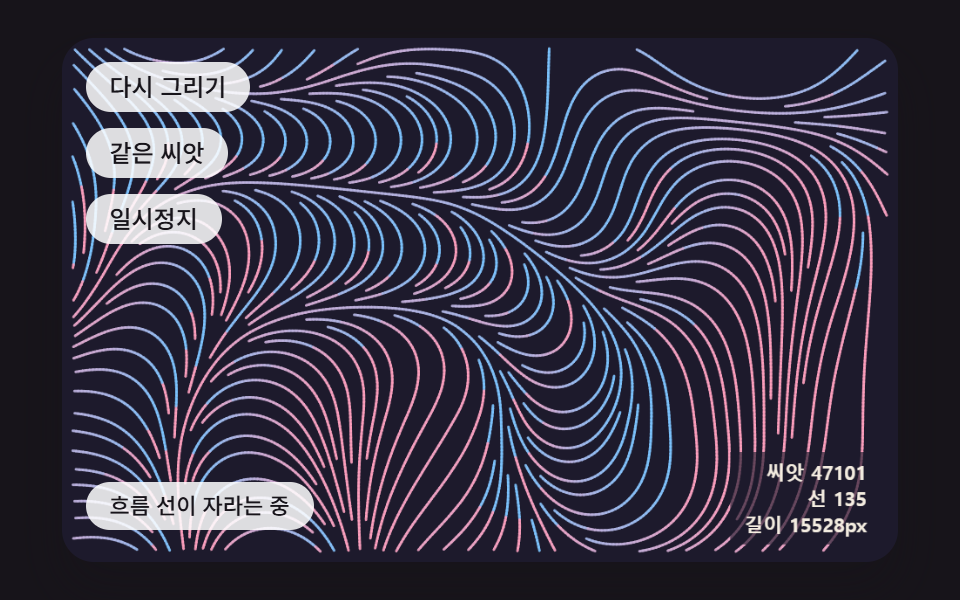 Creative UIGenerative Art JavaScript: 9 Patterns That Grow
 Creative UIAurora Background CSS: 9 Living Night-Sky Scenes
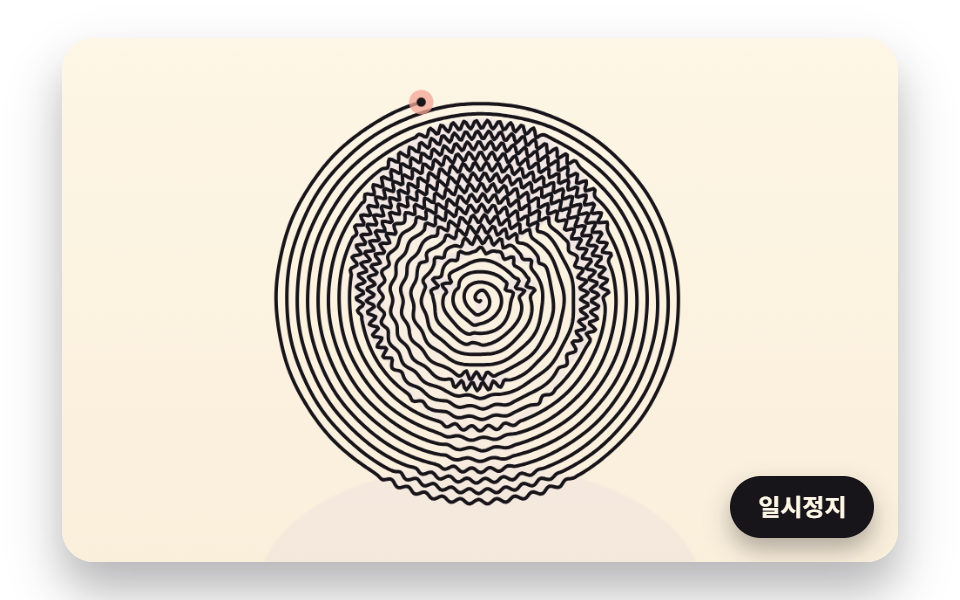 Creative UIOne Line Drawing Generator: 9 Canvas Scenes
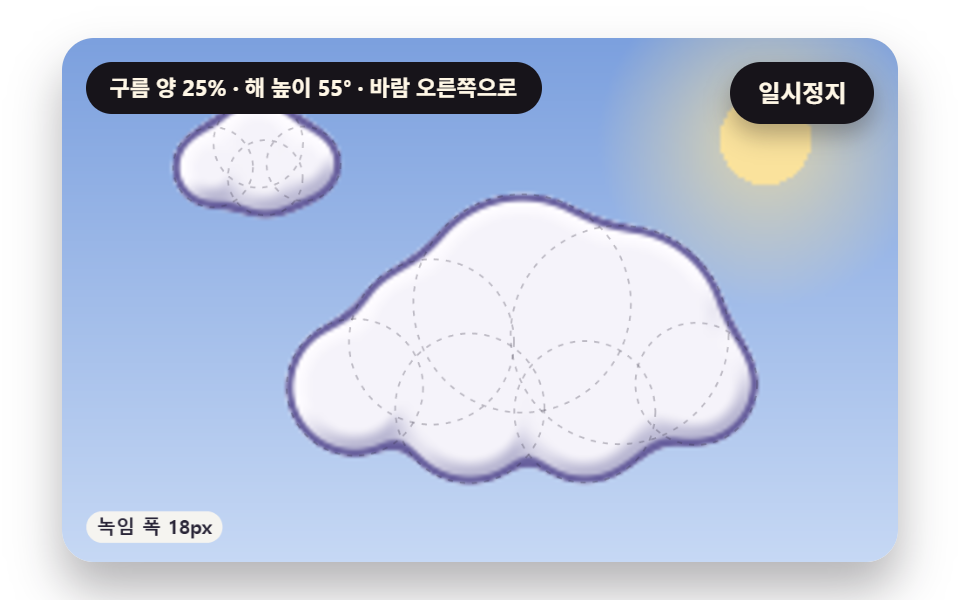 Creative UICSS Cloud Animation: 9 Sky Scenes in Canvas