Bubble Animation CSS: 9 Soap-Film Scenes That Pop
A soap bubble's rainbow is not painted on — 01 computes color from film thickness, 04 pops from a poked rim that peels back, and 06 grows a curved wall
None of the nine scenes loads a picture. Six of them (01, 02, 04, 06, 08 and 09) compute a fresh value for every pixel they fill, while 03, 05 and 07 draw lines and gradients whose colors come from the same film-thickness math, a thickness in nanometers turned into red, green and blue shares.
Blow, Poke and Join Nine Soap Bubbles
 01 sb-film-thickness-interference-hue
 02 sb-gravity-drain-band-rise
 03 sb-buoyancy-wind-noise-drift
 04 sb-poke-pop-rim-retract
 05 sb-wobble-shape-mode-spring
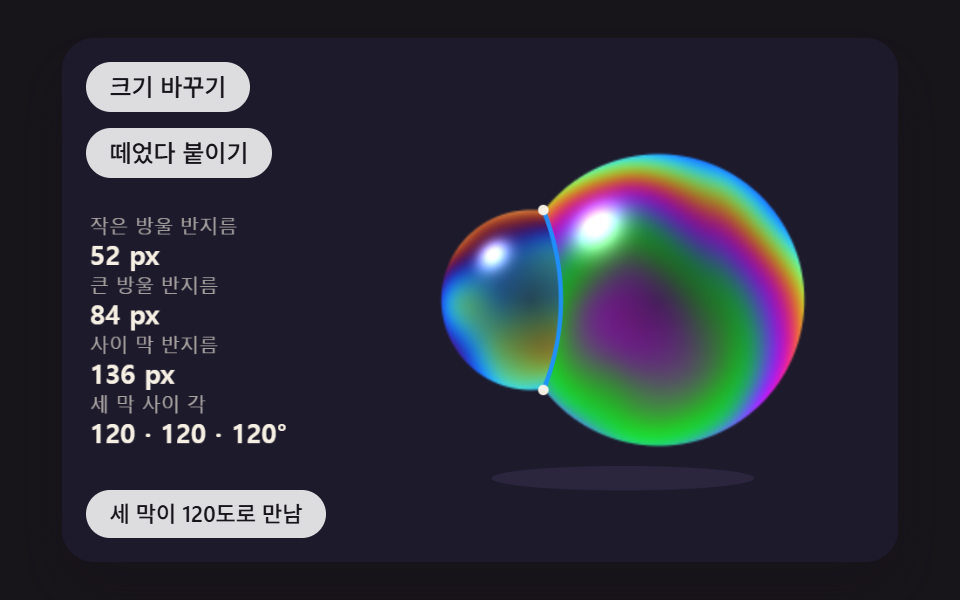 06 sb-twin-bubble-shared-wall
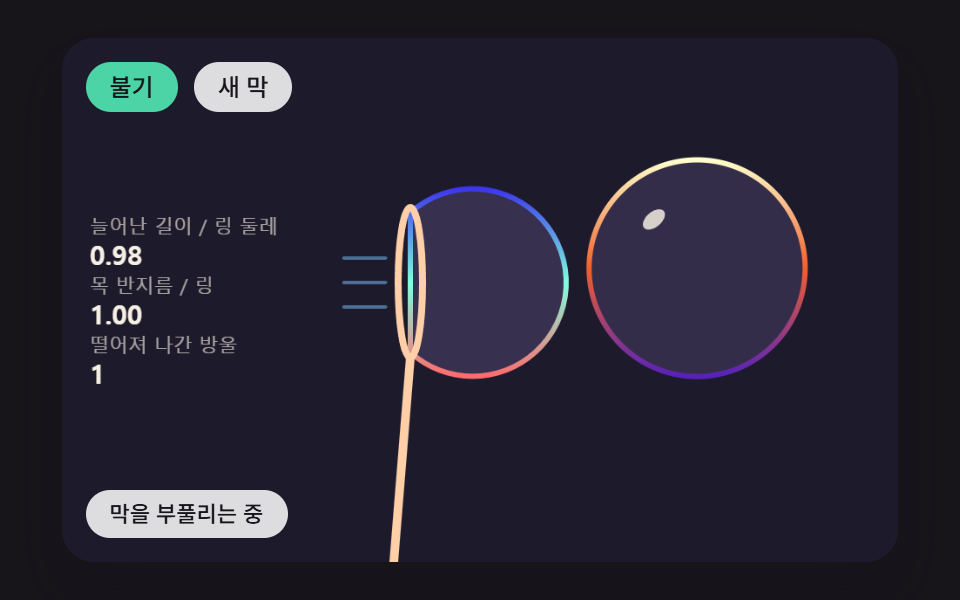 07 sb-wand-blow-neck-pinch
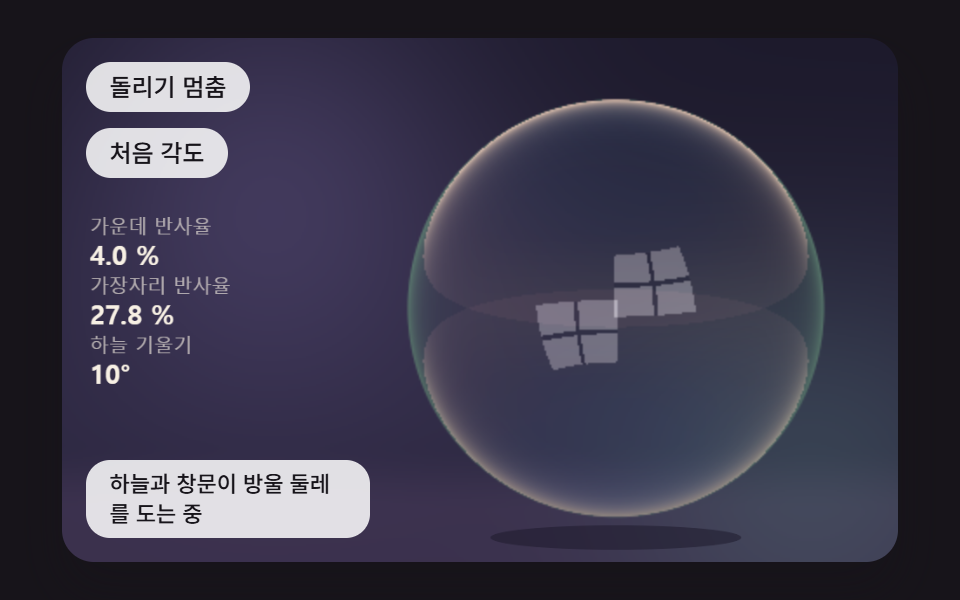 08 sb-sky-reflection-edge-glare
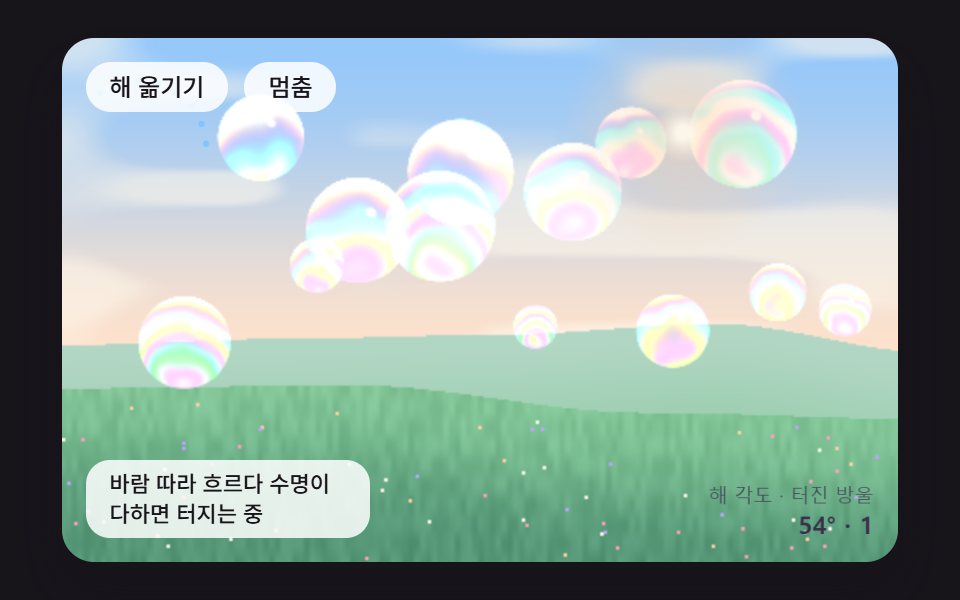 09 sb-hero-bubble-meadow-scene
Auto-plays · click a tile to jump to its section · all nine in one zip
- 01 A Soap Bubble Whose Rainbow Is Computed From Film Thickness
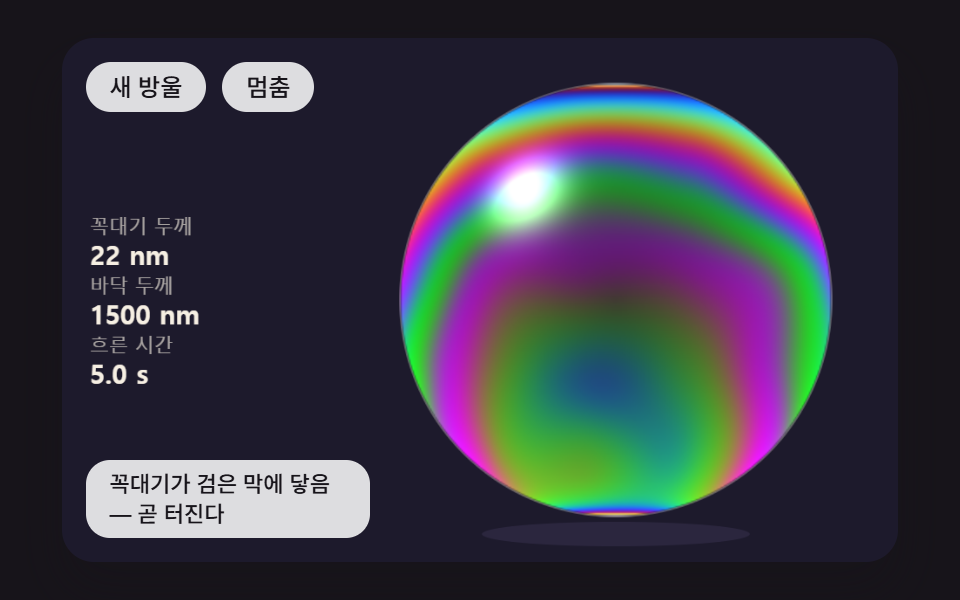
- 02 A Bubble Whose Film Drains Down, Thinning the Crown to Black as the Bottom Bands Climb
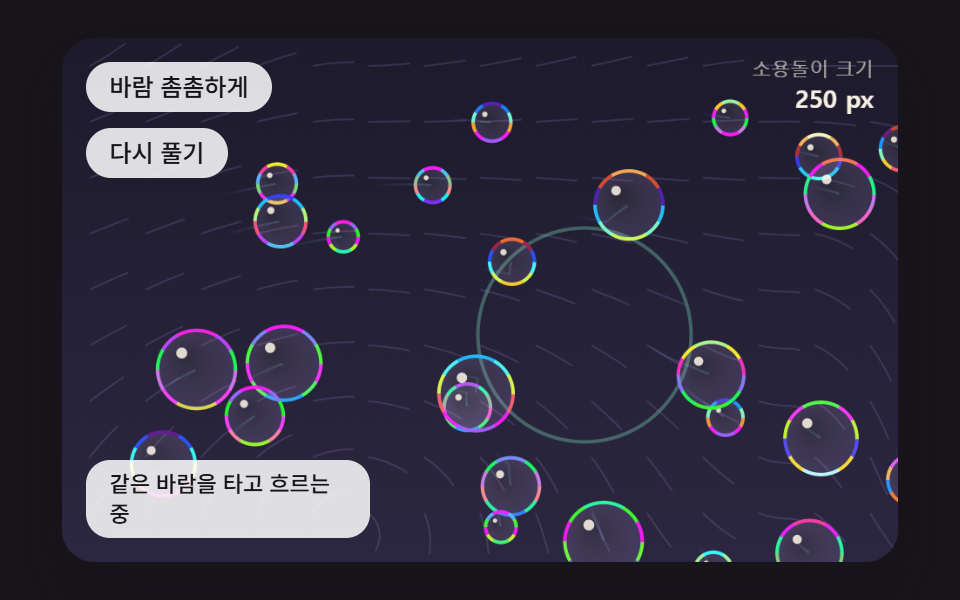
- 03 A Flock of Bubbles Drifting on Buoyancy, Air Drag and a Noise Wind
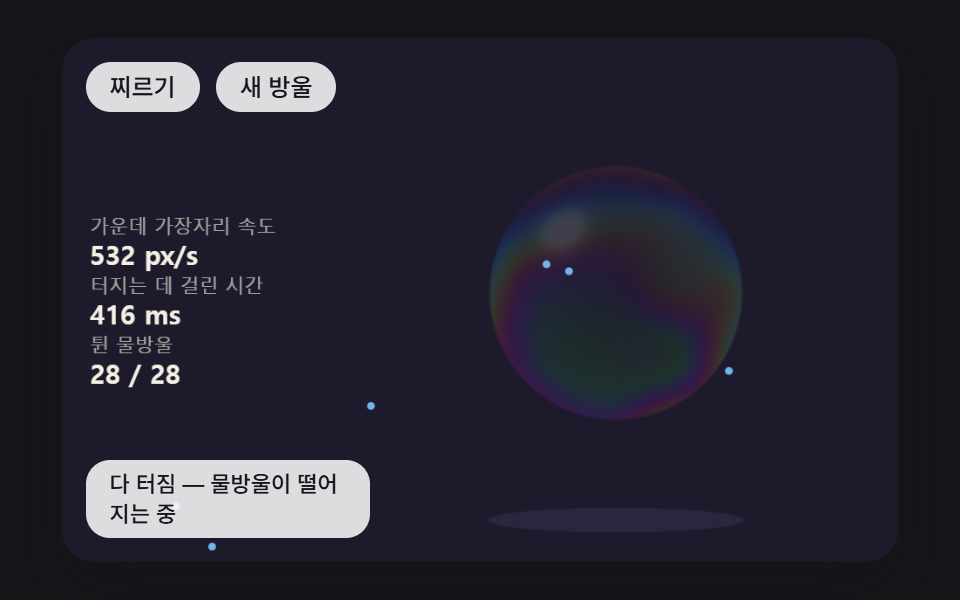
- 04 A Pop That Starts Where You Poke, With the Hole's Rim Peeling Back and Spraying Droplets
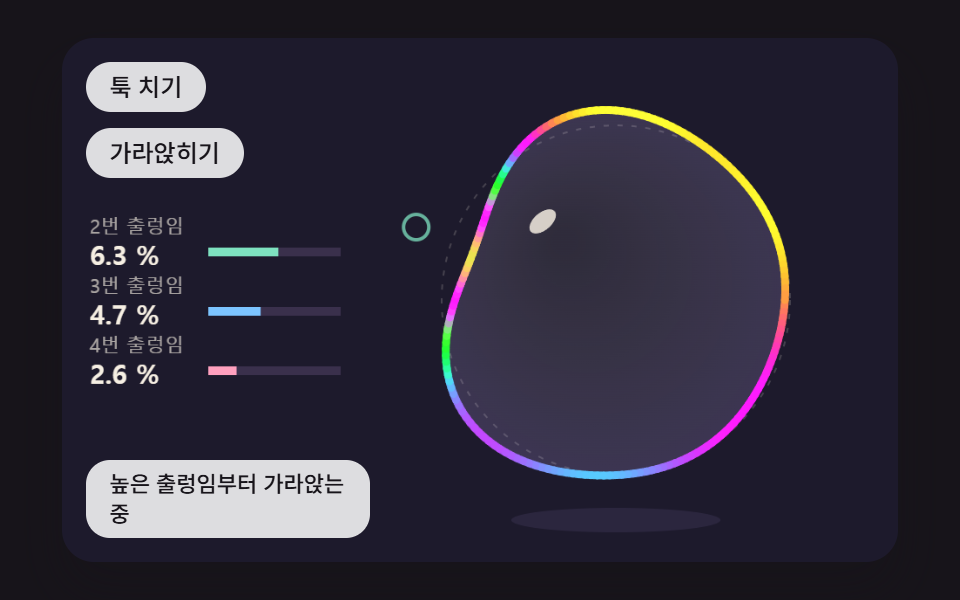
- 05 A Bubble Whose Outline Wobbles on Layered Spring Modes and Settles
- 06 Twin Bubbles That Join and Share One Curved Wall Between Them
- 07 A Bubble Blown From a Ring Until Its Neck Pinches and It Breaks Away
- 08 A Bubble That Mirrors Sky and Window, Reflecting More Toward Its Edge
- 09 A Meadow Scene Where Fourteen Bubbles Ride the Wind, Each Computing Its Own Color and Reflection
The scenes follow one film from the moment it forms to the moment it is gone. Scenes 01 and 02 deal with thickness and the color it produces, 03 with the path a finished bubble takes through the air, and 04 and 05 with what happens when you poke or flick one. Scenes 06 and 07 cover how bubbles join each other and how one tears away from a ring, 08 lets the viewing angle rather than thickness decide the reflection, and 09 puts all of that math onto fourteen bubbles over a meadow at once.
Why Does a Bubble's Rainbow Shift as the Film Gets Thinner?
Light that reaches a bubble's film partly bounces straight off the outer face, and partly enters the film, reflects off the inner face and comes back out. The second beam falls behind by one round trip through the film, a path of 2 × 1.33 × thickness with 1.33 as the refractive index, and depending on how many wavelengths that delay spans, the two beams either add up or cancel. This post sets the wavelengths of red, green and blue at 650, 530 and 450nm, so the same delay leaves a different share in each channel, and that difference is what you see as color. That is why a change in thickness changes the color with nothing painted at all.
Only the outer bounce flips, so a very thin film turns dark
reflectRGB treats only the bounce off the outer face as flipping its phase by half a turn, and uses sin²(2π·1.33·d/λ) as each channel's share. When the thickness d nears 0, the two beams overlap almost exactly out of step and all three values sink together (0.14, 0.21 and 0.28 at 30nm), which is why a crown that has drained very thin shows up dark instead of colored. It is also the reason 02 treats 30nm (BLACK_FILM_NM) as the line where a film is about to burst.
Tilt the view and the same thickness changes hue
Near the edge of a bubble the line of sight crosses the film at a slant, and the drift between the two beams inside the film shrinks by the cosine of the bent angle. insideCos computes that factor as √(1 − (1 − cos²)/1.33²), and because of it the 380nm film of 01 moves from magenta face-on through an orange stage to green, and then to blue toward the rim. Even a bubble with perfectly even thickness gets a ring at its edge in a different color from its middle, and this one line is responsible.
The 0 to 1 values are ratios, not reflectance
The three values are ratios scaled to 0 to 1, not the percentage of light that actually comes back. A real film returns only a few percent, while every scene except 08 multiplies the ratio by 235 (09 uses 200 × amp) and adds the result over its backdrop, the dark stage in most scenes and the meadow in 09, so the bubbles on screen are far brighter and more saturated than real ones. Standing in for each channel with a single wavelength is another approximation, which makes the bands split more sharply than the color you would get by summing the whole spectrum.
Bubble Animation CSS: 9 Soap-Film Scenes — Thickness Color, Drainage, Wind, Popping and Twin Bubbles
One canvas per scene, and a pixel board computed at scene scale
Every scene owns a single <canvas> with internal coordinates fixed at 480×300. Scenes 01, 02, 04, 06, 08 and 09 fill pixel values directly on a separate board and then place it on the stage with drawImage; the board is 250×250 in 01 and 02, 340×172 in 06 and the full 480×300 stage in 09. The detour exists because putImageData ignores any transform on the canvas. The board is computed at scene-coordinate size and drawImage stretches it by the device pixel ratio (capped at 2), so a dense display does not raise the number of pixels to compute. Scenes 03, 05 and 07 fill no pixels and draw only with lines and gradients.
A 1nm lookup table replaces the sin calls
At startup reflectRGB is called exactly once per nanometer from 0 to 1600nm to fill filmLut, a table of 4,803 slots, and when pixels are painted filmAt reads that table with linear interpolation between neighboring nanometers. Scene 01 repaints 62,500 pixels per frame without calling Math.sin once along the way. None of the nine scenes contains getImageData, the call that reads screen pixels back; they only write the values they compute.
Time sliced into fixed 16ms steps
The time between requestAnimationFrame callbacks piles up and is spent in fixed 16ms steps (FIXED_DT). One frame can bank at most 100ms and run at most six steps, and the pixel work happens once per frame no matter how many steps ran. The stylesheet holds no @keyframes; the only thing it animates is a transition on the button background color.
Twenty-four stills per scene, compared pair by pair
Each scene was shot as 24 stills over 2 seconds in a 480×300 window, and each still was set against the one before it, so the last column counts how many of those 23 comparisons found the screen changed.
| Scene | Cumulative area | Mean intensity | Moved frames |
|---|---|---|---|
| 01 Rainbow from thickness | 27.3% | 32.6 | 23/23 |
| 02 Drainage and black film | 29.1% | 48.9 | 23/23 |
| 03 Flock on the wind | 42.6% | 88.4 | 23/23 |
| 04 Pop from the poke | 27.0% | 88.6 | 23/23 |
| 05 Wobble springs | 13.5% | 125.0 | 23/23 |
| 06 Twin bubbles and shared wall | 23.9% | 64.4 | 14/23 |
| 07 Blowing from a ring | 20.7% | 96.6 | 23/23 |
| 08 Sky and window reflection | 11.6% | 41.7 | 23/23 |
| 09 Fourteen bubbles in a meadow | 33.7% | 32.7 | 23/23 |
Scenes 05 and 08 stop at 13.5% and 11.6% of the area because so little of the frame changes. In 05 only the single outline line sways, and in 08 the sky takes 11.4 seconds per turn, so it rotates only about 63° in the 2 seconds while the strongest reflection stays packed into the edge ring. The 14/23 of 06 comes from the still stretch after the twins join, which falls in the back part of the 2-second capture: they finish joining 1.22 seconds in and, with a 1.1-second hold (HOLD_MS), do not part again before the capture ends. The 42.6% of 03 is what 26 bubbles plus flow lines on a 32px grid spread across the whole frame produce.
Where these scenes fit
On a summer event landing page or the first screen of a service for kids, where a clear and light impression matters before anything else, laying 09 down as the hero background and setting the headline on top is the place to start. When a button only needs a bubble pop animation css alone could not compute, a small cutout of 04's poke or 05's wobble costs far less than a scene that fills the screen. Put the ring of 07 where an upload bar would sit and the end of the upload reads as a bubble taking off, while 02 suits a waiting screen that tells the time left through the color of the crown.
01A Soap Bubble Whose Rainbow Is Computed From Film Thickness
For every pixel inside the bubble on a 250×250 board (62,500 pixels in all), thicknessAt sets a thickness from a tilt (0.68× at the crown, 1.32× at the bottom) plus a noise smear that drifts with time, and reflectRGB turns that thickness into shares at three wavelengths, red 650, green 530 and blue 450nm. At the same 380nm, tipping the normal's facing component z from 1 through 0.8 and 0.5 to 0.25 lets insideCos shorten the drift, so a magenta of 0.97, 0.08 and 0.49 passes through an orange of 0.88, 0.65 and 0.00 and a green of 0.29, 0.97 and 0.64 before ending at a blue of 0.04, 0.68 and 0.98. It suits brand hero backdrops and product packaging mockups where the material has to read before any pattern does, and dragging the probe prints that spot's thickness and three values in the left panel.
<main class="stage">
<div class="hs is-demo" id="hs">
  <canvas class="hs__canvas" data-role="canvas" width="480" height="300" tabindex="0" aria-label="A soap bubble that computes, pixel by pixel, how much of the red, green and blue wavelengths survives at each film thickness. Press or drag to read the thickness and the three values at that spot"></canvas>
  <p class="hs__status" data-role="status" aria-live="off">Computing color from thickness</p>
  <div class="hs__tools">
    <button class="hs__btn" data-role="thin" type="button">Thinner</button>
    <button class="hs__btn" data-role="thick" type="button">Thicker</button>
  </div>
</div>
</main>
@use "../../../../site/static/demo-tokens" as *;
@include stage($stage-ink);
.hs {
position: relative;
width: min(92vw, calc(160vh - 12.8vw));
aspect-ratio: 480 / 300;
margin: 0 auto;
border-radius: $r-card;
overflow: hidden;
box-shadow: $shadow-raised;
background: $subject-ink;
}
.hs__canvas {
display: block;
width: 100%;
height: 100%;
cursor: crosshair;
}
.hs__canvas:focus-visible {
outline: 2px solid rgba(255, 255, 255, .85);
outline-offset: -6px;
}
.hs__status {
position: absolute;
left: $sp-3;
bottom: $sp-3;
box-sizing: border-box;
max-width: 34%;
margin: 0;
padding: $sp-1 $sp-3;
border-radius: $r-control;
background: rgba(255, 255, 255, .85);
color: $subject-ink;
font-weight: 500;
font-size: 11px;
line-height: 1.4;
pointer-events: none;
}
// 판은 오른쪽에 있다 — 버튼은 왼쪽 위 칸에 두고, 좁으면 줄을 바꿔 판을 덮지 않는다
.hs__tools {
position: absolute;
left: $sp-3;
top: $sp-3;
box-sizing: border-box;
max-width: 34%;
display: flex;
flex-wrap: wrap;
gap: $sp-2;
}
.hs__btn {
margin: 0;
padding: $sp-1 $sp-3;
border: 0;
border-radius: $r-pill;
background: rgba(255, 255, 255, .85);
color: $subject-ink;
font: inherit;
font-weight: 500;
font-size: 12px;
line-height: 1.4;
cursor: pointer;
transition: background-color $dur-quick ease-out;
}
.hs__btn:hover {
background: $subject-cream;
}
.hs__btn[aria-pressed="true"] {
background: $subject-mint;
}
.hs__btn:focus-visible {
outline: 2px solid rgba(255, 255, 255, .95);
outline-offset: 2px;
}
// 손가락 가로 끌기는 이 캔버스가 받고, 세로 쓸기는 브라우저에 남겨 페이지 스크롤이 막히지 않게 한다
.hs__canvas { touch-action: pan-y; }
@media (max-width: 340px) {
.hs__btn { font-size: 10px; padding: $sp-1 $sp-2; }
.hs__status { font-size: 10px; padding: $sp-1 $sp-2; }
}
@media (prefers-reduced-motion: reduce) {
.hs__btn { transition: none; }
}html, body {
margin: 0;
overflow: hidden;
}
.stage {
box-sizing: border-box;
min-height: 100vh;
display: grid;
place-items: center;
margin: 0;
background: #17141a;
font-family: -apple-system, "Segoe UI", "Noto Sans KR", sans-serif;
padding: clamp(8px, 4vw, 24px);
}
.hs {
position: relative;
width: min(92vw, 160vh - 12.8vw);
aspect-ratio: 480/300;
margin: 0 auto;
border-radius: 16px;
overflow: hidden;
box-shadow: 0 14px 24px rgba(23, 20, 26, 0.32);
background: #17141a;
}
.hs__canvas {
display: block;
width: 100%;
height: 100%;
cursor: crosshair;
}
.hs__canvas:focus-visible {
outline: 2px solid rgba(255, 255, 255, 0.85);
outline-offset: -6px;
}
.hs__status {
position: absolute;
left: 12px;
bottom: 12px;
box-sizing: border-box;
max-width: 34%;
margin: 0;
padding: 4px 12px;
border-radius: 12px;
background: rgba(255, 255, 255, 0.85);
color: #17141a;
font-weight: 500;
font-size: 11px;
line-height: 1.4;
pointer-events: none;
}
.hs__tools {
position: absolute;
left: 12px;
top: 12px;
box-sizing: border-box;
max-width: 34%;
display: flex;
flex-wrap: wrap;
gap: 8px;
}
.hs__btn {
margin: 0;
padding: 4px 12px;
border: 0;
border-radius: 999px;
background: rgba(255, 255, 255, 0.85);
color: #17141a;
font: inherit;
font-weight: 500;
font-size: 12px;
line-height: 1.4;
cursor: pointer;
transition: background-color 220ms ease-out;
}
.hs__btn:hover {
background: #fff7e6;
}
.hs__btn[aria-pressed=true] {
background: #4cd4a6;
}
.hs__btn:focus-visible {
outline: 2px solid rgba(255, 255, 255, 0.95);
outline-offset: 2px;
}
.hs__canvas {
touch-action: pan-y;
}
@media (max-width: 340px) {
.hs__btn {
font-size: 10px;
padding: 4px 8px;
}
.hs__status {
font-size: 10px;
padding: 4px 8px;
}
}
@media (prefers-reduced-motion: reduce) {
.hs__btn {
transition: none;
}
}(function () {
const root = document.getElementById("hs");
if (!root) return;
const W = 480;
const H = 300;
const FIXED_DT = 16;
// 파스텔 팔레트 — 어두운 무대 위에 밝은 막을 얹어 명도 차로 방울이 읽힌다 (막의 무지갯빛은 이 표가 아니라 두께 계산에서 나온다)
const BG = [29, 26, 44];
const DEEP = [44, 39, 64];
const PAPER = [255, 248, 234];
const INK = [58, 48, 76];
const MINT = [126, 226, 192];
const SKY = [124, 196, 255];
const LILAC = [190, 164, 255];
const PINK = [255, 160, 190];
const PEACH = [255, 208, 168];
function clamp(v, lo, hi) { return v < lo ? lo : (v > hi ? hi : v); }
function lerp(a, b, k) { return a + (b - a) * k; }
function smooth(x) { const c = clamp(x, 0, 1); return c * c * (3 - 2 * c); }
function rgba(c, a) {
return 'rgba(' + Math.round(c[0]) + ',' + Math.round(c[1]) + ',' + Math.round(c[2]) + ',' + clamp(a, 0, 1).toFixed(3) + ')';
}
function mix(a, b, k) { return [lerp(a[0], b[0], k), lerp(a[1], b[1], k), lerp(a[2], b[2], k)]; }
const canvasEl = root.querySelector('[data-role="canvas"]');
const statusEl = root.querySelector('[data-role="status"]');
const ctxRaw = canvasEl ? canvasEl.getContext('2d') : null;
if (!canvasEl || !ctxRaw || !statusEl) {
return;
}
const cv = canvasEl;
const ctx = ctxRaw;
const status = statusEl;
const reduceQuery = window.matchMedia('(prefers-reduced-motion: reduce)');
let still = reduceQuery.matches;
// 자동 시연 중인가 — 사람이 처음 만지는 순간 시연을 멈추고 상태 줄을 읽어 주기 시작한다
let demo = root.classList.contains('is-demo');
function wake() {
if (!demo) {
return;
}
demo = false;
root.classList.remove('is-demo');
status.setAttribute('aria-live', 'polite');
}
function say(text) {
if (status.textContent !== text) {
status.textContent = text;
}
}
function fitCanvas() {
// 배율은 2 에서 자른다 — 배율 3 기기에서 화소가 2.25배로 늘어 프레임마다 일이 그만큼 커지지 않게
const dpr = Math.min(window.devicePixelRatio || 1, 2);
cv.width = Math.round(W * dpr);
cv.height = Math.round(H * dpr);
ctx.setTransform(dpr, 0, 0, dpr, 0, 0);
}
function onResize() {
fitCanvas();
draw();
}
fitCanvas();
window.addEventListener('resize', onResize);
// 화면 좌표(CSS px) → 장면 좌표(480x300). 리사이즈 뒤에도 늘 현재 크기로 다시 잰다
function toScene(ev) {
const r = cv.getBoundingClientRect();
return [((ev.clientX - r.left) / r.width) * W, ((ev.clientY - r.top) / r.height) * H];
}
// 시드 고정 난수 — 같은 시드면 같은 장면이 다시 나온다 (32비트 정수 섞기)
function makeRng(seed) {
let s = seed >>> 0;
return function () {
s = (s + 0x6d2b79f5) >>> 0;
let t = s;
t = Math.imul(t ^ (t >>> 15), t | 1);
t ^= t + Math.imul(t ^ (t >>> 7), t | 61);
return ((t ^ (t >>> 14)) >>> 0) / 4294967296;
};
}
// 왼쪽 칸의 수치 — 이름표 한 줄 + 값 한 줄
function panelRow(row, label, value) {
const y = 112 + row * 34;
ctx.textAlign = 'left';
ctx.textBaseline = 'alphabetic';
ctx.fillStyle = rgba(PAPER, 0.62);
ctx.font = '500 11px sans-serif';
ctx.fillText(label, 16, y);
ctx.fillStyle = rgba(PAPER, 0.96);
ctx.font = '700 15px sans-serif';
ctx.fillText(value, 16, y + 18);
}
function clearStage() {
ctx.fillStyle = rgba(BG, 1);
ctx.fillRect(0, 0, W, H);
}
// 2D 값 노이즈 — 정수 격자 꼭짓점마다 시드 난수 값(−1~1)을 두고 그 사이를 부드러운 곡선으로 잇는다
const NOISE_SEED = 465;
const noisePerm = new Uint8Array(512);
const noiseVal = new Float32Array(256);
{
const nr = makeRng(NOISE_SEED);
for (let i = 0; i < 256; i += 1) {
noisePerm[i] = i;
noiseVal[i] = nr() * 2 - 1;
}
for (let i = 255; i > 0; i -= 1) {
const j = Math.floor(nr() * (i + 1));
const t = noisePerm[i];
noisePerm[i] = noisePerm[j];
noisePerm[j] = t;
}
for (let i = 0; i < 256; i += 1) {
noisePerm[i + 256] = noisePerm[i];
}
}
function noiseHash(ix, iy) {
return noiseVal[noisePerm[noisePerm[ix & 255] + (iy & 255)]];
}
function noise2(x, y) {
const xi = Math.floor(x);
const yi = Math.floor(y);
const fx = x - xi;
const fy = y - yi;
const u = fx * fx * (3 - 2 * fx);
const v = fy * fy * (3 - 2 * fy);
const a = noiseHash(xi, yi);
const b = noiseHash(xi + 1, yi);
const c = noiseHash(xi, yi + 1);
const d = noiseHash(xi + 1, yi + 1);
return lerp(lerp(a, b, u), lerp(c, d, u), v);
}
// 막의 굴절률 — 비눗물 막을 물과 같은 값으로 둔다
const FILM_N = 1.33;
// 세 파장(nm) — 화면의 빨강·초록·파랑 채널을 이 파장 하나씩으로 대신한다
const WAVE_RGB_NM = [650, 530, 450];
// 표를 만들 두께 범위(nm) — 1nm 눈금마다 세 채널 값을 미리 구해 둔다
const LUT_D_MAX = 1600;
const filmLut = new Float32Array((LUT_D_MAX + 1) * 3);
// 막 앞면과 뒷면에서 튕긴 두 빛이 두께만큼 어긋나 파장마다 남는 몫 — sin²(2π·n·d/λ).
// 앞면에서 튕긴 빛만 위상이 뒤집히므로 두께 0 이면 세 채널이 모두 0(검은 막). 값은 0~1 로 맞춘 비율이지 실제 반사율(몇 %)이 아니다
function reflectRGB(dNm) {
const out = [0, 0, 0];
for (let c = 0; c < 3; c += 1) {
const s = Math.sin(2 * Math.PI * FILM_N * dNm / WAVE_RGB_NM[c]);
out[c] = s * s;
}
return out;
}
for (let d = 0; d <= LUT_D_MAX; d += 1) {
const r = reflectRGB(d);
filmLut[d * 3] = r[0];
filmLut[d * 3 + 1] = r[1];
filmLut[d * 3 + 2] = r[2];
}
// 비스듬히 보면 빛이 막 안에서 꺾여 지나므로 어긋남이 cos(꺾인 각)배로 줄어든다 — cosView 는 시선과 법선 사이 각의 cos
function insideCos(cosView) {
const s2 = (1 - cosView * cosView) / (FILM_N * FILM_N);
return Math.sqrt(1 - s2);
}
// 두께 d(nm) 에서 채널 c 의 몫 — 표를 1nm 사이에서 선형 보간해 읽는다
function filmAt(dNm, c) {
const d = clamp(dNm, 0, LUT_D_MAX - 1);
const i = Math.floor(d);
const f = d - i;
return filmLut[i * 3 + c] * (1 - f) + filmLut[(i + 1) * 3 + c] * f;
}
// 캔버스 선·면에 쓸 막 색 — 어두운 무대 위에 세 채널 몫을 밝기로 얹는다
function filmColor(dNm, gain) {
return [BG[0] + filmAt(dNm, 0) * 235 * gain, BG[1] + filmAt(dNm, 1) * 235 * gain, BG[2] + filmAt(dNm, 2) * 235 * gain];
}
// 화소 하나를 막 색으로 — under 는 방울 뒤 바탕색, nx·ny·z 는 구면 위 법선(z 는 시선 쪽 성분)
function shadeFilm(px, o, dNm, nx, ny, z, under, alpha) {
const dEff = dNm * insideCos(z);
// 가장자리일수록 시선이 막을 비스듬히 지나 색이 진하다 — 가운데는 뒤 바탕이 비쳐 보이게 낮춘다
const amp = 0.22 + 0.78 * Math.pow(1 - z, 0.6);
// 왼쪽 위에서 오는 빛 하나의 반짝임
const hl = Math.pow(Math.max(0, nx * -0.42 + ny * -0.5 + z * 0.76), 60);
for (let c = 0; c < 3; c += 1) {
const v = under[c] + filmAt(dEff, c) * 235 * amp + hl * 220;
px[o + c] = under[c] + (v - under[c]) * alpha;
}
px[o + 3] = 255;
}
function makePix(w, h) {
const c = document.createElement('canvas');
c.width = w;
c.height = h;
const pc = c.getContext('2d');
if (!pc) {
return null;
}
const img = pc.createImageData(w, h);
return { cvs: c, pc: pc, img: img, px: img.data, w: w, h: h };
}
// putImageData 는 캔버스 변환(배율)을 무시한다 — 작은 캔버스에 올린 뒤 drawImage 로 장면 좌표에 그린다
function showPix(p, x, y) {
p.pc.putImageData(p.img, 0, 0);
ctx.drawImage(p.cvs, x, y, p.w, p.h);
}
// 01 — Film thickness 하나에서 화소마다 무지갯빛을 계산한다
// 가운데 높이의 기준 Film thickness(nm) — 위로 갈수록 얇고 아래로 갈수록 Thicker 기울인다
const FILM_D_NM = 380;
// 위아래 두께 기울기 — 꼭대기는 (1 − 0.32)배, 바닥은 (1 + 0.32)배
const TILT_K = 0.32;
// 노이즈 소용돌이가 두께를 흔드는 폭(배율)
const SWIRL_K = 0.22;
// 소용돌이 무늬가 흘러가는 빠르기(노이즈 칸/초)
const SWIRL_FLOW = 0.21;
// 방울 중심·반지름(장면 px)
const BCX = 318;
const BCY = 150;
const BR = 124;
// 버튼·키 한 번에 옮기는 Base thickness(nm)와 그 범위
const SHIFT_STEP = 40;
const SHIFT_MIN = -300;
const SHIFT_MAX = 600;
const TXT_RUN = 'Computing color from thickness';
const TXT_SHIFT = 'Base thickness shifted';
const TXT_PROBE = 'Thickness and three wavelength values at the probe';
const thinBtn = root.querySelector('[data-role="thin"]');
const thickBtn = root.querySelector('[data-role="thick"]');
const BOX = BR * 2 + 2;
const PX0 = BCX - BR - 1;
const PY0 = BCY - BR - 1;
const pix = makePix(BOX, BOX);
const under = [BG[0], BG[1], BG[2]];
let shift = 0;
let filmT = 0;
let probeX = BCX - 34;
let probeY = BCY + 26;
let dragging = false;
let lastText = TXT_RUN;
// nx·ny 는 방울 중심 기준 −1~1, 아래가 +ny. 반환은 그 자리 Film thickness(nm)
function thicknessAt(nx, ny, t) {
const base = Math.max(FILM_D_NM + shift, 0);
const swirl = noise2(nx * 1.7 + t * SWIRL_FLOW, ny * 1.7 - t * SWIRL_FLOW * 0.8 + 9.3);
return Math.max(base * (1 + TILT_K * ny) * (1 + SWIRL_K * swirl), 0);
}
// 방울 안 화소마다 — 두께 → 비스듬한 만큼 줄인 어긋남 → 세 파장 몫 → 색
function paintFilm() {
if (!pix) {
return;
}
const px = pix.px;
for (let j = 0; j < BOX; j += 1) {
const ny = (PY0 + j + 0.5 - BCY) / BR;
for (let i = 0; i < BOX; i += 1) {
const nx = (PX0 + i + 0.5 - BCX) / BR;
const r2 = nx * nx + ny * ny;
const o = (j * BOX + i) * 4;
if (r2 >= 1) {
px[o + 3] = 0;
continue;
}
const z = Math.sqrt(1 - r2);
// 테두리 한 화소는 반쯤 비쳐 계단이 덜 보이게
const edge = clamp((1 - Math.sqrt(r2)) * BR, 0, 1);
shadeFilm(px, o, thicknessAt(nx, ny, filmT), nx, ny, z, under, 1);
px[o + 3] = 255 * edge;
}
}
showPix(pix, PX0, PY0);
}
function setProbe(x, y) {
const dx = x - BCX;
const dy = y - BCY;
const r = Math.hypot(dx, dy);
const lim = BR * 0.94;
if (r > lim) {
probeX = BCX + dx / r * lim;
probeY = BCY + dy / r * lim;
}
else {
probeX = x;
probeY = y;
}
}
function probeValues() {
const nx = (probeX - BCX) / BR;
const ny = (probeY - BCY) / BR;
const z = Math.sqrt(Math.max(1 - nx * nx - ny * ny, 0));
const d = thicknessAt(nx, ny, filmT);
return [d, reflectRGB(d * insideCos(z))];
}
const BAR_RGB = [[255, 140, 160], [140, 230, 170], [140, 180, 255]];
function draw() {
clearStage();
// 방울 뒤 그림자 — 무대 바닥에 옅게
ctx.fillStyle = rgba(DEEP, 0.9);
ctx.beginPath();
ctx.ellipse(BCX, BCY + BR + 10, BR * 0.62, 7, 0, 0, Math.PI * 2);
ctx.fill();
paintFilm();
ctx.strokeStyle = rgba(PAPER, 0.22);
ctx.lineWidth = 1;
ctx.beginPath();
ctx.arc(BCX, BCY, BR, 0, Math.PI * 2);
ctx.stroke();
const pv = probeValues();
ctx.strokeStyle = rgba(PAPER, 0.95);
ctx.lineWidth = 2;
ctx.beginPath();
ctx.arc(probeX, probeY, 7, 0, Math.PI * 2);
ctx.stroke();
ctx.beginPath();
ctx.moveTo(probeX - 12, probeY);
ctx.lineTo(probeX - 9, probeY);
ctx.moveTo(probeX + 9, probeY);
ctx.lineTo(probeX + 12, probeY);
ctx.stroke();
panelRow(0, 'Film thickness', String(Math.round(pv[0])) + ' nm');
panelRow(1, 'Red · Green · Blue', pv[1][0].toFixed(2) + ' · ' + pv[1][1].toFixed(2) + ' · ' + pv[1][2].toFixed(2));
panelRow(2, 'Base thickness', String(Math.max(FILM_D_NM + shift, 0)) + ' nm');
for (let c = 0; c < 3; c += 1) {
ctx.fillStyle = rgba(INK, 1);
ctx.fillRect(16, 222 + c * 8, 132, 5);
ctx.fillStyle = rgba(BAR_RGB[c], 1);
ctx.fillRect(16, 222 + c * 8, 132 * pv[1][c], 5);
}
}
function step() {
filmT += FIXED_DT / 1000;
}
function settle() {
say(lastText);
}
function demoTick(t) {
const a = t / 1000;
// 찍는 자리를 방울 안에서 쉬지 않고 옮기고, 기준 두께를 0 → −90nm 로 천천히 오르내린다
setProbe(BCX + Math.cos(a * 1.3) * BR * 0.55, BCY + Math.sin(a * 2.1) * BR * 0.5);
shift = Math.round(-45 * (1 - Math.cos(a * 2.6)));
}
function after(text) {
lastText = text;
say(text);
draw();
}
function nudge(dir) {
shift = clamp(shift + dir * SHIFT_STEP, SHIFT_MIN, SHIFT_MAX);
after(TXT_SHIFT);
}
cv.addEventListener('pointerdown', function (ev) {
wake();
dragging = true;
cv.setPointerCapture(ev.pointerId);
const p = toScene(ev);
setProbe(p[0], p[1]);
after(TXT_PROBE);
});
cv.addEventListener('pointermove', function (ev) {
if (!dragging) {
return;
}
const p = toScene(ev);
setProbe(p[0], p[1]);
after(TXT_PROBE);
});
function endDrag() { dragging = false; }
cv.addEventListener('pointerup', endDrag);
cv.addEventListener('pointercancel', endDrag);
cv.addEventListener('keydown', function (ev) {
const k = ev.key;
if (k === 'ArrowLeft' || k === 'ArrowRight' || k === 'ArrowUp' || k === 'ArrowDown') {
ev.preventDefault();
wake();
const dx = k === 'ArrowLeft' ? -8 : (k === 'ArrowRight' ? 8 : 0);
const dy = k === 'ArrowUp' ? -8 : (k === 'ArrowDown' ? 8 : 0);
setProbe(probeX + dx, probeY + dy);
after(TXT_PROBE);
}
else if (k === '-' || k === 'PageDown') {
ev.preventDefault();
wake();
nudge(-1);
}
else if (k === '+' || k === '=' || k === 'PageUp') {
ev.preventDefault();
wake();
nudge(1);
}
else if (k === 'Home') {
ev.preventDefault();
wake();
shift = 0;
setProbe(BCX - 34, BCY + 26);
after(TXT_RUN);
}
});
if (thinBtn) {
thinBtn.addEventListener('click', function () { wake(); nudge(-1); });
}
if (thickBtn) {
thickBtn.addEventListener('click', function () { wake(); nudge(1); });
}
say(TXT_RUN);
let rafId = 0;
let lastTs = -1;
let acc = 0;
let clock = 0;
let looping = false;
function frame(ts) {
if (!looping) {
return;
}
if (lastTs < 0) {
lastTs = ts;
}
// 탭이 숨었다 돌아와도 한 번에 100ms 까지만 따라잡는다 — 순간이동 대신 이어서 움직인다
acc += Math.min(ts - lastTs, 100);
lastTs = ts;
let n = 0;
while (acc >= FIXED_DT && n < 6) {
clock += FIXED_DT;
if (demo) {
demoTick(clock);
}
step();
acc -= FIXED_DT;
n += 1;
}
draw();
rafId = window.requestAnimationFrame(frame);
}
function startLoop() {
if (looping) {
return;
}
looping = true;
lastTs = -1;
acc = 0;
rafId = window.requestAnimationFrame(frame);
}
function stopLoop() {
looping = false;
window.cancelAnimationFrame(rafId);
}
// 움직임 줄이기 설정을 페이지를 연 채로 바꿔도 바로 따른다 — 켜면 루프를 멈추고 끝난 장면 한 장, 끄면 다시 돈다
function applyMotion() {
still = reduceQuery.matches;
if (still) {
stopLoop();
settle();
draw();
}
else {
startLoop();
}
}
reduceQuery.addEventListener('change', applyMotion);
applyMotion();
return function () {
stopLoop();
reduceQuery.removeEventListener('change', applyMotion);
window.removeEventListener('resize', onResize);
};
})();// SbFilmThicknessInterferenceHue - vanilla 판(01-sb-film-thickness-interference-hue) 의 React 포트. 같은 계산을 useEffect 안에서 돌린다.
import { useEffect, useRef } from "react";
import styles from "./SbFilmThicknessInterferenceHue.module.scss";
const cx = (s: string): string => s.split(" ").map((n) => styles[n] ?? n).join(" ");
export default function SbFilmThicknessInterferenceHue() {
const rootRef = useRef<HTMLDivElement | null>(null);
useEffect(() => {
const rootEl = rootRef.current;
if (!rootEl) return;
const root: HTMLElement = rootEl;
type RGB = [number, number, number];
const W = 480;
const H = 300;
const FIXED_DT = 16;
// 파스텔 팔레트 — 어두운 무대 위에 밝은 막을 얹어 명도 차로 방울이 읽힌다 (막의 무지갯빛은 이 표가 아니라 두께 계산에서 나온다)
const BG: RGB = [29, 26, 44];
const DEEP: RGB = [44, 39, 64];
const PAPER: RGB = [255, 248, 234];
const INK: RGB = [58, 48, 76];
const MINT: RGB = [126, 226, 192];
const SKY: RGB = [124, 196, 255];
const LILAC: RGB = [190, 164, 255];
const PINK: RGB = [255, 160, 190];
const PEACH: RGB = [255, 208, 168];
function clamp(v: number, lo: number, hi: number): number { return v < lo ? lo : (v > hi ? hi : v); }
function lerp(a: number, b: number, k: number): number { return a + (b - a) * k; }
function smooth(x: number): number { const c = clamp(x, 0, 1); return c * c * (3 - 2 * c); }
function rgba(c: RGB, a: number): string {
return 'rgba(' + Math.round(c[0]) + ',' + Math.round(c[1]) + ',' + Math.round(c[2]) + ',' + clamp(a, 0, 1).toFixed(3) + ')';
}
function mix(a: RGB, b: RGB, k: number): RGB { return [lerp(a[0], b[0], k), lerp(a[1], b[1], k), lerp(a[2], b[2], k)]; }
const canvasEl = root.querySelector('[data-role="canvas"]') as HTMLCanvasElement | null;
const statusEl = root.querySelector('[data-role="status"]') as HTMLElement | null;
const ctxRaw = canvasEl ? canvasEl.getContext('2d') : null;
if (!canvasEl || !ctxRaw || !statusEl) { return; }
const cv: HTMLCanvasElement = canvasEl;
const ctx: CanvasRenderingContext2D = ctxRaw;
const status: HTMLElement = statusEl;
const reduceQuery = window.matchMedia('(prefers-reduced-motion: reduce)');
let still = reduceQuery.matches;
// 자동 시연 중인가 — 사람이 처음 만지는 순간 시연을 멈추고 상태 줄을 읽어 주기 시작한다
let demo = root.classList.contains('is-demo');
function wake(): void {
if (!demo) { return; }
demo = false;
root.classList.remove('is-demo');
status.setAttribute('aria-live', 'polite');
}
function say(text: string): void {
if (status.textContent !== text) { status.textContent = text; }
}
function fitCanvas(): void {
// 배율은 2 에서 자른다 — 배율 3 기기에서 화소가 2.25배로 늘어 프레임마다 일이 그만큼 커지지 않게
const dpr = Math.min(window.devicePixelRatio || 1, 2);
cv.width = Math.round(W * dpr);
cv.height = Math.round(H * dpr);
ctx.setTransform(dpr, 0, 0, dpr, 0, 0);
}
function onResize(): void {
fitCanvas();
draw();
}
fitCanvas();
window.addEventListener('resize', onResize);
// 화면 좌표(CSS px) → 장면 좌표(480x300). 리사이즈 뒤에도 늘 현재 크기로 다시 잰다
function toScene(ev: PointerEvent): [number, number] {
const r = cv.getBoundingClientRect();
return [((ev.clientX - r.left) / r.width) * W, ((ev.clientY - r.top) / r.height) * H];
}
// 시드 고정 난수 — 같은 시드면 같은 장면이 다시 나온다 (32비트 정수 섞기)
function makeRng(seed: number): () => number {
let s = seed >>> 0;
return function (): number {
s = (s + 0x6d2b79f5) >>> 0;
let t = s;
t = Math.imul(t ^ (t >>> 15), t | 1);
t ^= t + Math.imul(t ^ (t >>> 7), t | 61);
return ((t ^ (t >>> 14)) >>> 0) / 4294967296;
};
}
// 왼쪽 칸의 수치 — 이름표 한 줄 + 값 한 줄
function panelRow(row: number, label: string, value: string): void {
const y = 112 + row * 34;
ctx.textAlign = 'left';
ctx.textBaseline = 'alphabetic';
ctx.fillStyle = rgba(PAPER, 0.62);
ctx.font = '500 11px sans-serif';
ctx.fillText(label, 16, y);
ctx.fillStyle = rgba(PAPER, 0.96);
ctx.font = '700 15px sans-serif';
ctx.fillText(value, 16, y + 18);
}
function clearStage(): void {
ctx.fillStyle = rgba(BG, 1);
ctx.fillRect(0, 0, W, H);
}
// 2D 값 노이즈 — 정수 격자 꼭짓점마다 시드 난수 값(−1~1)을 두고 그 사이를 부드러운 곡선으로 잇는다
const NOISE_SEED = 465;
const noisePerm = new Uint8Array(512);
const noiseVal = new Float32Array(256);
{
const nr = makeRng(NOISE_SEED);
for (let i = 0; i < 256; i += 1) {
noisePerm[i] = i;
noiseVal[i] = nr() * 2 - 1;
}
for (let i = 255; i > 0; i -= 1) {
const j = Math.floor(nr() * (i + 1));
const t = noisePerm[i];
noisePerm[i] = noisePerm[j];
noisePerm[j] = t;
}
for (let i = 0; i < 256; i += 1) { noisePerm[i + 256] = noisePerm[i]; }
}
function noiseHash(ix: number, iy: number): number {
return noiseVal[noisePerm[noisePerm[ix & 255] + (iy & 255)]];
}
function noise2(x: number, y: number): number {
const xi = Math.floor(x);
const yi = Math.floor(y);
const fx = x - xi;
const fy = y - yi;
const u = fx * fx * (3 - 2 * fx);
const v = fy * fy * (3 - 2 * fy);
const a = noiseHash(xi, yi);
const b = noiseHash(xi + 1, yi);
const c = noiseHash(xi, yi + 1);
const d = noiseHash(xi + 1, yi + 1);
return lerp(lerp(a, b, u), lerp(c, d, u), v);
}
// 막의 굴절률 — 비눗물 막을 물과 같은 값으로 둔다
const FILM_N = 1.33;
// 세 파장(nm) — 화면의 빨강·초록·파랑 채널을 이 파장 하나씩으로 대신한다
const WAVE_RGB_NM: RGB = [650, 530, 450];
// 표를 만들 두께 범위(nm) — 1nm 눈금마다 세 채널 값을 미리 구해 둔다
const LUT_D_MAX = 1600;
const filmLut = new Float32Array((LUT_D_MAX + 1) * 3);
// 막 앞면과 뒷면에서 튕긴 두 빛이 두께만큼 어긋나 파장마다 남는 몫 — sin²(2π·n·d/λ).
// 앞면에서 튕긴 빛만 위상이 뒤집히므로 두께 0 이면 세 채널이 모두 0(검은 막). 값은 0~1 로 맞춘 비율이지 실제 반사율(몇 %)이 아니다
function reflectRGB(dNm: number): RGB {
const out: RGB = [0, 0, 0];
for (let c = 0; c < 3; c += 1) {
const s = Math.sin(2 * Math.PI * FILM_N * dNm / WAVE_RGB_NM[c]);
out[c] = s * s;
}
return out;
}
for (let d = 0; d <= LUT_D_MAX; d += 1) {
const r = reflectRGB(d);
filmLut[d * 3] = r[0];
filmLut[d * 3 + 1] = r[1];
filmLut[d * 3 + 2] = r[2];
}
// 비스듬히 보면 빛이 막 안에서 꺾여 지나므로 어긋남이 cos(꺾인 각)배로 줄어든다 — cosView 는 시선과 법선 사이 각의 cos
function insideCos(cosView: number): number {
const s2 = (1 - cosView * cosView) / (FILM_N * FILM_N);
return Math.sqrt(1 - s2);
}
// 두께 d(nm) 에서 채널 c 의 몫 — 표를 1nm 사이에서 선형 보간해 읽는다
function filmAt(dNm: number, c: number): number {
const d = clamp(dNm, 0, LUT_D_MAX - 1);
const i = Math.floor(d);
const f = d - i;
return filmLut[i * 3 + c] * (1 - f) + filmLut[(i + 1) * 3 + c] * f;
}
// 캔버스 선·면에 쓸 막 색 — 어두운 무대 위에 세 채널 몫을 밝기로 얹는다
function filmColor(dNm: number, gain: number): RGB {
return [BG[0] + filmAt(dNm, 0) * 235 * gain, BG[1] + filmAt(dNm, 1) * 235 * gain, BG[2] + filmAt(dNm, 2) * 235 * gain];
}
// 화소 하나를 막 색으로 — under 는 방울 뒤 바탕색, nx·ny·z 는 구면 위 법선(z 는 시선 쪽 성분)
function shadeFilm(px: Uint8ClampedArray, o: number, dNm: number, nx: number, ny: number, z: number, under: RGB, alpha: number): void {
const dEff = dNm * insideCos(z);
// 가장자리일수록 시선이 막을 비스듬히 지나 색이 진하다 — 가운데는 뒤 바탕이 비쳐 보이게 낮춘다
const amp = 0.22 + 0.78 * Math.pow(1 - z, 0.6);
// 왼쪽 위에서 오는 빛 하나의 반짝임
const hl = Math.pow(Math.max(0, nx * -0.42 + ny * -0.5 + z * 0.76), 60);
for (let c = 0; c < 3; c += 1) {
const v = under[c] + filmAt(dEff, c) * 235 * amp + hl * 220;
px[o + c] = under[c] + (v - under[c]) * alpha;
}
px[o + 3] = 255;
}
// 화소 계산판 — 작은 캔버스 하나에 ImageData 를 붙여 두고 화소를 직접 채운다
type Pix = { cvs: HTMLCanvasElement; pc: CanvasRenderingContext2D; img: ImageData; px: Uint8ClampedArray; w: number; h: number };
function makePix(w: number, h: number): Pix | null {
const c = document.createElement('canvas');
c.width = w;
c.height = h;
const pc = c.getContext('2d');
if (!pc) { return null; }
const img = pc.createImageData(w, h);
return { cvs: c, pc: pc, img: img, px: img.data, w: w, h: h };
}
// putImageData 는 캔버스 변환(배율)을 무시한다 — 작은 캔버스에 올린 뒤 drawImage 로 장면 좌표에 그린다
function showPix(p: Pix, x: number, y: number): void {
p.pc.putImageData(p.img, 0, 0);
ctx.drawImage(p.cvs, x, y, p.w, p.h);
}
// 01 — 막 두께 하나에서 화소마다 무지갯빛을 계산한다
// 가운데 높이의 기준 막 두께(nm) — 위로 갈수록 얇고 아래로 갈수록 두껍게 기울인다
const FILM_D_NM = 380;
// 위아래 두께 기울기 — 꼭대기는 (1 − 0.32)배, 바닥은 (1 + 0.32)배
const TILT_K = 0.32;
// 노이즈 소용돌이가 두께를 흔드는 폭(배율)
const SWIRL_K = 0.22;
// 소용돌이 무늬가 흘러가는 빠르기(노이즈 칸/초)
const SWIRL_FLOW = 0.21;
// 방울 중심·반지름(장면 px)
const BCX = 318;
const BCY = 150;
const BR = 124;
// 버튼·키 한 번에 옮기는 기준 두께(nm)와 그 범위
const SHIFT_STEP = 40;
const SHIFT_MIN = -300;
const SHIFT_MAX = 600;
const TXT_RUN = '두께에서 색을 계산하는 중';
const TXT_SHIFT = '기준 두께를 옮김';
const TXT_PROBE = '찍은 자리의 두께와 세 파장 값';
const thinBtn = root.querySelector('[data-role="thin"]') as HTMLButtonElement | null;
const thickBtn = root.querySelector('[data-role="thick"]') as HTMLButtonElement | null;
const BOX = BR * 2 + 2;
const PX0 = BCX - BR - 1;
const PY0 = BCY - BR - 1;
const pix = makePix(BOX, BOX);
const under: RGB = [BG[0], BG[1], BG[2]];
let shift = 0;
let filmT = 0;
let probeX = BCX - 34;
let probeY = BCY + 26;
let dragging = false;
let lastText = TXT_RUN;
// nx·ny 는 방울 중심 기준 −1~1, 아래가 +ny. 반환은 그 자리 막 두께(nm)
function thicknessAt(nx: number, ny: number, t: number): number {
const base = Math.max(FILM_D_NM + shift, 0);
const swirl = noise2(nx * 1.7 + t * SWIRL_FLOW, ny * 1.7 - t * SWIRL_FLOW * 0.8 + 9.3);
return Math.max(base * (1 + TILT_K * ny) * (1 + SWIRL_K * swirl), 0);
}
// 방울 안 화소마다 — 두께 → 비스듬한 만큼 줄인 어긋남 → 세 파장 몫 → 색
function paintFilm(): void {
if (!pix) { return; }
const px = pix.px;
for (let j = 0; j < BOX; j += 1) {
const ny = (PY0 + j + 0.5 - BCY) / BR;
for (let i = 0; i < BOX; i += 1) {
const nx = (PX0 + i + 0.5 - BCX) / BR;
const r2 = nx * nx + ny * ny;
const o = (j * BOX + i) * 4;
if (r2 >= 1) { px[o + 3] = 0; continue; }
const z = Math.sqrt(1 - r2);
// 테두리 한 화소는 반쯤 비쳐 계단이 덜 보이게
const edge = clamp((1 - Math.sqrt(r2)) * BR, 0, 1);
shadeFilm(px, o, thicknessAt(nx, ny, filmT), nx, ny, z, under, 1);
px[o + 3] = 255 * edge;
}
}
showPix(pix, PX0, PY0);
}
function setProbe(x: number, y: number): void {
const dx = x - BCX;
const dy = y - BCY;
const r = Math.hypot(dx, dy);
const lim = BR * 0.94;
if (r > lim) {
probeX = BCX + dx / r * lim;
probeY = BCY + dy / r * lim;
} else {
probeX = x;
probeY = y;
}
}
function probeValues(): [number, RGB] {
const nx = (probeX - BCX) / BR;
const ny = (probeY - BCY) / BR;
const z = Math.sqrt(Math.max(1 - nx * nx - ny * ny, 0));
const d = thicknessAt(nx, ny, filmT);
return [d, reflectRGB(d * insideCos(z))];
}
const BAR_RGB: RGB[] = [[255, 140, 160], [140, 230, 170], [140, 180, 255]];
function draw(): void {
clearStage();
// 방울 뒤 그림자 — 무대 바닥에 옅게
ctx.fillStyle = rgba(DEEP, 0.9);
ctx.beginPath();
ctx.ellipse(BCX, BCY + BR + 10, BR * 0.62, 7, 0, 0, Math.PI * 2);
ctx.fill();
paintFilm();
ctx.strokeStyle = rgba(PAPER, 0.22);
ctx.lineWidth = 1;
ctx.beginPath();
ctx.arc(BCX, BCY, BR, 0, Math.PI * 2);
ctx.stroke();
const pv = probeValues();
ctx.strokeStyle = rgba(PAPER, 0.95);
ctx.lineWidth = 2;
ctx.beginPath();
ctx.arc(probeX, probeY, 7, 0, Math.PI * 2);
ctx.stroke();
ctx.beginPath();
ctx.moveTo(probeX - 12, probeY);
ctx.lineTo(probeX - 9, probeY);
ctx.moveTo(probeX + 9, probeY);
ctx.lineTo(probeX + 12, probeY);
ctx.stroke();
panelRow(0, '막 두께', String(Math.round(pv[0])) + ' nm');
panelRow(1, '빨강 · 초록 · 파랑', pv[1][0].toFixed(2) + ' · ' + pv[1][1].toFixed(2) + ' · ' + pv[1][2].toFixed(2));
panelRow(2, '기준 두께', String(Math.max(FILM_D_NM + shift, 0)) + ' nm');
for (let c = 0; c < 3; c += 1) {
ctx.fillStyle = rgba(INK, 1);
ctx.fillRect(16, 222 + c * 8, 132, 5);
ctx.fillStyle = rgba(BAR_RGB[c], 1);
ctx.fillRect(16, 222 + c * 8, 132 * pv[1][c], 5);
}
}
function step(): void {
filmT += FIXED_DT / 1000;
}
function settle(): void {
say(lastText);
}
function demoTick(t: number): void {
const a = t / 1000;
// 찍는 자리를 방울 안에서 쉬지 않고 옮기고, 기준 두께를 0 → −90nm 로 천천히 오르내린다
setProbe(BCX + Math.cos(a * 1.3) * BR * 0.55, BCY + Math.sin(a * 2.1) * BR * 0.5);
shift = Math.round(-45 * (1 - Math.cos(a * 2.6)));
}
function after(text: string): void {
lastText = text;
say(text);
draw();
}
function nudge(dir: number): void {
shift = clamp(shift + dir * SHIFT_STEP, SHIFT_MIN, SHIFT_MAX);
after(TXT_SHIFT);
}
cv.addEventListener('pointerdown', function (ev: PointerEvent): void {
wake();
dragging = true;
cv.setPointerCapture(ev.pointerId);
const p = toScene(ev);
setProbe(p[0], p[1]);
after(TXT_PROBE);
});
cv.addEventListener('pointermove', function (ev: PointerEvent): void {
if (!dragging) { return; }
const p = toScene(ev);
setProbe(p[0], p[1]);
after(TXT_PROBE);
});
function endDrag(): void { dragging = false; }
cv.addEventListener('pointerup', endDrag);
cv.addEventListener('pointercancel', endDrag);
cv.addEventListener('keydown', function (ev: KeyboardEvent): void {
const k = ev.key;
if (k === 'ArrowLeft' || k === 'ArrowRight' || k === 'ArrowUp' || k === 'ArrowDown') {
ev.preventDefault();
wake();
const dx = k === 'ArrowLeft' ? -8 : (k === 'ArrowRight' ? 8 : 0);
const dy = k === 'ArrowUp' ? -8 : (k === 'ArrowDown' ? 8 : 0);
setProbe(probeX + dx, probeY + dy);
after(TXT_PROBE);
} else if (k === '-' || k === 'PageDown') {
ev.preventDefault();
wake();
nudge(-1);
} else if (k === '+' || k === '=' || k === 'PageUp') {
ev.preventDefault();
wake();
nudge(1);
} else if (k === 'Home') {
ev.preventDefault();
wake();
shift = 0;
setProbe(BCX - 34, BCY + 26);
after(TXT_RUN);
}
});
if (thinBtn) { thinBtn.addEventListener('click', function (): void { wake(); nudge(-1); }); }
if (thickBtn) { thickBtn.addEventListener('click', function (): void { wake(); nudge(1); }); }
say(TXT_RUN);
let rafId = 0;
let lastTs = -1;
let acc = 0;
let clock = 0;
let looping = false;
function frame(ts: number): void {
if (!looping) { return; }
if (lastTs < 0) { lastTs = ts; }
// 탭이 숨었다 돌아와도 한 번에 100ms 까지만 따라잡는다 — 순간이동 대신 이어서 움직인다
acc += Math.min(ts - lastTs, 100);
lastTs = ts;
let n = 0;
while (acc >= FIXED_DT && n < 6) {
clock += FIXED_DT;
if (demo) { demoTick(clock); }
step();
acc -= FIXED_DT;
n += 1;
}
draw();
rafId = window.requestAnimationFrame(frame);
}
function startLoop(): void {
if (looping) { return; }
looping = true;
lastTs = -1;
acc = 0;
rafId = window.requestAnimationFrame(frame);
}
function stopLoop(): void {
looping = false;
window.cancelAnimationFrame(rafId);
}
// 움직임 줄이기 설정을 페이지를 연 채로 바꿔도 바로 따른다 — 켜면 루프를 멈추고 끝난 장면 한 장, 끄면 다시 돈다
function applyMotion(): void {
still = reduceQuery.matches;
if (still) {
stopLoop();
settle();
draw();
} else {
startLoop();
}
}
reduceQuery.addEventListener('change', applyMotion);
applyMotion();
return function (): void {
stopLoop();
reduceQuery.removeEventListener('change', applyMotion);
window.removeEventListener('resize', onResize);
};
}, []);
return (
<div className={cx("hs") + " is-demo"} ref={rootRef}>
<canvas className={cx("hs__canvas")} data-role="canvas" width={480} height={300} tabIndex={0} aria-label="화소마다 막 두께에서 빨강·초록·파랑 세 파장의 남는 몫을 계산해 칠하는 비눗방울. 누르거나 끌면 그 자리의 두께와 세 값을 읽는다"></canvas>
<p className={cx("hs__status")} data-role="status" aria-live="off">두께에서 색을 계산하는 중</p>
<div className={cx("hs__tools")}>
<button className={cx("hs__btn")} data-role="thin" type="button">얇게</button>
<button className={cx("hs__btn")} data-role="thick" type="button">두껍게</button>
</div>
</div>
);
}01 · A Soap Bubble Whose Rainbow Is Computed From Film Thickness — Measured area 27.32% · moving frames 23/23Original by GODRICH · SCSS and React ship in the zip · See the password
    // Share left at each wavelength when the bounces off the film's front and back faces drift apart by the thickness: sin²(2π·n·d/λ).
    // Only the front-face bounce flips phase, so at thickness 0 all three channels are 0 (black film). The values are 0-1 ratios, not real reflectance (a few %)
    function reflectRGB(dNm) {
        const out = [0, 0, 0];
        for (let c = 0; c < 3; c += 1) {
            const s = Math.sin(2 * Math.PI * FILM_N * dNm / WAVE_RGB_NM[c]);
            out[c] = s * s;
        }
        return out;
    }
    for (let d = 0; d <= LUT_D_MAX; d += 1) {
        const r = reflectRGB(d);
        filmLut[d * 3] = r[0];
        filmLut[d * 3 + 1] = r[1];
        filmLut[d * 3 + 2] = r[2];
    }
    // Viewed at a slant, light bends inside the film, so the drift shrinks by cos(bent angle). cosView is the cos of the angle between view and normal
    function insideCos(cosView) {
        const s2 = (1 - cosView * cosView) / (FILM_N * FILM_N);
        return Math.sqrt(1 - s2);
    }
02A Bubble Whose Film Drains Down, Thinning the Crown to Black as the Bottom Bands Climb
The film is cut into 72 bands from crown to bottom, and at every boundary drainStep hands DRAIN_K × sin(boundary angle) × upper band thickness × dt (the time step) to the band below while the sum of thickness × area stays fixed, so whatever the top loses the bottom gains. Drained from the start, the crown falls from 364nm to 209 at 1 second, 120 at 2 and 69 at 3, reaching the 30nm black film at 4.46 seconds, while the 500nm band slides from 38.8° to 51.3° measured from the crown and the 900nm band climbs from 156° to 141°. It fits loading screens and time-remaining cues that announce an approaching end through color, and the demo starts from a bubble already drained for 3.9 seconds, turns the crown black 0.56 seconds later, pops it 0.7 seconds after that and blows a new one.
<main class="stage">
<div class="hs is-demo" id="hs">
  <canvas class="hs__canvas" data-role="canvas" width="480" height="300" tabindex="0" aria-label="A soap bubble whose film drains downward and thins from the crown, popping soon after the crown reaches black film. Press to fast-forward the drainage"></canvas>
  <p class="hs__status" data-role="status" aria-live="off">Film draining downward</p>
  <div class="hs__tools">
    <button class="hs__btn" data-role="new" type="button">New bubble</button>
    <button class="hs__btn" data-role="pause" type="button" aria-pressed="false">Pause</button>
  </div>
</div>
</main>
@use "../../../../site/static/demo-tokens" as *;
@include stage($stage-ink);
.hs {
position: relative;
width: min(92vw, calc(160vh - 12.8vw));
aspect-ratio: 480 / 300;
margin: 0 auto;
border-radius: $r-card;
overflow: hidden;
box-shadow: $shadow-raised;
background: $subject-ink;
}
.hs__canvas {
display: block;
width: 100%;
height: 100%;
cursor: crosshair;
}
.hs__canvas:focus-visible {
outline: 2px solid rgba(255, 255, 255, .85);
outline-offset: -6px;
}
.hs__status {
position: absolute;
left: $sp-3;
bottom: $sp-3;
box-sizing: border-box;
max-width: 34%;
margin: 0;
padding: $sp-1 $sp-3;
border-radius: $r-control;
background: rgba(255, 255, 255, .85);
color: $subject-ink;
font-weight: 500;
font-size: 11px;
line-height: 1.4;
pointer-events: none;
}
// 판은 오른쪽에 있다 — 버튼은 왼쪽 위 칸에 두고, 좁으면 줄을 바꿔 판을 덮지 않는다
.hs__tools {
position: absolute;
left: $sp-3;
top: $sp-3;
box-sizing: border-box;
max-width: 34%;
display: flex;
flex-wrap: wrap;
gap: $sp-2;
}
.hs__btn {
margin: 0;
padding: $sp-1 $sp-3;
border: 0;
border-radius: $r-pill;
background: rgba(255, 255, 255, .85);
color: $subject-ink;
font: inherit;
font-weight: 500;
font-size: 12px;
line-height: 1.4;
cursor: pointer;
transition: background-color $dur-quick ease-out;
}
.hs__btn:hover {
background: $subject-cream;
}
.hs__btn[aria-pressed="true"] {
background: $subject-mint;
}
.hs__btn:focus-visible {
outline: 2px solid rgba(255, 255, 255, .95);
outline-offset: 2px;
}
// 손가락 가로 끌기는 이 캔버스가 받고, 세로 쓸기는 브라우저에 남겨 페이지 스크롤이 막히지 않게 한다
.hs__canvas { touch-action: pan-y; }
@media (max-width: 340px) {
.hs__btn { font-size: 10px; padding: $sp-1 $sp-2; }
.hs__status { font-size: 10px; padding: $sp-1 $sp-2; }
}
@media (prefers-reduced-motion: reduce) {
.hs__btn { transition: none; }
}html, body {
margin: 0;
overflow: hidden;
}
.stage {
box-sizing: border-box;
min-height: 100vh;
display: grid;
place-items: center;
margin: 0;
background: #17141a;
font-family: -apple-system, "Segoe UI", "Noto Sans KR", sans-serif;
padding: clamp(8px, 4vw, 24px);
}
.hs {
position: relative;
width: min(92vw, 160vh - 12.8vw);
aspect-ratio: 480/300;
margin: 0 auto;
border-radius: 16px;
overflow: hidden;
box-shadow: 0 14px 24px rgba(23, 20, 26, 0.32);
background: #17141a;
}
.hs__canvas {
display: block;
width: 100%;
height: 100%;
cursor: crosshair;
}
.hs__canvas:focus-visible {
outline: 2px solid rgba(255, 255, 255, 0.85);
outline-offset: -6px;
}
.hs__status {
position: absolute;
left: 12px;
bottom: 12px;
box-sizing: border-box;
max-width: 34%;
margin: 0;
padding: 4px 12px;
border-radius: 12px;
background: rgba(255, 255, 255, 0.85);
color: #17141a;
font-weight: 500;
font-size: 11px;
line-height: 1.4;
pointer-events: none;
}
.hs__tools {
position: absolute;
left: 12px;
top: 12px;
box-sizing: border-box;
max-width: 34%;
display: flex;
flex-wrap: wrap;
gap: 8px;
}
.hs__btn {
margin: 0;
padding: 4px 12px;
border: 0;
border-radius: 999px;
background: rgba(255, 255, 255, 0.85);
color: #17141a;
font: inherit;
font-weight: 500;
font-size: 12px;
line-height: 1.4;
cursor: pointer;
transition: background-color 220ms ease-out;
}
.hs__btn:hover {
background: #fff7e6;
}
.hs__btn[aria-pressed=true] {
background: #4cd4a6;
}
.hs__btn:focus-visible {
outline: 2px solid rgba(255, 255, 255, 0.95);
outline-offset: 2px;
}
.hs__canvas {
touch-action: pan-y;
}
@media (max-width: 340px) {
.hs__btn {
font-size: 10px;
padding: 4px 8px;
}
.hs__status {
font-size: 10px;
padding: 4px 8px;
}
}
@media (prefers-reduced-motion: reduce) {
.hs__btn {
transition: none;
}
}(function () {
const root = document.getElementById("hs");
if (!root) return;
const W = 480;
const H = 300;
const FIXED_DT = 16;
// 파스텔 팔레트 — 어두운 무대 위에 밝은 막을 얹어 명도 차로 방울이 읽힌다 (막의 무지갯빛은 이 표가 아니라 두께 계산에서 나온다)
const BG = [29, 26, 44];
const DEEP = [44, 39, 64];
const PAPER = [255, 248, 234];
const INK = [58, 48, 76];
const MINT = [126, 226, 192];
const SKY = [124, 196, 255];
const LILAC = [190, 164, 255];
const PINK = [255, 160, 190];
const PEACH = [255, 208, 168];
function clamp(v, lo, hi) { return v < lo ? lo : (v > hi ? hi : v); }
function lerp(a, b, k) { return a + (b - a) * k; }
function smooth(x) { const c = clamp(x, 0, 1); return c * c * (3 - 2 * c); }
function rgba(c, a) {
return 'rgba(' + Math.round(c[0]) + ',' + Math.round(c[1]) + ',' + Math.round(c[2]) + ',' + clamp(a, 0, 1).toFixed(3) + ')';
}
function mix(a, b, k) { return [lerp(a[0], b[0], k), lerp(a[1], b[1], k), lerp(a[2], b[2], k)]; }
const canvasEl = root.querySelector('[data-role="canvas"]');
const statusEl = root.querySelector('[data-role="status"]');
const ctxRaw = canvasEl ? canvasEl.getContext('2d') : null;
if (!canvasEl || !ctxRaw || !statusEl) {
return;
}
const cv = canvasEl;
const ctx = ctxRaw;
const status = statusEl;
const reduceQuery = window.matchMedia('(prefers-reduced-motion: reduce)');
let still = reduceQuery.matches;
// 자동 시연 중인가 — 사람이 처음 만지는 순간 시연을 멈추고 상태 줄을 읽어 주기 시작한다
let demo = root.classList.contains('is-demo');
function wake() {
if (!demo) {
return;
}
demo = false;
root.classList.remove('is-demo');
status.setAttribute('aria-live', 'polite');
}
function say(text) {
if (status.textContent !== text) {
status.textContent = text;
}
}
function fitCanvas() {
// 배율은 2 에서 자른다 — 배율 3 기기에서 화소가 2.25배로 늘어 프레임마다 일이 그만큼 커지지 않게
const dpr = Math.min(window.devicePixelRatio || 1, 2);
cv.width = Math.round(W * dpr);
cv.height = Math.round(H * dpr);
ctx.setTransform(dpr, 0, 0, dpr, 0, 0);
}
function onResize() {
fitCanvas();
draw();
}
fitCanvas();
window.addEventListener('resize', onResize);
// 화면 좌표(CSS px) → 장면 좌표(480x300). 리사이즈 뒤에도 늘 현재 크기로 다시 잰다
function toScene(ev) {
const r = cv.getBoundingClientRect();
return [((ev.clientX - r.left) / r.width) * W, ((ev.clientY - r.top) / r.height) * H];
}
// 시드 고정 난수 — 같은 시드면 같은 장면이 다시 나온다 (32비트 정수 섞기)
function makeRng(seed) {
let s = seed >>> 0;
return function () {
s = (s + 0x6d2b79f5) >>> 0;
let t = s;
t = Math.imul(t ^ (t >>> 15), t | 1);
t ^= t + Math.imul(t ^ (t >>> 7), t | 61);
return ((t ^ (t >>> 14)) >>> 0) / 4294967296;
};
}
// 왼쪽 칸의 수치 — 이름표 한 줄 + 값 한 줄
function panelRow(row, label, value) {
const y = 112 + row * 34;
ctx.textAlign = 'left';
ctx.textBaseline = 'alphabetic';
ctx.fillStyle = rgba(PAPER, 0.62);
ctx.font = '500 11px sans-serif';
ctx.fillText(label, 16, y);
ctx.fillStyle = rgba(PAPER, 0.96);
ctx.font = '700 15px sans-serif';
ctx.fillText(value, 16, y + 18);
}
function clearStage() {
ctx.fillStyle = rgba(BG, 1);
ctx.fillRect(0, 0, W, H);
}
// 2D 값 노이즈 — 정수 격자 꼭짓점마다 시드 난수 값(−1~1)을 두고 그 사이를 부드러운 곡선으로 잇는다
const NOISE_SEED = 465;
const noisePerm = new Uint8Array(512);
const noiseVal = new Float32Array(256);
{
const nr = makeRng(NOISE_SEED);
for (let i = 0; i < 256; i += 1) {
noisePerm[i] = i;
noiseVal[i] = nr() * 2 - 1;
}
for (let i = 255; i > 0; i -= 1) {
const j = Math.floor(nr() * (i + 1));
const t = noisePerm[i];
noisePerm[i] = noisePerm[j];
noisePerm[j] = t;
}
for (let i = 0; i < 256; i += 1) {
noisePerm[i + 256] = noisePerm[i];
}
}
function noiseHash(ix, iy) {
return noiseVal[noisePerm[noisePerm[ix & 255] + (iy & 255)]];
}
function noise2(x, y) {
const xi = Math.floor(x);
const yi = Math.floor(y);
const fx = x - xi;
const fy = y - yi;
const u = fx * fx * (3 - 2 * fx);
const v = fy * fy * (3 - 2 * fy);
const a = noiseHash(xi, yi);
const b = noiseHash(xi + 1, yi);
const c = noiseHash(xi, yi + 1);
const d = noiseHash(xi + 1, yi + 1);
return lerp(lerp(a, b, u), lerp(c, d, u), v);
}
// 막의 굴절률 — 비눗물 막을 물과 같은 값으로 둔다
const FILM_N = 1.33;
// 세 파장(nm) — 화면의 빨강·초록·파랑 채널을 이 파장 하나씩으로 대신한다
const WAVE_RGB_NM = [650, 530, 450];
// 표를 만들 두께 범위(nm) — 1nm 눈금마다 세 채널 값을 미리 구해 둔다
const LUT_D_MAX = 1600;
const filmLut = new Float32Array((LUT_D_MAX + 1) * 3);
// 막 앞면과 뒷면에서 튕긴 두 빛이 두께만큼 어긋나 파장마다 남는 몫 — sin²(2π·n·d/λ).
// 앞면에서 튕긴 빛만 위상이 뒤집히므로 두께 0 이면 세 채널이 모두 0(검은 막). 값은 0~1 로 맞춘 비율이지 실제 반사율(몇 %)이 아니다
function reflectRGB(dNm) {
const out = [0, 0, 0];
for (let c = 0; c < 3; c += 1) {
const s = Math.sin(2 * Math.PI * FILM_N * dNm / WAVE_RGB_NM[c]);
out[c] = s * s;
}
return out;
}
for (let d = 0; d <= LUT_D_MAX; d += 1) {
const r = reflectRGB(d);
filmLut[d * 3] = r[0];
filmLut[d * 3 + 1] = r[1];
filmLut[d * 3 + 2] = r[2];
}
// 비스듬히 보면 빛이 막 안에서 꺾여 지나므로 어긋남이 cos(꺾인 각)배로 줄어든다 — cosView 는 시선과 법선 사이 각의 cos
function insideCos(cosView) {
const s2 = (1 - cosView * cosView) / (FILM_N * FILM_N);
return Math.sqrt(1 - s2);
}
// 두께 d(nm) 에서 채널 c 의 몫 — 표를 1nm 사이에서 선형 보간해 읽는다
function filmAt(dNm, c) {
const d = clamp(dNm, 0, LUT_D_MAX - 1);
const i = Math.floor(d);
const f = d - i;
return filmLut[i * 3 + c] * (1 - f) + filmLut[(i + 1) * 3 + c] * f;
}
// 캔버스 선·면에 쓸 막 색 — 어두운 무대 위에 세 채널 몫을 밝기로 얹는다
function filmColor(dNm, gain) {
return [BG[0] + filmAt(dNm, 0) * 235 * gain, BG[1] + filmAt(dNm, 1) * 235 * gain, BG[2] + filmAt(dNm, 2) * 235 * gain];
}
// 화소 하나를 막 색으로 — under 는 방울 뒤 바탕색, nx·ny·z 는 구면 위 법선(z 는 시선 쪽 성분)
function shadeFilm(px, o, dNm, nx, ny, z, under, alpha) {
const dEff = dNm * insideCos(z);
// 가장자리일수록 시선이 막을 비스듬히 지나 색이 진하다 — 가운데는 뒤 바탕이 비쳐 보이게 낮춘다
const amp = 0.22 + 0.78 * Math.pow(1 - z, 0.6);
// 왼쪽 위에서 오는 빛 하나의 반짝임
const hl = Math.pow(Math.max(0, nx * -0.42 + ny * -0.5 + z * 0.76), 60);
for (let c = 0; c < 3; c += 1) {
const v = under[c] + filmAt(dEff, c) * 235 * amp + hl * 220;
px[o + c] = under[c] + (v - under[c]) * alpha;
}
px[o + 3] = 255;
}
function makePix(w, h) {
const c = document.createElement('canvas');
c.width = w;
c.height = h;
const pc = c.getContext('2d');
if (!pc) {
return null;
}
const img = pc.createImageData(w, h);
return { cvs: c, pc: pc, img: img, px: img.data, w: w, h: h };
}
// putImageData 는 캔버스 변환(배율)을 무시한다 — 작은 캔버스에 올린 뒤 drawImage 로 장면 좌표에 그린다
function showPix(p, x, y) {
p.pc.putImageData(p.img, 0, 0);
ctx.drawImage(p.cvs, x, y, p.w, p.h);
}
// 02 — 막이 아래로 흘러내려 꼭대기부터 얇아지고, 꼭대기가 검은 막에 닿으면 곧 터진다
// 흘러내림 빠르기(1/s) — 띠 경계로 내려가는 양 = DRAIN_K × 경계 둘레(sinθ) × 위 띠 두께. 두꺼운 막일수록 많이 흐른다
const DRAIN_K = 0.28;
// 바닥 띠에 모인 막이 이 두께(nm)를 넘으면 넘친 만큼 방울져 떨어진다
const D_DRIP = 1500;
// 이 두께(nm) 아래면 세 파장이 거의 남지 않는 검은 막 — 꼭대기가 여기 닿으면 터질 때가 가까웠다
const BLACK_FILM_NM = 30;
// 흐르는 막의 소용돌이 흔들림(nm) — 얇은 곳일수록 줄여 검은 막은 검은 채로 둔다
const SWIRL_AMP = 60;
// 꼭대기(0)에서 바닥(π)까지를 나눈 띠 수와 처음 두께(nm)
const BAND_N = 72;
const D_TOP0 = 360;
const D_BOT0 = 980;
// 검은 막이 닿은 뒤 터지기까지, 터지는 데 걸리는 시간(ms)
const POP_WAIT_MS = 700;
const POP_MS = 320;
// 시연은 이만큼(초) 미리 흘려 둔 방울에서 시작한다 — 2초 안에 검은 막과 터짐이 보이게
const DEMO_WARM_S = 3.9;
const BCX = 318;
const BCY = 150;
const BR = 124;
const TXT_DRAIN = 'Film draining downward';
const TXT_BLACK = 'Crown reached black film — about to pop';
const TXT_POP = 'Popped — new bubble';
const TXT_PAUSE = 'Pause';
const newBtn = root.querySelector('[data-role="new"]');
const pauseBtn = root.querySelector('[data-role="pause"]');
const thick = new Float64Array(BAND_N);
const bandArea = new Float64Array(BAND_N);
for (let i = 0; i < BAND_N; i += 1) {
bandArea[i] = Math.sin((i + 0.5) / BAND_N * Math.PI);
}
const BOX = BR * 2 + 2;
const PX0 = BCX - BR - 1;
const PY0 = BCY - BR - 1;
const pix = makePix(BOX, BOX);
const under = [BG[0], BG[1], BG[2]];
let age = 0;
let blackAt = -1;
let popAt = -1;
let paused = false;
let filmT = 0;
function resetFilm() {
for (let i = 0; i < BAND_N; i += 1) {
thick[i] = lerp(D_TOP0, D_BOT0, (i + 0.5) / BAND_N);
}
age = 0;
blackAt = -1;
popAt = -1;
}
// 띠 i 와 i+1 사이 경계로 내려가는 양 — 위 띠의 두께로 정한다. 두 띠의 (두께×넓이) 합은 그대로라 막의 양이 보존된다
function drainStep(dt) {
const h = dt / 4;
for (let s = 0; s < 4; s += 1) {
for (let i = 0; i < BAND_N - 1; i += 1) {
const e = Math.sin((i + 1) / BAND_N * Math.PI);
const q = DRAIN_K * e * thick[i] * h;
const moved = Math.min(q, thick[i] * bandArea[i] * 0.5);
thick[i] -= moved / bandArea[i];
thick[i + 1] += moved / bandArea[i + 1];
}
if (thick[BAND_N - 1] > D_DRIP) {
thick[BAND_N - 1] = D_DRIP;
}
}
age += dt;
}
function filmMass() {
let m = 0;
for (let i = 0; i < BAND_N; i += 1) {
m += thick[i] * bandArea[i];
}
return m;
}
// θ(꼭대기에서 잰 각, 0~π) 자리의 두께 — 띠 사이를 선형 보간
function bandThick(theta) {
const f = clamp(theta / Math.PI * BAND_N - 0.5, 0, BAND_N - 1);
const i = Math.floor(f);
const k = f - i;
return i >= BAND_N - 1 ? thick[BAND_N - 1] : thick[i] * (1 - k) + thick[i + 1] * k;
}
function paintFilm() {
if (!pix) {
return;
}
const px = pix.px;
const popR = popAt >= 0 ? (popAt / POP_MS) * BR * 2.1 : -1;
for (let j = 0; j < BOX; j += 1) {
const ny = (PY0 + j + 0.5 - BCY) / BR;
for (let i = 0; i < BOX; i += 1) {
const nx = (PX0 + i + 0.5 - BCX) / BR;
const r2 = nx * nx + ny * ny;
const o = (j * BOX + i) * 4;
if (r2 >= 1) {
px[o + 3] = 0;
continue;
}
if (popR >= 0) {
// 터짐 — 꼭대기 점에서 구멍이 번진다
const dd = Math.hypot(nx, ny + 1) * BR;
if (dd < popR) {
px[o + 3] = 0;
continue;
}
if (dd < popR + 3) {
px[o] = PAPER[0];
px[o + 1] = PAPER[1];
px[o + 2] = PAPER[2];
px[o + 3] = 230;
continue;
}
}
const z = Math.sqrt(1 - r2);
const base = bandThick(Math.acos(clamp(-ny, -1, 1)));
const sw = SWIRL_AMP * smooth(base / 150) * noise2(nx * 2.2 + filmT * 0.25, ny * 2.2 + filmT * 0.45);
shadeFilm(px, o, Math.max(base + sw, 0), nx, ny, z, under, 1);
px[o + 3] = 255 * clamp((1 - Math.sqrt(r2)) * BR, 0, 1);
}
}
showPix(pix, PX0, PY0);
}
function report() {
if (paused) {
say(TXT_PAUSE);
}
else if (popAt >= 0) {
say(TXT_POP);
}
else if (blackAt >= 0) {
say(TXT_BLACK);
}
else {
say(TXT_DRAIN);
}
}
function advance(dt) {
drainStep(dt);
filmT += dt;
if (blackAt < 0 && thick[0] <= BLACK_FILM_NM) {
blackAt = 0;
}
}
function step() {
if (paused) {
return;
}
const dt = FIXED_DT / 1000;
if (popAt >= 0) {
popAt += FIXED_DT;
if (popAt >= POP_MS) {
resetFilm();
}
report();
return;
}
advance(dt);
if (blackAt >= 0) {
blackAt += FIXED_DT;
if (blackAt >= POP_WAIT_MS) {
popAt = 0;
}
}
report();
}
// 움직임 줄이기 — 꼭대기가 검은 막에 닿은 순간까지 흘려 두고 멈춘 한 장
function settle() {
popAt = -1;
let n = 0;
while (blackAt < 0 && n < 4000) {
advance(FIXED_DT / 1000);
n += 1;
}
report();
}
function warm(sec) {
const n = Math.round(sec * 1000 / FIXED_DT);
for (let k = 0; k < n && blackAt < 0; k += 1) {
advance(FIXED_DT / 1000);
}
}
function demoTick(t) {
if (t < 0) {
resetFilm();
}
}
function draw() {
clearStage();
ctx.fillStyle = rgba(DEEP, 0.9);
ctx.beginPath();
ctx.ellipse(BCX, BCY + BR + 10, BR * 0.62, 7, 0, 0, Math.PI * 2);
ctx.fill();
paintFilm();
if (popAt < 0) {
ctx.strokeStyle = rgba(PAPER, 0.22);
ctx.lineWidth = 1;
ctx.beginPath();
ctx.arc(BCX, BCY, BR, 0, Math.PI * 2);
ctx.stroke();
}
panelRow(0, 'Crown thickness', String(Math.round(thick[0])) + ' nm');
panelRow(1, 'Bottom thickness', String(Math.round(thick[BAND_N - 1])) + ' nm');
panelRow(2, 'Elapsed', age.toFixed(1) + ' s');
}
function after() {
report();
draw();
}
function setPaused(v) {
paused = v;
if (pauseBtn) {
pauseBtn.setAttribute('aria-pressed', v ? 'true' : 'false');
}
after();
}
function fresh() {
resetFilm();
after();
}
// 흘러내림을 앞당긴다 — 움직임 줄이기에서도 두께가 바로 바뀐 한 장을 그린다
function hurry() {
if (popAt >= 0) {
return;
}
warm(0.6);
after();
}
cv.addEventListener('pointerdown', function (ev) {
ev.preventDefault();
wake();
hurry();
});
cv.addEventListener('keydown', function (ev) {
if (ev.key === ' ' || ev.key === 'Spacebar') {
ev.preventDefault();
wake();
setPaused(!paused);
}
else if (ev.key === 'ArrowRight') {
ev.preventDefault();
wake();
hurry();
}
else if (ev.key === 'Home' || ev.key === 'Enter') {
ev.preventDefault();
wake();
fresh();
}
});
if (newBtn) {
newBtn.addEventListener('click', function () { wake(); fresh(); });
}
if (pauseBtn) {
pauseBtn.addEventListener('click', function () { wake(); setPaused(!paused); });
}
resetFilm();
if (demo && !still) {
warm(DEMO_WARM_S);
}
report();
let rafId = 0;
let lastTs = -1;
let acc = 0;
let clock = 0;
let looping = false;
function frame(ts) {
if (!looping) {
return;
}
if (lastTs < 0) {
lastTs = ts;
}
// 탭이 숨었다 돌아와도 한 번에 100ms 까지만 따라잡는다 — 순간이동 대신 이어서 움직인다
acc += Math.min(ts - lastTs, 100);
lastTs = ts;
let n = 0;
while (acc >= FIXED_DT && n < 6) {
clock += FIXED_DT;
if (demo) {
demoTick(clock);
}
step();
acc -= FIXED_DT;
n += 1;
}
draw();
rafId = window.requestAnimationFrame(frame);
}
function startLoop() {
if (looping) {
return;
}
looping = true;
lastTs = -1;
acc = 0;
rafId = window.requestAnimationFrame(frame);
}
function stopLoop() {
looping = false;
window.cancelAnimationFrame(rafId);
}
// 움직임 줄이기 설정을 페이지를 연 채로 바꿔도 바로 따른다 — 켜면 루프를 멈추고 끝난 장면 한 장, 끄면 다시 돈다
function applyMotion() {
still = reduceQuery.matches;
if (still) {
stopLoop();
settle();
draw();
}
else {
startLoop();
}
}
reduceQuery.addEventListener('change', applyMotion);
applyMotion();
return function () {
stopLoop();
reduceQuery.removeEventListener('change', applyMotion);
window.removeEventListener('resize', onResize);
};
})();// SbGravityDrainBlackCap - vanilla 판(02-sb-gravity-drain-band-rise) 의 React 포트. 같은 계산을 useEffect 안에서 돌린다.
import { useEffect, useRef } from "react";
import styles from "./SbGravityDrainBlackCap.module.scss";
const cx = (s: string): string => s.split(" ").map((n) => styles[n] ?? n).join(" ");
export default function SbGravityDrainBlackCap() {
const rootRef = useRef<HTMLDivElement | null>(null);
useEffect(() => {
const rootEl = rootRef.current;
if (!rootEl) return;
const root: HTMLElement = rootEl;
type RGB = [number, number, number];
const W = 480;
const H = 300;
const FIXED_DT = 16;
// 파스텔 팔레트 — 어두운 무대 위에 밝은 막을 얹어 명도 차로 방울이 읽힌다 (막의 무지갯빛은 이 표가 아니라 두께 계산에서 나온다)
const BG: RGB = [29, 26, 44];
const DEEP: RGB = [44, 39, 64];
const PAPER: RGB = [255, 248, 234];
const INK: RGB = [58, 48, 76];
const MINT: RGB = [126, 226, 192];
const SKY: RGB = [124, 196, 255];
const LILAC: RGB = [190, 164, 255];
const PINK: RGB = [255, 160, 190];
const PEACH: RGB = [255, 208, 168];
function clamp(v: number, lo: number, hi: number): number { return v < lo ? lo : (v > hi ? hi : v); }
function lerp(a: number, b: number, k: number): number { return a + (b - a) * k; }
function smooth(x: number): number { const c = clamp(x, 0, 1); return c * c * (3 - 2 * c); }
function rgba(c: RGB, a: number): string {
return 'rgba(' + Math.round(c[0]) + ',' + Math.round(c[1]) + ',' + Math.round(c[2]) + ',' + clamp(a, 0, 1).toFixed(3) + ')';
}
function mix(a: RGB, b: RGB, k: number): RGB { return [lerp(a[0], b[0], k), lerp(a[1], b[1], k), lerp(a[2], b[2], k)]; }
const canvasEl = root.querySelector('[data-role="canvas"]') as HTMLCanvasElement | null;
const statusEl = root.querySelector('[data-role="status"]') as HTMLElement | null;
const ctxRaw = canvasEl ? canvasEl.getContext('2d') : null;
if (!canvasEl || !ctxRaw || !statusEl) { return; }
const cv: HTMLCanvasElement = canvasEl;
const ctx: CanvasRenderingContext2D = ctxRaw;
const status: HTMLElement = statusEl;
const reduceQuery = window.matchMedia('(prefers-reduced-motion: reduce)');
let still = reduceQuery.matches;
// 자동 시연 중인가 — 사람이 처음 만지는 순간 시연을 멈추고 상태 줄을 읽어 주기 시작한다
let demo = root.classList.contains('is-demo');
function wake(): void {
if (!demo) { return; }
demo = false;
root.classList.remove('is-demo');
status.setAttribute('aria-live', 'polite');
}
function say(text: string): void {
if (status.textContent !== text) { status.textContent = text; }
}
function fitCanvas(): void {
// 배율은 2 에서 자른다 — 배율 3 기기에서 화소가 2.25배로 늘어 프레임마다 일이 그만큼 커지지 않게
const dpr = Math.min(window.devicePixelRatio || 1, 2);
cv.width = Math.round(W * dpr);
cv.height = Math.round(H * dpr);
ctx.setTransform(dpr, 0, 0, dpr, 0, 0);
}
function onResize(): void {
fitCanvas();
draw();
}
fitCanvas();
window.addEventListener('resize', onResize);
// 화면 좌표(CSS px) → 장면 좌표(480x300). 리사이즈 뒤에도 늘 현재 크기로 다시 잰다
function toScene(ev: PointerEvent): [number, number] {
const r = cv.getBoundingClientRect();
return [((ev.clientX - r.left) / r.width) * W, ((ev.clientY - r.top) / r.height) * H];
}
// 시드 고정 난수 — 같은 시드면 같은 장면이 다시 나온다 (32비트 정수 섞기)
function makeRng(seed: number): () => number {
let s = seed >>> 0;
return function (): number {
s = (s + 0x6d2b79f5) >>> 0;
let t = s;
t = Math.imul(t ^ (t >>> 15), t | 1);
t ^= t + Math.imul(t ^ (t >>> 7), t | 61);
return ((t ^ (t >>> 14)) >>> 0) / 4294967296;
};
}
// 왼쪽 칸의 수치 — 이름표 한 줄 + 값 한 줄
function panelRow(row: number, label: string, value: string): void {
const y = 112 + row * 34;
ctx.textAlign = 'left';
ctx.textBaseline = 'alphabetic';
ctx.fillStyle = rgba(PAPER, 0.62);
ctx.font = '500 11px sans-serif';
ctx.fillText(label, 16, y);
ctx.fillStyle = rgba(PAPER, 0.96);
ctx.font = '700 15px sans-serif';
ctx.fillText(value, 16, y + 18);
}
function clearStage(): void {
ctx.fillStyle = rgba(BG, 1);
ctx.fillRect(0, 0, W, H);
}
// 2D 값 노이즈 — 정수 격자 꼭짓점마다 시드 난수 값(−1~1)을 두고 그 사이를 부드러운 곡선으로 잇는다
const NOISE_SEED = 465;
const noisePerm = new Uint8Array(512);
const noiseVal = new Float32Array(256);
{
const nr = makeRng(NOISE_SEED);
for (let i = 0; i < 256; i += 1) {
noisePerm[i] = i;
noiseVal[i] = nr() * 2 - 1;
}
for (let i = 255; i > 0; i -= 1) {
const j = Math.floor(nr() * (i + 1));
const t = noisePerm[i];
noisePerm[i] = noisePerm[j];
noisePerm[j] = t;
}
for (let i = 0; i < 256; i += 1) { noisePerm[i + 256] = noisePerm[i]; }
}
function noiseHash(ix: number, iy: number): number {
return noiseVal[noisePerm[noisePerm[ix & 255] + (iy & 255)]];
}
function noise2(x: number, y: number): number {
const xi = Math.floor(x);
const yi = Math.floor(y);
const fx = x - xi;
const fy = y - yi;
const u = fx * fx * (3 - 2 * fx);
const v = fy * fy * (3 - 2 * fy);
const a = noiseHash(xi, yi);
const b = noiseHash(xi + 1, yi);
const c = noiseHash(xi, yi + 1);
const d = noiseHash(xi + 1, yi + 1);
return lerp(lerp(a, b, u), lerp(c, d, u), v);
}
// 막의 굴절률 — 비눗물 막을 물과 같은 값으로 둔다
const FILM_N = 1.33;
// 세 파장(nm) — 화면의 빨강·초록·파랑 채널을 이 파장 하나씩으로 대신한다
const WAVE_RGB_NM: RGB = [650, 530, 450];
// 표를 만들 두께 범위(nm) — 1nm 눈금마다 세 채널 값을 미리 구해 둔다
const LUT_D_MAX = 1600;
const filmLut = new Float32Array((LUT_D_MAX + 1) * 3);
// 막 앞면과 뒷면에서 튕긴 두 빛이 두께만큼 어긋나 파장마다 남는 몫 — sin²(2π·n·d/λ).
// 앞면에서 튕긴 빛만 위상이 뒤집히므로 두께 0 이면 세 채널이 모두 0(검은 막). 값은 0~1 로 맞춘 비율이지 실제 반사율(몇 %)이 아니다
function reflectRGB(dNm: number): RGB {
const out: RGB = [0, 0, 0];
for (let c = 0; c < 3; c += 1) {
const s = Math.sin(2 * Math.PI * FILM_N * dNm / WAVE_RGB_NM[c]);
out[c] = s * s;
}
return out;
}
for (let d = 0; d <= LUT_D_MAX; d += 1) {
const r = reflectRGB(d);
filmLut[d * 3] = r[0];
filmLut[d * 3 + 1] = r[1];
filmLut[d * 3 + 2] = r[2];
}
// 비스듬히 보면 빛이 막 안에서 꺾여 지나므로 어긋남이 cos(꺾인 각)배로 줄어든다 — cosView 는 시선과 법선 사이 각의 cos
function insideCos(cosView: number): number {
const s2 = (1 - cosView * cosView) / (FILM_N * FILM_N);
return Math.sqrt(1 - s2);
}
// 두께 d(nm) 에서 채널 c 의 몫 — 표를 1nm 사이에서 선형 보간해 읽는다
function filmAt(dNm: number, c: number): number {
const d = clamp(dNm, 0, LUT_D_MAX - 1);
const i = Math.floor(d);
const f = d - i;
return filmLut[i * 3 + c] * (1 - f) + filmLut[(i + 1) * 3 + c] * f;
}
// 캔버스 선·면에 쓸 막 색 — 어두운 무대 위에 세 채널 몫을 밝기로 얹는다
function filmColor(dNm: number, gain: number): RGB {
return [BG[0] + filmAt(dNm, 0) * 235 * gain, BG[1] + filmAt(dNm, 1) * 235 * gain, BG[2] + filmAt(dNm, 2) * 235 * gain];
}
// 화소 하나를 막 색으로 — under 는 방울 뒤 바탕색, nx·ny·z 는 구면 위 법선(z 는 시선 쪽 성분)
function shadeFilm(px: Uint8ClampedArray, o: number, dNm: number, nx: number, ny: number, z: number, under: RGB, alpha: number): void {
const dEff = dNm * insideCos(z);
// 가장자리일수록 시선이 막을 비스듬히 지나 색이 진하다 — 가운데는 뒤 바탕이 비쳐 보이게 낮춘다
const amp = 0.22 + 0.78 * Math.pow(1 - z, 0.6);
// 왼쪽 위에서 오는 빛 하나의 반짝임
const hl = Math.pow(Math.max(0, nx * -0.42 + ny * -0.5 + z * 0.76), 60);
for (let c = 0; c < 3; c += 1) {
const v = under[c] + filmAt(dEff, c) * 235 * amp + hl * 220;
px[o + c] = under[c] + (v - under[c]) * alpha;
}
px[o + 3] = 255;
}
// 화소 계산판 — 작은 캔버스 하나에 ImageData 를 붙여 두고 화소를 직접 채운다
type Pix = { cvs: HTMLCanvasElement; pc: CanvasRenderingContext2D; img: ImageData; px: Uint8ClampedArray; w: number; h: number };
function makePix(w: number, h: number): Pix | null {
const c = document.createElement('canvas');
c.width = w;
c.height = h;
const pc = c.getContext('2d');
if (!pc) { return null; }
const img = pc.createImageData(w, h);
return { cvs: c, pc: pc, img: img, px: img.data, w: w, h: h };
}
// putImageData 는 캔버스 변환(배율)을 무시한다 — 작은 캔버스에 올린 뒤 drawImage 로 장면 좌표에 그린다
function showPix(p: Pix, x: number, y: number): void {
p.pc.putImageData(p.img, 0, 0);
ctx.drawImage(p.cvs, x, y, p.w, p.h);
}
// 02 — 막이 아래로 흘러내려 꼭대기부터 얇아지고, 꼭대기가 검은 막에 닿으면 곧 터진다
// 흘러내림 빠르기(1/s) — 띠 경계로 내려가는 양 = DRAIN_K × 경계 둘레(sinθ) × 위 띠 두께. 두꺼운 막일수록 많이 흐른다
const DRAIN_K = 0.28;
// 바닥 띠에 모인 막이 이 두께(nm)를 넘으면 넘친 만큼 방울져 떨어진다
const D_DRIP = 1500;
// 이 두께(nm) 아래면 세 파장이 거의 남지 않는 검은 막 — 꼭대기가 여기 닿으면 터질 때가 가까웠다
const BLACK_FILM_NM = 30;
// 흐르는 막의 소용돌이 흔들림(nm) — 얇은 곳일수록 줄여 검은 막은 검은 채로 둔다
const SWIRL_AMP = 60;
// 꼭대기(0)에서 바닥(π)까지를 나눈 띠 수와 처음 두께(nm)
const BAND_N = 72;
const D_TOP0 = 360;
const D_BOT0 = 980;
// 검은 막이 닿은 뒤 터지기까지, 터지는 데 걸리는 시간(ms)
const POP_WAIT_MS = 700;
const POP_MS = 320;
// 시연은 이만큼(초) 미리 흘려 둔 방울에서 시작한다 — 2초 안에 검은 막과 터짐이 보이게
const DEMO_WARM_S = 3.9;
const BCX = 318;
const BCY = 150;
const BR = 124;
const TXT_DRAIN = '막이 아래로 흘러내리는 중';
const TXT_BLACK = '꼭대기가 검은 막에 닿음 — 곧 터진다';
const TXT_POP = '터짐 — 새 방울';
const TXT_PAUSE = '멈춤';
const newBtn = root.querySelector('[data-role="new"]') as HTMLButtonElement | null;
const pauseBtn = root.querySelector('[data-role="pause"]') as HTMLButtonElement | null;
const thick = new Float64Array(BAND_N);
const bandArea = new Float64Array(BAND_N);
for (let i = 0; i < BAND_N; i += 1) { bandArea[i] = Math.sin((i + 0.5) / BAND_N * Math.PI); }
const BOX = BR * 2 + 2;
const PX0 = BCX - BR - 1;
const PY0 = BCY - BR - 1;
const pix = makePix(BOX, BOX);
const under: RGB = [BG[0], BG[1], BG[2]];
let age = 0;
let blackAt = -1;
let popAt = -1;
let paused = false;
let filmT = 0;
function resetFilm(): void {
for (let i = 0; i < BAND_N; i += 1) { thick[i] = lerp(D_TOP0, D_BOT0, (i + 0.5) / BAND_N); }
age = 0;
blackAt = -1;
popAt = -1;
}
// 띠 i 와 i+1 사이 경계로 내려가는 양 — 위 띠의 두께로 정한다. 두 띠의 (두께×넓이) 합은 그대로라 막의 양이 보존된다
function drainStep(dt: number): void {
const h = dt / 4;
for (let s = 0; s < 4; s += 1) {
for (let i = 0; i < BAND_N - 1; i += 1) {
const e = Math.sin((i + 1) / BAND_N * Math.PI);
const q = DRAIN_K * e * thick[i] * h;
const moved = Math.min(q, thick[i] * bandArea[i] * 0.5);
thick[i] -= moved / bandArea[i];
thick[i + 1] += moved / bandArea[i + 1];
}
if (thick[BAND_N - 1] > D_DRIP) { thick[BAND_N - 1] = D_DRIP; }
}
age += dt;
}
function filmMass(): number {
let m = 0;
for (let i = 0; i < BAND_N; i += 1) { m += thick[i] * bandArea[i]; }
return m;
}
// θ(꼭대기에서 잰 각, 0~π) 자리의 두께 — 띠 사이를 선형 보간
function bandThick(theta: number): number {
const f = clamp(theta / Math.PI * BAND_N - 0.5, 0, BAND_N - 1);
const i = Math.floor(f);
const k = f - i;
return i >= BAND_N - 1 ? thick[BAND_N - 1] : thick[i] * (1 - k) + thick[i + 1] * k;
}
function paintFilm(): void {
if (!pix) { return; }
const px = pix.px;
const popR = popAt >= 0 ? (popAt / POP_MS) * BR * 2.1 : -1;
for (let j = 0; j < BOX; j += 1) {
const ny = (PY0 + j + 0.5 - BCY) / BR;
for (let i = 0; i < BOX; i += 1) {
const nx = (PX0 + i + 0.5 - BCX) / BR;
const r2 = nx * nx + ny * ny;
const o = (j * BOX + i) * 4;
if (r2 >= 1) { px[o + 3] = 0; continue; }
if (popR >= 0) {
// 터짐 — 꼭대기 점에서 구멍이 번진다
const dd = Math.hypot(nx, ny + 1) * BR;
if (dd < popR) { px[o + 3] = 0; continue; }
if (dd < popR + 3) {
px[o] = PAPER[0]; px[o + 1] = PAPER[1]; px[o + 2] = PAPER[2]; px[o + 3] = 230;
continue;
}
}
const z = Math.sqrt(1 - r2);
const base = bandThick(Math.acos(clamp(-ny, -1, 1)));
const sw = SWIRL_AMP * smooth(base / 150) * noise2(nx * 2.2 + filmT * 0.25, ny * 2.2 + filmT * 0.45);
shadeFilm(px, o, Math.max(base + sw, 0), nx, ny, z, under, 1);
px[o + 3] = 255 * clamp((1 - Math.sqrt(r2)) * BR, 0, 1);
}
}
showPix(pix, PX0, PY0);
}
function report(): void {
if (paused) { say(TXT_PAUSE); }
else if (popAt >= 0) { say(TXT_POP); }
else if (blackAt >= 0) { say(TXT_BLACK); }
else { say(TXT_DRAIN); }
}
function advance(dt: number): void {
drainStep(dt);
filmT += dt;
if (blackAt < 0 && thick[0] <= BLACK_FILM_NM) { blackAt = 0; }
}
function step(): void {
if (paused) { return; }
const dt = FIXED_DT / 1000;
if (popAt >= 0) {
popAt += FIXED_DT;
if (popAt >= POP_MS) { resetFilm(); }
report();
return;
}
advance(dt);
if (blackAt >= 0) {
blackAt += FIXED_DT;
if (blackAt >= POP_WAIT_MS) { popAt = 0; }
}
report();
}
// 움직임 줄이기 — 꼭대기가 검은 막에 닿은 순간까지 흘려 두고 멈춘 한 장
function settle(): void {
popAt = -1;
let n = 0;
while (blackAt < 0 && n < 4000) { advance(FIXED_DT / 1000); n += 1; }
report();
}
function warm(sec: number): void {
const n = Math.round(sec * 1000 / FIXED_DT);
for (let k = 0; k < n && blackAt < 0; k += 1) { advance(FIXED_DT / 1000); }
}
function demoTick(t: number): void {
if (t < 0) { resetFilm(); }
}
function draw(): void {
clearStage();
ctx.fillStyle = rgba(DEEP, 0.9);
ctx.beginPath();
ctx.ellipse(BCX, BCY + BR + 10, BR * 0.62, 7, 0, 0, Math.PI * 2);
ctx.fill();
paintFilm();
if (popAt < 0) {
ctx.strokeStyle = rgba(PAPER, 0.22);
ctx.lineWidth = 1;
ctx.beginPath();
ctx.arc(BCX, BCY, BR, 0, Math.PI * 2);
ctx.stroke();
}
panelRow(0, '꼭대기 두께', String(Math.round(thick[0])) + ' nm');
panelRow(1, '바닥 두께', String(Math.round(thick[BAND_N - 1])) + ' nm');
panelRow(2, '흐른 시간', age.toFixed(1) + ' s');
}
function after(): void {
report();
draw();
}
function setPaused(v: boolean): void {
paused = v;
if (pauseBtn) { pauseBtn.setAttribute('aria-pressed', v ? 'true' : 'false'); }
after();
}
function fresh(): void {
resetFilm();
after();
}
// 흘러내림을 앞당긴다 — 움직임 줄이기에서도 두께가 바로 바뀐 한 장을 그린다
function hurry(): void {
if (popAt >= 0) { return; }
warm(0.6);
after();
}
cv.addEventListener('pointerdown', function (ev: PointerEvent): void {
ev.preventDefault();
wake();
hurry();
});
cv.addEventListener('keydown', function (ev: KeyboardEvent): void {
if (ev.key === ' ' || ev.key === 'Spacebar') { ev.preventDefault(); wake(); setPaused(!paused); }
else if (ev.key === 'ArrowRight') { ev.preventDefault(); wake(); hurry(); }
else if (ev.key === 'Home' || ev.key === 'Enter') { ev.preventDefault(); wake(); fresh(); }
});
if (newBtn) { newBtn.addEventListener('click', function (): void { wake(); fresh(); }); }
if (pauseBtn) { pauseBtn.addEventListener('click', function (): void { wake(); setPaused(!paused); }); }
resetFilm();
if (demo && !still) { warm(DEMO_WARM_S); }
report();
let rafId = 0;
let lastTs = -1;
let acc = 0;
let clock = 0;
let looping = false;
function frame(ts: number): void {
if (!looping) { return; }
if (lastTs < 0) { lastTs = ts; }
// 탭이 숨었다 돌아와도 한 번에 100ms 까지만 따라잡는다 — 순간이동 대신 이어서 움직인다
acc += Math.min(ts - lastTs, 100);
lastTs = ts;
let n = 0;
while (acc >= FIXED_DT && n < 6) {
clock += FIXED_DT;
if (demo) { demoTick(clock); }
step();
acc -= FIXED_DT;
n += 1;
}
draw();
rafId = window.requestAnimationFrame(frame);
}
function startLoop(): void {
if (looping) { return; }
looping = true;
lastTs = -1;
acc = 0;
rafId = window.requestAnimationFrame(frame);
}
function stopLoop(): void {
looping = false;
window.cancelAnimationFrame(rafId);
}
// 움직임 줄이기 설정을 페이지를 연 채로 바꿔도 바로 따른다 — 켜면 루프를 멈추고 끝난 장면 한 장, 끄면 다시 돈다
function applyMotion(): void {
still = reduceQuery.matches;
if (still) {
stopLoop();
settle();
draw();
} else {
startLoop();
}
}
reduceQuery.addEventListener('change', applyMotion);
applyMotion();
return function (): void {
stopLoop();
reduceQuery.removeEventListener('change', applyMotion);
window.removeEventListener('resize', onResize);
};
}, []);
return (
<div className={cx("hs") + " is-demo"} ref={rootRef}>
<canvas className={cx("hs__canvas")} data-role="canvas" width={480} height={300} tabIndex={0} aria-label="막이 아래로 흘러내려 꼭대기부터 얇아지고 꼭대기가 검은 막에 닿으면 곧 터지는 비눗방울. 누르면 흘러내림을 앞당긴다"></canvas>
<p className={cx("hs__status")} data-role="status" aria-live="off">막이 아래로 흘러내리는 중</p>
<div className={cx("hs__tools")}>
<button className={cx("hs__btn")} data-role="new" type="button">새 방울</button>
<button className={cx("hs__btn")} data-role="pause" type="button" aria-pressed="false">멈춤</button>
</div>
</div>
);
}02 · A Bubble Whose Film Drains Down, Thinning the Crown to Black as the Bottom Bands Climb — Measured area 29.149% · moving frames 23/23Original by GODRICH · SCSS and React ship in the zip · See the password
    // Amount passing down across the boundary between band i and i+1, set by the upper band's thickness. The (thickness × area) sum of the two bands stays fixed, so film volume is conserved
    function drainStep(dt) {
        const h = dt / 4;
        for (let s = 0; s < 4; s += 1) {
            for (let i = 0; i < BAND_N - 1; i += 1) {
                const e = Math.sin((i + 1) / BAND_N * Math.PI);
                const q = DRAIN_K * e * thick[i] * h;
                const moved = Math.min(q, thick[i] * bandArea[i] * 0.5);
                thick[i] -= moved / bandArea[i];
                thick[i + 1] += moved / bandArea[i + 1];
            }
            if (thick[BAND_N - 1] > D_DRIP) {
                thick[BAND_N - 1] = D_DRIP;
            }
        }
        age += dt;
    }
03A Flock of Bubbles Drifting on Buoyancy, Air Drag and a Noise Wind
Twenty-six bubbles step through driftStep, pulled down by 9px/s² (NET_SINK) and braked by a drag of 1.6/s (DRAG_K) times their speed gap from the wind, where windAt treats 2D noise as a stream function, turns its gradient 90 degrees into a swirl field and adds a 16px/s base wind blowing right. The sinking end speed is a slow 9 ÷ 1.6 = 5.63px/s and a speed gap halves in ln2 ÷ 1.6 = 0.433 seconds, so the bubbles follow the wind more than their own weight, and pairs within 90px share a mean velocity-direction cosine of 0.95, pointing almost the same way. Use it for landing backgrounds and event page decor where bubbles should travel as a flock, and press the canvas to push every bubble within a 120px radius outward with a gust of 140px/s at its center.
<main class="stage">
<div class="hs is-demo" id="hs">
  <canvas class="hs__canvas" data-role="canvas" width="480" height="300" tabindex="0" aria-label="A flock of bubbles that drift together by integrating a faint sink, air drag and a noise swirl wind. Press to send a gust from that spot"></canvas>
  <p class="hs__status" data-role="status" aria-live="off">Riding the same wind</p>
  <div class="hs__tools">
    <button class="hs__btn" data-role="fine" type="button" aria-pressed="false">Finer wind</button>
    <button class="hs__btn" data-role="scatter" type="button">Release again</button>
  </div>
</div>
</main>
@use "../../../../site/static/demo-tokens" as *;
@include stage($stage-ink);
.hs {
position: relative;
width: min(92vw, calc(160vh - 12.8vw));
aspect-ratio: 480 / 300;
margin: 0 auto;
border-radius: $r-card;
overflow: hidden;
box-shadow: $shadow-raised;
background: $subject-ink;
}
.hs__canvas {
display: block;
width: 100%;
height: 100%;
cursor: crosshair;
}
.hs__canvas:focus-visible {
outline: 2px solid rgba(255, 255, 255, .85);
outline-offset: -6px;
}
.hs__status {
position: absolute;
left: $sp-3;
bottom: $sp-3;
box-sizing: border-box;
max-width: 34%;
margin: 0;
padding: $sp-1 $sp-3;
border-radius: $r-control;
background: rgba(255, 255, 255, .85);
color: $subject-ink;
font-weight: 500;
font-size: 11px;
line-height: 1.4;
pointer-events: none;
}
// 판은 오른쪽에 있다 — 버튼은 왼쪽 위 칸에 두고, 좁으면 줄을 바꿔 판을 덮지 않는다
.hs__tools {
position: absolute;
left: $sp-3;
top: $sp-3;
box-sizing: border-box;
max-width: 34%;
display: flex;
flex-wrap: wrap;
gap: $sp-2;
}
.hs__btn {
margin: 0;
padding: $sp-1 $sp-3;
border: 0;
border-radius: $r-pill;
background: rgba(255, 255, 255, .85);
color: $subject-ink;
font: inherit;
font-weight: 500;
font-size: 12px;
line-height: 1.4;
cursor: pointer;
transition: background-color $dur-quick ease-out;
}
.hs__btn:hover {
background: $subject-cream;
}
.hs__btn[aria-pressed="true"] {
background: $subject-mint;
}
.hs__btn:focus-visible {
outline: 2px solid rgba(255, 255, 255, .95);
outline-offset: 2px;
}
// 손가락 가로 끌기는 이 캔버스가 받고, 세로 쓸기는 브라우저에 남겨 페이지 스크롤이 막히지 않게 한다
.hs__canvas { touch-action: pan-y; }
@media (max-width: 340px) {
.hs__btn { font-size: 10px; padding: $sp-1 $sp-2; }
.hs__status { font-size: 10px; padding: $sp-1 $sp-2; }
}
@media (prefers-reduced-motion: reduce) {
.hs__btn { transition: none; }
}html, body {
margin: 0;
overflow: hidden;
}
.stage {
box-sizing: border-box;
min-height: 100vh;
display: grid;
place-items: center;
margin: 0;
background: #17141a;
font-family: -apple-system, "Segoe UI", "Noto Sans KR", sans-serif;
padding: clamp(8px, 4vw, 24px);
}
.hs {
position: relative;
width: min(92vw, 160vh - 12.8vw);
aspect-ratio: 480/300;
margin: 0 auto;
border-radius: 16px;
overflow: hidden;
box-shadow: 0 14px 24px rgba(23, 20, 26, 0.32);
background: #17141a;
}
.hs__canvas {
display: block;
width: 100%;
height: 100%;
cursor: crosshair;
}
.hs__canvas:focus-visible {
outline: 2px solid rgba(255, 255, 255, 0.85);
outline-offset: -6px;
}
.hs__status {
position: absolute;
left: 12px;
bottom: 12px;
box-sizing: border-box;
max-width: 34%;
margin: 0;
padding: 4px 12px;
border-radius: 12px;
background: rgba(255, 255, 255, 0.85);
color: #17141a;
font-weight: 500;
font-size: 11px;
line-height: 1.4;
pointer-events: none;
}
.hs__tools {
position: absolute;
left: 12px;
top: 12px;
box-sizing: border-box;
max-width: 34%;
display: flex;
flex-wrap: wrap;
gap: 8px;
}
.hs__btn {
margin: 0;
padding: 4px 12px;
border: 0;
border-radius: 999px;
background: rgba(255, 255, 255, 0.85);
color: #17141a;
font: inherit;
font-weight: 500;
font-size: 12px;
line-height: 1.4;
cursor: pointer;
transition: background-color 220ms ease-out;
}
.hs__btn:hover {
background: #fff7e6;
}
.hs__btn[aria-pressed=true] {
background: #4cd4a6;
}
.hs__btn:focus-visible {
outline: 2px solid rgba(255, 255, 255, 0.95);
outline-offset: 2px;
}
.hs__canvas {
touch-action: pan-y;
}
@media (max-width: 340px) {
.hs__btn {
font-size: 10px;
padding: 4px 8px;
}
.hs__status {
font-size: 10px;
padding: 4px 8px;
}
}
@media (prefers-reduced-motion: reduce) {
.hs__btn {
transition: none;
}
}(function () {
const root = document.getElementById("hs");
if (!root) return;
const W = 480;
const H = 300;
const FIXED_DT = 16;
// 파스텔 팔레트 — 어두운 무대 위에 밝은 막을 얹어 명도 차로 방울이 읽힌다 (막의 무지갯빛은 이 표가 아니라 두께 계산에서 나온다)
const BG = [29, 26, 44];
const DEEP = [44, 39, 64];
const PAPER = [255, 248, 234];
const INK = [58, 48, 76];
const MINT = [126, 226, 192];
const SKY = [124, 196, 255];
const LILAC = [190, 164, 255];
const PINK = [255, 160, 190];
const PEACH = [255, 208, 168];
function clamp(v, lo, hi) { return v < lo ? lo : (v > hi ? hi : v); }
function lerp(a, b, k) { return a + (b - a) * k; }
function smooth(x) { const c = clamp(x, 0, 1); return c * c * (3 - 2 * c); }
function rgba(c, a) {
return 'rgba(' + Math.round(c[0]) + ',' + Math.round(c[1]) + ',' + Math.round(c[2]) + ',' + clamp(a, 0, 1).toFixed(3) + ')';
}
function mix(a, b, k) { return [lerp(a[0], b[0], k), lerp(a[1], b[1], k), lerp(a[2], b[2], k)]; }
const canvasEl = root.querySelector('[data-role="canvas"]');
const statusEl = root.querySelector('[data-role="status"]');
const ctxRaw = canvasEl ? canvasEl.getContext('2d') : null;
if (!canvasEl || !ctxRaw || !statusEl) {
return;
}
const cv = canvasEl;
const ctx = ctxRaw;
const status = statusEl;
const reduceQuery = window.matchMedia('(prefers-reduced-motion: reduce)');
let still = reduceQuery.matches;
// 자동 시연 중인가 — 사람이 처음 만지는 순간 시연을 멈추고 상태 줄을 읽어 주기 시작한다
let demo = root.classList.contains('is-demo');
function wake() {
if (!demo) {
return;
}
demo = false;
root.classList.remove('is-demo');
status.setAttribute('aria-live', 'polite');
}
function say(text) {
if (status.textContent !== text) {
status.textContent = text;
}
}
function fitCanvas() {
// 배율은 2 에서 자른다 — 배율 3 기기에서 화소가 2.25배로 늘어 프레임마다 일이 그만큼 커지지 않게
const dpr = Math.min(window.devicePixelRatio || 1, 2);
cv.width = Math.round(W * dpr);
cv.height = Math.round(H * dpr);
ctx.setTransform(dpr, 0, 0, dpr, 0, 0);
}
function onResize() {
fitCanvas();
draw();
}
fitCanvas();
window.addEventListener('resize', onResize);
// 화면 좌표(CSS px) → 장면 좌표(480x300). 리사이즈 뒤에도 늘 현재 크기로 다시 잰다
function toScene(ev) {
const r = cv.getBoundingClientRect();
return [((ev.clientX - r.left) / r.width) * W, ((ev.clientY - r.top) / r.height) * H];
}
// 시드 고정 난수 — 같은 시드면 같은 장면이 다시 나온다 (32비트 정수 섞기)
function makeRng(seed) {
let s = seed >>> 0;
return function () {
s = (s + 0x6d2b79f5) >>> 0;
let t = s;
t = Math.imul(t ^ (t >>> 15), t | 1);
t ^= t + Math.imul(t ^ (t >>> 7), t | 61);
return ((t ^ (t >>> 14)) >>> 0) / 4294967296;
};
}
// 왼쪽 칸의 수치 — 이름표 한 줄 + 값 한 줄
function panelRow(row, label, value) {
const y = 112 + row * 34;
ctx.textAlign = 'left';
ctx.textBaseline = 'alphabetic';
ctx.fillStyle = rgba(PAPER, 0.62);
ctx.font = '500 11px sans-serif';
ctx.fillText(label, 16, y);
ctx.fillStyle = rgba(PAPER, 0.96);
ctx.font = '700 15px sans-serif';
ctx.fillText(value, 16, y + 18);
}
function clearStage() {
ctx.fillStyle = rgba(BG, 1);
ctx.fillRect(0, 0, W, H);
}
// 2D 값 노이즈 — 정수 격자 꼭짓점마다 시드 난수 값(−1~1)을 두고 그 사이를 부드러운 곡선으로 잇는다
const NOISE_SEED = 465;
const noisePerm = new Uint8Array(512);
const noiseVal = new Float32Array(256);
{
const nr = makeRng(NOISE_SEED);
for (let i = 0; i < 256; i += 1) {
noisePerm[i] = i;
noiseVal[i] = nr() * 2 - 1;
}
for (let i = 255; i > 0; i -= 1) {
const j = Math.floor(nr() * (i + 1));
const t = noisePerm[i];
noisePerm[i] = noisePerm[j];
noisePerm[j] = t;
}
for (let i = 0; i < 256; i += 1) {
noisePerm[i + 256] = noisePerm[i];
}
}
function noiseHash(ix, iy) {
return noiseVal[noisePerm[noisePerm[ix & 255] + (iy & 255)]];
}
function noise2(x, y) {
const xi = Math.floor(x);
const yi = Math.floor(y);
const fx = x - xi;
const fy = y - yi;
const u = fx * fx * (3 - 2 * fx);
const v = fy * fy * (3 - 2 * fy);
const a = noiseHash(xi, yi);
const b = noiseHash(xi + 1, yi);
const c = noiseHash(xi, yi + 1);
const d = noiseHash(xi + 1, yi + 1);
return lerp(lerp(a, b, u), lerp(c, d, u), v);
}
// 막의 굴절률 — 비눗물 막을 물과 같은 값으로 둔다
const FILM_N = 1.33;
// 세 파장(nm) — 화면의 빨강·초록·파랑 채널을 이 파장 하나씩으로 대신한다
const WAVE_RGB_NM = [650, 530, 450];
// 표를 만들 두께 범위(nm) — 1nm 눈금마다 세 채널 값을 미리 구해 둔다
const LUT_D_MAX = 1600;
const filmLut = new Float32Array((LUT_D_MAX + 1) * 3);
// 막 앞면과 뒷면에서 튕긴 두 빛이 두께만큼 어긋나 파장마다 남는 몫 — sin²(2π·n·d/λ).
// 앞면에서 튕긴 빛만 위상이 뒤집히므로 두께 0 이면 세 채널이 모두 0(검은 막). 값은 0~1 로 맞춘 비율이지 실제 반사율(몇 %)이 아니다
function reflectRGB(dNm) {
const out = [0, 0, 0];
for (let c = 0; c < 3; c += 1) {
const s = Math.sin(2 * Math.PI * FILM_N * dNm / WAVE_RGB_NM[c]);
out[c] = s * s;
}
return out;
}
for (let d = 0; d <= LUT_D_MAX; d += 1) {
const r = reflectRGB(d);
filmLut[d * 3] = r[0];
filmLut[d * 3 + 1] = r[1];
filmLut[d * 3 + 2] = r[2];
}
// 비스듬히 보면 빛이 막 안에서 꺾여 지나므로 어긋남이 cos(꺾인 각)배로 줄어든다 — cosView 는 시선과 법선 사이 각의 cos
function insideCos(cosView) {
const s2 = (1 - cosView * cosView) / (FILM_N * FILM_N);
return Math.sqrt(1 - s2);
}
// 두께 d(nm) 에서 채널 c 의 몫 — 표를 1nm 사이에서 선형 보간해 읽는다
function filmAt(dNm, c) {
const d = clamp(dNm, 0, LUT_D_MAX - 1);
const i = Math.floor(d);
const f = d - i;
return filmLut[i * 3 + c] * (1 - f) + filmLut[(i + 1) * 3 + c] * f;
}
// 캔버스 선·면에 쓸 막 색 — 어두운 무대 위에 세 채널 몫을 밝기로 얹는다
function filmColor(dNm, gain) {
return [BG[0] + filmAt(dNm, 0) * 235 * gain, BG[1] + filmAt(dNm, 1) * 235 * gain, BG[2] + filmAt(dNm, 2) * 235 * gain];
}
// 화소 하나를 막 색으로 — under 는 방울 뒤 바탕색, nx·ny·z 는 구면 위 법선(z 는 시선 쪽 성분)
function shadeFilm(px, o, dNm, nx, ny, z, under, alpha) {
const dEff = dNm * insideCos(z);
// 가장자리일수록 시선이 막을 비스듬히 지나 색이 진하다 — 가운데는 뒤 바탕이 비쳐 보이게 낮춘다
const amp = 0.22 + 0.78 * Math.pow(1 - z, 0.6);
// 왼쪽 위에서 오는 빛 하나의 반짝임
const hl = Math.pow(Math.max(0, nx * -0.42 + ny * -0.5 + z * 0.76), 60);
for (let c = 0; c < 3; c += 1) {
const v = under[c] + filmAt(dEff, c) * 235 * amp + hl * 220;
px[o + c] = under[c] + (v - under[c]) * alpha;
}
px[o + 3] = 255;
}
// 바람 — 노이즈 값을 흐름 함수로 보고 그 기울기를 90도 돌려 소용돌이 장을 만든다.
// 흘러드는 곳·빠져나가는 곳이 없는 장이라 방울이 한 점에 몰리지 않고 같은 소용돌이를 함께 탄다
// 노이즈 격자 한 칸 = 1/WIND_SCALE px — 소용돌이 하나의 크기가 이 칸만 하다
const WIND_SCALE = 0.004;
// 바람 세기(px/s) — 흐름 함수의 기울기(노이즈 격자 단위)에 곱한다. 격자 크기를 바꿔도 세기는 그대로다
const WIND_SPEED = 52;
// 장 전체가 오른쪽으로 밀려가는 바탕 바람(px/s)
const WIND_BASE_X = 16;
// 노이즈 장이 시간에 따라 흘러가는 빠르기(격자 칸/초)
const WIND_DRIFT = 0.16;
function windAt(x, y, tSec, scale) {
const z = tSec * WIND_DRIFT;
const gx = x * scale;
const gy = y * scale;
const e = 0.01;
// 흐름 함수 ψ 의 기울기를 격자 단위로 — (∂ψ/∂y, −∂ψ/∂x) 가 소용돌이 바람
const dy = (noise2(gx + z, gy + e) - noise2(gx + z, gy - e)) / (2 * e);
const dx = (noise2(gx + z + e, gy) - noise2(gx + z - e, gy)) / (2 * e);
return [WIND_BASE_X + dy * WIND_SPEED, -dx * WIND_SPEED];
}
// 무게에서 부력을 뺀 아주 약한 Settled(px/s²) — 아래(+y)로 끈다
const NET_SINK = 9;
// 공기 저항(1/s) — 방울 속도와 바람 속도의 차에 비례해 그 차를 줄인다
const DRAG_K = 1.6;
// 한 스텝 적분 — 가속 = Settled + 저항×(바람 − 속도). 속도를 먼저 바꾸고 그 속도로 위치를 옮긴다
function driftStep(b, dt, tSec, scale) {
const w = windAt(b.x, b.y, tSec, scale);
b.vx += DRAG_K * (w[0] - b.vx) * dt;
b.vy += (NET_SINK + DRAG_K * (w[1] - b.vy)) * dt;
b.x += b.vx * dt;
b.y += b.vy * dt;
}
// 03 — 약한 Settled·공기 저항·노이즈 소용돌이 바람을 매 스텝 적분해 방울 무리가 흐른다
const FLOCK_N = 26;
const FLOCK_SEED = 465;
// 자취로 남기는 지난 위치 수(3스텝마다 하나)
const TRAIL_N = 14;
// 누른 자리에서 부는 돌풍 — 닿는 반지름(px)과 가운데 세기(px/s)
const GUST_R = 120;
const GUST_V = 140;
// 버튼으로 바꾸는 촘촘한 바람 — 노이즈 격자를 이 배수만큼 잘게
const FINE_X = 3;
const TXT_FLOW = 'Riding the same wind';
const TXT_GUST = 'Gust sent';
const TXT_FINE = 'Splitting at each small eddy';
const fineBtn = root.querySelector('[data-role="fine"]');
const scatterBtn = root.querySelector('[data-role="scatter"]');
const flock = [];
let tSec = 0;
let fine = false;
let tick = 0;
let gustAt = -1;
let gustX = 0;
let gustY = 0;
let lastText = TXT_FLOW;
function scale() { return fine ? WIND_SCALE * FINE_X : WIND_SCALE; }
function scatter(seed) {
const r = makeRng(seed);
flock.length = 0;
for (let i = 0; i < FLOCK_N; i += 1) {
const b = { x: 20 + r() * (W - 40), y: 30 + r() * (H - 60), vx: 0, vy: 0, r: 8 + r() * 15, d0: 260 + r() * 420, ph: r() * 6.28,
tx: new Float32Array(TRAIL_N), ty: new Float32Array(TRAIL_N), tn: 0 };
for (let k = 0; k < TRAIL_N; k += 1) {
b.tx[k] = b.x;
b.ty[k] = b.y;
}
flock.push(b);
}
}
function gust(x, y) {
gustAt = 0;
gustX = x;
gustY = y;
for (const b of flock) {
const dx = b.x - x;
const dy = b.y - y;
const d = Math.hypot(dx, dy);
if (d > GUST_R || d < 1e-3) {
continue;
}
const k = GUST_V * (1 - d / GUST_R);
b.vx += dx / d * k;
b.vy += dy / d * k;
}
}
function push(dx, dy) {
for (const b of flock) {
b.vx += dx;
b.vy += dy;
}
}
function wrap(b) {
let jumped = false;
if (b.x > W + b.r) {
b.x -= W + 2 * b.r;
jumped = true;
}
else if (b.x < -b.r) {
b.x += W + 2 * b.r;
jumped = true;
}
if (b.y > H + b.r) {
b.y -= H + 2 * b.r;
jumped = true;
}
else if (b.y < -b.r) {
b.y += H + 2 * b.r;
jumped = true;
}
if (jumped) {
for (let k = 0; k < TRAIL_N; k += 1) {
b.tx[k] = b.x;
b.ty[k] = b.y;
}
}
}
function step() {
const dt = FIXED_DT / 1000;
tSec += dt;
tick += 1;
const s = scale();
for (const b of flock) {
driftStep(b, dt, tSec, s);
wrap(b);
if (tick % 3 === 0) {
b.tn = (b.tn + 1) % TRAIL_N;
b.tx[b.tn] = b.x;
b.ty[b.tn] = b.y;
}
}
if (gustAt >= 0) {
gustAt += FIXED_DT;
if (gustAt > 600) {
gustAt = -1;
}
}
}
function settle() {
gustAt = -1;
say(lastText);
}
// 시연 — 1.6초마다 다른 자리에서 돌풍을 한 번
const DEMO_GUSTS = [[300, 170], [190, 110], [380, 210]];
let demoNext = 380;
let demoIdx = 0;
function demoTick(t) {
if (t >= demoNext) {
const g = DEMO_GUSTS[demoIdx % DEMO_GUSTS.length];
gust(g[0], g[1]);
demoIdx += 1;
demoNext = t + 1600;
}
}
// 바람 장을 짧은 흐름선으로 — 32px 격자 점마다 바람 방향으로 6번 따라간다
function drawField() {
const s = scale();
ctx.strokeStyle = rgba(LILAC, 0.16);
ctx.lineWidth = 1;
ctx.beginPath();
for (let gy = 16; gy < H; gy += 32) {
for (let gx = 16; gx < W; gx += 32) {
let x = gx;
let y = gy;
ctx.moveTo(x, y);
for (let k = 0; k < 6; k += 1) {
const w = windAt(x, y, tSec, s);
const m = Math.hypot(w[0], w[1]) || 1;
x += w[0] / m * 4;
y += w[1] / m * 4;
ctx.lineTo(x, y);
}
}
}
ctx.stroke();
}
function drawBubble(b) {
// 자취 — 오래된 위치일수록 옅게
ctx.lineWidth = 1.2;
for (let k = 1; k < TRAIL_N; k += 1) {
const a = (b.tn + k) % TRAIL_N;
const c = (b.tn + k + 1) % TRAIL_N;
ctx.strokeStyle = rgba(SKY, 0.22 * k / TRAIL_N);
ctx.beginPath();
ctx.moveTo(b.tx[a], b.ty[a]);
ctx.lineTo(b.tx[c], b.ty[c]);
ctx.stroke();
}
const g = ctx.createRadialGradient(b.x - b.r * 0.3, b.y - b.r * 0.3, b.r * 0.1, b.x, b.y, b.r);
g.addColorStop(0, rgba(PAPER, 0.05));
g.addColorStop(1, rgba(LILAC, 0.16));
ctx.fillStyle = g;
ctx.beginPath();
ctx.arc(b.x, b.y, b.r, 0, Math.PI * 2);
ctx.fill();
// 둘레 12조각 — 위쪽이 얇은 막 두께로 조각마다 색을 계산한다
ctx.lineWidth = 2;
for (let k = 0; k < 12; k += 1) {
const a0 = k / 12 * Math.PI * 2;
const a1 = (k + 1) / 12 * Math.PI * 2;
const d = b.d0 * (1 + 0.3 * Math.sin((a0 + a1) / 2)) + 60 * Math.sin(tSec * 0.8 + b.ph);
ctx.strokeStyle = rgba(filmColor(d, 1.25), 0.95);
ctx.beginPath();
ctx.arc(b.x, b.y, b.r, a0, a1 + 0.02);
ctx.stroke();
}
ctx.fillStyle = rgba(PAPER, 0.85);
ctx.beginPath();
ctx.arc(b.x - b.r * 0.38, b.y - b.r * 0.42, Math.max(b.r * 0.14, 1.2), 0, Math.PI * 2);
ctx.fill();
}
function draw() {
const g = ctx.createLinearGradient(0, 0, 0, H);
g.addColorStop(0, rgba(BG, 1));
g.addColorStop(1, rgba(DEEP, 1));
ctx.fillStyle = g;
ctx.fillRect(0, 0, W, H);
drawField();
if (gustAt >= 0) {
const k = gustAt / 600;
ctx.strokeStyle = rgba(MINT, 0.6 * (1 - k));
ctx.lineWidth = 2;
ctx.beginPath();
ctx.arc(gustX, gustY, 10 + k * GUST_R, 0, Math.PI * 2);
ctx.stroke();
}
for (const b of flock) {
drawBubble(b);
}
ctx.textAlign = 'right';
ctx.textBaseline = 'alphabetic';
ctx.fillStyle = rgba(PAPER, 0.62);
ctx.font = '500 11px sans-serif';
ctx.fillText('Eddy size', W - 14, 22);
ctx.fillStyle = rgba(PAPER, 0.96);
ctx.font = '700 14px sans-serif';
ctx.fillText(String(Math.round(1 / scale())) + ' px', W - 14, 40);
}
function after(text) {
lastText = text;
say(text);
draw();
}
function setFine(v) {
fine = v;
if (fineBtn) {
fineBtn.setAttribute('aria-pressed', v ? 'true' : 'false');
}
after(v ? TXT_FINE : TXT_FLOW);
}
// 움직임 줄이기에서는 돌풍 뒤 0.5초만큼을 한 번에 적분해 옮겨 놓은 한 장을 그린다
function settleMove() {
if (!still) {
return;
}
for (let k = 0; k < 31; k += 1) {
step();
}
gustAt = -1;
}
cv.addEventListener('pointerdown', function (ev) {
ev.preventDefault();
wake();
const p = toScene(ev);
gust(p[0], p[1]);
settleMove();
after(TXT_GUST);
});
cv.addEventListener('keydown', function (ev) {
const k = ev.key;
if (k === 'ArrowLeft' || k === 'ArrowRight' || k === 'ArrowUp' || k === 'ArrowDown') {
ev.preventDefault();
wake();
push(k === 'ArrowLeft' ? -60 : (k === 'ArrowRight' ? 60 : 0), k === 'ArrowUp' ? -60 : (k === 'ArrowDown' ? 60 : 0));
settleMove();
after(TXT_GUST);
}
else if (k === 'Enter') {
ev.preventDefault();
wake();
setFine(!fine);
}
else if (k === 'Home') {
ev.preventDefault();
wake();
scatter(FLOCK_SEED);
after(TXT_FLOW);
}
});
if (fineBtn) {
fineBtn.addEventListener('click', function () { wake(); setFine(!fine); });
}
if (scatterBtn) {
scatterBtn.addEventListener('click', function () { wake(); scatter(FLOCK_SEED + 1 + tick); after(TXT_FLOW); });
}
scatter(FLOCK_SEED);
// 처음부터 무리가 바람을 타고 있게 1.5초를 미리 흘려 둔다
for (let k = 0; k < 94; k += 1) {
step();
}
say(TXT_FLOW);
let rafId = 0;
let lastTs = -1;
let acc = 0;
let clock = 0;
let looping = false;
function frame(ts) {
if (!looping) {
return;
}
if (lastTs < 0) {
lastTs = ts;
}
// 탭이 숨었다 돌아와도 한 번에 100ms 까지만 따라잡는다 — 순간이동 대신 이어서 움직인다
acc += Math.min(ts - lastTs, 100);
lastTs = ts;
let n = 0;
while (acc >= FIXED_DT && n < 6) {
clock += FIXED_DT;
if (demo) {
demoTick(clock);
}
step();
acc -= FIXED_DT;
n += 1;
}
draw();
rafId = window.requestAnimationFrame(frame);
}
function startLoop() {
if (looping) {
return;
}
looping = true;
lastTs = -1;
acc = 0;
rafId = window.requestAnimationFrame(frame);
}
function stopLoop() {
looping = false;
window.cancelAnimationFrame(rafId);
}
// 움직임 줄이기 설정을 페이지를 연 채로 바꿔도 바로 따른다 — 켜면 루프를 멈추고 끝난 장면 한 장, 끄면 다시 돈다
function applyMotion() {
still = reduceQuery.matches;
if (still) {
stopLoop();
settle();
draw();
}
else {
startLoop();
}
}
reduceQuery.addEventListener('change', applyMotion);
applyMotion();
return function () {
stopLoop();
reduceQuery.removeEventListener('change', applyMotion);
window.removeEventListener('resize', onResize);
};
})();// SbBuoyancyWindNoiseDrift - vanilla 판(03-sb-buoyancy-wind-noise-drift) 의 React 포트. 같은 계산을 useEffect 안에서 돌린다.
import { useEffect, useRef } from "react";
import styles from "./SbBuoyancyWindNoiseDrift.module.scss";
const cx = (s: string): string => s.split(" ").map((n) => styles[n] ?? n).join(" ");
export default function SbBuoyancyWindNoiseDrift() {
const rootRef = useRef<HTMLDivElement | null>(null);
useEffect(() => {
const rootEl = rootRef.current;
if (!rootEl) return;
const root: HTMLElement = rootEl;
type RGB = [number, number, number];
const W = 480;
const H = 300;
const FIXED_DT = 16;
// 파스텔 팔레트 — 어두운 무대 위에 밝은 막을 얹어 명도 차로 방울이 읽힌다 (막의 무지갯빛은 이 표가 아니라 두께 계산에서 나온다)
const BG: RGB = [29, 26, 44];
const DEEP: RGB = [44, 39, 64];
const PAPER: RGB = [255, 248, 234];
const INK: RGB = [58, 48, 76];
const MINT: RGB = [126, 226, 192];
const SKY: RGB = [124, 196, 255];
const LILAC: RGB = [190, 164, 255];
const PINK: RGB = [255, 160, 190];
const PEACH: RGB = [255, 208, 168];
function clamp(v: number, lo: number, hi: number): number { return v < lo ? lo : (v > hi ? hi : v); }
function lerp(a: number, b: number, k: number): number { return a + (b - a) * k; }
function smooth(x: number): number { const c = clamp(x, 0, 1); return c * c * (3 - 2 * c); }
function rgba(c: RGB, a: number): string {
return 'rgba(' + Math.round(c[0]) + ',' + Math.round(c[1]) + ',' + Math.round(c[2]) + ',' + clamp(a, 0, 1).toFixed(3) + ')';
}
function mix(a: RGB, b: RGB, k: number): RGB { return [lerp(a[0], b[0], k), lerp(a[1], b[1], k), lerp(a[2], b[2], k)]; }
const canvasEl = root.querySelector('[data-role="canvas"]') as HTMLCanvasElement | null;
const statusEl = root.querySelector('[data-role="status"]') as HTMLElement | null;
const ctxRaw = canvasEl ? canvasEl.getContext('2d') : null;
if (!canvasEl || !ctxRaw || !statusEl) { return; }
const cv: HTMLCanvasElement = canvasEl;
const ctx: CanvasRenderingContext2D = ctxRaw;
const status: HTMLElement = statusEl;
const reduceQuery = window.matchMedia('(prefers-reduced-motion: reduce)');
let still = reduceQuery.matches;
// 자동 시연 중인가 — 사람이 처음 만지는 순간 시연을 멈추고 상태 줄을 읽어 주기 시작한다
let demo = root.classList.contains('is-demo');
function wake(): void {
if (!demo) { return; }
demo = false;
root.classList.remove('is-demo');
status.setAttribute('aria-live', 'polite');
}
function say(text: string): void {
if (status.textContent !== text) { status.textContent = text; }
}
function fitCanvas(): void {
// 배율은 2 에서 자른다 — 배율 3 기기에서 화소가 2.25배로 늘어 프레임마다 일이 그만큼 커지지 않게
const dpr = Math.min(window.devicePixelRatio || 1, 2);
cv.width = Math.round(W * dpr);
cv.height = Math.round(H * dpr);
ctx.setTransform(dpr, 0, 0, dpr, 0, 0);
}
function onResize(): void {
fitCanvas();
draw();
}
fitCanvas();
window.addEventListener('resize', onResize);
// 화면 좌표(CSS px) → 장면 좌표(480x300). 리사이즈 뒤에도 늘 현재 크기로 다시 잰다
function toScene(ev: PointerEvent): [number, number] {
const r = cv.getBoundingClientRect();
return [((ev.clientX - r.left) / r.width) * W, ((ev.clientY - r.top) / r.height) * H];
}
// 시드 고정 난수 — 같은 시드면 같은 장면이 다시 나온다 (32비트 정수 섞기)
function makeRng(seed: number): () => number {
let s = seed >>> 0;
return function (): number {
s = (s + 0x6d2b79f5) >>> 0;
let t = s;
t = Math.imul(t ^ (t >>> 15), t | 1);
t ^= t + Math.imul(t ^ (t >>> 7), t | 61);
return ((t ^ (t >>> 14)) >>> 0) / 4294967296;
};
}
// 왼쪽 칸의 수치 — 이름표 한 줄 + 값 한 줄
function panelRow(row: number, label: string, value: string): void {
const y = 112 + row * 34;
ctx.textAlign = 'left';
ctx.textBaseline = 'alphabetic';
ctx.fillStyle = rgba(PAPER, 0.62);
ctx.font = '500 11px sans-serif';
ctx.fillText(label, 16, y);
ctx.fillStyle = rgba(PAPER, 0.96);
ctx.font = '700 15px sans-serif';
ctx.fillText(value, 16, y + 18);
}
function clearStage(): void {
ctx.fillStyle = rgba(BG, 1);
ctx.fillRect(0, 0, W, H);
}
// 2D 값 노이즈 — 정수 격자 꼭짓점마다 시드 난수 값(−1~1)을 두고 그 사이를 부드러운 곡선으로 잇는다
const NOISE_SEED = 465;
const noisePerm = new Uint8Array(512);
const noiseVal = new Float32Array(256);
{
const nr = makeRng(NOISE_SEED);
for (let i = 0; i < 256; i += 1) {
noisePerm[i] = i;
noiseVal[i] = nr() * 2 - 1;
}
for (let i = 255; i > 0; i -= 1) {
const j = Math.floor(nr() * (i + 1));
const t = noisePerm[i];
noisePerm[i] = noisePerm[j];
noisePerm[j] = t;
}
for (let i = 0; i < 256; i += 1) { noisePerm[i + 256] = noisePerm[i]; }
}
function noiseHash(ix: number, iy: number): number {
return noiseVal[noisePerm[noisePerm[ix & 255] + (iy & 255)]];
}
function noise2(x: number, y: number): number {
const xi = Math.floor(x);
const yi = Math.floor(y);
const fx = x - xi;
const fy = y - yi;
const u = fx * fx * (3 - 2 * fx);
const v = fy * fy * (3 - 2 * fy);
const a = noiseHash(xi, yi);
const b = noiseHash(xi + 1, yi);
const c = noiseHash(xi, yi + 1);
const d = noiseHash(xi + 1, yi + 1);
return lerp(lerp(a, b, u), lerp(c, d, u), v);
}
// 막의 굴절률 — 비눗물 막을 물과 같은 값으로 둔다
const FILM_N = 1.33;
// 세 파장(nm) — 화면의 빨강·초록·파랑 채널을 이 파장 하나씩으로 대신한다
const WAVE_RGB_NM: RGB = [650, 530, 450];
// 표를 만들 두께 범위(nm) — 1nm 눈금마다 세 채널 값을 미리 구해 둔다
const LUT_D_MAX = 1600;
const filmLut = new Float32Array((LUT_D_MAX + 1) * 3);
// 막 앞면과 뒷면에서 튕긴 두 빛이 두께만큼 어긋나 파장마다 남는 몫 — sin²(2π·n·d/λ).
// 앞면에서 튕긴 빛만 위상이 뒤집히므로 두께 0 이면 세 채널이 모두 0(검은 막). 값은 0~1 로 맞춘 비율이지 실제 반사율(몇 %)이 아니다
function reflectRGB(dNm: number): RGB {
const out: RGB = [0, 0, 0];
for (let c = 0; c < 3; c += 1) {
const s = Math.sin(2 * Math.PI * FILM_N * dNm / WAVE_RGB_NM[c]);
out[c] = s * s;
}
return out;
}
for (let d = 0; d <= LUT_D_MAX; d += 1) {
const r = reflectRGB(d);
filmLut[d * 3] = r[0];
filmLut[d * 3 + 1] = r[1];
filmLut[d * 3 + 2] = r[2];
}
// 비스듬히 보면 빛이 막 안에서 꺾여 지나므로 어긋남이 cos(꺾인 각)배로 줄어든다 — cosView 는 시선과 법선 사이 각의 cos
function insideCos(cosView: number): number {
const s2 = (1 - cosView * cosView) / (FILM_N * FILM_N);
return Math.sqrt(1 - s2);
}
// 두께 d(nm) 에서 채널 c 의 몫 — 표를 1nm 사이에서 선형 보간해 읽는다
function filmAt(dNm: number, c: number): number {
const d = clamp(dNm, 0, LUT_D_MAX - 1);
const i = Math.floor(d);
const f = d - i;
return filmLut[i * 3 + c] * (1 - f) + filmLut[(i + 1) * 3 + c] * f;
}
// 캔버스 선·면에 쓸 막 색 — 어두운 무대 위에 세 채널 몫을 밝기로 얹는다
function filmColor(dNm: number, gain: number): RGB {
return [BG[0] + filmAt(dNm, 0) * 235 * gain, BG[1] + filmAt(dNm, 1) * 235 * gain, BG[2] + filmAt(dNm, 2) * 235 * gain];
}
// 화소 하나를 막 색으로 — under 는 방울 뒤 바탕색, nx·ny·z 는 구면 위 법선(z 는 시선 쪽 성분)
function shadeFilm(px: Uint8ClampedArray, o: number, dNm: number, nx: number, ny: number, z: number, under: RGB, alpha: number): void {
const dEff = dNm * insideCos(z);
// 가장자리일수록 시선이 막을 비스듬히 지나 색이 진하다 — 가운데는 뒤 바탕이 비쳐 보이게 낮춘다
const amp = 0.22 + 0.78 * Math.pow(1 - z, 0.6);
// 왼쪽 위에서 오는 빛 하나의 반짝임
const hl = Math.pow(Math.max(0, nx * -0.42 + ny * -0.5 + z * 0.76), 60);
for (let c = 0; c < 3; c += 1) {
const v = under[c] + filmAt(dEff, c) * 235 * amp + hl * 220;
px[o + c] = under[c] + (v - under[c]) * alpha;
}
px[o + 3] = 255;
}
// 바람 — 노이즈 값을 흐름 함수로 보고 그 기울기를 90도 돌려 소용돌이 장을 만든다.
// 흘러드는 곳·빠져나가는 곳이 없는 장이라 방울이 한 점에 몰리지 않고 같은 소용돌이를 함께 탄다
// 노이즈 격자 한 칸 = 1/WIND_SCALE px — 소용돌이 하나의 크기가 이 칸만 하다
const WIND_SCALE = 0.004;
// 바람 세기(px/s) — 흐름 함수의 기울기(노이즈 격자 단위)에 곱한다. 격자 크기를 바꿔도 세기는 그대로다
const WIND_SPEED = 52;
// 장 전체가 오른쪽으로 밀려가는 바탕 바람(px/s)
const WIND_BASE_X = 16;
// 노이즈 장이 시간에 따라 흘러가는 빠르기(격자 칸/초)
const WIND_DRIFT = 0.16;
function windAt(x: number, y: number, tSec: number, scale: number): [number, number] {
const z = tSec * WIND_DRIFT;
const gx = x * scale;
const gy = y * scale;
const e = 0.01;
// 흐름 함수 ψ 의 기울기를 격자 단위로 — (∂ψ/∂y, −∂ψ/∂x) 가 소용돌이 바람
const dy = (noise2(gx + z, gy + e) - noise2(gx + z, gy - e)) / (2 * e);
const dx = (noise2(gx + z + e, gy) - noise2(gx + z - e, gy)) / (2 * e);
return [WIND_BASE_X + dy * WIND_SPEED, -dx * WIND_SPEED];
}
// 떠다니는 방울 하나 — 위치·속도(px, px/s)
type Drifter = { x: number; y: number; vx: number; vy: number };
// 무게에서 부력을 뺀 아주 약한 가라앉음(px/s²) — 아래(+y)로 끈다
const NET_SINK = 9;
// 공기 저항(1/s) — 방울 속도와 바람 속도의 차에 비례해 그 차를 줄인다
const DRAG_K = 1.6;
// 한 스텝 적분 — 가속 = 가라앉음 + 저항×(바람 − 속도). 속도를 먼저 바꾸고 그 속도로 위치를 옮긴다
function driftStep(b: Drifter, dt: number, tSec: number, scale: number): void {
const w = windAt(b.x, b.y, tSec, scale);
b.vx += DRAG_K * (w[0] - b.vx) * dt;
b.vy += (NET_SINK + DRAG_K * (w[1] - b.vy)) * dt;
b.x += b.vx * dt;
b.y += b.vy * dt;
}
// 03 — 약한 가라앉음·공기 저항·노이즈 소용돌이 바람을 매 스텝 적분해 방울 무리가 흐른다
const FLOCK_N = 26;
const FLOCK_SEED = 465;
// 자취로 남기는 지난 위치 수(3스텝마다 하나)
const TRAIL_N = 14;
// 누른 자리에서 부는 돌풍 — 닿는 반지름(px)과 가운데 세기(px/s)
const GUST_R = 120;
const GUST_V = 140;
// 버튼으로 바꾸는 촘촘한 바람 — 노이즈 격자를 이 배수만큼 잘게
const FINE_X = 3;
const TXT_FLOW = '같은 바람을 타고 흐르는 중';
const TXT_GUST = '바람을 불어 넣음';
const TXT_FINE = '작은 소용돌이마다 갈라지는 중';
const fineBtn = root.querySelector('[data-role="fine"]') as HTMLButtonElement | null;
const scatterBtn = root.querySelector('[data-role="scatter"]') as HTMLButtonElement | null;
type FlockBubble = Drifter & { r: number; d0: number; ph: number; tx: Float32Array; ty: Float32Array; tn: number };
const flock: FlockBubble[] = [];
let tSec = 0;
let fine = false;
let tick = 0;
let gustAt = -1;
let gustX = 0;
let gustY = 0;
let lastText = TXT_FLOW;
function scale(): number { return fine ? WIND_SCALE * FINE_X : WIND_SCALE; }
function scatter(seed: number): void {
const r = makeRng(seed);
flock.length = 0;
for (let i = 0; i < FLOCK_N; i += 1) {
const b: FlockBubble = { x: 20 + r() * (W - 40), y: 30 + r() * (H - 60), vx: 0, vy: 0, r: 8 + r() * 15, d0: 260 + r() * 420, ph: r() * 6.28,
tx: new Float32Array(TRAIL_N), ty: new Float32Array(TRAIL_N), tn: 0 };
for (let k = 0; k < TRAIL_N; k += 1) { b.tx[k] = b.x; b.ty[k] = b.y; }
flock.push(b);
}
}
function gust(x: number, y: number): void {
gustAt = 0;
gustX = x;
gustY = y;
for (const b of flock) {
const dx = b.x - x;
const dy = b.y - y;
const d = Math.hypot(dx, dy);
if (d > GUST_R || d < 1e-3) { continue; }
const k = GUST_V * (1 - d / GUST_R);
b.vx += dx / d * k;
b.vy += dy / d * k;
}
}
function push(dx: number, dy: number): void {
for (const b of flock) {
b.vx += dx;
b.vy += dy;
}
}
function wrap(b: FlockBubble): void {
let jumped = false;
if (b.x > W + b.r) { b.x -= W + 2 * b.r; jumped = true; }
else if (b.x < -b.r) { b.x += W + 2 * b.r; jumped = true; }
if (b.y > H + b.r) { b.y -= H + 2 * b.r; jumped = true; }
else if (b.y < -b.r) { b.y += H + 2 * b.r; jumped = true; }
if (jumped) {
for (let k = 0; k < TRAIL_N; k += 1) { b.tx[k] = b.x; b.ty[k] = b.y; }
}
}
function step(): void {
const dt = FIXED_DT / 1000;
tSec += dt;
tick += 1;
const s = scale();
for (const b of flock) {
driftStep(b, dt, tSec, s);
wrap(b);
if (tick % 3 === 0) {
b.tn = (b.tn + 1) % TRAIL_N;
b.tx[b.tn] = b.x;
b.ty[b.tn] = b.y;
}
}
if (gustAt >= 0) {
gustAt += FIXED_DT;
if (gustAt > 600) { gustAt = -1; }
}
}
function settle(): void {
gustAt = -1;
say(lastText);
}
// 시연 — 1.6초마다 다른 자리에서 돌풍을 한 번
const DEMO_GUSTS: [number, number][] = [[300, 170], [190, 110], [380, 210]];
let demoNext = 380;
let demoIdx = 0;
function demoTick(t: number): void {
if (t >= demoNext) {
const g = DEMO_GUSTS[demoIdx % DEMO_GUSTS.length];
gust(g[0], g[1]);
demoIdx += 1;
demoNext = t + 1600;
}
}
// 바람 장을 짧은 흐름선으로 — 32px 격자 점마다 바람 방향으로 6번 따라간다
function drawField(): void {
const s = scale();
ctx.strokeStyle = rgba(LILAC, 0.16);
ctx.lineWidth = 1;
ctx.beginPath();
for (let gy = 16; gy < H; gy += 32) {
for (let gx = 16; gx < W; gx += 32) {
let x = gx;
let y = gy;
ctx.moveTo(x, y);
for (let k = 0; k < 6; k += 1) {
const w = windAt(x, y, tSec, s);
const m = Math.hypot(w[0], w[1]) || 1;
x += w[0] / m * 4;
y += w[1] / m * 4;
ctx.lineTo(x, y);
}
}
}
ctx.stroke();
}
function drawBubble(b: FlockBubble): void {
// 자취 — 오래된 위치일수록 옅게
ctx.lineWidth = 1.2;
for (let k = 1; k < TRAIL_N; k += 1) {
const a = (b.tn + k) % TRAIL_N;
const c = (b.tn + k + 1) % TRAIL_N;
ctx.strokeStyle = rgba(SKY, 0.22 * k / TRAIL_N);
ctx.beginPath();
ctx.moveTo(b.tx[a], b.ty[a]);
ctx.lineTo(b.tx[c], b.ty[c]);
ctx.stroke();
}
const g = ctx.createRadialGradient(b.x - b.r * 0.3, b.y - b.r * 0.3, b.r * 0.1, b.x, b.y, b.r);
g.addColorStop(0, rgba(PAPER, 0.05));
g.addColorStop(1, rgba(LILAC, 0.16));
ctx.fillStyle = g;
ctx.beginPath();
ctx.arc(b.x, b.y, b.r, 0, Math.PI * 2);
ctx.fill();
// 둘레 12조각 — 위쪽이 얇은 막 두께로 조각마다 색을 계산한다
ctx.lineWidth = 2;
for (let k = 0; k < 12; k += 1) {
const a0 = k / 12 * Math.PI * 2;
const a1 = (k + 1) / 12 * Math.PI * 2;
const d = b.d0 * (1 + 0.3 * Math.sin((a0 + a1) / 2)) + 60 * Math.sin(tSec * 0.8 + b.ph);
ctx.strokeStyle = rgba(filmColor(d, 1.25), 0.95);
ctx.beginPath();
ctx.arc(b.x, b.y, b.r, a0, a1 + 0.02);
ctx.stroke();
}
ctx.fillStyle = rgba(PAPER, 0.85);
ctx.beginPath();
ctx.arc(b.x - b.r * 0.38, b.y - b.r * 0.42, Math.max(b.r * 0.14, 1.2), 0, Math.PI * 2);
ctx.fill();
}
function draw(): void {
const g = ctx.createLinearGradient(0, 0, 0, H);
g.addColorStop(0, rgba(BG, 1));
g.addColorStop(1, rgba(DEEP, 1));
ctx.fillStyle = g;
ctx.fillRect(0, 0, W, H);
drawField();
if (gustAt >= 0) {
const k = gustAt / 600;
ctx.strokeStyle = rgba(MINT, 0.6 * (1 - k));
ctx.lineWidth = 2;
ctx.beginPath();
ctx.arc(gustX, gustY, 10 + k * GUST_R, 0, Math.PI * 2);
ctx.stroke();
}
for (const b of flock) { drawBubble(b); }
ctx.textAlign = 'right';
ctx.textBaseline = 'alphabetic';
ctx.fillStyle = rgba(PAPER, 0.62);
ctx.font = '500 11px sans-serif';
ctx.fillText('소용돌이 크기', W - 14, 22);
ctx.fillStyle = rgba(PAPER, 0.96);
ctx.font = '700 14px sans-serif';
ctx.fillText(String(Math.round(1 / scale())) + ' px', W - 14, 40);
}
function after(text: string): void {
lastText = text;
say(text);
draw();
}
function setFine(v: boolean): void {
fine = v;
if (fineBtn) { fineBtn.setAttribute('aria-pressed', v ? 'true' : 'false'); }
after(v ? TXT_FINE : TXT_FLOW);
}
// 움직임 줄이기에서는 돌풍 뒤 0.5초만큼을 한 번에 적분해 옮겨 놓은 한 장을 그린다
function settleMove(): void {
if (!still) { return; }
for (let k = 0; k < 31; k += 1) { step(); }
gustAt = -1;
}
cv.addEventListener('pointerdown', function (ev: PointerEvent): void {
ev.preventDefault();
wake();
const p = toScene(ev);
gust(p[0], p[1]);
settleMove();
after(TXT_GUST);
});
cv.addEventListener('keydown', function (ev: KeyboardEvent): void {
const k = ev.key;
if (k === 'ArrowLeft' || k === 'ArrowRight' || k === 'ArrowUp' || k === 'ArrowDown') {
ev.preventDefault();
wake();
push(k === 'ArrowLeft' ? -60 : (k === 'ArrowRight' ? 60 : 0), k === 'ArrowUp' ? -60 : (k === 'ArrowDown' ? 60 : 0));
settleMove();
after(TXT_GUST);
} else if (k === 'Enter') {
ev.preventDefault();
wake();
setFine(!fine);
} else if (k === 'Home') {
ev.preventDefault();
wake();
scatter(FLOCK_SEED);
after(TXT_FLOW);
}
});
if (fineBtn) { fineBtn.addEventListener('click', function (): void { wake(); setFine(!fine); }); }
if (scatterBtn) { scatterBtn.addEventListener('click', function (): void { wake(); scatter(FLOCK_SEED + 1 + tick); after(TXT_FLOW); }); }
scatter(FLOCK_SEED);
// 처음부터 무리가 바람을 타고 있게 1.5초를 미리 흘려 둔다
for (let k = 0; k < 94; k += 1) { step(); }
say(TXT_FLOW);
let rafId = 0;
let lastTs = -1;
let acc = 0;
let clock = 0;
let looping = false;
function frame(ts: number): void {
if (!looping) { return; }
if (lastTs < 0) { lastTs = ts; }
// 탭이 숨었다 돌아와도 한 번에 100ms 까지만 따라잡는다 — 순간이동 대신 이어서 움직인다
acc += Math.min(ts - lastTs, 100);
lastTs = ts;
let n = 0;
while (acc >= FIXED_DT && n < 6) {
clock += FIXED_DT;
if (demo) { demoTick(clock); }
step();
acc -= FIXED_DT;
n += 1;
}
draw();
rafId = window.requestAnimationFrame(frame);
}
function startLoop(): void {
if (looping) { return; }
looping = true;
lastTs = -1;
acc = 0;
rafId = window.requestAnimationFrame(frame);
}
function stopLoop(): void {
looping = false;
window.cancelAnimationFrame(rafId);
}
// 움직임 줄이기 설정을 페이지를 연 채로 바꿔도 바로 따른다 — 켜면 루프를 멈추고 끝난 장면 한 장, 끄면 다시 돈다
function applyMotion(): void {
still = reduceQuery.matches;
if (still) {
stopLoop();
settle();
draw();
} else {
startLoop();
}
}
reduceQuery.addEventListener('change', applyMotion);
applyMotion();
return function (): void {
stopLoop();
reduceQuery.removeEventListener('change', applyMotion);
window.removeEventListener('resize', onResize);
};
}, []);
return (
<div className={cx("hs") + " is-demo"} ref={rootRef}>
<canvas className={cx("hs__canvas")} data-role="canvas" width={480} height={300} tabIndex={0} aria-label="약한 가라앉음과 공기 저항, 노이즈 소용돌이 바람을 적분해 함께 흐르는 방울 무리. 누른 자리에서 돌풍이 분다"></canvas>
<p className={cx("hs__status")} data-role="status" aria-live="off">같은 바람을 타고 흐르는 중</p>
<div className={cx("hs__tools")}>
<button className={cx("hs__btn")} data-role="fine" type="button" aria-pressed="false">바람 촘촘하게</button>
<button className={cx("hs__btn")} data-role="scatter" type="button">다시 풀기</button>
</div>
</div>
);
}03 · A Flock of Bubbles Drifting on Buoyancy, Air Drag and a Noise Wind — Measured area 42.649% · moving frames 23/23Original by GODRICH · SCSS and React ship in the zip · See the password
    function windAt(x, y, tSec, scale) {
        const z = tSec * WIND_DRIFT;
        const gx = x * scale;
        const gy = y * scale;
        const e = 0.01;
        // Gradient of the stream function ψ in grid units: (∂ψ/∂y, −∂ψ/∂x) is the swirl wind
        const dy = (noise2(gx + z, gy + e) - noise2(gx + z, gy - e)) / (2 * e);
        const dx = (noise2(gx + z + e, gy) - noise2(gx + z - e, gy)) / (2 * e);
        return [WIND_BASE_X + dy * WIND_SPEED, -dx * WIND_SPEED];
    }
    // Very faint sink, weight minus buoyancy (px/s²), pulling down (+y)
    const NET_SINK = 9;
    // Air drag (1/s): proportional to the gap between bubble and wind velocity, and closes that gap
    const DRAG_K = 1.6;
    // One integration step: acceleration = sink + drag × (wind − velocity). Update velocity first, then move position with it
    function driftStep(b, dt, tSec, scale) {
        const w = windAt(b.x, b.y, tSec, scale);
        b.vx += DRAG_K * (w[0] - b.vx) * dt;
        b.vy += (NET_SINK + DRAG_K * (w[1] - b.vy)) * dt;
        b.x += b.vx * dt;
        b.y += b.vy * dt;
    }
04A Pop That Starts Where You Poke, With the Hole's Rim Peeling Back and Spraying Droplets
A hole opens where you press, and stepPop pushes the rim outward in each of 120 directions at rimSpeed, which is RIM_V_K × 560 × √(400 ÷ local thickness), fast at the thin crown (264nm) and slow at the thick bottom (622nm), so speeds inside the bubble range from 447 to 716px/s. Once the rim passes the starting distance of one of the 28 droplets, that droplet leaves outward at 0.35× the local rim speed with a 60px/s upward kick and then falls at 900px/s² (SPRAY_G), and a poke at the center takes 247ms to pop completely. It belongs in click feedback and like reactions where the burst should spread from the pressed spot, and the four spots the demo pokes in turn finish popping in 334 to 395ms.
<main class="stage">
<div class="hs is-demo" id="hs">
  <canvas class="hs__canvas" data-role="canvas" width="480" height="300" tabindex="0" aria-label="A soap bubble where a hole opens at the poke, its rim peels back at a speed set by film thickness, and droplets fall. Press the bubble to pop it from that spot"></canvas>
  <p class="hs__status" data-role="status" aria-live="off">Poke it and it pops from there</p>
  <div class="hs__tools">
    <button class="hs__btn" data-role="poke" type="button">Poke</button>
    <button class="hs__btn" data-role="new" type="button">New bubble</button>
  </div>
</div>
</main>
@use "../../../../site/static/demo-tokens" as *;
@include stage($stage-ink);
.hs {
position: relative;
width: min(92vw, calc(160vh - 12.8vw));
aspect-ratio: 480 / 300;
margin: 0 auto;
border-radius: $r-card;
overflow: hidden;
box-shadow: $shadow-raised;
background: $subject-ink;
}
.hs__canvas {
display: block;
width: 100%;
height: 100%;
cursor: crosshair;
}
.hs__canvas:focus-visible {
outline: 2px solid rgba(255, 255, 255, .85);
outline-offset: -6px;
}
.hs__status {
position: absolute;
left: $sp-3;
bottom: $sp-3;
box-sizing: border-box;
max-width: 34%;
margin: 0;
padding: $sp-1 $sp-3;
border-radius: $r-control;
background: rgba(255, 255, 255, .85);
color: $subject-ink;
font-weight: 500;
font-size: 11px;
line-height: 1.4;
pointer-events: none;
}
// 판은 오른쪽에 있다 — 버튼은 왼쪽 위 칸에 두고, 좁으면 줄을 바꿔 판을 덮지 않는다
.hs__tools {
position: absolute;
left: $sp-3;
top: $sp-3;
box-sizing: border-box;
max-width: 34%;
display: flex;
flex-wrap: wrap;
gap: $sp-2;
}
.hs__btn {
margin: 0;
padding: $sp-1 $sp-3;
border: 0;
border-radius: $r-pill;
background: rgba(255, 255, 255, .85);
color: $subject-ink;
font: inherit;
font-weight: 500;
font-size: 12px;
line-height: 1.4;
cursor: pointer;
transition: background-color $dur-quick ease-out;
}
.hs__btn:hover {
background: $subject-cream;
}
.hs__btn[aria-pressed="true"] {
background: $subject-mint;
}
.hs__btn:focus-visible {
outline: 2px solid rgba(255, 255, 255, .95);
outline-offset: 2px;
}
// 손가락 가로 끌기는 이 캔버스가 받고, 세로 쓸기는 브라우저에 남겨 페이지 스크롤이 막히지 않게 한다
.hs__canvas { touch-action: pan-y; }
@media (max-width: 340px) {
.hs__btn { font-size: 10px; padding: $sp-1 $sp-2; }
.hs__status { font-size: 10px; padding: $sp-1 $sp-2; }
}
@media (prefers-reduced-motion: reduce) {
.hs__btn { transition: none; }
}html, body {
margin: 0;
overflow: hidden;
}
.stage {
box-sizing: border-box;
min-height: 100vh;
display: grid;
place-items: center;
margin: 0;
background: #17141a;
font-family: -apple-system, "Segoe UI", "Noto Sans KR", sans-serif;
padding: clamp(8px, 4vw, 24px);
}
.hs {
position: relative;
width: min(92vw, 160vh - 12.8vw);
aspect-ratio: 480/300;
margin: 0 auto;
border-radius: 16px;
overflow: hidden;
box-shadow: 0 14px 24px rgba(23, 20, 26, 0.32);
background: #17141a;
}
.hs__canvas {
display: block;
width: 100%;
height: 100%;
cursor: crosshair;
}
.hs__canvas:focus-visible {
outline: 2px solid rgba(255, 255, 255, 0.85);
outline-offset: -6px;
}
.hs__status {
position: absolute;
left: 12px;
bottom: 12px;
box-sizing: border-box;
max-width: 34%;
margin: 0;
padding: 4px 12px;
border-radius: 12px;
background: rgba(255, 255, 255, 0.85);
color: #17141a;
font-weight: 500;
font-size: 11px;
line-height: 1.4;
pointer-events: none;
}
.hs__tools {
position: absolute;
left: 12px;
top: 12px;
box-sizing: border-box;
max-width: 34%;
display: flex;
flex-wrap: wrap;
gap: 8px;
}
.hs__btn {
margin: 0;
padding: 4px 12px;
border: 0;
border-radius: 999px;
background: rgba(255, 255, 255, 0.85);
color: #17141a;
font: inherit;
font-weight: 500;
font-size: 12px;
line-height: 1.4;
cursor: pointer;
transition: background-color 220ms ease-out;
}
.hs__btn:hover {
background: #fff7e6;
}
.hs__btn[aria-pressed=true] {
background: #4cd4a6;
}
.hs__btn:focus-visible {
outline: 2px solid rgba(255, 255, 255, 0.95);
outline-offset: 2px;
}
.hs__canvas {
touch-action: pan-y;
}
@media (max-width: 340px) {
.hs__btn {
font-size: 10px;
padding: 4px 8px;
}
.hs__status {
font-size: 10px;
padding: 4px 8px;
}
}
@media (prefers-reduced-motion: reduce) {
.hs__btn {
transition: none;
}
}(function () {
const root = document.getElementById("hs");
if (!root) return;
const W = 480;
const H = 300;
const FIXED_DT = 16;
// 파스텔 팔레트 — 어두운 무대 위에 밝은 막을 얹어 명도 차로 방울이 읽힌다 (막의 무지갯빛은 이 표가 아니라 두께 계산에서 나온다)
const BG = [29, 26, 44];
const DEEP = [44, 39, 64];
const PAPER = [255, 248, 234];
const INK = [58, 48, 76];
const MINT = [126, 226, 192];
const SKY = [124, 196, 255];
const LILAC = [190, 164, 255];
const PINK = [255, 160, 190];
const PEACH = [255, 208, 168];
function clamp(v, lo, hi) { return v < lo ? lo : (v > hi ? hi : v); }
function lerp(a, b, k) { return a + (b - a) * k; }
function smooth(x) { const c = clamp(x, 0, 1); return c * c * (3 - 2 * c); }
function rgba(c, a) {
return 'rgba(' + Math.round(c[0]) + ',' + Math.round(c[1]) + ',' + Math.round(c[2]) + ',' + clamp(a, 0, 1).toFixed(3) + ')';
}
function mix(a, b, k) { return [lerp(a[0], b[0], k), lerp(a[1], b[1], k), lerp(a[2], b[2], k)]; }
const canvasEl = root.querySelector('[data-role="canvas"]');
const statusEl = root.querySelector('[data-role="status"]');
const ctxRaw = canvasEl ? canvasEl.getContext('2d') : null;
if (!canvasEl || !ctxRaw || !statusEl) {
return;
}
const cv = canvasEl;
const ctx = ctxRaw;
const status = statusEl;
const reduceQuery = window.matchMedia('(prefers-reduced-motion: reduce)');
let still = reduceQuery.matches;
// 자동 시연 중인가 — 사람이 처음 만지는 순간 시연을 멈추고 상태 줄을 읽어 주기 시작한다
let demo = root.classList.contains('is-demo');
function wake() {
if (!demo) {
return;
}
demo = false;
root.classList.remove('is-demo');
status.setAttribute('aria-live', 'polite');
}
function say(text) {
if (status.textContent !== text) {
status.textContent = text;
}
}
function fitCanvas() {
// 배율은 2 에서 자른다 — 배율 3 기기에서 화소가 2.25배로 늘어 프레임마다 일이 그만큼 커지지 않게
const dpr = Math.min(window.devicePixelRatio || 1, 2);
cv.width = Math.round(W * dpr);
cv.height = Math.round(H * dpr);
ctx.setTransform(dpr, 0, 0, dpr, 0, 0);
}
function onResize() {
fitCanvas();
draw();
}
fitCanvas();
window.addEventListener('resize', onResize);
// 화면 좌표(CSS px) → 장면 좌표(480x300). 리사이즈 뒤에도 늘 현재 크기로 다시 잰다
function toScene(ev) {
const r = cv.getBoundingClientRect();
return [((ev.clientX - r.left) / r.width) * W, ((ev.clientY - r.top) / r.height) * H];
}
// 시드 고정 난수 — 같은 시드면 같은 장면이 다시 나온다 (32비트 정수 섞기)
function makeRng(seed) {
let s = seed >>> 0;
return function () {
s = (s + 0x6d2b79f5) >>> 0;
let t = s;
t = Math.imul(t ^ (t >>> 15), t | 1);
t ^= t + Math.imul(t ^ (t >>> 7), t | 61);
return ((t ^ (t >>> 14)) >>> 0) / 4294967296;
};
}
// 왼쪽 칸의 수치 — 이름표 한 줄 + 값 한 줄
function panelRow(row, label, value) {
const y = 112 + row * 34;
ctx.textAlign = 'left';
ctx.textBaseline = 'alphabetic';
ctx.fillStyle = rgba(PAPER, 0.62);
ctx.font = '500 11px sans-serif';
ctx.fillText(label, 16, y);
ctx.fillStyle = rgba(PAPER, 0.96);
ctx.font = '700 15px sans-serif';
ctx.fillText(value, 16, y + 18);
}
function clearStage() {
ctx.fillStyle = rgba(BG, 1);
ctx.fillRect(0, 0, W, H);
}
// 2D 값 노이즈 — 정수 격자 꼭짓점마다 시드 난수 값(−1~1)을 두고 그 사이를 부드러운 곡선으로 잇는다
const NOISE_SEED = 465;
const noisePerm = new Uint8Array(512);
const noiseVal = new Float32Array(256);
{
const nr = makeRng(NOISE_SEED);
for (let i = 0; i < 256; i += 1) {
noisePerm[i] = i;
noiseVal[i] = nr() * 2 - 1;
}
for (let i = 255; i > 0; i -= 1) {
const j = Math.floor(nr() * (i + 1));
const t = noisePerm[i];
noisePerm[i] = noisePerm[j];
noisePerm[j] = t;
}
for (let i = 0; i < 256; i += 1) {
noisePerm[i + 256] = noisePerm[i];
}
}
function noiseHash(ix, iy) {
return noiseVal[noisePerm[noisePerm[ix & 255] + (iy & 255)]];
}
function noise2(x, y) {
const xi = Math.floor(x);
const yi = Math.floor(y);
const fx = x - xi;
const fy = y - yi;
const u = fx * fx * (3 - 2 * fx);
const v = fy * fy * (3 - 2 * fy);
const a = noiseHash(xi, yi);
const b = noiseHash(xi + 1, yi);
const c = noiseHash(xi, yi + 1);
const d = noiseHash(xi + 1, yi + 1);
return lerp(lerp(a, b, u), lerp(c, d, u), v);
}
// 막의 굴절률 — 비눗물 막을 물과 같은 값으로 둔다
const FILM_N = 1.33;
// 세 파장(nm) — 화면의 빨강·초록·파랑 채널을 이 파장 하나씩으로 대신한다
const WAVE_RGB_NM = [650, 530, 450];
// 표를 만들 두께 범위(nm) — 1nm 눈금마다 세 채널 값을 미리 구해 둔다
const LUT_D_MAX = 1600;
const filmLut = new Float32Array((LUT_D_MAX + 1) * 3);
// 막 앞면과 뒷면에서 튕긴 두 빛이 두께만큼 어긋나 파장마다 남는 몫 — sin²(2π·n·d/λ).
// 앞면에서 튕긴 빛만 위상이 뒤집히므로 두께 0 이면 세 채널이 모두 0(검은 막). 값은 0~1 로 맞춘 비율이지 실제 반사율(몇 %)이 아니다
function reflectRGB(dNm) {
const out = [0, 0, 0];
for (let c = 0; c < 3; c += 1) {
const s = Math.sin(2 * Math.PI * FILM_N * dNm / WAVE_RGB_NM[c]);
out[c] = s * s;
}
return out;
}
for (let d = 0; d <= LUT_D_MAX; d += 1) {
const r = reflectRGB(d);
filmLut[d * 3] = r[0];
filmLut[d * 3 + 1] = r[1];
filmLut[d * 3 + 2] = r[2];
}
// 비스듬히 보면 빛이 막 안에서 꺾여 지나므로 어긋남이 cos(꺾인 각)배로 줄어든다 — cosView 는 시선과 법선 사이 각의 cos
function insideCos(cosView) {
const s2 = (1 - cosView * cosView) / (FILM_N * FILM_N);
return Math.sqrt(1 - s2);
}
// 두께 d(nm) 에서 채널 c 의 몫 — 표를 1nm 사이에서 선형 보간해 읽는다
function filmAt(dNm, c) {
const d = clamp(dNm, 0, LUT_D_MAX - 1);
const i = Math.floor(d);
const f = d - i;
return filmLut[i * 3 + c] * (1 - f) + filmLut[(i + 1) * 3 + c] * f;
}
// 캔버스 선·면에 쓸 막 색 — 어두운 무대 위에 세 채널 몫을 밝기로 얹는다
function filmColor(dNm, gain) {
return [BG[0] + filmAt(dNm, 0) * 235 * gain, BG[1] + filmAt(dNm, 1) * 235 * gain, BG[2] + filmAt(dNm, 2) * 235 * gain];
}
// 화소 하나를 막 색으로 — under 는 방울 뒤 바탕색, nx·ny·z 는 구면 위 법선(z 는 시선 쪽 성분)
function shadeFilm(px, o, dNm, nx, ny, z, under, alpha) {
const dEff = dNm * insideCos(z);
// 가장자리일수록 시선이 막을 비스듬히 지나 색이 진하다 — 가운데는 뒤 바탕이 비쳐 보이게 낮춘다
const amp = 0.22 + 0.78 * Math.pow(1 - z, 0.6);
// 왼쪽 위에서 오는 빛 하나의 반짝임
const hl = Math.pow(Math.max(0, nx * -0.42 + ny * -0.5 + z * 0.76), 60);
for (let c = 0; c < 3; c += 1) {
const v = under[c] + filmAt(dEff, c) * 235 * amp + hl * 220;
px[o + c] = under[c] + (v - under[c]) * alpha;
}
px[o + 3] = 255;
}
function makePix(w, h) {
const c = document.createElement('canvas');
c.width = w;
c.height = h;
const pc = c.getContext('2d');
if (!pc) {
return null;
}
const img = pc.createImageData(w, h);
return { cvs: c, pc: pc, img: img, px: img.data, w: w, h: h };
}
// putImageData 는 캔버스 변환(배율)을 무시한다 — 작은 캔버스에 올린 뒤 drawImage 로 장면 좌표에 그린다
function showPix(p, x, y) {
p.pc.putImageData(p.img, 0, 0);
ctx.drawImage(p.cvs, x, y, p.w, p.h);
}
// 04 — 찌른 자리에 구멍이 열리고, 가장자리가 막 두께로 정한 일정한 속도로 말려 나가며 물방울을 흩뿌린다
// 가장자리 속도 배율 — 속도 = RIM_V_K × RIM_V0 × √(D_RIM_REF / 그 자리 두께)
const RIM_V_K = 1.0;
// 기준 두께에서의 가장자리 속도(px/s)와 그 Base thickness(nm)
const RIM_V0 = 560;
const D_RIM_REF = 400;
// 말려 나간 가장자리가 끊어져 생기는 물방울 수
const DROPLET_N = 28;
// 물방울을 끌어내리는 중력(px/s²)
const SPRAY_G = 900;
// 구멍 둘레를 나눈 방향 수 — 방향마다 가장자리 거리를 따로 키운다
const RIM_N = 120;
// 말린 가장자리 띠의 굵기(px)
const RIM_W = 3.5;
// 터진 뒤 새 방울이 부풀어 오르는 시간과 그 전 쉼(ms)
const HOLD_MS = 380;
const REGROW_MS = 520;
const BCX = 318;
const BCY = 146;
const BR = 118;
const TXT_READY = 'Poke it and it pops from there';
const TXT_POP = 'Rim peeling back';
const TXT_GONE = 'Fully popped — droplets falling';
const pokeBtn = root.querySelector('[data-role="poke"]');
const newBtn = root.querySelector('[data-role="new"]');
const BOX = BR * 2 + 2;
const PX0 = BCX - BR - 1;
const PY0 = BCY - BR - 1;
const pix = makePix(BOX, BOX);
const under = [BG[0], BG[1], BG[2]];
const rimR = new Float32Array(RIM_N);
const rimMax = new Float32Array(RIM_N);
const drops = [];
// 0 멀쩡 · 1 터지는 중 · 2 다 터짐 · 3 다시 부푸는 중
let phase = 0;
let phaseMs = 0;
let hx = BCX;
let hy = BCY;
let aimX = BCX - 40;
let aimY = BCY - 50;
let popMs = 0;
let lastPopMs = 0;
let spawned = 0;
let pokeN = 0;
let filmT = 0;
let rnd = makeRng(465);
// Film thickness(nm) — 위가 얇고 아래가 두껍고, 노이즈로 얼룩진다. nx·ny 는 방울 중심 기준 −1~1
function thicknessAt(nx, ny) {
return Math.max(420 * (1 + 0.45 * ny) * (1 + 0.18 * noise2(nx * 1.8 + filmT * 0.2, ny * 1.8 + 4.1)), 20);
}
function rimSpeed(x, y) {
const d = thicknessAt((x - BCX) / BR, (y - BCY) / BR);
return RIM_V_K * RIM_V0 * Math.sqrt(D_RIM_REF / d);
}
function poke(x, y) {
if (phase !== 0) {
return false;
}
let dx = x - BCX;
let dy = y - BCY;
const r = Math.hypot(dx, dy);
if (r > BR * 0.92) {
dx = dx / r * BR * 0.92;
dy = dy / r * BR * 0.92;
}
hx = BCX + dx;
hy = BCY + dy;
// 방향마다 구멍 중심에서 방울 테두리까지의 거리 — 가장자리는 여기서 멈춘다
for (let k = 0; k < RIM_N; k += 1) {
const a = k / RIM_N * Math.PI * 2;
const ux = Math.cos(a);
const uy = Math.sin(a);
const pu = dx * ux + dy * uy;
rimMax[k] = -pu + Math.sqrt(pu * pu - (dx * dx + dy * dy - BR * BR));
rimR[k] = 0;
}
drops.length = 0;
rnd = makeRng(465 + pokeN);
pokeN += 1;
for (let i = 0; i < DROPLET_N; i += 1) {
const k = Math.floor(rnd() * RIM_N);
drops.push({ x: 0, y: 0, vx: 0, vy: 0, at: rimMax[k] * (0.25 + rnd() * 0.7), k: k, live: false, done: false });
}
spawned = 0;
phase = 1;
phaseMs = 0;
popMs = 0;
return true;
}
function stepPop(dt) {
let open = 0;
for (let k = 0; k < RIM_N; k += 1) {
if (rimR[k] >= rimMax[k]) {
open += 1;
continue;
}
const a = k / RIM_N * Math.PI * 2;
const v = rimSpeed(hx + Math.cos(a) * rimR[k], hy + Math.sin(a) * rimR[k]);
rimR[k] = Math.min(rimR[k] + v * dt, rimMax[k]);
}
for (const d of drops) {
if (d.live || d.done || rimR[d.k] < d.at) {
continue;
}
const a = d.k / RIM_N * Math.PI * 2;
const v = rimSpeed(hx + Math.cos(a) * d.at, hy + Math.sin(a) * d.at);
d.x = hx + Math.cos(a) * d.at;
d.y = hy + Math.sin(a) * d.at;
d.vx = Math.cos(a) * v * 0.35;
d.vy = Math.sin(a) * v * 0.35 - 60;
d.live = true;
spawned += 1;
}
popMs += dt * 1000;
if (open === RIM_N) {
lastPopMs = popMs;
phase = 2;
phaseMs = 0;
}
}
function stepDrops(dt) {
for (const d of drops) {
if (!d.live) {
continue;
}
d.vy += SPRAY_G * dt;
d.x += d.vx * dt;
d.y += d.vy * dt;
if (d.y > H + 10) {
d.live = false;
d.done = true;
}
}
}
function step() {
const dt = FIXED_DT / 1000;
filmT += dt;
phaseMs += FIXED_DT;
if (phase === 1) {
stepPop(dt);
}
else if (phase === 2 && phaseMs >= HOLD_MS) {
phase = 3;
phaseMs = 0;
}
else if (phase === 3 && phaseMs >= REGROW_MS) {
phase = 0;
phaseMs = 0;
}
stepDrops(dt);
report();
}
// 움직임 줄이기 — 진행 중인 터짐을 끝까지 계산하고 물방울은 0.3초 떨어진 자리에 멈춘 한 장
function settle() {
let n = 0;
while (phase === 1 && n < 2000) {
stepPop(0.004);
n += 1;
}
if (phase === 1 || phase === 2) {
for (let k = 0; k < 19; k += 1) {
stepDrops(FIXED_DT / 1000);
}
}
if (phase === 3) {
phase = 0;
}
report();
}
function report() {
if (phase === 1) {
say(TXT_POP);
}
else if (phase === 2 || phase === 3) {
say(TXT_GONE);
}
else {
say(TXT_READY);
}
}
// 시연 — 멀쩡한 방울이 260ms 쉬면 다음 자리를 찌른다 (첫 찌르기는 200ms)
const DEMO_POKES = [[-0.45, -0.55], [0.5, -0.2], [-0.15, 0.55], [0.4, 0.45]];
let demoIdx = 0;
function demoTick(t) {
if (phase !== 0) {
return;
}
if ((demoIdx === 0 && t >= 200) || (demoIdx > 0 && phaseMs >= 260)) {
const p = DEMO_POKES[demoIdx % DEMO_POKES.length];
poke(BCX + p[0] * BR, BCY + p[1] * BR);
demoIdx += 1;
}
}
function paintFilm() {
if (!pix) {
return;
}
const px = pix.px;
const sc = phase === 3 ? 0.55 + 0.45 * smooth(phaseMs / REGROW_MS) : 1;
const fade = phase === 3 ? smooth(phaseMs / REGROW_MS) : 1;
const rr = BR * sc;
const holed = phase === 1;
for (let j = 0; j < BOX; j += 1) {
const y = PY0 + j + 0.5;
const ny = (y - BCY) / rr;
for (let i = 0; i < BOX; i += 1) {
const x = PX0 + i + 0.5;
const nx = (x - BCX) / rr;
const r2 = nx * nx + ny * ny;
const o = (j * BOX + i) * 4;
if (r2 >= 1 || phase === 2) {
px[o + 3] = 0;
continue;
}
if (holed) {
const dx = x - hx;
const dy = y - hy;
const dist = Math.hypot(dx, dy);
// 이 화소 방향의 가장자리 거리 — 이웃한 두 방향 사이를 보간
let f = Math.atan2(dy, dx) / (Math.PI * 2) * RIM_N;
if (f < 0) {
f += RIM_N;
}
const k0 = Math.floor(f) % RIM_N;
const k1 = (k0 + 1) % RIM_N;
const t = f - Math.floor(f);
const edge = rimR[k0] * (1 - t) + rimR[k1] * t;
if (dist < edge) {
px[o + 3] = 0;
continue;
}
if (dist < edge + RIM_W && edge > 0.5) {
// 말려 모인 가장자리 — 두꺼워 거의 흰빛
px[o] = 250;
px[o + 1] = 246;
px[o + 2] = 236;
px[o + 3] = 240;
continue;
}
}
const z = Math.sqrt(1 - r2);
shadeFilm(px, o, thicknessAt(nx, ny), nx, ny, z, under, 1);
px[o + 3] = 255 * clamp((1 - Math.sqrt(r2)) * rr, 0, 1) * fade;
}
}
showPix(pix, PX0, PY0);
}
function draw() {
clearStage();
ctx.fillStyle = rgba(DEEP, 0.9);
ctx.beginPath();
ctx.ellipse(BCX, BCY + BR + 12, BR * 0.62, 7, 0, 0, Math.PI * 2);
ctx.fill();
paintFilm();
ctx.fillStyle = rgba(SKY, 0.9);
for (const d of drops) {
if (!d.live && !(still && d.done)) {
continue;
}
ctx.beginPath();
ctx.arc(d.x, d.y, 2.2, 0, Math.PI * 2);
ctx.fill();
}
if (phase === 0) {
ctx.strokeStyle = rgba(PAPER, 0.55);
ctx.lineWidth = 1.5;
ctx.beginPath();
ctx.arc(aimX, aimY, 6, 0, Math.PI * 2);
ctx.stroke();
}
panelRow(0, 'Rim speed at center', String(Math.round(rimSpeed(BCX, BCY))) + ' px/s');
panelRow(1, 'Time to pop', lastPopMs > 0 ? String(Math.round(lastPopMs)) + ' ms' : '-');
panelRow(2, 'Droplets thrown', String(spawned) + ' / ' + String(DROPLET_N));
}
function after() {
if (still) {
settle();
}
report();
draw();
}
function fresh() {
phase = 0;
phaseMs = 0;
drops.length = 0;
spawned = 0;
after();
}
cv.addEventListener('pointerdown', function (ev) {
ev.preventDefault();
wake();
const p = toScene(ev);
aimX = p[0];
aimY = p[1];
if (Math.hypot(p[0] - BCX, p[1] - BCY) <= BR) {
poke(p[0], p[1]);
}
after();
});
cv.addEventListener('keydown', function (ev) {
const k = ev.key;
if (k === 'ArrowLeft' || k === 'ArrowRight' || k === 'ArrowUp' || k === 'ArrowDown') {
ev.preventDefault();
wake();
aimX = clamp(aimX + (k === 'ArrowLeft' ? -10 : (k === 'ArrowRight' ? 10 : 0)), BCX - BR, BCX + BR);
aimY = clamp(aimY + (k === 'ArrowUp' ? -10 : (k === 'ArrowDown' ? 10 : 0)), BCY - BR, BCY + BR);
after();
}
else if (k === 'Enter' || k === ' ' || k === 'Spacebar') {
ev.preventDefault();
wake();
poke(aimX, aimY);
after();
}
else if (k === 'Home') {
ev.preventDefault();
wake();
fresh();
}
});
if (pokeBtn) {
pokeBtn.addEventListener('click', function () { wake(); poke(aimX, aimY); after(); });
}
if (newBtn) {
newBtn.addEventListener('click', function () { wake(); fresh(); });
}
report();
let rafId = 0;
let lastTs = -1;
let acc = 0;
let clock = 0;
let looping = false;
function frame(ts) {
if (!looping) {
return;
}
if (lastTs < 0) {
lastTs = ts;
}
// 탭이 숨었다 돌아와도 한 번에 100ms 까지만 따라잡는다 — 순간이동 대신 이어서 움직인다
acc += Math.min(ts - lastTs, 100);
lastTs = ts;
let n = 0;
while (acc >= FIXED_DT && n < 6) {
clock += FIXED_DT;
if (demo) {
demoTick(clock);
}
step();
acc -= FIXED_DT;
n += 1;
}
draw();
rafId = window.requestAnimationFrame(frame);
}
function startLoop() {
if (looping) {
return;
}
looping = true;
lastTs = -1;
acc = 0;
rafId = window.requestAnimationFrame(frame);
}
function stopLoop() {
looping = false;
window.cancelAnimationFrame(rafId);
}
// 움직임 줄이기 설정을 페이지를 연 채로 바꿔도 바로 따른다 — 켜면 루프를 멈추고 끝난 장면 한 장, 끄면 다시 돈다
function applyMotion() {
still = reduceQuery.matches;
if (still) {
stopLoop();
settle();
draw();
}
else {
startLoop();
}
}
reduceQuery.addEventListener('change', applyMotion);
applyMotion();
return function () {
stopLoop();
reduceQuery.removeEventListener('change', applyMotion);
window.removeEventListener('resize', onResize);
};
})();// SbPokePopRimRetract - vanilla 판(04-sb-poke-pop-rim-retract) 의 React 포트. 같은 계산을 useEffect 안에서 돌린다.
import { useEffect, useRef } from "react";
import styles from "./SbPokePopRimRetract.module.scss";
const cx = (s: string): string => s.split(" ").map((n) => styles[n] ?? n).join(" ");
export default function SbPokePopRimRetract() {
const rootRef = useRef<HTMLDivElement | null>(null);
useEffect(() => {
const rootEl = rootRef.current;
if (!rootEl) return;
const root: HTMLElement = rootEl;
type RGB = [number, number, number];
const W = 480;
const H = 300;
const FIXED_DT = 16;
// 파스텔 팔레트 — 어두운 무대 위에 밝은 막을 얹어 명도 차로 방울이 읽힌다 (막의 무지갯빛은 이 표가 아니라 두께 계산에서 나온다)
const BG: RGB = [29, 26, 44];
const DEEP: RGB = [44, 39, 64];
const PAPER: RGB = [255, 248, 234];
const INK: RGB = [58, 48, 76];
const MINT: RGB = [126, 226, 192];
const SKY: RGB = [124, 196, 255];
const LILAC: RGB = [190, 164, 255];
const PINK: RGB = [255, 160, 190];
const PEACH: RGB = [255, 208, 168];
function clamp(v: number, lo: number, hi: number): number { return v < lo ? lo : (v > hi ? hi : v); }
function lerp(a: number, b: number, k: number): number { return a + (b - a) * k; }
function smooth(x: number): number { const c = clamp(x, 0, 1); return c * c * (3 - 2 * c); }
function rgba(c: RGB, a: number): string {
return 'rgba(' + Math.round(c[0]) + ',' + Math.round(c[1]) + ',' + Math.round(c[2]) + ',' + clamp(a, 0, 1).toFixed(3) + ')';
}
function mix(a: RGB, b: RGB, k: number): RGB { return [lerp(a[0], b[0], k), lerp(a[1], b[1], k), lerp(a[2], b[2], k)]; }
const canvasEl = root.querySelector('[data-role="canvas"]') as HTMLCanvasElement | null;
const statusEl = root.querySelector('[data-role="status"]') as HTMLElement | null;
const ctxRaw = canvasEl ? canvasEl.getContext('2d') : null;
if (!canvasEl || !ctxRaw || !statusEl) { return; }
const cv: HTMLCanvasElement = canvasEl;
const ctx: CanvasRenderingContext2D = ctxRaw;
const status: HTMLElement = statusEl;
const reduceQuery = window.matchMedia('(prefers-reduced-motion: reduce)');
let still = reduceQuery.matches;
// 자동 시연 중인가 — 사람이 처음 만지는 순간 시연을 멈추고 상태 줄을 읽어 주기 시작한다
let demo = root.classList.contains('is-demo');
function wake(): void {
if (!demo) { return; }
demo = false;
root.classList.remove('is-demo');
status.setAttribute('aria-live', 'polite');
}
function say(text: string): void {
if (status.textContent !== text) { status.textContent = text; }
}
function fitCanvas(): void {
// 배율은 2 에서 자른다 — 배율 3 기기에서 화소가 2.25배로 늘어 프레임마다 일이 그만큼 커지지 않게
const dpr = Math.min(window.devicePixelRatio || 1, 2);
cv.width = Math.round(W * dpr);
cv.height = Math.round(H * dpr);
ctx.setTransform(dpr, 0, 0, dpr, 0, 0);
}
function onResize(): void {
fitCanvas();
draw();
}
fitCanvas();
window.addEventListener('resize', onResize);
// 화면 좌표(CSS px) → 장면 좌표(480x300). 리사이즈 뒤에도 늘 현재 크기로 다시 잰다
function toScene(ev: PointerEvent): [number, number] {
const r = cv.getBoundingClientRect();
return [((ev.clientX - r.left) / r.width) * W, ((ev.clientY - r.top) / r.height) * H];
}
// 시드 고정 난수 — 같은 시드면 같은 장면이 다시 나온다 (32비트 정수 섞기)
function makeRng(seed: number): () => number {
let s = seed >>> 0;
return function (): number {
s = (s + 0x6d2b79f5) >>> 0;
let t = s;
t = Math.imul(t ^ (t >>> 15), t | 1);
t ^= t + Math.imul(t ^ (t >>> 7), t | 61);
return ((t ^ (t >>> 14)) >>> 0) / 4294967296;
};
}
// 왼쪽 칸의 수치 — 이름표 한 줄 + 값 한 줄
function panelRow(row: number, label: string, value: string): void {
const y = 112 + row * 34;
ctx.textAlign = 'left';
ctx.textBaseline = 'alphabetic';
ctx.fillStyle = rgba(PAPER, 0.62);
ctx.font = '500 11px sans-serif';
ctx.fillText(label, 16, y);
ctx.fillStyle = rgba(PAPER, 0.96);
ctx.font = '700 15px sans-serif';
ctx.fillText(value, 16, y + 18);
}
function clearStage(): void {
ctx.fillStyle = rgba(BG, 1);
ctx.fillRect(0, 0, W, H);
}
// 2D 값 노이즈 — 정수 격자 꼭짓점마다 시드 난수 값(−1~1)을 두고 그 사이를 부드러운 곡선으로 잇는다
const NOISE_SEED = 465;
const noisePerm = new Uint8Array(512);
const noiseVal = new Float32Array(256);
{
const nr = makeRng(NOISE_SEED);
for (let i = 0; i < 256; i += 1) {
noisePerm[i] = i;
noiseVal[i] = nr() * 2 - 1;
}
for (let i = 255; i > 0; i -= 1) {
const j = Math.floor(nr() * (i + 1));
const t = noisePerm[i];
noisePerm[i] = noisePerm[j];
noisePerm[j] = t;
}
for (let i = 0; i < 256; i += 1) { noisePerm[i + 256] = noisePerm[i]; }
}
function noiseHash(ix: number, iy: number): number {
return noiseVal[noisePerm[noisePerm[ix & 255] + (iy & 255)]];
}
function noise2(x: number, y: number): number {
const xi = Math.floor(x);
const yi = Math.floor(y);
const fx = x - xi;
const fy = y - yi;
const u = fx * fx * (3 - 2 * fx);
const v = fy * fy * (3 - 2 * fy);
const a = noiseHash(xi, yi);
const b = noiseHash(xi + 1, yi);
const c = noiseHash(xi, yi + 1);
const d = noiseHash(xi + 1, yi + 1);
return lerp(lerp(a, b, u), lerp(c, d, u), v);
}
// 막의 굴절률 — 비눗물 막을 물과 같은 값으로 둔다
const FILM_N = 1.33;
// 세 파장(nm) — 화면의 빨강·초록·파랑 채널을 이 파장 하나씩으로 대신한다
const WAVE_RGB_NM: RGB = [650, 530, 450];
// 표를 만들 두께 범위(nm) — 1nm 눈금마다 세 채널 값을 미리 구해 둔다
const LUT_D_MAX = 1600;
const filmLut = new Float32Array((LUT_D_MAX + 1) * 3);
// 막 앞면과 뒷면에서 튕긴 두 빛이 두께만큼 어긋나 파장마다 남는 몫 — sin²(2π·n·d/λ).
// 앞면에서 튕긴 빛만 위상이 뒤집히므로 두께 0 이면 세 채널이 모두 0(검은 막). 값은 0~1 로 맞춘 비율이지 실제 반사율(몇 %)이 아니다
function reflectRGB(dNm: number): RGB {
const out: RGB = [0, 0, 0];
for (let c = 0; c < 3; c += 1) {
const s = Math.sin(2 * Math.PI * FILM_N * dNm / WAVE_RGB_NM[c]);
out[c] = s * s;
}
return out;
}
for (let d = 0; d <= LUT_D_MAX; d += 1) {
const r = reflectRGB(d);
filmLut[d * 3] = r[0];
filmLut[d * 3 + 1] = r[1];
filmLut[d * 3 + 2] = r[2];
}
// 비스듬히 보면 빛이 막 안에서 꺾여 지나므로 어긋남이 cos(꺾인 각)배로 줄어든다 — cosView 는 시선과 법선 사이 각의 cos
function insideCos(cosView: number): number {
const s2 = (1 - cosView * cosView) / (FILM_N * FILM_N);
return Math.sqrt(1 - s2);
}
// 두께 d(nm) 에서 채널 c 의 몫 — 표를 1nm 사이에서 선형 보간해 읽는다
function filmAt(dNm: number, c: number): number {
const d = clamp(dNm, 0, LUT_D_MAX - 1);
const i = Math.floor(d);
const f = d - i;
return filmLut[i * 3 + c] * (1 - f) + filmLut[(i + 1) * 3 + c] * f;
}
// 캔버스 선·면에 쓸 막 색 — 어두운 무대 위에 세 채널 몫을 밝기로 얹는다
function filmColor(dNm: number, gain: number): RGB {
return [BG[0] + filmAt(dNm, 0) * 235 * gain, BG[1] + filmAt(dNm, 1) * 235 * gain, BG[2] + filmAt(dNm, 2) * 235 * gain];
}
// 화소 하나를 막 색으로 — under 는 방울 뒤 바탕색, nx·ny·z 는 구면 위 법선(z 는 시선 쪽 성분)
function shadeFilm(px: Uint8ClampedArray, o: number, dNm: number, nx: number, ny: number, z: number, under: RGB, alpha: number): void {
const dEff = dNm * insideCos(z);
// 가장자리일수록 시선이 막을 비스듬히 지나 색이 진하다 — 가운데는 뒤 바탕이 비쳐 보이게 낮춘다
const amp = 0.22 + 0.78 * Math.pow(1 - z, 0.6);
// 왼쪽 위에서 오는 빛 하나의 반짝임
const hl = Math.pow(Math.max(0, nx * -0.42 + ny * -0.5 + z * 0.76), 60);
for (let c = 0; c < 3; c += 1) {
const v = under[c] + filmAt(dEff, c) * 235 * amp + hl * 220;
px[o + c] = under[c] + (v - under[c]) * alpha;
}
px[o + 3] = 255;
}
// 화소 계산판 — 작은 캔버스 하나에 ImageData 를 붙여 두고 화소를 직접 채운다
type Pix = { cvs: HTMLCanvasElement; pc: CanvasRenderingContext2D; img: ImageData; px: Uint8ClampedArray; w: number; h: number };
function makePix(w: number, h: number): Pix | null {
const c = document.createElement('canvas');
c.width = w;
c.height = h;
const pc = c.getContext('2d');
if (!pc) { return null; }
const img = pc.createImageData(w, h);
return { cvs: c, pc: pc, img: img, px: img.data, w: w, h: h };
}
// putImageData 는 캔버스 변환(배율)을 무시한다 — 작은 캔버스에 올린 뒤 drawImage 로 장면 좌표에 그린다
function showPix(p: Pix, x: number, y: number): void {
p.pc.putImageData(p.img, 0, 0);
ctx.drawImage(p.cvs, x, y, p.w, p.h);
}
// 04 — 찌른 자리에 구멍이 열리고, 가장자리가 막 두께로 정한 일정한 속도로 말려 나가며 물방울을 흩뿌린다
// 가장자리 속도 배율 — 속도 = RIM_V_K × RIM_V0 × √(D_RIM_REF / 그 자리 두께)
const RIM_V_K = 1.0;
// 기준 두께에서의 가장자리 속도(px/s)와 그 기준 두께(nm)
const RIM_V0 = 560;
const D_RIM_REF = 400;
// 말려 나간 가장자리가 끊어져 생기는 물방울 수
const DROPLET_N = 28;
// 물방울을 끌어내리는 중력(px/s²)
const SPRAY_G = 900;
// 구멍 둘레를 나눈 방향 수 — 방향마다 가장자리 거리를 따로 키운다
const RIM_N = 120;
// 말린 가장자리 띠의 굵기(px)
const RIM_W = 3.5;
// 터진 뒤 새 방울이 부풀어 오르는 시간과 그 전 쉼(ms)
const HOLD_MS = 380;
const REGROW_MS = 520;
const BCX = 318;
const BCY = 146;
const BR = 118;
const TXT_READY = '찌르면 그 자리부터 터진다';
const TXT_POP = '가장자리가 말려 나가는 중';
const TXT_GONE = '다 터짐 — 물방울이 떨어지는 중';
const pokeBtn = root.querySelector('[data-role="poke"]') as HTMLButtonElement | null;
const newBtn = root.querySelector('[data-role="new"]') as HTMLButtonElement | null;
const BOX = BR * 2 + 2;
const PX0 = BCX - BR - 1;
const PY0 = BCY - BR - 1;
const pix = makePix(BOX, BOX);
const under: RGB = [BG[0], BG[1], BG[2]];
const rimR = new Float32Array(RIM_N);
const rimMax = new Float32Array(RIM_N);
type Drop = { x: number; y: number; vx: number; vy: number; at: number; k: number; live: boolean; done: boolean };
const drops: Drop[] = [];
// 0 멀쩡 · 1 터지는 중 · 2 다 터짐 · 3 다시 부푸는 중
let phase = 0;
let phaseMs = 0;
let hx = BCX;
let hy = BCY;
let aimX = BCX - 40;
let aimY = BCY - 50;
let popMs = 0;
let lastPopMs = 0;
let spawned = 0;
let pokeN = 0;
let filmT = 0;
let rnd = makeRng(465);
// 막 두께(nm) — 위가 얇고 아래가 두껍고, 노이즈로 얼룩진다. nx·ny 는 방울 중심 기준 −1~1
function thicknessAt(nx: number, ny: number): number {
return Math.max(420 * (1 + 0.45 * ny) * (1 + 0.18 * noise2(nx * 1.8 + filmT * 0.2, ny * 1.8 + 4.1)), 20);
}
function rimSpeed(x: number, y: number): number {
const d = thicknessAt((x - BCX) / BR, (y - BCY) / BR);
return RIM_V_K * RIM_V0 * Math.sqrt(D_RIM_REF / d);
}
function poke(x: number, y: number): boolean {
if (phase !== 0) { return false; }
let dx = x - BCX;
let dy = y - BCY;
const r = Math.hypot(dx, dy);
if (r > BR * 0.92) { dx = dx / r * BR * 0.92; dy = dy / r * BR * 0.92; }
hx = BCX + dx;
hy = BCY + dy;
// 방향마다 구멍 중심에서 방울 테두리까지의 거리 — 가장자리는 여기서 멈춘다
for (let k = 0; k < RIM_N; k += 1) {
const a = k / RIM_N * Math.PI * 2;
const ux = Math.cos(a);
const uy = Math.sin(a);
const pu = dx * ux + dy * uy;
rimMax[k] = -pu + Math.sqrt(pu * pu - (dx * dx + dy * dy - BR * BR));
rimR[k] = 0;
}
drops.length = 0;
rnd = makeRng(465 + pokeN);
pokeN += 1;
for (let i = 0; i < DROPLET_N; i += 1) {
const k = Math.floor(rnd() * RIM_N);
drops.push({ x: 0, y: 0, vx: 0, vy: 0, at: rimMax[k] * (0.25 + rnd() * 0.7), k: k, live: false, done: false });
}
spawned = 0;
phase = 1;
phaseMs = 0;
popMs = 0;
return true;
}
function stepPop(dt: number): void {
let open = 0;
for (let k = 0; k < RIM_N; k += 1) {
if (rimR[k] >= rimMax[k]) { open += 1; continue; }
const a = k / RIM_N * Math.PI * 2;
const v = rimSpeed(hx + Math.cos(a) * rimR[k], hy + Math.sin(a) * rimR[k]);
rimR[k] = Math.min(rimR[k] + v * dt, rimMax[k]);
}
for (const d of drops) {
if (d.live || d.done || rimR[d.k] < d.at) { continue; }
const a = d.k / RIM_N * Math.PI * 2;
const v = rimSpeed(hx + Math.cos(a) * d.at, hy + Math.sin(a) * d.at);
d.x = hx + Math.cos(a) * d.at;
d.y = hy + Math.sin(a) * d.at;
d.vx = Math.cos(a) * v * 0.35;
d.vy = Math.sin(a) * v * 0.35 - 60;
d.live = true;
spawned += 1;
}
popMs += dt * 1000;
if (open === RIM_N) {
lastPopMs = popMs;
phase = 2;
phaseMs = 0;
}
}
function stepDrops(dt: number): void {
for (const d of drops) {
if (!d.live) { continue; }
d.vy += SPRAY_G * dt;
d.x += d.vx * dt;
d.y += d.vy * dt;
if (d.y > H + 10) { d.live = false; d.done = true; }
}
}
function step(): void {
const dt = FIXED_DT / 1000;
filmT += dt;
phaseMs += FIXED_DT;
if (phase === 1) { stepPop(dt); }
else if (phase === 2 && phaseMs >= HOLD_MS) { phase = 3; phaseMs = 0; }
else if (phase === 3 && phaseMs >= REGROW_MS) { phase = 0; phaseMs = 0; }
stepDrops(dt);
report();
}
// 움직임 줄이기 — 진행 중인 터짐을 끝까지 계산하고 물방울은 0.3초 떨어진 자리에 멈춘 한 장
function settle(): void {
let n = 0;
while (phase === 1 && n < 2000) { stepPop(0.004); n += 1; }
if (phase === 1 || phase === 2) {
for (let k = 0; k < 19; k += 1) { stepDrops(FIXED_DT / 1000); }
}
if (phase === 3) { phase = 0; }
report();
}
function report(): void {
if (phase === 1) { say(TXT_POP); }
else if (phase === 2 || phase === 3) { say(TXT_GONE); }
else { say(TXT_READY); }
}
// 시연 — 멀쩡한 방울이 260ms 쉬면 다음 자리를 찌른다 (첫 찌르기는 200ms)
const DEMO_POKES: [number, number][] = [[-0.45, -0.55], [0.5, -0.2], [-0.15, 0.55], [0.4, 0.45]];
let demoIdx = 0;
function demoTick(t: number): void {
if (phase !== 0) { return; }
if ((demoIdx === 0 && t >= 200) || (demoIdx > 0 && phaseMs >= 260)) {
const p = DEMO_POKES[demoIdx % DEMO_POKES.length];
poke(BCX + p[0] * BR, BCY + p[1] * BR);
demoIdx += 1;
}
}
function paintFilm(): void {
if (!pix) { return; }
const px = pix.px;
const sc = phase === 3 ? 0.55 + 0.45 * smooth(phaseMs / REGROW_MS) : 1;
const fade = phase === 3 ? smooth(phaseMs / REGROW_MS) : 1;
const rr = BR * sc;
const holed = phase === 1;
for (let j = 0; j < BOX; j += 1) {
const y = PY0 + j + 0.5;
const ny = (y - BCY) / rr;
for (let i = 0; i < BOX; i += 1) {
const x = PX0 + i + 0.5;
const nx = (x - BCX) / rr;
const r2 = nx * nx + ny * ny;
const o = (j * BOX + i) * 4;
if (r2 >= 1 || phase === 2) { px[o + 3] = 0; continue; }
if (holed) {
const dx = x - hx;
const dy = y - hy;
const dist = Math.hypot(dx, dy);
// 이 화소 방향의 가장자리 거리 — 이웃한 두 방향 사이를 보간
let f = Math.atan2(dy, dx) / (Math.PI * 2) * RIM_N;
if (f < 0) { f += RIM_N; }
const k0 = Math.floor(f) % RIM_N;
const k1 = (k0 + 1) % RIM_N;
const t = f - Math.floor(f);
const edge = rimR[k0] * (1 - t) + rimR[k1] * t;
if (dist < edge) { px[o + 3] = 0; continue; }
if (dist < edge + RIM_W && edge > 0.5) {
// 말려 모인 가장자리 — 두꺼워 거의 흰빛
px[o] = 250; px[o + 1] = 246; px[o + 2] = 236; px[o + 3] = 240;
continue;
}
}
const z = Math.sqrt(1 - r2);
shadeFilm(px, o, thicknessAt(nx, ny), nx, ny, z, under, 1);
px[o + 3] = 255 * clamp((1 - Math.sqrt(r2)) * rr, 0, 1) * fade;
}
}
showPix(pix, PX0, PY0);
}
function draw(): void {
clearStage();
ctx.fillStyle = rgba(DEEP, 0.9);
ctx.beginPath();
ctx.ellipse(BCX, BCY + BR + 12, BR * 0.62, 7, 0, 0, Math.PI * 2);
ctx.fill();
paintFilm();
ctx.fillStyle = rgba(SKY, 0.9);
for (const d of drops) {
if (!d.live && !(still && d.done)) { continue; }
ctx.beginPath();
ctx.arc(d.x, d.y, 2.2, 0, Math.PI * 2);
ctx.fill();
}
if (phase === 0) {
ctx.strokeStyle = rgba(PAPER, 0.55);
ctx.lineWidth = 1.5;
ctx.beginPath();
ctx.arc(aimX, aimY, 6, 0, Math.PI * 2);
ctx.stroke();
}
panelRow(0, '가운데 가장자리 속도', String(Math.round(rimSpeed(BCX, BCY))) + ' px/s');
panelRow(1, '터지는 데 걸린 시간', lastPopMs > 0 ? String(Math.round(lastPopMs)) + ' ms' : '-');
panelRow(2, '튄 물방울', String(spawned) + ' / ' + String(DROPLET_N));
}
function after(): void {
if (still) { settle(); }
report();
draw();
}
function fresh(): void {
phase = 0;
phaseMs = 0;
drops.length = 0;
spawned = 0;
after();
}
cv.addEventListener('pointerdown', function (ev: PointerEvent): void {
ev.preventDefault();
wake();
const p = toScene(ev);
aimX = p[0];
aimY = p[1];
if (Math.hypot(p[0] - BCX, p[1] - BCY) <= BR) { poke(p[0], p[1]); }
after();
});
cv.addEventListener('keydown', function (ev: KeyboardEvent): void {
const k = ev.key;
if (k === 'ArrowLeft' || k === 'ArrowRight' || k === 'ArrowUp' || k === 'ArrowDown') {
ev.preventDefault();
wake();
aimX = clamp(aimX + (k === 'ArrowLeft' ? -10 : (k === 'ArrowRight' ? 10 : 0)), BCX - BR, BCX + BR);
aimY = clamp(aimY + (k === 'ArrowUp' ? -10 : (k === 'ArrowDown' ? 10 : 0)), BCY - BR, BCY + BR);
after();
} else if (k === 'Enter' || k === ' ' || k === 'Spacebar') {
ev.preventDefault();
wake();
poke(aimX, aimY);
after();
} else if (k === 'Home') {
ev.preventDefault();
wake();
fresh();
}
});
if (pokeBtn) { pokeBtn.addEventListener('click', function (): void { wake(); poke(aimX, aimY); after(); }); }
if (newBtn) { newBtn.addEventListener('click', function (): void { wake(); fresh(); }); }
report();
let rafId = 0;
let lastTs = -1;
let acc = 0;
let clock = 0;
let looping = false;
function frame(ts: number): void {
if (!looping) { return; }
if (lastTs < 0) { lastTs = ts; }
// 탭이 숨었다 돌아와도 한 번에 100ms 까지만 따라잡는다 — 순간이동 대신 이어서 움직인다
acc += Math.min(ts - lastTs, 100);
lastTs = ts;
let n = 0;
while (acc >= FIXED_DT && n < 6) {
clock += FIXED_DT;
if (demo) { demoTick(clock); }
step();
acc -= FIXED_DT;
n += 1;
}
draw();
rafId = window.requestAnimationFrame(frame);
}
function startLoop(): void {
if (looping) { return; }
looping = true;
lastTs = -1;
acc = 0;
rafId = window.requestAnimationFrame(frame);
}
function stopLoop(): void {
looping = false;
window.cancelAnimationFrame(rafId);
}
// 움직임 줄이기 설정을 페이지를 연 채로 바꿔도 바로 따른다 — 켜면 루프를 멈추고 끝난 장면 한 장, 끄면 다시 돈다
function applyMotion(): void {
still = reduceQuery.matches;
if (still) {
stopLoop();
settle();
draw();
} else {
startLoop();
}
}
reduceQuery.addEventListener('change', applyMotion);
applyMotion();
return function (): void {
stopLoop();
reduceQuery.removeEventListener('change', applyMotion);
window.removeEventListener('resize', onResize);
};
}, []);
return (
<div className={cx("hs") + " is-demo"} ref={rootRef}>
<canvas className={cx("hs__canvas")} data-role="canvas" width={480} height={300} tabIndex={0} aria-label="찌른 자리에 구멍이 열려 가장자리가 막 두께로 정한 속도로 말려 나가고 물방울이 떨어지는 비눗방울. 방울을 누르면 그 자리부터 터진다"></canvas>
<p className={cx("hs__status")} data-role="status" aria-live="off">찌르면 그 자리부터 터진다</p>
<div className={cx("hs__tools")}>
<button className={cx("hs__btn")} data-role="poke" type="button">찌르기</button>
<button className={cx("hs__btn")} data-role="new" type="button">새 방울</button>
</div>
</div>
);
}04 · A Pop That Starts Where You Poke, With the Hole's Rim Peeling Back and Spraying Droplets — Measured area 27.03% · moving frames 23/23Original by GODRICH · SCSS and React ship in the zip · See the password
    // Film thickness (nm): thin on top, thick below, mottled by noise. nx and ny run −1 to 1 from the bubble center
    function thicknessAt(nx, ny) {
        return Math.max(420 * (1 + 0.45 * ny) * (1 + 0.18 * noise2(nx * 1.8 + filmT * 0.2, ny * 1.8 + 4.1)), 20);
    }
    function rimSpeed(x, y) {
        const d = thicknessAt((x - BCX) / BR, (y - BCY) / BR);
        return RIM_V_K * RIM_V0 * Math.sqrt(D_RIM_REF / d);
    }
    function stepPop(dt) {
        let open = 0;
        for (let k = 0; k < RIM_N; k += 1) {
            if (rimR[k] >= rimMax[k]) {
                open += 1;
                continue;
            }
            const a = k / RIM_N * Math.PI * 2;
            const v = rimSpeed(hx + Math.cos(a) * rimR[k], hy + Math.sin(a) * rimR[k]);
            rimR[k] = Math.min(rimR[k] + v * dt, rimMax[k]);
        }
        for (const d of drops) {
            if (d.live || d.done || rimR[d.k] < d.at) {
                continue;
            }
            const a = d.k / RIM_N * Math.PI * 2;
            const v = rimSpeed(hx + Math.cos(a) * d.at, hy + Math.sin(a) * d.at);
            d.x = hx + Math.cos(a) * d.at;
            d.y = hy + Math.sin(a) * d.at;
            d.vx = Math.cos(a) * v * 0.35;
            d.vy = Math.sin(a) * v * 0.35 - 60;
            d.live = true;
            spawned += 1;
        }
05A Bubble Whose Outline Wobbles on Layered Spring Modes and Settles
The outline radius is R0 scaled by one plus the sum of the second, third and fourth wobble modes, and springStep gives each mode an acceleration of −ω²·amplitude − 2γ·velocity, with ω from omega growing with n to 8.50, 16.46 and 25.50rad/s and the damping γ rising with n² to 0.55, 1.24 and 2.20. After one flick, the last moment each amplitude exceeds 0.004 is 928ms for mode 4, 2,016ms for mode 3 and 5,760ms for mode 2, so the higher modes quiet down first and leave a slow oval sway, while the stretched part of the outline thins by (R0/r)² and shifts its stroke color. It fits button hover responses and mascot interactions; the total amplitude first dips under 0.004 at 1,856ms, but the oval keeps crossing back over that line and only settles for good from 5,776ms.
<main class="stage">
<div class="hs is-demo" id="hs">
  <canvas class="hs__canvas" data-role="canvas" width="480" height="300" tabindex="0" aria-label="A bubble whose outline sways as the sum of the second, third and fourth wobble modes, each settling with its own speed and damping. Press to flick it from that direction"></canvas>
  <p class="hs__status" data-role="status" aria-live="off">Settled</p>
  <div class="hs__tools">
    <button class="hs__btn" data-role="poke" type="button">Flick</button>
    <button class="hs__btn" data-role="rest" type="button">Calm down</button>
  </div>
</div>
</main>
@use "../../../../site/static/demo-tokens" as *;
@include stage($stage-ink);
.hs {
position: relative;
width: min(92vw, calc(160vh - 12.8vw));
aspect-ratio: 480 / 300;
margin: 0 auto;
border-radius: $r-card;
overflow: hidden;
box-shadow: $shadow-raised;
background: $subject-ink;
}
.hs__canvas {
display: block;
width: 100%;
height: 100%;
cursor: crosshair;
}
.hs__canvas:focus-visible {
outline: 2px solid rgba(255, 255, 255, .85);
outline-offset: -6px;
}
.hs__status {
position: absolute;
left: $sp-3;
bottom: $sp-3;
box-sizing: border-box;
max-width: 34%;
margin: 0;
padding: $sp-1 $sp-3;
border-radius: $r-control;
background: rgba(255, 255, 255, .85);
color: $subject-ink;
font-weight: 500;
font-size: 11px;
line-height: 1.4;
pointer-events: none;
}
// 판은 오른쪽에 있다 — 버튼은 왼쪽 위 칸에 두고, 좁으면 줄을 바꿔 판을 덮지 않는다
.hs__tools {
position: absolute;
left: $sp-3;
top: $sp-3;
box-sizing: border-box;
max-width: 34%;
display: flex;
flex-wrap: wrap;
gap: $sp-2;
}
.hs__btn {
margin: 0;
padding: $sp-1 $sp-3;
border: 0;
border-radius: $r-pill;
background: rgba(255, 255, 255, .85);
color: $subject-ink;
font: inherit;
font-weight: 500;
font-size: 12px;
line-height: 1.4;
cursor: pointer;
transition: background-color $dur-quick ease-out;
}
.hs__btn:hover {
background: $subject-cream;
}
.hs__btn[aria-pressed="true"] {
background: $subject-mint;
}
.hs__btn:focus-visible {
outline: 2px solid rgba(255, 255, 255, .95);
outline-offset: 2px;
}
// 손가락 가로 끌기는 이 캔버스가 받고, 세로 쓸기는 브라우저에 남겨 페이지 스크롤이 막히지 않게 한다
.hs__canvas { touch-action: pan-y; }
@media (max-width: 340px) {
.hs__btn { font-size: 10px; padding: $sp-1 $sp-2; }
.hs__status { font-size: 10px; padding: $sp-1 $sp-2; }
}
@media (prefers-reduced-motion: reduce) {
.hs__btn { transition: none; }
}html, body {
margin: 0;
overflow: hidden;
}
.stage {
box-sizing: border-box;
min-height: 100vh;
display: grid;
place-items: center;
margin: 0;
background: #17141a;
font-family: -apple-system, "Segoe UI", "Noto Sans KR", sans-serif;
padding: clamp(8px, 4vw, 24px);
}
.hs {
position: relative;
width: min(92vw, 160vh - 12.8vw);
aspect-ratio: 480/300;
margin: 0 auto;
border-radius: 16px;
overflow: hidden;
box-shadow: 0 14px 24px rgba(23, 20, 26, 0.32);
background: #17141a;
}
.hs__canvas {
display: block;
width: 100%;
height: 100%;
cursor: crosshair;
}
.hs__canvas:focus-visible {
outline: 2px solid rgba(255, 255, 255, 0.85);
outline-offset: -6px;
}
.hs__status {
position: absolute;
left: 12px;
bottom: 12px;
box-sizing: border-box;
max-width: 34%;
margin: 0;
padding: 4px 12px;
border-radius: 12px;
background: rgba(255, 255, 255, 0.85);
color: #17141a;
font-weight: 500;
font-size: 11px;
line-height: 1.4;
pointer-events: none;
}
.hs__tools {
position: absolute;
left: 12px;
top: 12px;
box-sizing: border-box;
max-width: 34%;
display: flex;
flex-wrap: wrap;
gap: 8px;
}
.hs__btn {
margin: 0;
padding: 4px 12px;
border: 0;
border-radius: 999px;
background: rgba(255, 255, 255, 0.85);
color: #17141a;
font: inherit;
font-weight: 500;
font-size: 12px;
line-height: 1.4;
cursor: pointer;
transition: background-color 220ms ease-out;
}
.hs__btn:hover {
background: #fff7e6;
}
.hs__btn[aria-pressed=true] {
background: #4cd4a6;
}
.hs__btn:focus-visible {
outline: 2px solid rgba(255, 255, 255, 0.95);
outline-offset: 2px;
}
.hs__canvas {
touch-action: pan-y;
}
@media (max-width: 340px) {
.hs__btn {
font-size: 10px;
padding: 4px 8px;
}
.hs__status {
font-size: 10px;
padding: 4px 8px;
}
}
@media (prefers-reduced-motion: reduce) {
.hs__btn {
transition: none;
}
}(function () {
const root = document.getElementById("hs");
if (!root) return;
const W = 480;
const H = 300;
const FIXED_DT = 16;
// 파스텔 팔레트 — 어두운 무대 위에 밝은 막을 얹어 명도 차로 방울이 읽힌다 (막의 무지갯빛은 이 표가 아니라 두께 계산에서 나온다)
const BG = [29, 26, 44];
const DEEP = [44, 39, 64];
const PAPER = [255, 248, 234];
const INK = [58, 48, 76];
const MINT = [126, 226, 192];
const SKY = [124, 196, 255];
const LILAC = [190, 164, 255];
const PINK = [255, 160, 190];
const PEACH = [255, 208, 168];
function clamp(v, lo, hi) { return v < lo ? lo : (v > hi ? hi : v); }
function lerp(a, b, k) { return a + (b - a) * k; }
function smooth(x) { const c = clamp(x, 0, 1); return c * c * (3 - 2 * c); }
function rgba(c, a) {
return 'rgba(' + Math.round(c[0]) + ',' + Math.round(c[1]) + ',' + Math.round(c[2]) + ',' + clamp(a, 0, 1).toFixed(3) + ')';
}
function mix(a, b, k) { return [lerp(a[0], b[0], k), lerp(a[1], b[1], k), lerp(a[2], b[2], k)]; }
const canvasEl = root.querySelector('[data-role="canvas"]');
const statusEl = root.querySelector('[data-role="status"]');
const ctxRaw = canvasEl ? canvasEl.getContext('2d') : null;
if (!canvasEl || !ctxRaw || !statusEl) {
return;
}
const cv = canvasEl;
const ctx = ctxRaw;
const status = statusEl;
const reduceQuery = window.matchMedia('(prefers-reduced-motion: reduce)');
let still = reduceQuery.matches;
// 자동 시연 중인가 — 사람이 처음 만지는 순간 시연을 멈추고 상태 줄을 읽어 주기 시작한다
let demo = root.classList.contains('is-demo');
function wake() {
if (!demo) {
return;
}
demo = false;
root.classList.remove('is-demo');
status.setAttribute('aria-live', 'polite');
}
function say(text) {
if (status.textContent !== text) {
status.textContent = text;
}
}
function fitCanvas() {
// 배율은 2 에서 자른다 — 배율 3 기기에서 화소가 2.25배로 늘어 프레임마다 일이 그만큼 커지지 않게
const dpr = Math.min(window.devicePixelRatio || 1, 2);
cv.width = Math.round(W * dpr);
cv.height = Math.round(H * dpr);
ctx.setTransform(dpr, 0, 0, dpr, 0, 0);
}
function onResize() {
fitCanvas();
draw();
}
fitCanvas();
window.addEventListener('resize', onResize);
// 화면 좌표(CSS px) → 장면 좌표(480x300). 리사이즈 뒤에도 늘 현재 크기로 다시 잰다
function toScene(ev) {
const r = cv.getBoundingClientRect();
return [((ev.clientX - r.left) / r.width) * W, ((ev.clientY - r.top) / r.height) * H];
}
// 시드 고정 난수 — 같은 시드면 같은 장면이 다시 나온다 (32비트 정수 섞기)
function makeRng(seed) {
let s = seed >>> 0;
return function () {
s = (s + 0x6d2b79f5) >>> 0;
let t = s;
t = Math.imul(t ^ (t >>> 15), t | 1);
t ^= t + Math.imul(t ^ (t >>> 7), t | 61);
return ((t ^ (t >>> 14)) >>> 0) / 4294967296;
};
}
// 왼쪽 칸의 수치 — 이름표 한 줄 + 값 한 줄
function panelRow(row, label, value) {
const y = 112 + row * 34;
ctx.textAlign = 'left';
ctx.textBaseline = 'alphabetic';
ctx.fillStyle = rgba(PAPER, 0.62);
ctx.font = '500 11px sans-serif';
ctx.fillText(label, 16, y);
ctx.fillStyle = rgba(PAPER, 0.96);
ctx.font = '700 15px sans-serif';
ctx.fillText(value, 16, y + 18);
}
function clearStage() {
ctx.fillStyle = rgba(BG, 1);
ctx.fillRect(0, 0, W, H);
}
// 막의 굴절률 — 비눗물 막을 물과 같은 값으로 둔다
const FILM_N = 1.33;
// 세 파장(nm) — 화면의 빨강·초록·파랑 채널을 이 파장 하나씩으로 대신한다
const WAVE_RGB_NM = [650, 530, 450];
// 표를 만들 두께 범위(nm) — 1nm 눈금마다 세 채널 값을 미리 구해 둔다
const LUT_D_MAX = 1600;
const filmLut = new Float32Array((LUT_D_MAX + 1) * 3);
// 막 앞면과 뒷면에서 튕긴 두 빛이 두께만큼 어긋나 파장마다 남는 몫 — sin²(2π·n·d/λ).
// 앞면에서 튕긴 빛만 위상이 뒤집히므로 두께 0 이면 세 채널이 모두 0(검은 막). 값은 0~1 로 맞춘 비율이지 실제 반사율(몇 %)이 아니다
function reflectRGB(dNm) {
const out = [0, 0, 0];
for (let c = 0; c < 3; c += 1) {
const s = Math.sin(2 * Math.PI * FILM_N * dNm / WAVE_RGB_NM[c]);
out[c] = s * s;
}
return out;
}
for (let d = 0; d <= LUT_D_MAX; d += 1) {
const r = reflectRGB(d);
filmLut[d * 3] = r[0];
filmLut[d * 3 + 1] = r[1];
filmLut[d * 3 + 2] = r[2];
}
// 비스듬히 보면 빛이 막 안에서 꺾여 지나므로 어긋남이 cos(꺾인 각)배로 줄어든다 — cosView 는 시선과 법선 사이 각의 cos
function insideCos(cosView) {
const s2 = (1 - cosView * cosView) / (FILM_N * FILM_N);
return Math.sqrt(1 - s2);
}
// 두께 d(nm) 에서 채널 c 의 몫 — 표를 1nm 사이에서 선형 보간해 읽는다
function filmAt(dNm, c) {
const d = clamp(dNm, 0, LUT_D_MAX - 1);
const i = Math.floor(d);
const f = d - i;
return filmLut[i * 3 + c] * (1 - f) + filmLut[(i + 1) * 3 + c] * f;
}
// 캔버스 선·면에 쓸 막 색 — 어두운 무대 위에 세 채널 몫을 밝기로 얹는다
function filmColor(dNm, gain) {
return [BG[0] + filmAt(dNm, 0) * 235 * gain, BG[1] + filmAt(dNm, 1) * 235 * gain, BG[2] + filmAt(dNm, 2) * 235 * gain];
}
// 화소 하나를 막 색으로 — under 는 방울 뒤 바탕색, nx·ny·z 는 구면 위 법선(z 는 시선 쪽 성분)
function shadeFilm(px, o, dNm, nx, ny, z, under, alpha) {
const dEff = dNm * insideCos(z);
// 가장자리일수록 시선이 막을 비스듬히 지나 색이 진하다 — 가운데는 뒤 바탕이 비쳐 보이게 낮춘다
const amp = 0.22 + 0.78 * Math.pow(1 - z, 0.6);
// 왼쪽 위에서 오는 빛 하나의 반짝임
const hl = Math.pow(Math.max(0, nx * -0.42 + ny * -0.5 + z * 0.76), 60);
for (let c = 0; c < 3; c += 1) {
const v = under[c] + filmAt(dEff, c) * 235 * amp + hl * 220;
px[o + c] = under[c] + (v - under[c]) * alpha;
}
px[o + 3] = 255;
}
// 05 — 둘레 반지름을 2·3·4번째 출렁임의 합으로 두고, 출렁임마다 고유한 빠르기·감쇠의 스프링으로 진폭을 갱신한다
// 계산에 넣는 가장 높은 출렁임 번호(2번부터)
const MODE_MAX = 4;
const MODE_MIN = 2;
// 감쇠(1/s) — 번호의 제곱에 비례: γn = MODE_DAMP × n²/4. 높은 출렁임일수록 빨리 죽는다
const MODE_DAMP = 0.55;
// 툭 칠 때 출렁임마다 더하는 진폭 빠르기(반지름 비율/초)
const POKE_IMPULSE = 0.9;
// 2번 출렁임의 고유 빠르기(rad/s) — n번은 √((n−1)·n·(n+2)/8) 배 (막의 당기는 힘으로 떠는 방울 모양 진동의 근사)
const OMEGA_2 = 8.5;
// 한 출렁임의 진폭 상한(반지름 비율)
const AMP_CAP = 0.3;
// 늘어나지 않은 Film thickness(nm) — 둘레가 늘어난 곳은 넓이 비율의 제곱만큼 얇아진다
const D_FILM = 420;
const BCX = 318;
const BCY = 150;
const R0 = 100;
const SAMPLES = 180;
const TXT_WOBBLE = 'Higher modes settling first';
const TXT_CALM = 'Settled';
const MODE_LABELS = ['Mode 2', 'Mode 3', 'Mode 4'];
const pokeBtn = root.querySelector('[data-role="poke"]');
const restBtn = root.querySelector('[data-role="rest"]');
const ampC = new Float64Array(MODE_MAX + 1);
const ampS = new Float64Array(MODE_MAX + 1);
const velC = new Float64Array(MODE_MAX + 1);
const velS = new Float64Array(MODE_MAX + 1);
let tSec = 0;
let lastPsi = -Math.PI / 2;
let flashMs = -1;
let btnPokes = 0;
function omega(n) { return OMEGA_2 * Math.sqrt((n - 1) * n * (n + 2) / 8); }
function gamma(n) { return MODE_DAMP * n * n / 4; }
// 감쇠 스프링 한 스텝 — 가속 = −ω²·진폭 − 2γ·빠르기. 빠르기를 먼저 바꾸고 그 빠르기로 진폭을 옮긴다
function springStep(dt) {
for (let n = MODE_MIN; n <= MODE_MAX; n += 1) {
const w = omega(n);
const g = gamma(n);
velC[n] += (-w * w * ampC[n] - 2 * g * velC[n]) * dt;
velS[n] += (-w * w * ampS[n] - 2 * g * velS[n]) * dt;
ampC[n] = clamp(ampC[n] + velC[n] * dt, -AMP_CAP, AMP_CAP);
ampS[n] = clamp(ampS[n] + velS[n] * dt, -AMP_CAP, AMP_CAP);
}
}
// ψ 방향을 안쪽으로 툭 — 그 방향에서 cos(n(φ−ψ)) 가 1 이 되도록 출렁임마다 빠르기를 뺀다
function poke(psi) {
lastPsi = psi;
flashMs = 0;
if (still) {
// 움직임 줄이기 — 흔들림 대신 그 자리가 들어간 모양 한 장
for (let n = MODE_MIN; n <= MODE_MAX; n += 1) {
ampC[n] = -0.05 * Math.cos(n * psi);
ampS[n] = -0.05 * Math.sin(n * psi);
velC[n] = 0;
velS[n] = 0;
}
return;
}
for (let n = MODE_MIN; n <= MODE_MAX; n += 1) {
velC[n] -= POKE_IMPULSE * Math.cos(n * psi);
velS[n] -= POKE_IMPULSE * Math.sin(n * psi);
}
}
function rest() {
ampC.fill(0);
ampS.fill(0);
velC.fill(0);
velS.fill(0);
}
function radiusAt(phi) {
let s = 1;
for (let n = MODE_MIN; n <= MODE_MAX; n += 1) {
s += ampC[n] * Math.cos(n * phi) + ampS[n] * Math.sin(n * phi);
}
return R0 * s;
}
function modeAmp(n) { return Math.hypot(ampC[n], ampS[n]); }
function maxAmp() {
let m = 0;
for (let n = MODE_MIN; n <= MODE_MAX; n += 1) {
m = Math.max(m, modeAmp(n));
}
return m;
}
function step() {
const dt = FIXED_DT / 1000;
tSec += dt;
springStep(dt / 2);
springStep(dt / 2);
if (flashMs >= 0) {
flashMs += FIXED_DT;
if (flashMs > 500) {
flashMs = -1;
}
}
report();
}
function settle() {
flashMs = -1;
report();
}
function report() {
say(maxAmp() > 0.004 ? TXT_WOBBLE : TXT_CALM);
}
// 시연 — 220ms 에 첫 툭, 그 뒤 780·700ms 간격으로 방향을 바꿔 가며
const DEMO_POKES = [200, 20, 110, 290];
let demoNext = 220;
let demoIdx = 0;
function demoTick(t) {
if (t >= demoNext) {
poke(DEMO_POKES[demoIdx % DEMO_POKES.length] * Math.PI / 180);
demoNext = t + (demoIdx % 2 === 0 ? 780 : 700);
demoIdx += 1;
}
}
const xs = new Float64Array(SAMPLES);
const ys = new Float64Array(SAMPLES);
const rs = new Float64Array(SAMPLES);
function draw() {
clearStage();
ctx.fillStyle = rgba(DEEP, 0.9);
ctx.beginPath();
ctx.ellipse(BCX, BCY + R0 + 26, R0 * 0.6, 7, 0, 0, Math.PI * 2);
ctx.fill();
ctx.setLineDash([3, 5]);
ctx.strokeStyle = rgba(PAPER, 0.18);
ctx.lineWidth = 1;
ctx.beginPath();
ctx.arc(BCX, BCY, R0, 0, Math.PI * 2);
ctx.stroke();
ctx.setLineDash([]);
for (let k = 0; k < SAMPLES; k += 1) {
const phi = k / SAMPLES * Math.PI * 2;
const r = radiusAt(phi);
rs[k] = r;
xs[k] = BCX + Math.cos(phi) * r;
ys[k] = BCY + Math.sin(phi) * r;
}
const g = ctx.createRadialGradient(BCX - 30, BCY - 34, 6, BCX, BCY, R0 * 1.2);
g.addColorStop(0, rgba(PAPER, 0.08));
g.addColorStop(1, rgba(LILAC, 0.2));
ctx.fillStyle = g;
ctx.beginPath();
ctx.moveTo(xs[0], ys[0]);
for (let k = 1; k < SAMPLES; k += 1) {
ctx.lineTo(xs[k], ys[k]);
}
ctx.closePath();
ctx.fill();
// 둘레 조각마다 Film thickness = D_FILM × (R0/r)² — 늘어난 곳은 얇아져 색이 바뀐다
ctx.lineWidth = 4.5;
ctx.lineCap = 'round';
for (let k = 0; k < SAMPLES; k += 1) {
const k2 = (k + 1) % SAMPLES;
const phi = (k + 0.5) / SAMPLES * Math.PI * 2;
const rr = (rs[k] + rs[k2]) / 2;
const d = D_FILM * (R0 / rr) * (R0 / rr) * (1 + 0.22 * Math.sin(phi - 1.2));
ctx.strokeStyle = rgba(filmColor(d, 1.3), 0.95);
ctx.beginPath();
ctx.moveTo(xs[k], ys[k]);
ctx.lineTo(xs[k2], ys[k2]);
ctx.stroke();
}
ctx.lineCap = 'butt';
ctx.fillStyle = rgba(PAPER, 0.8);
ctx.beginPath();
ctx.ellipse(BCX - R0 * 0.42, BCY - R0 * 0.45, 9, 5, -0.7, 0, Math.PI * 2);
ctx.fill();
if (flashMs >= 0) {
const k = flashMs / 500;
const px = BCX + Math.cos(lastPsi) * (R0 + 22);
const py = BCY + Math.sin(lastPsi) * (R0 + 22);
ctx.strokeStyle = rgba(MINT, 0.9 * (1 - k));
ctx.lineWidth = 2;
ctx.beginPath();
ctx.arc(px, py, 5 + k * 14, 0, Math.PI * 2);
ctx.stroke();
}
for (let n = MODE_MIN; n <= MODE_MAX; n += 1) {
const row = n - MODE_MIN;
const a = modeAmp(n);
panelRow(row, MODE_LABELS[row], (a * 100).toFixed(1) + ' %');
const y = 112 + row * 34 + 8;
ctx.fillStyle = rgba(INK, 1);
ctx.fillRect(84, y, 76, 5);
ctx.fillStyle = rgba(n === 2 ? MINT : (n === 3 ? SKY : PINK), 1);
ctx.fillRect(84, y, 76 * Math.min(a / 0.12, 1), 5);
}
}
function after() {
report();
draw();
}
cv.addEventListener('pointerdown', function (ev) {
ev.preventDefault();
wake();
const p = toScene(ev);
poke(Math.atan2(p[1] - BCY, p[0] - BCX));
after();
});
cv.addEventListener('keydown', function (ev) {
const k = ev.key;
let psi = NaN;
if (k === 'ArrowLeft') {
psi = Math.PI;
}
else if (k === 'ArrowRight') {
psi = 0;
}
else if (k === 'ArrowUp') {
psi = -Math.PI / 2;
}
else if (k === 'ArrowDown') {
psi = Math.PI / 2;
}
else if (k === 'Enter' || k === ' ' || k === 'Spacebar') {
psi = lastPsi + 2.4;
}
if (!isNaN(psi)) {
ev.preventDefault();
wake();
poke(psi);
after();
}
else if (k === 'Home') {
ev.preventDefault();
wake();
rest();
after();
}
});
if (pokeBtn) {
pokeBtn.addEventListener('click', function () {
wake();
btnPokes += 1;
poke(btnPokes * 2.4);
after();
});
}
if (restBtn) {
restBtn.addEventListener('click', function () { wake(); rest(); after(); });
}
report();
let rafId = 0;
let lastTs = -1;
let acc = 0;
let clock = 0;
let looping = false;
function frame(ts) {
if (!looping) {
return;
}
if (lastTs < 0) {
lastTs = ts;
}
// 탭이 숨었다 돌아와도 한 번에 100ms 까지만 따라잡는다 — 순간이동 대신 이어서 움직인다
acc += Math.min(ts - lastTs, 100);
lastTs = ts;
let n = 0;
while (acc >= FIXED_DT && n < 6) {
clock += FIXED_DT;
if (demo) {
demoTick(clock);
}
step();
acc -= FIXED_DT;
n += 1;
}
draw();
rafId = window.requestAnimationFrame(frame);
}
function startLoop() {
if (looping) {
return;
}
looping = true;
lastTs = -1;
acc = 0;
rafId = window.requestAnimationFrame(frame);
}
function stopLoop() {
looping = false;
window.cancelAnimationFrame(rafId);
}
// 움직임 줄이기 설정을 페이지를 연 채로 바꿔도 바로 따른다 — 켜면 루프를 멈추고 끝난 장면 한 장, 끄면 다시 돈다
function applyMotion() {
still = reduceQuery.matches;
if (still) {
stopLoop();
settle();
draw();
}
else {
startLoop();
}
}
reduceQuery.addEventListener('change', applyMotion);
applyMotion();
return function () {
stopLoop();
reduceQuery.removeEventListener('change', applyMotion);
window.removeEventListener('resize', onResize);
};
})();// SbWobbleShapeModeSpring - vanilla 판(05-sb-wobble-shape-mode-spring) 의 React 포트. 같은 계산을 useEffect 안에서 돌린다.
import { useEffect, useRef } from "react";
import styles from "./SbWobbleShapeModeSpring.module.scss";
const cx = (s: string): string => s.split(" ").map((n) => styles[n] ?? n).join(" ");
export default function SbWobbleShapeModeSpring() {
const rootRef = useRef<HTMLDivElement | null>(null);
useEffect(() => {
const rootEl = rootRef.current;
if (!rootEl) return;
const root: HTMLElement = rootEl;
type RGB = [number, number, number];
const W = 480;
const H = 300;
const FIXED_DT = 16;
// 파스텔 팔레트 — 어두운 무대 위에 밝은 막을 얹어 명도 차로 방울이 읽힌다 (막의 무지갯빛은 이 표가 아니라 두께 계산에서 나온다)
const BG: RGB = [29, 26, 44];
const DEEP: RGB = [44, 39, 64];
const PAPER: RGB = [255, 248, 234];
const INK: RGB = [58, 48, 76];
const MINT: RGB = [126, 226, 192];
const SKY: RGB = [124, 196, 255];
const LILAC: RGB = [190, 164, 255];
const PINK: RGB = [255, 160, 190];
const PEACH: RGB = [255, 208, 168];
function clamp(v: number, lo: number, hi: number): number { return v < lo ? lo : (v > hi ? hi : v); }
function lerp(a: number, b: number, k: number): number { return a + (b - a) * k; }
function smooth(x: number): number { const c = clamp(x, 0, 1); return c * c * (3 - 2 * c); }
function rgba(c: RGB, a: number): string {
return 'rgba(' + Math.round(c[0]) + ',' + Math.round(c[1]) + ',' + Math.round(c[2]) + ',' + clamp(a, 0, 1).toFixed(3) + ')';
}
function mix(a: RGB, b: RGB, k: number): RGB { return [lerp(a[0], b[0], k), lerp(a[1], b[1], k), lerp(a[2], b[2], k)]; }
const canvasEl = root.querySelector('[data-role="canvas"]') as HTMLCanvasElement | null;
const statusEl = root.querySelector('[data-role="status"]') as HTMLElement | null;
const ctxRaw = canvasEl ? canvasEl.getContext('2d') : null;
if (!canvasEl || !ctxRaw || !statusEl) { return; }
const cv: HTMLCanvasElement = canvasEl;
const ctx: CanvasRenderingContext2D = ctxRaw;
const status: HTMLElement = statusEl;
const reduceQuery = window.matchMedia('(prefers-reduced-motion: reduce)');
let still = reduceQuery.matches;
// 자동 시연 중인가 — 사람이 처음 만지는 순간 시연을 멈추고 상태 줄을 읽어 주기 시작한다
let demo = root.classList.contains('is-demo');
function wake(): void {
if (!demo) { return; }
demo = false;
root.classList.remove('is-demo');
status.setAttribute('aria-live', 'polite');
}
function say(text: string): void {
if (status.textContent !== text) { status.textContent = text; }
}
function fitCanvas(): void {
// 배율은 2 에서 자른다 — 배율 3 기기에서 화소가 2.25배로 늘어 프레임마다 일이 그만큼 커지지 않게
const dpr = Math.min(window.devicePixelRatio || 1, 2);
cv.width = Math.round(W * dpr);
cv.height = Math.round(H * dpr);
ctx.setTransform(dpr, 0, 0, dpr, 0, 0);
}
function onResize(): void {
fitCanvas();
draw();
}
fitCanvas();
window.addEventListener('resize', onResize);
// 화면 좌표(CSS px) → 장면 좌표(480x300). 리사이즈 뒤에도 늘 현재 크기로 다시 잰다
function toScene(ev: PointerEvent): [number, number] {
const r = cv.getBoundingClientRect();
return [((ev.clientX - r.left) / r.width) * W, ((ev.clientY - r.top) / r.height) * H];
}
// 시드 고정 난수 — 같은 시드면 같은 장면이 다시 나온다 (32비트 정수 섞기)
function makeRng(seed: number): () => number {
let s = seed >>> 0;
return function (): number {
s = (s + 0x6d2b79f5) >>> 0;
let t = s;
t = Math.imul(t ^ (t >>> 15), t | 1);
t ^= t + Math.imul(t ^ (t >>> 7), t | 61);
return ((t ^ (t >>> 14)) >>> 0) / 4294967296;
};
}
// 왼쪽 칸의 수치 — 이름표 한 줄 + 값 한 줄
function panelRow(row: number, label: string, value: string): void {
const y = 112 + row * 34;
ctx.textAlign = 'left';
ctx.textBaseline = 'alphabetic';
ctx.fillStyle = rgba(PAPER, 0.62);
ctx.font = '500 11px sans-serif';
ctx.fillText(label, 16, y);
ctx.fillStyle = rgba(PAPER, 0.96);
ctx.font = '700 15px sans-serif';
ctx.fillText(value, 16, y + 18);
}
function clearStage(): void {
ctx.fillStyle = rgba(BG, 1);
ctx.fillRect(0, 0, W, H);
}
// 막의 굴절률 — 비눗물 막을 물과 같은 값으로 둔다
const FILM_N = 1.33;
// 세 파장(nm) — 화면의 빨강·초록·파랑 채널을 이 파장 하나씩으로 대신한다
const WAVE_RGB_NM: RGB = [650, 530, 450];
// 표를 만들 두께 범위(nm) — 1nm 눈금마다 세 채널 값을 미리 구해 둔다
const LUT_D_MAX = 1600;
const filmLut = new Float32Array((LUT_D_MAX + 1) * 3);
// 막 앞면과 뒷면에서 튕긴 두 빛이 두께만큼 어긋나 파장마다 남는 몫 — sin²(2π·n·d/λ).
// 앞면에서 튕긴 빛만 위상이 뒤집히므로 두께 0 이면 세 채널이 모두 0(검은 막). 값은 0~1 로 맞춘 비율이지 실제 반사율(몇 %)이 아니다
function reflectRGB(dNm: number): RGB {
const out: RGB = [0, 0, 0];
for (let c = 0; c < 3; c += 1) {
const s = Math.sin(2 * Math.PI * FILM_N * dNm / WAVE_RGB_NM[c]);
out[c] = s * s;
}
return out;
}
for (let d = 0; d <= LUT_D_MAX; d += 1) {
const r = reflectRGB(d);
filmLut[d * 3] = r[0];
filmLut[d * 3 + 1] = r[1];
filmLut[d * 3 + 2] = r[2];
}
// 비스듬히 보면 빛이 막 안에서 꺾여 지나므로 어긋남이 cos(꺾인 각)배로 줄어든다 — cosView 는 시선과 법선 사이 각의 cos
function insideCos(cosView: number): number {
const s2 = (1 - cosView * cosView) / (FILM_N * FILM_N);
return Math.sqrt(1 - s2);
}
// 두께 d(nm) 에서 채널 c 의 몫 — 표를 1nm 사이에서 선형 보간해 읽는다
function filmAt(dNm: number, c: number): number {
const d = clamp(dNm, 0, LUT_D_MAX - 1);
const i = Math.floor(d);
const f = d - i;
return filmLut[i * 3 + c] * (1 - f) + filmLut[(i + 1) * 3 + c] * f;
}
// 캔버스 선·면에 쓸 막 색 — 어두운 무대 위에 세 채널 몫을 밝기로 얹는다
function filmColor(dNm: number, gain: number): RGB {
return [BG[0] + filmAt(dNm, 0) * 235 * gain, BG[1] + filmAt(dNm, 1) * 235 * gain, BG[2] + filmAt(dNm, 2) * 235 * gain];
}
// 화소 하나를 막 색으로 — under 는 방울 뒤 바탕색, nx·ny·z 는 구면 위 법선(z 는 시선 쪽 성분)
function shadeFilm(px: Uint8ClampedArray, o: number, dNm: number, nx: number, ny: number, z: number, under: RGB, alpha: number): void {
const dEff = dNm * insideCos(z);
// 가장자리일수록 시선이 막을 비스듬히 지나 색이 진하다 — 가운데는 뒤 바탕이 비쳐 보이게 낮춘다
const amp = 0.22 + 0.78 * Math.pow(1 - z, 0.6);
// 왼쪽 위에서 오는 빛 하나의 반짝임
const hl = Math.pow(Math.max(0, nx * -0.42 + ny * -0.5 + z * 0.76), 60);
for (let c = 0; c < 3; c += 1) {
const v = under[c] + filmAt(dEff, c) * 235 * amp + hl * 220;
px[o + c] = under[c] + (v - under[c]) * alpha;
}
px[o + 3] = 255;
}
// 05 — 둘레 반지름을 2·3·4번째 출렁임의 합으로 두고, 출렁임마다 고유한 빠르기·감쇠의 스프링으로 진폭을 갱신한다
// 계산에 넣는 가장 높은 출렁임 번호(2번부터)
const MODE_MAX = 4;
const MODE_MIN = 2;
// 감쇠(1/s) — 번호의 제곱에 비례: γn = MODE_DAMP × n²/4. 높은 출렁임일수록 빨리 죽는다
const MODE_DAMP = 0.55;
// 툭 칠 때 출렁임마다 더하는 진폭 빠르기(반지름 비율/초)
const POKE_IMPULSE = 0.9;
// 2번 출렁임의 고유 빠르기(rad/s) — n번은 √((n−1)·n·(n+2)/8) 배 (막의 당기는 힘으로 떠는 방울 모양 진동의 근사)
const OMEGA_2 = 8.5;
// 한 출렁임의 진폭 상한(반지름 비율)
const AMP_CAP = 0.3;
// 늘어나지 않은 막 두께(nm) — 둘레가 늘어난 곳은 넓이 비율의 제곱만큼 얇아진다
const D_FILM = 420;
const BCX = 318;
const BCY = 150;
const R0 = 100;
const SAMPLES = 180;
const TXT_WOBBLE = '높은 출렁임부터 가라앉는 중';
const TXT_CALM = '가라앉음';
const MODE_LABELS = ['2번 출렁임', '3번 출렁임', '4번 출렁임'];
const pokeBtn = root.querySelector('[data-role="poke"]') as HTMLButtonElement | null;
const restBtn = root.querySelector('[data-role="rest"]') as HTMLButtonElement | null;
const ampC = new Float64Array(MODE_MAX + 1);
const ampS = new Float64Array(MODE_MAX + 1);
const velC = new Float64Array(MODE_MAX + 1);
const velS = new Float64Array(MODE_MAX + 1);
let tSec = 0;
let lastPsi = -Math.PI / 2;
let flashMs = -1;
let btnPokes = 0;
function omega(n: number): number { return OMEGA_2 * Math.sqrt((n - 1) * n * (n + 2) / 8); }
function gamma(n: number): number { return MODE_DAMP * n * n / 4; }
// 감쇠 스프링 한 스텝 — 가속 = −ω²·진폭 − 2γ·빠르기. 빠르기를 먼저 바꾸고 그 빠르기로 진폭을 옮긴다
function springStep(dt: number): void {
for (let n = MODE_MIN; n <= MODE_MAX; n += 1) {
const w = omega(n);
const g = gamma(n);
velC[n] += (-w * w * ampC[n] - 2 * g * velC[n]) * dt;
velS[n] += (-w * w * ampS[n] - 2 * g * velS[n]) * dt;
ampC[n] = clamp(ampC[n] + velC[n] * dt, -AMP_CAP, AMP_CAP);
ampS[n] = clamp(ampS[n] + velS[n] * dt, -AMP_CAP, AMP_CAP);
}
}
// ψ 방향을 안쪽으로 툭 — 그 방향에서 cos(n(φ−ψ)) 가 1 이 되도록 출렁임마다 빠르기를 뺀다
function poke(psi: number): void {
lastPsi = psi;
flashMs = 0;
if (still) {
// 움직임 줄이기 — 흔들림 대신 그 자리가 들어간 모양 한 장
for (let n = MODE_MIN; n <= MODE_MAX; n += 1) {
ampC[n] = -0.05 * Math.cos(n * psi);
ampS[n] = -0.05 * Math.sin(n * psi);
velC[n] = 0;
velS[n] = 0;
}
return;
}
for (let n = MODE_MIN; n <= MODE_MAX; n += 1) {
velC[n] -= POKE_IMPULSE * Math.cos(n * psi);
velS[n] -= POKE_IMPULSE * Math.sin(n * psi);
}
}
function rest(): void {
ampC.fill(0);
ampS.fill(0);
velC.fill(0);
velS.fill(0);
}
function radiusAt(phi: number): number {
let s = 1;
for (let n = MODE_MIN; n <= MODE_MAX; n += 1) { s += ampC[n] * Math.cos(n * phi) + ampS[n] * Math.sin(n * phi); }
return R0 * s;
}
function modeAmp(n: number): number { return Math.hypot(ampC[n], ampS[n]); }
function maxAmp(): number {
let m = 0;
for (let n = MODE_MIN; n <= MODE_MAX; n += 1) { m = Math.max(m, modeAmp(n)); }
return m;
}
function step(): void {
const dt = FIXED_DT / 1000;
tSec += dt;
springStep(dt / 2);
springStep(dt / 2);
if (flashMs >= 0) { flashMs += FIXED_DT; if (flashMs > 500) { flashMs = -1; } }
report();
}
function settle(): void {
flashMs = -1;
report();
}
function report(): void {
say(maxAmp() > 0.004 ? TXT_WOBBLE : TXT_CALM);
}
// 시연 — 220ms 에 첫 툭, 그 뒤 780·700ms 간격으로 방향을 바꿔 가며
const DEMO_POKES = [200, 20, 110, 290];
let demoNext = 220;
let demoIdx = 0;
function demoTick(t: number): void {
if (t >= demoNext) {
poke(DEMO_POKES[demoIdx % DEMO_POKES.length] * Math.PI / 180);
demoNext = t + (demoIdx % 2 === 0 ? 780 : 700);
demoIdx += 1;
}
}
const xs = new Float64Array(SAMPLES);
const ys = new Float64Array(SAMPLES);
const rs = new Float64Array(SAMPLES);
function draw(): void {
clearStage();
ctx.fillStyle = rgba(DEEP, 0.9);
ctx.beginPath();
ctx.ellipse(BCX, BCY + R0 + 26, R0 * 0.6, 7, 0, 0, Math.PI * 2);
ctx.fill();
ctx.setLineDash([3, 5]);
ctx.strokeStyle = rgba(PAPER, 0.18);
ctx.lineWidth = 1;
ctx.beginPath();
ctx.arc(BCX, BCY, R0, 0, Math.PI * 2);
ctx.stroke();
ctx.setLineDash([]);
for (let k = 0; k < SAMPLES; k += 1) {
const phi = k / SAMPLES * Math.PI * 2;
const r = radiusAt(phi);
rs[k] = r;
xs[k] = BCX + Math.cos(phi) * r;
ys[k] = BCY + Math.sin(phi) * r;
}
const g = ctx.createRadialGradient(BCX - 30, BCY - 34, 6, BCX, BCY, R0 * 1.2);
g.addColorStop(0, rgba(PAPER, 0.08));
g.addColorStop(1, rgba(LILAC, 0.2));
ctx.fillStyle = g;
ctx.beginPath();
ctx.moveTo(xs[0], ys[0]);
for (let k = 1; k < SAMPLES; k += 1) { ctx.lineTo(xs[k], ys[k]); }
ctx.closePath();
ctx.fill();
// 둘레 조각마다 막 두께 = D_FILM × (R0/r)² — 늘어난 곳은 얇아져 색이 바뀐다
ctx.lineWidth = 4.5;
ctx.lineCap = 'round';
for (let k = 0; k < SAMPLES; k += 1) {
const k2 = (k + 1) % SAMPLES;
const phi = (k + 0.5) / SAMPLES * Math.PI * 2;
const rr = (rs[k] + rs[k2]) / 2;
const d = D_FILM * (R0 / rr) * (R0 / rr) * (1 + 0.22 * Math.sin(phi - 1.2));
ctx.strokeStyle = rgba(filmColor(d, 1.3), 0.95);
ctx.beginPath();
ctx.moveTo(xs[k], ys[k]);
ctx.lineTo(xs[k2], ys[k2]);
ctx.stroke();
}
ctx.lineCap = 'butt';
ctx.fillStyle = rgba(PAPER, 0.8);
ctx.beginPath();
ctx.ellipse(BCX - R0 * 0.42, BCY - R0 * 0.45, 9, 5, -0.7, 0, Math.PI * 2);
ctx.fill();
if (flashMs >= 0) {
const k = flashMs / 500;
const px = BCX + Math.cos(lastPsi) * (R0 + 22);
const py = BCY + Math.sin(lastPsi) * (R0 + 22);
ctx.strokeStyle = rgba(MINT, 0.9 * (1 - k));
ctx.lineWidth = 2;
ctx.beginPath();
ctx.arc(px, py, 5 + k * 14, 0, Math.PI * 2);
ctx.stroke();
}
for (let n = MODE_MIN; n <= MODE_MAX; n += 1) {
const row = n - MODE_MIN;
const a = modeAmp(n);
panelRow(row, MODE_LABELS[row], (a * 100).toFixed(1) + ' %');
const y = 112 + row * 34 + 8;
ctx.fillStyle = rgba(INK, 1);
ctx.fillRect(84, y, 76, 5);
ctx.fillStyle = rgba(n === 2 ? MINT : (n === 3 ? SKY : PINK), 1);
ctx.fillRect(84, y, 76 * Math.min(a / 0.12, 1), 5);
}
}
function after(): void {
report();
draw();
}
cv.addEventListener('pointerdown', function (ev: PointerEvent): void {
ev.preventDefault();
wake();
const p = toScene(ev);
poke(Math.atan2(p[1] - BCY, p[0] - BCX));
after();
});
cv.addEventListener('keydown', function (ev: KeyboardEvent): void {
const k = ev.key;
let psi = NaN;
if (k === 'ArrowLeft') { psi = Math.PI; }
else if (k === 'ArrowRight') { psi = 0; }
else if (k === 'ArrowUp') { psi = -Math.PI / 2; }
else if (k === 'ArrowDown') { psi = Math.PI / 2; }
else if (k === 'Enter' || k === ' ' || k === 'Spacebar') { psi = lastPsi + 2.4; }
if (!isNaN(psi)) {
ev.preventDefault();
wake();
poke(psi);
after();
} else if (k === 'Home') {
ev.preventDefault();
wake();
rest();
after();
}
});
if (pokeBtn) {
pokeBtn.addEventListener('click', function (): void {
wake();
btnPokes += 1;
poke(btnPokes * 2.4);
after();
});
}
if (restBtn) { restBtn.addEventListener('click', function (): void { wake(); rest(); after(); }); }
report();
let rafId = 0;
let lastTs = -1;
let acc = 0;
let clock = 0;
let looping = false;
function frame(ts: number): void {
if (!looping) { return; }
if (lastTs < 0) { lastTs = ts; }
// 탭이 숨었다 돌아와도 한 번에 100ms 까지만 따라잡는다 — 순간이동 대신 이어서 움직인다
acc += Math.min(ts - lastTs, 100);
lastTs = ts;
let n = 0;
while (acc >= FIXED_DT && n < 6) {
clock += FIXED_DT;
if (demo) { demoTick(clock); }
step();
acc -= FIXED_DT;
n += 1;
}
draw();
rafId = window.requestAnimationFrame(frame);
}
function startLoop(): void {
if (looping) { return; }
looping = true;
lastTs = -1;
acc = 0;
rafId = window.requestAnimationFrame(frame);
}
function stopLoop(): void {
looping = false;
window.cancelAnimationFrame(rafId);
}
// 움직임 줄이기 설정을 페이지를 연 채로 바꿔도 바로 따른다 — 켜면 루프를 멈추고 끝난 장면 한 장, 끄면 다시 돈다
function applyMotion(): void {
still = reduceQuery.matches;
if (still) {
stopLoop();
settle();
draw();
} else {
startLoop();
}
}
reduceQuery.addEventListener('change', applyMotion);
applyMotion();
return function (): void {
stopLoop();
reduceQuery.removeEventListener('change', applyMotion);
window.removeEventListener('resize', onResize);
};
}, []);
return (
<div className={cx("hs") + " is-demo"} ref={rootRef}>
<canvas className={cx("hs__canvas")} data-role="canvas" width={480} height={300} tabIndex={0} aria-label="둘레가 2·3·4번째 출렁임의 합으로 흔들리고 출렁임마다 고유한 빠르기와 감쇠로 가라앉는 방울. 누른 방향에서 툭 친다"></canvas>
<p className={cx("hs__status")} data-role="status" aria-live="off">가라앉음</p>
<div className={cx("hs__tools")}>
<button className={cx("hs__btn")} data-role="poke" type="button">툭 치기</button>
<button className={cx("hs__btn")} data-role="rest" type="button">가라앉히기</button>
</div>
</div>
);
}05 · A Bubble Whose Outline Wobbles on Layered Spring Modes and Settles — Measured area 13.506% · moving frames 23/23Original by GODRICH · SCSS and React ship in the zip · See the password
    function omega(n) { return OMEGA_2 * Math.sqrt((n - 1) * n * (n + 2) / 8); }
    function gamma(n) { return MODE_DAMP * n * n / 4; }
    // One damped spring step: acceleration = −ω²·amplitude − 2γ·velocity. Update velocity first, then move the amplitude with it
    function springStep(dt) {
        for (let n = MODE_MIN; n <= MODE_MAX; n += 1) {
            const w = omega(n);
            const g = gamma(n);
            velC[n] += (-w * w * ampC[n] - 2 * g * velC[n]) * dt;
            velS[n] += (-w * w * ampS[n] - 2 * g * velS[n]) * dt;
            ampC[n] = clamp(ampC[n] + velC[n] * dt, -AMP_CAP, AMP_CAP);
            ampS[n] = clamp(ampS[n] + velS[n] * dt, -AMP_CAP, AMP_CAP);
        }
    }
06Twin Bubbles That Join and Share One Curved Wall Between Them
When the bubbles touch, geometry finds where the two circles cross and sets the shared wall's curvature to p × (1/rs − 1/rl), so at the joined radii of 52 and 84px the wall is an arc of radius rs·rl/(rl − rs) = 136.5px whose center sits on the small bubble's side, which makes it bulge into the large one. The center distance is fixed in advance as the third side of a triangle whose two radii open at 60 degrees, √(rs² + rl² − rs·rl), and junctionAngles measures the angles between the three film tangents at the upper junction, which read 120.00° for all four demo sizes once joined but still lean at 82°, 142° and 136° halfway through (p = 0.5). It suits comparison cards and scenes that link two items, and at equal sizes (84 and 84px) the curvature drops to 0 and the wall stands as a straight line.
<main class="stage">
<div class="hs is-demo" id="hs">
  <canvas class="hs__canvas" data-role="canvas" width="480" height="300" tabindex="0" aria-label="Twin bubbles where a small and a large bubble join, a wall bulging into the larger one forms between them, and the angles where three films meet are measured. Press to part and rejoin them"></canvas>
  <p class="hs__status" data-role="status" aria-live="off">Two bubbles approaching</p>
  <div class="hs__tools">
    <button class="hs__btn" data-role="size" type="button">Change size</button>
    <button class="hs__btn" data-role="join" type="button">Part and rejoin</button>
  </div>
</div>
</main>
@use "../../../../site/static/demo-tokens" as *;
@include stage($stage-ink);
.hs {
position: relative;
width: min(92vw, calc(160vh - 12.8vw));
aspect-ratio: 480 / 300;
margin: 0 auto;
border-radius: $r-card;
overflow: hidden;
box-shadow: $shadow-raised;
background: $subject-ink;
}
.hs__canvas {
display: block;
width: 100%;
height: 100%;
cursor: crosshair;
}
.hs__canvas:focus-visible {
outline: 2px solid rgba(255, 255, 255, .85);
outline-offset: -6px;
}
.hs__status {
position: absolute;
left: $sp-3;
bottom: $sp-3;
box-sizing: border-box;
max-width: 34%;
margin: 0;
padding: $sp-1 $sp-3;
border-radius: $r-control;
background: rgba(255, 255, 255, .85);
color: $subject-ink;
font-weight: 500;
font-size: 11px;
line-height: 1.4;
pointer-events: none;
}
// 판은 오른쪽에 있다 — 버튼은 왼쪽 위 칸에 두고, 좁으면 줄을 바꿔 판을 덮지 않는다
.hs__tools {
position: absolute;
left: $sp-3;
top: $sp-3;
box-sizing: border-box;
max-width: 34%;
display: flex;
flex-wrap: wrap;
gap: $sp-2;
}
.hs__btn {
margin: 0;
padding: $sp-1 $sp-3;
border: 0;
border-radius: $r-pill;
background: rgba(255, 255, 255, .85);
color: $subject-ink;
font: inherit;
font-weight: 500;
font-size: 12px;
line-height: 1.4;
cursor: pointer;
transition: background-color $dur-quick ease-out;
}
.hs__btn:hover {
background: $subject-cream;
}
.hs__btn[aria-pressed="true"] {
background: $subject-mint;
}
.hs__btn:focus-visible {
outline: 2px solid rgba(255, 255, 255, .95);
outline-offset: 2px;
}
// 손가락 가로 끌기는 이 캔버스가 받고, 세로 쓸기는 브라우저에 남겨 페이지 스크롤이 막히지 않게 한다
.hs__canvas { touch-action: pan-y; }
@media (max-width: 340px) {
.hs__btn { font-size: 10px; padding: $sp-1 $sp-2; }
.hs__status { font-size: 10px; padding: $sp-1 $sp-2; }
}
@media (prefers-reduced-motion: reduce) {
.hs__btn { transition: none; }
}html, body {
margin: 0;
overflow: hidden;
}
.stage {
box-sizing: border-box;
min-height: 100vh;
display: grid;
place-items: center;
margin: 0;
background: #17141a;
font-family: -apple-system, "Segoe UI", "Noto Sans KR", sans-serif;
padding: clamp(8px, 4vw, 24px);
}
.hs {
position: relative;
width: min(92vw, 160vh - 12.8vw);
aspect-ratio: 480/300;
margin: 0 auto;
border-radius: 16px;
overflow: hidden;
box-shadow: 0 14px 24px rgba(23, 20, 26, 0.32);
background: #17141a;
}
.hs__canvas {
display: block;
width: 100%;
height: 100%;
cursor: crosshair;
}
.hs__canvas:focus-visible {
outline: 2px solid rgba(255, 255, 255, 0.85);
outline-offset: -6px;
}
.hs__status {
position: absolute;
left: 12px;
bottom: 12px;
box-sizing: border-box;
max-width: 34%;
margin: 0;
padding: 4px 12px;
border-radius: 12px;
background: rgba(255, 255, 255, 0.85);
color: #17141a;
font-weight: 500;
font-size: 11px;
line-height: 1.4;
pointer-events: none;
}
.hs__tools {
position: absolute;
left: 12px;
top: 12px;
box-sizing: border-box;
max-width: 34%;
display: flex;
flex-wrap: wrap;
gap: 8px;
}
.hs__btn {
margin: 0;
padding: 4px 12px;
border: 0;
border-radius: 999px;
background: rgba(255, 255, 255, 0.85);
color: #17141a;
font: inherit;
font-weight: 500;
font-size: 12px;
line-height: 1.4;
cursor: pointer;
transition: background-color 220ms ease-out;
}
.hs__btn:hover {
background: #fff7e6;
}
.hs__btn[aria-pressed=true] {
background: #4cd4a6;
}
.hs__btn:focus-visible {
outline: 2px solid rgba(255, 255, 255, 0.95);
outline-offset: 2px;
}
.hs__canvas {
touch-action: pan-y;
}
@media (max-width: 340px) {
.hs__btn {
font-size: 10px;
padding: 4px 8px;
}
.hs__status {
font-size: 10px;
padding: 4px 8px;
}
}
@media (prefers-reduced-motion: reduce) {
.hs__btn {
transition: none;
}
}(function () {
const root = document.getElementById("hs");
if (!root) return;
const W = 480;
const H = 300;
const FIXED_DT = 16;
// 파스텔 팔레트 — 어두운 무대 위에 밝은 막을 얹어 명도 차로 방울이 읽힌다 (막의 무지갯빛은 이 표가 아니라 두께 계산에서 나온다)
const BG = [29, 26, 44];
const DEEP = [44, 39, 64];
const PAPER = [255, 248, 234];
const INK = [58, 48, 76];
const MINT = [126, 226, 192];
const SKY = [124, 196, 255];
const LILAC = [190, 164, 255];
const PINK = [255, 160, 190];
const PEACH = [255, 208, 168];
function clamp(v, lo, hi) { return v < lo ? lo : (v > hi ? hi : v); }
function lerp(a, b, k) { return a + (b - a) * k; }
function smooth(x) { const c = clamp(x, 0, 1); return c * c * (3 - 2 * c); }
function rgba(c, a) {
return 'rgba(' + Math.round(c[0]) + ',' + Math.round(c[1]) + ',' + Math.round(c[2]) + ',' + clamp(a, 0, 1).toFixed(3) + ')';
}
function mix(a, b, k) { return [lerp(a[0], b[0], k), lerp(a[1], b[1], k), lerp(a[2], b[2], k)]; }
const canvasEl = root.querySelector('[data-role="canvas"]');
const statusEl = root.querySelector('[data-role="status"]');
const ctxRaw = canvasEl ? canvasEl.getContext('2d') : null;
if (!canvasEl || !ctxRaw || !statusEl) {
return;
}
const cv = canvasEl;
const ctx = ctxRaw;
const status = statusEl;
const reduceQuery = window.matchMedia('(prefers-reduced-motion: reduce)');
let still = reduceQuery.matches;
// 자동 시연 중인가 — 사람이 처음 만지는 순간 시연을 멈추고 상태 줄을 읽어 주기 시작한다
let demo = root.classList.contains('is-demo');
function wake() {
if (!demo) {
return;
}
demo = false;
root.classList.remove('is-demo');
status.setAttribute('aria-live', 'polite');
}
function say(text) {
if (status.textContent !== text) {
status.textContent = text;
}
}
function fitCanvas() {
// 배율은 2 에서 자른다 — 배율 3 기기에서 화소가 2.25배로 늘어 프레임마다 일이 그만큼 커지지 않게
const dpr = Math.min(window.devicePixelRatio || 1, 2);
cv.width = Math.round(W * dpr);
cv.height = Math.round(H * dpr);
ctx.setTransform(dpr, 0, 0, dpr, 0, 0);
}
function onResize() {
fitCanvas();
draw();
}
fitCanvas();
window.addEventListener('resize', onResize);
// 화면 좌표(CSS px) → 장면 좌표(480x300). 리사이즈 뒤에도 늘 현재 크기로 다시 잰다
function toScene(ev) {
const r = cv.getBoundingClientRect();
return [((ev.clientX - r.left) / r.width) * W, ((ev.clientY - r.top) / r.height) * H];
}
// 시드 고정 난수 — 같은 시드면 같은 장면이 다시 나온다 (32비트 정수 섞기)
function makeRng(seed) {
let s = seed >>> 0;
return function () {
s = (s + 0x6d2b79f5) >>> 0;
let t = s;
t = Math.imul(t ^ (t >>> 15), t | 1);
t ^= t + Math.imul(t ^ (t >>> 7), t | 61);
return ((t ^ (t >>> 14)) >>> 0) / 4294967296;
};
}
// 왼쪽 칸의 수치 — 이름표 한 줄 + 값 한 줄
function panelRow(row, label, value) {
const y = 112 + row * 34;
ctx.textAlign = 'left';
ctx.textBaseline = 'alphabetic';
ctx.fillStyle = rgba(PAPER, 0.62);
ctx.font = '500 11px sans-serif';
ctx.fillText(label, 16, y);
ctx.fillStyle = rgba(PAPER, 0.96);
ctx.font = '700 15px sans-serif';
ctx.fillText(value, 16, y + 18);
}
function clearStage() {
ctx.fillStyle = rgba(BG, 1);
ctx.fillRect(0, 0, W, H);
}
// 2D 값 노이즈 — 정수 격자 꼭짓점마다 시드 난수 값(−1~1)을 두고 그 사이를 부드러운 곡선으로 잇는다
const NOISE_SEED = 465;
const noisePerm = new Uint8Array(512);
const noiseVal = new Float32Array(256);
{
const nr = makeRng(NOISE_SEED);
for (let i = 0; i < 256; i += 1) {
noisePerm[i] = i;
noiseVal[i] = nr() * 2 - 1;
}
for (let i = 255; i > 0; i -= 1) {
const j = Math.floor(nr() * (i + 1));
const t = noisePerm[i];
noisePerm[i] = noisePerm[j];
noisePerm[j] = t;
}
for (let i = 0; i < 256; i += 1) {
noisePerm[i + 256] = noisePerm[i];
}
}
function noiseHash(ix, iy) {
return noiseVal[noisePerm[noisePerm[ix & 255] + (iy & 255)]];
}
function noise2(x, y) {
const xi = Math.floor(x);
const yi = Math.floor(y);
const fx = x - xi;
const fy = y - yi;
const u = fx * fx * (3 - 2 * fx);
const v = fy * fy * (3 - 2 * fy);
const a = noiseHash(xi, yi);
const b = noiseHash(xi + 1, yi);
const c = noiseHash(xi, yi + 1);
const d = noiseHash(xi + 1, yi + 1);
return lerp(lerp(a, b, u), lerp(c, d, u), v);
}
// 막의 굴절률 — 비눗물 막을 물과 같은 값으로 둔다
const FILM_N = 1.33;
// 세 파장(nm) — 화면의 빨강·초록·파랑 채널을 이 파장 하나씩으로 대신한다
const WAVE_RGB_NM = [650, 530, 450];
// 표를 만들 두께 범위(nm) — 1nm 눈금마다 세 채널 값을 미리 구해 둔다
const LUT_D_MAX = 1600;
const filmLut = new Float32Array((LUT_D_MAX + 1) * 3);
// 막 앞면과 뒷면에서 튕긴 두 빛이 두께만큼 어긋나 파장마다 남는 몫 — sin²(2π·n·d/λ).
// 앞면에서 튕긴 빛만 위상이 뒤집히므로 두께 0 이면 세 채널이 모두 0(검은 막). 값은 0~1 로 맞춘 비율이지 실제 반사율(몇 %)이 아니다
function reflectRGB(dNm) {
const out = [0, 0, 0];
for (let c = 0; c < 3; c += 1) {
const s = Math.sin(2 * Math.PI * FILM_N * dNm / WAVE_RGB_NM[c]);
out[c] = s * s;
}
return out;
}
for (let d = 0; d <= LUT_D_MAX; d += 1) {
const r = reflectRGB(d);
filmLut[d * 3] = r[0];
filmLut[d * 3 + 1] = r[1];
filmLut[d * 3 + 2] = r[2];
}
// 비스듬히 보면 빛이 막 안에서 꺾여 지나므로 어긋남이 cos(꺾인 각)배로 줄어든다 — cosView 는 시선과 법선 사이 각의 cos
function insideCos(cosView) {
const s2 = (1 - cosView * cosView) / (FILM_N * FILM_N);
return Math.sqrt(1 - s2);
}
// 두께 d(nm) 에서 채널 c 의 몫 — 표를 1nm 사이에서 선형 보간해 읽는다
function filmAt(dNm, c) {
const d = clamp(dNm, 0, LUT_D_MAX - 1);
const i = Math.floor(d);
const f = d - i;
return filmLut[i * 3 + c] * (1 - f) + filmLut[(i + 1) * 3 + c] * f;
}
// 캔버스 선·면에 쓸 막 색 — 어두운 무대 위에 세 채널 몫을 밝기로 얹는다
function filmColor(dNm, gain) {
return [BG[0] + filmAt(dNm, 0) * 235 * gain, BG[1] + filmAt(dNm, 1) * 235 * gain, BG[2] + filmAt(dNm, 2) * 235 * gain];
}
// 화소 하나를 막 색으로 — under 는 방울 뒤 바탕색, nx·ny·z 는 구면 위 법선(z 는 시선 쪽 성분)
function shadeFilm(px, o, dNm, nx, ny, z, under, alpha) {
const dEff = dNm * insideCos(z);
// 가장자리일수록 시선이 막을 비스듬히 지나 색이 진하다 — 가운데는 뒤 바탕이 비쳐 보이게 낮춘다
const amp = 0.22 + 0.78 * Math.pow(1 - z, 0.6);
// 왼쪽 위에서 오는 빛 하나의 반짝임
const hl = Math.pow(Math.max(0, nx * -0.42 + ny * -0.5 + z * 0.76), 60);
for (let c = 0; c < 3; c += 1) {
const v = under[c] + filmAt(dEff, c) * 235 * amp + hl * 220;
px[o + c] = under[c] + (v - under[c]) * alpha;
}
px[o + 3] = 255;
}
function makePix(w, h) {
const c = document.createElement('canvas');
c.width = w;
c.height = h;
const pc = c.getContext('2d');
if (!pc) {
return null;
}
const img = pc.createImageData(w, h);
return { cvs: c, pc: pc, img: img, px: img.data, w: w, h: h };
}
// putImageData 는 캔버스 변환(배율)을 무시한다 — 작은 캔버스에 올린 뒤 drawImage 로 장면 좌표에 그린다
function showPix(p, x, y) {
p.pc.putImageData(p.img, 0, 0);
ctx.drawImage(p.cvs, x, y, p.w, p.h);
}
// 06 — 작은 방울과 큰 방울이 붙으면 반지름 역수의 차로 사이 막의 휘어짐을 정하고, 세 막이 120도로 만나는 거리에 자리 잡는다
// 작은 방울·Large bubble radius(px)
const R_SMALL = 52;
const R_LARGE = 84;
// 닿은 뒤 자리를 잡기까지(ms)
const JOIN_MS = 900;
// 떨어져 있을 때 두 막 사이 틈(px)과 다가가기·떨어지기 시간(ms)
const GAP = 20;
const APPROACH_MS = 520;
const PART_MS = 360;
// 시연에서 붙은 채 머무는 시간(ms)
const HOLD_MS = 1100;
// Change size 버튼이 차례로 고르는 Small bubble radius
const SIZE_STEPS = [52, 38, 66, 84];
const MIDX = 322;
const MIDY = 150;
const X0 = 140;
const BW = 340;
const Y0 = 64;
const BH = 172;
const TXT_APPROACH = 'Two bubbles approaching';
const TXT_JOIN = 'Shared wall forming where they touch';
const TXT_JOINED = 'Three films meet at 120 degrees';
const TXT_PART = 'Parting';
const TXT_APART = 'Apart';
const sizeBtn = root.querySelector('[data-role="size"]');
const joinBtn = root.querySelector('[data-role="join"]');
const pix = makePix(BW, BH);
const under = [BG[0], BG[1], BG[2]];
let rs = R_SMALL;
const rl = R_LARGE;
let sizeIdx = 0;
// 0 다가감 · 1 붙는 중 · 2 붙음 · 3 Parting · 4 떨어져 Pause(움직임 줄이기)
let phase = 0;
let phaseMs = 0;
let tSec = 0;
// 세 막이 120도로 만나는 중심 거리 — 두 반지름이 60도로 벌어진 삼각형의 세 번째 변
function joinedDistance() { return Math.sqrt(rs * rs + rl * rl - rs * rl); }
function geometry() {
const deq = joinedDistance();
const touch = rs + rl;
const apart = touch + GAP;
let s = deq;
let p = 1;
if (phase === 0) {
s = lerp(apart, touch, smooth(phaseMs / APPROACH_MS));
p = 0;
}
else if (phase === 1) {
p = smooth(phaseMs / JOIN_MS);
s = lerp(touch, deq, p);
}
else if (phase === 3) {
p = 1 - smooth(phaseMs / PART_MS);
s = lerp(deq, apart, 1 - p);
}
else if (phase === 4) {
s = apart;
p = 0;
}
const x1 = MIDX + (rs - rl - s) / 2;
const g = { x1: x1, x2: x1 + s, s: s, touching: s < touch - 0.01, hj: 0, xc: 0, flat: true, rw: 0, xw: 0, p: p };
if (g.touching) {
// 두 원의 교점 — 작은 원 중심에서 공통 현까지 거리 a, 현의 반 길이 hj
const a = (s * s + rs * rs - rl * rl) / (2 * s);
g.hj = Math.sqrt(Math.max(rs * rs - a * a, 0));
g.xc = x1 + a;
// 사이 막의 휘어짐 = p × (1/작은 반지름 − 1/큰 반지름). 다 붙으면(p=1) 두 방울 압력 차와 맞는 값
const kappa = p * (1 / rs - 1 / rl);
if (kappa > 1e-6) {
g.flat = false;
g.rw = 1 / kappa;
// 사이 막 원의 중심은 작은 방울 쪽 — 그래서 막은 큰 방울 쪽으로 불룩하다
g.xw = g.xc - Math.sqrt(Math.max(g.rw * g.rw - g.hj * g.hj, 0));
}
}
return g;
}
// 위쪽 교점에서 세 막의 접선 사이 각(도) — 작은·큰 바깥 막, 큰 막·사이 막, 사이 막·작은 막
function tangentAway(cx, rx, ry, ox, orad) {
const len = Math.hypot(rx - cx, ry - MIDY);
let tx = -(ry - MIDY) / len;
let ty = (rx - cx) / len;
const qx = rx + tx * 2 - ox;
const qy = ry + ty * 2 - MIDY;
if (qx * qx + qy * qy < orad * orad) {
tx = -tx;
ty = -ty;
}
return [tx, ty];
}
function junctionAngles(g) {
const jx = g.xc;
const jy = MIDY - g.hj;
const t1 = tangentAway(g.x1, jx, jy, g.x2, rl);
const t2 = tangentAway(g.x2, jx, jy, g.x1, rs);
let t3 = [0, 1];
if (!g.flat) {
const len = Math.hypot(jx - g.xw, jy - MIDY);
t3 = [-(jy - MIDY) / len, (jx - g.xw) / len];
if (t3[1] < 0) {
t3 = [-t3[0], -t3[1]];
}
}
const ang = function (a, b) {
return Math.acos(clamp(a[0] * b[0] + a[1] * b[1], -1, 1)) * 180 / Math.PI;
};
return [ang(t1, t2), ang(t2, t3), ang(t3, t1)];
}
function paint(g) {
if (!pix) {
return;
}
const px = pix.px;
for (let j = 0; j < BH; j += 1) {
const y = Y0 + j + 0.5;
const dy = y - MIDY;
for (let i = 0; i < BW; i += 1) {
const x = X0 + i + 0.5;
const o = (j * BW + i) * 4;
const d1 = Math.hypot(x - g.x1, dy);
const d2 = Math.hypot(x - g.x2, dy);
const in1 = d1 < rs;
const in2 = d2 < rl;
if (!in1 && !in2) {
px[o + 3] = 0;
continue;
}
let small = in1;
if (g.touching) {
small = g.flat ? x < g.xc : Math.hypot(x - g.xw, dy) < g.rw;
}
const cx = small ? g.x1 : g.x2;
const rr = small ? rs : rl;
const nx = (x - cx) / rr;
const ny = dy / rr;
const z = Math.sqrt(Math.max(1 - nx * nx - ny * ny, 0));
const base = small ? 300 : 520;
const d = base * (1 + 0.3 * ny) + (small ? 70 : 90) * noise2(nx * 1.6 + tSec * 0.2 + (small ? 0 : 5), ny * 1.6);
shadeFilm(px, o, Math.max(d, 0), nx, ny, z, under, 1);
// 바깥 테두리 한 화소는 반쯤 비친다
px[o + 3] = 255 * clamp(Math.max(in1 ? rs - d1 : 0, in2 ? rl - d2 : 0), 0, 1);
}
}
showPix(pix, X0, Y0);
}
function report() {
if (phase === 0) {
say(TXT_APPROACH);
}
else if (phase === 1) {
say(TXT_JOIN);
}
else if (phase === 2) {
say(TXT_JOINED);
}
else if (phase === 3) {
say(TXT_PART);
}
else {
say(TXT_APART);
}
}
function step() {
tSec += FIXED_DT / 1000;
phaseMs += FIXED_DT;
if (phase === 0 && phaseMs >= APPROACH_MS) {
phase = 1;
phaseMs = 0;
}
else if (phase === 1 && phaseMs >= JOIN_MS) {
phase = 2;
phaseMs = 0;
}
else if (phase === 3 && phaseMs >= PART_MS) {
if (demo) {
sizeIdx = (sizeIdx + 1) % SIZE_STEPS.length;
rs = SIZE_STEPS[sizeIdx];
}
phase = 0;
phaseMs = 0;
}
report();
}
function settle() {
if (phase !== 4) {
phase = 2;
}
phaseMs = 0;
report();
}
function demoTick(t) {
if (t >= 0 && phase === 2 && phaseMs >= HOLD_MS) {
phase = 3;
phaseMs = 0;
}
}
function draw() {
clearStage();
const g = geometry();
ctx.fillStyle = rgba(DEEP, 0.9);
ctx.beginPath();
ctx.ellipse(MIDX, MIDY + rl + 18, (g.x2 + rl - g.x1 + rs) * 0.36, 7, 0, 0, Math.PI * 2);
ctx.fill();
paint(g);
if (g.touching) {
// 사이 막 — 옆에서 보이는 막이라 밝은 선
ctx.strokeStyle = rgba(filmColor(240, 1.4), 0.95);
ctx.lineWidth = 2.5;
ctx.beginPath();
if (g.flat) {
ctx.moveTo(g.xc, MIDY - g.hj);
ctx.lineTo(g.xc, MIDY + g.hj);
}
else {
const half = Math.asin(clamp(g.hj / g.rw, 0, 1));
ctx.arc(g.xw, MIDY, g.rw, -half, half);
}
ctx.stroke();
ctx.fillStyle = rgba(PAPER, 0.95);
for (const sgn of [-1, 1]) {
ctx.beginPath();
ctx.arc(g.xc, MIDY + sgn * g.hj, 3, 0, Math.PI * 2);
ctx.fill();
}
}
panelRow(0, 'Small bubble radius', String(rs) + ' px');
panelRow(1, 'Large bubble radius', String(rl) + ' px');
panelRow(2, 'Shared wall radius', !g.touching ? '-' : (g.flat ? 'Flat' : String(Math.round(g.rw)) + ' px'));
if (g.touching) {
const a = junctionAngles(g);
panelRow(3, 'Angles between three films', a.map(function (v) { return String(Math.round(v)); }).join(' · ') + '°');
}
else {
panelRow(3, 'Angles between three films', '-');
}
}
function after() {
if (still && phase !== 4) {
phase = 2;
phaseMs = 0;
}
report();
draw();
}
function setSmall(r) {
rs = clamp(Math.round(r), 30, R_LARGE);
after();
}
// Part and rejoin — 움직임 줄이기에서는 붙음과 떨어짐 두 장을 번갈아 보여 준다
function rejoin() {
if (still) {
phase = phase === 4 ? 2 : 4;
phaseMs = 0;
report();
draw();
return;
}
phase = 3;
phaseMs = 0;
after();
}
cv.addEventListener('pointerdown', function (ev) {
ev.preventDefault();
wake();
rejoin();
});
cv.addEventListener('keydown', function (ev) {
const k = ev.key;
if (k === 'ArrowUp' || k === 'ArrowRight') {
ev.preventDefault();
wake();
setSmall(rs + 4);
}
else if (k === 'ArrowDown' || k === 'ArrowLeft') {
ev.preventDefault();
wake();
setSmall(rs - 4);
}
else if (k === 'Enter' || k === ' ' || k === 'Spacebar') {
ev.preventDefault();
wake();
rejoin();
}
else if (k === 'Home') {
ev.preventDefault();
wake();
sizeIdx = 0;
rs = R_SMALL;
phase = 2;
phaseMs = 0;
after();
}
});
if (sizeBtn) {
sizeBtn.addEventListener('click', function () {
wake();
sizeIdx = (sizeIdx + 1) % SIZE_STEPS.length;
setSmall(SIZE_STEPS[sizeIdx]);
});
}
if (joinBtn) {
joinBtn.addEventListener('click', function () { wake(); rejoin(); });
}
// 시연은 다가가는 도중에서 시작한다 — 2초 안에 닿고 사이 막이 휘는 순간이 들어오게
if (demo) {
phaseMs = 200;
}
report();
let rafId = 0;
let lastTs = -1;
let acc = 0;
let clock = 0;
let looping = false;
function frame(ts) {
if (!looping) {
return;
}
if (lastTs < 0) {
lastTs = ts;
}
// 탭이 숨었다 돌아와도 한 번에 100ms 까지만 따라잡는다 — 순간이동 대신 이어서 움직인다
acc += Math.min(ts - lastTs, 100);
lastTs = ts;
let n = 0;
while (acc >= FIXED_DT && n < 6) {
clock += FIXED_DT;
if (demo) {
demoTick(clock);
}
step();
acc -= FIXED_DT;
n += 1;
}
draw();
rafId = window.requestAnimationFrame(frame);
}
function startLoop() {
if (looping) {
return;
}
looping = true;
lastTs = -1;
acc = 0;
rafId = window.requestAnimationFrame(frame);
}
function stopLoop() {
looping = false;
window.cancelAnimationFrame(rafId);
}
// 움직임 줄이기 설정을 페이지를 연 채로 바꿔도 바로 따른다 — 켜면 루프를 멈추고 끝난 장면 한 장, 끄면 다시 돈다
function applyMotion() {
still = reduceQuery.matches;
if (still) {
stopLoop();
settle();
draw();
}
else {
startLoop();
}
}
reduceQuery.addEventListener('change', applyMotion);
applyMotion();
return function () {
stopLoop();
reduceQuery.removeEventListener('change', applyMotion);
window.removeEventListener('resize', onResize);
};
})();// SbTwinBubbleSharedWall - vanilla 판(06-sb-twin-bubble-shared-wall) 의 React 포트. 같은 계산을 useEffect 안에서 돌린다.
import { useEffect, useRef } from "react";
import styles from "./SbTwinBubbleSharedWall.module.scss";
const cx = (s: string): string => s.split(" ").map((n) => styles[n] ?? n).join(" ");
export default function SbTwinBubbleSharedWall() {
const rootRef = useRef<HTMLDivElement | null>(null);
useEffect(() => {
const rootEl = rootRef.current;
if (!rootEl) return;
const root: HTMLElement = rootEl;
type RGB = [number, number, number];
const W = 480;
const H = 300;
const FIXED_DT = 16;
// 파스텔 팔레트 — 어두운 무대 위에 밝은 막을 얹어 명도 차로 방울이 읽힌다 (막의 무지갯빛은 이 표가 아니라 두께 계산에서 나온다)
const BG: RGB = [29, 26, 44];
const DEEP: RGB = [44, 39, 64];
const PAPER: RGB = [255, 248, 234];
const INK: RGB = [58, 48, 76];
const MINT: RGB = [126, 226, 192];
const SKY: RGB = [124, 196, 255];
const LILAC: RGB = [190, 164, 255];
const PINK: RGB = [255, 160, 190];
const PEACH: RGB = [255, 208, 168];
function clamp(v: number, lo: number, hi: number): number { return v < lo ? lo : (v > hi ? hi : v); }
function lerp(a: number, b: number, k: number): number { return a + (b - a) * k; }
function smooth(x: number): number { const c = clamp(x, 0, 1); return c * c * (3 - 2 * c); }
function rgba(c: RGB, a: number): string {
return 'rgba(' + Math.round(c[0]) + ',' + Math.round(c[1]) + ',' + Math.round(c[2]) + ',' + clamp(a, 0, 1).toFixed(3) + ')';
}
function mix(a: RGB, b: RGB, k: number): RGB { return [lerp(a[0], b[0], k), lerp(a[1], b[1], k), lerp(a[2], b[2], k)]; }
const canvasEl = root.querySelector('[data-role="canvas"]') as HTMLCanvasElement | null;
const statusEl = root.querySelector('[data-role="status"]') as HTMLElement | null;
const ctxRaw = canvasEl ? canvasEl.getContext('2d') : null;
if (!canvasEl || !ctxRaw || !statusEl) { return; }
const cv: HTMLCanvasElement = canvasEl;
const ctx: CanvasRenderingContext2D = ctxRaw;
const status: HTMLElement = statusEl;
const reduceQuery = window.matchMedia('(prefers-reduced-motion: reduce)');
let still = reduceQuery.matches;
// 자동 시연 중인가 — 사람이 처음 만지는 순간 시연을 멈추고 상태 줄을 읽어 주기 시작한다
let demo = root.classList.contains('is-demo');
function wake(): void {
if (!demo) { return; }
demo = false;
root.classList.remove('is-demo');
status.setAttribute('aria-live', 'polite');
}
function say(text: string): void {
if (status.textContent !== text) { status.textContent = text; }
}
function fitCanvas(): void {
// 배율은 2 에서 자른다 — 배율 3 기기에서 화소가 2.25배로 늘어 프레임마다 일이 그만큼 커지지 않게
const dpr = Math.min(window.devicePixelRatio || 1, 2);
cv.width = Math.round(W * dpr);
cv.height = Math.round(H * dpr);
ctx.setTransform(dpr, 0, 0, dpr, 0, 0);
}
function onResize(): void {
fitCanvas();
draw();
}
fitCanvas();
window.addEventListener('resize', onResize);
// 화면 좌표(CSS px) → 장면 좌표(480x300). 리사이즈 뒤에도 늘 현재 크기로 다시 잰다
function toScene(ev: PointerEvent): [number, number] {
const r = cv.getBoundingClientRect();
return [((ev.clientX - r.left) / r.width) * W, ((ev.clientY - r.top) / r.height) * H];
}
// 시드 고정 난수 — 같은 시드면 같은 장면이 다시 나온다 (32비트 정수 섞기)
function makeRng(seed: number): () => number {
let s = seed >>> 0;
return function (): number {
s = (s + 0x6d2b79f5) >>> 0;
let t = s;
t = Math.imul(t ^ (t >>> 15), t | 1);
t ^= t + Math.imul(t ^ (t >>> 7), t | 61);
return ((t ^ (t >>> 14)) >>> 0) / 4294967296;
};
}
// 왼쪽 칸의 수치 — 이름표 한 줄 + 값 한 줄
function panelRow(row: number, label: string, value: string): void {
const y = 112 + row * 34;
ctx.textAlign = 'left';
ctx.textBaseline = 'alphabetic';
ctx.fillStyle = rgba(PAPER, 0.62);
ctx.font = '500 11px sans-serif';
ctx.fillText(label, 16, y);
ctx.fillStyle = rgba(PAPER, 0.96);
ctx.font = '700 15px sans-serif';
ctx.fillText(value, 16, y + 18);
}
function clearStage(): void {
ctx.fillStyle = rgba(BG, 1);
ctx.fillRect(0, 0, W, H);
}
// 2D 값 노이즈 — 정수 격자 꼭짓점마다 시드 난수 값(−1~1)을 두고 그 사이를 부드러운 곡선으로 잇는다
const NOISE_SEED = 465;
const noisePerm = new Uint8Array(512);
const noiseVal = new Float32Array(256);
{
const nr = makeRng(NOISE_SEED);
for (let i = 0; i < 256; i += 1) {
noisePerm[i] = i;
noiseVal[i] = nr() * 2 - 1;
}
for (let i = 255; i > 0; i -= 1) {
const j = Math.floor(nr() * (i + 1));
const t = noisePerm[i];
noisePerm[i] = noisePerm[j];
noisePerm[j] = t;
}
for (let i = 0; i < 256; i += 1) { noisePerm[i + 256] = noisePerm[i]; }
}
function noiseHash(ix: number, iy: number): number {
return noiseVal[noisePerm[noisePerm[ix & 255] + (iy & 255)]];
}
function noise2(x: number, y: number): number {
const xi = Math.floor(x);
const yi = Math.floor(y);
const fx = x - xi;
const fy = y - yi;
const u = fx * fx * (3 - 2 * fx);
const v = fy * fy * (3 - 2 * fy);
const a = noiseHash(xi, yi);
const b = noiseHash(xi + 1, yi);
const c = noiseHash(xi, yi + 1);
const d = noiseHash(xi + 1, yi + 1);
return lerp(lerp(a, b, u), lerp(c, d, u), v);
}
// 막의 굴절률 — 비눗물 막을 물과 같은 값으로 둔다
const FILM_N = 1.33;
// 세 파장(nm) — 화면의 빨강·초록·파랑 채널을 이 파장 하나씩으로 대신한다
const WAVE_RGB_NM: RGB = [650, 530, 450];
// 표를 만들 두께 범위(nm) — 1nm 눈금마다 세 채널 값을 미리 구해 둔다
const LUT_D_MAX = 1600;
const filmLut = new Float32Array((LUT_D_MAX + 1) * 3);
// 막 앞면과 뒷면에서 튕긴 두 빛이 두께만큼 어긋나 파장마다 남는 몫 — sin²(2π·n·d/λ).
// 앞면에서 튕긴 빛만 위상이 뒤집히므로 두께 0 이면 세 채널이 모두 0(검은 막). 값은 0~1 로 맞춘 비율이지 실제 반사율(몇 %)이 아니다
function reflectRGB(dNm: number): RGB {
const out: RGB = [0, 0, 0];
for (let c = 0; c < 3; c += 1) {
const s = Math.sin(2 * Math.PI * FILM_N * dNm / WAVE_RGB_NM[c]);
out[c] = s * s;
}
return out;
}
for (let d = 0; d <= LUT_D_MAX; d += 1) {
const r = reflectRGB(d);
filmLut[d * 3] = r[0];
filmLut[d * 3 + 1] = r[1];
filmLut[d * 3 + 2] = r[2];
}
// 비스듬히 보면 빛이 막 안에서 꺾여 지나므로 어긋남이 cos(꺾인 각)배로 줄어든다 — cosView 는 시선과 법선 사이 각의 cos
function insideCos(cosView: number): number {
const s2 = (1 - cosView * cosView) / (FILM_N * FILM_N);
return Math.sqrt(1 - s2);
}
// 두께 d(nm) 에서 채널 c 의 몫 — 표를 1nm 사이에서 선형 보간해 읽는다
function filmAt(dNm: number, c: number): number {
const d = clamp(dNm, 0, LUT_D_MAX - 1);
const i = Math.floor(d);
const f = d - i;
return filmLut[i * 3 + c] * (1 - f) + filmLut[(i + 1) * 3 + c] * f;
}
// 캔버스 선·면에 쓸 막 색 — 어두운 무대 위에 세 채널 몫을 밝기로 얹는다
function filmColor(dNm: number, gain: number): RGB {
return [BG[0] + filmAt(dNm, 0) * 235 * gain, BG[1] + filmAt(dNm, 1) * 235 * gain, BG[2] + filmAt(dNm, 2) * 235 * gain];
}
// 화소 하나를 막 색으로 — under 는 방울 뒤 바탕색, nx·ny·z 는 구면 위 법선(z 는 시선 쪽 성분)
function shadeFilm(px: Uint8ClampedArray, o: number, dNm: number, nx: number, ny: number, z: number, under: RGB, alpha: number): void {
const dEff = dNm * insideCos(z);
// 가장자리일수록 시선이 막을 비스듬히 지나 색이 진하다 — 가운데는 뒤 바탕이 비쳐 보이게 낮춘다
const amp = 0.22 + 0.78 * Math.pow(1 - z, 0.6);
// 왼쪽 위에서 오는 빛 하나의 반짝임
const hl = Math.pow(Math.max(0, nx * -0.42 + ny * -0.5 + z * 0.76), 60);
for (let c = 0; c < 3; c += 1) {
const v = under[c] + filmAt(dEff, c) * 235 * amp + hl * 220;
px[o + c] = under[c] + (v - under[c]) * alpha;
}
px[o + 3] = 255;
}
// 화소 계산판 — 작은 캔버스 하나에 ImageData 를 붙여 두고 화소를 직접 채운다
type Pix = { cvs: HTMLCanvasElement; pc: CanvasRenderingContext2D; img: ImageData; px: Uint8ClampedArray; w: number; h: number };
function makePix(w: number, h: number): Pix | null {
const c = document.createElement('canvas');
c.width = w;
c.height = h;
const pc = c.getContext('2d');
if (!pc) { return null; }
const img = pc.createImageData(w, h);
return { cvs: c, pc: pc, img: img, px: img.data, w: w, h: h };
}
// putImageData 는 캔버스 변환(배율)을 무시한다 — 작은 캔버스에 올린 뒤 drawImage 로 장면 좌표에 그린다
function showPix(p: Pix, x: number, y: number): void {
p.pc.putImageData(p.img, 0, 0);
ctx.drawImage(p.cvs, x, y, p.w, p.h);
}
// 06 — 작은 방울과 큰 방울이 붙으면 반지름 역수의 차로 사이 막의 휘어짐을 정하고, 세 막이 120도로 만나는 거리에 자리 잡는다
// 작은 방울·큰 방울 반지름(px)
const R_SMALL = 52;
const R_LARGE = 84;
// 닿은 뒤 자리를 잡기까지(ms)
const JOIN_MS = 900;
// 떨어져 있을 때 두 막 사이 틈(px)과 다가가기·떨어지기 시간(ms)
const GAP = 20;
const APPROACH_MS = 520;
const PART_MS = 360;
// 시연에서 붙은 채 머무는 시간(ms)
const HOLD_MS = 1100;
// 크기 바꾸기 버튼이 차례로 고르는 작은 방울 반지름
const SIZE_STEPS = [52, 38, 66, 84];
const MIDX = 322;
const MIDY = 150;
const X0 = 140;
const BW = 340;
const Y0 = 64;
const BH = 172;
const TXT_APPROACH = '두 방울이 다가가는 중';
const TXT_JOIN = '닿은 자리에 사이 막이 생기는 중';
const TXT_JOINED = '세 막이 120도로 만남';
const TXT_PART = '떨어지는 중';
const TXT_APART = '떨어져 있음';
const sizeBtn = root.querySelector('[data-role="size"]') as HTMLButtonElement | null;
const joinBtn = root.querySelector('[data-role="join"]') as HTMLButtonElement | null;
const pix = makePix(BW, BH);
const under: RGB = [BG[0], BG[1], BG[2]];
let rs = R_SMALL;
const rl = R_LARGE;
let sizeIdx = 0;
// 0 다가감 · 1 붙는 중 · 2 붙음 · 3 떨어지는 중 · 4 떨어져 멈춤(움직임 줄이기)
let phase = 0;
let phaseMs = 0;
let tSec = 0;
type Twin = { x1: number; x2: number; s: number; touching: boolean; hj: number; xc: number; flat: boolean; rw: number; xw: number; p: number };
// 세 막이 120도로 만나는 중심 거리 — 두 반지름이 60도로 벌어진 삼각형의 세 번째 변
function joinedDistance(): number { return Math.sqrt(rs * rs + rl * rl - rs * rl); }
function geometry(): Twin {
const deq = joinedDistance();
const touch = rs + rl;
const apart = touch + GAP;
let s = deq;
let p = 1;
if (phase === 0) { s = lerp(apart, touch, smooth(phaseMs / APPROACH_MS)); p = 0; }
else if (phase === 1) { p = smooth(phaseMs / JOIN_MS); s = lerp(touch, deq, p); }
else if (phase === 3) { p = 1 - smooth(phaseMs / PART_MS); s = lerp(deq, apart, 1 - p); }
else if (phase === 4) { s = apart; p = 0; }
const x1 = MIDX + (rs - rl - s) / 2;
const g: Twin = { x1: x1, x2: x1 + s, s: s, touching: s < touch - 0.01, hj: 0, xc: 0, flat: true, rw: 0, xw: 0, p: p };
if (g.touching) {
// 두 원의 교점 — 작은 원 중심에서 공통 현까지 거리 a, 현의 반 길이 hj
const a = (s * s + rs * rs - rl * rl) / (2 * s);
g.hj = Math.sqrt(Math.max(rs * rs - a * a, 0));
g.xc = x1 + a;
// 사이 막의 휘어짐 = p × (1/작은 반지름 − 1/큰 반지름). 다 붙으면(p=1) 두 방울 압력 차와 맞는 값
const kappa = p * (1 / rs - 1 / rl);
if (kappa > 1e-6) {
g.flat = false;
g.rw = 1 / kappa;
// 사이 막 원의 중심은 작은 방울 쪽 — 그래서 막은 큰 방울 쪽으로 불룩하다
g.xw = g.xc - Math.sqrt(Math.max(g.rw * g.rw - g.hj * g.hj, 0));
}
}
return g;
}
// 위쪽 교점에서 세 막의 접선 사이 각(도) — 작은·큰 바깥 막, 큰 막·사이 막, 사이 막·작은 막
function tangentAway(cx: number, rx: number, ry: number, ox: number, orad: number): [number, number] {
const len = Math.hypot(rx - cx, ry - MIDY);
let tx = -(ry - MIDY) / len;
let ty = (rx - cx) / len;
const qx = rx + tx * 2 - ox;
const qy = ry + ty * 2 - MIDY;
if (qx * qx + qy * qy < orad * orad) { tx = -tx; ty = -ty; }
return [tx, ty];
}
function junctionAngles(g: Twin): [number, number, number] {
const jx = g.xc;
const jy = MIDY - g.hj;
const t1 = tangentAway(g.x1, jx, jy, g.x2, rl);
const t2 = tangentAway(g.x2, jx, jy, g.x1, rs);
let t3: [number, number] = [0, 1];
if (!g.flat) {
const len = Math.hypot(jx - g.xw, jy - MIDY);
t3 = [-(jy - MIDY) / len, (jx - g.xw) / len];
if (t3[1] < 0) { t3 = [-t3[0], -t3[1]]; }
}
const ang = function (a: [number, number], b: [number, number]): number {
return Math.acos(clamp(a[0] * b[0] + a[1] * b[1], -1, 1)) * 180 / Math.PI;
};
return [ang(t1, t2), ang(t2, t3), ang(t3, t1)];
}
function paint(g: Twin): void {
if (!pix) { return; }
const px = pix.px;
for (let j = 0; j < BH; j += 1) {
const y = Y0 + j + 0.5;
const dy = y - MIDY;
for (let i = 0; i < BW; i += 1) {
const x = X0 + i + 0.5;
const o = (j * BW + i) * 4;
const d1 = Math.hypot(x - g.x1, dy);
const d2 = Math.hypot(x - g.x2, dy);
const in1 = d1 < rs;
const in2 = d2 < rl;
if (!in1 && !in2) { px[o + 3] = 0; continue; }
let small = in1;
if (g.touching) {
small = g.flat ? x < g.xc : Math.hypot(x - g.xw, dy) < g.rw;
}
const cx = small ? g.x1 : g.x2;
const rr = small ? rs : rl;
const nx = (x - cx) / rr;
const ny = dy / rr;
const z = Math.sqrt(Math.max(1 - nx * nx - ny * ny, 0));
const base = small ? 300 : 520;
const d = base * (1 + 0.3 * ny) + (small ? 70 : 90) * noise2(nx * 1.6 + tSec * 0.2 + (small ? 0 : 5), ny * 1.6);
shadeFilm(px, o, Math.max(d, 0), nx, ny, z, under, 1);
// 바깥 테두리 한 화소는 반쯤 비친다
px[o + 3] = 255 * clamp(Math.max(in1 ? rs - d1 : 0, in2 ? rl - d2 : 0), 0, 1);
}
}
showPix(pix, X0, Y0);
}
function report(): void {
if (phase === 0) { say(TXT_APPROACH); }
else if (phase === 1) { say(TXT_JOIN); }
else if (phase === 2) { say(TXT_JOINED); }
else if (phase === 3) { say(TXT_PART); }
else { say(TXT_APART); }
}
function step(): void {
tSec += FIXED_DT / 1000;
phaseMs += FIXED_DT;
if (phase === 0 && phaseMs >= APPROACH_MS) { phase = 1; phaseMs = 0; }
else if (phase === 1 && phaseMs >= JOIN_MS) { phase = 2; phaseMs = 0; }
else if (phase === 3 && phaseMs >= PART_MS) {
if (demo) { sizeIdx = (sizeIdx + 1) % SIZE_STEPS.length; rs = SIZE_STEPS[sizeIdx]; }
phase = 0;
phaseMs = 0;
}
report();
}
function settle(): void {
if (phase !== 4) { phase = 2; }
phaseMs = 0;
report();
}
function demoTick(t: number): void {
if (t >= 0 && phase === 2 && phaseMs >= HOLD_MS) { phase = 3; phaseMs = 0; }
}
function draw(): void {
clearStage();
const g = geometry();
ctx.fillStyle = rgba(DEEP, 0.9);
ctx.beginPath();
ctx.ellipse(MIDX, MIDY + rl + 18, (g.x2 + rl - g.x1 + rs) * 0.36, 7, 0, 0, Math.PI * 2);
ctx.fill();
paint(g);
if (g.touching) {
// 사이 막 — 옆에서 보이는 막이라 밝은 선
ctx.strokeStyle = rgba(filmColor(240, 1.4), 0.95);
ctx.lineWidth = 2.5;
ctx.beginPath();
if (g.flat) {
ctx.moveTo(g.xc, MIDY - g.hj);
ctx.lineTo(g.xc, MIDY + g.hj);
} else {
const half = Math.asin(clamp(g.hj / g.rw, 0, 1));
ctx.arc(g.xw, MIDY, g.rw, -half, half);
}
ctx.stroke();
ctx.fillStyle = rgba(PAPER, 0.95);
for (const sgn of [-1, 1]) {
ctx.beginPath();
ctx.arc(g.xc, MIDY + sgn * g.hj, 3, 0, Math.PI * 2);
ctx.fill();
}
}
panelRow(0, '작은 방울 반지름', String(rs) + ' px');
panelRow(1, '큰 방울 반지름', String(rl) + ' px');
panelRow(2, '사이 막 반지름', !g.touching ? '-' : (g.flat ? '평평' : String(Math.round(g.rw)) + ' px'));
if (g.touching) {
const a = junctionAngles(g);
panelRow(3, '세 막 사이 각', a.map(function (v: number): string { return String(Math.round(v)); }).join(' · ') + '°');
} else {
panelRow(3, '세 막 사이 각', '-');
}
}
function after(): void {
if (still && phase !== 4) { phase = 2; phaseMs = 0; }
report();
draw();
}
function setSmall(r: number): void {
rs = clamp(Math.round(r), 30, R_LARGE);
after();
}
// 떼었다 붙이기 — 움직임 줄이기에서는 붙음과 떨어짐 두 장을 번갈아 보여 준다
function rejoin(): void {
if (still) {
phase = phase === 4 ? 2 : 4;
phaseMs = 0;
report();
draw();
return;
}
phase = 3;
phaseMs = 0;
after();
}
cv.addEventListener('pointerdown', function (ev: PointerEvent): void {
ev.preventDefault();
wake();
rejoin();
});
cv.addEventListener('keydown', function (ev: KeyboardEvent): void {
const k = ev.key;
if (k === 'ArrowUp' || k === 'ArrowRight') { ev.preventDefault(); wake(); setSmall(rs + 4); }
else if (k === 'ArrowDown' || k === 'ArrowLeft') { ev.preventDefault(); wake(); setSmall(rs - 4); }
else if (k === 'Enter' || k === ' ' || k === 'Spacebar') { ev.preventDefault(); wake(); rejoin(); }
else if (k === 'Home') { ev.preventDefault(); wake(); sizeIdx = 0; rs = R_SMALL; phase = 2; phaseMs = 0; after(); }
});
if (sizeBtn) {
sizeBtn.addEventListener('click', function (): void {
wake();
sizeIdx = (sizeIdx + 1) % SIZE_STEPS.length;
setSmall(SIZE_STEPS[sizeIdx]);
});
}
if (joinBtn) { joinBtn.addEventListener('click', function (): void { wake(); rejoin(); }); }
// 시연은 다가가는 도중에서 시작한다 — 2초 안에 닿고 사이 막이 휘는 순간이 들어오게
if (demo) { phaseMs = 200; }
report();
let rafId = 0;
let lastTs = -1;
let acc = 0;
let clock = 0;
let looping = false;
function frame(ts: number): void {
if (!looping) { return; }
if (lastTs < 0) { lastTs = ts; }
// 탭이 숨었다 돌아와도 한 번에 100ms 까지만 따라잡는다 — 순간이동 대신 이어서 움직인다
acc += Math.min(ts - lastTs, 100);
lastTs = ts;
let n = 0;
while (acc >= FIXED_DT && n < 6) {
clock += FIXED_DT;
if (demo) { demoTick(clock); }
step();
acc -= FIXED_DT;
n += 1;
}
draw();
rafId = window.requestAnimationFrame(frame);
}
function startLoop(): void {
if (looping) { return; }
looping = true;
lastTs = -1;
acc = 0;
rafId = window.requestAnimationFrame(frame);
}
function stopLoop(): void {
looping = false;
window.cancelAnimationFrame(rafId);
}
// 움직임 줄이기 설정을 페이지를 연 채로 바꿔도 바로 따른다 — 켜면 루프를 멈추고 끝난 장면 한 장, 끄면 다시 돈다
function applyMotion(): void {
still = reduceQuery.matches;
if (still) {
stopLoop();
settle();
draw();
} else {
startLoop();
}
}
reduceQuery.addEventListener('change', applyMotion);
applyMotion();
return function (): void {
stopLoop();
reduceQuery.removeEventListener('change', applyMotion);
window.removeEventListener('resize', onResize);
};
}, []);
return (
<div className={cx("hs") + " is-demo"} ref={rootRef}>
<canvas className={cx("hs__canvas")} data-role="canvas" width={480} height={300} tabIndex={0} aria-label="작은 방울과 큰 방울이 붙어 사이에 큰 방울 쪽으로 불룩한 막이 생기고 세 막이 만나는 각을 재는 쌍둥이 방울. 누르면 떼었다 다시 붙인다"></canvas>
<p className={cx("hs__status")} data-role="status" aria-live="off">두 방울이 다가가는 중</p>
<div className={cx("hs__tools")}>
<button className={cx("hs__btn")} data-role="size" type="button">크기 바꾸기</button>
<button className={cx("hs__btn")} data-role="join" type="button">떼었다 붙이기</button>
</div>
</div>
);
}06 · Twin Bubbles That Join and Share One Curved Wall Between Them — Measured area 23.855% · moving frames 14/23Original by GODRICH · SCSS and React ship in the zip · See the password
        const x1 = MIDX + (rs - rl - s) / 2;
        const g = { x1: x1, x2: x1 + s, s: s, touching: s < touch - 0.01, hj: 0, xc: 0, flat: true, rw: 0, xw: 0, p: p };
        if (g.touching) {
            // Where the two circles cross: distance a from the small circle's center to the common chord, half chord length hj
            const a = (s * s + rs * rs - rl * rl) / (2 * s);
            g.hj = Math.sqrt(Math.max(rs * rs - a * a, 0));
            g.xc = x1 + a;
            // Shared wall curvature = p × (1/small radius − 1/large radius). Fully joined (p=1), it matches the pressure difference of the two bubbles
            const kappa = p * (1 / rs - 1 / rl);
            if (kappa > 1e-6) {
                g.flat = false;
                g.rw = 1 / kappa;
                // The wall circle's center is on the small bubble's side, so the wall bulges into the large bubble
                g.xw = g.xc - Math.sqrt(Math.max(g.rw * g.rw - g.hj * g.hj, 0));
            }
        }
        return g;
    }
    function junctionAngles(g) {
        const jx = g.xc;
        const jy = MIDY - g.hj;
        const t1 = tangentAway(g.x1, jx, jy, g.x2, rl);
        const t2 = tangentAway(g.x2, jx, jy, g.x1, rs);
        let t3 = [0, 1];
        if (!g.flat) {
            const len = Math.hypot(jx - g.xw, jy - MIDY);
            t3 = [-(jy - MIDY) / len, (jx - g.xw) / len];
            if (t3[1] < 0) {
                t3 = [-t3[0], -t3[1]];
            }
        }
        const ang = function (a, b) {
            return Math.acos(clamp(a[0] * b[0] + a[1] * b[1], -1, 1)) * 180 / Math.PI;
        };
        return [ang(t1, t2), ang(t2, t3), ang(t3, t1)];
    }
07A Bubble Blown From a Ring Until Its Neck Pinches and It Breaks Away
Blowing adds 7,200px² per second (BLOW_RATE) to the area inside the film, solveC halves its search range 50 times through domeArea to find the circle that encloses that area, and from 8,295px², the area at which the film length passes the 251.3px ring circumference, simulate starts to shrink the neck radius. Blowing steadily from a flat film, the neck begins to pinch at 1.156 seconds and the bubble breaks away at 1.560 seconds, when the neck narrows below 0.3× the 40px ring radius, and because film volume is kept by an approximation (D_FLAT × 2R ÷ length), the departing bubble's film has thinned to 192nm. It fits upload and send progress indicators that fill up and then let go in a single moment, and the demo starts from a film already inflated to 7,600px², releasing its first bubble after 0.504 seconds.
<main class="stage">
<div class="hs is-demo" id="hs">
  <canvas class="hs__canvas" data-role="canvas" width="480" height="300" tabindex="0" aria-label="A scene where the film on a ring is blown up until its stretched length passes the ring's circumference, the neck pinches and the bubble breaks away. Hold to blow harder"></canvas>
  <p class="hs__status" data-role="status" aria-live="off">Inflating the film</p>
  <div class="hs__tools">
    <button class="hs__btn" data-role="blow" type="button" aria-pressed="false">Blow</button>
    <button class="hs__btn" data-role="new" type="button">New film</button>
  </div>
</div>
</main>
@use "../../../../site/static/demo-tokens" as *;
@include stage($stage-ink);
.hs {
position: relative;
width: min(92vw, calc(160vh - 12.8vw));
aspect-ratio: 480 / 300;
margin: 0 auto;
border-radius: $r-card;
overflow: hidden;
box-shadow: $shadow-raised;
background: $subject-ink;
}
.hs__canvas {
display: block;
width: 100%;
height: 100%;
cursor: crosshair;
}
.hs__canvas:focus-visible {
outline: 2px solid rgba(255, 255, 255, .85);
outline-offset: -6px;
}
.hs__status {
position: absolute;
left: $sp-3;
bottom: $sp-3;
box-sizing: border-box;
max-width: 34%;
margin: 0;
padding: $sp-1 $sp-3;
border-radius: $r-control;
background: rgba(255, 255, 255, .85);
color: $subject-ink;
font-weight: 500;
font-size: 11px;
line-height: 1.4;
pointer-events: none;
}
// 판은 오른쪽에 있다 — 버튼은 왼쪽 위 칸에 두고, 좁으면 줄을 바꿔 판을 덮지 않는다
.hs__tools {
position: absolute;
left: $sp-3;
top: $sp-3;
box-sizing: border-box;
max-width: 34%;
display: flex;
flex-wrap: wrap;
gap: $sp-2;
}
.hs__btn {
margin: 0;
padding: $sp-1 $sp-3;
border: 0;
border-radius: $r-pill;
background: rgba(255, 255, 255, .85);
color: $subject-ink;
font: inherit;
font-weight: 500;
font-size: 12px;
line-height: 1.4;
cursor: pointer;
transition: background-color $dur-quick ease-out;
}
.hs__btn:hover {
background: $subject-cream;
}
.hs__btn[aria-pressed="true"] {
background: $subject-mint;
}
.hs__btn:focus-visible {
outline: 2px solid rgba(255, 255, 255, .95);
outline-offset: 2px;
}
// 손가락 가로 끌기는 이 캔버스가 받고, 세로 쓸기는 브라우저에 남겨 페이지 스크롤이 막히지 않게 한다
.hs__canvas { touch-action: pan-y; }
@media (max-width: 340px) {
.hs__btn { font-size: 10px; padding: $sp-1 $sp-2; }
.hs__status { font-size: 10px; padding: $sp-1 $sp-2; }
}
@media (prefers-reduced-motion: reduce) {
.hs__btn { transition: none; }
}html, body {
margin: 0;
overflow: hidden;
}
.stage {
box-sizing: border-box;
min-height: 100vh;
display: grid;
place-items: center;
margin: 0;
background: #17141a;
font-family: -apple-system, "Segoe UI", "Noto Sans KR", sans-serif;
padding: clamp(8px, 4vw, 24px);
}
.hs {
position: relative;
width: min(92vw, 160vh - 12.8vw);
aspect-ratio: 480/300;
margin: 0 auto;
border-radius: 16px;
overflow: hidden;
box-shadow: 0 14px 24px rgba(23, 20, 26, 0.32);
background: #17141a;
}
.hs__canvas {
display: block;
width: 100%;
height: 100%;
cursor: crosshair;
}
.hs__canvas:focus-visible {
outline: 2px solid rgba(255, 255, 255, 0.85);
outline-offset: -6px;
}
.hs__status {
position: absolute;
left: 12px;
bottom: 12px;
box-sizing: border-box;
max-width: 34%;
margin: 0;
padding: 4px 12px;
border-radius: 12px;
background: rgba(255, 255, 255, 0.85);
color: #17141a;
font-weight: 500;
font-size: 11px;
line-height: 1.4;
pointer-events: none;
}
.hs__tools {
position: absolute;
left: 12px;
top: 12px;
box-sizing: border-box;
max-width: 34%;
display: flex;
flex-wrap: wrap;
gap: 8px;
}
.hs__btn {
margin: 0;
padding: 4px 12px;
border: 0;
border-radius: 999px;
background: rgba(255, 255, 255, 0.85);
color: #17141a;
font: inherit;
font-weight: 500;
font-size: 12px;
line-height: 1.4;
cursor: pointer;
transition: background-color 220ms ease-out;
}
.hs__btn:hover {
background: #fff7e6;
}
.hs__btn[aria-pressed=true] {
background: #4cd4a6;
}
.hs__btn:focus-visible {
outline: 2px solid rgba(255, 255, 255, 0.95);
outline-offset: 2px;
}
.hs__canvas {
touch-action: pan-y;
}
@media (max-width: 340px) {
.hs__btn {
font-size: 10px;
padding: 4px 8px;
}
.hs__status {
font-size: 10px;
padding: 4px 8px;
}
}
@media (prefers-reduced-motion: reduce) {
.hs__btn {
transition: none;
}
}(function () {
const root = document.getElementById("hs");
if (!root) return;
const W = 480;
const H = 300;
const FIXED_DT = 16;
// 파스텔 팔레트 — 어두운 무대 위에 밝은 막을 얹어 명도 차로 방울이 읽힌다 (막의 무지갯빛은 이 표가 아니라 두께 계산에서 나온다)
const BG = [29, 26, 44];
const DEEP = [44, 39, 64];
const PAPER = [255, 248, 234];
const INK = [58, 48, 76];
const MINT = [126, 226, 192];
const SKY = [124, 196, 255];
const LILAC = [190, 164, 255];
const PINK = [255, 160, 190];
const PEACH = [255, 208, 168];
function clamp(v, lo, hi) { return v < lo ? lo : (v > hi ? hi : v); }
function lerp(a, b, k) { return a + (b - a) * k; }
function smooth(x) { const c = clamp(x, 0, 1); return c * c * (3 - 2 * c); }
function rgba(c, a) {
return 'rgba(' + Math.round(c[0]) + ',' + Math.round(c[1]) + ',' + Math.round(c[2]) + ',' + clamp(a, 0, 1).toFixed(3) + ')';
}
function mix(a, b, k) { return [lerp(a[0], b[0], k), lerp(a[1], b[1], k), lerp(a[2], b[2], k)]; }
const canvasEl = root.querySelector('[data-role="canvas"]');
const statusEl = root.querySelector('[data-role="status"]');
const ctxRaw = canvasEl ? canvasEl.getContext('2d') : null;
if (!canvasEl || !ctxRaw || !statusEl) {
return;
}
const cv = canvasEl;
const ctx = ctxRaw;
const status = statusEl;
const reduceQuery = window.matchMedia('(prefers-reduced-motion: reduce)');
let still = reduceQuery.matches;
// 자동 시연 중인가 — 사람이 처음 만지는 순간 시연을 멈추고 상태 줄을 읽어 주기 시작한다
let demo = root.classList.contains('is-demo');
function wake() {
if (!demo) {
return;
}
demo = false;
root.classList.remove('is-demo');
status.setAttribute('aria-live', 'polite');
}
function say(text) {
if (status.textContent !== text) {
status.textContent = text;
}
}
function fitCanvas() {
// 배율은 2 에서 자른다 — 배율 3 기기에서 화소가 2.25배로 늘어 프레임마다 일이 그만큼 커지지 않게
const dpr = Math.min(window.devicePixelRatio || 1, 2);
cv.width = Math.round(W * dpr);
cv.height = Math.round(H * dpr);
ctx.setTransform(dpr, 0, 0, dpr, 0, 0);
}
function onResize() {
fitCanvas();
draw();
}
fitCanvas();
window.addEventListener('resize', onResize);
// 화면 좌표(CSS px) → 장면 좌표(480x300). 리사이즈 뒤에도 늘 현재 크기로 다시 잰다
function toScene(ev) {
const r = cv.getBoundingClientRect();
return [((ev.clientX - r.left) / r.width) * W, ((ev.clientY - r.top) / r.height) * H];
}
// 시드 고정 난수 — 같은 시드면 같은 장면이 다시 나온다 (32비트 정수 섞기)
function makeRng(seed) {
let s = seed >>> 0;
return function () {
s = (s + 0x6d2b79f5) >>> 0;
let t = s;
t = Math.imul(t ^ (t >>> 15), t | 1);
t ^= t + Math.imul(t ^ (t >>> 7), t | 61);
return ((t ^ (t >>> 14)) >>> 0) / 4294967296;
};
}
// 왼쪽 칸의 수치 — 이름표 한 줄 + 값 한 줄
function panelRow(row, label, value) {
const y = 112 + row * 34;
ctx.textAlign = 'left';
ctx.textBaseline = 'alphabetic';
ctx.fillStyle = rgba(PAPER, 0.62);
ctx.font = '500 11px sans-serif';
ctx.fillText(label, 16, y);
ctx.fillStyle = rgba(PAPER, 0.96);
ctx.font = '700 15px sans-serif';
ctx.fillText(value, 16, y + 18);
}
function clearStage() {
ctx.fillStyle = rgba(BG, 1);
ctx.fillRect(0, 0, W, H);
}
// 막의 굴절률 — 비눗물 막을 물과 같은 값으로 둔다
const FILM_N = 1.33;
// 세 파장(nm) — 화면의 빨강·초록·파랑 채널을 이 파장 하나씩으로 대신한다
const WAVE_RGB_NM = [650, 530, 450];
// 표를 만들 두께 범위(nm) — 1nm 눈금마다 세 채널 값을 미리 구해 둔다
const LUT_D_MAX = 1600;
const filmLut = new Float32Array((LUT_D_MAX + 1) * 3);
// 막 앞면과 뒷면에서 튕긴 두 빛이 두께만큼 어긋나 파장마다 남는 몫 — sin²(2π·n·d/λ).
// 앞면에서 튕긴 빛만 위상이 뒤집히므로 두께 0 이면 세 채널이 모두 0(검은 막). 값은 0~1 로 맞춘 비율이지 실제 반사율(몇 %)이 아니다
function reflectRGB(dNm) {
const out = [0, 0, 0];
for (let c = 0; c < 3; c += 1) {
const s = Math.sin(2 * Math.PI * FILM_N * dNm / WAVE_RGB_NM[c]);
out[c] = s * s;
}
return out;
}
for (let d = 0; d <= LUT_D_MAX; d += 1) {
const r = reflectRGB(d);
filmLut[d * 3] = r[0];
filmLut[d * 3 + 1] = r[1];
filmLut[d * 3 + 2] = r[2];
}
// 비스듬히 보면 빛이 막 안에서 꺾여 지나므로 어긋남이 cos(꺾인 각)배로 줄어든다 — cosView 는 시선과 법선 사이 각의 cos
function insideCos(cosView) {
const s2 = (1 - cosView * cosView) / (FILM_N * FILM_N);
return Math.sqrt(1 - s2);
}
// 두께 d(nm) 에서 채널 c 의 몫 — 표를 1nm 사이에서 선형 보간해 읽는다
function filmAt(dNm, c) {
const d = clamp(dNm, 0, LUT_D_MAX - 1);
const i = Math.floor(d);
const f = d - i;
return filmLut[i * 3 + c] * (1 - f) + filmLut[(i + 1) * 3 + c] * f;
}
// 캔버스 선·면에 쓸 막 색 — 어두운 무대 위에 세 채널 몫을 밝기로 얹는다
function filmColor(dNm, gain) {
return [BG[0] + filmAt(dNm, 0) * 235 * gain, BG[1] + filmAt(dNm, 1) * 235 * gain, BG[2] + filmAt(dNm, 2) * 235 * gain];
}
// 화소 하나를 막 색으로 — under 는 방울 뒤 바탕색, nx·ny·z 는 구면 위 법선(z 는 시선 쪽 성분)
function shadeFilm(px, o, dNm, nx, ny, z, under, alpha) {
const dEff = dNm * insideCos(z);
// 가장자리일수록 시선이 막을 비스듬히 지나 색이 진하다 — 가운데는 뒤 바탕이 비쳐 보이게 낮춘다
const amp = 0.22 + 0.78 * Math.pow(1 - z, 0.6);
// 왼쪽 위에서 오는 빛 하나의 반짝임
const hl = Math.pow(Math.max(0, nx * -0.42 + ny * -0.5 + z * 0.76), 60);
for (let c = 0; c < 3; c += 1) {
const v = under[c] + filmAt(dEff, c) * 235 * amp + hl * 220;
px[o + c] = under[c] + (v - under[c]) * alpha;
}
px[o + 3] = 255;
}
// 07 — 링에 맺힌 막에 부는 만큼 넓이를 더하고, 늘어난 막 길이가 링 둘레를 넘으면 목을 조여 떨어뜨린다
// 부는 빠르기 — 막 안 넓이(px²)가 초마다 이만큼 는다
const BLOW_RATE = 7200;
// 링 반지름(px)
const RING_R = 40;
// Neck radius / ring 반지름이 이 비율 아래로 조이면 방울이 떨어져 나간다
const PINCH_RATIO = 0.3;
// 목이 조이는 빠르기 — 초마다 링 반지름 × NECK_RATE × (넘친 길이 비율 + NECK_BASE)
const NECK_RATE = 3.0;
const NECK_BASE = 0.35;
// 링에 평평하게 맺힌 Film thickness(nm) — 막이 늘어난 길이에 반비례해 얇아진다
const D_FLAT = 900;
// 한 번 훅 불 때 더하는 넓이(px²)
const PUFF = 1500;
// 시연은 이만큼 부풀린 막에서 시작한다 — 2초 안에 목이 조여 떨어지는 순간이 들어오게
const DEMO_AREA = 7600;
const RX = 200;
const RY = 140;
const CIRC = 2 * Math.PI * RING_R;
const TXT_BLOW = 'Inflating the film';
const TXT_NECK = 'Neck pinching';
const TXT_FREE = 'Broke away — fresh film on the ring';
const TXT_IDLE = 'Blowing stopped';
const blowBtn = root.querySelector('[data-role="blow"]');
const newBtn = root.querySelector('[data-role="new"]');
const free = [];
let area = 0;
let neck = RING_R;
// 0 둥근 막 · 1 목 조임
let stage = 0;
let released = 0;
let blowing = true;
let holdBlow = false;
let freeMs = -1;
let tSec = 0;
// 링 두 끝을 지나고 중심이 링에서 c 만큼 오른쪽인 원 — 링 오른쪽에 든 넓이
function domeArea(c) {
const rho = Math.hypot(RING_R, c);
return rho * rho * Math.acos(-c / rho) + c * RING_R;
}
// 넓이에서 c 를 거꾸로 — 넓이는 c 에 따라 늘기만 하므로 반씩 좁혀 찾는다
function solveC(a) {
let lo = -4000;
let hi = 800;
for (let k = 0; k < 50; k += 1) {
const mid = (lo + hi) / 2;
if (domeArea(mid) < a) {
lo = mid;
}
else {
hi = mid;
}
}
return (lo + hi) / 2;
}
function shape() {
if (area < 1) {
return { c: -1e6, rho: 1e6, arc: 2 * RING_R, neckLen: 0, len: 2 * RING_R };
}
const c = solveC(area);
const rho = Math.hypot(RING_R, c);
const arc = 2 * rho * Math.acos(-c / rho);
const neckLen = stage === 1 ? (1 - neck / RING_R) * RING_R * 1.3 : 0;
return { c: c, rho: rho, arc: arc, neckLen: neckLen, len: arc + 2 * neckLen };
}
function filmD(len) { return D_FLAT * (2 * RING_R) / len; }
function release(s) {
free.push({ x: RX + s.c + s.neckLen, y: RY, r: s.rho, vx: 70, vy: -18, d: filmD(s.len), age: 0 });
area = 0;
neck = RING_R;
stage = 0;
released += 1;
freeMs = 0;
}
function simulate(dt, blow) {
tSec += dt;
if (blow) {
area += BLOW_RATE * dt;
}
const s = shape();
if (stage === 0 && s.len >= CIRC) {
stage = 1;
}
if (stage === 1) {
neck -= NECK_RATE * RING_R * ((s.len - CIRC) / CIRC + NECK_BASE) * dt;
if (neck / RING_R < PINCH_RATIO) {
release(shape());
}
}
for (const b of free) {
b.age += dt;
b.x += b.vx * dt;
b.y += b.vy * dt + Math.sin(b.age * 3) * 0.3;
b.d = Math.max(b.d - 20 * dt, 60);
}
for (let i = free.length - 1; i >= 0; i -= 1) {
if (free[i].x - free[i].r > W + 4 || free[i].age > 8) {
free.splice(i, 1);
}
}
if (freeMs >= 0) {
freeMs += dt * 1000;
if (freeMs > 700) {
freeMs = -1;
}
}
}
function step() {
simulate(FIXED_DT / 1000, blowing || holdBlow);
report();
}
function settle() {
freeMs = -1;
report();
}
function report() {
if (freeMs >= 0) {
say(TXT_FREE);
}
else if (!(blowing || holdBlow)) {
say(TXT_IDLE);
}
else if (stage === 1) {
say(TXT_NECK);
}
else {
say(TXT_BLOW);
}
}
function demoTick(t) {
if (t < 0) {
area = 0;
}
}
function filmStroke(d, top, bottom) {
const g = ctx.createLinearGradient(0, top, 0, bottom);
g.addColorStop(0, rgba(filmColor(d * 0.75, 1.3), 1));
g.addColorStop(0.5, rgba(filmColor(d, 1.3), 1));
g.addColorStop(1, rgba(filmColor(d * 1.25, 1.3), 1));
return g;
}
function drawFree(b) {
ctx.fillStyle = rgba(LILAC, 0.14);
ctx.beginPath();
ctx.arc(b.x, b.y, b.r, 0, Math.PI * 2);
ctx.fill();
ctx.strokeStyle = filmStroke(b.d, b.y - b.r, b.y + b.r);
ctx.lineWidth = 3;
ctx.stroke();
ctx.fillStyle = rgba(PAPER, 0.8);
ctx.beginPath();
ctx.ellipse(b.x - b.r * 0.4, b.y - b.r * 0.45, b.r * 0.12, b.r * 0.07, -0.7, 0, Math.PI * 2);
ctx.fill();
}
function draw() {
clearStage();
const s = shape();
if (blowing || holdBlow) {
// 부는 바람 — 링 왼쪽에서 흘러드는 짧은 선
const off = (tSec * 120) % 40;
ctx.strokeStyle = rgba(SKY, 0.5);
ctx.lineWidth = 2;
ctx.lineCap = 'round';
ctx.beginPath();
for (const dy of [-14, 0, 14]) {
ctx.moveTo(RX - 74 + off, RY + dy);
ctx.lineTo(RX - 50 + off, RY + dy);
}
ctx.stroke();
ctx.lineCap = 'butt';
}
for (const b of free) {
drawFree(b);
}
const d = filmD(s.len);
ctx.beginPath();
if (area < 1) {
ctx.moveTo(RX, RY - RING_R);
ctx.lineTo(RX, RY + RING_R);
}
else {
const xb = RX + s.c + s.neckLen;
if (stage === 0) {
ctx.moveTo(RX, RY - RING_R);
ctx.arc(xb, RY, s.rho, Math.atan2(-RING_R, -s.c), Math.atan2(RING_R, -s.c));
ctx.closePath();
}
else {
// 목 조임 — 링 끝 → 조인 목 → 몸통 원에 닿는 점을 곡선으로 잇는다
const nx = RX + s.neckLen * 0.6;
const beta = Math.asin(Math.min(neck / s.rho, 0.98));
const bx = xb - s.rho * Math.cos(beta);
const by = s.rho * Math.sin(beta);
ctx.moveTo(RX, RY - RING_R);
ctx.bezierCurveTo(RX + 6, RY - RING_R, nx - 6, RY - neck, nx, RY - neck);
ctx.bezierCurveTo(nx + 8, RY - neck, bx - 8, RY - by, bx, RY - by);
ctx.arc(xb, RY, s.rho, -Math.PI + beta, Math.PI - beta);
ctx.bezierCurveTo(bx - 8, RY + by, nx + 8, RY + neck, nx, RY + neck);
ctx.bezierCurveTo(nx - 6, RY + neck, RX + 6, RY + RING_R, RX, RY + RING_R);
ctx.closePath();
}
ctx.fillStyle = rgba(LILAC, 0.16);
ctx.fill();
}
ctx.strokeStyle = filmStroke(d, RY - Math.max(s.rho, RING_R), RY + Math.max(s.rho, RING_R));
ctx.lineWidth = 3;
ctx.stroke();
// 링과 손잡이
ctx.strokeStyle = rgba(PEACH, 1);
ctx.lineWidth = 4;
ctx.beginPath();
ctx.ellipse(RX, RY, 7, RING_R + 3, 0, 0, Math.PI * 2);
ctx.stroke();
ctx.lineWidth = 5;
ctx.beginPath();
ctx.moveTo(RX, RY + RING_R + 3);
ctx.lineTo(RX - 10, H + 6);
ctx.stroke();
panelRow(0, 'Stretched length / ring circumference', (s.len / CIRC).toFixed(2));
panelRow(1, 'Neck radius / ring', (neck / RING_R).toFixed(2));
panelRow(2, 'Bubbles released', String(released));
}
function after() {
report();
draw();
}
function setBlowing(v) {
blowing = v;
if (blowBtn) {
blowBtn.setAttribute('aria-pressed', v ? 'true' : 'false');
}
after();
}
// 훅 Blow — 움직임 줄이기에서는 0.4초만큼을 한 번에 계산해 부푼 모양 한 장을 그린다
function puff() {
if (still) {
for (let k = 0; k < 25; k += 1) {
simulate(FIXED_DT / 1000, true);
}
freeMs = -1;
}
else {
area += PUFF;
}
after();
}
function freshFilm() {
area = 0;
neck = RING_R;
stage = 0;
after();
}
cv.addEventListener('pointerdown', function (ev) {
ev.preventDefault();
wake();
holdBlow = true;
puff();
});
function endHold() { holdBlow = false; }
cv.addEventListener('pointerup', endHold);
cv.addEventListener('pointercancel', endHold);
cv.addEventListener('pointerleave', endHold);
cv.addEventListener('keydown', function (ev) {
if (ev.key === ' ' || ev.key === 'Spacebar') {
ev.preventDefault();
wake();
setBlowing(!blowing);
}
else if (ev.key === 'ArrowRight') {
ev.preventDefault();
wake();
puff();
}
else if (ev.key === 'Home' || ev.key === 'Enter') {
ev.preventDefault();
wake();
freshFilm();
}
});
if (blowBtn) {
blowBtn.setAttribute('aria-pressed', 'true');
blowBtn.addEventListener('click', function () { wake(); setBlowing(!blowing); });
}
if (newBtn) {
newBtn.addEventListener('click', function () { wake(); freshFilm(); });
}
if (demo && !still) {
area = DEMO_AREA;
}
report();
let rafId = 0;
let lastTs = -1;
let acc = 0;
let clock = 0;
let looping = false;
function frame(ts) {
if (!looping) {
return;
}
if (lastTs < 0) {
lastTs = ts;
}
// 탭이 숨었다 돌아와도 한 번에 100ms 까지만 따라잡는다 — 순간이동 대신 이어서 움직인다
acc += Math.min(ts - lastTs, 100);
lastTs = ts;
let n = 0;
while (acc >= FIXED_DT && n < 6) {
clock += FIXED_DT;
if (demo) {
demoTick(clock);
}
step();
acc -= FIXED_DT;
n += 1;
}
draw();
rafId = window.requestAnimationFrame(frame);
}
function startLoop() {
if (looping) {
return;
}
looping = true;
lastTs = -1;
acc = 0;
rafId = window.requestAnimationFrame(frame);
}
function stopLoop() {
looping = false;
window.cancelAnimationFrame(rafId);
}
// 움직임 줄이기 설정을 페이지를 연 채로 바꿔도 바로 따른다 — 켜면 루프를 멈추고 끝난 장면 한 장, 끄면 다시 돈다
function applyMotion() {
still = reduceQuery.matches;
if (still) {
stopLoop();
settle();
draw();
}
else {
startLoop();
}
}
reduceQuery.addEventListener('change', applyMotion);
applyMotion();
return function () {
stopLoop();
reduceQuery.removeEventListener('change', applyMotion);
window.removeEventListener('resize', onResize);
};
})();// SbWandBlowNeckPinch - vanilla 판(07-sb-wand-blow-neck-pinch) 의 React 포트. 같은 계산을 useEffect 안에서 돌린다.
import { useEffect, useRef } from "react";
import styles from "./SbWandBlowNeckPinch.module.scss";
const cx = (s: string): string => s.split(" ").map((n) => styles[n] ?? n).join(" ");
export default function SbWandBlowNeckPinch() {
const rootRef = useRef<HTMLDivElement | null>(null);
useEffect(() => {
const rootEl = rootRef.current;
if (!rootEl) return;
const root: HTMLElement = rootEl;
type RGB = [number, number, number];
const W = 480;
const H = 300;
const FIXED_DT = 16;
// 파스텔 팔레트 — 어두운 무대 위에 밝은 막을 얹어 명도 차로 방울이 읽힌다 (막의 무지갯빛은 이 표가 아니라 두께 계산에서 나온다)
const BG: RGB = [29, 26, 44];
const DEEP: RGB = [44, 39, 64];
const PAPER: RGB = [255, 248, 234];
const INK: RGB = [58, 48, 76];
const MINT: RGB = [126, 226, 192];
const SKY: RGB = [124, 196, 255];
const LILAC: RGB = [190, 164, 255];
const PINK: RGB = [255, 160, 190];
const PEACH: RGB = [255, 208, 168];
function clamp(v: number, lo: number, hi: number): number { return v < lo ? lo : (v > hi ? hi : v); }
function lerp(a: number, b: number, k: number): number { return a + (b - a) * k; }
function smooth(x: number): number { const c = clamp(x, 0, 1); return c * c * (3 - 2 * c); }
function rgba(c: RGB, a: number): string {
return 'rgba(' + Math.round(c[0]) + ',' + Math.round(c[1]) + ',' + Math.round(c[2]) + ',' + clamp(a, 0, 1).toFixed(3) + ')';
}
function mix(a: RGB, b: RGB, k: number): RGB { return [lerp(a[0], b[0], k), lerp(a[1], b[1], k), lerp(a[2], b[2], k)]; }
const canvasEl = root.querySelector('[data-role="canvas"]') as HTMLCanvasElement | null;
const statusEl = root.querySelector('[data-role="status"]') as HTMLElement | null;
const ctxRaw = canvasEl ? canvasEl.getContext('2d') : null;
if (!canvasEl || !ctxRaw || !statusEl) { return; }
const cv: HTMLCanvasElement = canvasEl;
const ctx: CanvasRenderingContext2D = ctxRaw;
const status: HTMLElement = statusEl;
const reduceQuery = window.matchMedia('(prefers-reduced-motion: reduce)');
let still = reduceQuery.matches;
// 자동 시연 중인가 — 사람이 처음 만지는 순간 시연을 멈추고 상태 줄을 읽어 주기 시작한다
let demo = root.classList.contains('is-demo');
function wake(): void {
if (!demo) { return; }
demo = false;
root.classList.remove('is-demo');
status.setAttribute('aria-live', 'polite');
}
function say(text: string): void {
if (status.textContent !== text) { status.textContent = text; }
}
function fitCanvas(): void {
// 배율은 2 에서 자른다 — 배율 3 기기에서 화소가 2.25배로 늘어 프레임마다 일이 그만큼 커지지 않게
const dpr = Math.min(window.devicePixelRatio || 1, 2);
cv.width = Math.round(W * dpr);
cv.height = Math.round(H * dpr);
ctx.setTransform(dpr, 0, 0, dpr, 0, 0);
}
function onResize(): void {
fitCanvas();
draw();
}
fitCanvas();
window.addEventListener('resize', onResize);
// 화면 좌표(CSS px) → 장면 좌표(480x300). 리사이즈 뒤에도 늘 현재 크기로 다시 잰다
function toScene(ev: PointerEvent): [number, number] {
const r = cv.getBoundingClientRect();
return [((ev.clientX - r.left) / r.width) * W, ((ev.clientY - r.top) / r.height) * H];
}
// 시드 고정 난수 — 같은 시드면 같은 장면이 다시 나온다 (32비트 정수 섞기)
function makeRng(seed: number): () => number {
let s = seed >>> 0;
return function (): number {
s = (s + 0x6d2b79f5) >>> 0;
let t = s;
t = Math.imul(t ^ (t >>> 15), t | 1);
t ^= t + Math.imul(t ^ (t >>> 7), t | 61);
return ((t ^ (t >>> 14)) >>> 0) / 4294967296;
};
}
// 왼쪽 칸의 수치 — 이름표 한 줄 + 값 한 줄
function panelRow(row: number, label: string, value: string): void {
const y = 112 + row * 34;
ctx.textAlign = 'left';
ctx.textBaseline = 'alphabetic';
ctx.fillStyle = rgba(PAPER, 0.62);
ctx.font = '500 11px sans-serif';
ctx.fillText(label, 16, y);
ctx.fillStyle = rgba(PAPER, 0.96);
ctx.font = '700 15px sans-serif';
ctx.fillText(value, 16, y + 18);
}
function clearStage(): void {
ctx.fillStyle = rgba(BG, 1);
ctx.fillRect(0, 0, W, H);
}
// 막의 굴절률 — 비눗물 막을 물과 같은 값으로 둔다
const FILM_N = 1.33;
// 세 파장(nm) — 화면의 빨강·초록·파랑 채널을 이 파장 하나씩으로 대신한다
const WAVE_RGB_NM: RGB = [650, 530, 450];
// 표를 만들 두께 범위(nm) — 1nm 눈금마다 세 채널 값을 미리 구해 둔다
const LUT_D_MAX = 1600;
const filmLut = new Float32Array((LUT_D_MAX + 1) * 3);
// 막 앞면과 뒷면에서 튕긴 두 빛이 두께만큼 어긋나 파장마다 남는 몫 — sin²(2π·n·d/λ).
// 앞면에서 튕긴 빛만 위상이 뒤집히므로 두께 0 이면 세 채널이 모두 0(검은 막). 값은 0~1 로 맞춘 비율이지 실제 반사율(몇 %)이 아니다
function reflectRGB(dNm: number): RGB {
const out: RGB = [0, 0, 0];
for (let c = 0; c < 3; c += 1) {
const s = Math.sin(2 * Math.PI * FILM_N * dNm / WAVE_RGB_NM[c]);
out[c] = s * s;
}
return out;
}
for (let d = 0; d <= LUT_D_MAX; d += 1) {
const r = reflectRGB(d);
filmLut[d * 3] = r[0];
filmLut[d * 3 + 1] = r[1];
filmLut[d * 3 + 2] = r[2];
}
// 비스듬히 보면 빛이 막 안에서 꺾여 지나므로 어긋남이 cos(꺾인 각)배로 줄어든다 — cosView 는 시선과 법선 사이 각의 cos
function insideCos(cosView: number): number {
const s2 = (1 - cosView * cosView) / (FILM_N * FILM_N);
return Math.sqrt(1 - s2);
}
// 두께 d(nm) 에서 채널 c 의 몫 — 표를 1nm 사이에서 선형 보간해 읽는다
function filmAt(dNm: number, c: number): number {
const d = clamp(dNm, 0, LUT_D_MAX - 1);
const i = Math.floor(d);
const f = d - i;
return filmLut[i * 3 + c] * (1 - f) + filmLut[(i + 1) * 3 + c] * f;
}
// 캔버스 선·면에 쓸 막 색 — 어두운 무대 위에 세 채널 몫을 밝기로 얹는다
function filmColor(dNm: number, gain: number): RGB {
return [BG[0] + filmAt(dNm, 0) * 235 * gain, BG[1] + filmAt(dNm, 1) * 235 * gain, BG[2] + filmAt(dNm, 2) * 235 * gain];
}
// 화소 하나를 막 색으로 — under 는 방울 뒤 바탕색, nx·ny·z 는 구면 위 법선(z 는 시선 쪽 성분)
function shadeFilm(px: Uint8ClampedArray, o: number, dNm: number, nx: number, ny: number, z: number, under: RGB, alpha: number): void {
const dEff = dNm * insideCos(z);
// 가장자리일수록 시선이 막을 비스듬히 지나 색이 진하다 — 가운데는 뒤 바탕이 비쳐 보이게 낮춘다
const amp = 0.22 + 0.78 * Math.pow(1 - z, 0.6);
// 왼쪽 위에서 오는 빛 하나의 반짝임
const hl = Math.pow(Math.max(0, nx * -0.42 + ny * -0.5 + z * 0.76), 60);
for (let c = 0; c < 3; c += 1) {
const v = under[c] + filmAt(dEff, c) * 235 * amp + hl * 220;
px[o + c] = under[c] + (v - under[c]) * alpha;
}
px[o + 3] = 255;
}
// 07 — 링에 맺힌 막에 부는 만큼 넓이를 더하고, 늘어난 막 길이가 링 둘레를 넘으면 목을 조여 떨어뜨린다
// 부는 빠르기 — 막 안 넓이(px²)가 초마다 이만큼 는다
const BLOW_RATE = 7200;
// 링 반지름(px)
const RING_R = 40;
// 목 반지름 / 링 반지름이 이 비율 아래로 조이면 방울이 떨어져 나간다
const PINCH_RATIO = 0.3;
// 목이 조이는 빠르기 — 초마다 링 반지름 × NECK_RATE × (넘친 길이 비율 + NECK_BASE)
const NECK_RATE = 3.0;
const NECK_BASE = 0.35;
// 링에 평평하게 맺힌 막 두께(nm) — 막이 늘어난 길이에 반비례해 얇아진다
const D_FLAT = 900;
// 한 번 훅 불 때 더하는 넓이(px²)
const PUFF = 1500;
// 시연은 이만큼 부풀린 막에서 시작한다 — 2초 안에 목이 조여 떨어지는 순간이 들어오게
const DEMO_AREA = 7600;
const RX = 200;
const RY = 140;
const CIRC = 2 * Math.PI * RING_R;
const TXT_BLOW = '막을 부풀리는 중';
const TXT_NECK = '목이 조이는 중';
const TXT_FREE = '떨어져 나감 — 링에 새 막';
const TXT_IDLE = '불기를 멈춤';
const blowBtn = root.querySelector('[data-role="blow"]') as HTMLButtonElement | null;
const newBtn = root.querySelector('[data-role="new"]') as HTMLButtonElement | null;
type FreeBubble = { x: number; y: number; r: number; vx: number; vy: number; d: number; age: number };
const free: FreeBubble[] = [];
let area = 0;
let neck = RING_R;
// 0 둥근 막 · 1 목 조임
let stage = 0;
let released = 0;
let blowing = true;
let holdBlow = false;
let freeMs = -1;
let tSec = 0;
// 링 두 끝을 지나고 중심이 링에서 c 만큼 오른쪽인 원 — 링 오른쪽에 든 넓이
function domeArea(c: number): number {
const rho = Math.hypot(RING_R, c);
return rho * rho * Math.acos(-c / rho) + c * RING_R;
}
// 넓이에서 c 를 거꾸로 — 넓이는 c 에 따라 늘기만 하므로 반씩 좁혀 찾는다
function solveC(a: number): number {
let lo = -4000;
let hi = 800;
for (let k = 0; k < 50; k += 1) {
const mid = (lo + hi) / 2;
if (domeArea(mid) < a) { lo = mid; } else { hi = mid; }
}
return (lo + hi) / 2;
}
type Shape = { c: number; rho: number; arc: number; neckLen: number; len: number };
function shape(): Shape {
if (area < 1) { return { c: -1e6, rho: 1e6, arc: 2 * RING_R, neckLen: 0, len: 2 * RING_R }; }
const c = solveC(area);
const rho = Math.hypot(RING_R, c);
const arc = 2 * rho * Math.acos(-c / rho);
const neckLen = stage === 1 ? (1 - neck / RING_R) * RING_R * 1.3 : 0;
return { c: c, rho: rho, arc: arc, neckLen: neckLen, len: arc + 2 * neckLen };
}
function filmD(len: number): number { return D_FLAT * (2 * RING_R) / len; }
function release(s: Shape): void {
free.push({ x: RX + s.c + s.neckLen, y: RY, r: s.rho, vx: 70, vy: -18, d: filmD(s.len), age: 0 });
area = 0;
neck = RING_R;
stage = 0;
released += 1;
freeMs = 0;
}
function simulate(dt: number, blow: boolean): void {
tSec += dt;
if (blow) { area += BLOW_RATE * dt; }
const s = shape();
if (stage === 0 && s.len >= CIRC) { stage = 1; }
if (stage === 1) {
neck -= NECK_RATE * RING_R * ((s.len - CIRC) / CIRC + NECK_BASE) * dt;
if (neck / RING_R < PINCH_RATIO) { release(shape()); }
}
for (const b of free) {
b.age += dt;
b.x += b.vx * dt;
b.y += b.vy * dt + Math.sin(b.age * 3) * 0.3;
b.d = Math.max(b.d - 20 * dt, 60);
}
for (let i = free.length - 1; i >= 0; i -= 1) {
if (free[i].x - free[i].r > W + 4 || free[i].age > 8) { free.splice(i, 1); }
}
if (freeMs >= 0) { freeMs += dt * 1000; if (freeMs > 700) { freeMs = -1; } }
}
function step(): void {
simulate(FIXED_DT / 1000, blowing || holdBlow);
report();
}
function settle(): void {
freeMs = -1;
report();
}
function report(): void {
if (freeMs >= 0) { say(TXT_FREE); }
else if (!(blowing || holdBlow)) { say(TXT_IDLE); }
else if (stage === 1) { say(TXT_NECK); }
else { say(TXT_BLOW); }
}
function demoTick(t: number): void {
if (t < 0) { area = 0; }
}
function filmStroke(d: number, top: number, bottom: number): CanvasGradient {
const g = ctx.createLinearGradient(0, top, 0, bottom);
g.addColorStop(0, rgba(filmColor(d * 0.75, 1.3), 1));
g.addColorStop(0.5, rgba(filmColor(d, 1.3), 1));
g.addColorStop(1, rgba(filmColor(d * 1.25, 1.3), 1));
return g;
}
function drawFree(b: FreeBubble): void {
ctx.fillStyle = rgba(LILAC, 0.14);
ctx.beginPath();
ctx.arc(b.x, b.y, b.r, 0, Math.PI * 2);
ctx.fill();
ctx.strokeStyle = filmStroke(b.d, b.y - b.r, b.y + b.r);
ctx.lineWidth = 3;
ctx.stroke();
ctx.fillStyle = rgba(PAPER, 0.8);
ctx.beginPath();
ctx.ellipse(b.x - b.r * 0.4, b.y - b.r * 0.45, b.r * 0.12, b.r * 0.07, -0.7, 0, Math.PI * 2);
ctx.fill();
}
function draw(): void {
clearStage();
const s = shape();
if (blowing || holdBlow) {
// 부는 바람 — 링 왼쪽에서 흘러드는 짧은 선
const off = (tSec * 120) % 40;
ctx.strokeStyle = rgba(SKY, 0.5);
ctx.lineWidth = 2;
ctx.lineCap = 'round';
ctx.beginPath();
for (const dy of [-14, 0, 14]) {
ctx.moveTo(RX - 74 + off, RY + dy);
ctx.lineTo(RX - 50 + off, RY + dy);
}
ctx.stroke();
ctx.lineCap = 'butt';
}
for (const b of free) { drawFree(b); }
const d = filmD(s.len);
ctx.beginPath();
if (area < 1) {
ctx.moveTo(RX, RY - RING_R);
ctx.lineTo(RX, RY + RING_R);
} else {
const xb = RX + s.c + s.neckLen;
if (stage === 0) {
ctx.moveTo(RX, RY - RING_R);
ctx.arc(xb, RY, s.rho, Math.atan2(-RING_R, -s.c), Math.atan2(RING_R, -s.c));
ctx.closePath();
} else {
// 목 조임 — 링 끝 → 조인 목 → 몸통 원에 닿는 점을 곡선으로 잇는다
const nx = RX + s.neckLen * 0.6;
const beta = Math.asin(Math.min(neck / s.rho, 0.98));
const bx = xb - s.rho * Math.cos(beta);
const by = s.rho * Math.sin(beta);
ctx.moveTo(RX, RY - RING_R);
ctx.bezierCurveTo(RX + 6, RY - RING_R, nx - 6, RY - neck, nx, RY - neck);
ctx.bezierCurveTo(nx + 8, RY - neck, bx - 8, RY - by, bx, RY - by);
ctx.arc(xb, RY, s.rho, -Math.PI + beta, Math.PI - beta);
ctx.bezierCurveTo(bx - 8, RY + by, nx + 8, RY + neck, nx, RY + neck);
ctx.bezierCurveTo(nx - 6, RY + neck, RX + 6, RY + RING_R, RX, RY + RING_R);
ctx.closePath();
}
ctx.fillStyle = rgba(LILAC, 0.16);
ctx.fill();
}
ctx.strokeStyle = filmStroke(d, RY - Math.max(s.rho, RING_R), RY + Math.max(s.rho, RING_R));
ctx.lineWidth = 3;
ctx.stroke();
// 링과 손잡이
ctx.strokeStyle = rgba(PEACH, 1);
ctx.lineWidth = 4;
ctx.beginPath();
ctx.ellipse(RX, RY, 7, RING_R + 3, 0, 0, Math.PI * 2);
ctx.stroke();
ctx.lineWidth = 5;
ctx.beginPath();
ctx.moveTo(RX, RY + RING_R + 3);
ctx.lineTo(RX - 10, H + 6);
ctx.stroke();
panelRow(0, '늘어난 길이 / 링 둘레', (s.len / CIRC).toFixed(2));
panelRow(1, '목 반지름 / 링', (neck / RING_R).toFixed(2));
panelRow(2, '떨어져 나간 방울', String(released));
}
function after(): void {
report();
draw();
}
function setBlowing(v: boolean): void {
blowing = v;
if (blowBtn) { blowBtn.setAttribute('aria-pressed', v ? 'true' : 'false'); }
after();
}
// 훅 불기 — 움직임 줄이기에서는 0.4초만큼을 한 번에 계산해 부푼 모양 한 장을 그린다
function puff(): void {
if (still) {
for (let k = 0; k < 25; k += 1) { simulate(FIXED_DT / 1000, true); }
freeMs = -1;
} else {
area += PUFF;
}
after();
}
function freshFilm(): void {
area = 0;
neck = RING_R;
stage = 0;
after();
}
cv.addEventListener('pointerdown', function (ev: PointerEvent): void {
ev.preventDefault();
wake();
holdBlow = true;
puff();
});
function endHold(): void { holdBlow = false; }
cv.addEventListener('pointerup', endHold);
cv.addEventListener('pointercancel', endHold);
cv.addEventListener('pointerleave', endHold);
cv.addEventListener('keydown', function (ev: KeyboardEvent): void {
if (ev.key === ' ' || ev.key === 'Spacebar') { ev.preventDefault(); wake(); setBlowing(!blowing); }
else if (ev.key === 'ArrowRight') { ev.preventDefault(); wake(); puff(); }
else if (ev.key === 'Home' || ev.key === 'Enter') { ev.preventDefault(); wake(); freshFilm(); }
});
if (blowBtn) {
blowBtn.setAttribute('aria-pressed', 'true');
blowBtn.addEventListener('click', function (): void { wake(); setBlowing(!blowing); });
}
if (newBtn) { newBtn.addEventListener('click', function (): void { wake(); freshFilm(); }); }
if (demo && !still) { area = DEMO_AREA; }
report();
let rafId = 0;
let lastTs = -1;
let acc = 0;
let clock = 0;
let looping = false;
function frame(ts: number): void {
if (!looping) { return; }
if (lastTs < 0) { lastTs = ts; }
// 탭이 숨었다 돌아와도 한 번에 100ms 까지만 따라잡는다 — 순간이동 대신 이어서 움직인다
acc += Math.min(ts - lastTs, 100);
lastTs = ts;
let n = 0;
while (acc >= FIXED_DT && n < 6) {
clock += FIXED_DT;
if (demo) { demoTick(clock); }
step();
acc -= FIXED_DT;
n += 1;
}
draw();
rafId = window.requestAnimationFrame(frame);
}
function startLoop(): void {
if (looping) { return; }
looping = true;
lastTs = -1;
acc = 0;
rafId = window.requestAnimationFrame(frame);
}
function stopLoop(): void {
looping = false;
window.cancelAnimationFrame(rafId);
}
// 움직임 줄이기 설정을 페이지를 연 채로 바꿔도 바로 따른다 — 켜면 루프를 멈추고 끝난 장면 한 장, 끄면 다시 돈다
function applyMotion(): void {
still = reduceQuery.matches;
if (still) {
stopLoop();
settle();
draw();
} else {
startLoop();
}
}
reduceQuery.addEventListener('change', applyMotion);
applyMotion();
return function (): void {
stopLoop();
reduceQuery.removeEventListener('change', applyMotion);
window.removeEventListener('resize', onResize);
};
}, []);
return (
<div className={cx("hs") + " is-demo"} ref={rootRef}>
<canvas className={cx("hs__canvas")} data-role="canvas" width={480} height={300} tabIndex={0} aria-label="링에 맺힌 막을 불어 부풀리다 늘어난 길이가 링 둘레를 넘으면 목이 조여 방울이 떨어져 나가는 장면. 누르고 있으면 더 분다"></canvas>
<p className={cx("hs__status")} data-role="status" aria-live="off">막을 부풀리는 중</p>
<div className={cx("hs__tools")}>
<button className={cx("hs__btn")} data-role="blow" type="button" aria-pressed="false">불기</button>
<button className={cx("hs__btn")} data-role="new" type="button">새 막</button>
</div>
</div>
);
}07 · A Bubble Blown From a Ring Until Its Neck Pinches and It Breaks Away — Measured area 20.721% · moving frames 23/23Original by GODRICH · SCSS and React ship in the zip · See the password
    // Circle through both ends of the ring with its center c to the right of the ring: the area on the ring's right side
    function domeArea(c) {
        const rho = Math.hypot(RING_R, c);
        return rho * rho * Math.acos(-c / rho) + c * RING_R;
    }
    // Invert area back to c: area only grows with c, so halve the range to find it
    function solveC(a) {
        let lo = -4000;
        let hi = 800;
        for (let k = 0; k < 50; k += 1) {
            const mid = (lo + hi) / 2;
            if (domeArea(mid) < a) {
                lo = mid;
            }
            else {
                hi = mid;
            }
        }
        return (lo + hi) / 2;
    }
    function simulate(dt, blow) {
        tSec += dt;
        if (blow) {
            area += BLOW_RATE * dt;
        }
        const s = shape();
        if (stage === 0 && s.len >= CIRC) {
            stage = 1;
        }
        if (stage === 1) {
            neck -= NECK_RATE * RING_R * ((s.len - CIRC) / CIRC + NECK_BASE) * dt;
            if (neck / RING_R < PINCH_RATIO) {
                release(shape());
            }
        }
08A Bubble That Mirrors Sky and Window, Reflecting More Toward Its Edge
For every pixel paintBubble uses the sphere normal to get the reflection direction 2z·n − (0,0,1) and reads color from a sky gradient and a window rectangle, then reads once more off the inner face of the back wall with x and y flipped, adding a second window that stands upside down. The blend weight reflectance is EDGE_F0 + (1 − EDGE_F0)(1 − cosθ)⁵, which gives 4% at the center, 9.5% at radius 0.9 and 27.9% at 0.97, so sky color gathers only in a thin ring at the edge while the stage behind shows through at (1 − F)², nearly unchanged. It suits glassy icons and premium card sheen where the middle stays clear and only the rim glows; dragging turns the sky sideways, and while turning is on it spins once every 11.4 seconds by itself.
<main class="stage">
<div class="hs is-demo" id="hs">
  <canvas class="hs__canvas" data-role="canvas" width="480" height="300" tabindex="0" aria-label="A soap bubble that reads a sky gradient and a window rectangle along each pixel's reflection direction, reflecting more toward its edge. Drag to turn the sky"></canvas>
  <p class="hs__status" data-role="status" aria-live="off">Sky and window turning around the bubble</p>
  <div class="hs__tools">
    <button class="hs__btn" data-role="turn" type="button" aria-pressed="false">Stop turning</button>
    <button class="hs__btn" data-role="reset" type="button">Reset angle</button>
  </div>
</div>
</main>
@use "../../../../site/static/demo-tokens" as *;
@include stage($stage-ink);
.hs {
position: relative;
width: min(92vw, calc(160vh - 12.8vw));
aspect-ratio: 480 / 300;
margin: 0 auto;
border-radius: $r-card;
overflow: hidden;
box-shadow: $shadow-raised;
background: $subject-ink;
}
.hs__canvas {
display: block;
width: 100%;
height: 100%;
cursor: crosshair;
}
.hs__canvas:focus-visible {
outline: 2px solid rgba(255, 255, 255, .85);
outline-offset: -6px;
}
.hs__status {
position: absolute;
left: $sp-3;
bottom: $sp-3;
box-sizing: border-box;
max-width: 34%;
margin: 0;
padding: $sp-1 $sp-3;
border-radius: $r-control;
background: rgba(255, 255, 255, .85);
color: $subject-ink;
font-weight: 500;
font-size: 11px;
line-height: 1.4;
pointer-events: none;
}
// 판은 오른쪽에 있다 — 버튼은 왼쪽 위 칸에 두고, 좁으면 줄을 바꿔 판을 덮지 않는다
.hs__tools {
position: absolute;
left: $sp-3;
top: $sp-3;
box-sizing: border-box;
max-width: 34%;
display: flex;
flex-wrap: wrap;
gap: $sp-2;
}
.hs__btn {
margin: 0;
padding: $sp-1 $sp-3;
border: 0;
border-radius: $r-pill;
background: rgba(255, 255, 255, .85);
color: $subject-ink;
font: inherit;
font-weight: 500;
font-size: 12px;
line-height: 1.4;
cursor: pointer;
transition: background-color $dur-quick ease-out;
}
.hs__btn:hover {
background: $subject-cream;
}
.hs__btn[aria-pressed="true"] {
background: $subject-mint;
}
.hs__btn:focus-visible {
outline: 2px solid rgba(255, 255, 255, .95);
outline-offset: 2px;
}
// 손가락 가로 끌기는 이 캔버스가 받고, 세로 쓸기는 브라우저에 남겨 페이지 스크롤이 막히지 않게 한다
.hs__canvas { touch-action: pan-y; }
@media (max-width: 340px) {
.hs__btn { font-size: 10px; padding: $sp-1 $sp-2; }
.hs__status { font-size: 10px; padding: $sp-1 $sp-2; }
}
@media (prefers-reduced-motion: reduce) {
.hs__btn { transition: none; }
}html, body {
margin: 0;
overflow: hidden;
}
.stage {
box-sizing: border-box;
min-height: 100vh;
display: grid;
place-items: center;
margin: 0;
background: #17141a;
font-family: -apple-system, "Segoe UI", "Noto Sans KR", sans-serif;
padding: clamp(8px, 4vw, 24px);
}
.hs {
position: relative;
width: min(92vw, 160vh - 12.8vw);
aspect-ratio: 480/300;
margin: 0 auto;
border-radius: 16px;
overflow: hidden;
box-shadow: 0 14px 24px rgba(23, 20, 26, 0.32);
background: #17141a;
}
.hs__canvas {
display: block;
width: 100%;
height: 100%;
cursor: crosshair;
}
.hs__canvas:focus-visible {
outline: 2px solid rgba(255, 255, 255, 0.85);
outline-offset: -6px;
}
.hs__status {
position: absolute;
left: 12px;
bottom: 12px;
box-sizing: border-box;
max-width: 34%;
margin: 0;
padding: 4px 12px;
border-radius: 12px;
background: rgba(255, 255, 255, 0.85);
color: #17141a;
font-weight: 500;
font-size: 11px;
line-height: 1.4;
pointer-events: none;
}
.hs__tools {
position: absolute;
left: 12px;
top: 12px;
box-sizing: border-box;
max-width: 34%;
display: flex;
flex-wrap: wrap;
gap: 8px;
}
.hs__btn {
margin: 0;
padding: 4px 12px;
border: 0;
border-radius: 999px;
background: rgba(255, 255, 255, 0.85);
color: #17141a;
font: inherit;
font-weight: 500;
font-size: 12px;
line-height: 1.4;
cursor: pointer;
transition: background-color 220ms ease-out;
}
.hs__btn:hover {
background: #fff7e6;
}
.hs__btn[aria-pressed=true] {
background: #4cd4a6;
}
.hs__btn:focus-visible {
outline: 2px solid rgba(255, 255, 255, 0.95);
outline-offset: 2px;
}
.hs__canvas {
touch-action: pan-y;
}
@media (max-width: 340px) {
.hs__btn {
font-size: 10px;
padding: 4px 8px;
}
.hs__status {
font-size: 10px;
padding: 4px 8px;
}
}
@media (prefers-reduced-motion: reduce) {
.hs__btn {
transition: none;
}
}(function () {
const root = document.getElementById("hs");
if (!root) return;
const W = 480;
const H = 300;
const FIXED_DT = 16;
// 파스텔 팔레트 — 어두운 무대 위에 밝은 막을 얹어 명도 차로 방울이 읽힌다 (막의 무지갯빛은 이 표가 아니라 두께 계산에서 나온다)
const BG = [29, 26, 44];
const DEEP = [44, 39, 64];
const PAPER = [255, 248, 234];
const INK = [58, 48, 76];
const MINT = [126, 226, 192];
const SKY = [124, 196, 255];
const LILAC = [190, 164, 255];
const PINK = [255, 160, 190];
const PEACH = [255, 208, 168];
function clamp(v, lo, hi) { return v < lo ? lo : (v > hi ? hi : v); }
function lerp(a, b, k) { return a + (b - a) * k; }
function smooth(x) { const c = clamp(x, 0, 1); return c * c * (3 - 2 * c); }
function rgba(c, a) {
return 'rgba(' + Math.round(c[0]) + ',' + Math.round(c[1]) + ',' + Math.round(c[2]) + ',' + clamp(a, 0, 1).toFixed(3) + ')';
}
function mix(a, b, k) { return [lerp(a[0], b[0], k), lerp(a[1], b[1], k), lerp(a[2], b[2], k)]; }
const canvasEl = root.querySelector('[data-role="canvas"]');
const statusEl = root.querySelector('[data-role="status"]');
const ctxRaw = canvasEl ? canvasEl.getContext('2d') : null;
if (!canvasEl || !ctxRaw || !statusEl) {
return;
}
const cv = canvasEl;
const ctx = ctxRaw;
const status = statusEl;
const reduceQuery = window.matchMedia('(prefers-reduced-motion: reduce)');
let still = reduceQuery.matches;
// 자동 시연 중인가 — 사람이 처음 만지는 순간 시연을 멈추고 상태 줄을 읽어 주기 시작한다
let demo = root.classList.contains('is-demo');
function wake() {
if (!demo) {
return;
}
demo = false;
root.classList.remove('is-demo');
status.setAttribute('aria-live', 'polite');
}
function say(text) {
if (status.textContent !== text) {
status.textContent = text;
}
}
function fitCanvas() {
// 배율은 2 에서 자른다 — 배율 3 기기에서 화소가 2.25배로 늘어 프레임마다 일이 그만큼 커지지 않게
const dpr = Math.min(window.devicePixelRatio || 1, 2);
cv.width = Math.round(W * dpr);
cv.height = Math.round(H * dpr);
ctx.setTransform(dpr, 0, 0, dpr, 0, 0);
}
function onResize() {
fitCanvas();
draw();
}
fitCanvas();
window.addEventListener('resize', onResize);
// 화면 좌표(CSS px) → 장면 좌표(480x300). 리사이즈 뒤에도 늘 현재 크기로 다시 잰다
function toScene(ev) {
const r = cv.getBoundingClientRect();
return [((ev.clientX - r.left) / r.width) * W, ((ev.clientY - r.top) / r.height) * H];
}
// 시드 고정 난수 — 같은 시드면 같은 장면이 다시 나온다 (32비트 정수 섞기)
function makeRng(seed) {
let s = seed >>> 0;
return function () {
s = (s + 0x6d2b79f5) >>> 0;
let t = s;
t = Math.imul(t ^ (t >>> 15), t | 1);
t ^= t + Math.imul(t ^ (t >>> 7), t | 61);
return ((t ^ (t >>> 14)) >>> 0) / 4294967296;
};
}
// 왼쪽 칸의 수치 — 이름표 한 줄 + 값 한 줄
function panelRow(row, label, value) {
const y = 112 + row * 34;
ctx.textAlign = 'left';
ctx.textBaseline = 'alphabetic';
ctx.fillStyle = rgba(PAPER, 0.62);
ctx.font = '500 11px sans-serif';
ctx.fillText(label, 16, y);
ctx.fillStyle = rgba(PAPER, 0.96);
ctx.font = '700 15px sans-serif';
ctx.fillText(value, 16, y + 18);
}
function clearStage() {
ctx.fillStyle = rgba(BG, 1);
ctx.fillRect(0, 0, W, H);
}
function makePix(w, h) {
const c = document.createElement('canvas');
c.width = w;
c.height = h;
const pc = c.getContext('2d');
if (!pc) {
return null;
}
const img = pc.createImageData(w, h);
return { cvs: c, pc: pc, img: img, px: img.data, w: w, h: h };
}
// putImageData 는 캔버스 변환(배율)을 무시한다 — 작은 캔버스에 올린 뒤 drawImage 로 장면 좌표에 그린다
function showPix(p, x, y) {
p.pc.putImageData(p.img, 0, 0);
ctx.drawImage(p.cvs, x, y, p.w, p.h);
}
// 08 — 화소마다 구면 법선으로 반사 방향을 구해 하늘 그라디언트와 창문 사각형에서 색을 읽고, 비스듬할수록 커지는 반사율로 섞는다
// 정면(시선과 법선이 나란할 때)의 반사율 — 막은 비쳐 보이는 게 대부분이다
const EDGE_F0 = 0.04;
// 하늘을 앞뒤로 기울이는 각(rad) — 반사 방향을 x 축으로 이만큼 돌려 읽는다
const SKY_TILT = 0.18;
// 창문 밝기 배율 — 하늘보다 훨씬 밝은 빛이라 반사율이 낮은 가운데서도 비친다
const WINDOW_GLINT = 7;
// 하늘 밝기 배율 — 화면 색보다 밝은 빛으로 두어 반사율이 낮은 자리에서도 하늘빛이 얹힌다
const SKY_GAIN = 1.5;
// 하늘이 방울 둘레를 도는 빠르기(rad/s)
const TURN_SPEED = 0.55;
// 창문 — 가운데 방위각에서 좌우 반폭(rad), 아래·위 고도(rad), 창살 굵기(rad)
const WIN_AZ = 0;
const WIN_HALF = 0.4;
const WIN_EL0 = 0.1;
const WIN_EL1 = 0.7;
const WIN_BAR = 0.022;
const BCX = 318;
const BCY = 150;
const BR = 120;
const BOB = 6;
const HORIZON = [255, 214, 184];
const ZENITH = [120, 186, 255];
const GROUND_NEAR = [118, 170, 140];
const GROUND_FAR = [52, 64, 66];
const TXT_TURN = 'Sky and window turning around the bubble';
const TXT_HOLD = 'Stop turning';
const TXT_DRAG = 'Sky direction moved';
const turnBtn = root.querySelector('[data-role="turn"]');
const resetBtn = root.querySelector('[data-role="reset"]');
const back = makePix(W, H);
const BOX = BR * 2 + 2;
const pix = makePix(BOX, BOX + BOB * 2);
let yaw = -0.9;
let tilt = SKY_TILT;
let turning = true;
let tSec = 0;
let bob = 0;
let dragX = -1;
let dragY = -1;
let lastText = TXT_TURN;
// 비스듬할수록 반사율이 커지는 근사식 — F = F0 + (1 − F0)(1 − cosθ)⁵
function reflectance(cosView) {
const m = 1 - cosView;
return EDGE_F0 + (1 - EDGE_F0) * m * m * m * m * m;
}
// 방울 뒤 무대 — 한 번 화소로 구워 두고, 방울 화소는 같은 자리 값을 읽어 비쳐 보이게 한다
function backAt(x, y) {
let c = mix(BG, DEEP, smooth(y / 230));
if (y > 232) {
c = mix(DEEP, INK, smooth((y - 232) / 40));
}
const g1 = Math.exp(-((x - 120) * (x - 120) + (y - 80) * (y - 80)) / (2 * 90 * 90));
const g2 = Math.exp(-((x - 430) * (x - 430) + (y - 250) * (y - 250)) / (2 * 80 * 80));
c = mix(c, LILAC, g1 * 0.2);
return mix(c, MINT, g2 * 0.14);
}
function bakeBack() {
if (!back) {
return;
}
const px = back.px;
for (let y = 0; y < H; y += 1) {
for (let x = 0; x < W; x += 1) {
const c = backAt(x + 0.5, y + 0.5);
const o = (y * W + x) * 4;
px[o] = c[0];
px[o + 1] = c[1];
px[o + 2] = c[2];
px[o + 3] = 255;
}
}
back.pc.putImageData(back.img, 0, 0);
}
function wrapPi(a) {
let v = a % (Math.PI * 2);
if (v > Math.PI) {
v -= Math.PI * 2;
}
if (v < -Math.PI) {
v += Math.PI * 2;
}
return v;
}
const env = [0, 0, 0];
// 반사 방향(rx, ry, rz — 화면 아래가 +y, 보는 사람 쪽이 +z)에서 주변 색을 읽는다
function sampleEnv(rx, ry, rz) {
const cy = ry * Math.cos(tilt) - rz * Math.sin(tilt);
const cz = ry * Math.sin(tilt) + rz * Math.cos(tilt);
const el = Math.asin(clamp(-cy, -1, 1));
const az = Math.atan2(rx, cz) + yaw;
let c;
if (el < 0) {
c = mix(GROUND_NEAR, GROUND_FAR, Math.min(-el * 2, 1));
}
else {
const sky = mix(HORIZON, ZENITH, smooth(el / 1.2));
c = [sky[0] * SKY_GAIN, sky[1] * SKY_GAIN, sky[2] * SKY_GAIN];
const da = wrapPi(az - WIN_AZ);
if (Math.abs(da) < WIN_HALF && el > WIN_EL0 && el < WIN_EL1) {
const bar = Math.abs(da) < WIN_BAR || Math.abs(el - (WIN_EL0 + WIN_EL1) / 2) < WIN_BAR;
c = bar ? [INK[0], INK[1], INK[2]] : [PAPER[0] * WINDOW_GLINT, PAPER[1] * WINDOW_GLINT, PAPER[2] * WINDOW_GLINT];
}
}
env[0] = c[0];
env[1] = c[1];
env[2] = c[2];
}
function paintBubble() {
if (!pix || !back) {
return;
}
const px = pix.px;
const bg = back.px;
const top = BCY - BR - 1 - BOB;
const left = BCX - BR - 1;
const cy0 = BCY + bob;
for (let j = 0; j < pix.h; j += 1) {
const y = top + j + 0.5;
const ny = (y - cy0) / BR;
for (let i = 0; i < BOX; i += 1) {
const x = left + i + 0.5;
const nx = (x - BCX) / BR;
const r2 = nx * nx + ny * ny;
const o = (j * BOX + i) * 4;
if (r2 >= 1) {
px[o + 3] = 0;
continue;
}
const z = Math.sqrt(1 - r2);
// 들어온 시선 (0,0,−1) 을 법선에 비춰 돌린 방향 = 2z·n − (0,0,1)
sampleEnv(2 * z * nx, 2 * z * ny, 2 * z * z - 1);
const f0 = env[0];
const f1 = env[1];
const f2 = env[2];
// 뒤쪽 막 안쪽 면에서 한 번 더 — 법선이 안을 향해 반사 방향의 x·y 가 뒤집힌다(거꾸로 선 두 번째 창문)
sampleEnv(-2 * z * nx, -2 * z * ny, 2 * z * z - 1);
const f = reflectance(z);
const t = (1 - f) * (1 - f);
const bo = (clamp(Math.floor(y), 0, H - 1) * W + clamp(Math.floor(x), 0, W - 1)) * 4;
px[o] = bg[bo] * t + f0 * f + env[0] * f * (1 - f);
px[o + 1] = bg[bo + 1] * t + f1 * f + env[1] * f * (1 - f);
px[o + 2] = bg[bo + 2] * t + f2 * f + env[2] * f * (1 - f);
px[o + 3] = 255 * clamp((1 - Math.sqrt(r2)) * BR, 0, 1);
}
}
showPix(pix, left, top);
}
function step() {
const dt = FIXED_DT / 1000;
if (!turning) {
return;
}
tSec += dt;
yaw += TURN_SPEED * dt;
bob = Math.sin(tSec * 2.4) * BOB;
}
function settle() {
say(lastText);
}
function demoTick(t) {
if (t < 0) {
yaw = 0;
}
}
function draw() {
if (back) {
ctx.drawImage(back.cvs, 0, 0, W, H);
}
else {
clearStage();
}
ctx.fillStyle = rgba(BG, 0.55);
ctx.beginPath();
ctx.ellipse(BCX, BCY + BR + 16, BR * 0.6, 7, 0, 0, Math.PI * 2);
ctx.fill();
paintBubble();
panelRow(0, 'Reflectance at center', (reflectance(1) * 100).toFixed(1) + ' %');
panelRow(1, 'Reflectance at edge', (reflectance(Math.sqrt(1 - 0.97 * 0.97)) * 100).toFixed(1) + ' %');
panelRow(2, 'Sky tilt', (tilt * 180 / Math.PI).toFixed(0) + '°');
}
function after(text) {
lastText = text;
say(text);
draw();
}
function setTurning(v) {
turning = v;
if (turnBtn) {
turnBtn.setAttribute('aria-pressed', v ? 'false' : 'true');
}
after(v ? TXT_TURN : TXT_HOLD);
}
function nudge(dYaw, dTilt) {
yaw += dYaw;
tilt = clamp(tilt + dTilt, -0.6, 0.6);
after(TXT_DRAG);
}
cv.addEventListener('pointerdown', function (ev) {
ev.preventDefault();
wake();
cv.setPointerCapture(ev.pointerId);
const p = toScene(ev);
dragX = p[0];
dragY = p[1];
after(TXT_DRAG);
});
cv.addEventListener('pointermove', function (ev) {
if (dragX < 0) {
return;
}
const p = toScene(ev);
nudge((p[0] - dragX) * 0.012, (p[1] - dragY) * 0.004);
dragX = p[0];
dragY = p[1];
});
function endDrag() { dragX = -1; dragY = -1; }
cv.addEventListener('pointerup', endDrag);
cv.addEventListener('pointercancel', endDrag);
cv.addEventListener('keydown', function (ev) {
const k = ev.key;
if (k === 'ArrowLeft') {
ev.preventDefault();
wake();
nudge(-0.15, 0);
}
else if (k === 'ArrowRight') {
ev.preventDefault();
wake();
nudge(0.15, 0);
}
else if (k === 'ArrowUp') {
ev.preventDefault();
wake();
nudge(0, -0.05);
}
else if (k === 'ArrowDown') {
ev.preventDefault();
wake();
nudge(0, 0.05);
}
else if (k === ' ' || k === 'Spacebar' || k === 'Enter') {
ev.preventDefault();
wake();
setTurning(!turning);
}
else if (k === 'Home') {
ev.preventDefault();
wake();
yaw = -0.9;
tilt = SKY_TILT;
after(TXT_TURN);
}
});
if (turnBtn) {
turnBtn.addEventListener('click', function () { wake(); setTurning(!turning); });
}
if (resetBtn) {
resetBtn.addEventListener('click', function () { wake(); yaw = -0.9; tilt = SKY_TILT; after(TXT_TURN); });
}
bakeBack();
say(TXT_TURN);
let rafId = 0;
let lastTs = -1;
let acc = 0;
let clock = 0;
let looping = false;
function frame(ts) {
if (!looping) {
return;
}
if (lastTs < 0) {
lastTs = ts;
}
// 탭이 숨었다 돌아와도 한 번에 100ms 까지만 따라잡는다 — 순간이동 대신 이어서 움직인다
acc += Math.min(ts - lastTs, 100);
lastTs = ts;
let n = 0;
while (acc >= FIXED_DT && n < 6) {
clock += FIXED_DT;
if (demo) {
demoTick(clock);
}
step();
acc -= FIXED_DT;
n += 1;
}
draw();
rafId = window.requestAnimationFrame(frame);
}
function startLoop() {
if (looping) {
return;
}
looping = true;
lastTs = -1;
acc = 0;
rafId = window.requestAnimationFrame(frame);
}
function stopLoop() {
looping = false;
window.cancelAnimationFrame(rafId);
}
// 움직임 줄이기 설정을 페이지를 연 채로 바꿔도 바로 따른다 — 켜면 루프를 멈추고 끝난 장면 한 장, 끄면 다시 돈다
function applyMotion() {
still = reduceQuery.matches;
if (still) {
stopLoop();
settle();
draw();
}
else {
startLoop();
}
}
reduceQuery.addEventListener('change', applyMotion);
applyMotion();
return function () {
stopLoop();
reduceQuery.removeEventListener('change', applyMotion);
window.removeEventListener('resize', onResize);
};
})();// SbSkyReflectionEdgeGlare - vanilla 판(08-sb-sky-reflection-edge-glare) 의 React 포트. 같은 계산을 useEffect 안에서 돌린다.
import { useEffect, useRef } from "react";
import styles from "./SbSkyReflectionEdgeGlare.module.scss";
const cx = (s: string): string => s.split(" ").map((n) => styles[n] ?? n).join(" ");
export default function SbSkyReflectionEdgeGlare() {
const rootRef = useRef<HTMLDivElement | null>(null);
useEffect(() => {
const rootEl = rootRef.current;
if (!rootEl) return;
const root: HTMLElement = rootEl;
type RGB = [number, number, number];
const W = 480;
const H = 300;
const FIXED_DT = 16;
// 파스텔 팔레트 — 어두운 무대 위에 밝은 막을 얹어 명도 차로 방울이 읽힌다 (막의 무지갯빛은 이 표가 아니라 두께 계산에서 나온다)
const BG: RGB = [29, 26, 44];
const DEEP: RGB = [44, 39, 64];
const PAPER: RGB = [255, 248, 234];
const INK: RGB = [58, 48, 76];
const MINT: RGB = [126, 226, 192];
const SKY: RGB = [124, 196, 255];
const LILAC: RGB = [190, 164, 255];
const PINK: RGB = [255, 160, 190];
const PEACH: RGB = [255, 208, 168];
function clamp(v: number, lo: number, hi: number): number { return v < lo ? lo : (v > hi ? hi : v); }
function lerp(a: number, b: number, k: number): number { return a + (b - a) * k; }
function smooth(x: number): number { const c = clamp(x, 0, 1); return c * c * (3 - 2 * c); }
function rgba(c: RGB, a: number): string {
return 'rgba(' + Math.round(c[0]) + ',' + Math.round(c[1]) + ',' + Math.round(c[2]) + ',' + clamp(a, 0, 1).toFixed(3) + ')';
}
function mix(a: RGB, b: RGB, k: number): RGB { return [lerp(a[0], b[0], k), lerp(a[1], b[1], k), lerp(a[2], b[2], k)]; }
const canvasEl = root.querySelector('[data-role="canvas"]') as HTMLCanvasElement | null;
const statusEl = root.querySelector('[data-role="status"]') as HTMLElement | null;
const ctxRaw = canvasEl ? canvasEl.getContext('2d') : null;
if (!canvasEl || !ctxRaw || !statusEl) { return; }
const cv: HTMLCanvasElement = canvasEl;
const ctx: CanvasRenderingContext2D = ctxRaw;
const status: HTMLElement = statusEl;
const reduceQuery = window.matchMedia('(prefers-reduced-motion: reduce)');
let still = reduceQuery.matches;
// 자동 시연 중인가 — 사람이 처음 만지는 순간 시연을 멈추고 상태 줄을 읽어 주기 시작한다
let demo = root.classList.contains('is-demo');
function wake(): void {
if (!demo) { return; }
demo = false;
root.classList.remove('is-demo');
status.setAttribute('aria-live', 'polite');
}
function say(text: string): void {
if (status.textContent !== text) { status.textContent = text; }
}
function fitCanvas(): void {
// 배율은 2 에서 자른다 — 배율 3 기기에서 화소가 2.25배로 늘어 프레임마다 일이 그만큼 커지지 않게
const dpr = Math.min(window.devicePixelRatio || 1, 2);
cv.width = Math.round(W * dpr);
cv.height = Math.round(H * dpr);
ctx.setTransform(dpr, 0, 0, dpr, 0, 0);
}
function onResize(): void {
fitCanvas();
draw();
}
fitCanvas();
window.addEventListener('resize', onResize);
// 화면 좌표(CSS px) → 장면 좌표(480x300). 리사이즈 뒤에도 늘 현재 크기로 다시 잰다
function toScene(ev: PointerEvent): [number, number] {
const r = cv.getBoundingClientRect();
return [((ev.clientX - r.left) / r.width) * W, ((ev.clientY - r.top) / r.height) * H];
}
// 시드 고정 난수 — 같은 시드면 같은 장면이 다시 나온다 (32비트 정수 섞기)
function makeRng(seed: number): () => number {
let s = seed >>> 0;
return function (): number {
s = (s + 0x6d2b79f5) >>> 0;
let t = s;
t = Math.imul(t ^ (t >>> 15), t | 1);
t ^= t + Math.imul(t ^ (t >>> 7), t | 61);
return ((t ^ (t >>> 14)) >>> 0) / 4294967296;
};
}
// 왼쪽 칸의 수치 — 이름표 한 줄 + 값 한 줄
function panelRow(row: number, label: string, value: string): void {
const y = 112 + row * 34;
ctx.textAlign = 'left';
ctx.textBaseline = 'alphabetic';
ctx.fillStyle = rgba(PAPER, 0.62);
ctx.font = '500 11px sans-serif';
ctx.fillText(label, 16, y);
ctx.fillStyle = rgba(PAPER, 0.96);
ctx.font = '700 15px sans-serif';
ctx.fillText(value, 16, y + 18);
}
function clearStage(): void {
ctx.fillStyle = rgba(BG, 1);
ctx.fillRect(0, 0, W, H);
}
// 화소 계산판 — 작은 캔버스 하나에 ImageData 를 붙여 두고 화소를 직접 채운다
type Pix = { cvs: HTMLCanvasElement; pc: CanvasRenderingContext2D; img: ImageData; px: Uint8ClampedArray; w: number; h: number };
function makePix(w: number, h: number): Pix | null {
const c = document.createElement('canvas');
c.width = w;
c.height = h;
const pc = c.getContext('2d');
if (!pc) { return null; }
const img = pc.createImageData(w, h);
return { cvs: c, pc: pc, img: img, px: img.data, w: w, h: h };
}
// putImageData 는 캔버스 변환(배율)을 무시한다 — 작은 캔버스에 올린 뒤 drawImage 로 장면 좌표에 그린다
function showPix(p: Pix, x: number, y: number): void {
p.pc.putImageData(p.img, 0, 0);
ctx.drawImage(p.cvs, x, y, p.w, p.h);
}
// 08 — 화소마다 구면 법선으로 반사 방향을 구해 하늘 그라디언트와 창문 사각형에서 색을 읽고, 비스듬할수록 커지는 반사율로 섞는다
// 정면(시선과 법선이 나란할 때)의 반사율 — 막은 비쳐 보이는 게 대부분이다
const EDGE_F0 = 0.04;
// 하늘을 앞뒤로 기울이는 각(rad) — 반사 방향을 x 축으로 이만큼 돌려 읽는다
const SKY_TILT = 0.18;
// 창문 밝기 배율 — 하늘보다 훨씬 밝은 빛이라 반사율이 낮은 가운데서도 비친다
const WINDOW_GLINT = 7;
// 하늘 밝기 배율 — 화면 색보다 밝은 빛으로 두어 반사율이 낮은 자리에서도 하늘빛이 얹힌다
const SKY_GAIN = 1.5;
// 하늘이 방울 둘레를 도는 빠르기(rad/s)
const TURN_SPEED = 0.55;
// 창문 — 가운데 방위각에서 좌우 반폭(rad), 아래·위 고도(rad), 창살 굵기(rad)
const WIN_AZ = 0;
const WIN_HALF = 0.4;
const WIN_EL0 = 0.1;
const WIN_EL1 = 0.7;
const WIN_BAR = 0.022;
const BCX = 318;
const BCY = 150;
const BR = 120;
const BOB = 6;
const HORIZON: RGB = [255, 214, 184];
const ZENITH: RGB = [120, 186, 255];
const GROUND_NEAR: RGB = [118, 170, 140];
const GROUND_FAR: RGB = [52, 64, 66];
const TXT_TURN = '하늘과 창문이 방울 둘레를 도는 중';
const TXT_HOLD = '돌리기 멈춤';
const TXT_DRAG = '하늘 방향을 옮김';
const turnBtn = root.querySelector('[data-role="turn"]') as HTMLButtonElement | null;
const resetBtn = root.querySelector('[data-role="reset"]') as HTMLButtonElement | null;
const back = makePix(W, H);
const BOX = BR * 2 + 2;
const pix = makePix(BOX, BOX + BOB * 2);
let yaw = -0.9;
let tilt = SKY_TILT;
let turning = true;
let tSec = 0;
let bob = 0;
let dragX = -1;
let dragY = -1;
let lastText = TXT_TURN;
// 비스듬할수록 반사율이 커지는 근사식 — F = F0 + (1 − F0)(1 − cosθ)⁵
function reflectance(cosView: number): number {
const m = 1 - cosView;
return EDGE_F0 + (1 - EDGE_F0) * m * m * m * m * m;
}
// 방울 뒤 무대 — 한 번 화소로 구워 두고, 방울 화소는 같은 자리 값을 읽어 비쳐 보이게 한다
function backAt(x: number, y: number): RGB {
let c: RGB = mix(BG, DEEP, smooth(y / 230));
if (y > 232) { c = mix(DEEP, INK, smooth((y - 232) / 40)); }
const g1 = Math.exp(-((x - 120) * (x - 120) + (y - 80) * (y - 80)) / (2 * 90 * 90));
const g2 = Math.exp(-((x - 430) * (x - 430) + (y - 250) * (y - 250)) / (2 * 80 * 80));
c = mix(c, LILAC, g1 * 0.2);
return mix(c, MINT, g2 * 0.14);
}
function bakeBack(): void {
if (!back) { return; }
const px = back.px;
for (let y = 0; y < H; y += 1) {
for (let x = 0; x < W; x += 1) {
const c = backAt(x + 0.5, y + 0.5);
const o = (y * W + x) * 4;
px[o] = c[0]; px[o + 1] = c[1]; px[o + 2] = c[2]; px[o + 3] = 255;
}
}
back.pc.putImageData(back.img, 0, 0);
}
function wrapPi(a: number): number {
let v = a % (Math.PI * 2);
if (v > Math.PI) { v -= Math.PI * 2; }
if (v < -Math.PI) { v += Math.PI * 2; }
return v;
}
const env: RGB = [0, 0, 0];
// 반사 방향(rx, ry, rz — 화면 아래가 +y, 보는 사람 쪽이 +z)에서 주변 색을 읽는다
function sampleEnv(rx: number, ry: number, rz: number): void {
const cy = ry * Math.cos(tilt) - rz * Math.sin(tilt);
const cz = ry * Math.sin(tilt) + rz * Math.cos(tilt);
const el = Math.asin(clamp(-cy, -1, 1));
const az = Math.atan2(rx, cz) + yaw;
let c: RGB;
if (el < 0) {
c = mix(GROUND_NEAR, GROUND_FAR, Math.min(-el * 2, 1));
} else {
const sky = mix(HORIZON, ZENITH, smooth(el / 1.2));
c = [sky[0] * SKY_GAIN, sky[1] * SKY_GAIN, sky[2] * SKY_GAIN];
const da = wrapPi(az - WIN_AZ);
if (Math.abs(da) < WIN_HALF && el > WIN_EL0 && el < WIN_EL1) {
const bar = Math.abs(da) < WIN_BAR || Math.abs(el - (WIN_EL0 + WIN_EL1) / 2) < WIN_BAR;
c = bar ? [INK[0], INK[1], INK[2]] : [PAPER[0] * WINDOW_GLINT, PAPER[1] * WINDOW_GLINT, PAPER[2] * WINDOW_GLINT];
}
}
env[0] = c[0]; env[1] = c[1]; env[2] = c[2];
}
function paintBubble(): void {
if (!pix || !back) { return; }
const px = pix.px;
const bg = back.px;
const top = BCY - BR - 1 - BOB;
const left = BCX - BR - 1;
const cy0 = BCY + bob;
for (let j = 0; j < pix.h; j += 1) {
const y = top + j + 0.5;
const ny = (y - cy0) / BR;
for (let i = 0; i < BOX; i += 1) {
const x = left + i + 0.5;
const nx = (x - BCX) / BR;
const r2 = nx * nx + ny * ny;
const o = (j * BOX + i) * 4;
if (r2 >= 1) { px[o + 3] = 0; continue; }
const z = Math.sqrt(1 - r2);
// 들어온 시선 (0,0,−1) 을 법선에 비춰 돌린 방향 = 2z·n − (0,0,1)
sampleEnv(2 * z * nx, 2 * z * ny, 2 * z * z - 1);
const f0 = env[0];
const f1 = env[1];
const f2 = env[2];
// 뒤쪽 막 안쪽 면에서 한 번 더 — 법선이 안을 향해 반사 방향의 x·y 가 뒤집힌다(거꾸로 선 두 번째 창문)
sampleEnv(-2 * z * nx, -2 * z * ny, 2 * z * z - 1);
const f = reflectance(z);
const t = (1 - f) * (1 - f);
const bo = (clamp(Math.floor(y), 0, H - 1) * W + clamp(Math.floor(x), 0, W - 1)) * 4;
px[o] = bg[bo] * t + f0 * f + env[0] * f * (1 - f);
px[o + 1] = bg[bo + 1] * t + f1 * f + env[1] * f * (1 - f);
px[o + 2] = bg[bo + 2] * t + f2 * f + env[2] * f * (1 - f);
px[o + 3] = 255 * clamp((1 - Math.sqrt(r2)) * BR, 0, 1);
}
}
showPix(pix, left, top);
}
function step(): void {
const dt = FIXED_DT / 1000;
if (!turning) { return; }
tSec += dt;
yaw += TURN_SPEED * dt;
bob = Math.sin(tSec * 2.4) * BOB;
}
function settle(): void {
say(lastText);
}
function demoTick(t: number): void {
if (t < 0) { yaw = 0; }
}
function draw(): void {
if (back) { ctx.drawImage(back.cvs, 0, 0, W, H); } else { clearStage(); }
ctx.fillStyle = rgba(BG, 0.55);
ctx.beginPath();
ctx.ellipse(BCX, BCY + BR + 16, BR * 0.6, 7, 0, 0, Math.PI * 2);
ctx.fill();
paintBubble();
panelRow(0, '가운데 반사율', (reflectance(1) * 100).toFixed(1) + ' %');
panelRow(1, '가장자리 반사율', (reflectance(Math.sqrt(1 - 0.97 * 0.97)) * 100).toFixed(1) + ' %');
panelRow(2, '하늘 기울기', (tilt * 180 / Math.PI).toFixed(0) + '°');
}
function after(text: string): void {
lastText = text;
say(text);
draw();
}
function setTurning(v: boolean): void {
turning = v;
if (turnBtn) { turnBtn.setAttribute('aria-pressed', v ? 'false' : 'true'); }
after(v ? TXT_TURN : TXT_HOLD);
}
function nudge(dYaw: number, dTilt: number): void {
yaw += dYaw;
tilt = clamp(tilt + dTilt, -0.6, 0.6);
after(TXT_DRAG);
}
cv.addEventListener('pointerdown', function (ev: PointerEvent): void {
ev.preventDefault();
wake();
cv.setPointerCapture(ev.pointerId);
const p = toScene(ev);
dragX = p[0];
dragY = p[1];
after(TXT_DRAG);
});
cv.addEventListener('pointermove', function (ev: PointerEvent): void {
if (dragX < 0) { return; }
const p = toScene(ev);
nudge((p[0] - dragX) * 0.012, (p[1] - dragY) * 0.004);
dragX = p[0];
dragY = p[1];
});
function endDrag(): void { dragX = -1; dragY = -1; }
cv.addEventListener('pointerup', endDrag);
cv.addEventListener('pointercancel', endDrag);
cv.addEventListener('keydown', function (ev: KeyboardEvent): void {
const k = ev.key;
if (k === 'ArrowLeft') { ev.preventDefault(); wake(); nudge(-0.15, 0); }
else if (k === 'ArrowRight') { ev.preventDefault(); wake(); nudge(0.15, 0); }
else if (k === 'ArrowUp') { ev.preventDefault(); wake(); nudge(0, -0.05); }
else if (k === 'ArrowDown') { ev.preventDefault(); wake(); nudge(0, 0.05); }
else if (k === ' ' || k === 'Spacebar' || k === 'Enter') { ev.preventDefault(); wake(); setTurning(!turning); }
else if (k === 'Home') { ev.preventDefault(); wake(); yaw = -0.9; tilt = SKY_TILT; after(TXT_TURN); }
});
if (turnBtn) { turnBtn.addEventListener('click', function (): void { wake(); setTurning(!turning); }); }
if (resetBtn) { resetBtn.addEventListener('click', function (): void { wake(); yaw = -0.9; tilt = SKY_TILT; after(TXT_TURN); }); }
bakeBack();
say(TXT_TURN);
let rafId = 0;
let lastTs = -1;
let acc = 0;
let clock = 0;
let looping = false;
function frame(ts: number): void {
if (!looping) { return; }
if (lastTs < 0) { lastTs = ts; }
// 탭이 숨었다 돌아와도 한 번에 100ms 까지만 따라잡는다 — 순간이동 대신 이어서 움직인다
acc += Math.min(ts - lastTs, 100);
lastTs = ts;
let n = 0;
while (acc >= FIXED_DT && n < 6) {
clock += FIXED_DT;
if (demo) { demoTick(clock); }
step();
acc -= FIXED_DT;
n += 1;
}
draw();
rafId = window.requestAnimationFrame(frame);
}
function startLoop(): void {
if (looping) { return; }
looping = true;
lastTs = -1;
acc = 0;
rafId = window.requestAnimationFrame(frame);
}
function stopLoop(): void {
looping = false;
window.cancelAnimationFrame(rafId);
}
// 움직임 줄이기 설정을 페이지를 연 채로 바꿔도 바로 따른다 — 켜면 루프를 멈추고 끝난 장면 한 장, 끄면 다시 돈다
function applyMotion(): void {
still = reduceQuery.matches;
if (still) {
stopLoop();
settle();
draw();
} else {
startLoop();
}
}
reduceQuery.addEventListener('change', applyMotion);
applyMotion();
return function (): void {
stopLoop();
reduceQuery.removeEventListener('change', applyMotion);
window.removeEventListener('resize', onResize);
};
}, []);
return (
<div className={cx("hs") + " is-demo"} ref={rootRef}>
<canvas className={cx("hs__canvas")} data-role="canvas" width={480} height={300} tabIndex={0} aria-label="화소마다 반사 방향으로 하늘 그라디언트와 창문 사각형을 읽어 가장자리로 갈수록 반사가 짙어지는 비눗방울. 끌면 하늘이 돈다"></canvas>
<p className={cx("hs__status")} data-role="status" aria-live="off">하늘과 창문이 방울 둘레를 도는 중</p>
<div className={cx("hs__tools")}>
<button className={cx("hs__btn")} data-role="turn" type="button" aria-pressed="false">돌리기 멈춤</button>
<button className={cx("hs__btn")} data-role="reset" type="button">처음 각도</button>
</div>
</div>
);
}08 · A Bubble That Mirrors Sky and Window, Reflecting More Toward Its Edge — Measured area 11.57% · moving frames 23/23Original by GODRICH · SCSS and React ship in the zip · See the password
                const z = Math.sqrt(1 - r2);
                // Incoming view (0,0,−1) mirrored about the normal = 2z·n − (0,0,1)
                sampleEnv(2 * z * nx, 2 * z * ny, 2 * z * z - 1);
                const f0 = env[0];
                const f1 = env[1];
                const f2 = env[2];
                // Once more off the inner face of the back wall: the normal faces inward, so x and y of the reflection flip (a second, upside-down window)
                sampleEnv(-2 * z * nx, -2 * z * ny, 2 * z * z - 1);
                const f = reflectance(z);
                const t = (1 - f) * (1 - f);
                const bo = (clamp(Math.floor(y), 0, H - 1) * W + clamp(Math.floor(x), 0, W - 1)) * 4;
                px[o] = bg[bo] * t + f0 * f + env[0] * f * (1 - f);
                px[o + 1] = bg[bo + 1] * t + f1 * f + env[1] * f * (1 - f);
                px[o + 2] = bg[bo + 2] * t + f2 * f + env[2] * f * (1 - f);
                px[o + 3] = 255 * clamp((1 - Math.sqrt(r2)) * BR, 0, 1);
09A Meadow Scene Where Fourteen Bubbles Ride the Wind, Each Computing Its Own Color and Reflection
Sky, clouds, hills, grass and 70 flower dots are baked once into a 480×300 pixel array, and every frame copies that array and recomputes only the 14 bubbles (BUBBLE_N) through paintBubble, whose film thickness folds the drainage of 02 into a single expression that thins the top as a bubble ages and then passes through insideCos as in 01. Each bubble lives 0.7 to 1.3 times 6.5 seconds, that is 4.55 to 8.45 seconds, and the first pops of the opening scene come 0.42 seconds apart (0.35, 0.77, 1.19 seconds); a spent bubble bursts from one point on its upper rim with a hole spreading at 420px/s, gone in 50 to 160ms, while a new one drifts in from beyond the left edge. It fits service heroes and the first screen of a summer event landing, and pressing an empty spot moves the sun (SUN_DEG, 38° by default) toward that direction and shifts every highlight with it.
<main class="stage">
<div class="hs is-demo" id="hs">
  <canvas class="hs__canvas" data-role="canvas" width="480" height="300" tabindex="0" aria-label="A meadow scene where every bubble drifting on the wind computes its film color, reflection and sun highlight, and pops from the rim at the end of its life. Press a bubble to pop it, or press empty space to move the sun"></canvas>
  <p class="hs__status" data-role="status" aria-live="off">Drifting on the wind, popping at end of life</p>
  <div class="hs__tools">
    <button class="hs__btn" data-role="sun" type="button">Move the sun</button>
    <button class="hs__btn" data-role="pause" type="button" aria-pressed="false">Pause</button>
  </div>
</div>
</main>
@use "../../../../site/static/demo-tokens" as *;
@include stage($stage-ink);
.hs {
position: relative;
width: min(92vw, calc(160vh - 12.8vw));
aspect-ratio: 480 / 300;
margin: 0 auto;
border-radius: $r-card;
overflow: hidden;
box-shadow: $shadow-raised;
background: $subject-ink;
}
.hs__canvas {
display: block;
width: 100%;
height: 100%;
cursor: crosshair;
}
.hs__canvas:focus-visible {
outline: 2px solid rgba(255, 255, 255, .85);
outline-offset: -6px;
}
.hs__status {
position: absolute;
left: $sp-3;
bottom: $sp-3;
box-sizing: border-box;
max-width: 34%;
margin: 0;
padding: $sp-1 $sp-3;
border-radius: $r-control;
background: rgba(255, 255, 255, .85);
color: $subject-ink;
font-weight: 500;
font-size: 11px;
line-height: 1.4;
pointer-events: none;
}
// 판은 오른쪽에 있다 — 버튼은 왼쪽 위 칸에 두고, 좁으면 줄을 바꿔 판을 덮지 않는다
.hs__tools {
position: absolute;
left: $sp-3;
top: $sp-3;
box-sizing: border-box;
max-width: 34%;
display: flex;
flex-wrap: wrap;
gap: $sp-2;
}
.hs__btn {
margin: 0;
padding: $sp-1 $sp-3;
border: 0;
border-radius: $r-pill;
background: rgba(255, 255, 255, .85);
color: $subject-ink;
font: inherit;
font-weight: 500;
font-size: 12px;
line-height: 1.4;
cursor: pointer;
transition: background-color $dur-quick ease-out;
}
.hs__btn:hover {
background: $subject-cream;
}
.hs__btn[aria-pressed="true"] {
background: $subject-mint;
}
.hs__btn:focus-visible {
outline: 2px solid rgba(255, 255, 255, .95);
outline-offset: 2px;
}
// 손가락 가로 끌기는 이 캔버스가 받고, 세로 쓸기는 브라우저에 남겨 페이지 스크롤이 막히지 않게 한다
.hs__canvas { touch-action: pan-y; }
@media (max-width: 340px) {
.hs__btn { font-size: 10px; padding: $sp-1 $sp-2; }
.hs__status { font-size: 10px; padding: $sp-1 $sp-2; }
}
@media (prefers-reduced-motion: reduce) {
.hs__btn { transition: none; }
}html, body {
margin: 0;
overflow: hidden;
}
.stage {
box-sizing: border-box;
min-height: 100vh;
display: grid;
place-items: center;
margin: 0;
background: #17141a;
font-family: -apple-system, "Segoe UI", "Noto Sans KR", sans-serif;
padding: clamp(8px, 4vw, 24px);
}
.hs {
position: relative;
width: min(92vw, 160vh - 12.8vw);
aspect-ratio: 480/300;
margin: 0 auto;
border-radius: 16px;
overflow: hidden;
box-shadow: 0 14px 24px rgba(23, 20, 26, 0.32);
background: #17141a;
}
.hs__canvas {
display: block;
width: 100%;
height: 100%;
cursor: crosshair;
}
.hs__canvas:focus-visible {
outline: 2px solid rgba(255, 255, 255, 0.85);
outline-offset: -6px;
}
.hs__status {
position: absolute;
left: 12px;
bottom: 12px;
box-sizing: border-box;
max-width: 34%;
margin: 0;
padding: 4px 12px;
border-radius: 12px;
background: rgba(255, 255, 255, 0.85);
color: #17141a;
font-weight: 500;
font-size: 11px;
line-height: 1.4;
pointer-events: none;
}
.hs__tools {
position: absolute;
left: 12px;
top: 12px;
box-sizing: border-box;
max-width: 34%;
display: flex;
flex-wrap: wrap;
gap: 8px;
}
.hs__btn {
margin: 0;
padding: 4px 12px;
border: 0;
border-radius: 999px;
background: rgba(255, 255, 255, 0.85);
color: #17141a;
font: inherit;
font-weight: 500;
font-size: 12px;
line-height: 1.4;
cursor: pointer;
transition: background-color 220ms ease-out;
}
.hs__btn:hover {
background: #fff7e6;
}
.hs__btn[aria-pressed=true] {
background: #4cd4a6;
}
.hs__btn:focus-visible {
outline: 2px solid rgba(255, 255, 255, 0.95);
outline-offset: 2px;
}
.hs__canvas {
touch-action: pan-y;
}
@media (max-width: 340px) {
.hs__btn {
font-size: 10px;
padding: 4px 8px;
}
.hs__status {
font-size: 10px;
padding: 4px 8px;
}
}
@media (prefers-reduced-motion: reduce) {
.hs__btn {
transition: none;
}
}(function () {
const root = document.getElementById("hs");
if (!root) return;
const W = 480;
const H = 300;
const FIXED_DT = 16;
// 파스텔 팔레트 — 어두운 무대 위에 밝은 막을 얹어 명도 차로 방울이 읽힌다 (막의 무지갯빛은 이 표가 아니라 두께 계산에서 나온다)
const BG = [29, 26, 44];
const DEEP = [44, 39, 64];
const PAPER = [255, 248, 234];
const INK = [58, 48, 76];
const MINT = [126, 226, 192];
const SKY = [124, 196, 255];
const LILAC = [190, 164, 255];
const PINK = [255, 160, 190];
const PEACH = [255, 208, 168];
function clamp(v, lo, hi) { return v < lo ? lo : (v > hi ? hi : v); }
function lerp(a, b, k) { return a + (b - a) * k; }
function smooth(x) { const c = clamp(x, 0, 1); return c * c * (3 - 2 * c); }
function rgba(c, a) {
return 'rgba(' + Math.round(c[0]) + ',' + Math.round(c[1]) + ',' + Math.round(c[2]) + ',' + clamp(a, 0, 1).toFixed(3) + ')';
}
function mix(a, b, k) { return [lerp(a[0], b[0], k), lerp(a[1], b[1], k), lerp(a[2], b[2], k)]; }
const canvasEl = root.querySelector('[data-role="canvas"]');
const statusEl = root.querySelector('[data-role="status"]');
const ctxRaw = canvasEl ? canvasEl.getContext('2d') : null;
if (!canvasEl || !ctxRaw || !statusEl) {
return;
}
const cv = canvasEl;
const ctx = ctxRaw;
const status = statusEl;
const reduceQuery = window.matchMedia('(prefers-reduced-motion: reduce)');
let still = reduceQuery.matches;
// 자동 시연 중인가 — 사람이 처음 만지는 순간 시연을 멈추고 상태 줄을 읽어 주기 시작한다
let demo = root.classList.contains('is-demo');
function wake() {
if (!demo) {
return;
}
demo = false;
root.classList.remove('is-demo');
status.setAttribute('aria-live', 'polite');
}
function say(text) {
if (status.textContent !== text) {
status.textContent = text;
}
}
function fitCanvas() {
// 배율은 2 에서 자른다 — 배율 3 기기에서 화소가 2.25배로 늘어 프레임마다 일이 그만큼 커지지 않게
const dpr = Math.min(window.devicePixelRatio || 1, 2);
cv.width = Math.round(W * dpr);
cv.height = Math.round(H * dpr);
ctx.setTransform(dpr, 0, 0, dpr, 0, 0);
}
function onResize() {
fitCanvas();
draw();
}
fitCanvas();
window.addEventListener('resize', onResize);
// 화면 좌표(CSS px) → 장면 좌표(480x300). 리사이즈 뒤에도 늘 현재 크기로 다시 잰다
function toScene(ev) {
const r = cv.getBoundingClientRect();
return [((ev.clientX - r.left) / r.width) * W, ((ev.clientY - r.top) / r.height) * H];
}
// 시드 고정 난수 — 같은 시드면 같은 장면이 다시 나온다 (32비트 정수 섞기)
function makeRng(seed) {
let s = seed >>> 0;
return function () {
s = (s + 0x6d2b79f5) >>> 0;
let t = s;
t = Math.imul(t ^ (t >>> 15), t | 1);
t ^= t + Math.imul(t ^ (t >>> 7), t | 61);
return ((t ^ (t >>> 14)) >>> 0) / 4294967296;
};
}
// 왼쪽 칸의 수치 — 이름표 한 줄 + 값 한 줄
function panelRow(row, label, value) {
const y = 112 + row * 34;
ctx.textAlign = 'left';
ctx.textBaseline = 'alphabetic';
ctx.fillStyle = rgba(PAPER, 0.62);
ctx.font = '500 11px sans-serif';
ctx.fillText(label, 16, y);
ctx.fillStyle = rgba(PAPER, 0.96);
ctx.font = '700 15px sans-serif';
ctx.fillText(value, 16, y + 18);
}
function clearStage() {
ctx.fillStyle = rgba(BG, 1);
ctx.fillRect(0, 0, W, H);
}
// 2D 값 노이즈 — 정수 격자 꼭짓점마다 시드 난수 값(−1~1)을 두고 그 사이를 부드러운 곡선으로 잇는다
const NOISE_SEED = 465;
const noisePerm = new Uint8Array(512);
const noiseVal = new Float32Array(256);
{
const nr = makeRng(NOISE_SEED);
for (let i = 0; i < 256; i += 1) {
noisePerm[i] = i;
noiseVal[i] = nr() * 2 - 1;
}
for (let i = 255; i > 0; i -= 1) {
const j = Math.floor(nr() * (i + 1));
const t = noisePerm[i];
noisePerm[i] = noisePerm[j];
noisePerm[j] = t;
}
for (let i = 0; i < 256; i += 1) {
noisePerm[i + 256] = noisePerm[i];
}
}
function noiseHash(ix, iy) {
return noiseVal[noisePerm[noisePerm[ix & 255] + (iy & 255)]];
}
function noise2(x, y) {
const xi = Math.floor(x);
const yi = Math.floor(y);
const fx = x - xi;
const fy = y - yi;
const u = fx * fx * (3 - 2 * fx);
const v = fy * fy * (3 - 2 * fy);
const a = noiseHash(xi, yi);
const b = noiseHash(xi + 1, yi);
const c = noiseHash(xi, yi + 1);
const d = noiseHash(xi + 1, yi + 1);
return lerp(lerp(a, b, u), lerp(c, d, u), v);
}
// 막의 굴절률 — 비눗물 막을 물과 같은 값으로 둔다
const FILM_N = 1.33;
// 세 파장(nm) — 화면의 빨강·초록·파랑 채널을 이 파장 하나씩으로 대신한다
const WAVE_RGB_NM = [650, 530, 450];
// 표를 만들 두께 범위(nm) — 1nm 눈금마다 세 채널 값을 미리 구해 둔다
const LUT_D_MAX = 1600;
const filmLut = new Float32Array((LUT_D_MAX + 1) * 3);
// 막 앞면과 뒷면에서 튕긴 두 빛이 두께만큼 어긋나 파장마다 남는 몫 — sin²(2π·n·d/λ).
// 앞면에서 튕긴 빛만 위상이 뒤집히므로 두께 0 이면 세 채널이 모두 0(검은 막). 값은 0~1 로 맞춘 비율이지 실제 반사율(몇 %)이 아니다
function reflectRGB(dNm) {
const out = [0, 0, 0];
for (let c = 0; c < 3; c += 1) {
const s = Math.sin(2 * Math.PI * FILM_N * dNm / WAVE_RGB_NM[c]);
out[c] = s * s;
}
return out;
}
for (let d = 0; d <= LUT_D_MAX; d += 1) {
const r = reflectRGB(d);
filmLut[d * 3] = r[0];
filmLut[d * 3 + 1] = r[1];
filmLut[d * 3 + 2] = r[2];
}
// 비스듬히 보면 빛이 막 안에서 꺾여 지나므로 어긋남이 cos(꺾인 각)배로 줄어든다 — cosView 는 시선과 법선 사이 각의 cos
function insideCos(cosView) {
const s2 = (1 - cosView * cosView) / (FILM_N * FILM_N);
return Math.sqrt(1 - s2);
}
// 두께 d(nm) 에서 채널 c 의 몫 — 표를 1nm 사이에서 선형 보간해 읽는다
function filmAt(dNm, c) {
const d = clamp(dNm, 0, LUT_D_MAX - 1);
const i = Math.floor(d);
const f = d - i;
return filmLut[i * 3 + c] * (1 - f) + filmLut[(i + 1) * 3 + c] * f;
}
// 캔버스 선·면에 쓸 막 색 — 어두운 무대 위에 세 채널 몫을 밝기로 얹는다
function filmColor(dNm, gain) {
return [BG[0] + filmAt(dNm, 0) * 235 * gain, BG[1] + filmAt(dNm, 1) * 235 * gain, BG[2] + filmAt(dNm, 2) * 235 * gain];
}
// 화소 하나를 막 색으로 — under 는 방울 뒤 바탕색, nx·ny·z 는 구면 위 법선(z 는 시선 쪽 성분)
function shadeFilm(px, o, dNm, nx, ny, z, under, alpha) {
const dEff = dNm * insideCos(z);
// 가장자리일수록 시선이 막을 비스듬히 지나 색이 진하다 — 가운데는 뒤 바탕이 비쳐 보이게 낮춘다
const amp = 0.22 + 0.78 * Math.pow(1 - z, 0.6);
// 왼쪽 위에서 오는 빛 하나의 반짝임
const hl = Math.pow(Math.max(0, nx * -0.42 + ny * -0.5 + z * 0.76), 60);
for (let c = 0; c < 3; c += 1) {
const v = under[c] + filmAt(dEff, c) * 235 * amp + hl * 220;
px[o + c] = under[c] + (v - under[c]) * alpha;
}
px[o + 3] = 255;
}
function makePix(w, h) {
const c = document.createElement('canvas');
c.width = w;
c.height = h;
const pc = c.getContext('2d');
if (!pc) {
return null;
}
const img = pc.createImageData(w, h);
return { cvs: c, pc: pc, img: img, px: img.data, w: w, h: h };
}
// putImageData 는 캔버스 변환(배율)을 무시한다 — 작은 캔버스에 올린 뒤 drawImage 로 장면 좌표에 그린다
function showPix(p, x, y) {
p.pc.putImageData(p.img, 0, 0);
ctx.drawImage(p.cvs, x, y, p.w, p.h);
}
// 바람 — 노이즈 값을 흐름 함수로 보고 그 기울기를 90도 돌려 소용돌이 장을 만든다.
// 흘러드는 곳·빠져나가는 곳이 없는 장이라 방울이 한 점에 몰리지 않고 같은 소용돌이를 함께 탄다
// 노이즈 격자 한 칸 = 1/WIND_SCALE px — 소용돌이 하나의 크기가 이 칸만 하다
const WIND_SCALE = 0.004;
// 바람 세기(px/s) — 흐름 함수의 기울기(노이즈 격자 단위)에 곱한다. 격자 크기를 바꿔도 세기는 그대로다
const WIND_SPEED = 52;
// 장 전체가 오른쪽으로 밀려가는 바탕 바람(px/s)
const WIND_BASE_X = 16;
// 노이즈 장이 시간에 따라 흘러가는 빠르기(격자 칸/초)
const WIND_DRIFT = 0.16;
function windAt(x, y, tSec, scale) {
const z = tSec * WIND_DRIFT;
const gx = x * scale;
const gy = y * scale;
const e = 0.01;
// 흐름 함수 ψ 의 기울기를 격자 단위로 — (∂ψ/∂y, −∂ψ/∂x) 가 소용돌이 바람
const dy = (noise2(gx + z, gy + e) - noise2(gx + z, gy - e)) / (2 * e);
const dx = (noise2(gx + z + e, gy) - noise2(gx + z - e, gy)) / (2 * e);
return [WIND_BASE_X + dy * WIND_SPEED, -dx * WIND_SPEED];
}
// 무게에서 부력을 뺀 아주 약한 Settled(px/s²) — 아래(+y)로 끈다
const NET_SINK = 9;
// 공기 저항(1/s) — 방울 속도와 바람 속도의 차에 비례해 그 차를 줄인다
const DRAG_K = 1.6;
// 한 스텝 적분 — 가속 = Settled + 저항×(바람 − 속도). 속도를 먼저 바꾸고 그 속도로 위치를 옮긴다
function driftStep(b, dt, tSec, scale) {
const w = windAt(b.x, b.y, tSec, scale);
b.vx += DRAG_K * (w[0] - b.vx) * dt;
b.vy += (NET_SINK + DRAG_K * (w[1] - b.vy)) * dt;
b.x += b.vx * dt;
b.y += b.vy * dt;
}
// 09 — 들판 위 방울마다 Film thickness 색·흘러내림·노이즈 바람·가장자리 반사·해 하이라이트를 함께 계산하고, 수명이 다하면 가장자리부터 터뜨린다
// 장면의 방울 수
const BUBBLE_N = 14;
// 해의 방향(도) — 0 은 오른쪽, 90 은 바로 위. 하이라이트는 이 방향 빛의 반사로 계산한다
const SUN_DEG = 38;
// 방울 평균 수명(초) — 방울마다 0.7~1.3배로 흩는다
const LIFE_S = 6.5;
// 가장자리에서 열린 구멍이 넓어지는 빠르기(px/s)
const HOLE_V = 420;
// 터질 때 튀는 물방울 수와 중력(px/s²)
const SPRAY_N = 8;
const SPRAY_G = 700;
const SEED = 465;
const SKY_TOP = [150, 200, 250];
const SKY_LOW = [255, 226, 204];
const HILL_FAR = [178, 214, 196];
const GRASS = [128, 196, 150];
const GRASS_DEEP = [84, 150, 118];
const TXT_FLOW = 'Drifting on the wind, popping at end of life';
const TXT_SUN = 'Sun moved';
const TXT_POPPED = 'Popped one bubble';
const TXT_PAUSE = 'Pause';
const sunBtn = root.querySelector('[data-role="sun"]');
const pauseBtn = root.querySelector('[data-role="pause"]');
const bubbles = [];
const sprays = [];
const back = makePix(W, H);
const frameBuf = makePix(W, H);
let rnd = makeRng(SEED);
let tSec = 0;
let sunDeg = SUN_DEG;
let paused = false;
let popped = 0;
let lastText = TXT_FLOW;
function hillFar(x) { return 168 + 20 * noise2(x * 0.008, 3.3); }
function hillNear(x) { return 206 + 22 * noise2(x * 0.006 + 7, 1.1); }
// 들판 — 한 번 화소로 구워 둔다(하늘 그라디언트·먼 언덕·가까운 풀밭·구름·꽃점)
function bakeMeadow() {
if (!back) {
return;
}
const px = back.px;
for (let x = 0; x < W; x += 1) {
const yf = hillFar(x);
const yn = hillNear(x);
for (let y = 0; y < H; y += 1) {
let c;
if (y > yn) {
const k = smooth((y - yn) / 90);
c = mix(GRASS, GRASS_DEEP, k);
const t = noise2(x * 0.3, y * 0.09) * 10;
c = [c[0] + t, c[1] + t, c[2] + t];
}
else if (y > yf) {
c = mix(HILL_FAR, GRASS, smooth((y - yf) / 60) * 0.4);
}
else {
c = mix(SKY_TOP, SKY_LOW, smooth(y / 190));
const cl = smooth((noise2(x * 0.011, y * 0.035 + 2) - 0.15) * 2.2);
c = mix(c, PAPER, cl * 0.55);
}
const o = (y * W + x) * 4;
px[o] = c[0];
px[o + 1] = c[1];
px[o + 2] = c[2];
px[o + 3] = 255;
}
}
const fr = makeRng(SEED + 7);
const FLOWERS = [PINK, PAPER, PEACH, LILAC];
for (let i = 0; i < 70; i += 1) {
const x = Math.floor(fr() * W);
const y = Math.floor(hillNear(x) + 6 + fr() * (H - hillNear(x) - 8));
const c = FLOWERS[i % FLOWERS.length];
for (let dy = 0; dy < 2; dy += 1) {
for (let dx = 0; dx < 2; dx += 1) {
const o = ((Math.min(y + dy, H - 1)) * W + Math.min(x + dx, W - 1)) * 4;
px[o] = c[0];
px[o + 1] = c[1];
px[o + 2] = c[2];
}
}
}
}
function spawn(b, first, i) {
b.r = 10 + rnd() * 22;
b.d0 = 300 + rnd() * 400;
b.ph = rnd() * 10;
b.life = LIFE_S * (0.7 + 0.6 * rnd());
b.pop = -1;
b.vx = 0;
b.vy = 0;
if (first) {
b.x = 30 + (i + rnd() * 0.8) / BUBBLE_N * 420;
b.y = 40 + rnd() * 140;
// 처음 장면부터 0.35초 뒤·0.42초 간격으로 차례로 수명이 다하게 나이를 흩어 둔다
b.age = Math.max(b.life - (0.35 + i * 0.42), 0);
}
else {
b.x = -b.r - rnd() * 40;
b.y = 40 + rnd() * 140;
b.age = 0;
}
}
function reset() {
rnd = makeRng(SEED);
bubbles.length = 0;
sprays.length = 0;
for (let i = 0; i < BUBBLE_N; i += 1) {
const b = { x: 0, y: 0, vx: 0, vy: 0, r: 0, d0: 0, ph: 0, age: 0, life: 1, pop: -1, hx: 0, hy: 0 };
spawn(b, true, i);
bubbles.push(b);
}
popped = 0;
}
// 가장자리부터 터뜨리기 — 위쪽 테두리 한 점에 구멍을 열고 물방울을 흩뿌린다
function startPop(b) {
if (b.pop >= 0) {
return;
}
const a = -Math.PI / 2 + (rnd() - 0.5) * 1.6;
b.hx = Math.cos(a) * 0.92;
b.hy = Math.sin(a) * 0.92;
b.pop = 0;
for (let k = 0; k < SPRAY_N; k += 1) {
const s = a + (k / SPRAY_N - 0.5) * 2.4;
sprays.push({ x: b.x + Math.cos(s) * b.r, y: b.y + Math.sin(s) * b.r, vx: Math.cos(s) * 90, vy: Math.sin(s) * 90 - 40, life: 0.9 });
}
}
function finishPop(b) {
popped += 1;
spawn(b, false, 0);
}
function step() {
if (paused) {
return;
}
const dt = FIXED_DT / 1000;
tSec += dt;
for (const b of bubbles) {
driftStep(b, dt, tSec, WIND_SCALE);
b.age += dt;
if (b.x > W + b.r) {
b.x = -b.r;
}
if (b.y > H + b.r || b.y < -b.r - 60) {
finishPop(b);
continue;
}
if (b.pop < 0 && b.age >= b.life) {
startPop(b);
}
if (b.pop >= 0) {
b.pop += FIXED_DT;
if (HOLE_V * b.pop / 1000 > b.r * 2.1) {
finishPop(b);
}
}
}
for (let i = sprays.length - 1; i >= 0; i -= 1) {
const s = sprays[i];
s.vy += SPRAY_G * dt;
s.x += s.vx * dt;
s.y += s.vy * dt;
s.life -= dt;
if (s.life <= 0) {
sprays.splice(i, 1);
}
}
}
function settle() {
for (const b of bubbles) {
if (b.pop >= 0) {
finishPop(b);
}
}
sprays.length = 0;
say(lastText);
}
function demoTick(t) {
// 시연 — 해가 38° 를 가운데로 ±25° 오가며 하이라이트 자리를 옮긴다
sunDeg = SUN_DEG + 25 * Math.sin(t / 900);
}
function paintBubble(b, px, lx, ly, lz) {
const fade = b.pop < 0 ? smooth(b.age / 0.4) : 1;
const rr = b.r * (0.6 + 0.4 * fade);
const x0 = Math.max(Math.floor(b.x - rr), 0);
const x1 = Math.min(Math.ceil(b.x + rr), W - 1);
const y0 = Math.max(Math.floor(b.y - rr), 0);
const y1 = Math.min(Math.ceil(b.y + rr), H - 1);
const popR = b.pop >= 0 ? HOLE_V * b.pop / 1000 : -1;
const hx = b.x + b.hx * rr;
const hy = b.y + b.hy * rr;
const drain = b.age / b.life;
for (let y = y0; y <= y1; y += 1) {
const ny = (y + 0.5 - b.y) / rr;
for (let x = x0; x <= x1; x += 1) {
const nx = (x + 0.5 - b.x) / rr;
const r2 = nx * nx + ny * ny;
if (r2 >= 1) {
continue;
}
const o = (y * W + x) * 4;
if (popR >= 0) {
const dh = Math.hypot(x + 0.5 - hx, y + 0.5 - hy);
if (dh < popR) {
continue;
}
if (dh < popR + 2) {
px[o] = 252;
px[o + 1] = 250;
px[o + 2] = 244;
continue;
}
}
const z = Math.sqrt(1 - r2);
// Film thickness — 아래가 두껍고, 나이가 들수록 위쪽부터 얇아진다(흘러내림), 노이즈로 얼룩
const d = Math.max(b.d0 * (1 + 0.3 * ny) * Math.exp(-1.1 * drain * (1 - ny) * 0.5) + 50 * noise2(nx * 2 + b.ph + tSec * 0.3, ny * 2), 0);
const dEff = d * insideCos(z);
// 가장자리 반사 — 반사 방향이 위를 보면 하늘, 아래를 보면 풀빛
const m = 1 - z;
const f = 0.04 + 0.96 * m * m * m * m * m;
const rx = 2 * z * nx;
const ry = 2 * z * ny;
const rz = 2 * z * z - 1;
const up = -ry;
const envC = up > 0 ? mix(SKY_LOW, SKY_TOP, Math.min(up, 1)) : GRASS;
const spec = Math.pow(Math.max(rx * lx + ry * ly + rz * lz, 0), 140);
const amp = 0.3 + 0.6 * Math.pow(m, 0.6);
const edge = clamp((1 - Math.sqrt(r2)) * rr, 0, 1) * fade;
for (let c = 0; c < 3; c += 1) {
const v = px[o + c] * (1 - f * 0.8) + envC[c] * f + filmAt(dEff, c) * 200 * amp + spec * 255;
px[o + c] = px[o + c] + (v - px[o + c]) * edge;
}
}
}
}
function draw() {
if (!back || !frameBuf) {
clearStage();
return;
}
frameBuf.px.set(back.px);
const s = sunDeg * Math.PI / 180;
// 해 쪽 방향(화면 아래가 +y, 보는 사람 쪽이 +z)
const lx = Math.cos(s) * 0.75;
const ly = -Math.sin(s) * 0.75;
const lz = 0.66;
for (const b of bubbles) {
paintBubble(b, frameBuf.px, lx, ly, lz);
}
showPix(frameBuf, 0, 0);
const sx = 240 + Math.cos(s) * 200;
const sy = 168 - Math.sin(s) * 140;
const g = ctx.createRadialGradient(sx, sy, 4, sx, sy, 70);
g.addColorStop(0, rgba(PAPER, 0.95));
g.addColorStop(0.2, rgba(PEACH, 0.45));
g.addColorStop(1, rgba(PEACH, 0));
ctx.fillStyle = g;
ctx.fillRect(sx - 70, sy - 70, 140, 140);
ctx.fillStyle = rgba(SKY, 0.95);
for (const sp of sprays) {
ctx.beginPath();
ctx.arc(sp.x, sp.y, 1.8, 0, Math.PI * 2);
ctx.fill();
}
ctx.textAlign = 'right';
ctx.textBaseline = 'alphabetic';
ctx.fillStyle = rgba(INK, 0.75);
ctx.font = '500 11px sans-serif';
ctx.fillText('Sun angle · popped', W - 14, H - 34);
ctx.fillStyle = rgba(INK, 1);
ctx.font = '700 14px sans-serif';
ctx.fillText(String(Math.round(sunDeg)) + '° · ' + String(popped), W - 14, H - 16);
}
function after(text) {
lastText = text;
say(text);
draw();
}
function setSun(deg) {
sunDeg = clamp(deg, 15, 165);
after(TXT_SUN);
}
function popNow(b) {
if (still) {
finishPop(b);
}
else {
startPop(b);
}
after(TXT_POPPED);
}
function setPaused(v) {
paused = v;
if (pauseBtn) {
pauseBtn.setAttribute('aria-pressed', v ? 'true' : 'false');
}
after(v ? TXT_PAUSE : TXT_FLOW);
}
cv.addEventListener('pointerdown', function (ev) {
ev.preventDefault();
wake();
const p = toScene(ev);
for (const b of bubbles) {
if (b.pop < 0 && Math.hypot(p[0] - b.x, p[1] - b.y) < b.r + 4) {
popNow(b);
return;
}
}
// 방울이 아닌 곳 — 화면 아래 가운데에서 본 그 자리 방향이 해의 방향이 된다
setSun(Math.atan2(300 - p[1], p[0] - 240) * 180 / Math.PI);
});
cv.addEventListener('keydown', function (ev) {
const k = ev.key;
if (k === 'ArrowLeft') {
ev.preventDefault();
wake();
setSun(sunDeg + 10);
}
else if (k === 'ArrowRight') {
ev.preventDefault();
wake();
setSun(sunDeg - 10);
}
else if (k === 'Enter') {
ev.preventDefault();
wake();
let best = null;
for (const b of bubbles) {
if (b.pop < 0 && (!best || b.age / b.life > best.age / best.life)) {
best = b;
}
}
if (best) {
popNow(best);
}
}
else if (k === ' ' || k === 'Spacebar') {
ev.preventDefault();
wake();
setPaused(!paused);
}
else if (k === 'Home') {
ev.preventDefault();
wake();
reset();
sunDeg = SUN_DEG;
after(TXT_FLOW);
}
});
if (sunBtn) {
sunBtn.addEventListener('click', function () { wake(); setSun(sunDeg + 30 > 160 ? 20 : sunDeg + 30); });
}
if (pauseBtn) {
pauseBtn.addEventListener('click', function () { wake(); setPaused(!paused); });
}
bakeMeadow();
reset();
say(TXT_FLOW);
let rafId = 0;
let lastTs = -1;
let acc = 0;
let clock = 0;
let looping = false;
function frame(ts) {
if (!looping) {
return;
}
if (lastTs < 0) {
lastTs = ts;
}
// 탭이 숨었다 돌아와도 한 번에 100ms 까지만 따라잡는다 — 순간이동 대신 이어서 움직인다
acc += Math.min(ts - lastTs, 100);
lastTs = ts;
let n = 0;
while (acc >= FIXED_DT && n < 6) {
clock += FIXED_DT;
if (demo) {
demoTick(clock);
}
step();
acc -= FIXED_DT;
n += 1;
}
draw();
rafId = window.requestAnimationFrame(frame);
}
function startLoop() {
if (looping) {
return;
}
looping = true;
lastTs = -1;
acc = 0;
rafId = window.requestAnimationFrame(frame);
}
function stopLoop() {
looping = false;
window.cancelAnimationFrame(rafId);
}
// 움직임 줄이기 설정을 페이지를 연 채로 바꿔도 바로 따른다 — 켜면 루프를 멈추고 끝난 장면 한 장, 끄면 다시 돈다
function applyMotion() {
still = reduceQuery.matches;
if (still) {
stopLoop();
settle();
draw();
}
else {
startLoop();
}
}
reduceQuery.addEventListener('change', applyMotion);
applyMotion();
return function () {
stopLoop();
reduceQuery.removeEventListener('change', applyMotion);
window.removeEventListener('resize', onResize);
};
})();// SbHeroBubbleMeadowScene - vanilla 판(09-sb-hero-bubble-meadow-scene) 의 React 포트. 같은 계산을 useEffect 안에서 돌린다.
import { useEffect, useRef } from "react";
import styles from "./SbHeroBubbleMeadowScene.module.scss";
const cx = (s: string): string => s.split(" ").map((n) => styles[n] ?? n).join(" ");
export default function SbHeroBubbleMeadowScene() {
const rootRef = useRef<HTMLDivElement | null>(null);
useEffect(() => {
const rootEl = rootRef.current;
if (!rootEl) return;
const root: HTMLElement = rootEl;
type RGB = [number, number, number];
const W = 480;
const H = 300;
const FIXED_DT = 16;
// 파스텔 팔레트 — 어두운 무대 위에 밝은 막을 얹어 명도 차로 방울이 읽힌다 (막의 무지갯빛은 이 표가 아니라 두께 계산에서 나온다)
const BG: RGB = [29, 26, 44];
const DEEP: RGB = [44, 39, 64];
const PAPER: RGB = [255, 248, 234];
const INK: RGB = [58, 48, 76];
const MINT: RGB = [126, 226, 192];
const SKY: RGB = [124, 196, 255];
const LILAC: RGB = [190, 164, 255];
const PINK: RGB = [255, 160, 190];
const PEACH: RGB = [255, 208, 168];
function clamp(v: number, lo: number, hi: number): number { return v < lo ? lo : (v > hi ? hi : v); }
function lerp(a: number, b: number, k: number): number { return a + (b - a) * k; }
function smooth(x: number): number { const c = clamp(x, 0, 1); return c * c * (3 - 2 * c); }
function rgba(c: RGB, a: number): string {
return 'rgba(' + Math.round(c[0]) + ',' + Math.round(c[1]) + ',' + Math.round(c[2]) + ',' + clamp(a, 0, 1).toFixed(3) + ')';
}
function mix(a: RGB, b: RGB, k: number): RGB { return [lerp(a[0], b[0], k), lerp(a[1], b[1], k), lerp(a[2], b[2], k)]; }
const canvasEl = root.querySelector('[data-role="canvas"]') as HTMLCanvasElement | null;
const statusEl = root.querySelector('[data-role="status"]') as HTMLElement | null;
const ctxRaw = canvasEl ? canvasEl.getContext('2d') : null;
if (!canvasEl || !ctxRaw || !statusEl) { return; }
const cv: HTMLCanvasElement = canvasEl;
const ctx: CanvasRenderingContext2D = ctxRaw;
const status: HTMLElement = statusEl;
const reduceQuery = window.matchMedia('(prefers-reduced-motion: reduce)');
let still = reduceQuery.matches;
// 자동 시연 중인가 — 사람이 처음 만지는 순간 시연을 멈추고 상태 줄을 읽어 주기 시작한다
let demo = root.classList.contains('is-demo');
function wake(): void {
if (!demo) { return; }
demo = false;
root.classList.remove('is-demo');
status.setAttribute('aria-live', 'polite');
}
function say(text: string): void {
if (status.textContent !== text) { status.textContent = text; }
}
function fitCanvas(): void {
// 배율은 2 에서 자른다 — 배율 3 기기에서 화소가 2.25배로 늘어 프레임마다 일이 그만큼 커지지 않게
const dpr = Math.min(window.devicePixelRatio || 1, 2);
cv.width = Math.round(W * dpr);
cv.height = Math.round(H * dpr);
ctx.setTransform(dpr, 0, 0, dpr, 0, 0);
}
function onResize(): void {
fitCanvas();
draw();
}
fitCanvas();
window.addEventListener('resize', onResize);
// 화면 좌표(CSS px) → 장면 좌표(480x300). 리사이즈 뒤에도 늘 현재 크기로 다시 잰다
function toScene(ev: PointerEvent): [number, number] {
const r = cv.getBoundingClientRect();
return [((ev.clientX - r.left) / r.width) * W, ((ev.clientY - r.top) / r.height) * H];
}
// 시드 고정 난수 — 같은 시드면 같은 장면이 다시 나온다 (32비트 정수 섞기)
function makeRng(seed: number): () => number {
let s = seed >>> 0;
return function (): number {
s = (s + 0x6d2b79f5) >>> 0;
let t = s;
t = Math.imul(t ^ (t >>> 15), t | 1);
t ^= t + Math.imul(t ^ (t >>> 7), t | 61);
return ((t ^ (t >>> 14)) >>> 0) / 4294967296;
};
}
// 왼쪽 칸의 수치 — 이름표 한 줄 + 값 한 줄
function panelRow(row: number, label: string, value: string): void {
const y = 112 + row * 34;
ctx.textAlign = 'left';
ctx.textBaseline = 'alphabetic';
ctx.fillStyle = rgba(PAPER, 0.62);
ctx.font = '500 11px sans-serif';
ctx.fillText(label, 16, y);
ctx.fillStyle = rgba(PAPER, 0.96);
ctx.font = '700 15px sans-serif';
ctx.fillText(value, 16, y + 18);
}
function clearStage(): void {
ctx.fillStyle = rgba(BG, 1);
ctx.fillRect(0, 0, W, H);
}
// 2D 값 노이즈 — 정수 격자 꼭짓점마다 시드 난수 값(−1~1)을 두고 그 사이를 부드러운 곡선으로 잇는다
const NOISE_SEED = 465;
const noisePerm = new Uint8Array(512);
const noiseVal = new Float32Array(256);
{
const nr = makeRng(NOISE_SEED);
for (let i = 0; i < 256; i += 1) {
noisePerm[i] = i;
noiseVal[i] = nr() * 2 - 1;
}
for (let i = 255; i > 0; i -= 1) {
const j = Math.floor(nr() * (i + 1));
const t = noisePerm[i];
noisePerm[i] = noisePerm[j];
noisePerm[j] = t;
}
for (let i = 0; i < 256; i += 1) { noisePerm[i + 256] = noisePerm[i]; }
}
function noiseHash(ix: number, iy: number): number {
return noiseVal[noisePerm[noisePerm[ix & 255] + (iy & 255)]];
}
function noise2(x: number, y: number): number {
const xi = Math.floor(x);
const yi = Math.floor(y);
const fx = x - xi;
const fy = y - yi;
const u = fx * fx * (3 - 2 * fx);
const v = fy * fy * (3 - 2 * fy);
const a = noiseHash(xi, yi);
const b = noiseHash(xi + 1, yi);
const c = noiseHash(xi, yi + 1);
const d = noiseHash(xi + 1, yi + 1);
return lerp(lerp(a, b, u), lerp(c, d, u), v);
}
// 막의 굴절률 — 비눗물 막을 물과 같은 값으로 둔다
const FILM_N = 1.33;
// 세 파장(nm) — 화면의 빨강·초록·파랑 채널을 이 파장 하나씩으로 대신한다
const WAVE_RGB_NM: RGB = [650, 530, 450];
// 표를 만들 두께 범위(nm) — 1nm 눈금마다 세 채널 값을 미리 구해 둔다
const LUT_D_MAX = 1600;
const filmLut = new Float32Array((LUT_D_MAX + 1) * 3);
// 막 앞면과 뒷면에서 튕긴 두 빛이 두께만큼 어긋나 파장마다 남는 몫 — sin²(2π·n·d/λ).
// 앞면에서 튕긴 빛만 위상이 뒤집히므로 두께 0 이면 세 채널이 모두 0(검은 막). 값은 0~1 로 맞춘 비율이지 실제 반사율(몇 %)이 아니다
function reflectRGB(dNm: number): RGB {
const out: RGB = [0, 0, 0];
for (let c = 0; c < 3; c += 1) {
const s = Math.sin(2 * Math.PI * FILM_N * dNm / WAVE_RGB_NM[c]);
out[c] = s * s;
}
return out;
}
for (let d = 0; d <= LUT_D_MAX; d += 1) {
const r = reflectRGB(d);
filmLut[d * 3] = r[0];
filmLut[d * 3 + 1] = r[1];
filmLut[d * 3 + 2] = r[2];
}
// 비스듬히 보면 빛이 막 안에서 꺾여 지나므로 어긋남이 cos(꺾인 각)배로 줄어든다 — cosView 는 시선과 법선 사이 각의 cos
function insideCos(cosView: number): number {
const s2 = (1 - cosView * cosView) / (FILM_N * FILM_N);
return Math.sqrt(1 - s2);
}
// 두께 d(nm) 에서 채널 c 의 몫 — 표를 1nm 사이에서 선형 보간해 읽는다
function filmAt(dNm: number, c: number): number {
const d = clamp(dNm, 0, LUT_D_MAX - 1);
const i = Math.floor(d);
const f = d - i;
return filmLut[i * 3 + c] * (1 - f) + filmLut[(i + 1) * 3 + c] * f;
}
// 캔버스 선·면에 쓸 막 색 — 어두운 무대 위에 세 채널 몫을 밝기로 얹는다
function filmColor(dNm: number, gain: number): RGB {
return [BG[0] + filmAt(dNm, 0) * 235 * gain, BG[1] + filmAt(dNm, 1) * 235 * gain, BG[2] + filmAt(dNm, 2) * 235 * gain];
}
// 화소 하나를 막 색으로 — under 는 방울 뒤 바탕색, nx·ny·z 는 구면 위 법선(z 는 시선 쪽 성분)
function shadeFilm(px: Uint8ClampedArray, o: number, dNm: number, nx: number, ny: number, z: number, under: RGB, alpha: number): void {
const dEff = dNm * insideCos(z);
// 가장자리일수록 시선이 막을 비스듬히 지나 색이 진하다 — 가운데는 뒤 바탕이 비쳐 보이게 낮춘다
const amp = 0.22 + 0.78 * Math.pow(1 - z, 0.6);
// 왼쪽 위에서 오는 빛 하나의 반짝임
const hl = Math.pow(Math.max(0, nx * -0.42 + ny * -0.5 + z * 0.76), 60);
for (let c = 0; c < 3; c += 1) {
const v = under[c] + filmAt(dEff, c) * 235 * amp + hl * 220;
px[o + c] = under[c] + (v - under[c]) * alpha;
}
px[o + 3] = 255;
}
// 화소 계산판 — 작은 캔버스 하나에 ImageData 를 붙여 두고 화소를 직접 채운다
type Pix = { cvs: HTMLCanvasElement; pc: CanvasRenderingContext2D; img: ImageData; px: Uint8ClampedArray; w: number; h: number };
function makePix(w: number, h: number): Pix | null {
const c = document.createElement('canvas');
c.width = w;
c.height = h;
const pc = c.getContext('2d');
if (!pc) { return null; }
const img = pc.createImageData(w, h);
return { cvs: c, pc: pc, img: img, px: img.data, w: w, h: h };
}
// putImageData 는 캔버스 변환(배율)을 무시한다 — 작은 캔버스에 올린 뒤 drawImage 로 장면 좌표에 그린다
function showPix(p: Pix, x: number, y: number): void {
p.pc.putImageData(p.img, 0, 0);
ctx.drawImage(p.cvs, x, y, p.w, p.h);
}
// 바람 — 노이즈 값을 흐름 함수로 보고 그 기울기를 90도 돌려 소용돌이 장을 만든다.
// 흘러드는 곳·빠져나가는 곳이 없는 장이라 방울이 한 점에 몰리지 않고 같은 소용돌이를 함께 탄다
// 노이즈 격자 한 칸 = 1/WIND_SCALE px — 소용돌이 하나의 크기가 이 칸만 하다
const WIND_SCALE = 0.004;
// 바람 세기(px/s) — 흐름 함수의 기울기(노이즈 격자 단위)에 곱한다. 격자 크기를 바꿔도 세기는 그대로다
const WIND_SPEED = 52;
// 장 전체가 오른쪽으로 밀려가는 바탕 바람(px/s)
const WIND_BASE_X = 16;
// 노이즈 장이 시간에 따라 흘러가는 빠르기(격자 칸/초)
const WIND_DRIFT = 0.16;
function windAt(x: number, y: number, tSec: number, scale: number): [number, number] {
const z = tSec * WIND_DRIFT;
const gx = x * scale;
const gy = y * scale;
const e = 0.01;
// 흐름 함수 ψ 의 기울기를 격자 단위로 — (∂ψ/∂y, −∂ψ/∂x) 가 소용돌이 바람
const dy = (noise2(gx + z, gy + e) - noise2(gx + z, gy - e)) / (2 * e);
const dx = (noise2(gx + z + e, gy) - noise2(gx + z - e, gy)) / (2 * e);
return [WIND_BASE_X + dy * WIND_SPEED, -dx * WIND_SPEED];
}
// 떠다니는 방울 하나 — 위치·속도(px, px/s)
type Drifter = { x: number; y: number; vx: number; vy: number };
// 무게에서 부력을 뺀 아주 약한 가라앉음(px/s²) — 아래(+y)로 끈다
const NET_SINK = 9;
// 공기 저항(1/s) — 방울 속도와 바람 속도의 차에 비례해 그 차를 줄인다
const DRAG_K = 1.6;
// 한 스텝 적분 — 가속 = 가라앉음 + 저항×(바람 − 속도). 속도를 먼저 바꾸고 그 속도로 위치를 옮긴다
function driftStep(b: Drifter, dt: number, tSec: number, scale: number): void {
const w = windAt(b.x, b.y, tSec, scale);
b.vx += DRAG_K * (w[0] - b.vx) * dt;
b.vy += (NET_SINK + DRAG_K * (w[1] - b.vy)) * dt;
b.x += b.vx * dt;
b.y += b.vy * dt;
}
// 09 — 들판 위 방울마다 막 두께 색·흘러내림·노이즈 바람·가장자리 반사·해 하이라이트를 함께 계산하고, 수명이 다하면 가장자리부터 터뜨린다
// 장면의 방울 수
const BUBBLE_N = 14;
// 해의 방향(도) — 0 은 오른쪽, 90 은 바로 위. 하이라이트는 이 방향 빛의 반사로 계산한다
const SUN_DEG = 38;
// 방울 평균 수명(초) — 방울마다 0.7~1.3배로 흩는다
const LIFE_S = 6.5;
// 가장자리에서 열린 구멍이 넓어지는 빠르기(px/s)
const HOLE_V = 420;
// 터질 때 튀는 물방울 수와 중력(px/s²)
const SPRAY_N = 8;
const SPRAY_G = 700;
const SEED = 465;
const SKY_TOP: RGB = [150, 200, 250];
const SKY_LOW: RGB = [255, 226, 204];
const HILL_FAR: RGB = [178, 214, 196];
const GRASS: RGB = [128, 196, 150];
const GRASS_DEEP: RGB = [84, 150, 118];
const TXT_FLOW = '바람 따라 흐르다 수명이 다하면 터지는 중';
const TXT_SUN = '해 방향을 옮김';
const TXT_POPPED = '방울 하나를 터뜨림';
const TXT_PAUSE = '멈춤';
const sunBtn = root.querySelector('[data-role="sun"]') as HTMLButtonElement | null;
const pauseBtn = root.querySelector('[data-role="pause"]') as HTMLButtonElement | null;
type Meadow = Drifter & { r: number; d0: number; ph: number; age: number; life: number; pop: number; hx: number; hy: number };
type Spray = { x: number; y: number; vx: number; vy: number; life: number };
const bubbles: Meadow[] = [];
const sprays: Spray[] = [];
const back = makePix(W, H);
const frameBuf = makePix(W, H);
let rnd = makeRng(SEED);
let tSec = 0;
let sunDeg = SUN_DEG;
let paused = false;
let popped = 0;
let lastText = TXT_FLOW;
function hillFar(x: number): number { return 168 + 20 * noise2(x * 0.008, 3.3); }
function hillNear(x: number): number { return 206 + 22 * noise2(x * 0.006 + 7, 1.1); }
// 들판 — 한 번 화소로 구워 둔다(하늘 그라디언트·먼 언덕·가까운 풀밭·구름·꽃점)
function bakeMeadow(): void {
if (!back) { return; }
const px = back.px;
for (let x = 0; x < W; x += 1) {
const yf = hillFar(x);
const yn = hillNear(x);
for (let y = 0; y < H; y += 1) {
let c: RGB;
if (y > yn) {
const k = smooth((y - yn) / 90);
c = mix(GRASS, GRASS_DEEP, k);
const t = noise2(x * 0.3, y * 0.09) * 10;
c = [c[0] + t, c[1] + t, c[2] + t];
} else if (y > yf) {
c = mix(HILL_FAR, GRASS, smooth((y - yf) / 60) * 0.4);
} else {
c = mix(SKY_TOP, SKY_LOW, smooth(y / 190));
const cl = smooth((noise2(x * 0.011, y * 0.035 + 2) - 0.15) * 2.2);
c = mix(c, PAPER, cl * 0.55);
}
const o = (y * W + x) * 4;
px[o] = c[0]; px[o + 1] = c[1]; px[o + 2] = c[2]; px[o + 3] = 255;
}
}
const fr = makeRng(SEED + 7);
const FLOWERS: RGB[] = [PINK, PAPER, PEACH, LILAC];
for (let i = 0; i < 70; i += 1) {
const x = Math.floor(fr() * W);
const y = Math.floor(hillNear(x) + 6 + fr() * (H - hillNear(x) - 8));
const c = FLOWERS[i % FLOWERS.length];
for (let dy = 0; dy < 2; dy += 1) {
for (let dx = 0; dx < 2; dx += 1) {
const o = ((Math.min(y + dy, H - 1)) * W + Math.min(x + dx, W - 1)) * 4;
px[o] = c[0]; px[o + 1] = c[1]; px[o + 2] = c[2];
}
}
}
}
function spawn(b: Meadow, first: boolean, i: number): void {
b.r = 10 + rnd() * 22;
b.d0 = 300 + rnd() * 400;
b.ph = rnd() * 10;
b.life = LIFE_S * (0.7 + 0.6 * rnd());
b.pop = -1;
b.vx = 0;
b.vy = 0;
if (first) {
b.x = 30 + (i + rnd() * 0.8) / BUBBLE_N * 420;
b.y = 40 + rnd() * 140;
// 처음 장면부터 0.35초 뒤·0.42초 간격으로 차례로 수명이 다하게 나이를 흩어 둔다
b.age = Math.max(b.life - (0.35 + i * 0.42), 0);
} else {
b.x = -b.r - rnd() * 40;
b.y = 40 + rnd() * 140;
b.age = 0;
}
}
function reset(): void {
rnd = makeRng(SEED);
bubbles.length = 0;
sprays.length = 0;
for (let i = 0; i < BUBBLE_N; i += 1) {
const b: Meadow = { x: 0, y: 0, vx: 0, vy: 0, r: 0, d0: 0, ph: 0, age: 0, life: 1, pop: -1, hx: 0, hy: 0 };
spawn(b, true, i);
bubbles.push(b);
}
popped = 0;
}
// 가장자리부터 터뜨리기 — 위쪽 테두리 한 점에 구멍을 열고 물방울을 흩뿌린다
function startPop(b: Meadow): void {
if (b.pop >= 0) { return; }
const a = -Math.PI / 2 + (rnd() - 0.5) * 1.6;
b.hx = Math.cos(a) * 0.92;
b.hy = Math.sin(a) * 0.92;
b.pop = 0;
for (let k = 0; k < SPRAY_N; k += 1) {
const s = a + (k / SPRAY_N - 0.5) * 2.4;
sprays.push({ x: b.x + Math.cos(s) * b.r, y: b.y + Math.sin(s) * b.r, vx: Math.cos(s) * 90, vy: Math.sin(s) * 90 - 40, life: 0.9 });
}
}
function finishPop(b: Meadow): void {
popped += 1;
spawn(b, false, 0);
}
function step(): void {
if (paused) { return; }
const dt = FIXED_DT / 1000;
tSec += dt;
for (const b of bubbles) {
driftStep(b, dt, tSec, WIND_SCALE);
b.age += dt;
if (b.x > W + b.r) { b.x = -b.r; }
if (b.y > H + b.r || b.y < -b.r - 60) { finishPop(b); continue; }
if (b.pop < 0 && b.age >= b.life) { startPop(b); }
if (b.pop >= 0) {
b.pop += FIXED_DT;
if (HOLE_V * b.pop / 1000 > b.r * 2.1) { finishPop(b); }
}
}
for (let i = sprays.length - 1; i >= 0; i -= 1) {
const s = sprays[i];
s.vy += SPRAY_G * dt;
s.x += s.vx * dt;
s.y += s.vy * dt;
s.life -= dt;
if (s.life <= 0) { sprays.splice(i, 1); }
}
}
function settle(): void {
for (const b of bubbles) { if (b.pop >= 0) { finishPop(b); } }
sprays.length = 0;
say(lastText);
}
function demoTick(t: number): void {
// 시연 — 해가 38° 를 가운데로 ±25° 오가며 하이라이트 자리를 옮긴다
sunDeg = SUN_DEG + 25 * Math.sin(t / 900);
}
function paintBubble(b: Meadow, px: Uint8ClampedArray, lx: number, ly: number, lz: number): void {
const fade = b.pop < 0 ? smooth(b.age / 0.4) : 1;
const rr = b.r * (0.6 + 0.4 * fade);
const x0 = Math.max(Math.floor(b.x - rr), 0);
const x1 = Math.min(Math.ceil(b.x + rr), W - 1);
const y0 = Math.max(Math.floor(b.y - rr), 0);
const y1 = Math.min(Math.ceil(b.y + rr), H - 1);
const popR = b.pop >= 0 ? HOLE_V * b.pop / 1000 : -1;
const hx = b.x + b.hx * rr;
const hy = b.y + b.hy * rr;
const drain = b.age / b.life;
for (let y = y0; y <= y1; y += 1) {
const ny = (y + 0.5 - b.y) / rr;
for (let x = x0; x <= x1; x += 1) {
const nx = (x + 0.5 - b.x) / rr;
const r2 = nx * nx + ny * ny;
if (r2 >= 1) { continue; }
const o = (y * W + x) * 4;
if (popR >= 0) {
const dh = Math.hypot(x + 0.5 - hx, y + 0.5 - hy);
if (dh < popR) { continue; }
if (dh < popR + 2) { px[o] = 252; px[o + 1] = 250; px[o + 2] = 244; continue; }
}
const z = Math.sqrt(1 - r2);
// 막 두께 — 아래가 두껍고, 나이가 들수록 위쪽부터 얇아진다(흘러내림), 노이즈로 얼룩
const d = Math.max(b.d0 * (1 + 0.3 * ny) * Math.exp(-1.1 * drain * (1 - ny) * 0.5) + 50 * noise2(nx * 2 + b.ph + tSec * 0.3, ny * 2), 0);
const dEff = d * insideCos(z);
// 가장자리 반사 — 반사 방향이 위를 보면 하늘, 아래를 보면 풀빛
const m = 1 - z;
const f = 0.04 + 0.96 * m * m * m * m * m;
const rx = 2 * z * nx;
const ry = 2 * z * ny;
const rz = 2 * z * z - 1;
const up = -ry;
const envC: RGB = up > 0 ? mix(SKY_LOW, SKY_TOP, Math.min(up, 1)) : GRASS;
const spec = Math.pow(Math.max(rx * lx + ry * ly + rz * lz, 0), 140);
const amp = 0.3 + 0.6 * Math.pow(m, 0.6);
const edge = clamp((1 - Math.sqrt(r2)) * rr, 0, 1) * fade;
for (let c = 0; c < 3; c += 1) {
const v = px[o + c] * (1 - f * 0.8) + envC[c] * f + filmAt(dEff, c) * 200 * amp + spec * 255;
px[o + c] = px[o + c] + (v - px[o + c]) * edge;
}
}
}
}
function draw(): void {
if (!back || !frameBuf) { clearStage(); return; }
frameBuf.px.set(back.px);
const s = sunDeg * Math.PI / 180;
// 해 쪽 방향(화면 아래가 +y, 보는 사람 쪽이 +z)
const lx = Math.cos(s) * 0.75;
const ly = -Math.sin(s) * 0.75;
const lz = 0.66;
for (const b of bubbles) { paintBubble(b, frameBuf.px, lx, ly, lz); }
showPix(frameBuf, 0, 0);
const sx = 240 + Math.cos(s) * 200;
const sy = 168 - Math.sin(s) * 140;
const g = ctx.createRadialGradient(sx, sy, 4, sx, sy, 70);
g.addColorStop(0, rgba(PAPER, 0.95));
g.addColorStop(0.2, rgba(PEACH, 0.45));
g.addColorStop(1, rgba(PEACH, 0));
ctx.fillStyle = g;
ctx.fillRect(sx - 70, sy - 70, 140, 140);
ctx.fillStyle = rgba(SKY, 0.95);
for (const sp of sprays) {
ctx.beginPath();
ctx.arc(sp.x, sp.y, 1.8, 0, Math.PI * 2);
ctx.fill();
}
ctx.textAlign = 'right';
ctx.textBaseline = 'alphabetic';
ctx.fillStyle = rgba(INK, 0.75);
ctx.font = '500 11px sans-serif';
ctx.fillText('해 각도 · 터진 방울', W - 14, H - 34);
ctx.fillStyle = rgba(INK, 1);
ctx.font = '700 14px sans-serif';
ctx.fillText(String(Math.round(sunDeg)) + '° · ' + String(popped), W - 14, H - 16);
}
function after(text: string): void {
lastText = text;
say(text);
draw();
}
function setSun(deg: number): void {
sunDeg = clamp(deg, 15, 165);
after(TXT_SUN);
}
function popNow(b: Meadow): void {
if (still) { finishPop(b); } else { startPop(b); }
after(TXT_POPPED);
}
function setPaused(v: boolean): void {
paused = v;
if (pauseBtn) { pauseBtn.setAttribute('aria-pressed', v ? 'true' : 'false'); }
after(v ? TXT_PAUSE : TXT_FLOW);
}
cv.addEventListener('pointerdown', function (ev: PointerEvent): void {
ev.preventDefault();
wake();
const p = toScene(ev);
for (const b of bubbles) {
if (b.pop < 0 && Math.hypot(p[0] - b.x, p[1] - b.y) < b.r + 4) { popNow(b); return; }
}
// 방울이 아닌 곳 — 화면 아래 가운데에서 본 그 자리 방향이 해의 방향이 된다
setSun(Math.atan2(300 - p[1], p[0] - 240) * 180 / Math.PI);
});
cv.addEventListener('keydown', function (ev: KeyboardEvent): void {
const k = ev.key;
if (k === 'ArrowLeft') { ev.preventDefault(); wake(); setSun(sunDeg + 10); }
else if (k === 'ArrowRight') { ev.preventDefault(); wake(); setSun(sunDeg - 10); }
else if (k === 'Enter') {
ev.preventDefault();
wake();
let best: Meadow | null = null;
for (const b of bubbles) { if (b.pop < 0 && (!best || b.age / b.life > best.age / best.life)) { best = b; } }
if (best) { popNow(best); }
} else if (k === ' ' || k === 'Spacebar') { ev.preventDefault(); wake(); setPaused(!paused); }
else if (k === 'Home') { ev.preventDefault(); wake(); reset(); sunDeg = SUN_DEG; after(TXT_FLOW); }
});
if (sunBtn) { sunBtn.addEventListener('click', function (): void { wake(); setSun(sunDeg + 30 > 160 ? 20 : sunDeg + 30); }); }
if (pauseBtn) { pauseBtn.addEventListener('click', function (): void { wake(); setPaused(!paused); }); }
bakeMeadow();
reset();
say(TXT_FLOW);
let rafId = 0;
let lastTs = -1;
let acc = 0;
let clock = 0;
let looping = false;
function frame(ts: number): void {
if (!looping) { return; }
if (lastTs < 0) { lastTs = ts; }
// 탭이 숨었다 돌아와도 한 번에 100ms 까지만 따라잡는다 — 순간이동 대신 이어서 움직인다
acc += Math.min(ts - lastTs, 100);
lastTs = ts;
let n = 0;
while (acc >= FIXED_DT && n < 6) {
clock += FIXED_DT;
if (demo) { demoTick(clock); }
step();
acc -= FIXED_DT;
n += 1;
}
draw();
rafId = window.requestAnimationFrame(frame);
}
function startLoop(): void {
if (looping) { return; }
looping = true;
lastTs = -1;
acc = 0;
rafId = window.requestAnimationFrame(frame);
}
function stopLoop(): void {
looping = false;
window.cancelAnimationFrame(rafId);
}
// 움직임 줄이기 설정을 페이지를 연 채로 바꿔도 바로 따른다 — 켜면 루프를 멈추고 끝난 장면 한 장, 끄면 다시 돈다
function applyMotion(): void {
still = reduceQuery.matches;
if (still) {
stopLoop();
settle();
draw();
} else {
startLoop();
}
}
reduceQuery.addEventListener('change', applyMotion);
applyMotion();
return function (): void {
stopLoop();
reduceQuery.removeEventListener('change', applyMotion);
window.removeEventListener('resize', onResize);
};
}, []);
return (
<div className={cx("hs") + " is-demo"} ref={rootRef}>
<canvas className={cx("hs__canvas")} data-role="canvas" width={480} height={300} tabIndex={0} aria-label="들판 위로 바람 따라 흐르는 방울마다 막 색과 반사, 해 하이라이트를 계산하고 수명이 다하면 가장자리부터 터지는 장면. 방울을 누르면 터지고 빈 곳을 누르면 해가 옮겨 간다"></canvas>
<p className={cx("hs__status")} data-role="status" aria-live="off">바람 따라 흐르다 수명이 다하면 터지는 중</p>
<div className={cx("hs__tools")}>
<button className={cx("hs__btn")} data-role="sun" type="button">해 옮기기</button>
<button className={cx("hs__btn")} data-role="pause" type="button" aria-pressed="false">멈춤</button>
</div>
</div>
);
}09 · A Meadow Scene Where Fourteen Bubbles Ride the Wind, Each Computing Its Own Color and Reflection — Measured area 33.719% · moving frames 23/23Original by GODRICH · SCSS and React ship in the zip · See the password
                const z = Math.sqrt(1 - r2);
                // Film thickness: thicker below, thinning from the top as the bubble ages (drainage), mottled by noise
                const d = Math.max(b.d0 * (1 + 0.3 * ny) * Math.exp(-1.1 * drain * (1 - ny) * 0.5) + 50 * noise2(nx * 2 + b.ph + tSec * 0.3, ny * 2), 0);
                const dEff = d * insideCos(z);
                // Edge reflection: sky when the reflection points up, grass color when it points down
                const m = 1 - z;
                const f = 0.04 + 0.96 * m * m * m * m * m;
                const rx = 2 * z * nx;
                const ry = 2 * z * ny;
                const rz = 2 * z * z - 1;
                const up = -ry;
                const envC = up > 0 ? mix(SKY_LOW, SKY_TOP, Math.min(up, 1)) : GRASS;
                const spec = Math.pow(Math.max(rx * lx + ry * ly + rz * lz, 0), 140);
                const amp = 0.3 + 0.6 * Math.pow(m, 0.6);
                const edge = clamp((1 - Math.sqrt(r2)) * rr, 0, 1) * fade;
                for (let c = 0; c < 3; c += 1) {
                    const v = px[o + c] * (1 - f * 0.8) + envC[c] * f + filmAt(dEff, c) * 200 * amp + spec * 255;
                    px[o + c] = px[o + c] + (v - px[o + c]) * edge;
                }
Which Color Survives When Light Bounces Off Both Faces of the Film?
Calling reflectRGB directly for a face-on view gives the shares below. As the film drains thinner, the color at that spot of the bubble walks down this table from top to bottom.
| Thickness | Red 650nm | Green 530nm | Blue 450nm | Reads as | Where it shows up here |
|---|---|---|---|---|---|
| 500nm | 0.02 | 1.00 | 0.02 | Green | Near the bottom of 01's bubble |
| 380nm | 0.97 | 0.08 | 0.49 | Magenta | 01 base thickness |
| 260nm | 0.04 | 0.67 | 0.99 | Blue | 04 crown (264nm) |
| 120nm | 1.00 | 0.90 | 0.63 | Pale yellowish white | 01 thickness variant, 02 crown around 2 seconds |
| 30nm | 0.14 | 0.21 | 0.28 | Dark bluish gray | 02 black-film line |
| 0nm | 0 | 0 | 0 | Black | Just before the pop |
Why the upper bands of 02 sink while the bottom bands rise
The amount passed across a boundary is proportional to both the upper band's thickness and the boundary circumference (sin θ), so the crown sends out more than it receives from above and thins, and as that thinning spreads downward the spot that satisfies 500nm moves from 38.8° to 51.3°. The bottom band only receives and is capped by the 1500nm overflow limit (D_DRIP), so the thick region widens upward and the 900nm spot climbs from 156° to 141°. The overflow thrown away comes to 0.25% of the film (30,713 to 30,638), which means far more liquid moves up and down inside the bubble than drips off it.
How 04's rim hurries where the film is thin
Speed scales with √(400 ÷ thickness), so a film one quarter as thick sends the rim twice as fast. The film of 04 is 264nm at the crown, 455nm at the center and 622nm at the bottom, thin on top, so poking low makes the hole race upward first while the rim on the bottom side lags. The speed measured at the center is 525px/s, and across the whole bubble it stays between 447 and 716px/s.
In 08 the angle, not the thickness, sets the reflection
Scene 08 has no reflectRGB; the strength of its reflection comes from one quantity, the angle between view and normal, through an approximation in which reflectance climbs as the view grazes the surface. Reflectance passes 10% only outside radius 0.905 and 50% only outside 0.991, so sky color piles up in a thin ring at the rim. The window is white multiplied by 7 (WINDOW_GLINT), so even at the 4% center it lands about 0.04 × 255 × 7 ≈ 71 brighter. Scene 09 writes the same curve out by hand as 0.04 + 0.96·m⁵ with m = 1 − z, a copy of 08's formula at EDGE_F0 0.04 rather than a shared function, so a change to one does not reach the other.
Dozens of Per-Pixel Bubbles, a Film Too Thin, a Paused Tab — Three Places the Scene Breaks
Three spots give way first, and beyond them are a few more edges where the approximations stop holding.
Dozens of bubbles add pixel work in proportion to their area
Scene 01 paints 250×250, or 62,500 pixels, every frame for one bubble of radius 124px. That is why 09 keeps its 14 bubbles small, between 11.5 and 32px in radius: all fourteen together cover about 25,000 bubble pixels, less than half of the 62,500-pixel board that 01 paints each frame. To float dozens of bubbles, shrink the radius before raising BUBBLE_N, and keep pops like 04, which call atan2 and hypot per pixel, to one at a time so the frame rate holds.
Making the flow cubic in thickness keeps the crown from turning black
The drainage of 02 is an approximation in which the flow is proportional to the upper band's thickness, and the share of gravity that pulls along the slope is left out as well. A real film drains closer to the cube of its thickness, and when this source was switched to a cubic flow the crown was still at about 260nm after 4.7 seconds, so the demo no longer showed black film within a few seconds. Adding the slope term causes the same problem, because the crown has almost no slope and barely flows. The 4.46 seconds of 02 is therefore a pace chosen to keep the process visible on screen, not the time a real bubble takes to thin. Without the bottom overflow limit the bottom band, whose area is close to 0, shot up to 300,000nm, and moving at most half a band's volume in one go keeps the small-area crown band from going negative.
A film that gets too thin sends the rim speed flying
The rimSpeed of 04 divides by thickness, so as thickness nears 0 the speed grows without bound. thicknessAt therefore holds thickness at 20nm or more, yet even at that floor the speed is 560 × √20 ≈ 2,504px/s, nearly five times the 525px/s at the center. A real pop is over in a few milliseconds, but here RIM_V0 is slowed to 560px/s so the pop spreads across hundreds of milliseconds, and raising it tenfold would end a center poke in about 25ms, a calculated one tenth of 247ms that fits within two 16ms steps, leaving almost no chance to see the rim peel back.
A tab that comes back catches up by only 100ms
Because a frame banks at most 100ms, hiding a tab and returning does not dump the missed physics into one burst of steps. The life clock of 09 advances by only that much as well, though, so bubbles that should have popped while the tab was hidden are still floating when you return. A screen that has to clear bubbles by wall-clock time needs a separate elapsed-time count apart from this cap.
The 120 degrees hold for two bubbles only
Scene 06 sets the center distance from a formula that makes the three films meet at 120 degrees; it does not solve the pull of the films to find that distance. It cannot be carried over to a foam of three or more bubbles, and since the curvature formula flips sign if the small bubble grows past the large one, the input is clamped to 30 to 84px, no larger than the large bubble's radius. Pressure difference is not computed either; the curvature formula stands in for that relation.
A vertical finger drag belongs to the page
All nine canvases are set to touch-action: pan-y, so a vertical swipe on a touch screen goes to page scrolling. The sky tilt of 08 cannot be changed by a vertical touch drag, so the ↑ and ↓ keys take over that axis.
To change the film thickness or the rim speed yourself, the file set opens with xdxs3ayg; it holds an index.html and a style.scss for each scene, plus React versions that port the same math.
Moving Film Thickness, Rim Speed and Wind Size, Plus Accessibility for Drifting Bubbles
| Change | Value | What you see |
|---|---|---|
| Change the film thickness | 01 FILM_D_NM 380 → 120 | The face-on values move from 0.97, 0.08, 0.49 (magenta) to 1.00, 0.90, 0.63 (pale yellowish white), and the crown, at 0.68×, thins to about 82nm and edges toward black film. |
| Change the rim speed | 04 RIM_V_K 1.0 → 2.5 | The center speed rises from 525 to 1,313px/s, a center poke shortens from 247 to 100ms and the four demo spots from 334 to 395 down to 135 to 159ms. The 28 droplets stay 28. |
| Change the wind scale | 03 WIND_SCALE 0.004 → 0.012 | One eddy shrinks from 250px to about 83px and the mean flock speed stays nearly level at 34.8 to 34.5px/s, but direction agreement among neighbors within 90px falls from 0.95 to 0.07 and the flock scatters. |
The third variant is already built into the Finer wind button of 03 (FINE_X, three times), so you can compare it with Enter or the button before editing any source.
Blowing and poking from the keyboard
Every canvas carries tabindex="0" and an aria-label that says what the scene does, and each scene also places a pair of real <button> elements that work without a mouse. Home returns every one of the nine scenes to its starting state, - and + change the film of 01 by 40nm, and → moves the drainage of 02 forward by 0.6 seconds. In 04 the arrows aim and Enter pokes, ↑ and ↓ resize the small bubble in 06, Space blows in 07, ← and → turn the sky in 08, and ← and → move the sun 10° at a time in 09. The toggle buttons sit in 02, 03, 07, 08 and 09 and report their state through aria-pressed.
A status line that stays quiet through the demo
The status line under each scene sits at aria-live="off" during the automatic demo and switches to polite the moment a person first uses the pointer, a key or a button, which also stops the demo. A screen reader is spared a flood of announcements every time a bubble pops.
The single frame left under reduced motion
With prefers-reduced-motion on, the loop stops and leaves one frame, and all nine scenes listen for the change event, so switching the setting with the page open takes effect right away. Scene 01 shows a film frozen in time, 02 the instant its crown reaches black film, and 06 the two bubbles standing joined. Input still works in this mode: 03 integrates 0.5 seconds and 07 0.4 seconds in one go and shows the result, 04 draws the droplets 0.3 seconds after the pop, 05 draws the dent at the flicked spot at once, and 09 replaces a popped bubble with a new one immediately.
Can a Soap Bubble Effect Run Without Any Image Files?
Yes. The nine scenes use no image files, libraries, CDNs or WebGL, and the six that fill pixels put computed values into an empty board made with createImageData and lift it onto the canvas with putImageData. Where a scene such as 08 or 09 needs a stage to show through the bubble, that stage is also computed into pixels once and read from the stored array, and a single requestAnimationFrame loop drives all the motion. The six scenes that use randomness (01, 02, 03, 04, 06 and 09) draw it from makeRng seeded at 465, so the page starts from the same layout each time it opens; 05, 07 and 08 carry the function's definition but do not call it.
Anyone expecting a floating bubble animation css drives by itself should know the stylesheet here has no @keyframes; it sizes the stage and styles the buttons, and the drifting in 03 and 09 is integrated step by step in the script. For a water drop that bends the screen behind it, continue with the canvas scene effects with a water drop and a black hole, and for bursts reflected on water, the fireworks scenes are the next stop. Other screens that respond through springs and damping are gathered in the physics interaction simulations.
Questions People Ask Before Floating Bubbles Over Their Own Page
Can the bubble colors follow my brand palette?
The rainbow of the film is a computed thickness value, not a palette, so swapping the pastel tokens of the stage and buttons does not change it. The simplest way to move the center of the color is to change FILM_D_NM in 01: following the table above, 500nm centers it on green, 380nm on magenta and 260nm on blue. If you want a single fixed color, painting a flat color in place of this math is the better fit.
What gets heavy first when I add more bubbles?
In a scene that fills pixels, the total bubble pixel count is the work done each frame. Scene 09 has a total of about 25,000 at BUBBLE_N 14, so doubling the count at the same radii roughly doubles the work. Scene 03 draws its flock as outlines of 12 line segments each, so raising FLOCK_N from 26 adds no pixel computation at all.
Does the React version draw the same scenes?
The vanilla index.html and the React component were generated from the same TypeScript source, so the math functions and constant values match. The code excerpts and figures in this post follow the vanilla index.html, and searching the React version for a constant such as FILM_D_NM turns up the same value. To try a scene as a water bubble animation css codepen pen, note that the script inside each index.html has no imports and no external URLs, so it can go into a JS panel as it stands, next to the canvas markup and the compiled stylesheet.
You might also like
 InteractionsIsometric CSS: 9 True-Projection 3D Dioramas
 Interactions9 CSS 3D Background Animation Depth Layers
 InteractionsJavaScript 3D Animation: 9 Pointer-Led Models
 InteractionsCursor Follow Animation: 9 Procedural Creatures
 InteractionsFerrofluid Simulation: 9 Canvas Scenes with Spikes
 Interactions3D Hover Effect CSS: 9 Pointer-Following Scenes
 InteractionsMouse Follow Effect CSS — 9 Cursor Chasers
 Interactionscss 3d transform Scenes: 9 Pointer Miniatures
 InteractionsDice Roll Animation: 9 Scenes with Top-Face Math
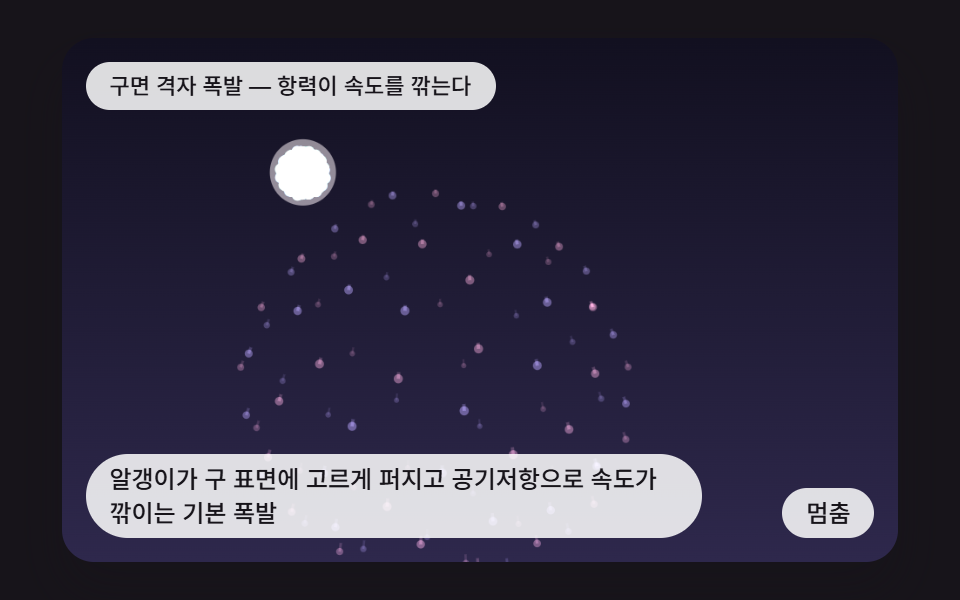 InteractionsCSS Fireworks: 9 Bursts, Trails and Reflections