CSS Cloud Animation: 9 Sky Scenes in Canvas
css cloud animation: Why is a puffy cloud's base so flat? 03 adds puffs only above the height where rising air condenses, 04 offsets hill shadows by sun
A Cloud Is Density, Not a Drawing: CSS Cloud Animation Starts by Computing How Thick the Droplets Are in Each Cell
 01 cld-puff-union-soft-outline
 02 cld-silver-lining-light-march
 03 cld-thermal-billow-flat-base
 04 cld-ground-shadow-sun-offset
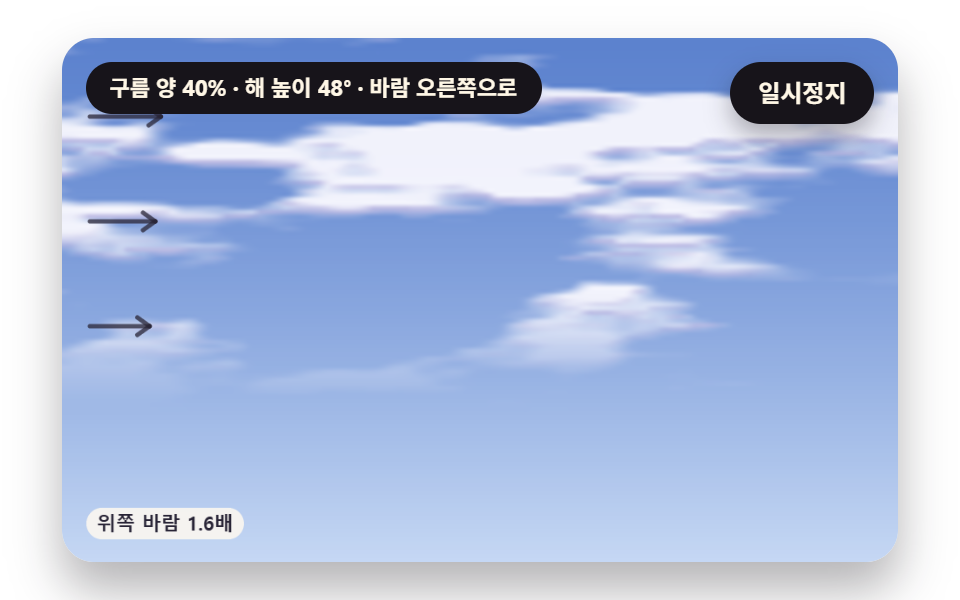 05 cld-shear-cirrus-streak
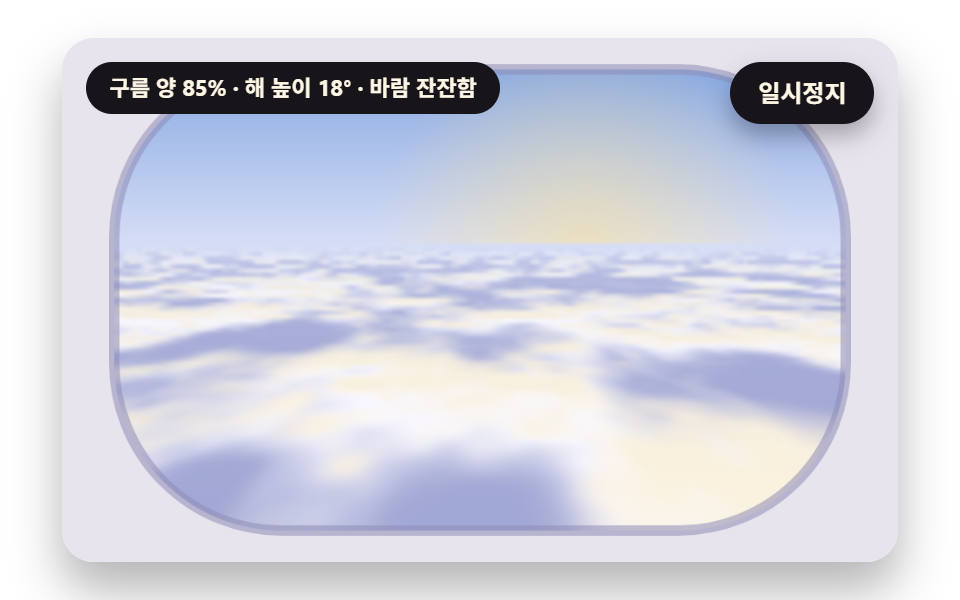 06 cld-sea-plane-horizon
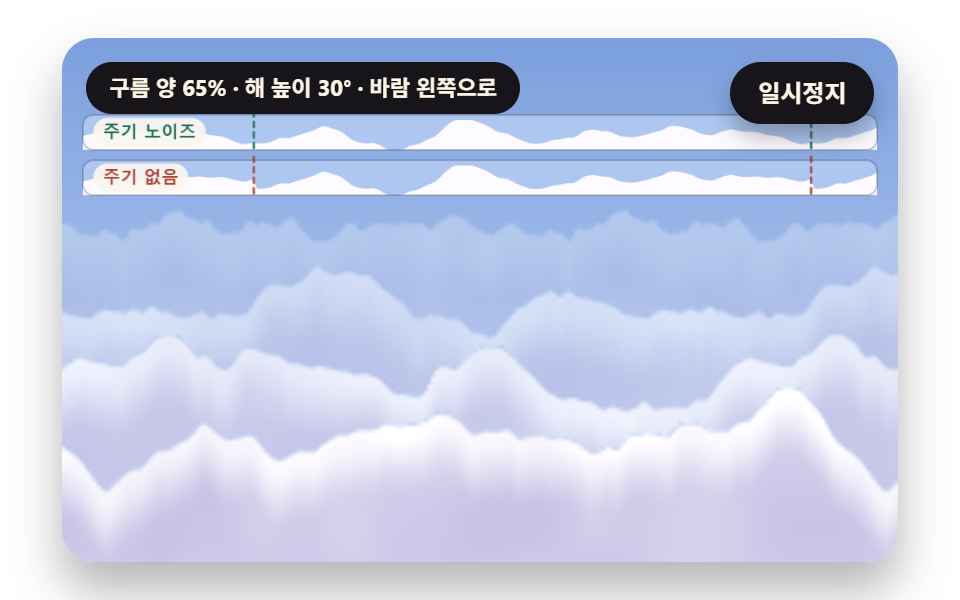 07 cld-seamless-parallax-bands
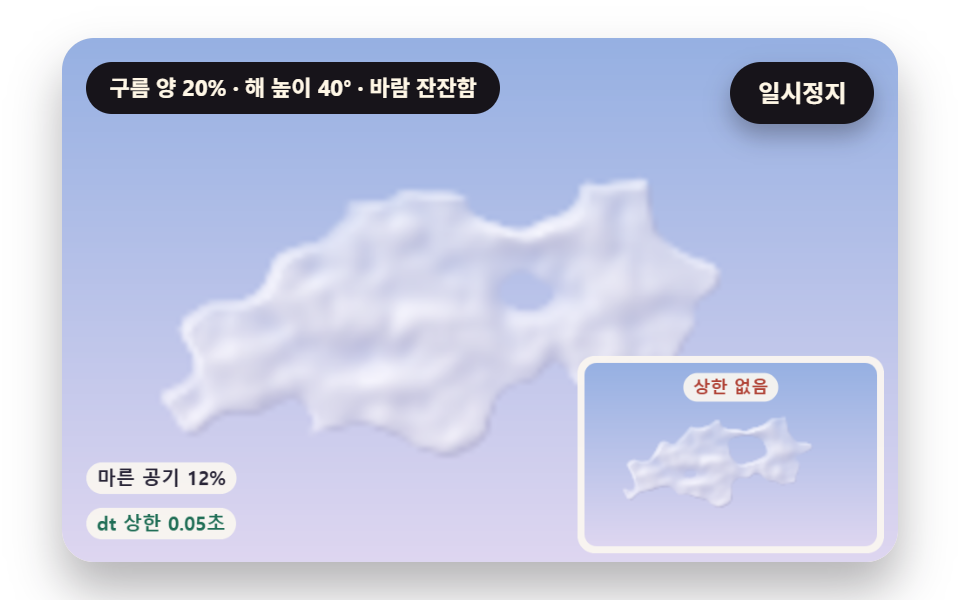 08 cld-evaporate-dry-air-mix
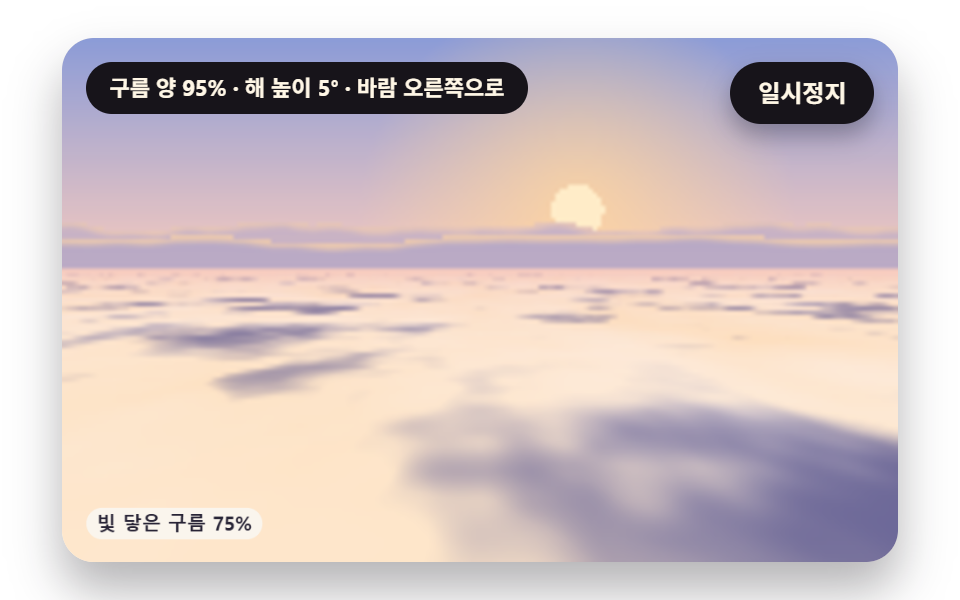 09 cld-hero-sunrise-above-sea
Auto-plays · click a tile to jump to its section · all nine in one zip
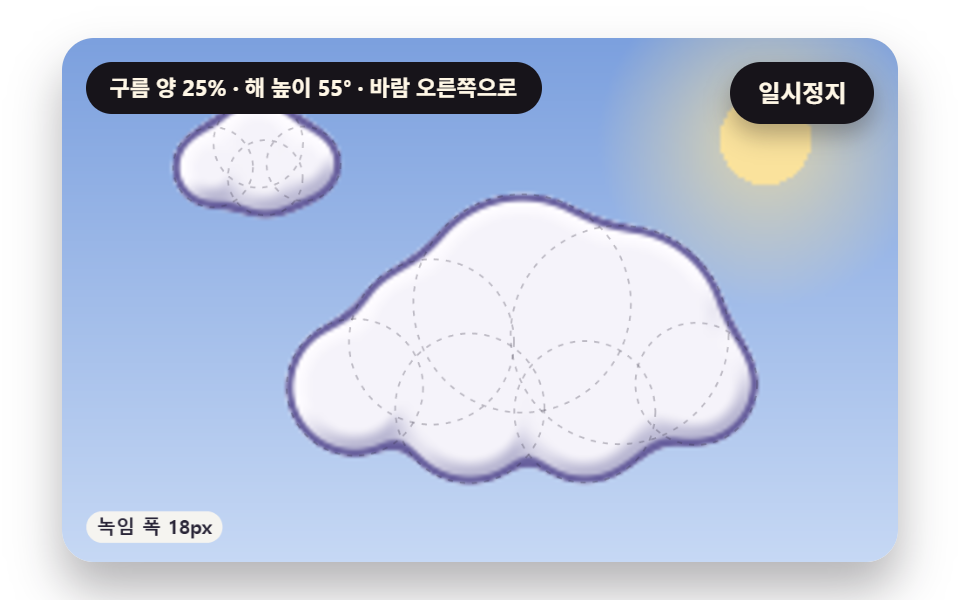
- 01 Cartoon Cloud Outline with Melted-Together Puffs
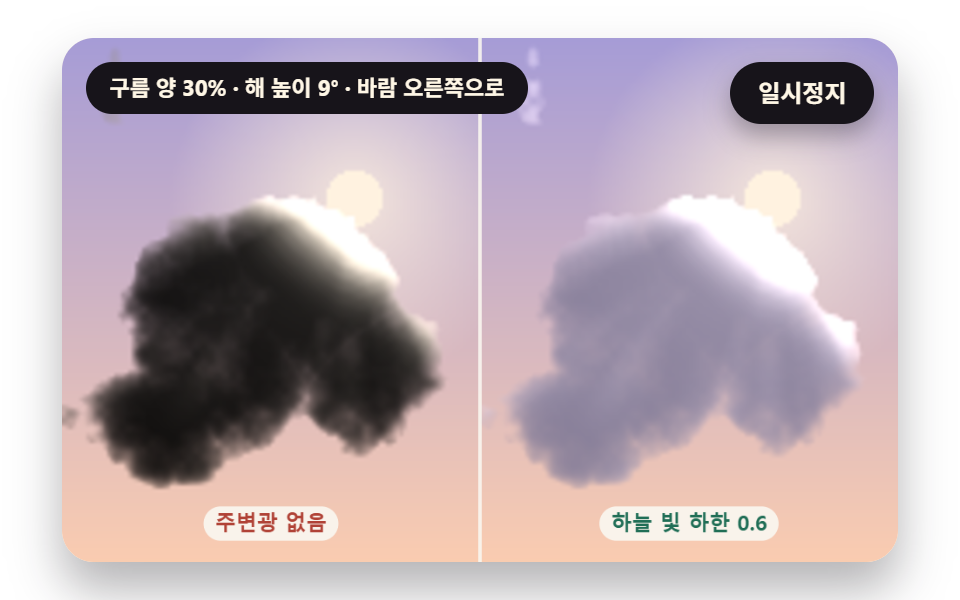
- 02 Silver Lining on a Cloud Facing Away from the Sun
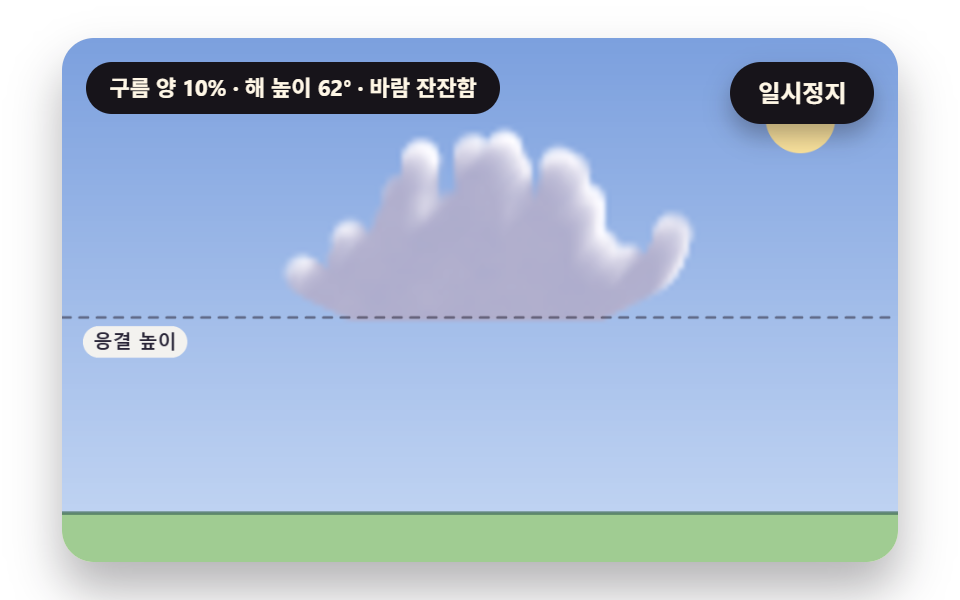
- 03 Puffy Cloud That Flattens at the Condensation Height
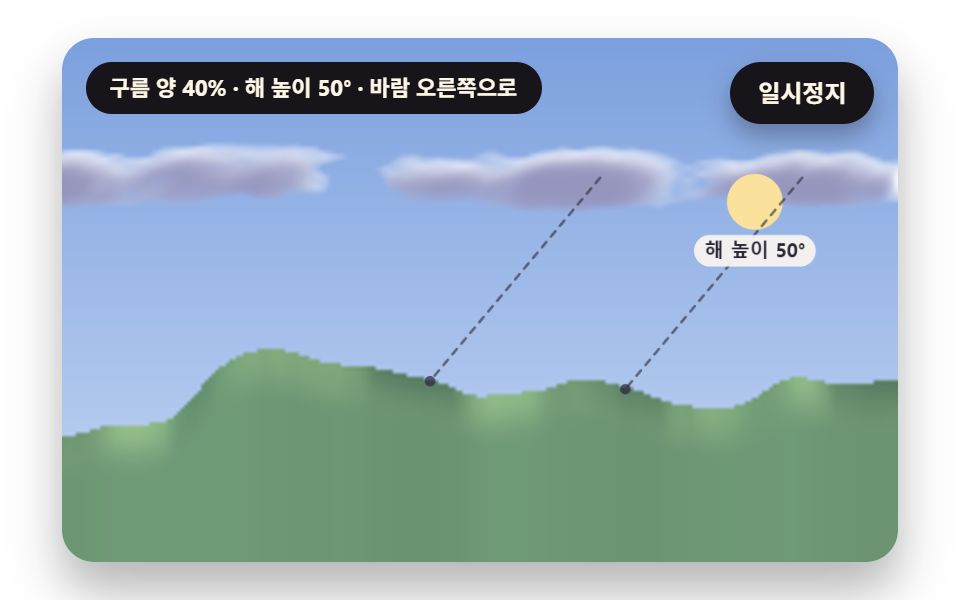
- 04 Cloud Shadows Sliding over Hills, Offset by Sun Height
- 05 Wispy Cloud Stretched by Wind That Varies with Height
- 06 Sea of Clouds Seen from a Plane Window
- 07 Seamless Layered Cloud Bands
- 08 Cloud That Frays from the Edges into Dry Air
- 09 Sunrise Hero Scene Above the Clouds
All nine scenes are the same few noise functions plugged into different places. 01 and 02 handle the outline and light of a single cloud, 03 handles the height where a cloud forms, and 04 and 05 show what the ground and the wind leave on it. 06 and 07 are plane and band backdrops, 08 is a cloud dissolving, and 09 combines the calculations of 06, 02 and 07 in a single scene.
Why a cloud shrinks to one density number
Each cell of the sky holds not a cloud or no cloud but a number for how thick the droplets are. Build that number from layered noise, work out how much light the density removes along the way, and a dark core with a bright thin edge falls out by itself. A cloud animation gif replays frames drawn once, while these scenes take the time and recompute density every frame, so changing the sun height or the wind value gives a different sky.
The source is plain canvas 2D
The result is a procedural cloudscape: all nine scenes use only canvas 2D and requestAnimationFrame, with no library, WebGL, CDN or photo file, and the sky, clouds and ground are all painted by calculation. Pixels are computed on a small grid per scene (02 uses two 120×150 panels, 03 and 08 use 160×100, 05, 06 and 09 use 200×125, and 01, 04 and 07 use 240×150), then putImageData uploads the result and it is stretched to 480×300. The only random source is one seeded generator, so Math.random appears in 0 of 9 and the same code paints the same sky.
Where this differs from the neighboring posts
For terrain built from noise see canvas noise terrain, and for the baseline of canvas scene effects see canvas scene fx. The color bands of the sky live in the sunset gradient post, and the same calculation style piles up snow in the snow effect post. This post splits how one cloud forms, catches light and frays into nine parts.
CSS Cloud Animation: 9 Scenes — Cartoon Cloud Outline with Melted-Together Puffs, Silver Lining on a Cloud Facing Away from the Sun, Puffy Cloud That Flattens at the Condensation Height, Cloud Shadows Sliding over Hills, Offset by Sun Height, Wispy Cloud Stretched by Wind That Varies with Height, Sea of Clouds Seen from a Plane Window, Seamless Layered Cloud Bands, Cloud That Frays from the Edges into Dry Air and Sunrise Hero Scene Above the Clouds
01 starts with how one cloud joins together and 02 with how it catches light. 03 shows where clouds form, while 04 and 05 show what the ground and the wind leave on them. 06 and 07 are backdrop scenes, 08 is the cloud going away, and 09 gathers the earlier calculations in one view.
Area, moving frames and intensity from rendering all nine scenes
| Scene | Cumulative area | Moving frames | Mean intensity |
|---|---|---|---|
| 01 Puff outline | 23.1% | 23/23 | 40.0 |
| 02 Silver lining | 18.7% | 23/23 | 18.1 |
| 03 Puffy cloud | 8.3% | 23/23 | 25.1 |
| 04 Cloud shadows | 17.8% | 23/23 | 38.0 |
| 05 Wispy cloud | 29.6% | 23/23 | 19.3 |
| 06 Sea of clouds | 33.0% | 23/23 | 24.3 |
| 07 Cloud bands | 43.2% | 23/23 | 32.2 |
| 08 Fraying cloud | 14.2% | 13/23 | 54.9 |
| 09 Sunrise hero | 49.2% | 23/23 | 18.7 |
Cumulative area runs from 8.3% for 03, where one cloud body rises in a narrow patch, up to 49.2% for 09. Mean intensity is highest for 08 at 54.9 and lowest for 02 at 18.1. Only 08 stops at 13/23 moving frames, and the other eight scenes moved in 23/23.
01Cartoon Cloud Outline with Melted-Together Puffs
On a landing page's first screen this gives a weather illustration whose 11 circles melt into one outline that breathes. smin blends two distances within SMOOTH_K of 18px, so the midpoint of two circles 8px apart moves from a plain minimum of 4 to −0.5 and gaps up to 9px (SMOOTH_K / 2) fill in. Each puff radius is a spring with PUFF_STIFFNESS 60 and PUFF_DAMPING 5, so one kick swells it by up to +9.97px before it overshoots by −3.39px on the way back, with a damping ratio of 0.323.
<main class="stage">
<div class="cl is-demo" id="cl">
  <canvas class="cl__canvas" data-role="canvas" width="480" height="300" role="img" aria-label="Two cartoon clouds made of eleven melted-together circles drift side to side; each puff radius swells and settles on a spring while the outline stays unbroken, and dashed circles show where the puffs sat before blending."></canvas>
  <p class="cl__status" data-role="status" aria-live="off">Reading the sky</p>
  <button class="cl__pause" data-role="pause" type="button" aria-pressed="false">Pause</button>
</div>
</main>
@use "../../../../site/static/demo-tokens" as *;
@include stage($stage-paper);
.cl {
position: relative;
width: min(92vw, calc(160vh - 12.8vw));
aspect-ratio: 480 / 300;
margin: 0 auto;
border-radius: $r-card;
overflow: hidden;
box-shadow: $shadow-raised;
background: $subject-cream;
}
.cl__canvas {
position: absolute;
inset: 0;
display: block;
width: 100%;
height: 100%;
}
.cl__pause {
position: absolute;
right: $sp-3;
top: $sp-3;
padding: $sp-1 $sp-3;
border: 2px solid $subject-ink;
border-radius: $r-pill;
background: $subject-ink;
color: $subject-cream;
font-family: inherit;
font-weight: 700;
font-size: 12px;
line-height: 1.6;
cursor: pointer;
box-shadow: $shadow-press;
transition: transform $dur-quick $ease-spring;
}
// 눌린 상태(멈춤) — 바탕과 글자색을 뒤집어 aria-pressed 가 눈에도 보이게
.cl__pause[aria-pressed="true"] {
background: $subject-cream;
color: $subject-ink;
}
.cl__pause:hover {
transform: translateY(-2px);
}
.cl__pause:active {
transform: translateY(1px);
}
.cl__pause:focus-visible {
outline: 3px solid $subject-ink;
outline-offset: 3px;
}
// 상태 줄 — 지금 하늘(구름 양·해 높이·바람)을 글자로. 시연 중에는 aria-live off, 사람이 처음 버튼을 누르면 polite
.cl__status {
position: absolute;
left: $sp-3;
top: $sp-3;
max-width: calc(100% - 120px);
margin: 0;
padding: $sp-1 $sp-3;
border-radius: $r-pill;
background: $subject-ink;
color: $subject-cream;
font-weight: 700;
font-size: 11px;
line-height: 1.6;
white-space: nowrap;
overflow: hidden;
text-overflow: ellipsis;
pointer-events: none;
}
@media (max-width: 340px) {
.cl__pause,
.cl__status { font-size: 10px; padding: 0 $sp-2; }
}
// 움직임 줄이기 — 장면은 스크립트가 정지 장면 한 장으로 멈춘다. 버튼도 떠오르지 않게
@media (prefers-reduced-motion: reduce) {
.cl__pause { transition: none !important; }
.cl__pause:hover,
.cl__pause:active { transform: none !important; }
}html, body {
margin: 0;
overflow: hidden;
}
.stage {
box-sizing: border-box;
min-height: 100vh;
display: grid;
place-items: center;
margin: 0;
background: #ffffff;
font-family: -apple-system, "Segoe UI", "Noto Sans KR", sans-serif;
padding: clamp(8px, 4vw, 24px);
}
.cl {
position: relative;
width: min(92vw, 160vh - 12.8vw);
aspect-ratio: 480/300;
margin: 0 auto;
border-radius: 16px;
overflow: hidden;
box-shadow: 0 14px 24px rgba(23, 20, 26, 0.32);
background: #fff7e6;
}
.cl__canvas {
position: absolute;
inset: 0;
display: block;
width: 100%;
height: 100%;
}
.cl__pause {
position: absolute;
right: 12px;
top: 12px;
padding: 4px 12px;
border: 2px solid #17141a;
border-radius: 999px;
background: #17141a;
color: #fff7e6;
font-family: inherit;
font-weight: 700;
font-size: 12px;
line-height: 1.6;
cursor: pointer;
box-shadow: 0 6px 12px rgba(23, 20, 26, 0.32);
transition: transform 220ms cubic-bezier(0.2, 0.8, 0.2, 1);
}
.cl__pause[aria-pressed=true] {
background: #fff7e6;
color: #17141a;
}
.cl__pause:hover {
transform: translateY(-2px);
}
.cl__pause:active {
transform: translateY(1px);
}
.cl__pause:focus-visible {
outline: 3px solid #17141a;
outline-offset: 3px;
}
.cl__status {
position: absolute;
left: 12px;
top: 12px;
max-width: calc(100% - 120px);
margin: 0;
padding: 4px 12px;
border-radius: 999px;
background: #17141a;
color: #fff7e6;
font-weight: 700;
font-size: 11px;
line-height: 1.6;
white-space: nowrap;
overflow: hidden;
text-overflow: ellipsis;
pointer-events: none;
}
@media (max-width: 340px) {
.cl__pause,
.cl__status {
font-size: 10px;
padding: 0 8px;
}
}
@media (prefers-reduced-motion: reduce) {
.cl__pause {
transition: none !important;
}
.cl__pause:hover,
.cl__pause:active {
transform: none !important;
}
}(function () {
const root = document.getElementById("cl");
if (!root) return;
// 무대 좌표 — 캔버스 안 계산은 늘 480×300. 화면에 보이는 크기와 상관없다
const W = 480;
const H = 300;
const TAU = Math.PI * 2;
function clamp(v, lo, hi) { return v < lo ? lo : (v > hi ? hi : v); }
function lerp(a, b, k) { return a + (b - a) * k; }
// 0~1 사이를 3차로 부드럽게 — 양 끝에서 기울기 0
function smooth01(x) { const c = clamp(x, 0, 1); return c * c * (3 - 2 * c); }
// edge0 에서 0, edge1 에서 1 로 부드럽게 넘어가는 문턱
function band(edge0, edge1, x) { return smooth01((x - edge0) / (edge1 - edge0)); }
function toRad(deg) { return deg * Math.PI / 180; }
// 시드 고정 난수 — 같은 시드면 같은 시연 (32비트 xorshift 에 곱셈 섞기 한 번)
function seeded(seed) {
let s = (seed * 2654435761) >>> 0 || 1;
return function () {
s ^= s << 13;
s >>>= 0;
s ^= s >>> 17;
s ^= s << 5;
s >>>= 0;
return (Math.imul(s, 0x9e3779b1) >>> 0) / 4294967296;
};
}
// ── 노이즈 ──────────────────────────────────────────────────
// 격자 꼭짓점마다 정수 해시로 0~1 값 하나 — 같은 (ix, iy, seed) 면 늘 같은 값
function latticeValue(ix, iy, seed) {
let h = (Math.imul(ix, 374761393) + Math.imul(iy, 668265263) + Math.imul(seed, 1103515245)) | 0;
h = Math.imul(h ^ (h >>> 13), 1274126177);
h ^= h >>> 16;
return (h >>> 0) / 4294967296;
}
// 값 노이즈 — 둘레 네 꼭짓점 값을 3차로 부드럽게 섞는다. 결과 0~1
function valueNoise(x, y, seed) {
const ix = Math.floor(x);
const iy = Math.floor(y);
const fx = x - ix;
const fy = y - iy;
const ux = fx * fx * (3 - 2 * fx);
const uy = fy * fy * (3 - 2 * fy);
const a = latticeValue(ix, iy, seed);
const b = latticeValue(ix + 1, iy, seed);
const c = latticeValue(ix, iy + 1, seed);
const d = latticeValue(ix + 1, iy + 1, seed);
return lerp(lerp(a, b, ux), lerp(c, d, ux), uy);
}
// 여러 겹 노이즈 합 — 겹마다 빈도 2배·세기 절반으로 octaves 겹을 더해 전체 세기 합으로 나눈다. 결과 0~1
function layeredNoise(x, y, octaves, seed) {
let sum = 0;
let amp = 1;
let norm = 0;
let f = 1;
for (let k = 0; k < octaves; k += 1) {
sum += valueNoise(x * f, y * f, seed + k * 101) * amp;
norm += amp;
amp *= 0.5;
f *= 2;
}
return sum / norm;
}
// 정수 나머지를 늘 0 이상으로
function wrapIndex(i, n) { const r = i % n; return r < 0 ? r + n : r; }
// 주기 값 노이즈 — 가로 격자 번호를 period 로 나머지 처리해, x 가 period 만큼 가면 처음과 같은 값이 된다
function periodicNoise(x, y, period, seed) {
const ix = Math.floor(x);
const iy = Math.floor(y);
const fx = x - ix;
const fy = y - iy;
const ux = fx * fx * (3 - 2 * fx);
const uy = fy * fy * (3 - 2 * fy);
const x0 = wrapIndex(ix, period);
const x1 = wrapIndex(ix + 1, period);
const a = latticeValue(x0, iy, seed);
const b = latticeValue(x1, iy, seed);
const c = latticeValue(x0, iy + 1, seed);
const d = latticeValue(x1, iy + 1, seed);
return lerp(lerp(a, b, ux), lerp(c, d, ux), uy);
}
// 주기 여러 겹 노이즈 합 — 겹마다 빈도와 주기를 함께 2배로 해, 모든 겹이 같은 거리에서 한 바퀴를 돈다
function periodicLayered(x, y, period, octaves, seed) {
let sum = 0;
let amp = 1;
let norm = 0;
let f = 1;
for (let k = 0; k < octaves; k += 1) {
sum += periodicNoise(x * f, y * f, period * f, seed + k * 101) * amp;
norm += amp;
amp *= 0.5;
f *= 2;
}
return sum / norm;
}
function makeField(gw, gh) { return { gw: gw, gh: gh, v: new Float32Array(gw * gh) }; }
// 칸 사이 값을 네 칸 섞어 읽는다 — 격자 밖은 0
function sampleField(f, x, y) {
const ix = Math.floor(x);
const iy = Math.floor(y);
if (ix < 0 || iy < 0 || ix >= f.gw - 1 || iy >= f.gh - 1) {
return 0;
}
const fx = x - ix;
const fy = y - iy;
const i = iy * f.gw + ix;
const a = f.v[i];
const b = f.v[i + 1];
const c = f.v[i + f.gw];
const d = f.v[i + f.gw + 1];
return lerp(lerp(a, b, fx), lerp(c, d, fx), fy);
}
// 구름 양 — 짙기가 level 을 넘는 칸의 몫(0~1)
function coverOf(f, level) {
let n = 0;
for (let i = 0; i < f.v.length; i += 1) {
if (f.v[i] > level) {
n += 1;
}
}
return n / f.v.length;
}
// ── 파스텔 팔레트 ────────────────────────────────────────────
// 하늘·구름·땅은 파스텔, 구름 아랫면·그림자처럼 명도로 읽히는 것은 명도 차를 크게 둔다. 글자는 진한 INK
const PAPER = [250, 246, 240];
const INK = [40, 36, 54];
const SKY_HIGH = [124, 160, 222];
const SKY_LOW = [198, 216, 244];
const CLOUD = [253, 251, 255];
const CLOUD_SHADE = [142, 140, 182];
const LAVENDER = [190, 176, 232];
const PEACH = [250, 202, 172];
const ROSE = [236, 168, 182];
const BUTTER = [250, 226, 156];
const MINT = [168, 214, 188];
const GRASS = [160, 204, 146];
const GRASS_SHADE = [76, 118, 98];
const CORAL_DEEP = [176, 66, 54];
const MINT_DEEP = [32, 110, 86];
function mix(a, b, k) { return [lerp(a[0], b[0], k), lerp(a[1], b[1], k), lerp(a[2], b[2], k)]; }
function rgba(c, a) {
return 'rgba(' + Math.round(clamp(c[0], 0, 255)) + ',' + Math.round(clamp(c[1], 0, 255)) + ',' + Math.round(clamp(c[2], 0, 255)) + ',' + clamp(a, 0, 1).toFixed(3) + ')';
}
// ── 상태 줄 낱말 ─────────────────────────────────────────────
// 지금 하늘 — 구름 양(5% 단위)·해 높이(땅에서 잰 각, 도)·바람 방향. 숫자를 반올림해 글자가 매 프레임 바뀌지 않게
function windName(dir) {
if (dir > 0) {
return 'to the right';
}
if (dir < 0) {
return 'to the left';
}
return 'calm';
}
function skyText(cover, sunDeg, windDir) {
return 'Cloud cover {c}% · sun height {s}° · wind {w}'
.replace('{c}', String(Math.round(clamp(cover, 0, 1) * 20) * 5))
.replace('{s}', String(Math.round(sunDeg)))
.replace('{w}', windName(windDir));
}
// 장면 시계(초) — 장면 계산이 고치고 화면 쪽이 읽는다
let sceneT = 0;
const canvasEl = root.querySelector('[data-role="canvas"]');
const pauseEl = root.querySelector('[data-role="pause"]');
const statusEl = root.querySelector('[data-role="status"]');
const ctxRaw = canvasEl ? canvasEl.getContext('2d') : null;
if (!canvasEl || !ctxRaw || !pauseEl) {
return;
}
const cv = canvasEl;
const ctx = ctxRaw;
const pauseBtn = pauseEl;
// 외부 웹폰트는 부르지 않는다 — 기기에 있는 글꼴 목록만
const FONT_STACK = 'system-ui, -apple-system, "Segoe UI", "Noto Sans KR", sans-serif';
let dpr = 1;
function fitCanvas() {
// 배율은 2 에서 자른다 — 배율 3 기기에서 화소가 2.25배로 늘지 않게
dpr = Math.min(window.devicePixelRatio || 1, 2);
cv.width = Math.round(W * dpr);
cv.height = Math.round(H * dpr);
ctx.setTransform(dpr, 0, 0, dpr, 0, 0);
}
function makePix(w, h) {
const c = document.createElement('canvas');
c.width = w;
c.height = h;
const x = c.getContext('2d');
return { w: w, h: h, img: x.createImageData(w, h), c: c, x: x };
}
// 화소 하나 쓰기(불투명)
function putPx(p, i, c) {
const d = p.img.data;
const k = i * 4;
d[k] = c[0];
d[k + 1] = c[1];
d[k + 2] = c[2];
d[k + 3] = 255;
}
// 판을 화면 자리 (dx, dy, dw, dh) 로 늘려 그린다 — 부드럽게 늘려 칸 경계가 보이지 않게
function blit(p, dx, dy, dw, dh) {
p.x.putImageData(p.img, 0, 0);
ctx.imageSmoothingEnabled = true;
ctx.imageSmoothingQuality = 'high';
ctx.drawImage(p.c, dx, dy, dw, dh);
}
function fillAll(c) {
ctx.fillStyle = rgba(c, 1);
ctx.fillRect(0, 0, W, H);
}
function disc(x, y, r, c, a) {
if (r <= 0.2 || a <= 0) {
return;
}
ctx.beginPath();
ctx.arc(x, y, r, 0, TAU);
ctx.fillStyle = rgba(c, a);
ctx.fill();
}
function ring(x, y, r, width, c, a) {
if (r <= 0.2 || a <= 0) {
return;
}
ctx.beginPath();
ctx.arc(x, y, r, 0, TAU);
ctx.lineWidth = width;
ctx.strokeStyle = rgba(c, a);
ctx.stroke();
}
function seg(x1, y1, x2, y2, width, c, a, dash) {
if (a <= 0) {
return;
}
ctx.beginPath();
ctx.setLineDash(dash > 0 ? [dash, dash] : []);
ctx.moveTo(x1, y1);
ctx.lineTo(x2, y2);
ctx.lineWidth = width;
ctx.lineCap = 'round';
ctx.strokeStyle = rgba(c, a);
ctx.stroke();
ctx.setLineDash([]);
}
function box(x, y, w, h, r, c, a) {
if (w <= 0.2 || h <= 0.2 || a <= 0) {
return;
}
ctx.beginPath();
ctx.roundRect(x, y, w, h, Math.max(0, Math.min(r, w / 2, h / 2)));
ctx.fillStyle = rgba(c, a);
ctx.fill();
}
function frameBox(x, y, w, h, r, width, c, a) {
ctx.beginPath();
ctx.roundRect(x, y, w, h, Math.max(0, Math.min(r, w / 2, h / 2)));
ctx.lineWidth = width;
ctx.strokeStyle = rgba(c, a);
ctx.stroke();
}
function text(s, x, y, c, a, px, weight, align) {
ctx.font = weight + ' ' + px + 'px ' + FONT_STACK;
ctx.textAlign = align;
ctx.textBaseline = 'middle';
ctx.fillStyle = rgba(c, a);
ctx.fillText(s, x, y);
}
// 글자 이름표 — 밝은 알약 위에 진한 글자
function tag(s, x, y, fg, px, align) {
ctx.font = '700 ' + px + 'px ' + FONT_STACK;
const w = ctx.measureText(s).width + px * 1.1;
const left = align === 'center' ? x - w / 2 : (align === 'right' ? x - w : x);
box(left, y - px * 0.82, w, px * 1.64, px * 0.82, PAPER, 0.92);
text(s, left + w / 2, y + 0.5, fg, 1, px, 700, 'center');
}
// 위아래 두 색 하늘 — 화면 쪽 꾸밈 한 겹
function skyGradient(top, bottom, y0, y1) {
const g = ctx.createLinearGradient(0, y0, 0, y1);
g.addColorStop(0, rgba(top, 1));
g.addColorStop(1, rgba(bottom, 1));
ctx.fillStyle = g;
ctx.fillRect(0, y0, W, y1 - y0);
}
// 상태 줄 — 글자가 바뀔 때만 고친다
let shownStatus = '';
function pushStatus(s) {
if (!statusEl || s === shownStatus) {
return;
}
shownStatus = s;
statusEl.textContent = s;
}
// ── 01 퍼프를 녹여 붙인 만화 구름 윤곽 ───────────────────────
// 퍼프(원) i 까지의 거리 d_i = |p − c_i| − r_i (안쪽이 음수). 이 값들을 부드러운 최솟값으로 차례로 섞어 윤곽 하나로
// smin(a, b) = min(a, b) − h² × SMOOTH_K / 4, h = max(SMOOTH_K − |a − b|, 0) / SMOOTH_K — 두 원이 SMOOTH_K px 안으로 가까워지면 그 사이가 메워진다
const SMOOTH_K = 18;
// 퍼프 반지름 스프링 — 가속 = −PUFF_STIFFNESS × (반지름 − 목표) − PUFF_DAMPING × 속도
const PUFF_STIFFNESS = 60;
const PUFF_DAMPING = 5;
// 1/240초 잔걸음마다 속도를 먼저, 그 속도로 반지름을 고친다(반 걸음 적분)
const PUFF_SUBSTEP = 1 / 240;
// 목표 반지름이 숨 쉬는 폭(원래 반지름의 몫)
const BREATH_AMP = 0.08;
// KICK_EVERY 초마다 퍼프 하나를 정해진 순서로 골라 반지름 속도를 (원래 반지름 × KICK_SHARE) px/초 만큼 밀어 준다 — 스프링이 넘쳤다 돌아오는 모습
const KICK_EVERY = 0.7;
const KICK_SHARE = 2.4;
// 격자 — 가로 240 × 세로 150 칸(칸 하나 2px)에서 거리를 계산해 화면으로 늘린다
const GRID_W = 240;
const GRID_H = 150;
const CELL = W / GRID_W;
// 구름 전체가 좌우로 흔들리는 폭(px)과 빠르기(라디안/초)
const SWAY_PX = 26;
const SWAY_RATE = 0.9;
const SUN_DEG_01 = 55;
const LOOP_S = 0;
const START_T = 1.2;
const REST_T = 1.2;
const rand01 = seeded(101);
// 큰 구름 퍼프 7개(가운데 아래쪽이 넓게) + 작은 구름 4개 — 구름 가운데에서 잰 자리(px)
const PUFF_LAYOUT = [
[-96, 22, 38, 0], [-52, -4, 50, 0], [0, -26, 62, 0], [56, -8, 52, 0], [100, 20, 38, 0], [-30, 34, 40, 0], [36, 36, 42, 0],
[-26, 4, 22, 1], [0, -10, 28, 1], [26, 2, 22, 1], [4, 10, 20, 1],
];
const puffs = PUFF_LAYOUT.map(function (p) {
return { ox: p[0], oy: p[1], r0: p[2], r: p[2], v: 0, rate: 1.1 + rand01() * 1.4, phase: rand01() * TAU, cloud: p[3] };
});
const KICK_ORDER = [2, 5, 8, 0, 3, 6, 9, 1, 4, 10, 7];
let lastKick = -1;
const dist01 = makeField(GRID_W, GRID_H);
// 구름 두 개의 가운데 자리 — 큰 것은 좌우로 흔들리고, 작은 것은 to the right 흘러 화면 끝에서 왼쪽 끝으로 돌아온다
function cloudCenter(cloud, t) {
if (cloud === 0) {
return [250 + Math.sin(t * SWAY_RATE) * SWAY_PX, 178];
}
const span = W + 140;
const x = ((t * 22 + 120) % span + span) % span - 70;
return [x, 70];
}
function smin(a, b, k) {
const h = Math.max(k - Math.abs(a - b), 0) / k;
return Math.min(a, b) - h * h * k / 4;
}
// 화면 점 (x, y) 에서 구름 윤곽까지의 거리(px, 안쪽 음수) — 퍼프 거리를 차례로 부드럽게 섞는다
function cloudDistance(x, y, k) {
let d = 1e9;
for (let c = 0; c < 2; c += 1) {
const cc = cloudCenter(c, sceneT);
let dc = 1e9;
for (let i = 0; i < puffs.length; i += 1) {
const p = puffs[i];
if (p.cloud !== c) {
continue;
}
const di = Math.hypot(x - cc[0] - p.ox, y - cc[1] - p.oy) - p.r;
dc = k > 0 ? smin(dc, di, k) : Math.min(dc, di);
}
d = Math.min(d, dc);
}
return d;
}
function puffTarget(p, t) { return p.r0 * (1 + BREATH_AMP * Math.sin(t * p.rate + p.phase)); }
function springStep(p, h, t) {
const a = -PUFF_STIFFNESS * (p.r - puffTarget(p, t)) - PUFF_DAMPING * p.v;
p.v += a * h;
p.r += p.v * h;
}
function reset() {
for (const p of puffs) {
p.r = p.r0;
p.v = 0;
}
lastKick = -1;
}
function update(dt) {
const k = Math.floor(sceneT / KICK_EVERY);
if (k !== lastKick) {
lastKick = k;
const p = puffs[KICK_ORDER[((k % KICK_ORDER.length) + KICK_ORDER.length) % KICK_ORDER.length]];
p.v += p.r0 * KICK_SHARE;
}
let left = dt;
const t0 = sceneT - dt;
while (left > 1e-9) {
const h = Math.min(PUFF_SUBSTEP, left);
for (const p of puffs) {
springStep(p, h, t0 + (dt - left));
}
left -= h;
}
}
// 격자 칸마다 거리를 채운다 — 화면 쪽이 그리기 직전에 한 번 부른다
function buildField() {
for (let gy = 0; gy < GRID_H; gy += 1) {
for (let gx = 0; gx < GRID_W; gx += 1) {
dist01.v[gy * GRID_W + gx] = cloudDistance((gx + 0.5) * CELL, (gy + 0.5) * CELL, SMOOTH_K);
}
}
}
function insideShare() {
let n = 0;
for (let i = 0; i < dist01.v.length; i += 1) {
if (dist01.v[i] < 0) {
n += 1;
}
}
return n / dist01.v.length;
}
// ── 01 화면 ──────────────────────────────────────────────────
const pix01 = makePix(GRID_W, GRID_H);
// 해 자리(px) — 오른쪽 위
const SUN_X_01 = 404;
const SUN_Y_01 = 58;
const OUTLINE_01 = [104, 96, 158];
// 빛이 오는 쪽 이웃 칸(왼쪽 1칸·위 2칸) — 그 칸이 더 안쪽이면 지금 칸은 빛을 등진 아랫면
const LIGHT_DX = -1;
const LIGHT_DY = -2;
const LIGHT_LEN = Math.hypot(LIGHT_DX, LIGHT_DY) * CELL;
function draw() {
buildField();
const d = pix01.img.data;
for (let gy = 0; gy < GRID_H; gy += 1) {
const sky = mix(SKY_HIGH, SKY_LOW, gy / GRID_H);
for (let gx = 0; gx < GRID_W; gx += 1) {
const i = gy * GRID_W + gx;
const x = (gx + 0.5) * CELL;
const y = (gy + 0.5) * CELL;
const sunD = Math.hypot(x - SUN_X_01, y - SUN_Y_01);
let c = mix(sky, BUTTER, clamp(1 - (sunD - 26) / 70, 0, 1) * 0.55);
if (sunD < 26) {
c = BUTTER;
}
const dv = dist01.v[i];
if (dv < 1.5) {
const nx = clamp(gx + LIGHT_DX, 0, GRID_W - 1);
const ny = clamp(gy + LIGHT_DY, 0, GRID_H - 1);
const s = dv - dist01.v[ny * GRID_W + nx];
// 빛 쪽 이웃과의 거리 차로 그늘 — 윤곽 가까운 띠(안쪽 16px)에서만 쓰고, 더 안쪽은 옅은 한 톤(퍼프 사이 골이 줄무늬로 보이지 않게)
const deep = 1 - band(-16, -6, dv);
const shade = band(-LIGHT_LEN * 0.3, LIGHT_LEN, s) * (1 - deep) + 0.12 * deep;
let cl = mix(CLOUD, CLOUD_SHADE, shade * 0.62);
// 윤곽선 — 경계 안쪽 4px 띠를 진한 라벤더로
cl = mix(cl, OUTLINE_01, band(-5, -2.5, dv) * (1 - band(-0.5, 1.2, dv)));
c = mix(c, cl, 1 - band(-0.2, 1.4, dv));
}
const k = i * 4;
d[k] = c[0];
d[k + 1] = c[1];
d[k + 2] = c[2];
d[k + 3] = 255;
}
}
blit(pix01, 0, 0, W, H);
// 퍼프 원 — 섞기 전의 원 자리를 점선으로(녹아 붙은 자리가 원보다 넓게 메워진 것이 보이게)
ctx.setLineDash([3, 4]);
for (const p of puffs) {
const cc = cloudCenter(p.cloud, sceneT);
ring(cc[0] + p.ox, cc[1] + p.oy, p.r, 1, INK, 0.28);
}
ctx.setLineDash([]);
tag('Blend width {k}px'.replace('{k}', String(SMOOTH_K)), 14, H - 20, INK, 11, 'left');
}
function statusText() { return skyText(insideShare(), SUN_DEG_01, 1); }
let paused = false;
const reduceQuery = window.matchMedia('(prefers-reduced-motion: reduce)');
// 페이지를 연 채 움직임 줄이기 설정을 바꿔도 change 리스너가 다시 읽는다
let still = reduceQuery.matches;
// 자동 시연 표시 — 사람이 처음 버튼을 누르면 떼고 상태 줄을 polite 로 켠다
let demo = root.classList.contains('is-demo');
const off = new AbortController();
function wake() {
if (!demo) {
return;
}
demo = false;
root.classList.remove('is-demo');
if (statusEl) {
statusEl.setAttribute('aria-live', 'polite');
}
}
// 한 프레임에 넘기는 시간 상한(초) — 오래 숨었다 돌아온 첫 프레임도 50ms 까지만 계산에 넣는다
const DT_MAX = 0.05;
function advance(dt) {
sceneT += dt;
if (LOOP_S > 0 && sceneT >= LOOP_S) {
sceneT -= LOOP_S;
reset();
}
update(dt);
}
// 처음부터 t 초까지 1/60초 고정 걸음으로 감아 둔다 — 첫 화면·정지 장면이 빈 하늘로 시작하지 않게
function runTo(t) {
sceneT = 0;
reset();
const h = 1 / 60;
while (sceneT + h <= t) {
advance(h);
}
}
let rafId = 0;
let lastTs = -1;
function frame(ts) {
if (still || paused) {
rafId = 0;
return;
}
if (lastTs < 0) {
lastTs = ts;
}
const dt = Math.min((ts - lastTs) / 1000, DT_MAX);
lastTs = ts;
if (dt > 0) {
advance(dt);
}
draw();
pushStatus(statusText());
rafId = window.requestAnimationFrame(frame);
}
function startLoop() {
if (rafId) {
return;
}
// 멈췄던 사이의 시간을 첫 프레임 dt 로 넘기지 않는다
lastTs = -1;
rafId = window.requestAnimationFrame(frame);
}
function stopLoop() {
if (rafId) {
window.cancelAnimationFrame(rafId);
rafId = 0;
}
}
// 움직임 줄이기 — 루프 없이 대표 순간(REST_T 초)의 하늘 한 장
function showRest() {
stopLoop();
runTo(REST_T);
draw();
pushStatus(statusText());
}
// 자동 시연은 START_T 초 자리에서 시작한다(첫 화면에 장면 핵심이 보이게). LOOP_S 가 있는 장면은 한 바퀴를 돌면 0초부터
function play() {
runTo(START_T);
draw();
pushStatus(statusText());
if (!paused) {
startLoop();
}
}
pauseBtn.addEventListener('click', function () {
paused = !paused;
pauseBtn.setAttribute('aria-pressed', paused ? 'true' : 'false');
wake();
if (paused) {
stopLoop();
}
else if (!still) {
startLoop();
}
}, { signal: off.signal });
// 탭이 숨으면 멈추고, 돌아오면 시계를 다시 맞춰 시작 — 숨은 동안의 몇 초가 한 프레임에 몰리지 않게
document.addEventListener('visibilitychange', function () {
if (document.hidden) {
stopLoop();
}
else if (!paused && !still) {
startLoop();
}
}, { signal: off.signal });
// 설정이 바뀌면 — 켜지면 정지 장면, 꺼지면 다시 움직인다
reduceQuery.addEventListener('change', function () {
still = reduceQuery.matches;
if (still) {
showRest();
}
else {
play();
}
}, { signal: off.signal });
window.addEventListener('resize', function () {
fitCanvas();
draw();
}, { signal: off.signal });
fitCanvas();
if (still) {
showRest();
}
else {
play();
}
return function () {
stopLoop();
off.abort();
};
})();// PuffUnionOutline - 같은 항목 vanilla index.html 의 React 판. 같은 계산을 useEffect 안에서 돌린다
import { useEffect, useRef } from "react";
import styles from "./PuffUnionOutline.module.scss";
const cx = (s: string): string => s.split(" ").map((n) => styles[n] ?? n).join(" ");
export default function PuffUnionOutline() {
const rootRef = useRef<HTMLDivElement | null>(null);
useEffect(() => {
const rootEl = rootRef.current;
if (!rootEl) return;
const root: HTMLElement = rootEl;
type RGB = [number, number, number];
// 무대 좌표 — 캔버스 안 계산은 늘 480×300. 화면에 보이는 크기와 상관없다
const W = 480;
const H = 300;
const TAU = Math.PI * 2;
function clamp(v: number, lo: number, hi: number): number { return v < lo ? lo : (v > hi ? hi : v); }
function lerp(a: number, b: number, k: number): number { return a + (b - a) * k; }
// 0~1 사이를 3차로 부드럽게 — 양 끝에서 기울기 0
function smooth01(x: number): number { const c = clamp(x, 0, 1); return c * c * (3 - 2 * c); }
// edge0 에서 0, edge1 에서 1 로 부드럽게 넘어가는 문턱
function band(edge0: number, edge1: number, x: number): number { return smooth01((x - edge0) / (edge1 - edge0)); }
function toRad(deg: number): number { return deg * Math.PI / 180; }
// 시드 고정 난수 — 같은 시드면 같은 시연 (32비트 xorshift 에 곱셈 섞기 한 번)
function seeded(seed: number): () => number {
let s = (seed * 2654435761) >>> 0 || 1;
return function (): number {
s ^= s << 13; s >>>= 0;
s ^= s >>> 17;
s ^= s << 5; s >>>= 0;
return (Math.imul(s, 0x9e3779b1) >>> 0) / 4294967296;
};
}
// ── 노이즈 ──────────────────────────────────────────────────
// 격자 꼭짓점마다 정수 해시로 0~1 값 하나 — 같은 (ix, iy, seed) 면 늘 같은 값
function latticeValue(ix: number, iy: number, seed: number): number {
let h = (Math.imul(ix, 374761393) + Math.imul(iy, 668265263) + Math.imul(seed, 1103515245)) | 0;
h = Math.imul(h ^ (h >>> 13), 1274126177);
h ^= h >>> 16;
return (h >>> 0) / 4294967296;
}
// 값 노이즈 — 둘레 네 꼭짓점 값을 3차로 부드럽게 섞는다. 결과 0~1
function valueNoise(x: number, y: number, seed: number): number {
const ix = Math.floor(x);
const iy = Math.floor(y);
const fx = x - ix;
const fy = y - iy;
const ux = fx * fx * (3 - 2 * fx);
const uy = fy * fy * (3 - 2 * fy);
const a = latticeValue(ix, iy, seed);
const b = latticeValue(ix + 1, iy, seed);
const c = latticeValue(ix, iy + 1, seed);
const d = latticeValue(ix + 1, iy + 1, seed);
return lerp(lerp(a, b, ux), lerp(c, d, ux), uy);
}
// 여러 겹 노이즈 합 — 겹마다 빈도 2배·세기 절반으로 octaves 겹을 더해 전체 세기 합으로 나눈다. 결과 0~1
function layeredNoise(x: number, y: number, octaves: number, seed: number): number {
let sum = 0;
let amp = 1;
let norm = 0;
let f = 1;
for (let k = 0; k < octaves; k += 1) {
sum += valueNoise(x * f, y * f, seed + k * 101) * amp;
norm += amp;
amp *= 0.5;
f *= 2;
}
return sum / norm;
}
// 정수 나머지를 늘 0 이상으로
function wrapIndex(i: number, n: number): number { const r = i % n; return r < 0 ? r + n : r; }
// 주기 값 노이즈 — 가로 격자 번호를 period 로 나머지 처리해, x 가 period 만큼 가면 처음과 같은 값이 된다
function periodicNoise(x: number, y: number, period: number, seed: number): number {
const ix = Math.floor(x);
const iy = Math.floor(y);
const fx = x - ix;
const fy = y - iy;
const ux = fx * fx * (3 - 2 * fx);
const uy = fy * fy * (3 - 2 * fy);
const x0 = wrapIndex(ix, period);
const x1 = wrapIndex(ix + 1, period);
const a = latticeValue(x0, iy, seed);
const b = latticeValue(x1, iy, seed);
const c = latticeValue(x0, iy + 1, seed);
const d = latticeValue(x1, iy + 1, seed);
return lerp(lerp(a, b, ux), lerp(c, d, ux), uy);
}
// 주기 여러 겹 노이즈 합 — 겹마다 빈도와 주기를 함께 2배로 해, 모든 겹이 같은 거리에서 한 바퀴를 돈다
function periodicLayered(x: number, y: number, period: number, octaves: number, seed: number): number {
let sum = 0;
let amp = 1;
let norm = 0;
let f = 1;
for (let k = 0; k < octaves; k += 1) {
sum += periodicNoise(x * f, y * f, period * f, seed + k * 101) * amp;
norm += amp;
amp *= 0.5;
f *= 2;
}
return sum / norm;
}
// ── 짙기 격자 ────────────────────────────────────────────────
// 낮은 해상도 격자 한 장(가로 gw × 세로 gh 칸). 칸 하나 = 화면 W / gw px
type Field = { gw: number; gh: number; v: Float32Array };
function makeField(gw: number, gh: number): Field { return { gw: gw, gh: gh, v: new Float32Array(gw * gh) }; }
// 칸 사이 값을 네 칸 섞어 읽는다 — 격자 밖은 0
function sampleField(f: Field, x: number, y: number): number {
const ix = Math.floor(x);
const iy = Math.floor(y);
if (ix < 0 || iy < 0 || ix >= f.gw - 1 || iy >= f.gh - 1) { return 0; }
const fx = x - ix;
const fy = y - iy;
const i = iy * f.gw + ix;
const a = f.v[i];
const b = f.v[i + 1];
const c = f.v[i + f.gw];
const d = f.v[i + f.gw + 1];
return lerp(lerp(a, b, fx), lerp(c, d, fx), fy);
}
// 구름 양 — 짙기가 level 을 넘는 칸의 몫(0~1)
function coverOf(f: Field, level: number): number {
let n = 0;
for (let i = 0; i < f.v.length; i += 1) { if (f.v[i] > level) { n += 1; } }
return n / f.v.length;
}
// ── 파스텔 팔레트 ────────────────────────────────────────────
// 하늘·구름·땅은 파스텔, 구름 아랫면·그림자처럼 명도로 읽히는 것은 명도 차를 크게 둔다. 글자는 진한 INK
const PAPER: RGB = [250, 246, 240];
const INK: RGB = [40, 36, 54];
const SKY_HIGH: RGB = [124, 160, 222];
const SKY_LOW: RGB = [198, 216, 244];
const CLOUD: RGB = [253, 251, 255];
const CLOUD_SHADE: RGB = [142, 140, 182];
const LAVENDER: RGB = [190, 176, 232];
const PEACH: RGB = [250, 202, 172];
const ROSE: RGB = [236, 168, 182];
const BUTTER: RGB = [250, 226, 156];
const MINT: RGB = [168, 214, 188];
const GRASS: RGB = [160, 204, 146];
const GRASS_SHADE: RGB = [76, 118, 98];
const CORAL_DEEP: RGB = [176, 66, 54];
const MINT_DEEP: RGB = [32, 110, 86];
function mix(a: RGB, b: RGB, k: number): RGB { return [lerp(a[0], b[0], k), lerp(a[1], b[1], k), lerp(a[2], b[2], k)]; }
function rgba(c: RGB, a: number): string {
return 'rgba(' + Math.round(clamp(c[0], 0, 255)) + ',' + Math.round(clamp(c[1], 0, 255)) + ',' + Math.round(clamp(c[2], 0, 255)) + ',' + clamp(a, 0, 1).toFixed(3) + ')';
}
// ── 상태 줄 낱말 ─────────────────────────────────────────────
// 지금 하늘 — 구름 양(5% 단위)·해 높이(땅에서 잰 각, 도)·바람 방향. 숫자를 반올림해 글자가 매 프레임 바뀌지 않게
function windName(dir: number): string {
if (dir > 0) { return '오른쪽으로'; }
if (dir < 0) { return '왼쪽으로'; }
return '잔잔함';
}
function skyText(cover: number, sunDeg: number, windDir: number): string {
return '구름 양 {c}% · 해 높이 {s}° · 바람 {w}'
.replace('{c}', String(Math.round(clamp(cover, 0, 1) * 20) * 5))
.replace('{s}', String(Math.round(sunDeg)))
.replace('{w}', windName(windDir));
}
// 장면 시계(초) — 장면 계산이 고치고 화면 쪽이 읽는다
let sceneT = 0;
const canvasEl = root.querySelector('[data-role="canvas"]') as HTMLCanvasElement | null;
const pauseEl = root.querySelector('[data-role="pause"]') as HTMLButtonElement | null;
const statusEl = root.querySelector('[data-role="status"]') as HTMLElement | null;
const ctxRaw = canvasEl ? canvasEl.getContext('2d') : null;
if (!canvasEl || !ctxRaw || !pauseEl) { return; }
const cv: HTMLCanvasElement = canvasEl;
const ctx: CanvasRenderingContext2D = ctxRaw;
const pauseBtn: HTMLButtonElement = pauseEl;
// 외부 웹폰트는 부르지 않는다 — 기기에 있는 글꼴 목록만
const FONT_STACK = 'system-ui, -apple-system, "Segoe UI", "Noto Sans KR", sans-serif';
let dpr = 1;
function fitCanvas(): void {
// 배율은 2 에서 자른다 — 배율 3 기기에서 화소가 2.25배로 늘지 않게
dpr = Math.min(window.devicePixelRatio || 1, 2);
cv.width = Math.round(W * dpr);
cv.height = Math.round(H * dpr);
ctx.setTransform(dpr, 0, 0, dpr, 0, 0);
}
// 낮은 해상도 화소 판 — 화면 밖 캔버스 하나와 ImageData 하나를 만들어 두고 매 프레임 다시 쓴다
type Pix = { w: number; h: number; img: ImageData; c: HTMLCanvasElement; x: CanvasRenderingContext2D };
function makePix(w: number, h: number): Pix {
const c = document.createElement('canvas');
c.width = w;
c.height = h;
const x = c.getContext('2d') as CanvasRenderingContext2D;
return { w: w, h: h, img: x.createImageData(w, h), c: c, x: x };
}
// 화소 하나 쓰기(불투명)
function putPx(p: Pix, i: number, c: RGB): void {
const d = p.img.data;
const k = i * 4;
d[k] = c[0];
d[k + 1] = c[1];
d[k + 2] = c[2];
d[k + 3] = 255;
}
// 판을 화면 자리 (dx, dy, dw, dh) 로 늘려 그린다 — 부드럽게 늘려 칸 경계가 보이지 않게
function blit(p: Pix, dx: number, dy: number, dw: number, dh: number): void {
p.x.putImageData(p.img, 0, 0);
ctx.imageSmoothingEnabled = true;
ctx.imageSmoothingQuality = 'high';
ctx.drawImage(p.c, dx, dy, dw, dh);
}
function fillAll(c: RGB): void {
ctx.fillStyle = rgba(c, 1);
ctx.fillRect(0, 0, W, H);
}
function disc(x: number, y: number, r: number, c: RGB, a: number): void {
if (r <= 0.2 || a <= 0) { return; }
ctx.beginPath();
ctx.arc(x, y, r, 0, TAU);
ctx.fillStyle = rgba(c, a);
ctx.fill();
}
function ring(x: number, y: number, r: number, width: number, c: RGB, a: number): void {
if (r <= 0.2 || a <= 0) { return; }
ctx.beginPath();
ctx.arc(x, y, r, 0, TAU);
ctx.lineWidth = width;
ctx.strokeStyle = rgba(c, a);
ctx.stroke();
}
function seg(x1: number, y1: number, x2: number, y2: number, width: number, c: RGB, a: number, dash: number): void {
if (a <= 0) { return; }
ctx.beginPath();
ctx.setLineDash(dash > 0 ? [dash, dash] : []);
ctx.moveTo(x1, y1);
ctx.lineTo(x2, y2);
ctx.lineWidth = width;
ctx.lineCap = 'round';
ctx.strokeStyle = rgba(c, a);
ctx.stroke();
ctx.setLineDash([]);
}
function box(x: number, y: number, w: number, h: number, r: number, c: RGB, a: number): void {
if (w <= 0.2 || h <= 0.2 || a <= 0) { return; }
ctx.beginPath();
ctx.roundRect(x, y, w, h, Math.max(0, Math.min(r, w / 2, h / 2)));
ctx.fillStyle = rgba(c, a);
ctx.fill();
}
function frameBox(x: number, y: number, w: number, h: number, r: number, width: number, c: RGB, a: number): void {
ctx.beginPath();
ctx.roundRect(x, y, w, h, Math.max(0, Math.min(r, w / 2, h / 2)));
ctx.lineWidth = width;
ctx.strokeStyle = rgba(c, a);
ctx.stroke();
}
function text(s: string, x: number, y: number, c: RGB, a: number, px: number, weight: number, align: CanvasTextAlign): void {
ctx.font = weight + ' ' + px + 'px ' + FONT_STACK;
ctx.textAlign = align;
ctx.textBaseline = 'middle';
ctx.fillStyle = rgba(c, a);
ctx.fillText(s, x, y);
}
// 글자 이름표 — 밝은 알약 위에 진한 글자
function tag(s: string, x: number, y: number, fg: RGB, px: number, align: CanvasTextAlign): void {
ctx.font = '700 ' + px + 'px ' + FONT_STACK;
const w = ctx.measureText(s).width + px * 1.1;
const left = align === 'center' ? x - w / 2 : (align === 'right' ? x - w : x);
box(left, y - px * 0.82, w, px * 1.64, px * 0.82, PAPER, 0.92);
text(s, left + w / 2, y + 0.5, fg, 1, px, 700, 'center');
}
// 위아래 두 색 하늘 — 화면 쪽 꾸밈 한 겹
function skyGradient(top: RGB, bottom: RGB, y0: number, y1: number): void {
const g = ctx.createLinearGradient(0, y0, 0, y1);
g.addColorStop(0, rgba(top, 1));
g.addColorStop(1, rgba(bottom, 1));
ctx.fillStyle = g;
ctx.fillRect(0, y0, W, y1 - y0);
}
// 상태 줄 — 글자가 바뀔 때만 고친다
let shownStatus = '';
function pushStatus(s: string): void {
if (!statusEl || s === shownStatus) { return; }
shownStatus = s;
statusEl.textContent = s;
}
// ── 01 퍼프를 녹여 붙인 만화 구름 윤곽 ───────────────────────
// 퍼프(원) i 까지의 거리 d_i = |p − c_i| − r_i (안쪽이 음수). 이 값들을 부드러운 최솟값으로 차례로 섞어 윤곽 하나로
// smin(a, b) = min(a, b) − h² × SMOOTH_K / 4, h = max(SMOOTH_K − |a − b|, 0) / SMOOTH_K — 두 원이 SMOOTH_K px 안으로 가까워지면 그 사이가 메워진다
const SMOOTH_K = 18;
// 퍼프 반지름 스프링 — 가속 = −PUFF_STIFFNESS × (반지름 − 목표) − PUFF_DAMPING × 속도
const PUFF_STIFFNESS = 60;
const PUFF_DAMPING = 5;
// 1/240초 잔걸음마다 속도를 먼저, 그 속도로 반지름을 고친다(반 걸음 적분)
const PUFF_SUBSTEP = 1 / 240;
// 목표 반지름이 숨 쉬는 폭(원래 반지름의 몫)
const BREATH_AMP = 0.08;
// KICK_EVERY 초마다 퍼프 하나를 정해진 순서로 골라 반지름 속도를 (원래 반지름 × KICK_SHARE) px/초 만큼 밀어 준다 — 스프링이 넘쳤다 돌아오는 모습
const KICK_EVERY = 0.7;
const KICK_SHARE = 2.4;
// 격자 — 가로 240 × 세로 150 칸(칸 하나 2px)에서 거리를 계산해 화면으로 늘린다
const GRID_W = 240;
const GRID_H = 150;
const CELL = W / GRID_W;
// 구름 전체가 좌우로 흔들리는 폭(px)과 빠르기(라디안/초)
const SWAY_PX = 26;
const SWAY_RATE = 0.9;
const SUN_DEG_01 = 55;
const LOOP_S = 0;
const START_T = 1.2;
const REST_T = 1.2;
type Puff = { ox: number; oy: number; r0: number; r: number; v: number; rate: number; phase: number; cloud: number };
const rand01 = seeded(101);
// 큰 구름 퍼프 7개(가운데 아래쪽이 넓게) + 작은 구름 4개 — 구름 가운데에서 잰 자리(px)
const PUFF_LAYOUT: number[][] = [
[-96, 22, 38, 0], [-52, -4, 50, 0], [0, -26, 62, 0], [56, -8, 52, 0], [100, 20, 38, 0], [-30, 34, 40, 0], [36, 36, 42, 0],
[-26, 4, 22, 1], [0, -10, 28, 1], [26, 2, 22, 1], [4, 10, 20, 1],
];
const puffs: Puff[] = PUFF_LAYOUT.map(function (p: number[]): Puff {
return { ox: p[0], oy: p[1], r0: p[2], r: p[2], v: 0, rate: 1.1 + rand01() * 1.4, phase: rand01() * TAU, cloud: p[3] };
});
const KICK_ORDER: number[] = [2, 5, 8, 0, 3, 6, 9, 1, 4, 10, 7];
let lastKick = -1;
const dist01 = makeField(GRID_W, GRID_H);
// 구름 두 개의 가운데 자리 — 큰 것은 좌우로 흔들리고, 작은 것은 오른쪽으로 흘러 화면 끝에서 왼쪽 끝으로 돌아온다
function cloudCenter(cloud: number, t: number): [number, number] {
if (cloud === 0) { return [250 + Math.sin(t * SWAY_RATE) * SWAY_PX, 178]; }
const span = W + 140;
const x = ((t * 22 + 120) % span + span) % span - 70;
return [x, 70];
}
function smin(a: number, b: number, k: number): number {
const h = Math.max(k - Math.abs(a - b), 0) / k;
return Math.min(a, b) - h * h * k / 4;
}
// 화면 점 (x, y) 에서 구름 윤곽까지의 거리(px, 안쪽 음수) — 퍼프 거리를 차례로 부드럽게 섞는다
function cloudDistance(x: number, y: number, k: number): number {
let d = 1e9;
for (let c = 0; c < 2; c += 1) {
const cc = cloudCenter(c, sceneT);
let dc = 1e9;
for (let i = 0; i < puffs.length; i += 1) {
const p = puffs[i];
if (p.cloud !== c) { continue; }
const di = Math.hypot(x - cc[0] - p.ox, y - cc[1] - p.oy) - p.r;
dc = k > 0 ? smin(dc, di, k) : Math.min(dc, di);
}
d = Math.min(d, dc);
}
return d;
}
function puffTarget(p: Puff, t: number): number { return p.r0 * (1 + BREATH_AMP * Math.sin(t * p.rate + p.phase)); }
function springStep(p: Puff, h: number, t: number): void {
const a = -PUFF_STIFFNESS * (p.r - puffTarget(p, t)) - PUFF_DAMPING * p.v;
p.v += a * h;
p.r += p.v * h;
}
function reset(): void {
for (const p of puffs) { p.r = p.r0; p.v = 0; }
lastKick = -1;
}
function update(dt: number): void {
const k = Math.floor(sceneT / KICK_EVERY);
if (k !== lastKick) {
lastKick = k;
const p = puffs[KICK_ORDER[((k % KICK_ORDER.length) + KICK_ORDER.length) % KICK_ORDER.length]];
p.v += p.r0 * KICK_SHARE;
}
let left = dt;
const t0 = sceneT - dt;
while (left > 1e-9) {
const h = Math.min(PUFF_SUBSTEP, left);
for (const p of puffs) { springStep(p, h, t0 + (dt - left)); }
left -= h;
}
}
// 격자 칸마다 거리를 채운다 — 화면 쪽이 그리기 직전에 한 번 부른다
function buildField(): void {
for (let gy = 0; gy < GRID_H; gy += 1) {
for (let gx = 0; gx < GRID_W; gx += 1) {
dist01.v[gy * GRID_W + gx] = cloudDistance((gx + 0.5) * CELL, (gy + 0.5) * CELL, SMOOTH_K);
}
}
}
function insideShare(): number {
let n = 0;
for (let i = 0; i < dist01.v.length; i += 1) { if (dist01.v[i] < 0) { n += 1; } }
return n / dist01.v.length;
}
// ── 01 화면 ──────────────────────────────────────────────────
const pix01 = makePix(GRID_W, GRID_H);
// 해 자리(px) — 오른쪽 위
const SUN_X_01 = 404;
const SUN_Y_01 = 58;
const OUTLINE_01: RGB = [104, 96, 158];
// 빛이 오는 쪽 이웃 칸(왼쪽 1칸·위 2칸) — 그 칸이 더 안쪽이면 지금 칸은 빛을 등진 아랫면
const LIGHT_DX = -1;
const LIGHT_DY = -2;
const LIGHT_LEN = Math.hypot(LIGHT_DX, LIGHT_DY) * CELL;
function draw(): void {
buildField();
const d = pix01.img.data;
for (let gy = 0; gy < GRID_H; gy += 1) {
const sky = mix(SKY_HIGH, SKY_LOW, gy / GRID_H);
for (let gx = 0; gx < GRID_W; gx += 1) {
const i = gy * GRID_W + gx;
const x = (gx + 0.5) * CELL;
const y = (gy + 0.5) * CELL;
const sunD = Math.hypot(x - SUN_X_01, y - SUN_Y_01);
let c = mix(sky, BUTTER, clamp(1 - (sunD - 26) / 70, 0, 1) * 0.55);
if (sunD < 26) { c = BUTTER; }
const dv = dist01.v[i];
if (dv < 1.5) {
const nx = clamp(gx + LIGHT_DX, 0, GRID_W - 1);
const ny = clamp(gy + LIGHT_DY, 0, GRID_H - 1);
const s = dv - dist01.v[ny * GRID_W + nx];
// 빛 쪽 이웃과의 거리 차로 그늘 — 윤곽 가까운 띠(안쪽 16px)에서만 쓰고, 더 안쪽은 옅은 한 톤(퍼프 사이 골이 줄무늬로 보이지 않게)
const deep = 1 - band(-16, -6, dv);
const shade = band(-LIGHT_LEN * 0.3, LIGHT_LEN, s) * (1 - deep) + 0.12 * deep;
let cl = mix(CLOUD, CLOUD_SHADE, shade * 0.62);
// 윤곽선 — 경계 안쪽 4px 띠를 진한 라벤더로
cl = mix(cl, OUTLINE_01, band(-5, -2.5, dv) * (1 - band(-0.5, 1.2, dv)));
c = mix(c, cl, 1 - band(-0.2, 1.4, dv));
}
const k = i * 4;
d[k] = c[0]; d[k + 1] = c[1]; d[k + 2] = c[2]; d[k + 3] = 255;
}
}
blit(pix01, 0, 0, W, H);
// 퍼프 원 — 섞기 전의 원 자리를 점선으로(녹아 붙은 자리가 원보다 넓게 메워진 것이 보이게)
ctx.setLineDash([3, 4]);
for (const p of puffs) {
const cc = cloudCenter(p.cloud, sceneT);
ring(cc[0] + p.ox, cc[1] + p.oy, p.r, 1, INK, 0.28);
}
ctx.setLineDash([]);
tag('녹임 폭 {k}px'.replace('{k}', String(SMOOTH_K)), 14, H - 20, INK, 11, 'left');
}
function statusText(): string { return skyText(insideShare(), SUN_DEG_01, 1); }
let paused = false;
const reduceQuery = window.matchMedia('(prefers-reduced-motion: reduce)');
// 페이지를 연 채 움직임 줄이기 설정을 바꿔도 change 리스너가 다시 읽는다
let still = reduceQuery.matches;
// 자동 시연 표시 — 사람이 처음 버튼을 누르면 떼고 상태 줄을 polite 로 켠다
let demo = root.classList.contains('is-demo');
const off = new AbortController();
function wake(): void {
if (!demo) { return; }
demo = false;
root.classList.remove('is-demo');
if (statusEl) { statusEl.setAttribute('aria-live', 'polite'); }
}
// 한 프레임에 넘기는 시간 상한(초) — 오래 숨었다 돌아온 첫 프레임도 50ms 까지만 계산에 넣는다
const DT_MAX = 0.05;
function advance(dt: number): void {
sceneT += dt;
if (LOOP_S > 0 && sceneT >= LOOP_S) {
sceneT -= LOOP_S;
reset();
}
update(dt);
}
// 처음부터 t 초까지 1/60초 고정 걸음으로 감아 둔다 — 첫 화면·정지 장면이 빈 하늘로 시작하지 않게
function runTo(t: number): void {
sceneT = 0;
reset();
const h = 1 / 60;
while (sceneT + h <= t) { advance(h); }
}
let rafId = 0;
let lastTs = -1;
function frame(ts: number): void {
if (still || paused) { rafId = 0; return; }
if (lastTs < 0) { lastTs = ts; }
const dt = Math.min((ts - lastTs) / 1000, DT_MAX);
lastTs = ts;
if (dt > 0) { advance(dt); }
draw();
pushStatus(statusText());
rafId = window.requestAnimationFrame(frame);
}
function startLoop(): void {
if (rafId) { return; }
// 멈췄던 사이의 시간을 첫 프레임 dt 로 넘기지 않는다
lastTs = -1;
rafId = window.requestAnimationFrame(frame);
}
function stopLoop(): void {
if (rafId) { window.cancelAnimationFrame(rafId); rafId = 0; }
}
// 움직임 줄이기 — 루프 없이 대표 순간(REST_T 초)의 하늘 한 장
function showRest(): void {
stopLoop();
runTo(REST_T);
draw();
pushStatus(statusText());
}
// 자동 시연은 START_T 초 자리에서 시작한다(첫 화면에 장면 핵심이 보이게). LOOP_S 가 있는 장면은 한 바퀴를 돌면 0초부터
function play(): void {
runTo(START_T);
draw();
pushStatus(statusText());
if (!paused) { startLoop(); }
}
pauseBtn.addEventListener('click', function (): void {
paused = !paused;
pauseBtn.setAttribute('aria-pressed', paused ? 'true' : 'false');
wake();
if (paused) { stopLoop(); } else if (!still) { startLoop(); }
}, { signal: off.signal });
// 탭이 숨으면 멈추고, 돌아오면 시계를 다시 맞춰 시작 — 숨은 동안의 몇 초가 한 프레임에 몰리지 않게
document.addEventListener('visibilitychange', function (): void {
if (document.hidden) { stopLoop(); } else if (!paused && !still) { startLoop(); }
}, { signal: off.signal });
// 설정이 바뀌면 — 켜지면 정지 장면, 꺼지면 다시 움직인다
reduceQuery.addEventListener('change', function (): void {
still = reduceQuery.matches;
if (still) { showRest(); } else { play(); }
}, { signal: off.signal });
window.addEventListener('resize', function (): void {
fitCanvas();
draw();
}, { signal: off.signal });
fitCanvas();
if (still) { showRest(); } else { play(); }
return function (): void {
stopLoop();
off.abort();
};
}, []);
return (
<div className={cx("cl") + " is-demo"} ref={rootRef}>
<canvas className={cx("cl__canvas")} data-role="canvas" width={480} height={300} role="img" aria-label={'원 열한 개가 녹아 붙은 만화 구름 두 덩이가 좌우로 흐르고, 퍼프마다 반지름이 스프링으로 부풀었다 가라앉아도 윤곽이 끊기지 않으며, 점선 원이 섞기 전 퍼프 자리를 보여 준다'}></canvas>
<p className={cx("cl__status")} data-role="status" aria-live="off">{'하늘을 읽는 중'}</p>
<button className={cx("cl__pause")} data-role="pause" type="button" aria-pressed="false">{'일시정지'}</button>
</div>
);
}01 · Cartoon Cloud Outline with Melted-Together Puffs — Measured area 23.124% · moving frames 23/23Original by GODRICH · SCSS and React ship in the zip · See the password
    function smin(a, b, k) {
        const h = Math.max(k - Math.abs(a - b), 0) / k;
        return Math.min(a, b) - h * h * k / 4;
    }
    // Distance (px, negative inside) from screen point (x, y) to the cloud outline: puff distances blended one after another with a smooth minimum
    function cloudDistance(x, y, k) {
        let d = 1e9;
        for (let c = 0; c < 2; c += 1) {
            const cc = cloudCenter(c, sceneT);
            let dc = 1e9;
            for (let i = 0; i < puffs.length; i += 1) {
                const p = puffs[i];
                if (p.cloud !== c) {
                    continue;
                }
                const di = Math.hypot(x - cc[0] - p.ox, y - cc[1] - p.oy) - p.r;
                dc = k > 0 ? smin(dc, di, k) : Math.min(dc, di);
            }
            d = Math.min(d, dc);
        }
        return d;
    }
02Silver Lining on a Cloud Facing Away from the Sun
Behind a product introduction page's dusk background, lightSum walks 6 steps from each cell toward the sun gathering density, and e^(−ABSORB × S) cuts the light so a density sum of 1 leaves only 0.407 of it. In the 2-second capture the mean transmission inside the cloud (density above 0.85) is 0.135. On the right panel, which has a sky-light floor, thin edges read 0.879 in brightness against 0.742 in the core.
<main class="stage">
<div class="cl is-demo" id="cl">
  <canvas class="cl__canvas" data-role="canvas" width="480" height="300" role="img" aria-label="Two copies of the same dusk cloud facing away from the sun sit side by side: on the left, with no ambient light, the side away from the sun goes almost black; on the right, a sky light floor keeps the core dim while only the thin edge glows white."></canvas>
  <p class="cl__status" data-role="status" aria-live="off">Reading the sky</p>
  <button class="cl__pause" data-role="pause" type="button" aria-pressed="false">Pause</button>
</div>
</main>
@use "../../../../site/static/demo-tokens" as *;
@include stage($stage-paper);
.cl {
position: relative;
width: min(92vw, calc(160vh - 12.8vw));
aspect-ratio: 480 / 300;
margin: 0 auto;
border-radius: $r-card;
overflow: hidden;
box-shadow: $shadow-raised;
background: $subject-cream;
}
.cl__canvas {
position: absolute;
inset: 0;
display: block;
width: 100%;
height: 100%;
}
.cl__pause {
position: absolute;
right: $sp-3;
top: $sp-3;
padding: $sp-1 $sp-3;
border: 2px solid $subject-ink;
border-radius: $r-pill;
background: $subject-ink;
color: $subject-cream;
font-family: inherit;
font-weight: 700;
font-size: 12px;
line-height: 1.6;
cursor: pointer;
box-shadow: $shadow-press;
transition: transform $dur-quick $ease-spring;
}
// 눌린 상태(멈춤) — 바탕과 글자색을 뒤집어 aria-pressed 가 눈에도 보이게
.cl__pause[aria-pressed="true"] {
background: $subject-cream;
color: $subject-ink;
}
.cl__pause:hover {
transform: translateY(-2px);
}
.cl__pause:active {
transform: translateY(1px);
}
.cl__pause:focus-visible {
outline: 3px solid $subject-ink;
outline-offset: 3px;
}
// 상태 줄 — 지금 하늘(구름 양·해 높이·바람)을 글자로. 시연 중에는 aria-live off, 사람이 처음 버튼을 누르면 polite
.cl__status {
position: absolute;
left: $sp-3;
top: $sp-3;
max-width: calc(100% - 120px);
margin: 0;
padding: $sp-1 $sp-3;
border-radius: $r-pill;
background: $subject-ink;
color: $subject-cream;
font-weight: 700;
font-size: 11px;
line-height: 1.6;
white-space: nowrap;
overflow: hidden;
text-overflow: ellipsis;
pointer-events: none;
}
@media (max-width: 340px) {
.cl__pause,
.cl__status { font-size: 10px; padding: 0 $sp-2; }
}
// 움직임 줄이기 — 장면은 스크립트가 정지 장면 한 장으로 멈춘다. 버튼도 떠오르지 않게
@media (prefers-reduced-motion: reduce) {
.cl__pause { transition: none !important; }
.cl__pause:hover,
.cl__pause:active { transform: none !important; }
}html, body {
margin: 0;
overflow: hidden;
}
.stage {
box-sizing: border-box;
min-height: 100vh;
display: grid;
place-items: center;
margin: 0;
background: #ffffff;
font-family: -apple-system, "Segoe UI", "Noto Sans KR", sans-serif;
padding: clamp(8px, 4vw, 24px);
}
.cl {
position: relative;
width: min(92vw, 160vh - 12.8vw);
aspect-ratio: 480/300;
margin: 0 auto;
border-radius: 16px;
overflow: hidden;
box-shadow: 0 14px 24px rgba(23, 20, 26, 0.32);
background: #fff7e6;
}
.cl__canvas {
position: absolute;
inset: 0;
display: block;
width: 100%;
height: 100%;
}
.cl__pause {
position: absolute;
right: 12px;
top: 12px;
padding: 4px 12px;
border: 2px solid #17141a;
border-radius: 999px;
background: #17141a;
color: #fff7e6;
font-family: inherit;
font-weight: 700;
font-size: 12px;
line-height: 1.6;
cursor: pointer;
box-shadow: 0 6px 12px rgba(23, 20, 26, 0.32);
transition: transform 220ms cubic-bezier(0.2, 0.8, 0.2, 1);
}
.cl__pause[aria-pressed=true] {
background: #fff7e6;
color: #17141a;
}
.cl__pause:hover {
transform: translateY(-2px);
}
.cl__pause:active {
transform: translateY(1px);
}
.cl__pause:focus-visible {
outline: 3px solid #17141a;
outline-offset: 3px;
}
.cl__status {
position: absolute;
left: 12px;
top: 12px;
max-width: calc(100% - 120px);
margin: 0;
padding: 4px 12px;
border-radius: 999px;
background: #17141a;
color: #fff7e6;
font-weight: 700;
font-size: 11px;
line-height: 1.6;
white-space: nowrap;
overflow: hidden;
text-overflow: ellipsis;
pointer-events: none;
}
@media (max-width: 340px) {
.cl__pause,
.cl__status {
font-size: 10px;
padding: 0 8px;
}
}
@media (prefers-reduced-motion: reduce) {
.cl__pause {
transition: none !important;
}
.cl__pause:hover,
.cl__pause:active {
transform: none !important;
}
}(function () {
const root = document.getElementById("cl");
if (!root) return;
// 무대 좌표 — 캔버스 안 계산은 늘 480×300. 화면에 보이는 크기와 상관없다
const W = 480;
const H = 300;
const TAU = Math.PI * 2;
function clamp(v, lo, hi) { return v < lo ? lo : (v > hi ? hi : v); }
function lerp(a, b, k) { return a + (b - a) * k; }
// 0~1 사이를 3차로 부드럽게 — 양 끝에서 기울기 0
function smooth01(x) { const c = clamp(x, 0, 1); return c * c * (3 - 2 * c); }
// edge0 에서 0, edge1 에서 1 로 부드럽게 넘어가는 문턱
function band(edge0, edge1, x) { return smooth01((x - edge0) / (edge1 - edge0)); }
function toRad(deg) { return deg * Math.PI / 180; }
// 시드 고정 난수 — 같은 시드면 같은 시연 (32비트 xorshift 에 곱셈 섞기 한 번)
function seeded(seed) {
let s = (seed * 2654435761) >>> 0 || 1;
return function () {
s ^= s << 13;
s >>>= 0;
s ^= s >>> 17;
s ^= s << 5;
s >>>= 0;
return (Math.imul(s, 0x9e3779b1) >>> 0) / 4294967296;
};
}
// ── 노이즈 ──────────────────────────────────────────────────
// 격자 꼭짓점마다 정수 해시로 0~1 값 하나 — 같은 (ix, iy, seed) 면 늘 같은 값
function latticeValue(ix, iy, seed) {
let h = (Math.imul(ix, 374761393) + Math.imul(iy, 668265263) + Math.imul(seed, 1103515245)) | 0;
h = Math.imul(h ^ (h >>> 13), 1274126177);
h ^= h >>> 16;
return (h >>> 0) / 4294967296;
}
// 값 노이즈 — 둘레 네 꼭짓점 값을 3차로 부드럽게 섞는다. 결과 0~1
function valueNoise(x, y, seed) {
const ix = Math.floor(x);
const iy = Math.floor(y);
const fx = x - ix;
const fy = y - iy;
const ux = fx * fx * (3 - 2 * fx);
const uy = fy * fy * (3 - 2 * fy);
const a = latticeValue(ix, iy, seed);
const b = latticeValue(ix + 1, iy, seed);
const c = latticeValue(ix, iy + 1, seed);
const d = latticeValue(ix + 1, iy + 1, seed);
return lerp(lerp(a, b, ux), lerp(c, d, ux), uy);
}
// 여러 겹 노이즈 합 — 겹마다 빈도 2배·세기 절반으로 octaves 겹을 더해 전체 세기 합으로 나눈다. 결과 0~1
function layeredNoise(x, y, octaves, seed) {
let sum = 0;
let amp = 1;
let norm = 0;
let f = 1;
for (let k = 0; k < octaves; k += 1) {
sum += valueNoise(x * f, y * f, seed + k * 101) * amp;
norm += amp;
amp *= 0.5;
f *= 2;
}
return sum / norm;
}
// 정수 나머지를 늘 0 이상으로
function wrapIndex(i, n) { const r = i % n; return r < 0 ? r + n : r; }
// 주기 값 노이즈 — 가로 격자 번호를 period 로 나머지 처리해, x 가 period 만큼 가면 처음과 같은 값이 된다
function periodicNoise(x, y, period, seed) {
const ix = Math.floor(x);
const iy = Math.floor(y);
const fx = x - ix;
const fy = y - iy;
const ux = fx * fx * (3 - 2 * fx);
const uy = fy * fy * (3 - 2 * fy);
const x0 = wrapIndex(ix, period);
const x1 = wrapIndex(ix + 1, period);
const a = latticeValue(x0, iy, seed);
const b = latticeValue(x1, iy, seed);
const c = latticeValue(x0, iy + 1, seed);
const d = latticeValue(x1, iy + 1, seed);
return lerp(lerp(a, b, ux), lerp(c, d, ux), uy);
}
// 주기 여러 겹 노이즈 합 — 겹마다 빈도와 주기를 함께 2배로 해, 모든 겹이 같은 거리에서 한 바퀴를 돈다
function periodicLayered(x, y, period, octaves, seed) {
let sum = 0;
let amp = 1;
let norm = 0;
let f = 1;
for (let k = 0; k < octaves; k += 1) {
sum += periodicNoise(x * f, y * f, period * f, seed + k * 101) * amp;
norm += amp;
amp *= 0.5;
f *= 2;
}
return sum / norm;
}
function makeField(gw, gh) { return { gw: gw, gh: gh, v: new Float32Array(gw * gh) }; }
// 칸 사이 값을 네 칸 섞어 읽는다 — 격자 밖은 0
function sampleField(f, x, y) {
const ix = Math.floor(x);
const iy = Math.floor(y);
if (ix < 0 || iy < 0 || ix >= f.gw - 1 || iy >= f.gh - 1) {
return 0;
}
const fx = x - ix;
const fy = y - iy;
const i = iy * f.gw + ix;
const a = f.v[i];
const b = f.v[i + 1];
const c = f.v[i + f.gw];
const d = f.v[i + f.gw + 1];
return lerp(lerp(a, b, fx), lerp(c, d, fx), fy);
}
// 구름 양 — 짙기가 level 을 넘는 칸의 몫(0~1)
function coverOf(f, level) {
let n = 0;
for (let i = 0; i < f.v.length; i += 1) {
if (f.v[i] > level) {
n += 1;
}
}
return n / f.v.length;
}
// ── 파스텔 팔레트 ────────────────────────────────────────────
// 하늘·구름·땅은 파스텔, 구름 아랫면·그림자처럼 명도로 읽히는 것은 명도 차를 크게 둔다. 글자는 진한 INK
const PAPER = [250, 246, 240];
const INK = [40, 36, 54];
const SKY_HIGH = [124, 160, 222];
const SKY_LOW = [198, 216, 244];
const CLOUD = [253, 251, 255];
const CLOUD_SHADE = [142, 140, 182];
const LAVENDER = [190, 176, 232];
const PEACH = [250, 202, 172];
const ROSE = [236, 168, 182];
const BUTTER = [250, 226, 156];
const MINT = [168, 214, 188];
const GRASS = [160, 204, 146];
const GRASS_SHADE = [76, 118, 98];
const CORAL_DEEP = [176, 66, 54];
const MINT_DEEP = [32, 110, 86];
function mix(a, b, k) { return [lerp(a[0], b[0], k), lerp(a[1], b[1], k), lerp(a[2], b[2], k)]; }
function rgba(c, a) {
return 'rgba(' + Math.round(clamp(c[0], 0, 255)) + ',' + Math.round(clamp(c[1], 0, 255)) + ',' + Math.round(clamp(c[2], 0, 255)) + ',' + clamp(a, 0, 1).toFixed(3) + ')';
}
// ── 상태 줄 낱말 ─────────────────────────────────────────────
// 지금 하늘 — 구름 양(5% 단위)·해 높이(땅에서 잰 각, 도)·바람 방향. 숫자를 반올림해 글자가 매 프레임 바뀌지 않게
function windName(dir) {
if (dir > 0) {
return 'to the right';
}
if (dir < 0) {
return 'to the left';
}
return 'calm';
}
function skyText(cover, sunDeg, windDir) {
return 'Cloud cover {c}% · sun height {s}° · wind {w}'
.replace('{c}', String(Math.round(clamp(cover, 0, 1) * 20) * 5))
.replace('{s}', String(Math.round(sunDeg)))
.replace('{w}', windName(windDir));
}
// 장면 시계(초) — 장면 계산이 고치고 화면 쪽이 읽는다
let sceneT = 0;
const canvasEl = root.querySelector('[data-role="canvas"]');
const pauseEl = root.querySelector('[data-role="pause"]');
const statusEl = root.querySelector('[data-role="status"]');
const ctxRaw = canvasEl ? canvasEl.getContext('2d') : null;
if (!canvasEl || !ctxRaw || !pauseEl) {
return;
}
const cv = canvasEl;
const ctx = ctxRaw;
const pauseBtn = pauseEl;
// 외부 웹폰트는 부르지 않는다 — 기기에 있는 글꼴 목록만
const FONT_STACK = 'system-ui, -apple-system, "Segoe UI", "Noto Sans KR", sans-serif';
let dpr = 1;
function fitCanvas() {
// 배율은 2 에서 자른다 — 배율 3 기기에서 화소가 2.25배로 늘지 않게
dpr = Math.min(window.devicePixelRatio || 1, 2);
cv.width = Math.round(W * dpr);
cv.height = Math.round(H * dpr);
ctx.setTransform(dpr, 0, 0, dpr, 0, 0);
}
function makePix(w, h) {
const c = document.createElement('canvas');
c.width = w;
c.height = h;
const x = c.getContext('2d');
return { w: w, h: h, img: x.createImageData(w, h), c: c, x: x };
}
// 화소 하나 쓰기(불투명)
function putPx(p, i, c) {
const d = p.img.data;
const k = i * 4;
d[k] = c[0];
d[k + 1] = c[1];
d[k + 2] = c[2];
d[k + 3] = 255;
}
// 판을 화면 자리 (dx, dy, dw, dh) 로 늘려 그린다 — 부드럽게 늘려 칸 경계가 보이지 않게
function blit(p, dx, dy, dw, dh) {
p.x.putImageData(p.img, 0, 0);
ctx.imageSmoothingEnabled = true;
ctx.imageSmoothingQuality = 'high';
ctx.drawImage(p.c, dx, dy, dw, dh);
}
function fillAll(c) {
ctx.fillStyle = rgba(c, 1);
ctx.fillRect(0, 0, W, H);
}
function disc(x, y, r, c, a) {
if (r <= 0.2 || a <= 0) {
return;
}
ctx.beginPath();
ctx.arc(x, y, r, 0, TAU);
ctx.fillStyle = rgba(c, a);
ctx.fill();
}
function ring(x, y, r, width, c, a) {
if (r <= 0.2 || a <= 0) {
return;
}
ctx.beginPath();
ctx.arc(x, y, r, 0, TAU);
ctx.lineWidth = width;
ctx.strokeStyle = rgba(c, a);
ctx.stroke();
}
function seg(x1, y1, x2, y2, width, c, a, dash) {
if (a <= 0) {
return;
}
ctx.beginPath();
ctx.setLineDash(dash > 0 ? [dash, dash] : []);
ctx.moveTo(x1, y1);
ctx.lineTo(x2, y2);
ctx.lineWidth = width;
ctx.lineCap = 'round';
ctx.strokeStyle = rgba(c, a);
ctx.stroke();
ctx.setLineDash([]);
}
function box(x, y, w, h, r, c, a) {
if (w <= 0.2 || h <= 0.2 || a <= 0) {
return;
}
ctx.beginPath();
ctx.roundRect(x, y, w, h, Math.max(0, Math.min(r, w / 2, h / 2)));
ctx.fillStyle = rgba(c, a);
ctx.fill();
}
function frameBox(x, y, w, h, r, width, c, a) {
ctx.beginPath();
ctx.roundRect(x, y, w, h, Math.max(0, Math.min(r, w / 2, h / 2)));
ctx.lineWidth = width;
ctx.strokeStyle = rgba(c, a);
ctx.stroke();
}
function text(s, x, y, c, a, px, weight, align) {
ctx.font = weight + ' ' + px + 'px ' + FONT_STACK;
ctx.textAlign = align;
ctx.textBaseline = 'middle';
ctx.fillStyle = rgba(c, a);
ctx.fillText(s, x, y);
}
// 글자 이름표 — 밝은 알약 위에 진한 글자
function tag(s, x, y, fg, px, align) {
ctx.font = '700 ' + px + 'px ' + FONT_STACK;
const w = ctx.measureText(s).width + px * 1.1;
const left = align === 'center' ? x - w / 2 : (align === 'right' ? x - w : x);
box(left, y - px * 0.82, w, px * 1.64, px * 0.82, PAPER, 0.92);
text(s, left + w / 2, y + 0.5, fg, 1, px, 700, 'center');
}
// 위아래 두 색 하늘 — 화면 쪽 꾸밈 한 겹
function skyGradient(top, bottom, y0, y1) {
const g = ctx.createLinearGradient(0, y0, 0, y1);
g.addColorStop(0, rgba(top, 1));
g.addColorStop(1, rgba(bottom, 1));
ctx.fillStyle = g;
ctx.fillRect(0, y0, W, y1 - y0);
}
// 상태 줄 — 글자가 바뀔 때만 고친다
let shownStatus = '';
function pushStatus(s) {
if (!statusEl || s === shownStatus) {
return;
}
shownStatus = s;
statusEl.textContent = s;
}
// ── 02 해를 등진 구름의 은빛 테두리 ───────────────────────────
// 같은 구름을 두 장(왼쪽 = No ambient light, 오른쪽 = 하늘 빛 하한) 나란히 — 짙기·빛 걸음은 한 번만 계산하고 색만 두 번 칠한다
const PANEL_W = 240;
const PANEL_H = 300;
const GRID_W = 120;
const GRID_H = 150;
const CELL = PANEL_W / GRID_W;
// 해 쪽 걸음 — 칸마다 해를 향해 LIGHT_STEPS 걸음(한 걸음 LIGHT_STEP_PX)을 걸으며 짙기 × LIGHT_STEP_FRAC 를 더해 S 를 만든다
const LIGHT_STEPS = 6;
const LIGHT_STEP_PX = 7;
const LIGHT_STEP_FRAC = 0.45;
// 지수로 깎이는 투과 — T = e^(−ABSORB × S). ABSORB 가 클수록 같은 짙기에서 빛이 빨리 줄어든다
const ABSORB = 0.9;
// 앞쪽 산란 — 시선과 해 방향의 코사인 c 에 대해 FORWARD_GAIN × c^FORWARD_POWER. 해 가까이 볼수록 얇은 곳이 밝아진다
const FORWARD_POWER = 8;
const FORWARD_GAIN = 1.2;
// 해에서 바로 오는 빛의 기본 몫
const BASE_LIGHT = 0.35;
// 하늘 빛 하한 — 해가 다 깎여도 하늘 전체에서 받는 빛. 실패판(왼쪽)은 0
const AMBIENT_LIGHT = 0.6;
// 짙기가 화면에서 가리는 정도 — 불투명도 = 1 − e^(−짙기 × OPACITY)
const OPACITY = 3.2;
// 시선 모형 — 눈은 판 가운데 앞 FOCAL_PX 에 있다
const FOCAL_PX = 200;
// 해 자리(판 안 px) — 구름 오른쪽 위 뒤편
const SUN_X = 168;
const SUN_Y = 92;
const SUN_DEG_02 = 9;
// 노이즈 흐름 — 초당 노이즈 좌표를 이만큼 민다
const DRIFT_X = 0.35;
const DRIFT_Y = -0.1;
const NOISE_SCALE_PX = 34;
const LOOP_S = 0;
const START_T = 2;
const REST_T = 2;
const dens02 = makeField(GRID_W, GRID_H);
const trans02 = new Float32Array(GRID_W * GRID_H);
// 구름 덩어리 모양 — 원 넷까지 거리의 최솟값(판 안 px, 안쪽 음수)
const BLOB = [[92, 176, 62], [140, 150, 58], [176, 190, 44], [60, 214, 40]];
function blobDistance(x, y) {
let d = 1e9;
for (const b of BLOB) {
d = Math.min(d, Math.hypot(x - b[0], y - b[1]) - b[2]);
}
return d;
}
// 칸 (x, y) 의 짙기 — 덩어리 안쪽일수록 크고, 여러 겹 노이즈 합이 가장자리를 뜯어낸다
function density02(x, y, t) {
const shape = 1 - band(-34, 26, blobDistance(x, y));
const n = layeredNoise(x / NOISE_SCALE_PX + t * DRIFT_X, y / NOISE_SCALE_PX + t * DRIFT_Y, 4, 7);
return clamp((shape * 1.15 + (n - 0.5) * 1.3 - 0.42) * 1.6, 0, 1);
}
function buildDensity(t) {
for (let gy = 0; gy < GRID_H; gy += 1) {
for (let gx = 0; gx < GRID_W; gx += 1) {
dens02.v[gy * GRID_W + gx] = density02((gx + 0.5) * CELL, (gy + 0.5) * CELL, t);
}
}
}
// 칸에서 해 쪽으로 걸어 모은 짙기 합 S(자기 칸 반 걸음 포함)
function lightSum(gx, gy, steps) {
const x = (gx + 0.5) * CELL;
const y = (gy + 0.5) * CELL;
const dx = SUN_X - x;
const dy = SUN_Y - y;
const len = Math.hypot(dx, dy) || 1;
const ux = dx / len * LIGHT_STEP_PX / CELL;
const uy = dy / len * LIGHT_STEP_PX / CELL;
let s = dens02.v[gy * GRID_W + gx] * 0.5;
for (let k = 1; k <= steps; k += 1) {
s += sampleField(dens02, gx + ux * k, gy + uy * k);
}
return s * LIGHT_STEP_FRAC;
}
// 앞쪽 산란 몫 — 판 안 점 (x, y) 를 보는 시선과 해 쪽 시선의 코사인을 거듭제곱
function forwardPhase(x, y) {
const vx = x - PANEL_W / 2;
const vy = y - PANEL_H / 2;
const sx = SUN_X - PANEL_W / 2;
const sy = SUN_Y - PANEL_H / 2;
const c = (vx * sx + vy * sy + FOCAL_PX * FOCAL_PX) / (Math.hypot(vx, vy, FOCAL_PX) * Math.hypot(sx, sy, FOCAL_PX));
return FORWARD_GAIN * Math.pow(Math.max(0, c), FORWARD_POWER);
}
// 칸의 구름 밝기 — 해 빛 T × (기본 몫 + 앞쪽 산란) + 하늘 빛 하한
function cloudLight(T, phase, ambient) { return T * (BASE_LIGHT + phase) + ambient; }
function buildLight() {
for (let gy = 0; gy < GRID_H; gy += 1) {
for (let gx = 0; gx < GRID_W; gx += 1) {
const i = gy * GRID_W + gx;
trans02[i] = dens02.v[i] > 0 ? Math.exp(-ABSORB * lightSum(gx, gy, LIGHT_STEPS)) : 1;
}
}
}
function reset() { }
function update(dt) { }
// ── 02 화면 ──────────────────────────────────────────────────
const pixFail02 = makePix(GRID_W, GRID_H);
const pixFix02 = makePix(GRID_W, GRID_H);
const DUSK_HIGH = [166, 156, 214];
const DUSK_LOW = [250, 204, 176];
const SUN_TINT = [255, 242, 224];
const AMBIENT_TINT = [206, 194, 240];
function paintPanel02(p, ambient) {
const d = p.img.data;
for (let gy = 0; gy < GRID_H; gy += 1) {
const sky = mix(DUSK_HIGH, DUSK_LOW, gy / GRID_H);
for (let gx = 0; gx < GRID_W; gx += 1) {
const i = gy * GRID_W + gx;
const x = (gx + 0.5) * CELL;
const y = (gy + 0.5) * CELL;
const sunD = Math.hypot(x - SUN_X, y - SUN_Y);
let c = mix(sky, SUN_TINT, clamp(1 - (sunD - 16) / 90, 0, 1) * 0.7);
if (sunD < 16) {
c = SUN_TINT;
}
const dv = dens02.v[i];
if (dv > 0) {
const L = trans02[i] * (BASE_LIGHT + forwardPhase(x, y));
const cl = [
SUN_TINT[0] * L * 1.15 + AMBIENT_TINT[0] * ambient,
SUN_TINT[1] * L * 1.15 + AMBIENT_TINT[1] * ambient,
SUN_TINT[2] * L * 1.15 + AMBIENT_TINT[2] * ambient,
];
c = mix(c, cl, 1 - Math.exp(-dv * OPACITY));
}
const k = i * 4;
d[k] = clamp(c[0], 0, 255);
d[k + 1] = clamp(c[1], 0, 255);
d[k + 2] = clamp(c[2], 0, 255);
d[k + 3] = 255;
}
}
}
function draw() {
buildDensity(sceneT);
buildLight();
paintPanel02(pixFail02, 0);
paintPanel02(pixFix02, AMBIENT_LIGHT);
blit(pixFail02, 0, 0, PANEL_W, PANEL_H);
blit(pixFix02, PANEL_W, 0, PANEL_W, PANEL_H);
seg(PANEL_W, 0, PANEL_W, H, 2, PAPER, 0.9, 0);
tag('No ambient light', PANEL_W / 2, H - 22, CORAL_DEEP, 12, 'center');
tag('Sky light floor {a}'.replace('{a}', String(AMBIENT_LIGHT)), PANEL_W + PANEL_W / 2, H - 22, MINT_DEEP, 12, 'center');
}
function statusText() { return skyText(coverOf(dens02, 0.1), SUN_DEG_02, 1); }
let paused = false;
const reduceQuery = window.matchMedia('(prefers-reduced-motion: reduce)');
// 페이지를 연 채 움직임 줄이기 설정을 바꿔도 change 리스너가 다시 읽는다
let still = reduceQuery.matches;
// 자동 시연 표시 — 사람이 처음 버튼을 누르면 떼고 상태 줄을 polite 로 켠다
let demo = root.classList.contains('is-demo');
const off = new AbortController();
function wake() {
if (!demo) {
return;
}
demo = false;
root.classList.remove('is-demo');
if (statusEl) {
statusEl.setAttribute('aria-live', 'polite');
}
}
// 한 프레임에 넘기는 시간 상한(초) — 오래 숨었다 돌아온 첫 프레임도 50ms 까지만 계산에 넣는다
const DT_MAX = 0.05;
function advance(dt) {
sceneT += dt;
if (LOOP_S > 0 && sceneT >= LOOP_S) {
sceneT -= LOOP_S;
reset();
}
update(dt);
}
// 처음부터 t 초까지 1/60초 고정 걸음으로 감아 둔다 — 첫 화면·정지 장면이 빈 하늘로 시작하지 않게
function runTo(t) {
sceneT = 0;
reset();
const h = 1 / 60;
while (sceneT + h <= t) {
advance(h);
}
}
let rafId = 0;
let lastTs = -1;
function frame(ts) {
if (still || paused) {
rafId = 0;
return;
}
if (lastTs < 0) {
lastTs = ts;
}
const dt = Math.min((ts - lastTs) / 1000, DT_MAX);
lastTs = ts;
if (dt > 0) {
advance(dt);
}
draw();
pushStatus(statusText());
rafId = window.requestAnimationFrame(frame);
}
function startLoop() {
if (rafId) {
return;
}
// 멈췄던 사이의 시간을 첫 프레임 dt 로 넘기지 않는다
lastTs = -1;
rafId = window.requestAnimationFrame(frame);
}
function stopLoop() {
if (rafId) {
window.cancelAnimationFrame(rafId);
rafId = 0;
}
}
// 움직임 줄이기 — 루프 없이 대표 순간(REST_T 초)의 하늘 한 장
function showRest() {
stopLoop();
runTo(REST_T);
draw();
pushStatus(statusText());
}
// 자동 시연은 START_T 초 자리에서 시작한다(첫 화면에 장면 핵심이 보이게). LOOP_S 가 있는 장면은 한 바퀴를 돌면 0초부터
function play() {
runTo(START_T);
draw();
pushStatus(statusText());
if (!paused) {
startLoop();
}
}
pauseBtn.addEventListener('click', function () {
paused = !paused;
pauseBtn.setAttribute('aria-pressed', paused ? 'true' : 'false');
wake();
if (paused) {
stopLoop();
}
else if (!still) {
startLoop();
}
}, { signal: off.signal });
// 탭이 숨으면 멈추고, 돌아오면 시계를 다시 맞춰 시작 — 숨은 동안의 몇 초가 한 프레임에 몰리지 않게
document.addEventListener('visibilitychange', function () {
if (document.hidden) {
stopLoop();
}
else if (!paused && !still) {
startLoop();
}
}, { signal: off.signal });
// 설정이 바뀌면 — 켜지면 정지 장면, 꺼지면 다시 움직인다
reduceQuery.addEventListener('change', function () {
still = reduceQuery.matches;
if (still) {
showRest();
}
else {
play();
}
}, { signal: off.signal });
window.addEventListener('resize', function () {
fitCanvas();
draw();
}, { signal: off.signal });
fitCanvas();
if (still) {
showRest();
}
else {
play();
}
return function () {
stopLoop();
off.abort();
};
})();// SilverLiningLight - 같은 항목 vanilla index.html 의 React 판. 같은 계산을 useEffect 안에서 돌린다
import { useEffect, useRef } from "react";
import styles from "./SilverLiningLight.module.scss";
const cx = (s: string): string => s.split(" ").map((n) => styles[n] ?? n).join(" ");
export default function SilverLiningLight() {
const rootRef = useRef<HTMLDivElement | null>(null);
useEffect(() => {
const rootEl = rootRef.current;
if (!rootEl) return;
const root: HTMLElement = rootEl;
type RGB = [number, number, number];
// 무대 좌표 — 캔버스 안 계산은 늘 480×300. 화면에 보이는 크기와 상관없다
const W = 480;
const H = 300;
const TAU = Math.PI * 2;
function clamp(v: number, lo: number, hi: number): number { return v < lo ? lo : (v > hi ? hi : v); }
function lerp(a: number, b: number, k: number): number { return a + (b - a) * k; }
// 0~1 사이를 3차로 부드럽게 — 양 끝에서 기울기 0
function smooth01(x: number): number { const c = clamp(x, 0, 1); return c * c * (3 - 2 * c); }
// edge0 에서 0, edge1 에서 1 로 부드럽게 넘어가는 문턱
function band(edge0: number, edge1: number, x: number): number { return smooth01((x - edge0) / (edge1 - edge0)); }
function toRad(deg: number): number { return deg * Math.PI / 180; }
// 시드 고정 난수 — 같은 시드면 같은 시연 (32비트 xorshift 에 곱셈 섞기 한 번)
function seeded(seed: number): () => number {
let s = (seed * 2654435761) >>> 0 || 1;
return function (): number {
s ^= s << 13; s >>>= 0;
s ^= s >>> 17;
s ^= s << 5; s >>>= 0;
return (Math.imul(s, 0x9e3779b1) >>> 0) / 4294967296;
};
}
// ── 노이즈 ──────────────────────────────────────────────────
// 격자 꼭짓점마다 정수 해시로 0~1 값 하나 — 같은 (ix, iy, seed) 면 늘 같은 값
function latticeValue(ix: number, iy: number, seed: number): number {
let h = (Math.imul(ix, 374761393) + Math.imul(iy, 668265263) + Math.imul(seed, 1103515245)) | 0;
h = Math.imul(h ^ (h >>> 13), 1274126177);
h ^= h >>> 16;
return (h >>> 0) / 4294967296;
}
// 값 노이즈 — 둘레 네 꼭짓점 값을 3차로 부드럽게 섞는다. 결과 0~1
function valueNoise(x: number, y: number, seed: number): number {
const ix = Math.floor(x);
const iy = Math.floor(y);
const fx = x - ix;
const fy = y - iy;
const ux = fx * fx * (3 - 2 * fx);
const uy = fy * fy * (3 - 2 * fy);
const a = latticeValue(ix, iy, seed);
const b = latticeValue(ix + 1, iy, seed);
const c = latticeValue(ix, iy + 1, seed);
const d = latticeValue(ix + 1, iy + 1, seed);
return lerp(lerp(a, b, ux), lerp(c, d, ux), uy);
}
// 여러 겹 노이즈 합 — 겹마다 빈도 2배·세기 절반으로 octaves 겹을 더해 전체 세기 합으로 나눈다. 결과 0~1
function layeredNoise(x: number, y: number, octaves: number, seed: number): number {
let sum = 0;
let amp = 1;
let norm = 0;
let f = 1;
for (let k = 0; k < octaves; k += 1) {
sum += valueNoise(x * f, y * f, seed + k * 101) * amp;
norm += amp;
amp *= 0.5;
f *= 2;
}
return sum / norm;
}
// 정수 나머지를 늘 0 이상으로
function wrapIndex(i: number, n: number): number { const r = i % n; return r < 0 ? r + n : r; }
// 주기 값 노이즈 — 가로 격자 번호를 period 로 나머지 처리해, x 가 period 만큼 가면 처음과 같은 값이 된다
function periodicNoise(x: number, y: number, period: number, seed: number): number {
const ix = Math.floor(x);
const iy = Math.floor(y);
const fx = x - ix;
const fy = y - iy;
const ux = fx * fx * (3 - 2 * fx);
const uy = fy * fy * (3 - 2 * fy);
const x0 = wrapIndex(ix, period);
const x1 = wrapIndex(ix + 1, period);
const a = latticeValue(x0, iy, seed);
const b = latticeValue(x1, iy, seed);
const c = latticeValue(x0, iy + 1, seed);
const d = latticeValue(x1, iy + 1, seed);
return lerp(lerp(a, b, ux), lerp(c, d, ux), uy);
}
// 주기 여러 겹 노이즈 합 — 겹마다 빈도와 주기를 함께 2배로 해, 모든 겹이 같은 거리에서 한 바퀴를 돈다
function periodicLayered(x: number, y: number, period: number, octaves: number, seed: number): number {
let sum = 0;
let amp = 1;
let norm = 0;
let f = 1;
for (let k = 0; k < octaves; k += 1) {
sum += periodicNoise(x * f, y * f, period * f, seed + k * 101) * amp;
norm += amp;
amp *= 0.5;
f *= 2;
}
return sum / norm;
}
// ── 짙기 격자 ────────────────────────────────────────────────
// 낮은 해상도 격자 한 장(가로 gw × 세로 gh 칸). 칸 하나 = 화면 W / gw px
type Field = { gw: number; gh: number; v: Float32Array };
function makeField(gw: number, gh: number): Field { return { gw: gw, gh: gh, v: new Float32Array(gw * gh) }; }
// 칸 사이 값을 네 칸 섞어 읽는다 — 격자 밖은 0
function sampleField(f: Field, x: number, y: number): number {
const ix = Math.floor(x);
const iy = Math.floor(y);
if (ix < 0 || iy < 0 || ix >= f.gw - 1 || iy >= f.gh - 1) { return 0; }
const fx = x - ix;
const fy = y - iy;
const i = iy * f.gw + ix;
const a = f.v[i];
const b = f.v[i + 1];
const c = f.v[i + f.gw];
const d = f.v[i + f.gw + 1];
return lerp(lerp(a, b, fx), lerp(c, d, fx), fy);
}
// 구름 양 — 짙기가 level 을 넘는 칸의 몫(0~1)
function coverOf(f: Field, level: number): number {
let n = 0;
for (let i = 0; i < f.v.length; i += 1) { if (f.v[i] > level) { n += 1; } }
return n / f.v.length;
}
// ── 파스텔 팔레트 ────────────────────────────────────────────
// 하늘·구름·땅은 파스텔, 구름 아랫면·그림자처럼 명도로 읽히는 것은 명도 차를 크게 둔다. 글자는 진한 INK
const PAPER: RGB = [250, 246, 240];
const INK: RGB = [40, 36, 54];
const SKY_HIGH: RGB = [124, 160, 222];
const SKY_LOW: RGB = [198, 216, 244];
const CLOUD: RGB = [253, 251, 255];
const CLOUD_SHADE: RGB = [142, 140, 182];
const LAVENDER: RGB = [190, 176, 232];
const PEACH: RGB = [250, 202, 172];
const ROSE: RGB = [236, 168, 182];
const BUTTER: RGB = [250, 226, 156];
const MINT: RGB = [168, 214, 188];
const GRASS: RGB = [160, 204, 146];
const GRASS_SHADE: RGB = [76, 118, 98];
const CORAL_DEEP: RGB = [176, 66, 54];
const MINT_DEEP: RGB = [32, 110, 86];
function mix(a: RGB, b: RGB, k: number): RGB { return [lerp(a[0], b[0], k), lerp(a[1], b[1], k), lerp(a[2], b[2], k)]; }
function rgba(c: RGB, a: number): string {
return 'rgba(' + Math.round(clamp(c[0], 0, 255)) + ',' + Math.round(clamp(c[1], 0, 255)) + ',' + Math.round(clamp(c[2], 0, 255)) + ',' + clamp(a, 0, 1).toFixed(3) + ')';
}
// ── 상태 줄 낱말 ─────────────────────────────────────────────
// 지금 하늘 — 구름 양(5% 단위)·해 높이(땅에서 잰 각, 도)·바람 방향. 숫자를 반올림해 글자가 매 프레임 바뀌지 않게
function windName(dir: number): string {
if (dir > 0) { return '오른쪽으로'; }
if (dir < 0) { return '왼쪽으로'; }
return '잔잔함';
}
function skyText(cover: number, sunDeg: number, windDir: number): string {
return '구름 양 {c}% · 해 높이 {s}° · 바람 {w}'
.replace('{c}', String(Math.round(clamp(cover, 0, 1) * 20) * 5))
.replace('{s}', String(Math.round(sunDeg)))
.replace('{w}', windName(windDir));
}
// 장면 시계(초) — 장면 계산이 고치고 화면 쪽이 읽는다
let sceneT = 0;
const canvasEl = root.querySelector('[data-role="canvas"]') as HTMLCanvasElement | null;
const pauseEl = root.querySelector('[data-role="pause"]') as HTMLButtonElement | null;
const statusEl = root.querySelector('[data-role="status"]') as HTMLElement | null;
const ctxRaw = canvasEl ? canvasEl.getContext('2d') : null;
if (!canvasEl || !ctxRaw || !pauseEl) { return; }
const cv: HTMLCanvasElement = canvasEl;
const ctx: CanvasRenderingContext2D = ctxRaw;
const pauseBtn: HTMLButtonElement = pauseEl;
// 외부 웹폰트는 부르지 않는다 — 기기에 있는 글꼴 목록만
const FONT_STACK = 'system-ui, -apple-system, "Segoe UI", "Noto Sans KR", sans-serif';
let dpr = 1;
function fitCanvas(): void {
// 배율은 2 에서 자른다 — 배율 3 기기에서 화소가 2.25배로 늘지 않게
dpr = Math.min(window.devicePixelRatio || 1, 2);
cv.width = Math.round(W * dpr);
cv.height = Math.round(H * dpr);
ctx.setTransform(dpr, 0, 0, dpr, 0, 0);
}
// 낮은 해상도 화소 판 — 화면 밖 캔버스 하나와 ImageData 하나를 만들어 두고 매 프레임 다시 쓴다
type Pix = { w: number; h: number; img: ImageData; c: HTMLCanvasElement; x: CanvasRenderingContext2D };
function makePix(w: number, h: number): Pix {
const c = document.createElement('canvas');
c.width = w;
c.height = h;
const x = c.getContext('2d') as CanvasRenderingContext2D;
return { w: w, h: h, img: x.createImageData(w, h), c: c, x: x };
}
// 화소 하나 쓰기(불투명)
function putPx(p: Pix, i: number, c: RGB): void {
const d = p.img.data;
const k = i * 4;
d[k] = c[0];
d[k + 1] = c[1];
d[k + 2] = c[2];
d[k + 3] = 255;
}
// 판을 화면 자리 (dx, dy, dw, dh) 로 늘려 그린다 — 부드럽게 늘려 칸 경계가 보이지 않게
function blit(p: Pix, dx: number, dy: number, dw: number, dh: number): void {
p.x.putImageData(p.img, 0, 0);
ctx.imageSmoothingEnabled = true;
ctx.imageSmoothingQuality = 'high';
ctx.drawImage(p.c, dx, dy, dw, dh);
}
function fillAll(c: RGB): void {
ctx.fillStyle = rgba(c, 1);
ctx.fillRect(0, 0, W, H);
}
function disc(x: number, y: number, r: number, c: RGB, a: number): void {
if (r <= 0.2 || a <= 0) { return; }
ctx.beginPath();
ctx.arc(x, y, r, 0, TAU);
ctx.fillStyle = rgba(c, a);
ctx.fill();
}
function ring(x: number, y: number, r: number, width: number, c: RGB, a: number): void {
if (r <= 0.2 || a <= 0) { return; }
ctx.beginPath();
ctx.arc(x, y, r, 0, TAU);
ctx.lineWidth = width;
ctx.strokeStyle = rgba(c, a);
ctx.stroke();
}
function seg(x1: number, y1: number, x2: number, y2: number, width: number, c: RGB, a: number, dash: number): void {
if (a <= 0) { return; }
ctx.beginPath();
ctx.setLineDash(dash > 0 ? [dash, dash] : []);
ctx.moveTo(x1, y1);
ctx.lineTo(x2, y2);
ctx.lineWidth = width;
ctx.lineCap = 'round';
ctx.strokeStyle = rgba(c, a);
ctx.stroke();
ctx.setLineDash([]);
}
function box(x: number, y: number, w: number, h: number, r: number, c: RGB, a: number): void {
if (w <= 0.2 || h <= 0.2 || a <= 0) { return; }
ctx.beginPath();
ctx.roundRect(x, y, w, h, Math.max(0, Math.min(r, w / 2, h / 2)));
ctx.fillStyle = rgba(c, a);
ctx.fill();
}
function frameBox(x: number, y: number, w: number, h: number, r: number, width: number, c: RGB, a: number): void {
ctx.beginPath();
ctx.roundRect(x, y, w, h, Math.max(0, Math.min(r, w / 2, h / 2)));
ctx.lineWidth = width;
ctx.strokeStyle = rgba(c, a);
ctx.stroke();
}
function text(s: string, x: number, y: number, c: RGB, a: number, px: number, weight: number, align: CanvasTextAlign): void {
ctx.font = weight + ' ' + px + 'px ' + FONT_STACK;
ctx.textAlign = align;
ctx.textBaseline = 'middle';
ctx.fillStyle = rgba(c, a);
ctx.fillText(s, x, y);
}
// 글자 이름표 — 밝은 알약 위에 진한 글자
function tag(s: string, x: number, y: number, fg: RGB, px: number, align: CanvasTextAlign): void {
ctx.font = '700 ' + px + 'px ' + FONT_STACK;
const w = ctx.measureText(s).width + px * 1.1;
const left = align === 'center' ? x - w / 2 : (align === 'right' ? x - w : x);
box(left, y - px * 0.82, w, px * 1.64, px * 0.82, PAPER, 0.92);
text(s, left + w / 2, y + 0.5, fg, 1, px, 700, 'center');
}
// 위아래 두 색 하늘 — 화면 쪽 꾸밈 한 겹
function skyGradient(top: RGB, bottom: RGB, y0: number, y1: number): void {
const g = ctx.createLinearGradient(0, y0, 0, y1);
g.addColorStop(0, rgba(top, 1));
g.addColorStop(1, rgba(bottom, 1));
ctx.fillStyle = g;
ctx.fillRect(0, y0, W, y1 - y0);
}
// 상태 줄 — 글자가 바뀔 때만 고친다
let shownStatus = '';
function pushStatus(s: string): void {
if (!statusEl || s === shownStatus) { return; }
shownStatus = s;
statusEl.textContent = s;
}
// ── 02 해를 등진 구름의 은빛 테두리 ───────────────────────────
// 같은 구름을 두 장(왼쪽 = 주변광 없음, 오른쪽 = 하늘 빛 하한) 나란히 — 짙기·빛 걸음은 한 번만 계산하고 색만 두 번 칠한다
const PANEL_W = 240;
const PANEL_H = 300;
const GRID_W = 120;
const GRID_H = 150;
const CELL = PANEL_W / GRID_W;
// 해 쪽 걸음 — 칸마다 해를 향해 LIGHT_STEPS 걸음(한 걸음 LIGHT_STEP_PX)을 걸으며 짙기 × LIGHT_STEP_FRAC 를 더해 S 를 만든다
const LIGHT_STEPS = 6;
const LIGHT_STEP_PX = 7;
const LIGHT_STEP_FRAC = 0.45;
// 지수로 깎이는 투과 — T = e^(−ABSORB × S). ABSORB 가 클수록 같은 짙기에서 빛이 빨리 줄어든다
const ABSORB = 0.9;
// 앞쪽 산란 — 시선과 해 방향의 코사인 c 에 대해 FORWARD_GAIN × c^FORWARD_POWER. 해 가까이 볼수록 얇은 곳이 밝아진다
const FORWARD_POWER = 8;
const FORWARD_GAIN = 1.2;
// 해에서 바로 오는 빛의 기본 몫
const BASE_LIGHT = 0.35;
// 하늘 빛 하한 — 해가 다 깎여도 하늘 전체에서 받는 빛. 실패판(왼쪽)은 0
const AMBIENT_LIGHT = 0.6;
// 짙기가 화면에서 가리는 정도 — 불투명도 = 1 − e^(−짙기 × OPACITY)
const OPACITY = 3.2;
// 시선 모형 — 눈은 판 가운데 앞 FOCAL_PX 에 있다
const FOCAL_PX = 200;
// 해 자리(판 안 px) — 구름 오른쪽 위 뒤편
const SUN_X = 168;
const SUN_Y = 92;
const SUN_DEG_02 = 9;
// 노이즈 흐름 — 초당 노이즈 좌표를 이만큼 민다
const DRIFT_X = 0.35;
const DRIFT_Y = -0.1;
const NOISE_SCALE_PX = 34;
const LOOP_S = 0;
const START_T = 2;
const REST_T = 2;
const dens02 = makeField(GRID_W, GRID_H);
const trans02 = new Float32Array(GRID_W * GRID_H);
// 구름 덩어리 모양 — 원 넷까지 거리의 최솟값(판 안 px, 안쪽 음수)
const BLOB: number[][] = [[92, 176, 62], [140, 150, 58], [176, 190, 44], [60, 214, 40]];
function blobDistance(x: number, y: number): number {
let d = 1e9;
for (const b of BLOB) { d = Math.min(d, Math.hypot(x - b[0], y - b[1]) - b[2]); }
return d;
}
// 칸 (x, y) 의 짙기 — 덩어리 안쪽일수록 크고, 여러 겹 노이즈 합이 가장자리를 뜯어낸다
function density02(x: number, y: number, t: number): number {
const shape = 1 - band(-34, 26, blobDistance(x, y));
const n = layeredNoise(x / NOISE_SCALE_PX + t * DRIFT_X, y / NOISE_SCALE_PX + t * DRIFT_Y, 4, 7);
return clamp((shape * 1.15 + (n - 0.5) * 1.3 - 0.42) * 1.6, 0, 1);
}
function buildDensity(t: number): void {
for (let gy = 0; gy < GRID_H; gy += 1) {
for (let gx = 0; gx < GRID_W; gx += 1) {
dens02.v[gy * GRID_W + gx] = density02((gx + 0.5) * CELL, (gy + 0.5) * CELL, t);
}
}
}
// 칸에서 해 쪽으로 걸어 모은 짙기 합 S(자기 칸 반 걸음 포함)
function lightSum(gx: number, gy: number, steps: number): number {
const x = (gx + 0.5) * CELL;
const y = (gy + 0.5) * CELL;
const dx = SUN_X - x;
const dy = SUN_Y - y;
const len = Math.hypot(dx, dy) || 1;
const ux = dx / len * LIGHT_STEP_PX / CELL;
const uy = dy / len * LIGHT_STEP_PX / CELL;
let s = dens02.v[gy * GRID_W + gx] * 0.5;
for (let k = 1; k <= steps; k += 1) { s += sampleField(dens02, gx + ux * k, gy + uy * k); }
return s * LIGHT_STEP_FRAC;
}
// 앞쪽 산란 몫 — 판 안 점 (x, y) 를 보는 시선과 해 쪽 시선의 코사인을 거듭제곱
function forwardPhase(x: number, y: number): number {
const vx = x - PANEL_W / 2;
const vy = y - PANEL_H / 2;
const sx = SUN_X - PANEL_W / 2;
const sy = SUN_Y - PANEL_H / 2;
const c = (vx * sx + vy * sy + FOCAL_PX * FOCAL_PX) / (Math.hypot(vx, vy, FOCAL_PX) * Math.hypot(sx, sy, FOCAL_PX));
return FORWARD_GAIN * Math.pow(Math.max(0, c), FORWARD_POWER);
}
// 칸의 구름 밝기 — 해 빛 T × (기본 몫 + 앞쪽 산란) + 하늘 빛 하한
function cloudLight(T: number, phase: number, ambient: number): number { return T * (BASE_LIGHT + phase) + ambient; }
function buildLight(): void {
for (let gy = 0; gy < GRID_H; gy += 1) {
for (let gx = 0; gx < GRID_W; gx += 1) {
const i = gy * GRID_W + gx;
trans02[i] = dens02.v[i] > 0 ? Math.exp(-ABSORB * lightSum(gx, gy, LIGHT_STEPS)) : 1;
}
}
}
function reset(): void { /* 상태가 없다 — 짙기는 시각으로만 정해진다 */ }
function update(dt: number): void { /* 시각만 흐른다 */ }
// ── 02 화면 ──────────────────────────────────────────────────
const pixFail02 = makePix(GRID_W, GRID_H);
const pixFix02 = makePix(GRID_W, GRID_H);
const DUSK_HIGH: RGB = [166, 156, 214];
const DUSK_LOW: RGB = [250, 204, 176];
const SUN_TINT: RGB = [255, 242, 224];
const AMBIENT_TINT: RGB = [206, 194, 240];
function paintPanel02(p: Pix, ambient: number): void {
const d = p.img.data;
for (let gy = 0; gy < GRID_H; gy += 1) {
const sky = mix(DUSK_HIGH, DUSK_LOW, gy / GRID_H);
for (let gx = 0; gx < GRID_W; gx += 1) {
const i = gy * GRID_W + gx;
const x = (gx + 0.5) * CELL;
const y = (gy + 0.5) * CELL;
const sunD = Math.hypot(x - SUN_X, y - SUN_Y);
let c = mix(sky, SUN_TINT, clamp(1 - (sunD - 16) / 90, 0, 1) * 0.7);
if (sunD < 16) { c = SUN_TINT; }
const dv = dens02.v[i];
if (dv > 0) {
const L = trans02[i] * (BASE_LIGHT + forwardPhase(x, y));
const cl: RGB = [
SUN_TINT[0] * L * 1.15 + AMBIENT_TINT[0] * ambient,
SUN_TINT[1] * L * 1.15 + AMBIENT_TINT[1] * ambient,
SUN_TINT[2] * L * 1.15 + AMBIENT_TINT[2] * ambient,
];
c = mix(c, cl, 1 - Math.exp(-dv * OPACITY));
}
const k = i * 4;
d[k] = clamp(c[0], 0, 255); d[k + 1] = clamp(c[1], 0, 255); d[k + 2] = clamp(c[2], 0, 255); d[k + 3] = 255;
}
}
}
function draw(): void {
buildDensity(sceneT);
buildLight();
paintPanel02(pixFail02, 0);
paintPanel02(pixFix02, AMBIENT_LIGHT);
blit(pixFail02, 0, 0, PANEL_W, PANEL_H);
blit(pixFix02, PANEL_W, 0, PANEL_W, PANEL_H);
seg(PANEL_W, 0, PANEL_W, H, 2, PAPER, 0.9, 0);
tag('주변광 없음', PANEL_W / 2, H - 22, CORAL_DEEP, 12, 'center');
tag('하늘 빛 하한 {a}'.replace('{a}', String(AMBIENT_LIGHT)), PANEL_W + PANEL_W / 2, H - 22, MINT_DEEP, 12, 'center');
}
function statusText(): string { return skyText(coverOf(dens02, 0.1), SUN_DEG_02, 1); }
let paused = false;
const reduceQuery = window.matchMedia('(prefers-reduced-motion: reduce)');
// 페이지를 연 채 움직임 줄이기 설정을 바꿔도 change 리스너가 다시 읽는다
let still = reduceQuery.matches;
// 자동 시연 표시 — 사람이 처음 버튼을 누르면 떼고 상태 줄을 polite 로 켠다
let demo = root.classList.contains('is-demo');
const off = new AbortController();
function wake(): void {
if (!demo) { return; }
demo = false;
root.classList.remove('is-demo');
if (statusEl) { statusEl.setAttribute('aria-live', 'polite'); }
}
// 한 프레임에 넘기는 시간 상한(초) — 오래 숨었다 돌아온 첫 프레임도 50ms 까지만 계산에 넣는다
const DT_MAX = 0.05;
function advance(dt: number): void {
sceneT += dt;
if (LOOP_S > 0 && sceneT >= LOOP_S) {
sceneT -= LOOP_S;
reset();
}
update(dt);
}
// 처음부터 t 초까지 1/60초 고정 걸음으로 감아 둔다 — 첫 화면·정지 장면이 빈 하늘로 시작하지 않게
function runTo(t: number): void {
sceneT = 0;
reset();
const h = 1 / 60;
while (sceneT + h <= t) { advance(h); }
}
let rafId = 0;
let lastTs = -1;
function frame(ts: number): void {
if (still || paused) { rafId = 0; return; }
if (lastTs < 0) { lastTs = ts; }
const dt = Math.min((ts - lastTs) / 1000, DT_MAX);
lastTs = ts;
if (dt > 0) { advance(dt); }
draw();
pushStatus(statusText());
rafId = window.requestAnimationFrame(frame);
}
function startLoop(): void {
if (rafId) { return; }
// 멈췄던 사이의 시간을 첫 프레임 dt 로 넘기지 않는다
lastTs = -1;
rafId = window.requestAnimationFrame(frame);
}
function stopLoop(): void {
if (rafId) { window.cancelAnimationFrame(rafId); rafId = 0; }
}
// 움직임 줄이기 — 루프 없이 대표 순간(REST_T 초)의 하늘 한 장
function showRest(): void {
stopLoop();
runTo(REST_T);
draw();
pushStatus(statusText());
}
// 자동 시연은 START_T 초 자리에서 시작한다(첫 화면에 장면 핵심이 보이게). LOOP_S 가 있는 장면은 한 바퀴를 돌면 0초부터
function play(): void {
runTo(START_T);
draw();
pushStatus(statusText());
if (!paused) { startLoop(); }
}
pauseBtn.addEventListener('click', function (): void {
paused = !paused;
pauseBtn.setAttribute('aria-pressed', paused ? 'true' : 'false');
wake();
if (paused) { stopLoop(); } else if (!still) { startLoop(); }
}, { signal: off.signal });
// 탭이 숨으면 멈추고, 돌아오면 시계를 다시 맞춰 시작 — 숨은 동안의 몇 초가 한 프레임에 몰리지 않게
document.addEventListener('visibilitychange', function (): void {
if (document.hidden) { stopLoop(); } else if (!paused && !still) { startLoop(); }
}, { signal: off.signal });
// 설정이 바뀌면 — 켜지면 정지 장면, 꺼지면 다시 움직인다
reduceQuery.addEventListener('change', function (): void {
still = reduceQuery.matches;
if (still) { showRest(); } else { play(); }
}, { signal: off.signal });
window.addEventListener('resize', function (): void {
fitCanvas();
draw();
}, { signal: off.signal });
fitCanvas();
if (still) { showRest(); } else { play(); }
return function (): void {
stopLoop();
off.abort();
};
}, []);
return (
<div className={cx("cl") + " is-demo"} ref={rootRef}>
<canvas className={cx("cl__canvas")} data-role="canvas" width={480} height={300} role="img" aria-label={'해 질 녘 해를 등진 같은 구름 두 장이 나란히 있고, 왼쪽은 주변광 없이 해를 등진 쪽이 거의 까맣게, 오른쪽은 하늘 빛 하한을 더해 속은 어둡고 얇은 가장자리만 하얗게 빛난다'}></canvas>
<p className={cx("cl__status")} data-role="status" aria-live="off">{'하늘을 읽는 중'}</p>
<button className={cx("cl__pause")} data-role="pause" type="button" aria-pressed="false">{'일시정지'}</button>
</div>
);
}02 · Silver Lining on a Cloud Facing Away from the Sun — Measured area 18.733% · moving frames 23/23Original by GODRICH · SCSS and React ship in the zip · See the password
    // Density sum S gathered by walking from the cell toward the sun (includes half a step for the cell itself)
    function lightSum(gx, gy, steps) {
        const x = (gx + 0.5) * CELL;
        const y = (gy + 0.5) * CELL;
        const dx = SUN_X - x;
        const dy = SUN_Y - y;
        const len = Math.hypot(dx, dy) || 1;
        const ux = dx / len * LIGHT_STEP_PX / CELL;
        const uy = dy / len * LIGHT_STEP_PX / CELL;
        let s = dens02.v[gy * GRID_W + gx] * 0.5;
        for (let k = 1; k <= steps; k += 1) {
            s += sampleField(dens02, gx + ux * k, gy + uy * k);
        }
        return s * LIGHT_STEP_FRAC;
    }
03Puffy Cloud That Flattens at the Condensation Height
A weather app's afternoon-shower card is where this fits. The 70 air parcels rise on buoyancy, and only those above CONDENSE_H of 112px leave a puff through stampPuff, so the base stays on the 110px row for the full 10 seconds while the width near the top spreads from 105px at 2 seconds to 261px at 10 seconds. Above the condensation height a parcel cools by only MOIST_LAPSE 0.04 and keeps climbing, and once its upward speed drops under SPREAD_SPEED 14 it is pushed away from the center.
<main class="stage">
<div class="cl is-demo" id="cl">
  <canvas class="cl__canvas" data-role="canvas" width="480" height="300" role="img" aria-label="Dots of rising air leave puffs only once they pass the dashed condensation height, so a flat-based puffy cloud grows while tops that run out of lift spread sideways."></canvas>
  <p class="cl__status" data-role="status" aria-live="off">Reading the sky</p>
  <button class="cl__pause" data-role="pause" type="button" aria-pressed="false">Pause</button>
</div>
</main>
@use "../../../../site/static/demo-tokens" as *;
@include stage($stage-paper);
.cl {
position: relative;
width: min(92vw, calc(160vh - 12.8vw));
aspect-ratio: 480 / 300;
margin: 0 auto;
border-radius: $r-card;
overflow: hidden;
box-shadow: $shadow-raised;
background: $subject-cream;
}
.cl__canvas {
position: absolute;
inset: 0;
display: block;
width: 100%;
height: 100%;
}
.cl__pause {
position: absolute;
right: $sp-3;
top: $sp-3;
padding: $sp-1 $sp-3;
border: 2px solid $subject-ink;
border-radius: $r-pill;
background: $subject-ink;
color: $subject-cream;
font-family: inherit;
font-weight: 700;
font-size: 12px;
line-height: 1.6;
cursor: pointer;
box-shadow: $shadow-press;
transition: transform $dur-quick $ease-spring;
}
// 눌린 상태(멈춤) — 바탕과 글자색을 뒤집어 aria-pressed 가 눈에도 보이게
.cl__pause[aria-pressed="true"] {
background: $subject-cream;
color: $subject-ink;
}
.cl__pause:hover {
transform: translateY(-2px);
}
.cl__pause:active {
transform: translateY(1px);
}
.cl__pause:focus-visible {
outline: 3px solid $subject-ink;
outline-offset: 3px;
}
// 상태 줄 — 지금 하늘(구름 양·해 높이·바람)을 글자로. 시연 중에는 aria-live off, 사람이 처음 버튼을 누르면 polite
.cl__status {
position: absolute;
left: $sp-3;
top: $sp-3;
max-width: calc(100% - 120px);
margin: 0;
padding: $sp-1 $sp-3;
border-radius: $r-pill;
background: $subject-ink;
color: $subject-cream;
font-weight: 700;
font-size: 11px;
line-height: 1.6;
white-space: nowrap;
overflow: hidden;
text-overflow: ellipsis;
pointer-events: none;
}
@media (max-width: 340px) {
.cl__pause,
.cl__status { font-size: 10px; padding: 0 $sp-2; }
}
// 움직임 줄이기 — 장면은 스크립트가 정지 장면 한 장으로 멈춘다. 버튼도 떠오르지 않게
@media (prefers-reduced-motion: reduce) {
.cl__pause { transition: none !important; }
.cl__pause:hover,
.cl__pause:active { transform: none !important; }
}html, body {
margin: 0;
overflow: hidden;
}
.stage {
box-sizing: border-box;
min-height: 100vh;
display: grid;
place-items: center;
margin: 0;
background: #ffffff;
font-family: -apple-system, "Segoe UI", "Noto Sans KR", sans-serif;
padding: clamp(8px, 4vw, 24px);
}
.cl {
position: relative;
width: min(92vw, 160vh - 12.8vw);
aspect-ratio: 480/300;
margin: 0 auto;
border-radius: 16px;
overflow: hidden;
box-shadow: 0 14px 24px rgba(23, 20, 26, 0.32);
background: #fff7e6;
}
.cl__canvas {
position: absolute;
inset: 0;
display: block;
width: 100%;
height: 100%;
}
.cl__pause {
position: absolute;
right: 12px;
top: 12px;
padding: 4px 12px;
border: 2px solid #17141a;
border-radius: 999px;
background: #17141a;
color: #fff7e6;
font-family: inherit;
font-weight: 700;
font-size: 12px;
line-height: 1.6;
cursor: pointer;
box-shadow: 0 6px 12px rgba(23, 20, 26, 0.32);
transition: transform 220ms cubic-bezier(0.2, 0.8, 0.2, 1);
}
.cl__pause[aria-pressed=true] {
background: #fff7e6;
color: #17141a;
}
.cl__pause:hover {
transform: translateY(-2px);
}
.cl__pause:active {
transform: translateY(1px);
}
.cl__pause:focus-visible {
outline: 3px solid #17141a;
outline-offset: 3px;
}
.cl__status {
position: absolute;
left: 12px;
top: 12px;
max-width: calc(100% - 120px);
margin: 0;
padding: 4px 12px;
border-radius: 999px;
background: #17141a;
color: #fff7e6;
font-weight: 700;
font-size: 11px;
line-height: 1.6;
white-space: nowrap;
overflow: hidden;
text-overflow: ellipsis;
pointer-events: none;
}
@media (max-width: 340px) {
.cl__pause,
.cl__status {
font-size: 10px;
padding: 0 8px;
}
}
@media (prefers-reduced-motion: reduce) {
.cl__pause {
transition: none !important;
}
.cl__pause:hover,
.cl__pause:active {
transform: none !important;
}
}(function () {
const root = document.getElementById("cl");
if (!root) return;
// 무대 좌표 — 캔버스 안 계산은 늘 480×300. 화면에 보이는 크기와 상관없다
const W = 480;
const H = 300;
const TAU = Math.PI * 2;
function clamp(v, lo, hi) { return v < lo ? lo : (v > hi ? hi : v); }
function lerp(a, b, k) { return a + (b - a) * k; }
// 0~1 사이를 3차로 부드럽게 — 양 끝에서 기울기 0
function smooth01(x) { const c = clamp(x, 0, 1); return c * c * (3 - 2 * c); }
// edge0 에서 0, edge1 에서 1 로 부드럽게 넘어가는 문턱
function band(edge0, edge1, x) { return smooth01((x - edge0) / (edge1 - edge0)); }
function toRad(deg) { return deg * Math.PI / 180; }
// 시드 고정 난수 — 같은 시드면 같은 시연 (32비트 xorshift 에 곱셈 섞기 한 번)
function seeded(seed) {
let s = (seed * 2654435761) >>> 0 || 1;
return function () {
s ^= s << 13;
s >>>= 0;
s ^= s >>> 17;
s ^= s << 5;
s >>>= 0;
return (Math.imul(s, 0x9e3779b1) >>> 0) / 4294967296;
};
}
// ── 노이즈 ──────────────────────────────────────────────────
// 격자 꼭짓점마다 정수 해시로 0~1 값 하나 — 같은 (ix, iy, seed) 면 늘 같은 값
function latticeValue(ix, iy, seed) {
let h = (Math.imul(ix, 374761393) + Math.imul(iy, 668265263) + Math.imul(seed, 1103515245)) | 0;
h = Math.imul(h ^ (h >>> 13), 1274126177);
h ^= h >>> 16;
return (h >>> 0) / 4294967296;
}
// 값 노이즈 — 둘레 네 꼭짓점 값을 3차로 부드럽게 섞는다. 결과 0~1
function valueNoise(x, y, seed) {
const ix = Math.floor(x);
const iy = Math.floor(y);
const fx = x - ix;
const fy = y - iy;
const ux = fx * fx * (3 - 2 * fx);
const uy = fy * fy * (3 - 2 * fy);
const a = latticeValue(ix, iy, seed);
const b = latticeValue(ix + 1, iy, seed);
const c = latticeValue(ix, iy + 1, seed);
const d = latticeValue(ix + 1, iy + 1, seed);
return lerp(lerp(a, b, ux), lerp(c, d, ux), uy);
}
// 여러 겹 노이즈 합 — 겹마다 빈도 2배·세기 절반으로 octaves 겹을 더해 전체 세기 합으로 나눈다. 결과 0~1
function layeredNoise(x, y, octaves, seed) {
let sum = 0;
let amp = 1;
let norm = 0;
let f = 1;
for (let k = 0; k < octaves; k += 1) {
sum += valueNoise(x * f, y * f, seed + k * 101) * amp;
norm += amp;
amp *= 0.5;
f *= 2;
}
return sum / norm;
}
// 정수 나머지를 늘 0 이상으로
function wrapIndex(i, n) { const r = i % n; return r < 0 ? r + n : r; }
// 주기 값 노이즈 — 가로 격자 번호를 period 로 나머지 처리해, x 가 period 만큼 가면 처음과 같은 값이 된다
function periodicNoise(x, y, period, seed) {
const ix = Math.floor(x);
const iy = Math.floor(y);
const fx = x - ix;
const fy = y - iy;
const ux = fx * fx * (3 - 2 * fx);
const uy = fy * fy * (3 - 2 * fy);
const x0 = wrapIndex(ix, period);
const x1 = wrapIndex(ix + 1, period);
const a = latticeValue(x0, iy, seed);
const b = latticeValue(x1, iy, seed);
const c = latticeValue(x0, iy + 1, seed);
const d = latticeValue(x1, iy + 1, seed);
return lerp(lerp(a, b, ux), lerp(c, d, ux), uy);
}
// 주기 여러 겹 노이즈 합 — 겹마다 빈도와 주기를 함께 2배로 해, 모든 겹이 같은 거리에서 한 바퀴를 돈다
function periodicLayered(x, y, period, octaves, seed) {
let sum = 0;
let amp = 1;
let norm = 0;
let f = 1;
for (let k = 0; k < octaves; k += 1) {
sum += periodicNoise(x * f, y * f, period * f, seed + k * 101) * amp;
norm += amp;
amp *= 0.5;
f *= 2;
}
return sum / norm;
}
function makeField(gw, gh) { return { gw: gw, gh: gh, v: new Float32Array(gw * gh) }; }
// 칸 사이 값을 네 칸 섞어 읽는다 — 격자 밖은 0
function sampleField(f, x, y) {
const ix = Math.floor(x);
const iy = Math.floor(y);
if (ix < 0 || iy < 0 || ix >= f.gw - 1 || iy >= f.gh - 1) {
return 0;
}
const fx = x - ix;
const fy = y - iy;
const i = iy * f.gw + ix;
const a = f.v[i];
const b = f.v[i + 1];
const c = f.v[i + f.gw];
const d = f.v[i + f.gw + 1];
return lerp(lerp(a, b, fx), lerp(c, d, fx), fy);
}
// 구름 양 — 짙기가 level 을 넘는 칸의 몫(0~1)
function coverOf(f, level) {
let n = 0;
for (let i = 0; i < f.v.length; i += 1) {
if (f.v[i] > level) {
n += 1;
}
}
return n / f.v.length;
}
// ── 파스텔 팔레트 ────────────────────────────────────────────
// 하늘·구름·땅은 파스텔, 구름 아랫면·그림자처럼 명도로 읽히는 것은 명도 차를 크게 둔다. 글자는 진한 INK
const PAPER = [250, 246, 240];
const INK = [40, 36, 54];
const SKY_HIGH = [124, 160, 222];
const SKY_LOW = [198, 216, 244];
const CLOUD = [253, 251, 255];
const CLOUD_SHADE = [142, 140, 182];
const LAVENDER = [190, 176, 232];
const PEACH = [250, 202, 172];
const ROSE = [236, 168, 182];
const BUTTER = [250, 226, 156];
const MINT = [168, 214, 188];
const GRASS = [160, 204, 146];
const GRASS_SHADE = [76, 118, 98];
const CORAL_DEEP = [176, 66, 54];
const MINT_DEEP = [32, 110, 86];
function mix(a, b, k) { return [lerp(a[0], b[0], k), lerp(a[1], b[1], k), lerp(a[2], b[2], k)]; }
function rgba(c, a) {
return 'rgba(' + Math.round(clamp(c[0], 0, 255)) + ',' + Math.round(clamp(c[1], 0, 255)) + ',' + Math.round(clamp(c[2], 0, 255)) + ',' + clamp(a, 0, 1).toFixed(3) + ')';
}
// ── 상태 줄 낱말 ─────────────────────────────────────────────
// 지금 하늘 — 구름 양(5% 단위)·해 높이(땅에서 잰 각, 도)·바람 방향. 숫자를 반올림해 글자가 매 프레임 바뀌지 않게
function windName(dir) {
if (dir > 0) {
return 'to the right';
}
if (dir < 0) {
return 'to the left';
}
return 'calm';
}
function skyText(cover, sunDeg, windDir) {
return 'Cloud cover {c}% · sun height {s}° · wind {w}'
.replace('{c}', String(Math.round(clamp(cover, 0, 1) * 20) * 5))
.replace('{s}', String(Math.round(sunDeg)))
.replace('{w}', windName(windDir));
}
// 장면 시계(초) — 장면 계산이 고치고 화면 쪽이 읽는다
let sceneT = 0;
const canvasEl = root.querySelector('[data-role="canvas"]');
const pauseEl = root.querySelector('[data-role="pause"]');
const statusEl = root.querySelector('[data-role="status"]');
const ctxRaw = canvasEl ? canvasEl.getContext('2d') : null;
if (!canvasEl || !ctxRaw || !pauseEl) {
return;
}
const cv = canvasEl;
const ctx = ctxRaw;
const pauseBtn = pauseEl;
// 외부 웹폰트는 부르지 않는다 — 기기에 있는 글꼴 목록만
const FONT_STACK = 'system-ui, -apple-system, "Segoe UI", "Noto Sans KR", sans-serif';
let dpr = 1;
function fitCanvas() {
// 배율은 2 에서 자른다 — 배율 3 기기에서 화소가 2.25배로 늘지 않게
dpr = Math.min(window.devicePixelRatio || 1, 2);
cv.width = Math.round(W * dpr);
cv.height = Math.round(H * dpr);
ctx.setTransform(dpr, 0, 0, dpr, 0, 0);
}
function makePix(w, h) {
const c = document.createElement('canvas');
c.width = w;
c.height = h;
const x = c.getContext('2d');
return { w: w, h: h, img: x.createImageData(w, h), c: c, x: x };
}
// 화소 하나 쓰기(불투명)
function putPx(p, i, c) {
const d = p.img.data;
const k = i * 4;
d[k] = c[0];
d[k + 1] = c[1];
d[k + 2] = c[2];
d[k + 3] = 255;
}
// 판을 화면 자리 (dx, dy, dw, dh) 로 늘려 그린다 — 부드럽게 늘려 칸 경계가 보이지 않게
function blit(p, dx, dy, dw, dh) {
p.x.putImageData(p.img, 0, 0);
ctx.imageSmoothingEnabled = true;
ctx.imageSmoothingQuality = 'high';
ctx.drawImage(p.c, dx, dy, dw, dh);
}
function fillAll(c) {
ctx.fillStyle = rgba(c, 1);
ctx.fillRect(0, 0, W, H);
}
function disc(x, y, r, c, a) {
if (r <= 0.2 || a <= 0) {
return;
}
ctx.beginPath();
ctx.arc(x, y, r, 0, TAU);
ctx.fillStyle = rgba(c, a);
ctx.fill();
}
function ring(x, y, r, width, c, a) {
if (r <= 0.2 || a <= 0) {
return;
}
ctx.beginPath();
ctx.arc(x, y, r, 0, TAU);
ctx.lineWidth = width;
ctx.strokeStyle = rgba(c, a);
ctx.stroke();
}
function seg(x1, y1, x2, y2, width, c, a, dash) {
if (a <= 0) {
return;
}
ctx.beginPath();
ctx.setLineDash(dash > 0 ? [dash, dash] : []);
ctx.moveTo(x1, y1);
ctx.lineTo(x2, y2);
ctx.lineWidth = width;
ctx.lineCap = 'round';
ctx.strokeStyle = rgba(c, a);
ctx.stroke();
ctx.setLineDash([]);
}
function box(x, y, w, h, r, c, a) {
if (w <= 0.2 || h <= 0.2 || a <= 0) {
return;
}
ctx.beginPath();
ctx.roundRect(x, y, w, h, Math.max(0, Math.min(r, w / 2, h / 2)));
ctx.fillStyle = rgba(c, a);
ctx.fill();
}
function frameBox(x, y, w, h, r, width, c, a) {
ctx.beginPath();
ctx.roundRect(x, y, w, h, Math.max(0, Math.min(r, w / 2, h / 2)));
ctx.lineWidth = width;
ctx.strokeStyle = rgba(c, a);
ctx.stroke();
}
function text(s, x, y, c, a, px, weight, align) {
ctx.font = weight + ' ' + px + 'px ' + FONT_STACK;
ctx.textAlign = align;
ctx.textBaseline = 'middle';
ctx.fillStyle = rgba(c, a);
ctx.fillText(s, x, y);
}
// 글자 이름표 — 밝은 알약 위에 진한 글자
function tag(s, x, y, fg, px, align) {
ctx.font = '700 ' + px + 'px ' + FONT_STACK;
const w = ctx.measureText(s).width + px * 1.1;
const left = align === 'center' ? x - w / 2 : (align === 'right' ? x - w : x);
box(left, y - px * 0.82, w, px * 1.64, px * 0.82, PAPER, 0.92);
text(s, left + w / 2, y + 0.5, fg, 1, px, 700, 'center');
}
// 위아래 두 색 하늘 — 화면 쪽 꾸밈 한 겹
function skyGradient(top, bottom, y0, y1) {
const g = ctx.createLinearGradient(0, y0, 0, y1);
g.addColorStop(0, rgba(top, 1));
g.addColorStop(1, rgba(bottom, 1));
ctx.fillStyle = g;
ctx.fillRect(0, y0, W, y1 - y0);
}
// 상태 줄 — 글자가 바뀔 때만 고친다
let shownStatus = '';
function pushStatus(s) {
if (!statusEl || s === shownStatus) {
return;
}
shownStatus = s;
statusEl.textContent = s;
}
// ── 03 응결 높이에서 평평해지는 뭉게구름 ───────────────────────
// 옆에서 본 하늘. 높이 h = 땅(GROUND_Y)에서 잰 화면 px(위가 +). 온도는 화면 단위 상대값이다(실제 기온이 아니다)
const GROUND_Y = 272;
// 주변 공기 — 땅에서 ENV_LAPSE 씩 h 1px 마다 식고, 덮개 높이 CAP_H 위로는 더 식지 않는다(덮개를 넘은 덩이는 젖은 비율로 식기만 해 곧 부력을 잃고 멈춘다)
const ENV_LAPSE = 0.06;
const CAP_H = 170;
// 덩이 — 마른 동안은 DRY_LAPSE 씩, Condensation height CONDENSE_H 를 넘으면 MOIST_LAPSE 씩 식는다(물방울이 맺히며 열을 내놓아 덜 식는다)
const DRY_LAPSE = 0.08;
const MOIST_LAPSE = 0.04;
const CONDENSE_H = 112;
// 부력 = (덩이 온도 − 주변 온도) × BUOYANCY, 저항 = 속도 × DRAG (px/초²)
const BUOYANCY = 30;
const DRAG = 1.6;
// 오를 힘을 잃은 꼭대기(위로 속도 < SPREAD_SPEED)는 가운데에서 먼 쪽으로 SPREAD_ACCEL 만큼 밀려 옆으로 퍼진다
const SPREAD_SPEED = 14;
const SPREAD_ACCEL = 46;
// 퍼프 — Condensation height 위 덩이가 반지름 PUFF_CELLS 칸 안에 초당 PUFF_RATE 만큼 짙기를 남긴다. 짙기는 초당 FADE_RATE 몫씩 옅어진다
const PUFF_CELLS = 4;
const PUFF_RATE = 3.5;
const FADE_RATE = 0.12;
const SINK_SPEED = 6;
const PARCEL_COUNT = 70;
const SOURCE_X = 240;
const GRID_W = 160;
const GRID_H = 100;
const CELL = W / GRID_W;
const SUN_DEG_03 = 62;
const LOOP_S = 12;
const START_T = 4.5;
const REST_T = 8;
const parcels = [];
const cloud03 = makeField(GRID_W, GRID_H);
let spawnRand = seeded(303);
function envTemp(h) { return -ENV_LAPSE * Math.min(h, CAP_H); }
// 덩이가 dh 만큼 오를 때 식는 양 — Condensation height 아래는 마른 비율, 위는 젖은 비율
function coolBy(h0, dh) {
const h1 = h0 + dh;
const below = Math.max(0, Math.min(h1, CONDENSE_H) - Math.min(h0, CONDENSE_H));
return below * DRY_LAPSE + (dh - below) * MOIST_LAPSE;
}
function spawn(p, h) {
p.x = SOURCE_X + (spawnRand() - 0.5) * 120;
p.h = h;
p.vx = (spawnRand() - 0.5) * 6;
p.vh = 10 + spawnRand() * 10;
// 출발 온도 차 — 주변보다 2.6~3.4 만큼 따뜻하게(이번 높이에서 마른 비율로 식었을 몫을 뺀다)
p.temp = envTemp(0) + 2.6 + spawnRand() * 0.8 - coolBy(0, h);
p.age = 0;
p.seed = spawnRand() * 1000;
}
function reset() {
spawnRand = seeded(303);
cloud03.v.fill(0);
parcels.length = 0;
for (let i = 0; i < PARCEL_COUNT; i += 1) {
const p = { x: 0, h: 0, vx: 0, vh: 0, temp: 0, age: 0, seed: 0 };
spawn(p, (i / PARCEL_COUNT) * CONDENSE_H * 0.9);
parcels.push(p);
}
}
    function buoyancy(p) { return (p.temp - envTemp(p.h)) * BUOYANCY; }
    function stepParcel(p, dt) {
        const a = buoyancy(p) - DRAG * p.vh;
        p.vh += a * dt;
        const dh = p.vh * dt;
        p.temp -= dh > 0 ? coolBy(p.h, dh) : (dh * DRY_LAPSE);
        p.h += dh;
        let ax = Math.sin(sceneT * 1.7 + p.seed) * 4 - DRAG * p.vx;
        if (p.h > CONDENSE_H && p.vh < SPREAD_SPEED) {
            ax += (p.x >= SOURCE_X ? 1 : -1) * SPREAD_ACCEL;
        }
        p.vx += ax * dt;
        p.x += p.vx * dt;
        p.age += dt;
        if (p.h < 0) {
            p.h = 0;
            p.vh = 0;
        }
        if (p.age > 9 || p.x < -20 || p.x > W + 20 || (p.h < 4 && p.vh <= 0 && p.age > 1)) {
            spawn(p, 0);
        }
    }
// Condensation height 위 덩이만 짙기를 남긴다 — 칸의 높이가 Condensation height 아래면 칠하지 않아 밑면이 평평하다
// 가라앉는 덩이(아래로 SINK_SPEED 보다 빠름)는 데워져 물방울이 마르므로 남기지 않는다 — 구름 옆에 아래로 늘어진 줄이 생기지 않게
function stampPuff(p, dt) {
if (p.h < CONDENSE_H || p.vh < -SINK_SPEED) {
return;
}
const cx = p.x / CELL;
const cy = (GROUND_Y - p.h) / CELL;
const baseRow = (GROUND_Y - CONDENSE_H) / CELL;
for (let oy = -PUFF_CELLS; oy <= PUFF_CELLS; oy += 1) {
const gy = Math.round(cy) + oy;
if (gy < 0 || gy >= GRID_H || gy > baseRow) {
continue;
}
for (let ox = -PUFF_CELLS; ox <= PUFF_CELLS; ox += 1) {
const gx = Math.round(cx) + ox;
if (gx < 0 || gx >= GRID_W) {
continue;
}
const r = Math.hypot(gx - cx, gy - cy) / PUFF_CELLS;
if (r >= 1) {
continue;
}
const i = gy * GRID_W + gx;
cloud03.v[i] = Math.min(1, cloud03.v[i] + PUFF_RATE * dt * (1 - r * r));
}
}
}
function update(dt) {
const keep = 1 - FADE_RATE * dt;
for (let i = 0; i < cloud03.v.length; i += 1) {
cloud03.v[i] *= keep;
}
for (const p of parcels) {
stepParcel(p, dt);
stampPuff(p, dt);
}
}
// 가장 낮은 구름 칸의 높이(px) — 짙기 > level 인 칸 가운데 땅에서 가장 낮은 줄
function cloudBaseH(level) {
for (let gy = GRID_H - 1; gy >= 0; gy -= 1) {
for (let gx = 0; gx < GRID_W; gx += 1) {
if (cloud03.v[gy * GRID_W + gx] > level) {
return GROUND_Y - (gy + 1) * CELL;
}
}
}
return -1;
}
// ── 03 화면 ──────────────────────────────────────────────────
const pix03 = makePix(GRID_W, GRID_H);
// 해 쪽(오른쪽 위) 칸으로 몇 칸 걸으며 짙기를 더해 아랫면·그늘을 어둡게
const SHADE_STEPS_03 = 6;
function draw() {
const d = pix03.img.data;
for (let gy = 0; gy < GRID_H; gy += 1) {
const sky = mix(SKY_HIGH, SKY_LOW, gy / GRID_H);
for (let gx = 0; gx < GRID_W; gx += 1) {
const i = gy * GRID_W + gx;
let c = sky;
const v0 = cloud03.v[i];
if (v0 > 0.01) {
// 뭉게 결 — 여러 겹 노이즈 합이 천천히 위로 흘러 꼭대기가 끓어오르듯 보이게(짙기를 0.55~1.45 배)
const tex = layeredNoise(gx * CELL / 16, gy * CELL / 16 + sceneT * 0.35, 3, 31);
const v = Math.min(1.2, v0 * (0.55 + 0.9 * tex));
let s = 0;
for (let k = 1; k <= SHADE_STEPS_03; k += 1) {
const sx = gx + k;
const sy = gy - k;
if (sx >= GRID_W || sy < 0) {
break;
}
s += cloud03.v[sy * GRID_W + sx];
}
const lit = Math.exp(-0.32 * s);
const cl = mix(CLOUD_SHADE, CLOUD, 0.2 + 0.8 * lit * (0.7 + 0.5 * tex));
c = mix(sky, cl, 1 - Math.exp(-4.5 * v));
}
const k = i * 4;
d[k] = c[0];
d[k + 1] = c[1];
d[k + 2] = c[2];
d[k + 3] = 255;
}
}
blit(pix03, 0, 0, W, H);
disc(424, 46, 20, BUTTER, 1);
// 공기 덩이 — Condensation height 아래만 산호 점으로(아직 보이지 않는 공기). 위로 올라간 덩이는 구름 속에 묻힌다
for (const p of parcels) {
if (p.h < CONDENSE_H) {
disc(p.x, GROUND_Y - p.h, 3.2, CORAL_DEEP, 0.65);
}
}
const baseY = GROUND_Y - CONDENSE_H;
seg(0, baseY, W, baseY, 1.5, INK, 0.55, 5);
tag('Condensation height', 12, baseY + 14, INK, 11, 'left');
box(0, GROUND_Y, W, H - GROUND_Y, 0, GRASS, 1);
seg(0, GROUND_Y, W, GROUND_Y, 2, GRASS_SHADE, 0.8, 0);
}
function statusText() { return skyText(coverOf(cloud03, 0.15), SUN_DEG_03, 0); }
let paused = false;
const reduceQuery = window.matchMedia('(prefers-reduced-motion: reduce)');
// 페이지를 연 채 움직임 줄이기 설정을 바꿔도 change 리스너가 다시 읽는다
let still = reduceQuery.matches;
// 자동 시연 표시 — 사람이 처음 버튼을 누르면 떼고 상태 줄을 polite 로 켠다
let demo = root.classList.contains('is-demo');
const off = new AbortController();
function wake() {
if (!demo) {
return;
}
demo = false;
root.classList.remove('is-demo');
if (statusEl) {
statusEl.setAttribute('aria-live', 'polite');
}
}
// 한 프레임에 넘기는 시간 상한(초) — 오래 숨었다 돌아온 첫 프레임도 50ms 까지만 계산에 넣는다
const DT_MAX = 0.05;
function advance(dt) {
sceneT += dt;
if (LOOP_S > 0 && sceneT >= LOOP_S) {
sceneT -= LOOP_S;
reset();
}
update(dt);
}
// 처음부터 t 초까지 1/60초 고정 걸음으로 감아 둔다 — 첫 화면·정지 장면이 빈 하늘로 시작하지 않게
function runTo(t) {
sceneT = 0;
reset();
const h = 1 / 60;
while (sceneT + h <= t) {
advance(h);
}
}
let rafId = 0;
let lastTs = -1;
function frame(ts) {
if (still || paused) {
rafId = 0;
return;
}
if (lastTs < 0) {
lastTs = ts;
}
const dt = Math.min((ts - lastTs) / 1000, DT_MAX);
lastTs = ts;
if (dt > 0) {
advance(dt);
}
draw();
pushStatus(statusText());
rafId = window.requestAnimationFrame(frame);
}
function startLoop() {
if (rafId) {
return;
}
// 멈췄던 사이의 시간을 첫 프레임 dt 로 넘기지 않는다
lastTs = -1;
rafId = window.requestAnimationFrame(frame);
}
function stopLoop() {
if (rafId) {
window.cancelAnimationFrame(rafId);
rafId = 0;
}
}
// 움직임 줄이기 — 루프 없이 대표 순간(REST_T 초)의 하늘 한 장
function showRest() {
stopLoop();
runTo(REST_T);
draw();
pushStatus(statusText());
}
// 자동 시연은 START_T 초 자리에서 시작한다(첫 화면에 장면 핵심이 보이게). LOOP_S 가 있는 장면은 한 바퀴를 돌면 0초부터
function play() {
runTo(START_T);
draw();
pushStatus(statusText());
if (!paused) {
startLoop();
}
}
pauseBtn.addEventListener('click', function () {
paused = !paused;
pauseBtn.setAttribute('aria-pressed', paused ? 'true' : 'false');
wake();
if (paused) {
stopLoop();
}
else if (!still) {
startLoop();
}
}, { signal: off.signal });
// 탭이 숨으면 멈추고, 돌아오면 시계를 다시 맞춰 시작 — 숨은 동안의 몇 초가 한 프레임에 몰리지 않게
document.addEventListener('visibilitychange', function () {
if (document.hidden) {
stopLoop();
}
else if (!paused && !still) {
startLoop();
}
}, { signal: off.signal });
// 설정이 바뀌면 — 켜지면 정지 장면, 꺼지면 다시 움직인다
reduceQuery.addEventListener('change', function () {
still = reduceQuery.matches;
if (still) {
showRest();
}
else {
play();
}
}, { signal: off.signal });
window.addEventListener('resize', function () {
fitCanvas();
draw();
}, { signal: off.signal });
fitCanvas();
if (still) {
showRest();
}
else {
play();
}
return function () {
stopLoop();
off.abort();
};
})();// ThermalBillowBase - 같은 항목 vanilla index.html 의 React 판. 같은 계산을 useEffect 안에서 돌린다
import { useEffect, useRef } from "react";
import styles from "./ThermalBillowBase.module.scss";
const cx = (s: string): string => s.split(" ").map((n) => styles[n] ?? n).join(" ");
export default function ThermalBillowBase() {
const rootRef = useRef<HTMLDivElement | null>(null);
useEffect(() => {
const rootEl = rootRef.current;
if (!rootEl) return;
const root: HTMLElement = rootEl;
type RGB = [number, number, number];
// 무대 좌표 — 캔버스 안 계산은 늘 480×300. 화면에 보이는 크기와 상관없다
const W = 480;
const H = 300;
const TAU = Math.PI * 2;
function clamp(v: number, lo: number, hi: number): number { return v < lo ? lo : (v > hi ? hi : v); }
function lerp(a: number, b: number, k: number): number { return a + (b - a) * k; }
// 0~1 사이를 3차로 부드럽게 — 양 끝에서 기울기 0
function smooth01(x: number): number { const c = clamp(x, 0, 1); return c * c * (3 - 2 * c); }
// edge0 에서 0, edge1 에서 1 로 부드럽게 넘어가는 문턱
function band(edge0: number, edge1: number, x: number): number { return smooth01((x - edge0) / (edge1 - edge0)); }
function toRad(deg: number): number { return deg * Math.PI / 180; }
// 시드 고정 난수 — 같은 시드면 같은 시연 (32비트 xorshift 에 곱셈 섞기 한 번)
function seeded(seed: number): () => number {
let s = (seed * 2654435761) >>> 0 || 1;
return function (): number {
s ^= s << 13; s >>>= 0;
s ^= s >>> 17;
s ^= s << 5; s >>>= 0;
return (Math.imul(s, 0x9e3779b1) >>> 0) / 4294967296;
};
}
// ── 노이즈 ──────────────────────────────────────────────────
// 격자 꼭짓점마다 정수 해시로 0~1 값 하나 — 같은 (ix, iy, seed) 면 늘 같은 값
function latticeValue(ix: number, iy: number, seed: number): number {
let h = (Math.imul(ix, 374761393) + Math.imul(iy, 668265263) + Math.imul(seed, 1103515245)) | 0;
h = Math.imul(h ^ (h >>> 13), 1274126177);
h ^= h >>> 16;
return (h >>> 0) / 4294967296;
}
// 값 노이즈 — 둘레 네 꼭짓점 값을 3차로 부드럽게 섞는다. 결과 0~1
function valueNoise(x: number, y: number, seed: number): number {
const ix = Math.floor(x);
const iy = Math.floor(y);
const fx = x - ix;
const fy = y - iy;
const ux = fx * fx * (3 - 2 * fx);
const uy = fy * fy * (3 - 2 * fy);
const a = latticeValue(ix, iy, seed);
const b = latticeValue(ix + 1, iy, seed);
const c = latticeValue(ix, iy + 1, seed);
const d = latticeValue(ix + 1, iy + 1, seed);
return lerp(lerp(a, b, ux), lerp(c, d, ux), uy);
}
// 여러 겹 노이즈 합 — 겹마다 빈도 2배·세기 절반으로 octaves 겹을 더해 전체 세기 합으로 나눈다. 결과 0~1
function layeredNoise(x: number, y: number, octaves: number, seed: number): number {
let sum = 0;
let amp = 1;
let norm = 0;
let f = 1;
for (let k = 0; k < octaves; k += 1) {
sum += valueNoise(x * f, y * f, seed + k * 101) * amp;
norm += amp;
amp *= 0.5;
f *= 2;
}
return sum / norm;
}
// 정수 나머지를 늘 0 이상으로
function wrapIndex(i: number, n: number): number { const r = i % n; return r < 0 ? r + n : r; }
// 주기 값 노이즈 — 가로 격자 번호를 period 로 나머지 처리해, x 가 period 만큼 가면 처음과 같은 값이 된다
function periodicNoise(x: number, y: number, period: number, seed: number): number {
const ix = Math.floor(x);
const iy = Math.floor(y);
const fx = x - ix;
const fy = y - iy;
const ux = fx * fx * (3 - 2 * fx);
const uy = fy * fy * (3 - 2 * fy);
const x0 = wrapIndex(ix, period);
const x1 = wrapIndex(ix + 1, period);
const a = latticeValue(x0, iy, seed);
const b = latticeValue(x1, iy, seed);
const c = latticeValue(x0, iy + 1, seed);
const d = latticeValue(x1, iy + 1, seed);
return lerp(lerp(a, b, ux), lerp(c, d, ux), uy);
}
// 주기 여러 겹 노이즈 합 — 겹마다 빈도와 주기를 함께 2배로 해, 모든 겹이 같은 거리에서 한 바퀴를 돈다
function periodicLayered(x: number, y: number, period: number, octaves: number, seed: number): number {
let sum = 0;
let amp = 1;
let norm = 0;
let f = 1;
for (let k = 0; k < octaves; k += 1) {
sum += periodicNoise(x * f, y * f, period * f, seed + k * 101) * amp;
norm += amp;
amp *= 0.5;
f *= 2;
}
return sum / norm;
}
// ── 짙기 격자 ────────────────────────────────────────────────
// 낮은 해상도 격자 한 장(가로 gw × 세로 gh 칸). 칸 하나 = 화면 W / gw px
type Field = { gw: number; gh: number; v: Float32Array };
function makeField(gw: number, gh: number): Field { return { gw: gw, gh: gh, v: new Float32Array(gw * gh) }; }
// 칸 사이 값을 네 칸 섞어 읽는다 — 격자 밖은 0
function sampleField(f: Field, x: number, y: number): number {
const ix = Math.floor(x);
const iy = Math.floor(y);
if (ix < 0 || iy < 0 || ix >= f.gw - 1 || iy >= f.gh - 1) { return 0; }
const fx = x - ix;
const fy = y - iy;
const i = iy * f.gw + ix;
const a = f.v[i];
const b = f.v[i + 1];
const c = f.v[i + f.gw];
const d = f.v[i + f.gw + 1];
return lerp(lerp(a, b, fx), lerp(c, d, fx), fy);
}
// 구름 양 — 짙기가 level 을 넘는 칸의 몫(0~1)
function coverOf(f: Field, level: number): number {
let n = 0;
for (let i = 0; i < f.v.length; i += 1) { if (f.v[i] > level) { n += 1; } }
return n / f.v.length;
}
// ── 파스텔 팔레트 ────────────────────────────────────────────
// 하늘·구름·땅은 파스텔, 구름 아랫면·그림자처럼 명도로 읽히는 것은 명도 차를 크게 둔다. 글자는 진한 INK
const PAPER: RGB = [250, 246, 240];
const INK: RGB = [40, 36, 54];
const SKY_HIGH: RGB = [124, 160, 222];
const SKY_LOW: RGB = [198, 216, 244];
const CLOUD: RGB = [253, 251, 255];
const CLOUD_SHADE: RGB = [142, 140, 182];
const LAVENDER: RGB = [190, 176, 232];
const PEACH: RGB = [250, 202, 172];
const ROSE: RGB = [236, 168, 182];
const BUTTER: RGB = [250, 226, 156];
const MINT: RGB = [168, 214, 188];
const GRASS: RGB = [160, 204, 146];
const GRASS_SHADE: RGB = [76, 118, 98];
const CORAL_DEEP: RGB = [176, 66, 54];
const MINT_DEEP: RGB = [32, 110, 86];
function mix(a: RGB, b: RGB, k: number): RGB { return [lerp(a[0], b[0], k), lerp(a[1], b[1], k), lerp(a[2], b[2], k)]; }
function rgba(c: RGB, a: number): string {
return 'rgba(' + Math.round(clamp(c[0], 0, 255)) + ',' + Math.round(clamp(c[1], 0, 255)) + ',' + Math.round(clamp(c[2], 0, 255)) + ',' + clamp(a, 0, 1).toFixed(3) + ')';
}
// ── 상태 줄 낱말 ─────────────────────────────────────────────
// 지금 하늘 — 구름 양(5% 단위)·해 높이(땅에서 잰 각, 도)·바람 방향. 숫자를 반올림해 글자가 매 프레임 바뀌지 않게
function windName(dir: number): string {
if (dir > 0) { return '오른쪽으로'; }
if (dir < 0) { return '왼쪽으로'; }
return '잔잔함';
}
function skyText(cover: number, sunDeg: number, windDir: number): string {
return '구름 양 {c}% · 해 높이 {s}° · 바람 {w}'
.replace('{c}', String(Math.round(clamp(cover, 0, 1) * 20) * 5))
.replace('{s}', String(Math.round(sunDeg)))
.replace('{w}', windName(windDir));
}
// 장면 시계(초) — 장면 계산이 고치고 화면 쪽이 읽는다
let sceneT = 0;
const canvasEl = root.querySelector('[data-role="canvas"]') as HTMLCanvasElement | null;
const pauseEl = root.querySelector('[data-role="pause"]') as HTMLButtonElement | null;
const statusEl = root.querySelector('[data-role="status"]') as HTMLElement | null;
const ctxRaw = canvasEl ? canvasEl.getContext('2d') : null;
if (!canvasEl || !ctxRaw || !pauseEl) { return; }
const cv: HTMLCanvasElement = canvasEl;
const ctx: CanvasRenderingContext2D = ctxRaw;
const pauseBtn: HTMLButtonElement = pauseEl;
// 외부 웹폰트는 부르지 않는다 — 기기에 있는 글꼴 목록만
const FONT_STACK = 'system-ui, -apple-system, "Segoe UI", "Noto Sans KR", sans-serif';
let dpr = 1;
function fitCanvas(): void {
// 배율은 2 에서 자른다 — 배율 3 기기에서 화소가 2.25배로 늘지 않게
dpr = Math.min(window.devicePixelRatio || 1, 2);
cv.width = Math.round(W * dpr);
cv.height = Math.round(H * dpr);
ctx.setTransform(dpr, 0, 0, dpr, 0, 0);
}
// 낮은 해상도 화소 판 — 화면 밖 캔버스 하나와 ImageData 하나를 만들어 두고 매 프레임 다시 쓴다
type Pix = { w: number; h: number; img: ImageData; c: HTMLCanvasElement; x: CanvasRenderingContext2D };
function makePix(w: number, h: number): Pix {
const c = document.createElement('canvas');
c.width = w;
c.height = h;
const x = c.getContext('2d') as CanvasRenderingContext2D;
return { w: w, h: h, img: x.createImageData(w, h), c: c, x: x };
}
// 화소 하나 쓰기(불투명)
function putPx(p: Pix, i: number, c: RGB): void {
const d = p.img.data;
const k = i * 4;
d[k] = c[0];
d[k + 1] = c[1];
d[k + 2] = c[2];
d[k + 3] = 255;
}
// 판을 화면 자리 (dx, dy, dw, dh) 로 늘려 그린다 — 부드럽게 늘려 칸 경계가 보이지 않게
function blit(p: Pix, dx: number, dy: number, dw: number, dh: number): void {
p.x.putImageData(p.img, 0, 0);
ctx.imageSmoothingEnabled = true;
ctx.imageSmoothingQuality = 'high';
ctx.drawImage(p.c, dx, dy, dw, dh);
}
function fillAll(c: RGB): void {
ctx.fillStyle = rgba(c, 1);
ctx.fillRect(0, 0, W, H);
}
function disc(x: number, y: number, r: number, c: RGB, a: number): void {
if (r <= 0.2 || a <= 0) { return; }
ctx.beginPath();
ctx.arc(x, y, r, 0, TAU);
ctx.fillStyle = rgba(c, a);
ctx.fill();
}
function ring(x: number, y: number, r: number, width: number, c: RGB, a: number): void {
if (r <= 0.2 || a <= 0) { return; }
ctx.beginPath();
ctx.arc(x, y, r, 0, TAU);
ctx.lineWidth = width;
ctx.strokeStyle = rgba(c, a);
ctx.stroke();
}
function seg(x1: number, y1: number, x2: number, y2: number, width: number, c: RGB, a: number, dash: number): void {
if (a <= 0) { return; }
ctx.beginPath();
ctx.setLineDash(dash > 0 ? [dash, dash] : []);
ctx.moveTo(x1, y1);
ctx.lineTo(x2, y2);
ctx.lineWidth = width;
ctx.lineCap = 'round';
ctx.strokeStyle = rgba(c, a);
ctx.stroke();
ctx.setLineDash([]);
}
function box(x: number, y: number, w: number, h: number, r: number, c: RGB, a: number): void {
if (w <= 0.2 || h <= 0.2 || a <= 0) { return; }
ctx.beginPath();
ctx.roundRect(x, y, w, h, Math.max(0, Math.min(r, w / 2, h / 2)));
ctx.fillStyle = rgba(c, a);
ctx.fill();
}
function frameBox(x: number, y: number, w: number, h: number, r: number, width: number, c: RGB, a: number): void {
ctx.beginPath();
ctx.roundRect(x, y, w, h, Math.max(0, Math.min(r, w / 2, h / 2)));
ctx.lineWidth = width;
ctx.strokeStyle = rgba(c, a);
ctx.stroke();
}
function text(s: string, x: number, y: number, c: RGB, a: number, px: number, weight: number, align: CanvasTextAlign): void {
ctx.font = weight + ' ' + px + 'px ' + FONT_STACK;
ctx.textAlign = align;
ctx.textBaseline = 'middle';
ctx.fillStyle = rgba(c, a);
ctx.fillText(s, x, y);
}
// 글자 이름표 — 밝은 알약 위에 진한 글자
function tag(s: string, x: number, y: number, fg: RGB, px: number, align: CanvasTextAlign): void {
ctx.font = '700 ' + px + 'px ' + FONT_STACK;
const w = ctx.measureText(s).width + px * 1.1;
const left = align === 'center' ? x - w / 2 : (align === 'right' ? x - w : x);
box(left, y - px * 0.82, w, px * 1.64, px * 0.82, PAPER, 0.92);
text(s, left + w / 2, y + 0.5, fg, 1, px, 700, 'center');
}
// 위아래 두 색 하늘 — 화면 쪽 꾸밈 한 겹
function skyGradient(top: RGB, bottom: RGB, y0: number, y1: number): void {
const g = ctx.createLinearGradient(0, y0, 0, y1);
g.addColorStop(0, rgba(top, 1));
g.addColorStop(1, rgba(bottom, 1));
ctx.fillStyle = g;
ctx.fillRect(0, y0, W, y1 - y0);
}
// 상태 줄 — 글자가 바뀔 때만 고친다
let shownStatus = '';
function pushStatus(s: string): void {
if (!statusEl || s === shownStatus) { return; }
shownStatus = s;
statusEl.textContent = s;
}
// ── 03 응결 높이에서 평평해지는 뭉게구름 ───────────────────────
// 옆에서 본 하늘. 높이 h = 땅(GROUND_Y)에서 잰 화면 px(위가 +). 온도는 화면 단위 상대값이다(실제 기온이 아니다)
const GROUND_Y = 272;
// 주변 공기 — 땅에서 ENV_LAPSE 씩 h 1px 마다 식고, 덮개 높이 CAP_H 위로는 더 식지 않는다(덮개를 넘은 덩이는 젖은 비율로 식기만 해 곧 부력을 잃고 멈춘다)
const ENV_LAPSE = 0.06;
const CAP_H = 170;
// 덩이 — 마른 동안은 DRY_LAPSE 씩, 응결 높이 CONDENSE_H 를 넘으면 MOIST_LAPSE 씩 식는다(물방울이 맺히며 열을 내놓아 덜 식는다)
const DRY_LAPSE = 0.08;
const MOIST_LAPSE = 0.04;
const CONDENSE_H = 112;
// 부력 = (덩이 온도 − 주변 온도) × BUOYANCY, 저항 = 속도 × DRAG (px/초²)
const BUOYANCY = 30;
const DRAG = 1.6;
// 오를 힘을 잃은 꼭대기(위로 속도 < SPREAD_SPEED)는 가운데에서 먼 쪽으로 SPREAD_ACCEL 만큼 밀려 옆으로 퍼진다
const SPREAD_SPEED = 14;
const SPREAD_ACCEL = 46;
// 퍼프 — 응결 높이 위 덩이가 반지름 PUFF_CELLS 칸 안에 초당 PUFF_RATE 만큼 짙기를 남긴다. 짙기는 초당 FADE_RATE 몫씩 옅어진다
const PUFF_CELLS = 4;
const PUFF_RATE = 3.5;
const FADE_RATE = 0.12;
const SINK_SPEED = 6;
const PARCEL_COUNT = 70;
const SOURCE_X = 240;
const GRID_W = 160;
const GRID_H = 100;
const CELL = W / GRID_W;
const SUN_DEG_03 = 62;
const LOOP_S = 12;
const START_T = 4.5;
const REST_T = 8;
type Parcel = { x: number; h: number; vx: number; vh: number; temp: number; age: number; seed: number };
const parcels: Parcel[] = [];
const cloud03 = makeField(GRID_W, GRID_H);
let spawnRand = seeded(303);
function envTemp(h: number): number { return -ENV_LAPSE * Math.min(h, CAP_H); }
// 덩이가 dh 만큼 오를 때 식는 양 — 응결 높이 아래는 마른 비율, 위는 젖은 비율
function coolBy(h0: number, dh: number): number {
const h1 = h0 + dh;
const below = Math.max(0, Math.min(h1, CONDENSE_H) - Math.min(h0, CONDENSE_H));
return below * DRY_LAPSE + (dh - below) * MOIST_LAPSE;
}
function spawn(p: Parcel, h: number): void {
p.x = SOURCE_X + (spawnRand() - 0.5) * 120;
p.h = h;
p.vx = (spawnRand() - 0.5) * 6;
p.vh = 10 + spawnRand() * 10;
// 출발 온도 차 — 주변보다 2.6~3.4 만큼 따뜻하게(이번 높이에서 마른 비율로 식었을 몫을 뺀다)
p.temp = envTemp(0) + 2.6 + spawnRand() * 0.8 - coolBy(0, h);
p.age = 0;
p.seed = spawnRand() * 1000;
}
function reset(): void {
spawnRand = seeded(303);
cloud03.v.fill(0);
parcels.length = 0;
for (let i = 0; i < PARCEL_COUNT; i += 1) {
const p: Parcel = { x: 0, h: 0, vx: 0, vh: 0, temp: 0, age: 0, seed: 0 };
spawn(p, (i / PARCEL_COUNT) * CONDENSE_H * 0.9);
parcels.push(p);
}
}
function buoyancy(p: Parcel): number { return (p.temp - envTemp(p.h)) * BUOYANCY; }
function stepParcel(p: Parcel, dt: number): void {
const a = buoyancy(p) - DRAG * p.vh;
p.vh += a * dt;
const dh = p.vh * dt;
p.temp -= dh > 0 ? coolBy(p.h, dh) : (dh * DRY_LAPSE);
p.h += dh;
let ax = Math.sin(sceneT * 1.7 + p.seed) * 4 - DRAG * p.vx;
if (p.h > CONDENSE_H && p.vh < SPREAD_SPEED) { ax += (p.x >= SOURCE_X ? 1 : -1) * SPREAD_ACCEL; }
p.vx += ax * dt;
p.x += p.vx * dt;
p.age += dt;
if (p.h < 0) { p.h = 0; p.vh = 0; }
if (p.age > 9 || p.x < -20 || p.x > W + 20 || (p.h < 4 && p.vh <= 0 && p.age > 1)) { spawn(p, 0); }
}
// 응결 높이 위 덩이만 짙기를 남긴다 — 칸의 높이가 응결 높이 아래면 칠하지 않아 밑면이 평평하다
// 가라앉는 덩이(아래로 SINK_SPEED 보다 빠름)는 데워져 물방울이 마르므로 남기지 않는다 — 구름 옆에 아래로 늘어진 줄이 생기지 않게
function stampPuff(p: Parcel, dt: number): void {
if (p.h < CONDENSE_H || p.vh < -SINK_SPEED) { return; }
const cx = p.x / CELL;
const cy = (GROUND_Y - p.h) / CELL;
const baseRow = (GROUND_Y - CONDENSE_H) / CELL;
for (let oy = -PUFF_CELLS; oy <= PUFF_CELLS; oy += 1) {
const gy = Math.round(cy) + oy;
if (gy < 0 || gy >= GRID_H || gy > baseRow) { continue; }
for (let ox = -PUFF_CELLS; ox <= PUFF_CELLS; ox += 1) {
const gx = Math.round(cx) + ox;
if (gx < 0 || gx >= GRID_W) { continue; }
const r = Math.hypot(gx - cx, gy - cy) / PUFF_CELLS;
if (r >= 1) { continue; }
const i = gy * GRID_W + gx;
cloud03.v[i] = Math.min(1, cloud03.v[i] + PUFF_RATE * dt * (1 - r * r));
}
}
}
function update(dt: number): void {
const keep = 1 - FADE_RATE * dt;
for (let i = 0; i < cloud03.v.length; i += 1) { cloud03.v[i] *= keep; }
for (const p of parcels) {
stepParcel(p, dt);
stampPuff(p, dt);
}
}
// 가장 낮은 구름 칸의 높이(px) — 짙기 > level 인 칸 가운데 땅에서 가장 낮은 줄
function cloudBaseH(level: number): number {
for (let gy = GRID_H - 1; gy >= 0; gy -= 1) {
for (let gx = 0; gx < GRID_W; gx += 1) {
if (cloud03.v[gy * GRID_W + gx] > level) { return GROUND_Y - (gy + 1) * CELL; }
}
}
return -1;
}
// ── 03 화면 ──────────────────────────────────────────────────
const pix03 = makePix(GRID_W, GRID_H);
// 해 쪽(오른쪽 위) 칸으로 몇 칸 걸으며 짙기를 더해 아랫면·그늘을 어둡게
const SHADE_STEPS_03 = 6;
function draw(): void {
const d = pix03.img.data;
for (let gy = 0; gy < GRID_H; gy += 1) {
const sky = mix(SKY_HIGH, SKY_LOW, gy / GRID_H);
for (let gx = 0; gx < GRID_W; gx += 1) {
const i = gy * GRID_W + gx;
let c = sky;
const v0 = cloud03.v[i];
if (v0 > 0.01) {
// 뭉게 결 — 여러 겹 노이즈 합이 천천히 위로 흘러 꼭대기가 끓어오르듯 보이게(짙기를 0.55~1.45 배)
const tex = layeredNoise(gx * CELL / 16, gy * CELL / 16 + sceneT * 0.35, 3, 31);
const v = Math.min(1.2, v0 * (0.55 + 0.9 * tex));
let s = 0;
for (let k = 1; k <= SHADE_STEPS_03; k += 1) {
const sx = gx + k;
const sy = gy - k;
if (sx >= GRID_W || sy < 0) { break; }
s += cloud03.v[sy * GRID_W + sx];
}
const lit = Math.exp(-0.32 * s);
const cl = mix(CLOUD_SHADE, CLOUD, 0.2 + 0.8 * lit * (0.7 + 0.5 * tex));
c = mix(sky, cl, 1 - Math.exp(-4.5 * v));
}
const k = i * 4;
d[k] = c[0]; d[k + 1] = c[1]; d[k + 2] = c[2]; d[k + 3] = 255;
}
}
blit(pix03, 0, 0, W, H);
disc(424, 46, 20, BUTTER, 1);
// 공기 덩이 — 응결 높이 아래만 산호 점으로(아직 보이지 않는 공기). 위로 올라간 덩이는 구름 속에 묻힌다
for (const p of parcels) {
if (p.h < CONDENSE_H) { disc(p.x, GROUND_Y - p.h, 3.2, CORAL_DEEP, 0.65); }
}
const baseY = GROUND_Y - CONDENSE_H;
seg(0, baseY, W, baseY, 1.5, INK, 0.55, 5);
tag('응결 높이', 12, baseY + 14, INK, 11, 'left');
box(0, GROUND_Y, W, H - GROUND_Y, 0, GRASS, 1);
seg(0, GROUND_Y, W, GROUND_Y, 2, GRASS_SHADE, 0.8, 0);
}
function statusText(): string { return skyText(coverOf(cloud03, 0.15), SUN_DEG_03, 0); }
let paused = false;
const reduceQuery = window.matchMedia('(prefers-reduced-motion: reduce)');
// 페이지를 연 채 움직임 줄이기 설정을 바꿔도 change 리스너가 다시 읽는다
let still = reduceQuery.matches;
// 자동 시연 표시 — 사람이 처음 버튼을 누르면 떼고 상태 줄을 polite 로 켠다
let demo = root.classList.contains('is-demo');
const off = new AbortController();
function wake(): void {
if (!demo) { return; }
demo = false;
root.classList.remove('is-demo');
if (statusEl) { statusEl.setAttribute('aria-live', 'polite'); }
}
// 한 프레임에 넘기는 시간 상한(초) — 오래 숨었다 돌아온 첫 프레임도 50ms 까지만 계산에 넣는다
const DT_MAX = 0.05;
function advance(dt: number): void {
sceneT += dt;
if (LOOP_S > 0 && sceneT >= LOOP_S) {
sceneT -= LOOP_S;
reset();
}
update(dt);
}
// 처음부터 t 초까지 1/60초 고정 걸음으로 감아 둔다 — 첫 화면·정지 장면이 빈 하늘로 시작하지 않게
function runTo(t: number): void {
sceneT = 0;
reset();
const h = 1 / 60;
while (sceneT + h <= t) { advance(h); }
}
let rafId = 0;
let lastTs = -1;
function frame(ts: number): void {
if (still || paused) { rafId = 0; return; }
if (lastTs < 0) { lastTs = ts; }
const dt = Math.min((ts - lastTs) / 1000, DT_MAX);
lastTs = ts;
if (dt > 0) { advance(dt); }
draw();
pushStatus(statusText());
rafId = window.requestAnimationFrame(frame);
}
function startLoop(): void {
if (rafId) { return; }
// 멈췄던 사이의 시간을 첫 프레임 dt 로 넘기지 않는다
lastTs = -1;
rafId = window.requestAnimationFrame(frame);
}
function stopLoop(): void {
if (rafId) { window.cancelAnimationFrame(rafId); rafId = 0; }
}
// 움직임 줄이기 — 루프 없이 대표 순간(REST_T 초)의 하늘 한 장
function showRest(): void {
stopLoop();
runTo(REST_T);
draw();
pushStatus(statusText());
}
// 자동 시연은 START_T 초 자리에서 시작한다(첫 화면에 장면 핵심이 보이게). LOOP_S 가 있는 장면은 한 바퀴를 돌면 0초부터
function play(): void {
runTo(START_T);
draw();
pushStatus(statusText());
if (!paused) { startLoop(); }
}
pauseBtn.addEventListener('click', function (): void {
paused = !paused;
pauseBtn.setAttribute('aria-pressed', paused ? 'true' : 'false');
wake();
if (paused) { stopLoop(); } else if (!still) { startLoop(); }
}, { signal: off.signal });
// 탭이 숨으면 멈추고, 돌아오면 시계를 다시 맞춰 시작 — 숨은 동안의 몇 초가 한 프레임에 몰리지 않게
document.addEventListener('visibilitychange', function (): void {
if (document.hidden) { stopLoop(); } else if (!paused && !still) { startLoop(); }
}, { signal: off.signal });
// 설정이 바뀌면 — 켜지면 정지 장면, 꺼지면 다시 움직인다
reduceQuery.addEventListener('change', function (): void {
still = reduceQuery.matches;
if (still) { showRest(); } else { play(); }
}, { signal: off.signal });
window.addEventListener('resize', function (): void {
fitCanvas();
draw();
}, { signal: off.signal });
fitCanvas();
if (still) { showRest(); } else { play(); }
return function (): void {
stopLoop();
off.abort();
};
}, []);
return (
<div className={cx("cl") + " is-demo"} ref={rootRef}>
<canvas className={cx("cl__canvas")} data-role="canvas" width={480} height={300} role="img" aria-label={'바닥에서 오르는 공기 덩이 점들이 점선으로 표시한 응결 높이를 넘는 순간부터 퍼프를 남겨, 밑면이 평평한 뭉게구름이 자라고 오를 힘을 잃은 꼭대기는 옆으로 퍼진다'}></canvas>
<p className={cx("cl__status")} data-role="status" aria-live="off">{'하늘을 읽는 중'}</p>
<button className={cx("cl__pause")} data-role="pause" type="button" aria-pressed="false">{'일시정지'}</button>
</div>
);
}03 · Puffy Cloud That Flattens at the Condensation Height — Measured area 8.347% · moving frames 23/23Original by GODRICH · SCSS and React ship in the zip · See the password
function buoyancy(p) { return (p.temp - envTemp(p.h)) * BUOYANCY; }
function stepParcel(p, dt) {
const a = buoyancy(p) - DRAG * p.vh;
p.vh += a * dt;
const dh = p.vh * dt;
p.temp -= dh > 0 ? coolBy(p.h, dh) : (dh * DRY_LAPSE);
p.h += dh;
let ax = Math.sin(sceneT * 1.7 + p.seed) * 4 - DRAG * p.vx;
if (p.h > CONDENSE_H && p.vh < SPREAD_SPEED) {
ax += (p.x >= SOURCE_X ? 1 : -1) * SPREAD_ACCEL;
}
p.vx += ax * dt;
p.x += p.vx * dt;
p.age += dt;
if (p.h < 0) {
p.h = 0;
p.vh = 0;
}
if (p.age > 9 || p.x < -20 || p.x > W + 20 || (p.h < 4 && p.vh <= 0 && p.age > 1)) {
spawn(p, 0);
}
}
04Cloud Shadows Sliding over Hills, Offset by Sun Height
A travel page's meadow hero is where this fits. shadowSourceX climbs from a ground point toward the sun up to the cloud layer with x + (CLOUD_H − h) / tan(elevation), so at a 50° sun a 34px spot takes the shadow of a cloud 149.4px to the right and a 126px hill takes the shadow of one 72.2px to the right. sunFacing takes the dot product of the slope normal and the sun direction, which splits mean brightness into 0.882 on sunward slopes and 0.515 on slopes facing away.
<main class="stage">
<div class="cl is-demo" id="cl">
  <canvas class="cl__canvas" data-role="canvas" width="480" height="300" role="img" aria-label="A cloud layer drifts over hilly fields; along dashed rays slanting down from the sun at upper right, cloud shadows land offset from directly below their clouds, and their length changes from slope to slope."></canvas>
  <p class="cl__status" data-role="status" aria-live="off">Reading the sky</p>
  <button class="cl__pause" data-role="pause" type="button" aria-pressed="false">Pause</button>
</div>
</main>
@use "../../../../site/static/demo-tokens" as *;
@include stage($stage-paper);
.cl {
position: relative;
width: min(92vw, calc(160vh - 12.8vw));
aspect-ratio: 480 / 300;
margin: 0 auto;
border-radius: $r-card;
overflow: hidden;
box-shadow: $shadow-raised;
background: $subject-cream;
}
.cl__canvas {
position: absolute;
inset: 0;
display: block;
width: 100%;
height: 100%;
}
.cl__pause {
position: absolute;
right: $sp-3;
top: $sp-3;
padding: $sp-1 $sp-3;
border: 2px solid $subject-ink;
border-radius: $r-pill;
background: $subject-ink;
color: $subject-cream;
font-family: inherit;
font-weight: 700;
font-size: 12px;
line-height: 1.6;
cursor: pointer;
box-shadow: $shadow-press;
transition: transform $dur-quick $ease-spring;
}
// 눌린 상태(멈춤) — 바탕과 글자색을 뒤집어 aria-pressed 가 눈에도 보이게
.cl__pause[aria-pressed="true"] {
background: $subject-cream;
color: $subject-ink;
}
.cl__pause:hover {
transform: translateY(-2px);
}
.cl__pause:active {
transform: translateY(1px);
}
.cl__pause:focus-visible {
outline: 3px solid $subject-ink;
outline-offset: 3px;
}
// 상태 줄 — 지금 하늘(구름 양·해 높이·바람)을 글자로. 시연 중에는 aria-live off, 사람이 처음 버튼을 누르면 polite
.cl__status {
position: absolute;
left: $sp-3;
top: $sp-3;
max-width: calc(100% - 120px);
margin: 0;
padding: $sp-1 $sp-3;
border-radius: $r-pill;
background: $subject-ink;
color: $subject-cream;
font-weight: 700;
font-size: 11px;
line-height: 1.6;
white-space: nowrap;
overflow: hidden;
text-overflow: ellipsis;
pointer-events: none;
}
@media (max-width: 340px) {
.cl__pause,
.cl__status { font-size: 10px; padding: 0 $sp-2; }
}
// 움직임 줄이기 — 장면은 스크립트가 정지 장면 한 장으로 멈춘다. 버튼도 떠오르지 않게
@media (prefers-reduced-motion: reduce) {
.cl__pause { transition: none !important; }
.cl__pause:hover,
.cl__pause:active { transform: none !important; }
}html, body {
margin: 0;
overflow: hidden;
}
.stage {
box-sizing: border-box;
min-height: 100vh;
display: grid;
place-items: center;
margin: 0;
background: #ffffff;
font-family: -apple-system, "Segoe UI", "Noto Sans KR", sans-serif;
padding: clamp(8px, 4vw, 24px);
}
.cl {
position: relative;
width: min(92vw, 160vh - 12.8vw);
aspect-ratio: 480/300;
margin: 0 auto;
border-radius: 16px;
overflow: hidden;
box-shadow: 0 14px 24px rgba(23, 20, 26, 0.32);
background: #fff7e6;
}
.cl__canvas {
position: absolute;
inset: 0;
display: block;
width: 100%;
height: 100%;
}
.cl__pause {
position: absolute;
right: 12px;
top: 12px;
padding: 4px 12px;
border: 2px solid #17141a;
border-radius: 999px;
background: #17141a;
color: #fff7e6;
font-family: inherit;
font-weight: 700;
font-size: 12px;
line-height: 1.6;
cursor: pointer;
box-shadow: 0 6px 12px rgba(23, 20, 26, 0.32);
transition: transform 220ms cubic-bezier(0.2, 0.8, 0.2, 1);
}
.cl__pause[aria-pressed=true] {
background: #fff7e6;
color: #17141a;
}
.cl__pause:hover {
transform: translateY(-2px);
}
.cl__pause:active {
transform: translateY(1px);
}
.cl__pause:focus-visible {
outline: 3px solid #17141a;
outline-offset: 3px;
}
.cl__status {
position: absolute;
left: 12px;
top: 12px;
max-width: calc(100% - 120px);
margin: 0;
padding: 4px 12px;
border-radius: 999px;
background: #17141a;
color: #fff7e6;
font-weight: 700;
font-size: 11px;
line-height: 1.6;
white-space: nowrap;
overflow: hidden;
text-overflow: ellipsis;
pointer-events: none;
}
@media (max-width: 340px) {
.cl__pause,
.cl__status {
font-size: 10px;
padding: 0 8px;
}
}
@media (prefers-reduced-motion: reduce) {
.cl__pause {
transition: none !important;
}
.cl__pause:hover,
.cl__pause:active {
transform: none !important;
}
}(function () {
const root = document.getElementById("cl");
if (!root) return;
// 무대 좌표 — 캔버스 안 계산은 늘 480×300. 화면에 보이는 크기와 상관없다
const W = 480;
const H = 300;
const TAU = Math.PI * 2;
function clamp(v, lo, hi) { return v < lo ? lo : (v > hi ? hi : v); }
function lerp(a, b, k) { return a + (b - a) * k; }
// 0~1 사이를 3차로 부드럽게 — 양 끝에서 기울기 0
function smooth01(x) { const c = clamp(x, 0, 1); return c * c * (3 - 2 * c); }
// edge0 에서 0, edge1 에서 1 로 부드럽게 넘어가는 문턱
function band(edge0, edge1, x) { return smooth01((x - edge0) / (edge1 - edge0)); }
function toRad(deg) { return deg * Math.PI / 180; }
// 시드 고정 난수 — 같은 시드면 같은 시연 (32비트 xorshift 에 곱셈 섞기 한 번)
function seeded(seed) {
let s = (seed * 2654435761) >>> 0 || 1;
return function () {
s ^= s << 13;
s >>>= 0;
s ^= s >>> 17;
s ^= s << 5;
s >>>= 0;
return (Math.imul(s, 0x9e3779b1) >>> 0) / 4294967296;
};
}
// ── 노이즈 ──────────────────────────────────────────────────
// 격자 꼭짓점마다 정수 해시로 0~1 값 하나 — 같은 (ix, iy, seed) 면 늘 같은 값
function latticeValue(ix, iy, seed) {
let h = (Math.imul(ix, 374761393) + Math.imul(iy, 668265263) + Math.imul(seed, 1103515245)) | 0;
h = Math.imul(h ^ (h >>> 13), 1274126177);
h ^= h >>> 16;
return (h >>> 0) / 4294967296;
}
// 값 노이즈 — 둘레 네 꼭짓점 값을 3차로 부드럽게 섞는다. 결과 0~1
function valueNoise(x, y, seed) {
const ix = Math.floor(x);
const iy = Math.floor(y);
const fx = x - ix;
const fy = y - iy;
const ux = fx * fx * (3 - 2 * fx);
const uy = fy * fy * (3 - 2 * fy);
const a = latticeValue(ix, iy, seed);
const b = latticeValue(ix + 1, iy, seed);
const c = latticeValue(ix, iy + 1, seed);
const d = latticeValue(ix + 1, iy + 1, seed);
return lerp(lerp(a, b, ux), lerp(c, d, ux), uy);
}
// 여러 겹 노이즈 합 — 겹마다 빈도 2배·세기 절반으로 octaves 겹을 더해 전체 세기 합으로 나눈다. 결과 0~1
function layeredNoise(x, y, octaves, seed) {
let sum = 0;
let amp = 1;
let norm = 0;
let f = 1;
for (let k = 0; k < octaves; k += 1) {
sum += valueNoise(x * f, y * f, seed + k * 101) * amp;
norm += amp;
amp *= 0.5;
f *= 2;
}
return sum / norm;
}
// 정수 나머지를 늘 0 이상으로
function wrapIndex(i, n) { const r = i % n; return r < 0 ? r + n : r; }
// 주기 값 노이즈 — 가로 격자 번호를 period 로 나머지 처리해, x 가 period 만큼 가면 처음과 같은 값이 된다
function periodicNoise(x, y, period, seed) {
const ix = Math.floor(x);
const iy = Math.floor(y);
const fx = x - ix;
const fy = y - iy;
const ux = fx * fx * (3 - 2 * fx);
const uy = fy * fy * (3 - 2 * fy);
const x0 = wrapIndex(ix, period);
const x1 = wrapIndex(ix + 1, period);
const a = latticeValue(x0, iy, seed);
const b = latticeValue(x1, iy, seed);
const c = latticeValue(x0, iy + 1, seed);
const d = latticeValue(x1, iy + 1, seed);
return lerp(lerp(a, b, ux), lerp(c, d, ux), uy);
}
// 주기 여러 겹 노이즈 합 — 겹마다 빈도와 주기를 함께 2배로 해, 모든 겹이 같은 거리에서 한 바퀴를 돈다
function periodicLayered(x, y, period, octaves, seed) {
let sum = 0;
let amp = 1;
let norm = 0;
let f = 1;
for (let k = 0; k < octaves; k += 1) {
sum += periodicNoise(x * f, y * f, period * f, seed + k * 101) * amp;
norm += amp;
amp *= 0.5;
f *= 2;
}
return sum / norm;
}
function makeField(gw, gh) { return { gw: gw, gh: gh, v: new Float32Array(gw * gh) }; }
// 칸 사이 값을 네 칸 섞어 읽는다 — 격자 밖은 0
function sampleField(f, x, y) {
const ix = Math.floor(x);
const iy = Math.floor(y);
if (ix < 0 || iy < 0 || ix >= f.gw - 1 || iy >= f.gh - 1) {
return 0;
}
const fx = x - ix;
const fy = y - iy;
const i = iy * f.gw + ix;
const a = f.v[i];
const b = f.v[i + 1];
const c = f.v[i + f.gw];
const d = f.v[i + f.gw + 1];
return lerp(lerp(a, b, fx), lerp(c, d, fx), fy);
}
// 구름 양 — 짙기가 level 을 넘는 칸의 몫(0~1)
function coverOf(f, level) {
let n = 0;
for (let i = 0; i < f.v.length; i += 1) {
if (f.v[i] > level) {
n += 1;
}
}
return n / f.v.length;
}
// ── 파스텔 팔레트 ────────────────────────────────────────────
// 하늘·구름·땅은 파스텔, 구름 아랫면·그림자처럼 명도로 읽히는 것은 명도 차를 크게 둔다. 글자는 진한 INK
const PAPER = [250, 246, 240];
const INK = [40, 36, 54];
const SKY_HIGH = [124, 160, 222];
const SKY_LOW = [198, 216, 244];
const CLOUD = [253, 251, 255];
const CLOUD_SHADE = [142, 140, 182];
const LAVENDER = [190, 176, 232];
const PEACH = [250, 202, 172];
const ROSE = [236, 168, 182];
const BUTTER = [250, 226, 156];
const MINT = [168, 214, 188];
const GRASS = [160, 204, 146];
const GRASS_SHADE = [76, 118, 98];
const CORAL_DEEP = [176, 66, 54];
const MINT_DEEP = [32, 110, 86];
function mix(a, b, k) { return [lerp(a[0], b[0], k), lerp(a[1], b[1], k), lerp(a[2], b[2], k)]; }
function rgba(c, a) {
return 'rgba(' + Math.round(clamp(c[0], 0, 255)) + ',' + Math.round(clamp(c[1], 0, 255)) + ',' + Math.round(clamp(c[2], 0, 255)) + ',' + clamp(a, 0, 1).toFixed(3) + ')';
}
// ── 상태 줄 낱말 ─────────────────────────────────────────────
// 지금 하늘 — 구름 양(5% 단위)·해 높이(땅에서 잰 각, 도)·바람 방향. 숫자를 반올림해 글자가 매 프레임 바뀌지 않게
function windName(dir) {
if (dir > 0) {
return 'to the right';
}
if (dir < 0) {
return 'to the left';
}
return 'calm';
}
function skyText(cover, sunDeg, windDir) {
return 'Cloud cover {c}% · sun height {s}° · wind {w}'
.replace('{c}', String(Math.round(clamp(cover, 0, 1) * 20) * 5))
.replace('{s}', String(Math.round(sunDeg)))
.replace('{w}', windName(windDir));
}
// 장면 시계(초) — 장면 계산이 고치고 화면 쪽이 읽는다
let sceneT = 0;
const canvasEl = root.querySelector('[data-role="canvas"]');
const pauseEl = root.querySelector('[data-role="pause"]');
const statusEl = root.querySelector('[data-role="status"]');
const ctxRaw = canvasEl ? canvasEl.getContext('2d') : null;
if (!canvasEl || !ctxRaw || !pauseEl) {
return;
}
const cv = canvasEl;
const ctx = ctxRaw;
const pauseBtn = pauseEl;
// 외부 웹폰트는 부르지 않는다 — 기기에 있는 글꼴 목록만
const FONT_STACK = 'system-ui, -apple-system, "Segoe UI", "Noto Sans KR", sans-serif';
let dpr = 1;
function fitCanvas() {
// 배율은 2 에서 자른다 — 배율 3 기기에서 화소가 2.25배로 늘지 않게
dpr = Math.min(window.devicePixelRatio || 1, 2);
cv.width = Math.round(W * dpr);
cv.height = Math.round(H * dpr);
ctx.setTransform(dpr, 0, 0, dpr, 0, 0);
}
function makePix(w, h) {
const c = document.createElement('canvas');
c.width = w;
c.height = h;
const x = c.getContext('2d');
return { w: w, h: h, img: x.createImageData(w, h), c: c, x: x };
}
// 화소 하나 쓰기(불투명)
function putPx(p, i, c) {
const d = p.img.data;
const k = i * 4;
d[k] = c[0];
d[k + 1] = c[1];
d[k + 2] = c[2];
d[k + 3] = 255;
}
// 판을 화면 자리 (dx, dy, dw, dh) 로 늘려 그린다 — 부드럽게 늘려 칸 경계가 보이지 않게
function blit(p, dx, dy, dw, dh) {
p.x.putImageData(p.img, 0, 0);
ctx.imageSmoothingEnabled = true;
ctx.imageSmoothingQuality = 'high';
ctx.drawImage(p.c, dx, dy, dw, dh);
}
function fillAll(c) {
ctx.fillStyle = rgba(c, 1);
ctx.fillRect(0, 0, W, H);
}
function disc(x, y, r, c, a) {
if (r <= 0.2 || a <= 0) {
return;
}
ctx.beginPath();
ctx.arc(x, y, r, 0, TAU);
ctx.fillStyle = rgba(c, a);
ctx.fill();
}
function ring(x, y, r, width, c, a) {
if (r <= 0.2 || a <= 0) {
return;
}
ctx.beginPath();
ctx.arc(x, y, r, 0, TAU);
ctx.lineWidth = width;
ctx.strokeStyle = rgba(c, a);
ctx.stroke();
}
function seg(x1, y1, x2, y2, width, c, a, dash) {
if (a <= 0) {
return;
}
ctx.beginPath();
ctx.setLineDash(dash > 0 ? [dash, dash] : []);
ctx.moveTo(x1, y1);
ctx.lineTo(x2, y2);
ctx.lineWidth = width;
ctx.lineCap = 'round';
ctx.strokeStyle = rgba(c, a);
ctx.stroke();
ctx.setLineDash([]);
}
function box(x, y, w, h, r, c, a) {
if (w <= 0.2 || h <= 0.2 || a <= 0) {
return;
}
ctx.beginPath();
ctx.roundRect(x, y, w, h, Math.max(0, Math.min(r, w / 2, h / 2)));
ctx.fillStyle = rgba(c, a);
ctx.fill();
}
function frameBox(x, y, w, h, r, width, c, a) {
ctx.beginPath();
ctx.roundRect(x, y, w, h, Math.max(0, Math.min(r, w / 2, h / 2)));
ctx.lineWidth = width;
ctx.strokeStyle = rgba(c, a);
ctx.stroke();
}
function text(s, x, y, c, a, px, weight, align) {
ctx.font = weight + ' ' + px + 'px ' + FONT_STACK;
ctx.textAlign = align;
ctx.textBaseline = 'middle';
ctx.fillStyle = rgba(c, a);
ctx.fillText(s, x, y);
}
// 글자 이름표 — 밝은 알약 위에 진한 글자
function tag(s, x, y, fg, px, align) {
ctx.font = '700 ' + px + 'px ' + FONT_STACK;
const w = ctx.measureText(s).width + px * 1.1;
const left = align === 'center' ? x - w / 2 : (align === 'right' ? x - w : x);
box(left, y - px * 0.82, w, px * 1.64, px * 0.82, PAPER, 0.92);
text(s, left + w / 2, y + 0.5, fg, 1, px, 700, 'center');
}
// 위아래 두 색 하늘 — 화면 쪽 꾸밈 한 겹
function skyGradient(top, bottom, y0, y1) {
const g = ctx.createLinearGradient(0, y0, 0, y1);
g.addColorStop(0, rgba(top, 1));
g.addColorStop(1, rgba(bottom, 1));
ctx.fillStyle = g;
ctx.fillRect(0, y0, W, y1 - y0);
}
// 상태 줄 — 글자가 바뀔 때만 고친다
let shownStatus = '';
function pushStatus(s) {
if (!statusEl || s === shownStatus) {
return;
}
shownStatus = s;
statusEl.textContent = s;
}
// ── 04 해 높이만큼 비껴 지나는 언덕 위 구름 그림자 ───────────────
// 옆에서 본 들판. 높이는 바닥 줄(BASE_Y)에서 위로 잰 px. 해는 오른쪽 위 — 빛은 오른쪽 위에서 왼쪽 아래로 내려온다
const BASE_Y = 292;
// 해 높이각 — 땅(수평)에서 잰 각. 작을수록 해가 낮다
const SUN_ELEV_DEG = 50;
// 구름층 높이(px)와 두께 절반
const CLOUD_H = 212;
const CLOUD_HALF = 34;
// 바람 — 구름 노이즈를 초당 WIND_PX 만큼 to the right 민다
const WIND_PX = 30;
// 그림자 진하기 = SHADOW_DEPTH × (구름 기둥 짙기를 부드럽게 0~1 로)
const SHADOW_DEPTH = 0.62;
const GRID_W = 240;
const GRID_H = 150;
const CELL = W / GRID_W;
const LOOP_S = 0;
const START_T = 3;
const REST_T = 3;
const cloud04 = makeField(GRID_W, GRID_H);
// 열마다 구름층을 세로로 평균낸 짙기(0~1)
const column04 = new Float32Array(GRID_W);
// 언덕 높이 h(x)(px) — 여러 겹 노이즈 합 한 줄
function terrainH(x) { return 34 + 92 * layeredNoise(x / 120, 3.5, 3, 41); }
// 비탈 기울기 h'(x) — 양쪽 1px 차
function terrainSlope(x) { return (terrainH(x + 1) - terrainH(x - 1)) / 2; }
function sunVec() { const e = toRad(SUN_ELEV_DEG); return [Math.cos(e), Math.sin(e)]; }
// 땅 점 (x, h) 에서 해 쪽으로 구름층 높이까지 거슬러 올라간 자리 — x + (CLOUD_H − h) / tan(높이각)
function shadowSourceX(x, h) { return x + (CLOUD_H - h) / Math.tan(toRad(SUN_ELEV_DEG)); }
// 비탈 법선과 해 방향의 내적 — 1 이면 해를 정면으로, 0 이하면 해를 등진 비탈
function sunFacing(x) {
const s = terrainSlope(x);
const v = sunVec();
return (-s * v[0] + v[1]) / Math.hypot(s, 1);
}
function cloudDensity04(x, hy, t) {
const profile = smooth01(1 - Math.abs(hy - CLOUD_H) / CLOUD_HALF);
if (profile <= 0) {
return 0;
}
const n = layeredNoise((x - t * WIND_PX) / 64, hy / 30, 4, 44);
return clamp((n * profile - 0.25) * 3.4, 0, 1);
}
function buildCloud(t) {
column04.fill(0);
let rows = 0;
for (let gy = 0; gy < GRID_H; gy += 1) {
const hy = BASE_Y - (gy + 0.5) * CELL;
const inBand = Math.abs(hy - CLOUD_H) < CLOUD_HALF;
if (inBand) {
rows += 1;
}
for (let gx = 0; gx < GRID_W; gx += 1) {
const v = inBand ? cloudDensity04((gx + 0.5) * CELL, hy, t) : 0;
cloud04.v[gy * GRID_W + gx] = v;
column04[gx] += v;
}
}
for (let gx = 0; gx < GRID_W; gx += 1) {
column04[gx] /= Math.max(1, rows);
}
}
// 화면 x 자리의 구름 기둥 짙기(열 사이 섞기, 화면 밖은 노이즈를 직접 읽는다)
function columnAt(x, t) {
const g = x / CELL - 0.5;
if (g >= 0 && g < GRID_W - 1) {
const i = Math.floor(g);
return lerp(column04[i], column04[i + 1], g - i);
}
let s = 0;
let n = 0;
for (let hy = CLOUD_H - CLOUD_HALF + CELL / 2; hy < CLOUD_H + CLOUD_HALF; hy += CELL) {
s += cloudDensity04(x, hy, t);
n += 1;
}
return s / Math.max(1, n);
}
// 땅 점 x 의 그림자 진하기 0~SHADOW_DEPTH
function shadowAt(x, t) {
const src = shadowSourceX(x, terrainH(x));
return SHADOW_DEPTH * smooth01(columnAt(src, t) * 2.4);
}
function reset() { }
function update(dt) { }
// ── 04 화면 ──────────────────────────────────────────────────
const pix04 = makePix(GRID_W, GRID_H);
const surf04 = new Float32Array(GRID_W);
const face04 = new Float32Array(GRID_W);
const shade04 = new Float32Array(GRID_W);
// 땅 겉면 띠 두께(px) — 이 아래 단면은 해 받는 정도와 상관없는 한 톤
const SURFACE_PX = 30;
// 빛줄기 하나 — 구름 자리 (x, 구름층 높이) 에서 해 반대쪽(왼쪽 아래)으로 땅에 닿을 때까지
function rayToGround(xc) {
const v = sunVec();
let x = xc;
let h = CLOUD_H;
for (let k = 0; k < 400; k += 1) {
if (h <= terrainH(x)) {
break;
}
x -= v[0] * 2;
h -= v[1] * 2;
}
return [x, BASE_Y - h];
}
function draw() {
buildCloud(sceneT);
for (let gx = 0; gx < GRID_W; gx += 1) {
const x = (gx + 0.5) * CELL;
surf04[gx] = terrainH(x);
face04[gx] = sunFacing(x);
shade04[gx] = shadowAt(x, sceneT);
}
const v = sunVec();
const d = pix04.img.data;
for (let gy = 0; gy < GRID_H; gy += 1) {
const hy = BASE_Y - (gy + 0.5) * CELL;
const sky = mix(SKY_HIGH, SKY_LOW, gy / GRID_H);
for (let gx = 0; gx < GRID_W; gx += 1) {
const i = gy * GRID_W + gx;
let c;
if (hy < surf04[gx]) {
// 땅 — 겉면 띠(위 SURFACE_PX)는 해를 향한 정도로 밝기, 더 깊은 단면은 한 톤 어두운 풀빛으로 내려간다.
// 구름 그림자는 겉면에서 가장 진하고 깊이 들어갈수록 옅게(단면 전체가 세로 줄무늬로 보이지 않게)
const depth = band(0, SURFACE_PX, surf04[gx] - hy);
const lit = 0.3 + 0.7 * Math.max(0, face04[gx]);
const grass = mix(mix(GRASS_SHADE, GRASS, lit), mix(GRASS_SHADE, GRASS, 0.42), depth);
c = mix(grass, [52, 82, 74], shade04[gx] * (1 - 0.85 * depth));
}
else {
c = sky;
const cv04 = cloud04.v[i];
if (cv04 > 0) {
let s = 0;
for (let k = 1; k <= 5; k += 1) {
s += sampleField(cloud04, gx + v[0] * k * 1.5, gy - v[1] * k * 1.5);
}
const cl = mix(CLOUD_SHADE, CLOUD, Math.exp(-0.55 * s));
c = mix(sky, cl, 1 - Math.exp(-3 * cv04));
}
}
const k = i * 4;
d[k] = c[0];
d[k + 1] = c[1];
d[k + 2] = c[2];
d[k + 3] = 255;
}
}
blit(pix04, 0, 0, W, H);
// 해 — 높이각 방향, 들판 가운데에서 230px
const sx = 250 + v[0] * 230;
const sy = 270 - v[1] * 230;
disc(sx, sy, 16, BUTTER, 1);
// 가장 짙은 구름 기둥 두 곳에서 그림자 자리까지 점선 빛줄기
let best = -1;
let second = -1;
for (let gx = 20; gx < GRID_W - 20; gx += 1) {
if (best < 0 || column04[gx] > column04[best]) {
best = gx;
}
}
for (let gx = 20; gx < GRID_W - 20; gx += 1) {
if (Math.abs(gx - best) > 40 && (second < 0 || column04[gx] > column04[second])) {
second = gx;
}
}
for (const g of [best, second]) {
if (g < 0 || column04[g] < 0.15) {
continue;
}
const xc = (g + 0.5) * CELL;
const hit = rayToGround(xc);
seg(xc, BASE_Y - CLOUD_H, hit[0], hit[1], 1.5, INK, 0.6, 4);
disc(hit[0], hit[1], 3, INK, 0.7);
}
tag('Sun height {d}°'.replace('{d}', String(SUN_ELEV_DEG)), sx, sy + 28, INK, 11, 'center');
}
function statusText() { return skyText(coverOf(cloud04, 0.1) * GRID_H / (2 * CLOUD_HALF / CELL), SUN_ELEV_DEG, 1); }
let paused = false;
const reduceQuery = window.matchMedia('(prefers-reduced-motion: reduce)');
// 페이지를 연 채 움직임 줄이기 설정을 바꿔도 change 리스너가 다시 읽는다
let still = reduceQuery.matches;
// 자동 시연 표시 — 사람이 처음 버튼을 누르면 떼고 상태 줄을 polite 로 켠다
let demo = root.classList.contains('is-demo');
const off = new AbortController();
function wake() {
if (!demo) {
return;
}
demo = false;
root.classList.remove('is-demo');
if (statusEl) {
statusEl.setAttribute('aria-live', 'polite');
}
}
// 한 프레임에 넘기는 시간 상한(초) — 오래 숨었다 돌아온 첫 프레임도 50ms 까지만 계산에 넣는다
const DT_MAX = 0.05;
function advance(dt) {
sceneT += dt;
if (LOOP_S > 0 && sceneT >= LOOP_S) {
sceneT -= LOOP_S;
reset();
}
update(dt);
}
// 처음부터 t 초까지 1/60초 고정 걸음으로 감아 둔다 — 첫 화면·정지 장면이 빈 하늘로 시작하지 않게
function runTo(t) {
sceneT = 0;
reset();
const h = 1 / 60;
while (sceneT + h <= t) {
advance(h);
}
}
let rafId = 0;
let lastTs = -1;
function frame(ts) {
if (still || paused) {
rafId = 0;
return;
}
if (lastTs < 0) {
lastTs = ts;
}
const dt = Math.min((ts - lastTs) / 1000, DT_MAX);
lastTs = ts;
if (dt > 0) {
advance(dt);
}
draw();
pushStatus(statusText());
rafId = window.requestAnimationFrame(frame);
}
function startLoop() {
if (rafId) {
return;
}
// 멈췄던 사이의 시간을 첫 프레임 dt 로 넘기지 않는다
lastTs = -1;
rafId = window.requestAnimationFrame(frame);
}
function stopLoop() {
if (rafId) {
window.cancelAnimationFrame(rafId);
rafId = 0;
}
}
// 움직임 줄이기 — 루프 없이 대표 순간(REST_T 초)의 하늘 한 장
function showRest() {
stopLoop();
runTo(REST_T);
draw();
pushStatus(statusText());
}
// 자동 시연은 START_T 초 자리에서 시작한다(첫 화면에 장면 핵심이 보이게). LOOP_S 가 있는 장면은 한 바퀴를 돌면 0초부터
function play() {
runTo(START_T);
draw();
pushStatus(statusText());
if (!paused) {
startLoop();
}
}
pauseBtn.addEventListener('click', function () {
paused = !paused;
pauseBtn.setAttribute('aria-pressed', paused ? 'true' : 'false');
wake();
if (paused) {
stopLoop();
}
else if (!still) {
startLoop();
}
}, { signal: off.signal });
// 탭이 숨으면 멈추고, 돌아오면 시계를 다시 맞춰 시작 — 숨은 동안의 몇 초가 한 프레임에 몰리지 않게
document.addEventListener('visibilitychange', function () {
if (document.hidden) {
stopLoop();
}
else if (!paused && !still) {
startLoop();
}
}, { signal: off.signal });
// 설정이 바뀌면 — 켜지면 정지 장면, 꺼지면 다시 움직인다
reduceQuery.addEventListener('change', function () {
still = reduceQuery.matches;
if (still) {
showRest();
}
else {
play();
}
}, { signal: off.signal });
window.addEventListener('resize', function () {
fitCanvas();
draw();
}, { signal: off.signal });
fitCanvas();
if (still) {
showRest();
}
else {
play();
}
return function () {
stopLoop();
off.abort();
};
})();// GroundShadowOffset - 같은 항목 vanilla index.html 의 React 판. 같은 계산을 useEffect 안에서 돌린다
import { useEffect, useRef } from "react";
import styles from "./GroundShadowOffset.module.scss";
const cx = (s: string): string => s.split(" ").map((n) => styles[n] ?? n).join(" ");
export default function GroundShadowOffset() {
const rootRef = useRef<HTMLDivElement | null>(null);
useEffect(() => {
const rootEl = rootRef.current;
if (!rootEl) return;
const root: HTMLElement = rootEl;
type RGB = [number, number, number];
// 무대 좌표 — 캔버스 안 계산은 늘 480×300. 화면에 보이는 크기와 상관없다
const W = 480;
const H = 300;
const TAU = Math.PI * 2;
function clamp(v: number, lo: number, hi: number): number { return v < lo ? lo : (v > hi ? hi : v); }
function lerp(a: number, b: number, k: number): number { return a + (b - a) * k; }
// 0~1 사이를 3차로 부드럽게 — 양 끝에서 기울기 0
function smooth01(x: number): number { const c = clamp(x, 0, 1); return c * c * (3 - 2 * c); }
// edge0 에서 0, edge1 에서 1 로 부드럽게 넘어가는 문턱
function band(edge0: number, edge1: number, x: number): number { return smooth01((x - edge0) / (edge1 - edge0)); }
function toRad(deg: number): number { return deg * Math.PI / 180; }
// 시드 고정 난수 — 같은 시드면 같은 시연 (32비트 xorshift 에 곱셈 섞기 한 번)
function seeded(seed: number): () => number {
let s = (seed * 2654435761) >>> 0 || 1;
return function (): number {
s ^= s << 13; s >>>= 0;
s ^= s >>> 17;
s ^= s << 5; s >>>= 0;
return (Math.imul(s, 0x9e3779b1) >>> 0) / 4294967296;
};
}
// ── 노이즈 ──────────────────────────────────────────────────
// 격자 꼭짓점마다 정수 해시로 0~1 값 하나 — 같은 (ix, iy, seed) 면 늘 같은 값
function latticeValue(ix: number, iy: number, seed: number): number {
let h = (Math.imul(ix, 374761393) + Math.imul(iy, 668265263) + Math.imul(seed, 1103515245)) | 0;
h = Math.imul(h ^ (h >>> 13), 1274126177);
h ^= h >>> 16;
return (h >>> 0) / 4294967296;
}
// 값 노이즈 — 둘레 네 꼭짓점 값을 3차로 부드럽게 섞는다. 결과 0~1
function valueNoise(x: number, y: number, seed: number): number {
const ix = Math.floor(x);
const iy = Math.floor(y);
const fx = x - ix;
const fy = y - iy;
const ux = fx * fx * (3 - 2 * fx);
const uy = fy * fy * (3 - 2 * fy);
const a = latticeValue(ix, iy, seed);
const b = latticeValue(ix + 1, iy, seed);
const c = latticeValue(ix, iy + 1, seed);
const d = latticeValue(ix + 1, iy + 1, seed);
return lerp(lerp(a, b, ux), lerp(c, d, ux), uy);
}
// 여러 겹 노이즈 합 — 겹마다 빈도 2배·세기 절반으로 octaves 겹을 더해 전체 세기 합으로 나눈다. 결과 0~1
function layeredNoise(x: number, y: number, octaves: number, seed: number): number {
let sum = 0;
let amp = 1;
let norm = 0;
let f = 1;
for (let k = 0; k < octaves; k += 1) {
sum += valueNoise(x * f, y * f, seed + k * 101) * amp;
norm += amp;
amp *= 0.5;
f *= 2;
}
return sum / norm;
}
// 정수 나머지를 늘 0 이상으로
function wrapIndex(i: number, n: number): number { const r = i % n; return r < 0 ? r + n : r; }
// 주기 값 노이즈 — 가로 격자 번호를 period 로 나머지 처리해, x 가 period 만큼 가면 처음과 같은 값이 된다
function periodicNoise(x: number, y: number, period: number, seed: number): number {
const ix = Math.floor(x);
const iy = Math.floor(y);
const fx = x - ix;
const fy = y - iy;
const ux = fx * fx * (3 - 2 * fx);
const uy = fy * fy * (3 - 2 * fy);
const x0 = wrapIndex(ix, period);
const x1 = wrapIndex(ix + 1, period);
const a = latticeValue(x0, iy, seed);
const b = latticeValue(x1, iy, seed);
const c = latticeValue(x0, iy + 1, seed);
const d = latticeValue(x1, iy + 1, seed);
return lerp(lerp(a, b, ux), lerp(c, d, ux), uy);
}
// 주기 여러 겹 노이즈 합 — 겹마다 빈도와 주기를 함께 2배로 해, 모든 겹이 같은 거리에서 한 바퀴를 돈다
function periodicLayered(x: number, y: number, period: number, octaves: number, seed: number): number {
let sum = 0;
let amp = 1;
let norm = 0;
let f = 1;
for (let k = 0; k < octaves; k += 1) {
sum += periodicNoise(x * f, y * f, period * f, seed + k * 101) * amp;
norm += amp;
amp *= 0.5;
f *= 2;
}
return sum / norm;
}
// ── 짙기 격자 ────────────────────────────────────────────────
// 낮은 해상도 격자 한 장(가로 gw × 세로 gh 칸). 칸 하나 = 화면 W / gw px
type Field = { gw: number; gh: number; v: Float32Array };
function makeField(gw: number, gh: number): Field { return { gw: gw, gh: gh, v: new Float32Array(gw * gh) }; }
// 칸 사이 값을 네 칸 섞어 읽는다 — 격자 밖은 0
function sampleField(f: Field, x: number, y: number): number {
const ix = Math.floor(x);
const iy = Math.floor(y);
if (ix < 0 || iy < 0 || ix >= f.gw - 1 || iy >= f.gh - 1) { return 0; }
const fx = x - ix;
const fy = y - iy;
const i = iy * f.gw + ix;
const a = f.v[i];
const b = f.v[i + 1];
const c = f.v[i + f.gw];
const d = f.v[i + f.gw + 1];
return lerp(lerp(a, b, fx), lerp(c, d, fx), fy);
}
// 구름 양 — 짙기가 level 을 넘는 칸의 몫(0~1)
function coverOf(f: Field, level: number): number {
let n = 0;
for (let i = 0; i < f.v.length; i += 1) { if (f.v[i] > level) { n += 1; } }
return n / f.v.length;
}
// ── 파스텔 팔레트 ────────────────────────────────────────────
// 하늘·구름·땅은 파스텔, 구름 아랫면·그림자처럼 명도로 읽히는 것은 명도 차를 크게 둔다. 글자는 진한 INK
const PAPER: RGB = [250, 246, 240];
const INK: RGB = [40, 36, 54];
const SKY_HIGH: RGB = [124, 160, 222];
const SKY_LOW: RGB = [198, 216, 244];
const CLOUD: RGB = [253, 251, 255];
const CLOUD_SHADE: RGB = [142, 140, 182];
const LAVENDER: RGB = [190, 176, 232];
const PEACH: RGB = [250, 202, 172];
const ROSE: RGB = [236, 168, 182];
const BUTTER: RGB = [250, 226, 156];
const MINT: RGB = [168, 214, 188];
const GRASS: RGB = [160, 204, 146];
const GRASS_SHADE: RGB = [76, 118, 98];
const CORAL_DEEP: RGB = [176, 66, 54];
const MINT_DEEP: RGB = [32, 110, 86];
function mix(a: RGB, b: RGB, k: number): RGB { return [lerp(a[0], b[0], k), lerp(a[1], b[1], k), lerp(a[2], b[2], k)]; }
function rgba(c: RGB, a: number): string {
return 'rgba(' + Math.round(clamp(c[0], 0, 255)) + ',' + Math.round(clamp(c[1], 0, 255)) + ',' + Math.round(clamp(c[2], 0, 255)) + ',' + clamp(a, 0, 1).toFixed(3) + ')';
}
// ── 상태 줄 낱말 ─────────────────────────────────────────────
// 지금 하늘 — 구름 양(5% 단위)·해 높이(땅에서 잰 각, 도)·바람 방향. 숫자를 반올림해 글자가 매 프레임 바뀌지 않게
function windName(dir: number): string {
if (dir > 0) { return '오른쪽으로'; }
if (dir < 0) { return '왼쪽으로'; }
return '잔잔함';
}
function skyText(cover: number, sunDeg: number, windDir: number): string {
return '구름 양 {c}% · 해 높이 {s}° · 바람 {w}'
.replace('{c}', String(Math.round(clamp(cover, 0, 1) * 20) * 5))
.replace('{s}', String(Math.round(sunDeg)))
.replace('{w}', windName(windDir));
}
// 장면 시계(초) — 장면 계산이 고치고 화면 쪽이 읽는다
let sceneT = 0;
const canvasEl = root.querySelector('[data-role="canvas"]') as HTMLCanvasElement | null;
const pauseEl = root.querySelector('[data-role="pause"]') as HTMLButtonElement | null;
const statusEl = root.querySelector('[data-role="status"]') as HTMLElement | null;
const ctxRaw = canvasEl ? canvasEl.getContext('2d') : null;
if (!canvasEl || !ctxRaw || !pauseEl) { return; }
const cv: HTMLCanvasElement = canvasEl;
const ctx: CanvasRenderingContext2D = ctxRaw;
const pauseBtn: HTMLButtonElement = pauseEl;
// 외부 웹폰트는 부르지 않는다 — 기기에 있는 글꼴 목록만
const FONT_STACK = 'system-ui, -apple-system, "Segoe UI", "Noto Sans KR", sans-serif';
let dpr = 1;
function fitCanvas(): void {
// 배율은 2 에서 자른다 — 배율 3 기기에서 화소가 2.25배로 늘지 않게
dpr = Math.min(window.devicePixelRatio || 1, 2);
cv.width = Math.round(W * dpr);
cv.height = Math.round(H * dpr);
ctx.setTransform(dpr, 0, 0, dpr, 0, 0);
}
// 낮은 해상도 화소 판 — 화면 밖 캔버스 하나와 ImageData 하나를 만들어 두고 매 프레임 다시 쓴다
type Pix = { w: number; h: number; img: ImageData; c: HTMLCanvasElement; x: CanvasRenderingContext2D };
function makePix(w: number, h: number): Pix {
const c = document.createElement('canvas');
c.width = w;
c.height = h;
const x = c.getContext('2d') as CanvasRenderingContext2D;
return { w: w, h: h, img: x.createImageData(w, h), c: c, x: x };
}
// 화소 하나 쓰기(불투명)
function putPx(p: Pix, i: number, c: RGB): void {
const d = p.img.data;
const k = i * 4;
d[k] = c[0];
d[k + 1] = c[1];
d[k + 2] = c[2];
d[k + 3] = 255;
}
// 판을 화면 자리 (dx, dy, dw, dh) 로 늘려 그린다 — 부드럽게 늘려 칸 경계가 보이지 않게
function blit(p: Pix, dx: number, dy: number, dw: number, dh: number): void {
p.x.putImageData(p.img, 0, 0);
ctx.imageSmoothingEnabled = true;
ctx.imageSmoothingQuality = 'high';
ctx.drawImage(p.c, dx, dy, dw, dh);
}
function fillAll(c: RGB): void {
ctx.fillStyle = rgba(c, 1);
ctx.fillRect(0, 0, W, H);
}
function disc(x: number, y: number, r: number, c: RGB, a: number): void {
if (r <= 0.2 || a <= 0) { return; }
ctx.beginPath();
ctx.arc(x, y, r, 0, TAU);
ctx.fillStyle = rgba(c, a);
ctx.fill();
}
function ring(x: number, y: number, r: number, width: number, c: RGB, a: number): void {
if (r <= 0.2 || a <= 0) { return; }
ctx.beginPath();
ctx.arc(x, y, r, 0, TAU);
ctx.lineWidth = width;
ctx.strokeStyle = rgba(c, a);
ctx.stroke();
}
function seg(x1: number, y1: number, x2: number, y2: number, width: number, c: RGB, a: number, dash: number): void {
if (a <= 0) { return; }
ctx.beginPath();
ctx.setLineDash(dash > 0 ? [dash, dash] : []);
ctx.moveTo(x1, y1);
ctx.lineTo(x2, y2);
ctx.lineWidth = width;
ctx.lineCap = 'round';
ctx.strokeStyle = rgba(c, a);
ctx.stroke();
ctx.setLineDash([]);
}
function box(x: number, y: number, w: number, h: number, r: number, c: RGB, a: number): void {
if (w <= 0.2 || h <= 0.2 || a <= 0) { return; }
ctx.beginPath();
ctx.roundRect(x, y, w, h, Math.max(0, Math.min(r, w / 2, h / 2)));
ctx.fillStyle = rgba(c, a);
ctx.fill();
}
function frameBox(x: number, y: number, w: number, h: number, r: number, width: number, c: RGB, a: number): void {
ctx.beginPath();
ctx.roundRect(x, y, w, h, Math.max(0, Math.min(r, w / 2, h / 2)));
ctx.lineWidth = width;
ctx.strokeStyle = rgba(c, a);
ctx.stroke();
}
function text(s: string, x: number, y: number, c: RGB, a: number, px: number, weight: number, align: CanvasTextAlign): void {
ctx.font = weight + ' ' + px + 'px ' + FONT_STACK;
ctx.textAlign = align;
ctx.textBaseline = 'middle';
ctx.fillStyle = rgba(c, a);
ctx.fillText(s, x, y);
}
// 글자 이름표 — 밝은 알약 위에 진한 글자
function tag(s: string, x: number, y: number, fg: RGB, px: number, align: CanvasTextAlign): void {
ctx.font = '700 ' + px + 'px ' + FONT_STACK;
const w = ctx.measureText(s).width + px * 1.1;
const left = align === 'center' ? x - w / 2 : (align === 'right' ? x - w : x);
box(left, y - px * 0.82, w, px * 1.64, px * 0.82, PAPER, 0.92);
text(s, left + w / 2, y + 0.5, fg, 1, px, 700, 'center');
}
// 위아래 두 색 하늘 — 화면 쪽 꾸밈 한 겹
function skyGradient(top: RGB, bottom: RGB, y0: number, y1: number): void {
const g = ctx.createLinearGradient(0, y0, 0, y1);
g.addColorStop(0, rgba(top, 1));
g.addColorStop(1, rgba(bottom, 1));
ctx.fillStyle = g;
ctx.fillRect(0, y0, W, y1 - y0);
}
// 상태 줄 — 글자가 바뀔 때만 고친다
let shownStatus = '';
function pushStatus(s: string): void {
if (!statusEl || s === shownStatus) { return; }
shownStatus = s;
statusEl.textContent = s;
}
// ── 04 해 높이만큼 비껴 지나는 언덕 위 구름 그림자 ───────────────
// 옆에서 본 들판. 높이는 바닥 줄(BASE_Y)에서 위로 잰 px. 해는 오른쪽 위 — 빛은 오른쪽 위에서 왼쪽 아래로 내려온다
const BASE_Y = 292;
// 해 높이각 — 땅(수평)에서 잰 각. 작을수록 해가 낮다
const SUN_ELEV_DEG = 50;
// 구름층 높이(px)와 두께 절반
const CLOUD_H = 212;
const CLOUD_HALF = 34;
// 바람 — 구름 노이즈를 초당 WIND_PX 만큼 오른쪽으로 민다
const WIND_PX = 30;
// 그림자 진하기 = SHADOW_DEPTH × (구름 기둥 짙기를 부드럽게 0~1 로)
const SHADOW_DEPTH = 0.62;
const GRID_W = 240;
const GRID_H = 150;
const CELL = W / GRID_W;
const LOOP_S = 0;
const START_T = 3;
const REST_T = 3;
const cloud04 = makeField(GRID_W, GRID_H);
// 열마다 구름층을 세로로 평균낸 짙기(0~1)
const column04 = new Float32Array(GRID_W);
// 언덕 높이 h(x)(px) — 여러 겹 노이즈 합 한 줄
function terrainH(x: number): number { return 34 + 92 * layeredNoise(x / 120, 3.5, 3, 41); }
// 비탈 기울기 h'(x) — 양쪽 1px 차
function terrainSlope(x: number): number { return (terrainH(x + 1) - terrainH(x - 1)) / 2; }
function sunVec(): [number, number] { const e = toRad(SUN_ELEV_DEG); return [Math.cos(e), Math.sin(e)]; }
// 땅 점 (x, h) 에서 해 쪽으로 구름층 높이까지 거슬러 올라간 자리 — x + (CLOUD_H − h) / tan(높이각)
function shadowSourceX(x: number, h: number): number { return x + (CLOUD_H - h) / Math.tan(toRad(SUN_ELEV_DEG)); }
// 비탈 법선과 해 방향의 내적 — 1 이면 해를 정면으로, 0 이하면 해를 등진 비탈
function sunFacing(x: number): number {
const s = terrainSlope(x);
const v = sunVec();
return (-s * v[0] + v[1]) / Math.hypot(s, 1);
}
function cloudDensity04(x: number, hy: number, t: number): number {
const profile = smooth01(1 - Math.abs(hy - CLOUD_H) / CLOUD_HALF);
if (profile <= 0) { return 0; }
const n = layeredNoise((x - t * WIND_PX) / 64, hy / 30, 4, 44);
return clamp((n * profile - 0.25) * 3.4, 0, 1);
}
function buildCloud(t: number): void {
column04.fill(0);
let rows = 0;
for (let gy = 0; gy < GRID_H; gy += 1) {
const hy = BASE_Y - (gy + 0.5) * CELL;
const inBand = Math.abs(hy - CLOUD_H) < CLOUD_HALF;
if (inBand) { rows += 1; }
for (let gx = 0; gx < GRID_W; gx += 1) {
const v = inBand ? cloudDensity04((gx + 0.5) * CELL, hy, t) : 0;
cloud04.v[gy * GRID_W + gx] = v;
column04[gx] += v;
}
}
for (let gx = 0; gx < GRID_W; gx += 1) { column04[gx] /= Math.max(1, rows); }
}
// 화면 x 자리의 구름 기둥 짙기(열 사이 섞기, 화면 밖은 노이즈를 직접 읽는다)
function columnAt(x: number, t: number): number {
const g = x / CELL - 0.5;
if (g >= 0 && g < GRID_W - 1) {
const i = Math.floor(g);
return lerp(column04[i], column04[i + 1], g - i);
}
let s = 0;
let n = 0;
for (let hy = CLOUD_H - CLOUD_HALF + CELL / 2; hy < CLOUD_H + CLOUD_HALF; hy += CELL) { s += cloudDensity04(x, hy, t); n += 1; }
return s / Math.max(1, n);
}
// 땅 점 x 의 그림자 진하기 0~SHADOW_DEPTH
function shadowAt(x: number, t: number): number {
const src = shadowSourceX(x, terrainH(x));
return SHADOW_DEPTH * smooth01(columnAt(src, t) * 2.4);
}
function reset(): void { /* 상태가 없다 */ }
function update(dt: number): void { /* 시각만 흐른다 */ }
// ── 04 화면 ──────────────────────────────────────────────────
const pix04 = makePix(GRID_W, GRID_H);
const surf04 = new Float32Array(GRID_W);
const face04 = new Float32Array(GRID_W);
const shade04 = new Float32Array(GRID_W);
// 땅 겉면 띠 두께(px) — 이 아래 단면은 해 받는 정도와 상관없는 한 톤
const SURFACE_PX = 30;
// 빛줄기 하나 — 구름 자리 (x, 구름층 높이) 에서 해 반대쪽(왼쪽 아래)으로 땅에 닿을 때까지
function rayToGround(xc: number): [number, number] {
const v = sunVec();
let x = xc;
let h = CLOUD_H;
for (let k = 0; k < 400; k += 1) {
if (h <= terrainH(x)) { break; }
x -= v[0] * 2;
h -= v[1] * 2;
}
return [x, BASE_Y - h];
}
function draw(): void {
buildCloud(sceneT);
for (let gx = 0; gx < GRID_W; gx += 1) {
const x = (gx + 0.5) * CELL;
surf04[gx] = terrainH(x);
face04[gx] = sunFacing(x);
shade04[gx] = shadowAt(x, sceneT);
}
const v = sunVec();
const d = pix04.img.data;
for (let gy = 0; gy < GRID_H; gy += 1) {
const hy = BASE_Y - (gy + 0.5) * CELL;
const sky = mix(SKY_HIGH, SKY_LOW, gy / GRID_H);
for (let gx = 0; gx < GRID_W; gx += 1) {
const i = gy * GRID_W + gx;
let c: RGB;
if (hy < surf04[gx]) {
// 땅 — 겉면 띠(위 SURFACE_PX)는 해를 향한 정도로 밝기, 더 깊은 단면은 한 톤 어두운 풀빛으로 내려간다.
// 구름 그림자는 겉면에서 가장 진하고 깊이 들어갈수록 옅게(단면 전체가 세로 줄무늬로 보이지 않게)
const depth = band(0, SURFACE_PX, surf04[gx] - hy);
const lit = 0.3 + 0.7 * Math.max(0, face04[gx]);
const grass = mix(mix(GRASS_SHADE, GRASS, lit), mix(GRASS_SHADE, GRASS, 0.42), depth);
c = mix(grass, [52, 82, 74], shade04[gx] * (1 - 0.85 * depth));
} else {
c = sky;
const cv04 = cloud04.v[i];
if (cv04 > 0) {
let s = 0;
for (let k = 1; k <= 5; k += 1) { s += sampleField(cloud04, gx + v[0] * k * 1.5, gy - v[1] * k * 1.5); }
const cl = mix(CLOUD_SHADE, CLOUD, Math.exp(-0.55 * s));
c = mix(sky, cl, 1 - Math.exp(-3 * cv04));
}
}
const k = i * 4;
d[k] = c[0]; d[k + 1] = c[1]; d[k + 2] = c[2]; d[k + 3] = 255;
}
}
blit(pix04, 0, 0, W, H);
// 해 — 높이각 방향, 들판 가운데에서 230px
const sx = 250 + v[0] * 230;
const sy = 270 - v[1] * 230;
disc(sx, sy, 16, BUTTER, 1);
// 가장 짙은 구름 기둥 두 곳에서 그림자 자리까지 점선 빛줄기
let best = -1;
let second = -1;
for (let gx = 20; gx < GRID_W - 20; gx += 1) {
if (best < 0 || column04[gx] > column04[best]) { best = gx; }
}
for (let gx = 20; gx < GRID_W - 20; gx += 1) {
if (Math.abs(gx - best) > 40 && (second < 0 || column04[gx] > column04[second])) { second = gx; }
}
for (const g of [best, second]) {
if (g < 0 || column04[g] < 0.15) { continue; }
const xc = (g + 0.5) * CELL;
const hit = rayToGround(xc);
seg(xc, BASE_Y - CLOUD_H, hit[0], hit[1], 1.5, INK, 0.6, 4);
disc(hit[0], hit[1], 3, INK, 0.7);
}
tag('해 높이 {d}°'.replace('{d}', String(SUN_ELEV_DEG)), sx, sy + 28, INK, 11, 'center');
}
function statusText(): string { return skyText(coverOf(cloud04, 0.1) * GRID_H / (2 * CLOUD_HALF / CELL), SUN_ELEV_DEG, 1); }
let paused = false;
const reduceQuery = window.matchMedia('(prefers-reduced-motion: reduce)');
// 페이지를 연 채 움직임 줄이기 설정을 바꿔도 change 리스너가 다시 읽는다
let still = reduceQuery.matches;
// 자동 시연 표시 — 사람이 처음 버튼을 누르면 떼고 상태 줄을 polite 로 켠다
let demo = root.classList.contains('is-demo');
const off = new AbortController();
function wake(): void {
if (!demo) { return; }
demo = false;
root.classList.remove('is-demo');
if (statusEl) { statusEl.setAttribute('aria-live', 'polite'); }
}
// 한 프레임에 넘기는 시간 상한(초) — 오래 숨었다 돌아온 첫 프레임도 50ms 까지만 계산에 넣는다
const DT_MAX = 0.05;
function advance(dt: number): void {
sceneT += dt;
if (LOOP_S > 0 && sceneT >= LOOP_S) {
sceneT -= LOOP_S;
reset();
}
update(dt);
}
// 처음부터 t 초까지 1/60초 고정 걸음으로 감아 둔다 — 첫 화면·정지 장면이 빈 하늘로 시작하지 않게
function runTo(t: number): void {
sceneT = 0;
reset();
const h = 1 / 60;
while (sceneT + h <= t) { advance(h); }
}
let rafId = 0;
let lastTs = -1;
function frame(ts: number): void {
if (still || paused) { rafId = 0; return; }
if (lastTs < 0) { lastTs = ts; }
const dt = Math.min((ts - lastTs) / 1000, DT_MAX);
lastTs = ts;
if (dt > 0) { advance(dt); }
draw();
pushStatus(statusText());
rafId = window.requestAnimationFrame(frame);
}
function startLoop(): void {
if (rafId) { return; }
// 멈췄던 사이의 시간을 첫 프레임 dt 로 넘기지 않는다
lastTs = -1;
rafId = window.requestAnimationFrame(frame);
}
function stopLoop(): void {
if (rafId) { window.cancelAnimationFrame(rafId); rafId = 0; }
}
// 움직임 줄이기 — 루프 없이 대표 순간(REST_T 초)의 하늘 한 장
function showRest(): void {
stopLoop();
runTo(REST_T);
draw();
pushStatus(statusText());
}
// 자동 시연은 START_T 초 자리에서 시작한다(첫 화면에 장면 핵심이 보이게). LOOP_S 가 있는 장면은 한 바퀴를 돌면 0초부터
function play(): void {
runTo(START_T);
draw();
pushStatus(statusText());
if (!paused) { startLoop(); }
}
pauseBtn.addEventListener('click', function (): void {
paused = !paused;
pauseBtn.setAttribute('aria-pressed', paused ? 'true' : 'false');
wake();
if (paused) { stopLoop(); } else if (!still) { startLoop(); }
}, { signal: off.signal });
// 탭이 숨으면 멈추고, 돌아오면 시계를 다시 맞춰 시작 — 숨은 동안의 몇 초가 한 프레임에 몰리지 않게
document.addEventListener('visibilitychange', function (): void {
if (document.hidden) { stopLoop(); } else if (!paused && !still) { startLoop(); }
}, { signal: off.signal });
// 설정이 바뀌면 — 켜지면 정지 장면, 꺼지면 다시 움직인다
reduceQuery.addEventListener('change', function (): void {
still = reduceQuery.matches;
if (still) { showRest(); } else { play(); }
}, { signal: off.signal });
window.addEventListener('resize', function (): void {
fitCanvas();
draw();
}, { signal: off.signal });
fitCanvas();
if (still) { showRest(); } else { play(); }
return function (): void {
stopLoop();
off.abort();
};
}, []);
return (
<div className={cx("cl") + " is-demo"} ref={rootRef}>
<canvas className={cx("cl__canvas")} data-role="canvas" width={480} height={300} role="img" aria-label={'언덕 들판 위 구름층이 바람에 흐르고, 오른쪽 위 해에서 비스듬히 내려온 점선 빛줄기를 따라 구름 그림자가 구름 바로 아래가 아니라 비껴 난 자리에 떨어지며 비탈마다 길이가 다르다'}></canvas>
<p className={cx("cl__status")} data-role="status" aria-live="off">{'하늘을 읽는 중'}</p>
<button className={cx("cl__pause")} data-role="pause" type="button" aria-pressed="false">{'일시정지'}</button>
</div>
);
}04 · Cloud Shadows Sliding over Hills, Offset by Sun Height — Measured area 17.765% · moving frames 23/23Original by GODRICH · SCSS and React ship in the zip · See the password
    // Spot reached by climbing from ground point (x, h) toward the sun up to the cloud layer height: x + (CLOUD_H − h) / tan(elevation)
    function shadowSourceX(x, h) { return x + (CLOUD_H - h) / Math.tan(toRad(SUN_ELEV_DEG)); }
    // Dot product of the slope normal and the sun direction: 1 faces the sun head-on, 0 or less is a slope facing away
    function sunFacing(x) {
        const s = terrainSlope(x);
        const v = sunVec();
        return (-s * v[0] + v[1]) / Math.hypot(s, 1);
    }
05Wispy Cloud Stretched by Wind That Varies with Height
A meditation app's start screen sky is where this fits. windAt multiplies the height ratio hr by SHEAR, so wind grows from 30px per second at the bottom to 48px per second at the top (1.6 times), and wispPhase shifts the x it reads by that wind while stretching only the horizontal axis 6 times. Two sheets that rewind every 16 seconds are mixed half a cycle apart so the push does not grow without end, and at the middle of the phase (8 seconds) the strands lean 25.6°.
<main class="stage">
<div class="cl is-demo" id="cl">
  <canvas class="cl__canvas" data-role="canvas" width="480" height="300" role="img" aria-label="High wispy cloud strands stretch out as if combed along the wind, upper strands flow faster so the cloud leans, and the arrow lengths at left show wind strength by height."></canvas>
  <p class="cl__status" data-role="status" aria-live="off">Reading the sky</p>
  <button class="cl__pause" data-role="pause" type="button" aria-pressed="false">Pause</button>
</div>
</main>
@use "../../../../site/static/demo-tokens" as *;
@include stage($stage-paper);
.cl {
position: relative;
width: min(92vw, calc(160vh - 12.8vw));
aspect-ratio: 480 / 300;
margin: 0 auto;
border-radius: $r-card;
overflow: hidden;
box-shadow: $shadow-raised;
background: $subject-cream;
}
.cl__canvas {
position: absolute;
inset: 0;
display: block;
width: 100%;
height: 100%;
}
.cl__pause {
position: absolute;
right: $sp-3;
top: $sp-3;
padding: $sp-1 $sp-3;
border: 2px solid $subject-ink;
border-radius: $r-pill;
background: $subject-ink;
color: $subject-cream;
font-family: inherit;
font-weight: 700;
font-size: 12px;
line-height: 1.6;
cursor: pointer;
box-shadow: $shadow-press;
transition: transform $dur-quick $ease-spring;
}
// 눌린 상태(멈춤) — 바탕과 글자색을 뒤집어 aria-pressed 가 눈에도 보이게
.cl__pause[aria-pressed="true"] {
background: $subject-cream;
color: $subject-ink;
}
.cl__pause:hover {
transform: translateY(-2px);
}
.cl__pause:active {
transform: translateY(1px);
}
.cl__pause:focus-visible {
outline: 3px solid $subject-ink;
outline-offset: 3px;
}
// 상태 줄 — 지금 하늘(구름 양·해 높이·바람)을 글자로. 시연 중에는 aria-live off, 사람이 처음 버튼을 누르면 polite
.cl__status {
position: absolute;
left: $sp-3;
top: $sp-3;
max-width: calc(100% - 120px);
margin: 0;
padding: $sp-1 $sp-3;
border-radius: $r-pill;
background: $subject-ink;
color: $subject-cream;
font-weight: 700;
font-size: 11px;
line-height: 1.6;
white-space: nowrap;
overflow: hidden;
text-overflow: ellipsis;
pointer-events: none;
}
@media (max-width: 340px) {
.cl__pause,
.cl__status { font-size: 10px; padding: 0 $sp-2; }
}
// 움직임 줄이기 — 장면은 스크립트가 정지 장면 한 장으로 멈춘다. 버튼도 떠오르지 않게
@media (prefers-reduced-motion: reduce) {
.cl__pause { transition: none !important; }
.cl__pause:hover,
.cl__pause:active { transform: none !important; }
}html, body {
margin: 0;
overflow: hidden;
}
.stage {
box-sizing: border-box;
min-height: 100vh;
display: grid;
place-items: center;
margin: 0;
background: #ffffff;
font-family: -apple-system, "Segoe UI", "Noto Sans KR", sans-serif;
padding: clamp(8px, 4vw, 24px);
}
.cl {
position: relative;
width: min(92vw, 160vh - 12.8vw);
aspect-ratio: 480/300;
margin: 0 auto;
border-radius: 16px;
overflow: hidden;
box-shadow: 0 14px 24px rgba(23, 20, 26, 0.32);
background: #fff7e6;
}
.cl__canvas {
position: absolute;
inset: 0;
display: block;
width: 100%;
height: 100%;
}
.cl__pause {
position: absolute;
right: 12px;
top: 12px;
padding: 4px 12px;
border: 2px solid #17141a;
border-radius: 999px;
background: #17141a;
color: #fff7e6;
font-family: inherit;
font-weight: 700;
font-size: 12px;
line-height: 1.6;
cursor: pointer;
box-shadow: 0 6px 12px rgba(23, 20, 26, 0.32);
transition: transform 220ms cubic-bezier(0.2, 0.8, 0.2, 1);
}
.cl__pause[aria-pressed=true] {
background: #fff7e6;
color: #17141a;
}
.cl__pause:hover {
transform: translateY(-2px);
}
.cl__pause:active {
transform: translateY(1px);
}
.cl__pause:focus-visible {
outline: 3px solid #17141a;
outline-offset: 3px;
}
.cl__status {
position: absolute;
left: 12px;
top: 12px;
max-width: calc(100% - 120px);
margin: 0;
padding: 4px 12px;
border-radius: 999px;
background: #17141a;
color: #fff7e6;
font-weight: 700;
font-size: 11px;
line-height: 1.6;
white-space: nowrap;
overflow: hidden;
text-overflow: ellipsis;
pointer-events: none;
}
@media (max-width: 340px) {
.cl__pause,
.cl__status {
font-size: 10px;
padding: 0 8px;
}
}
@media (prefers-reduced-motion: reduce) {
.cl__pause {
transition: none !important;
}
.cl__pause:hover,
.cl__pause:active {
transform: none !important;
}
}(function () {
const root = document.getElementById("cl");
if (!root) return;
// 무대 좌표 — 캔버스 안 계산은 늘 480×300. 화면에 보이는 크기와 상관없다
const W = 480;
const H = 300;
const TAU = Math.PI * 2;
function clamp(v, lo, hi) { return v < lo ? lo : (v > hi ? hi : v); }
function lerp(a, b, k) { return a + (b - a) * k; }
// 0~1 사이를 3차로 부드럽게 — 양 끝에서 기울기 0
function smooth01(x) { const c = clamp(x, 0, 1); return c * c * (3 - 2 * c); }
// edge0 에서 0, edge1 에서 1 로 부드럽게 넘어가는 문턱
function band(edge0, edge1, x) { return smooth01((x - edge0) / (edge1 - edge0)); }
function toRad(deg) { return deg * Math.PI / 180; }
// 시드 고정 난수 — 같은 시드면 같은 시연 (32비트 xorshift 에 곱셈 섞기 한 번)
function seeded(seed) {
let s = (seed * 2654435761) >>> 0 || 1;
return function () {
s ^= s << 13;
s >>>= 0;
s ^= s >>> 17;
s ^= s << 5;
s >>>= 0;
return (Math.imul(s, 0x9e3779b1) >>> 0) / 4294967296;
};
}
// ── 노이즈 ──────────────────────────────────────────────────
// 격자 꼭짓점마다 정수 해시로 0~1 값 하나 — 같은 (ix, iy, seed) 면 늘 같은 값
function latticeValue(ix, iy, seed) {
let h = (Math.imul(ix, 374761393) + Math.imul(iy, 668265263) + Math.imul(seed, 1103515245)) | 0;
h = Math.imul(h ^ (h >>> 13), 1274126177);
h ^= h >>> 16;
return (h >>> 0) / 4294967296;
}
// 값 노이즈 — 둘레 네 꼭짓점 값을 3차로 부드럽게 섞는다. 결과 0~1
function valueNoise(x, y, seed) {
const ix = Math.floor(x);
const iy = Math.floor(y);
const fx = x - ix;
const fy = y - iy;
const ux = fx * fx * (3 - 2 * fx);
const uy = fy * fy * (3 - 2 * fy);
const a = latticeValue(ix, iy, seed);
const b = latticeValue(ix + 1, iy, seed);
const c = latticeValue(ix, iy + 1, seed);
const d = latticeValue(ix + 1, iy + 1, seed);
return lerp(lerp(a, b, ux), lerp(c, d, ux), uy);
}
// 여러 겹 노이즈 합 — 겹마다 빈도 2배·세기 절반으로 octaves 겹을 더해 전체 세기 합으로 나눈다. 결과 0~1
function layeredNoise(x, y, octaves, seed) {
let sum = 0;
let amp = 1;
let norm = 0;
let f = 1;
for (let k = 0; k < octaves; k += 1) {
sum += valueNoise(x * f, y * f, seed + k * 101) * amp;
norm += amp;
amp *= 0.5;
f *= 2;
}
return sum / norm;
}
// 정수 나머지를 늘 0 이상으로
function wrapIndex(i, n) { const r = i % n; return r < 0 ? r + n : r; }
// 주기 값 노이즈 — 가로 격자 번호를 period 로 나머지 처리해, x 가 period 만큼 가면 처음과 같은 값이 된다
function periodicNoise(x, y, period, seed) {
const ix = Math.floor(x);
const iy = Math.floor(y);
const fx = x - ix;
const fy = y - iy;
const ux = fx * fx * (3 - 2 * fx);
const uy = fy * fy * (3 - 2 * fy);
const x0 = wrapIndex(ix, period);
const x1 = wrapIndex(ix + 1, period);
const a = latticeValue(x0, iy, seed);
const b = latticeValue(x1, iy, seed);
const c = latticeValue(x0, iy + 1, seed);
const d = latticeValue(x1, iy + 1, seed);
return lerp(lerp(a, b, ux), lerp(c, d, ux), uy);
}
// 주기 여러 겹 노이즈 합 — 겹마다 빈도와 주기를 함께 2배로 해, 모든 겹이 같은 거리에서 한 바퀴를 돈다
function periodicLayered(x, y, period, octaves, seed) {
let sum = 0;
let amp = 1;
let norm = 0;
let f = 1;
for (let k = 0; k < octaves; k += 1) {
sum += periodicNoise(x * f, y * f, period * f, seed + k * 101) * amp;
norm += amp;
amp *= 0.5;
f *= 2;
}
return sum / norm;
}
function makeField(gw, gh) { return { gw: gw, gh: gh, v: new Float32Array(gw * gh) }; }
// 칸 사이 값을 네 칸 섞어 읽는다 — 격자 밖은 0
function sampleField(f, x, y) {
const ix = Math.floor(x);
const iy = Math.floor(y);
if (ix < 0 || iy < 0 || ix >= f.gw - 1 || iy >= f.gh - 1) {
return 0;
}
const fx = x - ix;
const fy = y - iy;
const i = iy * f.gw + ix;
const a = f.v[i];
const b = f.v[i + 1];
const c = f.v[i + f.gw];
const d = f.v[i + f.gw + 1];
return lerp(lerp(a, b, fx), lerp(c, d, fx), fy);
}
// 구름 양 — 짙기가 level 을 넘는 칸의 몫(0~1)
function coverOf(f, level) {
let n = 0;
for (let i = 0; i < f.v.length; i += 1) {
if (f.v[i] > level) {
n += 1;
}
}
return n / f.v.length;
}
// ── 파스텔 팔레트 ────────────────────────────────────────────
// 하늘·구름·땅은 파스텔, 구름 아랫면·그림자처럼 명도로 읽히는 것은 명도 차를 크게 둔다. 글자는 진한 INK
const PAPER = [250, 246, 240];
const INK = [40, 36, 54];
const SKY_HIGH = [124, 160, 222];
const SKY_LOW = [198, 216, 244];
const CLOUD = [253, 251, 255];
const CLOUD_SHADE = [142, 140, 182];
const LAVENDER = [190, 176, 232];
const PEACH = [250, 202, 172];
const ROSE = [236, 168, 182];
const BUTTER = [250, 226, 156];
const MINT = [168, 214, 188];
const GRASS = [160, 204, 146];
const GRASS_SHADE = [76, 118, 98];
const CORAL_DEEP = [176, 66, 54];
const MINT_DEEP = [32, 110, 86];
function mix(a, b, k) { return [lerp(a[0], b[0], k), lerp(a[1], b[1], k), lerp(a[2], b[2], k)]; }
function rgba(c, a) {
return 'rgba(' + Math.round(clamp(c[0], 0, 255)) + ',' + Math.round(clamp(c[1], 0, 255)) + ',' + Math.round(clamp(c[2], 0, 255)) + ',' + clamp(a, 0, 1).toFixed(3) + ')';
}
// ── 상태 줄 낱말 ─────────────────────────────────────────────
// 지금 하늘 — 구름 양(5% 단위)·해 높이(땅에서 잰 각, 도)·바람 방향. 숫자를 반올림해 글자가 매 프레임 바뀌지 않게
function windName(dir) {
if (dir > 0) {
return 'to the right';
}
if (dir < 0) {
return 'to the left';
}
return 'calm';
}
function skyText(cover, sunDeg, windDir) {
return 'Cloud cover {c}% · sun height {s}° · wind {w}'
.replace('{c}', String(Math.round(clamp(cover, 0, 1) * 20) * 5))
.replace('{s}', String(Math.round(sunDeg)))
.replace('{w}', windName(windDir));
}
// 장면 시계(초) — 장면 계산이 고치고 화면 쪽이 읽는다
let sceneT = 0;
const canvasEl = root.querySelector('[data-role="canvas"]');
const pauseEl = root.querySelector('[data-role="pause"]');
const statusEl = root.querySelector('[data-role="status"]');
const ctxRaw = canvasEl ? canvasEl.getContext('2d') : null;
if (!canvasEl || !ctxRaw || !pauseEl) {
return;
}
const cv = canvasEl;
const ctx = ctxRaw;
const pauseBtn = pauseEl;
// 외부 웹폰트는 부르지 않는다 — 기기에 있는 글꼴 목록만
const FONT_STACK = 'system-ui, -apple-system, "Segoe UI", "Noto Sans KR", sans-serif';
let dpr = 1;
function fitCanvas() {
// 배율은 2 에서 자른다 — 배율 3 기기에서 화소가 2.25배로 늘지 않게
dpr = Math.min(window.devicePixelRatio || 1, 2);
cv.width = Math.round(W * dpr);
cv.height = Math.round(H * dpr);
ctx.setTransform(dpr, 0, 0, dpr, 0, 0);
}
function makePix(w, h) {
const c = document.createElement('canvas');
c.width = w;
c.height = h;
const x = c.getContext('2d');
return { w: w, h: h, img: x.createImageData(w, h), c: c, x: x };
}
// 화소 하나 쓰기(불투명)
function putPx(p, i, c) {
const d = p.img.data;
const k = i * 4;
d[k] = c[0];
d[k + 1] = c[1];
d[k + 2] = c[2];
d[k + 3] = 255;
}
// 판을 화면 자리 (dx, dy, dw, dh) 로 늘려 그린다 — 부드럽게 늘려 칸 경계가 보이지 않게
function blit(p, dx, dy, dw, dh) {
p.x.putImageData(p.img, 0, 0);
ctx.imageSmoothingEnabled = true;
ctx.imageSmoothingQuality = 'high';
ctx.drawImage(p.c, dx, dy, dw, dh);
}
function fillAll(c) {
ctx.fillStyle = rgba(c, 1);
ctx.fillRect(0, 0, W, H);
}
function disc(x, y, r, c, a) {
if (r <= 0.2 || a <= 0) {
return;
}
ctx.beginPath();
ctx.arc(x, y, r, 0, TAU);
ctx.fillStyle = rgba(c, a);
ctx.fill();
}
function ring(x, y, r, width, c, a) {
if (r <= 0.2 || a <= 0) {
return;
}
ctx.beginPath();
ctx.arc(x, y, r, 0, TAU);
ctx.lineWidth = width;
ctx.strokeStyle = rgba(c, a);
ctx.stroke();
}
function seg(x1, y1, x2, y2, width, c, a, dash) {
if (a <= 0) {
return;
}
ctx.beginPath();
ctx.setLineDash(dash > 0 ? [dash, dash] : []);
ctx.moveTo(x1, y1);
ctx.lineTo(x2, y2);
ctx.lineWidth = width;
ctx.lineCap = 'round';
ctx.strokeStyle = rgba(c, a);
ctx.stroke();
ctx.setLineDash([]);
}
function box(x, y, w, h, r, c, a) {
if (w <= 0.2 || h <= 0.2 || a <= 0) {
return;
}
ctx.beginPath();
ctx.roundRect(x, y, w, h, Math.max(0, Math.min(r, w / 2, h / 2)));
ctx.fillStyle = rgba(c, a);
ctx.fill();
}
function frameBox(x, y, w, h, r, width, c, a) {
ctx.beginPath();
ctx.roundRect(x, y, w, h, Math.max(0, Math.min(r, w / 2, h / 2)));
ctx.lineWidth = width;
ctx.strokeStyle = rgba(c, a);
ctx.stroke();
}
function text(s, x, y, c, a, px, weight, align) {
ctx.font = weight + ' ' + px + 'px ' + FONT_STACK;
ctx.textAlign = align;
ctx.textBaseline = 'middle';
ctx.fillStyle = rgba(c, a);
ctx.fillText(s, x, y);
}
// 글자 이름표 — 밝은 알약 위에 진한 글자
function tag(s, x, y, fg, px, align) {
ctx.font = '700 ' + px + 'px ' + FONT_STACK;
const w = ctx.measureText(s).width + px * 1.1;
const left = align === 'center' ? x - w / 2 : (align === 'right' ? x - w : x);
box(left, y - px * 0.82, w, px * 1.64, px * 0.82, PAPER, 0.92);
text(s, left + w / 2, y + 0.5, fg, 1, px, 700, 'center');
}
// 위아래 두 색 하늘 — 화면 쪽 꾸밈 한 겹
function skyGradient(top, bottom, y0, y1) {
const g = ctx.createLinearGradient(0, y0, 0, y1);
g.addColorStop(0, rgba(top, 1));
g.addColorStop(1, rgba(bottom, 1));
ctx.fillStyle = g;
ctx.fillRect(0, y0, W, y1 - y0);
}
// 상태 줄 — 글자가 바뀔 때만 고친다
let shownStatus = '';
function pushStatus(s) {
if (!statusEl || s === shownStatus) {
return;
}
shownStatus = s;
statusEl.textContent = s;
}
// ── 05 높이마다 다른 바람에 늘어나는 새털구름 ───────────────────
// 높이 비 hr = 1 − y / H (화면 아래 0, 위 1). 그 높이의 바람 = WIND_PX × (1 + SHEAR × hr) px/초 — 위로 갈수록 세다
const WIND_PX = 30;
const SHEAR = 0.6;
// 가로축만 STRETCH 배 늘여 읽는다 — 노이즈 덩어리가 바람 방향으로 길쭉해진다
const STRETCH = 6;
const NOISE_PX = 22;
// 두 위상 섞기 — 시계를 PHASE_S 초마다 되감는 판 둘을 반 주기 어긋나게 두고, 되감는 순간 무게가 0 인 쪽을 쓴다.
// 미는 거리가 끝없이 커져 결이 눕기만 하지 않게(한 판이 PHASE_S 동안만 밀린다)
const PHASE_S = 16;
const GRID_W = 200;
const GRID_H = 125;
const CELL = W / GRID_W;
const SUN_DEG_05 = 48;
const LOOP_S = 0;
const START_T = 6;
const REST_T = 8;
const wisp05 = makeField(GRID_W, GRID_H);
// 높이 비 hr 에서의 바람(px/초)
function windAt(hr) { return WIND_PX * (1 + SHEAR * hr); }
// 한 위상 판의 짙기 — 읽는 x 를 그 높이 바람으로 tp 초만큼 거슬러 민 뒤 가로만 STRETCH 배 늘여 읽는다
function wispPhase(x, y, tp, salt) {
const hr = 1 - y / H;
const u = (x - tp * windAt(hr)) / (NOISE_PX * STRETCH);
const v = y / NOISE_PX + salt;
return layeredNoise(u, v, 4, 55);
}
// 칸 (x, y) 의 새털구름 짙기 — 두 위상 판을 삼각 무게로 섞고, 높이 비 0.28~0.52 에서 차츰 나타나 그 위 높은 하늘에만 남긴다
function wispDensity(x, y, t) {
const f = t / PHASE_S - Math.floor(t / PHASE_S);
const g = (f + 0.5) - Math.floor(f + 0.5);
const wa = 1 - Math.abs(2 * f - 1);
const n = wispPhase(x, y, f * PHASE_S, 0) * wa + wispPhase(x, y, g * PHASE_S, 17.3) * (1 - wa);
const hr = 1 - y / H;
return band(0.52, 0.66, n) * band(0.28, 0.52, hr);
}
function buildWisps(t) {
for (let gy = 0; gy < GRID_H; gy += 1) {
for (let gx = 0; gx < GRID_W; gx += 1) {
wisp05.v[gy * GRID_W + gx] = wispDensity((gx + 0.5) * CELL, (gy + 0.5) * CELL, t);
}
}
}
function reset() { }
function update(dt) { }
// ── 05 화면 ──────────────────────────────────────────────────
const pix05 = makePix(GRID_W, GRID_H);
const HIGH_BLUE = [92, 130, 206];
const WISP_SHADE = [176, 170, 220];
function windArrow(y, len) {
const x0 = 16;
seg(x0, y, x0 + len, y, 2.5, INK, 0.75, 0);
seg(x0 + len, y, x0 + len - 7, y - 5, 2.5, INK, 0.75, 0);
seg(x0 + len, y, x0 + len - 7, y + 5, 2.5, INK, 0.75, 0);
}
function draw() {
buildWisps(sceneT);
const d = pix05.img.data;
for (let gy = 0; gy < GRID_H; gy += 1) {
const sky = mix(HIGH_BLUE, SKY_LOW, Math.pow(gy / GRID_H, 1.3));
for (let gx = 0; gx < GRID_W; gx += 1) {
const i = gy * GRID_W + gx;
const v = wisp05.v[i];
let c = sky;
if (v > 0) {
// 결의 아래쪽(아래 칸이 더 옅은 자리)은 라벤더 그늘
const below = gy + 1 < GRID_H ? wisp05.v[i + GRID_W] : 0;
const cl = mix(CLOUD, WISP_SHADE, clamp((v - below) * 3, 0, 1) * 0.7);
c = mix(sky, cl, v * 0.92);
}
const k = i * 4;
d[k] = c[0];
d[k + 1] = c[1];
d[k + 2] = c[2];
d[k + 3] = 255;
}
}
blit(pix05, 0, 0, W, H);
// 높이별 바람 화살표 — 길이가 그 높이 바람 세기(px/초)에 비례
for (const hr of [0.85, 0.65, 0.45]) {
windArrow((1 - hr) * H, windAt(hr) * 0.9);
}
tag('Upper wind {k}x'.replace('{k}', (1 + SHEAR).toFixed(1)), 14, H - 22, INK, 11, 'left');
}
function statusText() { return skyText(coverOf(wisp05, 0.2) / 0.6, SUN_DEG_05, 1); }
let paused = false;
const reduceQuery = window.matchMedia('(prefers-reduced-motion: reduce)');
// 페이지를 연 채 움직임 줄이기 설정을 바꿔도 change 리스너가 다시 읽는다
let still = reduceQuery.matches;
// 자동 시연 표시 — 사람이 처음 버튼을 누르면 떼고 상태 줄을 polite 로 켠다
let demo = root.classList.contains('is-demo');
const off = new AbortController();
function wake() {
if (!demo) {
return;
}
demo = false;
root.classList.remove('is-demo');
if (statusEl) {
statusEl.setAttribute('aria-live', 'polite');
}
}
// 한 프레임에 넘기는 시간 상한(초) — 오래 숨었다 돌아온 첫 프레임도 50ms 까지만 계산에 넣는다
const DT_MAX = 0.05;
function advance(dt) {
sceneT += dt;
if (LOOP_S > 0 && sceneT >= LOOP_S) {
sceneT -= LOOP_S;
reset();
}
update(dt);
}
// 처음부터 t 초까지 1/60초 고정 걸음으로 감아 둔다 — 첫 화면·정지 장면이 빈 하늘로 시작하지 않게
function runTo(t) {
sceneT = 0;
reset();
const h = 1 / 60;
while (sceneT + h <= t) {
advance(h);
}
}
let rafId = 0;
let lastTs = -1;
function frame(ts) {
if (still || paused) {
rafId = 0;
return;
}
if (lastTs < 0) {
lastTs = ts;
}
const dt = Math.min((ts - lastTs) / 1000, DT_MAX);
lastTs = ts;
if (dt > 0) {
advance(dt);
}
draw();
pushStatus(statusText());
rafId = window.requestAnimationFrame(frame);
}
function startLoop() {
if (rafId) {
return;
}
// 멈췄던 사이의 시간을 첫 프레임 dt 로 넘기지 않는다
lastTs = -1;
rafId = window.requestAnimationFrame(frame);
}
function stopLoop() {
if (rafId) {
window.cancelAnimationFrame(rafId);
rafId = 0;
}
}
// 움직임 줄이기 — 루프 없이 대표 순간(REST_T 초)의 하늘 한 장
function showRest() {
stopLoop();
runTo(REST_T);
draw();
pushStatus(statusText());
}
// 자동 시연은 START_T 초 자리에서 시작한다(첫 화면에 장면 핵심이 보이게). LOOP_S 가 있는 장면은 한 바퀴를 돌면 0초부터
function play() {
runTo(START_T);
draw();
pushStatus(statusText());
if (!paused) {
startLoop();
}
}
pauseBtn.addEventListener('click', function () {
paused = !paused;
pauseBtn.setAttribute('aria-pressed', paused ? 'true' : 'false');
wake();
if (paused) {
stopLoop();
}
else if (!still) {
startLoop();
}
}, { signal: off.signal });
// 탭이 숨으면 멈추고, 돌아오면 시계를 다시 맞춰 시작 — 숨은 동안의 몇 초가 한 프레임에 몰리지 않게
document.addEventListener('visibilitychange', function () {
if (document.hidden) {
stopLoop();
}
else if (!paused && !still) {
startLoop();
}
}, { signal: off.signal });
// 설정이 바뀌면 — 켜지면 정지 장면, 꺼지면 다시 움직인다
reduceQuery.addEventListener('change', function () {
still = reduceQuery.matches;
if (still) {
showRest();
}
else {
play();
}
}, { signal: off.signal });
window.addEventListener('resize', function () {
fitCanvas();
draw();
}, { signal: off.signal });
fitCanvas();
if (still) {
showRest();
}
else {
play();
}
return function () {
stopLoop();
off.abort();
};
})();// ShearCirrusStreak - 같은 항목 vanilla index.html 의 React 판. 같은 계산을 useEffect 안에서 돌린다
import { useEffect, useRef } from "react";
import styles from "./ShearCirrusStreak.module.scss";
const cx = (s: string): string => s.split(" ").map((n) => styles[n] ?? n).join(" ");
export default function ShearCirrusStreak() {
const rootRef = useRef<HTMLDivElement | null>(null);
useEffect(() => {
const rootEl = rootRef.current;
if (!rootEl) return;
const root: HTMLElement = rootEl;
type RGB = [number, number, number];
// 무대 좌표 — 캔버스 안 계산은 늘 480×300. 화면에 보이는 크기와 상관없다
const W = 480;
const H = 300;
const TAU = Math.PI * 2;
function clamp(v: number, lo: number, hi: number): number { return v < lo ? lo : (v > hi ? hi : v); }
function lerp(a: number, b: number, k: number): number { return a + (b - a) * k; }
// 0~1 사이를 3차로 부드럽게 — 양 끝에서 기울기 0
function smooth01(x: number): number { const c = clamp(x, 0, 1); return c * c * (3 - 2 * c); }
// edge0 에서 0, edge1 에서 1 로 부드럽게 넘어가는 문턱
function band(edge0: number, edge1: number, x: number): number { return smooth01((x - edge0) / (edge1 - edge0)); }
function toRad(deg: number): number { return deg * Math.PI / 180; }
// 시드 고정 난수 — 같은 시드면 같은 시연 (32비트 xorshift 에 곱셈 섞기 한 번)
function seeded(seed: number): () => number {
let s = (seed * 2654435761) >>> 0 || 1;
return function (): number {
s ^= s << 13; s >>>= 0;
s ^= s >>> 17;
s ^= s << 5; s >>>= 0;
return (Math.imul(s, 0x9e3779b1) >>> 0) / 4294967296;
};
}
// ── 노이즈 ──────────────────────────────────────────────────
// 격자 꼭짓점마다 정수 해시로 0~1 값 하나 — 같은 (ix, iy, seed) 면 늘 같은 값
function latticeValue(ix: number, iy: number, seed: number): number {
let h = (Math.imul(ix, 374761393) + Math.imul(iy, 668265263) + Math.imul(seed, 1103515245)) | 0;
h = Math.imul(h ^ (h >>> 13), 1274126177);
h ^= h >>> 16;
return (h >>> 0) / 4294967296;
}
// 값 노이즈 — 둘레 네 꼭짓점 값을 3차로 부드럽게 섞는다. 결과 0~1
function valueNoise(x: number, y: number, seed: number): number {
const ix = Math.floor(x);
const iy = Math.floor(y);
const fx = x - ix;
const fy = y - iy;
const ux = fx * fx * (3 - 2 * fx);
const uy = fy * fy * (3 - 2 * fy);
const a = latticeValue(ix, iy, seed);
const b = latticeValue(ix + 1, iy, seed);
const c = latticeValue(ix, iy + 1, seed);
const d = latticeValue(ix + 1, iy + 1, seed);
return lerp(lerp(a, b, ux), lerp(c, d, ux), uy);
}
// 여러 겹 노이즈 합 — 겹마다 빈도 2배·세기 절반으로 octaves 겹을 더해 전체 세기 합으로 나눈다. 결과 0~1
function layeredNoise(x: number, y: number, octaves: number, seed: number): number {
let sum = 0;
let amp = 1;
let norm = 0;
let f = 1;
for (let k = 0; k < octaves; k += 1) {
sum += valueNoise(x * f, y * f, seed + k * 101) * amp;
norm += amp;
amp *= 0.5;
f *= 2;
}
return sum / norm;
}
// 정수 나머지를 늘 0 이상으로
function wrapIndex(i: number, n: number): number { const r = i % n; return r < 0 ? r + n : r; }
// 주기 값 노이즈 — 가로 격자 번호를 period 로 나머지 처리해, x 가 period 만큼 가면 처음과 같은 값이 된다
function periodicNoise(x: number, y: number, period: number, seed: number): number {
const ix = Math.floor(x);
const iy = Math.floor(y);
const fx = x - ix;
const fy = y - iy;
const ux = fx * fx * (3 - 2 * fx);
const uy = fy * fy * (3 - 2 * fy);
const x0 = wrapIndex(ix, period);
const x1 = wrapIndex(ix + 1, period);
const a = latticeValue(x0, iy, seed);
const b = latticeValue(x1, iy, seed);
const c = latticeValue(x0, iy + 1, seed);
const d = latticeValue(x1, iy + 1, seed);
return lerp(lerp(a, b, ux), lerp(c, d, ux), uy);
}
// 주기 여러 겹 노이즈 합 — 겹마다 빈도와 주기를 함께 2배로 해, 모든 겹이 같은 거리에서 한 바퀴를 돈다
function periodicLayered(x: number, y: number, period: number, octaves: number, seed: number): number {
let sum = 0;
let amp = 1;
let norm = 0;
let f = 1;
for (let k = 0; k < octaves; k += 1) {
sum += periodicNoise(x * f, y * f, period * f, seed + k * 101) * amp;
norm += amp;
amp *= 0.5;
f *= 2;
}
return sum / norm;
}
// ── 짙기 격자 ────────────────────────────────────────────────
// 낮은 해상도 격자 한 장(가로 gw × 세로 gh 칸). 칸 하나 = 화면 W / gw px
type Field = { gw: number; gh: number; v: Float32Array };
function makeField(gw: number, gh: number): Field { return { gw: gw, gh: gh, v: new Float32Array(gw * gh) }; }
// 칸 사이 값을 네 칸 섞어 읽는다 — 격자 밖은 0
function sampleField(f: Field, x: number, y: number): number {
const ix = Math.floor(x);
const iy = Math.floor(y);
if (ix < 0 || iy < 0 || ix >= f.gw - 1 || iy >= f.gh - 1) { return 0; }
const fx = x - ix;
const fy = y - iy;
const i = iy * f.gw + ix;
const a = f.v[i];
const b = f.v[i + 1];
const c = f.v[i + f.gw];
const d = f.v[i + f.gw + 1];
return lerp(lerp(a, b, fx), lerp(c, d, fx), fy);
}
// 구름 양 — 짙기가 level 을 넘는 칸의 몫(0~1)
function coverOf(f: Field, level: number): number {
let n = 0;
for (let i = 0; i < f.v.length; i += 1) { if (f.v[i] > level) { n += 1; } }
return n / f.v.length;
}
// ── 파스텔 팔레트 ────────────────────────────────────────────
// 하늘·구름·땅은 파스텔, 구름 아랫면·그림자처럼 명도로 읽히는 것은 명도 차를 크게 둔다. 글자는 진한 INK
const PAPER: RGB = [250, 246, 240];
const INK: RGB = [40, 36, 54];
const SKY_HIGH: RGB = [124, 160, 222];
const SKY_LOW: RGB = [198, 216, 244];
const CLOUD: RGB = [253, 251, 255];
const CLOUD_SHADE: RGB = [142, 140, 182];
const LAVENDER: RGB = [190, 176, 232];
const PEACH: RGB = [250, 202, 172];
const ROSE: RGB = [236, 168, 182];
const BUTTER: RGB = [250, 226, 156];
const MINT: RGB = [168, 214, 188];
const GRASS: RGB = [160, 204, 146];
const GRASS_SHADE: RGB = [76, 118, 98];
const CORAL_DEEP: RGB = [176, 66, 54];
const MINT_DEEP: RGB = [32, 110, 86];
function mix(a: RGB, b: RGB, k: number): RGB { return [lerp(a[0], b[0], k), lerp(a[1], b[1], k), lerp(a[2], b[2], k)]; }
function rgba(c: RGB, a: number): string {
return 'rgba(' + Math.round(clamp(c[0], 0, 255)) + ',' + Math.round(clamp(c[1], 0, 255)) + ',' + Math.round(clamp(c[2], 0, 255)) + ',' + clamp(a, 0, 1).toFixed(3) + ')';
}
// ── 상태 줄 낱말 ─────────────────────────────────────────────
// 지금 하늘 — 구름 양(5% 단위)·해 높이(땅에서 잰 각, 도)·바람 방향. 숫자를 반올림해 글자가 매 프레임 바뀌지 않게
function windName(dir: number): string {
if (dir > 0) { return '오른쪽으로'; }
if (dir < 0) { return '왼쪽으로'; }
return '잔잔함';
}
function skyText(cover: number, sunDeg: number, windDir: number): string {
return '구름 양 {c}% · 해 높이 {s}° · 바람 {w}'
.replace('{c}', String(Math.round(clamp(cover, 0, 1) * 20) * 5))
.replace('{s}', String(Math.round(sunDeg)))
.replace('{w}', windName(windDir));
}
// 장면 시계(초) — 장면 계산이 고치고 화면 쪽이 읽는다
let sceneT = 0;
const canvasEl = root.querySelector('[data-role="canvas"]') as HTMLCanvasElement | null;
const pauseEl = root.querySelector('[data-role="pause"]') as HTMLButtonElement | null;
const statusEl = root.querySelector('[data-role="status"]') as HTMLElement | null;
const ctxRaw = canvasEl ? canvasEl.getContext('2d') : null;
if (!canvasEl || !ctxRaw || !pauseEl) { return; }
const cv: HTMLCanvasElement = canvasEl;
const ctx: CanvasRenderingContext2D = ctxRaw;
const pauseBtn: HTMLButtonElement = pauseEl;
// 외부 웹폰트는 부르지 않는다 — 기기에 있는 글꼴 목록만
const FONT_STACK = 'system-ui, -apple-system, "Segoe UI", "Noto Sans KR", sans-serif';
let dpr = 1;
function fitCanvas(): void {
// 배율은 2 에서 자른다 — 배율 3 기기에서 화소가 2.25배로 늘지 않게
dpr = Math.min(window.devicePixelRatio || 1, 2);
cv.width = Math.round(W * dpr);
cv.height = Math.round(H * dpr);
ctx.setTransform(dpr, 0, 0, dpr, 0, 0);
}
// 낮은 해상도 화소 판 — 화면 밖 캔버스 하나와 ImageData 하나를 만들어 두고 매 프레임 다시 쓴다
type Pix = { w: number; h: number; img: ImageData; c: HTMLCanvasElement; x: CanvasRenderingContext2D };
function makePix(w: number, h: number): Pix {
const c = document.createElement('canvas');
c.width = w;
c.height = h;
const x = c.getContext('2d') as CanvasRenderingContext2D;
return { w: w, h: h, img: x.createImageData(w, h), c: c, x: x };
}
// 화소 하나 쓰기(불투명)
function putPx(p: Pix, i: number, c: RGB): void {
const d = p.img.data;
const k = i * 4;
d[k] = c[0];
d[k + 1] = c[1];
d[k + 2] = c[2];
d[k + 3] = 255;
}
// 판을 화면 자리 (dx, dy, dw, dh) 로 늘려 그린다 — 부드럽게 늘려 칸 경계가 보이지 않게
function blit(p: Pix, dx: number, dy: number, dw: number, dh: number): void {
p.x.putImageData(p.img, 0, 0);
ctx.imageSmoothingEnabled = true;
ctx.imageSmoothingQuality = 'high';
ctx.drawImage(p.c, dx, dy, dw, dh);
}
function fillAll(c: RGB): void {
ctx.fillStyle = rgba(c, 1);
ctx.fillRect(0, 0, W, H);
}
function disc(x: number, y: number, r: number, c: RGB, a: number): void {
if (r <= 0.2 || a <= 0) { return; }
ctx.beginPath();
ctx.arc(x, y, r, 0, TAU);
ctx.fillStyle = rgba(c, a);
ctx.fill();
}
function ring(x: number, y: number, r: number, width: number, c: RGB, a: number): void {
if (r <= 0.2 || a <= 0) { return; }
ctx.beginPath();
ctx.arc(x, y, r, 0, TAU);
ctx.lineWidth = width;
ctx.strokeStyle = rgba(c, a);
ctx.stroke();
}
function seg(x1: number, y1: number, x2: number, y2: number, width: number, c: RGB, a: number, dash: number): void {
if (a <= 0) { return; }
ctx.beginPath();
ctx.setLineDash(dash > 0 ? [dash, dash] : []);
ctx.moveTo(x1, y1);
ctx.lineTo(x2, y2);
ctx.lineWidth = width;
ctx.lineCap = 'round';
ctx.strokeStyle = rgba(c, a);
ctx.stroke();
ctx.setLineDash([]);
}
function box(x: number, y: number, w: number, h: number, r: number, c: RGB, a: number): void {
if (w <= 0.2 || h <= 0.2 || a <= 0) { return; }
ctx.beginPath();
ctx.roundRect(x, y, w, h, Math.max(0, Math.min(r, w / 2, h / 2)));
ctx.fillStyle = rgba(c, a);
ctx.fill();
}
function frameBox(x: number, y: number, w: number, h: number, r: number, width: number, c: RGB, a: number): void {
ctx.beginPath();
ctx.roundRect(x, y, w, h, Math.max(0, Math.min(r, w / 2, h / 2)));
ctx.lineWidth = width;
ctx.strokeStyle = rgba(c, a);
ctx.stroke();
}
function text(s: string, x: number, y: number, c: RGB, a: number, px: number, weight: number, align: CanvasTextAlign): void {
ctx.font = weight + ' ' + px + 'px ' + FONT_STACK;
ctx.textAlign = align;
ctx.textBaseline = 'middle';
ctx.fillStyle = rgba(c, a);
ctx.fillText(s, x, y);
}
// 글자 이름표 — 밝은 알약 위에 진한 글자
function tag(s: string, x: number, y: number, fg: RGB, px: number, align: CanvasTextAlign): void {
ctx.font = '700 ' + px + 'px ' + FONT_STACK;
const w = ctx.measureText(s).width + px * 1.1;
const left = align === 'center' ? x - w / 2 : (align === 'right' ? x - w : x);
box(left, y - px * 0.82, w, px * 1.64, px * 0.82, PAPER, 0.92);
text(s, left + w / 2, y + 0.5, fg, 1, px, 700, 'center');
}
// 위아래 두 색 하늘 — 화면 쪽 꾸밈 한 겹
function skyGradient(top: RGB, bottom: RGB, y0: number, y1: number): void {
const g = ctx.createLinearGradient(0, y0, 0, y1);
g.addColorStop(0, rgba(top, 1));
g.addColorStop(1, rgba(bottom, 1));
ctx.fillStyle = g;
ctx.fillRect(0, y0, W, y1 - y0);
}
// 상태 줄 — 글자가 바뀔 때만 고친다
let shownStatus = '';
function pushStatus(s: string): void {
if (!statusEl || s === shownStatus) { return; }
shownStatus = s;
statusEl.textContent = s;
}
// ── 05 높이마다 다른 바람에 늘어나는 새털구름 ───────────────────
// 높이 비 hr = 1 − y / H (화면 아래 0, 위 1). 그 높이의 바람 = WIND_PX × (1 + SHEAR × hr) px/초 — 위로 갈수록 세다
const WIND_PX = 30;
const SHEAR = 0.6;
// 가로축만 STRETCH 배 늘여 읽는다 — 노이즈 덩어리가 바람 방향으로 길쭉해진다
const STRETCH = 6;
const NOISE_PX = 22;
// 두 위상 섞기 — 시계를 PHASE_S 초마다 되감는 판 둘을 반 주기 어긋나게 두고, 되감는 순간 무게가 0 인 쪽을 쓴다.
// 미는 거리가 끝없이 커져 결이 눕기만 하지 않게(한 판이 PHASE_S 동안만 밀린다)
const PHASE_S = 16;
const GRID_W = 200;
const GRID_H = 125;
const CELL = W / GRID_W;
const SUN_DEG_05 = 48;
const LOOP_S = 0;
const START_T = 6;
const REST_T = 8;
const wisp05 = makeField(GRID_W, GRID_H);
// 높이 비 hr 에서의 바람(px/초)
function windAt(hr: number): number { return WIND_PX * (1 + SHEAR * hr); }
// 한 위상 판의 짙기 — 읽는 x 를 그 높이 바람으로 tp 초만큼 거슬러 민 뒤 가로만 STRETCH 배 늘여 읽는다
function wispPhase(x: number, y: number, tp: number, salt: number): number {
const hr = 1 - y / H;
const u = (x - tp * windAt(hr)) / (NOISE_PX * STRETCH);
const v = y / NOISE_PX + salt;
return layeredNoise(u, v, 4, 55);
}
// 칸 (x, y) 의 새털구름 짙기 — 두 위상 판을 삼각 무게로 섞고, 높이 비 0.28~0.52 에서 차츰 나타나 그 위 높은 하늘에만 남긴다
function wispDensity(x: number, y: number, t: number): number {
const f = t / PHASE_S - Math.floor(t / PHASE_S);
const g = (f + 0.5) - Math.floor(f + 0.5);
const wa = 1 - Math.abs(2 * f - 1);
const n = wispPhase(x, y, f * PHASE_S, 0) * wa + wispPhase(x, y, g * PHASE_S, 17.3) * (1 - wa);
const hr = 1 - y / H;
return band(0.52, 0.66, n) * band(0.28, 0.52, hr);
}
function buildWisps(t: number): void {
for (let gy = 0; gy < GRID_H; gy += 1) {
for (let gx = 0; gx < GRID_W; gx += 1) {
wisp05.v[gy * GRID_W + gx] = wispDensity((gx + 0.5) * CELL, (gy + 0.5) * CELL, t);
}
}
}
function reset(): void { /* 상태가 없다 */ }
function update(dt: number): void { /* 시각만 흐른다 */ }
// ── 05 화면 ──────────────────────────────────────────────────
const pix05 = makePix(GRID_W, GRID_H);
const HIGH_BLUE: RGB = [92, 130, 206];
const WISP_SHADE: RGB = [176, 170, 220];
function windArrow(y: number, len: number): void {
const x0 = 16;
seg(x0, y, x0 + len, y, 2.5, INK, 0.75, 0);
seg(x0 + len, y, x0 + len - 7, y - 5, 2.5, INK, 0.75, 0);
seg(x0 + len, y, x0 + len - 7, y + 5, 2.5, INK, 0.75, 0);
}
function draw(): void {
buildWisps(sceneT);
const d = pix05.img.data;
for (let gy = 0; gy < GRID_H; gy += 1) {
const sky = mix(HIGH_BLUE, SKY_LOW, Math.pow(gy / GRID_H, 1.3));
for (let gx = 0; gx < GRID_W; gx += 1) {
const i = gy * GRID_W + gx;
const v = wisp05.v[i];
let c = sky;
if (v > 0) {
// 결의 아래쪽(아래 칸이 더 옅은 자리)은 라벤더 그늘
const below = gy + 1 < GRID_H ? wisp05.v[i + GRID_W] : 0;
const cl = mix(CLOUD, WISP_SHADE, clamp((v - below) * 3, 0, 1) * 0.7);
c = mix(sky, cl, v * 0.92);
}
const k = i * 4;
d[k] = c[0]; d[k + 1] = c[1]; d[k + 2] = c[2]; d[k + 3] = 255;
}
}
blit(pix05, 0, 0, W, H);
// 높이별 바람 화살표 — 길이가 그 높이 바람 세기(px/초)에 비례
for (const hr of [0.85, 0.65, 0.45]) { windArrow((1 - hr) * H, windAt(hr) * 0.9); }
tag('위쪽 바람 {k}배'.replace('{k}', (1 + SHEAR).toFixed(1)), 14, H - 22, INK, 11, 'left');
}
function statusText(): string { return skyText(coverOf(wisp05, 0.2) / 0.6, SUN_DEG_05, 1); }
let paused = false;
const reduceQuery = window.matchMedia('(prefers-reduced-motion: reduce)');
// 페이지를 연 채 움직임 줄이기 설정을 바꿔도 change 리스너가 다시 읽는다
let still = reduceQuery.matches;
// 자동 시연 표시 — 사람이 처음 버튼을 누르면 떼고 상태 줄을 polite 로 켠다
let demo = root.classList.contains('is-demo');
const off = new AbortController();
function wake(): void {
if (!demo) { return; }
demo = false;
root.classList.remove('is-demo');
if (statusEl) { statusEl.setAttribute('aria-live', 'polite'); }
}
// 한 프레임에 넘기는 시간 상한(초) — 오래 숨었다 돌아온 첫 프레임도 50ms 까지만 계산에 넣는다
const DT_MAX = 0.05;
function advance(dt: number): void {
sceneT += dt;
if (LOOP_S > 0 && sceneT >= LOOP_S) {
sceneT -= LOOP_S;
reset();
}
update(dt);
}
// 처음부터 t 초까지 1/60초 고정 걸음으로 감아 둔다 — 첫 화면·정지 장면이 빈 하늘로 시작하지 않게
function runTo(t: number): void {
sceneT = 0;
reset();
const h = 1 / 60;
while (sceneT + h <= t) { advance(h); }
}
let rafId = 0;
let lastTs = -1;
function frame(ts: number): void {
if (still || paused) { rafId = 0; return; }
if (lastTs < 0) { lastTs = ts; }
const dt = Math.min((ts - lastTs) / 1000, DT_MAX);
lastTs = ts;
if (dt > 0) { advance(dt); }
draw();
pushStatus(statusText());
rafId = window.requestAnimationFrame(frame);
}
function startLoop(): void {
if (rafId) { return; }
// 멈췄던 사이의 시간을 첫 프레임 dt 로 넘기지 않는다
lastTs = -1;
rafId = window.requestAnimationFrame(frame);
}
function stopLoop(): void {
if (rafId) { window.cancelAnimationFrame(rafId); rafId = 0; }
}
// 움직임 줄이기 — 루프 없이 대표 순간(REST_T 초)의 하늘 한 장
function showRest(): void {
stopLoop();
runTo(REST_T);
draw();
pushStatus(statusText());
}
// 자동 시연은 START_T 초 자리에서 시작한다(첫 화면에 장면 핵심이 보이게). LOOP_S 가 있는 장면은 한 바퀴를 돌면 0초부터
function play(): void {
runTo(START_T);
draw();
pushStatus(statusText());
if (!paused) { startLoop(); }
}
pauseBtn.addEventListener('click', function (): void {
paused = !paused;
pauseBtn.setAttribute('aria-pressed', paused ? 'true' : 'false');
wake();
if (paused) { stopLoop(); } else if (!still) { startLoop(); }
}, { signal: off.signal });
// 탭이 숨으면 멈추고, 돌아오면 시계를 다시 맞춰 시작 — 숨은 동안의 몇 초가 한 프레임에 몰리지 않게
document.addEventListener('visibilitychange', function (): void {
if (document.hidden) { stopLoop(); } else if (!paused && !still) { startLoop(); }
}, { signal: off.signal });
// 설정이 바뀌면 — 켜지면 정지 장면, 꺼지면 다시 움직인다
reduceQuery.addEventListener('change', function (): void {
still = reduceQuery.matches;
if (still) { showRest(); } else { play(); }
}, { signal: off.signal });
window.addEventListener('resize', function (): void {
fitCanvas();
draw();
}, { signal: off.signal });
fitCanvas();
if (still) { showRest(); } else { play(); }
return function (): void {
stopLoop();
off.abort();
};
}, []);
return (
<div className={cx("cl") + " is-demo"} ref={rootRef}>
<canvas className={cx("cl__canvas")} data-role="canvas" width={480} height={300} role="img" aria-label={'높은 하늘의 새털구름 결이 바람 방향으로 빗질한 듯 길게 늘어나고, 위쪽 결일수록 빨리 흘러 구름이 비스듬히 기울며, 왼쪽 화살표 길이가 높이별 바람 세기를 보여 준다'}></canvas>
<p className={cx("cl__status")} data-role="status" aria-live="off">{'하늘을 읽는 중'}</p>
<button className={cx("cl__pause")} data-role="pause" type="button" aria-pressed="false">{'일시정지'}</button>
</div>
);
}05 · Wispy Cloud Stretched by Wind That Varies with Height — Measured area 29.586% · moving frames 23/23Original by GODRICH · SCSS and React ship in the zip · See the password
    // Wind (px per second) at height ratio hr
    function windAt(hr) { return WIND_PX * (1 + SHEAR * hr); }
    // Density of one phase sheet: shift the x being read back by tp seconds of wind at that height, then stretch only the horizontal axis by STRETCH
    function wispPhase(x, y, tp, salt) {
        const hr = 1 - y / H;
        const u = (x - tp * windAt(hr)) / (NOISE_PX * STRETCH);
        const v = y / NOISE_PX + salt;
        return layeredNoise(u, v, 4, 55);
    }
    // Wisp density at cell (x, y): two phase sheets mixed with triangle weights, fading in over height ratio 0.28 to 0.52 so only the high sky above keeps it
    function wispDensity(x, y, t) {
        const f = t / PHASE_S - Math.floor(t / PHASE_S);
        const g = (f + 0.5) - Math.floor(f + 0.5);
        const wa = 1 - Math.abs(2 * f - 1);
        const n = wispPhase(x, y, f * PHASE_S, 0) * wa + wispPhase(x, y, g * PHASE_S, 17.3) * (1 - wa);
        const hr = 1 - y / H;
        return band(0.52, 0.66, n) * band(0.28, 0.52, hr);
    }
06Sea of Clouds Seen from a Plane Window
An airfare search page's first-screen background is where this fits. planeDistance finds the distance to the cloud plane as CAM_HEIGHT 40 divided by the slope of a pixel below the horizon, so screen y 300 reads a spot 44 away and y 120 reads one 4000 away. Farther rows use fewer noise layers (4 down to 2) and mix in fog by 1 − e^(−z × FOG), so rows near y 120 melt into 0.988 sky color.
<main class="stage">
<div class="cl is-demo" id="cl">
  <canvas class="cl__canvas" data-role="canvas" width="480" height="300" role="img" aria-label="Beyond an airplane window frame, a sea of clouds spread on the plane below flows toward you, and the farther it gets the more sky color mixes in, softly blurring the clouds near the horizon."></canvas>
  <p class="cl__status" data-role="status" aria-live="off">Reading the sky</p>
  <button class="cl__pause" data-role="pause" type="button" aria-pressed="false">Pause</button>
</div>
</main>
@use "../../../../site/static/demo-tokens" as *;
@include stage($stage-paper);
.cl {
position: relative;
width: min(92vw, calc(160vh - 12.8vw));
aspect-ratio: 480 / 300;
margin: 0 auto;
border-radius: $r-card;
overflow: hidden;
box-shadow: $shadow-raised;
background: $subject-cream;
}
.cl__canvas {
position: absolute;
inset: 0;
display: block;
width: 100%;
height: 100%;
}
.cl__pause {
position: absolute;
right: $sp-3;
top: $sp-3;
padding: $sp-1 $sp-3;
border: 2px solid $subject-ink;
border-radius: $r-pill;
background: $subject-ink;
color: $subject-cream;
font-family: inherit;
font-weight: 700;
font-size: 12px;
line-height: 1.6;
cursor: pointer;
box-shadow: $shadow-press;
transition: transform $dur-quick $ease-spring;
}
// 눌린 상태(멈춤) — 바탕과 글자색을 뒤집어 aria-pressed 가 눈에도 보이게
.cl__pause[aria-pressed="true"] {
background: $subject-cream;
color: $subject-ink;
}
.cl__pause:hover {
transform: translateY(-2px);
}
.cl__pause:active {
transform: translateY(1px);
}
.cl__pause:focus-visible {
outline: 3px solid $subject-ink;
outline-offset: 3px;
}
// 상태 줄 — 지금 하늘(구름 양·해 높이·바람)을 글자로. 시연 중에는 aria-live off, 사람이 처음 버튼을 누르면 polite
.cl__status {
position: absolute;
left: $sp-3;
top: $sp-3;
max-width: calc(100% - 120px);
margin: 0;
padding: $sp-1 $sp-3;
border-radius: $r-pill;
background: $subject-ink;
color: $subject-cream;
font-weight: 700;
font-size: 11px;
line-height: 1.6;
white-space: nowrap;
overflow: hidden;
text-overflow: ellipsis;
pointer-events: none;
}
@media (max-width: 340px) {
.cl__pause,
.cl__status { font-size: 10px; padding: 0 $sp-2; }
}
// 움직임 줄이기 — 장면은 스크립트가 정지 장면 한 장으로 멈춘다. 버튼도 떠오르지 않게
@media (prefers-reduced-motion: reduce) {
.cl__pause { transition: none !important; }
.cl__pause:hover,
.cl__pause:active { transform: none !important; }
}html, body {
margin: 0;
overflow: hidden;
}
.stage {
box-sizing: border-box;
min-height: 100vh;
display: grid;
place-items: center;
margin: 0;
background: #ffffff;
font-family: -apple-system, "Segoe UI", "Noto Sans KR", sans-serif;
padding: clamp(8px, 4vw, 24px);
}
.cl {
position: relative;
width: min(92vw, 160vh - 12.8vw);
aspect-ratio: 480/300;
margin: 0 auto;
border-radius: 16px;
overflow: hidden;
box-shadow: 0 14px 24px rgba(23, 20, 26, 0.32);
background: #fff7e6;
}
.cl__canvas {
position: absolute;
inset: 0;
display: block;
width: 100%;
height: 100%;
}
.cl__pause {
position: absolute;
right: 12px;
top: 12px;
padding: 4px 12px;
border: 2px solid #17141a;
border-radius: 999px;
background: #17141a;
color: #fff7e6;
font-family: inherit;
font-weight: 700;
font-size: 12px;
line-height: 1.6;
cursor: pointer;
box-shadow: 0 6px 12px rgba(23, 20, 26, 0.32);
transition: transform 220ms cubic-bezier(0.2, 0.8, 0.2, 1);
}
.cl__pause[aria-pressed=true] {
background: #fff7e6;
color: #17141a;
}
.cl__pause:hover {
transform: translateY(-2px);
}
.cl__pause:active {
transform: translateY(1px);
}
.cl__pause:focus-visible {
outline: 3px solid #17141a;
outline-offset: 3px;
}
.cl__status {
position: absolute;
left: 12px;
top: 12px;
max-width: calc(100% - 120px);
margin: 0;
padding: 4px 12px;
border-radius: 999px;
background: #17141a;
color: #fff7e6;
font-weight: 700;
font-size: 11px;
line-height: 1.6;
white-space: nowrap;
overflow: hidden;
text-overflow: ellipsis;
pointer-events: none;
}
@media (max-width: 340px) {
.cl__pause,
.cl__status {
font-size: 10px;
padding: 0 8px;
}
}
@media (prefers-reduced-motion: reduce) {
.cl__pause {
transition: none !important;
}
.cl__pause:hover,
.cl__pause:active {
transform: none !important;
}
}(function () {
const root = document.getElementById("cl");
if (!root) return;
// 무대 좌표 — 캔버스 안 계산은 늘 480×300. 화면에 보이는 크기와 상관없다
const W = 480;
const H = 300;
const TAU = Math.PI * 2;
function clamp(v, lo, hi) { return v < lo ? lo : (v > hi ? hi : v); }
function lerp(a, b, k) { return a + (b - a) * k; }
// 0~1 사이를 3차로 부드럽게 — 양 끝에서 기울기 0
function smooth01(x) { const c = clamp(x, 0, 1); return c * c * (3 - 2 * c); }
// edge0 에서 0, edge1 에서 1 로 부드럽게 넘어가는 문턱
function band(edge0, edge1, x) { return smooth01((x - edge0) / (edge1 - edge0)); }
function toRad(deg) { return deg * Math.PI / 180; }
// 시드 고정 난수 — 같은 시드면 같은 시연 (32비트 xorshift 에 곱셈 섞기 한 번)
function seeded(seed) {
let s = (seed * 2654435761) >>> 0 || 1;
return function () {
s ^= s << 13;
s >>>= 0;
s ^= s >>> 17;
s ^= s << 5;
s >>>= 0;
return (Math.imul(s, 0x9e3779b1) >>> 0) / 4294967296;
};
}
// ── 노이즈 ──────────────────────────────────────────────────
// 격자 꼭짓점마다 정수 해시로 0~1 값 하나 — 같은 (ix, iy, seed) 면 늘 같은 값
function latticeValue(ix, iy, seed) {
let h = (Math.imul(ix, 374761393) + Math.imul(iy, 668265263) + Math.imul(seed, 1103515245)) | 0;
h = Math.imul(h ^ (h >>> 13), 1274126177);
h ^= h >>> 16;
return (h >>> 0) / 4294967296;
}
// 값 노이즈 — 둘레 네 꼭짓점 값을 3차로 부드럽게 섞는다. 결과 0~1
function valueNoise(x, y, seed) {
const ix = Math.floor(x);
const iy = Math.floor(y);
const fx = x - ix;
const fy = y - iy;
const ux = fx * fx * (3 - 2 * fx);
const uy = fy * fy * (3 - 2 * fy);
const a = latticeValue(ix, iy, seed);
const b = latticeValue(ix + 1, iy, seed);
const c = latticeValue(ix, iy + 1, seed);
const d = latticeValue(ix + 1, iy + 1, seed);
return lerp(lerp(a, b, ux), lerp(c, d, ux), uy);
}
// 여러 겹 노이즈 합 — 겹마다 빈도 2배·세기 절반으로 octaves 겹을 더해 전체 세기 합으로 나눈다. 결과 0~1
function layeredNoise(x, y, octaves, seed) {
let sum = 0;
let amp = 1;
let norm = 0;
let f = 1;
for (let k = 0; k < octaves; k += 1) {
sum += valueNoise(x * f, y * f, seed + k * 101) * amp;
norm += amp;
amp *= 0.5;
f *= 2;
}
return sum / norm;
}
// 정수 나머지를 늘 0 이상으로
function wrapIndex(i, n) { const r = i % n; return r < 0 ? r + n : r; }
// 주기 값 노이즈 — 가로 격자 번호를 period 로 나머지 처리해, x 가 period 만큼 가면 처음과 같은 값이 된다
function periodicNoise(x, y, period, seed) {
const ix = Math.floor(x);
const iy = Math.floor(y);
const fx = x - ix;
const fy = y - iy;
const ux = fx * fx * (3 - 2 * fx);
const uy = fy * fy * (3 - 2 * fy);
const x0 = wrapIndex(ix, period);
const x1 = wrapIndex(ix + 1, period);
const a = latticeValue(x0, iy, seed);
const b = latticeValue(x1, iy, seed);
const c = latticeValue(x0, iy + 1, seed);
const d = latticeValue(x1, iy + 1, seed);
return lerp(lerp(a, b, ux), lerp(c, d, ux), uy);
}
// 주기 여러 겹 노이즈 합 — 겹마다 빈도와 주기를 함께 2배로 해, 모든 겹이 같은 거리에서 한 바퀴를 돈다
function periodicLayered(x, y, period, octaves, seed) {
let sum = 0;
let amp = 1;
let norm = 0;
let f = 1;
for (let k = 0; k < octaves; k += 1) {
sum += periodicNoise(x * f, y * f, period * f, seed + k * 101) * amp;
norm += amp;
amp *= 0.5;
f *= 2;
}
return sum / norm;
}
function makeField(gw, gh) { return { gw: gw, gh: gh, v: new Float32Array(gw * gh) }; }
// 칸 사이 값을 네 칸 섞어 읽는다 — 격자 밖은 0
function sampleField(f, x, y) {
const ix = Math.floor(x);
const iy = Math.floor(y);
if (ix < 0 || iy < 0 || ix >= f.gw - 1 || iy >= f.gh - 1) {
return 0;
}
const fx = x - ix;
const fy = y - iy;
const i = iy * f.gw + ix;
const a = f.v[i];
const b = f.v[i + 1];
const c = f.v[i + f.gw];
const d = f.v[i + f.gw + 1];
return lerp(lerp(a, b, fx), lerp(c, d, fx), fy);
}
// 구름 양 — 짙기가 level 을 넘는 칸의 몫(0~1)
function coverOf(f, level) {
let n = 0;
for (let i = 0; i < f.v.length; i += 1) {
if (f.v[i] > level) {
n += 1;
}
}
return n / f.v.length;
}
// ── 파스텔 팔레트 ────────────────────────────────────────────
// 하늘·구름·땅은 파스텔, 구름 아랫면·그림자처럼 명도로 읽히는 것은 명도 차를 크게 둔다. 글자는 진한 INK
const PAPER = [250, 246, 240];
const INK = [40, 36, 54];
const SKY_HIGH = [124, 160, 222];
const SKY_LOW = [198, 216, 244];
const CLOUD = [253, 251, 255];
const CLOUD_SHADE = [142, 140, 182];
const LAVENDER = [190, 176, 232];
const PEACH = [250, 202, 172];
const ROSE = [236, 168, 182];
const BUTTER = [250, 226, 156];
const MINT = [168, 214, 188];
const GRASS = [160, 204, 146];
const GRASS_SHADE = [76, 118, 98];
const CORAL_DEEP = [176, 66, 54];
const MINT_DEEP = [32, 110, 86];
function mix(a, b, k) { return [lerp(a[0], b[0], k), lerp(a[1], b[1], k), lerp(a[2], b[2], k)]; }
function rgba(c, a) {
return 'rgba(' + Math.round(clamp(c[0], 0, 255)) + ',' + Math.round(clamp(c[1], 0, 255)) + ',' + Math.round(clamp(c[2], 0, 255)) + ',' + clamp(a, 0, 1).toFixed(3) + ')';
}
// ── 상태 줄 낱말 ─────────────────────────────────────────────
// 지금 하늘 — 구름 양(5% 단위)·해 높이(땅에서 잰 각, 도)·바람 방향. 숫자를 반올림해 글자가 매 프레임 바뀌지 않게
function windName(dir) {
if (dir > 0) {
return 'to the right';
}
if (dir < 0) {
return 'to the left';
}
return 'calm';
}
function skyText(cover, sunDeg, windDir) {
return 'Cloud cover {c}% · sun height {s}° · wind {w}'
.replace('{c}', String(Math.round(clamp(cover, 0, 1) * 20) * 5))
.replace('{s}', String(Math.round(sunDeg)))
.replace('{w}', windName(windDir));
}
// 장면 시계(초) — 장면 계산이 고치고 화면 쪽이 읽는다
let sceneT = 0;
const canvasEl = root.querySelector('[data-role="canvas"]');
const pauseEl = root.querySelector('[data-role="pause"]');
const statusEl = root.querySelector('[data-role="status"]');
const ctxRaw = canvasEl ? canvasEl.getContext('2d') : null;
if (!canvasEl || !ctxRaw || !pauseEl) {
return;
}
const cv = canvasEl;
const ctx = ctxRaw;
const pauseBtn = pauseEl;
// 외부 웹폰트는 부르지 않는다 — 기기에 있는 글꼴 목록만
const FONT_STACK = 'system-ui, -apple-system, "Segoe UI", "Noto Sans KR", sans-serif';
let dpr = 1;
function fitCanvas() {
// 배율은 2 에서 자른다 — 배율 3 기기에서 화소가 2.25배로 늘지 않게
dpr = Math.min(window.devicePixelRatio || 1, 2);
cv.width = Math.round(W * dpr);
cv.height = Math.round(H * dpr);
ctx.setTransform(dpr, 0, 0, dpr, 0, 0);
}
function makePix(w, h) {
const c = document.createElement('canvas');
c.width = w;
c.height = h;
const x = c.getContext('2d');
return { w: w, h: h, img: x.createImageData(w, h), c: c, x: x };
}
// 화소 하나 쓰기(불투명)
function putPx(p, i, c) {
const d = p.img.data;
const k = i * 4;
d[k] = c[0];
d[k + 1] = c[1];
d[k + 2] = c[2];
d[k + 3] = 255;
}
// 판을 화면 자리 (dx, dy, dw, dh) 로 늘려 그린다 — 부드럽게 늘려 칸 경계가 보이지 않게
function blit(p, dx, dy, dw, dh) {
p.x.putImageData(p.img, 0, 0);
ctx.imageSmoothingEnabled = true;
ctx.imageSmoothingQuality = 'high';
ctx.drawImage(p.c, dx, dy, dw, dh);
}
function fillAll(c) {
ctx.fillStyle = rgba(c, 1);
ctx.fillRect(0, 0, W, H);
}
function disc(x, y, r, c, a) {
if (r <= 0.2 || a <= 0) {
return;
}
ctx.beginPath();
ctx.arc(x, y, r, 0, TAU);
ctx.fillStyle = rgba(c, a);
ctx.fill();
}
function ring(x, y, r, width, c, a) {
if (r <= 0.2 || a <= 0) {
return;
}
ctx.beginPath();
ctx.arc(x, y, r, 0, TAU);
ctx.lineWidth = width;
ctx.strokeStyle = rgba(c, a);
ctx.stroke();
}
function seg(x1, y1, x2, y2, width, c, a, dash) {
if (a <= 0) {
return;
}
ctx.beginPath();
ctx.setLineDash(dash > 0 ? [dash, dash] : []);
ctx.moveTo(x1, y1);
ctx.lineTo(x2, y2);
ctx.lineWidth = width;
ctx.lineCap = 'round';
ctx.strokeStyle = rgba(c, a);
ctx.stroke();
ctx.setLineDash([]);
}
function box(x, y, w, h, r, c, a) {
if (w <= 0.2 || h <= 0.2 || a <= 0) {
return;
}
ctx.beginPath();
ctx.roundRect(x, y, w, h, Math.max(0, Math.min(r, w / 2, h / 2)));
ctx.fillStyle = rgba(c, a);
ctx.fill();
}
function frameBox(x, y, w, h, r, width, c, a) {
ctx.beginPath();
ctx.roundRect(x, y, w, h, Math.max(0, Math.min(r, w / 2, h / 2)));
ctx.lineWidth = width;
ctx.strokeStyle = rgba(c, a);
ctx.stroke();
}
function text(s, x, y, c, a, px, weight, align) {
ctx.font = weight + ' ' + px + 'px ' + FONT_STACK;
ctx.textAlign = align;
ctx.textBaseline = 'middle';
ctx.fillStyle = rgba(c, a);
ctx.fillText(s, x, y);
}
// 글자 이름표 — 밝은 알약 위에 진한 글자
function tag(s, x, y, fg, px, align) {
ctx.font = '700 ' + px + 'px ' + FONT_STACK;
const w = ctx.measureText(s).width + px * 1.1;
const left = align === 'center' ? x - w / 2 : (align === 'right' ? x - w : x);
box(left, y - px * 0.82, w, px * 1.64, px * 0.82, PAPER, 0.92);
text(s, left + w / 2, y + 0.5, fg, 1, px, 700, 'center');
}
// 위아래 두 색 하늘 — 화면 쪽 꾸밈 한 겹
function skyGradient(top, bottom, y0, y1) {
const g = ctx.createLinearGradient(0, y0, 0, y1);
g.addColorStop(0, rgba(top, 1));
g.addColorStop(1, rgba(bottom, 1));
ctx.fillStyle = g;
ctx.fillRect(0, y0, W, y1 - y0);
}
// 상태 줄 — 글자가 바뀔 때만 고친다
let shownStatus = '';
function pushStatus(s) {
if (!statusEl || s === shownStatus) {
return;
}
shownStatus = s;
statusEl.textContent = s;
}
// ── 06 비행기 창밖으로 펼쳐지는 구름바다 ─────────────────────────
// 눈은 구름 평면 위 CAM_HEIGHT 높이. 화면 y 가 지평선 HORIZON_Y 아래인 화소는 시선 기울기 s = (y − HORIZON_Y) / FOCAL_PX 로
// 평면까지 거리 z = CAM_HEIGHT / s 를 얻고, 평면 좌표 (X, Z) = ((x − 240) / FOCAL_PX × z, z + 지나온 거리) 의 노이즈를 읽는다
const HORIZON_Y = 118;
const FOCAL_PX = 200;
const CAM_HEIGHT = 40;
// 앞으로 나는 빠르기(평면 단위/초)
const FLY_SPEED = 90;
// 구름 높낮이 노이즈 한 덩이 크기(평면 단위)
const PUFF_SIZE = 48;
// 거리 안개 — 섞는 몫 = 1 − e^(−z × FOG)
const FOG = 0.0011;
// 밝기 — 해 쪽(먼 쪽)으로 LIGHT_PROBE 만큼 떨어진 자리보다 높으면 해를 받는 비탈
const LIGHT_PROBE = 10;
const GRID_W = 200;
const GRID_H = 125;
const CELL = W / GRID_W;
const SUN_DEG_06 = 18;
const LOOP_S = 0;
const START_T = 2;
const REST_T = 2;
// 칸마다 [거리 z, 구름 높이 n, 해 받는 정도] — 화면 쪽이 색으로 바꾼다
const seaZ = new Float32Array(GRID_W * GRID_H);
const seaN = new Float32Array(GRID_W * GRID_H);
const seaLit = new Float32Array(GRID_W * GRID_H);
// 화면 y 의 평면까지 거리(지평선 위면 −1)
function planeDistance(y) {
const s = (y - HORIZON_Y) / FOCAL_PX;
return s > 0 ? CAM_HEIGHT / s : -1;
}
// 먼 곳일수록 겹을 줄인다 — 한 화소에 덩이 여러 개가 들어가면 잔물결만 반짝인다
function octavesFor(z) { return z < 260 ? 4 : (z < 900 ? 3 : 2); }
function seaHeight(X, Z, oct) { return layeredNoise(X / PUFF_SIZE, Z / PUFF_SIZE, oct, 66); }
function fogMix(z) { return 1 - Math.exp(-z * FOG); }
    function buildSea(t) {
        const travel = t * FLY_SPEED;
        for (let gy = 0; gy < GRID_H; gy += 1) {
            const y = (gy + 0.5) * CELL;
            const z = planeDistance(y);
            for (let gx = 0; gx < GRID_W; gx += 1) {
                const i = gy * GRID_W + gx;
                seaZ[i] = z;
                if (z < 0) {
                    continue;
                }
                const X = ((gx + 0.5) * CELL - W / 2) / FOCAL_PX * z;
                const oct = octavesFor(z);
                const n = seaHeight(X, z + travel, oct);
                seaN[i] = n;
                seaLit[i] = clamp(0.5 + (n - seaHeight(X, z + travel + LIGHT_PROBE, oct)) * 6, 0, 1);
            }
        }
    }
function seaCover() {
let a = 0;
let n = 0;
for (let i = 0; i < seaZ.length; i += 1) {
if (seaZ[i] < 0) {
continue;
}
n += 1;
if (seaN[i] > 0.36) {
a += 1;
}
}
return n ? a / n : 0;
}
function reset() { }
function update(dt) { }
// ── 06 화면 ──────────────────────────────────────────────────
const pix06 = makePix(GRID_W, GRID_H);
const HAZE = [214, 222, 246];
const SEA_DEEP = [128, 136, 196];
const WINDOW_FRAME = [232, 228, 238];
// 비행기 창틀 — 바깥 사각형에서 둥근 창 구멍을 뺀 면(꾸밈 한 겹, 움직이지 않는다)
function windowFrame() {
ctx.beginPath();
ctx.rect(0, 0, W, H);
ctx.roundRect(30, 18, W - 60, H - 36, 96);
ctx.fillStyle = rgba(WINDOW_FRAME, 1);
ctx.fill('evenodd');
ctx.beginPath();
ctx.roundRect(30, 18, W - 60, H - 36, 96);
ctx.lineWidth = 6;
ctx.strokeStyle = rgba(CLOUD_SHADE, 0.55);
ctx.stroke();
}
function draw() {
buildSea(sceneT);
const d = pix06.img.data;
for (let gy = 0; gy < GRID_H; gy += 1) {
const y = (gy + 0.5) * CELL;
const sky = mix(SKY_HIGH, HAZE, clamp(y / HORIZON_Y, 0, 1));
for (let gx = 0; gx < GRID_W; gx += 1) {
const i = gy * GRID_W + gx;
let c = sky;
const z = seaZ[i];
if (z >= 0) {
const n = seaN[i];
// 낮은 골은 보랏빛 그늘, 솟은 꼭대기는 흰빛 — 해를 받는 비탈은 버터빛을 조금
const top = band(0.3, 0.68, n);
let cl = mix(SEA_DEEP, CLOUD, 0.25 + 0.75 * top);
cl = mix(cl, BUTTER, seaLit[i] * top * 0.35);
c = mix(cl, HAZE, fogMix(z));
}
else {
const x = (gx + 0.5) * CELL;
c = mix(c, BUTTER, clamp(1 - Math.hypot(x - 300, y - HORIZON_Y) / 120, 0, 1) * 0.6);
}
const k = i * 4;
d[k] = c[0];
d[k + 1] = c[1];
d[k + 2] = c[2];
d[k + 3] = 255;
}
}
blit(pix06, 0, 0, W, H);
windowFrame();
}
function statusText() { return skyText(seaCover(), SUN_DEG_06, 0); }
let paused = false;
const reduceQuery = window.matchMedia('(prefers-reduced-motion: reduce)');
// 페이지를 연 채 움직임 줄이기 설정을 바꿔도 change 리스너가 다시 읽는다
let still = reduceQuery.matches;
// 자동 시연 표시 — 사람이 처음 버튼을 누르면 떼고 상태 줄을 polite 로 켠다
let demo = root.classList.contains('is-demo');
const off = new AbortController();
function wake() {
if (!demo) {
return;
}
demo = false;
root.classList.remove('is-demo');
if (statusEl) {
statusEl.setAttribute('aria-live', 'polite');
}
}
// 한 프레임에 넘기는 시간 상한(초) — 오래 숨었다 돌아온 첫 프레임도 50ms 까지만 계산에 넣는다
const DT_MAX = 0.05;
function advance(dt) {
sceneT += dt;
if (LOOP_S > 0 && sceneT >= LOOP_S) {
sceneT -= LOOP_S;
reset();
}
update(dt);
}
// 처음부터 t 초까지 1/60초 고정 걸음으로 감아 둔다 — 첫 화면·정지 장면이 빈 하늘로 시작하지 않게
function runTo(t) {
sceneT = 0;
reset();
const h = 1 / 60;
while (sceneT + h <= t) {
advance(h);
}
}
let rafId = 0;
let lastTs = -1;
function frame(ts) {
if (still || paused) {
rafId = 0;
return;
}
if (lastTs < 0) {
lastTs = ts;
}
const dt = Math.min((ts - lastTs) / 1000, DT_MAX);
lastTs = ts;
if (dt > 0) {
advance(dt);
}
draw();
pushStatus(statusText());
rafId = window.requestAnimationFrame(frame);
}
function startLoop() {
if (rafId) {
return;
}
// 멈췄던 사이의 시간을 첫 프레임 dt 로 넘기지 않는다
lastTs = -1;
rafId = window.requestAnimationFrame(frame);
}
function stopLoop() {
if (rafId) {
window.cancelAnimationFrame(rafId);
rafId = 0;
}
}
// 움직임 줄이기 — 루프 없이 대표 순간(REST_T 초)의 하늘 한 장
function showRest() {
stopLoop();
runTo(REST_T);
draw();
pushStatus(statusText());
}
// 자동 시연은 START_T 초 자리에서 시작한다(첫 화면에 장면 핵심이 보이게). LOOP_S 가 있는 장면은 한 바퀴를 돌면 0초부터
function play() {
runTo(START_T);
draw();
pushStatus(statusText());
if (!paused) {
startLoop();
}
}
pauseBtn.addEventListener('click', function () {
paused = !paused;
pauseBtn.setAttribute('aria-pressed', paused ? 'true' : 'false');
wake();
if (paused) {
stopLoop();
}
else if (!still) {
startLoop();
}
}, { signal: off.signal });
// 탭이 숨으면 멈추고, 돌아오면 시계를 다시 맞춰 시작 — 숨은 동안의 몇 초가 한 프레임에 몰리지 않게
document.addEventListener('visibilitychange', function () {
if (document.hidden) {
stopLoop();
}
else if (!paused && !still) {
startLoop();
}
}, { signal: off.signal });
// 설정이 바뀌면 — 켜지면 정지 장면, 꺼지면 다시 움직인다
reduceQuery.addEventListener('change', function () {
still = reduceQuery.matches;
if (still) {
showRest();
}
else {
play();
}
}, { signal: off.signal });
window.addEventListener('resize', function () {
fitCanvas();
draw();
}, { signal: off.signal });
fitCanvas();
if (still) {
showRest();
}
else {
play();
}
return function () {
stopLoop();
off.abort();
};
})();// SeaPlaneHorizon - 같은 항목 vanilla index.html 의 React 판. 같은 계산을 useEffect 안에서 돌린다
import { useEffect, useRef } from "react";
import styles from "./SeaPlaneHorizon.module.scss";
const cx = (s: string): string => s.split(" ").map((n) => styles[n] ?? n).join(" ");
export default function SeaPlaneHorizon() {
const rootRef = useRef<HTMLDivElement | null>(null);
useEffect(() => {
const rootEl = rootRef.current;
if (!rootEl) return;
const root: HTMLElement = rootEl;
type RGB = [number, number, number];
// 무대 좌표 — 캔버스 안 계산은 늘 480×300. 화면에 보이는 크기와 상관없다
const W = 480;
const H = 300;
const TAU = Math.PI * 2;
function clamp(v: number, lo: number, hi: number): number { return v < lo ? lo : (v > hi ? hi : v); }
function lerp(a: number, b: number, k: number): number { return a + (b - a) * k; }
// 0~1 사이를 3차로 부드럽게 — 양 끝에서 기울기 0
function smooth01(x: number): number { const c = clamp(x, 0, 1); return c * c * (3 - 2 * c); }
// edge0 에서 0, edge1 에서 1 로 부드럽게 넘어가는 문턱
function band(edge0: number, edge1: number, x: number): number { return smooth01((x - edge0) / (edge1 - edge0)); }
function toRad(deg: number): number { return deg * Math.PI / 180; }
// 시드 고정 난수 — 같은 시드면 같은 시연 (32비트 xorshift 에 곱셈 섞기 한 번)
function seeded(seed: number): () => number {
let s = (seed * 2654435761) >>> 0 || 1;
return function (): number {
s ^= s << 13; s >>>= 0;
s ^= s >>> 17;
s ^= s << 5; s >>>= 0;
return (Math.imul(s, 0x9e3779b1) >>> 0) / 4294967296;
};
}
// ── 노이즈 ──────────────────────────────────────────────────
// 격자 꼭짓점마다 정수 해시로 0~1 값 하나 — 같은 (ix, iy, seed) 면 늘 같은 값
function latticeValue(ix: number, iy: number, seed: number): number {
let h = (Math.imul(ix, 374761393) + Math.imul(iy, 668265263) + Math.imul(seed, 1103515245)) | 0;
h = Math.imul(h ^ (h >>> 13), 1274126177);
h ^= h >>> 16;
return (h >>> 0) / 4294967296;
}
// 값 노이즈 — 둘레 네 꼭짓점 값을 3차로 부드럽게 섞는다. 결과 0~1
function valueNoise(x: number, y: number, seed: number): number {
const ix = Math.floor(x);
const iy = Math.floor(y);
const fx = x - ix;
const fy = y - iy;
const ux = fx * fx * (3 - 2 * fx);
const uy = fy * fy * (3 - 2 * fy);
const a = latticeValue(ix, iy, seed);
const b = latticeValue(ix + 1, iy, seed);
const c = latticeValue(ix, iy + 1, seed);
const d = latticeValue(ix + 1, iy + 1, seed);
return lerp(lerp(a, b, ux), lerp(c, d, ux), uy);
}
// 여러 겹 노이즈 합 — 겹마다 빈도 2배·세기 절반으로 octaves 겹을 더해 전체 세기 합으로 나눈다. 결과 0~1
function layeredNoise(x: number, y: number, octaves: number, seed: number): number {
let sum = 0;
let amp = 1;
let norm = 0;
let f = 1;
for (let k = 0; k < octaves; k += 1) {
sum += valueNoise(x * f, y * f, seed + k * 101) * amp;
norm += amp;
amp *= 0.5;
f *= 2;
}
return sum / norm;
}
// 정수 나머지를 늘 0 이상으로
function wrapIndex(i: number, n: number): number { const r = i % n; return r < 0 ? r + n : r; }
// 주기 값 노이즈 — 가로 격자 번호를 period 로 나머지 처리해, x 가 period 만큼 가면 처음과 같은 값이 된다
function periodicNoise(x: number, y: number, period: number, seed: number): number {
const ix = Math.floor(x);
const iy = Math.floor(y);
const fx = x - ix;
const fy = y - iy;
const ux = fx * fx * (3 - 2 * fx);
const uy = fy * fy * (3 - 2 * fy);
const x0 = wrapIndex(ix, period);
const x1 = wrapIndex(ix + 1, period);
const a = latticeValue(x0, iy, seed);
const b = latticeValue(x1, iy, seed);
const c = latticeValue(x0, iy + 1, seed);
const d = latticeValue(x1, iy + 1, seed);
return lerp(lerp(a, b, ux), lerp(c, d, ux), uy);
}
// 주기 여러 겹 노이즈 합 — 겹마다 빈도와 주기를 함께 2배로 해, 모든 겹이 같은 거리에서 한 바퀴를 돈다
function periodicLayered(x: number, y: number, period: number, octaves: number, seed: number): number {
let sum = 0;
let amp = 1;
let norm = 0;
let f = 1;
for (let k = 0; k < octaves; k += 1) {
sum += periodicNoise(x * f, y * f, period * f, seed + k * 101) * amp;
norm += amp;
amp *= 0.5;
f *= 2;
}
return sum / norm;
}
// ── 짙기 격자 ────────────────────────────────────────────────
// 낮은 해상도 격자 한 장(가로 gw × 세로 gh 칸). 칸 하나 = 화면 W / gw px
type Field = { gw: number; gh: number; v: Float32Array };
function makeField(gw: number, gh: number): Field { return { gw: gw, gh: gh, v: new Float32Array(gw * gh) }; }
// 칸 사이 값을 네 칸 섞어 읽는다 — 격자 밖은 0
function sampleField(f: Field, x: number, y: number): number {
const ix = Math.floor(x);
const iy = Math.floor(y);
if (ix < 0 || iy < 0 || ix >= f.gw - 1 || iy >= f.gh - 1) { return 0; }
const fx = x - ix;
const fy = y - iy;
const i = iy * f.gw + ix;
const a = f.v[i];
const b = f.v[i + 1];
const c = f.v[i + f.gw];
const d = f.v[i + f.gw + 1];
return lerp(lerp(a, b, fx), lerp(c, d, fx), fy);
}
// 구름 양 — 짙기가 level 을 넘는 칸의 몫(0~1)
function coverOf(f: Field, level: number): number {
let n = 0;
for (let i = 0; i < f.v.length; i += 1) { if (f.v[i] > level) { n += 1; } }
return n / f.v.length;
}
// ── 파스텔 팔레트 ────────────────────────────────────────────
// 하늘·구름·땅은 파스텔, 구름 아랫면·그림자처럼 명도로 읽히는 것은 명도 차를 크게 둔다. 글자는 진한 INK
const PAPER: RGB = [250, 246, 240];
const INK: RGB = [40, 36, 54];
const SKY_HIGH: RGB = [124, 160, 222];
const SKY_LOW: RGB = [198, 216, 244];
const CLOUD: RGB = [253, 251, 255];
const CLOUD_SHADE: RGB = [142, 140, 182];
const LAVENDER: RGB = [190, 176, 232];
const PEACH: RGB = [250, 202, 172];
const ROSE: RGB = [236, 168, 182];
const BUTTER: RGB = [250, 226, 156];
const MINT: RGB = [168, 214, 188];
const GRASS: RGB = [160, 204, 146];
const GRASS_SHADE: RGB = [76, 118, 98];
const CORAL_DEEP: RGB = [176, 66, 54];
const MINT_DEEP: RGB = [32, 110, 86];
function mix(a: RGB, b: RGB, k: number): RGB { return [lerp(a[0], b[0], k), lerp(a[1], b[1], k), lerp(a[2], b[2], k)]; }
function rgba(c: RGB, a: number): string {
return 'rgba(' + Math.round(clamp(c[0], 0, 255)) + ',' + Math.round(clamp(c[1], 0, 255)) + ',' + Math.round(clamp(c[2], 0, 255)) + ',' + clamp(a, 0, 1).toFixed(3) + ')';
}
// ── 상태 줄 낱말 ─────────────────────────────────────────────
// 지금 하늘 — 구름 양(5% 단위)·해 높이(땅에서 잰 각, 도)·바람 방향. 숫자를 반올림해 글자가 매 프레임 바뀌지 않게
function windName(dir: number): string {
if (dir > 0) { return '오른쪽으로'; }
if (dir < 0) { return '왼쪽으로'; }
return '잔잔함';
}
function skyText(cover: number, sunDeg: number, windDir: number): string {
return '구름 양 {c}% · 해 높이 {s}° · 바람 {w}'
.replace('{c}', String(Math.round(clamp(cover, 0, 1) * 20) * 5))
.replace('{s}', String(Math.round(sunDeg)))
.replace('{w}', windName(windDir));
}
// 장면 시계(초) — 장면 계산이 고치고 화면 쪽이 읽는다
let sceneT = 0;
const canvasEl = root.querySelector('[data-role="canvas"]') as HTMLCanvasElement | null;
const pauseEl = root.querySelector('[data-role="pause"]') as HTMLButtonElement | null;
const statusEl = root.querySelector('[data-role="status"]') as HTMLElement | null;
const ctxRaw = canvasEl ? canvasEl.getContext('2d') : null;
if (!canvasEl || !ctxRaw || !pauseEl) { return; }
const cv: HTMLCanvasElement = canvasEl;
const ctx: CanvasRenderingContext2D = ctxRaw;
const pauseBtn: HTMLButtonElement = pauseEl;
// 외부 웹폰트는 부르지 않는다 — 기기에 있는 글꼴 목록만
const FONT_STACK = 'system-ui, -apple-system, "Segoe UI", "Noto Sans KR", sans-serif';
let dpr = 1;
function fitCanvas(): void {
// 배율은 2 에서 자른다 — 배율 3 기기에서 화소가 2.25배로 늘지 않게
dpr = Math.min(window.devicePixelRatio || 1, 2);
cv.width = Math.round(W * dpr);
cv.height = Math.round(H * dpr);
ctx.setTransform(dpr, 0, 0, dpr, 0, 0);
}
// 낮은 해상도 화소 판 — 화면 밖 캔버스 하나와 ImageData 하나를 만들어 두고 매 프레임 다시 쓴다
type Pix = { w: number; h: number; img: ImageData; c: HTMLCanvasElement; x: CanvasRenderingContext2D };
function makePix(w: number, h: number): Pix {
const c = document.createElement('canvas');
c.width = w;
c.height = h;
const x = c.getContext('2d') as CanvasRenderingContext2D;
return { w: w, h: h, img: x.createImageData(w, h), c: c, x: x };
}
// 화소 하나 쓰기(불투명)
function putPx(p: Pix, i: number, c: RGB): void {
const d = p.img.data;
const k = i * 4;
d[k] = c[0];
d[k + 1] = c[1];
d[k + 2] = c[2];
d[k + 3] = 255;
}
// 판을 화면 자리 (dx, dy, dw, dh) 로 늘려 그린다 — 부드럽게 늘려 칸 경계가 보이지 않게
function blit(p: Pix, dx: number, dy: number, dw: number, dh: number): void {
p.x.putImageData(p.img, 0, 0);
ctx.imageSmoothingEnabled = true;
ctx.imageSmoothingQuality = 'high';
ctx.drawImage(p.c, dx, dy, dw, dh);
}
function fillAll(c: RGB): void {
ctx.fillStyle = rgba(c, 1);
ctx.fillRect(0, 0, W, H);
}
function disc(x: number, y: number, r: number, c: RGB, a: number): void {
if (r <= 0.2 || a <= 0) { return; }
ctx.beginPath();
ctx.arc(x, y, r, 0, TAU);
ctx.fillStyle = rgba(c, a);
ctx.fill();
}
function ring(x: number, y: number, r: number, width: number, c: RGB, a: number): void {
if (r <= 0.2 || a <= 0) { return; }
ctx.beginPath();
ctx.arc(x, y, r, 0, TAU);
ctx.lineWidth = width;
ctx.strokeStyle = rgba(c, a);
ctx.stroke();
}
function seg(x1: number, y1: number, x2: number, y2: number, width: number, c: RGB, a: number, dash: number): void {
if (a <= 0) { return; }
ctx.beginPath();
ctx.setLineDash(dash > 0 ? [dash, dash] : []);
ctx.moveTo(x1, y1);
ctx.lineTo(x2, y2);
ctx.lineWidth = width;
ctx.lineCap = 'round';
ctx.strokeStyle = rgba(c, a);
ctx.stroke();
ctx.setLineDash([]);
}
function box(x: number, y: number, w: number, h: number, r: number, c: RGB, a: number): void {
if (w <= 0.2 || h <= 0.2 || a <= 0) { return; }
ctx.beginPath();
ctx.roundRect(x, y, w, h, Math.max(0, Math.min(r, w / 2, h / 2)));
ctx.fillStyle = rgba(c, a);
ctx.fill();
}
function frameBox(x: number, y: number, w: number, h: number, r: number, width: number, c: RGB, a: number): void {
ctx.beginPath();
ctx.roundRect(x, y, w, h, Math.max(0, Math.min(r, w / 2, h / 2)));
ctx.lineWidth = width;
ctx.strokeStyle = rgba(c, a);
ctx.stroke();
}
function text(s: string, x: number, y: number, c: RGB, a: number, px: number, weight: number, align: CanvasTextAlign): void {
ctx.font = weight + ' ' + px + 'px ' + FONT_STACK;
ctx.textAlign = align;
ctx.textBaseline = 'middle';
ctx.fillStyle = rgba(c, a);
ctx.fillText(s, x, y);
}
// 글자 이름표 — 밝은 알약 위에 진한 글자
function tag(s: string, x: number, y: number, fg: RGB, px: number, align: CanvasTextAlign): void {
ctx.font = '700 ' + px + 'px ' + FONT_STACK;
const w = ctx.measureText(s).width + px * 1.1;
const left = align === 'center' ? x - w / 2 : (align === 'right' ? x - w : x);
box(left, y - px * 0.82, w, px * 1.64, px * 0.82, PAPER, 0.92);
text(s, left + w / 2, y + 0.5, fg, 1, px, 700, 'center');
}
// 위아래 두 색 하늘 — 화면 쪽 꾸밈 한 겹
function skyGradient(top: RGB, bottom: RGB, y0: number, y1: number): void {
const g = ctx.createLinearGradient(0, y0, 0, y1);
g.addColorStop(0, rgba(top, 1));
g.addColorStop(1, rgba(bottom, 1));
ctx.fillStyle = g;
ctx.fillRect(0, y0, W, y1 - y0);
}
// 상태 줄 — 글자가 바뀔 때만 고친다
let shownStatus = '';
function pushStatus(s: string): void {
if (!statusEl || s === shownStatus) { return; }
shownStatus = s;
statusEl.textContent = s;
}
// ── 06 비행기 창밖으로 펼쳐지는 구름바다 ─────────────────────────
// 눈은 구름 평면 위 CAM_HEIGHT 높이. 화면 y 가 지평선 HORIZON_Y 아래인 화소는 시선 기울기 s = (y − HORIZON_Y) / FOCAL_PX 로
// 평면까지 거리 z = CAM_HEIGHT / s 를 얻고, 평면 좌표 (X, Z) = ((x − 240) / FOCAL_PX × z, z + 지나온 거리) 의 노이즈를 읽는다
const HORIZON_Y = 118;
const FOCAL_PX = 200;
const CAM_HEIGHT = 40;
// 앞으로 나는 빠르기(평면 단위/초)
const FLY_SPEED = 90;
// 구름 높낮이 노이즈 한 덩이 크기(평면 단위)
const PUFF_SIZE = 48;
// 거리 안개 — 섞는 몫 = 1 − e^(−z × FOG)
const FOG = 0.0011;
// 밝기 — 해 쪽(먼 쪽)으로 LIGHT_PROBE 만큼 떨어진 자리보다 높으면 해를 받는 비탈
const LIGHT_PROBE = 10;
const GRID_W = 200;
const GRID_H = 125;
const CELL = W / GRID_W;
const SUN_DEG_06 = 18;
const LOOP_S = 0;
const START_T = 2;
const REST_T = 2;
// 칸마다 [거리 z, 구름 높이 n, 해 받는 정도] — 화면 쪽이 색으로 바꾼다
const seaZ = new Float32Array(GRID_W * GRID_H);
const seaN = new Float32Array(GRID_W * GRID_H);
const seaLit = new Float32Array(GRID_W * GRID_H);
// 화면 y 의 평면까지 거리(지평선 위면 −1)
function planeDistance(y: number): number {
const s = (y - HORIZON_Y) / FOCAL_PX;
return s > 0 ? CAM_HEIGHT / s : -1;
}
// 먼 곳일수록 겹을 줄인다 — 한 화소에 덩이 여러 개가 들어가면 잔물결만 반짝인다
function octavesFor(z: number): number { return z < 260 ? 4 : (z < 900 ? 3 : 2); }
function seaHeight(X: number, Z: number, oct: number): number { return layeredNoise(X / PUFF_SIZE, Z / PUFF_SIZE, oct, 66); }
function fogMix(z: number): number { return 1 - Math.exp(-z * FOG); }
function buildSea(t: number): void {
const travel = t * FLY_SPEED;
for (let gy = 0; gy < GRID_H; gy += 1) {
const y = (gy + 0.5) * CELL;
const z = planeDistance(y);
for (let gx = 0; gx < GRID_W; gx += 1) {
const i = gy * GRID_W + gx;
seaZ[i] = z;
if (z < 0) { continue; }
const X = ((gx + 0.5) * CELL - W / 2) / FOCAL_PX * z;
const oct = octavesFor(z);
const n = seaHeight(X, z + travel, oct);
seaN[i] = n;
seaLit[i] = clamp(0.5 + (n - seaHeight(X, z + travel + LIGHT_PROBE, oct)) * 6, 0, 1);
}
}
}
function seaCover(): number {
let a = 0;
let n = 0;
for (let i = 0; i < seaZ.length; i += 1) {
if (seaZ[i] < 0) { continue; }
n += 1;
if (seaN[i] > 0.36) { a += 1; }
}
return n ? a / n : 0;
}
function reset(): void { /* 상태가 없다 */ }
function update(dt: number): void { /* 시각만 흐른다 */ }
// ── 06 화면 ──────────────────────────────────────────────────
const pix06 = makePix(GRID_W, GRID_H);
const HAZE: RGB = [214, 222, 246];
const SEA_DEEP: RGB = [128, 136, 196];
const WINDOW_FRAME: RGB = [232, 228, 238];
// 비행기 창틀 — 바깥 사각형에서 둥근 창 구멍을 뺀 면(꾸밈 한 겹, 움직이지 않는다)
function windowFrame(): void {
ctx.beginPath();
ctx.rect(0, 0, W, H);
ctx.roundRect(30, 18, W - 60, H - 36, 96);
ctx.fillStyle = rgba(WINDOW_FRAME, 1);
ctx.fill('evenodd');
ctx.beginPath();
ctx.roundRect(30, 18, W - 60, H - 36, 96);
ctx.lineWidth = 6;
ctx.strokeStyle = rgba(CLOUD_SHADE, 0.55);
ctx.stroke();
}
function draw(): void {
buildSea(sceneT);
const d = pix06.img.data;
for (let gy = 0; gy < GRID_H; gy += 1) {
const y = (gy + 0.5) * CELL;
const sky = mix(SKY_HIGH, HAZE, clamp(y / HORIZON_Y, 0, 1));
for (let gx = 0; gx < GRID_W; gx += 1) {
const i = gy * GRID_W + gx;
let c = sky;
const z = seaZ[i];
if (z >= 0) {
const n = seaN[i];
// 낮은 골은 보랏빛 그늘, 솟은 꼭대기는 흰빛 — 해를 받는 비탈은 버터빛을 조금
const top = band(0.3, 0.68, n);
let cl = mix(SEA_DEEP, CLOUD, 0.25 + 0.75 * top);
cl = mix(cl, BUTTER, seaLit[i] * top * 0.35);
c = mix(cl, HAZE, fogMix(z));
} else {
const x = (gx + 0.5) * CELL;
c = mix(c, BUTTER, clamp(1 - Math.hypot(x - 300, y - HORIZON_Y) / 120, 0, 1) * 0.6);
}
const k = i * 4;
d[k] = c[0]; d[k + 1] = c[1]; d[k + 2] = c[2]; d[k + 3] = 255;
}
}
blit(pix06, 0, 0, W, H);
windowFrame();
}
function statusText(): string { return skyText(seaCover(), SUN_DEG_06, 0); }
let paused = false;
const reduceQuery = window.matchMedia('(prefers-reduced-motion: reduce)');
// 페이지를 연 채 움직임 줄이기 설정을 바꿔도 change 리스너가 다시 읽는다
let still = reduceQuery.matches;
// 자동 시연 표시 — 사람이 처음 버튼을 누르면 떼고 상태 줄을 polite 로 켠다
let demo = root.classList.contains('is-demo');
const off = new AbortController();
function wake(): void {
if (!demo) { return; }
demo = false;
root.classList.remove('is-demo');
if (statusEl) { statusEl.setAttribute('aria-live', 'polite'); }
}
// 한 프레임에 넘기는 시간 상한(초) — 오래 숨었다 돌아온 첫 프레임도 50ms 까지만 계산에 넣는다
const DT_MAX = 0.05;
function advance(dt: number): void {
sceneT += dt;
if (LOOP_S > 0 && sceneT >= LOOP_S) {
sceneT -= LOOP_S;
reset();
}
update(dt);
}
// 처음부터 t 초까지 1/60초 고정 걸음으로 감아 둔다 — 첫 화면·정지 장면이 빈 하늘로 시작하지 않게
function runTo(t: number): void {
sceneT = 0;
reset();
const h = 1 / 60;
while (sceneT + h <= t) { advance(h); }
}
let rafId = 0;
let lastTs = -1;
function frame(ts: number): void {
if (still || paused) { rafId = 0; return; }
if (lastTs < 0) { lastTs = ts; }
const dt = Math.min((ts - lastTs) / 1000, DT_MAX);
lastTs = ts;
if (dt > 0) { advance(dt); }
draw();
pushStatus(statusText());
rafId = window.requestAnimationFrame(frame);
}
function startLoop(): void {
if (rafId) { return; }
// 멈췄던 사이의 시간을 첫 프레임 dt 로 넘기지 않는다
lastTs = -1;
rafId = window.requestAnimationFrame(frame);
}
function stopLoop(): void {
if (rafId) { window.cancelAnimationFrame(rafId); rafId = 0; }
}
// 움직임 줄이기 — 루프 없이 대표 순간(REST_T 초)의 하늘 한 장
function showRest(): void {
stopLoop();
runTo(REST_T);
draw();
pushStatus(statusText());
}
// 자동 시연은 START_T 초 자리에서 시작한다(첫 화면에 장면 핵심이 보이게). LOOP_S 가 있는 장면은 한 바퀴를 돌면 0초부터
function play(): void {
runTo(START_T);
draw();
pushStatus(statusText());
if (!paused) { startLoop(); }
}
pauseBtn.addEventListener('click', function (): void {
paused = !paused;
pauseBtn.setAttribute('aria-pressed', paused ? 'true' : 'false');
wake();
if (paused) { stopLoop(); } else if (!still) { startLoop(); }
}, { signal: off.signal });
// 탭이 숨으면 멈추고, 돌아오면 시계를 다시 맞춰 시작 — 숨은 동안의 몇 초가 한 프레임에 몰리지 않게
document.addEventListener('visibilitychange', function (): void {
if (document.hidden) { stopLoop(); } else if (!paused && !still) { startLoop(); }
}, { signal: off.signal });
// 설정이 바뀌면 — 켜지면 정지 장면, 꺼지면 다시 움직인다
reduceQuery.addEventListener('change', function (): void {
still = reduceQuery.matches;
if (still) { showRest(); } else { play(); }
}, { signal: off.signal });
window.addEventListener('resize', function (): void {
fitCanvas();
draw();
}, { signal: off.signal });
fitCanvas();
if (still) { showRest(); } else { play(); }
return function (): void {
stopLoop();
off.abort();
};
}, []);
return (
<div className={cx("cl") + " is-demo"} ref={rootRef}>
<canvas className={cx("cl__canvas")} data-role="canvas" width={480} height={300} role="img" aria-label={'비행기 창틀 너머로 아래 평면에 깔린 구름바다가 앞으로 흘러오고, 멀어질수록 하늘색이 섞여 지평선 쪽 구름이 부드럽게 흐려진다'}></canvas>
<p className={cx("cl__status")} data-role="status" aria-live="off">{'하늘을 읽는 중'}</p>
<button className={cx("cl__pause")} data-role="pause" type="button" aria-pressed="false">{'일시정지'}</button>
</div>
);
}06 · Sea of Clouds Seen from a Plane Window — Measured area 33.032% · moving frames 23/23Original by GODRICH · SCSS and React ship in the zip · See the password
function buildSea(t) {
const travel = t * FLY_SPEED;
for (let gy = 0; gy < GRID_H; gy += 1) {
const y = (gy + 0.5) * CELL;
const z = planeDistance(y);
for (let gx = 0; gx < GRID_W; gx += 1) {
const i = gy * GRID_W + gx;
seaZ[i] = z;
if (z < 0) {
continue;
}
const X = ((gx + 0.5) * CELL - W / 2) / FOCAL_PX * z;
const oct = octavesFor(z);
const n = seaHeight(X, z + travel, oct);
seaN[i] = n;
seaLit[i] = clamp(0.5 + (n - seaHeight(X, z + travel + LIGHT_PROBE, oct)) * 6, 0, 1);
}
}
}
07Seamless Layered Cloud Bands
A website header's flowing background is where this fits. The four layer outlines come from periodic noise (PERIOD of 8 cells) in bandProfile, so after flowing 8 cells the values return to the start, with depth 1 moving 89.6px per second and depth 4 moving 12.8px per second while the sky-color share rises from 0 to 0.72. A full lap takes 5 seconds for the nearest layer and 20 seconds for the farthest.
<main class="stage">
<div class="cl is-demo" id="cl">
  <canvas class="cl__canvas" data-role="canvas" width="480" height="300" role="img" aria-label="Four cloud bands at different depths flow slower and paler the farther they are and repeat with no seam, while of the two small strips at the top, only the one without period handling snaps at the marker line."></canvas>
  <p class="cl__status" data-role="status" aria-live="off">Reading the sky</p>
  <button class="cl__pause" data-role="pause" type="button" aria-pressed="false">Pause</button>
</div>
</main>
@use "../../../../site/static/demo-tokens" as *;
@include stage($stage-paper);
.cl {
position: relative;
width: min(92vw, calc(160vh - 12.8vw));
aspect-ratio: 480 / 300;
margin: 0 auto;
border-radius: $r-card;
overflow: hidden;
box-shadow: $shadow-raised;
background: $subject-cream;
}
.cl__canvas {
position: absolute;
inset: 0;
display: block;
width: 100%;
height: 100%;
}
.cl__pause {
position: absolute;
right: $sp-3;
top: $sp-3;
padding: $sp-1 $sp-3;
border: 2px solid $subject-ink;
border-radius: $r-pill;
background: $subject-ink;
color: $subject-cream;
font-family: inherit;
font-weight: 700;
font-size: 12px;
line-height: 1.6;
cursor: pointer;
box-shadow: $shadow-press;
transition: transform $dur-quick $ease-spring;
}
// 눌린 상태(멈춤) — 바탕과 글자색을 뒤집어 aria-pressed 가 눈에도 보이게
.cl__pause[aria-pressed="true"] {
background: $subject-cream;
color: $subject-ink;
}
.cl__pause:hover {
transform: translateY(-2px);
}
.cl__pause:active {
transform: translateY(1px);
}
.cl__pause:focus-visible {
outline: 3px solid $subject-ink;
outline-offset: 3px;
}
// 상태 줄 — 지금 하늘(구름 양·해 높이·바람)을 글자로. 시연 중에는 aria-live off, 사람이 처음 버튼을 누르면 polite
.cl__status {
position: absolute;
left: $sp-3;
top: $sp-3;
max-width: calc(100% - 120px);
margin: 0;
padding: $sp-1 $sp-3;
border-radius: $r-pill;
background: $subject-ink;
color: $subject-cream;
font-weight: 700;
font-size: 11px;
line-height: 1.6;
white-space: nowrap;
overflow: hidden;
text-overflow: ellipsis;
pointer-events: none;
}
@media (max-width: 340px) {
.cl__pause,
.cl__status { font-size: 10px; padding: 0 $sp-2; }
}
// 움직임 줄이기 — 장면은 스크립트가 정지 장면 한 장으로 멈춘다. 버튼도 떠오르지 않게
@media (prefers-reduced-motion: reduce) {
.cl__pause { transition: none !important; }
.cl__pause:hover,
.cl__pause:active { transform: none !important; }
}html, body {
margin: 0;
overflow: hidden;
}
.stage {
box-sizing: border-box;
min-height: 100vh;
display: grid;
place-items: center;
margin: 0;
background: #ffffff;
font-family: -apple-system, "Segoe UI", "Noto Sans KR", sans-serif;
padding: clamp(8px, 4vw, 24px);
}
.cl {
position: relative;
width: min(92vw, 160vh - 12.8vw);
aspect-ratio: 480/300;
margin: 0 auto;
border-radius: 16px;
overflow: hidden;
box-shadow: 0 14px 24px rgba(23, 20, 26, 0.32);
background: #fff7e6;
}
.cl__canvas {
position: absolute;
inset: 0;
display: block;
width: 100%;
height: 100%;
}
.cl__pause {
position: absolute;
right: 12px;
top: 12px;
padding: 4px 12px;
border: 2px solid #17141a;
border-radius: 999px;
background: #17141a;
color: #fff7e6;
font-family: inherit;
font-weight: 700;
font-size: 12px;
line-height: 1.6;
cursor: pointer;
box-shadow: 0 6px 12px rgba(23, 20, 26, 0.32);
transition: transform 220ms cubic-bezier(0.2, 0.8, 0.2, 1);
}
.cl__pause[aria-pressed=true] {
background: #fff7e6;
color: #17141a;
}
.cl__pause:hover {
transform: translateY(-2px);
}
.cl__pause:active {
transform: translateY(1px);
}
.cl__pause:focus-visible {
outline: 3px solid #17141a;
outline-offset: 3px;
}
.cl__status {
position: absolute;
left: 12px;
top: 12px;
max-width: calc(100% - 120px);
margin: 0;
padding: 4px 12px;
border-radius: 999px;
background: #17141a;
color: #fff7e6;
font-weight: 700;
font-size: 11px;
line-height: 1.6;
white-space: nowrap;
overflow: hidden;
text-overflow: ellipsis;
pointer-events: none;
}
@media (max-width: 340px) {
.cl__pause,
.cl__status {
font-size: 10px;
padding: 0 8px;
}
}
@media (prefers-reduced-motion: reduce) {
.cl__pause {
transition: none !important;
}
.cl__pause:hover,
.cl__pause:active {
transform: none !important;
}
}(function () {
const root = document.getElementById("cl");
if (!root) return;
// 무대 좌표 — 캔버스 안 계산은 늘 480×300. 화면에 보이는 크기와 상관없다
const W = 480;
const H = 300;
const TAU = Math.PI * 2;
function clamp(v, lo, hi) { return v < lo ? lo : (v > hi ? hi : v); }
function lerp(a, b, k) { return a + (b - a) * k; }
// 0~1 사이를 3차로 부드럽게 — 양 끝에서 기울기 0
function smooth01(x) { const c = clamp(x, 0, 1); return c * c * (3 - 2 * c); }
// edge0 에서 0, edge1 에서 1 로 부드럽게 넘어가는 문턱
function band(edge0, edge1, x) { return smooth01((x - edge0) / (edge1 - edge0)); }
function toRad(deg) { return deg * Math.PI / 180; }
// 시드 고정 난수 — 같은 시드면 같은 시연 (32비트 xorshift 에 곱셈 섞기 한 번)
function seeded(seed) {
let s = (seed * 2654435761) >>> 0 || 1;
return function () {
s ^= s << 13;
s >>>= 0;
s ^= s >>> 17;
s ^= s << 5;
s >>>= 0;
return (Math.imul(s, 0x9e3779b1) >>> 0) / 4294967296;
};
}
// ── 노이즈 ──────────────────────────────────────────────────
// 격자 꼭짓점마다 정수 해시로 0~1 값 하나 — 같은 (ix, iy, seed) 면 늘 같은 값
function latticeValue(ix, iy, seed) {
let h = (Math.imul(ix, 374761393) + Math.imul(iy, 668265263) + Math.imul(seed, 1103515245)) | 0;
h = Math.imul(h ^ (h >>> 13), 1274126177);
h ^= h >>> 16;
return (h >>> 0) / 4294967296;
}
// 값 노이즈 — 둘레 네 꼭짓점 값을 3차로 부드럽게 섞는다. 결과 0~1
function valueNoise(x, y, seed) {
const ix = Math.floor(x);
const iy = Math.floor(y);
const fx = x - ix;
const fy = y - iy;
const ux = fx * fx * (3 - 2 * fx);
const uy = fy * fy * (3 - 2 * fy);
const a = latticeValue(ix, iy, seed);
const b = latticeValue(ix + 1, iy, seed);
const c = latticeValue(ix, iy + 1, seed);
const d = latticeValue(ix + 1, iy + 1, seed);
return lerp(lerp(a, b, ux), lerp(c, d, ux), uy);
}
// 여러 겹 노이즈 합 — 겹마다 빈도 2배·세기 절반으로 octaves 겹을 더해 전체 세기 합으로 나눈다. 결과 0~1
function layeredNoise(x, y, octaves, seed) {
let sum = 0;
let amp = 1;
let norm = 0;
let f = 1;
for (let k = 0; k < octaves; k += 1) {
sum += valueNoise(x * f, y * f, seed + k * 101) * amp;
norm += amp;
amp *= 0.5;
f *= 2;
}
return sum / norm;
}
// 정수 나머지를 늘 0 이상으로
function wrapIndex(i, n) { const r = i % n; return r < 0 ? r + n : r; }
// 주기 값 노이즈 — 가로 격자 번호를 period 로 나머지 처리해, x 가 period 만큼 가면 처음과 같은 값이 된다
function periodicNoise(x, y, period, seed) {
const ix = Math.floor(x);
const iy = Math.floor(y);
const fx = x - ix;
const fy = y - iy;
const ux = fx * fx * (3 - 2 * fx);
const uy = fy * fy * (3 - 2 * fy);
const x0 = wrapIndex(ix, period);
const x1 = wrapIndex(ix + 1, period);
const a = latticeValue(x0, iy, seed);
const b = latticeValue(x1, iy, seed);
const c = latticeValue(x0, iy + 1, seed);
const d = latticeValue(x1, iy + 1, seed);
return lerp(lerp(a, b, ux), lerp(c, d, ux), uy);
}
// 주기 여러 겹 노이즈 합 — 겹마다 빈도와 주기를 함께 2배로 해, 모든 겹이 같은 거리에서 한 바퀴를 돈다
function periodicLayered(x, y, period, octaves, seed) {
let sum = 0;
let amp = 1;
let norm = 0;
let f = 1;
for (let k = 0; k < octaves; k += 1) {
sum += periodicNoise(x * f, y * f, period * f, seed + k * 101) * amp;
norm += amp;
amp *= 0.5;
f *= 2;
}
return sum / norm;
}
function makeField(gw, gh) { return { gw: gw, gh: gh, v: new Float32Array(gw * gh) }; }
// 칸 사이 값을 네 칸 섞어 읽는다 — 격자 밖은 0
function sampleField(f, x, y) {
const ix = Math.floor(x);
const iy = Math.floor(y);
if (ix < 0 || iy < 0 || ix >= f.gw - 1 || iy >= f.gh - 1) {
return 0;
}
const fx = x - ix;
const fy = y - iy;
const i = iy * f.gw + ix;
const a = f.v[i];
const b = f.v[i + 1];
const c = f.v[i + f.gw];
const d = f.v[i + f.gw + 1];
return lerp(lerp(a, b, fx), lerp(c, d, fx), fy);
}
// 구름 양 — 짙기가 level 을 넘는 칸의 몫(0~1)
function coverOf(f, level) {
let n = 0;
for (let i = 0; i < f.v.length; i += 1) {
if (f.v[i] > level) {
n += 1;
}
}
return n / f.v.length;
}
// ── 파스텔 팔레트 ────────────────────────────────────────────
// 하늘·구름·땅은 파스텔, 구름 아랫면·그림자처럼 명도로 읽히는 것은 명도 차를 크게 둔다. 글자는 진한 INK
const PAPER = [250, 246, 240];
const INK = [40, 36, 54];
const SKY_HIGH = [124, 160, 222];
const SKY_LOW = [198, 216, 244];
const CLOUD = [253, 251, 255];
const CLOUD_SHADE = [142, 140, 182];
const LAVENDER = [190, 176, 232];
const PEACH = [250, 202, 172];
const ROSE = [236, 168, 182];
const BUTTER = [250, 226, 156];
const MINT = [168, 214, 188];
const GRASS = [160, 204, 146];
const GRASS_SHADE = [76, 118, 98];
const CORAL_DEEP = [176, 66, 54];
const MINT_DEEP = [32, 110, 86];
function mix(a, b, k) { return [lerp(a[0], b[0], k), lerp(a[1], b[1], k), lerp(a[2], b[2], k)]; }
function rgba(c, a) {
return 'rgba(' + Math.round(clamp(c[0], 0, 255)) + ',' + Math.round(clamp(c[1], 0, 255)) + ',' + Math.round(clamp(c[2], 0, 255)) + ',' + clamp(a, 0, 1).toFixed(3) + ')';
}
// ── 상태 줄 낱말 ─────────────────────────────────────────────
// 지금 하늘 — 구름 양(5% 단위)·해 높이(땅에서 잰 각, 도)·바람 방향. 숫자를 반올림해 글자가 매 프레임 바뀌지 않게
function windName(dir) {
if (dir > 0) {
return 'to the right';
}
if (dir < 0) {
return 'to the left';
}
return 'calm';
}
function skyText(cover, sunDeg, windDir) {
return 'Cloud cover {c}% · sun height {s}° · wind {w}'
.replace('{c}', String(Math.round(clamp(cover, 0, 1) * 20) * 5))
.replace('{s}', String(Math.round(sunDeg)))
.replace('{w}', windName(windDir));
}
// 장면 시계(초) — 장면 계산이 고치고 화면 쪽이 읽는다
let sceneT = 0;
const canvasEl = root.querySelector('[data-role="canvas"]');
const pauseEl = root.querySelector('[data-role="pause"]');
const statusEl = root.querySelector('[data-role="status"]');
const ctxRaw = canvasEl ? canvasEl.getContext('2d') : null;
if (!canvasEl || !ctxRaw || !pauseEl) {
return;
}
const cv = canvasEl;
const ctx = ctxRaw;
const pauseBtn = pauseEl;
// 외부 웹폰트는 부르지 않는다 — 기기에 있는 글꼴 목록만
const FONT_STACK = 'system-ui, -apple-system, "Segoe UI", "Noto Sans KR", sans-serif';
let dpr = 1;
function fitCanvas() {
// 배율은 2 에서 자른다 — 배율 3 기기에서 화소가 2.25배로 늘지 않게
dpr = Math.min(window.devicePixelRatio || 1, 2);
cv.width = Math.round(W * dpr);
cv.height = Math.round(H * dpr);
ctx.setTransform(dpr, 0, 0, dpr, 0, 0);
}
function makePix(w, h) {
const c = document.createElement('canvas');
c.width = w;
c.height = h;
const x = c.getContext('2d');
return { w: w, h: h, img: x.createImageData(w, h), c: c, x: x };
}
// 화소 하나 쓰기(불투명)
function putPx(p, i, c) {
const d = p.img.data;
const k = i * 4;
d[k] = c[0];
d[k + 1] = c[1];
d[k + 2] = c[2];
d[k + 3] = 255;
}
// 판을 화면 자리 (dx, dy, dw, dh) 로 늘려 그린다 — 부드럽게 늘려 칸 경계가 보이지 않게
function blit(p, dx, dy, dw, dh) {
p.x.putImageData(p.img, 0, 0);
ctx.imageSmoothingEnabled = true;
ctx.imageSmoothingQuality = 'high';
ctx.drawImage(p.c, dx, dy, dw, dh);
}
function fillAll(c) {
ctx.fillStyle = rgba(c, 1);
ctx.fillRect(0, 0, W, H);
}
function disc(x, y, r, c, a) {
if (r <= 0.2 || a <= 0) {
return;
}
ctx.beginPath();
ctx.arc(x, y, r, 0, TAU);
ctx.fillStyle = rgba(c, a);
ctx.fill();
}
function ring(x, y, r, width, c, a) {
if (r <= 0.2 || a <= 0) {
return;
}
ctx.beginPath();
ctx.arc(x, y, r, 0, TAU);
ctx.lineWidth = width;
ctx.strokeStyle = rgba(c, a);
ctx.stroke();
}
function seg(x1, y1, x2, y2, width, c, a, dash) {
if (a <= 0) {
return;
}
ctx.beginPath();
ctx.setLineDash(dash > 0 ? [dash, dash] : []);
ctx.moveTo(x1, y1);
ctx.lineTo(x2, y2);
ctx.lineWidth = width;
ctx.lineCap = 'round';
ctx.strokeStyle = rgba(c, a);
ctx.stroke();
ctx.setLineDash([]);
}
function box(x, y, w, h, r, c, a) {
if (w <= 0.2 || h <= 0.2 || a <= 0) {
return;
}
ctx.beginPath();
ctx.roundRect(x, y, w, h, Math.max(0, Math.min(r, w / 2, h / 2)));
ctx.fillStyle = rgba(c, a);
ctx.fill();
}
function frameBox(x, y, w, h, r, width, c, a) {
ctx.beginPath();
ctx.roundRect(x, y, w, h, Math.max(0, Math.min(r, w / 2, h / 2)));
ctx.lineWidth = width;
ctx.strokeStyle = rgba(c, a);
ctx.stroke();
}
function text(s, x, y, c, a, px, weight, align) {
ctx.font = weight + ' ' + px + 'px ' + FONT_STACK;
ctx.textAlign = align;
ctx.textBaseline = 'middle';
ctx.fillStyle = rgba(c, a);
ctx.fillText(s, x, y);
}
// 글자 이름표 — 밝은 알약 위에 진한 글자
function tag(s, x, y, fg, px, align) {
ctx.font = '700 ' + px + 'px ' + FONT_STACK;
const w = ctx.measureText(s).width + px * 1.1;
const left = align === 'center' ? x - w / 2 : (align === 'right' ? x - w : x);
box(left, y - px * 0.82, w, px * 1.64, px * 0.82, PAPER, 0.92);
text(s, left + w / 2, y + 0.5, fg, 1, px, 700, 'center');
}
// 위아래 두 색 하늘 — 화면 쪽 꾸밈 한 겹
function skyGradient(top, bottom, y0, y1) {
const g = ctx.createLinearGradient(0, y0, 0, y1);
g.addColorStop(0, rgba(top, 1));
g.addColorStop(1, rgba(bottom, 1));
ctx.fillStyle = g;
ctx.fillRect(0, y0, W, y1 - y0);
}
// 상태 줄 — 글자가 바뀔 때만 고친다
let shownStatus = '';
function pushStatus(s) {
if (!statusEl || s === shownStatus) {
return;
}
shownStatus = s;
statusEl.textContent = s;
}
// ── 07 이음매 없이 흐르는 여러 겹 구름 띠 ───────────────────────
// 띠 하나의 윗선 = Periodic noise 한 줄. 격자 칸 PERIOD 개를 지나면 처음 값으로 돌아오므로, 흐른 거리를 PERIOD 로 나머지 처리해도 끊기지 않는다
const PERIOD = 8;
const LAYER_COUNT = 4;
// 겹 깊이 = 1(가까움)~LAYER_COUNT(멂). 흐르는 빠르기 = BASE_SPEED / 깊이 (격자 칸/초)
const BASE_SPEED = 1.6;
// 먼 겹일수록 하늘색을 더 섞는다 — 섞는 몫 = SKY_MIX × (깊이 − 1) / (LAYER_COUNT − 1)
const SKY_MIX = 0.72;
// 겹마다 [윗선 기준 y(px), 출렁임 폭(px), 격자 칸 하나의 화면 px] — 먼 겹이 위·작게
const LAYERS = [[226, 46, 56], [190, 40, 48], [150, 34, 40], [112, 30, 32]];
// 위쪽 시험 띠 두 줄 — 같은 노이즈를 주기 처리한 판과 하지 않은 판(STRIP_CELL_PX 칸 크기, 깊이 1 빠르기)
const STRIP_CELL_PX = 40;
const STRIP_SALT = 9.5;
const GRID_W = 240;
const GRID_H = 150;
const CELL = W / GRID_W;
const SUN_DEG_07 = 30;
const LOOP_S = 0;
const START_T = 3;
const REST_T = 3;
function layerSpeed(depth) { return BASE_SPEED / depth; }
// 깊이 depth 겹의 흐른 거리(격자 칸) — PERIOD 로 나머지 처리해 숫자가 끝없이 커지지 않게
function layerOffset(depth, t) {
const s = t * layerSpeed(depth);
return s - Math.floor(s / PERIOD) * PERIOD;
}
// 겹의 윗선 높이(0~1) — 주기 여러 겹 노이즈 합
function bandProfile(u, depth) { return periodicLayered(u, depth * 3.1, PERIOD, 4, 77); }
// 실패판 — 같은 자리를 주기 처리 없는 여러 겹 노이즈 합으로 읽는다(u 를 PERIOD 로 나머지 처리한 값을 그대로 넣는다)
function bandProfileNaive(u, depth) {
const m = u - Math.floor(u / PERIOD) * PERIOD;
return layeredNoise(m, depth * 3.1, 4, 77);
}
// 이음매 값 차 — u 가 PERIOD 바로 앞(PERIOD − 0.001)과 0 에서 읽은 값의 차
function seamJump(read, depth) {
return Math.abs(read(PERIOD - 0.001, depth) - read(0, depth));
}
// 화면 x 의 겹 윗선 y(px)
function layerTopY(x, li, t) {
const L = LAYERS[li];
const depth = li + 1;
return L[0] - L[1] * (bandProfile(x / L[2] + layerOffset(depth, t), depth) - 0.5) * 2;
}
function reset() { }
function update(dt) { }
// ── 07 화면 ──────────────────────────────────────────────────
const pix07 = makePix(GRID_W, GRID_H);
const tops07 = new Float32Array(GRID_W * LAYER_COUNT);
let cover07 = 0;
const BAND_SKY = [176, 200, 240];
const BAND_SHADE = [168, 160, 214];
// 시험 띠 한 줄 — 왼쪽 x0 부터 폭 w, 위 y0 높이 h. read 가 0~1 윗선을 준다
function drawStrip(y0, h, read, label, fg) {
const x0 = 12;
const w = W - 24;
box(x0, y0, w, h, 6, BAND_SKY, 0.95);
const off = layerOffset(1, sceneT);
ctx.beginPath();
ctx.moveTo(x0, y0 + h);
for (let x = 0; x <= w; x += 2) {
const v = read(x / STRIP_CELL_PX + off, STRIP_SALT);
ctx.lineTo(x0 + x, y0 + h - clamp((v - 0.2) / 0.6, 0, 1) * (h - 3));
}
ctx.lineTo(x0 + w, y0 + h);
ctx.closePath();
ctx.fillStyle = rgba(CLOUD, 1);
ctx.fill();
// 이음매 자리 — u 가 PERIOD 의 배수가 되는 화면 x
for (let k = 0; k < 4; k += 1) {
const x = (k * PERIOD - off) * STRIP_CELL_PX;
if (x < 0 || x > w) {
continue;
}
seg(x0 + x, y0 - 2, x0 + x, y0 + h + 2, 1.5, fg, 0.85, 3);
}
frameBox(x0, y0, w, h, 6, 1, INK, 0.25);
tag(label, x0 + 6, y0 + h / 2, fg, 10, 'left');
}
function draw() {
for (let gx = 0; gx < GRID_W; gx += 1) {
for (let li = 0; li < LAYER_COUNT; li += 1) {
tops07[li * GRID_W + gx] = layerTopY((gx + 0.5) * CELL, li, sceneT);
}
}
const d = pix07.img.data;
let covered = 0;
for (let gy = 0; gy < GRID_H; gy += 1) {
const y = (gy + 0.5) * CELL;
const sky = mix(SKY_HIGH, SKY_LOW, gy / GRID_H);
for (let gx = 0; gx < GRID_W; gx += 1) {
let c = sky;
for (let li = 0; li < LAYER_COUNT; li += 1) {
const top = tops07[li * GRID_W + gx];
if (y < top) {
continue;
}
const L = LAYERS[li];
const depth = li + 1;
// 윗선 가까이는 흰빛, 안쪽으로 들어갈수록 라벤더 그늘 + 안쪽 뭉게 무늬(같은 주기라 이것도 끊기지 않는다)
const tex = periodicLayered((gx + 0.5) * CELL / L[2] + layerOffset(depth, sceneT), y / L[2], PERIOD, 2, 80 + li);
let cl = mix(CLOUD, BAND_SHADE, band(2, 44, y - top) * 0.55 + (tex - 0.5) * 0.3);
cl = mix(cl, sky, SKY_MIX * (depth - 1) / (LAYER_COUNT - 1));
c = mix(sky, cl, band(-1, 2.5, y - top));
covered += 1;
break;
}
const k = (gy * GRID_W + gx) * 4;
d[k] = c[0];
d[k + 1] = c[1];
d[k + 2] = c[2];
d[k + 3] = 255;
}
}
cover07 = covered / (GRID_W * GRID_H);
blit(pix07, 0, 0, W, H);
drawStrip(44, 20, bandProfile, 'Periodic noise', MINT_DEEP);
drawStrip(70, 20, bandProfileNaive, 'No period', CORAL_DEEP);
}
function statusText() { return skyText(cover07, SUN_DEG_07, -1); }
let paused = false;
const reduceQuery = window.matchMedia('(prefers-reduced-motion: reduce)');
// 페이지를 연 채 움직임 줄이기 설정을 바꿔도 change 리스너가 다시 읽는다
let still = reduceQuery.matches;
// 자동 시연 표시 — 사람이 처음 버튼을 누르면 떼고 상태 줄을 polite 로 켠다
let demo = root.classList.contains('is-demo');
const off = new AbortController();
function wake() {
if (!demo) {
return;
}
demo = false;
root.classList.remove('is-demo');
if (statusEl) {
statusEl.setAttribute('aria-live', 'polite');
}
}
// 한 프레임에 넘기는 시간 상한(초) — 오래 숨었다 돌아온 첫 프레임도 50ms 까지만 계산에 넣는다
const DT_MAX = 0.05;
function advance(dt) {
sceneT += dt;
if (LOOP_S > 0 && sceneT >= LOOP_S) {
sceneT -= LOOP_S;
reset();
}
update(dt);
}
// 처음부터 t 초까지 1/60초 고정 걸음으로 감아 둔다 — 첫 화면·정지 장면이 빈 하늘로 시작하지 않게
function runTo(t) {
sceneT = 0;
reset();
const h = 1 / 60;
while (sceneT + h <= t) {
advance(h);
}
}
let rafId = 0;
let lastTs = -1;
function frame(ts) {
if (still || paused) {
rafId = 0;
return;
}
if (lastTs < 0) {
lastTs = ts;
}
const dt = Math.min((ts - lastTs) / 1000, DT_MAX);
lastTs = ts;
if (dt > 0) {
advance(dt);
}
draw();
pushStatus(statusText());
rafId = window.requestAnimationFrame(frame);
}
function startLoop() {
if (rafId) {
return;
}
// 멈췄던 사이의 시간을 첫 프레임 dt 로 넘기지 않는다
lastTs = -1;
rafId = window.requestAnimationFrame(frame);
}
function stopLoop() {
if (rafId) {
window.cancelAnimationFrame(rafId);
rafId = 0;
}
}
// 움직임 줄이기 — 루프 없이 대표 순간(REST_T 초)의 하늘 한 장
function showRest() {
stopLoop();
runTo(REST_T);
draw();
pushStatus(statusText());
}
// 자동 시연은 START_T 초 자리에서 시작한다(첫 화면에 장면 핵심이 보이게). LOOP_S 가 있는 장면은 한 바퀴를 돌면 0초부터
function play() {
runTo(START_T);
draw();
pushStatus(statusText());
if (!paused) {
startLoop();
}
}
pauseBtn.addEventListener('click', function () {
paused = !paused;
pauseBtn.setAttribute('aria-pressed', paused ? 'true' : 'false');
wake();
if (paused) {
stopLoop();
}
else if (!still) {
startLoop();
}
}, { signal: off.signal });
// 탭이 숨으면 멈추고, 돌아오면 시계를 다시 맞춰 시작 — 숨은 동안의 몇 초가 한 프레임에 몰리지 않게
document.addEventListener('visibilitychange', function () {
if (document.hidden) {
stopLoop();
}
else if (!paused && !still) {
startLoop();
}
}, { signal: off.signal });
// 설정이 바뀌면 — 켜지면 정지 장면, 꺼지면 다시 움직인다
reduceQuery.addEventListener('change', function () {
still = reduceQuery.matches;
if (still) {
showRest();
}
else {
play();
}
}, { signal: off.signal });
window.addEventListener('resize', function () {
fitCanvas();
draw();
}, { signal: off.signal });
fitCanvas();
if (still) {
showRest();
}
else {
play();
}
return function () {
stopLoop();
off.abort();
};
})();// SeamlessCloudBands - 같은 항목 vanilla index.html 의 React 판. 같은 계산을 useEffect 안에서 돌린다
import { useEffect, useRef } from "react";
import styles from "./SeamlessCloudBands.module.scss";
const cx = (s: string): string => s.split(" ").map((n) => styles[n] ?? n).join(" ");
export default function SeamlessCloudBands() {
const rootRef = useRef<HTMLDivElement | null>(null);
useEffect(() => {
const rootEl = rootRef.current;
if (!rootEl) return;
const root: HTMLElement = rootEl;
type RGB = [number, number, number];
// 무대 좌표 — 캔버스 안 계산은 늘 480×300. 화면에 보이는 크기와 상관없다
const W = 480;
const H = 300;
const TAU = Math.PI * 2;
function clamp(v: number, lo: number, hi: number): number { return v < lo ? lo : (v > hi ? hi : v); }
function lerp(a: number, b: number, k: number): number { return a + (b - a) * k; }
// 0~1 사이를 3차로 부드럽게 — 양 끝에서 기울기 0
function smooth01(x: number): number { const c = clamp(x, 0, 1); return c * c * (3 - 2 * c); }
// edge0 에서 0, edge1 에서 1 로 부드럽게 넘어가는 문턱
function band(edge0: number, edge1: number, x: number): number { return smooth01((x - edge0) / (edge1 - edge0)); }
function toRad(deg: number): number { return deg * Math.PI / 180; }
// 시드 고정 난수 — 같은 시드면 같은 시연 (32비트 xorshift 에 곱셈 섞기 한 번)
function seeded(seed: number): () => number {
let s = (seed * 2654435761) >>> 0 || 1;
return function (): number {
s ^= s << 13; s >>>= 0;
s ^= s >>> 17;
s ^= s << 5; s >>>= 0;
return (Math.imul(s, 0x9e3779b1) >>> 0) / 4294967296;
};
}
// ── 노이즈 ──────────────────────────────────────────────────
// 격자 꼭짓점마다 정수 해시로 0~1 값 하나 — 같은 (ix, iy, seed) 면 늘 같은 값
function latticeValue(ix: number, iy: number, seed: number): number {
let h = (Math.imul(ix, 374761393) + Math.imul(iy, 668265263) + Math.imul(seed, 1103515245)) | 0;
h = Math.imul(h ^ (h >>> 13), 1274126177);
h ^= h >>> 16;
return (h >>> 0) / 4294967296;
}
// 값 노이즈 — 둘레 네 꼭짓점 값을 3차로 부드럽게 섞는다. 결과 0~1
function valueNoise(x: number, y: number, seed: number): number {
const ix = Math.floor(x);
const iy = Math.floor(y);
const fx = x - ix;
const fy = y - iy;
const ux = fx * fx * (3 - 2 * fx);
const uy = fy * fy * (3 - 2 * fy);
const a = latticeValue(ix, iy, seed);
const b = latticeValue(ix + 1, iy, seed);
const c = latticeValue(ix, iy + 1, seed);
const d = latticeValue(ix + 1, iy + 1, seed);
return lerp(lerp(a, b, ux), lerp(c, d, ux), uy);
}
// 여러 겹 노이즈 합 — 겹마다 빈도 2배·세기 절반으로 octaves 겹을 더해 전체 세기 합으로 나눈다. 결과 0~1
function layeredNoise(x: number, y: number, octaves: number, seed: number): number {
let sum = 0;
let amp = 1;
let norm = 0;
let f = 1;
for (let k = 0; k < octaves; k += 1) {
sum += valueNoise(x * f, y * f, seed + k * 101) * amp;
norm += amp;
amp *= 0.5;
f *= 2;
}
return sum / norm;
}
// 정수 나머지를 늘 0 이상으로
function wrapIndex(i: number, n: number): number { const r = i % n; return r < 0 ? r + n : r; }
// 주기 값 노이즈 — 가로 격자 번호를 period 로 나머지 처리해, x 가 period 만큼 가면 처음과 같은 값이 된다
function periodicNoise(x: number, y: number, period: number, seed: number): number {
const ix = Math.floor(x);
const iy = Math.floor(y);
const fx = x - ix;
const fy = y - iy;
const ux = fx * fx * (3 - 2 * fx);
const uy = fy * fy * (3 - 2 * fy);
const x0 = wrapIndex(ix, period);
const x1 = wrapIndex(ix + 1, period);
const a = latticeValue(x0, iy, seed);
const b = latticeValue(x1, iy, seed);
const c = latticeValue(x0, iy + 1, seed);
const d = latticeValue(x1, iy + 1, seed);
return lerp(lerp(a, b, ux), lerp(c, d, ux), uy);
}
// 주기 여러 겹 노이즈 합 — 겹마다 빈도와 주기를 함께 2배로 해, 모든 겹이 같은 거리에서 한 바퀴를 돈다
function periodicLayered(x: number, y: number, period: number, octaves: number, seed: number): number {
let sum = 0;
let amp = 1;
let norm = 0;
let f = 1;
for (let k = 0; k < octaves; k += 1) {
sum += periodicNoise(x * f, y * f, period * f, seed + k * 101) * amp;
norm += amp;
amp *= 0.5;
f *= 2;
}
return sum / norm;
}
// ── 짙기 격자 ────────────────────────────────────────────────
// 낮은 해상도 격자 한 장(가로 gw × 세로 gh 칸). 칸 하나 = 화면 W / gw px
type Field = { gw: number; gh: number; v: Float32Array };
function makeField(gw: number, gh: number): Field { return { gw: gw, gh: gh, v: new Float32Array(gw * gh) }; }
// 칸 사이 값을 네 칸 섞어 읽는다 — 격자 밖은 0
function sampleField(f: Field, x: number, y: number): number {
const ix = Math.floor(x);
const iy = Math.floor(y);
if (ix < 0 || iy < 0 || ix >= f.gw - 1 || iy >= f.gh - 1) { return 0; }
const fx = x - ix;
const fy = y - iy;
const i = iy * f.gw + ix;
const a = f.v[i];
const b = f.v[i + 1];
const c = f.v[i + f.gw];
const d = f.v[i + f.gw + 1];
return lerp(lerp(a, b, fx), lerp(c, d, fx), fy);
}
// 구름 양 — 짙기가 level 을 넘는 칸의 몫(0~1)
function coverOf(f: Field, level: number): number {
let n = 0;
for (let i = 0; i < f.v.length; i += 1) { if (f.v[i] > level) { n += 1; } }
return n / f.v.length;
}
// ── 파스텔 팔레트 ────────────────────────────────────────────
// 하늘·구름·땅은 파스텔, 구름 아랫면·그림자처럼 명도로 읽히는 것은 명도 차를 크게 둔다. 글자는 진한 INK
const PAPER: RGB = [250, 246, 240];
const INK: RGB = [40, 36, 54];
const SKY_HIGH: RGB = [124, 160, 222];
const SKY_LOW: RGB = [198, 216, 244];
const CLOUD: RGB = [253, 251, 255];
const CLOUD_SHADE: RGB = [142, 140, 182];
const LAVENDER: RGB = [190, 176, 232];
const PEACH: RGB = [250, 202, 172];
const ROSE: RGB = [236, 168, 182];
const BUTTER: RGB = [250, 226, 156];
const MINT: RGB = [168, 214, 188];
const GRASS: RGB = [160, 204, 146];
const GRASS_SHADE: RGB = [76, 118, 98];
const CORAL_DEEP: RGB = [176, 66, 54];
const MINT_DEEP: RGB = [32, 110, 86];
function mix(a: RGB, b: RGB, k: number): RGB { return [lerp(a[0], b[0], k), lerp(a[1], b[1], k), lerp(a[2], b[2], k)]; }
function rgba(c: RGB, a: number): string {
return 'rgba(' + Math.round(clamp(c[0], 0, 255)) + ',' + Math.round(clamp(c[1], 0, 255)) + ',' + Math.round(clamp(c[2], 0, 255)) + ',' + clamp(a, 0, 1).toFixed(3) + ')';
}
// ── 상태 줄 낱말 ─────────────────────────────────────────────
// 지금 하늘 — 구름 양(5% 단위)·해 높이(땅에서 잰 각, 도)·바람 방향. 숫자를 반올림해 글자가 매 프레임 바뀌지 않게
function windName(dir: number): string {
if (dir > 0) { return '오른쪽으로'; }
if (dir < 0) { return '왼쪽으로'; }
return '잔잔함';
}
function skyText(cover: number, sunDeg: number, windDir: number): string {
return '구름 양 {c}% · 해 높이 {s}° · 바람 {w}'
.replace('{c}', String(Math.round(clamp(cover, 0, 1) * 20) * 5))
.replace('{s}', String(Math.round(sunDeg)))
.replace('{w}', windName(windDir));
}
// 장면 시계(초) — 장면 계산이 고치고 화면 쪽이 읽는다
let sceneT = 0;
const canvasEl = root.querySelector('[data-role="canvas"]') as HTMLCanvasElement | null;
const pauseEl = root.querySelector('[data-role="pause"]') as HTMLButtonElement | null;
const statusEl = root.querySelector('[data-role="status"]') as HTMLElement | null;
const ctxRaw = canvasEl ? canvasEl.getContext('2d') : null;
if (!canvasEl || !ctxRaw || !pauseEl) { return; }
const cv: HTMLCanvasElement = canvasEl;
const ctx: CanvasRenderingContext2D = ctxRaw;
const pauseBtn: HTMLButtonElement = pauseEl;
// 외부 웹폰트는 부르지 않는다 — 기기에 있는 글꼴 목록만
const FONT_STACK = 'system-ui, -apple-system, "Segoe UI", "Noto Sans KR", sans-serif';
let dpr = 1;
function fitCanvas(): void {
// 배율은 2 에서 자른다 — 배율 3 기기에서 화소가 2.25배로 늘지 않게
dpr = Math.min(window.devicePixelRatio || 1, 2);
cv.width = Math.round(W * dpr);
cv.height = Math.round(H * dpr);
ctx.setTransform(dpr, 0, 0, dpr, 0, 0);
}
// 낮은 해상도 화소 판 — 화면 밖 캔버스 하나와 ImageData 하나를 만들어 두고 매 프레임 다시 쓴다
type Pix = { w: number; h: number; img: ImageData; c: HTMLCanvasElement; x: CanvasRenderingContext2D };
function makePix(w: number, h: number): Pix {
const c = document.createElement('canvas');
c.width = w;
c.height = h;
const x = c.getContext('2d') as CanvasRenderingContext2D;
return { w: w, h: h, img: x.createImageData(w, h), c: c, x: x };
}
// 화소 하나 쓰기(불투명)
function putPx(p: Pix, i: number, c: RGB): void {
const d = p.img.data;
const k = i * 4;
d[k] = c[0];
d[k + 1] = c[1];
d[k + 2] = c[2];
d[k + 3] = 255;
}
// 판을 화면 자리 (dx, dy, dw, dh) 로 늘려 그린다 — 부드럽게 늘려 칸 경계가 보이지 않게
function blit(p: Pix, dx: number, dy: number, dw: number, dh: number): void {
p.x.putImageData(p.img, 0, 0);
ctx.imageSmoothingEnabled = true;
ctx.imageSmoothingQuality = 'high';
ctx.drawImage(p.c, dx, dy, dw, dh);
}
function fillAll(c: RGB): void {
ctx.fillStyle = rgba(c, 1);
ctx.fillRect(0, 0, W, H);
}
function disc(x: number, y: number, r: number, c: RGB, a: number): void {
if (r <= 0.2 || a <= 0) { return; }
ctx.beginPath();
ctx.arc(x, y, r, 0, TAU);
ctx.fillStyle = rgba(c, a);
ctx.fill();
}
function ring(x: number, y: number, r: number, width: number, c: RGB, a: number): void {
if (r <= 0.2 || a <= 0) { return; }
ctx.beginPath();
ctx.arc(x, y, r, 0, TAU);
ctx.lineWidth = width;
ctx.strokeStyle = rgba(c, a);
ctx.stroke();
}
function seg(x1: number, y1: number, x2: number, y2: number, width: number, c: RGB, a: number, dash: number): void {
if (a <= 0) { return; }
ctx.beginPath();
ctx.setLineDash(dash > 0 ? [dash, dash] : []);
ctx.moveTo(x1, y1);
ctx.lineTo(x2, y2);
ctx.lineWidth = width;
ctx.lineCap = 'round';
ctx.strokeStyle = rgba(c, a);
ctx.stroke();
ctx.setLineDash([]);
}
function box(x: number, y: number, w: number, h: number, r: number, c: RGB, a: number): void {
if (w <= 0.2 || h <= 0.2 || a <= 0) { return; }
ctx.beginPath();
ctx.roundRect(x, y, w, h, Math.max(0, Math.min(r, w / 2, h / 2)));
ctx.fillStyle = rgba(c, a);
ctx.fill();
}
function frameBox(x: number, y: number, w: number, h: number, r: number, width: number, c: RGB, a: number): void {
ctx.beginPath();
ctx.roundRect(x, y, w, h, Math.max(0, Math.min(r, w / 2, h / 2)));
ctx.lineWidth = width;
ctx.strokeStyle = rgba(c, a);
ctx.stroke();
}
function text(s: string, x: number, y: number, c: RGB, a: number, px: number, weight: number, align: CanvasTextAlign): void {
ctx.font = weight + ' ' + px + 'px ' + FONT_STACK;
ctx.textAlign = align;
ctx.textBaseline = 'middle';
ctx.fillStyle = rgba(c, a);
ctx.fillText(s, x, y);
}
// 글자 이름표 — 밝은 알약 위에 진한 글자
function tag(s: string, x: number, y: number, fg: RGB, px: number, align: CanvasTextAlign): void {
ctx.font = '700 ' + px + 'px ' + FONT_STACK;
const w = ctx.measureText(s).width + px * 1.1;
const left = align === 'center' ? x - w / 2 : (align === 'right' ? x - w : x);
box(left, y - px * 0.82, w, px * 1.64, px * 0.82, PAPER, 0.92);
text(s, left + w / 2, y + 0.5, fg, 1, px, 700, 'center');
}
// 위아래 두 색 하늘 — 화면 쪽 꾸밈 한 겹
function skyGradient(top: RGB, bottom: RGB, y0: number, y1: number): void {
const g = ctx.createLinearGradient(0, y0, 0, y1);
g.addColorStop(0, rgba(top, 1));
g.addColorStop(1, rgba(bottom, 1));
ctx.fillStyle = g;
ctx.fillRect(0, y0, W, y1 - y0);
}
// 상태 줄 — 글자가 바뀔 때만 고친다
let shownStatus = '';
function pushStatus(s: string): void {
if (!statusEl || s === shownStatus) { return; }
shownStatus = s;
statusEl.textContent = s;
}
// ── 07 이음매 없이 흐르는 여러 겹 구름 띠 ───────────────────────
// 띠 하나의 윗선 = 주기 노이즈 한 줄. 격자 칸 PERIOD 개를 지나면 처음 값으로 돌아오므로, 흐른 거리를 PERIOD 로 나머지 처리해도 끊기지 않는다
const PERIOD = 8;
const LAYER_COUNT = 4;
// 겹 깊이 = 1(가까움)~LAYER_COUNT(멂). 흐르는 빠르기 = BASE_SPEED / 깊이 (격자 칸/초)
const BASE_SPEED = 1.6;
// 먼 겹일수록 하늘색을 더 섞는다 — 섞는 몫 = SKY_MIX × (깊이 − 1) / (LAYER_COUNT − 1)
const SKY_MIX = 0.72;
// 겹마다 [윗선 기준 y(px), 출렁임 폭(px), 격자 칸 하나의 화면 px] — 먼 겹이 위·작게
const LAYERS: number[][] = [[226, 46, 56], [190, 40, 48], [150, 34, 40], [112, 30, 32]];
// 위쪽 시험 띠 두 줄 — 같은 노이즈를 주기 처리한 판과 하지 않은 판(STRIP_CELL_PX 칸 크기, 깊이 1 빠르기)
const STRIP_CELL_PX = 40;
const STRIP_SALT = 9.5;
const GRID_W = 240;
const GRID_H = 150;
const CELL = W / GRID_W;
const SUN_DEG_07 = 30;
const LOOP_S = 0;
const START_T = 3;
const REST_T = 3;
function layerSpeed(depth: number): number { return BASE_SPEED / depth; }
// 깊이 depth 겹의 흐른 거리(격자 칸) — PERIOD 로 나머지 처리해 숫자가 끝없이 커지지 않게
function layerOffset(depth: number, t: number): number {
const s = t * layerSpeed(depth);
return s - Math.floor(s / PERIOD) * PERIOD;
}
// 겹의 윗선 높이(0~1) — 주기 여러 겹 노이즈 합
function bandProfile(u: number, depth: number): number { return periodicLayered(u, depth * 3.1, PERIOD, 4, 77); }
// 실패판 — 같은 자리를 주기 처리 없는 여러 겹 노이즈 합으로 읽는다(u 를 PERIOD 로 나머지 처리한 값을 그대로 넣는다)
function bandProfileNaive(u: number, depth: number): number {
const m = u - Math.floor(u / PERIOD) * PERIOD;
return layeredNoise(m, depth * 3.1, 4, 77);
}
// 이음매 값 차 — u 가 PERIOD 바로 앞(PERIOD − 0.001)과 0 에서 읽은 값의 차
function seamJump(read: (u: number, depth: number) => number, depth: number): number {
return Math.abs(read(PERIOD - 0.001, depth) - read(0, depth));
}
// 화면 x 의 겹 윗선 y(px)
function layerTopY(x: number, li: number, t: number): number {
const L = LAYERS[li];
const depth = li + 1;
return L[0] - L[1] * (bandProfile(x / L[2] + layerOffset(depth, t), depth) - 0.5) * 2;
}
function reset(): void { /* 상태가 없다 */ }
function update(dt: number): void { /* 시각만 흐른다 */ }
// ── 07 화면 ──────────────────────────────────────────────────
const pix07 = makePix(GRID_W, GRID_H);
const tops07 = new Float32Array(GRID_W * LAYER_COUNT);
let cover07 = 0;
const BAND_SKY: RGB = [176, 200, 240];
const BAND_SHADE: RGB = [168, 160, 214];
// 시험 띠 한 줄 — 왼쪽 x0 부터 폭 w, 위 y0 높이 h. read 가 0~1 윗선을 준다
function drawStrip(y0: number, h: number, read: (u: number, depth: number) => number, label: string, fg: RGB): void {
const x0 = 12;
const w = W - 24;
box(x0, y0, w, h, 6, BAND_SKY, 0.95);
const off = layerOffset(1, sceneT);
ctx.beginPath();
ctx.moveTo(x0, y0 + h);
for (let x = 0; x <= w; x += 2) {
const v = read(x / STRIP_CELL_PX + off, STRIP_SALT);
ctx.lineTo(x0 + x, y0 + h - clamp((v - 0.2) / 0.6, 0, 1) * (h - 3));
}
ctx.lineTo(x0 + w, y0 + h);
ctx.closePath();
ctx.fillStyle = rgba(CLOUD, 1);
ctx.fill();
// 이음매 자리 — u 가 PERIOD 의 배수가 되는 화면 x
for (let k = 0; k < 4; k += 1) {
const x = (k * PERIOD - off) * STRIP_CELL_PX;
if (x < 0 || x > w) { continue; }
seg(x0 + x, y0 - 2, x0 + x, y0 + h + 2, 1.5, fg, 0.85, 3);
}
frameBox(x0, y0, w, h, 6, 1, INK, 0.25);
tag(label, x0 + 6, y0 + h / 2, fg, 10, 'left');
}
function draw(): void {
for (let gx = 0; gx < GRID_W; gx += 1) {
for (let li = 0; li < LAYER_COUNT; li += 1) { tops07[li * GRID_W + gx] = layerTopY((gx + 0.5) * CELL, li, sceneT); }
}
const d = pix07.img.data;
let covered = 0;
for (let gy = 0; gy < GRID_H; gy += 1) {
const y = (gy + 0.5) * CELL;
const sky = mix(SKY_HIGH, SKY_LOW, gy / GRID_H);
for (let gx = 0; gx < GRID_W; gx += 1) {
let c = sky;
for (let li = 0; li < LAYER_COUNT; li += 1) {
const top = tops07[li * GRID_W + gx];
if (y < top) { continue; }
const L = LAYERS[li];
const depth = li + 1;
// 윗선 가까이는 흰빛, 안쪽으로 들어갈수록 라벤더 그늘 + 안쪽 뭉게 무늬(같은 주기라 이것도 끊기지 않는다)
const tex = periodicLayered((gx + 0.5) * CELL / L[2] + layerOffset(depth, sceneT), y / L[2], PERIOD, 2, 80 + li);
let cl = mix(CLOUD, BAND_SHADE, band(2, 44, y - top) * 0.55 + (tex - 0.5) * 0.3);
cl = mix(cl, sky, SKY_MIX * (depth - 1) / (LAYER_COUNT - 1));
c = mix(sky, cl, band(-1, 2.5, y - top));
covered += 1;
break;
}
const k = (gy * GRID_W + gx) * 4;
d[k] = c[0]; d[k + 1] = c[1]; d[k + 2] = c[2]; d[k + 3] = 255;
}
}
cover07 = covered / (GRID_W * GRID_H);
blit(pix07, 0, 0, W, H);
drawStrip(44, 20, bandProfile, '주기 노이즈', MINT_DEEP);
drawStrip(70, 20, bandProfileNaive, '주기 없음', CORAL_DEEP);
}
function statusText(): string { return skyText(cover07, SUN_DEG_07, -1); }
let paused = false;
const reduceQuery = window.matchMedia('(prefers-reduced-motion: reduce)');
// 페이지를 연 채 움직임 줄이기 설정을 바꿔도 change 리스너가 다시 읽는다
let still = reduceQuery.matches;
// 자동 시연 표시 — 사람이 처음 버튼을 누르면 떼고 상태 줄을 polite 로 켠다
let demo = root.classList.contains('is-demo');
const off = new AbortController();
function wake(): void {
if (!demo) { return; }
demo = false;
root.classList.remove('is-demo');
if (statusEl) { statusEl.setAttribute('aria-live', 'polite'); }
}
// 한 프레임에 넘기는 시간 상한(초) — 오래 숨었다 돌아온 첫 프레임도 50ms 까지만 계산에 넣는다
const DT_MAX = 0.05;
function advance(dt: number): void {
sceneT += dt;
if (LOOP_S > 0 && sceneT >= LOOP_S) {
sceneT -= LOOP_S;
reset();
}
update(dt);
}
// 처음부터 t 초까지 1/60초 고정 걸음으로 감아 둔다 — 첫 화면·정지 장면이 빈 하늘로 시작하지 않게
function runTo(t: number): void {
sceneT = 0;
reset();
const h = 1 / 60;
while (sceneT + h <= t) { advance(h); }
}
let rafId = 0;
let lastTs = -1;
function frame(ts: number): void {
if (still || paused) { rafId = 0; return; }
if (lastTs < 0) { lastTs = ts; }
const dt = Math.min((ts - lastTs) / 1000, DT_MAX);
lastTs = ts;
if (dt > 0) { advance(dt); }
draw();
pushStatus(statusText());
rafId = window.requestAnimationFrame(frame);
}
function startLoop(): void {
if (rafId) { return; }
// 멈췄던 사이의 시간을 첫 프레임 dt 로 넘기지 않는다
lastTs = -1;
rafId = window.requestAnimationFrame(frame);
}
function stopLoop(): void {
if (rafId) { window.cancelAnimationFrame(rafId); rafId = 0; }
}
// 움직임 줄이기 — 루프 없이 대표 순간(REST_T 초)의 하늘 한 장
function showRest(): void {
stopLoop();
runTo(REST_T);
draw();
pushStatus(statusText());
}
// 자동 시연은 START_T 초 자리에서 시작한다(첫 화면에 장면 핵심이 보이게). LOOP_S 가 있는 장면은 한 바퀴를 돌면 0초부터
function play(): void {
runTo(START_T);
draw();
pushStatus(statusText());
if (!paused) { startLoop(); }
}
pauseBtn.addEventListener('click', function (): void {
paused = !paused;
pauseBtn.setAttribute('aria-pressed', paused ? 'true' : 'false');
wake();
if (paused) { stopLoop(); } else if (!still) { startLoop(); }
}, { signal: off.signal });
// 탭이 숨으면 멈추고, 돌아오면 시계를 다시 맞춰 시작 — 숨은 동안의 몇 초가 한 프레임에 몰리지 않게
document.addEventListener('visibilitychange', function (): void {
if (document.hidden) { stopLoop(); } else if (!paused && !still) { startLoop(); }
}, { signal: off.signal });
// 설정이 바뀌면 — 켜지면 정지 장면, 꺼지면 다시 움직인다
reduceQuery.addEventListener('change', function (): void {
still = reduceQuery.matches;
if (still) { showRest(); } else { play(); }
}, { signal: off.signal });
window.addEventListener('resize', function (): void {
fitCanvas();
draw();
}, { signal: off.signal });
fitCanvas();
if (still) { showRest(); } else { play(); }
return function (): void {
stopLoop();
off.abort();
};
}, []);
return (
<div className={cx("cl") + " is-demo"} ref={rootRef}>
<canvas className={cx("cl__canvas")} data-role="canvas" width={480} height={300} role="img" aria-label={'깊이가 다른 구름 띠 네 겹이 먼 겹일수록 느리고 옅게 흐르며 이음매 없이 반복되고, 위쪽 작은 띠 두 줄 가운데 주기 처리를 하지 않은 쪽만 표시선 자리에서 툭 끊긴다'}></canvas>
<p className={cx("cl__status")} data-role="status" aria-live="off">{'하늘을 읽는 중'}</p>
<button className={cx("cl__pause")} data-role="pause" type="button" aria-pressed="false">{'일시정지'}</button>
</div>
);
}07 · Seamless Layered Cloud Bands — Measured area 43.224% · moving frames 23/23Original by GODRICH · SCSS and React ship in the zip · See the password
    // Distance flowed (grid cells) by the layer at depth, taken modulo PERIOD so the number does not grow without end
    function layerOffset(depth, t) {
        const s = t * layerSpeed(depth);
        return s - Math.floor(s / PERIOD) * PERIOD;
    }
    // Top-line height (0 to 1) of a layer: a sum of periodic layered noise
    function bandProfile(u, depth) { return periodicLayered(u, depth * 3.1, PERIOD, 4, 77); }
08Cloud That Frays from the Edges into Dry Air
A blog post header showing a change of season is where this fits. stepGrid spreads density to neighbors and cuts evaporation harder for outer cells with many empty neighbors, so during one dry second (0.5 to 1.5 seconds) outer cells lose 0.334 on average against 0.156 inside, which is 2.1 times faster. When humidity rises from 0.12 to 0.92 between 4.6 and 5.4 seconds, cells with a core weight above 0.9 refill first, averaging 0.591 at 5.6 seconds against 0.093 for cells weighted 0.2 to 0.5.
<main class="stage">
<div class="cl is-demo" id="cl">
  <canvas class="cl__canvas" data-role="canvas" width="480" height="300" role="img" aria-label="In dry air a cloud mass thins piece by piece from its outer edges, then fills back from the middle once it turns humid, while the small window at lower right shows the copy that took one long frame after a hidden tab jumping all at once."></canvas>
  <p class="cl__status" data-role="status" aria-live="off">Reading the sky</p>
  <button class="cl__pause" data-role="pause" type="button" aria-pressed="false">Pause</button>
</div>
</main>
@use "../../../../site/static/demo-tokens" as *;
@include stage($stage-paper);
.cl {
position: relative;
width: min(92vw, calc(160vh - 12.8vw));
aspect-ratio: 480 / 300;
margin: 0 auto;
border-radius: $r-card;
overflow: hidden;
box-shadow: $shadow-raised;
background: $subject-cream;
}
.cl__canvas {
position: absolute;
inset: 0;
display: block;
width: 100%;
height: 100%;
}
.cl__pause {
position: absolute;
right: $sp-3;
top: $sp-3;
padding: $sp-1 $sp-3;
border: 2px solid $subject-ink;
border-radius: $r-pill;
background: $subject-ink;
color: $subject-cream;
font-family: inherit;
font-weight: 700;
font-size: 12px;
line-height: 1.6;
cursor: pointer;
box-shadow: $shadow-press;
transition: transform $dur-quick $ease-spring;
}
// 눌린 상태(멈춤) — 바탕과 글자색을 뒤집어 aria-pressed 가 눈에도 보이게
.cl__pause[aria-pressed="true"] {
background: $subject-cream;
color: $subject-ink;
}
.cl__pause:hover {
transform: translateY(-2px);
}
.cl__pause:active {
transform: translateY(1px);
}
.cl__pause:focus-visible {
outline: 3px solid $subject-ink;
outline-offset: 3px;
}
// 상태 줄 — 지금 하늘(구름 양·해 높이·바람)을 글자로. 시연 중에는 aria-live off, 사람이 처음 버튼을 누르면 polite
.cl__status {
position: absolute;
left: $sp-3;
top: $sp-3;
max-width: calc(100% - 120px);
margin: 0;
padding: $sp-1 $sp-3;
border-radius: $r-pill;
background: $subject-ink;
color: $subject-cream;
font-weight: 700;
font-size: 11px;
line-height: 1.6;
white-space: nowrap;
overflow: hidden;
text-overflow: ellipsis;
pointer-events: none;
}
@media (max-width: 340px) {
.cl__pause,
.cl__status { font-size: 10px; padding: 0 $sp-2; }
}
// 움직임 줄이기 — 장면은 스크립트가 정지 장면 한 장으로 멈춘다. 버튼도 떠오르지 않게
@media (prefers-reduced-motion: reduce) {
.cl__pause { transition: none !important; }
.cl__pause:hover,
.cl__pause:active { transform: none !important; }
}html, body {
margin: 0;
overflow: hidden;
}
.stage {
box-sizing: border-box;
min-height: 100vh;
display: grid;
place-items: center;
margin: 0;
background: #ffffff;
font-family: -apple-system, "Segoe UI", "Noto Sans KR", sans-serif;
padding: clamp(8px, 4vw, 24px);
}
.cl {
position: relative;
width: min(92vw, 160vh - 12.8vw);
aspect-ratio: 480/300;
margin: 0 auto;
border-radius: 16px;
overflow: hidden;
box-shadow: 0 14px 24px rgba(23, 20, 26, 0.32);
background: #fff7e6;
}
.cl__canvas {
position: absolute;
inset: 0;
display: block;
width: 100%;
height: 100%;
}
.cl__pause {
position: absolute;
right: 12px;
top: 12px;
padding: 4px 12px;
border: 2px solid #17141a;
border-radius: 999px;
background: #17141a;
color: #fff7e6;
font-family: inherit;
font-weight: 700;
font-size: 12px;
line-height: 1.6;
cursor: pointer;
box-shadow: 0 6px 12px rgba(23, 20, 26, 0.32);
transition: transform 220ms cubic-bezier(0.2, 0.8, 0.2, 1);
}
.cl__pause[aria-pressed=true] {
background: #fff7e6;
color: #17141a;
}
.cl__pause:hover {
transform: translateY(-2px);
}
.cl__pause:active {
transform: translateY(1px);
}
.cl__pause:focus-visible {
outline: 3px solid #17141a;
outline-offset: 3px;
}
.cl__status {
position: absolute;
left: 12px;
top: 12px;
max-width: calc(100% - 120px);
margin: 0;
padding: 4px 12px;
border-radius: 999px;
background: #17141a;
color: #fff7e6;
font-weight: 700;
font-size: 11px;
line-height: 1.6;
white-space: nowrap;
overflow: hidden;
text-overflow: ellipsis;
pointer-events: none;
}
@media (max-width: 340px) {
.cl__pause,
.cl__status {
font-size: 10px;
padding: 0 8px;
}
}
@media (prefers-reduced-motion: reduce) {
.cl__pause {
transition: none !important;
}
.cl__pause:hover,
.cl__pause:active {
transform: none !important;
}
}(function () {
const root = document.getElementById("cl");
if (!root) return;
// 무대 좌표 — 캔버스 안 계산은 늘 480×300. 화면에 보이는 크기와 상관없다
const W = 480;
const H = 300;
const TAU = Math.PI * 2;
function clamp(v, lo, hi) { return v < lo ? lo : (v > hi ? hi : v); }
function lerp(a, b, k) { return a + (b - a) * k; }
// 0~1 사이를 3차로 부드럽게 — 양 끝에서 기울기 0
function smooth01(x) { const c = clamp(x, 0, 1); return c * c * (3 - 2 * c); }
// edge0 에서 0, edge1 에서 1 로 부드럽게 넘어가는 문턱
function band(edge0, edge1, x) { return smooth01((x - edge0) / (edge1 - edge0)); }
function toRad(deg) { return deg * Math.PI / 180; }
// 시드 고정 난수 — 같은 시드면 같은 시연 (32비트 xorshift 에 곱셈 섞기 한 번)
function seeded(seed) {
let s = (seed * 2654435761) >>> 0 || 1;
return function () {
s ^= s << 13;
s >>>= 0;
s ^= s >>> 17;
s ^= s << 5;
s >>>= 0;
return (Math.imul(s, 0x9e3779b1) >>> 0) / 4294967296;
};
}
// ── 노이즈 ──────────────────────────────────────────────────
// 격자 꼭짓점마다 정수 해시로 0~1 값 하나 — 같은 (ix, iy, seed) 면 늘 같은 값
function latticeValue(ix, iy, seed) {
let h = (Math.imul(ix, 374761393) + Math.imul(iy, 668265263) + Math.imul(seed, 1103515245)) | 0;
h = Math.imul(h ^ (h >>> 13), 1274126177);
h ^= h >>> 16;
return (h >>> 0) / 4294967296;
}
// 값 노이즈 — 둘레 네 꼭짓점 값을 3차로 부드럽게 섞는다. 결과 0~1
function valueNoise(x, y, seed) {
const ix = Math.floor(x);
const iy = Math.floor(y);
const fx = x - ix;
const fy = y - iy;
const ux = fx * fx * (3 - 2 * fx);
const uy = fy * fy * (3 - 2 * fy);
const a = latticeValue(ix, iy, seed);
const b = latticeValue(ix + 1, iy, seed);
const c = latticeValue(ix, iy + 1, seed);
const d = latticeValue(ix + 1, iy + 1, seed);
return lerp(lerp(a, b, ux), lerp(c, d, ux), uy);
}
// 여러 겹 노이즈 합 — 겹마다 빈도 2배·세기 절반으로 octaves 겹을 더해 전체 세기 합으로 나눈다. 결과 0~1
function layeredNoise(x, y, octaves, seed) {
let sum = 0;
let amp = 1;
let norm = 0;
let f = 1;
for (let k = 0; k < octaves; k += 1) {
sum += valueNoise(x * f, y * f, seed + k * 101) * amp;
norm += amp;
amp *= 0.5;
f *= 2;
}
return sum / norm;
}
// 정수 나머지를 늘 0 이상으로
function wrapIndex(i, n) { const r = i % n; return r < 0 ? r + n : r; }
// 주기 값 노이즈 — 가로 격자 번호를 period 로 나머지 처리해, x 가 period 만큼 가면 처음과 같은 값이 된다
function periodicNoise(x, y, period, seed) {
const ix = Math.floor(x);
const iy = Math.floor(y);
const fx = x - ix;
const fy = y - iy;
const ux = fx * fx * (3 - 2 * fx);
const uy = fy * fy * (3 - 2 * fy);
const x0 = wrapIndex(ix, period);
const x1 = wrapIndex(ix + 1, period);
const a = latticeValue(x0, iy, seed);
const b = latticeValue(x1, iy, seed);
const c = latticeValue(x0, iy + 1, seed);
const d = latticeValue(x1, iy + 1, seed);
return lerp(lerp(a, b, ux), lerp(c, d, ux), uy);
}
// 주기 여러 겹 노이즈 합 — 겹마다 빈도와 주기를 함께 2배로 해, 모든 겹이 같은 거리에서 한 바퀴를 돈다
function periodicLayered(x, y, period, octaves, seed) {
let sum = 0;
let amp = 1;
let norm = 0;
let f = 1;
for (let k = 0; k < octaves; k += 1) {
sum += periodicNoise(x * f, y * f, period * f, seed + k * 101) * amp;
norm += amp;
amp *= 0.5;
f *= 2;
}
return sum / norm;
}
function makeField(gw, gh) { return { gw: gw, gh: gh, v: new Float32Array(gw * gh) }; }
// 칸 사이 값을 네 칸 섞어 읽는다 — 격자 밖은 0
function sampleField(f, x, y) {
const ix = Math.floor(x);
const iy = Math.floor(y);
if (ix < 0 || iy < 0 || ix >= f.gw - 1 || iy >= f.gh - 1) {
return 0;
}
const fx = x - ix;
const fy = y - iy;
const i = iy * f.gw + ix;
const a = f.v[i];
const b = f.v[i + 1];
const c = f.v[i + f.gw];
const d = f.v[i + f.gw + 1];
return lerp(lerp(a, b, fx), lerp(c, d, fx), fy);
}
// 구름 양 — 짙기가 level 을 넘는 칸의 몫(0~1)
function coverOf(f, level) {
let n = 0;
for (let i = 0; i < f.v.length; i += 1) {
if (f.v[i] > level) {
n += 1;
}
}
return n / f.v.length;
}
// ── 파스텔 팔레트 ────────────────────────────────────────────
// 하늘·구름·땅은 파스텔, 구름 아랫면·그림자처럼 명도로 읽히는 것은 명도 차를 크게 둔다. 글자는 진한 INK
const PAPER = [250, 246, 240];
const INK = [40, 36, 54];
const SKY_HIGH = [124, 160, 222];
const SKY_LOW = [198, 216, 244];
const CLOUD = [253, 251, 255];
const CLOUD_SHADE = [142, 140, 182];
const LAVENDER = [190, 176, 232];
const PEACH = [250, 202, 172];
const ROSE = [236, 168, 182];
const BUTTER = [250, 226, 156];
const MINT = [168, 214, 188];
const GRASS = [160, 204, 146];
const GRASS_SHADE = [76, 118, 98];
const CORAL_DEEP = [176, 66, 54];
const MINT_DEEP = [32, 110, 86];
function mix(a, b, k) { return [lerp(a[0], b[0], k), lerp(a[1], b[1], k), lerp(a[2], b[2], k)]; }
function rgba(c, a) {
return 'rgba(' + Math.round(clamp(c[0], 0, 255)) + ',' + Math.round(clamp(c[1], 0, 255)) + ',' + Math.round(clamp(c[2], 0, 255)) + ',' + clamp(a, 0, 1).toFixed(3) + ')';
}
// ── 상태 줄 낱말 ─────────────────────────────────────────────
// 지금 하늘 — 구름 양(5% 단위)·해 높이(땅에서 잰 각, 도)·바람 방향. 숫자를 반올림해 글자가 매 프레임 바뀌지 않게
function windName(dir) {
if (dir > 0) {
return 'to the right';
}
if (dir < 0) {
return 'to the left';
}
return 'calm';
}
function skyText(cover, sunDeg, windDir) {
return 'Cloud cover {c}% · sun height {s}° · wind {w}'
.replace('{c}', String(Math.round(clamp(cover, 0, 1) * 20) * 5))
.replace('{s}', String(Math.round(sunDeg)))
.replace('{w}', windName(windDir));
}
// 장면 시계(초) — 장면 계산이 고치고 화면 쪽이 읽는다
let sceneT = 0;
const canvasEl = root.querySelector('[data-role="canvas"]');
const pauseEl = root.querySelector('[data-role="pause"]');
const statusEl = root.querySelector('[data-role="status"]');
const ctxRaw = canvasEl ? canvasEl.getContext('2d') : null;
if (!canvasEl || !ctxRaw || !pauseEl) {
return;
}
const cv = canvasEl;
const ctx = ctxRaw;
const pauseBtn = pauseEl;
// 외부 웹폰트는 부르지 않는다 — 기기에 있는 글꼴 목록만
const FONT_STACK = 'system-ui, -apple-system, "Segoe UI", "Noto Sans KR", sans-serif';
let dpr = 1;
function fitCanvas() {
// 배율은 2 에서 자른다 — 배율 3 기기에서 화소가 2.25배로 늘지 않게
dpr = Math.min(window.devicePixelRatio || 1, 2);
cv.width = Math.round(W * dpr);
cv.height = Math.round(H * dpr);
ctx.setTransform(dpr, 0, 0, dpr, 0, 0);
}
function makePix(w, h) {
const c = document.createElement('canvas');
c.width = w;
c.height = h;
const x = c.getContext('2d');
return { w: w, h: h, img: x.createImageData(w, h), c: c, x: x };
}
// 화소 하나 쓰기(불투명)
function putPx(p, i, c) {
const d = p.img.data;
const k = i * 4;
d[k] = c[0];
d[k + 1] = c[1];
d[k + 2] = c[2];
d[k + 3] = 255;
}
// 판을 화면 자리 (dx, dy, dw, dh) 로 늘려 그린다 — 부드럽게 늘려 칸 경계가 보이지 않게
function blit(p, dx, dy, dw, dh) {
p.x.putImageData(p.img, 0, 0);
ctx.imageSmoothingEnabled = true;
ctx.imageSmoothingQuality = 'high';
ctx.drawImage(p.c, dx, dy, dw, dh);
}
function fillAll(c) {
ctx.fillStyle = rgba(c, 1);
ctx.fillRect(0, 0, W, H);
}
function disc(x, y, r, c, a) {
if (r <= 0.2 || a <= 0) {
return;
}
ctx.beginPath();
ctx.arc(x, y, r, 0, TAU);
ctx.fillStyle = rgba(c, a);
ctx.fill();
}
function ring(x, y, r, width, c, a) {
if (r <= 0.2 || a <= 0) {
return;
}
ctx.beginPath();
ctx.arc(x, y, r, 0, TAU);
ctx.lineWidth = width;
ctx.strokeStyle = rgba(c, a);
ctx.stroke();
}
function seg(x1, y1, x2, y2, width, c, a, dash) {
if (a <= 0) {
return;
}
ctx.beginPath();
ctx.setLineDash(dash > 0 ? [dash, dash] : []);
ctx.moveTo(x1, y1);
ctx.lineTo(x2, y2);
ctx.lineWidth = width;
ctx.lineCap = 'round';
ctx.strokeStyle = rgba(c, a);
ctx.stroke();
ctx.setLineDash([]);
}
function box(x, y, w, h, r, c, a) {
if (w <= 0.2 || h <= 0.2 || a <= 0) {
return;
}
ctx.beginPath();
ctx.roundRect(x, y, w, h, Math.max(0, Math.min(r, w / 2, h / 2)));
ctx.fillStyle = rgba(c, a);
ctx.fill();
}
function frameBox(x, y, w, h, r, width, c, a) {
ctx.beginPath();
ctx.roundRect(x, y, w, h, Math.max(0, Math.min(r, w / 2, h / 2)));
ctx.lineWidth = width;
ctx.strokeStyle = rgba(c, a);
ctx.stroke();
}
function text(s, x, y, c, a, px, weight, align) {
ctx.font = weight + ' ' + px + 'px ' + FONT_STACK;
ctx.textAlign = align;
ctx.textBaseline = 'middle';
ctx.fillStyle = rgba(c, a);
ctx.fillText(s, x, y);
}
// 글자 이름표 — 밝은 알약 위에 진한 글자
function tag(s, x, y, fg, px, align) {
ctx.font = '700 ' + px + 'px ' + FONT_STACK;
const w = ctx.measureText(s).width + px * 1.1;
const left = align === 'center' ? x - w / 2 : (align === 'right' ? x - w : x);
box(left, y - px * 0.82, w, px * 1.64, px * 0.82, PAPER, 0.92);
text(s, left + w / 2, y + 0.5, fg, 1, px, 700, 'center');
}
// 위아래 두 색 하늘 — 화면 쪽 꾸밈 한 겹
function skyGradient(top, bottom, y0, y1) {
const g = ctx.createLinearGradient(0, y0, 0, y1);
g.addColorStop(0, rgba(top, 1));
g.addColorStop(1, rgba(bottom, 1));
ctx.fillStyle = g;
ctx.fillRect(0, y0, W, y1 - y0);
}
// 상태 줄 — 글자가 바뀔 때만 고친다
let shownStatus = '';
function pushStatus(s) {
if (!statusEl || s === shownStatus) {
return;
}
shownStatus = s;
statusEl.textContent = s;
}
// ── 08 마른 공기와 섞여 가장자리부터 흩어지는 구름 ───────────────
// 짙기 격자 한 걸음(dt 초): 새 값 = 값 + DIFFUSE × dt × (상하좌우 이웃 평균 − 값)
// − EVAP_RATE × (1 − 습도) × (EDGE_BASE + 바깥 노출) × 마른 공기 섞임(dryMix) × dt + FILL_RATE × 습도 × 가운데 무게 × (1 − 값) × dt
// 바깥 노출 = 여덟 이웃 가운데 EMPTY_LEVEL 아래(빈 칸)인 몫. 걸음 뒤 줄어드는 칸이 CUT_LEVEL 아래면 0 으로 비운다
const DIFFUSE = 0.8;
const EVAP_RATE = 1.2;
const EDGE_BASE = 0.15;
const FILL_RATE = 0.9;
const EMPTY_LEVEL = 0.06;
const CUT_LEVEL = 0.03;
// 습도 시간표 — 한 바퀴 LOOP_S 초 가운데 앞 절반은 마름(DRY_HUMIDITY), 뒤 절반은 습함(WET_HUMIDITY)
const DRY_HUMIDITY = 0.12;
const WET_HUMIDITY = 0.92;
// 숨은 탭 시험 — 시연 SPIKE_AT 초에 HIDDEN_FRAME_S 초짜리 한 프레임이 들어온다. 수리판은 SPIKE_CAP_S(화면 쪽 DT_MAX 와 같은 0.05초)에서 자르고,
// 실패판은 그 1.2초를 한 걸음에 그대로 넣는다
const SPIKE_AT = 2;
const HIDDEN_FRAME_S = 1.2;
const SPIKE_CAP_S = 0.05;
const GRID_W = 160;
const GRID_H = 100;
const CELL = W / GRID_W;
const SUN_DEG_08 = 40;
const LOOP_S = 10;
const START_T = 3.8;
const REST_T = 4;
const fix08 = makeField(GRID_W, GRID_H);
const fail08 = makeField(GRID_W, GRID_H);
const next08 = new Float32Array(GRID_W * GRID_H);
// 처음 짙기(덩어리 셋 + 안쪽 결 노이즈 — 얇은 자리부터 먼저 뚫린다)와 가운데 무게(습해지면 이 무게만큼 차오른다, 덩어리 가운데로 갈수록 1)
const start08 = new Float32Array(GRID_W * GRID_H);
const core08 = new Float32Array(GRID_W * GRID_H);
const CORES = [[196, 160, 108], [316, 138, 84], [104, 186, 66]];
for (let gy = 0; gy < GRID_H; gy += 1) {
for (let gx = 0; gx < GRID_W; gx += 1) {
const x = (gx + 0.5) * CELL;
const y = (gy + 0.5) * CELL;
let dmin = 1e9;
for (const c of CORES) {
dmin = Math.min(dmin, Math.hypot(x - c[0], y - c[1]) - c[2]);
}
const n = layeredNoise(x / 26, y / 26, 3, 88);
const fine = layeredNoise(x / 11, y / 11, 2, 89);
const shape = 1 - band(-30, 8, dmin + (n - 0.5) * 50);
start08[gy * GRID_W + gx] = clamp(shape * (0.55 + 0.75 * fine), 0, 1);
core08[gy * GRID_W + gx] = 1 - band(-70, 6, dmin + (n - 0.5) * 30);
}
}
let lastT08 = 0;
// 섞여 드는 마른 공기 — 칸마다 0.4~1.6 배로 증발을 키우는 값 노이즈 소용돌이. 시각에 따라 to the right 흐른다
let mixT08 = 0;
function dryMix(gx, gy) { return 0.4 + 1.2 * valueNoise(gx / 6 - mixT08 * 0.6, gy / 6, 90); }
function humidityAt(t) { return lerp(DRY_HUMIDITY, WET_HUMIDITY, band(4.6, 5.4, t)); }
function stepGrid(f, dt, hum) {
const v = f.v;
for (let gy = 0; gy < GRID_H; gy += 1) {
for (let gx = 0; gx < GRID_W; gx += 1) {
const i = gy * GRID_W + gx;
const l = gx > 0 ? v[i - 1] : 0;
const r = gx < GRID_W - 1 ? v[i + 1] : 0;
const u = gy > 0 ? v[i - GRID_W] : 0;
const dn = gy < GRID_H - 1 ? v[i + GRID_W] : 0;
                const avg = (l + r + u + dn) / 4;
                let empty = 0;
                for (let oy = -1; oy <= 1; oy += 1) {
                    for (let ox = -1; ox <= 1; ox += 1) {
                        if (ox === 0 && oy === 0) {
                            continue;
                        }
                        const x = gx + ox;
                        const y = gy + oy;
                        const nb = (x < 0 || y < 0 || x >= GRID_W || y >= GRID_H) ? 0 : v[y * GRID_W + x];
                        if (nb < EMPTY_LEVEL) {
                            empty += 1;
                        }
                    }
                }
                let nv = v[i] + DIFFUSE * dt * (avg - v[i]);
                nv -= EVAP_RATE * (1 - hum) * (EDGE_BASE + empty / 8) * dryMix(gx, gy) * dt;
                nv += FILL_RATE * hum * core08[i] * (1 - v[i]) * dt;
                next08[i] = (nv < CUT_LEVEL && nv < v[i]) ? 0 : clamp(nv, 0, 2);
            }
        }
        v.set(next08);
    }
function reset() {
fix08.v.set(start08);
fail08.v.set(start08);
lastT08 = 0;
}
function update(dt) {
const hum = humidityAt(sceneT);
mixT08 = sceneT;
if (lastT08 < SPIKE_AT && sceneT >= SPIKE_AT) {
stepGrid(fix08, Math.min(HIDDEN_FRAME_S, SPIKE_CAP_S), hum);
stepGrid(fail08, HIDDEN_FRAME_S, hum);
}
lastT08 = sceneT;
stepGrid(fix08, dt, hum);
stepGrid(fail08, dt, hum);
}
// 격자 지표 — [구름 양(짙기 > 0.1 몫), 1 을 넘은 칸 몫, 최댓값]
function gridStats(f) {
let a = 0;
let over = 0;
let mx = 0;
for (let i = 0; i < f.v.length; i += 1) {
const x = f.v[i];
if (x > 0.1) {
a += 1;
}
if (x > 1.0001) {
over += 1;
}
if (x > mx) {
mx = x;
}
}
return [a / f.v.length, over / f.v.length, mx];
}
// ── 08 화면 ──────────────────────────────────────────────────
const pixFix08 = makePix(GRID_W, GRID_H);
const pixFail08 = makePix(GRID_W, GRID_H);
const DRY_SKY_HIGH = [150, 176, 226];
const DRY_SKY_LOW = [222, 214, 240];
// 오른쪽 아래 작은 창 — 실패판(긴 한 프레임을 그대로 받은 격자)
const INSET_X = 300;
const INSET_Y = 186;
const INSET_W = 168;
const INSET_H = 105;
function paintGrid08(p, f) {
const d = p.img.data;
for (let gy = 0; gy < GRID_H; gy += 1) {
const sky = mix(DRY_SKY_HIGH, DRY_SKY_LOW, gy / GRID_H);
for (let gx = 0; gx < GRID_W; gx += 1) {
const i = gy * GRID_W + gx;
const v = f.v[i];
let c = sky;
if (v > 0) {
// 왼쪽 위(빛 쪽) 이웃이 더 짙으면 그늘, 옅으면 빛을 받는 쪽
const ul = gx > 0 && gy > 0 ? f.v[i - GRID_W - 1] : 0;
const shade = clamp((ul - v) * 4 + 0.35, 0, 1);
const cl = mix(CLOUD, CLOUD_SHADE, shade * 0.7);
c = mix(sky, cl, 1 - Math.exp(-3.4 * Math.min(v, 1)));
}
const k = i * 4;
d[k] = c[0];
d[k + 1] = c[1];
d[k + 2] = c[2];
d[k + 3] = 255;
}
}
}
function draw() {
paintGrid08(pixFix08, fix08);
paintGrid08(pixFail08, fail08);
blit(pixFix08, 0, 0, W, H);
box(INSET_X - 4, INSET_Y - 4, INSET_W + 8, INSET_H + 8, 10, PAPER, 0.95);
ctx.save();
ctx.beginPath();
ctx.roundRect(INSET_X, INSET_Y, INSET_W, INSET_H, 7);
ctx.clip();
blit(pixFail08, INSET_X, INSET_Y, INSET_W, INSET_H);
ctx.restore();
tag('No cap', INSET_X + INSET_W / 2, INSET_Y + 14, CORAL_DEEP, 10, 'center');
tag('dt cap {s} s'.replace('{s}', String(SPIKE_CAP_S)), 14, H - 22, MINT_DEEP, 11, 'left');
const hum = humidityAt(sceneT);
tag((hum < 0.5 ? 'Dry air {p}%' : 'Humid air {p}%').replace('{p}', String(Math.round(hum * 100))), 14, H - 48, INK, 11, 'left');
}
function statusText() { return skyText(gridStats(fix08)[0], SUN_DEG_08, 0); }
let paused = false;
const reduceQuery = window.matchMedia('(prefers-reduced-motion: reduce)');
// 페이지를 연 채 움직임 줄이기 설정을 바꿔도 change 리스너가 다시 읽는다
let still = reduceQuery.matches;
// 자동 시연 표시 — 사람이 처음 버튼을 누르면 떼고 상태 줄을 polite 로 켠다
let demo = root.classList.contains('is-demo');
const off = new AbortController();
function wake() {
if (!demo) {
return;
}
demo = false;
root.classList.remove('is-demo');
if (statusEl) {
statusEl.setAttribute('aria-live', 'polite');
}
}
// 한 프레임에 넘기는 시간 상한(초) — 오래 숨었다 돌아온 첫 프레임도 50ms 까지만 계산에 넣는다
const DT_MAX = 0.05;
function advance(dt) {
sceneT += dt;
if (LOOP_S > 0 && sceneT >= LOOP_S) {
sceneT -= LOOP_S;
reset();
}
update(dt);
}
// 처음부터 t 초까지 1/60초 고정 걸음으로 감아 둔다 — 첫 화면·정지 장면이 빈 하늘로 시작하지 않게
function runTo(t) {
sceneT = 0;
reset();
const h = 1 / 60;
while (sceneT + h <= t) {
advance(h);
}
}
let rafId = 0;
let lastTs = -1;
function frame(ts) {
if (still || paused) {
rafId = 0;
return;
}
if (lastTs < 0) {
lastTs = ts;
}
const dt = Math.min((ts - lastTs) / 1000, DT_MAX);
lastTs = ts;
if (dt > 0) {
advance(dt);
}
draw();
pushStatus(statusText());
rafId = window.requestAnimationFrame(frame);
}
function startLoop() {
if (rafId) {
return;
}
// 멈췄던 사이의 시간을 첫 프레임 dt 로 넘기지 않는다
lastTs = -1;
rafId = window.requestAnimationFrame(frame);
}
function stopLoop() {
if (rafId) {
window.cancelAnimationFrame(rafId);
rafId = 0;
}
}
// 움직임 줄이기 — 루프 없이 대표 순간(REST_T 초)의 하늘 한 장
function showRest() {
stopLoop();
runTo(REST_T);
draw();
pushStatus(statusText());
}
// 자동 시연은 START_T 초 자리에서 시작한다(첫 화면에 장면 핵심이 보이게). LOOP_S 가 있는 장면은 한 바퀴를 돌면 0초부터
function play() {
runTo(START_T);
draw();
pushStatus(statusText());
if (!paused) {
startLoop();
}
}
pauseBtn.addEventListener('click', function () {
paused = !paused;
pauseBtn.setAttribute('aria-pressed', paused ? 'true' : 'false');
wake();
if (paused) {
stopLoop();
}
else if (!still) {
startLoop();
}
}, { signal: off.signal });
// 탭이 숨으면 멈추고, 돌아오면 시계를 다시 맞춰 시작 — 숨은 동안의 몇 초가 한 프레임에 몰리지 않게
document.addEventListener('visibilitychange', function () {
if (document.hidden) {
stopLoop();
}
else if (!paused && !still) {
startLoop();
}
}, { signal: off.signal });
// 설정이 바뀌면 — 켜지면 정지 장면, 꺼지면 다시 움직인다
reduceQuery.addEventListener('change', function () {
still = reduceQuery.matches;
if (still) {
showRest();
}
else {
play();
}
}, { signal: off.signal });
window.addEventListener('resize', function () {
fitCanvas();
draw();
}, { signal: off.signal });
fitCanvas();
if (still) {
showRest();
}
else {
play();
}
return function () {
stopLoop();
off.abort();
};
})();// EvaporateDryAir - 같은 항목 vanilla index.html 의 React 판. 같은 계산을 useEffect 안에서 돌린다
import { useEffect, useRef } from "react";
import styles from "./EvaporateDryAir.module.scss";
const cx = (s: string): string => s.split(" ").map((n) => styles[n] ?? n).join(" ");
export default function EvaporateDryAir() {
const rootRef = useRef<HTMLDivElement | null>(null);
useEffect(() => {
const rootEl = rootRef.current;
if (!rootEl) return;
const root: HTMLElement = rootEl;
type RGB = [number, number, number];
// 무대 좌표 — 캔버스 안 계산은 늘 480×300. 화면에 보이는 크기와 상관없다
const W = 480;
const H = 300;
const TAU = Math.PI * 2;
function clamp(v: number, lo: number, hi: number): number { return v < lo ? lo : (v > hi ? hi : v); }
function lerp(a: number, b: number, k: number): number { return a + (b - a) * k; }
// 0~1 사이를 3차로 부드럽게 — 양 끝에서 기울기 0
function smooth01(x: number): number { const c = clamp(x, 0, 1); return c * c * (3 - 2 * c); }
// edge0 에서 0, edge1 에서 1 로 부드럽게 넘어가는 문턱
function band(edge0: number, edge1: number, x: number): number { return smooth01((x - edge0) / (edge1 - edge0)); }
function toRad(deg: number): number { return deg * Math.PI / 180; }
// 시드 고정 난수 — 같은 시드면 같은 시연 (32비트 xorshift 에 곱셈 섞기 한 번)
function seeded(seed: number): () => number {
let s = (seed * 2654435761) >>> 0 || 1;
return function (): number {
s ^= s << 13; s >>>= 0;
s ^= s >>> 17;
s ^= s << 5; s >>>= 0;
return (Math.imul(s, 0x9e3779b1) >>> 0) / 4294967296;
};
}
// ── 노이즈 ──────────────────────────────────────────────────
// 격자 꼭짓점마다 정수 해시로 0~1 값 하나 — 같은 (ix, iy, seed) 면 늘 같은 값
function latticeValue(ix: number, iy: number, seed: number): number {
let h = (Math.imul(ix, 374761393) + Math.imul(iy, 668265263) + Math.imul(seed, 1103515245)) | 0;
h = Math.imul(h ^ (h >>> 13), 1274126177);
h ^= h >>> 16;
return (h >>> 0) / 4294967296;
}
// 값 노이즈 — 둘레 네 꼭짓점 값을 3차로 부드럽게 섞는다. 결과 0~1
function valueNoise(x: number, y: number, seed: number): number {
const ix = Math.floor(x);
const iy = Math.floor(y);
const fx = x - ix;
const fy = y - iy;
const ux = fx * fx * (3 - 2 * fx);
const uy = fy * fy * (3 - 2 * fy);
const a = latticeValue(ix, iy, seed);
const b = latticeValue(ix + 1, iy, seed);
const c = latticeValue(ix, iy + 1, seed);
const d = latticeValue(ix + 1, iy + 1, seed);
return lerp(lerp(a, b, ux), lerp(c, d, ux), uy);
}
// 여러 겹 노이즈 합 — 겹마다 빈도 2배·세기 절반으로 octaves 겹을 더해 전체 세기 합으로 나눈다. 결과 0~1
function layeredNoise(x: number, y: number, octaves: number, seed: number): number {
let sum = 0;
let amp = 1;
let norm = 0;
let f = 1;
for (let k = 0; k < octaves; k += 1) {
sum += valueNoise(x * f, y * f, seed + k * 101) * amp;
norm += amp;
amp *= 0.5;
f *= 2;
}
return sum / norm;
}
// 정수 나머지를 늘 0 이상으로
function wrapIndex(i: number, n: number): number { const r = i % n; return r < 0 ? r + n : r; }
// 주기 값 노이즈 — 가로 격자 번호를 period 로 나머지 처리해, x 가 period 만큼 가면 처음과 같은 값이 된다
function periodicNoise(x: number, y: number, period: number, seed: number): number {
const ix = Math.floor(x);
const iy = Math.floor(y);
const fx = x - ix;
const fy = y - iy;
const ux = fx * fx * (3 - 2 * fx);
const uy = fy * fy * (3 - 2 * fy);
const x0 = wrapIndex(ix, period);
const x1 = wrapIndex(ix + 1, period);
const a = latticeValue(x0, iy, seed);
const b = latticeValue(x1, iy, seed);
const c = latticeValue(x0, iy + 1, seed);
const d = latticeValue(x1, iy + 1, seed);
return lerp(lerp(a, b, ux), lerp(c, d, ux), uy);
}
// 주기 여러 겹 노이즈 합 — 겹마다 빈도와 주기를 함께 2배로 해, 모든 겹이 같은 거리에서 한 바퀴를 돈다
function periodicLayered(x: number, y: number, period: number, octaves: number, seed: number): number {
let sum = 0;
let amp = 1;
let norm = 0;
let f = 1;
for (let k = 0; k < octaves; k += 1) {
sum += periodicNoise(x * f, y * f, period * f, seed + k * 101) * amp;
norm += amp;
amp *= 0.5;
f *= 2;
}
return sum / norm;
}
// ── 짙기 격자 ────────────────────────────────────────────────
// 낮은 해상도 격자 한 장(가로 gw × 세로 gh 칸). 칸 하나 = 화면 W / gw px
type Field = { gw: number; gh: number; v: Float32Array };
function makeField(gw: number, gh: number): Field { return { gw: gw, gh: gh, v: new Float32Array(gw * gh) }; }
// 칸 사이 값을 네 칸 섞어 읽는다 — 격자 밖은 0
function sampleField(f: Field, x: number, y: number): number {
const ix = Math.floor(x);
const iy = Math.floor(y);
if (ix < 0 || iy < 0 || ix >= f.gw - 1 || iy >= f.gh - 1) { return 0; }
const fx = x - ix;
const fy = y - iy;
const i = iy * f.gw + ix;
const a = f.v[i];
const b = f.v[i + 1];
const c = f.v[i + f.gw];
const d = f.v[i + f.gw + 1];
return lerp(lerp(a, b, fx), lerp(c, d, fx), fy);
}
// 구름 양 — 짙기가 level 을 넘는 칸의 몫(0~1)
function coverOf(f: Field, level: number): number {
let n = 0;
for (let i = 0; i < f.v.length; i += 1) { if (f.v[i] > level) { n += 1; } }
return n / f.v.length;
}
// ── 파스텔 팔레트 ────────────────────────────────────────────
// 하늘·구름·땅은 파스텔, 구름 아랫면·그림자처럼 명도로 읽히는 것은 명도 차를 크게 둔다. 글자는 진한 INK
const PAPER: RGB = [250, 246, 240];
const INK: RGB = [40, 36, 54];
const SKY_HIGH: RGB = [124, 160, 222];
const SKY_LOW: RGB = [198, 216, 244];
const CLOUD: RGB = [253, 251, 255];
const CLOUD_SHADE: RGB = [142, 140, 182];
const LAVENDER: RGB = [190, 176, 232];
const PEACH: RGB = [250, 202, 172];
const ROSE: RGB = [236, 168, 182];
const BUTTER: RGB = [250, 226, 156];
const MINT: RGB = [168, 214, 188];
const GRASS: RGB = [160, 204, 146];
const GRASS_SHADE: RGB = [76, 118, 98];
const CORAL_DEEP: RGB = [176, 66, 54];
const MINT_DEEP: RGB = [32, 110, 86];
function mix(a: RGB, b: RGB, k: number): RGB { return [lerp(a[0], b[0], k), lerp(a[1], b[1], k), lerp(a[2], b[2], k)]; }
function rgba(c: RGB, a: number): string {
return 'rgba(' + Math.round(clamp(c[0], 0, 255)) + ',' + Math.round(clamp(c[1], 0, 255)) + ',' + Math.round(clamp(c[2], 0, 255)) + ',' + clamp(a, 0, 1).toFixed(3) + ')';
}
// ── 상태 줄 낱말 ─────────────────────────────────────────────
// 지금 하늘 — 구름 양(5% 단위)·해 높이(땅에서 잰 각, 도)·바람 방향. 숫자를 반올림해 글자가 매 프레임 바뀌지 않게
function windName(dir: number): string {
if (dir > 0) { return '오른쪽으로'; }
if (dir < 0) { return '왼쪽으로'; }
return '잔잔함';
}
function skyText(cover: number, sunDeg: number, windDir: number): string {
return '구름 양 {c}% · 해 높이 {s}° · 바람 {w}'
.replace('{c}', String(Math.round(clamp(cover, 0, 1) * 20) * 5))
.replace('{s}', String(Math.round(sunDeg)))
.replace('{w}', windName(windDir));
}
// 장면 시계(초) — 장면 계산이 고치고 화면 쪽이 읽는다
let sceneT = 0;
const canvasEl = root.querySelector('[data-role="canvas"]') as HTMLCanvasElement | null;
const pauseEl = root.querySelector('[data-role="pause"]') as HTMLButtonElement | null;
const statusEl = root.querySelector('[data-role="status"]') as HTMLElement | null;
const ctxRaw = canvasEl ? canvasEl.getContext('2d') : null;
if (!canvasEl || !ctxRaw || !pauseEl) { return; }
const cv: HTMLCanvasElement = canvasEl;
const ctx: CanvasRenderingContext2D = ctxRaw;
const pauseBtn: HTMLButtonElement = pauseEl;
// 외부 웹폰트는 부르지 않는다 — 기기에 있는 글꼴 목록만
const FONT_STACK = 'system-ui, -apple-system, "Segoe UI", "Noto Sans KR", sans-serif';
let dpr = 1;
function fitCanvas(): void {
// 배율은 2 에서 자른다 — 배율 3 기기에서 화소가 2.25배로 늘지 않게
dpr = Math.min(window.devicePixelRatio || 1, 2);
cv.width = Math.round(W * dpr);
cv.height = Math.round(H * dpr);
ctx.setTransform(dpr, 0, 0, dpr, 0, 0);
}
// 낮은 해상도 화소 판 — 화면 밖 캔버스 하나와 ImageData 하나를 만들어 두고 매 프레임 다시 쓴다
type Pix = { w: number; h: number; img: ImageData; c: HTMLCanvasElement; x: CanvasRenderingContext2D };
function makePix(w: number, h: number): Pix {
const c = document.createElement('canvas');
c.width = w;
c.height = h;
const x = c.getContext('2d') as CanvasRenderingContext2D;
return { w: w, h: h, img: x.createImageData(w, h), c: c, x: x };
}
// 화소 하나 쓰기(불투명)
function putPx(p: Pix, i: number, c: RGB): void {
const d = p.img.data;
const k = i * 4;
d[k] = c[0];
d[k + 1] = c[1];
d[k + 2] = c[2];
d[k + 3] = 255;
}
// 판을 화면 자리 (dx, dy, dw, dh) 로 늘려 그린다 — 부드럽게 늘려 칸 경계가 보이지 않게
function blit(p: Pix, dx: number, dy: number, dw: number, dh: number): void {
p.x.putImageData(p.img, 0, 0);
ctx.imageSmoothingEnabled = true;
ctx.imageSmoothingQuality = 'high';
ctx.drawImage(p.c, dx, dy, dw, dh);
}
function fillAll(c: RGB): void {
ctx.fillStyle = rgba(c, 1);
ctx.fillRect(0, 0, W, H);
}
function disc(x: number, y: number, r: number, c: RGB, a: number): void {
if (r <= 0.2 || a <= 0) { return; }
ctx.beginPath();
ctx.arc(x, y, r, 0, TAU);
ctx.fillStyle = rgba(c, a);
ctx.fill();
}
function ring(x: number, y: number, r: number, width: number, c: RGB, a: number): void {
if (r <= 0.2 || a <= 0) { return; }
ctx.beginPath();
ctx.arc(x, y, r, 0, TAU);
ctx.lineWidth = width;
ctx.strokeStyle = rgba(c, a);
ctx.stroke();
}
function seg(x1: number, y1: number, x2: number, y2: number, width: number, c: RGB, a: number, dash: number): void {
if (a <= 0) { return; }
ctx.beginPath();
ctx.setLineDash(dash > 0 ? [dash, dash] : []);
ctx.moveTo(x1, y1);
ctx.lineTo(x2, y2);
ctx.lineWidth = width;
ctx.lineCap = 'round';
ctx.strokeStyle = rgba(c, a);
ctx.stroke();
ctx.setLineDash([]);
}
function box(x: number, y: number, w: number, h: number, r: number, c: RGB, a: number): void {
if (w <= 0.2 || h <= 0.2 || a <= 0) { return; }
ctx.beginPath();
ctx.roundRect(x, y, w, h, Math.max(0, Math.min(r, w / 2, h / 2)));
ctx.fillStyle = rgba(c, a);
ctx.fill();
}
function frameBox(x: number, y: number, w: number, h: number, r: number, width: number, c: RGB, a: number): void {
ctx.beginPath();
ctx.roundRect(x, y, w, h, Math.max(0, Math.min(r, w / 2, h / 2)));
ctx.lineWidth = width;
ctx.strokeStyle = rgba(c, a);
ctx.stroke();
}
function text(s: string, x: number, y: number, c: RGB, a: number, px: number, weight: number, align: CanvasTextAlign): void {
ctx.font = weight + ' ' + px + 'px ' + FONT_STACK;
ctx.textAlign = align;
ctx.textBaseline = 'middle';
ctx.fillStyle = rgba(c, a);
ctx.fillText(s, x, y);
}
// 글자 이름표 — 밝은 알약 위에 진한 글자
function tag(s: string, x: number, y: number, fg: RGB, px: number, align: CanvasTextAlign): void {
ctx.font = '700 ' + px + 'px ' + FONT_STACK;
const w = ctx.measureText(s).width + px * 1.1;
const left = align === 'center' ? x - w / 2 : (align === 'right' ? x - w : x);
box(left, y - px * 0.82, w, px * 1.64, px * 0.82, PAPER, 0.92);
text(s, left + w / 2, y + 0.5, fg, 1, px, 700, 'center');
}
// 위아래 두 색 하늘 — 화면 쪽 꾸밈 한 겹
function skyGradient(top: RGB, bottom: RGB, y0: number, y1: number): void {
const g = ctx.createLinearGradient(0, y0, 0, y1);
g.addColorStop(0, rgba(top, 1));
g.addColorStop(1, rgba(bottom, 1));
ctx.fillStyle = g;
ctx.fillRect(0, y0, W, y1 - y0);
}
// 상태 줄 — 글자가 바뀔 때만 고친다
let shownStatus = '';
function pushStatus(s: string): void {
if (!statusEl || s === shownStatus) { return; }
shownStatus = s;
statusEl.textContent = s;
}
// ── 08 마른 공기와 섞여 가장자리부터 흩어지는 구름 ───────────────
// 짙기 격자 한 걸음(dt 초): 새 값 = 값 + DIFFUSE × dt × (상하좌우 이웃 평균 − 값)
// − EVAP_RATE × (1 − 습도) × (EDGE_BASE + 바깥 노출) × 마른 공기 섞임(dryMix) × dt + FILL_RATE × 습도 × 가운데 무게 × (1 − 값) × dt
// 바깥 노출 = 여덟 이웃 가운데 EMPTY_LEVEL 아래(빈 칸)인 몫. 걸음 뒤 줄어드는 칸이 CUT_LEVEL 아래면 0 으로 비운다
const DIFFUSE = 0.8;
const EVAP_RATE = 1.2;
const EDGE_BASE = 0.15;
const FILL_RATE = 0.9;
const EMPTY_LEVEL = 0.06;
const CUT_LEVEL = 0.03;
// 습도 시간표 — 한 바퀴 LOOP_S 초 가운데 앞 절반은 마름(DRY_HUMIDITY), 뒤 절반은 습함(WET_HUMIDITY)
const DRY_HUMIDITY = 0.12;
const WET_HUMIDITY = 0.92;
// 숨은 탭 시험 — 시연 SPIKE_AT 초에 HIDDEN_FRAME_S 초짜리 한 프레임이 들어온다. 수리판은 SPIKE_CAP_S(화면 쪽 DT_MAX 와 같은 0.05초)에서 자르고,
// 실패판은 그 1.2초를 한 걸음에 그대로 넣는다
const SPIKE_AT = 2;
const HIDDEN_FRAME_S = 1.2;
const SPIKE_CAP_S = 0.05;
const GRID_W = 160;
const GRID_H = 100;
const CELL = W / GRID_W;
const SUN_DEG_08 = 40;
const LOOP_S = 10;
const START_T = 3.8;
const REST_T = 4;
const fix08 = makeField(GRID_W, GRID_H);
const fail08 = makeField(GRID_W, GRID_H);
const next08 = new Float32Array(GRID_W * GRID_H);
// 처음 짙기(덩어리 셋 + 안쪽 결 노이즈 — 얇은 자리부터 먼저 뚫린다)와 가운데 무게(습해지면 이 무게만큼 차오른다, 덩어리 가운데로 갈수록 1)
const start08 = new Float32Array(GRID_W * GRID_H);
const core08 = new Float32Array(GRID_W * GRID_H);
const CORES: number[][] = [[196, 160, 108], [316, 138, 84], [104, 186, 66]];
for (let gy = 0; gy < GRID_H; gy += 1) {
for (let gx = 0; gx < GRID_W; gx += 1) {
const x = (gx + 0.5) * CELL;
const y = (gy + 0.5) * CELL;
let dmin = 1e9;
for (const c of CORES) { dmin = Math.min(dmin, Math.hypot(x - c[0], y - c[1]) - c[2]); }
const n = layeredNoise(x / 26, y / 26, 3, 88);
const fine = layeredNoise(x / 11, y / 11, 2, 89);
const shape = 1 - band(-30, 8, dmin + (n - 0.5) * 50);
start08[gy * GRID_W + gx] = clamp(shape * (0.55 + 0.75 * fine), 0, 1);
core08[gy * GRID_W + gx] = 1 - band(-70, 6, dmin + (n - 0.5) * 30);
}
}
let lastT08 = 0;
// 섞여 드는 마른 공기 — 칸마다 0.4~1.6 배로 증발을 키우는 값 노이즈 소용돌이. 시각에 따라 오른쪽으로 흐른다
let mixT08 = 0;
function dryMix(gx: number, gy: number): number { return 0.4 + 1.2 * valueNoise(gx / 6 - mixT08 * 0.6, gy / 6, 90); }
function humidityAt(t: number): number { return lerp(DRY_HUMIDITY, WET_HUMIDITY, band(4.6, 5.4, t)); }
function stepGrid(f: Field, dt: number, hum: number): void {
const v = f.v;
for (let gy = 0; gy < GRID_H; gy += 1) {
for (let gx = 0; gx < GRID_W; gx += 1) {
const i = gy * GRID_W + gx;
const l = gx > 0 ? v[i - 1] : 0;
const r = gx < GRID_W - 1 ? v[i + 1] : 0;
const u = gy > 0 ? v[i - GRID_W] : 0;
const dn = gy < GRID_H - 1 ? v[i + GRID_W] : 0;
const avg = (l + r + u + dn) / 4;
let empty = 0;
for (let oy = -1; oy <= 1; oy += 1) {
for (let ox = -1; ox <= 1; ox += 1) {
if (ox === 0 && oy === 0) { continue; }
const x = gx + ox;
const y = gy + oy;
const nb = (x < 0 || y < 0 || x >= GRID_W || y >= GRID_H) ? 0 : v[y * GRID_W + x];
if (nb < EMPTY_LEVEL) { empty += 1; }
}
}
let nv = v[i] + DIFFUSE * dt * (avg - v[i]);
nv -= EVAP_RATE * (1 - hum) * (EDGE_BASE + empty / 8) * dryMix(gx, gy) * dt;
nv += FILL_RATE * hum * core08[i] * (1 - v[i]) * dt;
next08[i] = (nv < CUT_LEVEL && nv < v[i]) ? 0 : clamp(nv, 0, 2);
}
}
v.set(next08);
}
function reset(): void {
fix08.v.set(start08);
fail08.v.set(start08);
lastT08 = 0;
}
function update(dt: number): void {
const hum = humidityAt(sceneT);
mixT08 = sceneT;
if (lastT08 < SPIKE_AT && sceneT >= SPIKE_AT) {
stepGrid(fix08, Math.min(HIDDEN_FRAME_S, SPIKE_CAP_S), hum);
stepGrid(fail08, HIDDEN_FRAME_S, hum);
}
lastT08 = sceneT;
stepGrid(fix08, dt, hum);
stepGrid(fail08, dt, hum);
}
// 격자 지표 — [구름 양(짙기 > 0.1 몫), 1 을 넘은 칸 몫, 최댓값]
function gridStats(f: Field): [number, number, number] {
let a = 0;
let over = 0;
let mx = 0;
for (let i = 0; i < f.v.length; i += 1) {
const x = f.v[i];
if (x > 0.1) { a += 1; }
if (x > 1.0001) { over += 1; }
if (x > mx) { mx = x; }
}
return [a / f.v.length, over / f.v.length, mx];
}
// ── 08 화면 ──────────────────────────────────────────────────
const pixFix08 = makePix(GRID_W, GRID_H);
const pixFail08 = makePix(GRID_W, GRID_H);
const DRY_SKY_HIGH: RGB = [150, 176, 226];
const DRY_SKY_LOW: RGB = [222, 214, 240];
// 오른쪽 아래 작은 창 — 실패판(긴 한 프레임을 그대로 받은 격자)
const INSET_X = 300;
const INSET_Y = 186;
const INSET_W = 168;
const INSET_H = 105;
function paintGrid08(p: Pix, f: Field): void {
const d = p.img.data;
for (let gy = 0; gy < GRID_H; gy += 1) {
const sky = mix(DRY_SKY_HIGH, DRY_SKY_LOW, gy / GRID_H);
for (let gx = 0; gx < GRID_W; gx += 1) {
const i = gy * GRID_W + gx;
const v = f.v[i];
let c = sky;
if (v > 0) {
// 왼쪽 위(빛 쪽) 이웃이 더 짙으면 그늘, 옅으면 빛을 받는 쪽
const ul = gx > 0 && gy > 0 ? f.v[i - GRID_W - 1] : 0;
const shade = clamp((ul - v) * 4 + 0.35, 0, 1);
const cl = mix(CLOUD, CLOUD_SHADE, shade * 0.7);
c = mix(sky, cl, 1 - Math.exp(-3.4 * Math.min(v, 1)));
}
const k = i * 4;
d[k] = c[0]; d[k + 1] = c[1]; d[k + 2] = c[2]; d[k + 3] = 255;
}
}
}
function draw(): void {
paintGrid08(pixFix08, fix08);
paintGrid08(pixFail08, fail08);
blit(pixFix08, 0, 0, W, H);
box(INSET_X - 4, INSET_Y - 4, INSET_W + 8, INSET_H + 8, 10, PAPER, 0.95);
ctx.save();
ctx.beginPath();
ctx.roundRect(INSET_X, INSET_Y, INSET_W, INSET_H, 7);
ctx.clip();
blit(pixFail08, INSET_X, INSET_Y, INSET_W, INSET_H);
ctx.restore();
tag('상한 없음', INSET_X + INSET_W / 2, INSET_Y + 14, CORAL_DEEP, 10, 'center');
tag('dt 상한 {s}초'.replace('{s}', String(SPIKE_CAP_S)), 14, H - 22, MINT_DEEP, 11, 'left');
const hum = humidityAt(sceneT);
tag((hum < 0.5 ? '마른 공기 {p}%' : '습한 공기 {p}%').replace('{p}', String(Math.round(hum * 100))), 14, H - 48, INK, 11, 'left');
}
function statusText(): string { return skyText(gridStats(fix08)[0], SUN_DEG_08, 0); }
let paused = false;
const reduceQuery = window.matchMedia('(prefers-reduced-motion: reduce)');
// 페이지를 연 채 움직임 줄이기 설정을 바꿔도 change 리스너가 다시 읽는다
let still = reduceQuery.matches;
// 자동 시연 표시 — 사람이 처음 버튼을 누르면 떼고 상태 줄을 polite 로 켠다
let demo = root.classList.contains('is-demo');
const off = new AbortController();
function wake(): void {
if (!demo) { return; }
demo = false;
root.classList.remove('is-demo');
if (statusEl) { statusEl.setAttribute('aria-live', 'polite'); }
}
// 한 프레임에 넘기는 시간 상한(초) — 오래 숨었다 돌아온 첫 프레임도 50ms 까지만 계산에 넣는다
const DT_MAX = 0.05;
function advance(dt: number): void {
sceneT += dt;
if (LOOP_S > 0 && sceneT >= LOOP_S) {
sceneT -= LOOP_S;
reset();
}
update(dt);
}
// 처음부터 t 초까지 1/60초 고정 걸음으로 감아 둔다 — 첫 화면·정지 장면이 빈 하늘로 시작하지 않게
function runTo(t: number): void {
sceneT = 0;
reset();
const h = 1 / 60;
while (sceneT + h <= t) { advance(h); }
}
let rafId = 0;
let lastTs = -1;
function frame(ts: number): void {
if (still || paused) { rafId = 0; return; }
if (lastTs < 0) { lastTs = ts; }
const dt = Math.min((ts - lastTs) / 1000, DT_MAX);
lastTs = ts;
if (dt > 0) { advance(dt); }
draw();
pushStatus(statusText());
rafId = window.requestAnimationFrame(frame);
}
function startLoop(): void {
if (rafId) { return; }
// 멈췄던 사이의 시간을 첫 프레임 dt 로 넘기지 않는다
lastTs = -1;
rafId = window.requestAnimationFrame(frame);
}
function stopLoop(): void {
if (rafId) { window.cancelAnimationFrame(rafId); rafId = 0; }
}
// 움직임 줄이기 — 루프 없이 대표 순간(REST_T 초)의 하늘 한 장
function showRest(): void {
stopLoop();
runTo(REST_T);
draw();
pushStatus(statusText());
}
// 자동 시연은 START_T 초 자리에서 시작한다(첫 화면에 장면 핵심이 보이게). LOOP_S 가 있는 장면은 한 바퀴를 돌면 0초부터
function play(): void {
runTo(START_T);
draw();
pushStatus(statusText());
if (!paused) { startLoop(); }
}
pauseBtn.addEventListener('click', function (): void {
paused = !paused;
pauseBtn.setAttribute('aria-pressed', paused ? 'true' : 'false');
wake();
if (paused) { stopLoop(); } else if (!still) { startLoop(); }
}, { signal: off.signal });
// 탭이 숨으면 멈추고, 돌아오면 시계를 다시 맞춰 시작 — 숨은 동안의 몇 초가 한 프레임에 몰리지 않게
document.addEventListener('visibilitychange', function (): void {
if (document.hidden) { stopLoop(); } else if (!paused && !still) { startLoop(); }
}, { signal: off.signal });
// 설정이 바뀌면 — 켜지면 정지 장면, 꺼지면 다시 움직인다
reduceQuery.addEventListener('change', function (): void {
still = reduceQuery.matches;
if (still) { showRest(); } else { play(); }
}, { signal: off.signal });
window.addEventListener('resize', function (): void {
fitCanvas();
draw();
}, { signal: off.signal });
fitCanvas();
if (still) { showRest(); } else { play(); }
return function (): void {
stopLoop();
off.abort();
};
}, []);
return (
<div className={cx("cl") + " is-demo"} ref={rootRef}>
<canvas className={cx("cl__canvas")} data-role="canvas" width={480} height={300} role="img" aria-label={'마른 공기 속에서 구름 덩어리가 바깥 가장자리부터 조각조각 얇아지다가 다시 습해지면 가운데부터 차오르고, 오른쪽 아래 작은 창은 숨은 탭 뒤 긴 한 프레임을 그대로 받은 판이 한꺼번에 튀는 모습을 보여 준다'}></canvas>
<p className={cx("cl__status")} data-role="status" aria-live="off">{'하늘을 읽는 중'}</p>
<button className={cx("cl__pause")} data-role="pause" type="button" aria-pressed="false">{'일시정지'}</button>
</div>
);
}08 · Cloud That Frays from the Edges into Dry Air — Measured area 14.21% · moving frames 13/23Original by GODRICH · SCSS and React ship in the zip · See the password
const avg = (l + r + u + dn) / 4;
let empty = 0;
for (let oy = -1; oy <= 1; oy += 1) {
for (let ox = -1; ox <= 1; ox += 1) {
if (ox === 0 && oy === 0) {
continue;
}
const x = gx + ox;
const y = gy + oy;
const nb = (x < 0 || y < 0 || x >= GRID_W || y >= GRID_H) ? 0 : v[y * GRID_W + x];
if (nb < EMPTY_LEVEL) {
empty += 1;
}
}
}
let nv = v[i] + DIFFUSE * dt * (avg - v[i]);
nv -= EVAP_RATE * (1 - hum) * (EDGE_BASE + empty / 8) * dryMix(gx, gy) * dt;
nv += FILL_RATE * hum * core08[i] * (1 - v[i]) * dt;
next08[i] = (nv < CUT_LEVEL && nv < v[i]) ? 0 : clamp(nv, 0, 2);
}
}
v.set(next08);
}
09Sunrise Hero Scene Above the Clouds
A portfolio first screen is where this fits: on the plane of 06, sunBlock collects the cloud height that rises above the light ray over SUN_STEPS 5 steps toward the sun, and sunTransmit turns it into e^(−ABSORB_09 × S / 22). With the sun at 0° the top 20% of cloud tops transmit 0.841 against 0.339 in the bottom 20% of valleys, so light reaches the tops first. At 12° the two values are 0.996 and 0.967, nearly equal.
<main class="stage">
<div class="cl is-demo" id="cl">
  <canvas class="cl__canvas" data-role="canvas" width="480" height="300" role="img" aria-label="The sun rises over a sea of clouds, golden light reaches the tallest cloud tops first while the valleys brighten later, and distant cloud bands drift slowly near the horizon."></canvas>
  <p class="cl__status" data-role="status" aria-live="off">Reading the sky</p>
  <button class="cl__pause" data-role="pause" type="button" aria-pressed="false">Pause</button>
</div>
</main>
@use "../../../../site/static/demo-tokens" as *;
@include stage($stage-paper);
.cl {
position: relative;
width: min(92vw, calc(160vh - 12.8vw));
aspect-ratio: 480 / 300;
margin: 0 auto;
border-radius: $r-card;
overflow: hidden;
box-shadow: $shadow-raised;
background: $subject-cream;
}
.cl__canvas {
position: absolute;
inset: 0;
display: block;
width: 100%;
height: 100%;
}
.cl__pause {
position: absolute;
right: $sp-3;
top: $sp-3;
padding: $sp-1 $sp-3;
border: 2px solid $subject-ink;
border-radius: $r-pill;
background: $subject-ink;
color: $subject-cream;
font-family: inherit;
font-weight: 700;
font-size: 12px;
line-height: 1.6;
cursor: pointer;
box-shadow: $shadow-press;
transition: transform $dur-quick $ease-spring;
}
// 눌린 상태(멈춤) — 바탕과 글자색을 뒤집어 aria-pressed 가 눈에도 보이게
.cl__pause[aria-pressed="true"] {
background: $subject-cream;
color: $subject-ink;
}
.cl__pause:hover {
transform: translateY(-2px);
}
.cl__pause:active {
transform: translateY(1px);
}
.cl__pause:focus-visible {
outline: 3px solid $subject-ink;
outline-offset: 3px;
}
// 상태 줄 — 지금 하늘(구름 양·해 높이·바람)을 글자로. 시연 중에는 aria-live off, 사람이 처음 버튼을 누르면 polite
.cl__status {
position: absolute;
left: $sp-3;
top: $sp-3;
max-width: calc(100% - 120px);
margin: 0;
padding: $sp-1 $sp-3;
border-radius: $r-pill;
background: $subject-ink;
color: $subject-cream;
font-weight: 700;
font-size: 11px;
line-height: 1.6;
white-space: nowrap;
overflow: hidden;
text-overflow: ellipsis;
pointer-events: none;
}
@media (max-width: 340px) {
.cl__pause,
.cl__status { font-size: 10px; padding: 0 $sp-2; }
}
// 움직임 줄이기 — 장면은 스크립트가 정지 장면 한 장으로 멈춘다. 버튼도 떠오르지 않게
@media (prefers-reduced-motion: reduce) {
.cl__pause { transition: none !important; }
.cl__pause:hover,
.cl__pause:active { transform: none !important; }
}html, body {
margin: 0;
overflow: hidden;
}
.stage {
box-sizing: border-box;
min-height: 100vh;
display: grid;
place-items: center;
margin: 0;
background: #ffffff;
font-family: -apple-system, "Segoe UI", "Noto Sans KR", sans-serif;
padding: clamp(8px, 4vw, 24px);
}
.cl {
position: relative;
width: min(92vw, 160vh - 12.8vw);
aspect-ratio: 480/300;
margin: 0 auto;
border-radius: 16px;
overflow: hidden;
box-shadow: 0 14px 24px rgba(23, 20, 26, 0.32);
background: #fff7e6;
}
.cl__canvas {
position: absolute;
inset: 0;
display: block;
width: 100%;
height: 100%;
}
.cl__pause {
position: absolute;
right: 12px;
top: 12px;
padding: 4px 12px;
border: 2px solid #17141a;
border-radius: 999px;
background: #17141a;
color: #fff7e6;
font-family: inherit;
font-weight: 700;
font-size: 12px;
line-height: 1.6;
cursor: pointer;
box-shadow: 0 6px 12px rgba(23, 20, 26, 0.32);
transition: transform 220ms cubic-bezier(0.2, 0.8, 0.2, 1);
}
.cl__pause[aria-pressed=true] {
background: #fff7e6;
color: #17141a;
}
.cl__pause:hover {
transform: translateY(-2px);
}
.cl__pause:active {
transform: translateY(1px);
}
.cl__pause:focus-visible {
outline: 3px solid #17141a;
outline-offset: 3px;
}
.cl__status {
position: absolute;
left: 12px;
top: 12px;
max-width: calc(100% - 120px);
margin: 0;
padding: 4px 12px;
border-radius: 999px;
background: #17141a;
color: #fff7e6;
font-weight: 700;
font-size: 11px;
line-height: 1.6;
white-space: nowrap;
overflow: hidden;
text-overflow: ellipsis;
pointer-events: none;
}
@media (max-width: 340px) {
.cl__pause,
.cl__status {
font-size: 10px;
padding: 0 8px;
}
}
@media (prefers-reduced-motion: reduce) {
.cl__pause {
transition: none !important;
}
.cl__pause:hover,
.cl__pause:active {
transform: none !important;
}
}(function () {
const root = document.getElementById("cl");
if (!root) return;
// 무대 좌표 — 캔버스 안 계산은 늘 480×300. 화면에 보이는 크기와 상관없다
const W = 480;
const H = 300;
const TAU = Math.PI * 2;
function clamp(v, lo, hi) { return v < lo ? lo : (v > hi ? hi : v); }
function lerp(a, b, k) { return a + (b - a) * k; }
// 0~1 사이를 3차로 부드럽게 — 양 끝에서 기울기 0
function smooth01(x) { const c = clamp(x, 0, 1); return c * c * (3 - 2 * c); }
// edge0 에서 0, edge1 에서 1 로 부드럽게 넘어가는 문턱
function band(edge0, edge1, x) { return smooth01((x - edge0) / (edge1 - edge0)); }
function toRad(deg) { return deg * Math.PI / 180; }
// 시드 고정 난수 — 같은 시드면 같은 시연 (32비트 xorshift 에 곱셈 섞기 한 번)
function seeded(seed) {
let s = (seed * 2654435761) >>> 0 || 1;
return function () {
s ^= s << 13;
s >>>= 0;
s ^= s >>> 17;
s ^= s << 5;
s >>>= 0;
return (Math.imul(s, 0x9e3779b1) >>> 0) / 4294967296;
};
}
// ── 노이즈 ──────────────────────────────────────────────────
// 격자 꼭짓점마다 정수 해시로 0~1 값 하나 — 같은 (ix, iy, seed) 면 늘 같은 값
function latticeValue(ix, iy, seed) {
let h = (Math.imul(ix, 374761393) + Math.imul(iy, 668265263) + Math.imul(seed, 1103515245)) | 0;
h = Math.imul(h ^ (h >>> 13), 1274126177);
h ^= h >>> 16;
return (h >>> 0) / 4294967296;
}
// 값 노이즈 — 둘레 네 꼭짓점 값을 3차로 부드럽게 섞는다. 결과 0~1
function valueNoise(x, y, seed) {
const ix = Math.floor(x);
const iy = Math.floor(y);
const fx = x - ix;
const fy = y - iy;
const ux = fx * fx * (3 - 2 * fx);
const uy = fy * fy * (3 - 2 * fy);
const a = latticeValue(ix, iy, seed);
const b = latticeValue(ix + 1, iy, seed);
const c = latticeValue(ix, iy + 1, seed);
const d = latticeValue(ix + 1, iy + 1, seed);
return lerp(lerp(a, b, ux), lerp(c, d, ux), uy);
}
// 여러 겹 노이즈 합 — 겹마다 빈도 2배·세기 절반으로 octaves 겹을 더해 전체 세기 합으로 나눈다. 결과 0~1
function layeredNoise(x, y, octaves, seed) {
let sum = 0;
let amp = 1;
let norm = 0;
let f = 1;
for (let k = 0; k < octaves; k += 1) {
sum += valueNoise(x * f, y * f, seed + k * 101) * amp;
norm += amp;
amp *= 0.5;
f *= 2;
}
return sum / norm;
}
// 정수 나머지를 늘 0 이상으로
function wrapIndex(i, n) { const r = i % n; return r < 0 ? r + n : r; }
// 주기 값 노이즈 — 가로 격자 번호를 period 로 나머지 처리해, x 가 period 만큼 가면 처음과 같은 값이 된다
function periodicNoise(x, y, period, seed) {
const ix = Math.floor(x);
const iy = Math.floor(y);
const fx = x - ix;
const fy = y - iy;
const ux = fx * fx * (3 - 2 * fx);
const uy = fy * fy * (3 - 2 * fy);
const x0 = wrapIndex(ix, period);
const x1 = wrapIndex(ix + 1, period);
const a = latticeValue(x0, iy, seed);
const b = latticeValue(x1, iy, seed);
const c = latticeValue(x0, iy + 1, seed);
const d = latticeValue(x1, iy + 1, seed);
return lerp(lerp(a, b, ux), lerp(c, d, ux), uy);
}
// 주기 여러 겹 노이즈 합 — 겹마다 빈도와 주기를 함께 2배로 해, 모든 겹이 같은 거리에서 한 바퀴를 돈다
function periodicLayered(x, y, period, octaves, seed) {
let sum = 0;
let amp = 1;
let norm = 0;
let f = 1;
for (let k = 0; k < octaves; k += 1) {
sum += periodicNoise(x * f, y * f, period * f, seed + k * 101) * amp;
norm += amp;
amp *= 0.5;
f *= 2;
}
return sum / norm;
}
function makeField(gw, gh) { return { gw: gw, gh: gh, v: new Float32Array(gw * gh) }; }
// 칸 사이 값을 네 칸 섞어 읽는다 — 격자 밖은 0
function sampleField(f, x, y) {
const ix = Math.floor(x);
const iy = Math.floor(y);
if (ix < 0 || iy < 0 || ix >= f.gw - 1 || iy >= f.gh - 1) {
return 0;
}
const fx = x - ix;
const fy = y - iy;
const i = iy * f.gw + ix;
const a = f.v[i];
const b = f.v[i + 1];
const c = f.v[i + f.gw];
const d = f.v[i + f.gw + 1];
return lerp(lerp(a, b, fx), lerp(c, d, fx), fy);
}
// 구름 양 — 짙기가 level 을 넘는 칸의 몫(0~1)
function coverOf(f, level) {
let n = 0;
for (let i = 0; i < f.v.length; i += 1) {
if (f.v[i] > level) {
n += 1;
}
}
return n / f.v.length;
}
// ── 파스텔 팔레트 ────────────────────────────────────────────
// 하늘·구름·땅은 파스텔, 구름 아랫면·그림자처럼 명도로 읽히는 것은 명도 차를 크게 둔다. 글자는 진한 INK
const PAPER = [250, 246, 240];
const INK = [40, 36, 54];
const SKY_HIGH = [124, 160, 222];
const SKY_LOW = [198, 216, 244];
const CLOUD = [253, 251, 255];
const CLOUD_SHADE = [142, 140, 182];
const LAVENDER = [190, 176, 232];
const PEACH = [250, 202, 172];
const ROSE = [236, 168, 182];
const BUTTER = [250, 226, 156];
const MINT = [168, 214, 188];
const GRASS = [160, 204, 146];
const GRASS_SHADE = [76, 118, 98];
const CORAL_DEEP = [176, 66, 54];
const MINT_DEEP = [32, 110, 86];
function mix(a, b, k) { return [lerp(a[0], b[0], k), lerp(a[1], b[1], k), lerp(a[2], b[2], k)]; }
function rgba(c, a) {
return 'rgba(' + Math.round(clamp(c[0], 0, 255)) + ',' + Math.round(clamp(c[1], 0, 255)) + ',' + Math.round(clamp(c[2], 0, 255)) + ',' + clamp(a, 0, 1).toFixed(3) + ')';
}
// ── 상태 줄 낱말 ─────────────────────────────────────────────
// 지금 하늘 — 구름 양(5% 단위)·해 높이(땅에서 잰 각, 도)·바람 방향. 숫자를 반올림해 글자가 매 프레임 바뀌지 않게
function windName(dir) {
if (dir > 0) {
return 'to the right';
}
if (dir < 0) {
return 'to the left';
}
return 'calm';
}
function skyText(cover, sunDeg, windDir) {
return 'Cloud cover {c}% · sun height {s}° · wind {w}'
.replace('{c}', String(Math.round(clamp(cover, 0, 1) * 20) * 5))
.replace('{s}', String(Math.round(sunDeg)))
.replace('{w}', windName(windDir));
}
// 장면 시계(초) — 장면 계산이 고치고 화면 쪽이 읽는다
let sceneT = 0;
const canvasEl = root.querySelector('[data-role="canvas"]');
const pauseEl = root.querySelector('[data-role="pause"]');
const statusEl = root.querySelector('[data-role="status"]');
const ctxRaw = canvasEl ? canvasEl.getContext('2d') : null;
if (!canvasEl || !ctxRaw || !pauseEl) {
return;
}
const cv = canvasEl;
const ctx = ctxRaw;
const pauseBtn = pauseEl;
// 외부 웹폰트는 부르지 않는다 — 기기에 있는 글꼴 목록만
const FONT_STACK = 'system-ui, -apple-system, "Segoe UI", "Noto Sans KR", sans-serif';
let dpr = 1;
function fitCanvas() {
// 배율은 2 에서 자른다 — 배율 3 기기에서 화소가 2.25배로 늘지 않게
dpr = Math.min(window.devicePixelRatio || 1, 2);
cv.width = Math.round(W * dpr);
cv.height = Math.round(H * dpr);
ctx.setTransform(dpr, 0, 0, dpr, 0, 0);
}
function makePix(w, h) {
const c = document.createElement('canvas');
c.width = w;
c.height = h;
const x = c.getContext('2d');
return { w: w, h: h, img: x.createImageData(w, h), c: c, x: x };
}
// 화소 하나 쓰기(불투명)
function putPx(p, i, c) {
const d = p.img.data;
const k = i * 4;
d[k] = c[0];
d[k + 1] = c[1];
d[k + 2] = c[2];
d[k + 3] = 255;
}
// 판을 화면 자리 (dx, dy, dw, dh) 로 늘려 그린다 — 부드럽게 늘려 칸 경계가 보이지 않게
function blit(p, dx, dy, dw, dh) {
p.x.putImageData(p.img, 0, 0);
ctx.imageSmoothingEnabled = true;
ctx.imageSmoothingQuality = 'high';
ctx.drawImage(p.c, dx, dy, dw, dh);
}
function fillAll(c) {
ctx.fillStyle = rgba(c, 1);
ctx.fillRect(0, 0, W, H);
}
function disc(x, y, r, c, a) {
if (r <= 0.2 || a <= 0) {
return;
}
ctx.beginPath();
ctx.arc(x, y, r, 0, TAU);
ctx.fillStyle = rgba(c, a);
ctx.fill();
}
function ring(x, y, r, width, c, a) {
if (r <= 0.2 || a <= 0) {
return;
}
ctx.beginPath();
ctx.arc(x, y, r, 0, TAU);
ctx.lineWidth = width;
ctx.strokeStyle = rgba(c, a);
ctx.stroke();
}
function seg(x1, y1, x2, y2, width, c, a, dash) {
if (a <= 0) {
return;
}
ctx.beginPath();
ctx.setLineDash(dash > 0 ? [dash, dash] : []);
ctx.moveTo(x1, y1);
ctx.lineTo(x2, y2);
ctx.lineWidth = width;
ctx.lineCap = 'round';
ctx.strokeStyle = rgba(c, a);
ctx.stroke();
ctx.setLineDash([]);
}
function box(x, y, w, h, r, c, a) {
if (w <= 0.2 || h <= 0.2 || a <= 0) {
return;
}
ctx.beginPath();
ctx.roundRect(x, y, w, h, Math.max(0, Math.min(r, w / 2, h / 2)));
ctx.fillStyle = rgba(c, a);
ctx.fill();
}
function frameBox(x, y, w, h, r, width, c, a) {
ctx.beginPath();
ctx.roundRect(x, y, w, h, Math.max(0, Math.min(r, w / 2, h / 2)));
ctx.lineWidth = width;
ctx.strokeStyle = rgba(c, a);
ctx.stroke();
}
function text(s, x, y, c, a, px, weight, align) {
ctx.font = weight + ' ' + px + 'px ' + FONT_STACK;
ctx.textAlign = align;
ctx.textBaseline = 'middle';
ctx.fillStyle = rgba(c, a);
ctx.fillText(s, x, y);
}
// 글자 이름표 — 밝은 알약 위에 진한 글자
function tag(s, x, y, fg, px, align) {
ctx.font = '700 ' + px + 'px ' + FONT_STACK;
const w = ctx.measureText(s).width + px * 1.1;
const left = align === 'center' ? x - w / 2 : (align === 'right' ? x - w : x);
box(left, y - px * 0.82, w, px * 1.64, px * 0.82, PAPER, 0.92);
text(s, left + w / 2, y + 0.5, fg, 1, px, 700, 'center');
}
// 위아래 두 색 하늘 — 화면 쪽 꾸밈 한 겹
function skyGradient(top, bottom, y0, y1) {
const g = ctx.createLinearGradient(0, y0, 0, y1);
g.addColorStop(0, rgba(top, 1));
g.addColorStop(1, rgba(bottom, 1));
ctx.fillStyle = g;
ctx.fillRect(0, y0, W, y1 - y0);
}
// 상태 줄 — 글자가 바뀔 때만 고친다
let shownStatus = '';
function pushStatus(s) {
if (!statusEl || s === shownStatus) {
return;
}
shownStatus = s;
statusEl.textContent = s;
}
// ── 09 해돋이 구름 위 히어로 장면 ───────────────────────────────
// 06 의 아래 평면(화소마다 평면까지 거리) + 02 의 해 쪽 걸음(지수로 깎이는 투과) + 07 의 먼 겹 주기 띠를 한 화면에
const HORIZON_Y = 132;
const FOCAL_PX = 200;
const CAM_HEIGHT = 30;
const FLY_SPEED = 26;
const PUFF_SIZE = 56;
// 구름 꼭대기 높이 = 노이즈(0~1) × TOP_HEIGHT (평면 단위)
const TOP_HEIGHT = 22;
const FOG = 0.0012;
// 해 높이각(땅에서 잰 각) — 한 바퀴 LOOP_S 초 동안 SUN_START_DEG 에서 SUN_END_DEG 까지 오른다. 해는 정면(먼 쪽)
const SUN_START_DEG = -3;
const SUN_END_DEG = 12;
// 해 쪽 걸음 — 꼭대기 점에서 해 쪽으로 SUN_STEPS 걸음(한 걸음 SUN_STEP 평면 단위). 걸음마다 빛줄기 높이보다 솟은 구름 높이만큼 S 에 더한다
const SUN_STEPS = 5;
const SUN_STEP = 16;
// T = e^(−ABSORB_09 × S / TOP_HEIGHT)
const ABSORB_09 = 2.4;
// 하늘 빛 하한 — 해가 닿지 않은 골짜기도 까맣게 죽지 않게(02 의 수리와 같은 생각)
const AMBIENT_09 = 0.34;
// 먼 겹 띠 — 지평선 바로 위 Periodic noise 두 겹(07 과 같은 주기 처리)
const FAR_PERIOD = 8;
const FAR_SPEED = 0.25;
const GRID_W = 200;
const GRID_H = 125;
const CELL = W / GRID_W;
const LOOP_S = 14;
const START_T = 6.5;
const REST_T = 8;
const seaZ09 = new Float32Array(GRID_W * GRID_H);
const seaH09 = new Float32Array(GRID_W * GRID_H);
const seaT09 = new Float32Array(GRID_W * GRID_H);
function sunElevDeg(t) { return lerp(SUN_START_DEG, SUN_END_DEG, smooth01(t / LOOP_S)); }
function planeDistance09(y) {
const s = (y - HORIZON_Y) / FOCAL_PX;
return s > 0 ? CAM_HEIGHT / s : -1;
}
function topHeight(X, Z, oct) { return layeredNoise(X / PUFF_SIZE, Z / PUFF_SIZE, oct, 99) * TOP_HEIGHT; }
// 꼭대기 점 (X, Z, h) 에서 해 쪽(+Z, 위로 tan 높이각)으로 걸어 모은 가림 S — 빛줄기보다 높이 솟은 구름 몫만 더한다
function sunBlock(X, Z, h, elevDeg) {
const rise = Math.tan(toRad(elevDeg)) * SUN_STEP;
let s = 0;
for (let k = 1; k <= SUN_STEPS; k += 1) {
const ray = h + rise * k;
const top = topHeight(X, Z + SUN_STEP * k, 2);
if (top > ray) {
s += top - ray;
}
}
return s;
}
function sunTransmit(X, Z, h, elevDeg) { return Math.exp(-ABSORB_09 * sunBlock(X, Z, h, elevDeg) / TOP_HEIGHT); }
function buildSea09(t) {
const travel = t * FLY_SPEED;
const e = sunElevDeg(t);
for (let gy = 0; gy < GRID_H; gy += 1) {
const z = planeDistance09((gy + 0.5) * CELL);
for (let gx = 0; gx < GRID_W; gx += 1) {
const i = gy * GRID_W + gx;
seaZ09[i] = z;
if (z < 0) {
continue;
}
const X = ((gx + 0.5) * CELL - W / 2) / FOCAL_PX * z;
const h = topHeight(X, z + travel, z < 300 ? 4 : 3);
seaH09[i] = h;
seaT09[i] = sunTransmit(X, z + travel, h, e);
}
}
}
// 먼 겹 띠의 윗선 y(px) — 깊이 depth(1·2), 주기 노이즈라 흐른 거리를 FAR_PERIOD 로 나머지 처리해도 끊기지 않는다
function farBandTop(x, depth, t) {
const s = t * FAR_SPEED / depth;
const off = s - Math.floor(s / FAR_PERIOD) * FAR_PERIOD;
return HORIZON_Y - 4 - depth * 7 - 12 * periodicLayered(x / (70 / depth) + off, depth * 2.3, FAR_PERIOD, 3, 120);
}
function reset() { }
function update(dt) { }
// ── 09 화면 ──────────────────────────────────────────────────
const pix09 = makePix(GRID_W, GRID_H);
const farTop09 = new Float32Array(GRID_W * 2);
// 하늘 바탕색은 꾸밈 한 겹 — 해 높이에 따라 새벽 두 색에서 아침 두 색으로 섞기만 한다
const DAWN_TOP = [128, 126, 196];
const DAWN_LOW = [238, 184, 196];
const MORNING_TOP = [150, 182, 232];
const MORNING_LOW = [252, 218, 186];
const VALLEY = [112, 110, 170];
const CLOUD_DIM = [212, 208, 236];
const GOLD = [255, 214, 158];
const SUN_X_09 = 296;
let lit09 = 0;
let cover09 = 0;
function draw() {
buildSea09(sceneT);
const e = sunElevDeg(sceneT);
const dayK = band(-3, 12, e);
const top = mix(DAWN_TOP, MORNING_TOP, dayK);
const low = mix(DAWN_LOW, MORNING_LOW, dayK);
const sunY = HORIZON_Y - e * 7;
// 해가 떠 있는 몫 — 지평선 아래면 곧바로 오는 빛이 약하다
const sunUp = band(-2.5, 3, e);
for (let gx = 0; gx < GRID_W; gx += 1) {
for (let k = 0; k < 2; k += 1) {
farTop09[k * GRID_W + gx] = farBandTop((gx + 0.5) * CELL, k + 1, sceneT);
}
}
const d = pix09.img.data;
let litN = 0;
let seaN = 0;
let coverN = 0;
for (let gy = 0; gy < GRID_H; gy += 1) {
const y = (gy + 0.5) * CELL;
const sky = mix(top, low, clamp(y / HORIZON_Y, 0, 1));
for (let gx = 0; gx < GRID_W; gx += 1) {
const i = gy * GRID_W + gx;
const x = (gx + 0.5) * CELL;
let c;
const z = seaZ09[i];
if (z < 0) {
const sd = Math.hypot(x - SUN_X_09, y - sunY);
c = mix(sky, GOLD, clamp(1 - (sd - 15) / 110, 0, 1) * 0.75);
if (sd < 15) {
c = [255, 236, 200];
}
// 먼 겹 띠 — 가까운 쪽(깊이 1)이 먼 쪽을 가린다. 먼 겹일수록 하늘색에 더 섞는다
for (let k = 0; k < 2; k += 1) {
if (y >= farTop09[k * GRID_W + gx]) {
const rimK = band(6, 0, y - farTop09[k * GRID_W + gx]) * sunUp;
const bandC = mix(mix(VALLEY, CLOUD_DIM, 0.45), GOLD, rimK * 0.8);
c = mix(bandC, sky, 0.35 + k * 0.25);
break;
}
}
}
else {
seaN += 1;
const hn = seaH09[i] / TOP_HEIGHT;
const lit = seaT09[i] * sunUp;
if (lit > 0.5) {
litN += 1;
}
if (hn > 0.3) {
coverN += 1;
}
const shadow = mix(VALLEY, CLOUD_DIM, band(0.25, 0.75, hn));
// 해가 닿지 않은 자리의 밝기 몫 = 0.2 + AMBIENT_09 × 2 (하늘 빛 하한을 0 으로 두면 0.2배로 거의 까맣게)
const k = 0.2 + AMBIENT_09 * 2;
const ambientC = [shadow[0] * k, shadow[1] * k, shadow[2] * k];
const sunC = mix(GOLD, CLOUD, 0.3 + 0.4 * hn);
c = mix(ambientC, sunC, lit);
c = mix(c, low, 1 - Math.exp(-z * FOG));
}
const k4 = i * 4;
d[k4] = c[0];
d[k4 + 1] = c[1];
d[k4 + 2] = c[2];
d[k4 + 3] = 255;
}
}
lit09 = seaN ? litN / seaN : 0;
cover09 = seaN ? coverN / seaN : 0;
blit(pix09, 0, 0, W, H);
tag('Sunlit clouds {p}%'.replace('{p}', String(Math.round(lit09 * 100))), 14, H - 22, INK, 11, 'left');
}
function statusText() { return skyText(cover09, sunElevDeg(sceneT), 1); }
let paused = false;
const reduceQuery = window.matchMedia('(prefers-reduced-motion: reduce)');
// 페이지를 연 채 움직임 줄이기 설정을 바꿔도 change 리스너가 다시 읽는다
let still = reduceQuery.matches;
// 자동 시연 표시 — 사람이 처음 버튼을 누르면 떼고 상태 줄을 polite 로 켠다
let demo = root.classList.contains('is-demo');
const off = new AbortController();
function wake() {
if (!demo) {
return;
}
demo = false;
root.classList.remove('is-demo');
if (statusEl) {
statusEl.setAttribute('aria-live', 'polite');
}
}
// 한 프레임에 넘기는 시간 상한(초) — 오래 숨었다 돌아온 첫 프레임도 50ms 까지만 계산에 넣는다
const DT_MAX = 0.05;
function advance(dt) {
sceneT += dt;
if (LOOP_S > 0 && sceneT >= LOOP_S) {
sceneT -= LOOP_S;
reset();
}
update(dt);
}
// 처음부터 t 초까지 1/60초 고정 걸음으로 감아 둔다 — 첫 화면·정지 장면이 빈 하늘로 시작하지 않게
function runTo(t) {
sceneT = 0;
reset();
const h = 1 / 60;
while (sceneT + h <= t) {
advance(h);
}
}
let rafId = 0;
let lastTs = -1;
function frame(ts) {
if (still || paused) {
rafId = 0;
return;
}
if (lastTs < 0) {
lastTs = ts;
}
const dt = Math.min((ts - lastTs) / 1000, DT_MAX);
lastTs = ts;
if (dt > 0) {
advance(dt);
}
draw();
pushStatus(statusText());
rafId = window.requestAnimationFrame(frame);
}
function startLoop() {
if (rafId) {
return;
}
// 멈췄던 사이의 시간을 첫 프레임 dt 로 넘기지 않는다
lastTs = -1;
rafId = window.requestAnimationFrame(frame);
}
function stopLoop() {
if (rafId) {
window.cancelAnimationFrame(rafId);
rafId = 0;
}
}
// 움직임 줄이기 — 루프 없이 대표 순간(REST_T 초)의 하늘 한 장
function showRest() {
stopLoop();
runTo(REST_T);
draw();
pushStatus(statusText());
}
// 자동 시연은 START_T 초 자리에서 시작한다(첫 화면에 장면 핵심이 보이게). LOOP_S 가 있는 장면은 한 바퀴를 돌면 0초부터
function play() {
runTo(START_T);
draw();
pushStatus(statusText());
if (!paused) {
startLoop();
}
}
pauseBtn.addEventListener('click', function () {
paused = !paused;
pauseBtn.setAttribute('aria-pressed', paused ? 'true' : 'false');
wake();
if (paused) {
stopLoop();
}
else if (!still) {
startLoop();
}
}, { signal: off.signal });
// 탭이 숨으면 멈추고, 돌아오면 시계를 다시 맞춰 시작 — 숨은 동안의 몇 초가 한 프레임에 몰리지 않게
document.addEventListener('visibilitychange', function () {
if (document.hidden) {
stopLoop();
}
else if (!paused && !still) {
startLoop();
}
}, { signal: off.signal });
// 설정이 바뀌면 — 켜지면 정지 장면, 꺼지면 다시 움직인다
reduceQuery.addEventListener('change', function () {
still = reduceQuery.matches;
if (still) {
showRest();
}
else {
play();
}
}, { signal: off.signal });
window.addEventListener('resize', function () {
fitCanvas();
draw();
}, { signal: off.signal });
fitCanvas();
if (still) {
showRest();
}
else {
play();
}
return function () {
stopLoop();
off.abort();
};
})();// SunriseAboveSea - 같은 항목 vanilla index.html 의 React 판. 같은 계산을 useEffect 안에서 돌린다
import { useEffect, useRef } from "react";
import styles from "./SunriseAboveSea.module.scss";
const cx = (s: string): string => s.split(" ").map((n) => styles[n] ?? n).join(" ");
export default function SunriseAboveSea() {
const rootRef = useRef<HTMLDivElement | null>(null);
useEffect(() => {
const rootEl = rootRef.current;
if (!rootEl) return;
const root: HTMLElement = rootEl;
type RGB = [number, number, number];
// 무대 좌표 — 캔버스 안 계산은 늘 480×300. 화면에 보이는 크기와 상관없다
const W = 480;
const H = 300;
const TAU = Math.PI * 2;
function clamp(v: number, lo: number, hi: number): number { return v < lo ? lo : (v > hi ? hi : v); }
function lerp(a: number, b: number, k: number): number { return a + (b - a) * k; }
// 0~1 사이를 3차로 부드럽게 — 양 끝에서 기울기 0
function smooth01(x: number): number { const c = clamp(x, 0, 1); return c * c * (3 - 2 * c); }
// edge0 에서 0, edge1 에서 1 로 부드럽게 넘어가는 문턱
function band(edge0: number, edge1: number, x: number): number { return smooth01((x - edge0) / (edge1 - edge0)); }
function toRad(deg: number): number { return deg * Math.PI / 180; }
// 시드 고정 난수 — 같은 시드면 같은 시연 (32비트 xorshift 에 곱셈 섞기 한 번)
function seeded(seed: number): () => number {
let s = (seed * 2654435761) >>> 0 || 1;
return function (): number {
s ^= s << 13; s >>>= 0;
s ^= s >>> 17;
s ^= s << 5; s >>>= 0;
return (Math.imul(s, 0x9e3779b1) >>> 0) / 4294967296;
};
}
// ── 노이즈 ──────────────────────────────────────────────────
// 격자 꼭짓점마다 정수 해시로 0~1 값 하나 — 같은 (ix, iy, seed) 면 늘 같은 값
function latticeValue(ix: number, iy: number, seed: number): number {
let h = (Math.imul(ix, 374761393) + Math.imul(iy, 668265263) + Math.imul(seed, 1103515245)) | 0;
h = Math.imul(h ^ (h >>> 13), 1274126177);
h ^= h >>> 16;
return (h >>> 0) / 4294967296;
}
// 값 노이즈 — 둘레 네 꼭짓점 값을 3차로 부드럽게 섞는다. 결과 0~1
function valueNoise(x: number, y: number, seed: number): number {
const ix = Math.floor(x);
const iy = Math.floor(y);
const fx = x - ix;
const fy = y - iy;
const ux = fx * fx * (3 - 2 * fx);
const uy = fy * fy * (3 - 2 * fy);
const a = latticeValue(ix, iy, seed);
const b = latticeValue(ix + 1, iy, seed);
const c = latticeValue(ix, iy + 1, seed);
const d = latticeValue(ix + 1, iy + 1, seed);
return lerp(lerp(a, b, ux), lerp(c, d, ux), uy);
}
// 여러 겹 노이즈 합 — 겹마다 빈도 2배·세기 절반으로 octaves 겹을 더해 전체 세기 합으로 나눈다. 결과 0~1
function layeredNoise(x: number, y: number, octaves: number, seed: number): number {
let sum = 0;
let amp = 1;
let norm = 0;
let f = 1;
for (let k = 0; k < octaves; k += 1) {
sum += valueNoise(x * f, y * f, seed + k * 101) * amp;
norm += amp;
amp *= 0.5;
f *= 2;
}
return sum / norm;
}
// 정수 나머지를 늘 0 이상으로
function wrapIndex(i: number, n: number): number { const r = i % n; return r < 0 ? r + n : r; }
// 주기 값 노이즈 — 가로 격자 번호를 period 로 나머지 처리해, x 가 period 만큼 가면 처음과 같은 값이 된다
function periodicNoise(x: number, y: number, period: number, seed: number): number {
const ix = Math.floor(x);
const iy = Math.floor(y);
const fx = x - ix;
const fy = y - iy;
const ux = fx * fx * (3 - 2 * fx);
const uy = fy * fy * (3 - 2 * fy);
const x0 = wrapIndex(ix, period);
const x1 = wrapIndex(ix + 1, period);
const a = latticeValue(x0, iy, seed);
const b = latticeValue(x1, iy, seed);
const c = latticeValue(x0, iy + 1, seed);
const d = latticeValue(x1, iy + 1, seed);
return lerp(lerp(a, b, ux), lerp(c, d, ux), uy);
}
// 주기 여러 겹 노이즈 합 — 겹마다 빈도와 주기를 함께 2배로 해, 모든 겹이 같은 거리에서 한 바퀴를 돈다
function periodicLayered(x: number, y: number, period: number, octaves: number, seed: number): number {
let sum = 0;
let amp = 1;
let norm = 0;
let f = 1;
for (let k = 0; k < octaves; k += 1) {
sum += periodicNoise(x * f, y * f, period * f, seed + k * 101) * amp;
norm += amp;
amp *= 0.5;
f *= 2;
}
return sum / norm;
}
// ── 짙기 격자 ────────────────────────────────────────────────
// 낮은 해상도 격자 한 장(가로 gw × 세로 gh 칸). 칸 하나 = 화면 W / gw px
type Field = { gw: number; gh: number; v: Float32Array };
function makeField(gw: number, gh: number): Field { return { gw: gw, gh: gh, v: new Float32Array(gw * gh) }; }
// 칸 사이 값을 네 칸 섞어 읽는다 — 격자 밖은 0
function sampleField(f: Field, x: number, y: number): number {
const ix = Math.floor(x);
const iy = Math.floor(y);
if (ix < 0 || iy < 0 || ix >= f.gw - 1 || iy >= f.gh - 1) { return 0; }
const fx = x - ix;
const fy = y - iy;
const i = iy * f.gw + ix;
const a = f.v[i];
const b = f.v[i + 1];
const c = f.v[i + f.gw];
const d = f.v[i + f.gw + 1];
return lerp(lerp(a, b, fx), lerp(c, d, fx), fy);
}
// 구름 양 — 짙기가 level 을 넘는 칸의 몫(0~1)
function coverOf(f: Field, level: number): number {
let n = 0;
for (let i = 0; i < f.v.length; i += 1) { if (f.v[i] > level) { n += 1; } }
return n / f.v.length;
}
// ── 파스텔 팔레트 ────────────────────────────────────────────
// 하늘·구름·땅은 파스텔, 구름 아랫면·그림자처럼 명도로 읽히는 것은 명도 차를 크게 둔다. 글자는 진한 INK
const PAPER: RGB = [250, 246, 240];
const INK: RGB = [40, 36, 54];
const SKY_HIGH: RGB = [124, 160, 222];
const SKY_LOW: RGB = [198, 216, 244];
const CLOUD: RGB = [253, 251, 255];
const CLOUD_SHADE: RGB = [142, 140, 182];
const LAVENDER: RGB = [190, 176, 232];
const PEACH: RGB = [250, 202, 172];
const ROSE: RGB = [236, 168, 182];
const BUTTER: RGB = [250, 226, 156];
const MINT: RGB = [168, 214, 188];
const GRASS: RGB = [160, 204, 146];
const GRASS_SHADE: RGB = [76, 118, 98];
const CORAL_DEEP: RGB = [176, 66, 54];
const MINT_DEEP: RGB = [32, 110, 86];
function mix(a: RGB, b: RGB, k: number): RGB { return [lerp(a[0], b[0], k), lerp(a[1], b[1], k), lerp(a[2], b[2], k)]; }
function rgba(c: RGB, a: number): string {
return 'rgba(' + Math.round(clamp(c[0], 0, 255)) + ',' + Math.round(clamp(c[1], 0, 255)) + ',' + Math.round(clamp(c[2], 0, 255)) + ',' + clamp(a, 0, 1).toFixed(3) + ')';
}
// ── 상태 줄 낱말 ─────────────────────────────────────────────
// 지금 하늘 — 구름 양(5% 단위)·해 높이(땅에서 잰 각, 도)·바람 방향. 숫자를 반올림해 글자가 매 프레임 바뀌지 않게
function windName(dir: number): string {
if (dir > 0) { return '오른쪽으로'; }
if (dir < 0) { return '왼쪽으로'; }
return '잔잔함';
}
function skyText(cover: number, sunDeg: number, windDir: number): string {
return '구름 양 {c}% · 해 높이 {s}° · 바람 {w}'
.replace('{c}', String(Math.round(clamp(cover, 0, 1) * 20) * 5))
.replace('{s}', String(Math.round(sunDeg)))
.replace('{w}', windName(windDir));
}
// 장면 시계(초) — 장면 계산이 고치고 화면 쪽이 읽는다
let sceneT = 0;
const canvasEl = root.querySelector('[data-role="canvas"]') as HTMLCanvasElement | null;
const pauseEl = root.querySelector('[data-role="pause"]') as HTMLButtonElement | null;
const statusEl = root.querySelector('[data-role="status"]') as HTMLElement | null;
const ctxRaw = canvasEl ? canvasEl.getContext('2d') : null;
if (!canvasEl || !ctxRaw || !pauseEl) { return; }
const cv: HTMLCanvasElement = canvasEl;
const ctx: CanvasRenderingContext2D = ctxRaw;
const pauseBtn: HTMLButtonElement = pauseEl;
// 외부 웹폰트는 부르지 않는다 — 기기에 있는 글꼴 목록만
const FONT_STACK = 'system-ui, -apple-system, "Segoe UI", "Noto Sans KR", sans-serif';
let dpr = 1;
function fitCanvas(): void {
// 배율은 2 에서 자른다 — 배율 3 기기에서 화소가 2.25배로 늘지 않게
dpr = Math.min(window.devicePixelRatio || 1, 2);
cv.width = Math.round(W * dpr);
cv.height = Math.round(H * dpr);
ctx.setTransform(dpr, 0, 0, dpr, 0, 0);
}
// 낮은 해상도 화소 판 — 화면 밖 캔버스 하나와 ImageData 하나를 만들어 두고 매 프레임 다시 쓴다
type Pix = { w: number; h: number; img: ImageData; c: HTMLCanvasElement; x: CanvasRenderingContext2D };
function makePix(w: number, h: number): Pix {
const c = document.createElement('canvas');
c.width = w;
c.height = h;
const x = c.getContext('2d') as CanvasRenderingContext2D;
return { w: w, h: h, img: x.createImageData(w, h), c: c, x: x };
}
// 화소 하나 쓰기(불투명)
function putPx(p: Pix, i: number, c: RGB): void {
const d = p.img.data;
const k = i * 4;
d[k] = c[0];
d[k + 1] = c[1];
d[k + 2] = c[2];
d[k + 3] = 255;
}
// 판을 화면 자리 (dx, dy, dw, dh) 로 늘려 그린다 — 부드럽게 늘려 칸 경계가 보이지 않게
function blit(p: Pix, dx: number, dy: number, dw: number, dh: number): void {
p.x.putImageData(p.img, 0, 0);
ctx.imageSmoothingEnabled = true;
ctx.imageSmoothingQuality = 'high';
ctx.drawImage(p.c, dx, dy, dw, dh);
}
function fillAll(c: RGB): void {
ctx.fillStyle = rgba(c, 1);
ctx.fillRect(0, 0, W, H);
}
function disc(x: number, y: number, r: number, c: RGB, a: number): void {
if (r <= 0.2 || a <= 0) { return; }
ctx.beginPath();
ctx.arc(x, y, r, 0, TAU);
ctx.fillStyle = rgba(c, a);
ctx.fill();
}
function ring(x: number, y: number, r: number, width: number, c: RGB, a: number): void {
if (r <= 0.2 || a <= 0) { return; }
ctx.beginPath();
ctx.arc(x, y, r, 0, TAU);
ctx.lineWidth = width;
ctx.strokeStyle = rgba(c, a);
ctx.stroke();
}
function seg(x1: number, y1: number, x2: number, y2: number, width: number, c: RGB, a: number, dash: number): void {
if (a <= 0) { return; }
ctx.beginPath();
ctx.setLineDash(dash > 0 ? [dash, dash] : []);
ctx.moveTo(x1, y1);
ctx.lineTo(x2, y2);
ctx.lineWidth = width;
ctx.lineCap = 'round';
ctx.strokeStyle = rgba(c, a);
ctx.stroke();
ctx.setLineDash([]);
}
function box(x: number, y: number, w: number, h: number, r: number, c: RGB, a: number): void {
if (w <= 0.2 || h <= 0.2 || a <= 0) { return; }
ctx.beginPath();
ctx.roundRect(x, y, w, h, Math.max(0, Math.min(r, w / 2, h / 2)));
ctx.fillStyle = rgba(c, a);
ctx.fill();
}
function frameBox(x: number, y: number, w: number, h: number, r: number, width: number, c: RGB, a: number): void {
ctx.beginPath();
ctx.roundRect(x, y, w, h, Math.max(0, Math.min(r, w / 2, h / 2)));
ctx.lineWidth = width;
ctx.strokeStyle = rgba(c, a);
ctx.stroke();
}
function text(s: string, x: number, y: number, c: RGB, a: number, px: number, weight: number, align: CanvasTextAlign): void {
ctx.font = weight + ' ' + px + 'px ' + FONT_STACK;
ctx.textAlign = align;
ctx.textBaseline = 'middle';
ctx.fillStyle = rgba(c, a);
ctx.fillText(s, x, y);
}
// 글자 이름표 — 밝은 알약 위에 진한 글자
function tag(s: string, x: number, y: number, fg: RGB, px: number, align: CanvasTextAlign): void {
ctx.font = '700 ' + px + 'px ' + FONT_STACK;
const w = ctx.measureText(s).width + px * 1.1;
const left = align === 'center' ? x - w / 2 : (align === 'right' ? x - w : x);
box(left, y - px * 0.82, w, px * 1.64, px * 0.82, PAPER, 0.92);
text(s, left + w / 2, y + 0.5, fg, 1, px, 700, 'center');
}
// 위아래 두 색 하늘 — 화면 쪽 꾸밈 한 겹
function skyGradient(top: RGB, bottom: RGB, y0: number, y1: number): void {
const g = ctx.createLinearGradient(0, y0, 0, y1);
g.addColorStop(0, rgba(top, 1));
g.addColorStop(1, rgba(bottom, 1));
ctx.fillStyle = g;
ctx.fillRect(0, y0, W, y1 - y0);
}
// 상태 줄 — 글자가 바뀔 때만 고친다
let shownStatus = '';
function pushStatus(s: string): void {
if (!statusEl || s === shownStatus) { return; }
shownStatus = s;
statusEl.textContent = s;
}
// ── 09 해돋이 구름 위 히어로 장면 ───────────────────────────────
// 06 의 아래 평면(화소마다 평면까지 거리) + 02 의 해 쪽 걸음(지수로 깎이는 투과) + 07 의 먼 겹 주기 띠를 한 화면에
const HORIZON_Y = 132;
const FOCAL_PX = 200;
const CAM_HEIGHT = 30;
const FLY_SPEED = 26;
const PUFF_SIZE = 56;
// 구름 꼭대기 높이 = 노이즈(0~1) × TOP_HEIGHT (평면 단위)
const TOP_HEIGHT = 22;
const FOG = 0.0012;
// 해 높이각(땅에서 잰 각) — 한 바퀴 LOOP_S 초 동안 SUN_START_DEG 에서 SUN_END_DEG 까지 오른다. 해는 정면(먼 쪽)
const SUN_START_DEG = -3;
const SUN_END_DEG = 12;
// 해 쪽 걸음 — 꼭대기 점에서 해 쪽으로 SUN_STEPS 걸음(한 걸음 SUN_STEP 평면 단위). 걸음마다 빛줄기 높이보다 솟은 구름 높이만큼 S 에 더한다
const SUN_STEPS = 5;
const SUN_STEP = 16;
// T = e^(−ABSORB_09 × S / TOP_HEIGHT)
const ABSORB_09 = 2.4;
// 하늘 빛 하한 — 해가 닿지 않은 골짜기도 까맣게 죽지 않게(02 의 수리와 같은 생각)
const AMBIENT_09 = 0.34;
// 먼 겹 띠 — 지평선 바로 위 주기 노이즈 두 겹(07 과 같은 주기 처리)
const FAR_PERIOD = 8;
const FAR_SPEED = 0.25;
const GRID_W = 200;
const GRID_H = 125;
const CELL = W / GRID_W;
const LOOP_S = 14;
const START_T = 6.5;
const REST_T = 8;
const seaZ09 = new Float32Array(GRID_W * GRID_H);
const seaH09 = new Float32Array(GRID_W * GRID_H);
const seaT09 = new Float32Array(GRID_W * GRID_H);
function sunElevDeg(t: number): number { return lerp(SUN_START_DEG, SUN_END_DEG, smooth01(t / LOOP_S)); }
function planeDistance09(y: number): number {
const s = (y - HORIZON_Y) / FOCAL_PX;
return s > 0 ? CAM_HEIGHT / s : -1;
}
function topHeight(X: number, Z: number, oct: number): number { return layeredNoise(X / PUFF_SIZE, Z / PUFF_SIZE, oct, 99) * TOP_HEIGHT; }
// 꼭대기 점 (X, Z, h) 에서 해 쪽(+Z, 위로 tan 높이각)으로 걸어 모은 가림 S — 빛줄기보다 높이 솟은 구름 몫만 더한다
function sunBlock(X: number, Z: number, h: number, elevDeg: number): number {
const rise = Math.tan(toRad(elevDeg)) * SUN_STEP;
let s = 0;
for (let k = 1; k <= SUN_STEPS; k += 1) {
const ray = h + rise * k;
const top = topHeight(X, Z + SUN_STEP * k, 2);
if (top > ray) { s += top - ray; }
}
return s;
}
function sunTransmit(X: number, Z: number, h: number, elevDeg: number): number { return Math.exp(-ABSORB_09 * sunBlock(X, Z, h, elevDeg) / TOP_HEIGHT); }
function buildSea09(t: number): void {
const travel = t * FLY_SPEED;
const e = sunElevDeg(t);
for (let gy = 0; gy < GRID_H; gy += 1) {
const z = planeDistance09((gy + 0.5) * CELL);
for (let gx = 0; gx < GRID_W; gx += 1) {
const i = gy * GRID_W + gx;
seaZ09[i] = z;
if (z < 0) { continue; }
const X = ((gx + 0.5) * CELL - W / 2) / FOCAL_PX * z;
const h = topHeight(X, z + travel, z < 300 ? 4 : 3);
seaH09[i] = h;
seaT09[i] = sunTransmit(X, z + travel, h, e);
}
}
}
// 먼 겹 띠의 윗선 y(px) — 깊이 depth(1·2), 주기 노이즈라 흐른 거리를 FAR_PERIOD 로 나머지 처리해도 끊기지 않는다
function farBandTop(x: number, depth: number, t: number): number {
const s = t * FAR_SPEED / depth;
const off = s - Math.floor(s / FAR_PERIOD) * FAR_PERIOD;
return HORIZON_Y - 4 - depth * 7 - 12 * periodicLayered(x / (70 / depth) + off, depth * 2.3, FAR_PERIOD, 3, 120);
}
function reset(): void { /* 상태가 없다 — 해 높이와 구름은 시각으로만 정해진다 */ }
function update(dt: number): void { /* 시각만 흐른다 */ }
// ── 09 화면 ──────────────────────────────────────────────────
const pix09 = makePix(GRID_W, GRID_H);
const farTop09 = new Float32Array(GRID_W * 2);
// 하늘 바탕색은 꾸밈 한 겹 — 해 높이에 따라 새벽 두 색에서 아침 두 색으로 섞기만 한다
const DAWN_TOP: RGB = [128, 126, 196];
const DAWN_LOW: RGB = [238, 184, 196];
const MORNING_TOP: RGB = [150, 182, 232];
const MORNING_LOW: RGB = [252, 218, 186];
const VALLEY: RGB = [112, 110, 170];
const CLOUD_DIM: RGB = [212, 208, 236];
const GOLD: RGB = [255, 214, 158];
const SUN_X_09 = 296;
let lit09 = 0;
let cover09 = 0;
function draw(): void {
buildSea09(sceneT);
const e = sunElevDeg(sceneT);
const dayK = band(-3, 12, e);
const top = mix(DAWN_TOP, MORNING_TOP, dayK);
const low = mix(DAWN_LOW, MORNING_LOW, dayK);
const sunY = HORIZON_Y - e * 7;
// 해가 떠 있는 몫 — 지평선 아래면 곧바로 오는 빛이 약하다
const sunUp = band(-2.5, 3, e);
for (let gx = 0; gx < GRID_W; gx += 1) {
for (let k = 0; k < 2; k += 1) { farTop09[k * GRID_W + gx] = farBandTop((gx + 0.5) * CELL, k + 1, sceneT); }
}
const d = pix09.img.data;
let litN = 0;
let seaN = 0;
let coverN = 0;
for (let gy = 0; gy < GRID_H; gy += 1) {
const y = (gy + 0.5) * CELL;
const sky = mix(top, low, clamp(y / HORIZON_Y, 0, 1));
for (let gx = 0; gx < GRID_W; gx += 1) {
const i = gy * GRID_W + gx;
const x = (gx + 0.5) * CELL;
let c: RGB;
const z = seaZ09[i];
if (z < 0) {
const sd = Math.hypot(x - SUN_X_09, y - sunY);
c = mix(sky, GOLD, clamp(1 - (sd - 15) / 110, 0, 1) * 0.75);
if (sd < 15) { c = [255, 236, 200]; }
// 먼 겹 띠 — 가까운 쪽(깊이 1)이 먼 쪽을 가린다. 먼 겹일수록 하늘색에 더 섞는다
for (let k = 0; k < 2; k += 1) {
if (y >= farTop09[k * GRID_W + gx]) {
const rimK = band(6, 0, y - farTop09[k * GRID_W + gx]) * sunUp;
const bandC = mix(mix(VALLEY, CLOUD_DIM, 0.45), GOLD, rimK * 0.8);
c = mix(bandC, sky, 0.35 + k * 0.25);
break;
}
}
} else {
seaN += 1;
const hn = seaH09[i] / TOP_HEIGHT;
const lit = seaT09[i] * sunUp;
if (lit > 0.5) { litN += 1; }
if (hn > 0.3) { coverN += 1; }
const shadow = mix(VALLEY, CLOUD_DIM, band(0.25, 0.75, hn));
// 해가 닿지 않은 자리의 밝기 몫 = 0.2 + AMBIENT_09 × 2 (하늘 빛 하한을 0 으로 두면 0.2배로 거의 까맣게)
const k = 0.2 + AMBIENT_09 * 2;
const ambientC: RGB = [shadow[0] * k, shadow[1] * k, shadow[2] * k];
const sunC = mix(GOLD, CLOUD, 0.3 + 0.4 * hn);
c = mix(ambientC, sunC, lit);
c = mix(c, low, 1 - Math.exp(-z * FOG));
}
const k4 = i * 4;
d[k4] = c[0]; d[k4 + 1] = c[1]; d[k4 + 2] = c[2]; d[k4 + 3] = 255;
}
}
lit09 = seaN ? litN / seaN : 0;
cover09 = seaN ? coverN / seaN : 0;
blit(pix09, 0, 0, W, H);
tag('빛 닿은 구름 {p}%'.replace('{p}', String(Math.round(lit09 * 100))), 14, H - 22, INK, 11, 'left');
}
function statusText(): string { return skyText(cover09, sunElevDeg(sceneT), 1); }
let paused = false;
const reduceQuery = window.matchMedia('(prefers-reduced-motion: reduce)');
// 페이지를 연 채 움직임 줄이기 설정을 바꿔도 change 리스너가 다시 읽는다
let still = reduceQuery.matches;
// 자동 시연 표시 — 사람이 처음 버튼을 누르면 떼고 상태 줄을 polite 로 켠다
let demo = root.classList.contains('is-demo');
const off = new AbortController();
function wake(): void {
if (!demo) { return; }
demo = false;
root.classList.remove('is-demo');
if (statusEl) { statusEl.setAttribute('aria-live', 'polite'); }
}
// 한 프레임에 넘기는 시간 상한(초) — 오래 숨었다 돌아온 첫 프레임도 50ms 까지만 계산에 넣는다
const DT_MAX = 0.05;
function advance(dt: number): void {
sceneT += dt;
if (LOOP_S > 0 && sceneT >= LOOP_S) {
sceneT -= LOOP_S;
reset();
}
update(dt);
}
// 처음부터 t 초까지 1/60초 고정 걸음으로 감아 둔다 — 첫 화면·정지 장면이 빈 하늘로 시작하지 않게
function runTo(t: number): void {
sceneT = 0;
reset();
const h = 1 / 60;
while (sceneT + h <= t) { advance(h); }
}
let rafId = 0;
let lastTs = -1;
function frame(ts: number): void {
if (still || paused) { rafId = 0; return; }
if (lastTs < 0) { lastTs = ts; }
const dt = Math.min((ts - lastTs) / 1000, DT_MAX);
lastTs = ts;
if (dt > 0) { advance(dt); }
draw();
pushStatus(statusText());
rafId = window.requestAnimationFrame(frame);
}
function startLoop(): void {
if (rafId) { return; }
// 멈췄던 사이의 시간을 첫 프레임 dt 로 넘기지 않는다
lastTs = -1;
rafId = window.requestAnimationFrame(frame);
}
function stopLoop(): void {
if (rafId) { window.cancelAnimationFrame(rafId); rafId = 0; }
}
// 움직임 줄이기 — 루프 없이 대표 순간(REST_T 초)의 하늘 한 장
function showRest(): void {
stopLoop();
runTo(REST_T);
draw();
pushStatus(statusText());
}
// 자동 시연은 START_T 초 자리에서 시작한다(첫 화면에 장면 핵심이 보이게). LOOP_S 가 있는 장면은 한 바퀴를 돌면 0초부터
function play(): void {
runTo(START_T);
draw();
pushStatus(statusText());
if (!paused) { startLoop(); }
}
pauseBtn.addEventListener('click', function (): void {
paused = !paused;
pauseBtn.setAttribute('aria-pressed', paused ? 'true' : 'false');
wake();
if (paused) { stopLoop(); } else if (!still) { startLoop(); }
}, { signal: off.signal });
// 탭이 숨으면 멈추고, 돌아오면 시계를 다시 맞춰 시작 — 숨은 동안의 몇 초가 한 프레임에 몰리지 않게
document.addEventListener('visibilitychange', function (): void {
if (document.hidden) { stopLoop(); } else if (!paused && !still) { startLoop(); }
}, { signal: off.signal });
// 설정이 바뀌면 — 켜지면 정지 장면, 꺼지면 다시 움직인다
reduceQuery.addEventListener('change', function (): void {
still = reduceQuery.matches;
if (still) { showRest(); } else { play(); }
}, { signal: off.signal });
window.addEventListener('resize', function (): void {
fitCanvas();
draw();
}, { signal: off.signal });
fitCanvas();
if (still) { showRest(); } else { play(); }
return function (): void {
stopLoop();
off.abort();
};
}, []);
return (
<div className={cx("cl") + " is-demo"} ref={rootRef}>
<canvas className={cx("cl__canvas")} data-role="canvas" width={480} height={300} role="img" aria-label={'구름바다 위로 해가 떠오르며 높이 솟은 구름 꼭대기부터 금빛이 닿고 골짜기는 늦게 밝아지며, 지평선 가까이 먼 구름 띠가 천천히 흐른다'}></canvas>
<p className={cx("cl__status")} data-role="status" aria-live="off">{'하늘을 읽는 중'}</p>
<button className={cx("cl__pause")} data-role="pause" type="button" aria-pressed="false">{'일시정지'}</button>
</div>
);
}09 · Sunrise Hero Scene Above the Clouds — Measured area 49.187% · moving frames 23/23Original by GODRICH · SCSS and React ship in the zip · See the password
    // Blocking S gathered by walking from top point (X, Z, h) toward the sun (+Z, rising by tan of the elevation): only the cloud that stands above the ray is added
    function sunBlock(X, Z, h, elevDeg) {
        const rise = Math.tan(toRad(elevDeg)) * SUN_STEP;
        let s = 0;
        for (let k = 1; k <= SUN_STEPS; k += 1) {
            const ray = h + rise * k;
            const top = topHeight(X, Z + SUN_STEP * k, 2);
            if (top > ray) {
                s += top - ray;
            }
        }
        return s;
    }
    function sunTransmit(X, Z, h, elevDeg) { return Math.exp(-ABSORB_09 * sunBlock(X, Z, h, elevDeg) / TOP_HEIGHT); }
When Drawing Cloud Shadows, What Do You Add to the Cloud Position So the Shadow Lands Right on the Ground?
A shadow placed directly below its cloud lands in the wrong spot. Scene 04 says the shadow at ground point (x, h) comes from the cloud at x + (CLOUD_H − h) / tan(elevation), so the cloud x has to be offset by a distance that the sun height decides.
Higher hills sit closer to the shadow's cloud
At the same 50° sun, a 34px ground point gets a shadow 149.4px from its cloud, an 80px point gets 110.8px and a 126px point gets 72.2px. The closer a hilltop is to the cloud layer, the shorter the height it has to climb toward the sun.
Measure the sun angle from the ground
SUN_ELEV_DEG is the angle measured from the ground. A smaller angle makes tan smaller, and since the offset is a division its distance grows, so reading it as an angle measured from overhead would throw the offset distance off.
Laying it over a background
For a cloud background, compute on a grid smaller than the screen and stretch it as 04 does, which keeps the pixel count down. For a travel page's meadow hero, match the hill height h(x) to the terrain art of the page and keep the status line top left and the pause button top right.
Make Density with Noise, Walk Toward the Sun to Trim the Light, Push It with Wind: The Order in Which One Noise Sheet Becomes a Cloud
Four steps turn noise into a cloud: make the density, walk toward the sun to cut the light, push it with wind, then compute on a small grid and stretch it.
| Step | What it does | Names used | Scenes |
|---|---|---|---|
| 1 Make density | Sum layered noise, doubling frequency and halving strength per layer, and fit it to 0 to 1 | layeredNoise |
02 to 09 |
| 2 Trim light | Walk toward the sun summing density and cut it with an exponential | lightSum, sunBlock |
02, 09 |
| 3 Push with wind | Shift the coordinate being read by the distance flowed so the cloud moves | windAt, layerOffset |
05, 07 |
| 4 Stretch | Build pixels on a small grid and enlarge them to 480×300 | makePix, putPx, blit |
01 to 09 |
Why layered noise gives a cloud its grain
One layer of noise makes only smooth hills. Stack layers with twice the frequency and half the strength, divide by the strength sum, and fine grain sits on large lumps while values stay between 0 and 1.
Why light is summed and cut by an exponential
With transmission e^(−ABSORB × S), light that passes density 0.5 twice equals light that passes density 1 once. Because only a sum over a set number of steps is needed, six steps toward the sun per cell are enough to leave dark cores and bright thin edges.
Why compute on a small grid and stretch
Pixel work scales with the cell count. Computing on small grids (the largest is 240×150) and stretching with drawImage lets the enlargement make the soft cloud edge.
Where Clouds Break: a Loop That Snaps at the Seam, Light That Dies to Black on the Side Facing Away from the Sun and Clouds That Jump After a Hidden Tab
A loop that snaps at the seam
The two test strips on top of 07 feed the same u to two different noises. Even after taking the travelled distance modulo PERIOD, plain noise reads a different lattice value where u wraps from 8 to 0, so the gap between u 7.999 and 0 over 64 height rows is 0.175 on average and 0.553 at most, while periodic noise gives 0 and 0. On the 17px test strip the plain one jumps 5px at the seam and the periodic one jumps 0px, and seamJump is a test and measurement function that no scene on screen calls.
    // Failing copy: reads the same spot with non-periodic layered noise (feeds in u taken modulo PERIOD as is)
    function bandProfileNaive(u, depth) {
        const m = u - Math.floor(u / PERIOD) * PERIOD;
        return layeredNoise(m, depth * 3.1, 4, 77);
    }
    // Seam value gap: the difference between values read just before PERIOD (PERIOD − 0.001) and at 0
    function seamJump(read, depth) {
        return Math.abs(read(PERIOD - 0.001, depth) - read(0, depth));
    }
Light that dies to black on the side facing away from the sun
The left panel of 02 is painted by transmission alone, so inside a cloud facing away from the sun the light falls exponentially to the floor. The right panel passes AMBIENT_LIGHT 0.6 to paintPanel02 as a sky-light floor, and at the same density the darkest cloud cell goes from 0.029 to 0.629 while cells under 0.15 brightness fall from 80.4% to 0%. 09 uses the same fix as AMBIENT_09, where the brightness share of a sunless valley is 0.88 with the floor and 0.2 without.
                const dv = dens02.v[i];
                if (dv > 0) {
                    const L = trans02[i] * (BASE_LIGHT + forwardPhase(x, y));
                    const cl = [
                        SUN_TINT[0] * L * 1.15 + AMBIENT_TINT[0] * ambient,
                        SUN_TINT[1] * L * 1.15 + AMBIENT_TINT[1] * ambient,
                        SUN_TINT[2] * L * 1.15 + AMBIENT_TINT[2] * ambient,
                    ];
                    c = mix(c, cl, 1 - Math.exp(-dv * OPACITY));
                }
Clouds that jump after a hidden tab
Scene 08 stages a 1.2-second frame at 2 seconds into the demo on purpose. The fixed copy cuts it to SPIKE_CAP_S 0.05 seconds, a single step with a diffusion share of 0.04, while the failing copy spends 1.2 seconds in one step with a share of 0.96, so cells whose density changed by more than 0.2 are 0% against 6.82% of the grid. The failing copy then has more empty cells and evaporates faster, so cloud cover drifts apart to 22.4 against 17.4% at 4 seconds and 18.2 against 12.1% at 5 seconds before meeting again at 26.7 against 26.6% from 6 seconds on.
    function update(dt) {
        const hum = humidityAt(sceneT);
        mixT08 = sceneT;
        if (lastT08 < SPIKE_AT && sceneT >= SPIKE_AT) {
            stepGrid(fix08, Math.min(HIDDEN_FRAME_S, SPIKE_CAP_S), hum);
            stepGrid(fail08, HIDDEN_FRAME_S, hum);
        }
        lastT08 = sceneT;
        stepGrid(fix08, dt, hum);
        stepGrid(fail08, dt, hum);
    }
In a real hidden tab the frame loop stops, and on return lastTs is reset to −1 and the first step is cut once more by DT_MAX 0.05 seconds. SPIKE_CAP_S and DT_MAX share the value 0.05 but are separate constants. Unlock the archive with the password n97f273v and open the index.html in folders 07, 02 and 08, pausing with the button to see where the broken and fixed copies split apart.
Raise the Absorption and How Much Darker Does the Base Get? Absorption, Sun Height and Wind Difference by Height Compared
| Name | Changed value | Feel |
|---|---|---|
| Higher absorption | 02 ABSORB 0.9 → 1.6 |
Light through a density sum of 1 drops from 41% to 20%, so mean transmission inside the cloud falls from 0.14 to 0.04, near-black cells on the no-ambient copy grow from 80% to 91% of the cloud, and thin-edge brightness drops from 0.88 to 0.79, leaving a thinner silver lining |
| A lower sun | 04 SUN_ELEV_DEG 50 → 20 |
The tangent of the elevation drops from 1.19 to 0.36, so shadows land 236 to 489px from their clouds instead of 72 to 149px, brightness on sunward and shaded slopes moves from 0.88 and 0.52 to 0.53 and 0.12, and ground that gets no sun grows from 0.2% to 15% |
| Stronger wind change with height | 05 SHEAR 0.6 → 1.4 |
Wind at the top goes from 1.6 to 2.4 times the bottom (48 to 72px per second), so at mid phase (8 seconds) the strands lean from 25.6° to 48.2° and the gap between the strands at height ratio 0.3 and at the top widens from 100.8 to 235.2px |
Numbers to check before changing a value
ABSORB in 02 sits inside an exponent, so raising it to 1.6 makes the transmission inside the cloud fall by multiplication. SUN_ELEV_DEG in 04 is an angle from the ground, so lowering it to 20 shrinks tan and grows the result of the division. SHEAR in 05 multiplies the height ratio, so at 1.4 the wind at the top is 2.4 times the bottom.
One Still Sky Under Reduced Motion: Accessibility Through a Sentence Describing the Sky and a Pause Button
A status sentence and a pause button
The canvas of each of the nine scenes has role="img" and an aria-label describing the scene, and the status line announces the current sky as a sentence of the form cloud amount 40%, sun height 50°, wind to the right. The pause button flips aria-pressed and stops the loop when pressed with Space or Enter, and its focus shows as a 3px outline. During the demo the status line is aria-live off and switches to polite after the first input.
Reduced motion keeps one still sky
With prefers-reduced-motion: reduce all nine scenes stop the loop and draw one representative moment, which is 1.2 seconds for 01, 2 for 02, 8 for 03, 3 for 04, 8 for 05, 2 for 06, 3 for 07, 4 for 08 and 8 for 09. No drifting, billowing or fraying remains, and turning the setting off starts the loop again, as the prefers-reduced-motion reference describes.
CSS Cloud Animation FAQ: CSS-Only Clouds, Load on Phones and Using It as a Background
Can a cloud animation website get the same scenes with css alone
Stacked gradients give a still cloud with css alone, but these scenes compute density and light per cell, so canvas and js fit. You can change constants such as ABSORB, SUN_ELEV_DEG and SHEAR to get a different sky without knowing the theory.
Does it run on a phone
The canvas stays at 480×300 internally, devicePixelRatio is capped at 2, and the pixel work runs on grids of at most 240×150. If it still feels heavy, cut the cell count first.
Can I use it as a page background
06, 07 and 09 suit header and hero backgrounds, and the loop stops while the tab is hidden. Where text is read, put one semi-transparent panel over the clouds to keep the contrast.
You might also like
 Creative UIOne Line Drawing Generator: 9 Canvas Scenes
 Creative UICSS Background Pattern Generator: 9 Seeded Scenes
 Creative UI3D Globe Website: 9 Canvas Orbit Scenes
 Creative UIVerlet Physics 9 Demos: No Library, Just Canvas
 Creative UISpirograph Generator: 9 Gear-Ratio Curve Patterns
 Creative UIMesh Gradient Background: 9 Canvas Animations
 Creative UICSS Shadow Effects: 9 Demos That Compute the Cast
 Creative UIMarble Effect CSS: 9 Ink, Comb and Agate Patterns
 Creative UIGenerative Art JavaScript: 9 Patterns That Grow
 Creative UIAurora Background CSS: 9 Living Night-Sky Scenes