Virtual Joystick JavaScript: 9 Touch Scenes
Virtual joystick javascript: A character that moves at the slightest tilt shows hand tremor.
Raw Tilt Used as Speed Moves Your Hand Tremor Too: A Virtual Joystick Starts by Rereading the Thumb Position
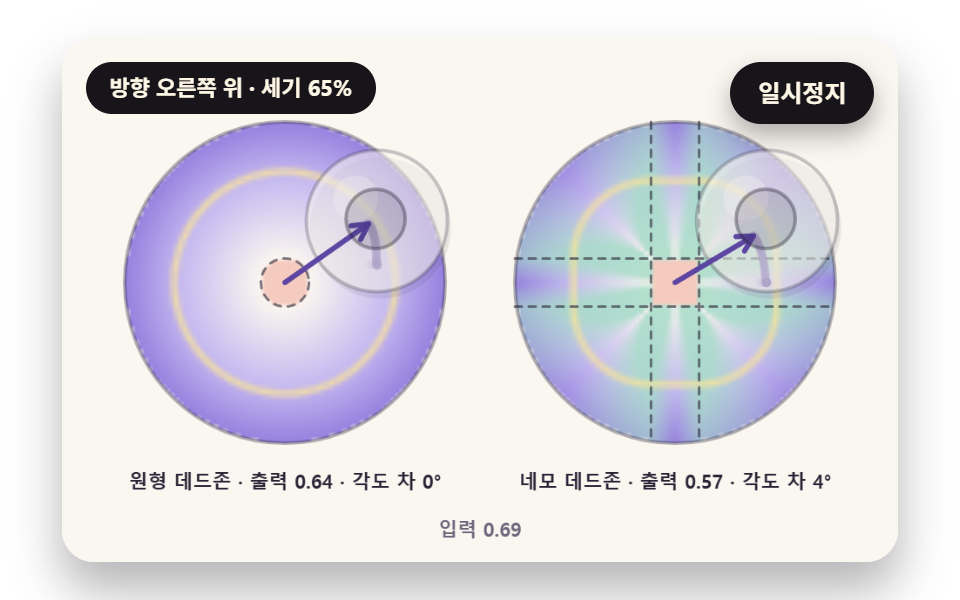 01 joy-radial-deadzone-rescale
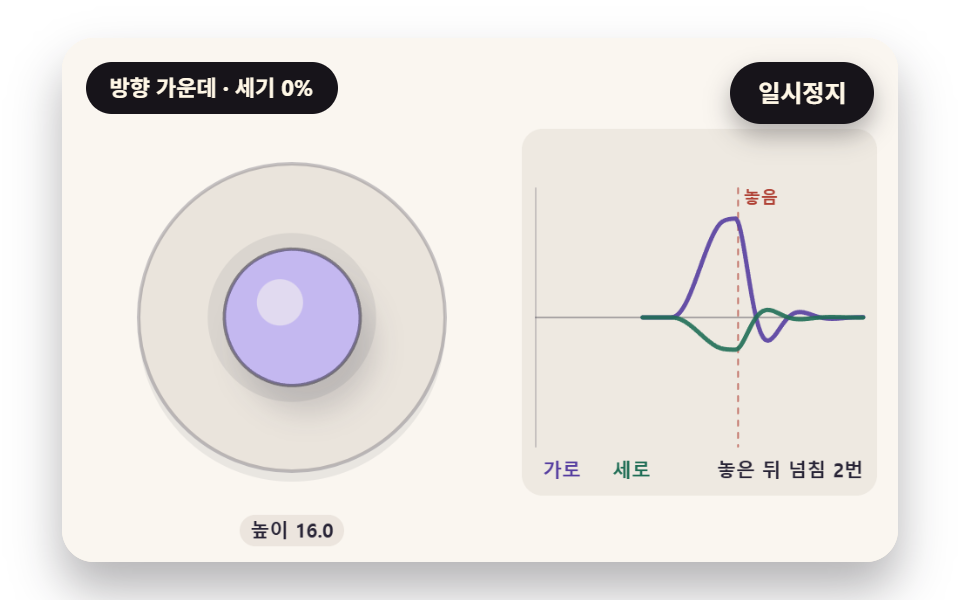 02 joy-knob-spring-return-shadow
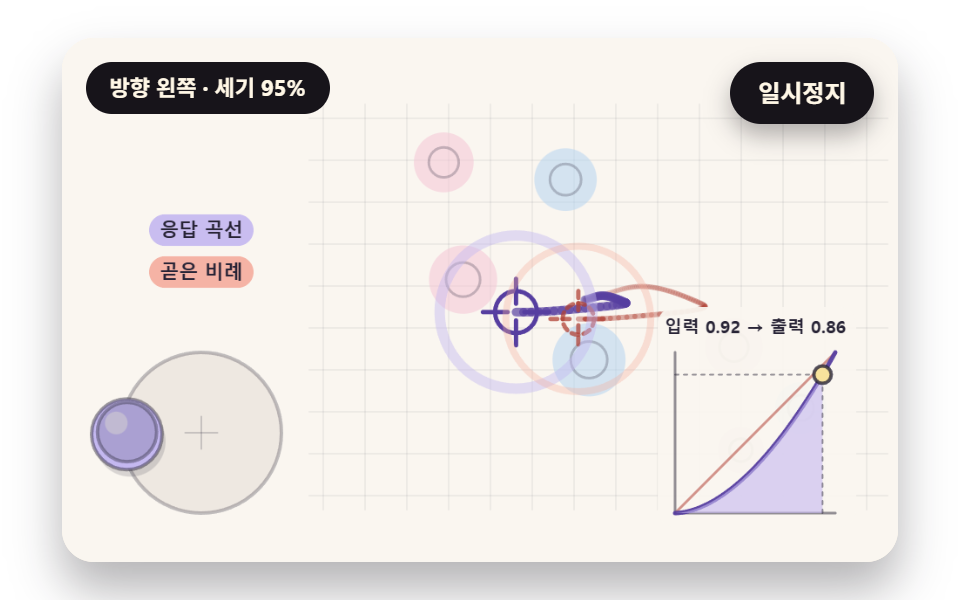 03 joy-response-curve-fine-aim
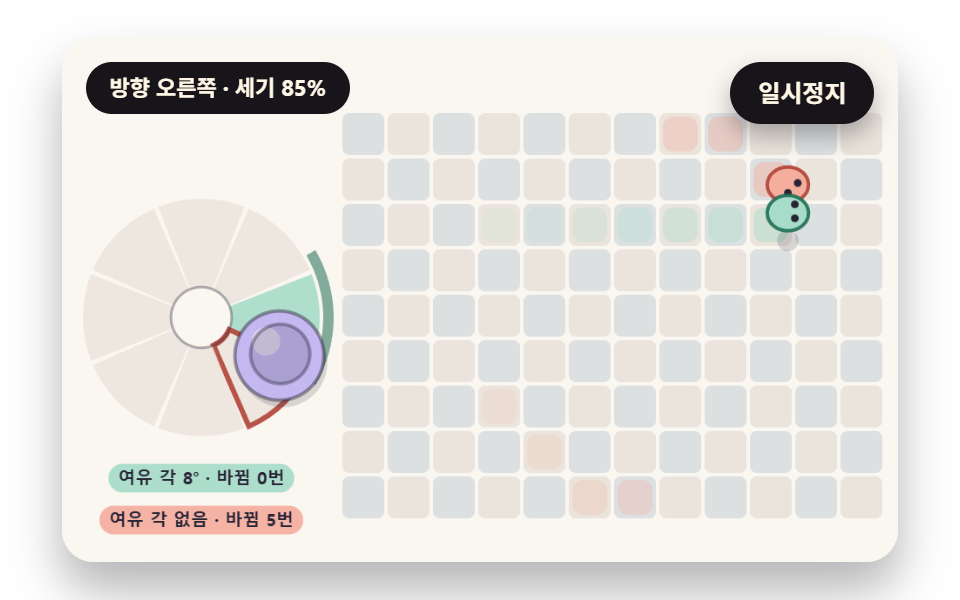 04 joy-eight-way-sticky-sectors
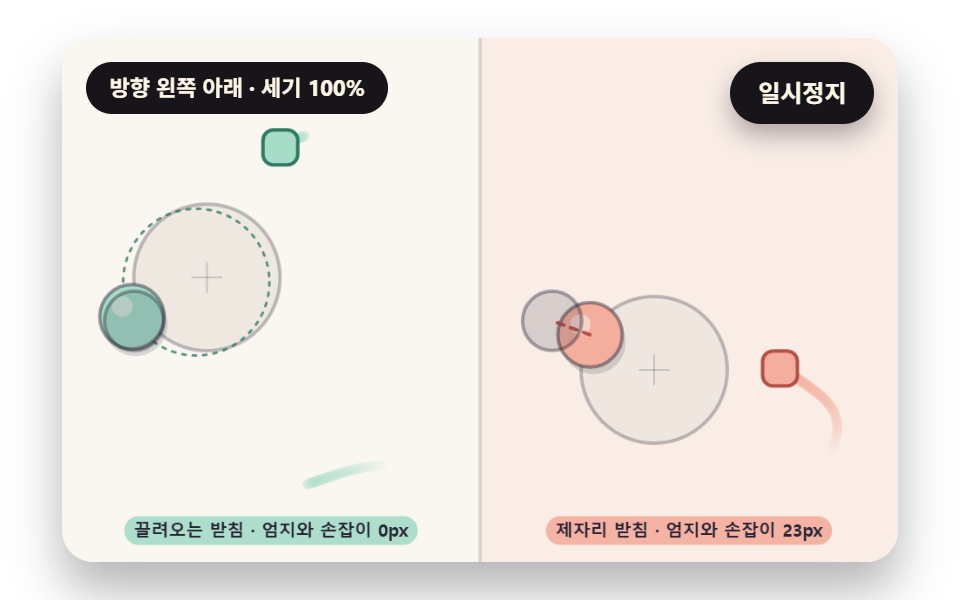 05 joy-floating-base-leash
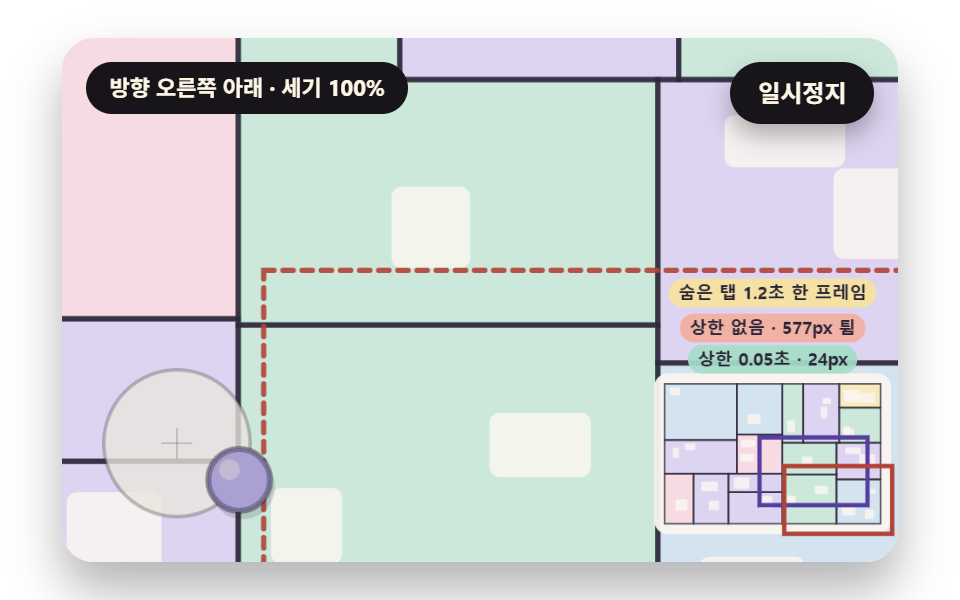 06 joy-floor-plan-pan-rubber-edge
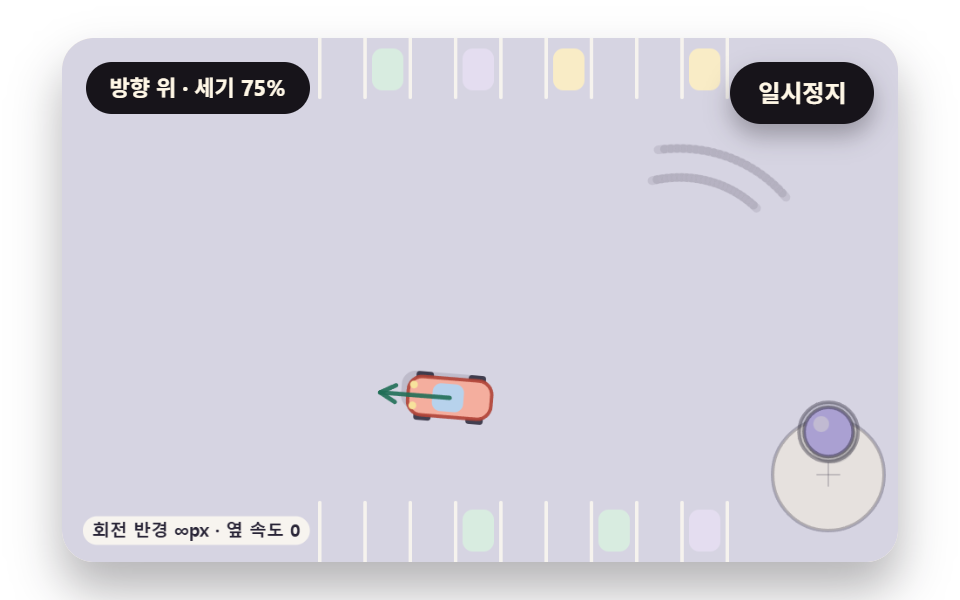 07 joy-car-steer-slip-skid
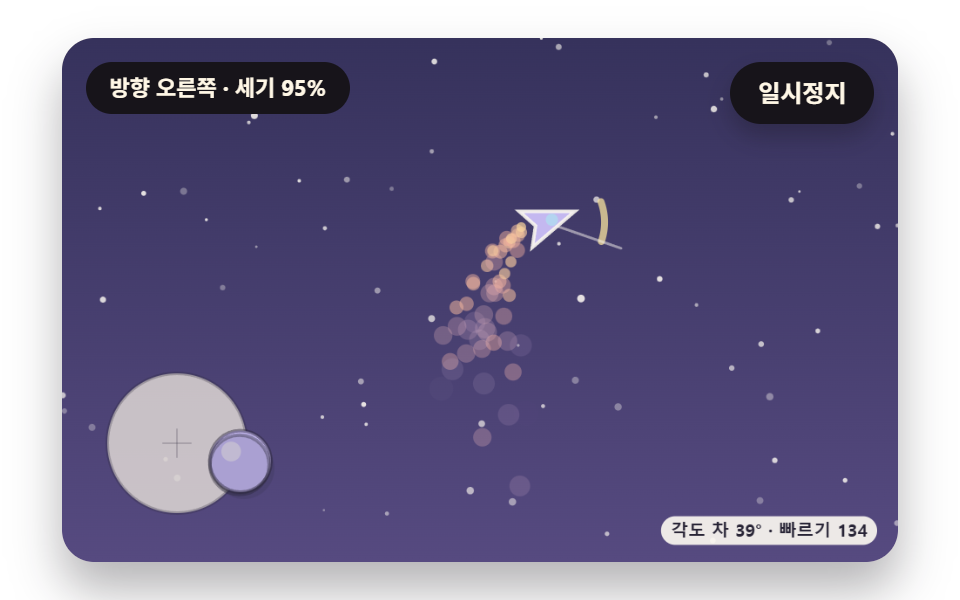 08 joy-ship-thrust-turn-inertia
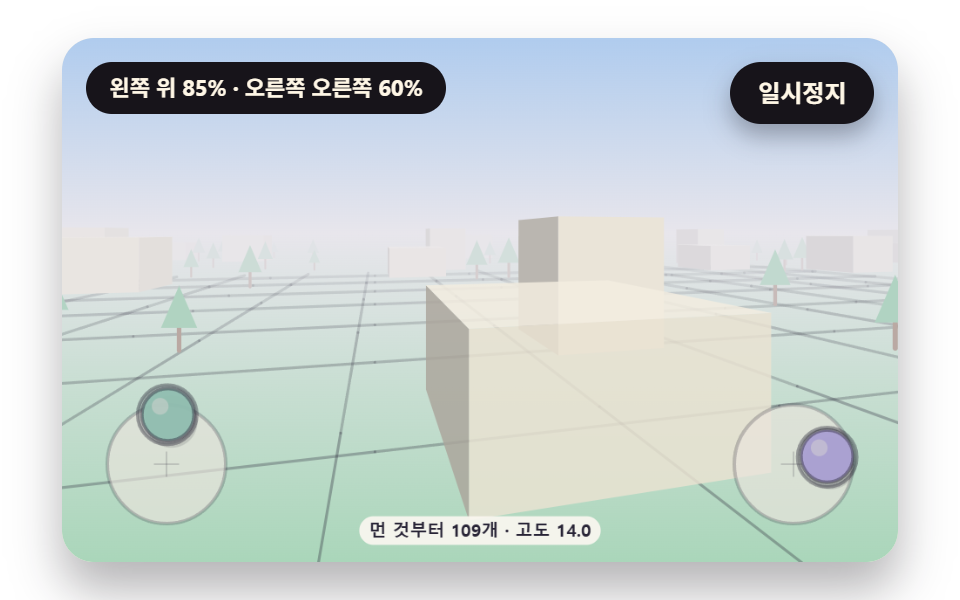 09 joy-hero-dual-stick-drone-view
Auto-plays · click a tile to jump to its section · all nine in one zip
- 01 Round Deadzone with Output Rescaled from Its Edge
- 02 A Released Knob That Springs Past Center, with Shadow Height
- 03 Response Curve Crosshair That Refines Small Tilts
- 04 Eight-Way Tile Walk with Sticky Sector Borders
- 05 Floating Base Dragged Along by the Thumb
- 06 Floor Plan Panned with Inertia and Rubber-Band Edges
- 07 Skid Marks Left by Sideways Slip
- 08 Ship Flown by Thrust and Turn Inertia, with Exhaust Particles
- 09 Dual-Stick Drone View Scene
All nine scenes start from one number pair: the thumb offset divided by the base radius R, clamped to a length of 1. 01 to 04 change how that pair is read and shown, 05 decides where the base sits, and 06 to 09 turn the corrected pair into the motion of a map, a car, a ship and a drone. A seeded virtual thumb replays the same path every loop, so a copy with one number changed can sit next to the original.
Why a trembling thumb makes the screen twitch
In the 0.3 to 0.7 second stretch of the 01 demo, the thumb stays at the center, yet the input strength climbs to 0.101 at its peak. Without the 0.15 deadzone that wobble would become output as is, and the character would flinch in place. Both the round and the square output stayed at 0 for all 97 frames of that stretch.
A single 1.2-second frame pushes the floor plan 581.6px
At 1.25 seconds, scene 06 inserts one frame that lasts 1.2 seconds on purpose. A copy that spends the received time in one step jumps 581.6px and overshoots the edge by up to 440.8px, while the copy that clamps to 0.05 seconds and walks in 1/120-second pieces moves only 24.4px. Rereading frame time matters as much in this post as rereading the thumb.
Where this differs from the neighboring posts
The starfield parallax post splits movement by depth to get perspective, and scene 09 here runs the same division, focal length over depth, again every frame from a position and heading that two sticks set. The swipe decision in the swipe-merge game post picks one of four directions once after the finger lifts, whereas a joystick reads direction and strength without a pause while the thumb stays down. How a pressed value returns to rest is covered in the button press physics post, the pointer-following 3D tilt lives in the pointer scene post, and the yardstick for calculated scene effects is the water drop and black hole canvas post.
Virtual Joystick JavaScript: 9 Scenes — Round Deadzone with Output Rescaled from Its Edge, A Released Knob That Springs Past Center, with Shadow Height, Response Curve Crosshair That Refines Small Tilts, Eight-Way Tile Walk with Sticky Sector Borders, Floating Base Dragged Along by the Thumb, Floor Plan Panned with Inertia and Rubber-Band Edges, Skid Marks Left by Sideways Slip, Ship Flown by Thrust and Turn Inertia, with Exhaust Particles and Dual-Stick Drone View Scene
01 and 03 cut and bend the same thumb value, 02 shows a released knob coming home, and 04 and 05 handle the borders of a sector decision and a base position. 06 to 08 feed the stick in as acceleration so a map, a car and a ship carry weight, and 09 flies a drone view with two sticks. Each scene draws on a single 2D canvas with no library, WebGL, image file or web font, and the only random source is one seeded generator.
What a 2-second capture of the 480×300 stage measured
Every scene was rendered for 2 seconds at 480×300 and 24 frames were captured, which leaves 23 neighbor differences to count.
| Scene | Area covered | Frames that moved | Mean intensity |
|---|---|---|---|
| 01 Round and square deadzone output map | 28.8% | 23/23 | 41.7 |
| 02 Knob that overshoots and returns | 20.3% | 23/23 | 69.5 |
| 03 Response curve crosshair | 15.3% | 23/23 | 59.7 |
| 04 Sticky eight-way walk | 17.5% | 23/23 | 70.0 |
| 05 Dragged base | 30.2% | 23/23 | 64.4 |
| 06 Inertial floor plan | 65.6% | 23/23 | 75.2 |
| 07 Sliding car and skid marks | 13.8% | 23/23 | 80.7 |
| 08 Thrust ship | 21.8% | 23/23 | 65.8 |
| 09 Dual-stick drone view | 52.0% | 23/23 | 37.6 |
The floor plan sliding as a whole in 06 covers the most at 65.6%, while 07, where one car and its marks change, covers 13.8% yet has the highest mean intensity at 80.7. In 09 the ground grid and fog fill most of the stage, so it covers 52.0% with the lowest intensity of 37.6, which reads as a wide area changing a little at a time.
01Round Deadzone with Output Rescaled from Its Edge
A deadzone preview for a mobile game settings screen: distance inside radius 0.15 gives zero, and outside it the output is stretched back to 0–1 from the edge with its direction kept. A square deadzone sits beside it, and at strength 0.3 its output leans up to 30° toward an axis while the round one stays at 0°. The share of each disc that stands still is 2.3% for the round one and 2.9% for the square one.
<main class="stage">
<div class="vj is-demo" id="vj">
  <div class="vj__pad" data-role="pad" tabindex="0" role="application" aria-label="Virtual joystick stage: click it, then tilt with the arrow keys">
    <canvas class="vj__canvas" data-role="canvas" width="480" height="300" role="img" aria-label="The same thumb position goes through a round and a square deadzone; two discs painted cell by cell by output strength show the output arrow and angle offset side by side"></canvas>
  </div>
  <p class="vj__status" data-role="status" aria-live="off">Direction center · strength 0%</p>
  <button class="vj__pause" data-role="pause" type="button" aria-pressed="false">Pause</button>
</div>
</main>
@use "../../../../site/static/demo-tokens" as *;
@include stage($stage-paper);
.vj {
position: relative;
width: min(92vw, calc(160vh - 12.8vw));
aspect-ratio: 480 / 300;
margin: 0 auto;
border-radius: $r-card;
overflow: hidden;
box-shadow: $shadow-raised;
background: $subject-cream;
}
// 무대 상자 — 여기서 시작한 터치만 스틱이 가져간다(touch-action: none 은 이 상자에만). 무대 밖 터치는 페이지 스크롤 그대로
.vj__pad {
position: absolute;
inset: 0;
border-radius: inherit;
outline: none;
touch-action: none;
cursor: grab;
}
// 바깥 .vj 가 넘침을 자르므로 포커스 테두리는 안쪽으로 들인다
.vj__pad:focus-visible {
outline: 3px solid $subject-ink;
outline-offset: -3px;
}
.vj__canvas {
position: absolute;
inset: 0;
display: block;
width: 100%;
height: 100%;
}
.vj__pause {
position: absolute;
right: $sp-3;
top: $sp-3;
padding: $sp-1 $sp-3;
border: 2px solid $subject-ink;
border-radius: $r-pill;
background: $subject-ink;
color: $subject-cream;
font-family: inherit;
font-weight: 700;
font-size: 12px;
line-height: 1.6;
cursor: pointer;
box-shadow: $shadow-press;
transition: transform $dur-quick $ease-spring;
}
// 눌린 상태(멈춤) — 바탕과 글자색을 뒤집어 aria-pressed 가 눈에도 보이게
.vj__pause[aria-pressed="true"] {
background: $subject-cream;
color: $subject-ink;
}
.vj__pause:hover {
transform: translateY(-2px);
}
.vj__pause:active {
transform: translateY(1px);
}
.vj__pause:focus-visible {
outline: 3px solid $subject-ink;
outline-offset: 3px;
}
// 상태 줄 — 지금 스틱 방향·세기를 글자로. 시연 중에는 aria-live off, 사람이 처음 손대면 polite
.vj__status {
position: absolute;
left: $sp-3;
top: $sp-3;
max-width: calc(100% - 120px);
margin: 0;
padding: $sp-1 $sp-3;
border-radius: $r-pill;
background: $subject-ink;
color: $subject-cream;
font-weight: 700;
font-size: 11px;
line-height: 1.6;
white-space: nowrap;
overflow: hidden;
text-overflow: ellipsis;
pointer-events: none;
}
@media (max-width: 340px) {
.vj__pause,
.vj__status { font-size: 10px; padding: 0 $sp-2; }
}
// 움직임 줄이기 — 장면은 스크립트가 정지 장면 한 장으로 멈춘다. 버튼도 떠오르지 않게
@media (prefers-reduced-motion: reduce) {
.vj__pause { transition: none !important; }
.vj__pause:hover,
.vj__pause:active { transform: none !important; }
}html, body {
margin: 0;
overflow: hidden;
}
.stage {
box-sizing: border-box;
min-height: 100vh;
display: grid;
place-items: center;
margin: 0;
background: #ffffff;
font-family: -apple-system, "Segoe UI", "Noto Sans KR", sans-serif;
padding: clamp(8px, 4vw, 24px);
}
.vj {
position: relative;
width: min(92vw, 160vh - 12.8vw);
aspect-ratio: 480/300;
margin: 0 auto;
border-radius: 16px;
overflow: hidden;
box-shadow: 0 14px 24px rgba(23, 20, 26, 0.32);
background: #fff7e6;
}
.vj__pad {
position: absolute;
inset: 0;
border-radius: inherit;
outline: none;
touch-action: none;
cursor: grab;
}
.vj__pad:focus-visible {
outline: 3px solid #17141a;
outline-offset: -3px;
}
.vj__canvas {
position: absolute;
inset: 0;
display: block;
width: 100%;
height: 100%;
}
.vj__pause {
position: absolute;
right: 12px;
top: 12px;
padding: 4px 12px;
border: 2px solid #17141a;
border-radius: 999px;
background: #17141a;
color: #fff7e6;
font-family: inherit;
font-weight: 700;
font-size: 12px;
line-height: 1.6;
cursor: pointer;
box-shadow: 0 6px 12px rgba(23, 20, 26, 0.32);
transition: transform 220ms cubic-bezier(0.2, 0.8, 0.2, 1);
}
.vj__pause[aria-pressed=true] {
background: #fff7e6;
color: #17141a;
}
.vj__pause:hover {
transform: translateY(-2px);
}
.vj__pause:active {
transform: translateY(1px);
}
.vj__pause:focus-visible {
outline: 3px solid #17141a;
outline-offset: 3px;
}
.vj__status {
position: absolute;
left: 12px;
top: 12px;
max-width: calc(100% - 120px);
margin: 0;
padding: 4px 12px;
border-radius: 999px;
background: #17141a;
color: #fff7e6;
font-weight: 700;
font-size: 11px;
line-height: 1.6;
white-space: nowrap;
overflow: hidden;
text-overflow: ellipsis;
pointer-events: none;
}
@media (max-width: 340px) {
.vj__pause,
.vj__status {
font-size: 10px;
padding: 0 8px;
}
}
@media (prefers-reduced-motion: reduce) {
.vj__pause {
transition: none !important;
}
.vj__pause:hover,
.vj__pause:active {
transform: none !important;
}
}(function () {
const root = document.getElementById("vj");
if (!root) return;
// 무대 좌표 — 캔버스 안 계산은 늘 480×300. 화면에 보이는 크기와 상관없다
const W = 480;
const H = 300;
const TAU = Math.PI * 2;
function clamp(v, lo, hi) { return v < lo ? lo : (v > hi ? hi : v); }
function lerp(a, b, k) { return a + (b - a) * k; }
function ease(x) { const c = clamp(x, 0, 1); return c * c * (3 - 2 * c); }
// 따라가기 몫 — 1 − e^(−rate·dt). 프레임 시간이 달라도 1초 동안 다가가는 양이 같다
function follow(rate, dt) { return 1 - Math.exp(-rate * dt); }
// 시드 고정 난수 — 같은 시드면 같은 시연 (32비트 xorshift 에 곱셈 섞기 한 번)
function seeded(seed) {
let s = (seed * 2654435761) >>> 0 || 1;
return function () {
s ^= s << 13;
s >>>= 0;
s ^= s >>> 17;
s ^= s << 5;
s >>>= 0;
return (Math.imul(s, 0x9e3779b1) >>> 0) / 4294967296;
};
}
// 각도 차를 −π~π 로 감는다 — 350° 와 10° 의 차는 −340° 가 아니라 20°
function wrapAngle(a) {
let r = (a + Math.PI) % TAU;
if (r < 0) {
r += TAU;
}
return r - Math.PI;
}
function toDeg(rad) { return rad * 180 / Math.PI; }
function makeStick(bx, by, R) {
return { bx: bx, by: by, R: R, tx: bx, ty: by, down: false, rx: 0, ry: 0, kx: 0, ky: 0, hx: bx, hy: by, hdown: false };
}
function readRaw(s) {
if (!s.down) {
s.rx = 0;
s.ry = 0;
return;
}
let x = (s.tx - s.bx) / s.R;
let y = (s.ty - s.by) / s.R;
const m = Math.hypot(x, y);
if (m > 1) {
x /= m;
y /= m;
}
s.rx = x;
s.ry = y;
}
// Round deadzone — 길이 m 이 dz 안이면 0, 밖이면 (m − dz)/(1 − dz) 로 0~1 을 다시 펴고 방향은 그대로
function radialDeadzone(x, y, dz) {
const m = Math.hypot(x, y);
if (m <= dz || m === 0) {
return [0, 0];
}
const k = clamp((m - dz) / (1 - dz), 0, 1) / m;
return [x * k, y * k];
}
// 화면에 보이는 손잡이(kx, ky) — raw 를 빠르게 따라간다(02 는 스프링으로 따로)
const KNOB_FOLLOW_RATE = 28;
function followKnob(s, dt) {
const f = follow(KNOB_FOLLOW_RATE, dt);
s.kx += (s.rx - s.kx) * f;
s.ky += (s.ry - s.ky) * f;
}
function snapKnob(s) { s.kx = s.rx; s.ky = s.ry; }
// ── 방향 이름 ────────────────────────────────────────────────
// 0 = right, 화면 시계 방향(아래가 +y)으로 45° 씩
const DIR_NAMES = ['right', 'down-right', 'down', 'down-left', 'left', 'up-left', 'up', 'up-right'];
const CENTER_NAME = 'center';
function sectorOf(x, y) {
const k = Math.round(Math.atan2(y, x) / (Math.PI / 4));
return ((k % 8) + 8) % 8;
}
// 상태 줄 한 마디 — 세기는 5% 단위로 반올림해 글자가 매 프레임 바뀌지 않게
function dirText(x, y) {
const m = Math.hypot(x, y);
const pct = Math.round(clamp(m, 0, 1) * 20) * 5;
if (pct === 0) {
return 'Direction {d} · strength {s}%'.replace('{d}', CENTER_NAME).replace('{s}', '0');
}
return 'Direction {d} · strength {s}%'.replace('{d}', DIR_NAMES[sectorOf(x, y)]).replace('{s}', String(pct));
}
function pathAt(keys, t) {
if (t <= keys[0][0]) {
return { x: keys[0][1], y: keys[0][2], down: keys[0][3] > 0 };
}
for (let k = 0; k < keys.length - 1; k += 1) {
const a = keys[k];
const b = keys[k + 1];
if (t < b[0]) {
const u = ease((t - a[0]) / (b[0] - a[0]));
return { x: lerp(a[1], b[1], u), y: lerp(a[2], b[2], u), down: a[3] > 0 };
}
}
const z = keys[keys.length - 1];
return { x: z[1], y: z[2], down: z[3] > 0 };
}
// 손떨림 — 시드로 뽑은 주파수·위상의 사인 셋을 더한 값(크기 amp 안팎). 같은 시드면 같은 떨림
function makeTremor(seed) {
const r = seeded(seed);
const f = [];
const p = [];
for (let k = 0; k < 6; k += 1) {
f.push(5 + r() * 9);
p.push(r() * TAU);
}
return function (t, amp) {
const x = Math.sin(t * f[0] + p[0]) * 0.5 + Math.sin(t * f[1] + p[1]) * 0.3 + Math.sin(t * f[2] + p[2]) * 0.2;
const y = Math.sin(t * f[3] + p[3]) * 0.5 + Math.sin(t * f[4] + p[4]) * 0.3 + Math.sin(t * f[5] + p[5]) * 0.2;
return [x * amp, y * amp];
};
}
// 장면 시계(초) — 장면 계산이 고치고 화면 쪽이 읽는다
let sceneT = 0;
// 자동 시연이 스틱을 움직이는가 — 사람이 무대에서 처음 손대면 꺼진다
let autoOn = true;
// 방향키 스틱 값(스틱마다) — 화면 쪽이 눌린 키로 고친다
const keyX = [0, 0];
const keyY = [0, 0];
const keyOn = [false, false];
// 스틱 입력원 고르기 — 자동 시연 → 방향키 → 포인터 순
function driveSticks(list, auto) {
for (let i = 0; i < list.length; i += 1) {
const s = list[i];
if (autoOn) {
const p = auto(i, sceneT);
s.tx = p.x;
s.ty = p.y;
s.down = p.down;
}
else if (keyOn[i]) {
s.tx = s.bx + keyX[i] * s.R;
s.ty = s.by + keyY[i] * s.R;
s.down = true;
}
else {
s.tx = s.hx;
s.ty = s.hy;
s.down = s.hdown;
}
readRaw(s);
}
}
// 파스텔 팔레트 — 글자·선은 진한 쪽으로 명도 차를 둔다
const PAPER = [250, 246, 240];
const PAPER_DIM = [234, 228, 220];
const INK = [40, 36, 54];
const INK_SOFT = [110, 102, 124];
const LAVENDER = [196, 184, 240];
const MINT = [166, 220, 200];
const BUTTER = [247, 226, 156];
const CORAL = [244, 174, 158];
const SKY = [180, 212, 240];
const PINK = [244, 196, 214];
const VIOLET_DEEP = [86, 62, 160];
const MINT_DEEP = [32, 110, 86];
const CORAL_DEEP = [176, 66, 54];
function mix(a, b, k) { return [lerp(a[0], b[0], k), lerp(a[1], b[1], k), lerp(a[2], b[2], k)]; }
function rgba(c, a) {
return 'rgba(' + Math.round(clamp(c[0], 0, 255)) + ',' + Math.round(clamp(c[1], 0, 255)) + ',' + Math.round(clamp(c[2], 0, 255)) + ',' + clamp(a, 0, 1).toFixed(3) + ')';
}
const canvasEl = root.querySelector('[data-role="canvas"]');
const padEl = root.querySelector('[data-role="pad"]');
const pauseEl = root.querySelector('[data-role="pause"]');
const statusEl = root.querySelector('[data-role="status"]');
const ctxRaw = canvasEl ? canvasEl.getContext('2d') : null;
if (!canvasEl || !ctxRaw || !pauseEl || !padEl) {
return;
}
const cv = canvasEl;
const ctx = ctxRaw;
const pauseBtn = pauseEl;
const pad = padEl;
// 외부 웹폰트는 부르지 않는다 — 기기에 있는 글꼴 목록만
const FONT_STACK = 'system-ui, -apple-system, "Segoe UI", "Noto Sans KR", sans-serif';
let dpr = 1;
function fitCanvas() {
// 배율은 2 에서 자른다 — 배율 3 기기에서 화소가 2.25배로 늘지 않게
dpr = Math.min(window.devicePixelRatio || 1, 2);
cv.width = Math.round(W * dpr);
cv.height = Math.round(H * dpr);
ctx.setTransform(dpr, 0, 0, dpr, 0, 0);
}
function fillAll(c) {
ctx.fillStyle = rgba(c, 1);
ctx.fillRect(0, 0, W, H);
}
function disc(x, y, r, c, a) {
if (r <= 0.2 || a <= 0) {
return;
}
ctx.beginPath();
ctx.arc(x, y, r, 0, TAU);
ctx.fillStyle = rgba(c, a);
ctx.fill();
}
function ring(x, y, r, width, c, a) {
if (r <= 0.2 || a <= 0) {
return;
}
ctx.beginPath();
ctx.arc(x, y, r, 0, TAU);
ctx.lineWidth = width;
ctx.strokeStyle = rgba(c, a);
ctx.stroke();
}
function seg(x1, y1, x2, y2, width, c, a) {
if (a <= 0) {
return;
}
ctx.beginPath();
ctx.moveTo(x1, y1);
ctx.lineTo(x2, y2);
ctx.lineWidth = width;
ctx.lineCap = 'round';
ctx.strokeStyle = rgba(c, a);
ctx.stroke();
}
function box(x, y, w, h, r, c, a) {
if (w <= 0.2 || h <= 0.2 || a <= 0) {
return;
}
ctx.beginPath();
ctx.roundRect(x, y, w, h, Math.max(0, Math.min(r, w / 2, h / 2)));
ctx.fillStyle = rgba(c, a);
ctx.fill();
}
function text(s, x, y, c, a, px, weight, align) {
ctx.font = weight + ' ' + px + 'px ' + FONT_STACK;
ctx.textAlign = align;
ctx.textBaseline = 'middle';
ctx.fillStyle = rgba(c, a);
ctx.fillText(s, x, y);
}
// 글자 이름표 — 바탕 알약 위에 진한 글자
function tag(s, x, y, bg, fg, px, align) {
ctx.font = '700 ' + px + 'px ' + FONT_STACK;
const w = ctx.measureText(s).width + px * 1.1;
const left = align === 'center' ? x - w / 2 : (align === 'right' ? x - w : x);
box(left, y - px * 0.82, w, px * 1.64, px * 0.82, bg, 0.92);
text(s, left + w / 2, y + 0.5, fg, 1, px, 700, 'center');
}
// 화살표 — 끝에 작은 머리
function arrow(x1, y1, x2, y2, width, c, a) {
const len = Math.hypot(x2 - x1, y2 - y1);
if (len < 2) {
return;
}
seg(x1, y1, x2, y2, width, c, a);
const ang = Math.atan2(y2 - y1, x2 - x1);
const hl = Math.min(10, len * 0.5);
seg(x2, y2, x2 - Math.cos(ang - 0.5) * hl, y2 - Math.sin(ang - 0.5) * hl, width, c, a);
seg(x2, y2, x2 - Math.cos(ang + 0.5) * hl, y2 - Math.sin(ang + 0.5) * hl, width, c, a);
}
// 받침 — 옅은 원판과 테두리
function drawBase(x, y, R, a) {
disc(x, y, R, PAPER_DIM, 0.78 * a);
ring(x, y, R, 2, INK, 0.28 * a);
seg(x - R * 0.2, y, x + R * 0.2, y, 1, INK, 0.2 * a);
seg(x, y - R * 0.2, x, y + R * 0.2, 1, INK, 0.2 * a);
}
// 손잡이 — 받침 가운데에서 (kx, ky)·R 만큼 떨어진 자리
function drawKnob(s, c, a) {
const x = s.bx + s.kx * s.R;
const y = s.by + s.ky * s.R;
const r = s.R * 0.44;
disc(x + 2, y + 4, r, INK, 0.16 * a);
disc(x, y, r, c, a);
ring(x, y, r, 2, INK, 0.45 * a);
disc(x - r * 0.3, y - r * 0.32, r * 0.32, PAPER, 0.5 * a);
}
// 가상 엄지 — 닿아 있는 동안 반투명 원
function drawThumb(x, y, on) {
if (!on) {
return;
}
disc(x, y, 17, INK, 0.16);
ring(x, y, 17, 2, INK, 0.38);
}
// 상태 줄 — 글자가 바뀔 때만 고친다
let shownStatus = '';
function pushStatus(s) {
if (!statusEl || s === shownStatus) {
return;
}
shownStatus = s;
statusEl.textContent = s;
}
// ── 01 Round deadzone 바깥을 다시 펴는 출력 ──────────────────────
// 원형: 길이 m 이 DEADZONE_RADIUS 안이면 0, 밖이면 (m − DEADZONE_RADIUS)/(1 − DEADZONE_RADIUS), 방향은 그대로
const DEADZONE_RADIUS = 0.15;
// 네모: 축마다 따로 |v| ≤ SQUARE_DEADZONE 이면 0 — 한 축이 작으면 그 축이 통째로 지워져 출력이 다른 축으로 달라붙는다
const SQUARE_DEADZONE = 0.15;
const LOOP_S = 4.8;
const PANEL_R = 92;
const LEFT_X = 128;
const RIGHT_X = 352;
const PANEL_Y = 140;
const sticks = [makeStick(LEFT_X, PANEL_Y, PANEL_R)];
    function axisCut(v, dz) {
        const a = Math.abs(v);
        return a <= dz ? 0 : Math.sign(v) * (a - dz) / (1 - dz);
    }
    function squareDeadzone(x, y, dz) {
        let ox = axisCut(x, dz);
        let oy = axisCut(y, dz);
        const m = Math.hypot(ox, oy);
        if (m > 1) {
            ox /= m;
            oy /= m;
        }
        return [ox, oy];
    }
// 가상 엄지 — 데드존 안에서 떨다가, right 축 가까이(약 8°) 나가고, 둘레를 돈다
const PATH_01 = [
[0, 0, 0, 0], [0.22, 0.02, 0.01, 1], [0.75, 0.07, -0.05, 1], [1.25, 0.64, -0.09, 1], [1.8, 0.58, -0.42, 1],
[2.35, 0.06, -0.74, 1], [2.95, -0.62, -0.32, 1], [3.55, -0.36, 0.64, 1], [4.15, 0.34, 0.26, 1], [4.55, 0, 0, 1], [4.8, 0, 0, 0]
];
const tremor01 = makeTremor(101);
const TREMOR_01 = 0.04;
function autoPose(i, t) {
const s = sticks[i];
const p = pathAt(PATH_01, t);
const w = tremor01(t, TREMOR_01);
return { x: s.bx + (p.x + w[0]) * s.R, y: s.by + (p.y + w[1]) * s.R, down: p.down };
}
let outRound = [0, 0];
let outSquare = [0, 0];
const TRAIL_N = 36;
const trailRound = [];
const trailSquare = [];
function computeOut() {
const s = sticks[0];
outRound = radialDeadzone(s.rx, s.ry, DEADZONE_RADIUS);
outSquare = squareDeadzone(s.rx, s.ry, SQUARE_DEADZONE);
}
// 출력 방향이 엄지 방향에서 몇 도 벗어났나(출력이 0 이면 0)
function angleOff(o) {
const s = sticks[0];
if (Math.hypot(o[0], o[1]) < 1e-6 || Math.hypot(s.rx, s.ry) < 1e-6) {
return 0;
}
return Math.abs(toDeg(wrapAngle(Math.atan2(o[1], o[0]) - Math.atan2(s.ry, s.rx))));
}
function reset() {
const s = sticks[0];
s.kx = 0;
s.ky = 0;
s.rx = 0;
s.ry = 0;
s.down = false;
trailRound.length = 0;
trailSquare.length = 0;
computeOut();
}
function update(dt) {
driveSticks(sticks, autoPose);
followKnob(sticks[0], dt);
computeOut();
trailRound.push(outRound[0], outRound[1]);
trailSquare.push(outSquare[0], outSquare[1]);
while (trailRound.length > TRAIL_N * 2) {
trailRound.splice(0, 2);
trailSquare.splice(0, 2);
}
}
function restPose() {
const s = sticks[0];
s.down = true;
s.tx = s.bx + 0.64 * s.R;
s.ty = s.by - 0.09 * s.R;
readRaw(s);
snapKnob(s);
computeOut();
}
function settle() {
driveSticks(sticks, autoPose);
snapKnob(sticks[0]);
computeOut();
}
// right 판을 눌러도 같은 스틱 — 판 center 차이만큼 옮겨 left 판 좌표로 읽는다
function mapPointer(x, y) {
return x < W / 2 ? [0, x, y] : [0, x - (RIGHT_X - LEFT_X), y];
}
function statusText() { return dirText(outRound[0], outRound[1]); }
// 출력 세기 지도 — 판마다 HEAT_CELLS × HEAT_CELLS 칸을 계산해 낮은 해상도 캔버스에 찍고 판 크기로 늘려 그린다
const HEAT_CELLS = 72;
// 지금 출력 세기와 이만큼 가까운 칸은 버터색 띠로 — 같은 세기가 나오는 엄지 자리 모양
const ISO_BAND = 0.045;
const ANGLE_TINT_DEG = 12;
function makeHeat() {
const c = document.createElement('canvas');
c.width = HEAT_CELLS;
c.height = HEAT_CELLS;
const g = c.getContext('2d');
if (!g) {
return null;
}
return [c, g, g.createImageData(HEAT_CELLS, HEAT_CELLS)];
}
const heatA = makeHeat();
const heatB = makeHeat();
const DEAD_COLOR = mix(PAPER, CORAL, 0.6);
const STRONG = [150, 128, 222];
function paintHeat(h, round, now) {
if (!h) {
return;
}
const d = h[2].data;
for (let j = 0; j < HEAT_CELLS; j += 1) {
for (let i = 0; i < HEAT_CELLS; i += 1) {
const u = (i + 0.5) / HEAT_CELLS * 2 - 1;
const v = (j + 0.5) / HEAT_CELLS * 2 - 1;
const o = (j * HEAT_CELLS + i) * 4;
if (u * u + v * v > 1) {
d[o + 3] = 0;
continue;
}
const out = round ? radialDeadzone(u, v, DEADZONE_RADIUS) : squareDeadzone(u, v, SQUARE_DEADZONE);
const m = Math.min(1, Math.hypot(out[0], out[1]));
let c = m === 0 ? DEAD_COLOR : (m < 0.6 ? mix(PAPER, LAVENDER, m / 0.6) : mix(LAVENDER, STRONG, (m - 0.6) / 0.4));
// 출력 방향이 엄지 방향에서 벗어난 칸은 민트로 — ANGLE_TINT_DEG 만큼 벗어나면 가장 진하게(축으로 달라붙는 띠)
if (m > 0) {
const off = Math.abs(toDeg(wrapAngle(Math.atan2(out[1], out[0]) - Math.atan2(v, u))));
c = mix(c, MINT, 0.85 * clamp(off / ANGLE_TINT_DEG, 0, 1));
}
const near = now === 0 ? (m === 0 ? 1 : 0) : clamp(1 - Math.abs(m - now) / ISO_BAND, 0, 1);
if (near > 0) {
c = mix(c, BUTTER, 0.85 * near);
}
d[o] = c[0];
d[o + 1] = c[1];
d[o + 2] = c[2];
d[o + 3] = 255;
}
}
h[1].putImageData(h[2], 0, 0);
}
function drawPanel(cx, round, out, trail, title) {
const s = sticks[0];
const R = PANEL_R;
const h = round ? heatA : heatB;
paintHeat(h, round, Math.min(1, Math.hypot(out[0], out[1])));
if (h) {
ctx.save();
ctx.beginPath();
ctx.arc(cx, PANEL_Y, R, 0, TAU);
ctx.clip();
ctx.imageSmoothingEnabled = true;
ctx.drawImage(h[0], cx - R, PANEL_Y - R, R * 2, R * 2);
ctx.restore();
}
ring(cx, PANEL_Y, R, 2, INK, 0.35);
// 데드존 경계선
ctx.setLineDash([4, 4]);
if (round) {
ring(cx, PANEL_Y, DEADZONE_RADIUS * R, 1.5, INK, 0.6);
}
else {
const q = SQUARE_DEADZONE * R;
ctx.lineWidth = 1.5;
ctx.strokeStyle = rgba(INK, 0.6);
ctx.beginPath();
ctx.moveTo(cx - R, PANEL_Y - q);
ctx.lineTo(cx + R, PANEL_Y - q);
ctx.moveTo(cx - R, PANEL_Y + q);
ctx.lineTo(cx + R, PANEL_Y + q);
ctx.moveTo(cx - q, PANEL_Y - R);
ctx.lineTo(cx - q, PANEL_Y + R);
ctx.moveTo(cx + q, PANEL_Y - R);
ctx.lineTo(cx + q, PANEL_Y + R);
ctx.stroke();
}
ctx.setLineDash([]);
// 출력 끝이 지나온 자리
const n = trail.length / 2;
for (let k = 0; k < n; k += 1) {
disc(cx + trail[k * 2] * R, PANEL_Y + trail[k * 2 + 1] * R, 2.6, VIOLET_DEEP, 0.08 + 0.5 * k / n);
}
const ks = { bx: cx, by: PANEL_Y, R: R, tx: 0, ty: 0, down: false, rx: 0, ry: 0, kx: s.kx, ky: s.ky, hx: 0, hy: 0, hdown: false };
drawKnob(ks, PAPER, 0.55);
arrow(cx, PANEL_Y, cx + out[0] * R, PANEL_Y + out[1] * R, 3, VIOLET_DEEP, 0.95);
drawThumb(s.tx + (cx - LEFT_X), s.ty, s.down);
const m = Math.hypot(out[0], out[1]);
const line = '{t} · output {o} · angle off {a}°'.replace('{t}', title).replace('{o}', m.toFixed(2)).replace('{a}', angleOff(out).toFixed(0));
tag(line, cx, 254, PAPER, INK, 11, 'center');
}
function draw() {
fillAll(PAPER);
drawPanel(LEFT_X, true, outRound, trailRound, 'Round deadzone');
drawPanel(RIGHT_X, false, outSquare, trailSquare, 'Square deadzone');
const s = sticks[0];
text('Input {m}'.replace('{m}', Math.hypot(s.rx, s.ry).toFixed(2)), W / 2, 282, INK_SOFT, 1, 11, 600, 'center');
}
let paused = false;
const reduceQuery = window.matchMedia('(prefers-reduced-motion: reduce)');
// 페이지를 연 채 움직임 줄이기 설정을 바꿔도 change 리스너가 다시 읽는다
let still = reduceQuery.matches;
// 자동 시연 표시 — 사람이 처음 손대면 떼고 상태 줄을 polite 로 켠다
let demo = root.classList.contains('is-demo');
const off = new AbortController();
function wake() {
if (!demo) {
return;
}
demo = false;
root.classList.remove('is-demo');
if (statusEl) {
statusEl.setAttribute('aria-live', 'polite');
}
}
// 사람이 스틱을 잡으면 자동 시연은 손을 뗀다
function takeOver() {
wake();
autoOn = false;
}
// 멈춘 화면(움직임 줄이기·Pause)에서 들어온 입력은 넘침·관성 없이 결과 자리로 바로 그린다
function showNow() {
if (still || paused) {
settle();
draw();
pushStatus(statusText());
}
}
// 한 프레임에 넘기는 시간 상한(초) — 오래 숨었다 돌아온 첫 프레임도 50ms 까지만 계산에 넣는다
const DT_MAX = 0.05;
// 방향키를 누르고 있으면 스틱 값이 이 빠르기로 끝까지 차오른다 — 짧게 톡 치면 작은 기울기
const KEY_RAMP_RATE = 7;
const held = {};
let keyStick = 0;
function keyTarget() {
let x = (held.ArrowRight ? 1 : 0) - (held.ArrowLeft ? 1 : 0);
let y = (held.ArrowDown ? 1 : 0) - (held.ArrowUp ? 1 : 0);
const m = Math.hypot(x, y);
if (m > 0) {
x /= m;
y /= m;
}
return [x, y];
}
function anyHeld() { return !!(held.ArrowRight || held.ArrowLeft || held.ArrowDown || held.ArrowUp); }
function rampKeys(dt) {
const t = keyTarget();
for (let i = 0; i < keyOn.length; i += 1) {
const tx = i === keyStick ? t[0] : 0;
const ty = i === keyStick ? t[1] : 0;
if (dt <= 0) {
keyX[i] = tx;
keyY[i] = ty;
}
else {
const f = follow(KEY_RAMP_RATE, dt);
keyX[i] += (tx - keyX[i]) * f;
keyY[i] += (ty - keyY[i]) * f;
}
keyOn[i] = (i === keyStick && anyHeld()) || Math.hypot(keyX[i], keyY[i]) > 0.02;
if (!keyOn[i] && !(i === keyStick && anyHeld())) {
keyX[i] = 0;
keyY[i] = 0;
}
}
}
function advance(dt) {
sceneT += dt;
if (autoOn && sceneT >= LOOP_S) {
sceneT -= LOOP_S;
reset();
}
update(dt);
}
let rafId = 0;
let lastTs = -1;
function frame(ts) {
if (still || paused) {
rafId = 0;
return;
}
if (lastTs < 0) {
lastTs = ts;
}
const dt = Math.min((ts - lastTs) / 1000, DT_MAX);
lastTs = ts;
if (dt > 0) {
rampKeys(dt);
advance(dt);
}
draw();
pushStatus(statusText());
rafId = window.requestAnimationFrame(frame);
}
function startLoop() {
if (rafId) {
return;
}
// 멈췄던 사이의 시간을 첫 프레임 dt 로 넘기지 않는다
lastTs = -1;
rafId = window.requestAnimationFrame(frame);
}
function stopLoop() {
if (rafId) {
window.cancelAnimationFrame(rafId);
rafId = 0;
}
}
// 움직임 줄이기 — 루프 없이 손잡이와 대상이 목표 자리에 놓인 정지 장면 한 장
function showRest() {
stopLoop();
if (autoOn) {
sceneT = 0;
reset();
restPose();
}
else {
settle();
}
draw();
pushStatus(statusText());
}
function play() {
if (autoOn) {
sceneT = 0;
reset();
}
draw();
pushStatus(statusText());
if (!paused) {
startLoop();
}
}
pauseBtn.addEventListener('click', function () {
paused = !paused;
pauseBtn.setAttribute('aria-pressed', paused ? 'true' : 'false');
wake();
if (paused) {
stopLoop();
}
else if (!still) {
startLoop();
}
}, { signal: off.signal });
// 방향키 — 무대에 포커스가 있을 때만. 무대 밖에서는 화살표가 원래대로 페이지를 스크롤한다.
// Shift 를 함께 누르면 둘째 스틱(있을 때)
const ARROWS = { ArrowLeft: true, ArrowUp: true, ArrowRight: true, ArrowDown: true };
pad.addEventListener('keydown', function (e) {
if (!ARROWS[e.key] || e.altKey || e.ctrlKey || e.metaKey) {
return;
}
e.preventDefault();
takeOver();
const want = e.shiftKey && sticks.length > 1 ? 1 : 0;
if (want !== keyStick) {
for (const k of Object.keys(held)) {
held[k] = false;
}
keyStick = want;
}
held[e.key] = true;
if (still || paused) {
rampKeys(0);
}
showNow();
}, { signal: off.signal });
pad.addEventListener('keyup', function (e) {
if (!ARROWS[e.key]) {
return;
}
held[e.key] = false;
if (still || paused) {
rampKeys(0);
showNow();
}
}, { signal: off.signal });
pad.addEventListener('blur', function () {
for (const k of Object.keys(held)) {
held[k] = false;
}
}, { signal: off.signal });
// 포인터 — 무대 안에서 누른 손가락만 잡는다(포인터 캡처: 무대 밖으로 나가도 그 손가락을 놓치지 않는다).
// 스크롤 가로채기는 무대 상자에만 건 touch-action: none 으로 끝난다 — 무대 밖 터치는 페이지 스크롤 그대로
const grabbed = {};
function toStage(e) {
const r = pad.getBoundingClientRect();
return [(e.clientX - r.left) / r.width * W, (e.clientY - r.top) / r.height * H];
}
pad.addEventListener('pointerdown', function (e) {
const p = toStage(e);
const g = mapPointer(p[0], p[1]);
if (g[0] < 0) {
return;
}
const s = sticks[g[0]];
takeOver();
pad.setPointerCapture(e.pointerId);
grabbed[String(e.pointerId)] = g[0];
s.hdown = true;
s.hx = g[1];
s.hy = g[2];
showNow();
}, { signal: off.signal });
pad.addEventListener('pointermove', function (e) {
const i = grabbed[String(e.pointerId)];
if (i === undefined) {
return;
}
const p = toStage(e);
const g = mapPointer(p[0], p[1]);
sticks[i].hx = g[0] === i ? g[1] : p[0];
sticks[i].hy = g[0] === i ? g[2] : p[1];
showNow();
}, { signal: off.signal });
function release(e) {
const i = grabbed[String(e.pointerId)];
if (i === undefined) {
return;
}
delete grabbed[String(e.pointerId)];
sticks[i].hdown = false;
showNow();
}
pad.addEventListener('pointerup', release, { signal: off.signal });
pad.addEventListener('pointercancel', release, { signal: off.signal });
// 탭이 숨으면 멈추고, 돌아오면 시계를 다시 맞춰 시작 — 숨은 동안의 몇 초가 한 프레임에 몰리지 않게
document.addEventListener('visibilitychange', function () {
if (document.hidden) {
stopLoop();
}
else if (!paused && !still) {
startLoop();
}
}, { signal: off.signal });
// 설정이 바뀌면 — 켜지면 정지 장면, 꺼지면 다시 움직인다
reduceQuery.addEventListener('change', function () {
still = reduceQuery.matches;
if (still) {
showRest();
}
else {
play();
}
}, { signal: off.signal });
window.addEventListener('resize', function () {
fitCanvas();
draw();
}, { signal: off.signal });
fitCanvas();
if (still) {
showRest();
}
else {
play();
}
return function () {
stopLoop();
off.abort();
};
})();// RadialDeadzoneRescale - 같은 항목 vanilla index.html 의 React 판. 같은 계산을 useEffect 안에서 돌린다
import { useEffect, useRef } from "react";
import styles from "./RadialDeadzoneRescale.module.scss";
const cx = (s: string): string => s.split(" ").map((n) => styles[n] ?? n).join(" ");
export default function RadialDeadzoneRescale() {
const rootRef = useRef<HTMLDivElement | null>(null);
useEffect(() => {
const rootEl = rootRef.current;
if (!rootEl) return;
const root: HTMLElement = rootEl;
type RGB = [number, number, number];
// 무대 좌표 — 캔버스 안 계산은 늘 480×300. 화면에 보이는 크기와 상관없다
const W = 480;
const H = 300;
const TAU = Math.PI * 2;
function clamp(v: number, lo: number, hi: number): number { return v < lo ? lo : (v > hi ? hi : v); }
function lerp(a: number, b: number, k: number): number { return a + (b - a) * k; }
function ease(x: number): number { const c = clamp(x, 0, 1); return c * c * (3 - 2 * c); }
// 따라가기 몫 — 1 − e^(−rate·dt). 프레임 시간이 달라도 1초 동안 다가가는 양이 같다
function follow(rate: number, dt: number): number { return 1 - Math.exp(-rate * dt); }
// 시드 고정 난수 — 같은 시드면 같은 시연 (32비트 xorshift 에 곱셈 섞기 한 번)
function seeded(seed: number): () => number {
let s = (seed * 2654435761) >>> 0 || 1;
return function (): number {
s ^= s << 13; s >>>= 0;
s ^= s >>> 17;
s ^= s << 5; s >>>= 0;
return (Math.imul(s, 0x9e3779b1) >>> 0) / 4294967296;
};
}
// 각도 차를 −π~π 로 감는다 — 350° 와 10° 의 차는 −340° 가 아니라 20°
function wrapAngle(a: number): number {
let r = (a + Math.PI) % TAU;
if (r < 0) { r += TAU; }
return r - Math.PI;
}
function toDeg(rad: number): number { return rad * 180 / Math.PI; }
// ── 스틱 ─────────────────────────────────────────────────────
// 받침 가운데(bx, by)·반지름 R 은 캔버스 px. 엄지(tx, ty)도 px.
// raw 는 엄지 위치를 반지름으로 나눈 값 — 길이 1 을 넘으면 1 로 자른다(손잡이는 테두리까지만 간다)
// 화면 y 는 아래가 + 라서 raw y 도 아래가 + 다
type Stick = {
bx: number; by: number; R: number;
tx: number; ty: number; down: boolean;
rx: number; ry: number;
kx: number; ky: number;
hx: number; hy: number; hdown: boolean;
};
function makeStick(bx: number, by: number, R: number): Stick {
return { bx: bx, by: by, R: R, tx: bx, ty: by, down: false, rx: 0, ry: 0, kx: 0, ky: 0, hx: bx, hy: by, hdown: false };
}
function readRaw(s: Stick): void {
if (!s.down) { s.rx = 0; s.ry = 0; return; }
let x = (s.tx - s.bx) / s.R;
let y = (s.ty - s.by) / s.R;
const m = Math.hypot(x, y);
if (m > 1) { x /= m; y /= m; }
s.rx = x;
s.ry = y;
}
// 원형 데드존 — 길이 m 이 dz 안이면 0, 밖이면 (m − dz)/(1 − dz) 로 0~1 을 다시 펴고 방향은 그대로
function radialDeadzone(x: number, y: number, dz: number): [number, number] {
const m = Math.hypot(x, y);
if (m <= dz || m === 0) { return [0, 0]; }
const k = clamp((m - dz) / (1 - dz), 0, 1) / m;
return [x * k, y * k];
}
// 화면에 보이는 손잡이(kx, ky) — raw 를 빠르게 따라간다(02 는 스프링으로 따로)
const KNOB_FOLLOW_RATE = 28;
function followKnob(s: Stick, dt: number): void {
const f = follow(KNOB_FOLLOW_RATE, dt);
s.kx += (s.rx - s.kx) * f;
s.ky += (s.ry - s.ky) * f;
}
function snapKnob(s: Stick): void { s.kx = s.rx; s.ky = s.ry; }
// ── 방향 이름 ────────────────────────────────────────────────
// 0 = 오른쪽, 화면 시계 방향(아래가 +y)으로 45° 씩
const DIR_NAMES = ['오른쪽', '오른쪽 아래', '아래', '왼쪽 아래', '왼쪽', '왼쪽 위', '위', '오른쪽 위'];
const CENTER_NAME = '가운데';
function sectorOf(x: number, y: number): number {
const k = Math.round(Math.atan2(y, x) / (Math.PI / 4));
return ((k % 8) + 8) % 8;
}
// 상태 줄 한 마디 — 세기는 5% 단위로 반올림해 글자가 매 프레임 바뀌지 않게
function dirText(x: number, y: number): string {
const m = Math.hypot(x, y);
const pct = Math.round(clamp(m, 0, 1) * 20) * 5;
if (pct === 0) { return '방향 {d} · 세기 {s}%'.replace('{d}', CENTER_NAME).replace('{s}', '0'); }
return '방향 {d} · 세기 {s}%'.replace('{d}', DIR_NAMES[sectorOf(x, y)]).replace('{s}', String(pct));
}
// ── 가상 엄지의 길 ───────────────────────────────────────────
// 열쇠 [시각 s, x, y, 닿음 1/0] 사이를 부드럽게 잇는다. 닿음은 지난 열쇠의 값
type PathKey = [number, number, number, number];
type Pose = { x: number; y: number; down: boolean };
function pathAt(keys: PathKey[], t: number): Pose {
if (t <= keys[0][0]) { return { x: keys[0][1], y: keys[0][2], down: keys[0][3] > 0 }; }
for (let k = 0; k < keys.length - 1; k += 1) {
const a = keys[k];
const b = keys[k + 1];
if (t < b[0]) {
const u = ease((t - a[0]) / (b[0] - a[0]));
return { x: lerp(a[1], b[1], u), y: lerp(a[2], b[2], u), down: a[3] > 0 };
}
}
const z = keys[keys.length - 1];
return { x: z[1], y: z[2], down: z[3] > 0 };
}
// 손떨림 — 시드로 뽑은 주파수·위상의 사인 셋을 더한 값(크기 amp 안팎). 같은 시드면 같은 떨림
function makeTremor(seed: number): (t: number, amp: number) => [number, number] {
const r = seeded(seed);
const f: number[] = [];
const p: number[] = [];
for (let k = 0; k < 6; k += 1) { f.push(5 + r() * 9); p.push(r() * TAU); }
return function (t: number, amp: number): [number, number] {
const x = Math.sin(t * f[0] + p[0]) * 0.5 + Math.sin(t * f[1] + p[1]) * 0.3 + Math.sin(t * f[2] + p[2]) * 0.2;
const y = Math.sin(t * f[3] + p[3]) * 0.5 + Math.sin(t * f[4] + p[4]) * 0.3 + Math.sin(t * f[5] + p[5]) * 0.2;
return [x * amp, y * amp];
};
}
// 장면 시계(초) — 장면 계산이 고치고 화면 쪽이 읽는다
let sceneT = 0;
// 자동 시연이 스틱을 움직이는가 — 사람이 무대에서 처음 손대면 꺼진다
let autoOn = true;
// 방향키 스틱 값(스틱마다) — 화면 쪽이 눌린 키로 고친다
const keyX: number[] = [0, 0];
const keyY: number[] = [0, 0];
const keyOn: boolean[] = [false, false];
// 스틱 입력원 고르기 — 자동 시연 → 방향키 → 포인터 순
function driveSticks(list: Stick[], auto: (i: number, t: number) => Pose): void {
for (let i = 0; i < list.length; i += 1) {
const s = list[i];
if (autoOn) {
const p = auto(i, sceneT);
s.tx = p.x; s.ty = p.y; s.down = p.down;
} else if (keyOn[i]) {
s.tx = s.bx + keyX[i] * s.R; s.ty = s.by + keyY[i] * s.R; s.down = true;
} else {
s.tx = s.hx; s.ty = s.hy; s.down = s.hdown;
}
readRaw(s);
}
}
// 파스텔 팔레트 — 글자·선은 진한 쪽으로 명도 차를 둔다
const PAPER: RGB = [250, 246, 240];
const PAPER_DIM: RGB = [234, 228, 220];
const INK: RGB = [40, 36, 54];
const INK_SOFT: RGB = [110, 102, 124];
const LAVENDER: RGB = [196, 184, 240];
const MINT: RGB = [166, 220, 200];
const BUTTER: RGB = [247, 226, 156];
const CORAL: RGB = [244, 174, 158];
const SKY: RGB = [180, 212, 240];
const PINK: RGB = [244, 196, 214];
const VIOLET_DEEP: RGB = [86, 62, 160];
const MINT_DEEP: RGB = [32, 110, 86];
const CORAL_DEEP: RGB = [176, 66, 54];
function mix(a: RGB, b: RGB, k: number): RGB { return [lerp(a[0], b[0], k), lerp(a[1], b[1], k), lerp(a[2], b[2], k)]; }
function rgba(c: RGB, a: number): string {
return 'rgba(' + Math.round(clamp(c[0], 0, 255)) + ',' + Math.round(clamp(c[1], 0, 255)) + ',' + Math.round(clamp(c[2], 0, 255)) + ',' + clamp(a, 0, 1).toFixed(3) + ')';
}
const canvasEl = root.querySelector('[data-role="canvas"]') as HTMLCanvasElement | null;
const padEl = root.querySelector('[data-role="pad"]') as HTMLElement | null;
const pauseEl = root.querySelector('[data-role="pause"]') as HTMLButtonElement | null;
const statusEl = root.querySelector('[data-role="status"]') as HTMLElement | null;
const ctxRaw = canvasEl ? canvasEl.getContext('2d') : null;
if (!canvasEl || !ctxRaw || !pauseEl || !padEl) { return; }
const cv: HTMLCanvasElement = canvasEl;
const ctx: CanvasRenderingContext2D = ctxRaw;
const pauseBtn: HTMLButtonElement = pauseEl;
const pad: HTMLElement = padEl;
// 외부 웹폰트는 부르지 않는다 — 기기에 있는 글꼴 목록만
const FONT_STACK = 'system-ui, -apple-system, "Segoe UI", "Noto Sans KR", sans-serif';
let dpr = 1;
function fitCanvas(): void {
// 배율은 2 에서 자른다 — 배율 3 기기에서 화소가 2.25배로 늘지 않게
dpr = Math.min(window.devicePixelRatio || 1, 2);
cv.width = Math.round(W * dpr);
cv.height = Math.round(H * dpr);
ctx.setTransform(dpr, 0, 0, dpr, 0, 0);
}
function fillAll(c: RGB): void {
ctx.fillStyle = rgba(c, 1);
ctx.fillRect(0, 0, W, H);
}
function disc(x: number, y: number, r: number, c: RGB, a: number): void {
if (r <= 0.2 || a <= 0) { return; }
ctx.beginPath();
ctx.arc(x, y, r, 0, TAU);
ctx.fillStyle = rgba(c, a);
ctx.fill();
}
function ring(x: number, y: number, r: number, width: number, c: RGB, a: number): void {
if (r <= 0.2 || a <= 0) { return; }
ctx.beginPath();
ctx.arc(x, y, r, 0, TAU);
ctx.lineWidth = width;
ctx.strokeStyle = rgba(c, a);
ctx.stroke();
}
function seg(x1: number, y1: number, x2: number, y2: number, width: number, c: RGB, a: number): void {
if (a <= 0) { return; }
ctx.beginPath();
ctx.moveTo(x1, y1);
ctx.lineTo(x2, y2);
ctx.lineWidth = width;
ctx.lineCap = 'round';
ctx.strokeStyle = rgba(c, a);
ctx.stroke();
}
function box(x: number, y: number, w: number, h: number, r: number, c: RGB, a: number): void {
if (w <= 0.2 || h <= 0.2 || a <= 0) { return; }
ctx.beginPath();
ctx.roundRect(x, y, w, h, Math.max(0, Math.min(r, w / 2, h / 2)));
ctx.fillStyle = rgba(c, a);
ctx.fill();
}
function text(s: string, x: number, y: number, c: RGB, a: number, px: number, weight: number, align: CanvasTextAlign): void {
ctx.font = weight + ' ' + px + 'px ' + FONT_STACK;
ctx.textAlign = align;
ctx.textBaseline = 'middle';
ctx.fillStyle = rgba(c, a);
ctx.fillText(s, x, y);
}
// 글자 이름표 — 바탕 알약 위에 진한 글자
function tag(s: string, x: number, y: number, bg: RGB, fg: RGB, px: number, align: CanvasTextAlign): void {
ctx.font = '700 ' + px + 'px ' + FONT_STACK;
const w = ctx.measureText(s).width + px * 1.1;
const left = align === 'center' ? x - w / 2 : (align === 'right' ? x - w : x);
box(left, y - px * 0.82, w, px * 1.64, px * 0.82, bg, 0.92);
text(s, left + w / 2, y + 0.5, fg, 1, px, 700, 'center');
}
// 화살표 — 끝에 작은 머리
function arrow(x1: number, y1: number, x2: number, y2: number, width: number, c: RGB, a: number): void {
const len = Math.hypot(x2 - x1, y2 - y1);
if (len < 2) { return; }
seg(x1, y1, x2, y2, width, c, a);
const ang = Math.atan2(y2 - y1, x2 - x1);
const hl = Math.min(10, len * 0.5);
seg(x2, y2, x2 - Math.cos(ang - 0.5) * hl, y2 - Math.sin(ang - 0.5) * hl, width, c, a);
seg(x2, y2, x2 - Math.cos(ang + 0.5) * hl, y2 - Math.sin(ang + 0.5) * hl, width, c, a);
}
// 받침 — 옅은 원판과 테두리
function drawBase(x: number, y: number, R: number, a: number): void {
disc(x, y, R, PAPER_DIM, 0.78 * a);
ring(x, y, R, 2, INK, 0.28 * a);
seg(x - R * 0.2, y, x + R * 0.2, y, 1, INK, 0.2 * a);
seg(x, y - R * 0.2, x, y + R * 0.2, 1, INK, 0.2 * a);
}
// 손잡이 — 받침 가운데에서 (kx, ky)·R 만큼 떨어진 자리
function drawKnob(s: Stick, c: RGB, a: number): void {
const x = s.bx + s.kx * s.R;
const y = s.by + s.ky * s.R;
const r = s.R * 0.44;
disc(x + 2, y + 4, r, INK, 0.16 * a);
disc(x, y, r, c, a);
ring(x, y, r, 2, INK, 0.45 * a);
disc(x - r * 0.3, y - r * 0.32, r * 0.32, PAPER, 0.5 * a);
}
// 가상 엄지 — 닿아 있는 동안 반투명 원
function drawThumb(x: number, y: number, on: boolean): void {
if (!on) { return; }
disc(x, y, 17, INK, 0.16);
ring(x, y, 17, 2, INK, 0.38);
}
// 상태 줄 — 글자가 바뀔 때만 고친다
let shownStatus = '';
function pushStatus(s: string): void {
if (!statusEl || s === shownStatus) { return; }
shownStatus = s;
statusEl.textContent = s;
}
// ── 01 원형 데드존 바깥을 다시 펴는 출력 ──────────────────────
// 원형: 길이 m 이 DEADZONE_RADIUS 안이면 0, 밖이면 (m − DEADZONE_RADIUS)/(1 − DEADZONE_RADIUS), 방향은 그대로
const DEADZONE_RADIUS = 0.15;
// 네모: 축마다 따로 |v| ≤ SQUARE_DEADZONE 이면 0 — 한 축이 작으면 그 축이 통째로 지워져 출력이 다른 축으로 달라붙는다
const SQUARE_DEADZONE = 0.15;
const LOOP_S = 4.8;
const PANEL_R = 92;
const LEFT_X = 128;
const RIGHT_X = 352;
const PANEL_Y = 140;
const sticks: Stick[] = [makeStick(LEFT_X, PANEL_Y, PANEL_R)];
function axisCut(v: number, dz: number): number {
const a = Math.abs(v);
return a <= dz ? 0 : Math.sign(v) * (a - dz) / (1 - dz);
}
function squareDeadzone(x: number, y: number, dz: number): [number, number] {
let ox = axisCut(x, dz);
let oy = axisCut(y, dz);
const m = Math.hypot(ox, oy);
if (m > 1) { ox /= m; oy /= m; }
return [ox, oy];
}
// 가상 엄지 — 데드존 안에서 떨다가, 오른쪽 축 가까이(약 8°) 나가고, 둘레를 돈다
const PATH_01: PathKey[] = [
[0, 0, 0, 0], [0.22, 0.02, 0.01, 1], [0.75, 0.07, -0.05, 1], [1.25, 0.64, -0.09, 1], [1.8, 0.58, -0.42, 1],
[2.35, 0.06, -0.74, 1], [2.95, -0.62, -0.32, 1], [3.55, -0.36, 0.64, 1], [4.15, 0.34, 0.26, 1], [4.55, 0, 0, 1], [4.8, 0, 0, 0]
];
const tremor01 = makeTremor(101);
const TREMOR_01 = 0.04;
function autoPose(i: number, t: number): Pose {
const s = sticks[i];
const p = pathAt(PATH_01, t);
const w = tremor01(t, TREMOR_01);
return { x: s.bx + (p.x + w[0]) * s.R, y: s.by + (p.y + w[1]) * s.R, down: p.down };
}
let outRound: [number, number] = [0, 0];
let outSquare: [number, number] = [0, 0];
const TRAIL_N = 36;
const trailRound: number[] = [];
const trailSquare: number[] = [];
function computeOut(): void {
const s = sticks[0];
outRound = radialDeadzone(s.rx, s.ry, DEADZONE_RADIUS);
outSquare = squareDeadzone(s.rx, s.ry, SQUARE_DEADZONE);
}
// 출력 방향이 엄지 방향에서 몇 도 벗어났나(출력이 0 이면 0)
function angleOff(o: [number, number]): number {
const s = sticks[0];
if (Math.hypot(o[0], o[1]) < 1e-6 || Math.hypot(s.rx, s.ry) < 1e-6) { return 0; }
return Math.abs(toDeg(wrapAngle(Math.atan2(o[1], o[0]) - Math.atan2(s.ry, s.rx))));
}
function reset(): void {
const s = sticks[0];
s.kx = 0; s.ky = 0; s.rx = 0; s.ry = 0; s.down = false;
trailRound.length = 0;
trailSquare.length = 0;
computeOut();
}
function update(dt: number): void {
driveSticks(sticks, autoPose);
followKnob(sticks[0], dt);
computeOut();
trailRound.push(outRound[0], outRound[1]);
trailSquare.push(outSquare[0], outSquare[1]);
while (trailRound.length > TRAIL_N * 2) { trailRound.splice(0, 2); trailSquare.splice(0, 2); }
}
function restPose(): void {
const s = sticks[0];
s.down = true;
s.tx = s.bx + 0.64 * s.R;
s.ty = s.by - 0.09 * s.R;
readRaw(s);
snapKnob(s);
computeOut();
}
function settle(): void {
driveSticks(sticks, autoPose);
snapKnob(sticks[0]);
computeOut();
}
// 오른쪽 판을 눌러도 같은 스틱 — 판 가운데 차이만큼 옮겨 왼쪽 판 좌표로 읽는다
function mapPointer(x: number, y: number): [number, number, number] {
return x < W / 2 ? [0, x, y] : [0, x - (RIGHT_X - LEFT_X), y];
}
function statusText(): string { return dirText(outRound[0], outRound[1]); }
// 출력 세기 지도 — 판마다 HEAT_CELLS × HEAT_CELLS 칸을 계산해 낮은 해상도 캔버스에 찍고 판 크기로 늘려 그린다
const HEAT_CELLS = 72;
// 지금 출력 세기와 이만큼 가까운 칸은 버터색 띠로 — 같은 세기가 나오는 엄지 자리 모양
const ISO_BAND = 0.045;
const ANGLE_TINT_DEG = 12;
function makeHeat(): [HTMLCanvasElement, CanvasRenderingContext2D, ImageData] | null {
const c = document.createElement('canvas');
c.width = HEAT_CELLS;
c.height = HEAT_CELLS;
const g = c.getContext('2d');
if (!g) { return null; }
return [c, g, g.createImageData(HEAT_CELLS, HEAT_CELLS)];
}
const heatA = makeHeat();
const heatB = makeHeat();
const DEAD_COLOR = mix(PAPER, CORAL, 0.6);
const STRONG: RGB = [150, 128, 222];
function paintHeat(h: [HTMLCanvasElement, CanvasRenderingContext2D, ImageData] | null, round: boolean, now: number): void {
if (!h) { return; }
const d = h[2].data;
for (let j = 0; j < HEAT_CELLS; j += 1) {
for (let i = 0; i < HEAT_CELLS; i += 1) {
const u = (i + 0.5) / HEAT_CELLS * 2 - 1;
const v = (j + 0.5) / HEAT_CELLS * 2 - 1;
const o = (j * HEAT_CELLS + i) * 4;
if (u * u + v * v > 1) { d[o + 3] = 0; continue; }
const out = round ? radialDeadzone(u, v, DEADZONE_RADIUS) : squareDeadzone(u, v, SQUARE_DEADZONE);
const m = Math.min(1, Math.hypot(out[0], out[1]));
let c: RGB = m === 0 ? DEAD_COLOR : (m < 0.6 ? mix(PAPER, LAVENDER, m / 0.6) : mix(LAVENDER, STRONG, (m - 0.6) / 0.4));
// 출력 방향이 엄지 방향에서 벗어난 칸은 민트로 — ANGLE_TINT_DEG 만큼 벗어나면 가장 진하게(축으로 달라붙는 띠)
if (m > 0) {
const off = Math.abs(toDeg(wrapAngle(Math.atan2(out[1], out[0]) - Math.atan2(v, u))));
c = mix(c, MINT, 0.85 * clamp(off / ANGLE_TINT_DEG, 0, 1));
}
const near = now === 0 ? (m === 0 ? 1 : 0) : clamp(1 - Math.abs(m - now) / ISO_BAND, 0, 1);
if (near > 0) { c = mix(c, BUTTER, 0.85 * near); }
d[o] = c[0]; d[o + 1] = c[1]; d[o + 2] = c[2]; d[o + 3] = 255;
}
}
h[1].putImageData(h[2], 0, 0);
}
function drawPanel(cx: number, round: boolean, out: [number, number], trail: number[], title: string): void {
const s = sticks[0];
const R = PANEL_R;
const h = round ? heatA : heatB;
paintHeat(h, round, Math.min(1, Math.hypot(out[0], out[1])));
if (h) {
ctx.save();
ctx.beginPath();
ctx.arc(cx, PANEL_Y, R, 0, TAU);
ctx.clip();
ctx.imageSmoothingEnabled = true;
ctx.drawImage(h[0], cx - R, PANEL_Y - R, R * 2, R * 2);
ctx.restore();
}
ring(cx, PANEL_Y, R, 2, INK, 0.35);
// 데드존 경계선
ctx.setLineDash([4, 4]);
if (round) {
ring(cx, PANEL_Y, DEADZONE_RADIUS * R, 1.5, INK, 0.6);
} else {
const q = SQUARE_DEADZONE * R;
ctx.lineWidth = 1.5;
ctx.strokeStyle = rgba(INK, 0.6);
ctx.beginPath();
ctx.moveTo(cx - R, PANEL_Y - q); ctx.lineTo(cx + R, PANEL_Y - q);
ctx.moveTo(cx - R, PANEL_Y + q); ctx.lineTo(cx + R, PANEL_Y + q);
ctx.moveTo(cx - q, PANEL_Y - R); ctx.lineTo(cx - q, PANEL_Y + R);
ctx.moveTo(cx + q, PANEL_Y - R); ctx.lineTo(cx + q, PANEL_Y + R);
ctx.stroke();
}
ctx.setLineDash([]);
// 출력 끝이 지나온 자리
const n = trail.length / 2;
for (let k = 0; k < n; k += 1) {
disc(cx + trail[k * 2] * R, PANEL_Y + trail[k * 2 + 1] * R, 2.6, VIOLET_DEEP, 0.08 + 0.5 * k / n);
}
const ks: Stick = { bx: cx, by: PANEL_Y, R: R, tx: 0, ty: 0, down: false, rx: 0, ry: 0, kx: s.kx, ky: s.ky, hx: 0, hy: 0, hdown: false };
drawKnob(ks, PAPER, 0.55);
arrow(cx, PANEL_Y, cx + out[0] * R, PANEL_Y + out[1] * R, 3, VIOLET_DEEP, 0.95);
drawThumb(s.tx + (cx - LEFT_X), s.ty, s.down);
const m = Math.hypot(out[0], out[1]);
const line = '{t} · 출력 {o} · 각도 차 {a}°'.replace('{t}', title).replace('{o}', m.toFixed(2)).replace('{a}', angleOff(out).toFixed(0));
tag(line, cx, 254, PAPER, INK, 11, 'center');
}
function draw(): void {
fillAll(PAPER);
drawPanel(LEFT_X, true, outRound, trailRound, '원형 데드존');
drawPanel(RIGHT_X, false, outSquare, trailSquare, '네모 데드존');
const s = sticks[0];
text('입력 {m}'.replace('{m}', Math.hypot(s.rx, s.ry).toFixed(2)), W / 2, 282, INK_SOFT, 1, 11, 600, 'center');
}
let paused = false;
const reduceQuery = window.matchMedia('(prefers-reduced-motion: reduce)');
// 페이지를 연 채 움직임 줄이기 설정을 바꿔도 change 리스너가 다시 읽는다
let still = reduceQuery.matches;
// 자동 시연 표시 — 사람이 처음 손대면 떼고 상태 줄을 polite 로 켠다
let demo = root.classList.contains('is-demo');
const off = new AbortController();
function wake(): void {
if (!demo) { return; }
demo = false;
root.classList.remove('is-demo');
if (statusEl) { statusEl.setAttribute('aria-live', 'polite'); }
}
// 사람이 스틱을 잡으면 자동 시연은 손을 뗀다
function takeOver(): void {
wake();
autoOn = false;
}
// 멈춘 화면(움직임 줄이기·일시정지)에서 들어온 입력은 넘침·관성 없이 결과 자리로 바로 그린다
function showNow(): void {
if (still || paused) {
settle();
draw();
pushStatus(statusText());
}
}
// 한 프레임에 넘기는 시간 상한(초) — 오래 숨었다 돌아온 첫 프레임도 50ms 까지만 계산에 넣는다
const DT_MAX = 0.05;
// 방향키를 누르고 있으면 스틱 값이 이 빠르기로 끝까지 차오른다 — 짧게 톡 치면 작은 기울기
const KEY_RAMP_RATE = 7;
const held: { [key: string]: boolean } = {};
let keyStick = 0;
function keyTarget(): [number, number] {
let x = (held.ArrowRight ? 1 : 0) - (held.ArrowLeft ? 1 : 0);
let y = (held.ArrowDown ? 1 : 0) - (held.ArrowUp ? 1 : 0);
const m = Math.hypot(x, y);
if (m > 0) { x /= m; y /= m; }
return [x, y];
}
function anyHeld(): boolean { return !!(held.ArrowRight || held.ArrowLeft || held.ArrowDown || held.ArrowUp); }
function rampKeys(dt: number): void {
const t = keyTarget();
for (let i = 0; i < keyOn.length; i += 1) {
const tx = i === keyStick ? t[0] : 0;
const ty = i === keyStick ? t[1] : 0;
if (dt <= 0) { keyX[i] = tx; keyY[i] = ty; } else {
const f = follow(KEY_RAMP_RATE, dt);
keyX[i] += (tx - keyX[i]) * f;
keyY[i] += (ty - keyY[i]) * f;
}
keyOn[i] = (i === keyStick && anyHeld()) || Math.hypot(keyX[i], keyY[i]) > 0.02;
if (!keyOn[i] && !(i === keyStick && anyHeld())) { keyX[i] = 0; keyY[i] = 0; }
}
}
function advance(dt: number): void {
sceneT += dt;
if (autoOn && sceneT >= LOOP_S) {
sceneT -= LOOP_S;
reset();
}
update(dt);
}
let rafId = 0;
let lastTs = -1;
function frame(ts: number): void {
if (still || paused) { rafId = 0; return; }
if (lastTs < 0) { lastTs = ts; }
const dt = Math.min((ts - lastTs) / 1000, DT_MAX);
lastTs = ts;
if (dt > 0) {
rampKeys(dt);
advance(dt);
}
draw();
pushStatus(statusText());
rafId = window.requestAnimationFrame(frame);
}
function startLoop(): void {
if (rafId) { return; }
// 멈췄던 사이의 시간을 첫 프레임 dt 로 넘기지 않는다
lastTs = -1;
rafId = window.requestAnimationFrame(frame);
}
function stopLoop(): void {
if (rafId) { window.cancelAnimationFrame(rafId); rafId = 0; }
}
// 움직임 줄이기 — 루프 없이 손잡이와 대상이 목표 자리에 놓인 정지 장면 한 장
function showRest(): void {
stopLoop();
if (autoOn) {
sceneT = 0;
reset();
restPose();
} else {
settle();
}
draw();
pushStatus(statusText());
}
function play(): void {
if (autoOn) {
sceneT = 0;
reset();
}
draw();
pushStatus(statusText());
if (!paused) { startLoop(); }
}
pauseBtn.addEventListener('click', function (): void {
paused = !paused;
pauseBtn.setAttribute('aria-pressed', paused ? 'true' : 'false');
wake();
if (paused) { stopLoop(); } else if (!still) { startLoop(); }
}, { signal: off.signal });
// 방향키 — 무대에 포커스가 있을 때만. 무대 밖에서는 화살표가 원래대로 페이지를 스크롤한다.
// Shift 를 함께 누르면 둘째 스틱(있을 때)
const ARROWS: { [key: string]: boolean } = { ArrowLeft: true, ArrowUp: true, ArrowRight: true, ArrowDown: true };
pad.addEventListener('keydown', function (e: KeyboardEvent): void {
if (!ARROWS[e.key] || e.altKey || e.ctrlKey || e.metaKey) { return; }
e.preventDefault();
takeOver();
const want = e.shiftKey && sticks.length > 1 ? 1 : 0;
if (want !== keyStick) {
for (const k of Object.keys(held)) { held[k] = false; }
keyStick = want;
}
held[e.key] = true;
if (still || paused) { rampKeys(0); }
showNow();
}, { signal: off.signal });
pad.addEventListener('keyup', function (e: KeyboardEvent): void {
if (!ARROWS[e.key]) { return; }
held[e.key] = false;
if (still || paused) { rampKeys(0); showNow(); }
}, { signal: off.signal });
pad.addEventListener('blur', function (): void {
for (const k of Object.keys(held)) { held[k] = false; }
}, { signal: off.signal });
// 포인터 — 무대 안에서 누른 손가락만 잡는다(포인터 캡처: 무대 밖으로 나가도 그 손가락을 놓치지 않는다).
// 스크롤 가로채기는 무대 상자에만 건 touch-action: none 으로 끝난다 — 무대 밖 터치는 페이지 스크롤 그대로
const grabbed: { [id: string]: number } = {};
function toStage(e: PointerEvent): [number, number] {
const r = pad.getBoundingClientRect();
return [(e.clientX - r.left) / r.width * W, (e.clientY - r.top) / r.height * H];
}
pad.addEventListener('pointerdown', function (e: PointerEvent): void {
const p = toStage(e);
const g = mapPointer(p[0], p[1]);
if (g[0] < 0) { return; }
const s = sticks[g[0]];
takeOver();
pad.setPointerCapture(e.pointerId);
grabbed[String(e.pointerId)] = g[0];
s.hdown = true;
s.hx = g[1];
s.hy = g[2];
showNow();
}, { signal: off.signal });
pad.addEventListener('pointermove', function (e: PointerEvent): void {
const i = grabbed[String(e.pointerId)];
if (i === undefined) { return; }
const p = toStage(e);
const g = mapPointer(p[0], p[1]);
sticks[i].hx = g[0] === i ? g[1] : p[0];
sticks[i].hy = g[0] === i ? g[2] : p[1];
showNow();
}, { signal: off.signal });
function release(e: PointerEvent): void {
const i = grabbed[String(e.pointerId)];
if (i === undefined) { return; }
delete grabbed[String(e.pointerId)];
sticks[i].hdown = false;
showNow();
}
pad.addEventListener('pointerup', release, { signal: off.signal });
pad.addEventListener('pointercancel', release, { signal: off.signal });
// 탭이 숨으면 멈추고, 돌아오면 시계를 다시 맞춰 시작 — 숨은 동안의 몇 초가 한 프레임에 몰리지 않게
document.addEventListener('visibilitychange', function (): void {
if (document.hidden) { stopLoop(); } else if (!paused && !still) { startLoop(); }
}, { signal: off.signal });
// 설정이 바뀌면 — 켜지면 정지 장면, 꺼지면 다시 움직인다
reduceQuery.addEventListener('change', function (): void {
still = reduceQuery.matches;
if (still) { showRest(); } else { play(); }
}, { signal: off.signal });
window.addEventListener('resize', function (): void {
fitCanvas();
draw();
}, { signal: off.signal });
fitCanvas();
if (still) { showRest(); } else { play(); }
return function (): void {
stopLoop();
off.abort();
};
}, []);
return (
<div className={cx("vj") + " is-demo"} ref={rootRef}>
<div className={cx("vj__pad")} data-role="pad" tabIndex={0} role="application" aria-label={'가상 조이스틱 무대 — 누른 뒤 방향키로 기울이기'}>
<canvas className={cx("vj__canvas")} data-role="canvas" width={480} height={300} role="img" aria-label={'같은 엄지 위치를 원형 데드존과 네모 데드존에 넣어, 출력 세기를 칸마다 색으로 칠한 두 원판 위에 출력 화살표와 각도 차를 나란히 보여 준다'}></canvas>
</div>
<p className={cx("vj__status")} data-role="status" aria-live="off">{'방향 가운데 · 세기 0%'}</p>
<button className={cx("vj__pause")} data-role="pause" type="button" aria-pressed="false">{'일시정지'}</button>
</div>
);
}01 · Round Deadzone with Output Rescaled from Its Edge — Measured area 28.839% · moving frames 23/23Original by GODRICH · SCSS and React ship in the zip · See the password
function axisCut(v, dz) {
const a = Math.abs(v);
return a <= dz ? 0 : Math.sign(v) * (a - dz) / (1 - dz);
}
function squareDeadzone(x, y, dz) {
let ox = axisCut(x, dz);
let oy = axisCut(y, dz);
const m = Math.hypot(ox, oy);
if (m > 1) {
ox /= m;
oy /= m;
}
return [ox, oy];
}
02A Released Knob That Springs Past Center, with Shadow Height
A control guide on a web game's start screen: after release, each 1/240-second substep adds a pull of 210 times the position and damping of 12 times the speed, so the knob overshoots once or twice and rests. The damping ratio of 0.414 gives a first swing of 23.4% on the other side at 0.238 seconds, and the knob stays inside the 2% band from 0.571 seconds on. The farther it is from center, the flatter it tilts along its direction and the shadow height falls from 16px to 5.6px.
<main class="stage">
<div class="vj is-demo" id="vj">
  <div class="vj__pad" data-role="pad" tabindex="0" role="application" aria-label="Virtual joystick stage: click it, then tilt with the arrow keys">
    <canvas class="vj__canvas" data-role="canvas" width="480" height="300" role="img" aria-label="When the thumb drags the knob and lets go, the knob passes the center once or twice before stopping, and the graph on the right plots its x and y position over time"></canvas>
  </div>
  <p class="vj__status" data-role="status" aria-live="off">Direction center · strength 0%</p>
  <button class="vj__pause" data-role="pause" type="button" aria-pressed="false">Pause</button>
</div>
</main>
@use "../../../../site/static/demo-tokens" as *;
@include stage($stage-paper);
.vj {
position: relative;
width: min(92vw, calc(160vh - 12.8vw));
aspect-ratio: 480 / 300;
margin: 0 auto;
border-radius: $r-card;
overflow: hidden;
box-shadow: $shadow-raised;
background: $subject-cream;
}
// 무대 상자 — 여기서 시작한 터치만 스틱이 가져간다(touch-action: none 은 이 상자에만). 무대 밖 터치는 페이지 스크롤 그대로
.vj__pad {
position: absolute;
inset: 0;
border-radius: inherit;
outline: none;
touch-action: none;
cursor: grab;
}
// 바깥 .vj 가 넘침을 자르므로 포커스 테두리는 안쪽으로 들인다
.vj__pad:focus-visible {
outline: 3px solid $subject-ink;
outline-offset: -3px;
}
.vj__canvas {
position: absolute;
inset: 0;
display: block;
width: 100%;
height: 100%;
}
.vj__pause {
position: absolute;
right: $sp-3;
top: $sp-3;
padding: $sp-1 $sp-3;
border: 2px solid $subject-ink;
border-radius: $r-pill;
background: $subject-ink;
color: $subject-cream;
font-family: inherit;
font-weight: 700;
font-size: 12px;
line-height: 1.6;
cursor: pointer;
box-shadow: $shadow-press;
transition: transform $dur-quick $ease-spring;
}
// 눌린 상태(멈춤) — 바탕과 글자색을 뒤집어 aria-pressed 가 눈에도 보이게
.vj__pause[aria-pressed="true"] {
background: $subject-cream;
color: $subject-ink;
}
.vj__pause:hover {
transform: translateY(-2px);
}
.vj__pause:active {
transform: translateY(1px);
}
.vj__pause:focus-visible {
outline: 3px solid $subject-ink;
outline-offset: 3px;
}
// 상태 줄 — 지금 스틱 방향·세기를 글자로. 시연 중에는 aria-live off, 사람이 처음 손대면 polite
.vj__status {
position: absolute;
left: $sp-3;
top: $sp-3;
max-width: calc(100% - 120px);
margin: 0;
padding: $sp-1 $sp-3;
border-radius: $r-pill;
background: $subject-ink;
color: $subject-cream;
font-weight: 700;
font-size: 11px;
line-height: 1.6;
white-space: nowrap;
overflow: hidden;
text-overflow: ellipsis;
pointer-events: none;
}
@media (max-width: 340px) {
.vj__pause,
.vj__status { font-size: 10px; padding: 0 $sp-2; }
}
// 움직임 줄이기 — 장면은 스크립트가 정지 장면 한 장으로 멈춘다. 버튼도 떠오르지 않게
@media (prefers-reduced-motion: reduce) {
.vj__pause { transition: none !important; }
.vj__pause:hover,
.vj__pause:active { transform: none !important; }
}html, body {
margin: 0;
overflow: hidden;
}
.stage {
box-sizing: border-box;
min-height: 100vh;
display: grid;
place-items: center;
margin: 0;
background: #ffffff;
font-family: -apple-system, "Segoe UI", "Noto Sans KR", sans-serif;
padding: clamp(8px, 4vw, 24px);
}
.vj {
position: relative;
width: min(92vw, 160vh - 12.8vw);
aspect-ratio: 480/300;
margin: 0 auto;
border-radius: 16px;
overflow: hidden;
box-shadow: 0 14px 24px rgba(23, 20, 26, 0.32);
background: #fff7e6;
}
.vj__pad {
position: absolute;
inset: 0;
border-radius: inherit;
outline: none;
touch-action: none;
cursor: grab;
}
.vj__pad:focus-visible {
outline: 3px solid #17141a;
outline-offset: -3px;
}
.vj__canvas {
position: absolute;
inset: 0;
display: block;
width: 100%;
height: 100%;
}
.vj__pause {
position: absolute;
right: 12px;
top: 12px;
padding: 4px 12px;
border: 2px solid #17141a;
border-radius: 999px;
background: #17141a;
color: #fff7e6;
font-family: inherit;
font-weight: 700;
font-size: 12px;
line-height: 1.6;
cursor: pointer;
box-shadow: 0 6px 12px rgba(23, 20, 26, 0.32);
transition: transform 220ms cubic-bezier(0.2, 0.8, 0.2, 1);
}
.vj__pause[aria-pressed=true] {
background: #fff7e6;
color: #17141a;
}
.vj__pause:hover {
transform: translateY(-2px);
}
.vj__pause:active {
transform: translateY(1px);
}
.vj__pause:focus-visible {
outline: 3px solid #17141a;
outline-offset: 3px;
}
.vj__status {
position: absolute;
left: 12px;
top: 12px;
max-width: calc(100% - 120px);
margin: 0;
padding: 4px 12px;
border-radius: 999px;
background: #17141a;
color: #fff7e6;
font-weight: 700;
font-size: 11px;
line-height: 1.6;
white-space: nowrap;
overflow: hidden;
text-overflow: ellipsis;
pointer-events: none;
}
@media (max-width: 340px) {
.vj__pause,
.vj__status {
font-size: 10px;
padding: 0 8px;
}
}
@media (prefers-reduced-motion: reduce) {
.vj__pause {
transition: none !important;
}
.vj__pause:hover,
.vj__pause:active {
transform: none !important;
}
}(function () {
const root = document.getElementById("vj");
if (!root) return;
// 무대 좌표 — 캔버스 안 계산은 늘 480×300. 화면에 보이는 크기와 상관없다
const W = 480;
const H = 300;
const TAU = Math.PI * 2;
function clamp(v, lo, hi) { return v < lo ? lo : (v > hi ? hi : v); }
function lerp(a, b, k) { return a + (b - a) * k; }
function ease(x) { const c = clamp(x, 0, 1); return c * c * (3 - 2 * c); }
// 따라가기 몫 — 1 − e^(−rate·dt). 프레임 시간이 달라도 1초 동안 다가가는 양이 같다
function follow(rate, dt) { return 1 - Math.exp(-rate * dt); }
// 시드 고정 난수 — 같은 시드면 같은 시연 (32비트 xorshift 에 곱셈 섞기 한 번)
function seeded(seed) {
let s = (seed * 2654435761) >>> 0 || 1;
return function () {
s ^= s << 13;
s >>>= 0;
s ^= s >>> 17;
s ^= s << 5;
s >>>= 0;
return (Math.imul(s, 0x9e3779b1) >>> 0) / 4294967296;
};
}
// 각도 차를 −π~π 로 감는다 — 350° 와 10° 의 차는 −340° 가 아니라 20°
function wrapAngle(a) {
let r = (a + Math.PI) % TAU;
if (r < 0) {
r += TAU;
}
return r - Math.PI;
}
function toDeg(rad) { return rad * 180 / Math.PI; }
function makeStick(bx, by, R) {
return { bx: bx, by: by, R: R, tx: bx, ty: by, down: false, rx: 0, ry: 0, kx: 0, ky: 0, hx: bx, hy: by, hdown: false };
}
function readRaw(s) {
if (!s.down) {
s.rx = 0;
s.ry = 0;
return;
}
let x = (s.tx - s.bx) / s.R;
let y = (s.ty - s.by) / s.R;
const m = Math.hypot(x, y);
if (m > 1) {
x /= m;
y /= m;
}
s.rx = x;
s.ry = y;
}
// Round deadzone — 길이 m 이 dz 안이면 0, 밖이면 (m − dz)/(1 − dz) 로 0~1 을 다시 펴고 방향은 그대로
function radialDeadzone(x, y, dz) {
const m = Math.hypot(x, y);
if (m <= dz || m === 0) {
return [0, 0];
}
const k = clamp((m - dz) / (1 - dz), 0, 1) / m;
return [x * k, y * k];
}
// 화면에 보이는 손잡이(kx, ky) — raw 를 빠르게 따라간다(02 는 스프링으로 따로)
const KNOB_FOLLOW_RATE = 28;
function followKnob(s, dt) {
const f = follow(KNOB_FOLLOW_RATE, dt);
s.kx += (s.rx - s.kx) * f;
s.ky += (s.ry - s.ky) * f;
}
function snapKnob(s) { s.kx = s.rx; s.ky = s.ry; }
// ── 방향 이름 ────────────────────────────────────────────────
// 0 = right, 화면 시계 방향(아래가 +y)으로 45° 씩
const DIR_NAMES = ['right', 'down-right', 'down', 'down-left', 'left', 'up-left', 'up', 'up-right'];
const CENTER_NAME = 'center';
function sectorOf(x, y) {
const k = Math.round(Math.atan2(y, x) / (Math.PI / 4));
return ((k % 8) + 8) % 8;
}
// 상태 줄 한 마디 — 세기는 5% 단위로 반올림해 글자가 매 프레임 바뀌지 않게
function dirText(x, y) {
const m = Math.hypot(x, y);
const pct = Math.round(clamp(m, 0, 1) * 20) * 5;
if (pct === 0) {
return 'Direction {d} · strength {s}%'.replace('{d}', CENTER_NAME).replace('{s}', '0');
}
return 'Direction {d} · strength {s}%'.replace('{d}', DIR_NAMES[sectorOf(x, y)]).replace('{s}', String(pct));
}
function pathAt(keys, t) {
if (t <= keys[0][0]) {
return { x: keys[0][1], y: keys[0][2], down: keys[0][3] > 0 };
}
for (let k = 0; k < keys.length - 1; k += 1) {
const a = keys[k];
const b = keys[k + 1];
if (t < b[0]) {
const u = ease((t - a[0]) / (b[0] - a[0]));
return { x: lerp(a[1], b[1], u), y: lerp(a[2], b[2], u), down: a[3] > 0 };
}
}
const z = keys[keys.length - 1];
return { x: z[1], y: z[2], down: z[3] > 0 };
}
// 손떨림 — 시드로 뽑은 주파수·위상의 사인 셋을 더한 값(크기 amp 안팎). 같은 시드면 같은 떨림
function makeTremor(seed) {
const r = seeded(seed);
const f = [];
const p = [];
for (let k = 0; k < 6; k += 1) {
f.push(5 + r() * 9);
p.push(r() * TAU);
}
return function (t, amp) {
const x = Math.sin(t * f[0] + p[0]) * 0.5 + Math.sin(t * f[1] + p[1]) * 0.3 + Math.sin(t * f[2] + p[2]) * 0.2;
const y = Math.sin(t * f[3] + p[3]) * 0.5 + Math.sin(t * f[4] + p[4]) * 0.3 + Math.sin(t * f[5] + p[5]) * 0.2;
return [x * amp, y * amp];
};
}
// 장면 시계(초) — 장면 계산이 고치고 화면 쪽이 읽는다
let sceneT = 0;
// 자동 시연이 스틱을 움직이는가 — 사람이 무대에서 처음 손대면 꺼진다
let autoOn = true;
// 방향키 스틱 값(스틱마다) — 화면 쪽이 눌린 키로 고친다
const keyX = [0, 0];
const keyY = [0, 0];
const keyOn = [false, false];
// 스틱 입력원 고르기 — 자동 시연 → 방향키 → 포인터 순
function driveSticks(list, auto) {
for (let i = 0; i < list.length; i += 1) {
const s = list[i];
if (autoOn) {
const p = auto(i, sceneT);
s.tx = p.x;
s.ty = p.y;
s.down = p.down;
}
else if (keyOn[i]) {
s.tx = s.bx + keyX[i] * s.R;
s.ty = s.by + keyY[i] * s.R;
s.down = true;
}
else {
s.tx = s.hx;
s.ty = s.hy;
s.down = s.hdown;
}
readRaw(s);
}
}
// 파스텔 팔레트 — 글자·선은 진한 쪽으로 명도 차를 둔다
const PAPER = [250, 246, 240];
const PAPER_DIM = [234, 228, 220];
const INK = [40, 36, 54];
const INK_SOFT = [110, 102, 124];
const LAVENDER = [196, 184, 240];
const MINT = [166, 220, 200];
const BUTTER = [247, 226, 156];
const CORAL = [244, 174, 158];
const SKY = [180, 212, 240];
const PINK = [244, 196, 214];
const VIOLET_DEEP = [86, 62, 160];
const MINT_DEEP = [32, 110, 86];
const CORAL_DEEP = [176, 66, 54];
function mix(a, b, k) { return [lerp(a[0], b[0], k), lerp(a[1], b[1], k), lerp(a[2], b[2], k)]; }
function rgba(c, a) {
return 'rgba(' + Math.round(clamp(c[0], 0, 255)) + ',' + Math.round(clamp(c[1], 0, 255)) + ',' + Math.round(clamp(c[2], 0, 255)) + ',' + clamp(a, 0, 1).toFixed(3) + ')';
}
const canvasEl = root.querySelector('[data-role="canvas"]');
const padEl = root.querySelector('[data-role="pad"]');
const pauseEl = root.querySelector('[data-role="pause"]');
const statusEl = root.querySelector('[data-role="status"]');
const ctxRaw = canvasEl ? canvasEl.getContext('2d') : null;
if (!canvasEl || !ctxRaw || !pauseEl || !padEl) {
return;
}
const cv = canvasEl;
const ctx = ctxRaw;
const pauseBtn = pauseEl;
const pad = padEl;
// 외부 웹폰트는 부르지 않는다 — 기기에 있는 글꼴 목록만
const FONT_STACK = 'system-ui, -apple-system, "Segoe UI", "Noto Sans KR", sans-serif';
let dpr = 1;
function fitCanvas() {
// 배율은 2 에서 자른다 — 배율 3 기기에서 화소가 2.25배로 늘지 않게
dpr = Math.min(window.devicePixelRatio || 1, 2);
cv.width = Math.round(W * dpr);
cv.height = Math.round(H * dpr);
ctx.setTransform(dpr, 0, 0, dpr, 0, 0);
}
function fillAll(c) {
ctx.fillStyle = rgba(c, 1);
ctx.fillRect(0, 0, W, H);
}
function disc(x, y, r, c, a) {
if (r <= 0.2 || a <= 0) {
return;
}
ctx.beginPath();
ctx.arc(x, y, r, 0, TAU);
ctx.fillStyle = rgba(c, a);
ctx.fill();
}
function ring(x, y, r, width, c, a) {
if (r <= 0.2 || a <= 0) {
return;
}
ctx.beginPath();
ctx.arc(x, y, r, 0, TAU);
ctx.lineWidth = width;
ctx.strokeStyle = rgba(c, a);
ctx.stroke();
}
function seg(x1, y1, x2, y2, width, c, a) {
if (a <= 0) {
return;
}
ctx.beginPath();
ctx.moveTo(x1, y1);
ctx.lineTo(x2, y2);
ctx.lineWidth = width;
ctx.lineCap = 'round';
ctx.strokeStyle = rgba(c, a);
ctx.stroke();
}
function box(x, y, w, h, r, c, a) {
if (w <= 0.2 || h <= 0.2 || a <= 0) {
return;
}
ctx.beginPath();
ctx.roundRect(x, y, w, h, Math.max(0, Math.min(r, w / 2, h / 2)));
ctx.fillStyle = rgba(c, a);
ctx.fill();
}
function text(s, x, y, c, a, px, weight, align) {
ctx.font = weight + ' ' + px + 'px ' + FONT_STACK;
ctx.textAlign = align;
ctx.textBaseline = 'middle';
ctx.fillStyle = rgba(c, a);
ctx.fillText(s, x, y);
}
// 글자 이름표 — 바탕 알약 위에 진한 글자
function tag(s, x, y, bg, fg, px, align) {
ctx.font = '700 ' + px + 'px ' + FONT_STACK;
const w = ctx.measureText(s).width + px * 1.1;
const left = align === 'center' ? x - w / 2 : (align === 'right' ? x - w : x);
box(left, y - px * 0.82, w, px * 1.64, px * 0.82, bg, 0.92);
text(s, left + w / 2, y + 0.5, fg, 1, px, 700, 'center');
}
// 화살표 — 끝에 작은 머리
function arrow(x1, y1, x2, y2, width, c, a) {
const len = Math.hypot(x2 - x1, y2 - y1);
if (len < 2) {
return;
}
seg(x1, y1, x2, y2, width, c, a);
const ang = Math.atan2(y2 - y1, x2 - x1);
const hl = Math.min(10, len * 0.5);
seg(x2, y2, x2 - Math.cos(ang - 0.5) * hl, y2 - Math.sin(ang - 0.5) * hl, width, c, a);
seg(x2, y2, x2 - Math.cos(ang + 0.5) * hl, y2 - Math.sin(ang + 0.5) * hl, width, c, a);
}
// 받침 — 옅은 원판과 테두리
function drawBase(x, y, R, a) {
disc(x, y, R, PAPER_DIM, 0.78 * a);
ring(x, y, R, 2, INK, 0.28 * a);
seg(x - R * 0.2, y, x + R * 0.2, y, 1, INK, 0.2 * a);
seg(x, y - R * 0.2, x, y + R * 0.2, 1, INK, 0.2 * a);
}
// 손잡이 — 받침 가운데에서 (kx, ky)·R 만큼 떨어진 자리
function drawKnob(s, c, a) {
const x = s.bx + s.kx * s.R;
const y = s.by + s.ky * s.R;
const r = s.R * 0.44;
disc(x + 2, y + 4, r, INK, 0.16 * a);
disc(x, y, r, c, a);
ring(x, y, r, 2, INK, 0.45 * a);
disc(x - r * 0.3, y - r * 0.32, r * 0.32, PAPER, 0.5 * a);
}
// 가상 엄지 — 닿아 있는 동안 반투명 원
function drawThumb(x, y, on) {
if (!on) {
return;
}
disc(x, y, 17, INK, 0.16);
ring(x, y, 17, 2, INK, 0.38);
}
// 상태 줄 — 글자가 바뀔 때만 고친다
let shownStatus = '';
function pushStatus(s) {
if (!statusEl || s === shownStatus) {
return;
}
shownStatus = s;
statusEl.textContent = s;
}
// ── 02 놓이면 넘쳤다 돌아오는 손잡이와 그림자 높이 ──────────────
// 놓인 손잡이: 가속 = −KNOB_STIFFNESS × 위치 − KNOB_DAMPING × 속도 (x·y 따로, 위치 단위는 반지름 R)
const KNOB_STIFFNESS = 210;
const KNOB_DAMPING = 12;
// 속도를 먼저 고치고 그 새 속도로 위치를 옮긴다(반 걸음 적분) — 한 프레임을 1/240초 잔걸음으로 나눠 돈다
const KNOB_SUBSTEP = 1 / 240;
const LOOP_S = 4.4;
const sticks = [makeStick(132, 160, 78)];
// 가상 엄지 — 손잡이를 끌어 잠깐 쥐었다가 놓기를 세 번
const PATH_02 = [
[0, 0, 0, 0], [0.22, 0, 0, 1], [0.6, 0.92, -0.3, 1], [0.7, 0.92, -0.3, 0], [1.7, 0, 0, 1],
[2.12, -0.7, 0.72, 1], [2.2, -0.7, 0.72, 0], [3.1, 0, 0, 1], [3.48, 0.12, -0.96, 1], [3.55, 0.12, -0.96, 0], [4.4, 0, 0, 0]
];
function autoPose(i, t) {
const s = sticks[i];
const p = pathAt(PATH_02, t);
return { x: s.bx + p.x * s.R, y: s.by + p.y * s.R, down: p.down };
}
let vx = 0;
let vy = 0;
let wasDown = false;
// 놓은 순간의 방향과, 그 뒤 가운데를 넘어간 횟수
let relX = 0;
let relY = 0;
let lastSide = 0;
let crossings = 0;
const OVERSHOOT_MIN = 0.02;
// 그래프용 기록 — [장면 시각, x, y] 를 이어 붙인다
const GRAPH_S = 2.4;
const hist = [];
const releases = [];
    function springStep(s, h) {
        vx += (-KNOB_STIFFNESS * s.kx - KNOB_DAMPING * vx) * h;
        vy += (-KNOB_STIFFNESS * s.ky - KNOB_DAMPING * vy) * h;
        s.kx += vx * h;
        s.ky += vy * h;
    }
function reset() {
const s = sticks[0];
s.kx = 0;
s.ky = 0;
s.rx = 0;
s.ry = 0;
s.down = false;
vx = 0;
vy = 0;
wasDown = false;
crossings = 0;
lastSide = 0;
hist.length = 0;
releases.length = 0;
}
function update(dt) {
const s = sticks[0];
driveSticks(sticks, autoPose);
if (s.down) {
// 쥔 동안은 손잡이가 엄지를 바로 따라가고, 그 움직임을 속도로 남겨 둔다(놓는 순간 그 속도로 출발)
const ox = s.kx;
const oy = s.ky;
followKnob(s, dt);
vx = (s.kx - ox) / dt;
vy = (s.ky - oy) / dt;
}
else {
if (wasDown) {
const m = Math.hypot(s.kx, s.ky) || 1;
relX = s.kx / m;
relY = s.ky / m;
lastSide = 1;
crossings = 0;
releases.push(sceneT);
}
let left = dt;
while (left > 1e-9) {
const h = Math.min(KNOB_SUBSTEP, left);
springStep(s, h);
left -= h;
}
const p = s.kx * relX + s.ky * relY;
if (lastSide !== 0 && Math.abs(p) > OVERSHOOT_MIN && Math.sign(p) !== lastSide) {
crossings += 1;
lastSide = Math.sign(p);
}
}
wasDown = s.down;
hist.push(sceneT, s.kx, s.ky);
while (hist.length > 3 && hist[0] < sceneT - GRAPH_S) {
hist.splice(0, 3);
}
while (releases.length && releases[0] < sceneT - GRAPH_S) {
releases.shift();
}
}
function restPose() {
const s = sticks[0];
s.down = true;
s.tx = s.bx + 0.62 * s.R;
s.ty = s.by - 0.34 * s.R;
readRaw(s);
snapKnob(s);
vx = 0;
vy = 0;
}
function settle() {
const s = sticks[0];
driveSticks(sticks, autoPose);
snapKnob(s);
vx = 0;
vy = 0;
wasDown = s.down;
}
function mapPointer(x, y) { return x < 262 ? [0, x, y] : [-1, x, y]; }
function statusText() { return dirText(sticks[0].rx, sticks[0].ry); }
// 손잡이가 가운데에서 멀수록(m) 진행 방향으로 납작해지는 비율 — 눌려 기운 것처럼 보인다
const TILT_MAX = 0.3;
// 그림자 — 가운데에서는 높이 떠서 길고 흐리고, 멀수록(눌릴수록) 짧고 진하다
const SHADOW_MAX = 16;
const GRAPH_X = 272;
const GRAPH_W = 188;
const GRAPH_Y = 160;
const GRAPH_H = 74;
function draw() {
fillAll(PAPER);
const s = sticks[0];
const m = Math.min(1.3, Math.hypot(s.kx, s.ky));
const ang = Math.atan2(s.ky, s.kx);
// 받침 — 바닥 원판과 홈
disc(s.bx, s.by + 6, s.R + 10, INK, 0.08);
disc(s.bx, s.by, s.R + 10, PAPER_DIM, 1);
ring(s.bx, s.by, s.R + 10, 2, INK, 0.25);
disc(s.bx, s.by, s.R * 0.62, mix(PAPER_DIM, INK, 0.08), 1);
const x = s.bx + s.kx * s.R;
const y = s.by + s.ky * s.R;
const r = s.R * 0.5;
// 대 — 받침 가운데에서 손잡이까지
seg(s.bx, s.by, x, y, 14, INK_SOFT, 0.55);
// 그림자
const lift = SHADOW_MAX * (1 - 0.65 * Math.min(1, m));
ctx.save();
ctx.shadowColor = rgba(INK, 0.16 + 0.26 * Math.min(1, m));
ctx.shadowBlur = (16 - 10 * Math.min(1, m)) * dpr;
ctx.shadowOffsetX = lift * 0.55 * dpr;
ctx.shadowOffsetY = lift * dpr;
ctx.beginPath();
ctx.ellipse(x, y, r * (1 - TILT_MAX * Math.min(1, m)), r, ang, 0, TAU);
ctx.fillStyle = rgba(LAVENDER, 1);
ctx.fill();
ctx.restore();
ctx.beginPath();
ctx.ellipse(x, y, r * (1 - TILT_MAX * Math.min(1, m)), r, ang, 0, TAU);
ctx.lineWidth = 2;
ctx.strokeStyle = rgba(INK, 0.5);
ctx.stroke();
// 윗면 반사 — 기운 쪽 반대편으로 밀려난다
disc(x - Math.cos(ang) * r * 0.32 * m - r * 0.18, y - Math.sin(ang) * r * 0.32 * m - r * 0.22, r * 0.34, PAPER, 0.55);
drawThumb(s.tx, s.ty, s.down);
// 그래프 — x(보라)·y(민트) 위치를 지난 GRAPH_S 초 동안
box(GRAPH_X - 8, 52, GRAPH_W + 16, 210, 12, PAPER_DIM, 0.75);
seg(GRAPH_X, GRAPH_Y, GRAPH_X + GRAPH_W, GRAPH_Y, 1, INK, 0.35);
seg(GRAPH_X, GRAPH_Y - GRAPH_H, GRAPH_X, GRAPH_Y + GRAPH_H, 1, INK, 0.2);
for (const rt of releases) {
const gx = GRAPH_X + GRAPH_W - (sceneT - rt) / GRAPH_S * GRAPH_W;
ctx.setLineDash([3, 4]);
seg(gx, GRAPH_Y - GRAPH_H, gx, GRAPH_Y + GRAPH_H, 1, CORAL_DEEP, 0.7);
ctx.setLineDash([]);
text('release', gx + 3, GRAPH_Y - GRAPH_H + 6, CORAL_DEEP, 1, 10, 700, 'left');
}
const cols = [VIOLET_DEEP, MINT_DEEP];
for (let c = 0; c < 2; c += 1) {
ctx.beginPath();
for (let k = 0; k < hist.length; k += 3) {
const gx = GRAPH_X + GRAPH_W - (sceneT - hist[k]) / GRAPH_S * GRAPH_W;
const gy = GRAPH_Y - clamp(hist[k + 1 + c], -1.2, 1.2) / 1.2 * GRAPH_H;
if (k === 0) {
ctx.moveTo(gx, gy);
}
else {
ctx.lineTo(gx, gy);
}
}
ctx.lineWidth = 2.5;
ctx.lineJoin = 'round';
ctx.strokeStyle = rgba(cols[c], 0.9);
ctx.stroke();
}
text('x', GRAPH_X + 4, 248, VIOLET_DEEP, 1, 11, 700, 'left');
text('y', GRAPH_X + 44, 248, MINT_DEEP, 1, 11, 700, 'left');
text('Overshoots after release {n}'.replace('{n}', String(crossings)), GRAPH_X + GRAPH_W, 248, INK, 1, 11, 700, 'right');
tag('Height {h}'.replace('{h}', lift.toFixed(1)), s.bx, 282, PAPER_DIM, INK, 11, 'center');
}
let paused = false;
const reduceQuery = window.matchMedia('(prefers-reduced-motion: reduce)');
// 페이지를 연 채 움직임 줄이기 설정을 바꿔도 change 리스너가 다시 읽는다
let still = reduceQuery.matches;
// 자동 시연 표시 — 사람이 처음 손대면 떼고 상태 줄을 polite 로 켠다
let demo = root.classList.contains('is-demo');
const off = new AbortController();
function wake() {
if (!demo) {
return;
}
demo = false;
root.classList.remove('is-demo');
if (statusEl) {
statusEl.setAttribute('aria-live', 'polite');
}
}
// 사람이 스틱을 잡으면 자동 시연은 손을 뗀다
function takeOver() {
wake();
autoOn = false;
}
// 멈춘 화면(움직임 줄이기·Pause)에서 들어온 입력은 넘침·관성 없이 결과 자리로 바로 그린다
function showNow() {
if (still || paused) {
settle();
draw();
pushStatus(statusText());
}
}
// 한 프레임에 넘기는 시간 상한(초) — 오래 숨었다 돌아온 첫 프레임도 50ms 까지만 계산에 넣는다
const DT_MAX = 0.05;
// 방향키를 누르고 있으면 스틱 값이 이 빠르기로 끝까지 차오른다 — 짧게 톡 치면 작은 기울기
const KEY_RAMP_RATE = 7;
const held = {};
let keyStick = 0;
function keyTarget() {
let x = (held.ArrowRight ? 1 : 0) - (held.ArrowLeft ? 1 : 0);
let y = (held.ArrowDown ? 1 : 0) - (held.ArrowUp ? 1 : 0);
const m = Math.hypot(x, y);
if (m > 0) {
x /= m;
y /= m;
}
return [x, y];
}
function anyHeld() { return !!(held.ArrowRight || held.ArrowLeft || held.ArrowDown || held.ArrowUp); }
function rampKeys(dt) {
const t = keyTarget();
for (let i = 0; i < keyOn.length; i += 1) {
const tx = i === keyStick ? t[0] : 0;
const ty = i === keyStick ? t[1] : 0;
if (dt <= 0) {
keyX[i] = tx;
keyY[i] = ty;
}
else {
const f = follow(KEY_RAMP_RATE, dt);
keyX[i] += (tx - keyX[i]) * f;
keyY[i] += (ty - keyY[i]) * f;
}
keyOn[i] = (i === keyStick && anyHeld()) || Math.hypot(keyX[i], keyY[i]) > 0.02;
if (!keyOn[i] && !(i === keyStick && anyHeld())) {
keyX[i] = 0;
keyY[i] = 0;
}
}
}
function advance(dt) {
sceneT += dt;
if (autoOn && sceneT >= LOOP_S) {
sceneT -= LOOP_S;
reset();
}
update(dt);
}
let rafId = 0;
let lastTs = -1;
function frame(ts) {
if (still || paused) {
rafId = 0;
return;
}
if (lastTs < 0) {
lastTs = ts;
}
const dt = Math.min((ts - lastTs) / 1000, DT_MAX);
lastTs = ts;
if (dt > 0) {
rampKeys(dt);
advance(dt);
}
draw();
pushStatus(statusText());
rafId = window.requestAnimationFrame(frame);
}
function startLoop() {
if (rafId) {
return;
}
// 멈췄던 사이의 시간을 첫 프레임 dt 로 넘기지 않는다
lastTs = -1;
rafId = window.requestAnimationFrame(frame);
}
function stopLoop() {
if (rafId) {
window.cancelAnimationFrame(rafId);
rafId = 0;
}
}
// 움직임 줄이기 — 루프 없이 손잡이와 대상이 목표 자리에 놓인 정지 장면 한 장
function showRest() {
stopLoop();
if (autoOn) {
sceneT = 0;
reset();
restPose();
}
else {
settle();
}
draw();
pushStatus(statusText());
}
function play() {
if (autoOn) {
sceneT = 0;
reset();
}
draw();
pushStatus(statusText());
if (!paused) {
startLoop();
}
}
pauseBtn.addEventListener('click', function () {
paused = !paused;
pauseBtn.setAttribute('aria-pressed', paused ? 'true' : 'false');
wake();
if (paused) {
stopLoop();
}
else if (!still) {
startLoop();
}
}, { signal: off.signal });
// 방향키 — 무대에 포커스가 있을 때만. 무대 밖에서는 화살표가 원래대로 페이지를 스크롤한다.
// Shift 를 함께 누르면 둘째 스틱(있을 때)
const ARROWS = { ArrowLeft: true, ArrowUp: true, ArrowRight: true, ArrowDown: true };
pad.addEventListener('keydown', function (e) {
if (!ARROWS[e.key] || e.altKey || e.ctrlKey || e.metaKey) {
return;
}
e.preventDefault();
takeOver();
const want = e.shiftKey && sticks.length > 1 ? 1 : 0;
if (want !== keyStick) {
for (const k of Object.keys(held)) {
held[k] = false;
}
keyStick = want;
}
held[e.key] = true;
if (still || paused) {
rampKeys(0);
}
showNow();
}, { signal: off.signal });
pad.addEventListener('keyup', function (e) {
if (!ARROWS[e.key]) {
return;
}
held[e.key] = false;
if (still || paused) {
rampKeys(0);
showNow();
}
}, { signal: off.signal });
pad.addEventListener('blur', function () {
for (const k of Object.keys(held)) {
held[k] = false;
}
}, { signal: off.signal });
// 포인터 — 무대 안에서 누른 손가락만 잡는다(포인터 캡처: 무대 밖으로 나가도 그 손가락을 놓치지 않는다).
// 스크롤 가로채기는 무대 상자에만 건 touch-action: none 으로 끝난다 — 무대 밖 터치는 페이지 스크롤 그대로
const grabbed = {};
function toStage(e) {
const r = pad.getBoundingClientRect();
return [(e.clientX - r.left) / r.width * W, (e.clientY - r.top) / r.height * H];
}
pad.addEventListener('pointerdown', function (e) {
const p = toStage(e);
const g = mapPointer(p[0], p[1]);
if (g[0] < 0) {
return;
}
const s = sticks[g[0]];
takeOver();
pad.setPointerCapture(e.pointerId);
grabbed[String(e.pointerId)] = g[0];
s.hdown = true;
s.hx = g[1];
s.hy = g[2];
showNow();
}, { signal: off.signal });
pad.addEventListener('pointermove', function (e) {
const i = grabbed[String(e.pointerId)];
if (i === undefined) {
return;
}
const p = toStage(e);
const g = mapPointer(p[0], p[1]);
sticks[i].hx = g[0] === i ? g[1] : p[0];
sticks[i].hy = g[0] === i ? g[2] : p[1];
showNow();
}, { signal: off.signal });
function release(e) {
const i = grabbed[String(e.pointerId)];
if (i === undefined) {
return;
}
delete grabbed[String(e.pointerId)];
sticks[i].hdown = false;
showNow();
}
pad.addEventListener('pointerup', release, { signal: off.signal });
pad.addEventListener('pointercancel', release, { signal: off.signal });
// 탭이 숨으면 멈추고, 돌아오면 시계를 다시 맞춰 시작 — 숨은 동안의 몇 초가 한 프레임에 몰리지 않게
document.addEventListener('visibilitychange', function () {
if (document.hidden) {
stopLoop();
}
else if (!paused && !still) {
startLoop();
}
}, { signal: off.signal });
// 설정이 바뀌면 — 켜지면 정지 장면, 꺼지면 다시 움직인다
reduceQuery.addEventListener('change', function () {
still = reduceQuery.matches;
if (still) {
showRest();
}
else {
play();
}
}, { signal: off.signal });
window.addEventListener('resize', function () {
fitCanvas();
draw();
}, { signal: off.signal });
fitCanvas();
if (still) {
showRest();
}
else {
play();
}
return function () {
stopLoop();
off.abort();
};
})();// KnobSpringReturn - 같은 항목 vanilla index.html 의 React 판. 같은 계산을 useEffect 안에서 돌린다
import { useEffect, useRef } from "react";
import styles from "./KnobSpringReturn.module.scss";
const cx = (s: string): string => s.split(" ").map((n) => styles[n] ?? n).join(" ");
export default function KnobSpringReturn() {
const rootRef = useRef<HTMLDivElement | null>(null);
useEffect(() => {
const rootEl = rootRef.current;
if (!rootEl) return;
const root: HTMLElement = rootEl;
type RGB = [number, number, number];
// 무대 좌표 — 캔버스 안 계산은 늘 480×300. 화면에 보이는 크기와 상관없다
const W = 480;
const H = 300;
const TAU = Math.PI * 2;
function clamp(v: number, lo: number, hi: number): number { return v < lo ? lo : (v > hi ? hi : v); }
function lerp(a: number, b: number, k: number): number { return a + (b - a) * k; }
function ease(x: number): number { const c = clamp(x, 0, 1); return c * c * (3 - 2 * c); }
// 따라가기 몫 — 1 − e^(−rate·dt). 프레임 시간이 달라도 1초 동안 다가가는 양이 같다
function follow(rate: number, dt: number): number { return 1 - Math.exp(-rate * dt); }
// 시드 고정 난수 — 같은 시드면 같은 시연 (32비트 xorshift 에 곱셈 섞기 한 번)
function seeded(seed: number): () => number {
let s = (seed * 2654435761) >>> 0 || 1;
return function (): number {
s ^= s << 13; s >>>= 0;
s ^= s >>> 17;
s ^= s << 5; s >>>= 0;
return (Math.imul(s, 0x9e3779b1) >>> 0) / 4294967296;
};
}
// 각도 차를 −π~π 로 감는다 — 350° 와 10° 의 차는 −340° 가 아니라 20°
function wrapAngle(a: number): number {
let r = (a + Math.PI) % TAU;
if (r < 0) { r += TAU; }
return r - Math.PI;
}
function toDeg(rad: number): number { return rad * 180 / Math.PI; }
// ── 스틱 ─────────────────────────────────────────────────────
// 받침 가운데(bx, by)·반지름 R 은 캔버스 px. 엄지(tx, ty)도 px.
// raw 는 엄지 위치를 반지름으로 나눈 값 — 길이 1 을 넘으면 1 로 자른다(손잡이는 테두리까지만 간다)
// 화면 y 는 아래가 + 라서 raw y 도 아래가 + 다
type Stick = {
bx: number; by: number; R: number;
tx: number; ty: number; down: boolean;
rx: number; ry: number;
kx: number; ky: number;
hx: number; hy: number; hdown: boolean;
};
function makeStick(bx: number, by: number, R: number): Stick {
return { bx: bx, by: by, R: R, tx: bx, ty: by, down: false, rx: 0, ry: 0, kx: 0, ky: 0, hx: bx, hy: by, hdown: false };
}
function readRaw(s: Stick): void {
if (!s.down) { s.rx = 0; s.ry = 0; return; }
let x = (s.tx - s.bx) / s.R;
let y = (s.ty - s.by) / s.R;
const m = Math.hypot(x, y);
if (m > 1) { x /= m; y /= m; }
s.rx = x;
s.ry = y;
}
// 원형 데드존 — 길이 m 이 dz 안이면 0, 밖이면 (m − dz)/(1 − dz) 로 0~1 을 다시 펴고 방향은 그대로
function radialDeadzone(x: number, y: number, dz: number): [number, number] {
const m = Math.hypot(x, y);
if (m <= dz || m === 0) { return [0, 0]; }
const k = clamp((m - dz) / (1 - dz), 0, 1) / m;
return [x * k, y * k];
}
// 화면에 보이는 손잡이(kx, ky) — raw 를 빠르게 따라간다(02 는 스프링으로 따로)
const KNOB_FOLLOW_RATE = 28;
function followKnob(s: Stick, dt: number): void {
const f = follow(KNOB_FOLLOW_RATE, dt);
s.kx += (s.rx - s.kx) * f;
s.ky += (s.ry - s.ky) * f;
}
function snapKnob(s: Stick): void { s.kx = s.rx; s.ky = s.ry; }
// ── 방향 이름 ────────────────────────────────────────────────
// 0 = 오른쪽, 화면 시계 방향(아래가 +y)으로 45° 씩
const DIR_NAMES = ['오른쪽', '오른쪽 아래', '아래', '왼쪽 아래', '왼쪽', '왼쪽 위', '위', '오른쪽 위'];
const CENTER_NAME = '가운데';
function sectorOf(x: number, y: number): number {
const k = Math.round(Math.atan2(y, x) / (Math.PI / 4));
return ((k % 8) + 8) % 8;
}
// 상태 줄 한 마디 — 세기는 5% 단위로 반올림해 글자가 매 프레임 바뀌지 않게
function dirText(x: number, y: number): string {
const m = Math.hypot(x, y);
const pct = Math.round(clamp(m, 0, 1) * 20) * 5;
if (pct === 0) { return '방향 {d} · 세기 {s}%'.replace('{d}', CENTER_NAME).replace('{s}', '0'); }
return '방향 {d} · 세기 {s}%'.replace('{d}', DIR_NAMES[sectorOf(x, y)]).replace('{s}', String(pct));
}
// ── 가상 엄지의 길 ───────────────────────────────────────────
// 열쇠 [시각 s, x, y, 닿음 1/0] 사이를 부드럽게 잇는다. 닿음은 지난 열쇠의 값
type PathKey = [number, number, number, number];
type Pose = { x: number; y: number; down: boolean };
function pathAt(keys: PathKey[], t: number): Pose {
if (t <= keys[0][0]) { return { x: keys[0][1], y: keys[0][2], down: keys[0][3] > 0 }; }
for (let k = 0; k < keys.length - 1; k += 1) {
const a = keys[k];
const b = keys[k + 1];
if (t < b[0]) {
const u = ease((t - a[0]) / (b[0] - a[0]));
return { x: lerp(a[1], b[1], u), y: lerp(a[2], b[2], u), down: a[3] > 0 };
}
}
const z = keys[keys.length - 1];
return { x: z[1], y: z[2], down: z[3] > 0 };
}
// 손떨림 — 시드로 뽑은 주파수·위상의 사인 셋을 더한 값(크기 amp 안팎). 같은 시드면 같은 떨림
function makeTremor(seed: number): (t: number, amp: number) => [number, number] {
const r = seeded(seed);
const f: number[] = [];
const p: number[] = [];
for (let k = 0; k < 6; k += 1) { f.push(5 + r() * 9); p.push(r() * TAU); }
return function (t: number, amp: number): [number, number] {
const x = Math.sin(t * f[0] + p[0]) * 0.5 + Math.sin(t * f[1] + p[1]) * 0.3 + Math.sin(t * f[2] + p[2]) * 0.2;
const y = Math.sin(t * f[3] + p[3]) * 0.5 + Math.sin(t * f[4] + p[4]) * 0.3 + Math.sin(t * f[5] + p[5]) * 0.2;
return [x * amp, y * amp];
};
}
// 장면 시계(초) — 장면 계산이 고치고 화면 쪽이 읽는다
let sceneT = 0;
// 자동 시연이 스틱을 움직이는가 — 사람이 무대에서 처음 손대면 꺼진다
let autoOn = true;
// 방향키 스틱 값(스틱마다) — 화면 쪽이 눌린 키로 고친다
const keyX: number[] = [0, 0];
const keyY: number[] = [0, 0];
const keyOn: boolean[] = [false, false];
// 스틱 입력원 고르기 — 자동 시연 → 방향키 → 포인터 순
function driveSticks(list: Stick[], auto: (i: number, t: number) => Pose): void {
for (let i = 0; i < list.length; i += 1) {
const s = list[i];
if (autoOn) {
const p = auto(i, sceneT);
s.tx = p.x; s.ty = p.y; s.down = p.down;
} else if (keyOn[i]) {
s.tx = s.bx + keyX[i] * s.R; s.ty = s.by + keyY[i] * s.R; s.down = true;
} else {
s.tx = s.hx; s.ty = s.hy; s.down = s.hdown;
}
readRaw(s);
}
}
// 파스텔 팔레트 — 글자·선은 진한 쪽으로 명도 차를 둔다
const PAPER: RGB = [250, 246, 240];
const PAPER_DIM: RGB = [234, 228, 220];
const INK: RGB = [40, 36, 54];
const INK_SOFT: RGB = [110, 102, 124];
const LAVENDER: RGB = [196, 184, 240];
const MINT: RGB = [166, 220, 200];
const BUTTER: RGB = [247, 226, 156];
const CORAL: RGB = [244, 174, 158];
const SKY: RGB = [180, 212, 240];
const PINK: RGB = [244, 196, 214];
const VIOLET_DEEP: RGB = [86, 62, 160];
const MINT_DEEP: RGB = [32, 110, 86];
const CORAL_DEEP: RGB = [176, 66, 54];
function mix(a: RGB, b: RGB, k: number): RGB { return [lerp(a[0], b[0], k), lerp(a[1], b[1], k), lerp(a[2], b[2], k)]; }
function rgba(c: RGB, a: number): string {
return 'rgba(' + Math.round(clamp(c[0], 0, 255)) + ',' + Math.round(clamp(c[1], 0, 255)) + ',' + Math.round(clamp(c[2], 0, 255)) + ',' + clamp(a, 0, 1).toFixed(3) + ')';
}
const canvasEl = root.querySelector('[data-role="canvas"]') as HTMLCanvasElement | null;
const padEl = root.querySelector('[data-role="pad"]') as HTMLElement | null;
const pauseEl = root.querySelector('[data-role="pause"]') as HTMLButtonElement | null;
const statusEl = root.querySelector('[data-role="status"]') as HTMLElement | null;
const ctxRaw = canvasEl ? canvasEl.getContext('2d') : null;
if (!canvasEl || !ctxRaw || !pauseEl || !padEl) { return; }
const cv: HTMLCanvasElement = canvasEl;
const ctx: CanvasRenderingContext2D = ctxRaw;
const pauseBtn: HTMLButtonElement = pauseEl;
const pad: HTMLElement = padEl;
// 외부 웹폰트는 부르지 않는다 — 기기에 있는 글꼴 목록만
const FONT_STACK = 'system-ui, -apple-system, "Segoe UI", "Noto Sans KR", sans-serif';
let dpr = 1;
function fitCanvas(): void {
// 배율은 2 에서 자른다 — 배율 3 기기에서 화소가 2.25배로 늘지 않게
dpr = Math.min(window.devicePixelRatio || 1, 2);
cv.width = Math.round(W * dpr);
cv.height = Math.round(H * dpr);
ctx.setTransform(dpr, 0, 0, dpr, 0, 0);
}
function fillAll(c: RGB): void {
ctx.fillStyle = rgba(c, 1);
ctx.fillRect(0, 0, W, H);
}
function disc(x: number, y: number, r: number, c: RGB, a: number): void {
if (r <= 0.2 || a <= 0) { return; }
ctx.beginPath();
ctx.arc(x, y, r, 0, TAU);
ctx.fillStyle = rgba(c, a);
ctx.fill();
}
function ring(x: number, y: number, r: number, width: number, c: RGB, a: number): void {
if (r <= 0.2 || a <= 0) { return; }
ctx.beginPath();
ctx.arc(x, y, r, 0, TAU);
ctx.lineWidth = width;
ctx.strokeStyle = rgba(c, a);
ctx.stroke();
}
function seg(x1: number, y1: number, x2: number, y2: number, width: number, c: RGB, a: number): void {
if (a <= 0) { return; }
ctx.beginPath();
ctx.moveTo(x1, y1);
ctx.lineTo(x2, y2);
ctx.lineWidth = width;
ctx.lineCap = 'round';
ctx.strokeStyle = rgba(c, a);
ctx.stroke();
}
function box(x: number, y: number, w: number, h: number, r: number, c: RGB, a: number): void {
if (w <= 0.2 || h <= 0.2 || a <= 0) { return; }
ctx.beginPath();
ctx.roundRect(x, y, w, h, Math.max(0, Math.min(r, w / 2, h / 2)));
ctx.fillStyle = rgba(c, a);
ctx.fill();
}
function text(s: string, x: number, y: number, c: RGB, a: number, px: number, weight: number, align: CanvasTextAlign): void {
ctx.font = weight + ' ' + px + 'px ' + FONT_STACK;
ctx.textAlign = align;
ctx.textBaseline = 'middle';
ctx.fillStyle = rgba(c, a);
ctx.fillText(s, x, y);
}
// 글자 이름표 — 바탕 알약 위에 진한 글자
function tag(s: string, x: number, y: number, bg: RGB, fg: RGB, px: number, align: CanvasTextAlign): void {
ctx.font = '700 ' + px + 'px ' + FONT_STACK;
const w = ctx.measureText(s).width + px * 1.1;
const left = align === 'center' ? x - w / 2 : (align === 'right' ? x - w : x);
box(left, y - px * 0.82, w, px * 1.64, px * 0.82, bg, 0.92);
text(s, left + w / 2, y + 0.5, fg, 1, px, 700, 'center');
}
// 화살표 — 끝에 작은 머리
function arrow(x1: number, y1: number, x2: number, y2: number, width: number, c: RGB, a: number): void {
const len = Math.hypot(x2 - x1, y2 - y1);
if (len < 2) { return; }
seg(x1, y1, x2, y2, width, c, a);
const ang = Math.atan2(y2 - y1, x2 - x1);
const hl = Math.min(10, len * 0.5);
seg(x2, y2, x2 - Math.cos(ang - 0.5) * hl, y2 - Math.sin(ang - 0.5) * hl, width, c, a);
seg(x2, y2, x2 - Math.cos(ang + 0.5) * hl, y2 - Math.sin(ang + 0.5) * hl, width, c, a);
}
// 받침 — 옅은 원판과 테두리
function drawBase(x: number, y: number, R: number, a: number): void {
disc(x, y, R, PAPER_DIM, 0.78 * a);
ring(x, y, R, 2, INK, 0.28 * a);
seg(x - R * 0.2, y, x + R * 0.2, y, 1, INK, 0.2 * a);
seg(x, y - R * 0.2, x, y + R * 0.2, 1, INK, 0.2 * a);
}
// 손잡이 — 받침 가운데에서 (kx, ky)·R 만큼 떨어진 자리
function drawKnob(s: Stick, c: RGB, a: number): void {
const x = s.bx + s.kx * s.R;
const y = s.by + s.ky * s.R;
const r = s.R * 0.44;
disc(x + 2, y + 4, r, INK, 0.16 * a);
disc(x, y, r, c, a);
ring(x, y, r, 2, INK, 0.45 * a);
disc(x - r * 0.3, y - r * 0.32, r * 0.32, PAPER, 0.5 * a);
}
// 가상 엄지 — 닿아 있는 동안 반투명 원
function drawThumb(x: number, y: number, on: boolean): void {
if (!on) { return; }
disc(x, y, 17, INK, 0.16);
ring(x, y, 17, 2, INK, 0.38);
}
// 상태 줄 — 글자가 바뀔 때만 고친다
let shownStatus = '';
function pushStatus(s: string): void {
if (!statusEl || s === shownStatus) { return; }
shownStatus = s;
statusEl.textContent = s;
}
// ── 02 놓이면 넘쳤다 돌아오는 손잡이와 그림자 높이 ──────────────
// 놓인 손잡이: 가속 = −KNOB_STIFFNESS × 위치 − KNOB_DAMPING × 속도 (가로·세로 따로, 위치 단위는 반지름 R)
const KNOB_STIFFNESS = 210;
const KNOB_DAMPING = 12;
// 속도를 먼저 고치고 그 새 속도로 위치를 옮긴다(반 걸음 적분) — 한 프레임을 1/240초 잔걸음으로 나눠 돈다
const KNOB_SUBSTEP = 1 / 240;
const LOOP_S = 4.4;
const sticks: Stick[] = [makeStick(132, 160, 78)];
// 가상 엄지 — 손잡이를 끌어 잠깐 쥐었다가 놓기를 세 번
const PATH_02: PathKey[] = [
[0, 0, 0, 0], [0.22, 0, 0, 1], [0.6, 0.92, -0.3, 1], [0.7, 0.92, -0.3, 0], [1.7, 0, 0, 1],
[2.12, -0.7, 0.72, 1], [2.2, -0.7, 0.72, 0], [3.1, 0, 0, 1], [3.48, 0.12, -0.96, 1], [3.55, 0.12, -0.96, 0], [4.4, 0, 0, 0]
];
function autoPose(i: number, t: number): Pose {
const s = sticks[i];
const p = pathAt(PATH_02, t);
return { x: s.bx + p.x * s.R, y: s.by + p.y * s.R, down: p.down };
}
let vx = 0;
let vy = 0;
let wasDown = false;
// 놓은 순간의 방향과, 그 뒤 가운데를 넘어간 횟수
let relX = 0;
let relY = 0;
let lastSide = 0;
let crossings = 0;
const OVERSHOOT_MIN = 0.02;
// 그래프용 기록 — [장면 시각, 가로, 세로] 를 이어 붙인다
const GRAPH_S = 2.4;
const hist: number[] = [];
const releases: number[] = [];
function springStep(s: Stick, h: number): void {
vx += (-KNOB_STIFFNESS * s.kx - KNOB_DAMPING * vx) * h;
vy += (-KNOB_STIFFNESS * s.ky - KNOB_DAMPING * vy) * h;
s.kx += vx * h;
s.ky += vy * h;
}
function reset(): void {
const s = sticks[0];
s.kx = 0; s.ky = 0; s.rx = 0; s.ry = 0; s.down = false;
vx = 0; vy = 0; wasDown = false; crossings = 0; lastSide = 0;
hist.length = 0;
releases.length = 0;
}
function update(dt: number): void {
const s = sticks[0];
driveSticks(sticks, autoPose);
if (s.down) {
// 쥔 동안은 손잡이가 엄지를 바로 따라가고, 그 움직임을 속도로 남겨 둔다(놓는 순간 그 속도로 출발)
const ox = s.kx;
const oy = s.ky;
followKnob(s, dt);
vx = (s.kx - ox) / dt;
vy = (s.ky - oy) / dt;
} else {
if (wasDown) {
const m = Math.hypot(s.kx, s.ky) || 1;
relX = s.kx / m; relY = s.ky / m; lastSide = 1; crossings = 0;
releases.push(sceneT);
}
let left = dt;
while (left > 1e-9) {
const h = Math.min(KNOB_SUBSTEP, left);
springStep(s, h);
left -= h;
}
const p = s.kx * relX + s.ky * relY;
if (lastSide !== 0 && Math.abs(p) > OVERSHOOT_MIN && Math.sign(p) !== lastSide) {
crossings += 1;
lastSide = Math.sign(p);
}
}
wasDown = s.down;
hist.push(sceneT, s.kx, s.ky);
while (hist.length > 3 && hist[0] < sceneT - GRAPH_S) { hist.splice(0, 3); }
while (releases.length && releases[0] < sceneT - GRAPH_S) { releases.shift(); }
}
function restPose(): void {
const s = sticks[0];
s.down = true;
s.tx = s.bx + 0.62 * s.R;
s.ty = s.by - 0.34 * s.R;
readRaw(s);
snapKnob(s);
vx = 0; vy = 0;
}
function settle(): void {
const s = sticks[0];
driveSticks(sticks, autoPose);
snapKnob(s);
vx = 0; vy = 0; wasDown = s.down;
}
function mapPointer(x: number, y: number): [number, number, number] { return x < 262 ? [0, x, y] : [-1, x, y]; }
function statusText(): string { return dirText(sticks[0].rx, sticks[0].ry); }
// 손잡이가 가운데에서 멀수록(m) 진행 방향으로 납작해지는 비율 — 눌려 기운 것처럼 보인다
const TILT_MAX = 0.3;
// 그림자 — 가운데에서는 높이 떠서 길고 흐리고, 멀수록(눌릴수록) 짧고 진하다
const SHADOW_MAX = 16;
const GRAPH_X = 272;
const GRAPH_W = 188;
const GRAPH_Y = 160;
const GRAPH_H = 74;
function draw(): void {
fillAll(PAPER);
const s = sticks[0];
const m = Math.min(1.3, Math.hypot(s.kx, s.ky));
const ang = Math.atan2(s.ky, s.kx);
// 받침 — 바닥 원판과 홈
disc(s.bx, s.by + 6, s.R + 10, INK, 0.08);
disc(s.bx, s.by, s.R + 10, PAPER_DIM, 1);
ring(s.bx, s.by, s.R + 10, 2, INK, 0.25);
disc(s.bx, s.by, s.R * 0.62, mix(PAPER_DIM, INK, 0.08), 1);
const x = s.bx + s.kx * s.R;
const y = s.by + s.ky * s.R;
const r = s.R * 0.5;
// 대 — 받침 가운데에서 손잡이까지
seg(s.bx, s.by, x, y, 14, INK_SOFT, 0.55);
// 그림자
const lift = SHADOW_MAX * (1 - 0.65 * Math.min(1, m));
ctx.save();
ctx.shadowColor = rgba(INK, 0.16 + 0.26 * Math.min(1, m));
ctx.shadowBlur = (16 - 10 * Math.min(1, m)) * dpr;
ctx.shadowOffsetX = lift * 0.55 * dpr;
ctx.shadowOffsetY = lift * dpr;
ctx.beginPath();
ctx.ellipse(x, y, r * (1 - TILT_MAX * Math.min(1, m)), r, ang, 0, TAU);
ctx.fillStyle = rgba(LAVENDER, 1);
ctx.fill();
ctx.restore();
ctx.beginPath();
ctx.ellipse(x, y, r * (1 - TILT_MAX * Math.min(1, m)), r, ang, 0, TAU);
ctx.lineWidth = 2;
ctx.strokeStyle = rgba(INK, 0.5);
ctx.stroke();
// 윗면 반사 — 기운 쪽 반대편으로 밀려난다
disc(x - Math.cos(ang) * r * 0.32 * m - r * 0.18, y - Math.sin(ang) * r * 0.32 * m - r * 0.22, r * 0.34, PAPER, 0.55);
drawThumb(s.tx, s.ty, s.down);
// 그래프 — 가로(보라)·세로(민트) 위치를 지난 GRAPH_S 초 동안
box(GRAPH_X - 8, 52, GRAPH_W + 16, 210, 12, PAPER_DIM, 0.75);
seg(GRAPH_X, GRAPH_Y, GRAPH_X + GRAPH_W, GRAPH_Y, 1, INK, 0.35);
seg(GRAPH_X, GRAPH_Y - GRAPH_H, GRAPH_X, GRAPH_Y + GRAPH_H, 1, INK, 0.2);
for (const rt of releases) {
const gx = GRAPH_X + GRAPH_W - (sceneT - rt) / GRAPH_S * GRAPH_W;
ctx.setLineDash([3, 4]);
seg(gx, GRAPH_Y - GRAPH_H, gx, GRAPH_Y + GRAPH_H, 1, CORAL_DEEP, 0.7);
ctx.setLineDash([]);
text('놓음', gx + 3, GRAPH_Y - GRAPH_H + 6, CORAL_DEEP, 1, 10, 700, 'left');
}
const cols: RGB[] = [VIOLET_DEEP, MINT_DEEP];
for (let c = 0; c < 2; c += 1) {
ctx.beginPath();
for (let k = 0; k < hist.length; k += 3) {
const gx = GRAPH_X + GRAPH_W - (sceneT - hist[k]) / GRAPH_S * GRAPH_W;
const gy = GRAPH_Y - clamp(hist[k + 1 + c], -1.2, 1.2) / 1.2 * GRAPH_H;
if (k === 0) { ctx.moveTo(gx, gy); } else { ctx.lineTo(gx, gy); }
}
ctx.lineWidth = 2.5;
ctx.lineJoin = 'round';
ctx.strokeStyle = rgba(cols[c], 0.9);
ctx.stroke();
}
text('가로', GRAPH_X + 4, 248, VIOLET_DEEP, 1, 11, 700, 'left');
text('세로', GRAPH_X + 44, 248, MINT_DEEP, 1, 11, 700, 'left');
text('놓은 뒤 넘침 {n}번'.replace('{n}', String(crossings)), GRAPH_X + GRAPH_W, 248, INK, 1, 11, 700, 'right');
tag('높이 {h}'.replace('{h}', lift.toFixed(1)), s.bx, 282, PAPER_DIM, INK, 11, 'center');
}
let paused = false;
const reduceQuery = window.matchMedia('(prefers-reduced-motion: reduce)');
// 페이지를 연 채 움직임 줄이기 설정을 바꿔도 change 리스너가 다시 읽는다
let still = reduceQuery.matches;
// 자동 시연 표시 — 사람이 처음 손대면 떼고 상태 줄을 polite 로 켠다
let demo = root.classList.contains('is-demo');
const off = new AbortController();
function wake(): void {
if (!demo) { return; }
demo = false;
root.classList.remove('is-demo');
if (statusEl) { statusEl.setAttribute('aria-live', 'polite'); }
}
// 사람이 스틱을 잡으면 자동 시연은 손을 뗀다
function takeOver(): void {
wake();
autoOn = false;
}
// 멈춘 화면(움직임 줄이기·일시정지)에서 들어온 입력은 넘침·관성 없이 결과 자리로 바로 그린다
function showNow(): void {
if (still || paused) {
settle();
draw();
pushStatus(statusText());
}
}
// 한 프레임에 넘기는 시간 상한(초) — 오래 숨었다 돌아온 첫 프레임도 50ms 까지만 계산에 넣는다
const DT_MAX = 0.05;
// 방향키를 누르고 있으면 스틱 값이 이 빠르기로 끝까지 차오른다 — 짧게 톡 치면 작은 기울기
const KEY_RAMP_RATE = 7;
const held: { [key: string]: boolean } = {};
let keyStick = 0;
function keyTarget(): [number, number] {
let x = (held.ArrowRight ? 1 : 0) - (held.ArrowLeft ? 1 : 0);
let y = (held.ArrowDown ? 1 : 0) - (held.ArrowUp ? 1 : 0);
const m = Math.hypot(x, y);
if (m > 0) { x /= m; y /= m; }
return [x, y];
}
function anyHeld(): boolean { return !!(held.ArrowRight || held.ArrowLeft || held.ArrowDown || held.ArrowUp); }
function rampKeys(dt: number): void {
const t = keyTarget();
for (let i = 0; i < keyOn.length; i += 1) {
const tx = i === keyStick ? t[0] : 0;
const ty = i === keyStick ? t[1] : 0;
if (dt <= 0) { keyX[i] = tx; keyY[i] = ty; } else {
const f = follow(KEY_RAMP_RATE, dt);
keyX[i] += (tx - keyX[i]) * f;
keyY[i] += (ty - keyY[i]) * f;
}
keyOn[i] = (i === keyStick && anyHeld()) || Math.hypot(keyX[i], keyY[i]) > 0.02;
if (!keyOn[i] && !(i === keyStick && anyHeld())) { keyX[i] = 0; keyY[i] = 0; }
}
}
function advance(dt: number): void {
sceneT += dt;
if (autoOn && sceneT >= LOOP_S) {
sceneT -= LOOP_S;
reset();
}
update(dt);
}
let rafId = 0;
let lastTs = -1;
function frame(ts: number): void {
if (still || paused) { rafId = 0; return; }
if (lastTs < 0) { lastTs = ts; }
const dt = Math.min((ts - lastTs) / 1000, DT_MAX);
lastTs = ts;
if (dt > 0) {
rampKeys(dt);
advance(dt);
}
draw();
pushStatus(statusText());
rafId = window.requestAnimationFrame(frame);
}
function startLoop(): void {
if (rafId) { return; }
// 멈췄던 사이의 시간을 첫 프레임 dt 로 넘기지 않는다
lastTs = -1;
rafId = window.requestAnimationFrame(frame);
}
function stopLoop(): void {
if (rafId) { window.cancelAnimationFrame(rafId); rafId = 0; }
}
// 움직임 줄이기 — 루프 없이 손잡이와 대상이 목표 자리에 놓인 정지 장면 한 장
function showRest(): void {
stopLoop();
if (autoOn) {
sceneT = 0;
reset();
restPose();
} else {
settle();
}
draw();
pushStatus(statusText());
}
function play(): void {
if (autoOn) {
sceneT = 0;
reset();
}
draw();
pushStatus(statusText());
if (!paused) { startLoop(); }
}
pauseBtn.addEventListener('click', function (): void {
paused = !paused;
pauseBtn.setAttribute('aria-pressed', paused ? 'true' : 'false');
wake();
if (paused) { stopLoop(); } else if (!still) { startLoop(); }
}, { signal: off.signal });
// 방향키 — 무대에 포커스가 있을 때만. 무대 밖에서는 화살표가 원래대로 페이지를 스크롤한다.
// Shift 를 함께 누르면 둘째 스틱(있을 때)
const ARROWS: { [key: string]: boolean } = { ArrowLeft: true, ArrowUp: true, ArrowRight: true, ArrowDown: true };
pad.addEventListener('keydown', function (e: KeyboardEvent): void {
if (!ARROWS[e.key] || e.altKey || e.ctrlKey || e.metaKey) { return; }
e.preventDefault();
takeOver();
const want = e.shiftKey && sticks.length > 1 ? 1 : 0;
if (want !== keyStick) {
for (const k of Object.keys(held)) { held[k] = false; }
keyStick = want;
}
held[e.key] = true;
if (still || paused) { rampKeys(0); }
showNow();
}, { signal: off.signal });
pad.addEventListener('keyup', function (e: KeyboardEvent): void {
if (!ARROWS[e.key]) { return; }
held[e.key] = false;
if (still || paused) { rampKeys(0); showNow(); }
}, { signal: off.signal });
pad.addEventListener('blur', function (): void {
for (const k of Object.keys(held)) { held[k] = false; }
}, { signal: off.signal });
// 포인터 — 무대 안에서 누른 손가락만 잡는다(포인터 캡처: 무대 밖으로 나가도 그 손가락을 놓치지 않는다).
// 스크롤 가로채기는 무대 상자에만 건 touch-action: none 으로 끝난다 — 무대 밖 터치는 페이지 스크롤 그대로
const grabbed: { [id: string]: number } = {};
function toStage(e: PointerEvent): [number, number] {
const r = pad.getBoundingClientRect();
return [(e.clientX - r.left) / r.width * W, (e.clientY - r.top) / r.height * H];
}
pad.addEventListener('pointerdown', function (e: PointerEvent): void {
const p = toStage(e);
const g = mapPointer(p[0], p[1]);
if (g[0] < 0) { return; }
const s = sticks[g[0]];
takeOver();
pad.setPointerCapture(e.pointerId);
grabbed[String(e.pointerId)] = g[0];
s.hdown = true;
s.hx = g[1];
s.hy = g[2];
showNow();
}, { signal: off.signal });
pad.addEventListener('pointermove', function (e: PointerEvent): void {
const i = grabbed[String(e.pointerId)];
if (i === undefined) { return; }
const p = toStage(e);
const g = mapPointer(p[0], p[1]);
sticks[i].hx = g[0] === i ? g[1] : p[0];
sticks[i].hy = g[0] === i ? g[2] : p[1];
showNow();
}, { signal: off.signal });
function release(e: PointerEvent): void {
const i = grabbed[String(e.pointerId)];
if (i === undefined) { return; }
delete grabbed[String(e.pointerId)];
sticks[i].hdown = false;
showNow();
}
pad.addEventListener('pointerup', release, { signal: off.signal });
pad.addEventListener('pointercancel', release, { signal: off.signal });
// 탭이 숨으면 멈추고, 돌아오면 시계를 다시 맞춰 시작 — 숨은 동안의 몇 초가 한 프레임에 몰리지 않게
document.addEventListener('visibilitychange', function (): void {
if (document.hidden) { stopLoop(); } else if (!paused && !still) { startLoop(); }
}, { signal: off.signal });
// 설정이 바뀌면 — 켜지면 정지 장면, 꺼지면 다시 움직인다
reduceQuery.addEventListener('change', function (): void {
still = reduceQuery.matches;
if (still) { showRest(); } else { play(); }
}, { signal: off.signal });
window.addEventListener('resize', function (): void {
fitCanvas();
draw();
}, { signal: off.signal });
fitCanvas();
if (still) { showRest(); } else { play(); }
return function (): void {
stopLoop();
off.abort();
};
}, []);
return (
<div className={cx("vj") + " is-demo"} ref={rootRef}>
<div className={cx("vj__pad")} data-role="pad" tabIndex={0} role="application" aria-label={'가상 조이스틱 무대 — 누른 뒤 방향키로 기울이기'}>
<canvas className={cx("vj__canvas")} data-role="canvas" width={480} height={300} role="img" aria-label={'엄지가 손잡이를 끌었다 놓으면 손잡이가 가운데를 한두 번 넘었다 멈추고, 오른쪽 그래프가 가로·세로 위치를 시간에 따라 그린다'}></canvas>
</div>
<p className={cx("vj__status")} data-role="status" aria-live="off">{'방향 가운데 · 세기 0%'}</p>
<button className={cx("vj__pause")} data-role="pause" type="button" aria-pressed="false">{'일시정지'}</button>
</div>
);
}02 · A Released Knob That Springs Past Center, with Shadow Height — Measured area 20.33% · moving frames 23/23Original by GODRICH · SCSS and React ship in the zip · See the password
function springStep(s, h) {
vx += (-KNOB_STIFFNESS * s.kx - KNOB_DAMPING * vx) * h;
vy += (-KNOB_STIFFNESS * s.ky - KNOB_DAMPING * vy) * h;
s.kx += vx * h;
s.ky += vy * h;
}
03Response Curve Crosshair That Refines Small Tilts
A fine aiming pad on a remote camera screen: the strength after a 0.08 deadzone is raised to the power 1.8, so at input 0.2 the crosshair crawls at 7.7px per second and reaches 300px per second only at full tilt. At input 0.3 it moves at 31.8% of the straight-ratio speed, and a pale coral crosshair driven straight by the same stick sits beside it. A dot on the corner graph follows the current input and output together along y = x^1.8.
<main class="stage">
<div class="vj is-demo" id="vj">
  <div class="vj__pad" data-role="pad" tabindex="0" role="application" aria-label="Virtual joystick stage: click it, then tilt with the arrow keys">
    <canvas class="vj__canvas" data-role="canvas" width="480" height="300" role="img" aria-label="A crosshair driven through the response curve and a faint crosshair moving in straight proportion share one stick value among the targets, while a dot on the corner graph follows input and output"></canvas>
  </div>
  <p class="vj__status" data-role="status" aria-live="off">Direction center · strength 0%</p>
  <button class="vj__pause" data-role="pause" type="button" aria-pressed="false">Pause</button>
</div>
</main>
@use "../../../../site/static/demo-tokens" as *;
@include stage($stage-paper);
.vj {
position: relative;
width: min(92vw, calc(160vh - 12.8vw));
aspect-ratio: 480 / 300;
margin: 0 auto;
border-radius: $r-card;
overflow: hidden;
box-shadow: $shadow-raised;
background: $subject-cream;
}
// 무대 상자 — 여기서 시작한 터치만 스틱이 가져간다(touch-action: none 은 이 상자에만). 무대 밖 터치는 페이지 스크롤 그대로
.vj__pad {
position: absolute;
inset: 0;
border-radius: inherit;
outline: none;
touch-action: none;
cursor: grab;
}
// 바깥 .vj 가 넘침을 자르므로 포커스 테두리는 안쪽으로 들인다
.vj__pad:focus-visible {
outline: 3px solid $subject-ink;
outline-offset: -3px;
}
.vj__canvas {
position: absolute;
inset: 0;
display: block;
width: 100%;
height: 100%;
}
.vj__pause {
position: absolute;
right: $sp-3;
top: $sp-3;
padding: $sp-1 $sp-3;
border: 2px solid $subject-ink;
border-radius: $r-pill;
background: $subject-ink;
color: $subject-cream;
font-family: inherit;
font-weight: 700;
font-size: 12px;
line-height: 1.6;
cursor: pointer;
box-shadow: $shadow-press;
transition: transform $dur-quick $ease-spring;
}
// 눌린 상태(멈춤) — 바탕과 글자색을 뒤집어 aria-pressed 가 눈에도 보이게
.vj__pause[aria-pressed="true"] {
background: $subject-cream;
color: $subject-ink;
}
.vj__pause:hover {
transform: translateY(-2px);
}
.vj__pause:active {
transform: translateY(1px);
}
.vj__pause:focus-visible {
outline: 3px solid $subject-ink;
outline-offset: 3px;
}
// 상태 줄 — 지금 스틱 방향·세기를 글자로. 시연 중에는 aria-live off, 사람이 처음 손대면 polite
.vj__status {
position: absolute;
left: $sp-3;
top: $sp-3;
max-width: calc(100% - 120px);
margin: 0;
padding: $sp-1 $sp-3;
border-radius: $r-pill;
background: $subject-ink;
color: $subject-cream;
font-weight: 700;
font-size: 11px;
line-height: 1.6;
white-space: nowrap;
overflow: hidden;
text-overflow: ellipsis;
pointer-events: none;
}
@media (max-width: 340px) {
.vj__pause,
.vj__status { font-size: 10px; padding: 0 $sp-2; }
}
// 움직임 줄이기 — 장면은 스크립트가 정지 장면 한 장으로 멈춘다. 버튼도 떠오르지 않게
@media (prefers-reduced-motion: reduce) {
.vj__pause { transition: none !important; }
.vj__pause:hover,
.vj__pause:active { transform: none !important; }
}html, body {
margin: 0;
overflow: hidden;
}
.stage {
box-sizing: border-box;
min-height: 100vh;
display: grid;
place-items: center;
margin: 0;
background: #ffffff;
font-family: -apple-system, "Segoe UI", "Noto Sans KR", sans-serif;
padding: clamp(8px, 4vw, 24px);
}
.vj {
position: relative;
width: min(92vw, 160vh - 12.8vw);
aspect-ratio: 480/300;
margin: 0 auto;
border-radius: 16px;
overflow: hidden;
box-shadow: 0 14px 24px rgba(23, 20, 26, 0.32);
background: #fff7e6;
}
.vj__pad {
position: absolute;
inset: 0;
border-radius: inherit;
outline: none;
touch-action: none;
cursor: grab;
}
.vj__pad:focus-visible {
outline: 3px solid #17141a;
outline-offset: -3px;
}
.vj__canvas {
position: absolute;
inset: 0;
display: block;
width: 100%;
height: 100%;
}
.vj__pause {
position: absolute;
right: 12px;
top: 12px;
padding: 4px 12px;
border: 2px solid #17141a;
border-radius: 999px;
background: #17141a;
color: #fff7e6;
font-family: inherit;
font-weight: 700;
font-size: 12px;
line-height: 1.6;
cursor: pointer;
box-shadow: 0 6px 12px rgba(23, 20, 26, 0.32);
transition: transform 220ms cubic-bezier(0.2, 0.8, 0.2, 1);
}
.vj__pause[aria-pressed=true] {
background: #fff7e6;
color: #17141a;
}
.vj__pause:hover {
transform: translateY(-2px);
}
.vj__pause:active {
transform: translateY(1px);
}
.vj__pause:focus-visible {
outline: 3px solid #17141a;
outline-offset: 3px;
}
.vj__status {
position: absolute;
left: 12px;
top: 12px;
max-width: calc(100% - 120px);
margin: 0;
padding: 4px 12px;
border-radius: 999px;
background: #17141a;
color: #fff7e6;
font-weight: 700;
font-size: 11px;
line-height: 1.6;
white-space: nowrap;
overflow: hidden;
text-overflow: ellipsis;
pointer-events: none;
}
@media (max-width: 340px) {
.vj__pause,
.vj__status {
font-size: 10px;
padding: 0 8px;
}
}
@media (prefers-reduced-motion: reduce) {
.vj__pause {
transition: none !important;
}
.vj__pause:hover,
.vj__pause:active {
transform: none !important;
}
}(function () {
const root = document.getElementById("vj");
if (!root) return;
// 무대 좌표 — 캔버스 안 계산은 늘 480×300. 화면에 보이는 크기와 상관없다
const W = 480;
const H = 300;
const TAU = Math.PI * 2;
function clamp(v, lo, hi) { return v < lo ? lo : (v > hi ? hi : v); }
function lerp(a, b, k) { return a + (b - a) * k; }
function ease(x) { const c = clamp(x, 0, 1); return c * c * (3 - 2 * c); }
// 따라가기 몫 — 1 − e^(−rate·dt). 프레임 시간이 달라도 1초 동안 다가가는 양이 같다
function follow(rate, dt) { return 1 - Math.exp(-rate * dt); }
// 시드 고정 난수 — 같은 시드면 같은 시연 (32비트 xorshift 에 곱셈 섞기 한 번)
function seeded(seed) {
let s = (seed * 2654435761) >>> 0 || 1;
return function () {
s ^= s << 13;
s >>>= 0;
s ^= s >>> 17;
s ^= s << 5;
s >>>= 0;
return (Math.imul(s, 0x9e3779b1) >>> 0) / 4294967296;
};
}
// 각도 차를 −π~π 로 감는다 — 350° 와 10° 의 차는 −340° 가 아니라 20°
function wrapAngle(a) {
let r = (a + Math.PI) % TAU;
if (r < 0) {
r += TAU;
}
return r - Math.PI;
}
function toDeg(rad) { return rad * 180 / Math.PI; }
function makeStick(bx, by, R) {
return { bx: bx, by: by, R: R, tx: bx, ty: by, down: false, rx: 0, ry: 0, kx: 0, ky: 0, hx: bx, hy: by, hdown: false };
}
function readRaw(s) {
if (!s.down) {
s.rx = 0;
s.ry = 0;
return;
}
let x = (s.tx - s.bx) / s.R;
let y = (s.ty - s.by) / s.R;
const m = Math.hypot(x, y);
if (m > 1) {
x /= m;
y /= m;
}
s.rx = x;
s.ry = y;
}
// Round deadzone — 길이 m 이 dz 안이면 0, 밖이면 (m − dz)/(1 − dz) 로 0~1 을 다시 펴고 방향은 그대로
function radialDeadzone(x, y, dz) {
const m = Math.hypot(x, y);
if (m <= dz || m === 0) {
return [0, 0];
}
const k = clamp((m - dz) / (1 - dz), 0, 1) / m;
return [x * k, y * k];
}
// 화면에 보이는 손잡이(kx, ky) — raw 를 빠르게 따라간다(02 는 스프링으로 따로)
const KNOB_FOLLOW_RATE = 28;
function followKnob(s, dt) {
const f = follow(KNOB_FOLLOW_RATE, dt);
s.kx += (s.rx - s.kx) * f;
s.ky += (s.ry - s.ky) * f;
}
function snapKnob(s) { s.kx = s.rx; s.ky = s.ry; }
// ── 방향 이름 ────────────────────────────────────────────────
// 0 = right, 화면 시계 방향(아래가 +y)으로 45° 씩
const DIR_NAMES = ['right', 'down-right', 'down', 'down-left', 'left', 'up-left', 'up', 'up-right'];
const CENTER_NAME = 'center';
function sectorOf(x, y) {
const k = Math.round(Math.atan2(y, x) / (Math.PI / 4));
return ((k % 8) + 8) % 8;
}
// 상태 줄 한 마디 — 세기는 5% 단위로 반올림해 글자가 매 프레임 바뀌지 않게
function dirText(x, y) {
const m = Math.hypot(x, y);
const pct = Math.round(clamp(m, 0, 1) * 20) * 5;
if (pct === 0) {
return 'Direction {d} · strength {s}%'.replace('{d}', CENTER_NAME).replace('{s}', '0');
}
return 'Direction {d} · strength {s}%'.replace('{d}', DIR_NAMES[sectorOf(x, y)]).replace('{s}', String(pct));
}
function pathAt(keys, t) {
if (t <= keys[0][0]) {
return { x: keys[0][1], y: keys[0][2], down: keys[0][3] > 0 };
}
for (let k = 0; k < keys.length - 1; k += 1) {
const a = keys[k];
const b = keys[k + 1];
if (t < b[0]) {
const u = ease((t - a[0]) / (b[0] - a[0]));
return { x: lerp(a[1], b[1], u), y: lerp(a[2], b[2], u), down: a[3] > 0 };
}
}
const z = keys[keys.length - 1];
return { x: z[1], y: z[2], down: z[3] > 0 };
}
// 손떨림 — 시드로 뽑은 주파수·위상의 사인 셋을 더한 값(크기 amp 안팎). 같은 시드면 같은 떨림
function makeTremor(seed) {
const r = seeded(seed);
const f = [];
const p = [];
for (let k = 0; k < 6; k += 1) {
f.push(5 + r() * 9);
p.push(r() * TAU);
}
return function (t, amp) {
const x = Math.sin(t * f[0] + p[0]) * 0.5 + Math.sin(t * f[1] + p[1]) * 0.3 + Math.sin(t * f[2] + p[2]) * 0.2;
const y = Math.sin(t * f[3] + p[3]) * 0.5 + Math.sin(t * f[4] + p[4]) * 0.3 + Math.sin(t * f[5] + p[5]) * 0.2;
return [x * amp, y * amp];
};
}
// 장면 시계(초) — 장면 계산이 고치고 화면 쪽이 읽는다
let sceneT = 0;
// 자동 시연이 스틱을 움직이는가 — 사람이 무대에서 처음 손대면 꺼진다
let autoOn = true;
// 방향키 스틱 값(스틱마다) — 화면 쪽이 눌린 키로 고친다
const keyX = [0, 0];
const keyY = [0, 0];
const keyOn = [false, false];
// 스틱 입력원 고르기 — 자동 시연 → 방향키 → 포인터 순
function driveSticks(list, auto) {
for (let i = 0; i < list.length; i += 1) {
const s = list[i];
if (autoOn) {
const p = auto(i, sceneT);
s.tx = p.x;
s.ty = p.y;
s.down = p.down;
}
else if (keyOn[i]) {
s.tx = s.bx + keyX[i] * s.R;
s.ty = s.by + keyY[i] * s.R;
s.down = true;
}
else {
s.tx = s.hx;
s.ty = s.hy;
s.down = s.hdown;
}
readRaw(s);
}
}
// 파스텔 팔레트 — 글자·선은 진한 쪽으로 명도 차를 둔다
const PAPER = [250, 246, 240];
const PAPER_DIM = [234, 228, 220];
const INK = [40, 36, 54];
const INK_SOFT = [110, 102, 124];
const LAVENDER = [196, 184, 240];
const MINT = [166, 220, 200];
const BUTTER = [247, 226, 156];
const CORAL = [244, 174, 158];
const SKY = [180, 212, 240];
const PINK = [244, 196, 214];
const VIOLET_DEEP = [86, 62, 160];
const MINT_DEEP = [32, 110, 86];
const CORAL_DEEP = [176, 66, 54];
function mix(a, b, k) { return [lerp(a[0], b[0], k), lerp(a[1], b[1], k), lerp(a[2], b[2], k)]; }
function rgba(c, a) {
return 'rgba(' + Math.round(clamp(c[0], 0, 255)) + ',' + Math.round(clamp(c[1], 0, 255)) + ',' + Math.round(clamp(c[2], 0, 255)) + ',' + clamp(a, 0, 1).toFixed(3) + ')';
}
const canvasEl = root.querySelector('[data-role="canvas"]');
const padEl = root.querySelector('[data-role="pad"]');
const pauseEl = root.querySelector('[data-role="pause"]');
const statusEl = root.querySelector('[data-role="status"]');
const ctxRaw = canvasEl ? canvasEl.getContext('2d') : null;
if (!canvasEl || !ctxRaw || !pauseEl || !padEl) {
return;
}
const cv = canvasEl;
const ctx = ctxRaw;
const pauseBtn = pauseEl;
const pad = padEl;
// 외부 웹폰트는 부르지 않는다 — 기기에 있는 글꼴 목록만
const FONT_STACK = 'system-ui, -apple-system, "Segoe UI", "Noto Sans KR", sans-serif';
let dpr = 1;
function fitCanvas() {
// 배율은 2 에서 자른다 — 배율 3 기기에서 화소가 2.25배로 늘지 않게
dpr = Math.min(window.devicePixelRatio || 1, 2);
cv.width = Math.round(W * dpr);
cv.height = Math.round(H * dpr);
ctx.setTransform(dpr, 0, 0, dpr, 0, 0);
}
function fillAll(c) {
ctx.fillStyle = rgba(c, 1);
ctx.fillRect(0, 0, W, H);
}
function disc(x, y, r, c, a) {
if (r <= 0.2 || a <= 0) {
return;
}
ctx.beginPath();
ctx.arc(x, y, r, 0, TAU);
ctx.fillStyle = rgba(c, a);
ctx.fill();
}
function ring(x, y, r, width, c, a) {
if (r <= 0.2 || a <= 0) {
return;
}
ctx.beginPath();
ctx.arc(x, y, r, 0, TAU);
ctx.lineWidth = width;
ctx.strokeStyle = rgba(c, a);
ctx.stroke();
}
function seg(x1, y1, x2, y2, width, c, a) {
if (a <= 0) {
return;
}
ctx.beginPath();
ctx.moveTo(x1, y1);
ctx.lineTo(x2, y2);
ctx.lineWidth = width;
ctx.lineCap = 'round';
ctx.strokeStyle = rgba(c, a);
ctx.stroke();
}
function box(x, y, w, h, r, c, a) {
if (w <= 0.2 || h <= 0.2 || a <= 0) {
return;
}
ctx.beginPath();
ctx.roundRect(x, y, w, h, Math.max(0, Math.min(r, w / 2, h / 2)));
ctx.fillStyle = rgba(c, a);
ctx.fill();
}
function text(s, x, y, c, a, px, weight, align) {
ctx.font = weight + ' ' + px + 'px ' + FONT_STACK;
ctx.textAlign = align;
ctx.textBaseline = 'middle';
ctx.fillStyle = rgba(c, a);
ctx.fillText(s, x, y);
}
// 글자 이름표 — 바탕 알약 위에 진한 글자
function tag(s, x, y, bg, fg, px, align) {
ctx.font = '700 ' + px + 'px ' + FONT_STACK;
const w = ctx.measureText(s).width + px * 1.1;
const left = align === 'center' ? x - w / 2 : (align === 'right' ? x - w : x);
box(left, y - px * 0.82, w, px * 1.64, px * 0.82, bg, 0.92);
text(s, left + w / 2, y + 0.5, fg, 1, px, 700, 'center');
}
// 화살표 — 끝에 작은 머리
function arrow(x1, y1, x2, y2, width, c, a) {
const len = Math.hypot(x2 - x1, y2 - y1);
if (len < 2) {
return;
}
seg(x1, y1, x2, y2, width, c, a);
const ang = Math.atan2(y2 - y1, x2 - x1);
const hl = Math.min(10, len * 0.5);
seg(x2, y2, x2 - Math.cos(ang - 0.5) * hl, y2 - Math.sin(ang - 0.5) * hl, width, c, a);
seg(x2, y2, x2 - Math.cos(ang + 0.5) * hl, y2 - Math.sin(ang + 0.5) * hl, width, c, a);
}
// 받침 — 옅은 원판과 테두리
function drawBase(x, y, R, a) {
disc(x, y, R, PAPER_DIM, 0.78 * a);
ring(x, y, R, 2, INK, 0.28 * a);
seg(x - R * 0.2, y, x + R * 0.2, y, 1, INK, 0.2 * a);
seg(x, y - R * 0.2, x, y + R * 0.2, 1, INK, 0.2 * a);
}
// 손잡이 — 받침 가운데에서 (kx, ky)·R 만큼 떨어진 자리
function drawKnob(s, c, a) {
const x = s.bx + s.kx * s.R;
const y = s.by + s.ky * s.R;
const r = s.R * 0.44;
disc(x + 2, y + 4, r, INK, 0.16 * a);
disc(x, y, r, c, a);
ring(x, y, r, 2, INK, 0.45 * a);
disc(x - r * 0.3, y - r * 0.32, r * 0.32, PAPER, 0.5 * a);
}
// 가상 엄지 — 닿아 있는 동안 반투명 원
function drawThumb(x, y, on) {
if (!on) {
return;
}
disc(x, y, 17, INK, 0.16);
ring(x, y, 17, 2, INK, 0.38);
}
// 상태 줄 — 글자가 바뀔 때만 고친다
let shownStatus = '';
function pushStatus(s) {
if (!statusEl || s === shownStatus) {
return;
}
shownStatus = s;
statusEl.textContent = s;
}
// ── 03 작은 기울기를 섬세하게 바꾸는 Response curve 조준점 ──────────
// 데드존을 거친 세기 m 을 RESPONSE_EXP 제곱 — 데드존 뒤 0.3 은 0.3^1.8 ≈ 0.11 로 줄고 1 은 그대로 1
const RESPONSE_EXP = 1.8;
const AIM_DEADZONE = 0.08;
// 출력 1 일 때 조준점 빠르기(px/초)
const AIM_SPEED = 300;
const LOOP_S = 5;
const FIELD_L = 150;
const FIELD_R = 466;
const FIELD_T = 46;
const FIELD_B = 262;
const sticks = [makeStick(80, 226, 46)];
const PATH_03 = [
[0, 0, 0, 0], [0.22, 0, 0, 1], [0.5, 0.3, -0.1, 1], [1.2, 0.34, 0.14, 1], [1.5, -0.96, 0.08, 1], [1.9, -0.9, -0.3, 1],
[2.2, 0.24, 0.22, 1], [2.9, 0.3, -0.12, 1], [3.2, 0.96, 0.2, 1], [3.6, 0.9, 0.08, 1], [3.9, -0.3, -0.24, 1],
[4.5, -0.26, 0.06, 1], [4.8, 0, 0, 1], [5, 0, 0, 0]
];
const tremor03 = makeTremor(303);
function autoPose(i, t) {
const s = sticks[i];
const p = pathAt(PATH_03, t);
const w = tremor03(t, 0.02);
return { x: s.bx + (p.x + w[0]) * s.R, y: s.by + (p.y + w[1]) * s.R, down: p.down };
}
// Response curve — 방향은 두고 세기만 휜다
function responseCurve(x, y) {
const o = radialDeadzone(x, y, AIM_DEADZONE);
const m = Math.hypot(o[0], o[1]);
if (m === 0) {
return [0, 0, 0];
}
const c = Math.pow(m, RESPONSE_EXP);
return [o[0] / m * c, o[1] / m * c, m];
}
const aim = { x: 300, y: 150, trail: [] };
const aimLinear = { x: 300, y: 150, trail: [] };
let inM = 0;
let outM = 0;
// 과녁 — 시드로 뽑은 자리 일곱 개, 조준점이 안에 들면 잠깐 빛난다
const targets = [];
const glow = [];
(function () {
const r = seeded(33);
for (let k = 0; k < 7; k += 1) {
targets.push(FIELD_L + 30 + r() * (FIELD_R - FIELD_L - 60), FIELD_T + 24 + r() * (FIELD_B - FIELD_T - 48), 13 + r() * 9);
glow.push(0);
}
})();
const TRAIL_03 = 90;
function moveAim(a, vx, vy, dt) {
a.x = clamp(a.x + vx * dt, FIELD_L, FIELD_R);
a.y = clamp(a.y + vy * dt, FIELD_T, FIELD_B);
a.trail.push(a.x, a.y);
while (a.trail.length > TRAIL_03 * 2) {
a.trail.splice(0, 2);
}
}
function reset() {
const s = sticks[0];
s.kx = 0;
s.ky = 0;
s.rx = 0;
s.ry = 0;
s.down = false;
aim.x = 300;
aim.y = 150;
aim.trail.length = 0;
aimLinear.x = 300;
aimLinear.y = 150;
aimLinear.trail.length = 0;
for (let k = 0; k < glow.length; k += 1) {
glow[k] = 0;
}
inM = 0;
outM = 0;
}
function update(dt) {
const s = sticks[0];
driveSticks(sticks, autoPose);
followKnob(s, dt);
const c = responseCurve(s.rx, s.ry);
inM = c[2];
outM = Math.hypot(c[0], c[1]);
const lin = radialDeadzone(s.rx, s.ry, AIM_DEADZONE);
moveAim(aim, c[0] * AIM_SPEED, c[1] * AIM_SPEED, dt);
moveAim(aimLinear, lin[0] * AIM_SPEED, lin[1] * AIM_SPEED, dt);
for (let k = 0; k < glow.length; k += 1) {
const hit = Math.hypot(aim.x - targets[k * 3], aim.y - targets[k * 3 + 1]) < targets[k * 3 + 2];
glow[k] = hit ? Math.min(1, glow[k] + dt * 6) : Math.max(0, glow[k] - dt * 2);
}
}
function restPose() {
const s = sticks[0];
s.down = true;
s.tx = s.bx + 0.34 * s.R;
s.ty = s.by + 0.14 * s.R;
readRaw(s);
snapKnob(s);
const c = responseCurve(s.rx, s.ry);
inM = c[2];
outM = Math.hypot(c[0], c[1]);
aim.x = targets[0];
aim.y = targets[1];
aim.trail.length = 0;
aimLinear.x = targets[0] + 60;
aimLinear.y = targets[1];
aimLinear.trail.length = 0;
}
// 멈춘 화면에서는 지금 출력으로 0.25초 걸은 자리로 바로 옮긴다
const SETTLE_STEP_S = 0.25;
function settle() {
const s = sticks[0];
driveSticks(sticks, autoPose);
snapKnob(s);
const c = responseCurve(s.rx, s.ry);
inM = c[2];
outM = Math.hypot(c[0], c[1]);
const lin = radialDeadzone(s.rx, s.ry, AIM_DEADZONE);
moveAim(aim, c[0] * AIM_SPEED, c[1] * AIM_SPEED, SETTLE_STEP_S);
moveAim(aimLinear, lin[0] * AIM_SPEED, lin[1] * AIM_SPEED, SETTLE_STEP_S);
}
function mapPointer(x, y) {
const s = sticks[0];
return Math.hypot(x - s.bx, y - s.by) < s.R * 2 ? [0, x, y] : [-1, x, y];
}
function statusText() { return dirText(sticks[0].rx, sticks[0].ry); }
const CURVE_X = 352;
const CURVE_Y = 272;
const CURVE_S = 92;
function drawTrail(tr, c, width, a) {
const n = tr.length / 2;
for (let k = 1; k < n; k += 1) {
seg(tr[k * 2 - 2], tr[k * 2 - 1], tr[k * 2], tr[k * 2 + 1], width, c, a * k / n);
}
}
function crosshair(x, y, c, a, r) {
ring(x, y, r, 2.5, c, a);
seg(x - r - 7, y, x - r * 0.4, y, 2.5, c, a);
seg(x + r * 0.4, y, x + r + 7, y, 2.5, c, a);
seg(x, y - r - 7, x, y - r * 0.4, 2.5, c, a);
seg(x, y + r * 0.4, x, y + r + 7, 2.5, c, a);
}
function draw() {
fillAll(PAPER);
// 바닥 격자
for (let gx = FIELD_L; gx <= FIELD_R; gx += 24) {
seg(gx, FIELD_T - 8, gx, FIELD_B + 8, 1, INK, 0.06);
}
for (let gy = FIELD_T; gy <= FIELD_B; gy += 24) {
seg(FIELD_L - 8, gy, FIELD_R + 8, gy, 1, INK, 0.06);
}
for (let k = 0; k < glow.length; k += 1) {
const tx = targets[k * 3];
const ty = targets[k * 3 + 1];
const tr = targets[k * 3 + 2];
disc(tx, ty, tr * (1 + 0.25 * glow[k]), k % 2 ? SKY : PINK, 0.55 + 0.4 * glow[k]);
ring(tx, ty, tr * 0.5, 1.5, INK, 0.25);
if (glow[k] > 0) {
ring(tx, ty, tr * (1.3 + 0.4 * glow[k]), 3, BUTTER, glow[k]);
}
}
drawTrail(aimLinear.trail, CORAL_DEEP, 3, 0.45);
drawTrail(aim.trail, VIOLET_DEEP, 5, 0.7);
ctx.setLineDash([4, 3]);
crosshair(aimLinear.x, aimLinear.y, CORAL_DEEP, 0.75, 9);
ctx.setLineDash([]);
crosshair(aim.x, aim.y, VIOLET_DEEP, 1, 12);
// 빠르기 고리 — 출력 세기(= 빠르기 / AIM_SPEED)만큼 반지름이 커진다
ring(aim.x, aim.y, 18 + outM * 30, 6, LAVENDER, 0.45);
ring(aimLinear.x, aimLinear.y, 14 + inM * 30, 4, CORAL, 0.35);
// 스틱
const s = sticks[0];
drawBase(s.bx, s.by, s.R, 1);
drawKnob(s, LAVENDER, 1);
drawThumb(s.tx, s.ty, s.down);
tag('Response curve', 80, 110, LAVENDER, INK, 11, 'center');
tag('Straight ratio', 80, 134, CORAL, INK, 11, 'center');
// 구석 곡선 그래프 — x = 입력 세기, y = 출력 세기
box(CURVE_X - 10, CURVE_Y - CURVE_S - 26, CURVE_S + 22, CURVE_S + 34, 10, PAPER, 0.92);
seg(CURVE_X, CURVE_Y, CURVE_X + CURVE_S, CURVE_Y, 1.5, INK, 0.5);
seg(CURVE_X, CURVE_Y, CURVE_X, CURVE_Y - CURVE_S, 1.5, INK, 0.5);
seg(CURVE_X, CURVE_Y, CURVE_X + CURVE_S, CURVE_Y - CURVE_S, 1.5, CORAL_DEEP, 0.55);
ctx.beginPath();
for (let k = 0; k <= 40; k += 1) {
const u = k / 40;
const px = CURVE_X + u * CURVE_S;
const py = CURVE_Y - Math.pow(u, RESPONSE_EXP) * CURVE_S;
if (k === 0) {
ctx.moveTo(px, py);
}
else {
ctx.lineTo(px, py);
}
}
ctx.lineWidth = 2.5;
ctx.strokeStyle = rgba(VIOLET_DEEP, 0.95);
ctx.stroke();
// 지금 입력까지 곡선 아래를 칠한다 — 곧은 비례와 곡선 사이가 작은 기울기에서 덜어 낸 빠르기
ctx.beginPath();
ctx.moveTo(CURVE_X, CURVE_Y);
for (let k = 0; k <= 24; k += 1) {
const u = inM * k / 24;
ctx.lineTo(CURVE_X + u * CURVE_S, CURVE_Y - Math.pow(u, RESPONSE_EXP) * CURVE_S);
}
ctx.lineTo(CURVE_X + inM * CURVE_S, CURVE_Y);
ctx.closePath();
ctx.fillStyle = rgba(LAVENDER, 0.6);
ctx.fill();
const dx = CURVE_X + inM * CURVE_S;
const dy = CURVE_Y - outM * CURVE_S;
ctx.setLineDash([2, 3]);
seg(dx, CURVE_Y, dx, dy, 1, INK, 0.5);
seg(CURVE_X, dy, dx, dy, 1, INK, 0.5);
ctx.setLineDash([]);
disc(dx, dy, 5, BUTTER, 1);
ring(dx, dy, 5, 2, INK, 0.8);
text('In {i} → out {o}'.replace('{i}', inM.toFixed(2)).replace('{o}', outM.toFixed(2)), CURVE_X + CURVE_S / 2, CURVE_Y - CURVE_S - 14, INK, 1, 10, 700, 'center');
}
let paused = false;
const reduceQuery = window.matchMedia('(prefers-reduced-motion: reduce)');
// 페이지를 연 채 움직임 줄이기 설정을 바꿔도 change 리스너가 다시 읽는다
let still = reduceQuery.matches;
// 자동 시연 표시 — 사람이 처음 손대면 떼고 상태 줄을 polite 로 켠다
let demo = root.classList.contains('is-demo');
const off = new AbortController();
function wake() {
if (!demo) {
return;
}
demo = false;
root.classList.remove('is-demo');
if (statusEl) {
statusEl.setAttribute('aria-live', 'polite');
}
}
// 사람이 스틱을 잡으면 자동 시연은 손을 뗀다
function takeOver() {
wake();
autoOn = false;
}
// 멈춘 화면(움직임 줄이기·Pause)에서 들어온 입력은 넘침·관성 없이 결과 자리로 바로 그린다
function showNow() {
if (still || paused) {
settle();
draw();
pushStatus(statusText());
}
}
// 한 프레임에 넘기는 시간 상한(초) — 오래 숨었다 돌아온 첫 프레임도 50ms 까지만 계산에 넣는다
const DT_MAX = 0.05;
// 방향키를 누르고 있으면 스틱 값이 이 빠르기로 끝까지 차오른다 — 짧게 톡 치면 작은 기울기
const KEY_RAMP_RATE = 7;
const held = {};
let keyStick = 0;
function keyTarget() {
let x = (held.ArrowRight ? 1 : 0) - (held.ArrowLeft ? 1 : 0);
let y = (held.ArrowDown ? 1 : 0) - (held.ArrowUp ? 1 : 0);
const m = Math.hypot(x, y);
if (m > 0) {
x /= m;
y /= m;
}
return [x, y];
}
function anyHeld() { return !!(held.ArrowRight || held.ArrowLeft || held.ArrowDown || held.ArrowUp); }
function rampKeys(dt) {
const t = keyTarget();
for (let i = 0; i < keyOn.length; i += 1) {
const tx = i === keyStick ? t[0] : 0;
const ty = i === keyStick ? t[1] : 0;
if (dt <= 0) {
keyX[i] = tx;
keyY[i] = ty;
}
else {
const f = follow(KEY_RAMP_RATE, dt);
keyX[i] += (tx - keyX[i]) * f;
keyY[i] += (ty - keyY[i]) * f;
}
keyOn[i] = (i === keyStick && anyHeld()) || Math.hypot(keyX[i], keyY[i]) > 0.02;
if (!keyOn[i] && !(i === keyStick && anyHeld())) {
keyX[i] = 0;
keyY[i] = 0;
}
}
}
function advance(dt) {
sceneT += dt;
if (autoOn && sceneT >= LOOP_S) {
sceneT -= LOOP_S;
reset();
}
update(dt);
}
let rafId = 0;
let lastTs = -1;
function frame(ts) {
if (still || paused) {
rafId = 0;
return;
}
if (lastTs < 0) {
lastTs = ts;
}
const dt = Math.min((ts - lastTs) / 1000, DT_MAX);
lastTs = ts;
if (dt > 0) {
rampKeys(dt);
advance(dt);
}
draw();
pushStatus(statusText());
rafId = window.requestAnimationFrame(frame);
}
function startLoop() {
if (rafId) {
return;
}
// 멈췄던 사이의 시간을 첫 프레임 dt 로 넘기지 않는다
lastTs = -1;
rafId = window.requestAnimationFrame(frame);
}
function stopLoop() {
if (rafId) {
window.cancelAnimationFrame(rafId);
rafId = 0;
}
}
// 움직임 줄이기 — 루프 없이 손잡이와 대상이 목표 자리에 놓인 정지 장면 한 장
function showRest() {
stopLoop();
if (autoOn) {
sceneT = 0;
reset();
restPose();
}
else {
settle();
}
draw();
pushStatus(statusText());
}
function play() {
if (autoOn) {
sceneT = 0;
reset();
}
draw();
pushStatus(statusText());
if (!paused) {
startLoop();
}
}
pauseBtn.addEventListener('click', function () {
paused = !paused;
pauseBtn.setAttribute('aria-pressed', paused ? 'true' : 'false');
wake();
if (paused) {
stopLoop();
}
else if (!still) {
startLoop();
}
}, { signal: off.signal });
// 방향키 — 무대에 포커스가 있을 때만. 무대 밖에서는 화살표가 원래대로 페이지를 스크롤한다.
// Shift 를 함께 누르면 둘째 스틱(있을 때)
const ARROWS = { ArrowLeft: true, ArrowUp: true, ArrowRight: true, ArrowDown: true };
pad.addEventListener('keydown', function (e) {
if (!ARROWS[e.key] || e.altKey || e.ctrlKey || e.metaKey) {
return;
}
e.preventDefault();
takeOver();
const want = e.shiftKey && sticks.length > 1 ? 1 : 0;
if (want !== keyStick) {
for (const k of Object.keys(held)) {
held[k] = false;
}
keyStick = want;
}
held[e.key] = true;
if (still || paused) {
rampKeys(0);
}
showNow();
}, { signal: off.signal });
pad.addEventListener('keyup', function (e) {
if (!ARROWS[e.key]) {
return;
}
held[e.key] = false;
if (still || paused) {
rampKeys(0);
showNow();
}
}, { signal: off.signal });
pad.addEventListener('blur', function () {
for (const k of Object.keys(held)) {
held[k] = false;
}
}, { signal: off.signal });
// 포인터 — 무대 안에서 누른 손가락만 잡는다(포인터 캡처: 무대 밖으로 나가도 그 손가락을 놓치지 않는다).
// 스크롤 가로채기는 무대 상자에만 건 touch-action: none 으로 끝난다 — 무대 밖 터치는 페이지 스크롤 그대로
const grabbed = {};
function toStage(e) {
const r = pad.getBoundingClientRect();
return [(e.clientX - r.left) / r.width * W, (e.clientY - r.top) / r.height * H];
}
pad.addEventListener('pointerdown', function (e) {
const p = toStage(e);
const g = mapPointer(p[0], p[1]);
if (g[0] < 0) {
return;
}
const s = sticks[g[0]];
takeOver();
pad.setPointerCapture(e.pointerId);
grabbed[String(e.pointerId)] = g[0];
s.hdown = true;
s.hx = g[1];
s.hy = g[2];
showNow();
}, { signal: off.signal });
pad.addEventListener('pointermove', function (e) {
const i = grabbed[String(e.pointerId)];
if (i === undefined) {
return;
}
const p = toStage(e);
const g = mapPointer(p[0], p[1]);
sticks[i].hx = g[0] === i ? g[1] : p[0];
sticks[i].hy = g[0] === i ? g[2] : p[1];
showNow();
}, { signal: off.signal });
function release(e) {
const i = grabbed[String(e.pointerId)];
if (i === undefined) {
return;
}
delete grabbed[String(e.pointerId)];
sticks[i].hdown = false;
showNow();
}
pad.addEventListener('pointerup', release, { signal: off.signal });
pad.addEventListener('pointercancel', release, { signal: off.signal });
// 탭이 숨으면 멈추고, 돌아오면 시계를 다시 맞춰 시작 — 숨은 동안의 몇 초가 한 프레임에 몰리지 않게
document.addEventListener('visibilitychange', function () {
if (document.hidden) {
stopLoop();
}
else if (!paused && !still) {
startLoop();
}
}, { signal: off.signal });
// 설정이 바뀌면 — 켜지면 정지 장면, 꺼지면 다시 움직인다
reduceQuery.addEventListener('change', function () {
still = reduceQuery.matches;
if (still) {
showRest();
}
else {
play();
}
}, { signal: off.signal });
window.addEventListener('resize', function () {
fitCanvas();
draw();
}, { signal: off.signal });
fitCanvas();
if (still) {
showRest();
}
else {
play();
}
return function () {
stopLoop();
off.abort();
};
})();// ResponseCurveAim - 같은 항목 vanilla index.html 의 React 판. 같은 계산을 useEffect 안에서 돌린다
import { useEffect, useRef } from "react";
import styles from "./ResponseCurveAim.module.scss";
const cx = (s: string): string => s.split(" ").map((n) => styles[n] ?? n).join(" ");
export default function ResponseCurveAim() {
const rootRef = useRef<HTMLDivElement | null>(null);
useEffect(() => {
const rootEl = rootRef.current;
if (!rootEl) return;
const root: HTMLElement = rootEl;
type RGB = [number, number, number];
// 무대 좌표 — 캔버스 안 계산은 늘 480×300. 화면에 보이는 크기와 상관없다
const W = 480;
const H = 300;
const TAU = Math.PI * 2;
function clamp(v: number, lo: number, hi: number): number { return v < lo ? lo : (v > hi ? hi : v); }
function lerp(a: number, b: number, k: number): number { return a + (b - a) * k; }
function ease(x: number): number { const c = clamp(x, 0, 1); return c * c * (3 - 2 * c); }
// 따라가기 몫 — 1 − e^(−rate·dt). 프레임 시간이 달라도 1초 동안 다가가는 양이 같다
function follow(rate: number, dt: number): number { return 1 - Math.exp(-rate * dt); }
// 시드 고정 난수 — 같은 시드면 같은 시연 (32비트 xorshift 에 곱셈 섞기 한 번)
function seeded(seed: number): () => number {
let s = (seed * 2654435761) >>> 0 || 1;
return function (): number {
s ^= s << 13; s >>>= 0;
s ^= s >>> 17;
s ^= s << 5; s >>>= 0;
return (Math.imul(s, 0x9e3779b1) >>> 0) / 4294967296;
};
}
// 각도 차를 −π~π 로 감는다 — 350° 와 10° 의 차는 −340° 가 아니라 20°
function wrapAngle(a: number): number {
let r = (a + Math.PI) % TAU;
if (r < 0) { r += TAU; }
return r - Math.PI;
}
function toDeg(rad: number): number { return rad * 180 / Math.PI; }
// ── 스틱 ─────────────────────────────────────────────────────
// 받침 가운데(bx, by)·반지름 R 은 캔버스 px. 엄지(tx, ty)도 px.
// raw 는 엄지 위치를 반지름으로 나눈 값 — 길이 1 을 넘으면 1 로 자른다(손잡이는 테두리까지만 간다)
// 화면 y 는 아래가 + 라서 raw y 도 아래가 + 다
type Stick = {
bx: number; by: number; R: number;
tx: number; ty: number; down: boolean;
rx: number; ry: number;
kx: number; ky: number;
hx: number; hy: number; hdown: boolean;
};
function makeStick(bx: number, by: number, R: number): Stick {
return { bx: bx, by: by, R: R, tx: bx, ty: by, down: false, rx: 0, ry: 0, kx: 0, ky: 0, hx: bx, hy: by, hdown: false };
}
function readRaw(s: Stick): void {
if (!s.down) { s.rx = 0; s.ry = 0; return; }
let x = (s.tx - s.bx) / s.R;
let y = (s.ty - s.by) / s.R;
const m = Math.hypot(x, y);
if (m > 1) { x /= m; y /= m; }
s.rx = x;
s.ry = y;
}
// 원형 데드존 — 길이 m 이 dz 안이면 0, 밖이면 (m − dz)/(1 − dz) 로 0~1 을 다시 펴고 방향은 그대로
function radialDeadzone(x: number, y: number, dz: number): [number, number] {
const m = Math.hypot(x, y);
if (m <= dz || m === 0) { return [0, 0]; }
const k = clamp((m - dz) / (1 - dz), 0, 1) / m;
return [x * k, y * k];
}
// 화면에 보이는 손잡이(kx, ky) — raw 를 빠르게 따라간다(02 는 스프링으로 따로)
const KNOB_FOLLOW_RATE = 28;
function followKnob(s: Stick, dt: number): void {
const f = follow(KNOB_FOLLOW_RATE, dt);
s.kx += (s.rx - s.kx) * f;
s.ky += (s.ry - s.ky) * f;
}
function snapKnob(s: Stick): void { s.kx = s.rx; s.ky = s.ry; }
// ── 방향 이름 ────────────────────────────────────────────────
// 0 = 오른쪽, 화면 시계 방향(아래가 +y)으로 45° 씩
const DIR_NAMES = ['오른쪽', '오른쪽 아래', '아래', '왼쪽 아래', '왼쪽', '왼쪽 위', '위', '오른쪽 위'];
const CENTER_NAME = '가운데';
function sectorOf(x: number, y: number): number {
const k = Math.round(Math.atan2(y, x) / (Math.PI / 4));
return ((k % 8) + 8) % 8;
}
// 상태 줄 한 마디 — 세기는 5% 단위로 반올림해 글자가 매 프레임 바뀌지 않게
function dirText(x: number, y: number): string {
const m = Math.hypot(x, y);
const pct = Math.round(clamp(m, 0, 1) * 20) * 5;
if (pct === 0) { return '방향 {d} · 세기 {s}%'.replace('{d}', CENTER_NAME).replace('{s}', '0'); }
return '방향 {d} · 세기 {s}%'.replace('{d}', DIR_NAMES[sectorOf(x, y)]).replace('{s}', String(pct));
}
// ── 가상 엄지의 길 ───────────────────────────────────────────
// 열쇠 [시각 s, x, y, 닿음 1/0] 사이를 부드럽게 잇는다. 닿음은 지난 열쇠의 값
type PathKey = [number, number, number, number];
type Pose = { x: number; y: number; down: boolean };
function pathAt(keys: PathKey[], t: number): Pose {
if (t <= keys[0][0]) { return { x: keys[0][1], y: keys[0][2], down: keys[0][3] > 0 }; }
for (let k = 0; k < keys.length - 1; k += 1) {
const a = keys[k];
const b = keys[k + 1];
if (t < b[0]) {
const u = ease((t - a[0]) / (b[0] - a[0]));
return { x: lerp(a[1], b[1], u), y: lerp(a[2], b[2], u), down: a[3] > 0 };
}
}
const z = keys[keys.length - 1];
return { x: z[1], y: z[2], down: z[3] > 0 };
}
// 손떨림 — 시드로 뽑은 주파수·위상의 사인 셋을 더한 값(크기 amp 안팎). 같은 시드면 같은 떨림
function makeTremor(seed: number): (t: number, amp: number) => [number, number] {
const r = seeded(seed);
const f: number[] = [];
const p: number[] = [];
for (let k = 0; k < 6; k += 1) { f.push(5 + r() * 9); p.push(r() * TAU); }
return function (t: number, amp: number): [number, number] {
const x = Math.sin(t * f[0] + p[0]) * 0.5 + Math.sin(t * f[1] + p[1]) * 0.3 + Math.sin(t * f[2] + p[2]) * 0.2;
const y = Math.sin(t * f[3] + p[3]) * 0.5 + Math.sin(t * f[4] + p[4]) * 0.3 + Math.sin(t * f[5] + p[5]) * 0.2;
return [x * amp, y * amp];
};
}
// 장면 시계(초) — 장면 계산이 고치고 화면 쪽이 읽는다
let sceneT = 0;
// 자동 시연이 스틱을 움직이는가 — 사람이 무대에서 처음 손대면 꺼진다
let autoOn = true;
// 방향키 스틱 값(스틱마다) — 화면 쪽이 눌린 키로 고친다
const keyX: number[] = [0, 0];
const keyY: number[] = [0, 0];
const keyOn: boolean[] = [false, false];
// 스틱 입력원 고르기 — 자동 시연 → 방향키 → 포인터 순
function driveSticks(list: Stick[], auto: (i: number, t: number) => Pose): void {
for (let i = 0; i < list.length; i += 1) {
const s = list[i];
if (autoOn) {
const p = auto(i, sceneT);
s.tx = p.x; s.ty = p.y; s.down = p.down;
} else if (keyOn[i]) {
s.tx = s.bx + keyX[i] * s.R; s.ty = s.by + keyY[i] * s.R; s.down = true;
} else {
s.tx = s.hx; s.ty = s.hy; s.down = s.hdown;
}
readRaw(s);
}
}
// 파스텔 팔레트 — 글자·선은 진한 쪽으로 명도 차를 둔다
const PAPER: RGB = [250, 246, 240];
const PAPER_DIM: RGB = [234, 228, 220];
const INK: RGB = [40, 36, 54];
const INK_SOFT: RGB = [110, 102, 124];
const LAVENDER: RGB = [196, 184, 240];
const MINT: RGB = [166, 220, 200];
const BUTTER: RGB = [247, 226, 156];
const CORAL: RGB = [244, 174, 158];
const SKY: RGB = [180, 212, 240];
const PINK: RGB = [244, 196, 214];
const VIOLET_DEEP: RGB = [86, 62, 160];
const MINT_DEEP: RGB = [32, 110, 86];
const CORAL_DEEP: RGB = [176, 66, 54];
function mix(a: RGB, b: RGB, k: number): RGB { return [lerp(a[0], b[0], k), lerp(a[1], b[1], k), lerp(a[2], b[2], k)]; }
function rgba(c: RGB, a: number): string {
return 'rgba(' + Math.round(clamp(c[0], 0, 255)) + ',' + Math.round(clamp(c[1], 0, 255)) + ',' + Math.round(clamp(c[2], 0, 255)) + ',' + clamp(a, 0, 1).toFixed(3) + ')';
}
const canvasEl = root.querySelector('[data-role="canvas"]') as HTMLCanvasElement | null;
const padEl = root.querySelector('[data-role="pad"]') as HTMLElement | null;
const pauseEl = root.querySelector('[data-role="pause"]') as HTMLButtonElement | null;
const statusEl = root.querySelector('[data-role="status"]') as HTMLElement | null;
const ctxRaw = canvasEl ? canvasEl.getContext('2d') : null;
if (!canvasEl || !ctxRaw || !pauseEl || !padEl) { return; }
const cv: HTMLCanvasElement = canvasEl;
const ctx: CanvasRenderingContext2D = ctxRaw;
const pauseBtn: HTMLButtonElement = pauseEl;
const pad: HTMLElement = padEl;
// 외부 웹폰트는 부르지 않는다 — 기기에 있는 글꼴 목록만
const FONT_STACK = 'system-ui, -apple-system, "Segoe UI", "Noto Sans KR", sans-serif';
let dpr = 1;
function fitCanvas(): void {
// 배율은 2 에서 자른다 — 배율 3 기기에서 화소가 2.25배로 늘지 않게
dpr = Math.min(window.devicePixelRatio || 1, 2);
cv.width = Math.round(W * dpr);
cv.height = Math.round(H * dpr);
ctx.setTransform(dpr, 0, 0, dpr, 0, 0);
}
function fillAll(c: RGB): void {
ctx.fillStyle = rgba(c, 1);
ctx.fillRect(0, 0, W, H);
}
function disc(x: number, y: number, r: number, c: RGB, a: number): void {
if (r <= 0.2 || a <= 0) { return; }
ctx.beginPath();
ctx.arc(x, y, r, 0, TAU);
ctx.fillStyle = rgba(c, a);
ctx.fill();
}
function ring(x: number, y: number, r: number, width: number, c: RGB, a: number): void {
if (r <= 0.2 || a <= 0) { return; }
ctx.beginPath();
ctx.arc(x, y, r, 0, TAU);
ctx.lineWidth = width;
ctx.strokeStyle = rgba(c, a);
ctx.stroke();
}
function seg(x1: number, y1: number, x2: number, y2: number, width: number, c: RGB, a: number): void {
if (a <= 0) { return; }
ctx.beginPath();
ctx.moveTo(x1, y1);
ctx.lineTo(x2, y2);
ctx.lineWidth = width;
ctx.lineCap = 'round';
ctx.strokeStyle = rgba(c, a);
ctx.stroke();
}
function box(x: number, y: number, w: number, h: number, r: number, c: RGB, a: number): void {
if (w <= 0.2 || h <= 0.2 || a <= 0) { return; }
ctx.beginPath();
ctx.roundRect(x, y, w, h, Math.max(0, Math.min(r, w / 2, h / 2)));
ctx.fillStyle = rgba(c, a);
ctx.fill();
}
function text(s: string, x: number, y: number, c: RGB, a: number, px: number, weight: number, align: CanvasTextAlign): void {
ctx.font = weight + ' ' + px + 'px ' + FONT_STACK;
ctx.textAlign = align;
ctx.textBaseline = 'middle';
ctx.fillStyle = rgba(c, a);
ctx.fillText(s, x, y);
}
// 글자 이름표 — 바탕 알약 위에 진한 글자
function tag(s: string, x: number, y: number, bg: RGB, fg: RGB, px: number, align: CanvasTextAlign): void {
ctx.font = '700 ' + px + 'px ' + FONT_STACK;
const w = ctx.measureText(s).width + px * 1.1;
const left = align === 'center' ? x - w / 2 : (align === 'right' ? x - w : x);
box(left, y - px * 0.82, w, px * 1.64, px * 0.82, bg, 0.92);
text(s, left + w / 2, y + 0.5, fg, 1, px, 700, 'center');
}
// 화살표 — 끝에 작은 머리
function arrow(x1: number, y1: number, x2: number, y2: number, width: number, c: RGB, a: number): void {
const len = Math.hypot(x2 - x1, y2 - y1);
if (len < 2) { return; }
seg(x1, y1, x2, y2, width, c, a);
const ang = Math.atan2(y2 - y1, x2 - x1);
const hl = Math.min(10, len * 0.5);
seg(x2, y2, x2 - Math.cos(ang - 0.5) * hl, y2 - Math.sin(ang - 0.5) * hl, width, c, a);
seg(x2, y2, x2 - Math.cos(ang + 0.5) * hl, y2 - Math.sin(ang + 0.5) * hl, width, c, a);
}
// 받침 — 옅은 원판과 테두리
function drawBase(x: number, y: number, R: number, a: number): void {
disc(x, y, R, PAPER_DIM, 0.78 * a);
ring(x, y, R, 2, INK, 0.28 * a);
seg(x - R * 0.2, y, x + R * 0.2, y, 1, INK, 0.2 * a);
seg(x, y - R * 0.2, x, y + R * 0.2, 1, INK, 0.2 * a);
}
// 손잡이 — 받침 가운데에서 (kx, ky)·R 만큼 떨어진 자리
function drawKnob(s: Stick, c: RGB, a: number): void {
const x = s.bx + s.kx * s.R;
const y = s.by + s.ky * s.R;
const r = s.R * 0.44;
disc(x + 2, y + 4, r, INK, 0.16 * a);
disc(x, y, r, c, a);
ring(x, y, r, 2, INK, 0.45 * a);
disc(x - r * 0.3, y - r * 0.32, r * 0.32, PAPER, 0.5 * a);
}
// 가상 엄지 — 닿아 있는 동안 반투명 원
function drawThumb(x: number, y: number, on: boolean): void {
if (!on) { return; }
disc(x, y, 17, INK, 0.16);
ring(x, y, 17, 2, INK, 0.38);
}
// 상태 줄 — 글자가 바뀔 때만 고친다
let shownStatus = '';
function pushStatus(s: string): void {
if (!statusEl || s === shownStatus) { return; }
shownStatus = s;
statusEl.textContent = s;
}
// ── 03 작은 기울기를 섬세하게 바꾸는 응답 곡선 조준점 ──────────
// 데드존을 거친 세기 m 을 RESPONSE_EXP 제곱 — 데드존 뒤 0.3 은 0.3^1.8 ≈ 0.11 로 줄고 1 은 그대로 1
const RESPONSE_EXP = 1.8;
const AIM_DEADZONE = 0.08;
// 출력 1 일 때 조준점 빠르기(px/초)
const AIM_SPEED = 300;
const LOOP_S = 5;
const FIELD_L = 150;
const FIELD_R = 466;
const FIELD_T = 46;
const FIELD_B = 262;
const sticks: Stick[] = [makeStick(80, 226, 46)];
const PATH_03: PathKey[] = [
[0, 0, 0, 0], [0.22, 0, 0, 1], [0.5, 0.3, -0.1, 1], [1.2, 0.34, 0.14, 1], [1.5, -0.96, 0.08, 1], [1.9, -0.9, -0.3, 1],
[2.2, 0.24, 0.22, 1], [2.9, 0.3, -0.12, 1], [3.2, 0.96, 0.2, 1], [3.6, 0.9, 0.08, 1], [3.9, -0.3, -0.24, 1],
[4.5, -0.26, 0.06, 1], [4.8, 0, 0, 1], [5, 0, 0, 0]
];
const tremor03 = makeTremor(303);
function autoPose(i: number, t: number): Pose {
const s = sticks[i];
const p = pathAt(PATH_03, t);
const w = tremor03(t, 0.02);
return { x: s.bx + (p.x + w[0]) * s.R, y: s.by + (p.y + w[1]) * s.R, down: p.down };
}
// 응답 곡선 — 방향은 두고 세기만 휜다
function responseCurve(x: number, y: number): [number, number, number] {
const o = radialDeadzone(x, y, AIM_DEADZONE);
const m = Math.hypot(o[0], o[1]);
if (m === 0) { return [0, 0, 0]; }
const c = Math.pow(m, RESPONSE_EXP);
return [o[0] / m * c, o[1] / m * c, m];
}
type Aim = { x: number; y: number; trail: number[] };
const aim: Aim = { x: 300, y: 150, trail: [] };
const aimLinear: Aim = { x: 300, y: 150, trail: [] };
let inM = 0;
let outM = 0;
// 과녁 — 시드로 뽑은 자리 일곱 개, 조준점이 안에 들면 잠깐 빛난다
const targets: number[] = [];
const glow: number[] = [];
(function (): void {
const r = seeded(33);
for (let k = 0; k < 7; k += 1) {
targets.push(FIELD_L + 30 + r() * (FIELD_R - FIELD_L - 60), FIELD_T + 24 + r() * (FIELD_B - FIELD_T - 48), 13 + r() * 9);
glow.push(0);
}
})();
const TRAIL_03 = 90;
function moveAim(a: Aim, vx: number, vy: number, dt: number): void {
a.x = clamp(a.x + vx * dt, FIELD_L, FIELD_R);
a.y = clamp(a.y + vy * dt, FIELD_T, FIELD_B);
a.trail.push(a.x, a.y);
while (a.trail.length > TRAIL_03 * 2) { a.trail.splice(0, 2); }
}
function reset(): void {
const s = sticks[0];
s.kx = 0; s.ky = 0; s.rx = 0; s.ry = 0; s.down = false;
aim.x = 300; aim.y = 150; aim.trail.length = 0;
aimLinear.x = 300; aimLinear.y = 150; aimLinear.trail.length = 0;
for (let k = 0; k < glow.length; k += 1) { glow[k] = 0; }
inM = 0; outM = 0;
}
function update(dt: number): void {
const s = sticks[0];
driveSticks(sticks, autoPose);
followKnob(s, dt);
const c = responseCurve(s.rx, s.ry);
inM = c[2];
outM = Math.hypot(c[0], c[1]);
const lin = radialDeadzone(s.rx, s.ry, AIM_DEADZONE);
moveAim(aim, c[0] * AIM_SPEED, c[1] * AIM_SPEED, dt);
moveAim(aimLinear, lin[0] * AIM_SPEED, lin[1] * AIM_SPEED, dt);
for (let k = 0; k < glow.length; k += 1) {
const hit = Math.hypot(aim.x - targets[k * 3], aim.y - targets[k * 3 + 1]) < targets[k * 3 + 2];
glow[k] = hit ? Math.min(1, glow[k] + dt * 6) : Math.max(0, glow[k] - dt * 2);
}
}
function restPose(): void {
const s = sticks[0];
s.down = true;
s.tx = s.bx + 0.34 * s.R;
s.ty = s.by + 0.14 * s.R;
readRaw(s);
snapKnob(s);
const c = responseCurve(s.rx, s.ry);
inM = c[2];
outM = Math.hypot(c[0], c[1]);
aim.x = targets[0]; aim.y = targets[1]; aim.trail.length = 0;
aimLinear.x = targets[0] + 60; aimLinear.y = targets[1]; aimLinear.trail.length = 0;
}
// 멈춘 화면에서는 지금 출력으로 0.25초 걸은 자리로 바로 옮긴다
const SETTLE_STEP_S = 0.25;
function settle(): void {
const s = sticks[0];
driveSticks(sticks, autoPose);
snapKnob(s);
const c = responseCurve(s.rx, s.ry);
inM = c[2];
outM = Math.hypot(c[0], c[1]);
const lin = radialDeadzone(s.rx, s.ry, AIM_DEADZONE);
moveAim(aim, c[0] * AIM_SPEED, c[1] * AIM_SPEED, SETTLE_STEP_S);
moveAim(aimLinear, lin[0] * AIM_SPEED, lin[1] * AIM_SPEED, SETTLE_STEP_S);
}
function mapPointer(x: number, y: number): [number, number, number] {
const s = sticks[0];
return Math.hypot(x - s.bx, y - s.by) < s.R * 2 ? [0, x, y] : [-1, x, y];
}
function statusText(): string { return dirText(sticks[0].rx, sticks[0].ry); }
const CURVE_X = 352;
const CURVE_Y = 272;
const CURVE_S = 92;
function drawTrail(tr: number[], c: RGB, width: number, a: number): void {
const n = tr.length / 2;
for (let k = 1; k < n; k += 1) {
seg(tr[k * 2 - 2], tr[k * 2 - 1], tr[k * 2], tr[k * 2 + 1], width, c, a * k / n);
}
}
function crosshair(x: number, y: number, c: RGB, a: number, r: number): void {
ring(x, y, r, 2.5, c, a);
seg(x - r - 7, y, x - r * 0.4, y, 2.5, c, a);
seg(x + r * 0.4, y, x + r + 7, y, 2.5, c, a);
seg(x, y - r - 7, x, y - r * 0.4, 2.5, c, a);
seg(x, y + r * 0.4, x, y + r + 7, 2.5, c, a);
}
function draw(): void {
fillAll(PAPER);
// 바닥 격자
for (let gx = FIELD_L; gx <= FIELD_R; gx += 24) { seg(gx, FIELD_T - 8, gx, FIELD_B + 8, 1, INK, 0.06); }
for (let gy = FIELD_T; gy <= FIELD_B; gy += 24) { seg(FIELD_L - 8, gy, FIELD_R + 8, gy, 1, INK, 0.06); }
for (let k = 0; k < glow.length; k += 1) {
const tx = targets[k * 3];
const ty = targets[k * 3 + 1];
const tr = targets[k * 3 + 2];
disc(tx, ty, tr * (1 + 0.25 * glow[k]), k % 2 ? SKY : PINK, 0.55 + 0.4 * glow[k]);
ring(tx, ty, tr * 0.5, 1.5, INK, 0.25);
if (glow[k] > 0) { ring(tx, ty, tr * (1.3 + 0.4 * glow[k]), 3, BUTTER, glow[k]); }
}
drawTrail(aimLinear.trail, CORAL_DEEP, 3, 0.45);
drawTrail(aim.trail, VIOLET_DEEP, 5, 0.7);
ctx.setLineDash([4, 3]);
crosshair(aimLinear.x, aimLinear.y, CORAL_DEEP, 0.75, 9);
ctx.setLineDash([]);
crosshair(aim.x, aim.y, VIOLET_DEEP, 1, 12);
// 빠르기 고리 — 출력 세기(= 빠르기 / AIM_SPEED)만큼 반지름이 커진다
ring(aim.x, aim.y, 18 + outM * 30, 6, LAVENDER, 0.45);
ring(aimLinear.x, aimLinear.y, 14 + inM * 30, 4, CORAL, 0.35);
// 스틱
const s = sticks[0];
drawBase(s.bx, s.by, s.R, 1);
drawKnob(s, LAVENDER, 1);
drawThumb(s.tx, s.ty, s.down);
tag('응답 곡선', 80, 110, LAVENDER, INK, 11, 'center');
tag('곧은 비례', 80, 134, CORAL, INK, 11, 'center');
// 구석 곡선 그래프 — x = 입력 세기, y = 출력 세기
box(CURVE_X - 10, CURVE_Y - CURVE_S - 26, CURVE_S + 22, CURVE_S + 34, 10, PAPER, 0.92);
seg(CURVE_X, CURVE_Y, CURVE_X + CURVE_S, CURVE_Y, 1.5, INK, 0.5);
seg(CURVE_X, CURVE_Y, CURVE_X, CURVE_Y - CURVE_S, 1.5, INK, 0.5);
seg(CURVE_X, CURVE_Y, CURVE_X + CURVE_S, CURVE_Y - CURVE_S, 1.5, CORAL_DEEP, 0.55);
ctx.beginPath();
for (let k = 0; k <= 40; k += 1) {
const u = k / 40;
const px = CURVE_X + u * CURVE_S;
const py = CURVE_Y - Math.pow(u, RESPONSE_EXP) * CURVE_S;
if (k === 0) { ctx.moveTo(px, py); } else { ctx.lineTo(px, py); }
}
ctx.lineWidth = 2.5;
ctx.strokeStyle = rgba(VIOLET_DEEP, 0.95);
ctx.stroke();
// 지금 입력까지 곡선 아래를 칠한다 — 곧은 비례와 곡선 사이가 작은 기울기에서 덜어 낸 빠르기
ctx.beginPath();
ctx.moveTo(CURVE_X, CURVE_Y);
for (let k = 0; k <= 24; k += 1) {
const u = inM * k / 24;
ctx.lineTo(CURVE_X + u * CURVE_S, CURVE_Y - Math.pow(u, RESPONSE_EXP) * CURVE_S);
}
ctx.lineTo(CURVE_X + inM * CURVE_S, CURVE_Y);
ctx.closePath();
ctx.fillStyle = rgba(LAVENDER, 0.6);
ctx.fill();
const dx = CURVE_X + inM * CURVE_S;
const dy = CURVE_Y - outM * CURVE_S;
ctx.setLineDash([2, 3]);
seg(dx, CURVE_Y, dx, dy, 1, INK, 0.5);
seg(CURVE_X, dy, dx, dy, 1, INK, 0.5);
ctx.setLineDash([]);
disc(dx, dy, 5, BUTTER, 1);
ring(dx, dy, 5, 2, INK, 0.8);
text('입력 {i} → 출력 {o}'.replace('{i}', inM.toFixed(2)).replace('{o}', outM.toFixed(2)), CURVE_X + CURVE_S / 2, CURVE_Y - CURVE_S - 14, INK, 1, 10, 700, 'center');
}
let paused = false;
const reduceQuery = window.matchMedia('(prefers-reduced-motion: reduce)');
// 페이지를 연 채 움직임 줄이기 설정을 바꿔도 change 리스너가 다시 읽는다
let still = reduceQuery.matches;
// 자동 시연 표시 — 사람이 처음 손대면 떼고 상태 줄을 polite 로 켠다
let demo = root.classList.contains('is-demo');
const off = new AbortController();
function wake(): void {
if (!demo) { return; }
demo = false;
root.classList.remove('is-demo');
if (statusEl) { statusEl.setAttribute('aria-live', 'polite'); }
}
// 사람이 스틱을 잡으면 자동 시연은 손을 뗀다
function takeOver(): void {
wake();
autoOn = false;
}
// 멈춘 화면(움직임 줄이기·일시정지)에서 들어온 입력은 넘침·관성 없이 결과 자리로 바로 그린다
function showNow(): void {
if (still || paused) {
settle();
draw();
pushStatus(statusText());
}
}
// 한 프레임에 넘기는 시간 상한(초) — 오래 숨었다 돌아온 첫 프레임도 50ms 까지만 계산에 넣는다
const DT_MAX = 0.05;
// 방향키를 누르고 있으면 스틱 값이 이 빠르기로 끝까지 차오른다 — 짧게 톡 치면 작은 기울기
const KEY_RAMP_RATE = 7;
const held: { [key: string]: boolean } = {};
let keyStick = 0;
function keyTarget(): [number, number] {
let x = (held.ArrowRight ? 1 : 0) - (held.ArrowLeft ? 1 : 0);
let y = (held.ArrowDown ? 1 : 0) - (held.ArrowUp ? 1 : 0);
const m = Math.hypot(x, y);
if (m > 0) { x /= m; y /= m; }
return [x, y];
}
function anyHeld(): boolean { return !!(held.ArrowRight || held.ArrowLeft || held.ArrowDown || held.ArrowUp); }
function rampKeys(dt: number): void {
const t = keyTarget();
for (let i = 0; i < keyOn.length; i += 1) {
const tx = i === keyStick ? t[0] : 0;
const ty = i === keyStick ? t[1] : 0;
if (dt <= 0) { keyX[i] = tx; keyY[i] = ty; } else {
const f = follow(KEY_RAMP_RATE, dt);
keyX[i] += (tx - keyX[i]) * f;
keyY[i] += (ty - keyY[i]) * f;
}
keyOn[i] = (i === keyStick && anyHeld()) || Math.hypot(keyX[i], keyY[i]) > 0.02;
if (!keyOn[i] && !(i === keyStick && anyHeld())) { keyX[i] = 0; keyY[i] = 0; }
}
}
function advance(dt: number): void {
sceneT += dt;
if (autoOn && sceneT >= LOOP_S) {
sceneT -= LOOP_S;
reset();
}
update(dt);
}
let rafId = 0;
let lastTs = -1;
function frame(ts: number): void {
if (still || paused) { rafId = 0; return; }
if (lastTs < 0) { lastTs = ts; }
const dt = Math.min((ts - lastTs) / 1000, DT_MAX);
lastTs = ts;
if (dt > 0) {
rampKeys(dt);
advance(dt);
}
draw();
pushStatus(statusText());
rafId = window.requestAnimationFrame(frame);
}
function startLoop(): void {
if (rafId) { return; }
// 멈췄던 사이의 시간을 첫 프레임 dt 로 넘기지 않는다
lastTs = -1;
rafId = window.requestAnimationFrame(frame);
}
function stopLoop(): void {
if (rafId) { window.cancelAnimationFrame(rafId); rafId = 0; }
}
// 움직임 줄이기 — 루프 없이 손잡이와 대상이 목표 자리에 놓인 정지 장면 한 장
function showRest(): void {
stopLoop();
if (autoOn) {
sceneT = 0;
reset();
restPose();
} else {
settle();
}
draw();
pushStatus(statusText());
}
function play(): void {
if (autoOn) {
sceneT = 0;
reset();
}
draw();
pushStatus(statusText());
if (!paused) { startLoop(); }
}
pauseBtn.addEventListener('click', function (): void {
paused = !paused;
pauseBtn.setAttribute('aria-pressed', paused ? 'true' : 'false');
wake();
if (paused) { stopLoop(); } else if (!still) { startLoop(); }
}, { signal: off.signal });
// 방향키 — 무대에 포커스가 있을 때만. 무대 밖에서는 화살표가 원래대로 페이지를 스크롤한다.
// Shift 를 함께 누르면 둘째 스틱(있을 때)
const ARROWS: { [key: string]: boolean } = { ArrowLeft: true, ArrowUp: true, ArrowRight: true, ArrowDown: true };
pad.addEventListener('keydown', function (e: KeyboardEvent): void {
if (!ARROWS[e.key] || e.altKey || e.ctrlKey || e.metaKey) { return; }
e.preventDefault();
takeOver();
const want = e.shiftKey && sticks.length > 1 ? 1 : 0;
if (want !== keyStick) {
for (const k of Object.keys(held)) { held[k] = false; }
keyStick = want;
}
held[e.key] = true;
if (still || paused) { rampKeys(0); }
showNow();
}, { signal: off.signal });
pad.addEventListener('keyup', function (e: KeyboardEvent): void {
if (!ARROWS[e.key]) { return; }
held[e.key] = false;
if (still || paused) { rampKeys(0); showNow(); }
}, { signal: off.signal });
pad.addEventListener('blur', function (): void {
for (const k of Object.keys(held)) { held[k] = false; }
}, { signal: off.signal });
// 포인터 — 무대 안에서 누른 손가락만 잡는다(포인터 캡처: 무대 밖으로 나가도 그 손가락을 놓치지 않는다).
// 스크롤 가로채기는 무대 상자에만 건 touch-action: none 으로 끝난다 — 무대 밖 터치는 페이지 스크롤 그대로
const grabbed: { [id: string]: number } = {};
function toStage(e: PointerEvent): [number, number] {
const r = pad.getBoundingClientRect();
return [(e.clientX - r.left) / r.width * W, (e.clientY - r.top) / r.height * H];
}
pad.addEventListener('pointerdown', function (e: PointerEvent): void {
const p = toStage(e);
const g = mapPointer(p[0], p[1]);
if (g[0] < 0) { return; }
const s = sticks[g[0]];
takeOver();
pad.setPointerCapture(e.pointerId);
grabbed[String(e.pointerId)] = g[0];
s.hdown = true;
s.hx = g[1];
s.hy = g[2];
showNow();
}, { signal: off.signal });
pad.addEventListener('pointermove', function (e: PointerEvent): void {
const i = grabbed[String(e.pointerId)];
if (i === undefined) { return; }
const p = toStage(e);
const g = mapPointer(p[0], p[1]);
sticks[i].hx = g[0] === i ? g[1] : p[0];
sticks[i].hy = g[0] === i ? g[2] : p[1];
showNow();
}, { signal: off.signal });
function release(e: PointerEvent): void {
const i = grabbed[String(e.pointerId)];
if (i === undefined) { return; }
delete grabbed[String(e.pointerId)];
sticks[i].hdown = false;
showNow();
}
pad.addEventListener('pointerup', release, { signal: off.signal });
pad.addEventListener('pointercancel', release, { signal: off.signal });
// 탭이 숨으면 멈추고, 돌아오면 시계를 다시 맞춰 시작 — 숨은 동안의 몇 초가 한 프레임에 몰리지 않게
document.addEventListener('visibilitychange', function (): void {
if (document.hidden) { stopLoop(); } else if (!paused && !still) { startLoop(); }
}, { signal: off.signal });
// 설정이 바뀌면 — 켜지면 정지 장면, 꺼지면 다시 움직인다
reduceQuery.addEventListener('change', function (): void {
still = reduceQuery.matches;
if (still) { showRest(); } else { play(); }
}, { signal: off.signal });
window.addEventListener('resize', function (): void {
fitCanvas();
draw();
}, { signal: off.signal });
fitCanvas();
if (still) { showRest(); } else { play(); }
return function (): void {
stopLoop();
off.abort();
};
}, []);
return (
<div className={cx("vj") + " is-demo"} ref={rootRef}>
<div className={cx("vj__pad")} data-role="pad" tabIndex={0} role="application" aria-label={'가상 조이스틱 무대 — 누른 뒤 방향키로 기울이기'}>
<canvas className={cx("vj__canvas")} data-role="canvas" width={480} height={300} role="img" aria-label={'응답 곡선을 거친 조준점과 곧은 비례로 움직이는 옅은 조준점이 같은 스틱 값으로 과녁 사이를 움직이고, 구석 그래프의 점이 입력과 출력을 따라간다'}></canvas>
</div>
<p className={cx("vj__status")} data-role="status" aria-live="off">{'방향 가운데 · 세기 0%'}</p>
<button className={cx("vj__pause")} data-role="pause" type="button" aria-pressed="false">{'일시정지'}</button>
</div>
);
}03 · Response Curve Crosshair That Refines Small Tilts — Measured area 15.269% · moving frames 23/23Original by GODRICH · SCSS and React ship in the zip · See the password
    // Response curve: the direction stays, only the strength is bent
    function responseCurve(x, y) {
        const o = radialDeadzone(x, y, AIM_DEADZONE);
        const m = Math.hypot(o[0], o[1]);
        if (m === 0) {
            return [0, 0, 0];
        }
        const c = Math.pow(m, RESPONSE_EXP);
        return [o[0] / m * c, o[1] / m * c, m];
    }
04Eight-Way Tile Walk with Sticky Sector Borders
For retro tile games and grid menu navigation: the stick angle is cut into eight sectors of 45°, and the current sector keeps the thumb out to 22.5° plus an 8° margin, so a new sector needs a thumb 8° past the border. Two walkers share one stick, a mint one with the 8° margin and a coral one with 0°. While the thumb trembles ±6° over the 22.5° border from 0.42 to 2.3 seconds, mint changes direction 0 times and coral 7 times.
<main class="stage">
<div class="vj is-demo" id="vj">
  <div class="vj__pad" data-role="pad" tabindex="0" role="application" aria-label="Virtual joystick stage: click it, then tilt with the arrow keys">
    <canvas class="vj__canvas" data-role="canvas" width="480" height="300" role="img" aria-label="While the thumb trembles near a border on the eight sectors around the stick, the character with a margin angle walks one way and the one without it walks in a zigzag"></canvas>
  </div>
  <p class="vj__status" data-role="status" aria-live="off">Direction center · strength 0%</p>
  <button class="vj__pause" data-role="pause" type="button" aria-pressed="false">Pause</button>
</div>
</main>
@use "../../../../site/static/demo-tokens" as *;
@include stage($stage-paper);
.vj {
position: relative;
width: min(92vw, calc(160vh - 12.8vw));
aspect-ratio: 480 / 300;
margin: 0 auto;
border-radius: $r-card;
overflow: hidden;
box-shadow: $shadow-raised;
background: $subject-cream;
}
// 무대 상자 — 여기서 시작한 터치만 스틱이 가져간다(touch-action: none 은 이 상자에만). 무대 밖 터치는 페이지 스크롤 그대로
.vj__pad {
position: absolute;
inset: 0;
border-radius: inherit;
outline: none;
touch-action: none;
cursor: grab;
}
// 바깥 .vj 가 넘침을 자르므로 포커스 테두리는 안쪽으로 들인다
.vj__pad:focus-visible {
outline: 3px solid $subject-ink;
outline-offset: -3px;
}
.vj__canvas {
position: absolute;
inset: 0;
display: block;
width: 100%;
height: 100%;
}
.vj__pause {
position: absolute;
right: $sp-3;
top: $sp-3;
padding: $sp-1 $sp-3;
border: 2px solid $subject-ink;
border-radius: $r-pill;
background: $subject-ink;
color: $subject-cream;
font-family: inherit;
font-weight: 700;
font-size: 12px;
line-height: 1.6;
cursor: pointer;
box-shadow: $shadow-press;
transition: transform $dur-quick $ease-spring;
}
// 눌린 상태(멈춤) — 바탕과 글자색을 뒤집어 aria-pressed 가 눈에도 보이게
.vj__pause[aria-pressed="true"] {
background: $subject-cream;
color: $subject-ink;
}
.vj__pause:hover {
transform: translateY(-2px);
}
.vj__pause:active {
transform: translateY(1px);
}
.vj__pause:focus-visible {
outline: 3px solid $subject-ink;
outline-offset: 3px;
}
// 상태 줄 — 지금 스틱 방향·세기를 글자로. 시연 중에는 aria-live off, 사람이 처음 손대면 polite
.vj__status {
position: absolute;
left: $sp-3;
top: $sp-3;
max-width: calc(100% - 120px);
margin: 0;
padding: $sp-1 $sp-3;
border-radius: $r-pill;
background: $subject-ink;
color: $subject-cream;
font-weight: 700;
font-size: 11px;
line-height: 1.6;
white-space: nowrap;
overflow: hidden;
text-overflow: ellipsis;
pointer-events: none;
}
@media (max-width: 340px) {
.vj__pause,
.vj__status { font-size: 10px; padding: 0 $sp-2; }
}
// 움직임 줄이기 — 장면은 스크립트가 정지 장면 한 장으로 멈춘다. 버튼도 떠오르지 않게
@media (prefers-reduced-motion: reduce) {
.vj__pause { transition: none !important; }
.vj__pause:hover,
.vj__pause:active { transform: none !important; }
}html, body {
margin: 0;
overflow: hidden;
}
.stage {
box-sizing: border-box;
min-height: 100vh;
display: grid;
place-items: center;
margin: 0;
background: #ffffff;
font-family: -apple-system, "Segoe UI", "Noto Sans KR", sans-serif;
padding: clamp(8px, 4vw, 24px);
}
.vj {
position: relative;
width: min(92vw, 160vh - 12.8vw);
aspect-ratio: 480/300;
margin: 0 auto;
border-radius: 16px;
overflow: hidden;
box-shadow: 0 14px 24px rgba(23, 20, 26, 0.32);
background: #fff7e6;
}
.vj__pad {
position: absolute;
inset: 0;
border-radius: inherit;
outline: none;
touch-action: none;
cursor: grab;
}
.vj__pad:focus-visible {
outline: 3px solid #17141a;
outline-offset: -3px;
}
.vj__canvas {
position: absolute;
inset: 0;
display: block;
width: 100%;
height: 100%;
}
.vj__pause {
position: absolute;
right: 12px;
top: 12px;
padding: 4px 12px;
border: 2px solid #17141a;
border-radius: 999px;
background: #17141a;
color: #fff7e6;
font-family: inherit;
font-weight: 700;
font-size: 12px;
line-height: 1.6;
cursor: pointer;
box-shadow: 0 6px 12px rgba(23, 20, 26, 0.32);
transition: transform 220ms cubic-bezier(0.2, 0.8, 0.2, 1);
}
.vj__pause[aria-pressed=true] {
background: #fff7e6;
color: #17141a;
}
.vj__pause:hover {
transform: translateY(-2px);
}
.vj__pause:active {
transform: translateY(1px);
}
.vj__pause:focus-visible {
outline: 3px solid #17141a;
outline-offset: 3px;
}
.vj__status {
position: absolute;
left: 12px;
top: 12px;
max-width: calc(100% - 120px);
margin: 0;
padding: 4px 12px;
border-radius: 999px;
background: #17141a;
color: #fff7e6;
font-weight: 700;
font-size: 11px;
line-height: 1.6;
white-space: nowrap;
overflow: hidden;
text-overflow: ellipsis;
pointer-events: none;
}
@media (max-width: 340px) {
.vj__pause,
.vj__status {
font-size: 10px;
padding: 0 8px;
}
}
@media (prefers-reduced-motion: reduce) {
.vj__pause {
transition: none !important;
}
.vj__pause:hover,
.vj__pause:active {
transform: none !important;
}
}(function () {
const root = document.getElementById("vj");
if (!root) return;
// 무대 좌표 — 캔버스 안 계산은 늘 480×300. 화면에 보이는 크기와 상관없다
const W = 480;
const H = 300;
const TAU = Math.PI * 2;
function clamp(v, lo, hi) { return v < lo ? lo : (v > hi ? hi : v); }
function lerp(a, b, k) { return a + (b - a) * k; }
function ease(x) { const c = clamp(x, 0, 1); return c * c * (3 - 2 * c); }
// 따라가기 몫 — 1 − e^(−rate·dt). 프레임 시간이 달라도 1초 동안 다가가는 양이 같다
function follow(rate, dt) { return 1 - Math.exp(-rate * dt); }
// 시드 고정 난수 — 같은 시드면 같은 시연 (32비트 xorshift 에 곱셈 섞기 한 번)
function seeded(seed) {
let s = (seed * 2654435761) >>> 0 || 1;
return function () {
s ^= s << 13;
s >>>= 0;
s ^= s >>> 17;
s ^= s << 5;
s >>>= 0;
return (Math.imul(s, 0x9e3779b1) >>> 0) / 4294967296;
};
}
// 각도 차를 −π~π 로 감는다 — 350° 와 10° 의 차는 −340° 가 아니라 20°
function wrapAngle(a) {
let r = (a + Math.PI) % TAU;
if (r < 0) {
r += TAU;
}
return r - Math.PI;
}
function toDeg(rad) { return rad * 180 / Math.PI; }
function makeStick(bx, by, R) {
return { bx: bx, by: by, R: R, tx: bx, ty: by, down: false, rx: 0, ry: 0, kx: 0, ky: 0, hx: bx, hy: by, hdown: false };
}
function readRaw(s) {
if (!s.down) {
s.rx = 0;
s.ry = 0;
return;
}
let x = (s.tx - s.bx) / s.R;
let y = (s.ty - s.by) / s.R;
const m = Math.hypot(x, y);
if (m > 1) {
x /= m;
y /= m;
}
s.rx = x;
s.ry = y;
}
// Round deadzone — 길이 m 이 dz 안이면 0, 밖이면 (m − dz)/(1 − dz) 로 0~1 을 다시 펴고 방향은 그대로
function radialDeadzone(x, y, dz) {
const m = Math.hypot(x, y);
if (m <= dz || m === 0) {
return [0, 0];
}
const k = clamp((m - dz) / (1 - dz), 0, 1) / m;
return [x * k, y * k];
}
// 화면에 보이는 손잡이(kx, ky) — raw 를 빠르게 따라간다(02 는 스프링으로 따로)
const KNOB_FOLLOW_RATE = 28;
function followKnob(s, dt) {
const f = follow(KNOB_FOLLOW_RATE, dt);
s.kx += (s.rx - s.kx) * f;
s.ky += (s.ry - s.ky) * f;
}
function snapKnob(s) { s.kx = s.rx; s.ky = s.ry; }
// ── 방향 이름 ────────────────────────────────────────────────
// 0 = right, 화면 시계 방향(아래가 +y)으로 45° 씩
const DIR_NAMES = ['right', 'down-right', 'down', 'down-left', 'left', 'up-left', 'up', 'up-right'];
const CENTER_NAME = 'center';
function sectorOf(x, y) {
const k = Math.round(Math.atan2(y, x) / (Math.PI / 4));
return ((k % 8) + 8) % 8;
}
// 상태 줄 한 마디 — 세기는 5% 단위로 반올림해 글자가 매 프레임 바뀌지 않게
function dirText(x, y) {
const m = Math.hypot(x, y);
const pct = Math.round(clamp(m, 0, 1) * 20) * 5;
if (pct === 0) {
return 'Direction {d} · strength {s}%'.replace('{d}', CENTER_NAME).replace('{s}', '0');
}
return 'Direction {d} · strength {s}%'.replace('{d}', DIR_NAMES[sectorOf(x, y)]).replace('{s}', String(pct));
}
function pathAt(keys, t) {
if (t <= keys[0][0]) {
return { x: keys[0][1], y: keys[0][2], down: keys[0][3] > 0 };
}
for (let k = 0; k < keys.length - 1; k += 1) {
const a = keys[k];
const b = keys[k + 1];
if (t < b[0]) {
const u = ease((t - a[0]) / (b[0] - a[0]));
return { x: lerp(a[1], b[1], u), y: lerp(a[2], b[2], u), down: a[3] > 0 };
}
}
const z = keys[keys.length - 1];
return { x: z[1], y: z[2], down: z[3] > 0 };
}
// 손떨림 — 시드로 뽑은 주파수·위상의 사인 셋을 더한 값(크기 amp 안팎). 같은 시드면 같은 떨림
function makeTremor(seed) {
const r = seeded(seed);
const f = [];
const p = [];
for (let k = 0; k < 6; k += 1) {
f.push(5 + r() * 9);
p.push(r() * TAU);
}
return function (t, amp) {
const x = Math.sin(t * f[0] + p[0]) * 0.5 + Math.sin(t * f[1] + p[1]) * 0.3 + Math.sin(t * f[2] + p[2]) * 0.2;
const y = Math.sin(t * f[3] + p[3]) * 0.5 + Math.sin(t * f[4] + p[4]) * 0.3 + Math.sin(t * f[5] + p[5]) * 0.2;
return [x * amp, y * amp];
};
}
// 장면 시계(초) — 장면 계산이 고치고 화면 쪽이 읽는다
let sceneT = 0;
// 자동 시연이 스틱을 움직이는가 — 사람이 무대에서 처음 손대면 꺼진다
let autoOn = true;
// 방향키 스틱 값(스틱마다) — 화면 쪽이 눌린 키로 고친다
const keyX = [0, 0];
const keyY = [0, 0];
const keyOn = [false, false];
// 스틱 입력원 고르기 — 자동 시연 → 방향키 → 포인터 순
function driveSticks(list, auto) {
for (let i = 0; i < list.length; i += 1) {
const s = list[i];
if (autoOn) {
const p = auto(i, sceneT);
s.tx = p.x;
s.ty = p.y;
s.down = p.down;
}
else if (keyOn[i]) {
s.tx = s.bx + keyX[i] * s.R;
s.ty = s.by + keyY[i] * s.R;
s.down = true;
}
else {
s.tx = s.hx;
s.ty = s.hy;
s.down = s.hdown;
}
readRaw(s);
}
}
// 파스텔 팔레트 — 글자·선은 진한 쪽으로 명도 차를 둔다
const PAPER = [250, 246, 240];
const PAPER_DIM = [234, 228, 220];
const INK = [40, 36, 54];
const INK_SOFT = [110, 102, 124];
const LAVENDER = [196, 184, 240];
const MINT = [166, 220, 200];
const BUTTER = [247, 226, 156];
const CORAL = [244, 174, 158];
const SKY = [180, 212, 240];
const PINK = [244, 196, 214];
const VIOLET_DEEP = [86, 62, 160];
const MINT_DEEP = [32, 110, 86];
const CORAL_DEEP = [176, 66, 54];
function mix(a, b, k) { return [lerp(a[0], b[0], k), lerp(a[1], b[1], k), lerp(a[2], b[2], k)]; }
function rgba(c, a) {
return 'rgba(' + Math.round(clamp(c[0], 0, 255)) + ',' + Math.round(clamp(c[1], 0, 255)) + ',' + Math.round(clamp(c[2], 0, 255)) + ',' + clamp(a, 0, 1).toFixed(3) + ')';
}
const canvasEl = root.querySelector('[data-role="canvas"]');
const padEl = root.querySelector('[data-role="pad"]');
const pauseEl = root.querySelector('[data-role="pause"]');
const statusEl = root.querySelector('[data-role="status"]');
const ctxRaw = canvasEl ? canvasEl.getContext('2d') : null;
if (!canvasEl || !ctxRaw || !pauseEl || !padEl) {
return;
}
const cv = canvasEl;
const ctx = ctxRaw;
const pauseBtn = pauseEl;
const pad = padEl;
// 외부 웹폰트는 부르지 않는다 — 기기에 있는 글꼴 목록만
const FONT_STACK = 'system-ui, -apple-system, "Segoe UI", "Noto Sans KR", sans-serif';
let dpr = 1;
function fitCanvas() {
// 배율은 2 에서 자른다 — 배율 3 기기에서 화소가 2.25배로 늘지 않게
dpr = Math.min(window.devicePixelRatio || 1, 2);
cv.width = Math.round(W * dpr);
cv.height = Math.round(H * dpr);
ctx.setTransform(dpr, 0, 0, dpr, 0, 0);
}
function fillAll(c) {
ctx.fillStyle = rgba(c, 1);
ctx.fillRect(0, 0, W, H);
}
function disc(x, y, r, c, a) {
if (r <= 0.2 || a <= 0) {
return;
}
ctx.beginPath();
ctx.arc(x, y, r, 0, TAU);
ctx.fillStyle = rgba(c, a);
ctx.fill();
}
function ring(x, y, r, width, c, a) {
if (r <= 0.2 || a <= 0) {
return;
}
ctx.beginPath();
ctx.arc(x, y, r, 0, TAU);
ctx.lineWidth = width;
ctx.strokeStyle = rgba(c, a);
ctx.stroke();
}
function seg(x1, y1, x2, y2, width, c, a) {
if (a <= 0) {
return;
}
ctx.beginPath();
ctx.moveTo(x1, y1);
ctx.lineTo(x2, y2);
ctx.lineWidth = width;
ctx.lineCap = 'round';
ctx.strokeStyle = rgba(c, a);
ctx.stroke();
}
function box(x, y, w, h, r, c, a) {
if (w <= 0.2 || h <= 0.2 || a <= 0) {
return;
}
ctx.beginPath();
ctx.roundRect(x, y, w, h, Math.max(0, Math.min(r, w / 2, h / 2)));
ctx.fillStyle = rgba(c, a);
ctx.fill();
}
function text(s, x, y, c, a, px, weight, align) {
ctx.font = weight + ' ' + px + 'px ' + FONT_STACK;
ctx.textAlign = align;
ctx.textBaseline = 'middle';
ctx.fillStyle = rgba(c, a);
ctx.fillText(s, x, y);
}
// 글자 이름표 — 바탕 알약 위에 진한 글자
function tag(s, x, y, bg, fg, px, align) {
ctx.font = '700 ' + px + 'px ' + FONT_STACK;
const w = ctx.measureText(s).width + px * 1.1;
const left = align === 'center' ? x - w / 2 : (align === 'right' ? x - w : x);
box(left, y - px * 0.82, w, px * 1.64, px * 0.82, bg, 0.92);
text(s, left + w / 2, y + 0.5, fg, 1, px, 700, 'center');
}
// 화살표 — 끝에 작은 머리
function arrow(x1, y1, x2, y2, width, c, a) {
const len = Math.hypot(x2 - x1, y2 - y1);
if (len < 2) {
return;
}
seg(x1, y1, x2, y2, width, c, a);
const ang = Math.atan2(y2 - y1, x2 - x1);
const hl = Math.min(10, len * 0.5);
seg(x2, y2, x2 - Math.cos(ang - 0.5) * hl, y2 - Math.sin(ang - 0.5) * hl, width, c, a);
seg(x2, y2, x2 - Math.cos(ang + 0.5) * hl, y2 - Math.sin(ang + 0.5) * hl, width, c, a);
}
// 받침 — 옅은 원판과 테두리
function drawBase(x, y, R, a) {
disc(x, y, R, PAPER_DIM, 0.78 * a);
ring(x, y, R, 2, INK, 0.28 * a);
seg(x - R * 0.2, y, x + R * 0.2, y, 1, INK, 0.2 * a);
seg(x, y - R * 0.2, x, y + R * 0.2, 1, INK, 0.2 * a);
}
// 손잡이 — 받침 가운데에서 (kx, ky)·R 만큼 떨어진 자리
function drawKnob(s, c, a) {
const x = s.bx + s.kx * s.R;
const y = s.by + s.ky * s.R;
const r = s.R * 0.44;
disc(x + 2, y + 4, r, INK, 0.16 * a);
disc(x, y, r, c, a);
ring(x, y, r, 2, INK, 0.45 * a);
disc(x - r * 0.3, y - r * 0.32, r * 0.32, PAPER, 0.5 * a);
}
// 가상 엄지 — 닿아 있는 동안 반투명 원
function drawThumb(x, y, on) {
if (!on) {
return;
}
disc(x, y, 17, INK, 0.16);
ring(x, y, 17, 2, INK, 0.38);
}
// 상태 줄 — 글자가 바뀔 때만 고친다
let shownStatus = '';
function pushStatus(s) {
if (!statusEl || s === shownStatus) {
return;
}
shownStatus = s;
statusEl.textContent = s;
}
// ── 04 경계가 끈끈한 8방향 타일 걷기 ──────────────────────────
// 각도 θ 를 45° 칸 여덟 개로: 칸 = round(θ / 45°). 지금 칸이 있으면 그 칸 가운데에서 22.5° + HYSTERESIS_DEG 안까지는 바꾸지 않는다
const HYSTERESIS_DEG = 8;
// 세기가 이보다 작으면 방향 없음(제자리)
const WALK_DEADZONE = 0.3;
// 한 칸 걷는 데 드는 시간(초)
const TILE_STEP_S = 0.2;
const LOOP_S = 4.8;
const TILE = 26;
const GRID_X = 160;
const GRID_Y = 42;
const COLS = 12;
const ROWS = 9;
const STEP_C = [1, 1, 0, -1, -1, -1, 0, 1];
const STEP_R = [0, 1, 1, 1, 0, -1, -1, -1];
const sticks = [makeStick(80, 160, 58)];
// 가상 엄지 — 열쇠는 [시각, 각도(도), 세기, 닿음]. right/down-right 경계(22.5°) 근처에서 떨다가, left 아래로, 다시 up/up-left 경계(247.5°) 근처로
const PATH_04 = [
[0, 22.5, 0, 0], [0.22, 22.5, 0, 1], [0.42, 22.5, 0.86, 1], [2.3, 23.5, 0.86, 1], [2.55, 135, 0.86, 1], [3.1, 135, 0.86, 1],
[3.35, 247.5, 0.86, 1], [4.4, 246.5, 0.86, 1], [4.6, 246.5, 0, 1], [4.8, 246.5, 0, 0]
];
const tremor04 = makeTremor(404);
// 손떨림 크기(도) — 경계를 이만큼 넘나든다
const TREMOR_DEG = 6;
function autoPose(i, t) {
const s = sticks[i];
const p = pathAt(PATH_04, t);
const a = (p.x + tremor04(t, TREMOR_DEG)[0]) * Math.PI / 180;
return { x: s.bx + Math.cos(a) * p.y * s.R, y: s.by + Math.sin(a) * p.y * s.R, down: p.down };
}
// 칸 판정 — 여유 각 hyst(도)를 둔 판(sticky)과 0 인 판(bare)
function pickSector(x, y, cur, hyst) {
if (Math.hypot(x, y) < WALK_DEADZONE) {
return -1;
}
const th = Math.atan2(y, x);
if (cur >= 0 && Math.abs(toDeg(wrapAngle(th - cur * Math.PI / 4))) <= 22.5 + hyst) {
return cur;
}
return sectorOf(x, y);
}
function makeWalker(c, r) { return { c: c, r: r, tc: c, tr: r, t: 0, moving: false, dir: -1, changes: 0, trail: [], face: 0 }; }
const sticky = makeWalker(2, 2);
const bare = makeWalker(2, 6);
function decide(w, hyst) {
const s = sticks[0];
const d = pickSector(s.rx, s.ry, w.dir, hyst);
if (d >= 0 && w.dir >= 0 && d !== w.dir) {
w.changes += 1;
}
w.dir = d;
}
function stepWalker(w, dt) {
if (w.moving) {
w.t += dt / TILE_STEP_S;
if (w.t >= 1) {
w.c = ((w.tc % COLS) + COLS) % COLS;
w.r = ((w.tr % ROWS) + ROWS) % ROWS;
w.moving = false;
w.t = 0;
w.trail.push(w.c, w.r);
while (w.trail.length > 28) {
w.trail.splice(0, 2);
}
}
}
if (!w.moving && w.dir >= 0) {
w.tc = w.c + STEP_C[w.dir];
w.tr = w.r + STEP_R[w.dir];
w.face = w.dir;
w.moving = true;
w.t = 0;
}
}
function resetWalker(w, c, r) {
w.c = c;
w.r = r;
w.tc = c;
w.tr = r;
w.t = 0;
w.moving = false;
w.dir = -1;
w.changes = 0;
w.trail.length = 0;
w.face = 0;
}
function reset() {
const s = sticks[0];
s.kx = 0;
s.ky = 0;
s.rx = 0;
s.ry = 0;
s.down = false;
resetWalker(sticky, 2, 2);
resetWalker(bare, 2, 6);
}
function update(dt) {
driveSticks(sticks, autoPose);
followKnob(sticks[0], dt);
decide(sticky, HYSTERESIS_DEG);
decide(bare, 0);
stepWalker(sticky, dt);
stepWalker(bare, dt);
}
function restPose() {
const s = sticks[0];
s.down = true;
s.tx = s.bx + Math.cos(0.3) * 0.86 * s.R;
s.ty = s.by + Math.sin(0.3) * 0.86 * s.R;
readRaw(s);
snapKnob(s);
decide(sticky, HYSTERESIS_DEG);
decide(bare, 0);
sticky.c = 6;
sticky.face = sticky.dir;
bare.c = 6;
bare.face = bare.dir;
}
// 멈춘 화면 — 지금 방향으로 한 칸을 걸은 자리에 바로 놓는다
function settle() {
driveSticks(sticks, autoPose);
snapKnob(sticks[0]);
for (const w of [sticky, bare]) {
decide(w, w === sticky ? HYSTERESIS_DEG : 0);
if (w.moving) {
w.c = ((w.tc % COLS) + COLS) % COLS;
w.r = ((w.tr % ROWS) + ROWS) % ROWS;
w.moving = false;
w.t = 0;
}
if (w.dir >= 0) {
w.c = (((w.c + STEP_C[w.dir]) % COLS) + COLS) % COLS;
w.r = (((w.r + STEP_R[w.dir]) % ROWS) + ROWS) % ROWS;
w.face = w.dir;
}
}
}
function mapPointer(x, y) { return x < GRID_X ? [0, x, y] : [-1, x, y]; }
function statusText() {
const s = sticks[0];
const pct = Math.round(clamp(Math.hypot(s.rx, s.ry), 0, 1) * 20) * 5;
return 'Direction {d} · strength {s}%'.replace('{d}', sticky.dir < 0 ? CENTER_NAME : DIR_NAMES[sticky.dir]).replace('{s}', String(pct));
}
function wedge(x, y, r0, r1, a0, a1) {
ctx.beginPath();
ctx.arc(x, y, r1, a0, a1);
ctx.arc(x, y, r0, a1, a0, true);
ctx.closePath();
}
function walkerPos(w) {
const u = ease(w.t);
const c = w.moving ? lerp(w.c, w.tc, u) : w.c;
const r = w.moving ? lerp(w.r, w.tr, u) : w.r;
const hop = w.moving ? Math.sin(Math.PI * w.t) : 0;
return [GRID_X + (((c % COLS) + COLS) % COLS + 0.5) * TILE, GRID_Y + (((r % ROWS) + ROWS) % ROWS + 0.5) * TILE, hop];
}
function drawWalker(w, body, deep) {
for (let k = 0; k < w.trail.length / 2; k += 1) {
const a = 0.12 + 0.4 * k / (w.trail.length / 2);
box(GRID_X + w.trail[k * 2] * TILE + 3, GRID_Y + w.trail[k * 2 + 1] * TILE + 3, TILE - 6, TILE - 6, 6, body, a);
}
const p = walkerPos(w);
const x = p[0];
const y = p[1] - p[2] * 7;
disc(p[0], p[1] + 9, 9 - p[2] * 3, INK, 0.16);
ctx.beginPath();
ctx.ellipse(x, y, 11 * (1 + 0.08 * p[2]), 11 * (1 - 0.08 * p[2]), 0, 0, TAU);
ctx.fillStyle = rgba(body, 1);
ctx.fill();
ctx.lineWidth = 2;
ctx.strokeStyle = rgba(deep, 0.9);
ctx.stroke();
const fa = w.face * Math.PI / 4;
const ex = Math.cos(fa) * 4;
const ey = Math.sin(fa) * 4;
disc(x + ex - Math.sin(fa) * 4, y + ey + Math.cos(fa) * 4 - 1, 2.2, INK, 1);
disc(x + ex + Math.sin(fa) * 4, y + ey - Math.cos(fa) * 4 - 1, 2.2, INK, 1);
}
function draw() {
fillAll(PAPER);
for (let r = 0; r < ROWS; r += 1) {
for (let c = 0; c < COLS; c += 1) {
box(GRID_X + c * TILE + 1, GRID_Y + r * TILE + 1, TILE - 2, TILE - 2, 4, (r + c) % 2 ? PAPER_DIM : mix(PAPER_DIM, SKY, 0.25), 1);
}
}
drawWalker(bare, CORAL, CORAL_DEEP);
drawWalker(sticky, MINT, MINT_DEEP);
// 스틱 둘레 여덟 칸
const s = sticks[0];
const R = s.R;
for (let k = 0; k < 8; k += 1) {
const a0 = (k * 45 - 22.5) * Math.PI / 180;
const a1 = (k * 45 + 22.5) * Math.PI / 180;
wedge(s.bx, s.by, R * WALK_DEADZONE, R + 10, a0 + 0.02, a1 - 0.02);
ctx.fillStyle = rgba(k === sticky.dir ? MINT : PAPER_DIM, k === sticky.dir ? 0.9 : 0.8);
ctx.fill();
if (k === bare.dir) {
ctx.lineWidth = 3;
ctx.strokeStyle = rgba(CORAL_DEEP, 0.9);
ctx.stroke();
}
}
// 지금 칸의 여유 각 — 경계를 HYSTERESIS_DEG 만큼 바깥으로 밀어 둔 범위
if (sticky.dir >= 0) {
const a0 = (sticky.dir * 45 - 22.5 - HYSTERESIS_DEG) * Math.PI / 180;
const a1 = (sticky.dir * 45 + 22.5 + HYSTERESIS_DEG) * Math.PI / 180;
ctx.setLineDash([4, 3]);
wedge(s.bx, s.by, R + 12, R + 18, a0, a1);
ctx.fillStyle = rgba(MINT_DEEP, 0.55);
ctx.fill();
ctx.setLineDash([]);
}
ring(s.bx, s.by, R * WALK_DEADZONE, 1.5, INK, 0.35);
drawKnob(s, LAVENDER, 1);
drawThumb(s.tx, s.ty, s.down);
tag('Margin {h}° · changes {n}'.replace('{h}', String(HYSTERESIS_DEG)).replace('{n}', String(sticky.changes)), 80, 252, MINT, INK, 10, 'center');
tag('No margin · changes {n}'.replace('{n}', String(bare.changes)), 80, 276, CORAL, INK, 10, 'center');
}
let paused = false;
const reduceQuery = window.matchMedia('(prefers-reduced-motion: reduce)');
// 페이지를 연 채 움직임 줄이기 설정을 바꿔도 change 리스너가 다시 읽는다
let still = reduceQuery.matches;
// 자동 시연 표시 — 사람이 처음 손대면 떼고 상태 줄을 polite 로 켠다
let demo = root.classList.contains('is-demo');
const off = new AbortController();
function wake() {
if (!demo) {
return;
}
demo = false;
root.classList.remove('is-demo');
if (statusEl) {
statusEl.setAttribute('aria-live', 'polite');
}
}
// 사람이 스틱을 잡으면 자동 시연은 손을 뗀다
function takeOver() {
wake();
autoOn = false;
}
// 멈춘 화면(움직임 줄이기·Pause)에서 들어온 입력은 넘침·관성 없이 결과 자리로 바로 그린다
function showNow() {
if (still || paused) {
settle();
draw();
pushStatus(statusText());
}
}
// 한 프레임에 넘기는 시간 상한(초) — 오래 숨었다 돌아온 첫 프레임도 50ms 까지만 계산에 넣는다
const DT_MAX = 0.05;
// 방향키를 누르고 있으면 스틱 값이 이 빠르기로 끝까지 차오른다 — 짧게 톡 치면 작은 기울기
const KEY_RAMP_RATE = 7;
const held = {};
let keyStick = 0;
function keyTarget() {
let x = (held.ArrowRight ? 1 : 0) - (held.ArrowLeft ? 1 : 0);
let y = (held.ArrowDown ? 1 : 0) - (held.ArrowUp ? 1 : 0);
const m = Math.hypot(x, y);
if (m > 0) {
x /= m;
y /= m;
}
return [x, y];
}
function anyHeld() { return !!(held.ArrowRight || held.ArrowLeft || held.ArrowDown || held.ArrowUp); }
function rampKeys(dt) {
const t = keyTarget();
for (let i = 0; i < keyOn.length; i += 1) {
const tx = i === keyStick ? t[0] : 0;
const ty = i === keyStick ? t[1] : 0;
if (dt <= 0) {
keyX[i] = tx;
keyY[i] = ty;
}
else {
const f = follow(KEY_RAMP_RATE, dt);
keyX[i] += (tx - keyX[i]) * f;
keyY[i] += (ty - keyY[i]) * f;
}
keyOn[i] = (i === keyStick && anyHeld()) || Math.hypot(keyX[i], keyY[i]) > 0.02;
if (!keyOn[i] && !(i === keyStick && anyHeld())) {
keyX[i] = 0;
keyY[i] = 0;
}
}
}
function advance(dt) {
sceneT += dt;
if (autoOn && sceneT >= LOOP_S) {
sceneT -= LOOP_S;
reset();
}
update(dt);
}
let rafId = 0;
let lastTs = -1;
function frame(ts) {
if (still || paused) {
rafId = 0;
return;
}
if (lastTs < 0) {
lastTs = ts;
}
const dt = Math.min((ts - lastTs) / 1000, DT_MAX);
lastTs = ts;
if (dt > 0) {
rampKeys(dt);
advance(dt);
}
draw();
pushStatus(statusText());
rafId = window.requestAnimationFrame(frame);
}
function startLoop() {
if (rafId) {
return;
}
// 멈췄던 사이의 시간을 첫 프레임 dt 로 넘기지 않는다
lastTs = -1;
rafId = window.requestAnimationFrame(frame);
}
function stopLoop() {
if (rafId) {
window.cancelAnimationFrame(rafId);
rafId = 0;
}
}
// 움직임 줄이기 — 루프 없이 손잡이와 대상이 목표 자리에 놓인 정지 장면 한 장
function showRest() {
stopLoop();
if (autoOn) {
sceneT = 0;
reset();
restPose();
}
else {
settle();
}
draw();
pushStatus(statusText());
}
function play() {
if (autoOn) {
sceneT = 0;
reset();
}
draw();
pushStatus(statusText());
if (!paused) {
startLoop();
}
}
pauseBtn.addEventListener('click', function () {
paused = !paused;
pauseBtn.setAttribute('aria-pressed', paused ? 'true' : 'false');
wake();
if (paused) {
stopLoop();
}
else if (!still) {
startLoop();
}
}, { signal: off.signal });
// 방향키 — 무대에 포커스가 있을 때만. 무대 밖에서는 화살표가 원래대로 페이지를 스크롤한다.
// Shift 를 함께 누르면 둘째 스틱(있을 때)
const ARROWS = { ArrowLeft: true, ArrowUp: true, ArrowRight: true, ArrowDown: true };
pad.addEventListener('keydown', function (e) {
if (!ARROWS[e.key] || e.altKey || e.ctrlKey || e.metaKey) {
return;
}
e.preventDefault();
takeOver();
const want = e.shiftKey && sticks.length > 1 ? 1 : 0;
if (want !== keyStick) {
for (const k of Object.keys(held)) {
held[k] = false;
}
keyStick = want;
}
held[e.key] = true;
if (still || paused) {
rampKeys(0);
}
showNow();
}, { signal: off.signal });
pad.addEventListener('keyup', function (e) {
if (!ARROWS[e.key]) {
return;
}
held[e.key] = false;
if (still || paused) {
rampKeys(0);
showNow();
}
}, { signal: off.signal });
pad.addEventListener('blur', function () {
for (const k of Object.keys(held)) {
held[k] = false;
}
}, { signal: off.signal });
// 포인터 — 무대 안에서 누른 손가락만 잡는다(포인터 캡처: 무대 밖으로 나가도 그 손가락을 놓치지 않는다).
// 스크롤 가로채기는 무대 상자에만 건 touch-action: none 으로 끝난다 — 무대 밖 터치는 페이지 스크롤 그대로
const grabbed = {};
function toStage(e) {
const r = pad.getBoundingClientRect();
return [(e.clientX - r.left) / r.width * W, (e.clientY - r.top) / r.height * H];
}
pad.addEventListener('pointerdown', function (e) {
const p = toStage(e);
const g = mapPointer(p[0], p[1]);
if (g[0] < 0) {
return;
}
const s = sticks[g[0]];
takeOver();
pad.setPointerCapture(e.pointerId);
grabbed[String(e.pointerId)] = g[0];
s.hdown = true;
s.hx = g[1];
s.hy = g[2];
showNow();
}, { signal: off.signal });
pad.addEventListener('pointermove', function (e) {
const i = grabbed[String(e.pointerId)];
if (i === undefined) {
return;
}
const p = toStage(e);
const g = mapPointer(p[0], p[1]);
sticks[i].hx = g[0] === i ? g[1] : p[0];
sticks[i].hy = g[0] === i ? g[2] : p[1];
showNow();
}, { signal: off.signal });
function release(e) {
const i = grabbed[String(e.pointerId)];
if (i === undefined) {
return;
}
delete grabbed[String(e.pointerId)];
sticks[i].hdown = false;
showNow();
}
pad.addEventListener('pointerup', release, { signal: off.signal });
pad.addEventListener('pointercancel', release, { signal: off.signal });
// 탭이 숨으면 멈추고, 돌아오면 시계를 다시 맞춰 시작 — 숨은 동안의 몇 초가 한 프레임에 몰리지 않게
document.addEventListener('visibilitychange', function () {
if (document.hidden) {
stopLoop();
}
else if (!paused && !still) {
startLoop();
}
}, { signal: off.signal });
// 설정이 바뀌면 — 켜지면 정지 장면, 꺼지면 다시 움직인다
reduceQuery.addEventListener('change', function () {
still = reduceQuery.matches;
if (still) {
showRest();
}
else {
play();
}
}, { signal: off.signal });
window.addEventListener('resize', function () {
fitCanvas();
draw();
}, { signal: off.signal });
fitCanvas();
if (still) {
showRest();
}
else {
play();
}
return function () {
stopLoop();
off.abort();
};
})();// EightWaySticky - 같은 항목 vanilla index.html 의 React 판. 같은 계산을 useEffect 안에서 돌린다
import { useEffect, useRef } from "react";
import styles from "./EightWaySticky.module.scss";
const cx = (s: string): string => s.split(" ").map((n) => styles[n] ?? n).join(" ");
export default function EightWaySticky() {
const rootRef = useRef<HTMLDivElement | null>(null);
useEffect(() => {
const rootEl = rootRef.current;
if (!rootEl) return;
const root: HTMLElement = rootEl;
type RGB = [number, number, number];
// 무대 좌표 — 캔버스 안 계산은 늘 480×300. 화면에 보이는 크기와 상관없다
const W = 480;
const H = 300;
const TAU = Math.PI * 2;
function clamp(v: number, lo: number, hi: number): number { return v < lo ? lo : (v > hi ? hi : v); }
function lerp(a: number, b: number, k: number): number { return a + (b - a) * k; }
function ease(x: number): number { const c = clamp(x, 0, 1); return c * c * (3 - 2 * c); }
// 따라가기 몫 — 1 − e^(−rate·dt). 프레임 시간이 달라도 1초 동안 다가가는 양이 같다
function follow(rate: number, dt: number): number { return 1 - Math.exp(-rate * dt); }
// 시드 고정 난수 — 같은 시드면 같은 시연 (32비트 xorshift 에 곱셈 섞기 한 번)
function seeded(seed: number): () => number {
let s = (seed * 2654435761) >>> 0 || 1;
return function (): number {
s ^= s << 13; s >>>= 0;
s ^= s >>> 17;
s ^= s << 5; s >>>= 0;
return (Math.imul(s, 0x9e3779b1) >>> 0) / 4294967296;
};
}
// 각도 차를 −π~π 로 감는다 — 350° 와 10° 의 차는 −340° 가 아니라 20°
function wrapAngle(a: number): number {
let r = (a + Math.PI) % TAU;
if (r < 0) { r += TAU; }
return r - Math.PI;
}
function toDeg(rad: number): number { return rad * 180 / Math.PI; }
// ── 스틱 ─────────────────────────────────────────────────────
// 받침 가운데(bx, by)·반지름 R 은 캔버스 px. 엄지(tx, ty)도 px.
// raw 는 엄지 위치를 반지름으로 나눈 값 — 길이 1 을 넘으면 1 로 자른다(손잡이는 테두리까지만 간다)
// 화면 y 는 아래가 + 라서 raw y 도 아래가 + 다
type Stick = {
bx: number; by: number; R: number;
tx: number; ty: number; down: boolean;
rx: number; ry: number;
kx: number; ky: number;
hx: number; hy: number; hdown: boolean;
};
function makeStick(bx: number, by: number, R: number): Stick {
return { bx: bx, by: by, R: R, tx: bx, ty: by, down: false, rx: 0, ry: 0, kx: 0, ky: 0, hx: bx, hy: by, hdown: false };
}
function readRaw(s: Stick): void {
if (!s.down) { s.rx = 0; s.ry = 0; return; }
let x = (s.tx - s.bx) / s.R;
let y = (s.ty - s.by) / s.R;
const m = Math.hypot(x, y);
if (m > 1) { x /= m; y /= m; }
s.rx = x;
s.ry = y;
}
// 원형 데드존 — 길이 m 이 dz 안이면 0, 밖이면 (m − dz)/(1 − dz) 로 0~1 을 다시 펴고 방향은 그대로
function radialDeadzone(x: number, y: number, dz: number): [number, number] {
const m = Math.hypot(x, y);
if (m <= dz || m === 0) { return [0, 0]; }
const k = clamp((m - dz) / (1 - dz), 0, 1) / m;
return [x * k, y * k];
}
// 화면에 보이는 손잡이(kx, ky) — raw 를 빠르게 따라간다(02 는 스프링으로 따로)
const KNOB_FOLLOW_RATE = 28;
function followKnob(s: Stick, dt: number): void {
const f = follow(KNOB_FOLLOW_RATE, dt);
s.kx += (s.rx - s.kx) * f;
s.ky += (s.ry - s.ky) * f;
}
function snapKnob(s: Stick): void { s.kx = s.rx; s.ky = s.ry; }
// ── 방향 이름 ────────────────────────────────────────────────
// 0 = 오른쪽, 화면 시계 방향(아래가 +y)으로 45° 씩
const DIR_NAMES = ['오른쪽', '오른쪽 아래', '아래', '왼쪽 아래', '왼쪽', '왼쪽 위', '위', '오른쪽 위'];
const CENTER_NAME = '가운데';
function sectorOf(x: number, y: number): number {
const k = Math.round(Math.atan2(y, x) / (Math.PI / 4));
return ((k % 8) + 8) % 8;
}
// 상태 줄 한 마디 — 세기는 5% 단위로 반올림해 글자가 매 프레임 바뀌지 않게
function dirText(x: number, y: number): string {
const m = Math.hypot(x, y);
const pct = Math.round(clamp(m, 0, 1) * 20) * 5;
if (pct === 0) { return '방향 {d} · 세기 {s}%'.replace('{d}', CENTER_NAME).replace('{s}', '0'); }
return '방향 {d} · 세기 {s}%'.replace('{d}', DIR_NAMES[sectorOf(x, y)]).replace('{s}', String(pct));
}
// ── 가상 엄지의 길 ───────────────────────────────────────────
// 열쇠 [시각 s, x, y, 닿음 1/0] 사이를 부드럽게 잇는다. 닿음은 지난 열쇠의 값
type PathKey = [number, number, number, number];
type Pose = { x: number; y: number; down: boolean };
function pathAt(keys: PathKey[], t: number): Pose {
if (t <= keys[0][0]) { return { x: keys[0][1], y: keys[0][2], down: keys[0][3] > 0 }; }
for (let k = 0; k < keys.length - 1; k += 1) {
const a = keys[k];
const b = keys[k + 1];
if (t < b[0]) {
const u = ease((t - a[0]) / (b[0] - a[0]));
return { x: lerp(a[1], b[1], u), y: lerp(a[2], b[2], u), down: a[3] > 0 };
}
}
const z = keys[keys.length - 1];
return { x: z[1], y: z[2], down: z[3] > 0 };
}
// 손떨림 — 시드로 뽑은 주파수·위상의 사인 셋을 더한 값(크기 amp 안팎). 같은 시드면 같은 떨림
function makeTremor(seed: number): (t: number, amp: number) => [number, number] {
const r = seeded(seed);
const f: number[] = [];
const p: number[] = [];
for (let k = 0; k < 6; k += 1) { f.push(5 + r() * 9); p.push(r() * TAU); }
return function (t: number, amp: number): [number, number] {
const x = Math.sin(t * f[0] + p[0]) * 0.5 + Math.sin(t * f[1] + p[1]) * 0.3 + Math.sin(t * f[2] + p[2]) * 0.2;
const y = Math.sin(t * f[3] + p[3]) * 0.5 + Math.sin(t * f[4] + p[4]) * 0.3 + Math.sin(t * f[5] + p[5]) * 0.2;
return [x * amp, y * amp];
};
}
// 장면 시계(초) — 장면 계산이 고치고 화면 쪽이 읽는다
let sceneT = 0;
// 자동 시연이 스틱을 움직이는가 — 사람이 무대에서 처음 손대면 꺼진다
let autoOn = true;
// 방향키 스틱 값(스틱마다) — 화면 쪽이 눌린 키로 고친다
const keyX: number[] = [0, 0];
const keyY: number[] = [0, 0];
const keyOn: boolean[] = [false, false];
// 스틱 입력원 고르기 — 자동 시연 → 방향키 → 포인터 순
function driveSticks(list: Stick[], auto: (i: number, t: number) => Pose): void {
for (let i = 0; i < list.length; i += 1) {
const s = list[i];
if (autoOn) {
const p = auto(i, sceneT);
s.tx = p.x; s.ty = p.y; s.down = p.down;
} else if (keyOn[i]) {
s.tx = s.bx + keyX[i] * s.R; s.ty = s.by + keyY[i] * s.R; s.down = true;
} else {
s.tx = s.hx; s.ty = s.hy; s.down = s.hdown;
}
readRaw(s);
}
}
// 파스텔 팔레트 — 글자·선은 진한 쪽으로 명도 차를 둔다
const PAPER: RGB = [250, 246, 240];
const PAPER_DIM: RGB = [234, 228, 220];
const INK: RGB = [40, 36, 54];
const INK_SOFT: RGB = [110, 102, 124];
const LAVENDER: RGB = [196, 184, 240];
const MINT: RGB = [166, 220, 200];
const BUTTER: RGB = [247, 226, 156];
const CORAL: RGB = [244, 174, 158];
const SKY: RGB = [180, 212, 240];
const PINK: RGB = [244, 196, 214];
const VIOLET_DEEP: RGB = [86, 62, 160];
const MINT_DEEP: RGB = [32, 110, 86];
const CORAL_DEEP: RGB = [176, 66, 54];
function mix(a: RGB, b: RGB, k: number): RGB { return [lerp(a[0], b[0], k), lerp(a[1], b[1], k), lerp(a[2], b[2], k)]; }
function rgba(c: RGB, a: number): string {
return 'rgba(' + Math.round(clamp(c[0], 0, 255)) + ',' + Math.round(clamp(c[1], 0, 255)) + ',' + Math.round(clamp(c[2], 0, 255)) + ',' + clamp(a, 0, 1).toFixed(3) + ')';
}
const canvasEl = root.querySelector('[data-role="canvas"]') as HTMLCanvasElement | null;
const padEl = root.querySelector('[data-role="pad"]') as HTMLElement | null;
const pauseEl = root.querySelector('[data-role="pause"]') as HTMLButtonElement | null;
const statusEl = root.querySelector('[data-role="status"]') as HTMLElement | null;
const ctxRaw = canvasEl ? canvasEl.getContext('2d') : null;
if (!canvasEl || !ctxRaw || !pauseEl || !padEl) { return; }
const cv: HTMLCanvasElement = canvasEl;
const ctx: CanvasRenderingContext2D = ctxRaw;
const pauseBtn: HTMLButtonElement = pauseEl;
const pad: HTMLElement = padEl;
// 외부 웹폰트는 부르지 않는다 — 기기에 있는 글꼴 목록만
const FONT_STACK = 'system-ui, -apple-system, "Segoe UI", "Noto Sans KR", sans-serif';
let dpr = 1;
function fitCanvas(): void {
// 배율은 2 에서 자른다 — 배율 3 기기에서 화소가 2.25배로 늘지 않게
dpr = Math.min(window.devicePixelRatio || 1, 2);
cv.width = Math.round(W * dpr);
cv.height = Math.round(H * dpr);
ctx.setTransform(dpr, 0, 0, dpr, 0, 0);
}
function fillAll(c: RGB): void {
ctx.fillStyle = rgba(c, 1);
ctx.fillRect(0, 0, W, H);
}
function disc(x: number, y: number, r: number, c: RGB, a: number): void {
if (r <= 0.2 || a <= 0) { return; }
ctx.beginPath();
ctx.arc(x, y, r, 0, TAU);
ctx.fillStyle = rgba(c, a);
ctx.fill();
}
function ring(x: number, y: number, r: number, width: number, c: RGB, a: number): void {
if (r <= 0.2 || a <= 0) { return; }
ctx.beginPath();
ctx.arc(x, y, r, 0, TAU);
ctx.lineWidth = width;
ctx.strokeStyle = rgba(c, a);
ctx.stroke();
}
function seg(x1: number, y1: number, x2: number, y2: number, width: number, c: RGB, a: number): void {
if (a <= 0) { return; }
ctx.beginPath();
ctx.moveTo(x1, y1);
ctx.lineTo(x2, y2);
ctx.lineWidth = width;
ctx.lineCap = 'round';
ctx.strokeStyle = rgba(c, a);
ctx.stroke();
}
function box(x: number, y: number, w: number, h: number, r: number, c: RGB, a: number): void {
if (w <= 0.2 || h <= 0.2 || a <= 0) { return; }
ctx.beginPath();
ctx.roundRect(x, y, w, h, Math.max(0, Math.min(r, w / 2, h / 2)));
ctx.fillStyle = rgba(c, a);
ctx.fill();
}
function text(s: string, x: number, y: number, c: RGB, a: number, px: number, weight: number, align: CanvasTextAlign): void {
ctx.font = weight + ' ' + px + 'px ' + FONT_STACK;
ctx.textAlign = align;
ctx.textBaseline = 'middle';
ctx.fillStyle = rgba(c, a);
ctx.fillText(s, x, y);
}
// 글자 이름표 — 바탕 알약 위에 진한 글자
function tag(s: string, x: number, y: number, bg: RGB, fg: RGB, px: number, align: CanvasTextAlign): void {
ctx.font = '700 ' + px + 'px ' + FONT_STACK;
const w = ctx.measureText(s).width + px * 1.1;
const left = align === 'center' ? x - w / 2 : (align === 'right' ? x - w : x);
box(left, y - px * 0.82, w, px * 1.64, px * 0.82, bg, 0.92);
text(s, left + w / 2, y + 0.5, fg, 1, px, 700, 'center');
}
// 화살표 — 끝에 작은 머리
function arrow(x1: number, y1: number, x2: number, y2: number, width: number, c: RGB, a: number): void {
const len = Math.hypot(x2 - x1, y2 - y1);
if (len < 2) { return; }
seg(x1, y1, x2, y2, width, c, a);
const ang = Math.atan2(y2 - y1, x2 - x1);
const hl = Math.min(10, len * 0.5);
seg(x2, y2, x2 - Math.cos(ang - 0.5) * hl, y2 - Math.sin(ang - 0.5) * hl, width, c, a);
seg(x2, y2, x2 - Math.cos(ang + 0.5) * hl, y2 - Math.sin(ang + 0.5) * hl, width, c, a);
}
// 받침 — 옅은 원판과 테두리
function drawBase(x: number, y: number, R: number, a: number): void {
disc(x, y, R, PAPER_DIM, 0.78 * a);
ring(x, y, R, 2, INK, 0.28 * a);
seg(x - R * 0.2, y, x + R * 0.2, y, 1, INK, 0.2 * a);
seg(x, y - R * 0.2, x, y + R * 0.2, 1, INK, 0.2 * a);
}
// 손잡이 — 받침 가운데에서 (kx, ky)·R 만큼 떨어진 자리
function drawKnob(s: Stick, c: RGB, a: number): void {
const x = s.bx + s.kx * s.R;
const y = s.by + s.ky * s.R;
const r = s.R * 0.44;
disc(x + 2, y + 4, r, INK, 0.16 * a);
disc(x, y, r, c, a);
ring(x, y, r, 2, INK, 0.45 * a);
disc(x - r * 0.3, y - r * 0.32, r * 0.32, PAPER, 0.5 * a);
}
// 가상 엄지 — 닿아 있는 동안 반투명 원
function drawThumb(x: number, y: number, on: boolean): void {
if (!on) { return; }
disc(x, y, 17, INK, 0.16);
ring(x, y, 17, 2, INK, 0.38);
}
// 상태 줄 — 글자가 바뀔 때만 고친다
let shownStatus = '';
function pushStatus(s: string): void {
if (!statusEl || s === shownStatus) { return; }
shownStatus = s;
statusEl.textContent = s;
}
// ── 04 경계가 끈끈한 8방향 타일 걷기 ──────────────────────────
// 각도 θ 를 45° 칸 여덟 개로: 칸 = round(θ / 45°). 지금 칸이 있으면 그 칸 가운데에서 22.5° + HYSTERESIS_DEG 안까지는 바꾸지 않는다
const HYSTERESIS_DEG = 8;
// 세기가 이보다 작으면 방향 없음(제자리)
const WALK_DEADZONE = 0.3;
// 한 칸 걷는 데 드는 시간(초)
const TILE_STEP_S = 0.2;
const LOOP_S = 4.8;
const TILE = 26;
const GRID_X = 160;
const GRID_Y = 42;
const COLS = 12;
const ROWS = 9;
const STEP_C = [1, 1, 0, -1, -1, -1, 0, 1];
const STEP_R = [0, 1, 1, 1, 0, -1, -1, -1];
const sticks: Stick[] = [makeStick(80, 160, 58)];
// 가상 엄지 — 열쇠는 [시각, 각도(도), 세기, 닿음]. 오른쪽/오른쪽 아래 경계(22.5°) 근처에서 떨다가, 왼쪽 아래로, 다시 위/왼쪽 위 경계(247.5°) 근처로
const PATH_04: PathKey[] = [
[0, 22.5, 0, 0], [0.22, 22.5, 0, 1], [0.42, 22.5, 0.86, 1], [2.3, 23.5, 0.86, 1], [2.55, 135, 0.86, 1], [3.1, 135, 0.86, 1],
[3.35, 247.5, 0.86, 1], [4.4, 246.5, 0.86, 1], [4.6, 246.5, 0, 1], [4.8, 246.5, 0, 0]
];
const tremor04 = makeTremor(404);
// 손떨림 크기(도) — 경계를 이만큼 넘나든다
const TREMOR_DEG = 6;
function autoPose(i: number, t: number): Pose {
const s = sticks[i];
const p = pathAt(PATH_04, t);
const a = (p.x + tremor04(t, TREMOR_DEG)[0]) * Math.PI / 180;
return { x: s.bx + Math.cos(a) * p.y * s.R, y: s.by + Math.sin(a) * p.y * s.R, down: p.down };
}
// 칸 판정 — 여유 각 hyst(도)를 둔 판(sticky)과 0 인 판(bare)
function pickSector(x: number, y: number, cur: number, hyst: number): number {
if (Math.hypot(x, y) < WALK_DEADZONE) { return -1; }
const th = Math.atan2(y, x);
if (cur >= 0 && Math.abs(toDeg(wrapAngle(th - cur * Math.PI / 4))) <= 22.5 + hyst) { return cur; }
return sectorOf(x, y);
}
type Walker = { c: number; r: number; tc: number; tr: number; t: number; moving: boolean; dir: number; changes: number; trail: number[]; face: number };
function makeWalker(c: number, r: number): Walker { return { c: c, r: r, tc: c, tr: r, t: 0, moving: false, dir: -1, changes: 0, trail: [], face: 0 }; }
const sticky = makeWalker(2, 2);
const bare = makeWalker(2, 6);
function decide(w: Walker, hyst: number): void {
const s = sticks[0];
const d = pickSector(s.rx, s.ry, w.dir, hyst);
if (d >= 0 && w.dir >= 0 && d !== w.dir) { w.changes += 1; }
w.dir = d;
}
function stepWalker(w: Walker, dt: number): void {
if (w.moving) {
w.t += dt / TILE_STEP_S;
if (w.t >= 1) {
w.c = ((w.tc % COLS) + COLS) % COLS;
w.r = ((w.tr % ROWS) + ROWS) % ROWS;
w.moving = false;
w.t = 0;
w.trail.push(w.c, w.r);
while (w.trail.length > 28) { w.trail.splice(0, 2); }
}
}
if (!w.moving && w.dir >= 0) {
w.tc = w.c + STEP_C[w.dir];
w.tr = w.r + STEP_R[w.dir];
w.face = w.dir;
w.moving = true;
w.t = 0;
}
}
function resetWalker(w: Walker, c: number, r: number): void {
w.c = c; w.r = r; w.tc = c; w.tr = r; w.t = 0; w.moving = false; w.dir = -1; w.changes = 0; w.trail.length = 0; w.face = 0;
}
function reset(): void {
const s = sticks[0];
s.kx = 0; s.ky = 0; s.rx = 0; s.ry = 0; s.down = false;
resetWalker(sticky, 2, 2);
resetWalker(bare, 2, 6);
}
function update(dt: number): void {
driveSticks(sticks, autoPose);
followKnob(sticks[0], dt);
decide(sticky, HYSTERESIS_DEG);
decide(bare, 0);
stepWalker(sticky, dt);
stepWalker(bare, dt);
}
function restPose(): void {
const s = sticks[0];
s.down = true;
s.tx = s.bx + Math.cos(0.3) * 0.86 * s.R;
s.ty = s.by + Math.sin(0.3) * 0.86 * s.R;
readRaw(s);
snapKnob(s);
decide(sticky, HYSTERESIS_DEG);
decide(bare, 0);
sticky.c = 6; sticky.face = sticky.dir;
bare.c = 6; bare.face = bare.dir;
}
// 멈춘 화면 — 지금 방향으로 한 칸을 걸은 자리에 바로 놓는다
function settle(): void {
driveSticks(sticks, autoPose);
snapKnob(sticks[0]);
for (const w of [sticky, bare]) {
decide(w, w === sticky ? HYSTERESIS_DEG : 0);
if (w.moving) { w.c = ((w.tc % COLS) + COLS) % COLS; w.r = ((w.tr % ROWS) + ROWS) % ROWS; w.moving = false; w.t = 0; }
if (w.dir >= 0) {
w.c = (((w.c + STEP_C[w.dir]) % COLS) + COLS) % COLS;
w.r = (((w.r + STEP_R[w.dir]) % ROWS) + ROWS) % ROWS;
w.face = w.dir;
}
}
}
function mapPointer(x: number, y: number): [number, number, number] { return x < GRID_X ? [0, x, y] : [-1, x, y]; }
function statusText(): string {
const s = sticks[0];
const pct = Math.round(clamp(Math.hypot(s.rx, s.ry), 0, 1) * 20) * 5;
return '방향 {d} · 세기 {s}%'.replace('{d}', sticky.dir < 0 ? CENTER_NAME : DIR_NAMES[sticky.dir]).replace('{s}', String(pct));
}
function wedge(x: number, y: number, r0: number, r1: number, a0: number, a1: number): void {
ctx.beginPath();
ctx.arc(x, y, r1, a0, a1);
ctx.arc(x, y, r0, a1, a0, true);
ctx.closePath();
}
function walkerPos(w: Walker): [number, number, number] {
const u = ease(w.t);
const c = w.moving ? lerp(w.c, w.tc, u) : w.c;
const r = w.moving ? lerp(w.r, w.tr, u) : w.r;
const hop = w.moving ? Math.sin(Math.PI * w.t) : 0;
return [GRID_X + (((c % COLS) + COLS) % COLS + 0.5) * TILE, GRID_Y + (((r % ROWS) + ROWS) % ROWS + 0.5) * TILE, hop];
}
function drawWalker(w: Walker, body: RGB, deep: RGB): void {
for (let k = 0; k < w.trail.length / 2; k += 1) {
const a = 0.12 + 0.4 * k / (w.trail.length / 2);
box(GRID_X + w.trail[k * 2] * TILE + 3, GRID_Y + w.trail[k * 2 + 1] * TILE + 3, TILE - 6, TILE - 6, 6, body, a);
}
const p = walkerPos(w);
const x = p[0];
const y = p[1] - p[2] * 7;
disc(p[0], p[1] + 9, 9 - p[2] * 3, INK, 0.16);
ctx.beginPath();
ctx.ellipse(x, y, 11 * (1 + 0.08 * p[2]), 11 * (1 - 0.08 * p[2]), 0, 0, TAU);
ctx.fillStyle = rgba(body, 1);
ctx.fill();
ctx.lineWidth = 2;
ctx.strokeStyle = rgba(deep, 0.9);
ctx.stroke();
const fa = w.face * Math.PI / 4;
const ex = Math.cos(fa) * 4;
const ey = Math.sin(fa) * 4;
disc(x + ex - Math.sin(fa) * 4, y + ey + Math.cos(fa) * 4 - 1, 2.2, INK, 1);
disc(x + ex + Math.sin(fa) * 4, y + ey - Math.cos(fa) * 4 - 1, 2.2, INK, 1);
}
function draw(): void {
fillAll(PAPER);
for (let r = 0; r < ROWS; r += 1) {
for (let c = 0; c < COLS; c += 1) {
box(GRID_X + c * TILE + 1, GRID_Y + r * TILE + 1, TILE - 2, TILE - 2, 4, (r + c) % 2 ? PAPER_DIM : mix(PAPER_DIM, SKY, 0.25), 1);
}
}
drawWalker(bare, CORAL, CORAL_DEEP);
drawWalker(sticky, MINT, MINT_DEEP);
// 스틱 둘레 여덟 칸
const s = sticks[0];
const R = s.R;
for (let k = 0; k < 8; k += 1) {
const a0 = (k * 45 - 22.5) * Math.PI / 180;
const a1 = (k * 45 + 22.5) * Math.PI / 180;
wedge(s.bx, s.by, R * WALK_DEADZONE, R + 10, a0 + 0.02, a1 - 0.02);
ctx.fillStyle = rgba(k === sticky.dir ? MINT : PAPER_DIM, k === sticky.dir ? 0.9 : 0.8);
ctx.fill();
if (k === bare.dir) {
ctx.lineWidth = 3;
ctx.strokeStyle = rgba(CORAL_DEEP, 0.9);
ctx.stroke();
}
}
// 지금 칸의 여유 각 — 경계를 HYSTERESIS_DEG 만큼 바깥으로 밀어 둔 범위
if (sticky.dir >= 0) {
const a0 = (sticky.dir * 45 - 22.5 - HYSTERESIS_DEG) * Math.PI / 180;
const a1 = (sticky.dir * 45 + 22.5 + HYSTERESIS_DEG) * Math.PI / 180;
ctx.setLineDash([4, 3]);
wedge(s.bx, s.by, R + 12, R + 18, a0, a1);
ctx.fillStyle = rgba(MINT_DEEP, 0.55);
ctx.fill();
ctx.setLineDash([]);
}
ring(s.bx, s.by, R * WALK_DEADZONE, 1.5, INK, 0.35);
drawKnob(s, LAVENDER, 1);
drawThumb(s.tx, s.ty, s.down);
tag('여유 각 {h}° · 바뀜 {n}번'.replace('{h}', String(HYSTERESIS_DEG)).replace('{n}', String(sticky.changes)), 80, 252, MINT, INK, 10, 'center');
tag('여유 각 없음 · 바뀜 {n}번'.replace('{n}', String(bare.changes)), 80, 276, CORAL, INK, 10, 'center');
}
let paused = false;
const reduceQuery = window.matchMedia('(prefers-reduced-motion: reduce)');
// 페이지를 연 채 움직임 줄이기 설정을 바꿔도 change 리스너가 다시 읽는다
let still = reduceQuery.matches;
// 자동 시연 표시 — 사람이 처음 손대면 떼고 상태 줄을 polite 로 켠다
let demo = root.classList.contains('is-demo');
const off = new AbortController();
function wake(): void {
if (!demo) { return; }
demo = false;
root.classList.remove('is-demo');
if (statusEl) { statusEl.setAttribute('aria-live', 'polite'); }
}
// 사람이 스틱을 잡으면 자동 시연은 손을 뗀다
function takeOver(): void {
wake();
autoOn = false;
}
// 멈춘 화면(움직임 줄이기·일시정지)에서 들어온 입력은 넘침·관성 없이 결과 자리로 바로 그린다
function showNow(): void {
if (still || paused) {
settle();
draw();
pushStatus(statusText());
}
}
// 한 프레임에 넘기는 시간 상한(초) — 오래 숨었다 돌아온 첫 프레임도 50ms 까지만 계산에 넣는다
const DT_MAX = 0.05;
// 방향키를 누르고 있으면 스틱 값이 이 빠르기로 끝까지 차오른다 — 짧게 톡 치면 작은 기울기
const KEY_RAMP_RATE = 7;
const held: { [key: string]: boolean } = {};
let keyStick = 0;
function keyTarget(): [number, number] {
let x = (held.ArrowRight ? 1 : 0) - (held.ArrowLeft ? 1 : 0);
let y = (held.ArrowDown ? 1 : 0) - (held.ArrowUp ? 1 : 0);
const m = Math.hypot(x, y);
if (m > 0) { x /= m; y /= m; }
return [x, y];
}
function anyHeld(): boolean { return !!(held.ArrowRight || held.ArrowLeft || held.ArrowDown || held.ArrowUp); }
function rampKeys(dt: number): void {
const t = keyTarget();
for (let i = 0; i < keyOn.length; i += 1) {
const tx = i === keyStick ? t[0] : 0;
const ty = i === keyStick ? t[1] : 0;
if (dt <= 0) { keyX[i] = tx; keyY[i] = ty; } else {
const f = follow(KEY_RAMP_RATE, dt);
keyX[i] += (tx - keyX[i]) * f;
keyY[i] += (ty - keyY[i]) * f;
}
keyOn[i] = (i === keyStick && anyHeld()) || Math.hypot(keyX[i], keyY[i]) > 0.02;
if (!keyOn[i] && !(i === keyStick && anyHeld())) { keyX[i] = 0; keyY[i] = 0; }
}
}
function advance(dt: number): void {
sceneT += dt;
if (autoOn && sceneT >= LOOP_S) {
sceneT -= LOOP_S;
reset();
}
update(dt);
}
let rafId = 0;
let lastTs = -1;
function frame(ts: number): void {
if (still || paused) { rafId = 0; return; }
if (lastTs < 0) { lastTs = ts; }
const dt = Math.min((ts - lastTs) / 1000, DT_MAX);
lastTs = ts;
if (dt > 0) {
rampKeys(dt);
advance(dt);
}
draw();
pushStatus(statusText());
rafId = window.requestAnimationFrame(frame);
}
function startLoop(): void {
if (rafId) { return; }
// 멈췄던 사이의 시간을 첫 프레임 dt 로 넘기지 않는다
lastTs = -1;
rafId = window.requestAnimationFrame(frame);
}
function stopLoop(): void {
if (rafId) { window.cancelAnimationFrame(rafId); rafId = 0; }
}
// 움직임 줄이기 — 루프 없이 손잡이와 대상이 목표 자리에 놓인 정지 장면 한 장
function showRest(): void {
stopLoop();
if (autoOn) {
sceneT = 0;
reset();
restPose();
} else {
settle();
}
draw();
pushStatus(statusText());
}
function play(): void {
if (autoOn) {
sceneT = 0;
reset();
}
draw();
pushStatus(statusText());
if (!paused) { startLoop(); }
}
pauseBtn.addEventListener('click', function (): void {
paused = !paused;
pauseBtn.setAttribute('aria-pressed', paused ? 'true' : 'false');
wake();
if (paused) { stopLoop(); } else if (!still) { startLoop(); }
}, { signal: off.signal });
// 방향키 — 무대에 포커스가 있을 때만. 무대 밖에서는 화살표가 원래대로 페이지를 스크롤한다.
// Shift 를 함께 누르면 둘째 스틱(있을 때)
const ARROWS: { [key: string]: boolean } = { ArrowLeft: true, ArrowUp: true, ArrowRight: true, ArrowDown: true };
pad.addEventListener('keydown', function (e: KeyboardEvent): void {
if (!ARROWS[e.key] || e.altKey || e.ctrlKey || e.metaKey) { return; }
e.preventDefault();
takeOver();
const want = e.shiftKey && sticks.length > 1 ? 1 : 0;
if (want !== keyStick) {
for (const k of Object.keys(held)) { held[k] = false; }
keyStick = want;
}
held[e.key] = true;
if (still || paused) { rampKeys(0); }
showNow();
}, { signal: off.signal });
pad.addEventListener('keyup', function (e: KeyboardEvent): void {
if (!ARROWS[e.key]) { return; }
held[e.key] = false;
if (still || paused) { rampKeys(0); showNow(); }
}, { signal: off.signal });
pad.addEventListener('blur', function (): void {
for (const k of Object.keys(held)) { held[k] = false; }
}, { signal: off.signal });
// 포인터 — 무대 안에서 누른 손가락만 잡는다(포인터 캡처: 무대 밖으로 나가도 그 손가락을 놓치지 않는다).
// 스크롤 가로채기는 무대 상자에만 건 touch-action: none 으로 끝난다 — 무대 밖 터치는 페이지 스크롤 그대로
const grabbed: { [id: string]: number } = {};
function toStage(e: PointerEvent): [number, number] {
const r = pad.getBoundingClientRect();
return [(e.clientX - r.left) / r.width * W, (e.clientY - r.top) / r.height * H];
}
pad.addEventListener('pointerdown', function (e: PointerEvent): void {
const p = toStage(e);
const g = mapPointer(p[0], p[1]);
if (g[0] < 0) { return; }
const s = sticks[g[0]];
takeOver();
pad.setPointerCapture(e.pointerId);
grabbed[String(e.pointerId)] = g[0];
s.hdown = true;
s.hx = g[1];
s.hy = g[2];
showNow();
}, { signal: off.signal });
pad.addEventListener('pointermove', function (e: PointerEvent): void {
const i = grabbed[String(e.pointerId)];
if (i === undefined) { return; }
const p = toStage(e);
const g = mapPointer(p[0], p[1]);
sticks[i].hx = g[0] === i ? g[1] : p[0];
sticks[i].hy = g[0] === i ? g[2] : p[1];
showNow();
}, { signal: off.signal });
function release(e: PointerEvent): void {
const i = grabbed[String(e.pointerId)];
if (i === undefined) { return; }
delete grabbed[String(e.pointerId)];
sticks[i].hdown = false;
showNow();
}
pad.addEventListener('pointerup', release, { signal: off.signal });
pad.addEventListener('pointercancel', release, { signal: off.signal });
// 탭이 숨으면 멈추고, 돌아오면 시계를 다시 맞춰 시작 — 숨은 동안의 몇 초가 한 프레임에 몰리지 않게
document.addEventListener('visibilitychange', function (): void {
if (document.hidden) { stopLoop(); } else if (!paused && !still) { startLoop(); }
}, { signal: off.signal });
// 설정이 바뀌면 — 켜지면 정지 장면, 꺼지면 다시 움직인다
reduceQuery.addEventListener('change', function (): void {
still = reduceQuery.matches;
if (still) { showRest(); } else { play(); }
}, { signal: off.signal });
window.addEventListener('resize', function (): void {
fitCanvas();
draw();
}, { signal: off.signal });
fitCanvas();
if (still) { showRest(); } else { play(); }
return function (): void {
stopLoop();
off.abort();
};
}, []);
return (
<div className={cx("vj") + " is-demo"} ref={rootRef}>
<div className={cx("vj__pad")} data-role="pad" tabIndex={0} role="application" aria-label={'가상 조이스틱 무대 — 누른 뒤 방향키로 기울이기'}>
<canvas className={cx("vj__canvas")} data-role="canvas" width={480} height={300} role="img" aria-label={'여덟 칸으로 나눈 스틱 둘레 위에서 엄지가 경계 근처를 떨 때, 여유 각이 있는 캐릭터는 한 방향으로 걷고 여유 각이 없는 캐릭터는 지그재그로 걷는다'}></canvas>
</div>
<p className={cx("vj__status")} data-role="status" aria-live="off">{'방향 가운데 · 세기 0%'}</p>
<button className={cx("vj__pause")} data-role="pause" type="button" aria-pressed="false">{'일시정지'}</button>
</div>
);
}04 · Eight-Way Tile Walk with Sticky Sector Borders — Measured area 17.483% · moving frames 23/23Original by GODRICH · SCSS and React ship in the zip · See the password
    // Sector pick: a version with a margin angle hyst (degrees), sticky, and one with 0, bare
    function pickSector(x, y, cur, hyst) {
        if (Math.hypot(x, y) < WALK_DEADZONE) {
            return -1;
        }
        const th = Math.atan2(y, x);
        if (cur >= 0 && Math.abs(toDeg(wrapAngle(th - cur * Math.PI / 4))) <= 22.5 + hyst) {
            return cur;
        }
        return sectorOf(x, y);
    }
    function makeWalker(c, r) { return { c: c, r: r, tc: c, tr: r, t: 0, moving: false, dir: -1, changes: 0, trail: [], face: 0 }; }
    const sticky = makeWalker(2, 2);
    const bare = makeWalker(2, 6);
    function decide(w, hyst) {
        const s = sticks[0];
        const d = pickSector(s.rx, s.ry, w.dir, hyst);
        if (d >= 0 && w.dir >= 0 && d !== w.dir) {
            w.changes += 1;
        }
        w.dir = d;
    }
05Floating Base Dragged Along by the Thumb
A movement pad that starts anywhere on the left half of a phone screen: the base appears where the touch lands, and once the thumb is more than 42px from it, the base moves toward the thumb by the excess so the knob stays on the rim. A dashed circle marks the real base while the drawn one trails it at a follow rate of 12. The right half keeps a fixed base 240px over and feeds it the same thumb path, and a label shows the knob gap in px.
<main class="stage">
<div class="vj is-demo" id="vj">
  <div class="vj__pad" data-role="pad" tabindex="0" role="application" aria-label="Virtual joystick stage: click it, then tilt with the arrow keys">
    <canvas class="vj__canvas" data-role="canvas" width="480" height="300" role="img" aria-label="On the left the base is dragged along by the thumb, on the right it stays put, so when the thumb goes far and comes back only the right knob is caught on the rim and turns late"></canvas>
  </div>
  <p class="vj__status" data-role="status" aria-live="off">Direction center · strength 0%</p>
  <button class="vj__pause" data-role="pause" type="button" aria-pressed="false">Pause</button>
</div>
</main>
@use "../../../../site/static/demo-tokens" as *;
@include stage($stage-paper);
.vj {
position: relative;
width: min(92vw, calc(160vh - 12.8vw));
aspect-ratio: 480 / 300;
margin: 0 auto;
border-radius: $r-card;
overflow: hidden;
box-shadow: $shadow-raised;
background: $subject-cream;
}
// 무대 상자 — 여기서 시작한 터치만 스틱이 가져간다(touch-action: none 은 이 상자에만). 무대 밖 터치는 페이지 스크롤 그대로
.vj__pad {
position: absolute;
inset: 0;
border-radius: inherit;
outline: none;
touch-action: none;
cursor: grab;
}
// 바깥 .vj 가 넘침을 자르므로 포커스 테두리는 안쪽으로 들인다
.vj__pad:focus-visible {
outline: 3px solid $subject-ink;
outline-offset: -3px;
}
.vj__canvas {
position: absolute;
inset: 0;
display: block;
width: 100%;
height: 100%;
}
.vj__pause {
position: absolute;
right: $sp-3;
top: $sp-3;
padding: $sp-1 $sp-3;
border: 2px solid $subject-ink;
border-radius: $r-pill;
background: $subject-ink;
color: $subject-cream;
font-family: inherit;
font-weight: 700;
font-size: 12px;
line-height: 1.6;
cursor: pointer;
box-shadow: $shadow-press;
transition: transform $dur-quick $ease-spring;
}
// 눌린 상태(멈춤) — 바탕과 글자색을 뒤집어 aria-pressed 가 눈에도 보이게
.vj__pause[aria-pressed="true"] {
background: $subject-cream;
color: $subject-ink;
}
.vj__pause:hover {
transform: translateY(-2px);
}
.vj__pause:active {
transform: translateY(1px);
}
.vj__pause:focus-visible {
outline: 3px solid $subject-ink;
outline-offset: 3px;
}
// 상태 줄 — 지금 스틱 방향·세기를 글자로. 시연 중에는 aria-live off, 사람이 처음 손대면 polite
.vj__status {
position: absolute;
left: $sp-3;
top: $sp-3;
max-width: calc(100% - 120px);
margin: 0;
padding: $sp-1 $sp-3;
border-radius: $r-pill;
background: $subject-ink;
color: $subject-cream;
font-weight: 700;
font-size: 11px;
line-height: 1.6;
white-space: nowrap;
overflow: hidden;
text-overflow: ellipsis;
pointer-events: none;
}
@media (max-width: 340px) {
.vj__pause,
.vj__status { font-size: 10px; padding: 0 $sp-2; }
}
// 움직임 줄이기 — 장면은 스크립트가 정지 장면 한 장으로 멈춘다. 버튼도 떠오르지 않게
@media (prefers-reduced-motion: reduce) {
.vj__pause { transition: none !important; }
.vj__pause:hover,
.vj__pause:active { transform: none !important; }
}html, body {
margin: 0;
overflow: hidden;
}
.stage {
box-sizing: border-box;
min-height: 100vh;
display: grid;
place-items: center;
margin: 0;
background: #ffffff;
font-family: -apple-system, "Segoe UI", "Noto Sans KR", sans-serif;
padding: clamp(8px, 4vw, 24px);
}
.vj {
position: relative;
width: min(92vw, 160vh - 12.8vw);
aspect-ratio: 480/300;
margin: 0 auto;
border-radius: 16px;
overflow: hidden;
box-shadow: 0 14px 24px rgba(23, 20, 26, 0.32);
background: #fff7e6;
}
.vj__pad {
position: absolute;
inset: 0;
border-radius: inherit;
outline: none;
touch-action: none;
cursor: grab;
}
.vj__pad:focus-visible {
outline: 3px solid #17141a;
outline-offset: -3px;
}
.vj__canvas {
position: absolute;
inset: 0;
display: block;
width: 100%;
height: 100%;
}
.vj__pause {
position: absolute;
right: 12px;
top: 12px;
padding: 4px 12px;
border: 2px solid #17141a;
border-radius: 999px;
background: #17141a;
color: #fff7e6;
font-family: inherit;
font-weight: 700;
font-size: 12px;
line-height: 1.6;
cursor: pointer;
box-shadow: 0 6px 12px rgba(23, 20, 26, 0.32);
transition: transform 220ms cubic-bezier(0.2, 0.8, 0.2, 1);
}
.vj__pause[aria-pressed=true] {
background: #fff7e6;
color: #17141a;
}
.vj__pause:hover {
transform: translateY(-2px);
}
.vj__pause:active {
transform: translateY(1px);
}
.vj__pause:focus-visible {
outline: 3px solid #17141a;
outline-offset: 3px;
}
.vj__status {
position: absolute;
left: 12px;
top: 12px;
max-width: calc(100% - 120px);
margin: 0;
padding: 4px 12px;
border-radius: 999px;
background: #17141a;
color: #fff7e6;
font-weight: 700;
font-size: 11px;
line-height: 1.6;
white-space: nowrap;
overflow: hidden;
text-overflow: ellipsis;
pointer-events: none;
}
@media (max-width: 340px) {
.vj__pause,
.vj__status {
font-size: 10px;
padding: 0 8px;
}
}
@media (prefers-reduced-motion: reduce) {
.vj__pause {
transition: none !important;
}
.vj__pause:hover,
.vj__pause:active {
transform: none !important;
}
}(function () {
const root = document.getElementById("vj");
if (!root) return;
// 무대 좌표 — 캔버스 안 계산은 늘 480×300. 화면에 보이는 크기와 상관없다
const W = 480;
const H = 300;
const TAU = Math.PI * 2;
function clamp(v, lo, hi) { return v < lo ? lo : (v > hi ? hi : v); }
function lerp(a, b, k) { return a + (b - a) * k; }
function ease(x) { const c = clamp(x, 0, 1); return c * c * (3 - 2 * c); }
// 따라가기 몫 — 1 − e^(−rate·dt). 프레임 시간이 달라도 1초 동안 다가가는 양이 같다
function follow(rate, dt) { return 1 - Math.exp(-rate * dt); }
// 시드 고정 난수 — 같은 시드면 같은 시연 (32비트 xorshift 에 곱셈 섞기 한 번)
function seeded(seed) {
let s = (seed * 2654435761) >>> 0 || 1;
return function () {
s ^= s << 13;
s >>>= 0;
s ^= s >>> 17;
s ^= s << 5;
s >>>= 0;
return (Math.imul(s, 0x9e3779b1) >>> 0) / 4294967296;
};
}
// 각도 차를 −π~π 로 감는다 — 350° 와 10° 의 차는 −340° 가 아니라 20°
function wrapAngle(a) {
let r = (a + Math.PI) % TAU;
if (r < 0) {
r += TAU;
}
return r - Math.PI;
}
function toDeg(rad) { return rad * 180 / Math.PI; }
function makeStick(bx, by, R) {
return { bx: bx, by: by, R: R, tx: bx, ty: by, down: false, rx: 0, ry: 0, kx: 0, ky: 0, hx: bx, hy: by, hdown: false };
}
function readRaw(s) {
if (!s.down) {
s.rx = 0;
s.ry = 0;
return;
}
let x = (s.tx - s.bx) / s.R;
let y = (s.ty - s.by) / s.R;
const m = Math.hypot(x, y);
if (m > 1) {
x /= m;
y /= m;
}
s.rx = x;
s.ry = y;
}
// Round deadzone — 길이 m 이 dz 안이면 0, 밖이면 (m − dz)/(1 − dz) 로 0~1 을 다시 펴고 방향은 그대로
function radialDeadzone(x, y, dz) {
const m = Math.hypot(x, y);
if (m <= dz || m === 0) {
return [0, 0];
}
const k = clamp((m - dz) / (1 - dz), 0, 1) / m;
return [x * k, y * k];
}
// 화면에 보이는 손잡이(kx, ky) — raw 를 빠르게 따라간다(02 는 스프링으로 따로)
const KNOB_FOLLOW_RATE = 28;
function followKnob(s, dt) {
const f = follow(KNOB_FOLLOW_RATE, dt);
s.kx += (s.rx - s.kx) * f;
s.ky += (s.ry - s.ky) * f;
}
function snapKnob(s) { s.kx = s.rx; s.ky = s.ry; }
// ── 방향 이름 ────────────────────────────────────────────────
// 0 = right, 화면 시계 방향(아래가 +y)으로 45° 씩
const DIR_NAMES = ['right', 'down-right', 'down', 'down-left', 'left', 'up-left', 'up', 'up-right'];
const CENTER_NAME = 'center';
function sectorOf(x, y) {
const k = Math.round(Math.atan2(y, x) / (Math.PI / 4));
return ((k % 8) + 8) % 8;
}
// 상태 줄 한 마디 — 세기는 5% 단위로 반올림해 글자가 매 프레임 바뀌지 않게
function dirText(x, y) {
const m = Math.hypot(x, y);
const pct = Math.round(clamp(m, 0, 1) * 20) * 5;
if (pct === 0) {
return 'Direction {d} · strength {s}%'.replace('{d}', CENTER_NAME).replace('{s}', '0');
}
return 'Direction {d} · strength {s}%'.replace('{d}', DIR_NAMES[sectorOf(x, y)]).replace('{s}', String(pct));
}
function pathAt(keys, t) {
if (t <= keys[0][0]) {
return { x: keys[0][1], y: keys[0][2], down: keys[0][3] > 0 };
}
for (let k = 0; k < keys.length - 1; k += 1) {
const a = keys[k];
const b = keys[k + 1];
if (t < b[0]) {
const u = ease((t - a[0]) / (b[0] - a[0]));
return { x: lerp(a[1], b[1], u), y: lerp(a[2], b[2], u), down: a[3] > 0 };
}
}
const z = keys[keys.length - 1];
return { x: z[1], y: z[2], down: z[3] > 0 };
}
// 손떨림 — 시드로 뽑은 주파수·위상의 사인 셋을 더한 값(크기 amp 안팎). 같은 시드면 같은 떨림
function makeTremor(seed) {
const r = seeded(seed);
const f = [];
const p = [];
for (let k = 0; k < 6; k += 1) {
f.push(5 + r() * 9);
p.push(r() * TAU);
}
return function (t, amp) {
const x = Math.sin(t * f[0] + p[0]) * 0.5 + Math.sin(t * f[1] + p[1]) * 0.3 + Math.sin(t * f[2] + p[2]) * 0.2;
const y = Math.sin(t * f[3] + p[3]) * 0.5 + Math.sin(t * f[4] + p[4]) * 0.3 + Math.sin(t * f[5] + p[5]) * 0.2;
return [x * amp, y * amp];
};
}
// 장면 시계(초) — 장면 계산이 고치고 화면 쪽이 읽는다
let sceneT = 0;
// 자동 시연이 스틱을 움직이는가 — 사람이 무대에서 처음 손대면 꺼진다
let autoOn = true;
// 방향키 스틱 값(스틱마다) — 화면 쪽이 눌린 키로 고친다
const keyX = [0, 0];
const keyY = [0, 0];
const keyOn = [false, false];
// 스틱 입력원 고르기 — 자동 시연 → 방향키 → 포인터 순
function driveSticks(list, auto) {
for (let i = 0; i < list.length; i += 1) {
const s = list[i];
if (autoOn) {
const p = auto(i, sceneT);
s.tx = p.x;
s.ty = p.y;
s.down = p.down;
}
else if (keyOn[i]) {
s.tx = s.bx + keyX[i] * s.R;
s.ty = s.by + keyY[i] * s.R;
s.down = true;
}
else {
s.tx = s.hx;
s.ty = s.hy;
s.down = s.hdown;
}
readRaw(s);
}
}
// 파스텔 팔레트 — 글자·선은 진한 쪽으로 명도 차를 둔다
const PAPER = [250, 246, 240];
const PAPER_DIM = [234, 228, 220];
const INK = [40, 36, 54];
const INK_SOFT = [110, 102, 124];
const LAVENDER = [196, 184, 240];
const MINT = [166, 220, 200];
const BUTTER = [247, 226, 156];
const CORAL = [244, 174, 158];
const SKY = [180, 212, 240];
const PINK = [244, 196, 214];
const VIOLET_DEEP = [86, 62, 160];
const MINT_DEEP = [32, 110, 86];
const CORAL_DEEP = [176, 66, 54];
function mix(a, b, k) { return [lerp(a[0], b[0], k), lerp(a[1], b[1], k), lerp(a[2], b[2], k)]; }
function rgba(c, a) {
return 'rgba(' + Math.round(clamp(c[0], 0, 255)) + ',' + Math.round(clamp(c[1], 0, 255)) + ',' + Math.round(clamp(c[2], 0, 255)) + ',' + clamp(a, 0, 1).toFixed(3) + ')';
}
const canvasEl = root.querySelector('[data-role="canvas"]');
const padEl = root.querySelector('[data-role="pad"]');
const pauseEl = root.querySelector('[data-role="pause"]');
const statusEl = root.querySelector('[data-role="status"]');
const ctxRaw = canvasEl ? canvasEl.getContext('2d') : null;
if (!canvasEl || !ctxRaw || !pauseEl || !padEl) {
return;
}
const cv = canvasEl;
const ctx = ctxRaw;
const pauseBtn = pauseEl;
const pad = padEl;
// 외부 웹폰트는 부르지 않는다 — 기기에 있는 글꼴 목록만
const FONT_STACK = 'system-ui, -apple-system, "Segoe UI", "Noto Sans KR", sans-serif';
let dpr = 1;
function fitCanvas() {
// 배율은 2 에서 자른다 — 배율 3 기기에서 화소가 2.25배로 늘지 않게
dpr = Math.min(window.devicePixelRatio || 1, 2);
cv.width = Math.round(W * dpr);
cv.height = Math.round(H * dpr);
ctx.setTransform(dpr, 0, 0, dpr, 0, 0);
}
function fillAll(c) {
ctx.fillStyle = rgba(c, 1);
ctx.fillRect(0, 0, W, H);
}
function disc(x, y, r, c, a) {
if (r <= 0.2 || a <= 0) {
return;
}
ctx.beginPath();
ctx.arc(x, y, r, 0, TAU);
ctx.fillStyle = rgba(c, a);
ctx.fill();
}
function ring(x, y, r, width, c, a) {
if (r <= 0.2 || a <= 0) {
return;
}
ctx.beginPath();
ctx.arc(x, y, r, 0, TAU);
ctx.lineWidth = width;
ctx.strokeStyle = rgba(c, a);
ctx.stroke();
}
function seg(x1, y1, x2, y2, width, c, a) {
if (a <= 0) {
return;
}
ctx.beginPath();
ctx.moveTo(x1, y1);
ctx.lineTo(x2, y2);
ctx.lineWidth = width;
ctx.lineCap = 'round';
ctx.strokeStyle = rgba(c, a);
ctx.stroke();
}
function box(x, y, w, h, r, c, a) {
if (w <= 0.2 || h <= 0.2 || a <= 0) {
return;
}
ctx.beginPath();
ctx.roundRect(x, y, w, h, Math.max(0, Math.min(r, w / 2, h / 2)));
ctx.fillStyle = rgba(c, a);
ctx.fill();
}
function text(s, x, y, c, a, px, weight, align) {
ctx.font = weight + ' ' + px + 'px ' + FONT_STACK;
ctx.textAlign = align;
ctx.textBaseline = 'middle';
ctx.fillStyle = rgba(c, a);
ctx.fillText(s, x, y);
}
// 글자 이름표 — 바탕 알약 위에 진한 글자
function tag(s, x, y, bg, fg, px, align) {
ctx.font = '700 ' + px + 'px ' + FONT_STACK;
const w = ctx.measureText(s).width + px * 1.1;
const left = align === 'center' ? x - w / 2 : (align === 'right' ? x - w : x);
box(left, y - px * 0.82, w, px * 1.64, px * 0.82, bg, 0.92);
text(s, left + w / 2, y + 0.5, fg, 1, px, 700, 'center');
}
// 화살표 — 끝에 작은 머리
function arrow(x1, y1, x2, y2, width, c, a) {
const len = Math.hypot(x2 - x1, y2 - y1);
if (len < 2) {
return;
}
seg(x1, y1, x2, y2, width, c, a);
const ang = Math.atan2(y2 - y1, x2 - x1);
const hl = Math.min(10, len * 0.5);
seg(x2, y2, x2 - Math.cos(ang - 0.5) * hl, y2 - Math.sin(ang - 0.5) * hl, width, c, a);
seg(x2, y2, x2 - Math.cos(ang + 0.5) * hl, y2 - Math.sin(ang + 0.5) * hl, width, c, a);
}
// 받침 — 옅은 원판과 테두리
function drawBase(x, y, R, a) {
disc(x, y, R, PAPER_DIM, 0.78 * a);
ring(x, y, R, 2, INK, 0.28 * a);
seg(x - R * 0.2, y, x + R * 0.2, y, 1, INK, 0.2 * a);
seg(x, y - R * 0.2, x, y + R * 0.2, 1, INK, 0.2 * a);
}
// 손잡이 — 받침 가운데에서 (kx, ky)·R 만큼 떨어진 자리
function drawKnob(s, c, a) {
const x = s.bx + s.kx * s.R;
const y = s.by + s.ky * s.R;
const r = s.R * 0.44;
disc(x + 2, y + 4, r, INK, 0.16 * a);
disc(x, y, r, c, a);
ring(x, y, r, 2, INK, 0.45 * a);
disc(x - r * 0.3, y - r * 0.32, r * 0.32, PAPER, 0.5 * a);
}
// 가상 엄지 — 닿아 있는 동안 반투명 원
function drawThumb(x, y, on) {
if (!on) {
return;
}
disc(x, y, 17, INK, 0.16);
ring(x, y, 17, 2, INK, 0.38);
}
// 상태 줄 — 글자가 바뀔 때만 고친다
let shownStatus = '';
function pushStatus(s) {
if (!statusEl || s === shownStatus) {
return;
}
shownStatus = s;
statusEl.textContent = s;
}
// ── 05 엄지를 따라 끌려오는 떠 있는 받침 ───────────────────────
// 받침 반지름(px). 엄지가 받침 가운데에서 d > BASE_RADIUS 로 멀어지면 받침을 (엄지 − 받침) × (1 − BASE_RADIUS / d) 만큼 끌어온다
const BASE_RADIUS = 42;
// 화면에 그리는 받침은 실제 받침을 이 빠르기로 뒤따른다 — 1 − e^(−rate·dt)
const BASE_FOLLOW_RATE = 12;
// 받침마다 딸린 말이 출력 1 에서 움직이는 빠르기(px/초)
const TOKEN_SPEED = 130;
const LOOP_S = 4.6;
const SPLIT_X = 240;
// right 판 받침은 한자리에 박혀 있다 — left 첫 터치 자리와 같은 상대 위치
const FIXED_X = 340;
const FIXED_Y = 190;
const sticks = [makeStick(100, 190, BASE_RADIUS), makeStick(FIXED_X, FIXED_Y, BASE_RADIUS)];
// 가상 엄지(left 판 px) — 닿은 자리에서 right 위로 멀리 나갔다가 왼쪽으로 되돌아오고, 놓았다 다른 자리에서 다시
const PATH_05 = [
[0, 100, 190, 0], [0.22, 100, 190, 1], [0.8, 200, 92, 1], [1.0, 206, 86, 1], [1.6, 44, 150, 1], [2.0, 34, 196, 1],
[2.3, 120, 246, 1], [2.6, 120, 246, 0], [2.9, 170, 210, 1], [3.5, 62, 104, 1], [3.9, 70, 96, 1], [4.0, 70, 96, 0], [4.6, 100, 190, 0]
];
function autoPose(i, t) {
const p = pathAt(PATH_05, t);
return { x: p.x + (i === 1 ? SPLIT_X : 0), y: p.y, down: p.down };
}
// 끌려오는 받침 — 넘은 거리만큼 받침을 엄지 쪽으로 옮긴다
function leashBase(s) {
const dx = s.tx - s.bx;
const dy = s.ty - s.by;
const d = Math.hypot(dx, dy);
if (d > s.R) {
const k = 1 - s.R / d;
s.bx += dx * k;
s.by += dy * k;
}
}
let shownX = 100;
let shownY = 190;
let wasDown05 = false;
const tokens = [{ x: 120, y: 120, trail: [] }, { x: 360, y: 120, trail: [] }];
function moveToken(tk, s, left, dt) {
tk.x += s.rx * TOKEN_SPEED * dt;
tk.y += s.ry * TOKEN_SPEED * dt;
const w = SPLIT_X - 40;
tk.x = left + 20 + ((((tk.x - left - 20) % w) + w) % w);
tk.y = 56 + ((((tk.y - 56) % 200) + 200) % 200);
tk.trail.push(tk.x, tk.y);
while (tk.trail.length > 60) {
tk.trail.splice(0, 2);
}
}
// 엄지와 손잡이 사이 거리(px) — 손잡이가 테두리에 걸려 엄지를 못 따라간 만큼
function gapPx(s) {
if (!s.down) {
return 0;
}
return Math.max(0, Math.hypot(s.tx - s.bx, s.ty - s.by) - s.R);
}
function reset() {
const a = sticks[0];
a.bx = 100;
a.by = 190;
a.kx = 0;
a.ky = 0;
a.rx = 0;
a.ry = 0;
a.down = false;
const b = sticks[1];
b.kx = 0;
b.ky = 0;
b.rx = 0;
b.ry = 0;
b.down = false;
shownX = 100;
shownY = 190;
wasDown05 = false;
tokens[0].x = 120;
tokens[0].y = 120;
tokens[0].trail.length = 0;
tokens[1].x = 360;
tokens[1].y = 120;
tokens[1].trail.length = 0;
}
function placeLeash(a) {
if (a.down && !wasDown05 && (autoOn || !keyOn[0])) {
// 닿은 자리에 받침이 생긴다(방향키는 지금 받침에서 기울인다)
a.bx = a.tx;
a.by = a.ty;
shownX = a.tx;
shownY = a.ty;
}
if (a.down) {
leashBase(a);
}
readRaw(a);
wasDown05 = a.down;
}
function update(dt) {
driveSticks(sticks, autoPose);
const a = sticks[0];
placeLeash(a);
const f = follow(BASE_FOLLOW_RATE, dt);
shownX += (a.bx - shownX) * f;
shownY += (a.by - shownY) * f;
followKnob(a, dt);
followKnob(sticks[1], dt);
moveToken(tokens[0], a, 0, dt);
moveToken(tokens[1], sticks[1], SPLIT_X, dt);
}
function restPose() {
const a = sticks[0];
const b = sticks[1];
a.down = true;
b.down = true;
a.bx = 172;
a.by = 120;
a.tx = 200;
a.ty = 92;
b.tx = 200 + SPLIT_X;
b.ty = 92;
readRaw(a);
readRaw(b);
snapKnob(a);
snapKnob(b);
shownX = a.bx;
shownY = a.by;
wasDown05 = true;
}
function settle() {
driveSticks(sticks, autoPose);
const a = sticks[0];
placeLeash(a);
shownX = a.bx;
shownY = a.by;
snapKnob(a);
snapKnob(sticks[1]);
}
function mapPointer(x, y) { return [x < SPLIT_X ? 0 : 1, x, y]; }
function statusText() { return dirText(sticks[0].rx, sticks[0].ry); }
function drawToken(tk, c, deep) {
const n = tk.trail.length / 2;
for (let k = 1; k < n; k += 1) {
if (Math.abs(tk.trail[k * 2] - tk.trail[k * 2 - 2]) > 40 || Math.abs(tk.trail[k * 2 + 1] - tk.trail[k * 2 - 1]) > 40) {
continue;
}
seg(tk.trail[k * 2 - 2], tk.trail[k * 2 - 1], tk.trail[k * 2], tk.trail[k * 2 + 1], 6, c, 0.6 * k / n);
}
box(tk.x - 10, tk.y - 10, 20, 20, 6, c, 1);
ctx.lineWidth = 2;
ctx.strokeStyle = rgba(deep, 0.9);
ctx.beginPath();
ctx.roundRect(tk.x - 10, tk.y - 10, 20, 20, 6);
ctx.stroke();
}
function draw() {
fillAll(PAPER);
box(SPLIT_X, 0, W - SPLIT_X, H, 0, mix(PAPER, CORAL, 0.12), 1);
seg(SPLIT_X, 0, SPLIT_X, H, 2, INK, 0.15);
drawToken(tokens[0], MINT, MINT_DEEP);
drawToken(tokens[1], CORAL, CORAL_DEEP);
const a = sticks[0];
const b = sticks[1];
// left — 화면 받침은 실제 받침을 뒤따른다. 엄지가 반지름을 넘으면 받침과 엄지를 잇는 끈
if (a.down) {
drawBase(shownX, shownY, a.R, 1);
ctx.setLineDash([2, 4]);
ring(a.bx, a.by, a.R, 1.5, MINT_DEEP, 0.7);
ctx.setLineDash([]);
drawKnob(a, MINT, 1);
}
drawThumb(a.tx, a.ty, a.down);
// right — 받침은 제자리, 손잡이는 테두리에서 멈추고 엄지만 멀어진다
drawBase(b.bx, b.by, b.R, 1);
drawKnob(b, CORAL, 1);
const g = gapPx(b);
if (g > 1) {
ctx.setLineDash([4, 4]);
seg(b.bx + b.kx * b.R, b.by + b.ky * b.R, b.tx, b.ty, 2, CORAL_DEEP, 0.85);
ctx.setLineDash([]);
}
drawThumb(b.tx, b.ty, b.down);
tag('Dragged base · thumb to knob {g}px'.replace('{g}', gapPx(a).toFixed(0)), SPLIT_X / 2, 282, MINT, INK, 10, 'center');
tag('Fixed base · thumb to knob {g}px'.replace('{g}', g.toFixed(0)), SPLIT_X + (W - SPLIT_X) / 2, 282, CORAL, INK, 10, 'center');
}
let paused = false;
const reduceQuery = window.matchMedia('(prefers-reduced-motion: reduce)');
// 페이지를 연 채 움직임 줄이기 설정을 바꿔도 change 리스너가 다시 읽는다
let still = reduceQuery.matches;
// 자동 시연 표시 — 사람이 처음 손대면 떼고 상태 줄을 polite 로 켠다
let demo = root.classList.contains('is-demo');
const off = new AbortController();
function wake() {
if (!demo) {
return;
}
demo = false;
root.classList.remove('is-demo');
if (statusEl) {
statusEl.setAttribute('aria-live', 'polite');
}
}
// 사람이 스틱을 잡으면 자동 시연은 손을 뗀다
function takeOver() {
wake();
autoOn = false;
}
// 멈춘 화면(움직임 줄이기·Pause)에서 들어온 입력은 넘침·관성 없이 결과 자리로 바로 그린다
function showNow() {
if (still || paused) {
settle();
draw();
pushStatus(statusText());
}
}
// 한 프레임에 넘기는 시간 상한(초) — 오래 숨었다 돌아온 첫 프레임도 50ms 까지만 계산에 넣는다
const DT_MAX = 0.05;
// 방향키를 누르고 있으면 스틱 값이 이 빠르기로 끝까지 차오른다 — 짧게 톡 치면 작은 기울기
const KEY_RAMP_RATE = 7;
const held = {};
let keyStick = 0;
function keyTarget() {
let x = (held.ArrowRight ? 1 : 0) - (held.ArrowLeft ? 1 : 0);
let y = (held.ArrowDown ? 1 : 0) - (held.ArrowUp ? 1 : 0);
const m = Math.hypot(x, y);
if (m > 0) {
x /= m;
y /= m;
}
return [x, y];
}
function anyHeld() { return !!(held.ArrowRight || held.ArrowLeft || held.ArrowDown || held.ArrowUp); }
function rampKeys(dt) {
const t = keyTarget();
for (let i = 0; i < keyOn.length; i += 1) {
const tx = i === keyStick ? t[0] : 0;
const ty = i === keyStick ? t[1] : 0;
if (dt <= 0) {
keyX[i] = tx;
keyY[i] = ty;
}
else {
const f = follow(KEY_RAMP_RATE, dt);
keyX[i] += (tx - keyX[i]) * f;
keyY[i] += (ty - keyY[i]) * f;
}
keyOn[i] = (i === keyStick && anyHeld()) || Math.hypot(keyX[i], keyY[i]) > 0.02;
if (!keyOn[i] && !(i === keyStick && anyHeld())) {
keyX[i] = 0;
keyY[i] = 0;
}
}
}
function advance(dt) {
sceneT += dt;
if (autoOn && sceneT >= LOOP_S) {
sceneT -= LOOP_S;
reset();
}
update(dt);
}
let rafId = 0;
let lastTs = -1;
function frame(ts) {
if (still || paused) {
rafId = 0;
return;
}
if (lastTs < 0) {
lastTs = ts;
}
const dt = Math.min((ts - lastTs) / 1000, DT_MAX);
lastTs = ts;
if (dt > 0) {
rampKeys(dt);
advance(dt);
}
draw();
pushStatus(statusText());
rafId = window.requestAnimationFrame(frame);
}
function startLoop() {
if (rafId) {
return;
}
// 멈췄던 사이의 시간을 첫 프레임 dt 로 넘기지 않는다
lastTs = -1;
rafId = window.requestAnimationFrame(frame);
}
function stopLoop() {
if (rafId) {
window.cancelAnimationFrame(rafId);
rafId = 0;
}
}
// 움직임 줄이기 — 루프 없이 손잡이와 대상이 목표 자리에 놓인 정지 장면 한 장
function showRest() {
stopLoop();
if (autoOn) {
sceneT = 0;
reset();
restPose();
}
else {
settle();
}
draw();
pushStatus(statusText());
}
function play() {
if (autoOn) {
sceneT = 0;
reset();
}
draw();
pushStatus(statusText());
if (!paused) {
startLoop();
}
}
pauseBtn.addEventListener('click', function () {
paused = !paused;
pauseBtn.setAttribute('aria-pressed', paused ? 'true' : 'false');
wake();
if (paused) {
stopLoop();
}
else if (!still) {
startLoop();
}
}, { signal: off.signal });
// 방향키 — 무대에 포커스가 있을 때만. 무대 밖에서는 화살표가 원래대로 페이지를 스크롤한다.
// Shift 를 함께 누르면 둘째 스틱(있을 때)
const ARROWS = { ArrowLeft: true, ArrowUp: true, ArrowRight: true, ArrowDown: true };
pad.addEventListener('keydown', function (e) {
if (!ARROWS[e.key] || e.altKey || e.ctrlKey || e.metaKey) {
return;
}
e.preventDefault();
takeOver();
const want = e.shiftKey && sticks.length > 1 ? 1 : 0;
if (want !== keyStick) {
for (const k of Object.keys(held)) {
held[k] = false;
}
keyStick = want;
}
held[e.key] = true;
if (still || paused) {
rampKeys(0);
}
showNow();
}, { signal: off.signal });
pad.addEventListener('keyup', function (e) {
if (!ARROWS[e.key]) {
return;
}
held[e.key] = false;
if (still || paused) {
rampKeys(0);
showNow();
}
}, { signal: off.signal });
pad.addEventListener('blur', function () {
for (const k of Object.keys(held)) {
held[k] = false;
}
}, { signal: off.signal });
// 포인터 — 무대 안에서 누른 손가락만 잡는다(포인터 캡처: 무대 밖으로 나가도 그 손가락을 놓치지 않는다).
// 스크롤 가로채기는 무대 상자에만 건 touch-action: none 으로 끝난다 — 무대 밖 터치는 페이지 스크롤 그대로
const grabbed = {};
function toStage(e) {
const r = pad.getBoundingClientRect();
return [(e.clientX - r.left) / r.width * W, (e.clientY - r.top) / r.height * H];
}
pad.addEventListener('pointerdown', function (e) {
const p = toStage(e);
const g = mapPointer(p[0], p[1]);
if (g[0] < 0) {
return;
}
const s = sticks[g[0]];
takeOver();
pad.setPointerCapture(e.pointerId);
grabbed[String(e.pointerId)] = g[0];
s.hdown = true;
s.hx = g[1];
s.hy = g[2];
showNow();
}, { signal: off.signal });
pad.addEventListener('pointermove', function (e) {
const i = grabbed[String(e.pointerId)];
if (i === undefined) {
return;
}
const p = toStage(e);
const g = mapPointer(p[0], p[1]);
sticks[i].hx = g[0] === i ? g[1] : p[0];
sticks[i].hy = g[0] === i ? g[2] : p[1];
showNow();
}, { signal: off.signal });
function release(e) {
const i = grabbed[String(e.pointerId)];
if (i === undefined) {
return;
}
delete grabbed[String(e.pointerId)];
sticks[i].hdown = false;
showNow();
}
pad.addEventListener('pointerup', release, { signal: off.signal });
pad.addEventListener('pointercancel', release, { signal: off.signal });
// 탭이 숨으면 멈추고, 돌아오면 시계를 다시 맞춰 시작 — 숨은 동안의 몇 초가 한 프레임에 몰리지 않게
document.addEventListener('visibilitychange', function () {
if (document.hidden) {
stopLoop();
}
else if (!paused && !still) {
startLoop();
}
}, { signal: off.signal });
// 설정이 바뀌면 — 켜지면 정지 장면, 꺼지면 다시 움직인다
reduceQuery.addEventListener('change', function () {
still = reduceQuery.matches;
if (still) {
showRest();
}
else {
play();
}
}, { signal: off.signal });
window.addEventListener('resize', function () {
fitCanvas();
draw();
}, { signal: off.signal });
fitCanvas();
if (still) {
showRest();
}
else {
play();
}
return function () {
stopLoop();
off.abort();
};
})();// FloatingBaseLeash - 같은 항목 vanilla index.html 의 React 판. 같은 계산을 useEffect 안에서 돌린다
import { useEffect, useRef } from "react";
import styles from "./FloatingBaseLeash.module.scss";
const cx = (s: string): string => s.split(" ").map((n) => styles[n] ?? n).join(" ");
export default function FloatingBaseLeash() {
const rootRef = useRef<HTMLDivElement | null>(null);
useEffect(() => {
const rootEl = rootRef.current;
if (!rootEl) return;
const root: HTMLElement = rootEl;
type RGB = [number, number, number];
// 무대 좌표 — 캔버스 안 계산은 늘 480×300. 화면에 보이는 크기와 상관없다
const W = 480;
const H = 300;
const TAU = Math.PI * 2;
function clamp(v: number, lo: number, hi: number): number { return v < lo ? lo : (v > hi ? hi : v); }
function lerp(a: number, b: number, k: number): number { return a + (b - a) * k; }
function ease(x: number): number { const c = clamp(x, 0, 1); return c * c * (3 - 2 * c); }
// 따라가기 몫 — 1 − e^(−rate·dt). 프레임 시간이 달라도 1초 동안 다가가는 양이 같다
function follow(rate: number, dt: number): number { return 1 - Math.exp(-rate * dt); }
// 시드 고정 난수 — 같은 시드면 같은 시연 (32비트 xorshift 에 곱셈 섞기 한 번)
function seeded(seed: number): () => number {
let s = (seed * 2654435761) >>> 0 || 1;
return function (): number {
s ^= s << 13; s >>>= 0;
s ^= s >>> 17;
s ^= s << 5; s >>>= 0;
return (Math.imul(s, 0x9e3779b1) >>> 0) / 4294967296;
};
}
// 각도 차를 −π~π 로 감는다 — 350° 와 10° 의 차는 −340° 가 아니라 20°
function wrapAngle(a: number): number {
let r = (a + Math.PI) % TAU;
if (r < 0) { r += TAU; }
return r - Math.PI;
}
function toDeg(rad: number): number { return rad * 180 / Math.PI; }
// ── 스틱 ─────────────────────────────────────────────────────
// 받침 가운데(bx, by)·반지름 R 은 캔버스 px. 엄지(tx, ty)도 px.
// raw 는 엄지 위치를 반지름으로 나눈 값 — 길이 1 을 넘으면 1 로 자른다(손잡이는 테두리까지만 간다)
// 화면 y 는 아래가 + 라서 raw y 도 아래가 + 다
type Stick = {
bx: number; by: number; R: number;
tx: number; ty: number; down: boolean;
rx: number; ry: number;
kx: number; ky: number;
hx: number; hy: number; hdown: boolean;
};
function makeStick(bx: number, by: number, R: number): Stick {
return { bx: bx, by: by, R: R, tx: bx, ty: by, down: false, rx: 0, ry: 0, kx: 0, ky: 0, hx: bx, hy: by, hdown: false };
}
function readRaw(s: Stick): void {
if (!s.down) { s.rx = 0; s.ry = 0; return; }
let x = (s.tx - s.bx) / s.R;
let y = (s.ty - s.by) / s.R;
const m = Math.hypot(x, y);
if (m > 1) { x /= m; y /= m; }
s.rx = x;
s.ry = y;
}
// 원형 데드존 — 길이 m 이 dz 안이면 0, 밖이면 (m − dz)/(1 − dz) 로 0~1 을 다시 펴고 방향은 그대로
function radialDeadzone(x: number, y: number, dz: number): [number, number] {
const m = Math.hypot(x, y);
if (m <= dz || m === 0) { return [0, 0]; }
const k = clamp((m - dz) / (1 - dz), 0, 1) / m;
return [x * k, y * k];
}
// 화면에 보이는 손잡이(kx, ky) — raw 를 빠르게 따라간다(02 는 스프링으로 따로)
const KNOB_FOLLOW_RATE = 28;
function followKnob(s: Stick, dt: number): void {
const f = follow(KNOB_FOLLOW_RATE, dt);
s.kx += (s.rx - s.kx) * f;
s.ky += (s.ry - s.ky) * f;
}
function snapKnob(s: Stick): void { s.kx = s.rx; s.ky = s.ry; }
// ── 방향 이름 ────────────────────────────────────────────────
// 0 = 오른쪽, 화면 시계 방향(아래가 +y)으로 45° 씩
const DIR_NAMES = ['오른쪽', '오른쪽 아래', '아래', '왼쪽 아래', '왼쪽', '왼쪽 위', '위', '오른쪽 위'];
const CENTER_NAME = '가운데';
function sectorOf(x: number, y: number): number {
const k = Math.round(Math.atan2(y, x) / (Math.PI / 4));
return ((k % 8) + 8) % 8;
}
// 상태 줄 한 마디 — 세기는 5% 단위로 반올림해 글자가 매 프레임 바뀌지 않게
function dirText(x: number, y: number): string {
const m = Math.hypot(x, y);
const pct = Math.round(clamp(m, 0, 1) * 20) * 5;
if (pct === 0) { return '방향 {d} · 세기 {s}%'.replace('{d}', CENTER_NAME).replace('{s}', '0'); }
return '방향 {d} · 세기 {s}%'.replace('{d}', DIR_NAMES[sectorOf(x, y)]).replace('{s}', String(pct));
}
// ── 가상 엄지의 길 ───────────────────────────────────────────
// 열쇠 [시각 s, x, y, 닿음 1/0] 사이를 부드럽게 잇는다. 닿음은 지난 열쇠의 값
type PathKey = [number, number, number, number];
type Pose = { x: number; y: number; down: boolean };
function pathAt(keys: PathKey[], t: number): Pose {
if (t <= keys[0][0]) { return { x: keys[0][1], y: keys[0][2], down: keys[0][3] > 0 }; }
for (let k = 0; k < keys.length - 1; k += 1) {
const a = keys[k];
const b = keys[k + 1];
if (t < b[0]) {
const u = ease((t - a[0]) / (b[0] - a[0]));
return { x: lerp(a[1], b[1], u), y: lerp(a[2], b[2], u), down: a[3] > 0 };
}
}
const z = keys[keys.length - 1];
return { x: z[1], y: z[2], down: z[3] > 0 };
}
// 손떨림 — 시드로 뽑은 주파수·위상의 사인 셋을 더한 값(크기 amp 안팎). 같은 시드면 같은 떨림
function makeTremor(seed: number): (t: number, amp: number) => [number, number] {
const r = seeded(seed);
const f: number[] = [];
const p: number[] = [];
for (let k = 0; k < 6; k += 1) { f.push(5 + r() * 9); p.push(r() * TAU); }
return function (t: number, amp: number): [number, number] {
const x = Math.sin(t * f[0] + p[0]) * 0.5 + Math.sin(t * f[1] + p[1]) * 0.3 + Math.sin(t * f[2] + p[2]) * 0.2;
const y = Math.sin(t * f[3] + p[3]) * 0.5 + Math.sin(t * f[4] + p[4]) * 0.3 + Math.sin(t * f[5] + p[5]) * 0.2;
return [x * amp, y * amp];
};
}
// 장면 시계(초) — 장면 계산이 고치고 화면 쪽이 읽는다
let sceneT = 0;
// 자동 시연이 스틱을 움직이는가 — 사람이 무대에서 처음 손대면 꺼진다
let autoOn = true;
// 방향키 스틱 값(스틱마다) — 화면 쪽이 눌린 키로 고친다
const keyX: number[] = [0, 0];
const keyY: number[] = [0, 0];
const keyOn: boolean[] = [false, false];
// 스틱 입력원 고르기 — 자동 시연 → 방향키 → 포인터 순
function driveSticks(list: Stick[], auto: (i: number, t: number) => Pose): void {
for (let i = 0; i < list.length; i += 1) {
const s = list[i];
if (autoOn) {
const p = auto(i, sceneT);
s.tx = p.x; s.ty = p.y; s.down = p.down;
} else if (keyOn[i]) {
s.tx = s.bx + keyX[i] * s.R; s.ty = s.by + keyY[i] * s.R; s.down = true;
} else {
s.tx = s.hx; s.ty = s.hy; s.down = s.hdown;
}
readRaw(s);
}
}
// 파스텔 팔레트 — 글자·선은 진한 쪽으로 명도 차를 둔다
const PAPER: RGB = [250, 246, 240];
const PAPER_DIM: RGB = [234, 228, 220];
const INK: RGB = [40, 36, 54];
const INK_SOFT: RGB = [110, 102, 124];
const LAVENDER: RGB = [196, 184, 240];
const MINT: RGB = [166, 220, 200];
const BUTTER: RGB = [247, 226, 156];
const CORAL: RGB = [244, 174, 158];
const SKY: RGB = [180, 212, 240];
const PINK: RGB = [244, 196, 214];
const VIOLET_DEEP: RGB = [86, 62, 160];
const MINT_DEEP: RGB = [32, 110, 86];
const CORAL_DEEP: RGB = [176, 66, 54];
function mix(a: RGB, b: RGB, k: number): RGB { return [lerp(a[0], b[0], k), lerp(a[1], b[1], k), lerp(a[2], b[2], k)]; }
function rgba(c: RGB, a: number): string {
return 'rgba(' + Math.round(clamp(c[0], 0, 255)) + ',' + Math.round(clamp(c[1], 0, 255)) + ',' + Math.round(clamp(c[2], 0, 255)) + ',' + clamp(a, 0, 1).toFixed(3) + ')';
}
const canvasEl = root.querySelector('[data-role="canvas"]') as HTMLCanvasElement | null;
const padEl = root.querySelector('[data-role="pad"]') as HTMLElement | null;
const pauseEl = root.querySelector('[data-role="pause"]') as HTMLButtonElement | null;
const statusEl = root.querySelector('[data-role="status"]') as HTMLElement | null;
const ctxRaw = canvasEl ? canvasEl.getContext('2d') : null;
if (!canvasEl || !ctxRaw || !pauseEl || !padEl) { return; }
const cv: HTMLCanvasElement = canvasEl;
const ctx: CanvasRenderingContext2D = ctxRaw;
const pauseBtn: HTMLButtonElement = pauseEl;
const pad: HTMLElement = padEl;
// 외부 웹폰트는 부르지 않는다 — 기기에 있는 글꼴 목록만
const FONT_STACK = 'system-ui, -apple-system, "Segoe UI", "Noto Sans KR", sans-serif';
let dpr = 1;
function fitCanvas(): void {
// 배율은 2 에서 자른다 — 배율 3 기기에서 화소가 2.25배로 늘지 않게
dpr = Math.min(window.devicePixelRatio || 1, 2);
cv.width = Math.round(W * dpr);
cv.height = Math.round(H * dpr);
ctx.setTransform(dpr, 0, 0, dpr, 0, 0);
}
function fillAll(c: RGB): void {
ctx.fillStyle = rgba(c, 1);
ctx.fillRect(0, 0, W, H);
}
function disc(x: number, y: number, r: number, c: RGB, a: number): void {
if (r <= 0.2 || a <= 0) { return; }
ctx.beginPath();
ctx.arc(x, y, r, 0, TAU);
ctx.fillStyle = rgba(c, a);
ctx.fill();
}
function ring(x: number, y: number, r: number, width: number, c: RGB, a: number): void {
if (r <= 0.2 || a <= 0) { return; }
ctx.beginPath();
ctx.arc(x, y, r, 0, TAU);
ctx.lineWidth = width;
ctx.strokeStyle = rgba(c, a);
ctx.stroke();
}
function seg(x1: number, y1: number, x2: number, y2: number, width: number, c: RGB, a: number): void {
if (a <= 0) { return; }
ctx.beginPath();
ctx.moveTo(x1, y1);
ctx.lineTo(x2, y2);
ctx.lineWidth = width;
ctx.lineCap = 'round';
ctx.strokeStyle = rgba(c, a);
ctx.stroke();
}
function box(x: number, y: number, w: number, h: number, r: number, c: RGB, a: number): void {
if (w <= 0.2 || h <= 0.2 || a <= 0) { return; }
ctx.beginPath();
ctx.roundRect(x, y, w, h, Math.max(0, Math.min(r, w / 2, h / 2)));
ctx.fillStyle = rgba(c, a);
ctx.fill();
}
function text(s: string, x: number, y: number, c: RGB, a: number, px: number, weight: number, align: CanvasTextAlign): void {
ctx.font = weight + ' ' + px + 'px ' + FONT_STACK;
ctx.textAlign = align;
ctx.textBaseline = 'middle';
ctx.fillStyle = rgba(c, a);
ctx.fillText(s, x, y);
}
// 글자 이름표 — 바탕 알약 위에 진한 글자
function tag(s: string, x: number, y: number, bg: RGB, fg: RGB, px: number, align: CanvasTextAlign): void {
ctx.font = '700 ' + px + 'px ' + FONT_STACK;
const w = ctx.measureText(s).width + px * 1.1;
const left = align === 'center' ? x - w / 2 : (align === 'right' ? x - w : x);
box(left, y - px * 0.82, w, px * 1.64, px * 0.82, bg, 0.92);
text(s, left + w / 2, y + 0.5, fg, 1, px, 700, 'center');
}
// 화살표 — 끝에 작은 머리
function arrow(x1: number, y1: number, x2: number, y2: number, width: number, c: RGB, a: number): void {
const len = Math.hypot(x2 - x1, y2 - y1);
if (len < 2) { return; }
seg(x1, y1, x2, y2, width, c, a);
const ang = Math.atan2(y2 - y1, x2 - x1);
const hl = Math.min(10, len * 0.5);
seg(x2, y2, x2 - Math.cos(ang - 0.5) * hl, y2 - Math.sin(ang - 0.5) * hl, width, c, a);
seg(x2, y2, x2 - Math.cos(ang + 0.5) * hl, y2 - Math.sin(ang + 0.5) * hl, width, c, a);
}
// 받침 — 옅은 원판과 테두리
function drawBase(x: number, y: number, R: number, a: number): void {
disc(x, y, R, PAPER_DIM, 0.78 * a);
ring(x, y, R, 2, INK, 0.28 * a);
seg(x - R * 0.2, y, x + R * 0.2, y, 1, INK, 0.2 * a);
seg(x, y - R * 0.2, x, y + R * 0.2, 1, INK, 0.2 * a);
}
// 손잡이 — 받침 가운데에서 (kx, ky)·R 만큼 떨어진 자리
function drawKnob(s: Stick, c: RGB, a: number): void {
const x = s.bx + s.kx * s.R;
const y = s.by + s.ky * s.R;
const r = s.R * 0.44;
disc(x + 2, y + 4, r, INK, 0.16 * a);
disc(x, y, r, c, a);
ring(x, y, r, 2, INK, 0.45 * a);
disc(x - r * 0.3, y - r * 0.32, r * 0.32, PAPER, 0.5 * a);
}
// 가상 엄지 — 닿아 있는 동안 반투명 원
function drawThumb(x: number, y: number, on: boolean): void {
if (!on) { return; }
disc(x, y, 17, INK, 0.16);
ring(x, y, 17, 2, INK, 0.38);
}
// 상태 줄 — 글자가 바뀔 때만 고친다
let shownStatus = '';
function pushStatus(s: string): void {
if (!statusEl || s === shownStatus) { return; }
shownStatus = s;
statusEl.textContent = s;
}
// ── 05 엄지를 따라 끌려오는 떠 있는 받침 ───────────────────────
// 받침 반지름(px). 엄지가 받침 가운데에서 d > BASE_RADIUS 로 멀어지면 받침을 (엄지 − 받침) × (1 − BASE_RADIUS / d) 만큼 끌어온다
const BASE_RADIUS = 42;
// 화면에 그리는 받침은 실제 받침을 이 빠르기로 뒤따른다 — 1 − e^(−rate·dt)
const BASE_FOLLOW_RATE = 12;
// 받침마다 딸린 말이 출력 1 에서 움직이는 빠르기(px/초)
const TOKEN_SPEED = 130;
const LOOP_S = 4.6;
const SPLIT_X = 240;
// 오른쪽 판 받침은 한자리에 박혀 있다 — 왼쪽 첫 터치 자리와 같은 상대 위치
const FIXED_X = 340;
const FIXED_Y = 190;
const sticks: Stick[] = [makeStick(100, 190, BASE_RADIUS), makeStick(FIXED_X, FIXED_Y, BASE_RADIUS)];
// 가상 엄지(왼쪽 판 px) — 닿은 자리에서 오른쪽 위로 멀리 나갔다가 왼쪽으로 되돌아오고, 놓았다 다른 자리에서 다시
const PATH_05: PathKey[] = [
[0, 100, 190, 0], [0.22, 100, 190, 1], [0.8, 200, 92, 1], [1.0, 206, 86, 1], [1.6, 44, 150, 1], [2.0, 34, 196, 1],
[2.3, 120, 246, 1], [2.6, 120, 246, 0], [2.9, 170, 210, 1], [3.5, 62, 104, 1], [3.9, 70, 96, 1], [4.0, 70, 96, 0], [4.6, 100, 190, 0]
];
function autoPose(i: number, t: number): Pose {
const p = pathAt(PATH_05, t);
return { x: p.x + (i === 1 ? SPLIT_X : 0), y: p.y, down: p.down };
}
// 끌려오는 받침 — 넘은 거리만큼 받침을 엄지 쪽으로 옮긴다
function leashBase(s: Stick): void {
const dx = s.tx - s.bx;
const dy = s.ty - s.by;
const d = Math.hypot(dx, dy);
if (d > s.R) {
const k = 1 - s.R / d;
s.bx += dx * k;
s.by += dy * k;
}
}
let shownX = 100;
let shownY = 190;
let wasDown05 = false;
type Token = { x: number; y: number; trail: number[] };
const tokens: Token[] = [{ x: 120, y: 120, trail: [] }, { x: 360, y: 120, trail: [] }];
function moveToken(tk: Token, s: Stick, left: number, dt: number): void {
tk.x += s.rx * TOKEN_SPEED * dt;
tk.y += s.ry * TOKEN_SPEED * dt;
const w = SPLIT_X - 40;
tk.x = left + 20 + ((((tk.x - left - 20) % w) + w) % w);
tk.y = 56 + ((((tk.y - 56) % 200) + 200) % 200);
tk.trail.push(tk.x, tk.y);
while (tk.trail.length > 60) { tk.trail.splice(0, 2); }
}
// 엄지와 손잡이 사이 거리(px) — 손잡이가 테두리에 걸려 엄지를 못 따라간 만큼
function gapPx(s: Stick): number {
if (!s.down) { return 0; }
return Math.max(0, Math.hypot(s.tx - s.bx, s.ty - s.by) - s.R);
}
function reset(): void {
const a = sticks[0];
a.bx = 100; a.by = 190; a.kx = 0; a.ky = 0; a.rx = 0; a.ry = 0; a.down = false;
const b = sticks[1];
b.kx = 0; b.ky = 0; b.rx = 0; b.ry = 0; b.down = false;
shownX = 100; shownY = 190; wasDown05 = false;
tokens[0].x = 120; tokens[0].y = 120; tokens[0].trail.length = 0;
tokens[1].x = 360; tokens[1].y = 120; tokens[1].trail.length = 0;
}
function placeLeash(a: Stick): void {
if (a.down && !wasDown05 && (autoOn || !keyOn[0])) {
// 닿은 자리에 받침이 생긴다(방향키는 지금 받침에서 기울인다)
a.bx = a.tx; a.by = a.ty;
shownX = a.tx; shownY = a.ty;
}
if (a.down) { leashBase(a); }
readRaw(a);
wasDown05 = a.down;
}
function update(dt: number): void {
driveSticks(sticks, autoPose);
const a = sticks[0];
placeLeash(a);
const f = follow(BASE_FOLLOW_RATE, dt);
shownX += (a.bx - shownX) * f;
shownY += (a.by - shownY) * f;
followKnob(a, dt);
followKnob(sticks[1], dt);
moveToken(tokens[0], a, 0, dt);
moveToken(tokens[1], sticks[1], SPLIT_X, dt);
}
function restPose(): void {
const a = sticks[0];
const b = sticks[1];
a.down = true; b.down = true;
a.bx = 172; a.by = 120; a.tx = 200; a.ty = 92;
b.tx = 200 + SPLIT_X; b.ty = 92;
readRaw(a); readRaw(b);
snapKnob(a); snapKnob(b);
shownX = a.bx; shownY = a.by;
wasDown05 = true;
}
function settle(): void {
driveSticks(sticks, autoPose);
const a = sticks[0];
placeLeash(a);
shownX = a.bx; shownY = a.by;
snapKnob(a);
snapKnob(sticks[1]);
}
function mapPointer(x: number, y: number): [number, number, number] { return [x < SPLIT_X ? 0 : 1, x, y]; }
function statusText(): string { return dirText(sticks[0].rx, sticks[0].ry); }
function drawToken(tk: Token, c: RGB, deep: RGB): void {
const n = tk.trail.length / 2;
for (let k = 1; k < n; k += 1) {
if (Math.abs(tk.trail[k * 2] - tk.trail[k * 2 - 2]) > 40 || Math.abs(tk.trail[k * 2 + 1] - tk.trail[k * 2 - 1]) > 40) { continue; }
seg(tk.trail[k * 2 - 2], tk.trail[k * 2 - 1], tk.trail[k * 2], tk.trail[k * 2 + 1], 6, c, 0.6 * k / n);
}
box(tk.x - 10, tk.y - 10, 20, 20, 6, c, 1);
ctx.lineWidth = 2;
ctx.strokeStyle = rgba(deep, 0.9);
ctx.beginPath();
ctx.roundRect(tk.x - 10, tk.y - 10, 20, 20, 6);
ctx.stroke();
}
function draw(): void {
fillAll(PAPER);
box(SPLIT_X, 0, W - SPLIT_X, H, 0, mix(PAPER, CORAL, 0.12), 1);
seg(SPLIT_X, 0, SPLIT_X, H, 2, INK, 0.15);
drawToken(tokens[0], MINT, MINT_DEEP);
drawToken(tokens[1], CORAL, CORAL_DEEP);
const a = sticks[0];
const b = sticks[1];
// 왼쪽 — 화면 받침은 실제 받침을 뒤따른다. 엄지가 반지름을 넘으면 받침과 엄지를 잇는 끈
if (a.down) {
drawBase(shownX, shownY, a.R, 1);
ctx.setLineDash([2, 4]);
ring(a.bx, a.by, a.R, 1.5, MINT_DEEP, 0.7);
ctx.setLineDash([]);
drawKnob(a, MINT, 1);
}
drawThumb(a.tx, a.ty, a.down);
// 오른쪽 — 받침은 제자리, 손잡이는 테두리에서 멈추고 엄지만 멀어진다
drawBase(b.bx, b.by, b.R, 1);
drawKnob(b, CORAL, 1);
const g = gapPx(b);
if (g > 1) {
ctx.setLineDash([4, 4]);
seg(b.bx + b.kx * b.R, b.by + b.ky * b.R, b.tx, b.ty, 2, CORAL_DEEP, 0.85);
ctx.setLineDash([]);
}
drawThumb(b.tx, b.ty, b.down);
tag('끌려오는 받침 · 엄지와 손잡이 {g}px'.replace('{g}', gapPx(a).toFixed(0)), SPLIT_X / 2, 282, MINT, INK, 10, 'center');
tag('제자리 받침 · 엄지와 손잡이 {g}px'.replace('{g}', g.toFixed(0)), SPLIT_X + (W - SPLIT_X) / 2, 282, CORAL, INK, 10, 'center');
}
let paused = false;
const reduceQuery = window.matchMedia('(prefers-reduced-motion: reduce)');
// 페이지를 연 채 움직임 줄이기 설정을 바꿔도 change 리스너가 다시 읽는다
let still = reduceQuery.matches;
// 자동 시연 표시 — 사람이 처음 손대면 떼고 상태 줄을 polite 로 켠다
let demo = root.classList.contains('is-demo');
const off = new AbortController();
function wake(): void {
if (!demo) { return; }
demo = false;
root.classList.remove('is-demo');
if (statusEl) { statusEl.setAttribute('aria-live', 'polite'); }
}
// 사람이 스틱을 잡으면 자동 시연은 손을 뗀다
function takeOver(): void {
wake();
autoOn = false;
}
// 멈춘 화면(움직임 줄이기·일시정지)에서 들어온 입력은 넘침·관성 없이 결과 자리로 바로 그린다
function showNow(): void {
if (still || paused) {
settle();
draw();
pushStatus(statusText());
}
}
// 한 프레임에 넘기는 시간 상한(초) — 오래 숨었다 돌아온 첫 프레임도 50ms 까지만 계산에 넣는다
const DT_MAX = 0.05;
// 방향키를 누르고 있으면 스틱 값이 이 빠르기로 끝까지 차오른다 — 짧게 톡 치면 작은 기울기
const KEY_RAMP_RATE = 7;
const held: { [key: string]: boolean } = {};
let keyStick = 0;
function keyTarget(): [number, number] {
let x = (held.ArrowRight ? 1 : 0) - (held.ArrowLeft ? 1 : 0);
let y = (held.ArrowDown ? 1 : 0) - (held.ArrowUp ? 1 : 0);
const m = Math.hypot(x, y);
if (m > 0) { x /= m; y /= m; }
return [x, y];
}
function anyHeld(): boolean { return !!(held.ArrowRight || held.ArrowLeft || held.ArrowDown || held.ArrowUp); }
function rampKeys(dt: number): void {
const t = keyTarget();
for (let i = 0; i < keyOn.length; i += 1) {
const tx = i === keyStick ? t[0] : 0;
const ty = i === keyStick ? t[1] : 0;
if (dt <= 0) { keyX[i] = tx; keyY[i] = ty; } else {
const f = follow(KEY_RAMP_RATE, dt);
keyX[i] += (tx - keyX[i]) * f;
keyY[i] += (ty - keyY[i]) * f;
}
keyOn[i] = (i === keyStick && anyHeld()) || Math.hypot(keyX[i], keyY[i]) > 0.02;
if (!keyOn[i] && !(i === keyStick && anyHeld())) { keyX[i] = 0; keyY[i] = 0; }
}
}
function advance(dt: number): void {
sceneT += dt;
if (autoOn && sceneT >= LOOP_S) {
sceneT -= LOOP_S;
reset();
}
update(dt);
}
let rafId = 0;
let lastTs = -1;
function frame(ts: number): void {
if (still || paused) { rafId = 0; return; }
if (lastTs < 0) { lastTs = ts; }
const dt = Math.min((ts - lastTs) / 1000, DT_MAX);
lastTs = ts;
if (dt > 0) {
rampKeys(dt);
advance(dt);
}
draw();
pushStatus(statusText());
rafId = window.requestAnimationFrame(frame);
}
function startLoop(): void {
if (rafId) { return; }
// 멈췄던 사이의 시간을 첫 프레임 dt 로 넘기지 않는다
lastTs = -1;
rafId = window.requestAnimationFrame(frame);
}
function stopLoop(): void {
if (rafId) { window.cancelAnimationFrame(rafId); rafId = 0; }
}
// 움직임 줄이기 — 루프 없이 손잡이와 대상이 목표 자리에 놓인 정지 장면 한 장
function showRest(): void {
stopLoop();
if (autoOn) {
sceneT = 0;
reset();
restPose();
} else {
settle();
}
draw();
pushStatus(statusText());
}
function play(): void {
if (autoOn) {
sceneT = 0;
reset();
}
draw();
pushStatus(statusText());
if (!paused) { startLoop(); }
}
pauseBtn.addEventListener('click', function (): void {
paused = !paused;
pauseBtn.setAttribute('aria-pressed', paused ? 'true' : 'false');
wake();
if (paused) { stopLoop(); } else if (!still) { startLoop(); }
}, { signal: off.signal });
// 방향키 — 무대에 포커스가 있을 때만. 무대 밖에서는 화살표가 원래대로 페이지를 스크롤한다.
// Shift 를 함께 누르면 둘째 스틱(있을 때)
const ARROWS: { [key: string]: boolean } = { ArrowLeft: true, ArrowUp: true, ArrowRight: true, ArrowDown: true };
pad.addEventListener('keydown', function (e: KeyboardEvent): void {
if (!ARROWS[e.key] || e.altKey || e.ctrlKey || e.metaKey) { return; }
e.preventDefault();
takeOver();
const want = e.shiftKey && sticks.length > 1 ? 1 : 0;
if (want !== keyStick) {
for (const k of Object.keys(held)) { held[k] = false; }
keyStick = want;
}
held[e.key] = true;
if (still || paused) { rampKeys(0); }
showNow();
}, { signal: off.signal });
pad.addEventListener('keyup', function (e: KeyboardEvent): void {
if (!ARROWS[e.key]) { return; }
held[e.key] = false;
if (still || paused) { rampKeys(0); showNow(); }
}, { signal: off.signal });
pad.addEventListener('blur', function (): void {
for (const k of Object.keys(held)) { held[k] = false; }
}, { signal: off.signal });
// 포인터 — 무대 안에서 누른 손가락만 잡는다(포인터 캡처: 무대 밖으로 나가도 그 손가락을 놓치지 않는다).
// 스크롤 가로채기는 무대 상자에만 건 touch-action: none 으로 끝난다 — 무대 밖 터치는 페이지 스크롤 그대로
const grabbed: { [id: string]: number } = {};
function toStage(e: PointerEvent): [number, number] {
const r = pad.getBoundingClientRect();
return [(e.clientX - r.left) / r.width * W, (e.clientY - r.top) / r.height * H];
}
pad.addEventListener('pointerdown', function (e: PointerEvent): void {
const p = toStage(e);
const g = mapPointer(p[0], p[1]);
if (g[0] < 0) { return; }
const s = sticks[g[0]];
takeOver();
pad.setPointerCapture(e.pointerId);
grabbed[String(e.pointerId)] = g[0];
s.hdown = true;
s.hx = g[1];
s.hy = g[2];
showNow();
}, { signal: off.signal });
pad.addEventListener('pointermove', function (e: PointerEvent): void {
const i = grabbed[String(e.pointerId)];
if (i === undefined) { return; }
const p = toStage(e);
const g = mapPointer(p[0], p[1]);
sticks[i].hx = g[0] === i ? g[1] : p[0];
sticks[i].hy = g[0] === i ? g[2] : p[1];
showNow();
}, { signal: off.signal });
function release(e: PointerEvent): void {
const i = grabbed[String(e.pointerId)];
if (i === undefined) { return; }
delete grabbed[String(e.pointerId)];
sticks[i].hdown = false;
showNow();
}
pad.addEventListener('pointerup', release, { signal: off.signal });
pad.addEventListener('pointercancel', release, { signal: off.signal });
// 탭이 숨으면 멈추고, 돌아오면 시계를 다시 맞춰 시작 — 숨은 동안의 몇 초가 한 프레임에 몰리지 않게
document.addEventListener('visibilitychange', function (): void {
if (document.hidden) { stopLoop(); } else if (!paused && !still) { startLoop(); }
}, { signal: off.signal });
// 설정이 바뀌면 — 켜지면 정지 장면, 꺼지면 다시 움직인다
reduceQuery.addEventListener('change', function (): void {
still = reduceQuery.matches;
if (still) { showRest(); } else { play(); }
}, { signal: off.signal });
window.addEventListener('resize', function (): void {
fitCanvas();
draw();
}, { signal: off.signal });
fitCanvas();
if (still) { showRest(); } else { play(); }
return function (): void {
stopLoop();
off.abort();
};
}, []);
return (
<div className={cx("vj") + " is-demo"} ref={rootRef}>
<div className={cx("vj__pad")} data-role="pad" tabIndex={0} role="application" aria-label={'가상 조이스틱 무대 — 누른 뒤 방향키로 기울이기'}>
<canvas className={cx("vj__canvas")} data-role="canvas" width={480} height={300} role="img" aria-label={'왼쪽은 엄지를 따라 끌려오는 받침, 오른쪽은 제자리 받침이라 엄지가 멀리 나갔다 되돌아올 때 오른쪽 손잡이만 테두리에 걸려 늦게 돌아선다'}></canvas>
</div>
<p className={cx("vj__status")} data-role="status" aria-live="off">{'방향 가운데 · 세기 0%'}</p>
<button className={cx("vj__pause")} data-role="pause" type="button" aria-pressed="false">{'일시정지'}</button>
</div>
);
}05 · Floating Base Dragged Along by the Thumb — Measured area 30.213% · moving frames 23/23Original by GODRICH · SCSS and React ship in the zip · See the password
    // Dragged base: move the base toward the thumb by the distance beyond the radius
    function leashBase(s) {
        const dx = s.tx - s.bx;
        const dy = s.ty - s.by;
        const d = Math.hypot(dx, dy);
        if (d > s.R) {
            const k = 1 - s.R / d;
            s.bx += dx * k;
            s.by += dy * k;
        }
    }
06Floor Plan Panned with Inertia and Rubber-Band Edges
Browsing a store layout or an exhibition hall map: the stick output is added as acceleration and the velocity is multiplied by 0.05 each second, applied in 1/120-second steps, so a release at 500px per second glides 164.8px at 30fps, 164.8px at 60fps and 165.2px at 144fps. Past the plan's edge, the drawn overshoot follows 60 × (1 − 1 / (o / 60 + 1)), so 120px of overshoot shows as 40px and the drawing stays under 60. Pushing steadily against an edge settles at 53.3px of real overshoot, drawn as 28.2px.
<main class="stage">
<div class="vj is-demo" id="vj">
  <div class="vj__pad" data-role="pad" tabindex="0" role="application" aria-label="Virtual joystick stage: click it, then tilt with the arrow keys">
    <canvas class="vj__canvas" data-role="canvas" width="480" height="300" role="img" aria-label="The stick glides the view around a floor plan, holding like a rubber band past the edge before coming back, and on the minimap the copy that took one long frame after a hidden tab jumps away from the capped copy"></canvas>
  </div>
  <p class="vj__status" data-role="status" aria-live="off">Direction center · strength 0%</p>
  <button class="vj__pause" data-role="pause" type="button" aria-pressed="false">Pause</button>
</div>
</main>
@use "../../../../site/static/demo-tokens" as *;
@include stage($stage-paper);
.vj {
position: relative;
width: min(92vw, calc(160vh - 12.8vw));
aspect-ratio: 480 / 300;
margin: 0 auto;
border-radius: $r-card;
overflow: hidden;
box-shadow: $shadow-raised;
background: $subject-cream;
}
// 무대 상자 — 여기서 시작한 터치만 스틱이 가져간다(touch-action: none 은 이 상자에만). 무대 밖 터치는 페이지 스크롤 그대로
.vj__pad {
position: absolute;
inset: 0;
border-radius: inherit;
outline: none;
touch-action: none;
cursor: grab;
}
// 바깥 .vj 가 넘침을 자르므로 포커스 테두리는 안쪽으로 들인다
.vj__pad:focus-visible {
outline: 3px solid $subject-ink;
outline-offset: -3px;
}
.vj__canvas {
position: absolute;
inset: 0;
display: block;
width: 100%;
height: 100%;
}
.vj__pause {
position: absolute;
right: $sp-3;
top: $sp-3;
padding: $sp-1 $sp-3;
border: 2px solid $subject-ink;
border-radius: $r-pill;
background: $subject-ink;
color: $subject-cream;
font-family: inherit;
font-weight: 700;
font-size: 12px;
line-height: 1.6;
cursor: pointer;
box-shadow: $shadow-press;
transition: transform $dur-quick $ease-spring;
}
// 눌린 상태(멈춤) — 바탕과 글자색을 뒤집어 aria-pressed 가 눈에도 보이게
.vj__pause[aria-pressed="true"] {
background: $subject-cream;
color: $subject-ink;
}
.vj__pause:hover {
transform: translateY(-2px);
}
.vj__pause:active {
transform: translateY(1px);
}
.vj__pause:focus-visible {
outline: 3px solid $subject-ink;
outline-offset: 3px;
}
// 상태 줄 — 지금 스틱 방향·세기를 글자로. 시연 중에는 aria-live off, 사람이 처음 손대면 polite
.vj__status {
position: absolute;
left: $sp-3;
top: $sp-3;
max-width: calc(100% - 120px);
margin: 0;
padding: $sp-1 $sp-3;
border-radius: $r-pill;
background: $subject-ink;
color: $subject-cream;
font-weight: 700;
font-size: 11px;
line-height: 1.6;
white-space: nowrap;
overflow: hidden;
text-overflow: ellipsis;
pointer-events: none;
}
@media (max-width: 340px) {
.vj__pause,
.vj__status { font-size: 10px; padding: 0 $sp-2; }
}
// 움직임 줄이기 — 장면은 스크립트가 정지 장면 한 장으로 멈춘다. 버튼도 떠오르지 않게
@media (prefers-reduced-motion: reduce) {
.vj__pause { transition: none !important; }
.vj__pause:hover,
.vj__pause:active { transform: none !important; }
}html, body {
margin: 0;
overflow: hidden;
}
.stage {
box-sizing: border-box;
min-height: 100vh;
display: grid;
place-items: center;
margin: 0;
background: #ffffff;
font-family: -apple-system, "Segoe UI", "Noto Sans KR", sans-serif;
padding: clamp(8px, 4vw, 24px);
}
.vj {
position: relative;
width: min(92vw, 160vh - 12.8vw);
aspect-ratio: 480/300;
margin: 0 auto;
border-radius: 16px;
overflow: hidden;
box-shadow: 0 14px 24px rgba(23, 20, 26, 0.32);
background: #fff7e6;
}
.vj__pad {
position: absolute;
inset: 0;
border-radius: inherit;
outline: none;
touch-action: none;
cursor: grab;
}
.vj__pad:focus-visible {
outline: 3px solid #17141a;
outline-offset: -3px;
}
.vj__canvas {
position: absolute;
inset: 0;
display: block;
width: 100%;
height: 100%;
}
.vj__pause {
position: absolute;
right: 12px;
top: 12px;
padding: 4px 12px;
border: 2px solid #17141a;
border-radius: 999px;
background: #17141a;
color: #fff7e6;
font-family: inherit;
font-weight: 700;
font-size: 12px;
line-height: 1.6;
cursor: pointer;
box-shadow: 0 6px 12px rgba(23, 20, 26, 0.32);
transition: transform 220ms cubic-bezier(0.2, 0.8, 0.2, 1);
}
.vj__pause[aria-pressed=true] {
background: #fff7e6;
color: #17141a;
}
.vj__pause:hover {
transform: translateY(-2px);
}
.vj__pause:active {
transform: translateY(1px);
}
.vj__pause:focus-visible {
outline: 3px solid #17141a;
outline-offset: 3px;
}
.vj__status {
position: absolute;
left: 12px;
top: 12px;
max-width: calc(100% - 120px);
margin: 0;
padding: 4px 12px;
border-radius: 999px;
background: #17141a;
color: #fff7e6;
font-weight: 700;
font-size: 11px;
line-height: 1.6;
white-space: nowrap;
overflow: hidden;
text-overflow: ellipsis;
pointer-events: none;
}
@media (max-width: 340px) {
.vj__pause,
.vj__status {
font-size: 10px;
padding: 0 8px;
}
}
@media (prefers-reduced-motion: reduce) {
.vj__pause {
transition: none !important;
}
.vj__pause:hover,
.vj__pause:active {
transform: none !important;
}
}(function () {
const root = document.getElementById("vj");
if (!root) return;
// 무대 좌표 — 캔버스 안 계산은 늘 480×300. 화면에 보이는 크기와 상관없다
const W = 480;
const H = 300;
const TAU = Math.PI * 2;
function clamp(v, lo, hi) { return v < lo ? lo : (v > hi ? hi : v); }
function lerp(a, b, k) { return a + (b - a) * k; }
function ease(x) { const c = clamp(x, 0, 1); return c * c * (3 - 2 * c); }
// 따라가기 몫 — 1 − e^(−rate·dt). 프레임 시간이 달라도 1초 동안 다가가는 양이 같다
function follow(rate, dt) { return 1 - Math.exp(-rate * dt); }
// 시드 고정 난수 — 같은 시드면 같은 시연 (32비트 xorshift 에 곱셈 섞기 한 번)
function seeded(seed) {
let s = (seed * 2654435761) >>> 0 || 1;
return function () {
s ^= s << 13;
s >>>= 0;
s ^= s >>> 17;
s ^= s << 5;
s >>>= 0;
return (Math.imul(s, 0x9e3779b1) >>> 0) / 4294967296;
};
}
// 각도 차를 −π~π 로 감는다 — 350° 와 10° 의 차는 −340° 가 아니라 20°
function wrapAngle(a) {
let r = (a + Math.PI) % TAU;
if (r < 0) {
r += TAU;
}
return r - Math.PI;
}
function toDeg(rad) { return rad * 180 / Math.PI; }
function makeStick(bx, by, R) {
return { bx: bx, by: by, R: R, tx: bx, ty: by, down: false, rx: 0, ry: 0, kx: 0, ky: 0, hx: bx, hy: by, hdown: false };
}
function readRaw(s) {
if (!s.down) {
s.rx = 0;
s.ry = 0;
return;
}
let x = (s.tx - s.bx) / s.R;
let y = (s.ty - s.by) / s.R;
const m = Math.hypot(x, y);
if (m > 1) {
x /= m;
y /= m;
}
s.rx = x;
s.ry = y;
}
// Round deadzone — 길이 m 이 dz 안이면 0, 밖이면 (m − dz)/(1 − dz) 로 0~1 을 다시 펴고 방향은 그대로
function radialDeadzone(x, y, dz) {
const m = Math.hypot(x, y);
if (m <= dz || m === 0) {
return [0, 0];
}
const k = clamp((m - dz) / (1 - dz), 0, 1) / m;
return [x * k, y * k];
}
// 화면에 보이는 손잡이(kx, ky) — raw 를 빠르게 따라간다(02 는 스프링으로 따로)
const KNOB_FOLLOW_RATE = 28;
function followKnob(s, dt) {
const f = follow(KNOB_FOLLOW_RATE, dt);
s.kx += (s.rx - s.kx) * f;
s.ky += (s.ry - s.ky) * f;
}
function snapKnob(s) { s.kx = s.rx; s.ky = s.ry; }
// ── 방향 이름 ────────────────────────────────────────────────
// 0 = right, 화면 시계 방향(아래가 +y)으로 45° 씩
const DIR_NAMES = ['right', 'down-right', 'down', 'down-left', 'left', 'up-left', 'up', 'up-right'];
const CENTER_NAME = 'center';
function sectorOf(x, y) {
const k = Math.round(Math.atan2(y, x) / (Math.PI / 4));
return ((k % 8) + 8) % 8;
}
// 상태 줄 한 마디 — 세기는 5% 단위로 반올림해 글자가 매 프레임 바뀌지 않게
function dirText(x, y) {
const m = Math.hypot(x, y);
const pct = Math.round(clamp(m, 0, 1) * 20) * 5;
if (pct === 0) {
return 'Direction {d} · strength {s}%'.replace('{d}', CENTER_NAME).replace('{s}', '0');
}
return 'Direction {d} · strength {s}%'.replace('{d}', DIR_NAMES[sectorOf(x, y)]).replace('{s}', String(pct));
}
function pathAt(keys, t) {
if (t <= keys[0][0]) {
return { x: keys[0][1], y: keys[0][2], down: keys[0][3] > 0 };
}
for (let k = 0; k < keys.length - 1; k += 1) {
const a = keys[k];
const b = keys[k + 1];
if (t < b[0]) {
const u = ease((t - a[0]) / (b[0] - a[0]));
return { x: lerp(a[1], b[1], u), y: lerp(a[2], b[2], u), down: a[3] > 0 };
}
}
const z = keys[keys.length - 1];
return { x: z[1], y: z[2], down: z[3] > 0 };
}
// 손떨림 — 시드로 뽑은 주파수·위상의 사인 셋을 더한 값(크기 amp 안팎). 같은 시드면 같은 떨림
function makeTremor(seed) {
const r = seeded(seed);
const f = [];
const p = [];
for (let k = 0; k < 6; k += 1) {
f.push(5 + r() * 9);
p.push(r() * TAU);
}
return function (t, amp) {
const x = Math.sin(t * f[0] + p[0]) * 0.5 + Math.sin(t * f[1] + p[1]) * 0.3 + Math.sin(t * f[2] + p[2]) * 0.2;
const y = Math.sin(t * f[3] + p[3]) * 0.5 + Math.sin(t * f[4] + p[4]) * 0.3 + Math.sin(t * f[5] + p[5]) * 0.2;
return [x * amp, y * amp];
};
}
// 장면 시계(초) — 장면 계산이 고치고 화면 쪽이 읽는다
let sceneT = 0;
// 자동 시연이 스틱을 움직이는가 — 사람이 무대에서 처음 손대면 꺼진다
let autoOn = true;
// 방향키 스틱 값(스틱마다) — 화면 쪽이 눌린 키로 고친다
const keyX = [0, 0];
const keyY = [0, 0];
const keyOn = [false, false];
// 스틱 입력원 고르기 — 자동 시연 → 방향키 → 포인터 순
function driveSticks(list, auto) {
for (let i = 0; i < list.length; i += 1) {
const s = list[i];
if (autoOn) {
const p = auto(i, sceneT);
s.tx = p.x;
s.ty = p.y;
s.down = p.down;
}
else if (keyOn[i]) {
s.tx = s.bx + keyX[i] * s.R;
s.ty = s.by + keyY[i] * s.R;
s.down = true;
}
else {
s.tx = s.hx;
s.ty = s.hy;
s.down = s.hdown;
}
readRaw(s);
}
}
// 파스텔 팔레트 — 글자·선은 진한 쪽으로 명도 차를 둔다
const PAPER = [250, 246, 240];
const PAPER_DIM = [234, 228, 220];
const INK = [40, 36, 54];
const INK_SOFT = [110, 102, 124];
const LAVENDER = [196, 184, 240];
const MINT = [166, 220, 200];
const BUTTER = [247, 226, 156];
const CORAL = [244, 174, 158];
const SKY = [180, 212, 240];
const PINK = [244, 196, 214];
const VIOLET_DEEP = [86, 62, 160];
const MINT_DEEP = [32, 110, 86];
const CORAL_DEEP = [176, 66, 54];
function mix(a, b, k) { return [lerp(a[0], b[0], k), lerp(a[1], b[1], k), lerp(a[2], b[2], k)]; }
function rgba(c, a) {
return 'rgba(' + Math.round(clamp(c[0], 0, 255)) + ',' + Math.round(clamp(c[1], 0, 255)) + ',' + Math.round(clamp(c[2], 0, 255)) + ',' + clamp(a, 0, 1).toFixed(3) + ')';
}
const canvasEl = root.querySelector('[data-role="canvas"]');
const padEl = root.querySelector('[data-role="pad"]');
const pauseEl = root.querySelector('[data-role="pause"]');
const statusEl = root.querySelector('[data-role="status"]');
const ctxRaw = canvasEl ? canvasEl.getContext('2d') : null;
if (!canvasEl || !ctxRaw || !pauseEl || !padEl) {
return;
}
const cv = canvasEl;
const ctx = ctxRaw;
const pauseBtn = pauseEl;
const pad = padEl;
// 외부 웹폰트는 부르지 않는다 — 기기에 있는 글꼴 목록만
const FONT_STACK = 'system-ui, -apple-system, "Segoe UI", "Noto Sans KR", sans-serif';
let dpr = 1;
function fitCanvas() {
// 배율은 2 에서 자른다 — 배율 3 기기에서 화소가 2.25배로 늘지 않게
dpr = Math.min(window.devicePixelRatio || 1, 2);
cv.width = Math.round(W * dpr);
cv.height = Math.round(H * dpr);
ctx.setTransform(dpr, 0, 0, dpr, 0, 0);
}
function fillAll(c) {
ctx.fillStyle = rgba(c, 1);
ctx.fillRect(0, 0, W, H);
}
function disc(x, y, r, c, a) {
if (r <= 0.2 || a <= 0) {
return;
}
ctx.beginPath();
ctx.arc(x, y, r, 0, TAU);
ctx.fillStyle = rgba(c, a);
ctx.fill();
}
function ring(x, y, r, width, c, a) {
if (r <= 0.2 || a <= 0) {
return;
}
ctx.beginPath();
ctx.arc(x, y, r, 0, TAU);
ctx.lineWidth = width;
ctx.strokeStyle = rgba(c, a);
ctx.stroke();
}
function seg(x1, y1, x2, y2, width, c, a) {
if (a <= 0) {
return;
}
ctx.beginPath();
ctx.moveTo(x1, y1);
ctx.lineTo(x2, y2);
ctx.lineWidth = width;
ctx.lineCap = 'round';
ctx.strokeStyle = rgba(c, a);
ctx.stroke();
}
function box(x, y, w, h, r, c, a) {
if (w <= 0.2 || h <= 0.2 || a <= 0) {
return;
}
ctx.beginPath();
ctx.roundRect(x, y, w, h, Math.max(0, Math.min(r, w / 2, h / 2)));
ctx.fillStyle = rgba(c, a);
ctx.fill();
}
function text(s, x, y, c, a, px, weight, align) {
ctx.font = weight + ' ' + px + 'px ' + FONT_STACK;
ctx.textAlign = align;
ctx.textBaseline = 'middle';
ctx.fillStyle = rgba(c, a);
ctx.fillText(s, x, y);
}
// 글자 이름표 — 바탕 알약 위에 진한 글자
function tag(s, x, y, bg, fg, px, align) {
ctx.font = '700 ' + px + 'px ' + FONT_STACK;
const w = ctx.measureText(s).width + px * 1.1;
const left = align === 'center' ? x - w / 2 : (align === 'right' ? x - w : x);
box(left, y - px * 0.82, w, px * 1.64, px * 0.82, bg, 0.92);
text(s, left + w / 2, y + 0.5, fg, 1, px, 700, 'center');
}
// 화살표 — 끝에 작은 머리
function arrow(x1, y1, x2, y2, width, c, a) {
const len = Math.hypot(x2 - x1, y2 - y1);
if (len < 2) {
return;
}
seg(x1, y1, x2, y2, width, c, a);
const ang = Math.atan2(y2 - y1, x2 - x1);
const hl = Math.min(10, len * 0.5);
seg(x2, y2, x2 - Math.cos(ang - 0.5) * hl, y2 - Math.sin(ang - 0.5) * hl, width, c, a);
seg(x2, y2, x2 - Math.cos(ang + 0.5) * hl, y2 - Math.sin(ang + 0.5) * hl, width, c, a);
}
// 받침 — 옅은 원판과 테두리
function drawBase(x, y, R, a) {
disc(x, y, R, PAPER_DIM, 0.78 * a);
ring(x, y, R, 2, INK, 0.28 * a);
seg(x - R * 0.2, y, x + R * 0.2, y, 1, INK, 0.2 * a);
seg(x, y - R * 0.2, x, y + R * 0.2, 1, INK, 0.2 * a);
}
// 손잡이 — 받침 가운데에서 (kx, ky)·R 만큼 떨어진 자리
function drawKnob(s, c, a) {
const x = s.bx + s.kx * s.R;
const y = s.by + s.ky * s.R;
const r = s.R * 0.44;
disc(x + 2, y + 4, r, INK, 0.16 * a);
disc(x, y, r, c, a);
ring(x, y, r, 2, INK, 0.45 * a);
disc(x - r * 0.3, y - r * 0.32, r * 0.32, PAPER, 0.5 * a);
}
// 가상 엄지 — 닿아 있는 동안 반투명 원
function drawThumb(x, y, on) {
if (!on) {
return;
}
disc(x, y, 17, INK, 0.16);
ring(x, y, 17, 2, INK, 0.38);
}
// 상태 줄 — 글자가 바뀔 때만 고친다
let shownStatus = '';
function pushStatus(s) {
if (!statusEl || s === shownStatus) {
return;
}
shownStatus = s;
statusEl.textContent = s;
}
// ── 06 관성으로 둘러보는 평면도와 고무줄 가장자리 ───────────────
// 속도 += 출력 × PAN_ACCEL × dt, 그다음 속도 ×= PAN_DAMPING^dt — 1초가 지나면 속도가 PAN_DAMPING 배로. 프레임률과 상관없이 같은 감쇠
const PAN_ACCEL = 1600;
const PAN_DAMPING = 0.05;
const PAN_DEADZONE = 0.1;
// 경계를 o px 넘었을 때 화면에는 RUBBER_LIMIT × (1 − 1 / (o / RUBBER_LIMIT + 1)) 만큼만 보인다 — 멀수록 덜 따라가고 RUBBER_LIMIT 을 넘지 않는다
const RUBBER_LIMIT = 60;
// 넘은 만큼 경계 안으로 당기는 스프링
const EDGE_STIFFNESS = 30;
const EDGE_DAMPING = 10;
// 한 프레임을 1/120초 걸음으로 나눠 걷는다
const PAN_SUBSTEP = 1 / 120;
// 프레임 하나에 넣는 시간 상한(초)
const PAN_DT_CAP = 0.05;
// 숨은 탭에서 돌아온 첫 프레임처럼, 시연 중 한 번 1.2초짜리 프레임을 두 판에 함께 넣는다
const HIDDEN_FRAME_S = 1.2;
const SPIKE_AT = 1.25;
const GHOST_SHOW_S = 1.7;
const LOOP_S = 5.6;
const WORLD_W = 960;
const WORLD_H = 620;
const MAX_X = WORLD_W - W;
const MAX_Y = WORLD_H - H;
const sticks = [makeStick(66, 232, 42)];
const PATH_06 = [
[0, 0, 0, 0], [0.22, 0, 0, 1], [0.5, 0.85, 0.5, 1], [1.6, 0.85, 0.5, 1], [1.8, 0, 0, 1], [2.4, 0.9, -0.12, 1],
[3.3, 0.9, -0.12, 1], [3.5, 0, 0, 1], [4.0, -0.8, -0.6, 1], [5.0, -0.8, -0.6, 1], [5.3, 0, 0, 1], [5.6, 0, 0, 0]
];
function autoPose(i, t) {
const s = sticks[i];
const p = pathAt(PATH_06, t);
return { x: s.bx + p.x * s.R, y: s.by + p.y * s.R, down: p.down };
}
const cam = { x: 120, y: 60, vx: 0, vy: 0 };
const ghost = { x: 120, y: 60, vx: 0, vy: 0 };
let ghostUntil = -1;
let jumpCam = 0;
let jumpGhost = 0;
function overOf(v, max) { return v < 0 ? v : (v > max ? v - max : 0); }
function rubber(o) {
const a = Math.abs(o);
return Math.sign(o) * RUBBER_LIMIT * (1 - 1 / (a / RUBBER_LIMIT + 1));
}
// 화면에 보이는 자리 = 경계 안으로 자른 자리 + 넘은 만큼의 고무줄 몫
function shownX(p) { return clamp(p.x, 0, MAX_X) + rubber(overOf(p.x, MAX_X)); }
function shownY(p) { return clamp(p.y, 0, MAX_Y) + rubber(overOf(p.y, MAX_Y)); }
function accelOf(p, ox, oy) {
const ex = overOf(p.x, MAX_X);
const ey = overOf(p.y, MAX_Y);
return [ox * PAN_ACCEL - (ex ? EDGE_STIFFNESS * ex + EDGE_DAMPING * p.vx : 0),
oy * PAN_ACCEL - (ey ? EDGE_STIFFNESS * ey + EDGE_DAMPING * p.vy : 0)];
}
// 고친 판 — 상한으로 자른 뒤 잔걸음으로 나눠, 걸음마다 속도를 먼저 고치고 위치를 옮긴다
function stepPan(p, ox, oy, dt) {
let left = Math.min(dt, PAN_DT_CAP);
while (left > 1e-9) {
const h = Math.min(PAN_SUBSTEP, left);
const a = accelOf(p, ox, oy);
const keep = Math.pow(PAN_DAMPING, h);
p.vx = (p.vx + a[0] * h) * keep;
p.vy = (p.vy + a[1] * h) * keep;
p.x += p.vx * h;
p.y += p.vy * h;
left -= h;
}
}
// 깨진 판 — 받은 dt 를 그대로 한 걸음에. 지난 속도로 위치를 먼저 옮기므로 긴 프레임이면 그 속도 × dt 만큼 한 번에 튄다
function naiveStep(p, ox, oy, dt) {
const a = accelOf(p, ox, oy);
p.x += p.vx * dt;
p.y += p.vy * dt;
const keep = Math.pow(PAN_DAMPING, dt);
p.vx = (p.vx + a[0] * dt) * keep;
p.vy = (p.vy + a[1] * dt) * keep;
}
function copyPan(to, from) { to.x = from.x; to.y = from.y; to.vx = from.vx; to.vy = from.vy; }
// 평면도 — 시드로 방을 나눈다 [x, y, w, h, 색 번호] 와 가구 [x, y, w, h]
const rooms = [];
const furniture = [];
(function () {
const r = seeded(66);
function split(x, y, w, h, depth) {
if (depth >= 4 || (w < 260 && h < 220)) {
rooms.push(x, y, w, h, Math.floor(r() * 5));
const n = 1 + Math.floor(r() * 3);
for (let k = 0; k < n; k += 1) {
const fw = 26 + r() * 50;
const fh = 20 + r() * 34;
furniture.push(x + 14 + r() * Math.max(1, w - fw - 28), y + 14 + r() * Math.max(1, h - fh - 28), fw, fh);
}
return;
}
const vertical = w / h > 1.1 ? true : (h / w > 1.1 ? false : r() < 0.5);
const k = 0.35 + r() * 0.3;
if (vertical) {
split(x, y, w * k, h, depth + 1);
split(x + w * k, y, w * (1 - k), h, depth + 1);
}
else {
split(x, y, w, h * k, depth + 1);
split(x, y + h * k, w, h * (1 - k), depth + 1);
}
}
split(0, 0, WORLD_W, WORLD_H, 0);
})();
let outX = 0;
let outY = 0;
let prevT06 = 0;
function reset() {
const s = sticks[0];
s.kx = 0;
s.ky = 0;
s.rx = 0;
s.ry = 0;
s.down = false;
cam.x = 120;
cam.y = 60;
cam.vx = 0;
cam.vy = 0;
copyPan(ghost, cam);
ghostUntil = -1;
jumpCam = 0;
jumpGhost = 0;
prevT06 = 0;
}
function update(dt) {
const s = sticks[0];
driveSticks(sticks, autoPose);
followKnob(s, dt);
const o = radialDeadzone(s.rx, s.ry, PAN_DEADZONE);
outX = o[0];
outY = o[1];
if (autoOn && prevT06 < SPIKE_AT && sceneT >= SPIKE_AT) {
// 긴 한 프레임 — 고친 판은 상한으로 잘라 나눠 걷고, 깨진 판은 그대로 한 걸음
copyPan(ghost, cam);
const cx0 = cam.x;
const cy0 = cam.y;
stepPan(cam, outX, outY, HIDDEN_FRAME_S);
naiveStep(ghost, outX, outY, HIDDEN_FRAME_S);
jumpCam = Math.hypot(cam.x - cx0, cam.y - cy0);
jumpGhost = Math.hypot(ghost.x - cx0, ghost.y - cy0);
ghostUntil = sceneT + GHOST_SHOW_S;
}
prevT06 = sceneT;
stepPan(cam, outX, outY, dt);
if (sceneT < ghostUntil) {
stepPan(ghost, outX, outY, dt);
}
else {
copyPan(ghost, cam);
}
}
function restPose() {
const s = sticks[0];
s.down = false;
readRaw(s);
snapKnob(s);
cam.x = 240;
cam.y = 160;
cam.vx = 0;
cam.vy = 0;
copyPan(ghost, cam);
ghostUntil = -1;
}
// 멈춘 화면 — 지금 출력으로 SETTLE_PAN px 옮긴 자리, 경계 밖이면 경계 up
const SETTLE_PAN = 60;
function settle() {
const s = sticks[0];
driveSticks(sticks, autoPose);
snapKnob(s);
const o = radialDeadzone(s.rx, s.ry, PAN_DEADZONE);
outX = o[0];
outY = o[1];
cam.x = clamp(cam.x + outX * SETTLE_PAN, 0, MAX_X);
cam.y = clamp(cam.y + outY * SETTLE_PAN, 0, MAX_Y);
cam.vx = 0;
cam.vy = 0;
copyPan(ghost, cam);
ghostUntil = -1;
}
function mapPointer(x, y) {
const s = sticks[0];
return Math.hypot(x - s.bx, y - s.by) < s.R * 2.2 ? [0, x, y] : [-1, x, y];
}
function statusText() { return dirText(outX, outY); }
const ROOM_COLORS = [mix(PAPER, LAVENDER, 0.55), mix(PAPER, MINT, 0.55), mix(PAPER, BUTTER, 0.6), mix(PAPER, SKY, 0.55), mix(PAPER, PINK, 0.55)];
const MAP_X = 346;
const MAP_Y = 198;
const MAP_S = 124 / WORLD_W;
function drawPlan(ox, oy, k, wall) {
for (let i = 0; i < rooms.length; i += 5) {
box(ox + rooms[i] * k, oy + rooms[i + 1] * k, rooms[i + 2] * k, rooms[i + 3] * k, 0, ROOM_COLORS[rooms[i + 4]], 1);
}
for (let i = 0; i < furniture.length; i += 4) {
box(ox + furniture[i] * k, oy + furniture[i + 1] * k, furniture[i + 2] * k, furniture[i + 3] * k, 6 * k, PAPER, 0.85);
}
ctx.lineWidth = wall;
ctx.strokeStyle = rgba(INK, 0.7);
for (let i = 0; i < rooms.length; i += 5) {
ctx.strokeRect(ox + rooms[i] * k, oy + rooms[i + 1] * k, rooms[i + 2] * k, rooms[i + 3] * k);
}
}
function draw() {
// 평면도 바깥 — 넘친 자리에 보이는 바탕
fillAll(mix(PAPER_DIM, INK, 0.1));
const vx = shownX(cam);
const vy = shownY(cam);
drawPlan(-vx, -vy, 1, 3);
const diverged = sceneT < ghostUntil;
if (diverged) {
ctx.setLineDash([6, 5]);
ctx.lineWidth = 3;
ctx.strokeStyle = rgba(CORAL_DEEP, 0.9);
ctx.strokeRect(shownX(ghost) - vx + 6, shownY(ghost) - vy + 6, W - 12, H - 12);
ctx.setLineDash([]);
}
// 스틱
const s = sticks[0];
drawBase(s.bx, s.by, s.R, 1);
drawKnob(s, LAVENDER, 1);
drawThumb(s.tx, s.ty, s.down);
// 작은 지도 — 지금 보이는 범위(보라)와 숨은 탭 뒤 상한 없이 튄 판(산호)
box(MAP_X - 6, MAP_Y - 6, WORLD_W * MAP_S + 12, WORLD_H * MAP_S + 12, 8, PAPER, 0.95);
drawPlan(MAP_X, MAP_Y, MAP_S, 1);
ctx.lineWidth = 2.5;
ctx.strokeStyle = rgba(VIOLET_DEEP, 1);
ctx.strokeRect(MAP_X + vx * MAP_S, MAP_Y + vy * MAP_S, W * MAP_S, H * MAP_S);
if (diverged) {
ctx.strokeStyle = rgba(CORAL_DEEP, 1);
ctx.strokeRect(MAP_X + shownX(ghost) * MAP_S, MAP_Y + shownY(ghost) * MAP_S, W * MAP_S, H * MAP_S);
tag('One {s} s frame after a hidden tab'.replace('{s}', HIDDEN_FRAME_S.toFixed(1)), MAP_X + 62, MAP_Y - 52, BUTTER, INK, 10, 'center');
tag('No cap · jumped {g}px'.replace('{g}', jumpGhost.toFixed(0)), MAP_X + 62, MAP_Y - 32, CORAL, INK, 10, 'center');
tag('Cap {c} s · {m}px'.replace('{c}', PAN_DT_CAP.toFixed(2)).replace('{m}', jumpCam.toFixed(0)), MAP_X + 62, MAP_Y - 14, MINT, INK, 10, 'center');
}
const ox = overOf(cam.x, MAX_X);
const oy = overOf(cam.y, MAX_Y);
if (ox || oy) {
tag('Past edge {o}px → shown {r}px'.replace('{o}', Math.hypot(ox, oy).toFixed(0)).replace('{r}', Math.hypot(rubber(ox), rubber(oy)).toFixed(0)), 170, 282, PAPER, INK, 10, 'center');
}
}
let paused = false;
const reduceQuery = window.matchMedia('(prefers-reduced-motion: reduce)');
// 페이지를 연 채 움직임 줄이기 설정을 바꿔도 change 리스너가 다시 읽는다
let still = reduceQuery.matches;
// 자동 시연 표시 — 사람이 처음 손대면 떼고 상태 줄을 polite 로 켠다
let demo = root.classList.contains('is-demo');
const off = new AbortController();
function wake() {
if (!demo) {
return;
}
demo = false;
root.classList.remove('is-demo');
if (statusEl) {
statusEl.setAttribute('aria-live', 'polite');
}
}
// 사람이 스틱을 잡으면 자동 시연은 손을 뗀다
function takeOver() {
wake();
autoOn = false;
}
// 멈춘 화면(움직임 줄이기·Pause)에서 들어온 입력은 넘침·관성 없이 결과 자리로 바로 그린다
function showNow() {
if (still || paused) {
settle();
draw();
pushStatus(statusText());
}
}
// 한 프레임에 넘기는 시간 상한(초) — 오래 숨었다 돌아온 첫 프레임도 50ms 까지만 계산에 넣는다
const DT_MAX = 0.05;
// 방향키를 누르고 있으면 스틱 값이 이 빠르기로 끝까지 차오른다 — 짧게 톡 치면 작은 기울기
const KEY_RAMP_RATE = 7;
const held = {};
let keyStick = 0;
function keyTarget() {
let x = (held.ArrowRight ? 1 : 0) - (held.ArrowLeft ? 1 : 0);
let y = (held.ArrowDown ? 1 : 0) - (held.ArrowUp ? 1 : 0);
const m = Math.hypot(x, y);
if (m > 0) {
x /= m;
y /= m;
}
return [x, y];
}
function anyHeld() { return !!(held.ArrowRight || held.ArrowLeft || held.ArrowDown || held.ArrowUp); }
function rampKeys(dt) {
const t = keyTarget();
for (let i = 0; i < keyOn.length; i += 1) {
const tx = i === keyStick ? t[0] : 0;
const ty = i === keyStick ? t[1] : 0;
if (dt <= 0) {
keyX[i] = tx;
keyY[i] = ty;
}
else {
const f = follow(KEY_RAMP_RATE, dt);
keyX[i] += (tx - keyX[i]) * f;
keyY[i] += (ty - keyY[i]) * f;
}
keyOn[i] = (i === keyStick && anyHeld()) || Math.hypot(keyX[i], keyY[i]) > 0.02;
if (!keyOn[i] && !(i === keyStick && anyHeld())) {
keyX[i] = 0;
keyY[i] = 0;
}
}
}
function advance(dt) {
sceneT += dt;
if (autoOn && sceneT >= LOOP_S) {
sceneT -= LOOP_S;
reset();
}
update(dt);
}
let rafId = 0;
let lastTs = -1;
function frame(ts) {
if (still || paused) {
rafId = 0;
return;
}
if (lastTs < 0) {
lastTs = ts;
}
const dt = Math.min((ts - lastTs) / 1000, DT_MAX);
lastTs = ts;
if (dt > 0) {
rampKeys(dt);
advance(dt);
}
draw();
pushStatus(statusText());
rafId = window.requestAnimationFrame(frame);
}
function startLoop() {
if (rafId) {
return;
}
// 멈췄던 사이의 시간을 첫 프레임 dt 로 넘기지 않는다
lastTs = -1;
rafId = window.requestAnimationFrame(frame);
}
function stopLoop() {
if (rafId) {
window.cancelAnimationFrame(rafId);
rafId = 0;
}
}
// 움직임 줄이기 — 루프 없이 손잡이와 대상이 목표 자리에 놓인 정지 장면 한 장
function showRest() {
stopLoop();
if (autoOn) {
sceneT = 0;
reset();
restPose();
}
else {
settle();
}
draw();
pushStatus(statusText());
}
// 처음 보이는 순간 — 자동 시연을 이 시각만큼 먼저 돌려 두어 열자마자 어긋난 판의 점선 틀이 보인다
const START_S = 0.9;
function play() {
if (autoOn) {
sceneT = 0;
reset();
for (let t = 0; t < START_S; t += 1 / 60) {
advance(1 / 60);
}
}
draw();
pushStatus(statusText());
if (!paused) {
startLoop();
}
}
pauseBtn.addEventListener('click', function () {
paused = !paused;
pauseBtn.setAttribute('aria-pressed', paused ? 'true' : 'false');
wake();
if (paused) {
stopLoop();
}
else if (!still) {
startLoop();
}
}, { signal: off.signal });
// 방향키 — 무대에 포커스가 있을 때만. 무대 밖에서는 화살표가 원래대로 페이지를 스크롤한다.
// Shift 를 함께 누르면 둘째 스틱(있을 때)
const ARROWS = { ArrowLeft: true, ArrowUp: true, ArrowRight: true, ArrowDown: true };
pad.addEventListener('keydown', function (e) {
if (!ARROWS[e.key] || e.altKey || e.ctrlKey || e.metaKey) {
return;
}
e.preventDefault();
takeOver();
const want = e.shiftKey && sticks.length > 1 ? 1 : 0;
if (want !== keyStick) {
for (const k of Object.keys(held)) {
held[k] = false;
}
keyStick = want;
}
held[e.key] = true;
if (still || paused) {
rampKeys(0);
}
showNow();
}, { signal: off.signal });
pad.addEventListener('keyup', function (e) {
if (!ARROWS[e.key]) {
return;
}
held[e.key] = false;
if (still || paused) {
rampKeys(0);
showNow();
}
}, { signal: off.signal });
pad.addEventListener('blur', function () {
for (const k of Object.keys(held)) {
held[k] = false;
}
}, { signal: off.signal });
// 포인터 — 무대 안에서 누른 손가락만 잡는다(포인터 캡처: 무대 밖으로 나가도 그 손가락을 놓치지 않는다).
// 스크롤 가로채기는 무대 상자에만 건 touch-action: none 으로 끝난다 — 무대 밖 터치는 페이지 스크롤 그대로
const grabbed = {};
function toStage(e) {
const r = pad.getBoundingClientRect();
return [(e.clientX - r.left) / r.width * W, (e.clientY - r.top) / r.height * H];
}
pad.addEventListener('pointerdown', function (e) {
const p = toStage(e);
const g = mapPointer(p[0], p[1]);
if (g[0] < 0) {
return;
}
const s = sticks[g[0]];
takeOver();
pad.setPointerCapture(e.pointerId);
grabbed[String(e.pointerId)] = g[0];
s.hdown = true;
s.hx = g[1];
s.hy = g[2];
showNow();
}, { signal: off.signal });
pad.addEventListener('pointermove', function (e) {
const i = grabbed[String(e.pointerId)];
if (i === undefined) {
return;
}
const p = toStage(e);
const g = mapPointer(p[0], p[1]);
sticks[i].hx = g[0] === i ? g[1] : p[0];
sticks[i].hy = g[0] === i ? g[2] : p[1];
showNow();
}, { signal: off.signal });
function release(e) {
const i = grabbed[String(e.pointerId)];
if (i === undefined) {
return;
}
delete grabbed[String(e.pointerId)];
sticks[i].hdown = false;
showNow();
}
pad.addEventListener('pointerup', release, { signal: off.signal });
pad.addEventListener('pointercancel', release, { signal: off.signal });
// 탭이 숨으면 멈추고, 돌아오면 시계를 다시 맞춰 시작 — 숨은 동안의 몇 초가 한 프레임에 몰리지 않게
document.addEventListener('visibilitychange', function () {
if (document.hidden) {
stopLoop();
}
else if (!paused && !still) {
startLoop();
}
}, { signal: off.signal });
// 설정이 바뀌면 — 켜지면 정지 장면, 꺼지면 다시 움직인다
reduceQuery.addEventListener('change', function () {
still = reduceQuery.matches;
if (still) {
showRest();
}
else {
play();
}
}, { signal: off.signal });
window.addEventListener('resize', function () {
fitCanvas();
draw();
}, { signal: off.signal });
fitCanvas();
if (still) {
showRest();
}
else {
play();
}
return function () {
stopLoop();
off.abort();
};
})();// FloorPlanPan - 같은 항목 vanilla index.html 의 React 판. 같은 계산을 useEffect 안에서 돌린다
import { useEffect, useRef } from "react";
import styles from "./FloorPlanPan.module.scss";
const cx = (s: string): string => s.split(" ").map((n) => styles[n] ?? n).join(" ");
export default function FloorPlanPan() {
const rootRef = useRef<HTMLDivElement | null>(null);
useEffect(() => {
const rootEl = rootRef.current;
if (!rootEl) return;
const root: HTMLElement = rootEl;
type RGB = [number, number, number];
// 무대 좌표 — 캔버스 안 계산은 늘 480×300. 화면에 보이는 크기와 상관없다
const W = 480;
const H = 300;
const TAU = Math.PI * 2;
function clamp(v: number, lo: number, hi: number): number { return v < lo ? lo : (v > hi ? hi : v); }
function lerp(a: number, b: number, k: number): number { return a + (b - a) * k; }
function ease(x: number): number { const c = clamp(x, 0, 1); return c * c * (3 - 2 * c); }
// 따라가기 몫 — 1 − e^(−rate·dt). 프레임 시간이 달라도 1초 동안 다가가는 양이 같다
function follow(rate: number, dt: number): number { return 1 - Math.exp(-rate * dt); }
// 시드 고정 난수 — 같은 시드면 같은 시연 (32비트 xorshift 에 곱셈 섞기 한 번)
function seeded(seed: number): () => number {
let s = (seed * 2654435761) >>> 0 || 1;
return function (): number {
s ^= s << 13; s >>>= 0;
s ^= s >>> 17;
s ^= s << 5; s >>>= 0;
return (Math.imul(s, 0x9e3779b1) >>> 0) / 4294967296;
};
}
// 각도 차를 −π~π 로 감는다 — 350° 와 10° 의 차는 −340° 가 아니라 20°
function wrapAngle(a: number): number {
let r = (a + Math.PI) % TAU;
if (r < 0) { r += TAU; }
return r - Math.PI;
}
function toDeg(rad: number): number { return rad * 180 / Math.PI; }
// ── 스틱 ─────────────────────────────────────────────────────
// 받침 가운데(bx, by)·반지름 R 은 캔버스 px. 엄지(tx, ty)도 px.
// raw 는 엄지 위치를 반지름으로 나눈 값 — 길이 1 을 넘으면 1 로 자른다(손잡이는 테두리까지만 간다)
// 화면 y 는 아래가 + 라서 raw y 도 아래가 + 다
type Stick = {
bx: number; by: number; R: number;
tx: number; ty: number; down: boolean;
rx: number; ry: number;
kx: number; ky: number;
hx: number; hy: number; hdown: boolean;
};
function makeStick(bx: number, by: number, R: number): Stick {
return { bx: bx, by: by, R: R, tx: bx, ty: by, down: false, rx: 0, ry: 0, kx: 0, ky: 0, hx: bx, hy: by, hdown: false };
}
function readRaw(s: Stick): void {
if (!s.down) { s.rx = 0; s.ry = 0; return; }
let x = (s.tx - s.bx) / s.R;
let y = (s.ty - s.by) / s.R;
const m = Math.hypot(x, y);
if (m > 1) { x /= m; y /= m; }
s.rx = x;
s.ry = y;
}
// 원형 데드존 — 길이 m 이 dz 안이면 0, 밖이면 (m − dz)/(1 − dz) 로 0~1 을 다시 펴고 방향은 그대로
function radialDeadzone(x: number, y: number, dz: number): [number, number] {
const m = Math.hypot(x, y);
if (m <= dz || m === 0) { return [0, 0]; }
const k = clamp((m - dz) / (1 - dz), 0, 1) / m;
return [x * k, y * k];
}
// 화면에 보이는 손잡이(kx, ky) — raw 를 빠르게 따라간다(02 는 스프링으로 따로)
const KNOB_FOLLOW_RATE = 28;
function followKnob(s: Stick, dt: number): void {
const f = follow(KNOB_FOLLOW_RATE, dt);
s.kx += (s.rx - s.kx) * f;
s.ky += (s.ry - s.ky) * f;
}
function snapKnob(s: Stick): void { s.kx = s.rx; s.ky = s.ry; }
// ── 방향 이름 ────────────────────────────────────────────────
// 0 = 오른쪽, 화면 시계 방향(아래가 +y)으로 45° 씩
const DIR_NAMES = ['오른쪽', '오른쪽 아래', '아래', '왼쪽 아래', '왼쪽', '왼쪽 위', '위', '오른쪽 위'];
const CENTER_NAME = '가운데';
function sectorOf(x: number, y: number): number {
const k = Math.round(Math.atan2(y, x) / (Math.PI / 4));
return ((k % 8) + 8) % 8;
}
// 상태 줄 한 마디 — 세기는 5% 단위로 반올림해 글자가 매 프레임 바뀌지 않게
function dirText(x: number, y: number): string {
const m = Math.hypot(x, y);
const pct = Math.round(clamp(m, 0, 1) * 20) * 5;
if (pct === 0) { return '방향 {d} · 세기 {s}%'.replace('{d}', CENTER_NAME).replace('{s}', '0'); }
return '방향 {d} · 세기 {s}%'.replace('{d}', DIR_NAMES[sectorOf(x, y)]).replace('{s}', String(pct));
}
// ── 가상 엄지의 길 ───────────────────────────────────────────
// 열쇠 [시각 s, x, y, 닿음 1/0] 사이를 부드럽게 잇는다. 닿음은 지난 열쇠의 값
type PathKey = [number, number, number, number];
type Pose = { x: number; y: number; down: boolean };
function pathAt(keys: PathKey[], t: number): Pose {
if (t <= keys[0][0]) { return { x: keys[0][1], y: keys[0][2], down: keys[0][3] > 0 }; }
for (let k = 0; k < keys.length - 1; k += 1) {
const a = keys[k];
const b = keys[k + 1];
if (t < b[0]) {
const u = ease((t - a[0]) / (b[0] - a[0]));
return { x: lerp(a[1], b[1], u), y: lerp(a[2], b[2], u), down: a[3] > 0 };
}
}
const z = keys[keys.length - 1];
return { x: z[1], y: z[2], down: z[3] > 0 };
}
// 손떨림 — 시드로 뽑은 주파수·위상의 사인 셋을 더한 값(크기 amp 안팎). 같은 시드면 같은 떨림
function makeTremor(seed: number): (t: number, amp: number) => [number, number] {
const r = seeded(seed);
const f: number[] = [];
const p: number[] = [];
for (let k = 0; k < 6; k += 1) { f.push(5 + r() * 9); p.push(r() * TAU); }
return function (t: number, amp: number): [number, number] {
const x = Math.sin(t * f[0] + p[0]) * 0.5 + Math.sin(t * f[1] + p[1]) * 0.3 + Math.sin(t * f[2] + p[2]) * 0.2;
const y = Math.sin(t * f[3] + p[3]) * 0.5 + Math.sin(t * f[4] + p[4]) * 0.3 + Math.sin(t * f[5] + p[5]) * 0.2;
return [x * amp, y * amp];
};
}
// 장면 시계(초) — 장면 계산이 고치고 화면 쪽이 읽는다
let sceneT = 0;
// 자동 시연이 스틱을 움직이는가 — 사람이 무대에서 처음 손대면 꺼진다
let autoOn = true;
// 방향키 스틱 값(스틱마다) — 화면 쪽이 눌린 키로 고친다
const keyX: number[] = [0, 0];
const keyY: number[] = [0, 0];
const keyOn: boolean[] = [false, false];
// 스틱 입력원 고르기 — 자동 시연 → 방향키 → 포인터 순
function driveSticks(list: Stick[], auto: (i: number, t: number) => Pose): void {
for (let i = 0; i < list.length; i += 1) {
const s = list[i];
if (autoOn) {
const p = auto(i, sceneT);
s.tx = p.x; s.ty = p.y; s.down = p.down;
} else if (keyOn[i]) {
s.tx = s.bx + keyX[i] * s.R; s.ty = s.by + keyY[i] * s.R; s.down = true;
} else {
s.tx = s.hx; s.ty = s.hy; s.down = s.hdown;
}
readRaw(s);
}
}
// 파스텔 팔레트 — 글자·선은 진한 쪽으로 명도 차를 둔다
const PAPER: RGB = [250, 246, 240];
const PAPER_DIM: RGB = [234, 228, 220];
const INK: RGB = [40, 36, 54];
const INK_SOFT: RGB = [110, 102, 124];
const LAVENDER: RGB = [196, 184, 240];
const MINT: RGB = [166, 220, 200];
const BUTTER: RGB = [247, 226, 156];
const CORAL: RGB = [244, 174, 158];
const SKY: RGB = [180, 212, 240];
const PINK: RGB = [244, 196, 214];
const VIOLET_DEEP: RGB = [86, 62, 160];
const MINT_DEEP: RGB = [32, 110, 86];
const CORAL_DEEP: RGB = [176, 66, 54];
function mix(a: RGB, b: RGB, k: number): RGB { return [lerp(a[0], b[0], k), lerp(a[1], b[1], k), lerp(a[2], b[2], k)]; }
function rgba(c: RGB, a: number): string {
return 'rgba(' + Math.round(clamp(c[0], 0, 255)) + ',' + Math.round(clamp(c[1], 0, 255)) + ',' + Math.round(clamp(c[2], 0, 255)) + ',' + clamp(a, 0, 1).toFixed(3) + ')';
}
const canvasEl = root.querySelector('[data-role="canvas"]') as HTMLCanvasElement | null;
const padEl = root.querySelector('[data-role="pad"]') as HTMLElement | null;
const pauseEl = root.querySelector('[data-role="pause"]') as HTMLButtonElement | null;
const statusEl = root.querySelector('[data-role="status"]') as HTMLElement | null;
const ctxRaw = canvasEl ? canvasEl.getContext('2d') : null;
if (!canvasEl || !ctxRaw || !pauseEl || !padEl) { return; }
const cv: HTMLCanvasElement = canvasEl;
const ctx: CanvasRenderingContext2D = ctxRaw;
const pauseBtn: HTMLButtonElement = pauseEl;
const pad: HTMLElement = padEl;
// 외부 웹폰트는 부르지 않는다 — 기기에 있는 글꼴 목록만
const FONT_STACK = 'system-ui, -apple-system, "Segoe UI", "Noto Sans KR", sans-serif';
let dpr = 1;
function fitCanvas(): void {
// 배율은 2 에서 자른다 — 배율 3 기기에서 화소가 2.25배로 늘지 않게
dpr = Math.min(window.devicePixelRatio || 1, 2);
cv.width = Math.round(W * dpr);
cv.height = Math.round(H * dpr);
ctx.setTransform(dpr, 0, 0, dpr, 0, 0);
}
function fillAll(c: RGB): void {
ctx.fillStyle = rgba(c, 1);
ctx.fillRect(0, 0, W, H);
}
function disc(x: number, y: number, r: number, c: RGB, a: number): void {
if (r <= 0.2 || a <= 0) { return; }
ctx.beginPath();
ctx.arc(x, y, r, 0, TAU);
ctx.fillStyle = rgba(c, a);
ctx.fill();
}
function ring(x: number, y: number, r: number, width: number, c: RGB, a: number): void {
if (r <= 0.2 || a <= 0) { return; }
ctx.beginPath();
ctx.arc(x, y, r, 0, TAU);
ctx.lineWidth = width;
ctx.strokeStyle = rgba(c, a);
ctx.stroke();
}
function seg(x1: number, y1: number, x2: number, y2: number, width: number, c: RGB, a: number): void {
if (a <= 0) { return; }
ctx.beginPath();
ctx.moveTo(x1, y1);
ctx.lineTo(x2, y2);
ctx.lineWidth = width;
ctx.lineCap = 'round';
ctx.strokeStyle = rgba(c, a);
ctx.stroke();
}
function box(x: number, y: number, w: number, h: number, r: number, c: RGB, a: number): void {
if (w <= 0.2 || h <= 0.2 || a <= 0) { return; }
ctx.beginPath();
ctx.roundRect(x, y, w, h, Math.max(0, Math.min(r, w / 2, h / 2)));
ctx.fillStyle = rgba(c, a);
ctx.fill();
}
function text(s: string, x: number, y: number, c: RGB, a: number, px: number, weight: number, align: CanvasTextAlign): void {
ctx.font = weight + ' ' + px + 'px ' + FONT_STACK;
ctx.textAlign = align;
ctx.textBaseline = 'middle';
ctx.fillStyle = rgba(c, a);
ctx.fillText(s, x, y);
}
// 글자 이름표 — 바탕 알약 위에 진한 글자
function tag(s: string, x: number, y: number, bg: RGB, fg: RGB, px: number, align: CanvasTextAlign): void {
ctx.font = '700 ' + px + 'px ' + FONT_STACK;
const w = ctx.measureText(s).width + px * 1.1;
const left = align === 'center' ? x - w / 2 : (align === 'right' ? x - w : x);
box(left, y - px * 0.82, w, px * 1.64, px * 0.82, bg, 0.92);
text(s, left + w / 2, y + 0.5, fg, 1, px, 700, 'center');
}
// 화살표 — 끝에 작은 머리
function arrow(x1: number, y1: number, x2: number, y2: number, width: number, c: RGB, a: number): void {
const len = Math.hypot(x2 - x1, y2 - y1);
if (len < 2) { return; }
seg(x1, y1, x2, y2, width, c, a);
const ang = Math.atan2(y2 - y1, x2 - x1);
const hl = Math.min(10, len * 0.5);
seg(x2, y2, x2 - Math.cos(ang - 0.5) * hl, y2 - Math.sin(ang - 0.5) * hl, width, c, a);
seg(x2, y2, x2 - Math.cos(ang + 0.5) * hl, y2 - Math.sin(ang + 0.5) * hl, width, c, a);
}
// 받침 — 옅은 원판과 테두리
function drawBase(x: number, y: number, R: number, a: number): void {
disc(x, y, R, PAPER_DIM, 0.78 * a);
ring(x, y, R, 2, INK, 0.28 * a);
seg(x - R * 0.2, y, x + R * 0.2, y, 1, INK, 0.2 * a);
seg(x, y - R * 0.2, x, y + R * 0.2, 1, INK, 0.2 * a);
}
// 손잡이 — 받침 가운데에서 (kx, ky)·R 만큼 떨어진 자리
function drawKnob(s: Stick, c: RGB, a: number): void {
const x = s.bx + s.kx * s.R;
const y = s.by + s.ky * s.R;
const r = s.R * 0.44;
disc(x + 2, y + 4, r, INK, 0.16 * a);
disc(x, y, r, c, a);
ring(x, y, r, 2, INK, 0.45 * a);
disc(x - r * 0.3, y - r * 0.32, r * 0.32, PAPER, 0.5 * a);
}
// 가상 엄지 — 닿아 있는 동안 반투명 원
function drawThumb(x: number, y: number, on: boolean): void {
if (!on) { return; }
disc(x, y, 17, INK, 0.16);
ring(x, y, 17, 2, INK, 0.38);
}
// 상태 줄 — 글자가 바뀔 때만 고친다
let shownStatus = '';
function pushStatus(s: string): void {
if (!statusEl || s === shownStatus) { return; }
shownStatus = s;
statusEl.textContent = s;
}
// ── 06 관성으로 둘러보는 평면도와 고무줄 가장자리 ───────────────
// 속도 += 출력 × PAN_ACCEL × dt, 그다음 속도 ×= PAN_DAMPING^dt — 1초가 지나면 속도가 PAN_DAMPING 배로. 프레임률과 상관없이 같은 감쇠
const PAN_ACCEL = 1600;
const PAN_DAMPING = 0.05;
const PAN_DEADZONE = 0.1;
// 경계를 o px 넘었을 때 화면에는 RUBBER_LIMIT × (1 − 1 / (o / RUBBER_LIMIT + 1)) 만큼만 보인다 — 멀수록 덜 따라가고 RUBBER_LIMIT 을 넘지 않는다
const RUBBER_LIMIT = 60;
// 넘은 만큼 경계 안으로 당기는 스프링
const EDGE_STIFFNESS = 30;
const EDGE_DAMPING = 10;
// 한 프레임을 1/120초 걸음으로 나눠 걷는다
const PAN_SUBSTEP = 1 / 120;
// 프레임 하나에 넣는 시간 상한(초)
const PAN_DT_CAP = 0.05;
// 숨은 탭에서 돌아온 첫 프레임처럼, 시연 중 한 번 1.2초짜리 프레임을 두 판에 함께 넣는다
const HIDDEN_FRAME_S = 1.2;
const SPIKE_AT = 1.25;
const GHOST_SHOW_S = 1.7;
const LOOP_S = 5.6;
const WORLD_W = 960;
const WORLD_H = 620;
const MAX_X = WORLD_W - W;
const MAX_Y = WORLD_H - H;
const sticks: Stick[] = [makeStick(66, 232, 42)];
const PATH_06: PathKey[] = [
[0, 0, 0, 0], [0.22, 0, 0, 1], [0.5, 0.85, 0.5, 1], [1.6, 0.85, 0.5, 1], [1.8, 0, 0, 1], [2.4, 0.9, -0.12, 1],
[3.3, 0.9, -0.12, 1], [3.5, 0, 0, 1], [4.0, -0.8, -0.6, 1], [5.0, -0.8, -0.6, 1], [5.3, 0, 0, 1], [5.6, 0, 0, 0]
];
function autoPose(i: number, t: number): Pose {
const s = sticks[i];
const p = pathAt(PATH_06, t);
return { x: s.bx + p.x * s.R, y: s.by + p.y * s.R, down: p.down };
}
type Pan = { x: number; y: number; vx: number; vy: number };
const cam: Pan = { x: 120, y: 60, vx: 0, vy: 0 };
const ghost: Pan = { x: 120, y: 60, vx: 0, vy: 0 };
let ghostUntil = -1;
let jumpCam = 0;
let jumpGhost = 0;
function overOf(v: number, max: number): number { return v < 0 ? v : (v > max ? v - max : 0); }
function rubber(o: number): number {
const a = Math.abs(o);
return Math.sign(o) * RUBBER_LIMIT * (1 - 1 / (a / RUBBER_LIMIT + 1));
}
// 화면에 보이는 자리 = 경계 안으로 자른 자리 + 넘은 만큼의 고무줄 몫
function shownX(p: Pan): number { return clamp(p.x, 0, MAX_X) + rubber(overOf(p.x, MAX_X)); }
function shownY(p: Pan): number { return clamp(p.y, 0, MAX_Y) + rubber(overOf(p.y, MAX_Y)); }
function accelOf(p: Pan, ox: number, oy: number): [number, number] {
const ex = overOf(p.x, MAX_X);
const ey = overOf(p.y, MAX_Y);
return [ox * PAN_ACCEL - (ex ? EDGE_STIFFNESS * ex + EDGE_DAMPING * p.vx : 0),
oy * PAN_ACCEL - (ey ? EDGE_STIFFNESS * ey + EDGE_DAMPING * p.vy : 0)];
}
// 고친 판 — 상한으로 자른 뒤 잔걸음으로 나눠, 걸음마다 속도를 먼저 고치고 위치를 옮긴다
function stepPan(p: Pan, ox: number, oy: number, dt: number): void {
let left = Math.min(dt, PAN_DT_CAP);
while (left > 1e-9) {
const h = Math.min(PAN_SUBSTEP, left);
const a = accelOf(p, ox, oy);
const keep = Math.pow(PAN_DAMPING, h);
p.vx = (p.vx + a[0] * h) * keep;
p.vy = (p.vy + a[1] * h) * keep;
p.x += p.vx * h;
p.y += p.vy * h;
left -= h;
}
}
// 깨진 판 — 받은 dt 를 그대로 한 걸음에. 지난 속도로 위치를 먼저 옮기므로 긴 프레임이면 그 속도 × dt 만큼 한 번에 튄다
function naiveStep(p: Pan, ox: number, oy: number, dt: number): void {
const a = accelOf(p, ox, oy);
p.x += p.vx * dt;
p.y += p.vy * dt;
const keep = Math.pow(PAN_DAMPING, dt);
p.vx = (p.vx + a[0] * dt) * keep;
p.vy = (p.vy + a[1] * dt) * keep;
}
function copyPan(to: Pan, from: Pan): void { to.x = from.x; to.y = from.y; to.vx = from.vx; to.vy = from.vy; }
// 평면도 — 시드로 방을 나눈다 [x, y, w, h, 색 번호] 와 가구 [x, y, w, h]
const rooms: number[] = [];
const furniture: number[] = [];
(function (): void {
const r = seeded(66);
function split(x: number, y: number, w: number, h: number, depth: number): void {
if (depth >= 4 || (w < 260 && h < 220)) {
rooms.push(x, y, w, h, Math.floor(r() * 5));
const n = 1 + Math.floor(r() * 3);
for (let k = 0; k < n; k += 1) {
const fw = 26 + r() * 50;
const fh = 20 + r() * 34;
furniture.push(x + 14 + r() * Math.max(1, w - fw - 28), y + 14 + r() * Math.max(1, h - fh - 28), fw, fh);
}
return;
}
const vertical = w / h > 1.1 ? true : (h / w > 1.1 ? false : r() < 0.5);
const k = 0.35 + r() * 0.3;
if (vertical) {
split(x, y, w * k, h, depth + 1);
split(x + w * k, y, w * (1 - k), h, depth + 1);
} else {
split(x, y, w, h * k, depth + 1);
split(x, y + h * k, w, h * (1 - k), depth + 1);
}
}
split(0, 0, WORLD_W, WORLD_H, 0);
})();
let outX = 0;
let outY = 0;
let prevT06 = 0;
function reset(): void {
const s = sticks[0];
s.kx = 0; s.ky = 0; s.rx = 0; s.ry = 0; s.down = false;
cam.x = 120; cam.y = 60; cam.vx = 0; cam.vy = 0;
copyPan(ghost, cam);
ghostUntil = -1; jumpCam = 0; jumpGhost = 0; prevT06 = 0;
}
function update(dt: number): void {
const s = sticks[0];
driveSticks(sticks, autoPose);
followKnob(s, dt);
const o = radialDeadzone(s.rx, s.ry, PAN_DEADZONE);
outX = o[0]; outY = o[1];
if (autoOn && prevT06 < SPIKE_AT && sceneT >= SPIKE_AT) {
// 긴 한 프레임 — 고친 판은 상한으로 잘라 나눠 걷고, 깨진 판은 그대로 한 걸음
copyPan(ghost, cam);
const cx0 = cam.x; const cy0 = cam.y;
stepPan(cam, outX, outY, HIDDEN_FRAME_S);
naiveStep(ghost, outX, outY, HIDDEN_FRAME_S);
jumpCam = Math.hypot(cam.x - cx0, cam.y - cy0);
jumpGhost = Math.hypot(ghost.x - cx0, ghost.y - cy0);
ghostUntil = sceneT + GHOST_SHOW_S;
}
prevT06 = sceneT;
stepPan(cam, outX, outY, dt);
if (sceneT < ghostUntil) { stepPan(ghost, outX, outY, dt); } else { copyPan(ghost, cam); }
}
function restPose(): void {
const s = sticks[0];
s.down = false;
readRaw(s);
snapKnob(s);
cam.x = 240; cam.y = 160; cam.vx = 0; cam.vy = 0;
copyPan(ghost, cam);
ghostUntil = -1;
}
// 멈춘 화면 — 지금 출력으로 SETTLE_PAN px 옮긴 자리, 경계 밖이면 경계 위
const SETTLE_PAN = 60;
function settle(): void {
const s = sticks[0];
driveSticks(sticks, autoPose);
snapKnob(s);
const o = radialDeadzone(s.rx, s.ry, PAN_DEADZONE);
outX = o[0]; outY = o[1];
cam.x = clamp(cam.x + outX * SETTLE_PAN, 0, MAX_X);
cam.y = clamp(cam.y + outY * SETTLE_PAN, 0, MAX_Y);
cam.vx = 0; cam.vy = 0;
copyPan(ghost, cam);
ghostUntil = -1;
}
function mapPointer(x: number, y: number): [number, number, number] {
const s = sticks[0];
return Math.hypot(x - s.bx, y - s.by) < s.R * 2.2 ? [0, x, y] : [-1, x, y];
}
function statusText(): string { return dirText(outX, outY); }
const ROOM_COLORS: RGB[] = [mix(PAPER, LAVENDER, 0.55), mix(PAPER, MINT, 0.55), mix(PAPER, BUTTER, 0.6), mix(PAPER, SKY, 0.55), mix(PAPER, PINK, 0.55)];
const MAP_X = 346;
const MAP_Y = 198;
const MAP_S = 124 / WORLD_W;
function drawPlan(ox: number, oy: number, k: number, wall: number): void {
for (let i = 0; i < rooms.length; i += 5) {
box(ox + rooms[i] * k, oy + rooms[i + 1] * k, rooms[i + 2] * k, rooms[i + 3] * k, 0, ROOM_COLORS[rooms[i + 4]], 1);
}
for (let i = 0; i < furniture.length; i += 4) {
box(ox + furniture[i] * k, oy + furniture[i + 1] * k, furniture[i + 2] * k, furniture[i + 3] * k, 6 * k, PAPER, 0.85);
}
ctx.lineWidth = wall;
ctx.strokeStyle = rgba(INK, 0.7);
for (let i = 0; i < rooms.length; i += 5) {
ctx.strokeRect(ox + rooms[i] * k, oy + rooms[i + 1] * k, rooms[i + 2] * k, rooms[i + 3] * k);
}
}
function draw(): void {
// 평면도 바깥 — 넘친 자리에 보이는 바탕
fillAll(mix(PAPER_DIM, INK, 0.1));
const vx = shownX(cam);
const vy = shownY(cam);
drawPlan(-vx, -vy, 1, 3);
const diverged = sceneT < ghostUntil;
if (diverged) {
ctx.setLineDash([6, 5]);
ctx.lineWidth = 3;
ctx.strokeStyle = rgba(CORAL_DEEP, 0.9);
ctx.strokeRect(shownX(ghost) - vx + 6, shownY(ghost) - vy + 6, W - 12, H - 12);
ctx.setLineDash([]);
}
// 스틱
const s = sticks[0];
drawBase(s.bx, s.by, s.R, 1);
drawKnob(s, LAVENDER, 1);
drawThumb(s.tx, s.ty, s.down);
// 작은 지도 — 지금 보이는 범위(보라)와 숨은 탭 뒤 상한 없이 튄 판(산호)
box(MAP_X - 6, MAP_Y - 6, WORLD_W * MAP_S + 12, WORLD_H * MAP_S + 12, 8, PAPER, 0.95);
drawPlan(MAP_X, MAP_Y, MAP_S, 1);
ctx.lineWidth = 2.5;
ctx.strokeStyle = rgba(VIOLET_DEEP, 1);
ctx.strokeRect(MAP_X + vx * MAP_S, MAP_Y + vy * MAP_S, W * MAP_S, H * MAP_S);
if (diverged) {
ctx.strokeStyle = rgba(CORAL_DEEP, 1);
ctx.strokeRect(MAP_X + shownX(ghost) * MAP_S, MAP_Y + shownY(ghost) * MAP_S, W * MAP_S, H * MAP_S);
tag('숨은 탭 {s}초 한 프레임'.replace('{s}', HIDDEN_FRAME_S.toFixed(1)), MAP_X + 62, MAP_Y - 52, BUTTER, INK, 10, 'center');
tag('상한 없음 · {g}px 튐'.replace('{g}', jumpGhost.toFixed(0)), MAP_X + 62, MAP_Y - 32, CORAL, INK, 10, 'center');
tag('상한 {c}초 · {m}px'.replace('{c}', PAN_DT_CAP.toFixed(2)).replace('{m}', jumpCam.toFixed(0)), MAP_X + 62, MAP_Y - 14, MINT, INK, 10, 'center');
}
const ox = overOf(cam.x, MAX_X);
const oy = overOf(cam.y, MAX_Y);
if (ox || oy) {
tag('넘침 {o}px → 보임 {r}px'.replace('{o}', Math.hypot(ox, oy).toFixed(0)).replace('{r}', Math.hypot(rubber(ox), rubber(oy)).toFixed(0)), 170, 282, PAPER, INK, 10, 'center');
}
}
let paused = false;
const reduceQuery = window.matchMedia('(prefers-reduced-motion: reduce)');
// 페이지를 연 채 움직임 줄이기 설정을 바꿔도 change 리스너가 다시 읽는다
let still = reduceQuery.matches;
// 자동 시연 표시 — 사람이 처음 손대면 떼고 상태 줄을 polite 로 켠다
let demo = root.classList.contains('is-demo');
const off = new AbortController();
function wake(): void {
if (!demo) { return; }
demo = false;
root.classList.remove('is-demo');
if (statusEl) { statusEl.setAttribute('aria-live', 'polite'); }
}
// 사람이 스틱을 잡으면 자동 시연은 손을 뗀다
function takeOver(): void {
wake();
autoOn = false;
}
// 멈춘 화면(움직임 줄이기·일시정지)에서 들어온 입력은 넘침·관성 없이 결과 자리로 바로 그린다
function showNow(): void {
if (still || paused) {
settle();
draw();
pushStatus(statusText());
}
}
// 한 프레임에 넘기는 시간 상한(초) — 오래 숨었다 돌아온 첫 프레임도 50ms 까지만 계산에 넣는다
const DT_MAX = 0.05;
// 방향키를 누르고 있으면 스틱 값이 이 빠르기로 끝까지 차오른다 — 짧게 톡 치면 작은 기울기
const KEY_RAMP_RATE = 7;
const held: { [key: string]: boolean } = {};
let keyStick = 0;
function keyTarget(): [number, number] {
let x = (held.ArrowRight ? 1 : 0) - (held.ArrowLeft ? 1 : 0);
let y = (held.ArrowDown ? 1 : 0) - (held.ArrowUp ? 1 : 0);
const m = Math.hypot(x, y);
if (m > 0) { x /= m; y /= m; }
return [x, y];
}
function anyHeld(): boolean { return !!(held.ArrowRight || held.ArrowLeft || held.ArrowDown || held.ArrowUp); }
function rampKeys(dt: number): void {
const t = keyTarget();
for (let i = 0; i < keyOn.length; i += 1) {
const tx = i === keyStick ? t[0] : 0;
const ty = i === keyStick ? t[1] : 0;
if (dt <= 0) { keyX[i] = tx; keyY[i] = ty; } else {
const f = follow(KEY_RAMP_RATE, dt);
keyX[i] += (tx - keyX[i]) * f;
keyY[i] += (ty - keyY[i]) * f;
}
keyOn[i] = (i === keyStick && anyHeld()) || Math.hypot(keyX[i], keyY[i]) > 0.02;
if (!keyOn[i] && !(i === keyStick && anyHeld())) { keyX[i] = 0; keyY[i] = 0; }
}
}
function advance(dt: number): void {
sceneT += dt;
if (autoOn && sceneT >= LOOP_S) {
sceneT -= LOOP_S;
reset();
}
update(dt);
}
let rafId = 0;
let lastTs = -1;
function frame(ts: number): void {
if (still || paused) { rafId = 0; return; }
if (lastTs < 0) { lastTs = ts; }
const dt = Math.min((ts - lastTs) / 1000, DT_MAX);
lastTs = ts;
if (dt > 0) {
rampKeys(dt);
advance(dt);
}
draw();
pushStatus(statusText());
rafId = window.requestAnimationFrame(frame);
}
function startLoop(): void {
if (rafId) { return; }
// 멈췄던 사이의 시간을 첫 프레임 dt 로 넘기지 않는다
lastTs = -1;
rafId = window.requestAnimationFrame(frame);
}
function stopLoop(): void {
if (rafId) { window.cancelAnimationFrame(rafId); rafId = 0; }
}
// 움직임 줄이기 — 루프 없이 손잡이와 대상이 목표 자리에 놓인 정지 장면 한 장
function showRest(): void {
stopLoop();
if (autoOn) {
sceneT = 0;
reset();
restPose();
} else {
settle();
}
draw();
pushStatus(statusText());
}
// 처음 보이는 순간 — 자동 시연을 이 시각만큼 먼저 돌려 둔다
const START_S = 0.9;
function play(): void {
if (autoOn) {
sceneT = 0;
reset();
for (let t = 0; t < START_S; t += 1 / 60) { advance(1 / 60); }
}
draw();
pushStatus(statusText());
if (!paused) { startLoop(); }
}
pauseBtn.addEventListener('click', function (): void {
paused = !paused;
pauseBtn.setAttribute('aria-pressed', paused ? 'true' : 'false');
wake();
if (paused) { stopLoop(); } else if (!still) { startLoop(); }
}, { signal: off.signal });
// 방향키 — 무대에 포커스가 있을 때만. 무대 밖에서는 화살표가 원래대로 페이지를 스크롤한다.
// Shift 를 함께 누르면 둘째 스틱(있을 때)
const ARROWS: { [key: string]: boolean } = { ArrowLeft: true, ArrowUp: true, ArrowRight: true, ArrowDown: true };
pad.addEventListener('keydown', function (e: KeyboardEvent): void {
if (!ARROWS[e.key] || e.altKey || e.ctrlKey || e.metaKey) { return; }
e.preventDefault();
takeOver();
const want = e.shiftKey && sticks.length > 1 ? 1 : 0;
if (want !== keyStick) {
for (const k of Object.keys(held)) { held[k] = false; }
keyStick = want;
}
held[e.key] = true;
if (still || paused) { rampKeys(0); }
showNow();
}, { signal: off.signal });
pad.addEventListener('keyup', function (e: KeyboardEvent): void {
if (!ARROWS[e.key]) { return; }
held[e.key] = false;
if (still || paused) { rampKeys(0); showNow(); }
}, { signal: off.signal });
pad.addEventListener('blur', function (): void {
for (const k of Object.keys(held)) { held[k] = false; }
}, { signal: off.signal });
// 포인터 — 무대 안에서 누른 손가락만 잡는다(포인터 캡처: 무대 밖으로 나가도 그 손가락을 놓치지 않는다).
// 스크롤 가로채기는 무대 상자에만 건 touch-action: none 으로 끝난다 — 무대 밖 터치는 페이지 스크롤 그대로
const grabbed: { [id: string]: number } = {};
function toStage(e: PointerEvent): [number, number] {
const r = pad.getBoundingClientRect();
return [(e.clientX - r.left) / r.width * W, (e.clientY - r.top) / r.height * H];
}
pad.addEventListener('pointerdown', function (e: PointerEvent): void {
const p = toStage(e);
const g = mapPointer(p[0], p[1]);
if (g[0] < 0) { return; }
const s = sticks[g[0]];
takeOver();
pad.setPointerCapture(e.pointerId);
grabbed[String(e.pointerId)] = g[0];
s.hdown = true;
s.hx = g[1];
s.hy = g[2];
showNow();
}, { signal: off.signal });
pad.addEventListener('pointermove', function (e: PointerEvent): void {
const i = grabbed[String(e.pointerId)];
if (i === undefined) { return; }
const p = toStage(e);
const g = mapPointer(p[0], p[1]);
sticks[i].hx = g[0] === i ? g[1] : p[0];
sticks[i].hy = g[0] === i ? g[2] : p[1];
showNow();
}, { signal: off.signal });
function release(e: PointerEvent): void {
const i = grabbed[String(e.pointerId)];
if (i === undefined) { return; }
delete grabbed[String(e.pointerId)];
sticks[i].hdown = false;
showNow();
}
pad.addEventListener('pointerup', release, { signal: off.signal });
pad.addEventListener('pointercancel', release, { signal: off.signal });
// 탭이 숨으면 멈추고, 돌아오면 시계를 다시 맞춰 시작 — 숨은 동안의 몇 초가 한 프레임에 몰리지 않게
document.addEventListener('visibilitychange', function (): void {
if (document.hidden) { stopLoop(); } else if (!paused && !still) { startLoop(); }
}, { signal: off.signal });
// 설정이 바뀌면 — 켜지면 정지 장면, 꺼지면 다시 움직인다
reduceQuery.addEventListener('change', function (): void {
still = reduceQuery.matches;
if (still) { showRest(); } else { play(); }
}, { signal: off.signal });
window.addEventListener('resize', function (): void {
fitCanvas();
draw();
}, { signal: off.signal });
fitCanvas();
if (still) { showRest(); } else { play(); }
return function (): void {
stopLoop();
off.abort();
};
}, []);
return (
<div className={cx("vj") + " is-demo"} ref={rootRef}>
<div className={cx("vj__pad")} data-role="pad" tabIndex={0} role="application" aria-label={'가상 조이스틱 무대 — 누른 뒤 방향키로 기울이기'}>
<canvas className={cx("vj__canvas")} data-role="canvas" width={480} height={300} role="img" aria-label={'스틱으로 평면도를 미끄러지듯 둘러보다 가장자리를 넘으면 고무줄처럼 버티다 돌아오고, 작은 지도에서 숨은 탭 뒤 긴 한 프레임에 튄 판과 상한을 둔 판이 갈린다'}></canvas>
</div>
<p className={cx("vj__status")} data-role="status" aria-live="off">{'방향 가운데 · 세기 0%'}</p>
<button className={cx("vj__pause")} data-role="pause" type="button" aria-pressed="false">{'일시정지'}</button>
</div>
);
}06 · Floor Plan Panned with Inertia and Rubber-Band Edges — Measured area 65.642% · moving frames 23/23Original by GODRICH · SCSS and React ship in the zip · See the password
    function overOf(v, max) { return v < 0 ? v : (v > max ? v - max : 0); }
    function rubber(o) {
        const a = Math.abs(o);
        return Math.sign(o) * RUBBER_LIMIT * (1 - 1 / (a / RUBBER_LIMIT + 1));
    }
    // What is drawn = the spot clamped inside the edge + a rubber-band share of the overshoot
    function shownX(p) { return clamp(p.x, 0, MAX_X) + rubber(overOf(p.x, MAX_X)); }
    function shownY(p) { return clamp(p.y, 0, MAX_Y) + rubber(overOf(p.y, MAX_Y)); }
    function accelOf(p, ox, oy) {
        const ex = overOf(p.x, MAX_X);
        const ey = overOf(p.y, MAX_Y);
        return [ox * PAN_ACCEL - (ex ? EDGE_STIFFNESS * ex + EDGE_DAMPING * p.vx : 0),
            oy * PAN_ACCEL - (ey ? EDGE_STIFFNESS * ey + EDGE_DAMPING * p.vy : 0)];
    }
07Skid Marks Left by Sideways Slip
A parking practice simulator screen: the horizontal stick value becomes a steering angle up to 32°, and the turning radius is 30 divided by the tangent of that angle, which is 213.5px at 0.25 and 48px at full lock. The sideways speed a turn creates is trimmed by a grip ratio every 0.15 seconds, and while what remains exceeds 30px per second, the rear wheels draw skid marks. One demo loop leaves marks for 18.8% of its time, 187.9px in total, with a peak sideways speed of 38.2px per second.
<main class="stage">
<div class="vj is-demo" id="vj">
  <div class="vj__pad" data-role="pad" tabindex="0" role="application" aria-label="Virtual joystick stage: click it, then tilt with the arrow keys">
    <canvas class="vj__canvas" data-role="canvas" width="480" height="300" role="img" aria-label="A car in a parking lot turns its front wheels by the stick x value and follows the dotted turning circle, leaving skid marks at the rear wheels while it slides sideways, which slowly fade"></canvas>
  </div>
  <p class="vj__status" data-role="status" aria-live="off">Direction center · strength 0%</p>
  <button class="vj__pause" data-role="pause" type="button" aria-pressed="false">Pause</button>
</div>
</main>
@use "../../../../site/static/demo-tokens" as *;
@include stage($stage-paper);
.vj {
position: relative;
width: min(92vw, calc(160vh - 12.8vw));
aspect-ratio: 480 / 300;
margin: 0 auto;
border-radius: $r-card;
overflow: hidden;
box-shadow: $shadow-raised;
background: $subject-cream;
}
// 무대 상자 — 여기서 시작한 터치만 스틱이 가져간다(touch-action: none 은 이 상자에만). 무대 밖 터치는 페이지 스크롤 그대로
.vj__pad {
position: absolute;
inset: 0;
border-radius: inherit;
outline: none;
touch-action: none;
cursor: grab;
}
// 바깥 .vj 가 넘침을 자르므로 포커스 테두리는 안쪽으로 들인다
.vj__pad:focus-visible {
outline: 3px solid $subject-ink;
outline-offset: -3px;
}
.vj__canvas {
position: absolute;
inset: 0;
display: block;
width: 100%;
height: 100%;
}
.vj__pause {
position: absolute;
right: $sp-3;
top: $sp-3;
padding: $sp-1 $sp-3;
border: 2px solid $subject-ink;
border-radius: $r-pill;
background: $subject-ink;
color: $subject-cream;
font-family: inherit;
font-weight: 700;
font-size: 12px;
line-height: 1.6;
cursor: pointer;
box-shadow: $shadow-press;
transition: transform $dur-quick $ease-spring;
}
// 눌린 상태(멈춤) — 바탕과 글자색을 뒤집어 aria-pressed 가 눈에도 보이게
.vj__pause[aria-pressed="true"] {
background: $subject-cream;
color: $subject-ink;
}
.vj__pause:hover {
transform: translateY(-2px);
}
.vj__pause:active {
transform: translateY(1px);
}
.vj__pause:focus-visible {
outline: 3px solid $subject-ink;
outline-offset: 3px;
}
// 상태 줄 — 지금 스틱 방향·세기를 글자로. 시연 중에는 aria-live off, 사람이 처음 손대면 polite
.vj__status {
position: absolute;
left: $sp-3;
top: $sp-3;
max-width: calc(100% - 120px);
margin: 0;
padding: $sp-1 $sp-3;
border-radius: $r-pill;
background: $subject-ink;
color: $subject-cream;
font-weight: 700;
font-size: 11px;
line-height: 1.6;
white-space: nowrap;
overflow: hidden;
text-overflow: ellipsis;
pointer-events: none;
}
@media (max-width: 340px) {
.vj__pause,
.vj__status { font-size: 10px; padding: 0 $sp-2; }
}
// 움직임 줄이기 — 장면은 스크립트가 정지 장면 한 장으로 멈춘다. 버튼도 떠오르지 않게
@media (prefers-reduced-motion: reduce) {
.vj__pause { transition: none !important; }
.vj__pause:hover,
.vj__pause:active { transform: none !important; }
}html, body {
margin: 0;
overflow: hidden;
}
.stage {
box-sizing: border-box;
min-height: 100vh;
display: grid;
place-items: center;
margin: 0;
background: #ffffff;
font-family: -apple-system, "Segoe UI", "Noto Sans KR", sans-serif;
padding: clamp(8px, 4vw, 24px);
}
.vj {
position: relative;
width: min(92vw, 160vh - 12.8vw);
aspect-ratio: 480/300;
margin: 0 auto;
border-radius: 16px;
overflow: hidden;
box-shadow: 0 14px 24px rgba(23, 20, 26, 0.32);
background: #fff7e6;
}
.vj__pad {
position: absolute;
inset: 0;
border-radius: inherit;
outline: none;
touch-action: none;
cursor: grab;
}
.vj__pad:focus-visible {
outline: 3px solid #17141a;
outline-offset: -3px;
}
.vj__canvas {
position: absolute;
inset: 0;
display: block;
width: 100%;
height: 100%;
}
.vj__pause {
position: absolute;
right: 12px;
top: 12px;
padding: 4px 12px;
border: 2px solid #17141a;
border-radius: 999px;
background: #17141a;
color: #fff7e6;
font-family: inherit;
font-weight: 700;
font-size: 12px;
line-height: 1.6;
cursor: pointer;
box-shadow: 0 6px 12px rgba(23, 20, 26, 0.32);
transition: transform 220ms cubic-bezier(0.2, 0.8, 0.2, 1);
}
.vj__pause[aria-pressed=true] {
background: #fff7e6;
color: #17141a;
}
.vj__pause:hover {
transform: translateY(-2px);
}
.vj__pause:active {
transform: translateY(1px);
}
.vj__pause:focus-visible {
outline: 3px solid #17141a;
outline-offset: 3px;
}
.vj__status {
position: absolute;
left: 12px;
top: 12px;
max-width: calc(100% - 120px);
margin: 0;
padding: 4px 12px;
border-radius: 999px;
background: #17141a;
color: #fff7e6;
font-weight: 700;
font-size: 11px;
line-height: 1.6;
white-space: nowrap;
overflow: hidden;
text-overflow: ellipsis;
pointer-events: none;
}
@media (max-width: 340px) {
.vj__pause,
.vj__status {
font-size: 10px;
padding: 0 8px;
}
}
@media (prefers-reduced-motion: reduce) {
.vj__pause {
transition: none !important;
}
.vj__pause:hover,
.vj__pause:active {
transform: none !important;
}
}(function () {
const root = document.getElementById("vj");
if (!root) return;
// 무대 좌표 — 캔버스 안 계산은 늘 480×300. 화면에 보이는 크기와 상관없다
const W = 480;
const H = 300;
const TAU = Math.PI * 2;
function clamp(v, lo, hi) { return v < lo ? lo : (v > hi ? hi : v); }
function lerp(a, b, k) { return a + (b - a) * k; }
function ease(x) { const c = clamp(x, 0, 1); return c * c * (3 - 2 * c); }
// 따라가기 몫 — 1 − e^(−rate·dt). 프레임 시간이 달라도 1초 동안 다가가는 양이 같다
function follow(rate, dt) { return 1 - Math.exp(-rate * dt); }
// 시드 고정 난수 — 같은 시드면 같은 시연 (32비트 xorshift 에 곱셈 섞기 한 번)
function seeded(seed) {
let s = (seed * 2654435761) >>> 0 || 1;
return function () {
s ^= s << 13;
s >>>= 0;
s ^= s >>> 17;
s ^= s << 5;
s >>>= 0;
return (Math.imul(s, 0x9e3779b1) >>> 0) / 4294967296;
};
}
// 각도 차를 −π~π 로 감는다 — 350° 와 10° 의 차는 −340° 가 아니라 20°
function wrapAngle(a) {
let r = (a + Math.PI) % TAU;
if (r < 0) {
r += TAU;
}
return r - Math.PI;
}
function toDeg(rad) { return rad * 180 / Math.PI; }
function makeStick(bx, by, R) {
return { bx: bx, by: by, R: R, tx: bx, ty: by, down: false, rx: 0, ry: 0, kx: 0, ky: 0, hx: bx, hy: by, hdown: false };
}
function readRaw(s) {
if (!s.down) {
s.rx = 0;
s.ry = 0;
return;
}
let x = (s.tx - s.bx) / s.R;
let y = (s.ty - s.by) / s.R;
const m = Math.hypot(x, y);
if (m > 1) {
x /= m;
y /= m;
}
s.rx = x;
s.ry = y;
}
// Round deadzone — 길이 m 이 dz 안이면 0, 밖이면 (m − dz)/(1 − dz) 로 0~1 을 다시 펴고 방향은 그대로
function radialDeadzone(x, y, dz) {
const m = Math.hypot(x, y);
if (m <= dz || m === 0) {
return [0, 0];
}
const k = clamp((m - dz) / (1 - dz), 0, 1) / m;
return [x * k, y * k];
}
// 화면에 보이는 손잡이(kx, ky) — raw 를 빠르게 따라간다(02 는 스프링으로 따로)
const KNOB_FOLLOW_RATE = 28;
function followKnob(s, dt) {
const f = follow(KNOB_FOLLOW_RATE, dt);
s.kx += (s.rx - s.kx) * f;
s.ky += (s.ry - s.ky) * f;
}
function snapKnob(s) { s.kx = s.rx; s.ky = s.ry; }
// ── 방향 이름 ────────────────────────────────────────────────
// 0 = right, 화면 시계 방향(아래가 +y)으로 45° 씩
const DIR_NAMES = ['right', 'down-right', 'down', 'down-left', 'left', 'up-left', 'up', 'up-right'];
const CENTER_NAME = 'center';
function sectorOf(x, y) {
const k = Math.round(Math.atan2(y, x) / (Math.PI / 4));
return ((k % 8) + 8) % 8;
}
// 상태 줄 한 마디 — 세기는 5% 단위로 반올림해 글자가 매 프레임 바뀌지 않게
function dirText(x, y) {
const m = Math.hypot(x, y);
const pct = Math.round(clamp(m, 0, 1) * 20) * 5;
if (pct === 0) {
return 'Direction {d} · strength {s}%'.replace('{d}', CENTER_NAME).replace('{s}', '0');
}
return 'Direction {d} · strength {s}%'.replace('{d}', DIR_NAMES[sectorOf(x, y)]).replace('{s}', String(pct));
}
function pathAt(keys, t) {
if (t <= keys[0][0]) {
return { x: keys[0][1], y: keys[0][2], down: keys[0][3] > 0 };
}
for (let k = 0; k < keys.length - 1; k += 1) {
const a = keys[k];
const b = keys[k + 1];
if (t < b[0]) {
const u = ease((t - a[0]) / (b[0] - a[0]));
return { x: lerp(a[1], b[1], u), y: lerp(a[2], b[2], u), down: a[3] > 0 };
}
}
const z = keys[keys.length - 1];
return { x: z[1], y: z[2], down: z[3] > 0 };
}
// 손떨림 — 시드로 뽑은 주파수·위상의 사인 셋을 더한 값(크기 amp 안팎). 같은 시드면 같은 떨림
function makeTremor(seed) {
const r = seeded(seed);
const f = [];
const p = [];
for (let k = 0; k < 6; k += 1) {
f.push(5 + r() * 9);
p.push(r() * TAU);
}
return function (t, amp) {
const x = Math.sin(t * f[0] + p[0]) * 0.5 + Math.sin(t * f[1] + p[1]) * 0.3 + Math.sin(t * f[2] + p[2]) * 0.2;
const y = Math.sin(t * f[3] + p[3]) * 0.5 + Math.sin(t * f[4] + p[4]) * 0.3 + Math.sin(t * f[5] + p[5]) * 0.2;
return [x * amp, y * amp];
};
}
// 장면 시계(초) — 장면 계산이 고치고 화면 쪽이 읽는다
let sceneT = 0;
// 자동 시연이 스틱을 움직이는가 — 사람이 무대에서 처음 손대면 꺼진다
let autoOn = true;
// 방향키 스틱 값(스틱마다) — 화면 쪽이 눌린 키로 고친다
const keyX = [0, 0];
const keyY = [0, 0];
const keyOn = [false, false];
// 스틱 입력원 고르기 — 자동 시연 → 방향키 → 포인터 순
function driveSticks(list, auto) {
for (let i = 0; i < list.length; i += 1) {
const s = list[i];
if (autoOn) {
const p = auto(i, sceneT);
s.tx = p.x;
s.ty = p.y;
s.down = p.down;
}
else if (keyOn[i]) {
s.tx = s.bx + keyX[i] * s.R;
s.ty = s.by + keyY[i] * s.R;
s.down = true;
}
else {
s.tx = s.hx;
s.ty = s.hy;
s.down = s.hdown;
}
readRaw(s);
}
}
// 파스텔 팔레트 — 글자·선은 진한 쪽으로 명도 차를 둔다
const PAPER = [250, 246, 240];
const PAPER_DIM = [234, 228, 220];
const INK = [40, 36, 54];
const INK_SOFT = [110, 102, 124];
const LAVENDER = [196, 184, 240];
const MINT = [166, 220, 200];
const BUTTER = [247, 226, 156];
const CORAL = [244, 174, 158];
const SKY = [180, 212, 240];
const PINK = [244, 196, 214];
const VIOLET_DEEP = [86, 62, 160];
const MINT_DEEP = [32, 110, 86];
const CORAL_DEEP = [176, 66, 54];
function mix(a, b, k) { return [lerp(a[0], b[0], k), lerp(a[1], b[1], k), lerp(a[2], b[2], k)]; }
function rgba(c, a) {
return 'rgba(' + Math.round(clamp(c[0], 0, 255)) + ',' + Math.round(clamp(c[1], 0, 255)) + ',' + Math.round(clamp(c[2], 0, 255)) + ',' + clamp(a, 0, 1).toFixed(3) + ')';
}
const canvasEl = root.querySelector('[data-role="canvas"]');
const padEl = root.querySelector('[data-role="pad"]');
const pauseEl = root.querySelector('[data-role="pause"]');
const statusEl = root.querySelector('[data-role="status"]');
const ctxRaw = canvasEl ? canvasEl.getContext('2d') : null;
if (!canvasEl || !ctxRaw || !pauseEl || !padEl) {
return;
}
const cv = canvasEl;
const ctx = ctxRaw;
const pauseBtn = pauseEl;
const pad = padEl;
// 외부 웹폰트는 부르지 않는다 — 기기에 있는 글꼴 목록만
const FONT_STACK = 'system-ui, -apple-system, "Segoe UI", "Noto Sans KR", sans-serif';
let dpr = 1;
function fitCanvas() {
// 배율은 2 에서 자른다 — 배율 3 기기에서 화소가 2.25배로 늘지 않게
dpr = Math.min(window.devicePixelRatio || 1, 2);
cv.width = Math.round(W * dpr);
cv.height = Math.round(H * dpr);
ctx.setTransform(dpr, 0, 0, dpr, 0, 0);
}
function fillAll(c) {
ctx.fillStyle = rgba(c, 1);
ctx.fillRect(0, 0, W, H);
}
function disc(x, y, r, c, a) {
if (r <= 0.2 || a <= 0) {
return;
}
ctx.beginPath();
ctx.arc(x, y, r, 0, TAU);
ctx.fillStyle = rgba(c, a);
ctx.fill();
}
function ring(x, y, r, width, c, a) {
if (r <= 0.2 || a <= 0) {
return;
}
ctx.beginPath();
ctx.arc(x, y, r, 0, TAU);
ctx.lineWidth = width;
ctx.strokeStyle = rgba(c, a);
ctx.stroke();
}
function seg(x1, y1, x2, y2, width, c, a) {
if (a <= 0) {
return;
}
ctx.beginPath();
ctx.moveTo(x1, y1);
ctx.lineTo(x2, y2);
ctx.lineWidth = width;
ctx.lineCap = 'round';
ctx.strokeStyle = rgba(c, a);
ctx.stroke();
}
function box(x, y, w, h, r, c, a) {
if (w <= 0.2 || h <= 0.2 || a <= 0) {
return;
}
ctx.beginPath();
ctx.roundRect(x, y, w, h, Math.max(0, Math.min(r, w / 2, h / 2)));
ctx.fillStyle = rgba(c, a);
ctx.fill();
}
function text(s, x, y, c, a, px, weight, align) {
ctx.font = weight + ' ' + px + 'px ' + FONT_STACK;
ctx.textAlign = align;
ctx.textBaseline = 'middle';
ctx.fillStyle = rgba(c, a);
ctx.fillText(s, x, y);
}
// 글자 이름표 — 바탕 알약 위에 진한 글자
function tag(s, x, y, bg, fg, px, align) {
ctx.font = '700 ' + px + 'px ' + FONT_STACK;
const w = ctx.measureText(s).width + px * 1.1;
const left = align === 'center' ? x - w / 2 : (align === 'right' ? x - w : x);
box(left, y - px * 0.82, w, px * 1.64, px * 0.82, bg, 0.92);
text(s, left + w / 2, y + 0.5, fg, 1, px, 700, 'center');
}
// 화살표 — 끝에 작은 머리
function arrow(x1, y1, x2, y2, width, c, a) {
const len = Math.hypot(x2 - x1, y2 - y1);
if (len < 2) {
return;
}
seg(x1, y1, x2, y2, width, c, a);
const ang = Math.atan2(y2 - y1, x2 - x1);
const hl = Math.min(10, len * 0.5);
seg(x2, y2, x2 - Math.cos(ang - 0.5) * hl, y2 - Math.sin(ang - 0.5) * hl, width, c, a);
seg(x2, y2, x2 - Math.cos(ang + 0.5) * hl, y2 - Math.sin(ang + 0.5) * hl, width, c, a);
}
// 받침 — 옅은 원판과 테두리
function drawBase(x, y, R, a) {
disc(x, y, R, PAPER_DIM, 0.78 * a);
ring(x, y, R, 2, INK, 0.28 * a);
seg(x - R * 0.2, y, x + R * 0.2, y, 1, INK, 0.2 * a);
seg(x, y - R * 0.2, x, y + R * 0.2, 1, INK, 0.2 * a);
}
// 손잡이 — 받침 가운데에서 (kx, ky)·R 만큼 떨어진 자리
function drawKnob(s, c, a) {
const x = s.bx + s.kx * s.R;
const y = s.by + s.ky * s.R;
const r = s.R * 0.44;
disc(x + 2, y + 4, r, INK, 0.16 * a);
disc(x, y, r, c, a);
ring(x, y, r, 2, INK, 0.45 * a);
disc(x - r * 0.3, y - r * 0.32, r * 0.32, PAPER, 0.5 * a);
}
// 가상 엄지 — 닿아 있는 동안 반투명 원
function drawThumb(x, y, on) {
if (!on) {
return;
}
disc(x, y, 17, INK, 0.16);
ring(x, y, 17, 2, INK, 0.38);
}
// 상태 줄 — 글자가 바뀔 때만 고친다
let shownStatus = '';
function pushStatus(s) {
if (!statusEl || s === shownStatus) {
return;
}
shownStatus = s;
statusEl.textContent = s;
}
// ── 07 옆으로 미끄러진 만큼 남는 바퀴 자국 ────────────────────
// 앞뒤 바퀴 사이 거리(px). 조향각 δ 에서 회전 반경 = WHEELBASE / tan δ, 차가 도는 빠르기 = 앞 속도 / 회전 반경
const WHEELBASE = 30;
const MAX_STEER_DEG = 32;
// 접지력 — GRIP_TIME_S(0.15초)마다 옆으로 미끄러지는 속도에서 TIRE_GRIP 만큼을 깎는다. 작을수록 덜 깎여 더 미끄러진다
const TIRE_GRIP = 0.85;
const GRIP_TIME_S = 0.15;
// 깎고도 남은 옆 속도가 이보다 크면(px/초) 뒷바퀴 자리에 자국을 남긴다
const SKID_MIN = 30;
const ENGINE_ACCEL = 340;
const ROLL_DRAG = 1.2;
const CAR_SUBSTEP = 1 / 240;
const LOOP_S = 6;
const sticks = [makeStick(440, 250, 32)];
const car = { x: 220, y: 80, psi: 0, vx: 150, vy: 0, steer: 0, slip: 0, u: 150 };
// 시연 경로 — 주차장 네 모서리를 차례로 노린다. 가상 엄지는 지금 차 머리와 다음 모서리의 각도 차로 x 값을 정한다
const CORNERS = [[380, 72], [380, 196], [100, 196], [100, 72]];
let corner = 0;
const AUTO_GAIN = 2.4;
const AUTO_THROTTLE = 0.85;
function autoPose(i, t) {
const s = sticks[i];
if (t < 0.22) {
return { x: s.bx, y: s.by - AUTO_THROTTLE * s.R, down: true };
}
const c = CORNERS[corner];
const want = Math.atan2(c[1] - car.y, c[0] - car.x);
const turn = clamp(wrapAngle(want - car.psi) * AUTO_GAIN, -1, 1);
return { x: s.bx + turn * s.R * 0.9, y: s.by - AUTO_THROTTLE * s.R * 0.9, down: true };
}
// 이번 프레임에 그릴 자국 선분 [x1, y1, x2, y2, 진하기] — 화면 쪽이 받아 그리고 비운다
const skidSegs = [];
let skidTotal = 0;
let resets07 = 0;
function rearWheels(c) {
const fx = Math.cos(c.psi);
const fy = Math.sin(c.psi);
const rx = c.x - fx * WHEELBASE / 2;
const ry = c.y - fy * WHEELBASE / 2;
return [rx - fy * 9, ry + fx * 9, rx + fy * 9, ry - fx * 9];
}
function carStep(c, throttle, h) {
let fx = Math.cos(c.psi);
let fy = Math.sin(c.psi);
let u = c.vx * fx + c.vy * fy;
u += (throttle * ENGINE_ACCEL - u * ROLL_DRAG) * h;
// 앞뒤 바퀴 거리와 조향각으로 구하는 회전 반경 — 그 원을 따라 머리를 돌린다
if (Math.abs(c.steer) > 1e-4) {
c.psi += u * Math.tan(c.steer) / WHEELBASE * h;
}
const w0 = c.vx * -fy + c.vy * fx;
// 머리가 돌았으니 같은 속도를 새 앞·옆 방향으로 다시 나눈다 — 돈 만큼이 옆 속도로 넘어간다
const vx = fx * u + -fy * w0;
const vy = fy * u + fx * w0;
fx = Math.cos(c.psi);
fy = Math.sin(c.psi);
const u2 = vx * fx + vy * fy;
let w = vx * -fy + vy * fx;
w *= Math.pow(1 - TIRE_GRIP, h / GRIP_TIME_S);
c.slip = Math.abs(w);
c.u = u2;
c.vx = fx * u2 + -fy * w;
c.vy = fy * u2 + fx * w;
c.x += c.vx * h;
c.y += c.vy * h;
}
function wrapCar(c) {
let moved = false;
if (c.x < 0) {
c.x += W;
moved = true;
}
else if (c.x >= W) {
c.x -= W;
moved = true;
}
if (c.y < 0) {
c.y += H;
moved = true;
}
else if (c.y >= H) {
c.y -= H;
moved = true;
}
return moved;
}
function reset() {
const s = sticks[0];
s.kx = 0;
s.ky = 0;
s.rx = 0;
s.ry = 0;
s.down = false;
car.x = 220;
car.y = 80;
car.psi = 0;
car.vx = 150;
car.vy = 0;
car.steer = 0;
car.slip = 0;
car.u = 150;
corner = 0;
skidSegs.length = 0;
skidTotal = 0;
resets07 += 1;
}
function update(dt) {
const s = sticks[0];
driveSticks(sticks, autoPose);
followKnob(s, dt);
car.steer = s.rx * MAX_STEER_DEG * Math.PI / 180;
const throttle = -s.ry;
const before = rearWheels(car);
let left = dt;
while (left > 1e-9) {
const h = Math.min(CAR_SUBSTEP, left);
carStep(car, throttle, h);
left -= h;
}
const jumped = wrapCar(car);
const after = rearWheels(car);
if (!jumped && car.slip > SKID_MIN) {
const a = clamp((car.slip - SKID_MIN) / 80, 0.15, 1);
skidSegs.push(before[0], before[1], after[0], after[1], a, before[2], before[3], after[2], after[3], a);
skidTotal += Math.hypot(after[0] - before[0], after[1] - before[1]);
}
if (autoOn) {
const c = CORNERS[corner];
if (Math.hypot(c[0] - car.x, c[1] - car.y) < 46) {
corner = (corner + 1) % CORNERS.length;
}
}
}
function restPose() {
const s = sticks[0];
s.down = true;
s.tx = s.bx + 0.7 * s.R;
s.ty = s.by - 0.6 * s.R;
readRaw(s);
snapKnob(s);
car.x = 300;
car.y = 150;
car.psi = -0.4;
car.vx = 0;
car.vy = 0;
car.slip = 0;
car.u = 0;
car.steer = s.rx * MAX_STEER_DEG * Math.PI / 180;
}
// 멈춘 화면 — 지금 조향으로 회전 원 위를 SETTLE_ARC px 만큼 옮긴 자리, 미끄러짐 없이
const SETTLE_ARC = 24;
function settle() {
const s = sticks[0];
driveSticks(sticks, autoPose);
snapKnob(s);
car.steer = s.rx * MAX_STEER_DEG * Math.PI / 180;
const d = -s.ry * SETTLE_ARC;
if (Math.abs(car.steer) > 1e-4) {
car.psi += d * Math.tan(car.steer) / WHEELBASE;
}
car.x += Math.cos(car.psi) * d;
car.y += Math.sin(car.psi) * d;
car.vx = 0;
car.vy = 0;
car.slip = 0;
wrapCar(car);
}
function mapPointer(x, y) {
const s = sticks[0];
return Math.hypot(x - s.bx, y - s.by) < s.R * 2.2 ? [0, x, y] : [-1, x, y];
}
function statusText() {
const s = sticks[0];
return dirText(s.rx, s.ry);
}
const ASPHALT = [214, 212, 226];
const SKID_INK = [62, 56, 78];
// 자국을 쌓는 따로 캔버스 — 프레임마다 SKID_FADE 만큼 지워 서서히 옅어진다
const SKID_FADE = 0.006;
const marks = document.createElement('canvas');
marks.width = W * 2;
marks.height = H * 2;
const mctxRaw = marks.getContext('2d');
let seenReset = -1;
// 주차 칸에 서 있는 차 — 시드로 고른 칸
const parked = [];
(function () {
const r = seeded(77);
for (let k = 0; k < 9; k += 1) {
if (r() < 0.5) {
parked.push(150 + k * 26, 4, k % 3);
}
if (r() < 0.5) {
parked.push(150 + k * 26, 268, (k + 1) % 3);
}
}
})();
const PARKED_COLORS = [mix(PAPER, LAVENDER, 0.4), mix(PAPER, MINT, 0.4), mix(PAPER, BUTTER, 0.5)];
function paintSkids() {
if (!mctxRaw) {
skidSegs.length = 0;
return;
}
const m = mctxRaw;
if (seenReset !== resets07) {
seenReset = resets07;
m.clearRect(0, 0, marks.width, marks.height);
}
m.setTransform(2, 0, 0, 2, 0, 0);
m.globalCompositeOperation = 'destination-out';
m.fillStyle = 'rgba(0,0,0,' + SKID_FADE + ')';
m.fillRect(0, 0, W, H);
m.globalCompositeOperation = 'source-over';
m.lineCap = 'round';
m.lineWidth = 5;
for (let k = 0; k < skidSegs.length; k += 5) {
m.strokeStyle = rgba(SKID_INK, 0.8 * skidSegs[k + 4]);
m.beginPath();
m.moveTo(skidSegs[k], skidSegs[k + 1]);
m.lineTo(skidSegs[k + 2], skidSegs[k + 3]);
m.stroke();
}
skidSegs.length = 0;
}
function drawCar(c) {
ctx.save();
ctx.translate(c.x, c.y);
ctx.rotate(c.psi);
box(-22, -8, 50, 22, 8, INK, 0.14);
// 바퀴 — 앞바퀴는 조향각만큼 꺾는다
for (const side of [-1, 1]) {
box(-WHEELBASE / 2 - 5, side * 11 - 3, 10, 6, 2, INK, 0.85);
ctx.save();
ctx.translate(WHEELBASE / 2, side * 11);
ctx.rotate(c.steer);
box(-5, -3, 10, 6, 2, INK, 0.85);
ctx.restore();
}
box(-24, -11, 48, 22, 8, CORAL, 1);
ctx.lineWidth = 2;
ctx.strokeStyle = rgba(CORAL_DEEP, 0.9);
ctx.beginPath();
ctx.roundRect(-24, -11, 48, 22, 8);
ctx.stroke();
box(-8, -8, 18, 16, 5, SKY, 0.95);
disc(21, -6, 2.2, BUTTER, 1);
disc(21, 6, 2.2, BUTTER, 1);
ctx.restore();
}
function draw() {
fillAll(ASPHALT);
// 주차 칸 줄
for (let k = 0; k <= 9; k += 1) {
seg(150 + k * 26 - 2, 0, 150 + k * 26 - 2, 34, 2, PAPER, 0.9);
seg(150 + k * 26 - 2, 266, 150 + k * 26 - 2, 300, 2, PAPER, 0.9);
}
for (let k = 0; k < parked.length; k += 3) {
box(parked[k] + 2, parked[k + 1] + 2, 18, 24, 6, PARKED_COLORS[parked[k + 2]], 1);
}
paintSkids();
ctx.drawImage(marks, 0, 0, W, H);
// 회전 원 — 뒷바퀴 축 가운데에서 옆으로 WHEELBASE / tan δ 떨어진 점이 중심
if (Math.abs(car.steer) > 0.03) {
const R = WHEELBASE / Math.tan(Math.abs(car.steer));
const sg = Math.sign(car.steer);
const rx = car.x - Math.cos(car.psi) * WHEELBASE / 2;
const ry = car.y - Math.sin(car.psi) * WHEELBASE / 2;
const cx = rx - Math.sin(car.psi) * sg * R;
const cy = ry + Math.cos(car.psi) * sg * R;
const a0 = Math.atan2(ry - cy, rx - cx);
ctx.setLineDash([5, 5]);
ctx.beginPath();
ctx.arc(cx, cy, R, a0 - 1.1, a0 + 1.1);
ctx.lineWidth = 2;
ctx.strokeStyle = rgba(VIOLET_DEEP, 0.7);
ctx.stroke();
ctx.setLineDash([]);
disc(cx, cy, 3, VIOLET_DEEP, 0.7);
}
drawCar(car);
// 진행 방향(실제 속도)과 머리 방향의 차 — 미끄러짐
const sp = Math.hypot(car.vx, car.vy);
if (sp > 5) {
arrow(car.x, car.y, car.x + car.vx / sp * 40, car.y + car.vy / sp * 40, 2.5, MINT_DEEP, 0.9);
}
const s = sticks[0];
drawBase(s.bx, s.by, s.R, 1);
drawKnob(s, LAVENDER, 1);
drawThumb(s.tx, s.ty, s.down);
const R = Math.abs(car.steer) > 0.03 ? (WHEELBASE / Math.tan(Math.abs(car.steer))).toFixed(0) : '∞';
tag('Turn radius {r}px · side speed {w}'.replace('{r}', R).replace('{w}', car.slip.toFixed(0)), 12, 282, car.slip > SKID_MIN ? BUTTER : PAPER, INK, 10, 'left');
}
let paused = false;
const reduceQuery = window.matchMedia('(prefers-reduced-motion: reduce)');
// 페이지를 연 채 움직임 줄이기 설정을 바꿔도 change 리스너가 다시 읽는다
let still = reduceQuery.matches;
// 자동 시연 표시 — 사람이 처음 손대면 떼고 상태 줄을 polite 로 켠다
let demo = root.classList.contains('is-demo');
const off = new AbortController();
function wake() {
if (!demo) {
return;
}
demo = false;
root.classList.remove('is-demo');
if (statusEl) {
statusEl.setAttribute('aria-live', 'polite');
}
}
// 사람이 스틱을 잡으면 자동 시연은 손을 뗀다
function takeOver() {
wake();
autoOn = false;
}
// 멈춘 화면(움직임 줄이기·Pause)에서 들어온 입력은 넘침·관성 없이 결과 자리로 바로 그린다
function showNow() {
if (still || paused) {
settle();
draw();
pushStatus(statusText());
}
}
// 한 프레임에 넘기는 시간 상한(초) — 오래 숨었다 돌아온 첫 프레임도 50ms 까지만 계산에 넣는다
const DT_MAX = 0.05;
// 방향키를 누르고 있으면 스틱 값이 이 빠르기로 끝까지 차오른다 — 짧게 톡 치면 작은 기울기
const KEY_RAMP_RATE = 7;
const held = {};
let keyStick = 0;
function keyTarget() {
let x = (held.ArrowRight ? 1 : 0) - (held.ArrowLeft ? 1 : 0);
let y = (held.ArrowDown ? 1 : 0) - (held.ArrowUp ? 1 : 0);
const m = Math.hypot(x, y);
if (m > 0) {
x /= m;
y /= m;
}
return [x, y];
}
function anyHeld() { return !!(held.ArrowRight || held.ArrowLeft || held.ArrowDown || held.ArrowUp); }
function rampKeys(dt) {
const t = keyTarget();
for (let i = 0; i < keyOn.length; i += 1) {
const tx = i === keyStick ? t[0] : 0;
const ty = i === keyStick ? t[1] : 0;
if (dt <= 0) {
keyX[i] = tx;
keyY[i] = ty;
}
else {
const f = follow(KEY_RAMP_RATE, dt);
keyX[i] += (tx - keyX[i]) * f;
keyY[i] += (ty - keyY[i]) * f;
}
keyOn[i] = (i === keyStick && anyHeld()) || Math.hypot(keyX[i], keyY[i]) > 0.02;
if (!keyOn[i] && !(i === keyStick && anyHeld())) {
keyX[i] = 0;
keyY[i] = 0;
}
}
}
function advance(dt) {
sceneT += dt;
if (autoOn && sceneT >= LOOP_S) {
sceneT -= LOOP_S;
reset();
}
update(dt);
}
let rafId = 0;
let lastTs = -1;
function frame(ts) {
if (still || paused) {
rafId = 0;
return;
}
if (lastTs < 0) {
lastTs = ts;
}
const dt = Math.min((ts - lastTs) / 1000, DT_MAX);
lastTs = ts;
if (dt > 0) {
rampKeys(dt);
advance(dt);
}
draw();
pushStatus(statusText());
rafId = window.requestAnimationFrame(frame);
}
function startLoop() {
if (rafId) {
return;
}
// 멈췄던 사이의 시간을 첫 프레임 dt 로 넘기지 않는다
lastTs = -1;
rafId = window.requestAnimationFrame(frame);
}
function stopLoop() {
if (rafId) {
window.cancelAnimationFrame(rafId);
rafId = 0;
}
}
// 움직임 줄이기 — 루프 없이 손잡이와 대상이 목표 자리에 놓인 정지 장면 한 장
function showRest() {
stopLoop();
if (autoOn) {
sceneT = 0;
reset();
restPose();
}
else {
settle();
}
draw();
pushStatus(statusText());
}
// 처음 보이는 순간 — 자동 시연을 이 시각만큼 먼저 돌려 두어 열자마자 바퀴 자국이 보인다
const START_S = 1.3;
function play() {
if (autoOn) {
sceneT = 0;
reset();
for (let t = 0; t < START_S; t += 1 / 60) {
advance(1 / 60);
}
}
draw();
pushStatus(statusText());
if (!paused) {
startLoop();
}
}
pauseBtn.addEventListener('click', function () {
paused = !paused;
pauseBtn.setAttribute('aria-pressed', paused ? 'true' : 'false');
wake();
if (paused) {
stopLoop();
}
else if (!still) {
startLoop();
}
}, { signal: off.signal });
// 방향키 — 무대에 포커스가 있을 때만. 무대 밖에서는 화살표가 원래대로 페이지를 스크롤한다.
// Shift 를 함께 누르면 둘째 스틱(있을 때)
const ARROWS = { ArrowLeft: true, ArrowUp: true, ArrowRight: true, ArrowDown: true };
pad.addEventListener('keydown', function (e) {
if (!ARROWS[e.key] || e.altKey || e.ctrlKey || e.metaKey) {
return;
}
e.preventDefault();
takeOver();
const want = e.shiftKey && sticks.length > 1 ? 1 : 0;
if (want !== keyStick) {
for (const k of Object.keys(held)) {
held[k] = false;
}
keyStick = want;
}
held[e.key] = true;
if (still || paused) {
rampKeys(0);
}
showNow();
}, { signal: off.signal });
pad.addEventListener('keyup', function (e) {
if (!ARROWS[e.key]) {
return;
}
held[e.key] = false;
if (still || paused) {
rampKeys(0);
showNow();
}
}, { signal: off.signal });
pad.addEventListener('blur', function () {
for (const k of Object.keys(held)) {
held[k] = false;
}
}, { signal: off.signal });
// 포인터 — 무대 안에서 누른 손가락만 잡는다(포인터 캡처: 무대 밖으로 나가도 그 손가락을 놓치지 않는다).
// 스크롤 가로채기는 무대 상자에만 건 touch-action: none 으로 끝난다 — 무대 밖 터치는 페이지 스크롤 그대로
const grabbed = {};
function toStage(e) {
const r = pad.getBoundingClientRect();
return [(e.clientX - r.left) / r.width * W, (e.clientY - r.top) / r.height * H];
}
pad.addEventListener('pointerdown', function (e) {
const p = toStage(e);
const g = mapPointer(p[0], p[1]);
if (g[0] < 0) {
return;
}
const s = sticks[g[0]];
takeOver();
pad.setPointerCapture(e.pointerId);
grabbed[String(e.pointerId)] = g[0];
s.hdown = true;
s.hx = g[1];
s.hy = g[2];
showNow();
}, { signal: off.signal });
pad.addEventListener('pointermove', function (e) {
const i = grabbed[String(e.pointerId)];
if (i === undefined) {
return;
}
const p = toStage(e);
const g = mapPointer(p[0], p[1]);
sticks[i].hx = g[0] === i ? g[1] : p[0];
sticks[i].hy = g[0] === i ? g[2] : p[1];
showNow();
}, { signal: off.signal });
function release(e) {
const i = grabbed[String(e.pointerId)];
if (i === undefined) {
return;
}
delete grabbed[String(e.pointerId)];
sticks[i].hdown = false;
showNow();
}
pad.addEventListener('pointerup', release, { signal: off.signal });
pad.addEventListener('pointercancel', release, { signal: off.signal });
// 탭이 숨으면 멈추고, 돌아오면 시계를 다시 맞춰 시작 — 숨은 동안의 몇 초가 한 프레임에 몰리지 않게
document.addEventListener('visibilitychange', function () {
if (document.hidden) {
stopLoop();
}
else if (!paused && !still) {
startLoop();
}
}, { signal: off.signal });
// 설정이 바뀌면 — 켜지면 정지 장면, 꺼지면 다시 움직인다
reduceQuery.addEventListener('change', function () {
still = reduceQuery.matches;
if (still) {
showRest();
}
else {
play();
}
}, { signal: off.signal });
window.addEventListener('resize', function () {
fitCanvas();
draw();
}, { signal: off.signal });
fitCanvas();
if (still) {
showRest();
}
else {
play();
}
return function () {
stopLoop();
off.abort();
};
})();// CarSlipSkid - 같은 항목 vanilla index.html 의 React 판. 같은 계산을 useEffect 안에서 돌린다
import { useEffect, useRef } from "react";
import styles from "./CarSlipSkid.module.scss";
const cx = (s: string): string => s.split(" ").map((n) => styles[n] ?? n).join(" ");
export default function CarSlipSkid() {
const rootRef = useRef<HTMLDivElement | null>(null);
useEffect(() => {
const rootEl = rootRef.current;
if (!rootEl) return;
const root: HTMLElement = rootEl;
type RGB = [number, number, number];
// 무대 좌표 — 캔버스 안 계산은 늘 480×300. 화면에 보이는 크기와 상관없다
const W = 480;
const H = 300;
const TAU = Math.PI * 2;
function clamp(v: number, lo: number, hi: number): number { return v < lo ? lo : (v > hi ? hi : v); }
function lerp(a: number, b: number, k: number): number { return a + (b - a) * k; }
function ease(x: number): number { const c = clamp(x, 0, 1); return c * c * (3 - 2 * c); }
// 따라가기 몫 — 1 − e^(−rate·dt). 프레임 시간이 달라도 1초 동안 다가가는 양이 같다
function follow(rate: number, dt: number): number { return 1 - Math.exp(-rate * dt); }
// 시드 고정 난수 — 같은 시드면 같은 시연 (32비트 xorshift 에 곱셈 섞기 한 번)
function seeded(seed: number): () => number {
let s = (seed * 2654435761) >>> 0 || 1;
return function (): number {
s ^= s << 13; s >>>= 0;
s ^= s >>> 17;
s ^= s << 5; s >>>= 0;
return (Math.imul(s, 0x9e3779b1) >>> 0) / 4294967296;
};
}
// 각도 차를 −π~π 로 감는다 — 350° 와 10° 의 차는 −340° 가 아니라 20°
function wrapAngle(a: number): number {
let r = (a + Math.PI) % TAU;
if (r < 0) { r += TAU; }
return r - Math.PI;
}
function toDeg(rad: number): number { return rad * 180 / Math.PI; }
// ── 스틱 ─────────────────────────────────────────────────────
// 받침 가운데(bx, by)·반지름 R 은 캔버스 px. 엄지(tx, ty)도 px.
// raw 는 엄지 위치를 반지름으로 나눈 값 — 길이 1 을 넘으면 1 로 자른다(손잡이는 테두리까지만 간다)
// 화면 y 는 아래가 + 라서 raw y 도 아래가 + 다
type Stick = {
bx: number; by: number; R: number;
tx: number; ty: number; down: boolean;
rx: number; ry: number;
kx: number; ky: number;
hx: number; hy: number; hdown: boolean;
};
function makeStick(bx: number, by: number, R: number): Stick {
return { bx: bx, by: by, R: R, tx: bx, ty: by, down: false, rx: 0, ry: 0, kx: 0, ky: 0, hx: bx, hy: by, hdown: false };
}
function readRaw(s: Stick): void {
if (!s.down) { s.rx = 0; s.ry = 0; return; }
let x = (s.tx - s.bx) / s.R;
let y = (s.ty - s.by) / s.R;
const m = Math.hypot(x, y);
if (m > 1) { x /= m; y /= m; }
s.rx = x;
s.ry = y;
}
// 원형 데드존 — 길이 m 이 dz 안이면 0, 밖이면 (m − dz)/(1 − dz) 로 0~1 을 다시 펴고 방향은 그대로
function radialDeadzone(x: number, y: number, dz: number): [number, number] {
const m = Math.hypot(x, y);
if (m <= dz || m === 0) { return [0, 0]; }
const k = clamp((m - dz) / (1 - dz), 0, 1) / m;
return [x * k, y * k];
}
// 화면에 보이는 손잡이(kx, ky) — raw 를 빠르게 따라간다(02 는 스프링으로 따로)
const KNOB_FOLLOW_RATE = 28;
function followKnob(s: Stick, dt: number): void {
const f = follow(KNOB_FOLLOW_RATE, dt);
s.kx += (s.rx - s.kx) * f;
s.ky += (s.ry - s.ky) * f;
}
function snapKnob(s: Stick): void { s.kx = s.rx; s.ky = s.ry; }
// ── 방향 이름 ────────────────────────────────────────────────
// 0 = 오른쪽, 화면 시계 방향(아래가 +y)으로 45° 씩
const DIR_NAMES = ['오른쪽', '오른쪽 아래', '아래', '왼쪽 아래', '왼쪽', '왼쪽 위', '위', '오른쪽 위'];
const CENTER_NAME = '가운데';
function sectorOf(x: number, y: number): number {
const k = Math.round(Math.atan2(y, x) / (Math.PI / 4));
return ((k % 8) + 8) % 8;
}
// 상태 줄 한 마디 — 세기는 5% 단위로 반올림해 글자가 매 프레임 바뀌지 않게
function dirText(x: number, y: number): string {
const m = Math.hypot(x, y);
const pct = Math.round(clamp(m, 0, 1) * 20) * 5;
if (pct === 0) { return '방향 {d} · 세기 {s}%'.replace('{d}', CENTER_NAME).replace('{s}', '0'); }
return '방향 {d} · 세기 {s}%'.replace('{d}', DIR_NAMES[sectorOf(x, y)]).replace('{s}', String(pct));
}
// ── 가상 엄지의 길 ───────────────────────────────────────────
// 열쇠 [시각 s, x, y, 닿음 1/0] 사이를 부드럽게 잇는다. 닿음은 지난 열쇠의 값
type PathKey = [number, number, number, number];
type Pose = { x: number; y: number; down: boolean };
function pathAt(keys: PathKey[], t: number): Pose {
if (t <= keys[0][0]) { return { x: keys[0][1], y: keys[0][2], down: keys[0][3] > 0 }; }
for (let k = 0; k < keys.length - 1; k += 1) {
const a = keys[k];
const b = keys[k + 1];
if (t < b[0]) {
const u = ease((t - a[0]) / (b[0] - a[0]));
return { x: lerp(a[1], b[1], u), y: lerp(a[2], b[2], u), down: a[3] > 0 };
}
}
const z = keys[keys.length - 1];
return { x: z[1], y: z[2], down: z[3] > 0 };
}
// 손떨림 — 시드로 뽑은 주파수·위상의 사인 셋을 더한 값(크기 amp 안팎). 같은 시드면 같은 떨림
function makeTremor(seed: number): (t: number, amp: number) => [number, number] {
const r = seeded(seed);
const f: number[] = [];
const p: number[] = [];
for (let k = 0; k < 6; k += 1) { f.push(5 + r() * 9); p.push(r() * TAU); }
return function (t: number, amp: number): [number, number] {
const x = Math.sin(t * f[0] + p[0]) * 0.5 + Math.sin(t * f[1] + p[1]) * 0.3 + Math.sin(t * f[2] + p[2]) * 0.2;
const y = Math.sin(t * f[3] + p[3]) * 0.5 + Math.sin(t * f[4] + p[4]) * 0.3 + Math.sin(t * f[5] + p[5]) * 0.2;
return [x * amp, y * amp];
};
}
// 장면 시계(초) — 장면 계산이 고치고 화면 쪽이 읽는다
let sceneT = 0;
// 자동 시연이 스틱을 움직이는가 — 사람이 무대에서 처음 손대면 꺼진다
let autoOn = true;
// 방향키 스틱 값(스틱마다) — 화면 쪽이 눌린 키로 고친다
const keyX: number[] = [0, 0];
const keyY: number[] = [0, 0];
const keyOn: boolean[] = [false, false];
// 스틱 입력원 고르기 — 자동 시연 → 방향키 → 포인터 순
function driveSticks(list: Stick[], auto: (i: number, t: number) => Pose): void {
for (let i = 0; i < list.length; i += 1) {
const s = list[i];
if (autoOn) {
const p = auto(i, sceneT);
s.tx = p.x; s.ty = p.y; s.down = p.down;
} else if (keyOn[i]) {
s.tx = s.bx + keyX[i] * s.R; s.ty = s.by + keyY[i] * s.R; s.down = true;
} else {
s.tx = s.hx; s.ty = s.hy; s.down = s.hdown;
}
readRaw(s);
}
}
// 파스텔 팔레트 — 글자·선은 진한 쪽으로 명도 차를 둔다
const PAPER: RGB = [250, 246, 240];
const PAPER_DIM: RGB = [234, 228, 220];
const INK: RGB = [40, 36, 54];
const INK_SOFT: RGB = [110, 102, 124];
const LAVENDER: RGB = [196, 184, 240];
const MINT: RGB = [166, 220, 200];
const BUTTER: RGB = [247, 226, 156];
const CORAL: RGB = [244, 174, 158];
const SKY: RGB = [180, 212, 240];
const PINK: RGB = [244, 196, 214];
const VIOLET_DEEP: RGB = [86, 62, 160];
const MINT_DEEP: RGB = [32, 110, 86];
const CORAL_DEEP: RGB = [176, 66, 54];
function mix(a: RGB, b: RGB, k: number): RGB { return [lerp(a[0], b[0], k), lerp(a[1], b[1], k), lerp(a[2], b[2], k)]; }
function rgba(c: RGB, a: number): string {
return 'rgba(' + Math.round(clamp(c[0], 0, 255)) + ',' + Math.round(clamp(c[1], 0, 255)) + ',' + Math.round(clamp(c[2], 0, 255)) + ',' + clamp(a, 0, 1).toFixed(3) + ')';
}
const canvasEl = root.querySelector('[data-role="canvas"]') as HTMLCanvasElement | null;
const padEl = root.querySelector('[data-role="pad"]') as HTMLElement | null;
const pauseEl = root.querySelector('[data-role="pause"]') as HTMLButtonElement | null;
const statusEl = root.querySelector('[data-role="status"]') as HTMLElement | null;
const ctxRaw = canvasEl ? canvasEl.getContext('2d') : null;
if (!canvasEl || !ctxRaw || !pauseEl || !padEl) { return; }
const cv: HTMLCanvasElement = canvasEl;
const ctx: CanvasRenderingContext2D = ctxRaw;
const pauseBtn: HTMLButtonElement = pauseEl;
const pad: HTMLElement = padEl;
// 외부 웹폰트는 부르지 않는다 — 기기에 있는 글꼴 목록만
const FONT_STACK = 'system-ui, -apple-system, "Segoe UI", "Noto Sans KR", sans-serif';
let dpr = 1;
function fitCanvas(): void {
// 배율은 2 에서 자른다 — 배율 3 기기에서 화소가 2.25배로 늘지 않게
dpr = Math.min(window.devicePixelRatio || 1, 2);
cv.width = Math.round(W * dpr);
cv.height = Math.round(H * dpr);
ctx.setTransform(dpr, 0, 0, dpr, 0, 0);
}
function fillAll(c: RGB): void {
ctx.fillStyle = rgba(c, 1);
ctx.fillRect(0, 0, W, H);
}
function disc(x: number, y: number, r: number, c: RGB, a: number): void {
if (r <= 0.2 || a <= 0) { return; }
ctx.beginPath();
ctx.arc(x, y, r, 0, TAU);
ctx.fillStyle = rgba(c, a);
ctx.fill();
}
function ring(x: number, y: number, r: number, width: number, c: RGB, a: number): void {
if (r <= 0.2 || a <= 0) { return; }
ctx.beginPath();
ctx.arc(x, y, r, 0, TAU);
ctx.lineWidth = width;
ctx.strokeStyle = rgba(c, a);
ctx.stroke();
}
function seg(x1: number, y1: number, x2: number, y2: number, width: number, c: RGB, a: number): void {
if (a <= 0) { return; }
ctx.beginPath();
ctx.moveTo(x1, y1);
ctx.lineTo(x2, y2);
ctx.lineWidth = width;
ctx.lineCap = 'round';
ctx.strokeStyle = rgba(c, a);
ctx.stroke();
}
function box(x: number, y: number, w: number, h: number, r: number, c: RGB, a: number): void {
if (w <= 0.2 || h <= 0.2 || a <= 0) { return; }
ctx.beginPath();
ctx.roundRect(x, y, w, h, Math.max(0, Math.min(r, w / 2, h / 2)));
ctx.fillStyle = rgba(c, a);
ctx.fill();
}
function text(s: string, x: number, y: number, c: RGB, a: number, px: number, weight: number, align: CanvasTextAlign): void {
ctx.font = weight + ' ' + px + 'px ' + FONT_STACK;
ctx.textAlign = align;
ctx.textBaseline = 'middle';
ctx.fillStyle = rgba(c, a);
ctx.fillText(s, x, y);
}
// 글자 이름표 — 바탕 알약 위에 진한 글자
function tag(s: string, x: number, y: number, bg: RGB, fg: RGB, px: number, align: CanvasTextAlign): void {
ctx.font = '700 ' + px + 'px ' + FONT_STACK;
const w = ctx.measureText(s).width + px * 1.1;
const left = align === 'center' ? x - w / 2 : (align === 'right' ? x - w : x);
box(left, y - px * 0.82, w, px * 1.64, px * 0.82, bg, 0.92);
text(s, left + w / 2, y + 0.5, fg, 1, px, 700, 'center');
}
// 화살표 — 끝에 작은 머리
function arrow(x1: number, y1: number, x2: number, y2: number, width: number, c: RGB, a: number): void {
const len = Math.hypot(x2 - x1, y2 - y1);
if (len < 2) { return; }
seg(x1, y1, x2, y2, width, c, a);
const ang = Math.atan2(y2 - y1, x2 - x1);
const hl = Math.min(10, len * 0.5);
seg(x2, y2, x2 - Math.cos(ang - 0.5) * hl, y2 - Math.sin(ang - 0.5) * hl, width, c, a);
seg(x2, y2, x2 - Math.cos(ang + 0.5) * hl, y2 - Math.sin(ang + 0.5) * hl, width, c, a);
}
// 받침 — 옅은 원판과 테두리
function drawBase(x: number, y: number, R: number, a: number): void {
disc(x, y, R, PAPER_DIM, 0.78 * a);
ring(x, y, R, 2, INK, 0.28 * a);
seg(x - R * 0.2, y, x + R * 0.2, y, 1, INK, 0.2 * a);
seg(x, y - R * 0.2, x, y + R * 0.2, 1, INK, 0.2 * a);
}
// 손잡이 — 받침 가운데에서 (kx, ky)·R 만큼 떨어진 자리
function drawKnob(s: Stick, c: RGB, a: number): void {
const x = s.bx + s.kx * s.R;
const y = s.by + s.ky * s.R;
const r = s.R * 0.44;
disc(x + 2, y + 4, r, INK, 0.16 * a);
disc(x, y, r, c, a);
ring(x, y, r, 2, INK, 0.45 * a);
disc(x - r * 0.3, y - r * 0.32, r * 0.32, PAPER, 0.5 * a);
}
// 가상 엄지 — 닿아 있는 동안 반투명 원
function drawThumb(x: number, y: number, on: boolean): void {
if (!on) { return; }
disc(x, y, 17, INK, 0.16);
ring(x, y, 17, 2, INK, 0.38);
}
// 상태 줄 — 글자가 바뀔 때만 고친다
let shownStatus = '';
function pushStatus(s: string): void {
if (!statusEl || s === shownStatus) { return; }
shownStatus = s;
statusEl.textContent = s;
}
// ── 07 옆으로 미끄러진 만큼 남는 바퀴 자국 ────────────────────
// 앞뒤 바퀴 사이 거리(px). 조향각 δ 에서 회전 반경 = WHEELBASE / tan δ, 차가 도는 빠르기 = 앞 속도 / 회전 반경
const WHEELBASE = 30;
const MAX_STEER_DEG = 32;
// 접지력 — GRIP_TIME_S(0.15초)마다 옆으로 미끄러지는 속도에서 TIRE_GRIP 만큼을 깎는다. 작을수록 덜 깎여 더 미끄러진다
const TIRE_GRIP = 0.85;
const GRIP_TIME_S = 0.15;
// 깎고도 남은 옆 속도가 이보다 크면(px/초) 뒷바퀴 자리에 자국을 남긴다
const SKID_MIN = 30;
const ENGINE_ACCEL = 340;
const ROLL_DRAG = 1.2;
const CAR_SUBSTEP = 1 / 240;
const LOOP_S = 6;
const sticks: Stick[] = [makeStick(440, 250, 32)];
type Car = { x: number; y: number; psi: number; vx: number; vy: number; steer: number; slip: number; u: number };
const car: Car = { x: 220, y: 80, psi: 0, vx: 150, vy: 0, steer: 0, slip: 0, u: 150 };
// 시연 경로 — 주차장 네 모서리를 차례로 노린다. 가상 엄지는 지금 차 머리와 다음 모서리의 각도 차로 가로 값을 정한다
const CORNERS = [[380, 72], [380, 196], [100, 196], [100, 72]];
let corner = 0;
const AUTO_GAIN = 2.4;
const AUTO_THROTTLE = 0.85;
function autoPose(i: number, t: number): Pose {
const s = sticks[i];
if (t < 0.22) { return { x: s.bx, y: s.by - AUTO_THROTTLE * s.R, down: true }; }
const c = CORNERS[corner];
const want = Math.atan2(c[1] - car.y, c[0] - car.x);
const turn = clamp(wrapAngle(want - car.psi) * AUTO_GAIN, -1, 1);
return { x: s.bx + turn * s.R * 0.9, y: s.by - AUTO_THROTTLE * s.R * 0.9, down: true };
}
// 이번 프레임에 그릴 자국 선분 [x1, y1, x2, y2, 진하기] — 화면 쪽이 받아 그리고 비운다
const skidSegs: number[] = [];
let skidTotal = 0;
let resets07 = 0;
function rearWheels(c: Car): [number, number, number, number] {
const fx = Math.cos(c.psi);
const fy = Math.sin(c.psi);
const rx = c.x - fx * WHEELBASE / 2;
const ry = c.y - fy * WHEELBASE / 2;
return [rx - fy * 9, ry + fx * 9, rx + fy * 9, ry - fx * 9];
}
function carStep(c: Car, throttle: number, h: number): void {
let fx = Math.cos(c.psi);
let fy = Math.sin(c.psi);
let u = c.vx * fx + c.vy * fy;
u += (throttle * ENGINE_ACCEL - u * ROLL_DRAG) * h;
// 앞뒤 바퀴 거리와 조향각으로 구하는 회전 반경 — 그 원을 따라 머리를 돌린다
if (Math.abs(c.steer) > 1e-4) { c.psi += u * Math.tan(c.steer) / WHEELBASE * h; }
const w0 = c.vx * -fy + c.vy * fx;
// 머리가 돌았으니 같은 속도를 새 앞·옆 방향으로 다시 나눈다 — 돈 만큼이 옆 속도로 넘어간다
const vx = fx * u + -fy * w0;
const vy = fy * u + fx * w0;
fx = Math.cos(c.psi);
fy = Math.sin(c.psi);
const u2 = vx * fx + vy * fy;
let w = vx * -fy + vy * fx;
w *= Math.pow(1 - TIRE_GRIP, h / GRIP_TIME_S);
c.slip = Math.abs(w);
c.u = u2;
c.vx = fx * u2 + -fy * w;
c.vy = fy * u2 + fx * w;
c.x += c.vx * h;
c.y += c.vy * h;
}
function wrapCar(c: Car): boolean {
let moved = false;
if (c.x < 0) { c.x += W; moved = true; } else if (c.x >= W) { c.x -= W; moved = true; }
if (c.y < 0) { c.y += H; moved = true; } else if (c.y >= H) { c.y -= H; moved = true; }
return moved;
}
function reset(): void {
const s = sticks[0];
s.kx = 0; s.ky = 0; s.rx = 0; s.ry = 0; s.down = false;
car.x = 220; car.y = 80; car.psi = 0; car.vx = 150; car.vy = 0; car.steer = 0; car.slip = 0; car.u = 150;
corner = 0;
skidSegs.length = 0;
skidTotal = 0;
resets07 += 1;
}
function update(dt: number): void {
const s = sticks[0];
driveSticks(sticks, autoPose);
followKnob(s, dt);
car.steer = s.rx * MAX_STEER_DEG * Math.PI / 180;
const throttle = -s.ry;
const before = rearWheels(car);
let left = dt;
while (left > 1e-9) {
const h = Math.min(CAR_SUBSTEP, left);
carStep(car, throttle, h);
left -= h;
}
const jumped = wrapCar(car);
const after = rearWheels(car);
if (!jumped && car.slip > SKID_MIN) {
const a = clamp((car.slip - SKID_MIN) / 80, 0.15, 1);
skidSegs.push(before[0], before[1], after[0], after[1], a, before[2], before[3], after[2], after[3], a);
skidTotal += Math.hypot(after[0] - before[0], after[1] - before[1]);
}
if (autoOn) {
const c = CORNERS[corner];
if (Math.hypot(c[0] - car.x, c[1] - car.y) < 46) { corner = (corner + 1) % CORNERS.length; }
}
}
function restPose(): void {
const s = sticks[0];
s.down = true;
s.tx = s.bx + 0.7 * s.R;
s.ty = s.by - 0.6 * s.R;
readRaw(s);
snapKnob(s);
car.x = 300; car.y = 150; car.psi = -0.4; car.vx = 0; car.vy = 0; car.slip = 0; car.u = 0;
car.steer = s.rx * MAX_STEER_DEG * Math.PI / 180;
}
// 멈춘 화면 — 지금 조향으로 회전 원 위를 SETTLE_ARC px 만큼 옮긴 자리, 미끄러짐 없이
const SETTLE_ARC = 24;
function settle(): void {
const s = sticks[0];
driveSticks(sticks, autoPose);
snapKnob(s);
car.steer = s.rx * MAX_STEER_DEG * Math.PI / 180;
const d = -s.ry * SETTLE_ARC;
if (Math.abs(car.steer) > 1e-4) { car.psi += d * Math.tan(car.steer) / WHEELBASE; }
car.x += Math.cos(car.psi) * d;
car.y += Math.sin(car.psi) * d;
car.vx = 0; car.vy = 0; car.slip = 0;
wrapCar(car);
}
function mapPointer(x: number, y: number): [number, number, number] {
const s = sticks[0];
return Math.hypot(x - s.bx, y - s.by) < s.R * 2.2 ? [0, x, y] : [-1, x, y];
}
function statusText(): string {
const s = sticks[0];
return dirText(s.rx, s.ry);
}
const ASPHALT: RGB = [214, 212, 226];
const SKID_INK: RGB = [62, 56, 78];
// 자국을 쌓는 따로 캔버스 — 프레임마다 SKID_FADE 만큼 지워 서서히 옅어진다
const SKID_FADE = 0.006;
const marks = document.createElement('canvas');
marks.width = W * 2;
marks.height = H * 2;
const mctxRaw = marks.getContext('2d');
let seenReset = -1;
// 주차 칸에 서 있는 차 — 시드로 고른 칸
const parked: number[] = [];
(function (): void {
const r = seeded(77);
for (let k = 0; k < 9; k += 1) {
if (r() < 0.5) { parked.push(150 + k * 26, 4, k % 3); }
if (r() < 0.5) { parked.push(150 + k * 26, 268, (k + 1) % 3); }
}
})();
const PARKED_COLORS: RGB[] = [mix(PAPER, LAVENDER, 0.4), mix(PAPER, MINT, 0.4), mix(PAPER, BUTTER, 0.5)];
function paintSkids(): void {
if (!mctxRaw) { skidSegs.length = 0; return; }
const m = mctxRaw;
if (seenReset !== resets07) {
seenReset = resets07;
m.clearRect(0, 0, marks.width, marks.height);
}
m.setTransform(2, 0, 0, 2, 0, 0);
m.globalCompositeOperation = 'destination-out';
m.fillStyle = 'rgba(0,0,0,' + SKID_FADE + ')';
m.fillRect(0, 0, W, H);
m.globalCompositeOperation = 'source-over';
m.lineCap = 'round';
m.lineWidth = 5;
for (let k = 0; k < skidSegs.length; k += 5) {
m.strokeStyle = rgba(SKID_INK, 0.8 * skidSegs[k + 4]);
m.beginPath();
m.moveTo(skidSegs[k], skidSegs[k + 1]);
m.lineTo(skidSegs[k + 2], skidSegs[k + 3]);
m.stroke();
}
skidSegs.length = 0;
}
function drawCar(c: Car): void {
ctx.save();
ctx.translate(c.x, c.y);
ctx.rotate(c.psi);
box(-22, -8, 50, 22, 8, INK, 0.14);
// 바퀴 — 앞바퀴는 조향각만큼 꺾는다
for (const side of [-1, 1]) {
box(-WHEELBASE / 2 - 5, side * 11 - 3, 10, 6, 2, INK, 0.85);
ctx.save();
ctx.translate(WHEELBASE / 2, side * 11);
ctx.rotate(c.steer);
box(-5, -3, 10, 6, 2, INK, 0.85);
ctx.restore();
}
box(-24, -11, 48, 22, 8, CORAL, 1);
ctx.lineWidth = 2;
ctx.strokeStyle = rgba(CORAL_DEEP, 0.9);
ctx.beginPath();
ctx.roundRect(-24, -11, 48, 22, 8);
ctx.stroke();
box(-8, -8, 18, 16, 5, SKY, 0.95);
disc(21, -6, 2.2, BUTTER, 1);
disc(21, 6, 2.2, BUTTER, 1);
ctx.restore();
}
function draw(): void {
fillAll(ASPHALT);
// 주차 칸 줄
for (let k = 0; k <= 9; k += 1) {
seg(150 + k * 26 - 2, 0, 150 + k * 26 - 2, 34, 2, PAPER, 0.9);
seg(150 + k * 26 - 2, 266, 150 + k * 26 - 2, 300, 2, PAPER, 0.9);
}
for (let k = 0; k < parked.length; k += 3) { box(parked[k] + 2, parked[k + 1] + 2, 18, 24, 6, PARKED_COLORS[parked[k + 2]], 1); }
paintSkids();
ctx.drawImage(marks, 0, 0, W, H);
// 회전 원 — 뒷바퀴 축 가운데에서 옆으로 WHEELBASE / tan δ 떨어진 점이 중심
if (Math.abs(car.steer) > 0.03) {
const R = WHEELBASE / Math.tan(Math.abs(car.steer));
const sg = Math.sign(car.steer);
const rx = car.x - Math.cos(car.psi) * WHEELBASE / 2;
const ry = car.y - Math.sin(car.psi) * WHEELBASE / 2;
const cx = rx - Math.sin(car.psi) * sg * R;
const cy = ry + Math.cos(car.psi) * sg * R;
const a0 = Math.atan2(ry - cy, rx - cx);
ctx.setLineDash([5, 5]);
ctx.beginPath();
ctx.arc(cx, cy, R, a0 - 1.1, a0 + 1.1);
ctx.lineWidth = 2;
ctx.strokeStyle = rgba(VIOLET_DEEP, 0.7);
ctx.stroke();
ctx.setLineDash([]);
disc(cx, cy, 3, VIOLET_DEEP, 0.7);
}
drawCar(car);
// 진행 방향(실제 속도)과 머리 방향의 차 — 미끄러짐
const sp = Math.hypot(car.vx, car.vy);
if (sp > 5) { arrow(car.x, car.y, car.x + car.vx / sp * 40, car.y + car.vy / sp * 40, 2.5, MINT_DEEP, 0.9); }
const s = sticks[0];
drawBase(s.bx, s.by, s.R, 1);
drawKnob(s, LAVENDER, 1);
drawThumb(s.tx, s.ty, s.down);
const R = Math.abs(car.steer) > 0.03 ? (WHEELBASE / Math.tan(Math.abs(car.steer))).toFixed(0) : '∞';
tag('회전 반경 {r}px · 옆 속도 {w}'.replace('{r}', R).replace('{w}', car.slip.toFixed(0)), 12, 282, car.slip > SKID_MIN ? BUTTER : PAPER, INK, 10, 'left');
}
let paused = false;
const reduceQuery = window.matchMedia('(prefers-reduced-motion: reduce)');
// 페이지를 연 채 움직임 줄이기 설정을 바꿔도 change 리스너가 다시 읽는다
let still = reduceQuery.matches;
// 자동 시연 표시 — 사람이 처음 손대면 떼고 상태 줄을 polite 로 켠다
let demo = root.classList.contains('is-demo');
const off = new AbortController();
function wake(): void {
if (!demo) { return; }
demo = false;
root.classList.remove('is-demo');
if (statusEl) { statusEl.setAttribute('aria-live', 'polite'); }
}
// 사람이 스틱을 잡으면 자동 시연은 손을 뗀다
function takeOver(): void {
wake();
autoOn = false;
}
// 멈춘 화면(움직임 줄이기·일시정지)에서 들어온 입력은 넘침·관성 없이 결과 자리로 바로 그린다
function showNow(): void {
if (still || paused) {
settle();
draw();
pushStatus(statusText());
}
}
// 한 프레임에 넘기는 시간 상한(초) — 오래 숨었다 돌아온 첫 프레임도 50ms 까지만 계산에 넣는다
const DT_MAX = 0.05;
// 방향키를 누르고 있으면 스틱 값이 이 빠르기로 끝까지 차오른다 — 짧게 톡 치면 작은 기울기
const KEY_RAMP_RATE = 7;
const held: { [key: string]: boolean } = {};
let keyStick = 0;
function keyTarget(): [number, number] {
let x = (held.ArrowRight ? 1 : 0) - (held.ArrowLeft ? 1 : 0);
let y = (held.ArrowDown ? 1 : 0) - (held.ArrowUp ? 1 : 0);
const m = Math.hypot(x, y);
if (m > 0) { x /= m; y /= m; }
return [x, y];
}
function anyHeld(): boolean { return !!(held.ArrowRight || held.ArrowLeft || held.ArrowDown || held.ArrowUp); }
function rampKeys(dt: number): void {
const t = keyTarget();
for (let i = 0; i < keyOn.length; i += 1) {
const tx = i === keyStick ? t[0] : 0;
const ty = i === keyStick ? t[1] : 0;
if (dt <= 0) { keyX[i] = tx; keyY[i] = ty; } else {
const f = follow(KEY_RAMP_RATE, dt);
keyX[i] += (tx - keyX[i]) * f;
keyY[i] += (ty - keyY[i]) * f;
}
keyOn[i] = (i === keyStick && anyHeld()) || Math.hypot(keyX[i], keyY[i]) > 0.02;
if (!keyOn[i] && !(i === keyStick && anyHeld())) { keyX[i] = 0; keyY[i] = 0; }
}
}
function advance(dt: number): void {
sceneT += dt;
if (autoOn && sceneT >= LOOP_S) {
sceneT -= LOOP_S;
reset();
}
update(dt);
}
let rafId = 0;
let lastTs = -1;
function frame(ts: number): void {
if (still || paused) { rafId = 0; return; }
if (lastTs < 0) { lastTs = ts; }
const dt = Math.min((ts - lastTs) / 1000, DT_MAX);
lastTs = ts;
if (dt > 0) {
rampKeys(dt);
advance(dt);
}
draw();
pushStatus(statusText());
rafId = window.requestAnimationFrame(frame);
}
function startLoop(): void {
if (rafId) { return; }
// 멈췄던 사이의 시간을 첫 프레임 dt 로 넘기지 않는다
lastTs = -1;
rafId = window.requestAnimationFrame(frame);
}
function stopLoop(): void {
if (rafId) { window.cancelAnimationFrame(rafId); rafId = 0; }
}
// 움직임 줄이기 — 루프 없이 손잡이와 대상이 목표 자리에 놓인 정지 장면 한 장
function showRest(): void {
stopLoop();
if (autoOn) {
sceneT = 0;
reset();
restPose();
} else {
settle();
}
draw();
pushStatus(statusText());
}
// 처음 보이는 순간 — 자동 시연을 이 시각만큼 먼저 돌려 둔다
const START_S = 1.3;
function play(): void {
if (autoOn) {
sceneT = 0;
reset();
for (let t = 0; t < START_S; t += 1 / 60) { advance(1 / 60); }
}
draw();
pushStatus(statusText());
if (!paused) { startLoop(); }
}
pauseBtn.addEventListener('click', function (): void {
paused = !paused;
pauseBtn.setAttribute('aria-pressed', paused ? 'true' : 'false');
wake();
if (paused) { stopLoop(); } else if (!still) { startLoop(); }
}, { signal: off.signal });
// 방향키 — 무대에 포커스가 있을 때만. 무대 밖에서는 화살표가 원래대로 페이지를 스크롤한다.
// Shift 를 함께 누르면 둘째 스틱(있을 때)
const ARROWS: { [key: string]: boolean } = { ArrowLeft: true, ArrowUp: true, ArrowRight: true, ArrowDown: true };
pad.addEventListener('keydown', function (e: KeyboardEvent): void {
if (!ARROWS[e.key] || e.altKey || e.ctrlKey || e.metaKey) { return; }
e.preventDefault();
takeOver();
const want = e.shiftKey && sticks.length > 1 ? 1 : 0;
if (want !== keyStick) {
for (const k of Object.keys(held)) { held[k] = false; }
keyStick = want;
}
held[e.key] = true;
if (still || paused) { rampKeys(0); }
showNow();
}, { signal: off.signal });
pad.addEventListener('keyup', function (e: KeyboardEvent): void {
if (!ARROWS[e.key]) { return; }
held[e.key] = false;
if (still || paused) { rampKeys(0); showNow(); }
}, { signal: off.signal });
pad.addEventListener('blur', function (): void {
for (const k of Object.keys(held)) { held[k] = false; }
}, { signal: off.signal });
// 포인터 — 무대 안에서 누른 손가락만 잡는다(포인터 캡처: 무대 밖으로 나가도 그 손가락을 놓치지 않는다).
// 스크롤 가로채기는 무대 상자에만 건 touch-action: none 으로 끝난다 — 무대 밖 터치는 페이지 스크롤 그대로
const grabbed: { [id: string]: number } = {};
function toStage(e: PointerEvent): [number, number] {
const r = pad.getBoundingClientRect();
return [(e.clientX - r.left) / r.width * W, (e.clientY - r.top) / r.height * H];
}
pad.addEventListener('pointerdown', function (e: PointerEvent): void {
const p = toStage(e);
const g = mapPointer(p[0], p[1]);
if (g[0] < 0) { return; }
const s = sticks[g[0]];
takeOver();
pad.setPointerCapture(e.pointerId);
grabbed[String(e.pointerId)] = g[0];
s.hdown = true;
s.hx = g[1];
s.hy = g[2];
showNow();
}, { signal: off.signal });
pad.addEventListener('pointermove', function (e: PointerEvent): void {
const i = grabbed[String(e.pointerId)];
if (i === undefined) { return; }
const p = toStage(e);
const g = mapPointer(p[0], p[1]);
sticks[i].hx = g[0] === i ? g[1] : p[0];
sticks[i].hy = g[0] === i ? g[2] : p[1];
showNow();
}, { signal: off.signal });
function release(e: PointerEvent): void {
const i = grabbed[String(e.pointerId)];
if (i === undefined) { return; }
delete grabbed[String(e.pointerId)];
sticks[i].hdown = false;
showNow();
}
pad.addEventListener('pointerup', release, { signal: off.signal });
pad.addEventListener('pointercancel', release, { signal: off.signal });
// 탭이 숨으면 멈추고, 돌아오면 시계를 다시 맞춰 시작 — 숨은 동안의 몇 초가 한 프레임에 몰리지 않게
document.addEventListener('visibilitychange', function (): void {
if (document.hidden) { stopLoop(); } else if (!paused && !still) { startLoop(); }
}, { signal: off.signal });
// 설정이 바뀌면 — 켜지면 정지 장면, 꺼지면 다시 움직인다
reduceQuery.addEventListener('change', function (): void {
still = reduceQuery.matches;
if (still) { showRest(); } else { play(); }
}, { signal: off.signal });
window.addEventListener('resize', function (): void {
fitCanvas();
draw();
}, { signal: off.signal });
fitCanvas();
if (still) { showRest(); } else { play(); }
return function (): void {
stopLoop();
off.abort();
};
}, []);
return (
<div className={cx("vj") + " is-demo"} ref={rootRef}>
<div className={cx("vj__pad")} data-role="pad" tabIndex={0} role="application" aria-label={'가상 조이스틱 무대 — 누른 뒤 방향키로 기울이기'}>
<canvas className={cx("vj__canvas")} data-role="canvas" width={480} height={300} role="img" aria-label={'주차장 위 차가 스틱 가로 값만큼 앞바퀴를 꺾어 점선 회전 원을 따라 돌고, 옆으로 미끄러지는 동안 뒷바퀴 자리에 바퀴 자국이 남았다가 옅어진다'}></canvas>
</div>
<p className={cx("vj__status")} data-role="status" aria-live="off">{'방향 가운데 · 세기 0%'}</p>
<button className={cx("vj__pause")} data-role="pause" type="button" aria-pressed="false">{'일시정지'}</button>
</div>
);
}07 · Skid Marks Left by Sideways Slip — Measured area 13.785% · moving frames 23/23Original by GODRICH · SCSS and React ship in the zip · See the password
    function carStep(c, throttle, h) {
        let fx = Math.cos(c.psi);
        let fy = Math.sin(c.psi);
        let u = c.vx * fx + c.vy * fy;
        u += (throttle * ENGINE_ACCEL - u * ROLL_DRAG) * h;
        // Turning radius from the wheelbase and steering angle: the heading turns along that circle
        if (Math.abs(c.steer) > 1e-4) {
            c.psi += u * Math.tan(c.steer) / WHEELBASE * h;
        }
        const w0 = c.vx * -fy + c.vy * fx;
        // The heading turned, so the same speed is split again into new forward and sideways parts: the turned amount moves into sideways speed
        const vx = fx * u + -fy * w0;
        const vy = fy * u + fx * w0;
        fx = Math.cos(c.psi);
        fy = Math.sin(c.psi);
        const u2 = vx * fx + vy * fy;
        let w = vx * -fy + vy * fx;
        w *= Math.pow(1 - TIRE_GRIP, h / GRIP_TIME_S);
        c.slip = Math.abs(w);
        c.u = u2;
        c.vx = fx * u2 + -fy * w;
        c.vy = fy * u2 + fx * w;
        c.x += c.vx * h;
        c.y += c.vy * h;
    }
08Ship Flown by Thrust and Turn Inertia, with Exhaust Particles
A hero on a web game landing page: the angle difference to the stick is wrapped into −180° to 180° and turned by a spring of 40 with damping of 9, so a turn from 170° to −170° covers 20° instead of 340°. Thrust is 300 times the tilt strength and drag is 1.1 times the speed, which caps the speed at 272.7px per second. Exhaust particles are born at up to 90 per second, inherit the ship's velocity and number 64 at most in the demo loop.
<main class="stage">
<div class="vj is-demo" id="vj">
  <div class="vj__pad" data-role="pad" tabindex="0" role="application" aria-label="Virtual joystick stage: click it, then tilt with the arrow keys">
    <canvas class="vj__canvas" data-role="canvas" width="480" height="300" role="img" aria-label="A ship in the night sky turns toward the stick like a spring and is pushed forward, while exhaust particles inherit its velocity and scatter behind as they fade"></canvas>
  </div>
  <p class="vj__status" data-role="status" aria-live="off">Direction center · strength 0%</p>
  <button class="vj__pause" data-role="pause" type="button" aria-pressed="false">Pause</button>
</div>
</main>
@use "../../../../site/static/demo-tokens" as *;
@include stage($stage-paper);
.vj {
position: relative;
width: min(92vw, calc(160vh - 12.8vw));
aspect-ratio: 480 / 300;
margin: 0 auto;
border-radius: $r-card;
overflow: hidden;
box-shadow: $shadow-raised;
background: $subject-cream;
}
// 무대 상자 — 여기서 시작한 터치만 스틱이 가져간다(touch-action: none 은 이 상자에만). 무대 밖 터치는 페이지 스크롤 그대로
.vj__pad {
position: absolute;
inset: 0;
border-radius: inherit;
outline: none;
touch-action: none;
cursor: grab;
}
// 바깥 .vj 가 넘침을 자르므로 포커스 테두리는 안쪽으로 들인다
.vj__pad:focus-visible {
outline: 3px solid $subject-ink;
outline-offset: -3px;
}
.vj__canvas {
position: absolute;
inset: 0;
display: block;
width: 100%;
height: 100%;
}
.vj__pause {
position: absolute;
right: $sp-3;
top: $sp-3;
padding: $sp-1 $sp-3;
border: 2px solid $subject-ink;
border-radius: $r-pill;
background: $subject-ink;
color: $subject-cream;
font-family: inherit;
font-weight: 700;
font-size: 12px;
line-height: 1.6;
cursor: pointer;
box-shadow: $shadow-press;
transition: transform $dur-quick $ease-spring;
}
// 눌린 상태(멈춤) — 바탕과 글자색을 뒤집어 aria-pressed 가 눈에도 보이게
.vj__pause[aria-pressed="true"] {
background: $subject-cream;
color: $subject-ink;
}
.vj__pause:hover {
transform: translateY(-2px);
}
.vj__pause:active {
transform: translateY(1px);
}
.vj__pause:focus-visible {
outline: 3px solid $subject-ink;
outline-offset: 3px;
}
// 상태 줄 — 지금 스틱 방향·세기를 글자로. 시연 중에는 aria-live off, 사람이 처음 손대면 polite
.vj__status {
position: absolute;
left: $sp-3;
top: $sp-3;
max-width: calc(100% - 120px);
margin: 0;
padding: $sp-1 $sp-3;
border-radius: $r-pill;
background: $subject-ink;
color: $subject-cream;
font-weight: 700;
font-size: 11px;
line-height: 1.6;
white-space: nowrap;
overflow: hidden;
text-overflow: ellipsis;
pointer-events: none;
}
@media (max-width: 340px) {
.vj__pause,
.vj__status { font-size: 10px; padding: 0 $sp-2; }
}
// 움직임 줄이기 — 장면은 스크립트가 정지 장면 한 장으로 멈춘다. 버튼도 떠오르지 않게
@media (prefers-reduced-motion: reduce) {
.vj__pause { transition: none !important; }
.vj__pause:hover,
.vj__pause:active { transform: none !important; }
}html, body {
margin: 0;
overflow: hidden;
}
.stage {
box-sizing: border-box;
min-height: 100vh;
display: grid;
place-items: center;
margin: 0;
background: #ffffff;
font-family: -apple-system, "Segoe UI", "Noto Sans KR", sans-serif;
padding: clamp(8px, 4vw, 24px);
}
.vj {
position: relative;
width: min(92vw, 160vh - 12.8vw);
aspect-ratio: 480/300;
margin: 0 auto;
border-radius: 16px;
overflow: hidden;
box-shadow: 0 14px 24px rgba(23, 20, 26, 0.32);
background: #fff7e6;
}
.vj__pad {
position: absolute;
inset: 0;
border-radius: inherit;
outline: none;
touch-action: none;
cursor: grab;
}
.vj__pad:focus-visible {
outline: 3px solid #17141a;
outline-offset: -3px;
}
.vj__canvas {
position: absolute;
inset: 0;
display: block;
width: 100%;
height: 100%;
}
.vj__pause {
position: absolute;
right: 12px;
top: 12px;
padding: 4px 12px;
border: 2px solid #17141a;
border-radius: 999px;
background: #17141a;
color: #fff7e6;
font-family: inherit;
font-weight: 700;
font-size: 12px;
line-height: 1.6;
cursor: pointer;
box-shadow: 0 6px 12px rgba(23, 20, 26, 0.32);
transition: transform 220ms cubic-bezier(0.2, 0.8, 0.2, 1);
}
.vj__pause[aria-pressed=true] {
background: #fff7e6;
color: #17141a;
}
.vj__pause:hover {
transform: translateY(-2px);
}
.vj__pause:active {
transform: translateY(1px);
}
.vj__pause:focus-visible {
outline: 3px solid #17141a;
outline-offset: 3px;
}
.vj__status {
position: absolute;
left: 12px;
top: 12px;
max-width: calc(100% - 120px);
margin: 0;
padding: 4px 12px;
border-radius: 999px;
background: #17141a;
color: #fff7e6;
font-weight: 700;
font-size: 11px;
line-height: 1.6;
white-space: nowrap;
overflow: hidden;
text-overflow: ellipsis;
pointer-events: none;
}
@media (max-width: 340px) {
.vj__pause,
.vj__status {
font-size: 10px;
padding: 0 8px;
}
}
@media (prefers-reduced-motion: reduce) {
.vj__pause {
transition: none !important;
}
.vj__pause:hover,
.vj__pause:active {
transform: none !important;
}
}(function () {
const root = document.getElementById("vj");
if (!root) return;
// 무대 좌표 — 캔버스 안 계산은 늘 480×300. 화면에 보이는 크기와 상관없다
const W = 480;
const H = 300;
const TAU = Math.PI * 2;
function clamp(v, lo, hi) { return v < lo ? lo : (v > hi ? hi : v); }
function lerp(a, b, k) { return a + (b - a) * k; }
function ease(x) { const c = clamp(x, 0, 1); return c * c * (3 - 2 * c); }
// 따라가기 몫 — 1 − e^(−rate·dt). 프레임 시간이 달라도 1초 동안 다가가는 양이 같다
function follow(rate, dt) { return 1 - Math.exp(-rate * dt); }
// 시드 고정 난수 — 같은 시드면 같은 시연 (32비트 xorshift 에 곱셈 섞기 한 번)
function seeded(seed) {
let s = (seed * 2654435761) >>> 0 || 1;
return function () {
s ^= s << 13;
s >>>= 0;
s ^= s >>> 17;
s ^= s << 5;
s >>>= 0;
return (Math.imul(s, 0x9e3779b1) >>> 0) / 4294967296;
};
}
// 각도 차를 −π~π 로 감는다 — 350° 와 10° 의 차는 −340° 가 아니라 20°
function wrapAngle(a) {
let r = (a + Math.PI) % TAU;
if (r < 0) {
r += TAU;
}
return r - Math.PI;
}
function toDeg(rad) { return rad * 180 / Math.PI; }
function makeStick(bx, by, R) {
return { bx: bx, by: by, R: R, tx: bx, ty: by, down: false, rx: 0, ry: 0, kx: 0, ky: 0, hx: bx, hy: by, hdown: false };
}
function readRaw(s) {
if (!s.down) {
s.rx = 0;
s.ry = 0;
return;
}
let x = (s.tx - s.bx) / s.R;
let y = (s.ty - s.by) / s.R;
const m = Math.hypot(x, y);
if (m > 1) {
x /= m;
y /= m;
}
s.rx = x;
s.ry = y;
}
// Round deadzone — 길이 m 이 dz 안이면 0, 밖이면 (m − dz)/(1 − dz) 로 0~1 을 다시 펴고 방향은 그대로
function radialDeadzone(x, y, dz) {
const m = Math.hypot(x, y);
if (m <= dz || m === 0) {
return [0, 0];
}
const k = clamp((m - dz) / (1 - dz), 0, 1) / m;
return [x * k, y * k];
}
// 화면에 보이는 손잡이(kx, ky) — raw 를 빠르게 따라간다(02 는 스프링으로 따로)
const KNOB_FOLLOW_RATE = 28;
function followKnob(s, dt) {
const f = follow(KNOB_FOLLOW_RATE, dt);
s.kx += (s.rx - s.kx) * f;
s.ky += (s.ry - s.ky) * f;
}
function snapKnob(s) { s.kx = s.rx; s.ky = s.ry; }
// ── 방향 이름 ────────────────────────────────────────────────
// 0 = right, 화면 시계 방향(아래가 +y)으로 45° 씩
const DIR_NAMES = ['right', 'down-right', 'down', 'down-left', 'left', 'up-left', 'up', 'up-right'];
const CENTER_NAME = 'center';
function sectorOf(x, y) {
const k = Math.round(Math.atan2(y, x) / (Math.PI / 4));
return ((k % 8) + 8) % 8;
}
// 상태 줄 한 마디 — 세기는 5% 단위로 반올림해 글자가 매 프레임 바뀌지 않게
function dirText(x, y) {
const m = Math.hypot(x, y);
const pct = Math.round(clamp(m, 0, 1) * 20) * 5;
if (pct === 0) {
return 'Direction {d} · strength {s}%'.replace('{d}', CENTER_NAME).replace('{s}', '0');
}
return 'Direction {d} · strength {s}%'.replace('{d}', DIR_NAMES[sectorOf(x, y)]).replace('{s}', String(pct));
}
function pathAt(keys, t) {
if (t <= keys[0][0]) {
return { x: keys[0][1], y: keys[0][2], down: keys[0][3] > 0 };
}
for (let k = 0; k < keys.length - 1; k += 1) {
const a = keys[k];
const b = keys[k + 1];
if (t < b[0]) {
const u = ease((t - a[0]) / (b[0] - a[0]));
return { x: lerp(a[1], b[1], u), y: lerp(a[2], b[2], u), down: a[3] > 0 };
}
}
const z = keys[keys.length - 1];
return { x: z[1], y: z[2], down: z[3] > 0 };
}
// 손떨림 — 시드로 뽑은 주파수·위상의 사인 셋을 더한 값(크기 amp 안팎). 같은 시드면 같은 떨림
function makeTremor(seed) {
const r = seeded(seed);
const f = [];
const p = [];
for (let k = 0; k < 6; k += 1) {
f.push(5 + r() * 9);
p.push(r() * TAU);
}
return function (t, amp) {
const x = Math.sin(t * f[0] + p[0]) * 0.5 + Math.sin(t * f[1] + p[1]) * 0.3 + Math.sin(t * f[2] + p[2]) * 0.2;
const y = Math.sin(t * f[3] + p[3]) * 0.5 + Math.sin(t * f[4] + p[4]) * 0.3 + Math.sin(t * f[5] + p[5]) * 0.2;
return [x * amp, y * amp];
};
}
// 장면 시계(초) — 장면 계산이 고치고 화면 쪽이 읽는다
let sceneT = 0;
// 자동 시연이 스틱을 움직이는가 — 사람이 무대에서 처음 손대면 꺼진다
let autoOn = true;
// 방향키 스틱 값(스틱마다) — 화면 쪽이 눌린 키로 고친다
const keyX = [0, 0];
const keyY = [0, 0];
const keyOn = [false, false];
// 스틱 입력원 고르기 — 자동 시연 → 방향키 → 포인터 순
function driveSticks(list, auto) {
for (let i = 0; i < list.length; i += 1) {
const s = list[i];
if (autoOn) {
const p = auto(i, sceneT);
s.tx = p.x;
s.ty = p.y;
s.down = p.down;
}
else if (keyOn[i]) {
s.tx = s.bx + keyX[i] * s.R;
s.ty = s.by + keyY[i] * s.R;
s.down = true;
}
else {
s.tx = s.hx;
s.ty = s.hy;
s.down = s.hdown;
}
readRaw(s);
}
}
// 파스텔 팔레트 — 글자·선은 진한 쪽으로 명도 차를 둔다
const PAPER = [250, 246, 240];
const PAPER_DIM = [234, 228, 220];
const INK = [40, 36, 54];
const INK_SOFT = [110, 102, 124];
const LAVENDER = [196, 184, 240];
const MINT = [166, 220, 200];
const BUTTER = [247, 226, 156];
const CORAL = [244, 174, 158];
const SKY = [180, 212, 240];
const PINK = [244, 196, 214];
const VIOLET_DEEP = [86, 62, 160];
const MINT_DEEP = [32, 110, 86];
const CORAL_DEEP = [176, 66, 54];
function mix(a, b, k) { return [lerp(a[0], b[0], k), lerp(a[1], b[1], k), lerp(a[2], b[2], k)]; }
function rgba(c, a) {
return 'rgba(' + Math.round(clamp(c[0], 0, 255)) + ',' + Math.round(clamp(c[1], 0, 255)) + ',' + Math.round(clamp(c[2], 0, 255)) + ',' + clamp(a, 0, 1).toFixed(3) + ')';
}
const canvasEl = root.querySelector('[data-role="canvas"]');
const padEl = root.querySelector('[data-role="pad"]');
const pauseEl = root.querySelector('[data-role="pause"]');
const statusEl = root.querySelector('[data-role="status"]');
const ctxRaw = canvasEl ? canvasEl.getContext('2d') : null;
if (!canvasEl || !ctxRaw || !pauseEl || !padEl) {
return;
}
const cv = canvasEl;
const ctx = ctxRaw;
const pauseBtn = pauseEl;
const pad = padEl;
// 외부 웹폰트는 부르지 않는다 — 기기에 있는 글꼴 목록만
const FONT_STACK = 'system-ui, -apple-system, "Segoe UI", "Noto Sans KR", sans-serif';
let dpr = 1;
function fitCanvas() {
// 배율은 2 에서 자른다 — 배율 3 기기에서 화소가 2.25배로 늘지 않게
dpr = Math.min(window.devicePixelRatio || 1, 2);
cv.width = Math.round(W * dpr);
cv.height = Math.round(H * dpr);
ctx.setTransform(dpr, 0, 0, dpr, 0, 0);
}
function fillAll(c) {
ctx.fillStyle = rgba(c, 1);
ctx.fillRect(0, 0, W, H);
}
function disc(x, y, r, c, a) {
if (r <= 0.2 || a <= 0) {
return;
}
ctx.beginPath();
ctx.arc(x, y, r, 0, TAU);
ctx.fillStyle = rgba(c, a);
ctx.fill();
}
function ring(x, y, r, width, c, a) {
if (r <= 0.2 || a <= 0) {
return;
}
ctx.beginPath();
ctx.arc(x, y, r, 0, TAU);
ctx.lineWidth = width;
ctx.strokeStyle = rgba(c, a);
ctx.stroke();
}
function seg(x1, y1, x2, y2, width, c, a) {
if (a <= 0) {
return;
}
ctx.beginPath();
ctx.moveTo(x1, y1);
ctx.lineTo(x2, y2);
ctx.lineWidth = width;
ctx.lineCap = 'round';
ctx.strokeStyle = rgba(c, a);
ctx.stroke();
}
function box(x, y, w, h, r, c, a) {
if (w <= 0.2 || h <= 0.2 || a <= 0) {
return;
}
ctx.beginPath();
ctx.roundRect(x, y, w, h, Math.max(0, Math.min(r, w / 2, h / 2)));
ctx.fillStyle = rgba(c, a);
ctx.fill();
}
function text(s, x, y, c, a, px, weight, align) {
ctx.font = weight + ' ' + px + 'px ' + FONT_STACK;
ctx.textAlign = align;
ctx.textBaseline = 'middle';
ctx.fillStyle = rgba(c, a);
ctx.fillText(s, x, y);
}
// 글자 이름표 — 바탕 알약 위에 진한 글자
function tag(s, x, y, bg, fg, px, align) {
ctx.font = '700 ' + px + 'px ' + FONT_STACK;
const w = ctx.measureText(s).width + px * 1.1;
const left = align === 'center' ? x - w / 2 : (align === 'right' ? x - w : x);
box(left, y - px * 0.82, w, px * 1.64, px * 0.82, bg, 0.92);
text(s, left + w / 2, y + 0.5, fg, 1, px, 700, 'center');
}
// 화살표 — 끝에 작은 머리
function arrow(x1, y1, x2, y2, width, c, a) {
const len = Math.hypot(x2 - x1, y2 - y1);
if (len < 2) {
return;
}
seg(x1, y1, x2, y2, width, c, a);
const ang = Math.atan2(y2 - y1, x2 - x1);
const hl = Math.min(10, len * 0.5);
seg(x2, y2, x2 - Math.cos(ang - 0.5) * hl, y2 - Math.sin(ang - 0.5) * hl, width, c, a);
seg(x2, y2, x2 - Math.cos(ang + 0.5) * hl, y2 - Math.sin(ang + 0.5) * hl, width, c, a);
}
// 받침 — 옅은 원판과 테두리
function drawBase(x, y, R, a) {
disc(x, y, R, PAPER_DIM, 0.78 * a);
ring(x, y, R, 2, INK, 0.28 * a);
seg(x - R * 0.2, y, x + R * 0.2, y, 1, INK, 0.2 * a);
seg(x, y - R * 0.2, x, y + R * 0.2, 1, INK, 0.2 * a);
}
// 손잡이 — 받침 가운데에서 (kx, ky)·R 만큼 떨어진 자리
function drawKnob(s, c, a) {
const x = s.bx + s.kx * s.R;
const y = s.by + s.ky * s.R;
const r = s.R * 0.44;
disc(x + 2, y + 4, r, INK, 0.16 * a);
disc(x, y, r, c, a);
ring(x, y, r, 2, INK, 0.45 * a);
disc(x - r * 0.3, y - r * 0.32, r * 0.32, PAPER, 0.5 * a);
}
// 가상 엄지 — 닿아 있는 동안 반투명 원
function drawThumb(x, y, on) {
if (!on) {
return;
}
disc(x, y, 17, INK, 0.16);
ring(x, y, 17, 2, INK, 0.38);
}
// 상태 줄 — 글자가 바뀔 때만 고친다
let shownStatus = '';
function pushStatus(s) {
if (!statusEl || s === shownStatus) {
return;
}
shownStatus = s;
statusEl.textContent = s;
}
// ── 08 추력과 회전 관성으로 나는 우주선과 배기 입자 ─────────────
// 머리 방향을 스틱 방향으로 돌리는 스프링 — 각가속도 = TURN_STIFFNESS × (−π~π 로 감은 각도 차) − TURN_DAMPING × 각속도
const TURN_STIFFNESS = 40;
const TURN_DAMPING = 9;
// 추력 = 스틱 세기 × MAX_THRUST (머리 방향), 저항 = 속도 × SHIP_DRAG — 끝 속도는 MAX_THRUST / SHIP_DRAG
const MAX_THRUST = 300;
const SHIP_DRAG = 1.1;
const SHIP_DEADZONE = 0.12;
// 불꽃 입자 — 우주선 속도를 물려받고 꼬리 쪽으로 EXHAUST_SPEED 의 0.7~1.3배를 더해, 1초에 세기 × EXHAUST_RATE 개
const EXHAUST_SPEED = 120;
const EXHAUST_RATE = 90;
const EXHAUST_LIFE_S = 0.9;
const SHIP_SUBSTEP = 1 / 240;
const LOOP_S = 6;
const sticks = [makeStick(66, 232, 40)];
// 가상 엄지 — 열쇠는 [시각, 각도(도), 세기, 닿음]. 170° 에서 −170°(=190°) 로 넘어가는 구간이 있어 감기 없이는 반대로 340° 를 돈다
const PATH_08 = [
[0, -60, 0, 0], [0.22, -60, 0.2, 1], [0.5, -60, 0.95, 1], [1.0, 20, 0.95, 1], [1.5, 170, 0.9, 1], [1.8, 190, 0.9, 1],
[2.6, 250, 0.7, 1], [3.0, 250, 0, 1], [3.6, 60, 0.95, 1], [4.4, -30, 0.9, 1], [5.2, -120, 0.8, 1], [5.6, -120, 0, 1], [6, -60, 0, 0]
];
function autoPose(i, t) {
const s = sticks[i];
const p = pathAt(PATH_08, t);
const a = p.x * Math.PI / 180;
return { x: s.bx + Math.cos(a) * p.y * s.R, y: s.by + Math.sin(a) * p.y * s.R, down: p.down };
}
const ship = { x: 260, y: 170, vx: 0, vy: 0, th: -Math.PI / 2, om: 0, aim: -Math.PI / 2, thrust: 0 };
// 입자 [x, y, vx, vy, 남은 수명] 다섯 칸씩
const sparks = [];
const rng08 = seeded(808);
let spawnCarry = 0;
    function shipStep(h, m, dirA) {
        if (m > 0) {
            ship.aim = dirA;
        }
        const diff = wrapAngle(ship.aim - ship.th);
        ship.om += (TURN_STIFFNESS * diff - TURN_DAMPING * ship.om) * h;
        ship.th += ship.om * h;
        ship.thrust = m;
        const fx = Math.cos(ship.th);
        const fy = Math.sin(ship.th);
        ship.vx += (fx * m * MAX_THRUST - ship.vx * SHIP_DRAG) * h;
        ship.vy += (fy * m * MAX_THRUST - ship.vy * SHIP_DRAG) * h;
        ship.x += ship.vx * h;
        ship.y += ship.vy * h;
        spawnCarry += m * EXHAUST_RATE * h;
        while (spawnCarry >= 1) {
            spawnCarry -= 1;
            const spread = (rng08() - 0.5) * 0.9;
            const sp = EXHAUST_SPEED * (0.7 + rng08() * 0.6);
            const bx = Math.cos(ship.th + Math.PI + spread);
            const by = Math.sin(ship.th + Math.PI + spread);
            sparks.push(ship.x - fx * 14, ship.y - fy * 14, ship.vx + bx * sp, ship.vy + by * sp, EXHAUST_LIFE_S * (0.6 + rng08() * 0.4));
        }
    }
function ageSparks(dt) {
for (let k = 0; k < sparks.length; k += 5) {
sparks[k] += sparks[k + 2] * dt;
sparks[k + 1] += sparks[k + 3] * dt;
sparks[k + 4] -= dt;
}
let w = 0;
for (let k = 0; k < sparks.length; k += 5) {
if (sparks[k + 4] > 0) {
for (let j = 0; j < 5; j += 1) {
sparks[w + j] = sparks[k + j];
}
w += 5;
}
}
sparks.length = w;
}
function wrapShip() {
const M = 20;
if (ship.x < -M) {
ship.x += W + 2 * M;
}
else if (ship.x > W + M) {
ship.x -= W + 2 * M;
}
if (ship.y < -M) {
ship.y += H + 2 * M;
}
else if (ship.y > H + M) {
ship.y -= H + 2 * M;
}
}
function reset() {
const s = sticks[0];
s.kx = 0;
s.ky = 0;
s.rx = 0;
s.ry = 0;
s.down = false;
ship.x = 260;
ship.y = 170;
ship.vx = 0;
ship.vy = -40;
ship.th = -Math.PI / 2;
ship.om = 0;
ship.aim = -Math.PI / 2;
ship.thrust = 0;
sparks.length = 0;
spawnCarry = 0;
}
function update(dt) {
const s = sticks[0];
driveSticks(sticks, autoPose);
followKnob(s, dt);
const o = radialDeadzone(s.rx, s.ry, SHIP_DEADZONE);
const m = Math.hypot(o[0], o[1]);
const a = Math.atan2(o[1], o[0]);
let left = dt;
while (left > 1e-9) {
const h = Math.min(SHIP_SUBSTEP, left);
shipStep(h, m, a);
left -= h;
}
ageSparks(dt);
wrapShip();
}
function restPose() {
const s = sticks[0];
s.down = true;
s.tx = s.bx + Math.cos(-0.5) * 0.8 * s.R;
s.ty = s.by + Math.sin(-0.5) * 0.8 * s.R;
readRaw(s);
snapKnob(s);
ship.x = 270;
ship.y = 150;
ship.th = -0.5;
ship.aim = -0.5;
ship.om = 0;
ship.vx = 0;
ship.vy = 0;
ship.thrust = 0;
sparks.length = 0;
}
// 멈춘 화면 — 머리를 스틱 방향에 바로 맞추고, 세기만큼 SETTLE_MOVE px 앞으로
const SETTLE_MOVE = 30;
function settle() {
const s = sticks[0];
driveSticks(sticks, autoPose);
snapKnob(s);
const o = radialDeadzone(s.rx, s.ry, SHIP_DEADZONE);
const m = Math.hypot(o[0], o[1]);
if (m > 0) {
ship.th = Math.atan2(o[1], o[0]);
ship.aim = ship.th;
}
ship.om = 0;
ship.vx = 0;
ship.vy = 0;
ship.thrust = 0;
ship.x += Math.cos(ship.th) * m * SETTLE_MOVE;
ship.y += Math.sin(ship.th) * m * SETTLE_MOVE;
sparks.length = 0;
wrapShip();
}
function mapPointer(x, y) {
const s = sticks[0];
return Math.hypot(x - s.bx, y - s.by) < s.R * 2.4 ? [0, x, y] : [-1, x, y];
}
function statusText() { return dirText(sticks[0].rx, sticks[0].ry); }
const NIGHT = [54, 50, 92];
const NIGHT_LOW = [86, 74, 128];
// 배경 별 — 시드로 뽑은 자리, 꾸밈 한 겹(움직이지 않는다)
const stars = [];
(function () {
const r = seeded(88);
for (let k = 0; k < 70; k += 1) {
stars.push(r() * W, r() * H, 0.6 + r() * 1.6, 0.3 + r() * 0.6);
}
})();
function draw() {
const g = ctx.createLinearGradient(0, 0, 0, H);
g.addColorStop(0, rgba(NIGHT, 1));
g.addColorStop(1, rgba(NIGHT_LOW, 1));
ctx.fillStyle = g;
ctx.fillRect(0, 0, W, H);
for (let k = 0; k < stars.length; k += 4) {
disc(stars[k], stars[k + 1], stars[k + 2], PAPER, stars[k + 3]);
}
// 불꽃 입자 — 남은 수명만큼 진하고, 늙을수록 커지며 버터 → 산호 → 라벤더
for (let k = 0; k < sparks.length; k += 5) {
const life = clamp(sparks[k + 4] / EXHAUST_LIFE_S, 0, 1);
const c = life > 0.5 ? mix(CORAL, BUTTER, (life - 0.5) * 2) : mix(LAVENDER, CORAL, life * 2);
disc(sparks[k], sparks[k + 1], 2 + (1 - life) * 5, c, 0.85 * life);
}
// 머리 → 목표 방향의 감은 각도 차를 호로
const diff = wrapAngle(ship.aim - ship.th);
if (Math.abs(diff) > 0.02) {
ctx.beginPath();
ctx.arc(ship.x, ship.y, 34, ship.th, ship.th + diff, diff < 0);
ctx.lineWidth = 4;
ctx.strokeStyle = rgba(BUTTER, 0.75);
ctx.stroke();
}
seg(ship.x, ship.y, ship.x + Math.cos(ship.aim) * 46, ship.y + Math.sin(ship.aim) * 46, 1.5, PAPER, 0.5);
// 우주선
ctx.save();
ctx.translate(ship.x, ship.y);
ctx.rotate(ship.th);
ctx.beginPath();
ctx.moveTo(18, 0);
ctx.lineTo(-12, 11);
ctx.lineTo(-6, 0);
ctx.lineTo(-12, -11);
ctx.closePath();
ctx.fillStyle = rgba(LAVENDER, 1);
ctx.fill();
ctx.lineWidth = 2;
ctx.strokeStyle = rgba(PAPER, 0.9);
ctx.stroke();
disc(4, 0, 3.5, SKY, 1);
ctx.restore();
const s = sticks[0];
drawBase(s.bx, s.by, s.R, 1);
drawKnob(s, LAVENDER, 1);
drawThumb(s.tx, s.ty, s.down);
tag('Angle gap {a}° · speed {v}'.replace('{a}', toDeg(diff).toFixed(0)).replace('{v}', Math.hypot(ship.vx, ship.vy).toFixed(0)), 468, 282, PAPER, INK, 10, 'right');
}
let paused = false;
const reduceQuery = window.matchMedia('(prefers-reduced-motion: reduce)');
// 페이지를 연 채 움직임 줄이기 설정을 바꿔도 change 리스너가 다시 읽는다
let still = reduceQuery.matches;
// 자동 시연 표시 — 사람이 처음 손대면 떼고 상태 줄을 polite 로 켠다
let demo = root.classList.contains('is-demo');
const off = new AbortController();
function wake() {
if (!demo) {
return;
}
demo = false;
root.classList.remove('is-demo');
if (statusEl) {
statusEl.setAttribute('aria-live', 'polite');
}
}
// 사람이 스틱을 잡으면 자동 시연은 손을 뗀다
function takeOver() {
wake();
autoOn = false;
}
// 멈춘 화면(움직임 줄이기·Pause)에서 들어온 입력은 넘침·관성 없이 결과 자리로 바로 그린다
function showNow() {
if (still || paused) {
settle();
draw();
pushStatus(statusText());
}
}
// 한 프레임에 넘기는 시간 상한(초) — 오래 숨었다 돌아온 첫 프레임도 50ms 까지만 계산에 넣는다
const DT_MAX = 0.05;
// 방향키를 누르고 있으면 스틱 값이 이 빠르기로 끝까지 차오른다 — 짧게 톡 치면 작은 기울기
const KEY_RAMP_RATE = 7;
const held = {};
let keyStick = 0;
function keyTarget() {
let x = (held.ArrowRight ? 1 : 0) - (held.ArrowLeft ? 1 : 0);
let y = (held.ArrowDown ? 1 : 0) - (held.ArrowUp ? 1 : 0);
const m = Math.hypot(x, y);
if (m > 0) {
x /= m;
y /= m;
}
return [x, y];
}
function anyHeld() { return !!(held.ArrowRight || held.ArrowLeft || held.ArrowDown || held.ArrowUp); }
function rampKeys(dt) {
const t = keyTarget();
for (let i = 0; i < keyOn.length; i += 1) {
const tx = i === keyStick ? t[0] : 0;
const ty = i === keyStick ? t[1] : 0;
if (dt <= 0) {
keyX[i] = tx;
keyY[i] = ty;
}
else {
const f = follow(KEY_RAMP_RATE, dt);
keyX[i] += (tx - keyX[i]) * f;
keyY[i] += (ty - keyY[i]) * f;
}
keyOn[i] = (i === keyStick && anyHeld()) || Math.hypot(keyX[i], keyY[i]) > 0.02;
if (!keyOn[i] && !(i === keyStick && anyHeld())) {
keyX[i] = 0;
keyY[i] = 0;
}
}
}
function advance(dt) {
sceneT += dt;
if (autoOn && sceneT >= LOOP_S) {
sceneT -= LOOP_S;
reset();
}
update(dt);
}
let rafId = 0;
let lastTs = -1;
function frame(ts) {
if (still || paused) {
rafId = 0;
return;
}
if (lastTs < 0) {
lastTs = ts;
}
const dt = Math.min((ts - lastTs) / 1000, DT_MAX);
lastTs = ts;
if (dt > 0) {
rampKeys(dt);
advance(dt);
}
draw();
pushStatus(statusText());
rafId = window.requestAnimationFrame(frame);
}
function startLoop() {
if (rafId) {
return;
}
// 멈췄던 사이의 시간을 첫 프레임 dt 로 넘기지 않는다
lastTs = -1;
rafId = window.requestAnimationFrame(frame);
}
function stopLoop() {
if (rafId) {
window.cancelAnimationFrame(rafId);
rafId = 0;
}
}
// 움직임 줄이기 — 루프 없이 손잡이와 대상이 목표 자리에 놓인 정지 장면 한 장
function showRest() {
stopLoop();
if (autoOn) {
sceneT = 0;
reset();
restPose();
}
else {
settle();
}
draw();
pushStatus(statusText());
}
function play() {
if (autoOn) {
sceneT = 0;
reset();
}
draw();
pushStatus(statusText());
if (!paused) {
startLoop();
}
}
pauseBtn.addEventListener('click', function () {
paused = !paused;
pauseBtn.setAttribute('aria-pressed', paused ? 'true' : 'false');
wake();
if (paused) {
stopLoop();
}
else if (!still) {
startLoop();
}
}, { signal: off.signal });
// 방향키 — 무대에 포커스가 있을 때만. 무대 밖에서는 화살표가 원래대로 페이지를 스크롤한다.
// Shift 를 함께 누르면 둘째 스틱(있을 때)
const ARROWS = { ArrowLeft: true, ArrowUp: true, ArrowRight: true, ArrowDown: true };
pad.addEventListener('keydown', function (e) {
if (!ARROWS[e.key] || e.altKey || e.ctrlKey || e.metaKey) {
return;
}
e.preventDefault();
takeOver();
const want = e.shiftKey && sticks.length > 1 ? 1 : 0;
if (want !== keyStick) {
for (const k of Object.keys(held)) {
held[k] = false;
}
keyStick = want;
}
held[e.key] = true;
if (still || paused) {
rampKeys(0);
}
showNow();
}, { signal: off.signal });
pad.addEventListener('keyup', function (e) {
if (!ARROWS[e.key]) {
return;
}
held[e.key] = false;
if (still || paused) {
rampKeys(0);
showNow();
}
}, { signal: off.signal });
pad.addEventListener('blur', function () {
for (const k of Object.keys(held)) {
held[k] = false;
}
}, { signal: off.signal });
// 포인터 — 무대 안에서 누른 손가락만 잡는다(포인터 캡처: 무대 밖으로 나가도 그 손가락을 놓치지 않는다).
// 스크롤 가로채기는 무대 상자에만 건 touch-action: none 으로 끝난다 — 무대 밖 터치는 페이지 스크롤 그대로
const grabbed = {};
function toStage(e) {
const r = pad.getBoundingClientRect();
return [(e.clientX - r.left) / r.width * W, (e.clientY - r.top) / r.height * H];
}
pad.addEventListener('pointerdown', function (e) {
const p = toStage(e);
const g = mapPointer(p[0], p[1]);
if (g[0] < 0) {
return;
}
const s = sticks[g[0]];
takeOver();
pad.setPointerCapture(e.pointerId);
grabbed[String(e.pointerId)] = g[0];
s.hdown = true;
s.hx = g[1];
s.hy = g[2];
showNow();
}, { signal: off.signal });
pad.addEventListener('pointermove', function (e) {
const i = grabbed[String(e.pointerId)];
if (i === undefined) {
return;
}
const p = toStage(e);
const g = mapPointer(p[0], p[1]);
sticks[i].hx = g[0] === i ? g[1] : p[0];
sticks[i].hy = g[0] === i ? g[2] : p[1];
showNow();
}, { signal: off.signal });
function release(e) {
const i = grabbed[String(e.pointerId)];
if (i === undefined) {
return;
}
delete grabbed[String(e.pointerId)];
sticks[i].hdown = false;
showNow();
}
pad.addEventListener('pointerup', release, { signal: off.signal });
pad.addEventListener('pointercancel', release, { signal: off.signal });
// 탭이 숨으면 멈추고, 돌아오면 시계를 다시 맞춰 시작 — 숨은 동안의 몇 초가 한 프레임에 몰리지 않게
document.addEventListener('visibilitychange', function () {
if (document.hidden) {
stopLoop();
}
else if (!paused && !still) {
startLoop();
}
}, { signal: off.signal });
// 설정이 바뀌면 — 켜지면 정지 장면, 꺼지면 다시 움직인다
reduceQuery.addEventListener('change', function () {
still = reduceQuery.matches;
if (still) {
showRest();
}
else {
play();
}
}, { signal: off.signal });
window.addEventListener('resize', function () {
fitCanvas();
draw();
}, { signal: off.signal });
fitCanvas();
if (still) {
showRest();
}
else {
play();
}
return function () {
stopLoop();
off.abort();
};
})();// ShipThrustTurn - 같은 항목 vanilla index.html 의 React 판. 같은 계산을 useEffect 안에서 돌린다
import { useEffect, useRef } from "react";
import styles from "./ShipThrustTurn.module.scss";
const cx = (s: string): string => s.split(" ").map((n) => styles[n] ?? n).join(" ");
export default function ShipThrustTurn() {
const rootRef = useRef<HTMLDivElement | null>(null);
useEffect(() => {
const rootEl = rootRef.current;
if (!rootEl) return;
const root: HTMLElement = rootEl;
type RGB = [number, number, number];
// 무대 좌표 — 캔버스 안 계산은 늘 480×300. 화면에 보이는 크기와 상관없다
const W = 480;
const H = 300;
const TAU = Math.PI * 2;
function clamp(v: number, lo: number, hi: number): number { return v < lo ? lo : (v > hi ? hi : v); }
function lerp(a: number, b: number, k: number): number { return a + (b - a) * k; }
function ease(x: number): number { const c = clamp(x, 0, 1); return c * c * (3 - 2 * c); }
// 따라가기 몫 — 1 − e^(−rate·dt). 프레임 시간이 달라도 1초 동안 다가가는 양이 같다
function follow(rate: number, dt: number): number { return 1 - Math.exp(-rate * dt); }
// 시드 고정 난수 — 같은 시드면 같은 시연 (32비트 xorshift 에 곱셈 섞기 한 번)
function seeded(seed: number): () => number {
let s = (seed * 2654435761) >>> 0 || 1;
return function (): number {
s ^= s << 13; s >>>= 0;
s ^= s >>> 17;
s ^= s << 5; s >>>= 0;
return (Math.imul(s, 0x9e3779b1) >>> 0) / 4294967296;
};
}
// 각도 차를 −π~π 로 감는다 — 350° 와 10° 의 차는 −340° 가 아니라 20°
function wrapAngle(a: number): number {
let r = (a + Math.PI) % TAU;
if (r < 0) { r += TAU; }
return r - Math.PI;
}
function toDeg(rad: number): number { return rad * 180 / Math.PI; }
// ── 스틱 ─────────────────────────────────────────────────────
// 받침 가운데(bx, by)·반지름 R 은 캔버스 px. 엄지(tx, ty)도 px.
// raw 는 엄지 위치를 반지름으로 나눈 값 — 길이 1 을 넘으면 1 로 자른다(손잡이는 테두리까지만 간다)
// 화면 y 는 아래가 + 라서 raw y 도 아래가 + 다
type Stick = {
bx: number; by: number; R: number;
tx: number; ty: number; down: boolean;
rx: number; ry: number;
kx: number; ky: number;
hx: number; hy: number; hdown: boolean;
};
function makeStick(bx: number, by: number, R: number): Stick {
return { bx: bx, by: by, R: R, tx: bx, ty: by, down: false, rx: 0, ry: 0, kx: 0, ky: 0, hx: bx, hy: by, hdown: false };
}
function readRaw(s: Stick): void {
if (!s.down) { s.rx = 0; s.ry = 0; return; }
let x = (s.tx - s.bx) / s.R;
let y = (s.ty - s.by) / s.R;
const m = Math.hypot(x, y);
if (m > 1) { x /= m; y /= m; }
s.rx = x;
s.ry = y;
}
// 원형 데드존 — 길이 m 이 dz 안이면 0, 밖이면 (m − dz)/(1 − dz) 로 0~1 을 다시 펴고 방향은 그대로
function radialDeadzone(x: number, y: number, dz: number): [number, number] {
const m = Math.hypot(x, y);
if (m <= dz || m === 0) { return [0, 0]; }
const k = clamp((m - dz) / (1 - dz), 0, 1) / m;
return [x * k, y * k];
}
// 화면에 보이는 손잡이(kx, ky) — raw 를 빠르게 따라간다(02 는 스프링으로 따로)
const KNOB_FOLLOW_RATE = 28;
function followKnob(s: Stick, dt: number): void {
const f = follow(KNOB_FOLLOW_RATE, dt);
s.kx += (s.rx - s.kx) * f;
s.ky += (s.ry - s.ky) * f;
}
function snapKnob(s: Stick): void { s.kx = s.rx; s.ky = s.ry; }
// ── 방향 이름 ────────────────────────────────────────────────
// 0 = 오른쪽, 화면 시계 방향(아래가 +y)으로 45° 씩
const DIR_NAMES = ['오른쪽', '오른쪽 아래', '아래', '왼쪽 아래', '왼쪽', '왼쪽 위', '위', '오른쪽 위'];
const CENTER_NAME = '가운데';
function sectorOf(x: number, y: number): number {
const k = Math.round(Math.atan2(y, x) / (Math.PI / 4));
return ((k % 8) + 8) % 8;
}
// 상태 줄 한 마디 — 세기는 5% 단위로 반올림해 글자가 매 프레임 바뀌지 않게
function dirText(x: number, y: number): string {
const m = Math.hypot(x, y);
const pct = Math.round(clamp(m, 0, 1) * 20) * 5;
if (pct === 0) { return '방향 {d} · 세기 {s}%'.replace('{d}', CENTER_NAME).replace('{s}', '0'); }
return '방향 {d} · 세기 {s}%'.replace('{d}', DIR_NAMES[sectorOf(x, y)]).replace('{s}', String(pct));
}
// ── 가상 엄지의 길 ───────────────────────────────────────────
// 열쇠 [시각 s, x, y, 닿음 1/0] 사이를 부드럽게 잇는다. 닿음은 지난 열쇠의 값
type PathKey = [number, number, number, number];
type Pose = { x: number; y: number; down: boolean };
function pathAt(keys: PathKey[], t: number): Pose {
if (t <= keys[0][0]) { return { x: keys[0][1], y: keys[0][2], down: keys[0][3] > 0 }; }
for (let k = 0; k < keys.length - 1; k += 1) {
const a = keys[k];
const b = keys[k + 1];
if (t < b[0]) {
const u = ease((t - a[0]) / (b[0] - a[0]));
return { x: lerp(a[1], b[1], u), y: lerp(a[2], b[2], u), down: a[3] > 0 };
}
}
const z = keys[keys.length - 1];
return { x: z[1], y: z[2], down: z[3] > 0 };
}
// 손떨림 — 시드로 뽑은 주파수·위상의 사인 셋을 더한 값(크기 amp 안팎). 같은 시드면 같은 떨림
function makeTremor(seed: number): (t: number, amp: number) => [number, number] {
const r = seeded(seed);
const f: number[] = [];
const p: number[] = [];
for (let k = 0; k < 6; k += 1) { f.push(5 + r() * 9); p.push(r() * TAU); }
return function (t: number, amp: number): [number, number] {
const x = Math.sin(t * f[0] + p[0]) * 0.5 + Math.sin(t * f[1] + p[1]) * 0.3 + Math.sin(t * f[2] + p[2]) * 0.2;
const y = Math.sin(t * f[3] + p[3]) * 0.5 + Math.sin(t * f[4] + p[4]) * 0.3 + Math.sin(t * f[5] + p[5]) * 0.2;
return [x * amp, y * amp];
};
}
// 장면 시계(초) — 장면 계산이 고치고 화면 쪽이 읽는다
let sceneT = 0;
// 자동 시연이 스틱을 움직이는가 — 사람이 무대에서 처음 손대면 꺼진다
let autoOn = true;
// 방향키 스틱 값(스틱마다) — 화면 쪽이 눌린 키로 고친다
const keyX: number[] = [0, 0];
const keyY: number[] = [0, 0];
const keyOn: boolean[] = [false, false];
// 스틱 입력원 고르기 — 자동 시연 → 방향키 → 포인터 순
function driveSticks(list: Stick[], auto: (i: number, t: number) => Pose): void {
for (let i = 0; i < list.length; i += 1) {
const s = list[i];
if (autoOn) {
const p = auto(i, sceneT);
s.tx = p.x; s.ty = p.y; s.down = p.down;
} else if (keyOn[i]) {
s.tx = s.bx + keyX[i] * s.R; s.ty = s.by + keyY[i] * s.R; s.down = true;
} else {
s.tx = s.hx; s.ty = s.hy; s.down = s.hdown;
}
readRaw(s);
}
}
// 파스텔 팔레트 — 글자·선은 진한 쪽으로 명도 차를 둔다
const PAPER: RGB = [250, 246, 240];
const PAPER_DIM: RGB = [234, 228, 220];
const INK: RGB = [40, 36, 54];
const INK_SOFT: RGB = [110, 102, 124];
const LAVENDER: RGB = [196, 184, 240];
const MINT: RGB = [166, 220, 200];
const BUTTER: RGB = [247, 226, 156];
const CORAL: RGB = [244, 174, 158];
const SKY: RGB = [180, 212, 240];
const PINK: RGB = [244, 196, 214];
const VIOLET_DEEP: RGB = [86, 62, 160];
const MINT_DEEP: RGB = [32, 110, 86];
const CORAL_DEEP: RGB = [176, 66, 54];
function mix(a: RGB, b: RGB, k: number): RGB { return [lerp(a[0], b[0], k), lerp(a[1], b[1], k), lerp(a[2], b[2], k)]; }
function rgba(c: RGB, a: number): string {
return 'rgba(' + Math.round(clamp(c[0], 0, 255)) + ',' + Math.round(clamp(c[1], 0, 255)) + ',' + Math.round(clamp(c[2], 0, 255)) + ',' + clamp(a, 0, 1).toFixed(3) + ')';
}
const canvasEl = root.querySelector('[data-role="canvas"]') as HTMLCanvasElement | null;
const padEl = root.querySelector('[data-role="pad"]') as HTMLElement | null;
const pauseEl = root.querySelector('[data-role="pause"]') as HTMLButtonElement | null;
const statusEl = root.querySelector('[data-role="status"]') as HTMLElement | null;
const ctxRaw = canvasEl ? canvasEl.getContext('2d') : null;
if (!canvasEl || !ctxRaw || !pauseEl || !padEl) { return; }
const cv: HTMLCanvasElement = canvasEl;
const ctx: CanvasRenderingContext2D = ctxRaw;
const pauseBtn: HTMLButtonElement = pauseEl;
const pad: HTMLElement = padEl;
// 외부 웹폰트는 부르지 않는다 — 기기에 있는 글꼴 목록만
const FONT_STACK = 'system-ui, -apple-system, "Segoe UI", "Noto Sans KR", sans-serif';
let dpr = 1;
function fitCanvas(): void {
// 배율은 2 에서 자른다 — 배율 3 기기에서 화소가 2.25배로 늘지 않게
dpr = Math.min(window.devicePixelRatio || 1, 2);
cv.width = Math.round(W * dpr);
cv.height = Math.round(H * dpr);
ctx.setTransform(dpr, 0, 0, dpr, 0, 0);
}
function fillAll(c: RGB): void {
ctx.fillStyle = rgba(c, 1);
ctx.fillRect(0, 0, W, H);
}
function disc(x: number, y: number, r: number, c: RGB, a: number): void {
if (r <= 0.2 || a <= 0) { return; }
ctx.beginPath();
ctx.arc(x, y, r, 0, TAU);
ctx.fillStyle = rgba(c, a);
ctx.fill();
}
function ring(x: number, y: number, r: number, width: number, c: RGB, a: number): void {
if (r <= 0.2 || a <= 0) { return; }
ctx.beginPath();
ctx.arc(x, y, r, 0, TAU);
ctx.lineWidth = width;
ctx.strokeStyle = rgba(c, a);
ctx.stroke();
}
function seg(x1: number, y1: number, x2: number, y2: number, width: number, c: RGB, a: number): void {
if (a <= 0) { return; }
ctx.beginPath();
ctx.moveTo(x1, y1);
ctx.lineTo(x2, y2);
ctx.lineWidth = width;
ctx.lineCap = 'round';
ctx.strokeStyle = rgba(c, a);
ctx.stroke();
}
function box(x: number, y: number, w: number, h: number, r: number, c: RGB, a: number): void {
if (w <= 0.2 || h <= 0.2 || a <= 0) { return; }
ctx.beginPath();
ctx.roundRect(x, y, w, h, Math.max(0, Math.min(r, w / 2, h / 2)));
ctx.fillStyle = rgba(c, a);
ctx.fill();
}
function text(s: string, x: number, y: number, c: RGB, a: number, px: number, weight: number, align: CanvasTextAlign): void {
ctx.font = weight + ' ' + px + 'px ' + FONT_STACK;
ctx.textAlign = align;
ctx.textBaseline = 'middle';
ctx.fillStyle = rgba(c, a);
ctx.fillText(s, x, y);
}
// 글자 이름표 — 바탕 알약 위에 진한 글자
function tag(s: string, x: number, y: number, bg: RGB, fg: RGB, px: number, align: CanvasTextAlign): void {
ctx.font = '700 ' + px + 'px ' + FONT_STACK;
const w = ctx.measureText(s).width + px * 1.1;
const left = align === 'center' ? x - w / 2 : (align === 'right' ? x - w : x);
box(left, y - px * 0.82, w, px * 1.64, px * 0.82, bg, 0.92);
text(s, left + w / 2, y + 0.5, fg, 1, px, 700, 'center');
}
// 화살표 — 끝에 작은 머리
function arrow(x1: number, y1: number, x2: number, y2: number, width: number, c: RGB, a: number): void {
const len = Math.hypot(x2 - x1, y2 - y1);
if (len < 2) { return; }
seg(x1, y1, x2, y2, width, c, a);
const ang = Math.atan2(y2 - y1, x2 - x1);
const hl = Math.min(10, len * 0.5);
seg(x2, y2, x2 - Math.cos(ang - 0.5) * hl, y2 - Math.sin(ang - 0.5) * hl, width, c, a);
seg(x2, y2, x2 - Math.cos(ang + 0.5) * hl, y2 - Math.sin(ang + 0.5) * hl, width, c, a);
}
// 받침 — 옅은 원판과 테두리
function drawBase(x: number, y: number, R: number, a: number): void {
disc(x, y, R, PAPER_DIM, 0.78 * a);
ring(x, y, R, 2, INK, 0.28 * a);
seg(x - R * 0.2, y, x + R * 0.2, y, 1, INK, 0.2 * a);
seg(x, y - R * 0.2, x, y + R * 0.2, 1, INK, 0.2 * a);
}
// 손잡이 — 받침 가운데에서 (kx, ky)·R 만큼 떨어진 자리
function drawKnob(s: Stick, c: RGB, a: number): void {
const x = s.bx + s.kx * s.R;
const y = s.by + s.ky * s.R;
const r = s.R * 0.44;
disc(x + 2, y + 4, r, INK, 0.16 * a);
disc(x, y, r, c, a);
ring(x, y, r, 2, INK, 0.45 * a);
disc(x - r * 0.3, y - r * 0.32, r * 0.32, PAPER, 0.5 * a);
}
// 가상 엄지 — 닿아 있는 동안 반투명 원
function drawThumb(x: number, y: number, on: boolean): void {
if (!on) { return; }
disc(x, y, 17, INK, 0.16);
ring(x, y, 17, 2, INK, 0.38);
}
// 상태 줄 — 글자가 바뀔 때만 고친다
let shownStatus = '';
function pushStatus(s: string): void {
if (!statusEl || s === shownStatus) { return; }
shownStatus = s;
statusEl.textContent = s;
}
// ── 08 추력과 회전 관성으로 나는 우주선과 배기 입자 ─────────────
// 머리 방향을 스틱 방향으로 돌리는 스프링 — 각가속도 = TURN_STIFFNESS × (−π~π 로 감은 각도 차) − TURN_DAMPING × 각속도
const TURN_STIFFNESS = 40;
const TURN_DAMPING = 9;
// 추력 = 스틱 세기 × MAX_THRUST (머리 방향), 저항 = 속도 × SHIP_DRAG — 끝 속도는 MAX_THRUST / SHIP_DRAG
const MAX_THRUST = 300;
const SHIP_DRAG = 1.1;
const SHIP_DEADZONE = 0.12;
// 불꽃 입자 — 우주선 속도를 물려받고 꼬리 쪽으로 EXHAUST_SPEED 의 0.7~1.3배를 더해, 1초에 세기 × EXHAUST_RATE 개
const EXHAUST_SPEED = 120;
const EXHAUST_RATE = 90;
const EXHAUST_LIFE_S = 0.9;
const SHIP_SUBSTEP = 1 / 240;
const LOOP_S = 6;
const sticks: Stick[] = [makeStick(66, 232, 40)];
// 가상 엄지 — 열쇠는 [시각, 각도(도), 세기, 닿음]. 170° 에서 −170°(=190°) 로 넘어가는 구간이 있어 감기 없이는 반대로 340° 를 돈다
const PATH_08: PathKey[] = [
[0, -60, 0, 0], [0.22, -60, 0.2, 1], [0.5, -60, 0.95, 1], [1.0, 20, 0.95, 1], [1.5, 170, 0.9, 1], [1.8, 190, 0.9, 1],
[2.6, 250, 0.7, 1], [3.0, 250, 0, 1], [3.6, 60, 0.95, 1], [4.4, -30, 0.9, 1], [5.2, -120, 0.8, 1], [5.6, -120, 0, 1], [6, -60, 0, 0]
];
function autoPose(i: number, t: number): Pose {
const s = sticks[i];
const p = pathAt(PATH_08, t);
const a = p.x * Math.PI / 180;
return { x: s.bx + Math.cos(a) * p.y * s.R, y: s.by + Math.sin(a) * p.y * s.R, down: p.down };
}
type Ship = { x: number; y: number; vx: number; vy: number; th: number; om: number; aim: number; thrust: number };
const ship: Ship = { x: 260, y: 170, vx: 0, vy: 0, th: -Math.PI / 2, om: 0, aim: -Math.PI / 2, thrust: 0 };
// 입자 [x, y, vx, vy, 남은 수명] 다섯 칸씩
const sparks: number[] = [];
const rng08 = seeded(808);
let spawnCarry = 0;
function shipStep(h: number, m: number, dirA: number): void {
if (m > 0) { ship.aim = dirA; }
const diff = wrapAngle(ship.aim - ship.th);
ship.om += (TURN_STIFFNESS * diff - TURN_DAMPING * ship.om) * h;
ship.th += ship.om * h;
ship.thrust = m;
const fx = Math.cos(ship.th);
const fy = Math.sin(ship.th);
ship.vx += (fx * m * MAX_THRUST - ship.vx * SHIP_DRAG) * h;
ship.vy += (fy * m * MAX_THRUST - ship.vy * SHIP_DRAG) * h;
ship.x += ship.vx * h;
ship.y += ship.vy * h;
spawnCarry += m * EXHAUST_RATE * h;
while (spawnCarry >= 1) {
spawnCarry -= 1;
const spread = (rng08() - 0.5) * 0.9;
const sp = EXHAUST_SPEED * (0.7 + rng08() * 0.6);
const bx = Math.cos(ship.th + Math.PI + spread);
const by = Math.sin(ship.th + Math.PI + spread);
sparks.push(ship.x - fx * 14, ship.y - fy * 14, ship.vx + bx * sp, ship.vy + by * sp, EXHAUST_LIFE_S * (0.6 + rng08() * 0.4));
}
}
function ageSparks(dt: number): void {
for (let k = 0; k < sparks.length; k += 5) {
sparks[k] += sparks[k + 2] * dt;
sparks[k + 1] += sparks[k + 3] * dt;
sparks[k + 4] -= dt;
}
let w = 0;
for (let k = 0; k < sparks.length; k += 5) {
if (sparks[k + 4] > 0) {
for (let j = 0; j < 5; j += 1) { sparks[w + j] = sparks[k + j]; }
w += 5;
}
}
sparks.length = w;
}
function wrapShip(): void {
const M = 20;
if (ship.x < -M) { ship.x += W + 2 * M; } else if (ship.x > W + M) { ship.x -= W + 2 * M; }
if (ship.y < -M) { ship.y += H + 2 * M; } else if (ship.y > H + M) { ship.y -= H + 2 * M; }
}
function reset(): void {
const s = sticks[0];
s.kx = 0; s.ky = 0; s.rx = 0; s.ry = 0; s.down = false;
ship.x = 260; ship.y = 170; ship.vx = 0; ship.vy = -40; ship.th = -Math.PI / 2; ship.om = 0; ship.aim = -Math.PI / 2; ship.thrust = 0;
sparks.length = 0;
spawnCarry = 0;
}
function update(dt: number): void {
const s = sticks[0];
driveSticks(sticks, autoPose);
followKnob(s, dt);
const o = radialDeadzone(s.rx, s.ry, SHIP_DEADZONE);
const m = Math.hypot(o[0], o[1]);
const a = Math.atan2(o[1], o[0]);
let left = dt;
while (left > 1e-9) {
const h = Math.min(SHIP_SUBSTEP, left);
shipStep(h, m, a);
left -= h;
}
ageSparks(dt);
wrapShip();
}
function restPose(): void {
const s = sticks[0];
s.down = true;
s.tx = s.bx + Math.cos(-0.5) * 0.8 * s.R;
s.ty = s.by + Math.sin(-0.5) * 0.8 * s.R;
readRaw(s);
snapKnob(s);
ship.x = 270; ship.y = 150; ship.th = -0.5; ship.aim = -0.5; ship.om = 0; ship.vx = 0; ship.vy = 0; ship.thrust = 0;
sparks.length = 0;
}
// 멈춘 화면 — 머리를 스틱 방향에 바로 맞추고, 세기만큼 SETTLE_MOVE px 앞으로
const SETTLE_MOVE = 30;
function settle(): void {
const s = sticks[0];
driveSticks(sticks, autoPose);
snapKnob(s);
const o = radialDeadzone(s.rx, s.ry, SHIP_DEADZONE);
const m = Math.hypot(o[0], o[1]);
if (m > 0) { ship.th = Math.atan2(o[1], o[0]); ship.aim = ship.th; }
ship.om = 0; ship.vx = 0; ship.vy = 0; ship.thrust = 0;
ship.x += Math.cos(ship.th) * m * SETTLE_MOVE;
ship.y += Math.sin(ship.th) * m * SETTLE_MOVE;
sparks.length = 0;
wrapShip();
}
function mapPointer(x: number, y: number): [number, number, number] {
const s = sticks[0];
return Math.hypot(x - s.bx, y - s.by) < s.R * 2.4 ? [0, x, y] : [-1, x, y];
}
function statusText(): string { return dirText(sticks[0].rx, sticks[0].ry); }
const NIGHT: RGB = [54, 50, 92];
const NIGHT_LOW: RGB = [86, 74, 128];
// 배경 별 — 시드로 뽑은 자리, 꾸밈 한 겹(움직이지 않는다)
const stars: number[] = [];
(function (): void {
const r = seeded(88);
for (let k = 0; k < 70; k += 1) { stars.push(r() * W, r() * H, 0.6 + r() * 1.6, 0.3 + r() * 0.6); }
})();
function draw(): void {
const g = ctx.createLinearGradient(0, 0, 0, H);
g.addColorStop(0, rgba(NIGHT, 1));
g.addColorStop(1, rgba(NIGHT_LOW, 1));
ctx.fillStyle = g;
ctx.fillRect(0, 0, W, H);
for (let k = 0; k < stars.length; k += 4) { disc(stars[k], stars[k + 1], stars[k + 2], PAPER, stars[k + 3]); }
// 불꽃 입자 — 남은 수명만큼 진하고, 늙을수록 커지며 버터 → 산호 → 라벤더
for (let k = 0; k < sparks.length; k += 5) {
const life = clamp(sparks[k + 4] / EXHAUST_LIFE_S, 0, 1);
const c = life > 0.5 ? mix(CORAL, BUTTER, (life - 0.5) * 2) : mix(LAVENDER, CORAL, life * 2);
disc(sparks[k], sparks[k + 1], 2 + (1 - life) * 5, c, 0.85 * life);
}
// 머리 → 목표 방향의 감은 각도 차를 호로
const diff = wrapAngle(ship.aim - ship.th);
if (Math.abs(diff) > 0.02) {
ctx.beginPath();
ctx.arc(ship.x, ship.y, 34, ship.th, ship.th + diff, diff < 0);
ctx.lineWidth = 4;
ctx.strokeStyle = rgba(BUTTER, 0.75);
ctx.stroke();
}
seg(ship.x, ship.y, ship.x + Math.cos(ship.aim) * 46, ship.y + Math.sin(ship.aim) * 46, 1.5, PAPER, 0.5);
// 우주선
ctx.save();
ctx.translate(ship.x, ship.y);
ctx.rotate(ship.th);
ctx.beginPath();
ctx.moveTo(18, 0);
ctx.lineTo(-12, 11);
ctx.lineTo(-6, 0);
ctx.lineTo(-12, -11);
ctx.closePath();
ctx.fillStyle = rgba(LAVENDER, 1);
ctx.fill();
ctx.lineWidth = 2;
ctx.strokeStyle = rgba(PAPER, 0.9);
ctx.stroke();
disc(4, 0, 3.5, SKY, 1);
ctx.restore();
const s = sticks[0];
drawBase(s.bx, s.by, s.R, 1);
drawKnob(s, LAVENDER, 1);
drawThumb(s.tx, s.ty, s.down);
tag('각도 차 {a}° · 빠르기 {v}'.replace('{a}', toDeg(diff).toFixed(0)).replace('{v}', Math.hypot(ship.vx, ship.vy).toFixed(0)), 468, 282, PAPER, INK, 10, 'right');
}
let paused = false;
const reduceQuery = window.matchMedia('(prefers-reduced-motion: reduce)');
// 페이지를 연 채 움직임 줄이기 설정을 바꿔도 change 리스너가 다시 읽는다
let still = reduceQuery.matches;
// 자동 시연 표시 — 사람이 처음 손대면 떼고 상태 줄을 polite 로 켠다
let demo = root.classList.contains('is-demo');
const off = new AbortController();
function wake(): void {
if (!demo) { return; }
demo = false;
root.classList.remove('is-demo');
if (statusEl) { statusEl.setAttribute('aria-live', 'polite'); }
}
// 사람이 스틱을 잡으면 자동 시연은 손을 뗀다
function takeOver(): void {
wake();
autoOn = false;
}
// 멈춘 화면(움직임 줄이기·일시정지)에서 들어온 입력은 넘침·관성 없이 결과 자리로 바로 그린다
function showNow(): void {
if (still || paused) {
settle();
draw();
pushStatus(statusText());
}
}
// 한 프레임에 넘기는 시간 상한(초) — 오래 숨었다 돌아온 첫 프레임도 50ms 까지만 계산에 넣는다
const DT_MAX = 0.05;
// 방향키를 누르고 있으면 스틱 값이 이 빠르기로 끝까지 차오른다 — 짧게 톡 치면 작은 기울기
const KEY_RAMP_RATE = 7;
const held: { [key: string]: boolean } = {};
let keyStick = 0;
function keyTarget(): [number, number] {
let x = (held.ArrowRight ? 1 : 0) - (held.ArrowLeft ? 1 : 0);
let y = (held.ArrowDown ? 1 : 0) - (held.ArrowUp ? 1 : 0);
const m = Math.hypot(x, y);
if (m > 0) { x /= m; y /= m; }
return [x, y];
}
function anyHeld(): boolean { return !!(held.ArrowRight || held.ArrowLeft || held.ArrowDown || held.ArrowUp); }
function rampKeys(dt: number): void {
const t = keyTarget();
for (let i = 0; i < keyOn.length; i += 1) {
const tx = i === keyStick ? t[0] : 0;
const ty = i === keyStick ? t[1] : 0;
if (dt <= 0) { keyX[i] = tx; keyY[i] = ty; } else {
const f = follow(KEY_RAMP_RATE, dt);
keyX[i] += (tx - keyX[i]) * f;
keyY[i] += (ty - keyY[i]) * f;
}
keyOn[i] = (i === keyStick && anyHeld()) || Math.hypot(keyX[i], keyY[i]) > 0.02;
if (!keyOn[i] && !(i === keyStick && anyHeld())) { keyX[i] = 0; keyY[i] = 0; }
}
}
function advance(dt: number): void {
sceneT += dt;
if (autoOn && sceneT >= LOOP_S) {
sceneT -= LOOP_S;
reset();
}
update(dt);
}
let rafId = 0;
let lastTs = -1;
function frame(ts: number): void {
if (still || paused) { rafId = 0; return; }
if (lastTs < 0) { lastTs = ts; }
const dt = Math.min((ts - lastTs) / 1000, DT_MAX);
lastTs = ts;
if (dt > 0) {
rampKeys(dt);
advance(dt);
}
draw();
pushStatus(statusText());
rafId = window.requestAnimationFrame(frame);
}
function startLoop(): void {
if (rafId) { return; }
// 멈췄던 사이의 시간을 첫 프레임 dt 로 넘기지 않는다
lastTs = -1;
rafId = window.requestAnimationFrame(frame);
}
function stopLoop(): void {
if (rafId) { window.cancelAnimationFrame(rafId); rafId = 0; }
}
// 움직임 줄이기 — 루프 없이 손잡이와 대상이 목표 자리에 놓인 정지 장면 한 장
function showRest(): void {
stopLoop();
if (autoOn) {
sceneT = 0;
reset();
restPose();
} else {
settle();
}
draw();
pushStatus(statusText());
}
function play(): void {
if (autoOn) {
sceneT = 0;
reset();
}
draw();
pushStatus(statusText());
if (!paused) { startLoop(); }
}
pauseBtn.addEventListener('click', function (): void {
paused = !paused;
pauseBtn.setAttribute('aria-pressed', paused ? 'true' : 'false');
wake();
if (paused) { stopLoop(); } else if (!still) { startLoop(); }
}, { signal: off.signal });
// 방향키 — 무대에 포커스가 있을 때만. 무대 밖에서는 화살표가 원래대로 페이지를 스크롤한다.
// Shift 를 함께 누르면 둘째 스틱(있을 때)
const ARROWS: { [key: string]: boolean } = { ArrowLeft: true, ArrowUp: true, ArrowRight: true, ArrowDown: true };
pad.addEventListener('keydown', function (e: KeyboardEvent): void {
if (!ARROWS[e.key] || e.altKey || e.ctrlKey || e.metaKey) { return; }
e.preventDefault();
takeOver();
const want = e.shiftKey && sticks.length > 1 ? 1 : 0;
if (want !== keyStick) {
for (const k of Object.keys(held)) { held[k] = false; }
keyStick = want;
}
held[e.key] = true;
if (still || paused) { rampKeys(0); }
showNow();
}, { signal: off.signal });
pad.addEventListener('keyup', function (e: KeyboardEvent): void {
if (!ARROWS[e.key]) { return; }
held[e.key] = false;
if (still || paused) { rampKeys(0); showNow(); }
}, { signal: off.signal });
pad.addEventListener('blur', function (): void {
for (const k of Object.keys(held)) { held[k] = false; }
}, { signal: off.signal });
// 포인터 — 무대 안에서 누른 손가락만 잡는다(포인터 캡처: 무대 밖으로 나가도 그 손가락을 놓치지 않는다).
// 스크롤 가로채기는 무대 상자에만 건 touch-action: none 으로 끝난다 — 무대 밖 터치는 페이지 스크롤 그대로
const grabbed: { [id: string]: number } = {};
function toStage(e: PointerEvent): [number, number] {
const r = pad.getBoundingClientRect();
return [(e.clientX - r.left) / r.width * W, (e.clientY - r.top) / r.height * H];
}
pad.addEventListener('pointerdown', function (e: PointerEvent): void {
const p = toStage(e);
const g = mapPointer(p[0], p[1]);
if (g[0] < 0) { return; }
const s = sticks[g[0]];
takeOver();
pad.setPointerCapture(e.pointerId);
grabbed[String(e.pointerId)] = g[0];
s.hdown = true;
s.hx = g[1];
s.hy = g[2];
showNow();
}, { signal: off.signal });
pad.addEventListener('pointermove', function (e: PointerEvent): void {
const i = grabbed[String(e.pointerId)];
if (i === undefined) { return; }
const p = toStage(e);
const g = mapPointer(p[0], p[1]);
sticks[i].hx = g[0] === i ? g[1] : p[0];
sticks[i].hy = g[0] === i ? g[2] : p[1];
showNow();
}, { signal: off.signal });
function release(e: PointerEvent): void {
const i = grabbed[String(e.pointerId)];
if (i === undefined) { return; }
delete grabbed[String(e.pointerId)];
sticks[i].hdown = false;
showNow();
}
pad.addEventListener('pointerup', release, { signal: off.signal });
pad.addEventListener('pointercancel', release, { signal: off.signal });
// 탭이 숨으면 멈추고, 돌아오면 시계를 다시 맞춰 시작 — 숨은 동안의 몇 초가 한 프레임에 몰리지 않게
document.addEventListener('visibilitychange', function (): void {
if (document.hidden) { stopLoop(); } else if (!paused && !still) { startLoop(); }
}, { signal: off.signal });
// 설정이 바뀌면 — 켜지면 정지 장면, 꺼지면 다시 움직인다
reduceQuery.addEventListener('change', function (): void {
still = reduceQuery.matches;
if (still) { showRest(); } else { play(); }
}, { signal: off.signal });
window.addEventListener('resize', function (): void {
fitCanvas();
draw();
}, { signal: off.signal });
fitCanvas();
if (still) { showRest(); } else { play(); }
return function (): void {
stopLoop();
off.abort();
};
}, []);
return (
<div className={cx("vj") + " is-demo"} ref={rootRef}>
<div className={cx("vj__pad")} data-role="pad" tabIndex={0} role="application" aria-label={'가상 조이스틱 무대 — 누른 뒤 방향키로 기울이기'}>
<canvas className={cx("vj__canvas")} data-role="canvas" width={480} height={300} role="img" aria-label={'밤하늘의 우주선이 스틱 방향으로 스프링처럼 돌아 앞으로 밀리고, 꼬리 불꽃 입자가 우주선 속도를 물려받아 뒤로 흩어지며 옅어진다'}></canvas>
</div>
<p className={cx("vj__status")} data-role="status" aria-live="off">{'방향 가운데 · 세기 0%'}</p>
<button className={cx("vj__pause")} data-role="pause" type="button" aria-pressed="false">{'일시정지'}</button>
</div>
);
}08 · Ship Flown by Thrust and Turn Inertia, with Exhaust Particles — Measured area 21.767% · moving frames 23/23Original by GODRICH · SCSS and React ship in the zip · See the password
function shipStep(h, m, dirA) {
if (m > 0) {
ship.aim = dirA;
}
const diff = wrapAngle(ship.aim - ship.th);
ship.om += (TURN_STIFFNESS * diff - TURN_DAMPING * ship.om) * h;
ship.th += ship.om * h;
ship.thrust = m;
const fx = Math.cos(ship.th);
const fy = Math.sin(ship.th);
ship.vx += (fx * m * MAX_THRUST - ship.vx * SHIP_DRAG) * h;
ship.vy += (fy * m * MAX_THRUST - ship.vy * SHIP_DRAG) * h;
ship.x += ship.vx * h;
ship.y += ship.vy * h;
spawnCarry += m * EXHAUST_RATE * h;
while (spawnCarry >= 1) {
spawnCarry -= 1;
const spread = (rng08() - 0.5) * 0.9;
const sp = EXHAUST_SPEED * (0.7 + rng08() * 0.6);
const bx = Math.cos(ship.th + Math.PI + spread);
const by = Math.sin(ship.th + Math.PI + spread);
sparks.push(ship.x - fx * 14, ship.y - fy * 14, ship.vx + bx * sp, ship.vy + by * sp, EXHAUST_LIFE_S * (0.6 + rng08() * 0.4));
}
}
09Dual-Stick Drone View Scene
A hero for a drone filming service landing page: the left stick moves forward at 28 and sideways at 18, while the right stick turns at 1.1 radians per second and climbs at 9 within altitudes 3 to 24. On-screen size is focal length 250 over depth, so an object of height 10 is 250px at depth 10 and 125px at 20, and the fog share 1 − e^(−depth × 0.011) reaches 0.585 at depth 80. Trees and boxes repeat over a 5×5 block of cells around the drone.
<main class="stage">
<div class="vj is-demo" id="vj">
  <div class="vj__pad" data-role="pad" tabindex="0" role="application" aria-label="Virtual joystick stage: click it, then tilt with the arrow keys · hold Shift for the right stick">
    <canvas class="vj__canvas" data-role="canvas" width="480" height="300" role="img" aria-label="Two sticks move along a set flight path in a drone view that draws the ground grid, trees and building boxes from far to near, with fog thickening with distance"></canvas>
  </div>
  <p class="vj__status" data-role="status" aria-live="off">Left center 0% · right center 0%</p>
  <button class="vj__pause" data-role="pause" type="button" aria-pressed="false">Pause</button>
</div>
</main>
@use "../../../../site/static/demo-tokens" as *;
@include stage($stage-paper);
.vj {
position: relative;
width: min(92vw, calc(160vh - 12.8vw));
aspect-ratio: 480 / 300;
margin: 0 auto;
border-radius: $r-card;
overflow: hidden;
box-shadow: $shadow-raised;
background: $subject-cream;
}
// 무대 상자 — 여기서 시작한 터치만 스틱이 가져간다(touch-action: none 은 이 상자에만). 무대 밖 터치는 페이지 스크롤 그대로
.vj__pad {
position: absolute;
inset: 0;
border-radius: inherit;
outline: none;
touch-action: none;
cursor: grab;
}
// 바깥 .vj 가 넘침을 자르므로 포커스 테두리는 안쪽으로 들인다
.vj__pad:focus-visible {
outline: 3px solid $subject-ink;
outline-offset: -3px;
}
.vj__canvas {
position: absolute;
inset: 0;
display: block;
width: 100%;
height: 100%;
}
.vj__pause {
position: absolute;
right: $sp-3;
top: $sp-3;
padding: $sp-1 $sp-3;
border: 2px solid $subject-ink;
border-radius: $r-pill;
background: $subject-ink;
color: $subject-cream;
font-family: inherit;
font-weight: 700;
font-size: 12px;
line-height: 1.6;
cursor: pointer;
box-shadow: $shadow-press;
transition: transform $dur-quick $ease-spring;
}
// 눌린 상태(멈춤) — 바탕과 글자색을 뒤집어 aria-pressed 가 눈에도 보이게
.vj__pause[aria-pressed="true"] {
background: $subject-cream;
color: $subject-ink;
}
.vj__pause:hover {
transform: translateY(-2px);
}
.vj__pause:active {
transform: translateY(1px);
}
.vj__pause:focus-visible {
outline: 3px solid $subject-ink;
outline-offset: 3px;
}
// 상태 줄 — 지금 스틱 방향·세기를 글자로. 시연 중에는 aria-live off, 사람이 처음 손대면 polite
.vj__status {
position: absolute;
left: $sp-3;
top: $sp-3;
max-width: calc(100% - 120px);
margin: 0;
padding: $sp-1 $sp-3;
border-radius: $r-pill;
background: $subject-ink;
color: $subject-cream;
font-weight: 700;
font-size: 11px;
line-height: 1.6;
white-space: nowrap;
overflow: hidden;
text-overflow: ellipsis;
pointer-events: none;
}
@media (max-width: 340px) {
.vj__pause,
.vj__status { font-size: 10px; padding: 0 $sp-2; }
}
// 움직임 줄이기 — 장면은 스크립트가 정지 장면 한 장으로 멈춘다. 버튼도 떠오르지 않게
@media (prefers-reduced-motion: reduce) {
.vj__pause { transition: none !important; }
.vj__pause:hover,
.vj__pause:active { transform: none !important; }
}html, body {
margin: 0;
overflow: hidden;
}
.stage {
box-sizing: border-box;
min-height: 100vh;
display: grid;
place-items: center;
margin: 0;
background: #ffffff;
font-family: -apple-system, "Segoe UI", "Noto Sans KR", sans-serif;
padding: clamp(8px, 4vw, 24px);
}
.vj {
position: relative;
width: min(92vw, 160vh - 12.8vw);
aspect-ratio: 480/300;
margin: 0 auto;
border-radius: 16px;
overflow: hidden;
box-shadow: 0 14px 24px rgba(23, 20, 26, 0.32);
background: #fff7e6;
}
.vj__pad {
position: absolute;
inset: 0;
border-radius: inherit;
outline: none;
touch-action: none;
cursor: grab;
}
.vj__pad:focus-visible {
outline: 3px solid #17141a;
outline-offset: -3px;
}
.vj__canvas {
position: absolute;
inset: 0;
display: block;
width: 100%;
height: 100%;
}
.vj__pause {
position: absolute;
right: 12px;
top: 12px;
padding: 4px 12px;
border: 2px solid #17141a;
border-radius: 999px;
background: #17141a;
color: #fff7e6;
font-family: inherit;
font-weight: 700;
font-size: 12px;
line-height: 1.6;
cursor: pointer;
box-shadow: 0 6px 12px rgba(23, 20, 26, 0.32);
transition: transform 220ms cubic-bezier(0.2, 0.8, 0.2, 1);
}
.vj__pause[aria-pressed=true] {
background: #fff7e6;
color: #17141a;
}
.vj__pause:hover {
transform: translateY(-2px);
}
.vj__pause:active {
transform: translateY(1px);
}
.vj__pause:focus-visible {
outline: 3px solid #17141a;
outline-offset: 3px;
}
.vj__status {
position: absolute;
left: 12px;
top: 12px;
max-width: calc(100% - 120px);
margin: 0;
padding: 4px 12px;
border-radius: 999px;
background: #17141a;
color: #fff7e6;
font-weight: 700;
font-size: 11px;
line-height: 1.6;
white-space: nowrap;
overflow: hidden;
text-overflow: ellipsis;
pointer-events: none;
}
@media (max-width: 340px) {
.vj__pause,
.vj__status {
font-size: 10px;
padding: 0 8px;
}
}
@media (prefers-reduced-motion: reduce) {
.vj__pause {
transition: none !important;
}
.vj__pause:hover,
.vj__pause:active {
transform: none !important;
}
}(function () {
const root = document.getElementById("vj");
if (!root) return;
// 무대 좌표 — 캔버스 안 계산은 늘 480×300. 화면에 보이는 크기와 상관없다
const W = 480;
const H = 300;
const TAU = Math.PI * 2;
function clamp(v, lo, hi) { return v < lo ? lo : (v > hi ? hi : v); }
function lerp(a, b, k) { return a + (b - a) * k; }
function ease(x) { const c = clamp(x, 0, 1); return c * c * (3 - 2 * c); }
// 따라가기 몫 — 1 − e^(−rate·dt). 프레임 시간이 달라도 1초 동안 다가가는 양이 같다
function follow(rate, dt) { return 1 - Math.exp(-rate * dt); }
// 시드 고정 난수 — 같은 시드면 같은 시연 (32비트 xorshift 에 곱셈 섞기 한 번)
function seeded(seed) {
let s = (seed * 2654435761) >>> 0 || 1;
return function () {
s ^= s << 13;
s >>>= 0;
s ^= s >>> 17;
s ^= s << 5;
s >>>= 0;
return (Math.imul(s, 0x9e3779b1) >>> 0) / 4294967296;
};
}
// 각도 차를 −π~π 로 감는다 — 350° 와 10° 의 차는 −340° 가 아니라 20°
function wrapAngle(a) {
let r = (a + Math.PI) % TAU;
if (r < 0) {
r += TAU;
}
return r - Math.PI;
}
function toDeg(rad) { return rad * 180 / Math.PI; }
function makeStick(bx, by, R) {
return { bx: bx, by: by, R: R, tx: bx, ty: by, down: false, rx: 0, ry: 0, kx: 0, ky: 0, hx: bx, hy: by, hdown: false };
}
function readRaw(s) {
if (!s.down) {
s.rx = 0;
s.ry = 0;
return;
}
let x = (s.tx - s.bx) / s.R;
let y = (s.ty - s.by) / s.R;
const m = Math.hypot(x, y);
if (m > 1) {
x /= m;
y /= m;
}
s.rx = x;
s.ry = y;
}
// Round deadzone — 길이 m 이 dz 안이면 0, 밖이면 (m − dz)/(1 − dz) 로 0~1 을 다시 펴고 방향은 그대로
function radialDeadzone(x, y, dz) {
const m = Math.hypot(x, y);
if (m <= dz || m === 0) {
return [0, 0];
}
const k = clamp((m - dz) / (1 - dz), 0, 1) / m;
return [x * k, y * k];
}
// 화면에 보이는 손잡이(kx, ky) — raw 를 빠르게 따라간다(02 는 스프링으로 따로)
const KNOB_FOLLOW_RATE = 28;
function followKnob(s, dt) {
const f = follow(KNOB_FOLLOW_RATE, dt);
s.kx += (s.rx - s.kx) * f;
s.ky += (s.ry - s.ky) * f;
}
function snapKnob(s) { s.kx = s.rx; s.ky = s.ry; }
// ── 방향 이름 ────────────────────────────────────────────────
// 0 = right, 화면 시계 방향(아래가 +y)으로 45° 씩
const DIR_NAMES = ['right', 'down-right', 'down', 'down-left', 'left', 'up-left', 'up', 'up-right'];
const CENTER_NAME = 'center';
function sectorOf(x, y) {
const k = Math.round(Math.atan2(y, x) / (Math.PI / 4));
return ((k % 8) + 8) % 8;
}
// 상태 줄 한 마디 — 세기는 5% 단위로 반올림해 글자가 매 프레임 바뀌지 않게
function dirText(x, y) {
const m = Math.hypot(x, y);
const pct = Math.round(clamp(m, 0, 1) * 20) * 5;
if (pct === 0) {
return 'Direction {d} · strength {s}%'.replace('{d}', CENTER_NAME).replace('{s}', '0');
}
return 'Direction {d} · strength {s}%'.replace('{d}', DIR_NAMES[sectorOf(x, y)]).replace('{s}', String(pct));
}
function pathAt(keys, t) {
if (t <= keys[0][0]) {
return { x: keys[0][1], y: keys[0][2], down: keys[0][3] > 0 };
}
for (let k = 0; k < keys.length - 1; k += 1) {
const a = keys[k];
const b = keys[k + 1];
if (t < b[0]) {
const u = ease((t - a[0]) / (b[0] - a[0]));
return { x: lerp(a[1], b[1], u), y: lerp(a[2], b[2], u), down: a[3] > 0 };
}
}
const z = keys[keys.length - 1];
return { x: z[1], y: z[2], down: z[3] > 0 };
}
// 손떨림 — 시드로 뽑은 주파수·위상의 사인 셋을 더한 값(크기 amp 안팎). 같은 시드면 같은 떨림
function makeTremor(seed) {
const r = seeded(seed);
const f = [];
const p = [];
for (let k = 0; k < 6; k += 1) {
f.push(5 + r() * 9);
p.push(r() * TAU);
}
return function (t, amp) {
const x = Math.sin(t * f[0] + p[0]) * 0.5 + Math.sin(t * f[1] + p[1]) * 0.3 + Math.sin(t * f[2] + p[2]) * 0.2;
const y = Math.sin(t * f[3] + p[3]) * 0.5 + Math.sin(t * f[4] + p[4]) * 0.3 + Math.sin(t * f[5] + p[5]) * 0.2;
return [x * amp, y * amp];
};
}
// 장면 시계(초) — 장면 계산이 고치고 화면 쪽이 읽는다
let sceneT = 0;
// 자동 시연이 스틱을 움직이는가 — 사람이 무대에서 처음 손대면 꺼진다
let autoOn = true;
// 방향키 스틱 값(스틱마다) — 화면 쪽이 눌린 키로 고친다
const keyX = [0, 0];
const keyY = [0, 0];
const keyOn = [false, false];
// 스틱 입력원 고르기 — 자동 시연 → 방향키 → 포인터 순
function driveSticks(list, auto) {
for (let i = 0; i < list.length; i += 1) {
const s = list[i];
if (autoOn) {
const p = auto(i, sceneT);
s.tx = p.x;
s.ty = p.y;
s.down = p.down;
}
else if (keyOn[i]) {
s.tx = s.bx + keyX[i] * s.R;
s.ty = s.by + keyY[i] * s.R;
s.down = true;
}
else {
s.tx = s.hx;
s.ty = s.hy;
s.down = s.hdown;
}
readRaw(s);
}
}
// 파스텔 팔레트 — 글자·선은 진한 쪽으로 명도 차를 둔다
const PAPER = [250, 246, 240];
const PAPER_DIM = [234, 228, 220];
const INK = [40, 36, 54];
const INK_SOFT = [110, 102, 124];
const LAVENDER = [196, 184, 240];
const MINT = [166, 220, 200];
const BUTTER = [247, 226, 156];
const CORAL = [244, 174, 158];
const SKY = [180, 212, 240];
const PINK = [244, 196, 214];
const VIOLET_DEEP = [86, 62, 160];
const MINT_DEEP = [32, 110, 86];
const CORAL_DEEP = [176, 66, 54];
function mix(a, b, k) { return [lerp(a[0], b[0], k), lerp(a[1], b[1], k), lerp(a[2], b[2], k)]; }
function rgba(c, a) {
return 'rgba(' + Math.round(clamp(c[0], 0, 255)) + ',' + Math.round(clamp(c[1], 0, 255)) + ',' + Math.round(clamp(c[2], 0, 255)) + ',' + clamp(a, 0, 1).toFixed(3) + ')';
}
const canvasEl = root.querySelector('[data-role="canvas"]');
const padEl = root.querySelector('[data-role="pad"]');
const pauseEl = root.querySelector('[data-role="pause"]');
const statusEl = root.querySelector('[data-role="status"]');
const ctxRaw = canvasEl ? canvasEl.getContext('2d') : null;
if (!canvasEl || !ctxRaw || !pauseEl || !padEl) {
return;
}
const cv = canvasEl;
const ctx = ctxRaw;
const pauseBtn = pauseEl;
const pad = padEl;
// 외부 웹폰트는 부르지 않는다 — 기기에 있는 글꼴 목록만
const FONT_STACK = 'system-ui, -apple-system, "Segoe UI", "Noto Sans KR", sans-serif';
let dpr = 1;
function fitCanvas() {
// 배율은 2 에서 자른다 — 배율 3 기기에서 화소가 2.25배로 늘지 않게
dpr = Math.min(window.devicePixelRatio || 1, 2);
cv.width = Math.round(W * dpr);
cv.height = Math.round(H * dpr);
ctx.setTransform(dpr, 0, 0, dpr, 0, 0);
}
function fillAll(c) {
ctx.fillStyle = rgba(c, 1);
ctx.fillRect(0, 0, W, H);
}
function disc(x, y, r, c, a) {
if (r <= 0.2 || a <= 0) {
return;
}
ctx.beginPath();
ctx.arc(x, y, r, 0, TAU);
ctx.fillStyle = rgba(c, a);
ctx.fill();
}
function ring(x, y, r, width, c, a) {
if (r <= 0.2 || a <= 0) {
return;
}
ctx.beginPath();
ctx.arc(x, y, r, 0, TAU);
ctx.lineWidth = width;
ctx.strokeStyle = rgba(c, a);
ctx.stroke();
}
function seg(x1, y1, x2, y2, width, c, a) {
if (a <= 0) {
return;
}
ctx.beginPath();
ctx.moveTo(x1, y1);
ctx.lineTo(x2, y2);
ctx.lineWidth = width;
ctx.lineCap = 'round';
ctx.strokeStyle = rgba(c, a);
ctx.stroke();
}
function box(x, y, w, h, r, c, a) {
if (w <= 0.2 || h <= 0.2 || a <= 0) {
return;
}
ctx.beginPath();
ctx.roundRect(x, y, w, h, Math.max(0, Math.min(r, w / 2, h / 2)));
ctx.fillStyle = rgba(c, a);
ctx.fill();
}
function text(s, x, y, c, a, px, weight, align) {
ctx.font = weight + ' ' + px + 'px ' + FONT_STACK;
ctx.textAlign = align;
ctx.textBaseline = 'middle';
ctx.fillStyle = rgba(c, a);
ctx.fillText(s, x, y);
}
// 글자 이름표 — 바탕 알약 위에 진한 글자
function tag(s, x, y, bg, fg, px, align) {
ctx.font = '700 ' + px + 'px ' + FONT_STACK;
const w = ctx.measureText(s).width + px * 1.1;
const left = align === 'center' ? x - w / 2 : (align === 'right' ? x - w : x);
box(left, y - px * 0.82, w, px * 1.64, px * 0.82, bg, 0.92);
text(s, left + w / 2, y + 0.5, fg, 1, px, 700, 'center');
}
// 화살표 — 끝에 작은 머리
function arrow(x1, y1, x2, y2, width, c, a) {
const len = Math.hypot(x2 - x1, y2 - y1);
if (len < 2) {
return;
}
seg(x1, y1, x2, y2, width, c, a);
const ang = Math.atan2(y2 - y1, x2 - x1);
const hl = Math.min(10, len * 0.5);
seg(x2, y2, x2 - Math.cos(ang - 0.5) * hl, y2 - Math.sin(ang - 0.5) * hl, width, c, a);
seg(x2, y2, x2 - Math.cos(ang + 0.5) * hl, y2 - Math.sin(ang + 0.5) * hl, width, c, a);
}
// 받침 — 옅은 원판과 테두리
function drawBase(x, y, R, a) {
disc(x, y, R, PAPER_DIM, 0.78 * a);
ring(x, y, R, 2, INK, 0.28 * a);
seg(x - R * 0.2, y, x + R * 0.2, y, 1, INK, 0.2 * a);
seg(x, y - R * 0.2, x, y + R * 0.2, 1, INK, 0.2 * a);
}
// 손잡이 — 받침 가운데에서 (kx, ky)·R 만큼 떨어진 자리
function drawKnob(s, c, a) {
const x = s.bx + s.kx * s.R;
const y = s.by + s.ky * s.R;
const r = s.R * 0.44;
disc(x + 2, y + 4, r, INK, 0.16 * a);
disc(x, y, r, c, a);
ring(x, y, r, 2, INK, 0.45 * a);
disc(x - r * 0.3, y - r * 0.32, r * 0.32, PAPER, 0.5 * a);
}
// 가상 엄지 — 닿아 있는 동안 반투명 원
function drawThumb(x, y, on) {
if (!on) {
return;
}
disc(x, y, 17, INK, 0.16);
ring(x, y, 17, 2, INK, 0.38);
}
// 상태 줄 — 글자가 바뀔 때만 고친다
let shownStatus = '';
function pushStatus(s) {
if (!statusEl || s === shownStatus) {
return;
}
shownStatus = s;
statusEl.textContent = s;
}
// ── 09 두 스틱으로 나는 드론 시점 장면 ─────────────────────────
// 투영 — 화면 x = center + FOCAL_LENGTH × 옆 거리 / 깊이, 화면 y = 지평선 + FOCAL_LENGTH × (고도 − 높이) / 깊이
const FOCAL_LENGTH = 250;
// 깊이가 NEAR_Z 보다 가까운(또는 뒤에 있는) 점은 그리지 않는다 — 0 으로 나누기와 뒤집힌 그림을 막는다
const NEAR_Z = 2;
const FAR_Z = 260;
// 안개 — 깊이 z 에서 안개 몫 = 1 − e^(−z × FOG_DENSITY)
const FOG_DENSITY = 0.011;
const HORIZON_Y = 112;
// left 스틱: 앞뒤 FLY_SPEED · 좌우 STRAFE_SPEED, right 스틱: 돌기 YAW_RATE(라디안/초) · 오르내리기 CLIMB_RATE
const FLY_SPEED = 28;
const STRAFE_SPEED = 18;
const YAW_RATE = 1.1;
const CLIMB_RATE = 9;
// 스틱 값이 바뀌어도 속도는 이 빠르기로 따라간다 — 드론의 무게
const DRONE_RESPONSE = 3.5;
const DRONE_DEADZONE = 0.1;
const ALT_MIN = 3;
const ALT_MAX = 24;
// 세상 한 칸(이 크기로 같은 배치가 되풀이된다)
const CELL = 120;
const LOOP_S = 8;
const sticks = [makeStick(60, 244, 34), makeStick(420, 244, 34)];
const PATH_09L = [
[0, 0, 0, 0], [0.22, 0, -0.1, 1], [0.6, 0.15, -0.85, 1], [2.0, -0.25, -0.8, 1], [3.4, 0.3, -0.9, 1], [4.8, -0.2, -0.7, 1],
[6.2, 0.1, -0.85, 1], [7.5, 0, -0.5, 1], [7.8, 0, 0, 1], [8, 0, 0, 0]
];
const PATH_09R = [
[0, 0, 0, 0], [0.22, 0, 0, 1], [0.7, 0.55, -0.3, 1], [1.8, 0.6, 0.2, 1], [2.8, -0.5, 0.1, 1], [4.2, -0.4, -0.4, 1],
[5.4, 0.5, 0.35, 1], [6.8, 0.2, -0.2, 1], [7.6, 0, 0, 1], [8, 0, 0, 0]
];
function autoPose(i, t) {
const s = sticks[i];
const p = pathAt(i === 0 ? PATH_09L : PATH_09R, t);
return { x: s.bx + p.x * s.R, y: s.by + p.y * s.R, down: p.down };
}
const drone = { x: 0, z: 0, yaw: 0, alt: 13, vf: 0, vs: 0, vyaw: 0, valt: 0 };
// 한 칸 안의 배치 — 나무 [x, z, 높이, 색] · 건물 상자 [x, z, 폭, 깊이, 높이, 색]
const trees = [];
const blocks = [];
(function () {
const r = seeded(909);
for (let k = 0; k < 7; k += 1) {
trees.push(r() * CELL, r() * CELL, 7 + r() * 6, Math.floor(r() * 2));
}
for (let k = 0; k < 3; k += 1) {
blocks.push(r() * CELL, r() * CELL, 9 + r() * 10, 9 + r() * 10, 6 + r() * 14, Math.floor(r() * 3));
}
})();
function fogOf(z) { return 1 - Math.exp(-z * FOG_DENSITY); }
// 점 하나를 화면으로 — [화면 x, 화면 y, 깊이] 또는 근평면 앞이면 null
function project(X, Y, Z) {
const dx = X - drone.x;
const dz = Z - drone.z;
const s = Math.sin(drone.yaw);
const c = Math.cos(drone.yaw);
const side = dx * c - dz * s;
const depth = dx * s + dz * c;
if (depth <= NEAR_Z) {
return null;
}
return [W / 2 + FOCAL_LENGTH * side / depth, HORIZON_Y + FOCAL_LENGTH * (drone.alt - Y) / depth, depth];
}
function depthOf(X, Z) {
return (X - drone.x) * Math.sin(drone.yaw) + (Z - drone.z) * Math.cos(drone.yaw);
}
let outL = [0, 0];
let outR = [0, 0];
function flyStep(dt) {
const f = follow(DRONE_RESPONSE, dt);
drone.vf += (-outL[1] * FLY_SPEED - drone.vf) * f;
drone.vs += (outL[0] * STRAFE_SPEED - drone.vs) * f;
drone.vyaw += (outR[0] * YAW_RATE - drone.vyaw) * f;
drone.valt += (-outR[1] * CLIMB_RATE - drone.valt) * f;
drone.yaw += drone.vyaw * dt;
const s = Math.sin(drone.yaw);
const c = Math.cos(drone.yaw);
drone.x += (s * drone.vf + c * drone.vs) * dt;
drone.z += (c * drone.vf - s * drone.vs) * dt;
drone.alt = clamp(drone.alt + drone.valt * dt, ALT_MIN, ALT_MAX);
}
function reset() {
for (const s of sticks) {
s.kx = 0;
s.ky = 0;
s.rx = 0;
s.ry = 0;
s.down = false;
}
drone.x = 0;
drone.z = 0;
drone.yaw = 0;
drone.alt = 13;
drone.vf = 0;
drone.vs = 0;
drone.vyaw = 0;
drone.valt = 0;
outL = [0, 0];
outR = [0, 0];
}
function update(dt) {
driveSticks(sticks, autoPose);
followKnob(sticks[0], dt);
followKnob(sticks[1], dt);
outL = radialDeadzone(sticks[0].rx, sticks[0].ry, DRONE_DEADZONE);
outR = radialDeadzone(sticks[1].rx, sticks[1].ry, DRONE_DEADZONE);
flyStep(dt);
}
function restPose() {
for (const s of sticks) {
s.down = false;
readRaw(s);
snapKnob(s);
}
drone.x = 30;
drone.z = 10;
drone.yaw = 0.5;
drone.alt = 10;
drone.vf = 0;
drone.vs = 0;
drone.vyaw = 0;
drone.valt = 0;
outL = [0, 0];
outR = [0, 0];
}
// 멈춘 화면 — 지금 스틱 값으로 SETTLE_FLY_S 초 날아간 자리에 바로(속도는 남기지 않는다)
const SETTLE_FLY_S = 0.4;
function settle() {
driveSticks(sticks, autoPose);
snapKnob(sticks[0]);
snapKnob(sticks[1]);
outL = radialDeadzone(sticks[0].rx, sticks[0].ry, DRONE_DEADZONE);
outR = radialDeadzone(sticks[1].rx, sticks[1].ry, DRONE_DEADZONE);
drone.vf = -outL[1] * FLY_SPEED;
drone.vs = outL[0] * STRAFE_SPEED;
drone.vyaw = outR[0] * YAW_RATE;
drone.valt = -outR[1] * CLIMB_RATE;
drone.yaw += drone.vyaw * SETTLE_FLY_S;
const s = Math.sin(drone.yaw);
const c = Math.cos(drone.yaw);
drone.x += (s * drone.vf + c * drone.vs) * SETTLE_FLY_S;
drone.z += (c * drone.vf - s * drone.vs) * SETTLE_FLY_S;
drone.alt = clamp(drone.alt + drone.valt * SETTLE_FLY_S, ALT_MIN, ALT_MAX);
drone.vf = 0;
drone.vs = 0;
drone.vyaw = 0;
drone.valt = 0;
}
function mapPointer(x, y) { return [x < W / 2 ? 0 : 1, x, y]; }
function stickWord(o) {
const pct = Math.round(clamp(Math.hypot(o[0], o[1]), 0, 1) * 20) * 5;
return [pct === 0 ? CENTER_NAME : DIR_NAMES[sectorOf(o[0], o[1])], String(pct)];
}
function statusText() {
const a = stickWord([sticks[0].rx, sticks[0].ry]);
const b = stickWord([sticks[1].rx, sticks[1].ry]);
return 'Left {d} {s}% · right {e} {t}%'.replace('{d}', a[0]).replace('{s}', a[1]).replace('{e}', b[0]).replace('{t}', b[1]);
}
const SKY_TOP = [176, 204, 238];
const FOG_COLOR = [232, 230, 236];
const GROUND_NEAR = [170, 214, 186];
const GRID_STEP = 20;
const NEAR_FADE_Z = 14;
const NEAR_FADE_LEN = 22;
const TREE_COLORS = [[132, 196, 160], [160, 206, 150]];
const BLOCK_COLORS = [mix(PAPER, LAVENDER, 0.35), mix(PAPER, PINK, 0.3), mix(PAPER, BUTTER, 0.35)];
// 안개 섞기 — 깊이가 멀수록 물체 색을 안개색으로
function fogged(c, z) { return mix(c, FOG_COLOR, fogOf(z)); }
// 바닥 격자 선 하나 — 짧은 토막으로 잘라 토막마다 깊이 안개, 근평면 앞 토막은 근평면에서 잘라 낸다
function groundLine(x1, z1, x2, z2) {
const N = 10;
for (let k = 0; k < N; k += 1) {
let ax = lerp(x1, x2, k / N);
let az = lerp(z1, z2, k / N);
let bx = lerp(x1, x2, (k + 1) / N);
let bz = lerp(z1, z2, (k + 1) / N);
const da = depthOf(ax, az);
const db = depthOf(bx, bz);
if (da <= NEAR_Z && db <= NEAR_Z) {
continue;
}
if (da <= NEAR_Z || db <= NEAR_Z) {
const u = (NEAR_Z + 0.01 - da) / (db - da);
if (da <= NEAR_Z) {
ax = lerp(ax, bx, u);
az = lerp(az, bz, u);
}
else {
bx = lerp(ax, bx, u);
bz = lerp(az, bz, u);
}
}
const pa = project(ax, 0, az);
const pb = project(bx, 0, bz);
if (!pa || !pb || pa[2] > FAR_Z) {
continue;
}
seg(pa[0], pa[1], pb[0], pb[1], 1.6, INK, 0.4 * (1 - fogOf((pa[2] + pb[2]) / 2)));
}
}
const LIGHT_X = 0.5;
const LIGHT_Z = -0.8;
function polygon(pts, c) {
for (const p of pts) {
if (!p) {
return false;
}
}
ctx.beginPath();
for (let k = 0; k < pts.length; k += 1) {
const p = pts[k];
if (k === 0) {
ctx.moveTo(p[0], p[1]);
}
else {
ctx.lineTo(p[0], p[1]);
}
}
ctx.closePath();
ctx.fillStyle = rgba(c, 1);
ctx.fill();
return true;
}
function drawBlock(b, ox, oz, z) {
const cx = blocks[b] + ox;
const cz = blocks[b + 1] + oz;
const hw = blocks[b + 2] / 2;
const hd = blocks[b + 3] / 2;
const h = blocks[b + 4];
const base = BLOCK_COLORS[blocks[b + 5]];
// 옆면 넷 — 바깥쪽 법선이 드론 쪽을 향하는 면만
const faces = [
[cx - hw, cz - hd, cx + hw, cz - hd, 0, -1], [cx + hw, cz - hd, cx + hw, cz + hd, 1, 0],
[cx + hw, cz + hd, cx - hw, cz + hd, 0, 1], [cx - hw, cz + hd, cx - hw, cz - hd, -1, 0]
];
for (const f of faces) {
const mx = (f[0] + f[2]) / 2;
const mz = (f[1] + f[3]) / 2;
if ((drone.x - mx) * f[4] + (drone.z - mz) * f[5] <= 0) {
continue;
}
const lit = 0.72 + 0.28 * clamp(f[4] * LIGHT_X + f[5] * LIGHT_Z, -1, 1);
const c = fogged([base[0] * lit, base[1] * lit, base[2] * lit], z);
polygon([project(f[0], 0, f[1]), project(f[2], 0, f[3]), project(f[2], h, f[3]), project(f[0], h, f[1])], c);
}
if (drone.alt > h) {
polygon([project(cx - hw, h, cz - hd), project(cx + hw, h, cz - hd), project(cx + hw, h, cz + hd), project(cx - hw, h, cz + hd)], fogged(mix(base, PAPER, 0.3), z));
}
}
function drawTree(t, ox, oz) {
const x = trees[t] + ox;
const z = trees[t + 1] + oz;
const h = trees[t + 2];
const a = project(x, 0, z);
const b = project(x, h * 0.35, z);
const top = project(x, h, z);
if (!a || !b || !top) {
return;
}
const r = FOCAL_LENGTH * h * 0.28 / a[2];
seg(a[0], a[1], b[0], b[1], Math.max(1, r * 0.25), fogged([150, 120, 104], a[2]), 1);
ctx.beginPath();
ctx.moveTo(top[0], top[1]);
ctx.lineTo(b[0] + r, b[1]);
ctx.lineTo(b[0] - r, b[1]);
ctx.closePath();
ctx.fillStyle = rgba(fogged(TREE_COLORS[trees[t + 3]], a[2]), 1);
ctx.fill();
}
let drawnCount = 0;
function draw() {
// 하늘과 땅 — 지평선 쪽은 안개색으로 녹는다
const sky = ctx.createLinearGradient(0, 0, 0, HORIZON_Y);
sky.addColorStop(0, rgba(SKY_TOP, 1));
sky.addColorStop(1, rgba(FOG_COLOR, 1));
ctx.fillStyle = sky;
ctx.fillRect(0, 0, W, HORIZON_Y + 1);
const ground = ctx.createLinearGradient(0, HORIZON_Y, 0, H);
ground.addColorStop(0, rgba(FOG_COLOR, 1));
ground.addColorStop(Math.min(0.9, 0.12 + drone.alt / 40), rgba(fogged(GROUND_NEAR, 60), 1));
ground.addColorStop(1, rgba(GROUND_NEAR, 1));
ctx.fillStyle = ground;
ctx.fillRect(0, HORIZON_Y, W, H - HORIZON_Y);
const gx0 = Math.floor((drone.x - FAR_Z) / GRID_STEP) * GRID_STEP;
const gz0 = Math.floor((drone.z - FAR_Z) / GRID_STEP) * GRID_STEP;
for (let g = 0; g <= (FAR_Z * 2) / GRID_STEP; g += 1) {
const xx = gx0 + g * GRID_STEP;
const zz = gz0 + g * GRID_STEP;
if (Math.abs(xx - drone.x) < 160) {
groundLine(xx, drone.z - 160, xx, drone.z + 160);
}
if (Math.abs(zz - drone.z) < 160) {
groundLine(drone.x - 160, zz, drone.x + 160, zz);
}
}
// 물체 모으기 — 드론 둘레 칸들의 나무·상자, 깊이를 재서 먼 것부터
const items = [];
const ci = Math.floor(drone.x / CELL);
const cj = Math.floor(drone.z / CELL);
for (let i = ci - 2; i <= ci + 2; i += 1) {
for (let j = cj - 2; j <= cj + 2; j += 1) {
const ox = i * CELL;
const oz = j * CELL;
for (let t = 0; t < trees.length; t += 4) {
const z = depthOf(trees[t] + ox, trees[t + 1] + oz);
if (z > NEAR_Z && z < FAR_Z) {
items.push({ z: z, kind: 0, i: t, ox: ox, oz: oz });
}
}
for (let b = 0; b < blocks.length; b += 6) {
const z = depthOf(blocks[b] + ox, blocks[b + 1] + oz);
if (z > NEAR_Z + 4 && z < FAR_Z) {
items.push({ z: z, kind: 1, i: b, ox: ox, oz: oz });
}
}
}
}
items.sort(function (a, b) { return b.z - a.z; });
for (const it of items) {
// 가까운 물체는 깊이 NEAR_FADE_Z + NEAR_FADE_LEN 안쪽부터 옅어져 NEAR_FADE_Z 에서 사라진다 — 드론이 지나칠 때 화면을 통째로 가리지 않게
ctx.globalAlpha = clamp((it.z - NEAR_FADE_Z) / NEAR_FADE_LEN, 0, 1);
if (it.kind === 0) {
drawTree(it.i, it.ox, it.oz);
}
else {
drawBlock(it.i, it.ox, it.oz, it.z);
}
}
ctx.globalAlpha = 1;
drawnCount = items.length;
for (let k = 0; k < sticks.length; k += 1) {
const s = sticks[k];
drawBase(s.bx, s.by, s.R, 0.85);
drawKnob(s, k === 0 ? MINT : LAVENDER, 0.95);
drawThumb(s.tx, s.ty, s.down);
}
tag('Far to near {n} · altitude {a}'.replace('{n}', String(drawnCount)).replace('{a}', drone.alt.toFixed(1)), W / 2, 282, PAPER, INK, 10, 'center');
}
let paused = false;
const reduceQuery = window.matchMedia('(prefers-reduced-motion: reduce)');
// 페이지를 연 채 움직임 줄이기 설정을 바꿔도 change 리스너가 다시 읽는다
let still = reduceQuery.matches;
// 자동 시연 표시 — 사람이 처음 손대면 떼고 상태 줄을 polite 로 켠다
let demo = root.classList.contains('is-demo');
const off = new AbortController();
function wake() {
if (!demo) {
return;
}
demo = false;
root.classList.remove('is-demo');
if (statusEl) {
statusEl.setAttribute('aria-live', 'polite');
}
}
// 사람이 스틱을 잡으면 자동 시연은 손을 뗀다
function takeOver() {
wake();
autoOn = false;
}
// 멈춘 화면(움직임 줄이기·Pause)에서 들어온 입력은 넘침·관성 없이 결과 자리로 바로 그린다
function showNow() {
if (still || paused) {
settle();
draw();
pushStatus(statusText());
}
}
// 한 프레임에 넘기는 시간 상한(초) — 오래 숨었다 돌아온 첫 프레임도 50ms 까지만 계산에 넣는다
const DT_MAX = 0.05;
// 방향키를 누르고 있으면 스틱 값이 이 빠르기로 끝까지 차오른다 — 짧게 톡 치면 작은 기울기
const KEY_RAMP_RATE = 7;
const held = {};
let keyStick = 0;
function keyTarget() {
let x = (held.ArrowRight ? 1 : 0) - (held.ArrowLeft ? 1 : 0);
let y = (held.ArrowDown ? 1 : 0) - (held.ArrowUp ? 1 : 0);
const m = Math.hypot(x, y);
if (m > 0) {
x /= m;
y /= m;
}
return [x, y];
}
function anyHeld() { return !!(held.ArrowRight || held.ArrowLeft || held.ArrowDown || held.ArrowUp); }
function rampKeys(dt) {
const t = keyTarget();
for (let i = 0; i < keyOn.length; i += 1) {
const tx = i === keyStick ? t[0] : 0;
const ty = i === keyStick ? t[1] : 0;
if (dt <= 0) {
keyX[i] = tx;
keyY[i] = ty;
}
else {
const f = follow(KEY_RAMP_RATE, dt);
keyX[i] += (tx - keyX[i]) * f;
keyY[i] += (ty - keyY[i]) * f;
}
keyOn[i] = (i === keyStick && anyHeld()) || Math.hypot(keyX[i], keyY[i]) > 0.02;
if (!keyOn[i] && !(i === keyStick && anyHeld())) {
keyX[i] = 0;
keyY[i] = 0;
}
}
}
function advance(dt) {
sceneT += dt;
if (autoOn && sceneT >= LOOP_S) {
sceneT -= LOOP_S;
reset();
}
update(dt);
}
let rafId = 0;
let lastTs = -1;
function frame(ts) {
if (still || paused) {
rafId = 0;
return;
}
if (lastTs < 0) {
lastTs = ts;
}
const dt = Math.min((ts - lastTs) / 1000, DT_MAX);
lastTs = ts;
if (dt > 0) {
rampKeys(dt);
advance(dt);
}
draw();
pushStatus(statusText());
rafId = window.requestAnimationFrame(frame);
}
function startLoop() {
if (rafId) {
return;
}
// 멈췄던 사이의 시간을 첫 프레임 dt 로 넘기지 않는다
lastTs = -1;
rafId = window.requestAnimationFrame(frame);
}
function stopLoop() {
if (rafId) {
window.cancelAnimationFrame(rafId);
rafId = 0;
}
}
// 움직임 줄이기 — 루프 없이 손잡이와 대상이 목표 자리에 놓인 정지 장면 한 장
function showRest() {
stopLoop();
if (autoOn) {
sceneT = 0;
reset();
restPose();
}
else {
settle();
}
draw();
pushStatus(statusText());
}
function play() {
if (autoOn) {
sceneT = 0;
reset();
}
draw();
pushStatus(statusText());
if (!paused) {
startLoop();
}
}
pauseBtn.addEventListener('click', function () {
paused = !paused;
pauseBtn.setAttribute('aria-pressed', paused ? 'true' : 'false');
wake();
if (paused) {
stopLoop();
}
else if (!still) {
startLoop();
}
}, { signal: off.signal });
// 방향키 — 무대에 포커스가 있을 때만. 무대 밖에서는 화살표가 원래대로 페이지를 스크롤한다.
// Shift 를 함께 누르면 둘째 스틱(있을 때)
const ARROWS = { ArrowLeft: true, ArrowUp: true, ArrowRight: true, ArrowDown: true };
pad.addEventListener('keydown', function (e) {
if (!ARROWS[e.key] || e.altKey || e.ctrlKey || e.metaKey) {
return;
}
e.preventDefault();
takeOver();
const want = e.shiftKey && sticks.length > 1 ? 1 : 0;
if (want !== keyStick) {
for (const k of Object.keys(held)) {
held[k] = false;
}
keyStick = want;
}
held[e.key] = true;
if (still || paused) {
rampKeys(0);
}
showNow();
}, { signal: off.signal });
pad.addEventListener('keyup', function (e) {
if (!ARROWS[e.key]) {
return;
}
held[e.key] = false;
if (still || paused) {
rampKeys(0);
showNow();
}
}, { signal: off.signal });
pad.addEventListener('blur', function () {
for (const k of Object.keys(held)) {
held[k] = false;
}
}, { signal: off.signal });
// 포인터 — 무대 안에서 누른 손가락만 잡는다(포인터 캡처: 무대 밖으로 나가도 그 손가락을 놓치지 않는다).
// 스크롤 가로채기는 무대 상자에만 건 touch-action: none 으로 끝난다 — 무대 밖 터치는 페이지 스크롤 그대로
const grabbed = {};
function toStage(e) {
const r = pad.getBoundingClientRect();
return [(e.clientX - r.left) / r.width * W, (e.clientY - r.top) / r.height * H];
}
pad.addEventListener('pointerdown', function (e) {
const p = toStage(e);
const g = mapPointer(p[0], p[1]);
if (g[0] < 0) {
return;
}
const s = sticks[g[0]];
takeOver();
pad.setPointerCapture(e.pointerId);
grabbed[String(e.pointerId)] = g[0];
s.hdown = true;
s.hx = g[1];
s.hy = g[2];
showNow();
}, { signal: off.signal });
pad.addEventListener('pointermove', function (e) {
const i = grabbed[String(e.pointerId)];
if (i === undefined) {
return;
}
const p = toStage(e);
const g = mapPointer(p[0], p[1]);
sticks[i].hx = g[0] === i ? g[1] : p[0];
sticks[i].hy = g[0] === i ? g[2] : p[1];
showNow();
}, { signal: off.signal });
function release(e) {
const i = grabbed[String(e.pointerId)];
if (i === undefined) {
return;
}
delete grabbed[String(e.pointerId)];
sticks[i].hdown = false;
showNow();
}
pad.addEventListener('pointerup', release, { signal: off.signal });
pad.addEventListener('pointercancel', release, { signal: off.signal });
// 탭이 숨으면 멈추고, 돌아오면 시계를 다시 맞춰 시작 — 숨은 동안의 몇 초가 한 프레임에 몰리지 않게
document.addEventListener('visibilitychange', function () {
if (document.hidden) {
stopLoop();
}
else if (!paused && !still) {
startLoop();
}
}, { signal: off.signal });
// 설정이 바뀌면 — 켜지면 정지 장면, 꺼지면 다시 움직인다
reduceQuery.addEventListener('change', function () {
still = reduceQuery.matches;
if (still) {
showRest();
}
else {
play();
}
}, { signal: off.signal });
window.addEventListener('resize', function () {
fitCanvas();
draw();
}, { signal: off.signal });
fitCanvas();
if (still) {
showRest();
}
else {
play();
}
return function () {
stopLoop();
off.abort();
};
})();// DualStickDroneView - 같은 항목 vanilla index.html 의 React 판. 같은 계산을 useEffect 안에서 돌린다
import { useEffect, useRef } from "react";
import styles from "./DualStickDroneView.module.scss";
const cx = (s: string): string => s.split(" ").map((n) => styles[n] ?? n).join(" ");
export default function DualStickDroneView() {
const rootRef = useRef<HTMLDivElement | null>(null);
useEffect(() => {
const rootEl = rootRef.current;
if (!rootEl) return;
const root: HTMLElement = rootEl;
type RGB = [number, number, number];
// 무대 좌표 — 캔버스 안 계산은 늘 480×300. 화면에 보이는 크기와 상관없다
const W = 480;
const H = 300;
const TAU = Math.PI * 2;
function clamp(v: number, lo: number, hi: number): number { return v < lo ? lo : (v > hi ? hi : v); }
function lerp(a: number, b: number, k: number): number { return a + (b - a) * k; }
function ease(x: number): number { const c = clamp(x, 0, 1); return c * c * (3 - 2 * c); }
// 따라가기 몫 — 1 − e^(−rate·dt). 프레임 시간이 달라도 1초 동안 다가가는 양이 같다
function follow(rate: number, dt: number): number { return 1 - Math.exp(-rate * dt); }
// 시드 고정 난수 — 같은 시드면 같은 시연 (32비트 xorshift 에 곱셈 섞기 한 번)
function seeded(seed: number): () => number {
let s = (seed * 2654435761) >>> 0 || 1;
return function (): number {
s ^= s << 13; s >>>= 0;
s ^= s >>> 17;
s ^= s << 5; s >>>= 0;
return (Math.imul(s, 0x9e3779b1) >>> 0) / 4294967296;
};
}
// 각도 차를 −π~π 로 감는다 — 350° 와 10° 의 차는 −340° 가 아니라 20°
function wrapAngle(a: number): number {
let r = (a + Math.PI) % TAU;
if (r < 0) { r += TAU; }
return r - Math.PI;
}
function toDeg(rad: number): number { return rad * 180 / Math.PI; }
// ── 스틱 ─────────────────────────────────────────────────────
// 받침 가운데(bx, by)·반지름 R 은 캔버스 px. 엄지(tx, ty)도 px.
// raw 는 엄지 위치를 반지름으로 나눈 값 — 길이 1 을 넘으면 1 로 자른다(손잡이는 테두리까지만 간다)
// 화면 y 는 아래가 + 라서 raw y 도 아래가 + 다
type Stick = {
bx: number; by: number; R: number;
tx: number; ty: number; down: boolean;
rx: number; ry: number;
kx: number; ky: number;
hx: number; hy: number; hdown: boolean;
};
function makeStick(bx: number, by: number, R: number): Stick {
return { bx: bx, by: by, R: R, tx: bx, ty: by, down: false, rx: 0, ry: 0, kx: 0, ky: 0, hx: bx, hy: by, hdown: false };
}
function readRaw(s: Stick): void {
if (!s.down) { s.rx = 0; s.ry = 0; return; }
let x = (s.tx - s.bx) / s.R;
let y = (s.ty - s.by) / s.R;
const m = Math.hypot(x, y);
if (m > 1) { x /= m; y /= m; }
s.rx = x;
s.ry = y;
}
// 원형 데드존 — 길이 m 이 dz 안이면 0, 밖이면 (m − dz)/(1 − dz) 로 0~1 을 다시 펴고 방향은 그대로
function radialDeadzone(x: number, y: number, dz: number): [number, number] {
const m = Math.hypot(x, y);
if (m <= dz || m === 0) { return [0, 0]; }
const k = clamp((m - dz) / (1 - dz), 0, 1) / m;
return [x * k, y * k];
}
// 화면에 보이는 손잡이(kx, ky) — raw 를 빠르게 따라간다(02 는 스프링으로 따로)
const KNOB_FOLLOW_RATE = 28;
function followKnob(s: Stick, dt: number): void {
const f = follow(KNOB_FOLLOW_RATE, dt);
s.kx += (s.rx - s.kx) * f;
s.ky += (s.ry - s.ky) * f;
}
function snapKnob(s: Stick): void { s.kx = s.rx; s.ky = s.ry; }
// ── 방향 이름 ────────────────────────────────────────────────
// 0 = 오른쪽, 화면 시계 방향(아래가 +y)으로 45° 씩
const DIR_NAMES = ['오른쪽', '오른쪽 아래', '아래', '왼쪽 아래', '왼쪽', '왼쪽 위', '위', '오른쪽 위'];
const CENTER_NAME = '가운데';
function sectorOf(x: number, y: number): number {
const k = Math.round(Math.atan2(y, x) / (Math.PI / 4));
return ((k % 8) + 8) % 8;
}
// 상태 줄 한 마디 — 세기는 5% 단위로 반올림해 글자가 매 프레임 바뀌지 않게
function dirText(x: number, y: number): string {
const m = Math.hypot(x, y);
const pct = Math.round(clamp(m, 0, 1) * 20) * 5;
if (pct === 0) { return '방향 {d} · 세기 {s}%'.replace('{d}', CENTER_NAME).replace('{s}', '0'); }
return '방향 {d} · 세기 {s}%'.replace('{d}', DIR_NAMES[sectorOf(x, y)]).replace('{s}', String(pct));
}
// ── 가상 엄지의 길 ───────────────────────────────────────────
// 열쇠 [시각 s, x, y, 닿음 1/0] 사이를 부드럽게 잇는다. 닿음은 지난 열쇠의 값
type PathKey = [number, number, number, number];
type Pose = { x: number; y: number; down: boolean };
function pathAt(keys: PathKey[], t: number): Pose {
if (t <= keys[0][0]) { return { x: keys[0][1], y: keys[0][2], down: keys[0][3] > 0 }; }
for (let k = 0; k < keys.length - 1; k += 1) {
const a = keys[k];
const b = keys[k + 1];
if (t < b[0]) {
const u = ease((t - a[0]) / (b[0] - a[0]));
return { x: lerp(a[1], b[1], u), y: lerp(a[2], b[2], u), down: a[3] > 0 };
}
}
const z = keys[keys.length - 1];
return { x: z[1], y: z[2], down: z[3] > 0 };
}
// 손떨림 — 시드로 뽑은 주파수·위상의 사인 셋을 더한 값(크기 amp 안팎). 같은 시드면 같은 떨림
function makeTremor(seed: number): (t: number, amp: number) => [number, number] {
const r = seeded(seed);
const f: number[] = [];
const p: number[] = [];
for (let k = 0; k < 6; k += 1) { f.push(5 + r() * 9); p.push(r() * TAU); }
return function (t: number, amp: number): [number, number] {
const x = Math.sin(t * f[0] + p[0]) * 0.5 + Math.sin(t * f[1] + p[1]) * 0.3 + Math.sin(t * f[2] + p[2]) * 0.2;
const y = Math.sin(t * f[3] + p[3]) * 0.5 + Math.sin(t * f[4] + p[4]) * 0.3 + Math.sin(t * f[5] + p[5]) * 0.2;
return [x * amp, y * amp];
};
}
// 장면 시계(초) — 장면 계산이 고치고 화면 쪽이 읽는다
let sceneT = 0;
// 자동 시연이 스틱을 움직이는가 — 사람이 무대에서 처음 손대면 꺼진다
let autoOn = true;
// 방향키 스틱 값(스틱마다) — 화면 쪽이 눌린 키로 고친다
const keyX: number[] = [0, 0];
const keyY: number[] = [0, 0];
const keyOn: boolean[] = [false, false];
// 스틱 입력원 고르기 — 자동 시연 → 방향키 → 포인터 순
function driveSticks(list: Stick[], auto: (i: number, t: number) => Pose): void {
for (let i = 0; i < list.length; i += 1) {
const s = list[i];
if (autoOn) {
const p = auto(i, sceneT);
s.tx = p.x; s.ty = p.y; s.down = p.down;
} else if (keyOn[i]) {
s.tx = s.bx + keyX[i] * s.R; s.ty = s.by + keyY[i] * s.R; s.down = true;
} else {
s.tx = s.hx; s.ty = s.hy; s.down = s.hdown;
}
readRaw(s);
}
}
// 파스텔 팔레트 — 글자·선은 진한 쪽으로 명도 차를 둔다
const PAPER: RGB = [250, 246, 240];
const PAPER_DIM: RGB = [234, 228, 220];
const INK: RGB = [40, 36, 54];
const INK_SOFT: RGB = [110, 102, 124];
const LAVENDER: RGB = [196, 184, 240];
const MINT: RGB = [166, 220, 200];
const BUTTER: RGB = [247, 226, 156];
const CORAL: RGB = [244, 174, 158];
const SKY: RGB = [180, 212, 240];
const PINK: RGB = [244, 196, 214];
const VIOLET_DEEP: RGB = [86, 62, 160];
const MINT_DEEP: RGB = [32, 110, 86];
const CORAL_DEEP: RGB = [176, 66, 54];
function mix(a: RGB, b: RGB, k: number): RGB { return [lerp(a[0], b[0], k), lerp(a[1], b[1], k), lerp(a[2], b[2], k)]; }
function rgba(c: RGB, a: number): string {
return 'rgba(' + Math.round(clamp(c[0], 0, 255)) + ',' + Math.round(clamp(c[1], 0, 255)) + ',' + Math.round(clamp(c[2], 0, 255)) + ',' + clamp(a, 0, 1).toFixed(3) + ')';
}
const canvasEl = root.querySelector('[data-role="canvas"]') as HTMLCanvasElement | null;
const padEl = root.querySelector('[data-role="pad"]') as HTMLElement | null;
const pauseEl = root.querySelector('[data-role="pause"]') as HTMLButtonElement | null;
const statusEl = root.querySelector('[data-role="status"]') as HTMLElement | null;
const ctxRaw = canvasEl ? canvasEl.getContext('2d') : null;
if (!canvasEl || !ctxRaw || !pauseEl || !padEl) { return; }
const cv: HTMLCanvasElement = canvasEl;
const ctx: CanvasRenderingContext2D = ctxRaw;
const pauseBtn: HTMLButtonElement = pauseEl;
const pad: HTMLElement = padEl;
// 외부 웹폰트는 부르지 않는다 — 기기에 있는 글꼴 목록만
const FONT_STACK = 'system-ui, -apple-system, "Segoe UI", "Noto Sans KR", sans-serif';
let dpr = 1;
function fitCanvas(): void {
// 배율은 2 에서 자른다 — 배율 3 기기에서 화소가 2.25배로 늘지 않게
dpr = Math.min(window.devicePixelRatio || 1, 2);
cv.width = Math.round(W * dpr);
cv.height = Math.round(H * dpr);
ctx.setTransform(dpr, 0, 0, dpr, 0, 0);
}
function fillAll(c: RGB): void {
ctx.fillStyle = rgba(c, 1);
ctx.fillRect(0, 0, W, H);
}
function disc(x: number, y: number, r: number, c: RGB, a: number): void {
if (r <= 0.2 || a <= 0) { return; }
ctx.beginPath();
ctx.arc(x, y, r, 0, TAU);
ctx.fillStyle = rgba(c, a);
ctx.fill();
}
function ring(x: number, y: number, r: number, width: number, c: RGB, a: number): void {
if (r <= 0.2 || a <= 0) { return; }
ctx.beginPath();
ctx.arc(x, y, r, 0, TAU);
ctx.lineWidth = width;
ctx.strokeStyle = rgba(c, a);
ctx.stroke();
}
function seg(x1: number, y1: number, x2: number, y2: number, width: number, c: RGB, a: number): void {
if (a <= 0) { return; }
ctx.beginPath();
ctx.moveTo(x1, y1);
ctx.lineTo(x2, y2);
ctx.lineWidth = width;
ctx.lineCap = 'round';
ctx.strokeStyle = rgba(c, a);
ctx.stroke();
}
function box(x: number, y: number, w: number, h: number, r: number, c: RGB, a: number): void {
if (w <= 0.2 || h <= 0.2 || a <= 0) { return; }
ctx.beginPath();
ctx.roundRect(x, y, w, h, Math.max(0, Math.min(r, w / 2, h / 2)));
ctx.fillStyle = rgba(c, a);
ctx.fill();
}
function text(s: string, x: number, y: number, c: RGB, a: number, px: number, weight: number, align: CanvasTextAlign): void {
ctx.font = weight + ' ' + px + 'px ' + FONT_STACK;
ctx.textAlign = align;
ctx.textBaseline = 'middle';
ctx.fillStyle = rgba(c, a);
ctx.fillText(s, x, y);
}
// 글자 이름표 — 바탕 알약 위에 진한 글자
function tag(s: string, x: number, y: number, bg: RGB, fg: RGB, px: number, align: CanvasTextAlign): void {
ctx.font = '700 ' + px + 'px ' + FONT_STACK;
const w = ctx.measureText(s).width + px * 1.1;
const left = align === 'center' ? x - w / 2 : (align === 'right' ? x - w : x);
box(left, y - px * 0.82, w, px * 1.64, px * 0.82, bg, 0.92);
text(s, left + w / 2, y + 0.5, fg, 1, px, 700, 'center');
}
// 화살표 — 끝에 작은 머리
function arrow(x1: number, y1: number, x2: number, y2: number, width: number, c: RGB, a: number): void {
const len = Math.hypot(x2 - x1, y2 - y1);
if (len < 2) { return; }
seg(x1, y1, x2, y2, width, c, a);
const ang = Math.atan2(y2 - y1, x2 - x1);
const hl = Math.min(10, len * 0.5);
seg(x2, y2, x2 - Math.cos(ang - 0.5) * hl, y2 - Math.sin(ang - 0.5) * hl, width, c, a);
seg(x2, y2, x2 - Math.cos(ang + 0.5) * hl, y2 - Math.sin(ang + 0.5) * hl, width, c, a);
}
// 받침 — 옅은 원판과 테두리
function drawBase(x: number, y: number, R: number, a: number): void {
disc(x, y, R, PAPER_DIM, 0.78 * a);
ring(x, y, R, 2, INK, 0.28 * a);
seg(x - R * 0.2, y, x + R * 0.2, y, 1, INK, 0.2 * a);
seg(x, y - R * 0.2, x, y + R * 0.2, 1, INK, 0.2 * a);
}
// 손잡이 — 받침 가운데에서 (kx, ky)·R 만큼 떨어진 자리
function drawKnob(s: Stick, c: RGB, a: number): void {
const x = s.bx + s.kx * s.R;
const y = s.by + s.ky * s.R;
const r = s.R * 0.44;
disc(x + 2, y + 4, r, INK, 0.16 * a);
disc(x, y, r, c, a);
ring(x, y, r, 2, INK, 0.45 * a);
disc(x - r * 0.3, y - r * 0.32, r * 0.32, PAPER, 0.5 * a);
}
// 가상 엄지 — 닿아 있는 동안 반투명 원
function drawThumb(x: number, y: number, on: boolean): void {
if (!on) { return; }
disc(x, y, 17, INK, 0.16);
ring(x, y, 17, 2, INK, 0.38);
}
// 상태 줄 — 글자가 바뀔 때만 고친다
let shownStatus = '';
function pushStatus(s: string): void {
if (!statusEl || s === shownStatus) { return; }
shownStatus = s;
statusEl.textContent = s;
}
// ── 09 두 스틱으로 나는 드론 시점 장면 ─────────────────────────
// 투영 — 화면 x = 가운데 + FOCAL_LENGTH × 옆 거리 / 깊이, 화면 y = 지평선 + FOCAL_LENGTH × (고도 − 높이) / 깊이
const FOCAL_LENGTH = 250;
// 깊이가 NEAR_Z 보다 가까운(또는 뒤에 있는) 점은 그리지 않는다 — 0 으로 나누기와 뒤집힌 그림을 막는다
const NEAR_Z = 2;
const FAR_Z = 260;
// 안개 — 깊이 z 에서 안개 몫 = 1 − e^(−z × FOG_DENSITY)
const FOG_DENSITY = 0.011;
const HORIZON_Y = 112;
// 왼쪽 스틱: 앞뒤 FLY_SPEED · 좌우 STRAFE_SPEED, 오른쪽 스틱: 돌기 YAW_RATE(라디안/초) · 오르내리기 CLIMB_RATE
const FLY_SPEED = 28;
const STRAFE_SPEED = 18;
const YAW_RATE = 1.1;
const CLIMB_RATE = 9;
// 스틱 값이 바뀌어도 속도는 이 빠르기로 따라간다 — 드론의 무게
const DRONE_RESPONSE = 3.5;
const DRONE_DEADZONE = 0.1;
const ALT_MIN = 3;
const ALT_MAX = 24;
// 세상 한 칸(이 크기로 같은 배치가 되풀이된다)
const CELL = 120;
const LOOP_S = 8;
const sticks: Stick[] = [makeStick(60, 244, 34), makeStick(420, 244, 34)];
const PATH_09L: PathKey[] = [
[0, 0, 0, 0], [0.22, 0, -0.1, 1], [0.6, 0.15, -0.85, 1], [2.0, -0.25, -0.8, 1], [3.4, 0.3, -0.9, 1], [4.8, -0.2, -0.7, 1],
[6.2, 0.1, -0.85, 1], [7.5, 0, -0.5, 1], [7.8, 0, 0, 1], [8, 0, 0, 0]
];
const PATH_09R: PathKey[] = [
[0, 0, 0, 0], [0.22, 0, 0, 1], [0.7, 0.55, -0.3, 1], [1.8, 0.6, 0.2, 1], [2.8, -0.5, 0.1, 1], [4.2, -0.4, -0.4, 1],
[5.4, 0.5, 0.35, 1], [6.8, 0.2, -0.2, 1], [7.6, 0, 0, 1], [8, 0, 0, 0]
];
function autoPose(i: number, t: number): Pose {
const s = sticks[i];
const p = pathAt(i === 0 ? PATH_09L : PATH_09R, t);
return { x: s.bx + p.x * s.R, y: s.by + p.y * s.R, down: p.down };
}
type Drone = { x: number; z: number; yaw: number; alt: number; vf: number; vs: number; vyaw: number; valt: number };
const drone: Drone = { x: 0, z: 0, yaw: 0, alt: 13, vf: 0, vs: 0, vyaw: 0, valt: 0 };
// 한 칸 안의 배치 — 나무 [x, z, 높이, 색] · 건물 상자 [x, z, 폭, 깊이, 높이, 색]
const trees: number[] = [];
const blocks: number[] = [];
(function (): void {
const r = seeded(909);
for (let k = 0; k < 7; k += 1) { trees.push(r() * CELL, r() * CELL, 7 + r() * 6, Math.floor(r() * 2)); }
for (let k = 0; k < 3; k += 1) { blocks.push(r() * CELL, r() * CELL, 9 + r() * 10, 9 + r() * 10, 6 + r() * 14, Math.floor(r() * 3)); }
})();
function fogOf(z: number): number { return 1 - Math.exp(-z * FOG_DENSITY); }
// 점 하나를 화면으로 — [화면 x, 화면 y, 깊이] 또는 근평면 앞이면 null
function project(X: number, Y: number, Z: number): [number, number, number] | null {
const dx = X - drone.x;
const dz = Z - drone.z;
const s = Math.sin(drone.yaw);
const c = Math.cos(drone.yaw);
const side = dx * c - dz * s;
const depth = dx * s + dz * c;
if (depth <= NEAR_Z) { return null; }
return [W / 2 + FOCAL_LENGTH * side / depth, HORIZON_Y + FOCAL_LENGTH * (drone.alt - Y) / depth, depth];
}
function depthOf(X: number, Z: number): number {
return (X - drone.x) * Math.sin(drone.yaw) + (Z - drone.z) * Math.cos(drone.yaw);
}
let outL: [number, number] = [0, 0];
let outR: [number, number] = [0, 0];
function flyStep(dt: number): void {
const f = follow(DRONE_RESPONSE, dt);
drone.vf += (-outL[1] * FLY_SPEED - drone.vf) * f;
drone.vs += (outL[0] * STRAFE_SPEED - drone.vs) * f;
drone.vyaw += (outR[0] * YAW_RATE - drone.vyaw) * f;
drone.valt += (-outR[1] * CLIMB_RATE - drone.valt) * f;
drone.yaw += drone.vyaw * dt;
const s = Math.sin(drone.yaw);
const c = Math.cos(drone.yaw);
drone.x += (s * drone.vf + c * drone.vs) * dt;
drone.z += (c * drone.vf - s * drone.vs) * dt;
drone.alt = clamp(drone.alt + drone.valt * dt, ALT_MIN, ALT_MAX);
}
function reset(): void {
for (const s of sticks) { s.kx = 0; s.ky = 0; s.rx = 0; s.ry = 0; s.down = false; }
drone.x = 0; drone.z = 0; drone.yaw = 0; drone.alt = 13; drone.vf = 0; drone.vs = 0; drone.vyaw = 0; drone.valt = 0;
outL = [0, 0]; outR = [0, 0];
}
function update(dt: number): void {
driveSticks(sticks, autoPose);
followKnob(sticks[0], dt);
followKnob(sticks[1], dt);
outL = radialDeadzone(sticks[0].rx, sticks[0].ry, DRONE_DEADZONE);
outR = radialDeadzone(sticks[1].rx, sticks[1].ry, DRONE_DEADZONE);
flyStep(dt);
}
function restPose(): void {
for (const s of sticks) { s.down = false; readRaw(s); snapKnob(s); }
drone.x = 30; drone.z = 10; drone.yaw = 0.5; drone.alt = 10; drone.vf = 0; drone.vs = 0; drone.vyaw = 0; drone.valt = 0;
outL = [0, 0]; outR = [0, 0];
}
// 멈춘 화면 — 지금 스틱 값으로 SETTLE_FLY_S 초 날아간 자리에 바로(속도는 남기지 않는다)
const SETTLE_FLY_S = 0.4;
function settle(): void {
driveSticks(sticks, autoPose);
snapKnob(sticks[0]);
snapKnob(sticks[1]);
outL = radialDeadzone(sticks[0].rx, sticks[0].ry, DRONE_DEADZONE);
outR = radialDeadzone(sticks[1].rx, sticks[1].ry, DRONE_DEADZONE);
drone.vf = -outL[1] * FLY_SPEED; drone.vs = outL[0] * STRAFE_SPEED;
drone.vyaw = outR[0] * YAW_RATE; drone.valt = -outR[1] * CLIMB_RATE;
drone.yaw += drone.vyaw * SETTLE_FLY_S;
const s = Math.sin(drone.yaw);
const c = Math.cos(drone.yaw);
drone.x += (s * drone.vf + c * drone.vs) * SETTLE_FLY_S;
drone.z += (c * drone.vf - s * drone.vs) * SETTLE_FLY_S;
drone.alt = clamp(drone.alt + drone.valt * SETTLE_FLY_S, ALT_MIN, ALT_MAX);
drone.vf = 0; drone.vs = 0; drone.vyaw = 0; drone.valt = 0;
}
function mapPointer(x: number, y: number): [number, number, number] { return [x < W / 2 ? 0 : 1, x, y]; }
function stickWord(o: [number, number]): [string, string] {
const pct = Math.round(clamp(Math.hypot(o[0], o[1]), 0, 1) * 20) * 5;
return [pct === 0 ? CENTER_NAME : DIR_NAMES[sectorOf(o[0], o[1])], String(pct)];
}
function statusText(): string {
const a = stickWord([sticks[0].rx, sticks[0].ry]);
const b = stickWord([sticks[1].rx, sticks[1].ry]);
return '왼쪽 {d} {s}% · 오른쪽 {e} {t}%'.replace('{d}', a[0]).replace('{s}', a[1]).replace('{e}', b[0]).replace('{t}', b[1]);
}
const SKY_TOP: RGB = [176, 204, 238];
const FOG_COLOR: RGB = [232, 230, 236];
const GROUND_NEAR: RGB = [170, 214, 186];
const GRID_STEP = 20;
const NEAR_FADE_Z = 14;
const NEAR_FADE_LEN = 22;
const TREE_COLORS: RGB[] = [[132, 196, 160], [160, 206, 150]];
const BLOCK_COLORS: RGB[] = [mix(PAPER, LAVENDER, 0.35), mix(PAPER, PINK, 0.3), mix(PAPER, BUTTER, 0.35)];
// 안개 섞기 — 깊이가 멀수록 물체 색을 안개색으로
function fogged(c: RGB, z: number): RGB { return mix(c, FOG_COLOR, fogOf(z)); }
// 바닥 격자 선 하나 — 짧은 토막으로 잘라 토막마다 깊이 안개, 근평면 앞 토막은 근평면에서 잘라 낸다
function groundLine(x1: number, z1: number, x2: number, z2: number): void {
const N = 10;
for (let k = 0; k < N; k += 1) {
let ax = lerp(x1, x2, k / N);
let az = lerp(z1, z2, k / N);
let bx = lerp(x1, x2, (k + 1) / N);
let bz = lerp(z1, z2, (k + 1) / N);
const da = depthOf(ax, az);
const db = depthOf(bx, bz);
if (da <= NEAR_Z && db <= NEAR_Z) { continue; }
if (da <= NEAR_Z || db <= NEAR_Z) {
const u = (NEAR_Z + 0.01 - da) / (db - da);
if (da <= NEAR_Z) { ax = lerp(ax, bx, u); az = lerp(az, bz, u); } else { bx = lerp(ax, bx, u); bz = lerp(az, bz, u); }
}
const pa = project(ax, 0, az);
const pb = project(bx, 0, bz);
if (!pa || !pb || pa[2] > FAR_Z) { continue; }
seg(pa[0], pa[1], pb[0], pb[1], 1.6, INK, 0.4 * (1 - fogOf((pa[2] + pb[2]) / 2)));
}
}
type Item = { z: number; kind: number; i: number; ox: number; oz: number };
const LIGHT_X = 0.5;
const LIGHT_Z = -0.8;
function polygon(pts: ([number, number, number] | null)[], c: RGB): boolean {
for (const p of pts) { if (!p) { return false; } }
ctx.beginPath();
for (let k = 0; k < pts.length; k += 1) {
const p = pts[k] as [number, number, number];
if (k === 0) { ctx.moveTo(p[0], p[1]); } else { ctx.lineTo(p[0], p[1]); }
}
ctx.closePath();
ctx.fillStyle = rgba(c, 1);
ctx.fill();
return true;
}
function drawBlock(b: number, ox: number, oz: number, z: number): void {
const cx = blocks[b] + ox;
const cz = blocks[b + 1] + oz;
const hw = blocks[b + 2] / 2;
const hd = blocks[b + 3] / 2;
const h = blocks[b + 4];
const base = BLOCK_COLORS[blocks[b + 5]];
// 옆면 넷 — 바깥쪽 법선이 드론 쪽을 향하는 면만
const faces: [number, number, number, number, number, number][] = [
[cx - hw, cz - hd, cx + hw, cz - hd, 0, -1], [cx + hw, cz - hd, cx + hw, cz + hd, 1, 0],
[cx + hw, cz + hd, cx - hw, cz + hd, 0, 1], [cx - hw, cz + hd, cx - hw, cz - hd, -1, 0]
];
for (const f of faces) {
const mx = (f[0] + f[2]) / 2;
const mz = (f[1] + f[3]) / 2;
if ((drone.x - mx) * f[4] + (drone.z - mz) * f[5] <= 0) { continue; }
const lit = 0.72 + 0.28 * clamp(f[4] * LIGHT_X + f[5] * LIGHT_Z, -1, 1);
const c = fogged([base[0] * lit, base[1] * lit, base[2] * lit], z);
polygon([project(f[0], 0, f[1]), project(f[2], 0, f[3]), project(f[2], h, f[3]), project(f[0], h, f[1])], c);
}
if (drone.alt > h) {
polygon([project(cx - hw, h, cz - hd), project(cx + hw, h, cz - hd), project(cx + hw, h, cz + hd), project(cx - hw, h, cz + hd)], fogged(mix(base, PAPER, 0.3), z));
}
}
function drawTree(t: number, ox: number, oz: number): void {
const x = trees[t] + ox;
const z = trees[t + 1] + oz;
const h = trees[t + 2];
const a = project(x, 0, z);
const b = project(x, h * 0.35, z);
const top = project(x, h, z);
if (!a || !b || !top) { return; }
const r = FOCAL_LENGTH * h * 0.28 / a[2];
seg(a[0], a[1], b[0], b[1], Math.max(1, r * 0.25), fogged([150, 120, 104], a[2]), 1);
ctx.beginPath();
ctx.moveTo(top[0], top[1]);
ctx.lineTo(b[0] + r, b[1]);
ctx.lineTo(b[0] - r, b[1]);
ctx.closePath();
ctx.fillStyle = rgba(fogged(TREE_COLORS[trees[t + 3]], a[2]), 1);
ctx.fill();
}
let drawnCount = 0;
function draw(): void {
// 하늘과 땅 — 지평선 쪽은 안개색으로 녹는다
const sky = ctx.createLinearGradient(0, 0, 0, HORIZON_Y);
sky.addColorStop(0, rgba(SKY_TOP, 1));
sky.addColorStop(1, rgba(FOG_COLOR, 1));
ctx.fillStyle = sky;
ctx.fillRect(0, 0, W, HORIZON_Y + 1);
const ground = ctx.createLinearGradient(0, HORIZON_Y, 0, H);
ground.addColorStop(0, rgba(FOG_COLOR, 1));
ground.addColorStop(Math.min(0.9, 0.12 + drone.alt / 40), rgba(fogged(GROUND_NEAR, 60), 1));
ground.addColorStop(1, rgba(GROUND_NEAR, 1));
ctx.fillStyle = ground;
ctx.fillRect(0, HORIZON_Y, W, H - HORIZON_Y);
const gx0 = Math.floor((drone.x - FAR_Z) / GRID_STEP) * GRID_STEP;
const gz0 = Math.floor((drone.z - FAR_Z) / GRID_STEP) * GRID_STEP;
for (let g = 0; g <= (FAR_Z * 2) / GRID_STEP; g += 1) {
const xx = gx0 + g * GRID_STEP;
const zz = gz0 + g * GRID_STEP;
if (Math.abs(xx - drone.x) < 160) { groundLine(xx, drone.z - 160, xx, drone.z + 160); }
if (Math.abs(zz - drone.z) < 160) { groundLine(drone.x - 160, zz, drone.x + 160, zz); }
}
// 물체 모으기 — 드론 둘레 칸들의 나무·상자, 깊이를 재서 먼 것부터
const items: Item[] = [];
const ci = Math.floor(drone.x / CELL);
const cj = Math.floor(drone.z / CELL);
for (let i = ci - 2; i <= ci + 2; i += 1) {
for (let j = cj - 2; j <= cj + 2; j += 1) {
const ox = i * CELL;
const oz = j * CELL;
for (let t = 0; t < trees.length; t += 4) {
const z = depthOf(trees[t] + ox, trees[t + 1] + oz);
if (z > NEAR_Z && z < FAR_Z) { items.push({ z: z, kind: 0, i: t, ox: ox, oz: oz }); }
}
for (let b = 0; b < blocks.length; b += 6) {
const z = depthOf(blocks[b] + ox, blocks[b + 1] + oz);
if (z > NEAR_Z + 4 && z < FAR_Z) { items.push({ z: z, kind: 1, i: b, ox: ox, oz: oz }); }
}
}
}
items.sort(function (a: Item, b: Item): number { return b.z - a.z; });
for (const it of items) {
// 가까운 물체는 깊이 NEAR_FADE_Z + NEAR_FADE_LEN 안쪽부터 옅어져 NEAR_FADE_Z 에서 사라진다 — 드론이 지나칠 때 화면을 통째로 가리지 않게
ctx.globalAlpha = clamp((it.z - NEAR_FADE_Z) / NEAR_FADE_LEN, 0, 1);
if (it.kind === 0) { drawTree(it.i, it.ox, it.oz); } else { drawBlock(it.i, it.ox, it.oz, it.z); }
}
ctx.globalAlpha = 1;
drawnCount = items.length;
for (let k = 0; k < sticks.length; k += 1) {
const s = sticks[k];
drawBase(s.bx, s.by, s.R, 0.85);
drawKnob(s, k === 0 ? MINT : LAVENDER, 0.95);
drawThumb(s.tx, s.ty, s.down);
}
tag('먼 것부터 {n}개 · 고도 {a}'.replace('{n}', String(drawnCount)).replace('{a}', drone.alt.toFixed(1)), W / 2, 282, PAPER, INK, 10, 'center');
}
let paused = false;
const reduceQuery = window.matchMedia('(prefers-reduced-motion: reduce)');
// 페이지를 연 채 움직임 줄이기 설정을 바꿔도 change 리스너가 다시 읽는다
let still = reduceQuery.matches;
// 자동 시연 표시 — 사람이 처음 손대면 떼고 상태 줄을 polite 로 켠다
let demo = root.classList.contains('is-demo');
const off = new AbortController();
function wake(): void {
if (!demo) { return; }
demo = false;
root.classList.remove('is-demo');
if (statusEl) { statusEl.setAttribute('aria-live', 'polite'); }
}
// 사람이 스틱을 잡으면 자동 시연은 손을 뗀다
function takeOver(): void {
wake();
autoOn = false;
}
// 멈춘 화면(움직임 줄이기·일시정지)에서 들어온 입력은 넘침·관성 없이 결과 자리로 바로 그린다
function showNow(): void {
if (still || paused) {
settle();
draw();
pushStatus(statusText());
}
}
// 한 프레임에 넘기는 시간 상한(초) — 오래 숨었다 돌아온 첫 프레임도 50ms 까지만 계산에 넣는다
const DT_MAX = 0.05;
// 방향키를 누르고 있으면 스틱 값이 이 빠르기로 끝까지 차오른다 — 짧게 톡 치면 작은 기울기
const KEY_RAMP_RATE = 7;
const held: { [key: string]: boolean } = {};
let keyStick = 0;
function keyTarget(): [number, number] {
let x = (held.ArrowRight ? 1 : 0) - (held.ArrowLeft ? 1 : 0);
let y = (held.ArrowDown ? 1 : 0) - (held.ArrowUp ? 1 : 0);
const m = Math.hypot(x, y);
if (m > 0) { x /= m; y /= m; }
return [x, y];
}
function anyHeld(): boolean { return !!(held.ArrowRight || held.ArrowLeft || held.ArrowDown || held.ArrowUp); }
function rampKeys(dt: number): void {
const t = keyTarget();
for (let i = 0; i < keyOn.length; i += 1) {
const tx = i === keyStick ? t[0] : 0;
const ty = i === keyStick ? t[1] : 0;
if (dt <= 0) { keyX[i] = tx; keyY[i] = ty; } else {
const f = follow(KEY_RAMP_RATE, dt);
keyX[i] += (tx - keyX[i]) * f;
keyY[i] += (ty - keyY[i]) * f;
}
keyOn[i] = (i === keyStick && anyHeld()) || Math.hypot(keyX[i], keyY[i]) > 0.02;
if (!keyOn[i] && !(i === keyStick && anyHeld())) { keyX[i] = 0; keyY[i] = 0; }
}
}
function advance(dt: number): void {
sceneT += dt;
if (autoOn && sceneT >= LOOP_S) {
sceneT -= LOOP_S;
reset();
}
update(dt);
}
let rafId = 0;
let lastTs = -1;
function frame(ts: number): void {
if (still || paused) { rafId = 0; return; }
if (lastTs < 0) { lastTs = ts; }
const dt = Math.min((ts - lastTs) / 1000, DT_MAX);
lastTs = ts;
if (dt > 0) {
rampKeys(dt);
advance(dt);
}
draw();
pushStatus(statusText());
rafId = window.requestAnimationFrame(frame);
}
function startLoop(): void {
if (rafId) { return; }
// 멈췄던 사이의 시간을 첫 프레임 dt 로 넘기지 않는다
lastTs = -1;
rafId = window.requestAnimationFrame(frame);
}
function stopLoop(): void {
if (rafId) { window.cancelAnimationFrame(rafId); rafId = 0; }
}
// 움직임 줄이기 — 루프 없이 손잡이와 대상이 목표 자리에 놓인 정지 장면 한 장
function showRest(): void {
stopLoop();
if (autoOn) {
sceneT = 0;
reset();
restPose();
} else {
settle();
}
draw();
pushStatus(statusText());
}
function play(): void {
if (autoOn) {
sceneT = 0;
reset();
}
draw();
pushStatus(statusText());
if (!paused) { startLoop(); }
}
pauseBtn.addEventListener('click', function (): void {
paused = !paused;
pauseBtn.setAttribute('aria-pressed', paused ? 'true' : 'false');
wake();
if (paused) { stopLoop(); } else if (!still) { startLoop(); }
}, { signal: off.signal });
// 방향키 — 무대에 포커스가 있을 때만. 무대 밖에서는 화살표가 원래대로 페이지를 스크롤한다.
// Shift 를 함께 누르면 둘째 스틱(있을 때)
const ARROWS: { [key: string]: boolean } = { ArrowLeft: true, ArrowUp: true, ArrowRight: true, ArrowDown: true };
pad.addEventListener('keydown', function (e: KeyboardEvent): void {
if (!ARROWS[e.key] || e.altKey || e.ctrlKey || e.metaKey) { return; }
e.preventDefault();
takeOver();
const want = e.shiftKey && sticks.length > 1 ? 1 : 0;
if (want !== keyStick) {
for (const k of Object.keys(held)) { held[k] = false; }
keyStick = want;
}
held[e.key] = true;
if (still || paused) { rampKeys(0); }
showNow();
}, { signal: off.signal });
pad.addEventListener('keyup', function (e: KeyboardEvent): void {
if (!ARROWS[e.key]) { return; }
held[e.key] = false;
if (still || paused) { rampKeys(0); showNow(); }
}, { signal: off.signal });
pad.addEventListener('blur', function (): void {
for (const k of Object.keys(held)) { held[k] = false; }
}, { signal: off.signal });
// 포인터 — 무대 안에서 누른 손가락만 잡는다(포인터 캡처: 무대 밖으로 나가도 그 손가락을 놓치지 않는다).
// 스크롤 가로채기는 무대 상자에만 건 touch-action: none 으로 끝난다 — 무대 밖 터치는 페이지 스크롤 그대로
const grabbed: { [id: string]: number } = {};
function toStage(e: PointerEvent): [number, number] {
const r = pad.getBoundingClientRect();
return [(e.clientX - r.left) / r.width * W, (e.clientY - r.top) / r.height * H];
}
pad.addEventListener('pointerdown', function (e: PointerEvent): void {
const p = toStage(e);
const g = mapPointer(p[0], p[1]);
if (g[0] < 0) { return; }
const s = sticks[g[0]];
takeOver();
pad.setPointerCapture(e.pointerId);
grabbed[String(e.pointerId)] = g[0];
s.hdown = true;
s.hx = g[1];
s.hy = g[2];
showNow();
}, { signal: off.signal });
pad.addEventListener('pointermove', function (e: PointerEvent): void {
const i = grabbed[String(e.pointerId)];
if (i === undefined) { return; }
const p = toStage(e);
const g = mapPointer(p[0], p[1]);
sticks[i].hx = g[0] === i ? g[1] : p[0];
sticks[i].hy = g[0] === i ? g[2] : p[1];
showNow();
}, { signal: off.signal });
function release(e: PointerEvent): void {
const i = grabbed[String(e.pointerId)];
if (i === undefined) { return; }
delete grabbed[String(e.pointerId)];
sticks[i].hdown = false;
showNow();
}
pad.addEventListener('pointerup', release, { signal: off.signal });
pad.addEventListener('pointercancel', release, { signal: off.signal });
// 탭이 숨으면 멈추고, 돌아오면 시계를 다시 맞춰 시작 — 숨은 동안의 몇 초가 한 프레임에 몰리지 않게
document.addEventListener('visibilitychange', function (): void {
if (document.hidden) { stopLoop(); } else if (!paused && !still) { startLoop(); }
}, { signal: off.signal });
// 설정이 바뀌면 — 켜지면 정지 장면, 꺼지면 다시 움직인다
reduceQuery.addEventListener('change', function (): void {
still = reduceQuery.matches;
if (still) { showRest(); } else { play(); }
}, { signal: off.signal });
window.addEventListener('resize', function (): void {
fitCanvas();
draw();
}, { signal: off.signal });
fitCanvas();
if (still) { showRest(); } else { play(); }
return function (): void {
stopLoop();
off.abort();
};
}, []);
return (
<div className={cx("vj") + " is-demo"} ref={rootRef}>
<div className={cx("vj__pad")} data-role="pad" tabIndex={0} role="application" aria-label={'가상 조이스틱 무대 — 누른 뒤 방향키로 기울이기 · Shift 와 함께 누르면 오른쪽 스틱'}>
<canvas className={cx("vj__canvas")} data-role="canvas" width={480} height={300} role="img" aria-label={'두 스틱이 정해진 비행 경로로 움직여 바닥 격자와 나무·건물 상자 사이를 나는 드론 시점 장면을 먼 것부터 그리고, 멀수록 안개가 짙어진다'}></canvas>
</div>
<p className={cx("vj__status")} data-role="status" aria-live="off">{'왼쪽 가운데 0% · 오른쪽 가운데 0%'}</p>
<button className={cx("vj__pause")} data-role="pause" type="button" aria-pressed="false">{'일시정지'}</button>
</div>
);
}09 · Dual-Stick Drone View Scene — Measured area 51.987% · moving frames 23/23Original by GODRICH · SCSS and React ship in the zip · See the password
    function fogOf(z) { return 1 - Math.exp(-z * FOG_DENSITY); }
    // One point to the screen: [screen x, screen y, depth], or null when it is in front of the near plane
    function project(X, Y, Z) {
        const dx = X - drone.x;
        const dz = Z - drone.z;
        const s = Math.sin(drone.yaw);
        const c = Math.cos(drone.yaw);
        const side = dx * c - dz * s;
        const depth = dx * s + dz * c;
        if (depth <= NEAR_Z) {
            return null;
        }
        return [W / 2 + FOCAL_LENGTH * side / depth, HORIZON_Y + FOCAL_LENGTH * (drone.alt - Y) / depth, depth];
    }
In What Order Does a Joystick UI Design Turn Thumb Coordinates into Motion?
The stage box receives pointerdown, turns the screen position into 480×300 stage coordinates, and lets the scene's mapPointer pick which stick owns that spot before setPointerCapture holds the pointer. A captured pointer keeps sending pointermove and pointerup to the box even when the thumb slides off the stage, so the knob is not abandoned on the rim. Each pointer is held by its pointerId, which is how two fingers take one stick each in 09.
    pad.addEventListener('pointerdown', function (e) {
        const p = toStage(e);
        const g = mapPointer(p[0], p[1]);
        if (g[0] < 0) {
            return;
        }
        const s = sticks[g[0]];
        takeOver();
        pad.setPointerCapture(e.pointerId);
        grabbed[String(e.pointerId)] = g[0];
        s.hdown = true;
        s.hx = g[1];
        s.hy = g[2];
        showNow();
    }, { signal: off.signal });
After the grab, readRaw builds the clamped (thumb − base) ÷ R value, and each scene runs it through the cut, bend and weight steps of the next section. Screen y grows downward, so stick y is positive downward too.
Putting a mobile touch joystick into a web mini game
touch-action: none sits on the stage box only, so a mobile touch joystick placed in the middle of a long page still lets a swipe outside the stage scroll the page. Pairing 02's returning knob with 05's base, which starts anywhere on the left half of the screen, probably makes the stick easier to find without looking down. If the game moves its character one tile at a time, 05's output can feed 04's pickSector so the direction does not flicker at a border.
Panning maps and floor plans
Wayfinding and floor-by-floor guides that scan a large picture on a small screen suit 06. Change only the plan size and the RUBBER_LIMIT of 60, and a hard push shows no more than 60px past the edge, so the end of the map is easy to notice. One second after release the speed is 0.05 of what it was, so the view has mostly stopped before the next touch.
Remote control screens
A control screen that aims a camera or a robot arm needs fine small tilts, so pick 03's curve first. If the two axes belong to different hands, split the sticks in two as 09 does, and the status line's left and right direction and strength sentence can be copied straight into an operation log.
Trim with a Deadzone, Bend with a Power Curve, Add Weight with Springs and Drag: How Stick Values Become Motion
The joystick deadzone meaning fits one sentence: a ring around the base center where any tilt counts as nothing. Cutting only that ring would make the output jump from 0 to 0.15 the instant it passes the ring, so radialDeadzone stretches the remaining 0.85 back to 0–1 and joins the two. The table lists the four steps a thumb value passes through before it moves anything on screen.
| Step | What it does | Function | Scenes using it |
|---|---|---|---|
| 1 Read | (thumb − base) ÷ R, clamped to length 1 | readRaw |
01 to 09 |
| 2 Cut | Zero inside the deadzone, stretched back to 0–1 outside | radialDeadzone |
01, 03, 06, 08, 09 (04 treats strength under 0.3 as no direction) |
| 3 Bend | Strength raised to the power 1.8 | responseCurve |
03 |
| 4 Weight | Each substep fixes velocity first, then moves position with it | springStep, stepPan, carStep, shipStep |
02, 07, 08 (1/240 s) and 06 (1/120 s) |
    function readRaw(s) {
        if (!s.down) {
            s.rx = 0;
            s.ry = 0;
            return;
        }
        let x = (s.tx - s.bx) / s.R;
        let y = (s.ty - s.by) / s.R;
        const m = Math.hypot(x, y);
        if (m > 1) {
            x /= m;
            y /= m;
        }
        s.rx = x;
        s.ry = y;
    }
    // Round deadzone: inside length m ≤ dz gives 0; outside, stretch (m − dz)/(1 − dz) back to 0–1 with the direction kept
    function radialDeadzone(x, y, dz) {
        const m = Math.hypot(x, y);
        if (m <= dz || m === 0) {
            return [0, 0];
        }
        const k = clamp((m - dz) / (1 - dz), 0, 1) / m;
        return [x * k, y * k];
    }
Without the stretch the first stretch of tilt vanishes
A deadzone that only cuts starts its output at 0.15 the moment the tilt passes 0.15, which throws away the fine range just below. Stretched back, a tilt of 0.2 gives 0.059 and 0.3 gives 0.176, rising smoothly from 0, and the end value 1 stays 1. With the demo's key thumb tilted −8° at 0.646, the round zone outputs 0.584 at −8° while the square one outputs 0.576 at 0°, so only the square one bends the direction toward the axis.
A curve knows nothing about time but weight does
03's curve returns the same output for the same input, so the crosshair stops on the frame the hand lifts. 02, 06, 07 and 08 add the output to a velocity or a force, so they keep moving for several frames after release, and how the step length enters the math lets frame rate change the result. That is why 06 writes its damping as Math.pow(PAN_DAMPING, h).
Drawing far things first in the drone scene
09 sorts the 7 trees and 3 boxes repeated over the surrounding 5×5 cells by depth and draws from the largest down, so a near tree covers a far building. Anything closer than depth 36 fades and is gone at 14, which keeps one passing object from covering the whole stage.
        items.sort(function (a, b) { return b.z - a.z; });
        for (const it of items) {
            // Objects closer than NEAR_FADE_Z + NEAR_FADE_LEN start to fade and vanish at NEAR_FADE_Z, so a passing drone is not covered by one object
            ctx.globalAlpha = clamp((it.z - NEAR_FADE_Z) / NEAR_FADE_LEN, 0, 1);
            if (it.kind === 0) {
                drawTree(it.i, it.ox, it.oz);
            }
            else {
                drawBlock(it.i, it.ox, it.oz, it.z);
            }
        }
Where a Virtual Joystick Breaks: Eight-Way Flicker at Sector Borders, a Thumb That Leaves the Base and Inertia Piled Up After a Hidden Tab
A thumb trembling on the 22.5° border
The 04 demo holds the thumb on the 22.5° border and shakes it ±6° from 0.42 to 2.3 seconds. In that stretch the mint walker with an 8° margin changes direction 0 times, and the coral walker with 0° changes 7 times, zigzagging as it walks. Stretching the same tremor to 10 seconds gives 38 changes at 0°, 30 at 2°, 10 at 4° and 0 at 8° and 12°, so the flicker seems to vanish once the margin passes the tremor width of 6°. The fix is the 22.5 + hyst condition in pickSector.
A knob caught on the rim
With a fixed base, a thumb that went 3R from the center must retrace 126.5px before the output turns around. At 1.5R that is 63.5px and at 2R it is 84.5px, growing with the distance traveled, while the dragged base turns around after only 42.5px no matter how far the thumb went. In the demo the thumb starts back at 1.0 seconds, the dragged copy turns at 1.167 and the fixed copy at 1.367, a gap of 0.2 seconds.
A copy that spends 1.2 seconds in one step
naiveStep moves the position with the previous velocity first, so a 1.2-second frame paints that velocity times 1.2 seconds on screen at once. The repaired stepPan clamps to 0.05 seconds and fixes velocity first in every 1/120-second piece, so the same frame moves 24.4px. The demo overlays both copies for 1.7 seconds as a coral dotted line and on the small map.
    // Fixed version: clamp dt, then split into substeps; each step fixes velocity first and then moves the position
    function stepPan(p, ox, oy, dt) {
        let left = Math.min(dt, PAN_DT_CAP);
        while (left > 1e-9) {
            const h = Math.min(PAN_SUBSTEP, left);
            const a = accelOf(p, ox, oy);
            const keep = Math.pow(PAN_DAMPING, h);
            p.vx = (p.vx + a[0] * h) * keep;
            p.vy = (p.vy + a[1] * h) * keep;
            p.x += p.vx * h;
            p.y += p.vy * h;
            left -= h;
        }
    }
    // Broken version: use the received dt in one step. The position moves with the previous velocity first, so a long frame jumps by that velocity × dt
    function naiveStep(p, ox, oy, dt) {
        const a = accelOf(p, ox, oy);
        p.x += p.vx * dt;
        p.y += p.vy * dt;
        const keep = Math.pow(PAN_DAMPING, dt);
        p.vx = (p.vx + a[0] * dt) * keep;
        p.vy = (p.vy + a[1] * dt) * keep;
    }
A real hidden tab is caught by the loop all nine scenes share. It stops the loop when the tab hides, sets lastTs back to −1 so the hidden time is not handed to the first frame, and still clamps any long frame to DT_MAX of 0.05 seconds.
    function frame(ts) {
        if (still || paused) {
            rafId = 0;
            return;
        }
        if (lastTs < 0) {
            lastTs = ts;
        }
        const dt = Math.min((ts - lastTs) / 1000, DT_MAX);
        lastTs = ts;
        if (dt > 0) {
            rampKeys(dt);
            advance(dt);
        }
        draw();
        pushStatus(statusText());
        rafId = window.requestAnimationFrame(frame);
    }
The broken and repaired copies sit together in the single index.html of the 06 folder. Unzip the archive with the password 97ynwj4h, open that file, and pause at 1.25 seconds to hold the moment the two copies split and compare them side by side.
Widen the Deadzone and How Much Tremor Disappears? Deadzone Radius, Response Exponent and Tire Grip Compared
| Name | Changed value | Feel |
|---|---|---|
| A wider deadzone | 01 DEADZONE_RADIUS 0.15 → 0.3 |
Still share of the disc 2.3% → 9%, output at tilt 0.5 from 0.412 → 0.286 and at 0.8 from 0.765 → 0.714 |
| A steeper response curve | 03 RESPONSE_EXP 1.8 → 3 |
At input 0.3, 22.8 → 4.1px per second (60px takes 2.63 s → 14.63 s), half-speed strength 0.42 → 0.707 |
| Less tire grip | 07 TIRE_GRIP 0.85 → 0.5 |
At full lock the slip angle 12.1° → 25.5°, skid marks per loop 187.9px → 460.3px, time with marks 18.8% → 53.4% |
Numbers to check before changing a value
Widening the deadzone to 0.3 takes the output at tilt 0.3 from 0.176 to 0, and the 01 key thumb at strength 0.646 falls from 0.584 to 0.495. The demo's tremor peak of 0.101 already sits inside 0.15, so if tremor is the goal, keeping 0.15 and slowing small tilts with 03's curve probably costs less speed near the end. An exponent of 3 cuts 193px per second at input 0.8 down to 143.8px, so pick between 1.8 and 3 according to how often the screen needs fast moves.
TIRE_GRIP is the share trimmed, not the share kept. At 0.85 only 15% of the sideways speed survives each 0.15 seconds, and at 0.5 half survives, so the car slides more. Reading 0.85 as "85% stays" flips the direction of every change you make, so check the line w *= Math.pow(1 - TIRE_GRIP, h / GRIP_TIME_S) in the source first.
All three constants can be found by name in each scene folder's index.html, and after you edit one number and reopen the file in a browser, the difference in the table shows up directly.
The Same Tilt from Arrow Keys: Accessibility Through a Direction Sentence and Inertia That Settles Under Reduced Motion
Arrow keys in place of a thumb
The stage box carries tabindex="0" and role="application" with a label that says to press it and tilt with arrow keys. Holding a key fills the stick value at a ramp rate of 7 up to full, and releasing returns it at the same rate, so a short tap gives a small tilt. The default arrow behavior is blocked only inside the box and only without Alt, Ctrl or Meta, so arrows outside the stage scroll the page in all nine scenes. The status line at the top left starts as off, switches to polite after the first touch, and reads "direction {d} · strength {s}%" in 5% steps.
Inertia that settles under reduced motion
With prefers-reduced-motion: reduce the loop stops and each scene draws one still frame with the knob and its target already in place, with no overshoot, inertia, particles or drifting fog. Two frames captured at 0.4 and 1.2 seconds differed by 0 pixels in all nine scenes, and one arrow press still redraws a still frame moved to its result position without overshoot, so the screen changes. The pause button at the top right sets aria-pressed to true when pressed. The pointer event order is in MDN Pointer events, capture is in MDN setPointerCapture, and the scroll rule is in MDN touch-action.
Virtual Joystick JavaScript FAQ: Mouse Input, Two Fingers at Once and Uses Beyond Games
Can a javascript joystick control built with pointer events also take a mouse
Mouse drags come in through the same pointer path as fingers. Press and drag on the stage and setPointerCapture holds that pointer, so the knob follows even when the cursor leaves the stage, and for keyboard only, focus the stage and tilt with arrow keys.
What happens when two fingers press at once
Each pointer is captured separately by its pointerId, so in 09 one finger takes the movement stick while another takes the direction and altitude stick. On a keyboard, holding Shift with an arrow key tilts the right stick in 09.
What else is a virtual joystick used for besides games
Panning a large floor plan on a small screen as in 06, or fine-aiming a remote camera as in 03, are two uses. Each scene passes its stick values to the target inside update, so swap only that target for your own map or camera and the deadzone and response curve come along unchanged.
You might also like
 InputsCSS Calculator Design: 9 Inputs, Unit Converter UI
 InputsCSS Floating Label: 9 Inputs on Spring Physics
 Inputs9 Form Validation UI Patterns — As You Type
 Inputs9 Multi Step Form UI Patterns — Branch and Resume
 InputsCheckout Page Design — 9 Cart Patterns, No Library
 InputsAutocomplete Input: 9 Search Dropdowns
 InputsNumber Stepper UI: 9 Interaction Patterns
 InputsPassword Strength Meter UI: 9 Calculation Patterns
 InputsCredit Card Input UI: 9 Patterns
 InputsCSS Custom Checkbox: 9 Interaction Patterns