2048 Game JavaScript: 9 Boards from Merges to AI
A 2048 game javascript board folds rows. A row of 2, 2, 4 pushed left ends as 4, 4, not 8.
A Game of Folding Rows, Not Adding Numbers: One-Line Compression Decides Every 2048 Move
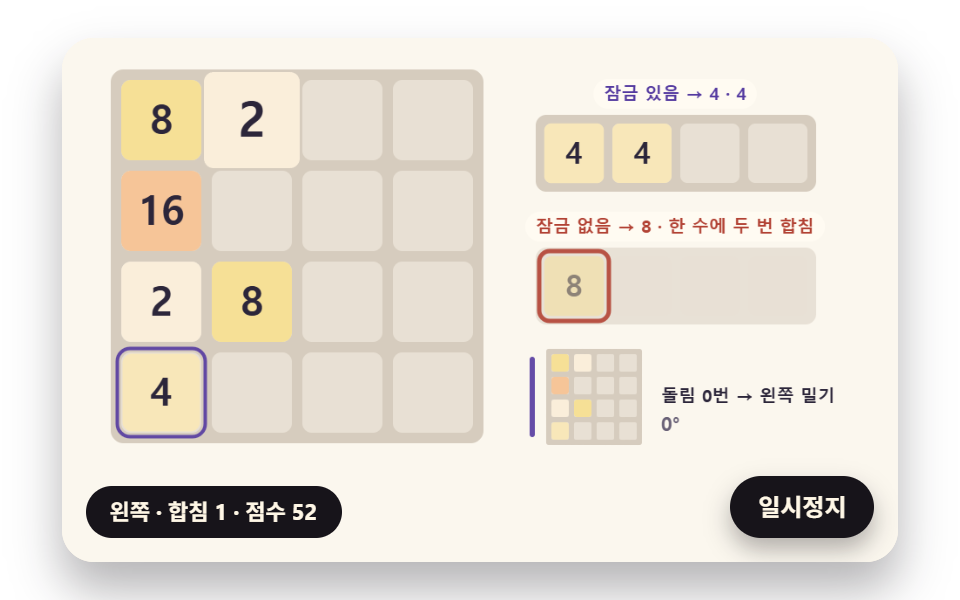 01 t2048-line-compress-merge-lock
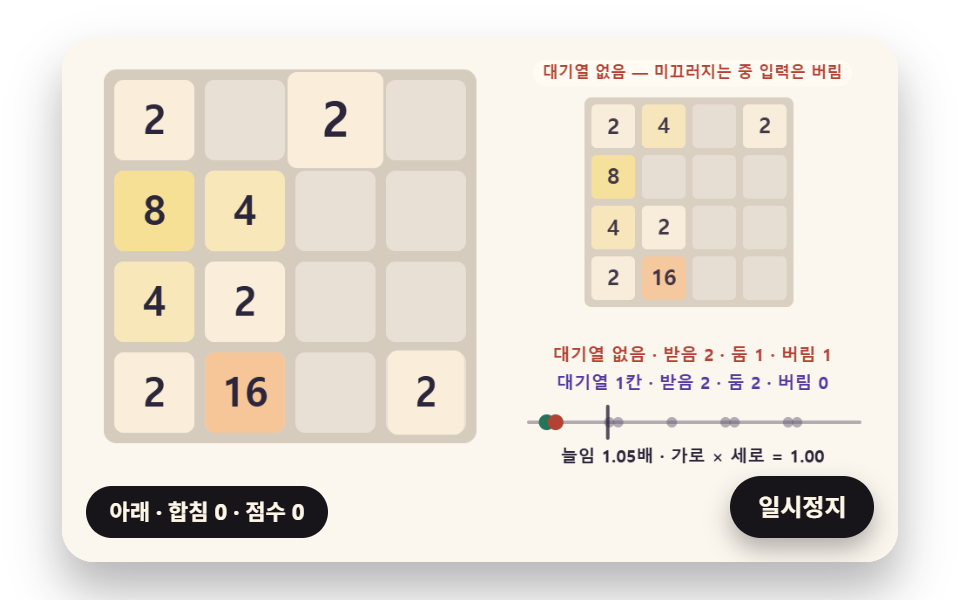 02 t2048-slide-distance-squash
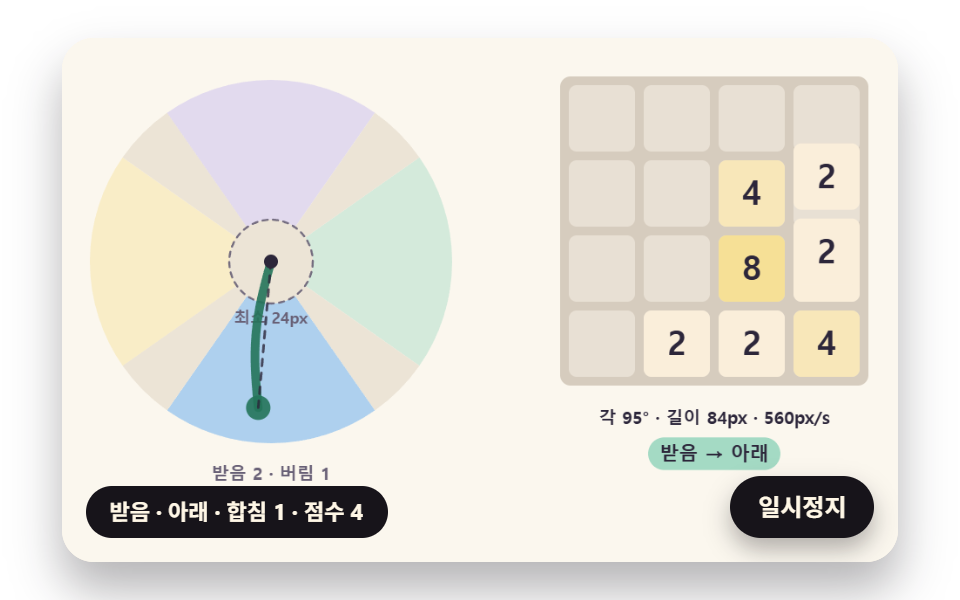 03 t2048-swipe-axis-sector-judge
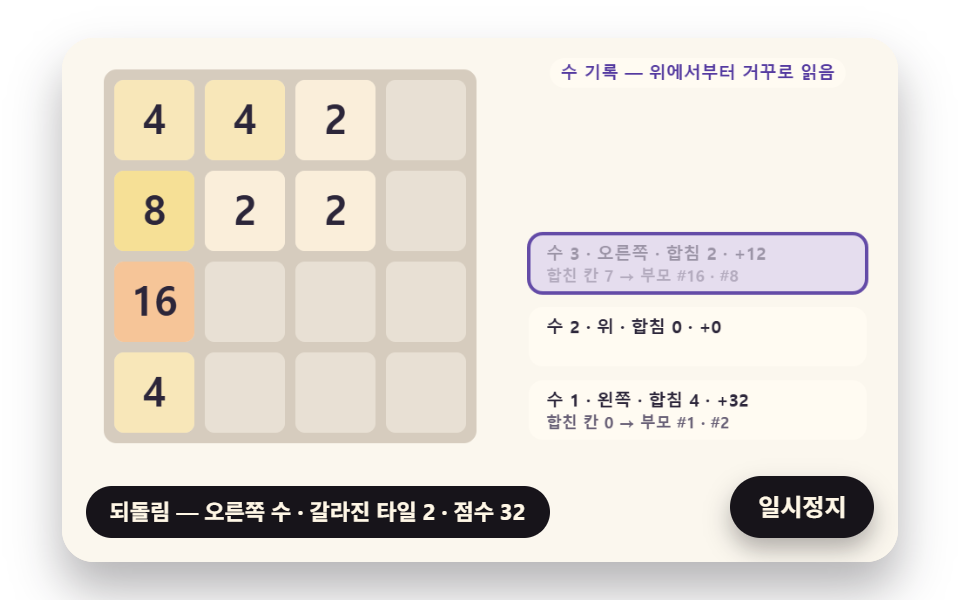 04 t2048-undo-split-rewind
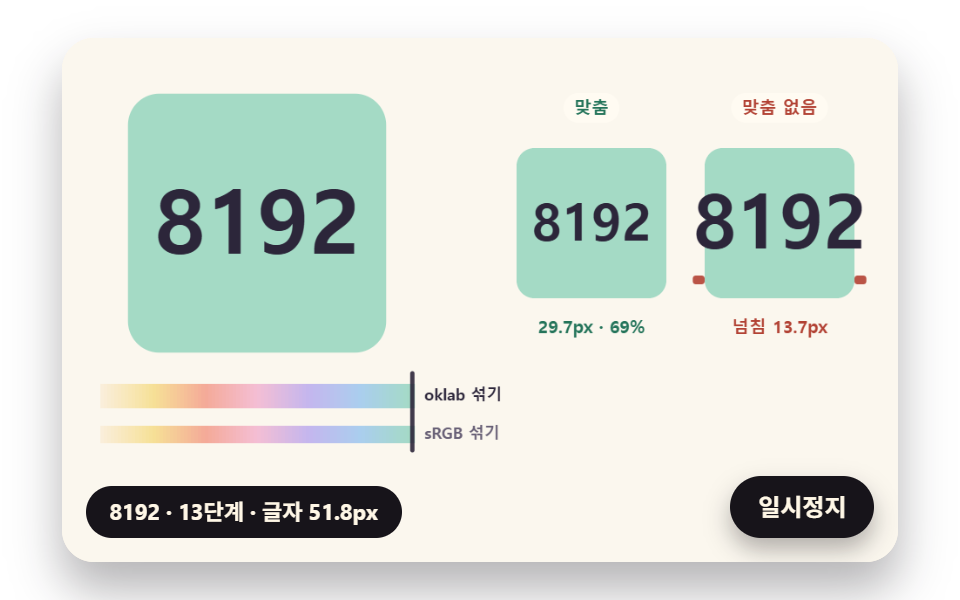 05 t2048-power-step-color-digit-fit
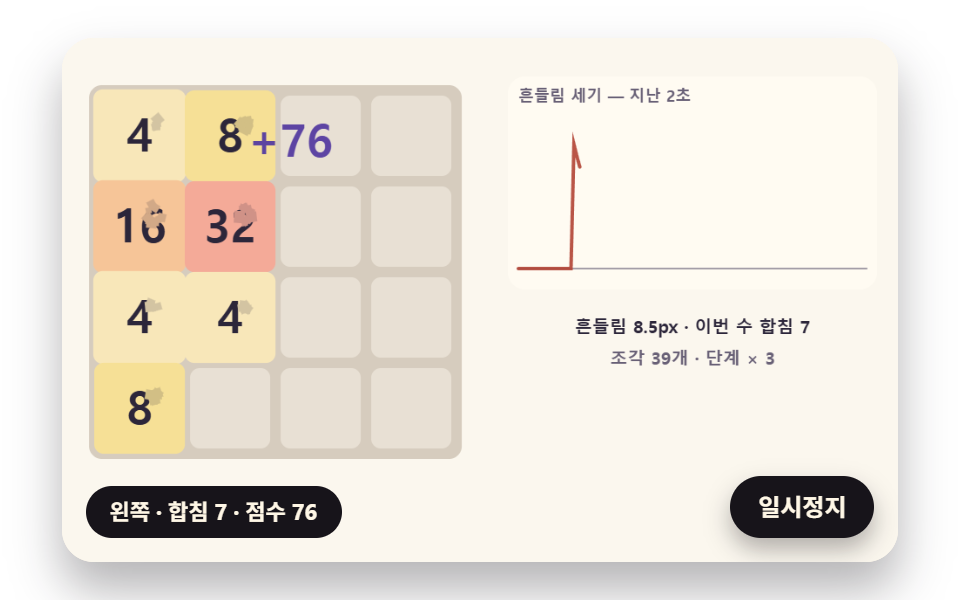 06 t2048-merge-burst-combo-shake
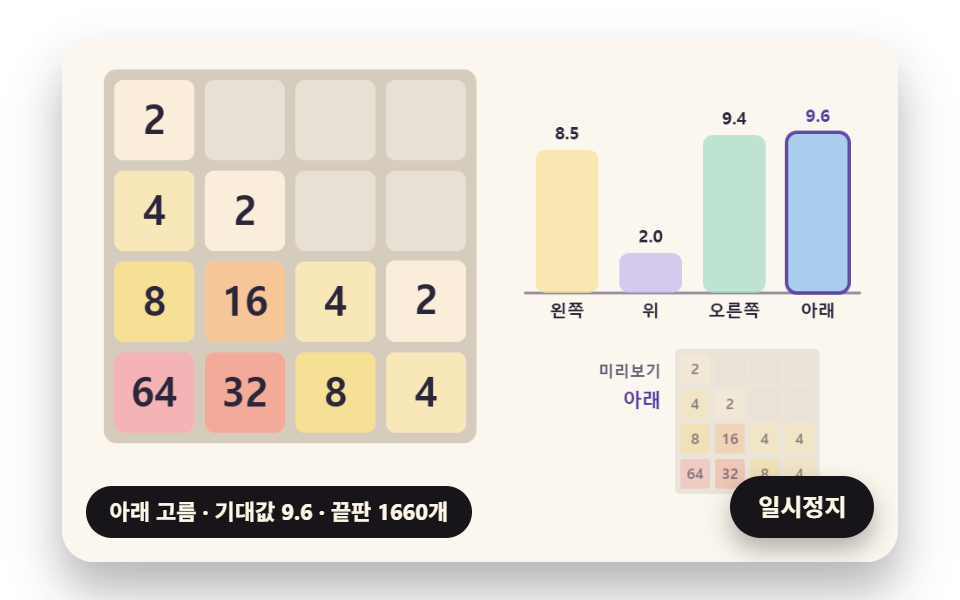 07 t2048-chance-search-auto-play
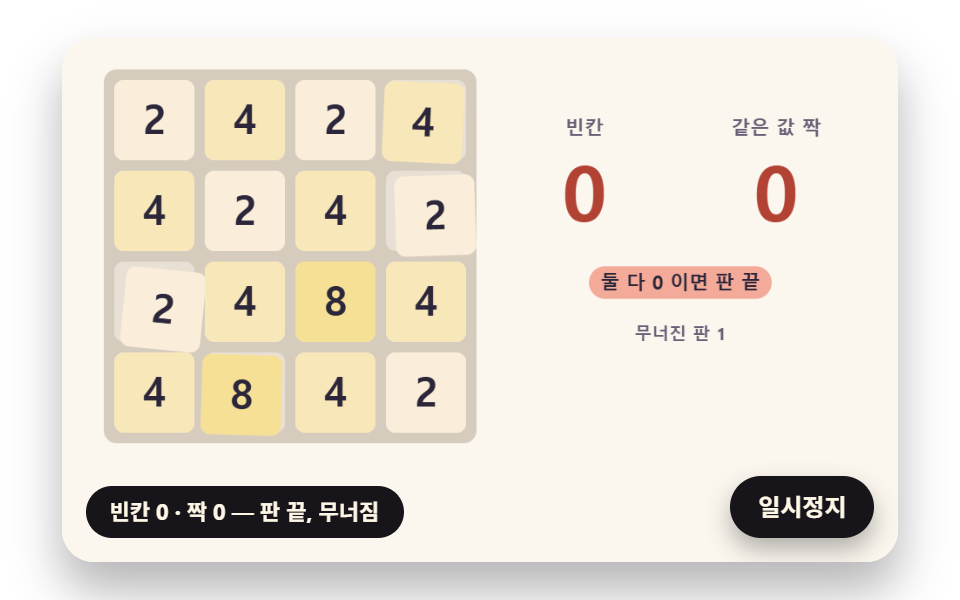 08 t2048-stuck-pairs-collapse-fall
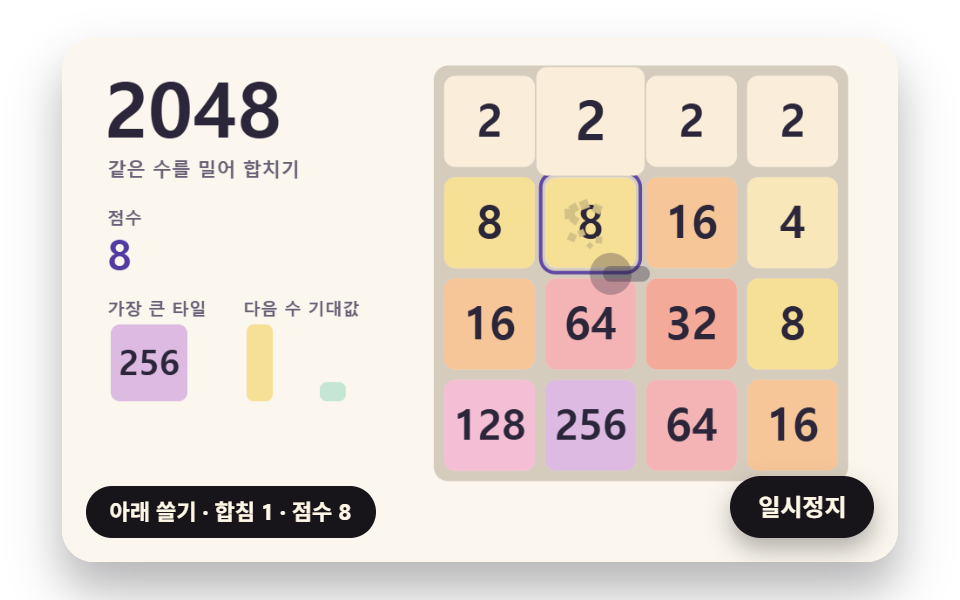 09 t2048-hero-auto-run-scene
Auto-plays · click a tile to jump to its section · all nine in one zip
- 01 One-Line Compression Moves with a Merged-Tile Lock
- 02 Slides That Stretch and Squash with Cells Traveled
- 03 A Swipe Judge That Settles Diagonals on One Axis
- 04 An Undo Rewind Where Merged Tiles Split Apart
- 05 Colors Chosen by Power-of-Two Step, with Digit Fitting
- 06 Merge Bursts and a Combo Shake
- 07 An Auto Player That Counts the Tiles Yet to Fall
- 08 A Board That Collapses When No Pairs Are Left
- 09 A Hero Scene Where the 2048 Board Plays Itself
Trying to compute all sixteen cells at once leads to four copies of the same loop, one per direction. The nine scenes here move tiles through one function, compressLine, that folds one row toward a wall (the 07 and 09 search slides plain numbers with its own slideValues), and for up, right and down they turn a table of cell numbers so that the wall of that direction sits on the left. The folding rule is short: drop the empty cells, then merge each pair of equal neighbors once, starting from the wall, and losing one condition from that rule changes the outcome of the whole board.
What one lock condition changes
The lock marks a tile born from a merge in this move so it cannot merge again within the same move. Across 2,000 seeded boards with roughly three empty cells in eight, each of the 7,978 moves that actually shift something was played twice, with and without the lock: 661 of them (8.3%) ended differently, and 563 boards (28%) held at least one such move. That is about one move in twelve, which is easy to miss when you test by pushing a few rows by hand.
How it differs from the other board games here
The tic tac toe boards in the same game category score each cell by assuming the opponent plays the move that hurts most, and the snake that finds its own path searches for a route to the food. In 2048 the opponent is not a person but the 2 or 4 that drops into an empty cell, so 07 and 09 average over outcomes weighted by probability instead of bracing for the worst case. Pieces that lock into one another are covered separately in the jigsaw puzzle boards.
How Do the 2048 Rules and Strategy Turn into Code for a Single Push?
Reading order is settled first, before any number moves. slideBoard takes the order table ORDERS[dir] for the direction, reads the four rows from the left wall, calls compressLine on each and writes the results back to the original cell numbers. Only then are the slides (start cell to end cell), the merges (parent ids to the new id) and the score (the sum of merged values) recorded, and playMove drops a new tile into one empty cell only when the board actually moved.
Four steps one move passes through
| Step | Function | What gets decided |
|---|---|---|
| 1 Reading order | pushOrder · ORDERS |
left 0,1,2,3 · up 3,7,11,15 · right 15,14,13,12 · down 12,8,4,0 (first row) |
| 2 Folding a row | compressLine |
drop empty cells, then merge equal neighbors; with the lock, a merged tile does not merge again |
| 3 Recording | slideBoard |
slides, merges and score; the first left move in 01 makes 3 merges for +16 |
| 4 New tile | spawnTile |
one empty cell picked by seeded random, a 4 with probability 0.1, otherwise a 2 |
| End check | equalPairs · countEmpty |
the game ends when touching equal pairs and empty cells both reach 0 |
A push in a direction that moves nothing does not count as a move. So the demo plan in 01 (left, up, right, down, left, down, right, up) skips to the next direction when one is blocked, and a full loop builds 10 moves and a score of 64. If you wanted 2048 explained at the level of code rather than rules, these five rows are the whole story.
Screens this board fits
The most common spot is a mini game on a company event page or a portfolio. The rules fit in one line of instructions, and the board lives in a box that keeps a 480:300 ratio, so it slips between paragraphs easily. An event page that shows a hint next to the board can reuse the four direction bars from 07 as the hint box.
A learning app can lift the step colors from 05 as progress tiles, and the collapsing board from 08 as a game-over and replay screen. 09 plays on its own with no input, so it suits the first screen of a landing page, and the moment a visitor touches the board the auto demo stops and the board becomes theirs.
2048 Game JavaScript: 9 Scenes — One-Line Compression Moves with a Merged-Tile Lock, Slides That Stretch and Squash with Cells Traveled, a Swipe Judge That Settles Diagonals on One Axis, an Undo Rewind Where Merged Tiles Split Apart, Colors Chosen by Power-of-Two Step with Digit Fitting, Merge Bursts and a Combo Shake, an Auto Player That Counts the Tiles Yet to Fall, a Board That Collapses When No Pairs Are Left and a Hero Scene Where the 2048 Board Plays Itself
The 2048 game source code of each scene is one index.html holding a single script block, plus a style.scss, drawn on a 2D canvas with no library, web font or image file.
Values from 24 frames over 2 seconds, each compared with the next
Each scene was rendered at 480×300 for 2 seconds and captured as 24 frames, and the 23 differences between neighboring frames give the numbers below.
| Scene | Area covered | Frames that moved | Mean intensity |
|---|---|---|---|
| 01 Line compression and merged-tile lock | 30.4% | 23/23 | 47.1 |
| 02 Stretch slide sized by cells traveled | 32.1% | 23/23 | 48.8 |
| 03 One-axis swipe judge | 29.3% | 21/23 | 69.7 |
| 04 Splitting undo rewind | 36.7% | 21/23 | 51.2 |
| 05 Step colors and digit fitting | 24.8% | 22/23 | 52.4 |
| 06 Merge shards and combo shake | 29.2% | 23/23 | 44.4 |
| 07 Auto player counting falling tiles | 29.2% | 23/23 | 60.7 |
| 08 Board that collapses with no pairs left | 34.7% | 23/23 | 46.6 |
| 09 Hero board that plays itself | 25.4% | 23/23 | 53.6 |
04, which runs three moves forward and three back, covers the widest area at 36.7%. 03 and 04 stop at 21/23, likely because the pauses between trails and between undo steps fall inside the 2-second window.
01One-Line Compression Moves with a Merged-Tile Lock
A base for a merge mini game on a company event page, where a wrong rule shows at once: from the start board "2 2 4 _ / _ 4 4 8 / 2 _ 2 _ / _ _ _ 2" it plays a move every 0.48 seconds while a small board at the bottom right turns clockwise by that move's turn count and turns back. The row comparison on the right pushes the same "2 2 4 _" every 1.2 seconds, and the locked row ends as "4 4" (+4) while the unlocked row ends as a single "8" with three parents (+8). A merged tile rides a size spring (stiffness 420, damping 18), swells to 1.159× and settles within ±2% at 0.279 seconds.
<main class="stage">
<div class="cf is-demo" id="cf">
  <div class="cf__board" data-role="board" tabindex="0" role="application" aria-label="2048 board: click it, then use the arrow keys or swipe to move">
    <canvas class="cf__canvas" data-role="canvas" width="480" height="300" aria-hidden="true"></canvas>
  </div>
  <p class="cf__sr">A 2048 board that plays all four directions with one left push by turning the board, beside a 2, 2, 4 row pushed with a lock (4, 4) and without one (8)</p>
  <p class="cf__status" data-role="status" aria-live="off">Waiting for the first move</p>
  <button class="cf__pause" data-role="pause" type="button" aria-pressed="false">Pause</button>
</div>
</main>
@use "../../../../site/static/demo-tokens" as *;
@include stage($stage-paper);
.cf {
position: relative;
width: min(92vw, calc(160vh - 12.8vw));
aspect-ratio: 480 / 300;
margin: 0 auto;
border-radius: $r-card;
overflow: hidden;
box-shadow: $shadow-raised;
background: $subject-cream;
}
// 판 상자 — 포커스를 받으면 안쪽 테두리로 보인다. 포커스가 있을 때만 쓸기가 페이지 스크롤 대신 판으로 간다
.cf__board {
position: absolute;
inset: 0;
border-radius: inherit;
outline: none;
}
// 바깥 .cf 가 넘침을 자르므로 테두리는 안쪽으로 들인다
.cf__board:focus-visible {
outline: 3px solid $subject-ink;
outline-offset: -3px;
}
.cf__board:focus {
touch-action: none;
}
.cf__canvas {
position: absolute;
inset: 0;
display: block;
width: 100%;
height: 100%;
}
.cf__pause {
position: absolute;
right: $sp-3;
bottom: $sp-3;
padding: $sp-1 $sp-3;
border: 2px solid $subject-ink;
border-radius: $r-pill;
background: $subject-ink;
color: $subject-cream;
font-family: inherit;
font-weight: 700;
font-size: 12px;
line-height: 1.6;
cursor: pointer;
box-shadow: $shadow-press;
transition: transform $dur-quick $ease-spring;
}
// 눌린 상태(멈춤) — 바탕과 글자색을 뒤집어 aria-pressed 가 눈에도 보이게
.cf__pause[aria-pressed="true"] {
background: $subject-cream;
color: $subject-ink;
}
.cf__pause:hover {
transform: translateY(-2px);
}
.cf__pause:active {
transform: translateY(1px);
}
.cf__pause:focus-visible {
outline: 3px solid $subject-ink;
outline-offset: 3px;
}
// 상태 줄 — 방금 둔 수(방향·합침·점수)를 글자로. 시연 중에는 aria-live off, 사람이 처음 손대면 polite
.cf__status {
position: absolute;
left: $sp-3;
bottom: $sp-3;
max-width: calc(100% - 120px);
margin: 0;
padding: $sp-1 $sp-3;
border-radius: $r-pill;
background: $subject-ink;
color: $subject-cream;
font-weight: 700;
font-size: 11px;
line-height: 1.6;
white-space: nowrap;
overflow: hidden;
text-overflow: ellipsis;
pointer-events: none;
}
// 낭독용 장면 설명 한 줄 — 화면에서는 숨기고 낭독기에만 읽힌다(판 위 숫자는 캔버스라 aria-hidden)
.cf__sr {
position: absolute;
width: 1px;
height: 1px;
margin: -1px;
padding: 0;
overflow: hidden;
clip-path: inset(50%);
white-space: nowrap;
border: 0;
}
@media (max-width: 340px) {
.cf__pause,
.cf__status { font-size: 10px; padding: $sp-1 $sp-2; }
}
// 동작 줄이기 — 장면은 스크립트가 정지 판 한 장으로 멈춘다. 버튼도 떠오르지 않게
@media (prefers-reduced-motion: reduce) {
.cf__pause { transition: none !important; }
.cf__pause:hover,
.cf__pause:active { transform: none !important; }
}html, body {
margin: 0;
overflow: hidden;
}
.stage {
box-sizing: border-box;
min-height: 100vh;
display: grid;
place-items: center;
margin: 0;
background: #ffffff;
font-family: -apple-system, "Segoe UI", "Noto Sans KR", sans-serif;
padding: clamp(8px, 4vw, 24px);
}
.cf {
position: relative;
width: min(92vw, 160vh - 12.8vw);
aspect-ratio: 480/300;
margin: 0 auto;
border-radius: 16px;
overflow: hidden;
box-shadow: 0 14px 24px rgba(23, 20, 26, 0.32);
background: #fff7e6;
}
.cf__board {
position: absolute;
inset: 0;
border-radius: inherit;
outline: none;
}
.cf__board:focus-visible {
outline: 3px solid #17141a;
outline-offset: -3px;
}
.cf__board:focus {
touch-action: none;
}
.cf__canvas {
position: absolute;
inset: 0;
display: block;
width: 100%;
height: 100%;
}
.cf__pause {
position: absolute;
right: 12px;
bottom: 12px;
padding: 4px 12px;
border: 2px solid #17141a;
border-radius: 999px;
background: #17141a;
color: #fff7e6;
font-family: inherit;
font-weight: 700;
font-size: 12px;
line-height: 1.6;
cursor: pointer;
box-shadow: 0 6px 12px rgba(23, 20, 26, 0.32);
transition: transform 220ms cubic-bezier(0.2, 0.8, 0.2, 1);
}
.cf__pause[aria-pressed=true] {
background: #fff7e6;
color: #17141a;
}
.cf__pause:hover {
transform: translateY(-2px);
}
.cf__pause:active {
transform: translateY(1px);
}
.cf__pause:focus-visible {
outline: 3px solid #17141a;
outline-offset: 3px;
}
.cf__status {
position: absolute;
left: 12px;
bottom: 12px;
max-width: calc(100% - 120px);
margin: 0;
padding: 4px 12px;
border-radius: 999px;
background: #17141a;
color: #fff7e6;
font-weight: 700;
font-size: 11px;
line-height: 1.6;
white-space: nowrap;
overflow: hidden;
text-overflow: ellipsis;
pointer-events: none;
}
.cf__sr {
position: absolute;
width: 1px;
height: 1px;
margin: -1px;
padding: 0;
overflow: hidden;
clip-path: inset(50%);
white-space: nowrap;
border: 0;
}
@media (max-width: 340px) {
.cf__pause,
.cf__status {
font-size: 10px;
padding: 4px 8px;
}
}
@media (prefers-reduced-motion: reduce) {
.cf__pause {
transition: none !important;
}
.cf__pause:hover,
.cf__pause:active {
transform: none !important;
}
}(function () {
const root = document.getElementById("cf");
if (!root) return;
// 판 좌표 — 캔버스 안은 늘 480×300. 화면에 보이는 크기와 상관없이 계산은 이 좌표로 한다
const W = 480;
const H = 300;
const TAU = Math.PI * 2;
function clamp(v, lo, hi) { return v < lo ? lo : (v > hi ? hi : v); }
function lerp(a, b, k) { return a + (b - a) * k; }
function smooth(x) { const c = clamp(x, 0, 1); return c * c * (3 - 2 * c); }
// 따라가기 비율 — 1 − e^(−rate·dt). 프레임 시간이 달라도 1초에 같은 만큼 다가간다
function follow(rate, dt) { return 1 - Math.exp(-rate * dt); }
// 시드 고정 난수 — 같은 시드면 같은 시연이 다시 나온다 (32비트 정수 섞기)
function makeRng(seed) {
let s = seed >>> 0;
return function () {
s = (s + 0x6d2b79f5) >>> 0;
let t = s;
t = Math.imul(t ^ (t >>> 15), t | 1);
t ^= t + Math.imul(t ^ (t >>> 7), t | 61);
return ((t ^ (t >>> 14)) >>> 0) / 4294967296;
};
}
function deg(rad) { return rad * 180 / Math.PI; }
function makeSpring(x) { return { x: x, v: 0, to: x }; }
const SPRING_SUBSTEP = 1 / 240;
function stepSpring(s, stiffness, damping, dt) {
let left = dt;
while (left > 1e-9) {
const h = Math.min(SPRING_SUBSTEP, left);
s.v += (stiffness * (s.to - s.x) - damping * s.v) * h;
s.x += s.v * h;
left -= h;
}
}
function snapSpring(s, x) { s.x = x; s.v = 0; s.to = x; }
function roughWidth(ch, px, weight) {
const wide = ch.charCodeAt(0) >= 0x1100;
const base = ch === ' ' ? 0.28 : (wide ? 0.95 : 0.6);
return px * base * (weight >= 700 ? 1.06 : 1);
}
// 글꼴이 다 온 뒤 잰 폭
let glyphWidth = roughWidth;
// 문자열 폭 = 글자 하나씩 잰 폭의 합
function textWidth(s, px, weight, m) {
let w = 0;
for (const ch of Array.from(s)) {
w += m(ch, px, weight);
}
return w;
}
// 장면 시계(초)와 상태 줄 글자 — 장면 계산이 고치고, 화면 쪽이 읽어 그린다
let sceneT = 0;
let simStatus = '';
// 자동 시연이 수를 두는가 — 사람이 판에서 방향키·쓸기(04 는 백스페이스도)로 처음 손대면 꺼지고, 그 뒤로는 사람 수만 둔다
let autoOn = true;
// 파스텔 팔레트 — 크림 바탕 Up 라벤더·민트·버터·산호. 글자는 진한 쪽으로 명도 차를 둔다
const PAPER = [251, 247, 238];
const PAPER_DIM = [236, 228, 214];
const BOARD_BG = [214, 204, 190];
const CELL_BG = [232, 224, 212];
const INK = [44, 38, 58];
const INK_SOFT = [104, 96, 118];
const CREAM = [255, 251, 242];
const LAVENDER = [196, 182, 238];
const MINT = [164, 218, 196];
const BUTTER = [246, 224, 150];
const CORAL = [244, 170, 152];
const SKY = [170, 206, 238];
const PINK = [244, 190, 212];
const MINT_DEEP = [36, 116, 90];
const CORAL_DEEP = [178, 66, 52];
const VIOLET_DEEP = [84, 58, 160];
function mix(a, b, k) { return [lerp(a[0], b[0], k), lerp(a[1], b[1], k), lerp(a[2], b[2], k)]; }
function rgba(c, a) {
return 'rgba(' + Math.round(clamp(c[0], 0, 255)) + ',' + Math.round(clamp(c[1], 0, 255)) + ',' + Math.round(clamp(c[2], 0, 255)) + ',' + clamp(a, 0, 1).toFixed(3) + ')';
}
// ── 판 규칙 ──────────────────────────────────────────────────
// 판은 칸 16개. 칸 번호 = 행 × 4 + 열, 값 0 = empty
const SIZE = 4;
const CELLS = SIZE * SIZE;
// 방향 번호 — 0 Left · 1 Up · 2 Right · 3 Down
const DIR_LEFT = 0;
const DIR_UP = 1;
const DIR_RIGHT = 2;
const DIR_DOWN = 3;
const DIR_NAMES = ['Left', 'Up', 'Right', 'Down'];
// 방향마다 판을 시계 방향으로 몇 번 돌리면 그 방향의 벽이 왼쪽에 오는가 — 위는 세 번, 오른쪽은 두 번, 아래는 한 번
const TURNS = [0, 3, 2, 1];
// 새 타일이 4 일 확률 — 나머지는 2
const FOUR_CHANCE = 0.1;
// 칸 번호 표를 시계 방향으로 한 번 돌린다 — 새 (행 r, 열 c) 자리에 원래 (행 3 − c, 열 r) 칸이 온다
function rotateCW(g) {
const out = [];
for (let r = 0; r < SIZE; r += 1) {
for (let c = 0; c < SIZE; c += 1) {
out.push(g[(SIZE - 1 - c) * SIZE + r]);
}
}
return out;
}
// 방향 dir 로 밀 때 읽는 순서 — order[r × 4 + k] = 돌린 판의 행 r, Left 벽에서 k 번째 자리에 오는 원래 칸 번호
function pushOrder(dir) {
let g = [];
for (let i = 0; i < CELLS; i += 1) {
g.push(i);
}
for (let t = 0; t < TURNS[dir]; t += 1) {
g = rotateCW(g);
}
return g;
}
    const ORDERS = [0, 1, 2, 3].map(pushOrder);
    function compressLine(line, lock) {
        const out = [];
        for (const t of line) {
            if (!t) {
                continue;
            }
            const last = out.length ? out[out.length - 1] : null;
            if (last && last.v === t.v && !(lock && last.merged)) {
                last.v *= 2;
                last.ids.push(t.id);
                last.merged = true;
            }
            else {
                out.push({ ids: [t.id], v: t.v, merged: false });
            }
        }
        return out;
    }
function gridOf(tiles) {
const g = [];
for (let i = 0; i < CELLS; i += 1) {
g.push(null);
}
for (const t of tiles) {
g[t.cell] = t;
}
return g;
}
function valuesOf(tiles) {
const v = [];
for (let i = 0; i < CELLS; i += 1) {
v.push(0);
}
for (const t of tiles) {
v[t.cell] = t.v;
}
return v;
}
function copyTiles(tiles) { return tiles.map(function (t) { return { id: t.id, v: t.v, cell: t.cell }; }); }
// 한 수 밀기 — 판을 돌려 그 방향을 왼쪽으로 만든 순서표로 네 줄을 읽고, 줄마다 compressLine 한 결과를 원래 칸 번호로 되돌려 적는다
function slideBoard(g, dir, lock) {
const cells = gridOf(g.tiles);
const order = ORDERS[dir];
const byId = {};
for (const t of g.tiles) {
byId[t.id] = t;
}
const slides = [];
const merges = [];
const after = [];
let gain = 0;
for (let r = 0; r < SIZE; r += 1) {
const line = [];
for (let k = 0; k < SIZE; k += 1) {
line.push(cells[order[r * SIZE + k]]);
}
compressLine(line, lock).forEach(function (o, slot) {
const to = order[r * SIZE + slot];
for (const id of o.ids) {
slides.push({ id: id, v: byId[id].v, from: byId[id].cell, to: to });
}
if (o.merged) {
const nid = g.nextId;
g.nextId += 1;
merges.push({ id: nid, v: o.v, cell: to, parents: o.ids.slice() });
after.push({ id: nid, v: o.v, cell: to });
gain += o.v;
}
else {
after.push({ id: o.ids[0], v: o.v, cell: to });
}
});
}
const moved = merges.length > 0 || slides.some(function (s) { return s.from !== s.to; });
return { dir: dir, moved: moved, slides: slides, merges: merges, gain: gain, before: copyTiles(g.tiles), after: after, spawn: null };
}
function emptyCells(tiles) {
const used = [];
for (let i = 0; i < CELLS; i += 1) {
used.push(false);
}
for (const t of tiles) {
used[t.cell] = true;
}
const out = [];
for (let i = 0; i < CELLS; i += 1) {
if (!used[i]) {
out.push(i);
}
}
return out;
}
// empty 하나를 시드 난수로 뽑아 2 또는 4 를 놓는다 — 4 는 FOUR_CHANCE 의 확률
function spawnTile(g) {
const empty = emptyCells(g.tiles);
if (!empty.length) {
return null;
}
const cell = empty[Math.floor(g.rng() * empty.length)];
const v = g.rng() < FOUR_CHANCE ? 4 : 2;
const t = { id: g.nextId, v: v, cell: cell };
g.nextId += 1;
g.tiles.push(t);
return t;
}
// 한 수 두기 — 움직였을 때만 판을 바꾸고 새 타일을 하나 돋운다. 안 움직이는 방향은 수가 아니다(새 타일도 없음)
function playMove(g, dir, lock) {
const mv = slideBoard(g, dir, lock);
if (!mv.moved) {
return mv;
}
g.tiles = mv.after.map(function (t) { return { id: t.id, v: t.v, cell: t.cell }; });
g.score += mv.gain;
mv.spawn = spawnTile(g);
return mv;
}
function makeGame(values, seed) {
const tiles = [];
let id = 1;
values.forEach(function (v, cell) {
if (v) {
tiles.push({ id: id, v: v, cell: cell });
id += 1;
}
});
return { tiles: tiles, nextId: id, score: 0, rng: makeRng(seed) };
}
function equalPairs(vals) {
const out = [];
for (let r = 0; r < SIZE; r += 1) {
for (let c = 0; c < SIZE; c += 1) {
const i = r * SIZE + c;
if (!vals[i]) {
continue;
}
if (c + 1 < SIZE && vals[i + 1] === vals[i]) {
out.push({ a: i, b: i + 1 });
}
if (r + 1 < SIZE && vals[i + SIZE] === vals[i]) {
out.push({ a: i, b: i + SIZE });
}
}
}
return out;
}
function countEmpty(vals) { let n = 0; for (const v of vals) {
if (!v) {
n += 1;
}
} return n; }
function isStuck(vals) { return countEmpty(vals) === 0 && equalPairs(vals).length === 0; }
function rowOf(cell) { return Math.floor(cell / SIZE); }
function colOf(cell) { return cell % SIZE; }
// ── 쓸기 방향 판정 ───────────────────────────────────────────
// 시작점·끝점 차(dx, dy, 화면 px — y 는 아래로)와 걸린 시간(ms)으로 네 부채꼴 중 하나를 고르거나 버린다
// 이 길이보다 짧은 궤적은 버린다 — 다만 FLICK_SPEED_PX_S 보다 빠르면 짧아도 받아들인다(빠른 튕김)
const SWIPE_MIN_PX = 24;
const FLICK_SPEED_PX_S = 450;
// 튕김이라도 이보다 짧으면 손가락이 떨린 것으로 본다
const FLICK_MIN_PX = 8;
// 부채꼴 경계(45°·135°·225°·315°) 양쪽 이 각도 안은 애매한 대각선 — 버린다
const DEAD_ZONE_DEG = 10;
const VERDICT_OK = 'ok';
const VERDICT_SHORT = 'short';
const VERDICT_DIAGONAL = 'diagonal';
const VERDICT_FLICK = 'flick';
// 화면 각(0° Right, 90° Down)을 부채꼴로 — 가장 가까운 90° 배수가 방향
const ANGLE_TO_DIR = [DIR_RIGHT, DIR_DOWN, DIR_LEFT, DIR_UP];
function judgeSwipe(dx, dy, ms) {
const length = Math.sqrt(dx * dx + dy * dy);
const speed = length / Math.max(1, ms) * 1000;
const angle = (deg(Math.atan2(dy, dx)) + 360) % 360;
const base = { dir: -1, angle: angle, length: length, speed: speed, reason: VERDICT_SHORT };
const flick = length >= FLICK_MIN_PX && speed >= FLICK_SPEED_PX_S;
if (length < SWIPE_MIN_PX && !flick) {
return base;
}
// 경계까지 남은 각 — 90° 마다 되풀이되는 자리에서 45° 와의 차
const toBorder = Math.abs((angle % 90) - 45);
if (toBorder < DEAD_ZONE_DEG) {
base.reason = VERDICT_DIAGONAL;
return base;
}
base.dir = ANGLE_TO_DIR[Math.round(angle / 90) % 4];
base.reason = length < SWIPE_MIN_PX ? VERDICT_FLICK : VERDICT_OK;
return base;
}
// ── 타일 색과 숫자 크기 ──────────────────────────────────────
// 단계 = log2(값) — 2 는 1단계, 2048 은 11단계, 8192 는 13단계
function stepOf(v) { return v > 0 ? Math.log2(v) : 0; }
// 파스텔 기준색과 그 색이 놓이는 단계 — 사이 단계는 oklab 에서 곧게 섞는다
const TILE_ANCHORS = [[250, 238, 218], [246, 224, 150], [244, 170, 152], [244, 190, 212], [196, 182, 238], [170, 206, 238], [164, 218, 196]];
const ANCHOR_STEPS = [1, 3, 5, 7, 9, 11, 13];
function toLinear(c) { const x = c / 255; return x <= 0.04045 ? x / 12.92 : Math.pow((x + 0.055) / 1.055, 2.4); }
function fromLinear(x) { const c = x <= 0.0031308 ? 12.92 * x : 1.055 * Math.pow(x, 1 / 2.4) - 0.055; return clamp(c * 255, 0, 255); }
// sRGB → oklab (지각 균등 색 공간 — 같은 거리만큼 섞으면 눈에도 비슷한 만큼 바뀐다)
function rgbToOklab(c) {
const r = toLinear(c[0]);
const g = toLinear(c[1]);
const b = toLinear(c[2]);
const l = Math.cbrt(0.4122214708 * r + 0.5363325363 * g + 0.0514459929 * b);
const m = Math.cbrt(0.2119034982 * r + 0.6806995451 * g + 0.1073969566 * b);
const s = Math.cbrt(0.0883024619 * r + 0.2817188376 * g + 0.6299787005 * b);
return [0.2104542553 * l + 0.7936177850 * m - 0.0040720468 * s,
1.9779984951 * l - 2.4285922050 * m + 0.4505937099 * s,
0.0259040371 * l + 0.7827717662 * m - 0.8086757660 * s];
}
function oklabToRgb(c) {
const l = Math.pow(c[0] + 0.3963377774 * c[1] + 0.2158037573 * c[2], 3);
const m = Math.pow(c[0] - 0.1055613458 * c[1] - 0.0638541728 * c[2], 3);
const s = Math.pow(c[0] - 0.0894841775 * c[1] - 1.2914855480 * c[2], 3);
return [fromLinear(4.0767416621 * l - 3.3077115913 * m + 0.2309699292 * s),
fromLinear(-1.2684380046 * l + 2.6097574011 * m - 0.3413193965 * s),
fromLinear(-0.0041960863 * l - 0.7034186147 * m + 1.7076147010 * s)];
}
const ANCHOR_LABS = TILE_ANCHORS.map(rgbToOklab);
// 단계(소수 가능)의 색 — 양옆 기준 단계 사이 몫 k 로 oklab 세 값을 각각 곧게 섞는다(선형 보간). 끝 바깥은 끝 색
function tileColor(step) {
const last = ANCHOR_STEPS.length - 1;
if (step <= ANCHOR_STEPS[0]) {
return TILE_ANCHORS[0];
}
if (step >= ANCHOR_STEPS[last]) {
return TILE_ANCHORS[last];
}
let i = 0;
while (step > ANCHOR_STEPS[i + 1]) {
i += 1;
}
const k = (step - ANCHOR_STEPS[i]) / (ANCHOR_STEPS[i + 1] - ANCHOR_STEPS[i]);
const a = ANCHOR_LABS[i];
const b = ANCHOR_LABS[i + 1];
return oklabToRgb([lerp(a[0], b[0], k), lerp(a[1], b[1], k), lerp(a[2], b[2], k)]);
}
// 비교용 — 같은 두 색을 sRGB 값 그대로 섞은 색
function tileColorRgb(step) {
const last = ANCHOR_STEPS.length - 1;
if (step <= ANCHOR_STEPS[0]) {
return TILE_ANCHORS[0];
}
if (step >= ANCHOR_STEPS[last]) {
return TILE_ANCHORS[last];
}
let i = 0;
while (step > ANCHOR_STEPS[i + 1]) {
i += 1;
}
const k = (step - ANCHOR_STEPS[i]) / (ANCHOR_STEPS[i + 1] - ANCHOR_STEPS[i]);
return mix(TILE_ANCHORS[i], TILE_ANCHORS[i + 1], k);
}
// 숫자 크기 fitted — 칸 폭 × DIGIT_PX_RATIO 로 시작해, 잰 숫자 폭이 칸 폭 × DIGIT_FILL 을 넘으면 그 비율만큼 줄인다
const DIGIT_PX_RATIO = 0.5;
const DIGIT_FILL = 0.8;
const DIGIT_WEIGHT = 800;
function fitDigits(text, cell, m) {
const px0 = cell * DIGIT_PX_RATIO;
const raw = textWidth(text, px0, DIGIT_WEIGHT, m);
const room = cell * DIGIT_FILL;
const scale = raw > room ? room / raw : 1;
return { px: px0 * scale, width: raw * scale, rawWidth: raw, scale: scale };
}
// 합친 타일 크기 스프링 — 크기 1 에서 POP_KICK(1/초)의 속도로 차올라 넘쳤다가 1 로 앉는다. 새 타일은 0 에서 자란다
const POP_STIFFNESS = 420;
const POP_DAMPING = 18;
const POP_KICK = 6;
// 새 타일은 미끄러짐이 다 끝난 뒤 이만큼 있다가 돋는다
const SPAWN_DELAY_S = 0.04;
// 되감기 때 새 타일이 오그라들어 사라지는 데 쓰는 시간
const SHRINK_S = 0.22;
// 숨는 시각이 없는 타일 — 아주 먼 뒤
const NO_HIDE = 1e9;
function makeSprite(t, show) {
const c = colOf(t.cell);
const r = rowOf(t.cell);
return { id: t.id, v: t.v, fx: c, fy: r, tx: c, ty: r, t0: 0, dur: 0, show: show, hide: NO_HIDE, pop: makeSpring(1), squash: makeSpring(0), axis: 0, landed: true, lockUntil: -1 };
}
function makeView(tiles, style) {
return { sprites: tiles.map(function (t) { return makeSprite(t, -1); }), style: style };
}
// 판 그대로 다시 놓기 — 움직임 줄이기·사람 수를 멈춘 화면에서 바로 보일 때
function settleView(view, tiles) {
view.sprites = tiles.map(function (t) { return makeSprite(t, -1); });
}
function slideTime(style, cells) { return cells > 0 ? style.base + style.perCell * (cells - 1) : 0; }
function findSprite(view, id) {
for (const s of view.sprites) {
if (s.id === id && s.hide >= NO_HIDE) {
return s;
}
}
return null;
}
function aimSprite(s, from, to, t, style) {
s.fx = colOf(from);
s.fy = rowOf(from);
s.tx = colOf(to);
s.ty = rowOf(to);
const cells = Math.abs(s.tx - s.fx) + Math.abs(s.ty - s.fy);
s.axis = s.fx !== s.tx ? 0 : 1;
s.t0 = t;
s.dur = slideTime(style, cells);
s.landed = cells === 0;
}
// 한 수를 화면 타일로 — 미끄러짐 시작 t. 합친 타일은 마지막 부모가 닿는 순간 나타나 스프링으로 부풀고, 새 타일은 그 뒤에 돋는다. 끝나는 시각을 돌려준다
function animateMove(view, mv, t, lockS) {
let end = t;
const arrive = {};
for (const sl of mv.slides) {
let s = findSprite(view, sl.id);
if (!s) {
s = makeSprite({ id: sl.id, v: sl.v, cell: sl.from }, -1);
view.sprites.push(s);
}
aimSprite(s, sl.from, sl.to, t, view.style);
arrive[sl.id] = t + s.dur;
end = Math.max(end, t + s.dur);
}
for (const m of mv.merges) {
let at = t;
for (const p of m.parents) {
at = Math.max(at, arrive[p]);
}
for (const p of m.parents) {
const s = findSprite(view, p);
if (s) {
s.hide = at;
}
}
const born = makeSprite({ id: m.id, v: m.v, cell: m.cell }, at);
born.pop.v = POP_KICK;
born.lockUntil = at + lockS;
view.sprites.push(born);
}
if (mv.spawn) {
const sp = makeSprite(mv.spawn, end + SPAWN_DELAY_S);
snapSpring(sp.pop, 0);
sp.pop.to = 1;
view.sprites.push(sp);
}
return end + SPAWN_DELAY_S;
}
// 되감기 — 기록을 거꾸로: 새 타일은 오그라들어 사라지고, 합친 타일은 그 자리에서 두 부모로 갈라져 각자 출발 칸으로 미끄러져 간다
function animateUndo(view, mv, t) {
let end = t;
if (mv.spawn) {
const s = findSprite(view, mv.spawn.id);
if (s) {
s.pop.to = 0;
s.hide = t + SHRINK_S;
}
end = t + SHRINK_S;
}
const merged = {};
for (const m of mv.merges) {
const s = findSprite(view, m.id);
if (s) {
s.hide = t;
}
for (const p of m.parents) {
merged[p] = true;
}
}
for (const sl of mv.slides) {
let s = merged[sl.id] ? null : findSprite(view, sl.id);
if (!s) {
s = makeSprite({ id: sl.id, v: sl.v, cell: sl.to }, t);
view.sprites.push(s);
}
aimSprite(s, sl.to, sl.from, t, view.style);
end = Math.max(end, t + s.dur);
}
return end;
}
// 진행 몫 u(0~1)의 자리 몫과, 그때 1초에 가는 칸 수
function slideAt(s, t, easeIn) {
const cells = Math.abs(s.tx - s.fx) + Math.abs(s.ty - s.fy);
if (s.dur <= 0 || t >= s.t0 + s.dur) {
return { x: s.tx, y: s.ty, speed: 0 };
}
const u = clamp((t - s.t0) / s.dur, 0, 1);
const k = easeIn ? u * u : smooth(u);
const dk = easeIn ? 2 * u : 6 * u * (1 - u);
return { x: lerp(s.fx, s.tx, k), y: lerp(s.fy, s.ty, k), speed: dk * cells / s.dur };
}
function stepView(view, t, dt) {
const out = [];
for (const s of view.sprites) {
if (t < s.show) {
continue;
}
stepSpring(s.pop, POP_STIFFNESS, POP_DAMPING, dt);
if (!s.landed && t >= s.t0 + s.dur) {
s.landed = true;
const cells = Math.abs(s.tx - s.fx) + Math.abs(s.ty - s.fy);
out.push({ s: s, speed: view.style.easeIn ? 2 * cells / s.dur : 0 });
}
}
view.sprites = view.sprites.filter(function (s) { return t < s.hide; });
return out;
}
function viewBusy(view, t) {
for (const s of view.sprites) {
if (t < s.t0 + s.dur || (s.show > t)) {
return true;
}
}
return false;
}
// ── 판 하나 = 논리 판 + 화면 타일 + 입력 대기열 ─────────────
// 미끄러지는 동안 들어온 입력은 대기열에 넣었다가 미끄러짐이 끝나면 둔다. 대기열이 꽉 차 있으면 그 입력은 버린다
const INPUT_QUEUE_MAX = 1;
function makePlayer(values, seed, style, lock, lockS) {
const g = makeGame(values, seed);
return { game: g, view: makeView(g.tiles, style), lock: lock, lockS: lockS, queue: [], queueMax: INPUT_QUEUE_MAX, busyUntil: -1, last: null, history: [], got: 0, played: 0, dropped: 0 };
}
// 지금 바로 한 수 — 안 움직이는 방향이면 판도 기록도 그대로
function doMove(p, dir, t) {
const mv = playMove(p.game, dir, p.lock);
p.last = mv;
if (!mv.moved) {
return mv;
}
p.busyUntil = animateMove(p.view, mv, t, p.lockS);
p.history.push(mv);
p.played += 1;
return mv;
}
// 입력 하나 — 미끄러지는 중이면 대기열에, 대기열이 꽉 찼으면 버린다. 둔 수가 있으면 돌려준다
function pushInput(p, dir, t) {
p.got += 1;
if (t < p.busyUntil) {
if (p.queue.length < p.queueMax) {
p.queue.push(dir);
}
else {
p.dropped += 1;
}
return null;
}
return doMove(p, dir, t);
}
// 미끄러짐이 끝났으면 대기열 맨 앞 입력을 둔다
function pumpQueue(p, t) {
if (t < p.busyUntil || !p.queue.length) {
return null;
}
const dir = p.queue.shift();
return dir === undefined ? null : doMove(p, dir, t);
}
function settlePlayer(p) {
settleView(p.view, p.game.tiles);
p.busyUntil = -1;
p.queue = [];
}
function maxTile(p) { let m = 0; for (const t of p.game.tiles) {
m = Math.max(m, t.v);
} return m; }
// 상태 줄 — 둔 방향 · 이번 수에 합친 횟수 · score
const STATUS_MOVE = '{d} · merges {m} · score {s}';
const STATUS_BLOCKED = '{d}: no tile can move';
function moveStatus(p, mv) {
if (!mv.moved) {
return STATUS_BLOCKED.replace('{d}', DIR_NAMES[mv.dir]);
}
return STATUS_MOVE.replace('{d}', DIR_NAMES[mv.dir]).replace('{m}', String(mv.merges.length)).replace('{s}', String(p.game.score));
}
const canvasEl = root.querySelector('[data-role="canvas"]');
const boardEl = root.querySelector('[data-role="board"]');
const pauseEl = root.querySelector('[data-role="pause"]');
const statusEl = root.querySelector('[data-role="status"]');
const ctxRaw = canvasEl ? canvasEl.getContext('2d') : null;
if (!canvasEl || !ctxRaw || !pauseEl || !boardEl) {
return;
}
const cv = canvasEl;
const ctx = ctxRaw;
const pauseBtn = pauseEl;
const boardBox = boardEl;
// 외부 웹폰트는 부르지 않는다 — 기기에 있는 글꼴 목록만
const FONT_STACK = 'system-ui, -apple-system, "Segoe UI", "Noto Sans KR", sans-serif';
// 잰 폭은 100px 기준으로 한 번만 재 두고 크기에 비례해 쓴다. 글꼴이 새로 오면 통째로 비운다
const widthCache = {};
function measureWith(stack) {
return function (ch, px, weight) {
const key = stack + '|' + weight + '|' + ch;
let w = widthCache[key];
if (w === undefined) {
ctx.font = weight + ' 100px ' + stack;
w = ctx.measureText(ch).width;
widthCache[key] = w;
}
return w * px / 100;
};
}
function remeasure() {
for (const k of Object.keys(widthCache)) {
delete widthCache[k];
}
glyphWidth = measureWith(FONT_STACK);
relayout();
}
function fitCanvas() {
// 배율은 2 에서 자른다 — 배율 3 기기에서 화소가 2.25배로 늘어 프레임마다 일이 그만큼 커지지 않게
const dpr = Math.min(window.devicePixelRatio || 1, 2);
cv.width = Math.round(W * dpr);
cv.height = Math.round(H * dpr);
ctx.setTransform(dpr, 0, 0, dpr, 0, 0);
}
function clearStage(c) {
ctx.fillStyle = rgba(c, 1);
ctx.fillRect(0, 0, W, H);
}
function setFont(px, weight, stack) {
ctx.font = weight + ' ' + px.toFixed(2) + 'px ' + stack;
}
function label(s, x, y, c, a, px, weight, align) {
setFont(px, weight, FONT_STACK);
ctx.textAlign = align;
ctx.textBaseline = 'middle';
ctx.fillStyle = rgba(c, a);
ctx.fillText(s, x, y);
}
function roundRectPath(x, y, w, h, r) {
const rr = Math.max(0, Math.min(r, w / 2, h / 2));
ctx.beginPath();
ctx.moveTo(x + rr, y);
ctx.lineTo(x + w - rr, y);
ctx.arcTo(x + w, y, x + w, y + rr, rr);
ctx.lineTo(x + w, y + h - rr);
ctx.arcTo(x + w, y + h, x + w - rr, y + h, rr);
ctx.lineTo(x + rr, y + h);
ctx.arcTo(x, y + h, x, y + h - rr, rr);
ctx.lineTo(x, y + rr);
ctx.arcTo(x, y, x + rr, y, rr);
ctx.closePath();
}
function fillRound(x, y, w, h, r, c, a) {
if (w <= 0.2 || h <= 0.2 || a <= 0) {
return;
}
roundRectPath(x, y, w, h, r);
ctx.fillStyle = rgba(c, a);
ctx.fill();
}
function disc(x, y, r, c, a) {
if (r <= 0.2 || a <= 0) {
return;
}
ctx.beginPath();
ctx.arc(x, y, r, 0, TAU);
ctx.fillStyle = rgba(c, a);
ctx.fill();
}
function line(x1, y1, x2, y2, width, c, a) {
if (a <= 0) {
return;
}
ctx.beginPath();
ctx.moveTo(x1, y1);
ctx.lineTo(x2, y2);
ctx.lineWidth = width;
ctx.lineCap = 'round';
ctx.strokeStyle = rgba(c, a);
ctx.stroke();
}
// 작은 알약 이름표
function pill(s, x, y, bg, fg, a, px) {
setFont(px, 700, FONT_STACK);
const w = ctx.measureText(s).width + px * 1.2;
fillRound(x - w / 2, y - px * 0.85, w, px * 1.7, px * 0.85, bg, a);
label(s, x, y + 0.5, fg, a, px, 700, 'center');
}
// 상태 줄 — 바뀔 때만 글자를 고친다
let shownStatus = '';
function pushStatus() {
if (!statusEl || simStatus === shownStatus) {
return;
}
shownStatus = simStatus;
statusEl.textContent = simStatus;
}
function frameSize(f) { return SIZE * f.cell + (SIZE + 1) * f.gap; }
function cellCenter(f, col, row) {
return [f.x + f.gap + col * (f.cell + f.gap) + f.cell / 2, f.y + f.gap + row * (f.cell + f.gap) + f.cell / 2];
}
function drawBoardBack(f, a) {
const s = frameSize(f);
fillRound(f.x, f.y, s, s, f.cell * 0.16, BOARD_BG, a);
for (let r = 0; r < SIZE; r += 1) {
for (let c = 0; c < SIZE; c += 1) {
const p = cellCenter(f, c, r);
fillRound(p[0] - f.cell / 2, p[1] - f.cell / 2, f.cell, f.cell, f.cell * 0.12, CELL_BG, a);
}
}
}
// 타일 하나 — 가운데 (cx, cy), 한 변 size, 가로·세로 배율 sx·sy, 색 단계 step(소수면 두 색 사이). fit 이 거짓이면 숫자를 줄이지 않는다(넘치는 판)
function drawTileAt(v, cx, cy, size, sx, sy, a, step, fit) {
if (a <= 0.01 || sx <= 0.01 || sy <= 0.01) {
return;
}
const w = size * sx;
const h = size * sy;
fillRound(cx - w / 2, cy - h / 2, w, h, size * 0.12, tileColor(step), a);
const text = String(v);
const f = fitDigits(text, size, glyphWidth);
const px = fit ? f.px : size * DIGIT_PX_RATIO;
ctx.save();
ctx.translate(cx, cy);
ctx.scale(sx, sy);
setFont(px, DIGIT_WEIGHT, FONT_STACK);
ctx.textAlign = 'center';
ctx.textBaseline = 'middle';
ctx.fillStyle = rgba(INK, a);
ctx.fillText(text, 0, px * 0.04);
ctx.restore();
}
function noStretch(s, speed) { void s; void speed; return [1, 1]; }
function drawView(view, f, t, a, stretch) {
// 미끄러지는 타일을 나중에 — 서 있는 타일 위로 지나가게
const order = view.sprites.filter(function (s) { return t >= s.show; });
order.sort(function (p, q) { return (p.landed ? 0 : 1) - (q.landed ? 0 : 1); });
for (const s of order) {
const at = slideAt(s, t, view.style.easeIn);
const p = cellCenter(f, at.x, at.y);
const k = Math.max(0, s.pop.x);
const st = stretch(s, at.speed);
drawTileAt(s.v, p[0], p[1], f.cell, k * st[0], k * st[1], a, stepOf(s.v), true);
if (t < s.lockUntil) {
// 잠금 표시 — 이번 수에 합쳐진 타일. 같은 수 안에서는 다시 합치지 않는다
ctx.lineWidth = 2;
ctx.strokeStyle = rgba(VIOLET_DEEP, a * 0.9);
roundRectPath(p[0] - f.cell * 0.5 * k - 3, p[1] - f.cell * 0.5 * k - 3, f.cell * k + 6, f.cell * k + 6, f.cell * 0.16);
ctx.stroke();
}
}
}
// 01 — 네 방향을 판 돌리기 + Left 밀기 하나로 두는 판. 한 줄은 빈칸을 걷어 낸 뒤 앞에서부터 같은 수를 한 번씩만 합친다(합친 타일 잠금)
// 오른쪽에는 2·2·4 한 줄을 잠금 있이(→ 4·4) 민 줄과 잠금 없이(→ 8) 민 줄을 나란히 둔다
const START_01 = [
2, 2, 4, 0,
0, 4, 4, 8,
2, 0, 2, 0,
0, 0, 0, 2
];
const SEED_01 = 487;
// 자동 시연이 두는 방향 차례 — 안 움직이는 방향이면 다음 방향으로 넘어간다
const PLAN_01 = [DIR_LEFT, DIR_UP, DIR_RIGHT, DIR_DOWN, DIR_LEFT, DIR_DOWN, DIR_RIGHT, DIR_UP];
const FIRST_MOVE_S = 0.2;
const MOVE_GAP_S = 0.48;
const LOOP_S = 4.8;
// 잠금 표시가 합친 타일에 남아 있는 시간
const LOCK_SHOW_S = 0.3;
const STYLE_01 = { base: 0.12, perCell: 0.02, easeIn: false };
// 2·2·4 한 줄 — 같은 시각에 잠금 있는 줄과 없는 줄을 왼쪽으로 민다
const STRIP_ROW = [2, 2, 4, 0, 0, 0, 0, 0, 0, 0, 0, 0, 0, 0, 0, 0];
const STRIP_PERIOD_S = 1.2;
const STRIP_PUSH_AT = 0.3;
// 판 돌림 표시 — 돌린 각(도)이 스프링으로 따라간다
const ROT_STIFFNESS = 260;
const ROT_DAMPING = 24;
let main01 = makePlayer(START_01, SEED_01, STYLE_01, true, LOCK_SHOW_S);
let lockStrip = makePlayer(STRIP_ROW, 1, STYLE_01, true, LOCK_SHOW_S);
let freeStrip = makePlayer(STRIP_ROW, 1, STYLE_01, false, LOCK_SHOW_S);
let nextAt01 = FIRST_MOVE_S;
let planIdx01 = 0;
let stripCycle = -1;
let stripPushed = false;
const rot01 = makeSpring(0);
let rotBackAt = -1;
let lastTurns = 0;
// 한 줄만 왼쪽으로 — 새 타일은 돋지 않는다(줄 비교용)
function pushStrip(p, t) {
const mv = slideBoard(p.game, DIR_LEFT, p.lock);
p.game.tiles = mv.after;
animateMove(p.view, mv, t, LOCK_SHOW_S);
}
function resetStrips() {
lockStrip = makePlayer(STRIP_ROW, 1, STYLE_01, true, LOCK_SHOW_S);
freeStrip = makePlayer(STRIP_ROW, 1, STYLE_01, false, LOCK_SHOW_S);
}
function reset() {
main01 = makePlayer(START_01, SEED_01, STYLE_01, true, LOCK_SHOW_S);
resetStrips();
nextAt01 = FIRST_MOVE_S;
planIdx01 = 0;
stripCycle = -1;
stripPushed = false;
snapSpring(rot01, 0);
rotBackAt = -1;
lastTurns = 0;
}
function relayout() { }
// 한 수 — 판 돌림 표시를 그 방향의 돌림 수 × 90° 로 보냈다가 미끄러짐이 끝나면 0° 로 되돌린다
function afterMove01(mv) {
if (!mv) {
return;
}
simStatus = moveStatus(main01, mv);
if (!mv.moved) {
return;
}
lastTurns = TURNS[mv.dir];
rot01.to = lastTurns * 90;
rotBackAt = main01.busyUntil;
}
function humanMove(dir) { afterMove01(pushInput(main01, dir, sceneT)); }
function onSwipe(v) { if (v.dir >= 0) {
humanMove(v.dir);
} }
function autoMove01() {
for (let k = 0; k < PLAN_01.length; k += 1) {
const dir = PLAN_01[planIdx01 % PLAN_01.length];
planIdx01 += 1;
const mv = doMove(main01, dir, sceneT);
if (mv.moved) {
afterMove01(mv);
return;
}
}
}
function update(dt) {
if (autoOn && sceneT >= nextAt01) {
autoMove01();
nextAt01 += MOVE_GAP_S;
}
afterMove01(pumpQueue(main01, sceneT));
if (rotBackAt >= 0 && sceneT >= rotBackAt) {
rot01.to = 0;
rotBackAt = -1;
}
stepSpring(rot01, ROT_STIFFNESS, ROT_DAMPING, dt);
// 줄 비교 — STRIP_PERIOD_S 마다 처음 줄로 돌아가 STRIP_PUSH_AT 에 민다
const cyc = Math.floor(sceneT / STRIP_PERIOD_S);
if (cyc !== stripCycle) {
stripCycle = cyc;
resetStrips();
stripPushed = false;
}
if (!stripPushed && sceneT - cyc * STRIP_PERIOD_S >= STRIP_PUSH_AT) {
stripPushed = true;
pushStrip(lockStrip, sceneT);
pushStrip(freeStrip, sceneT);
}
stepView(main01.view, sceneT, dt);
stepView(lockStrip.view, sceneT, dt);
stepView(freeStrip.view, sceneT, dt);
}
function settle() {
settlePlayer(main01);
settlePlayer(lockStrip);
settlePlayer(freeStrip);
snapSpring(rot01, 0);
rotBackAt = -1;
}
// 정지 판 — 시연의 첫 세 수를 둔 판과, 이미 민 두 줄
function restPose() {
for (let i = 0; i < 3; i += 1) {
autoMove01();
}
pushStrip(lockStrip, 0);
pushStrip(freeStrip, 0);
stripPushed = true;
stripCycle = 0;
settle();
}
// 01 화면 — Left 큰 판, Right Up 2·2·4 두 줄(잠금 있음 · 잠금 없음 흐린 비교), Right Down 지금 판을 돌린 각도 그대로 그린 작은 판
const F01 = { x: 28, y: 18, cell: 46, gap: 6 };
const STRIP_A = { x: 272, y: 44, cell: 34, gap: 5 };
const STRIP_B = { x: 272, y: 120, cell: 34, gap: 5 };
const MINI_01 = { x: 278, y: 178, cell: 10, gap: 3 };
const LABEL_LOCK = 'with lock → 4 · 4';
const LABEL_FREE = 'no lock → 8 · merged twice in one move';
const LABEL_TURN = 'turned {k}× → push left';
function bindInput(signal) { void signal; }
function drawStrip(p, f, a) {
const s = SIZE * f.cell + (SIZE + 1) * f.gap;
fillRound(f.x, f.y, s, f.cell + 2 * f.gap, f.cell * 0.18, BOARD_BG, a);
for (let c = 0; c < SIZE; c += 1) {
const p0 = cellCenter(f, c, 0);
fillRound(p0[0] - f.cell / 2, p0[1] - f.cell / 2, f.cell, f.cell, f.cell * 0.12, CELL_BG, a);
}
drawView(p.view, f, sceneT, a, noStretch);
}
function draw() {
clearStage(PAPER);
drawBoardBack(F01, 1);
drawView(main01.view, F01, sceneT, 1, noStretch);
// 줄 비교
pill(LABEL_LOCK, 352, 32, CREAM, VIOLET_DEEP, 1, 10);
drawStrip(lockStrip, STRIP_A, 1);
pill(LABEL_FREE, 352, 108, CREAM, CORAL_DEEP, 1, 10);
drawStrip(freeStrip, STRIP_B, 0.5);
// 잠금 없는 줄에서 세 타일이 한 칸에 모인 자리 — 산호 테두리
for (const s of freeStrip.view.sprites) {
if (s.v >= 8 && sceneT >= s.show) {
const p = cellCenter(STRIP_B, s.tx, s.ty);
ctx.lineWidth = 2.5;
ctx.strokeStyle = rgba(CORAL_DEEP, 0.9);
roundRectPath(p[0] - STRIP_B.cell / 2 - 3, p[1] - STRIP_B.cell / 2 - 3, STRIP_B.cell + 6, STRIP_B.cell + 6, 6);
ctx.stroke();
}
}
// 돌린 판 — 지금 판 값을 돌림 각 그대로 작은 칸으로
const ms = frameSize(MINI_01);
const cx = MINI_01.x + ms / 2;
const cy = MINI_01.y + ms / 2;
ctx.save();
ctx.translate(cx, cy);
ctx.rotate(rot01.x * Math.PI / 180);
ctx.translate(-cx, -cy);
drawBoardBack(MINI_01, 1);
// 돌아가는 동안은 수 앞 판, 되돌아오는 동안은 민 뒤 판
const vals = rotBackAt >= 0 && main01.last ? valuesOf(main01.last.before) : valuesOf(main01.game.tiles);
vals.forEach(function (v, i) {
if (!v) {
return;
}
const p = cellCenter(MINI_01, colOf(i), rowOf(i));
fillRound(p[0] - MINI_01.cell / 2, p[1] - MINI_01.cell / 2, MINI_01.cell, MINI_01.cell, 2, tileColor(stepOf(v)), 1);
});
ctx.restore();
// 돌린 판의 Left 벽 표시 — 미는 쪽은 늘 Left
line(MINI_01.x - 8, MINI_01.y + 6, MINI_01.x - 8, MINI_01.y + ms - 6, 3, VIOLET_DEEP, 0.9);
label(LABEL_TURN.replace('{k}', String(lastTurns)), 344, cy, INK, 1, 10, 700, 'left');
label(Math.round(rot01.x) + '°', 344, cy + 16, INK_SOFT, 1, 11, 700, 'left');
}
let paused = false;
const reduceQuery = window.matchMedia('(prefers-reduced-motion: reduce)');
// 페이지를 연 채 동작 줄이기 설정을 바꿔도 change 리스너가 이 값을 다시 읽는다
let still = reduceQuery.matches;
// 자동 시연 표시가 붙어 있는가 — 사람이 처음 손대면 표시를 떼고 상태 줄을 polite 로 켠다
let demo = root.classList.contains('is-demo');
// 리스너는 한 묶음으로 달고 정리할 때 한 번에 뗀다
const off = new AbortController();
function wake() {
if (!demo) {
return;
}
demo = false;
root.classList.remove('is-demo');
if (statusEl) {
statusEl.setAttribute('aria-live', 'polite');
}
}
// 사람이 한 수를 두면 자동 시연은 수를 그만 두고, 판은 그 자리에서 사람 판이 된다
function takeOver() {
wake();
autoOn = false;
}
// 멈춘 화면(움직임 줄이기·Pause)에서 둔 수는 미끄러짐 없이 결과 판으로 바로 그린다
function showNow() {
if (still || paused) {
settle();
draw();
pushStatus();
}
}
// 한 프레임에 넘기는 시간 상한(초) — 탭을 오래 숨겼다 돌아온 첫 프레임에도 50ms 까지만 계산에 넣는다
const DT_MAX = 0.05;
// 장면 시계를 dt 만큼 — 자동 시연 중에는 한 바퀴(LOOP_S)를 넘으면 처음 판으로 되돌려 다시 시연한다
function advance(dt) {
sceneT += dt;
if (autoOn && sceneT >= LOOP_S) {
sceneT -= LOOP_S;
reset();
}
update(dt);
}
let rafId = 0;
let lastTs = -1;
function frame(ts) {
if (still || paused) {
rafId = 0;
return;
}
if (lastTs < 0) {
lastTs = ts;
}
const dt = Math.min((ts - lastTs) / 1000, DT_MAX);
lastTs = ts;
if (dt > 0) {
advance(dt);
}
draw();
pushStatus();
rafId = window.requestAnimationFrame(frame);
}
function startLoop() {
if (rafId) {
return;
}
// 시계 다시 맞추기 — 멈췄던 사이의 시간을 첫 프레임 dt 로 넘기지 않는다
lastTs = -1;
rafId = window.requestAnimationFrame(frame);
}
function stopLoop() {
if (rafId) {
window.cancelAnimationFrame(rafId);
rafId = 0;
}
}
// 동작 줄이기 — 루프를 돌리지 않고 정지 판 한 장만 그린다
function showRest() {
stopLoop();
if (autoOn) {
sceneT = 0;
reset();
restPose();
}
else {
settle();
}
draw();
pushStatus();
}
function play() {
if (autoOn) {
sceneT = 0;
reset();
}
draw();
pushStatus();
if (!paused) {
startLoop();
}
}
pauseBtn.addEventListener('click', function () {
paused = !paused;
pauseBtn.setAttribute('aria-pressed', paused ? 'true' : 'false');
wake();
if (paused) {
stopLoop();
}
else if (!still) {
startLoop();
}
}, { signal: off.signal });
// 방향키 — 판에 포커스가 있을 때만 받는다. 판 밖에서는 화살표가 원래대로 페이지를 스크롤한다
const KEY_DIRS = { ArrowLeft: DIR_LEFT, ArrowUp: DIR_UP, ArrowRight: DIR_RIGHT, ArrowDown: DIR_DOWN };
boardBox.addEventListener('keydown', function (e) {
const dir = KEY_DIRS[e.key];
if (dir === undefined || e.altKey || e.ctrlKey || e.metaKey) {
return;
}
e.preventDefault();
takeOver();
humanMove(dir);
showNow();
}, { signal: off.signal });
// 쓸기 — 누른 자리와 뗀 자리의 차, 걸린 시간을 쓸기 판정(judgeSwipe)에 넣는다. 화면 px 그대로
let downX = 0;
let downY = 0;
let downT = -1;
boardBox.addEventListener('pointerdown', function (e) {
downX = e.clientX;
downY = e.clientY;
downT = e.timeStamp;
}, { signal: off.signal });
boardBox.addEventListener('pointerup', function (e) {
if (downT < 0) {
return;
}
const v = judgeSwipe(e.clientX - downX, e.clientY - downY, e.timeStamp - downT);
downT = -1;
if (v.length < FLICK_MIN_PX) {
return;
}
takeOver();
onSwipe(v);
showNow();
}, { signal: off.signal });
boardBox.addEventListener('pointercancel', function () { downT = -1; }, { signal: off.signal });
// 탭이 숨으면 루프를 멈추고, 돌아오면 시계를 다시 맞춰 시작한다 — 숨은 동안의 몇 초가 한 프레임에 몰리지 않게
document.addEventListener('visibilitychange', function () {
if (document.hidden) {
stopLoop();
}
else if (!paused && !still && fontsReady) {
startLoop();
}
}, { signal: off.signal });
// 설정이 페이지를 연 채 바뀌면 — 켜지면 정지 판으로 멈추고, 꺼지면 다시 움직인다
reduceQuery.addEventListener('change', function () {
still = reduceQuery.matches;
if (still) {
showRest();
}
else {
play();
}
}, { signal: off.signal });
window.addEventListener('resize', function () {
fitCanvas();
draw();
}, { signal: off.signal });
bindInput(off.signal);
fitCanvas();
// 숫자 폭은 글꼴이 다 온 뒤에 잰다 — 그 전에 잰 폭은 대체 글꼴의 폭이라 글꼴이 바뀌는 순간 글자 크기 맞춤이 틀어진다.
// 나중에 다른 글꼴이 더 오면(loadingdone) 다시 잰다
let fontsReady = false;
document.fonts.addEventListener('loadingdone', function () {
if (!fontsReady) {
return;
}
remeasure();
draw();
}, { signal: off.signal });
document.fonts.ready.then(function () {
if (off.signal.aborted) {
return;
}
fontsReady = true;
remeasure();
if (still) {
showRest();
}
else {
play();
}
});
return function () {
stopLoop();
off.abort();
};
})();// LineCompressBoard - 같은 항목 vanilla 판 index.html 의 React 포트. 같은 계산을 useEffect 안에서 돌린다.
import { useEffect, useRef } from "react";
import styles from "./LineCompressBoard.module.scss";
const cx = (s: string): string => s.split(" ").map((n) => styles[n] ?? n).join(" ");
export default function LineCompressBoard() {
const rootRef = useRef<HTMLDivElement | null>(null);
useEffect(() => {
const rootEl = rootRef.current;
if (!rootEl) return;
const root: HTMLElement = rootEl;
type RGB = [number, number, number];
// 판 좌표 — 캔버스 안은 늘 480×300. 화면에 보이는 크기와 상관없이 계산은 이 좌표로 한다
const W = 480;
const H = 300;
const TAU = Math.PI * 2;
function clamp(v: number, lo: number, hi: number): number { return v < lo ? lo : (v > hi ? hi : v); }
function lerp(a: number, b: number, k: number): number { return a + (b - a) * k; }
function smooth(x: number): number { const c = clamp(x, 0, 1); return c * c * (3 - 2 * c); }
// 따라가기 비율 — 1 − e^(−rate·dt). 프레임 시간이 달라도 1초에 같은 만큼 다가간다
function follow(rate: number, dt: number): number { return 1 - Math.exp(-rate * dt); }
// 시드 고정 난수 — 같은 시드면 같은 시연이 다시 나온다 (32비트 정수 섞기)
function makeRng(seed: number): () => number {
let s = seed >>> 0;
return function (): number {
s = (s + 0x6d2b79f5) >>> 0;
let t = s;
t = Math.imul(t ^ (t >>> 15), t | 1);
t ^= t + Math.imul(t ^ (t >>> 7), t | 61);
return ((t ^ (t >>> 14)) >>> 0) / 4294967296;
};
}
function deg(rad: number): number { return rad * 180 / Math.PI; }
// ── 감쇠 스프링 ──────────────────────────────────────────────
// 가속 = 단단함 × (목표 − 위치) − 감쇠 × 속도. 속도를 먼저 고친 뒤 위치를 옮기는 적분을 1/240초 잔걸음으로 나눠 돌린다
type Spring = { x: number; v: number; to: number };
function makeSpring(x: number): Spring { return { x: x, v: 0, to: x }; }
const SPRING_SUBSTEP = 1 / 240;
function stepSpring(s: Spring, stiffness: number, damping: number, dt: number): void {
let left = dt;
while (left > 1e-9) {
const h = Math.min(SPRING_SUBSTEP, left);
s.v += (stiffness * (s.to - s.x) - damping * s.v) * h;
s.x += s.v * h;
left -= h;
}
}
function snapSpring(s: Spring, x: number): void { s.x = x; s.v = 0; s.to = x; }
// ── 글자 폭 ──────────────────────────────────────────────────
// 글자 하나의 가로 폭(px) — 글꼴 크기 px, 굵기 weight. 화면에서는 캔버스 measureText 로 잰 값으로 바뀐다(dom 쪽).
// 아래 대략 모형은 재기 전 자리 채움일 뿐 — 글자 폭은 반드시 글꼴이 다 온 뒤 다시 잰다
type Measure = (ch: string, px: number, weight: number) => number;
function roughWidth(ch: string, px: number, weight: number): number {
const wide = ch.charCodeAt(0) >= 0x1100;
const base = ch === ' ' ? 0.28 : (wide ? 0.95 : 0.6);
return px * base * (weight >= 700 ? 1.06 : 1);
}
// 글꼴이 다 온 뒤 잰 폭
let glyphWidth: Measure = roughWidth;
// 문자열 폭 = 글자 하나씩 잰 폭의 합
function textWidth(s: string, px: number, weight: number, m: Measure): number {
let w = 0;
for (const ch of Array.from(s)) { w += m(ch, px, weight); }
return w;
}
// 장면 시계(초)와 상태 줄 글자 — 장면 계산이 고치고, 화면 쪽이 읽어 그린다
let sceneT = 0;
let simStatus = '';
// 자동 시연이 수를 두는가 — 사람이 판에서 방향키·쓸기(04 는 백스페이스도)로 처음 손대면 꺼지고, 그 뒤로는 사람 수만 둔다
let autoOn = true;
// 파스텔 팔레트 — 크림 바탕 위 라벤더·민트·버터·산호. 글자는 진한 쪽으로 명도 차를 둔다
const PAPER: RGB = [251, 247, 238];
const PAPER_DIM: RGB = [236, 228, 214];
const BOARD_BG: RGB = [214, 204, 190];
const CELL_BG: RGB = [232, 224, 212];
const INK: RGB = [44, 38, 58];
const INK_SOFT: RGB = [104, 96, 118];
const CREAM: RGB = [255, 251, 242];
const LAVENDER: RGB = [196, 182, 238];
const MINT: RGB = [164, 218, 196];
const BUTTER: RGB = [246, 224, 150];
const CORAL: RGB = [244, 170, 152];
const SKY: RGB = [170, 206, 238];
const PINK: RGB = [244, 190, 212];
const MINT_DEEP: RGB = [36, 116, 90];
const CORAL_DEEP: RGB = [178, 66, 52];
const VIOLET_DEEP: RGB = [84, 58, 160];
function mix(a: RGB, b: RGB, k: number): RGB { return [lerp(a[0], b[0], k), lerp(a[1], b[1], k), lerp(a[2], b[2], k)]; }
function rgba(c: RGB, a: number): string {
return 'rgba(' + Math.round(clamp(c[0], 0, 255)) + ',' + Math.round(clamp(c[1], 0, 255)) + ',' + Math.round(clamp(c[2], 0, 255)) + ',' + clamp(a, 0, 1).toFixed(3) + ')';
}
// ── 판 규칙 ──────────────────────────────────────────────────
// 판은 칸 16개. 칸 번호 = 행 × 4 + 열, 값 0 = 빈칸
const SIZE = 4;
const CELLS = SIZE * SIZE;
// 방향 번호 — 0 왼쪽 · 1 위 · 2 오른쪽 · 3 아래
const DIR_LEFT = 0;
const DIR_UP = 1;
const DIR_RIGHT = 2;
const DIR_DOWN = 3;
const DIR_NAMES = ['왼쪽', '위', '오른쪽', '아래'];
// 방향마다 판을 시계 방향으로 몇 번 돌리면 그 방향의 벽이 왼쪽에 오는가 — 위는 세 번, 오른쪽은 두 번, 아래는 한 번
const TURNS = [0, 3, 2, 1];
// 새 타일이 4 일 확률 — 나머지는 2
const FOUR_CHANCE = 0.1;
type Tile = { id: number; v: number; cell: number };
// 한 수의 기록 — 미끄러진 타일(출발·도착 칸)과 합쳐진 타일(부모 번호들 → 새 번호), 얻은 점수, 수 앞뒤 판, 새로 돋은 타일
type Slide = { id: number; v: number; from: number; to: number };
type Merge = { id: number; v: number; cell: number; parents: number[] };
type Move = { dir: number; moved: boolean; slides: Slide[]; merges: Merge[]; gain: number; before: Tile[]; after: Tile[]; spawn: Tile | null };
type Game = { tiles: Tile[]; nextId: number; score: number; rng: () => number };
// 칸 번호 표를 시계 방향으로 한 번 돌린다 — 새 (행 r, 열 c) 자리에 원래 (행 3 − c, 열 r) 칸이 온다
function rotateCW(g: number[]): number[] {
const out: number[] = [];
for (let r = 0; r < SIZE; r += 1) {
for (let c = 0; c < SIZE; c += 1) { out.push(g[(SIZE - 1 - c) * SIZE + r]); }
}
return out;
}
// 방향 dir 로 밀 때 읽는 순서 — order[r × 4 + k] = 돌린 판의 행 r, 왼쪽 벽에서 k 번째 자리에 오는 원래 칸 번호
function pushOrder(dir: number): number[] {
let g: number[] = [];
for (let i = 0; i < CELLS; i += 1) { g.push(i); }
for (let t = 0; t < TURNS[dir]; t += 1) { g = rotateCW(g); }
return g;
}
const ORDERS: number[][] = [0, 1, 2, 3].map(pushOrder);
// 한 줄 압축 — 빈칸을 걷어 낸 뒤 왼쪽 벽부터 같은 값의 이웃을 합친다.
// lock 이면 이번 수에 합쳐서 생긴 타일은 같은 수 안에서 다시 합치지 않는다(2·2·4 → 4·4). lock 이 없으면 2·2·4 → 8
type LineOut = { ids: number[]; v: number; merged: boolean };
function compressLine(line: (Tile | null)[], lock: boolean): LineOut[] {
const out: LineOut[] = [];
for (const t of line) {
if (!t) { continue; }
const last = out.length ? out[out.length - 1] : null;
if (last && last.v === t.v && !(lock && last.merged)) {
last.v *= 2;
last.ids.push(t.id);
last.merged = true;
} else {
out.push({ ids: [t.id], v: t.v, merged: false });
}
}
return out;
}
function gridOf(tiles: Tile[]): (Tile | null)[] {
const g: (Tile | null)[] = [];
for (let i = 0; i < CELLS; i += 1) { g.push(null); }
for (const t of tiles) { g[t.cell] = t; }
return g;
}
function valuesOf(tiles: Tile[]): number[] {
const v: number[] = [];
for (let i = 0; i < CELLS; i += 1) { v.push(0); }
for (const t of tiles) { v[t.cell] = t.v; }
return v;
}
function copyTiles(tiles: Tile[]): Tile[] { return tiles.map(function (t: Tile): Tile { return { id: t.id, v: t.v, cell: t.cell }; }); }
// 한 수 밀기 — 판을 돌려 그 방향을 왼쪽으로 만든 순서표로 네 줄을 읽고, 줄마다 compressLine 한 결과를 원래 칸 번호로 되돌려 적는다
function slideBoard(g: Game, dir: number, lock: boolean): Move {
const cells = gridOf(g.tiles);
const order = ORDERS[dir];
const byId: { [id: number]: Tile } = {};
for (const t of g.tiles) { byId[t.id] = t; }
const slides: Slide[] = [];
const merges: Merge[] = [];
const after: Tile[] = [];
let gain = 0;
for (let r = 0; r < SIZE; r += 1) {
const line: (Tile | null)[] = [];
for (let k = 0; k < SIZE; k += 1) { line.push(cells[order[r * SIZE + k]]); }
compressLine(line, lock).forEach(function (o: LineOut, slot: number): void {
const to = order[r * SIZE + slot];
for (const id of o.ids) { slides.push({ id: id, v: byId[id].v, from: byId[id].cell, to: to }); }
if (o.merged) {
const nid = g.nextId;
g.nextId += 1;
merges.push({ id: nid, v: o.v, cell: to, parents: o.ids.slice() });
after.push({ id: nid, v: o.v, cell: to });
gain += o.v;
} else {
after.push({ id: o.ids[0], v: o.v, cell: to });
}
});
}
const moved = merges.length > 0 || slides.some(function (s: Slide): boolean { return s.from !== s.to; });
return { dir: dir, moved: moved, slides: slides, merges: merges, gain: gain, before: copyTiles(g.tiles), after: after, spawn: null };
}
function emptyCells(tiles: Tile[]): number[] {
const used: boolean[] = [];
for (let i = 0; i < CELLS; i += 1) { used.push(false); }
for (const t of tiles) { used[t.cell] = true; }
const out: number[] = [];
for (let i = 0; i < CELLS; i += 1) { if (!used[i]) { out.push(i); } }
return out;
}
// 빈칸 하나를 시드 난수로 뽑아 2 또는 4 를 놓는다 — 4 는 FOUR_CHANCE 의 확률
function spawnTile(g: Game): Tile | null {
const empty = emptyCells(g.tiles);
if (!empty.length) { return null; }
const cell = empty[Math.floor(g.rng() * empty.length)];
const v = g.rng() < FOUR_CHANCE ? 4 : 2;
const t: Tile = { id: g.nextId, v: v, cell: cell };
g.nextId += 1;
g.tiles.push(t);
return t;
}
// 한 수 두기 — 움직였을 때만 판을 바꾸고 새 타일을 하나 돋운다. 안 움직이는 방향은 수가 아니다(새 타일도 없음)
function playMove(g: Game, dir: number, lock: boolean): Move {
const mv = slideBoard(g, dir, lock);
if (!mv.moved) { return mv; }
g.tiles = mv.after.map(function (t: Tile): Tile { return { id: t.id, v: t.v, cell: t.cell }; });
g.score += mv.gain;
mv.spawn = spawnTile(g);
return mv;
}
function makeGame(values: number[], seed: number): Game {
const tiles: Tile[] = [];
let id = 1;
values.forEach(function (v: number, cell: number): void {
if (v) { tiles.push({ id: id, v: v, cell: cell }); id += 1; }
});
return { tiles: tiles, nextId: id, score: 0, rng: makeRng(seed) };
}
// 가로·세로로 맞닿은 같은 값 짝 — 이 짝이 하나도 없고 빈칸도 없으면 어느 방향으로도 못 민다(판 끝)
type Pair = { a: number; b: number };
function equalPairs(vals: number[]): Pair[] {
const out: Pair[] = [];
for (let r = 0; r < SIZE; r += 1) {
for (let c = 0; c < SIZE; c += 1) {
const i = r * SIZE + c;
if (!vals[i]) { continue; }
if (c + 1 < SIZE && vals[i + 1] === vals[i]) { out.push({ a: i, b: i + 1 }); }
if (r + 1 < SIZE && vals[i + SIZE] === vals[i]) { out.push({ a: i, b: i + SIZE }); }
}
}
return out;
}
function countEmpty(vals: number[]): number { let n = 0; for (const v of vals) { if (!v) { n += 1; } } return n; }
function isStuck(vals: number[]): boolean { return countEmpty(vals) === 0 && equalPairs(vals).length === 0; }
function rowOf(cell: number): number { return Math.floor(cell / SIZE); }
function colOf(cell: number): number { return cell % SIZE; }
// ── 쓸기 방향 판정 ───────────────────────────────────────────
// 시작점·끝점 차(dx, dy, 화면 px — y 는 아래로)와 걸린 시간(ms)으로 네 부채꼴 중 하나를 고르거나 버린다
// 이 길이보다 짧은 궤적은 버린다 — 다만 FLICK_SPEED_PX_S 보다 빠르면 짧아도 받아들인다(빠른 튕김)
const SWIPE_MIN_PX = 24;
const FLICK_SPEED_PX_S = 450;
// 튕김이라도 이보다 짧으면 손가락이 떨린 것으로 본다
const FLICK_MIN_PX = 8;
// 부채꼴 경계(45°·135°·225°·315°) 양쪽 이 각도 안은 애매한 대각선 — 버린다
const DEAD_ZONE_DEG = 10;
type Verdict = { dir: number; angle: number; length: number; speed: number; reason: string };
const VERDICT_OK = 'ok';
const VERDICT_SHORT = 'short';
const VERDICT_DIAGONAL = 'diagonal';
const VERDICT_FLICK = 'flick';
// 화면 각(0° 오른쪽, 90° 아래)을 부채꼴로 — 가장 가까운 90° 배수가 방향
const ANGLE_TO_DIR = [DIR_RIGHT, DIR_DOWN, DIR_LEFT, DIR_UP];
function judgeSwipe(dx: number, dy: number, ms: number): Verdict {
const length = Math.sqrt(dx * dx + dy * dy);
const speed = length / Math.max(1, ms) * 1000;
const angle = (deg(Math.atan2(dy, dx)) + 360) % 360;
const base = { dir: -1, angle: angle, length: length, speed: speed, reason: VERDICT_SHORT };
const flick = length >= FLICK_MIN_PX && speed >= FLICK_SPEED_PX_S;
if (length < SWIPE_MIN_PX && !flick) { return base; }
// 경계까지 남은 각 — 90° 마다 되풀이되는 자리에서 45° 와의 차
const toBorder = Math.abs((angle % 90) - 45);
if (toBorder < DEAD_ZONE_DEG) { base.reason = VERDICT_DIAGONAL; return base; }
base.dir = ANGLE_TO_DIR[Math.round(angle / 90) % 4];
base.reason = length < SWIPE_MIN_PX ? VERDICT_FLICK : VERDICT_OK;
return base;
}
// ── 타일 색과 숫자 크기 ──────────────────────────────────────
// 단계 = log2(값) — 2 는 1단계, 2048 은 11단계, 8192 는 13단계
function stepOf(v: number): number { return v > 0 ? Math.log2(v) : 0; }
// 파스텔 기준색과 그 색이 놓이는 단계 — 사이 단계는 oklab 에서 곧게 섞는다
const TILE_ANCHORS: RGB[] = [[250, 238, 218], [246, 224, 150], [244, 170, 152], [244, 190, 212], [196, 182, 238], [170, 206, 238], [164, 218, 196]];
const ANCHOR_STEPS = [1, 3, 5, 7, 9, 11, 13];
type Lab = [number, number, number];
function toLinear(c: number): number { const x = c / 255; return x <= 0.04045 ? x / 12.92 : Math.pow((x + 0.055) / 1.055, 2.4); }
function fromLinear(x: number): number { const c = x <= 0.0031308 ? 12.92 * x : 1.055 * Math.pow(x, 1 / 2.4) - 0.055; return clamp(c * 255, 0, 255); }
// sRGB → oklab (지각 균등 색 공간 — 같은 거리만큼 섞으면 눈에도 비슷한 만큼 바뀐다)
function rgbToOklab(c: RGB): Lab {
const r = toLinear(c[0]);
const g = toLinear(c[1]);
const b = toLinear(c[2]);
const l = Math.cbrt(0.4122214708 * r + 0.5363325363 * g + 0.0514459929 * b);
const m = Math.cbrt(0.2119034982 * r + 0.6806995451 * g + 0.1073969566 * b);
const s = Math.cbrt(0.0883024619 * r + 0.2817188376 * g + 0.6299787005 * b);
return [0.2104542553 * l + 0.7936177850 * m - 0.0040720468 * s,
1.9779984951 * l - 2.4285922050 * m + 0.4505937099 * s,
0.0259040371 * l + 0.7827717662 * m - 0.8086757660 * s];
}
function oklabToRgb(c: Lab): RGB {
const l = Math.pow(c[0] + 0.3963377774 * c[1] + 0.2158037573 * c[2], 3);
const m = Math.pow(c[0] - 0.1055613458 * c[1] - 0.0638541728 * c[2], 3);
const s = Math.pow(c[0] - 0.0894841775 * c[1] - 1.2914855480 * c[2], 3);
return [fromLinear(4.0767416621 * l - 3.3077115913 * m + 0.2309699292 * s),
fromLinear(-1.2684380046 * l + 2.6097574011 * m - 0.3413193965 * s),
fromLinear(-0.0041960863 * l - 0.7034186147 * m + 1.7076147010 * s)];
}
const ANCHOR_LABS: Lab[] = TILE_ANCHORS.map(rgbToOklab);
// 단계(소수 가능)의 색 — 양옆 기준 단계 사이 몫 k 로 oklab 세 값을 각각 곧게 섞는다(선형 보간). 끝 바깥은 끝 색
function tileColor(step: number): RGB {
const last = ANCHOR_STEPS.length - 1;
if (step <= ANCHOR_STEPS[0]) { return TILE_ANCHORS[0]; }
if (step >= ANCHOR_STEPS[last]) { return TILE_ANCHORS[last]; }
let i = 0;
while (step > ANCHOR_STEPS[i + 1]) { i += 1; }
const k = (step - ANCHOR_STEPS[i]) / (ANCHOR_STEPS[i + 1] - ANCHOR_STEPS[i]);
const a = ANCHOR_LABS[i];
const b = ANCHOR_LABS[i + 1];
return oklabToRgb([lerp(a[0], b[0], k), lerp(a[1], b[1], k), lerp(a[2], b[2], k)]);
}
// 비교용 — 같은 두 색을 sRGB 값 그대로 섞은 색
function tileColorRgb(step: number): RGB {
const last = ANCHOR_STEPS.length - 1;
if (step <= ANCHOR_STEPS[0]) { return TILE_ANCHORS[0]; }
if (step >= ANCHOR_STEPS[last]) { return TILE_ANCHORS[last]; }
let i = 0;
while (step > ANCHOR_STEPS[i + 1]) { i += 1; }
const k = (step - ANCHOR_STEPS[i]) / (ANCHOR_STEPS[i + 1] - ANCHOR_STEPS[i]);
return mix(TILE_ANCHORS[i], TILE_ANCHORS[i + 1], k);
}
// 숫자 크기 맞춤 — 칸 폭 × DIGIT_PX_RATIO 로 시작해, 잰 숫자 폭이 칸 폭 × DIGIT_FILL 을 넘으면 그 비율만큼 줄인다
const DIGIT_PX_RATIO = 0.5;
const DIGIT_FILL = 0.8;
const DIGIT_WEIGHT = 800;
type DigitFit = { px: number; width: number; rawWidth: number; scale: number };
function fitDigits(text: string, cell: number, m: Measure): DigitFit {
const px0 = cell * DIGIT_PX_RATIO;
const raw = textWidth(text, px0, DIGIT_WEIGHT, m);
const room = cell * DIGIT_FILL;
const scale = raw > room ? room / raw : 1;
return { px: px0 * scale, width: raw * scale, rawWidth: raw, scale: scale };
}
// ── 화면 타일 — 논리 판과 따로, 미끄러지는 동안의 자리와 크기를 든다 ──
// 자리는 (열, 행) 소수 좌표. 시각은 모두 장면 시계(초)
type Sprite = {
id: number; v: number;
fx: number; fy: number; tx: number; ty: number;
t0: number; dur: number;
show: number; hide: number;
pop: Spring;
squash: Spring;
axis: number;
landed: boolean;
lockUntil: number;
};
// 미끄러짐 모양 — 걸리는 시간 = base + perCell × (칸 수 − 1). easeIn 이면 점점 빨라져 벽에 빠르게 닿는다(아니면 부드럽게 서서 멈춤)
type SlideStyle = { base: number; perCell: number; easeIn: boolean };
type View = { sprites: Sprite[]; style: SlideStyle };
// 합친 타일 크기 스프링 — 크기 1 에서 POP_KICK(1/초)의 속도로 차올라 넘쳤다가 1 로 앉는다. 새 타일은 0 에서 자란다
const POP_STIFFNESS = 420;
const POP_DAMPING = 18;
const POP_KICK = 6;
// 새 타일은 미끄러짐이 다 끝난 뒤 이만큼 있다가 돋는다
const SPAWN_DELAY_S = 0.04;
// 되감기 때 새 타일이 오그라들어 사라지는 데 쓰는 시간
const SHRINK_S = 0.22;
// 숨는 시각이 없는 타일 — 아주 먼 뒤
const NO_HIDE = 1e9;
function makeSprite(t: Tile, show: number): Sprite {
const c = colOf(t.cell);
const r = rowOf(t.cell);
return { id: t.id, v: t.v, fx: c, fy: r, tx: c, ty: r, t0: 0, dur: 0, show: show, hide: NO_HIDE, pop: makeSpring(1), squash: makeSpring(0), axis: 0, landed: true, lockUntil: -1 };
}
function makeView(tiles: Tile[], style: SlideStyle): View {
return { sprites: tiles.map(function (t: Tile): Sprite { return makeSprite(t, -1); }), style: style };
}
// 판 그대로 다시 놓기 — 움직임 줄이기·사람 수를 멈춘 화면에서 바로 보일 때
function settleView(view: View, tiles: Tile[]): void {
view.sprites = tiles.map(function (t: Tile): Sprite { return makeSprite(t, -1); });
}
function slideTime(style: SlideStyle, cells: number): number { return cells > 0 ? style.base + style.perCell * (cells - 1) : 0; }
function findSprite(view: View, id: number): Sprite | null {
for (const s of view.sprites) { if (s.id === id && s.hide >= NO_HIDE) { return s; } }
return null;
}
function aimSprite(s: Sprite, from: number, to: number, t: number, style: SlideStyle): void {
s.fx = colOf(from); s.fy = rowOf(from); s.tx = colOf(to); s.ty = rowOf(to);
const cells = Math.abs(s.tx - s.fx) + Math.abs(s.ty - s.fy);
s.axis = s.fx !== s.tx ? 0 : 1;
s.t0 = t;
s.dur = slideTime(style, cells);
s.landed = cells === 0;
}
// 한 수를 화면 타일로 — 미끄러짐 시작 t. 합친 타일은 마지막 부모가 닿는 순간 나타나 스프링으로 부풀고, 새 타일은 그 뒤에 돋는다. 끝나는 시각을 돌려준다
function animateMove(view: View, mv: Move, t: number, lockS: number): number {
let end = t;
const arrive: { [id: number]: number } = {};
for (const sl of mv.slides) {
let s = findSprite(view, sl.id);
if (!s) { s = makeSprite({ id: sl.id, v: sl.v, cell: sl.from }, -1); view.sprites.push(s); }
aimSprite(s, sl.from, sl.to, t, view.style);
arrive[sl.id] = t + s.dur;
end = Math.max(end, t + s.dur);
}
for (const m of mv.merges) {
let at = t;
for (const p of m.parents) { at = Math.max(at, arrive[p]); }
for (const p of m.parents) { const s = findSprite(view, p); if (s) { s.hide = at; } }
const born = makeSprite({ id: m.id, v: m.v, cell: m.cell }, at);
born.pop.v = POP_KICK;
born.lockUntil = at + lockS;
view.sprites.push(born);
}
if (mv.spawn) {
const sp = makeSprite(mv.spawn, end + SPAWN_DELAY_S);
snapSpring(sp.pop, 0);
sp.pop.to = 1;
view.sprites.push(sp);
}
return end + SPAWN_DELAY_S;
}
// 되감기 — 기록을 거꾸로: 새 타일은 오그라들어 사라지고, 합친 타일은 그 자리에서 두 부모로 갈라져 각자 출발 칸으로 미끄러져 간다
function animateUndo(view: View, mv: Move, t: number): number {
let end = t;
if (mv.spawn) {
const s = findSprite(view, mv.spawn.id);
if (s) { s.pop.to = 0; s.hide = t + SHRINK_S; }
end = t + SHRINK_S;
}
const merged: { [id: number]: boolean } = {};
for (const m of mv.merges) {
const s = findSprite(view, m.id);
if (s) { s.hide = t; }
for (const p of m.parents) { merged[p] = true; }
}
for (const sl of mv.slides) {
let s = merged[sl.id] ? null : findSprite(view, sl.id);
if (!s) { s = makeSprite({ id: sl.id, v: sl.v, cell: sl.to }, t); view.sprites.push(s); }
aimSprite(s, sl.to, sl.from, t, view.style);
end = Math.max(end, t + s.dur);
}
return end;
}
// 진행 몫 u(0~1)의 자리 몫과, 그때 1초에 가는 칸 수
function slideAt(s: Sprite, t: number, easeIn: boolean): { x: number; y: number; speed: number } {
const cells = Math.abs(s.tx - s.fx) + Math.abs(s.ty - s.fy);
if (s.dur <= 0 || t >= s.t0 + s.dur) { return { x: s.tx, y: s.ty, speed: 0 }; }
const u = clamp((t - s.t0) / s.dur, 0, 1);
const k = easeIn ? u * u : smooth(u);
const dk = easeIn ? 2 * u : 6 * u * (1 - u);
return { x: lerp(s.fx, s.tx, k), y: lerp(s.fy, s.ty, k), speed: dk * cells / s.dur };
}
// 미끄러짐이 끝난 순간(착지) — 그 직전 속도와 함께 알린다. 크기 스프링도 여기서 한 걸음
type Landing = { s: Sprite; speed: number };
function stepView(view: View, t: number, dt: number): Landing[] {
const out: Landing[] = [];
for (const s of view.sprites) {
if (t < s.show) { continue; }
stepSpring(s.pop, POP_STIFFNESS, POP_DAMPING, dt);
if (!s.landed && t >= s.t0 + s.dur) {
s.landed = true;
const cells = Math.abs(s.tx - s.fx) + Math.abs(s.ty - s.fy);
out.push({ s: s, speed: view.style.easeIn ? 2 * cells / s.dur : 0 });
}
}
view.sprites = view.sprites.filter(function (s: Sprite): boolean { return t < s.hide; });
return out;
}
function viewBusy(view: View, t: number): boolean {
for (const s of view.sprites) { if (t < s.t0 + s.dur || (s.show > t)) { return true; } }
return false;
}
// ── 판 하나 = 논리 판 + 화면 타일 + 입력 대기열 ─────────────
// 미끄러지는 동안 들어온 입력은 대기열에 넣었다가 미끄러짐이 끝나면 둔다. 대기열이 꽉 차 있으면 그 입력은 버린다
const INPUT_QUEUE_MAX = 1;
type Player = {
game: Game; view: View; lock: boolean; lockS: number;
queue: number[]; queueMax: number; busyUntil: number;
last: Move | null; history: Move[];
got: number; played: number; dropped: number;
};
function makePlayer(values: number[], seed: number, style: SlideStyle, lock: boolean, lockS: number): Player {
const g = makeGame(values, seed);
return { game: g, view: makeView(g.tiles, style), lock: lock, lockS: lockS, queue: [], queueMax: INPUT_QUEUE_MAX, busyUntil: -1, last: null, history: [], got: 0, played: 0, dropped: 0 };
}
// 지금 바로 한 수 — 안 움직이는 방향이면 판도 기록도 그대로
function doMove(p: Player, dir: number, t: number): Move {
const mv = playMove(p.game, dir, p.lock);
p.last = mv;
if (!mv.moved) { return mv; }
p.busyUntil = animateMove(p.view, mv, t, p.lockS);
p.history.push(mv);
p.played += 1;
return mv;
}
// 입력 하나 — 미끄러지는 중이면 대기열에, 대기열이 꽉 찼으면 버린다. 둔 수가 있으면 돌려준다
function pushInput(p: Player, dir: number, t: number): Move | null {
p.got += 1;
if (t < p.busyUntil) {
if (p.queue.length < p.queueMax) { p.queue.push(dir); } else { p.dropped += 1; }
return null;
}
return doMove(p, dir, t);
}
// 미끄러짐이 끝났으면 대기열 맨 앞 입력을 둔다
function pumpQueue(p: Player, t: number): Move | null {
if (t < p.busyUntil || !p.queue.length) { return null; }
const dir = p.queue.shift();
return dir === undefined ? null : doMove(p, dir, t);
}
function settlePlayer(p: Player): void {
settleView(p.view, p.game.tiles);
p.busyUntil = -1;
p.queue = [];
}
function maxTile(p: Player): number { let m = 0; for (const t of p.game.tiles) { m = Math.max(m, t.v); } return m; }
// 상태 줄 — 둔 방향 · 이번 수에 합친 횟수 · 점수
const STATUS_MOVE = '{d} · 합침 {m} · 점수 {s}';
const STATUS_BLOCKED = '{d} — 움직일 타일 없음';
function moveStatus(p: Player, mv: Move): string {
if (!mv.moved) { return STATUS_BLOCKED.replace('{d}', DIR_NAMES[mv.dir]); }
return STATUS_MOVE.replace('{d}', DIR_NAMES[mv.dir]).replace('{m}', String(mv.merges.length)).replace('{s}', String(p.game.score));
}
const canvasEl = root.querySelector('[data-role="canvas"]') as HTMLCanvasElement | null;
const boardEl = root.querySelector('[data-role="board"]') as HTMLElement | null;
const pauseEl = root.querySelector('[data-role="pause"]') as HTMLButtonElement | null;
const statusEl = root.querySelector('[data-role="status"]') as HTMLElement | null;
const ctxRaw = canvasEl ? canvasEl.getContext('2d') : null;
if (!canvasEl || !ctxRaw || !pauseEl || !boardEl) { return; }
const cv: HTMLCanvasElement = canvasEl;
const ctx: CanvasRenderingContext2D = ctxRaw;
const pauseBtn: HTMLButtonElement = pauseEl;
const boardBox: HTMLElement = boardEl;
// 외부 웹폰트는 부르지 않는다 — 기기에 있는 글꼴 목록만
const FONT_STACK = 'system-ui, -apple-system, "Segoe UI", "Noto Sans KR", sans-serif';
// 잰 폭은 100px 기준으로 한 번만 재 두고 크기에 비례해 쓴다. 글꼴이 새로 오면 통째로 비운다
const widthCache: { [key: string]: number } = {};
function measureWith(stack: string): Measure {
return function (ch: string, px: number, weight: number): number {
const key = stack + '|' + weight + '|' + ch;
let w = widthCache[key];
if (w === undefined) {
ctx.font = weight + ' 100px ' + stack;
w = ctx.measureText(ch).width;
widthCache[key] = w;
}
return w * px / 100;
};
}
function remeasure(): void {
for (const k of Object.keys(widthCache)) { delete widthCache[k]; }
glyphWidth = measureWith(FONT_STACK);
relayout();
}
function fitCanvas(): void {
// 배율은 2 에서 자른다 — 배율 3 기기에서 화소가 2.25배로 늘어 프레임마다 일이 그만큼 커지지 않게
const dpr = Math.min(window.devicePixelRatio || 1, 2);
cv.width = Math.round(W * dpr);
cv.height = Math.round(H * dpr);
ctx.setTransform(dpr, 0, 0, dpr, 0, 0);
}
function clearStage(c: RGB): void {
ctx.fillStyle = rgba(c, 1);
ctx.fillRect(0, 0, W, H);
}
function setFont(px: number, weight: number, stack: string): void {
ctx.font = weight + ' ' + px.toFixed(2) + 'px ' + stack;
}
function label(s: string, x: number, y: number, c: RGB, a: number, px: number, weight: number, align: CanvasTextAlign): void {
setFont(px, weight, FONT_STACK);
ctx.textAlign = align;
ctx.textBaseline = 'middle';
ctx.fillStyle = rgba(c, a);
ctx.fillText(s, x, y);
}
function roundRectPath(x: number, y: number, w: number, h: number, r: number): void {
const rr = Math.max(0, Math.min(r, w / 2, h / 2));
ctx.beginPath();
ctx.moveTo(x + rr, y);
ctx.lineTo(x + w - rr, y);
ctx.arcTo(x + w, y, x + w, y + rr, rr);
ctx.lineTo(x + w, y + h - rr);
ctx.arcTo(x + w, y + h, x + w - rr, y + h, rr);
ctx.lineTo(x + rr, y + h);
ctx.arcTo(x, y + h, x, y + h - rr, rr);
ctx.lineTo(x, y + rr);
ctx.arcTo(x, y, x + rr, y, rr);
ctx.closePath();
}
function fillRound(x: number, y: number, w: number, h: number, r: number, c: RGB, a: number): void {
if (w <= 0.2 || h <= 0.2 || a <= 0) { return; }
roundRectPath(x, y, w, h, r);
ctx.fillStyle = rgba(c, a);
ctx.fill();
}
function disc(x: number, y: number, r: number, c: RGB, a: number): void {
if (r <= 0.2 || a <= 0) { return; }
ctx.beginPath();
ctx.arc(x, y, r, 0, TAU);
ctx.fillStyle = rgba(c, a);
ctx.fill();
}
function line(x1: number, y1: number, x2: number, y2: number, width: number, c: RGB, a: number): void {
if (a <= 0) { return; }
ctx.beginPath();
ctx.moveTo(x1, y1);
ctx.lineTo(x2, y2);
ctx.lineWidth = width;
ctx.lineCap = 'round';
ctx.strokeStyle = rgba(c, a);
ctx.stroke();
}
// 작은 알약 이름표
function pill(s: string, x: number, y: number, bg: RGB, fg: RGB, a: number, px: number): void {
setFont(px, 700, FONT_STACK);
const w = ctx.measureText(s).width + px * 1.2;
fillRound(x - w / 2, y - px * 0.85, w, px * 1.7, px * 0.85, bg, a);
label(s, x, y + 0.5, fg, a, px, 700, 'center');
}
// 상태 줄 — 바뀔 때만 글자를 고친다
let shownStatus = '';
function pushStatus(): void {
if (!statusEl || simStatus === shownStatus) { return; }
shownStatus = simStatus;
statusEl.textContent = simStatus;
}
// ── 판·타일 그리기 ───────────────────────────────────────────
// 판 자리 — 왼쪽 위 (x, y), 칸 한 변 cell, 칸 사이 gap
type Frame = { x: number; y: number; cell: number; gap: number };
function frameSize(f: Frame): number { return SIZE * f.cell + (SIZE + 1) * f.gap; }
function cellCenter(f: Frame, col: number, row: number): [number, number] {
return [f.x + f.gap + col * (f.cell + f.gap) + f.cell / 2, f.y + f.gap + row * (f.cell + f.gap) + f.cell / 2];
}
function drawBoardBack(f: Frame, a: number): void {
const s = frameSize(f);
fillRound(f.x, f.y, s, s, f.cell * 0.16, BOARD_BG, a);
for (let r = 0; r < SIZE; r += 1) {
for (let c = 0; c < SIZE; c += 1) {
const p = cellCenter(f, c, r);
fillRound(p[0] - f.cell / 2, p[1] - f.cell / 2, f.cell, f.cell, f.cell * 0.12, CELL_BG, a);
}
}
}
// 타일 하나 — 가운데 (cx, cy), 한 변 size, 가로·세로 배율 sx·sy, 색 단계 step(소수면 두 색 사이). fit 이 거짓이면 숫자를 줄이지 않는다(넘치는 판)
function drawTileAt(v: number, cx: number, cy: number, size: number, sx: number, sy: number, a: number, step: number, fit: boolean): void {
if (a <= 0.01 || sx <= 0.01 || sy <= 0.01) { return; }
const w = size * sx;
const h = size * sy;
fillRound(cx - w / 2, cy - h / 2, w, h, size * 0.12, tileColor(step), a);
const text = String(v);
const f = fitDigits(text, size, glyphWidth);
const px = fit ? f.px : size * DIGIT_PX_RATIO;
ctx.save();
ctx.translate(cx, cy);
ctx.scale(sx, sy);
setFont(px, DIGIT_WEIGHT, FONT_STACK);
ctx.textAlign = 'center';
ctx.textBaseline = 'middle';
ctx.fillStyle = rgba(INK, a);
ctx.fillText(text, 0, px * 0.04);
ctx.restore();
}
// 화면 타일 전부 — 미끄러짐 모양은 view.style, 늘임은 stretch 가 정한다(가로 배율, 세로 배율을 돌려줌)
type Stretch = (s: Sprite, speed: number) => [number, number];
function noStretch(s: Sprite, speed: number): [number, number] { void s; void speed; return [1, 1]; }
function drawView(view: View, f: Frame, t: number, a: number, stretch: Stretch): void {
// 미끄러지는 타일을 나중에 — 서 있는 타일 위로 지나가게
const order = view.sprites.filter(function (s: Sprite): boolean { return t >= s.show; });
order.sort(function (p: Sprite, q: Sprite): number { return (p.landed ? 0 : 1) - (q.landed ? 0 : 1); });
for (const s of order) {
const at = slideAt(s, t, view.style.easeIn);
const p = cellCenter(f, at.x, at.y);
const k = Math.max(0, s.pop.x);
const st = stretch(s, at.speed);
drawTileAt(s.v, p[0], p[1], f.cell, k * st[0], k * st[1], a, stepOf(s.v), true);
if (t < s.lockUntil) {
// 잠금 표시 — 이번 수에 합쳐진 타일. 같은 수 안에서는 다시 합치지 않는다
ctx.lineWidth = 2;
ctx.strokeStyle = rgba(VIOLET_DEEP, a * 0.9);
roundRectPath(p[0] - f.cell * 0.5 * k - 3, p[1] - f.cell * 0.5 * k - 3, f.cell * k + 6, f.cell * k + 6, f.cell * 0.16);
ctx.stroke();
}
}
}
// 01 — 네 방향을 판 돌리기 + 왼쪽 밀기 하나로 두는 판. 한 줄은 빈칸을 걷어 낸 뒤 앞에서부터 같은 수를 한 번씩만 합친다(합친 타일 잠금)
// 오른쪽에는 2·2·4 한 줄을 잠금 있이(→ 4·4) 민 줄과 잠금 없이(→ 8) 민 줄을 나란히 둔다
const START_01 = [
2, 2, 4, 0,
0, 4, 4, 8,
2, 0, 2, 0,
0, 0, 0, 2
];
const SEED_01 = 487;
// 자동 시연이 두는 방향 차례 — 안 움직이는 방향이면 다음 방향으로 넘어간다
const PLAN_01 = [DIR_LEFT, DIR_UP, DIR_RIGHT, DIR_DOWN, DIR_LEFT, DIR_DOWN, DIR_RIGHT, DIR_UP];
const FIRST_MOVE_S = 0.2;
const MOVE_GAP_S = 0.48;
const LOOP_S = 4.8;
// 잠금 표시가 합친 타일에 남아 있는 시간
const LOCK_SHOW_S = 0.3;
const STYLE_01: SlideStyle = { base: 0.12, perCell: 0.02, easeIn: false };
// 2·2·4 한 줄 — 같은 시각에 잠금 있는 줄과 없는 줄을 왼쪽으로 민다
const STRIP_ROW = [2, 2, 4, 0, 0, 0, 0, 0, 0, 0, 0, 0, 0, 0, 0, 0];
const STRIP_PERIOD_S = 1.2;
const STRIP_PUSH_AT = 0.3;
// 판 돌림 표시 — 돌린 각(도)이 스프링으로 따라간다
const ROT_STIFFNESS = 260;
const ROT_DAMPING = 24;
let main01 = makePlayer(START_01, SEED_01, STYLE_01, true, LOCK_SHOW_S);
let lockStrip = makePlayer(STRIP_ROW, 1, STYLE_01, true, LOCK_SHOW_S);
let freeStrip = makePlayer(STRIP_ROW, 1, STYLE_01, false, LOCK_SHOW_S);
let nextAt01 = FIRST_MOVE_S;
let planIdx01 = 0;
let stripCycle = -1;
let stripPushed = false;
const rot01 = makeSpring(0);
let rotBackAt = -1;
let lastTurns = 0;
// 한 줄만 왼쪽으로 — 새 타일은 돋지 않는다(줄 비교용)
function pushStrip(p: Player, t: number): void {
const mv = slideBoard(p.game, DIR_LEFT, p.lock);
p.game.tiles = mv.after;
animateMove(p.view, mv, t, LOCK_SHOW_S);
}
function resetStrips(): void {
lockStrip = makePlayer(STRIP_ROW, 1, STYLE_01, true, LOCK_SHOW_S);
freeStrip = makePlayer(STRIP_ROW, 1, STYLE_01, false, LOCK_SHOW_S);
}
function reset(): void {
main01 = makePlayer(START_01, SEED_01, STYLE_01, true, LOCK_SHOW_S);
resetStrips();
nextAt01 = FIRST_MOVE_S;
planIdx01 = 0;
stripCycle = -1;
stripPushed = false;
snapSpring(rot01, 0);
rotBackAt = -1;
lastTurns = 0;
}
function relayout(): void { }
// 한 수 — 판 돌림 표시를 그 방향의 돌림 수 × 90° 로 보냈다가 미끄러짐이 끝나면 0° 로 되돌린다
function afterMove01(mv: Move | null): void {
if (!mv) { return; }
simStatus = moveStatus(main01, mv);
if (!mv.moved) { return; }
lastTurns = TURNS[mv.dir];
rot01.to = lastTurns * 90;
rotBackAt = main01.busyUntil;
}
function humanMove(dir: number): void { afterMove01(pushInput(main01, dir, sceneT)); }
function onSwipe(v: Verdict): void { if (v.dir >= 0) { humanMove(v.dir); } }
function autoMove01(): void {
for (let k = 0; k < PLAN_01.length; k += 1) {
const dir = PLAN_01[planIdx01 % PLAN_01.length];
planIdx01 += 1;
const mv = doMove(main01, dir, sceneT);
if (mv.moved) { afterMove01(mv); return; }
}
}
function update(dt: number): void {
if (autoOn && sceneT >= nextAt01) {
autoMove01();
nextAt01 += MOVE_GAP_S;
}
afterMove01(pumpQueue(main01, sceneT));
if (rotBackAt >= 0 && sceneT >= rotBackAt) { rot01.to = 0; rotBackAt = -1; }
stepSpring(rot01, ROT_STIFFNESS, ROT_DAMPING, dt);
// 줄 비교 — STRIP_PERIOD_S 마다 처음 줄로 돌아가 STRIP_PUSH_AT 에 민다
const cyc = Math.floor(sceneT / STRIP_PERIOD_S);
if (cyc !== stripCycle) { stripCycle = cyc; resetStrips(); stripPushed = false; }
if (!stripPushed && sceneT - cyc * STRIP_PERIOD_S >= STRIP_PUSH_AT) {
stripPushed = true;
pushStrip(lockStrip, sceneT);
pushStrip(freeStrip, sceneT);
}
stepView(main01.view, sceneT, dt);
stepView(lockStrip.view, sceneT, dt);
stepView(freeStrip.view, sceneT, dt);
}
function settle(): void {
settlePlayer(main01);
settlePlayer(lockStrip);
settlePlayer(freeStrip);
snapSpring(rot01, 0);
rotBackAt = -1;
}
// 정지 판 — 시연의 첫 세 수를 둔 판과, 이미 민 두 줄
function restPose(): void {
for (let i = 0; i < 3; i += 1) { autoMove01(); }
pushStrip(lockStrip, 0);
pushStrip(freeStrip, 0);
stripPushed = true;
stripCycle = 0;
settle();
}
// 01 화면 — 왼쪽 큰 판, 오른쪽 위 2·2·4 두 줄(잠금 있음 · 잠금 없음 흐린 비교), 오른쪽 아래 지금 판을 돌린 각도 그대로 그린 작은 판
const F01: Frame = { x: 28, y: 18, cell: 46, gap: 6 };
const STRIP_A: Frame = { x: 272, y: 44, cell: 34, gap: 5 };
const STRIP_B: Frame = { x: 272, y: 120, cell: 34, gap: 5 };
const MINI_01: Frame = { x: 278, y: 178, cell: 10, gap: 3 };
const LABEL_LOCK = '잠금 있음 → 4 · 4';
const LABEL_FREE = '잠금 없음 → 8 · 한 수에 두 번 합침';
const LABEL_TURN = '돌림 {k}번 → 왼쪽 밀기';
function bindInput(signal: AbortSignal): void { void signal; }
function drawStrip(p: Player, f: Frame, a: number): void {
const s = SIZE * f.cell + (SIZE + 1) * f.gap;
fillRound(f.x, f.y, s, f.cell + 2 * f.gap, f.cell * 0.18, BOARD_BG, a);
for (let c = 0; c < SIZE; c += 1) {
const p0 = cellCenter(f, c, 0);
fillRound(p0[0] - f.cell / 2, p0[1] - f.cell / 2, f.cell, f.cell, f.cell * 0.12, CELL_BG, a);
}
drawView(p.view, f, sceneT, a, noStretch);
}
function draw(): void {
clearStage(PAPER);
drawBoardBack(F01, 1);
drawView(main01.view, F01, sceneT, 1, noStretch);
// 줄 비교
pill(LABEL_LOCK, 352, 32, CREAM, VIOLET_DEEP, 1, 10);
drawStrip(lockStrip, STRIP_A, 1);
pill(LABEL_FREE, 352, 108, CREAM, CORAL_DEEP, 1, 10);
drawStrip(freeStrip, STRIP_B, 0.5);
// 잠금 없는 줄에서 세 타일이 한 칸에 모인 자리 — 산호 테두리
for (const s of freeStrip.view.sprites) {
if (s.v >= 8 && sceneT >= s.show) {
const p = cellCenter(STRIP_B, s.tx, s.ty);
ctx.lineWidth = 2.5;
ctx.strokeStyle = rgba(CORAL_DEEP, 0.9);
roundRectPath(p[0] - STRIP_B.cell / 2 - 3, p[1] - STRIP_B.cell / 2 - 3, STRIP_B.cell + 6, STRIP_B.cell + 6, 6);
ctx.stroke();
}
}
// 돌린 판 — 지금 판 값을 돌림 각 그대로 작은 칸으로
const ms = frameSize(MINI_01);
const cx = MINI_01.x + ms / 2;
const cy = MINI_01.y + ms / 2;
ctx.save();
ctx.translate(cx, cy);
ctx.rotate(rot01.x * Math.PI / 180);
ctx.translate(-cx, -cy);
drawBoardBack(MINI_01, 1);
// 돌아가는 동안은 수 앞 판, 되돌아오는 동안은 민 뒤 판
const vals = rotBackAt >= 0 && main01.last ? valuesOf(main01.last.before) : valuesOf(main01.game.tiles);
vals.forEach(function (v: number, i: number): void {
if (!v) { return; }
const p = cellCenter(MINI_01, colOf(i), rowOf(i));
fillRound(p[0] - MINI_01.cell / 2, p[1] - MINI_01.cell / 2, MINI_01.cell, MINI_01.cell, 2, tileColor(stepOf(v)), 1);
});
ctx.restore();
// 돌린 판의 왼쪽 벽 표시 — 미는 쪽은 늘 왼쪽
line(MINI_01.x - 8, MINI_01.y + 6, MINI_01.x - 8, MINI_01.y + ms - 6, 3, VIOLET_DEEP, 0.9);
label(LABEL_TURN.replace('{k}', String(lastTurns)), 344, cy, INK, 1, 10, 700, 'left');
label(Math.round(rot01.x) + '°', 344, cy + 16, INK_SOFT, 1, 11, 700, 'left');
}
let paused = false;
const reduceQuery = window.matchMedia('(prefers-reduced-motion: reduce)');
// 페이지를 연 채 동작 줄이기 설정을 바꿔도 change 리스너가 이 값을 다시 읽는다
let still = reduceQuery.matches;
// 자동 시연 표시가 붙어 있는가 — 사람이 처음 손대면 표시를 떼고 상태 줄을 polite 로 켠다
let demo = root.classList.contains('is-demo');
// 리스너는 한 묶음으로 달고 정리할 때 한 번에 뗀다
const off = new AbortController();
function wake(): void {
if (!demo) { return; }
demo = false;
root.classList.remove('is-demo');
if (statusEl) { statusEl.setAttribute('aria-live', 'polite'); }
}
// 사람이 한 수를 두면 자동 시연은 수를 그만 두고, 판은 그 자리에서 사람 판이 된다
function takeOver(): void {
wake();
autoOn = false;
}
// 멈춘 화면(움직임 줄이기·일시정지)에서 둔 수는 미끄러짐 없이 결과 판으로 바로 그린다
function showNow(): void {
if (still || paused) {
settle();
draw();
pushStatus();
}
}
// 한 프레임에 넘기는 시간 상한(초) — 탭을 오래 숨겼다 돌아온 첫 프레임에도 50ms 까지만 계산에 넣는다
const DT_MAX = 0.05;
// 장면 시계를 dt 만큼 — 자동 시연 중에는 한 바퀴(LOOP_S)를 넘으면 처음 판으로 되돌려 다시 시연한다
function advance(dt: number): void {
sceneT += dt;
if (autoOn && sceneT >= LOOP_S) {
sceneT -= LOOP_S;
reset();
}
update(dt);
}
let rafId = 0;
let lastTs = -1;
function frame(ts: number): void {
if (still || paused) { rafId = 0; return; }
if (lastTs < 0) { lastTs = ts; }
const dt = Math.min((ts - lastTs) / 1000, DT_MAX);
lastTs = ts;
if (dt > 0) { advance(dt); }
draw();
pushStatus();
rafId = window.requestAnimationFrame(frame);
}
function startLoop(): void {
if (rafId) { return; }
// 시계 다시 맞추기 — 멈췄던 사이의 시간을 첫 프레임 dt 로 넘기지 않는다
lastTs = -1;
rafId = window.requestAnimationFrame(frame);
}
function stopLoop(): void {
if (rafId) { window.cancelAnimationFrame(rafId); rafId = 0; }
}
// 동작 줄이기 — 루프를 돌리지 않고 정지 판 한 장만 그린다
function showRest(): void {
stopLoop();
if (autoOn) {
sceneT = 0;
reset();
restPose();
} else {
settle();
}
draw();
pushStatus();
}
function play(): void {
if (autoOn) {
sceneT = 0;
reset();
}
draw();
pushStatus();
if (!paused) { startLoop(); }
}
pauseBtn.addEventListener('click', function (): void {
paused = !paused;
pauseBtn.setAttribute('aria-pressed', paused ? 'true' : 'false');
wake();
if (paused) { stopLoop(); } else if (!still) { startLoop(); }
}, { signal: off.signal });
// 방향키 — 판에 포커스가 있을 때만 받는다. 판 밖에서는 화살표가 원래대로 페이지를 스크롤한다
const KEY_DIRS: { [key: string]: number } = { ArrowLeft: DIR_LEFT, ArrowUp: DIR_UP, ArrowRight: DIR_RIGHT, ArrowDown: DIR_DOWN };
boardBox.addEventListener('keydown', function (e: KeyboardEvent): void {
const dir = KEY_DIRS[e.key];
if (dir === undefined || e.altKey || e.ctrlKey || e.metaKey) { return; }
e.preventDefault();
takeOver();
humanMove(dir);
showNow();
}, { signal: off.signal });
// 쓸기 — 누른 자리와 뗀 자리의 차, 걸린 시간을 쓸기 판정(judgeSwipe)에 넣는다. 화면 px 그대로
let downX = 0;
let downY = 0;
let downT = -1;
boardBox.addEventListener('pointerdown', function (e: PointerEvent): void {
downX = e.clientX;
downY = e.clientY;
downT = e.timeStamp;
}, { signal: off.signal });
boardBox.addEventListener('pointerup', function (e: PointerEvent): void {
if (downT < 0) { return; }
const v = judgeSwipe(e.clientX - downX, e.clientY - downY, e.timeStamp - downT);
downT = -1;
if (v.length < FLICK_MIN_PX) { return; }
takeOver();
onSwipe(v);
showNow();
}, { signal: off.signal });
boardBox.addEventListener('pointercancel', function (): void { downT = -1; }, { signal: off.signal });
// 탭이 숨으면 루프를 멈추고, 돌아오면 시계를 다시 맞춰 시작한다 — 숨은 동안의 몇 초가 한 프레임에 몰리지 않게
document.addEventListener('visibilitychange', function (): void {
if (document.hidden) { stopLoop(); } else if (!paused && !still && fontsReady) { startLoop(); }
}, { signal: off.signal });
// 설정이 페이지를 연 채 바뀌면 — 켜지면 정지 판으로 멈추고, 꺼지면 다시 움직인다
reduceQuery.addEventListener('change', function (): void {
still = reduceQuery.matches;
if (still) { showRest(); } else { play(); }
}, { signal: off.signal });
window.addEventListener('resize', function (): void {
fitCanvas();
draw();
}, { signal: off.signal });
bindInput(off.signal);
fitCanvas();
// 숫자 폭은 글꼴이 다 온 뒤에 잰다 — 그 전에 잰 폭은 대체 글꼴의 폭이라 글꼴이 바뀌는 순간 글자 크기 맞춤이 틀어진다.
// 나중에 다른 글꼴이 더 오면(loadingdone) 다시 잰다
let fontsReady = false;
document.fonts.addEventListener('loadingdone', function (): void {
if (!fontsReady) { return; }
remeasure();
draw();
}, { signal: off.signal });
document.fonts.ready.then(function (): void {
if (off.signal.aborted) { return; }
fontsReady = true;
remeasure();
if (still) { showRest(); } else { play(); }
});
return function (): void {
stopLoop();
off.abort();
};
}, []);
return (
<div className={cx("cf") + " is-demo"} ref={rootRef}>
<div className={cx("cf__board")} data-role="board" tabIndex={0} role="application" aria-label={'2048 판 — 누른 뒤 화살표 키나 쓸기로 한 수'}>
<canvas className={cx("cf__canvas")} data-role="canvas" width={480} height={300} aria-hidden={true}></canvas>
</div>
<p className={cx("cf__sr")}>{'판을 돌려 왼쪽 밀기 하나로 네 방향을 두는 2048 판과, 2·2·4 줄을 잠금 있이 민 결과 4·4 와 잠금 없이 민 결과 8 을 나란히 보여 준다'}</p>
<p className={cx("cf__status")} data-role="status" aria-live="off">{'첫 수를 기다리는 중'}</p>
<button className={cx("cf__pause")} data-role="pause" type="button" aria-pressed="false">{'일시정지'}</button>
</div>
);
}01 · One-Line Compression Moves with a Merged-Tile Lock — Measured area 30.423% · moving frames 23/23Original by GODRICH · SCSS and React ship in the zip · See the password
const ORDERS = [0, 1, 2, 3].map(pushOrder);
function compressLine(line, lock) {
const out = [];
for (const t of line) {
if (!t) {
continue;
}
const last = out.length ? out[out.length - 1] : null;
if (last && last.v === t.v && !(lock && last.merged)) {
last.v *= 2;
last.ids.push(t.id);
last.merged = true;
}
else {
out.push({ ids: [t.id], v: t.v, merged: false });
}
}
return out;
}
02Slides That Stretch and Squash with Cells Traveled
A slide effect for a number puzzle app: a slide lasts 0.16 seconds plus 0.04 seconds for each cell after the first, and progress accelerates as u², so a tile traveling 3 cells lands at 25 cells per second, stretched to 1.3×. The cross axis takes the inverse of the stretch, so over one loop the product of the width and height scales drifts from 1 by at most 1.1e-16, and on landing the travel axis squashes to 0.843× before a spring (600, 16) brings it back in 0.242 seconds. The small board on the right takes the same 9 inputs with no queue and drops four of them.
<main class="stage">
<div class="cf is-demo" id="cf">
  <div class="cf__board" data-role="board" tabindex="0" role="application" aria-label="2048 board: click it, then use the arrow keys or swipe to move">
    <canvas class="cf__canvas" data-role="canvas" width="480" height="300" aria-hidden="true"></canvas>
  </div>
  <p class="cf__sr">Farther tiles slide faster, stretching while keeping their area and flattening on impact, beside a small board that drops input arriving mid-slide</p>
  <p class="cf__status" data-role="status" aria-live="off">Waiting for the first move</p>
  <button class="cf__pause" data-role="pause" type="button" aria-pressed="false">Pause</button>
</div>
</main>
@use "../../../../site/static/demo-tokens" as *;
@include stage($stage-paper);
.cf {
position: relative;
width: min(92vw, calc(160vh - 12.8vw));
aspect-ratio: 480 / 300;
margin: 0 auto;
border-radius: $r-card;
overflow: hidden;
box-shadow: $shadow-raised;
background: $subject-cream;
}
// 판 상자 — 포커스를 받으면 안쪽 테두리로 보인다. 포커스가 있을 때만 쓸기가 페이지 스크롤 대신 판으로 간다
.cf__board {
position: absolute;
inset: 0;
border-radius: inherit;
outline: none;
}
// 바깥 .cf 가 넘침을 자르므로 테두리는 안쪽으로 들인다
.cf__board:focus-visible {
outline: 3px solid $subject-ink;
outline-offset: -3px;
}
.cf__board:focus {
touch-action: none;
}
.cf__canvas {
position: absolute;
inset: 0;
display: block;
width: 100%;
height: 100%;
}
.cf__pause {
position: absolute;
right: $sp-3;
bottom: $sp-3;
padding: $sp-1 $sp-3;
border: 2px solid $subject-ink;
border-radius: $r-pill;
background: $subject-ink;
color: $subject-cream;
font-family: inherit;
font-weight: 700;
font-size: 12px;
line-height: 1.6;
cursor: pointer;
box-shadow: $shadow-press;
transition: transform $dur-quick $ease-spring;
}
// 눌린 상태(멈춤) — 바탕과 글자색을 뒤집어 aria-pressed 가 눈에도 보이게
.cf__pause[aria-pressed="true"] {
background: $subject-cream;
color: $subject-ink;
}
.cf__pause:hover {
transform: translateY(-2px);
}
.cf__pause:active {
transform: translateY(1px);
}
.cf__pause:focus-visible {
outline: 3px solid $subject-ink;
outline-offset: 3px;
}
// 상태 줄 — 방금 둔 수(방향·합침·점수)를 글자로. 시연 중에는 aria-live off, 사람이 처음 손대면 polite
.cf__status {
position: absolute;
left: $sp-3;
bottom: $sp-3;
max-width: calc(100% - 120px);
margin: 0;
padding: $sp-1 $sp-3;
border-radius: $r-pill;
background: $subject-ink;
color: $subject-cream;
font-weight: 700;
font-size: 11px;
line-height: 1.6;
white-space: nowrap;
overflow: hidden;
text-overflow: ellipsis;
pointer-events: none;
}
// 낭독용 장면 설명 한 줄 — 화면에서는 숨기고 낭독기에만 읽힌다(판 위 숫자는 캔버스라 aria-hidden)
.cf__sr {
position: absolute;
width: 1px;
height: 1px;
margin: -1px;
padding: 0;
overflow: hidden;
clip-path: inset(50%);
white-space: nowrap;
border: 0;
}
@media (max-width: 340px) {
.cf__pause,
.cf__status { font-size: 10px; padding: $sp-1 $sp-2; }
}
// 동작 줄이기 — 장면은 스크립트가 정지 판 한 장으로 멈춘다. 버튼도 떠오르지 않게
@media (prefers-reduced-motion: reduce) {
.cf__pause { transition: none !important; }
.cf__pause:hover,
.cf__pause:active { transform: none !important; }
}html, body {
margin: 0;
overflow: hidden;
}
.stage {
box-sizing: border-box;
min-height: 100vh;
display: grid;
place-items: center;
margin: 0;
background: #ffffff;
font-family: -apple-system, "Segoe UI", "Noto Sans KR", sans-serif;
padding: clamp(8px, 4vw, 24px);
}
.cf {
position: relative;
width: min(92vw, 160vh - 12.8vw);
aspect-ratio: 480/300;
margin: 0 auto;
border-radius: 16px;
overflow: hidden;
box-shadow: 0 14px 24px rgba(23, 20, 26, 0.32);
background: #fff7e6;
}
.cf__board {
position: absolute;
inset: 0;
border-radius: inherit;
outline: none;
}
.cf__board:focus-visible {
outline: 3px solid #17141a;
outline-offset: -3px;
}
.cf__board:focus {
touch-action: none;
}
.cf__canvas {
position: absolute;
inset: 0;
display: block;
width: 100%;
height: 100%;
}
.cf__pause {
position: absolute;
right: 12px;
bottom: 12px;
padding: 4px 12px;
border: 2px solid #17141a;
border-radius: 999px;
background: #17141a;
color: #fff7e6;
font-family: inherit;
font-weight: 700;
font-size: 12px;
line-height: 1.6;
cursor: pointer;
box-shadow: 0 6px 12px rgba(23, 20, 26, 0.32);
transition: transform 220ms cubic-bezier(0.2, 0.8, 0.2, 1);
}
.cf__pause[aria-pressed=true] {
background: #fff7e6;
color: #17141a;
}
.cf__pause:hover {
transform: translateY(-2px);
}
.cf__pause:active {
transform: translateY(1px);
}
.cf__pause:focus-visible {
outline: 3px solid #17141a;
outline-offset: 3px;
}
.cf__status {
position: absolute;
left: 12px;
bottom: 12px;
max-width: calc(100% - 120px);
margin: 0;
padding: 4px 12px;
border-radius: 999px;
background: #17141a;
color: #fff7e6;
font-weight: 700;
font-size: 11px;
line-height: 1.6;
white-space: nowrap;
overflow: hidden;
text-overflow: ellipsis;
pointer-events: none;
}
.cf__sr {
position: absolute;
width: 1px;
height: 1px;
margin: -1px;
padding: 0;
overflow: hidden;
clip-path: inset(50%);
white-space: nowrap;
border: 0;
}
@media (max-width: 340px) {
.cf__pause,
.cf__status {
font-size: 10px;
padding: 4px 8px;
}
}
@media (prefers-reduced-motion: reduce) {
.cf__pause {
transition: none !important;
}
.cf__pause:hover,
.cf__pause:active {
transform: none !important;
}
}(function () {
const root = document.getElementById("cf");
if (!root) return;
// 판 좌표 — 캔버스 안은 늘 480×300. 화면에 보이는 크기와 상관없이 계산은 이 좌표로 한다
const W = 480;
const H = 300;
const TAU = Math.PI * 2;
function clamp(v, lo, hi) { return v < lo ? lo : (v > hi ? hi : v); }
function lerp(a, b, k) { return a + (b - a) * k; }
function smooth(x) { const c = clamp(x, 0, 1); return c * c * (3 - 2 * c); }
// 따라가기 비율 — 1 − e^(−rate·dt). 프레임 시간이 달라도 1초에 같은 만큼 다가간다
function follow(rate, dt) { return 1 - Math.exp(-rate * dt); }
// 시드 고정 난수 — 같은 시드면 같은 시연이 다시 나온다 (32비트 정수 섞기)
function makeRng(seed) {
let s = seed >>> 0;
return function () {
s = (s + 0x6d2b79f5) >>> 0;
let t = s;
t = Math.imul(t ^ (t >>> 15), t | 1);
t ^= t + Math.imul(t ^ (t >>> 7), t | 61);
return ((t ^ (t >>> 14)) >>> 0) / 4294967296;
};
}
function deg(rad) { return rad * 180 / Math.PI; }
function makeSpring(x) { return { x: x, v: 0, to: x }; }
const SPRING_SUBSTEP = 1 / 240;
function stepSpring(s, stiffness, damping, dt) {
let left = dt;
while (left > 1e-9) {
const h = Math.min(SPRING_SUBSTEP, left);
s.v += (stiffness * (s.to - s.x) - damping * s.v) * h;
s.x += s.v * h;
left -= h;
}
}
function snapSpring(s, x) { s.x = x; s.v = 0; s.to = x; }
function roughWidth(ch, px, weight) {
const wide = ch.charCodeAt(0) >= 0x1100;
const base = ch === ' ' ? 0.28 : (wide ? 0.95 : 0.6);
return px * base * (weight >= 700 ? 1.06 : 1);
}
// 글꼴이 다 온 뒤 잰 폭
let glyphWidth = roughWidth;
// 문자열 폭 = 글자 하나씩 잰 폭의 합
function textWidth(s, px, weight, m) {
let w = 0;
for (const ch of Array.from(s)) {
w += m(ch, px, weight);
}
return w;
}
// 장면 시계(초)와 상태 줄 글자 — 장면 계산이 고치고, 화면 쪽이 읽어 그린다
let sceneT = 0;
let simStatus = '';
// 자동 시연이 수를 두는가 — 사람이 판에서 방향키·쓸기(04 는 백스페이스도)로 처음 손대면 꺼지고, 그 뒤로는 사람 수만 둔다
let autoOn = true;
// 파스텔 팔레트 — 크림 바탕 Up 라벤더·민트·버터·산호. 글자는 진한 쪽으로 명도 차를 둔다
const PAPER = [251, 247, 238];
const PAPER_DIM = [236, 228, 214];
const BOARD_BG = [214, 204, 190];
const CELL_BG = [232, 224, 212];
const INK = [44, 38, 58];
const INK_SOFT = [104, 96, 118];
const CREAM = [255, 251, 242];
const LAVENDER = [196, 182, 238];
const MINT = [164, 218, 196];
const BUTTER = [246, 224, 150];
const CORAL = [244, 170, 152];
const SKY = [170, 206, 238];
const PINK = [244, 190, 212];
const MINT_DEEP = [36, 116, 90];
const CORAL_DEEP = [178, 66, 52];
const VIOLET_DEEP = [84, 58, 160];
function mix(a, b, k) { return [lerp(a[0], b[0], k), lerp(a[1], b[1], k), lerp(a[2], b[2], k)]; }
function rgba(c, a) {
return 'rgba(' + Math.round(clamp(c[0], 0, 255)) + ',' + Math.round(clamp(c[1], 0, 255)) + ',' + Math.round(clamp(c[2], 0, 255)) + ',' + clamp(a, 0, 1).toFixed(3) + ')';
}
// ── 판 규칙 ──────────────────────────────────────────────────
// 판은 칸 16개. 칸 번호 = 행 × 4 + 열, 값 0 = empty
const SIZE = 4;
const CELLS = SIZE * SIZE;
// 방향 번호 — 0 Left · 1 Up · 2 Right · 3 Down
const DIR_LEFT = 0;
const DIR_UP = 1;
const DIR_RIGHT = 2;
const DIR_DOWN = 3;
const DIR_NAMES = ['Left', 'Up', 'Right', 'Down'];
// 방향마다 판을 시계 방향으로 몇 번 돌리면 그 방향의 벽이 왼쪽에 오는가 — 위는 세 번, 오른쪽은 두 번, 아래는 한 번
const TURNS = [0, 3, 2, 1];
// 새 타일이 4 일 확률 — 나머지는 2
const FOUR_CHANCE = 0.1;
// 칸 번호 표를 시계 방향으로 한 번 돌린다 — 새 (행 r, 열 c) 자리에 원래 (행 3 − c, 열 r) 칸이 온다
function rotateCW(g) {
const out = [];
for (let r = 0; r < SIZE; r += 1) {
for (let c = 0; c < SIZE; c += 1) {
out.push(g[(SIZE - 1 - c) * SIZE + r]);
}
}
return out;
}
// 방향 dir 로 밀 때 읽는 순서 — order[r × 4 + k] = 돌린 판의 행 r, Left 벽에서 k 번째 자리에 오는 원래 칸 번호
function pushOrder(dir) {
let g = [];
for (let i = 0; i < CELLS; i += 1) {
g.push(i);
}
for (let t = 0; t < TURNS[dir]; t += 1) {
g = rotateCW(g);
}
return g;
}
const ORDERS = [0, 1, 2, 3].map(pushOrder);
function compressLine(line, lock) {
const out = [];
for (const t of line) {
if (!t) {
continue;
}
const last = out.length ? out[out.length - 1] : null;
if (last && last.v === t.v && !(lock && last.merged)) {
last.v *= 2;
last.ids.push(t.id);
last.merged = true;
}
else {
out.push({ ids: [t.id], v: t.v, merged: false });
}
}
return out;
}
function gridOf(tiles) {
const g = [];
for (let i = 0; i < CELLS; i += 1) {
g.push(null);
}
for (const t of tiles) {
g[t.cell] = t;
}
return g;
}
function valuesOf(tiles) {
const v = [];
for (let i = 0; i < CELLS; i += 1) {
v.push(0);
}
for (const t of tiles) {
v[t.cell] = t.v;
}
return v;
}
function copyTiles(tiles) { return tiles.map(function (t) { return { id: t.id, v: t.v, cell: t.cell }; }); }
// 한 수 밀기 — 판을 돌려 그 방향을 왼쪽으로 만든 순서표로 네 줄을 읽고, 줄마다 compressLine 한 결과를 원래 칸 번호로 되돌려 적는다
function slideBoard(g, dir, lock) {
const cells = gridOf(g.tiles);
const order = ORDERS[dir];
const byId = {};
for (const t of g.tiles) {
byId[t.id] = t;
}
const slides = [];
const merges = [];
const after = [];
let gain = 0;
for (let r = 0; r < SIZE; r += 1) {
const line = [];
for (let k = 0; k < SIZE; k += 1) {
line.push(cells[order[r * SIZE + k]]);
}
compressLine(line, lock).forEach(function (o, slot) {
const to = order[r * SIZE + slot];
for (const id of o.ids) {
slides.push({ id: id, v: byId[id].v, from: byId[id].cell, to: to });
}
if (o.merged) {
const nid = g.nextId;
g.nextId += 1;
merges.push({ id: nid, v: o.v, cell: to, parents: o.ids.slice() });
after.push({ id: nid, v: o.v, cell: to });
gain += o.v;
}
else {
after.push({ id: o.ids[0], v: o.v, cell: to });
}
});
}
const moved = merges.length > 0 || slides.some(function (s) { return s.from !== s.to; });
return { dir: dir, moved: moved, slides: slides, merges: merges, gain: gain, before: copyTiles(g.tiles), after: after, spawn: null };
}
function emptyCells(tiles) {
const used = [];
for (let i = 0; i < CELLS; i += 1) {
used.push(false);
}
for (const t of tiles) {
used[t.cell] = true;
}
const out = [];
for (let i = 0; i < CELLS; i += 1) {
if (!used[i]) {
out.push(i);
}
}
return out;
}
// empty 하나를 시드 난수로 뽑아 2 또는 4 를 놓는다 — 4 는 FOUR_CHANCE 의 확률
function spawnTile(g) {
const empty = emptyCells(g.tiles);
if (!empty.length) {
return null;
}
const cell = empty[Math.floor(g.rng() * empty.length)];
const v = g.rng() < FOUR_CHANCE ? 4 : 2;
const t = { id: g.nextId, v: v, cell: cell };
g.nextId += 1;
g.tiles.push(t);
return t;
}
// 한 수 두기 — 움직였을 때만 판을 바꾸고 새 타일을 하나 돋운다. 안 움직이는 방향은 수가 아니다(새 타일도 없음)
function playMove(g, dir, lock) {
const mv = slideBoard(g, dir, lock);
if (!mv.moved) {
return mv;
}
g.tiles = mv.after.map(function (t) { return { id: t.id, v: t.v, cell: t.cell }; });
g.score += mv.gain;
mv.spawn = spawnTile(g);
return mv;
}
function makeGame(values, seed) {
const tiles = [];
let id = 1;
values.forEach(function (v, cell) {
if (v) {
tiles.push({ id: id, v: v, cell: cell });
id += 1;
}
});
return { tiles: tiles, nextId: id, score: 0, rng: makeRng(seed) };
}
function equalPairs(vals) {
const out = [];
for (let r = 0; r < SIZE; r += 1) {
for (let c = 0; c < SIZE; c += 1) {
const i = r * SIZE + c;
if (!vals[i]) {
continue;
}
if (c + 1 < SIZE && vals[i + 1] === vals[i]) {
out.push({ a: i, b: i + 1 });
}
if (r + 1 < SIZE && vals[i + SIZE] === vals[i]) {
out.push({ a: i, b: i + SIZE });
}
}
}
return out;
}
function countEmpty(vals) { let n = 0; for (const v of vals) {
if (!v) {
n += 1;
}
} return n; }
function isStuck(vals) { return countEmpty(vals) === 0 && equalPairs(vals).length === 0; }
function rowOf(cell) { return Math.floor(cell / SIZE); }
function colOf(cell) { return cell % SIZE; }
// ── 쓸기 방향 판정 ───────────────────────────────────────────
// 시작점·끝점 차(dx, dy, 화면 px — y 는 아래로)와 걸린 시간(ms)으로 네 부채꼴 중 하나를 고르거나 버린다
// 이 길이보다 짧은 궤적은 버린다 — 다만 FLICK_SPEED_PX_S 보다 빠르면 짧아도 받아들인다(빠른 튕김)
const SWIPE_MIN_PX = 24;
const FLICK_SPEED_PX_S = 450;
// 튕김이라도 이보다 짧으면 손가락이 떨린 것으로 본다
const FLICK_MIN_PX = 8;
// 부채꼴 경계(45°·135°·225°·315°) 양쪽 이 각도 안은 애매한 대각선 — 버린다
const DEAD_ZONE_DEG = 10;
const VERDICT_OK = 'ok';
const VERDICT_SHORT = 'short';
const VERDICT_DIAGONAL = 'diagonal';
const VERDICT_FLICK = 'flick';
// 화면 각(0° Right, 90° Down)을 부채꼴로 — 가장 가까운 90° 배수가 방향
const ANGLE_TO_DIR = [DIR_RIGHT, DIR_DOWN, DIR_LEFT, DIR_UP];
function judgeSwipe(dx, dy, ms) {
const length = Math.sqrt(dx * dx + dy * dy);
const speed = length / Math.max(1, ms) * 1000;
const angle = (deg(Math.atan2(dy, dx)) + 360) % 360;
const base = { dir: -1, angle: angle, length: length, speed: speed, reason: VERDICT_SHORT };
const flick = length >= FLICK_MIN_PX && speed >= FLICK_SPEED_PX_S;
if (length < SWIPE_MIN_PX && !flick) {
return base;
}
// 경계까지 남은 각 — 90° 마다 되풀이되는 자리에서 45° 와의 차
const toBorder = Math.abs((angle % 90) - 45);
if (toBorder < DEAD_ZONE_DEG) {
base.reason = VERDICT_DIAGONAL;
return base;
}
base.dir = ANGLE_TO_DIR[Math.round(angle / 90) % 4];
base.reason = length < SWIPE_MIN_PX ? VERDICT_FLICK : VERDICT_OK;
return base;
}
// ── 타일 색과 숫자 크기 ──────────────────────────────────────
// 단계 = log2(값) — 2 는 1단계, 2048 은 11단계, 8192 는 13단계
function stepOf(v) { return v > 0 ? Math.log2(v) : 0; }
// 파스텔 기준색과 그 색이 놓이는 단계 — 사이 단계는 oklab 에서 곧게 섞는다
const TILE_ANCHORS = [[250, 238, 218], [246, 224, 150], [244, 170, 152], [244, 190, 212], [196, 182, 238], [170, 206, 238], [164, 218, 196]];
const ANCHOR_STEPS = [1, 3, 5, 7, 9, 11, 13];
function toLinear(c) { const x = c / 255; return x <= 0.04045 ? x / 12.92 : Math.pow((x + 0.055) / 1.055, 2.4); }
function fromLinear(x) { const c = x <= 0.0031308 ? 12.92 * x : 1.055 * Math.pow(x, 1 / 2.4) - 0.055; return clamp(c * 255, 0, 255); }
// sRGB → oklab (지각 균등 색 공간 — 같은 거리만큼 섞으면 눈에도 비슷한 만큼 바뀐다)
function rgbToOklab(c) {
const r = toLinear(c[0]);
const g = toLinear(c[1]);
const b = toLinear(c[2]);
const l = Math.cbrt(0.4122214708 * r + 0.5363325363 * g + 0.0514459929 * b);
const m = Math.cbrt(0.2119034982 * r + 0.6806995451 * g + 0.1073969566 * b);
const s = Math.cbrt(0.0883024619 * r + 0.2817188376 * g + 0.6299787005 * b);
return [0.2104542553 * l + 0.7936177850 * m - 0.0040720468 * s,
1.9779984951 * l - 2.4285922050 * m + 0.4505937099 * s,
0.0259040371 * l + 0.7827717662 * m - 0.8086757660 * s];
}
function oklabToRgb(c) {
const l = Math.pow(c[0] + 0.3963377774 * c[1] + 0.2158037573 * c[2], 3);
const m = Math.pow(c[0] - 0.1055613458 * c[1] - 0.0638541728 * c[2], 3);
const s = Math.pow(c[0] - 0.0894841775 * c[1] - 1.2914855480 * c[2], 3);
return [fromLinear(4.0767416621 * l - 3.3077115913 * m + 0.2309699292 * s),
fromLinear(-1.2684380046 * l + 2.6097574011 * m - 0.3413193965 * s),
fromLinear(-0.0041960863 * l - 0.7034186147 * m + 1.7076147010 * s)];
}
const ANCHOR_LABS = TILE_ANCHORS.map(rgbToOklab);
// 단계(소수 가능)의 색 — 양옆 기준 단계 사이 몫 k 로 oklab 세 값을 각각 곧게 섞는다(선형 보간). 끝 바깥은 끝 색
function tileColor(step) {
const last = ANCHOR_STEPS.length - 1;
if (step <= ANCHOR_STEPS[0]) {
return TILE_ANCHORS[0];
}
if (step >= ANCHOR_STEPS[last]) {
return TILE_ANCHORS[last];
}
let i = 0;
while (step > ANCHOR_STEPS[i + 1]) {
i += 1;
}
const k = (step - ANCHOR_STEPS[i]) / (ANCHOR_STEPS[i + 1] - ANCHOR_STEPS[i]);
const a = ANCHOR_LABS[i];
const b = ANCHOR_LABS[i + 1];
return oklabToRgb([lerp(a[0], b[0], k), lerp(a[1], b[1], k), lerp(a[2], b[2], k)]);
}
// 비교용 — 같은 두 색을 sRGB 값 그대로 섞은 색
function tileColorRgb(step) {
const last = ANCHOR_STEPS.length - 1;
if (step <= ANCHOR_STEPS[0]) {
return TILE_ANCHORS[0];
}
if (step >= ANCHOR_STEPS[last]) {
return TILE_ANCHORS[last];
}
let i = 0;
while (step > ANCHOR_STEPS[i + 1]) {
i += 1;
}
const k = (step - ANCHOR_STEPS[i]) / (ANCHOR_STEPS[i + 1] - ANCHOR_STEPS[i]);
return mix(TILE_ANCHORS[i], TILE_ANCHORS[i + 1], k);
}
// 숫자 크기 fitted — 칸 폭 × DIGIT_PX_RATIO 로 시작해, 잰 숫자 폭이 칸 폭 × DIGIT_FILL 을 넘으면 그 비율만큼 줄인다
const DIGIT_PX_RATIO = 0.5;
const DIGIT_FILL = 0.8;
const DIGIT_WEIGHT = 800;
function fitDigits(text, cell, m) {
const px0 = cell * DIGIT_PX_RATIO;
const raw = textWidth(text, px0, DIGIT_WEIGHT, m);
const room = cell * DIGIT_FILL;
const scale = raw > room ? room / raw : 1;
return { px: px0 * scale, width: raw * scale, rawWidth: raw, scale: scale };
}
// 합친 타일 크기 스프링 — 크기 1 에서 POP_KICK(1/초)의 속도로 차올라 넘쳤다가 1 로 앉는다. 새 타일은 0 에서 자란다
const POP_STIFFNESS = 420;
const POP_DAMPING = 18;
const POP_KICK = 6;
// 새 타일은 미끄러짐이 다 끝난 뒤 이만큼 있다가 돋는다
const SPAWN_DELAY_S = 0.04;
// 되감기 때 새 타일이 오그라들어 사라지는 데 쓰는 시간
const SHRINK_S = 0.22;
// 숨는 시각이 없는 타일 — 아주 먼 뒤
const NO_HIDE = 1e9;
function makeSprite(t, show) {
const c = colOf(t.cell);
const r = rowOf(t.cell);
return { id: t.id, v: t.v, fx: c, fy: r, tx: c, ty: r, t0: 0, dur: 0, show: show, hide: NO_HIDE, pop: makeSpring(1), squash: makeSpring(0), axis: 0, landed: true, lockUntil: -1 };
}
function makeView(tiles, style) {
return { sprites: tiles.map(function (t) { return makeSprite(t, -1); }), style: style };
}
// 판 그대로 다시 놓기 — 움직임 줄이기·사람 수를 멈춘 화면에서 바로 보일 때
function settleView(view, tiles) {
view.sprites = tiles.map(function (t) { return makeSprite(t, -1); });
}
function slideTime(style, cells) { return cells > 0 ? style.base + style.perCell * (cells - 1) : 0; }
function findSprite(view, id) {
for (const s of view.sprites) {
if (s.id === id && s.hide >= NO_HIDE) {
return s;
}
}
return null;
}
function aimSprite(s, from, to, t, style) {
s.fx = colOf(from);
s.fy = rowOf(from);
s.tx = colOf(to);
s.ty = rowOf(to);
const cells = Math.abs(s.tx - s.fx) + Math.abs(s.ty - s.fy);
s.axis = s.fx !== s.tx ? 0 : 1;
s.t0 = t;
s.dur = slideTime(style, cells);
s.landed = cells === 0;
}
// 한 수를 화면 타일로 — 미끄러짐 시작 t. 합친 타일은 마지막 부모가 닿는 순간 나타나 스프링으로 부풀고, 새 타일은 그 뒤에 돋는다. 끝나는 시각을 돌려준다
function animateMove(view, mv, t, lockS) {
let end = t;
const arrive = {};
for (const sl of mv.slides) {
let s = findSprite(view, sl.id);
if (!s) {
s = makeSprite({ id: sl.id, v: sl.v, cell: sl.from }, -1);
view.sprites.push(s);
}
aimSprite(s, sl.from, sl.to, t, view.style);
arrive[sl.id] = t + s.dur;
end = Math.max(end, t + s.dur);
}
for (const m of mv.merges) {
let at = t;
for (const p of m.parents) {
at = Math.max(at, arrive[p]);
}
for (const p of m.parents) {
const s = findSprite(view, p);
if (s) {
s.hide = at;
}
}
const born = makeSprite({ id: m.id, v: m.v, cell: m.cell }, at);
born.pop.v = POP_KICK;
born.lockUntil = at + lockS;
view.sprites.push(born);
}
if (mv.spawn) {
const sp = makeSprite(mv.spawn, end + SPAWN_DELAY_S);
snapSpring(sp.pop, 0);
sp.pop.to = 1;
view.sprites.push(sp);
}
return end + SPAWN_DELAY_S;
}
// 되감기 — 기록을 거꾸로: 새 타일은 오그라들어 사라지고, 합친 타일은 그 자리에서 두 부모로 갈라져 각자 출발 칸으로 미끄러져 간다
function animateUndo(view, mv, t) {
let end = t;
if (mv.spawn) {
const s = findSprite(view, mv.spawn.id);
if (s) {
s.pop.to = 0;
s.hide = t + SHRINK_S;
}
end = t + SHRINK_S;
}
const merged = {};
for (const m of mv.merges) {
const s = findSprite(view, m.id);
if (s) {
s.hide = t;
}
for (const p of m.parents) {
merged[p] = true;
}
}
for (const sl of mv.slides) {
let s = merged[sl.id] ? null : findSprite(view, sl.id);
if (!s) {
s = makeSprite({ id: sl.id, v: sl.v, cell: sl.to }, t);
view.sprites.push(s);
}
aimSprite(s, sl.to, sl.from, t, view.style);
end = Math.max(end, t + s.dur);
}
return end;
}
// 진행 몫 u(0~1)의 자리 몫과, 그때 1초에 가는 칸 수
function slideAt(s, t, easeIn) {
const cells = Math.abs(s.tx - s.fx) + Math.abs(s.ty - s.fy);
if (s.dur <= 0 || t >= s.t0 + s.dur) {
return { x: s.tx, y: s.ty, speed: 0 };
}
const u = clamp((t - s.t0) / s.dur, 0, 1);
const k = easeIn ? u * u : smooth(u);
const dk = easeIn ? 2 * u : 6 * u * (1 - u);
return { x: lerp(s.fx, s.tx, k), y: lerp(s.fy, s.ty, k), speed: dk * cells / s.dur };
}
function stepView(view, t, dt) {
const out = [];
for (const s of view.sprites) {
if (t < s.show) {
continue;
}
stepSpring(s.pop, POP_STIFFNESS, POP_DAMPING, dt);
if (!s.landed && t >= s.t0 + s.dur) {
s.landed = true;
const cells = Math.abs(s.tx - s.fx) + Math.abs(s.ty - s.fy);
out.push({ s: s, speed: view.style.easeIn ? 2 * cells / s.dur : 0 });
}
}
view.sprites = view.sprites.filter(function (s) { return t < s.hide; });
return out;
}
function viewBusy(view, t) {
for (const s of view.sprites) {
if (t < s.t0 + s.dur || (s.show > t)) {
return true;
}
}
return false;
}
// ── 판 하나 = 논리 판 + 화면 타일 + 입력 대기열 ─────────────
// 미끄러지는 동안 들어온 입력은 대기열에 넣었다가 미끄러짐이 끝나면 둔다. 대기열이 꽉 차 있으면 그 입력은 버린다
const INPUT_QUEUE_MAX = 1;
function makePlayer(values, seed, style, lock, lockS) {
const g = makeGame(values, seed);
return { game: g, view: makeView(g.tiles, style), lock: lock, lockS: lockS, queue: [], queueMax: INPUT_QUEUE_MAX, busyUntil: -1, last: null, history: [], got: 0, played: 0, dropped: 0 };
}
// 지금 바로 한 수 — 안 움직이는 방향이면 판도 기록도 그대로
function doMove(p, dir, t) {
const mv = playMove(p.game, dir, p.lock);
p.last = mv;
if (!mv.moved) {
return mv;
}
p.busyUntil = animateMove(p.view, mv, t, p.lockS);
p.history.push(mv);
p.played += 1;
return mv;
}
// 입력 하나 — 미끄러지는 중이면 대기열에, 대기열이 꽉 찼으면 버린다. 둔 수가 있으면 돌려준다
function pushInput(p, dir, t) {
p.got += 1;
if (t < p.busyUntil) {
if (p.queue.length < p.queueMax) {
p.queue.push(dir);
}
else {
p.dropped += 1;
}
return null;
}
return doMove(p, dir, t);
}
// 미끄러짐이 끝났으면 대기열 맨 앞 입력을 둔다
function pumpQueue(p, t) {
if (t < p.busyUntil || !p.queue.length) {
return null;
}
const dir = p.queue.shift();
return dir === undefined ? null : doMove(p, dir, t);
}
function settlePlayer(p) {
settleView(p.view, p.game.tiles);
p.busyUntil = -1;
p.queue = [];
}
function maxTile(p) { let m = 0; for (const t of p.game.tiles) {
m = Math.max(m, t.v);
} return m; }
// 상태 줄 — 둔 방향 · 이번 수에 합친 횟수 · score
const STATUS_MOVE = '{d} · merges {m} · score {s}';
const STATUS_BLOCKED = '{d}: no tile can move';
function moveStatus(p, mv) {
if (!mv.moved) {
return STATUS_BLOCKED.replace('{d}', DIR_NAMES[mv.dir]);
}
return STATUS_MOVE.replace('{d}', DIR_NAMES[mv.dir]).replace('{m}', String(mv.merges.length)).replace('{s}', String(p.game.score));
}
const canvasEl = root.querySelector('[data-role="canvas"]');
const boardEl = root.querySelector('[data-role="board"]');
const pauseEl = root.querySelector('[data-role="pause"]');
const statusEl = root.querySelector('[data-role="status"]');
const ctxRaw = canvasEl ? canvasEl.getContext('2d') : null;
if (!canvasEl || !ctxRaw || !pauseEl || !boardEl) {
return;
}
const cv = canvasEl;
const ctx = ctxRaw;
const pauseBtn = pauseEl;
const boardBox = boardEl;
// 외부 웹폰트는 부르지 않는다 — 기기에 있는 글꼴 목록만
const FONT_STACK = 'system-ui, -apple-system, "Segoe UI", "Noto Sans KR", sans-serif';
// 잰 폭은 100px 기준으로 한 번만 재 두고 크기에 비례해 쓴다. 글꼴이 새로 오면 통째로 비운다
const widthCache = {};
function measureWith(stack) {
return function (ch, px, weight) {
const key = stack + '|' + weight + '|' + ch;
let w = widthCache[key];
if (w === undefined) {
ctx.font = weight + ' 100px ' + stack;
w = ctx.measureText(ch).width;
widthCache[key] = w;
}
return w * px / 100;
};
}
function remeasure() {
for (const k of Object.keys(widthCache)) {
delete widthCache[k];
}
glyphWidth = measureWith(FONT_STACK);
relayout();
}
function fitCanvas() {
// 배율은 2 에서 자른다 — 배율 3 기기에서 화소가 2.25배로 늘어 프레임마다 일이 그만큼 커지지 않게
const dpr = Math.min(window.devicePixelRatio || 1, 2);
cv.width = Math.round(W * dpr);
cv.height = Math.round(H * dpr);
ctx.setTransform(dpr, 0, 0, dpr, 0, 0);
}
function clearStage(c) {
ctx.fillStyle = rgba(c, 1);
ctx.fillRect(0, 0, W, H);
}
function setFont(px, weight, stack) {
ctx.font = weight + ' ' + px.toFixed(2) + 'px ' + stack;
}
function label(s, x, y, c, a, px, weight, align) {
setFont(px, weight, FONT_STACK);
ctx.textAlign = align;
ctx.textBaseline = 'middle';
ctx.fillStyle = rgba(c, a);
ctx.fillText(s, x, y);
}
function roundRectPath(x, y, w, h, r) {
const rr = Math.max(0, Math.min(r, w / 2, h / 2));
ctx.beginPath();
ctx.moveTo(x + rr, y);
ctx.lineTo(x + w - rr, y);
ctx.arcTo(x + w, y, x + w, y + rr, rr);
ctx.lineTo(x + w, y + h - rr);
ctx.arcTo(x + w, y + h, x + w - rr, y + h, rr);
ctx.lineTo(x + rr, y + h);
ctx.arcTo(x, y + h, x, y + h - rr, rr);
ctx.lineTo(x, y + rr);
ctx.arcTo(x, y, x + rr, y, rr);
ctx.closePath();
}
function fillRound(x, y, w, h, r, c, a) {
if (w <= 0.2 || h <= 0.2 || a <= 0) {
return;
}
roundRectPath(x, y, w, h, r);
ctx.fillStyle = rgba(c, a);
ctx.fill();
}
function disc(x, y, r, c, a) {
if (r <= 0.2 || a <= 0) {
return;
}
ctx.beginPath();
ctx.arc(x, y, r, 0, TAU);
ctx.fillStyle = rgba(c, a);
ctx.fill();
}
function line(x1, y1, x2, y2, width, c, a) {
if (a <= 0) {
return;
}
ctx.beginPath();
ctx.moveTo(x1, y1);
ctx.lineTo(x2, y2);
ctx.lineWidth = width;
ctx.lineCap = 'round';
ctx.strokeStyle = rgba(c, a);
ctx.stroke();
}
// 작은 알약 이름표
function pill(s, x, y, bg, fg, a, px) {
setFont(px, 700, FONT_STACK);
const w = ctx.measureText(s).width + px * 1.2;
fillRound(x - w / 2, y - px * 0.85, w, px * 1.7, px * 0.85, bg, a);
label(s, x, y + 0.5, fg, a, px, 700, 'center');
}
// 상태 줄 — 바뀔 때만 글자를 고친다
let shownStatus = '';
function pushStatus() {
if (!statusEl || simStatus === shownStatus) {
return;
}
shownStatus = simStatus;
statusEl.textContent = simStatus;
}
function frameSize(f) { return SIZE * f.cell + (SIZE + 1) * f.gap; }
function cellCenter(f, col, row) {
return [f.x + f.gap + col * (f.cell + f.gap) + f.cell / 2, f.y + f.gap + row * (f.cell + f.gap) + f.cell / 2];
}
function drawBoardBack(f, a) {
const s = frameSize(f);
fillRound(f.x, f.y, s, s, f.cell * 0.16, BOARD_BG, a);
for (let r = 0; r < SIZE; r += 1) {
for (let c = 0; c < SIZE; c += 1) {
const p = cellCenter(f, c, r);
fillRound(p[0] - f.cell / 2, p[1] - f.cell / 2, f.cell, f.cell, f.cell * 0.12, CELL_BG, a);
}
}
}
// 타일 하나 — 가운데 (cx, cy), 한 변 size, 가로·세로 배율 sx·sy, 색 단계 step(소수면 두 색 사이). fit 이 거짓이면 숫자를 줄이지 않는다(넘치는 판)
function drawTileAt(v, cx, cy, size, sx, sy, a, step, fit) {
if (a <= 0.01 || sx <= 0.01 || sy <= 0.01) {
return;
}
const w = size * sx;
const h = size * sy;
fillRound(cx - w / 2, cy - h / 2, w, h, size * 0.12, tileColor(step), a);
const text = String(v);
const f = fitDigits(text, size, glyphWidth);
const px = fit ? f.px : size * DIGIT_PX_RATIO;
ctx.save();
ctx.translate(cx, cy);
ctx.scale(sx, sy);
setFont(px, DIGIT_WEIGHT, FONT_STACK);
ctx.textAlign = 'center';
ctx.textBaseline = 'middle';
ctx.fillStyle = rgba(INK, a);
ctx.fillText(text, 0, px * 0.04);
ctx.restore();
}
function noStretch(s, speed) { void s; void speed; return [1, 1]; }
function drawView(view, f, t, a, stretch) {
// 미끄러지는 타일을 나중에 — 서 있는 타일 위로 지나가게
const order = view.sprites.filter(function (s) { return t >= s.show; });
order.sort(function (p, q) { return (p.landed ? 0 : 1) - (q.landed ? 0 : 1); });
for (const s of order) {
const at = slideAt(s, t, view.style.easeIn);
const p = cellCenter(f, at.x, at.y);
const k = Math.max(0, s.pop.x);
const st = stretch(s, at.speed);
drawTileAt(s.v, p[0], p[1], f.cell, k * st[0], k * st[1], a, stepOf(s.v), true);
if (t < s.lockUntil) {
// 잠금 표시 — 이번 수에 합쳐진 타일. 같은 수 안에서는 다시 합치지 않는다
ctx.lineWidth = 2;
ctx.strokeStyle = rgba(VIOLET_DEEP, a * 0.9);
roundRectPath(p[0] - f.cell * 0.5 * k - 3, p[1] - f.cell * 0.5 * k - 3, f.cell * k + 6, f.cell * k + 6, f.cell * 0.16);
ctx.stroke();
}
}
}
// 02 — 이동 칸 수에 맞춰 늘었다 줄어드는 미끄러짐. 타일마다 갈 칸 수 n 을 먼저 세어 걸리는 시간을 SLIDE_BASE_S + SLIDE_PER_CELL_S × (n − 1) 로 정하니
// 먼 타일일수록 1초에 가는 칸 수가 크다. 점점 빨라지며 미끄러지고(진행 몫 u², 속도 2u·n/시간), 속도에 비례해 진행 축으로 늘고 옆 축은 그 역수로 줄어 넓이가 그대로다.
// 벽이나 앞 타일에 닿는 순간 닿은 속도만큼 반대로 납작해졌다가 스프링으로 돌아온다
const START_02 = [
2, 0, 0, 4,
0, 8, 0, 0,
4, 0, 2, 0,
0, 2, 0, 16
];
const SEED_02 = 202;
const SLIDE_BASE_S = 0.16;
const SLIDE_PER_CELL_S = 0.04;
const STYLE_02 = { base: SLIDE_BASE_S, perCell: SLIDE_PER_CELL_S, easeIn: true };
// 늘임 = 1 + STRETCH_PER_SPEED × (1초에 가는 칸 수), STRETCH_MAX 에서 자른다
const STRETCH_PER_SPEED = 0.012;
const STRETCH_MAX = 1.4;
// 착지 찌그러짐 — 닿은 속도 × LAND_KICK 의 빠르기로 진행 축이 줄었다가 스프링(LAND_STIFFNESS · LAND_DAMPING)으로 1 에 돌아온다
const LAND_KICK = 0.25;
const LAND_STIFFNESS = 600;
const LAND_DAMPING = 16;
const INPUTS_02 = [
{ t: 0.2, d: DIR_LEFT }, { t: 0.3, d: DIR_DOWN },
{ t: 0.9, d: DIR_RIGHT }, { t: 1.0, d: DIR_UP },
{ t: 1.6, d: DIR_LEFT },
{ t: 2.2, d: DIR_DOWN }, { t: 2.3, d: DIR_RIGHT },
{ t: 2.9, d: DIR_UP }, { t: 3.0, d: DIR_LEFT }
];
const LOOP_S = 3.7;
const LOCK_02 = 0.25;
// 대기열 있는 판(Left, 한 칸)과 대기열 없는 판(Right 작은 판 — 미끄러지는 중 들어온 입력은 버림)
let queued02 = makePlayer(START_02, SEED_02, STYLE_02, true, LOCK_02);
let dropper02 = makePlayer(START_02, SEED_02, STYLE_02, true, LOCK_02);
let inputIdx02 = 0;
// 입력마다 작은 판에서 어떻게 됐는지 — 0 바로 둠 · 1 버림 (시간 줄 표시용)
let fates02 = [];
function freshDropper() {
const p = makePlayer(START_02, SEED_02, STYLE_02, true, LOCK_02);
p.queueMax = 0;
return p;
}
function reset() {
queued02 = makePlayer(START_02, SEED_02, STYLE_02, true, LOCK_02);
dropper02 = freshDropper();
inputIdx02 = 0;
fates02 = [];
}
function relayout() { }
// 늘임 배율 — 진행 축 배율 × 옆 축 배율 = 1
function stretchOf(speed) { return Math.min(STRETCH_MAX, 1 + STRETCH_PER_SPEED * speed); }
function axisScales(s, speed) {
const along = stretchOf(speed) * Math.max(0.55, 1 + s.squash.x);
const across = 1 / along;
return s.axis === 0 ? [along, across] : [across, along];
}
function feed02(dir) {
const dropped = dropper02.dropped;
pushInput(dropper02, dir, sceneT);
fates02.push(dropper02.dropped > dropped ? 1 : 0);
const mv = pushInput(queued02, dir, sceneT);
if (mv) {
simStatus = moveStatus(queued02, mv);
}
}
function humanMove(dir) { feed02(dir); }
function onSwipe(v) { if (v.dir >= 0) {
humanMove(v.dir);
} }
function land02(p, dt) {
for (const l of stepView(p.view, sceneT, dt)) {
l.s.squash.v = -LAND_KICK * l.speed;
}
for (const s of p.view.sprites) {
stepSpring(s.squash, LAND_STIFFNESS, LAND_DAMPING, dt);
}
}
function update(dt) {
while (autoOn && inputIdx02 < INPUTS_02.length && sceneT >= INPUTS_02[inputIdx02].t) {
feed02(INPUTS_02[inputIdx02].d);
inputIdx02 += 1;
}
const mv = pumpQueue(queued02, sceneT);
if (mv) {
simStatus = moveStatus(queued02, mv);
}
land02(queued02, dt);
land02(dropper02, dt);
}
function settle() {
settlePlayer(queued02);
settlePlayer(dropper02);
}
// 정지 판 — 시연 한 바퀴를 1/120초 걸음으로 끝까지 돌린 결과(대기열 있는 판은 대기열까지 다 둔 판)
function restPose() {
const step = 1 / 120;
for (let t = step; t < LOOP_S - step; t += step) {
sceneT = t;
update(step);
}
sceneT = 0;
settle();
}
// 02 화면 — Left 큰 판(대기열 한 칸), Right Up 같은 입력을 받는 작은 판(대기열 없음), 그 Down 입력 시간 줄과 두 판의 셈
const F02 = { x: 24, y: 18, cell: 46, gap: 6 };
const MINI_02 = { x: 300, y: 34, cell: 25, gap: 4 };
const LABEL_DROP = 'no queue: input during a slide is dropped';
const LABEL_COUNT_DROP = 'no queue · got {g} · played {p} · dropped {d}';
const LABEL_COUNT_QUEUE = '1-slot queue · got {g} · played {p} · dropped {d}';
const LABEL_AREA = 'stretch {s}× · width × height = {a}';
function bindInput(signal) { void signal; }
function counts(tpl, p) {
return tpl.replace('{g}', String(p.got)).replace('{p}', String(p.played)).replace('{d}', String(p.dropped));
}
function draw() {
clearStage(PAPER);
drawBoardBack(F02, 1);
drawView(queued02.view, F02, sceneT, 1, axisScales);
pill(LABEL_DROP, 362, 20, CREAM, CORAL_DEEP, 1, 9);
drawBoardBack(MINI_02, 0.9);
drawView(dropper02.view, MINI_02, sceneT, 0.9, axisScales);
label(counts(LABEL_COUNT_DROP, dropper02), 362, 182, CORAL_DEEP, 1, 10, 700, 'center');
label(counts(LABEL_COUNT_QUEUE, queued02), 362, 198, VIOLET_DEEP, 1, 10, 700, 'center');
// 입력 시간 줄 — 시연 한 바퀴를 가로로. 점 = 입력, 산호 = 작은 판이 버린 입력, 세로 막대 = 지금
const x0 = 268;
const x1 = 458;
const ty = 220;
line(x0, ty, x1, ty, 2, INK_SOFT, 0.5);
INPUTS_02.forEach(function (inp, i) {
const x = lerp(x0, x1, inp.t / LOOP_S);
const seen = i < fates02.length;
disc(x, ty, seen ? 4.5 : 3, seen ? (fates02[i] ? CORAL_DEEP : MINT_DEEP) : INK_SOFT, seen ? 1 : 0.5);
});
if (autoOn) {
line(lerp(x0, x1, sceneT / LOOP_S), ty - 9, lerp(x0, x1, sceneT / LOOP_S), ty + 9, 2, INK, 0.8);
}
// 지금 가장 빨리 미끄러지는 타일의 늘임과 넓이 배율
let best = 1;
let area = 1;
for (const s of queued02.view.sprites) {
const at = slideAt(s, sceneT, true);
const sc = axisScales(s, at.speed);
const along = Math.max(sc[0], sc[1]);
if (along > best) {
best = along;
area = sc[0] * sc[1];
}
}
label(LABEL_AREA.replace('{s}', best.toFixed(2)).replace('{a}', area.toFixed(2)), 362, 240, INK, 1, 10, 700, 'center');
}
let paused = false;
const reduceQuery = window.matchMedia('(prefers-reduced-motion: reduce)');
// 페이지를 연 채 동작 줄이기 설정을 바꿔도 change 리스너가 이 값을 다시 읽는다
let still = reduceQuery.matches;
// 자동 시연 표시가 붙어 있는가 — 사람이 처음 손대면 표시를 떼고 상태 줄을 polite 로 켠다
let demo = root.classList.contains('is-demo');
// 리스너는 한 묶음으로 달고 정리할 때 한 번에 뗀다
const off = new AbortController();
function wake() {
if (!demo) {
return;
}
demo = false;
root.classList.remove('is-demo');
if (statusEl) {
statusEl.setAttribute('aria-live', 'polite');
}
}
// 사람이 한 수를 두면 자동 시연은 수를 그만 두고, 판은 그 자리에서 사람 판이 된다
function takeOver() {
wake();
autoOn = false;
}
// 멈춘 화면(움직임 줄이기·Pause)에서 둔 수는 미끄러짐 없이 결과 판으로 바로 그린다
function showNow() {
if (still || paused) {
settle();
draw();
pushStatus();
}
}
// 한 프레임에 넘기는 시간 상한(초) — 탭을 오래 숨겼다 돌아온 첫 프레임에도 50ms 까지만 계산에 넣는다
const DT_MAX = 0.05;
// 장면 시계를 dt 만큼 — 자동 시연 중에는 한 바퀴(LOOP_S)를 넘으면 처음 판으로 되돌려 다시 시연한다
function advance(dt) {
sceneT += dt;
if (autoOn && sceneT >= LOOP_S) {
sceneT -= LOOP_S;
reset();
}
update(dt);
}
let rafId = 0;
let lastTs = -1;
function frame(ts) {
if (still || paused) {
rafId = 0;
return;
}
if (lastTs < 0) {
lastTs = ts;
}
const dt = Math.min((ts - lastTs) / 1000, DT_MAX);
lastTs = ts;
if (dt > 0) {
advance(dt);
}
draw();
pushStatus();
rafId = window.requestAnimationFrame(frame);
}
function startLoop() {
if (rafId) {
return;
}
// 시계 다시 맞추기 — 멈췄던 사이의 시간을 첫 프레임 dt 로 넘기지 않는다
lastTs = -1;
rafId = window.requestAnimationFrame(frame);
}
function stopLoop() {
if (rafId) {
window.cancelAnimationFrame(rafId);
rafId = 0;
}
}
// 동작 줄이기 — 루프를 돌리지 않고 정지 판 한 장만 그린다
function showRest() {
stopLoop();
if (autoOn) {
sceneT = 0;
reset();
restPose();
}
else {
settle();
}
draw();
pushStatus();
}
function play() {
if (autoOn) {
sceneT = 0;
reset();
}
draw();
pushStatus();
if (!paused) {
startLoop();
}
}
pauseBtn.addEventListener('click', function () {
paused = !paused;
pauseBtn.setAttribute('aria-pressed', paused ? 'true' : 'false');
wake();
if (paused) {
stopLoop();
}
else if (!still) {
startLoop();
}
}, { signal: off.signal });
// 방향키 — 판에 포커스가 있을 때만 받는다. 판 밖에서는 화살표가 원래대로 페이지를 스크롤한다
const KEY_DIRS = { ArrowLeft: DIR_LEFT, ArrowUp: DIR_UP, ArrowRight: DIR_RIGHT, ArrowDown: DIR_DOWN };
boardBox.addEventListener('keydown', function (e) {
const dir = KEY_DIRS[e.key];
if (dir === undefined || e.altKey || e.ctrlKey || e.metaKey) {
return;
}
e.preventDefault();
takeOver();
humanMove(dir);
showNow();
}, { signal: off.signal });
// 쓸기 — 누른 자리와 뗀 자리의 차, 걸린 시간을 쓸기 판정(judgeSwipe)에 넣는다. 화면 px 그대로
let downX = 0;
let downY = 0;
let downT = -1;
boardBox.addEventListener('pointerdown', function (e) {
downX = e.clientX;
downY = e.clientY;
downT = e.timeStamp;
}, { signal: off.signal });
boardBox.addEventListener('pointerup', function (e) {
if (downT < 0) {
return;
}
const v = judgeSwipe(e.clientX - downX, e.clientY - downY, e.timeStamp - downT);
downT = -1;
if (v.length < FLICK_MIN_PX) {
return;
}
takeOver();
onSwipe(v);
showNow();
}, { signal: off.signal });
boardBox.addEventListener('pointercancel', function () { downT = -1; }, { signal: off.signal });
// 탭이 숨으면 루프를 멈추고, 돌아오면 시계를 다시 맞춰 시작한다 — 숨은 동안의 몇 초가 한 프레임에 몰리지 않게
document.addEventListener('visibilitychange', function () {
if (document.hidden) {
stopLoop();
}
else if (!paused && !still && fontsReady) {
startLoop();
}
}, { signal: off.signal });
// 설정이 페이지를 연 채 바뀌면 — 켜지면 정지 판으로 멈추고, 꺼지면 다시 움직인다
reduceQuery.addEventListener('change', function () {
still = reduceQuery.matches;
if (still) {
showRest();
}
else {
play();
}
}, { signal: off.signal });
window.addEventListener('resize', function () {
fitCanvas();
draw();
}, { signal: off.signal });
bindInput(off.signal);
fitCanvas();
// 숫자 폭은 글꼴이 다 온 뒤에 잰다 — 그 전에 잰 폭은 대체 글꼴의 폭이라 글꼴이 바뀌는 순간 글자 크기 맞춤이 틀어진다.
// 나중에 다른 글꼴이 더 오면(loadingdone) 다시 잰다
let fontsReady = false;
document.fonts.addEventListener('loadingdone', function () {
if (!fontsReady) {
return;
}
remeasure();
draw();
}, { signal: off.signal });
document.fonts.ready.then(function () {
if (off.signal.aborted) {
return;
}
fontsReady = true;
remeasure();
if (still) {
showRest();
}
else {
play();
}
});
return function () {
stopLoop();
off.abort();
};
})();// SlideSquashBoard - 같은 항목 vanilla 판 index.html 의 React 포트. 같은 계산을 useEffect 안에서 돌린다.
import { useEffect, useRef } from "react";
import styles from "./SlideSquashBoard.module.scss";
const cx = (s: string): string => s.split(" ").map((n) => styles[n] ?? n).join(" ");
export default function SlideSquashBoard() {
const rootRef = useRef<HTMLDivElement | null>(null);
useEffect(() => {
const rootEl = rootRef.current;
if (!rootEl) return;
const root: HTMLElement = rootEl;
type RGB = [number, number, number];
// 판 좌표 — 캔버스 안은 늘 480×300. 화면에 보이는 크기와 상관없이 계산은 이 좌표로 한다
const W = 480;
const H = 300;
const TAU = Math.PI * 2;
function clamp(v: number, lo: number, hi: number): number { return v < lo ? lo : (v > hi ? hi : v); }
function lerp(a: number, b: number, k: number): number { return a + (b - a) * k; }
function smooth(x: number): number { const c = clamp(x, 0, 1); return c * c * (3 - 2 * c); }
// 따라가기 비율 — 1 − e^(−rate·dt). 프레임 시간이 달라도 1초에 같은 만큼 다가간다
function follow(rate: number, dt: number): number { return 1 - Math.exp(-rate * dt); }
// 시드 고정 난수 — 같은 시드면 같은 시연이 다시 나온다 (32비트 정수 섞기)
function makeRng(seed: number): () => number {
let s = seed >>> 0;
return function (): number {
s = (s + 0x6d2b79f5) >>> 0;
let t = s;
t = Math.imul(t ^ (t >>> 15), t | 1);
t ^= t + Math.imul(t ^ (t >>> 7), t | 61);
return ((t ^ (t >>> 14)) >>> 0) / 4294967296;
};
}
function deg(rad: number): number { return rad * 180 / Math.PI; }
// ── 감쇠 스프링 ──────────────────────────────────────────────
// 가속 = 단단함 × (목표 − 위치) − 감쇠 × 속도. 속도를 먼저 고친 뒤 위치를 옮기는 적분을 1/240초 잔걸음으로 나눠 돌린다
type Spring = { x: number; v: number; to: number };
function makeSpring(x: number): Spring { return { x: x, v: 0, to: x }; }
const SPRING_SUBSTEP = 1 / 240;
function stepSpring(s: Spring, stiffness: number, damping: number, dt: number): void {
let left = dt;
while (left > 1e-9) {
const h = Math.min(SPRING_SUBSTEP, left);
s.v += (stiffness * (s.to - s.x) - damping * s.v) * h;
s.x += s.v * h;
left -= h;
}
}
function snapSpring(s: Spring, x: number): void { s.x = x; s.v = 0; s.to = x; }
// ── 글자 폭 ──────────────────────────────────────────────────
// 글자 하나의 가로 폭(px) — 글꼴 크기 px, 굵기 weight. 화면에서는 캔버스 measureText 로 잰 값으로 바뀐다(dom 쪽).
// 아래 대략 모형은 재기 전 자리 채움일 뿐 — 글자 폭은 반드시 글꼴이 다 온 뒤 다시 잰다
type Measure = (ch: string, px: number, weight: number) => number;
function roughWidth(ch: string, px: number, weight: number): number {
const wide = ch.charCodeAt(0) >= 0x1100;
const base = ch === ' ' ? 0.28 : (wide ? 0.95 : 0.6);
return px * base * (weight >= 700 ? 1.06 : 1);
}
// 글꼴이 다 온 뒤 잰 폭
let glyphWidth: Measure = roughWidth;
// 문자열 폭 = 글자 하나씩 잰 폭의 합
function textWidth(s: string, px: number, weight: number, m: Measure): number {
let w = 0;
for (const ch of Array.from(s)) { w += m(ch, px, weight); }
return w;
}
// 장면 시계(초)와 상태 줄 글자 — 장면 계산이 고치고, 화면 쪽이 읽어 그린다
let sceneT = 0;
let simStatus = '';
// 자동 시연이 수를 두는가 — 사람이 판에서 방향키·쓸기(04 는 백스페이스도)로 처음 손대면 꺼지고, 그 뒤로는 사람 수만 둔다
let autoOn = true;
// 파스텔 팔레트 — 크림 바탕 위 라벤더·민트·버터·산호. 글자는 진한 쪽으로 명도 차를 둔다
const PAPER: RGB = [251, 247, 238];
const PAPER_DIM: RGB = [236, 228, 214];
const BOARD_BG: RGB = [214, 204, 190];
const CELL_BG: RGB = [232, 224, 212];
const INK: RGB = [44, 38, 58];
const INK_SOFT: RGB = [104, 96, 118];
const CREAM: RGB = [255, 251, 242];
const LAVENDER: RGB = [196, 182, 238];
const MINT: RGB = [164, 218, 196];
const BUTTER: RGB = [246, 224, 150];
const CORAL: RGB = [244, 170, 152];
const SKY: RGB = [170, 206, 238];
const PINK: RGB = [244, 190, 212];
const MINT_DEEP: RGB = [36, 116, 90];
const CORAL_DEEP: RGB = [178, 66, 52];
const VIOLET_DEEP: RGB = [84, 58, 160];
function mix(a: RGB, b: RGB, k: number): RGB { return [lerp(a[0], b[0], k), lerp(a[1], b[1], k), lerp(a[2], b[2], k)]; }
function rgba(c: RGB, a: number): string {
return 'rgba(' + Math.round(clamp(c[0], 0, 255)) + ',' + Math.round(clamp(c[1], 0, 255)) + ',' + Math.round(clamp(c[2], 0, 255)) + ',' + clamp(a, 0, 1).toFixed(3) + ')';
}
// ── 판 규칙 ──────────────────────────────────────────────────
// 판은 칸 16개. 칸 번호 = 행 × 4 + 열, 값 0 = 빈칸
const SIZE = 4;
const CELLS = SIZE * SIZE;
// 방향 번호 — 0 왼쪽 · 1 위 · 2 오른쪽 · 3 아래
const DIR_LEFT = 0;
const DIR_UP = 1;
const DIR_RIGHT = 2;
const DIR_DOWN = 3;
const DIR_NAMES = ['왼쪽', '위', '오른쪽', '아래'];
// 방향마다 판을 시계 방향으로 몇 번 돌리면 그 방향의 벽이 왼쪽에 오는가 — 위는 세 번, 오른쪽은 두 번, 아래는 한 번
const TURNS = [0, 3, 2, 1];
// 새 타일이 4 일 확률 — 나머지는 2
const FOUR_CHANCE = 0.1;
type Tile = { id: number; v: number; cell: number };
// 한 수의 기록 — 미끄러진 타일(출발·도착 칸)과 합쳐진 타일(부모 번호들 → 새 번호), 얻은 점수, 수 앞뒤 판, 새로 돋은 타일
type Slide = { id: number; v: number; from: number; to: number };
type Merge = { id: number; v: number; cell: number; parents: number[] };
type Move = { dir: number; moved: boolean; slides: Slide[]; merges: Merge[]; gain: number; before: Tile[]; after: Tile[]; spawn: Tile | null };
type Game = { tiles: Tile[]; nextId: number; score: number; rng: () => number };
// 칸 번호 표를 시계 방향으로 한 번 돌린다 — 새 (행 r, 열 c) 자리에 원래 (행 3 − c, 열 r) 칸이 온다
function rotateCW(g: number[]): number[] {
const out: number[] = [];
for (let r = 0; r < SIZE; r += 1) {
for (let c = 0; c < SIZE; c += 1) { out.push(g[(SIZE - 1 - c) * SIZE + r]); }
}
return out;
}
// 방향 dir 로 밀 때 읽는 순서 — order[r × 4 + k] = 돌린 판의 행 r, 왼쪽 벽에서 k 번째 자리에 오는 원래 칸 번호
function pushOrder(dir: number): number[] {
let g: number[] = [];
for (let i = 0; i < CELLS; i += 1) { g.push(i); }
for (let t = 0; t < TURNS[dir]; t += 1) { g = rotateCW(g); }
return g;
}
const ORDERS: number[][] = [0, 1, 2, 3].map(pushOrder);
// 한 줄 압축 — 빈칸을 걷어 낸 뒤 왼쪽 벽부터 같은 값의 이웃을 합친다.
// lock 이면 이번 수에 합쳐서 생긴 타일은 같은 수 안에서 다시 합치지 않는다(2·2·4 → 4·4). lock 이 없으면 2·2·4 → 8
type LineOut = { ids: number[]; v: number; merged: boolean };
function compressLine(line: (Tile | null)[], lock: boolean): LineOut[] {
const out: LineOut[] = [];
for (const t of line) {
if (!t) { continue; }
const last = out.length ? out[out.length - 1] : null;
if (last && last.v === t.v && !(lock && last.merged)) {
last.v *= 2;
last.ids.push(t.id);
last.merged = true;
} else {
out.push({ ids: [t.id], v: t.v, merged: false });
}
}
return out;
}
function gridOf(tiles: Tile[]): (Tile | null)[] {
const g: (Tile | null)[] = [];
for (let i = 0; i < CELLS; i += 1) { g.push(null); }
for (const t of tiles) { g[t.cell] = t; }
return g;
}
function valuesOf(tiles: Tile[]): number[] {
const v: number[] = [];
for (let i = 0; i < CELLS; i += 1) { v.push(0); }
for (const t of tiles) { v[t.cell] = t.v; }
return v;
}
function copyTiles(tiles: Tile[]): Tile[] { return tiles.map(function (t: Tile): Tile { return { id: t.id, v: t.v, cell: t.cell }; }); }
// 한 수 밀기 — 판을 돌려 그 방향을 왼쪽으로 만든 순서표로 네 줄을 읽고, 줄마다 compressLine 한 결과를 원래 칸 번호로 되돌려 적는다
function slideBoard(g: Game, dir: number, lock: boolean): Move {
const cells = gridOf(g.tiles);
const order = ORDERS[dir];
const byId: { [id: number]: Tile } = {};
for (const t of g.tiles) { byId[t.id] = t; }
const slides: Slide[] = [];
const merges: Merge[] = [];
const after: Tile[] = [];
let gain = 0;
for (let r = 0; r < SIZE; r += 1) {
const line: (Tile | null)[] = [];
for (let k = 0; k < SIZE; k += 1) { line.push(cells[order[r * SIZE + k]]); }
compressLine(line, lock).forEach(function (o: LineOut, slot: number): void {
const to = order[r * SIZE + slot];
for (const id of o.ids) { slides.push({ id: id, v: byId[id].v, from: byId[id].cell, to: to }); }
if (o.merged) {
const nid = g.nextId;
g.nextId += 1;
merges.push({ id: nid, v: o.v, cell: to, parents: o.ids.slice() });
after.push({ id: nid, v: o.v, cell: to });
gain += o.v;
} else {
after.push({ id: o.ids[0], v: o.v, cell: to });
}
});
}
const moved = merges.length > 0 || slides.some(function (s: Slide): boolean { return s.from !== s.to; });
return { dir: dir, moved: moved, slides: slides, merges: merges, gain: gain, before: copyTiles(g.tiles), after: after, spawn: null };
}
function emptyCells(tiles: Tile[]): number[] {
const used: boolean[] = [];
for (let i = 0; i < CELLS; i += 1) { used.push(false); }
for (const t of tiles) { used[t.cell] = true; }
const out: number[] = [];
for (let i = 0; i < CELLS; i += 1) { if (!used[i]) { out.push(i); } }
return out;
}
// 빈칸 하나를 시드 난수로 뽑아 2 또는 4 를 놓는다 — 4 는 FOUR_CHANCE 의 확률
function spawnTile(g: Game): Tile | null {
const empty = emptyCells(g.tiles);
if (!empty.length) { return null; }
const cell = empty[Math.floor(g.rng() * empty.length)];
const v = g.rng() < FOUR_CHANCE ? 4 : 2;
const t: Tile = { id: g.nextId, v: v, cell: cell };
g.nextId += 1;
g.tiles.push(t);
return t;
}
// 한 수 두기 — 움직였을 때만 판을 바꾸고 새 타일을 하나 돋운다. 안 움직이는 방향은 수가 아니다(새 타일도 없음)
function playMove(g: Game, dir: number, lock: boolean): Move {
const mv = slideBoard(g, dir, lock);
if (!mv.moved) { return mv; }
g.tiles = mv.after.map(function (t: Tile): Tile { return { id: t.id, v: t.v, cell: t.cell }; });
g.score += mv.gain;
mv.spawn = spawnTile(g);
return mv;
}
function makeGame(values: number[], seed: number): Game {
const tiles: Tile[] = [];
let id = 1;
values.forEach(function (v: number, cell: number): void {
if (v) { tiles.push({ id: id, v: v, cell: cell }); id += 1; }
});
return { tiles: tiles, nextId: id, score: 0, rng: makeRng(seed) };
}
// 가로·세로로 맞닿은 같은 값 짝 — 이 짝이 하나도 없고 빈칸도 없으면 어느 방향으로도 못 민다(판 끝)
type Pair = { a: number; b: number };
function equalPairs(vals: number[]): Pair[] {
const out: Pair[] = [];
for (let r = 0; r < SIZE; r += 1) {
for (let c = 0; c < SIZE; c += 1) {
const i = r * SIZE + c;
if (!vals[i]) { continue; }
if (c + 1 < SIZE && vals[i + 1] === vals[i]) { out.push({ a: i, b: i + 1 }); }
if (r + 1 < SIZE && vals[i + SIZE] === vals[i]) { out.push({ a: i, b: i + SIZE }); }
}
}
return out;
}
function countEmpty(vals: number[]): number { let n = 0; for (const v of vals) { if (!v) { n += 1; } } return n; }
function isStuck(vals: number[]): boolean { return countEmpty(vals) === 0 && equalPairs(vals).length === 0; }
function rowOf(cell: number): number { return Math.floor(cell / SIZE); }
function colOf(cell: number): number { return cell % SIZE; }
// ── 쓸기 방향 판정 ───────────────────────────────────────────
// 시작점·끝점 차(dx, dy, 화면 px — y 는 아래로)와 걸린 시간(ms)으로 네 부채꼴 중 하나를 고르거나 버린다
// 이 길이보다 짧은 궤적은 버린다 — 다만 FLICK_SPEED_PX_S 보다 빠르면 짧아도 받아들인다(빠른 튕김)
const SWIPE_MIN_PX = 24;
const FLICK_SPEED_PX_S = 450;
// 튕김이라도 이보다 짧으면 손가락이 떨린 것으로 본다
const FLICK_MIN_PX = 8;
// 부채꼴 경계(45°·135°·225°·315°) 양쪽 이 각도 안은 애매한 대각선 — 버린다
const DEAD_ZONE_DEG = 10;
type Verdict = { dir: number; angle: number; length: number; speed: number; reason: string };
const VERDICT_OK = 'ok';
const VERDICT_SHORT = 'short';
const VERDICT_DIAGONAL = 'diagonal';
const VERDICT_FLICK = 'flick';
// 화면 각(0° 오른쪽, 90° 아래)을 부채꼴로 — 가장 가까운 90° 배수가 방향
const ANGLE_TO_DIR = [DIR_RIGHT, DIR_DOWN, DIR_LEFT, DIR_UP];
function judgeSwipe(dx: number, dy: number, ms: number): Verdict {
const length = Math.sqrt(dx * dx + dy * dy);
const speed = length / Math.max(1, ms) * 1000;
const angle = (deg(Math.atan2(dy, dx)) + 360) % 360;
const base = { dir: -1, angle: angle, length: length, speed: speed, reason: VERDICT_SHORT };
const flick = length >= FLICK_MIN_PX && speed >= FLICK_SPEED_PX_S;
if (length < SWIPE_MIN_PX && !flick) { return base; }
// 경계까지 남은 각 — 90° 마다 되풀이되는 자리에서 45° 와의 차
const toBorder = Math.abs((angle % 90) - 45);
if (toBorder < DEAD_ZONE_DEG) { base.reason = VERDICT_DIAGONAL; return base; }
base.dir = ANGLE_TO_DIR[Math.round(angle / 90) % 4];
base.reason = length < SWIPE_MIN_PX ? VERDICT_FLICK : VERDICT_OK;
return base;
}
// ── 타일 색과 숫자 크기 ──────────────────────────────────────
// 단계 = log2(값) — 2 는 1단계, 2048 은 11단계, 8192 는 13단계
function stepOf(v: number): number { return v > 0 ? Math.log2(v) : 0; }
// 파스텔 기준색과 그 색이 놓이는 단계 — 사이 단계는 oklab 에서 곧게 섞는다
const TILE_ANCHORS: RGB[] = [[250, 238, 218], [246, 224, 150], [244, 170, 152], [244, 190, 212], [196, 182, 238], [170, 206, 238], [164, 218, 196]];
const ANCHOR_STEPS = [1, 3, 5, 7, 9, 11, 13];
type Lab = [number, number, number];
function toLinear(c: number): number { const x = c / 255; return x <= 0.04045 ? x / 12.92 : Math.pow((x + 0.055) / 1.055, 2.4); }
function fromLinear(x: number): number { const c = x <= 0.0031308 ? 12.92 * x : 1.055 * Math.pow(x, 1 / 2.4) - 0.055; return clamp(c * 255, 0, 255); }
// sRGB → oklab (지각 균등 색 공간 — 같은 거리만큼 섞으면 눈에도 비슷한 만큼 바뀐다)
function rgbToOklab(c: RGB): Lab {
const r = toLinear(c[0]);
const g = toLinear(c[1]);
const b = toLinear(c[2]);
const l = Math.cbrt(0.4122214708 * r + 0.5363325363 * g + 0.0514459929 * b);
const m = Math.cbrt(0.2119034982 * r + 0.6806995451 * g + 0.1073969566 * b);
const s = Math.cbrt(0.0883024619 * r + 0.2817188376 * g + 0.6299787005 * b);
return [0.2104542553 * l + 0.7936177850 * m - 0.0040720468 * s,
1.9779984951 * l - 2.4285922050 * m + 0.4505937099 * s,
0.0259040371 * l + 0.7827717662 * m - 0.8086757660 * s];
}
function oklabToRgb(c: Lab): RGB {
const l = Math.pow(c[0] + 0.3963377774 * c[1] + 0.2158037573 * c[2], 3);
const m = Math.pow(c[0] - 0.1055613458 * c[1] - 0.0638541728 * c[2], 3);
const s = Math.pow(c[0] - 0.0894841775 * c[1] - 1.2914855480 * c[2], 3);
return [fromLinear(4.0767416621 * l - 3.3077115913 * m + 0.2309699292 * s),
fromLinear(-1.2684380046 * l + 2.6097574011 * m - 0.3413193965 * s),
fromLinear(-0.0041960863 * l - 0.7034186147 * m + 1.7076147010 * s)];
}
const ANCHOR_LABS: Lab[] = TILE_ANCHORS.map(rgbToOklab);
// 단계(소수 가능)의 색 — 양옆 기준 단계 사이 몫 k 로 oklab 세 값을 각각 곧게 섞는다(선형 보간). 끝 바깥은 끝 색
function tileColor(step: number): RGB {
const last = ANCHOR_STEPS.length - 1;
if (step <= ANCHOR_STEPS[0]) { return TILE_ANCHORS[0]; }
if (step >= ANCHOR_STEPS[last]) { return TILE_ANCHORS[last]; }
let i = 0;
while (step > ANCHOR_STEPS[i + 1]) { i += 1; }
const k = (step - ANCHOR_STEPS[i]) / (ANCHOR_STEPS[i + 1] - ANCHOR_STEPS[i]);
const a = ANCHOR_LABS[i];
const b = ANCHOR_LABS[i + 1];
return oklabToRgb([lerp(a[0], b[0], k), lerp(a[1], b[1], k), lerp(a[2], b[2], k)]);
}
// 비교용 — 같은 두 색을 sRGB 값 그대로 섞은 색
function tileColorRgb(step: number): RGB {
const last = ANCHOR_STEPS.length - 1;
if (step <= ANCHOR_STEPS[0]) { return TILE_ANCHORS[0]; }
if (step >= ANCHOR_STEPS[last]) { return TILE_ANCHORS[last]; }
let i = 0;
while (step > ANCHOR_STEPS[i + 1]) { i += 1; }
const k = (step - ANCHOR_STEPS[i]) / (ANCHOR_STEPS[i + 1] - ANCHOR_STEPS[i]);
return mix(TILE_ANCHORS[i], TILE_ANCHORS[i + 1], k);
}
// 숫자 크기 맞춤 — 칸 폭 × DIGIT_PX_RATIO 로 시작해, 잰 숫자 폭이 칸 폭 × DIGIT_FILL 을 넘으면 그 비율만큼 줄인다
const DIGIT_PX_RATIO = 0.5;
const DIGIT_FILL = 0.8;
const DIGIT_WEIGHT = 800;
type DigitFit = { px: number; width: number; rawWidth: number; scale: number };
function fitDigits(text: string, cell: number, m: Measure): DigitFit {
const px0 = cell * DIGIT_PX_RATIO;
const raw = textWidth(text, px0, DIGIT_WEIGHT, m);
const room = cell * DIGIT_FILL;
const scale = raw > room ? room / raw : 1;
return { px: px0 * scale, width: raw * scale, rawWidth: raw, scale: scale };
}
// ── 화면 타일 — 논리 판과 따로, 미끄러지는 동안의 자리와 크기를 든다 ──
// 자리는 (열, 행) 소수 좌표. 시각은 모두 장면 시계(초)
type Sprite = {
id: number; v: number;
fx: number; fy: number; tx: number; ty: number;
t0: number; dur: number;
show: number; hide: number;
pop: Spring;
squash: Spring;
axis: number;
landed: boolean;
lockUntil: number;
};
// 미끄러짐 모양 — 걸리는 시간 = base + perCell × (칸 수 − 1). easeIn 이면 점점 빨라져 벽에 빠르게 닿는다(아니면 부드럽게 서서 멈춤)
type SlideStyle = { base: number; perCell: number; easeIn: boolean };
type View = { sprites: Sprite[]; style: SlideStyle };
// 합친 타일 크기 스프링 — 크기 1 에서 POP_KICK(1/초)의 속도로 차올라 넘쳤다가 1 로 앉는다. 새 타일은 0 에서 자란다
const POP_STIFFNESS = 420;
const POP_DAMPING = 18;
const POP_KICK = 6;
// 새 타일은 미끄러짐이 다 끝난 뒤 이만큼 있다가 돋는다
const SPAWN_DELAY_S = 0.04;
// 되감기 때 새 타일이 오그라들어 사라지는 데 쓰는 시간
const SHRINK_S = 0.22;
// 숨는 시각이 없는 타일 — 아주 먼 뒤
const NO_HIDE = 1e9;
function makeSprite(t: Tile, show: number): Sprite {
const c = colOf(t.cell);
const r = rowOf(t.cell);
return { id: t.id, v: t.v, fx: c, fy: r, tx: c, ty: r, t0: 0, dur: 0, show: show, hide: NO_HIDE, pop: makeSpring(1), squash: makeSpring(0), axis: 0, landed: true, lockUntil: -1 };
}
function makeView(tiles: Tile[], style: SlideStyle): View {
return { sprites: tiles.map(function (t: Tile): Sprite { return makeSprite(t, -1); }), style: style };
}
// 판 그대로 다시 놓기 — 움직임 줄이기·사람 수를 멈춘 화면에서 바로 보일 때
function settleView(view: View, tiles: Tile[]): void {
view.sprites = tiles.map(function (t: Tile): Sprite { return makeSprite(t, -1); });
}
function slideTime(style: SlideStyle, cells: number): number { return cells > 0 ? style.base + style.perCell * (cells - 1) : 0; }
function findSprite(view: View, id: number): Sprite | null {
for (const s of view.sprites) { if (s.id === id && s.hide >= NO_HIDE) { return s; } }
return null;
}
function aimSprite(s: Sprite, from: number, to: number, t: number, style: SlideStyle): void {
s.fx = colOf(from); s.fy = rowOf(from); s.tx = colOf(to); s.ty = rowOf(to);
const cells = Math.abs(s.tx - s.fx) + Math.abs(s.ty - s.fy);
s.axis = s.fx !== s.tx ? 0 : 1;
s.t0 = t;
s.dur = slideTime(style, cells);
s.landed = cells === 0;
}
// 한 수를 화면 타일로 — 미끄러짐 시작 t. 합친 타일은 마지막 부모가 닿는 순간 나타나 스프링으로 부풀고, 새 타일은 그 뒤에 돋는다. 끝나는 시각을 돌려준다
function animateMove(view: View, mv: Move, t: number, lockS: number): number {
let end = t;
const arrive: { [id: number]: number } = {};
for (const sl of mv.slides) {
let s = findSprite(view, sl.id);
if (!s) { s = makeSprite({ id: sl.id, v: sl.v, cell: sl.from }, -1); view.sprites.push(s); }
aimSprite(s, sl.from, sl.to, t, view.style);
arrive[sl.id] = t + s.dur;
end = Math.max(end, t + s.dur);
}
for (const m of mv.merges) {
let at = t;
for (const p of m.parents) { at = Math.max(at, arrive[p]); }
for (const p of m.parents) { const s = findSprite(view, p); if (s) { s.hide = at; } }
const born = makeSprite({ id: m.id, v: m.v, cell: m.cell }, at);
born.pop.v = POP_KICK;
born.lockUntil = at + lockS;
view.sprites.push(born);
}
if (mv.spawn) {
const sp = makeSprite(mv.spawn, end + SPAWN_DELAY_S);
snapSpring(sp.pop, 0);
sp.pop.to = 1;
view.sprites.push(sp);
}
return end + SPAWN_DELAY_S;
}
// 되감기 — 기록을 거꾸로: 새 타일은 오그라들어 사라지고, 합친 타일은 그 자리에서 두 부모로 갈라져 각자 출발 칸으로 미끄러져 간다
function animateUndo(view: View, mv: Move, t: number): number {
let end = t;
if (mv.spawn) {
const s = findSprite(view, mv.spawn.id);
if (s) { s.pop.to = 0; s.hide = t + SHRINK_S; }
end = t + SHRINK_S;
}
const merged: { [id: number]: boolean } = {};
for (const m of mv.merges) {
const s = findSprite(view, m.id);
if (s) { s.hide = t; }
for (const p of m.parents) { merged[p] = true; }
}
for (const sl of mv.slides) {
let s = merged[sl.id] ? null : findSprite(view, sl.id);
if (!s) { s = makeSprite({ id: sl.id, v: sl.v, cell: sl.to }, t); view.sprites.push(s); }
aimSprite(s, sl.to, sl.from, t, view.style);
end = Math.max(end, t + s.dur);
}
return end;
}
// 진행 몫 u(0~1)의 자리 몫과, 그때 1초에 가는 칸 수
function slideAt(s: Sprite, t: number, easeIn: boolean): { x: number; y: number; speed: number } {
const cells = Math.abs(s.tx - s.fx) + Math.abs(s.ty - s.fy);
if (s.dur <= 0 || t >= s.t0 + s.dur) { return { x: s.tx, y: s.ty, speed: 0 }; }
const u = clamp((t - s.t0) / s.dur, 0, 1);
const k = easeIn ? u * u : smooth(u);
const dk = easeIn ? 2 * u : 6 * u * (1 - u);
return { x: lerp(s.fx, s.tx, k), y: lerp(s.fy, s.ty, k), speed: dk * cells / s.dur };
}
// 미끄러짐이 끝난 순간(착지) — 그 직전 속도와 함께 알린다. 크기 스프링도 여기서 한 걸음
type Landing = { s: Sprite; speed: number };
function stepView(view: View, t: number, dt: number): Landing[] {
const out: Landing[] = [];
for (const s of view.sprites) {
if (t < s.show) { continue; }
stepSpring(s.pop, POP_STIFFNESS, POP_DAMPING, dt);
if (!s.landed && t >= s.t0 + s.dur) {
s.landed = true;
const cells = Math.abs(s.tx - s.fx) + Math.abs(s.ty - s.fy);
out.push({ s: s, speed: view.style.easeIn ? 2 * cells / s.dur : 0 });
}
}
view.sprites = view.sprites.filter(function (s: Sprite): boolean { return t < s.hide; });
return out;
}
function viewBusy(view: View, t: number): boolean {
for (const s of view.sprites) { if (t < s.t0 + s.dur || (s.show > t)) { return true; } }
return false;
}
// ── 판 하나 = 논리 판 + 화면 타일 + 입력 대기열 ─────────────
// 미끄러지는 동안 들어온 입력은 대기열에 넣었다가 미끄러짐이 끝나면 둔다. 대기열이 꽉 차 있으면 그 입력은 버린다
const INPUT_QUEUE_MAX = 1;
type Player = {
game: Game; view: View; lock: boolean; lockS: number;
queue: number[]; queueMax: number; busyUntil: number;
last: Move | null; history: Move[];
got: number; played: number; dropped: number;
};
function makePlayer(values: number[], seed: number, style: SlideStyle, lock: boolean, lockS: number): Player {
const g = makeGame(values, seed);
return { game: g, view: makeView(g.tiles, style), lock: lock, lockS: lockS, queue: [], queueMax: INPUT_QUEUE_MAX, busyUntil: -1, last: null, history: [], got: 0, played: 0, dropped: 0 };
}
// 지금 바로 한 수 — 안 움직이는 방향이면 판도 기록도 그대로
function doMove(p: Player, dir: number, t: number): Move {
const mv = playMove(p.game, dir, p.lock);
p.last = mv;
if (!mv.moved) { return mv; }
p.busyUntil = animateMove(p.view, mv, t, p.lockS);
p.history.push(mv);
p.played += 1;
return mv;
}
// 입력 하나 — 미끄러지는 중이면 대기열에, 대기열이 꽉 찼으면 버린다. 둔 수가 있으면 돌려준다
function pushInput(p: Player, dir: number, t: number): Move | null {
p.got += 1;
if (t < p.busyUntil) {
if (p.queue.length < p.queueMax) { p.queue.push(dir); } else { p.dropped += 1; }
return null;
}
return doMove(p, dir, t);
}
// 미끄러짐이 끝났으면 대기열 맨 앞 입력을 둔다
function pumpQueue(p: Player, t: number): Move | null {
if (t < p.busyUntil || !p.queue.length) { return null; }
const dir = p.queue.shift();
return dir === undefined ? null : doMove(p, dir, t);
}
function settlePlayer(p: Player): void {
settleView(p.view, p.game.tiles);
p.busyUntil = -1;
p.queue = [];
}
function maxTile(p: Player): number { let m = 0; for (const t of p.game.tiles) { m = Math.max(m, t.v); } return m; }
// 상태 줄 — 둔 방향 · 이번 수에 합친 횟수 · 점수
const STATUS_MOVE = '{d} · 합침 {m} · 점수 {s}';
const STATUS_BLOCKED = '{d} — 움직일 타일 없음';
function moveStatus(p: Player, mv: Move): string {
if (!mv.moved) { return STATUS_BLOCKED.replace('{d}', DIR_NAMES[mv.dir]); }
return STATUS_MOVE.replace('{d}', DIR_NAMES[mv.dir]).replace('{m}', String(mv.merges.length)).replace('{s}', String(p.game.score));
}
const canvasEl = root.querySelector('[data-role="canvas"]') as HTMLCanvasElement | null;
const boardEl = root.querySelector('[data-role="board"]') as HTMLElement | null;
const pauseEl = root.querySelector('[data-role="pause"]') as HTMLButtonElement | null;
const statusEl = root.querySelector('[data-role="status"]') as HTMLElement | null;
const ctxRaw = canvasEl ? canvasEl.getContext('2d') : null;
if (!canvasEl || !ctxRaw || !pauseEl || !boardEl) { return; }
const cv: HTMLCanvasElement = canvasEl;
const ctx: CanvasRenderingContext2D = ctxRaw;
const pauseBtn: HTMLButtonElement = pauseEl;
const boardBox: HTMLElement = boardEl;
// 외부 웹폰트는 부르지 않는다 — 기기에 있는 글꼴 목록만
const FONT_STACK = 'system-ui, -apple-system, "Segoe UI", "Noto Sans KR", sans-serif';
// 잰 폭은 100px 기준으로 한 번만 재 두고 크기에 비례해 쓴다. 글꼴이 새로 오면 통째로 비운다
const widthCache: { [key: string]: number } = {};
function measureWith(stack: string): Measure {
return function (ch: string, px: number, weight: number): number {
const key = stack + '|' + weight + '|' + ch;
let w = widthCache[key];
if (w === undefined) {
ctx.font = weight + ' 100px ' + stack;
w = ctx.measureText(ch).width;
widthCache[key] = w;
}
return w * px / 100;
};
}
function remeasure(): void {
for (const k of Object.keys(widthCache)) { delete widthCache[k]; }
glyphWidth = measureWith(FONT_STACK);
relayout();
}
function fitCanvas(): void {
// 배율은 2 에서 자른다 — 배율 3 기기에서 화소가 2.25배로 늘어 프레임마다 일이 그만큼 커지지 않게
const dpr = Math.min(window.devicePixelRatio || 1, 2);
cv.width = Math.round(W * dpr);
cv.height = Math.round(H * dpr);
ctx.setTransform(dpr, 0, 0, dpr, 0, 0);
}
function clearStage(c: RGB): void {
ctx.fillStyle = rgba(c, 1);
ctx.fillRect(0, 0, W, H);
}
function setFont(px: number, weight: number, stack: string): void {
ctx.font = weight + ' ' + px.toFixed(2) + 'px ' + stack;
}
function label(s: string, x: number, y: number, c: RGB, a: number, px: number, weight: number, align: CanvasTextAlign): void {
setFont(px, weight, FONT_STACK);
ctx.textAlign = align;
ctx.textBaseline = 'middle';
ctx.fillStyle = rgba(c, a);
ctx.fillText(s, x, y);
}
function roundRectPath(x: number, y: number, w: number, h: number, r: number): void {
const rr = Math.max(0, Math.min(r, w / 2, h / 2));
ctx.beginPath();
ctx.moveTo(x + rr, y);
ctx.lineTo(x + w - rr, y);
ctx.arcTo(x + w, y, x + w, y + rr, rr);
ctx.lineTo(x + w, y + h - rr);
ctx.arcTo(x + w, y + h, x + w - rr, y + h, rr);
ctx.lineTo(x + rr, y + h);
ctx.arcTo(x, y + h, x, y + h - rr, rr);
ctx.lineTo(x, y + rr);
ctx.arcTo(x, y, x + rr, y, rr);
ctx.closePath();
}
function fillRound(x: number, y: number, w: number, h: number, r: number, c: RGB, a: number): void {
if (w <= 0.2 || h <= 0.2 || a <= 0) { return; }
roundRectPath(x, y, w, h, r);
ctx.fillStyle = rgba(c, a);
ctx.fill();
}
function disc(x: number, y: number, r: number, c: RGB, a: number): void {
if (r <= 0.2 || a <= 0) { return; }
ctx.beginPath();
ctx.arc(x, y, r, 0, TAU);
ctx.fillStyle = rgba(c, a);
ctx.fill();
}
function line(x1: number, y1: number, x2: number, y2: number, width: number, c: RGB, a: number): void {
if (a <= 0) { return; }
ctx.beginPath();
ctx.moveTo(x1, y1);
ctx.lineTo(x2, y2);
ctx.lineWidth = width;
ctx.lineCap = 'round';
ctx.strokeStyle = rgba(c, a);
ctx.stroke();
}
// 작은 알약 이름표
function pill(s: string, x: number, y: number, bg: RGB, fg: RGB, a: number, px: number): void {
setFont(px, 700, FONT_STACK);
const w = ctx.measureText(s).width + px * 1.2;
fillRound(x - w / 2, y - px * 0.85, w, px * 1.7, px * 0.85, bg, a);
label(s, x, y + 0.5, fg, a, px, 700, 'center');
}
// 상태 줄 — 바뀔 때만 글자를 고친다
let shownStatus = '';
function pushStatus(): void {
if (!statusEl || simStatus === shownStatus) { return; }
shownStatus = simStatus;
statusEl.textContent = simStatus;
}
// ── 판·타일 그리기 ───────────────────────────────────────────
// 판 자리 — 왼쪽 위 (x, y), 칸 한 변 cell, 칸 사이 gap
type Frame = { x: number; y: number; cell: number; gap: number };
function frameSize(f: Frame): number { return SIZE * f.cell + (SIZE + 1) * f.gap; }
function cellCenter(f: Frame, col: number, row: number): [number, number] {
return [f.x + f.gap + col * (f.cell + f.gap) + f.cell / 2, f.y + f.gap + row * (f.cell + f.gap) + f.cell / 2];
}
function drawBoardBack(f: Frame, a: number): void {
const s = frameSize(f);
fillRound(f.x, f.y, s, s, f.cell * 0.16, BOARD_BG, a);
for (let r = 0; r < SIZE; r += 1) {
for (let c = 0; c < SIZE; c += 1) {
const p = cellCenter(f, c, r);
fillRound(p[0] - f.cell / 2, p[1] - f.cell / 2, f.cell, f.cell, f.cell * 0.12, CELL_BG, a);
}
}
}
// 타일 하나 — 가운데 (cx, cy), 한 변 size, 가로·세로 배율 sx·sy, 색 단계 step(소수면 두 색 사이). fit 이 거짓이면 숫자를 줄이지 않는다(넘치는 판)
function drawTileAt(v: number, cx: number, cy: number, size: number, sx: number, sy: number, a: number, step: number, fit: boolean): void {
if (a <= 0.01 || sx <= 0.01 || sy <= 0.01) { return; }
const w = size * sx;
const h = size * sy;
fillRound(cx - w / 2, cy - h / 2, w, h, size * 0.12, tileColor(step), a);
const text = String(v);
const f = fitDigits(text, size, glyphWidth);
const px = fit ? f.px : size * DIGIT_PX_RATIO;
ctx.save();
ctx.translate(cx, cy);
ctx.scale(sx, sy);
setFont(px, DIGIT_WEIGHT, FONT_STACK);
ctx.textAlign = 'center';
ctx.textBaseline = 'middle';
ctx.fillStyle = rgba(INK, a);
ctx.fillText(text, 0, px * 0.04);
ctx.restore();
}
// 화면 타일 전부 — 미끄러짐 모양은 view.style, 늘임은 stretch 가 정한다(가로 배율, 세로 배율을 돌려줌)
type Stretch = (s: Sprite, speed: number) => [number, number];
function noStretch(s: Sprite, speed: number): [number, number] { void s; void speed; return [1, 1]; }
function drawView(view: View, f: Frame, t: number, a: number, stretch: Stretch): void {
// 미끄러지는 타일을 나중에 — 서 있는 타일 위로 지나가게
const order = view.sprites.filter(function (s: Sprite): boolean { return t >= s.show; });
order.sort(function (p: Sprite, q: Sprite): number { return (p.landed ? 0 : 1) - (q.landed ? 0 : 1); });
for (const s of order) {
const at = slideAt(s, t, view.style.easeIn);
const p = cellCenter(f, at.x, at.y);
const k = Math.max(0, s.pop.x);
const st = stretch(s, at.speed);
drawTileAt(s.v, p[0], p[1], f.cell, k * st[0], k * st[1], a, stepOf(s.v), true);
if (t < s.lockUntil) {
// 잠금 표시 — 이번 수에 합쳐진 타일. 같은 수 안에서는 다시 합치지 않는다
ctx.lineWidth = 2;
ctx.strokeStyle = rgba(VIOLET_DEEP, a * 0.9);
roundRectPath(p[0] - f.cell * 0.5 * k - 3, p[1] - f.cell * 0.5 * k - 3, f.cell * k + 6, f.cell * k + 6, f.cell * 0.16);
ctx.stroke();
}
}
}
// 02 — 이동 칸 수에 맞춰 늘었다 줄어드는 미끄러짐. 타일마다 갈 칸 수 n 을 먼저 세어 걸리는 시간을 SLIDE_BASE_S + SLIDE_PER_CELL_S × (n − 1) 로 정하니
// 먼 타일일수록 1초에 가는 칸 수가 크다. 점점 빨라지며 미끄러지고(진행 몫 u², 속도 2u·n/시간), 속도에 비례해 진행 축으로 늘고 옆 축은 그 역수로 줄어 넓이가 그대로다.
// 벽이나 앞 타일에 닿는 순간 닿은 속도만큼 반대로 납작해졌다가 스프링으로 돌아온다
const START_02 = [
2, 0, 0, 4,
0, 8, 0, 0,
4, 0, 2, 0,
0, 2, 0, 16
];
const SEED_02 = 202;
const SLIDE_BASE_S = 0.16;
const SLIDE_PER_CELL_S = 0.04;
const STYLE_02: SlideStyle = { base: SLIDE_BASE_S, perCell: SLIDE_PER_CELL_S, easeIn: true };
// 늘임 = 1 + STRETCH_PER_SPEED × (1초에 가는 칸 수), STRETCH_MAX 에서 자른다
const STRETCH_PER_SPEED = 0.012;
const STRETCH_MAX = 1.4;
// 착지 찌그러짐 — 닿은 속도 × LAND_KICK 의 빠르기로 진행 축이 줄었다가 스프링(LAND_STIFFNESS · LAND_DAMPING)으로 1 에 돌아온다
const LAND_KICK = 0.25;
const LAND_STIFFNESS = 600;
const LAND_DAMPING = 16;
// 자동 시연 입력 — 둘씩 붙은 입력은 앞 수가 미끄러지는 도중(0.1초 뒤)에 들어온다
type TimedInput = { t: number; d: number };
const INPUTS_02: TimedInput[] = [
{ t: 0.2, d: DIR_LEFT }, { t: 0.3, d: DIR_DOWN },
{ t: 0.9, d: DIR_RIGHT }, { t: 1.0, d: DIR_UP },
{ t: 1.6, d: DIR_LEFT },
{ t: 2.2, d: DIR_DOWN }, { t: 2.3, d: DIR_RIGHT },
{ t: 2.9, d: DIR_UP }, { t: 3.0, d: DIR_LEFT }
];
const LOOP_S = 3.7;
const LOCK_02 = 0.25;
// 대기열 있는 판(왼쪽, 한 칸)과 대기열 없는 판(오른쪽 작은 판 — 미끄러지는 중 들어온 입력은 버림)
let queued02 = makePlayer(START_02, SEED_02, STYLE_02, true, LOCK_02);
let dropper02 = makePlayer(START_02, SEED_02, STYLE_02, true, LOCK_02);
let inputIdx02 = 0;
// 입력마다 작은 판에서 어떻게 됐는지 — 0 바로 둠 · 1 버림 (시간 줄 표시용)
let fates02: number[] = [];
function freshDropper(): Player {
const p = makePlayer(START_02, SEED_02, STYLE_02, true, LOCK_02);
p.queueMax = 0;
return p;
}
function reset(): void {
queued02 = makePlayer(START_02, SEED_02, STYLE_02, true, LOCK_02);
dropper02 = freshDropper();
inputIdx02 = 0;
fates02 = [];
}
function relayout(): void { }
// 늘임 배율 — 진행 축 배율 × 옆 축 배율 = 1
function stretchOf(speed: number): number { return Math.min(STRETCH_MAX, 1 + STRETCH_PER_SPEED * speed); }
function axisScales(s: Sprite, speed: number): [number, number] {
const along = stretchOf(speed) * Math.max(0.55, 1 + s.squash.x);
const across = 1 / along;
return s.axis === 0 ? [along, across] : [across, along];
}
function feed02(dir: number): void {
const dropped = dropper02.dropped;
pushInput(dropper02, dir, sceneT);
fates02.push(dropper02.dropped > dropped ? 1 : 0);
const mv = pushInput(queued02, dir, sceneT);
if (mv) { simStatus = moveStatus(queued02, mv); }
}
function humanMove(dir: number): void { feed02(dir); }
function onSwipe(v: Verdict): void { if (v.dir >= 0) { humanMove(v.dir); } }
function land02(p: Player, dt: number): void {
for (const l of stepView(p.view, sceneT, dt)) { l.s.squash.v = -LAND_KICK * l.speed; }
for (const s of p.view.sprites) { stepSpring(s.squash, LAND_STIFFNESS, LAND_DAMPING, dt); }
}
function update(dt: number): void {
while (autoOn && inputIdx02 < INPUTS_02.length && sceneT >= INPUTS_02[inputIdx02].t) {
feed02(INPUTS_02[inputIdx02].d);
inputIdx02 += 1;
}
const mv = pumpQueue(queued02, sceneT);
if (mv) { simStatus = moveStatus(queued02, mv); }
land02(queued02, dt);
land02(dropper02, dt);
}
function settle(): void {
settlePlayer(queued02);
settlePlayer(dropper02);
}
// 정지 판 — 시연 한 바퀴를 1/120초 걸음으로 끝까지 돌린 결과(대기열 있는 판은 대기열까지 다 둔 판)
function restPose(): void {
const step = 1 / 120;
for (let t = step; t < LOOP_S - step; t += step) {
sceneT = t;
update(step);
}
sceneT = 0;
settle();
}
// 02 화면 — 왼쪽 큰 판(대기열 한 칸), 오른쪽 위 같은 입력을 받는 작은 판(대기열 없음), 그 아래 입력 시간 줄과 두 판의 셈
const F02: Frame = { x: 24, y: 18, cell: 46, gap: 6 };
const MINI_02: Frame = { x: 300, y: 34, cell: 25, gap: 4 };
const LABEL_DROP = '대기열 없음 — 미끄러지는 중 입력은 버림';
const LABEL_COUNT_DROP = '대기열 없음 · 받음 {g} · 둠 {p} · 버림 {d}';
const LABEL_COUNT_QUEUE = '대기열 1칸 · 받음 {g} · 둠 {p} · 버림 {d}';
const LABEL_AREA = '늘임 {s}배 · 가로 × 세로 = {a}';
function bindInput(signal: AbortSignal): void { void signal; }
function counts(tpl: string, p: Player): string {
return tpl.replace('{g}', String(p.got)).replace('{p}', String(p.played)).replace('{d}', String(p.dropped));
}
function draw(): void {
clearStage(PAPER);
drawBoardBack(F02, 1);
drawView(queued02.view, F02, sceneT, 1, axisScales);
pill(LABEL_DROP, 362, 20, CREAM, CORAL_DEEP, 1, 9);
drawBoardBack(MINI_02, 0.9);
drawView(dropper02.view, MINI_02, sceneT, 0.9, axisScales);
label(counts(LABEL_COUNT_DROP, dropper02), 362, 182, CORAL_DEEP, 1, 10, 700, 'center');
label(counts(LABEL_COUNT_QUEUE, queued02), 362, 198, VIOLET_DEEP, 1, 10, 700, 'center');
// 입력 시간 줄 — 시연 한 바퀴를 가로로. 점 = 입력, 산호 = 작은 판이 버린 입력, 세로 막대 = 지금
const x0 = 268;
const x1 = 458;
const ty = 220;
line(x0, ty, x1, ty, 2, INK_SOFT, 0.5);
INPUTS_02.forEach(function (inp: TimedInput, i: number): void {
const x = lerp(x0, x1, inp.t / LOOP_S);
const seen = i < fates02.length;
disc(x, ty, seen ? 4.5 : 3, seen ? (fates02[i] ? CORAL_DEEP : MINT_DEEP) : INK_SOFT, seen ? 1 : 0.5);
});
if (autoOn) { line(lerp(x0, x1, sceneT / LOOP_S), ty - 9, lerp(x0, x1, sceneT / LOOP_S), ty + 9, 2, INK, 0.8); }
// 지금 가장 빨리 미끄러지는 타일의 늘임과 넓이 배율
let best = 1;
let area = 1;
for (const s of queued02.view.sprites) {
const at = slideAt(s, sceneT, true);
const sc = axisScales(s, at.speed);
const along = Math.max(sc[0], sc[1]);
if (along > best) { best = along; area = sc[0] * sc[1]; }
}
label(LABEL_AREA.replace('{s}', best.toFixed(2)).replace('{a}', area.toFixed(2)), 362, 240, INK, 1, 10, 700, 'center');
}
let paused = false;
const reduceQuery = window.matchMedia('(prefers-reduced-motion: reduce)');
// 페이지를 연 채 동작 줄이기 설정을 바꿔도 change 리스너가 이 값을 다시 읽는다
let still = reduceQuery.matches;
// 자동 시연 표시가 붙어 있는가 — 사람이 처음 손대면 표시를 떼고 상태 줄을 polite 로 켠다
let demo = root.classList.contains('is-demo');
// 리스너는 한 묶음으로 달고 정리할 때 한 번에 뗀다
const off = new AbortController();
function wake(): void {
if (!demo) { return; }
demo = false;
root.classList.remove('is-demo');
if (statusEl) { statusEl.setAttribute('aria-live', 'polite'); }
}
// 사람이 한 수를 두면 자동 시연은 수를 그만 두고, 판은 그 자리에서 사람 판이 된다
function takeOver(): void {
wake();
autoOn = false;
}
// 멈춘 화면(움직임 줄이기·일시정지)에서 둔 수는 미끄러짐 없이 결과 판으로 바로 그린다
function showNow(): void {
if (still || paused) {
settle();
draw();
pushStatus();
}
}
// 한 프레임에 넘기는 시간 상한(초) — 탭을 오래 숨겼다 돌아온 첫 프레임에도 50ms 까지만 계산에 넣는다
const DT_MAX = 0.05;
// 장면 시계를 dt 만큼 — 자동 시연 중에는 한 바퀴(LOOP_S)를 넘으면 처음 판으로 되돌려 다시 시연한다
function advance(dt: number): void {
sceneT += dt;
if (autoOn && sceneT >= LOOP_S) {
sceneT -= LOOP_S;
reset();
}
update(dt);
}
let rafId = 0;
let lastTs = -1;
function frame(ts: number): void {
if (still || paused) { rafId = 0; return; }
if (lastTs < 0) { lastTs = ts; }
const dt = Math.min((ts - lastTs) / 1000, DT_MAX);
lastTs = ts;
if (dt > 0) { advance(dt); }
draw();
pushStatus();
rafId = window.requestAnimationFrame(frame);
}
function startLoop(): void {
if (rafId) { return; }
// 시계 다시 맞추기 — 멈췄던 사이의 시간을 첫 프레임 dt 로 넘기지 않는다
lastTs = -1;
rafId = window.requestAnimationFrame(frame);
}
function stopLoop(): void {
if (rafId) { window.cancelAnimationFrame(rafId); rafId = 0; }
}
// 동작 줄이기 — 루프를 돌리지 않고 정지 판 한 장만 그린다
function showRest(): void {
stopLoop();
if (autoOn) {
sceneT = 0;
reset();
restPose();
} else {
settle();
}
draw();
pushStatus();
}
function play(): void {
if (autoOn) {
sceneT = 0;
reset();
}
draw();
pushStatus();
if (!paused) { startLoop(); }
}
pauseBtn.addEventListener('click', function (): void {
paused = !paused;
pauseBtn.setAttribute('aria-pressed', paused ? 'true' : 'false');
wake();
if (paused) { stopLoop(); } else if (!still) { startLoop(); }
}, { signal: off.signal });
// 방향키 — 판에 포커스가 있을 때만 받는다. 판 밖에서는 화살표가 원래대로 페이지를 스크롤한다
const KEY_DIRS: { [key: string]: number } = { ArrowLeft: DIR_LEFT, ArrowUp: DIR_UP, ArrowRight: DIR_RIGHT, ArrowDown: DIR_DOWN };
boardBox.addEventListener('keydown', function (e: KeyboardEvent): void {
const dir = KEY_DIRS[e.key];
if (dir === undefined || e.altKey || e.ctrlKey || e.metaKey) { return; }
e.preventDefault();
takeOver();
humanMove(dir);
showNow();
}, { signal: off.signal });
// 쓸기 — 누른 자리와 뗀 자리의 차, 걸린 시간을 쓸기 판정(judgeSwipe)에 넣는다. 화면 px 그대로
let downX = 0;
let downY = 0;
let downT = -1;
boardBox.addEventListener('pointerdown', function (e: PointerEvent): void {
downX = e.clientX;
downY = e.clientY;
downT = e.timeStamp;
}, { signal: off.signal });
boardBox.addEventListener('pointerup', function (e: PointerEvent): void {
if (downT < 0) { return; }
const v = judgeSwipe(e.clientX - downX, e.clientY - downY, e.timeStamp - downT);
downT = -1;
if (v.length < FLICK_MIN_PX) { return; }
takeOver();
onSwipe(v);
showNow();
}, { signal: off.signal });
boardBox.addEventListener('pointercancel', function (): void { downT = -1; }, { signal: off.signal });
// 탭이 숨으면 루프를 멈추고, 돌아오면 시계를 다시 맞춰 시작한다 — 숨은 동안의 몇 초가 한 프레임에 몰리지 않게
document.addEventListener('visibilitychange', function (): void {
if (document.hidden) { stopLoop(); } else if (!paused && !still && fontsReady) { startLoop(); }
}, { signal: off.signal });
// 설정이 페이지를 연 채 바뀌면 — 켜지면 정지 판으로 멈추고, 꺼지면 다시 움직인다
reduceQuery.addEventListener('change', function (): void {
still = reduceQuery.matches;
if (still) { showRest(); } else { play(); }
}, { signal: off.signal });
window.addEventListener('resize', function (): void {
fitCanvas();
draw();
}, { signal: off.signal });
bindInput(off.signal);
fitCanvas();
// 숫자 폭은 글꼴이 다 온 뒤에 잰다 — 그 전에 잰 폭은 대체 글꼴의 폭이라 글꼴이 바뀌는 순간 글자 크기 맞춤이 틀어진다.
// 나중에 다른 글꼴이 더 오면(loadingdone) 다시 잰다
let fontsReady = false;
document.fonts.addEventListener('loadingdone', function (): void {
if (!fontsReady) { return; }
remeasure();
draw();
}, { signal: off.signal });
document.fonts.ready.then(function (): void {
if (off.signal.aborted) { return; }
fontsReady = true;
remeasure();
if (still) { showRest(); } else { play(); }
});
return function (): void {
stopLoop();
off.abort();
};
}, []);
return (
<div className={cx("cf") + " is-demo"} ref={rootRef}>
<div className={cx("cf__board")} data-role="board" tabIndex={0} role="application" aria-label={'2048 판 — 누른 뒤 화살표 키나 쓸기로 한 수'}>
<canvas className={cx("cf__canvas")} data-role="canvas" width={480} height={300} aria-hidden={true}></canvas>
</div>
<p className={cx("cf__sr")}>{'먼 타일일수록 빠르게 미끄러지며 넓이를 지킨 채 늘었다가 닿는 순간 납작해지는 판과, 미끄러지는 중 들어온 입력을 버리는 작은 판을 나란히 보여 준다'}</p>
<p className={cx("cf__status")} data-role="status" aria-live="off">{'첫 수를 기다리는 중'}</p>
<button className={cx("cf__pause")} data-role="pause" type="button" aria-pressed="false">{'일시정지'}</button>
</div>
);
}02 · Slides That Stretch and Squash with Cells Traveled — Measured area 32.073% · moving frames 23/23Original by GODRICH · SCSS and React ship in the zip · See the password
    // stretch factor: travel-axis scale × cross-axis scale = 1
    function stretchOf(speed) { return Math.min(STRETCH_MAX, 1 + STRETCH_PER_SPEED * speed); }
    function axisScales(s, speed) {
        const along = stretchOf(speed) * Math.max(0.55, 1 + s.squash.x);
        const across = 1 / along;
        return s.axis === 0 ? [along, across] : [across, along];
    }
    function feed02(dir) {
        const dropped = dropper02.dropped;
        pushInput(dropper02, dir, sceneT);
        fates02.push(dropper02.dropped > dropped ? 1 : 0);
        const mv = pushInput(queued02, dir, sceneT);
        if (mv) {
            simStatus = moveStatus(queued02, mv);
        }
    }
03A Swipe Judge That Settles Diagonals on One Axis
A judge for the swipe area of a mobile web game: it measures length, speed and angle from the start and end points alone, drops trails within 10° of a 45° border or shorter than 24px, and still accepts a flick faster than 450px per second from 8px up. Of the 7 demo trails, 52° and 228° sit 7° and 3° from a border and are dropped as diagonal, the 16px, 140ms trail is dropped as short, and the 18px, 30ms flick is accepted as left, for 4 accepted and 3 dropped per loop. Each trail bends sideways in the middle, but the verdict uses only the dashed straight line joining its two ends.
<main class="stage">
<div class="cf is-demo" id="cf">
  <div class="cf__board" data-role="board" tabindex="0" role="application" aria-label="2048 board: click it, then use the arrow keys or swipe to move">
    <canvas class="cf__canvas" data-role="canvas" width="480" height="300" aria-hidden="true"></canvas>
  </div>
  <p class="cf__sr">Simulated finger trails are sorted by angle and length into one of four wedges or rejected, and the board beside moves only in an accepted direction</p>
  <p class="cf__status" data-role="status" aria-live="off">Waiting for a swipe</p>
  <button class="cf__pause" data-role="pause" type="button" aria-pressed="false">Pause</button>
</div>
</main>
@use "../../../../site/static/demo-tokens" as *;
@include stage($stage-paper);
.cf {
position: relative;
width: min(92vw, calc(160vh - 12.8vw));
aspect-ratio: 480 / 300;
margin: 0 auto;
border-radius: $r-card;
overflow: hidden;
box-shadow: $shadow-raised;
background: $subject-cream;
}
// 판 상자 — 포커스를 받으면 안쪽 테두리로 보인다. 포커스가 있을 때만 쓸기가 페이지 스크롤 대신 판으로 간다
.cf__board {
position: absolute;
inset: 0;
border-radius: inherit;
outline: none;
}
// 바깥 .cf 가 넘침을 자르므로 테두리는 안쪽으로 들인다
.cf__board:focus-visible {
outline: 3px solid $subject-ink;
outline-offset: -3px;
}
.cf__board:focus {
touch-action: none;
}
.cf__canvas {
position: absolute;
inset: 0;
display: block;
width: 100%;
height: 100%;
}
.cf__pause {
position: absolute;
right: $sp-3;
bottom: $sp-3;
padding: $sp-1 $sp-3;
border: 2px solid $subject-ink;
border-radius: $r-pill;
background: $subject-ink;
color: $subject-cream;
font-family: inherit;
font-weight: 700;
font-size: 12px;
line-height: 1.6;
cursor: pointer;
box-shadow: $shadow-press;
transition: transform $dur-quick $ease-spring;
}
// 눌린 상태(멈춤) — 바탕과 글자색을 뒤집어 aria-pressed 가 눈에도 보이게
.cf__pause[aria-pressed="true"] {
background: $subject-cream;
color: $subject-ink;
}
.cf__pause:hover {
transform: translateY(-2px);
}
.cf__pause:active {
transform: translateY(1px);
}
.cf__pause:focus-visible {
outline: 3px solid $subject-ink;
outline-offset: 3px;
}
// 상태 줄 — 방금 둔 수(방향·합침·점수)를 글자로. 시연 중에는 aria-live off, 사람이 처음 손대면 polite
.cf__status {
position: absolute;
left: $sp-3;
bottom: $sp-3;
max-width: calc(100% - 120px);
margin: 0;
padding: $sp-1 $sp-3;
border-radius: $r-pill;
background: $subject-ink;
color: $subject-cream;
font-weight: 700;
font-size: 11px;
line-height: 1.6;
white-space: nowrap;
overflow: hidden;
text-overflow: ellipsis;
pointer-events: none;
}
// 낭독용 장면 설명 한 줄 — 화면에서는 숨기고 낭독기에만 읽힌다(판 위 숫자는 캔버스라 aria-hidden)
.cf__sr {
position: absolute;
width: 1px;
height: 1px;
margin: -1px;
padding: 0;
overflow: hidden;
clip-path: inset(50%);
white-space: nowrap;
border: 0;
}
@media (max-width: 340px) {
.cf__pause,
.cf__status { font-size: 10px; padding: $sp-1 $sp-2; }
}
// 동작 줄이기 — 장면은 스크립트가 정지 판 한 장으로 멈춘다. 버튼도 떠오르지 않게
@media (prefers-reduced-motion: reduce) {
.cf__pause { transition: none !important; }
.cf__pause:hover,
.cf__pause:active { transform: none !important; }
}html, body {
margin: 0;
overflow: hidden;
}
.stage {
box-sizing: border-box;
min-height: 100vh;
display: grid;
place-items: center;
margin: 0;
background: #ffffff;
font-family: -apple-system, "Segoe UI", "Noto Sans KR", sans-serif;
padding: clamp(8px, 4vw, 24px);
}
.cf {
position: relative;
width: min(92vw, 160vh - 12.8vw);
aspect-ratio: 480/300;
margin: 0 auto;
border-radius: 16px;
overflow: hidden;
box-shadow: 0 14px 24px rgba(23, 20, 26, 0.32);
background: #fff7e6;
}
.cf__board {
position: absolute;
inset: 0;
border-radius: inherit;
outline: none;
}
.cf__board:focus-visible {
outline: 3px solid #17141a;
outline-offset: -3px;
}
.cf__board:focus {
touch-action: none;
}
.cf__canvas {
position: absolute;
inset: 0;
display: block;
width: 100%;
height: 100%;
}
.cf__pause {
position: absolute;
right: 12px;
bottom: 12px;
padding: 4px 12px;
border: 2px solid #17141a;
border-radius: 999px;
background: #17141a;
color: #fff7e6;
font-family: inherit;
font-weight: 700;
font-size: 12px;
line-height: 1.6;
cursor: pointer;
box-shadow: 0 6px 12px rgba(23, 20, 26, 0.32);
transition: transform 220ms cubic-bezier(0.2, 0.8, 0.2, 1);
}
.cf__pause[aria-pressed=true] {
background: #fff7e6;
color: #17141a;
}
.cf__pause:hover {
transform: translateY(-2px);
}
.cf__pause:active {
transform: translateY(1px);
}
.cf__pause:focus-visible {
outline: 3px solid #17141a;
outline-offset: 3px;
}
.cf__status {
position: absolute;
left: 12px;
bottom: 12px;
max-width: calc(100% - 120px);
margin: 0;
padding: 4px 12px;
border-radius: 999px;
background: #17141a;
color: #fff7e6;
font-weight: 700;
font-size: 11px;
line-height: 1.6;
white-space: nowrap;
overflow: hidden;
text-overflow: ellipsis;
pointer-events: none;
}
.cf__sr {
position: absolute;
width: 1px;
height: 1px;
margin: -1px;
padding: 0;
overflow: hidden;
clip-path: inset(50%);
white-space: nowrap;
border: 0;
}
@media (max-width: 340px) {
.cf__pause,
.cf__status {
font-size: 10px;
padding: 4px 8px;
}
}
@media (prefers-reduced-motion: reduce) {
.cf__pause {
transition: none !important;
}
.cf__pause:hover,
.cf__pause:active {
transform: none !important;
}
}(function () {
const root = document.getElementById("cf");
if (!root) return;
// 판 좌표 — 캔버스 안은 늘 480×300. 화면에 보이는 크기와 상관없이 계산은 이 좌표로 한다
const W = 480;
const H = 300;
const TAU = Math.PI * 2;
function clamp(v, lo, hi) { return v < lo ? lo : (v > hi ? hi : v); }
function lerp(a, b, k) { return a + (b - a) * k; }
function smooth(x) { const c = clamp(x, 0, 1); return c * c * (3 - 2 * c); }
// 따라가기 비율 — 1 − e^(−rate·dt). 프레임 시간이 달라도 1초에 같은 만큼 다가간다
function follow(rate, dt) { return 1 - Math.exp(-rate * dt); }
// 시드 고정 난수 — 같은 시드면 같은 시연이 다시 나온다 (32비트 정수 섞기)
function makeRng(seed) {
let s = seed >>> 0;
return function () {
s = (s + 0x6d2b79f5) >>> 0;
let t = s;
t = Math.imul(t ^ (t >>> 15), t | 1);
t ^= t + Math.imul(t ^ (t >>> 7), t | 61);
return ((t ^ (t >>> 14)) >>> 0) / 4294967296;
};
}
function deg(rad) { return rad * 180 / Math.PI; }
function makeSpring(x) { return { x: x, v: 0, to: x }; }
const SPRING_SUBSTEP = 1 / 240;
function stepSpring(s, stiffness, damping, dt) {
let left = dt;
while (left > 1e-9) {
const h = Math.min(SPRING_SUBSTEP, left);
s.v += (stiffness * (s.to - s.x) - damping * s.v) * h;
s.x += s.v * h;
left -= h;
}
}
function snapSpring(s, x) { s.x = x; s.v = 0; s.to = x; }
function roughWidth(ch, px, weight) {
const wide = ch.charCodeAt(0) >= 0x1100;
const base = ch === ' ' ? 0.28 : (wide ? 0.95 : 0.6);
return px * base * (weight >= 700 ? 1.06 : 1);
}
// 글꼴이 다 온 뒤 잰 폭
let glyphWidth = roughWidth;
// 문자열 폭 = 글자 하나씩 잰 폭의 합
function textWidth(s, px, weight, m) {
let w = 0;
for (const ch of Array.from(s)) {
w += m(ch, px, weight);
}
return w;
}
// 장면 시계(초)와 상태 줄 글자 — 장면 계산이 고치고, 화면 쪽이 읽어 그린다
let sceneT = 0;
let simStatus = '';
// 자동 시연이 수를 두는가 — 사람이 판에서 방향키·쓸기(04 는 백스페이스도)로 처음 손대면 꺼지고, 그 뒤로는 사람 수만 둔다
let autoOn = true;
// 파스텔 팔레트 — 크림 바탕 Up 라벤더·민트·버터·산호. 글자는 진한 쪽으로 명도 차를 둔다
const PAPER = [251, 247, 238];
const PAPER_DIM = [236, 228, 214];
const BOARD_BG = [214, 204, 190];
const CELL_BG = [232, 224, 212];
const INK = [44, 38, 58];
const INK_SOFT = [104, 96, 118];
const CREAM = [255, 251, 242];
const LAVENDER = [196, 182, 238];
const MINT = [164, 218, 196];
const BUTTER = [246, 224, 150];
const CORAL = [244, 170, 152];
const SKY = [170, 206, 238];
const PINK = [244, 190, 212];
const MINT_DEEP = [36, 116, 90];
const CORAL_DEEP = [178, 66, 52];
const VIOLET_DEEP = [84, 58, 160];
function mix(a, b, k) { return [lerp(a[0], b[0], k), lerp(a[1], b[1], k), lerp(a[2], b[2], k)]; }
function rgba(c, a) {
return 'rgba(' + Math.round(clamp(c[0], 0, 255)) + ',' + Math.round(clamp(c[1], 0, 255)) + ',' + Math.round(clamp(c[2], 0, 255)) + ',' + clamp(a, 0, 1).toFixed(3) + ')';
}
// ── 판 규칙 ──────────────────────────────────────────────────
// 판은 칸 16개. 칸 번호 = 행 × 4 + 열, 값 0 = empty
const SIZE = 4;
const CELLS = SIZE * SIZE;
// 방향 번호 — 0 Left · 1 Up · 2 Right · 3 Down
const DIR_LEFT = 0;
const DIR_UP = 1;
const DIR_RIGHT = 2;
const DIR_DOWN = 3;
const DIR_NAMES = ['Left', 'Up', 'Right', 'Down'];
// 방향마다 판을 시계 방향으로 몇 번 돌리면 그 방향의 벽이 왼쪽에 오는가 — 위는 세 번, 오른쪽은 두 번, 아래는 한 번
const TURNS = [0, 3, 2, 1];
// 새 타일이 4 일 확률 — 나머지는 2
const FOUR_CHANCE = 0.1;
// 칸 번호 표를 시계 방향으로 한 번 돌린다 — 새 (행 r, 열 c) 자리에 원래 (행 3 − c, 열 r) 칸이 온다
function rotateCW(g) {
const out = [];
for (let r = 0; r < SIZE; r += 1) {
for (let c = 0; c < SIZE; c += 1) {
out.push(g[(SIZE - 1 - c) * SIZE + r]);
}
}
return out;
}
// 방향 dir 로 밀 때 읽는 순서 — order[r × 4 + k] = 돌린 판의 행 r, Left 벽에서 k 번째 자리에 오는 원래 칸 번호
function pushOrder(dir) {
let g = [];
for (let i = 0; i < CELLS; i += 1) {
g.push(i);
}
for (let t = 0; t < TURNS[dir]; t += 1) {
g = rotateCW(g);
}
return g;
}
const ORDERS = [0, 1, 2, 3].map(pushOrder);
function compressLine(line, lock) {
const out = [];
for (const t of line) {
if (!t) {
continue;
}
const last = out.length ? out[out.length - 1] : null;
if (last && last.v === t.v && !(lock && last.merged)) {
last.v *= 2;
last.ids.push(t.id);
last.merged = true;
}
else {
out.push({ ids: [t.id], v: t.v, merged: false });
}
}
return out;
}
function gridOf(tiles) {
const g = [];
for (let i = 0; i < CELLS; i += 1) {
g.push(null);
}
for (const t of tiles) {
g[t.cell] = t;
}
return g;
}
function valuesOf(tiles) {
const v = [];
for (let i = 0; i < CELLS; i += 1) {
v.push(0);
}
for (const t of tiles) {
v[t.cell] = t.v;
}
return v;
}
function copyTiles(tiles) { return tiles.map(function (t) { return { id: t.id, v: t.v, cell: t.cell }; }); }
// 한 수 밀기 — 판을 돌려 그 방향을 왼쪽으로 만든 순서표로 네 줄을 읽고, 줄마다 compressLine 한 결과를 원래 칸 번호로 되돌려 적는다
function slideBoard(g, dir, lock) {
const cells = gridOf(g.tiles);
const order = ORDERS[dir];
const byId = {};
for (const t of g.tiles) {
byId[t.id] = t;
}
const slides = [];
const merges = [];
const after = [];
let gain = 0;
for (let r = 0; r < SIZE; r += 1) {
const line = [];
for (let k = 0; k < SIZE; k += 1) {
line.push(cells[order[r * SIZE + k]]);
}
compressLine(line, lock).forEach(function (o, slot) {
const to = order[r * SIZE + slot];
for (const id of o.ids) {
slides.push({ id: id, v: byId[id].v, from: byId[id].cell, to: to });
}
if (o.merged) {
const nid = g.nextId;
g.nextId += 1;
merges.push({ id: nid, v: o.v, cell: to, parents: o.ids.slice() });
after.push({ id: nid, v: o.v, cell: to });
gain += o.v;
}
else {
after.push({ id: o.ids[0], v: o.v, cell: to });
}
});
}
const moved = merges.length > 0 || slides.some(function (s) { return s.from !== s.to; });
return { dir: dir, moved: moved, slides: slides, merges: merges, gain: gain, before: copyTiles(g.tiles), after: after, spawn: null };
}
function emptyCells(tiles) {
const used = [];
for (let i = 0; i < CELLS; i += 1) {
used.push(false);
}
for (const t of tiles) {
used[t.cell] = true;
}
const out = [];
for (let i = 0; i < CELLS; i += 1) {
if (!used[i]) {
out.push(i);
}
}
return out;
}
// empty 하나를 시드 난수로 뽑아 2 또는 4 를 놓는다 — 4 는 FOUR_CHANCE 의 확률
function spawnTile(g) {
const empty = emptyCells(g.tiles);
if (!empty.length) {
return null;
}
const cell = empty[Math.floor(g.rng() * empty.length)];
const v = g.rng() < FOUR_CHANCE ? 4 : 2;
const t = { id: g.nextId, v: v, cell: cell };
g.nextId += 1;
g.tiles.push(t);
return t;
}
// 한 수 두기 — 움직였을 때만 판을 바꾸고 새 타일을 하나 돋운다. 안 움직이는 방향은 수가 아니다(새 타일도 없음)
function playMove(g, dir, lock) {
const mv = slideBoard(g, dir, lock);
if (!mv.moved) {
return mv;
}
g.tiles = mv.after.map(function (t) { return { id: t.id, v: t.v, cell: t.cell }; });
g.score += mv.gain;
mv.spawn = spawnTile(g);
return mv;
}
function makeGame(values, seed) {
const tiles = [];
let id = 1;
values.forEach(function (v, cell) {
if (v) {
tiles.push({ id: id, v: v, cell: cell });
id += 1;
}
});
return { tiles: tiles, nextId: id, score: 0, rng: makeRng(seed) };
}
function equalPairs(vals) {
const out = [];
for (let r = 0; r < SIZE; r += 1) {
for (let c = 0; c < SIZE; c += 1) {
const i = r * SIZE + c;
if (!vals[i]) {
continue;
}
if (c + 1 < SIZE && vals[i + 1] === vals[i]) {
out.push({ a: i, b: i + 1 });
}
if (r + 1 < SIZE && vals[i + SIZE] === vals[i]) {
out.push({ a: i, b: i + SIZE });
}
}
}
return out;
}
function countEmpty(vals) { let n = 0; for (const v of vals) {
if (!v) {
n += 1;
}
} return n; }
function isStuck(vals) { return countEmpty(vals) === 0 && equalPairs(vals).length === 0; }
function rowOf(cell) { return Math.floor(cell / SIZE); }
function colOf(cell) { return cell % SIZE; }
// ── 쓸기 방향 판정 ───────────────────────────────────────────
// 시작점·끝점 차(dx, dy, 화면 px — y 는 아래로)와 걸린 시간(ms)으로 네 부채꼴 중 하나를 고르거나 버린다
// 이 길이보다 짧은 궤적은 버린다 — 다만 FLICK_SPEED_PX_S 보다 빠르면 짧아도 받아들인다(빠른 튕김)
const SWIPE_MIN_PX = 24;
const FLICK_SPEED_PX_S = 450;
// 튕김이라도 이보다 짧으면 손가락이 떨린 것으로 본다
const FLICK_MIN_PX = 8;
// 부채꼴 경계(45°·135°·225°·315°) 양쪽 이 각도 안은 애매한 대각선 — 버린다
const DEAD_ZONE_DEG = 10;
const VERDICT_OK = 'ok';
const VERDICT_SHORT = 'short';
const VERDICT_DIAGONAL = 'diagonal';
const VERDICT_FLICK = 'flick';
// 화면 각(0° Right, 90° Down)을 부채꼴로 — 가장 가까운 90° 배수가 방향
const ANGLE_TO_DIR = [DIR_RIGHT, DIR_DOWN, DIR_LEFT, DIR_UP];
function judgeSwipe(dx, dy, ms) {
const length = Math.sqrt(dx * dx + dy * dy);
const speed = length / Math.max(1, ms) * 1000;
const angle = (deg(Math.atan2(dy, dx)) + 360) % 360;
const base = { dir: -1, angle: angle, length: length, speed: speed, reason: VERDICT_SHORT };
const flick = length >= FLICK_MIN_PX && speed >= FLICK_SPEED_PX_S;
if (length < SWIPE_MIN_PX && !flick) {
return base;
}
// 경계까지 남은 각 — 90° 마다 되풀이되는 자리에서 45° 와의 차
const toBorder = Math.abs((angle % 90) - 45);
if (toBorder < DEAD_ZONE_DEG) {
base.reason = VERDICT_DIAGONAL;
return base;
}
base.dir = ANGLE_TO_DIR[Math.round(angle / 90) % 4];
base.reason = length < SWIPE_MIN_PX ? VERDICT_FLICK : VERDICT_OK;
return base;
}
// ── 타일 색과 숫자 크기 ──────────────────────────────────────
// 단계 = log2(값) — 2 는 1단계, 2048 은 11단계, 8192 는 13단계
function stepOf(v) { return v > 0 ? Math.log2(v) : 0; }
// 파스텔 기준색과 그 색이 놓이는 단계 — 사이 단계는 oklab 에서 곧게 섞는다
const TILE_ANCHORS = [[250, 238, 218], [246, 224, 150], [244, 170, 152], [244, 190, 212], [196, 182, 238], [170, 206, 238], [164, 218, 196]];
const ANCHOR_STEPS = [1, 3, 5, 7, 9, 11, 13];
function toLinear(c) { const x = c / 255; return x <= 0.04045 ? x / 12.92 : Math.pow((x + 0.055) / 1.055, 2.4); }
function fromLinear(x) { const c = x <= 0.0031308 ? 12.92 * x : 1.055 * Math.pow(x, 1 / 2.4) - 0.055; return clamp(c * 255, 0, 255); }
// sRGB → oklab (지각 균등 색 공간 — 같은 거리만큼 섞으면 눈에도 비슷한 만큼 바뀐다)
function rgbToOklab(c) {
const r = toLinear(c[0]);
const g = toLinear(c[1]);
const b = toLinear(c[2]);
const l = Math.cbrt(0.4122214708 * r + 0.5363325363 * g + 0.0514459929 * b);
const m = Math.cbrt(0.2119034982 * r + 0.6806995451 * g + 0.1073969566 * b);
const s = Math.cbrt(0.0883024619 * r + 0.2817188376 * g + 0.6299787005 * b);
return [0.2104542553 * l + 0.7936177850 * m - 0.0040720468 * s,
1.9779984951 * l - 2.4285922050 * m + 0.4505937099 * s,
0.0259040371 * l + 0.7827717662 * m - 0.8086757660 * s];
}
function oklabToRgb(c) {
const l = Math.pow(c[0] + 0.3963377774 * c[1] + 0.2158037573 * c[2], 3);
const m = Math.pow(c[0] - 0.1055613458 * c[1] - 0.0638541728 * c[2], 3);
const s = Math.pow(c[0] - 0.0894841775 * c[1] - 1.2914855480 * c[2], 3);
return [fromLinear(4.0767416621 * l - 3.3077115913 * m + 0.2309699292 * s),
fromLinear(-1.2684380046 * l + 2.6097574011 * m - 0.3413193965 * s),
fromLinear(-0.0041960863 * l - 0.7034186147 * m + 1.7076147010 * s)];
}
const ANCHOR_LABS = TILE_ANCHORS.map(rgbToOklab);
// 단계(소수 가능)의 색 — 양옆 기준 단계 사이 몫 k 로 oklab 세 값을 각각 곧게 섞는다(선형 보간). 끝 바깥은 끝 색
function tileColor(step) {
const last = ANCHOR_STEPS.length - 1;
if (step <= ANCHOR_STEPS[0]) {
return TILE_ANCHORS[0];
}
if (step >= ANCHOR_STEPS[last]) {
return TILE_ANCHORS[last];
}
let i = 0;
while (step > ANCHOR_STEPS[i + 1]) {
i += 1;
}
const k = (step - ANCHOR_STEPS[i]) / (ANCHOR_STEPS[i + 1] - ANCHOR_STEPS[i]);
const a = ANCHOR_LABS[i];
const b = ANCHOR_LABS[i + 1];
return oklabToRgb([lerp(a[0], b[0], k), lerp(a[1], b[1], k), lerp(a[2], b[2], k)]);
}
// 비교용 — 같은 두 색을 sRGB 값 그대로 섞은 색
function tileColorRgb(step) {
const last = ANCHOR_STEPS.length - 1;
if (step <= ANCHOR_STEPS[0]) {
return TILE_ANCHORS[0];
}
if (step >= ANCHOR_STEPS[last]) {
return TILE_ANCHORS[last];
}
let i = 0;
while (step > ANCHOR_STEPS[i + 1]) {
i += 1;
}
const k = (step - ANCHOR_STEPS[i]) / (ANCHOR_STEPS[i + 1] - ANCHOR_STEPS[i]);
return mix(TILE_ANCHORS[i], TILE_ANCHORS[i + 1], k);
}
// 숫자 크기 fitted — 칸 폭 × DIGIT_PX_RATIO 로 시작해, 잰 숫자 폭이 칸 폭 × DIGIT_FILL 을 넘으면 그 비율만큼 줄인다
const DIGIT_PX_RATIO = 0.5;
const DIGIT_FILL = 0.8;
const DIGIT_WEIGHT = 800;
function fitDigits(text, cell, m) {
const px0 = cell * DIGIT_PX_RATIO;
const raw = textWidth(text, px0, DIGIT_WEIGHT, m);
const room = cell * DIGIT_FILL;
const scale = raw > room ? room / raw : 1;
return { px: px0 * scale, width: raw * scale, rawWidth: raw, scale: scale };
}
// 합친 타일 크기 스프링 — 크기 1 에서 POP_KICK(1/초)의 속도로 차올라 넘쳤다가 1 로 앉는다. 새 타일은 0 에서 자란다
const POP_STIFFNESS = 420;
const POP_DAMPING = 18;
const POP_KICK = 6;
// 새 타일은 미끄러짐이 다 끝난 뒤 이만큼 있다가 돋는다
const SPAWN_DELAY_S = 0.04;
// 되감기 때 새 타일이 오그라들어 사라지는 데 쓰는 시간
const SHRINK_S = 0.22;
// 숨는 시각이 없는 타일 — 아주 먼 뒤
const NO_HIDE = 1e9;
function makeSprite(t, show) {
const c = colOf(t.cell);
const r = rowOf(t.cell);
return { id: t.id, v: t.v, fx: c, fy: r, tx: c, ty: r, t0: 0, dur: 0, show: show, hide: NO_HIDE, pop: makeSpring(1), squash: makeSpring(0), axis: 0, landed: true, lockUntil: -1 };
}
function makeView(tiles, style) {
return { sprites: tiles.map(function (t) { return makeSprite(t, -1); }), style: style };
}
// 판 그대로 다시 놓기 — 움직임 줄이기·사람 수를 멈춘 화면에서 바로 보일 때
function settleView(view, tiles) {
view.sprites = tiles.map(function (t) { return makeSprite(t, -1); });
}
function slideTime(style, cells) { return cells > 0 ? style.base + style.perCell * (cells - 1) : 0; }
function findSprite(view, id) {
for (const s of view.sprites) {
if (s.id === id && s.hide >= NO_HIDE) {
return s;
}
}
return null;
}
function aimSprite(s, from, to, t, style) {
s.fx = colOf(from);
s.fy = rowOf(from);
s.tx = colOf(to);
s.ty = rowOf(to);
const cells = Math.abs(s.tx - s.fx) + Math.abs(s.ty - s.fy);
s.axis = s.fx !== s.tx ? 0 : 1;
s.t0 = t;
s.dur = slideTime(style, cells);
s.landed = cells === 0;
}
// 한 수를 화면 타일로 — 미끄러짐 시작 t. 합친 타일은 마지막 부모가 닿는 순간 나타나 스프링으로 부풀고, 새 타일은 그 뒤에 돋는다. 끝나는 시각을 돌려준다
function animateMove(view, mv, t, lockS) {
let end = t;
const arrive = {};
for (const sl of mv.slides) {
let s = findSprite(view, sl.id);
if (!s) {
s = makeSprite({ id: sl.id, v: sl.v, cell: sl.from }, -1);
view.sprites.push(s);
}
aimSprite(s, sl.from, sl.to, t, view.style);
arrive[sl.id] = t + s.dur;
end = Math.max(end, t + s.dur);
}
for (const m of mv.merges) {
let at = t;
for (const p of m.parents) {
at = Math.max(at, arrive[p]);
}
for (const p of m.parents) {
const s = findSprite(view, p);
if (s) {
s.hide = at;
}
}
const born = makeSprite({ id: m.id, v: m.v, cell: m.cell }, at);
born.pop.v = POP_KICK;
born.lockUntil = at + lockS;
view.sprites.push(born);
}
if (mv.spawn) {
const sp = makeSprite(mv.spawn, end + SPAWN_DELAY_S);
snapSpring(sp.pop, 0);
sp.pop.to = 1;
view.sprites.push(sp);
}
return end + SPAWN_DELAY_S;
}
// 되감기 — 기록을 거꾸로: 새 타일은 오그라들어 사라지고, 합친 타일은 그 자리에서 두 부모로 갈라져 각자 출발 칸으로 미끄러져 간다
function animateUndo(view, mv, t) {
let end = t;
if (mv.spawn) {
const s = findSprite(view, mv.spawn.id);
if (s) {
s.pop.to = 0;
s.hide = t + SHRINK_S;
}
end = t + SHRINK_S;
}
const merged = {};
for (const m of mv.merges) {
const s = findSprite(view, m.id);
if (s) {
s.hide = t;
}
for (const p of m.parents) {
merged[p] = true;
}
}
for (const sl of mv.slides) {
let s = merged[sl.id] ? null : findSprite(view, sl.id);
if (!s) {
s = makeSprite({ id: sl.id, v: sl.v, cell: sl.to }, t);
view.sprites.push(s);
}
aimSprite(s, sl.to, sl.from, t, view.style);
end = Math.max(end, t + s.dur);
}
return end;
}
// 진행 몫 u(0~1)의 자리 몫과, 그때 1초에 가는 칸 수
function slideAt(s, t, easeIn) {
const cells = Math.abs(s.tx - s.fx) + Math.abs(s.ty - s.fy);
if (s.dur <= 0 || t >= s.t0 + s.dur) {
return { x: s.tx, y: s.ty, speed: 0 };
}
const u = clamp((t - s.t0) / s.dur, 0, 1);
const k = easeIn ? u * u : smooth(u);
const dk = easeIn ? 2 * u : 6 * u * (1 - u);
return { x: lerp(s.fx, s.tx, k), y: lerp(s.fy, s.ty, k), speed: dk * cells / s.dur };
}
function stepView(view, t, dt) {
const out = [];
for (const s of view.sprites) {
if (t < s.show) {
continue;
}
stepSpring(s.pop, POP_STIFFNESS, POP_DAMPING, dt);
if (!s.landed && t >= s.t0 + s.dur) {
s.landed = true;
const cells = Math.abs(s.tx - s.fx) + Math.abs(s.ty - s.fy);
out.push({ s: s, speed: view.style.easeIn ? 2 * cells / s.dur : 0 });
}
}
view.sprites = view.sprites.filter(function (s) { return t < s.hide; });
return out;
}
function viewBusy(view, t) {
for (const s of view.sprites) {
if (t < s.t0 + s.dur || (s.show > t)) {
return true;
}
}
return false;
}
// ── 판 하나 = 논리 판 + 화면 타일 + 입력 대기열 ─────────────
// 미끄러지는 동안 들어온 입력은 대기열에 넣었다가 미끄러짐이 끝나면 둔다. 대기열이 꽉 차 있으면 그 입력은 버린다
const INPUT_QUEUE_MAX = 1;
function makePlayer(values, seed, style, lock, lockS) {
const g = makeGame(values, seed);
return { game: g, view: makeView(g.tiles, style), lock: lock, lockS: lockS, queue: [], queueMax: INPUT_QUEUE_MAX, busyUntil: -1, last: null, history: [], got: 0, played: 0, dropped: 0 };
}
// 지금 바로 한 수 — 안 움직이는 방향이면 판도 기록도 그대로
function doMove(p, dir, t) {
const mv = playMove(p.game, dir, p.lock);
p.last = mv;
if (!mv.moved) {
return mv;
}
p.busyUntil = animateMove(p.view, mv, t, p.lockS);
p.history.push(mv);
p.played += 1;
return mv;
}
// 입력 하나 — 미끄러지는 중이면 대기열에, 대기열이 꽉 찼으면 버린다. 둔 수가 있으면 돌려준다
function pushInput(p, dir, t) {
p.got += 1;
if (t < p.busyUntil) {
if (p.queue.length < p.queueMax) {
p.queue.push(dir);
}
else {
p.dropped += 1;
}
return null;
}
return doMove(p, dir, t);
}
// 미끄러짐이 끝났으면 대기열 맨 앞 입력을 둔다
function pumpQueue(p, t) {
if (t < p.busyUntil || !p.queue.length) {
return null;
}
const dir = p.queue.shift();
return dir === undefined ? null : doMove(p, dir, t);
}
function settlePlayer(p) {
settleView(p.view, p.game.tiles);
p.busyUntil = -1;
p.queue = [];
}
function maxTile(p) { let m = 0; for (const t of p.game.tiles) {
m = Math.max(m, t.v);
} return m; }
// 상태 줄 — 둔 방향 · 이번 수에 합친 횟수 · score
const STATUS_MOVE = '{d} · merges {m} · score {s}';
const STATUS_BLOCKED = '{d}: no tile can move';
function moveStatus(p, mv) {
if (!mv.moved) {
return STATUS_BLOCKED.replace('{d}', DIR_NAMES[mv.dir]);
}
return STATUS_MOVE.replace('{d}', DIR_NAMES[mv.dir]).replace('{m}', String(mv.merges.length)).replace('{s}', String(p.game.score));
}
const canvasEl = root.querySelector('[data-role="canvas"]');
const boardEl = root.querySelector('[data-role="board"]');
const pauseEl = root.querySelector('[data-role="pause"]');
const statusEl = root.querySelector('[data-role="status"]');
const ctxRaw = canvasEl ? canvasEl.getContext('2d') : null;
if (!canvasEl || !ctxRaw || !pauseEl || !boardEl) {
return;
}
const cv = canvasEl;
const ctx = ctxRaw;
const pauseBtn = pauseEl;
const boardBox = boardEl;
// 외부 웹폰트는 부르지 않는다 — 기기에 있는 글꼴 목록만
const FONT_STACK = 'system-ui, -apple-system, "Segoe UI", "Noto Sans KR", sans-serif';
// 잰 폭은 100px 기준으로 한 번만 재 두고 크기에 비례해 쓴다. 글꼴이 새로 오면 통째로 비운다
const widthCache = {};
function measureWith(stack) {
return function (ch, px, weight) {
const key = stack + '|' + weight + '|' + ch;
let w = widthCache[key];
if (w === undefined) {
ctx.font = weight + ' 100px ' + stack;
w = ctx.measureText(ch).width;
widthCache[key] = w;
}
return w * px / 100;
};
}
function remeasure() {
for (const k of Object.keys(widthCache)) {
delete widthCache[k];
}
glyphWidth = measureWith(FONT_STACK);
relayout();
}
function fitCanvas() {
// 배율은 2 에서 자른다 — 배율 3 기기에서 화소가 2.25배로 늘어 프레임마다 일이 그만큼 커지지 않게
const dpr = Math.min(window.devicePixelRatio || 1, 2);
cv.width = Math.round(W * dpr);
cv.height = Math.round(H * dpr);
ctx.setTransform(dpr, 0, 0, dpr, 0, 0);
}
function clearStage(c) {
ctx.fillStyle = rgba(c, 1);
ctx.fillRect(0, 0, W, H);
}
function setFont(px, weight, stack) {
ctx.font = weight + ' ' + px.toFixed(2) + 'px ' + stack;
}
function label(s, x, y, c, a, px, weight, align) {
setFont(px, weight, FONT_STACK);
ctx.textAlign = align;
ctx.textBaseline = 'middle';
ctx.fillStyle = rgba(c, a);
ctx.fillText(s, x, y);
}
function roundRectPath(x, y, w, h, r) {
const rr = Math.max(0, Math.min(r, w / 2, h / 2));
ctx.beginPath();
ctx.moveTo(x + rr, y);
ctx.lineTo(x + w - rr, y);
ctx.arcTo(x + w, y, x + w, y + rr, rr);
ctx.lineTo(x + w, y + h - rr);
ctx.arcTo(x + w, y + h, x + w - rr, y + h, rr);
ctx.lineTo(x + rr, y + h);
ctx.arcTo(x, y + h, x, y + h - rr, rr);
ctx.lineTo(x, y + rr);
ctx.arcTo(x, y, x + rr, y, rr);
ctx.closePath();
}
function fillRound(x, y, w, h, r, c, a) {
if (w <= 0.2 || h <= 0.2 || a <= 0) {
return;
}
roundRectPath(x, y, w, h, r);
ctx.fillStyle = rgba(c, a);
ctx.fill();
}
function disc(x, y, r, c, a) {
if (r <= 0.2 || a <= 0) {
return;
}
ctx.beginPath();
ctx.arc(x, y, r, 0, TAU);
ctx.fillStyle = rgba(c, a);
ctx.fill();
}
function line(x1, y1, x2, y2, width, c, a) {
if (a <= 0) {
return;
}
ctx.beginPath();
ctx.moveTo(x1, y1);
ctx.lineTo(x2, y2);
ctx.lineWidth = width;
ctx.lineCap = 'round';
ctx.strokeStyle = rgba(c, a);
ctx.stroke();
}
// 작은 알약 이름표
function pill(s, x, y, bg, fg, a, px) {
setFont(px, 700, FONT_STACK);
const w = ctx.measureText(s).width + px * 1.2;
fillRound(x - w / 2, y - px * 0.85, w, px * 1.7, px * 0.85, bg, a);
label(s, x, y + 0.5, fg, a, px, 700, 'center');
}
// 상태 줄 — 바뀔 때만 글자를 고친다
let shownStatus = '';
function pushStatus() {
if (!statusEl || simStatus === shownStatus) {
return;
}
shownStatus = simStatus;
statusEl.textContent = simStatus;
}
function frameSize(f) { return SIZE * f.cell + (SIZE + 1) * f.gap; }
function cellCenter(f, col, row) {
return [f.x + f.gap + col * (f.cell + f.gap) + f.cell / 2, f.y + f.gap + row * (f.cell + f.gap) + f.cell / 2];
}
function drawBoardBack(f, a) {
const s = frameSize(f);
fillRound(f.x, f.y, s, s, f.cell * 0.16, BOARD_BG, a);
for (let r = 0; r < SIZE; r += 1) {
for (let c = 0; c < SIZE; c += 1) {
const p = cellCenter(f, c, r);
fillRound(p[0] - f.cell / 2, p[1] - f.cell / 2, f.cell, f.cell, f.cell * 0.12, CELL_BG, a);
}
}
}
// 타일 하나 — 가운데 (cx, cy), 한 변 size, 가로·세로 배율 sx·sy, 색 단계 step(소수면 두 색 사이). fit 이 거짓이면 숫자를 줄이지 않는다(넘치는 판)
function drawTileAt(v, cx, cy, size, sx, sy, a, step, fit) {
if (a <= 0.01 || sx <= 0.01 || sy <= 0.01) {
return;
}
const w = size * sx;
const h = size * sy;
fillRound(cx - w / 2, cy - h / 2, w, h, size * 0.12, tileColor(step), a);
const text = String(v);
const f = fitDigits(text, size, glyphWidth);
const px = fit ? f.px : size * DIGIT_PX_RATIO;
ctx.save();
ctx.translate(cx, cy);
ctx.scale(sx, sy);
setFont(px, DIGIT_WEIGHT, FONT_STACK);
ctx.textAlign = 'center';
ctx.textBaseline = 'middle';
ctx.fillStyle = rgba(INK, a);
ctx.fillText(text, 0, px * 0.04);
ctx.restore();
}
function noStretch(s, speed) { void s; void speed; return [1, 1]; }
function drawView(view, f, t, a, stretch) {
// 미끄러지는 타일을 나중에 — 서 있는 타일 위로 지나가게
const order = view.sprites.filter(function (s) { return t >= s.show; });
order.sort(function (p, q) { return (p.landed ? 0 : 1) - (q.landed ? 0 : 1); });
for (const s of order) {
const at = slideAt(s, t, view.style.easeIn);
const p = cellCenter(f, at.x, at.y);
const k = Math.max(0, s.pop.x);
const st = stretch(s, at.speed);
drawTileAt(s.v, p[0], p[1], f.cell, k * st[0], k * st[1], a, stepOf(s.v), true);
if (t < s.lockUntil) {
// 잠금 표시 — 이번 수에 합쳐진 타일. 같은 수 안에서는 다시 합치지 않는다
ctx.lineWidth = 2;
ctx.strokeStyle = rgba(VIOLET_DEEP, a * 0.9);
roundRectPath(p[0] - f.cell * 0.5 * k - 3, p[1] - f.cell * 0.5 * k - 3, f.cell * k + 6, f.cell * k + 6, f.cell * 0.16);
ctx.stroke();
}
}
}
// 03 — 쓸기 방향 판정. 흉내 낸 손가락 궤적의 시작점·끝점 차로 각(atan2)과 길이·빠르기를 재어 judgeSwipe 에 넣고,
// 받아들인 방향으로만 Right 판이 한 수 움직인다. 궤적은 가운데서 휘어 나가지만 판정은 두 끝점만 본다
const START_03 = [
0, 2, 0, 0,
4, 0, 0, 2,
0, 8, 2, 0,
2, 0, 4, 0
];
const SEED_03 = 303;
const STYLE_03 = { base: 0.12, perCell: 0.02, easeIn: false };
const TRAILS_03 = [
{ angle: 8, length: 88, ms: 160, bend: 6 },
{ angle: 52, length: 92, ms: 170, bend: -8 },
{ angle: 95, length: 84, ms: 150, bend: 5 },
{ angle: 186, length: 18, ms: 30, bend: 0 },
{ angle: 262, length: 16, ms: 140, bend: 2 },
{ angle: 228, length: 90, ms: 160, bend: 7 },
{ angle: 272, length: 80, ms: 150, bend: -5 }
];
// 궤적 하나가 차지하는 시간 — 그리는 시간(ms) 뒤 남은 동안 판정을 보여 준다
const TRAIL_SLOT_S = 0.55;
const FIRST_TRAIL_S = 0.2;
const LOOP_S = FIRST_TRAIL_S + TRAILS_03.length * TRAIL_SLOT_S;
let board03 = makePlayer(START_03, SEED_03, STYLE_03, true, 0.25);
let trail03 = TRAILS_03[0];
let trailAt03 = -1;
let judged03 = false;
let verdict03 = null;
let slot03 = -1;
// 판정 몇 번 받았고 몇 번 버렸나
let accepted03 = 0;
let rejected03 = 0;
function trailEnd(tr) {
const a = tr.angle * Math.PI / 180;
return [Math.cos(a) * tr.length, Math.sin(a) * tr.length];
}
function reset() {
board03 = makePlayer(START_03, SEED_03, STYLE_03, true, 0.25);
trail03 = TRAILS_03[0];
trailAt03 = -1;
judged03 = false;
verdict03 = null;
slot03 = -1;
accepted03 = 0;
rejected03 = 0;
}
function relayout() { }
const STATUS_TAKE = 'accepted · {m}';
const STATUS_DROP_SHORT = 'rejected: short and slow ({l}px · {v}px/s)';
const STATUS_DROP_DIAG = 'rejected: diagonal near a border ({a}°)';
function judge03(v) {
verdict03 = v;
if (v.dir < 0) {
rejected03 += 1;
simStatus = v.reason === VERDICT_DIAGONAL ? STATUS_DROP_DIAG.replace('{a}', String(Math.round(v.angle)))
: STATUS_DROP_SHORT.replace('{l}', String(Math.round(v.length))).replace('{v}', String(Math.round(v.speed)));
return;
}
accepted03 += 1;
const mv = pushInput(board03, v.dir, sceneT);
simStatus = STATUS_TAKE.replace('{m}', mv ? moveStatus(board03, mv) : DIR_NAMES[v.dir]);
}
function humanMove(dir) {
const mv = pushInput(board03, dir, sceneT);
if (mv) {
simStatus = moveStatus(board03, mv);
}
}
// 사람 쓸기 — 판정 원에도 그 궤적을 곧은 줄로 그린다
function onSwipe(v) {
trail03 = { angle: v.angle, length: Math.min(v.length, 100), ms: 0, bend: 0 };
trailAt03 = sceneT;
judged03 = true;
judge03(v);
}
function update(dt) {
if (autoOn && sceneT >= FIRST_TRAIL_S) {
const slot = Math.floor((sceneT - FIRST_TRAIL_S) / TRAIL_SLOT_S);
if (slot !== slot03 && slot < TRAILS_03.length) {
slot03 = slot;
trail03 = TRAILS_03[slot];
trailAt03 = FIRST_TRAIL_S + slot * TRAIL_SLOT_S;
judged03 = false;
verdict03 = null;
}
if (!judged03 && trailAt03 >= 0 && sceneT >= trailAt03 + trail03.ms / 1000) {
judged03 = true;
const e = trailEnd(trail03);
judge03(judgeSwipe(e[0], e[1], trail03.ms));
}
}
const mv = pumpQueue(board03, sceneT);
if (mv) {
simStatus = moveStatus(board03, mv);
}
stepView(board03.view, sceneT, dt);
}
function settle() { settlePlayer(board03); }
// 정지 판 — 궤적 일곱 개를 모두 판정해 받은 것만 둔 판, 마지막 궤적을 다 그린 채로
function restPose() {
TRAILS_03.forEach(function (tr, i) {
sceneT = FIRST_TRAIL_S + i * TRAIL_SLOT_S + tr.ms / 1000;
const e = trailEnd(tr);
judge03(judgeSwipe(e[0], e[1], tr.ms));
trail03 = tr;
});
trailAt03 = -10;
judged03 = true;
sceneT = 0;
settle();
}
// 03 화면 — Left 판정 원(네 부채꼴 · 경계 양쪽 버리는 띠 · 가운데 최소 길이 원)과 그 위에 그려지는 궤적, Right 판과 판정 글자
const DIAL_X = 120;
const DIAL_Y = 128;
const DIAL_R = 104;
const F03 = { x: 286, y: 22, cell: 38, gap: 5 };
// 부채꼴 색 — Right(0°)·Down(90°)·Left(180°)·Up(270°) 차례
const WEDGE_COLORS = [MINT, SKY, BUTTER, LAVENDER];
const LABEL_SHORT_RING = 'min {p}px';
const LABEL_MEASURE = 'angle {a}° · length {l}px · {v}px/s';
const LABEL_TALLY = 'accepted {k} · rejected {r}';
const VERDICT_TEXT = { ok: 'accepted', flick: 'accepted: fast flick', short: 'rejected: too short', diagonal: 'rejected: diagonal' };
function bindInput(signal) { void signal; }
function wedge(a0, a1, r0, r1, c, a) {
ctx.beginPath();
ctx.arc(DIAL_X, DIAL_Y, r1, a0 * Math.PI / 180, a1 * Math.PI / 180);
ctx.arc(DIAL_X, DIAL_Y, r0, a1 * Math.PI / 180, a0 * Math.PI / 180, true);
ctx.closePath();
ctx.fillStyle = rgba(c, a);
ctx.fill();
}
// 궤적 Up 점 — 진행 몫 u 까지. 끝점은 늘 (dx, dy), 가운데만 옆으로 bend 만큼 휜다
function trailPoint(tr, u) {
const e = trailEnd(tr);
const a = tr.angle * Math.PI / 180;
const side = Math.sin(Math.PI * u) * tr.bend;
return [DIAL_X + e[0] * u - Math.sin(a) * side, DIAL_Y + e[1] * u + Math.cos(a) * side];
}
function draw() {
clearStage(PAPER);
const lit = verdict03 && verdict03.dir >= 0 ? ANGLE_TO_DIR.indexOf(verdict03.dir) : -1;
for (let q = 0; q < 4; q += 1) {
const mid = q * 90;
wedge(mid - 45 + DEAD_ZONE_DEG, mid + 45 - DEAD_ZONE_DEG, SWIPE_MIN_PX, DIAL_R, WEDGE_COLORS[q], q === lit ? 0.95 : 0.45);
// 경계 띠 — 이 안에서 끝난 궤적은 버린다
wedge(mid + 45 - DEAD_ZONE_DEG, mid + 45 + DEAD_ZONE_DEG, SWIPE_MIN_PX, DIAL_R, PAPER_DIM, 1);
}
disc(DIAL_X, DIAL_Y, SWIPE_MIN_PX, PAPER_DIM, 1);
ctx.setLineDash([3, 3]);
ctx.beginPath();
ctx.arc(DIAL_X, DIAL_Y, SWIPE_MIN_PX, 0, TAU);
ctx.lineWidth = 1.2;
ctx.strokeStyle = rgba(INK_SOFT, 0.9);
ctx.stroke();
ctx.setLineDash([]);
label(LABEL_SHORT_RING.replace('{p}', String(SWIPE_MIN_PX)), DIAL_X, DIAL_Y + SWIPE_MIN_PX + 9, INK_SOFT, 1, 9, 700, 'center');
// 궤적 — 그리는 동안은 진한 줄, 판정 뒤에는 받으면 민트·버리면 산호
if (trailAt03 > -100 && (trailAt03 >= 0 || judged03)) {
const u = trail03.ms > 0 ? clamp((sceneT - trailAt03) / (trail03.ms / 1000), 0, 1) : 1;
const col = !judged03 ? INK : (verdict03 && verdict03.dir >= 0 ? MINT_DEEP : CORAL_DEEP);
ctx.beginPath();
for (let i = 0; i <= 24; i += 1) {
const p = trailPoint(trail03, u * i / 24);
if (i === 0) {
ctx.moveTo(p[0], p[1]);
}
else {
ctx.lineTo(p[0], p[1]);
}
}
ctx.lineWidth = 5;
ctx.lineCap = 'round';
ctx.lineJoin = 'round';
ctx.strokeStyle = rgba(col, 0.9);
ctx.stroke();
const tip = trailPoint(trail03, u);
disc(tip[0], tip[1], 7, col, 0.9);
disc(DIAL_X, DIAL_Y, 4, INK, 1);
if (judged03 && verdict03) {
// 판정은 두 끝점만 — 끝점과 시작점을 잇는 가는 곧은 줄
const e = trailEnd(trail03);
ctx.setLineDash([4, 4]);
line(DIAL_X, DIAL_Y, DIAL_X + e[0], DIAL_Y + e[1], 1.5, INK, 0.8);
ctx.setLineDash([]);
}
}
drawBoardBack(F03, 1);
drawView(board03.view, F03, sceneT, 1, noStretch);
const cx = F03.x + frameSize(F03) / 2;
if (verdict03) {
label(LABEL_MEASURE.replace('{a}', String(Math.round(verdict03.angle))).replace('{l}', String(Math.round(verdict03.length))).replace('{v}', String(Math.round(verdict03.speed))), cx, 218, INK, 1, 10, 700, 'center');
const txt = VERDICT_TEXT[verdict03.reason] + (verdict03.dir >= 0 ? ' → ' + DIR_NAMES[verdict03.dir] : '');
pill(txt, cx, 238, verdict03.dir >= 0 ? MINT : CORAL, INK, 1, 11);
}
label(LABEL_TALLY.replace('{k}', String(accepted03)).replace('{r}', String(rejected03)), DIAL_X, 250, INK_SOFT, 1, 10, 700, 'center');
}
let paused = false;
const reduceQuery = window.matchMedia('(prefers-reduced-motion: reduce)');
// 페이지를 연 채 동작 줄이기 설정을 바꿔도 change 리스너가 이 값을 다시 읽는다
let still = reduceQuery.matches;
// 자동 시연 표시가 붙어 있는가 — 사람이 처음 손대면 표시를 떼고 상태 줄을 polite 로 켠다
let demo = root.classList.contains('is-demo');
// 리스너는 한 묶음으로 달고 정리할 때 한 번에 뗀다
const off = new AbortController();
function wake() {
if (!demo) {
return;
}
demo = false;
root.classList.remove('is-demo');
if (statusEl) {
statusEl.setAttribute('aria-live', 'polite');
}
}
// 사람이 한 수를 두면 자동 시연은 수를 그만 두고, 판은 그 자리에서 사람 판이 된다
function takeOver() {
wake();
autoOn = false;
}
// 멈춘 화면(움직임 줄이기·Pause)에서 둔 수는 미끄러짐 없이 결과 판으로 바로 그린다
function showNow() {
if (still || paused) {
settle();
draw();
pushStatus();
}
}
// 한 프레임에 넘기는 시간 상한(초) — 탭을 오래 숨겼다 돌아온 첫 프레임에도 50ms 까지만 계산에 넣는다
const DT_MAX = 0.05;
// 장면 시계를 dt 만큼 — 자동 시연 중에는 한 바퀴(LOOP_S)를 넘으면 처음 판으로 되돌려 다시 시연한다
function advance(dt) {
sceneT += dt;
if (autoOn && sceneT >= LOOP_S) {
sceneT -= LOOP_S;
reset();
}
update(dt);
}
let rafId = 0;
let lastTs = -1;
function frame(ts) {
if (still || paused) {
rafId = 0;
return;
}
if (lastTs < 0) {
lastTs = ts;
}
const dt = Math.min((ts - lastTs) / 1000, DT_MAX);
lastTs = ts;
if (dt > 0) {
advance(dt);
}
draw();
pushStatus();
rafId = window.requestAnimationFrame(frame);
}
function startLoop() {
if (rafId) {
return;
}
// 시계 다시 맞추기 — 멈췄던 사이의 시간을 첫 프레임 dt 로 넘기지 않는다
lastTs = -1;
rafId = window.requestAnimationFrame(frame);
}
function stopLoop() {
if (rafId) {
window.cancelAnimationFrame(rafId);
rafId = 0;
}
}
// 동작 줄이기 — 루프를 돌리지 않고 정지 판 한 장만 그린다
function showRest() {
stopLoop();
if (autoOn) {
sceneT = 0;
reset();
restPose();
}
else {
settle();
}
draw();
pushStatus();
}
function play() {
if (autoOn) {
sceneT = 0;
reset();
}
draw();
pushStatus();
if (!paused) {
startLoop();
}
}
pauseBtn.addEventListener('click', function () {
paused = !paused;
pauseBtn.setAttribute('aria-pressed', paused ? 'true' : 'false');
wake();
if (paused) {
stopLoop();
}
else if (!still) {
startLoop();
}
}, { signal: off.signal });
// 방향키 — 판에 포커스가 있을 때만 받는다. 판 밖에서는 화살표가 원래대로 페이지를 스크롤한다
const KEY_DIRS = { ArrowLeft: DIR_LEFT, ArrowUp: DIR_UP, ArrowRight: DIR_RIGHT, ArrowDown: DIR_DOWN };
boardBox.addEventListener('keydown', function (e) {
const dir = KEY_DIRS[e.key];
if (dir === undefined || e.altKey || e.ctrlKey || e.metaKey) {
return;
}
e.preventDefault();
takeOver();
humanMove(dir);
showNow();
}, { signal: off.signal });
// 쓸기 — 누른 자리와 뗀 자리의 차, 걸린 시간을 쓸기 판정(judgeSwipe)에 넣는다. 화면 px 그대로
let downX = 0;
let downY = 0;
let downT = -1;
boardBox.addEventListener('pointerdown', function (e) {
downX = e.clientX;
downY = e.clientY;
downT = e.timeStamp;
}, { signal: off.signal });
boardBox.addEventListener('pointerup', function (e) {
if (downT < 0) {
return;
}
const v = judgeSwipe(e.clientX - downX, e.clientY - downY, e.timeStamp - downT);
downT = -1;
if (v.length < FLICK_MIN_PX) {
return;
}
takeOver();
onSwipe(v);
showNow();
}, { signal: off.signal });
boardBox.addEventListener('pointercancel', function () { downT = -1; }, { signal: off.signal });
// 탭이 숨으면 루프를 멈추고, 돌아오면 시계를 다시 맞춰 시작한다 — 숨은 동안의 몇 초가 한 프레임에 몰리지 않게
document.addEventListener('visibilitychange', function () {
if (document.hidden) {
stopLoop();
}
else if (!paused && !still && fontsReady) {
startLoop();
}
}, { signal: off.signal });
// 설정이 페이지를 연 채 바뀌면 — 켜지면 정지 판으로 멈추고, 꺼지면 다시 움직인다
reduceQuery.addEventListener('change', function () {
still = reduceQuery.matches;
if (still) {
showRest();
}
else {
play();
}
}, { signal: off.signal });
window.addEventListener('resize', function () {
fitCanvas();
draw();
}, { signal: off.signal });
bindInput(off.signal);
fitCanvas();
// 숫자 폭은 글꼴이 다 온 뒤에 잰다 — 그 전에 잰 폭은 대체 글꼴의 폭이라 글꼴이 바뀌는 순간 글자 크기 맞춤이 틀어진다.
// 나중에 다른 글꼴이 더 오면(loadingdone) 다시 잰다
let fontsReady = false;
document.fonts.addEventListener('loadingdone', function () {
if (!fontsReady) {
return;
}
remeasure();
draw();
}, { signal: off.signal });
document.fonts.ready.then(function () {
if (off.signal.aborted) {
return;
}
fontsReady = true;
remeasure();
if (still) {
showRest();
}
else {
play();
}
});
return function () {
stopLoop();
off.abort();
};
})();// SwipeSectorJudge - 같은 항목 vanilla 판 index.html 의 React 포트. 같은 계산을 useEffect 안에서 돌린다.
import { useEffect, useRef } from "react";
import styles from "./SwipeSectorJudge.module.scss";
const cx = (s: string): string => s.split(" ").map((n) => styles[n] ?? n).join(" ");
export default function SwipeSectorJudge() {
const rootRef = useRef<HTMLDivElement | null>(null);
useEffect(() => {
const rootEl = rootRef.current;
if (!rootEl) return;
const root: HTMLElement = rootEl;
type RGB = [number, number, number];
// 판 좌표 — 캔버스 안은 늘 480×300. 화면에 보이는 크기와 상관없이 계산은 이 좌표로 한다
const W = 480;
const H = 300;
const TAU = Math.PI * 2;
function clamp(v: number, lo: number, hi: number): number { return v < lo ? lo : (v > hi ? hi : v); }
function lerp(a: number, b: number, k: number): number { return a + (b - a) * k; }
function smooth(x: number): number { const c = clamp(x, 0, 1); return c * c * (3 - 2 * c); }
// 따라가기 비율 — 1 − e^(−rate·dt). 프레임 시간이 달라도 1초에 같은 만큼 다가간다
function follow(rate: number, dt: number): number { return 1 - Math.exp(-rate * dt); }
// 시드 고정 난수 — 같은 시드면 같은 시연이 다시 나온다 (32비트 정수 섞기)
function makeRng(seed: number): () => number {
let s = seed >>> 0;
return function (): number {
s = (s + 0x6d2b79f5) >>> 0;
let t = s;
t = Math.imul(t ^ (t >>> 15), t | 1);
t ^= t + Math.imul(t ^ (t >>> 7), t | 61);
return ((t ^ (t >>> 14)) >>> 0) / 4294967296;
};
}
function deg(rad: number): number { return rad * 180 / Math.PI; }
// ── 감쇠 스프링 ──────────────────────────────────────────────
// 가속 = 단단함 × (목표 − 위치) − 감쇠 × 속도. 속도를 먼저 고친 뒤 위치를 옮기는 적분을 1/240초 잔걸음으로 나눠 돌린다
type Spring = { x: number; v: number; to: number };
function makeSpring(x: number): Spring { return { x: x, v: 0, to: x }; }
const SPRING_SUBSTEP = 1 / 240;
function stepSpring(s: Spring, stiffness: number, damping: number, dt: number): void {
let left = dt;
while (left > 1e-9) {
const h = Math.min(SPRING_SUBSTEP, left);
s.v += (stiffness * (s.to - s.x) - damping * s.v) * h;
s.x += s.v * h;
left -= h;
}
}
function snapSpring(s: Spring, x: number): void { s.x = x; s.v = 0; s.to = x; }
// ── 글자 폭 ──────────────────────────────────────────────────
// 글자 하나의 가로 폭(px) — 글꼴 크기 px, 굵기 weight. 화면에서는 캔버스 measureText 로 잰 값으로 바뀐다(dom 쪽).
// 아래 대략 모형은 재기 전 자리 채움일 뿐 — 글자 폭은 반드시 글꼴이 다 온 뒤 다시 잰다
type Measure = (ch: string, px: number, weight: number) => number;
function roughWidth(ch: string, px: number, weight: number): number {
const wide = ch.charCodeAt(0) >= 0x1100;
const base = ch === ' ' ? 0.28 : (wide ? 0.95 : 0.6);
return px * base * (weight >= 700 ? 1.06 : 1);
}
// 글꼴이 다 온 뒤 잰 폭
let glyphWidth: Measure = roughWidth;
// 문자열 폭 = 글자 하나씩 잰 폭의 합
function textWidth(s: string, px: number, weight: number, m: Measure): number {
let w = 0;
for (const ch of Array.from(s)) { w += m(ch, px, weight); }
return w;
}
// 장면 시계(초)와 상태 줄 글자 — 장면 계산이 고치고, 화면 쪽이 읽어 그린다
let sceneT = 0;
let simStatus = '';
// 자동 시연이 수를 두는가 — 사람이 판에서 방향키·쓸기(04 는 백스페이스도)로 처음 손대면 꺼지고, 그 뒤로는 사람 수만 둔다
let autoOn = true;
// 파스텔 팔레트 — 크림 바탕 위 라벤더·민트·버터·산호. 글자는 진한 쪽으로 명도 차를 둔다
const PAPER: RGB = [251, 247, 238];
const PAPER_DIM: RGB = [236, 228, 214];
const BOARD_BG: RGB = [214, 204, 190];
const CELL_BG: RGB = [232, 224, 212];
const INK: RGB = [44, 38, 58];
const INK_SOFT: RGB = [104, 96, 118];
const CREAM: RGB = [255, 251, 242];
const LAVENDER: RGB = [196, 182, 238];
const MINT: RGB = [164, 218, 196];
const BUTTER: RGB = [246, 224, 150];
const CORAL: RGB = [244, 170, 152];
const SKY: RGB = [170, 206, 238];
const PINK: RGB = [244, 190, 212];
const MINT_DEEP: RGB = [36, 116, 90];
const CORAL_DEEP: RGB = [178, 66, 52];
const VIOLET_DEEP: RGB = [84, 58, 160];
function mix(a: RGB, b: RGB, k: number): RGB { return [lerp(a[0], b[0], k), lerp(a[1], b[1], k), lerp(a[2], b[2], k)]; }
function rgba(c: RGB, a: number): string {
return 'rgba(' + Math.round(clamp(c[0], 0, 255)) + ',' + Math.round(clamp(c[1], 0, 255)) + ',' + Math.round(clamp(c[2], 0, 255)) + ',' + clamp(a, 0, 1).toFixed(3) + ')';
}
// ── 판 규칙 ──────────────────────────────────────────────────
// 판은 칸 16개. 칸 번호 = 행 × 4 + 열, 값 0 = 빈칸
const SIZE = 4;
const CELLS = SIZE * SIZE;
// 방향 번호 — 0 왼쪽 · 1 위 · 2 오른쪽 · 3 아래
const DIR_LEFT = 0;
const DIR_UP = 1;
const DIR_RIGHT = 2;
const DIR_DOWN = 3;
const DIR_NAMES = ['왼쪽', '위', '오른쪽', '아래'];
// 방향마다 판을 시계 방향으로 몇 번 돌리면 그 방향의 벽이 왼쪽에 오는가 — 위는 세 번, 오른쪽은 두 번, 아래는 한 번
const TURNS = [0, 3, 2, 1];
// 새 타일이 4 일 확률 — 나머지는 2
const FOUR_CHANCE = 0.1;
type Tile = { id: number; v: number; cell: number };
// 한 수의 기록 — 미끄러진 타일(출발·도착 칸)과 합쳐진 타일(부모 번호들 → 새 번호), 얻은 점수, 수 앞뒤 판, 새로 돋은 타일
type Slide = { id: number; v: number; from: number; to: number };
type Merge = { id: number; v: number; cell: number; parents: number[] };
type Move = { dir: number; moved: boolean; slides: Slide[]; merges: Merge[]; gain: number; before: Tile[]; after: Tile[]; spawn: Tile | null };
type Game = { tiles: Tile[]; nextId: number; score: number; rng: () => number };
// 칸 번호 표를 시계 방향으로 한 번 돌린다 — 새 (행 r, 열 c) 자리에 원래 (행 3 − c, 열 r) 칸이 온다
function rotateCW(g: number[]): number[] {
const out: number[] = [];
for (let r = 0; r < SIZE; r += 1) {
for (let c = 0; c < SIZE; c += 1) { out.push(g[(SIZE - 1 - c) * SIZE + r]); }
}
return out;
}
// 방향 dir 로 밀 때 읽는 순서 — order[r × 4 + k] = 돌린 판의 행 r, 왼쪽 벽에서 k 번째 자리에 오는 원래 칸 번호
function pushOrder(dir: number): number[] {
let g: number[] = [];
for (let i = 0; i < CELLS; i += 1) { g.push(i); }
for (let t = 0; t < TURNS[dir]; t += 1) { g = rotateCW(g); }
return g;
}
const ORDERS: number[][] = [0, 1, 2, 3].map(pushOrder);
// 한 줄 압축 — 빈칸을 걷어 낸 뒤 왼쪽 벽부터 같은 값의 이웃을 합친다.
// lock 이면 이번 수에 합쳐서 생긴 타일은 같은 수 안에서 다시 합치지 않는다(2·2·4 → 4·4). lock 이 없으면 2·2·4 → 8
type LineOut = { ids: number[]; v: number; merged: boolean };
function compressLine(line: (Tile | null)[], lock: boolean): LineOut[] {
const out: LineOut[] = [];
for (const t of line) {
if (!t) { continue; }
const last = out.length ? out[out.length - 1] : null;
if (last && last.v === t.v && !(lock && last.merged)) {
last.v *= 2;
last.ids.push(t.id);
last.merged = true;
} else {
out.push({ ids: [t.id], v: t.v, merged: false });
}
}
return out;
}
function gridOf(tiles: Tile[]): (Tile | null)[] {
const g: (Tile | null)[] = [];
for (let i = 0; i < CELLS; i += 1) { g.push(null); }
for (const t of tiles) { g[t.cell] = t; }
return g;
}
function valuesOf(tiles: Tile[]): number[] {
const v: number[] = [];
for (let i = 0; i < CELLS; i += 1) { v.push(0); }
for (const t of tiles) { v[t.cell] = t.v; }
return v;
}
function copyTiles(tiles: Tile[]): Tile[] { return tiles.map(function (t: Tile): Tile { return { id: t.id, v: t.v, cell: t.cell }; }); }
// 한 수 밀기 — 판을 돌려 그 방향을 왼쪽으로 만든 순서표로 네 줄을 읽고, 줄마다 compressLine 한 결과를 원래 칸 번호로 되돌려 적는다
function slideBoard(g: Game, dir: number, lock: boolean): Move {
const cells = gridOf(g.tiles);
const order = ORDERS[dir];
const byId: { [id: number]: Tile } = {};
for (const t of g.tiles) { byId[t.id] = t; }
const slides: Slide[] = [];
const merges: Merge[] = [];
const after: Tile[] = [];
let gain = 0;
for (let r = 0; r < SIZE; r += 1) {
const line: (Tile | null)[] = [];
for (let k = 0; k < SIZE; k += 1) { line.push(cells[order[r * SIZE + k]]); }
compressLine(line, lock).forEach(function (o: LineOut, slot: number): void {
const to = order[r * SIZE + slot];
for (const id of o.ids) { slides.push({ id: id, v: byId[id].v, from: byId[id].cell, to: to }); }
if (o.merged) {
const nid = g.nextId;
g.nextId += 1;
merges.push({ id: nid, v: o.v, cell: to, parents: o.ids.slice() });
after.push({ id: nid, v: o.v, cell: to });
gain += o.v;
} else {
after.push({ id: o.ids[0], v: o.v, cell: to });
}
});
}
const moved = merges.length > 0 || slides.some(function (s: Slide): boolean { return s.from !== s.to; });
return { dir: dir, moved: moved, slides: slides, merges: merges, gain: gain, before: copyTiles(g.tiles), after: after, spawn: null };
}
function emptyCells(tiles: Tile[]): number[] {
const used: boolean[] = [];
for (let i = 0; i < CELLS; i += 1) { used.push(false); }
for (const t of tiles) { used[t.cell] = true; }
const out: number[] = [];
for (let i = 0; i < CELLS; i += 1) { if (!used[i]) { out.push(i); } }
return out;
}
// 빈칸 하나를 시드 난수로 뽑아 2 또는 4 를 놓는다 — 4 는 FOUR_CHANCE 의 확률
function spawnTile(g: Game): Tile | null {
const empty = emptyCells(g.tiles);
if (!empty.length) { return null; }
const cell = empty[Math.floor(g.rng() * empty.length)];
const v = g.rng() < FOUR_CHANCE ? 4 : 2;
const t: Tile = { id: g.nextId, v: v, cell: cell };
g.nextId += 1;
g.tiles.push(t);
return t;
}
// 한 수 두기 — 움직였을 때만 판을 바꾸고 새 타일을 하나 돋운다. 안 움직이는 방향은 수가 아니다(새 타일도 없음)
function playMove(g: Game, dir: number, lock: boolean): Move {
const mv = slideBoard(g, dir, lock);
if (!mv.moved) { return mv; }
g.tiles = mv.after.map(function (t: Tile): Tile { return { id: t.id, v: t.v, cell: t.cell }; });
g.score += mv.gain;
mv.spawn = spawnTile(g);
return mv;
}
function makeGame(values: number[], seed: number): Game {
const tiles: Tile[] = [];
let id = 1;
values.forEach(function (v: number, cell: number): void {
if (v) { tiles.push({ id: id, v: v, cell: cell }); id += 1; }
});
return { tiles: tiles, nextId: id, score: 0, rng: makeRng(seed) };
}
// 가로·세로로 맞닿은 같은 값 짝 — 이 짝이 하나도 없고 빈칸도 없으면 어느 방향으로도 못 민다(판 끝)
type Pair = { a: number; b: number };
function equalPairs(vals: number[]): Pair[] {
const out: Pair[] = [];
for (let r = 0; r < SIZE; r += 1) {
for (let c = 0; c < SIZE; c += 1) {
const i = r * SIZE + c;
if (!vals[i]) { continue; }
if (c + 1 < SIZE && vals[i + 1] === vals[i]) { out.push({ a: i, b: i + 1 }); }
if (r + 1 < SIZE && vals[i + SIZE] === vals[i]) { out.push({ a: i, b: i + SIZE }); }
}
}
return out;
}
function countEmpty(vals: number[]): number { let n = 0; for (const v of vals) { if (!v) { n += 1; } } return n; }
function isStuck(vals: number[]): boolean { return countEmpty(vals) === 0 && equalPairs(vals).length === 0; }
function rowOf(cell: number): number { return Math.floor(cell / SIZE); }
function colOf(cell: number): number { return cell % SIZE; }
// ── 쓸기 방향 판정 ───────────────────────────────────────────
// 시작점·끝점 차(dx, dy, 화면 px — y 는 아래로)와 걸린 시간(ms)으로 네 부채꼴 중 하나를 고르거나 버린다
// 이 길이보다 짧은 궤적은 버린다 — 다만 FLICK_SPEED_PX_S 보다 빠르면 짧아도 받아들인다(빠른 튕김)
const SWIPE_MIN_PX = 24;
const FLICK_SPEED_PX_S = 450;
// 튕김이라도 이보다 짧으면 손가락이 떨린 것으로 본다
const FLICK_MIN_PX = 8;
// 부채꼴 경계(45°·135°·225°·315°) 양쪽 이 각도 안은 애매한 대각선 — 버린다
const DEAD_ZONE_DEG = 10;
type Verdict = { dir: number; angle: number; length: number; speed: number; reason: string };
const VERDICT_OK = 'ok';
const VERDICT_SHORT = 'short';
const VERDICT_DIAGONAL = 'diagonal';
const VERDICT_FLICK = 'flick';
// 화면 각(0° 오른쪽, 90° 아래)을 부채꼴로 — 가장 가까운 90° 배수가 방향
const ANGLE_TO_DIR = [DIR_RIGHT, DIR_DOWN, DIR_LEFT, DIR_UP];
function judgeSwipe(dx: number, dy: number, ms: number): Verdict {
const length = Math.sqrt(dx * dx + dy * dy);
const speed = length / Math.max(1, ms) * 1000;
const angle = (deg(Math.atan2(dy, dx)) + 360) % 360;
const base = { dir: -1, angle: angle, length: length, speed: speed, reason: VERDICT_SHORT };
const flick = length >= FLICK_MIN_PX && speed >= FLICK_SPEED_PX_S;
if (length < SWIPE_MIN_PX && !flick) { return base; }
// 경계까지 남은 각 — 90° 마다 되풀이되는 자리에서 45° 와의 차
const toBorder = Math.abs((angle % 90) - 45);
if (toBorder < DEAD_ZONE_DEG) { base.reason = VERDICT_DIAGONAL; return base; }
base.dir = ANGLE_TO_DIR[Math.round(angle / 90) % 4];
base.reason = length < SWIPE_MIN_PX ? VERDICT_FLICK : VERDICT_OK;
return base;
}
// ── 타일 색과 숫자 크기 ──────────────────────────────────────
// 단계 = log2(값) — 2 는 1단계, 2048 은 11단계, 8192 는 13단계
function stepOf(v: number): number { return v > 0 ? Math.log2(v) : 0; }
// 파스텔 기준색과 그 색이 놓이는 단계 — 사이 단계는 oklab 에서 곧게 섞는다
const TILE_ANCHORS: RGB[] = [[250, 238, 218], [246, 224, 150], [244, 170, 152], [244, 190, 212], [196, 182, 238], [170, 206, 238], [164, 218, 196]];
const ANCHOR_STEPS = [1, 3, 5, 7, 9, 11, 13];
type Lab = [number, number, number];
function toLinear(c: number): number { const x = c / 255; return x <= 0.04045 ? x / 12.92 : Math.pow((x + 0.055) / 1.055, 2.4); }
function fromLinear(x: number): number { const c = x <= 0.0031308 ? 12.92 * x : 1.055 * Math.pow(x, 1 / 2.4) - 0.055; return clamp(c * 255, 0, 255); }
// sRGB → oklab (지각 균등 색 공간 — 같은 거리만큼 섞으면 눈에도 비슷한 만큼 바뀐다)
function rgbToOklab(c: RGB): Lab {
const r = toLinear(c[0]);
const g = toLinear(c[1]);
const b = toLinear(c[2]);
const l = Math.cbrt(0.4122214708 * r + 0.5363325363 * g + 0.0514459929 * b);
const m = Math.cbrt(0.2119034982 * r + 0.6806995451 * g + 0.1073969566 * b);
const s = Math.cbrt(0.0883024619 * r + 0.2817188376 * g + 0.6299787005 * b);
return [0.2104542553 * l + 0.7936177850 * m - 0.0040720468 * s,
1.9779984951 * l - 2.4285922050 * m + 0.4505937099 * s,
0.0259040371 * l + 0.7827717662 * m - 0.8086757660 * s];
}
function oklabToRgb(c: Lab): RGB {
const l = Math.pow(c[0] + 0.3963377774 * c[1] + 0.2158037573 * c[2], 3);
const m = Math.pow(c[0] - 0.1055613458 * c[1] - 0.0638541728 * c[2], 3);
const s = Math.pow(c[0] - 0.0894841775 * c[1] - 1.2914855480 * c[2], 3);
return [fromLinear(4.0767416621 * l - 3.3077115913 * m + 0.2309699292 * s),
fromLinear(-1.2684380046 * l + 2.6097574011 * m - 0.3413193965 * s),
fromLinear(-0.0041960863 * l - 0.7034186147 * m + 1.7076147010 * s)];
}
const ANCHOR_LABS: Lab[] = TILE_ANCHORS.map(rgbToOklab);
// 단계(소수 가능)의 색 — 양옆 기준 단계 사이 몫 k 로 oklab 세 값을 각각 곧게 섞는다(선형 보간). 끝 바깥은 끝 색
function tileColor(step: number): RGB {
const last = ANCHOR_STEPS.length - 1;
if (step <= ANCHOR_STEPS[0]) { return TILE_ANCHORS[0]; }
if (step >= ANCHOR_STEPS[last]) { return TILE_ANCHORS[last]; }
let i = 0;
while (step > ANCHOR_STEPS[i + 1]) { i += 1; }
const k = (step - ANCHOR_STEPS[i]) / (ANCHOR_STEPS[i + 1] - ANCHOR_STEPS[i]);
const a = ANCHOR_LABS[i];
const b = ANCHOR_LABS[i + 1];
return oklabToRgb([lerp(a[0], b[0], k), lerp(a[1], b[1], k), lerp(a[2], b[2], k)]);
}
// 비교용 — 같은 두 색을 sRGB 값 그대로 섞은 색
function tileColorRgb(step: number): RGB {
const last = ANCHOR_STEPS.length - 1;
if (step <= ANCHOR_STEPS[0]) { return TILE_ANCHORS[0]; }
if (step >= ANCHOR_STEPS[last]) { return TILE_ANCHORS[last]; }
let i = 0;
while (step > ANCHOR_STEPS[i + 1]) { i += 1; }
const k = (step - ANCHOR_STEPS[i]) / (ANCHOR_STEPS[i + 1] - ANCHOR_STEPS[i]);
return mix(TILE_ANCHORS[i], TILE_ANCHORS[i + 1], k);
}
// 숫자 크기 맞춤 — 칸 폭 × DIGIT_PX_RATIO 로 시작해, 잰 숫자 폭이 칸 폭 × DIGIT_FILL 을 넘으면 그 비율만큼 줄인다
const DIGIT_PX_RATIO = 0.5;
const DIGIT_FILL = 0.8;
const DIGIT_WEIGHT = 800;
type DigitFit = { px: number; width: number; rawWidth: number; scale: number };
function fitDigits(text: string, cell: number, m: Measure): DigitFit {
const px0 = cell * DIGIT_PX_RATIO;
const raw = textWidth(text, px0, DIGIT_WEIGHT, m);
const room = cell * DIGIT_FILL;
const scale = raw > room ? room / raw : 1;
return { px: px0 * scale, width: raw * scale, rawWidth: raw, scale: scale };
}
// ── 화면 타일 — 논리 판과 따로, 미끄러지는 동안의 자리와 크기를 든다 ──
// 자리는 (열, 행) 소수 좌표. 시각은 모두 장면 시계(초)
type Sprite = {
id: number; v: number;
fx: number; fy: number; tx: number; ty: number;
t0: number; dur: number;
show: number; hide: number;
pop: Spring;
squash: Spring;
axis: number;
landed: boolean;
lockUntil: number;
};
// 미끄러짐 모양 — 걸리는 시간 = base + perCell × (칸 수 − 1). easeIn 이면 점점 빨라져 벽에 빠르게 닿는다(아니면 부드럽게 서서 멈춤)
type SlideStyle = { base: number; perCell: number; easeIn: boolean };
type View = { sprites: Sprite[]; style: SlideStyle };
// 합친 타일 크기 스프링 — 크기 1 에서 POP_KICK(1/초)의 속도로 차올라 넘쳤다가 1 로 앉는다. 새 타일은 0 에서 자란다
const POP_STIFFNESS = 420;
const POP_DAMPING = 18;
const POP_KICK = 6;
// 새 타일은 미끄러짐이 다 끝난 뒤 이만큼 있다가 돋는다
const SPAWN_DELAY_S = 0.04;
// 되감기 때 새 타일이 오그라들어 사라지는 데 쓰는 시간
const SHRINK_S = 0.22;
// 숨는 시각이 없는 타일 — 아주 먼 뒤
const NO_HIDE = 1e9;
function makeSprite(t: Tile, show: number): Sprite {
const c = colOf(t.cell);
const r = rowOf(t.cell);
return { id: t.id, v: t.v, fx: c, fy: r, tx: c, ty: r, t0: 0, dur: 0, show: show, hide: NO_HIDE, pop: makeSpring(1), squash: makeSpring(0), axis: 0, landed: true, lockUntil: -1 };
}
function makeView(tiles: Tile[], style: SlideStyle): View {
return { sprites: tiles.map(function (t: Tile): Sprite { return makeSprite(t, -1); }), style: style };
}
// 판 그대로 다시 놓기 — 움직임 줄이기·사람 수를 멈춘 화면에서 바로 보일 때
function settleView(view: View, tiles: Tile[]): void {
view.sprites = tiles.map(function (t: Tile): Sprite { return makeSprite(t, -1); });
}
function slideTime(style: SlideStyle, cells: number): number { return cells > 0 ? style.base + style.perCell * (cells - 1) : 0; }
function findSprite(view: View, id: number): Sprite | null {
for (const s of view.sprites) { if (s.id === id && s.hide >= NO_HIDE) { return s; } }
return null;
}
function aimSprite(s: Sprite, from: number, to: number, t: number, style: SlideStyle): void {
s.fx = colOf(from); s.fy = rowOf(from); s.tx = colOf(to); s.ty = rowOf(to);
const cells = Math.abs(s.tx - s.fx) + Math.abs(s.ty - s.fy);
s.axis = s.fx !== s.tx ? 0 : 1;
s.t0 = t;
s.dur = slideTime(style, cells);
s.landed = cells === 0;
}
// 한 수를 화면 타일로 — 미끄러짐 시작 t. 합친 타일은 마지막 부모가 닿는 순간 나타나 스프링으로 부풀고, 새 타일은 그 뒤에 돋는다. 끝나는 시각을 돌려준다
function animateMove(view: View, mv: Move, t: number, lockS: number): number {
let end = t;
const arrive: { [id: number]: number } = {};
for (const sl of mv.slides) {
let s = findSprite(view, sl.id);
if (!s) { s = makeSprite({ id: sl.id, v: sl.v, cell: sl.from }, -1); view.sprites.push(s); }
aimSprite(s, sl.from, sl.to, t, view.style);
arrive[sl.id] = t + s.dur;
end = Math.max(end, t + s.dur);
}
for (const m of mv.merges) {
let at = t;
for (const p of m.parents) { at = Math.max(at, arrive[p]); }
for (const p of m.parents) { const s = findSprite(view, p); if (s) { s.hide = at; } }
const born = makeSprite({ id: m.id, v: m.v, cell: m.cell }, at);
born.pop.v = POP_KICK;
born.lockUntil = at + lockS;
view.sprites.push(born);
}
if (mv.spawn) {
const sp = makeSprite(mv.spawn, end + SPAWN_DELAY_S);
snapSpring(sp.pop, 0);
sp.pop.to = 1;
view.sprites.push(sp);
}
return end + SPAWN_DELAY_S;
}
// 되감기 — 기록을 거꾸로: 새 타일은 오그라들어 사라지고, 합친 타일은 그 자리에서 두 부모로 갈라져 각자 출발 칸으로 미끄러져 간다
function animateUndo(view: View, mv: Move, t: number): number {
let end = t;
if (mv.spawn) {
const s = findSprite(view, mv.spawn.id);
if (s) { s.pop.to = 0; s.hide = t + SHRINK_S; }
end = t + SHRINK_S;
}
const merged: { [id: number]: boolean } = {};
for (const m of mv.merges) {
const s = findSprite(view, m.id);
if (s) { s.hide = t; }
for (const p of m.parents) { merged[p] = true; }
}
for (const sl of mv.slides) {
let s = merged[sl.id] ? null : findSprite(view, sl.id);
if (!s) { s = makeSprite({ id: sl.id, v: sl.v, cell: sl.to }, t); view.sprites.push(s); }
aimSprite(s, sl.to, sl.from, t, view.style);
end = Math.max(end, t + s.dur);
}
return end;
}
// 진행 몫 u(0~1)의 자리 몫과, 그때 1초에 가는 칸 수
function slideAt(s: Sprite, t: number, easeIn: boolean): { x: number; y: number; speed: number } {
const cells = Math.abs(s.tx - s.fx) + Math.abs(s.ty - s.fy);
if (s.dur <= 0 || t >= s.t0 + s.dur) { return { x: s.tx, y: s.ty, speed: 0 }; }
const u = clamp((t - s.t0) / s.dur, 0, 1);
const k = easeIn ? u * u : smooth(u);
const dk = easeIn ? 2 * u : 6 * u * (1 - u);
return { x: lerp(s.fx, s.tx, k), y: lerp(s.fy, s.ty, k), speed: dk * cells / s.dur };
}
// 미끄러짐이 끝난 순간(착지) — 그 직전 속도와 함께 알린다. 크기 스프링도 여기서 한 걸음
type Landing = { s: Sprite; speed: number };
function stepView(view: View, t: number, dt: number): Landing[] {
const out: Landing[] = [];
for (const s of view.sprites) {
if (t < s.show) { continue; }
stepSpring(s.pop, POP_STIFFNESS, POP_DAMPING, dt);
if (!s.landed && t >= s.t0 + s.dur) {
s.landed = true;
const cells = Math.abs(s.tx - s.fx) + Math.abs(s.ty - s.fy);
out.push({ s: s, speed: view.style.easeIn ? 2 * cells / s.dur : 0 });
}
}
view.sprites = view.sprites.filter(function (s: Sprite): boolean { return t < s.hide; });
return out;
}
function viewBusy(view: View, t: number): boolean {
for (const s of view.sprites) { if (t < s.t0 + s.dur || (s.show > t)) { return true; } }
return false;
}
// ── 판 하나 = 논리 판 + 화면 타일 + 입력 대기열 ─────────────
// 미끄러지는 동안 들어온 입력은 대기열에 넣었다가 미끄러짐이 끝나면 둔다. 대기열이 꽉 차 있으면 그 입력은 버린다
const INPUT_QUEUE_MAX = 1;
type Player = {
game: Game; view: View; lock: boolean; lockS: number;
queue: number[]; queueMax: number; busyUntil: number;
last: Move | null; history: Move[];
got: number; played: number; dropped: number;
};
function makePlayer(values: number[], seed: number, style: SlideStyle, lock: boolean, lockS: number): Player {
const g = makeGame(values, seed);
return { game: g, view: makeView(g.tiles, style), lock: lock, lockS: lockS, queue: [], queueMax: INPUT_QUEUE_MAX, busyUntil: -1, last: null, history: [], got: 0, played: 0, dropped: 0 };
}
// 지금 바로 한 수 — 안 움직이는 방향이면 판도 기록도 그대로
function doMove(p: Player, dir: number, t: number): Move {
const mv = playMove(p.game, dir, p.lock);
p.last = mv;
if (!mv.moved) { return mv; }
p.busyUntil = animateMove(p.view, mv, t, p.lockS);
p.history.push(mv);
p.played += 1;
return mv;
}
// 입력 하나 — 미끄러지는 중이면 대기열에, 대기열이 꽉 찼으면 버린다. 둔 수가 있으면 돌려준다
function pushInput(p: Player, dir: number, t: number): Move | null {
p.got += 1;
if (t < p.busyUntil) {
if (p.queue.length < p.queueMax) { p.queue.push(dir); } else { p.dropped += 1; }
return null;
}
return doMove(p, dir, t);
}
// 미끄러짐이 끝났으면 대기열 맨 앞 입력을 둔다
function pumpQueue(p: Player, t: number): Move | null {
if (t < p.busyUntil || !p.queue.length) { return null; }
const dir = p.queue.shift();
return dir === undefined ? null : doMove(p, dir, t);
}
function settlePlayer(p: Player): void {
settleView(p.view, p.game.tiles);
p.busyUntil = -1;
p.queue = [];
}
function maxTile(p: Player): number { let m = 0; for (const t of p.game.tiles) { m = Math.max(m, t.v); } return m; }
// 상태 줄 — 둔 방향 · 이번 수에 합친 횟수 · 점수
const STATUS_MOVE = '{d} · 합침 {m} · 점수 {s}';
const STATUS_BLOCKED = '{d} — 움직일 타일 없음';
function moveStatus(p: Player, mv: Move): string {
if (!mv.moved) { return STATUS_BLOCKED.replace('{d}', DIR_NAMES[mv.dir]); }
return STATUS_MOVE.replace('{d}', DIR_NAMES[mv.dir]).replace('{m}', String(mv.merges.length)).replace('{s}', String(p.game.score));
}
const canvasEl = root.querySelector('[data-role="canvas"]') as HTMLCanvasElement | null;
const boardEl = root.querySelector('[data-role="board"]') as HTMLElement | null;
const pauseEl = root.querySelector('[data-role="pause"]') as HTMLButtonElement | null;
const statusEl = root.querySelector('[data-role="status"]') as HTMLElement | null;
const ctxRaw = canvasEl ? canvasEl.getContext('2d') : null;
if (!canvasEl || !ctxRaw || !pauseEl || !boardEl) { return; }
const cv: HTMLCanvasElement = canvasEl;
const ctx: CanvasRenderingContext2D = ctxRaw;
const pauseBtn: HTMLButtonElement = pauseEl;
const boardBox: HTMLElement = boardEl;
// 외부 웹폰트는 부르지 않는다 — 기기에 있는 글꼴 목록만
const FONT_STACK = 'system-ui, -apple-system, "Segoe UI", "Noto Sans KR", sans-serif';
// 잰 폭은 100px 기준으로 한 번만 재 두고 크기에 비례해 쓴다. 글꼴이 새로 오면 통째로 비운다
const widthCache: { [key: string]: number } = {};
function measureWith(stack: string): Measure {
return function (ch: string, px: number, weight: number): number {
const key = stack + '|' + weight + '|' + ch;
let w = widthCache[key];
if (w === undefined) {
ctx.font = weight + ' 100px ' + stack;
w = ctx.measureText(ch).width;
widthCache[key] = w;
}
return w * px / 100;
};
}
function remeasure(): void {
for (const k of Object.keys(widthCache)) { delete widthCache[k]; }
glyphWidth = measureWith(FONT_STACK);
relayout();
}
function fitCanvas(): void {
// 배율은 2 에서 자른다 — 배율 3 기기에서 화소가 2.25배로 늘어 프레임마다 일이 그만큼 커지지 않게
const dpr = Math.min(window.devicePixelRatio || 1, 2);
cv.width = Math.round(W * dpr);
cv.height = Math.round(H * dpr);
ctx.setTransform(dpr, 0, 0, dpr, 0, 0);
}
function clearStage(c: RGB): void {
ctx.fillStyle = rgba(c, 1);
ctx.fillRect(0, 0, W, H);
}
function setFont(px: number, weight: number, stack: string): void {
ctx.font = weight + ' ' + px.toFixed(2) + 'px ' + stack;
}
function label(s: string, x: number, y: number, c: RGB, a: number, px: number, weight: number, align: CanvasTextAlign): void {
setFont(px, weight, FONT_STACK);
ctx.textAlign = align;
ctx.textBaseline = 'middle';
ctx.fillStyle = rgba(c, a);
ctx.fillText(s, x, y);
}
function roundRectPath(x: number, y: number, w: number, h: number, r: number): void {
const rr = Math.max(0, Math.min(r, w / 2, h / 2));
ctx.beginPath();
ctx.moveTo(x + rr, y);
ctx.lineTo(x + w - rr, y);
ctx.arcTo(x + w, y, x + w, y + rr, rr);
ctx.lineTo(x + w, y + h - rr);
ctx.arcTo(x + w, y + h, x + w - rr, y + h, rr);
ctx.lineTo(x + rr, y + h);
ctx.arcTo(x, y + h, x, y + h - rr, rr);
ctx.lineTo(x, y + rr);
ctx.arcTo(x, y, x + rr, y, rr);
ctx.closePath();
}
function fillRound(x: number, y: number, w: number, h: number, r: number, c: RGB, a: number): void {
if (w <= 0.2 || h <= 0.2 || a <= 0) { return; }
roundRectPath(x, y, w, h, r);
ctx.fillStyle = rgba(c, a);
ctx.fill();
}
function disc(x: number, y: number, r: number, c: RGB, a: number): void {
if (r <= 0.2 || a <= 0) { return; }
ctx.beginPath();
ctx.arc(x, y, r, 0, TAU);
ctx.fillStyle = rgba(c, a);
ctx.fill();
}
function line(x1: number, y1: number, x2: number, y2: number, width: number, c: RGB, a: number): void {
if (a <= 0) { return; }
ctx.beginPath();
ctx.moveTo(x1, y1);
ctx.lineTo(x2, y2);
ctx.lineWidth = width;
ctx.lineCap = 'round';
ctx.strokeStyle = rgba(c, a);
ctx.stroke();
}
// 작은 알약 이름표
function pill(s: string, x: number, y: number, bg: RGB, fg: RGB, a: number, px: number): void {
setFont(px, 700, FONT_STACK);
const w = ctx.measureText(s).width + px * 1.2;
fillRound(x - w / 2, y - px * 0.85, w, px * 1.7, px * 0.85, bg, a);
label(s, x, y + 0.5, fg, a, px, 700, 'center');
}
// 상태 줄 — 바뀔 때만 글자를 고친다
let shownStatus = '';
function pushStatus(): void {
if (!statusEl || simStatus === shownStatus) { return; }
shownStatus = simStatus;
statusEl.textContent = simStatus;
}
// ── 판·타일 그리기 ───────────────────────────────────────────
// 판 자리 — 왼쪽 위 (x, y), 칸 한 변 cell, 칸 사이 gap
type Frame = { x: number; y: number; cell: number; gap: number };
function frameSize(f: Frame): number { return SIZE * f.cell + (SIZE + 1) * f.gap; }
function cellCenter(f: Frame, col: number, row: number): [number, number] {
return [f.x + f.gap + col * (f.cell + f.gap) + f.cell / 2, f.y + f.gap + row * (f.cell + f.gap) + f.cell / 2];
}
function drawBoardBack(f: Frame, a: number): void {
const s = frameSize(f);
fillRound(f.x, f.y, s, s, f.cell * 0.16, BOARD_BG, a);
for (let r = 0; r < SIZE; r += 1) {
for (let c = 0; c < SIZE; c += 1) {
const p = cellCenter(f, c, r);
fillRound(p[0] - f.cell / 2, p[1] - f.cell / 2, f.cell, f.cell, f.cell * 0.12, CELL_BG, a);
}
}
}
// 타일 하나 — 가운데 (cx, cy), 한 변 size, 가로·세로 배율 sx·sy, 색 단계 step(소수면 두 색 사이). fit 이 거짓이면 숫자를 줄이지 않는다(넘치는 판)
function drawTileAt(v: number, cx: number, cy: number, size: number, sx: number, sy: number, a: number, step: number, fit: boolean): void {
if (a <= 0.01 || sx <= 0.01 || sy <= 0.01) { return; }
const w = size * sx;
const h = size * sy;
fillRound(cx - w / 2, cy - h / 2, w, h, size * 0.12, tileColor(step), a);
const text = String(v);
const f = fitDigits(text, size, glyphWidth);
const px = fit ? f.px : size * DIGIT_PX_RATIO;
ctx.save();
ctx.translate(cx, cy);
ctx.scale(sx, sy);
setFont(px, DIGIT_WEIGHT, FONT_STACK);
ctx.textAlign = 'center';
ctx.textBaseline = 'middle';
ctx.fillStyle = rgba(INK, a);
ctx.fillText(text, 0, px * 0.04);
ctx.restore();
}
// 화면 타일 전부 — 미끄러짐 모양은 view.style, 늘임은 stretch 가 정한다(가로 배율, 세로 배율을 돌려줌)
type Stretch = (s: Sprite, speed: number) => [number, number];
function noStretch(s: Sprite, speed: number): [number, number] { void s; void speed; return [1, 1]; }
function drawView(view: View, f: Frame, t: number, a: number, stretch: Stretch): void {
// 미끄러지는 타일을 나중에 — 서 있는 타일 위로 지나가게
const order = view.sprites.filter(function (s: Sprite): boolean { return t >= s.show; });
order.sort(function (p: Sprite, q: Sprite): number { return (p.landed ? 0 : 1) - (q.landed ? 0 : 1); });
for (const s of order) {
const at = slideAt(s, t, view.style.easeIn);
const p = cellCenter(f, at.x, at.y);
const k = Math.max(0, s.pop.x);
const st = stretch(s, at.speed);
drawTileAt(s.v, p[0], p[1], f.cell, k * st[0], k * st[1], a, stepOf(s.v), true);
if (t < s.lockUntil) {
// 잠금 표시 — 이번 수에 합쳐진 타일. 같은 수 안에서는 다시 합치지 않는다
ctx.lineWidth = 2;
ctx.strokeStyle = rgba(VIOLET_DEEP, a * 0.9);
roundRectPath(p[0] - f.cell * 0.5 * k - 3, p[1] - f.cell * 0.5 * k - 3, f.cell * k + 6, f.cell * k + 6, f.cell * 0.16);
ctx.stroke();
}
}
}
// 03 — 쓸기 방향 판정. 흉내 낸 손가락 궤적의 시작점·끝점 차로 각(atan2)과 길이·빠르기를 재어 judgeSwipe 에 넣고,
// 받아들인 방향으로만 오른쪽 판이 한 수 움직인다. 궤적은 가운데서 휘어 나가지만 판정은 두 끝점만 본다
const START_03 = [
0, 2, 0, 0,
4, 0, 0, 2,
0, 8, 2, 0,
2, 0, 4, 0
];
const SEED_03 = 303;
const STYLE_03: SlideStyle = { base: 0.12, perCell: 0.02, easeIn: false };
// 궤적 — 각(화면 각, 0° 오른쪽·90° 아래), 길이 px, 걸린 시간 ms, 가운데가 옆으로 휜 정도 px
type Trail = { angle: number; length: number; ms: number; bend: number };
const TRAILS_03: Trail[] = [
{ angle: 8, length: 88, ms: 160, bend: 6 },
{ angle: 52, length: 92, ms: 170, bend: -8 },
{ angle: 95, length: 84, ms: 150, bend: 5 },
{ angle: 186, length: 18, ms: 30, bend: 0 },
{ angle: 262, length: 16, ms: 140, bend: 2 },
{ angle: 228, length: 90, ms: 160, bend: 7 },
{ angle: 272, length: 80, ms: 150, bend: -5 }
];
// 궤적 하나가 차지하는 시간 — 그리는 시간(ms) 뒤 남은 동안 판정을 보여 준다
const TRAIL_SLOT_S = 0.55;
const FIRST_TRAIL_S = 0.2;
const LOOP_S = FIRST_TRAIL_S + TRAILS_03.length * TRAIL_SLOT_S;
let board03 = makePlayer(START_03, SEED_03, STYLE_03, true, 0.25);
let trail03: Trail = TRAILS_03[0];
let trailAt03 = -1;
let judged03 = false;
let verdict03: Verdict | null = null;
let slot03 = -1;
// 판정 몇 번 받았고 몇 번 버렸나
let accepted03 = 0;
let rejected03 = 0;
function trailEnd(tr: Trail): [number, number] {
const a = tr.angle * Math.PI / 180;
return [Math.cos(a) * tr.length, Math.sin(a) * tr.length];
}
function reset(): void {
board03 = makePlayer(START_03, SEED_03, STYLE_03, true, 0.25);
trail03 = TRAILS_03[0];
trailAt03 = -1;
judged03 = false;
verdict03 = null;
slot03 = -1;
accepted03 = 0;
rejected03 = 0;
}
function relayout(): void { }
const STATUS_TAKE = '받음 · {m}';
const STATUS_DROP_SHORT = '버림 — 짧고 느림 ({l}px · {v}px/s)';
const STATUS_DROP_DIAG = '버림 — 경계 근처 대각선 ({a}°)';
function judge03(v: Verdict): void {
verdict03 = v;
if (v.dir < 0) {
rejected03 += 1;
simStatus = v.reason === VERDICT_DIAGONAL ? STATUS_DROP_DIAG.replace('{a}', String(Math.round(v.angle)))
: STATUS_DROP_SHORT.replace('{l}', String(Math.round(v.length))).replace('{v}', String(Math.round(v.speed)));
return;
}
accepted03 += 1;
const mv = pushInput(board03, v.dir, sceneT);
simStatus = STATUS_TAKE.replace('{m}', mv ? moveStatus(board03, mv) : DIR_NAMES[v.dir]);
}
function humanMove(dir: number): void {
const mv = pushInput(board03, dir, sceneT);
if (mv) { simStatus = moveStatus(board03, mv); }
}
// 사람 쓸기 — 판정 원에도 그 궤적을 곧은 줄로 그린다
function onSwipe(v: Verdict): void {
trail03 = { angle: v.angle, length: Math.min(v.length, 100), ms: 0, bend: 0 };
trailAt03 = sceneT;
judged03 = true;
judge03(v);
}
function update(dt: number): void {
if (autoOn && sceneT >= FIRST_TRAIL_S) {
const slot = Math.floor((sceneT - FIRST_TRAIL_S) / TRAIL_SLOT_S);
if (slot !== slot03 && slot < TRAILS_03.length) {
slot03 = slot;
trail03 = TRAILS_03[slot];
trailAt03 = FIRST_TRAIL_S + slot * TRAIL_SLOT_S;
judged03 = false;
verdict03 = null;
}
if (!judged03 && trailAt03 >= 0 && sceneT >= trailAt03 + trail03.ms / 1000) {
judged03 = true;
const e = trailEnd(trail03);
judge03(judgeSwipe(e[0], e[1], trail03.ms));
}
}
const mv = pumpQueue(board03, sceneT);
if (mv) { simStatus = moveStatus(board03, mv); }
stepView(board03.view, sceneT, dt);
}
function settle(): void { settlePlayer(board03); }
// 정지 판 — 궤적 일곱 개를 모두 판정해 받은 것만 둔 판, 마지막 궤적을 다 그린 채로
function restPose(): void {
TRAILS_03.forEach(function (tr: Trail, i: number): void {
sceneT = FIRST_TRAIL_S + i * TRAIL_SLOT_S + tr.ms / 1000;
const e = trailEnd(tr);
judge03(judgeSwipe(e[0], e[1], tr.ms));
trail03 = tr;
});
trailAt03 = -10;
judged03 = true;
sceneT = 0;
settle();
}
// 03 화면 — 왼쪽 판정 원(네 부채꼴 · 경계 양쪽 버리는 띠 · 가운데 최소 길이 원)과 그 위에 그려지는 궤적, 오른쪽 판과 판정 글자
const DIAL_X = 120;
const DIAL_Y = 128;
const DIAL_R = 104;
const F03: Frame = { x: 286, y: 22, cell: 38, gap: 5 };
// 부채꼴 색 — 오른쪽(0°)·아래(90°)·왼쪽(180°)·위(270°) 차례
const WEDGE_COLORS: RGB[] = [MINT, SKY, BUTTER, LAVENDER];
const LABEL_SHORT_RING = '최소 {p}px';
const LABEL_MEASURE = '각 {a}° · 길이 {l}px · {v}px/s';
const LABEL_TALLY = '받음 {k} · 버림 {r}';
const VERDICT_TEXT: { [reason: string]: string } = { ok: '받음', flick: '받음 — 빠른 튕김', short: '버림 — 짧음', diagonal: '버림 — 대각선' };
function bindInput(signal: AbortSignal): void { void signal; }
function wedge(a0: number, a1: number, r0: number, r1: number, c: RGB, a: number): void {
ctx.beginPath();
ctx.arc(DIAL_X, DIAL_Y, r1, a0 * Math.PI / 180, a1 * Math.PI / 180);
ctx.arc(DIAL_X, DIAL_Y, r0, a1 * Math.PI / 180, a0 * Math.PI / 180, true);
ctx.closePath();
ctx.fillStyle = rgba(c, a);
ctx.fill();
}
// 궤적 위 점 — 진행 몫 u 까지. 끝점은 늘 (dx, dy), 가운데만 옆으로 bend 만큼 휜다
function trailPoint(tr: Trail, u: number): [number, number] {
const e = trailEnd(tr);
const a = tr.angle * Math.PI / 180;
const side = Math.sin(Math.PI * u) * tr.bend;
return [DIAL_X + e[0] * u - Math.sin(a) * side, DIAL_Y + e[1] * u + Math.cos(a) * side];
}
function draw(): void {
clearStage(PAPER);
const lit = verdict03 && verdict03.dir >= 0 ? ANGLE_TO_DIR.indexOf(verdict03.dir) : -1;
for (let q = 0; q < 4; q += 1) {
const mid = q * 90;
wedge(mid - 45 + DEAD_ZONE_DEG, mid + 45 - DEAD_ZONE_DEG, SWIPE_MIN_PX, DIAL_R, WEDGE_COLORS[q], q === lit ? 0.95 : 0.45);
// 경계 띠 — 이 안에서 끝난 궤적은 버린다
wedge(mid + 45 - DEAD_ZONE_DEG, mid + 45 + DEAD_ZONE_DEG, SWIPE_MIN_PX, DIAL_R, PAPER_DIM, 1);
}
disc(DIAL_X, DIAL_Y, SWIPE_MIN_PX, PAPER_DIM, 1);
ctx.setLineDash([3, 3]);
ctx.beginPath();
ctx.arc(DIAL_X, DIAL_Y, SWIPE_MIN_PX, 0, TAU);
ctx.lineWidth = 1.2;
ctx.strokeStyle = rgba(INK_SOFT, 0.9);
ctx.stroke();
ctx.setLineDash([]);
label(LABEL_SHORT_RING.replace('{p}', String(SWIPE_MIN_PX)), DIAL_X, DIAL_Y + SWIPE_MIN_PX + 9, INK_SOFT, 1, 9, 700, 'center');
// 궤적 — 그리는 동안은 진한 줄, 판정 뒤에는 받으면 민트·버리면 산호
if (trailAt03 > -100 && (trailAt03 >= 0 || judged03)) {
const u = trail03.ms > 0 ? clamp((sceneT - trailAt03) / (trail03.ms / 1000), 0, 1) : 1;
const col = !judged03 ? INK : (verdict03 && verdict03.dir >= 0 ? MINT_DEEP : CORAL_DEEP);
ctx.beginPath();
for (let i = 0; i <= 24; i += 1) {
const p = trailPoint(trail03, u * i / 24);
if (i === 0) { ctx.moveTo(p[0], p[1]); } else { ctx.lineTo(p[0], p[1]); }
}
ctx.lineWidth = 5;
ctx.lineCap = 'round';
ctx.lineJoin = 'round';
ctx.strokeStyle = rgba(col, 0.9);
ctx.stroke();
const tip = trailPoint(trail03, u);
disc(tip[0], tip[1], 7, col, 0.9);
disc(DIAL_X, DIAL_Y, 4, INK, 1);
if (judged03 && verdict03) {
// 판정은 두 끝점만 — 끝점과 시작점을 잇는 가는 곧은 줄
const e = trailEnd(trail03);
ctx.setLineDash([4, 4]);
line(DIAL_X, DIAL_Y, DIAL_X + e[0], DIAL_Y + e[1], 1.5, INK, 0.8);
ctx.setLineDash([]);
}
}
drawBoardBack(F03, 1);
drawView(board03.view, F03, sceneT, 1, noStretch);
const cx = F03.x + frameSize(F03) / 2;
if (verdict03) {
label(LABEL_MEASURE.replace('{a}', String(Math.round(verdict03.angle))).replace('{l}', String(Math.round(verdict03.length))).replace('{v}', String(Math.round(verdict03.speed))), cx, 218, INK, 1, 10, 700, 'center');
const txt = VERDICT_TEXT[verdict03.reason] + (verdict03.dir >= 0 ? ' → ' + DIR_NAMES[verdict03.dir] : '');
pill(txt, cx, 238, verdict03.dir >= 0 ? MINT : CORAL, INK, 1, 11);
}
label(LABEL_TALLY.replace('{k}', String(accepted03)).replace('{r}', String(rejected03)), DIAL_X, 250, INK_SOFT, 1, 10, 700, 'center');
}
let paused = false;
const reduceQuery = window.matchMedia('(prefers-reduced-motion: reduce)');
// 페이지를 연 채 동작 줄이기 설정을 바꿔도 change 리스너가 이 값을 다시 읽는다
let still = reduceQuery.matches;
// 자동 시연 표시가 붙어 있는가 — 사람이 처음 손대면 표시를 떼고 상태 줄을 polite 로 켠다
let demo = root.classList.contains('is-demo');
// 리스너는 한 묶음으로 달고 정리할 때 한 번에 뗀다
const off = new AbortController();
function wake(): void {
if (!demo) { return; }
demo = false;
root.classList.remove('is-demo');
if (statusEl) { statusEl.setAttribute('aria-live', 'polite'); }
}
// 사람이 한 수를 두면 자동 시연은 수를 그만 두고, 판은 그 자리에서 사람 판이 된다
function takeOver(): void {
wake();
autoOn = false;
}
// 멈춘 화면(움직임 줄이기·일시정지)에서 둔 수는 미끄러짐 없이 결과 판으로 바로 그린다
function showNow(): void {
if (still || paused) {
settle();
draw();
pushStatus();
}
}
// 한 프레임에 넘기는 시간 상한(초) — 탭을 오래 숨겼다 돌아온 첫 프레임에도 50ms 까지만 계산에 넣는다
const DT_MAX = 0.05;
// 장면 시계를 dt 만큼 — 자동 시연 중에는 한 바퀴(LOOP_S)를 넘으면 처음 판으로 되돌려 다시 시연한다
function advance(dt: number): void {
sceneT += dt;
if (autoOn && sceneT >= LOOP_S) {
sceneT -= LOOP_S;
reset();
}
update(dt);
}
let rafId = 0;
let lastTs = -1;
function frame(ts: number): void {
if (still || paused) { rafId = 0; return; }
if (lastTs < 0) { lastTs = ts; }
const dt = Math.min((ts - lastTs) / 1000, DT_MAX);
lastTs = ts;
if (dt > 0) { advance(dt); }
draw();
pushStatus();
rafId = window.requestAnimationFrame(frame);
}
function startLoop(): void {
if (rafId) { return; }
// 시계 다시 맞추기 — 멈췄던 사이의 시간을 첫 프레임 dt 로 넘기지 않는다
lastTs = -1;
rafId = window.requestAnimationFrame(frame);
}
function stopLoop(): void {
if (rafId) { window.cancelAnimationFrame(rafId); rafId = 0; }
}
// 동작 줄이기 — 루프를 돌리지 않고 정지 판 한 장만 그린다
function showRest(): void {
stopLoop();
if (autoOn) {
sceneT = 0;
reset();
restPose();
} else {
settle();
}
draw();
pushStatus();
}
function play(): void {
if (autoOn) {
sceneT = 0;
reset();
}
draw();
pushStatus();
if (!paused) { startLoop(); }
}
pauseBtn.addEventListener('click', function (): void {
paused = !paused;
pauseBtn.setAttribute('aria-pressed', paused ? 'true' : 'false');
wake();
if (paused) { stopLoop(); } else if (!still) { startLoop(); }
}, { signal: off.signal });
// 방향키 — 판에 포커스가 있을 때만 받는다. 판 밖에서는 화살표가 원래대로 페이지를 스크롤한다
const KEY_DIRS: { [key: string]: number } = { ArrowLeft: DIR_LEFT, ArrowUp: DIR_UP, ArrowRight: DIR_RIGHT, ArrowDown: DIR_DOWN };
boardBox.addEventListener('keydown', function (e: KeyboardEvent): void {
const dir = KEY_DIRS[e.key];
if (dir === undefined || e.altKey || e.ctrlKey || e.metaKey) { return; }
e.preventDefault();
takeOver();
humanMove(dir);
showNow();
}, { signal: off.signal });
// 쓸기 — 누른 자리와 뗀 자리의 차, 걸린 시간을 쓸기 판정(judgeSwipe)에 넣는다. 화면 px 그대로
let downX = 0;
let downY = 0;
let downT = -1;
boardBox.addEventListener('pointerdown', function (e: PointerEvent): void {
downX = e.clientX;
downY = e.clientY;
downT = e.timeStamp;
}, { signal: off.signal });
boardBox.addEventListener('pointerup', function (e: PointerEvent): void {
if (downT < 0) { return; }
const v = judgeSwipe(e.clientX - downX, e.clientY - downY, e.timeStamp - downT);
downT = -1;
if (v.length < FLICK_MIN_PX) { return; }
takeOver();
onSwipe(v);
showNow();
}, { signal: off.signal });
boardBox.addEventListener('pointercancel', function (): void { downT = -1; }, { signal: off.signal });
// 탭이 숨으면 루프를 멈추고, 돌아오면 시계를 다시 맞춰 시작한다 — 숨은 동안의 몇 초가 한 프레임에 몰리지 않게
document.addEventListener('visibilitychange', function (): void {
if (document.hidden) { stopLoop(); } else if (!paused && !still && fontsReady) { startLoop(); }
}, { signal: off.signal });
// 설정이 페이지를 연 채 바뀌면 — 켜지면 정지 판으로 멈추고, 꺼지면 다시 움직인다
reduceQuery.addEventListener('change', function (): void {
still = reduceQuery.matches;
if (still) { showRest(); } else { play(); }
}, { signal: off.signal });
window.addEventListener('resize', function (): void {
fitCanvas();
draw();
}, { signal: off.signal });
bindInput(off.signal);
fitCanvas();
// 숫자 폭은 글꼴이 다 온 뒤에 잰다 — 그 전에 잰 폭은 대체 글꼴의 폭이라 글꼴이 바뀌는 순간 글자 크기 맞춤이 틀어진다.
// 나중에 다른 글꼴이 더 오면(loadingdone) 다시 잰다
let fontsReady = false;
document.fonts.addEventListener('loadingdone', function (): void {
if (!fontsReady) { return; }
remeasure();
draw();
}, { signal: off.signal });
document.fonts.ready.then(function (): void {
if (off.signal.aborted) { return; }
fontsReady = true;
remeasure();
if (still) { showRest(); } else { play(); }
});
return function (): void {
stopLoop();
off.abort();
};
}, []);
return (
<div className={cx("cf") + " is-demo"} ref={rootRef}>
<div className={cx("cf__board")} data-role="board" tabIndex={0} role="application" aria-label={'2048 판 — 누른 뒤 화살표 키나 쓸기로 한 수'}>
<canvas className={cx("cf__canvas")} data-role="canvas" width={480} height={300} aria-hidden={true}></canvas>
</div>
<p className={cx("cf__sr")}>{'흉내 낸 손가락 궤적을 각도와 길이로 네 부채꼴 중 하나에 넣거나 버리고, 받아들인 방향으로만 옆 판이 한 수 움직인다'}</p>
<p className={cx("cf__status")} data-role="status" aria-live="off">{'쓸기를 기다리는 중'}</p>
<button className={cx("cf__pause")} data-role="pause" type="button" aria-pressed="false">{'일시정지'}</button>
</div>
);
}03 · A Swipe Judge That Settles Diagonals on One Axis — Measured area 29.258% · moving frames 21/23Original by GODRICH · SCSS and React ship in the zip · See the password
    // screen angle (0° right, 90° down) into wedges: the nearest multiple of 90° is the direction
    const ANGLE_TO_DIR = [DIR_RIGHT, DIR_DOWN, DIR_LEFT, DIR_UP];
    function judgeSwipe(dx, dy, ms) {
        const length = Math.sqrt(dx * dx + dy * dy);
        const speed = length / Math.max(1, ms) * 1000;
        const angle = (deg(Math.atan2(dy, dx)) + 360) % 360;
        const base = { dir: -1, angle: angle, length: length, speed: speed, reason: VERDICT_SHORT };
        const flick = length >= FLICK_MIN_PX && speed >= FLICK_SPEED_PX_S;
        if (length < SWIPE_MIN_PX && !flick) {
            return base;
        }
        // angle left to the border: distance from 45° within the span that repeats every 90°
        const toBorder = Math.abs((angle % 90) - 45);
        if (toBorder < DEAD_ZONE_DEG) {
            base.reason = VERDICT_DIAGONAL;
            return base;
        }
        base.dir = ANGLE_TO_DIR[Math.round(angle / 90) % 4];
        base.reason = length < SWIPE_MIN_PX ? VERDICT_FLICK : VERDICT_OK;
        return base;
    }
04An Undo Rewind Where Merged Tiles Split Apart
Like a one-move takeback on a learning puzzle site, every move records tile ids and merge parents, and at 1.45, 1.85 and 2.25 seconds the record is read backward: merged tiles split into their two parents and return to their start cells while the new tile shrinks away over 0.22 seconds. After three undos the last one, the left move, splits 4 tiles, the score returns to 0 and the board matches the start board. Undoing mid-slide first sets the current board down so no tile shows twice, and with focus on the board Backspace undoes as well.
<main class="stage">
<div class="cf is-demo" id="cf">
  <div class="cf__board" data-role="board" tabindex="0" role="application" aria-label="2048 board: click it, then use the arrow keys or swipe to move · Backspace to undo">
    <canvas class="cf__canvas" data-role="canvas" width="480" height="300" aria-hidden="true"></canvas>
  </div>
  <p class="cf__sr">After three moves the record is read backward to undo them, merged tiles split into their two parents and slide home, and new tiles shrink away</p>
  <p class="cf__status" data-role="status" aria-live="off">Waiting for the first move</p>
  <button class="cf__pause" data-role="pause" type="button" aria-pressed="false">Pause</button>
</div>
</main>
@use "../../../../site/static/demo-tokens" as *;
@include stage($stage-paper);
.cf {
position: relative;
width: min(92vw, calc(160vh - 12.8vw));
aspect-ratio: 480 / 300;
margin: 0 auto;
border-radius: $r-card;
overflow: hidden;
box-shadow: $shadow-raised;
background: $subject-cream;
}
// 판 상자 — 포커스를 받으면 안쪽 테두리로 보인다. 포커스가 있을 때만 쓸기가 페이지 스크롤 대신 판으로 간다
.cf__board {
position: absolute;
inset: 0;
border-radius: inherit;
outline: none;
}
// 바깥 .cf 가 넘침을 자르므로 테두리는 안쪽으로 들인다
.cf__board:focus-visible {
outline: 3px solid $subject-ink;
outline-offset: -3px;
}
.cf__board:focus {
touch-action: none;
}
.cf__canvas {
position: absolute;
inset: 0;
display: block;
width: 100%;
height: 100%;
}
.cf__pause {
position: absolute;
right: $sp-3;
bottom: $sp-3;
padding: $sp-1 $sp-3;
border: 2px solid $subject-ink;
border-radius: $r-pill;
background: $subject-ink;
color: $subject-cream;
font-family: inherit;
font-weight: 700;
font-size: 12px;
line-height: 1.6;
cursor: pointer;
box-shadow: $shadow-press;
transition: transform $dur-quick $ease-spring;
}
// 눌린 상태(멈춤) — 바탕과 글자색을 뒤집어 aria-pressed 가 눈에도 보이게
.cf__pause[aria-pressed="true"] {
background: $subject-cream;
color: $subject-ink;
}
.cf__pause:hover {
transform: translateY(-2px);
}
.cf__pause:active {
transform: translateY(1px);
}
.cf__pause:focus-visible {
outline: 3px solid $subject-ink;
outline-offset: 3px;
}
// 상태 줄 — 방금 둔 수(방향·합침·점수)를 글자로. 시연 중에는 aria-live off, 사람이 처음 손대면 polite
.cf__status {
position: absolute;
left: $sp-3;
bottom: $sp-3;
max-width: calc(100% - 120px);
margin: 0;
padding: $sp-1 $sp-3;
border-radius: $r-pill;
background: $subject-ink;
color: $subject-cream;
font-weight: 700;
font-size: 11px;
line-height: 1.6;
white-space: nowrap;
overflow: hidden;
text-overflow: ellipsis;
pointer-events: none;
}
// 낭독용 장면 설명 한 줄 — 화면에서는 숨기고 낭독기에만 읽힌다(판 위 숫자는 캔버스라 aria-hidden)
.cf__sr {
position: absolute;
width: 1px;
height: 1px;
margin: -1px;
padding: 0;
overflow: hidden;
clip-path: inset(50%);
white-space: nowrap;
border: 0;
}
@media (max-width: 340px) {
.cf__pause,
.cf__status { font-size: 10px; padding: $sp-1 $sp-2; }
}
// 동작 줄이기 — 장면은 스크립트가 정지 판 한 장으로 멈춘다. 버튼도 떠오르지 않게
@media (prefers-reduced-motion: reduce) {
.cf__pause { transition: none !important; }
.cf__pause:hover,
.cf__pause:active { transform: none !important; }
}html, body {
margin: 0;
overflow: hidden;
}
.stage {
box-sizing: border-box;
min-height: 100vh;
display: grid;
place-items: center;
margin: 0;
background: #ffffff;
font-family: -apple-system, "Segoe UI", "Noto Sans KR", sans-serif;
padding: clamp(8px, 4vw, 24px);
}
.cf {
position: relative;
width: min(92vw, 160vh - 12.8vw);
aspect-ratio: 480/300;
margin: 0 auto;
border-radius: 16px;
overflow: hidden;
box-shadow: 0 14px 24px rgba(23, 20, 26, 0.32);
background: #fff7e6;
}
.cf__board {
position: absolute;
inset: 0;
border-radius: inherit;
outline: none;
}
.cf__board:focus-visible {
outline: 3px solid #17141a;
outline-offset: -3px;
}
.cf__board:focus {
touch-action: none;
}
.cf__canvas {
position: absolute;
inset: 0;
display: block;
width: 100%;
height: 100%;
}
.cf__pause {
position: absolute;
right: 12px;
bottom: 12px;
padding: 4px 12px;
border: 2px solid #17141a;
border-radius: 999px;
background: #17141a;
color: #fff7e6;
font-family: inherit;
font-weight: 700;
font-size: 12px;
line-height: 1.6;
cursor: pointer;
box-shadow: 0 6px 12px rgba(23, 20, 26, 0.32);
transition: transform 220ms cubic-bezier(0.2, 0.8, 0.2, 1);
}
.cf__pause[aria-pressed=true] {
background: #fff7e6;
color: #17141a;
}
.cf__pause:hover {
transform: translateY(-2px);
}
.cf__pause:active {
transform: translateY(1px);
}
.cf__pause:focus-visible {
outline: 3px solid #17141a;
outline-offset: 3px;
}
.cf__status {
position: absolute;
left: 12px;
bottom: 12px;
max-width: calc(100% - 120px);
margin: 0;
padding: 4px 12px;
border-radius: 999px;
background: #17141a;
color: #fff7e6;
font-weight: 700;
font-size: 11px;
line-height: 1.6;
white-space: nowrap;
overflow: hidden;
text-overflow: ellipsis;
pointer-events: none;
}
.cf__sr {
position: absolute;
width: 1px;
height: 1px;
margin: -1px;
padding: 0;
overflow: hidden;
clip-path: inset(50%);
white-space: nowrap;
border: 0;
}
@media (max-width: 340px) {
.cf__pause,
.cf__status {
font-size: 10px;
padding: 4px 8px;
}
}
@media (prefers-reduced-motion: reduce) {
.cf__pause {
transition: none !important;
}
.cf__pause:hover,
.cf__pause:active {
transform: none !important;
}
}(function () {
const root = document.getElementById("cf");
if (!root) return;
// 판 좌표 — 캔버스 안은 늘 480×300. 화면에 보이는 크기와 상관없이 계산은 이 좌표로 한다
const W = 480;
const H = 300;
const TAU = Math.PI * 2;
function clamp(v, lo, hi) { return v < lo ? lo : (v > hi ? hi : v); }
function lerp(a, b, k) { return a + (b - a) * k; }
function smooth(x) { const c = clamp(x, 0, 1); return c * c * (3 - 2 * c); }
// 따라가기 비율 — 1 − e^(−rate·dt). 프레임 시간이 달라도 1초에 같은 만큼 다가간다
function follow(rate, dt) { return 1 - Math.exp(-rate * dt); }
// 시드 고정 난수 — 같은 시드면 같은 시연이 다시 나온다 (32비트 정수 섞기)
function makeRng(seed) {
let s = seed >>> 0;
return function () {
s = (s + 0x6d2b79f5) >>> 0;
let t = s;
t = Math.imul(t ^ (t >>> 15), t | 1);
t ^= t + Math.imul(t ^ (t >>> 7), t | 61);
return ((t ^ (t >>> 14)) >>> 0) / 4294967296;
};
}
function deg(rad) { return rad * 180 / Math.PI; }
function makeSpring(x) { return { x: x, v: 0, to: x }; }
const SPRING_SUBSTEP = 1 / 240;
function stepSpring(s, stiffness, damping, dt) {
let left = dt;
while (left > 1e-9) {
const h = Math.min(SPRING_SUBSTEP, left);
s.v += (stiffness * (s.to - s.x) - damping * s.v) * h;
s.x += s.v * h;
left -= h;
}
}
function snapSpring(s, x) { s.x = x; s.v = 0; s.to = x; }
function roughWidth(ch, px, weight) {
const wide = ch.charCodeAt(0) >= 0x1100;
const base = ch === ' ' ? 0.28 : (wide ? 0.95 : 0.6);
return px * base * (weight >= 700 ? 1.06 : 1);
}
// 글꼴이 다 온 뒤 잰 폭
let glyphWidth = roughWidth;
// 문자열 폭 = 글자 하나씩 잰 폭의 합
function textWidth(s, px, weight, m) {
let w = 0;
for (const ch of Array.from(s)) {
w += m(ch, px, weight);
}
return w;
}
// 장면 시계(초)와 상태 줄 글자 — 장면 계산이 고치고, 화면 쪽이 읽어 그린다
let sceneT = 0;
let simStatus = '';
// 자동 시연이 수를 두는가 — 사람이 판에서 방향키·쓸기(04 는 백스페이스도)로 처음 손대면 꺼지고, 그 뒤로는 사람 수만 둔다
let autoOn = true;
// 파스텔 팔레트 — 크림 바탕 Up 라벤더·민트·버터·산호. 글자는 진한 쪽으로 명도 차를 둔다
const PAPER = [251, 247, 238];
const PAPER_DIM = [236, 228, 214];
const BOARD_BG = [214, 204, 190];
const CELL_BG = [232, 224, 212];
const INK = [44, 38, 58];
const INK_SOFT = [104, 96, 118];
const CREAM = [255, 251, 242];
const LAVENDER = [196, 182, 238];
const MINT = [164, 218, 196];
const BUTTER = [246, 224, 150];
const CORAL = [244, 170, 152];
const SKY = [170, 206, 238];
const PINK = [244, 190, 212];
const MINT_DEEP = [36, 116, 90];
const CORAL_DEEP = [178, 66, 52];
const VIOLET_DEEP = [84, 58, 160];
function mix(a, b, k) { return [lerp(a[0], b[0], k), lerp(a[1], b[1], k), lerp(a[2], b[2], k)]; }
function rgba(c, a) {
return 'rgba(' + Math.round(clamp(c[0], 0, 255)) + ',' + Math.round(clamp(c[1], 0, 255)) + ',' + Math.round(clamp(c[2], 0, 255)) + ',' + clamp(a, 0, 1).toFixed(3) + ')';
}
// ── 판 규칙 ──────────────────────────────────────────────────
// 판은 칸 16개. 칸 번호 = 행 × 4 + 열, 값 0 = empty
const SIZE = 4;
const CELLS = SIZE * SIZE;
// 방향 번호 — 0 Left · 1 Up · 2 Right · 3 Down
const DIR_LEFT = 0;
const DIR_UP = 1;
const DIR_RIGHT = 2;
const DIR_DOWN = 3;
const DIR_NAMES = ['Left', 'Up', 'Right', 'Down'];
// 방향마다 판을 시계 방향으로 몇 번 돌리면 그 방향의 벽이 왼쪽에 오는가 — 위는 세 번, 오른쪽은 두 번, 아래는 한 번
const TURNS = [0, 3, 2, 1];
// 새 타일이 4 일 확률 — 나머지는 2
const FOUR_CHANCE = 0.1;
// 칸 번호 표를 시계 방향으로 한 번 돌린다 — 새 (행 r, 열 c) 자리에 원래 (행 3 − c, 열 r) 칸이 온다
function rotateCW(g) {
const out = [];
for (let r = 0; r < SIZE; r += 1) {
for (let c = 0; c < SIZE; c += 1) {
out.push(g[(SIZE - 1 - c) * SIZE + r]);
}
}
return out;
}
// 방향 dir 로 밀 때 읽는 순서 — order[r × 4 + k] = 돌린 판의 행 r, Left 벽에서 k 번째 자리에 오는 원래 칸 번호
function pushOrder(dir) {
let g = [];
for (let i = 0; i < CELLS; i += 1) {
g.push(i);
}
for (let t = 0; t < TURNS[dir]; t += 1) {
g = rotateCW(g);
}
return g;
}
const ORDERS = [0, 1, 2, 3].map(pushOrder);
function compressLine(line, lock) {
const out = [];
for (const t of line) {
if (!t) {
continue;
}
const last = out.length ? out[out.length - 1] : null;
if (last && last.v === t.v && !(lock && last.merged)) {
last.v *= 2;
last.ids.push(t.id);
last.merged = true;
}
else {
out.push({ ids: [t.id], v: t.v, merged: false });
}
}
return out;
}
function gridOf(tiles) {
const g = [];
for (let i = 0; i < CELLS; i += 1) {
g.push(null);
}
for (const t of tiles) {
g[t.cell] = t;
}
return g;
}
function valuesOf(tiles) {
const v = [];
for (let i = 0; i < CELLS; i += 1) {
v.push(0);
}
for (const t of tiles) {
v[t.cell] = t.v;
}
return v;
}
function copyTiles(tiles) { return tiles.map(function (t) { return { id: t.id, v: t.v, cell: t.cell }; }); }
// 한 수 밀기 — 판을 돌려 그 방향을 왼쪽으로 만든 순서표로 네 줄을 읽고, 줄마다 compressLine 한 결과를 원래 칸 번호로 되돌려 적는다
function slideBoard(g, dir, lock) {
const cells = gridOf(g.tiles);
const order = ORDERS[dir];
const byId = {};
for (const t of g.tiles) {
byId[t.id] = t;
}
const slides = [];
const merges = [];
const after = [];
let gain = 0;
for (let r = 0; r < SIZE; r += 1) {
const line = [];
for (let k = 0; k < SIZE; k += 1) {
line.push(cells[order[r * SIZE + k]]);
}
compressLine(line, lock).forEach(function (o, slot) {
const to = order[r * SIZE + slot];
for (const id of o.ids) {
slides.push({ id: id, v: byId[id].v, from: byId[id].cell, to: to });
}
if (o.merged) {
const nid = g.nextId;
g.nextId += 1;
merges.push({ id: nid, v: o.v, cell: to, parents: o.ids.slice() });
after.push({ id: nid, v: o.v, cell: to });
gain += o.v;
}
else {
after.push({ id: o.ids[0], v: o.v, cell: to });
}
});
}
const moved = merges.length > 0 || slides.some(function (s) { return s.from !== s.to; });
return { dir: dir, moved: moved, slides: slides, merges: merges, gain: gain, before: copyTiles(g.tiles), after: after, spawn: null };
}
function emptyCells(tiles) {
const used = [];
for (let i = 0; i < CELLS; i += 1) {
used.push(false);
}
for (const t of tiles) {
used[t.cell] = true;
}
const out = [];
for (let i = 0; i < CELLS; i += 1) {
if (!used[i]) {
out.push(i);
}
}
return out;
}
// empty 하나를 시드 난수로 뽑아 2 또는 4 를 놓는다 — 4 는 FOUR_CHANCE 의 확률
function spawnTile(g) {
const empty = emptyCells(g.tiles);
if (!empty.length) {
return null;
}
const cell = empty[Math.floor(g.rng() * empty.length)];
const v = g.rng() < FOUR_CHANCE ? 4 : 2;
const t = { id: g.nextId, v: v, cell: cell };
g.nextId += 1;
g.tiles.push(t);
return t;
}
// 한 수 두기 — 움직였을 때만 판을 바꾸고 새 타일을 하나 돋운다. 안 움직이는 방향은 수가 아니다(새 타일도 없음)
function playMove(g, dir, lock) {
const mv = slideBoard(g, dir, lock);
if (!mv.moved) {
return mv;
}
g.tiles = mv.after.map(function (t) { return { id: t.id, v: t.v, cell: t.cell }; });
g.score += mv.gain;
mv.spawn = spawnTile(g);
return mv;
}
function makeGame(values, seed) {
const tiles = [];
let id = 1;
values.forEach(function (v, cell) {
if (v) {
tiles.push({ id: id, v: v, cell: cell });
id += 1;
}
});
return { tiles: tiles, nextId: id, score: 0, rng: makeRng(seed) };
}
function equalPairs(vals) {
const out = [];
for (let r = 0; r < SIZE; r += 1) {
for (let c = 0; c < SIZE; c += 1) {
const i = r * SIZE + c;
if (!vals[i]) {
continue;
}
if (c + 1 < SIZE && vals[i + 1] === vals[i]) {
out.push({ a: i, b: i + 1 });
}
if (r + 1 < SIZE && vals[i + SIZE] === vals[i]) {
out.push({ a: i, b: i + SIZE });
}
}
}
return out;
}
function countEmpty(vals) { let n = 0; for (const v of vals) {
if (!v) {
n += 1;
}
} return n; }
function isStuck(vals) { return countEmpty(vals) === 0 && equalPairs(vals).length === 0; }
function rowOf(cell) { return Math.floor(cell / SIZE); }
function colOf(cell) { return cell % SIZE; }
// ── 쓸기 방향 판정 ───────────────────────────────────────────
// 시작점·끝점 차(dx, dy, 화면 px — y 는 아래로)와 걸린 시간(ms)으로 네 부채꼴 중 하나를 고르거나 버린다
// 이 길이보다 짧은 궤적은 버린다 — 다만 FLICK_SPEED_PX_S 보다 빠르면 짧아도 받아들인다(빠른 튕김)
const SWIPE_MIN_PX = 24;
const FLICK_SPEED_PX_S = 450;
// 튕김이라도 이보다 짧으면 손가락이 떨린 것으로 본다
const FLICK_MIN_PX = 8;
// 부채꼴 경계(45°·135°·225°·315°) 양쪽 이 각도 안은 애매한 대각선 — 버린다
const DEAD_ZONE_DEG = 10;
const VERDICT_OK = 'ok';
const VERDICT_SHORT = 'short';
const VERDICT_DIAGONAL = 'diagonal';
const VERDICT_FLICK = 'flick';
// 화면 각(0° Right, 90° Down)을 부채꼴로 — 가장 가까운 90° 배수가 방향
const ANGLE_TO_DIR = [DIR_RIGHT, DIR_DOWN, DIR_LEFT, DIR_UP];
function judgeSwipe(dx, dy, ms) {
const length = Math.sqrt(dx * dx + dy * dy);
const speed = length / Math.max(1, ms) * 1000;
const angle = (deg(Math.atan2(dy, dx)) + 360) % 360;
const base = { dir: -1, angle: angle, length: length, speed: speed, reason: VERDICT_SHORT };
const flick = length >= FLICK_MIN_PX && speed >= FLICK_SPEED_PX_S;
if (length < SWIPE_MIN_PX && !flick) {
return base;
}
// 경계까지 남은 각 — 90° 마다 되풀이되는 자리에서 45° 와의 차
const toBorder = Math.abs((angle % 90) - 45);
if (toBorder < DEAD_ZONE_DEG) {
base.reason = VERDICT_DIAGONAL;
return base;
}
base.dir = ANGLE_TO_DIR[Math.round(angle / 90) % 4];
base.reason = length < SWIPE_MIN_PX ? VERDICT_FLICK : VERDICT_OK;
return base;
}
// ── 타일 색과 숫자 크기 ──────────────────────────────────────
// 단계 = log2(값) — 2 는 1단계, 2048 은 11단계, 8192 는 13단계
function stepOf(v) { return v > 0 ? Math.log2(v) : 0; }
// 파스텔 기준색과 그 색이 놓이는 단계 — 사이 단계는 oklab 에서 곧게 섞는다
const TILE_ANCHORS = [[250, 238, 218], [246, 224, 150], [244, 170, 152], [244, 190, 212], [196, 182, 238], [170, 206, 238], [164, 218, 196]];
const ANCHOR_STEPS = [1, 3, 5, 7, 9, 11, 13];
function toLinear(c) { const x = c / 255; return x <= 0.04045 ? x / 12.92 : Math.pow((x + 0.055) / 1.055, 2.4); }
function fromLinear(x) { const c = x <= 0.0031308 ? 12.92 * x : 1.055 * Math.pow(x, 1 / 2.4) - 0.055; return clamp(c * 255, 0, 255); }
// sRGB → oklab (지각 균등 색 공간 — 같은 거리만큼 섞으면 눈에도 비슷한 만큼 바뀐다)
function rgbToOklab(c) {
const r = toLinear(c[0]);
const g = toLinear(c[1]);
const b = toLinear(c[2]);
const l = Math.cbrt(0.4122214708 * r + 0.5363325363 * g + 0.0514459929 * b);
const m = Math.cbrt(0.2119034982 * r + 0.6806995451 * g + 0.1073969566 * b);
const s = Math.cbrt(0.0883024619 * r + 0.2817188376 * g + 0.6299787005 * b);
return [0.2104542553 * l + 0.7936177850 * m - 0.0040720468 * s,
1.9779984951 * l - 2.4285922050 * m + 0.4505937099 * s,
0.0259040371 * l + 0.7827717662 * m - 0.8086757660 * s];
}
function oklabToRgb(c) {
const l = Math.pow(c[0] + 0.3963377774 * c[1] + 0.2158037573 * c[2], 3);
const m = Math.pow(c[0] - 0.1055613458 * c[1] - 0.0638541728 * c[2], 3);
const s = Math.pow(c[0] - 0.0894841775 * c[1] - 1.2914855480 * c[2], 3);
return [fromLinear(4.0767416621 * l - 3.3077115913 * m + 0.2309699292 * s),
fromLinear(-1.2684380046 * l + 2.6097574011 * m - 0.3413193965 * s),
fromLinear(-0.0041960863 * l - 0.7034186147 * m + 1.7076147010 * s)];
}
const ANCHOR_LABS = TILE_ANCHORS.map(rgbToOklab);
// 단계(소수 가능)의 색 — 양옆 기준 단계 사이 몫 k 로 oklab 세 값을 각각 곧게 섞는다(선형 보간). 끝 바깥은 끝 색
function tileColor(step) {
const last = ANCHOR_STEPS.length - 1;
if (step <= ANCHOR_STEPS[0]) {
return TILE_ANCHORS[0];
}
if (step >= ANCHOR_STEPS[last]) {
return TILE_ANCHORS[last];
}
let i = 0;
while (step > ANCHOR_STEPS[i + 1]) {
i += 1;
}
const k = (step - ANCHOR_STEPS[i]) / (ANCHOR_STEPS[i + 1] - ANCHOR_STEPS[i]);
const a = ANCHOR_LABS[i];
const b = ANCHOR_LABS[i + 1];
return oklabToRgb([lerp(a[0], b[0], k), lerp(a[1], b[1], k), lerp(a[2], b[2], k)]);
}
// 비교용 — 같은 두 색을 sRGB 값 그대로 섞은 색
function tileColorRgb(step) {
const last = ANCHOR_STEPS.length - 1;
if (step <= ANCHOR_STEPS[0]) {
return TILE_ANCHORS[0];
}
if (step >= ANCHOR_STEPS[last]) {
return TILE_ANCHORS[last];
}
let i = 0;
while (step > ANCHOR_STEPS[i + 1]) {
i += 1;
}
const k = (step - ANCHOR_STEPS[i]) / (ANCHOR_STEPS[i + 1] - ANCHOR_STEPS[i]);
return mix(TILE_ANCHORS[i], TILE_ANCHORS[i + 1], k);
}
// 숫자 크기 fitted — 칸 폭 × DIGIT_PX_RATIO 로 시작해, 잰 숫자 폭이 칸 폭 × DIGIT_FILL 을 넘으면 그 비율만큼 줄인다
const DIGIT_PX_RATIO = 0.5;
const DIGIT_FILL = 0.8;
const DIGIT_WEIGHT = 800;
function fitDigits(text, cell, m) {
const px0 = cell * DIGIT_PX_RATIO;
const raw = textWidth(text, px0, DIGIT_WEIGHT, m);
const room = cell * DIGIT_FILL;
const scale = raw > room ? room / raw : 1;
return { px: px0 * scale, width: raw * scale, rawWidth: raw, scale: scale };
}
// 합친 타일 크기 스프링 — 크기 1 에서 POP_KICK(1/초)의 속도로 차올라 넘쳤다가 1 로 앉는다. 새 타일은 0 에서 자란다
const POP_STIFFNESS = 420;
const POP_DAMPING = 18;
const POP_KICK = 6;
// 새 타일은 미끄러짐이 다 끝난 뒤 이만큼 있다가 돋는다
const SPAWN_DELAY_S = 0.04;
// 되감기 때 새 타일이 오그라들어 사라지는 데 쓰는 시간
const SHRINK_S = 0.22;
// 숨는 시각이 없는 타일 — 아주 먼 뒤
const NO_HIDE = 1e9;
function makeSprite(t, show) {
const c = colOf(t.cell);
const r = rowOf(t.cell);
return { id: t.id, v: t.v, fx: c, fy: r, tx: c, ty: r, t0: 0, dur: 0, show: show, hide: NO_HIDE, pop: makeSpring(1), squash: makeSpring(0), axis: 0, landed: true, lockUntil: -1 };
}
function makeView(tiles, style) {
return { sprites: tiles.map(function (t) { return makeSprite(t, -1); }), style: style };
}
// 판 그대로 다시 놓기 — 움직임 줄이기·사람 수를 멈춘 화면에서 바로 보일 때
function settleView(view, tiles) {
view.sprites = tiles.map(function (t) { return makeSprite(t, -1); });
}
function slideTime(style, cells) { return cells > 0 ? style.base + style.perCell * (cells - 1) : 0; }
function findSprite(view, id) {
for (const s of view.sprites) {
if (s.id === id && s.hide >= NO_HIDE) {
return s;
}
}
return null;
}
function aimSprite(s, from, to, t, style) {
s.fx = colOf(from);
s.fy = rowOf(from);
s.tx = colOf(to);
s.ty = rowOf(to);
const cells = Math.abs(s.tx - s.fx) + Math.abs(s.ty - s.fy);
s.axis = s.fx !== s.tx ? 0 : 1;
s.t0 = t;
s.dur = slideTime(style, cells);
s.landed = cells === 0;
}
// 한 수를 화면 타일로 — 미끄러짐 시작 t. 합친 타일은 마지막 부모가 닿는 순간 나타나 스프링으로 부풀고, 새 타일은 그 뒤에 돋는다. 끝나는 시각을 돌려준다
function animateMove(view, mv, t, lockS) {
let end = t;
const arrive = {};
for (const sl of mv.slides) {
let s = findSprite(view, sl.id);
if (!s) {
s = makeSprite({ id: sl.id, v: sl.v, cell: sl.from }, -1);
view.sprites.push(s);
}
aimSprite(s, sl.from, sl.to, t, view.style);
arrive[sl.id] = t + s.dur;
end = Math.max(end, t + s.dur);
}
for (const m of mv.merges) {
let at = t;
for (const p of m.parents) {
at = Math.max(at, arrive[p]);
}
for (const p of m.parents) {
const s = findSprite(view, p);
if (s) {
s.hide = at;
}
}
const born = makeSprite({ id: m.id, v: m.v, cell: m.cell }, at);
born.pop.v = POP_KICK;
born.lockUntil = at + lockS;
view.sprites.push(born);
}
if (mv.spawn) {
const sp = makeSprite(mv.spawn, end + SPAWN_DELAY_S);
snapSpring(sp.pop, 0);
sp.pop.to = 1;
view.sprites.push(sp);
}
return end + SPAWN_DELAY_S;
}
// 되감기 — 기록을 거꾸로: 새 타일은 오그라들어 사라지고, 합친 타일은 그 자리에서 두 부모로 갈라져 각자 출발 칸으로 미끄러져 간다
function animateUndo(view, mv, t) {
let end = t;
if (mv.spawn) {
const s = findSprite(view, mv.spawn.id);
if (s) {
s.pop.to = 0;
s.hide = t + SHRINK_S;
}
end = t + SHRINK_S;
}
const merged = {};
for (const m of mv.merges) {
const s = findSprite(view, m.id);
if (s) {
s.hide = t;
}
for (const p of m.parents) {
merged[p] = true;
}
}
for (const sl of mv.slides) {
let s = merged[sl.id] ? null : findSprite(view, sl.id);
if (!s) {
s = makeSprite({ id: sl.id, v: sl.v, cell: sl.to }, t);
view.sprites.push(s);
}
aimSprite(s, sl.to, sl.from, t, view.style);
end = Math.max(end, t + s.dur);
}
return end;
}
// 진행 몫 u(0~1)의 자리 몫과, 그때 1초에 가는 칸 수
function slideAt(s, t, easeIn) {
const cells = Math.abs(s.tx - s.fx) + Math.abs(s.ty - s.fy);
if (s.dur <= 0 || t >= s.t0 + s.dur) {
return { x: s.tx, y: s.ty, speed: 0 };
}
const u = clamp((t - s.t0) / s.dur, 0, 1);
const k = easeIn ? u * u : smooth(u);
const dk = easeIn ? 2 * u : 6 * u * (1 - u);
return { x: lerp(s.fx, s.tx, k), y: lerp(s.fy, s.ty, k), speed: dk * cells / s.dur };
}
function stepView(view, t, dt) {
const out = [];
for (const s of view.sprites) {
if (t < s.show) {
continue;
}
stepSpring(s.pop, POP_STIFFNESS, POP_DAMPING, dt);
if (!s.landed && t >= s.t0 + s.dur) {
s.landed = true;
const cells = Math.abs(s.tx - s.fx) + Math.abs(s.ty - s.fy);
out.push({ s: s, speed: view.style.easeIn ? 2 * cells / s.dur : 0 });
}
}
view.sprites = view.sprites.filter(function (s) { return t < s.hide; });
return out;
}
function viewBusy(view, t) {
for (const s of view.sprites) {
if (t < s.t0 + s.dur || (s.show > t)) {
return true;
}
}
return false;
}
// ── 판 하나 = 논리 판 + 화면 타일 + 입력 대기열 ─────────────
// 미끄러지는 동안 들어온 입력은 대기열에 넣었다가 미끄러짐이 끝나면 둔다. 대기열이 꽉 차 있으면 그 입력은 버린다
const INPUT_QUEUE_MAX = 1;
function makePlayer(values, seed, style, lock, lockS) {
const g = makeGame(values, seed);
return { game: g, view: makeView(g.tiles, style), lock: lock, lockS: lockS, queue: [], queueMax: INPUT_QUEUE_MAX, busyUntil: -1, last: null, history: [], got: 0, played: 0, dropped: 0 };
}
// 지금 바로 한 수 — 안 움직이는 방향이면 판도 기록도 그대로
function doMove(p, dir, t) {
const mv = playMove(p.game, dir, p.lock);
p.last = mv;
if (!mv.moved) {
return mv;
}
p.busyUntil = animateMove(p.view, mv, t, p.lockS);
p.history.push(mv);
p.played += 1;
return mv;
}
// 입력 하나 — 미끄러지는 중이면 대기열에, 대기열이 꽉 찼으면 버린다. 둔 수가 있으면 돌려준다
function pushInput(p, dir, t) {
p.got += 1;
if (t < p.busyUntil) {
if (p.queue.length < p.queueMax) {
p.queue.push(dir);
}
else {
p.dropped += 1;
}
return null;
}
return doMove(p, dir, t);
}
// 미끄러짐이 끝났으면 대기열 맨 앞 입력을 둔다
function pumpQueue(p, t) {
if (t < p.busyUntil || !p.queue.length) {
return null;
}
const dir = p.queue.shift();
return dir === undefined ? null : doMove(p, dir, t);
}
function settlePlayer(p) {
settleView(p.view, p.game.tiles);
p.busyUntil = -1;
p.queue = [];
}
function maxTile(p) { let m = 0; for (const t of p.game.tiles) {
m = Math.max(m, t.v);
} return m; }
// 상태 줄 — 둔 방향 · 이번 수에 합친 횟수 · score
const STATUS_MOVE = '{d} · merges {m} · score {s}';
const STATUS_BLOCKED = '{d}: no tile can move';
function moveStatus(p, mv) {
if (!mv.moved) {
return STATUS_BLOCKED.replace('{d}', DIR_NAMES[mv.dir]);
}
return STATUS_MOVE.replace('{d}', DIR_NAMES[mv.dir]).replace('{m}', String(mv.merges.length)).replace('{s}', String(p.game.score));
}
const canvasEl = root.querySelector('[data-role="canvas"]');
const boardEl = root.querySelector('[data-role="board"]');
const pauseEl = root.querySelector('[data-role="pause"]');
const statusEl = root.querySelector('[data-role="status"]');
const ctxRaw = canvasEl ? canvasEl.getContext('2d') : null;
if (!canvasEl || !ctxRaw || !pauseEl || !boardEl) {
return;
}
const cv = canvasEl;
const ctx = ctxRaw;
const pauseBtn = pauseEl;
const boardBox = boardEl;
// 외부 웹폰트는 부르지 않는다 — 기기에 있는 글꼴 목록만
const FONT_STACK = 'system-ui, -apple-system, "Segoe UI", "Noto Sans KR", sans-serif';
// 잰 폭은 100px 기준으로 한 번만 재 두고 크기에 비례해 쓴다. 글꼴이 새로 오면 통째로 비운다
const widthCache = {};
function measureWith(stack) {
return function (ch, px, weight) {
const key = stack + '|' + weight + '|' + ch;
let w = widthCache[key];
if (w === undefined) {
ctx.font = weight + ' 100px ' + stack;
w = ctx.measureText(ch).width;
widthCache[key] = w;
}
return w * px / 100;
};
}
function remeasure() {
for (const k of Object.keys(widthCache)) {
delete widthCache[k];
}
glyphWidth = measureWith(FONT_STACK);
relayout();
}
function fitCanvas() {
// 배율은 2 에서 자른다 — 배율 3 기기에서 화소가 2.25배로 늘어 프레임마다 일이 그만큼 커지지 않게
const dpr = Math.min(window.devicePixelRatio || 1, 2);
cv.width = Math.round(W * dpr);
cv.height = Math.round(H * dpr);
ctx.setTransform(dpr, 0, 0, dpr, 0, 0);
}
function clearStage(c) {
ctx.fillStyle = rgba(c, 1);
ctx.fillRect(0, 0, W, H);
}
function setFont(px, weight, stack) {
ctx.font = weight + ' ' + px.toFixed(2) + 'px ' + stack;
}
function label(s, x, y, c, a, px, weight, align) {
setFont(px, weight, FONT_STACK);
ctx.textAlign = align;
ctx.textBaseline = 'middle';
ctx.fillStyle = rgba(c, a);
ctx.fillText(s, x, y);
}
function roundRectPath(x, y, w, h, r) {
const rr = Math.max(0, Math.min(r, w / 2, h / 2));
ctx.beginPath();
ctx.moveTo(x + rr, y);
ctx.lineTo(x + w - rr, y);
ctx.arcTo(x + w, y, x + w, y + rr, rr);
ctx.lineTo(x + w, y + h - rr);
ctx.arcTo(x + w, y + h, x + w - rr, y + h, rr);
ctx.lineTo(x + rr, y + h);
ctx.arcTo(x, y + h, x, y + h - rr, rr);
ctx.lineTo(x, y + rr);
ctx.arcTo(x, y, x + rr, y, rr);
ctx.closePath();
}
function fillRound(x, y, w, h, r, c, a) {
if (w <= 0.2 || h <= 0.2 || a <= 0) {
return;
}
roundRectPath(x, y, w, h, r);
ctx.fillStyle = rgba(c, a);
ctx.fill();
}
function disc(x, y, r, c, a) {
if (r <= 0.2 || a <= 0) {
return;
}
ctx.beginPath();
ctx.arc(x, y, r, 0, TAU);
ctx.fillStyle = rgba(c, a);
ctx.fill();
}
function line(x1, y1, x2, y2, width, c, a) {
if (a <= 0) {
return;
}
ctx.beginPath();
ctx.moveTo(x1, y1);
ctx.lineTo(x2, y2);
ctx.lineWidth = width;
ctx.lineCap = 'round';
ctx.strokeStyle = rgba(c, a);
ctx.stroke();
}
// 작은 알약 이름표
function pill(s, x, y, bg, fg, a, px) {
setFont(px, 700, FONT_STACK);
const w = ctx.measureText(s).width + px * 1.2;
fillRound(x - w / 2, y - px * 0.85, w, px * 1.7, px * 0.85, bg, a);
label(s, x, y + 0.5, fg, a, px, 700, 'center');
}
// 상태 줄 — 바뀔 때만 글자를 고친다
let shownStatus = '';
function pushStatus() {
if (!statusEl || simStatus === shownStatus) {
return;
}
shownStatus = simStatus;
statusEl.textContent = simStatus;
}
function frameSize(f) { return SIZE * f.cell + (SIZE + 1) * f.gap; }
function cellCenter(f, col, row) {
return [f.x + f.gap + col * (f.cell + f.gap) + f.cell / 2, f.y + f.gap + row * (f.cell + f.gap) + f.cell / 2];
}
function drawBoardBack(f, a) {
const s = frameSize(f);
fillRound(f.x, f.y, s, s, f.cell * 0.16, BOARD_BG, a);
for (let r = 0; r < SIZE; r += 1) {
for (let c = 0; c < SIZE; c += 1) {
const p = cellCenter(f, c, r);
fillRound(p[0] - f.cell / 2, p[1] - f.cell / 2, f.cell, f.cell, f.cell * 0.12, CELL_BG, a);
}
}
}
// 타일 하나 — 가운데 (cx, cy), 한 변 size, 가로·세로 배율 sx·sy, 색 단계 step(소수면 두 색 사이). fit 이 거짓이면 숫자를 줄이지 않는다(넘치는 판)
function drawTileAt(v, cx, cy, size, sx, sy, a, step, fit) {
if (a <= 0.01 || sx <= 0.01 || sy <= 0.01) {
return;
}
const w = size * sx;
const h = size * sy;
fillRound(cx - w / 2, cy - h / 2, w, h, size * 0.12, tileColor(step), a);
const text = String(v);
const f = fitDigits(text, size, glyphWidth);
const px = fit ? f.px : size * DIGIT_PX_RATIO;
ctx.save();
ctx.translate(cx, cy);
ctx.scale(sx, sy);
setFont(px, DIGIT_WEIGHT, FONT_STACK);
ctx.textAlign = 'center';
ctx.textBaseline = 'middle';
ctx.fillStyle = rgba(INK, a);
ctx.fillText(text, 0, px * 0.04);
ctx.restore();
}
function noStretch(s, speed) { void s; void speed; return [1, 1]; }
function drawView(view, f, t, a, stretch) {
// 미끄러지는 타일을 나중에 — 서 있는 타일 위로 지나가게
const order = view.sprites.filter(function (s) { return t >= s.show; });
order.sort(function (p, q) { return (p.landed ? 0 : 1) - (q.landed ? 0 : 1); });
for (const s of order) {
const at = slideAt(s, t, view.style.easeIn);
const p = cellCenter(f, at.x, at.y);
const k = Math.max(0, s.pop.x);
const st = stretch(s, at.speed);
drawTileAt(s.v, p[0], p[1], f.cell, k * st[0], k * st[1], a, stepOf(s.v), true);
if (t < s.lockUntil) {
// 잠금 표시 — 이번 수에 합쳐진 타일. 같은 수 안에서는 다시 합치지 않는다
ctx.lineWidth = 2;
ctx.strokeStyle = rgba(VIOLET_DEEP, a * 0.9);
roundRectPath(p[0] - f.cell * 0.5 * k - 3, p[1] - f.cell * 0.5 * k - 3, f.cell * k + 6, f.cell * k + 6, f.cell * 0.16);
ctx.stroke();
}
}
}
// 04 — 되감기. 수마다 기록(타일 번호·출발·도착 칸, 합친 타일의 부모 번호, 새로 돋은 타일, 얻은 score)을 쌓아 두고,
// 되돌리기는 맨 Up 기록을 꺼내 거꾸로 읽는다 — 새 타일은 오그라들고, 합친 타일은 그 칸에서 부모들로 갈라져 각자 출발 칸으로 미끄러진다
const START_04 = [
2, 2, 0, 4,
0, 4, 4, 0,
8, 0, 8, 2,
0, 2, 0, 2
];
const SEED_04 = 404;
const STYLE_04 = { base: 0.14, perCell: 0.025, easeIn: false };
const PLAN_04 = [DIR_LEFT, DIR_UP, DIR_RIGHT];
const FORWARD_AT = [0.2, 0.6, 1.0];
const UNDO_AT = [1.45, 1.85, 2.25];
const LOOP_S = 2.9;
let board04 = makePlayer(START_04, SEED_04, STYLE_04, true, 0.25);
// 되감은 기록 — 화면 기록 칸에서 흐리게 보인다
let undone04 = [];
let fwdIdx = 0;
let undoIdx = 0;
function reset() {
board04 = makePlayer(START_04, SEED_04, STYLE_04, true, 0.25);
undone04 = [];
fwdIdx = 0;
undoIdx = 0;
}
function relayout() { }
const STATUS_UNDO = 'undone: {d} move · tiles split {m} · score {s}';
const STATUS_NOTHING = 'Nothing to undo';
// 되돌리기 — 기록 맨 위를 꺼내 판을 수 앞 판으로, 점수에서 그 수에 얻은 점수를 뺀다
function undo04() {
const mv = board04.history.pop();
if (!mv) {
simStatus = STATUS_NOTHING;
return;
}
// 미끄러지는 도중이면 먼저 지금 판 그대로 놓고 되감는다 — 같은 타일이 두 장 보이지 않게
if (sceneT < board04.busyUntil) {
settleView(board04.view, board04.game.tiles);
}
board04.game.tiles = copyTiles(mv.before);
board04.game.score -= mv.gain;
board04.busyUntil = animateUndo(board04.view, mv, sceneT);
board04.queue = [];
undone04.push(mv);
simStatus = STATUS_UNDO.replace('{d}', DIR_NAMES[mv.dir]).replace('{m}', String(mv.merges.length)).replace('{s}', String(board04.game.score));
}
function humanMove(dir) {
const mv = pushInput(board04, dir, sceneT);
if (mv && mv.moved) {
undone04 = [];
}
if (mv) {
simStatus = moveStatus(board04, mv);
}
}
function onSwipe(v) { if (v.dir >= 0) {
humanMove(v.dir);
} }
function update(dt) {
if (autoOn) {
if (fwdIdx < FORWARD_AT.length && sceneT >= FORWARD_AT[fwdIdx]) {
const mv = doMove(board04, PLAN_04[fwdIdx], sceneT);
simStatus = moveStatus(board04, mv);
fwdIdx += 1;
}
if (undoIdx < UNDO_AT.length && sceneT >= UNDO_AT[undoIdx]) {
undo04();
undoIdx += 1;
}
}
const mv = pumpQueue(board04, sceneT);
if (mv) {
simStatus = moveStatus(board04, mv);
}
stepView(board04.view, sceneT, dt);
}
function settle() { settlePlayer(board04); }
// 정지 판 — 세 수를 둔 판과 그 기록 세 장(되감기 전)
function restPose() {
PLAN_04.forEach(function (d, i) {
sceneT = FORWARD_AT[i];
simStatus = moveStatus(board04, doMove(board04, d, sceneT));
});
sceneT = 0;
settle();
}
// 04 화면 — Left 판, Right 기록 칸(아래가 처음 수, 맨 위가 마지막 수). 되감은 기록은 흐리게, 지금 읽는 기록은 테두리
const F04 = { x: 24, y: 18, cell: 46, gap: 6 };
const LABEL_STACK = 'move record, read backward from the top';
const LABEL_CARD = 'move {n} · {d} · merges {m} · +{g}';
const LABEL_SPLIT = 'merged cell {c} → parents {p}';
// 백스페이스 — 판에 포커스가 있을 때만 되돌리기(페이지 뒤로 가기 같은 기본 동작은 막는다)
function bindInput(signal) {
boardBox.addEventListener('keydown', function (e) {
if (e.key !== 'Backspace') {
return;
}
e.preventDefault();
takeOver();
undo04();
showNow();
}, { signal: signal });
}
function card04(mv, n, y, a, active) {
fillRound(268, y, 194, 34, 8, active ? LAVENDER : CREAM, a);
if (active) {
ctx.lineWidth = 2;
ctx.strokeStyle = rgba(VIOLET_DEEP, 0.9);
roundRectPath(268, y, 194, 34, 8);
ctx.stroke();
}
label(LABEL_CARD.replace('{n}', String(n)).replace('{d}', DIR_NAMES[mv.dir]).replace('{m}', String(mv.merges.length)).replace('{g}', String(mv.gain)), 278, y + 12, INK, a, 10, 700, 'left');
const m = mv.merges[0];
if (m) {
label(LABEL_SPLIT.replace('{c}', String(m.cell)).replace('{p}', m.parents.map(function (p) { return '#' + p; }).join(' · ')), 278, y + 25, INK_SOFT, a, 9, 700, 'left');
}
}
function draw() {
clearStage(PAPER);
drawBoardBack(F04, 1);
drawView(board04.view, F04, sceneT, 1, noStretch);
pill(LABEL_STACK, 365, 20, CREAM, VIOLET_DEEP, 1, 10);
// 쌓인 기록(진한)과 되감은 기록(흐린) — 되감은 것은 처음 쌓였던 자리에 그대로
const all = board04.history.concat(undone04.slice().reverse());
const reading = undone04.length ? undone04[undone04.length - 1] : null;
all.forEach(function (mv, i) {
const y = 196 - i * 42;
const live = i < board04.history.length;
card04(mv, i + 1, y, live ? 1 : 0.4, mv === reading && sceneT < board04.busyUntil + 0.15);
});
}
let paused = false;
const reduceQuery = window.matchMedia('(prefers-reduced-motion: reduce)');
// 페이지를 연 채 동작 줄이기 설정을 바꿔도 change 리스너가 이 값을 다시 읽는다
let still = reduceQuery.matches;
// 자동 시연 표시가 붙어 있는가 — 사람이 처음 손대면 표시를 떼고 상태 줄을 polite 로 켠다
let demo = root.classList.contains('is-demo');
// 리스너는 한 묶음으로 달고 정리할 때 한 번에 뗀다
const off = new AbortController();
function wake() {
if (!demo) {
return;
}
demo = false;
root.classList.remove('is-demo');
if (statusEl) {
statusEl.setAttribute('aria-live', 'polite');
}
}
// 사람이 한 수를 두면 자동 시연은 수를 그만 두고, 판은 그 자리에서 사람 판이 된다
function takeOver() {
wake();
autoOn = false;
}
// 멈춘 화면(움직임 줄이기·Pause)에서 둔 수는 미끄러짐 없이 결과 판으로 바로 그린다
function showNow() {
if (still || paused) {
settle();
draw();
pushStatus();
}
}
// 한 프레임에 넘기는 시간 상한(초) — 탭을 오래 숨겼다 돌아온 첫 프레임에도 50ms 까지만 계산에 넣는다
const DT_MAX = 0.05;
// 장면 시계를 dt 만큼 — 자동 시연 중에는 한 바퀴(LOOP_S)를 넘으면 처음 판으로 되돌려 다시 시연한다
function advance(dt) {
sceneT += dt;
if (autoOn && sceneT >= LOOP_S) {
sceneT -= LOOP_S;
reset();
}
update(dt);
}
let rafId = 0;
let lastTs = -1;
function frame(ts) {
if (still || paused) {
rafId = 0;
return;
}
if (lastTs < 0) {
lastTs = ts;
}
const dt = Math.min((ts - lastTs) / 1000, DT_MAX);
lastTs = ts;
if (dt > 0) {
advance(dt);
}
draw();
pushStatus();
rafId = window.requestAnimationFrame(frame);
}
function startLoop() {
if (rafId) {
return;
}
// 시계 다시 맞추기 — 멈췄던 사이의 시간을 첫 프레임 dt 로 넘기지 않는다
lastTs = -1;
rafId = window.requestAnimationFrame(frame);
}
function stopLoop() {
if (rafId) {
window.cancelAnimationFrame(rafId);
rafId = 0;
}
}
// 동작 줄이기 — 루프를 돌리지 않고 정지 판 한 장만 그린다
function showRest() {
stopLoop();
if (autoOn) {
sceneT = 0;
reset();
restPose();
}
else {
settle();
}
draw();
pushStatus();
}
function play() {
if (autoOn) {
sceneT = 0;
reset();
}
draw();
pushStatus();
if (!paused) {
startLoop();
}
}
pauseBtn.addEventListener('click', function () {
paused = !paused;
pauseBtn.setAttribute('aria-pressed', paused ? 'true' : 'false');
wake();
if (paused) {
stopLoop();
}
else if (!still) {
startLoop();
}
}, { signal: off.signal });
// 방향키 — 판에 포커스가 있을 때만 받는다. 판 밖에서는 화살표가 원래대로 페이지를 스크롤한다
const KEY_DIRS = { ArrowLeft: DIR_LEFT, ArrowUp: DIR_UP, ArrowRight: DIR_RIGHT, ArrowDown: DIR_DOWN };
boardBox.addEventListener('keydown', function (e) {
const dir = KEY_DIRS[e.key];
if (dir === undefined || e.altKey || e.ctrlKey || e.metaKey) {
return;
}
e.preventDefault();
takeOver();
humanMove(dir);
showNow();
}, { signal: off.signal });
// 쓸기 — 누른 자리와 뗀 자리의 차, 걸린 시간을 쓸기 판정(judgeSwipe)에 넣는다. 화면 px 그대로
let downX = 0;
let downY = 0;
let downT = -1;
boardBox.addEventListener('pointerdown', function (e) {
downX = e.clientX;
downY = e.clientY;
downT = e.timeStamp;
}, { signal: off.signal });
boardBox.addEventListener('pointerup', function (e) {
if (downT < 0) {
return;
}
const v = judgeSwipe(e.clientX - downX, e.clientY - downY, e.timeStamp - downT);
downT = -1;
if (v.length < FLICK_MIN_PX) {
return;
}
takeOver();
onSwipe(v);
showNow();
}, { signal: off.signal });
boardBox.addEventListener('pointercancel', function () { downT = -1; }, { signal: off.signal });
// 탭이 숨으면 루프를 멈추고, 돌아오면 시계를 다시 맞춰 시작한다 — 숨은 동안의 몇 초가 한 프레임에 몰리지 않게
document.addEventListener('visibilitychange', function () {
if (document.hidden) {
stopLoop();
}
else if (!paused && !still && fontsReady) {
startLoop();
}
}, { signal: off.signal });
// 설정이 페이지를 연 채 바뀌면 — 켜지면 정지 판으로 멈추고, 꺼지면 다시 움직인다
reduceQuery.addEventListener('change', function () {
still = reduceQuery.matches;
if (still) {
showRest();
}
else {
play();
}
}, { signal: off.signal });
window.addEventListener('resize', function () {
fitCanvas();
draw();
}, { signal: off.signal });
bindInput(off.signal);
fitCanvas();
// 숫자 폭은 글꼴이 다 온 뒤에 잰다 — 그 전에 잰 폭은 대체 글꼴의 폭이라 글꼴이 바뀌는 순간 글자 크기 맞춤이 틀어진다.
// 나중에 다른 글꼴이 더 오면(loadingdone) 다시 잰다
let fontsReady = false;
document.fonts.addEventListener('loadingdone', function () {
if (!fontsReady) {
return;
}
remeasure();
draw();
}, { signal: off.signal });
document.fonts.ready.then(function () {
if (off.signal.aborted) {
return;
}
fontsReady = true;
remeasure();
if (still) {
showRest();
}
else {
play();
}
});
return function () {
stopLoop();
off.abort();
};
})();// UndoSplitRewind - 같은 항목 vanilla 판 index.html 의 React 포트. 같은 계산을 useEffect 안에서 돌린다.
import { useEffect, useRef } from "react";
import styles from "./UndoSplitRewind.module.scss";
const cx = (s: string): string => s.split(" ").map((n) => styles[n] ?? n).join(" ");
export default function UndoSplitRewind() {
const rootRef = useRef<HTMLDivElement | null>(null);
useEffect(() => {
const rootEl = rootRef.current;
if (!rootEl) return;
const root: HTMLElement = rootEl;
type RGB = [number, number, number];
// 판 좌표 — 캔버스 안은 늘 480×300. 화면에 보이는 크기와 상관없이 계산은 이 좌표로 한다
const W = 480;
const H = 300;
const TAU = Math.PI * 2;
function clamp(v: number, lo: number, hi: number): number { return v < lo ? lo : (v > hi ? hi : v); }
function lerp(a: number, b: number, k: number): number { return a + (b - a) * k; }
function smooth(x: number): number { const c = clamp(x, 0, 1); return c * c * (3 - 2 * c); }
// 따라가기 비율 — 1 − e^(−rate·dt). 프레임 시간이 달라도 1초에 같은 만큼 다가간다
function follow(rate: number, dt: number): number { return 1 - Math.exp(-rate * dt); }
// 시드 고정 난수 — 같은 시드면 같은 시연이 다시 나온다 (32비트 정수 섞기)
function makeRng(seed: number): () => number {
let s = seed >>> 0;
return function (): number {
s = (s + 0x6d2b79f5) >>> 0;
let t = s;
t = Math.imul(t ^ (t >>> 15), t | 1);
t ^= t + Math.imul(t ^ (t >>> 7), t | 61);
return ((t ^ (t >>> 14)) >>> 0) / 4294967296;
};
}
function deg(rad: number): number { return rad * 180 / Math.PI; }
// ── 감쇠 스프링 ──────────────────────────────────────────────
// 가속 = 단단함 × (목표 − 위치) − 감쇠 × 속도. 속도를 먼저 고친 뒤 위치를 옮기는 적분을 1/240초 잔걸음으로 나눠 돌린다
type Spring = { x: number; v: number; to: number };
function makeSpring(x: number): Spring { return { x: x, v: 0, to: x }; }
const SPRING_SUBSTEP = 1 / 240;
function stepSpring(s: Spring, stiffness: number, damping: number, dt: number): void {
let left = dt;
while (left > 1e-9) {
const h = Math.min(SPRING_SUBSTEP, left);
s.v += (stiffness * (s.to - s.x) - damping * s.v) * h;
s.x += s.v * h;
left -= h;
}
}
function snapSpring(s: Spring, x: number): void { s.x = x; s.v = 0; s.to = x; }
// ── 글자 폭 ──────────────────────────────────────────────────
// 글자 하나의 가로 폭(px) — 글꼴 크기 px, 굵기 weight. 화면에서는 캔버스 measureText 로 잰 값으로 바뀐다(dom 쪽).
// 아래 대략 모형은 재기 전 자리 채움일 뿐 — 글자 폭은 반드시 글꼴이 다 온 뒤 다시 잰다
type Measure = (ch: string, px: number, weight: number) => number;
function roughWidth(ch: string, px: number, weight: number): number {
const wide = ch.charCodeAt(0) >= 0x1100;
const base = ch === ' ' ? 0.28 : (wide ? 0.95 : 0.6);
return px * base * (weight >= 700 ? 1.06 : 1);
}
// 글꼴이 다 온 뒤 잰 폭
let glyphWidth: Measure = roughWidth;
// 문자열 폭 = 글자 하나씩 잰 폭의 합
function textWidth(s: string, px: number, weight: number, m: Measure): number {
let w = 0;
for (const ch of Array.from(s)) { w += m(ch, px, weight); }
return w;
}
// 장면 시계(초)와 상태 줄 글자 — 장면 계산이 고치고, 화면 쪽이 읽어 그린다
let sceneT = 0;
let simStatus = '';
// 자동 시연이 수를 두는가 — 사람이 판에서 방향키·쓸기(04 는 백스페이스도)로 처음 손대면 꺼지고, 그 뒤로는 사람 수만 둔다
let autoOn = true;
// 파스텔 팔레트 — 크림 바탕 위 라벤더·민트·버터·산호. 글자는 진한 쪽으로 명도 차를 둔다
const PAPER: RGB = [251, 247, 238];
const PAPER_DIM: RGB = [236, 228, 214];
const BOARD_BG: RGB = [214, 204, 190];
const CELL_BG: RGB = [232, 224, 212];
const INK: RGB = [44, 38, 58];
const INK_SOFT: RGB = [104, 96, 118];
const CREAM: RGB = [255, 251, 242];
const LAVENDER: RGB = [196, 182, 238];
const MINT: RGB = [164, 218, 196];
const BUTTER: RGB = [246, 224, 150];
const CORAL: RGB = [244, 170, 152];
const SKY: RGB = [170, 206, 238];
const PINK: RGB = [244, 190, 212];
const MINT_DEEP: RGB = [36, 116, 90];
const CORAL_DEEP: RGB = [178, 66, 52];
const VIOLET_DEEP: RGB = [84, 58, 160];
function mix(a: RGB, b: RGB, k: number): RGB { return [lerp(a[0], b[0], k), lerp(a[1], b[1], k), lerp(a[2], b[2], k)]; }
function rgba(c: RGB, a: number): string {
return 'rgba(' + Math.round(clamp(c[0], 0, 255)) + ',' + Math.round(clamp(c[1], 0, 255)) + ',' + Math.round(clamp(c[2], 0, 255)) + ',' + clamp(a, 0, 1).toFixed(3) + ')';
}
// ── 판 규칙 ──────────────────────────────────────────────────
// 판은 칸 16개. 칸 번호 = 행 × 4 + 열, 값 0 = 빈칸
const SIZE = 4;
const CELLS = SIZE * SIZE;
// 방향 번호 — 0 왼쪽 · 1 위 · 2 오른쪽 · 3 아래
const DIR_LEFT = 0;
const DIR_UP = 1;
const DIR_RIGHT = 2;
const DIR_DOWN = 3;
const DIR_NAMES = ['왼쪽', '위', '오른쪽', '아래'];
// 방향마다 판을 시계 방향으로 몇 번 돌리면 그 방향의 벽이 왼쪽에 오는가 — 위는 세 번, 오른쪽은 두 번, 아래는 한 번
const TURNS = [0, 3, 2, 1];
// 새 타일이 4 일 확률 — 나머지는 2
const FOUR_CHANCE = 0.1;
type Tile = { id: number; v: number; cell: number };
// 한 수의 기록 — 미끄러진 타일(출발·도착 칸)과 합쳐진 타일(부모 번호들 → 새 번호), 얻은 점수, 수 앞뒤 판, 새로 돋은 타일
type Slide = { id: number; v: number; from: number; to: number };
type Merge = { id: number; v: number; cell: number; parents: number[] };
type Move = { dir: number; moved: boolean; slides: Slide[]; merges: Merge[]; gain: number; before: Tile[]; after: Tile[]; spawn: Tile | null };
type Game = { tiles: Tile[]; nextId: number; score: number; rng: () => number };
// 칸 번호 표를 시계 방향으로 한 번 돌린다 — 새 (행 r, 열 c) 자리에 원래 (행 3 − c, 열 r) 칸이 온다
function rotateCW(g: number[]): number[] {
const out: number[] = [];
for (let r = 0; r < SIZE; r += 1) {
for (let c = 0; c < SIZE; c += 1) { out.push(g[(SIZE - 1 - c) * SIZE + r]); }
}
return out;
}
// 방향 dir 로 밀 때 읽는 순서 — order[r × 4 + k] = 돌린 판의 행 r, 왼쪽 벽에서 k 번째 자리에 오는 원래 칸 번호
function pushOrder(dir: number): number[] {
let g: number[] = [];
for (let i = 0; i < CELLS; i += 1) { g.push(i); }
for (let t = 0; t < TURNS[dir]; t += 1) { g = rotateCW(g); }
return g;
}
const ORDERS: number[][] = [0, 1, 2, 3].map(pushOrder);
// 한 줄 압축 — 빈칸을 걷어 낸 뒤 왼쪽 벽부터 같은 값의 이웃을 합친다.
// lock 이면 이번 수에 합쳐서 생긴 타일은 같은 수 안에서 다시 합치지 않는다(2·2·4 → 4·4). lock 이 없으면 2·2·4 → 8
type LineOut = { ids: number[]; v: number; merged: boolean };
function compressLine(line: (Tile | null)[], lock: boolean): LineOut[] {
const out: LineOut[] = [];
for (const t of line) {
if (!t) { continue; }
const last = out.length ? out[out.length - 1] : null;
if (last && last.v === t.v && !(lock && last.merged)) {
last.v *= 2;
last.ids.push(t.id);
last.merged = true;
} else {
out.push({ ids: [t.id], v: t.v, merged: false });
}
}
return out;
}
function gridOf(tiles: Tile[]): (Tile | null)[] {
const g: (Tile | null)[] = [];
for (let i = 0; i < CELLS; i += 1) { g.push(null); }
for (const t of tiles) { g[t.cell] = t; }
return g;
}
function valuesOf(tiles: Tile[]): number[] {
const v: number[] = [];
for (let i = 0; i < CELLS; i += 1) { v.push(0); }
for (const t of tiles) { v[t.cell] = t.v; }
return v;
}
function copyTiles(tiles: Tile[]): Tile[] { return tiles.map(function (t: Tile): Tile { return { id: t.id, v: t.v, cell: t.cell }; }); }
// 한 수 밀기 — 판을 돌려 그 방향을 왼쪽으로 만든 순서표로 네 줄을 읽고, 줄마다 compressLine 한 결과를 원래 칸 번호로 되돌려 적는다
function slideBoard(g: Game, dir: number, lock: boolean): Move {
const cells = gridOf(g.tiles);
const order = ORDERS[dir];
const byId: { [id: number]: Tile } = {};
for (const t of g.tiles) { byId[t.id] = t; }
const slides: Slide[] = [];
const merges: Merge[] = [];
const after: Tile[] = [];
let gain = 0;
for (let r = 0; r < SIZE; r += 1) {
const line: (Tile | null)[] = [];
for (let k = 0; k < SIZE; k += 1) { line.push(cells[order[r * SIZE + k]]); }
compressLine(line, lock).forEach(function (o: LineOut, slot: number): void {
const to = order[r * SIZE + slot];
for (const id of o.ids) { slides.push({ id: id, v: byId[id].v, from: byId[id].cell, to: to }); }
if (o.merged) {
const nid = g.nextId;
g.nextId += 1;
merges.push({ id: nid, v: o.v, cell: to, parents: o.ids.slice() });
after.push({ id: nid, v: o.v, cell: to });
gain += o.v;
} else {
after.push({ id: o.ids[0], v: o.v, cell: to });
}
});
}
const moved = merges.length > 0 || slides.some(function (s: Slide): boolean { return s.from !== s.to; });
return { dir: dir, moved: moved, slides: slides, merges: merges, gain: gain, before: copyTiles(g.tiles), after: after, spawn: null };
}
function emptyCells(tiles: Tile[]): number[] {
const used: boolean[] = [];
for (let i = 0; i < CELLS; i += 1) { used.push(false); }
for (const t of tiles) { used[t.cell] = true; }
const out: number[] = [];
for (let i = 0; i < CELLS; i += 1) { if (!used[i]) { out.push(i); } }
return out;
}
// 빈칸 하나를 시드 난수로 뽑아 2 또는 4 를 놓는다 — 4 는 FOUR_CHANCE 의 확률
function spawnTile(g: Game): Tile | null {
const empty = emptyCells(g.tiles);
if (!empty.length) { return null; }
const cell = empty[Math.floor(g.rng() * empty.length)];
const v = g.rng() < FOUR_CHANCE ? 4 : 2;
const t: Tile = { id: g.nextId, v: v, cell: cell };
g.nextId += 1;
g.tiles.push(t);
return t;
}
// 한 수 두기 — 움직였을 때만 판을 바꾸고 새 타일을 하나 돋운다. 안 움직이는 방향은 수가 아니다(새 타일도 없음)
function playMove(g: Game, dir: number, lock: boolean): Move {
const mv = slideBoard(g, dir, lock);
if (!mv.moved) { return mv; }
g.tiles = mv.after.map(function (t: Tile): Tile { return { id: t.id, v: t.v, cell: t.cell }; });
g.score += mv.gain;
mv.spawn = spawnTile(g);
return mv;
}
function makeGame(values: number[], seed: number): Game {
const tiles: Tile[] = [];
let id = 1;
values.forEach(function (v: number, cell: number): void {
if (v) { tiles.push({ id: id, v: v, cell: cell }); id += 1; }
});
return { tiles: tiles, nextId: id, score: 0, rng: makeRng(seed) };
}
// 가로·세로로 맞닿은 같은 값 짝 — 이 짝이 하나도 없고 빈칸도 없으면 어느 방향으로도 못 민다(판 끝)
type Pair = { a: number; b: number };
function equalPairs(vals: number[]): Pair[] {
const out: Pair[] = [];
for (let r = 0; r < SIZE; r += 1) {
for (let c = 0; c < SIZE; c += 1) {
const i = r * SIZE + c;
if (!vals[i]) { continue; }
if (c + 1 < SIZE && vals[i + 1] === vals[i]) { out.push({ a: i, b: i + 1 }); }
if (r + 1 < SIZE && vals[i + SIZE] === vals[i]) { out.push({ a: i, b: i + SIZE }); }
}
}
return out;
}
function countEmpty(vals: number[]): number { let n = 0; for (const v of vals) { if (!v) { n += 1; } } return n; }
function isStuck(vals: number[]): boolean { return countEmpty(vals) === 0 && equalPairs(vals).length === 0; }
function rowOf(cell: number): number { return Math.floor(cell / SIZE); }
function colOf(cell: number): number { return cell % SIZE; }
// ── 쓸기 방향 판정 ───────────────────────────────────────────
// 시작점·끝점 차(dx, dy, 화면 px — y 는 아래로)와 걸린 시간(ms)으로 네 부채꼴 중 하나를 고르거나 버린다
// 이 길이보다 짧은 궤적은 버린다 — 다만 FLICK_SPEED_PX_S 보다 빠르면 짧아도 받아들인다(빠른 튕김)
const SWIPE_MIN_PX = 24;
const FLICK_SPEED_PX_S = 450;
// 튕김이라도 이보다 짧으면 손가락이 떨린 것으로 본다
const FLICK_MIN_PX = 8;
// 부채꼴 경계(45°·135°·225°·315°) 양쪽 이 각도 안은 애매한 대각선 — 버린다
const DEAD_ZONE_DEG = 10;
type Verdict = { dir: number; angle: number; length: number; speed: number; reason: string };
const VERDICT_OK = 'ok';
const VERDICT_SHORT = 'short';
const VERDICT_DIAGONAL = 'diagonal';
const VERDICT_FLICK = 'flick';
// 화면 각(0° 오른쪽, 90° 아래)을 부채꼴로 — 가장 가까운 90° 배수가 방향
const ANGLE_TO_DIR = [DIR_RIGHT, DIR_DOWN, DIR_LEFT, DIR_UP];
function judgeSwipe(dx: number, dy: number, ms: number): Verdict {
const length = Math.sqrt(dx * dx + dy * dy);
const speed = length / Math.max(1, ms) * 1000;
const angle = (deg(Math.atan2(dy, dx)) + 360) % 360;
const base = { dir: -1, angle: angle, length: length, speed: speed, reason: VERDICT_SHORT };
const flick = length >= FLICK_MIN_PX && speed >= FLICK_SPEED_PX_S;
if (length < SWIPE_MIN_PX && !flick) { return base; }
// 경계까지 남은 각 — 90° 마다 되풀이되는 자리에서 45° 와의 차
const toBorder = Math.abs((angle % 90) - 45);
if (toBorder < DEAD_ZONE_DEG) { base.reason = VERDICT_DIAGONAL; return base; }
base.dir = ANGLE_TO_DIR[Math.round(angle / 90) % 4];
base.reason = length < SWIPE_MIN_PX ? VERDICT_FLICK : VERDICT_OK;
return base;
}
// ── 타일 색과 숫자 크기 ──────────────────────────────────────
// 단계 = log2(값) — 2 는 1단계, 2048 은 11단계, 8192 는 13단계
function stepOf(v: number): number { return v > 0 ? Math.log2(v) : 0; }
// 파스텔 기준색과 그 색이 놓이는 단계 — 사이 단계는 oklab 에서 곧게 섞는다
const TILE_ANCHORS: RGB[] = [[250, 238, 218], [246, 224, 150], [244, 170, 152], [244, 190, 212], [196, 182, 238], [170, 206, 238], [164, 218, 196]];
const ANCHOR_STEPS = [1, 3, 5, 7, 9, 11, 13];
type Lab = [number, number, number];
function toLinear(c: number): number { const x = c / 255; return x <= 0.04045 ? x / 12.92 : Math.pow((x + 0.055) / 1.055, 2.4); }
function fromLinear(x: number): number { const c = x <= 0.0031308 ? 12.92 * x : 1.055 * Math.pow(x, 1 / 2.4) - 0.055; return clamp(c * 255, 0, 255); }
// sRGB → oklab (지각 균등 색 공간 — 같은 거리만큼 섞으면 눈에도 비슷한 만큼 바뀐다)
function rgbToOklab(c: RGB): Lab {
const r = toLinear(c[0]);
const g = toLinear(c[1]);
const b = toLinear(c[2]);
const l = Math.cbrt(0.4122214708 * r + 0.5363325363 * g + 0.0514459929 * b);
const m = Math.cbrt(0.2119034982 * r + 0.6806995451 * g + 0.1073969566 * b);
const s = Math.cbrt(0.0883024619 * r + 0.2817188376 * g + 0.6299787005 * b);
return [0.2104542553 * l + 0.7936177850 * m - 0.0040720468 * s,
1.9779984951 * l - 2.4285922050 * m + 0.4505937099 * s,
0.0259040371 * l + 0.7827717662 * m - 0.8086757660 * s];
}
function oklabToRgb(c: Lab): RGB {
const l = Math.pow(c[0] + 0.3963377774 * c[1] + 0.2158037573 * c[2], 3);
const m = Math.pow(c[0] - 0.1055613458 * c[1] - 0.0638541728 * c[2], 3);
const s = Math.pow(c[0] - 0.0894841775 * c[1] - 1.2914855480 * c[2], 3);
return [fromLinear(4.0767416621 * l - 3.3077115913 * m + 0.2309699292 * s),
fromLinear(-1.2684380046 * l + 2.6097574011 * m - 0.3413193965 * s),
fromLinear(-0.0041960863 * l - 0.7034186147 * m + 1.7076147010 * s)];
}
const ANCHOR_LABS: Lab[] = TILE_ANCHORS.map(rgbToOklab);
// 단계(소수 가능)의 색 — 양옆 기준 단계 사이 몫 k 로 oklab 세 값을 각각 곧게 섞는다(선형 보간). 끝 바깥은 끝 색
function tileColor(step: number): RGB {
const last = ANCHOR_STEPS.length - 1;
if (step <= ANCHOR_STEPS[0]) { return TILE_ANCHORS[0]; }
if (step >= ANCHOR_STEPS[last]) { return TILE_ANCHORS[last]; }
let i = 0;
while (step > ANCHOR_STEPS[i + 1]) { i += 1; }
const k = (step - ANCHOR_STEPS[i]) / (ANCHOR_STEPS[i + 1] - ANCHOR_STEPS[i]);
const a = ANCHOR_LABS[i];
const b = ANCHOR_LABS[i + 1];
return oklabToRgb([lerp(a[0], b[0], k), lerp(a[1], b[1], k), lerp(a[2], b[2], k)]);
}
// 비교용 — 같은 두 색을 sRGB 값 그대로 섞은 색
function tileColorRgb(step: number): RGB {
const last = ANCHOR_STEPS.length - 1;
if (step <= ANCHOR_STEPS[0]) { return TILE_ANCHORS[0]; }
if (step >= ANCHOR_STEPS[last]) { return TILE_ANCHORS[last]; }
let i = 0;
while (step > ANCHOR_STEPS[i + 1]) { i += 1; }
const k = (step - ANCHOR_STEPS[i]) / (ANCHOR_STEPS[i + 1] - ANCHOR_STEPS[i]);
return mix(TILE_ANCHORS[i], TILE_ANCHORS[i + 1], k);
}
// 숫자 크기 맞춤 — 칸 폭 × DIGIT_PX_RATIO 로 시작해, 잰 숫자 폭이 칸 폭 × DIGIT_FILL 을 넘으면 그 비율만큼 줄인다
const DIGIT_PX_RATIO = 0.5;
const DIGIT_FILL = 0.8;
const DIGIT_WEIGHT = 800;
type DigitFit = { px: number; width: number; rawWidth: number; scale: number };
function fitDigits(text: string, cell: number, m: Measure): DigitFit {
const px0 = cell * DIGIT_PX_RATIO;
const raw = textWidth(text, px0, DIGIT_WEIGHT, m);
const room = cell * DIGIT_FILL;
const scale = raw > room ? room / raw : 1;
return { px: px0 * scale, width: raw * scale, rawWidth: raw, scale: scale };
}
// ── 화면 타일 — 논리 판과 따로, 미끄러지는 동안의 자리와 크기를 든다 ──
// 자리는 (열, 행) 소수 좌표. 시각은 모두 장면 시계(초)
type Sprite = {
id: number; v: number;
fx: number; fy: number; tx: number; ty: number;
t0: number; dur: number;
show: number; hide: number;
pop: Spring;
squash: Spring;
axis: number;
landed: boolean;
lockUntil: number;
};
// 미끄러짐 모양 — 걸리는 시간 = base + perCell × (칸 수 − 1). easeIn 이면 점점 빨라져 벽에 빠르게 닿는다(아니면 부드럽게 서서 멈춤)
type SlideStyle = { base: number; perCell: number; easeIn: boolean };
type View = { sprites: Sprite[]; style: SlideStyle };
// 합친 타일 크기 스프링 — 크기 1 에서 POP_KICK(1/초)의 속도로 차올라 넘쳤다가 1 로 앉는다. 새 타일은 0 에서 자란다
const POP_STIFFNESS = 420;
const POP_DAMPING = 18;
const POP_KICK = 6;
// 새 타일은 미끄러짐이 다 끝난 뒤 이만큼 있다가 돋는다
const SPAWN_DELAY_S = 0.04;
// 되감기 때 새 타일이 오그라들어 사라지는 데 쓰는 시간
const SHRINK_S = 0.22;
// 숨는 시각이 없는 타일 — 아주 먼 뒤
const NO_HIDE = 1e9;
function makeSprite(t: Tile, show: number): Sprite {
const c = colOf(t.cell);
const r = rowOf(t.cell);
return { id: t.id, v: t.v, fx: c, fy: r, tx: c, ty: r, t0: 0, dur: 0, show: show, hide: NO_HIDE, pop: makeSpring(1), squash: makeSpring(0), axis: 0, landed: true, lockUntil: -1 };
}
function makeView(tiles: Tile[], style: SlideStyle): View {
return { sprites: tiles.map(function (t: Tile): Sprite { return makeSprite(t, -1); }), style: style };
}
// 판 그대로 다시 놓기 — 움직임 줄이기·사람 수를 멈춘 화면에서 바로 보일 때
function settleView(view: View, tiles: Tile[]): void {
view.sprites = tiles.map(function (t: Tile): Sprite { return makeSprite(t, -1); });
}
function slideTime(style: SlideStyle, cells: number): number { return cells > 0 ? style.base + style.perCell * (cells - 1) : 0; }
function findSprite(view: View, id: number): Sprite | null {
for (const s of view.sprites) { if (s.id === id && s.hide >= NO_HIDE) { return s; } }
return null;
}
function aimSprite(s: Sprite, from: number, to: number, t: number, style: SlideStyle): void {
s.fx = colOf(from); s.fy = rowOf(from); s.tx = colOf(to); s.ty = rowOf(to);
const cells = Math.abs(s.tx - s.fx) + Math.abs(s.ty - s.fy);
s.axis = s.fx !== s.tx ? 0 : 1;
s.t0 = t;
s.dur = slideTime(style, cells);
s.landed = cells === 0;
}
// 한 수를 화면 타일로 — 미끄러짐 시작 t. 합친 타일은 마지막 부모가 닿는 순간 나타나 스프링으로 부풀고, 새 타일은 그 뒤에 돋는다. 끝나는 시각을 돌려준다
function animateMove(view: View, mv: Move, t: number, lockS: number): number {
let end = t;
const arrive: { [id: number]: number } = {};
for (const sl of mv.slides) {
let s = findSprite(view, sl.id);
if (!s) { s = makeSprite({ id: sl.id, v: sl.v, cell: sl.from }, -1); view.sprites.push(s); }
aimSprite(s, sl.from, sl.to, t, view.style);
arrive[sl.id] = t + s.dur;
end = Math.max(end, t + s.dur);
}
for (const m of mv.merges) {
let at = t;
for (const p of m.parents) { at = Math.max(at, arrive[p]); }
for (const p of m.parents) { const s = findSprite(view, p); if (s) { s.hide = at; } }
const born = makeSprite({ id: m.id, v: m.v, cell: m.cell }, at);
born.pop.v = POP_KICK;
born.lockUntil = at + lockS;
view.sprites.push(born);
}
if (mv.spawn) {
const sp = makeSprite(mv.spawn, end + SPAWN_DELAY_S);
snapSpring(sp.pop, 0);
sp.pop.to = 1;
view.sprites.push(sp);
}
return end + SPAWN_DELAY_S;
}
// 되감기 — 기록을 거꾸로: 새 타일은 오그라들어 사라지고, 합친 타일은 그 자리에서 두 부모로 갈라져 각자 출발 칸으로 미끄러져 간다
function animateUndo(view: View, mv: Move, t: number): number {
let end = t;
if (mv.spawn) {
const s = findSprite(view, mv.spawn.id);
if (s) { s.pop.to = 0; s.hide = t + SHRINK_S; }
end = t + SHRINK_S;
}
const merged: { [id: number]: boolean } = {};
for (const m of mv.merges) {
const s = findSprite(view, m.id);
if (s) { s.hide = t; }
for (const p of m.parents) { merged[p] = true; }
}
for (const sl of mv.slides) {
let s = merged[sl.id] ? null : findSprite(view, sl.id);
if (!s) { s = makeSprite({ id: sl.id, v: sl.v, cell: sl.to }, t); view.sprites.push(s); }
aimSprite(s, sl.to, sl.from, t, view.style);
end = Math.max(end, t + s.dur);
}
return end;
}
// 진행 몫 u(0~1)의 자리 몫과, 그때 1초에 가는 칸 수
function slideAt(s: Sprite, t: number, easeIn: boolean): { x: number; y: number; speed: number } {
const cells = Math.abs(s.tx - s.fx) + Math.abs(s.ty - s.fy);
if (s.dur <= 0 || t >= s.t0 + s.dur) { return { x: s.tx, y: s.ty, speed: 0 }; }
const u = clamp((t - s.t0) / s.dur, 0, 1);
const k = easeIn ? u * u : smooth(u);
const dk = easeIn ? 2 * u : 6 * u * (1 - u);
return { x: lerp(s.fx, s.tx, k), y: lerp(s.fy, s.ty, k), speed: dk * cells / s.dur };
}
// 미끄러짐이 끝난 순간(착지) — 그 직전 속도와 함께 알린다. 크기 스프링도 여기서 한 걸음
type Landing = { s: Sprite; speed: number };
function stepView(view: View, t: number, dt: number): Landing[] {
const out: Landing[] = [];
for (const s of view.sprites) {
if (t < s.show) { continue; }
stepSpring(s.pop, POP_STIFFNESS, POP_DAMPING, dt);
if (!s.landed && t >= s.t0 + s.dur) {
s.landed = true;
const cells = Math.abs(s.tx - s.fx) + Math.abs(s.ty - s.fy);
out.push({ s: s, speed: view.style.easeIn ? 2 * cells / s.dur : 0 });
}
}
view.sprites = view.sprites.filter(function (s: Sprite): boolean { return t < s.hide; });
return out;
}
function viewBusy(view: View, t: number): boolean {
for (const s of view.sprites) { if (t < s.t0 + s.dur || (s.show > t)) { return true; } }
return false;
}
// ── 판 하나 = 논리 판 + 화면 타일 + 입력 대기열 ─────────────
// 미끄러지는 동안 들어온 입력은 대기열에 넣었다가 미끄러짐이 끝나면 둔다. 대기열이 꽉 차 있으면 그 입력은 버린다
const INPUT_QUEUE_MAX = 1;
type Player = {
game: Game; view: View; lock: boolean; lockS: number;
queue: number[]; queueMax: number; busyUntil: number;
last: Move | null; history: Move[];
got: number; played: number; dropped: number;
};
function makePlayer(values: number[], seed: number, style: SlideStyle, lock: boolean, lockS: number): Player {
const g = makeGame(values, seed);
return { game: g, view: makeView(g.tiles, style), lock: lock, lockS: lockS, queue: [], queueMax: INPUT_QUEUE_MAX, busyUntil: -1, last: null, history: [], got: 0, played: 0, dropped: 0 };
}
// 지금 바로 한 수 — 안 움직이는 방향이면 판도 기록도 그대로
function doMove(p: Player, dir: number, t: number): Move {
const mv = playMove(p.game, dir, p.lock);
p.last = mv;
if (!mv.moved) { return mv; }
p.busyUntil = animateMove(p.view, mv, t, p.lockS);
p.history.push(mv);
p.played += 1;
return mv;
}
// 입력 하나 — 미끄러지는 중이면 대기열에, 대기열이 꽉 찼으면 버린다. 둔 수가 있으면 돌려준다
function pushInput(p: Player, dir: number, t: number): Move | null {
p.got += 1;
if (t < p.busyUntil) {
if (p.queue.length < p.queueMax) { p.queue.push(dir); } else { p.dropped += 1; }
return null;
}
return doMove(p, dir, t);
}
// 미끄러짐이 끝났으면 대기열 맨 앞 입력을 둔다
function pumpQueue(p: Player, t: number): Move | null {
if (t < p.busyUntil || !p.queue.length) { return null; }
const dir = p.queue.shift();
return dir === undefined ? null : doMove(p, dir, t);
}
function settlePlayer(p: Player): void {
settleView(p.view, p.game.tiles);
p.busyUntil = -1;
p.queue = [];
}
function maxTile(p: Player): number { let m = 0; for (const t of p.game.tiles) { m = Math.max(m, t.v); } return m; }
// 상태 줄 — 둔 방향 · 이번 수에 합친 횟수 · 점수
const STATUS_MOVE = '{d} · 합침 {m} · 점수 {s}';
const STATUS_BLOCKED = '{d} — 움직일 타일 없음';
function moveStatus(p: Player, mv: Move): string {
if (!mv.moved) { return STATUS_BLOCKED.replace('{d}', DIR_NAMES[mv.dir]); }
return STATUS_MOVE.replace('{d}', DIR_NAMES[mv.dir]).replace('{m}', String(mv.merges.length)).replace('{s}', String(p.game.score));
}
const canvasEl = root.querySelector('[data-role="canvas"]') as HTMLCanvasElement | null;
const boardEl = root.querySelector('[data-role="board"]') as HTMLElement | null;
const pauseEl = root.querySelector('[data-role="pause"]') as HTMLButtonElement | null;
const statusEl = root.querySelector('[data-role="status"]') as HTMLElement | null;
const ctxRaw = canvasEl ? canvasEl.getContext('2d') : null;
if (!canvasEl || !ctxRaw || !pauseEl || !boardEl) { return; }
const cv: HTMLCanvasElement = canvasEl;
const ctx: CanvasRenderingContext2D = ctxRaw;
const pauseBtn: HTMLButtonElement = pauseEl;
const boardBox: HTMLElement = boardEl;
// 외부 웹폰트는 부르지 않는다 — 기기에 있는 글꼴 목록만
const FONT_STACK = 'system-ui, -apple-system, "Segoe UI", "Noto Sans KR", sans-serif';
// 잰 폭은 100px 기준으로 한 번만 재 두고 크기에 비례해 쓴다. 글꼴이 새로 오면 통째로 비운다
const widthCache: { [key: string]: number } = {};
function measureWith(stack: string): Measure {
return function (ch: string, px: number, weight: number): number {
const key = stack + '|' + weight + '|' + ch;
let w = widthCache[key];
if (w === undefined) {
ctx.font = weight + ' 100px ' + stack;
w = ctx.measureText(ch).width;
widthCache[key] = w;
}
return w * px / 100;
};
}
function remeasure(): void {
for (const k of Object.keys(widthCache)) { delete widthCache[k]; }
glyphWidth = measureWith(FONT_STACK);
relayout();
}
function fitCanvas(): void {
// 배율은 2 에서 자른다 — 배율 3 기기에서 화소가 2.25배로 늘어 프레임마다 일이 그만큼 커지지 않게
const dpr = Math.min(window.devicePixelRatio || 1, 2);
cv.width = Math.round(W * dpr);
cv.height = Math.round(H * dpr);
ctx.setTransform(dpr, 0, 0, dpr, 0, 0);
}
function clearStage(c: RGB): void {
ctx.fillStyle = rgba(c, 1);
ctx.fillRect(0, 0, W, H);
}
function setFont(px: number, weight: number, stack: string): void {
ctx.font = weight + ' ' + px.toFixed(2) + 'px ' + stack;
}
function label(s: string, x: number, y: number, c: RGB, a: number, px: number, weight: number, align: CanvasTextAlign): void {
setFont(px, weight, FONT_STACK);
ctx.textAlign = align;
ctx.textBaseline = 'middle';
ctx.fillStyle = rgba(c, a);
ctx.fillText(s, x, y);
}
function roundRectPath(x: number, y: number, w: number, h: number, r: number): void {
const rr = Math.max(0, Math.min(r, w / 2, h / 2));
ctx.beginPath();
ctx.moveTo(x + rr, y);
ctx.lineTo(x + w - rr, y);
ctx.arcTo(x + w, y, x + w, y + rr, rr);
ctx.lineTo(x + w, y + h - rr);
ctx.arcTo(x + w, y + h, x + w - rr, y + h, rr);
ctx.lineTo(x + rr, y + h);
ctx.arcTo(x, y + h, x, y + h - rr, rr);
ctx.lineTo(x, y + rr);
ctx.arcTo(x, y, x + rr, y, rr);
ctx.closePath();
}
function fillRound(x: number, y: number, w: number, h: number, r: number, c: RGB, a: number): void {
if (w <= 0.2 || h <= 0.2 || a <= 0) { return; }
roundRectPath(x, y, w, h, r);
ctx.fillStyle = rgba(c, a);
ctx.fill();
}
function disc(x: number, y: number, r: number, c: RGB, a: number): void {
if (r <= 0.2 || a <= 0) { return; }
ctx.beginPath();
ctx.arc(x, y, r, 0, TAU);
ctx.fillStyle = rgba(c, a);
ctx.fill();
}
function line(x1: number, y1: number, x2: number, y2: number, width: number, c: RGB, a: number): void {
if (a <= 0) { return; }
ctx.beginPath();
ctx.moveTo(x1, y1);
ctx.lineTo(x2, y2);
ctx.lineWidth = width;
ctx.lineCap = 'round';
ctx.strokeStyle = rgba(c, a);
ctx.stroke();
}
// 작은 알약 이름표
function pill(s: string, x: number, y: number, bg: RGB, fg: RGB, a: number, px: number): void {
setFont(px, 700, FONT_STACK);
const w = ctx.measureText(s).width + px * 1.2;
fillRound(x - w / 2, y - px * 0.85, w, px * 1.7, px * 0.85, bg, a);
label(s, x, y + 0.5, fg, a, px, 700, 'center');
}
// 상태 줄 — 바뀔 때만 글자를 고친다
let shownStatus = '';
function pushStatus(): void {
if (!statusEl || simStatus === shownStatus) { return; }
shownStatus = simStatus;
statusEl.textContent = simStatus;
}
// ── 판·타일 그리기 ───────────────────────────────────────────
// 판 자리 — 왼쪽 위 (x, y), 칸 한 변 cell, 칸 사이 gap
type Frame = { x: number; y: number; cell: number; gap: number };
function frameSize(f: Frame): number { return SIZE * f.cell + (SIZE + 1) * f.gap; }
function cellCenter(f: Frame, col: number, row: number): [number, number] {
return [f.x + f.gap + col * (f.cell + f.gap) + f.cell / 2, f.y + f.gap + row * (f.cell + f.gap) + f.cell / 2];
}
function drawBoardBack(f: Frame, a: number): void {
const s = frameSize(f);
fillRound(f.x, f.y, s, s, f.cell * 0.16, BOARD_BG, a);
for (let r = 0; r < SIZE; r += 1) {
for (let c = 0; c < SIZE; c += 1) {
const p = cellCenter(f, c, r);
fillRound(p[0] - f.cell / 2, p[1] - f.cell / 2, f.cell, f.cell, f.cell * 0.12, CELL_BG, a);
}
}
}
// 타일 하나 — 가운데 (cx, cy), 한 변 size, 가로·세로 배율 sx·sy, 색 단계 step(소수면 두 색 사이). fit 이 거짓이면 숫자를 줄이지 않는다(넘치는 판)
function drawTileAt(v: number, cx: number, cy: number, size: number, sx: number, sy: number, a: number, step: number, fit: boolean): void {
if (a <= 0.01 || sx <= 0.01 || sy <= 0.01) { return; }
const w = size * sx;
const h = size * sy;
fillRound(cx - w / 2, cy - h / 2, w, h, size * 0.12, tileColor(step), a);
const text = String(v);
const f = fitDigits(text, size, glyphWidth);
const px = fit ? f.px : size * DIGIT_PX_RATIO;
ctx.save();
ctx.translate(cx, cy);
ctx.scale(sx, sy);
setFont(px, DIGIT_WEIGHT, FONT_STACK);
ctx.textAlign = 'center';
ctx.textBaseline = 'middle';
ctx.fillStyle = rgba(INK, a);
ctx.fillText(text, 0, px * 0.04);
ctx.restore();
}
// 화면 타일 전부 — 미끄러짐 모양은 view.style, 늘임은 stretch 가 정한다(가로 배율, 세로 배율을 돌려줌)
type Stretch = (s: Sprite, speed: number) => [number, number];
function noStretch(s: Sprite, speed: number): [number, number] { void s; void speed; return [1, 1]; }
function drawView(view: View, f: Frame, t: number, a: number, stretch: Stretch): void {
// 미끄러지는 타일을 나중에 — 서 있는 타일 위로 지나가게
const order = view.sprites.filter(function (s: Sprite): boolean { return t >= s.show; });
order.sort(function (p: Sprite, q: Sprite): number { return (p.landed ? 0 : 1) - (q.landed ? 0 : 1); });
for (const s of order) {
const at = slideAt(s, t, view.style.easeIn);
const p = cellCenter(f, at.x, at.y);
const k = Math.max(0, s.pop.x);
const st = stretch(s, at.speed);
drawTileAt(s.v, p[0], p[1], f.cell, k * st[0], k * st[1], a, stepOf(s.v), true);
if (t < s.lockUntil) {
// 잠금 표시 — 이번 수에 합쳐진 타일. 같은 수 안에서는 다시 합치지 않는다
ctx.lineWidth = 2;
ctx.strokeStyle = rgba(VIOLET_DEEP, a * 0.9);
roundRectPath(p[0] - f.cell * 0.5 * k - 3, p[1] - f.cell * 0.5 * k - 3, f.cell * k + 6, f.cell * k + 6, f.cell * 0.16);
ctx.stroke();
}
}
}
// 04 — 되감기. 수마다 기록(타일 번호·출발·도착 칸, 합친 타일의 부모 번호, 새로 돋은 타일, 얻은 점수)을 쌓아 두고,
// 되돌리기는 맨 위 기록을 꺼내 거꾸로 읽는다 — 새 타일은 오그라들고, 합친 타일은 그 칸에서 부모들로 갈라져 각자 출발 칸으로 미끄러진다
const START_04 = [
2, 2, 0, 4,
0, 4, 4, 0,
8, 0, 8, 2,
0, 2, 0, 2
];
const SEED_04 = 404;
const STYLE_04: SlideStyle = { base: 0.14, perCell: 0.025, easeIn: false };
const PLAN_04 = [DIR_LEFT, DIR_UP, DIR_RIGHT];
const FORWARD_AT = [0.2, 0.6, 1.0];
const UNDO_AT = [1.45, 1.85, 2.25];
const LOOP_S = 2.9;
let board04 = makePlayer(START_04, SEED_04, STYLE_04, true, 0.25);
// 되감은 기록 — 화면 기록 칸에서 흐리게 보인다
let undone04: Move[] = [];
let fwdIdx = 0;
let undoIdx = 0;
function reset(): void {
board04 = makePlayer(START_04, SEED_04, STYLE_04, true, 0.25);
undone04 = [];
fwdIdx = 0;
undoIdx = 0;
}
function relayout(): void { }
const STATUS_UNDO = '되돌림 — {d} 수 · 갈라진 타일 {m} · 점수 {s}';
const STATUS_NOTHING = '되돌릴 수 없음';
// 되돌리기 — 기록 맨 위를 꺼내 판을 수 앞 판으로, 점수에서 그 수에 얻은 점수를 뺀다
function undo04(): void {
const mv = board04.history.pop();
if (!mv) { simStatus = STATUS_NOTHING; return; }
// 미끄러지는 도중이면 먼저 지금 판 그대로 놓고 되감는다 — 같은 타일이 두 장 보이지 않게
if (sceneT < board04.busyUntil) { settleView(board04.view, board04.game.tiles); }
board04.game.tiles = copyTiles(mv.before);
board04.game.score -= mv.gain;
board04.busyUntil = animateUndo(board04.view, mv, sceneT);
board04.queue = [];
undone04.push(mv);
simStatus = STATUS_UNDO.replace('{d}', DIR_NAMES[mv.dir]).replace('{m}', String(mv.merges.length)).replace('{s}', String(board04.game.score));
}
function humanMove(dir: number): void {
const mv = pushInput(board04, dir, sceneT);
if (mv && mv.moved) { undone04 = []; }
if (mv) { simStatus = moveStatus(board04, mv); }
}
function onSwipe(v: Verdict): void { if (v.dir >= 0) { humanMove(v.dir); } }
function update(dt: number): void {
if (autoOn) {
if (fwdIdx < FORWARD_AT.length && sceneT >= FORWARD_AT[fwdIdx]) {
const mv = doMove(board04, PLAN_04[fwdIdx], sceneT);
simStatus = moveStatus(board04, mv);
fwdIdx += 1;
}
if (undoIdx < UNDO_AT.length && sceneT >= UNDO_AT[undoIdx]) {
undo04();
undoIdx += 1;
}
}
const mv = pumpQueue(board04, sceneT);
if (mv) { simStatus = moveStatus(board04, mv); }
stepView(board04.view, sceneT, dt);
}
function settle(): void { settlePlayer(board04); }
// 정지 판 — 세 수를 둔 판과 그 기록 세 장(되감기 전)
function restPose(): void {
PLAN_04.forEach(function (d: number, i: number): void {
sceneT = FORWARD_AT[i];
simStatus = moveStatus(board04, doMove(board04, d, sceneT));
});
sceneT = 0;
settle();
}
// 04 화면 — 왼쪽 판, 오른쪽 기록 칸(아래가 처음 수, 맨 위가 마지막 수). 되감은 기록은 흐리게, 지금 읽는 기록은 테두리
const F04: Frame = { x: 24, y: 18, cell: 46, gap: 6 };
const LABEL_STACK = '수 기록 — 위에서부터 거꾸로 읽음';
const LABEL_CARD = '수 {n} · {d} · 합침 {m} · +{g}';
const LABEL_SPLIT = '합친 칸 {c} → 부모 {p}';
// 백스페이스 — 판에 포커스가 있을 때만 되돌리기(페이지 뒤로 가기 같은 기본 동작은 막는다)
function bindInput(signal: AbortSignal): void {
boardBox.addEventListener('keydown', function (e: KeyboardEvent): void {
if (e.key !== 'Backspace') { return; }
e.preventDefault();
takeOver();
undo04();
showNow();
}, { signal: signal });
}
function card04(mv: Move, n: number, y: number, a: number, active: boolean): void {
fillRound(268, y, 194, 34, 8, active ? LAVENDER : CREAM, a);
if (active) {
ctx.lineWidth = 2;
ctx.strokeStyle = rgba(VIOLET_DEEP, 0.9);
roundRectPath(268, y, 194, 34, 8);
ctx.stroke();
}
label(LABEL_CARD.replace('{n}', String(n)).replace('{d}', DIR_NAMES[mv.dir]).replace('{m}', String(mv.merges.length)).replace('{g}', String(mv.gain)), 278, y + 12, INK, a, 10, 700, 'left');
const m = mv.merges[0];
if (m) { label(LABEL_SPLIT.replace('{c}', String(m.cell)).replace('{p}', m.parents.map(function (p: number): string { return '#' + p; }).join(' · ')), 278, y + 25, INK_SOFT, a, 9, 700, 'left'); }
}
function draw(): void {
clearStage(PAPER);
drawBoardBack(F04, 1);
drawView(board04.view, F04, sceneT, 1, noStretch);
pill(LABEL_STACK, 365, 20, CREAM, VIOLET_DEEP, 1, 10);
// 쌓인 기록(진한)과 되감은 기록(흐린) — 되감은 것은 처음 쌓였던 자리에 그대로
const all = board04.history.concat(undone04.slice().reverse());
const reading = undone04.length ? undone04[undone04.length - 1] : null;
all.forEach(function (mv: Move, i: number): void {
const y = 196 - i * 42;
const live = i < board04.history.length;
card04(mv, i + 1, y, live ? 1 : 0.4, mv === reading && sceneT < board04.busyUntil + 0.15);
});
}
let paused = false;
const reduceQuery = window.matchMedia('(prefers-reduced-motion: reduce)');
// 페이지를 연 채 동작 줄이기 설정을 바꿔도 change 리스너가 이 값을 다시 읽는다
let still = reduceQuery.matches;
// 자동 시연 표시가 붙어 있는가 — 사람이 처음 손대면 표시를 떼고 상태 줄을 polite 로 켠다
let demo = root.classList.contains('is-demo');
// 리스너는 한 묶음으로 달고 정리할 때 한 번에 뗀다
const off = new AbortController();
function wake(): void {
if (!demo) { return; }
demo = false;
root.classList.remove('is-demo');
if (statusEl) { statusEl.setAttribute('aria-live', 'polite'); }
}
// 사람이 한 수를 두면 자동 시연은 수를 그만 두고, 판은 그 자리에서 사람 판이 된다
function takeOver(): void {
wake();
autoOn = false;
}
// 멈춘 화면(움직임 줄이기·일시정지)에서 둔 수는 미끄러짐 없이 결과 판으로 바로 그린다
function showNow(): void {
if (still || paused) {
settle();
draw();
pushStatus();
}
}
// 한 프레임에 넘기는 시간 상한(초) — 탭을 오래 숨겼다 돌아온 첫 프레임에도 50ms 까지만 계산에 넣는다
const DT_MAX = 0.05;
// 장면 시계를 dt 만큼 — 자동 시연 중에는 한 바퀴(LOOP_S)를 넘으면 처음 판으로 되돌려 다시 시연한다
function advance(dt: number): void {
sceneT += dt;
if (autoOn && sceneT >= LOOP_S) {
sceneT -= LOOP_S;
reset();
}
update(dt);
}
let rafId = 0;
let lastTs = -1;
function frame(ts: number): void {
if (still || paused) { rafId = 0; return; }
if (lastTs < 0) { lastTs = ts; }
const dt = Math.min((ts - lastTs) / 1000, DT_MAX);
lastTs = ts;
if (dt > 0) { advance(dt); }
draw();
pushStatus();
rafId = window.requestAnimationFrame(frame);
}
function startLoop(): void {
if (rafId) { return; }
// 시계 다시 맞추기 — 멈췄던 사이의 시간을 첫 프레임 dt 로 넘기지 않는다
lastTs = -1;
rafId = window.requestAnimationFrame(frame);
}
function stopLoop(): void {
if (rafId) { window.cancelAnimationFrame(rafId); rafId = 0; }
}
// 동작 줄이기 — 루프를 돌리지 않고 정지 판 한 장만 그린다
function showRest(): void {
stopLoop();
if (autoOn) {
sceneT = 0;
reset();
restPose();
} else {
settle();
}
draw();
pushStatus();
}
function play(): void {
if (autoOn) {
sceneT = 0;
reset();
}
draw();
pushStatus();
if (!paused) { startLoop(); }
}
pauseBtn.addEventListener('click', function (): void {
paused = !paused;
pauseBtn.setAttribute('aria-pressed', paused ? 'true' : 'false');
wake();
if (paused) { stopLoop(); } else if (!still) { startLoop(); }
}, { signal: off.signal });
// 방향키 — 판에 포커스가 있을 때만 받는다. 판 밖에서는 화살표가 원래대로 페이지를 스크롤한다
const KEY_DIRS: { [key: string]: number } = { ArrowLeft: DIR_LEFT, ArrowUp: DIR_UP, ArrowRight: DIR_RIGHT, ArrowDown: DIR_DOWN };
boardBox.addEventListener('keydown', function (e: KeyboardEvent): void {
const dir = KEY_DIRS[e.key];
if (dir === undefined || e.altKey || e.ctrlKey || e.metaKey) { return; }
e.preventDefault();
takeOver();
humanMove(dir);
showNow();
}, { signal: off.signal });
// 쓸기 — 누른 자리와 뗀 자리의 차, 걸린 시간을 쓸기 판정(judgeSwipe)에 넣는다. 화면 px 그대로
let downX = 0;
let downY = 0;
let downT = -1;
boardBox.addEventListener('pointerdown', function (e: PointerEvent): void {
downX = e.clientX;
downY = e.clientY;
downT = e.timeStamp;
}, { signal: off.signal });
boardBox.addEventListener('pointerup', function (e: PointerEvent): void {
if (downT < 0) { return; }
const v = judgeSwipe(e.clientX - downX, e.clientY - downY, e.timeStamp - downT);
downT = -1;
if (v.length < FLICK_MIN_PX) { return; }
takeOver();
onSwipe(v);
showNow();
}, { signal: off.signal });
boardBox.addEventListener('pointercancel', function (): void { downT = -1; }, { signal: off.signal });
// 탭이 숨으면 루프를 멈추고, 돌아오면 시계를 다시 맞춰 시작한다 — 숨은 동안의 몇 초가 한 프레임에 몰리지 않게
document.addEventListener('visibilitychange', function (): void {
if (document.hidden) { stopLoop(); } else if (!paused && !still && fontsReady) { startLoop(); }
}, { signal: off.signal });
// 설정이 페이지를 연 채 바뀌면 — 켜지면 정지 판으로 멈추고, 꺼지면 다시 움직인다
reduceQuery.addEventListener('change', function (): void {
still = reduceQuery.matches;
if (still) { showRest(); } else { play(); }
}, { signal: off.signal });
window.addEventListener('resize', function (): void {
fitCanvas();
draw();
}, { signal: off.signal });
bindInput(off.signal);
fitCanvas();
// 숫자 폭은 글꼴이 다 온 뒤에 잰다 — 그 전에 잰 폭은 대체 글꼴의 폭이라 글꼴이 바뀌는 순간 글자 크기 맞춤이 틀어진다.
// 나중에 다른 글꼴이 더 오면(loadingdone) 다시 잰다
let fontsReady = false;
document.fonts.addEventListener('loadingdone', function (): void {
if (!fontsReady) { return; }
remeasure();
draw();
}, { signal: off.signal });
document.fonts.ready.then(function (): void {
if (off.signal.aborted) { return; }
fontsReady = true;
remeasure();
if (still) { showRest(); } else { play(); }
});
return function (): void {
stopLoop();
off.abort();
};
}, []);
return (
<div className={cx("cf") + " is-demo"} ref={rootRef}>
<div className={cx("cf__board")} data-role="board" tabIndex={0} role="application" aria-label={'2048 판 — 누른 뒤 화살표 키나 쓸기로 한 수 · 백스페이스로 되돌리기'}>
<canvas className={cx("cf__canvas")} data-role="canvas" width={480} height={300} aria-hidden={true}></canvas>
</div>
<p className={cx("cf__sr")}>{'세 수를 둔 뒤 기록을 거꾸로 읽어 되돌리면 합친 타일이 두 부모로 갈라져 원래 칸으로 돌아가고 새 타일은 오그라든다'}</p>
<p className={cx("cf__status")} data-role="status" aria-live="off">{'첫 수를 기다리는 중'}</p>
<button className={cx("cf__pause")} data-role="pause" type="button" aria-pressed="false">{'일시정지'}</button>
</div>
);
}04 · An Undo Rewind Where Merged Tiles Split Apart — Measured area 36.685% · moving frames 21/23Original by GODRICH · SCSS and React ship in the zip · See the password
    // undo: pop the top of the history, put the board back to the pre-move board and subtract that move's gain from the score
    function undo04() {
        const mv = board04.history.pop();
        if (!mv) {
            simStatus = STATUS_NOTHING;
            return;
        }
        // if a slide is still running, settle the current board first and then rewind, so the same tile does not show twice
        if (sceneT < board04.busyUntil) {
            settleView(board04.view, board04.game.tiles);
        }
        board04.game.tiles = copyTiles(mv.before);
        board04.game.score -= mv.gain;
        board04.busyUntil = animateUndo(board04.view, mv, sceneT);
        board04.queue = [];
        undone04.push(mv);
        simStatus = STATUS_UNDO.replace('{d}', DIR_NAMES[mv.dir]).replace('{m}', String(mv.merges.length)).replace('{s}', String(board04.game.score));
    }
05Colors Chosen by Power-of-Two Step with Digit Fitting
This fits progress tiles that show a learning grade: the step is how many times 2 was doubled (log2), seven anchor colors sit at steps 1, 3, 5, 7, 9, 11 and 13, and the colors between are blended linearly on each of the three oklab values, while the visible step chases a value that doubles every 0.15 seconds and closes 95% of a one-step gap in 0.214 seconds. Digits start at half the cell width and shrink by the overflow ratio once the measured width passes 80% of the cell, so 3 digits draw at 92% and 4 digits at 69%, which puts a 4-digit number at 29.7px type in an 86px cell. The two bands at the top and bottom set oklab blending beside sRGB blending, and between these pastel anchors they differ by at most 1 on any RGB channel, so the bands appear to compare the two formulas rather than show a visible color gap.
<main class="stage">
<div class="cf is-demo" id="cf">
  <div class="cf__board" data-role="board" tabindex="0" role="application" aria-label="2048 tile: Up or Right arrow raises the step, Down or Left lowers it">
    <canvas class="cf__canvas" data-role="canvas" width="480" height="300" aria-hidden="true"></canvas>
  </div>
  <p class="cf__sr">As the value doubles from 2 to 8192 the tile color blends over in oklab and the digits shrink to fit, while an unfitted tile spills past its cell</p>
  <p class="cf__status" data-role="status" aria-live="off">Raising the step</p>
  <button class="cf__pause" data-role="pause" type="button" aria-pressed="false">Pause</button>
</div>
</main>
@use "../../../../site/static/demo-tokens" as *;
@include stage($stage-paper);
.cf {
position: relative;
width: min(92vw, calc(160vh - 12.8vw));
aspect-ratio: 480 / 300;
margin: 0 auto;
border-radius: $r-card;
overflow: hidden;
box-shadow: $shadow-raised;
background: $subject-cream;
}
// 판 상자 — 포커스를 받으면 안쪽 테두리로 보인다. 포커스가 있을 때만 쓸기가 페이지 스크롤 대신 판으로 간다
.cf__board {
position: absolute;
inset: 0;
border-radius: inherit;
outline: none;
}
// 바깥 .cf 가 넘침을 자르므로 테두리는 안쪽으로 들인다
.cf__board:focus-visible {
outline: 3px solid $subject-ink;
outline-offset: -3px;
}
.cf__board:focus {
touch-action: none;
}
.cf__canvas {
position: absolute;
inset: 0;
display: block;
width: 100%;
height: 100%;
}
.cf__pause {
position: absolute;
right: $sp-3;
bottom: $sp-3;
padding: $sp-1 $sp-3;
border: 2px solid $subject-ink;
border-radius: $r-pill;
background: $subject-ink;
color: $subject-cream;
font-family: inherit;
font-weight: 700;
font-size: 12px;
line-height: 1.6;
cursor: pointer;
box-shadow: $shadow-press;
transition: transform $dur-quick $ease-spring;
}
// 눌린 상태(멈춤) — 바탕과 글자색을 뒤집어 aria-pressed 가 눈에도 보이게
.cf__pause[aria-pressed="true"] {
background: $subject-cream;
color: $subject-ink;
}
.cf__pause:hover {
transform: translateY(-2px);
}
.cf__pause:active {
transform: translateY(1px);
}
.cf__pause:focus-visible {
outline: 3px solid $subject-ink;
outline-offset: 3px;
}
// 상태 줄 — 방금 둔 수(방향·합침·점수)를 글자로. 시연 중에는 aria-live off, 사람이 처음 손대면 polite
.cf__status {
position: absolute;
left: $sp-3;
bottom: $sp-3;
max-width: calc(100% - 120px);
margin: 0;
padding: $sp-1 $sp-3;
border-radius: $r-pill;
background: $subject-ink;
color: $subject-cream;
font-weight: 700;
font-size: 11px;
line-height: 1.6;
white-space: nowrap;
overflow: hidden;
text-overflow: ellipsis;
pointer-events: none;
}
// 낭독용 장면 설명 한 줄 — 화면에서는 숨기고 낭독기에만 읽힌다(판 위 숫자는 캔버스라 aria-hidden)
.cf__sr {
position: absolute;
width: 1px;
height: 1px;
margin: -1px;
padding: 0;
overflow: hidden;
clip-path: inset(50%);
white-space: nowrap;
border: 0;
}
@media (max-width: 340px) {
.cf__pause,
.cf__status { font-size: 10px; padding: $sp-1 $sp-2; }
}
// 동작 줄이기 — 장면은 스크립트가 정지 판 한 장으로 멈춘다. 버튼도 떠오르지 않게
@media (prefers-reduced-motion: reduce) {
.cf__pause { transition: none !important; }
.cf__pause:hover,
.cf__pause:active { transform: none !important; }
}html, body {
margin: 0;
overflow: hidden;
}
.stage {
box-sizing: border-box;
min-height: 100vh;
display: grid;
place-items: center;
margin: 0;
background: #ffffff;
font-family: -apple-system, "Segoe UI", "Noto Sans KR", sans-serif;
padding: clamp(8px, 4vw, 24px);
}
.cf {
position: relative;
width: min(92vw, 160vh - 12.8vw);
aspect-ratio: 480/300;
margin: 0 auto;
border-radius: 16px;
overflow: hidden;
box-shadow: 0 14px 24px rgba(23, 20, 26, 0.32);
background: #fff7e6;
}
.cf__board {
position: absolute;
inset: 0;
border-radius: inherit;
outline: none;
}
.cf__board:focus-visible {
outline: 3px solid #17141a;
outline-offset: -3px;
}
.cf__board:focus {
touch-action: none;
}
.cf__canvas {
position: absolute;
inset: 0;
display: block;
width: 100%;
height: 100%;
}
.cf__pause {
position: absolute;
right: 12px;
bottom: 12px;
padding: 4px 12px;
border: 2px solid #17141a;
border-radius: 999px;
background: #17141a;
color: #fff7e6;
font-family: inherit;
font-weight: 700;
font-size: 12px;
line-height: 1.6;
cursor: pointer;
box-shadow: 0 6px 12px rgba(23, 20, 26, 0.32);
transition: transform 220ms cubic-bezier(0.2, 0.8, 0.2, 1);
}
.cf__pause[aria-pressed=true] {
background: #fff7e6;
color: #17141a;
}
.cf__pause:hover {
transform: translateY(-2px);
}
.cf__pause:active {
transform: translateY(1px);
}
.cf__pause:focus-visible {
outline: 3px solid #17141a;
outline-offset: 3px;
}
.cf__status {
position: absolute;
left: 12px;
bottom: 12px;
max-width: calc(100% - 120px);
margin: 0;
padding: 4px 12px;
border-radius: 999px;
background: #17141a;
color: #fff7e6;
font-weight: 700;
font-size: 11px;
line-height: 1.6;
white-space: nowrap;
overflow: hidden;
text-overflow: ellipsis;
pointer-events: none;
}
.cf__sr {
position: absolute;
width: 1px;
height: 1px;
margin: -1px;
padding: 0;
overflow: hidden;
clip-path: inset(50%);
white-space: nowrap;
border: 0;
}
@media (max-width: 340px) {
.cf__pause,
.cf__status {
font-size: 10px;
padding: 4px 8px;
}
}
@media (prefers-reduced-motion: reduce) {
.cf__pause {
transition: none !important;
}
.cf__pause:hover,
.cf__pause:active {
transform: none !important;
}
}(function () {
const root = document.getElementById("cf");
if (!root) return;
// 판 좌표 — 캔버스 안은 늘 480×300. 화면에 보이는 크기와 상관없이 계산은 이 좌표로 한다
const W = 480;
const H = 300;
const TAU = Math.PI * 2;
function clamp(v, lo, hi) { return v < lo ? lo : (v > hi ? hi : v); }
function lerp(a, b, k) { return a + (b - a) * k; }
function smooth(x) { const c = clamp(x, 0, 1); return c * c * (3 - 2 * c); }
// 따라가기 비율 — 1 − e^(−rate·dt). 프레임 시간이 달라도 1초에 같은 만큼 다가간다
function follow(rate, dt) { return 1 - Math.exp(-rate * dt); }
// 시드 고정 난수 — 같은 시드면 같은 시연이 다시 나온다 (32비트 정수 섞기)
function makeRng(seed) {
let s = seed >>> 0;
return function () {
s = (s + 0x6d2b79f5) >>> 0;
let t = s;
t = Math.imul(t ^ (t >>> 15), t | 1);
t ^= t + Math.imul(t ^ (t >>> 7), t | 61);
return ((t ^ (t >>> 14)) >>> 0) / 4294967296;
};
}
function deg(rad) { return rad * 180 / Math.PI; }
function makeSpring(x) { return { x: x, v: 0, to: x }; }
const SPRING_SUBSTEP = 1 / 240;
function stepSpring(s, stiffness, damping, dt) {
let left = dt;
while (left > 1e-9) {
const h = Math.min(SPRING_SUBSTEP, left);
s.v += (stiffness * (s.to - s.x) - damping * s.v) * h;
s.x += s.v * h;
left -= h;
}
}
function snapSpring(s, x) { s.x = x; s.v = 0; s.to = x; }
function roughWidth(ch, px, weight) {
const wide = ch.charCodeAt(0) >= 0x1100;
const base = ch === ' ' ? 0.28 : (wide ? 0.95 : 0.6);
return px * base * (weight >= 700 ? 1.06 : 1);
}
// 글꼴이 다 온 뒤 잰 폭
let glyphWidth = roughWidth;
// 문자열 폭 = 글자 하나씩 잰 폭의 합
function textWidth(s, px, weight, m) {
let w = 0;
for (const ch of Array.from(s)) {
w += m(ch, px, weight);
}
return w;
}
// 장면 시계(초)와 상태 줄 글자 — 장면 계산이 고치고, 화면 쪽이 읽어 그린다
let sceneT = 0;
let simStatus = '';
// 자동 시연이 수를 두는가 — 사람이 판에서 방향키·쓸기(04 는 백스페이스도)로 처음 손대면 꺼지고, 그 뒤로는 사람 수만 둔다
let autoOn = true;
// 파스텔 팔레트 — 크림 바탕 Up 라벤더·민트·버터·산호. 글자는 진한 쪽으로 명도 차를 둔다
const PAPER = [251, 247, 238];
const PAPER_DIM = [236, 228, 214];
const BOARD_BG = [214, 204, 190];
const CELL_BG = [232, 224, 212];
const INK = [44, 38, 58];
const INK_SOFT = [104, 96, 118];
const CREAM = [255, 251, 242];
const LAVENDER = [196, 182, 238];
const MINT = [164, 218, 196];
const BUTTER = [246, 224, 150];
const CORAL = [244, 170, 152];
const SKY = [170, 206, 238];
const PINK = [244, 190, 212];
const MINT_DEEP = [36, 116, 90];
const CORAL_DEEP = [178, 66, 52];
const VIOLET_DEEP = [84, 58, 160];
function mix(a, b, k) { return [lerp(a[0], b[0], k), lerp(a[1], b[1], k), lerp(a[2], b[2], k)]; }
function rgba(c, a) {
return 'rgba(' + Math.round(clamp(c[0], 0, 255)) + ',' + Math.round(clamp(c[1], 0, 255)) + ',' + Math.round(clamp(c[2], 0, 255)) + ',' + clamp(a, 0, 1).toFixed(3) + ')';
}
// ── 판 규칙 ──────────────────────────────────────────────────
// 판은 칸 16개. 칸 번호 = 행 × 4 + 열, 값 0 = empty
const SIZE = 4;
const CELLS = SIZE * SIZE;
// 방향 번호 — 0 Left · 1 Up · 2 Right · 3 Down
const DIR_LEFT = 0;
const DIR_UP = 1;
const DIR_RIGHT = 2;
const DIR_DOWN = 3;
const DIR_NAMES = ['Left', 'Up', 'Right', 'Down'];
// 방향마다 판을 시계 방향으로 몇 번 돌리면 그 방향의 벽이 왼쪽에 오는가 — 위는 세 번, 오른쪽은 두 번, 아래는 한 번
const TURNS = [0, 3, 2, 1];
// 새 타일이 4 일 확률 — 나머지는 2
const FOUR_CHANCE = 0.1;
// 칸 번호 표를 시계 방향으로 한 번 돌린다 — 새 (행 r, 열 c) 자리에 원래 (행 3 − c, 열 r) 칸이 온다
function rotateCW(g) {
const out = [];
for (let r = 0; r < SIZE; r += 1) {
for (let c = 0; c < SIZE; c += 1) {
out.push(g[(SIZE - 1 - c) * SIZE + r]);
}
}
return out;
}
// 방향 dir 로 밀 때 읽는 순서 — order[r × 4 + k] = 돌린 판의 행 r, Left 벽에서 k 번째 자리에 오는 원래 칸 번호
function pushOrder(dir) {
let g = [];
for (let i = 0; i < CELLS; i += 1) {
g.push(i);
}
for (let t = 0; t < TURNS[dir]; t += 1) {
g = rotateCW(g);
}
return g;
}
const ORDERS = [0, 1, 2, 3].map(pushOrder);
function compressLine(line, lock) {
const out = [];
for (const t of line) {
if (!t) {
continue;
}
const last = out.length ? out[out.length - 1] : null;
if (last && last.v === t.v && !(lock && last.merged)) {
last.v *= 2;
last.ids.push(t.id);
last.merged = true;
}
else {
out.push({ ids: [t.id], v: t.v, merged: false });
}
}
return out;
}
function gridOf(tiles) {
const g = [];
for (let i = 0; i < CELLS; i += 1) {
g.push(null);
}
for (const t of tiles) {
g[t.cell] = t;
}
return g;
}
function valuesOf(tiles) {
const v = [];
for (let i = 0; i < CELLS; i += 1) {
v.push(0);
}
for (const t of tiles) {
v[t.cell] = t.v;
}
return v;
}
function copyTiles(tiles) { return tiles.map(function (t) { return { id: t.id, v: t.v, cell: t.cell }; }); }
// 한 수 밀기 — 판을 돌려 그 방향을 왼쪽으로 만든 순서표로 네 줄을 읽고, 줄마다 compressLine 한 결과를 원래 칸 번호로 되돌려 적는다
function slideBoard(g, dir, lock) {
const cells = gridOf(g.tiles);
const order = ORDERS[dir];
const byId = {};
for (const t of g.tiles) {
byId[t.id] = t;
}
const slides = [];
const merges = [];
const after = [];
let gain = 0;
for (let r = 0; r < SIZE; r += 1) {
const line = [];
for (let k = 0; k < SIZE; k += 1) {
line.push(cells[order[r * SIZE + k]]);
}
compressLine(line, lock).forEach(function (o, slot) {
const to = order[r * SIZE + slot];
for (const id of o.ids) {
slides.push({ id: id, v: byId[id].v, from: byId[id].cell, to: to });
}
if (o.merged) {
const nid = g.nextId;
g.nextId += 1;
merges.push({ id: nid, v: o.v, cell: to, parents: o.ids.slice() });
after.push({ id: nid, v: o.v, cell: to });
gain += o.v;
}
else {
after.push({ id: o.ids[0], v: o.v, cell: to });
}
});
}
const moved = merges.length > 0 || slides.some(function (s) { return s.from !== s.to; });
return { dir: dir, moved: moved, slides: slides, merges: merges, gain: gain, before: copyTiles(g.tiles), after: after, spawn: null };
}
function emptyCells(tiles) {
const used = [];
for (let i = 0; i < CELLS; i += 1) {
used.push(false);
}
for (const t of tiles) {
used[t.cell] = true;
}
const out = [];
for (let i = 0; i < CELLS; i += 1) {
if (!used[i]) {
out.push(i);
}
}
return out;
}
// empty 하나를 시드 난수로 뽑아 2 또는 4 를 놓는다 — 4 는 FOUR_CHANCE 의 확률
function spawnTile(g) {
const empty = emptyCells(g.tiles);
if (!empty.length) {
return null;
}
const cell = empty[Math.floor(g.rng() * empty.length)];
const v = g.rng() < FOUR_CHANCE ? 4 : 2;
const t = { id: g.nextId, v: v, cell: cell };
g.nextId += 1;
g.tiles.push(t);
return t;
}
// 한 수 두기 — 움직였을 때만 판을 바꾸고 새 타일을 하나 돋운다. 안 움직이는 방향은 수가 아니다(새 타일도 없음)
function playMove(g, dir, lock) {
const mv = slideBoard(g, dir, lock);
if (!mv.moved) {
return mv;
}
g.tiles = mv.after.map(function (t) { return { id: t.id, v: t.v, cell: t.cell }; });
g.score += mv.gain;
mv.spawn = spawnTile(g);
return mv;
}
function makeGame(values, seed) {
const tiles = [];
let id = 1;
values.forEach(function (v, cell) {
if (v) {
tiles.push({ id: id, v: v, cell: cell });
id += 1;
}
});
return { tiles: tiles, nextId: id, score: 0, rng: makeRng(seed) };
}
function equalPairs(vals) {
const out = [];
for (let r = 0; r < SIZE; r += 1) {
for (let c = 0; c < SIZE; c += 1) {
const i = r * SIZE + c;
if (!vals[i]) {
continue;
}
if (c + 1 < SIZE && vals[i + 1] === vals[i]) {
out.push({ a: i, b: i + 1 });
}
if (r + 1 < SIZE && vals[i + SIZE] === vals[i]) {
out.push({ a: i, b: i + SIZE });
}
}
}
return out;
}
function countEmpty(vals) { let n = 0; for (const v of vals) {
if (!v) {
n += 1;
}
} return n; }
function isStuck(vals) { return countEmpty(vals) === 0 && equalPairs(vals).length === 0; }
function rowOf(cell) { return Math.floor(cell / SIZE); }
function colOf(cell) { return cell % SIZE; }
// ── 쓸기 방향 판정 ───────────────────────────────────────────
// 시작점·끝점 차(dx, dy, 화면 px — y 는 아래로)와 걸린 시간(ms)으로 네 부채꼴 중 하나를 고르거나 버린다
// 이 길이보다 짧은 궤적은 버린다 — 다만 FLICK_SPEED_PX_S 보다 빠르면 짧아도 받아들인다(빠른 튕김)
const SWIPE_MIN_PX = 24;
const FLICK_SPEED_PX_S = 450;
// 튕김이라도 이보다 짧으면 손가락이 떨린 것으로 본다
const FLICK_MIN_PX = 8;
// 부채꼴 경계(45°·135°·225°·315°) 양쪽 이 각도 안은 애매한 대각선 — 버린다
const DEAD_ZONE_DEG = 10;
const VERDICT_OK = 'ok';
const VERDICT_SHORT = 'short';
const VERDICT_DIAGONAL = 'diagonal';
const VERDICT_FLICK = 'flick';
// 화면 각(0° Right, 90° Down)을 부채꼴로 — 가장 가까운 90° 배수가 방향
const ANGLE_TO_DIR = [DIR_RIGHT, DIR_DOWN, DIR_LEFT, DIR_UP];
function judgeSwipe(dx, dy, ms) {
const length = Math.sqrt(dx * dx + dy * dy);
const speed = length / Math.max(1, ms) * 1000;
const angle = (deg(Math.atan2(dy, dx)) + 360) % 360;
const base = { dir: -1, angle: angle, length: length, speed: speed, reason: VERDICT_SHORT };
const flick = length >= FLICK_MIN_PX && speed >= FLICK_SPEED_PX_S;
if (length < SWIPE_MIN_PX && !flick) {
return base;
}
// 경계까지 남은 각 — 90° 마다 되풀이되는 자리에서 45° 와의 차
const toBorder = Math.abs((angle % 90) - 45);
if (toBorder < DEAD_ZONE_DEG) {
base.reason = VERDICT_DIAGONAL;
return base;
}
base.dir = ANGLE_TO_DIR[Math.round(angle / 90) % 4];
base.reason = length < SWIPE_MIN_PX ? VERDICT_FLICK : VERDICT_OK;
return base;
}
// ── 타일 색과 숫자 크기 ──────────────────────────────────────
// 단계 = log2(값) — 2 는 1단계, 2048 은 11단계, 8192 는 13단계
function stepOf(v) { return v > 0 ? Math.log2(v) : 0; }
// 파스텔 기준색과 그 색이 놓이는 단계 — 사이 단계는 oklab 에서 곧게 섞는다
const TILE_ANCHORS = [[250, 238, 218], [246, 224, 150], [244, 170, 152], [244, 190, 212], [196, 182, 238], [170, 206, 238], [164, 218, 196]];
const ANCHOR_STEPS = [1, 3, 5, 7, 9, 11, 13];
function toLinear(c) { const x = c / 255; return x <= 0.04045 ? x / 12.92 : Math.pow((x + 0.055) / 1.055, 2.4); }
function fromLinear(x) { const c = x <= 0.0031308 ? 12.92 * x : 1.055 * Math.pow(x, 1 / 2.4) - 0.055; return clamp(c * 255, 0, 255); }
// sRGB → oklab (지각 균등 색 공간 — 같은 거리만큼 섞으면 눈에도 비슷한 만큼 바뀐다)
function rgbToOklab(c) {
const r = toLinear(c[0]);
const g = toLinear(c[1]);
const b = toLinear(c[2]);
const l = Math.cbrt(0.4122214708 * r + 0.5363325363 * g + 0.0514459929 * b);
const m = Math.cbrt(0.2119034982 * r + 0.6806995451 * g + 0.1073969566 * b);
const s = Math.cbrt(0.0883024619 * r + 0.2817188376 * g + 0.6299787005 * b);
return [0.2104542553 * l + 0.7936177850 * m - 0.0040720468 * s,
1.9779984951 * l - 2.4285922050 * m + 0.4505937099 * s,
0.0259040371 * l + 0.7827717662 * m - 0.8086757660 * s];
}
function oklabToRgb(c) {
const l = Math.pow(c[0] + 0.3963377774 * c[1] + 0.2158037573 * c[2], 3);
const m = Math.pow(c[0] - 0.1055613458 * c[1] - 0.0638541728 * c[2], 3);
const s = Math.pow(c[0] - 0.0894841775 * c[1] - 1.2914855480 * c[2], 3);
return [fromLinear(4.0767416621 * l - 3.3077115913 * m + 0.2309699292 * s),
fromLinear(-1.2684380046 * l + 2.6097574011 * m - 0.3413193965 * s),
fromLinear(-0.0041960863 * l - 0.7034186147 * m + 1.7076147010 * s)];
}
const ANCHOR_LABS = TILE_ANCHORS.map(rgbToOklab);
// 단계(소수 가능)의 색 — 양옆 기준 단계 사이 몫 k 로 oklab 세 값을 각각 곧게 섞는다(선형 보간). 끝 바깥은 끝 색
function tileColor(step) {
const last = ANCHOR_STEPS.length - 1;
if (step <= ANCHOR_STEPS[0]) {
return TILE_ANCHORS[0];
}
if (step >= ANCHOR_STEPS[last]) {
return TILE_ANCHORS[last];
}
let i = 0;
while (step > ANCHOR_STEPS[i + 1]) {
i += 1;
}
const k = (step - ANCHOR_STEPS[i]) / (ANCHOR_STEPS[i + 1] - ANCHOR_STEPS[i]);
const a = ANCHOR_LABS[i];
const b = ANCHOR_LABS[i + 1];
return oklabToRgb([lerp(a[0], b[0], k), lerp(a[1], b[1], k), lerp(a[2], b[2], k)]);
}
// 비교용 — 같은 두 색을 sRGB 값 그대로 섞은 색
function tileColorRgb(step) {
const last = ANCHOR_STEPS.length - 1;
if (step <= ANCHOR_STEPS[0]) {
return TILE_ANCHORS[0];
}
if (step >= ANCHOR_STEPS[last]) {
return TILE_ANCHORS[last];
}
let i = 0;
while (step > ANCHOR_STEPS[i + 1]) {
i += 1;
}
const k = (step - ANCHOR_STEPS[i]) / (ANCHOR_STEPS[i + 1] - ANCHOR_STEPS[i]);
return mix(TILE_ANCHORS[i], TILE_ANCHORS[i + 1], k);
}
// 숫자 크기 fitted — 칸 폭 × DIGIT_PX_RATIO 로 시작해, 잰 숫자 폭이 칸 폭 × DIGIT_FILL 을 넘으면 그 비율만큼 줄인다
const DIGIT_PX_RATIO = 0.5;
const DIGIT_FILL = 0.8;
const DIGIT_WEIGHT = 800;
function fitDigits(text, cell, m) {
const px0 = cell * DIGIT_PX_RATIO;
const raw = textWidth(text, px0, DIGIT_WEIGHT, m);
const room = cell * DIGIT_FILL;
const scale = raw > room ? room / raw : 1;
return { px: px0 * scale, width: raw * scale, rawWidth: raw, scale: scale };
}
// 합친 타일 크기 스프링 — 크기 1 에서 POP_KICK(1/초)의 속도로 차올라 넘쳤다가 1 로 앉는다. 새 타일은 0 에서 자란다
const POP_STIFFNESS = 420;
const POP_DAMPING = 18;
const POP_KICK = 6;
// 새 타일은 미끄러짐이 다 끝난 뒤 이만큼 있다가 돋는다
const SPAWN_DELAY_S = 0.04;
// 되감기 때 새 타일이 오그라들어 사라지는 데 쓰는 시간
const SHRINK_S = 0.22;
// 숨는 시각이 없는 타일 — 아주 먼 뒤
const NO_HIDE = 1e9;
function makeSprite(t, show) {
const c = colOf(t.cell);
const r = rowOf(t.cell);
return { id: t.id, v: t.v, fx: c, fy: r, tx: c, ty: r, t0: 0, dur: 0, show: show, hide: NO_HIDE, pop: makeSpring(1), squash: makeSpring(0), axis: 0, landed: true, lockUntil: -1 };
}
function makeView(tiles, style) {
return { sprites: tiles.map(function (t) { return makeSprite(t, -1); }), style: style };
}
// 판 그대로 다시 놓기 — 움직임 줄이기·사람 수를 멈춘 화면에서 바로 보일 때
function settleView(view, tiles) {
view.sprites = tiles.map(function (t) { return makeSprite(t, -1); });
}
function slideTime(style, cells) { return cells > 0 ? style.base + style.perCell * (cells - 1) : 0; }
function findSprite(view, id) {
for (const s of view.sprites) {
if (s.id === id && s.hide >= NO_HIDE) {
return s;
}
}
return null;
}
function aimSprite(s, from, to, t, style) {
s.fx = colOf(from);
s.fy = rowOf(from);
s.tx = colOf(to);
s.ty = rowOf(to);
const cells = Math.abs(s.tx - s.fx) + Math.abs(s.ty - s.fy);
s.axis = s.fx !== s.tx ? 0 : 1;
s.t0 = t;
s.dur = slideTime(style, cells);
s.landed = cells === 0;
}
// 한 수를 화면 타일로 — 미끄러짐 시작 t. 합친 타일은 마지막 부모가 닿는 순간 나타나 스프링으로 부풀고, 새 타일은 그 뒤에 돋는다. 끝나는 시각을 돌려준다
function animateMove(view, mv, t, lockS) {
let end = t;
const arrive = {};
for (const sl of mv.slides) {
let s = findSprite(view, sl.id);
if (!s) {
s = makeSprite({ id: sl.id, v: sl.v, cell: sl.from }, -1);
view.sprites.push(s);
}
aimSprite(s, sl.from, sl.to, t, view.style);
arrive[sl.id] = t + s.dur;
end = Math.max(end, t + s.dur);
}
for (const m of mv.merges) {
let at = t;
for (const p of m.parents) {
at = Math.max(at, arrive[p]);
}
for (const p of m.parents) {
const s = findSprite(view, p);
if (s) {
s.hide = at;
}
}
const born = makeSprite({ id: m.id, v: m.v, cell: m.cell }, at);
born.pop.v = POP_KICK;
born.lockUntil = at + lockS;
view.sprites.push(born);
}
if (mv.spawn) {
const sp = makeSprite(mv.spawn, end + SPAWN_DELAY_S);
snapSpring(sp.pop, 0);
sp.pop.to = 1;
view.sprites.push(sp);
}
return end + SPAWN_DELAY_S;
}
// 되감기 — 기록을 거꾸로: 새 타일은 오그라들어 사라지고, 합친 타일은 그 자리에서 두 부모로 갈라져 각자 출발 칸으로 미끄러져 간다
function animateUndo(view, mv, t) {
let end = t;
if (mv.spawn) {
const s = findSprite(view, mv.spawn.id);
if (s) {
s.pop.to = 0;
s.hide = t + SHRINK_S;
}
end = t + SHRINK_S;
}
const merged = {};
for (const m of mv.merges) {
const s = findSprite(view, m.id);
if (s) {
s.hide = t;
}
for (const p of m.parents) {
merged[p] = true;
}
}
for (const sl of mv.slides) {
let s = merged[sl.id] ? null : findSprite(view, sl.id);
if (!s) {
s = makeSprite({ id: sl.id, v: sl.v, cell: sl.to }, t);
view.sprites.push(s);
}
aimSprite(s, sl.to, sl.from, t, view.style);
end = Math.max(end, t + s.dur);
}
return end;
}
// 진행 몫 u(0~1)의 자리 몫과, 그때 1초에 가는 칸 수
function slideAt(s, t, easeIn) {
const cells = Math.abs(s.tx - s.fx) + Math.abs(s.ty - s.fy);
if (s.dur <= 0 || t >= s.t0 + s.dur) {
return { x: s.tx, y: s.ty, speed: 0 };
}
const u = clamp((t - s.t0) / s.dur, 0, 1);
const k = easeIn ? u * u : smooth(u);
const dk = easeIn ? 2 * u : 6 * u * (1 - u);
return { x: lerp(s.fx, s.tx, k), y: lerp(s.fy, s.ty, k), speed: dk * cells / s.dur };
}
function stepView(view, t, dt) {
const out = [];
for (const s of view.sprites) {
if (t < s.show) {
continue;
}
stepSpring(s.pop, POP_STIFFNESS, POP_DAMPING, dt);
if (!s.landed && t >= s.t0 + s.dur) {
s.landed = true;
const cells = Math.abs(s.tx - s.fx) + Math.abs(s.ty - s.fy);
out.push({ s: s, speed: view.style.easeIn ? 2 * cells / s.dur : 0 });
}
}
view.sprites = view.sprites.filter(function (s) { return t < s.hide; });
return out;
}
function viewBusy(view, t) {
for (const s of view.sprites) {
if (t < s.t0 + s.dur || (s.show > t)) {
return true;
}
}
return false;
}
// ── 판 하나 = 논리 판 + 화면 타일 + 입력 대기열 ─────────────
// 미끄러지는 동안 들어온 입력은 대기열에 넣었다가 미끄러짐이 끝나면 둔다. 대기열이 꽉 차 있으면 그 입력은 버린다
const INPUT_QUEUE_MAX = 1;
function makePlayer(values, seed, style, lock, lockS) {
const g = makeGame(values, seed);
return { game: g, view: makeView(g.tiles, style), lock: lock, lockS: lockS, queue: [], queueMax: INPUT_QUEUE_MAX, busyUntil: -1, last: null, history: [], got: 0, played: 0, dropped: 0 };
}
// 지금 바로 한 수 — 안 움직이는 방향이면 판도 기록도 그대로
function doMove(p, dir, t) {
const mv = playMove(p.game, dir, p.lock);
p.last = mv;
if (!mv.moved) {
return mv;
}
p.busyUntil = animateMove(p.view, mv, t, p.lockS);
p.history.push(mv);
p.played += 1;
return mv;
}
// 입력 하나 — 미끄러지는 중이면 대기열에, 대기열이 꽉 찼으면 버린다. 둔 수가 있으면 돌려준다
function pushInput(p, dir, t) {
p.got += 1;
if (t < p.busyUntil) {
if (p.queue.length < p.queueMax) {
p.queue.push(dir);
}
else {
p.dropped += 1;
}
return null;
}
return doMove(p, dir, t);
}
// 미끄러짐이 끝났으면 대기열 맨 앞 입력을 둔다
function pumpQueue(p, t) {
if (t < p.busyUntil || !p.queue.length) {
return null;
}
const dir = p.queue.shift();
return dir === undefined ? null : doMove(p, dir, t);
}
function settlePlayer(p) {
settleView(p.view, p.game.tiles);
p.busyUntil = -1;
p.queue = [];
}
function maxTile(p) { let m = 0; for (const t of p.game.tiles) {
m = Math.max(m, t.v);
} return m; }
// 상태 줄 — 둔 방향 · 이번 수에 합친 횟수 · score
const STATUS_MOVE = '{d} · merges {m} · score {s}';
const STATUS_BLOCKED = '{d}: no tile can move';
function moveStatus(p, mv) {
if (!mv.moved) {
return STATUS_BLOCKED.replace('{d}', DIR_NAMES[mv.dir]);
}
return STATUS_MOVE.replace('{d}', DIR_NAMES[mv.dir]).replace('{m}', String(mv.merges.length)).replace('{s}', String(p.game.score));
}
const canvasEl = root.querySelector('[data-role="canvas"]');
const boardEl = root.querySelector('[data-role="board"]');
const pauseEl = root.querySelector('[data-role="pause"]');
const statusEl = root.querySelector('[data-role="status"]');
const ctxRaw = canvasEl ? canvasEl.getContext('2d') : null;
if (!canvasEl || !ctxRaw || !pauseEl || !boardEl) {
return;
}
const cv = canvasEl;
const ctx = ctxRaw;
const pauseBtn = pauseEl;
const boardBox = boardEl;
// 외부 웹폰트는 부르지 않는다 — 기기에 있는 글꼴 목록만
const FONT_STACK = 'system-ui, -apple-system, "Segoe UI", "Noto Sans KR", sans-serif';
// 잰 폭은 100px 기준으로 한 번만 재 두고 크기에 비례해 쓴다. 글꼴이 새로 오면 통째로 비운다
const widthCache = {};
function measureWith(stack) {
return function (ch, px, weight) {
const key = stack + '|' + weight + '|' + ch;
let w = widthCache[key];
if (w === undefined) {
ctx.font = weight + ' 100px ' + stack;
w = ctx.measureText(ch).width;
widthCache[key] = w;
}
return w * px / 100;
};
}
function remeasure() {
for (const k of Object.keys(widthCache)) {
delete widthCache[k];
}
glyphWidth = measureWith(FONT_STACK);
relayout();
}
function fitCanvas() {
// 배율은 2 에서 자른다 — 배율 3 기기에서 화소가 2.25배로 늘어 프레임마다 일이 그만큼 커지지 않게
const dpr = Math.min(window.devicePixelRatio || 1, 2);
cv.width = Math.round(W * dpr);
cv.height = Math.round(H * dpr);
ctx.setTransform(dpr, 0, 0, dpr, 0, 0);
}
function clearStage(c) {
ctx.fillStyle = rgba(c, 1);
ctx.fillRect(0, 0, W, H);
}
function setFont(px, weight, stack) {
ctx.font = weight + ' ' + px.toFixed(2) + 'px ' + stack;
}
function label(s, x, y, c, a, px, weight, align) {
setFont(px, weight, FONT_STACK);
ctx.textAlign = align;
ctx.textBaseline = 'middle';
ctx.fillStyle = rgba(c, a);
ctx.fillText(s, x, y);
}
function roundRectPath(x, y, w, h, r) {
const rr = Math.max(0, Math.min(r, w / 2, h / 2));
ctx.beginPath();
ctx.moveTo(x + rr, y);
ctx.lineTo(x + w - rr, y);
ctx.arcTo(x + w, y, x + w, y + rr, rr);
ctx.lineTo(x + w, y + h - rr);
ctx.arcTo(x + w, y + h, x + w - rr, y + h, rr);
ctx.lineTo(x + rr, y + h);
ctx.arcTo(x, y + h, x, y + h - rr, rr);
ctx.lineTo(x, y + rr);
ctx.arcTo(x, y, x + rr, y, rr);
ctx.closePath();
}
function fillRound(x, y, w, h, r, c, a) {
if (w <= 0.2 || h <= 0.2 || a <= 0) {
return;
}
roundRectPath(x, y, w, h, r);
ctx.fillStyle = rgba(c, a);
ctx.fill();
}
function disc(x, y, r, c, a) {
if (r <= 0.2 || a <= 0) {
return;
}
ctx.beginPath();
ctx.arc(x, y, r, 0, TAU);
ctx.fillStyle = rgba(c, a);
ctx.fill();
}
function line(x1, y1, x2, y2, width, c, a) {
if (a <= 0) {
return;
}
ctx.beginPath();
ctx.moveTo(x1, y1);
ctx.lineTo(x2, y2);
ctx.lineWidth = width;
ctx.lineCap = 'round';
ctx.strokeStyle = rgba(c, a);
ctx.stroke();
}
// 작은 알약 이름표
function pill(s, x, y, bg, fg, a, px) {
setFont(px, 700, FONT_STACK);
const w = ctx.measureText(s).width + px * 1.2;
fillRound(x - w / 2, y - px * 0.85, w, px * 1.7, px * 0.85, bg, a);
label(s, x, y + 0.5, fg, a, px, 700, 'center');
}
// 상태 줄 — 바뀔 때만 글자를 고친다
let shownStatus = '';
function pushStatus() {
if (!statusEl || simStatus === shownStatus) {
return;
}
shownStatus = simStatus;
statusEl.textContent = simStatus;
}
function frameSize(f) { return SIZE * f.cell + (SIZE + 1) * f.gap; }
function cellCenter(f, col, row) {
return [f.x + f.gap + col * (f.cell + f.gap) + f.cell / 2, f.y + f.gap + row * (f.cell + f.gap) + f.cell / 2];
}
function drawBoardBack(f, a) {
const s = frameSize(f);
fillRound(f.x, f.y, s, s, f.cell * 0.16, BOARD_BG, a);
for (let r = 0; r < SIZE; r += 1) {
for (let c = 0; c < SIZE; c += 1) {
const p = cellCenter(f, c, r);
fillRound(p[0] - f.cell / 2, p[1] - f.cell / 2, f.cell, f.cell, f.cell * 0.12, CELL_BG, a);
}
}
}
// 타일 하나 — 가운데 (cx, cy), 한 변 size, 가로·세로 배율 sx·sy, 색 단계 step(소수면 두 색 사이). fit 이 거짓이면 숫자를 줄이지 않는다(넘치는 판)
function drawTileAt(v, cx, cy, size, sx, sy, a, step, fit) {
if (a <= 0.01 || sx <= 0.01 || sy <= 0.01) {
return;
}
const w = size * sx;
const h = size * sy;
fillRound(cx - w / 2, cy - h / 2, w, h, size * 0.12, tileColor(step), a);
const text = String(v);
const f = fitDigits(text, size, glyphWidth);
const px = fit ? f.px : size * DIGIT_PX_RATIO;
ctx.save();
ctx.translate(cx, cy);
ctx.scale(sx, sy);
setFont(px, DIGIT_WEIGHT, FONT_STACK);
ctx.textAlign = 'center';
ctx.textBaseline = 'middle';
ctx.fillStyle = rgba(INK, a);
ctx.fillText(text, 0, px * 0.04);
ctx.restore();
}
function noStretch(s, speed) { void s; void speed; return [1, 1]; }
function drawView(view, f, t, a, stretch) {
// 미끄러지는 타일을 나중에 — 서 있는 타일 위로 지나가게
const order = view.sprites.filter(function (s) { return t >= s.show; });
order.sort(function (p, q) { return (p.landed ? 0 : 1) - (q.landed ? 0 : 1); });
for (const s of order) {
const at = slideAt(s, t, view.style.easeIn);
const p = cellCenter(f, at.x, at.y);
const k = Math.max(0, s.pop.x);
const st = stretch(s, at.speed);
drawTileAt(s.v, p[0], p[1], f.cell, k * st[0], k * st[1], a, stepOf(s.v), true);
if (t < s.lockUntil) {
// 잠금 표시 — 이번 수에 합쳐진 타일. 같은 수 안에서는 다시 합치지 않는다
ctx.lineWidth = 2;
ctx.strokeStyle = rgba(VIOLET_DEEP, a * 0.9);
roundRectPath(p[0] - f.cell * 0.5 * k - 3, p[1] - f.cell * 0.5 * k - 3, f.cell * k + 6, f.cell * k + 6, f.cell * 0.16);
ctx.stroke();
}
}
}
// 05 — 2의 거듭제곱 단계로 고르는 색과 숫자 크기 fitted. 값이 2 에서 8192 까지 두 배씩 오를 때 단계(log2)가 1씩 오르고,
// 보이는 단계는 COLOR_RATE 로 따라가 색이 oklab 에서 섞이며 넘어간다(tileColor). 숫자는 fitDigits 가 잰 폭으로 줄인다
const TOP_STEP = 13;
const RAMP_START_S = 0.2;
const RAMP_STEP_S = 0.15;
const RAMP_HOLD_S = 0.6;
const LOOP_S = RAMP_START_S + (TOP_STEP - 1) * RAMP_STEP_S + RAMP_HOLD_S;
// 보이는 단계가 목표 단계를 따라가는 빠르기(1/초) — 1 − e^(−COLOR_RATE·dt)
const COLOR_RATE = 14;
// 단계가 오를 때 타일이 살짝 부푸는 스프링
const STEP_KICK = 2.4;
let step05 = 1;
let shown05 = 1;
const pop05 = makeSpring(1);
function value05() { return Math.pow(2, step05); }
function reset() {
step05 = 1;
shown05 = 1;
snapSpring(pop05, 1);
simStatus = statusFor05();
}
function relayout() { }
const STATUS_STEP = '{v} · step {k} · digits {p}px';
function statusFor05() {
const f = fitDigits(String(value05()), BIG_05, glyphWidth);
return STATUS_STEP.replace('{v}', String(value05())).replace('{k}', String(step05)).replace('{p}', f.px.toFixed(1));
}
// 큰 타일 한 변 — 화면과 계산이 같이 쓴다
const BIG_05 = 150;
function setStep05(k) {
const n = clamp(k, 1, TOP_STEP);
if (n === step05) {
return;
}
step05 = n;
pop05.v += STEP_KICK;
simStatus = statusFor05();
}
// Up·Right = 한 단계 올림, Down·Left = 한 단계 내림
function humanMove(dir) { setStep05(step05 + (dir === DIR_UP || dir === DIR_RIGHT ? 1 : -1)); }
function onSwipe(v) { if (v.dir >= 0) {
humanMove(v.dir);
} }
function update(dt) {
if (autoOn && sceneT >= RAMP_START_S) {
setStep05(1 + Math.min(TOP_STEP - 1, Math.floor((sceneT - RAMP_START_S) / RAMP_STEP_S) + 1));
}
shown05 += (step05 - shown05) * follow(COLOR_RATE, dt);
pop05.to = 1;
stepSpring(pop05, POP_STIFFNESS, POP_DAMPING, dt);
}
function settle() { shown05 = step05; snapSpring(pop05, 1); }
// 정지 판 — 네 자리 1024(10단계)
function restPose() {
step05 = 10;
settle();
simStatus = statusFor05();
}
// 05 화면 — Left 큰 타일(지금 단계의 색·맞춘 숫자)과 그 Down 단계 띠 두 줄(oklab blend · 비교용 sRGB blend),
// 오른쪽에 같은 값을 fitted 있이·없이 그린 두 타일 — fitted 없는 쪽은 넘친 폭을 산호 막대로
const BIG_X = 112;
const BIG_Y = 106;
const SMALL_05 = 86;
const FIT_X = 304;
const RAW_X = 412;
const PAIR_Y = 106;
const BAND_X0 = 22;
const BAND_X1 = 202;
const LABEL_FIT = 'fitted';
const LABEL_RAW = 'not fitted';
const LABEL_FIT_PX = '{p}px · {k}%';
const LABEL_OVER = 'overflow {o}px';
const LABEL_OKLAB = 'oklab blend';
const LABEL_SRGB = 'sRGB blend';
function bindInput(signal) { void signal; }
function band05(y, h, pick) {
const n = 90;
for (let i = 0; i < n; i += 1) {
const s = 1 + (TOP_STEP - 1) * i / (n - 1);
ctx.fillStyle = rgba(pick(s), 1);
ctx.fillRect(lerp(BAND_X0, BAND_X1, i / n), y, (BAND_X1 - BAND_X0) / n + 0.6, h);
}
}
function draw() {
clearStage(PAPER);
const v = value05();
const k = pop05.x;
drawTileAt(v, BIG_X, BIG_Y, BIG_05, k, k, 1, shown05, true);
// 단계 띠 — 1 에서 13 단계, 지금 보이는 단계에 표시
band05(198, 14, tileColor);
band05(222, 10, tileColorRgb);
const mx = lerp(BAND_X0, BAND_X1, (shown05 - 1) / (TOP_STEP - 1));
line(mx, 192, mx, 236, 2.5, INK, 0.9);
label(LABEL_OKLAB, BAND_X1 + 6, 205, INK, 1, 9, 700, 'left');
label(LABEL_SRGB, BAND_X1 + 6, 227, INK_SOFT, 1, 9, 700, 'left');
// fitted 있는 타일 · 없는 타일
const f = fitDigits(String(v), SMALL_05, glyphWidth);
pill(LABEL_FIT, FIT_X, 40, CREAM, MINT_DEEP, 1, 10);
pill(LABEL_RAW, RAW_X, 40, CREAM, CORAL_DEEP, 1, 10);
drawTileAt(v, FIT_X, PAIR_Y, SMALL_05, 1, 1, 1, shown05, true);
drawTileAt(v, RAW_X, PAIR_Y, SMALL_05, 1, 1, 1, shown05, false);
label(LABEL_FIT_PX.replace('{p}', f.px.toFixed(1)).replace('{k}', String(Math.round(f.scale * 100))), FIT_X, 166, MINT_DEEP, 1, 10, 700, 'center');
// 줄이지 않은 숫자 폭(칸 × DIGIT_PX_RATIO 크기)이 칸 폭을 넘은 양
const over = Math.max(0, f.rawWidth - SMALL_05);
if (over > 0) {
// 칸 밖으로 나간 양쪽 끝 — 숫자 폭 − 칸 폭 을 반씩
const half = over / 2;
fillRound(RAW_X - SMALL_05 / 2 - half, PAIR_Y + 30, half, 5, 2, CORAL_DEEP, 0.9);
fillRound(RAW_X + SMALL_05 / 2, PAIR_Y + 30, half, 5, 2, CORAL_DEEP, 0.9);
}
label(LABEL_OVER.replace('{o}', over.toFixed(1)), RAW_X, 166, CORAL_DEEP, 1, 10, 700, 'center');
}
let paused = false;
const reduceQuery = window.matchMedia('(prefers-reduced-motion: reduce)');
// 페이지를 연 채 동작 줄이기 설정을 바꿔도 change 리스너가 이 값을 다시 읽는다
let still = reduceQuery.matches;
// 자동 시연 표시가 붙어 있는가 — 사람이 처음 손대면 표시를 떼고 상태 줄을 polite 로 켠다
let demo = root.classList.contains('is-demo');
// 리스너는 한 묶음으로 달고 정리할 때 한 번에 뗀다
const off = new AbortController();
function wake() {
if (!demo) {
return;
}
demo = false;
root.classList.remove('is-demo');
if (statusEl) {
statusEl.setAttribute('aria-live', 'polite');
}
}
// 사람이 한 수를 두면 자동 시연은 수를 그만 두고, 판은 그 자리에서 사람 판이 된다
function takeOver() {
wake();
autoOn = false;
}
// 멈춘 화면(움직임 줄이기·Pause)에서 둔 수는 미끄러짐 없이 결과 판으로 바로 그린다
function showNow() {
if (still || paused) {
settle();
draw();
pushStatus();
}
}
// 한 프레임에 넘기는 시간 상한(초) — 탭을 오래 숨겼다 돌아온 첫 프레임에도 50ms 까지만 계산에 넣는다
const DT_MAX = 0.05;
// 장면 시계를 dt 만큼 — 자동 시연 중에는 한 바퀴(LOOP_S)를 넘으면 처음 판으로 되돌려 다시 시연한다
function advance(dt) {
sceneT += dt;
if (autoOn && sceneT >= LOOP_S) {
sceneT -= LOOP_S;
reset();
}
update(dt);
}
let rafId = 0;
let lastTs = -1;
function frame(ts) {
if (still || paused) {
rafId = 0;
return;
}
if (lastTs < 0) {
lastTs = ts;
}
const dt = Math.min((ts - lastTs) / 1000, DT_MAX);
lastTs = ts;
if (dt > 0) {
advance(dt);
}
draw();
pushStatus();
rafId = window.requestAnimationFrame(frame);
}
function startLoop() {
if (rafId) {
return;
}
// 시계 다시 맞추기 — 멈췄던 사이의 시간을 첫 프레임 dt 로 넘기지 않는다
lastTs = -1;
rafId = window.requestAnimationFrame(frame);
}
function stopLoop() {
if (rafId) {
window.cancelAnimationFrame(rafId);
rafId = 0;
}
}
// 동작 줄이기 — 루프를 돌리지 않고 정지 판 한 장만 그린다
function showRest() {
stopLoop();
if (autoOn) {
sceneT = 0;
reset();
restPose();
}
else {
settle();
}
draw();
pushStatus();
}
function play() {
if (autoOn) {
sceneT = 0;
reset();
}
draw();
pushStatus();
if (!paused) {
startLoop();
}
}
pauseBtn.addEventListener('click', function () {
paused = !paused;
pauseBtn.setAttribute('aria-pressed', paused ? 'true' : 'false');
wake();
if (paused) {
stopLoop();
}
else if (!still) {
startLoop();
}
}, { signal: off.signal });
// 방향키 — 판에 포커스가 있을 때만 받는다. 판 밖에서는 화살표가 원래대로 페이지를 스크롤한다
const KEY_DIRS = { ArrowLeft: DIR_LEFT, ArrowUp: DIR_UP, ArrowRight: DIR_RIGHT, ArrowDown: DIR_DOWN };
boardBox.addEventListener('keydown', function (e) {
const dir = KEY_DIRS[e.key];
if (dir === undefined || e.altKey || e.ctrlKey || e.metaKey) {
return;
}
e.preventDefault();
takeOver();
humanMove(dir);
showNow();
}, { signal: off.signal });
// 쓸기 — 누른 자리와 뗀 자리의 차, 걸린 시간을 쓸기 판정(judgeSwipe)에 넣는다. 화면 px 그대로
let downX = 0;
let downY = 0;
let downT = -1;
boardBox.addEventListener('pointerdown', function (e) {
downX = e.clientX;
downY = e.clientY;
downT = e.timeStamp;
}, { signal: off.signal });
boardBox.addEventListener('pointerup', function (e) {
if (downT < 0) {
return;
}
const v = judgeSwipe(e.clientX - downX, e.clientY - downY, e.timeStamp - downT);
downT = -1;
if (v.length < FLICK_MIN_PX) {
return;
}
takeOver();
onSwipe(v);
showNow();
}, { signal: off.signal });
boardBox.addEventListener('pointercancel', function () { downT = -1; }, { signal: off.signal });
// 탭이 숨으면 루프를 멈추고, 돌아오면 시계를 다시 맞춰 시작한다 — 숨은 동안의 몇 초가 한 프레임에 몰리지 않게
document.addEventListener('visibilitychange', function () {
if (document.hidden) {
stopLoop();
}
else if (!paused && !still && fontsReady) {
startLoop();
}
}, { signal: off.signal });
// 설정이 페이지를 연 채 바뀌면 — 켜지면 정지 판으로 멈추고, 꺼지면 다시 움직인다
reduceQuery.addEventListener('change', function () {
still = reduceQuery.matches;
if (still) {
showRest();
}
else {
play();
}
}, { signal: off.signal });
window.addEventListener('resize', function () {
fitCanvas();
draw();
}, { signal: off.signal });
bindInput(off.signal);
fitCanvas();
// 숫자 폭은 글꼴이 다 온 뒤에 잰다 — 그 전에 잰 폭은 대체 글꼴의 폭이라 글꼴이 바뀌는 순간 글자 크기 맞춤이 틀어진다.
// 나중에 다른 글꼴이 더 오면(loadingdone) 다시 잰다
let fontsReady = false;
document.fonts.addEventListener('loadingdone', function () {
if (!fontsReady) {
return;
}
remeasure();
draw();
}, { signal: off.signal });
document.fonts.ready.then(function () {
if (off.signal.aborted) {
return;
}
fontsReady = true;
remeasure();
if (still) {
showRest();
}
else {
play();
}
});
return function () {
stopLoop();
off.abort();
};
})();// PowerStepColorTile - 같은 항목 vanilla 판 index.html 의 React 포트. 같은 계산을 useEffect 안에서 돌린다.
import { useEffect, useRef } from "react";
import styles from "./PowerStepColorTile.module.scss";
const cx = (s: string): string => s.split(" ").map((n) => styles[n] ?? n).join(" ");
export default function PowerStepColorTile() {
const rootRef = useRef<HTMLDivElement | null>(null);
useEffect(() => {
const rootEl = rootRef.current;
if (!rootEl) return;
const root: HTMLElement = rootEl;
type RGB = [number, number, number];
// 판 좌표 — 캔버스 안은 늘 480×300. 화면에 보이는 크기와 상관없이 계산은 이 좌표로 한다
const W = 480;
const H = 300;
const TAU = Math.PI * 2;
function clamp(v: number, lo: number, hi: number): number { return v < lo ? lo : (v > hi ? hi : v); }
function lerp(a: number, b: number, k: number): number { return a + (b - a) * k; }
function smooth(x: number): number { const c = clamp(x, 0, 1); return c * c * (3 - 2 * c); }
// 따라가기 비율 — 1 − e^(−rate·dt). 프레임 시간이 달라도 1초에 같은 만큼 다가간다
function follow(rate: number, dt: number): number { return 1 - Math.exp(-rate * dt); }
// 시드 고정 난수 — 같은 시드면 같은 시연이 다시 나온다 (32비트 정수 섞기)
function makeRng(seed: number): () => number {
let s = seed >>> 0;
return function (): number {
s = (s + 0x6d2b79f5) >>> 0;
let t = s;
t = Math.imul(t ^ (t >>> 15), t | 1);
t ^= t + Math.imul(t ^ (t >>> 7), t | 61);
return ((t ^ (t >>> 14)) >>> 0) / 4294967296;
};
}
function deg(rad: number): number { return rad * 180 / Math.PI; }
// ── 감쇠 스프링 ──────────────────────────────────────────────
// 가속 = 단단함 × (목표 − 위치) − 감쇠 × 속도. 속도를 먼저 고친 뒤 위치를 옮기는 적분을 1/240초 잔걸음으로 나눠 돌린다
type Spring = { x: number; v: number; to: number };
function makeSpring(x: number): Spring { return { x: x, v: 0, to: x }; }
const SPRING_SUBSTEP = 1 / 240;
function stepSpring(s: Spring, stiffness: number, damping: number, dt: number): void {
let left = dt;
while (left > 1e-9) {
const h = Math.min(SPRING_SUBSTEP, left);
s.v += (stiffness * (s.to - s.x) - damping * s.v) * h;
s.x += s.v * h;
left -= h;
}
}
function snapSpring(s: Spring, x: number): void { s.x = x; s.v = 0; s.to = x; }
// ── 글자 폭 ──────────────────────────────────────────────────
// 글자 하나의 가로 폭(px) — 글꼴 크기 px, 굵기 weight. 화면에서는 캔버스 measureText 로 잰 값으로 바뀐다(dom 쪽).
// 아래 대략 모형은 재기 전 자리 채움일 뿐 — 글자 폭은 반드시 글꼴이 다 온 뒤 다시 잰다
type Measure = (ch: string, px: number, weight: number) => number;
function roughWidth(ch: string, px: number, weight: number): number {
const wide = ch.charCodeAt(0) >= 0x1100;
const base = ch === ' ' ? 0.28 : (wide ? 0.95 : 0.6);
return px * base * (weight >= 700 ? 1.06 : 1);
}
// 글꼴이 다 온 뒤 잰 폭
let glyphWidth: Measure = roughWidth;
// 문자열 폭 = 글자 하나씩 잰 폭의 합
function textWidth(s: string, px: number, weight: number, m: Measure): number {
let w = 0;
for (const ch of Array.from(s)) { w += m(ch, px, weight); }
return w;
}
// 장면 시계(초)와 상태 줄 글자 — 장면 계산이 고치고, 화면 쪽이 읽어 그린다
let sceneT = 0;
let simStatus = '';
// 자동 시연이 수를 두는가 — 사람이 판에서 방향키·쓸기(04 는 백스페이스도)로 처음 손대면 꺼지고, 그 뒤로는 사람 수만 둔다
let autoOn = true;
// 파스텔 팔레트 — 크림 바탕 위 라벤더·민트·버터·산호. 글자는 진한 쪽으로 명도 차를 둔다
const PAPER: RGB = [251, 247, 238];
const PAPER_DIM: RGB = [236, 228, 214];
const BOARD_BG: RGB = [214, 204, 190];
const CELL_BG: RGB = [232, 224, 212];
const INK: RGB = [44, 38, 58];
const INK_SOFT: RGB = [104, 96, 118];
const CREAM: RGB = [255, 251, 242];
const LAVENDER: RGB = [196, 182, 238];
const MINT: RGB = [164, 218, 196];
const BUTTER: RGB = [246, 224, 150];
const CORAL: RGB = [244, 170, 152];
const SKY: RGB = [170, 206, 238];
const PINK: RGB = [244, 190, 212];
const MINT_DEEP: RGB = [36, 116, 90];
const CORAL_DEEP: RGB = [178, 66, 52];
const VIOLET_DEEP: RGB = [84, 58, 160];
function mix(a: RGB, b: RGB, k: number): RGB { return [lerp(a[0], b[0], k), lerp(a[1], b[1], k), lerp(a[2], b[2], k)]; }
function rgba(c: RGB, a: number): string {
return 'rgba(' + Math.round(clamp(c[0], 0, 255)) + ',' + Math.round(clamp(c[1], 0, 255)) + ',' + Math.round(clamp(c[2], 0, 255)) + ',' + clamp(a, 0, 1).toFixed(3) + ')';
}
// ── 판 규칙 ──────────────────────────────────────────────────
// 판은 칸 16개. 칸 번호 = 행 × 4 + 열, 값 0 = 빈칸
const SIZE = 4;
const CELLS = SIZE * SIZE;
// 방향 번호 — 0 왼쪽 · 1 위 · 2 오른쪽 · 3 아래
const DIR_LEFT = 0;
const DIR_UP = 1;
const DIR_RIGHT = 2;
const DIR_DOWN = 3;
const DIR_NAMES = ['왼쪽', '위', '오른쪽', '아래'];
// 방향마다 판을 시계 방향으로 몇 번 돌리면 그 방향의 벽이 왼쪽에 오는가 — 위는 세 번, 오른쪽은 두 번, 아래는 한 번
const TURNS = [0, 3, 2, 1];
// 새 타일이 4 일 확률 — 나머지는 2
const FOUR_CHANCE = 0.1;
type Tile = { id: number; v: number; cell: number };
// 한 수의 기록 — 미끄러진 타일(출발·도착 칸)과 합쳐진 타일(부모 번호들 → 새 번호), 얻은 점수, 수 앞뒤 판, 새로 돋은 타일
type Slide = { id: number; v: number; from: number; to: number };
type Merge = { id: number; v: number; cell: number; parents: number[] };
type Move = { dir: number; moved: boolean; slides: Slide[]; merges: Merge[]; gain: number; before: Tile[]; after: Tile[]; spawn: Tile | null };
type Game = { tiles: Tile[]; nextId: number; score: number; rng: () => number };
// 칸 번호 표를 시계 방향으로 한 번 돌린다 — 새 (행 r, 열 c) 자리에 원래 (행 3 − c, 열 r) 칸이 온다
function rotateCW(g: number[]): number[] {
const out: number[] = [];
for (let r = 0; r < SIZE; r += 1) {
for (let c = 0; c < SIZE; c += 1) { out.push(g[(SIZE - 1 - c) * SIZE + r]); }
}
return out;
}
// 방향 dir 로 밀 때 읽는 순서 — order[r × 4 + k] = 돌린 판의 행 r, 왼쪽 벽에서 k 번째 자리에 오는 원래 칸 번호
function pushOrder(dir: number): number[] {
let g: number[] = [];
for (let i = 0; i < CELLS; i += 1) { g.push(i); }
for (let t = 0; t < TURNS[dir]; t += 1) { g = rotateCW(g); }
return g;
}
const ORDERS: number[][] = [0, 1, 2, 3].map(pushOrder);
// 한 줄 압축 — 빈칸을 걷어 낸 뒤 왼쪽 벽부터 같은 값의 이웃을 합친다.
// lock 이면 이번 수에 합쳐서 생긴 타일은 같은 수 안에서 다시 합치지 않는다(2·2·4 → 4·4). lock 이 없으면 2·2·4 → 8
type LineOut = { ids: number[]; v: number; merged: boolean };
function compressLine(line: (Tile | null)[], lock: boolean): LineOut[] {
const out: LineOut[] = [];
for (const t of line) {
if (!t) { continue; }
const last = out.length ? out[out.length - 1] : null;
if (last && last.v === t.v && !(lock && last.merged)) {
last.v *= 2;
last.ids.push(t.id);
last.merged = true;
} else {
out.push({ ids: [t.id], v: t.v, merged: false });
}
}
return out;
}
function gridOf(tiles: Tile[]): (Tile | null)[] {
const g: (Tile | null)[] = [];
for (let i = 0; i < CELLS; i += 1) { g.push(null); }
for (const t of tiles) { g[t.cell] = t; }
return g;
}
function valuesOf(tiles: Tile[]): number[] {
const v: number[] = [];
for (let i = 0; i < CELLS; i += 1) { v.push(0); }
for (const t of tiles) { v[t.cell] = t.v; }
return v;
}
function copyTiles(tiles: Tile[]): Tile[] { return tiles.map(function (t: Tile): Tile { return { id: t.id, v: t.v, cell: t.cell }; }); }
// 한 수 밀기 — 판을 돌려 그 방향을 왼쪽으로 만든 순서표로 네 줄을 읽고, 줄마다 compressLine 한 결과를 원래 칸 번호로 되돌려 적는다
function slideBoard(g: Game, dir: number, lock: boolean): Move {
const cells = gridOf(g.tiles);
const order = ORDERS[dir];
const byId: { [id: number]: Tile } = {};
for (const t of g.tiles) { byId[t.id] = t; }
const slides: Slide[] = [];
const merges: Merge[] = [];
const after: Tile[] = [];
let gain = 0;
for (let r = 0; r < SIZE; r += 1) {
const line: (Tile | null)[] = [];
for (let k = 0; k < SIZE; k += 1) { line.push(cells[order[r * SIZE + k]]); }
compressLine(line, lock).forEach(function (o: LineOut, slot: number): void {
const to = order[r * SIZE + slot];
for (const id of o.ids) { slides.push({ id: id, v: byId[id].v, from: byId[id].cell, to: to }); }
if (o.merged) {
const nid = g.nextId;
g.nextId += 1;
merges.push({ id: nid, v: o.v, cell: to, parents: o.ids.slice() });
after.push({ id: nid, v: o.v, cell: to });
gain += o.v;
} else {
after.push({ id: o.ids[0], v: o.v, cell: to });
}
});
}
const moved = merges.length > 0 || slides.some(function (s: Slide): boolean { return s.from !== s.to; });
return { dir: dir, moved: moved, slides: slides, merges: merges, gain: gain, before: copyTiles(g.tiles), after: after, spawn: null };
}
function emptyCells(tiles: Tile[]): number[] {
const used: boolean[] = [];
for (let i = 0; i < CELLS; i += 1) { used.push(false); }
for (const t of tiles) { used[t.cell] = true; }
const out: number[] = [];
for (let i = 0; i < CELLS; i += 1) { if (!used[i]) { out.push(i); } }
return out;
}
// 빈칸 하나를 시드 난수로 뽑아 2 또는 4 를 놓는다 — 4 는 FOUR_CHANCE 의 확률
function spawnTile(g: Game): Tile | null {
const empty = emptyCells(g.tiles);
if (!empty.length) { return null; }
const cell = empty[Math.floor(g.rng() * empty.length)];
const v = g.rng() < FOUR_CHANCE ? 4 : 2;
const t: Tile = { id: g.nextId, v: v, cell: cell };
g.nextId += 1;
g.tiles.push(t);
return t;
}
// 한 수 두기 — 움직였을 때만 판을 바꾸고 새 타일을 하나 돋운다. 안 움직이는 방향은 수가 아니다(새 타일도 없음)
function playMove(g: Game, dir: number, lock: boolean): Move {
const mv = slideBoard(g, dir, lock);
if (!mv.moved) { return mv; }
g.tiles = mv.after.map(function (t: Tile): Tile { return { id: t.id, v: t.v, cell: t.cell }; });
g.score += mv.gain;
mv.spawn = spawnTile(g);
return mv;
}
function makeGame(values: number[], seed: number): Game {
const tiles: Tile[] = [];
let id = 1;
values.forEach(function (v: number, cell: number): void {
if (v) { tiles.push({ id: id, v: v, cell: cell }); id += 1; }
});
return { tiles: tiles, nextId: id, score: 0, rng: makeRng(seed) };
}
// 가로·세로로 맞닿은 같은 값 짝 — 이 짝이 하나도 없고 빈칸도 없으면 어느 방향으로도 못 민다(판 끝)
type Pair = { a: number; b: number };
function equalPairs(vals: number[]): Pair[] {
const out: Pair[] = [];
for (let r = 0; r < SIZE; r += 1) {
for (let c = 0; c < SIZE; c += 1) {
const i = r * SIZE + c;
if (!vals[i]) { continue; }
if (c + 1 < SIZE && vals[i + 1] === vals[i]) { out.push({ a: i, b: i + 1 }); }
if (r + 1 < SIZE && vals[i + SIZE] === vals[i]) { out.push({ a: i, b: i + SIZE }); }
}
}
return out;
}
function countEmpty(vals: number[]): number { let n = 0; for (const v of vals) { if (!v) { n += 1; } } return n; }
function isStuck(vals: number[]): boolean { return countEmpty(vals) === 0 && equalPairs(vals).length === 0; }
function rowOf(cell: number): number { return Math.floor(cell / SIZE); }
function colOf(cell: number): number { return cell % SIZE; }
// ── 쓸기 방향 판정 ───────────────────────────────────────────
// 시작점·끝점 차(dx, dy, 화면 px — y 는 아래로)와 걸린 시간(ms)으로 네 부채꼴 중 하나를 고르거나 버린다
// 이 길이보다 짧은 궤적은 버린다 — 다만 FLICK_SPEED_PX_S 보다 빠르면 짧아도 받아들인다(빠른 튕김)
const SWIPE_MIN_PX = 24;
const FLICK_SPEED_PX_S = 450;
// 튕김이라도 이보다 짧으면 손가락이 떨린 것으로 본다
const FLICK_MIN_PX = 8;
// 부채꼴 경계(45°·135°·225°·315°) 양쪽 이 각도 안은 애매한 대각선 — 버린다
const DEAD_ZONE_DEG = 10;
type Verdict = { dir: number; angle: number; length: number; speed: number; reason: string };
const VERDICT_OK = 'ok';
const VERDICT_SHORT = 'short';
const VERDICT_DIAGONAL = 'diagonal';
const VERDICT_FLICK = 'flick';
// 화면 각(0° 오른쪽, 90° 아래)을 부채꼴로 — 가장 가까운 90° 배수가 방향
const ANGLE_TO_DIR = [DIR_RIGHT, DIR_DOWN, DIR_LEFT, DIR_UP];
function judgeSwipe(dx: number, dy: number, ms: number): Verdict {
const length = Math.sqrt(dx * dx + dy * dy);
const speed = length / Math.max(1, ms) * 1000;
const angle = (deg(Math.atan2(dy, dx)) + 360) % 360;
const base = { dir: -1, angle: angle, length: length, speed: speed, reason: VERDICT_SHORT };
const flick = length >= FLICK_MIN_PX && speed >= FLICK_SPEED_PX_S;
if (length < SWIPE_MIN_PX && !flick) { return base; }
// 경계까지 남은 각 — 90° 마다 되풀이되는 자리에서 45° 와의 차
const toBorder = Math.abs((angle % 90) - 45);
if (toBorder < DEAD_ZONE_DEG) { base.reason = VERDICT_DIAGONAL; return base; }
base.dir = ANGLE_TO_DIR[Math.round(angle / 90) % 4];
base.reason = length < SWIPE_MIN_PX ? VERDICT_FLICK : VERDICT_OK;
return base;
}
// ── 타일 색과 숫자 크기 ──────────────────────────────────────
// 단계 = log2(값) — 2 는 1단계, 2048 은 11단계, 8192 는 13단계
function stepOf(v: number): number { return v > 0 ? Math.log2(v) : 0; }
// 파스텔 기준색과 그 색이 놓이는 단계 — 사이 단계는 oklab 에서 곧게 섞는다
const TILE_ANCHORS: RGB[] = [[250, 238, 218], [246, 224, 150], [244, 170, 152], [244, 190, 212], [196, 182, 238], [170, 206, 238], [164, 218, 196]];
const ANCHOR_STEPS = [1, 3, 5, 7, 9, 11, 13];
type Lab = [number, number, number];
function toLinear(c: number): number { const x = c / 255; return x <= 0.04045 ? x / 12.92 : Math.pow((x + 0.055) / 1.055, 2.4); }
function fromLinear(x: number): number { const c = x <= 0.0031308 ? 12.92 * x : 1.055 * Math.pow(x, 1 / 2.4) - 0.055; return clamp(c * 255, 0, 255); }
// sRGB → oklab (지각 균등 색 공간 — 같은 거리만큼 섞으면 눈에도 비슷한 만큼 바뀐다)
function rgbToOklab(c: RGB): Lab {
const r = toLinear(c[0]);
const g = toLinear(c[1]);
const b = toLinear(c[2]);
const l = Math.cbrt(0.4122214708 * r + 0.5363325363 * g + 0.0514459929 * b);
const m = Math.cbrt(0.2119034982 * r + 0.6806995451 * g + 0.1073969566 * b);
const s = Math.cbrt(0.0883024619 * r + 0.2817188376 * g + 0.6299787005 * b);
return [0.2104542553 * l + 0.7936177850 * m - 0.0040720468 * s,
1.9779984951 * l - 2.4285922050 * m + 0.4505937099 * s,
0.0259040371 * l + 0.7827717662 * m - 0.8086757660 * s];
}
function oklabToRgb(c: Lab): RGB {
const l = Math.pow(c[0] + 0.3963377774 * c[1] + 0.2158037573 * c[2], 3);
const m = Math.pow(c[0] - 0.1055613458 * c[1] - 0.0638541728 * c[2], 3);
const s = Math.pow(c[0] - 0.0894841775 * c[1] - 1.2914855480 * c[2], 3);
return [fromLinear(4.0767416621 * l - 3.3077115913 * m + 0.2309699292 * s),
fromLinear(-1.2684380046 * l + 2.6097574011 * m - 0.3413193965 * s),
fromLinear(-0.0041960863 * l - 0.7034186147 * m + 1.7076147010 * s)];
}
const ANCHOR_LABS: Lab[] = TILE_ANCHORS.map(rgbToOklab);
// 단계(소수 가능)의 색 — 양옆 기준 단계 사이 몫 k 로 oklab 세 값을 각각 곧게 섞는다(선형 보간). 끝 바깥은 끝 색
function tileColor(step: number): RGB {
const last = ANCHOR_STEPS.length - 1;
if (step <= ANCHOR_STEPS[0]) { return TILE_ANCHORS[0]; }
if (step >= ANCHOR_STEPS[last]) { return TILE_ANCHORS[last]; }
let i = 0;
while (step > ANCHOR_STEPS[i + 1]) { i += 1; }
const k = (step - ANCHOR_STEPS[i]) / (ANCHOR_STEPS[i + 1] - ANCHOR_STEPS[i]);
const a = ANCHOR_LABS[i];
const b = ANCHOR_LABS[i + 1];
return oklabToRgb([lerp(a[0], b[0], k), lerp(a[1], b[1], k), lerp(a[2], b[2], k)]);
}
// 비교용 — 같은 두 색을 sRGB 값 그대로 섞은 색
function tileColorRgb(step: number): RGB {
const last = ANCHOR_STEPS.length - 1;
if (step <= ANCHOR_STEPS[0]) { return TILE_ANCHORS[0]; }
if (step >= ANCHOR_STEPS[last]) { return TILE_ANCHORS[last]; }
let i = 0;
while (step > ANCHOR_STEPS[i + 1]) { i += 1; }
const k = (step - ANCHOR_STEPS[i]) / (ANCHOR_STEPS[i + 1] - ANCHOR_STEPS[i]);
return mix(TILE_ANCHORS[i], TILE_ANCHORS[i + 1], k);
}
// 숫자 크기 맞춤 — 칸 폭 × DIGIT_PX_RATIO 로 시작해, 잰 숫자 폭이 칸 폭 × DIGIT_FILL 을 넘으면 그 비율만큼 줄인다
const DIGIT_PX_RATIO = 0.5;
const DIGIT_FILL = 0.8;
const DIGIT_WEIGHT = 800;
type DigitFit = { px: number; width: number; rawWidth: number; scale: number };
function fitDigits(text: string, cell: number, m: Measure): DigitFit {
const px0 = cell * DIGIT_PX_RATIO;
const raw = textWidth(text, px0, DIGIT_WEIGHT, m);
const room = cell * DIGIT_FILL;
const scale = raw > room ? room / raw : 1;
return { px: px0 * scale, width: raw * scale, rawWidth: raw, scale: scale };
}
// ── 화면 타일 — 논리 판과 따로, 미끄러지는 동안의 자리와 크기를 든다 ──
// 자리는 (열, 행) 소수 좌표. 시각은 모두 장면 시계(초)
type Sprite = {
id: number; v: number;
fx: number; fy: number; tx: number; ty: number;
t0: number; dur: number;
show: number; hide: number;
pop: Spring;
squash: Spring;
axis: number;
landed: boolean;
lockUntil: number;
};
// 미끄러짐 모양 — 걸리는 시간 = base + perCell × (칸 수 − 1). easeIn 이면 점점 빨라져 벽에 빠르게 닿는다(아니면 부드럽게 서서 멈춤)
type SlideStyle = { base: number; perCell: number; easeIn: boolean };
type View = { sprites: Sprite[]; style: SlideStyle };
// 합친 타일 크기 스프링 — 크기 1 에서 POP_KICK(1/초)의 속도로 차올라 넘쳤다가 1 로 앉는다. 새 타일은 0 에서 자란다
const POP_STIFFNESS = 420;
const POP_DAMPING = 18;
const POP_KICK = 6;
// 새 타일은 미끄러짐이 다 끝난 뒤 이만큼 있다가 돋는다
const SPAWN_DELAY_S = 0.04;
// 되감기 때 새 타일이 오그라들어 사라지는 데 쓰는 시간
const SHRINK_S = 0.22;
// 숨는 시각이 없는 타일 — 아주 먼 뒤
const NO_HIDE = 1e9;
function makeSprite(t: Tile, show: number): Sprite {
const c = colOf(t.cell);
const r = rowOf(t.cell);
return { id: t.id, v: t.v, fx: c, fy: r, tx: c, ty: r, t0: 0, dur: 0, show: show, hide: NO_HIDE, pop: makeSpring(1), squash: makeSpring(0), axis: 0, landed: true, lockUntil: -1 };
}
function makeView(tiles: Tile[], style: SlideStyle): View {
return { sprites: tiles.map(function (t: Tile): Sprite { return makeSprite(t, -1); }), style: style };
}
// 판 그대로 다시 놓기 — 움직임 줄이기·사람 수를 멈춘 화면에서 바로 보일 때
function settleView(view: View, tiles: Tile[]): void {
view.sprites = tiles.map(function (t: Tile): Sprite { return makeSprite(t, -1); });
}
function slideTime(style: SlideStyle, cells: number): number { return cells > 0 ? style.base + style.perCell * (cells - 1) : 0; }
function findSprite(view: View, id: number): Sprite | null {
for (const s of view.sprites) { if (s.id === id && s.hide >= NO_HIDE) { return s; } }
return null;
}
function aimSprite(s: Sprite, from: number, to: number, t: number, style: SlideStyle): void {
s.fx = colOf(from); s.fy = rowOf(from); s.tx = colOf(to); s.ty = rowOf(to);
const cells = Math.abs(s.tx - s.fx) + Math.abs(s.ty - s.fy);
s.axis = s.fx !== s.tx ? 0 : 1;
s.t0 = t;
s.dur = slideTime(style, cells);
s.landed = cells === 0;
}
// 한 수를 화면 타일로 — 미끄러짐 시작 t. 합친 타일은 마지막 부모가 닿는 순간 나타나 스프링으로 부풀고, 새 타일은 그 뒤에 돋는다. 끝나는 시각을 돌려준다
function animateMove(view: View, mv: Move, t: number, lockS: number): number {
let end = t;
const arrive: { [id: number]: number } = {};
for (const sl of mv.slides) {
let s = findSprite(view, sl.id);
if (!s) { s = makeSprite({ id: sl.id, v: sl.v, cell: sl.from }, -1); view.sprites.push(s); }
aimSprite(s, sl.from, sl.to, t, view.style);
arrive[sl.id] = t + s.dur;
end = Math.max(end, t + s.dur);
}
for (const m of mv.merges) {
let at = t;
for (const p of m.parents) { at = Math.max(at, arrive[p]); }
for (const p of m.parents) { const s = findSprite(view, p); if (s) { s.hide = at; } }
const born = makeSprite({ id: m.id, v: m.v, cell: m.cell }, at);
born.pop.v = POP_KICK;
born.lockUntil = at + lockS;
view.sprites.push(born);
}
if (mv.spawn) {
const sp = makeSprite(mv.spawn, end + SPAWN_DELAY_S);
snapSpring(sp.pop, 0);
sp.pop.to = 1;
view.sprites.push(sp);
}
return end + SPAWN_DELAY_S;
}
// 되감기 — 기록을 거꾸로: 새 타일은 오그라들어 사라지고, 합친 타일은 그 자리에서 두 부모로 갈라져 각자 출발 칸으로 미끄러져 간다
function animateUndo(view: View, mv: Move, t: number): number {
let end = t;
if (mv.spawn) {
const s = findSprite(view, mv.spawn.id);
if (s) { s.pop.to = 0; s.hide = t + SHRINK_S; }
end = t + SHRINK_S;
}
const merged: { [id: number]: boolean } = {};
for (const m of mv.merges) {
const s = findSprite(view, m.id);
if (s) { s.hide = t; }
for (const p of m.parents) { merged[p] = true; }
}
for (const sl of mv.slides) {
let s = merged[sl.id] ? null : findSprite(view, sl.id);
if (!s) { s = makeSprite({ id: sl.id, v: sl.v, cell: sl.to }, t); view.sprites.push(s); }
aimSprite(s, sl.to, sl.from, t, view.style);
end = Math.max(end, t + s.dur);
}
return end;
}
// 진행 몫 u(0~1)의 자리 몫과, 그때 1초에 가는 칸 수
function slideAt(s: Sprite, t: number, easeIn: boolean): { x: number; y: number; speed: number } {
const cells = Math.abs(s.tx - s.fx) + Math.abs(s.ty - s.fy);
if (s.dur <= 0 || t >= s.t0 + s.dur) { return { x: s.tx, y: s.ty, speed: 0 }; }
const u = clamp((t - s.t0) / s.dur, 0, 1);
const k = easeIn ? u * u : smooth(u);
const dk = easeIn ? 2 * u : 6 * u * (1 - u);
return { x: lerp(s.fx, s.tx, k), y: lerp(s.fy, s.ty, k), speed: dk * cells / s.dur };
}
// 미끄러짐이 끝난 순간(착지) — 그 직전 속도와 함께 알린다. 크기 스프링도 여기서 한 걸음
type Landing = { s: Sprite; speed: number };
function stepView(view: View, t: number, dt: number): Landing[] {
const out: Landing[] = [];
for (const s of view.sprites) {
if (t < s.show) { continue; }
stepSpring(s.pop, POP_STIFFNESS, POP_DAMPING, dt);
if (!s.landed && t >= s.t0 + s.dur) {
s.landed = true;
const cells = Math.abs(s.tx - s.fx) + Math.abs(s.ty - s.fy);
out.push({ s: s, speed: view.style.easeIn ? 2 * cells / s.dur : 0 });
}
}
view.sprites = view.sprites.filter(function (s: Sprite): boolean { return t < s.hide; });
return out;
}
function viewBusy(view: View, t: number): boolean {
for (const s of view.sprites) { if (t < s.t0 + s.dur || (s.show > t)) { return true; } }
return false;
}
// ── 판 하나 = 논리 판 + 화면 타일 + 입력 대기열 ─────────────
// 미끄러지는 동안 들어온 입력은 대기열에 넣었다가 미끄러짐이 끝나면 둔다. 대기열이 꽉 차 있으면 그 입력은 버린다
const INPUT_QUEUE_MAX = 1;
type Player = {
game: Game; view: View; lock: boolean; lockS: number;
queue: number[]; queueMax: number; busyUntil: number;
last: Move | null; history: Move[];
got: number; played: number; dropped: number;
};
function makePlayer(values: number[], seed: number, style: SlideStyle, lock: boolean, lockS: number): Player {
const g = makeGame(values, seed);
return { game: g, view: makeView(g.tiles, style), lock: lock, lockS: lockS, queue: [], queueMax: INPUT_QUEUE_MAX, busyUntil: -1, last: null, history: [], got: 0, played: 0, dropped: 0 };
}
// 지금 바로 한 수 — 안 움직이는 방향이면 판도 기록도 그대로
function doMove(p: Player, dir: number, t: number): Move {
const mv = playMove(p.game, dir, p.lock);
p.last = mv;
if (!mv.moved) { return mv; }
p.busyUntil = animateMove(p.view, mv, t, p.lockS);
p.history.push(mv);
p.played += 1;
return mv;
}
// 입력 하나 — 미끄러지는 중이면 대기열에, 대기열이 꽉 찼으면 버린다. 둔 수가 있으면 돌려준다
function pushInput(p: Player, dir: number, t: number): Move | null {
p.got += 1;
if (t < p.busyUntil) {
if (p.queue.length < p.queueMax) { p.queue.push(dir); } else { p.dropped += 1; }
return null;
}
return doMove(p, dir, t);
}
// 미끄러짐이 끝났으면 대기열 맨 앞 입력을 둔다
function pumpQueue(p: Player, t: number): Move | null {
if (t < p.busyUntil || !p.queue.length) { return null; }
const dir = p.queue.shift();
return dir === undefined ? null : doMove(p, dir, t);
}
function settlePlayer(p: Player): void {
settleView(p.view, p.game.tiles);
p.busyUntil = -1;
p.queue = [];
}
function maxTile(p: Player): number { let m = 0; for (const t of p.game.tiles) { m = Math.max(m, t.v); } return m; }
// 상태 줄 — 둔 방향 · 이번 수에 합친 횟수 · 점수
const STATUS_MOVE = '{d} · 합침 {m} · 점수 {s}';
const STATUS_BLOCKED = '{d} — 움직일 타일 없음';
function moveStatus(p: Player, mv: Move): string {
if (!mv.moved) { return STATUS_BLOCKED.replace('{d}', DIR_NAMES[mv.dir]); }
return STATUS_MOVE.replace('{d}', DIR_NAMES[mv.dir]).replace('{m}', String(mv.merges.length)).replace('{s}', String(p.game.score));
}
const canvasEl = root.querySelector('[data-role="canvas"]') as HTMLCanvasElement | null;
const boardEl = root.querySelector('[data-role="board"]') as HTMLElement | null;
const pauseEl = root.querySelector('[data-role="pause"]') as HTMLButtonElement | null;
const statusEl = root.querySelector('[data-role="status"]') as HTMLElement | null;
const ctxRaw = canvasEl ? canvasEl.getContext('2d') : null;
if (!canvasEl || !ctxRaw || !pauseEl || !boardEl) { return; }
const cv: HTMLCanvasElement = canvasEl;
const ctx: CanvasRenderingContext2D = ctxRaw;
const pauseBtn: HTMLButtonElement = pauseEl;
const boardBox: HTMLElement = boardEl;
// 외부 웹폰트는 부르지 않는다 — 기기에 있는 글꼴 목록만
const FONT_STACK = 'system-ui, -apple-system, "Segoe UI", "Noto Sans KR", sans-serif';
// 잰 폭은 100px 기준으로 한 번만 재 두고 크기에 비례해 쓴다. 글꼴이 새로 오면 통째로 비운다
const widthCache: { [key: string]: number } = {};
function measureWith(stack: string): Measure {
return function (ch: string, px: number, weight: number): number {
const key = stack + '|' + weight + '|' + ch;
let w = widthCache[key];
if (w === undefined) {
ctx.font = weight + ' 100px ' + stack;
w = ctx.measureText(ch).width;
widthCache[key] = w;
}
return w * px / 100;
};
}
function remeasure(): void {
for (const k of Object.keys(widthCache)) { delete widthCache[k]; }
glyphWidth = measureWith(FONT_STACK);
relayout();
}
function fitCanvas(): void {
// 배율은 2 에서 자른다 — 배율 3 기기에서 화소가 2.25배로 늘어 프레임마다 일이 그만큼 커지지 않게
const dpr = Math.min(window.devicePixelRatio || 1, 2);
cv.width = Math.round(W * dpr);
cv.height = Math.round(H * dpr);
ctx.setTransform(dpr, 0, 0, dpr, 0, 0);
}
function clearStage(c: RGB): void {
ctx.fillStyle = rgba(c, 1);
ctx.fillRect(0, 0, W, H);
}
function setFont(px: number, weight: number, stack: string): void {
ctx.font = weight + ' ' + px.toFixed(2) + 'px ' + stack;
}
function label(s: string, x: number, y: number, c: RGB, a: number, px: number, weight: number, align: CanvasTextAlign): void {
setFont(px, weight, FONT_STACK);
ctx.textAlign = align;
ctx.textBaseline = 'middle';
ctx.fillStyle = rgba(c, a);
ctx.fillText(s, x, y);
}
function roundRectPath(x: number, y: number, w: number, h: number, r: number): void {
const rr = Math.max(0, Math.min(r, w / 2, h / 2));
ctx.beginPath();
ctx.moveTo(x + rr, y);
ctx.lineTo(x + w - rr, y);
ctx.arcTo(x + w, y, x + w, y + rr, rr);
ctx.lineTo(x + w, y + h - rr);
ctx.arcTo(x + w, y + h, x + w - rr, y + h, rr);
ctx.lineTo(x + rr, y + h);
ctx.arcTo(x, y + h, x, y + h - rr, rr);
ctx.lineTo(x, y + rr);
ctx.arcTo(x, y, x + rr, y, rr);
ctx.closePath();
}
function fillRound(x: number, y: number, w: number, h: number, r: number, c: RGB, a: number): void {
if (w <= 0.2 || h <= 0.2 || a <= 0) { return; }
roundRectPath(x, y, w, h, r);
ctx.fillStyle = rgba(c, a);
ctx.fill();
}
function disc(x: number, y: number, r: number, c: RGB, a: number): void {
if (r <= 0.2 || a <= 0) { return; }
ctx.beginPath();
ctx.arc(x, y, r, 0, TAU);
ctx.fillStyle = rgba(c, a);
ctx.fill();
}
function line(x1: number, y1: number, x2: number, y2: number, width: number, c: RGB, a: number): void {
if (a <= 0) { return; }
ctx.beginPath();
ctx.moveTo(x1, y1);
ctx.lineTo(x2, y2);
ctx.lineWidth = width;
ctx.lineCap = 'round';
ctx.strokeStyle = rgba(c, a);
ctx.stroke();
}
// 작은 알약 이름표
function pill(s: string, x: number, y: number, bg: RGB, fg: RGB, a: number, px: number): void {
setFont(px, 700, FONT_STACK);
const w = ctx.measureText(s).width + px * 1.2;
fillRound(x - w / 2, y - px * 0.85, w, px * 1.7, px * 0.85, bg, a);
label(s, x, y + 0.5, fg, a, px, 700, 'center');
}
// 상태 줄 — 바뀔 때만 글자를 고친다
let shownStatus = '';
function pushStatus(): void {
if (!statusEl || simStatus === shownStatus) { return; }
shownStatus = simStatus;
statusEl.textContent = simStatus;
}
// ── 판·타일 그리기 ───────────────────────────────────────────
// 판 자리 — 왼쪽 위 (x, y), 칸 한 변 cell, 칸 사이 gap
type Frame = { x: number; y: number; cell: number; gap: number };
function frameSize(f: Frame): number { return SIZE * f.cell + (SIZE + 1) * f.gap; }
function cellCenter(f: Frame, col: number, row: number): [number, number] {
return [f.x + f.gap + col * (f.cell + f.gap) + f.cell / 2, f.y + f.gap + row * (f.cell + f.gap) + f.cell / 2];
}
function drawBoardBack(f: Frame, a: number): void {
const s = frameSize(f);
fillRound(f.x, f.y, s, s, f.cell * 0.16, BOARD_BG, a);
for (let r = 0; r < SIZE; r += 1) {
for (let c = 0; c < SIZE; c += 1) {
const p = cellCenter(f, c, r);
fillRound(p[0] - f.cell / 2, p[1] - f.cell / 2, f.cell, f.cell, f.cell * 0.12, CELL_BG, a);
}
}
}
// 타일 하나 — 가운데 (cx, cy), 한 변 size, 가로·세로 배율 sx·sy, 색 단계 step(소수면 두 색 사이). fit 이 거짓이면 숫자를 줄이지 않는다(넘치는 판)
function drawTileAt(v: number, cx: number, cy: number, size: number, sx: number, sy: number, a: number, step: number, fit: boolean): void {
if (a <= 0.01 || sx <= 0.01 || sy <= 0.01) { return; }
const w = size * sx;
const h = size * sy;
fillRound(cx - w / 2, cy - h / 2, w, h, size * 0.12, tileColor(step), a);
const text = String(v);
const f = fitDigits(text, size, glyphWidth);
const px = fit ? f.px : size * DIGIT_PX_RATIO;
ctx.save();
ctx.translate(cx, cy);
ctx.scale(sx, sy);
setFont(px, DIGIT_WEIGHT, FONT_STACK);
ctx.textAlign = 'center';
ctx.textBaseline = 'middle';
ctx.fillStyle = rgba(INK, a);
ctx.fillText(text, 0, px * 0.04);
ctx.restore();
}
// 화면 타일 전부 — 미끄러짐 모양은 view.style, 늘임은 stretch 가 정한다(가로 배율, 세로 배율을 돌려줌)
type Stretch = (s: Sprite, speed: number) => [number, number];
function noStretch(s: Sprite, speed: number): [number, number] { void s; void speed; return [1, 1]; }
function drawView(view: View, f: Frame, t: number, a: number, stretch: Stretch): void {
// 미끄러지는 타일을 나중에 — 서 있는 타일 위로 지나가게
const order = view.sprites.filter(function (s: Sprite): boolean { return t >= s.show; });
order.sort(function (p: Sprite, q: Sprite): number { return (p.landed ? 0 : 1) - (q.landed ? 0 : 1); });
for (const s of order) {
const at = slideAt(s, t, view.style.easeIn);
const p = cellCenter(f, at.x, at.y);
const k = Math.max(0, s.pop.x);
const st = stretch(s, at.speed);
drawTileAt(s.v, p[0], p[1], f.cell, k * st[0], k * st[1], a, stepOf(s.v), true);
if (t < s.lockUntil) {
// 잠금 표시 — 이번 수에 합쳐진 타일. 같은 수 안에서는 다시 합치지 않는다
ctx.lineWidth = 2;
ctx.strokeStyle = rgba(VIOLET_DEEP, a * 0.9);
roundRectPath(p[0] - f.cell * 0.5 * k - 3, p[1] - f.cell * 0.5 * k - 3, f.cell * k + 6, f.cell * k + 6, f.cell * 0.16);
ctx.stroke();
}
}
}
// 05 — 2의 거듭제곱 단계로 고르는 색과 숫자 크기 맞춤. 값이 2 에서 8192 까지 두 배씩 오를 때 단계(log2)가 1씩 오르고,
// 보이는 단계는 COLOR_RATE 로 따라가 색이 oklab 에서 섞이며 넘어간다(tileColor). 숫자는 fitDigits 가 잰 폭으로 줄인다
const TOP_STEP = 13;
const RAMP_START_S = 0.2;
const RAMP_STEP_S = 0.15;
const RAMP_HOLD_S = 0.6;
const LOOP_S = RAMP_START_S + (TOP_STEP - 1) * RAMP_STEP_S + RAMP_HOLD_S;
// 보이는 단계가 목표 단계를 따라가는 빠르기(1/초) — 1 − e^(−COLOR_RATE·dt)
const COLOR_RATE = 14;
// 단계가 오를 때 타일이 살짝 부푸는 스프링
const STEP_KICK = 2.4;
let step05 = 1;
let shown05 = 1;
const pop05 = makeSpring(1);
function value05(): number { return Math.pow(2, step05); }
function reset(): void {
step05 = 1;
shown05 = 1;
snapSpring(pop05, 1);
simStatus = statusFor05();
}
function relayout(): void { }
const STATUS_STEP = '{v} · {k}단계 · 글자 {p}px';
function statusFor05(): string {
const f = fitDigits(String(value05()), BIG_05, glyphWidth);
return STATUS_STEP.replace('{v}', String(value05())).replace('{k}', String(step05)).replace('{p}', f.px.toFixed(1));
}
// 큰 타일 한 변 — 화면과 계산이 같이 쓴다
const BIG_05 = 150;
function setStep05(k: number): void {
const n = clamp(k, 1, TOP_STEP);
if (n === step05) { return; }
step05 = n;
pop05.v += STEP_KICK;
simStatus = statusFor05();
}
// 위·오른쪽 = 한 단계 올림, 아래·왼쪽 = 한 단계 내림
function humanMove(dir: number): void { setStep05(step05 + (dir === DIR_UP || dir === DIR_RIGHT ? 1 : -1)); }
function onSwipe(v: Verdict): void { if (v.dir >= 0) { humanMove(v.dir); } }
function update(dt: number): void {
if (autoOn && sceneT >= RAMP_START_S) {
setStep05(1 + Math.min(TOP_STEP - 1, Math.floor((sceneT - RAMP_START_S) / RAMP_STEP_S) + 1));
}
shown05 += (step05 - shown05) * follow(COLOR_RATE, dt);
pop05.to = 1;
stepSpring(pop05, POP_STIFFNESS, POP_DAMPING, dt);
}
function settle(): void { shown05 = step05; snapSpring(pop05, 1); }
// 정지 판 — 네 자리 1024(10단계)
function restPose(): void {
step05 = 10;
settle();
simStatus = statusFor05();
}
// 05 화면 — 왼쪽 큰 타일(지금 단계의 색·맞춘 숫자)과 그 아래 단계 띠 두 줄(oklab 섞기 · 비교용 sRGB 섞기),
// 오른쪽에 같은 값을 맞춤 있이·없이 그린 두 타일 — 맞춤 없는 쪽은 넘친 폭을 산호 막대로
const BIG_X = 112;
const BIG_Y = 106;
const SMALL_05 = 86;
const FIT_X = 304;
const RAW_X = 412;
const PAIR_Y = 106;
const BAND_X0 = 22;
const BAND_X1 = 202;
const LABEL_FIT = '맞춤';
const LABEL_RAW = '맞춤 없음';
const LABEL_FIT_PX = '{p}px · {k}%';
const LABEL_OVER = '넘침 {o}px';
const LABEL_OKLAB = 'oklab 섞기';
const LABEL_SRGB = 'sRGB 섞기';
function bindInput(signal: AbortSignal): void { void signal; }
function band05(y: number, h: number, pick: (s: number) => RGB): void {
const n = 90;
for (let i = 0; i < n; i += 1) {
const s = 1 + (TOP_STEP - 1) * i / (n - 1);
ctx.fillStyle = rgba(pick(s), 1);
ctx.fillRect(lerp(BAND_X0, BAND_X1, i / n), y, (BAND_X1 - BAND_X0) / n + 0.6, h);
}
}
function draw(): void {
clearStage(PAPER);
const v = value05();
const k = pop05.x;
drawTileAt(v, BIG_X, BIG_Y, BIG_05, k, k, 1, shown05, true);
// 단계 띠 — 1 에서 13 단계, 지금 보이는 단계에 표시
band05(198, 14, tileColor);
band05(222, 10, tileColorRgb);
const mx = lerp(BAND_X0, BAND_X1, (shown05 - 1) / (TOP_STEP - 1));
line(mx, 192, mx, 236, 2.5, INK, 0.9);
label(LABEL_OKLAB, BAND_X1 + 6, 205, INK, 1, 9, 700, 'left');
label(LABEL_SRGB, BAND_X1 + 6, 227, INK_SOFT, 1, 9, 700, 'left');
// 맞춤 있는 타일 · 없는 타일
const f = fitDigits(String(v), SMALL_05, glyphWidth);
pill(LABEL_FIT, FIT_X, 40, CREAM, MINT_DEEP, 1, 10);
pill(LABEL_RAW, RAW_X, 40, CREAM, CORAL_DEEP, 1, 10);
drawTileAt(v, FIT_X, PAIR_Y, SMALL_05, 1, 1, 1, shown05, true);
drawTileAt(v, RAW_X, PAIR_Y, SMALL_05, 1, 1, 1, shown05, false);
label(LABEL_FIT_PX.replace('{p}', f.px.toFixed(1)).replace('{k}', String(Math.round(f.scale * 100))), FIT_X, 166, MINT_DEEP, 1, 10, 700, 'center');
// 줄이지 않은 숫자 폭(칸 × DIGIT_PX_RATIO 크기)이 칸 폭을 넘은 양
const over = Math.max(0, f.rawWidth - SMALL_05);
if (over > 0) {
// 칸 밖으로 나간 양쪽 끝 — 숫자 폭 − 칸 폭 을 반씩
const half = over / 2;
fillRound(RAW_X - SMALL_05 / 2 - half, PAIR_Y + 30, half, 5, 2, CORAL_DEEP, 0.9);
fillRound(RAW_X + SMALL_05 / 2, PAIR_Y + 30, half, 5, 2, CORAL_DEEP, 0.9);
}
label(LABEL_OVER.replace('{o}', over.toFixed(1)), RAW_X, 166, CORAL_DEEP, 1, 10, 700, 'center');
}
let paused = false;
const reduceQuery = window.matchMedia('(prefers-reduced-motion: reduce)');
// 페이지를 연 채 동작 줄이기 설정을 바꿔도 change 리스너가 이 값을 다시 읽는다
let still = reduceQuery.matches;
// 자동 시연 표시가 붙어 있는가 — 사람이 처음 손대면 표시를 떼고 상태 줄을 polite 로 켠다
let demo = root.classList.contains('is-demo');
// 리스너는 한 묶음으로 달고 정리할 때 한 번에 뗀다
const off = new AbortController();
function wake(): void {
if (!demo) { return; }
demo = false;
root.classList.remove('is-demo');
if (statusEl) { statusEl.setAttribute('aria-live', 'polite'); }
}
// 사람이 한 수를 두면 자동 시연은 수를 그만 두고, 판은 그 자리에서 사람 판이 된다
function takeOver(): void {
wake();
autoOn = false;
}
// 멈춘 화면(움직임 줄이기·일시정지)에서 둔 수는 미끄러짐 없이 결과 판으로 바로 그린다
function showNow(): void {
if (still || paused) {
settle();
draw();
pushStatus();
}
}
// 한 프레임에 넘기는 시간 상한(초) — 탭을 오래 숨겼다 돌아온 첫 프레임에도 50ms 까지만 계산에 넣는다
const DT_MAX = 0.05;
// 장면 시계를 dt 만큼 — 자동 시연 중에는 한 바퀴(LOOP_S)를 넘으면 처음 판으로 되돌려 다시 시연한다
function advance(dt: number): void {
sceneT += dt;
if (autoOn && sceneT >= LOOP_S) {
sceneT -= LOOP_S;
reset();
}
update(dt);
}
let rafId = 0;
let lastTs = -1;
function frame(ts: number): void {
if (still || paused) { rafId = 0; return; }
if (lastTs < 0) { lastTs = ts; }
const dt = Math.min((ts - lastTs) / 1000, DT_MAX);
lastTs = ts;
if (dt > 0) { advance(dt); }
draw();
pushStatus();
rafId = window.requestAnimationFrame(frame);
}
function startLoop(): void {
if (rafId) { return; }
// 시계 다시 맞추기 — 멈췄던 사이의 시간을 첫 프레임 dt 로 넘기지 않는다
lastTs = -1;
rafId = window.requestAnimationFrame(frame);
}
function stopLoop(): void {
if (rafId) { window.cancelAnimationFrame(rafId); rafId = 0; }
}
// 동작 줄이기 — 루프를 돌리지 않고 정지 판 한 장만 그린다
function showRest(): void {
stopLoop();
if (autoOn) {
sceneT = 0;
reset();
restPose();
} else {
settle();
}
draw();
pushStatus();
}
function play(): void {
if (autoOn) {
sceneT = 0;
reset();
}
draw();
pushStatus();
if (!paused) { startLoop(); }
}
pauseBtn.addEventListener('click', function (): void {
paused = !paused;
pauseBtn.setAttribute('aria-pressed', paused ? 'true' : 'false');
wake();
if (paused) { stopLoop(); } else if (!still) { startLoop(); }
}, { signal: off.signal });
// 방향키 — 판에 포커스가 있을 때만 받는다. 판 밖에서는 화살표가 원래대로 페이지를 스크롤한다
const KEY_DIRS: { [key: string]: number } = { ArrowLeft: DIR_LEFT, ArrowUp: DIR_UP, ArrowRight: DIR_RIGHT, ArrowDown: DIR_DOWN };
boardBox.addEventListener('keydown', function (e: KeyboardEvent): void {
const dir = KEY_DIRS[e.key];
if (dir === undefined || e.altKey || e.ctrlKey || e.metaKey) { return; }
e.preventDefault();
takeOver();
humanMove(dir);
showNow();
}, { signal: off.signal });
// 쓸기 — 누른 자리와 뗀 자리의 차, 걸린 시간을 쓸기 판정(judgeSwipe)에 넣는다. 화면 px 그대로
let downX = 0;
let downY = 0;
let downT = -1;
boardBox.addEventListener('pointerdown', function (e: PointerEvent): void {
downX = e.clientX;
downY = e.clientY;
downT = e.timeStamp;
}, { signal: off.signal });
boardBox.addEventListener('pointerup', function (e: PointerEvent): void {
if (downT < 0) { return; }
const v = judgeSwipe(e.clientX - downX, e.clientY - downY, e.timeStamp - downT);
downT = -1;
if (v.length < FLICK_MIN_PX) { return; }
takeOver();
onSwipe(v);
showNow();
}, { signal: off.signal });
boardBox.addEventListener('pointercancel', function (): void { downT = -1; }, { signal: off.signal });
// 탭이 숨으면 루프를 멈추고, 돌아오면 시계를 다시 맞춰 시작한다 — 숨은 동안의 몇 초가 한 프레임에 몰리지 않게
document.addEventListener('visibilitychange', function (): void {
if (document.hidden) { stopLoop(); } else if (!paused && !still && fontsReady) { startLoop(); }
}, { signal: off.signal });
// 설정이 페이지를 연 채 바뀌면 — 켜지면 정지 판으로 멈추고, 꺼지면 다시 움직인다
reduceQuery.addEventListener('change', function (): void {
still = reduceQuery.matches;
if (still) { showRest(); } else { play(); }
}, { signal: off.signal });
window.addEventListener('resize', function (): void {
fitCanvas();
draw();
}, { signal: off.signal });
bindInput(off.signal);
fitCanvas();
// 숫자 폭은 글꼴이 다 온 뒤에 잰다 — 그 전에 잰 폭은 대체 글꼴의 폭이라 글꼴이 바뀌는 순간 글자 크기 맞춤이 틀어진다.
// 나중에 다른 글꼴이 더 오면(loadingdone) 다시 잰다
let fontsReady = false;
document.fonts.addEventListener('loadingdone', function (): void {
if (!fontsReady) { return; }
remeasure();
draw();
}, { signal: off.signal });
document.fonts.ready.then(function (): void {
if (off.signal.aborted) { return; }
fontsReady = true;
remeasure();
if (still) { showRest(); } else { play(); }
});
return function (): void {
stopLoop();
off.abort();
};
}, []);
return (
<div className={cx("cf") + " is-demo"} ref={rootRef}>
<div className={cx("cf__board")} data-role="board" tabIndex={0} role="application" aria-label={'2048 타일 — 위·오른쪽 화살표로 단계 올리기, 아래·왼쪽으로 내리기'}>
<canvas className={cx("cf__canvas")} data-role="canvas" width={480} height={300} aria-hidden={true}></canvas>
</div>
<p className={cx("cf__sr")}>{'2 에서 8192 까지 값이 두 배씩 오를 때 타일 색이 oklab 에서 섞여 넘어가고 숫자가 칸에 맞게 줄며, 줄이지 않은 타일은 칸을 넘친다'}</p>
<p className={cx("cf__status")} data-role="status" aria-live="off">{'단계를 올리는 중'}</p>
<button className={cx("cf__pause")} data-role="pause" type="button" aria-pressed="false">{'일시정지'}</button>
</div>
);
}05 · Colors Chosen by Power-of-Two Step, with Digit Fitting — Measured area 24.76% · moving frames 22/23Original by GODRICH · SCSS and React ship in the zip · See the password
    // digit size fitted: start at cell width × DIGIT_PX_RATIO, and if the measured digit width passes cell width × DIGIT_FILL, shrink by that ratio
    const DIGIT_PX_RATIO = 0.5;
    const DIGIT_FILL = 0.8;
    const DIGIT_WEIGHT = 800;
    function fitDigits(text, cell, m) {
        const px0 = cell * DIGIT_PX_RATIO;
        const raw = textWidth(text, px0, DIGIT_WEIGHT, m);
        const room = cell * DIGIT_FILL;
        const scale = raw > room ? room / raw : 1;
        return { px: px0 * scale, width: raw * scale, rawWidth: raw, scale: scale };
    }
06Merge Bursts and a Combo Shake
For a score game on a launch page where merges need some punch: each merge throws step × 3 shards at step × 34 × 0.55 to 1 pixels per second, pulled by gravity 520 and drag 2.4, and the first left move stacks 7 merges at once for 63 shards and an 11.2px shake. The shake adds 1.6px per merge to whatever strength is left, then fades as e^(−6t), halving every 0.116 seconds while it trembles 16 times a second. A shard leaving sideways at 170px per second travels only 60.1px in its 0.8-second life because of drag, against 136px without it.
<main class="stage">
<div class="cf is-demo" id="cf">
  <div class="cf__board" data-role="board" tabindex="0" role="application" aria-label="2048 board: click it, then use the arrow keys or swipe to move">
    <canvas class="cf__canvas" data-role="canvas" width="480" height="300" aria-hidden="true"></canvas>
  </div>
  <p class="cf__sr">The larger the merged value the more fragments fly and the faster, and several merges in one move shake the board that much harder before it settles</p>
  <p class="cf__status" data-role="status" aria-live="off">Waiting for the first move</p>
  <button class="cf__pause" data-role="pause" type="button" aria-pressed="false">Pause</button>
</div>
</main>
@use "../../../../site/static/demo-tokens" as *;
@include stage($stage-paper);
.cf {
position: relative;
width: min(92vw, calc(160vh - 12.8vw));
aspect-ratio: 480 / 300;
margin: 0 auto;
border-radius: $r-card;
overflow: hidden;
box-shadow: $shadow-raised;
background: $subject-cream;
}
// 판 상자 — 포커스를 받으면 안쪽 테두리로 보인다. 포커스가 있을 때만 쓸기가 페이지 스크롤 대신 판으로 간다
.cf__board {
position: absolute;
inset: 0;
border-radius: inherit;
outline: none;
}
// 바깥 .cf 가 넘침을 자르므로 테두리는 안쪽으로 들인다
.cf__board:focus-visible {
outline: 3px solid $subject-ink;
outline-offset: -3px;
}
.cf__board:focus {
touch-action: none;
}
.cf__canvas {
position: absolute;
inset: 0;
display: block;
width: 100%;
height: 100%;
}
.cf__pause {
position: absolute;
right: $sp-3;
bottom: $sp-3;
padding: $sp-1 $sp-3;
border: 2px solid $subject-ink;
border-radius: $r-pill;
background: $subject-ink;
color: $subject-cream;
font-family: inherit;
font-weight: 700;
font-size: 12px;
line-height: 1.6;
cursor: pointer;
box-shadow: $shadow-press;
transition: transform $dur-quick $ease-spring;
}
// 눌린 상태(멈춤) — 바탕과 글자색을 뒤집어 aria-pressed 가 눈에도 보이게
.cf__pause[aria-pressed="true"] {
background: $subject-cream;
color: $subject-ink;
}
.cf__pause:hover {
transform: translateY(-2px);
}
.cf__pause:active {
transform: translateY(1px);
}
.cf__pause:focus-visible {
outline: 3px solid $subject-ink;
outline-offset: 3px;
}
// 상태 줄 — 방금 둔 수(방향·합침·점수)를 글자로. 시연 중에는 aria-live off, 사람이 처음 손대면 polite
.cf__status {
position: absolute;
left: $sp-3;
bottom: $sp-3;
max-width: calc(100% - 120px);
margin: 0;
padding: $sp-1 $sp-3;
border-radius: $r-pill;
background: $subject-ink;
color: $subject-cream;
font-weight: 700;
font-size: 11px;
line-height: 1.6;
white-space: nowrap;
overflow: hidden;
text-overflow: ellipsis;
pointer-events: none;
}
// 낭독용 장면 설명 한 줄 — 화면에서는 숨기고 낭독기에만 읽힌다(판 위 숫자는 캔버스라 aria-hidden)
.cf__sr {
position: absolute;
width: 1px;
height: 1px;
margin: -1px;
padding: 0;
overflow: hidden;
clip-path: inset(50%);
white-space: nowrap;
border: 0;
}
@media (max-width: 340px) {
.cf__pause,
.cf__status { font-size: 10px; padding: $sp-1 $sp-2; }
}
// 동작 줄이기 — 장면은 스크립트가 정지 판 한 장으로 멈춘다. 버튼도 떠오르지 않게
@media (prefers-reduced-motion: reduce) {
.cf__pause { transition: none !important; }
.cf__pause:hover,
.cf__pause:active { transform: none !important; }
}html, body {
margin: 0;
overflow: hidden;
}
.stage {
box-sizing: border-box;
min-height: 100vh;
display: grid;
place-items: center;
margin: 0;
background: #ffffff;
font-family: -apple-system, "Segoe UI", "Noto Sans KR", sans-serif;
padding: clamp(8px, 4vw, 24px);
}
.cf {
position: relative;
width: min(92vw, 160vh - 12.8vw);
aspect-ratio: 480/300;
margin: 0 auto;
border-radius: 16px;
overflow: hidden;
box-shadow: 0 14px 24px rgba(23, 20, 26, 0.32);
background: #fff7e6;
}
.cf__board {
position: absolute;
inset: 0;
border-radius: inherit;
outline: none;
}
.cf__board:focus-visible {
outline: 3px solid #17141a;
outline-offset: -3px;
}
.cf__board:focus {
touch-action: none;
}
.cf__canvas {
position: absolute;
inset: 0;
display: block;
width: 100%;
height: 100%;
}
.cf__pause {
position: absolute;
right: 12px;
bottom: 12px;
padding: 4px 12px;
border: 2px solid #17141a;
border-radius: 999px;
background: #17141a;
color: #fff7e6;
font-family: inherit;
font-weight: 700;
font-size: 12px;
line-height: 1.6;
cursor: pointer;
box-shadow: 0 6px 12px rgba(23, 20, 26, 0.32);
transition: transform 220ms cubic-bezier(0.2, 0.8, 0.2, 1);
}
.cf__pause[aria-pressed=true] {
background: #fff7e6;
color: #17141a;
}
.cf__pause:hover {
transform: translateY(-2px);
}
.cf__pause:active {
transform: translateY(1px);
}
.cf__pause:focus-visible {
outline: 3px solid #17141a;
outline-offset: 3px;
}
.cf__status {
position: absolute;
left: 12px;
bottom: 12px;
max-width: calc(100% - 120px);
margin: 0;
padding: 4px 12px;
border-radius: 999px;
background: #17141a;
color: #fff7e6;
font-weight: 700;
font-size: 11px;
line-height: 1.6;
white-space: nowrap;
overflow: hidden;
text-overflow: ellipsis;
pointer-events: none;
}
.cf__sr {
position: absolute;
width: 1px;
height: 1px;
margin: -1px;
padding: 0;
overflow: hidden;
clip-path: inset(50%);
white-space: nowrap;
border: 0;
}
@media (max-width: 340px) {
.cf__pause,
.cf__status {
font-size: 10px;
padding: 4px 8px;
}
}
@media (prefers-reduced-motion: reduce) {
.cf__pause {
transition: none !important;
}
.cf__pause:hover,
.cf__pause:active {
transform: none !important;
}
}(function () {
const root = document.getElementById("cf");
if (!root) return;
// 판 좌표 — 캔버스 안은 늘 480×300. 화면에 보이는 크기와 상관없이 계산은 이 좌표로 한다
const W = 480;
const H = 300;
const TAU = Math.PI * 2;
function clamp(v, lo, hi) { return v < lo ? lo : (v > hi ? hi : v); }
function lerp(a, b, k) { return a + (b - a) * k; }
function smooth(x) { const c = clamp(x, 0, 1); return c * c * (3 - 2 * c); }
// 따라가기 비율 — 1 − e^(−rate·dt). 프레임 시간이 달라도 1초에 같은 만큼 다가간다
function follow(rate, dt) { return 1 - Math.exp(-rate * dt); }
// 시드 고정 난수 — 같은 시드면 같은 시연이 다시 나온다 (32비트 정수 섞기)
function makeRng(seed) {
let s = seed >>> 0;
return function () {
s = (s + 0x6d2b79f5) >>> 0;
let t = s;
t = Math.imul(t ^ (t >>> 15), t | 1);
t ^= t + Math.imul(t ^ (t >>> 7), t | 61);
return ((t ^ (t >>> 14)) >>> 0) / 4294967296;
};
}
function deg(rad) { return rad * 180 / Math.PI; }
function makeSpring(x) { return { x: x, v: 0, to: x }; }
const SPRING_SUBSTEP = 1 / 240;
function stepSpring(s, stiffness, damping, dt) {
let left = dt;
while (left > 1e-9) {
const h = Math.min(SPRING_SUBSTEP, left);
s.v += (stiffness * (s.to - s.x) - damping * s.v) * h;
s.x += s.v * h;
left -= h;
}
}
function snapSpring(s, x) { s.x = x; s.v = 0; s.to = x; }
function roughWidth(ch, px, weight) {
const wide = ch.charCodeAt(0) >= 0x1100;
const base = ch === ' ' ? 0.28 : (wide ? 0.95 : 0.6);
return px * base * (weight >= 700 ? 1.06 : 1);
}
// 글꼴이 다 온 뒤 잰 폭
let glyphWidth = roughWidth;
// 문자열 폭 = 글자 하나씩 잰 폭의 합
function textWidth(s, px, weight, m) {
let w = 0;
for (const ch of Array.from(s)) {
w += m(ch, px, weight);
}
return w;
}
// 장면 시계(초)와 상태 줄 글자 — 장면 계산이 고치고, 화면 쪽이 읽어 그린다
let sceneT = 0;
let simStatus = '';
// 자동 시연이 수를 두는가 — 사람이 판에서 방향키·쓸기(04 는 백스페이스도)로 처음 손대면 꺼지고, 그 뒤로는 사람 수만 둔다
let autoOn = true;
// 파스텔 팔레트 — 크림 바탕 Up 라벤더·민트·버터·산호. 글자는 진한 쪽으로 명도 차를 둔다
const PAPER = [251, 247, 238];
const PAPER_DIM = [236, 228, 214];
const BOARD_BG = [214, 204, 190];
const CELL_BG = [232, 224, 212];
const INK = [44, 38, 58];
const INK_SOFT = [104, 96, 118];
const CREAM = [255, 251, 242];
const LAVENDER = [196, 182, 238];
const MINT = [164, 218, 196];
const BUTTER = [246, 224, 150];
const CORAL = [244, 170, 152];
const SKY = [170, 206, 238];
const PINK = [244, 190, 212];
const MINT_DEEP = [36, 116, 90];
const CORAL_DEEP = [178, 66, 52];
const VIOLET_DEEP = [84, 58, 160];
function mix(a, b, k) { return [lerp(a[0], b[0], k), lerp(a[1], b[1], k), lerp(a[2], b[2], k)]; }
function rgba(c, a) {
return 'rgba(' + Math.round(clamp(c[0], 0, 255)) + ',' + Math.round(clamp(c[1], 0, 255)) + ',' + Math.round(clamp(c[2], 0, 255)) + ',' + clamp(a, 0, 1).toFixed(3) + ')';
}
// ── 판 규칙 ──────────────────────────────────────────────────
// 판은 칸 16개. 칸 번호 = 행 × 4 + 열, 값 0 = empty
const SIZE = 4;
const CELLS = SIZE * SIZE;
// 방향 번호 — 0 Left · 1 Up · 2 Right · 3 Down
const DIR_LEFT = 0;
const DIR_UP = 1;
const DIR_RIGHT = 2;
const DIR_DOWN = 3;
const DIR_NAMES = ['Left', 'Up', 'Right', 'Down'];
// 방향마다 판을 시계 방향으로 몇 번 돌리면 그 방향의 벽이 왼쪽에 오는가 — 위는 세 번, 오른쪽은 두 번, 아래는 한 번
const TURNS = [0, 3, 2, 1];
// 새 타일이 4 일 확률 — 나머지는 2
const FOUR_CHANCE = 0.1;
// 칸 번호 표를 시계 방향으로 한 번 돌린다 — 새 (행 r, 열 c) 자리에 원래 (행 3 − c, 열 r) 칸이 온다
function rotateCW(g) {
const out = [];
for (let r = 0; r < SIZE; r += 1) {
for (let c = 0; c < SIZE; c += 1) {
out.push(g[(SIZE - 1 - c) * SIZE + r]);
}
}
return out;
}
// 방향 dir 로 밀 때 읽는 순서 — order[r × 4 + k] = 돌린 판의 행 r, Left 벽에서 k 번째 자리에 오는 원래 칸 번호
function pushOrder(dir) {
let g = [];
for (let i = 0; i < CELLS; i += 1) {
g.push(i);
}
for (let t = 0; t < TURNS[dir]; t += 1) {
g = rotateCW(g);
}
return g;
}
const ORDERS = [0, 1, 2, 3].map(pushOrder);
function compressLine(line, lock) {
const out = [];
for (const t of line) {
if (!t) {
continue;
}
const last = out.length ? out[out.length - 1] : null;
if (last && last.v === t.v && !(lock && last.merged)) {
last.v *= 2;
last.ids.push(t.id);
last.merged = true;
}
else {
out.push({ ids: [t.id], v: t.v, merged: false });
}
}
return out;
}
function gridOf(tiles) {
const g = [];
for (let i = 0; i < CELLS; i += 1) {
g.push(null);
}
for (const t of tiles) {
g[t.cell] = t;
}
return g;
}
function valuesOf(tiles) {
const v = [];
for (let i = 0; i < CELLS; i += 1) {
v.push(0);
}
for (const t of tiles) {
v[t.cell] = t.v;
}
return v;
}
function copyTiles(tiles) { return tiles.map(function (t) { return { id: t.id, v: t.v, cell: t.cell }; }); }
// 한 수 밀기 — 판을 돌려 그 방향을 왼쪽으로 만든 순서표로 네 줄을 읽고, 줄마다 compressLine 한 결과를 원래 칸 번호로 되돌려 적는다
function slideBoard(g, dir, lock) {
const cells = gridOf(g.tiles);
const order = ORDERS[dir];
const byId = {};
for (const t of g.tiles) {
byId[t.id] = t;
}
const slides = [];
const merges = [];
const after = [];
let gain = 0;
for (let r = 0; r < SIZE; r += 1) {
const line = [];
for (let k = 0; k < SIZE; k += 1) {
line.push(cells[order[r * SIZE + k]]);
}
compressLine(line, lock).forEach(function (o, slot) {
const to = order[r * SIZE + slot];
for (const id of o.ids) {
slides.push({ id: id, v: byId[id].v, from: byId[id].cell, to: to });
}
if (o.merged) {
const nid = g.nextId;
g.nextId += 1;
merges.push({ id: nid, v: o.v, cell: to, parents: o.ids.slice() });
after.push({ id: nid, v: o.v, cell: to });
gain += o.v;
}
else {
after.push({ id: o.ids[0], v: o.v, cell: to });
}
});
}
const moved = merges.length > 0 || slides.some(function (s) { return s.from !== s.to; });
return { dir: dir, moved: moved, slides: slides, merges: merges, gain: gain, before: copyTiles(g.tiles), after: after, spawn: null };
}
function emptyCells(tiles) {
const used = [];
for (let i = 0; i < CELLS; i += 1) {
used.push(false);
}
for (const t of tiles) {
used[t.cell] = true;
}
const out = [];
for (let i = 0; i < CELLS; i += 1) {
if (!used[i]) {
out.push(i);
}
}
return out;
}
// empty 하나를 시드 난수로 뽑아 2 또는 4 를 놓는다 — 4 는 FOUR_CHANCE 의 확률
function spawnTile(g) {
const empty = emptyCells(g.tiles);
if (!empty.length) {
return null;
}
const cell = empty[Math.floor(g.rng() * empty.length)];
const v = g.rng() < FOUR_CHANCE ? 4 : 2;
const t = { id: g.nextId, v: v, cell: cell };
g.nextId += 1;
g.tiles.push(t);
return t;
}
// 한 수 두기 — 움직였을 때만 판을 바꾸고 새 타일을 하나 돋운다. 안 움직이는 방향은 수가 아니다(새 타일도 없음)
function playMove(g, dir, lock) {
const mv = slideBoard(g, dir, lock);
if (!mv.moved) {
return mv;
}
g.tiles = mv.after.map(function (t) { return { id: t.id, v: t.v, cell: t.cell }; });
g.score += mv.gain;
mv.spawn = spawnTile(g);
return mv;
}
function makeGame(values, seed) {
const tiles = [];
let id = 1;
values.forEach(function (v, cell) {
if (v) {
tiles.push({ id: id, v: v, cell: cell });
id += 1;
}
});
return { tiles: tiles, nextId: id, score: 0, rng: makeRng(seed) };
}
function equalPairs(vals) {
const out = [];
for (let r = 0; r < SIZE; r += 1) {
for (let c = 0; c < SIZE; c += 1) {
const i = r * SIZE + c;
if (!vals[i]) {
continue;
}
if (c + 1 < SIZE && vals[i + 1] === vals[i]) {
out.push({ a: i, b: i + 1 });
}
if (r + 1 < SIZE && vals[i + SIZE] === vals[i]) {
out.push({ a: i, b: i + SIZE });
}
}
}
return out;
}
function countEmpty(vals) { let n = 0; for (const v of vals) {
if (!v) {
n += 1;
}
} return n; }
function isStuck(vals) { return countEmpty(vals) === 0 && equalPairs(vals).length === 0; }
function rowOf(cell) { return Math.floor(cell / SIZE); }
function colOf(cell) { return cell % SIZE; }
// ── 쓸기 방향 판정 ───────────────────────────────────────────
// 시작점·끝점 차(dx, dy, 화면 px — y 는 아래로)와 걸린 시간(ms)으로 네 부채꼴 중 하나를 고르거나 버린다
// 이 길이보다 짧은 궤적은 버린다 — 다만 FLICK_SPEED_PX_S 보다 빠르면 짧아도 받아들인다(빠른 튕김)
const SWIPE_MIN_PX = 24;
const FLICK_SPEED_PX_S = 450;
// 튕김이라도 이보다 짧으면 손가락이 떨린 것으로 본다
const FLICK_MIN_PX = 8;
// 부채꼴 경계(45°·135°·225°·315°) 양쪽 이 각도 안은 애매한 대각선 — 버린다
const DEAD_ZONE_DEG = 10;
const VERDICT_OK = 'ok';
const VERDICT_SHORT = 'short';
const VERDICT_DIAGONAL = 'diagonal';
const VERDICT_FLICK = 'flick';
// 화면 각(0° Right, 90° Down)을 부채꼴로 — 가장 가까운 90° 배수가 방향
const ANGLE_TO_DIR = [DIR_RIGHT, DIR_DOWN, DIR_LEFT, DIR_UP];
function judgeSwipe(dx, dy, ms) {
const length = Math.sqrt(dx * dx + dy * dy);
const speed = length / Math.max(1, ms) * 1000;
const angle = (deg(Math.atan2(dy, dx)) + 360) % 360;
const base = { dir: -1, angle: angle, length: length, speed: speed, reason: VERDICT_SHORT };
const flick = length >= FLICK_MIN_PX && speed >= FLICK_SPEED_PX_S;
if (length < SWIPE_MIN_PX && !flick) {
return base;
}
// 경계까지 남은 각 — 90° 마다 되풀이되는 자리에서 45° 와의 차
const toBorder = Math.abs((angle % 90) - 45);
if (toBorder < DEAD_ZONE_DEG) {
base.reason = VERDICT_DIAGONAL;
return base;
}
base.dir = ANGLE_TO_DIR[Math.round(angle / 90) % 4];
base.reason = length < SWIPE_MIN_PX ? VERDICT_FLICK : VERDICT_OK;
return base;
}
// ── 타일 색과 숫자 크기 ──────────────────────────────────────
// 단계 = log2(값) — 2 는 1단계, 2048 은 11단계, 8192 는 13단계
function stepOf(v) { return v > 0 ? Math.log2(v) : 0; }
// 파스텔 기준색과 그 색이 놓이는 단계 — 사이 단계는 oklab 에서 곧게 섞는다
const TILE_ANCHORS = [[250, 238, 218], [246, 224, 150], [244, 170, 152], [244, 190, 212], [196, 182, 238], [170, 206, 238], [164, 218, 196]];
const ANCHOR_STEPS = [1, 3, 5, 7, 9, 11, 13];
function toLinear(c) { const x = c / 255; return x <= 0.04045 ? x / 12.92 : Math.pow((x + 0.055) / 1.055, 2.4); }
function fromLinear(x) { const c = x <= 0.0031308 ? 12.92 * x : 1.055 * Math.pow(x, 1 / 2.4) - 0.055; return clamp(c * 255, 0, 255); }
// sRGB → oklab (지각 균등 색 공간 — 같은 거리만큼 섞으면 눈에도 비슷한 만큼 바뀐다)
function rgbToOklab(c) {
const r = toLinear(c[0]);
const g = toLinear(c[1]);
const b = toLinear(c[2]);
const l = Math.cbrt(0.4122214708 * r + 0.5363325363 * g + 0.0514459929 * b);
const m = Math.cbrt(0.2119034982 * r + 0.6806995451 * g + 0.1073969566 * b);
const s = Math.cbrt(0.0883024619 * r + 0.2817188376 * g + 0.6299787005 * b);
return [0.2104542553 * l + 0.7936177850 * m - 0.0040720468 * s,
1.9779984951 * l - 2.4285922050 * m + 0.4505937099 * s,
0.0259040371 * l + 0.7827717662 * m - 0.8086757660 * s];
}
function oklabToRgb(c) {
const l = Math.pow(c[0] + 0.3963377774 * c[1] + 0.2158037573 * c[2], 3);
const m = Math.pow(c[0] - 0.1055613458 * c[1] - 0.0638541728 * c[2], 3);
const s = Math.pow(c[0] - 0.0894841775 * c[1] - 1.2914855480 * c[2], 3);
return [fromLinear(4.0767416621 * l - 3.3077115913 * m + 0.2309699292 * s),
fromLinear(-1.2684380046 * l + 2.6097574011 * m - 0.3413193965 * s),
fromLinear(-0.0041960863 * l - 0.7034186147 * m + 1.7076147010 * s)];
}
const ANCHOR_LABS = TILE_ANCHORS.map(rgbToOklab);
// 단계(소수 가능)의 색 — 양옆 기준 단계 사이 몫 k 로 oklab 세 값을 각각 곧게 섞는다(선형 보간). 끝 바깥은 끝 색
function tileColor(step) {
const last = ANCHOR_STEPS.length - 1;
if (step <= ANCHOR_STEPS[0]) {
return TILE_ANCHORS[0];
}
if (step >= ANCHOR_STEPS[last]) {
return TILE_ANCHORS[last];
}
let i = 0;
while (step > ANCHOR_STEPS[i + 1]) {
i += 1;
}
const k = (step - ANCHOR_STEPS[i]) / (ANCHOR_STEPS[i + 1] - ANCHOR_STEPS[i]);
const a = ANCHOR_LABS[i];
const b = ANCHOR_LABS[i + 1];
return oklabToRgb([lerp(a[0], b[0], k), lerp(a[1], b[1], k), lerp(a[2], b[2], k)]);
}
// 비교용 — 같은 두 색을 sRGB 값 그대로 섞은 색
function tileColorRgb(step) {
const last = ANCHOR_STEPS.length - 1;
if (step <= ANCHOR_STEPS[0]) {
return TILE_ANCHORS[0];
}
if (step >= ANCHOR_STEPS[last]) {
return TILE_ANCHORS[last];
}
let i = 0;
while (step > ANCHOR_STEPS[i + 1]) {
i += 1;
}
const k = (step - ANCHOR_STEPS[i]) / (ANCHOR_STEPS[i + 1] - ANCHOR_STEPS[i]);
return mix(TILE_ANCHORS[i], TILE_ANCHORS[i + 1], k);
}
// 숫자 크기 fitted — 칸 폭 × DIGIT_PX_RATIO 로 시작해, 잰 숫자 폭이 칸 폭 × DIGIT_FILL 을 넘으면 그 비율만큼 줄인다
const DIGIT_PX_RATIO = 0.5;
const DIGIT_FILL = 0.8;
const DIGIT_WEIGHT = 800;
function fitDigits(text, cell, m) {
const px0 = cell * DIGIT_PX_RATIO;
const raw = textWidth(text, px0, DIGIT_WEIGHT, m);
const room = cell * DIGIT_FILL;
const scale = raw > room ? room / raw : 1;
return { px: px0 * scale, width: raw * scale, rawWidth: raw, scale: scale };
}
// 합친 타일 크기 스프링 — 크기 1 에서 POP_KICK(1/초)의 속도로 차올라 넘쳤다가 1 로 앉는다. 새 타일은 0 에서 자란다
const POP_STIFFNESS = 420;
const POP_DAMPING = 18;
const POP_KICK = 6;
// 새 타일은 미끄러짐이 다 끝난 뒤 이만큼 있다가 돋는다
const SPAWN_DELAY_S = 0.04;
// 되감기 때 새 타일이 오그라들어 사라지는 데 쓰는 시간
const SHRINK_S = 0.22;
// 숨는 시각이 없는 타일 — 아주 먼 뒤
const NO_HIDE = 1e9;
function makeSprite(t, show) {
const c = colOf(t.cell);
const r = rowOf(t.cell);
return { id: t.id, v: t.v, fx: c, fy: r, tx: c, ty: r, t0: 0, dur: 0, show: show, hide: NO_HIDE, pop: makeSpring(1), squash: makeSpring(0), axis: 0, landed: true, lockUntil: -1 };
}
function makeView(tiles, style) {
return { sprites: tiles.map(function (t) { return makeSprite(t, -1); }), style: style };
}
// 판 그대로 다시 놓기 — 움직임 줄이기·사람 수를 멈춘 화면에서 바로 보일 때
function settleView(view, tiles) {
view.sprites = tiles.map(function (t) { return makeSprite(t, -1); });
}
function slideTime(style, cells) { return cells > 0 ? style.base + style.perCell * (cells - 1) : 0; }
function findSprite(view, id) {
for (const s of view.sprites) {
if (s.id === id && s.hide >= NO_HIDE) {
return s;
}
}
return null;
}
function aimSprite(s, from, to, t, style) {
s.fx = colOf(from);
s.fy = rowOf(from);
s.tx = colOf(to);
s.ty = rowOf(to);
const cells = Math.abs(s.tx - s.fx) + Math.abs(s.ty - s.fy);
s.axis = s.fx !== s.tx ? 0 : 1;
s.t0 = t;
s.dur = slideTime(style, cells);
s.landed = cells === 0;
}
// 한 수를 화면 타일로 — 미끄러짐 시작 t. 합친 타일은 마지막 부모가 닿는 순간 나타나 스프링으로 부풀고, 새 타일은 그 뒤에 돋는다. 끝나는 시각을 돌려준다
function animateMove(view, mv, t, lockS) {
let end = t;
const arrive = {};
for (const sl of mv.slides) {
let s = findSprite(view, sl.id);
if (!s) {
s = makeSprite({ id: sl.id, v: sl.v, cell: sl.from }, -1);
view.sprites.push(s);
}
aimSprite(s, sl.from, sl.to, t, view.style);
arrive[sl.id] = t + s.dur;
end = Math.max(end, t + s.dur);
}
for (const m of mv.merges) {
let at = t;
for (const p of m.parents) {
at = Math.max(at, arrive[p]);
}
for (const p of m.parents) {
const s = findSprite(view, p);
if (s) {
s.hide = at;
}
}
const born = makeSprite({ id: m.id, v: m.v, cell: m.cell }, at);
born.pop.v = POP_KICK;
born.lockUntil = at + lockS;
view.sprites.push(born);
}
if (mv.spawn) {
const sp = makeSprite(mv.spawn, end + SPAWN_DELAY_S);
snapSpring(sp.pop, 0);
sp.pop.to = 1;
view.sprites.push(sp);
}
return end + SPAWN_DELAY_S;
}
// 되감기 — 기록을 거꾸로: 새 타일은 오그라들어 사라지고, 합친 타일은 그 자리에서 두 부모로 갈라져 각자 출발 칸으로 미끄러져 간다
function animateUndo(view, mv, t) {
let end = t;
if (mv.spawn) {
const s = findSprite(view, mv.spawn.id);
if (s) {
s.pop.to = 0;
s.hide = t + SHRINK_S;
}
end = t + SHRINK_S;
}
const merged = {};
for (const m of mv.merges) {
const s = findSprite(view, m.id);
if (s) {
s.hide = t;
}
for (const p of m.parents) {
merged[p] = true;
}
}
for (const sl of mv.slides) {
let s = merged[sl.id] ? null : findSprite(view, sl.id);
if (!s) {
s = makeSprite({ id: sl.id, v: sl.v, cell: sl.to }, t);
view.sprites.push(s);
}
aimSprite(s, sl.to, sl.from, t, view.style);
end = Math.max(end, t + s.dur);
}
return end;
}
// 진행 몫 u(0~1)의 자리 몫과, 그때 1초에 가는 칸 수
function slideAt(s, t, easeIn) {
const cells = Math.abs(s.tx - s.fx) + Math.abs(s.ty - s.fy);
if (s.dur <= 0 || t >= s.t0 + s.dur) {
return { x: s.tx, y: s.ty, speed: 0 };
}
const u = clamp((t - s.t0) / s.dur, 0, 1);
const k = easeIn ? u * u : smooth(u);
const dk = easeIn ? 2 * u : 6 * u * (1 - u);
return { x: lerp(s.fx, s.tx, k), y: lerp(s.fy, s.ty, k), speed: dk * cells / s.dur };
}
function stepView(view, t, dt) {
const out = [];
for (const s of view.sprites) {
if (t < s.show) {
continue;
}
stepSpring(s.pop, POP_STIFFNESS, POP_DAMPING, dt);
if (!s.landed && t >= s.t0 + s.dur) {
s.landed = true;
const cells = Math.abs(s.tx - s.fx) + Math.abs(s.ty - s.fy);
out.push({ s: s, speed: view.style.easeIn ? 2 * cells / s.dur : 0 });
}
}
view.sprites = view.sprites.filter(function (s) { return t < s.hide; });
return out;
}
function viewBusy(view, t) {
for (const s of view.sprites) {
if (t < s.t0 + s.dur || (s.show > t)) {
return true;
}
}
return false;
}
// ── 판 하나 = 논리 판 + 화면 타일 + 입력 대기열 ─────────────
// 미끄러지는 동안 들어온 입력은 대기열에 넣었다가 미끄러짐이 끝나면 둔다. 대기열이 꽉 차 있으면 그 입력은 버린다
const INPUT_QUEUE_MAX = 1;
function makePlayer(values, seed, style, lock, lockS) {
const g = makeGame(values, seed);
return { game: g, view: makeView(g.tiles, style), lock: lock, lockS: lockS, queue: [], queueMax: INPUT_QUEUE_MAX, busyUntil: -1, last: null, history: [], got: 0, played: 0, dropped: 0 };
}
// 지금 바로 한 수 — 안 움직이는 방향이면 판도 기록도 그대로
function doMove(p, dir, t) {
const mv = playMove(p.game, dir, p.lock);
p.last = mv;
if (!mv.moved) {
return mv;
}
p.busyUntil = animateMove(p.view, mv, t, p.lockS);
p.history.push(mv);
p.played += 1;
return mv;
}
// 입력 하나 — 미끄러지는 중이면 대기열에, 대기열이 꽉 찼으면 버린다. 둔 수가 있으면 돌려준다
function pushInput(p, dir, t) {
p.got += 1;
if (t < p.busyUntil) {
if (p.queue.length < p.queueMax) {
p.queue.push(dir);
}
else {
p.dropped += 1;
}
return null;
}
return doMove(p, dir, t);
}
// 미끄러짐이 끝났으면 대기열 맨 앞 입력을 둔다
function pumpQueue(p, t) {
if (t < p.busyUntil || !p.queue.length) {
return null;
}
const dir = p.queue.shift();
return dir === undefined ? null : doMove(p, dir, t);
}
function settlePlayer(p) {
settleView(p.view, p.game.tiles);
p.busyUntil = -1;
p.queue = [];
}
function maxTile(p) { let m = 0; for (const t of p.game.tiles) {
m = Math.max(m, t.v);
} return m; }
// 상태 줄 — 둔 방향 · 이번 수에 합친 횟수 · score
const STATUS_MOVE = '{d} · merges {m} · score {s}';
const STATUS_BLOCKED = '{d}: no tile can move';
function moveStatus(p, mv) {
if (!mv.moved) {
return STATUS_BLOCKED.replace('{d}', DIR_NAMES[mv.dir]);
}
return STATUS_MOVE.replace('{d}', DIR_NAMES[mv.dir]).replace('{m}', String(mv.merges.length)).replace('{s}', String(p.game.score));
}
const canvasEl = root.querySelector('[data-role="canvas"]');
const boardEl = root.querySelector('[data-role="board"]');
const pauseEl = root.querySelector('[data-role="pause"]');
const statusEl = root.querySelector('[data-role="status"]');
const ctxRaw = canvasEl ? canvasEl.getContext('2d') : null;
if (!canvasEl || !ctxRaw || !pauseEl || !boardEl) {
return;
}
const cv = canvasEl;
const ctx = ctxRaw;
const pauseBtn = pauseEl;
const boardBox = boardEl;
// 외부 웹폰트는 부르지 않는다 — 기기에 있는 글꼴 목록만
const FONT_STACK = 'system-ui, -apple-system, "Segoe UI", "Noto Sans KR", sans-serif';
// 잰 폭은 100px 기준으로 한 번만 재 두고 크기에 비례해 쓴다. 글꼴이 새로 오면 통째로 비운다
const widthCache = {};
function measureWith(stack) {
return function (ch, px, weight) {
const key = stack + '|' + weight + '|' + ch;
let w = widthCache[key];
if (w === undefined) {
ctx.font = weight + ' 100px ' + stack;
w = ctx.measureText(ch).width;
widthCache[key] = w;
}
return w * px / 100;
};
}
function remeasure() {
for (const k of Object.keys(widthCache)) {
delete widthCache[k];
}
glyphWidth = measureWith(FONT_STACK);
relayout();
}
function fitCanvas() {
// 배율은 2 에서 자른다 — 배율 3 기기에서 화소가 2.25배로 늘어 프레임마다 일이 그만큼 커지지 않게
const dpr = Math.min(window.devicePixelRatio || 1, 2);
cv.width = Math.round(W * dpr);
cv.height = Math.round(H * dpr);
ctx.setTransform(dpr, 0, 0, dpr, 0, 0);
}
function clearStage(c) {
ctx.fillStyle = rgba(c, 1);
ctx.fillRect(0, 0, W, H);
}
function setFont(px, weight, stack) {
ctx.font = weight + ' ' + px.toFixed(2) + 'px ' + stack;
}
function label(s, x, y, c, a, px, weight, align) {
setFont(px, weight, FONT_STACK);
ctx.textAlign = align;
ctx.textBaseline = 'middle';
ctx.fillStyle = rgba(c, a);
ctx.fillText(s, x, y);
}
function roundRectPath(x, y, w, h, r) {
const rr = Math.max(0, Math.min(r, w / 2, h / 2));
ctx.beginPath();
ctx.moveTo(x + rr, y);
ctx.lineTo(x + w - rr, y);
ctx.arcTo(x + w, y, x + w, y + rr, rr);
ctx.lineTo(x + w, y + h - rr);
ctx.arcTo(x + w, y + h, x + w - rr, y + h, rr);
ctx.lineTo(x + rr, y + h);
ctx.arcTo(x, y + h, x, y + h - rr, rr);
ctx.lineTo(x, y + rr);
ctx.arcTo(x, y, x + rr, y, rr);
ctx.closePath();
}
function fillRound(x, y, w, h, r, c, a) {
if (w <= 0.2 || h <= 0.2 || a <= 0) {
return;
}
roundRectPath(x, y, w, h, r);
ctx.fillStyle = rgba(c, a);
ctx.fill();
}
function disc(x, y, r, c, a) {
if (r <= 0.2 || a <= 0) {
return;
}
ctx.beginPath();
ctx.arc(x, y, r, 0, TAU);
ctx.fillStyle = rgba(c, a);
ctx.fill();
}
function line(x1, y1, x2, y2, width, c, a) {
if (a <= 0) {
return;
}
ctx.beginPath();
ctx.moveTo(x1, y1);
ctx.lineTo(x2, y2);
ctx.lineWidth = width;
ctx.lineCap = 'round';
ctx.strokeStyle = rgba(c, a);
ctx.stroke();
}
// 작은 알약 이름표
function pill(s, x, y, bg, fg, a, px) {
setFont(px, 700, FONT_STACK);
const w = ctx.measureText(s).width + px * 1.2;
fillRound(x - w / 2, y - px * 0.85, w, px * 1.7, px * 0.85, bg, a);
label(s, x, y + 0.5, fg, a, px, 700, 'center');
}
// 상태 줄 — 바뀔 때만 글자를 고친다
let shownStatus = '';
function pushStatus() {
if (!statusEl || simStatus === shownStatus) {
return;
}
shownStatus = simStatus;
statusEl.textContent = simStatus;
}
function frameSize(f) { return SIZE * f.cell + (SIZE + 1) * f.gap; }
function cellCenter(f, col, row) {
return [f.x + f.gap + col * (f.cell + f.gap) + f.cell / 2, f.y + f.gap + row * (f.cell + f.gap) + f.cell / 2];
}
function drawBoardBack(f, a) {
const s = frameSize(f);
fillRound(f.x, f.y, s, s, f.cell * 0.16, BOARD_BG, a);
for (let r = 0; r < SIZE; r += 1) {
for (let c = 0; c < SIZE; c += 1) {
const p = cellCenter(f, c, r);
fillRound(p[0] - f.cell / 2, p[1] - f.cell / 2, f.cell, f.cell, f.cell * 0.12, CELL_BG, a);
}
}
}
// 타일 하나 — 가운데 (cx, cy), 한 변 size, 가로·세로 배율 sx·sy, 색 단계 step(소수면 두 색 사이). fit 이 거짓이면 숫자를 줄이지 않는다(넘치는 판)
function drawTileAt(v, cx, cy, size, sx, sy, a, step, fit) {
if (a <= 0.01 || sx <= 0.01 || sy <= 0.01) {
return;
}
const w = size * sx;
const h = size * sy;
fillRound(cx - w / 2, cy - h / 2, w, h, size * 0.12, tileColor(step), a);
const text = String(v);
const f = fitDigits(text, size, glyphWidth);
const px = fit ? f.px : size * DIGIT_PX_RATIO;
ctx.save();
ctx.translate(cx, cy);
ctx.scale(sx, sy);
setFont(px, DIGIT_WEIGHT, FONT_STACK);
ctx.textAlign = 'center';
ctx.textBaseline = 'middle';
ctx.fillStyle = rgba(INK, a);
ctx.fillText(text, 0, px * 0.04);
ctx.restore();
}
function noStretch(s, speed) { void s; void speed; return [1, 1]; }
function drawView(view, f, t, a, stretch) {
// 미끄러지는 타일을 나중에 — 서 있는 타일 위로 지나가게
const order = view.sprites.filter(function (s) { return t >= s.show; });
order.sort(function (p, q) { return (p.landed ? 0 : 1) - (q.landed ? 0 : 1); });
for (const s of order) {
const at = slideAt(s, t, view.style.easeIn);
const p = cellCenter(f, at.x, at.y);
const k = Math.max(0, s.pop.x);
const st = stretch(s, at.speed);
drawTileAt(s.v, p[0], p[1], f.cell, k * st[0], k * st[1], a, stepOf(s.v), true);
if (t < s.lockUntil) {
// 잠금 표시 — 이번 수에 합쳐진 타일. 같은 수 안에서는 다시 합치지 않는다
ctx.lineWidth = 2;
ctx.strokeStyle = rgba(VIOLET_DEEP, a * 0.9);
roundRectPath(p[0] - f.cell * 0.5 * k - 3, p[1] - f.cell * 0.5 * k - 3, f.cell * k + 6, f.cell * k + 6, f.cell * 0.16);
ctx.stroke();
}
}
}
// 06 — 합칠 때 튀는 조각과 연속 합치기 흔들림. 합친 값의 단계(log2)가 k 면 조각 BURST_PER_STEP × k 개가 초속 BURST_SPEED_PER_STEP × k px 의 0.55~1배로 퍼지고,
// 중력 BURST_GRAVITY 와 속도에 비례한 공기 저항(BURST_DRAG)을 받는다. 한 수에 합치기가 m 번이면 판이 SHAKE_PER_MERGE × m px 로 흔들렸다가 e^(−SHAKE_DECAY·t) 로 잦아든다
const START_06 = [
2, 2, 4, 4,
8, 8, 16, 16,
2, 2, 2, 2,
4, 0, 4, 0
];
const SEED_06 = 606;
const STYLE_06 = { base: 0.12, perCell: 0.02, easeIn: false };
const PLAN_06 = [DIR_LEFT, DIR_UP, DIR_LEFT, DIR_DOWN, DIR_RIGHT, DIR_UP, DIR_LEFT, DIR_DOWN];
const FIRST_MOVE_06 = 0.2;
const MOVE_GAP_06 = 0.6;
const LOOP_S = 3.8;
const BURST_PER_STEP = 3;
const BURST_SPEED_PER_STEP = 34;
const BURST_GRAVITY = 520;
const BURST_DRAG = 2.4;
const BURST_LIFE_S = 0.8;
// 조각마다 위로 덧붙는 초속(px) — 중력에 바로 떨어지지 않고 한 번 솟았다 떨어지게
const BURST_LIFT = 60;
const BURST_SEED = 66;
const SHAKE_PER_MERGE = 1.6;
const SHAKE_DECAY = 6;
const SHAKE_HZ = 16;
// 떠오르는 score — 0.8초 동안 28px 올라가며 흐려진다
const FLOAT_S = 0.8;
const FLOAT_RISE = 28;
let board06 = makePlayer(START_06, SEED_06, STYLE_06, true, 0);
let shards = [];
let pending06 = [];
let floaters = [];
let burstRng = makeRng(BURST_SEED);
let nextAt06 = FIRST_MOVE_06;
let plan06 = 0;
let shakeAt = -10;
let shakeAmp0 = 0;
let lastMerges06 = 0;
let lastShards06 = 0;
// 흔들림 세기 기록 — 화면 Right Up 곡선
let envelope06 = [];
function reset() {
board06 = makePlayer(START_06, SEED_06, STYLE_06, true, 0);
shards = [];
pending06 = [];
floaters = [];
burstRng = makeRng(BURST_SEED);
nextAt06 = FIRST_MOVE_06;
plan06 = 0;
shakeAt = -10;
shakeAmp0 = 0;
lastMerges06 = 0;
lastShards06 = 0;
envelope06 = [];
}
function relayout() { }
// 지금 흔들림 세기(px) — 마지막으로 정한 세기 shakeAmp0 이 그 뒤 e^(−SHAKE_DECAY·t) 로 준 값
function shakeAmp(t) { return t < shakeAt ? 0 : shakeAmp0 * Math.exp(-SHAKE_DECAY * (t - shakeAt)); }
function shakeOffset(t) {
const a = shakeAmp(t);
const ph = TAU * SHAKE_HZ * (t - shakeAt);
return [a * Math.sin(ph), a * 0.6 * Math.cos(ph * 1.3)];
}
// 판 Left Up 기준 칸 가운데 — 조각이 터지는 자리(화면 쪽 F06 과 같은 값)
const F06_X = 24;
const F06_Y = 22;
const F06_CELL = 46;
const F06_GAP = 6;
function burst(cell, v, t) {
const k = stepOf(v);
const n = BURST_PER_STEP * k;
const cx = F06_X + F06_GAP + colOf(cell) * (F06_CELL + F06_GAP) + F06_CELL / 2;
const cy = F06_Y + F06_GAP + rowOf(cell) * (F06_CELL + F06_GAP) + F06_CELL / 2;
for (let i = 0; i < n; i += 1) {
const a = burstRng() * TAU;
const sp = BURST_SPEED_PER_STEP * k * (0.55 + 0.45 * burstRng());
shards.push({ x: cx, y: cy, vx: Math.cos(a) * sp, vy: Math.sin(a) * sp - BURST_LIFT, born: t, rot: burstRng() * TAU, spin: (burstRng() - 0.5) * 14, size: 3 + 3 * burstRng(), c: tileColor(k) });
}
return n;
}
function afterMove06(mv) {
if (!mv) {
return;
}
simStatus = moveStatus(board06, mv);
if (!mv.moved || !mv.merges.length) {
return;
}
let first = NO_HIDE;
for (const s of board06.view.sprites) {
for (const m of mv.merges) {
if (s.id === m.id) {
first = Math.min(first, s.show);
pending06.push({ at: s.show, cell: m.cell, v: m.v });
}
}
}
// 남은 흔들림 + 이번 수의 합침 수 × SHAKE_PER_MERGE
shakeAmp0 = shakeAmp(first) + SHAKE_PER_MERGE * mv.merges.length;
shakeAt = first;
lastMerges06 = mv.merges.length;
floaters.push({ at: first, text: '+' + mv.gain });
}
function humanMove(dir) { afterMove06(pushInput(board06, dir, sceneT)); }
function onSwipe(v) { if (v.dir >= 0) {
humanMove(v.dir);
} }
function autoMove06() {
for (let k = 0; k < PLAN_06.length; k += 1) {
const mv = doMove(board06, PLAN_06[plan06 % PLAN_06.length], sceneT);
plan06 += 1;
if (mv.moved) {
afterMove06(mv);
return;
}
}
}
function update(dt) {
if (autoOn && sceneT >= nextAt06) {
autoMove06();
nextAt06 += MOVE_GAP_06;
}
afterMove06(pumpQueue(board06, sceneT));
const due = pending06.filter(function (p) { return sceneT >= p.at; });
pending06 = pending06.filter(function (p) { return sceneT < p.at; });
let made = 0;
for (const p of due) {
made += burst(p.cell, p.v, sceneT);
}
if (due.length) {
lastShards06 = made;
}
const drag = Math.exp(-BURST_DRAG * dt);
for (const s of shards) {
s.vy += BURST_GRAVITY * dt;
s.vx *= drag;
s.vy *= drag;
s.x += s.vx * dt;
s.y += s.vy * dt;
s.rot += s.spin * dt;
}
shards = shards.filter(function (s) { return sceneT - s.born < BURST_LIFE_S; });
floaters = floaters.filter(function (f) { return sceneT - f.at < FLOAT_S; });
envelope06.push(shakeAmp(sceneT));
if (envelope06.length > 120) {
envelope06.shift();
}
stepView(board06.view, sceneT, dt);
}
function settle() {
settlePlayer(board06);
shards = [];
pending06 = [];
floaters = [];
shakeAmp0 = 0;
}
// 정지 판 — 첫 수(합침 7번)를 둔 판. 조각·흔들림은 그리지 않는다
function restPose() {
autoMove06();
settle();
}
// 06 화면 — Left 판(흔들림만큼 통째로 밀림)과 그 위로 튀는 조각·떠오르는 score, Right Up 흔들림 세기 곡선과 셈
const F06 = { x: F06_X, y: F06_Y, cell: F06_CELL, gap: F06_GAP };
const LABEL_SHAKE = 'shake {a}px · merges this move {m}';
const LABEL_SHARDS = '{n} fragments · step × {b}';
const LABEL_CURVE = 'shake strength, last 2 s';
function bindInput(signal) { void signal; }
function draw() {
clearStage(PAPER);
const off = shakeOffset(sceneT);
ctx.save();
ctx.translate(off[0], off[1]);
drawBoardBack(F06, 1);
drawView(board06.view, F06, sceneT, 1, noStretch);
ctx.restore();
// 조각 — 끝 무렵 흐려진다
for (const s of shards) {
const life = (sceneT - s.born) / BURST_LIFE_S;
ctx.save();
ctx.translate(s.x, s.y);
ctx.rotate(s.rot);
ctx.fillStyle = rgba(mix(s.c, INK, 0.18), 1 - life * life);
ctx.fillRect(-s.size / 2, -s.size / 2, s.size, s.size);
ctx.restore();
}
for (const f of floaters) {
if (sceneT < f.at) {
continue;
}
const u = (sceneT - f.at) / FLOAT_S;
label(f.text, F06.x + frameSize(F06) / 2, F06.y + 40 - FLOAT_RISE * u, VIOLET_DEEP, 1 - u, 26, 800, 'center');
}
// 흔들림 곡선
const gx0 = 262;
const gx1 = 462;
const gy0 = 44;
const gy1 = 132;
fillRound(gx0 - 6, gy0 - 22, gx1 - gx0 + 12, gy1 - gy0 + 34, 10, CREAM, 1);
label(LABEL_CURVE, gx0, gy0 - 10, INK_SOFT, 1, 9, 700, 'left');
line(gx0, gy1, gx1, gy1, 1, INK_SOFT, 0.6);
const top = SHAKE_PER_MERGE * 8;
ctx.beginPath();
envelope06.forEach(function (a, i) {
const x = lerp(gx0, gx1, i / 119);
const y = gy1 - (gy1 - gy0) * clamp(a / top, 0, 1);
if (i === 0) {
ctx.moveTo(x, y);
}
else {
ctx.lineTo(x, y);
}
});
ctx.lineWidth = 2;
ctx.strokeStyle = rgba(CORAL_DEEP, 0.9);
ctx.stroke();
label(LABEL_SHAKE.replace('{a}', shakeAmp(sceneT).toFixed(1)).replace('{m}', String(lastMerges06)), 362, 166, INK, 1, 10, 700, 'center');
label(LABEL_SHARDS.replace('{n}', String(lastShards06)).replace('{b}', String(BURST_PER_STEP)), 362, 184, INK_SOFT, 1, 10, 700, 'center');
}
let paused = false;
const reduceQuery = window.matchMedia('(prefers-reduced-motion: reduce)');
// 페이지를 연 채 동작 줄이기 설정을 바꿔도 change 리스너가 이 값을 다시 읽는다
let still = reduceQuery.matches;
// 자동 시연 표시가 붙어 있는가 — 사람이 처음 손대면 표시를 떼고 상태 줄을 polite 로 켠다
let demo = root.classList.contains('is-demo');
// 리스너는 한 묶음으로 달고 정리할 때 한 번에 뗀다
const off = new AbortController();
function wake() {
if (!demo) {
return;
}
demo = false;
root.classList.remove('is-demo');
if (statusEl) {
statusEl.setAttribute('aria-live', 'polite');
}
}
// 사람이 한 수를 두면 자동 시연은 수를 그만 두고, 판은 그 자리에서 사람 판이 된다
function takeOver() {
wake();
autoOn = false;
}
// 멈춘 화면(움직임 줄이기·Pause)에서 둔 수는 미끄러짐 없이 결과 판으로 바로 그린다
function showNow() {
if (still || paused) {
settle();
draw();
pushStatus();
}
}
// 한 프레임에 넘기는 시간 상한(초) — 탭을 오래 숨겼다 돌아온 첫 프레임에도 50ms 까지만 계산에 넣는다
const DT_MAX = 0.05;
// 장면 시계를 dt 만큼 — 자동 시연 중에는 한 바퀴(LOOP_S)를 넘으면 처음 판으로 되돌려 다시 시연한다
function advance(dt) {
sceneT += dt;
if (autoOn && sceneT >= LOOP_S) {
sceneT -= LOOP_S;
reset();
}
update(dt);
}
let rafId = 0;
let lastTs = -1;
function frame(ts) {
if (still || paused) {
rafId = 0;
return;
}
if (lastTs < 0) {
lastTs = ts;
}
const dt = Math.min((ts - lastTs) / 1000, DT_MAX);
lastTs = ts;
if (dt > 0) {
advance(dt);
}
draw();
pushStatus();
rafId = window.requestAnimationFrame(frame);
}
function startLoop() {
if (rafId) {
return;
}
// 시계 다시 맞추기 — 멈췄던 사이의 시간을 첫 프레임 dt 로 넘기지 않는다
lastTs = -1;
rafId = window.requestAnimationFrame(frame);
}
function stopLoop() {
if (rafId) {
window.cancelAnimationFrame(rafId);
rafId = 0;
}
}
// 동작 줄이기 — 루프를 돌리지 않고 정지 판 한 장만 그린다
function showRest() {
stopLoop();
if (autoOn) {
sceneT = 0;
reset();
restPose();
}
else {
settle();
}
draw();
pushStatus();
}
function play() {
if (autoOn) {
sceneT = 0;
reset();
}
draw();
pushStatus();
if (!paused) {
startLoop();
}
}
pauseBtn.addEventListener('click', function () {
paused = !paused;
pauseBtn.setAttribute('aria-pressed', paused ? 'true' : 'false');
wake();
if (paused) {
stopLoop();
}
else if (!still) {
startLoop();
}
}, { signal: off.signal });
// 방향키 — 판에 포커스가 있을 때만 받는다. 판 밖에서는 화살표가 원래대로 페이지를 스크롤한다
const KEY_DIRS = { ArrowLeft: DIR_LEFT, ArrowUp: DIR_UP, ArrowRight: DIR_RIGHT, ArrowDown: DIR_DOWN };
boardBox.addEventListener('keydown', function (e) {
const dir = KEY_DIRS[e.key];
if (dir === undefined || e.altKey || e.ctrlKey || e.metaKey) {
return;
}
e.preventDefault();
takeOver();
humanMove(dir);
showNow();
}, { signal: off.signal });
// 쓸기 — 누른 자리와 뗀 자리의 차, 걸린 시간을 쓸기 판정(judgeSwipe)에 넣는다. 화면 px 그대로
let downX = 0;
let downY = 0;
let downT = -1;
boardBox.addEventListener('pointerdown', function (e) {
downX = e.clientX;
downY = e.clientY;
downT = e.timeStamp;
}, { signal: off.signal });
boardBox.addEventListener('pointerup', function (e) {
if (downT < 0) {
return;
}
const v = judgeSwipe(e.clientX - downX, e.clientY - downY, e.timeStamp - downT);
downT = -1;
if (v.length < FLICK_MIN_PX) {
return;
}
takeOver();
onSwipe(v);
showNow();
}, { signal: off.signal });
boardBox.addEventListener('pointercancel', function () { downT = -1; }, { signal: off.signal });
// 탭이 숨으면 루프를 멈추고, 돌아오면 시계를 다시 맞춰 시작한다 — 숨은 동안의 몇 초가 한 프레임에 몰리지 않게
document.addEventListener('visibilitychange', function () {
if (document.hidden) {
stopLoop();
}
else if (!paused && !still && fontsReady) {
startLoop();
}
}, { signal: off.signal });
// 설정이 페이지를 연 채 바뀌면 — 켜지면 정지 판으로 멈추고, 꺼지면 다시 움직인다
reduceQuery.addEventListener('change', function () {
still = reduceQuery.matches;
if (still) {
showRest();
}
else {
play();
}
}, { signal: off.signal });
window.addEventListener('resize', function () {
fitCanvas();
draw();
}, { signal: off.signal });
bindInput(off.signal);
fitCanvas();
// 숫자 폭은 글꼴이 다 온 뒤에 잰다 — 그 전에 잰 폭은 대체 글꼴의 폭이라 글꼴이 바뀌는 순간 글자 크기 맞춤이 틀어진다.
// 나중에 다른 글꼴이 더 오면(loadingdone) 다시 잰다
let fontsReady = false;
document.fonts.addEventListener('loadingdone', function () {
if (!fontsReady) {
return;
}
remeasure();
draw();
}, { signal: off.signal });
document.fonts.ready.then(function () {
if (off.signal.aborted) {
return;
}
fontsReady = true;
remeasure();
if (still) {
showRest();
}
else {
play();
}
});
return function () {
stopLoop();
off.abort();
};
})();// MergeBurstShake - 같은 항목 vanilla 판 index.html 의 React 포트. 같은 계산을 useEffect 안에서 돌린다.
import { useEffect, useRef } from "react";
import styles from "./MergeBurstShake.module.scss";
const cx = (s: string): string => s.split(" ").map((n) => styles[n] ?? n).join(" ");
export default function MergeBurstShake() {
const rootRef = useRef<HTMLDivElement | null>(null);
useEffect(() => {
const rootEl = rootRef.current;
if (!rootEl) return;
const root: HTMLElement = rootEl;
type RGB = [number, number, number];
// 판 좌표 — 캔버스 안은 늘 480×300. 화면에 보이는 크기와 상관없이 계산은 이 좌표로 한다
const W = 480;
const H = 300;
const TAU = Math.PI * 2;
function clamp(v: number, lo: number, hi: number): number { return v < lo ? lo : (v > hi ? hi : v); }
function lerp(a: number, b: number, k: number): number { return a + (b - a) * k; }
function smooth(x: number): number { const c = clamp(x, 0, 1); return c * c * (3 - 2 * c); }
// 따라가기 비율 — 1 − e^(−rate·dt). 프레임 시간이 달라도 1초에 같은 만큼 다가간다
function follow(rate: number, dt: number): number { return 1 - Math.exp(-rate * dt); }
// 시드 고정 난수 — 같은 시드면 같은 시연이 다시 나온다 (32비트 정수 섞기)
function makeRng(seed: number): () => number {
let s = seed >>> 0;
return function (): number {
s = (s + 0x6d2b79f5) >>> 0;
let t = s;
t = Math.imul(t ^ (t >>> 15), t | 1);
t ^= t + Math.imul(t ^ (t >>> 7), t | 61);
return ((t ^ (t >>> 14)) >>> 0) / 4294967296;
};
}
function deg(rad: number): number { return rad * 180 / Math.PI; }
// ── 감쇠 스프링 ──────────────────────────────────────────────
// 가속 = 단단함 × (목표 − 위치) − 감쇠 × 속도. 속도를 먼저 고친 뒤 위치를 옮기는 적분을 1/240초 잔걸음으로 나눠 돌린다
type Spring = { x: number; v: number; to: number };
function makeSpring(x: number): Spring { return { x: x, v: 0, to: x }; }
const SPRING_SUBSTEP = 1 / 240;
function stepSpring(s: Spring, stiffness: number, damping: number, dt: number): void {
let left = dt;
while (left > 1e-9) {
const h = Math.min(SPRING_SUBSTEP, left);
s.v += (stiffness * (s.to - s.x) - damping * s.v) * h;
s.x += s.v * h;
left -= h;
}
}
function snapSpring(s: Spring, x: number): void { s.x = x; s.v = 0; s.to = x; }
// ── 글자 폭 ──────────────────────────────────────────────────
// 글자 하나의 가로 폭(px) — 글꼴 크기 px, 굵기 weight. 화면에서는 캔버스 measureText 로 잰 값으로 바뀐다(dom 쪽).
// 아래 대략 모형은 재기 전 자리 채움일 뿐 — 글자 폭은 반드시 글꼴이 다 온 뒤 다시 잰다
type Measure = (ch: string, px: number, weight: number) => number;
function roughWidth(ch: string, px: number, weight: number): number {
const wide = ch.charCodeAt(0) >= 0x1100;
const base = ch === ' ' ? 0.28 : (wide ? 0.95 : 0.6);
return px * base * (weight >= 700 ? 1.06 : 1);
}
// 글꼴이 다 온 뒤 잰 폭
let glyphWidth: Measure = roughWidth;
// 문자열 폭 = 글자 하나씩 잰 폭의 합
function textWidth(s: string, px: number, weight: number, m: Measure): number {
let w = 0;
for (const ch of Array.from(s)) { w += m(ch, px, weight); }
return w;
}
// 장면 시계(초)와 상태 줄 글자 — 장면 계산이 고치고, 화면 쪽이 읽어 그린다
let sceneT = 0;
let simStatus = '';
// 자동 시연이 수를 두는가 — 사람이 판에서 방향키·쓸기(04 는 백스페이스도)로 처음 손대면 꺼지고, 그 뒤로는 사람 수만 둔다
let autoOn = true;
// 파스텔 팔레트 — 크림 바탕 위 라벤더·민트·버터·산호. 글자는 진한 쪽으로 명도 차를 둔다
const PAPER: RGB = [251, 247, 238];
const PAPER_DIM: RGB = [236, 228, 214];
const BOARD_BG: RGB = [214, 204, 190];
const CELL_BG: RGB = [232, 224, 212];
const INK: RGB = [44, 38, 58];
const INK_SOFT: RGB = [104, 96, 118];
const CREAM: RGB = [255, 251, 242];
const LAVENDER: RGB = [196, 182, 238];
const MINT: RGB = [164, 218, 196];
const BUTTER: RGB = [246, 224, 150];
const CORAL: RGB = [244, 170, 152];
const SKY: RGB = [170, 206, 238];
const PINK: RGB = [244, 190, 212];
const MINT_DEEP: RGB = [36, 116, 90];
const CORAL_DEEP: RGB = [178, 66, 52];
const VIOLET_DEEP: RGB = [84, 58, 160];
function mix(a: RGB, b: RGB, k: number): RGB { return [lerp(a[0], b[0], k), lerp(a[1], b[1], k), lerp(a[2], b[2], k)]; }
function rgba(c: RGB, a: number): string {
return 'rgba(' + Math.round(clamp(c[0], 0, 255)) + ',' + Math.round(clamp(c[1], 0, 255)) + ',' + Math.round(clamp(c[2], 0, 255)) + ',' + clamp(a, 0, 1).toFixed(3) + ')';
}
// ── 판 규칙 ──────────────────────────────────────────────────
// 판은 칸 16개. 칸 번호 = 행 × 4 + 열, 값 0 = 빈칸
const SIZE = 4;
const CELLS = SIZE * SIZE;
// 방향 번호 — 0 왼쪽 · 1 위 · 2 오른쪽 · 3 아래
const DIR_LEFT = 0;
const DIR_UP = 1;
const DIR_RIGHT = 2;
const DIR_DOWN = 3;
const DIR_NAMES = ['왼쪽', '위', '오른쪽', '아래'];
// 방향마다 판을 시계 방향으로 몇 번 돌리면 그 방향의 벽이 왼쪽에 오는가 — 위는 세 번, 오른쪽은 두 번, 아래는 한 번
const TURNS = [0, 3, 2, 1];
// 새 타일이 4 일 확률 — 나머지는 2
const FOUR_CHANCE = 0.1;
type Tile = { id: number; v: number; cell: number };
// 한 수의 기록 — 미끄러진 타일(출발·도착 칸)과 합쳐진 타일(부모 번호들 → 새 번호), 얻은 점수, 수 앞뒤 판, 새로 돋은 타일
type Slide = { id: number; v: number; from: number; to: number };
type Merge = { id: number; v: number; cell: number; parents: number[] };
type Move = { dir: number; moved: boolean; slides: Slide[]; merges: Merge[]; gain: number; before: Tile[]; after: Tile[]; spawn: Tile | null };
type Game = { tiles: Tile[]; nextId: number; score: number; rng: () => number };
// 칸 번호 표를 시계 방향으로 한 번 돌린다 — 새 (행 r, 열 c) 자리에 원래 (행 3 − c, 열 r) 칸이 온다
function rotateCW(g: number[]): number[] {
const out: number[] = [];
for (let r = 0; r < SIZE; r += 1) {
for (let c = 0; c < SIZE; c += 1) { out.push(g[(SIZE - 1 - c) * SIZE + r]); }
}
return out;
}
// 방향 dir 로 밀 때 읽는 순서 — order[r × 4 + k] = 돌린 판의 행 r, 왼쪽 벽에서 k 번째 자리에 오는 원래 칸 번호
function pushOrder(dir: number): number[] {
let g: number[] = [];
for (let i = 0; i < CELLS; i += 1) { g.push(i); }
for (let t = 0; t < TURNS[dir]; t += 1) { g = rotateCW(g); }
return g;
}
const ORDERS: number[][] = [0, 1, 2, 3].map(pushOrder);
// 한 줄 압축 — 빈칸을 걷어 낸 뒤 왼쪽 벽부터 같은 값의 이웃을 합친다.
// lock 이면 이번 수에 합쳐서 생긴 타일은 같은 수 안에서 다시 합치지 않는다(2·2·4 → 4·4). lock 이 없으면 2·2·4 → 8
type LineOut = { ids: number[]; v: number; merged: boolean };
function compressLine(line: (Tile | null)[], lock: boolean): LineOut[] {
const out: LineOut[] = [];
for (const t of line) {
if (!t) { continue; }
const last = out.length ? out[out.length - 1] : null;
if (last && last.v === t.v && !(lock && last.merged)) {
last.v *= 2;
last.ids.push(t.id);
last.merged = true;
} else {
out.push({ ids: [t.id], v: t.v, merged: false });
}
}
return out;
}
function gridOf(tiles: Tile[]): (Tile | null)[] {
const g: (Tile | null)[] = [];
for (let i = 0; i < CELLS; i += 1) { g.push(null); }
for (const t of tiles) { g[t.cell] = t; }
return g;
}
function valuesOf(tiles: Tile[]): number[] {
const v: number[] = [];
for (let i = 0; i < CELLS; i += 1) { v.push(0); }
for (const t of tiles) { v[t.cell] = t.v; }
return v;
}
function copyTiles(tiles: Tile[]): Tile[] { return tiles.map(function (t: Tile): Tile { return { id: t.id, v: t.v, cell: t.cell }; }); }
// 한 수 밀기 — 판을 돌려 그 방향을 왼쪽으로 만든 순서표로 네 줄을 읽고, 줄마다 compressLine 한 결과를 원래 칸 번호로 되돌려 적는다
function slideBoard(g: Game, dir: number, lock: boolean): Move {
const cells = gridOf(g.tiles);
const order = ORDERS[dir];
const byId: { [id: number]: Tile } = {};
for (const t of g.tiles) { byId[t.id] = t; }
const slides: Slide[] = [];
const merges: Merge[] = [];
const after: Tile[] = [];
let gain = 0;
for (let r = 0; r < SIZE; r += 1) {
const line: (Tile | null)[] = [];
for (let k = 0; k < SIZE; k += 1) { line.push(cells[order[r * SIZE + k]]); }
compressLine(line, lock).forEach(function (o: LineOut, slot: number): void {
const to = order[r * SIZE + slot];
for (const id of o.ids) { slides.push({ id: id, v: byId[id].v, from: byId[id].cell, to: to }); }
if (o.merged) {
const nid = g.nextId;
g.nextId += 1;
merges.push({ id: nid, v: o.v, cell: to, parents: o.ids.slice() });
after.push({ id: nid, v: o.v, cell: to });
gain += o.v;
} else {
after.push({ id: o.ids[0], v: o.v, cell: to });
}
});
}
const moved = merges.length > 0 || slides.some(function (s: Slide): boolean { return s.from !== s.to; });
return { dir: dir, moved: moved, slides: slides, merges: merges, gain: gain, before: copyTiles(g.tiles), after: after, spawn: null };
}
function emptyCells(tiles: Tile[]): number[] {
const used: boolean[] = [];
for (let i = 0; i < CELLS; i += 1) { used.push(false); }
for (const t of tiles) { used[t.cell] = true; }
const out: number[] = [];
for (let i = 0; i < CELLS; i += 1) { if (!used[i]) { out.push(i); } }
return out;
}
// 빈칸 하나를 시드 난수로 뽑아 2 또는 4 를 놓는다 — 4 는 FOUR_CHANCE 의 확률
function spawnTile(g: Game): Tile | null {
const empty = emptyCells(g.tiles);
if (!empty.length) { return null; }
const cell = empty[Math.floor(g.rng() * empty.length)];
const v = g.rng() < FOUR_CHANCE ? 4 : 2;
const t: Tile = { id: g.nextId, v: v, cell: cell };
g.nextId += 1;
g.tiles.push(t);
return t;
}
// 한 수 두기 — 움직였을 때만 판을 바꾸고 새 타일을 하나 돋운다. 안 움직이는 방향은 수가 아니다(새 타일도 없음)
function playMove(g: Game, dir: number, lock: boolean): Move {
const mv = slideBoard(g, dir, lock);
if (!mv.moved) { return mv; }
g.tiles = mv.after.map(function (t: Tile): Tile { return { id: t.id, v: t.v, cell: t.cell }; });
g.score += mv.gain;
mv.spawn = spawnTile(g);
return mv;
}
function makeGame(values: number[], seed: number): Game {
const tiles: Tile[] = [];
let id = 1;
values.forEach(function (v: number, cell: number): void {
if (v) { tiles.push({ id: id, v: v, cell: cell }); id += 1; }
});
return { tiles: tiles, nextId: id, score: 0, rng: makeRng(seed) };
}
// 가로·세로로 맞닿은 같은 값 짝 — 이 짝이 하나도 없고 빈칸도 없으면 어느 방향으로도 못 민다(판 끝)
type Pair = { a: number; b: number };
function equalPairs(vals: number[]): Pair[] {
const out: Pair[] = [];
for (let r = 0; r < SIZE; r += 1) {
for (let c = 0; c < SIZE; c += 1) {
const i = r * SIZE + c;
if (!vals[i]) { continue; }
if (c + 1 < SIZE && vals[i + 1] === vals[i]) { out.push({ a: i, b: i + 1 }); }
if (r + 1 < SIZE && vals[i + SIZE] === vals[i]) { out.push({ a: i, b: i + SIZE }); }
}
}
return out;
}
function countEmpty(vals: number[]): number { let n = 0; for (const v of vals) { if (!v) { n += 1; } } return n; }
function isStuck(vals: number[]): boolean { return countEmpty(vals) === 0 && equalPairs(vals).length === 0; }
function rowOf(cell: number): number { return Math.floor(cell / SIZE); }
function colOf(cell: number): number { return cell % SIZE; }
// ── 쓸기 방향 판정 ───────────────────────────────────────────
// 시작점·끝점 차(dx, dy, 화면 px — y 는 아래로)와 걸린 시간(ms)으로 네 부채꼴 중 하나를 고르거나 버린다
// 이 길이보다 짧은 궤적은 버린다 — 다만 FLICK_SPEED_PX_S 보다 빠르면 짧아도 받아들인다(빠른 튕김)
const SWIPE_MIN_PX = 24;
const FLICK_SPEED_PX_S = 450;
// 튕김이라도 이보다 짧으면 손가락이 떨린 것으로 본다
const FLICK_MIN_PX = 8;
// 부채꼴 경계(45°·135°·225°·315°) 양쪽 이 각도 안은 애매한 대각선 — 버린다
const DEAD_ZONE_DEG = 10;
type Verdict = { dir: number; angle: number; length: number; speed: number; reason: string };
const VERDICT_OK = 'ok';
const VERDICT_SHORT = 'short';
const VERDICT_DIAGONAL = 'diagonal';
const VERDICT_FLICK = 'flick';
// 화면 각(0° 오른쪽, 90° 아래)을 부채꼴로 — 가장 가까운 90° 배수가 방향
const ANGLE_TO_DIR = [DIR_RIGHT, DIR_DOWN, DIR_LEFT, DIR_UP];
function judgeSwipe(dx: number, dy: number, ms: number): Verdict {
const length = Math.sqrt(dx * dx + dy * dy);
const speed = length / Math.max(1, ms) * 1000;
const angle = (deg(Math.atan2(dy, dx)) + 360) % 360;
const base = { dir: -1, angle: angle, length: length, speed: speed, reason: VERDICT_SHORT };
const flick = length >= FLICK_MIN_PX && speed >= FLICK_SPEED_PX_S;
if (length < SWIPE_MIN_PX && !flick) { return base; }
// 경계까지 남은 각 — 90° 마다 되풀이되는 자리에서 45° 와의 차
const toBorder = Math.abs((angle % 90) - 45);
if (toBorder < DEAD_ZONE_DEG) { base.reason = VERDICT_DIAGONAL; return base; }
base.dir = ANGLE_TO_DIR[Math.round(angle / 90) % 4];
base.reason = length < SWIPE_MIN_PX ? VERDICT_FLICK : VERDICT_OK;
return base;
}
// ── 타일 색과 숫자 크기 ──────────────────────────────────────
// 단계 = log2(값) — 2 는 1단계, 2048 은 11단계, 8192 는 13단계
function stepOf(v: number): number { return v > 0 ? Math.log2(v) : 0; }
// 파스텔 기준색과 그 색이 놓이는 단계 — 사이 단계는 oklab 에서 곧게 섞는다
const TILE_ANCHORS: RGB[] = [[250, 238, 218], [246, 224, 150], [244, 170, 152], [244, 190, 212], [196, 182, 238], [170, 206, 238], [164, 218, 196]];
const ANCHOR_STEPS = [1, 3, 5, 7, 9, 11, 13];
type Lab = [number, number, number];
function toLinear(c: number): number { const x = c / 255; return x <= 0.04045 ? x / 12.92 : Math.pow((x + 0.055) / 1.055, 2.4); }
function fromLinear(x: number): number { const c = x <= 0.0031308 ? 12.92 * x : 1.055 * Math.pow(x, 1 / 2.4) - 0.055; return clamp(c * 255, 0, 255); }
// sRGB → oklab (지각 균등 색 공간 — 같은 거리만큼 섞으면 눈에도 비슷한 만큼 바뀐다)
function rgbToOklab(c: RGB): Lab {
const r = toLinear(c[0]);
const g = toLinear(c[1]);
const b = toLinear(c[2]);
const l = Math.cbrt(0.4122214708 * r + 0.5363325363 * g + 0.0514459929 * b);
const m = Math.cbrt(0.2119034982 * r + 0.6806995451 * g + 0.1073969566 * b);
const s = Math.cbrt(0.0883024619 * r + 0.2817188376 * g + 0.6299787005 * b);
return [0.2104542553 * l + 0.7936177850 * m - 0.0040720468 * s,
1.9779984951 * l - 2.4285922050 * m + 0.4505937099 * s,
0.0259040371 * l + 0.7827717662 * m - 0.8086757660 * s];
}
function oklabToRgb(c: Lab): RGB {
const l = Math.pow(c[0] + 0.3963377774 * c[1] + 0.2158037573 * c[2], 3);
const m = Math.pow(c[0] - 0.1055613458 * c[1] - 0.0638541728 * c[2], 3);
const s = Math.pow(c[0] - 0.0894841775 * c[1] - 1.2914855480 * c[2], 3);
return [fromLinear(4.0767416621 * l - 3.3077115913 * m + 0.2309699292 * s),
fromLinear(-1.2684380046 * l + 2.6097574011 * m - 0.3413193965 * s),
fromLinear(-0.0041960863 * l - 0.7034186147 * m + 1.7076147010 * s)];
}
const ANCHOR_LABS: Lab[] = TILE_ANCHORS.map(rgbToOklab);
// 단계(소수 가능)의 색 — 양옆 기준 단계 사이 몫 k 로 oklab 세 값을 각각 곧게 섞는다(선형 보간). 끝 바깥은 끝 색
function tileColor(step: number): RGB {
const last = ANCHOR_STEPS.length - 1;
if (step <= ANCHOR_STEPS[0]) { return TILE_ANCHORS[0]; }
if (step >= ANCHOR_STEPS[last]) { return TILE_ANCHORS[last]; }
let i = 0;
while (step > ANCHOR_STEPS[i + 1]) { i += 1; }
const k = (step - ANCHOR_STEPS[i]) / (ANCHOR_STEPS[i + 1] - ANCHOR_STEPS[i]);
const a = ANCHOR_LABS[i];
const b = ANCHOR_LABS[i + 1];
return oklabToRgb([lerp(a[0], b[0], k), lerp(a[1], b[1], k), lerp(a[2], b[2], k)]);
}
// 비교용 — 같은 두 색을 sRGB 값 그대로 섞은 색
function tileColorRgb(step: number): RGB {
const last = ANCHOR_STEPS.length - 1;
if (step <= ANCHOR_STEPS[0]) { return TILE_ANCHORS[0]; }
if (step >= ANCHOR_STEPS[last]) { return TILE_ANCHORS[last]; }
let i = 0;
while (step > ANCHOR_STEPS[i + 1]) { i += 1; }
const k = (step - ANCHOR_STEPS[i]) / (ANCHOR_STEPS[i + 1] - ANCHOR_STEPS[i]);
return mix(TILE_ANCHORS[i], TILE_ANCHORS[i + 1], k);
}
// 숫자 크기 맞춤 — 칸 폭 × DIGIT_PX_RATIO 로 시작해, 잰 숫자 폭이 칸 폭 × DIGIT_FILL 을 넘으면 그 비율만큼 줄인다
const DIGIT_PX_RATIO = 0.5;
const DIGIT_FILL = 0.8;
const DIGIT_WEIGHT = 800;
type DigitFit = { px: number; width: number; rawWidth: number; scale: number };
function fitDigits(text: string, cell: number, m: Measure): DigitFit {
const px0 = cell * DIGIT_PX_RATIO;
const raw = textWidth(text, px0, DIGIT_WEIGHT, m);
const room = cell * DIGIT_FILL;
const scale = raw > room ? room / raw : 1;
return { px: px0 * scale, width: raw * scale, rawWidth: raw, scale: scale };
}
// ── 화면 타일 — 논리 판과 따로, 미끄러지는 동안의 자리와 크기를 든다 ──
// 자리는 (열, 행) 소수 좌표. 시각은 모두 장면 시계(초)
type Sprite = {
id: number; v: number;
fx: number; fy: number; tx: number; ty: number;
t0: number; dur: number;
show: number; hide: number;
pop: Spring;
squash: Spring;
axis: number;
landed: boolean;
lockUntil: number;
};
// 미끄러짐 모양 — 걸리는 시간 = base + perCell × (칸 수 − 1). easeIn 이면 점점 빨라져 벽에 빠르게 닿는다(아니면 부드럽게 서서 멈춤)
type SlideStyle = { base: number; perCell: number; easeIn: boolean };
type View = { sprites: Sprite[]; style: SlideStyle };
// 합친 타일 크기 스프링 — 크기 1 에서 POP_KICK(1/초)의 속도로 차올라 넘쳤다가 1 로 앉는다. 새 타일은 0 에서 자란다
const POP_STIFFNESS = 420;
const POP_DAMPING = 18;
const POP_KICK = 6;
// 새 타일은 미끄러짐이 다 끝난 뒤 이만큼 있다가 돋는다
const SPAWN_DELAY_S = 0.04;
// 되감기 때 새 타일이 오그라들어 사라지는 데 쓰는 시간
const SHRINK_S = 0.22;
// 숨는 시각이 없는 타일 — 아주 먼 뒤
const NO_HIDE = 1e9;
function makeSprite(t: Tile, show: number): Sprite {
const c = colOf(t.cell);
const r = rowOf(t.cell);
return { id: t.id, v: t.v, fx: c, fy: r, tx: c, ty: r, t0: 0, dur: 0, show: show, hide: NO_HIDE, pop: makeSpring(1), squash: makeSpring(0), axis: 0, landed: true, lockUntil: -1 };
}
function makeView(tiles: Tile[], style: SlideStyle): View {
return { sprites: tiles.map(function (t: Tile): Sprite { return makeSprite(t, -1); }), style: style };
}
// 판 그대로 다시 놓기 — 움직임 줄이기·사람 수를 멈춘 화면에서 바로 보일 때
function settleView(view: View, tiles: Tile[]): void {
view.sprites = tiles.map(function (t: Tile): Sprite { return makeSprite(t, -1); });
}
function slideTime(style: SlideStyle, cells: number): number { return cells > 0 ? style.base + style.perCell * (cells - 1) : 0; }
function findSprite(view: View, id: number): Sprite | null {
for (const s of view.sprites) { if (s.id === id && s.hide >= NO_HIDE) { return s; } }
return null;
}
function aimSprite(s: Sprite, from: number, to: number, t: number, style: SlideStyle): void {
s.fx = colOf(from); s.fy = rowOf(from); s.tx = colOf(to); s.ty = rowOf(to);
const cells = Math.abs(s.tx - s.fx) + Math.abs(s.ty - s.fy);
s.axis = s.fx !== s.tx ? 0 : 1;
s.t0 = t;
s.dur = slideTime(style, cells);
s.landed = cells === 0;
}
// 한 수를 화면 타일로 — 미끄러짐 시작 t. 합친 타일은 마지막 부모가 닿는 순간 나타나 스프링으로 부풀고, 새 타일은 그 뒤에 돋는다. 끝나는 시각을 돌려준다
function animateMove(view: View, mv: Move, t: number, lockS: number): number {
let end = t;
const arrive: { [id: number]: number } = {};
for (const sl of mv.slides) {
let s = findSprite(view, sl.id);
if (!s) { s = makeSprite({ id: sl.id, v: sl.v, cell: sl.from }, -1); view.sprites.push(s); }
aimSprite(s, sl.from, sl.to, t, view.style);
arrive[sl.id] = t + s.dur;
end = Math.max(end, t + s.dur);
}
for (const m of mv.merges) {
let at = t;
for (const p of m.parents) { at = Math.max(at, arrive[p]); }
for (const p of m.parents) { const s = findSprite(view, p); if (s) { s.hide = at; } }
const born = makeSprite({ id: m.id, v: m.v, cell: m.cell }, at);
born.pop.v = POP_KICK;
born.lockUntil = at + lockS;
view.sprites.push(born);
}
if (mv.spawn) {
const sp = makeSprite(mv.spawn, end + SPAWN_DELAY_S);
snapSpring(sp.pop, 0);
sp.pop.to = 1;
view.sprites.push(sp);
}
return end + SPAWN_DELAY_S;
}
// 되감기 — 기록을 거꾸로: 새 타일은 오그라들어 사라지고, 합친 타일은 그 자리에서 두 부모로 갈라져 각자 출발 칸으로 미끄러져 간다
function animateUndo(view: View, mv: Move, t: number): number {
let end = t;
if (mv.spawn) {
const s = findSprite(view, mv.spawn.id);
if (s) { s.pop.to = 0; s.hide = t + SHRINK_S; }
end = t + SHRINK_S;
}
const merged: { [id: number]: boolean } = {};
for (const m of mv.merges) {
const s = findSprite(view, m.id);
if (s) { s.hide = t; }
for (const p of m.parents) { merged[p] = true; }
}
for (const sl of mv.slides) {
let s = merged[sl.id] ? null : findSprite(view, sl.id);
if (!s) { s = makeSprite({ id: sl.id, v: sl.v, cell: sl.to }, t); view.sprites.push(s); }
aimSprite(s, sl.to, sl.from, t, view.style);
end = Math.max(end, t + s.dur);
}
return end;
}
// 진행 몫 u(0~1)의 자리 몫과, 그때 1초에 가는 칸 수
function slideAt(s: Sprite, t: number, easeIn: boolean): { x: number; y: number; speed: number } {
const cells = Math.abs(s.tx - s.fx) + Math.abs(s.ty - s.fy);
if (s.dur <= 0 || t >= s.t0 + s.dur) { return { x: s.tx, y: s.ty, speed: 0 }; }
const u = clamp((t - s.t0) / s.dur, 0, 1);
const k = easeIn ? u * u : smooth(u);
const dk = easeIn ? 2 * u : 6 * u * (1 - u);
return { x: lerp(s.fx, s.tx, k), y: lerp(s.fy, s.ty, k), speed: dk * cells / s.dur };
}
// 미끄러짐이 끝난 순간(착지) — 그 직전 속도와 함께 알린다. 크기 스프링도 여기서 한 걸음
type Landing = { s: Sprite; speed: number };
function stepView(view: View, t: number, dt: number): Landing[] {
const out: Landing[] = [];
for (const s of view.sprites) {
if (t < s.show) { continue; }
stepSpring(s.pop, POP_STIFFNESS, POP_DAMPING, dt);
if (!s.landed && t >= s.t0 + s.dur) {
s.landed = true;
const cells = Math.abs(s.tx - s.fx) + Math.abs(s.ty - s.fy);
out.push({ s: s, speed: view.style.easeIn ? 2 * cells / s.dur : 0 });
}
}
view.sprites = view.sprites.filter(function (s: Sprite): boolean { return t < s.hide; });
return out;
}
function viewBusy(view: View, t: number): boolean {
for (const s of view.sprites) { if (t < s.t0 + s.dur || (s.show > t)) { return true; } }
return false;
}
// ── 판 하나 = 논리 판 + 화면 타일 + 입력 대기열 ─────────────
// 미끄러지는 동안 들어온 입력은 대기열에 넣었다가 미끄러짐이 끝나면 둔다. 대기열이 꽉 차 있으면 그 입력은 버린다
const INPUT_QUEUE_MAX = 1;
type Player = {
game: Game; view: View; lock: boolean; lockS: number;
queue: number[]; queueMax: number; busyUntil: number;
last: Move | null; history: Move[];
got: number; played: number; dropped: number;
};
function makePlayer(values: number[], seed: number, style: SlideStyle, lock: boolean, lockS: number): Player {
const g = makeGame(values, seed);
return { game: g, view: makeView(g.tiles, style), lock: lock, lockS: lockS, queue: [], queueMax: INPUT_QUEUE_MAX, busyUntil: -1, last: null, history: [], got: 0, played: 0, dropped: 0 };
}
// 지금 바로 한 수 — 안 움직이는 방향이면 판도 기록도 그대로
function doMove(p: Player, dir: number, t: number): Move {
const mv = playMove(p.game, dir, p.lock);
p.last = mv;
if (!mv.moved) { return mv; }
p.busyUntil = animateMove(p.view, mv, t, p.lockS);
p.history.push(mv);
p.played += 1;
return mv;
}
// 입력 하나 — 미끄러지는 중이면 대기열에, 대기열이 꽉 찼으면 버린다. 둔 수가 있으면 돌려준다
function pushInput(p: Player, dir: number, t: number): Move | null {
p.got += 1;
if (t < p.busyUntil) {
if (p.queue.length < p.queueMax) { p.queue.push(dir); } else { p.dropped += 1; }
return null;
}
return doMove(p, dir, t);
}
// 미끄러짐이 끝났으면 대기열 맨 앞 입력을 둔다
function pumpQueue(p: Player, t: number): Move | null {
if (t < p.busyUntil || !p.queue.length) { return null; }
const dir = p.queue.shift();
return dir === undefined ? null : doMove(p, dir, t);
}
function settlePlayer(p: Player): void {
settleView(p.view, p.game.tiles);
p.busyUntil = -1;
p.queue = [];
}
function maxTile(p: Player): number { let m = 0; for (const t of p.game.tiles) { m = Math.max(m, t.v); } return m; }
// 상태 줄 — 둔 방향 · 이번 수에 합친 횟수 · 점수
const STATUS_MOVE = '{d} · 합침 {m} · 점수 {s}';
const STATUS_BLOCKED = '{d} — 움직일 타일 없음';
function moveStatus(p: Player, mv: Move): string {
if (!mv.moved) { return STATUS_BLOCKED.replace('{d}', DIR_NAMES[mv.dir]); }
return STATUS_MOVE.replace('{d}', DIR_NAMES[mv.dir]).replace('{m}', String(mv.merges.length)).replace('{s}', String(p.game.score));
}
const canvasEl = root.querySelector('[data-role="canvas"]') as HTMLCanvasElement | null;
const boardEl = root.querySelector('[data-role="board"]') as HTMLElement | null;
const pauseEl = root.querySelector('[data-role="pause"]') as HTMLButtonElement | null;
const statusEl = root.querySelector('[data-role="status"]') as HTMLElement | null;
const ctxRaw = canvasEl ? canvasEl.getContext('2d') : null;
if (!canvasEl || !ctxRaw || !pauseEl || !boardEl) { return; }
const cv: HTMLCanvasElement = canvasEl;
const ctx: CanvasRenderingContext2D = ctxRaw;
const pauseBtn: HTMLButtonElement = pauseEl;
const boardBox: HTMLElement = boardEl;
// 외부 웹폰트는 부르지 않는다 — 기기에 있는 글꼴 목록만
const FONT_STACK = 'system-ui, -apple-system, "Segoe UI", "Noto Sans KR", sans-serif';
// 잰 폭은 100px 기준으로 한 번만 재 두고 크기에 비례해 쓴다. 글꼴이 새로 오면 통째로 비운다
const widthCache: { [key: string]: number } = {};
function measureWith(stack: string): Measure {
return function (ch: string, px: number, weight: number): number {
const key = stack + '|' + weight + '|' + ch;
let w = widthCache[key];
if (w === undefined) {
ctx.font = weight + ' 100px ' + stack;
w = ctx.measureText(ch).width;
widthCache[key] = w;
}
return w * px / 100;
};
}
function remeasure(): void {
for (const k of Object.keys(widthCache)) { delete widthCache[k]; }
glyphWidth = measureWith(FONT_STACK);
relayout();
}
function fitCanvas(): void {
// 배율은 2 에서 자른다 — 배율 3 기기에서 화소가 2.25배로 늘어 프레임마다 일이 그만큼 커지지 않게
const dpr = Math.min(window.devicePixelRatio || 1, 2);
cv.width = Math.round(W * dpr);
cv.height = Math.round(H * dpr);
ctx.setTransform(dpr, 0, 0, dpr, 0, 0);
}
function clearStage(c: RGB): void {
ctx.fillStyle = rgba(c, 1);
ctx.fillRect(0, 0, W, H);
}
function setFont(px: number, weight: number, stack: string): void {
ctx.font = weight + ' ' + px.toFixed(2) + 'px ' + stack;
}
function label(s: string, x: number, y: number, c: RGB, a: number, px: number, weight: number, align: CanvasTextAlign): void {
setFont(px, weight, FONT_STACK);
ctx.textAlign = align;
ctx.textBaseline = 'middle';
ctx.fillStyle = rgba(c, a);
ctx.fillText(s, x, y);
}
function roundRectPath(x: number, y: number, w: number, h: number, r: number): void {
const rr = Math.max(0, Math.min(r, w / 2, h / 2));
ctx.beginPath();
ctx.moveTo(x + rr, y);
ctx.lineTo(x + w - rr, y);
ctx.arcTo(x + w, y, x + w, y + rr, rr);
ctx.lineTo(x + w, y + h - rr);
ctx.arcTo(x + w, y + h, x + w - rr, y + h, rr);
ctx.lineTo(x + rr, y + h);
ctx.arcTo(x, y + h, x, y + h - rr, rr);
ctx.lineTo(x, y + rr);
ctx.arcTo(x, y, x + rr, y, rr);
ctx.closePath();
}
function fillRound(x: number, y: number, w: number, h: number, r: number, c: RGB, a: number): void {
if (w <= 0.2 || h <= 0.2 || a <= 0) { return; }
roundRectPath(x, y, w, h, r);
ctx.fillStyle = rgba(c, a);
ctx.fill();
}
function disc(x: number, y: number, r: number, c: RGB, a: number): void {
if (r <= 0.2 || a <= 0) { return; }
ctx.beginPath();
ctx.arc(x, y, r, 0, TAU);
ctx.fillStyle = rgba(c, a);
ctx.fill();
}
function line(x1: number, y1: number, x2: number, y2: number, width: number, c: RGB, a: number): void {
if (a <= 0) { return; }
ctx.beginPath();
ctx.moveTo(x1, y1);
ctx.lineTo(x2, y2);
ctx.lineWidth = width;
ctx.lineCap = 'round';
ctx.strokeStyle = rgba(c, a);
ctx.stroke();
}
// 작은 알약 이름표
function pill(s: string, x: number, y: number, bg: RGB, fg: RGB, a: number, px: number): void {
setFont(px, 700, FONT_STACK);
const w = ctx.measureText(s).width + px * 1.2;
fillRound(x - w / 2, y - px * 0.85, w, px * 1.7, px * 0.85, bg, a);
label(s, x, y + 0.5, fg, a, px, 700, 'center');
}
// 상태 줄 — 바뀔 때만 글자를 고친다
let shownStatus = '';
function pushStatus(): void {
if (!statusEl || simStatus === shownStatus) { return; }
shownStatus = simStatus;
statusEl.textContent = simStatus;
}
// ── 판·타일 그리기 ───────────────────────────────────────────
// 판 자리 — 왼쪽 위 (x, y), 칸 한 변 cell, 칸 사이 gap
type Frame = { x: number; y: number; cell: number; gap: number };
function frameSize(f: Frame): number { return SIZE * f.cell + (SIZE + 1) * f.gap; }
function cellCenter(f: Frame, col: number, row: number): [number, number] {
return [f.x + f.gap + col * (f.cell + f.gap) + f.cell / 2, f.y + f.gap + row * (f.cell + f.gap) + f.cell / 2];
}
function drawBoardBack(f: Frame, a: number): void {
const s = frameSize(f);
fillRound(f.x, f.y, s, s, f.cell * 0.16, BOARD_BG, a);
for (let r = 0; r < SIZE; r += 1) {
for (let c = 0; c < SIZE; c += 1) {
const p = cellCenter(f, c, r);
fillRound(p[0] - f.cell / 2, p[1] - f.cell / 2, f.cell, f.cell, f.cell * 0.12, CELL_BG, a);
}
}
}
// 타일 하나 — 가운데 (cx, cy), 한 변 size, 가로·세로 배율 sx·sy, 색 단계 step(소수면 두 색 사이). fit 이 거짓이면 숫자를 줄이지 않는다(넘치는 판)
function drawTileAt(v: number, cx: number, cy: number, size: number, sx: number, sy: number, a: number, step: number, fit: boolean): void {
if (a <= 0.01 || sx <= 0.01 || sy <= 0.01) { return; }
const w = size * sx;
const h = size * sy;
fillRound(cx - w / 2, cy - h / 2, w, h, size * 0.12, tileColor(step), a);
const text = String(v);
const f = fitDigits(text, size, glyphWidth);
const px = fit ? f.px : size * DIGIT_PX_RATIO;
ctx.save();
ctx.translate(cx, cy);
ctx.scale(sx, sy);
setFont(px, DIGIT_WEIGHT, FONT_STACK);
ctx.textAlign = 'center';
ctx.textBaseline = 'middle';
ctx.fillStyle = rgba(INK, a);
ctx.fillText(text, 0, px * 0.04);
ctx.restore();
}
// 화면 타일 전부 — 미끄러짐 모양은 view.style, 늘임은 stretch 가 정한다(가로 배율, 세로 배율을 돌려줌)
type Stretch = (s: Sprite, speed: number) => [number, number];
function noStretch(s: Sprite, speed: number): [number, number] { void s; void speed; return [1, 1]; }
function drawView(view: View, f: Frame, t: number, a: number, stretch: Stretch): void {
// 미끄러지는 타일을 나중에 — 서 있는 타일 위로 지나가게
const order = view.sprites.filter(function (s: Sprite): boolean { return t >= s.show; });
order.sort(function (p: Sprite, q: Sprite): number { return (p.landed ? 0 : 1) - (q.landed ? 0 : 1); });
for (const s of order) {
const at = slideAt(s, t, view.style.easeIn);
const p = cellCenter(f, at.x, at.y);
const k = Math.max(0, s.pop.x);
const st = stretch(s, at.speed);
drawTileAt(s.v, p[0], p[1], f.cell, k * st[0], k * st[1], a, stepOf(s.v), true);
if (t < s.lockUntil) {
// 잠금 표시 — 이번 수에 합쳐진 타일. 같은 수 안에서는 다시 합치지 않는다
ctx.lineWidth = 2;
ctx.strokeStyle = rgba(VIOLET_DEEP, a * 0.9);
roundRectPath(p[0] - f.cell * 0.5 * k - 3, p[1] - f.cell * 0.5 * k - 3, f.cell * k + 6, f.cell * k + 6, f.cell * 0.16);
ctx.stroke();
}
}
}
// 06 — 합칠 때 튀는 조각과 연속 합치기 흔들림. 합친 값의 단계(log2)가 k 면 조각 BURST_PER_STEP × k 개가 초속 BURST_SPEED_PER_STEP × k px 의 0.55~1배로 퍼지고,
// 중력 BURST_GRAVITY 와 속도에 비례한 공기 저항(BURST_DRAG)을 받는다. 한 수에 합치기가 m 번이면 판이 SHAKE_PER_MERGE × m px 로 흔들렸다가 e^(−SHAKE_DECAY·t) 로 잦아든다
const START_06 = [
2, 2, 4, 4,
8, 8, 16, 16,
2, 2, 2, 2,
4, 0, 4, 0
];
const SEED_06 = 606;
const STYLE_06: SlideStyle = { base: 0.12, perCell: 0.02, easeIn: false };
const PLAN_06 = [DIR_LEFT, DIR_UP, DIR_LEFT, DIR_DOWN, DIR_RIGHT, DIR_UP, DIR_LEFT, DIR_DOWN];
const FIRST_MOVE_06 = 0.2;
const MOVE_GAP_06 = 0.6;
const LOOP_S = 3.8;
const BURST_PER_STEP = 3;
const BURST_SPEED_PER_STEP = 34;
const BURST_GRAVITY = 520;
const BURST_DRAG = 2.4;
const BURST_LIFE_S = 0.8;
// 조각마다 위로 덧붙는 초속(px) — 중력에 바로 떨어지지 않고 한 번 솟았다 떨어지게
const BURST_LIFT = 60;
const BURST_SEED = 66;
const SHAKE_PER_MERGE = 1.6;
const SHAKE_DECAY = 6;
const SHAKE_HZ = 16;
// 떠오르는 점수 — 0.8초 동안 28px 올라가며 흐려진다
const FLOAT_S = 0.8;
const FLOAT_RISE = 28;
type Shard = { x: number; y: number; vx: number; vy: number; born: number; rot: number; spin: number; size: number; c: RGB };
type Pending = { at: number; cell: number; v: number };
type Floater = { at: number; text: string };
let board06 = makePlayer(START_06, SEED_06, STYLE_06, true, 0);
let shards: Shard[] = [];
let pending06: Pending[] = [];
let floaters: Floater[] = [];
let burstRng = makeRng(BURST_SEED);
let nextAt06 = FIRST_MOVE_06;
let plan06 = 0;
let shakeAt = -10;
let shakeAmp0 = 0;
let lastMerges06 = 0;
let lastShards06 = 0;
// 흔들림 세기 기록 — 화면 오른쪽 위 곡선
let envelope06: number[] = [];
function reset(): void {
board06 = makePlayer(START_06, SEED_06, STYLE_06, true, 0);
shards = [];
pending06 = [];
floaters = [];
burstRng = makeRng(BURST_SEED);
nextAt06 = FIRST_MOVE_06;
plan06 = 0;
shakeAt = -10;
shakeAmp0 = 0;
lastMerges06 = 0;
lastShards06 = 0;
envelope06 = [];
}
function relayout(): void { }
// 지금 흔들림 세기(px) — 마지막으로 정한 세기 shakeAmp0 이 그 뒤 e^(−SHAKE_DECAY·t) 로 준 값
function shakeAmp(t: number): number { return t < shakeAt ? 0 : shakeAmp0 * Math.exp(-SHAKE_DECAY * (t - shakeAt)); }
function shakeOffset(t: number): [number, number] {
const a = shakeAmp(t);
const ph = TAU * SHAKE_HZ * (t - shakeAt);
return [a * Math.sin(ph), a * 0.6 * Math.cos(ph * 1.3)];
}
// 판 왼쪽 위 기준 칸 가운데 — 조각이 터지는 자리(화면 쪽 F06 과 같은 값)
const F06_X = 24;
const F06_Y = 22;
const F06_CELL = 46;
const F06_GAP = 6;
function burst(cell: number, v: number, t: number): number {
const k = stepOf(v);
const n = BURST_PER_STEP * k;
const cx = F06_X + F06_GAP + colOf(cell) * (F06_CELL + F06_GAP) + F06_CELL / 2;
const cy = F06_Y + F06_GAP + rowOf(cell) * (F06_CELL + F06_GAP) + F06_CELL / 2;
for (let i = 0; i < n; i += 1) {
const a = burstRng() * TAU;
const sp = BURST_SPEED_PER_STEP * k * (0.55 + 0.45 * burstRng());
shards.push({ x: cx, y: cy, vx: Math.cos(a) * sp, vy: Math.sin(a) * sp - BURST_LIFT, born: t, rot: burstRng() * TAU, spin: (burstRng() - 0.5) * 14, size: 3 + 3 * burstRng(), c: tileColor(k) });
}
return n;
}
function afterMove06(mv: Move | null): void {
if (!mv) { return; }
simStatus = moveStatus(board06, mv);
if (!mv.moved || !mv.merges.length) { return; }
let first = NO_HIDE;
for (const s of board06.view.sprites) {
for (const m of mv.merges) { if (s.id === m.id) { first = Math.min(first, s.show); pending06.push({ at: s.show, cell: m.cell, v: m.v }); } }
}
// 남은 흔들림 + 이번 수의 합침 수 × SHAKE_PER_MERGE
shakeAmp0 = shakeAmp(first) + SHAKE_PER_MERGE * mv.merges.length;
shakeAt = first;
lastMerges06 = mv.merges.length;
floaters.push({ at: first, text: '+' + mv.gain });
}
function humanMove(dir: number): void { afterMove06(pushInput(board06, dir, sceneT)); }
function onSwipe(v: Verdict): void { if (v.dir >= 0) { humanMove(v.dir); } }
function autoMove06(): void {
for (let k = 0; k < PLAN_06.length; k += 1) {
const mv = doMove(board06, PLAN_06[plan06 % PLAN_06.length], sceneT);
plan06 += 1;
if (mv.moved) { afterMove06(mv); return; }
}
}
function update(dt: number): void {
if (autoOn && sceneT >= nextAt06) {
autoMove06();
nextAt06 += MOVE_GAP_06;
}
afterMove06(pumpQueue(board06, sceneT));
const due = pending06.filter(function (p: Pending): boolean { return sceneT >= p.at; });
pending06 = pending06.filter(function (p: Pending): boolean { return sceneT < p.at; });
let made = 0;
for (const p of due) { made += burst(p.cell, p.v, sceneT); }
if (due.length) { lastShards06 = made; }
const drag = Math.exp(-BURST_DRAG * dt);
for (const s of shards) {
s.vy += BURST_GRAVITY * dt;
s.vx *= drag;
s.vy *= drag;
s.x += s.vx * dt;
s.y += s.vy * dt;
s.rot += s.spin * dt;
}
shards = shards.filter(function (s: Shard): boolean { return sceneT - s.born < BURST_LIFE_S; });
floaters = floaters.filter(function (f: Floater): boolean { return sceneT - f.at < FLOAT_S; });
envelope06.push(shakeAmp(sceneT));
if (envelope06.length > 120) { envelope06.shift(); }
stepView(board06.view, sceneT, dt);
}
function settle(): void {
settlePlayer(board06);
shards = [];
pending06 = [];
floaters = [];
shakeAmp0 = 0;
}
// 정지 판 — 첫 수(합침 7번)를 둔 판. 조각·흔들림은 그리지 않는다
function restPose(): void {
autoMove06();
settle();
}
// 06 화면 — 왼쪽 판(흔들림만큼 통째로 밀림)과 그 위로 튀는 조각·떠오르는 점수, 오른쪽 위 흔들림 세기 곡선과 셈
const F06: Frame = { x: F06_X, y: F06_Y, cell: F06_CELL, gap: F06_GAP };
const LABEL_SHAKE = '흔들림 {a}px · 이번 수 합침 {m}';
const LABEL_SHARDS = '조각 {n}개 · 단계 × {b}';
const LABEL_CURVE = '흔들림 세기 — 지난 2초';
function bindInput(signal: AbortSignal): void { void signal; }
function draw(): void {
clearStage(PAPER);
const off = shakeOffset(sceneT);
ctx.save();
ctx.translate(off[0], off[1]);
drawBoardBack(F06, 1);
drawView(board06.view, F06, sceneT, 1, noStretch);
ctx.restore();
// 조각 — 끝 무렵 흐려진다
for (const s of shards) {
const life = (sceneT - s.born) / BURST_LIFE_S;
ctx.save();
ctx.translate(s.x, s.y);
ctx.rotate(s.rot);
ctx.fillStyle = rgba(mix(s.c, INK, 0.18), 1 - life * life);
ctx.fillRect(-s.size / 2, -s.size / 2, s.size, s.size);
ctx.restore();
}
for (const f of floaters) {
if (sceneT < f.at) { continue; }
const u = (sceneT - f.at) / FLOAT_S;
label(f.text, F06.x + frameSize(F06) / 2, F06.y + 40 - FLOAT_RISE * u, VIOLET_DEEP, 1 - u, 26, 800, 'center');
}
// 흔들림 곡선
const gx0 = 262;
const gx1 = 462;
const gy0 = 44;
const gy1 = 132;
fillRound(gx0 - 6, gy0 - 22, gx1 - gx0 + 12, gy1 - gy0 + 34, 10, CREAM, 1);
label(LABEL_CURVE, gx0, gy0 - 10, INK_SOFT, 1, 9, 700, 'left');
line(gx0, gy1, gx1, gy1, 1, INK_SOFT, 0.6);
const top = SHAKE_PER_MERGE * 8;
ctx.beginPath();
envelope06.forEach(function (a: number, i: number): void {
const x = lerp(gx0, gx1, i / 119);
const y = gy1 - (gy1 - gy0) * clamp(a / top, 0, 1);
if (i === 0) { ctx.moveTo(x, y); } else { ctx.lineTo(x, y); }
});
ctx.lineWidth = 2;
ctx.strokeStyle = rgba(CORAL_DEEP, 0.9);
ctx.stroke();
label(LABEL_SHAKE.replace('{a}', shakeAmp(sceneT).toFixed(1)).replace('{m}', String(lastMerges06)), 362, 166, INK, 1, 10, 700, 'center');
label(LABEL_SHARDS.replace('{n}', String(lastShards06)).replace('{b}', String(BURST_PER_STEP)), 362, 184, INK_SOFT, 1, 10, 700, 'center');
}
let paused = false;
const reduceQuery = window.matchMedia('(prefers-reduced-motion: reduce)');
// 페이지를 연 채 동작 줄이기 설정을 바꿔도 change 리스너가 이 값을 다시 읽는다
let still = reduceQuery.matches;
// 자동 시연 표시가 붙어 있는가 — 사람이 처음 손대면 표시를 떼고 상태 줄을 polite 로 켠다
let demo = root.classList.contains('is-demo');
// 리스너는 한 묶음으로 달고 정리할 때 한 번에 뗀다
const off = new AbortController();
function wake(): void {
if (!demo) { return; }
demo = false;
root.classList.remove('is-demo');
if (statusEl) { statusEl.setAttribute('aria-live', 'polite'); }
}
// 사람이 한 수를 두면 자동 시연은 수를 그만 두고, 판은 그 자리에서 사람 판이 된다
function takeOver(): void {
wake();
autoOn = false;
}
// 멈춘 화면(움직임 줄이기·일시정지)에서 둔 수는 미끄러짐 없이 결과 판으로 바로 그린다
function showNow(): void {
if (still || paused) {
settle();
draw();
pushStatus();
}
}
// 한 프레임에 넘기는 시간 상한(초) — 탭을 오래 숨겼다 돌아온 첫 프레임에도 50ms 까지만 계산에 넣는다
const DT_MAX = 0.05;
// 장면 시계를 dt 만큼 — 자동 시연 중에는 한 바퀴(LOOP_S)를 넘으면 처음 판으로 되돌려 다시 시연한다
function advance(dt: number): void {
sceneT += dt;
if (autoOn && sceneT >= LOOP_S) {
sceneT -= LOOP_S;
reset();
}
update(dt);
}
let rafId = 0;
let lastTs = -1;
function frame(ts: number): void {
if (still || paused) { rafId = 0; return; }
if (lastTs < 0) { lastTs = ts; }
const dt = Math.min((ts - lastTs) / 1000, DT_MAX);
lastTs = ts;
if (dt > 0) { advance(dt); }
draw();
pushStatus();
rafId = window.requestAnimationFrame(frame);
}
function startLoop(): void {
if (rafId) { return; }
// 시계 다시 맞추기 — 멈췄던 사이의 시간을 첫 프레임 dt 로 넘기지 않는다
lastTs = -1;
rafId = window.requestAnimationFrame(frame);
}
function stopLoop(): void {
if (rafId) { window.cancelAnimationFrame(rafId); rafId = 0; }
}
// 동작 줄이기 — 루프를 돌리지 않고 정지 판 한 장만 그린다
function showRest(): void {
stopLoop();
if (autoOn) {
sceneT = 0;
reset();
restPose();
} else {
settle();
}
draw();
pushStatus();
}
function play(): void {
if (autoOn) {
sceneT = 0;
reset();
}
draw();
pushStatus();
if (!paused) { startLoop(); }
}
pauseBtn.addEventListener('click', function (): void {
paused = !paused;
pauseBtn.setAttribute('aria-pressed', paused ? 'true' : 'false');
wake();
if (paused) { stopLoop(); } else if (!still) { startLoop(); }
}, { signal: off.signal });
// 방향키 — 판에 포커스가 있을 때만 받는다. 판 밖에서는 화살표가 원래대로 페이지를 스크롤한다
const KEY_DIRS: { [key: string]: number } = { ArrowLeft: DIR_LEFT, ArrowUp: DIR_UP, ArrowRight: DIR_RIGHT, ArrowDown: DIR_DOWN };
boardBox.addEventListener('keydown', function (e: KeyboardEvent): void {
const dir = KEY_DIRS[e.key];
if (dir === undefined || e.altKey || e.ctrlKey || e.metaKey) { return; }
e.preventDefault();
takeOver();
humanMove(dir);
showNow();
}, { signal: off.signal });
// 쓸기 — 누른 자리와 뗀 자리의 차, 걸린 시간을 쓸기 판정(judgeSwipe)에 넣는다. 화면 px 그대로
let downX = 0;
let downY = 0;
let downT = -1;
boardBox.addEventListener('pointerdown', function (e: PointerEvent): void {
downX = e.clientX;
downY = e.clientY;
downT = e.timeStamp;
}, { signal: off.signal });
boardBox.addEventListener('pointerup', function (e: PointerEvent): void {
if (downT < 0) { return; }
const v = judgeSwipe(e.clientX - downX, e.clientY - downY, e.timeStamp - downT);
downT = -1;
if (v.length < FLICK_MIN_PX) { return; }
takeOver();
onSwipe(v);
showNow();
}, { signal: off.signal });
boardBox.addEventListener('pointercancel', function (): void { downT = -1; }, { signal: off.signal });
// 탭이 숨으면 루프를 멈추고, 돌아오면 시계를 다시 맞춰 시작한다 — 숨은 동안의 몇 초가 한 프레임에 몰리지 않게
document.addEventListener('visibilitychange', function (): void {
if (document.hidden) { stopLoop(); } else if (!paused && !still && fontsReady) { startLoop(); }
}, { signal: off.signal });
// 설정이 페이지를 연 채 바뀌면 — 켜지면 정지 판으로 멈추고, 꺼지면 다시 움직인다
reduceQuery.addEventListener('change', function (): void {
still = reduceQuery.matches;
if (still) { showRest(); } else { play(); }
}, { signal: off.signal });
window.addEventListener('resize', function (): void {
fitCanvas();
draw();
}, { signal: off.signal });
bindInput(off.signal);
fitCanvas();
// 숫자 폭은 글꼴이 다 온 뒤에 잰다 — 그 전에 잰 폭은 대체 글꼴의 폭이라 글꼴이 바뀌는 순간 글자 크기 맞춤이 틀어진다.
// 나중에 다른 글꼴이 더 오면(loadingdone) 다시 잰다
let fontsReady = false;
document.fonts.addEventListener('loadingdone', function (): void {
if (!fontsReady) { return; }
remeasure();
draw();
}, { signal: off.signal });
document.fonts.ready.then(function (): void {
if (off.signal.aborted) { return; }
fontsReady = true;
remeasure();
if (still) { showRest(); } else { play(); }
});
return function (): void {
stopLoop();
off.abort();
};
}, []);
return (
<div className={cx("cf") + " is-demo"} ref={rootRef}>
<div className={cx("cf__board")} data-role="board" tabIndex={0} role="application" aria-label={'2048 판 — 누른 뒤 화살표 키나 쓸기로 한 수'}>
<canvas className={cx("cf__canvas")} data-role="canvas" width={480} height={300} aria-hidden={true}></canvas>
</div>
<p className={cx("cf__sr")}>{'합친 값이 클수록 많은 조각이 빠르게 튀고, 한 수에 여러 번 합치면 판이 그만큼 세게 흔들렸다 잦아든다'}</p>
<p className={cx("cf__status")} data-role="status" aria-live="off">{'첫 수를 기다리는 중'}</p>
<button className={cx("cf__pause")} data-role="pause" type="button" aria-pressed="false">{'일시정지'}</button>
</div>
);
}06 · Merge Bursts and a Combo Shake — Measured area 29.176% · moving frames 23/23Original by GODRICH · SCSS and React ship in the zip · See the password
    // current shake strength (px): the last strength set, shakeAmp0, reduced since then by e^(−SHAKE_DECAY·t)
    function shakeAmp(t) { return t < shakeAt ? 0 : shakeAmp0 * Math.exp(-SHAKE_DECAY * (t - shakeAt)); }
    function shakeOffset(t) {
        const a = shakeAmp(t);
        const ph = TAU * SHAKE_HZ * (t - shakeAt);
        return [a * Math.sin(ph), a * 0.6 * Math.cos(ph * 1.3)];
    }
    // cell centers measured from the board's top-left: where shards burst (same values as F06 on the drawing side)
    const F06_X = 24;
    const F06_Y = 22;
    const F06_CELL = 46;
    const F06_GAP = 6;
    function burst(cell, v, t) {
        const k = stepOf(v);
        const n = BURST_PER_STEP * k;
        const cx = F06_X + F06_GAP + colOf(cell) * (F06_CELL + F06_GAP) + F06_CELL / 2;
        const cy = F06_Y + F06_GAP + rowOf(cell) * (F06_CELL + F06_GAP) + F06_CELL / 2;
        for (let i = 0; i < n; i += 1) {
            const a = burstRng() * TAU;
            const sp = BURST_SPEED_PER_STEP * k * (0.55 + 0.45 * burstRng());
            shards.push({ x: cx, y: cy, vx: Math.cos(a) * sp, vy: Math.sin(a) * sp - BURST_LIFT, born: t, rot: burstRng() * TAU, spin: (burstRng() - 0.5) * 14, size: 3 + 3 * burstRng(), c: tileColor(k) });
        }
        return n;
    }
07An Auto Player That Counts the Tiles Yet to Fall
For a next-move hint in a puzzle app that suggests one direction: on each of the four pushed boards it places a 2 (probability 0.9) and a 4 (0.1) in every empty cell, averages the scores, then runs one more round of its own move and the falling tile, a two-layer search. On the first board "2 _ _ 2 / 4 2 _ _ / 8 16 4 2 / 64 32 8 4" it gets left 8.5, up 1.98, right 9.43 and down 9.6, picks down, and that single choice scores 1,660 end boards. The bars grow for 0.3 seconds before the move is played, and the board pushed in the chosen direction, before its new tile falls, shows faded underneath.
<main class="stage">
<div class="cf is-demo" id="cf">
  <div class="cf__board" data-role="board" tabindex="0" role="application" aria-label="2048 board: click it, then use the arrow keys or swipe to move">
    <canvas class="cf__canvas" data-role="canvas" width="480" height="300" aria-hidden="true"></canvas>
  </div>
  <p class="cf__sr">For each of the four directions the expected value, counting a 2 or a 4 landing in every empty cell, is shown as a bar, and the tallest direction is played</p>
  <p class="cf__status" data-role="status" aria-live="off">Working out the next move</p>
  <button class="cf__pause" data-role="pause" type="button" aria-pressed="false">Pause</button>
</div>
</main>
@use "../../../../site/static/demo-tokens" as *;
@include stage($stage-paper);
.cf {
position: relative;
width: min(92vw, calc(160vh - 12.8vw));
aspect-ratio: 480 / 300;
margin: 0 auto;
border-radius: $r-card;
overflow: hidden;
box-shadow: $shadow-raised;
background: $subject-cream;
}
// 판 상자 — 포커스를 받으면 안쪽 테두리로 보인다. 포커스가 있을 때만 쓸기가 페이지 스크롤 대신 판으로 간다
.cf__board {
position: absolute;
inset: 0;
border-radius: inherit;
outline: none;
}
// 바깥 .cf 가 넘침을 자르므로 테두리는 안쪽으로 들인다
.cf__board:focus-visible {
outline: 3px solid $subject-ink;
outline-offset: -3px;
}
.cf__board:focus {
touch-action: none;
}
.cf__canvas {
position: absolute;
inset: 0;
display: block;
width: 100%;
height: 100%;
}
.cf__pause {
position: absolute;
right: $sp-3;
bottom: $sp-3;
padding: $sp-1 $sp-3;
border: 2px solid $subject-ink;
border-radius: $r-pill;
background: $subject-ink;
color: $subject-cream;
font-family: inherit;
font-weight: 700;
font-size: 12px;
line-height: 1.6;
cursor: pointer;
box-shadow: $shadow-press;
transition: transform $dur-quick $ease-spring;
}
// 눌린 상태(멈춤) — 바탕과 글자색을 뒤집어 aria-pressed 가 눈에도 보이게
.cf__pause[aria-pressed="true"] {
background: $subject-cream;
color: $subject-ink;
}
.cf__pause:hover {
transform: translateY(-2px);
}
.cf__pause:active {
transform: translateY(1px);
}
.cf__pause:focus-visible {
outline: 3px solid $subject-ink;
outline-offset: 3px;
}
// 상태 줄 — 방금 둔 수(방향·합침·점수)를 글자로. 시연 중에는 aria-live off, 사람이 처음 손대면 polite
.cf__status {
position: absolute;
left: $sp-3;
bottom: $sp-3;
max-width: calc(100% - 120px);
margin: 0;
padding: $sp-1 $sp-3;
border-radius: $r-pill;
background: $subject-ink;
color: $subject-cream;
font-weight: 700;
font-size: 11px;
line-height: 1.6;
white-space: nowrap;
overflow: hidden;
text-overflow: ellipsis;
pointer-events: none;
}
// 낭독용 장면 설명 한 줄 — 화면에서는 숨기고 낭독기에만 읽힌다(판 위 숫자는 캔버스라 aria-hidden)
.cf__sr {
position: absolute;
width: 1px;
height: 1px;
margin: -1px;
padding: 0;
overflow: hidden;
clip-path: inset(50%);
white-space: nowrap;
border: 0;
}
@media (max-width: 340px) {
.cf__pause,
.cf__status { font-size: 10px; padding: $sp-1 $sp-2; }
}
// 동작 줄이기 — 장면은 스크립트가 정지 판 한 장으로 멈춘다. 버튼도 떠오르지 않게
@media (prefers-reduced-motion: reduce) {
.cf__pause { transition: none !important; }
.cf__pause:hover,
.cf__pause:active { transform: none !important; }
}html, body {
margin: 0;
overflow: hidden;
}
.stage {
box-sizing: border-box;
min-height: 100vh;
display: grid;
place-items: center;
margin: 0;
background: #ffffff;
font-family: -apple-system, "Segoe UI", "Noto Sans KR", sans-serif;
padding: clamp(8px, 4vw, 24px);
}
.cf {
position: relative;
width: min(92vw, 160vh - 12.8vw);
aspect-ratio: 480/300;
margin: 0 auto;
border-radius: 16px;
overflow: hidden;
box-shadow: 0 14px 24px rgba(23, 20, 26, 0.32);
background: #fff7e6;
}
.cf__board {
position: absolute;
inset: 0;
border-radius: inherit;
outline: none;
}
.cf__board:focus-visible {
outline: 3px solid #17141a;
outline-offset: -3px;
}
.cf__board:focus {
touch-action: none;
}
.cf__canvas {
position: absolute;
inset: 0;
display: block;
width: 100%;
height: 100%;
}
.cf__pause {
position: absolute;
right: 12px;
bottom: 12px;
padding: 4px 12px;
border: 2px solid #17141a;
border-radius: 999px;
background: #17141a;
color: #fff7e6;
font-family: inherit;
font-weight: 700;
font-size: 12px;
line-height: 1.6;
cursor: pointer;
box-shadow: 0 6px 12px rgba(23, 20, 26, 0.32);
transition: transform 220ms cubic-bezier(0.2, 0.8, 0.2, 1);
}
.cf__pause[aria-pressed=true] {
background: #fff7e6;
color: #17141a;
}
.cf__pause:hover {
transform: translateY(-2px);
}
.cf__pause:active {
transform: translateY(1px);
}
.cf__pause:focus-visible {
outline: 3px solid #17141a;
outline-offset: 3px;
}
.cf__status {
position: absolute;
left: 12px;
bottom: 12px;
max-width: calc(100% - 120px);
margin: 0;
padding: 4px 12px;
border-radius: 999px;
background: #17141a;
color: #fff7e6;
font-weight: 700;
font-size: 11px;
line-height: 1.6;
white-space: nowrap;
overflow: hidden;
text-overflow: ellipsis;
pointer-events: none;
}
.cf__sr {
position: absolute;
width: 1px;
height: 1px;
margin: -1px;
padding: 0;
overflow: hidden;
clip-path: inset(50%);
white-space: nowrap;
border: 0;
}
@media (max-width: 340px) {
.cf__pause,
.cf__status {
font-size: 10px;
padding: 4px 8px;
}
}
@media (prefers-reduced-motion: reduce) {
.cf__pause {
transition: none !important;
}
.cf__pause:hover,
.cf__pause:active {
transform: none !important;
}
}(function () {
const root = document.getElementById("cf");
if (!root) return;
// 판 좌표 — 캔버스 안은 늘 480×300. 화면에 보이는 크기와 상관없이 계산은 이 좌표로 한다
const W = 480;
const H = 300;
const TAU = Math.PI * 2;
function clamp(v, lo, hi) { return v < lo ? lo : (v > hi ? hi : v); }
function lerp(a, b, k) { return a + (b - a) * k; }
function smooth(x) { const c = clamp(x, 0, 1); return c * c * (3 - 2 * c); }
// 따라가기 비율 — 1 − e^(−rate·dt). 프레임 시간이 달라도 1초에 같은 만큼 다가간다
function follow(rate, dt) { return 1 - Math.exp(-rate * dt); }
// 시드 고정 난수 — 같은 시드면 같은 시연이 다시 나온다 (32비트 정수 섞기)
function makeRng(seed) {
let s = seed >>> 0;
return function () {
s = (s + 0x6d2b79f5) >>> 0;
let t = s;
t = Math.imul(t ^ (t >>> 15), t | 1);
t ^= t + Math.imul(t ^ (t >>> 7), t | 61);
return ((t ^ (t >>> 14)) >>> 0) / 4294967296;
};
}
function deg(rad) { return rad * 180 / Math.PI; }
function makeSpring(x) { return { x: x, v: 0, to: x }; }
const SPRING_SUBSTEP = 1 / 240;
function stepSpring(s, stiffness, damping, dt) {
let left = dt;
while (left > 1e-9) {
const h = Math.min(SPRING_SUBSTEP, left);
s.v += (stiffness * (s.to - s.x) - damping * s.v) * h;
s.x += s.v * h;
left -= h;
}
}
function snapSpring(s, x) { s.x = x; s.v = 0; s.to = x; }
function roughWidth(ch, px, weight) {
const wide = ch.charCodeAt(0) >= 0x1100;
const base = ch === ' ' ? 0.28 : (wide ? 0.95 : 0.6);
return px * base * (weight >= 700 ? 1.06 : 1);
}
// 글꼴이 다 온 뒤 잰 폭
let glyphWidth = roughWidth;
// 문자열 폭 = 글자 하나씩 잰 폭의 합
function textWidth(s, px, weight, m) {
let w = 0;
for (const ch of Array.from(s)) {
w += m(ch, px, weight);
}
return w;
}
// 장면 시계(초)와 상태 줄 글자 — 장면 계산이 고치고, 화면 쪽이 읽어 그린다
let sceneT = 0;
let simStatus = '';
// 자동 시연이 수를 두는가 — 사람이 판에서 방향키·쓸기(04 는 백스페이스도)로 처음 손대면 꺼지고, 그 뒤로는 사람 수만 둔다
let autoOn = true;
// 파스텔 팔레트 — 크림 바탕 Up 라벤더·민트·버터·산호. 글자는 진한 쪽으로 명도 차를 둔다
const PAPER = [251, 247, 238];
const PAPER_DIM = [236, 228, 214];
const BOARD_BG = [214, 204, 190];
const CELL_BG = [232, 224, 212];
const INK = [44, 38, 58];
const INK_SOFT = [104, 96, 118];
const CREAM = [255, 251, 242];
const LAVENDER = [196, 182, 238];
const MINT = [164, 218, 196];
const BUTTER = [246, 224, 150];
const CORAL = [244, 170, 152];
const SKY = [170, 206, 238];
const PINK = [244, 190, 212];
const MINT_DEEP = [36, 116, 90];
const CORAL_DEEP = [178, 66, 52];
const VIOLET_DEEP = [84, 58, 160];
function mix(a, b, k) { return [lerp(a[0], b[0], k), lerp(a[1], b[1], k), lerp(a[2], b[2], k)]; }
function rgba(c, a) {
return 'rgba(' + Math.round(clamp(c[0], 0, 255)) + ',' + Math.round(clamp(c[1], 0, 255)) + ',' + Math.round(clamp(c[2], 0, 255)) + ',' + clamp(a, 0, 1).toFixed(3) + ')';
}
// ── 판 규칙 ──────────────────────────────────────────────────
// 판은 칸 16개. 칸 번호 = 행 × 4 + 열, 값 0 = empty
const SIZE = 4;
const CELLS = SIZE * SIZE;
// 방향 번호 — 0 Left · 1 Up · 2 Right · 3 Down
const DIR_LEFT = 0;
const DIR_UP = 1;
const DIR_RIGHT = 2;
const DIR_DOWN = 3;
const DIR_NAMES = ['Left', 'Up', 'Right', 'Down'];
// 방향마다 판을 시계 방향으로 몇 번 돌리면 그 방향의 벽이 왼쪽에 오는가 — 위는 세 번, 오른쪽은 두 번, 아래는 한 번
const TURNS = [0, 3, 2, 1];
// 새 타일이 4 일 확률 — 나머지는 2
const FOUR_CHANCE = 0.1;
// 칸 번호 표를 시계 방향으로 한 번 돌린다 — 새 (행 r, 열 c) 자리에 원래 (행 3 − c, 열 r) 칸이 온다
function rotateCW(g) {
const out = [];
for (let r = 0; r < SIZE; r += 1) {
for (let c = 0; c < SIZE; c += 1) {
out.push(g[(SIZE - 1 - c) * SIZE + r]);
}
}
return out;
}
// 방향 dir 로 밀 때 읽는 순서 — order[r × 4 + k] = 돌린 판의 행 r, Left 벽에서 k 번째 자리에 오는 원래 칸 번호
function pushOrder(dir) {
let g = [];
for (let i = 0; i < CELLS; i += 1) {
g.push(i);
}
for (let t = 0; t < TURNS[dir]; t += 1) {
g = rotateCW(g);
}
return g;
}
const ORDERS = [0, 1, 2, 3].map(pushOrder);
function compressLine(line, lock) {
const out = [];
for (const t of line) {
if (!t) {
continue;
}
const last = out.length ? out[out.length - 1] : null;
if (last && last.v === t.v && !(lock && last.merged)) {
last.v *= 2;
last.ids.push(t.id);
last.merged = true;
}
else {
out.push({ ids: [t.id], v: t.v, merged: false });
}
}
return out;
}
function gridOf(tiles) {
const g = [];
for (let i = 0; i < CELLS; i += 1) {
g.push(null);
}
for (const t of tiles) {
g[t.cell] = t;
}
return g;
}
function valuesOf(tiles) {
const v = [];
for (let i = 0; i < CELLS; i += 1) {
v.push(0);
}
for (const t of tiles) {
v[t.cell] = t.v;
}
return v;
}
function copyTiles(tiles) { return tiles.map(function (t) { return { id: t.id, v: t.v, cell: t.cell }; }); }
// 한 수 밀기 — 판을 돌려 그 방향을 왼쪽으로 만든 순서표로 네 줄을 읽고, 줄마다 compressLine 한 결과를 원래 칸 번호로 되돌려 적는다
function slideBoard(g, dir, lock) {
const cells = gridOf(g.tiles);
const order = ORDERS[dir];
const byId = {};
for (const t of g.tiles) {
byId[t.id] = t;
}
const slides = [];
const merges = [];
const after = [];
let gain = 0;
for (let r = 0; r < SIZE; r += 1) {
const line = [];
for (let k = 0; k < SIZE; k += 1) {
line.push(cells[order[r * SIZE + k]]);
}
compressLine(line, lock).forEach(function (o, slot) {
const to = order[r * SIZE + slot];
for (const id of o.ids) {
slides.push({ id: id, v: byId[id].v, from: byId[id].cell, to: to });
}
if (o.merged) {
const nid = g.nextId;
g.nextId += 1;
merges.push({ id: nid, v: o.v, cell: to, parents: o.ids.slice() });
after.push({ id: nid, v: o.v, cell: to });
gain += o.v;
}
else {
after.push({ id: o.ids[0], v: o.v, cell: to });
}
});
}
const moved = merges.length > 0 || slides.some(function (s) { return s.from !== s.to; });
return { dir: dir, moved: moved, slides: slides, merges: merges, gain: gain, before: copyTiles(g.tiles), after: after, spawn: null };
}
function emptyCells(tiles) {
const used = [];
for (let i = 0; i < CELLS; i += 1) {
used.push(false);
}
for (const t of tiles) {
used[t.cell] = true;
}
const out = [];
for (let i = 0; i < CELLS; i += 1) {
if (!used[i]) {
out.push(i);
}
}
return out;
}
// empty 하나를 시드 난수로 뽑아 2 또는 4 를 놓는다 — 4 는 FOUR_CHANCE 의 확률
function spawnTile(g) {
const empty = emptyCells(g.tiles);
if (!empty.length) {
return null;
}
const cell = empty[Math.floor(g.rng() * empty.length)];
const v = g.rng() < FOUR_CHANCE ? 4 : 2;
const t = { id: g.nextId, v: v, cell: cell };
g.nextId += 1;
g.tiles.push(t);
return t;
}
// 한 수 두기 — 움직였을 때만 판을 바꾸고 새 타일을 하나 돋운다. 안 움직이는 방향은 수가 아니다(새 타일도 없음)
function playMove(g, dir, lock) {
const mv = slideBoard(g, dir, lock);
if (!mv.moved) {
return mv;
}
g.tiles = mv.after.map(function (t) { return { id: t.id, v: t.v, cell: t.cell }; });
g.score += mv.gain;
mv.spawn = spawnTile(g);
return mv;
}
function makeGame(values, seed) {
const tiles = [];
let id = 1;
values.forEach(function (v, cell) {
if (v) {
tiles.push({ id: id, v: v, cell: cell });
id += 1;
}
});
return { tiles: tiles, nextId: id, score: 0, rng: makeRng(seed) };
}
function equalPairs(vals) {
const out = [];
for (let r = 0; r < SIZE; r += 1) {
for (let c = 0; c < SIZE; c += 1) {
const i = r * SIZE + c;
if (!vals[i]) {
continue;
}
if (c + 1 < SIZE && vals[i + 1] === vals[i]) {
out.push({ a: i, b: i + 1 });
}
if (r + 1 < SIZE && vals[i + SIZE] === vals[i]) {
out.push({ a: i, b: i + SIZE });
}
}
}
return out;
}
function countEmpty(vals) { let n = 0; for (const v of vals) {
if (!v) {
n += 1;
}
} return n; }
function isStuck(vals) { return countEmpty(vals) === 0 && equalPairs(vals).length === 0; }
function rowOf(cell) { return Math.floor(cell / SIZE); }
function colOf(cell) { return cell % SIZE; }
// ── 쓸기 방향 판정 ───────────────────────────────────────────
// 시작점·끝점 차(dx, dy, 화면 px — y 는 아래로)와 걸린 시간(ms)으로 네 부채꼴 중 하나를 고르거나 버린다
// 이 길이보다 짧은 궤적은 버린다 — 다만 FLICK_SPEED_PX_S 보다 빠르면 짧아도 받아들인다(빠른 튕김)
const SWIPE_MIN_PX = 24;
const FLICK_SPEED_PX_S = 450;
// 튕김이라도 이보다 짧으면 손가락이 떨린 것으로 본다
const FLICK_MIN_PX = 8;
// 부채꼴 경계(45°·135°·225°·315°) 양쪽 이 각도 안은 애매한 대각선 — 버린다
const DEAD_ZONE_DEG = 10;
const VERDICT_OK = 'ok';
const VERDICT_SHORT = 'short';
const VERDICT_DIAGONAL = 'diagonal';
const VERDICT_FLICK = 'flick';
// 화면 각(0° Right, 90° Down)을 부채꼴로 — 가장 가까운 90° 배수가 방향
const ANGLE_TO_DIR = [DIR_RIGHT, DIR_DOWN, DIR_LEFT, DIR_UP];
function judgeSwipe(dx, dy, ms) {
const length = Math.sqrt(dx * dx + dy * dy);
const speed = length / Math.max(1, ms) * 1000;
const angle = (deg(Math.atan2(dy, dx)) + 360) % 360;
const base = { dir: -1, angle: angle, length: length, speed: speed, reason: VERDICT_SHORT };
const flick = length >= FLICK_MIN_PX && speed >= FLICK_SPEED_PX_S;
if (length < SWIPE_MIN_PX && !flick) {
return base;
}
// 경계까지 남은 각 — 90° 마다 되풀이되는 자리에서 45° 와의 차
const toBorder = Math.abs((angle % 90) - 45);
if (toBorder < DEAD_ZONE_DEG) {
base.reason = VERDICT_DIAGONAL;
return base;
}
base.dir = ANGLE_TO_DIR[Math.round(angle / 90) % 4];
base.reason = length < SWIPE_MIN_PX ? VERDICT_FLICK : VERDICT_OK;
return base;
}
// ── 타일 색과 숫자 크기 ──────────────────────────────────────
// 단계 = log2(값) — 2 는 1단계, 2048 은 11단계, 8192 는 13단계
function stepOf(v) { return v > 0 ? Math.log2(v) : 0; }
// 파스텔 기준색과 그 색이 놓이는 단계 — 사이 단계는 oklab 에서 곧게 섞는다
const TILE_ANCHORS = [[250, 238, 218], [246, 224, 150], [244, 170, 152], [244, 190, 212], [196, 182, 238], [170, 206, 238], [164, 218, 196]];
const ANCHOR_STEPS = [1, 3, 5, 7, 9, 11, 13];
function toLinear(c) { const x = c / 255; return x <= 0.04045 ? x / 12.92 : Math.pow((x + 0.055) / 1.055, 2.4); }
function fromLinear(x) { const c = x <= 0.0031308 ? 12.92 * x : 1.055 * Math.pow(x, 1 / 2.4) - 0.055; return clamp(c * 255, 0, 255); }
// sRGB → oklab (지각 균등 색 공간 — 같은 거리만큼 섞으면 눈에도 비슷한 만큼 바뀐다)
function rgbToOklab(c) {
const r = toLinear(c[0]);
const g = toLinear(c[1]);
const b = toLinear(c[2]);
const l = Math.cbrt(0.4122214708 * r + 0.5363325363 * g + 0.0514459929 * b);
const m = Math.cbrt(0.2119034982 * r + 0.6806995451 * g + 0.1073969566 * b);
const s = Math.cbrt(0.0883024619 * r + 0.2817188376 * g + 0.6299787005 * b);
return [0.2104542553 * l + 0.7936177850 * m - 0.0040720468 * s,
1.9779984951 * l - 2.4285922050 * m + 0.4505937099 * s,
0.0259040371 * l + 0.7827717662 * m - 0.8086757660 * s];
}
function oklabToRgb(c) {
const l = Math.pow(c[0] + 0.3963377774 * c[1] + 0.2158037573 * c[2], 3);
const m = Math.pow(c[0] - 0.1055613458 * c[1] - 0.0638541728 * c[2], 3);
const s = Math.pow(c[0] - 0.0894841775 * c[1] - 1.2914855480 * c[2], 3);
return [fromLinear(4.0767416621 * l - 3.3077115913 * m + 0.2309699292 * s),
fromLinear(-1.2684380046 * l + 2.6097574011 * m - 0.3413193965 * s),
fromLinear(-0.0041960863 * l - 0.7034186147 * m + 1.7076147010 * s)];
}
const ANCHOR_LABS = TILE_ANCHORS.map(rgbToOklab);
// 단계(소수 가능)의 색 — 양옆 기준 단계 사이 몫 k 로 oklab 세 값을 각각 곧게 섞는다(선형 보간). 끝 바깥은 끝 색
function tileColor(step) {
const last = ANCHOR_STEPS.length - 1;
if (step <= ANCHOR_STEPS[0]) {
return TILE_ANCHORS[0];
}
if (step >= ANCHOR_STEPS[last]) {
return TILE_ANCHORS[last];
}
let i = 0;
while (step > ANCHOR_STEPS[i + 1]) {
i += 1;
}
const k = (step - ANCHOR_STEPS[i]) / (ANCHOR_STEPS[i + 1] - ANCHOR_STEPS[i]);
const a = ANCHOR_LABS[i];
const b = ANCHOR_LABS[i + 1];
return oklabToRgb([lerp(a[0], b[0], k), lerp(a[1], b[1], k), lerp(a[2], b[2], k)]);
}
// 비교용 — 같은 두 색을 sRGB 값 그대로 섞은 색
function tileColorRgb(step) {
const last = ANCHOR_STEPS.length - 1;
if (step <= ANCHOR_STEPS[0]) {
return TILE_ANCHORS[0];
}
if (step >= ANCHOR_STEPS[last]) {
return TILE_ANCHORS[last];
}
let i = 0;
while (step > ANCHOR_STEPS[i + 1]) {
i += 1;
}
const k = (step - ANCHOR_STEPS[i]) / (ANCHOR_STEPS[i + 1] - ANCHOR_STEPS[i]);
return mix(TILE_ANCHORS[i], TILE_ANCHORS[i + 1], k);
}
// 숫자 크기 fitted — 칸 폭 × DIGIT_PX_RATIO 로 시작해, 잰 숫자 폭이 칸 폭 × DIGIT_FILL 을 넘으면 그 비율만큼 줄인다
const DIGIT_PX_RATIO = 0.5;
const DIGIT_FILL = 0.8;
const DIGIT_WEIGHT = 800;
function fitDigits(text, cell, m) {
const px0 = cell * DIGIT_PX_RATIO;
const raw = textWidth(text, px0, DIGIT_WEIGHT, m);
const room = cell * DIGIT_FILL;
const scale = raw > room ? room / raw : 1;
return { px: px0 * scale, width: raw * scale, rawWidth: raw, scale: scale };
}
// 합친 타일 크기 스프링 — 크기 1 에서 POP_KICK(1/초)의 속도로 차올라 넘쳤다가 1 로 앉는다. 새 타일은 0 에서 자란다
const POP_STIFFNESS = 420;
const POP_DAMPING = 18;
const POP_KICK = 6;
// 새 타일은 미끄러짐이 다 끝난 뒤 이만큼 있다가 돋는다
const SPAWN_DELAY_S = 0.04;
// 되감기 때 새 타일이 오그라들어 사라지는 데 쓰는 시간
const SHRINK_S = 0.22;
// 숨는 시각이 없는 타일 — 아주 먼 뒤
const NO_HIDE = 1e9;
function makeSprite(t, show) {
const c = colOf(t.cell);
const r = rowOf(t.cell);
return { id: t.id, v: t.v, fx: c, fy: r, tx: c, ty: r, t0: 0, dur: 0, show: show, hide: NO_HIDE, pop: makeSpring(1), squash: makeSpring(0), axis: 0, landed: true, lockUntil: -1 };
}
function makeView(tiles, style) {
return { sprites: tiles.map(function (t) { return makeSprite(t, -1); }), style: style };
}
// 판 그대로 다시 놓기 — 움직임 줄이기·사람 수를 멈춘 화면에서 바로 보일 때
function settleView(view, tiles) {
view.sprites = tiles.map(function (t) { return makeSprite(t, -1); });
}
function slideTime(style, cells) { return cells > 0 ? style.base + style.perCell * (cells - 1) : 0; }
function findSprite(view, id) {
for (const s of view.sprites) {
if (s.id === id && s.hide >= NO_HIDE) {
return s;
}
}
return null;
}
function aimSprite(s, from, to, t, style) {
s.fx = colOf(from);
s.fy = rowOf(from);
s.tx = colOf(to);
s.ty = rowOf(to);
const cells = Math.abs(s.tx - s.fx) + Math.abs(s.ty - s.fy);
s.axis = s.fx !== s.tx ? 0 : 1;
s.t0 = t;
s.dur = slideTime(style, cells);
s.landed = cells === 0;
}
// 한 수를 화면 타일로 — 미끄러짐 시작 t. 합친 타일은 마지막 부모가 닿는 순간 나타나 스프링으로 부풀고, 새 타일은 그 뒤에 돋는다. 끝나는 시각을 돌려준다
function animateMove(view, mv, t, lockS) {
let end = t;
const arrive = {};
for (const sl of mv.slides) {
let s = findSprite(view, sl.id);
if (!s) {
s = makeSprite({ id: sl.id, v: sl.v, cell: sl.from }, -1);
view.sprites.push(s);
}
aimSprite(s, sl.from, sl.to, t, view.style);
arrive[sl.id] = t + s.dur;
end = Math.max(end, t + s.dur);
}
for (const m of mv.merges) {
let at = t;
for (const p of m.parents) {
at = Math.max(at, arrive[p]);
}
for (const p of m.parents) {
const s = findSprite(view, p);
if (s) {
s.hide = at;
}
}
const born = makeSprite({ id: m.id, v: m.v, cell: m.cell }, at);
born.pop.v = POP_KICK;
born.lockUntil = at + lockS;
view.sprites.push(born);
}
if (mv.spawn) {
const sp = makeSprite(mv.spawn, end + SPAWN_DELAY_S);
snapSpring(sp.pop, 0);
sp.pop.to = 1;
view.sprites.push(sp);
}
return end + SPAWN_DELAY_S;
}
// 되감기 — 기록을 거꾸로: 새 타일은 오그라들어 사라지고, 합친 타일은 그 자리에서 두 부모로 갈라져 각자 출발 칸으로 미끄러져 간다
function animateUndo(view, mv, t) {
let end = t;
if (mv.spawn) {
const s = findSprite(view, mv.spawn.id);
if (s) {
s.pop.to = 0;
s.hide = t + SHRINK_S;
}
end = t + SHRINK_S;
}
const merged = {};
for (const m of mv.merges) {
const s = findSprite(view, m.id);
if (s) {
s.hide = t;
}
for (const p of m.parents) {
merged[p] = true;
}
}
for (const sl of mv.slides) {
let s = merged[sl.id] ? null : findSprite(view, sl.id);
if (!s) {
s = makeSprite({ id: sl.id, v: sl.v, cell: sl.to }, t);
view.sprites.push(s);
}
aimSprite(s, sl.to, sl.from, t, view.style);
end = Math.max(end, t + s.dur);
}
return end;
}
// 진행 몫 u(0~1)의 자리 몫과, 그때 1초에 가는 칸 수
function slideAt(s, t, easeIn) {
const cells = Math.abs(s.tx - s.fx) + Math.abs(s.ty - s.fy);
if (s.dur <= 0 || t >= s.t0 + s.dur) {
return { x: s.tx, y: s.ty, speed: 0 };
}
const u = clamp((t - s.t0) / s.dur, 0, 1);
const k = easeIn ? u * u : smooth(u);
const dk = easeIn ? 2 * u : 6 * u * (1 - u);
return { x: lerp(s.fx, s.tx, k), y: lerp(s.fy, s.ty, k), speed: dk * cells / s.dur };
}
function stepView(view, t, dt) {
const out = [];
for (const s of view.sprites) {
if (t < s.show) {
continue;
}
stepSpring(s.pop, POP_STIFFNESS, POP_DAMPING, dt);
if (!s.landed && t >= s.t0 + s.dur) {
s.landed = true;
const cells = Math.abs(s.tx - s.fx) + Math.abs(s.ty - s.fy);
out.push({ s: s, speed: view.style.easeIn ? 2 * cells / s.dur : 0 });
}
}
view.sprites = view.sprites.filter(function (s) { return t < s.hide; });
return out;
}
function viewBusy(view, t) {
for (const s of view.sprites) {
if (t < s.t0 + s.dur || (s.show > t)) {
return true;
}
}
return false;
}
// ── 판 하나 = 논리 판 + 화면 타일 + 입력 대기열 ─────────────
// 미끄러지는 동안 들어온 입력은 대기열에 넣었다가 미끄러짐이 끝나면 둔다. 대기열이 꽉 차 있으면 그 입력은 버린다
const INPUT_QUEUE_MAX = 1;
function makePlayer(values, seed, style, lock, lockS) {
const g = makeGame(values, seed);
return { game: g, view: makeView(g.tiles, style), lock: lock, lockS: lockS, queue: [], queueMax: INPUT_QUEUE_MAX, busyUntil: -1, last: null, history: [], got: 0, played: 0, dropped: 0 };
}
// 지금 바로 한 수 — 안 움직이는 방향이면 판도 기록도 그대로
function doMove(p, dir, t) {
const mv = playMove(p.game, dir, p.lock);
p.last = mv;
if (!mv.moved) {
return mv;
}
p.busyUntil = animateMove(p.view, mv, t, p.lockS);
p.history.push(mv);
p.played += 1;
return mv;
}
// 입력 하나 — 미끄러지는 중이면 대기열에, 대기열이 꽉 찼으면 버린다. 둔 수가 있으면 돌려준다
function pushInput(p, dir, t) {
p.got += 1;
if (t < p.busyUntil) {
if (p.queue.length < p.queueMax) {
p.queue.push(dir);
}
else {
p.dropped += 1;
}
return null;
}
return doMove(p, dir, t);
}
// 미끄러짐이 끝났으면 대기열 맨 앞 입력을 둔다
function pumpQueue(p, t) {
if (t < p.busyUntil || !p.queue.length) {
return null;
}
const dir = p.queue.shift();
return dir === undefined ? null : doMove(p, dir, t);
}
function settlePlayer(p) {
settleView(p.view, p.game.tiles);
p.busyUntil = -1;
p.queue = [];
}
function maxTile(p) { let m = 0; for (const t of p.game.tiles) {
m = Math.max(m, t.v);
} return m; }
// 상태 줄 — 둔 방향 · 이번 수에 합친 횟수 · score
const STATUS_MOVE = '{d} · merges {m} · score {s}';
const STATUS_BLOCKED = '{d}: no tile can move';
function moveStatus(p, mv) {
if (!mv.moved) {
return STATUS_BLOCKED.replace('{d}', DIR_NAMES[mv.dir]);
}
return STATUS_MOVE.replace('{d}', DIR_NAMES[mv.dir]).replace('{m}', String(mv.merges.length)).replace('{s}', String(p.game.score));
}
// ── 기대값 탐색 ──────────────────────────────────────────────
// 판 평가 = empty 수 × EMPTY_WEIGHT + 한쪽으로 커지는 순서 × MONO_WEIGHT + 이웃 값의 매끄러움 × SMOOTH_WEIGHT. 값은 log2 단계로 본다
const EMPTY_WEIGHT = 2.7;
const MONO_WEIGHT = 1.0;
const SMOOTH_WEIGHT = 0.1;
// 몇 층까지 내다보는가 — 한 층 = 네 방향 밀기 + 빈칸마다 2·4 떨어짐
const SEARCH_DEPTH = 2;
// 평가한 끝판 수(잎) — 한 번 고를 때마다 0 에서 센다
let searchLeaves = 0;
function lineSteps(vals, cells) { return cells.map(function (i) { return stepOf(vals[i]); }); }
const LINES = (function () {
const out = [];
for (let r = 0; r < SIZE; r += 1) {
out.push([0, 1, 2, 3].map(function (c) { return r * SIZE + c; }));
}
for (let c = 0; c < SIZE; c += 1) {
out.push([0, 1, 2, 3].map(function (r) { return r * SIZE + c; }));
}
return out;
})();
// 한쪽으로 커지는 순서 — 줄마다 오르막 합과 내리막 합 중 작은 쪽을 벌점으로(한 방향으로만 커지면 0)
function monotonicity(vals) {
let pen = 0;
for (const ln of LINES) {
const s = lineSteps(vals, ln);
let up = 0;
let down = 0;
for (let i = 0; i + 1 < s.length; i += 1) {
if (s[i + 1] > s[i]) {
up += s[i + 1] - s[i];
}
else {
down += s[i] - s[i + 1];
}
}
pen += Math.min(up, down);
}
return -pen;
}
// 매끄러움 — 맞닿은 두 타일(empty 제외) 단계 차의 합을 벌점으로
function smoothness(vals) {
let pen = 0;
for (let i = 0; i < CELLS; i += 1) {
if (!vals[i]) {
continue;
}
if (colOf(i) + 1 < SIZE && vals[i + 1]) {
pen += Math.abs(stepOf(vals[i]) - stepOf(vals[i + 1]));
}
if (rowOf(i) + 1 < SIZE && vals[i + SIZE]) {
pen += Math.abs(stepOf(vals[i]) - stepOf(vals[i + SIZE]));
}
}
return -pen;
}
function evaluate(vals) {
searchLeaves += 1;
return countEmpty(vals) * EMPTY_WEIGHT + monotonicity(vals) * MONO_WEIGHT + smoothness(vals) * SMOOTH_WEIGHT;
}
// 값만으로 미는 판 — 타일 번호 없이, 같은 한 줄 압축(잠금 있음)
function slideValues(vals, dir) {
const order = ORDERS[dir];
const out = vals.slice();
let moved = false;
for (let r = 0; r < SIZE; r += 1) {
const line = [];
for (let k = 0; k < SIZE; k += 1) {
const v = vals[order[r * SIZE + k]];
if (v) {
line.push(v);
}
}
const packed = [];
let locked = false;
for (const v of line) {
if (packed.length && packed[packed.length - 1] === v && !locked) {
packed[packed.length - 1] = v * 2;
locked = true;
}
else {
packed.push(v);
locked = false;
}
}
for (let k = 0; k < SIZE; k += 1) {
const v = k < packed.length ? packed[k] : 0;
if (out[order[r * SIZE + k]] !== v) {
moved = true;
}
out[order[r * SIZE + k]] = v;
}
}
return { vals: out, moved: moved };
}
// 떨어질 차례 — 빈칸마다 2(확률 1 − FOUR_CHANCE)·4(FOUR_CHANCE)를 놓아 본 값의 평균. empty 하나하나는 같은 확률로 뽑힌다
function chanceNode(vals, depth) {
const empty = [];
for (let i = 0; i < CELLS; i += 1) {
if (!vals[i]) {
empty.push(i);
}
}
if (!empty.length) {
return depth > 1 ? moveNode(vals, depth - 1) : evaluate(vals);
}
let total = 0;
for (const cell of empty) {
for (const v of [2, 4]) {
const p = v === 2 ? 1 - FOUR_CHANCE : FOUR_CHANCE;
const next = vals.slice();
next[cell] = v;
total += p * (depth > 1 ? moveNode(next, depth - 1) : evaluate(next));
}
}
return total / empty.length;
}
// 내 차례 — 움직이는 방향 중 가장 높은 기대값. 어느 쪽도 못 밀면 그 판 평가 그대로
function moveNode(vals, depth) {
let best = -Infinity;
for (let d = 0; d < 4; d += 1) {
const s = slideValues(vals, d);
if (!s.moved) {
continue;
}
best = Math.max(best, chanceNode(s.vals, depth));
}
return best === -Infinity ? evaluate(vals) : best;
}
function chooseMove(vals, depth) {
searchLeaves = 0;
const scores = [];
let best = -1;
for (let d = 0; d < 4; d += 1) {
const s = slideValues(vals, d);
const v = s.moved ? chanceNode(s.vals, depth) : NaN;
scores.push(v);
if (!isNaN(v) && (best < 0 || v > scores[best])) {
best = d;
}
}
return { scores: scores, best: best, leaves: searchLeaves };
}
const canvasEl = root.querySelector('[data-role="canvas"]');
const boardEl = root.querySelector('[data-role="board"]');
const pauseEl = root.querySelector('[data-role="pause"]');
const statusEl = root.querySelector('[data-role="status"]');
const ctxRaw = canvasEl ? canvasEl.getContext('2d') : null;
if (!canvasEl || !ctxRaw || !pauseEl || !boardEl) {
return;
}
const cv = canvasEl;
const ctx = ctxRaw;
const pauseBtn = pauseEl;
const boardBox = boardEl;
// 외부 웹폰트는 부르지 않는다 — 기기에 있는 글꼴 목록만
const FONT_STACK = 'system-ui, -apple-system, "Segoe UI", "Noto Sans KR", sans-serif';
// 잰 폭은 100px 기준으로 한 번만 재 두고 크기에 비례해 쓴다. 글꼴이 새로 오면 통째로 비운다
const widthCache = {};
function measureWith(stack) {
return function (ch, px, weight) {
const key = stack + '|' + weight + '|' + ch;
let w = widthCache[key];
if (w === undefined) {
ctx.font = weight + ' 100px ' + stack;
w = ctx.measureText(ch).width;
widthCache[key] = w;
}
return w * px / 100;
};
}
function remeasure() {
for (const k of Object.keys(widthCache)) {
delete widthCache[k];
}
glyphWidth = measureWith(FONT_STACK);
relayout();
}
function fitCanvas() {
// 배율은 2 에서 자른다 — 배율 3 기기에서 화소가 2.25배로 늘어 프레임마다 일이 그만큼 커지지 않게
const dpr = Math.min(window.devicePixelRatio || 1, 2);
cv.width = Math.round(W * dpr);
cv.height = Math.round(H * dpr);
ctx.setTransform(dpr, 0, 0, dpr, 0, 0);
}
function clearStage(c) {
ctx.fillStyle = rgba(c, 1);
ctx.fillRect(0, 0, W, H);
}
function setFont(px, weight, stack) {
ctx.font = weight + ' ' + px.toFixed(2) + 'px ' + stack;
}
function label(s, x, y, c, a, px, weight, align) {
setFont(px, weight, FONT_STACK);
ctx.textAlign = align;
ctx.textBaseline = 'middle';
ctx.fillStyle = rgba(c, a);
ctx.fillText(s, x, y);
}
function roundRectPath(x, y, w, h, r) {
const rr = Math.max(0, Math.min(r, w / 2, h / 2));
ctx.beginPath();
ctx.moveTo(x + rr, y);
ctx.lineTo(x + w - rr, y);
ctx.arcTo(x + w, y, x + w, y + rr, rr);
ctx.lineTo(x + w, y + h - rr);
ctx.arcTo(x + w, y + h, x + w - rr, y + h, rr);
ctx.lineTo(x + rr, y + h);
ctx.arcTo(x, y + h, x, y + h - rr, rr);
ctx.lineTo(x, y + rr);
ctx.arcTo(x, y, x + rr, y, rr);
ctx.closePath();
}
function fillRound(x, y, w, h, r, c, a) {
if (w <= 0.2 || h <= 0.2 || a <= 0) {
return;
}
roundRectPath(x, y, w, h, r);
ctx.fillStyle = rgba(c, a);
ctx.fill();
}
function disc(x, y, r, c, a) {
if (r <= 0.2 || a <= 0) {
return;
}
ctx.beginPath();
ctx.arc(x, y, r, 0, TAU);
ctx.fillStyle = rgba(c, a);
ctx.fill();
}
function line(x1, y1, x2, y2, width, c, a) {
if (a <= 0) {
return;
}
ctx.beginPath();
ctx.moveTo(x1, y1);
ctx.lineTo(x2, y2);
ctx.lineWidth = width;
ctx.lineCap = 'round';
ctx.strokeStyle = rgba(c, a);
ctx.stroke();
}
// 작은 알약 이름표
function pill(s, x, y, bg, fg, a, px) {
setFont(px, 700, FONT_STACK);
const w = ctx.measureText(s).width + px * 1.2;
fillRound(x - w / 2, y - px * 0.85, w, px * 1.7, px * 0.85, bg, a);
label(s, x, y + 0.5, fg, a, px, 700, 'center');
}
// 상태 줄 — 바뀔 때만 글자를 고친다
let shownStatus = '';
function pushStatus() {
if (!statusEl || simStatus === shownStatus) {
return;
}
shownStatus = simStatus;
statusEl.textContent = simStatus;
}
function frameSize(f) { return SIZE * f.cell + (SIZE + 1) * f.gap; }
function cellCenter(f, col, row) {
return [f.x + f.gap + col * (f.cell + f.gap) + f.cell / 2, f.y + f.gap + row * (f.cell + f.gap) + f.cell / 2];
}
function drawBoardBack(f, a) {
const s = frameSize(f);
fillRound(f.x, f.y, s, s, f.cell * 0.16, BOARD_BG, a);
for (let r = 0; r < SIZE; r += 1) {
for (let c = 0; c < SIZE; c += 1) {
const p = cellCenter(f, c, r);
fillRound(p[0] - f.cell / 2, p[1] - f.cell / 2, f.cell, f.cell, f.cell * 0.12, CELL_BG, a);
}
}
}
// 타일 하나 — 가운데 (cx, cy), 한 변 size, 가로·세로 배율 sx·sy, 색 단계 step(소수면 두 색 사이). fit 이 거짓이면 숫자를 줄이지 않는다(넘치는 판)
function drawTileAt(v, cx, cy, size, sx, sy, a, step, fit) {
if (a <= 0.01 || sx <= 0.01 || sy <= 0.01) {
return;
}
const w = size * sx;
const h = size * sy;
fillRound(cx - w / 2, cy - h / 2, w, h, size * 0.12, tileColor(step), a);
const text = String(v);
const f = fitDigits(text, size, glyphWidth);
const px = fit ? f.px : size * DIGIT_PX_RATIO;
ctx.save();
ctx.translate(cx, cy);
ctx.scale(sx, sy);
setFont(px, DIGIT_WEIGHT, FONT_STACK);
ctx.textAlign = 'center';
ctx.textBaseline = 'middle';
ctx.fillStyle = rgba(INK, a);
ctx.fillText(text, 0, px * 0.04);
ctx.restore();
}
function noStretch(s, speed) { void s; void speed; return [1, 1]; }
function drawView(view, f, t, a, stretch) {
// 미끄러지는 타일을 나중에 — 서 있는 타일 위로 지나가게
const order = view.sprites.filter(function (s) { return t >= s.show; });
order.sort(function (p, q) { return (p.landed ? 0 : 1) - (q.landed ? 0 : 1); });
for (const s of order) {
const at = slideAt(s, t, view.style.easeIn);
const p = cellCenter(f, at.x, at.y);
const k = Math.max(0, s.pop.x);
const st = stretch(s, at.speed);
drawTileAt(s.v, p[0], p[1], f.cell, k * st[0], k * st[1], a, stepOf(s.v), true);
if (t < s.lockUntil) {
// 잠금 표시 — 이번 수에 합쳐진 타일. 같은 수 안에서는 다시 합치지 않는다
ctx.lineWidth = 2;
ctx.strokeStyle = rgba(VIOLET_DEEP, a * 0.9);
roundRectPath(p[0] - f.cell * 0.5 * k - 3, p[1] - f.cell * 0.5 * k - 3, f.cell * k + 6, f.cell * k + 6, f.cell * 0.16);
ctx.stroke();
}
}
}
// 07 — 빈칸에 떨어질 수까지 셈하는 자동 플레이. chooseMove 가 네 방향을 각각 밀어 보고, 빈칸마다 2(확률 0.9)·4(0.1)가 떨어진 판을
// SEARCH_DEPTH 층까지 내다본 평가값을 확률로 평균해(기대값 탐색) 막대로 세우고, THINK_S 동안 막대가 자란 뒤 가장 높은 방향으로 둔다
const START_07 = [
2, 0, 0, 2,
4, 2, 0, 0,
8, 16, 4, 2,
64, 32, 8, 4
];
const SEED_07 = 707;
const STYLE_07 = { base: 0.12, perCell: 0.02, easeIn: false };
const FIRST_THINK_S = 0.2;
const THINK_S = 0.3;
const MOVE_GAP_07 = 0.55;
const LOOP_S = 4.8;
let board07 = makePlayer(START_07, SEED_07, STYLE_07, true, 0.25);
let choice07 = null;
let thinkAt07 = -1;
let nextThink07 = FIRST_THINK_S;
let played07 = true;
// 막대 높이 몫(0~1) — 생각하는 동안 0 에서 정규화 점수까지 자란다
let bars07 = [0, 0, 0, 0];
// 고른 방향으로 밀어 본 판(새 타일 전) — 흐린 preview
let preview07 = [];
function reset() {
board07 = makePlayer(START_07, SEED_07, STYLE_07, true, 0.25);
choice07 = null;
thinkAt07 = -1;
nextThink07 = FIRST_THINK_S;
played07 = true;
bars07 = [0, 0, 0, 0];
preview07 = [];
}
function relayout() { }
// 정규화 — 움직이는 방향 중 가장 낮은 score 0.25, 가장 높은 score 1. 못 미는 방향 0
function barTargets(c) {
const ok = c.scores.filter(function (s) { return !isNaN(s); });
const lo = Math.min.apply(null, ok);
const hi = Math.max.apply(null, ok);
return c.scores.map(function (s) { return isNaN(s) ? 0 : (hi - lo < 1e-9 ? 1 : 0.25 + 0.75 * (s - lo) / (hi - lo)); });
}
const STATUS_THINK = '{d} chosen · expected {v} · {n} leaf boards';
function think07() {
const vals = valuesOf(board07.game.tiles);
choice07 = chooseMove(vals, SEARCH_DEPTH);
preview07 = choice07.best >= 0 ? slideValues(vals, choice07.best).vals : [];
thinkAt07 = sceneT;
if (choice07.best >= 0) {
simStatus = STATUS_THINK.replace('{d}', DIR_NAMES[choice07.best]).replace('{v}', choice07.scores[choice07.best].toFixed(1)).replace('{n}', String(choice07.leaves));
}
}
function humanMove(dir) {
const mv = pushInput(board07, dir, sceneT);
if (mv) {
simStatus = moveStatus(board07, mv);
}
// 사람이 둔 뒤의 판으로 다음 수 힌트를 다시 셈한다
if (mv && mv.moved) {
think07();
played07 = true;
}
}
function onSwipe(v) { if (v.dir >= 0) {
humanMove(v.dir);
} }
function update(dt) {
if (autoOn && sceneT >= nextThink07) {
think07();
played07 = false;
nextThink07 += MOVE_GAP_07;
}
if (autoOn && !played07 && choice07 && sceneT >= thinkAt07 + THINK_S) {
played07 = true;
if (choice07.best >= 0) {
doMove(board07, choice07.best, sceneT);
}
}
const mv = pumpQueue(board07, sceneT);
if (mv) {
simStatus = moveStatus(board07, mv);
}
const target = choice07 ? barTargets(choice07) : [0, 0, 0, 0];
const grow = choice07 ? smooth((sceneT - thinkAt07) / THINK_S) : 0;
bars07 = target.map(function (v) { return v * grow; });
stepView(board07.view, sceneT, dt);
}
function settle() {
settlePlayer(board07);
if (choice07) {
bars07 = barTargets(choice07);
}
}
// 정지 판 — 첫 판에서 셈한 네 막대(다 자란 채)와 preview
function restPose() {
think07();
settle();
}
// 07 화면 — Left 판, Right Up 네 방향 막대(높이 = 정규화한 기대값, 위에 숫자), Right Down 고른 방향으로 밀어 본 판의 흐린 preview
const F07 = { x: 24, y: 18, cell: 46, gap: 6 };
const PREVIEW_07 = { x: 352, y: 178, cell: 17, gap: 3 };
const BAR_X0 = 272;
const BAR_W = 36;
const BAR_STEP = 48;
const BAR_BASE = 146;
const BAR_TALL = 92;
const LABEL_PREVIEW = 'preview';
const LABEL_BLOCKED = 'blocked';
const BAR_COLORS = [BUTTER, LAVENDER, MINT, SKY];
function bindInput(signal) { void signal; }
function draw() {
clearStage(PAPER);
drawBoardBack(F07, 1);
drawView(board07.view, F07, sceneT, 1, noStretch);
line(BAR_X0 - 6, BAR_BASE, BAR_X0 + 3 * BAR_STEP + BAR_W + 6, BAR_BASE, 1.5, INK_SOFT, 0.7);
for (let d = 0; d < 4; d += 1) {
const x = BAR_X0 + d * BAR_STEP;
const h = BAR_TALL * bars07[d];
const best = choice07 !== null && choice07.best === d;
fillRound(x, BAR_BASE - h, BAR_W, h, 6, BAR_COLORS[d], best ? 1 : 0.7);
if (best && h > 1) {
ctx.lineWidth = 2;
ctx.strokeStyle = rgba(VIOLET_DEEP, 0.9);
roundRectPath(x, BAR_BASE - h, BAR_W, h, 6);
ctx.stroke();
}
const sc = choice07 ? choice07.scores[d] : NaN;
const txt = choice07 === null ? '' : (isNaN(sc) ? LABEL_BLOCKED : sc.toFixed(1));
label(txt, x + BAR_W / 2, BAR_BASE - Math.max(h, 0) - 9, best ? VIOLET_DEEP : INK, 1, 10, 800, 'center');
label(DIR_NAMES[d], x + BAR_W / 2, BAR_BASE + 11, INK, 1, 10, 700, 'center');
}
// preview — 고른 방향으로 민 판(새 타일이 떨어지기 전)
if (preview07.length) {
drawBoardBack(PREVIEW_07, 0.45);
preview07.forEach(function (v, i) {
if (!v) {
return;
}
const p = cellCenter(PREVIEW_07, colOf(i), rowOf(i));
drawTileAt(v, p[0], p[1], PREVIEW_07.cell, 1, 1, 0.5, stepOf(v), true);
});
label(LABEL_PREVIEW, PREVIEW_07.x - 8, PREVIEW_07.y + 14, INK_SOFT, 1, 9, 700, 'right');
if (choice07 && choice07.best >= 0) {
label(DIR_NAMES[choice07.best], PREVIEW_07.x - 8, PREVIEW_07.y + 30, VIOLET_DEEP, 1, 11, 800, 'right');
}
}
}
let paused = false;
const reduceQuery = window.matchMedia('(prefers-reduced-motion: reduce)');
// 페이지를 연 채 동작 줄이기 설정을 바꿔도 change 리스너가 이 값을 다시 읽는다
let still = reduceQuery.matches;
// 자동 시연 표시가 붙어 있는가 — 사람이 처음 손대면 표시를 떼고 상태 줄을 polite 로 켠다
let demo = root.classList.contains('is-demo');
// 리스너는 한 묶음으로 달고 정리할 때 한 번에 뗀다
const off = new AbortController();
function wake() {
if (!demo) {
return;
}
demo = false;
root.classList.remove('is-demo');
if (statusEl) {
statusEl.setAttribute('aria-live', 'polite');
}
}
// 사람이 한 수를 두면 자동 시연은 수를 그만 두고, 판은 그 자리에서 사람 판이 된다
function takeOver() {
wake();
autoOn = false;
}
// 멈춘 화면(움직임 줄이기·Pause)에서 둔 수는 미끄러짐 없이 결과 판으로 바로 그린다
function showNow() {
if (still || paused) {
settle();
draw();
pushStatus();
}
}
// 한 프레임에 넘기는 시간 상한(초) — 탭을 오래 숨겼다 돌아온 첫 프레임에도 50ms 까지만 계산에 넣는다
const DT_MAX = 0.05;
// 장면 시계를 dt 만큼 — 자동 시연 중에는 한 바퀴(LOOP_S)를 넘으면 처음 판으로 되돌려 다시 시연한다
function advance(dt) {
sceneT += dt;
if (autoOn && sceneT >= LOOP_S) {
sceneT -= LOOP_S;
reset();
}
update(dt);
}
let rafId = 0;
let lastTs = -1;
function frame(ts) {
if (still || paused) {
rafId = 0;
return;
}
if (lastTs < 0) {
lastTs = ts;
}
const dt = Math.min((ts - lastTs) / 1000, DT_MAX);
lastTs = ts;
if (dt > 0) {
advance(dt);
}
draw();
pushStatus();
rafId = window.requestAnimationFrame(frame);
}
function startLoop() {
if (rafId) {
return;
}
// 시계 다시 맞추기 — 멈췄던 사이의 시간을 첫 프레임 dt 로 넘기지 않는다
lastTs = -1;
rafId = window.requestAnimationFrame(frame);
}
function stopLoop() {
if (rafId) {
window.cancelAnimationFrame(rafId);
rafId = 0;
}
}
// 동작 줄이기 — 루프를 돌리지 않고 정지 판 한 장만 그린다
function showRest() {
stopLoop();
if (autoOn) {
sceneT = 0;
reset();
restPose();
}
else {
settle();
}
draw();
pushStatus();
}
function play() {
if (autoOn) {
sceneT = 0;
reset();
}
draw();
pushStatus();
if (!paused) {
startLoop();
}
}
pauseBtn.addEventListener('click', function () {
paused = !paused;
pauseBtn.setAttribute('aria-pressed', paused ? 'true' : 'false');
wake();
if (paused) {
stopLoop();
}
else if (!still) {
startLoop();
}
}, { signal: off.signal });
// 방향키 — 판에 포커스가 있을 때만 받는다. 판 밖에서는 화살표가 원래대로 페이지를 스크롤한다
const KEY_DIRS = { ArrowLeft: DIR_LEFT, ArrowUp: DIR_UP, ArrowRight: DIR_RIGHT, ArrowDown: DIR_DOWN };
boardBox.addEventListener('keydown', function (e) {
const dir = KEY_DIRS[e.key];
if (dir === undefined || e.altKey || e.ctrlKey || e.metaKey) {
return;
}
e.preventDefault();
takeOver();
humanMove(dir);
showNow();
}, { signal: off.signal });
// 쓸기 — 누른 자리와 뗀 자리의 차, 걸린 시간을 쓸기 판정(judgeSwipe)에 넣는다. 화면 px 그대로
let downX = 0;
let downY = 0;
let downT = -1;
boardBox.addEventListener('pointerdown', function (e) {
downX = e.clientX;
downY = e.clientY;
downT = e.timeStamp;
}, { signal: off.signal });
boardBox.addEventListener('pointerup', function (e) {
if (downT < 0) {
return;
}
const v = judgeSwipe(e.clientX - downX, e.clientY - downY, e.timeStamp - downT);
downT = -1;
if (v.length < FLICK_MIN_PX) {
return;
}
takeOver();
onSwipe(v);
showNow();
}, { signal: off.signal });
boardBox.addEventListener('pointercancel', function () { downT = -1; }, { signal: off.signal });
// 탭이 숨으면 루프를 멈추고, 돌아오면 시계를 다시 맞춰 시작한다 — 숨은 동안의 몇 초가 한 프레임에 몰리지 않게
document.addEventListener('visibilitychange', function () {
if (document.hidden) {
stopLoop();
}
else if (!paused && !still && fontsReady) {
startLoop();
}
}, { signal: off.signal });
// 설정이 페이지를 연 채 바뀌면 — 켜지면 정지 판으로 멈추고, 꺼지면 다시 움직인다
reduceQuery.addEventListener('change', function () {
still = reduceQuery.matches;
if (still) {
showRest();
}
else {
play();
}
}, { signal: off.signal });
window.addEventListener('resize', function () {
fitCanvas();
draw();
}, { signal: off.signal });
bindInput(off.signal);
fitCanvas();
// 숫자 폭은 글꼴이 다 온 뒤에 잰다 — 그 전에 잰 폭은 대체 글꼴의 폭이라 글꼴이 바뀌는 순간 글자 크기 맞춤이 틀어진다.
// 나중에 다른 글꼴이 더 오면(loadingdone) 다시 잰다
let fontsReady = false;
document.fonts.addEventListener('loadingdone', function () {
if (!fontsReady) {
return;
}
remeasure();
draw();
}, { signal: off.signal });
document.fonts.ready.then(function () {
if (off.signal.aborted) {
return;
}
fontsReady = true;
remeasure();
if (still) {
showRest();
}
else {
play();
}
});
return function () {
stopLoop();
off.abort();
};
})();// ChanceSearchPlayer - 같은 항목 vanilla 판 index.html 의 React 포트. 같은 계산을 useEffect 안에서 돌린다.
import { useEffect, useRef } from "react";
import styles from "./ChanceSearchPlayer.module.scss";
const cx = (s: string): string => s.split(" ").map((n) => styles[n] ?? n).join(" ");
export default function ChanceSearchPlayer() {
const rootRef = useRef<HTMLDivElement | null>(null);
useEffect(() => {
const rootEl = rootRef.current;
if (!rootEl) return;
const root: HTMLElement = rootEl;
type RGB = [number, number, number];
// 판 좌표 — 캔버스 안은 늘 480×300. 화면에 보이는 크기와 상관없이 계산은 이 좌표로 한다
const W = 480;
const H = 300;
const TAU = Math.PI * 2;
function clamp(v: number, lo: number, hi: number): number { return v < lo ? lo : (v > hi ? hi : v); }
function lerp(a: number, b: number, k: number): number { return a + (b - a) * k; }
function smooth(x: number): number { const c = clamp(x, 0, 1); return c * c * (3 - 2 * c); }
// 따라가기 비율 — 1 − e^(−rate·dt). 프레임 시간이 달라도 1초에 같은 만큼 다가간다
function follow(rate: number, dt: number): number { return 1 - Math.exp(-rate * dt); }
// 시드 고정 난수 — 같은 시드면 같은 시연이 다시 나온다 (32비트 정수 섞기)
function makeRng(seed: number): () => number {
let s = seed >>> 0;
return function (): number {
s = (s + 0x6d2b79f5) >>> 0;
let t = s;
t = Math.imul(t ^ (t >>> 15), t | 1);
t ^= t + Math.imul(t ^ (t >>> 7), t | 61);
return ((t ^ (t >>> 14)) >>> 0) / 4294967296;
};
}
function deg(rad: number): number { return rad * 180 / Math.PI; }
// ── 감쇠 스프링 ──────────────────────────────────────────────
// 가속 = 단단함 × (목표 − 위치) − 감쇠 × 속도. 속도를 먼저 고친 뒤 위치를 옮기는 적분을 1/240초 잔걸음으로 나눠 돌린다
type Spring = { x: number; v: number; to: number };
function makeSpring(x: number): Spring { return { x: x, v: 0, to: x }; }
const SPRING_SUBSTEP = 1 / 240;
function stepSpring(s: Spring, stiffness: number, damping: number, dt: number): void {
let left = dt;
while (left > 1e-9) {
const h = Math.min(SPRING_SUBSTEP, left);
s.v += (stiffness * (s.to - s.x) - damping * s.v) * h;
s.x += s.v * h;
left -= h;
}
}
function snapSpring(s: Spring, x: number): void { s.x = x; s.v = 0; s.to = x; }
// ── 글자 폭 ──────────────────────────────────────────────────
// 글자 하나의 가로 폭(px) — 글꼴 크기 px, 굵기 weight. 화면에서는 캔버스 measureText 로 잰 값으로 바뀐다(dom 쪽).
// 아래 대략 모형은 재기 전 자리 채움일 뿐 — 글자 폭은 반드시 글꼴이 다 온 뒤 다시 잰다
type Measure = (ch: string, px: number, weight: number) => number;
function roughWidth(ch: string, px: number, weight: number): number {
const wide = ch.charCodeAt(0) >= 0x1100;
const base = ch === ' ' ? 0.28 : (wide ? 0.95 : 0.6);
return px * base * (weight >= 700 ? 1.06 : 1);
}
// 글꼴이 다 온 뒤 잰 폭
let glyphWidth: Measure = roughWidth;
// 문자열 폭 = 글자 하나씩 잰 폭의 합
function textWidth(s: string, px: number, weight: number, m: Measure): number {
let w = 0;
for (const ch of Array.from(s)) { w += m(ch, px, weight); }
return w;
}
// 장면 시계(초)와 상태 줄 글자 — 장면 계산이 고치고, 화면 쪽이 읽어 그린다
let sceneT = 0;
let simStatus = '';
// 자동 시연이 수를 두는가 — 사람이 판에서 방향키·쓸기(04 는 백스페이스도)로 처음 손대면 꺼지고, 그 뒤로는 사람 수만 둔다
let autoOn = true;
// 파스텔 팔레트 — 크림 바탕 위 라벤더·민트·버터·산호. 글자는 진한 쪽으로 명도 차를 둔다
const PAPER: RGB = [251, 247, 238];
const PAPER_DIM: RGB = [236, 228, 214];
const BOARD_BG: RGB = [214, 204, 190];
const CELL_BG: RGB = [232, 224, 212];
const INK: RGB = [44, 38, 58];
const INK_SOFT: RGB = [104, 96, 118];
const CREAM: RGB = [255, 251, 242];
const LAVENDER: RGB = [196, 182, 238];
const MINT: RGB = [164, 218, 196];
const BUTTER: RGB = [246, 224, 150];
const CORAL: RGB = [244, 170, 152];
const SKY: RGB = [170, 206, 238];
const PINK: RGB = [244, 190, 212];
const MINT_DEEP: RGB = [36, 116, 90];
const CORAL_DEEP: RGB = [178, 66, 52];
const VIOLET_DEEP: RGB = [84, 58, 160];
function mix(a: RGB, b: RGB, k: number): RGB { return [lerp(a[0], b[0], k), lerp(a[1], b[1], k), lerp(a[2], b[2], k)]; }
function rgba(c: RGB, a: number): string {
return 'rgba(' + Math.round(clamp(c[0], 0, 255)) + ',' + Math.round(clamp(c[1], 0, 255)) + ',' + Math.round(clamp(c[2], 0, 255)) + ',' + clamp(a, 0, 1).toFixed(3) + ')';
}
// ── 판 규칙 ──────────────────────────────────────────────────
// 판은 칸 16개. 칸 번호 = 행 × 4 + 열, 값 0 = 빈칸
const SIZE = 4;
const CELLS = SIZE * SIZE;
// 방향 번호 — 0 왼쪽 · 1 위 · 2 오른쪽 · 3 아래
const DIR_LEFT = 0;
const DIR_UP = 1;
const DIR_RIGHT = 2;
const DIR_DOWN = 3;
const DIR_NAMES = ['왼쪽', '위', '오른쪽', '아래'];
// 방향마다 판을 시계 방향으로 몇 번 돌리면 그 방향의 벽이 왼쪽에 오는가 — 위는 세 번, 오른쪽은 두 번, 아래는 한 번
const TURNS = [0, 3, 2, 1];
// 새 타일이 4 일 확률 — 나머지는 2
const FOUR_CHANCE = 0.1;
type Tile = { id: number; v: number; cell: number };
// 한 수의 기록 — 미끄러진 타일(출발·도착 칸)과 합쳐진 타일(부모 번호들 → 새 번호), 얻은 점수, 수 앞뒤 판, 새로 돋은 타일
type Slide = { id: number; v: number; from: number; to: number };
type Merge = { id: number; v: number; cell: number; parents: number[] };
type Move = { dir: number; moved: boolean; slides: Slide[]; merges: Merge[]; gain: number; before: Tile[]; after: Tile[]; spawn: Tile | null };
type Game = { tiles: Tile[]; nextId: number; score: number; rng: () => number };
// 칸 번호 표를 시계 방향으로 한 번 돌린다 — 새 (행 r, 열 c) 자리에 원래 (행 3 − c, 열 r) 칸이 온다
function rotateCW(g: number[]): number[] {
const out: number[] = [];
for (let r = 0; r < SIZE; r += 1) {
for (let c = 0; c < SIZE; c += 1) { out.push(g[(SIZE - 1 - c) * SIZE + r]); }
}
return out;
}
// 방향 dir 로 밀 때 읽는 순서 — order[r × 4 + k] = 돌린 판의 행 r, 왼쪽 벽에서 k 번째 자리에 오는 원래 칸 번호
function pushOrder(dir: number): number[] {
let g: number[] = [];
for (let i = 0; i < CELLS; i += 1) { g.push(i); }
for (let t = 0; t < TURNS[dir]; t += 1) { g = rotateCW(g); }
return g;
}
const ORDERS: number[][] = [0, 1, 2, 3].map(pushOrder);
// 한 줄 압축 — 빈칸을 걷어 낸 뒤 왼쪽 벽부터 같은 값의 이웃을 합친다.
// lock 이면 이번 수에 합쳐서 생긴 타일은 같은 수 안에서 다시 합치지 않는다(2·2·4 → 4·4). lock 이 없으면 2·2·4 → 8
type LineOut = { ids: number[]; v: number; merged: boolean };
function compressLine(line: (Tile | null)[], lock: boolean): LineOut[] {
const out: LineOut[] = [];
for (const t of line) {
if (!t) { continue; }
const last = out.length ? out[out.length - 1] : null;
if (last && last.v === t.v && !(lock && last.merged)) {
last.v *= 2;
last.ids.push(t.id);
last.merged = true;
} else {
out.push({ ids: [t.id], v: t.v, merged: false });
}
}
return out;
}
function gridOf(tiles: Tile[]): (Tile | null)[] {
const g: (Tile | null)[] = [];
for (let i = 0; i < CELLS; i += 1) { g.push(null); }
for (const t of tiles) { g[t.cell] = t; }
return g;
}
function valuesOf(tiles: Tile[]): number[] {
const v: number[] = [];
for (let i = 0; i < CELLS; i += 1) { v.push(0); }
for (const t of tiles) { v[t.cell] = t.v; }
return v;
}
function copyTiles(tiles: Tile[]): Tile[] { return tiles.map(function (t: Tile): Tile { return { id: t.id, v: t.v, cell: t.cell }; }); }
// 한 수 밀기 — 판을 돌려 그 방향을 왼쪽으로 만든 순서표로 네 줄을 읽고, 줄마다 compressLine 한 결과를 원래 칸 번호로 되돌려 적는다
function slideBoard(g: Game, dir: number, lock: boolean): Move {
const cells = gridOf(g.tiles);
const order = ORDERS[dir];
const byId: { [id: number]: Tile } = {};
for (const t of g.tiles) { byId[t.id] = t; }
const slides: Slide[] = [];
const merges: Merge[] = [];
const after: Tile[] = [];
let gain = 0;
for (let r = 0; r < SIZE; r += 1) {
const line: (Tile | null)[] = [];
for (let k = 0; k < SIZE; k += 1) { line.push(cells[order[r * SIZE + k]]); }
compressLine(line, lock).forEach(function (o: LineOut, slot: number): void {
const to = order[r * SIZE + slot];
for (const id of o.ids) { slides.push({ id: id, v: byId[id].v, from: byId[id].cell, to: to }); }
if (o.merged) {
const nid = g.nextId;
g.nextId += 1;
merges.push({ id: nid, v: o.v, cell: to, parents: o.ids.slice() });
after.push({ id: nid, v: o.v, cell: to });
gain += o.v;
} else {
after.push({ id: o.ids[0], v: o.v, cell: to });
}
});
}
const moved = merges.length > 0 || slides.some(function (s: Slide): boolean { return s.from !== s.to; });
return { dir: dir, moved: moved, slides: slides, merges: merges, gain: gain, before: copyTiles(g.tiles), after: after, spawn: null };
}
function emptyCells(tiles: Tile[]): number[] {
const used: boolean[] = [];
for (let i = 0; i < CELLS; i += 1) { used.push(false); }
for (const t of tiles) { used[t.cell] = true; }
const out: number[] = [];
for (let i = 0; i < CELLS; i += 1) { if (!used[i]) { out.push(i); } }
return out;
}
// 빈칸 하나를 시드 난수로 뽑아 2 또는 4 를 놓는다 — 4 는 FOUR_CHANCE 의 확률
function spawnTile(g: Game): Tile | null {
const empty = emptyCells(g.tiles);
if (!empty.length) { return null; }
const cell = empty[Math.floor(g.rng() * empty.length)];
const v = g.rng() < FOUR_CHANCE ? 4 : 2;
const t: Tile = { id: g.nextId, v: v, cell: cell };
g.nextId += 1;
g.tiles.push(t);
return t;
}
// 한 수 두기 — 움직였을 때만 판을 바꾸고 새 타일을 하나 돋운다. 안 움직이는 방향은 수가 아니다(새 타일도 없음)
function playMove(g: Game, dir: number, lock: boolean): Move {
const mv = slideBoard(g, dir, lock);
if (!mv.moved) { return mv; }
g.tiles = mv.after.map(function (t: Tile): Tile { return { id: t.id, v: t.v, cell: t.cell }; });
g.score += mv.gain;
mv.spawn = spawnTile(g);
return mv;
}
function makeGame(values: number[], seed: number): Game {
const tiles: Tile[] = [];
let id = 1;
values.forEach(function (v: number, cell: number): void {
if (v) { tiles.push({ id: id, v: v, cell: cell }); id += 1; }
});
return { tiles: tiles, nextId: id, score: 0, rng: makeRng(seed) };
}
// 가로·세로로 맞닿은 같은 값 짝 — 이 짝이 하나도 없고 빈칸도 없으면 어느 방향으로도 못 민다(판 끝)
type Pair = { a: number; b: number };
function equalPairs(vals: number[]): Pair[] {
const out: Pair[] = [];
for (let r = 0; r < SIZE; r += 1) {
for (let c = 0; c < SIZE; c += 1) {
const i = r * SIZE + c;
if (!vals[i]) { continue; }
if (c + 1 < SIZE && vals[i + 1] === vals[i]) { out.push({ a: i, b: i + 1 }); }
if (r + 1 < SIZE && vals[i + SIZE] === vals[i]) { out.push({ a: i, b: i + SIZE }); }
}
}
return out;
}
function countEmpty(vals: number[]): number { let n = 0; for (const v of vals) { if (!v) { n += 1; } } return n; }
function isStuck(vals: number[]): boolean { return countEmpty(vals) === 0 && equalPairs(vals).length === 0; }
function rowOf(cell: number): number { return Math.floor(cell / SIZE); }
function colOf(cell: number): number { return cell % SIZE; }
// ── 쓸기 방향 판정 ───────────────────────────────────────────
// 시작점·끝점 차(dx, dy, 화면 px — y 는 아래로)와 걸린 시간(ms)으로 네 부채꼴 중 하나를 고르거나 버린다
// 이 길이보다 짧은 궤적은 버린다 — 다만 FLICK_SPEED_PX_S 보다 빠르면 짧아도 받아들인다(빠른 튕김)
const SWIPE_MIN_PX = 24;
const FLICK_SPEED_PX_S = 450;
// 튕김이라도 이보다 짧으면 손가락이 떨린 것으로 본다
const FLICK_MIN_PX = 8;
// 부채꼴 경계(45°·135°·225°·315°) 양쪽 이 각도 안은 애매한 대각선 — 버린다
const DEAD_ZONE_DEG = 10;
type Verdict = { dir: number; angle: number; length: number; speed: number; reason: string };
const VERDICT_OK = 'ok';
const VERDICT_SHORT = 'short';
const VERDICT_DIAGONAL = 'diagonal';
const VERDICT_FLICK = 'flick';
// 화면 각(0° 오른쪽, 90° 아래)을 부채꼴로 — 가장 가까운 90° 배수가 방향
const ANGLE_TO_DIR = [DIR_RIGHT, DIR_DOWN, DIR_LEFT, DIR_UP];
function judgeSwipe(dx: number, dy: number, ms: number): Verdict {
const length = Math.sqrt(dx * dx + dy * dy);
const speed = length / Math.max(1, ms) * 1000;
const angle = (deg(Math.atan2(dy, dx)) + 360) % 360;
const base = { dir: -1, angle: angle, length: length, speed: speed, reason: VERDICT_SHORT };
const flick = length >= FLICK_MIN_PX && speed >= FLICK_SPEED_PX_S;
if (length < SWIPE_MIN_PX && !flick) { return base; }
// 경계까지 남은 각 — 90° 마다 되풀이되는 자리에서 45° 와의 차
const toBorder = Math.abs((angle % 90) - 45);
if (toBorder < DEAD_ZONE_DEG) { base.reason = VERDICT_DIAGONAL; return base; }
base.dir = ANGLE_TO_DIR[Math.round(angle / 90) % 4];
base.reason = length < SWIPE_MIN_PX ? VERDICT_FLICK : VERDICT_OK;
return base;
}
// ── 타일 색과 숫자 크기 ──────────────────────────────────────
// 단계 = log2(값) — 2 는 1단계, 2048 은 11단계, 8192 는 13단계
function stepOf(v: number): number { return v > 0 ? Math.log2(v) : 0; }
// 파스텔 기준색과 그 색이 놓이는 단계 — 사이 단계는 oklab 에서 곧게 섞는다
const TILE_ANCHORS: RGB[] = [[250, 238, 218], [246, 224, 150], [244, 170, 152], [244, 190, 212], [196, 182, 238], [170, 206, 238], [164, 218, 196]];
const ANCHOR_STEPS = [1, 3, 5, 7, 9, 11, 13];
type Lab = [number, number, number];
function toLinear(c: number): number { const x = c / 255; return x <= 0.04045 ? x / 12.92 : Math.pow((x + 0.055) / 1.055, 2.4); }
function fromLinear(x: number): number { const c = x <= 0.0031308 ? 12.92 * x : 1.055 * Math.pow(x, 1 / 2.4) - 0.055; return clamp(c * 255, 0, 255); }
// sRGB → oklab (지각 균등 색 공간 — 같은 거리만큼 섞으면 눈에도 비슷한 만큼 바뀐다)
function rgbToOklab(c: RGB): Lab {
const r = toLinear(c[0]);
const g = toLinear(c[1]);
const b = toLinear(c[2]);
const l = Math.cbrt(0.4122214708 * r + 0.5363325363 * g + 0.0514459929 * b);
const m = Math.cbrt(0.2119034982 * r + 0.6806995451 * g + 0.1073969566 * b);
const s = Math.cbrt(0.0883024619 * r + 0.2817188376 * g + 0.6299787005 * b);
return [0.2104542553 * l + 0.7936177850 * m - 0.0040720468 * s,
1.9779984951 * l - 2.4285922050 * m + 0.4505937099 * s,
0.0259040371 * l + 0.7827717662 * m - 0.8086757660 * s];
}
function oklabToRgb(c: Lab): RGB {
const l = Math.pow(c[0] + 0.3963377774 * c[1] + 0.2158037573 * c[2], 3);
const m = Math.pow(c[0] - 0.1055613458 * c[1] - 0.0638541728 * c[2], 3);
const s = Math.pow(c[0] - 0.0894841775 * c[1] - 1.2914855480 * c[2], 3);
return [fromLinear(4.0767416621 * l - 3.3077115913 * m + 0.2309699292 * s),
fromLinear(-1.2684380046 * l + 2.6097574011 * m - 0.3413193965 * s),
fromLinear(-0.0041960863 * l - 0.7034186147 * m + 1.7076147010 * s)];
}
const ANCHOR_LABS: Lab[] = TILE_ANCHORS.map(rgbToOklab);
// 단계(소수 가능)의 색 — 양옆 기준 단계 사이 몫 k 로 oklab 세 값을 각각 곧게 섞는다(선형 보간). 끝 바깥은 끝 색
function tileColor(step: number): RGB {
const last = ANCHOR_STEPS.length - 1;
if (step <= ANCHOR_STEPS[0]) { return TILE_ANCHORS[0]; }
if (step >= ANCHOR_STEPS[last]) { return TILE_ANCHORS[last]; }
let i = 0;
while (step > ANCHOR_STEPS[i + 1]) { i += 1; }
const k = (step - ANCHOR_STEPS[i]) / (ANCHOR_STEPS[i + 1] - ANCHOR_STEPS[i]);
const a = ANCHOR_LABS[i];
const b = ANCHOR_LABS[i + 1];
return oklabToRgb([lerp(a[0], b[0], k), lerp(a[1], b[1], k), lerp(a[2], b[2], k)]);
}
// 비교용 — 같은 두 색을 sRGB 값 그대로 섞은 색
function tileColorRgb(step: number): RGB {
const last = ANCHOR_STEPS.length - 1;
if (step <= ANCHOR_STEPS[0]) { return TILE_ANCHORS[0]; }
if (step >= ANCHOR_STEPS[last]) { return TILE_ANCHORS[last]; }
let i = 0;
while (step > ANCHOR_STEPS[i + 1]) { i += 1; }
const k = (step - ANCHOR_STEPS[i]) / (ANCHOR_STEPS[i + 1] - ANCHOR_STEPS[i]);
return mix(TILE_ANCHORS[i], TILE_ANCHORS[i + 1], k);
}
// 숫자 크기 맞춤 — 칸 폭 × DIGIT_PX_RATIO 로 시작해, 잰 숫자 폭이 칸 폭 × DIGIT_FILL 을 넘으면 그 비율만큼 줄인다
const DIGIT_PX_RATIO = 0.5;
const DIGIT_FILL = 0.8;
const DIGIT_WEIGHT = 800;
type DigitFit = { px: number; width: number; rawWidth: number; scale: number };
function fitDigits(text: string, cell: number, m: Measure): DigitFit {
const px0 = cell * DIGIT_PX_RATIO;
const raw = textWidth(text, px0, DIGIT_WEIGHT, m);
const room = cell * DIGIT_FILL;
const scale = raw > room ? room / raw : 1;
return { px: px0 * scale, width: raw * scale, rawWidth: raw, scale: scale };
}
// ── 화면 타일 — 논리 판과 따로, 미끄러지는 동안의 자리와 크기를 든다 ──
// 자리는 (열, 행) 소수 좌표. 시각은 모두 장면 시계(초)
type Sprite = {
id: number; v: number;
fx: number; fy: number; tx: number; ty: number;
t0: number; dur: number;
show: number; hide: number;
pop: Spring;
squash: Spring;
axis: number;
landed: boolean;
lockUntil: number;
};
// 미끄러짐 모양 — 걸리는 시간 = base + perCell × (칸 수 − 1). easeIn 이면 점점 빨라져 벽에 빠르게 닿는다(아니면 부드럽게 서서 멈춤)
type SlideStyle = { base: number; perCell: number; easeIn: boolean };
type View = { sprites: Sprite[]; style: SlideStyle };
// 합친 타일 크기 스프링 — 크기 1 에서 POP_KICK(1/초)의 속도로 차올라 넘쳤다가 1 로 앉는다. 새 타일은 0 에서 자란다
const POP_STIFFNESS = 420;
const POP_DAMPING = 18;
const POP_KICK = 6;
// 새 타일은 미끄러짐이 다 끝난 뒤 이만큼 있다가 돋는다
const SPAWN_DELAY_S = 0.04;
// 되감기 때 새 타일이 오그라들어 사라지는 데 쓰는 시간
const SHRINK_S = 0.22;
// 숨는 시각이 없는 타일 — 아주 먼 뒤
const NO_HIDE = 1e9;
function makeSprite(t: Tile, show: number): Sprite {
const c = colOf(t.cell);
const r = rowOf(t.cell);
return { id: t.id, v: t.v, fx: c, fy: r, tx: c, ty: r, t0: 0, dur: 0, show: show, hide: NO_HIDE, pop: makeSpring(1), squash: makeSpring(0), axis: 0, landed: true, lockUntil: -1 };
}
function makeView(tiles: Tile[], style: SlideStyle): View {
return { sprites: tiles.map(function (t: Tile): Sprite { return makeSprite(t, -1); }), style: style };
}
// 판 그대로 다시 놓기 — 움직임 줄이기·사람 수를 멈춘 화면에서 바로 보일 때
function settleView(view: View, tiles: Tile[]): void {
view.sprites = tiles.map(function (t: Tile): Sprite { return makeSprite(t, -1); });
}
function slideTime(style: SlideStyle, cells: number): number { return cells > 0 ? style.base + style.perCell * (cells - 1) : 0; }
function findSprite(view: View, id: number): Sprite | null {
for (const s of view.sprites) { if (s.id === id && s.hide >= NO_HIDE) { return s; } }
return null;
}
function aimSprite(s: Sprite, from: number, to: number, t: number, style: SlideStyle): void {
s.fx = colOf(from); s.fy = rowOf(from); s.tx = colOf(to); s.ty = rowOf(to);
const cells = Math.abs(s.tx - s.fx) + Math.abs(s.ty - s.fy);
s.axis = s.fx !== s.tx ? 0 : 1;
s.t0 = t;
s.dur = slideTime(style, cells);
s.landed = cells === 0;
}
// 한 수를 화면 타일로 — 미끄러짐 시작 t. 합친 타일은 마지막 부모가 닿는 순간 나타나 스프링으로 부풀고, 새 타일은 그 뒤에 돋는다. 끝나는 시각을 돌려준다
function animateMove(view: View, mv: Move, t: number, lockS: number): number {
let end = t;
const arrive: { [id: number]: number } = {};
for (const sl of mv.slides) {
let s = findSprite(view, sl.id);
if (!s) { s = makeSprite({ id: sl.id, v: sl.v, cell: sl.from }, -1); view.sprites.push(s); }
aimSprite(s, sl.from, sl.to, t, view.style);
arrive[sl.id] = t + s.dur;
end = Math.max(end, t + s.dur);
}
for (const m of mv.merges) {
let at = t;
for (const p of m.parents) { at = Math.max(at, arrive[p]); }
for (const p of m.parents) { const s = findSprite(view, p); if (s) { s.hide = at; } }
const born = makeSprite({ id: m.id, v: m.v, cell: m.cell }, at);
born.pop.v = POP_KICK;
born.lockUntil = at + lockS;
view.sprites.push(born);
}
if (mv.spawn) {
const sp = makeSprite(mv.spawn, end + SPAWN_DELAY_S);
snapSpring(sp.pop, 0);
sp.pop.to = 1;
view.sprites.push(sp);
}
return end + SPAWN_DELAY_S;
}
// 되감기 — 기록을 거꾸로: 새 타일은 오그라들어 사라지고, 합친 타일은 그 자리에서 두 부모로 갈라져 각자 출발 칸으로 미끄러져 간다
function animateUndo(view: View, mv: Move, t: number): number {
let end = t;
if (mv.spawn) {
const s = findSprite(view, mv.spawn.id);
if (s) { s.pop.to = 0; s.hide = t + SHRINK_S; }
end = t + SHRINK_S;
}
const merged: { [id: number]: boolean } = {};
for (const m of mv.merges) {
const s = findSprite(view, m.id);
if (s) { s.hide = t; }
for (const p of m.parents) { merged[p] = true; }
}
for (const sl of mv.slides) {
let s = merged[sl.id] ? null : findSprite(view, sl.id);
if (!s) { s = makeSprite({ id: sl.id, v: sl.v, cell: sl.to }, t); view.sprites.push(s); }
aimSprite(s, sl.to, sl.from, t, view.style);
end = Math.max(end, t + s.dur);
}
return end;
}
// 진행 몫 u(0~1)의 자리 몫과, 그때 1초에 가는 칸 수
function slideAt(s: Sprite, t: number, easeIn: boolean): { x: number; y: number; speed: number } {
const cells = Math.abs(s.tx - s.fx) + Math.abs(s.ty - s.fy);
if (s.dur <= 0 || t >= s.t0 + s.dur) { return { x: s.tx, y: s.ty, speed: 0 }; }
const u = clamp((t - s.t0) / s.dur, 0, 1);
const k = easeIn ? u * u : smooth(u);
const dk = easeIn ? 2 * u : 6 * u * (1 - u);
return { x: lerp(s.fx, s.tx, k), y: lerp(s.fy, s.ty, k), speed: dk * cells / s.dur };
}
// 미끄러짐이 끝난 순간(착지) — 그 직전 속도와 함께 알린다. 크기 스프링도 여기서 한 걸음
type Landing = { s: Sprite; speed: number };
function stepView(view: View, t: number, dt: number): Landing[] {
const out: Landing[] = [];
for (const s of view.sprites) {
if (t < s.show) { continue; }
stepSpring(s.pop, POP_STIFFNESS, POP_DAMPING, dt);
if (!s.landed && t >= s.t0 + s.dur) {
s.landed = true;
const cells = Math.abs(s.tx - s.fx) + Math.abs(s.ty - s.fy);
out.push({ s: s, speed: view.style.easeIn ? 2 * cells / s.dur : 0 });
}
}
view.sprites = view.sprites.filter(function (s: Sprite): boolean { return t < s.hide; });
return out;
}
function viewBusy(view: View, t: number): boolean {
for (const s of view.sprites) { if (t < s.t0 + s.dur || (s.show > t)) { return true; } }
return false;
}
// ── 판 하나 = 논리 판 + 화면 타일 + 입력 대기열 ─────────────
// 미끄러지는 동안 들어온 입력은 대기열에 넣었다가 미끄러짐이 끝나면 둔다. 대기열이 꽉 차 있으면 그 입력은 버린다
const INPUT_QUEUE_MAX = 1;
type Player = {
game: Game; view: View; lock: boolean; lockS: number;
queue: number[]; queueMax: number; busyUntil: number;
last: Move | null; history: Move[];
got: number; played: number; dropped: number;
};
function makePlayer(values: number[], seed: number, style: SlideStyle, lock: boolean, lockS: number): Player {
const g = makeGame(values, seed);
return { game: g, view: makeView(g.tiles, style), lock: lock, lockS: lockS, queue: [], queueMax: INPUT_QUEUE_MAX, busyUntil: -1, last: null, history: [], got: 0, played: 0, dropped: 0 };
}
// 지금 바로 한 수 — 안 움직이는 방향이면 판도 기록도 그대로
function doMove(p: Player, dir: number, t: number): Move {
const mv = playMove(p.game, dir, p.lock);
p.last = mv;
if (!mv.moved) { return mv; }
p.busyUntil = animateMove(p.view, mv, t, p.lockS);
p.history.push(mv);
p.played += 1;
return mv;
}
// 입력 하나 — 미끄러지는 중이면 대기열에, 대기열이 꽉 찼으면 버린다. 둔 수가 있으면 돌려준다
function pushInput(p: Player, dir: number, t: number): Move | null {
p.got += 1;
if (t < p.busyUntil) {
if (p.queue.length < p.queueMax) { p.queue.push(dir); } else { p.dropped += 1; }
return null;
}
return doMove(p, dir, t);
}
// 미끄러짐이 끝났으면 대기열 맨 앞 입력을 둔다
function pumpQueue(p: Player, t: number): Move | null {
if (t < p.busyUntil || !p.queue.length) { return null; }
const dir = p.queue.shift();
return dir === undefined ? null : doMove(p, dir, t);
}
function settlePlayer(p: Player): void {
settleView(p.view, p.game.tiles);
p.busyUntil = -1;
p.queue = [];
}
function maxTile(p: Player): number { let m = 0; for (const t of p.game.tiles) { m = Math.max(m, t.v); } return m; }
// 상태 줄 — 둔 방향 · 이번 수에 합친 횟수 · 점수
const STATUS_MOVE = '{d} · 합침 {m} · 점수 {s}';
const STATUS_BLOCKED = '{d} — 움직일 타일 없음';
function moveStatus(p: Player, mv: Move): string {
if (!mv.moved) { return STATUS_BLOCKED.replace('{d}', DIR_NAMES[mv.dir]); }
return STATUS_MOVE.replace('{d}', DIR_NAMES[mv.dir]).replace('{m}', String(mv.merges.length)).replace('{s}', String(p.game.score));
}
// ── 기대값 탐색 ──────────────────────────────────────────────
// 판 평가 = 빈칸 수 × EMPTY_WEIGHT + 한쪽으로 커지는 순서 × MONO_WEIGHT + 이웃 값의 매끄러움 × SMOOTH_WEIGHT. 값은 log2 단계로 본다
const EMPTY_WEIGHT = 2.7;
const MONO_WEIGHT = 1.0;
const SMOOTH_WEIGHT = 0.1;
// 몇 층까지 내다보는가 — 한 층 = 네 방향 밀기 + 빈칸마다 2·4 떨어짐
const SEARCH_DEPTH = 2;
// 평가한 끝판 수(잎) — 한 번 고를 때마다 0 에서 센다
let searchLeaves = 0;
function lineSteps(vals: number[], cells: number[]): number[] { return cells.map(function (i: number): number { return stepOf(vals[i]); }); }
const LINES: number[][] = (function (): number[][] {
const out: number[][] = [];
for (let r = 0; r < SIZE; r += 1) { out.push([0, 1, 2, 3].map(function (c: number): number { return r * SIZE + c; })); }
for (let c = 0; c < SIZE; c += 1) { out.push([0, 1, 2, 3].map(function (r: number): number { return r * SIZE + c; })); }
return out;
})();
// 한쪽으로 커지는 순서 — 줄마다 오르막 합과 내리막 합 중 작은 쪽을 벌점으로(한 방향으로만 커지면 0)
function monotonicity(vals: number[]): number {
let pen = 0;
for (const ln of LINES) {
const s = lineSteps(vals, ln);
let up = 0;
let down = 0;
for (let i = 0; i + 1 < s.length; i += 1) {
if (s[i + 1] > s[i]) { up += s[i + 1] - s[i]; } else { down += s[i] - s[i + 1]; }
}
pen += Math.min(up, down);
}
return -pen;
}
// 매끄러움 — 맞닿은 두 타일(빈칸 제외) 단계 차의 합을 벌점으로
function smoothness(vals: number[]): number {
let pen = 0;
for (let i = 0; i < CELLS; i += 1) {
if (!vals[i]) { continue; }
if (colOf(i) + 1 < SIZE && vals[i + 1]) { pen += Math.abs(stepOf(vals[i]) - stepOf(vals[i + 1])); }
if (rowOf(i) + 1 < SIZE && vals[i + SIZE]) { pen += Math.abs(stepOf(vals[i]) - stepOf(vals[i + SIZE])); }
}
return -pen;
}
function evaluate(vals: number[]): number {
searchLeaves += 1;
return countEmpty(vals) * EMPTY_WEIGHT + monotonicity(vals) * MONO_WEIGHT + smoothness(vals) * SMOOTH_WEIGHT;
}
// 값만으로 미는 판 — 타일 번호 없이, 같은 한 줄 압축(잠금 있음)
function slideValues(vals: number[], dir: number): { vals: number[]; moved: boolean } {
const order = ORDERS[dir];
const out: number[] = vals.slice();
let moved = false;
for (let r = 0; r < SIZE; r += 1) {
const line: number[] = [];
for (let k = 0; k < SIZE; k += 1) { const v = vals[order[r * SIZE + k]]; if (v) { line.push(v); } }
const packed: number[] = [];
let locked = false;
for (const v of line) {
if (packed.length && packed[packed.length - 1] === v && !locked) { packed[packed.length - 1] = v * 2; locked = true; } else { packed.push(v); locked = false; }
}
for (let k = 0; k < SIZE; k += 1) {
const v = k < packed.length ? packed[k] : 0;
if (out[order[r * SIZE + k]] !== v) { moved = true; }
out[order[r * SIZE + k]] = v;
}
}
return { vals: out, moved: moved };
}
// 떨어질 차례 — 빈칸마다 2(확률 1 − FOUR_CHANCE)·4(FOUR_CHANCE)를 놓아 본 값의 평균. 빈칸 하나하나는 같은 확률로 뽑힌다
function chanceNode(vals: number[], depth: number): number {
const empty: number[] = [];
for (let i = 0; i < CELLS; i += 1) { if (!vals[i]) { empty.push(i); } }
if (!empty.length) { return depth > 1 ? moveNode(vals, depth - 1) : evaluate(vals); }
let total = 0;
for (const cell of empty) {
for (const v of [2, 4]) {
const p = v === 2 ? 1 - FOUR_CHANCE : FOUR_CHANCE;
const next = vals.slice();
next[cell] = v;
total += p * (depth > 1 ? moveNode(next, depth - 1) : evaluate(next));
}
}
return total / empty.length;
}
// 내 차례 — 움직이는 방향 중 가장 높은 기대값. 어느 쪽도 못 밀면 그 판 평가 그대로
function moveNode(vals: number[], depth: number): number {
let best = -Infinity;
for (let d = 0; d < 4; d += 1) {
const s = slideValues(vals, d);
if (!s.moved) { continue; }
best = Math.max(best, chanceNode(s.vals, depth));
}
return best === -Infinity ? evaluate(vals) : best;
}
// 네 방향 점수 — 못 미는 방향은 NaN. 가장 높은 방향이 다음 수
type Choice = { scores: number[]; best: number; leaves: number };
function chooseMove(vals: number[], depth: number): Choice {
searchLeaves = 0;
const scores: number[] = [];
let best = -1;
for (let d = 0; d < 4; d += 1) {
const s = slideValues(vals, d);
const v = s.moved ? chanceNode(s.vals, depth) : NaN;
scores.push(v);
if (!isNaN(v) && (best < 0 || v > scores[best])) { best = d; }
}
return { scores: scores, best: best, leaves: searchLeaves };
}
const canvasEl = root.querySelector('[data-role="canvas"]') as HTMLCanvasElement | null;
const boardEl = root.querySelector('[data-role="board"]') as HTMLElement | null;
const pauseEl = root.querySelector('[data-role="pause"]') as HTMLButtonElement | null;
const statusEl = root.querySelector('[data-role="status"]') as HTMLElement | null;
const ctxRaw = canvasEl ? canvasEl.getContext('2d') : null;
if (!canvasEl || !ctxRaw || !pauseEl || !boardEl) { return; }
const cv: HTMLCanvasElement = canvasEl;
const ctx: CanvasRenderingContext2D = ctxRaw;
const pauseBtn: HTMLButtonElement = pauseEl;
const boardBox: HTMLElement = boardEl;
// 외부 웹폰트는 부르지 않는다 — 기기에 있는 글꼴 목록만
const FONT_STACK = 'system-ui, -apple-system, "Segoe UI", "Noto Sans KR", sans-serif';
// 잰 폭은 100px 기준으로 한 번만 재 두고 크기에 비례해 쓴다. 글꼴이 새로 오면 통째로 비운다
const widthCache: { [key: string]: number } = {};
function measureWith(stack: string): Measure {
return function (ch: string, px: number, weight: number): number {
const key = stack + '|' + weight + '|' + ch;
let w = widthCache[key];
if (w === undefined) {
ctx.font = weight + ' 100px ' + stack;
w = ctx.measureText(ch).width;
widthCache[key] = w;
}
return w * px / 100;
};
}
function remeasure(): void {
for (const k of Object.keys(widthCache)) { delete widthCache[k]; }
glyphWidth = measureWith(FONT_STACK);
relayout();
}
function fitCanvas(): void {
// 배율은 2 에서 자른다 — 배율 3 기기에서 화소가 2.25배로 늘어 프레임마다 일이 그만큼 커지지 않게
const dpr = Math.min(window.devicePixelRatio || 1, 2);
cv.width = Math.round(W * dpr);
cv.height = Math.round(H * dpr);
ctx.setTransform(dpr, 0, 0, dpr, 0, 0);
}
function clearStage(c: RGB): void {
ctx.fillStyle = rgba(c, 1);
ctx.fillRect(0, 0, W, H);
}
function setFont(px: number, weight: number, stack: string): void {
ctx.font = weight + ' ' + px.toFixed(2) + 'px ' + stack;
}
function label(s: string, x: number, y: number, c: RGB, a: number, px: number, weight: number, align: CanvasTextAlign): void {
setFont(px, weight, FONT_STACK);
ctx.textAlign = align;
ctx.textBaseline = 'middle';
ctx.fillStyle = rgba(c, a);
ctx.fillText(s, x, y);
}
function roundRectPath(x: number, y: number, w: number, h: number, r: number): void {
const rr = Math.max(0, Math.min(r, w / 2, h / 2));
ctx.beginPath();
ctx.moveTo(x + rr, y);
ctx.lineTo(x + w - rr, y);
ctx.arcTo(x + w, y, x + w, y + rr, rr);
ctx.lineTo(x + w, y + h - rr);
ctx.arcTo(x + w, y + h, x + w - rr, y + h, rr);
ctx.lineTo(x + rr, y + h);
ctx.arcTo(x, y + h, x, y + h - rr, rr);
ctx.lineTo(x, y + rr);
ctx.arcTo(x, y, x + rr, y, rr);
ctx.closePath();
}
function fillRound(x: number, y: number, w: number, h: number, r: number, c: RGB, a: number): void {
if (w <= 0.2 || h <= 0.2 || a <= 0) { return; }
roundRectPath(x, y, w, h, r);
ctx.fillStyle = rgba(c, a);
ctx.fill();
}
function disc(x: number, y: number, r: number, c: RGB, a: number): void {
if (r <= 0.2 || a <= 0) { return; }
ctx.beginPath();
ctx.arc(x, y, r, 0, TAU);
ctx.fillStyle = rgba(c, a);
ctx.fill();
}
function line(x1: number, y1: number, x2: number, y2: number, width: number, c: RGB, a: number): void {
if (a <= 0) { return; }
ctx.beginPath();
ctx.moveTo(x1, y1);
ctx.lineTo(x2, y2);
ctx.lineWidth = width;
ctx.lineCap = 'round';
ctx.strokeStyle = rgba(c, a);
ctx.stroke();
}
// 작은 알약 이름표
function pill(s: string, x: number, y: number, bg: RGB, fg: RGB, a: number, px: number): void {
setFont(px, 700, FONT_STACK);
const w = ctx.measureText(s).width + px * 1.2;
fillRound(x - w / 2, y - px * 0.85, w, px * 1.7, px * 0.85, bg, a);
label(s, x, y + 0.5, fg, a, px, 700, 'center');
}
// 상태 줄 — 바뀔 때만 글자를 고친다
let shownStatus = '';
function pushStatus(): void {
if (!statusEl || simStatus === shownStatus) { return; }
shownStatus = simStatus;
statusEl.textContent = simStatus;
}
// ── 판·타일 그리기 ───────────────────────────────────────────
// 판 자리 — 왼쪽 위 (x, y), 칸 한 변 cell, 칸 사이 gap
type Frame = { x: number; y: number; cell: number; gap: number };
function frameSize(f: Frame): number { return SIZE * f.cell + (SIZE + 1) * f.gap; }
function cellCenter(f: Frame, col: number, row: number): [number, number] {
return [f.x + f.gap + col * (f.cell + f.gap) + f.cell / 2, f.y + f.gap + row * (f.cell + f.gap) + f.cell / 2];
}
function drawBoardBack(f: Frame, a: number): void {
const s = frameSize(f);
fillRound(f.x, f.y, s, s, f.cell * 0.16, BOARD_BG, a);
for (let r = 0; r < SIZE; r += 1) {
for (let c = 0; c < SIZE; c += 1) {
const p = cellCenter(f, c, r);
fillRound(p[0] - f.cell / 2, p[1] - f.cell / 2, f.cell, f.cell, f.cell * 0.12, CELL_BG, a);
}
}
}
// 타일 하나 — 가운데 (cx, cy), 한 변 size, 가로·세로 배율 sx·sy, 색 단계 step(소수면 두 색 사이). fit 이 거짓이면 숫자를 줄이지 않는다(넘치는 판)
function drawTileAt(v: number, cx: number, cy: number, size: number, sx: number, sy: number, a: number, step: number, fit: boolean): void {
if (a <= 0.01 || sx <= 0.01 || sy <= 0.01) { return; }
const w = size * sx;
const h = size * sy;
fillRound(cx - w / 2, cy - h / 2, w, h, size * 0.12, tileColor(step), a);
const text = String(v);
const f = fitDigits(text, size, glyphWidth);
const px = fit ? f.px : size * DIGIT_PX_RATIO;
ctx.save();
ctx.translate(cx, cy);
ctx.scale(sx, sy);
setFont(px, DIGIT_WEIGHT, FONT_STACK);
ctx.textAlign = 'center';
ctx.textBaseline = 'middle';
ctx.fillStyle = rgba(INK, a);
ctx.fillText(text, 0, px * 0.04);
ctx.restore();
}
// 화면 타일 전부 — 미끄러짐 모양은 view.style, 늘임은 stretch 가 정한다(가로 배율, 세로 배율을 돌려줌)
type Stretch = (s: Sprite, speed: number) => [number, number];
function noStretch(s: Sprite, speed: number): [number, number] { void s; void speed; return [1, 1]; }
function drawView(view: View, f: Frame, t: number, a: number, stretch: Stretch): void {
// 미끄러지는 타일을 나중에 — 서 있는 타일 위로 지나가게
const order = view.sprites.filter(function (s: Sprite): boolean { return t >= s.show; });
order.sort(function (p: Sprite, q: Sprite): number { return (p.landed ? 0 : 1) - (q.landed ? 0 : 1); });
for (const s of order) {
const at = slideAt(s, t, view.style.easeIn);
const p = cellCenter(f, at.x, at.y);
const k = Math.max(0, s.pop.x);
const st = stretch(s, at.speed);
drawTileAt(s.v, p[0], p[1], f.cell, k * st[0], k * st[1], a, stepOf(s.v), true);
if (t < s.lockUntil) {
// 잠금 표시 — 이번 수에 합쳐진 타일. 같은 수 안에서는 다시 합치지 않는다
ctx.lineWidth = 2;
ctx.strokeStyle = rgba(VIOLET_DEEP, a * 0.9);
roundRectPath(p[0] - f.cell * 0.5 * k - 3, p[1] - f.cell * 0.5 * k - 3, f.cell * k + 6, f.cell * k + 6, f.cell * 0.16);
ctx.stroke();
}
}
}
// 07 — 빈칸에 떨어질 수까지 셈하는 자동 플레이. chooseMove 가 네 방향을 각각 밀어 보고, 빈칸마다 2(확률 0.9)·4(0.1)가 떨어진 판을
// SEARCH_DEPTH 층까지 내다본 평가값을 확률로 평균해(기대값 탐색) 막대로 세우고, THINK_S 동안 막대가 자란 뒤 가장 높은 방향으로 둔다
const START_07 = [
2, 0, 0, 2,
4, 2, 0, 0,
8, 16, 4, 2,
64, 32, 8, 4
];
const SEED_07 = 707;
const STYLE_07: SlideStyle = { base: 0.12, perCell: 0.02, easeIn: false };
const FIRST_THINK_S = 0.2;
const THINK_S = 0.3;
const MOVE_GAP_07 = 0.55;
const LOOP_S = 4.8;
let board07 = makePlayer(START_07, SEED_07, STYLE_07, true, 0.25);
let choice07: Choice | null = null;
let thinkAt07 = -1;
let nextThink07 = FIRST_THINK_S;
let played07 = true;
// 막대 높이 몫(0~1) — 생각하는 동안 0 에서 정규화 점수까지 자란다
let bars07: number[] = [0, 0, 0, 0];
// 고른 방향으로 밀어 본 판(새 타일 전) — 흐린 미리보기
let preview07: number[] = [];
function reset(): void {
board07 = makePlayer(START_07, SEED_07, STYLE_07, true, 0.25);
choice07 = null;
thinkAt07 = -1;
nextThink07 = FIRST_THINK_S;
played07 = true;
bars07 = [0, 0, 0, 0];
preview07 = [];
}
function relayout(): void { }
// 정규화 — 움직이는 방향 중 가장 낮은 점수 0.25, 가장 높은 점수 1. 못 미는 방향 0
function barTargets(c: Choice): number[] {
const ok = c.scores.filter(function (s: number): boolean { return !isNaN(s); });
const lo = Math.min.apply(null, ok);
const hi = Math.max.apply(null, ok);
return c.scores.map(function (s: number): number { return isNaN(s) ? 0 : (hi - lo < 1e-9 ? 1 : 0.25 + 0.75 * (s - lo) / (hi - lo)); });
}
const STATUS_THINK = '{d} 고름 · 기대값 {v} · 끝판 {n}개';
function think07(): void {
const vals = valuesOf(board07.game.tiles);
choice07 = chooseMove(vals, SEARCH_DEPTH);
preview07 = choice07.best >= 0 ? slideValues(vals, choice07.best).vals : [];
thinkAt07 = sceneT;
if (choice07.best >= 0) {
simStatus = STATUS_THINK.replace('{d}', DIR_NAMES[choice07.best]).replace('{v}', choice07.scores[choice07.best].toFixed(1)).replace('{n}', String(choice07.leaves));
}
}
function humanMove(dir: number): void {
const mv = pushInput(board07, dir, sceneT);
if (mv) { simStatus = moveStatus(board07, mv); }
// 사람이 둔 뒤의 판으로 다음 수 힌트를 다시 셈한다
if (mv && mv.moved) { think07(); played07 = true; }
}
function onSwipe(v: Verdict): void { if (v.dir >= 0) { humanMove(v.dir); } }
function update(dt: number): void {
if (autoOn && sceneT >= nextThink07) {
think07();
played07 = false;
nextThink07 += MOVE_GAP_07;
}
if (autoOn && !played07 && choice07 && sceneT >= thinkAt07 + THINK_S) {
played07 = true;
if (choice07.best >= 0) { doMove(board07, choice07.best, sceneT); }
}
const mv = pumpQueue(board07, sceneT);
if (mv) { simStatus = moveStatus(board07, mv); }
const target = choice07 ? barTargets(choice07) : [0, 0, 0, 0];
const grow = choice07 ? smooth((sceneT - thinkAt07) / THINK_S) : 0;
bars07 = target.map(function (v: number): number { return v * grow; });
stepView(board07.view, sceneT, dt);
}
function settle(): void {
settlePlayer(board07);
if (choice07) { bars07 = barTargets(choice07); }
}
// 정지 판 — 첫 판에서 셈한 네 막대(다 자란 채)와 미리보기
function restPose(): void {
think07();
settle();
}
// 07 화면 — 왼쪽 판, 오른쪽 위 네 방향 막대(높이 = 정규화한 기대값, 위에 숫자), 오른쪽 아래 고른 방향으로 밀어 본 판의 흐린 미리보기
const F07: Frame = { x: 24, y: 18, cell: 46, gap: 6 };
const PREVIEW_07: Frame = { x: 352, y: 178, cell: 17, gap: 3 };
const BAR_X0 = 272;
const BAR_W = 36;
const BAR_STEP = 48;
const BAR_BASE = 146;
const BAR_TALL = 92;
const LABEL_PREVIEW = '미리보기';
const LABEL_BLOCKED = '못 밂';
const BAR_COLORS: RGB[] = [BUTTER, LAVENDER, MINT, SKY];
function bindInput(signal: AbortSignal): void { void signal; }
function draw(): void {
clearStage(PAPER);
drawBoardBack(F07, 1);
drawView(board07.view, F07, sceneT, 1, noStretch);
line(BAR_X0 - 6, BAR_BASE, BAR_X0 + 3 * BAR_STEP + BAR_W + 6, BAR_BASE, 1.5, INK_SOFT, 0.7);
for (let d = 0; d < 4; d += 1) {
const x = BAR_X0 + d * BAR_STEP;
const h = BAR_TALL * bars07[d];
const best = choice07 !== null && choice07.best === d;
fillRound(x, BAR_BASE - h, BAR_W, h, 6, BAR_COLORS[d], best ? 1 : 0.7);
if (best && h > 1) {
ctx.lineWidth = 2;
ctx.strokeStyle = rgba(VIOLET_DEEP, 0.9);
roundRectPath(x, BAR_BASE - h, BAR_W, h, 6);
ctx.stroke();
}
const sc = choice07 ? choice07.scores[d] : NaN;
const txt = choice07 === null ? '' : (isNaN(sc) ? LABEL_BLOCKED : sc.toFixed(1));
label(txt, x + BAR_W / 2, BAR_BASE - Math.max(h, 0) - 9, best ? VIOLET_DEEP : INK, 1, 10, 800, 'center');
label(DIR_NAMES[d], x + BAR_W / 2, BAR_BASE + 11, INK, 1, 10, 700, 'center');
}
// 미리보기 — 고른 방향으로 민 판(새 타일이 떨어지기 전)
if (preview07.length) {
drawBoardBack(PREVIEW_07, 0.45);
preview07.forEach(function (v: number, i: number): void {
if (!v) { return; }
const p = cellCenter(PREVIEW_07, colOf(i), rowOf(i));
drawTileAt(v, p[0], p[1], PREVIEW_07.cell, 1, 1, 0.5, stepOf(v), true);
});
label(LABEL_PREVIEW, PREVIEW_07.x - 8, PREVIEW_07.y + 14, INK_SOFT, 1, 9, 700, 'right');
if (choice07 && choice07.best >= 0) { label(DIR_NAMES[choice07.best], PREVIEW_07.x - 8, PREVIEW_07.y + 30, VIOLET_DEEP, 1, 11, 800, 'right'); }
}
}
let paused = false;
const reduceQuery = window.matchMedia('(prefers-reduced-motion: reduce)');
// 페이지를 연 채 동작 줄이기 설정을 바꿔도 change 리스너가 이 값을 다시 읽는다
let still = reduceQuery.matches;
// 자동 시연 표시가 붙어 있는가 — 사람이 처음 손대면 표시를 떼고 상태 줄을 polite 로 켠다
let demo = root.classList.contains('is-demo');
// 리스너는 한 묶음으로 달고 정리할 때 한 번에 뗀다
const off = new AbortController();
function wake(): void {
if (!demo) { return; }
demo = false;
root.classList.remove('is-demo');
if (statusEl) { statusEl.setAttribute('aria-live', 'polite'); }
}
// 사람이 한 수를 두면 자동 시연은 수를 그만 두고, 판은 그 자리에서 사람 판이 된다
function takeOver(): void {
wake();
autoOn = false;
}
// 멈춘 화면(움직임 줄이기·일시정지)에서 둔 수는 미끄러짐 없이 결과 판으로 바로 그린다
function showNow(): void {
if (still || paused) {
settle();
draw();
pushStatus();
}
}
// 한 프레임에 넘기는 시간 상한(초) — 탭을 오래 숨겼다 돌아온 첫 프레임에도 50ms 까지만 계산에 넣는다
const DT_MAX = 0.05;
// 장면 시계를 dt 만큼 — 자동 시연 중에는 한 바퀴(LOOP_S)를 넘으면 처음 판으로 되돌려 다시 시연한다
function advance(dt: number): void {
sceneT += dt;
if (autoOn && sceneT >= LOOP_S) {
sceneT -= LOOP_S;
reset();
}
update(dt);
}
let rafId = 0;
let lastTs = -1;
function frame(ts: number): void {
if (still || paused) { rafId = 0; return; }
if (lastTs < 0) { lastTs = ts; }
const dt = Math.min((ts - lastTs) / 1000, DT_MAX);
lastTs = ts;
if (dt > 0) { advance(dt); }
draw();
pushStatus();
rafId = window.requestAnimationFrame(frame);
}
function startLoop(): void {
if (rafId) { return; }
// 시계 다시 맞추기 — 멈췄던 사이의 시간을 첫 프레임 dt 로 넘기지 않는다
lastTs = -1;
rafId = window.requestAnimationFrame(frame);
}
function stopLoop(): void {
if (rafId) { window.cancelAnimationFrame(rafId); rafId = 0; }
}
// 동작 줄이기 — 루프를 돌리지 않고 정지 판 한 장만 그린다
function showRest(): void {
stopLoop();
if (autoOn) {
sceneT = 0;
reset();
restPose();
} else {
settle();
}
draw();
pushStatus();
}
function play(): void {
if (autoOn) {
sceneT = 0;
reset();
}
draw();
pushStatus();
if (!paused) { startLoop(); }
}
pauseBtn.addEventListener('click', function (): void {
paused = !paused;
pauseBtn.setAttribute('aria-pressed', paused ? 'true' : 'false');
wake();
if (paused) { stopLoop(); } else if (!still) { startLoop(); }
}, { signal: off.signal });
// 방향키 — 판에 포커스가 있을 때만 받는다. 판 밖에서는 화살표가 원래대로 페이지를 스크롤한다
const KEY_DIRS: { [key: string]: number } = { ArrowLeft: DIR_LEFT, ArrowUp: DIR_UP, ArrowRight: DIR_RIGHT, ArrowDown: DIR_DOWN };
boardBox.addEventListener('keydown', function (e: KeyboardEvent): void {
const dir = KEY_DIRS[e.key];
if (dir === undefined || e.altKey || e.ctrlKey || e.metaKey) { return; }
e.preventDefault();
takeOver();
humanMove(dir);
showNow();
}, { signal: off.signal });
// 쓸기 — 누른 자리와 뗀 자리의 차, 걸린 시간을 쓸기 판정(judgeSwipe)에 넣는다. 화면 px 그대로
let downX = 0;
let downY = 0;
let downT = -1;
boardBox.addEventListener('pointerdown', function (e: PointerEvent): void {
downX = e.clientX;
downY = e.clientY;
downT = e.timeStamp;
}, { signal: off.signal });
boardBox.addEventListener('pointerup', function (e: PointerEvent): void {
if (downT < 0) { return; }
const v = judgeSwipe(e.clientX - downX, e.clientY - downY, e.timeStamp - downT);
downT = -1;
if (v.length < FLICK_MIN_PX) { return; }
takeOver();
onSwipe(v);
showNow();
}, { signal: off.signal });
boardBox.addEventListener('pointercancel', function (): void { downT = -1; }, { signal: off.signal });
// 탭이 숨으면 루프를 멈추고, 돌아오면 시계를 다시 맞춰 시작한다 — 숨은 동안의 몇 초가 한 프레임에 몰리지 않게
document.addEventListener('visibilitychange', function (): void {
if (document.hidden) { stopLoop(); } else if (!paused && !still && fontsReady) { startLoop(); }
}, { signal: off.signal });
// 설정이 페이지를 연 채 바뀌면 — 켜지면 정지 판으로 멈추고, 꺼지면 다시 움직인다
reduceQuery.addEventListener('change', function (): void {
still = reduceQuery.matches;
if (still) { showRest(); } else { play(); }
}, { signal: off.signal });
window.addEventListener('resize', function (): void {
fitCanvas();
draw();
}, { signal: off.signal });
bindInput(off.signal);
fitCanvas();
// 숫자 폭은 글꼴이 다 온 뒤에 잰다 — 그 전에 잰 폭은 대체 글꼴의 폭이라 글꼴이 바뀌는 순간 글자 크기 맞춤이 틀어진다.
// 나중에 다른 글꼴이 더 오면(loadingdone) 다시 잰다
let fontsReady = false;
document.fonts.addEventListener('loadingdone', function (): void {
if (!fontsReady) { return; }
remeasure();
draw();
}, { signal: off.signal });
document.fonts.ready.then(function (): void {
if (off.signal.aborted) { return; }
fontsReady = true;
remeasure();
if (still) { showRest(); } else { play(); }
});
return function (): void {
stopLoop();
off.abort();
};
}, []);
return (
<div className={cx("cf") + " is-demo"} ref={rootRef}>
<div className={cx("cf__board")} data-role="board" tabIndex={0} role="application" aria-label={'2048 판 — 누른 뒤 화살표 키나 쓸기로 한 수'}>
<canvas className={cx("cf__canvas")} data-role="canvas" width={480} height={300} aria-hidden={true}></canvas>
</div>
<p className={cx("cf__sr")}>{'네 방향마다 빈칸에 2 와 4 가 떨어질 경우까지 기대값으로 셈해 막대로 보여 주고, 가장 높은 방향으로 한 수를 둔다'}</p>
<p className={cx("cf__status")} data-role="status" aria-live="off">{'다음 수를 셈하는 중'}</p>
<button className={cx("cf__pause")} data-role="pause" type="button" aria-pressed="false">{'일시정지'}</button>
</div>
);
}07 · An Auto Player That Counts the Tiles Yet to Fall — Measured area 29.16% · moving frames 23/23Original by GODRICH · SCSS and React ship in the zip · See the password
    // chance turn: the average over every empty cell of placing a 2 (probability 1 − FOUR_CHANCE) or a 4 (FOUR_CHANCE). each cell in empty is picked with equal probability
    function chanceNode(vals, depth) {
        const empty = [];
        for (let i = 0; i < CELLS; i += 1) {
            if (!vals[i]) {
                empty.push(i);
            }
        }
        if (!empty.length) {
            return depth > 1 ? moveNode(vals, depth - 1) : evaluate(vals);
        }
        let total = 0;
        for (const cell of empty) {
            for (const v of [2, 4]) {
                const p = v === 2 ? 1 - FOUR_CHANCE : FOUR_CHANCE;
                const next = vals.slice();
                next[cell] = v;
                total += p * (depth > 1 ? moveNode(next, depth - 1) : evaluate(next));
            }
        }
        return total / empty.length;
    }
08A Board That Collapses When No Pairs Are Left
For a game-over and replay screen: every move counts the empty cells and the touching equal pairs, links the pairs left with violet lines, and treats the board as finished the moment both reach 0. From the start board two pushes left bring the pairs to 0, the collapse begins at 0.967 seconds, and the 16 tiles, each delayed by 0 to 0.3 seconds, fall under gravity of 1600px/s² and bounce 56 times in all with restitution 0.42 before resting at 2.25 seconds. Then the first board's tiles drop from 120px above, bottom row first at 0.035-second intervals, and a new board begins at 3.588 seconds.
<main class="stage">
<div class="cf is-demo" id="cf">
  <div class="cf__board" data-role="board" tabindex="0" role="application" aria-label="2048 board: click it, then use the arrow keys or swipe to move">
    <canvas class="cf__canvas" data-role="canvas" width="480" height="300" aria-hidden="true"></canvas>
  </div>
  <p class="cf__sr">Empty cells and touching equal pairs are counted and the pairs linked with lines, and once both hit zero the tiles fall and bounce one by one and a new board stacks in from above</p>
  <p class="cf__status" data-role="status" aria-live="off">Counting the pairs left</p>
  <button class="cf__pause" data-role="pause" type="button" aria-pressed="false">Pause</button>
</div>
</main>
@use "../../../../site/static/demo-tokens" as *;
@include stage($stage-paper);
.cf {
position: relative;
width: min(92vw, calc(160vh - 12.8vw));
aspect-ratio: 480 / 300;
margin: 0 auto;
border-radius: $r-card;
overflow: hidden;
box-shadow: $shadow-raised;
background: $subject-cream;
}
// 판 상자 — 포커스를 받으면 안쪽 테두리로 보인다. 포커스가 있을 때만 쓸기가 페이지 스크롤 대신 판으로 간다
.cf__board {
position: absolute;
inset: 0;
border-radius: inherit;
outline: none;
}
// 바깥 .cf 가 넘침을 자르므로 테두리는 안쪽으로 들인다
.cf__board:focus-visible {
outline: 3px solid $subject-ink;
outline-offset: -3px;
}
.cf__board:focus {
touch-action: none;
}
.cf__canvas {
position: absolute;
inset: 0;
display: block;
width: 100%;
height: 100%;
}
.cf__pause {
position: absolute;
right: $sp-3;
bottom: $sp-3;
padding: $sp-1 $sp-3;
border: 2px solid $subject-ink;
border-radius: $r-pill;
background: $subject-ink;
color: $subject-cream;
font-family: inherit;
font-weight: 700;
font-size: 12px;
line-height: 1.6;
cursor: pointer;
box-shadow: $shadow-press;
transition: transform $dur-quick $ease-spring;
}
// 눌린 상태(멈춤) — 바탕과 글자색을 뒤집어 aria-pressed 가 눈에도 보이게
.cf__pause[aria-pressed="true"] {
background: $subject-cream;
color: $subject-ink;
}
.cf__pause:hover {
transform: translateY(-2px);
}
.cf__pause:active {
transform: translateY(1px);
}
.cf__pause:focus-visible {
outline: 3px solid $subject-ink;
outline-offset: 3px;
}
// 상태 줄 — 방금 둔 수(방향·합침·점수)를 글자로. 시연 중에는 aria-live off, 사람이 처음 손대면 polite
.cf__status {
position: absolute;
left: $sp-3;
bottom: $sp-3;
max-width: calc(100% - 120px);
margin: 0;
padding: $sp-1 $sp-3;
border-radius: $r-pill;
background: $subject-ink;
color: $subject-cream;
font-weight: 700;
font-size: 11px;
line-height: 1.6;
white-space: nowrap;
overflow: hidden;
text-overflow: ellipsis;
pointer-events: none;
}
// 낭독용 장면 설명 한 줄 — 화면에서는 숨기고 낭독기에만 읽힌다(판 위 숫자는 캔버스라 aria-hidden)
.cf__sr {
position: absolute;
width: 1px;
height: 1px;
margin: -1px;
padding: 0;
overflow: hidden;
clip-path: inset(50%);
white-space: nowrap;
border: 0;
}
@media (max-width: 340px) {
.cf__pause,
.cf__status { font-size: 10px; padding: $sp-1 $sp-2; }
}
// 동작 줄이기 — 장면은 스크립트가 정지 판 한 장으로 멈춘다. 버튼도 떠오르지 않게
@media (prefers-reduced-motion: reduce) {
.cf__pause { transition: none !important; }
.cf__pause:hover,
.cf__pause:active { transform: none !important; }
}html, body {
margin: 0;
overflow: hidden;
}
.stage {
box-sizing: border-box;
min-height: 100vh;
display: grid;
place-items: center;
margin: 0;
background: #ffffff;
font-family: -apple-system, "Segoe UI", "Noto Sans KR", sans-serif;
padding: clamp(8px, 4vw, 24px);
}
.cf {
position: relative;
width: min(92vw, 160vh - 12.8vw);
aspect-ratio: 480/300;
margin: 0 auto;
border-radius: 16px;
overflow: hidden;
box-shadow: 0 14px 24px rgba(23, 20, 26, 0.32);
background: #fff7e6;
}
.cf__board {
position: absolute;
inset: 0;
border-radius: inherit;
outline: none;
}
.cf__board:focus-visible {
outline: 3px solid #17141a;
outline-offset: -3px;
}
.cf__board:focus {
touch-action: none;
}
.cf__canvas {
position: absolute;
inset: 0;
display: block;
width: 100%;
height: 100%;
}
.cf__pause {
position: absolute;
right: 12px;
bottom: 12px;
padding: 4px 12px;
border: 2px solid #17141a;
border-radius: 999px;
background: #17141a;
color: #fff7e6;
font-family: inherit;
font-weight: 700;
font-size: 12px;
line-height: 1.6;
cursor: pointer;
box-shadow: 0 6px 12px rgba(23, 20, 26, 0.32);
transition: transform 220ms cubic-bezier(0.2, 0.8, 0.2, 1);
}
.cf__pause[aria-pressed=true] {
background: #fff7e6;
color: #17141a;
}
.cf__pause:hover {
transform: translateY(-2px);
}
.cf__pause:active {
transform: translateY(1px);
}
.cf__pause:focus-visible {
outline: 3px solid #17141a;
outline-offset: 3px;
}
.cf__status {
position: absolute;
left: 12px;
bottom: 12px;
max-width: calc(100% - 120px);
margin: 0;
padding: 4px 12px;
border-radius: 999px;
background: #17141a;
color: #fff7e6;
font-weight: 700;
font-size: 11px;
line-height: 1.6;
white-space: nowrap;
overflow: hidden;
text-overflow: ellipsis;
pointer-events: none;
}
.cf__sr {
position: absolute;
width: 1px;
height: 1px;
margin: -1px;
padding: 0;
overflow: hidden;
clip-path: inset(50%);
white-space: nowrap;
border: 0;
}
@media (max-width: 340px) {
.cf__pause,
.cf__status {
font-size: 10px;
padding: 4px 8px;
}
}
@media (prefers-reduced-motion: reduce) {
.cf__pause {
transition: none !important;
}
.cf__pause:hover,
.cf__pause:active {
transform: none !important;
}
}(function () {
const root = document.getElementById("cf");
if (!root) return;
// 판 좌표 — 캔버스 안은 늘 480×300. 화면에 보이는 크기와 상관없이 계산은 이 좌표로 한다
const W = 480;
const H = 300;
const TAU = Math.PI * 2;
function clamp(v, lo, hi) { return v < lo ? lo : (v > hi ? hi : v); }
function lerp(a, b, k) { return a + (b - a) * k; }
function smooth(x) { const c = clamp(x, 0, 1); return c * c * (3 - 2 * c); }
// 따라가기 비율 — 1 − e^(−rate·dt). 프레임 시간이 달라도 1초에 같은 만큼 다가간다
function follow(rate, dt) { return 1 - Math.exp(-rate * dt); }
// 시드 고정 난수 — 같은 시드면 같은 시연이 다시 나온다 (32비트 정수 섞기)
function makeRng(seed) {
let s = seed >>> 0;
return function () {
s = (s + 0x6d2b79f5) >>> 0;
let t = s;
t = Math.imul(t ^ (t >>> 15), t | 1);
t ^= t + Math.imul(t ^ (t >>> 7), t | 61);
return ((t ^ (t >>> 14)) >>> 0) / 4294967296;
};
}
function deg(rad) { return rad * 180 / Math.PI; }
function makeSpring(x) { return { x: x, v: 0, to: x }; }
const SPRING_SUBSTEP = 1 / 240;
function stepSpring(s, stiffness, damping, dt) {
let left = dt;
while (left > 1e-9) {
const h = Math.min(SPRING_SUBSTEP, left);
s.v += (stiffness * (s.to - s.x) - damping * s.v) * h;
s.x += s.v * h;
left -= h;
}
}
function snapSpring(s, x) { s.x = x; s.v = 0; s.to = x; }
function roughWidth(ch, px, weight) {
const wide = ch.charCodeAt(0) >= 0x1100;
const base = ch === ' ' ? 0.28 : (wide ? 0.95 : 0.6);
return px * base * (weight >= 700 ? 1.06 : 1);
}
// 글꼴이 다 온 뒤 잰 폭
let glyphWidth = roughWidth;
// 문자열 폭 = 글자 하나씩 잰 폭의 합
function textWidth(s, px, weight, m) {
let w = 0;
for (const ch of Array.from(s)) {
w += m(ch, px, weight);
}
return w;
}
// 장면 시계(초)와 상태 줄 글자 — 장면 계산이 고치고, 화면 쪽이 읽어 그린다
let sceneT = 0;
let simStatus = '';
// 자동 시연이 수를 두는가 — 사람이 판에서 방향키·쓸기(04 는 백스페이스도)로 처음 손대면 꺼지고, 그 뒤로는 사람 수만 둔다
let autoOn = true;
// 파스텔 팔레트 — 크림 바탕 Up 라벤더·민트·버터·산호. 글자는 진한 쪽으로 명도 차를 둔다
const PAPER = [251, 247, 238];
const PAPER_DIM = [236, 228, 214];
const BOARD_BG = [214, 204, 190];
const CELL_BG = [232, 224, 212];
const INK = [44, 38, 58];
const INK_SOFT = [104, 96, 118];
const CREAM = [255, 251, 242];
const LAVENDER = [196, 182, 238];
const MINT = [164, 218, 196];
const BUTTER = [246, 224, 150];
const CORAL = [244, 170, 152];
const SKY = [170, 206, 238];
const PINK = [244, 190, 212];
const MINT_DEEP = [36, 116, 90];
const CORAL_DEEP = [178, 66, 52];
const VIOLET_DEEP = [84, 58, 160];
function mix(a, b, k) { return [lerp(a[0], b[0], k), lerp(a[1], b[1], k), lerp(a[2], b[2], k)]; }
function rgba(c, a) {
return 'rgba(' + Math.round(clamp(c[0], 0, 255)) + ',' + Math.round(clamp(c[1], 0, 255)) + ',' + Math.round(clamp(c[2], 0, 255)) + ',' + clamp(a, 0, 1).toFixed(3) + ')';
}
// ── 판 규칙 ──────────────────────────────────────────────────
// 판은 칸 16개. 칸 번호 = 행 × 4 + 열, 값 0 = empty
const SIZE = 4;
const CELLS = SIZE * SIZE;
// 방향 번호 — 0 Left · 1 Up · 2 Right · 3 Down
const DIR_LEFT = 0;
const DIR_UP = 1;
const DIR_RIGHT = 2;
const DIR_DOWN = 3;
const DIR_NAMES = ['Left', 'Up', 'Right', 'Down'];
// 방향마다 판을 시계 방향으로 몇 번 돌리면 그 방향의 벽이 왼쪽에 오는가 — 위는 세 번, 오른쪽은 두 번, 아래는 한 번
const TURNS = [0, 3, 2, 1];
// 새 타일이 4 일 확률 — 나머지는 2
const FOUR_CHANCE = 0.1;
// 칸 번호 표를 시계 방향으로 한 번 돌린다 — 새 (행 r, 열 c) 자리에 원래 (행 3 − c, 열 r) 칸이 온다
function rotateCW(g) {
const out = [];
for (let r = 0; r < SIZE; r += 1) {
for (let c = 0; c < SIZE; c += 1) {
out.push(g[(SIZE - 1 - c) * SIZE + r]);
}
}
return out;
}
// 방향 dir 로 밀 때 읽는 순서 — order[r × 4 + k] = 돌린 판의 행 r, Left 벽에서 k 번째 자리에 오는 원래 칸 번호
function pushOrder(dir) {
let g = [];
for (let i = 0; i < CELLS; i += 1) {
g.push(i);
}
for (let t = 0; t < TURNS[dir]; t += 1) {
g = rotateCW(g);
}
return g;
}
const ORDERS = [0, 1, 2, 3].map(pushOrder);
function compressLine(line, lock) {
const out = [];
for (const t of line) {
if (!t) {
continue;
}
const last = out.length ? out[out.length - 1] : null;
if (last && last.v === t.v && !(lock && last.merged)) {
last.v *= 2;
last.ids.push(t.id);
last.merged = true;
}
else {
out.push({ ids: [t.id], v: t.v, merged: false });
}
}
return out;
}
function gridOf(tiles) {
const g = [];
for (let i = 0; i < CELLS; i += 1) {
g.push(null);
}
for (const t of tiles) {
g[t.cell] = t;
}
return g;
}
function valuesOf(tiles) {
const v = [];
for (let i = 0; i < CELLS; i += 1) {
v.push(0);
}
for (const t of tiles) {
v[t.cell] = t.v;
}
return v;
}
function copyTiles(tiles) { return tiles.map(function (t) { return { id: t.id, v: t.v, cell: t.cell }; }); }
// 한 수 밀기 — 판을 돌려 그 방향을 왼쪽으로 만든 순서표로 네 줄을 읽고, 줄마다 compressLine 한 결과를 원래 칸 번호로 되돌려 적는다
function slideBoard(g, dir, lock) {
const cells = gridOf(g.tiles);
const order = ORDERS[dir];
const byId = {};
for (const t of g.tiles) {
byId[t.id] = t;
}
const slides = [];
const merges = [];
const after = [];
let gain = 0;
for (let r = 0; r < SIZE; r += 1) {
const line = [];
for (let k = 0; k < SIZE; k += 1) {
line.push(cells[order[r * SIZE + k]]);
}
compressLine(line, lock).forEach(function (o, slot) {
const to = order[r * SIZE + slot];
for (const id of o.ids) {
slides.push({ id: id, v: byId[id].v, from: byId[id].cell, to: to });
}
if (o.merged) {
const nid = g.nextId;
g.nextId += 1;
merges.push({ id: nid, v: o.v, cell: to, parents: o.ids.slice() });
after.push({ id: nid, v: o.v, cell: to });
gain += o.v;
}
else {
after.push({ id: o.ids[0], v: o.v, cell: to });
}
});
}
const moved = merges.length > 0 || slides.some(function (s) { return s.from !== s.to; });
return { dir: dir, moved: moved, slides: slides, merges: merges, gain: gain, before: copyTiles(g.tiles), after: after, spawn: null };
}
function emptyCells(tiles) {
const used = [];
for (let i = 0; i < CELLS; i += 1) {
used.push(false);
}
for (const t of tiles) {
used[t.cell] = true;
}
const out = [];
for (let i = 0; i < CELLS; i += 1) {
if (!used[i]) {
out.push(i);
}
}
return out;
}
// empty 하나를 시드 난수로 뽑아 2 또는 4 를 놓는다 — 4 는 FOUR_CHANCE 의 확률
function spawnTile(g) {
const empty = emptyCells(g.tiles);
if (!empty.length) {
return null;
}
const cell = empty[Math.floor(g.rng() * empty.length)];
const v = g.rng() < FOUR_CHANCE ? 4 : 2;
const t = { id: g.nextId, v: v, cell: cell };
g.nextId += 1;
g.tiles.push(t);
return t;
}
// 한 수 두기 — 움직였을 때만 판을 바꾸고 새 타일을 하나 돋운다. 안 움직이는 방향은 수가 아니다(새 타일도 없음)
function playMove(g, dir, lock) {
const mv = slideBoard(g, dir, lock);
if (!mv.moved) {
return mv;
}
g.tiles = mv.after.map(function (t) { return { id: t.id, v: t.v, cell: t.cell }; });
g.score += mv.gain;
mv.spawn = spawnTile(g);
return mv;
}
function makeGame(values, seed) {
const tiles = [];
let id = 1;
values.forEach(function (v, cell) {
if (v) {
tiles.push({ id: id, v: v, cell: cell });
id += 1;
}
});
return { tiles: tiles, nextId: id, score: 0, rng: makeRng(seed) };
}
    function equalPairs(vals) {
        const out = [];
        for (let r = 0; r < SIZE; r += 1) {
            for (let c = 0; c < SIZE; c += 1) {
                const i = r * SIZE + c;
                if (!vals[i]) {
                    continue;
                }
                if (c + 1 < SIZE && vals[i + 1] === vals[i]) {
                    out.push({ a: i, b: i + 1 });
                }
                if (r + 1 < SIZE && vals[i + SIZE] === vals[i]) {
                    out.push({ a: i, b: i + SIZE });
                }
            }
        }
        return out;
    }
    function countEmpty(vals) { let n = 0; for (const v of vals) {
        if (!v) {
            n += 1;
        }
    } return n; }
    function isStuck(vals) { return countEmpty(vals) === 0 && equalPairs(vals).length === 0; }
function rowOf(cell) { return Math.floor(cell / SIZE); }
function colOf(cell) { return cell % SIZE; }
// ── 쓸기 방향 판정 ───────────────────────────────────────────
// 시작점·끝점 차(dx, dy, 화면 px — y 는 아래로)와 걸린 시간(ms)으로 네 부채꼴 중 하나를 고르거나 버린다
// 이 길이보다 짧은 궤적은 버린다 — 다만 FLICK_SPEED_PX_S 보다 빠르면 짧아도 받아들인다(빠른 튕김)
const SWIPE_MIN_PX = 24;
const FLICK_SPEED_PX_S = 450;
// 튕김이라도 이보다 짧으면 손가락이 떨린 것으로 본다
const FLICK_MIN_PX = 8;
// 부채꼴 경계(45°·135°·225°·315°) 양쪽 이 각도 안은 애매한 대각선 — 버린다
const DEAD_ZONE_DEG = 10;
const VERDICT_OK = 'ok';
const VERDICT_SHORT = 'short';
const VERDICT_DIAGONAL = 'diagonal';
const VERDICT_FLICK = 'flick';
// 화면 각(0° Right, 90° Down)을 부채꼴로 — 가장 가까운 90° 배수가 방향
const ANGLE_TO_DIR = [DIR_RIGHT, DIR_DOWN, DIR_LEFT, DIR_UP];
function judgeSwipe(dx, dy, ms) {
const length = Math.sqrt(dx * dx + dy * dy);
const speed = length / Math.max(1, ms) * 1000;
const angle = (deg(Math.atan2(dy, dx)) + 360) % 360;
const base = { dir: -1, angle: angle, length: length, speed: speed, reason: VERDICT_SHORT };
const flick = length >= FLICK_MIN_PX && speed >= FLICK_SPEED_PX_S;
if (length < SWIPE_MIN_PX && !flick) {
return base;
}
// 경계까지 남은 각 — 90° 마다 되풀이되는 자리에서 45° 와의 차
const toBorder = Math.abs((angle % 90) - 45);
if (toBorder < DEAD_ZONE_DEG) {
base.reason = VERDICT_DIAGONAL;
return base;
}
base.dir = ANGLE_TO_DIR[Math.round(angle / 90) % 4];
base.reason = length < SWIPE_MIN_PX ? VERDICT_FLICK : VERDICT_OK;
return base;
}
// ── 타일 색과 숫자 크기 ──────────────────────────────────────
// 단계 = log2(값) — 2 는 1단계, 2048 은 11단계, 8192 는 13단계
function stepOf(v) { return v > 0 ? Math.log2(v) : 0; }
// 파스텔 기준색과 그 색이 놓이는 단계 — 사이 단계는 oklab 에서 곧게 섞는다
const TILE_ANCHORS = [[250, 238, 218], [246, 224, 150], [244, 170, 152], [244, 190, 212], [196, 182, 238], [170, 206, 238], [164, 218, 196]];
const ANCHOR_STEPS = [1, 3, 5, 7, 9, 11, 13];
function toLinear(c) { const x = c / 255; return x <= 0.04045 ? x / 12.92 : Math.pow((x + 0.055) / 1.055, 2.4); }
function fromLinear(x) { const c = x <= 0.0031308 ? 12.92 * x : 1.055 * Math.pow(x, 1 / 2.4) - 0.055; return clamp(c * 255, 0, 255); }
// sRGB → oklab (지각 균등 색 공간 — 같은 거리만큼 섞으면 눈에도 비슷한 만큼 바뀐다)
function rgbToOklab(c) {
const r = toLinear(c[0]);
const g = toLinear(c[1]);
const b = toLinear(c[2]);
const l = Math.cbrt(0.4122214708 * r + 0.5363325363 * g + 0.0514459929 * b);
const m = Math.cbrt(0.2119034982 * r + 0.6806995451 * g + 0.1073969566 * b);
const s = Math.cbrt(0.0883024619 * r + 0.2817188376 * g + 0.6299787005 * b);
return [0.2104542553 * l + 0.7936177850 * m - 0.0040720468 * s,
1.9779984951 * l - 2.4285922050 * m + 0.4505937099 * s,
0.0259040371 * l + 0.7827717662 * m - 0.8086757660 * s];
}
function oklabToRgb(c) {
const l = Math.pow(c[0] + 0.3963377774 * c[1] + 0.2158037573 * c[2], 3);
const m = Math.pow(c[0] - 0.1055613458 * c[1] - 0.0638541728 * c[2], 3);
const s = Math.pow(c[0] - 0.0894841775 * c[1] - 1.2914855480 * c[2], 3);
return [fromLinear(4.0767416621 * l - 3.3077115913 * m + 0.2309699292 * s),
fromLinear(-1.2684380046 * l + 2.6097574011 * m - 0.3413193965 * s),
fromLinear(-0.0041960863 * l - 0.7034186147 * m + 1.7076147010 * s)];
}
const ANCHOR_LABS = TILE_ANCHORS.map(rgbToOklab);
// 단계(소수 가능)의 색 — 양옆 기준 단계 사이 몫 k 로 oklab 세 값을 각각 곧게 섞는다(선형 보간). 끝 바깥은 끝 색
function tileColor(step) {
const last = ANCHOR_STEPS.length - 1;
if (step <= ANCHOR_STEPS[0]) {
return TILE_ANCHORS[0];
}
if (step >= ANCHOR_STEPS[last]) {
return TILE_ANCHORS[last];
}
let i = 0;
while (step > ANCHOR_STEPS[i + 1]) {
i += 1;
}
const k = (step - ANCHOR_STEPS[i]) / (ANCHOR_STEPS[i + 1] - ANCHOR_STEPS[i]);
const a = ANCHOR_LABS[i];
const b = ANCHOR_LABS[i + 1];
return oklabToRgb([lerp(a[0], b[0], k), lerp(a[1], b[1], k), lerp(a[2], b[2], k)]);
}
// 비교용 — 같은 두 색을 sRGB 값 그대로 섞은 색
function tileColorRgb(step) {
const last = ANCHOR_STEPS.length - 1;
if (step <= ANCHOR_STEPS[0]) {
return TILE_ANCHORS[0];
}
if (step >= ANCHOR_STEPS[last]) {
return TILE_ANCHORS[last];
}
let i = 0;
while (step > ANCHOR_STEPS[i + 1]) {
i += 1;
}
const k = (step - ANCHOR_STEPS[i]) / (ANCHOR_STEPS[i + 1] - ANCHOR_STEPS[i]);
return mix(TILE_ANCHORS[i], TILE_ANCHORS[i + 1], k);
}
// 숫자 크기 fitted — 칸 폭 × DIGIT_PX_RATIO 로 시작해, 잰 숫자 폭이 칸 폭 × DIGIT_FILL 을 넘으면 그 비율만큼 줄인다
const DIGIT_PX_RATIO = 0.5;
const DIGIT_FILL = 0.8;
const DIGIT_WEIGHT = 800;
function fitDigits(text, cell, m) {
const px0 = cell * DIGIT_PX_RATIO;
const raw = textWidth(text, px0, DIGIT_WEIGHT, m);
const room = cell * DIGIT_FILL;
const scale = raw > room ? room / raw : 1;
return { px: px0 * scale, width: raw * scale, rawWidth: raw, scale: scale };
}
// 합친 타일 크기 스프링 — 크기 1 에서 POP_KICK(1/초)의 속도로 차올라 넘쳤다가 1 로 앉는다. 새 타일은 0 에서 자란다
const POP_STIFFNESS = 420;
const POP_DAMPING = 18;
const POP_KICK = 6;
// 새 타일은 미끄러짐이 다 끝난 뒤 이만큼 있다가 돋는다
const SPAWN_DELAY_S = 0.04;
// 되감기 때 새 타일이 오그라들어 사라지는 데 쓰는 시간
const SHRINK_S = 0.22;
// 숨는 시각이 없는 타일 — 아주 먼 뒤
const NO_HIDE = 1e9;
function makeSprite(t, show) {
const c = colOf(t.cell);
const r = rowOf(t.cell);
return { id: t.id, v: t.v, fx: c, fy: r, tx: c, ty: r, t0: 0, dur: 0, show: show, hide: NO_HIDE, pop: makeSpring(1), squash: makeSpring(0), axis: 0, landed: true, lockUntil: -1 };
}
function makeView(tiles, style) {
return { sprites: tiles.map(function (t) { return makeSprite(t, -1); }), style: style };
}
// 판 그대로 다시 놓기 — 움직임 줄이기·사람 수를 멈춘 화면에서 바로 보일 때
function settleView(view, tiles) {
view.sprites = tiles.map(function (t) { return makeSprite(t, -1); });
}
function slideTime(style, cells) { return cells > 0 ? style.base + style.perCell * (cells - 1) : 0; }
function findSprite(view, id) {
for (const s of view.sprites) {
if (s.id === id && s.hide >= NO_HIDE) {
return s;
}
}
return null;
}
function aimSprite(s, from, to, t, style) {
s.fx = colOf(from);
s.fy = rowOf(from);
s.tx = colOf(to);
s.ty = rowOf(to);
const cells = Math.abs(s.tx - s.fx) + Math.abs(s.ty - s.fy);
s.axis = s.fx !== s.tx ? 0 : 1;
s.t0 = t;
s.dur = slideTime(style, cells);
s.landed = cells === 0;
}
// 한 수를 화면 타일로 — 미끄러짐 시작 t. 합친 타일은 마지막 부모가 닿는 순간 나타나 스프링으로 부풀고, 새 타일은 그 뒤에 돋는다. 끝나는 시각을 돌려준다
function animateMove(view, mv, t, lockS) {
let end = t;
const arrive = {};
for (const sl of mv.slides) {
let s = findSprite(view, sl.id);
if (!s) {
s = makeSprite({ id: sl.id, v: sl.v, cell: sl.from }, -1);
view.sprites.push(s);
}
aimSprite(s, sl.from, sl.to, t, view.style);
arrive[sl.id] = t + s.dur;
end = Math.max(end, t + s.dur);
}
for (const m of mv.merges) {
let at = t;
for (const p of m.parents) {
at = Math.max(at, arrive[p]);
}
for (const p of m.parents) {
const s = findSprite(view, p);
if (s) {
s.hide = at;
}
}
const born = makeSprite({ id: m.id, v: m.v, cell: m.cell }, at);
born.pop.v = POP_KICK;
born.lockUntil = at + lockS;
view.sprites.push(born);
}
if (mv.spawn) {
const sp = makeSprite(mv.spawn, end + SPAWN_DELAY_S);
snapSpring(sp.pop, 0);
sp.pop.to = 1;
view.sprites.push(sp);
}
return end + SPAWN_DELAY_S;
}
// 되감기 — 기록을 거꾸로: 새 타일은 오그라들어 사라지고, 합친 타일은 그 자리에서 두 부모로 갈라져 각자 출발 칸으로 미끄러져 간다
function animateUndo(view, mv, t) {
let end = t;
if (mv.spawn) {
const s = findSprite(view, mv.spawn.id);
if (s) {
s.pop.to = 0;
s.hide = t + SHRINK_S;
}
end = t + SHRINK_S;
}
const merged = {};
for (const m of mv.merges) {
const s = findSprite(view, m.id);
if (s) {
s.hide = t;
}
for (const p of m.parents) {
merged[p] = true;
}
}
for (const sl of mv.slides) {
let s = merged[sl.id] ? null : findSprite(view, sl.id);
if (!s) {
s = makeSprite({ id: sl.id, v: sl.v, cell: sl.to }, t);
view.sprites.push(s);
}
aimSprite(s, sl.to, sl.from, t, view.style);
end = Math.max(end, t + s.dur);
}
return end;
}
// 진행 몫 u(0~1)의 자리 몫과, 그때 1초에 가는 칸 수
function slideAt(s, t, easeIn) {
const cells = Math.abs(s.tx - s.fx) + Math.abs(s.ty - s.fy);
if (s.dur <= 0 || t >= s.t0 + s.dur) {
return { x: s.tx, y: s.ty, speed: 0 };
}
const u = clamp((t - s.t0) / s.dur, 0, 1);
const k = easeIn ? u * u : smooth(u);
const dk = easeIn ? 2 * u : 6 * u * (1 - u);
return { x: lerp(s.fx, s.tx, k), y: lerp(s.fy, s.ty, k), speed: dk * cells / s.dur };
}
function stepView(view, t, dt) {
const out = [];
for (const s of view.sprites) {
if (t < s.show) {
continue;
}
stepSpring(s.pop, POP_STIFFNESS, POP_DAMPING, dt);
if (!s.landed && t >= s.t0 + s.dur) {
s.landed = true;
const cells = Math.abs(s.tx - s.fx) + Math.abs(s.ty - s.fy);
out.push({ s: s, speed: view.style.easeIn ? 2 * cells / s.dur : 0 });
}
}
view.sprites = view.sprites.filter(function (s) { return t < s.hide; });
return out;
}
function viewBusy(view, t) {
for (const s of view.sprites) {
if (t < s.t0 + s.dur || (s.show > t)) {
return true;
}
}
return false;
}
// ── 판 하나 = 논리 판 + 화면 타일 + 입력 대기열 ─────────────
// 미끄러지는 동안 들어온 입력은 대기열에 넣었다가 미끄러짐이 끝나면 둔다. 대기열이 꽉 차 있으면 그 입력은 버린다
const INPUT_QUEUE_MAX = 1;
function makePlayer(values, seed, style, lock, lockS) {
const g = makeGame(values, seed);
return { game: g, view: makeView(g.tiles, style), lock: lock, lockS: lockS, queue: [], queueMax: INPUT_QUEUE_MAX, busyUntil: -1, last: null, history: [], got: 0, played: 0, dropped: 0 };
}
// 지금 바로 한 수 — 안 움직이는 방향이면 판도 기록도 그대로
function doMove(p, dir, t) {
const mv = playMove(p.game, dir, p.lock);
p.last = mv;
if (!mv.moved) {
return mv;
}
p.busyUntil = animateMove(p.view, mv, t, p.lockS);
p.history.push(mv);
p.played += 1;
return mv;
}
// 입력 하나 — 미끄러지는 중이면 대기열에, 대기열이 꽉 찼으면 버린다. 둔 수가 있으면 돌려준다
function pushInput(p, dir, t) {
p.got += 1;
if (t < p.busyUntil) {
if (p.queue.length < p.queueMax) {
p.queue.push(dir);
}
else {
p.dropped += 1;
}
return null;
}
return doMove(p, dir, t);
}
// 미끄러짐이 끝났으면 대기열 맨 앞 입력을 둔다
function pumpQueue(p, t) {
if (t < p.busyUntil || !p.queue.length) {
return null;
}
const dir = p.queue.shift();
return dir === undefined ? null : doMove(p, dir, t);
}
function settlePlayer(p) {
settleView(p.view, p.game.tiles);
p.busyUntil = -1;
p.queue = [];
}
function maxTile(p) { let m = 0; for (const t of p.game.tiles) {
m = Math.max(m, t.v);
} return m; }
// 상태 줄 — 둔 방향 · 이번 수에 합친 횟수 · score
const STATUS_MOVE = '{d} · merges {m} · score {s}';
const STATUS_BLOCKED = '{d}: no tile can move';
function moveStatus(p, mv) {
if (!mv.moved) {
return STATUS_BLOCKED.replace('{d}', DIR_NAMES[mv.dir]);
}
return STATUS_MOVE.replace('{d}', DIR_NAMES[mv.dir]).replace('{m}', String(mv.merges.length)).replace('{s}', String(p.game.score));
}
const canvasEl = root.querySelector('[data-role="canvas"]');
const boardEl = root.querySelector('[data-role="board"]');
const pauseEl = root.querySelector('[data-role="pause"]');
const statusEl = root.querySelector('[data-role="status"]');
const ctxRaw = canvasEl ? canvasEl.getContext('2d') : null;
if (!canvasEl || !ctxRaw || !pauseEl || !boardEl) {
return;
}
const cv = canvasEl;
const ctx = ctxRaw;
const pauseBtn = pauseEl;
const boardBox = boardEl;
// 외부 웹폰트는 부르지 않는다 — 기기에 있는 글꼴 목록만
const FONT_STACK = 'system-ui, -apple-system, "Segoe UI", "Noto Sans KR", sans-serif';
// 잰 폭은 100px 기준으로 한 번만 재 두고 크기에 비례해 쓴다. 글꼴이 새로 오면 통째로 비운다
const widthCache = {};
function measureWith(stack) {
return function (ch, px, weight) {
const key = stack + '|' + weight + '|' + ch;
let w = widthCache[key];
if (w === undefined) {
ctx.font = weight + ' 100px ' + stack;
w = ctx.measureText(ch).width;
widthCache[key] = w;
}
return w * px / 100;
};
}
function remeasure() {
for (const k of Object.keys(widthCache)) {
delete widthCache[k];
}
glyphWidth = measureWith(FONT_STACK);
relayout();
}
function fitCanvas() {
// 배율은 2 에서 자른다 — 배율 3 기기에서 화소가 2.25배로 늘어 프레임마다 일이 그만큼 커지지 않게
const dpr = Math.min(window.devicePixelRatio || 1, 2);
cv.width = Math.round(W * dpr);
cv.height = Math.round(H * dpr);
ctx.setTransform(dpr, 0, 0, dpr, 0, 0);
}
function clearStage(c) {
ctx.fillStyle = rgba(c, 1);
ctx.fillRect(0, 0, W, H);
}
function setFont(px, weight, stack) {
ctx.font = weight + ' ' + px.toFixed(2) + 'px ' + stack;
}
function label(s, x, y, c, a, px, weight, align) {
setFont(px, weight, FONT_STACK);
ctx.textAlign = align;
ctx.textBaseline = 'middle';
ctx.fillStyle = rgba(c, a);
ctx.fillText(s, x, y);
}
function roundRectPath(x, y, w, h, r) {
const rr = Math.max(0, Math.min(r, w / 2, h / 2));
ctx.beginPath();
ctx.moveTo(x + rr, y);
ctx.lineTo(x + w - rr, y);
ctx.arcTo(x + w, y, x + w, y + rr, rr);
ctx.lineTo(x + w, y + h - rr);
ctx.arcTo(x + w, y + h, x + w - rr, y + h, rr);
ctx.lineTo(x + rr, y + h);
ctx.arcTo(x, y + h, x, y + h - rr, rr);
ctx.lineTo(x, y + rr);
ctx.arcTo(x, y, x + rr, y, rr);
ctx.closePath();
}
function fillRound(x, y, w, h, r, c, a) {
if (w <= 0.2 || h <= 0.2 || a <= 0) {
return;
}
roundRectPath(x, y, w, h, r);
ctx.fillStyle = rgba(c, a);
ctx.fill();
}
function disc(x, y, r, c, a) {
if (r <= 0.2 || a <= 0) {
return;
}
ctx.beginPath();
ctx.arc(x, y, r, 0, TAU);
ctx.fillStyle = rgba(c, a);
ctx.fill();
}
function line(x1, y1, x2, y2, width, c, a) {
if (a <= 0) {
return;
}
ctx.beginPath();
ctx.moveTo(x1, y1);
ctx.lineTo(x2, y2);
ctx.lineWidth = width;
ctx.lineCap = 'round';
ctx.strokeStyle = rgba(c, a);
ctx.stroke();
}
// 작은 알약 이름표
function pill(s, x, y, bg, fg, a, px) {
setFont(px, 700, FONT_STACK);
const w = ctx.measureText(s).width + px * 1.2;
fillRound(x - w / 2, y - px * 0.85, w, px * 1.7, px * 0.85, bg, a);
label(s, x, y + 0.5, fg, a, px, 700, 'center');
}
// 상태 줄 — 바뀔 때만 글자를 고친다
let shownStatus = '';
function pushStatus() {
if (!statusEl || simStatus === shownStatus) {
return;
}
shownStatus = simStatus;
statusEl.textContent = simStatus;
}
function frameSize(f) { return SIZE * f.cell + (SIZE + 1) * f.gap; }
function cellCenter(f, col, row) {
return [f.x + f.gap + col * (f.cell + f.gap) + f.cell / 2, f.y + f.gap + row * (f.cell + f.gap) + f.cell / 2];
}
function drawBoardBack(f, a) {
const s = frameSize(f);
fillRound(f.x, f.y, s, s, f.cell * 0.16, BOARD_BG, a);
for (let r = 0; r < SIZE; r += 1) {
for (let c = 0; c < SIZE; c += 1) {
const p = cellCenter(f, c, r);
fillRound(p[0] - f.cell / 2, p[1] - f.cell / 2, f.cell, f.cell, f.cell * 0.12, CELL_BG, a);
}
}
}
// 타일 하나 — 가운데 (cx, cy), 한 변 size, 가로·세로 배율 sx·sy, 색 단계 step(소수면 두 색 사이). fit 이 거짓이면 숫자를 줄이지 않는다(넘치는 판)
function drawTileAt(v, cx, cy, size, sx, sy, a, step, fit) {
if (a <= 0.01 || sx <= 0.01 || sy <= 0.01) {
return;
}
const w = size * sx;
const h = size * sy;
fillRound(cx - w / 2, cy - h / 2, w, h, size * 0.12, tileColor(step), a);
const text = String(v);
const f = fitDigits(text, size, glyphWidth);
const px = fit ? f.px : size * DIGIT_PX_RATIO;
ctx.save();
ctx.translate(cx, cy);
ctx.scale(sx, sy);
setFont(px, DIGIT_WEIGHT, FONT_STACK);
ctx.textAlign = 'center';
ctx.textBaseline = 'middle';
ctx.fillStyle = rgba(INK, a);
ctx.fillText(text, 0, px * 0.04);
ctx.restore();
}
function noStretch(s, speed) { void s; void speed; return [1, 1]; }
function drawView(view, f, t, a, stretch) {
// 미끄러지는 타일을 나중에 — 서 있는 타일 위로 지나가게
const order = view.sprites.filter(function (s) { return t >= s.show; });
order.sort(function (p, q) { return (p.landed ? 0 : 1) - (q.landed ? 0 : 1); });
for (const s of order) {
const at = slideAt(s, t, view.style.easeIn);
const p = cellCenter(f, at.x, at.y);
const k = Math.max(0, s.pop.x);
const st = stretch(s, at.speed);
drawTileAt(s.v, p[0], p[1], f.cell, k * st[0], k * st[1], a, stepOf(s.v), true);
if (t < s.lockUntil) {
// 잠금 표시 — 이번 수에 합쳐진 타일. 같은 수 안에서는 다시 합치지 않는다
ctx.lineWidth = 2;
ctx.strokeStyle = rgba(VIOLET_DEEP, a * 0.9);
roundRectPath(p[0] - f.cell * 0.5 * k - 3, p[1] - f.cell * 0.5 * k - 3, f.cell * k + 6, f.cell * k + 6, f.cell * 0.16);
ctx.stroke();
}
}
}
// 08 — 합칠 짝이 다 떨어지면 무너져 내리는 판. 수마다 empty 수(countEmpty)와 가로·세로로 맞닿은 equal pairs(equalPairs)을 세고,
// 둘 다 0 이면(isStuck) 판 끝 — 타일마다 시드로 뽑은 늦춤 뒤 중력으로 떨어져 바닥에서 튀고, 튀는 속도가 REST_SPEED 밑이면 멈춘다.
// 다 멈추면 처음 판의 타일이 Down 줄부터 차례로 위에서 떨어져 제자리에 쌓이고, 판이 다시 시작된다
const START_08 = [
2, 4, 2, 4,
4, 2, 4, 2,
2, 4, 8, 4,
4, 0, 8, 2
];
const SEED_08 = 808;
const STYLE_08 = { base: 0.12, perCell: 0.02, easeIn: false };
// 수 두는 차례 — 움직이는 첫 방향
const PRIORITY_08 = [DIR_LEFT, DIR_DOWN, DIR_RIGHT, DIR_UP];
const FIRST_MOVE_08 = 0.2;
const MOVE_GAP_08 = 0.4;
// 판 끝을 알아챈 뒤 무너지기까지
const STUCK_HOLD_S = 0.2;
// 무너짐 — 늦춤은 0 ~ COLLAPSE_SPREAD_S 사이 시드로 뽑기, 중력 FALL_GRAVITY px/s², 바닥 반발 BOUNCE
const COLLAPSE_SPREAD_S = 0.3;
const FALL_GRAVITY = 1600;
const BOUNCE = 0.42;
const REST_SPEED = 70;
// 무너질 때 옆으로 흩어지는 초속(px) 폭 — 시드로 뽑아 −절반 ~ +절반
const FALL_SPREAD_VX = 220;
const COLLAPSE_SEED = 88;
// 쌓기 — 타일 하나씩 STACK_STAGGER_S 간격으로 판 위에서 떨어진다
const STACK_STAGGER_S = 0.035;
const STACK_DROP_PX = 120;
// 무너진 타일이 쉬는 바닥(캔버스 y) — 화면 쪽 판 Down
const FLOOR_Y = 262;
const LOOP_S = 60;
let board08 = makePlayer(START_08, SEED_08, STYLE_08, true, 0.25);
let phase08 = 0;
let phaseAt08 = 0;
let nextAt08 = FIRST_MOVE_08;
let bodies = [];
let collapseRng = makeRng(COLLAPSE_SEED);
let rounds08 = 0;
const PHASE_PLAY = 0;
const PHASE_STUCK = 1;
const PHASE_FALL = 2;
const PHASE_STACK = 3;
// 판 자리 — 화면 F08 과 같은 값(무너짐 계산이 칸 가운데를 알아야 해서 여기 둔다)
const F08_X = 24;
const F08_Y = 18;
const F08_CELL = 46;
const F08_GAP = 6;
function center08(cell) {
return [F08_X + F08_GAP + colOf(cell) * (F08_CELL + F08_GAP) + F08_CELL / 2, F08_Y + F08_GAP + rowOf(cell) * (F08_CELL + F08_GAP) + F08_CELL / 2];
}
function reset() {
board08 = makePlayer(START_08, SEED_08, STYLE_08, true, 0.25);
phase08 = PHASE_PLAY;
phaseAt08 = 0;
nextAt08 = FIRST_MOVE_08;
bodies = [];
collapseRng = makeRng(COLLAPSE_SEED);
rounds08 = 0;
statusFor08();
}
function relayout() { }
const STATUS_COUNT = 'empty {e} · pairs {p}';
const STATUS_STUCK = 'empty 0 · pairs 0: game over, collapsing';
const STATUS_STACK = 'Stacking a new board';
function statusFor08() {
const vals = valuesOf(board08.game.tiles);
simStatus = STATUS_COUNT.replace('{e}', String(countEmpty(vals))).replace('{p}', String(equalPairs(vals).length));
}
function checkStuck08() {
if (isStuck(valuesOf(board08.game.tiles))) {
phase08 = PHASE_STUCK;
phaseAt08 = Math.max(sceneT, board08.busyUntil) + STUCK_HOLD_S;
simStatus = STATUS_STUCK;
}
}
function move08(dir) {
const mv = pushInput(board08, dir, sceneT);
if (mv && mv.moved) {
statusFor08();
checkStuck08();
}
}
function autoMove08() {
for (const d of PRIORITY_08) {
if (slideBoard({ tiles: board08.game.tiles, nextId: 0, score: 0, rng: board08.game.rng }, d, true).moved) {
move08(d);
return;
}
}
}
function humanMove(dir) { if (phase08 === PHASE_PLAY) {
move08(dir);
} }
function onSwipe(v) { if (v.dir >= 0) {
humanMove(v.dir);
} }
// 무너짐 시작 — 판의 타일마다 몸 하나. 바닥은 FLOOR_Y 에서 타일 반 변 Up
function startFall() {
bodies = board08.game.tiles.map(function (t) {
const c = center08(t.cell);
return { v: t.v, x: c[0], y: c[1], vx: (collapseRng() - 0.5) * FALL_SPREAD_VX, vy: 0, floor: FLOOR_Y - F08_CELL / 2, delay: collapseRng() * COLLAPSE_SPREAD_S, resting: false, rot: 0, spin: (collapseRng() - 0.5) * 3 };
});
}
// 쌓기 시작 — 처음 판의 타일을 Down 줄부터, 각자 제 칸 가운데를 바닥으로 삼아 위에서 떨어뜨린다
function startStack() {
const tiles = makeGame(START_08, SEED_08).tiles.slice().sort(function (a, b) { return b.cell - a.cell; });
bodies = tiles.map(function (t, i) {
const c = center08(t.cell);
return { v: t.v, x: c[0], y: c[1] - STACK_DROP_PX, vx: 0, vy: 0, floor: c[1], delay: i * STACK_STAGGER_S, resting: false, rot: 0, spin: 0 };
});
}
function stepBodies(dt, since) {
let all = true;
for (const b of bodies) {
if (b.resting) {
continue;
}
all = false;
if (since < b.delay) {
continue;
}
b.vy += FALL_GRAVITY * dt;
b.y += b.vy * dt;
b.x = clamp(b.x + b.vx * dt, F08_CELL / 2, W - F08_CELL / 2);
b.rot += b.spin * dt;
if (b.y >= b.floor) {
b.y = b.floor;
b.vy = -b.vy * BOUNCE;
b.spin *= 0.5;
b.vx *= 0.6;
if (Math.abs(b.vy) < REST_SPEED) {
b.vy = 0;
b.resting = true;
}
}
}
return all;
}
function update(dt) {
if (phase08 === PHASE_PLAY) {
if (autoOn && sceneT >= nextAt08) {
autoMove08();
nextAt08 = sceneT + MOVE_GAP_08;
}
const mv = pumpQueue(board08, sceneT);
if (mv && mv.moved) {
statusFor08();
checkStuck08();
}
}
else if (phase08 === PHASE_STUCK) {
if (sceneT >= phaseAt08) {
phase08 = PHASE_FALL;
phaseAt08 = sceneT;
startFall();
}
}
else if (phase08 === PHASE_FALL) {
if (stepBodies(dt, sceneT - phaseAt08)) {
phase08 = PHASE_STACK;
phaseAt08 = sceneT;
startStack();
simStatus = STATUS_STACK;
}
}
else if (phase08 === PHASE_STACK) {
if (stepBodies(dt, sceneT - phaseAt08)) {
board08 = makePlayer(START_08, SEED_08, STYLE_08, true, 0.25);
rounds08 += 1;
bodies = [];
phase08 = PHASE_PLAY;
nextAt08 = sceneT + MOVE_GAP_08;
statusFor08();
}
}
stepView(board08.view, sceneT, dt);
}
function settle() {
settlePlayer(board08);
if (phase08 !== PHASE_PLAY) {
board08 = makePlayer(START_08, SEED_08, STYLE_08, true, 0.25);
phase08 = PHASE_PLAY;
bodies = [];
statusFor08();
}
}
// 정지 판 — 처음 판과 남은 짝 선(무너짐은 그리지 않는다)
function restPose() { settle(); statusFor08(); }
// 08 화면 — Left 판(맞닿은 같은 값 짝을 가는 선으로 이음), Right empty·짝 셈. 무너질 때는 타일이 판 밖 바닥까지 떨어져 튄다
const F08 = { x: F08_X, y: F08_Y, cell: F08_CELL, gap: F08_GAP };
const LABEL_EMPTY = 'empty';
const LABEL_PAIRS = 'equal pairs';
const LABEL_RULE = 'both 0 means game over';
const LABEL_ROUND = 'boards collapsed {n}';
function bindInput(signal) { void signal; }
function draw() {
clearStage(PAPER);
const vals = valuesOf(board08.game.tiles);
const fallen = phase08 === PHASE_FALL || phase08 === PHASE_STACK;
drawBoardBack(F08, 1);
if (!fallen) {
drawView(board08.view, F08, sceneT, 1, noStretch);
// 남은 짝 — 두 칸 가운데를 잇는 선과 양 끝 점(타일이 다 선 뒤에만)
if (!viewBusy(board08.view, sceneT)) {
for (const p of equalPairs(vals)) {
const a = center08(p.a);
const b = center08(p.b);
line(a[0], a[1], b[0], b[1], 3, VIOLET_DEEP, 0.75);
disc(a[0], a[1], 4, VIOLET_DEEP, 0.9);
disc(b[0], b[1], 4, VIOLET_DEEP, 0.9);
}
}
}
else {
for (const b of bodies) {
ctx.save();
ctx.translate(b.x, b.y);
ctx.rotate(b.rot);
drawTileAt(b.v, 0, 0, F08.cell, 1, 1, 1, stepOf(b.v), true);
ctx.restore();
}
}
const e = fallen ? 0 : countEmpty(vals);
const pr = fallen ? 0 : equalPairs(vals).length;
const stuck = phase08 !== PHASE_PLAY;
label(LABEL_EMPTY, 300, 52, INK_SOFT, 1, 11, 700, 'center');
label(String(e), 300, 92, e ? INK : CORAL_DEEP, 1, 44, 800, 'center');
label(LABEL_PAIRS, 410, 52, INK_SOFT, 1, 11, 700, 'center');
label(String(pr), 410, 92, pr ? VIOLET_DEEP : CORAL_DEEP, 1, 44, 800, 'center');
pill(LABEL_RULE, 355, 140, stuck ? CORAL : CREAM, INK, 1, 11);
label(LABEL_ROUND.replace('{n}', String(rounds08 + (fallen ? 1 : 0))), 355, 170, INK_SOFT, 1, 10, 700, 'center');
}
let paused = false;
const reduceQuery = window.matchMedia('(prefers-reduced-motion: reduce)');
// 페이지를 연 채 동작 줄이기 설정을 바꿔도 change 리스너가 이 값을 다시 읽는다
let still = reduceQuery.matches;
// 자동 시연 표시가 붙어 있는가 — 사람이 처음 손대면 표시를 떼고 상태 줄을 polite 로 켠다
let demo = root.classList.contains('is-demo');
// 리스너는 한 묶음으로 달고 정리할 때 한 번에 뗀다
const off = new AbortController();
function wake() {
if (!demo) {
return;
}
demo = false;
root.classList.remove('is-demo');
if (statusEl) {
statusEl.setAttribute('aria-live', 'polite');
}
}
// 사람이 한 수를 두면 자동 시연은 수를 그만 두고, 판은 그 자리에서 사람 판이 된다
function takeOver() {
wake();
autoOn = false;
}
// 멈춘 화면(움직임 줄이기·Pause)에서 둔 수는 미끄러짐 없이 결과 판으로 바로 그린다
function showNow() {
if (still || paused) {
settle();
draw();
pushStatus();
}
}
// 한 프레임에 넘기는 시간 상한(초) — 탭을 오래 숨겼다 돌아온 첫 프레임에도 50ms 까지만 계산에 넣는다
const DT_MAX = 0.05;
// 장면 시계를 dt 만큼 — 자동 시연 중에는 한 바퀴(LOOP_S)를 넘으면 처음 판으로 되돌려 다시 시연한다
function advance(dt) {
sceneT += dt;
if (autoOn && sceneT >= LOOP_S) {
sceneT -= LOOP_S;
reset();
}
update(dt);
}
let rafId = 0;
let lastTs = -1;
function frame(ts) {
if (still || paused) {
rafId = 0;
return;
}
if (lastTs < 0) {
lastTs = ts;
}
const dt = Math.min((ts - lastTs) / 1000, DT_MAX);
lastTs = ts;
if (dt > 0) {
advance(dt);
}
draw();
pushStatus();
rafId = window.requestAnimationFrame(frame);
}
function startLoop() {
if (rafId) {
return;
}
// 시계 다시 맞추기 — 멈췄던 사이의 시간을 첫 프레임 dt 로 넘기지 않는다
lastTs = -1;
rafId = window.requestAnimationFrame(frame);
}
function stopLoop() {
if (rafId) {
window.cancelAnimationFrame(rafId);
rafId = 0;
}
}
// 동작 줄이기 — 루프를 돌리지 않고 정지 판 한 장만 그린다
function showRest() {
stopLoop();
if (autoOn) {
sceneT = 0;
reset();
restPose();
}
else {
settle();
}
draw();
pushStatus();
}
function play() {
if (autoOn) {
sceneT = 0;
reset();
}
draw();
pushStatus();
if (!paused) {
startLoop();
}
}
pauseBtn.addEventListener('click', function () {
paused = !paused;
pauseBtn.setAttribute('aria-pressed', paused ? 'true' : 'false');
wake();
if (paused) {
stopLoop();
}
else if (!still) {
startLoop();
}
}, { signal: off.signal });
// 방향키 — 판에 포커스가 있을 때만 받는다. 판 밖에서는 화살표가 원래대로 페이지를 스크롤한다
const KEY_DIRS = { ArrowLeft: DIR_LEFT, ArrowUp: DIR_UP, ArrowRight: DIR_RIGHT, ArrowDown: DIR_DOWN };
boardBox.addEventListener('keydown', function (e) {
const dir = KEY_DIRS[e.key];
if (dir === undefined || e.altKey || e.ctrlKey || e.metaKey) {
return;
}
e.preventDefault();
takeOver();
humanMove(dir);
showNow();
}, { signal: off.signal });
// 쓸기 — 누른 자리와 뗀 자리의 차, 걸린 시간을 쓸기 판정(judgeSwipe)에 넣는다. 화면 px 그대로
let downX = 0;
let downY = 0;
let downT = -1;
boardBox.addEventListener('pointerdown', function (e) {
downX = e.clientX;
downY = e.clientY;
downT = e.timeStamp;
}, { signal: off.signal });
boardBox.addEventListener('pointerup', function (e) {
if (downT < 0) {
return;
}
const v = judgeSwipe(e.clientX - downX, e.clientY - downY, e.timeStamp - downT);
downT = -1;
if (v.length < FLICK_MIN_PX) {
return;
}
takeOver();
onSwipe(v);
showNow();
}, { signal: off.signal });
boardBox.addEventListener('pointercancel', function () { downT = -1; }, { signal: off.signal });
// 탭이 숨으면 루프를 멈추고, 돌아오면 시계를 다시 맞춰 시작한다 — 숨은 동안의 몇 초가 한 프레임에 몰리지 않게
document.addEventListener('visibilitychange', function () {
if (document.hidden) {
stopLoop();
}
else if (!paused && !still && fontsReady) {
startLoop();
}
}, { signal: off.signal });
// 설정이 페이지를 연 채 바뀌면 — 켜지면 정지 판으로 멈추고, 꺼지면 다시 움직인다
reduceQuery.addEventListener('change', function () {
still = reduceQuery.matches;
if (still) {
showRest();
}
else {
play();
}
}, { signal: off.signal });
window.addEventListener('resize', function () {
fitCanvas();
draw();
}, { signal: off.signal });
bindInput(off.signal);
fitCanvas();
// 숫자 폭은 글꼴이 다 온 뒤에 잰다 — 그 전에 잰 폭은 대체 글꼴의 폭이라 글꼴이 바뀌는 순간 글자 크기 맞춤이 틀어진다.
// 나중에 다른 글꼴이 더 오면(loadingdone) 다시 잰다
let fontsReady = false;
document.fonts.addEventListener('loadingdone', function () {
if (!fontsReady) {
return;
}
remeasure();
draw();
}, { signal: off.signal });
document.fonts.ready.then(function () {
if (off.signal.aborted) {
return;
}
fontsReady = true;
remeasure();
if (still) {
showRest();
}
else {
play();
}
});
return function () {
stopLoop();
off.abort();
};
})();// StuckPairsCollapse - 같은 항목 vanilla 판 index.html 의 React 포트. 같은 계산을 useEffect 안에서 돌린다.
import { useEffect, useRef } from "react";
import styles from "./StuckPairsCollapse.module.scss";
const cx = (s: string): string => s.split(" ").map((n) => styles[n] ?? n).join(" ");
export default function StuckPairsCollapse() {
const rootRef = useRef<HTMLDivElement | null>(null);
useEffect(() => {
const rootEl = rootRef.current;
if (!rootEl) return;
const root: HTMLElement = rootEl;
type RGB = [number, number, number];
// 판 좌표 — 캔버스 안은 늘 480×300. 화면에 보이는 크기와 상관없이 계산은 이 좌표로 한다
const W = 480;
const H = 300;
const TAU = Math.PI * 2;
function clamp(v: number, lo: number, hi: number): number { return v < lo ? lo : (v > hi ? hi : v); }
function lerp(a: number, b: number, k: number): number { return a + (b - a) * k; }
function smooth(x: number): number { const c = clamp(x, 0, 1); return c * c * (3 - 2 * c); }
// 따라가기 비율 — 1 − e^(−rate·dt). 프레임 시간이 달라도 1초에 같은 만큼 다가간다
function follow(rate: number, dt: number): number { return 1 - Math.exp(-rate * dt); }
// 시드 고정 난수 — 같은 시드면 같은 시연이 다시 나온다 (32비트 정수 섞기)
function makeRng(seed: number): () => number {
let s = seed >>> 0;
return function (): number {
s = (s + 0x6d2b79f5) >>> 0;
let t = s;
t = Math.imul(t ^ (t >>> 15), t | 1);
t ^= t + Math.imul(t ^ (t >>> 7), t | 61);
return ((t ^ (t >>> 14)) >>> 0) / 4294967296;
};
}
function deg(rad: number): number { return rad * 180 / Math.PI; }
// ── 감쇠 스프링 ──────────────────────────────────────────────
// 가속 = 단단함 × (목표 − 위치) − 감쇠 × 속도. 속도를 먼저 고친 뒤 위치를 옮기는 적분을 1/240초 잔걸음으로 나눠 돌린다
type Spring = { x: number; v: number; to: number };
function makeSpring(x: number): Spring { return { x: x, v: 0, to: x }; }
const SPRING_SUBSTEP = 1 / 240;
function stepSpring(s: Spring, stiffness: number, damping: number, dt: number): void {
let left = dt;
while (left > 1e-9) {
const h = Math.min(SPRING_SUBSTEP, left);
s.v += (stiffness * (s.to - s.x) - damping * s.v) * h;
s.x += s.v * h;
left -= h;
}
}
function snapSpring(s: Spring, x: number): void { s.x = x; s.v = 0; s.to = x; }
// ── 글자 폭 ──────────────────────────────────────────────────
// 글자 하나의 가로 폭(px) — 글꼴 크기 px, 굵기 weight. 화면에서는 캔버스 measureText 로 잰 값으로 바뀐다(dom 쪽).
// 아래 대략 모형은 재기 전 자리 채움일 뿐 — 글자 폭은 반드시 글꼴이 다 온 뒤 다시 잰다
type Measure = (ch: string, px: number, weight: number) => number;
function roughWidth(ch: string, px: number, weight: number): number {
const wide = ch.charCodeAt(0) >= 0x1100;
const base = ch === ' ' ? 0.28 : (wide ? 0.95 : 0.6);
return px * base * (weight >= 700 ? 1.06 : 1);
}
// 글꼴이 다 온 뒤 잰 폭
let glyphWidth: Measure = roughWidth;
// 문자열 폭 = 글자 하나씩 잰 폭의 합
function textWidth(s: string, px: number, weight: number, m: Measure): number {
let w = 0;
for (const ch of Array.from(s)) { w += m(ch, px, weight); }
return w;
}
// 장면 시계(초)와 상태 줄 글자 — 장면 계산이 고치고, 화면 쪽이 읽어 그린다
let sceneT = 0;
let simStatus = '';
// 자동 시연이 수를 두는가 — 사람이 판에서 방향키·쓸기(04 는 백스페이스도)로 처음 손대면 꺼지고, 그 뒤로는 사람 수만 둔다
let autoOn = true;
// 파스텔 팔레트 — 크림 바탕 위 라벤더·민트·버터·산호. 글자는 진한 쪽으로 명도 차를 둔다
const PAPER: RGB = [251, 247, 238];
const PAPER_DIM: RGB = [236, 228, 214];
const BOARD_BG: RGB = [214, 204, 190];
const CELL_BG: RGB = [232, 224, 212];
const INK: RGB = [44, 38, 58];
const INK_SOFT: RGB = [104, 96, 118];
const CREAM: RGB = [255, 251, 242];
const LAVENDER: RGB = [196, 182, 238];
const MINT: RGB = [164, 218, 196];
const BUTTER: RGB = [246, 224, 150];
const CORAL: RGB = [244, 170, 152];
const SKY: RGB = [170, 206, 238];
const PINK: RGB = [244, 190, 212];
const MINT_DEEP: RGB = [36, 116, 90];
const CORAL_DEEP: RGB = [178, 66, 52];
const VIOLET_DEEP: RGB = [84, 58, 160];
function mix(a: RGB, b: RGB, k: number): RGB { return [lerp(a[0], b[0], k), lerp(a[1], b[1], k), lerp(a[2], b[2], k)]; }
function rgba(c: RGB, a: number): string {
return 'rgba(' + Math.round(clamp(c[0], 0, 255)) + ',' + Math.round(clamp(c[1], 0, 255)) + ',' + Math.round(clamp(c[2], 0, 255)) + ',' + clamp(a, 0, 1).toFixed(3) + ')';
}
// ── 판 규칙 ──────────────────────────────────────────────────
// 판은 칸 16개. 칸 번호 = 행 × 4 + 열, 값 0 = 빈칸
const SIZE = 4;
const CELLS = SIZE * SIZE;
// 방향 번호 — 0 왼쪽 · 1 위 · 2 오른쪽 · 3 아래
const DIR_LEFT = 0;
const DIR_UP = 1;
const DIR_RIGHT = 2;
const DIR_DOWN = 3;
const DIR_NAMES = ['왼쪽', '위', '오른쪽', '아래'];
// 방향마다 판을 시계 방향으로 몇 번 돌리면 그 방향의 벽이 왼쪽에 오는가 — 위는 세 번, 오른쪽은 두 번, 아래는 한 번
const TURNS = [0, 3, 2, 1];
// 새 타일이 4 일 확률 — 나머지는 2
const FOUR_CHANCE = 0.1;
type Tile = { id: number; v: number; cell: number };
// 한 수의 기록 — 미끄러진 타일(출발·도착 칸)과 합쳐진 타일(부모 번호들 → 새 번호), 얻은 점수, 수 앞뒤 판, 새로 돋은 타일
type Slide = { id: number; v: number; from: number; to: number };
type Merge = { id: number; v: number; cell: number; parents: number[] };
type Move = { dir: number; moved: boolean; slides: Slide[]; merges: Merge[]; gain: number; before: Tile[]; after: Tile[]; spawn: Tile | null };
type Game = { tiles: Tile[]; nextId: number; score: number; rng: () => number };
// 칸 번호 표를 시계 방향으로 한 번 돌린다 — 새 (행 r, 열 c) 자리에 원래 (행 3 − c, 열 r) 칸이 온다
function rotateCW(g: number[]): number[] {
const out: number[] = [];
for (let r = 0; r < SIZE; r += 1) {
for (let c = 0; c < SIZE; c += 1) { out.push(g[(SIZE - 1 - c) * SIZE + r]); }
}
return out;
}
// 방향 dir 로 밀 때 읽는 순서 — order[r × 4 + k] = 돌린 판의 행 r, 왼쪽 벽에서 k 번째 자리에 오는 원래 칸 번호
function pushOrder(dir: number): number[] {
let g: number[] = [];
for (let i = 0; i < CELLS; i += 1) { g.push(i); }
for (let t = 0; t < TURNS[dir]; t += 1) { g = rotateCW(g); }
return g;
}
const ORDERS: number[][] = [0, 1, 2, 3].map(pushOrder);
// 한 줄 압축 — 빈칸을 걷어 낸 뒤 왼쪽 벽부터 같은 값의 이웃을 합친다.
// lock 이면 이번 수에 합쳐서 생긴 타일은 같은 수 안에서 다시 합치지 않는다(2·2·4 → 4·4). lock 이 없으면 2·2·4 → 8
type LineOut = { ids: number[]; v: number; merged: boolean };
function compressLine(line: (Tile | null)[], lock: boolean): LineOut[] {
const out: LineOut[] = [];
for (const t of line) {
if (!t) { continue; }
const last = out.length ? out[out.length - 1] : null;
if (last && last.v === t.v && !(lock && last.merged)) {
last.v *= 2;
last.ids.push(t.id);
last.merged = true;
} else {
out.push({ ids: [t.id], v: t.v, merged: false });
}
}
return out;
}
function gridOf(tiles: Tile[]): (Tile | null)[] {
const g: (Tile | null)[] = [];
for (let i = 0; i < CELLS; i += 1) { g.push(null); }
for (const t of tiles) { g[t.cell] = t; }
return g;
}
function valuesOf(tiles: Tile[]): number[] {
const v: number[] = [];
for (let i = 0; i < CELLS; i += 1) { v.push(0); }
for (const t of tiles) { v[t.cell] = t.v; }
return v;
}
function copyTiles(tiles: Tile[]): Tile[] { return tiles.map(function (t: Tile): Tile { return { id: t.id, v: t.v, cell: t.cell }; }); }
// 한 수 밀기 — 판을 돌려 그 방향을 왼쪽으로 만든 순서표로 네 줄을 읽고, 줄마다 compressLine 한 결과를 원래 칸 번호로 되돌려 적는다
function slideBoard(g: Game, dir: number, lock: boolean): Move {
const cells = gridOf(g.tiles);
const order = ORDERS[dir];
const byId: { [id: number]: Tile } = {};
for (const t of g.tiles) { byId[t.id] = t; }
const slides: Slide[] = [];
const merges: Merge[] = [];
const after: Tile[] = [];
let gain = 0;
for (let r = 0; r < SIZE; r += 1) {
const line: (Tile | null)[] = [];
for (let k = 0; k < SIZE; k += 1) { line.push(cells[order[r * SIZE + k]]); }
compressLine(line, lock).forEach(function (o: LineOut, slot: number): void {
const to = order[r * SIZE + slot];
for (const id of o.ids) { slides.push({ id: id, v: byId[id].v, from: byId[id].cell, to: to }); }
if (o.merged) {
const nid = g.nextId;
g.nextId += 1;
merges.push({ id: nid, v: o.v, cell: to, parents: o.ids.slice() });
after.push({ id: nid, v: o.v, cell: to });
gain += o.v;
} else {
after.push({ id: o.ids[0], v: o.v, cell: to });
}
});
}
const moved = merges.length > 0 || slides.some(function (s: Slide): boolean { return s.from !== s.to; });
return { dir: dir, moved: moved, slides: slides, merges: merges, gain: gain, before: copyTiles(g.tiles), after: after, spawn: null };
}
function emptyCells(tiles: Tile[]): number[] {
const used: boolean[] = [];
for (let i = 0; i < CELLS; i += 1) { used.push(false); }
for (const t of tiles) { used[t.cell] = true; }
const out: number[] = [];
for (let i = 0; i < CELLS; i += 1) { if (!used[i]) { out.push(i); } }
return out;
}
// 빈칸 하나를 시드 난수로 뽑아 2 또는 4 를 놓는다 — 4 는 FOUR_CHANCE 의 확률
function spawnTile(g: Game): Tile | null {
const empty = emptyCells(g.tiles);
if (!empty.length) { return null; }
const cell = empty[Math.floor(g.rng() * empty.length)];
const v = g.rng() < FOUR_CHANCE ? 4 : 2;
const t: Tile = { id: g.nextId, v: v, cell: cell };
g.nextId += 1;
g.tiles.push(t);
return t;
}
// 한 수 두기 — 움직였을 때만 판을 바꾸고 새 타일을 하나 돋운다. 안 움직이는 방향은 수가 아니다(새 타일도 없음)
function playMove(g: Game, dir: number, lock: boolean): Move {
const mv = slideBoard(g, dir, lock);
if (!mv.moved) { return mv; }
g.tiles = mv.after.map(function (t: Tile): Tile { return { id: t.id, v: t.v, cell: t.cell }; });
g.score += mv.gain;
mv.spawn = spawnTile(g);
return mv;
}
function makeGame(values: number[], seed: number): Game {
const tiles: Tile[] = [];
let id = 1;
values.forEach(function (v: number, cell: number): void {
if (v) { tiles.push({ id: id, v: v, cell: cell }); id += 1; }
});
return { tiles: tiles, nextId: id, score: 0, rng: makeRng(seed) };
}
// 가로·세로로 맞닿은 같은 값 짝 — 이 짝이 하나도 없고 빈칸도 없으면 어느 방향으로도 못 민다(판 끝)
type Pair = { a: number; b: number };
function equalPairs(vals: number[]): Pair[] {
const out: Pair[] = [];
for (let r = 0; r < SIZE; r += 1) {
for (let c = 0; c < SIZE; c += 1) {
const i = r * SIZE + c;
if (!vals[i]) { continue; }
if (c + 1 < SIZE && vals[i + 1] === vals[i]) { out.push({ a: i, b: i + 1 }); }
if (r + 1 < SIZE && vals[i + SIZE] === vals[i]) { out.push({ a: i, b: i + SIZE }); }
}
}
return out;
}
function countEmpty(vals: number[]): number { let n = 0; for (const v of vals) { if (!v) { n += 1; } } return n; }
function isStuck(vals: number[]): boolean { return countEmpty(vals) === 0 && equalPairs(vals).length === 0; }
function rowOf(cell: number): number { return Math.floor(cell / SIZE); }
function colOf(cell: number): number { return cell % SIZE; }
// ── 쓸기 방향 판정 ───────────────────────────────────────────
// 시작점·끝점 차(dx, dy, 화면 px — y 는 아래로)와 걸린 시간(ms)으로 네 부채꼴 중 하나를 고르거나 버린다
// 이 길이보다 짧은 궤적은 버린다 — 다만 FLICK_SPEED_PX_S 보다 빠르면 짧아도 받아들인다(빠른 튕김)
const SWIPE_MIN_PX = 24;
const FLICK_SPEED_PX_S = 450;
// 튕김이라도 이보다 짧으면 손가락이 떨린 것으로 본다
const FLICK_MIN_PX = 8;
// 부채꼴 경계(45°·135°·225°·315°) 양쪽 이 각도 안은 애매한 대각선 — 버린다
const DEAD_ZONE_DEG = 10;
type Verdict = { dir: number; angle: number; length: number; speed: number; reason: string };
const VERDICT_OK = 'ok';
const VERDICT_SHORT = 'short';
const VERDICT_DIAGONAL = 'diagonal';
const VERDICT_FLICK = 'flick';
// 화면 각(0° 오른쪽, 90° 아래)을 부채꼴로 — 가장 가까운 90° 배수가 방향
const ANGLE_TO_DIR = [DIR_RIGHT, DIR_DOWN, DIR_LEFT, DIR_UP];
function judgeSwipe(dx: number, dy: number, ms: number): Verdict {
const length = Math.sqrt(dx * dx + dy * dy);
const speed = length / Math.max(1, ms) * 1000;
const angle = (deg(Math.atan2(dy, dx)) + 360) % 360;
const base = { dir: -1, angle: angle, length: length, speed: speed, reason: VERDICT_SHORT };
const flick = length >= FLICK_MIN_PX && speed >= FLICK_SPEED_PX_S;
if (length < SWIPE_MIN_PX && !flick) { return base; }
// 경계까지 남은 각 — 90° 마다 되풀이되는 자리에서 45° 와의 차
const toBorder = Math.abs((angle % 90) - 45);
if (toBorder < DEAD_ZONE_DEG) { base.reason = VERDICT_DIAGONAL; return base; }
base.dir = ANGLE_TO_DIR[Math.round(angle / 90) % 4];
base.reason = length < SWIPE_MIN_PX ? VERDICT_FLICK : VERDICT_OK;
return base;
}
// ── 타일 색과 숫자 크기 ──────────────────────────────────────
// 단계 = log2(값) — 2 는 1단계, 2048 은 11단계, 8192 는 13단계
function stepOf(v: number): number { return v > 0 ? Math.log2(v) : 0; }
// 파스텔 기준색과 그 색이 놓이는 단계 — 사이 단계는 oklab 에서 곧게 섞는다
const TILE_ANCHORS: RGB[] = [[250, 238, 218], [246, 224, 150], [244, 170, 152], [244, 190, 212], [196, 182, 238], [170, 206, 238], [164, 218, 196]];
const ANCHOR_STEPS = [1, 3, 5, 7, 9, 11, 13];
type Lab = [number, number, number];
function toLinear(c: number): number { const x = c / 255; return x <= 0.04045 ? x / 12.92 : Math.pow((x + 0.055) / 1.055, 2.4); }
function fromLinear(x: number): number { const c = x <= 0.0031308 ? 12.92 * x : 1.055 * Math.pow(x, 1 / 2.4) - 0.055; return clamp(c * 255, 0, 255); }
// sRGB → oklab (지각 균등 색 공간 — 같은 거리만큼 섞으면 눈에도 비슷한 만큼 바뀐다)
function rgbToOklab(c: RGB): Lab {
const r = toLinear(c[0]);
const g = toLinear(c[1]);
const b = toLinear(c[2]);
const l = Math.cbrt(0.4122214708 * r + 0.5363325363 * g + 0.0514459929 * b);
const m = Math.cbrt(0.2119034982 * r + 0.6806995451 * g + 0.1073969566 * b);
const s = Math.cbrt(0.0883024619 * r + 0.2817188376 * g + 0.6299787005 * b);
return [0.2104542553 * l + 0.7936177850 * m - 0.0040720468 * s,
1.9779984951 * l - 2.4285922050 * m + 0.4505937099 * s,
0.0259040371 * l + 0.7827717662 * m - 0.8086757660 * s];
}
function oklabToRgb(c: Lab): RGB {
const l = Math.pow(c[0] + 0.3963377774 * c[1] + 0.2158037573 * c[2], 3);
const m = Math.pow(c[0] - 0.1055613458 * c[1] - 0.0638541728 * c[2], 3);
const s = Math.pow(c[0] - 0.0894841775 * c[1] - 1.2914855480 * c[2], 3);
return [fromLinear(4.0767416621 * l - 3.3077115913 * m + 0.2309699292 * s),
fromLinear(-1.2684380046 * l + 2.6097574011 * m - 0.3413193965 * s),
fromLinear(-0.0041960863 * l - 0.7034186147 * m + 1.7076147010 * s)];
}
const ANCHOR_LABS: Lab[] = TILE_ANCHORS.map(rgbToOklab);
// 단계(소수 가능)의 색 — 양옆 기준 단계 사이 몫 k 로 oklab 세 값을 각각 곧게 섞는다(선형 보간). 끝 바깥은 끝 색
function tileColor(step: number): RGB {
const last = ANCHOR_STEPS.length - 1;
if (step <= ANCHOR_STEPS[0]) { return TILE_ANCHORS[0]; }
if (step >= ANCHOR_STEPS[last]) { return TILE_ANCHORS[last]; }
let i = 0;
while (step > ANCHOR_STEPS[i + 1]) { i += 1; }
const k = (step - ANCHOR_STEPS[i]) / (ANCHOR_STEPS[i + 1] - ANCHOR_STEPS[i]);
const a = ANCHOR_LABS[i];
const b = ANCHOR_LABS[i + 1];
return oklabToRgb([lerp(a[0], b[0], k), lerp(a[1], b[1], k), lerp(a[2], b[2], k)]);
}
// 비교용 — 같은 두 색을 sRGB 값 그대로 섞은 색
function tileColorRgb(step: number): RGB {
const last = ANCHOR_STEPS.length - 1;
if (step <= ANCHOR_STEPS[0]) { return TILE_ANCHORS[0]; }
if (step >= ANCHOR_STEPS[last]) { return TILE_ANCHORS[last]; }
let i = 0;
while (step > ANCHOR_STEPS[i + 1]) { i += 1; }
const k = (step - ANCHOR_STEPS[i]) / (ANCHOR_STEPS[i + 1] - ANCHOR_STEPS[i]);
return mix(TILE_ANCHORS[i], TILE_ANCHORS[i + 1], k);
}
// 숫자 크기 맞춤 — 칸 폭 × DIGIT_PX_RATIO 로 시작해, 잰 숫자 폭이 칸 폭 × DIGIT_FILL 을 넘으면 그 비율만큼 줄인다
const DIGIT_PX_RATIO = 0.5;
const DIGIT_FILL = 0.8;
const DIGIT_WEIGHT = 800;
type DigitFit = { px: number; width: number; rawWidth: number; scale: number };
function fitDigits(text: string, cell: number, m: Measure): DigitFit {
const px0 = cell * DIGIT_PX_RATIO;
const raw = textWidth(text, px0, DIGIT_WEIGHT, m);
const room = cell * DIGIT_FILL;
const scale = raw > room ? room / raw : 1;
return { px: px0 * scale, width: raw * scale, rawWidth: raw, scale: scale };
}
// ── 화면 타일 — 논리 판과 따로, 미끄러지는 동안의 자리와 크기를 든다 ──
// 자리는 (열, 행) 소수 좌표. 시각은 모두 장면 시계(초)
type Sprite = {
id: number; v: number;
fx: number; fy: number; tx: number; ty: number;
t0: number; dur: number;
show: number; hide: number;
pop: Spring;
squash: Spring;
axis: number;
landed: boolean;
lockUntil: number;
};
// 미끄러짐 모양 — 걸리는 시간 = base + perCell × (칸 수 − 1). easeIn 이면 점점 빨라져 벽에 빠르게 닿는다(아니면 부드럽게 서서 멈춤)
type SlideStyle = { base: number; perCell: number; easeIn: boolean };
type View = { sprites: Sprite[]; style: SlideStyle };
// 합친 타일 크기 스프링 — 크기 1 에서 POP_KICK(1/초)의 속도로 차올라 넘쳤다가 1 로 앉는다. 새 타일은 0 에서 자란다
const POP_STIFFNESS = 420;
const POP_DAMPING = 18;
const POP_KICK = 6;
// 새 타일은 미끄러짐이 다 끝난 뒤 이만큼 있다가 돋는다
const SPAWN_DELAY_S = 0.04;
// 되감기 때 새 타일이 오그라들어 사라지는 데 쓰는 시간
const SHRINK_S = 0.22;
// 숨는 시각이 없는 타일 — 아주 먼 뒤
const NO_HIDE = 1e9;
function makeSprite(t: Tile, show: number): Sprite {
const c = colOf(t.cell);
const r = rowOf(t.cell);
return { id: t.id, v: t.v, fx: c, fy: r, tx: c, ty: r, t0: 0, dur: 0, show: show, hide: NO_HIDE, pop: makeSpring(1), squash: makeSpring(0), axis: 0, landed: true, lockUntil: -1 };
}
function makeView(tiles: Tile[], style: SlideStyle): View {
return { sprites: tiles.map(function (t: Tile): Sprite { return makeSprite(t, -1); }), style: style };
}
// 판 그대로 다시 놓기 — 움직임 줄이기·사람 수를 멈춘 화면에서 바로 보일 때
function settleView(view: View, tiles: Tile[]): void {
view.sprites = tiles.map(function (t: Tile): Sprite { return makeSprite(t, -1); });
}
function slideTime(style: SlideStyle, cells: number): number { return cells > 0 ? style.base + style.perCell * (cells - 1) : 0; }
function findSprite(view: View, id: number): Sprite | null {
for (const s of view.sprites) { if (s.id === id && s.hide >= NO_HIDE) { return s; } }
return null;
}
function aimSprite(s: Sprite, from: number, to: number, t: number, style: SlideStyle): void {
s.fx = colOf(from); s.fy = rowOf(from); s.tx = colOf(to); s.ty = rowOf(to);
const cells = Math.abs(s.tx - s.fx) + Math.abs(s.ty - s.fy);
s.axis = s.fx !== s.tx ? 0 : 1;
s.t0 = t;
s.dur = slideTime(style, cells);
s.landed = cells === 0;
}
// 한 수를 화면 타일로 — 미끄러짐 시작 t. 합친 타일은 마지막 부모가 닿는 순간 나타나 스프링으로 부풀고, 새 타일은 그 뒤에 돋는다. 끝나는 시각을 돌려준다
function animateMove(view: View, mv: Move, t: number, lockS: number): number {
let end = t;
const arrive: { [id: number]: number } = {};
for (const sl of mv.slides) {
let s = findSprite(view, sl.id);
if (!s) { s = makeSprite({ id: sl.id, v: sl.v, cell: sl.from }, -1); view.sprites.push(s); }
aimSprite(s, sl.from, sl.to, t, view.style);
arrive[sl.id] = t + s.dur;
end = Math.max(end, t + s.dur);
}
for (const m of mv.merges) {
let at = t;
for (const p of m.parents) { at = Math.max(at, arrive[p]); }
for (const p of m.parents) { const s = findSprite(view, p); if (s) { s.hide = at; } }
const born = makeSprite({ id: m.id, v: m.v, cell: m.cell }, at);
born.pop.v = POP_KICK;
born.lockUntil = at + lockS;
view.sprites.push(born);
}
if (mv.spawn) {
const sp = makeSprite(mv.spawn, end + SPAWN_DELAY_S);
snapSpring(sp.pop, 0);
sp.pop.to = 1;
view.sprites.push(sp);
}
return end + SPAWN_DELAY_S;
}
// 되감기 — 기록을 거꾸로: 새 타일은 오그라들어 사라지고, 합친 타일은 그 자리에서 두 부모로 갈라져 각자 출발 칸으로 미끄러져 간다
function animateUndo(view: View, mv: Move, t: number): number {
let end = t;
if (mv.spawn) {
const s = findSprite(view, mv.spawn.id);
if (s) { s.pop.to = 0; s.hide = t + SHRINK_S; }
end = t + SHRINK_S;
}
const merged: { [id: number]: boolean } = {};
for (const m of mv.merges) {
const s = findSprite(view, m.id);
if (s) { s.hide = t; }
for (const p of m.parents) { merged[p] = true; }
}
for (const sl of mv.slides) {
let s = merged[sl.id] ? null : findSprite(view, sl.id);
if (!s) { s = makeSprite({ id: sl.id, v: sl.v, cell: sl.to }, t); view.sprites.push(s); }
aimSprite(s, sl.to, sl.from, t, view.style);
end = Math.max(end, t + s.dur);
}
return end;
}
// 진행 몫 u(0~1)의 자리 몫과, 그때 1초에 가는 칸 수
function slideAt(s: Sprite, t: number, easeIn: boolean): { x: number; y: number; speed: number } {
const cells = Math.abs(s.tx - s.fx) + Math.abs(s.ty - s.fy);
if (s.dur <= 0 || t >= s.t0 + s.dur) { return { x: s.tx, y: s.ty, speed: 0 }; }
const u = clamp((t - s.t0) / s.dur, 0, 1);
const k = easeIn ? u * u : smooth(u);
const dk = easeIn ? 2 * u : 6 * u * (1 - u);
return { x: lerp(s.fx, s.tx, k), y: lerp(s.fy, s.ty, k), speed: dk * cells / s.dur };
}
// 미끄러짐이 끝난 순간(착지) — 그 직전 속도와 함께 알린다. 크기 스프링도 여기서 한 걸음
type Landing = { s: Sprite; speed: number };
function stepView(view: View, t: number, dt: number): Landing[] {
const out: Landing[] = [];
for (const s of view.sprites) {
if (t < s.show) { continue; }
stepSpring(s.pop, POP_STIFFNESS, POP_DAMPING, dt);
if (!s.landed && t >= s.t0 + s.dur) {
s.landed = true;
const cells = Math.abs(s.tx - s.fx) + Math.abs(s.ty - s.fy);
out.push({ s: s, speed: view.style.easeIn ? 2 * cells / s.dur : 0 });
}
}
view.sprites = view.sprites.filter(function (s: Sprite): boolean { return t < s.hide; });
return out;
}
function viewBusy(view: View, t: number): boolean {
for (const s of view.sprites) { if (t < s.t0 + s.dur || (s.show > t)) { return true; } }
return false;
}
// ── 판 하나 = 논리 판 + 화면 타일 + 입력 대기열 ─────────────
// 미끄러지는 동안 들어온 입력은 대기열에 넣었다가 미끄러짐이 끝나면 둔다. 대기열이 꽉 차 있으면 그 입력은 버린다
const INPUT_QUEUE_MAX = 1;
type Player = {
game: Game; view: View; lock: boolean; lockS: number;
queue: number[]; queueMax: number; busyUntil: number;
last: Move | null; history: Move[];
got: number; played: number; dropped: number;
};
function makePlayer(values: number[], seed: number, style: SlideStyle, lock: boolean, lockS: number): Player {
const g = makeGame(values, seed);
return { game: g, view: makeView(g.tiles, style), lock: lock, lockS: lockS, queue: [], queueMax: INPUT_QUEUE_MAX, busyUntil: -1, last: null, history: [], got: 0, played: 0, dropped: 0 };
}
// 지금 바로 한 수 — 안 움직이는 방향이면 판도 기록도 그대로
function doMove(p: Player, dir: number, t: number): Move {
const mv = playMove(p.game, dir, p.lock);
p.last = mv;
if (!mv.moved) { return mv; }
p.busyUntil = animateMove(p.view, mv, t, p.lockS);
p.history.push(mv);
p.played += 1;
return mv;
}
// 입력 하나 — 미끄러지는 중이면 대기열에, 대기열이 꽉 찼으면 버린다. 둔 수가 있으면 돌려준다
function pushInput(p: Player, dir: number, t: number): Move | null {
p.got += 1;
if (t < p.busyUntil) {
if (p.queue.length < p.queueMax) { p.queue.push(dir); } else { p.dropped += 1; }
return null;
}
return doMove(p, dir, t);
}
// 미끄러짐이 끝났으면 대기열 맨 앞 입력을 둔다
function pumpQueue(p: Player, t: number): Move | null {
if (t < p.busyUntil || !p.queue.length) { return null; }
const dir = p.queue.shift();
return dir === undefined ? null : doMove(p, dir, t);
}
function settlePlayer(p: Player): void {
settleView(p.view, p.game.tiles);
p.busyUntil = -1;
p.queue = [];
}
function maxTile(p: Player): number { let m = 0; for (const t of p.game.tiles) { m = Math.max(m, t.v); } return m; }
// 상태 줄 — 둔 방향 · 이번 수에 합친 횟수 · 점수
const STATUS_MOVE = '{d} · 합침 {m} · 점수 {s}';
const STATUS_BLOCKED = '{d} — 움직일 타일 없음';
function moveStatus(p: Player, mv: Move): string {
if (!mv.moved) { return STATUS_BLOCKED.replace('{d}', DIR_NAMES[mv.dir]); }
return STATUS_MOVE.replace('{d}', DIR_NAMES[mv.dir]).replace('{m}', String(mv.merges.length)).replace('{s}', String(p.game.score));
}
const canvasEl = root.querySelector('[data-role="canvas"]') as HTMLCanvasElement | null;
const boardEl = root.querySelector('[data-role="board"]') as HTMLElement | null;
const pauseEl = root.querySelector('[data-role="pause"]') as HTMLButtonElement | null;
const statusEl = root.querySelector('[data-role="status"]') as HTMLElement | null;
const ctxRaw = canvasEl ? canvasEl.getContext('2d') : null;
if (!canvasEl || !ctxRaw || !pauseEl || !boardEl) { return; }
const cv: HTMLCanvasElement = canvasEl;
const ctx: CanvasRenderingContext2D = ctxRaw;
const pauseBtn: HTMLButtonElement = pauseEl;
const boardBox: HTMLElement = boardEl;
// 외부 웹폰트는 부르지 않는다 — 기기에 있는 글꼴 목록만
const FONT_STACK = 'system-ui, -apple-system, "Segoe UI", "Noto Sans KR", sans-serif';
// 잰 폭은 100px 기준으로 한 번만 재 두고 크기에 비례해 쓴다. 글꼴이 새로 오면 통째로 비운다
const widthCache: { [key: string]: number } = {};
function measureWith(stack: string): Measure {
return function (ch: string, px: number, weight: number): number {
const key = stack + '|' + weight + '|' + ch;
let w = widthCache[key];
if (w === undefined) {
ctx.font = weight + ' 100px ' + stack;
w = ctx.measureText(ch).width;
widthCache[key] = w;
}
return w * px / 100;
};
}
function remeasure(): void {
for (const k of Object.keys(widthCache)) { delete widthCache[k]; }
glyphWidth = measureWith(FONT_STACK);
relayout();
}
function fitCanvas(): void {
// 배율은 2 에서 자른다 — 배율 3 기기에서 화소가 2.25배로 늘어 프레임마다 일이 그만큼 커지지 않게
const dpr = Math.min(window.devicePixelRatio || 1, 2);
cv.width = Math.round(W * dpr);
cv.height = Math.round(H * dpr);
ctx.setTransform(dpr, 0, 0, dpr, 0, 0);
}
function clearStage(c: RGB): void {
ctx.fillStyle = rgba(c, 1);
ctx.fillRect(0, 0, W, H);
}
function setFont(px: number, weight: number, stack: string): void {
ctx.font = weight + ' ' + px.toFixed(2) + 'px ' + stack;
}
function label(s: string, x: number, y: number, c: RGB, a: number, px: number, weight: number, align: CanvasTextAlign): void {
setFont(px, weight, FONT_STACK);
ctx.textAlign = align;
ctx.textBaseline = 'middle';
ctx.fillStyle = rgba(c, a);
ctx.fillText(s, x, y);
}
function roundRectPath(x: number, y: number, w: number, h: number, r: number): void {
const rr = Math.max(0, Math.min(r, w / 2, h / 2));
ctx.beginPath();
ctx.moveTo(x + rr, y);
ctx.lineTo(x + w - rr, y);
ctx.arcTo(x + w, y, x + w, y + rr, rr);
ctx.lineTo(x + w, y + h - rr);
ctx.arcTo(x + w, y + h, x + w - rr, y + h, rr);
ctx.lineTo(x + rr, y + h);
ctx.arcTo(x, y + h, x, y + h - rr, rr);
ctx.lineTo(x, y + rr);
ctx.arcTo(x, y, x + rr, y, rr);
ctx.closePath();
}
function fillRound(x: number, y: number, w: number, h: number, r: number, c: RGB, a: number): void {
if (w <= 0.2 || h <= 0.2 || a <= 0) { return; }
roundRectPath(x, y, w, h, r);
ctx.fillStyle = rgba(c, a);
ctx.fill();
}
function disc(x: number, y: number, r: number, c: RGB, a: number): void {
if (r <= 0.2 || a <= 0) { return; }
ctx.beginPath();
ctx.arc(x, y, r, 0, TAU);
ctx.fillStyle = rgba(c, a);
ctx.fill();
}
function line(x1: number, y1: number, x2: number, y2: number, width: number, c: RGB, a: number): void {
if (a <= 0) { return; }
ctx.beginPath();
ctx.moveTo(x1, y1);
ctx.lineTo(x2, y2);
ctx.lineWidth = width;
ctx.lineCap = 'round';
ctx.strokeStyle = rgba(c, a);
ctx.stroke();
}
// 작은 알약 이름표
function pill(s: string, x: number, y: number, bg: RGB, fg: RGB, a: number, px: number): void {
setFont(px, 700, FONT_STACK);
const w = ctx.measureText(s).width + px * 1.2;
fillRound(x - w / 2, y - px * 0.85, w, px * 1.7, px * 0.85, bg, a);
label(s, x, y + 0.5, fg, a, px, 700, 'center');
}
// 상태 줄 — 바뀔 때만 글자를 고친다
let shownStatus = '';
function pushStatus(): void {
if (!statusEl || simStatus === shownStatus) { return; }
shownStatus = simStatus;
statusEl.textContent = simStatus;
}
// ── 판·타일 그리기 ───────────────────────────────────────────
// 판 자리 — 왼쪽 위 (x, y), 칸 한 변 cell, 칸 사이 gap
type Frame = { x: number; y: number; cell: number; gap: number };
function frameSize(f: Frame): number { return SIZE * f.cell + (SIZE + 1) * f.gap; }
function cellCenter(f: Frame, col: number, row: number): [number, number] {
return [f.x + f.gap + col * (f.cell + f.gap) + f.cell / 2, f.y + f.gap + row * (f.cell + f.gap) + f.cell / 2];
}
function drawBoardBack(f: Frame, a: number): void {
const s = frameSize(f);
fillRound(f.x, f.y, s, s, f.cell * 0.16, BOARD_BG, a);
for (let r = 0; r < SIZE; r += 1) {
for (let c = 0; c < SIZE; c += 1) {
const p = cellCenter(f, c, r);
fillRound(p[0] - f.cell / 2, p[1] - f.cell / 2, f.cell, f.cell, f.cell * 0.12, CELL_BG, a);
}
}
}
// 타일 하나 — 가운데 (cx, cy), 한 변 size, 가로·세로 배율 sx·sy, 색 단계 step(소수면 두 색 사이). fit 이 거짓이면 숫자를 줄이지 않는다(넘치는 판)
function drawTileAt(v: number, cx: number, cy: number, size: number, sx: number, sy: number, a: number, step: number, fit: boolean): void {
if (a <= 0.01 || sx <= 0.01 || sy <= 0.01) { return; }
const w = size * sx;
const h = size * sy;
fillRound(cx - w / 2, cy - h / 2, w, h, size * 0.12, tileColor(step), a);
const text = String(v);
const f = fitDigits(text, size, glyphWidth);
const px = fit ? f.px : size * DIGIT_PX_RATIO;
ctx.save();
ctx.translate(cx, cy);
ctx.scale(sx, sy);
setFont(px, DIGIT_WEIGHT, FONT_STACK);
ctx.textAlign = 'center';
ctx.textBaseline = 'middle';
ctx.fillStyle = rgba(INK, a);
ctx.fillText(text, 0, px * 0.04);
ctx.restore();
}
// 화면 타일 전부 — 미끄러짐 모양은 view.style, 늘임은 stretch 가 정한다(가로 배율, 세로 배율을 돌려줌)
type Stretch = (s: Sprite, speed: number) => [number, number];
function noStretch(s: Sprite, speed: number): [number, number] { void s; void speed; return [1, 1]; }
function drawView(view: View, f: Frame, t: number, a: number, stretch: Stretch): void {
// 미끄러지는 타일을 나중에 — 서 있는 타일 위로 지나가게
const order = view.sprites.filter(function (s: Sprite): boolean { return t >= s.show; });
order.sort(function (p: Sprite, q: Sprite): number { return (p.landed ? 0 : 1) - (q.landed ? 0 : 1); });
for (const s of order) {
const at = slideAt(s, t, view.style.easeIn);
const p = cellCenter(f, at.x, at.y);
const k = Math.max(0, s.pop.x);
const st = stretch(s, at.speed);
drawTileAt(s.v, p[0], p[1], f.cell, k * st[0], k * st[1], a, stepOf(s.v), true);
if (t < s.lockUntil) {
// 잠금 표시 — 이번 수에 합쳐진 타일. 같은 수 안에서는 다시 합치지 않는다
ctx.lineWidth = 2;
ctx.strokeStyle = rgba(VIOLET_DEEP, a * 0.9);
roundRectPath(p[0] - f.cell * 0.5 * k - 3, p[1] - f.cell * 0.5 * k - 3, f.cell * k + 6, f.cell * k + 6, f.cell * 0.16);
ctx.stroke();
}
}
}
// 08 — 합칠 짝이 다 떨어지면 무너져 내리는 판. 수마다 빈칸 수(countEmpty)와 가로·세로로 맞닿은 같은 값 짝(equalPairs)을 세고,
// 둘 다 0 이면(isStuck) 판 끝 — 타일마다 시드로 뽑은 늦춤 뒤 중력으로 떨어져 바닥에서 튀고, 튀는 속도가 REST_SPEED 밑이면 멈춘다.
// 다 멈추면 처음 판의 타일이 아래 줄부터 차례로 위에서 떨어져 제자리에 쌓이고, 판이 다시 시작된다
const START_08 = [
2, 4, 2, 4,
4, 2, 4, 2,
2, 4, 8, 4,
4, 0, 8, 2
];
const SEED_08 = 808;
const STYLE_08: SlideStyle = { base: 0.12, perCell: 0.02, easeIn: false };
// 수 두는 차례 — 움직이는 첫 방향
const PRIORITY_08 = [DIR_LEFT, DIR_DOWN, DIR_RIGHT, DIR_UP];
const FIRST_MOVE_08 = 0.2;
const MOVE_GAP_08 = 0.4;
// 판 끝을 알아챈 뒤 무너지기까지
const STUCK_HOLD_S = 0.2;
// 무너짐 — 늦춤은 0 ~ COLLAPSE_SPREAD_S 사이 시드로 뽑기, 중력 FALL_GRAVITY px/s², 바닥 반발 BOUNCE
const COLLAPSE_SPREAD_S = 0.3;
const FALL_GRAVITY = 1600;
const BOUNCE = 0.42;
const REST_SPEED = 70;
// 무너질 때 옆으로 흩어지는 초속(px) 폭 — 시드로 뽑아 −절반 ~ +절반
const FALL_SPREAD_VX = 220;
const COLLAPSE_SEED = 88;
// 쌓기 — 타일 하나씩 STACK_STAGGER_S 간격으로 판 위에서 떨어진다
const STACK_STAGGER_S = 0.035;
const STACK_DROP_PX = 120;
// 무너진 타일이 쉬는 바닥(캔버스 y) — 화면 쪽 판 아래
const FLOOR_Y = 262;
const LOOP_S = 60;
type Body = { v: number; x: number; y: number; vx: number; vy: number; floor: number; delay: number; resting: boolean; rot: number; spin: number };
let board08 = makePlayer(START_08, SEED_08, STYLE_08, true, 0.25);
let phase08 = 0;
let phaseAt08 = 0;
let nextAt08 = FIRST_MOVE_08;
let bodies: Body[] = [];
let collapseRng = makeRng(COLLAPSE_SEED);
let rounds08 = 0;
const PHASE_PLAY = 0;
const PHASE_STUCK = 1;
const PHASE_FALL = 2;
const PHASE_STACK = 3;
// 판 자리 — 화면 F08 과 같은 값(무너짐 계산이 칸 가운데를 알아야 해서 여기 둔다)
const F08_X = 24;
const F08_Y = 18;
const F08_CELL = 46;
const F08_GAP = 6;
function center08(cell: number): [number, number] {
return [F08_X + F08_GAP + colOf(cell) * (F08_CELL + F08_GAP) + F08_CELL / 2, F08_Y + F08_GAP + rowOf(cell) * (F08_CELL + F08_GAP) + F08_CELL / 2];
}
function reset(): void {
board08 = makePlayer(START_08, SEED_08, STYLE_08, true, 0.25);
phase08 = PHASE_PLAY;
phaseAt08 = 0;
nextAt08 = FIRST_MOVE_08;
bodies = [];
collapseRng = makeRng(COLLAPSE_SEED);
rounds08 = 0;
statusFor08();
}
function relayout(): void { }
const STATUS_COUNT = '빈칸 {e} · 짝 {p}';
const STATUS_STUCK = '빈칸 0 · 짝 0 — 판 끝, 무너짐';
const STATUS_STACK = '새 판을 쌓는 중';
function statusFor08(): void {
const vals = valuesOf(board08.game.tiles);
simStatus = STATUS_COUNT.replace('{e}', String(countEmpty(vals))).replace('{p}', String(equalPairs(vals).length));
}
function checkStuck08(): void {
if (isStuck(valuesOf(board08.game.tiles))) {
phase08 = PHASE_STUCK;
phaseAt08 = Math.max(sceneT, board08.busyUntil) + STUCK_HOLD_S;
simStatus = STATUS_STUCK;
}
}
function move08(dir: number): void {
const mv = pushInput(board08, dir, sceneT);
if (mv && mv.moved) { statusFor08(); checkStuck08(); }
}
function autoMove08(): void {
for (const d of PRIORITY_08) {
if (slideBoard({ tiles: board08.game.tiles, nextId: 0, score: 0, rng: board08.game.rng }, d, true).moved) { move08(d); return; }
}
}
function humanMove(dir: number): void { if (phase08 === PHASE_PLAY) { move08(dir); } }
function onSwipe(v: Verdict): void { if (v.dir >= 0) { humanMove(v.dir); } }
// 무너짐 시작 — 판의 타일마다 몸 하나. 바닥은 FLOOR_Y 에서 타일 반 변 위
function startFall(): void {
bodies = board08.game.tiles.map(function (t: Tile): Body {
const c = center08(t.cell);
return { v: t.v, x: c[0], y: c[1], vx: (collapseRng() - 0.5) * FALL_SPREAD_VX, vy: 0, floor: FLOOR_Y - F08_CELL / 2, delay: collapseRng() * COLLAPSE_SPREAD_S, resting: false, rot: 0, spin: (collapseRng() - 0.5) * 3 };
});
}
// 쌓기 시작 — 처음 판의 타일을 아래 줄부터, 각자 제 칸 가운데를 바닥으로 삼아 위에서 떨어뜨린다
function startStack(): void {
const tiles = makeGame(START_08, SEED_08).tiles.slice().sort(function (a: Tile, b: Tile): number { return b.cell - a.cell; });
bodies = tiles.map(function (t: Tile, i: number): Body {
const c = center08(t.cell);
return { v: t.v, x: c[0], y: c[1] - STACK_DROP_PX, vx: 0, vy: 0, floor: c[1], delay: i * STACK_STAGGER_S, resting: false, rot: 0, spin: 0 };
});
}
function stepBodies(dt: number, since: number): boolean {
let all = true;
for (const b of bodies) {
if (b.resting) { continue; }
all = false;
if (since < b.delay) { continue; }
b.vy += FALL_GRAVITY * dt;
b.y += b.vy * dt;
b.x = clamp(b.x + b.vx * dt, F08_CELL / 2, W - F08_CELL / 2);
b.rot += b.spin * dt;
if (b.y >= b.floor) {
b.y = b.floor;
b.vy = -b.vy * BOUNCE;
b.spin *= 0.5;
b.vx *= 0.6;
if (Math.abs(b.vy) < REST_SPEED) { b.vy = 0; b.resting = true; }
}
}
return all;
}
function update(dt: number): void {
if (phase08 === PHASE_PLAY) {
if (autoOn && sceneT >= nextAt08) {
autoMove08();
nextAt08 = sceneT + MOVE_GAP_08;
}
const mv = pumpQueue(board08, sceneT);
if (mv && mv.moved) { statusFor08(); checkStuck08(); }
} else if (phase08 === PHASE_STUCK) {
if (sceneT >= phaseAt08) { phase08 = PHASE_FALL; phaseAt08 = sceneT; startFall(); }
} else if (phase08 === PHASE_FALL) {
if (stepBodies(dt, sceneT - phaseAt08)) { phase08 = PHASE_STACK; phaseAt08 = sceneT; startStack(); simStatus = STATUS_STACK; }
} else if (phase08 === PHASE_STACK) {
if (stepBodies(dt, sceneT - phaseAt08)) {
board08 = makePlayer(START_08, SEED_08, STYLE_08, true, 0.25);
rounds08 += 1;
bodies = [];
phase08 = PHASE_PLAY;
nextAt08 = sceneT + MOVE_GAP_08;
statusFor08();
}
}
stepView(board08.view, sceneT, dt);
}
function settle(): void {
settlePlayer(board08);
if (phase08 !== PHASE_PLAY) {
board08 = makePlayer(START_08, SEED_08, STYLE_08, true, 0.25);
phase08 = PHASE_PLAY;
bodies = [];
statusFor08();
}
}
// 정지 판 — 처음 판과 남은 짝 선(무너짐은 그리지 않는다)
function restPose(): void { settle(); statusFor08(); }
// 08 화면 — 왼쪽 판(맞닿은 같은 값 짝을 가는 선으로 이음), 오른쪽 빈칸·짝 셈. 무너질 때는 타일이 판 밖 바닥까지 떨어져 튄다
const F08: Frame = { x: F08_X, y: F08_Y, cell: F08_CELL, gap: F08_GAP };
const LABEL_EMPTY = '빈칸';
const LABEL_PAIRS = '같은 값 짝';
const LABEL_RULE = '둘 다 0 이면 판 끝';
const LABEL_ROUND = '무너진 판 {n}';
function bindInput(signal: AbortSignal): void { void signal; }
function draw(): void {
clearStage(PAPER);
const vals = valuesOf(board08.game.tiles);
const fallen = phase08 === PHASE_FALL || phase08 === PHASE_STACK;
drawBoardBack(F08, 1);
if (!fallen) {
drawView(board08.view, F08, sceneT, 1, noStretch);
// 남은 짝 — 두 칸 가운데를 잇는 선과 양 끝 점(타일이 다 선 뒤에만)
if (!viewBusy(board08.view, sceneT)) {
for (const p of equalPairs(vals)) {
const a = center08(p.a);
const b = center08(p.b);
line(a[0], a[1], b[0], b[1], 3, VIOLET_DEEP, 0.75);
disc(a[0], a[1], 4, VIOLET_DEEP, 0.9);
disc(b[0], b[1], 4, VIOLET_DEEP, 0.9);
}
}
} else {
for (const b of bodies) {
ctx.save();
ctx.translate(b.x, b.y);
ctx.rotate(b.rot);
drawTileAt(b.v, 0, 0, F08.cell, 1, 1, 1, stepOf(b.v), true);
ctx.restore();
}
}
const e = fallen ? 0 : countEmpty(vals);
const pr = fallen ? 0 : equalPairs(vals).length;
const stuck = phase08 !== PHASE_PLAY;
label(LABEL_EMPTY, 300, 52, INK_SOFT, 1, 11, 700, 'center');
label(String(e), 300, 92, e ? INK : CORAL_DEEP, 1, 44, 800, 'center');
label(LABEL_PAIRS, 410, 52, INK_SOFT, 1, 11, 700, 'center');
label(String(pr), 410, 92, pr ? VIOLET_DEEP : CORAL_DEEP, 1, 44, 800, 'center');
pill(LABEL_RULE, 355, 140, stuck ? CORAL : CREAM, INK, 1, 11);
label(LABEL_ROUND.replace('{n}', String(rounds08 + (fallen ? 1 : 0))), 355, 170, INK_SOFT, 1, 10, 700, 'center');
}
let paused = false;
const reduceQuery = window.matchMedia('(prefers-reduced-motion: reduce)');
// 페이지를 연 채 동작 줄이기 설정을 바꿔도 change 리스너가 이 값을 다시 읽는다
let still = reduceQuery.matches;
// 자동 시연 표시가 붙어 있는가 — 사람이 처음 손대면 표시를 떼고 상태 줄을 polite 로 켠다
let demo = root.classList.contains('is-demo');
// 리스너는 한 묶음으로 달고 정리할 때 한 번에 뗀다
const off = new AbortController();
function wake(): void {
if (!demo) { return; }
demo = false;
root.classList.remove('is-demo');
if (statusEl) { statusEl.setAttribute('aria-live', 'polite'); }
}
// 사람이 한 수를 두면 자동 시연은 수를 그만 두고, 판은 그 자리에서 사람 판이 된다
function takeOver(): void {
wake();
autoOn = false;
}
// 멈춘 화면(움직임 줄이기·일시정지)에서 둔 수는 미끄러짐 없이 결과 판으로 바로 그린다
function showNow(): void {
if (still || paused) {
settle();
draw();
pushStatus();
}
}
// 한 프레임에 넘기는 시간 상한(초) — 탭을 오래 숨겼다 돌아온 첫 프레임에도 50ms 까지만 계산에 넣는다
const DT_MAX = 0.05;
// 장면 시계를 dt 만큼 — 자동 시연 중에는 한 바퀴(LOOP_S)를 넘으면 처음 판으로 되돌려 다시 시연한다
function advance(dt: number): void {
sceneT += dt;
if (autoOn && sceneT >= LOOP_S) {
sceneT -= LOOP_S;
reset();
}
update(dt);
}
let rafId = 0;
let lastTs = -1;
function frame(ts: number): void {
if (still || paused) { rafId = 0; return; }
if (lastTs < 0) { lastTs = ts; }
const dt = Math.min((ts - lastTs) / 1000, DT_MAX);
lastTs = ts;
if (dt > 0) { advance(dt); }
draw();
pushStatus();
rafId = window.requestAnimationFrame(frame);
}
function startLoop(): void {
if (rafId) { return; }
// 시계 다시 맞추기 — 멈췄던 사이의 시간을 첫 프레임 dt 로 넘기지 않는다
lastTs = -1;
rafId = window.requestAnimationFrame(frame);
}
function stopLoop(): void {
if (rafId) { window.cancelAnimationFrame(rafId); rafId = 0; }
}
// 동작 줄이기 — 루프를 돌리지 않고 정지 판 한 장만 그린다
function showRest(): void {
stopLoop();
if (autoOn) {
sceneT = 0;
reset();
restPose();
} else {
settle();
}
draw();
pushStatus();
}
function play(): void {
if (autoOn) {
sceneT = 0;
reset();
}
draw();
pushStatus();
if (!paused) { startLoop(); }
}
pauseBtn.addEventListener('click', function (): void {
paused = !paused;
pauseBtn.setAttribute('aria-pressed', paused ? 'true' : 'false');
wake();
if (paused) { stopLoop(); } else if (!still) { startLoop(); }
}, { signal: off.signal });
// 방향키 — 판에 포커스가 있을 때만 받는다. 판 밖에서는 화살표가 원래대로 페이지를 스크롤한다
const KEY_DIRS: { [key: string]: number } = { ArrowLeft: DIR_LEFT, ArrowUp: DIR_UP, ArrowRight: DIR_RIGHT, ArrowDown: DIR_DOWN };
boardBox.addEventListener('keydown', function (e: KeyboardEvent): void {
const dir = KEY_DIRS[e.key];
if (dir === undefined || e.altKey || e.ctrlKey || e.metaKey) { return; }
e.preventDefault();
takeOver();
humanMove(dir);
showNow();
}, { signal: off.signal });
// 쓸기 — 누른 자리와 뗀 자리의 차, 걸린 시간을 쓸기 판정(judgeSwipe)에 넣는다. 화면 px 그대로
let downX = 0;
let downY = 0;
let downT = -1;
boardBox.addEventListener('pointerdown', function (e: PointerEvent): void {
downX = e.clientX;
downY = e.clientY;
downT = e.timeStamp;
}, { signal: off.signal });
boardBox.addEventListener('pointerup', function (e: PointerEvent): void {
if (downT < 0) { return; }
const v = judgeSwipe(e.clientX - downX, e.clientY - downY, e.timeStamp - downT);
downT = -1;
if (v.length < FLICK_MIN_PX) { return; }
takeOver();
onSwipe(v);
showNow();
}, { signal: off.signal });
boardBox.addEventListener('pointercancel', function (): void { downT = -1; }, { signal: off.signal });
// 탭이 숨으면 루프를 멈추고, 돌아오면 시계를 다시 맞춰 시작한다 — 숨은 동안의 몇 초가 한 프레임에 몰리지 않게
document.addEventListener('visibilitychange', function (): void {
if (document.hidden) { stopLoop(); } else if (!paused && !still && fontsReady) { startLoop(); }
}, { signal: off.signal });
// 설정이 페이지를 연 채 바뀌면 — 켜지면 정지 판으로 멈추고, 꺼지면 다시 움직인다
reduceQuery.addEventListener('change', function (): void {
still = reduceQuery.matches;
if (still) { showRest(); } else { play(); }
}, { signal: off.signal });
window.addEventListener('resize', function (): void {
fitCanvas();
draw();
}, { signal: off.signal });
bindInput(off.signal);
fitCanvas();
// 숫자 폭은 글꼴이 다 온 뒤에 잰다 — 그 전에 잰 폭은 대체 글꼴의 폭이라 글꼴이 바뀌는 순간 글자 크기 맞춤이 틀어진다.
// 나중에 다른 글꼴이 더 오면(loadingdone) 다시 잰다
let fontsReady = false;
document.fonts.addEventListener('loadingdone', function (): void {
if (!fontsReady) { return; }
remeasure();
draw();
}, { signal: off.signal });
document.fonts.ready.then(function (): void {
if (off.signal.aborted) { return; }
fontsReady = true;
remeasure();
if (still) { showRest(); } else { play(); }
});
return function (): void {
stopLoop();
off.abort();
};
}, []);
return (
<div className={cx("cf") + " is-demo"} ref={rootRef}>
<div className={cx("cf__board")} data-role="board" tabIndex={0} role="application" aria-label={'2048 판 — 누른 뒤 화살표 키나 쓸기로 한 수'}>
<canvas className={cx("cf__canvas")} data-role="canvas" width={480} height={300} aria-hidden={true}></canvas>
</div>
<p className={cx("cf__sr")}>{'빈칸과 맞닿은 같은 수 짝을 세어 선으로 잇다가, 둘 다 0 이 되면 타일이 차례로 떨어져 튀고 새 판이 위에서 쌓인다'}</p>
<p className={cx("cf__status")} data-role="status" aria-live="off">{'남은 짝을 세는 중'}</p>
<button className={cx("cf__pause")} data-role="pause" type="button" aria-pressed="false">{'일시정지'}</button>
</div>
);
}08 · A Board That Collapses When No Pairs Are Left — Measured area 34.712% · moving frames 23/23Original by GODRICH · SCSS and React ship in the zip · See the password
function equalPairs(vals) {
const out = [];
for (let r = 0; r < SIZE; r += 1) {
for (let c = 0; c < SIZE; c += 1) {
const i = r * SIZE + c;
if (!vals[i]) {
continue;
}
if (c + 1 < SIZE && vals[i + 1] === vals[i]) {
out.push({ a: i, b: i + 1 });
}
if (r + 1 < SIZE && vals[i + SIZE] === vals[i]) {
out.push({ a: i, b: i + SIZE });
}
}
}
return out;
}
function countEmpty(vals) { let n = 0; for (const v of vals) {
if (!v) {
n += 1;
}
} return n; }
function isStuck(vals) { return countEmpty(vals) === 0 && equalPairs(vals).length === 0; }
09A Hero Scene Where the 2048 Board Plays Itself
For the first screen of a learning app's landing page, where the board has to look alive untouched: the two-layer search from 07 picks a direction, a 70px, 130ms pretend swipe is drawn and judged by judgeSwipe from 03, and the stretch from 02, the shards and shake from 06 and the collapse from 08 follow with the same constants. The board collapses and starts over when it gets stuck or after 16 moves, and the demo ends a loop at 6.646 seconds with a score of 368 and a top tile of 256, then returns to the first board at 8.946 seconds. ROUND_MOVES exists because the search dodges dead ends so well that without it the board plays 95 moves over 40 seconds and is still not stuck.
<main class="stage">
<div class="cf is-demo" id="cf">
  <div class="cf__board" data-role="board" tabindex="0" role="application" aria-label="2048 board: click it, then use the arrow keys or swipe to move">
    <canvas class="cf__canvas" data-role="canvas" width="480" height="300" aria-hidden="true"></canvas>
  </div>
  <p class="cf__sr">A 2048 board works out its next move and swipes, tiles stretch as they slide, merge, change color and throw fragments, and when it locks up it collapses and starts over</p>
  <p class="cf__status" data-role="status" aria-live="off">Setting up the board</p>
  <button class="cf__pause" data-role="pause" type="button" aria-pressed="false">Pause</button>
</div>
</main>
@use "../../../../site/static/demo-tokens" as *;
@include stage($stage-paper);
.cf {
position: relative;
width: min(92vw, calc(160vh - 12.8vw));
aspect-ratio: 480 / 300;
margin: 0 auto;
border-radius: $r-card;
overflow: hidden;
box-shadow: $shadow-raised;
background: $subject-cream;
}
// 판 상자 — 포커스를 받으면 안쪽 테두리로 보인다. 포커스가 있을 때만 쓸기가 페이지 스크롤 대신 판으로 간다
.cf__board {
position: absolute;
inset: 0;
border-radius: inherit;
outline: none;
}
// 바깥 .cf 가 넘침을 자르므로 테두리는 안쪽으로 들인다
.cf__board:focus-visible {
outline: 3px solid $subject-ink;
outline-offset: -3px;
}
.cf__board:focus {
touch-action: none;
}
.cf__canvas {
position: absolute;
inset: 0;
display: block;
width: 100%;
height: 100%;
}
.cf__pause {
position: absolute;
right: $sp-3;
bottom: $sp-3;
padding: $sp-1 $sp-3;
border: 2px solid $subject-ink;
border-radius: $r-pill;
background: $subject-ink;
color: $subject-cream;
font-family: inherit;
font-weight: 700;
font-size: 12px;
line-height: 1.6;
cursor: pointer;
box-shadow: $shadow-press;
transition: transform $dur-quick $ease-spring;
}
// 눌린 상태(멈춤) — 바탕과 글자색을 뒤집어 aria-pressed 가 눈에도 보이게
.cf__pause[aria-pressed="true"] {
background: $subject-cream;
color: $subject-ink;
}
.cf__pause:hover {
transform: translateY(-2px);
}
.cf__pause:active {
transform: translateY(1px);
}
.cf__pause:focus-visible {
outline: 3px solid $subject-ink;
outline-offset: 3px;
}
// 상태 줄 — 방금 둔 수(방향·합침·점수)를 글자로. 시연 중에는 aria-live off, 사람이 처음 손대면 polite
.cf__status {
position: absolute;
left: $sp-3;
bottom: $sp-3;
max-width: calc(100% - 120px);
margin: 0;
padding: $sp-1 $sp-3;
border-radius: $r-pill;
background: $subject-ink;
color: $subject-cream;
font-weight: 700;
font-size: 11px;
line-height: 1.6;
white-space: nowrap;
overflow: hidden;
text-overflow: ellipsis;
pointer-events: none;
}
// 낭독용 장면 설명 한 줄 — 화면에서는 숨기고 낭독기에만 읽힌다(판 위 숫자는 캔버스라 aria-hidden)
.cf__sr {
position: absolute;
width: 1px;
height: 1px;
margin: -1px;
padding: 0;
overflow: hidden;
clip-path: inset(50%);
white-space: nowrap;
border: 0;
}
@media (max-width: 340px) {
.cf__pause,
.cf__status { font-size: 10px; padding: $sp-1 $sp-2; }
}
// 동작 줄이기 — 장면은 스크립트가 정지 판 한 장으로 멈춘다. 버튼도 떠오르지 않게
@media (prefers-reduced-motion: reduce) {
.cf__pause { transition: none !important; }
.cf__pause:hover,
.cf__pause:active { transform: none !important; }
}html, body {
margin: 0;
overflow: hidden;
}
.stage {
box-sizing: border-box;
min-height: 100vh;
display: grid;
place-items: center;
margin: 0;
background: #ffffff;
font-family: -apple-system, "Segoe UI", "Noto Sans KR", sans-serif;
padding: clamp(8px, 4vw, 24px);
}
.cf {
position: relative;
width: min(92vw, 160vh - 12.8vw);
aspect-ratio: 480/300;
margin: 0 auto;
border-radius: 16px;
overflow: hidden;
box-shadow: 0 14px 24px rgba(23, 20, 26, 0.32);
background: #fff7e6;
}
.cf__board {
position: absolute;
inset: 0;
border-radius: inherit;
outline: none;
}
.cf__board:focus-visible {
outline: 3px solid #17141a;
outline-offset: -3px;
}
.cf__board:focus {
touch-action: none;
}
.cf__canvas {
position: absolute;
inset: 0;
display: block;
width: 100%;
height: 100%;
}
.cf__pause {
position: absolute;
right: 12px;
bottom: 12px;
padding: 4px 12px;
border: 2px solid #17141a;
border-radius: 999px;
background: #17141a;
color: #fff7e6;
font-family: inherit;
font-weight: 700;
font-size: 12px;
line-height: 1.6;
cursor: pointer;
box-shadow: 0 6px 12px rgba(23, 20, 26, 0.32);
transition: transform 220ms cubic-bezier(0.2, 0.8, 0.2, 1);
}
.cf__pause[aria-pressed=true] {
background: #fff7e6;
color: #17141a;
}
.cf__pause:hover {
transform: translateY(-2px);
}
.cf__pause:active {
transform: translateY(1px);
}
.cf__pause:focus-visible {
outline: 3px solid #17141a;
outline-offset: 3px;
}
.cf__status {
position: absolute;
left: 12px;
bottom: 12px;
max-width: calc(100% - 120px);
margin: 0;
padding: 4px 12px;
border-radius: 999px;
background: #17141a;
color: #fff7e6;
font-weight: 700;
font-size: 11px;
line-height: 1.6;
white-space: nowrap;
overflow: hidden;
text-overflow: ellipsis;
pointer-events: none;
}
.cf__sr {
position: absolute;
width: 1px;
height: 1px;
margin: -1px;
padding: 0;
overflow: hidden;
clip-path: inset(50%);
white-space: nowrap;
border: 0;
}
@media (max-width: 340px) {
.cf__pause,
.cf__status {
font-size: 10px;
padding: 4px 8px;
}
}
@media (prefers-reduced-motion: reduce) {
.cf__pause {
transition: none !important;
}
.cf__pause:hover,
.cf__pause:active {
transform: none !important;
}
}(function () {
const root = document.getElementById("cf");
if (!root) return;
// 판 좌표 — 캔버스 안은 늘 480×300. 화면에 보이는 크기와 상관없이 계산은 이 좌표로 한다
const W = 480;
const H = 300;
const TAU = Math.PI * 2;
function clamp(v, lo, hi) { return v < lo ? lo : (v > hi ? hi : v); }
function lerp(a, b, k) { return a + (b - a) * k; }
function smooth(x) { const c = clamp(x, 0, 1); return c * c * (3 - 2 * c); }
// 따라가기 비율 — 1 − e^(−rate·dt). 프레임 시간이 달라도 1초에 같은 만큼 다가간다
function follow(rate, dt) { return 1 - Math.exp(-rate * dt); }
// 시드 고정 난수 — 같은 시드면 같은 시연이 다시 나온다 (32비트 정수 섞기)
function makeRng(seed) {
let s = seed >>> 0;
return function () {
s = (s + 0x6d2b79f5) >>> 0;
let t = s;
t = Math.imul(t ^ (t >>> 15), t | 1);
t ^= t + Math.imul(t ^ (t >>> 7), t | 61);
return ((t ^ (t >>> 14)) >>> 0) / 4294967296;
};
}
function deg(rad) { return rad * 180 / Math.PI; }
function makeSpring(x) { return { x: x, v: 0, to: x }; }
const SPRING_SUBSTEP = 1 / 240;
function stepSpring(s, stiffness, damping, dt) {
let left = dt;
while (left > 1e-9) {
const h = Math.min(SPRING_SUBSTEP, left);
s.v += (stiffness * (s.to - s.x) - damping * s.v) * h;
s.x += s.v * h;
left -= h;
}
}
function snapSpring(s, x) { s.x = x; s.v = 0; s.to = x; }
function roughWidth(ch, px, weight) {
const wide = ch.charCodeAt(0) >= 0x1100;
const base = ch === ' ' ? 0.28 : (wide ? 0.95 : 0.6);
return px * base * (weight >= 700 ? 1.06 : 1);
}
// 글꼴이 다 온 뒤 잰 폭
let glyphWidth = roughWidth;
// 문자열 폭 = 글자 하나씩 잰 폭의 합
function textWidth(s, px, weight, m) {
let w = 0;
for (const ch of Array.from(s)) {
w += m(ch, px, weight);
}
return w;
}
// 장면 시계(초)와 상태 줄 글자 — 장면 계산이 고치고, 화면 쪽이 읽어 그린다
let sceneT = 0;
let simStatus = '';
// 자동 시연이 수를 두는가 — 사람이 판에서 방향키·쓸기(04 는 백스페이스도)로 처음 손대면 꺼지고, 그 뒤로는 사람 수만 둔다
let autoOn = true;
// 파스텔 팔레트 — 크림 바탕 Up 라벤더·민트·버터·산호. 글자는 진한 쪽으로 명도 차를 둔다
const PAPER = [251, 247, 238];
const PAPER_DIM = [236, 228, 214];
const BOARD_BG = [214, 204, 190];
const CELL_BG = [232, 224, 212];
const INK = [44, 38, 58];
const INK_SOFT = [104, 96, 118];
const CREAM = [255, 251, 242];
const LAVENDER = [196, 182, 238];
const MINT = [164, 218, 196];
const BUTTER = [246, 224, 150];
const CORAL = [244, 170, 152];
const SKY = [170, 206, 238];
const PINK = [244, 190, 212];
const MINT_DEEP = [36, 116, 90];
const CORAL_DEEP = [178, 66, 52];
const VIOLET_DEEP = [84, 58, 160];
function mix(a, b, k) { return [lerp(a[0], b[0], k), lerp(a[1], b[1], k), lerp(a[2], b[2], k)]; }
function rgba(c, a) {
return 'rgba(' + Math.round(clamp(c[0], 0, 255)) + ',' + Math.round(clamp(c[1], 0, 255)) + ',' + Math.round(clamp(c[2], 0, 255)) + ',' + clamp(a, 0, 1).toFixed(3) + ')';
}
// ── 판 규칙 ──────────────────────────────────────────────────
// 판은 칸 16개. 칸 번호 = 행 × 4 + 열, 값 0 = empty
const SIZE = 4;
const CELLS = SIZE * SIZE;
// 방향 번호 — 0 Left · 1 Up · 2 Right · 3 Down
const DIR_LEFT = 0;
const DIR_UP = 1;
const DIR_RIGHT = 2;
const DIR_DOWN = 3;
const DIR_NAMES = ['Left', 'Up', 'Right', 'Down'];
// 방향마다 판을 시계 방향으로 몇 번 돌리면 그 방향의 벽이 왼쪽에 오는가 — 위는 세 번, 오른쪽은 두 번, 아래는 한 번
const TURNS = [0, 3, 2, 1];
// 새 타일이 4 일 확률 — 나머지는 2
const FOUR_CHANCE = 0.1;
// 칸 번호 표를 시계 방향으로 한 번 돌린다 — 새 (행 r, 열 c) 자리에 원래 (행 3 − c, 열 r) 칸이 온다
function rotateCW(g) {
const out = [];
for (let r = 0; r < SIZE; r += 1) {
for (let c = 0; c < SIZE; c += 1) {
out.push(g[(SIZE - 1 - c) * SIZE + r]);
}
}
return out;
}
// 방향 dir 로 밀 때 읽는 순서 — order[r × 4 + k] = 돌린 판의 행 r, Left 벽에서 k 번째 자리에 오는 원래 칸 번호
function pushOrder(dir) {
let g = [];
for (let i = 0; i < CELLS; i += 1) {
g.push(i);
}
for (let t = 0; t < TURNS[dir]; t += 1) {
g = rotateCW(g);
}
return g;
}
const ORDERS = [0, 1, 2, 3].map(pushOrder);
function compressLine(line, lock) {
const out = [];
for (const t of line) {
if (!t) {
continue;
}
const last = out.length ? out[out.length - 1] : null;
if (last && last.v === t.v && !(lock && last.merged)) {
last.v *= 2;
last.ids.push(t.id);
last.merged = true;
}
else {
out.push({ ids: [t.id], v: t.v, merged: false });
}
}
return out;
}
function gridOf(tiles) {
const g = [];
for (let i = 0; i < CELLS; i += 1) {
g.push(null);
}
for (const t of tiles) {
g[t.cell] = t;
}
return g;
}
function valuesOf(tiles) {
const v = [];
for (let i = 0; i < CELLS; i += 1) {
v.push(0);
}
for (const t of tiles) {
v[t.cell] = t.v;
}
return v;
}
function copyTiles(tiles) { return tiles.map(function (t) { return { id: t.id, v: t.v, cell: t.cell }; }); }
// 한 수 밀기 — 판을 돌려 그 방향을 왼쪽으로 만든 순서표로 네 줄을 읽고, 줄마다 compressLine 한 결과를 원래 칸 번호로 되돌려 적는다
function slideBoard(g, dir, lock) {
const cells = gridOf(g.tiles);
const order = ORDERS[dir];
const byId = {};
for (const t of g.tiles) {
byId[t.id] = t;
}
const slides = [];
const merges = [];
const after = [];
let gain = 0;
for (let r = 0; r < SIZE; r += 1) {
const line = [];
for (let k = 0; k < SIZE; k += 1) {
line.push(cells[order[r * SIZE + k]]);
}
compressLine(line, lock).forEach(function (o, slot) {
const to = order[r * SIZE + slot];
for (const id of o.ids) {
slides.push({ id: id, v: byId[id].v, from: byId[id].cell, to: to });
}
if (o.merged) {
const nid = g.nextId;
g.nextId += 1;
merges.push({ id: nid, v: o.v, cell: to, parents: o.ids.slice() });
after.push({ id: nid, v: o.v, cell: to });
gain += o.v;
}
else {
after.push({ id: o.ids[0], v: o.v, cell: to });
}
});
}
const moved = merges.length > 0 || slides.some(function (s) { return s.from !== s.to; });
return { dir: dir, moved: moved, slides: slides, merges: merges, gain: gain, before: copyTiles(g.tiles), after: after, spawn: null };
}
function emptyCells(tiles) {
const used = [];
for (let i = 0; i < CELLS; i += 1) {
used.push(false);
}
for (const t of tiles) {
used[t.cell] = true;
}
const out = [];
for (let i = 0; i < CELLS; i += 1) {
if (!used[i]) {
out.push(i);
}
}
return out;
}
// empty 하나를 시드 난수로 뽑아 2 또는 4 를 놓는다 — 4 는 FOUR_CHANCE 의 확률
function spawnTile(g) {
const empty = emptyCells(g.tiles);
if (!empty.length) {
return null;
}
const cell = empty[Math.floor(g.rng() * empty.length)];
const v = g.rng() < FOUR_CHANCE ? 4 : 2;
const t = { id: g.nextId, v: v, cell: cell };
g.nextId += 1;
g.tiles.push(t);
return t;
}
// 한 수 두기 — 움직였을 때만 판을 바꾸고 새 타일을 하나 돋운다. 안 움직이는 방향은 수가 아니다(새 타일도 없음)
function playMove(g, dir, lock) {
const mv = slideBoard(g, dir, lock);
if (!mv.moved) {
return mv;
}
g.tiles = mv.after.map(function (t) { return { id: t.id, v: t.v, cell: t.cell }; });
g.score += mv.gain;
mv.spawn = spawnTile(g);
return mv;
}
function makeGame(values, seed) {
const tiles = [];
let id = 1;
values.forEach(function (v, cell) {
if (v) {
tiles.push({ id: id, v: v, cell: cell });
id += 1;
}
});
return { tiles: tiles, nextId: id, score: 0, rng: makeRng(seed) };
}
function equalPairs(vals) {
const out = [];
for (let r = 0; r < SIZE; r += 1) {
for (let c = 0; c < SIZE; c += 1) {
const i = r * SIZE + c;
if (!vals[i]) {
continue;
}
if (c + 1 < SIZE && vals[i + 1] === vals[i]) {
out.push({ a: i, b: i + 1 });
}
if (r + 1 < SIZE && vals[i + SIZE] === vals[i]) {
out.push({ a: i, b: i + SIZE });
}
}
}
return out;
}
function countEmpty(vals) { let n = 0; for (const v of vals) {
if (!v) {
n += 1;
}
} return n; }
function isStuck(vals) { return countEmpty(vals) === 0 && equalPairs(vals).length === 0; }
function rowOf(cell) { return Math.floor(cell / SIZE); }
function colOf(cell) { return cell % SIZE; }
// ── 쓸기 방향 판정 ───────────────────────────────────────────
// 시작점·끝점 차(dx, dy, 화면 px — y 는 아래로)와 걸린 시간(ms)으로 네 부채꼴 중 하나를 고르거나 버린다
// 이 길이보다 짧은 궤적은 버린다 — 다만 FLICK_SPEED_PX_S 보다 빠르면 짧아도 받아들인다(빠른 튕김)
const SWIPE_MIN_PX = 24;
const FLICK_SPEED_PX_S = 450;
// 튕김이라도 이보다 짧으면 손가락이 떨린 것으로 본다
const FLICK_MIN_PX = 8;
// 부채꼴 경계(45°·135°·225°·315°) 양쪽 이 각도 안은 애매한 대각선 — 버린다
const DEAD_ZONE_DEG = 10;
const VERDICT_OK = 'ok';
const VERDICT_SHORT = 'short';
const VERDICT_DIAGONAL = 'diagonal';
const VERDICT_FLICK = 'flick';
// 화면 각(0° Right, 90° Down)을 부채꼴로 — 가장 가까운 90° 배수가 방향
const ANGLE_TO_DIR = [DIR_RIGHT, DIR_DOWN, DIR_LEFT, DIR_UP];
function judgeSwipe(dx, dy, ms) {
const length = Math.sqrt(dx * dx + dy * dy);
const speed = length / Math.max(1, ms) * 1000;
const angle = (deg(Math.atan2(dy, dx)) + 360) % 360;
const base = { dir: -1, angle: angle, length: length, speed: speed, reason: VERDICT_SHORT };
const flick = length >= FLICK_MIN_PX && speed >= FLICK_SPEED_PX_S;
if (length < SWIPE_MIN_PX && !flick) {
return base;
}
// 경계까지 남은 각 — 90° 마다 되풀이되는 자리에서 45° 와의 차
const toBorder = Math.abs((angle % 90) - 45);
if (toBorder < DEAD_ZONE_DEG) {
base.reason = VERDICT_DIAGONAL;
return base;
}
base.dir = ANGLE_TO_DIR[Math.round(angle / 90) % 4];
base.reason = length < SWIPE_MIN_PX ? VERDICT_FLICK : VERDICT_OK;
return base;
}
// ── 타일 색과 숫자 크기 ──────────────────────────────────────
// 단계 = log2(값) — 2 는 1단계, 2048 은 11단계, 8192 는 13단계
function stepOf(v) { return v > 0 ? Math.log2(v) : 0; }
// 파스텔 기준색과 그 색이 놓이는 단계 — 사이 단계는 oklab 에서 곧게 섞는다
const TILE_ANCHORS = [[250, 238, 218], [246, 224, 150], [244, 170, 152], [244, 190, 212], [196, 182, 238], [170, 206, 238], [164, 218, 196]];
const ANCHOR_STEPS = [1, 3, 5, 7, 9, 11, 13];
function toLinear(c) { const x = c / 255; return x <= 0.04045 ? x / 12.92 : Math.pow((x + 0.055) / 1.055, 2.4); }
function fromLinear(x) { const c = x <= 0.0031308 ? 12.92 * x : 1.055 * Math.pow(x, 1 / 2.4) - 0.055; return clamp(c * 255, 0, 255); }
// sRGB → oklab (지각 균등 색 공간 — 같은 거리만큼 섞으면 눈에도 비슷한 만큼 바뀐다)
function rgbToOklab(c) {
const r = toLinear(c[0]);
const g = toLinear(c[1]);
const b = toLinear(c[2]);
const l = Math.cbrt(0.4122214708 * r + 0.5363325363 * g + 0.0514459929 * b);
const m = Math.cbrt(0.2119034982 * r + 0.6806995451 * g + 0.1073969566 * b);
const s = Math.cbrt(0.0883024619 * r + 0.2817188376 * g + 0.6299787005 * b);
return [0.2104542553 * l + 0.7936177850 * m - 0.0040720468 * s,
1.9779984951 * l - 2.4285922050 * m + 0.4505937099 * s,
0.0259040371 * l + 0.7827717662 * m - 0.8086757660 * s];
}
function oklabToRgb(c) {
const l = Math.pow(c[0] + 0.3963377774 * c[1] + 0.2158037573 * c[2], 3);
const m = Math.pow(c[0] - 0.1055613458 * c[1] - 0.0638541728 * c[2], 3);
const s = Math.pow(c[0] - 0.0894841775 * c[1] - 1.2914855480 * c[2], 3);
return [fromLinear(4.0767416621 * l - 3.3077115913 * m + 0.2309699292 * s),
fromLinear(-1.2684380046 * l + 2.6097574011 * m - 0.3413193965 * s),
fromLinear(-0.0041960863 * l - 0.7034186147 * m + 1.7076147010 * s)];
}
const ANCHOR_LABS = TILE_ANCHORS.map(rgbToOklab);
// 단계(소수 가능)의 색 — 양옆 기준 단계 사이 몫 k 로 oklab 세 값을 각각 곧게 섞는다(선형 보간). 끝 바깥은 끝 색
function tileColor(step) {
const last = ANCHOR_STEPS.length - 1;
if (step <= ANCHOR_STEPS[0]) {
return TILE_ANCHORS[0];
}
if (step >= ANCHOR_STEPS[last]) {
return TILE_ANCHORS[last];
}
let i = 0;
while (step > ANCHOR_STEPS[i + 1]) {
i += 1;
}
const k = (step - ANCHOR_STEPS[i]) / (ANCHOR_STEPS[i + 1] - ANCHOR_STEPS[i]);
const a = ANCHOR_LABS[i];
const b = ANCHOR_LABS[i + 1];
return oklabToRgb([lerp(a[0], b[0], k), lerp(a[1], b[1], k), lerp(a[2], b[2], k)]);
}
// 비교용 — 같은 두 색을 sRGB 값 그대로 섞은 색
function tileColorRgb(step) {
const last = ANCHOR_STEPS.length - 1;
if (step <= ANCHOR_STEPS[0]) {
return TILE_ANCHORS[0];
}
if (step >= ANCHOR_STEPS[last]) {
return TILE_ANCHORS[last];
}
let i = 0;
while (step > ANCHOR_STEPS[i + 1]) {
i += 1;
}
const k = (step - ANCHOR_STEPS[i]) / (ANCHOR_STEPS[i + 1] - ANCHOR_STEPS[i]);
return mix(TILE_ANCHORS[i], TILE_ANCHORS[i + 1], k);
}
// 숫자 크기 fitted — 칸 폭 × DIGIT_PX_RATIO 로 시작해, 잰 숫자 폭이 칸 폭 × DIGIT_FILL 을 넘으면 그 비율만큼 줄인다
const DIGIT_PX_RATIO = 0.5;
const DIGIT_FILL = 0.8;
const DIGIT_WEIGHT = 800;
function fitDigits(text, cell, m) {
const px0 = cell * DIGIT_PX_RATIO;
const raw = textWidth(text, px0, DIGIT_WEIGHT, m);
const room = cell * DIGIT_FILL;
const scale = raw > room ? room / raw : 1;
return { px: px0 * scale, width: raw * scale, rawWidth: raw, scale: scale };
}
// 합친 타일 크기 스프링 — 크기 1 에서 POP_KICK(1/초)의 속도로 차올라 넘쳤다가 1 로 앉는다. 새 타일은 0 에서 자란다
const POP_STIFFNESS = 420;
const POP_DAMPING = 18;
const POP_KICK = 6;
// 새 타일은 미끄러짐이 다 끝난 뒤 이만큼 있다가 돋는다
const SPAWN_DELAY_S = 0.04;
// 되감기 때 새 타일이 오그라들어 사라지는 데 쓰는 시간
const SHRINK_S = 0.22;
// 숨는 시각이 없는 타일 — 아주 먼 뒤
const NO_HIDE = 1e9;
function makeSprite(t, show) {
const c = colOf(t.cell);
const r = rowOf(t.cell);
return { id: t.id, v: t.v, fx: c, fy: r, tx: c, ty: r, t0: 0, dur: 0, show: show, hide: NO_HIDE, pop: makeSpring(1), squash: makeSpring(0), axis: 0, landed: true, lockUntil: -1 };
}
function makeView(tiles, style) {
return { sprites: tiles.map(function (t) { return makeSprite(t, -1); }), style: style };
}
// 판 그대로 다시 놓기 — 움직임 줄이기·사람 수를 멈춘 화면에서 바로 보일 때
function settleView(view, tiles) {
view.sprites = tiles.map(function (t) { return makeSprite(t, -1); });
}
function slideTime(style, cells) { return cells > 0 ? style.base + style.perCell * (cells - 1) : 0; }
function findSprite(view, id) {
for (const s of view.sprites) {
if (s.id === id && s.hide >= NO_HIDE) {
return s;
}
}
return null;
}
function aimSprite(s, from, to, t, style) {
s.fx = colOf(from);
s.fy = rowOf(from);
s.tx = colOf(to);
s.ty = rowOf(to);
const cells = Math.abs(s.tx - s.fx) + Math.abs(s.ty - s.fy);
s.axis = s.fx !== s.tx ? 0 : 1;
s.t0 = t;
s.dur = slideTime(style, cells);
s.landed = cells === 0;
}
// 한 수를 화면 타일로 — 미끄러짐 시작 t. 합친 타일은 마지막 부모가 닿는 순간 나타나 스프링으로 부풀고, 새 타일은 그 뒤에 돋는다. 끝나는 시각을 돌려준다
function animateMove(view, mv, t, lockS) {
let end = t;
const arrive = {};
for (const sl of mv.slides) {
let s = findSprite(view, sl.id);
if (!s) {
s = makeSprite({ id: sl.id, v: sl.v, cell: sl.from }, -1);
view.sprites.push(s);
}
aimSprite(s, sl.from, sl.to, t, view.style);
arrive[sl.id] = t + s.dur;
end = Math.max(end, t + s.dur);
}
for (const m of mv.merges) {
let at = t;
for (const p of m.parents) {
at = Math.max(at, arrive[p]);
}
for (const p of m.parents) {
const s = findSprite(view, p);
if (s) {
s.hide = at;
}
}
const born = makeSprite({ id: m.id, v: m.v, cell: m.cell }, at);
born.pop.v = POP_KICK;
born.lockUntil = at + lockS;
view.sprites.push(born);
}
if (mv.spawn) {
const sp = makeSprite(mv.spawn, end + SPAWN_DELAY_S);
snapSpring(sp.pop, 0);
sp.pop.to = 1;
view.sprites.push(sp);
}
return end + SPAWN_DELAY_S;
}
// 되감기 — 기록을 거꾸로: 새 타일은 오그라들어 사라지고, 합친 타일은 그 자리에서 두 부모로 갈라져 각자 출발 칸으로 미끄러져 간다
function animateUndo(view, mv, t) {
let end = t;
if (mv.spawn) {
const s = findSprite(view, mv.spawn.id);
if (s) {
s.pop.to = 0;
s.hide = t + SHRINK_S;
}
end = t + SHRINK_S;
}
const merged = {};
for (const m of mv.merges) {
const s = findSprite(view, m.id);
if (s) {
s.hide = t;
}
for (const p of m.parents) {
merged[p] = true;
}
}
for (const sl of mv.slides) {
let s = merged[sl.id] ? null : findSprite(view, sl.id);
if (!s) {
s = makeSprite({ id: sl.id, v: sl.v, cell: sl.to }, t);
view.sprites.push(s);
}
aimSprite(s, sl.to, sl.from, t, view.style);
end = Math.max(end, t + s.dur);
}
return end;
}
// 진행 몫 u(0~1)의 자리 몫과, 그때 1초에 가는 칸 수
function slideAt(s, t, easeIn) {
const cells = Math.abs(s.tx - s.fx) + Math.abs(s.ty - s.fy);
if (s.dur <= 0 || t >= s.t0 + s.dur) {
return { x: s.tx, y: s.ty, speed: 0 };
}
const u = clamp((t - s.t0) / s.dur, 0, 1);
const k = easeIn ? u * u : smooth(u);
const dk = easeIn ? 2 * u : 6 * u * (1 - u);
return { x: lerp(s.fx, s.tx, k), y: lerp(s.fy, s.ty, k), speed: dk * cells / s.dur };
}
function stepView(view, t, dt) {
const out = [];
for (const s of view.sprites) {
if (t < s.show) {
continue;
}
stepSpring(s.pop, POP_STIFFNESS, POP_DAMPING, dt);
if (!s.landed && t >= s.t0 + s.dur) {
s.landed = true;
const cells = Math.abs(s.tx - s.fx) + Math.abs(s.ty - s.fy);
out.push({ s: s, speed: view.style.easeIn ? 2 * cells / s.dur : 0 });
}
}
view.sprites = view.sprites.filter(function (s) { return t < s.hide; });
return out;
}
function viewBusy(view, t) {
for (const s of view.sprites) {
if (t < s.t0 + s.dur || (s.show > t)) {
return true;
}
}
return false;
}
// ── 판 하나 = 논리 판 + 화면 타일 + 입력 대기열 ─────────────
// 미끄러지는 동안 들어온 입력은 대기열에 넣었다가 미끄러짐이 끝나면 둔다. 대기열이 꽉 차 있으면 그 입력은 버린다
const INPUT_QUEUE_MAX = 1;
function makePlayer(values, seed, style, lock, lockS) {
const g = makeGame(values, seed);
return { game: g, view: makeView(g.tiles, style), lock: lock, lockS: lockS, queue: [], queueMax: INPUT_QUEUE_MAX, busyUntil: -1, last: null, history: [], got: 0, played: 0, dropped: 0 };
}
// 지금 바로 한 수 — 안 움직이는 방향이면 판도 기록도 그대로
function doMove(p, dir, t) {
const mv = playMove(p.game, dir, p.lock);
p.last = mv;
if (!mv.moved) {
return mv;
}
p.busyUntil = animateMove(p.view, mv, t, p.lockS);
p.history.push(mv);
p.played += 1;
return mv;
}
// 입력 하나 — 미끄러지는 중이면 대기열에, 대기열이 꽉 찼으면 버린다. 둔 수가 있으면 돌려준다
function pushInput(p, dir, t) {
p.got += 1;
if (t < p.busyUntil) {
if (p.queue.length < p.queueMax) {
p.queue.push(dir);
}
else {
p.dropped += 1;
}
return null;
}
return doMove(p, dir, t);
}
// 미끄러짐이 끝났으면 대기열 맨 앞 입력을 둔다
function pumpQueue(p, t) {
if (t < p.busyUntil || !p.queue.length) {
return null;
}
const dir = p.queue.shift();
return dir === undefined ? null : doMove(p, dir, t);
}
function settlePlayer(p) {
settleView(p.view, p.game.tiles);
p.busyUntil = -1;
p.queue = [];
}
function maxTile(p) { let m = 0; for (const t of p.game.tiles) {
m = Math.max(m, t.v);
} return m; }
// 상태 줄 — 둔 방향 · 이번 수에 합친 횟수 · score
const STATUS_MOVE = '{d} · merges {m} · score {s}';
const STATUS_BLOCKED = '{d}: no tile can move';
function moveStatus(p, mv) {
if (!mv.moved) {
return STATUS_BLOCKED.replace('{d}', DIR_NAMES[mv.dir]);
}
return STATUS_MOVE.replace('{d}', DIR_NAMES[mv.dir]).replace('{m}', String(mv.merges.length)).replace('{s}', String(p.game.score));
}
// ── 기대값 탐색 ──────────────────────────────────────────────
// 판 평가 = empty 수 × EMPTY_WEIGHT + 한쪽으로 커지는 순서 × MONO_WEIGHT + 이웃 값의 매끄러움 × SMOOTH_WEIGHT. 값은 log2 단계로 본다
const EMPTY_WEIGHT = 2.7;
const MONO_WEIGHT = 1.0;
const SMOOTH_WEIGHT = 0.1;
// 몇 층까지 내다보는가 — 한 층 = 네 방향 밀기 + 빈칸마다 2·4 떨어짐
const SEARCH_DEPTH = 2;
// 평가한 끝판 수(잎) — 한 번 고를 때마다 0 에서 센다
let searchLeaves = 0;
function lineSteps(vals, cells) { return cells.map(function (i) { return stepOf(vals[i]); }); }
const LINES = (function () {
const out = [];
for (let r = 0; r < SIZE; r += 1) {
out.push([0, 1, 2, 3].map(function (c) { return r * SIZE + c; }));
}
for (let c = 0; c < SIZE; c += 1) {
out.push([0, 1, 2, 3].map(function (r) { return r * SIZE + c; }));
}
return out;
})();
// 한쪽으로 커지는 순서 — 줄마다 오르막 합과 내리막 합 중 작은 쪽을 벌점으로(한 방향으로만 커지면 0)
function monotonicity(vals) {
let pen = 0;
for (const ln of LINES) {
const s = lineSteps(vals, ln);
let up = 0;
let down = 0;
for (let i = 0; i + 1 < s.length; i += 1) {
if (s[i + 1] > s[i]) {
up += s[i + 1] - s[i];
}
else {
down += s[i] - s[i + 1];
}
}
pen += Math.min(up, down);
}
return -pen;
}
// 매끄러움 — 맞닿은 두 타일(empty 제외) 단계 차의 합을 벌점으로
function smoothness(vals) {
let pen = 0;
for (let i = 0; i < CELLS; i += 1) {
if (!vals[i]) {
continue;
}
if (colOf(i) + 1 < SIZE && vals[i + 1]) {
pen += Math.abs(stepOf(vals[i]) - stepOf(vals[i + 1]));
}
if (rowOf(i) + 1 < SIZE && vals[i + SIZE]) {
pen += Math.abs(stepOf(vals[i]) - stepOf(vals[i + SIZE]));
}
}
return -pen;
}
function evaluate(vals) {
searchLeaves += 1;
return countEmpty(vals) * EMPTY_WEIGHT + monotonicity(vals) * MONO_WEIGHT + smoothness(vals) * SMOOTH_WEIGHT;
}
// 값만으로 미는 판 — 타일 번호 없이, 같은 한 줄 압축(잠금 있음)
function slideValues(vals, dir) {
const order = ORDERS[dir];
const out = vals.slice();
let moved = false;
for (let r = 0; r < SIZE; r += 1) {
const line = [];
for (let k = 0; k < SIZE; k += 1) {
const v = vals[order[r * SIZE + k]];
if (v) {
line.push(v);
}
}
const packed = [];
let locked = false;
for (const v of line) {
if (packed.length && packed[packed.length - 1] === v && !locked) {
packed[packed.length - 1] = v * 2;
locked = true;
}
else {
packed.push(v);
locked = false;
}
}
for (let k = 0; k < SIZE; k += 1) {
const v = k < packed.length ? packed[k] : 0;
if (out[order[r * SIZE + k]] !== v) {
moved = true;
}
out[order[r * SIZE + k]] = v;
}
}
return { vals: out, moved: moved };
}
// 떨어질 차례 — 빈칸마다 2(확률 1 − FOUR_CHANCE)·4(FOUR_CHANCE)를 놓아 본 값의 평균. empty 하나하나는 같은 확률로 뽑힌다
function chanceNode(vals, depth) {
const empty = [];
for (let i = 0; i < CELLS; i += 1) {
if (!vals[i]) {
empty.push(i);
}
}
if (!empty.length) {
return depth > 1 ? moveNode(vals, depth - 1) : evaluate(vals);
}
let total = 0;
for (const cell of empty) {
for (const v of [2, 4]) {
const p = v === 2 ? 1 - FOUR_CHANCE : FOUR_CHANCE;
const next = vals.slice();
next[cell] = v;
total += p * (depth > 1 ? moveNode(next, depth - 1) : evaluate(next));
}
}
return total / empty.length;
}
// 내 차례 — 움직이는 방향 중 가장 높은 기대값. 어느 쪽도 못 밀면 그 판 평가 그대로
function moveNode(vals, depth) {
let best = -Infinity;
for (let d = 0; d < 4; d += 1) {
const s = slideValues(vals, d);
if (!s.moved) {
continue;
}
best = Math.max(best, chanceNode(s.vals, depth));
}
return best === -Infinity ? evaluate(vals) : best;
}
function chooseMove(vals, depth) {
searchLeaves = 0;
const scores = [];
let best = -1;
for (let d = 0; d < 4; d += 1) {
const s = slideValues(vals, d);
const v = s.moved ? chanceNode(s.vals, depth) : NaN;
scores.push(v);
if (!isNaN(v) && (best < 0 || v > scores[best])) {
best = d;
}
}
return { scores: scores, best: best, leaves: searchLeaves };
}
const canvasEl = root.querySelector('[data-role="canvas"]');
const boardEl = root.querySelector('[data-role="board"]');
const pauseEl = root.querySelector('[data-role="pause"]');
const statusEl = root.querySelector('[data-role="status"]');
const ctxRaw = canvasEl ? canvasEl.getContext('2d') : null;
if (!canvasEl || !ctxRaw || !pauseEl || !boardEl) {
return;
}
const cv = canvasEl;
const ctx = ctxRaw;
const pauseBtn = pauseEl;
const boardBox = boardEl;
// 외부 웹폰트는 부르지 않는다 — 기기에 있는 글꼴 목록만
const FONT_STACK = 'system-ui, -apple-system, "Segoe UI", "Noto Sans KR", sans-serif';
// 잰 폭은 100px 기준으로 한 번만 재 두고 크기에 비례해 쓴다. 글꼴이 새로 오면 통째로 비운다
const widthCache = {};
function measureWith(stack) {
return function (ch, px, weight) {
const key = stack + '|' + weight + '|' + ch;
let w = widthCache[key];
if (w === undefined) {
ctx.font = weight + ' 100px ' + stack;
w = ctx.measureText(ch).width;
widthCache[key] = w;
}
return w * px / 100;
};
}
function remeasure() {
for (const k of Object.keys(widthCache)) {
delete widthCache[k];
}
glyphWidth = measureWith(FONT_STACK);
relayout();
}
function fitCanvas() {
// 배율은 2 에서 자른다 — 배율 3 기기에서 화소가 2.25배로 늘어 프레임마다 일이 그만큼 커지지 않게
const dpr = Math.min(window.devicePixelRatio || 1, 2);
cv.width = Math.round(W * dpr);
cv.height = Math.round(H * dpr);
ctx.setTransform(dpr, 0, 0, dpr, 0, 0);
}
function clearStage(c) {
ctx.fillStyle = rgba(c, 1);
ctx.fillRect(0, 0, W, H);
}
function setFont(px, weight, stack) {
ctx.font = weight + ' ' + px.toFixed(2) + 'px ' + stack;
}
function label(s, x, y, c, a, px, weight, align) {
setFont(px, weight, FONT_STACK);
ctx.textAlign = align;
ctx.textBaseline = 'middle';
ctx.fillStyle = rgba(c, a);
ctx.fillText(s, x, y);
}
function roundRectPath(x, y, w, h, r) {
const rr = Math.max(0, Math.min(r, w / 2, h / 2));
ctx.beginPath();
ctx.moveTo(x + rr, y);
ctx.lineTo(x + w - rr, y);
ctx.arcTo(x + w, y, x + w, y + rr, rr);
ctx.lineTo(x + w, y + h - rr);
ctx.arcTo(x + w, y + h, x + w - rr, y + h, rr);
ctx.lineTo(x + rr, y + h);
ctx.arcTo(x, y + h, x, y + h - rr, rr);
ctx.lineTo(x, y + rr);
ctx.arcTo(x, y, x + rr, y, rr);
ctx.closePath();
}
function fillRound(x, y, w, h, r, c, a) {
if (w <= 0.2 || h <= 0.2 || a <= 0) {
return;
}
roundRectPath(x, y, w, h, r);
ctx.fillStyle = rgba(c, a);
ctx.fill();
}
function disc(x, y, r, c, a) {
if (r <= 0.2 || a <= 0) {
return;
}
ctx.beginPath();
ctx.arc(x, y, r, 0, TAU);
ctx.fillStyle = rgba(c, a);
ctx.fill();
}
function line(x1, y1, x2, y2, width, c, a) {
if (a <= 0) {
return;
}
ctx.beginPath();
ctx.moveTo(x1, y1);
ctx.lineTo(x2, y2);
ctx.lineWidth = width;
ctx.lineCap = 'round';
ctx.strokeStyle = rgba(c, a);
ctx.stroke();
}
// 작은 알약 이름표
function pill(s, x, y, bg, fg, a, px) {
setFont(px, 700, FONT_STACK);
const w = ctx.measureText(s).width + px * 1.2;
fillRound(x - w / 2, y - px * 0.85, w, px * 1.7, px * 0.85, bg, a);
label(s, x, y + 0.5, fg, a, px, 700, 'center');
}
// 상태 줄 — 바뀔 때만 글자를 고친다
let shownStatus = '';
function pushStatus() {
if (!statusEl || simStatus === shownStatus) {
return;
}
shownStatus = simStatus;
statusEl.textContent = simStatus;
}
function frameSize(f) { return SIZE * f.cell + (SIZE + 1) * f.gap; }
function cellCenter(f, col, row) {
return [f.x + f.gap + col * (f.cell + f.gap) + f.cell / 2, f.y + f.gap + row * (f.cell + f.gap) + f.cell / 2];
}
function drawBoardBack(f, a) {
const s = frameSize(f);
fillRound(f.x, f.y, s, s, f.cell * 0.16, BOARD_BG, a);
for (let r = 0; r < SIZE; r += 1) {
for (let c = 0; c < SIZE; c += 1) {
const p = cellCenter(f, c, r);
fillRound(p[0] - f.cell / 2, p[1] - f.cell / 2, f.cell, f.cell, f.cell * 0.12, CELL_BG, a);
}
}
}
// 타일 하나 — 가운데 (cx, cy), 한 변 size, 가로·세로 배율 sx·sy, 색 단계 step(소수면 두 색 사이). fit 이 거짓이면 숫자를 줄이지 않는다(넘치는 판)
function drawTileAt(v, cx, cy, size, sx, sy, a, step, fit) {
if (a <= 0.01 || sx <= 0.01 || sy <= 0.01) {
return;
}
const w = size * sx;
const h = size * sy;
fillRound(cx - w / 2, cy - h / 2, w, h, size * 0.12, tileColor(step), a);
const text = String(v);
const f = fitDigits(text, size, glyphWidth);
const px = fit ? f.px : size * DIGIT_PX_RATIO;
ctx.save();
ctx.translate(cx, cy);
ctx.scale(sx, sy);
setFont(px, DIGIT_WEIGHT, FONT_STACK);
ctx.textAlign = 'center';
ctx.textBaseline = 'middle';
ctx.fillStyle = rgba(INK, a);
ctx.fillText(text, 0, px * 0.04);
ctx.restore();
}
function noStretch(s, speed) { void s; void speed; return [1, 1]; }
function drawView(view, f, t, a, stretch) {
// 미끄러지는 타일을 나중에 — 서 있는 타일 위로 지나가게
const order = view.sprites.filter(function (s) { return t >= s.show; });
order.sort(function (p, q) { return (p.landed ? 0 : 1) - (q.landed ? 0 : 1); });
for (const s of order) {
const at = slideAt(s, t, view.style.easeIn);
const p = cellCenter(f, at.x, at.y);
const k = Math.max(0, s.pop.x);
const st = stretch(s, at.speed);
drawTileAt(s.v, p[0], p[1], f.cell, k * st[0], k * st[1], a, stepOf(s.v), true);
if (t < s.lockUntil) {
// 잠금 표시 — 이번 수에 합쳐진 타일. 같은 수 안에서는 다시 합치지 않는다
ctx.lineWidth = 2;
ctx.strokeStyle = rgba(VIOLET_DEEP, a * 0.9);
roundRectPath(p[0] - f.cell * 0.5 * k - 3, p[1] - f.cell * 0.5 * k - 3, f.cell * k + 6, f.cell * k + 6, f.cell * 0.16);
ctx.stroke();
}
}
}
// 09 — 첫 화면에서 스스로 두어 가는 2048 판. 시드 고정 중반 판에서 시작해 수마다
// ① chooseMove(07)로 방향을 고르고 ② 그 방향으로 흉내 낸 쓸기 궤적을 그려 judgeSwipe(03)로 판정한 뒤
// ③ 늘었다 줄며 미끄러지고(02) ④ 잠금 있는 한 줄 압축으로 합쳐(01) ⑤ 단계 색으로 그리고(05) ⑥ 조각을 튀기며 흔들린다(06).
// 판이 막히거나(empty 0 · 짝 0) ROUND_MOVES 수를 두면 타일이 떨어져 튄 뒤(08) 처음 판으로 돌아간다 — 탐색이 막힘을 잘 피해 한참 동안 막히지 않는다
const START_09 = [
2, 0, 4, 2,
8, 4, 16, 4,
16, 64, 32, 8,
128, 256, 64, 16
];
const SEED_09 = 909;
const SLIDE_BASE_S = 0.16;
const SLIDE_PER_CELL_S = 0.04;
const STYLE_09 = { base: SLIDE_BASE_S, perCell: SLIDE_PER_CELL_S, easeIn: true };
const STRETCH_PER_SPEED = 0.012;
const STRETCH_MAX = 1.4;
const LAND_KICK = 0.25;
const LAND_STIFFNESS = 600;
const LAND_DAMPING = 16;
const BURST_PER_STEP = 3;
const BURST_SPEED_PER_STEP = 34;
const BURST_GRAVITY = 520;
const BURST_DRAG = 2.4;
const BURST_LIFE_S = 0.8;
const BURST_LIFT = 60;
const SHAKE_PER_MERGE = 1.6;
const SHAKE_DECAY = 6;
const SHAKE_HZ = 16;
const FALL_GRAVITY = 1600;
const BOUNCE = 0.42;
const REST_SPEED = 70;
const COLLAPSE_SPREAD_S = 0.3;
const FALL_SPREAD_VX = 220;
// 수 사이 간격과 흉내 낸 쓸기 궤적(길이 px · 걸린 ms)
const FIRST_MOVE_09 = 0.2;
const MOVE_GAP_09 = 0.42;
const SWIPE_LEN_PX = 70;
const SWIPE_MS = 130;
// 방향 번호(Left·Up·Right·Down)의 화면 각 — 0° Right, 90° Down
const DIR_ANGLE_09 = [180, 270, 0, 90];
// 판이 막힌 뒤 무너지기까지, 다 떨어진 뒤 처음 판으로 돌아가기까지
const STUCK_HOLD_S = 0.35;
const FALLEN_HOLD_S = 0.5;
const SCORE_RATE = 10;
// 한 바퀴에 두는 수 — 이만큼 두면 막히지 않아도 무너뜨리고 처음 판으로
const ROUND_MOVES = 16;
const LOOP_S = 600;
// 판 자리 — 화면과 같은 값
const F09_X = 214;
const F09_Y = 16;
const F09_CELL = 52;
const F09_GAP = 6;
const FLOOR_09 = 290;
let hero = makePlayer(START_09, SEED_09, STYLE_09, true, 0.25);
let fxRng = makeRng(99);
let shards9 = [];
let bodies9 = [];
let pend9 = [];
let swipeAt = -1;
let swipeDir = -1;
let choice9 = null;
let nextAt09 = FIRST_MOVE_09;
let shakeAt9 = -10;
let shakeAmp9 = 0;
let scoreShown = 0;
let stuckAt9 = -1;
let fallAt9 = -1;
let moves9 = 0;
function reset() {
hero = makePlayer(START_09, SEED_09, STYLE_09, true, 0.25);
fxRng = makeRng(99);
shards9 = [];
bodies9 = [];
pend9 = [];
swipeAt = -1;
swipeDir = -1;
choice9 = null;
nextAt09 = sceneT + FIRST_MOVE_09;
shakeAt9 = -10;
shakeAmp9 = 0;
scoreShown = 0;
stuckAt9 = -1;
fallAt9 = -1;
moves9 = 0;
stuckReal9 = false;
}
function relayout() { }
function center09(col, row) {
return [F09_X + F09_GAP + col * (F09_CELL + F09_GAP) + F09_CELL / 2, F09_Y + F09_GAP + row * (F09_CELL + F09_GAP) + F09_CELL / 2];
}
function shake9(t) { return t < shakeAt9 ? 0 : shakeAmp9 * Math.exp(-SHAKE_DECAY * (t - shakeAt9)); }
function scales9(s, speed) {
const along = Math.min(STRETCH_MAX, 1 + STRETCH_PER_SPEED * speed) * Math.max(0.55, 1 + s.squash.x);
return s.axis === 0 ? [along, 1 / along] : [1 / along, along];
}
const STATUS_HERO = 'swipe {d} · merges {m} · score {s}';
const STATUS_FALL = 'empty 0 · pairs 0: collapsing after {n} moves';
const STATUS_ROUND = '{n} moves: round over, collapsing';
let stuckReal9 = false;
    function afterMove9(mv) {
        if (!mv || !mv.moved) {
            return;
        }
        moves9 += 1;
        simStatus = STATUS_HERO.replace('{d}', DIR_NAMES[mv.dir]).replace('{m}', String(mv.merges.length)).replace('{s}', String(hero.game.score));
        let first = NO_HIDE;
        for (const s of hero.view.sprites) {
            for (const m of mv.merges) {
                if (s.id === m.id) {
                    first = Math.min(first, s.show);
                    pend9.push({ at: s.show, cell: m.cell, v: m.v });
                }
            }
        }
        if (mv.merges.length) {
            shakeAmp9 = shake9(first) + SHAKE_PER_MERGE * mv.merges.length;
            shakeAt9 = first;
        }
        stuckReal9 = isStuck(valuesOf(hero.game.tiles));
        if (stuckReal9 || moves9 >= ROUND_MOVES) {
            stuckAt9 = hero.busyUntil + STUCK_HOLD_S;
        }
    }
function humanMove(dir) { if (stuckAt9 < 0) {
afterMove9(pushInput(hero, dir, sceneT));
} }
function onSwipe(v) { if (v.dir >= 0) {
humanMove(v.dir);
} }
function burst9(cell, v, t) {
const k = stepOf(v);
const c = center09(colOf(cell), rowOf(cell));
for (let i = 0; i < BURST_PER_STEP * k; i += 1) {
const a = fxRng() * TAU;
const sp = BURST_SPEED_PER_STEP * k * (0.55 + 0.45 * fxRng());
shards9.push({ x: c[0], y: c[1], vx: Math.cos(a) * sp, vy: Math.sin(a) * sp - BURST_LIFT, born: t, rot: fxRng() * TAU, spin: (fxRng() - 0.5) * 14, size: 3 + 3 * fxRng(), c: tileColor(k) });
}
}
function startFall9() {
bodies9 = hero.game.tiles.map(function (t) {
const c = center09(colOf(t.cell), rowOf(t.cell));
return { v: t.v, x: c[0], y: c[1], vx: (fxRng() - 0.5) * FALL_SPREAD_VX, vy: 0, delay: fxRng() * COLLAPSE_SPREAD_S, resting: false, rot: 0, spin: (fxRng() - 0.5) * 3 };
});
}
function stepFall9(dt, since) {
let all = true;
for (const b of bodies9) {
if (b.resting) {
continue;
}
all = false;
if (since < b.delay) {
continue;
}
b.vy += FALL_GRAVITY * dt;
b.y += b.vy * dt;
b.x = clamp(b.x + b.vx * dt, F09_CELL / 2, W - F09_CELL / 2);
b.rot += b.spin * dt;
const floor = FLOOR_09 - F09_CELL / 2;
if (b.y >= floor) {
b.y = floor;
b.vy = -b.vy * BOUNCE;
b.vx *= 0.6;
b.spin *= 0.5;
if (Math.abs(b.vy) < REST_SPEED) {
b.vy = 0;
b.resting = true;
}
}
}
return all;
}
let fallenAt9 = -1;
function update(dt) {
if (stuckAt9 >= 0) {
if (fallAt9 < 0 && sceneT >= stuckAt9) {
fallAt9 = sceneT;
startFall9();
simStatus = (stuckReal9 ? STATUS_FALL : STATUS_ROUND).replace('{n}', String(moves9));
}
if (fallAt9 >= 0) {
if (stepFall9(dt, sceneT - fallAt9) && fallenAt9 < 0) {
fallenAt9 = sceneT;
}
if (fallenAt9 >= 0 && sceneT >= fallenAt9 + FALLEN_HOLD_S) {
fallenAt9 = -1;
reset();
}
}
}
else {
// 쓸기 흉내 — 고른 방향으로 궤적을 그리고, 다 그리면 judgeSwipe 로 판정해 받은 방향으로 둔다
if (autoOn && swipeAt < 0 && sceneT >= nextAt09) {
choice9 = chooseMove(valuesOf(hero.game.tiles), SEARCH_DEPTH);
if (choice9.best >= 0) {
swipeAt = sceneT;
swipeDir = choice9.best;
}
nextAt09 = sceneT + MOVE_GAP_09;
}
if (swipeAt >= 0 && sceneT >= swipeAt + SWIPE_MS / 1000) {
const a = DIR_ANGLE_09[swipeDir] * Math.PI / 180;
const v = judgeSwipe(Math.cos(a) * SWIPE_LEN_PX, Math.sin(a) * SWIPE_LEN_PX, SWIPE_MS);
swipeAt = -1;
if (v.dir >= 0) {
afterMove9(pushInput(hero, v.dir, sceneT));
}
}
afterMove9(pumpQueue(hero, sceneT));
}
for (const p of pend9.filter(function (q) { return sceneT >= q.at; })) {
burst9(p.cell, p.v, sceneT);
}
pend9 = pend9.filter(function (q) { return sceneT < q.at; });
const drag = Math.exp(-BURST_DRAG * dt);
for (const s of shards9) {
s.vy += BURST_GRAVITY * dt;
s.vx *= drag;
s.vy *= drag;
s.x += s.vx * dt;
s.y += s.vy * dt;
s.rot += s.spin * dt;
}
shards9 = shards9.filter(function (s) { return sceneT - s.born < BURST_LIFE_S; });
scoreShown += (hero.game.score - scoreShown) * follow(SCORE_RATE, dt);
for (const l of stepView(hero.view, sceneT, dt)) {
l.s.squash.v = -LAND_KICK * l.speed;
}
for (const s of hero.view.sprites) {
stepSpring(s.squash, LAND_STIFFNESS, LAND_DAMPING, dt);
}
}
function settle() {
settlePlayer(hero);
shards9 = [];
pend9 = [];
swipeAt = -1;
shakeAmp9 = 0;
scoreShown = hero.game.score;
if (stuckAt9 >= 0) {
reset();
settlePlayer(hero);
}
}
// 정지 판 — 처음 판에서 자동 플레이가 고른 첫 수까지 둔 판
function restPose() {
choice9 = chooseMove(valuesOf(hero.game.tiles), SEARCH_DEPTH);
if (choice9.best >= 0) {
afterMove9(doMove(hero, choice9.best, 0));
}
settle();
}
// 09 화면 — Right 큰 판(흔들림만큼 밀림 · 쓸기 궤적 · 조각), Left 제목·score·largest tile·네 방향 막대
const F09 = { x: F09_X, y: F09_Y, cell: F09_CELL, gap: F09_GAP };
const LABEL_TITLE = '2048';
const LABEL_TAGLINE = 'push equal numbers together';
const LABEL_SCORE = 'score';
const LABEL_BEST = 'largest tile';
const LABEL_NEXT = 'next-move value';
const HERO_BARS = [BUTTER, LAVENDER, MINT, SKY];
function bindInput(signal) { void signal; }
function draw() {
clearStage(PAPER);
label(LABEL_TITLE, 24, 44, INK, 1, 44, 800, 'left');
label(LABEL_TAGLINE, 26, 76, INK_SOFT, 1, 11, 700, 'left');
label(LABEL_SCORE, 26, 104, INK_SOFT, 1, 10, 700, 'left');
label(String(Math.round(scoreShown)), 26, 126, VIOLET_DEEP, 1, 24, 800, 'left');
label(LABEL_BEST, 26, 156, INK_SOFT, 1, 10, 700, 'left');
const best = maxTile(hero);
if (best) {
drawTileAt(best, 50, 186, 44, 1, 1, 1, stepOf(best), true);
}
// 네 방향 기대값 막대 — 가장 낮은 방향 0.25, 가장 높은 방향 1
label(LABEL_NEXT, 104, 156, INK_SOFT, 1, 10, 700, 'left');
if (choice9) {
const ok = choice9.scores.filter(function (s) { return !isNaN(s); });
const lo = Math.min.apply(null, ok);
const hi = Math.max.apply(null, ok);
for (let d = 0; d < 4; d += 1) {
const s = choice9.scores[d];
const k = isNaN(s) ? 0 : (hi - lo < 1e-9 ? 1 : 0.25 + 0.75 * (s - lo) / (hi - lo));
fillRound(106 + d * 21, 208 - 44 * k, 15, 44 * k, 4, HERO_BARS[d], d === choice9.best ? 1 : 0.6);
}
}
const off = shake9(sceneT);
const ph = TAU * SHAKE_HZ * (sceneT - shakeAt9);
ctx.save();
ctx.translate(off * Math.sin(ph), off * 0.6 * Math.cos(ph * 1.3));
drawBoardBack(F09, 1);
if (fallAt9 < 0) {
drawView(hero.view, F09, sceneT, 1, scales9);
}
ctx.restore();
for (const b of bodies9) {
ctx.save();
ctx.translate(b.x, b.y);
ctx.rotate(b.rot);
drawTileAt(b.v, 0, 0, F09.cell, 1, 1, 1, stepOf(b.v), true);
ctx.restore();
}
for (const s of shards9) {
const life = (sceneT - s.born) / BURST_LIFE_S;
ctx.save();
ctx.translate(s.x, s.y);
ctx.rotate(s.rot);
ctx.fillStyle = rgba(mix(s.c, INK, 0.18), 1 - life * life);
ctx.fillRect(-s.size / 2, -s.size / 2, s.size, s.size);
ctx.restore();
}
// 흉내 낸 쓸기 — 판 가운데에서 고른 방향으로 그려지는 궤적
if (swipeAt >= 0) {
const u = clamp((sceneT - swipeAt) / (SWIPE_MS / 1000), 0, 1);
const a = DIR_ANGLE_09[swipeDir] * Math.PI / 180;
const cx = F09.x + frameSize(F09) / 2;
const cy = F09.y + frameSize(F09) / 2;
const len = SWIPE_LEN_PX;
line(cx, cy, cx + Math.cos(a) * len * u, cy + Math.sin(a) * len * u, 9, INK, 0.35);
disc(cx + Math.cos(a) * len * u, cy + Math.sin(a) * len * u, 12, INK, 0.3);
}
}
let paused = false;
const reduceQuery = window.matchMedia('(prefers-reduced-motion: reduce)');
// 페이지를 연 채 동작 줄이기 설정을 바꿔도 change 리스너가 이 값을 다시 읽는다
let still = reduceQuery.matches;
// 자동 시연 표시가 붙어 있는가 — 사람이 처음 손대면 표시를 떼고 상태 줄을 polite 로 켠다
let demo = root.classList.contains('is-demo');
// 리스너는 한 묶음으로 달고 정리할 때 한 번에 뗀다
const off = new AbortController();
function wake() {
if (!demo) {
return;
}
demo = false;
root.classList.remove('is-demo');
if (statusEl) {
statusEl.setAttribute('aria-live', 'polite');
}
}
// 사람이 한 수를 두면 자동 시연은 수를 그만 두고, 판은 그 자리에서 사람 판이 된다
function takeOver() {
wake();
autoOn = false;
}
// 멈춘 화면(움직임 줄이기·Pause)에서 둔 수는 미끄러짐 없이 결과 판으로 바로 그린다
function showNow() {
if (still || paused) {
settle();
draw();
pushStatus();
}
}
// 한 프레임에 넘기는 시간 상한(초) — 탭을 오래 숨겼다 돌아온 첫 프레임에도 50ms 까지만 계산에 넣는다
const DT_MAX = 0.05;
// 장면 시계를 dt 만큼 — 자동 시연 중에는 한 바퀴(LOOP_S)를 넘으면 처음 판으로 되돌려 다시 시연한다
function advance(dt) {
sceneT += dt;
if (autoOn && sceneT >= LOOP_S) {
sceneT -= LOOP_S;
reset();
}
update(dt);
}
let rafId = 0;
let lastTs = -1;
function frame(ts) {
if (still || paused) {
rafId = 0;
return;
}
if (lastTs < 0) {
lastTs = ts;
}
const dt = Math.min((ts - lastTs) / 1000, DT_MAX);
lastTs = ts;
if (dt > 0) {
advance(dt);
}
draw();
pushStatus();
rafId = window.requestAnimationFrame(frame);
}
function startLoop() {
if (rafId) {
return;
}
// 시계 다시 맞추기 — 멈췄던 사이의 시간을 첫 프레임 dt 로 넘기지 않는다
lastTs = -1;
rafId = window.requestAnimationFrame(frame);
}
function stopLoop() {
if (rafId) {
window.cancelAnimationFrame(rafId);
rafId = 0;
}
}
// 동작 줄이기 — 루프를 돌리지 않고 정지 판 한 장만 그린다
function showRest() {
stopLoop();
if (autoOn) {
sceneT = 0;
reset();
restPose();
}
else {
settle();
}
draw();
pushStatus();
}
function play() {
if (autoOn) {
sceneT = 0;
reset();
}
draw();
pushStatus();
if (!paused) {
startLoop();
}
}
pauseBtn.addEventListener('click', function () {
paused = !paused;
pauseBtn.setAttribute('aria-pressed', paused ? 'true' : 'false');
wake();
if (paused) {
stopLoop();
}
else if (!still) {
startLoop();
}
}, { signal: off.signal });
// 방향키 — 판에 포커스가 있을 때만 받는다. 판 밖에서는 화살표가 원래대로 페이지를 스크롤한다
const KEY_DIRS = { ArrowLeft: DIR_LEFT, ArrowUp: DIR_UP, ArrowRight: DIR_RIGHT, ArrowDown: DIR_DOWN };
boardBox.addEventListener('keydown', function (e) {
const dir = KEY_DIRS[e.key];
if (dir === undefined || e.altKey || e.ctrlKey || e.metaKey) {
return;
}
e.preventDefault();
takeOver();
humanMove(dir);
showNow();
}, { signal: off.signal });
// 쓸기 — 누른 자리와 뗀 자리의 차, 걸린 시간을 쓸기 판정(judgeSwipe)에 넣는다. 화면 px 그대로
let downX = 0;
let downY = 0;
let downT = -1;
boardBox.addEventListener('pointerdown', function (e) {
downX = e.clientX;
downY = e.clientY;
downT = e.timeStamp;
}, { signal: off.signal });
boardBox.addEventListener('pointerup', function (e) {
if (downT < 0) {
return;
}
const v = judgeSwipe(e.clientX - downX, e.clientY - downY, e.timeStamp - downT);
downT = -1;
if (v.length < FLICK_MIN_PX) {
return;
}
takeOver();
onSwipe(v);
showNow();
}, { signal: off.signal });
boardBox.addEventListener('pointercancel', function () { downT = -1; }, { signal: off.signal });
// 탭이 숨으면 루프를 멈추고, 돌아오면 시계를 다시 맞춰 시작한다 — 숨은 동안의 몇 초가 한 프레임에 몰리지 않게
document.addEventListener('visibilitychange', function () {
if (document.hidden) {
stopLoop();
}
else if (!paused && !still && fontsReady) {
startLoop();
}
}, { signal: off.signal });
// 설정이 페이지를 연 채 바뀌면 — 켜지면 정지 판으로 멈추고, 꺼지면 다시 움직인다
reduceQuery.addEventListener('change', function () {
still = reduceQuery.matches;
if (still) {
showRest();
}
else {
play();
}
}, { signal: off.signal });
window.addEventListener('resize', function () {
fitCanvas();
draw();
}, { signal: off.signal });
bindInput(off.signal);
fitCanvas();
// 숫자 폭은 글꼴이 다 온 뒤에 잰다 — 그 전에 잰 폭은 대체 글꼴의 폭이라 글꼴이 바뀌는 순간 글자 크기 맞춤이 틀어진다.
// 나중에 다른 글꼴이 더 오면(loadingdone) 다시 잰다
let fontsReady = false;
document.fonts.addEventListener('loadingdone', function () {
if (!fontsReady) {
return;
}
remeasure();
draw();
}, { signal: off.signal });
document.fonts.ready.then(function () {
if (off.signal.aborted) {
return;
}
fontsReady = true;
remeasure();
if (still) {
showRest();
}
else {
play();
}
});
return function () {
stopLoop();
off.abort();
};
})();// AutoRunHero - 같은 항목 vanilla 판 index.html 의 React 포트. 같은 계산을 useEffect 안에서 돌린다.
import { useEffect, useRef } from "react";
import styles from "./AutoRunHero.module.scss";
const cx = (s: string): string => s.split(" ").map((n) => styles[n] ?? n).join(" ");
export default function AutoRunHero() {
const rootRef = useRef<HTMLDivElement | null>(null);
useEffect(() => {
const rootEl = rootRef.current;
if (!rootEl) return;
const root: HTMLElement = rootEl;
type RGB = [number, number, number];
// 판 좌표 — 캔버스 안은 늘 480×300. 화면에 보이는 크기와 상관없이 계산은 이 좌표로 한다
const W = 480;
const H = 300;
const TAU = Math.PI * 2;
function clamp(v: number, lo: number, hi: number): number { return v < lo ? lo : (v > hi ? hi : v); }
function lerp(a: number, b: number, k: number): number { return a + (b - a) * k; }
function smooth(x: number): number { const c = clamp(x, 0, 1); return c * c * (3 - 2 * c); }
// 따라가기 비율 — 1 − e^(−rate·dt). 프레임 시간이 달라도 1초에 같은 만큼 다가간다
function follow(rate: number, dt: number): number { return 1 - Math.exp(-rate * dt); }
// 시드 고정 난수 — 같은 시드면 같은 시연이 다시 나온다 (32비트 정수 섞기)
function makeRng(seed: number): () => number {
let s = seed >>> 0;
return function (): number {
s = (s + 0x6d2b79f5) >>> 0;
let t = s;
t = Math.imul(t ^ (t >>> 15), t | 1);
t ^= t + Math.imul(t ^ (t >>> 7), t | 61);
return ((t ^ (t >>> 14)) >>> 0) / 4294967296;
};
}
function deg(rad: number): number { return rad * 180 / Math.PI; }
// ── 감쇠 스프링 ──────────────────────────────────────────────
// 가속 = 단단함 × (목표 − 위치) − 감쇠 × 속도. 속도를 먼저 고친 뒤 위치를 옮기는 적분을 1/240초 잔걸음으로 나눠 돌린다
type Spring = { x: number; v: number; to: number };
function makeSpring(x: number): Spring { return { x: x, v: 0, to: x }; }
const SPRING_SUBSTEP = 1 / 240;
function stepSpring(s: Spring, stiffness: number, damping: number, dt: number): void {
let left = dt;
while (left > 1e-9) {
const h = Math.min(SPRING_SUBSTEP, left);
s.v += (stiffness * (s.to - s.x) - damping * s.v) * h;
s.x += s.v * h;
left -= h;
}
}
function snapSpring(s: Spring, x: number): void { s.x = x; s.v = 0; s.to = x; }
// ── 글자 폭 ──────────────────────────────────────────────────
// 글자 하나의 가로 폭(px) — 글꼴 크기 px, 굵기 weight. 화면에서는 캔버스 measureText 로 잰 값으로 바뀐다(dom 쪽).
// 아래 대략 모형은 재기 전 자리 채움일 뿐 — 글자 폭은 반드시 글꼴이 다 온 뒤 다시 잰다
type Measure = (ch: string, px: number, weight: number) => number;
function roughWidth(ch: string, px: number, weight: number): number {
const wide = ch.charCodeAt(0) >= 0x1100;
const base = ch === ' ' ? 0.28 : (wide ? 0.95 : 0.6);
return px * base * (weight >= 700 ? 1.06 : 1);
}
// 글꼴이 다 온 뒤 잰 폭
let glyphWidth: Measure = roughWidth;
// 문자열 폭 = 글자 하나씩 잰 폭의 합
function textWidth(s: string, px: number, weight: number, m: Measure): number {
let w = 0;
for (const ch of Array.from(s)) { w += m(ch, px, weight); }
return w;
}
// 장면 시계(초)와 상태 줄 글자 — 장면 계산이 고치고, 화면 쪽이 읽어 그린다
let sceneT = 0;
let simStatus = '';
// 자동 시연이 수를 두는가 — 사람이 판에서 방향키·쓸기(04 는 백스페이스도)로 처음 손대면 꺼지고, 그 뒤로는 사람 수만 둔다
let autoOn = true;
// 파스텔 팔레트 — 크림 바탕 위 라벤더·민트·버터·산호. 글자는 진한 쪽으로 명도 차를 둔다
const PAPER: RGB = [251, 247, 238];
const PAPER_DIM: RGB = [236, 228, 214];
const BOARD_BG: RGB = [214, 204, 190];
const CELL_BG: RGB = [232, 224, 212];
const INK: RGB = [44, 38, 58];
const INK_SOFT: RGB = [104, 96, 118];
const CREAM: RGB = [255, 251, 242];
const LAVENDER: RGB = [196, 182, 238];
const MINT: RGB = [164, 218, 196];
const BUTTER: RGB = [246, 224, 150];
const CORAL: RGB = [244, 170, 152];
const SKY: RGB = [170, 206, 238];
const PINK: RGB = [244, 190, 212];
const MINT_DEEP: RGB = [36, 116, 90];
const CORAL_DEEP: RGB = [178, 66, 52];
const VIOLET_DEEP: RGB = [84, 58, 160];
function mix(a: RGB, b: RGB, k: number): RGB { return [lerp(a[0], b[0], k), lerp(a[1], b[1], k), lerp(a[2], b[2], k)]; }
function rgba(c: RGB, a: number): string {
return 'rgba(' + Math.round(clamp(c[0], 0, 255)) + ',' + Math.round(clamp(c[1], 0, 255)) + ',' + Math.round(clamp(c[2], 0, 255)) + ',' + clamp(a, 0, 1).toFixed(3) + ')';
}
// ── 판 규칙 ──────────────────────────────────────────────────
// 판은 칸 16개. 칸 번호 = 행 × 4 + 열, 값 0 = 빈칸
const SIZE = 4;
const CELLS = SIZE * SIZE;
// 방향 번호 — 0 왼쪽 · 1 위 · 2 오른쪽 · 3 아래
const DIR_LEFT = 0;
const DIR_UP = 1;
const DIR_RIGHT = 2;
const DIR_DOWN = 3;
const DIR_NAMES = ['왼쪽', '위', '오른쪽', '아래'];
// 방향마다 판을 시계 방향으로 몇 번 돌리면 그 방향의 벽이 왼쪽에 오는가 — 위는 세 번, 오른쪽은 두 번, 아래는 한 번
const TURNS = [0, 3, 2, 1];
// 새 타일이 4 일 확률 — 나머지는 2
const FOUR_CHANCE = 0.1;
type Tile = { id: number; v: number; cell: number };
// 한 수의 기록 — 미끄러진 타일(출발·도착 칸)과 합쳐진 타일(부모 번호들 → 새 번호), 얻은 점수, 수 앞뒤 판, 새로 돋은 타일
type Slide = { id: number; v: number; from: number; to: number };
type Merge = { id: number; v: number; cell: number; parents: number[] };
type Move = { dir: number; moved: boolean; slides: Slide[]; merges: Merge[]; gain: number; before: Tile[]; after: Tile[]; spawn: Tile | null };
type Game = { tiles: Tile[]; nextId: number; score: number; rng: () => number };
// 칸 번호 표를 시계 방향으로 한 번 돌린다 — 새 (행 r, 열 c) 자리에 원래 (행 3 − c, 열 r) 칸이 온다
function rotateCW(g: number[]): number[] {
const out: number[] = [];
for (let r = 0; r < SIZE; r += 1) {
for (let c = 0; c < SIZE; c += 1) { out.push(g[(SIZE - 1 - c) * SIZE + r]); }
}
return out;
}
// 방향 dir 로 밀 때 읽는 순서 — order[r × 4 + k] = 돌린 판의 행 r, 왼쪽 벽에서 k 번째 자리에 오는 원래 칸 번호
function pushOrder(dir: number): number[] {
let g: number[] = [];
for (let i = 0; i < CELLS; i += 1) { g.push(i); }
for (let t = 0; t < TURNS[dir]; t += 1) { g = rotateCW(g); }
return g;
}
const ORDERS: number[][] = [0, 1, 2, 3].map(pushOrder);
// 한 줄 압축 — 빈칸을 걷어 낸 뒤 왼쪽 벽부터 같은 값의 이웃을 합친다.
// lock 이면 이번 수에 합쳐서 생긴 타일은 같은 수 안에서 다시 합치지 않는다(2·2·4 → 4·4). lock 이 없으면 2·2·4 → 8
type LineOut = { ids: number[]; v: number; merged: boolean };
function compressLine(line: (Tile | null)[], lock: boolean): LineOut[] {
const out: LineOut[] = [];
for (const t of line) {
if (!t) { continue; }
const last = out.length ? out[out.length - 1] : null;
if (last && last.v === t.v && !(lock && last.merged)) {
last.v *= 2;
last.ids.push(t.id);
last.merged = true;
} else {
out.push({ ids: [t.id], v: t.v, merged: false });
}
}
return out;
}
function gridOf(tiles: Tile[]): (Tile | null)[] {
const g: (Tile | null)[] = [];
for (let i = 0; i < CELLS; i += 1) { g.push(null); }
for (const t of tiles) { g[t.cell] = t; }
return g;
}
function valuesOf(tiles: Tile[]): number[] {
const v: number[] = [];
for (let i = 0; i < CELLS; i += 1) { v.push(0); }
for (const t of tiles) { v[t.cell] = t.v; }
return v;
}
function copyTiles(tiles: Tile[]): Tile[] { return tiles.map(function (t: Tile): Tile { return { id: t.id, v: t.v, cell: t.cell }; }); }
// 한 수 밀기 — 판을 돌려 그 방향을 왼쪽으로 만든 순서표로 네 줄을 읽고, 줄마다 compressLine 한 결과를 원래 칸 번호로 되돌려 적는다
function slideBoard(g: Game, dir: number, lock: boolean): Move {
const cells = gridOf(g.tiles);
const order = ORDERS[dir];
const byId: { [id: number]: Tile } = {};
for (const t of g.tiles) { byId[t.id] = t; }
const slides: Slide[] = [];
const merges: Merge[] = [];
const after: Tile[] = [];
let gain = 0;
for (let r = 0; r < SIZE; r += 1) {
const line: (Tile | null)[] = [];
for (let k = 0; k < SIZE; k += 1) { line.push(cells[order[r * SIZE + k]]); }
compressLine(line, lock).forEach(function (o: LineOut, slot: number): void {
const to = order[r * SIZE + slot];
for (const id of o.ids) { slides.push({ id: id, v: byId[id].v, from: byId[id].cell, to: to }); }
if (o.merged) {
const nid = g.nextId;
g.nextId += 1;
merges.push({ id: nid, v: o.v, cell: to, parents: o.ids.slice() });
after.push({ id: nid, v: o.v, cell: to });
gain += o.v;
} else {
after.push({ id: o.ids[0], v: o.v, cell: to });
}
});
}
const moved = merges.length > 0 || slides.some(function (s: Slide): boolean { return s.from !== s.to; });
return { dir: dir, moved: moved, slides: slides, merges: merges, gain: gain, before: copyTiles(g.tiles), after: after, spawn: null };
}
function emptyCells(tiles: Tile[]): number[] {
const used: boolean[] = [];
for (let i = 0; i < CELLS; i += 1) { used.push(false); }
for (const t of tiles) { used[t.cell] = true; }
const out: number[] = [];
for (let i = 0; i < CELLS; i += 1) { if (!used[i]) { out.push(i); } }
return out;
}
// 빈칸 하나를 시드 난수로 뽑아 2 또는 4 를 놓는다 — 4 는 FOUR_CHANCE 의 확률
function spawnTile(g: Game): Tile | null {
const empty = emptyCells(g.tiles);
if (!empty.length) { return null; }
const cell = empty[Math.floor(g.rng() * empty.length)];
const v = g.rng() < FOUR_CHANCE ? 4 : 2;
const t: Tile = { id: g.nextId, v: v, cell: cell };
g.nextId += 1;
g.tiles.push(t);
return t;
}
// 한 수 두기 — 움직였을 때만 판을 바꾸고 새 타일을 하나 돋운다. 안 움직이는 방향은 수가 아니다(새 타일도 없음)
function playMove(g: Game, dir: number, lock: boolean): Move {
const mv = slideBoard(g, dir, lock);
if (!mv.moved) { return mv; }
g.tiles = mv.after.map(function (t: Tile): Tile { return { id: t.id, v: t.v, cell: t.cell }; });
g.score += mv.gain;
mv.spawn = spawnTile(g);
return mv;
}
function makeGame(values: number[], seed: number): Game {
const tiles: Tile[] = [];
let id = 1;
values.forEach(function (v: number, cell: number): void {
if (v) { tiles.push({ id: id, v: v, cell: cell }); id += 1; }
});
return { tiles: tiles, nextId: id, score: 0, rng: makeRng(seed) };
}
// 가로·세로로 맞닿은 같은 값 짝 — 이 짝이 하나도 없고 빈칸도 없으면 어느 방향으로도 못 민다(판 끝)
type Pair = { a: number; b: number };
function equalPairs(vals: number[]): Pair[] {
const out: Pair[] = [];
for (let r = 0; r < SIZE; r += 1) {
for (let c = 0; c < SIZE; c += 1) {
const i = r * SIZE + c;
if (!vals[i]) { continue; }
if (c + 1 < SIZE && vals[i + 1] === vals[i]) { out.push({ a: i, b: i + 1 }); }
if (r + 1 < SIZE && vals[i + SIZE] === vals[i]) { out.push({ a: i, b: i + SIZE }); }
}
}
return out;
}
function countEmpty(vals: number[]): number { let n = 0; for (const v of vals) { if (!v) { n += 1; } } return n; }
function isStuck(vals: number[]): boolean { return countEmpty(vals) === 0 && equalPairs(vals).length === 0; }
function rowOf(cell: number): number { return Math.floor(cell / SIZE); }
function colOf(cell: number): number { return cell % SIZE; }
// ── 쓸기 방향 판정 ───────────────────────────────────────────
// 시작점·끝점 차(dx, dy, 화면 px — y 는 아래로)와 걸린 시간(ms)으로 네 부채꼴 중 하나를 고르거나 버린다
// 이 길이보다 짧은 궤적은 버린다 — 다만 FLICK_SPEED_PX_S 보다 빠르면 짧아도 받아들인다(빠른 튕김)
const SWIPE_MIN_PX = 24;
const FLICK_SPEED_PX_S = 450;
// 튕김이라도 이보다 짧으면 손가락이 떨린 것으로 본다
const FLICK_MIN_PX = 8;
// 부채꼴 경계(45°·135°·225°·315°) 양쪽 이 각도 안은 애매한 대각선 — 버린다
const DEAD_ZONE_DEG = 10;
type Verdict = { dir: number; angle: number; length: number; speed: number; reason: string };
const VERDICT_OK = 'ok';
const VERDICT_SHORT = 'short';
const VERDICT_DIAGONAL = 'diagonal';
const VERDICT_FLICK = 'flick';
// 화면 각(0° 오른쪽, 90° 아래)을 부채꼴로 — 가장 가까운 90° 배수가 방향
const ANGLE_TO_DIR = [DIR_RIGHT, DIR_DOWN, DIR_LEFT, DIR_UP];
function judgeSwipe(dx: number, dy: number, ms: number): Verdict {
const length = Math.sqrt(dx * dx + dy * dy);
const speed = length / Math.max(1, ms) * 1000;
const angle = (deg(Math.atan2(dy, dx)) + 360) % 360;
const base = { dir: -1, angle: angle, length: length, speed: speed, reason: VERDICT_SHORT };
const flick = length >= FLICK_MIN_PX && speed >= FLICK_SPEED_PX_S;
if (length < SWIPE_MIN_PX && !flick) { return base; }
// 경계까지 남은 각 — 90° 마다 되풀이되는 자리에서 45° 와의 차
const toBorder = Math.abs((angle % 90) - 45);
if (toBorder < DEAD_ZONE_DEG) { base.reason = VERDICT_DIAGONAL; return base; }
base.dir = ANGLE_TO_DIR[Math.round(angle / 90) % 4];
base.reason = length < SWIPE_MIN_PX ? VERDICT_FLICK : VERDICT_OK;
return base;
}
// ── 타일 색과 숫자 크기 ──────────────────────────────────────
// 단계 = log2(값) — 2 는 1단계, 2048 은 11단계, 8192 는 13단계
function stepOf(v: number): number { return v > 0 ? Math.log2(v) : 0; }
// 파스텔 기준색과 그 색이 놓이는 단계 — 사이 단계는 oklab 에서 곧게 섞는다
const TILE_ANCHORS: RGB[] = [[250, 238, 218], [246, 224, 150], [244, 170, 152], [244, 190, 212], [196, 182, 238], [170, 206, 238], [164, 218, 196]];
const ANCHOR_STEPS = [1, 3, 5, 7, 9, 11, 13];
type Lab = [number, number, number];
function toLinear(c: number): number { const x = c / 255; return x <= 0.04045 ? x / 12.92 : Math.pow((x + 0.055) / 1.055, 2.4); }
function fromLinear(x: number): number { const c = x <= 0.0031308 ? 12.92 * x : 1.055 * Math.pow(x, 1 / 2.4) - 0.055; return clamp(c * 255, 0, 255); }
// sRGB → oklab (지각 균등 색 공간 — 같은 거리만큼 섞으면 눈에도 비슷한 만큼 바뀐다)
function rgbToOklab(c: RGB): Lab {
const r = toLinear(c[0]);
const g = toLinear(c[1]);
const b = toLinear(c[2]);
const l = Math.cbrt(0.4122214708 * r + 0.5363325363 * g + 0.0514459929 * b);
const m = Math.cbrt(0.2119034982 * r + 0.6806995451 * g + 0.1073969566 * b);
const s = Math.cbrt(0.0883024619 * r + 0.2817188376 * g + 0.6299787005 * b);
return [0.2104542553 * l + 0.7936177850 * m - 0.0040720468 * s,
1.9779984951 * l - 2.4285922050 * m + 0.4505937099 * s,
0.0259040371 * l + 0.7827717662 * m - 0.8086757660 * s];
}
function oklabToRgb(c: Lab): RGB {
const l = Math.pow(c[0] + 0.3963377774 * c[1] + 0.2158037573 * c[2], 3);
const m = Math.pow(c[0] - 0.1055613458 * c[1] - 0.0638541728 * c[2], 3);
const s = Math.pow(c[0] - 0.0894841775 * c[1] - 1.2914855480 * c[2], 3);
return [fromLinear(4.0767416621 * l - 3.3077115913 * m + 0.2309699292 * s),
fromLinear(-1.2684380046 * l + 2.6097574011 * m - 0.3413193965 * s),
fromLinear(-0.0041960863 * l - 0.7034186147 * m + 1.7076147010 * s)];
}
const ANCHOR_LABS: Lab[] = TILE_ANCHORS.map(rgbToOklab);
// 단계(소수 가능)의 색 — 양옆 기준 단계 사이 몫 k 로 oklab 세 값을 각각 곧게 섞는다(선형 보간). 끝 바깥은 끝 색
function tileColor(step: number): RGB {
const last = ANCHOR_STEPS.length - 1;
if (step <= ANCHOR_STEPS[0]) { return TILE_ANCHORS[0]; }
if (step >= ANCHOR_STEPS[last]) { return TILE_ANCHORS[last]; }
let i = 0;
while (step > ANCHOR_STEPS[i + 1]) { i += 1; }
const k = (step - ANCHOR_STEPS[i]) / (ANCHOR_STEPS[i + 1] - ANCHOR_STEPS[i]);
const a = ANCHOR_LABS[i];
const b = ANCHOR_LABS[i + 1];
return oklabToRgb([lerp(a[0], b[0], k), lerp(a[1], b[1], k), lerp(a[2], b[2], k)]);
}
// 비교용 — 같은 두 색을 sRGB 값 그대로 섞은 색
function tileColorRgb(step: number): RGB {
const last = ANCHOR_STEPS.length - 1;
if (step <= ANCHOR_STEPS[0]) { return TILE_ANCHORS[0]; }
if (step >= ANCHOR_STEPS[last]) { return TILE_ANCHORS[last]; }
let i = 0;
while (step > ANCHOR_STEPS[i + 1]) { i += 1; }
const k = (step - ANCHOR_STEPS[i]) / (ANCHOR_STEPS[i + 1] - ANCHOR_STEPS[i]);
return mix(TILE_ANCHORS[i], TILE_ANCHORS[i + 1], k);
}
// 숫자 크기 맞춤 — 칸 폭 × DIGIT_PX_RATIO 로 시작해, 잰 숫자 폭이 칸 폭 × DIGIT_FILL 을 넘으면 그 비율만큼 줄인다
const DIGIT_PX_RATIO = 0.5;
const DIGIT_FILL = 0.8;
const DIGIT_WEIGHT = 800;
type DigitFit = { px: number; width: number; rawWidth: number; scale: number };
function fitDigits(text: string, cell: number, m: Measure): DigitFit {
const px0 = cell * DIGIT_PX_RATIO;
const raw = textWidth(text, px0, DIGIT_WEIGHT, m);
const room = cell * DIGIT_FILL;
const scale = raw > room ? room / raw : 1;
return { px: px0 * scale, width: raw * scale, rawWidth: raw, scale: scale };
}
// ── 화면 타일 — 논리 판과 따로, 미끄러지는 동안의 자리와 크기를 든다 ──
// 자리는 (열, 행) 소수 좌표. 시각은 모두 장면 시계(초)
type Sprite = {
id: number; v: number;
fx: number; fy: number; tx: number; ty: number;
t0: number; dur: number;
show: number; hide: number;
pop: Spring;
squash: Spring;
axis: number;
landed: boolean;
lockUntil: number;
};
// 미끄러짐 모양 — 걸리는 시간 = base + perCell × (칸 수 − 1). easeIn 이면 점점 빨라져 벽에 빠르게 닿는다(아니면 부드럽게 서서 멈춤)
type SlideStyle = { base: number; perCell: number; easeIn: boolean };
type View = { sprites: Sprite[]; style: SlideStyle };
// 합친 타일 크기 스프링 — 크기 1 에서 POP_KICK(1/초)의 속도로 차올라 넘쳤다가 1 로 앉는다. 새 타일은 0 에서 자란다
const POP_STIFFNESS = 420;
const POP_DAMPING = 18;
const POP_KICK = 6;
// 새 타일은 미끄러짐이 다 끝난 뒤 이만큼 있다가 돋는다
const SPAWN_DELAY_S = 0.04;
// 되감기 때 새 타일이 오그라들어 사라지는 데 쓰는 시간
const SHRINK_S = 0.22;
// 숨는 시각이 없는 타일 — 아주 먼 뒤
const NO_HIDE = 1e9;
function makeSprite(t: Tile, show: number): Sprite {
const c = colOf(t.cell);
const r = rowOf(t.cell);
return { id: t.id, v: t.v, fx: c, fy: r, tx: c, ty: r, t0: 0, dur: 0, show: show, hide: NO_HIDE, pop: makeSpring(1), squash: makeSpring(0), axis: 0, landed: true, lockUntil: -1 };
}
function makeView(tiles: Tile[], style: SlideStyle): View {
return { sprites: tiles.map(function (t: Tile): Sprite { return makeSprite(t, -1); }), style: style };
}
// 판 그대로 다시 놓기 — 움직임 줄이기·사람 수를 멈춘 화면에서 바로 보일 때
function settleView(view: View, tiles: Tile[]): void {
view.sprites = tiles.map(function (t: Tile): Sprite { return makeSprite(t, -1); });
}
function slideTime(style: SlideStyle, cells: number): number { return cells > 0 ? style.base + style.perCell * (cells - 1) : 0; }
function findSprite(view: View, id: number): Sprite | null {
for (const s of view.sprites) { if (s.id === id && s.hide >= NO_HIDE) { return s; } }
return null;
}
function aimSprite(s: Sprite, from: number, to: number, t: number, style: SlideStyle): void {
s.fx = colOf(from); s.fy = rowOf(from); s.tx = colOf(to); s.ty = rowOf(to);
const cells = Math.abs(s.tx - s.fx) + Math.abs(s.ty - s.fy);
s.axis = s.fx !== s.tx ? 0 : 1;
s.t0 = t;
s.dur = slideTime(style, cells);
s.landed = cells === 0;
}
// 한 수를 화면 타일로 — 미끄러짐 시작 t. 합친 타일은 마지막 부모가 닿는 순간 나타나 스프링으로 부풀고, 새 타일은 그 뒤에 돋는다. 끝나는 시각을 돌려준다
function animateMove(view: View, mv: Move, t: number, lockS: number): number {
let end = t;
const arrive: { [id: number]: number } = {};
for (const sl of mv.slides) {
let s = findSprite(view, sl.id);
if (!s) { s = makeSprite({ id: sl.id, v: sl.v, cell: sl.from }, -1); view.sprites.push(s); }
aimSprite(s, sl.from, sl.to, t, view.style);
arrive[sl.id] = t + s.dur;
end = Math.max(end, t + s.dur);
}
for (const m of mv.merges) {
let at = t;
for (const p of m.parents) { at = Math.max(at, arrive[p]); }
for (const p of m.parents) { const s = findSprite(view, p); if (s) { s.hide = at; } }
const born = makeSprite({ id: m.id, v: m.v, cell: m.cell }, at);
born.pop.v = POP_KICK;
born.lockUntil = at + lockS;
view.sprites.push(born);
}
if (mv.spawn) {
const sp = makeSprite(mv.spawn, end + SPAWN_DELAY_S);
snapSpring(sp.pop, 0);
sp.pop.to = 1;
view.sprites.push(sp);
}
return end + SPAWN_DELAY_S;
}
// 되감기 — 기록을 거꾸로: 새 타일은 오그라들어 사라지고, 합친 타일은 그 자리에서 두 부모로 갈라져 각자 출발 칸으로 미끄러져 간다
function animateUndo(view: View, mv: Move, t: number): number {
let end = t;
if (mv.spawn) {
const s = findSprite(view, mv.spawn.id);
if (s) { s.pop.to = 0; s.hide = t + SHRINK_S; }
end = t + SHRINK_S;
}
const merged: { [id: number]: boolean } = {};
for (const m of mv.merges) {
const s = findSprite(view, m.id);
if (s) { s.hide = t; }
for (const p of m.parents) { merged[p] = true; }
}
for (const sl of mv.slides) {
let s = merged[sl.id] ? null : findSprite(view, sl.id);
if (!s) { s = makeSprite({ id: sl.id, v: sl.v, cell: sl.to }, t); view.sprites.push(s); }
aimSprite(s, sl.to, sl.from, t, view.style);
end = Math.max(end, t + s.dur);
}
return end;
}
// 진행 몫 u(0~1)의 자리 몫과, 그때 1초에 가는 칸 수
function slideAt(s: Sprite, t: number, easeIn: boolean): { x: number; y: number; speed: number } {
const cells = Math.abs(s.tx - s.fx) + Math.abs(s.ty - s.fy);
if (s.dur <= 0 || t >= s.t0 + s.dur) { return { x: s.tx, y: s.ty, speed: 0 }; }
const u = clamp((t - s.t0) / s.dur, 0, 1);
const k = easeIn ? u * u : smooth(u);
const dk = easeIn ? 2 * u : 6 * u * (1 - u);
return { x: lerp(s.fx, s.tx, k), y: lerp(s.fy, s.ty, k), speed: dk * cells / s.dur };
}
// 미끄러짐이 끝난 순간(착지) — 그 직전 속도와 함께 알린다. 크기 스프링도 여기서 한 걸음
type Landing = { s: Sprite; speed: number };
function stepView(view: View, t: number, dt: number): Landing[] {
const out: Landing[] = [];
for (const s of view.sprites) {
if (t < s.show) { continue; }
stepSpring(s.pop, POP_STIFFNESS, POP_DAMPING, dt);
if (!s.landed && t >= s.t0 + s.dur) {
s.landed = true;
const cells = Math.abs(s.tx - s.fx) + Math.abs(s.ty - s.fy);
out.push({ s: s, speed: view.style.easeIn ? 2 * cells / s.dur : 0 });
}
}
view.sprites = view.sprites.filter(function (s: Sprite): boolean { return t < s.hide; });
return out;
}
function viewBusy(view: View, t: number): boolean {
for (const s of view.sprites) { if (t < s.t0 + s.dur || (s.show > t)) { return true; } }
return false;
}
// ── 판 하나 = 논리 판 + 화면 타일 + 입력 대기열 ─────────────
// 미끄러지는 동안 들어온 입력은 대기열에 넣었다가 미끄러짐이 끝나면 둔다. 대기열이 꽉 차 있으면 그 입력은 버린다
const INPUT_QUEUE_MAX = 1;
type Player = {
game: Game; view: View; lock: boolean; lockS: number;
queue: number[]; queueMax: number; busyUntil: number;
last: Move | null; history: Move[];
got: number; played: number; dropped: number;
};
function makePlayer(values: number[], seed: number, style: SlideStyle, lock: boolean, lockS: number): Player {
const g = makeGame(values, seed);
return { game: g, view: makeView(g.tiles, style), lock: lock, lockS: lockS, queue: [], queueMax: INPUT_QUEUE_MAX, busyUntil: -1, last: null, history: [], got: 0, played: 0, dropped: 0 };
}
// 지금 바로 한 수 — 안 움직이는 방향이면 판도 기록도 그대로
function doMove(p: Player, dir: number, t: number): Move {
const mv = playMove(p.game, dir, p.lock);
p.last = mv;
if (!mv.moved) { return mv; }
p.busyUntil = animateMove(p.view, mv, t, p.lockS);
p.history.push(mv);
p.played += 1;
return mv;
}
// 입력 하나 — 미끄러지는 중이면 대기열에, 대기열이 꽉 찼으면 버린다. 둔 수가 있으면 돌려준다
function pushInput(p: Player, dir: number, t: number): Move | null {
p.got += 1;
if (t < p.busyUntil) {
if (p.queue.length < p.queueMax) { p.queue.push(dir); } else { p.dropped += 1; }
return null;
}
return doMove(p, dir, t);
}
// 미끄러짐이 끝났으면 대기열 맨 앞 입력을 둔다
function pumpQueue(p: Player, t: number): Move | null {
if (t < p.busyUntil || !p.queue.length) { return null; }
const dir = p.queue.shift();
return dir === undefined ? null : doMove(p, dir, t);
}
function settlePlayer(p: Player): void {
settleView(p.view, p.game.tiles);
p.busyUntil = -1;
p.queue = [];
}
function maxTile(p: Player): number { let m = 0; for (const t of p.game.tiles) { m = Math.max(m, t.v); } return m; }
// 상태 줄 — 둔 방향 · 이번 수에 합친 횟수 · 점수
const STATUS_MOVE = '{d} · 합침 {m} · 점수 {s}';
const STATUS_BLOCKED = '{d} — 움직일 타일 없음';
function moveStatus(p: Player, mv: Move): string {
if (!mv.moved) { return STATUS_BLOCKED.replace('{d}', DIR_NAMES[mv.dir]); }
return STATUS_MOVE.replace('{d}', DIR_NAMES[mv.dir]).replace('{m}', String(mv.merges.length)).replace('{s}', String(p.game.score));
}
// ── 기대값 탐색 ──────────────────────────────────────────────
// 판 평가 = 빈칸 수 × EMPTY_WEIGHT + 한쪽으로 커지는 순서 × MONO_WEIGHT + 이웃 값의 매끄러움 × SMOOTH_WEIGHT. 값은 log2 단계로 본다
const EMPTY_WEIGHT = 2.7;
const MONO_WEIGHT = 1.0;
const SMOOTH_WEIGHT = 0.1;
// 몇 층까지 내다보는가 — 한 층 = 네 방향 밀기 + 빈칸마다 2·4 떨어짐
const SEARCH_DEPTH = 2;
// 평가한 끝판 수(잎) — 한 번 고를 때마다 0 에서 센다
let searchLeaves = 0;
function lineSteps(vals: number[], cells: number[]): number[] { return cells.map(function (i: number): number { return stepOf(vals[i]); }); }
const LINES: number[][] = (function (): number[][] {
const out: number[][] = [];
for (let r = 0; r < SIZE; r += 1) { out.push([0, 1, 2, 3].map(function (c: number): number { return r * SIZE + c; })); }
for (let c = 0; c < SIZE; c += 1) { out.push([0, 1, 2, 3].map(function (r: number): number { return r * SIZE + c; })); }
return out;
})();
// 한쪽으로 커지는 순서 — 줄마다 오르막 합과 내리막 합 중 작은 쪽을 벌점으로(한 방향으로만 커지면 0)
function monotonicity(vals: number[]): number {
let pen = 0;
for (const ln of LINES) {
const s = lineSteps(vals, ln);
let up = 0;
let down = 0;
for (let i = 0; i + 1 < s.length; i += 1) {
if (s[i + 1] > s[i]) { up += s[i + 1] - s[i]; } else { down += s[i] - s[i + 1]; }
}
pen += Math.min(up, down);
}
return -pen;
}
// 매끄러움 — 맞닿은 두 타일(빈칸 제외) 단계 차의 합을 벌점으로
function smoothness(vals: number[]): number {
let pen = 0;
for (let i = 0; i < CELLS; i += 1) {
if (!vals[i]) { continue; }
if (colOf(i) + 1 < SIZE && vals[i + 1]) { pen += Math.abs(stepOf(vals[i]) - stepOf(vals[i + 1])); }
if (rowOf(i) + 1 < SIZE && vals[i + SIZE]) { pen += Math.abs(stepOf(vals[i]) - stepOf(vals[i + SIZE])); }
}
return -pen;
}
function evaluate(vals: number[]): number {
searchLeaves += 1;
return countEmpty(vals) * EMPTY_WEIGHT + monotonicity(vals) * MONO_WEIGHT + smoothness(vals) * SMOOTH_WEIGHT;
}
// 값만으로 미는 판 — 타일 번호 없이, 같은 한 줄 압축(잠금 있음)
function slideValues(vals: number[], dir: number): { vals: number[]; moved: boolean } {
const order = ORDERS[dir];
const out: number[] = vals.slice();
let moved = false;
for (let r = 0; r < SIZE; r += 1) {
const line: number[] = [];
for (let k = 0; k < SIZE; k += 1) { const v = vals[order[r * SIZE + k]]; if (v) { line.push(v); } }
const packed: number[] = [];
let locked = false;
for (const v of line) {
if (packed.length && packed[packed.length - 1] === v && !locked) { packed[packed.length - 1] = v * 2; locked = true; } else { packed.push(v); locked = false; }
}
for (let k = 0; k < SIZE; k += 1) {
const v = k < packed.length ? packed[k] : 0;
if (out[order[r * SIZE + k]] !== v) { moved = true; }
out[order[r * SIZE + k]] = v;
}
}
return { vals: out, moved: moved };
}
// 떨어질 차례 — 빈칸마다 2(확률 1 − FOUR_CHANCE)·4(FOUR_CHANCE)를 놓아 본 값의 평균. 빈칸 하나하나는 같은 확률로 뽑힌다
function chanceNode(vals: number[], depth: number): number {
const empty: number[] = [];
for (let i = 0; i < CELLS; i += 1) { if (!vals[i]) { empty.push(i); } }
if (!empty.length) { return depth > 1 ? moveNode(vals, depth - 1) : evaluate(vals); }
let total = 0;
for (const cell of empty) {
for (const v of [2, 4]) {
const p = v === 2 ? 1 - FOUR_CHANCE : FOUR_CHANCE;
const next = vals.slice();
next[cell] = v;
total += p * (depth > 1 ? moveNode(next, depth - 1) : evaluate(next));
}
}
return total / empty.length;
}
// 내 차례 — 움직이는 방향 중 가장 높은 기대값. 어느 쪽도 못 밀면 그 판 평가 그대로
function moveNode(vals: number[], depth: number): number {
let best = -Infinity;
for (let d = 0; d < 4; d += 1) {
const s = slideValues(vals, d);
if (!s.moved) { continue; }
best = Math.max(best, chanceNode(s.vals, depth));
}
return best === -Infinity ? evaluate(vals) : best;
}
// 네 방향 점수 — 못 미는 방향은 NaN. 가장 높은 방향이 다음 수
type Choice = { scores: number[]; best: number; leaves: number };
function chooseMove(vals: number[], depth: number): Choice {
searchLeaves = 0;
const scores: number[] = [];
let best = -1;
for (let d = 0; d < 4; d += 1) {
const s = slideValues(vals, d);
const v = s.moved ? chanceNode(s.vals, depth) : NaN;
scores.push(v);
if (!isNaN(v) && (best < 0 || v > scores[best])) { best = d; }
}
return { scores: scores, best: best, leaves: searchLeaves };
}
const canvasEl = root.querySelector('[data-role="canvas"]') as HTMLCanvasElement | null;
const boardEl = root.querySelector('[data-role="board"]') as HTMLElement | null;
const pauseEl = root.querySelector('[data-role="pause"]') as HTMLButtonElement | null;
const statusEl = root.querySelector('[data-role="status"]') as HTMLElement | null;
const ctxRaw = canvasEl ? canvasEl.getContext('2d') : null;
if (!canvasEl || !ctxRaw || !pauseEl || !boardEl) { return; }
const cv: HTMLCanvasElement = canvasEl;
const ctx: CanvasRenderingContext2D = ctxRaw;
const pauseBtn: HTMLButtonElement = pauseEl;
const boardBox: HTMLElement = boardEl;
// 외부 웹폰트는 부르지 않는다 — 기기에 있는 글꼴 목록만
const FONT_STACK = 'system-ui, -apple-system, "Segoe UI", "Noto Sans KR", sans-serif';
// 잰 폭은 100px 기준으로 한 번만 재 두고 크기에 비례해 쓴다. 글꼴이 새로 오면 통째로 비운다
const widthCache: { [key: string]: number } = {};
function measureWith(stack: string): Measure {
return function (ch: string, px: number, weight: number): number {
const key = stack + '|' + weight + '|' + ch;
let w = widthCache[key];
if (w === undefined) {
ctx.font = weight + ' 100px ' + stack;
w = ctx.measureText(ch).width;
widthCache[key] = w;
}
return w * px / 100;
};
}
function remeasure(): void {
for (const k of Object.keys(widthCache)) { delete widthCache[k]; }
glyphWidth = measureWith(FONT_STACK);
relayout();
}
function fitCanvas(): void {
// 배율은 2 에서 자른다 — 배율 3 기기에서 화소가 2.25배로 늘어 프레임마다 일이 그만큼 커지지 않게
const dpr = Math.min(window.devicePixelRatio || 1, 2);
cv.width = Math.round(W * dpr);
cv.height = Math.round(H * dpr);
ctx.setTransform(dpr, 0, 0, dpr, 0, 0);
}
function clearStage(c: RGB): void {
ctx.fillStyle = rgba(c, 1);
ctx.fillRect(0, 0, W, H);
}
function setFont(px: number, weight: number, stack: string): void {
ctx.font = weight + ' ' + px.toFixed(2) + 'px ' + stack;
}
function label(s: string, x: number, y: number, c: RGB, a: number, px: number, weight: number, align: CanvasTextAlign): void {
setFont(px, weight, FONT_STACK);
ctx.textAlign = align;
ctx.textBaseline = 'middle';
ctx.fillStyle = rgba(c, a);
ctx.fillText(s, x, y);
}
function roundRectPath(x: number, y: number, w: number, h: number, r: number): void {
const rr = Math.max(0, Math.min(r, w / 2, h / 2));
ctx.beginPath();
ctx.moveTo(x + rr, y);
ctx.lineTo(x + w - rr, y);
ctx.arcTo(x + w, y, x + w, y + rr, rr);
ctx.lineTo(x + w, y + h - rr);
ctx.arcTo(x + w, y + h, x + w - rr, y + h, rr);
ctx.lineTo(x + rr, y + h);
ctx.arcTo(x, y + h, x, y + h - rr, rr);
ctx.lineTo(x, y + rr);
ctx.arcTo(x, y, x + rr, y, rr);
ctx.closePath();
}
function fillRound(x: number, y: number, w: number, h: number, r: number, c: RGB, a: number): void {
if (w <= 0.2 || h <= 0.2 || a <= 0) { return; }
roundRectPath(x, y, w, h, r);
ctx.fillStyle = rgba(c, a);
ctx.fill();
}
function disc(x: number, y: number, r: number, c: RGB, a: number): void {
if (r <= 0.2 || a <= 0) { return; }
ctx.beginPath();
ctx.arc(x, y, r, 0, TAU);
ctx.fillStyle = rgba(c, a);
ctx.fill();
}
function line(x1: number, y1: number, x2: number, y2: number, width: number, c: RGB, a: number): void {
if (a <= 0) { return; }
ctx.beginPath();
ctx.moveTo(x1, y1);
ctx.lineTo(x2, y2);
ctx.lineWidth = width;
ctx.lineCap = 'round';
ctx.strokeStyle = rgba(c, a);
ctx.stroke();
}
// 작은 알약 이름표
function pill(s: string, x: number, y: number, bg: RGB, fg: RGB, a: number, px: number): void {
setFont(px, 700, FONT_STACK);
const w = ctx.measureText(s).width + px * 1.2;
fillRound(x - w / 2, y - px * 0.85, w, px * 1.7, px * 0.85, bg, a);
label(s, x, y + 0.5, fg, a, px, 700, 'center');
}
// 상태 줄 — 바뀔 때만 글자를 고친다
let shownStatus = '';
function pushStatus(): void {
if (!statusEl || simStatus === shownStatus) { return; }
shownStatus = simStatus;
statusEl.textContent = simStatus;
}
// ── 판·타일 그리기 ───────────────────────────────────────────
// 판 자리 — 왼쪽 위 (x, y), 칸 한 변 cell, 칸 사이 gap
type Frame = { x: number; y: number; cell: number; gap: number };
function frameSize(f: Frame): number { return SIZE * f.cell + (SIZE + 1) * f.gap; }
function cellCenter(f: Frame, col: number, row: number): [number, number] {
return [f.x + f.gap + col * (f.cell + f.gap) + f.cell / 2, f.y + f.gap + row * (f.cell + f.gap) + f.cell / 2];
}
function drawBoardBack(f: Frame, a: number): void {
const s = frameSize(f);
fillRound(f.x, f.y, s, s, f.cell * 0.16, BOARD_BG, a);
for (let r = 0; r < SIZE; r += 1) {
for (let c = 0; c < SIZE; c += 1) {
const p = cellCenter(f, c, r);
fillRound(p[0] - f.cell / 2, p[1] - f.cell / 2, f.cell, f.cell, f.cell * 0.12, CELL_BG, a);
}
}
}
// 타일 하나 — 가운데 (cx, cy), 한 변 size, 가로·세로 배율 sx·sy, 색 단계 step(소수면 두 색 사이). fit 이 거짓이면 숫자를 줄이지 않는다(넘치는 판)
function drawTileAt(v: number, cx: number, cy: number, size: number, sx: number, sy: number, a: number, step: number, fit: boolean): void {
if (a <= 0.01 || sx <= 0.01 || sy <= 0.01) { return; }
const w = size * sx;
const h = size * sy;
fillRound(cx - w / 2, cy - h / 2, w, h, size * 0.12, tileColor(step), a);
const text = String(v);
const f = fitDigits(text, size, glyphWidth);
const px = fit ? f.px : size * DIGIT_PX_RATIO;
ctx.save();
ctx.translate(cx, cy);
ctx.scale(sx, sy);
setFont(px, DIGIT_WEIGHT, FONT_STACK);
ctx.textAlign = 'center';
ctx.textBaseline = 'middle';
ctx.fillStyle = rgba(INK, a);
ctx.fillText(text, 0, px * 0.04);
ctx.restore();
}
// 화면 타일 전부 — 미끄러짐 모양은 view.style, 늘임은 stretch 가 정한다(가로 배율, 세로 배율을 돌려줌)
type Stretch = (s: Sprite, speed: number) => [number, number];
function noStretch(s: Sprite, speed: number): [number, number] { void s; void speed; return [1, 1]; }
function drawView(view: View, f: Frame, t: number, a: number, stretch: Stretch): void {
// 미끄러지는 타일을 나중에 — 서 있는 타일 위로 지나가게
const order = view.sprites.filter(function (s: Sprite): boolean { return t >= s.show; });
order.sort(function (p: Sprite, q: Sprite): number { return (p.landed ? 0 : 1) - (q.landed ? 0 : 1); });
for (const s of order) {
const at = slideAt(s, t, view.style.easeIn);
const p = cellCenter(f, at.x, at.y);
const k = Math.max(0, s.pop.x);
const st = stretch(s, at.speed);
drawTileAt(s.v, p[0], p[1], f.cell, k * st[0], k * st[1], a, stepOf(s.v), true);
if (t < s.lockUntil) {
// 잠금 표시 — 이번 수에 합쳐진 타일. 같은 수 안에서는 다시 합치지 않는다
ctx.lineWidth = 2;
ctx.strokeStyle = rgba(VIOLET_DEEP, a * 0.9);
roundRectPath(p[0] - f.cell * 0.5 * k - 3, p[1] - f.cell * 0.5 * k - 3, f.cell * k + 6, f.cell * k + 6, f.cell * 0.16);
ctx.stroke();
}
}
}
// 09 — 첫 화면에서 스스로 두어 가는 2048 판. 시드 고정 중반 판에서 시작해 수마다
// ① chooseMove(07)로 방향을 고르고 ② 그 방향으로 흉내 낸 쓸기 궤적을 그려 judgeSwipe(03)로 판정한 뒤
// ③ 늘었다 줄며 미끄러지고(02) ④ 잠금 있는 한 줄 압축으로 합쳐(01) ⑤ 단계 색으로 그리고(05) ⑥ 조각을 튀기며 흔들린다(06).
// 판이 막히거나(빈칸 0 · 짝 0) ROUND_MOVES 수를 두면 타일이 떨어져 튄 뒤(08) 처음 판으로 돌아간다 — 탐색이 막힘을 잘 피해 한참 동안 막히지 않는다
const START_09 = [
2, 0, 4, 2,
8, 4, 16, 4,
16, 64, 32, 8,
128, 256, 64, 16
];
const SEED_09 = 909;
const SLIDE_BASE_S = 0.16;
const SLIDE_PER_CELL_S = 0.04;
const STYLE_09: SlideStyle = { base: SLIDE_BASE_S, perCell: SLIDE_PER_CELL_S, easeIn: true };
const STRETCH_PER_SPEED = 0.012;
const STRETCH_MAX = 1.4;
const LAND_KICK = 0.25;
const LAND_STIFFNESS = 600;
const LAND_DAMPING = 16;
const BURST_PER_STEP = 3;
const BURST_SPEED_PER_STEP = 34;
const BURST_GRAVITY = 520;
const BURST_DRAG = 2.4;
const BURST_LIFE_S = 0.8;
const BURST_LIFT = 60;
const SHAKE_PER_MERGE = 1.6;
const SHAKE_DECAY = 6;
const SHAKE_HZ = 16;
const FALL_GRAVITY = 1600;
const BOUNCE = 0.42;
const REST_SPEED = 70;
const COLLAPSE_SPREAD_S = 0.3;
const FALL_SPREAD_VX = 220;
// 수 사이 간격과 흉내 낸 쓸기 궤적(길이 px · 걸린 ms)
const FIRST_MOVE_09 = 0.2;
const MOVE_GAP_09 = 0.42;
const SWIPE_LEN_PX = 70;
const SWIPE_MS = 130;
// 방향 번호(왼쪽·위·오른쪽·아래)의 화면 각 — 0° 오른쪽, 90° 아래
const DIR_ANGLE_09 = [180, 270, 0, 90];
// 판이 막힌 뒤 무너지기까지, 다 떨어진 뒤 처음 판으로 돌아가기까지
const STUCK_HOLD_S = 0.35;
const FALLEN_HOLD_S = 0.5;
const SCORE_RATE = 10;
// 한 바퀴에 두는 수 — 이만큼 두면 막히지 않아도 무너뜨리고 처음 판으로
const ROUND_MOVES = 16;
const LOOP_S = 600;
// 판 자리 — 화면과 같은 값
const F09_X = 214;
const F09_Y = 16;
const F09_CELL = 52;
const F09_GAP = 6;
const FLOOR_09 = 290;
type Shard9 = { x: number; y: number; vx: number; vy: number; born: number; rot: number; spin: number; size: number; c: RGB };
type Body9 = { v: number; x: number; y: number; vx: number; vy: number; delay: number; resting: boolean; rot: number; spin: number };
let hero = makePlayer(START_09, SEED_09, STYLE_09, true, 0.25);
let fxRng = makeRng(99);
let shards9: Shard9[] = [];
let bodies9: Body9[] = [];
let pend9: { at: number; cell: number; v: number }[] = [];
let swipeAt = -1;
let swipeDir = -1;
let choice9: Choice | null = null;
let nextAt09 = FIRST_MOVE_09;
let shakeAt9 = -10;
let shakeAmp9 = 0;
let scoreShown = 0;
let stuckAt9 = -1;
let fallAt9 = -1;
let moves9 = 0;
function reset(): void {
hero = makePlayer(START_09, SEED_09, STYLE_09, true, 0.25);
fxRng = makeRng(99);
shards9 = [];
bodies9 = [];
pend9 = [];
swipeAt = -1;
swipeDir = -1;
choice9 = null;
nextAt09 = sceneT + FIRST_MOVE_09;
shakeAt9 = -10;
shakeAmp9 = 0;
scoreShown = 0;
stuckAt9 = -1;
fallAt9 = -1;
moves9 = 0;
stuckReal9 = false;
}
function relayout(): void { }
function center09(col: number, row: number): [number, number] {
return [F09_X + F09_GAP + col * (F09_CELL + F09_GAP) + F09_CELL / 2, F09_Y + F09_GAP + row * (F09_CELL + F09_GAP) + F09_CELL / 2];
}
function shake9(t: number): number { return t < shakeAt9 ? 0 : shakeAmp9 * Math.exp(-SHAKE_DECAY * (t - shakeAt9)); }
function scales9(s: Sprite, speed: number): [number, number] {
const along = Math.min(STRETCH_MAX, 1 + STRETCH_PER_SPEED * speed) * Math.max(0.55, 1 + s.squash.x);
return s.axis === 0 ? [along, 1 / along] : [1 / along, along];
}
const STATUS_HERO = '{d} 쓸기 · 합침 {m} · 점수 {s}';
const STATUS_FALL = '빈칸 0 · 짝 0 — 무너짐 · {n}수 만에';
const STATUS_ROUND = '{n}수 — 한 바퀴 끝, 무너짐';
let stuckReal9 = false;
function afterMove9(mv: Move | null): void {
if (!mv || !mv.moved) { return; }
moves9 += 1;
simStatus = STATUS_HERO.replace('{d}', DIR_NAMES[mv.dir]).replace('{m}', String(mv.merges.length)).replace('{s}', String(hero.game.score));
let first = NO_HIDE;
for (const s of hero.view.sprites) {
for (const m of mv.merges) { if (s.id === m.id) { first = Math.min(first, s.show); pend9.push({ at: s.show, cell: m.cell, v: m.v }); } }
}
if (mv.merges.length) {
shakeAmp9 = shake9(first) + SHAKE_PER_MERGE * mv.merges.length;
shakeAt9 = first;
}
stuckReal9 = isStuck(valuesOf(hero.game.tiles));
if (stuckReal9 || moves9 >= ROUND_MOVES) { stuckAt9 = hero.busyUntil + STUCK_HOLD_S; }
}
function humanMove(dir: number): void { if (stuckAt9 < 0) { afterMove9(pushInput(hero, dir, sceneT)); } }
function onSwipe(v: Verdict): void { if (v.dir >= 0) { humanMove(v.dir); } }
function burst9(cell: number, v: number, t: number): void {
const k = stepOf(v);
const c = center09(colOf(cell), rowOf(cell));
for (let i = 0; i < BURST_PER_STEP * k; i += 1) {
const a = fxRng() * TAU;
const sp = BURST_SPEED_PER_STEP * k * (0.55 + 0.45 * fxRng());
shards9.push({ x: c[0], y: c[1], vx: Math.cos(a) * sp, vy: Math.sin(a) * sp - BURST_LIFT, born: t, rot: fxRng() * TAU, spin: (fxRng() - 0.5) * 14, size: 3 + 3 * fxRng(), c: tileColor(k) });
}
}
function startFall9(): void {
bodies9 = hero.game.tiles.map(function (t: Tile): Body9 {
const c = center09(colOf(t.cell), rowOf(t.cell));
return { v: t.v, x: c[0], y: c[1], vx: (fxRng() - 0.5) * FALL_SPREAD_VX, vy: 0, delay: fxRng() * COLLAPSE_SPREAD_S, resting: false, rot: 0, spin: (fxRng() - 0.5) * 3 };
});
}
function stepFall9(dt: number, since: number): boolean {
let all = true;
for (const b of bodies9) {
if (b.resting) { continue; }
all = false;
if (since < b.delay) { continue; }
b.vy += FALL_GRAVITY * dt;
b.y += b.vy * dt;
b.x = clamp(b.x + b.vx * dt, F09_CELL / 2, W - F09_CELL / 2);
b.rot += b.spin * dt;
const floor = FLOOR_09 - F09_CELL / 2;
if (b.y >= floor) {
b.y = floor;
b.vy = -b.vy * BOUNCE;
b.vx *= 0.6;
b.spin *= 0.5;
if (Math.abs(b.vy) < REST_SPEED) { b.vy = 0; b.resting = true; }
}
}
return all;
}
let fallenAt9 = -1;
function update(dt: number): void {
if (stuckAt9 >= 0) {
if (fallAt9 < 0 && sceneT >= stuckAt9) {
fallAt9 = sceneT;
startFall9();
simStatus = (stuckReal9 ? STATUS_FALL : STATUS_ROUND).replace('{n}', String(moves9));
}
if (fallAt9 >= 0) {
if (stepFall9(dt, sceneT - fallAt9) && fallenAt9 < 0) { fallenAt9 = sceneT; }
if (fallenAt9 >= 0 && sceneT >= fallenAt9 + FALLEN_HOLD_S) { fallenAt9 = -1; reset(); }
}
} else {
// 쓸기 흉내 — 고른 방향으로 궤적을 그리고, 다 그리면 judgeSwipe 로 판정해 받은 방향으로 둔다
if (autoOn && swipeAt < 0 && sceneT >= nextAt09) {
choice9 = chooseMove(valuesOf(hero.game.tiles), SEARCH_DEPTH);
if (choice9.best >= 0) { swipeAt = sceneT; swipeDir = choice9.best; }
nextAt09 = sceneT + MOVE_GAP_09;
}
if (swipeAt >= 0 && sceneT >= swipeAt + SWIPE_MS / 1000) {
const a = DIR_ANGLE_09[swipeDir] * Math.PI / 180;
const v = judgeSwipe(Math.cos(a) * SWIPE_LEN_PX, Math.sin(a) * SWIPE_LEN_PX, SWIPE_MS);
swipeAt = -1;
if (v.dir >= 0) { afterMove9(pushInput(hero, v.dir, sceneT)); }
}
afterMove9(pumpQueue(hero, sceneT));
}
for (const p of pend9.filter(function (q: { at: number }): boolean { return sceneT >= q.at; })) { burst9(p.cell, p.v, sceneT); }
pend9 = pend9.filter(function (q: { at: number }): boolean { return sceneT < q.at; });
const drag = Math.exp(-BURST_DRAG * dt);
for (const s of shards9) {
s.vy += BURST_GRAVITY * dt;
s.vx *= drag;
s.vy *= drag;
s.x += s.vx * dt;
s.y += s.vy * dt;
s.rot += s.spin * dt;
}
shards9 = shards9.filter(function (s: Shard9): boolean { return sceneT - s.born < BURST_LIFE_S; });
scoreShown += (hero.game.score - scoreShown) * follow(SCORE_RATE, dt);
for (const l of stepView(hero.view, sceneT, dt)) { l.s.squash.v = -LAND_KICK * l.speed; }
for (const s of hero.view.sprites) { stepSpring(s.squash, LAND_STIFFNESS, LAND_DAMPING, dt); }
}
function settle(): void {
settlePlayer(hero);
shards9 = [];
pend9 = [];
swipeAt = -1;
shakeAmp9 = 0;
scoreShown = hero.game.score;
if (stuckAt9 >= 0) { reset(); settlePlayer(hero); }
}
// 정지 판 — 처음 판에서 자동 플레이가 고른 첫 수까지 둔 판
function restPose(): void {
choice9 = chooseMove(valuesOf(hero.game.tiles), SEARCH_DEPTH);
if (choice9.best >= 0) { afterMove9(doMove(hero, choice9.best, 0)); }
settle();
}
// 09 화면 — 오른쪽 큰 판(흔들림만큼 밀림 · 쓸기 궤적 · 조각), 왼쪽 제목·점수·가장 큰 타일·네 방향 막대
const F09: Frame = { x: F09_X, y: F09_Y, cell: F09_CELL, gap: F09_GAP };
const LABEL_TITLE = '2048';
const LABEL_TAGLINE = '같은 수를 밀어 합치기';
const LABEL_SCORE = '점수';
const LABEL_BEST = '가장 큰 타일';
const LABEL_NEXT = '다음 수 기대값';
const HERO_BARS: RGB[] = [BUTTER, LAVENDER, MINT, SKY];
function bindInput(signal: AbortSignal): void { void signal; }
function draw(): void {
clearStage(PAPER);
label(LABEL_TITLE, 24, 44, INK, 1, 44, 800, 'left');
label(LABEL_TAGLINE, 26, 76, INK_SOFT, 1, 11, 700, 'left');
label(LABEL_SCORE, 26, 104, INK_SOFT, 1, 10, 700, 'left');
label(String(Math.round(scoreShown)), 26, 126, VIOLET_DEEP, 1, 24, 800, 'left');
label(LABEL_BEST, 26, 156, INK_SOFT, 1, 10, 700, 'left');
const best = maxTile(hero);
if (best) { drawTileAt(best, 50, 186, 44, 1, 1, 1, stepOf(best), true); }
// 네 방향 기대값 막대 — 가장 낮은 방향 0.25, 가장 높은 방향 1
label(LABEL_NEXT, 104, 156, INK_SOFT, 1, 10, 700, 'left');
if (choice9) {
const ok = choice9.scores.filter(function (s: number): boolean { return !isNaN(s); });
const lo = Math.min.apply(null, ok);
const hi = Math.max.apply(null, ok);
for (let d = 0; d < 4; d += 1) {
const s = choice9.scores[d];
const k = isNaN(s) ? 0 : (hi - lo < 1e-9 ? 1 : 0.25 + 0.75 * (s - lo) / (hi - lo));
fillRound(106 + d * 21, 208 - 44 * k, 15, 44 * k, 4, HERO_BARS[d], d === choice9.best ? 1 : 0.6);
}
}
const off = shake9(sceneT);
const ph = TAU * SHAKE_HZ * (sceneT - shakeAt9);
ctx.save();
ctx.translate(off * Math.sin(ph), off * 0.6 * Math.cos(ph * 1.3));
drawBoardBack(F09, 1);
if (fallAt9 < 0) { drawView(hero.view, F09, sceneT, 1, scales9); }
ctx.restore();
for (const b of bodies9) {
ctx.save();
ctx.translate(b.x, b.y);
ctx.rotate(b.rot);
drawTileAt(b.v, 0, 0, F09.cell, 1, 1, 1, stepOf(b.v), true);
ctx.restore();
}
for (const s of shards9) {
const life = (sceneT - s.born) / BURST_LIFE_S;
ctx.save();
ctx.translate(s.x, s.y);
ctx.rotate(s.rot);
ctx.fillStyle = rgba(mix(s.c, INK, 0.18), 1 - life * life);
ctx.fillRect(-s.size / 2, -s.size / 2, s.size, s.size);
ctx.restore();
}
// 흉내 낸 쓸기 — 판 가운데에서 고른 방향으로 그려지는 궤적
if (swipeAt >= 0) {
const u = clamp((sceneT - swipeAt) / (SWIPE_MS / 1000), 0, 1);
const a = DIR_ANGLE_09[swipeDir] * Math.PI / 180;
const cx = F09.x + frameSize(F09) / 2;
const cy = F09.y + frameSize(F09) / 2;
const len = SWIPE_LEN_PX;
line(cx, cy, cx + Math.cos(a) * len * u, cy + Math.sin(a) * len * u, 9, INK, 0.35);
disc(cx + Math.cos(a) * len * u, cy + Math.sin(a) * len * u, 12, INK, 0.3);
}
}
let paused = false;
const reduceQuery = window.matchMedia('(prefers-reduced-motion: reduce)');
// 페이지를 연 채 동작 줄이기 설정을 바꿔도 change 리스너가 이 값을 다시 읽는다
let still = reduceQuery.matches;
// 자동 시연 표시가 붙어 있는가 — 사람이 처음 손대면 표시를 떼고 상태 줄을 polite 로 켠다
let demo = root.classList.contains('is-demo');
// 리스너는 한 묶음으로 달고 정리할 때 한 번에 뗀다
const off = new AbortController();
function wake(): void {
if (!demo) { return; }
demo = false;
root.classList.remove('is-demo');
if (statusEl) { statusEl.setAttribute('aria-live', 'polite'); }
}
// 사람이 한 수를 두면 자동 시연은 수를 그만 두고, 판은 그 자리에서 사람 판이 된다
function takeOver(): void {
wake();
autoOn = false;
}
// 멈춘 화면(움직임 줄이기·일시정지)에서 둔 수는 미끄러짐 없이 결과 판으로 바로 그린다
function showNow(): void {
if (still || paused) {
settle();
draw();
pushStatus();
}
}
// 한 프레임에 넘기는 시간 상한(초) — 탭을 오래 숨겼다 돌아온 첫 프레임에도 50ms 까지만 계산에 넣는다
const DT_MAX = 0.05;
// 장면 시계를 dt 만큼 — 자동 시연 중에는 한 바퀴(LOOP_S)를 넘으면 처음 판으로 되돌려 다시 시연한다
function advance(dt: number): void {
sceneT += dt;
if (autoOn && sceneT >= LOOP_S) {
sceneT -= LOOP_S;
reset();
}
update(dt);
}
let rafId = 0;
let lastTs = -1;
function frame(ts: number): void {
if (still || paused) { rafId = 0; return; }
if (lastTs < 0) { lastTs = ts; }
const dt = Math.min((ts - lastTs) / 1000, DT_MAX);
lastTs = ts;
if (dt > 0) { advance(dt); }
draw();
pushStatus();
rafId = window.requestAnimationFrame(frame);
}
function startLoop(): void {
if (rafId) { return; }
// 시계 다시 맞추기 — 멈췄던 사이의 시간을 첫 프레임 dt 로 넘기지 않는다
lastTs = -1;
rafId = window.requestAnimationFrame(frame);
}
function stopLoop(): void {
if (rafId) { window.cancelAnimationFrame(rafId); rafId = 0; }
}
// 동작 줄이기 — 루프를 돌리지 않고 정지 판 한 장만 그린다
function showRest(): void {
stopLoop();
if (autoOn) {
sceneT = 0;
reset();
restPose();
} else {
settle();
}
draw();
pushStatus();
}
function play(): void {
if (autoOn) {
sceneT = 0;
reset();
}
draw();
pushStatus();
if (!paused) { startLoop(); }
}
pauseBtn.addEventListener('click', function (): void {
paused = !paused;
pauseBtn.setAttribute('aria-pressed', paused ? 'true' : 'false');
wake();
if (paused) { stopLoop(); } else if (!still) { startLoop(); }
}, { signal: off.signal });
// 방향키 — 판에 포커스가 있을 때만 받는다. 판 밖에서는 화살표가 원래대로 페이지를 스크롤한다
const KEY_DIRS: { [key: string]: number } = { ArrowLeft: DIR_LEFT, ArrowUp: DIR_UP, ArrowRight: DIR_RIGHT, ArrowDown: DIR_DOWN };
boardBox.addEventListener('keydown', function (e: KeyboardEvent): void {
const dir = KEY_DIRS[e.key];
if (dir === undefined || e.altKey || e.ctrlKey || e.metaKey) { return; }
e.preventDefault();
takeOver();
humanMove(dir);
showNow();
}, { signal: off.signal });
// 쓸기 — 누른 자리와 뗀 자리의 차, 걸린 시간을 쓸기 판정(judgeSwipe)에 넣는다. 화면 px 그대로
let downX = 0;
let downY = 0;
let downT = -1;
boardBox.addEventListener('pointerdown', function (e: PointerEvent): void {
downX = e.clientX;
downY = e.clientY;
downT = e.timeStamp;
}, { signal: off.signal });
boardBox.addEventListener('pointerup', function (e: PointerEvent): void {
if (downT < 0) { return; }
const v = judgeSwipe(e.clientX - downX, e.clientY - downY, e.timeStamp - downT);
downT = -1;
if (v.length < FLICK_MIN_PX) { return; }
takeOver();
onSwipe(v);
showNow();
}, { signal: off.signal });
boardBox.addEventListener('pointercancel', function (): void { downT = -1; }, { signal: off.signal });
// 탭이 숨으면 루프를 멈추고, 돌아오면 시계를 다시 맞춰 시작한다 — 숨은 동안의 몇 초가 한 프레임에 몰리지 않게
document.addEventListener('visibilitychange', function (): void {
if (document.hidden) { stopLoop(); } else if (!paused && !still && fontsReady) { startLoop(); }
}, { signal: off.signal });
// 설정이 페이지를 연 채 바뀌면 — 켜지면 정지 판으로 멈추고, 꺼지면 다시 움직인다
reduceQuery.addEventListener('change', function (): void {
still = reduceQuery.matches;
if (still) { showRest(); } else { play(); }
}, { signal: off.signal });
window.addEventListener('resize', function (): void {
fitCanvas();
draw();
}, { signal: off.signal });
bindInput(off.signal);
fitCanvas();
// 숫자 폭은 글꼴이 다 온 뒤에 잰다 — 그 전에 잰 폭은 대체 글꼴의 폭이라 글꼴이 바뀌는 순간 글자 크기 맞춤이 틀어진다.
// 나중에 다른 글꼴이 더 오면(loadingdone) 다시 잰다
let fontsReady = false;
document.fonts.addEventListener('loadingdone', function (): void {
if (!fontsReady) { return; }
remeasure();
draw();
}, { signal: off.signal });
document.fonts.ready.then(function (): void {
if (off.signal.aborted) { return; }
fontsReady = true;
remeasure();
if (still) { showRest(); } else { play(); }
});
return function (): void {
stopLoop();
off.abort();
};
}, []);
return (
<div className={cx("cf") + " is-demo"} ref={rootRef}>
<div className={cx("cf__board")} data-role="board" tabIndex={0} role="application" aria-label={'2048 판 — 누른 뒤 화살표 키나 쓸기로 한 수'}>
<canvas className={cx("cf__canvas")} data-role="canvas" width={480} height={300} aria-hidden={true}></canvas>
</div>
<p className={cx("cf__sr")}>{'2048 판이 스스로 다음 수를 셈해 쓸고, 늘었다 줄며 미끄러진 타일이 합쳐져 색이 바뀌고 조각이 튀며, 막히면 무너졌다 처음으로 돌아간다'}</p>
<p className={cx("cf__status")} data-role="status" aria-live="off">{'판을 펼치는 중'}</p>
<button className={cx("cf__pause")} data-role="pause" type="button" aria-pressed="false">{'일시정지'}</button>
</div>
);
}09 · A Hero Scene Where the 2048 Board Plays Itself — Measured area 25.374% · moving frames 23/23Original by GODRICH · SCSS and React ship in the zip · See the password
function afterMove9(mv) {
if (!mv || !mv.moved) {
return;
}
moves9 += 1;
simStatus = STATUS_HERO.replace('{d}', DIR_NAMES[mv.dir]).replace('{m}', String(mv.merges.length)).replace('{s}', String(hero.game.score));
let first = NO_HIDE;
for (const s of hero.view.sprites) {
for (const m of mv.merges) {
if (s.id === m.id) {
first = Math.min(first, s.show);
pend9.push({ at: s.show, cell: m.cell, v: m.v });
}
}
}
if (mv.merges.length) {
shakeAmp9 = shake9(first) + SHAKE_PER_MERGE * mv.merges.length;
shakeAt9 = first;
}
stuckReal9 = isStuck(valuesOf(hero.game.tiles));
if (stuckReal9 || moves9 >= ROUND_MOVES) {
stuckAt9 = hero.busyUntil + STUCK_HOLD_S;
}
}
Rotate the Board to Solve One Direction, Split Swipes into Wedges, Pick the Next Move by Expected Value: Three Calculations Behind Each Move
How many clockwise turns bring that wall to the left
rotateCW turns the cell-number table clockwise once, placing the original cell at row 3 − c, column r into the new row r, column c. The turn counts in TURNS are left 0, up 3, right 2 and down 1, so when pushing up, the first row of the turned table read from the left is the rightmost column read top to bottom: 3, 7, 11, 15. Only the reading order is prepared four times and the board itself stays put, so for the tiles on screen a rule like the lock lives in one place, compressLine. Inside the search, 07 and 09 skip compressLine and use a separate slideValues on plain number arrays that carries its own locked flag. The small board at the bottom right of 01, which springs (260, 24) to TURNS × 90° and back to 0°, is this table made visible.
The share one wedge accepts, and the flick threshold
03 drops an angle whose remainder after dividing by 90° lies within 10° of 45°, so of each 90° wedge, 70° is accepted: (90 − 2 × 10) ÷ 90 = 77.8%. A trail shorter than 24px still counts at 450px per second or faster, and covering 24px at that speed takes 24 ÷ 450 × 1000 = 53.3ms or less. Feeding in 1,000 seeded trails (4 to 120px, 30 to 260ms, random angle) gives 627 accepted (624 straight, 3 flicks), 180 short and 193 diagonal. For another screen driven by swipes, see the image slider post.
The expected value of empty cells and a three-term score
chanceNode weights the result of a 2 placed in each empty cell by 0.9 and a 4 by 0.1, adds them up and divides by the number of empty cells. With no empty cell it goes straight to the next own-move layer, and at the bottom layer evaluate scores the board. The score is empty × 2.7 + monotonicity × 1.0 + smoothness × 0.1; the first board of 07 has 4 empty cells, monotonicity −3 and smoothness −20, so it comes to 10.8 − 3 − 2 = 5.8. The formula looks like the familiar advice of leaving cells free and keeping big numbers lined up in order, written as three terms. Two layers look at 1,660 end boards and a third layer swells that to 66,350, so depth should rise only as far as one frame can carry it.
Where a 2048 Board Breaks: a Tile Merging Twice in One Move, a Swipe Arriving Mid-Slide and Four-Digit Numbers Spilling Out of the Cell
A tile with three or four parents in an unlocked row
Calling compressLine([2,2,4,_]) without the lock turns 2 and 2 into 4, then lets that 4 merge with the next 4, leaving one 8 with three parents. "2 2 4 8" becomes "4 · 4 · 8" with the lock and a single "16" with four parents without it, and "4 4 8 _" becomes "16" instead of "8 · 8". "2 2 2 2" pairs from the front, so it comes out as "4 · 4" on both boards, which is how this bug hides from a quick test by hand. The fix is one condition in compressLine: !(lock && last.merged).
A swipe arriving during the 0.2-second slide
Four of the 9 demo inputs in 02 arrive 0.1 seconds after the previous move starts sliding. The board with a one-slot queue (INPUT_QUEUE_MAX 1) plays all nine and reaches a score of 48, while the board without a queue drops the second inputs at 0.3, 1.0, 2.3 and 3.0 seconds, plays only five moves and stops at 16. The final boards differ as well, so for someone swiping fast in a row the board would likely feel as if it swallowed input. Capping the queue at one slot and dropping input once it is full appears meant to keep the board from playing several moves on its own after the finger lifts.
Four-digit numbers at 115.9% of the cell width
The digits 0 to 9 in this font share one width at weight 800, so the width of a number depends only on how many digits it has. With the type fixed at cell × 0.5, a 4-digit number is 4 × 0.5796 × 0.5 = 115.9% of the cell, spilling 7.3px past a 46px board cell and 13.7px past an 86px cell. To pin the scale that fitDigits picks to 1 in the index.html of folder 05 and compare the spilled tiles in the large cells yourself, unzip the package with j4u24xfe as the password. With fitting on, numbers shrink from 3 digits up once they pass cell × 0.8, so a 4-digit number that would spill 23.9px even in a 150px cell stays inside.
What If More 4s Fall? Four-Tile Odds, Search Depth and Minimum Swipe Length Side by Side
| Name | Changed value | Feel |
|---|---|---|
| More 4s falling | 01 FOUR_CHANCE 0.1 → 0.25 |
Of 10,000 new tiles, 4s go from 1,001 to 2,523 and the mean value from 2.2 to 2.505; with the same fixed policy, 300 seeded boards get stuck after 155.3 moves on average instead of 200.9 |
| Looking one move further | 07 SEARCH_DEPTH 2 → 3 |
End boards for the first board go from 1,660 to 66,350 and the score after 40 moves from 560 to 620; depth 3 took 189.7ms per move on average and 339.4ms at the longest (measured once during development) |
| A longer minimum swipe | 03 SWIPE_MIN_PX 24 → 48 |
Of 1,000 trails, accepted 627 → 504, dropped as short 180 → 344, accepted as flicks 3 → 45 |
Numbers to check before changing a value
Raising the chance of a 4 to 0.25 brings the stuck point about 45 moves earlier and drops the mean top tile at the end from 181.3 to 153.6, which makes it a handy difficulty knob. Depth 3 earns 60 more points but multiplies the end boards by 40, and since the search runs synchronously inside one frame, the screen hitches for as long as the longest moves take. Milliseconds vary by machine, so compare end-board counts instead. A 48px swipe threshold leaves the flick threshold at 450px per second, so short trails drawn within 106.7ms come in as flicks more often, and the 7 demo trails keep their results because the two short ones are 16 and 18px.
The Same Move from the Arrow Keys: a Sentence Reading Each Result, a Pause Button and Reduced Motion for Accessibility
Keys only while the board has focus
The board box carries tabindex="0" and role="application" with the name "2048 board: click it, then use the arrow keys or swipe to move", and its keydown handler calls preventDefault() on arrow keys only when Alt, Ctrl and Meta are not held. Arrow keys pressed outside the board keep their default action in all nine scenes, so page scrolling is left alone, while 04 adds "Backspace to undo" to the name and 05 names Up or Right for raising the step and Down or Left for lowering it. The status line starts as aria-live="off", switches to polite after the first input, and reads each move as one short sentence in the form {d} · merges {m} · score {s}. Short notices like this get their own treatment in the toast notification post.
Reduced motion and the pause button
Under prefers-reduced-motion: reduce the loop stops and one still board is drawn, with zero pixel difference between the frames at 0.4 and 1.2 seconds, and a key press then jumps straight to the result board without sliding and draws it once. Shards, shake and collapse are left off the still board, and the loop runs again once the setting is lifted. The pause <button> in each scene switches to aria-pressed="true" when pressed, and each scene halts while its tab is hidden and continues on return.
Questions on 2048 Game Code in JavaScript: Board Size, Saving a Game in Progress and Phone Swipes
Where do I change things to make the board 5×5
On the rules side, only SIZE. CELLS, rotateCW, pushOrder, slideBoard and equalPairs all count cells through SIZE, so changing 4 to 5 brings the order tables and the pair count along. The drawing side, though, fixes the cell size per scene in constants (such as F06_CELL 46 in 06), so cells and gaps need new values to fit inside 480×300, and more empty cells also grow the end-board count of the 07 search.
If I add save and resume, does the 2048 game source code give the same next tile
The demos use no storage API, so a fresh load starts from the first board. Saving the tiles (id, value, cell), the score and the next tile id restores the board, but makeRng keeps its random state inside a closure, so matching the next falling tile as well would likely need that state exposed for saving. Undo in 04 shows the same gap: undo04 restores the tiles and the score but not g.rng, so playing the same direction again would likely drop a different new tile, since spawnTile keeps drawing from that advanced state.
Does swiping the board on a phone also scroll the page
touch-action: none applies only while the board has focus (.cf__board:focus), so after one tap to focus, swipes go to the board, and without focus a touch scroll goes to the page. Swipes feed the coordinates and time gap of pointerdown and pointerup into the same judgeSwipe as 03, so all nine scenes judge by one rule. For a screen that uses the scroll position itself in its math, see the PDF viewer post. The event order of pointer input is documented in MDN Pointer events, and the color space used for blending in MDN oklab().
You might also like
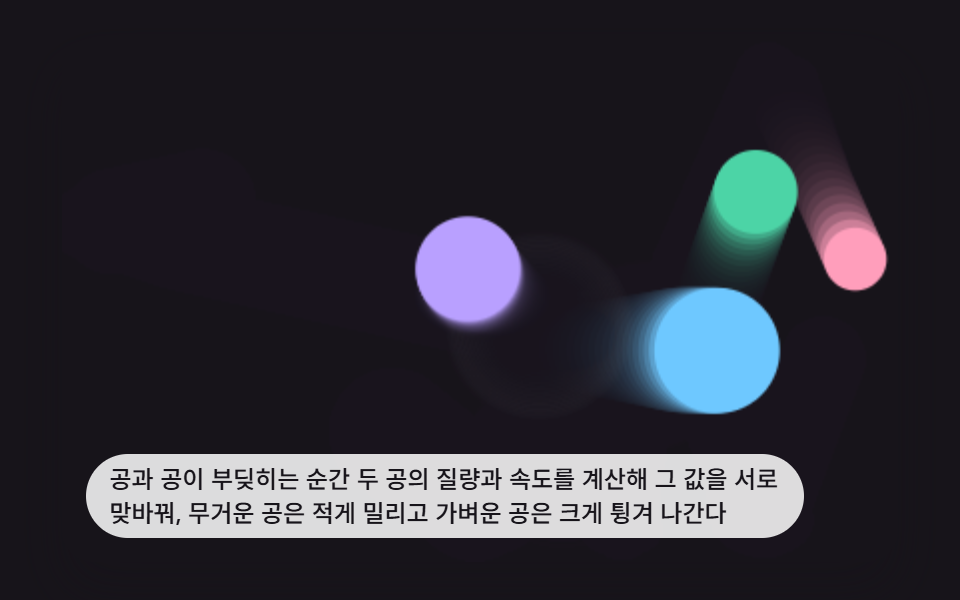 game9 Bouncing Ball Animation Patterns With Physics
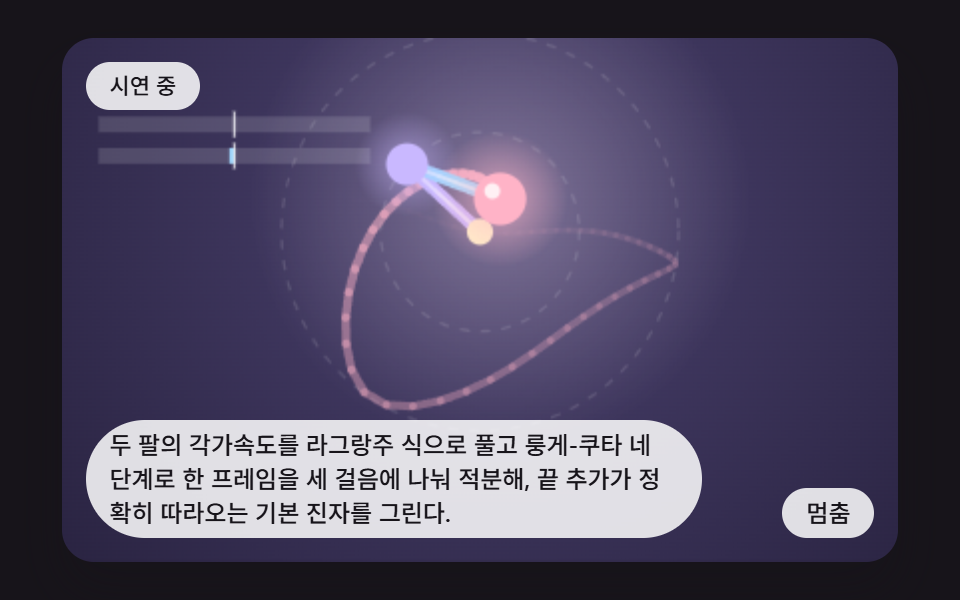 gameDouble Pendulum Simulation: 9 Chaos Scenes
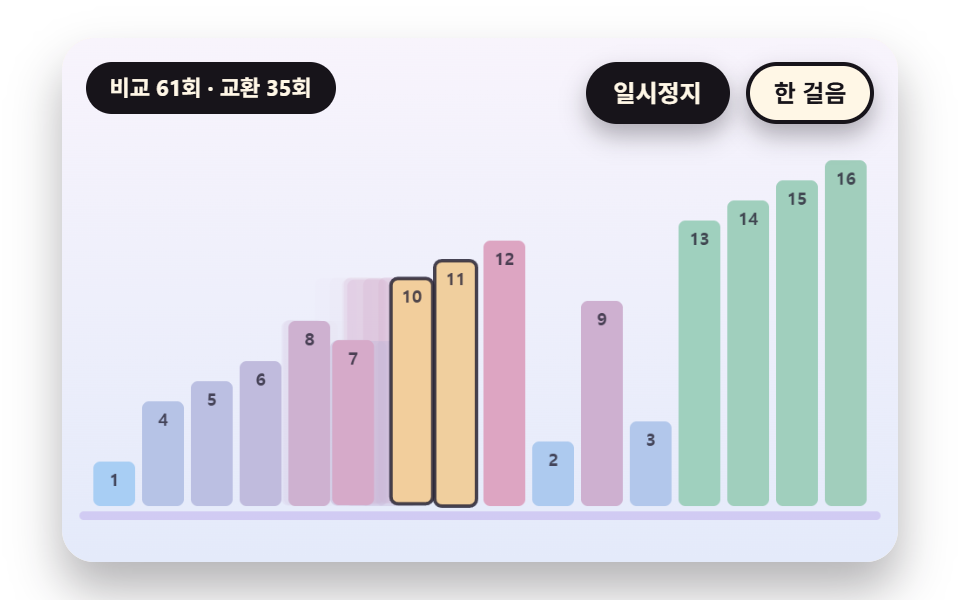 gameSorting Algorithm Visualizer: 9 Sort Scenes
 gameMinesweeper JavaScript: 9 Minefield Scenes
 gameBrick Breaker Game: 9 Canvas Scenes
 gameSliding Puzzle: 9 Canvas Scenes, Parity to Search
 gameWalking Animation Cycle: 9 Calculated Scenes
 gameSudoku: 9 Scenes, Candidates to Unique Boards
 gameTetris JavaScript: Build It in 9 Canvas Steps
 gameSpin Wheel: 9 Canvas Roulettes, Flick to Stop