Walking Animation Cycle: 9 Calculated Scenes
A walk is legs taking turns catching a body tipping forward — 02 splits a step into five phases, 03 sets the speed by the stride angle, and 07 leans downhill
A Character Walking Animation Is Not a Reel of Poses Flipped in Order but a Calculation That Makes Walking Look Real by Solving, Every Frame, the Angles of Two Legs Taking Turns Pressing the Floor Under a Body Tipping Forward: It All Starts From One Cycle Phase
 01 wc-phase-advance-wrap
 02 wc-stance-5phase-sole
 03 wc-stride-angle-speed
 04 wc-head-bob-gaze
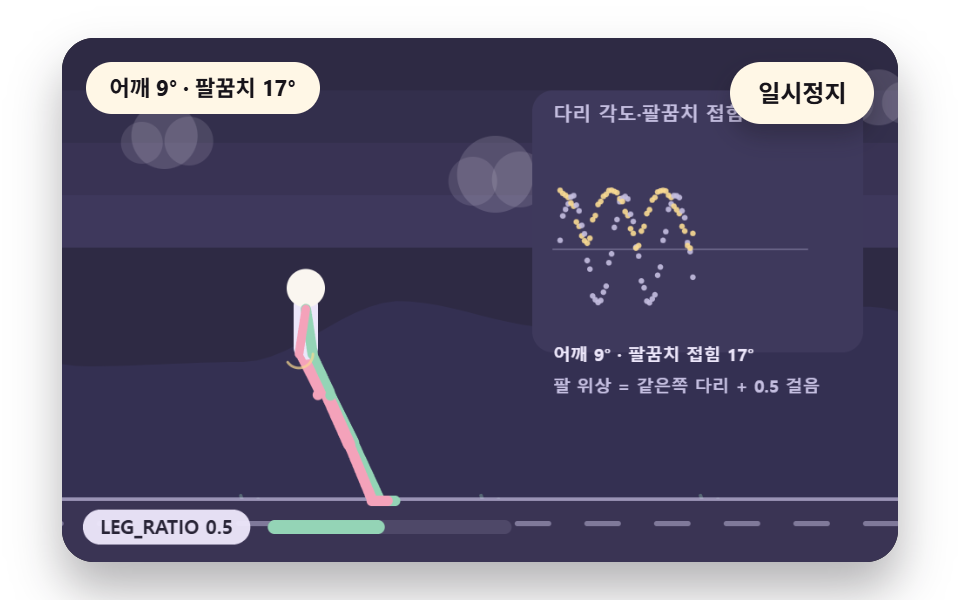 05 wc-elbow-counterswing
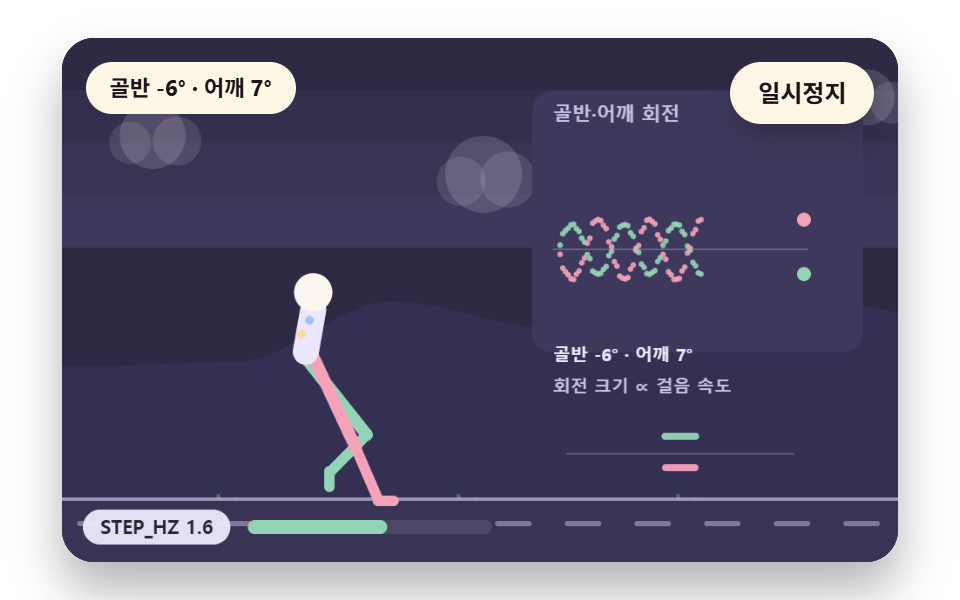 06 wc-torso-hip-rock
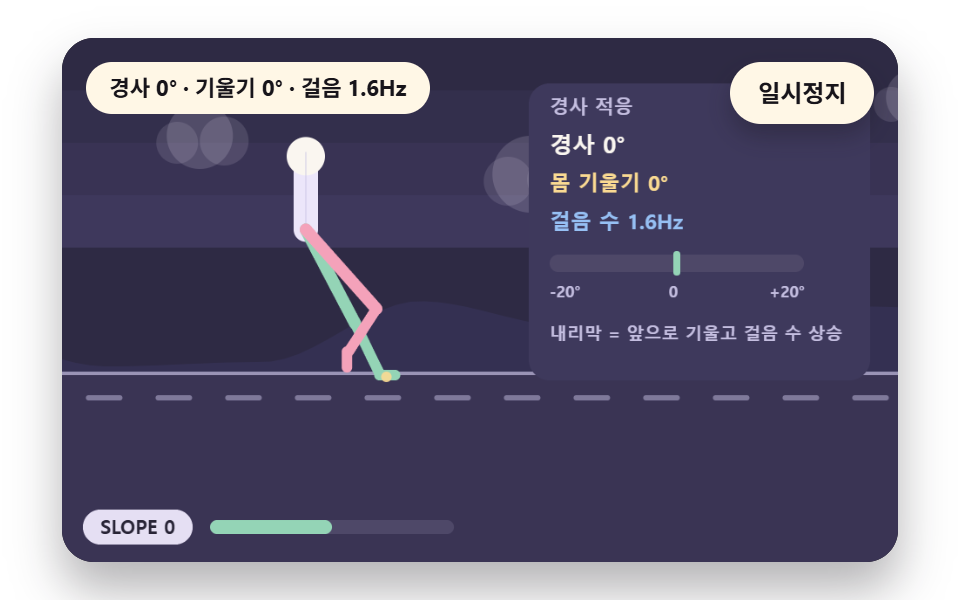 07 wc-slope-adapt-lean
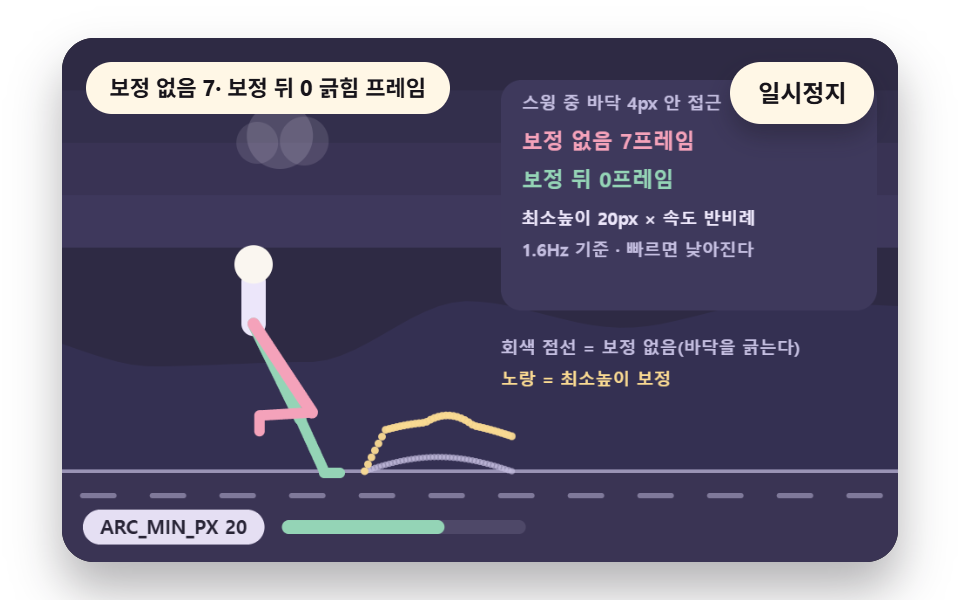 08 wc-foot-arc-correct
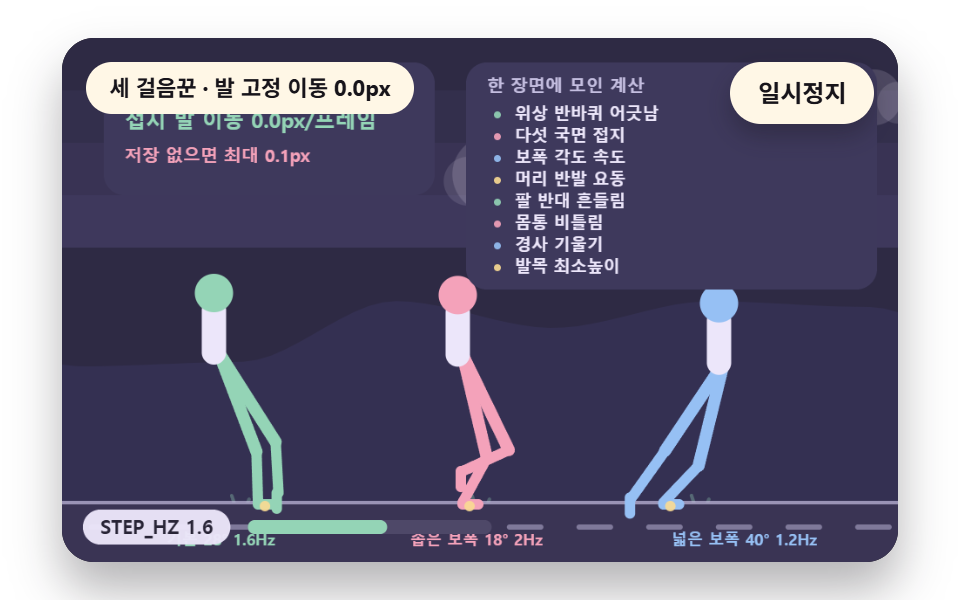 09 wc-footplant-ground-lock
Auto-plays · click a tile to jump to its section · all nine in one zip
- 01 A Cycle Phase That Wraps Without a Seam
- 02 Five Stance Phases Where the Sole Stays on the Floor
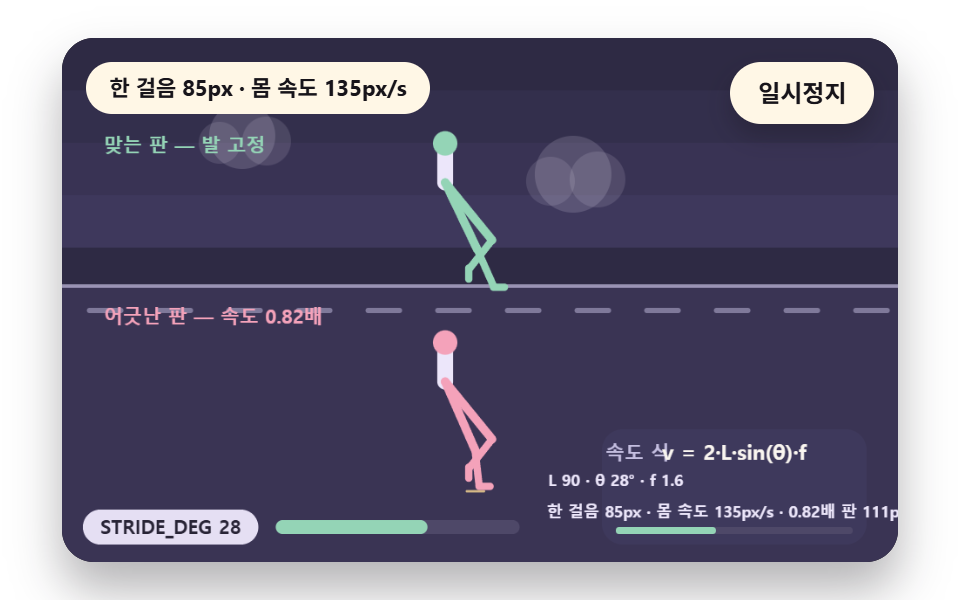
- 03 Setting the Walk Speed by the Stride Angle
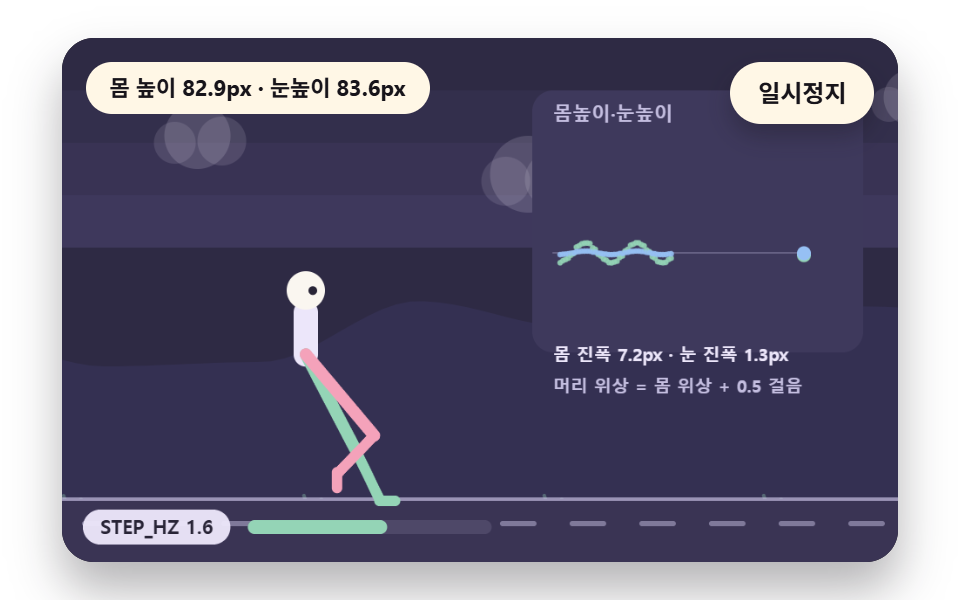
- 04 A Head That Bobs With Each Step and a Steady Gaze
- 05 An Elbow That Swings Against the Legs
- 06 A Torso and Hips That Turn With Each Step
- 07 An Adaptive Walk Where the Body Leans on a Slope
- 08 Shaving the Arc the Foot Travels
- 09 A Sole Locked to the Floor and a Finished Scene
The nine scenes share one walk clock and one leg solver, and each scene differs only in the value it examines. The character walks in place at the center of the screen while the floor ticks and the background hills and clouds drift back at the groundV speed. If you want a walking animation reference you can read in one sitting, this is its shape: one phase, a leg solver and a canvas.
The walk state comes only from the gait calculation
There are two clocks. walkT sets the walk phase and sceneT runs the timetable for turns and slope changes. Leg angles, foot positions and arm swing all solve out of (walkT * STEP_HZ) % 1, and no separate walk pose is stored.
    function advance(dt) {
        sceneT += dt;
        walkT += dt;
        if (!manual) {
            while (evAt < script.length && script[evAt].t <= sceneT) {
                const ev = script[evAt];
                evAt += 1;
                ev.f();
            }
            if (sceneT >= LAP_S) {
                lap += 1;
                begin();
                return;
            }
        }
        update(dt);
    }
begin() resets both clocks to 0 at the start of each lap, so the same timetable gives the same walk. None of the nine index.html files contains Math.random, Date, performance or fetch.
A fixed 1/60 second step
The frame gap is cut at DT_MAX 0.05 s, stacked in acc and handed to advance in STEP_S 1/60 s pieces by while (acc >= STEP_S). When the tab hides the loop stops, and on return acc is emptied and the first frame's dt is thrown away, so a few seconds do not pile into one frame and make the walk jump.
Walking Animation Cycle in JavaScript: 9 Scenes — a Seamless Phase Wrap, Five Stance Phases With a Flat Sole, Stride by Angle, a Head Bob and Gaze, a Counter-Swinging Elbow, a Torso Rock, a Slope Adaptation, an Arc Correction for Foot Travel and a Foot Plant on the Ground
Area, frames and intensity from the latest render
Here are the cumulative area, the moving frames out of 23 and the mean intensity read off the nine renders.
| Scene | Area | Moving frames | Intensity |
|---|---|---|---|
| 01 Phase wrap | 21.4% | 23/23 | 78.4 |
| 02 Five stance phases | 20.3% | 23/23 | 62.0 |
| 03 Stride angle | 13.5% | 23/23 | 62.6 |
| 04 Head and gaze | 14.3% | 23/23 | 70.5 |
| 05 Elbow | 15.6% | 23/23 | 78.9 |
| 06 Torso twist | 14.9% | 23/23 | 73.3 |
| 07 Slope adaptation | 20.2% | 23/23 | 63.1 |
| 08 Arc correction | 14.1% | 23/23 | 64.9 |
| 09 Foot plant | 16.1% | 23/23 | 115.8 |
Scene 01 covers the widest area at 21.4% and 03 the narrowest at 13.5%. All nine scenes moved in 23 of 23 frames, and mean intensity is highest in 09 at 115.8 and lowest in 02 at 62.0.
01A Cycle Phase That Wraps Without a Seam
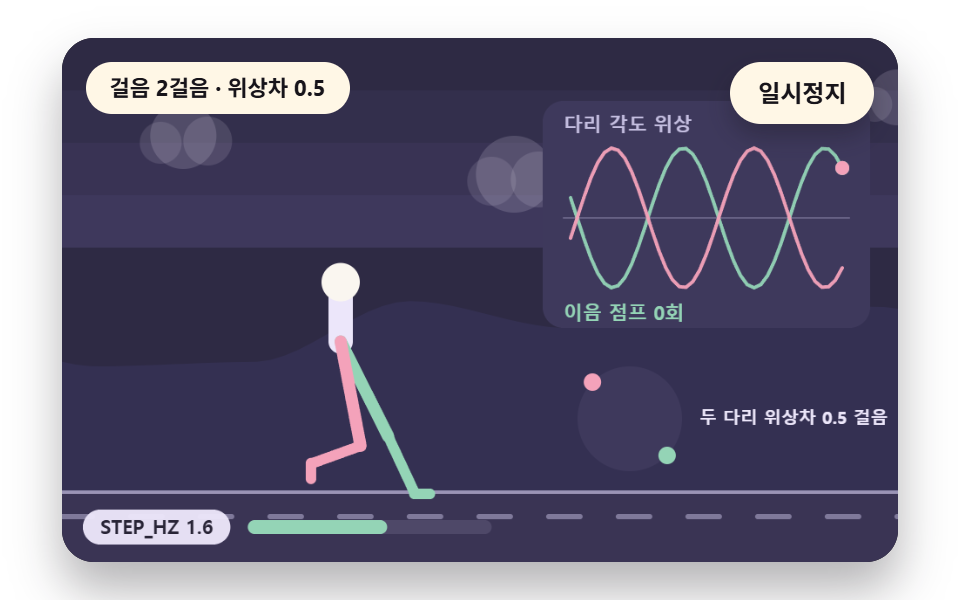
Walking is taken as two steps per full turn, so cyclePhase() returns (walkT * STEP_HZ) % 2 and legPhase() adds half a step to the right leg only, which keeps the legs half a step apart. Cutting the phase with a modulo leaves no jump between the last pose and the first at each step. The seam jump counter in the right panel counts frames where the sin value leaps by more than 0.35, and running the same formula in Node for 3.75 s (225 frames) gave 0.
<main class="stage">
<div class="vj is-demo" id="vj">
  <div class="vj__pad" data-role="pad" tabindex="0" role="application" aria-label="Walking cycle stage: left and right arrow keys change the step rate, Enter or Space pauses, N takes one step, R restarts">
    <canvas class="vj__canvas" data-role="canvas" width="480" height="300" role="img" aria-label="Each step turns the two leg phases around a circle half a turn apart. When the left marker crosses the seam, the leg angles are cut by a modulo of one full turn so they continue without a jump, and on the right the two leg phases are drawn as curves on a flat plane keeping exactly half a turn apart. The gauge below shows the constant name and its current value, and under reduced motion only one standing pose where the walk has come to rest is drawn"></canvas>
  </div>
  <p class="vj__status" data-role="status" aria-live="off">Walking cycle scene</p>
  <div class="vj__ctrl">
    <button class="vj__pause" data-role="pause" type="button" aria-pressed="false">Pause</button>
  </div>
  <p class="vj__done" data-role="done" role="status" aria-live="polite"></p>
</div>
</main>
@use "../../../../site/static/demo-tokens" as *;
@include stage($stage-paper);
.vj {
position: relative;
width: min(92vw, calc(160vh - 12.8vw));
aspect-ratio: 480 / 300;
margin: 0 auto;
border-radius: $r-card;
overflow: hidden;
box-shadow: $shadow-raised;
background: $subject-ink;
}
// 무대 상자 — 눌러서 한 번 깨뜨리는 곳(touch-action: none 은 이 상자에만). 무대 밖 터치는 페이지 스크롤 그대로
.vj__pad {
position: absolute;
inset: 0;
border-radius: inherit;
outline: none;
touch-action: none;
cursor: pointer;
}
// 바깥 .vj 가 넘침을 자르므로 포커스 테두리는 안쪽으로 들인다
.vj__pad:focus-visible {
outline: 3px solid $subject-cream;
outline-offset: -3px;
}
.vj__canvas {
position: absolute;
inset: 0;
display: block;
width: 100%;
height: 100%;
}
.vj__ctrl {
position: absolute;
right: $sp-3;
top: $sp-3;
display: flex;
gap: $sp-2;
}
.vj__pause {
padding: $sp-1 $sp-3;
border: 2px solid $subject-cream;
border-radius: $r-pill;
background: $subject-cream;
color: $subject-ink;
font-family: inherit;
font-weight: 700;
font-size: 12px;
line-height: 1.6;
cursor: pointer;
box-shadow: $shadow-press;
transition: transform $dur-quick $ease-spring;
}
// 스크린리더에만 읽히는 낭독 문장 — 모드가 바뀔 때만 쓴다
.vj__done {
position: absolute;
width: 1px;
height: 1px;
margin: 0;
overflow: hidden;
clip-path: inset(50%);
white-space: nowrap;
}
// 눌린 상태(멈춤) — 바탕과 글자색을 뒤집어 aria-pressed 가 눈에도 보이게
.vj__pause[aria-pressed="true"] {
background: $subject-ink;
color: $subject-cream;
}
.vj__pause:hover {
transform: translateY(-2px);
}
.vj__pause:active {
transform: translateY(1px);
}
.vj__pause:focus-visible {
outline: 3px solid $subject-cream;
outline-offset: 3px;
}
// 상태 줄 — 지금 장면의 수치를 글자로. 화면에만 있고 aria-live 는 늘 off
.vj__status {
position: absolute;
left: $sp-3;
top: $sp-3;
max-width: calc(100% - 100px);
margin: 0;
padding: $sp-1 $sp-3;
border-radius: $r-pill;
background: $subject-cream;
color: $subject-ink;
font-weight: 700;
font-size: 11px;
line-height: 1.6;
white-space: nowrap;
overflow: hidden;
text-overflow: ellipsis;
pointer-events: none;
}
@media (max-width: 340px) {
.vj__pause,
.vj__status { font-size: 10px; padding: 0 $sp-2; }
}
// 움직임 줄이기 — 장면은 스크립트가 글리치 없는 원문 한 장으로 멈춘다. 버튼도 떠오르지 않게
@media (prefers-reduced-motion: reduce) {
.vj__pause { transition: none !important; }
.vj__pause:hover,
.vj__pause:active { transform: none !important; }
}html, body {
margin: 0;
overflow: hidden;
}
.stage {
box-sizing: border-box;
min-height: 100vh;
display: grid;
place-items: center;
margin: 0;
background: #ffffff;
font-family: -apple-system, "Segoe UI", "Noto Sans KR", sans-serif;
padding: clamp(8px, 4vw, 24px);
}
.vj {
position: relative;
width: min(92vw, 160vh - 12.8vw);
aspect-ratio: 480/300;
margin: 0 auto;
border-radius: 16px;
overflow: hidden;
box-shadow: 0 14px 24px rgba(23, 20, 26, 0.32);
background: #17141a;
}
.vj__pad {
position: absolute;
inset: 0;
border-radius: inherit;
outline: none;
touch-action: none;
cursor: pointer;
}
.vj__pad:focus-visible {
outline: 3px solid #fff7e6;
outline-offset: -3px;
}
.vj__canvas {
position: absolute;
inset: 0;
display: block;
width: 100%;
height: 100%;
}
.vj__ctrl {
position: absolute;
right: 12px;
top: 12px;
display: flex;
gap: 8px;
}
.vj__pause {
padding: 4px 12px;
border: 2px solid #fff7e6;
border-radius: 999px;
background: #fff7e6;
color: #17141a;
font-family: inherit;
font-weight: 700;
font-size: 12px;
line-height: 1.6;
cursor: pointer;
box-shadow: 0 6px 12px rgba(23, 20, 26, 0.32);
transition: transform 220ms cubic-bezier(0.2, 0.8, 0.2, 1);
}
.vj__done {
position: absolute;
width: 1px;
height: 1px;
margin: 0;
overflow: hidden;
clip-path: inset(50%);
white-space: nowrap;
}
.vj__pause[aria-pressed=true] {
background: #17141a;
color: #fff7e6;
}
.vj__pause:hover {
transform: translateY(-2px);
}
.vj__pause:active {
transform: translateY(1px);
}
.vj__pause:focus-visible {
outline: 3px solid #fff7e6;
outline-offset: 3px;
}
.vj__status {
position: absolute;
left: 12px;
top: 12px;
max-width: calc(100% - 100px);
margin: 0;
padding: 4px 12px;
border-radius: 999px;
background: #fff7e6;
color: #17141a;
font-weight: 700;
font-size: 11px;
line-height: 1.6;
white-space: nowrap;
overflow: hidden;
text-overflow: ellipsis;
pointer-events: none;
}
@media (max-width: 340px) {
.vj__pause,
.vj__status {
font-size: 10px;
padding: 0 8px;
}
}
@media (prefers-reduced-motion: reduce) {
.vj__pause {
transition: none !important;
}
.vj__pause:hover,
.vj__pause:active {
transform: none !important;
}
}(function () {
const root = document.getElementById("vj");
if (!root) return;
// 무대 좌표 — 캔버스 안 계산은 늘 480×300. 화면에 보이는 크기와 상관없다
const W = 480;
const H = 300;
const TAU = Math.PI * 2;
function clamp(v, lo, hi) { return v < lo ? lo : (v > hi ? hi : v); }
function lerp(a, b, k) { return a + (b - a) * k; }
function easeOut(k) { const u = 1 - clamp(k, 0, 1); return 1 - u * u * u; }
// 파스텔 팔레트 — 바탕은 짙은 자두색, 타일은 연한 색 위에 짙은 잉크 숫자
const INK = [40, 36, 54];
const PAPER = [250, 246, 240];
const ROSE = [244, 162, 186];
const MINT = [148, 212, 182];
const SKY = [150, 192, 244];
const SUN = [250, 218, 146];
const NEU = [236, 230, 250];
const BGC = [46, 42, 68];
const PANEL = [62, 57, 92];
const DIM = [196, 190, 224];
function rgba(c, a) {
return 'rgba(' + Math.round(clamp(c[0], 0, 255)) + ',' + Math.round(clamp(c[1], 0, 255)) + ',' + Math.round(clamp(c[2], 0, 255)) + ',' + clamp(a, 0, 1).toFixed(3) + ')';
}
function hsl(h, s, l) {
const a = s * Math.min(l, 1 - l);
const f = function (n) {
const k = (n + h / 30) % 12;
return l - a * Math.max(-1, Math.min(k - 3, Math.min(9 - k, 1)));
};
return [Math.round(f(0) * 255), Math.round(f(8) * 255), Math.round(f(4) * 255)];
}
// 정수 해시 — 같은 (a, b) 에는 늘 같은 0 이상 1 미만 값. 난수 함수는 쓰지 않는다
function hash2(a, b) {
let h = (Math.imul(a | 0, 374761393) + Math.imul(b | 0, 668265263)) | 0;
h = Math.imul(h ^ (h >>> 13), 1274126177);
h = h ^ (h >>> 16);
return (h >>> 0) / 4294967296;
}
// 2차원 값 잡음 — 정수 격자점마다 해시 값이 있고 그 사이를 부드럽게 잇는다
function noise2(x, y, seed) {
const xi = Math.floor(x);
const yi = Math.floor(y);
const fx = x - xi;
const fy = y - yi;
const ux = fx * fx * (3 - 2 * fx);
const uy = fy * fy * (3 - 2 * fy);
const s = seed * 131;
return lerp(lerp(hash2(xi + s, yi), hash2(xi + 1 + s, yi), ux), lerp(hash2(xi + s, yi + 1), hash2(xi + 1 + s, yi + 1), ux), uy);
}
// 장면 시계(s)·판 반복 번호·시간표 — 시간표는 (시각, 할 일) 목록이고 시각이 지나면 한 번씩 부른다
let sceneT = 0;
let lap = 0;
let script = [];
let evAt = 0;
// 문구 틀의 {a}·{b}·{c} 자리에 값을 끼운다 — 화면 문구는 늘 틀 한 줄이고 로케일 사전이 통째로 바꾼다
function fill(s, a, b, c) {
return s.split('{a}').join(a).split('{b}').join(b === undefined ? '' : b).split('{c}').join(c === undefined ? '' : c);
}
function r1(v) { return String(Math.round(v * 10) / 10); }
function group(v) {
// 천 단위 점 — 로케일 함수에 기대지 않는다
const s = String(Math.round(v));
let o = '';
for (let i = 0; i < s.length; i += 1) {
if (i > 0 && (s.length - i) % 3 === 0) {
o += ',';
}
o += s.charAt(i);
}
return o;
}
// 기본값 상수 — 변형 3개(STEP_HZ·STRIDE_DEG·LEG_RATIO)가 이 줄의 값을 바꾼다
const STEP_HZ = 1.6;
const STRIDE_DEG = 28;
const LEG_PX = 90;
const LEG_RATIO = 0.48;
const CONTACT_SHARE = 0.6;
const GAIT = { stepHz: STEP_HZ, strideDeg: STRIDE_DEG, legPx: LEG_PX, legRatio: LEG_RATIO, contactShare: CONTACT_SHARE };
// walkT 는 걸음 시간으로만 오르는 시계(s). phase 는 One step 위상 0~1, cyclePhase 는 두 걸음 위상 0~2
let walkT = 0;
function stepPhase() { return (walkT * GAIT.stepHz) % 1; }
function cyclePhase() { return (walkT * GAIT.stepHz) % 2; }
function stepIndex() { return Math.floor(walkT * GAIT.stepHz); }
// 다리별 One step 위상 — 왼다리가 정수 걸음, 오른다리가 반 걸음 어긋난다
function legPhase(right) { return ((walkT * GAIT.stepHz) + (right ? 0.5 : 0)) % 1; }
// Contact 국면 판정 — ph 가 contactShare 안이면 발이 바닥에 붙어 있다
function inStance(ph) { return ph < GAIT.contactShare; }
// Five phases — Contact(0~0.12) · Loading(0.12~0.3) · Mid stance(0.3~0.45) · Push off(0.45~contactShare) · Lift(나머지)
const PH5 = [
{ name: 'Contact', a: 0, b: 0.12, col: null },
{ name: 'Loading', a: 0.12, b: 0.3, col: null },
{ name: 'Mid stance', a: 0.3, b: 0.45, col: null },
{ name: 'Push off', a: 0.45, b: 0.6, col: null },
{ name: 'Lift', a: 0.6, b: 1, col: null },
];
function phaseName(ph) {
for (let i = 0; i < PH5.length; i += 1) {
if (ph >= PH5[i].a && ph < PH5[i].b) {
return PH5[i].name;
}
}
return 'Lift';
}
// 라디안 변환 — 각도 값은 도 단위 상수로 두고 계산 직전에만 바꾼다
function rad(deg) { return deg * Math.PI / 180; }
function solveFoot(hipX, hipY, ph, plantX, slopeDeg, groundY) {
const leg = GAIT.legPx;
const L1 = leg / (1 + GAIT.legRatio);
const L2 = leg * GAIT.legRatio / (1 + GAIT.legRatio);
let ax;
let ay;
let ankleDeg;
const planted = inStance(ph);
if (planted) {
ax = plantX;
ay = groundY;
ankleDeg = -slopeDeg;
}
else {
const k = (ph - GAIT.contactShare) / (1 - GAIT.contactShare);
const half = rad(GAIT.strideDeg);
const ang = lerp(half, -half, k);
ax = hipX + Math.sin(ang) * leg;
ay = groundY - Math.abs(Math.sin(Math.PI * k)) * leg * 0.22;
ankleDeg = 90 - slopeDeg;
}
const dx = ax - hipX;
const dy = ay - hipY;
let d = Math.hypot(dx, dy);
d = Math.min(d, L1 + L2 - 0.01);
const base = Math.atan2(dy, dx);
const cosK = (L1 * L1 + d * d - L2 * L2) / (2 * L1 * d);
const elbow = Math.acos(clamp(cosK, -1, 1));
const kneeAng = base - elbow;
return { ax: ax, ay: ay, kneeX: hipX + Math.cos(kneeAng) * L1, kneeY: hipY + Math.sin(kneeAng) * L1, ankleDeg: ankleDeg, planted: planted };
}
// 몸 높이 — Contact 국면 Mid stance(다리가 곧게 펴는 ph=0.3 부근)이 가장 높고 이중 Contact(두 발 다 지면)에서 살짝 낮아진다
function hipHeight(ph) {
const bob = Math.sin(ph * Math.PI * 2 - Math.PI / 2);
return GAIT.legPx * (0.93 + 0.04 * bob);
}
// 몸 앞뒤 기울기 — 내리막에서 앞으로 숙여 다리 회복 시간을 번다
function leanDeg(slopeDeg) { return slopeDeg < 0 ? slopeDeg * 0.5 : slopeDeg * 0.25; }
let plants = [null, null]; // [왼, 오른]
// Contact 시작 ph(=0 또는 contactShare 근처)에서 plantX 를 몸 위치로부터 한 번만 풀어 저장한다
function lockPlants(hipX) {
for (let r = 0; r < 2; r += 1) {
const ph = legPhase(r === 1);
const otherPh = legPhase(r === 0);
if (inStance(ph) && plants[r] === null) {
const half = rad(GAIT.strideDeg);
const k = ph / GAIT.contactShare;
const ang = lerp(half, -half, k);
const px = hipX + Math.sin(ang) * GAIT.legPx;
plants[r] = { x: px, ph0: ph };
}
if (!inStance(ph)) {
plants[r] = null;
}
}
}
function plantXOf(r, hipX) {
const p = plants[r];
if (p !== null) {
return p.x;
}
return hipX;
}
// ── 그리기 도구
const canvasEl = root.querySelector('[data-role="canvas"]');
const padEl = root.querySelector('[data-role="pad"]');
const pauseEl = root.querySelector('[data-role="pause"]');
const statusEl = root.querySelector('[data-role="status"]');
const doneEl = root.querySelector('[data-role="done"]');
const ctxRaw = canvasEl ? canvasEl.getContext('2d') : null;
if (!canvasEl || !ctxRaw || !pauseEl || !padEl || !doneEl) {
return;
}
const cv = canvasEl;
const ctx = ctxRaw;
const pauseBtn = pauseEl;
const doneP = doneEl;
const pad = padEl;
// 외부 웹폰트는 부르지 않는다 — 기기에 있는 글꼴 목록만
const UI_FONT = 'system-ui, -apple-system, "Segoe UI", "Noto Sans KR", sans-serif';
let dpr = 1;
function fitCanvas() {
// 배율은 2 에서 자른다 — 계산은 늘 480×300 이고 화면 배율만 이 값
dpr = Math.min(window.devicePixelRatio || 1, 2);
cv.width = Math.round(W * dpr);
cv.height = Math.round(H * dpr);
ctx.setTransform(dpr, 0, 0, dpr, 0, 0);
}
function box(x, y, w, h, r, c, a) {
if (w <= 0.2 || h <= 0.2 || a <= 0) {
return;
}
ctx.beginPath();
ctx.roundRect(x, y, w, h, Math.max(0, Math.min(r, w / 2, h / 2)));
ctx.fillStyle = rgba(c, a);
ctx.fill();
}
function disc(x, y, r, c, a) {
ctx.beginPath();
ctx.arc(x, y, r, 0, TAU);
ctx.fillStyle = rgba(c, a);
ctx.fill();
}
function seg(x1, y1, x2, y2, c, a, w) {
ctx.beginPath();
ctx.moveTo(x1, y1);
ctx.lineTo(x2, y2);
ctx.strokeStyle = rgba(c, a);
ctx.lineWidth = w;
ctx.lineCap = 'round';
ctx.stroke();
}
function text(s, x, y, c, px, weight, align) {
ctx.font = weight + ' ' + px + 'px ' + UI_FONT;
ctx.textAlign = align;
ctx.textBaseline = 'middle';
ctx.fillStyle = rgba(c, 1);
ctx.fillText(s, x, y);
}
function panel(x, y, w, h) { box(x, y, w, h, 12, PANEL, 1); }
// 아래쪽 눈금 — 상수 이름과 지금 값 · 크기 막대
function hud(name, val, frac) {
const label = name + ' ' + val;
ctx.font = '700 11px ' + UI_FONT;
const w = ctx.measureText(label).width + 20;
const x = 12;
const y = H - 30;
box(x, y, w, 20, 10, NEU, 0.96);
text(label, x + w / 2, y + 10.5, INK, 11, 700, 'center');
const mx = x + w + 10;
box(mx, y + 6, 140, 8, 4, [78, 72, 104], 1);
box(mx, y + 6, 140 * clamp(frac, 0, 1), 8, 4, MINT, 1);
}
// ── 상태 줄·낭독 문장
const SPK_STEP = '{a} steps taken, cycle phase {b}';
function speakBoard() {
return fill(SPK_STEP, String(stepIndex()), phaseName(legPhase(false)));
}
let shownStatus = '';
function pushStatus(s) {
if (!statusEl || s === shownStatus) {
return;
}
shownStatus = s;
statusEl.textContent = s;
}
let paused = false;
// 움직임 줄이기 — 켜지면 루프 대신 정지 한 장
let still = false;
const reduceQuery = window.matchMedia('(prefers-reduced-motion: reduce)');
// 페이지를 연 채 움직임 줄이기 설정을 바꿔도 change 리스너가 다시 읽는다
still = reduceQuery.matches;
// 자동 시연 표시 — 사람이 처음 손대면 떼고, 그 뒤부터 모드가 바뀔 때만 낭독 문장을 쓴다
let demo = root.classList.contains('is-demo');
const off = new AbortController();
// 사람이 직접 조작하는 중이면 시간표는 멈추고 계산만 흐른다
let manual = false;
function wake() {
if (!demo) {
return;
}
demo = false;
root.classList.remove('is-demo');
}
function takeOver() {
if (manual) {
return;
}
manual = true;
wake();
}
// 낭독 모드 — 완성이면 1000, 손으로 하는 중이면 맞은 타일 수, 자동 시연이면 장면이 정한 단계
function modeBase(sceneMode) {
return manual ? 100 + Math.floor(hipHeight(legPhase(false))) : sceneMode;
}
// 낭독 문장 — 화면 상태 줄(aria-live off)과 따로, 모드가 바뀔 때와 사람이 조작했을 때만 role=status 에 쓴다
let lastMode = -9;
function say() {
doneP.textContent = speakText();
lastMode = still ? -2 : modeId();
}
function advance(dt) {
sceneT += dt;
walkT += dt;
if (!manual) {
while (evAt < script.length && script[evAt].t <= sceneT) {
const ev = script[evAt];
evAt += 1;
ev.f();
}
if (sceneT >= LAP_S) {
lap += 1;
begin();
return;
}
}
update(dt);
}
function begin() {
sceneT = 0;
walkT = lap * 0; // 걸음 시계는 장면과 함께 0 에서 다시 시작 — 같은 시간표면 같은 걸음
evAt = 0;
script = [];
build();
}
// 고정 걸음 + Step rate 상한 — 프레임 간격이 흔들려도 같은 계산, 탭이 멈췄다 돌아와도 한 번에 몰리지 않는다
const STEP_S = 1 / 60;
const DT_MAX = 0.05;
let acc = 0;
function showNow() {
draw();
pushStatus(statusText());
if (!demo) {
const m = still ? -2 : modeId();
if (m !== lastMode) {
say();
}
}
}
let rafId = 0;
let lastTs = -1;
function frame(ts) {
if (still || paused) {
rafId = 0;
return;
}
if (lastTs < 0) {
lastTs = ts;
}
const dt = Math.min((ts - lastTs) / 1000, DT_MAX);
lastTs = ts;
acc += dt;
while (acc >= STEP_S) {
advance(STEP_S);
acc -= STEP_S;
}
showNow();
rafId = window.requestAnimationFrame(frame);
}
function startLoop() {
if (rafId) {
return;
}
// 멈췄던 사이의 시간을 첫 프레임 dt 로 넘기지 않는다
lastTs = -1;
acc = 0;
rafId = window.requestAnimationFrame(frame);
}
function stopLoop() {
if (rafId) {
window.cancelAnimationFrame(rafId);
rafId = 0;
}
}
// 움직임 줄이기 — 루프 없이 시간표의 REST_S 초까지를 한 번에 치른 장면 한 컷. 캐릭터는 걸음 보간 없이 그 시점의 자리에 바로 선다
function showRest() {
stopLoop();
lap = 0;
begin();
walkT = REST_S;
while (evAt < script.length && script[evAt].t <= REST_S) {
const ev = script[evAt];
evAt += 1;
sceneT = ev.t;
ev.f();
}
sceneT = REST_S;
update(0);
showNow();
}
function play() {
begin();
showNow();
if (!paused) {
startLoop();
}
}
// 사람이 조작한 뒤 — 멈춘 채이거나 움직임 줄이기이면 보간을 건너뛰어 바로 보이게 한다. 조작 직후는 낭독 문장도 쓴다
function afterInput(speak) {
if (paused || still) {
sceneT += 1;
}
update(0);
showNow();
if (speak) {
say();
}
}
function togglePause() {
paused = !paused;
pauseBtn.setAttribute('aria-pressed', paused ? 'true' : 'false');
wake();
if (paused) {
stopLoop();
}
else if (!still) {
startLoop();
}
say();
}
function restart() {
manual = false;
lap = 0;
begin();
update(0);
showNow();
say();
}
// N One step — 시간표의 다음 일 하나를 지금 치른다. 시간표가 끝났으면 처음부터 다시 짠 뒤 첫 일
function stepOnce() {
takeOver();
if (evAt >= script.length) {
lap += 1;
begin();
}
if (evAt < script.length) {
const ev = script[evAt];
evAt += 1;
if (sceneT < ev.t) {
sceneT = ev.t;
}
ev.f();
}
afterInput(true);
}
function keyMove(dx, dy) {
// 좌우 방향키 = 걸음 속도 한 단계 조절. 위·아래는 항목이 keyHook 로 따로 받는다
if (dx !== 0) {
GAIT.stepHz = clamp(Math.round((GAIT.stepHz + dx * 0.4) * 10) / 10, 0.8, 2.8);
}
else if (keyHook !== null) {
keyHook(dy < 0 ? 'ArrowUpHint' : 'ArrowDownHint');
return;
}
takeOver();
afterInput(true);
}
function toCanvas(e) {
const r = cv.getBoundingClientRect();
return [(e.clientX - r.left) * W / r.width, (e.clientY - r.top) * H / r.height];
}
pauseBtn.addEventListener('click', togglePause, { signal: off.signal });
// 키보드 — 무대에 포커스가 있을 때만. 방향키 = 빈칸 이웃 타일 이동, Enter·Space = Pause, N = One step, R = 처음부터
pad.addEventListener('keydown', function (e) {
if (e.altKey || e.ctrlKey || e.metaKey) {
return;
}
const k = e.key;
if (k === 'Enter' || k === ' ' || k === 'p' || k === 'P') {
e.preventDefault();
togglePause();
}
else if (k === 'r' || k === 'R') {
restart();
}
else if (k === 'n' || k === 'N') {
e.preventDefault();
stepOnce();
}
else if (k === 'ArrowLeft') {
e.preventDefault();
keyMove(-1, 0);
}
else if (k === 'ArrowRight') {
e.preventDefault();
keyMove(1, 0);
}
else if (k === 'ArrowUp') {
e.preventDefault();
keyMove(0, -1);
}
else if (k === 'ArrowDown') {
e.preventDefault();
keyMove(0, 1);
}
else if (keyHook !== null && keyHook(k)) {
e.preventDefault();
takeOver();
afterInput(true);
}
}, { signal: off.signal });
// 포인터 — 마우스·터치·펜을 한 이벤트로. 누르는 순간부터 놓을 때까지 무대가 포인터를 붙잡는다
let ptrDown = false;
// 장면이 방향키·Enter·N·R 밖의 키를 받고 싶을 때 거는 갈고리 — 먹었으면 true
let keyHook = null;
pad.addEventListener('pointerdown', function (e) {
takeOver();
ptrDown = true;
try {
pad.setPointerCapture(e.pointerId);
}
catch (err) {
ptrDown = true;
}
const p = toCanvas(e);
onPtr(0, p[0], p[1]);
afterInput(false);
}, { signal: off.signal });
pad.addEventListener('pointermove', function (e) {
if (!ptrDown) {
return;
}
const p = toCanvas(e);
onPtr(1, p[0], p[1]);
afterInput(false);
}, { signal: off.signal });
function ptrEnd(e) {
if (!ptrDown) {
return;
}
ptrDown = false;
const p = toCanvas(e);
onPtr(2, p[0], p[1]);
afterInput(true);
}
pad.addEventListener('pointerup', ptrEnd, { signal: off.signal });
pad.addEventListener('pointercancel', ptrEnd, { signal: off.signal });
// 탭이 숨으면 멈추고, 돌아오면 시계를 다시 맞춰 시작
document.addEventListener('visibilitychange', function () {
if (document.hidden) {
stopLoop();
}
else if (!paused && !still) {
startLoop();
}
}, { signal: off.signal });
// 설정이 바뀌면 — 켜지면 판 한 장, 꺼지면 다시 움직인다
reduceQuery.addEventListener('change', function () {
still = reduceQuery.matches;
if (still) {
showRest();
}
else {
lap = 0;
play();
}
}, { signal: off.signal });
window.addEventListener('resize', function () {
fitCanvas();
showNow();
}, { signal: off.signal });
// ── 캐릭터 그리기 — 자체 도형 캐릭터(머리·몸통·2링크 다리 2·팔 2). 브랜드 캐릭터 아님
// limb(x1, y1, x2, y2, 색, 굵기) — 관절 두 점을 잇는 둥근 막대
function limb(x1, y1, x2, y2, c, w) {
seg(x1, y1, x2, y2, c, 1, w);
}
// footShape(x, y, ankleDeg, 색) — 발바닥. ankleDeg 는 바닥 기준 도 단위(0 = 바닥에 평평)
function footShape(x, y, ankleDeg, c) {
ctx.save();
ctx.translate(x, y);
ctx.rotate(ankleDeg * Math.PI / 180);
box(-3, -2, 15, 6, 3, c, 1);
ctx.restore();
}
// drawGround(y, slopeDeg) — 기울어진 바닥면. y 는 화면 가운데서의 기준 높이.
// groundV > 0 이면 바닥의 눈금 줄무늬가 그 속도로 왪쪽으로 흘러 간다 — 몸이 앞으로 가는 속도의 시각화
let groundV = 0;
function drawGround(y, slopeDeg) {
// 기울기가 있으면 화면 가운데 x=W/2 에서 높이 y 인 직선 — groundYAt 과 같은식
const y0 = groundYAt(0, y, slopeDeg);
const y1 = groundYAt(W, y, slopeDeg);
// 받침 띠 — 바닥선 아래 옅은 색 띠
ctx.beginPath();
ctx.moveTo(0, y0);
ctx.lineTo(W, y1);
ctx.lineTo(W, H);
ctx.lineTo(0, H);
ctx.closePath();
ctx.fillStyle = rgba([58, 52, 84], 1);
ctx.fill();
seg(0, y0, W, y1, DIM, 0.7, 2);
// 눈금 줄무늬 — 걸음이 밀어 내는 속도로 흘러 간다. 간격 40px, 길이 18px
if (groundV > 0) {
const gap = 40;
const off = (walkT * groundV) % gap;
for (let x = -gap; x < W + gap; x += gap) {
const sx = x - off;
seg(sx, groundYAt(sx + 9, y, slopeDeg) + 14, sx + 18, groundYAt(sx + 27, y, slopeDeg) + 14, DIM, 0.5, 3);
}
}
}
// drawScenery() — 걷는 세계의 경물 층. 하늘 그라디언트 띠·언덕·구름·가로등이 groundV 에 비례해 뒤로 흐른다.
// 배경 톤 전체가 걸음 속도 값의 전파 범위다 — 몸이 앞으로 간다는 감각을 화면 전체가 받친다(BD26: 면적을 장식이 아니라 값의 전파로)
function drawScenery() {
// 바탕 — 하늘 띠와 언덕 사이 빈 구간이 지워지지 않아 캐릭터 자국이 번졌다. 먼저 한 번 칠한다
box(0, 0, W, H, 0, BGC, 1);
// 하늘 — 세로 옅은 띠 4개. 걸음 위상에 따라 명도가 살짝 숨쉰다
const skyT = Math.sin(walkT * GAIT.stepHz * Math.PI);
for (let i = 0; i < 4; i += 1) {
const t = i / 3;
const c = [lerp(46, 62, t), lerp(42, 56, t), lerp(68, 92, t)];
box(0, i * 30, W, 30, 0, c, 1);
}
// 먼 언덕 — noise2 로 굽이친다. 걸음 속도의 0.35배로 흐른다(원근 감쇠)
if (groundV > 0) {
const scroll = walkT * groundV * 0.35;
ctx.beginPath();
ctx.moveTo(0, H);
for (let x = 0; x <= W; x += 8) {
const yy = 168 + noise2((x + scroll) / 90, 3, 11) * 46 - 20;
ctx.lineTo(x, yy);
}
ctx.lineTo(W, H);
ctx.closePath();
ctx.fillStyle = rgba([52, 48, 82], 1);
ctx.fill();
// 구름 세 점 — 0.6배 속도
const cs = walkT * groundV * 0.6;
for (let i = 0; i < 3; i += 1) {
const cx = ((i * 190 + 60 - cs) % (W + 120) + W + 120) % (W + 120) - 60;
const cy = 34 + i * 22;
disc(cx, cy, 16 + i * 3, NEU, 0.16);
disc(cx + 14, cy + 3, 12 + i * 2, NEU, 0.13);
disc(cx - 13, cy + 4, 10 + i * 2, NEU, 0.12);
}
// 가까운 풀 다발 — 1.15배 속도(지면보다 살짝 빠른 근경)
const gs = walkT * groundV * 1.15;
for (let i = 0; i < 14; i += 1) {
const gx = ((i * 46 + 20 - gs) % (W + 60) + W + 60) % (W + 60) - 30;
const gy = H - 14 - (i % 3) * 6;
seg(gx, gy, gx - 4, gy - 12, MINT, 0.35, 2);
seg(gx + 2, gy, gx + 6, gy - 10, MINT, 0.3, 2);
}
}
}
// groundYAt(x, baseY, slopeDeg) — 경사식: 기울기가 있으면 x 에서의 바닥 높이
function groundYAt(x, baseY, slopeDeg) {
return baseY + (x - W / 2) * Math.tan(rad(slopeDeg)) * -1;
} // 01 — 걷기 사이클은 두 걸음(왼·오른)을 한 바퀴로 잡고 위상을 시간으로 민다.
// 각도는 한 바퀴 단위 나머지 연산으로 잘리고 두 다리 위상은 정확히 반 바퀴 어긋나 있다.
// 이음 확인: 왼쪽 바퀴의 이음새(위상 0 지점)를 지날 때 다리 각도가 연속인지, 오른쪽 곡선이 반 바퀴 차이를 유지하는지.
const LAP_S = 6.0;
const REST_S = 2.0;
const GROUND_Y = 260;
const CHAR_X = 160;
// PHX·PHY — 오른쪽 위상 곡선 패널 위치
const PHX = 276;
const PHY = 36;
const PHW = 188;
const PHH = 130;
let lastL = 0;
let lastR = 0;
let seamJumps = [];
function build() {
lastL = 0;
lastR = 0;
seamJumps = [];
groundV = Math.sin(rad(GAIT.strideDeg)) * GAIT.legPx * 2 * GAIT.stepHz;
}
function update(dt) {
if (dt <= 0) {
return;
}
const l = cyclePhase();
const r = (l + 1) % 2;
// 이음 점프 측정 — One step 안에서 다리 각도가 0.35 라디안 넘게 튀면 점프로 센다
const la = Math.sin((l % 1) * TAU);
const ra = Math.sin((r % 1) * TAU);
if (Math.abs(la - lastL) > 0.35 || Math.abs(ra - lastR) > 0.35) {
seamJumps.push(sceneT);
}
lastL = la;
lastR = ra;
}
// 캐릭터 한 명 — hip 아래 2링크 다리. Contact 국면은 footplant 저장 위치 사용
function drawWalker(cx, showSeam) {
const hipY = GROUND_Y - hipHeight(legPhase(false));
const hipX = cx;
lockPlants(hipX);
// 몸통·머리
limb(hipX, hipY, hipX, hipY - 26, NEU, 14);
disc(hipX, hipY - 34, 11, PAPER, 1);
// 다리 두 개 — 오른다리 위상 = 왼다리 + 반 바퀴
const cols = [MINT, ROSE];
for (let r = 0; r < 2; r += 1) {
const ph = legPhase(r === 1);
const fs = solveFoot(hipX, hipY, ph, plantXOf(r, hipX), 0, GROUND_Y);
limb(hipX, hipY, fs.kneeX, fs.kneeY, cols[r], 7);
limb(fs.kneeX, fs.kneeY, fs.ax, fs.ay, cols[r], 6);
footShape(fs.ax, fs.ay, fs.planted ? 0 : fs.ankleDeg, cols[r]);
}
// 이음 표식 — 위상 0 을 지나는 순간 링
if (showSeam && (cyclePhase() % 1) < 0.04) {
disc(hipX, hipY - 50, 6, SUN, 0.9);
}
}
function draw() {
drawScenery();
drawGround(GROUND_Y, 0);
drawWalker(CHAR_X, true);
// 오른쪽 패널 — 두 다리 위상이 벌판(원 위 각도)을 따라가는 곡선. 세로축 = 각도, 가로축 = 시간
panel(PHX, PHY, PHW, PHH);
text('Leg angle phase', PHX + 12, PHY + 14, DIM, 11, 700, 'left');
const cy = PHY + PHH / 2 + 2;
seg(PHX + 12, cy, PHX + PHW - 12, cy, DIM, 0.3, 1);
for (let i = 0; i < 2; i += 1) {
const ox = PHX + 16 + i * (PHW - 32 + 4);
// 각 다리의 최근 1.2s 각도 흔적 — 걸음 시계로 다시 계산해 그린다(저장 없이 결정적)
for (let k = 0; k <= 40; k += 1) {
const tt = walkT - (40 - k) * 0.03;
const ang = Math.sin((((tt * GAIT.stepHz) + (i === 1 ? 0.5 : 0)) % 1) * TAU);
const px = PHX + 16 + k * ((PHW - 32) / 40) + i * 0;
const py = cy - ang * 40;
if (k === 0) {
ctx.beginPath();
ctx.moveTo(px, py);
}
else {
ctx.lineTo(px, py);
}
}
ctx.strokeStyle = rgba(i === 0 ? MINT : ROSE, 0.95);
ctx.lineWidth = 2;
ctx.stroke();
}
// 반 바퀴 차이 표시 — 두 곡선의 지금 값 점과 세로 점선
const lNow = Math.sin((cyclePhase() % 1) * TAU);
const rNow = Math.sin((((cyclePhase() + 1) % 2) % 1) * TAU);
disc(PHX + PHW - 16, cy - lNow * 40, 4, MINT, 1);
disc(PHX + PHW - 16, cy - rNow * 40, 4, ROSE, 1);
// 위상 원 — 벌판 위 두 점이 반 바퀴 어긋나게 도는 모습
const cyp = PHY + PHH + 52;
disc(PHX + 50, cyp, 30, PANEL, 1);
for (let i = 0; i < 2; i += 1) {
const a = (((walkT * GAIT.stepHz) + (i === 1 ? 0.5 : 0)) % 1) * TAU - Math.PI / 2;
disc(PHX + 50 + Math.cos(a) * 30, cyp + Math.sin(a) * 30, 5, i === 0 ? MINT : ROSE, 1);
}
text('The two legs sit half a step apart', PHX + 90, cyp, NEU, 10, 700, 'left');
// 이음 점프 수 — 0 이어야 이음이 없다
text(fill('Seam jumps: {a}', String(seamJumps.length)), PHX + 12, PHY + PHH - 8, seamJumps.length === 0 ? MINT : SUN, 11, 700, 'left');
hud('STEP_HZ', r1(GAIT.stepHz), GAIT.stepHz / 2.8);
}
function statusText() {
return fill('{a} steps, phase gap {b}', String(stepIndex()), '0.5');
}
function modeId() { return modeBase(Math.min(3, Math.floor(sceneT / 2))); }
function speakText() { return speakBoard(); }
function onDir(d) { keyMove(d === 0 ? 1 : d === 1 ? -1 : 0, 0); }
function onPtr(kind, x, y) { if (kind !== 0) {
return;
} GAIT.stepHz = clamp(GAIT.stepHz + (x > W / 2 ? 0.2 : -0.2), 0.8, 2.8); }
fitCanvas();
if (still) {
showRest();
}
else {
play();
}
return function () {
stopLoop();
off.abort();
};
})();// PhaseAdvanceWrap - 같은 항목 vanilla index.html 의 React 판. 같은 계산을 useEffect 안에서 돌린다
import { useEffect, useRef } from "react";
import styles from "./PhaseAdvanceWrap.module.scss";
const cx = (s: string): string => s.split(" ").map((n) => styles[n] ?? n).join(" ");
export default function PhaseAdvanceWrap() {
const rootRef = useRef<HTMLDivElement | null>(null);
useEffect(() => {
const rootEl = rootRef.current;
if (!rootEl) return;
const root: HTMLElement = rootEl;
type RGB = [number, number, number];
// 무대 좌표 — 캔버스 안 계산은 늘 480×300. 화면에 보이는 크기와 상관없다
const W = 480;
const H = 300;
const TAU = Math.PI * 2;
function clamp(v: number, lo: number, hi: number): number { return v < lo ? lo : (v > hi ? hi : v); }
function lerp(a: number, b: number, k: number): number { return a + (b - a) * k; }
function easeOut(k: number): number { const u = 1 - clamp(k, 0, 1); return 1 - u * u * u; }
// 파스텔 팔레트 — 바탕은 짙은 자두색, 타일은 연한 색 위에 짙은 잉크 숫자
const INK: RGB = [40, 36, 54];
const PAPER: RGB = [250, 246, 240];
const ROSE: RGB = [244, 162, 186];
const MINT: RGB = [148, 212, 182];
const SKY: RGB = [150, 192, 244];
const SUN: RGB = [250, 218, 146];
const NEU: RGB = [236, 230, 250];
const BGC: RGB = [46, 42, 68];
const PANEL: RGB = [62, 57, 92];
const DIM: RGB = [196, 190, 224];
function rgba(c: RGB, a: number): string {
return 'rgba(' + Math.round(clamp(c[0], 0, 255)) + ',' + Math.round(clamp(c[1], 0, 255)) + ',' + Math.round(clamp(c[2], 0, 255)) + ',' + clamp(a, 0, 1).toFixed(3) + ')';
}
function hsl(h: number, s: number, l: number): RGB {
const a = s * Math.min(l, 1 - l);
const f = function (n: number): number {
const k = (n + h / 30) % 12;
return l - a * Math.max(-1, Math.min(k - 3, Math.min(9 - k, 1)));
};
return [Math.round(f(0) * 255), Math.round(f(8) * 255), Math.round(f(4) * 255)];
}
// 정수 해시 — 같은 (a, b) 에는 늘 같은 0 이상 1 미만 값. 난수 함수는 쓰지 않는다
function hash2(a: number, b: number): number {
let h = (Math.imul(a | 0, 374761393) + Math.imul(b | 0, 668265263)) | 0;
h = Math.imul(h ^ (h >>> 13), 1274126177);
h = h ^ (h >>> 16);
return (h >>> 0) / 4294967296;
}
// 2차원 값 잡음 — 정수 격자점마다 해시 값이 있고 그 사이를 부드럽게 잇는다
function noise2(x: number, y: number, seed: number): number {
const xi = Math.floor(x);
const yi = Math.floor(y);
const fx = x - xi;
const fy = y - yi;
const ux = fx * fx * (3 - 2 * fx);
const uy = fy * fy * (3 - 2 * fy);
const s = seed * 131;
return lerp(lerp(hash2(xi + s, yi), hash2(xi + 1 + s, yi), ux), lerp(hash2(xi + s, yi + 1), hash2(xi + 1 + s, yi + 1), ux), uy);
}
// 장면 시계(초)·판 반복 번호·시간표 — 시간표는 (시각, 할 일) 목록이고 시각이 지나면 한 번씩 부른다
let sceneT = 0;
let lap = 0;
type Ev = { t: number; f: () => void };
let script: Ev[] = [];
let evAt = 0;
// 문구 틀의 {a}·{b}·{c} 자리에 값을 끼운다 — 화면 문구는 늘 틀 한 줄이고 로케일 사전이 통째로 바꾼다
function fill(s: string, a: string, b?: string, c?: string): string {
return s.split('{a}').join(a).split('{b}').join(b === undefined ? '' : b).split('{c}').join(c === undefined ? '' : c);
}
function r1(v: number): string { return String(Math.round(v * 10) / 10); }
function group(v: number): string {
// 천 단위 점 — 로케일 함수에 기대지 않는다
const s = String(Math.round(v));
let o = '';
for (let i = 0; i < s.length; i += 1) {
if (i > 0 && (s.length - i) % 3 === 0) { o += ','; }
o += s.charAt(i);
}
return o;
}
// ── 보행 사이클 모델 — 한 걸음 = 위상 0~1 (contact → … → 다음 contact). 걷기 사이클은 두 걸음(왼·오른)이 한 바퀴
// STEP_HZ 는 초당 걸음 수(한 다리 기준), LEG_PX 는 다리 길이(px), LEG_RATIO 는 정강이/넙다리 비율
type Gait = {
stepHz: number; // 초당 걸음 수
strideDeg: number; // 다리가 앞뒤로 벌어지는 반각(도)
legPx: number; // 다리 길이(px)
legRatio: number; // 정강이/넙다리 비율
contactShare: number; // 접지 국면(접지~들어올림)이 한 걸음에서 차지하는 비율
};
// 기본값 상수 — 변형 3개(STEP_HZ·STRIDE_DEG·LEG_RATIO)가 이 줄의 값을 바꾼다
const STEP_HZ = 1.6;
const STRIDE_DEG = 28;
const LEG_PX = 90;
const LEG_RATIO = 0.48;
const CONTACT_SHARE = 0.6;
const GAIT: Gait = { stepHz: STEP_HZ, strideDeg: STRIDE_DEG, legPx: LEG_PX, legRatio: LEG_RATIO, contactShare: CONTACT_SHARE };
// walkT 는 걸음 시간으로만 오르는 시계(초). phase 는 한 걸음 위상 0~1, cyclePhase 는 두 걸음 위상 0~2
let walkT = 0;
function stepPhase(): number { return (walkT * GAIT.stepHz) % 1; }
function cyclePhase(): number { return (walkT * GAIT.stepHz) % 2; }
function stepIndex(): number { return Math.floor(walkT * GAIT.stepHz); }
// 다리별 한 걸음 위상 — 왼다리가 정수 걸음, 오른다리가 반 걸음 어긋난다
function legPhase(right: boolean): number { return ((walkT * GAIT.stepHz) + (right ? 0.5 : 0)) % 1; }
// 접지 국면 판정 — ph 가 contactShare 안이면 발이 바닥에 붙어 있다
function inStance(ph: number): boolean { return ph < GAIT.contactShare; }
// 다섯 국면 — 접지(0~0.12) · 저항(0.12~0.3) · 중간(0.3~0.45) · 밀어내기(0.45~contactShare) · 들어올림(나머지)
const PH5 = [
{ name: '접지', a: 0, b: 0.12, col: null },
{ name: '저항', a: 0.12, b: 0.3, col: null },
{ name: '중간', a: 0.3, b: 0.45, col: null },
{ name: '밀어내기', a: 0.45, b: 0.6, col: null },
{ name: '들어올림', a: 0.6, b: 1, col: null },
];
function phaseName(ph: number): string {
for (let i = 0; i < PH5.length; i += 1) {
if (ph >= PH5[i].a && ph < PH5[i].b) { return PH5[i].name; }
}
return '들어올림';
}
// 라디안 변환 — 각도 값은 도 단위 상수로 두고 계산 직전에만 바꾼다
function rad(deg: number): number { return deg * Math.PI / 180; }
// 보행 핵심 풀이 — hipY(고관절 높이)·ph(한 걸음 위상)에서 발목 위치를 구한다.
// 접지 국면: 발목은 화면 좌표에 얼어 있다(footPlant). 몸이 속도 v 로 지나가므로 발의 상대 위치 = plantX - hipX.
// 무릎은 넙다리+정강이 2링크로: 고관절→발목 거리 d, 넙다리 L1 = leg/(1+r), 정강이 L2 = leg·r/(1+r) 로
// 여각으로 무릎을 푼다(코사인 법칙). 발목각은 경사각만큼 꺾어 발바닥이 바닥에 평평하게 붙게 한다.
// 스윙 국면: 발목각은 위상의 사인 호를 따라 앞으로 옮겨 가고 발 등이 위를 향한다(뒤꿈치부터 내려오는 근사)
type FootSolve = { ax: number; ay: number; kneeX: number; kneeY: number; ankleDeg: number; planted: boolean };
function solveFoot(hipX: number, hipY: number, ph: number, plantX: number, slopeDeg: number, groundY: number): FootSolve {
const leg = GAIT.legPx;
const L1 = leg / (1 + GAIT.legRatio);
const L2 = leg * GAIT.legRatio / (1 + GAIT.legRatio);
let ax: number;
let ay: number;
let ankleDeg: number;
const planted = inStance(ph);
if (planted) {
ax = plantX;
ay = groundY;
ankleDeg = -slopeDeg;
} else {
const k = (ph - GAIT.contactShare) / (1 - GAIT.contactShare);
const half = rad(GAIT.strideDeg);
const ang = lerp(half, -half, k);
ax = hipX + Math.sin(ang) * leg;
ay = groundY - Math.abs(Math.sin(Math.PI * k)) * leg * 0.22;
ankleDeg = 90 - slopeDeg;
}
const dx = ax - hipX;
const dy = ay - hipY;
let d = Math.hypot(dx, dy);
d = Math.min(d, L1 + L2 - 0.01);
const base = Math.atan2(dy, dx);
const cosK = (L1 * L1 + d * d - L2 * L2) / (2 * L1 * d);
const elbow = Math.acos(clamp(cosK, -1, 1));
const kneeAng = base - elbow;
return { ax: ax, ay: ay, kneeX: hipX + Math.cos(kneeAng) * L1, kneeY: hipY + Math.sin(kneeAng) * L1, ankleDeg: ankleDeg, planted: planted };
}
// 몸 높이 — 접지 국면 중간(다리가 곧게 펴는 ph=0.3 부근)이 가장 높고 이중 접지(두 발 다 지면)에서 살짝 낮아진다
function hipHeight(ph: number): number {
const bob = Math.sin(ph * Math.PI * 2 - Math.PI / 2);
return GAIT.legPx * (0.93 + 0.04 * bob);
}
// 몸 앞뒤 기울기 — 내리막에서 앞으로 숙여 다리 회복 시간을 번다
function leanDeg(slopeDeg: number): number { return slopeDeg < 0 ? slopeDeg * 0.5 : slopeDeg * 0.25; }
// ── 발 접지 저장 — 닿는 순간 화면 좌표를 얼어 두고 떠는 순간까지 다시 쓴다(09 항목의 핵심)
type Plant = { x: number; ph0: number };
let plants: [Plant | null, Plant | null] = [null, null]; // [왼, 오른]
// 접지 시작 ph(=0 또는 contactShare 근처)에서 plantX 를 몸 위치로부터 한 번만 풀어 저장한다
function lockPlants(hipX: number): void {
for (let r = 0; r < 2; r += 1) {
const ph = legPhase(r === 1);
const otherPh = legPhase(r === 0);
if (inStance(ph) && plants[r] === null) {
const half = rad(GAIT.strideDeg);
const k = ph / GAIT.contactShare;
const ang = lerp(half, -half, k);
const px = hipX + Math.sin(ang) * GAIT.legPx;
plants[r] = { x: px, ph0: ph };
}
if (!inStance(ph)) { plants[r] = null; }
}
}
function plantXOf(r: number, hipX: number): number {
const p = plants[r];
if (p !== null) { return p.x; }
return hipX;
}
// ── 그리기 도구
const canvasEl = root.querySelector('[data-role="canvas"]') as HTMLCanvasElement | null;
const padEl = root.querySelector('[data-role="pad"]') as HTMLElement | null;
const pauseEl = root.querySelector('[data-role="pause"]') as HTMLButtonElement | null;
const statusEl = root.querySelector('[data-role="status"]') as HTMLElement | null;
const doneEl = root.querySelector('[data-role="done"]') as HTMLElement | null;
const ctxRaw = canvasEl ? canvasEl.getContext('2d') : null;
if (!canvasEl || !ctxRaw || !pauseEl || !padEl || !doneEl) { return; }
const cv: HTMLCanvasElement = canvasEl;
const ctx: CanvasRenderingContext2D = ctxRaw;
const pauseBtn: HTMLButtonElement = pauseEl;
const doneP: HTMLElement = doneEl;
const pad: HTMLElement = padEl;
// 외부 웹폰트는 부르지 않는다 — 기기에 있는 글꼴 목록만
const UI_FONT = 'system-ui, -apple-system, "Segoe UI", "Noto Sans KR", sans-serif';
let dpr = 1;
function fitCanvas(): void {
// 배율은 2 에서 자른다 — 계산은 늘 480×300 이고 화면 배율만 이 값
dpr = Math.min(window.devicePixelRatio || 1, 2);
cv.width = Math.round(W * dpr);
cv.height = Math.round(H * dpr);
ctx.setTransform(dpr, 0, 0, dpr, 0, 0);
}
function box(x: number, y: number, w: number, h: number, r: number, c: RGB, a: number): void {
if (w <= 0.2 || h <= 0.2 || a <= 0) { return; }
ctx.beginPath();
ctx.roundRect(x, y, w, h, Math.max(0, Math.min(r, w / 2, h / 2)));
ctx.fillStyle = rgba(c, a);
ctx.fill();
}
function disc(x: number, y: number, r: number, c: RGB, a: number): void {
ctx.beginPath();
ctx.arc(x, y, r, 0, TAU);
ctx.fillStyle = rgba(c, a);
ctx.fill();
}
function seg(x1: number, y1: number, x2: number, y2: number, c: RGB, a: number, w: number): void {
ctx.beginPath();
ctx.moveTo(x1, y1);
ctx.lineTo(x2, y2);
ctx.strokeStyle = rgba(c, a);
ctx.lineWidth = w;
ctx.lineCap = 'round';
ctx.stroke();
}
function text(s: string, x: number, y: number, c: RGB, px: number, weight: number, align: CanvasTextAlign): void {
ctx.font = weight + ' ' + px + 'px ' + UI_FONT;
ctx.textAlign = align;
ctx.textBaseline = 'middle';
ctx.fillStyle = rgba(c, 1);
ctx.fillText(s, x, y);
}
function panel(x: number, y: number, w: number, h: number): void { box(x, y, w, h, 12, PANEL, 1); }
// 아래쪽 눈금 — 상수 이름과 지금 값 · 크기 막대
function hud(name: string, val: string, frac: number): void {
const label = name + ' ' + val;
ctx.font = '700 11px ' + UI_FONT;
const w = ctx.measureText(label).width + 20;
const x = 12;
const y = H - 30;
box(x, y, w, 20, 10, NEU, 0.96);
text(label, x + w / 2, y + 10.5, INK, 11, 700, 'center');
const mx = x + w + 10;
box(mx, y + 6, 140, 8, 4, [78, 72, 104], 1);
box(mx, y + 6, 140 * clamp(frac, 0, 1), 8, 4, MINT, 1);
}
// ── 상태 줄·낭독 문장
const SPK_STEP = '걸음 {a}걸음, 사이클 국면 {b}';
function speakBoard(): string {
return fill(SPK_STEP, String(stepIndex()), phaseName(legPhase(false)));
}
let shownStatus = '';
function pushStatus(s: string): void {
if (!statusEl || s === shownStatus) { return; }
shownStatus = s;
statusEl.textContent = s;
}
let paused = false;
// 움직임 줄이기 — 켜지면 루프 대신 정지 한 장
let still = false;
const reduceQuery = window.matchMedia('(prefers-reduced-motion: reduce)');
// 페이지를 연 채 움직임 줄이기 설정을 바꿔도 change 리스너가 다시 읽는다
still = reduceQuery.matches;
// 자동 시연 표시 — 사람이 처음 손대면 떼고, 그 뒤부터 모드가 바뀔 때만 낭독 문장을 쓴다
let demo = root.classList.contains('is-demo');
const off = new AbortController();
// 사람이 직접 조작하는 중이면 시간표는 멈추고 계산만 흐른다
let manual = false;
function wake(): void {
if (!demo) { return; }
demo = false;
root.classList.remove('is-demo');
}
function takeOver(): void {
if (manual) { return; }
manual = true;
wake();
}
// 낭독 모드 — 완성이면 1000, 손으로 하는 중이면 맞은 타일 수, 자동 시연이면 장면이 정한 단계
function modeBase(sceneMode: number): number {
return manual ? 100 + Math.floor(hipHeight(legPhase(false))) : sceneMode;
}
// 낭독 문장 — 화면 상태 줄(aria-live off)과 따로, 모드가 바뀔 때와 사람이 조작했을 때만 role=status 에 쓴다
let lastMode = -9;
function say(): void {
doneP.textContent = speakText();
lastMode = still ? -2 : modeId();
}
function advance(dt: number): void {
sceneT += dt;
walkT += dt;
if (!manual) {
while (evAt < script.length && script[evAt].t <= sceneT) {
const ev = script[evAt];
evAt += 1;
ev.f();
}
if (sceneT >= LAP_S) { lap += 1; begin(); return; }
}
update(dt);
}
function begin(): void {
sceneT = 0;
walkT = lap * 0; // 걸음 시계는 장면과 함께 0 에서 다시 시작 — 같은 시간표면 같은 걸음
evAt = 0;
script = [];
build();
}
// 고정 걸음 + 걸음 수 상한 — 프레임 간격이 흔들려도 같은 계산, 탭이 멈췄다 돌아와도 한 번에 몰리지 않는다
const STEP_S = 1 / 60;
const DT_MAX = 0.05;
let acc = 0;
function showNow(): void {
draw();
pushStatus(statusText());
if (!demo) {
const m = still ? -2 : modeId();
if (m !== lastMode) { say(); }
}
}
let rafId = 0;
let lastTs = -1;
function frame(ts: number): void {
if (still || paused) { rafId = 0; return; }
if (lastTs < 0) { lastTs = ts; }
const dt = Math.min((ts - lastTs) / 1000, DT_MAX);
lastTs = ts;
acc += dt;
while (acc >= STEP_S) {
advance(STEP_S);
acc -= STEP_S;
}
showNow();
rafId = window.requestAnimationFrame(frame);
}
function startLoop(): void {
if (rafId) { return; }
// 멈췄던 사이의 시간을 첫 프레임 dt 로 넘기지 않는다
lastTs = -1;
acc = 0;
rafId = window.requestAnimationFrame(frame);
}
function stopLoop(): void {
if (rafId) { window.cancelAnimationFrame(rafId); rafId = 0; }
}
// 움직임 줄이기 — 루프 없이 시간표의 REST_S 초까지를 한 번에 치른 장면 한 컷. 캐릭터는 걸음 보간 없이 그 시점의 자리에 바로 선다
function showRest(): void {
stopLoop();
lap = 0;
begin();
walkT = REST_S;
while (evAt < script.length && script[evAt].t <= REST_S) {
const ev = script[evAt];
evAt += 1;
sceneT = ev.t;
ev.f();
}
sceneT = REST_S;
update(0);
showNow();
}
function play(): void {
begin();
showNow();
if (!paused) { startLoop(); }
}
// 사람이 조작한 뒤 — 멈춘 채이거나 움직임 줄이기이면 보간을 건너뛰어 바로 보이게 한다. 조작 직후는 낭독 문장도 쓴다
function afterInput(speak: boolean): void {
if (paused || still) { sceneT += 1; }
update(0);
showNow();
if (speak) { say(); }
}
function togglePause(): void {
paused = !paused;
pauseBtn.setAttribute('aria-pressed', paused ? 'true' : 'false');
wake();
if (paused) { stopLoop(); } else if (!still) { startLoop(); }
say();
}
function restart(): void {
manual = false;
lap = 0;
begin();
update(0);
showNow();
say();
}
// N 한 걸음 — 시간표의 다음 일 하나를 지금 치른다. 시간표가 끝났으면 처음부터 다시 짠 뒤 첫 일
function stepOnce(): void {
takeOver();
if (evAt >= script.length) { lap += 1; begin(); }
if (evAt < script.length) {
const ev = script[evAt];
evAt += 1;
if (sceneT < ev.t) { sceneT = ev.t; }
ev.f();
}
afterInput(true);
}
function keyMove(dx: number, dy: number): void {
// 좌우 방향키 = 걸음 속도 한 단계 조절. 위·아래는 항목이 keyHook 로 따로 받는다
if (dx !== 0) {
GAIT.stepHz = clamp(Math.round((GAIT.stepHz + dx * 0.4) * 10) / 10, 0.8, 2.8);
} else if (keyHook !== null) {
keyHook(dy < 0 ? 'ArrowUpHint' : 'ArrowDownHint');
return;
}
takeOver();
afterInput(true);
}
function toCanvas(e: PointerEvent): number[] {
const r = cv.getBoundingClientRect();
return [(e.clientX - r.left) * W / r.width, (e.clientY - r.top) * H / r.height];
}
pauseBtn.addEventListener('click', togglePause, { signal: off.signal });
// 키보드 — 무대에 포커스가 있을 때만. 방향키 = 빈칸 이웃 타일 이동, Enter·Space = 일시정지, N = 한 걸음, R = 처음부터
pad.addEventListener('keydown', function (e: KeyboardEvent): void {
if (e.altKey || e.ctrlKey || e.metaKey) { return; }
const k = e.key;
if (k === 'Enter' || k === ' ' || k === 'p' || k === 'P') {
e.preventDefault();
togglePause();
} else if (k === 'r' || k === 'R') {
restart();
} else if (k === 'n' || k === 'N') {
e.preventDefault();
stepOnce();
} else if (k === 'ArrowLeft') {
e.preventDefault();
keyMove(-1, 0);
} else if (k === 'ArrowRight') {
e.preventDefault();
keyMove(1, 0);
} else if (k === 'ArrowUp') {
e.preventDefault();
keyMove(0, -1);
} else if (k === 'ArrowDown') {
e.preventDefault();
keyMove(0, 1);
} else if (keyHook !== null && keyHook(k)) {
e.preventDefault();
takeOver();
afterInput(true);
}
}, { signal: off.signal });
// 포인터 — 마우스·터치·펜을 한 이벤트로. 누르는 순간부터 놓을 때까지 무대가 포인터를 붙잡는다
let ptrDown = false;
// 장면이 방향키·Enter·N·R 밖의 키를 받고 싶을 때 거는 갈고리 — 먹었으면 true
let keyHook: ((k: string) => boolean) | null = null;
pad.addEventListener('pointerdown', function (e: PointerEvent): void {
takeOver();
ptrDown = true;
try { pad.setPointerCapture(e.pointerId); } catch (err) { ptrDown = true; }
const p = toCanvas(e);
onPtr(0, p[0], p[1]);
afterInput(false);
}, { signal: off.signal });
pad.addEventListener('pointermove', function (e: PointerEvent): void {
if (!ptrDown) { return; }
const p = toCanvas(e);
onPtr(1, p[0], p[1]);
afterInput(false);
}, { signal: off.signal });
function ptrEnd(e: PointerEvent): void {
if (!ptrDown) { return; }
ptrDown = false;
const p = toCanvas(e);
onPtr(2, p[0], p[1]);
afterInput(true);
}
pad.addEventListener('pointerup', ptrEnd, { signal: off.signal });
pad.addEventListener('pointercancel', ptrEnd, { signal: off.signal });
// 탭이 숨으면 멈추고, 돌아오면 시계를 다시 맞춰 시작
document.addEventListener('visibilitychange', function (): void {
if (document.hidden) { stopLoop(); } else if (!paused && !still) { startLoop(); }
}, { signal: off.signal });
// 설정이 바뀌면 — 켜지면 판 한 장, 꺼지면 다시 움직인다
reduceQuery.addEventListener('change', function (): void {
still = reduceQuery.matches;
if (still) { showRest(); } else { lap = 0; play(); }
}, { signal: off.signal });
window.addEventListener('resize', function (): void {
fitCanvas();
showNow();
}, { signal: off.signal });
// ── 캐릭터 그리기 — 자체 도형 캐릭터(머리·몸통·2링크 다리 2·팔 2). 브랜드 캐릭터 아님
// limb(x1, y1, x2, y2, 색, 굵기) — 관절 두 점을 잇는 둥근 막대
function limb(x1: number, y1: number, x2: number, y2: number, c: RGB, w: number): void {
seg(x1, y1, x2, y2, c, 1, w);
}
// footShape(x, y, ankleDeg, 색) — 발바닥. ankleDeg 는 바닥 기준 도 단위(0 = 바닥에 평평)
function footShape(x: number, y: number, ankleDeg: number, c: RGB): void {
ctx.save();
ctx.translate(x, y);
ctx.rotate(ankleDeg * Math.PI / 180);
box(-3, -2, 15, 6, 3, c, 1);
ctx.restore();
}
// drawGround(y, slopeDeg) — 기울어진 바닥면. y 는 화면 가운데서의 기준 높이.
// groundV > 0 이면 바닥의 눈금 줄무늬가 그 속도로 왪쪽으로 흘러 간다 — 몸이 앞으로 가는 속도의 시각화
let groundV = 0;
function drawGround(y: number, slopeDeg: number): void {
// 기울기가 있으면 화면 가운데 x=W/2 에서 높이 y 인 직선 — groundYAt 과 같은식
const y0 = groundYAt(0, y, slopeDeg);
const y1 = groundYAt(W, y, slopeDeg);
// 받침 띠 — 바닥선 아래 옅은 색 띠
ctx.beginPath();
ctx.moveTo(0, y0);
ctx.lineTo(W, y1);
ctx.lineTo(W, H);
ctx.lineTo(0, H);
ctx.closePath();
ctx.fillStyle = rgba([58, 52, 84], 1);
ctx.fill();
seg(0, y0, W, y1, DIM, 0.7, 2);
// 눈금 줄무늬 — 걸음이 밀어 내는 속도로 흘러 간다. 간격 40px, 길이 18px
if (groundV > 0) {
const gap = 40;
const off = (walkT * groundV) % gap;
for (let x = -gap; x < W + gap; x += gap) {
const sx = x - off;
seg(sx, groundYAt(sx + 9, y, slopeDeg) + 14, sx + 18, groundYAt(sx + 27, y, slopeDeg) + 14, DIM, 0.5, 3);
}
}
}
// drawScenery() — 걷는 세계의 경물 층. 하늘 그라디언트 띠·언덕·구름·가로등이 groundV 에 비례해 뒤로 흐른다.
// 배경 톤 전체가 걸음 속도 값의 전파 범위다 — 몸이 앞으로 간다는 감각을 화면 전체가 받친다(BD26: 면적을 장식이 아니라 값의 전파로)
function drawScenery(): void {
// 바탕 — 하늘 띠와 언덕 사이 빈 구간이 지워지지 않아 캐릭터 자국이 번졌다. 먼저 한 번 칠한다
box(0, 0, W, H, 0, BGC, 1);
// 하늘 — 세로 옅은 띠 4개. 걸음 위상에 따라 명도가 살짝 숨쉰다
const skyT = Math.sin(walkT * GAIT.stepHz * Math.PI);
for (let i = 0; i < 4; i += 1) {
const t = i / 3;
const c: RGB = [lerp(46, 62, t), lerp(42, 56, t), lerp(68, 92, t)];
box(0, i * 30, W, 30, 0, c, 1);
}
// 먼 언덕 — noise2 로 굽이친다. 걸음 속도의 0.35배로 흐른다(원근 감쇠)
if (groundV > 0) {
const scroll = walkT * groundV * 0.35;
ctx.beginPath();
ctx.moveTo(0, H);
for (let x = 0; x <= W; x += 8) {
const yy = 168 + noise2((x + scroll) / 90, 3, 11) * 46 - 20;
ctx.lineTo(x, yy);
}
ctx.lineTo(W, H);
ctx.closePath();
ctx.fillStyle = rgba([52, 48, 82], 1);
ctx.fill();
// 구름 세 점 — 0.6배 속도
const cs = walkT * groundV * 0.6;
for (let i = 0; i < 3; i += 1) {
const cx = ((i * 190 + 60 - cs) % (W + 120) + W + 120) % (W + 120) - 60;
const cy = 34 + i * 22;
disc(cx, cy, 16 + i * 3, NEU, 0.16);
disc(cx + 14, cy + 3, 12 + i * 2, NEU, 0.13);
disc(cx - 13, cy + 4, 10 + i * 2, NEU, 0.12);
}
// 가까운 풀 다발 — 1.15배 속도(지면보다 살짝 빠른 근경)
const gs = walkT * groundV * 1.15;
for (let i = 0; i < 14; i += 1) {
const gx = ((i * 46 + 20 - gs) % (W + 60) + W + 60) % (W + 60) - 30;
const gy = H - 14 - (i % 3) * 6;
seg(gx, gy, gx - 4, gy - 12, MINT, 0.35, 2);
seg(gx + 2, gy, gx + 6, gy - 10, MINT, 0.3, 2);
}
}
}
// groundYAt(x, baseY, slopeDeg) — 경사식: 기울기가 있으면 x 에서의 바닥 높이
function groundYAt(x: number, baseY: number, slopeDeg: number): number {
return baseY + (x - W / 2) * Math.tan(rad(slopeDeg)) * -1;
}// 01 — 걷기 사이클은 두 걸음(왼·오른)을 한 바퀴로 잡고 위상을 시간으로 민다.
// 각도는 한 바퀴 단위 나머지 연산으로 잘리고 두 다리 위상은 정확히 반 바퀴 어긋나 있다.
// 이음 확인: 왼쪽 바퀴의 이음새(위상 0 지점)를 지날 때 다리 각도가 연속인지, 오른쪽 곡선이 반 바퀴 차이를 유지하는지.
const LAP_S = 6.0;
const REST_S = 2.0;
const GROUND_Y = 260;
const CHAR_X = 160;
// PHX·PHY — 오른쪽 위상 곡선 패널 위치
const PHX = 276;
const PHY = 36;
const PHW = 188;
const PHH = 130;
let lastL = 0;
let lastR = 0;
let seamJumps: number[] = [];
function build(): void {
lastL = 0;
lastR = 0;
seamJumps = [];
groundV = Math.sin(rad(GAIT.strideDeg)) * GAIT.legPx * 2 * GAIT.stepHz;
}
function update(dt: number): void {
if (dt <= 0) { return; }
const l = cyclePhase();
const r = (l + 1) % 2;
// 이음 점프 측정 — 한 걸음 안에서 다리 각도가 0.35 라디안 넘게 튀면 점프로 센다
const la = Math.sin((l % 1) * TAU);
const ra = Math.sin((r % 1) * TAU);
if (Math.abs(la - lastL) > 0.35 || Math.abs(ra - lastR) > 0.35) { seamJumps.push(sceneT); }
lastL = la;
lastR = ra;
}
// 캐릭터 한 명 — hip 아래 2링크 다리. 접지 국면은 footplant 저장 위치 사용
function drawWalker(cx: number, showSeam: boolean): void {
const hipY = GROUND_Y - hipHeight(legPhase(false));
const hipX = cx;
lockPlants(hipX);
// 몸통·머리
limb(hipX, hipY, hipX, hipY - 26, NEU, 14);
disc(hipX, hipY - 34, 11, PAPER, 1);
// 다리 두 개 — 오른다리 위상 = 왼다리 + 반 바퀴
const cols: RGB[] = [MINT, ROSE];
for (let r = 0; r < 2; r += 1) {
const ph = legPhase(r === 1);
const fs = solveFoot(hipX, hipY, ph, plantXOf(r, hipX), 0, GROUND_Y);
limb(hipX, hipY, fs.kneeX, fs.kneeY, cols[r], 7);
limb(fs.kneeX, fs.kneeY, fs.ax, fs.ay, cols[r], 6);
footShape(fs.ax, fs.ay, fs.planted ? 0 : fs.ankleDeg, cols[r]);
}
// 이음 표식 — 위상 0 을 지나는 순간 링
if (showSeam && (cyclePhase() % 1) < 0.04) {
disc(hipX, hipY - 50, 6, SUN, 0.9);
}
}
function draw(): void {
drawScenery();
drawGround(GROUND_Y, 0);
drawWalker(CHAR_X, true);
// 오른쪽 패널 — 두 다리 위상이 벌판(원 위 각도)을 따라가는 곡선. 세로축 = 각도, 가로축 = 시간
panel(PHX, PHY, PHW, PHH);
text('다리 각도 위상', PHX + 12, PHY + 14, DIM, 11, 700, 'left');
const cy = PHY + PHH / 2 + 2;
seg(PHX + 12, cy, PHX + PHW - 12, cy, DIM, 0.3, 1);
for (let i = 0; i < 2; i += 1) {
const ox = PHX + 16 + i * (PHW - 32 + 4);
// 각 다리의 최근 1.2초 각도 흔적 — 걸음 시계로 다시 계산해 그린다(저장 없이 결정적)
for (let k = 0; k <= 40; k += 1) {
const tt = walkT - (40 - k) * 0.03;
const ang = Math.sin((((tt * GAIT.stepHz) + (i === 1 ? 0.5 : 0)) % 1) * TAU);
const px = PHX + 16 + k * ((PHW - 32) / 40) + i * 0;
const py = cy - ang * 40;
if (k === 0) { ctx.beginPath(); ctx.moveTo(px, py); } else { ctx.lineTo(px, py); }
}
ctx.strokeStyle = rgba(i === 0 ? MINT : ROSE, 0.95);
ctx.lineWidth = 2;
ctx.stroke();
}
// 반 바퀴 차이 표시 — 두 곡선의 지금 값 점과 세로 점선
const lNow = Math.sin((cyclePhase() % 1) * TAU);
const rNow = Math.sin((((cyclePhase() + 1) % 2) % 1) * TAU);
disc(PHX + PHW - 16, cy - lNow * 40, 4, MINT, 1);
disc(PHX + PHW - 16, cy - rNow * 40, 4, ROSE, 1);
// 위상 원 — 벌판 위 두 점이 반 바퀴 어긋나게 도는 모습
const cyp = PHY + PHH + 52;
disc(PHX + 50, cyp, 30, PANEL, 1);
for (let i = 0; i < 2; i += 1) {
const a = (((walkT * GAIT.stepHz) + (i === 1 ? 0.5 : 0)) % 1) * TAU - Math.PI / 2;
disc(PHX + 50 + Math.cos(a) * 30, cyp + Math.sin(a) * 30, 5, i === 0 ? MINT : ROSE, 1);
}
text('두 다리 위상차 0.5 걸음', PHX + 90, cyp, NEU, 10, 700, 'left');
// 이음 점프 수 — 0 이어야 이음이 없다
text(fill('이음 점프 {a}회', String(seamJumps.length)), PHX + 12, PHY + PHH - 8, seamJumps.length === 0 ? MINT : SUN, 11, 700, 'left');
hud('STEP_HZ', r1(GAIT.stepHz), GAIT.stepHz / 2.8);
}
function statusText(): string {
return fill('걸음 {a}걸음 · 위상차 {b}', String(stepIndex()), '0.5');
}
function modeId(): number { return modeBase(Math.min(3, Math.floor(sceneT / 2))); }
function speakText(): string { return speakBoard(); }
function onDir(d: number): void { keyMove(d === 0 ? 1 : d === 1 ? -1 : 0, 0); }
function onPtr(kind: number, x: number, y: number): void { if (kind !== 0) { return; } GAIT.stepHz = clamp(GAIT.stepHz + (x > W / 2 ? 0.2 : -0.2), 0.8, 2.8); }
fitCanvas();
if (still) { showRest(); } else { play(); }
return function (): void {
stopLoop();
off.abort();
};
}, []);
return (
<div className={cx("vj") + " is-demo"} ref={rootRef}>
<div className={cx("vj__pad")} data-role="pad" tabIndex={0} role="application" aria-label={'걷기 사이클 시연 무대 — 방향키 좌우로 걸음 속도 바꾸기, Enter 또는 Space 로 일시정지, N 으로 한 걸음, R 로 처음부터'}>
<canvas className={cx("vj__canvas")} data-role="canvas" width={480} height={300} role="img" aria-label={'한 걸음마다 두 다리 위상이 원 위를 반 바퀴씩 어긋나게 돈다. 왼쪽 바퀴 표시가 이음새를 넘을 때 다리 각도는 나머지 연산으로 잘려 점프 없이 이어지고, 오른쪽에는 두 다리의 위상이 벌판 위 곡선으로 그려져 정확히 반 바퀴 차이를 유지한다. 아래 눈금은 상수 이름과 지금 값을 보이고, 움직임 줄이기에서는 걸음이 멈춘 선 자세 한 장만 그려진다'}></canvas>
</div>
<p className={cx("vj__status")} data-role="status" aria-live="off">{'걷기 사이클 장면'}</p>
<div className={cx("vj__ctrl")}>
<button className={cx("vj__pause")} data-role="pause" type="button" aria-pressed="false">{'일시정지'}</button>
</div>
<p className={cx("vj__done")} data-role="done" role="status" aria-live="polite"></p>
</div>
);
}01 · A Cycle Phase That Wraps Without a Seam — Measured area 21.353% · moving frames 23/23Original by GODRICH · SCSS and React ship in the zip · See the password
    const GAIT = { stepHz: STEP_HZ, strideDeg: STRIDE_DEG, legPx: LEG_PX, legRatio: LEG_RATIO, contactShare: CONTACT_SHARE };
    // walkT is a clock (seconds) that rises with walk time only. phase is one step 0-1, cyclePhase is two steps 0-2
    let walkT = 0;
    function stepPhase() { return (walkT * GAIT.stepHz) % 1; }
    function cyclePhase() { return (walkT * GAIT.stepHz) % 2; }
    function stepIndex() { return Math.floor(walkT * GAIT.stepHz); }
    // Per-leg step phase: the left leg sits on whole steps, the right leg is half a step off
    function legPhase(right) { return ((walkT * GAIT.stepHz) + (right ? 0.5 : 0)) % 1; }
02Five Stance Phases Where the Sole Stays on the Floor
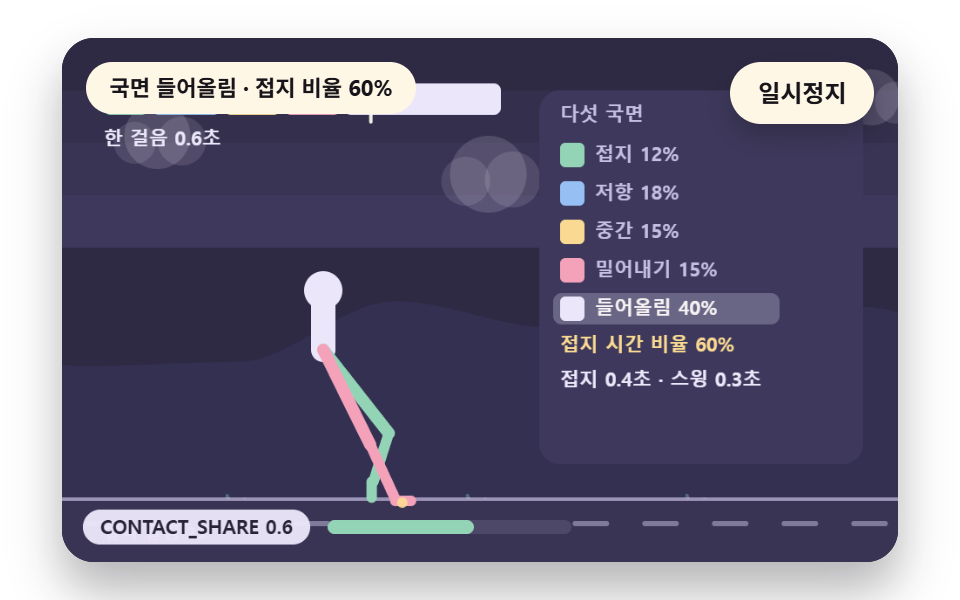
One step is split into contact 12%, resistance 18%, mid 15%, push-off 15% and lift 40%, and inside CONTACT_SHARE 0.6 (inStance) solveFoot freezes the ankle at floor height. The ankle touches at -14 degrees, lies flat to 0, then rolls from 0.45 of a step onward up to 16 degrees as the toe pushes. Of the 0.63 s step, 0.37 s is stance and 0.25 s is swing.
<main class="stage">
<div class="vj is-demo" id="vj">
  <div class="vj__pad" data-role="pad" tabindex="0" role="application" aria-label="Walking cycle stage: left and right arrow keys change the step rate, Enter or Space pauses, N takes one step, R restarts">
    <canvas class="vj__canvas" data-role="canvas" width="480" height="300" role="img" aria-label="One step is divided into five phases, contact, loading, mid stance, push off and lift, and a coloured band fills for each. From contact to lift the sole stays flat on the floor, the toe contact point stays frozen in place, and only after lift does the foot swing forward along an arc. The right side shows the phase names and the share of the step time each takes. The gauge below shows the constant name and its current value, and under reduced motion only one standing pose where the walk has come to rest is drawn"></canvas>
  </div>
  <p class="vj__status" data-role="status" aria-live="off">Walking cycle scene</p>
  <div class="vj__ctrl">
    <button class="vj__pause" data-role="pause" type="button" aria-pressed="false">Pause</button>
  </div>
  <p class="vj__done" data-role="done" role="status" aria-live="polite"></p>
</div>
</main>
@use "../../../../site/static/demo-tokens" as *;
@include stage($stage-paper);
.vj {
position: relative;
width: min(92vw, calc(160vh - 12.8vw));
aspect-ratio: 480 / 300;
margin: 0 auto;
border-radius: $r-card;
overflow: hidden;
box-shadow: $shadow-raised;
background: $subject-ink;
}
// 무대 상자 — 눌러서 한 번 깨뜨리는 곳(touch-action: none 은 이 상자에만). 무대 밖 터치는 페이지 스크롤 그대로
.vj__pad {
position: absolute;
inset: 0;
border-radius: inherit;
outline: none;
touch-action: none;
cursor: pointer;
}
// 바깥 .vj 가 넘침을 자르므로 포커스 테두리는 안쪽으로 들인다
.vj__pad:focus-visible {
outline: 3px solid $subject-cream;
outline-offset: -3px;
}
.vj__canvas {
position: absolute;
inset: 0;
display: block;
width: 100%;
height: 100%;
}
.vj__ctrl {
position: absolute;
right: $sp-3;
top: $sp-3;
display: flex;
gap: $sp-2;
}
.vj__pause {
padding: $sp-1 $sp-3;
border: 2px solid $subject-cream;
border-radius: $r-pill;
background: $subject-cream;
color: $subject-ink;
font-family: inherit;
font-weight: 700;
font-size: 12px;
line-height: 1.6;
cursor: pointer;
box-shadow: $shadow-press;
transition: transform $dur-quick $ease-spring;
}
// 스크린리더에만 읽히는 낭독 문장 — 모드가 바뀔 때만 쓴다
.vj__done {
position: absolute;
width: 1px;
height: 1px;
margin: 0;
overflow: hidden;
clip-path: inset(50%);
white-space: nowrap;
}
// 눌린 상태(멈춤) — 바탕과 글자색을 뒤집어 aria-pressed 가 눈에도 보이게
.vj__pause[aria-pressed="true"] {
background: $subject-ink;
color: $subject-cream;
}
.vj__pause:hover {
transform: translateY(-2px);
}
.vj__pause:active {
transform: translateY(1px);
}
.vj__pause:focus-visible {
outline: 3px solid $subject-cream;
outline-offset: 3px;
}
// 상태 줄 — 지금 장면의 수치를 글자로. 화면에만 있고 aria-live 는 늘 off
.vj__status {
position: absolute;
left: $sp-3;
top: $sp-3;
max-width: calc(100% - 100px);
margin: 0;
padding: $sp-1 $sp-3;
border-radius: $r-pill;
background: $subject-cream;
color: $subject-ink;
font-weight: 700;
font-size: 11px;
line-height: 1.6;
white-space: nowrap;
overflow: hidden;
text-overflow: ellipsis;
pointer-events: none;
}
@media (max-width: 340px) {
.vj__pause,
.vj__status { font-size: 10px; padding: 0 $sp-2; }
}
// 움직임 줄이기 — 장면은 스크립트가 글리치 없는 원문 한 장으로 멈춘다. 버튼도 떠오르지 않게
@media (prefers-reduced-motion: reduce) {
.vj__pause { transition: none !important; }
.vj__pause:hover,
.vj__pause:active { transform: none !important; }
}html, body {
margin: 0;
overflow: hidden;
}
.stage {
box-sizing: border-box;
min-height: 100vh;
display: grid;
place-items: center;
margin: 0;
background: #ffffff;
font-family: -apple-system, "Segoe UI", "Noto Sans KR", sans-serif;
padding: clamp(8px, 4vw, 24px);
}
.vj {
position: relative;
width: min(92vw, 160vh - 12.8vw);
aspect-ratio: 480/300;
margin: 0 auto;
border-radius: 16px;
overflow: hidden;
box-shadow: 0 14px 24px rgba(23, 20, 26, 0.32);
background: #17141a;
}
.vj__pad {
position: absolute;
inset: 0;
border-radius: inherit;
outline: none;
touch-action: none;
cursor: pointer;
}
.vj__pad:focus-visible {
outline: 3px solid #fff7e6;
outline-offset: -3px;
}
.vj__canvas {
position: absolute;
inset: 0;
display: block;
width: 100%;
height: 100%;
}
.vj__ctrl {
position: absolute;
right: 12px;
top: 12px;
display: flex;
gap: 8px;
}
.vj__pause {
padding: 4px 12px;
border: 2px solid #fff7e6;
border-radius: 999px;
background: #fff7e6;
color: #17141a;
font-family: inherit;
font-weight: 700;
font-size: 12px;
line-height: 1.6;
cursor: pointer;
box-shadow: 0 6px 12px rgba(23, 20, 26, 0.32);
transition: transform 220ms cubic-bezier(0.2, 0.8, 0.2, 1);
}
.vj__done {
position: absolute;
width: 1px;
height: 1px;
margin: 0;
overflow: hidden;
clip-path: inset(50%);
white-space: nowrap;
}
.vj__pause[aria-pressed=true] {
background: #17141a;
color: #fff7e6;
}
.vj__pause:hover {
transform: translateY(-2px);
}
.vj__pause:active {
transform: translateY(1px);
}
.vj__pause:focus-visible {
outline: 3px solid #fff7e6;
outline-offset: 3px;
}
.vj__status {
position: absolute;
left: 12px;
top: 12px;
max-width: calc(100% - 100px);
margin: 0;
padding: 4px 12px;
border-radius: 999px;
background: #fff7e6;
color: #17141a;
font-weight: 700;
font-size: 11px;
line-height: 1.6;
white-space: nowrap;
overflow: hidden;
text-overflow: ellipsis;
pointer-events: none;
}
@media (max-width: 340px) {
.vj__pause,
.vj__status {
font-size: 10px;
padding: 0 8px;
}
}
@media (prefers-reduced-motion: reduce) {
.vj__pause {
transition: none !important;
}
.vj__pause:hover,
.vj__pause:active {
transform: none !important;
}
}(function () {
const root = document.getElementById("vj");
if (!root) return;
// 무대 좌표 — 캔버스 안 계산은 늘 480×300. 화면에 보이는 크기와 상관없다
const W = 480;
const H = 300;
const TAU = Math.PI * 2;
function clamp(v, lo, hi) { return v < lo ? lo : (v > hi ? hi : v); }
function lerp(a, b, k) { return a + (b - a) * k; }
function easeOut(k) { const u = 1 - clamp(k, 0, 1); return 1 - u * u * u; }
// 파스텔 팔레트 — 바탕은 짙은 자두색, 타일은 연한 색 위에 짙은 잉크 숫자
const INK = [40, 36, 54];
const PAPER = [250, 246, 240];
const ROSE = [244, 162, 186];
const MINT = [148, 212, 182];
const SKY = [150, 192, 244];
const SUN = [250, 218, 146];
const NEU = [236, 230, 250];
const BGC = [46, 42, 68];
const PANEL = [62, 57, 92];
const DIM = [196, 190, 224];
function rgba(c, a) {
return 'rgba(' + Math.round(clamp(c[0], 0, 255)) + ',' + Math.round(clamp(c[1], 0, 255)) + ',' + Math.round(clamp(c[2], 0, 255)) + ',' + clamp(a, 0, 1).toFixed(3) + ')';
}
function hsl(h, s, l) {
const a = s * Math.min(l, 1 - l);
const f = function (n) {
const k = (n + h / 30) % 12;
return l - a * Math.max(-1, Math.min(k - 3, Math.min(9 - k, 1)));
};
return [Math.round(f(0) * 255), Math.round(f(8) * 255), Math.round(f(4) * 255)];
}
// 정수 해시 — 같은 (a, b) 에는 늘 같은 0 이상 1 미만 값. 난수 함수는 쓰지 않는다
function hash2(a, b) {
let h = (Math.imul(a | 0, 374761393) + Math.imul(b | 0, 668265263)) | 0;
h = Math.imul(h ^ (h >>> 13), 1274126177);
h = h ^ (h >>> 16);
return (h >>> 0) / 4294967296;
}
// 2차원 값 잡음 — 정수 격자점마다 해시 값이 있고 그 사이를 부드럽게 잇는다
function noise2(x, y, seed) {
const xi = Math.floor(x);
const yi = Math.floor(y);
const fx = x - xi;
const fy = y - yi;
const ux = fx * fx * (3 - 2 * fx);
const uy = fy * fy * (3 - 2 * fy);
const s = seed * 131;
return lerp(lerp(hash2(xi + s, yi), hash2(xi + 1 + s, yi), ux), lerp(hash2(xi + s, yi + 1), hash2(xi + 1 + s, yi + 1), ux), uy);
}
// 장면 시계(s)·판 반복 번호·시간표 — 시간표는 (시각, 할 일) 목록이고 시각이 지나면 한 번씩 부른다
let sceneT = 0;
let lap = 0;
let script = [];
let evAt = 0;
// 문구 틀의 {a}·{b}·{c} 자리에 값을 끼운다 — 화면 문구는 늘 틀 한 줄이고 로케일 사전이 통째로 바꾼다
function fill(s, a, b, c) {
return s.split('{a}').join(a).split('{b}').join(b === undefined ? '' : b).split('{c}').join(c === undefined ? '' : c);
}
function r1(v) { return String(Math.round(v * 10) / 10); }
function group(v) {
// 천 단위 점 — 로케일 함수에 기대지 않는다
const s = String(Math.round(v));
let o = '';
for (let i = 0; i < s.length; i += 1) {
if (i > 0 && (s.length - i) % 3 === 0) {
o += ',';
}
o += s.charAt(i);
}
return o;
}
// 기본값 상수 — 변형 3개(STEP_HZ·STRIDE_DEG·LEG_RATIO)가 이 줄의 값을 바꾼다
const STEP_HZ = 1.6;
const STRIDE_DEG = 28;
const LEG_PX = 90;
const LEG_RATIO = 0.48;
const CONTACT_SHARE = 0.6;
const GAIT = { stepHz: STEP_HZ, strideDeg: STRIDE_DEG, legPx: LEG_PX, legRatio: LEG_RATIO, contactShare: CONTACT_SHARE };
// walkT 는 걸음 시간으로만 오르는 시계(s). phase 는 One step 위상 0~1, cyclePhase 는 두 걸음 위상 0~2
let walkT = 0;
function stepPhase() { return (walkT * GAIT.stepHz) % 1; }
function cyclePhase() { return (walkT * GAIT.stepHz) % 2; }
function stepIndex() { return Math.floor(walkT * GAIT.stepHz); }
// 다리별 One step 위상 — 왼다리가 정수 걸음, 오른다리가 반 걸음 어긋난다
function legPhase(right) { return ((walkT * GAIT.stepHz) + (right ? 0.5 : 0)) % 1; }
// Contact 국면 판정 — ph 가 contactShare 안이면 발이 바닥에 붙어 있다
function inStance(ph) { return ph < GAIT.contactShare; }
// Five phases — Contact(0~0.12) · Loading(0.12~0.3) · Mid stance(0.3~0.45) · Push off(0.45~contactShare) · Lift(나머지)
const PH5 = [
{ name: 'Contact', a: 0, b: 0.12, col: null },
{ name: 'Loading', a: 0.12, b: 0.3, col: null },
{ name: 'Mid stance', a: 0.3, b: 0.45, col: null },
{ name: 'Push off', a: 0.45, b: 0.6, col: null },
{ name: 'Lift', a: 0.6, b: 1, col: null },
];
function phaseName(ph) {
for (let i = 0; i < PH5.length; i += 1) {
if (ph >= PH5[i].a && ph < PH5[i].b) {
return PH5[i].name;
}
}
return 'Lift';
}
// 라디안 변환 — 각도 값은 도 단위 상수로 두고 계산 직전에만 바꾼다
function rad(deg) { return deg * Math.PI / 180; }
function solveFoot(hipX, hipY, ph, plantX, slopeDeg, groundY) {
const leg = GAIT.legPx;
const L1 = leg / (1 + GAIT.legRatio);
const L2 = leg * GAIT.legRatio / (1 + GAIT.legRatio);
let ax;
let ay;
let ankleDeg;
const planted = inStance(ph);
if (planted) {
ax = plantX;
ay = groundY;
ankleDeg = -slopeDeg;
}
else {
const k = (ph - GAIT.contactShare) / (1 - GAIT.contactShare);
const half = rad(GAIT.strideDeg);
const ang = lerp(half, -half, k);
ax = hipX + Math.sin(ang) * leg;
ay = groundY - Math.abs(Math.sin(Math.PI * k)) * leg * 0.22;
ankleDeg = 90 - slopeDeg;
}
const dx = ax - hipX;
const dy = ay - hipY;
let d = Math.hypot(dx, dy);
d = Math.min(d, L1 + L2 - 0.01);
const base = Math.atan2(dy, dx);
const cosK = (L1 * L1 + d * d - L2 * L2) / (2 * L1 * d);
const elbow = Math.acos(clamp(cosK, -1, 1));
const kneeAng = base - elbow;
return { ax: ax, ay: ay, kneeX: hipX + Math.cos(kneeAng) * L1, kneeY: hipY + Math.sin(kneeAng) * L1, ankleDeg: ankleDeg, planted: planted };
}
// 몸 높이 — Contact 국면 Mid stance(다리가 곧게 펴는 ph=0.3 부근)이 가장 높고 이중 Contact(두 발 다 지면)에서 살짝 낮아진다
function hipHeight(ph) {
const bob = Math.sin(ph * Math.PI * 2 - Math.PI / 2);
return GAIT.legPx * (0.93 + 0.04 * bob);
}
// 몸 앞뒤 기울기 — 내리막에서 앞으로 숙여 다리 회복 시간을 번다
function leanDeg(slopeDeg) { return slopeDeg < 0 ? slopeDeg * 0.5 : slopeDeg * 0.25; }
let plants = [null, null]; // [왼, 오른]
// Contact 시작 ph(=0 또는 contactShare 근처)에서 plantX 를 몸 위치로부터 한 번만 풀어 저장한다
function lockPlants(hipX) {
for (let r = 0; r < 2; r += 1) {
const ph = legPhase(r === 1);
const otherPh = legPhase(r === 0);
if (inStance(ph) && plants[r] === null) {
const half = rad(GAIT.strideDeg);
const k = ph / GAIT.contactShare;
const ang = lerp(half, -half, k);
const px = hipX + Math.sin(ang) * GAIT.legPx;
plants[r] = { x: px, ph0: ph };
}
if (!inStance(ph)) {
plants[r] = null;
}
}
}
function plantXOf(r, hipX) {
const p = plants[r];
if (p !== null) {
return p.x;
}
return hipX;
}
// ── 그리기 도구
const canvasEl = root.querySelector('[data-role="canvas"]');
const padEl = root.querySelector('[data-role="pad"]');
const pauseEl = root.querySelector('[data-role="pause"]');
const statusEl = root.querySelector('[data-role="status"]');
const doneEl = root.querySelector('[data-role="done"]');
const ctxRaw = canvasEl ? canvasEl.getContext('2d') : null;
if (!canvasEl || !ctxRaw || !pauseEl || !padEl || !doneEl) {
return;
}
const cv = canvasEl;
const ctx = ctxRaw;
const pauseBtn = pauseEl;
const doneP = doneEl;
const pad = padEl;
// 외부 웹폰트는 부르지 않는다 — 기기에 있는 글꼴 목록만
const UI_FONT = 'system-ui, -apple-system, "Segoe UI", "Noto Sans KR", sans-serif';
let dpr = 1;
function fitCanvas() {
// 배율은 2 에서 자른다 — 계산은 늘 480×300 이고 화면 배율만 이 값
dpr = Math.min(window.devicePixelRatio || 1, 2);
cv.width = Math.round(W * dpr);
cv.height = Math.round(H * dpr);
ctx.setTransform(dpr, 0, 0, dpr, 0, 0);
}
function box(x, y, w, h, r, c, a) {
if (w <= 0.2 || h <= 0.2 || a <= 0) {
return;
}
ctx.beginPath();
ctx.roundRect(x, y, w, h, Math.max(0, Math.min(r, w / 2, h / 2)));
ctx.fillStyle = rgba(c, a);
ctx.fill();
}
function disc(x, y, r, c, a) {
ctx.beginPath();
ctx.arc(x, y, r, 0, TAU);
ctx.fillStyle = rgba(c, a);
ctx.fill();
}
function seg(x1, y1, x2, y2, c, a, w) {
ctx.beginPath();
ctx.moveTo(x1, y1);
ctx.lineTo(x2, y2);
ctx.strokeStyle = rgba(c, a);
ctx.lineWidth = w;
ctx.lineCap = 'round';
ctx.stroke();
}
function text(s, x, y, c, px, weight, align) {
ctx.font = weight + ' ' + px + 'px ' + UI_FONT;
ctx.textAlign = align;
ctx.textBaseline = 'middle';
ctx.fillStyle = rgba(c, 1);
ctx.fillText(s, x, y);
}
function panel(x, y, w, h) { box(x, y, w, h, 12, PANEL, 1); }
// 아래쪽 눈금 — 상수 이름과 지금 값 · 크기 막대
function hud(name, val, frac) {
const label = name + ' ' + val;
ctx.font = '700 11px ' + UI_FONT;
const w = ctx.measureText(label).width + 20;
const x = 12;
const y = H - 30;
box(x, y, w, 20, 10, NEU, 0.96);
text(label, x + w / 2, y + 10.5, INK, 11, 700, 'center');
const mx = x + w + 10;
box(mx, y + 6, 140, 8, 4, [78, 72, 104], 1);
box(mx, y + 6, 140 * clamp(frac, 0, 1), 8, 4, MINT, 1);
}
// ── 상태 줄·낭독 문장
const SPK_STEP = '{a} steps taken, cycle phase {b}';
function speakBoard() {
return fill(SPK_STEP, String(stepIndex()), phaseName(legPhase(false)));
}
let shownStatus = '';
function pushStatus(s) {
if (!statusEl || s === shownStatus) {
return;
}
shownStatus = s;
statusEl.textContent = s;
}
let paused = false;
// 움직임 줄이기 — 켜지면 루프 대신 정지 한 장
let still = false;
const reduceQuery = window.matchMedia('(prefers-reduced-motion: reduce)');
// 페이지를 연 채 움직임 줄이기 설정을 바꿔도 change 리스너가 다시 읽는다
still = reduceQuery.matches;
// 자동 시연 표시 — 사람이 처음 손대면 떼고, 그 뒤부터 모드가 바뀔 때만 낭독 문장을 쓴다
let demo = root.classList.contains('is-demo');
const off = new AbortController();
// 사람이 직접 조작하는 중이면 시간표는 멈추고 계산만 흐른다
let manual = false;
function wake() {
if (!demo) {
return;
}
demo = false;
root.classList.remove('is-demo');
}
function takeOver() {
if (manual) {
return;
}
manual = true;
wake();
}
// 낭독 모드 — 완성이면 1000, 손으로 하는 중이면 맞은 타일 수, 자동 시연이면 장면이 정한 단계
function modeBase(sceneMode) {
return manual ? 100 + Math.floor(hipHeight(legPhase(false))) : sceneMode;
}
// 낭독 문장 — 화면 상태 줄(aria-live off)과 따로, 모드가 바뀔 때와 사람이 조작했을 때만 role=status 에 쓴다
let lastMode = -9;
function say() {
doneP.textContent = speakText();
lastMode = still ? -2 : modeId();
}
function advance(dt) {
sceneT += dt;
walkT += dt;
if (!manual) {
while (evAt < script.length && script[evAt].t <= sceneT) {
const ev = script[evAt];
evAt += 1;
ev.f();
}
if (sceneT >= LAP_S) {
lap += 1;
begin();
return;
}
}
update(dt);
}
function begin() {
sceneT = 0;
walkT = lap * 0; // 걸음 시계는 장면과 함께 0 에서 다시 시작 — 같은 시간표면 같은 걸음
evAt = 0;
script = [];
build();
}
// 고정 걸음 + Step rate 상한 — 프레임 간격이 흔들려도 같은 계산, 탭이 멈췄다 돌아와도 한 번에 몰리지 않는다
const STEP_S = 1 / 60;
const DT_MAX = 0.05;
let acc = 0;
function showNow() {
draw();
pushStatus(statusText());
if (!demo) {
const m = still ? -2 : modeId();
if (m !== lastMode) {
say();
}
}
}
let rafId = 0;
let lastTs = -1;
function frame(ts) {
if (still || paused) {
rafId = 0;
return;
}
if (lastTs < 0) {
lastTs = ts;
}
const dt = Math.min((ts - lastTs) / 1000, DT_MAX);
lastTs = ts;
acc += dt;
while (acc >= STEP_S) {
advance(STEP_S);
acc -= STEP_S;
}
showNow();
rafId = window.requestAnimationFrame(frame);
}
function startLoop() {
if (rafId) {
return;
}
// 멈췄던 사이의 시간을 첫 프레임 dt 로 넘기지 않는다
lastTs = -1;
acc = 0;
rafId = window.requestAnimationFrame(frame);
}
function stopLoop() {
if (rafId) {
window.cancelAnimationFrame(rafId);
rafId = 0;
}
}
// 움직임 줄이기 — 루프 없이 시간표의 REST_S 초까지를 한 번에 치른 장면 한 컷. 캐릭터는 걸음 보간 없이 그 시점의 자리에 바로 선다
function showRest() {
stopLoop();
lap = 0;
begin();
walkT = REST_S;
while (evAt < script.length && script[evAt].t <= REST_S) {
const ev = script[evAt];
evAt += 1;
sceneT = ev.t;
ev.f();
}
sceneT = REST_S;
update(0);
showNow();
}
function play() {
begin();
showNow();
if (!paused) {
startLoop();
}
}
// 사람이 조작한 뒤 — 멈춘 채이거나 움직임 줄이기이면 보간을 건너뛰어 바로 보이게 한다. 조작 직후는 낭독 문장도 쓴다
function afterInput(speak) {
if (paused || still) {
sceneT += 1;
}
update(0);
showNow();
if (speak) {
say();
}
}
function togglePause() {
paused = !paused;
pauseBtn.setAttribute('aria-pressed', paused ? 'true' : 'false');
wake();
if (paused) {
stopLoop();
}
else if (!still) {
startLoop();
}
say();
}
function restart() {
manual = false;
lap = 0;
begin();
update(0);
showNow();
say();
}
// N One step — 시간표의 다음 일 하나를 지금 치른다. 시간표가 끝났으면 처음부터 다시 짠 뒤 첫 일
function stepOnce() {
takeOver();
if (evAt >= script.length) {
lap += 1;
begin();
}
if (evAt < script.length) {
const ev = script[evAt];
evAt += 1;
if (sceneT < ev.t) {
sceneT = ev.t;
}
ev.f();
}
afterInput(true);
}
function keyMove(dx, dy) {
// 좌우 방향키 = 걸음 속도 한 단계 조절. 위·아래는 항목이 keyHook 로 따로 받는다
if (dx !== 0) {
GAIT.stepHz = clamp(Math.round((GAIT.stepHz + dx * 0.4) * 10) / 10, 0.8, 2.8);
}
else if (keyHook !== null) {
keyHook(dy < 0 ? 'ArrowUpHint' : 'ArrowDownHint');
return;
}
takeOver();
afterInput(true);
}
function toCanvas(e) {
const r = cv.getBoundingClientRect();
return [(e.clientX - r.left) * W / r.width, (e.clientY - r.top) * H / r.height];
}
pauseBtn.addEventListener('click', togglePause, { signal: off.signal });
// 키보드 — 무대에 포커스가 있을 때만. 방향키 = 빈칸 이웃 타일 이동, Enter·Space = Pause, N = One step, R = 처음부터
pad.addEventListener('keydown', function (e) {
if (e.altKey || e.ctrlKey || e.metaKey) {
return;
}
const k = e.key;
if (k === 'Enter' || k === ' ' || k === 'p' || k === 'P') {
e.preventDefault();
togglePause();
}
else if (k === 'r' || k === 'R') {
restart();
}
else if (k === 'n' || k === 'N') {
e.preventDefault();
stepOnce();
}
else if (k === 'ArrowLeft') {
e.preventDefault();
keyMove(-1, 0);
}
else if (k === 'ArrowRight') {
e.preventDefault();
keyMove(1, 0);
}
else if (k === 'ArrowUp') {
e.preventDefault();
keyMove(0, -1);
}
else if (k === 'ArrowDown') {
e.preventDefault();
keyMove(0, 1);
}
else if (keyHook !== null && keyHook(k)) {
e.preventDefault();
takeOver();
afterInput(true);
}
}, { signal: off.signal });
// 포인터 — 마우스·터치·펜을 한 이벤트로. 누르는 순간부터 놓을 때까지 무대가 포인터를 붙잡는다
let ptrDown = false;
// 장면이 방향키·Enter·N·R 밖의 키를 받고 싶을 때 거는 갈고리 — 먹었으면 true
let keyHook = null;
pad.addEventListener('pointerdown', function (e) {
takeOver();
ptrDown = true;
try {
pad.setPointerCapture(e.pointerId);
}
catch (err) {
ptrDown = true;
}
const p = toCanvas(e);
onPtr(0, p[0], p[1]);
afterInput(false);
}, { signal: off.signal });
pad.addEventListener('pointermove', function (e) {
if (!ptrDown) {
return;
}
const p = toCanvas(e);
onPtr(1, p[0], p[1]);
afterInput(false);
}, { signal: off.signal });
function ptrEnd(e) {
if (!ptrDown) {
return;
}
ptrDown = false;
const p = toCanvas(e);
onPtr(2, p[0], p[1]);
afterInput(true);
}
pad.addEventListener('pointerup', ptrEnd, { signal: off.signal });
pad.addEventListener('pointercancel', ptrEnd, { signal: off.signal });
// 탭이 숨으면 멈추고, 돌아오면 시계를 다시 맞춰 시작
document.addEventListener('visibilitychange', function () {
if (document.hidden) {
stopLoop();
}
else if (!paused && !still) {
startLoop();
}
}, { signal: off.signal });
// 설정이 바뀌면 — 켜지면 판 한 장, 꺼지면 다시 움직인다
reduceQuery.addEventListener('change', function () {
still = reduceQuery.matches;
if (still) {
showRest();
}
else {
lap = 0;
play();
}
}, { signal: off.signal });
window.addEventListener('resize', function () {
fitCanvas();
showNow();
}, { signal: off.signal });
// ── 캐릭터 그리기 — 자체 도형 캐릭터(머리·몸통·2링크 다리 2·팔 2). 브랜드 캐릭터 아님
// limb(x1, y1, x2, y2, 색, 굵기) — 관절 두 점을 잇는 둥근 막대
function limb(x1, y1, x2, y2, c, w) {
seg(x1, y1, x2, y2, c, 1, w);
}
// footShape(x, y, ankleDeg, 색) — 발바닥. ankleDeg 는 바닥 기준 도 단위(0 = 바닥에 평평)
function footShape(x, y, ankleDeg, c) {
ctx.save();
ctx.translate(x, y);
ctx.rotate(ankleDeg * Math.PI / 180);
box(-3, -2, 15, 6, 3, c, 1);
ctx.restore();
}
// drawGround(y, slopeDeg) — 기울어진 바닥면. y 는 화면 가운데서의 기준 높이.
// groundV > 0 이면 바닥의 눈금 줄무늬가 그 속도로 왪쪽으로 흘러 간다 — 몸이 앞으로 가는 속도의 시각화
let groundV = 0;
function drawGround(y, slopeDeg) {
// 기울기가 있으면 화면 가운데 x=W/2 에서 높이 y 인 직선 — groundYAt 과 같은식
const y0 = groundYAt(0, y, slopeDeg);
const y1 = groundYAt(W, y, slopeDeg);
// 받침 띠 — 바닥선 아래 옅은 색 띠
ctx.beginPath();
ctx.moveTo(0, y0);
ctx.lineTo(W, y1);
ctx.lineTo(W, H);
ctx.lineTo(0, H);
ctx.closePath();
ctx.fillStyle = rgba([58, 52, 84], 1);
ctx.fill();
seg(0, y0, W, y1, DIM, 0.7, 2);
// 눈금 줄무늬 — 걸음이 밀어 내는 속도로 흘러 간다. 간격 40px, 길이 18px
if (groundV > 0) {
const gap = 40;
const off = (walkT * groundV) % gap;
for (let x = -gap; x < W + gap; x += gap) {
const sx = x - off;
seg(sx, groundYAt(sx + 9, y, slopeDeg) + 14, sx + 18, groundYAt(sx + 27, y, slopeDeg) + 14, DIM, 0.5, 3);
}
}
}
// drawScenery() — 걷는 세계의 경물 층. 하늘 그라디언트 띠·언덕·구름·가로등이 groundV 에 비례해 뒤로 흐른다.
// 배경 톤 전체가 걸음 속도 값의 전파 범위다 — 몸이 앞으로 간다는 감각을 화면 전체가 받친다(BD26: 면적을 장식이 아니라 값의 전파로)
function drawScenery() {
// 바탕 — 하늘 띠와 언덕 사이 빈 구간이 지워지지 않아 캐릭터 자국이 번졌다. 먼저 한 번 칠한다
box(0, 0, W, H, 0, BGC, 1);
// 하늘 — 세로 옅은 띠 4개. 걸음 위상에 따라 명도가 살짝 숨쉰다
const skyT = Math.sin(walkT * GAIT.stepHz * Math.PI);
for (let i = 0; i < 4; i += 1) {
const t = i / 3;
const c = [lerp(46, 62, t), lerp(42, 56, t), lerp(68, 92, t)];
box(0, i * 30, W, 30, 0, c, 1);
}
// 먼 언덕 — noise2 로 굽이친다. 걸음 속도의 0.35배로 흐른다(원근 감쇠)
if (groundV > 0) {
const scroll = walkT * groundV * 0.35;
ctx.beginPath();
ctx.moveTo(0, H);
for (let x = 0; x <= W; x += 8) {
const yy = 168 + noise2((x + scroll) / 90, 3, 11) * 46 - 20;
ctx.lineTo(x, yy);
}
ctx.lineTo(W, H);
ctx.closePath();
ctx.fillStyle = rgba([52, 48, 82], 1);
ctx.fill();
// 구름 세 점 — 0.6배 속도
const cs = walkT * groundV * 0.6;
for (let i = 0; i < 3; i += 1) {
const cx = ((i * 190 + 60 - cs) % (W + 120) + W + 120) % (W + 120) - 60;
const cy = 34 + i * 22;
disc(cx, cy, 16 + i * 3, NEU, 0.16);
disc(cx + 14, cy + 3, 12 + i * 2, NEU, 0.13);
disc(cx - 13, cy + 4, 10 + i * 2, NEU, 0.12);
}
// 가까운 풀 다발 — 1.15배 속도(지면보다 살짝 빠른 근경)
const gs = walkT * groundV * 1.15;
for (let i = 0; i < 14; i += 1) {
const gx = ((i * 46 + 20 - gs) % (W + 60) + W + 60) % (W + 60) - 30;
const gy = H - 14 - (i % 3) * 6;
seg(gx, gy, gx - 4, gy - 12, MINT, 0.35, 2);
seg(gx + 2, gy, gx + 6, gy - 10, MINT, 0.3, 2);
}
}
}
// groundYAt(x, baseY, slopeDeg) — 경사식: 기울기가 있으면 x 에서의 바닥 높이
function groundYAt(x, baseY, slopeDeg) {
return baseY + (x - W / 2) * Math.tan(rad(slopeDeg)) * -1;
} // 02 — 한 걸음을 Contact·Loading·Mid stance·Push off·Lift 다섯 국면으로 나눈다.
// Contact 국면(0 ~ contactShare)에서는 발바닥이 바닥에 평평하게 붙어 발목각을 몸 위치에서 거꾸로 푼다.
// Lift 국면에서만 발이 호를 그리며 앞으로 옮겨 간다. 오른쪽에 국면 색 띠와 걸음 시간 비율.
const LAP_S = 7.2;
const REST_S = 2.4;
const GROUND_Y = 264;
const CHAR_X = 150;
const PHX = 274;
const PHW = 186;
const PH5C = [MINT, SKY, SUN, ROSE, NEU];
let stancePh = 0;
let liftPh = 0;
let dutyHist = [];
function build() {
dutyHist = [];
groundV = Math.sin(rad(GAIT.strideDeg)) * GAIT.legPx * 2 * GAIT.stepHz;
}
function update(dt) {
if (dt <= 0) {
return;
}
stancePh = legPhase(false);
liftPh = legPhase(true);
if (dutyHist.length < 1 || Math.floor(walkT * GAIT.stepHz) !== Math.floor((walkT - dt) * GAIT.stepHz)) {
dutyHist.push(GAIT.contactShare);
if (dutyHist.length > 8) {
dutyHist.shift();
}
}
}
// 발바닥 굴림 — Contact 국면 동안 발목각이 뒤꿈치 닿기 -14도 에서 앞꿈치 밀기 16도 로 굴러간다
function drawStanceFoot(hipX, hipY, ph) {
const fs = solveFoot(hipX, hipY, ph, plantXOf(0, hipX), 0, GROUND_Y);
// Contact 국면: 발바닥을 바닥에 붙인 채 굴림 — ankleDeg 를 ph 로 보간(뒤꿈치 닿기 → 앞꿈치 밀기)
const roll = ph < 0.12 ? lerp(-14, 0, ph / 0.12) : (ph > 0.45 ? lerp(0, 16, (ph - 0.45) / (GAIT.contactShare - 0.45)) : 0);
footShape(fs.ax, fs.ay, fs.planted ? roll : fs.ankleDeg, MINT);
return roll;
}
function draw() {
drawScenery();
drawGround(GROUND_Y, 0);
// 왼쪽 큰 캐릭터 — 국면 색이 몸에도 어린다
const hipY = GROUND_Y - hipHeight(stancePh);
const hipX = CHAR_X;
lockPlants(hipX);
const phIdx = PH5.findIndex(function (p) { return stancePh >= p.a && stancePh < p.b; });
const bodyCol = PH5C[phIdx < 0 ? 4 : phIdx];
limb(hipX, hipY, hipX, hipY - 26, NEU, 14);
disc(hipX, hipY - 34, 11, bodyCol, 1);
for (let r = 0; r < 2; r += 1) {
const ph = r === 0 ? stancePh : liftPh;
const fs = solveFoot(hipX, hipY, ph, plantXOf(r, hipX), 0, GROUND_Y);
limb(hipX, hipY, fs.kneeX, fs.kneeY, r === 0 ? MINT : ROSE, 7);
limb(fs.kneeX, fs.kneeY, fs.ax, fs.ay, r === 0 ? MINT : ROSE, 6);
if (r === 0) {
const roll = drawStanceFoot(hipX, hipY, ph);
// 굴림 각도 눈금 — Contact 국면 동안의 Ankle roll
text('Ankle roll ' + Math.round(roll) + '°', 24, GROUND_Y + 20, DIM, 10, 700, 'left');
}
else {
footShape(fs.ax, fs.ay, fs.planted ? 0 : fs.ankleDeg, ROSE);
}
// Contact 표시 — planted 발 아래 바닥에 밝은 접촉 점
if (fs.planted) {
disc(fs.ax + 4, fs.ay + 2, 3, SUN, 0.9);
}
}
// 걸음 시간 막대 — 한 걸음을 Five phases 색띠로. 지금 위치 세로 줄
const bx = 24;
const by = 26;
const bw = 230;
let px = bx;
for (let i = 0; i < PH5.length; i += 1) {
const w = bw * (PH5[i].b - PH5[i].a);
box(px, by, w - 2, 18, 4, PH5C[i], 1);
px += w;
}
const cur = stancePh * bw;
seg(bx + cur, by - 4, bx + cur, by + 22, PAPER, 0.95, 2);
text('One step ' + r1(1 / GAIT.stepHz) + 's', bx, by + 32, NEU, 11, 700, 'left');
// 오른쪽 패널 — 국면별 이름·비율·현재 국면 강조
panel(PHX, 30, PHW, 214);
text('Five phases', PHX + 12, 44, DIM, 11, 700, 'left');
for (let i = 0; i < PH5.length; i += 1) {
const y = 60 + i * 22;
const cur2 = stancePh >= PH5[i].a && stancePh < PH5[i].b;
box(PHX + 12, y, 14, 14, 3, PH5C[i], 1);
text(PH5[i].name + ' ' + Math.round((PH5[i].b - PH5[i].a) * 100) + '%', PHX + 32, y + 7, cur2 ? PAPER : DIM, 11, 700, 'left');
if (cur2) {
box(PHX + 8, y - 2, 130, 18, 5, NEU, 0.25);
}
}
// Contact 비율 값 — contactShare 가 한 걸음에서 차지하는 몫
text(fill('Stance share {a}%', String(Math.round(GAIT.contactShare * 100))), PHX + 12, 176, SUN, 11, 700, 'left');
text(fill('Stance {a} s, swing {b} s', r1(GAIT.contactShare / GAIT.stepHz), r1((1 - GAIT.contactShare) / GAIT.stepHz)), PHX + 12, 196, NEU, 11, 700, 'left');
hud('CONTACT_SHARE', r1(GAIT.contactShare), GAIT.contactShare);
}
function statusText() {
return fill('Phase {a}, stance share {b}%', phaseName(stancePh), String(Math.round(GAIT.contactShare * 100)));
}
function modeId() { return modeBase(PH5.findIndex(function (p) { return stancePh >= p.a && stancePh < p.b; }) + 1); }
function speakText() { return fill('Left leg phase {a}', phaseName(stancePh)); }
function onDir(d) { keyMove(d === 0 ? 1 : d === 1 ? -1 : 0, 0); }
function onPtr(kind, x, y) { if (kind !== 0) {
return;
} GAIT.stepHz = clamp(GAIT.stepHz + (y > H / 2 ? 0.2 : -0.2), 0.8, 2.8); }
fitCanvas();
if (still) {
showRest();
}
else {
play();
}
return function () {
stopLoop();
off.abort();
};
})();// StanceFivePhase - 같은 항목 vanilla index.html 의 React 판. 같은 계산을 useEffect 안에서 돌린다
import { useEffect, useRef } from "react";
import styles from "./StanceFivePhase.module.scss";
const cx = (s: string): string => s.split(" ").map((n) => styles[n] ?? n).join(" ");
export default function StanceFivePhase() {
const rootRef = useRef<HTMLDivElement | null>(null);
useEffect(() => {
const rootEl = rootRef.current;
if (!rootEl) return;
const root: HTMLElement = rootEl;
type RGB = [number, number, number];
// 무대 좌표 — 캔버스 안 계산은 늘 480×300. 화면에 보이는 크기와 상관없다
const W = 480;
const H = 300;
const TAU = Math.PI * 2;
function clamp(v: number, lo: number, hi: number): number { return v < lo ? lo : (v > hi ? hi : v); }
function lerp(a: number, b: number, k: number): number { return a + (b - a) * k; }
function easeOut(k: number): number { const u = 1 - clamp(k, 0, 1); return 1 - u * u * u; }
// 파스텔 팔레트 — 바탕은 짙은 자두색, 타일은 연한 색 위에 짙은 잉크 숫자
const INK: RGB = [40, 36, 54];
const PAPER: RGB = [250, 246, 240];
const ROSE: RGB = [244, 162, 186];
const MINT: RGB = [148, 212, 182];
const SKY: RGB = [150, 192, 244];
const SUN: RGB = [250, 218, 146];
const NEU: RGB = [236, 230, 250];
const BGC: RGB = [46, 42, 68];
const PANEL: RGB = [62, 57, 92];
const DIM: RGB = [196, 190, 224];
function rgba(c: RGB, a: number): string {
return 'rgba(' + Math.round(clamp(c[0], 0, 255)) + ',' + Math.round(clamp(c[1], 0, 255)) + ',' + Math.round(clamp(c[2], 0, 255)) + ',' + clamp(a, 0, 1).toFixed(3) + ')';
}
function hsl(h: number, s: number, l: number): RGB {
const a = s * Math.min(l, 1 - l);
const f = function (n: number): number {
const k = (n + h / 30) % 12;
return l - a * Math.max(-1, Math.min(k - 3, Math.min(9 - k, 1)));
};
return [Math.round(f(0) * 255), Math.round(f(8) * 255), Math.round(f(4) * 255)];
}
// 정수 해시 — 같은 (a, b) 에는 늘 같은 0 이상 1 미만 값. 난수 함수는 쓰지 않는다
function hash2(a: number, b: number): number {
let h = (Math.imul(a | 0, 374761393) + Math.imul(b | 0, 668265263)) | 0;
h = Math.imul(h ^ (h >>> 13), 1274126177);
h = h ^ (h >>> 16);
return (h >>> 0) / 4294967296;
}
// 2차원 값 잡음 — 정수 격자점마다 해시 값이 있고 그 사이를 부드럽게 잇는다
function noise2(x: number, y: number, seed: number): number {
const xi = Math.floor(x);
const yi = Math.floor(y);
const fx = x - xi;
const fy = y - yi;
const ux = fx * fx * (3 - 2 * fx);
const uy = fy * fy * (3 - 2 * fy);
const s = seed * 131;
return lerp(lerp(hash2(xi + s, yi), hash2(xi + 1 + s, yi), ux), lerp(hash2(xi + s, yi + 1), hash2(xi + 1 + s, yi + 1), ux), uy);
}
// 장면 시계(초)·판 반복 번호·시간표 — 시간표는 (시각, 할 일) 목록이고 시각이 지나면 한 번씩 부른다
let sceneT = 0;
let lap = 0;
type Ev = { t: number; f: () => void };
let script: Ev[] = [];
let evAt = 0;
// 문구 틀의 {a}·{b}·{c} 자리에 값을 끼운다 — 화면 문구는 늘 틀 한 줄이고 로케일 사전이 통째로 바꾼다
function fill(s: string, a: string, b?: string, c?: string): string {
return s.split('{a}').join(a).split('{b}').join(b === undefined ? '' : b).split('{c}').join(c === undefined ? '' : c);
}
function r1(v: number): string { return String(Math.round(v * 10) / 10); }
function group(v: number): string {
// 천 단위 점 — 로케일 함수에 기대지 않는다
const s = String(Math.round(v));
let o = '';
for (let i = 0; i < s.length; i += 1) {
if (i > 0 && (s.length - i) % 3 === 0) { o += ','; }
o += s.charAt(i);
}
return o;
}
// ── 보행 사이클 모델 — 한 걸음 = 위상 0~1 (contact → … → 다음 contact). 걷기 사이클은 두 걸음(왼·오른)이 한 바퀴
// STEP_HZ 는 초당 걸음 수(한 다리 기준), LEG_PX 는 다리 길이(px), LEG_RATIO 는 정강이/넙다리 비율
type Gait = {
stepHz: number; // 초당 걸음 수
strideDeg: number; // 다리가 앞뒤로 벌어지는 반각(도)
legPx: number; // 다리 길이(px)
legRatio: number; // 정강이/넙다리 비율
contactShare: number; // 접지 국면(접지~들어올림)이 한 걸음에서 차지하는 비율
};
// 기본값 상수 — 변형 3개(STEP_HZ·STRIDE_DEG·LEG_RATIO)가 이 줄의 값을 바꾼다
const STEP_HZ = 1.6;
const STRIDE_DEG = 28;
const LEG_PX = 90;
const LEG_RATIO = 0.48;
const CONTACT_SHARE = 0.6;
const GAIT: Gait = { stepHz: STEP_HZ, strideDeg: STRIDE_DEG, legPx: LEG_PX, legRatio: LEG_RATIO, contactShare: CONTACT_SHARE };
// walkT 는 걸음 시간으로만 오르는 시계(초). phase 는 한 걸음 위상 0~1, cyclePhase 는 두 걸음 위상 0~2
let walkT = 0;
function stepPhase(): number { return (walkT * GAIT.stepHz) % 1; }
function cyclePhase(): number { return (walkT * GAIT.stepHz) % 2; }
function stepIndex(): number { return Math.floor(walkT * GAIT.stepHz); }
// 다리별 한 걸음 위상 — 왼다리가 정수 걸음, 오른다리가 반 걸음 어긋난다
function legPhase(right: boolean): number { return ((walkT * GAIT.stepHz) + (right ? 0.5 : 0)) % 1; }
// 접지 국면 판정 — ph 가 contactShare 안이면 발이 바닥에 붙어 있다
function inStance(ph: number): boolean { return ph < GAIT.contactShare; }
// 다섯 국면 — 접지(0~0.12) · 저항(0.12~0.3) · 중간(0.3~0.45) · 밀어내기(0.45~contactShare) · 들어올림(나머지)
const PH5 = [
{ name: '접지', a: 0, b: 0.12, col: null },
{ name: '저항', a: 0.12, b: 0.3, col: null },
{ name: '중간', a: 0.3, b: 0.45, col: null },
{ name: '밀어내기', a: 0.45, b: 0.6, col: null },
{ name: '들어올림', a: 0.6, b: 1, col: null },
];
function phaseName(ph: number): string {
for (let i = 0; i < PH5.length; i += 1) {
if (ph >= PH5[i].a && ph < PH5[i].b) { return PH5[i].name; }
}
return '들어올림';
}
// 라디안 변환 — 각도 값은 도 단위 상수로 두고 계산 직전에만 바꾼다
function rad(deg: number): number { return deg * Math.PI / 180; }
// 보행 핵심 풀이 — hipY(고관절 높이)·ph(한 걸음 위상)에서 발목 위치를 구한다.
// 접지 국면: 발목은 화면 좌표에 얼어 있다(footPlant). 몸이 속도 v 로 지나가므로 발의 상대 위치 = plantX - hipX.
// 무릎은 넙다리+정강이 2링크로: 고관절→발목 거리 d, 넙다리 L1 = leg/(1+r), 정강이 L2 = leg·r/(1+r) 로
// 여각으로 무릎을 푼다(코사인 법칙). 발목각은 경사각만큼 꺾어 발바닥이 바닥에 평평하게 붙게 한다.
// 스윙 국면: 발목각은 위상의 사인 호를 따라 앞으로 옮겨 가고 발 등이 위를 향한다(뒤꿈치부터 내려오는 근사)
type FootSolve = { ax: number; ay: number; kneeX: number; kneeY: number; ankleDeg: number; planted: boolean };
function solveFoot(hipX: number, hipY: number, ph: number, plantX: number, slopeDeg: number, groundY: number): FootSolve {
const leg = GAIT.legPx;
const L1 = leg / (1 + GAIT.legRatio);
const L2 = leg * GAIT.legRatio / (1 + GAIT.legRatio);
let ax: number;
let ay: number;
let ankleDeg: number;
const planted = inStance(ph);
if (planted) {
ax = plantX;
ay = groundY;
ankleDeg = -slopeDeg;
} else {
const k = (ph - GAIT.contactShare) / (1 - GAIT.contactShare);
const half = rad(GAIT.strideDeg);
const ang = lerp(half, -half, k);
ax = hipX + Math.sin(ang) * leg;
ay = groundY - Math.abs(Math.sin(Math.PI * k)) * leg * 0.22;
ankleDeg = 90 - slopeDeg;
}
const dx = ax - hipX;
const dy = ay - hipY;
let d = Math.hypot(dx, dy);
d = Math.min(d, L1 + L2 - 0.01);
const base = Math.atan2(dy, dx);
const cosK = (L1 * L1 + d * d - L2 * L2) / (2 * L1 * d);
const elbow = Math.acos(clamp(cosK, -1, 1));
const kneeAng = base - elbow;
return { ax: ax, ay: ay, kneeX: hipX + Math.cos(kneeAng) * L1, kneeY: hipY + Math.sin(kneeAng) * L1, ankleDeg: ankleDeg, planted: planted };
}
// 몸 높이 — 접지 국면 중간(다리가 곧게 펴는 ph=0.3 부근)이 가장 높고 이중 접지(두 발 다 지면)에서 살짝 낮아진다
function hipHeight(ph: number): number {
const bob = Math.sin(ph * Math.PI * 2 - Math.PI / 2);
return GAIT.legPx * (0.93 + 0.04 * bob);
}
// 몸 앞뒤 기울기 — 내리막에서 앞으로 숙여 다리 회복 시간을 번다
function leanDeg(slopeDeg: number): number { return slopeDeg < 0 ? slopeDeg * 0.5 : slopeDeg * 0.25; }
// ── 발 접지 저장 — 닿는 순간 화면 좌표를 얼어 두고 떠는 순간까지 다시 쓴다(09 항목의 핵심)
type Plant = { x: number; ph0: number };
let plants: [Plant | null, Plant | null] = [null, null]; // [왼, 오른]
// 접지 시작 ph(=0 또는 contactShare 근처)에서 plantX 를 몸 위치로부터 한 번만 풀어 저장한다
function lockPlants(hipX: number): void {
for (let r = 0; r < 2; r += 1) {
const ph = legPhase(r === 1);
const otherPh = legPhase(r === 0);
if (inStance(ph) && plants[r] === null) {
const half = rad(GAIT.strideDeg);
const k = ph / GAIT.contactShare;
const ang = lerp(half, -half, k);
const px = hipX + Math.sin(ang) * GAIT.legPx;
plants[r] = { x: px, ph0: ph };
}
if (!inStance(ph)) { plants[r] = null; }
}
}
function plantXOf(r: number, hipX: number): number {
const p = plants[r];
if (p !== null) { return p.x; }
return hipX;
}
// ── 그리기 도구
const canvasEl = root.querySelector('[data-role="canvas"]') as HTMLCanvasElement | null;
const padEl = root.querySelector('[data-role="pad"]') as HTMLElement | null;
const pauseEl = root.querySelector('[data-role="pause"]') as HTMLButtonElement | null;
const statusEl = root.querySelector('[data-role="status"]') as HTMLElement | null;
const doneEl = root.querySelector('[data-role="done"]') as HTMLElement | null;
const ctxRaw = canvasEl ? canvasEl.getContext('2d') : null;
if (!canvasEl || !ctxRaw || !pauseEl || !padEl || !doneEl) { return; }
const cv: HTMLCanvasElement = canvasEl;
const ctx: CanvasRenderingContext2D = ctxRaw;
const pauseBtn: HTMLButtonElement = pauseEl;
const doneP: HTMLElement = doneEl;
const pad: HTMLElement = padEl;
// 외부 웹폰트는 부르지 않는다 — 기기에 있는 글꼴 목록만
const UI_FONT = 'system-ui, -apple-system, "Segoe UI", "Noto Sans KR", sans-serif';
let dpr = 1;
function fitCanvas(): void {
// 배율은 2 에서 자른다 — 계산은 늘 480×300 이고 화면 배율만 이 값
dpr = Math.min(window.devicePixelRatio || 1, 2);
cv.width = Math.round(W * dpr);
cv.height = Math.round(H * dpr);
ctx.setTransform(dpr, 0, 0, dpr, 0, 0);
}
function box(x: number, y: number, w: number, h: number, r: number, c: RGB, a: number): void {
if (w <= 0.2 || h <= 0.2 || a <= 0) { return; }
ctx.beginPath();
ctx.roundRect(x, y, w, h, Math.max(0, Math.min(r, w / 2, h / 2)));
ctx.fillStyle = rgba(c, a);
ctx.fill();
}
function disc(x: number, y: number, r: number, c: RGB, a: number): void {
ctx.beginPath();
ctx.arc(x, y, r, 0, TAU);
ctx.fillStyle = rgba(c, a);
ctx.fill();
}
function seg(x1: number, y1: number, x2: number, y2: number, c: RGB, a: number, w: number): void {
ctx.beginPath();
ctx.moveTo(x1, y1);
ctx.lineTo(x2, y2);
ctx.strokeStyle = rgba(c, a);
ctx.lineWidth = w;
ctx.lineCap = 'round';
ctx.stroke();
}
function text(s: string, x: number, y: number, c: RGB, px: number, weight: number, align: CanvasTextAlign): void {
ctx.font = weight + ' ' + px + 'px ' + UI_FONT;
ctx.textAlign = align;
ctx.textBaseline = 'middle';
ctx.fillStyle = rgba(c, 1);
ctx.fillText(s, x, y);
}
function panel(x: number, y: number, w: number, h: number): void { box(x, y, w, h, 12, PANEL, 1); }
// 아래쪽 눈금 — 상수 이름과 지금 값 · 크기 막대
function hud(name: string, val: string, frac: number): void {
const label = name + ' ' + val;
ctx.font = '700 11px ' + UI_FONT;
const w = ctx.measureText(label).width + 20;
const x = 12;
const y = H - 30;
box(x, y, w, 20, 10, NEU, 0.96);
text(label, x + w / 2, y + 10.5, INK, 11, 700, 'center');
const mx = x + w + 10;
box(mx, y + 6, 140, 8, 4, [78, 72, 104], 1);
box(mx, y + 6, 140 * clamp(frac, 0, 1), 8, 4, MINT, 1);
}
// ── 상태 줄·낭독 문장
const SPK_STEP = '걸음 {a}걸음, 사이클 국면 {b}';
function speakBoard(): string {
return fill(SPK_STEP, String(stepIndex()), phaseName(legPhase(false)));
}
let shownStatus = '';
function pushStatus(s: string): void {
if (!statusEl || s === shownStatus) { return; }
shownStatus = s;
statusEl.textContent = s;
}
let paused = false;
// 움직임 줄이기 — 켜지면 루프 대신 정지 한 장
let still = false;
const reduceQuery = window.matchMedia('(prefers-reduced-motion: reduce)');
// 페이지를 연 채 움직임 줄이기 설정을 바꿔도 change 리스너가 다시 읽는다
still = reduceQuery.matches;
// 자동 시연 표시 — 사람이 처음 손대면 떼고, 그 뒤부터 모드가 바뀔 때만 낭독 문장을 쓴다
let demo = root.classList.contains('is-demo');
const off = new AbortController();
// 사람이 직접 조작하는 중이면 시간표는 멈추고 계산만 흐른다
let manual = false;
function wake(): void {
if (!demo) { return; }
demo = false;
root.classList.remove('is-demo');
}
function takeOver(): void {
if (manual) { return; }
manual = true;
wake();
}
// 낭독 모드 — 완성이면 1000, 손으로 하는 중이면 맞은 타일 수, 자동 시연이면 장면이 정한 단계
function modeBase(sceneMode: number): number {
return manual ? 100 + Math.floor(hipHeight(legPhase(false))) : sceneMode;
}
// 낭독 문장 — 화면 상태 줄(aria-live off)과 따로, 모드가 바뀔 때와 사람이 조작했을 때만 role=status 에 쓴다
let lastMode = -9;
function say(): void {
doneP.textContent = speakText();
lastMode = still ? -2 : modeId();
}
function advance(dt: number): void {
sceneT += dt;
walkT += dt;
if (!manual) {
while (evAt < script.length && script[evAt].t <= sceneT) {
const ev = script[evAt];
evAt += 1;
ev.f();
}
if (sceneT >= LAP_S) { lap += 1; begin(); return; }
}
update(dt);
}
function begin(): void {
sceneT = 0;
walkT = lap * 0; // 걸음 시계는 장면과 함께 0 에서 다시 시작 — 같은 시간표면 같은 걸음
evAt = 0;
script = [];
build();
}
// 고정 걸음 + 걸음 수 상한 — 프레임 간격이 흔들려도 같은 계산, 탭이 멈췄다 돌아와도 한 번에 몰리지 않는다
const STEP_S = 1 / 60;
const DT_MAX = 0.05;
let acc = 0;
function showNow(): void {
draw();
pushStatus(statusText());
if (!demo) {
const m = still ? -2 : modeId();
if (m !== lastMode) { say(); }
}
}
let rafId = 0;
let lastTs = -1;
function frame(ts: number): void {
if (still || paused) { rafId = 0; return; }
if (lastTs < 0) { lastTs = ts; }
const dt = Math.min((ts - lastTs) / 1000, DT_MAX);
lastTs = ts;
acc += dt;
while (acc >= STEP_S) {
advance(STEP_S);
acc -= STEP_S;
}
showNow();
rafId = window.requestAnimationFrame(frame);
}
function startLoop(): void {
if (rafId) { return; }
// 멈췄던 사이의 시간을 첫 프레임 dt 로 넘기지 않는다
lastTs = -1;
acc = 0;
rafId = window.requestAnimationFrame(frame);
}
function stopLoop(): void {
if (rafId) { window.cancelAnimationFrame(rafId); rafId = 0; }
}
// 움직임 줄이기 — 루프 없이 시간표의 REST_S 초까지를 한 번에 치른 장면 한 컷. 캐릭터는 걸음 보간 없이 그 시점의 자리에 바로 선다
function showRest(): void {
stopLoop();
lap = 0;
begin();
walkT = REST_S;
while (evAt < script.length && script[evAt].t <= REST_S) {
const ev = script[evAt];
evAt += 1;
sceneT = ev.t;
ev.f();
}
sceneT = REST_S;
update(0);
showNow();
}
function play(): void {
begin();
showNow();
if (!paused) { startLoop(); }
}
// 사람이 조작한 뒤 — 멈춘 채이거나 움직임 줄이기이면 보간을 건너뛰어 바로 보이게 한다. 조작 직후는 낭독 문장도 쓴다
function afterInput(speak: boolean): void {
if (paused || still) { sceneT += 1; }
update(0);
showNow();
if (speak) { say(); }
}
function togglePause(): void {
paused = !paused;
pauseBtn.setAttribute('aria-pressed', paused ? 'true' : 'false');
wake();
if (paused) { stopLoop(); } else if (!still) { startLoop(); }
say();
}
function restart(): void {
manual = false;
lap = 0;
begin();
update(0);
showNow();
say();
}
// N 한 걸음 — 시간표의 다음 일 하나를 지금 치른다. 시간표가 끝났으면 처음부터 다시 짠 뒤 첫 일
function stepOnce(): void {
takeOver();
if (evAt >= script.length) { lap += 1; begin(); }
if (evAt < script.length) {
const ev = script[evAt];
evAt += 1;
if (sceneT < ev.t) { sceneT = ev.t; }
ev.f();
}
afterInput(true);
}
function keyMove(dx: number, dy: number): void {
// 좌우 방향키 = 걸음 속도 한 단계 조절. 위·아래는 항목이 keyHook 로 따로 받는다
if (dx !== 0) {
GAIT.stepHz = clamp(Math.round((GAIT.stepHz + dx * 0.4) * 10) / 10, 0.8, 2.8);
} else if (keyHook !== null) {
keyHook(dy < 0 ? 'ArrowUpHint' : 'ArrowDownHint');
return;
}
takeOver();
afterInput(true);
}
function toCanvas(e: PointerEvent): number[] {
const r = cv.getBoundingClientRect();
return [(e.clientX - r.left) * W / r.width, (e.clientY - r.top) * H / r.height];
}
pauseBtn.addEventListener('click', togglePause, { signal: off.signal });
// 키보드 — 무대에 포커스가 있을 때만. 방향키 = 빈칸 이웃 타일 이동, Enter·Space = 일시정지, N = 한 걸음, R = 처음부터
pad.addEventListener('keydown', function (e: KeyboardEvent): void {
if (e.altKey || e.ctrlKey || e.metaKey) { return; }
const k = e.key;
if (k === 'Enter' || k === ' ' || k === 'p' || k === 'P') {
e.preventDefault();
togglePause();
} else if (k === 'r' || k === 'R') {
restart();
} else if (k === 'n' || k === 'N') {
e.preventDefault();
stepOnce();
} else if (k === 'ArrowLeft') {
e.preventDefault();
keyMove(-1, 0);
} else if (k === 'ArrowRight') {
e.preventDefault();
keyMove(1, 0);
} else if (k === 'ArrowUp') {
e.preventDefault();
keyMove(0, -1);
} else if (k === 'ArrowDown') {
e.preventDefault();
keyMove(0, 1);
} else if (keyHook !== null && keyHook(k)) {
e.preventDefault();
takeOver();
afterInput(true);
}
}, { signal: off.signal });
// 포인터 — 마우스·터치·펜을 한 이벤트로. 누르는 순간부터 놓을 때까지 무대가 포인터를 붙잡는다
let ptrDown = false;
// 장면이 방향키·Enter·N·R 밖의 키를 받고 싶을 때 거는 갈고리 — 먹었으면 true
let keyHook: ((k: string) => boolean) | null = null;
pad.addEventListener('pointerdown', function (e: PointerEvent): void {
takeOver();
ptrDown = true;
try { pad.setPointerCapture(e.pointerId); } catch (err) { ptrDown = true; }
const p = toCanvas(e);
onPtr(0, p[0], p[1]);
afterInput(false);
}, { signal: off.signal });
pad.addEventListener('pointermove', function (e: PointerEvent): void {
if (!ptrDown) { return; }
const p = toCanvas(e);
onPtr(1, p[0], p[1]);
afterInput(false);
}, { signal: off.signal });
function ptrEnd(e: PointerEvent): void {
if (!ptrDown) { return; }
ptrDown = false;
const p = toCanvas(e);
onPtr(2, p[0], p[1]);
afterInput(true);
}
pad.addEventListener('pointerup', ptrEnd, { signal: off.signal });
pad.addEventListener('pointercancel', ptrEnd, { signal: off.signal });
// 탭이 숨으면 멈추고, 돌아오면 시계를 다시 맞춰 시작
document.addEventListener('visibilitychange', function (): void {
if (document.hidden) { stopLoop(); } else if (!paused && !still) { startLoop(); }
}, { signal: off.signal });
// 설정이 바뀌면 — 켜지면 판 한 장, 꺼지면 다시 움직인다
reduceQuery.addEventListener('change', function (): void {
still = reduceQuery.matches;
if (still) { showRest(); } else { lap = 0; play(); }
}, { signal: off.signal });
window.addEventListener('resize', function (): void {
fitCanvas();
showNow();
}, { signal: off.signal });
// ── 캐릭터 그리기 — 자체 도형 캐릭터(머리·몸통·2링크 다리 2·팔 2). 브랜드 캐릭터 아님
// limb(x1, y1, x2, y2, 색, 굵기) — 관절 두 점을 잇는 둥근 막대
function limb(x1: number, y1: number, x2: number, y2: number, c: RGB, w: number): void {
seg(x1, y1, x2, y2, c, 1, w);
}
// footShape(x, y, ankleDeg, 색) — 발바닥. ankleDeg 는 바닥 기준 도 단위(0 = 바닥에 평평)
function footShape(x: number, y: number, ankleDeg: number, c: RGB): void {
ctx.save();
ctx.translate(x, y);
ctx.rotate(ankleDeg * Math.PI / 180);
box(-3, -2, 15, 6, 3, c, 1);
ctx.restore();
}
// drawGround(y, slopeDeg) — 기울어진 바닥면. y 는 화면 가운데서의 기준 높이.
// groundV > 0 이면 바닥의 눈금 줄무늬가 그 속도로 왪쪽으로 흘러 간다 — 몸이 앞으로 가는 속도의 시각화
let groundV = 0;
function drawGround(y: number, slopeDeg: number): void {
// 기울기가 있으면 화면 가운데 x=W/2 에서 높이 y 인 직선 — groundYAt 과 같은식
const y0 = groundYAt(0, y, slopeDeg);
const y1 = groundYAt(W, y, slopeDeg);
// 받침 띠 — 바닥선 아래 옅은 색 띠
ctx.beginPath();
ctx.moveTo(0, y0);
ctx.lineTo(W, y1);
ctx.lineTo(W, H);
ctx.lineTo(0, H);
ctx.closePath();
ctx.fillStyle = rgba([58, 52, 84], 1);
ctx.fill();
seg(0, y0, W, y1, DIM, 0.7, 2);
// 눈금 줄무늬 — 걸음이 밀어 내는 속도로 흘러 간다. 간격 40px, 길이 18px
if (groundV > 0) {
const gap = 40;
const off = (walkT * groundV) % gap;
for (let x = -gap; x < W + gap; x += gap) {
const sx = x - off;
seg(sx, groundYAt(sx + 9, y, slopeDeg) + 14, sx + 18, groundYAt(sx + 27, y, slopeDeg) + 14, DIM, 0.5, 3);
}
}
}
// drawScenery() — 걷는 세계의 경물 층. 하늘 그라디언트 띠·언덕·구름·가로등이 groundV 에 비례해 뒤로 흐른다.
// 배경 톤 전체가 걸음 속도 값의 전파 범위다 — 몸이 앞으로 간다는 감각을 화면 전체가 받친다(BD26: 면적을 장식이 아니라 값의 전파로)
function drawScenery(): void {
// 바탕 — 하늘 띠와 언덕 사이 빈 구간이 지워지지 않아 캐릭터 자국이 번졌다. 먼저 한 번 칠한다
box(0, 0, W, H, 0, BGC, 1);
// 하늘 — 세로 옅은 띠 4개. 걸음 위상에 따라 명도가 살짝 숨쉰다
const skyT = Math.sin(walkT * GAIT.stepHz * Math.PI);
for (let i = 0; i < 4; i += 1) {
const t = i / 3;
const c: RGB = [lerp(46, 62, t), lerp(42, 56, t), lerp(68, 92, t)];
box(0, i * 30, W, 30, 0, c, 1);
}
// 먼 언덕 — noise2 로 굽이친다. 걸음 속도의 0.35배로 흐른다(원근 감쇠)
if (groundV > 0) {
const scroll = walkT * groundV * 0.35;
ctx.beginPath();
ctx.moveTo(0, H);
for (let x = 0; x <= W; x += 8) {
const yy = 168 + noise2((x + scroll) / 90, 3, 11) * 46 - 20;
ctx.lineTo(x, yy);
}
ctx.lineTo(W, H);
ctx.closePath();
ctx.fillStyle = rgba([52, 48, 82], 1);
ctx.fill();
// 구름 세 점 — 0.6배 속도
const cs = walkT * groundV * 0.6;
for (let i = 0; i < 3; i += 1) {
const cx = ((i * 190 + 60 - cs) % (W + 120) + W + 120) % (W + 120) - 60;
const cy = 34 + i * 22;
disc(cx, cy, 16 + i * 3, NEU, 0.16);
disc(cx + 14, cy + 3, 12 + i * 2, NEU, 0.13);
disc(cx - 13, cy + 4, 10 + i * 2, NEU, 0.12);
}
// 가까운 풀 다발 — 1.15배 속도(지면보다 살짝 빠른 근경)
const gs = walkT * groundV * 1.15;
for (let i = 0; i < 14; i += 1) {
const gx = ((i * 46 + 20 - gs) % (W + 60) + W + 60) % (W + 60) - 30;
const gy = H - 14 - (i % 3) * 6;
seg(gx, gy, gx - 4, gy - 12, MINT, 0.35, 2);
seg(gx + 2, gy, gx + 6, gy - 10, MINT, 0.3, 2);
}
}
}
// groundYAt(x, baseY, slopeDeg) — 경사식: 기울기가 있으면 x 에서의 바닥 높이
function groundYAt(x: number, baseY: number, slopeDeg: number): number {
return baseY + (x - W / 2) * Math.tan(rad(slopeDeg)) * -1;
}// 02 — 한 걸음을 접지·저항·중간·밀어내기·들어올림 다섯 국면으로 나눈다.
// 접지 국면(0 ~ contactShare)에서는 발바닥이 바닥에 평평하게 붙어 발목각을 몸 위치에서 거꾸로 푼다.
// 들어올림 국면에서만 발이 호를 그리며 앞으로 옮겨 간다. 오른쪽에 국면 색 띠와 걸음 시간 비율.
const LAP_S = 7.2;
const REST_S = 2.4;
const GROUND_Y = 264;
const CHAR_X = 150;
const PHX = 274;
const PHW = 186;
const PH5C: RGB[] = [MINT, SKY, SUN, ROSE, NEU];
let stancePh = 0;
let liftPh = 0;
let dutyHist: number[] = [];
function build(): void {
dutyHist = [];
groundV = Math.sin(rad(GAIT.strideDeg)) * GAIT.legPx * 2 * GAIT.stepHz;
}
function update(dt: number): void {
if (dt <= 0) { return; }
stancePh = legPhase(false);
liftPh = legPhase(true);
if (dutyHist.length < 1 || Math.floor(walkT * GAIT.stepHz) !== Math.floor((walkT - dt) * GAIT.stepHz)) {
dutyHist.push(GAIT.contactShare);
if (dutyHist.length > 8) { dutyHist.shift(); }
}
}
// 발바닥 굴림 — 접지 국면 동안 발목각이 뒤꿈치 닿기 -14도 에서 앞꿈치 밀기 16도 로 굴러간다
function drawStanceFoot(hipX: number, hipY: number, ph: number): number {
const fs = solveFoot(hipX, hipY, ph, plantXOf(0, hipX), 0, GROUND_Y);
// 접지 국면: 발바닥을 바닥에 붙인 채 굴림 — ankleDeg 를 ph 로 보간(뒤꿈치 닿기 → 앞꿈치 밀기)
const roll = ph < 0.12 ? lerp(-14, 0, ph / 0.12) : (ph > 0.45 ? lerp(0, 16, (ph - 0.45) / (GAIT.contactShare - 0.45)) : 0);
footShape(fs.ax, fs.ay, fs.planted ? roll : fs.ankleDeg, MINT);
return roll;
}
function draw(): void {
drawScenery();
drawGround(GROUND_Y, 0);
// 왼쪽 큰 캐릭터 — 국면 색이 몸에도 어린다
const hipY = GROUND_Y - hipHeight(stancePh);
const hipX = CHAR_X;
lockPlants(hipX);
const phIdx = PH5.findIndex(function (p) { return stancePh >= p.a && stancePh < p.b; });
const bodyCol = PH5C[phIdx < 0 ? 4 : phIdx];
limb(hipX, hipY, hipX, hipY - 26, NEU, 14);
disc(hipX, hipY - 34, 11, bodyCol, 1);
for (let r = 0; r < 2; r += 1) {
const ph = r === 0 ? stancePh : liftPh;
const fs = solveFoot(hipX, hipY, ph, plantXOf(r, hipX), 0, GROUND_Y);
limb(hipX, hipY, fs.kneeX, fs.kneeY, r === 0 ? MINT : ROSE, 7);
limb(fs.kneeX, fs.kneeY, fs.ax, fs.ay, r === 0 ? MINT : ROSE, 6);
if (r === 0) {
const roll = drawStanceFoot(hipX, hipY, ph);
// 굴림 각도 눈금 — 접지 국면 동안의 발목 굴림
text('발목 굴림 ' + Math.round(roll) + '°', 24, GROUND_Y + 20, DIM, 10, 700, 'left');
} else {
footShape(fs.ax, fs.ay, fs.planted ? 0 : fs.ankleDeg, ROSE);
}
// 접지 표시 — planted 발 아래 바닥에 밝은 접촉 점
if (fs.planted) {
disc(fs.ax + 4, fs.ay + 2, 3, SUN, 0.9);
}
}
// 걸음 시간 막대 — 한 걸음을 다섯 국면 색띠로. 지금 위치 세로 줄
const bx = 24;
const by = 26;
const bw = 230;
let px = bx;
for (let i = 0; i < PH5.length; i += 1) {
const w = bw * (PH5[i].b - PH5[i].a);
box(px, by, w - 2, 18, 4, PH5C[i], 1);
px += w;
}
const cur = stancePh * bw;
seg(bx + cur, by - 4, bx + cur, by + 22, PAPER, 0.95, 2);
text('한 걸음 ' + r1(1 / GAIT.stepHz) + '초', bx, by + 32, NEU, 11, 700, 'left');
// 오른쪽 패널 — 국면별 이름·비율·현재 국면 강조
panel(PHX, 30, PHW, 214);
text('다섯 국면', PHX + 12, 44, DIM, 11, 700, 'left');
for (let i = 0; i < PH5.length; i += 1) {
const y = 60 + i * 22;
const cur2 = stancePh >= PH5[i].a && stancePh < PH5[i].b;
box(PHX + 12, y, 14, 14, 3, PH5C[i], 1);
text(PH5[i].name + ' ' + Math.round((PH5[i].b - PH5[i].a) * 100) + '%', PHX + 32, y + 7, cur2 ? PAPER : DIM, 11, 700, 'left');
if (cur2) { box(PHX + 8, y - 2, 130, 18, 5, NEU, 0.25); }
}
// 접지 비율 값 — contactShare 가 한 걸음에서 차지하는 몫
text(fill('접지 시간 비율 {a}%', String(Math.round(GAIT.contactShare * 100))), PHX + 12, 176, SUN, 11, 700, 'left');
text(fill('접지 {a}초 · 스윙 {b}초', r1(GAIT.contactShare / GAIT.stepHz), r1((1 - GAIT.contactShare) / GAIT.stepHz)), PHX + 12, 196, NEU, 11, 700, 'left');
hud('CONTACT_SHARE', r1(GAIT.contactShare), GAIT.contactShare);
}
function statusText(): string {
return fill('국면 {a} · 접지 비율 {b}%', phaseName(stancePh), String(Math.round(GAIT.contactShare * 100)));
}
function modeId(): number { return modeBase(PH5.findIndex(function (p) { return stancePh >= p.a && stancePh < p.b; }) + 1); }
function speakText(): string { return fill('왼다리 국면 {a}', phaseName(stancePh)); }
function onDir(d: number): void { keyMove(d === 0 ? 1 : d === 1 ? -1 : 0, 0); }
function onPtr(kind: number, x: number, y: number): void { if (kind !== 0) { return; } GAIT.stepHz = clamp(GAIT.stepHz + (y > H / 2 ? 0.2 : -0.2), 0.8, 2.8); }
fitCanvas();
if (still) { showRest(); } else { play(); }
return function (): void {
stopLoop();
off.abort();
};
}, []);
return (
<div className={cx("vj") + " is-demo"} ref={rootRef}>
<div className={cx("vj__pad")} data-role="pad" tabIndex={0} role="application" aria-label={'걷기 사이클 시연 무대 — 방향키 좌우로 걸음 속도 바꾸기, Enter 또는 Space 로 일시정지, N 으로 한 걸음, R 로 처음부터'}>
<canvas className={cx("vj__canvas")} data-role="canvas" width={480} height={300} role="img" aria-label={'한 걸음을 접지·저항·중간·밀어내기·들어올림 다섯 국면으로 나눠 국면마다 색 띠가 채워진다. 접지부터 들어올림까지 발바닥이 바닥에 평평하게 붙어 있고 발끝 접점은 제자리에 얼어 있으며, 들어올림 이후에만 발이 호를 그리며 앞으로 옮겨 간다. 오른쪽에는 국면 이름과 걸음 시간 중 차지하는 비율이 나온다. 아래 눈금은 상수 이름과 지금 값을 보이고, 움직임 줄이기에서는 걸음이 멈춘 선 자세 한 장만 그려진다'}></canvas>
</div>
<p className={cx("vj__status")} data-role="status" aria-live="off">{'걷기 사이클 장면'}</p>
<div className={cx("vj__ctrl")}>
<button className={cx("vj__pause")} data-role="pause" type="button" aria-pressed="false">{'일시정지'}</button>
</div>
<p className={cx("vj__done")} data-role="done" role="status" aria-live="polite"></p>
</div>
);
}02 · Five Stance Phases Where the Sole Stays on the Floor — Measured area 20.344% · moving frames 23/23Original by GODRICH · SCSS and React ship in the zip · See the password
    function drawStanceFoot(hipX, hipY, ph) {
        const fs = solveFoot(hipX, hipY, ph, plantXOf(0, hipX), 0, GROUND_Y);
        // Stance phase: roll with the sole on the floor, interpolating ankleDeg by ph (heel strike to toe push)
        const roll = ph < 0.12 ? lerp(-14, 0, ph / 0.12) : (ph > 0.45 ? lerp(0, 16, (ph - 0.45) / (GAIT.contactShare - 0.45)) : 0);
        footShape(fs.ax, fs.ay, fs.planted ? roll : fs.ankleDeg, MINT);
        return roll;
    }
03Setting the Walk Speed by the Stride Angle
At STRIDE_DEG 28 degrees one step pushes out 2 * LEG_PX * sin(28 degrees), which is 84.5 px, and multiplying by STEP_HZ 1.6 gives 135.2 px/s, which feeds groundV so the floor ticks drift at that speed. The mismatched run below holds the body at 0.82 times that, 110.9 px/s, and draws the trail of a planted foot crawling by drift. During the 0.37 s of stance the body passes 50.7 px.
<main class="stage">
<div class="vj is-demo" id="vj">
  <div class="vj__pad" data-role="pad" tabindex="0" role="application" aria-label="Walking cycle stage: left and right arrow keys change the step rate, Enter or Space pauses, N takes one step, R restarts">
    <canvas class="vj__canvas" data-role="canvas" width="480" height="300" role="img" aria-label="With the fore and aft leg spread set by STRIDE_DEG 28 degrees, the distance one step pushes out follows from the leg length and the angle. The upper bar is the travel speed and the lower the step rate, and their product must equal the speed the body passes while the sole is planted. A mismatched case is drawn below at 0.82x, showing the foot appear to slide along the floor. The gauge below shows the constant name and its current value, and under reduced motion only one standing pose where the walk has come to rest is drawn"></canvas>
  </div>
  <p class="vj__status" data-role="status" aria-live="off">Walking cycle scene</p>
  <div class="vj__ctrl">
    <button class="vj__pause" data-role="pause" type="button" aria-pressed="false">Pause</button>
  </div>
  <p class="vj__done" data-role="done" role="status" aria-live="polite"></p>
</div>
</main>
@use "../../../../site/static/demo-tokens" as *;
@include stage($stage-paper);
.vj {
position: relative;
width: min(92vw, calc(160vh - 12.8vw));
aspect-ratio: 480 / 300;
margin: 0 auto;
border-radius: $r-card;
overflow: hidden;
box-shadow: $shadow-raised;
background: $subject-ink;
}
// 무대 상자 — 눌러서 한 번 깨뜨리는 곳(touch-action: none 은 이 상자에만). 무대 밖 터치는 페이지 스크롤 그대로
.vj__pad {
position: absolute;
inset: 0;
border-radius: inherit;
outline: none;
touch-action: none;
cursor: pointer;
}
// 바깥 .vj 가 넘침을 자르므로 포커스 테두리는 안쪽으로 들인다
.vj__pad:focus-visible {
outline: 3px solid $subject-cream;
outline-offset: -3px;
}
.vj__canvas {
position: absolute;
inset: 0;
display: block;
width: 100%;
height: 100%;
}
.vj__ctrl {
position: absolute;
right: $sp-3;
top: $sp-3;
display: flex;
gap: $sp-2;
}
.vj__pause {
padding: $sp-1 $sp-3;
border: 2px solid $subject-cream;
border-radius: $r-pill;
background: $subject-cream;
color: $subject-ink;
font-family: inherit;
font-weight: 700;
font-size: 12px;
line-height: 1.6;
cursor: pointer;
box-shadow: $shadow-press;
transition: transform $dur-quick $ease-spring;
}
// 스크린리더에만 읽히는 낭독 문장 — 모드가 바뀔 때만 쓴다
.vj__done {
position: absolute;
width: 1px;
height: 1px;
margin: 0;
overflow: hidden;
clip-path: inset(50%);
white-space: nowrap;
}
// 눌린 상태(멈춤) — 바탕과 글자색을 뒤집어 aria-pressed 가 눈에도 보이게
.vj__pause[aria-pressed="true"] {
background: $subject-ink;
color: $subject-cream;
}
.vj__pause:hover {
transform: translateY(-2px);
}
.vj__pause:active {
transform: translateY(1px);
}
.vj__pause:focus-visible {
outline: 3px solid $subject-cream;
outline-offset: 3px;
}
// 상태 줄 — 지금 장면의 수치를 글자로. 화면에만 있고 aria-live 는 늘 off
.vj__status {
position: absolute;
left: $sp-3;
top: $sp-3;
max-width: calc(100% - 100px);
margin: 0;
padding: $sp-1 $sp-3;
border-radius: $r-pill;
background: $subject-cream;
color: $subject-ink;
font-weight: 700;
font-size: 11px;
line-height: 1.6;
white-space: nowrap;
overflow: hidden;
text-overflow: ellipsis;
pointer-events: none;
}
@media (max-width: 340px) {
.vj__pause,
.vj__status { font-size: 10px; padding: 0 $sp-2; }
}
// 움직임 줄이기 — 장면은 스크립트가 글리치 없는 원문 한 장으로 멈춘다. 버튼도 떠오르지 않게
@media (prefers-reduced-motion: reduce) {
.vj__pause { transition: none !important; }
.vj__pause:hover,
.vj__pause:active { transform: none !important; }
}html, body {
margin: 0;
overflow: hidden;
}
.stage {
box-sizing: border-box;
min-height: 100vh;
display: grid;
place-items: center;
margin: 0;
background: #ffffff;
font-family: -apple-system, "Segoe UI", "Noto Sans KR", sans-serif;
padding: clamp(8px, 4vw, 24px);
}
.vj {
position: relative;
width: min(92vw, 160vh - 12.8vw);
aspect-ratio: 480/300;
margin: 0 auto;
border-radius: 16px;
overflow: hidden;
box-shadow: 0 14px 24px rgba(23, 20, 26, 0.32);
background: #17141a;
}
.vj__pad {
position: absolute;
inset: 0;
border-radius: inherit;
outline: none;
touch-action: none;
cursor: pointer;
}
.vj__pad:focus-visible {
outline: 3px solid #fff7e6;
outline-offset: -3px;
}
.vj__canvas {
position: absolute;
inset: 0;
display: block;
width: 100%;
height: 100%;
}
.vj__ctrl {
position: absolute;
right: 12px;
top: 12px;
display: flex;
gap: 8px;
}
.vj__pause {
padding: 4px 12px;
border: 2px solid #fff7e6;
border-radius: 999px;
background: #fff7e6;
color: #17141a;
font-family: inherit;
font-weight: 700;
font-size: 12px;
line-height: 1.6;
cursor: pointer;
box-shadow: 0 6px 12px rgba(23, 20, 26, 0.32);
transition: transform 220ms cubic-bezier(0.2, 0.8, 0.2, 1);
}
.vj__done {
position: absolute;
width: 1px;
height: 1px;
margin: 0;
overflow: hidden;
clip-path: inset(50%);
white-space: nowrap;
}
.vj__pause[aria-pressed=true] {
background: #17141a;
color: #fff7e6;
}
.vj__pause:hover {
transform: translateY(-2px);
}
.vj__pause:active {
transform: translateY(1px);
}
.vj__pause:focus-visible {
outline: 3px solid #fff7e6;
outline-offset: 3px;
}
.vj__status {
position: absolute;
left: 12px;
top: 12px;
max-width: calc(100% - 100px);
margin: 0;
padding: 4px 12px;
border-radius: 999px;
background: #fff7e6;
color: #17141a;
font-weight: 700;
font-size: 11px;
line-height: 1.6;
white-space: nowrap;
overflow: hidden;
text-overflow: ellipsis;
pointer-events: none;
}
@media (max-width: 340px) {
.vj__pause,
.vj__status {
font-size: 10px;
padding: 0 8px;
}
}
@media (prefers-reduced-motion: reduce) {
.vj__pause {
transition: none !important;
}
.vj__pause:hover,
.vj__pause:active {
transform: none !important;
}
}(function () {
const root = document.getElementById("vj");
if (!root) return;
// 무대 좌표 — 캔버스 안 계산은 늘 480×300. 화면에 보이는 크기와 상관없다
const W = 480;
const H = 300;
const TAU = Math.PI * 2;
function clamp(v, lo, hi) { return v < lo ? lo : (v > hi ? hi : v); }
function lerp(a, b, k) { return a + (b - a) * k; }
function easeOut(k) { const u = 1 - clamp(k, 0, 1); return 1 - u * u * u; }
// 파스텔 팔레트 — 바탕은 짙은 자두색, 타일은 연한 색 위에 짙은 잉크 숫자
const INK = [40, 36, 54];
const PAPER = [250, 246, 240];
const ROSE = [244, 162, 186];
const MINT = [148, 212, 182];
const SKY = [150, 192, 244];
const SUN = [250, 218, 146];
const NEU = [236, 230, 250];
const BGC = [46, 42, 68];
const PANEL = [62, 57, 92];
const DIM = [196, 190, 224];
function rgba(c, a) {
return 'rgba(' + Math.round(clamp(c[0], 0, 255)) + ',' + Math.round(clamp(c[1], 0, 255)) + ',' + Math.round(clamp(c[2], 0, 255)) + ',' + clamp(a, 0, 1).toFixed(3) + ')';
}
function hsl(h, s, l) {
const a = s * Math.min(l, 1 - l);
const f = function (n) {
const k = (n + h / 30) % 12;
return l - a * Math.max(-1, Math.min(k - 3, Math.min(9 - k, 1)));
};
return [Math.round(f(0) * 255), Math.round(f(8) * 255), Math.round(f(4) * 255)];
}
// 정수 해시 — 같은 (a, b) 에는 늘 같은 0 이상 1 미만 값. 난수 함수는 쓰지 않는다
function hash2(a, b) {
let h = (Math.imul(a | 0, 374761393) + Math.imul(b | 0, 668265263)) | 0;
h = Math.imul(h ^ (h >>> 13), 1274126177);
h = h ^ (h >>> 16);
return (h >>> 0) / 4294967296;
}
// 2차원 값 잡음 — 정수 격자점마다 해시 값이 있고 그 사이를 부드럽게 잇는다
function noise2(x, y, seed) {
const xi = Math.floor(x);
const yi = Math.floor(y);
const fx = x - xi;
const fy = y - yi;
const ux = fx * fx * (3 - 2 * fx);
const uy = fy * fy * (3 - 2 * fy);
const s = seed * 131;
return lerp(lerp(hash2(xi + s, yi), hash2(xi + 1 + s, yi), ux), lerp(hash2(xi + s, yi + 1), hash2(xi + 1 + s, yi + 1), ux), uy);
}
// 장면 시계(s)·판 반복 번호·시간표 — 시간표는 (시각, 할 일) 목록이고 시각이 지나면 한 번씩 부른다
let sceneT = 0;
let lap = 0;
let script = [];
let evAt = 0;
// 문구 틀의 {a}·{b}·{c} 자리에 값을 끼운다 — 화면 문구는 늘 틀 한 줄이고 로케일 사전이 통째로 바꾼다
function fill(s, a, b, c) {
return s.split('{a}').join(a).split('{b}').join(b === undefined ? '' : b).split('{c}').join(c === undefined ? '' : c);
}
function r1(v) { return String(Math.round(v * 10) / 10); }
function group(v) {
// 천 단위 점 — 로케일 함수에 기대지 않는다
const s = String(Math.round(v));
let o = '';
for (let i = 0; i < s.length; i += 1) {
if (i > 0 && (s.length - i) % 3 === 0) {
o += ',';
}
o += s.charAt(i);
}
return o;
}
// 기본값 상수 — 변형 3개(STEP_HZ·STRIDE_DEG·LEG_RATIO)가 이 줄의 값을 바꾼다
const STEP_HZ = 1.6;
const STRIDE_DEG = 28;
const LEG_PX = 90;
const LEG_RATIO = 0.48;
const CONTACT_SHARE = 0.6;
const GAIT = { stepHz: STEP_HZ, strideDeg: STRIDE_DEG, legPx: LEG_PX, legRatio: LEG_RATIO, contactShare: CONTACT_SHARE };
// walkT 는 걸음 시간으로만 오르는 시계(s). phase 는 One step 위상 0~1, cyclePhase 는 두 걸음 위상 0~2
let walkT = 0;
function stepPhase() { return (walkT * GAIT.stepHz) % 1; }
function cyclePhase() { return (walkT * GAIT.stepHz) % 2; }
function stepIndex() { return Math.floor(walkT * GAIT.stepHz); }
// 다리별 One step 위상 — 왼다리가 정수 걸음, 오른다리가 반 걸음 어긋난다
function legPhase(right) { return ((walkT * GAIT.stepHz) + (right ? 0.5 : 0)) % 1; }
// Contact 국면 판정 — ph 가 contactShare 안이면 발이 바닥에 붙어 있다
function inStance(ph) { return ph < GAIT.contactShare; }
// Five phases — Contact(0~0.12) · Loading(0.12~0.3) · Mid stance(0.3~0.45) · Push off(0.45~contactShare) · Lift(나머지)
const PH5 = [
{ name: 'Contact', a: 0, b: 0.12, col: null },
{ name: 'Loading', a: 0.12, b: 0.3, col: null },
{ name: 'Mid stance', a: 0.3, b: 0.45, col: null },
{ name: 'Push off', a: 0.45, b: 0.6, col: null },
{ name: 'Lift', a: 0.6, b: 1, col: null },
];
function phaseName(ph) {
for (let i = 0; i < PH5.length; i += 1) {
if (ph >= PH5[i].a && ph < PH5[i].b) {
return PH5[i].name;
}
}
return 'Lift';
}
// 라디안 변환 — 각도 값은 도 단위 상수로 두고 계산 직전에만 바꾼다
function rad(deg) { return deg * Math.PI / 180; }
function solveFoot(hipX, hipY, ph, plantX, slopeDeg, groundY) {
const leg = GAIT.legPx;
const L1 = leg / (1 + GAIT.legRatio);
const L2 = leg * GAIT.legRatio / (1 + GAIT.legRatio);
let ax;
let ay;
let ankleDeg;
const planted = inStance(ph);
if (planted) {
ax = plantX;
ay = groundY;
ankleDeg = -slopeDeg;
}
else {
const k = (ph - GAIT.contactShare) / (1 - GAIT.contactShare);
const half = rad(GAIT.strideDeg);
const ang = lerp(half, -half, k);
ax = hipX + Math.sin(ang) * leg;
ay = groundY - Math.abs(Math.sin(Math.PI * k)) * leg * 0.22;
ankleDeg = 90 - slopeDeg;
}
const dx = ax - hipX;
const dy = ay - hipY;
let d = Math.hypot(dx, dy);
d = Math.min(d, L1 + L2 - 0.01);
const base = Math.atan2(dy, dx);
const cosK = (L1 * L1 + d * d - L2 * L2) / (2 * L1 * d);
const elbow = Math.acos(clamp(cosK, -1, 1));
const kneeAng = base - elbow;
return { ax: ax, ay: ay, kneeX: hipX + Math.cos(kneeAng) * L1, kneeY: hipY + Math.sin(kneeAng) * L1, ankleDeg: ankleDeg, planted: planted };
}
// 몸 높이 — Contact 국면 Mid stance(다리가 곧게 펴는 ph=0.3 부근)이 가장 높고 이중 Contact(두 발 다 지면)에서 살짝 낮아진다
function hipHeight(ph) {
const bob = Math.sin(ph * Math.PI * 2 - Math.PI / 2);
return GAIT.legPx * (0.93 + 0.04 * bob);
}
// 몸 앞뒤 기울기 — 내리막에서 앞으로 숙여 다리 회복 시간을 번다
function leanDeg(slopeDeg) { return slopeDeg < 0 ? slopeDeg * 0.5 : slopeDeg * 0.25; }
let plants = [null, null]; // [왼, 오른]
// Contact 시작 ph(=0 또는 contactShare 근처)에서 plantX 를 몸 위치로부터 한 번만 풀어 저장한다
function lockPlants(hipX) {
for (let r = 0; r < 2; r += 1) {
const ph = legPhase(r === 1);
const otherPh = legPhase(r === 0);
if (inStance(ph) && plants[r] === null) {
const half = rad(GAIT.strideDeg);
const k = ph / GAIT.contactShare;
const ang = lerp(half, -half, k);
const px = hipX + Math.sin(ang) * GAIT.legPx;
plants[r] = { x: px, ph0: ph };
}
if (!inStance(ph)) {
plants[r] = null;
}
}
}
function plantXOf(r, hipX) {
const p = plants[r];
if (p !== null) {
return p.x;
}
return hipX;
}
// ── 그리기 도구
const canvasEl = root.querySelector('[data-role="canvas"]');
const padEl = root.querySelector('[data-role="pad"]');
const pauseEl = root.querySelector('[data-role="pause"]');
const statusEl = root.querySelector('[data-role="status"]');
const doneEl = root.querySelector('[data-role="done"]');
const ctxRaw = canvasEl ? canvasEl.getContext('2d') : null;
if (!canvasEl || !ctxRaw || !pauseEl || !padEl || !doneEl) {
return;
}
const cv = canvasEl;
const ctx = ctxRaw;
const pauseBtn = pauseEl;
const doneP = doneEl;
const pad = padEl;
// 외부 웹폰트는 부르지 않는다 — 기기에 있는 글꼴 목록만
const UI_FONT = 'system-ui, -apple-system, "Segoe UI", "Noto Sans KR", sans-serif';
let dpr = 1;
function fitCanvas() {
// 배율은 2 에서 자른다 — 계산은 늘 480×300 이고 화면 배율만 이 값
dpr = Math.min(window.devicePixelRatio || 1, 2);
cv.width = Math.round(W * dpr);
cv.height = Math.round(H * dpr);
ctx.setTransform(dpr, 0, 0, dpr, 0, 0);
}
function box(x, y, w, h, r, c, a) {
if (w <= 0.2 || h <= 0.2 || a <= 0) {
return;
}
ctx.beginPath();
ctx.roundRect(x, y, w, h, Math.max(0, Math.min(r, w / 2, h / 2)));
ctx.fillStyle = rgba(c, a);
ctx.fill();
}
function disc(x, y, r, c, a) {
ctx.beginPath();
ctx.arc(x, y, r, 0, TAU);
ctx.fillStyle = rgba(c, a);
ctx.fill();
}
function seg(x1, y1, x2, y2, c, a, w) {
ctx.beginPath();
ctx.moveTo(x1, y1);
ctx.lineTo(x2, y2);
ctx.strokeStyle = rgba(c, a);
ctx.lineWidth = w;
ctx.lineCap = 'round';
ctx.stroke();
}
function text(s, x, y, c, px, weight, align) {
ctx.font = weight + ' ' + px + 'px ' + UI_FONT;
ctx.textAlign = align;
ctx.textBaseline = 'middle';
ctx.fillStyle = rgba(c, 1);
ctx.fillText(s, x, y);
}
function panel(x, y, w, h) { box(x, y, w, h, 12, PANEL, 1); }
// 아래쪽 눈금 — 상수 이름과 지금 값 · 크기 막대
function hud(name, val, frac) {
const label = name + ' ' + val;
ctx.font = '700 11px ' + UI_FONT;
const w = ctx.measureText(label).width + 20;
const x = 12;
const y = H - 30;
box(x, y, w, 20, 10, NEU, 0.96);
text(label, x + w / 2, y + 10.5, INK, 11, 700, 'center');
const mx = x + w + 10;
box(mx, y + 6, 140, 8, 4, [78, 72, 104], 1);
box(mx, y + 6, 140 * clamp(frac, 0, 1), 8, 4, MINT, 1);
}
// ── 상태 줄·낭독 문장
const SPK_STEP = '{a} steps taken, cycle phase {b}';
function speakBoard() {
return fill(SPK_STEP, String(stepIndex()), phaseName(legPhase(false)));
}
let shownStatus = '';
function pushStatus(s) {
if (!statusEl || s === shownStatus) {
return;
}
shownStatus = s;
statusEl.textContent = s;
}
let paused = false;
// 움직임 줄이기 — 켜지면 루프 대신 정지 한 장
let still = false;
const reduceQuery = window.matchMedia('(prefers-reduced-motion: reduce)');
// 페이지를 연 채 움직임 줄이기 설정을 바꿔도 change 리스너가 다시 읽는다
still = reduceQuery.matches;
// 자동 시연 표시 — 사람이 처음 손대면 떼고, 그 뒤부터 모드가 바뀔 때만 낭독 문장을 쓴다
let demo = root.classList.contains('is-demo');
const off = new AbortController();
// 사람이 직접 조작하는 중이면 시간표는 멈추고 계산만 흐른다
let manual = false;
function wake() {
if (!demo) {
return;
}
demo = false;
root.classList.remove('is-demo');
}
function takeOver() {
if (manual) {
return;
}
manual = true;
wake();
}
// 낭독 모드 — 완성이면 1000, 손으로 하는 중이면 맞은 타일 수, 자동 시연이면 장면이 정한 단계
function modeBase(sceneMode) {
return manual ? 100 + Math.floor(hipHeight(legPhase(false))) : sceneMode;
}
// 낭독 문장 — 화면 상태 줄(aria-live off)과 따로, 모드가 바뀔 때와 사람이 조작했을 때만 role=status 에 쓴다
let lastMode = -9;
function say() {
doneP.textContent = speakText();
lastMode = still ? -2 : modeId();
}
function advance(dt) {
sceneT += dt;
walkT += dt;
if (!manual) {
while (evAt < script.length && script[evAt].t <= sceneT) {
const ev = script[evAt];
evAt += 1;
ev.f();
}
if (sceneT >= LAP_S) {
lap += 1;
begin();
return;
}
}
update(dt);
}
function begin() {
sceneT = 0;
walkT = lap * 0; // 걸음 시계는 장면과 함께 0 에서 다시 시작 — 같은 시간표면 같은 걸음
evAt = 0;
script = [];
build();
}
// 고정 걸음 + Step rate 상한 — 프레임 간격이 흔들려도 같은 계산, 탭이 멈췄다 돌아와도 한 번에 몰리지 않는다
const STEP_S = 1 / 60;
const DT_MAX = 0.05;
let acc = 0;
function showNow() {
draw();
pushStatus(statusText());
if (!demo) {
const m = still ? -2 : modeId();
if (m !== lastMode) {
say();
}
}
}
let rafId = 0;
let lastTs = -1;
function frame(ts) {
if (still || paused) {
rafId = 0;
return;
}
if (lastTs < 0) {
lastTs = ts;
}
const dt = Math.min((ts - lastTs) / 1000, DT_MAX);
lastTs = ts;
acc += dt;
while (acc >= STEP_S) {
advance(STEP_S);
acc -= STEP_S;
}
showNow();
rafId = window.requestAnimationFrame(frame);
}
function startLoop() {
if (rafId) {
return;
}
// 멈췄던 사이의 시간을 첫 프레임 dt 로 넘기지 않는다
lastTs = -1;
acc = 0;
rafId = window.requestAnimationFrame(frame);
}
function stopLoop() {
if (rafId) {
window.cancelAnimationFrame(rafId);
rafId = 0;
}
}
// 움직임 줄이기 — 루프 없이 시간표의 REST_S 초까지를 한 번에 치른 장면 한 컷. 캐릭터는 걸음 보간 없이 그 시점의 자리에 바로 선다
function showRest() {
stopLoop();
lap = 0;
begin();
walkT = REST_S;
while (evAt < script.length && script[evAt].t <= REST_S) {
const ev = script[evAt];
evAt += 1;
sceneT = ev.t;
ev.f();
}
sceneT = REST_S;
update(0);
showNow();
}
function play() {
begin();
showNow();
if (!paused) {
startLoop();
}
}
// 사람이 조작한 뒤 — 멈춘 채이거나 움직임 줄이기이면 보간을 건너뛰어 바로 보이게 한다. 조작 직후는 낭독 문장도 쓴다
function afterInput(speak) {
if (paused || still) {
sceneT += 1;
}
update(0);
showNow();
if (speak) {
say();
}
}
function togglePause() {
paused = !paused;
pauseBtn.setAttribute('aria-pressed', paused ? 'true' : 'false');
wake();
if (paused) {
stopLoop();
}
else if (!still) {
startLoop();
}
say();
}
function restart() {
manual = false;
lap = 0;
begin();
update(0);
showNow();
say();
}
// N One step — 시간표의 다음 일 하나를 지금 치른다. 시간표가 끝났으면 처음부터 다시 짠 뒤 첫 일
function stepOnce() {
takeOver();
if (evAt >= script.length) {
lap += 1;
begin();
}
if (evAt < script.length) {
const ev = script[evAt];
evAt += 1;
if (sceneT < ev.t) {
sceneT = ev.t;
}
ev.f();
}
afterInput(true);
}
function keyMove(dx, dy) {
// 좌우 방향키 = 걸음 속도 한 단계 조절. 위·아래는 항목이 keyHook 로 따로 받는다
if (dx !== 0) {
GAIT.stepHz = clamp(Math.round((GAIT.stepHz + dx * 0.4) * 10) / 10, 0.8, 2.8);
}
else if (keyHook !== null) {
keyHook(dy < 0 ? 'ArrowUpHint' : 'ArrowDownHint');
return;
}
takeOver();
afterInput(true);
}
function toCanvas(e) {
const r = cv.getBoundingClientRect();
return [(e.clientX - r.left) * W / r.width, (e.clientY - r.top) * H / r.height];
}
pauseBtn.addEventListener('click', togglePause, { signal: off.signal });
// 키보드 — 무대에 포커스가 있을 때만. 방향키 = 빈칸 이웃 타일 이동, Enter·Space = Pause, N = One step, R = 처음부터
pad.addEventListener('keydown', function (e) {
if (e.altKey || e.ctrlKey || e.metaKey) {
return;
}
const k = e.key;
if (k === 'Enter' || k === ' ' || k === 'p' || k === 'P') {
e.preventDefault();
togglePause();
}
else if (k === 'r' || k === 'R') {
restart();
}
else if (k === 'n' || k === 'N') {
e.preventDefault();
stepOnce();
}
else if (k === 'ArrowLeft') {
e.preventDefault();
keyMove(-1, 0);
}
else if (k === 'ArrowRight') {
e.preventDefault();
keyMove(1, 0);
}
else if (k === 'ArrowUp') {
e.preventDefault();
keyMove(0, -1);
}
else if (k === 'ArrowDown') {
e.preventDefault();
keyMove(0, 1);
}
else if (keyHook !== null && keyHook(k)) {
e.preventDefault();
takeOver();
afterInput(true);
}
}, { signal: off.signal });
// 포인터 — 마우스·터치·펜을 한 이벤트로. 누르는 순간부터 놓을 때까지 무대가 포인터를 붙잡는다
let ptrDown = false;
// 장면이 방향키·Enter·N·R 밖의 키를 받고 싶을 때 거는 갈고리 — 먹었으면 true
let keyHook = null;
pad.addEventListener('pointerdown', function (e) {
takeOver();
ptrDown = true;
try {
pad.setPointerCapture(e.pointerId);
}
catch (err) {
ptrDown = true;
}
const p = toCanvas(e);
onPtr(0, p[0], p[1]);
afterInput(false);
}, { signal: off.signal });
pad.addEventListener('pointermove', function (e) {
if (!ptrDown) {
return;
}
const p = toCanvas(e);
onPtr(1, p[0], p[1]);
afterInput(false);
}, { signal: off.signal });
function ptrEnd(e) {
if (!ptrDown) {
return;
}
ptrDown = false;
const p = toCanvas(e);
onPtr(2, p[0], p[1]);
afterInput(true);
}
pad.addEventListener('pointerup', ptrEnd, { signal: off.signal });
pad.addEventListener('pointercancel', ptrEnd, { signal: off.signal });
// 탭이 숨으면 멈추고, 돌아오면 시계를 다시 맞춰 시작
document.addEventListener('visibilitychange', function () {
if (document.hidden) {
stopLoop();
}
else if (!paused && !still) {
startLoop();
}
}, { signal: off.signal });
// 설정이 바뀌면 — 켜지면 판 한 장, 꺼지면 다시 움직인다
reduceQuery.addEventListener('change', function () {
still = reduceQuery.matches;
if (still) {
showRest();
}
else {
lap = 0;
play();
}
}, { signal: off.signal });
window.addEventListener('resize', function () {
fitCanvas();
showNow();
}, { signal: off.signal });
// ── 캐릭터 그리기 — 자체 도형 캐릭터(머리·몸통·2링크 다리 2·팔 2). 브랜드 캐릭터 아님
// limb(x1, y1, x2, y2, 색, 굵기) — 관절 두 점을 잇는 둥근 막대
function limb(x1, y1, x2, y2, c, w) {
seg(x1, y1, x2, y2, c, 1, w);
}
// footShape(x, y, ankleDeg, 색) — 발바닥. ankleDeg 는 바닥 기준 도 단위(0 = 바닥에 평평)
function footShape(x, y, ankleDeg, c) {
ctx.save();
ctx.translate(x, y);
ctx.rotate(ankleDeg * Math.PI / 180);
box(-3, -2, 15, 6, 3, c, 1);
ctx.restore();
}
// drawGround(y, slopeDeg) — 기울어진 바닥면. y 는 화면 가운데서의 기준 높이.
// groundV > 0 이면 바닥의 눈금 줄무늬가 그 속도로 왪쪽으로 흘러 간다 — 몸이 앞으로 가는 속도의 시각화
let groundV = 0;
function drawGround(y, slopeDeg) {
// 기울기가 있으면 화면 가운데 x=W/2 에서 높이 y 인 직선 — groundYAt 과 같은식
const y0 = groundYAt(0, y, slopeDeg);
const y1 = groundYAt(W, y, slopeDeg);
// 받침 띠 — 바닥선 아래 옅은 색 띠
ctx.beginPath();
ctx.moveTo(0, y0);
ctx.lineTo(W, y1);
ctx.lineTo(W, H);
ctx.lineTo(0, H);
ctx.closePath();
ctx.fillStyle = rgba([58, 52, 84], 1);
ctx.fill();
seg(0, y0, W, y1, DIM, 0.7, 2);
// 눈금 줄무늬 — 걸음이 밀어 내는 속도로 흘러 간다. 간격 40px, 길이 18px
if (groundV > 0) {
const gap = 40;
const off = (walkT * groundV) % gap;
for (let x = -gap; x < W + gap; x += gap) {
const sx = x - off;
seg(sx, groundYAt(sx + 9, y, slopeDeg) + 14, sx + 18, groundYAt(sx + 27, y, slopeDeg) + 14, DIM, 0.5, 3);
}
}
}
// drawScenery() — 걷는 세계의 경물 층. 하늘 그라디언트 띠·언덕·구름·가로등이 groundV 에 비례해 뒤로 흐른다.
// 배경 톤 전체가 걸음 속도 값의 전파 범위다 — 몸이 앞으로 간다는 감각을 화면 전체가 받친다(BD26: 면적을 장식이 아니라 값의 전파로)
function drawScenery() {
// 바탕 — 하늘 띠와 언덕 사이 빈 구간이 지워지지 않아 캐릭터 자국이 번졌다. 먼저 한 번 칠한다
box(0, 0, W, H, 0, BGC, 1);
// 하늘 — 세로 옅은 띠 4개. 걸음 위상에 따라 명도가 살짝 숨쉰다
const skyT = Math.sin(walkT * GAIT.stepHz * Math.PI);
for (let i = 0; i < 4; i += 1) {
const t = i / 3;
const c = [lerp(46, 62, t), lerp(42, 56, t), lerp(68, 92, t)];
box(0, i * 30, W, 30, 0, c, 1);
}
// 먼 언덕 — noise2 로 굽이친다. 걸음 속도의 0.35배로 흐른다(원근 감쇠)
if (groundV > 0) {
const scroll = walkT * groundV * 0.35;
ctx.beginPath();
ctx.moveTo(0, H);
for (let x = 0; x <= W; x += 8) {
const yy = 168 + noise2((x + scroll) / 90, 3, 11) * 46 - 20;
ctx.lineTo(x, yy);
}
ctx.lineTo(W, H);
ctx.closePath();
ctx.fillStyle = rgba([52, 48, 82], 1);
ctx.fill();
// 구름 세 점 — 0.6배 속도
const cs = walkT * groundV * 0.6;
for (let i = 0; i < 3; i += 1) {
const cx = ((i * 190 + 60 - cs) % (W + 120) + W + 120) % (W + 120) - 60;
const cy = 34 + i * 22;
disc(cx, cy, 16 + i * 3, NEU, 0.16);
disc(cx + 14, cy + 3, 12 + i * 2, NEU, 0.13);
disc(cx - 13, cy + 4, 10 + i * 2, NEU, 0.12);
}
// 가까운 풀 다발 — 1.15배 속도(지면보다 살짝 빠른 근경)
const gs = walkT * groundV * 1.15;
for (let i = 0; i < 14; i += 1) {
const gx = ((i * 46 + 20 - gs) % (W + 60) + W + 60) % (W + 60) - 30;
const gy = H - 14 - (i % 3) * 6;
seg(gx, gy, gx - 4, gy - 12, MINT, 0.35, 2);
seg(gx + 2, gy, gx + 6, gy - 10, MINT, 0.3, 2);
}
}
}
// groundYAt(x, baseY, slopeDeg) — 경사식: 기울기가 있으면 x 에서의 바닥 높이
function groundYAt(x, baseY, slopeDeg) {
return baseY + (x - W / 2) * Math.tan(rad(slopeDeg)) * -1;
} // 03 — 다리가 앞뒤로 벌어지는 각도 STRIDE_DEG 로 One step 거리가 정해진다.
// One step 거리 = 다리 길이 × sin(STRIDE_DEG) × 2, 이동 속도 = 거리 × Step rate.
// 발이 바닥에 붙어 있는 동안 몸이 정확히 그 속도로 지나가야 미끄러지지 않는다 — 맞는 경우와 어긋난 경우를 겹쳐 보여 준다.
const LAP_S = 7.6;
const REST_S = 2.4;
const GROUND_Y = 142;
const STAGE_X = 220;
const STAGE_S = 0.7;
const PANEL_Y = 224;
// MISMATCH — 일부러 속도를 0.82배로 어긋나게 한 비교 캐릭터의 배율
const MISMATCH = 0.82;
let stepDist = 0;
let vOk = 0;
function build() {
stepDist = 0;
vOk = 0;
}
function update(dt) {
if (dt <= 0) {
return;
}
// One step 거리 — 앞발 도달(앞 벌림)과 뒷발 밀기(뒤 벌림)의 합
stepDist = Math.sin(rad(GAIT.strideDeg)) * GAIT.legPx * 2;
vOk = stepDist * GAIT.stepHz;
groundV = vOk;
}
// 걷는 캐릭터 — groundSpeed 로 몸이 앞으로 간다. footLock 이 참이면 Contact 발을 화면 좌표에 얼어 미끄러짐 0
function drawStrider(ox, groundSpeed, footLock, col) {
const hipX = ox;
const hipY = GROUND_Y - hipHeight(legPhase(false));
lockPlants(hipX);
limb(hipX, hipY, hipX, hipY - 24, NEU, 13);
disc(hipX, hipY - 32, 10, col, 1);
for (let r = 0; r < 2; r += 1) {
const ph = legPhase(r === 1);
let px = plantXOf(r, hipX);
if (!footLock) {
// 어긋난 판 — 발을 몸 속도에 얹어 버리면 Contact 구간에서 발이 바닥을 기어간다
const drift = groundSpeed * (sceneT % 3) * (inStance(ph) ? 1 : 0) * 0.12;
px = hipX + Math.sin(lerp(rad(GAIT.strideDeg), -rad(GAIT.strideDeg), inStance(ph) ? ph / GAIT.contactShare : 0)) * GAIT.legPx + drift;
}
const fs = solveFoot(hipX, hipY, ph, px, 0, GROUND_Y);
limb(hipX, hipY, fs.kneeX, fs.kneeY, col, 7);
limb(fs.kneeX, fs.kneeY, fs.ax, fs.ay, col, 6);
footShape(fs.ax, fs.ay, fs.planted ? 0 : fs.ankleDeg, col);
// 미끄러짐 자취 — Contact 중인 발이 가로로 움직이면 바닥에 그어지는 선
if (fs.planted && !footLock) {
seg(fs.ax - 10, fs.ay + 5, fs.ax + 4, fs.ay + 5, SUN, 0.8, 2);
}
}
}
function draw() {
drawScenery();
drawGround(GROUND_Y, 0);
// 위쪽 — 맞는 판(footLock). 아래쪽 줄무늬 바닥에서 몸이 vOk 로 지나간다
ctx.save();
ctx.translate(STAGE_X, GROUND_Y);
ctx.scale(STAGE_S, STAGE_S);
ctx.translate(-STAGE_X, -GROUND_Y);
drawStrider(STAGE_X, vOk, true, MINT);
ctx.restore();
text('Matched: feet locked', 24, 62, MINT, 11, 700, 'left');
// 아래 — 어긋난 판(속도 0.82배). 발이 바닥에서 기어가 보인다
const gy2 = 256;
ctx.save();
ctx.translate(STAGE_X, gy2);
ctx.scale(STAGE_S, STAGE_S);
ctx.translate(-STAGE_X, -GROUND_Y);
drawStrider(STAGE_X, vOk * MISMATCH, false, ROSE);
ctx.restore();
text('Mismatched: speed at 0.82x', 24, gy2 - 96, ROSE, 11, 700, 'left');
// 오른쪽 패널 — 속도 = 보폭 × Step rate 식과 막대
panel(310, PANEL_Y, 152, 66);
text('The speed equation', 312, PANEL_Y + 14, DIM, 11, 700, 'left');
text('v = 2·L·sin(θ)·f', 386, PANEL_Y + 14, PAPER, 12, 800, 'center');
text('L ' + GAIT.legPx + ' · θ ' + GAIT.strideDeg + '° · f ' + r1(GAIT.stepHz), 318, PANEL_Y + 30, NEU, 9, 700, 'center');
// One step 거리와 속도 막대
text(fill('One step {a} px, body speed {b} px/s', String(Math.round(stepDist)), String(Math.round(vOk))) + ' · ' + fill('The 0.82x case at {a} px/s', String(Math.round(vOk * MISMATCH))), 386, PANEL_Y + 48, NEU, 9, 700, 'center');
box(318, PANEL_Y + 56, 136, 4, 2, [78, 72, 104], 1);
box(318, PANEL_Y + 56, 136 * clamp(stepDist / 200, 0, 1), 4, 2, MINT, 1);
hud('STRIDE_DEG', String(GAIT.strideDeg), GAIT.strideDeg / 45);
}
function statusText() {
return fill('One step {a} px, body speed {b} px/s', String(Math.round(stepDist)), String(Math.round(vOk)));
}
function modeId() { return modeBase(Math.min(3, Math.floor(sceneT / 2.5))); }
function speakText() { return speakBoard(); }
function onDir(d) {
if (d === 0) {
GAIT.strideDeg = clamp(GAIT.strideDeg + 2, 10, 44);
}
else if (d === 1) {
GAIT.strideDeg = clamp(GAIT.strideDeg - 2, 10, 44);
}
else {
keyMove(d === 2 ? 1 : -1, 0);
return;
}
takeOver();
afterInput(true);
}
function onPtr(kind, x, y) { if (kind !== 0) {
return;
} GAIT.strideDeg = clamp(GAIT.strideDeg + (x > W / 2 ? 2 : -2), 10, 44); }
fitCanvas();
if (still) {
showRest();
}
else {
play();
}
return function () {
stopLoop();
off.abort();
};
})();// StrideAngleSpeed - 같은 항목 vanilla index.html 의 React 판. 같은 계산을 useEffect 안에서 돌린다
import { useEffect, useRef } from "react";
import styles from "./StrideAngleSpeed.module.scss";
const cx = (s: string): string => s.split(" ").map((n) => styles[n] ?? n).join(" ");
export default function StrideAngleSpeed() {
const rootRef = useRef<HTMLDivElement | null>(null);
useEffect(() => {
const rootEl = rootRef.current;
if (!rootEl) return;
const root: HTMLElement = rootEl;
type RGB = [number, number, number];
// 무대 좌표 — 캔버스 안 계산은 늘 480×300. 화면에 보이는 크기와 상관없다
const W = 480;
const H = 300;
const TAU = Math.PI * 2;
function clamp(v: number, lo: number, hi: number): number { return v < lo ? lo : (v > hi ? hi : v); }
function lerp(a: number, b: number, k: number): number { return a + (b - a) * k; }
function easeOut(k: number): number { const u = 1 - clamp(k, 0, 1); return 1 - u * u * u; }
// 파스텔 팔레트 — 바탕은 짙은 자두색, 타일은 연한 색 위에 짙은 잉크 숫자
const INK: RGB = [40, 36, 54];
const PAPER: RGB = [250, 246, 240];
const ROSE: RGB = [244, 162, 186];
const MINT: RGB = [148, 212, 182];
const SKY: RGB = [150, 192, 244];
const SUN: RGB = [250, 218, 146];
const NEU: RGB = [236, 230, 250];
const BGC: RGB = [46, 42, 68];
const PANEL: RGB = [62, 57, 92];
const DIM: RGB = [196, 190, 224];
function rgba(c: RGB, a: number): string {
return 'rgba(' + Math.round(clamp(c[0], 0, 255)) + ',' + Math.round(clamp(c[1], 0, 255)) + ',' + Math.round(clamp(c[2], 0, 255)) + ',' + clamp(a, 0, 1).toFixed(3) + ')';
}
function hsl(h: number, s: number, l: number): RGB {
const a = s * Math.min(l, 1 - l);
const f = function (n: number): number {
const k = (n + h / 30) % 12;
return l - a * Math.max(-1, Math.min(k - 3, Math.min(9 - k, 1)));
};
return [Math.round(f(0) * 255), Math.round(f(8) * 255), Math.round(f(4) * 255)];
}
// 정수 해시 — 같은 (a, b) 에는 늘 같은 0 이상 1 미만 값. 난수 함수는 쓰지 않는다
function hash2(a: number, b: number): number {
let h = (Math.imul(a | 0, 374761393) + Math.imul(b | 0, 668265263)) | 0;
h = Math.imul(h ^ (h >>> 13), 1274126177);
h = h ^ (h >>> 16);
return (h >>> 0) / 4294967296;
}
// 2차원 값 잡음 — 정수 격자점마다 해시 값이 있고 그 사이를 부드럽게 잇는다
function noise2(x: number, y: number, seed: number): number {
const xi = Math.floor(x);
const yi = Math.floor(y);
const fx = x - xi;
const fy = y - yi;
const ux = fx * fx * (3 - 2 * fx);
const uy = fy * fy * (3 - 2 * fy);
const s = seed * 131;
return lerp(lerp(hash2(xi + s, yi), hash2(xi + 1 + s, yi), ux), lerp(hash2(xi + s, yi + 1), hash2(xi + 1 + s, yi + 1), ux), uy);
}
// 장면 시계(초)·판 반복 번호·시간표 — 시간표는 (시각, 할 일) 목록이고 시각이 지나면 한 번씩 부른다
let sceneT = 0;
let lap = 0;
type Ev = { t: number; f: () => void };
let script: Ev[] = [];
let evAt = 0;
// 문구 틀의 {a}·{b}·{c} 자리에 값을 끼운다 — 화면 문구는 늘 틀 한 줄이고 로케일 사전이 통째로 바꾼다
function fill(s: string, a: string, b?: string, c?: string): string {
return s.split('{a}').join(a).split('{b}').join(b === undefined ? '' : b).split('{c}').join(c === undefined ? '' : c);
}
function r1(v: number): string { return String(Math.round(v * 10) / 10); }
function group(v: number): string {
// 천 단위 점 — 로케일 함수에 기대지 않는다
const s = String(Math.round(v));
let o = '';
for (let i = 0; i < s.length; i += 1) {
if (i > 0 && (s.length - i) % 3 === 0) { o += ','; }
o += s.charAt(i);
}
return o;
}
// ── 보행 사이클 모델 — 한 걸음 = 위상 0~1 (contact → … → 다음 contact). 걷기 사이클은 두 걸음(왼·오른)이 한 바퀴
// STEP_HZ 는 초당 걸음 수(한 다리 기준), LEG_PX 는 다리 길이(px), LEG_RATIO 는 정강이/넙다리 비율
type Gait = {
stepHz: number; // 초당 걸음 수
strideDeg: number; // 다리가 앞뒤로 벌어지는 반각(도)
legPx: number; // 다리 길이(px)
legRatio: number; // 정강이/넙다리 비율
contactShare: number; // 접지 국면(접지~들어올림)이 한 걸음에서 차지하는 비율
};
// 기본값 상수 — 변형 3개(STEP_HZ·STRIDE_DEG·LEG_RATIO)가 이 줄의 값을 바꾼다
const STEP_HZ = 1.6;
const STRIDE_DEG = 28;
const LEG_PX = 90;
const LEG_RATIO = 0.48;
const CONTACT_SHARE = 0.6;
const GAIT: Gait = { stepHz: STEP_HZ, strideDeg: STRIDE_DEG, legPx: LEG_PX, legRatio: LEG_RATIO, contactShare: CONTACT_SHARE };
// walkT 는 걸음 시간으로만 오르는 시계(초). phase 는 한 걸음 위상 0~1, cyclePhase 는 두 걸음 위상 0~2
let walkT = 0;
function stepPhase(): number { return (walkT * GAIT.stepHz) % 1; }
function cyclePhase(): number { return (walkT * GAIT.stepHz) % 2; }
function stepIndex(): number { return Math.floor(walkT * GAIT.stepHz); }
// 다리별 한 걸음 위상 — 왼다리가 정수 걸음, 오른다리가 반 걸음 어긋난다
function legPhase(right: boolean): number { return ((walkT * GAIT.stepHz) + (right ? 0.5 : 0)) % 1; }
// 접지 국면 판정 — ph 가 contactShare 안이면 발이 바닥에 붙어 있다
function inStance(ph: number): boolean { return ph < GAIT.contactShare; }
// 다섯 국면 — 접지(0~0.12) · 저항(0.12~0.3) · 중간(0.3~0.45) · 밀어내기(0.45~contactShare) · 들어올림(나머지)
const PH5 = [
{ name: '접지', a: 0, b: 0.12, col: null },
{ name: '저항', a: 0.12, b: 0.3, col: null },
{ name: '중간', a: 0.3, b: 0.45, col: null },
{ name: '밀어내기', a: 0.45, b: 0.6, col: null },
{ name: '들어올림', a: 0.6, b: 1, col: null },
];
function phaseName(ph: number): string {
for (let i = 0; i < PH5.length; i += 1) {
if (ph >= PH5[i].a && ph < PH5[i].b) { return PH5[i].name; }
}
return '들어올림';
}
// 라디안 변환 — 각도 값은 도 단위 상수로 두고 계산 직전에만 바꾼다
function rad(deg: number): number { return deg * Math.PI / 180; }
// 보행 핵심 풀이 — hipY(고관절 높이)·ph(한 걸음 위상)에서 발목 위치를 구한다.
// 접지 국면: 발목은 화면 좌표에 얼어 있다(footPlant). 몸이 속도 v 로 지나가므로 발의 상대 위치 = plantX - hipX.
// 무릎은 넙다리+정강이 2링크로: 고관절→발목 거리 d, 넙다리 L1 = leg/(1+r), 정강이 L2 = leg·r/(1+r) 로
// 여각으로 무릎을 푼다(코사인 법칙). 발목각은 경사각만큼 꺾어 발바닥이 바닥에 평평하게 붙게 한다.
// 스윙 국면: 발목각은 위상의 사인 호를 따라 앞으로 옮겨 가고 발 등이 위를 향한다(뒤꿈치부터 내려오는 근사)
type FootSolve = { ax: number; ay: number; kneeX: number; kneeY: number; ankleDeg: number; planted: boolean };
function solveFoot(hipX: number, hipY: number, ph: number, plantX: number, slopeDeg: number, groundY: number): FootSolve {
const leg = GAIT.legPx;
const L1 = leg / (1 + GAIT.legRatio);
const L2 = leg * GAIT.legRatio / (1 + GAIT.legRatio);
let ax: number;
let ay: number;
let ankleDeg: number;
const planted = inStance(ph);
if (planted) {
ax = plantX;
ay = groundY;
ankleDeg = -slopeDeg;
} else {
const k = (ph - GAIT.contactShare) / (1 - GAIT.contactShare);
const half = rad(GAIT.strideDeg);
const ang = lerp(half, -half, k);
ax = hipX + Math.sin(ang) * leg;
ay = groundY - Math.abs(Math.sin(Math.PI * k)) * leg * 0.22;
ankleDeg = 90 - slopeDeg;
}
const dx = ax - hipX;
const dy = ay - hipY;
let d = Math.hypot(dx, dy);
d = Math.min(d, L1 + L2 - 0.01);
const base = Math.atan2(dy, dx);
const cosK = (L1 * L1 + d * d - L2 * L2) / (2 * L1 * d);
const elbow = Math.acos(clamp(cosK, -1, 1));
const kneeAng = base - elbow;
return { ax: ax, ay: ay, kneeX: hipX + Math.cos(kneeAng) * L1, kneeY: hipY + Math.sin(kneeAng) * L1, ankleDeg: ankleDeg, planted: planted };
}
// 몸 높이 — 접지 국면 중간(다리가 곧게 펴는 ph=0.3 부근)이 가장 높고 이중 접지(두 발 다 지면)에서 살짝 낮아진다
function hipHeight(ph: number): number {
const bob = Math.sin(ph * Math.PI * 2 - Math.PI / 2);
return GAIT.legPx * (0.93 + 0.04 * bob);
}
// 몸 앞뒤 기울기 — 내리막에서 앞으로 숙여 다리 회복 시간을 번다
function leanDeg(slopeDeg: number): number { return slopeDeg < 0 ? slopeDeg * 0.5 : slopeDeg * 0.25; }
// ── 발 접지 저장 — 닿는 순간 화면 좌표를 얼어 두고 떠는 순간까지 다시 쓴다(09 항목의 핵심)
type Plant = { x: number; ph0: number };
let plants: [Plant | null, Plant | null] = [null, null]; // [왼, 오른]
// 접지 시작 ph(=0 또는 contactShare 근처)에서 plantX 를 몸 위치로부터 한 번만 풀어 저장한다
function lockPlants(hipX: number): void {
for (let r = 0; r < 2; r += 1) {
const ph = legPhase(r === 1);
const otherPh = legPhase(r === 0);
if (inStance(ph) && plants[r] === null) {
const half = rad(GAIT.strideDeg);
const k = ph / GAIT.contactShare;
const ang = lerp(half, -half, k);
const px = hipX + Math.sin(ang) * GAIT.legPx;
plants[r] = { x: px, ph0: ph };
}
if (!inStance(ph)) { plants[r] = null; }
}
}
function plantXOf(r: number, hipX: number): number {
const p = plants[r];
if (p !== null) { return p.x; }
return hipX;
}
// ── 그리기 도구
const canvasEl = root.querySelector('[data-role="canvas"]') as HTMLCanvasElement | null;
const padEl = root.querySelector('[data-role="pad"]') as HTMLElement | null;
const pauseEl = root.querySelector('[data-role="pause"]') as HTMLButtonElement | null;
const statusEl = root.querySelector('[data-role="status"]') as HTMLElement | null;
const doneEl = root.querySelector('[data-role="done"]') as HTMLElement | null;
const ctxRaw = canvasEl ? canvasEl.getContext('2d') : null;
if (!canvasEl || !ctxRaw || !pauseEl || !padEl || !doneEl) { return; }
const cv: HTMLCanvasElement = canvasEl;
const ctx: CanvasRenderingContext2D = ctxRaw;
const pauseBtn: HTMLButtonElement = pauseEl;
const doneP: HTMLElement = doneEl;
const pad: HTMLElement = padEl;
// 외부 웹폰트는 부르지 않는다 — 기기에 있는 글꼴 목록만
const UI_FONT = 'system-ui, -apple-system, "Segoe UI", "Noto Sans KR", sans-serif';
let dpr = 1;
function fitCanvas(): void {
// 배율은 2 에서 자른다 — 계산은 늘 480×300 이고 화면 배율만 이 값
dpr = Math.min(window.devicePixelRatio || 1, 2);
cv.width = Math.round(W * dpr);
cv.height = Math.round(H * dpr);
ctx.setTransform(dpr, 0, 0, dpr, 0, 0);
}
function box(x: number, y: number, w: number, h: number, r: number, c: RGB, a: number): void {
if (w <= 0.2 || h <= 0.2 || a <= 0) { return; }
ctx.beginPath();
ctx.roundRect(x, y, w, h, Math.max(0, Math.min(r, w / 2, h / 2)));
ctx.fillStyle = rgba(c, a);
ctx.fill();
}
function disc(x: number, y: number, r: number, c: RGB, a: number): void {
ctx.beginPath();
ctx.arc(x, y, r, 0, TAU);
ctx.fillStyle = rgba(c, a);
ctx.fill();
}
function seg(x1: number, y1: number, x2: number, y2: number, c: RGB, a: number, w: number): void {
ctx.beginPath();
ctx.moveTo(x1, y1);
ctx.lineTo(x2, y2);
ctx.strokeStyle = rgba(c, a);
ctx.lineWidth = w;
ctx.lineCap = 'round';
ctx.stroke();
}
function text(s: string, x: number, y: number, c: RGB, px: number, weight: number, align: CanvasTextAlign): void {
ctx.font = weight + ' ' + px + 'px ' + UI_FONT;
ctx.textAlign = align;
ctx.textBaseline = 'middle';
ctx.fillStyle = rgba(c, 1);
ctx.fillText(s, x, y);
}
function panel(x: number, y: number, w: number, h: number): void { box(x, y, w, h, 12, PANEL, 1); }
// 아래쪽 눈금 — 상수 이름과 지금 값 · 크기 막대
function hud(name: string, val: string, frac: number): void {
const label = name + ' ' + val;
ctx.font = '700 11px ' + UI_FONT;
const w = ctx.measureText(label).width + 20;
const x = 12;
const y = H - 30;
box(x, y, w, 20, 10, NEU, 0.96);
text(label, x + w / 2, y + 10.5, INK, 11, 700, 'center');
const mx = x + w + 10;
box(mx, y + 6, 140, 8, 4, [78, 72, 104], 1);
box(mx, y + 6, 140 * clamp(frac, 0, 1), 8, 4, MINT, 1);
}
// ── 상태 줄·낭독 문장
const SPK_STEP = '걸음 {a}걸음, 사이클 국면 {b}';
function speakBoard(): string {
return fill(SPK_STEP, String(stepIndex()), phaseName(legPhase(false)));
}
let shownStatus = '';
function pushStatus(s: string): void {
if (!statusEl || s === shownStatus) { return; }
shownStatus = s;
statusEl.textContent = s;
}
let paused = false;
// 움직임 줄이기 — 켜지면 루프 대신 정지 한 장
let still = false;
const reduceQuery = window.matchMedia('(prefers-reduced-motion: reduce)');
// 페이지를 연 채 움직임 줄이기 설정을 바꿔도 change 리스너가 다시 읽는다
still = reduceQuery.matches;
// 자동 시연 표시 — 사람이 처음 손대면 떼고, 그 뒤부터 모드가 바뀔 때만 낭독 문장을 쓴다
let demo = root.classList.contains('is-demo');
const off = new AbortController();
// 사람이 직접 조작하는 중이면 시간표는 멈추고 계산만 흐른다
let manual = false;
function wake(): void {
if (!demo) { return; }
demo = false;
root.classList.remove('is-demo');
}
function takeOver(): void {
if (manual) { return; }
manual = true;
wake();
}
// 낭독 모드 — 완성이면 1000, 손으로 하는 중이면 맞은 타일 수, 자동 시연이면 장면이 정한 단계
function modeBase(sceneMode: number): number {
return manual ? 100 + Math.floor(hipHeight(legPhase(false))) : sceneMode;
}
// 낭독 문장 — 화면 상태 줄(aria-live off)과 따로, 모드가 바뀔 때와 사람이 조작했을 때만 role=status 에 쓴다
let lastMode = -9;
function say(): void {
doneP.textContent = speakText();
lastMode = still ? -2 : modeId();
}
function advance(dt: number): void {
sceneT += dt;
walkT += dt;
if (!manual) {
while (evAt < script.length && script[evAt].t <= sceneT) {
const ev = script[evAt];
evAt += 1;
ev.f();
}
if (sceneT >= LAP_S) { lap += 1; begin(); return; }
}
update(dt);
}
function begin(): void {
sceneT = 0;
walkT = lap * 0; // 걸음 시계는 장면과 함께 0 에서 다시 시작 — 같은 시간표면 같은 걸음
evAt = 0;
script = [];
build();
}
// 고정 걸음 + 걸음 수 상한 — 프레임 간격이 흔들려도 같은 계산, 탭이 멈췄다 돌아와도 한 번에 몰리지 않는다
const STEP_S = 1 / 60;
const DT_MAX = 0.05;
let acc = 0;
function showNow(): void {
draw();
pushStatus(statusText());
if (!demo) {
const m = still ? -2 : modeId();
if (m !== lastMode) { say(); }
}
}
let rafId = 0;
let lastTs = -1;
function frame(ts: number): void {
if (still || paused) { rafId = 0; return; }
if (lastTs < 0) { lastTs = ts; }
const dt = Math.min((ts - lastTs) / 1000, DT_MAX);
lastTs = ts;
acc += dt;
while (acc >= STEP_S) {
advance(STEP_S);
acc -= STEP_S;
}
showNow();
rafId = window.requestAnimationFrame(frame);
}
function startLoop(): void {
if (rafId) { return; }
// 멈췄던 사이의 시간을 첫 프레임 dt 로 넘기지 않는다
lastTs = -1;
acc = 0;
rafId = window.requestAnimationFrame(frame);
}
function stopLoop(): void {
if (rafId) { window.cancelAnimationFrame(rafId); rafId = 0; }
}
// 움직임 줄이기 — 루프 없이 시간표의 REST_S 초까지를 한 번에 치른 장면 한 컷. 캐릭터는 걸음 보간 없이 그 시점의 자리에 바로 선다
function showRest(): void {
stopLoop();
lap = 0;
begin();
walkT = REST_S;
while (evAt < script.length && script[evAt].t <= REST_S) {
const ev = script[evAt];
evAt += 1;
sceneT = ev.t;
ev.f();
}
sceneT = REST_S;
update(0);
showNow();
}
function play(): void {
begin();
showNow();
if (!paused) { startLoop(); }
}
// 사람이 조작한 뒤 — 멈춘 채이거나 움직임 줄이기이면 보간을 건너뛰어 바로 보이게 한다. 조작 직후는 낭독 문장도 쓴다
function afterInput(speak: boolean): void {
if (paused || still) { sceneT += 1; }
update(0);
showNow();
if (speak) { say(); }
}
function togglePause(): void {
paused = !paused;
pauseBtn.setAttribute('aria-pressed', paused ? 'true' : 'false');
wake();
if (paused) { stopLoop(); } else if (!still) { startLoop(); }
say();
}
function restart(): void {
manual = false;
lap = 0;
begin();
update(0);
showNow();
say();
}
// N 한 걸음 — 시간표의 다음 일 하나를 지금 치른다. 시간표가 끝났으면 처음부터 다시 짠 뒤 첫 일
function stepOnce(): void {
takeOver();
if (evAt >= script.length) { lap += 1; begin(); }
if (evAt < script.length) {
const ev = script[evAt];
evAt += 1;
if (sceneT < ev.t) { sceneT = ev.t; }
ev.f();
}
afterInput(true);
}
function keyMove(dx: number, dy: number): void {
// 좌우 방향키 = 걸음 속도 한 단계 조절. 위·아래는 항목이 keyHook 로 따로 받는다
if (dx !== 0) {
GAIT.stepHz = clamp(Math.round((GAIT.stepHz + dx * 0.4) * 10) / 10, 0.8, 2.8);
} else if (keyHook !== null) {
keyHook(dy < 0 ? 'ArrowUpHint' : 'ArrowDownHint');
return;
}
takeOver();
afterInput(true);
}
function toCanvas(e: PointerEvent): number[] {
const r = cv.getBoundingClientRect();
return [(e.clientX - r.left) * W / r.width, (e.clientY - r.top) * H / r.height];
}
pauseBtn.addEventListener('click', togglePause, { signal: off.signal });
// 키보드 — 무대에 포커스가 있을 때만. 방향키 = 빈칸 이웃 타일 이동, Enter·Space = 일시정지, N = 한 걸음, R = 처음부터
pad.addEventListener('keydown', function (e: KeyboardEvent): void {
if (e.altKey || e.ctrlKey || e.metaKey) { return; }
const k = e.key;
if (k === 'Enter' || k === ' ' || k === 'p' || k === 'P') {
e.preventDefault();
togglePause();
} else if (k === 'r' || k === 'R') {
restart();
} else if (k === 'n' || k === 'N') {
e.preventDefault();
stepOnce();
} else if (k === 'ArrowLeft') {
e.preventDefault();
keyMove(-1, 0);
} else if (k === 'ArrowRight') {
e.preventDefault();
keyMove(1, 0);
} else if (k === 'ArrowUp') {
e.preventDefault();
keyMove(0, -1);
} else if (k === 'ArrowDown') {
e.preventDefault();
keyMove(0, 1);
} else if (keyHook !== null && keyHook(k)) {
e.preventDefault();
takeOver();
afterInput(true);
}
}, { signal: off.signal });
// 포인터 — 마우스·터치·펜을 한 이벤트로. 누르는 순간부터 놓을 때까지 무대가 포인터를 붙잡는다
let ptrDown = false;
// 장면이 방향키·Enter·N·R 밖의 키를 받고 싶을 때 거는 갈고리 — 먹었으면 true
let keyHook: ((k: string) => boolean) | null = null;
pad.addEventListener('pointerdown', function (e: PointerEvent): void {
takeOver();
ptrDown = true;
try { pad.setPointerCapture(e.pointerId); } catch (err) { ptrDown = true; }
const p = toCanvas(e);
onPtr(0, p[0], p[1]);
afterInput(false);
}, { signal: off.signal });
pad.addEventListener('pointermove', function (e: PointerEvent): void {
if (!ptrDown) { return; }
const p = toCanvas(e);
onPtr(1, p[0], p[1]);
afterInput(false);
}, { signal: off.signal });
function ptrEnd(e: PointerEvent): void {
if (!ptrDown) { return; }
ptrDown = false;
const p = toCanvas(e);
onPtr(2, p[0], p[1]);
afterInput(true);
}
pad.addEventListener('pointerup', ptrEnd, { signal: off.signal });
pad.addEventListener('pointercancel', ptrEnd, { signal: off.signal });
// 탭이 숨으면 멈추고, 돌아오면 시계를 다시 맞춰 시작
document.addEventListener('visibilitychange', function (): void {
if (document.hidden) { stopLoop(); } else if (!paused && !still) { startLoop(); }
}, { signal: off.signal });
// 설정이 바뀌면 — 켜지면 판 한 장, 꺼지면 다시 움직인다
reduceQuery.addEventListener('change', function (): void {
still = reduceQuery.matches;
if (still) { showRest(); } else { lap = 0; play(); }
}, { signal: off.signal });
window.addEventListener('resize', function (): void {
fitCanvas();
showNow();
}, { signal: off.signal });
// ── 캐릭터 그리기 — 자체 도형 캐릭터(머리·몸통·2링크 다리 2·팔 2). 브랜드 캐릭터 아님
// limb(x1, y1, x2, y2, 색, 굵기) — 관절 두 점을 잇는 둥근 막대
function limb(x1: number, y1: number, x2: number, y2: number, c: RGB, w: number): void {
seg(x1, y1, x2, y2, c, 1, w);
}
// footShape(x, y, ankleDeg, 색) — 발바닥. ankleDeg 는 바닥 기준 도 단위(0 = 바닥에 평평)
function footShape(x: number, y: number, ankleDeg: number, c: RGB): void {
ctx.save();
ctx.translate(x, y);
ctx.rotate(ankleDeg * Math.PI / 180);
box(-3, -2, 15, 6, 3, c, 1);
ctx.restore();
}
// drawGround(y, slopeDeg) — 기울어진 바닥면. y 는 화면 가운데서의 기준 높이.
// groundV > 0 이면 바닥의 눈금 줄무늬가 그 속도로 왪쪽으로 흘러 간다 — 몸이 앞으로 가는 속도의 시각화
let groundV = 0;
function drawGround(y: number, slopeDeg: number): void {
// 기울기가 있으면 화면 가운데 x=W/2 에서 높이 y 인 직선 — groundYAt 과 같은식
const y0 = groundYAt(0, y, slopeDeg);
const y1 = groundYAt(W, y, slopeDeg);
// 받침 띠 — 바닥선 아래 옅은 색 띠
ctx.beginPath();
ctx.moveTo(0, y0);
ctx.lineTo(W, y1);
ctx.lineTo(W, H);
ctx.lineTo(0, H);
ctx.closePath();
ctx.fillStyle = rgba([58, 52, 84], 1);
ctx.fill();
seg(0, y0, W, y1, DIM, 0.7, 2);
// 눈금 줄무늬 — 걸음이 밀어 내는 속도로 흘러 간다. 간격 40px, 길이 18px
if (groundV > 0) {
const gap = 40;
const off = (walkT * groundV) % gap;
for (let x = -gap; x < W + gap; x += gap) {
const sx = x - off;
seg(sx, groundYAt(sx + 9, y, slopeDeg) + 14, sx + 18, groundYAt(sx + 27, y, slopeDeg) + 14, DIM, 0.5, 3);
}
}
}
// drawScenery() — 걷는 세계의 경물 층. 하늘 그라디언트 띠·언덕·구름·가로등이 groundV 에 비례해 뒤로 흐른다.
// 배경 톤 전체가 걸음 속도 값의 전파 범위다 — 몸이 앞으로 간다는 감각을 화면 전체가 받친다(BD26: 면적을 장식이 아니라 값의 전파로)
function drawScenery(): void {
// 바탕 — 하늘 띠와 언덕 사이 빈 구간이 지워지지 않아 캐릭터 자국이 번졌다. 먼저 한 번 칠한다
box(0, 0, W, H, 0, BGC, 1);
// 하늘 — 세로 옅은 띠 4개. 걸음 위상에 따라 명도가 살짝 숨쉰다
const skyT = Math.sin(walkT * GAIT.stepHz * Math.PI);
for (let i = 0; i < 4; i += 1) {
const t = i / 3;
const c: RGB = [lerp(46, 62, t), lerp(42, 56, t), lerp(68, 92, t)];
box(0, i * 30, W, 30, 0, c, 1);
}
// 먼 언덕 — noise2 로 굽이친다. 걸음 속도의 0.35배로 흐른다(원근 감쇠)
if (groundV > 0) {
const scroll = walkT * groundV * 0.35;
ctx.beginPath();
ctx.moveTo(0, H);
for (let x = 0; x <= W; x += 8) {
const yy = 168 + noise2((x + scroll) / 90, 3, 11) * 46 - 20;
ctx.lineTo(x, yy);
}
ctx.lineTo(W, H);
ctx.closePath();
ctx.fillStyle = rgba([52, 48, 82], 1);
ctx.fill();
// 구름 세 점 — 0.6배 속도
const cs = walkT * groundV * 0.6;
for (let i = 0; i < 3; i += 1) {
const cx = ((i * 190 + 60 - cs) % (W + 120) + W + 120) % (W + 120) - 60;
const cy = 34 + i * 22;
disc(cx, cy, 16 + i * 3, NEU, 0.16);
disc(cx + 14, cy + 3, 12 + i * 2, NEU, 0.13);
disc(cx - 13, cy + 4, 10 + i * 2, NEU, 0.12);
}
// 가까운 풀 다발 — 1.15배 속도(지면보다 살짝 빠른 근경)
const gs = walkT * groundV * 1.15;
for (let i = 0; i < 14; i += 1) {
const gx = ((i * 46 + 20 - gs) % (W + 60) + W + 60) % (W + 60) - 30;
const gy = H - 14 - (i % 3) * 6;
seg(gx, gy, gx - 4, gy - 12, MINT, 0.35, 2);
seg(gx + 2, gy, gx + 6, gy - 10, MINT, 0.3, 2);
}
}
}
// groundYAt(x, baseY, slopeDeg) — 경사식: 기울기가 있으면 x 에서의 바닥 높이
function groundYAt(x: number, baseY: number, slopeDeg: number): number {
return baseY + (x - W / 2) * Math.tan(rad(slopeDeg)) * -1;
}// 03 — 다리가 앞뒤로 벌어지는 각도 STRIDE_DEG 로 한 걸음 거리가 정해진다.
// 한 걸음 거리 = 다리 길이 × sin(STRIDE_DEG) × 2, 이동 속도 = 거리 × 걸음 수.
// 발이 바닥에 붙어 있는 동안 몸이 정확히 그 속도로 지나가야 미끄러지지 않는다 — 맞는 경우와 어긋난 경우를 겹쳐 보여 준다.
const LAP_S = 7.6;
const REST_S = 2.4;
const GROUND_Y = 142;
const STAGE_X = 220;
const STAGE_S = 0.7;
const PANEL_Y = 224;
// MISMATCH — 일부러 속도를 0.82배로 어긋나게 한 비교 캐릭터의 배율
const MISMATCH = 0.82;
let stepDist = 0;
let vOk = 0;
function build(): void {
stepDist = 0;
vOk = 0;
}
function update(dt: number): void {
if (dt <= 0) { return; }
// 한 걸음 거리 — 앞발 도달(앞 벌림)과 뒷발 밀기(뒤 벌림)의 합
stepDist = Math.sin(rad(GAIT.strideDeg)) * GAIT.legPx * 2;
vOk = stepDist * GAIT.stepHz;
groundV = vOk;
}
// 걷는 캐릭터 — groundSpeed 로 몸이 앞으로 간다. footLock 이 참이면 접지 발을 화면 좌표에 얼어 미끄러짐 0
function drawStrider(ox: number, groundSpeed: number, footLock: boolean, col: RGB): void {
const hipX = ox;
const hipY = GROUND_Y - hipHeight(legPhase(false));
lockPlants(hipX);
limb(hipX, hipY, hipX, hipY - 24, NEU, 13);
disc(hipX, hipY - 32, 10, col, 1);
for (let r = 0; r < 2; r += 1) {
const ph = legPhase(r === 1);
let px = plantXOf(r, hipX);
if (!footLock) {
// 어긋난 판 — 발을 몸 속도에 얹어 버리면 접지 구간에서 발이 바닥을 기어간다
const drift = groundSpeed * (sceneT % 3) * (inStance(ph) ? 1 : 0) * 0.12;
px = hipX + Math.sin(lerp(rad(GAIT.strideDeg), -rad(GAIT.strideDeg), inStance(ph) ? ph / GAIT.contactShare : 0)) * GAIT.legPx + drift;
}
const fs = solveFoot(hipX, hipY, ph, px, 0, GROUND_Y);
limb(hipX, hipY, fs.kneeX, fs.kneeY, col, 7);
limb(fs.kneeX, fs.kneeY, fs.ax, fs.ay, col, 6);
footShape(fs.ax, fs.ay, fs.planted ? 0 : fs.ankleDeg, col);
// 미끄러짐 자취 — 접지 중인 발이 가로로 움직이면 바닥에 그어지는 선
if (fs.planted && !footLock) {
seg(fs.ax - 10, fs.ay + 5, fs.ax + 4, fs.ay + 5, SUN, 0.8, 2);
}
}
}
function draw(): void {
drawScenery();
drawGround(GROUND_Y, 0);
// 위쪽 — 맞는 판(footLock). 아래쪽 줄무늬 바닥에서 몸이 vOk 로 지나간다
ctx.save();
ctx.translate(STAGE_X, GROUND_Y);
ctx.scale(STAGE_S, STAGE_S);
ctx.translate(-STAGE_X, -GROUND_Y);
drawStrider(STAGE_X, vOk, true, MINT);
ctx.restore();
text('맞는 판 — 발 고정', 24, 62, MINT, 11, 700, 'left');
// 아래 — 어긋난 판(속도 0.82배). 발이 바닥에서 기어가 보인다
const gy2 = 256;
ctx.save();
ctx.translate(STAGE_X, gy2);
ctx.scale(STAGE_S, STAGE_S);
ctx.translate(-STAGE_X, -GROUND_Y);
drawStrider(STAGE_X, vOk * MISMATCH, false, ROSE);
ctx.restore();
text('어긋난 판 — 속도 0.82배', 24, gy2 - 96, ROSE, 11, 700, 'left');
// 오른쪽 패널 — 속도 = 보폭 × 걸음 수 식과 막대
panel(310, PANEL_Y, 152, 66);
text('속도 식', 312, PANEL_Y + 14, DIM, 11, 700, 'left');
text('v = 2·L·sin(θ)·f', 386, PANEL_Y + 14, PAPER, 12, 800, 'center');
text('L ' + GAIT.legPx + ' · θ ' + GAIT.strideDeg + '° · f ' + r1(GAIT.stepHz), 318, PANEL_Y + 30, NEU, 9, 700, 'center');
// 한 걸음 거리와 속도 막대
text(fill('한 걸음 {a}px · 몸 속도 {b}px/s', String(Math.round(stepDist)), String(Math.round(vOk))) + ' · ' + fill('0.82배 판 {a}px/s', String(Math.round(vOk * MISMATCH))), 386, PANEL_Y + 48, NEU, 9, 700, 'center');
box(318, PANEL_Y + 56, 136, 4, 2, [78, 72, 104], 1);
box(318, PANEL_Y + 56, 136 * clamp(stepDist / 200, 0, 1), 4, 2, MINT, 1);
hud('STRIDE_DEG', String(GAIT.strideDeg), GAIT.strideDeg / 45);
}
function statusText(): string {
return fill('한 걸음 {a}px · 몸 속도 {b}px/s', String(Math.round(stepDist)), String(Math.round(vOk)));
}
function modeId(): number { return modeBase(Math.min(3, Math.floor(sceneT / 2.5))); }
function speakText(): string { return speakBoard(); }
function onDir(d: number): void {
if (d === 0) { GAIT.strideDeg = clamp(GAIT.strideDeg + 2, 10, 44); }
else if (d === 1) { GAIT.strideDeg = clamp(GAIT.strideDeg - 2, 10, 44); }
else { keyMove(d === 2 ? 1 : -1, 0); return; }
takeOver();
afterInput(true);
}
function onPtr(kind: number, x: number, y: number): void { if (kind !== 0) { return; } GAIT.strideDeg = clamp(GAIT.strideDeg + (x > W / 2 ? 2 : -2), 10, 44); }
fitCanvas();
if (still) { showRest(); } else { play(); }
return function (): void {
stopLoop();
off.abort();
};
}, []);
return (
<div className={cx("vj") + " is-demo"} ref={rootRef}>
<div className={cx("vj__pad")} data-role="pad" tabIndex={0} role="application" aria-label={'걷기 사이클 시연 무대 — 방향키 좌우로 걸음 속도 바꾸기, Enter 또는 Space 로 일시정지, N 으로 한 걸음, R 로 처음부터'}>
<canvas className={cx("vj__canvas")} data-role="canvas" width={480} height={300} role="img" aria-label={'다리가 앞뒤로 벌어지는 각도 STRIDE_DEG 28도에서 한 걸음이 밀어 내는 거리는 다리 길이와 각도로 정해진다. 위쪽 막대는 이동 속도, 아래쪽은 걸음 수이고 둘의 곱이 발이 바닥에 붙어 있는 동안 몸이 지나가는 속도와 정확히 같아야 한다. 같지 않은 경우를 옆에 겹쳐 그려 발이 바닥에서 미끄러져 보이는 차이를 보여 준다. 아래 눈금은 상수 이름과 지금 값을 보이고, 움직임 줄이기에서는 걸음이 멈춘 선 자세 한 장만 그려진다'}></canvas>
</div>
<p className={cx("vj__status")} data-role="status" aria-live="off">{'걷기 사이클 장면'}</p>
<div className={cx("vj__ctrl")}>
<button className={cx("vj__pause")} data-role="pause" type="button" aria-pressed="false">{'일시정지'}</button>
</div>
<p className={cx("vj__done")} data-role="done" role="status" aria-live="polite"></p>
</div>
);
}03 · Setting the Walk Speed by the Stride Angle — Measured area 13.483% · moving frames 23/23Original by GODRICH · SCSS and React ship in the zip · See the password
    function build() {
        stepDist = 0;
        vOk = 0;
    }
    function update(dt) {
        if (dt <= 0) {
            return;
        }
        // One step distance: front foot reach (forward spread) plus back foot push (backward spread)
        stepDist = Math.sin(rad(GAIT.strideDeg)) * GAIT.legPx * 2;
        vOk = stepDist * GAIT.stepHz;
        groundV = vOk;
    }
04A Head That Bobs With Each Step and a Steady Gaze
The body bob that hipHeight makes has an amplitude of 7.20 px, and the head subtracts 82% of it in the opposite direction in headY, so the eye swing shrinks to 1.3 px and the eye line looks nearly level. At 0.4 s before the turn at 2.4 s the gaze gazeX moves first from 320 to 120 to signal the next direction.
<main class="stage">
<div class="vj is-demo" id="vj">
  <div class="vj__pad" data-role="pad" tabindex="0" role="application" aria-label="Walking cycle stage: arrow keys move the gaze point, Enter or Space pauses, N takes one step, R restarts">
    <canvas class="vj__canvas" data-role="canvas" width="480" height="300" role="img" aria-label="The body rides above and below its mean height with each step while the head bobs half a turn out of phase, keeping the eye line nearly level. The eye height and body height curves overlap on the right, and with a gaze point set the pupils and head angle turn slightly toward it. Before the walk changes direction the gaze moves first to signal the next direction. The gauge below shows the constant name and its current value, and under reduced motion only one standing pose where the walk has come to rest is drawn"></canvas>
  </div>
  <p class="vj__status" data-role="status" aria-live="off">Walking cycle scene</p>
  <div class="vj__ctrl">
    <button class="vj__pause" data-role="pause" type="button" aria-pressed="false">Pause</button>
  </div>
  <p class="vj__done" data-role="done" role="status" aria-live="polite"></p>
</div>
</main>
@use "../../../../site/static/demo-tokens" as *;
@include stage($stage-paper);
.vj {
position: relative;
width: min(92vw, calc(160vh - 12.8vw));
aspect-ratio: 480 / 300;
margin: 0 auto;
border-radius: $r-card;
overflow: hidden;
box-shadow: $shadow-raised;
background: $subject-ink;
}
// 무대 상자 — 눌러서 한 번 깨뜨리는 곳(touch-action: none 은 이 상자에만). 무대 밖 터치는 페이지 스크롤 그대로
.vj__pad {
position: absolute;
inset: 0;
border-radius: inherit;
outline: none;
touch-action: none;
cursor: pointer;
}
// 바깥 .vj 가 넘침을 자르므로 포커스 테두리는 안쪽으로 들인다
.vj__pad:focus-visible {
outline: 3px solid $subject-cream;
outline-offset: -3px;
}
.vj__canvas {
position: absolute;
inset: 0;
display: block;
width: 100%;
height: 100%;
}
.vj__ctrl {
position: absolute;
right: $sp-3;
top: $sp-3;
display: flex;
gap: $sp-2;
}
.vj__pause {
padding: $sp-1 $sp-3;
border: 2px solid $subject-cream;
border-radius: $r-pill;
background: $subject-cream;
color: $subject-ink;
font-family: inherit;
font-weight: 700;
font-size: 12px;
line-height: 1.6;
cursor: pointer;
box-shadow: $shadow-press;
transition: transform $dur-quick $ease-spring;
}
// 스크린리더에만 읽히는 낭독 문장 — 모드가 바뀔 때만 쓴다
.vj__done {
position: absolute;
width: 1px;
height: 1px;
margin: 0;
overflow: hidden;
clip-path: inset(50%);
white-space: nowrap;
}
// 눌린 상태(멈춤) — 바탕과 글자색을 뒤집어 aria-pressed 가 눈에도 보이게
.vj__pause[aria-pressed="true"] {
background: $subject-ink;
color: $subject-cream;
}
.vj__pause:hover {
transform: translateY(-2px);
}
.vj__pause:active {
transform: translateY(1px);
}
.vj__pause:focus-visible {
outline: 3px solid $subject-cream;
outline-offset: 3px;
}
// 상태 줄 — 지금 장면의 수치를 글자로. 화면에만 있고 aria-live 는 늘 off
.vj__status {
position: absolute;
left: $sp-3;
top: $sp-3;
max-width: calc(100% - 100px);
margin: 0;
padding: $sp-1 $sp-3;
border-radius: $r-pill;
background: $subject-cream;
color: $subject-ink;
font-weight: 700;
font-size: 11px;
line-height: 1.6;
white-space: nowrap;
overflow: hidden;
text-overflow: ellipsis;
pointer-events: none;
}
@media (max-width: 340px) {
.vj__pause,
.vj__status { font-size: 10px; padding: 0 $sp-2; }
}
// 움직임 줄이기 — 장면은 스크립트가 글리치 없는 원문 한 장으로 멈춘다. 버튼도 떠오르지 않게
@media (prefers-reduced-motion: reduce) {
.vj__pause { transition: none !important; }
.vj__pause:hover,
.vj__pause:active { transform: none !important; }
}html, body {
margin: 0;
overflow: hidden;
}
.stage {
box-sizing: border-box;
min-height: 100vh;
display: grid;
place-items: center;
margin: 0;
background: #ffffff;
font-family: -apple-system, "Segoe UI", "Noto Sans KR", sans-serif;
padding: clamp(8px, 4vw, 24px);
}
.vj {
position: relative;
width: min(92vw, 160vh - 12.8vw);
aspect-ratio: 480/300;
margin: 0 auto;
border-radius: 16px;
overflow: hidden;
box-shadow: 0 14px 24px rgba(23, 20, 26, 0.32);
background: #17141a;
}
.vj__pad {
position: absolute;
inset: 0;
border-radius: inherit;
outline: none;
touch-action: none;
cursor: pointer;
}
.vj__pad:focus-visible {
outline: 3px solid #fff7e6;
outline-offset: -3px;
}
.vj__canvas {
position: absolute;
inset: 0;
display: block;
width: 100%;
height: 100%;
}
.vj__ctrl {
position: absolute;
right: 12px;
top: 12px;
display: flex;
gap: 8px;
}
.vj__pause {
padding: 4px 12px;
border: 2px solid #fff7e6;
border-radius: 999px;
background: #fff7e6;
color: #17141a;
font-family: inherit;
font-weight: 700;
font-size: 12px;
line-height: 1.6;
cursor: pointer;
box-shadow: 0 6px 12px rgba(23, 20, 26, 0.32);
transition: transform 220ms cubic-bezier(0.2, 0.8, 0.2, 1);
}
.vj__done {
position: absolute;
width: 1px;
height: 1px;
margin: 0;
overflow: hidden;
clip-path: inset(50%);
white-space: nowrap;
}
.vj__pause[aria-pressed=true] {
background: #17141a;
color: #fff7e6;
}
.vj__pause:hover {
transform: translateY(-2px);
}
.vj__pause:active {
transform: translateY(1px);
}
.vj__pause:focus-visible {
outline: 3px solid #fff7e6;
outline-offset: 3px;
}
.vj__status {
position: absolute;
left: 12px;
top: 12px;
max-width: calc(100% - 100px);
margin: 0;
padding: 4px 12px;
border-radius: 999px;
background: #fff7e6;
color: #17141a;
font-weight: 700;
font-size: 11px;
line-height: 1.6;
white-space: nowrap;
overflow: hidden;
text-overflow: ellipsis;
pointer-events: none;
}
@media (max-width: 340px) {
.vj__pause,
.vj__status {
font-size: 10px;
padding: 0 8px;
}
}
@media (prefers-reduced-motion: reduce) {
.vj__pause {
transition: none !important;
}
.vj__pause:hover,
.vj__pause:active {
transform: none !important;
}
}(function () {
const root = document.getElementById("vj");
if (!root) return;
// 무대 좌표 — 캔버스 안 계산은 늘 480×300. 화면에 보이는 크기와 상관없다
const W = 480;
const H = 300;
const TAU = Math.PI * 2;
function clamp(v, lo, hi) { return v < lo ? lo : (v > hi ? hi : v); }
function lerp(a, b, k) { return a + (b - a) * k; }
function easeOut(k) { const u = 1 - clamp(k, 0, 1); return 1 - u * u * u; }
// 파스텔 팔레트 — 바탕은 짙은 자두색, 타일은 연한 색 위에 짙은 잉크 숫자
const INK = [40, 36, 54];
const PAPER = [250, 246, 240];
const ROSE = [244, 162, 186];
const MINT = [148, 212, 182];
const SKY = [150, 192, 244];
const SUN = [250, 218, 146];
const NEU = [236, 230, 250];
const BGC = [46, 42, 68];
const PANEL = [62, 57, 92];
const DIM = [196, 190, 224];
function rgba(c, a) {
return 'rgba(' + Math.round(clamp(c[0], 0, 255)) + ',' + Math.round(clamp(c[1], 0, 255)) + ',' + Math.round(clamp(c[2], 0, 255)) + ',' + clamp(a, 0, 1).toFixed(3) + ')';
}
function hsl(h, s, l) {
const a = s * Math.min(l, 1 - l);
const f = function (n) {
const k = (n + h / 30) % 12;
return l - a * Math.max(-1, Math.min(k - 3, Math.min(9 - k, 1)));
};
return [Math.round(f(0) * 255), Math.round(f(8) * 255), Math.round(f(4) * 255)];
}
// 정수 해시 — 같은 (a, b) 에는 늘 같은 0 이상 1 미만 값. 난수 함수는 쓰지 않는다
function hash2(a, b) {
let h = (Math.imul(a | 0, 374761393) + Math.imul(b | 0, 668265263)) | 0;
h = Math.imul(h ^ (h >>> 13), 1274126177);
h = h ^ (h >>> 16);
return (h >>> 0) / 4294967296;
}
// 2차원 값 잡음 — 정수 격자점마다 해시 값이 있고 그 사이를 부드럽게 잇는다
function noise2(x, y, seed) {
const xi = Math.floor(x);
const yi = Math.floor(y);
const fx = x - xi;
const fy = y - yi;
const ux = fx * fx * (3 - 2 * fx);
const uy = fy * fy * (3 - 2 * fy);
const s = seed * 131;
return lerp(lerp(hash2(xi + s, yi), hash2(xi + 1 + s, yi), ux), lerp(hash2(xi + s, yi + 1), hash2(xi + 1 + s, yi + 1), ux), uy);
}
// 장면 시계(s)·판 반복 번호·시간표 — 시간표는 (시각, 할 일) 목록이고 시각이 지나면 한 번씩 부른다
let sceneT = 0;
let lap = 0;
let script = [];
let evAt = 0;
// 문구 틀의 {a}·{b}·{c} 자리에 값을 끼운다 — 화면 문구는 늘 틀 한 줄이고 로케일 사전이 통째로 바꾼다
function fill(s, a, b, c) {
return s.split('{a}').join(a).split('{b}').join(b === undefined ? '' : b).split('{c}').join(c === undefined ? '' : c);
}
function r1(v) { return String(Math.round(v * 10) / 10); }
function group(v) {
// 천 단위 점 — 로케일 함수에 기대지 않는다
const s = String(Math.round(v));
let o = '';
for (let i = 0; i < s.length; i += 1) {
if (i > 0 && (s.length - i) % 3 === 0) {
o += ',';
}
o += s.charAt(i);
}
return o;
}
// 기본값 상수 — 변형 3개(STEP_HZ·STRIDE_DEG·LEG_RATIO)가 이 줄의 값을 바꾼다
const STEP_HZ = 1.6;
const STRIDE_DEG = 28;
const LEG_PX = 90;
const LEG_RATIO = 0.48;
const CONTACT_SHARE = 0.6;
const GAIT = { stepHz: STEP_HZ, strideDeg: STRIDE_DEG, legPx: LEG_PX, legRatio: LEG_RATIO, contactShare: CONTACT_SHARE };
// walkT 는 걸음 시간으로만 오르는 시계(s). phase 는 One step 위상 0~1, cyclePhase 는 두 걸음 위상 0~2
let walkT = 0;
function stepPhase() { return (walkT * GAIT.stepHz) % 1; }
function cyclePhase() { return (walkT * GAIT.stepHz) % 2; }
function stepIndex() { return Math.floor(walkT * GAIT.stepHz); }
// 다리별 One step 위상 — 왼다리가 정수 걸음, 오른다리가 반 걸음 어긋난다
function legPhase(right) { return ((walkT * GAIT.stepHz) + (right ? 0.5 : 0)) % 1; }
// Contact 국면 판정 — ph 가 contactShare 안이면 발이 바닥에 붙어 있다
function inStance(ph) { return ph < GAIT.contactShare; }
// Five phases — Contact(0~0.12) · Loading(0.12~0.3) · Mid stance(0.3~0.45) · Push off(0.45~contactShare) · Lift(나머지)
const PH5 = [
{ name: 'Contact', a: 0, b: 0.12, col: null },
{ name: 'Loading', a: 0.12, b: 0.3, col: null },
{ name: 'Mid stance', a: 0.3, b: 0.45, col: null },
{ name: 'Push off', a: 0.45, b: 0.6, col: null },
{ name: 'Lift', a: 0.6, b: 1, col: null },
];
function phaseName(ph) {
for (let i = 0; i < PH5.length; i += 1) {
if (ph >= PH5[i].a && ph < PH5[i].b) {
return PH5[i].name;
}
}
return 'Lift';
}
// 라디안 변환 — 각도 값은 도 단위 상수로 두고 계산 직전에만 바꾼다
function rad(deg) { return deg * Math.PI / 180; }
function solveFoot(hipX, hipY, ph, plantX, slopeDeg, groundY) {
const leg = GAIT.legPx;
const L1 = leg / (1 + GAIT.legRatio);
const L2 = leg * GAIT.legRatio / (1 + GAIT.legRatio);
let ax;
let ay;
let ankleDeg;
const planted = inStance(ph);
if (planted) {
ax = plantX;
ay = groundY;
ankleDeg = -slopeDeg;
}
else {
const k = (ph - GAIT.contactShare) / (1 - GAIT.contactShare);
const half = rad(GAIT.strideDeg);
const ang = lerp(half, -half, k);
ax = hipX + Math.sin(ang) * leg;
ay = groundY - Math.abs(Math.sin(Math.PI * k)) * leg * 0.22;
ankleDeg = 90 - slopeDeg;
}
const dx = ax - hipX;
const dy = ay - hipY;
let d = Math.hypot(dx, dy);
d = Math.min(d, L1 + L2 - 0.01);
const base = Math.atan2(dy, dx);
const cosK = (L1 * L1 + d * d - L2 * L2) / (2 * L1 * d);
const elbow = Math.acos(clamp(cosK, -1, 1));
const kneeAng = base - elbow;
return { ax: ax, ay: ay, kneeX: hipX + Math.cos(kneeAng) * L1, kneeY: hipY + Math.sin(kneeAng) * L1, ankleDeg: ankleDeg, planted: planted };
}
// 몸 높이 — Contact 국면 Mid stance(다리가 곧게 펴는 ph=0.3 부근)이 가장 높고 이중 Contact(두 발 다 지면)에서 살짝 낮아진다
function hipHeight(ph) {
const bob = Math.sin(ph * Math.PI * 2 - Math.PI / 2);
return GAIT.legPx * (0.93 + 0.04 * bob);
}
// 몸 앞뒤 기울기 — 내리막에서 앞으로 숙여 다리 회복 시간을 번다
function leanDeg(slopeDeg) { return slopeDeg < 0 ? slopeDeg * 0.5 : slopeDeg * 0.25; }
let plants = [null, null]; // [왼, 오른]
// Contact 시작 ph(=0 또는 contactShare 근처)에서 plantX 를 몸 위치로부터 한 번만 풀어 저장한다
function lockPlants(hipX) {
for (let r = 0; r < 2; r += 1) {
const ph = legPhase(r === 1);
const otherPh = legPhase(r === 0);
if (inStance(ph) && plants[r] === null) {
const half = rad(GAIT.strideDeg);
const k = ph / GAIT.contactShare;
const ang = lerp(half, -half, k);
const px = hipX + Math.sin(ang) * GAIT.legPx;
plants[r] = { x: px, ph0: ph };
}
if (!inStance(ph)) {
plants[r] = null;
}
}
}
function plantXOf(r, hipX) {
const p = plants[r];
if (p !== null) {
return p.x;
}
return hipX;
}
// ── 그리기 도구
const canvasEl = root.querySelector('[data-role="canvas"]');
const padEl = root.querySelector('[data-role="pad"]');
const pauseEl = root.querySelector('[data-role="pause"]');
const statusEl = root.querySelector('[data-role="status"]');
const doneEl = root.querySelector('[data-role="done"]');
const ctxRaw = canvasEl ? canvasEl.getContext('2d') : null;
if (!canvasEl || !ctxRaw || !pauseEl || !padEl || !doneEl) {
return;
}
const cv = canvasEl;
const ctx = ctxRaw;
const pauseBtn = pauseEl;
const doneP = doneEl;
const pad = padEl;
// 외부 웹폰트는 부르지 않는다 — 기기에 있는 글꼴 목록만
const UI_FONT = 'system-ui, -apple-system, "Segoe UI", "Noto Sans KR", sans-serif';
let dpr = 1;
function fitCanvas() {
// 배율은 2 에서 자른다 — 계산은 늘 480×300 이고 화면 배율만 이 값
dpr = Math.min(window.devicePixelRatio || 1, 2);
cv.width = Math.round(W * dpr);
cv.height = Math.round(H * dpr);
ctx.setTransform(dpr, 0, 0, dpr, 0, 0);
}
function box(x, y, w, h, r, c, a) {
if (w <= 0.2 || h <= 0.2 || a <= 0) {
return;
}
ctx.beginPath();
ctx.roundRect(x, y, w, h, Math.max(0, Math.min(r, w / 2, h / 2)));
ctx.fillStyle = rgba(c, a);
ctx.fill();
}
function disc(x, y, r, c, a) {
ctx.beginPath();
ctx.arc(x, y, r, 0, TAU);
ctx.fillStyle = rgba(c, a);
ctx.fill();
}
function seg(x1, y1, x2, y2, c, a, w) {
ctx.beginPath();
ctx.moveTo(x1, y1);
ctx.lineTo(x2, y2);
ctx.strokeStyle = rgba(c, a);
ctx.lineWidth = w;
ctx.lineCap = 'round';
ctx.stroke();
}
function text(s, x, y, c, px, weight, align) {
ctx.font = weight + ' ' + px + 'px ' + UI_FONT;
ctx.textAlign = align;
ctx.textBaseline = 'middle';
ctx.fillStyle = rgba(c, 1);
ctx.fillText(s, x, y);
}
function panel(x, y, w, h) { box(x, y, w, h, 12, PANEL, 1); }
// 아래쪽 눈금 — 상수 이름과 지금 값 · 크기 막대
function hud(name, val, frac) {
const label = name + ' ' + val;
ctx.font = '700 11px ' + UI_FONT;
const w = ctx.measureText(label).width + 20;
const x = 12;
const y = H - 30;
box(x, y, w, 20, 10, NEU, 0.96);
text(label, x + w / 2, y + 10.5, INK, 11, 700, 'center');
const mx = x + w + 10;
box(mx, y + 6, 140, 8, 4, [78, 72, 104], 1);
box(mx, y + 6, 140 * clamp(frac, 0, 1), 8, 4, MINT, 1);
}
// ── 상태 줄·낭독 문장
const SPK_STEP = '{a} steps taken, cycle phase {b}';
function speakBoard() {
return fill(SPK_STEP, String(stepIndex()), phaseName(legPhase(false)));
}
let shownStatus = '';
function pushStatus(s) {
if (!statusEl || s === shownStatus) {
return;
}
shownStatus = s;
statusEl.textContent = s;
}
let paused = false;
// 움직임 줄이기 — 켜지면 루프 대신 정지 한 장
let still = false;
const reduceQuery = window.matchMedia('(prefers-reduced-motion: reduce)');
// 페이지를 연 채 움직임 줄이기 설정을 바꿔도 change 리스너가 다시 읽는다
still = reduceQuery.matches;
// 자동 시연 표시 — 사람이 처음 손대면 떼고, 그 뒤부터 모드가 바뀔 때만 낭독 문장을 쓴다
let demo = root.classList.contains('is-demo');
const off = new AbortController();
// 사람이 직접 조작하는 중이면 시간표는 멈추고 계산만 흐른다
let manual = false;
function wake() {
if (!demo) {
return;
}
demo = false;
root.classList.remove('is-demo');
}
function takeOver() {
if (manual) {
return;
}
manual = true;
wake();
}
// 낭독 모드 — 완성이면 1000, 손으로 하는 중이면 맞은 타일 수, 자동 시연이면 장면이 정한 단계
function modeBase(sceneMode) {
return manual ? 100 + Math.floor(hipHeight(legPhase(false))) : sceneMode;
}
// 낭독 문장 — 화면 상태 줄(aria-live off)과 따로, 모드가 바뀔 때와 사람이 조작했을 때만 role=status 에 쓴다
let lastMode = -9;
function say() {
doneP.textContent = speakText();
lastMode = still ? -2 : modeId();
}
function advance(dt) {
sceneT += dt;
walkT += dt;
if (!manual) {
while (evAt < script.length && script[evAt].t <= sceneT) {
const ev = script[evAt];
evAt += 1;
ev.f();
}
if (sceneT >= LAP_S) {
lap += 1;
begin();
return;
}
}
update(dt);
}
function begin() {
sceneT = 0;
walkT = lap * 0; // 걸음 시계는 장면과 함께 0 에서 다시 시작 — 같은 시간표면 같은 걸음
evAt = 0;
script = [];
build();
}
// 고정 걸음 + Step rate 상한 — 프레임 간격이 흔들려도 같은 계산, 탭이 멈췄다 돌아와도 한 번에 몰리지 않는다
const STEP_S = 1 / 60;
const DT_MAX = 0.05;
let acc = 0;
function showNow() {
draw();
pushStatus(statusText());
if (!demo) {
const m = still ? -2 : modeId();
if (m !== lastMode) {
say();
}
}
}
let rafId = 0;
let lastTs = -1;
function frame(ts) {
if (still || paused) {
rafId = 0;
return;
}
if (lastTs < 0) {
lastTs = ts;
}
const dt = Math.min((ts - lastTs) / 1000, DT_MAX);
lastTs = ts;
acc += dt;
while (acc >= STEP_S) {
advance(STEP_S);
acc -= STEP_S;
}
showNow();
rafId = window.requestAnimationFrame(frame);
}
function startLoop() {
if (rafId) {
return;
}
// 멈췄던 사이의 시간을 첫 프레임 dt 로 넘기지 않는다
lastTs = -1;
acc = 0;
rafId = window.requestAnimationFrame(frame);
}
function stopLoop() {
if (rafId) {
window.cancelAnimationFrame(rafId);
rafId = 0;
}
}
// 움직임 줄이기 — 루프 없이 시간표의 REST_S 초까지를 한 번에 치른 장면 한 컷. 캐릭터는 걸음 보간 없이 그 시점의 자리에 바로 선다
function showRest() {
stopLoop();
lap = 0;
begin();
walkT = REST_S;
while (evAt < script.length && script[evAt].t <= REST_S) {
const ev = script[evAt];
evAt += 1;
sceneT = ev.t;
ev.f();
}
sceneT = REST_S;
update(0);
showNow();
}
function play() {
begin();
showNow();
if (!paused) {
startLoop();
}
}
// 사람이 조작한 뒤 — 멈춘 채이거나 움직임 줄이기이면 보간을 건너뛰어 바로 보이게 한다. 조작 직후는 낭독 문장도 쓴다
function afterInput(speak) {
if (paused || still) {
sceneT += 1;
}
update(0);
showNow();
if (speak) {
say();
}
}
function togglePause() {
paused = !paused;
pauseBtn.setAttribute('aria-pressed', paused ? 'true' : 'false');
wake();
if (paused) {
stopLoop();
}
else if (!still) {
startLoop();
}
say();
}
function restart() {
manual = false;
lap = 0;
begin();
update(0);
showNow();
say();
}
// N One step — 시간표의 다음 일 하나를 지금 치른다. 시간표가 끝났으면 처음부터 다시 짠 뒤 첫 일
function stepOnce() {
takeOver();
if (evAt >= script.length) {
lap += 1;
begin();
}
if (evAt < script.length) {
const ev = script[evAt];
evAt += 1;
if (sceneT < ev.t) {
sceneT = ev.t;
}
ev.f();
}
afterInput(true);
}
function keyMove(dx, dy) {
// 좌우 방향키 = 걸음 속도 한 단계 조절. 위·아래는 항목이 keyHook 로 따로 받는다
if (dx !== 0) {
GAIT.stepHz = clamp(Math.round((GAIT.stepHz + dx * 0.4) * 10) / 10, 0.8, 2.8);
}
else if (keyHook !== null) {
keyHook(dy < 0 ? 'ArrowUpHint' : 'ArrowDownHint');
return;
}
takeOver();
afterInput(true);
}
function toCanvas(e) {
const r = cv.getBoundingClientRect();
return [(e.clientX - r.left) * W / r.width, (e.clientY - r.top) * H / r.height];
}
pauseBtn.addEventListener('click', togglePause, { signal: off.signal });
// 키보드 — 무대에 포커스가 있을 때만. 방향키 = 빈칸 이웃 타일 이동, Enter·Space = Pause, N = One step, R = 처음부터
pad.addEventListener('keydown', function (e) {
if (e.altKey || e.ctrlKey || e.metaKey) {
return;
}
const k = e.key;
if (k === 'Enter' || k === ' ' || k === 'p' || k === 'P') {
e.preventDefault();
togglePause();
}
else if (k === 'r' || k === 'R') {
restart();
}
else if (k === 'n' || k === 'N') {
e.preventDefault();
stepOnce();
}
else if (k === 'ArrowLeft') {
e.preventDefault();
keyMove(-1, 0);
}
else if (k === 'ArrowRight') {
e.preventDefault();
keyMove(1, 0);
}
else if (k === 'ArrowUp') {
e.preventDefault();
keyMove(0, -1);
}
else if (k === 'ArrowDown') {
e.preventDefault();
keyMove(0, 1);
}
else if (keyHook !== null && keyHook(k)) {
e.preventDefault();
takeOver();
afterInput(true);
}
}, { signal: off.signal });
// 포인터 — 마우스·터치·펜을 한 이벤트로. 누르는 순간부터 놓을 때까지 무대가 포인터를 붙잡는다
let ptrDown = false;
// 장면이 방향키·Enter·N·R 밖의 키를 받고 싶을 때 거는 갈고리 — 먹었으면 true
let keyHook = null;
pad.addEventListener('pointerdown', function (e) {
takeOver();
ptrDown = true;
try {
pad.setPointerCapture(e.pointerId);
}
catch (err) {
ptrDown = true;
}
const p = toCanvas(e);
onPtr(0, p[0], p[1]);
afterInput(false);
}, { signal: off.signal });
pad.addEventListener('pointermove', function (e) {
if (!ptrDown) {
return;
}
const p = toCanvas(e);
onPtr(1, p[0], p[1]);
afterInput(false);
}, { signal: off.signal });
function ptrEnd(e) {
if (!ptrDown) {
return;
}
ptrDown = false;
const p = toCanvas(e);
onPtr(2, p[0], p[1]);
afterInput(true);
}
pad.addEventListener('pointerup', ptrEnd, { signal: off.signal });
pad.addEventListener('pointercancel', ptrEnd, { signal: off.signal });
// 탭이 숨으면 멈추고, 돌아오면 시계를 다시 맞춰 시작
document.addEventListener('visibilitychange', function () {
if (document.hidden) {
stopLoop();
}
else if (!paused && !still) {
startLoop();
}
}, { signal: off.signal });
// 설정이 바뀌면 — 켜지면 판 한 장, 꺼지면 다시 움직인다
reduceQuery.addEventListener('change', function () {
still = reduceQuery.matches;
if (still) {
showRest();
}
else {
lap = 0;
play();
}
}, { signal: off.signal });
window.addEventListener('resize', function () {
fitCanvas();
showNow();
}, { signal: off.signal });
// ── 캐릭터 그리기 — 자체 도형 캐릭터(머리·몸통·2링크 다리 2·팔 2). 브랜드 캐릭터 아님
// limb(x1, y1, x2, y2, 색, 굵기) — 관절 두 점을 잇는 둥근 막대
function limb(x1, y1, x2, y2, c, w) {
seg(x1, y1, x2, y2, c, 1, w);
}
// footShape(x, y, ankleDeg, 색) — 발바닥. ankleDeg 는 바닥 기준 도 단위(0 = 바닥에 평평)
function footShape(x, y, ankleDeg, c) {
ctx.save();
ctx.translate(x, y);
ctx.rotate(ankleDeg * Math.PI / 180);
box(-3, -2, 15, 6, 3, c, 1);
ctx.restore();
}
// drawGround(y, slopeDeg) — 기울어진 바닥면. y 는 화면 가운데서의 기준 높이.
// groundV > 0 이면 바닥의 눈금 줄무늬가 그 속도로 왪쪽으로 흘러 간다 — 몸이 앞으로 가는 속도의 시각화
let groundV = 0;
function drawGround(y, slopeDeg) {
// 기울기가 있으면 화면 가운데 x=W/2 에서 높이 y 인 직선 — groundYAt 과 같은식
const y0 = groundYAt(0, y, slopeDeg);
const y1 = groundYAt(W, y, slopeDeg);
// 받침 띠 — 바닥선 아래 옅은 색 띠
ctx.beginPath();
ctx.moveTo(0, y0);
ctx.lineTo(W, y1);
ctx.lineTo(W, H);
ctx.lineTo(0, H);
ctx.closePath();
ctx.fillStyle = rgba([58, 52, 84], 1);
ctx.fill();
seg(0, y0, W, y1, DIM, 0.7, 2);
// 눈금 줄무늬 — 걸음이 밀어 내는 속도로 흘러 간다. 간격 40px, 길이 18px
if (groundV > 0) {
const gap = 40;
const off = (walkT * groundV) % gap;
for (let x = -gap; x < W + gap; x += gap) {
const sx = x - off;
seg(sx, groundYAt(sx + 9, y, slopeDeg) + 14, sx + 18, groundYAt(sx + 27, y, slopeDeg) + 14, DIM, 0.5, 3);
}
}
}
// drawScenery() — 걷는 세계의 경물 층. 하늘 그라디언트 띠·언덕·구름·가로등이 groundV 에 비례해 뒤로 흐른다.
// 배경 톤 전체가 걸음 속도 값의 전파 범위다 — 몸이 앞으로 간다는 감각을 화면 전체가 받친다(BD26: 면적을 장식이 아니라 값의 전파로)
function drawScenery() {
// 바탕 — 하늘 띠와 언덕 사이 빈 구간이 지워지지 않아 캐릭터 자국이 번졌다. 먼저 한 번 칠한다
box(0, 0, W, H, 0, BGC, 1);
// 하늘 — 세로 옅은 띠 4개. 걸음 위상에 따라 명도가 살짝 숨쉰다
const skyT = Math.sin(walkT * GAIT.stepHz * Math.PI);
for (let i = 0; i < 4; i += 1) {
const t = i / 3;
const c = [lerp(46, 62, t), lerp(42, 56, t), lerp(68, 92, t)];
box(0, i * 30, W, 30, 0, c, 1);
}
// 먼 언덕 — noise2 로 굽이친다. 걸음 속도의 0.35배로 흐른다(원근 감쇠)
if (groundV > 0) {
const scroll = walkT * groundV * 0.35;
ctx.beginPath();
ctx.moveTo(0, H);
for (let x = 0; x <= W; x += 8) {
const yy = 168 + noise2((x + scroll) / 90, 3, 11) * 46 - 20;
ctx.lineTo(x, yy);
}
ctx.lineTo(W, H);
ctx.closePath();
ctx.fillStyle = rgba([52, 48, 82], 1);
ctx.fill();
// 구름 세 점 — 0.6배 속도
const cs = walkT * groundV * 0.6;
for (let i = 0; i < 3; i += 1) {
const cx = ((i * 190 + 60 - cs) % (W + 120) + W + 120) % (W + 120) - 60;
const cy = 34 + i * 22;
disc(cx, cy, 16 + i * 3, NEU, 0.16);
disc(cx + 14, cy + 3, 12 + i * 2, NEU, 0.13);
disc(cx - 13, cy + 4, 10 + i * 2, NEU, 0.12);
}
// 가까운 풀 다발 — 1.15배 속도(지면보다 살짝 빠른 근경)
const gs = walkT * groundV * 1.15;
for (let i = 0; i < 14; i += 1) {
const gx = ((i * 46 + 20 - gs) % (W + 60) + W + 60) % (W + 60) - 30;
const gy = H - 14 - (i % 3) * 6;
seg(gx, gy, gx - 4, gy - 12, MINT, 0.35, 2);
seg(gx + 2, gy, gx + 6, gy - 10, MINT, 0.3, 2);
}
}
}
// groundYAt(x, baseY, slopeDeg) — 경사식: 기울기가 있으면 x 에서의 바닥 높이
function groundYAt(x, baseY, slopeDeg) {
return baseY + (x - W / 2) * Math.tan(rad(slopeDeg)) * -1;
} // 04 — 몸은 두 다리가 번갈아 서는 동안 평균 높이 위아래로 움직이고 머리는 반 바퀴 어긋난 위상으로 흔들려 눈높이가 거의 일정하다.
// 시선 지점 gazeX·gazeY — 눈동자와 머리 각도가 그쪽으로 살짝 돌고, 걸음 방향이 바뀌기 전에 시선이 먼저 움직인다.
const LAP_S = 7.6;
const REST_S = 2.4;
const GROUND_Y = 264;
const CHAR_X = 140;
const PHX = 270;
let gazeX = 320;
let gazeY = 150;
let headY = 0;
let bobNow = 0;
let dirChangeAt = -1;
// 곡선 흔적 — Body height and eye height 최근 6s(1/15s 간격 90점)
let bobHist = [];
let eyeHist = [];
function build() {
bobHist = [];
eyeHist = [];
dirChangeAt = 2.4;
groundV = Math.sin(rad(GAIT.strideDeg)) * GAIT.legPx * 2 * GAIT.stepHz;
}
function update(dt) {
if (dt <= 0) {
return;
}
const ph = legPhase(false);
// 몸 요동 — hipHeight 가 이미 ph 의 사인. 머리는 반 바퀴 어긋난 위상으로 상쇄
bobNow = hipHeight(ph);
headY = bobNow - 0.82 * (hipHeight(ph) - GAIT.legPx * 0.93);
// 걸음 방향 전환 — 전환 0.4s 전에 시선이 먼저 목표로 움직인다
if (dirChangeAt > 0 && sceneT > dirChangeAt - 0.4 && sceneT < dirChangeAt) {
const k = (sceneT - (dirChangeAt - 0.4)) / 0.4;
gazeX = lerp(320, 120, k);
}
if (dirChangeAt > 0 && sceneT >= dirChangeAt) {
gazeX = 120;
dirChangeAt = -1;
}
if (Math.floor(sceneT * 30) % 2 === 0) {
bobHist.push(bobNow);
eyeHist.push(headY);
if (bobHist.length > 90) {
bobHist.shift();
eyeHist.shift();
}
}
}
function draw() {
drawScenery();
drawGround(GROUND_Y, 0);
// 시선 지점 표식
disc(gazeX, gazeY, 5, SUN, 0.9);
ctx.beginPath();
ctx.arc(gazeX, gazeY, 10, 0, TAU);
ctx.strokeStyle = rgba(SUN, 0.5);
ctx.lineWidth = 2;
ctx.stroke();
// 캐릭터 — 몸높이 bobNow, 머리 위치는 headY 로 상쇄
const hipY = GROUND_Y - bobNow;
const hipX = CHAR_X;
lockPlants(hipX);
limb(hipX, hipY, hipX, hipY - 24, NEU, 14);
// 목·머리 — 몸통 위 headY 상쇄를 얹어 눈높이를 평평하게
const headCy = hipY - 24 - 12 - (headY - bobNow) * 0.9;
seg(hipX, hipY - 24, hipX, headCy, NEU, 1, 6);
// 머리 각도 — 시선 방향으로 살짝
const lookA = Math.atan2(gazeY - headCy, gazeX - hipX);
const tilt = clamp(lookA * 0.25, -0.3, 0.3);
ctx.save();
ctx.translate(hipX, headCy);
ctx.rotate(tilt);
disc(0, 0, 11, PAPER, 1);
// 눈동자 — 시선 쪽으로 치우침
disc(Math.cos(lookA) * 4, Math.sin(lookA) * 3, 2.5, INK, 1);
ctx.restore();
for (let r = 0; r < 2; r += 1) {
const ph = legPhase(r === 1);
const fs = solveFoot(hipX, hipY, ph, plantXOf(r, hipX), 0, GROUND_Y);
limb(hipX, hipY, fs.kneeX, fs.kneeY, r === 0 ? MINT : ROSE, 7);
limb(fs.kneeX, fs.kneeY, fs.ax, fs.ay, r === 0 ? MINT : ROSE, 6);
footShape(fs.ax, fs.ay, fs.planted ? 0 : fs.ankleDeg, r === 0 ? MINT : ROSE);
}
// 오른쪽 패널 — 몸높이(민트)·눈높이(하늘) 두 곡선. 눈높이 진폭이 훨씬 작다
panel(PHX, 30, 190, 150);
text('Body height and eye height', PHX + 12, 44, DIM, 11, 700, 'left');
const cy = 30 + 150 / 2 + 18;
seg(PHX + 12, cy, PHX + 158, cy, DIM, 0.3, 1);
for (let k = 0; k < bobHist.length; k += 1) {
const px = PHX + 16 + k * (140 / 90);
disc(px, cy - (bobHist[k] - GAIT.legPx * 0.93) * 1.6, 1.6, MINT, 0.9);
disc(px, cy - (eyeHist[k] - GAIT.legPx * 0.93) * 1.6, 1.6, SKY, 0.9);
}
// 지금 값 점
disc(PHX + 156, cy - (bobNow - GAIT.legPx * 0.93) * 1.6, 4, MINT, 1);
disc(PHX + 156, cy - (headY - GAIT.legPx * 0.93) * 1.6, 4, SKY, 1);
text(fill('Body swing {a} px, eye swing {b} px', r1(7.2), r1(1.3)), PHX + 12, 182, NEU, 10, 700, 'left');
text('Head phase = body phase plus half a step', PHX + 12, 200, DIM, 10, 700, 'left');
hud('STEP_HZ', r1(GAIT.stepHz), GAIT.stepHz / 2.8);
}
function statusText() {
return fill('Body height {a} px, eye height {b} px', r1(bobNow), r1(headY));
}
function modeId() { return modeBase(Math.min(3, Math.floor(sceneT / 2.5))); }
function speakText() { return speakBoard(); }
function onDir(d) { keyMove(d === 0 ? 1 : d === 1 ? -1 : 0, 0); }
function onPtr(kind, x, y) {
if (kind !== 0) {
return;
}
gazeX = clamp(x, 40, W - 40);
gazeY = clamp(y, 40, GROUND_Y - 20);
}
fitCanvas();
if (still) {
showRest();
}
else {
play();
}
return function () {
stopLoop();
off.abort();
};
})();// HeadBobGaze - 같은 항목 vanilla index.html 의 React 판. 같은 계산을 useEffect 안에서 돌린다
import { useEffect, useRef } from "react";
import styles from "./HeadBobGaze.module.scss";
const cx = (s: string): string => s.split(" ").map((n) => styles[n] ?? n).join(" ");
export default function HeadBobGaze() {
const rootRef = useRef<HTMLDivElement | null>(null);
useEffect(() => {
const rootEl = rootRef.current;
if (!rootEl) return;
const root: HTMLElement = rootEl;
type RGB = [number, number, number];
// 무대 좌표 — 캔버스 안 계산은 늘 480×300. 화면에 보이는 크기와 상관없다
const W = 480;
const H = 300;
const TAU = Math.PI * 2;
function clamp(v: number, lo: number, hi: number): number { return v < lo ? lo : (v > hi ? hi : v); }
function lerp(a: number, b: number, k: number): number { return a + (b - a) * k; }
function easeOut(k: number): number { const u = 1 - clamp(k, 0, 1); return 1 - u * u * u; }
// 파스텔 팔레트 — 바탕은 짙은 자두색, 타일은 연한 색 위에 짙은 잉크 숫자
const INK: RGB = [40, 36, 54];
const PAPER: RGB = [250, 246, 240];
const ROSE: RGB = [244, 162, 186];
const MINT: RGB = [148, 212, 182];
const SKY: RGB = [150, 192, 244];
const SUN: RGB = [250, 218, 146];
const NEU: RGB = [236, 230, 250];
const BGC: RGB = [46, 42, 68];
const PANEL: RGB = [62, 57, 92];
const DIM: RGB = [196, 190, 224];
function rgba(c: RGB, a: number): string {
return 'rgba(' + Math.round(clamp(c[0], 0, 255)) + ',' + Math.round(clamp(c[1], 0, 255)) + ',' + Math.round(clamp(c[2], 0, 255)) + ',' + clamp(a, 0, 1).toFixed(3) + ')';
}
function hsl(h: number, s: number, l: number): RGB {
const a = s * Math.min(l, 1 - l);
const f = function (n: number): number {
const k = (n + h / 30) % 12;
return l - a * Math.max(-1, Math.min(k - 3, Math.min(9 - k, 1)));
};
return [Math.round(f(0) * 255), Math.round(f(8) * 255), Math.round(f(4) * 255)];
}
// 정수 해시 — 같은 (a, b) 에는 늘 같은 0 이상 1 미만 값. 난수 함수는 쓰지 않는다
function hash2(a: number, b: number): number {
let h = (Math.imul(a | 0, 374761393) + Math.imul(b | 0, 668265263)) | 0;
h = Math.imul(h ^ (h >>> 13), 1274126177);
h = h ^ (h >>> 16);
return (h >>> 0) / 4294967296;
}
// 2차원 값 잡음 — 정수 격자점마다 해시 값이 있고 그 사이를 부드럽게 잇는다
function noise2(x: number, y: number, seed: number): number {
const xi = Math.floor(x);
const yi = Math.floor(y);
const fx = x - xi;
const fy = y - yi;
const ux = fx * fx * (3 - 2 * fx);
const uy = fy * fy * (3 - 2 * fy);
const s = seed * 131;
return lerp(lerp(hash2(xi + s, yi), hash2(xi + 1 + s, yi), ux), lerp(hash2(xi + s, yi + 1), hash2(xi + 1 + s, yi + 1), ux), uy);
}
// 장면 시계(초)·판 반복 번호·시간표 — 시간표는 (시각, 할 일) 목록이고 시각이 지나면 한 번씩 부른다
let sceneT = 0;
let lap = 0;
type Ev = { t: number; f: () => void };
let script: Ev[] = [];
let evAt = 0;
// 문구 틀의 {a}·{b}·{c} 자리에 값을 끼운다 — 화면 문구는 늘 틀 한 줄이고 로케일 사전이 통째로 바꾼다
function fill(s: string, a: string, b?: string, c?: string): string {
return s.split('{a}').join(a).split('{b}').join(b === undefined ? '' : b).split('{c}').join(c === undefined ? '' : c);
}
function r1(v: number): string { return String(Math.round(v * 10) / 10); }
function group(v: number): string {
// 천 단위 점 — 로케일 함수에 기대지 않는다
const s = String(Math.round(v));
let o = '';
for (let i = 0; i < s.length; i += 1) {
if (i > 0 && (s.length - i) % 3 === 0) { o += ','; }
o += s.charAt(i);
}
return o;
}
// ── 보행 사이클 모델 — 한 걸음 = 위상 0~1 (contact → … → 다음 contact). 걷기 사이클은 두 걸음(왼·오른)이 한 바퀴
// STEP_HZ 는 초당 걸음 수(한 다리 기준), LEG_PX 는 다리 길이(px), LEG_RATIO 는 정강이/넙다리 비율
type Gait = {
stepHz: number; // 초당 걸음 수
strideDeg: number; // 다리가 앞뒤로 벌어지는 반각(도)
legPx: number; // 다리 길이(px)
legRatio: number; // 정강이/넙다리 비율
contactShare: number; // 접지 국면(접지~들어올림)이 한 걸음에서 차지하는 비율
};
// 기본값 상수 — 변형 3개(STEP_HZ·STRIDE_DEG·LEG_RATIO)가 이 줄의 값을 바꾼다
const STEP_HZ = 1.6;
const STRIDE_DEG = 28;
const LEG_PX = 90;
const LEG_RATIO = 0.48;
const CONTACT_SHARE = 0.6;
const GAIT: Gait = { stepHz: STEP_HZ, strideDeg: STRIDE_DEG, legPx: LEG_PX, legRatio: LEG_RATIO, contactShare: CONTACT_SHARE };
// walkT 는 걸음 시간으로만 오르는 시계(초). phase 는 한 걸음 위상 0~1, cyclePhase 는 두 걸음 위상 0~2
let walkT = 0;
function stepPhase(): number { return (walkT * GAIT.stepHz) % 1; }
function cyclePhase(): number { return (walkT * GAIT.stepHz) % 2; }
function stepIndex(): number { return Math.floor(walkT * GAIT.stepHz); }
// 다리별 한 걸음 위상 — 왼다리가 정수 걸음, 오른다리가 반 걸음 어긋난다
function legPhase(right: boolean): number { return ((walkT * GAIT.stepHz) + (right ? 0.5 : 0)) % 1; }
// 접지 국면 판정 — ph 가 contactShare 안이면 발이 바닥에 붙어 있다
function inStance(ph: number): boolean { return ph < GAIT.contactShare; }
// 다섯 국면 — 접지(0~0.12) · 저항(0.12~0.3) · 중간(0.3~0.45) · 밀어내기(0.45~contactShare) · 들어올림(나머지)
const PH5 = [
{ name: '접지', a: 0, b: 0.12, col: null },
{ name: '저항', a: 0.12, b: 0.3, col: null },
{ name: '중간', a: 0.3, b: 0.45, col: null },
{ name: '밀어내기', a: 0.45, b: 0.6, col: null },
{ name: '들어올림', a: 0.6, b: 1, col: null },
];
function phaseName(ph: number): string {
for (let i = 0; i < PH5.length; i += 1) {
if (ph >= PH5[i].a && ph < PH5[i].b) { return PH5[i].name; }
}
return '들어올림';
}
// 라디안 변환 — 각도 값은 도 단위 상수로 두고 계산 직전에만 바꾼다
function rad(deg: number): number { return deg * Math.PI / 180; }
// 보행 핵심 풀이 — hipY(고관절 높이)·ph(한 걸음 위상)에서 발목 위치를 구한다.
// 접지 국면: 발목은 화면 좌표에 얼어 있다(footPlant). 몸이 속도 v 로 지나가므로 발의 상대 위치 = plantX - hipX.
// 무릎은 넙다리+정강이 2링크로: 고관절→발목 거리 d, 넙다리 L1 = leg/(1+r), 정강이 L2 = leg·r/(1+r) 로
// 여각으로 무릎을 푼다(코사인 법칙). 발목각은 경사각만큼 꺾어 발바닥이 바닥에 평평하게 붙게 한다.
// 스윙 국면: 발목각은 위상의 사인 호를 따라 앞으로 옮겨 가고 발 등이 위를 향한다(뒤꿈치부터 내려오는 근사)
type FootSolve = { ax: number; ay: number; kneeX: number; kneeY: number; ankleDeg: number; planted: boolean };
function solveFoot(hipX: number, hipY: number, ph: number, plantX: number, slopeDeg: number, groundY: number): FootSolve {
const leg = GAIT.legPx;
const L1 = leg / (1 + GAIT.legRatio);
const L2 = leg * GAIT.legRatio / (1 + GAIT.legRatio);
let ax: number;
let ay: number;
let ankleDeg: number;
const planted = inStance(ph);
if (planted) {
ax = plantX;
ay = groundY;
ankleDeg = -slopeDeg;
} else {
const k = (ph - GAIT.contactShare) / (1 - GAIT.contactShare);
const half = rad(GAIT.strideDeg);
const ang = lerp(half, -half, k);
ax = hipX + Math.sin(ang) * leg;
ay = groundY - Math.abs(Math.sin(Math.PI * k)) * leg * 0.22;
ankleDeg = 90 - slopeDeg;
}
const dx = ax - hipX;
const dy = ay - hipY;
let d = Math.hypot(dx, dy);
d = Math.min(d, L1 + L2 - 0.01);
const base = Math.atan2(dy, dx);
const cosK = (L1 * L1 + d * d - L2 * L2) / (2 * L1 * d);
const elbow = Math.acos(clamp(cosK, -1, 1));
const kneeAng = base - elbow;
return { ax: ax, ay: ay, kneeX: hipX + Math.cos(kneeAng) * L1, kneeY: hipY + Math.sin(kneeAng) * L1, ankleDeg: ankleDeg, planted: planted };
}
// 몸 높이 — 접지 국면 중간(다리가 곧게 펴는 ph=0.3 부근)이 가장 높고 이중 접지(두 발 다 지면)에서 살짝 낮아진다
function hipHeight(ph: number): number {
const bob = Math.sin(ph * Math.PI * 2 - Math.PI / 2);
return GAIT.legPx * (0.93 + 0.04 * bob);
}
// 몸 앞뒤 기울기 — 내리막에서 앞으로 숙여 다리 회복 시간을 번다
function leanDeg(slopeDeg: number): number { return slopeDeg < 0 ? slopeDeg * 0.5 : slopeDeg * 0.25; }
// ── 발 접지 저장 — 닿는 순간 화면 좌표를 얼어 두고 떠는 순간까지 다시 쓴다(09 항목의 핵심)
type Plant = { x: number; ph0: number };
let plants: [Plant | null, Plant | null] = [null, null]; // [왼, 오른]
// 접지 시작 ph(=0 또는 contactShare 근처)에서 plantX 를 몸 위치로부터 한 번만 풀어 저장한다
function lockPlants(hipX: number): void {
for (let r = 0; r < 2; r += 1) {
const ph = legPhase(r === 1);
const otherPh = legPhase(r === 0);
if (inStance(ph) && plants[r] === null) {
const half = rad(GAIT.strideDeg);
const k = ph / GAIT.contactShare;
const ang = lerp(half, -half, k);
const px = hipX + Math.sin(ang) * GAIT.legPx;
plants[r] = { x: px, ph0: ph };
}
if (!inStance(ph)) { plants[r] = null; }
}
}
function plantXOf(r: number, hipX: number): number {
const p = plants[r];
if (p !== null) { return p.x; }
return hipX;
}
// ── 그리기 도구
const canvasEl = root.querySelector('[data-role="canvas"]') as HTMLCanvasElement | null;
const padEl = root.querySelector('[data-role="pad"]') as HTMLElement | null;
const pauseEl = root.querySelector('[data-role="pause"]') as HTMLButtonElement | null;
const statusEl = root.querySelector('[data-role="status"]') as HTMLElement | null;
const doneEl = root.querySelector('[data-role="done"]') as HTMLElement | null;
const ctxRaw = canvasEl ? canvasEl.getContext('2d') : null;
if (!canvasEl || !ctxRaw || !pauseEl || !padEl || !doneEl) { return; }
const cv: HTMLCanvasElement = canvasEl;
const ctx: CanvasRenderingContext2D = ctxRaw;
const pauseBtn: HTMLButtonElement = pauseEl;
const doneP: HTMLElement = doneEl;
const pad: HTMLElement = padEl;
// 외부 웹폰트는 부르지 않는다 — 기기에 있는 글꼴 목록만
const UI_FONT = 'system-ui, -apple-system, "Segoe UI", "Noto Sans KR", sans-serif';
let dpr = 1;
function fitCanvas(): void {
// 배율은 2 에서 자른다 — 계산은 늘 480×300 이고 화면 배율만 이 값
dpr = Math.min(window.devicePixelRatio || 1, 2);
cv.width = Math.round(W * dpr);
cv.height = Math.round(H * dpr);
ctx.setTransform(dpr, 0, 0, dpr, 0, 0);
}
function box(x: number, y: number, w: number, h: number, r: number, c: RGB, a: number): void {
if (w <= 0.2 || h <= 0.2 || a <= 0) { return; }
ctx.beginPath();
ctx.roundRect(x, y, w, h, Math.max(0, Math.min(r, w / 2, h / 2)));
ctx.fillStyle = rgba(c, a);
ctx.fill();
}
function disc(x: number, y: number, r: number, c: RGB, a: number): void {
ctx.beginPath();
ctx.arc(x, y, r, 0, TAU);
ctx.fillStyle = rgba(c, a);
ctx.fill();
}
function seg(x1: number, y1: number, x2: number, y2: number, c: RGB, a: number, w: number): void {
ctx.beginPath();
ctx.moveTo(x1, y1);
ctx.lineTo(x2, y2);
ctx.strokeStyle = rgba(c, a);
ctx.lineWidth = w;
ctx.lineCap = 'round';
ctx.stroke();
}
function text(s: string, x: number, y: number, c: RGB, px: number, weight: number, align: CanvasTextAlign): void {
ctx.font = weight + ' ' + px + 'px ' + UI_FONT;
ctx.textAlign = align;
ctx.textBaseline = 'middle';
ctx.fillStyle = rgba(c, 1);
ctx.fillText(s, x, y);
}
function panel(x: number, y: number, w: number, h: number): void { box(x, y, w, h, 12, PANEL, 1); }
// 아래쪽 눈금 — 상수 이름과 지금 값 · 크기 막대
function hud(name: string, val: string, frac: number): void {
const label = name + ' ' + val;
ctx.font = '700 11px ' + UI_FONT;
const w = ctx.measureText(label).width + 20;
const x = 12;
const y = H - 30;
box(x, y, w, 20, 10, NEU, 0.96);
text(label, x + w / 2, y + 10.5, INK, 11, 700, 'center');
const mx = x + w + 10;
box(mx, y + 6, 140, 8, 4, [78, 72, 104], 1);
box(mx, y + 6, 140 * clamp(frac, 0, 1), 8, 4, MINT, 1);
}
// ── 상태 줄·낭독 문장
const SPK_STEP = '걸음 {a}걸음, 사이클 국면 {b}';
function speakBoard(): string {
return fill(SPK_STEP, String(stepIndex()), phaseName(legPhase(false)));
}
let shownStatus = '';
function pushStatus(s: string): void {
if (!statusEl || s === shownStatus) { return; }
shownStatus = s;
statusEl.textContent = s;
}
let paused = false;
// 움직임 줄이기 — 켜지면 루프 대신 정지 한 장
let still = false;
const reduceQuery = window.matchMedia('(prefers-reduced-motion: reduce)');
// 페이지를 연 채 움직임 줄이기 설정을 바꿔도 change 리스너가 다시 읽는다
still = reduceQuery.matches;
// 자동 시연 표시 — 사람이 처음 손대면 떼고, 그 뒤부터 모드가 바뀔 때만 낭독 문장을 쓴다
let demo = root.classList.contains('is-demo');
const off = new AbortController();
// 사람이 직접 조작하는 중이면 시간표는 멈추고 계산만 흐른다
let manual = false;
function wake(): void {
if (!demo) { return; }
demo = false;
root.classList.remove('is-demo');
}
function takeOver(): void {
if (manual) { return; }
manual = true;
wake();
}
// 낭독 모드 — 완성이면 1000, 손으로 하는 중이면 맞은 타일 수, 자동 시연이면 장면이 정한 단계
function modeBase(sceneMode: number): number {
return manual ? 100 + Math.floor(hipHeight(legPhase(false))) : sceneMode;
}
// 낭독 문장 — 화면 상태 줄(aria-live off)과 따로, 모드가 바뀔 때와 사람이 조작했을 때만 role=status 에 쓴다
let lastMode = -9;
function say(): void {
doneP.textContent = speakText();
lastMode = still ? -2 : modeId();
}
function advance(dt: number): void {
sceneT += dt;
walkT += dt;
if (!manual) {
while (evAt < script.length && script[evAt].t <= sceneT) {
const ev = script[evAt];
evAt += 1;
ev.f();
}
if (sceneT >= LAP_S) { lap += 1; begin(); return; }
}
update(dt);
}
function begin(): void {
sceneT = 0;
walkT = lap * 0; // 걸음 시계는 장면과 함께 0 에서 다시 시작 — 같은 시간표면 같은 걸음
evAt = 0;
script = [];
build();
}
// 고정 걸음 + 걸음 수 상한 — 프레임 간격이 흔들려도 같은 계산, 탭이 멈췄다 돌아와도 한 번에 몰리지 않는다
const STEP_S = 1 / 60;
const DT_MAX = 0.05;
let acc = 0;
function showNow(): void {
draw();
pushStatus(statusText());
if (!demo) {
const m = still ? -2 : modeId();
if (m !== lastMode) { say(); }
}
}
let rafId = 0;
let lastTs = -1;
function frame(ts: number): void {
if (still || paused) { rafId = 0; return; }
if (lastTs < 0) { lastTs = ts; }
const dt = Math.min((ts - lastTs) / 1000, DT_MAX);
lastTs = ts;
acc += dt;
while (acc >= STEP_S) {
advance(STEP_S);
acc -= STEP_S;
}
showNow();
rafId = window.requestAnimationFrame(frame);
}
function startLoop(): void {
if (rafId) { return; }
// 멈췄던 사이의 시간을 첫 프레임 dt 로 넘기지 않는다
lastTs = -1;
acc = 0;
rafId = window.requestAnimationFrame(frame);
}
function stopLoop(): void {
if (rafId) { window.cancelAnimationFrame(rafId); rafId = 0; }
}
// 움직임 줄이기 — 루프 없이 시간표의 REST_S 초까지를 한 번에 치른 장면 한 컷. 캐릭터는 걸음 보간 없이 그 시점의 자리에 바로 선다
function showRest(): void {
stopLoop();
lap = 0;
begin();
walkT = REST_S;
while (evAt < script.length && script[evAt].t <= REST_S) {
const ev = script[evAt];
evAt += 1;
sceneT = ev.t;
ev.f();
}
sceneT = REST_S;
update(0);
showNow();
}
function play(): void {
begin();
showNow();
if (!paused) { startLoop(); }
}
// 사람이 조작한 뒤 — 멈춘 채이거나 움직임 줄이기이면 보간을 건너뛰어 바로 보이게 한다. 조작 직후는 낭독 문장도 쓴다
function afterInput(speak: boolean): void {
if (paused || still) { sceneT += 1; }
update(0);
showNow();
if (speak) { say(); }
}
function togglePause(): void {
paused = !paused;
pauseBtn.setAttribute('aria-pressed', paused ? 'true' : 'false');
wake();
if (paused) { stopLoop(); } else if (!still) { startLoop(); }
say();
}
function restart(): void {
manual = false;
lap = 0;
begin();
update(0);
showNow();
say();
}
// N 한 걸음 — 시간표의 다음 일 하나를 지금 치른다. 시간표가 끝났으면 처음부터 다시 짠 뒤 첫 일
function stepOnce(): void {
takeOver();
if (evAt >= script.length) { lap += 1; begin(); }
if (evAt < script.length) {
const ev = script[evAt];
evAt += 1;
if (sceneT < ev.t) { sceneT = ev.t; }
ev.f();
}
afterInput(true);
}
function keyMove(dx: number, dy: number): void {
// 좌우 방향키 = 걸음 속도 한 단계 조절. 위·아래는 항목이 keyHook 로 따로 받는다
if (dx !== 0) {
GAIT.stepHz = clamp(Math.round((GAIT.stepHz + dx * 0.4) * 10) / 10, 0.8, 2.8);
} else if (keyHook !== null) {
keyHook(dy < 0 ? 'ArrowUpHint' : 'ArrowDownHint');
return;
}
takeOver();
afterInput(true);
}
function toCanvas(e: PointerEvent): number[] {
const r = cv.getBoundingClientRect();
return [(e.clientX - r.left) * W / r.width, (e.clientY - r.top) * H / r.height];
}
pauseBtn.addEventListener('click', togglePause, { signal: off.signal });
// 키보드 — 무대에 포커스가 있을 때만. 방향키 = 빈칸 이웃 타일 이동, Enter·Space = 일시정지, N = 한 걸음, R = 처음부터
pad.addEventListener('keydown', function (e: KeyboardEvent): void {
if (e.altKey || e.ctrlKey || e.metaKey) { return; }
const k = e.key;
if (k === 'Enter' || k === ' ' || k === 'p' || k === 'P') {
e.preventDefault();
togglePause();
} else if (k === 'r' || k === 'R') {
restart();
} else if (k === 'n' || k === 'N') {
e.preventDefault();
stepOnce();
} else if (k === 'ArrowLeft') {
e.preventDefault();
keyMove(-1, 0);
} else if (k === 'ArrowRight') {
e.preventDefault();
keyMove(1, 0);
} else if (k === 'ArrowUp') {
e.preventDefault();
keyMove(0, -1);
} else if (k === 'ArrowDown') {
e.preventDefault();
keyMove(0, 1);
} else if (keyHook !== null && keyHook(k)) {
e.preventDefault();
takeOver();
afterInput(true);
}
}, { signal: off.signal });
// 포인터 — 마우스·터치·펜을 한 이벤트로. 누르는 순간부터 놓을 때까지 무대가 포인터를 붙잡는다
let ptrDown = false;
// 장면이 방향키·Enter·N·R 밖의 키를 받고 싶을 때 거는 갈고리 — 먹었으면 true
let keyHook: ((k: string) => boolean) | null = null;
pad.addEventListener('pointerdown', function (e: PointerEvent): void {
takeOver();
ptrDown = true;
try { pad.setPointerCapture(e.pointerId); } catch (err) { ptrDown = true; }
const p = toCanvas(e);
onPtr(0, p[0], p[1]);
afterInput(false);
}, { signal: off.signal });
pad.addEventListener('pointermove', function (e: PointerEvent): void {
if (!ptrDown) { return; }
const p = toCanvas(e);
onPtr(1, p[0], p[1]);
afterInput(false);
}, { signal: off.signal });
function ptrEnd(e: PointerEvent): void {
if (!ptrDown) { return; }
ptrDown = false;
const p = toCanvas(e);
onPtr(2, p[0], p[1]);
afterInput(true);
}
pad.addEventListener('pointerup', ptrEnd, { signal: off.signal });
pad.addEventListener('pointercancel', ptrEnd, { signal: off.signal });
// 탭이 숨으면 멈추고, 돌아오면 시계를 다시 맞춰 시작
document.addEventListener('visibilitychange', function (): void {
if (document.hidden) { stopLoop(); } else if (!paused && !still) { startLoop(); }
}, { signal: off.signal });
// 설정이 바뀌면 — 켜지면 판 한 장, 꺼지면 다시 움직인다
reduceQuery.addEventListener('change', function (): void {
still = reduceQuery.matches;
if (still) { showRest(); } else { lap = 0; play(); }
}, { signal: off.signal });
window.addEventListener('resize', function (): void {
fitCanvas();
showNow();
}, { signal: off.signal });
// ── 캐릭터 그리기 — 자체 도형 캐릭터(머리·몸통·2링크 다리 2·팔 2). 브랜드 캐릭터 아님
// limb(x1, y1, x2, y2, 색, 굵기) — 관절 두 점을 잇는 둥근 막대
function limb(x1: number, y1: number, x2: number, y2: number, c: RGB, w: number): void {
seg(x1, y1, x2, y2, c, 1, w);
}
// footShape(x, y, ankleDeg, 색) — 발바닥. ankleDeg 는 바닥 기준 도 단위(0 = 바닥에 평평)
function footShape(x: number, y: number, ankleDeg: number, c: RGB): void {
ctx.save();
ctx.translate(x, y);
ctx.rotate(ankleDeg * Math.PI / 180);
box(-3, -2, 15, 6, 3, c, 1);
ctx.restore();
}
// drawGround(y, slopeDeg) — 기울어진 바닥면. y 는 화면 가운데서의 기준 높이.
// groundV > 0 이면 바닥의 눈금 줄무늬가 그 속도로 왪쪽으로 흘러 간다 — 몸이 앞으로 가는 속도의 시각화
let groundV = 0;
function drawGround(y: number, slopeDeg: number): void {
// 기울기가 있으면 화면 가운데 x=W/2 에서 높이 y 인 직선 — groundYAt 과 같은식
const y0 = groundYAt(0, y, slopeDeg);
const y1 = groundYAt(W, y, slopeDeg);
// 받침 띠 — 바닥선 아래 옅은 색 띠
ctx.beginPath();
ctx.moveTo(0, y0);
ctx.lineTo(W, y1);
ctx.lineTo(W, H);
ctx.lineTo(0, H);
ctx.closePath();
ctx.fillStyle = rgba([58, 52, 84], 1);
ctx.fill();
seg(0, y0, W, y1, DIM, 0.7, 2);
// 눈금 줄무늬 — 걸음이 밀어 내는 속도로 흘러 간다. 간격 40px, 길이 18px
if (groundV > 0) {
const gap = 40;
const off = (walkT * groundV) % gap;
for (let x = -gap; x < W + gap; x += gap) {
const sx = x - off;
seg(sx, groundYAt(sx + 9, y, slopeDeg) + 14, sx + 18, groundYAt(sx + 27, y, slopeDeg) + 14, DIM, 0.5, 3);
}
}
}
// drawScenery() — 걷는 세계의 경물 층. 하늘 그라디언트 띠·언덕·구름·가로등이 groundV 에 비례해 뒤로 흐른다.
// 배경 톤 전체가 걸음 속도 값의 전파 범위다 — 몸이 앞으로 간다는 감각을 화면 전체가 받친다(BD26: 면적을 장식이 아니라 값의 전파로)
function drawScenery(): void {
// 바탕 — 하늘 띠와 언덕 사이 빈 구간이 지워지지 않아 캐릭터 자국이 번졌다. 먼저 한 번 칠한다
box(0, 0, W, H, 0, BGC, 1);
// 하늘 — 세로 옅은 띠 4개. 걸음 위상에 따라 명도가 살짝 숨쉰다
const skyT = Math.sin(walkT * GAIT.stepHz * Math.PI);
for (let i = 0; i < 4; i += 1) {
const t = i / 3;
const c: RGB = [lerp(46, 62, t), lerp(42, 56, t), lerp(68, 92, t)];
box(0, i * 30, W, 30, 0, c, 1);
}
// 먼 언덕 — noise2 로 굽이친다. 걸음 속도의 0.35배로 흐른다(원근 감쇠)
if (groundV > 0) {
const scroll = walkT * groundV * 0.35;
ctx.beginPath();
ctx.moveTo(0, H);
for (let x = 0; x <= W; x += 8) {
const yy = 168 + noise2((x + scroll) / 90, 3, 11) * 46 - 20;
ctx.lineTo(x, yy);
}
ctx.lineTo(W, H);
ctx.closePath();
ctx.fillStyle = rgba([52, 48, 82], 1);
ctx.fill();
// 구름 세 점 — 0.6배 속도
const cs = walkT * groundV * 0.6;
for (let i = 0; i < 3; i += 1) {
const cx = ((i * 190 + 60 - cs) % (W + 120) + W + 120) % (W + 120) - 60;
const cy = 34 + i * 22;
disc(cx, cy, 16 + i * 3, NEU, 0.16);
disc(cx + 14, cy + 3, 12 + i * 2, NEU, 0.13);
disc(cx - 13, cy + 4, 10 + i * 2, NEU, 0.12);
}
// 가까운 풀 다발 — 1.15배 속도(지면보다 살짝 빠른 근경)
const gs = walkT * groundV * 1.15;
for (let i = 0; i < 14; i += 1) {
const gx = ((i * 46 + 20 - gs) % (W + 60) + W + 60) % (W + 60) - 30;
const gy = H - 14 - (i % 3) * 6;
seg(gx, gy, gx - 4, gy - 12, MINT, 0.35, 2);
seg(gx + 2, gy, gx + 6, gy - 10, MINT, 0.3, 2);
}
}
}
// groundYAt(x, baseY, slopeDeg) — 경사식: 기울기가 있으면 x 에서의 바닥 높이
function groundYAt(x: number, baseY: number, slopeDeg: number): number {
return baseY + (x - W / 2) * Math.tan(rad(slopeDeg)) * -1;
}// 04 — 몸은 두 다리가 번갈아 서는 동안 평균 높이 위아래로 움직이고 머리는 반 바퀴 어긋난 위상으로 흔들려 눈높이가 거의 일정하다.
// 시선 지점 gazeX·gazeY — 눈동자와 머리 각도가 그쪽으로 살짝 돌고, 걸음 방향이 바뀌기 전에 시선이 먼저 움직인다.
const LAP_S = 7.6;
const REST_S = 2.4;
const GROUND_Y = 264;
const CHAR_X = 140;
const PHX = 270;
let gazeX = 320;
let gazeY = 150;
let headY = 0;
let bobNow = 0;
let dirChangeAt = -1;
// 곡선 흔적 — 몸높이·눈높이 최근 6초(1/15초 간격 90점)
let bobHist: number[] = [];
let eyeHist: number[] = [];
function build(): void {
bobHist = [];
eyeHist = [];
dirChangeAt = 2.4;
groundV = Math.sin(rad(GAIT.strideDeg)) * GAIT.legPx * 2 * GAIT.stepHz;
}
function update(dt: number): void {
if (dt <= 0) { return; }
const ph = legPhase(false);
// 몸 요동 — hipHeight 가 이미 ph 의 사인. 머리는 반 바퀴 어긋난 위상으로 상쇄
bobNow = hipHeight(ph);
headY = bobNow - 0.82 * (hipHeight(ph) - GAIT.legPx * 0.93);
// 걸음 방향 전환 — 전환 0.4초 전에 시선이 먼저 목표로 움직인다
if (dirChangeAt > 0 && sceneT > dirChangeAt - 0.4 && sceneT < dirChangeAt) {
const k = (sceneT - (dirChangeAt - 0.4)) / 0.4;
gazeX = lerp(320, 120, k);
}
if (dirChangeAt > 0 && sceneT >= dirChangeAt) {
gazeX = 120;
dirChangeAt = -1;
}
if (Math.floor(sceneT * 30) % 2 === 0) {
bobHist.push(bobNow);
eyeHist.push(headY);
if (bobHist.length > 90) { bobHist.shift(); eyeHist.shift(); }
}
}
function draw(): void {
drawScenery();
drawGround(GROUND_Y, 0);
// 시선 지점 표식
disc(gazeX, gazeY, 5, SUN, 0.9);
ctx.beginPath();
ctx.arc(gazeX, gazeY, 10, 0, TAU);
ctx.strokeStyle = rgba(SUN, 0.5);
ctx.lineWidth = 2;
ctx.stroke();
// 캐릭터 — 몸높이 bobNow, 머리 위치는 headY 로 상쇄
const hipY = GROUND_Y - bobNow;
const hipX = CHAR_X;
lockPlants(hipX);
limb(hipX, hipY, hipX, hipY - 24, NEU, 14);
// 목·머리 — 몸통 위 headY 상쇄를 얹어 눈높이를 평평하게
const headCy = hipY - 24 - 12 - (headY - bobNow) * 0.9;
seg(hipX, hipY - 24, hipX, headCy, NEU, 1, 6);
// 머리 각도 — 시선 방향으로 살짝
const lookA = Math.atan2(gazeY - headCy, gazeX - hipX);
const tilt = clamp(lookA * 0.25, -0.3, 0.3);
ctx.save();
ctx.translate(hipX, headCy);
ctx.rotate(tilt);
disc(0, 0, 11, PAPER, 1);
// 눈동자 — 시선 쪽으로 치우침
disc(Math.cos(lookA) * 4, Math.sin(lookA) * 3, 2.5, INK, 1);
ctx.restore();
for (let r = 0; r < 2; r += 1) {
const ph = legPhase(r === 1);
const fs = solveFoot(hipX, hipY, ph, plantXOf(r, hipX), 0, GROUND_Y);
limb(hipX, hipY, fs.kneeX, fs.kneeY, r === 0 ? MINT : ROSE, 7);
limb(fs.kneeX, fs.kneeY, fs.ax, fs.ay, r === 0 ? MINT : ROSE, 6);
footShape(fs.ax, fs.ay, fs.planted ? 0 : fs.ankleDeg, r === 0 ? MINT : ROSE);
}
// 오른쪽 패널 — 몸높이(민트)·눈높이(하늘) 두 곡선. 눈높이 진폭이 훨씬 작다
panel(PHX, 30, 190, 150);
text('몸높이·눈높이', PHX + 12, 44, DIM, 11, 700, 'left');
const cy = 30 + 150 / 2 + 18;
seg(PHX + 12, cy, PHX + 158, cy, DIM, 0.3, 1);
for (let k = 0; k < bobHist.length; k += 1) {
const px = PHX + 16 + k * (140 / 90);
disc(px, cy - (bobHist[k] - GAIT.legPx * 0.93) * 1.6, 1.6, MINT, 0.9);
disc(px, cy - (eyeHist[k] - GAIT.legPx * 0.93) * 1.6, 1.6, SKY, 0.9);
}
// 지금 값 점
disc(PHX + 156, cy - (bobNow - GAIT.legPx * 0.93) * 1.6, 4, MINT, 1);
disc(PHX + 156, cy - (headY - GAIT.legPx * 0.93) * 1.6, 4, SKY, 1);
text(fill('몸 진폭 {a}px · 눈 진폭 {b}px', r1(7.2), r1(1.3)), PHX + 12, 182, NEU, 10, 700, 'left');
text('머리 위상 = 몸 위상 + 0.5 걸음', PHX + 12, 200, DIM, 10, 700, 'left');
hud('STEP_HZ', r1(GAIT.stepHz), GAIT.stepHz / 2.8);
}
function statusText(): string {
return fill('몸 높이 {a}px · 눈높이 {b}px', r1(bobNow), r1(headY));
}
function modeId(): number { return modeBase(Math.min(3, Math.floor(sceneT / 2.5))); }
function speakText(): string { return speakBoard(); }
function onDir(d: number): void { keyMove(d === 0 ? 1 : d === 1 ? -1 : 0, 0); }
function onPtr(kind: number, x: number, y: number): void {
if (kind !== 0) { return; }
gazeX = clamp(x, 40, W - 40);
gazeY = clamp(y, 40, GROUND_Y - 20);
}
fitCanvas();
if (still) { showRest(); } else { play(); }
return function (): void {
stopLoop();
off.abort();
};
}, []);
return (
<div className={cx("vj") + " is-demo"} ref={rootRef}>
<div className={cx("vj__pad")} data-role="pad" tabIndex={0} role="application" aria-label={'걷기 사이클 시연 무대 — 방향키로 시선 지점을 움직이기, Enter 또는 Space 로 일시정지, N 으로 한 걸음, R 로 처음부터'}>
<canvas className={cx("vj__canvas")} data-role="canvas" width={480} height={300} role="img" aria-label={'몸 높이는 걸음마다 평균보다 위아래로 움직이는데 머리는 반 바퀴 어긋난 위상으로 흔들려 눈높이가 거의 일정하다. 눈높이 곡선과 몸높이 곡선이 오른쪽에 겹쳐 그려지고, 시선 지점을 정하면 눈동자와 머리 각도가 그쪽으로 살짝 돌아간다. 걸음 방향이 바뀌기 전에 시선이 먼저 움직여 다음 방향을 알려 준다. 아래 눈금은 상수 이름과 지금 값을 보이고, 움직임 줄이기에서는 걸음이 멈춘 선 자세 한 장만 그려진다'}></canvas>
</div>
<p className={cx("vj__status")} data-role="status" aria-live="off">{'걷기 사이클 장면'}</p>
<div className={cx("vj__ctrl")}>
<button className={cx("vj__pause")} data-role="pause" type="button" aria-pressed="false">{'일시정지'}</button>
</div>
<p className={cx("vj__done")} data-role="done" role="status" aria-live="polite"></p>
</div>
);
}04 · A Head That Bobs With Each Step and a Steady Gaze — Measured area 14.278% · moving frames 23/23Original by GODRICH · SCSS and React ship in the zip · See the password
        const ph = legPhase(false);
        // Body bob: hipHeight is already a sine of ph. The head cancels it with a phase half a turn off
        bobNow = hipHeight(ph);
        headY = bobNow - 0.82 * (hipHeight(ph) - GAIT.legPx * 0.93);
        // Direction change: the gaze moves to the target 0.4 s before the turn
        if (dirChangeAt > 0 && sceneT > dirChangeAt - 0.4 && sceneT < dirChangeAt) {
            const k = (sceneT - (dirChangeAt - 0.4)) / 0.4;
            gazeX = lerp(320, 120, k);
        }
        if (dirChangeAt > 0 && sceneT >= dirChangeAt) {
            gazeX = 120;
            dirChangeAt = -1;
        }
05An Elbow That Swings Against the Legs
solveArm swings the shoulder by STRIDE_DEG * 0.6, up to 16.8 degrees, using armPh, which sits half a step off the same-side leg, and folds the elbow by 70 * (0.4 + LEG_RATIO), up to 61.6 degrees. Lowering LEG_RATIO to 0.42 makes the same formula return 57.4 degrees, so changing the leg proportion moves the arm feel with it.
<main class="stage">
<div class="vj is-demo" id="vj">
  <div class="vj__pad" data-role="pad" tabindex="0" role="application" aria-label="Walking cycle stage: left and right arrow keys change the step rate, Enter or Space pauses, N takes one step, R restarts">
    <canvas class="vj__canvas" data-role="canvas" width="480" height="300" role="img" aria-label="The arms swing exactly half a phase against the legs on the same side. The shoulder angle follows the leg angle in proportion, the elbow bends on the forward swing and opens on the back one, and the bend is scaled by the leg ratio LEG_RATIO. On the right the leg angle and the elbow bend run as two curves side by side showing the half phase relation. The gauge below shows the constant name and its current value, and under reduced motion only one standing pose where the walk has come to rest is drawn"></canvas>
  </div>
  <p class="vj__status" data-role="status" aria-live="off">Walking cycle scene</p>
  <div class="vj__ctrl">
    <button class="vj__pause" data-role="pause" type="button" aria-pressed="false">Pause</button>
  </div>
  <p class="vj__done" data-role="done" role="status" aria-live="polite"></p>
</div>
</main>
@use "../../../../site/static/demo-tokens" as *;
@include stage($stage-paper);
.vj {
position: relative;
width: min(92vw, calc(160vh - 12.8vw));
aspect-ratio: 480 / 300;
margin: 0 auto;
border-radius: $r-card;
overflow: hidden;
box-shadow: $shadow-raised;
background: $subject-ink;
}
// 무대 상자 — 눌러서 한 번 깨뜨리는 곳(touch-action: none 은 이 상자에만). 무대 밖 터치는 페이지 스크롤 그대로
.vj__pad {
position: absolute;
inset: 0;
border-radius: inherit;
outline: none;
touch-action: none;
cursor: pointer;
}
// 바깥 .vj 가 넘침을 자르므로 포커스 테두리는 안쪽으로 들인다
.vj__pad:focus-visible {
outline: 3px solid $subject-cream;
outline-offset: -3px;
}
.vj__canvas {
position: absolute;
inset: 0;
display: block;
width: 100%;
height: 100%;
}
.vj__ctrl {
position: absolute;
right: $sp-3;
top: $sp-3;
display: flex;
gap: $sp-2;
}
.vj__pause {
padding: $sp-1 $sp-3;
border: 2px solid $subject-cream;
border-radius: $r-pill;
background: $subject-cream;
color: $subject-ink;
font-family: inherit;
font-weight: 700;
font-size: 12px;
line-height: 1.6;
cursor: pointer;
box-shadow: $shadow-press;
transition: transform $dur-quick $ease-spring;
}
// 스크린리더에만 읽히는 낭독 문장 — 모드가 바뀔 때만 쓴다
.vj__done {
position: absolute;
width: 1px;
height: 1px;
margin: 0;
overflow: hidden;
clip-path: inset(50%);
white-space: nowrap;
}
// 눌린 상태(멈춤) — 바탕과 글자색을 뒤집어 aria-pressed 가 눈에도 보이게
.vj__pause[aria-pressed="true"] {
background: $subject-ink;
color: $subject-cream;
}
.vj__pause:hover {
transform: translateY(-2px);
}
.vj__pause:active {
transform: translateY(1px);
}
.vj__pause:focus-visible {
outline: 3px solid $subject-cream;
outline-offset: 3px;
}
// 상태 줄 — 지금 장면의 수치를 글자로. 화면에만 있고 aria-live 는 늘 off
.vj__status {
position: absolute;
left: $sp-3;
top: $sp-3;
max-width: calc(100% - 100px);
margin: 0;
padding: $sp-1 $sp-3;
border-radius: $r-pill;
background: $subject-cream;
color: $subject-ink;
font-weight: 700;
font-size: 11px;
line-height: 1.6;
white-space: nowrap;
overflow: hidden;
text-overflow: ellipsis;
pointer-events: none;
}
@media (max-width: 340px) {
.vj__pause,
.vj__status { font-size: 10px; padding: 0 $sp-2; }
}
// 움직임 줄이기 — 장면은 스크립트가 글리치 없는 원문 한 장으로 멈춘다. 버튼도 떠오르지 않게
@media (prefers-reduced-motion: reduce) {
.vj__pause { transition: none !important; }
.vj__pause:hover,
.vj__pause:active { transform: none !important; }
}html, body {
margin: 0;
overflow: hidden;
}
.stage {
box-sizing: border-box;
min-height: 100vh;
display: grid;
place-items: center;
margin: 0;
background: #ffffff;
font-family: -apple-system, "Segoe UI", "Noto Sans KR", sans-serif;
padding: clamp(8px, 4vw, 24px);
}
.vj {
position: relative;
width: min(92vw, 160vh - 12.8vw);
aspect-ratio: 480/300;
margin: 0 auto;
border-radius: 16px;
overflow: hidden;
box-shadow: 0 14px 24px rgba(23, 20, 26, 0.32);
background: #17141a;
}
.vj__pad {
position: absolute;
inset: 0;
border-radius: inherit;
outline: none;
touch-action: none;
cursor: pointer;
}
.vj__pad:focus-visible {
outline: 3px solid #fff7e6;
outline-offset: -3px;
}
.vj__canvas {
position: absolute;
inset: 0;
display: block;
width: 100%;
height: 100%;
}
.vj__ctrl {
position: absolute;
right: 12px;
top: 12px;
display: flex;
gap: 8px;
}
.vj__pause {
padding: 4px 12px;
border: 2px solid #fff7e6;
border-radius: 999px;
background: #fff7e6;
color: #17141a;
font-family: inherit;
font-weight: 700;
font-size: 12px;
line-height: 1.6;
cursor: pointer;
box-shadow: 0 6px 12px rgba(23, 20, 26, 0.32);
transition: transform 220ms cubic-bezier(0.2, 0.8, 0.2, 1);
}
.vj__done {
position: absolute;
width: 1px;
height: 1px;
margin: 0;
overflow: hidden;
clip-path: inset(50%);
white-space: nowrap;
}
.vj__pause[aria-pressed=true] {
background: #17141a;
color: #fff7e6;
}
.vj__pause:hover {
transform: translateY(-2px);
}
.vj__pause:active {
transform: translateY(1px);
}
.vj__pause:focus-visible {
outline: 3px solid #fff7e6;
outline-offset: 3px;
}
.vj__status {
position: absolute;
left: 12px;
top: 12px;
max-width: calc(100% - 100px);
margin: 0;
padding: 4px 12px;
border-radius: 999px;
background: #fff7e6;
color: #17141a;
font-weight: 700;
font-size: 11px;
line-height: 1.6;
white-space: nowrap;
overflow: hidden;
text-overflow: ellipsis;
pointer-events: none;
}
@media (max-width: 340px) {
.vj__pause,
.vj__status {
font-size: 10px;
padding: 0 8px;
}
}
@media (prefers-reduced-motion: reduce) {
.vj__pause {
transition: none !important;
}
.vj__pause:hover,
.vj__pause:active {
transform: none !important;
}
}(function () {
const root = document.getElementById("vj");
if (!root) return;
// 무대 좌표 — 캔버스 안 계산은 늘 480×300. 화면에 보이는 크기와 상관없다
const W = 480;
const H = 300;
const TAU = Math.PI * 2;
function clamp(v, lo, hi) { return v < lo ? lo : (v > hi ? hi : v); }
function lerp(a, b, k) { return a + (b - a) * k; }
function easeOut(k) { const u = 1 - clamp(k, 0, 1); return 1 - u * u * u; }
// 파스텔 팔레트 — 바탕은 짙은 자두색, 타일은 연한 색 위에 짙은 잉크 숫자
const INK = [40, 36, 54];
const PAPER = [250, 246, 240];
const ROSE = [244, 162, 186];
const MINT = [148, 212, 182];
const SKY = [150, 192, 244];
const SUN = [250, 218, 146];
const NEU = [236, 230, 250];
const BGC = [46, 42, 68];
const PANEL = [62, 57, 92];
const DIM = [196, 190, 224];
function rgba(c, a) {
return 'rgba(' + Math.round(clamp(c[0], 0, 255)) + ',' + Math.round(clamp(c[1], 0, 255)) + ',' + Math.round(clamp(c[2], 0, 255)) + ',' + clamp(a, 0, 1).toFixed(3) + ')';
}
function hsl(h, s, l) {
const a = s * Math.min(l, 1 - l);
const f = function (n) {
const k = (n + h / 30) % 12;
return l - a * Math.max(-1, Math.min(k - 3, Math.min(9 - k, 1)));
};
return [Math.round(f(0) * 255), Math.round(f(8) * 255), Math.round(f(4) * 255)];
}
// 정수 해시 — 같은 (a, b) 에는 늘 같은 0 이상 1 미만 값. 난수 함수는 쓰지 않는다
function hash2(a, b) {
let h = (Math.imul(a | 0, 374761393) + Math.imul(b | 0, 668265263)) | 0;
h = Math.imul(h ^ (h >>> 13), 1274126177);
h = h ^ (h >>> 16);
return (h >>> 0) / 4294967296;
}
// 2차원 값 잡음 — 정수 격자점마다 해시 값이 있고 그 사이를 부드럽게 잇는다
function noise2(x, y, seed) {
const xi = Math.floor(x);
const yi = Math.floor(y);
const fx = x - xi;
const fy = y - yi;
const ux = fx * fx * (3 - 2 * fx);
const uy = fy * fy * (3 - 2 * fy);
const s = seed * 131;
return lerp(lerp(hash2(xi + s, yi), hash2(xi + 1 + s, yi), ux), lerp(hash2(xi + s, yi + 1), hash2(xi + 1 + s, yi + 1), ux), uy);
}
// 장면 시계(s)·판 반복 번호·시간표 — 시간표는 (시각, 할 일) 목록이고 시각이 지나면 한 번씩 부른다
let sceneT = 0;
let lap = 0;
let script = [];
let evAt = 0;
// 문구 틀의 {a}·{b}·{c} 자리에 값을 끼운다 — 화면 문구는 늘 틀 한 줄이고 로케일 사전이 통째로 바꾼다
function fill(s, a, b, c) {
return s.split('{a}').join(a).split('{b}').join(b === undefined ? '' : b).split('{c}').join(c === undefined ? '' : c);
}
function r1(v) { return String(Math.round(v * 10) / 10); }
function group(v) {
// 천 단위 점 — 로케일 함수에 기대지 않는다
const s = String(Math.round(v));
let o = '';
for (let i = 0; i < s.length; i += 1) {
if (i > 0 && (s.length - i) % 3 === 0) {
o += ',';
}
o += s.charAt(i);
}
return o;
}
// 기본값 상수 — 변형 3개(STEP_HZ·STRIDE_DEG·LEG_RATIO)가 이 줄의 값을 바꾼다
const STEP_HZ = 1.6;
const STRIDE_DEG = 28;
const LEG_PX = 90;
const LEG_RATIO = 0.48;
const CONTACT_SHARE = 0.6;
const GAIT = { stepHz: STEP_HZ, strideDeg: STRIDE_DEG, legPx: LEG_PX, legRatio: LEG_RATIO, contactShare: CONTACT_SHARE };
// walkT 는 걸음 시간으로만 오르는 시계(s). phase 는 One step 위상 0~1, cyclePhase 는 두 걸음 위상 0~2
let walkT = 0;
function stepPhase() { return (walkT * GAIT.stepHz) % 1; }
function cyclePhase() { return (walkT * GAIT.stepHz) % 2; }
function stepIndex() { return Math.floor(walkT * GAIT.stepHz); }
// 다리별 One step 위상 — 왼다리가 정수 걸음, 오른다리가 반 걸음 어긋난다
function legPhase(right) { return ((walkT * GAIT.stepHz) + (right ? 0.5 : 0)) % 1; }
// Contact 국면 판정 — ph 가 contactShare 안이면 발이 바닥에 붙어 있다
function inStance(ph) { return ph < GAIT.contactShare; }
// Five phases — Contact(0~0.12) · Loading(0.12~0.3) · Mid stance(0.3~0.45) · Push off(0.45~contactShare) · Lift(나머지)
const PH5 = [
{ name: 'Contact', a: 0, b: 0.12, col: null },
{ name: 'Loading', a: 0.12, b: 0.3, col: null },
{ name: 'Mid stance', a: 0.3, b: 0.45, col: null },
{ name: 'Push off', a: 0.45, b: 0.6, col: null },
{ name: 'Lift', a: 0.6, b: 1, col: null },
];
function phaseName(ph) {
for (let i = 0; i < PH5.length; i += 1) {
if (ph >= PH5[i].a && ph < PH5[i].b) {
return PH5[i].name;
}
}
return 'Lift';
}
// 라디안 변환 — 각도 값은 도 단위 상수로 두고 계산 직전에만 바꾼다
function rad(deg) { return deg * Math.PI / 180; }
function solveFoot(hipX, hipY, ph, plantX, slopeDeg, groundY) {
const leg = GAIT.legPx;
const L1 = leg / (1 + GAIT.legRatio);
const L2 = leg * GAIT.legRatio / (1 + GAIT.legRatio);
let ax;
let ay;
let ankleDeg;
const planted = inStance(ph);
if (planted) {
ax = plantX;
ay = groundY;
ankleDeg = -slopeDeg;
}
else {
const k = (ph - GAIT.contactShare) / (1 - GAIT.contactShare);
const half = rad(GAIT.strideDeg);
const ang = lerp(half, -half, k);
ax = hipX + Math.sin(ang) * leg;
ay = groundY - Math.abs(Math.sin(Math.PI * k)) * leg * 0.22;
ankleDeg = 90 - slopeDeg;
}
const dx = ax - hipX;
const dy = ay - hipY;
let d = Math.hypot(dx, dy);
d = Math.min(d, L1 + L2 - 0.01);
const base = Math.atan2(dy, dx);
const cosK = (L1 * L1 + d * d - L2 * L2) / (2 * L1 * d);
const elbow = Math.acos(clamp(cosK, -1, 1));
const kneeAng = base - elbow;
return { ax: ax, ay: ay, kneeX: hipX + Math.cos(kneeAng) * L1, kneeY: hipY + Math.sin(kneeAng) * L1, ankleDeg: ankleDeg, planted: planted };
}
// 몸 높이 — Contact 국면 Mid stance(다리가 곧게 펴는 ph=0.3 부근)이 가장 높고 이중 Contact(두 발 다 지면)에서 살짝 낮아진다
function hipHeight(ph) {
const bob = Math.sin(ph * Math.PI * 2 - Math.PI / 2);
return GAIT.legPx * (0.93 + 0.04 * bob);
}
// 몸 앞뒤 기울기 — 내리막에서 앞으로 숙여 다리 회복 시간을 번다
function leanDeg(slopeDeg) { return slopeDeg < 0 ? slopeDeg * 0.5 : slopeDeg * 0.25; }
let plants = [null, null]; // [왼, 오른]
// Contact 시작 ph(=0 또는 contactShare 근처)에서 plantX 를 몸 위치로부터 한 번만 풀어 저장한다
function lockPlants(hipX) {
for (let r = 0; r < 2; r += 1) {
const ph = legPhase(r === 1);
const otherPh = legPhase(r === 0);
if (inStance(ph) && plants[r] === null) {
const half = rad(GAIT.strideDeg);
const k = ph / GAIT.contactShare;
const ang = lerp(half, -half, k);
const px = hipX + Math.sin(ang) * GAIT.legPx;
plants[r] = { x: px, ph0: ph };
}
if (!inStance(ph)) {
plants[r] = null;
}
}
}
function plantXOf(r, hipX) {
const p = plants[r];
if (p !== null) {
return p.x;
}
return hipX;
}
// ── 그리기 도구
const canvasEl = root.querySelector('[data-role="canvas"]');
const padEl = root.querySelector('[data-role="pad"]');
const pauseEl = root.querySelector('[data-role="pause"]');
const statusEl = root.querySelector('[data-role="status"]');
const doneEl = root.querySelector('[data-role="done"]');
const ctxRaw = canvasEl ? canvasEl.getContext('2d') : null;
if (!canvasEl || !ctxRaw || !pauseEl || !padEl || !doneEl) {
return;
}
const cv = canvasEl;
const ctx = ctxRaw;
const pauseBtn = pauseEl;
const doneP = doneEl;
const pad = padEl;
// 외부 웹폰트는 부르지 않는다 — 기기에 있는 글꼴 목록만
const UI_FONT = 'system-ui, -apple-system, "Segoe UI", "Noto Sans KR", sans-serif';
let dpr = 1;
function fitCanvas() {
// 배율은 2 에서 자른다 — 계산은 늘 480×300 이고 화면 배율만 이 값
dpr = Math.min(window.devicePixelRatio || 1, 2);
cv.width = Math.round(W * dpr);
cv.height = Math.round(H * dpr);
ctx.setTransform(dpr, 0, 0, dpr, 0, 0);
}
function box(x, y, w, h, r, c, a) {
if (w <= 0.2 || h <= 0.2 || a <= 0) {
return;
}
ctx.beginPath();
ctx.roundRect(x, y, w, h, Math.max(0, Math.min(r, w / 2, h / 2)));
ctx.fillStyle = rgba(c, a);
ctx.fill();
}
function disc(x, y, r, c, a) {
ctx.beginPath();
ctx.arc(x, y, r, 0, TAU);
ctx.fillStyle = rgba(c, a);
ctx.fill();
}
function seg(x1, y1, x2, y2, c, a, w) {
ctx.beginPath();
ctx.moveTo(x1, y1);
ctx.lineTo(x2, y2);
ctx.strokeStyle = rgba(c, a);
ctx.lineWidth = w;
ctx.lineCap = 'round';
ctx.stroke();
}
function text(s, x, y, c, px, weight, align) {
ctx.font = weight + ' ' + px + 'px ' + UI_FONT;
ctx.textAlign = align;
ctx.textBaseline = 'middle';
ctx.fillStyle = rgba(c, 1);
ctx.fillText(s, x, y);
}
function panel(x, y, w, h) { box(x, y, w, h, 12, PANEL, 1); }
// 아래쪽 눈금 — 상수 이름과 지금 값 · 크기 막대
function hud(name, val, frac) {
const label = name + ' ' + val;
ctx.font = '700 11px ' + UI_FONT;
const w = ctx.measureText(label).width + 20;
const x = 12;
const y = H - 30;
box(x, y, w, 20, 10, NEU, 0.96);
text(label, x + w / 2, y + 10.5, INK, 11, 700, 'center');
const mx = x + w + 10;
box(mx, y + 6, 140, 8, 4, [78, 72, 104], 1);
box(mx, y + 6, 140 * clamp(frac, 0, 1), 8, 4, MINT, 1);
}
// ── 상태 줄·낭독 문장
const SPK_STEP = '{a} steps taken, cycle phase {b}';
function speakBoard() {
return fill(SPK_STEP, String(stepIndex()), phaseName(legPhase(false)));
}
let shownStatus = '';
function pushStatus(s) {
if (!statusEl || s === shownStatus) {
return;
}
shownStatus = s;
statusEl.textContent = s;
}
let paused = false;
// 움직임 줄이기 — 켜지면 루프 대신 정지 한 장
let still = false;
const reduceQuery = window.matchMedia('(prefers-reduced-motion: reduce)');
// 페이지를 연 채 움직임 줄이기 설정을 바꿔도 change 리스너가 다시 읽는다
still = reduceQuery.matches;
// 자동 시연 표시 — 사람이 처음 손대면 떼고, 그 뒤부터 모드가 바뀔 때만 낭독 문장을 쓴다
let demo = root.classList.contains('is-demo');
const off = new AbortController();
// 사람이 직접 조작하는 중이면 시간표는 멈추고 계산만 흐른다
let manual = false;
function wake() {
if (!demo) {
return;
}
demo = false;
root.classList.remove('is-demo');
}
function takeOver() {
if (manual) {
return;
}
manual = true;
wake();
}
// 낭독 모드 — 완성이면 1000, 손으로 하는 중이면 맞은 타일 수, 자동 시연이면 장면이 정한 단계
function modeBase(sceneMode) {
return manual ? 100 + Math.floor(hipHeight(legPhase(false))) : sceneMode;
}
// 낭독 문장 — 화면 상태 줄(aria-live off)과 따로, 모드가 바뀔 때와 사람이 조작했을 때만 role=status 에 쓴다
let lastMode = -9;
function say() {
doneP.textContent = speakText();
lastMode = still ? -2 : modeId();
}
function advance(dt) {
sceneT += dt;
walkT += dt;
if (!manual) {
while (evAt < script.length && script[evAt].t <= sceneT) {
const ev = script[evAt];
evAt += 1;
ev.f();
}
if (sceneT >= LAP_S) {
lap += 1;
begin();
return;
}
}
update(dt);
}
function begin() {
sceneT = 0;
walkT = lap * 0; // 걸음 시계는 장면과 함께 0 에서 다시 시작 — 같은 시간표면 같은 걸음
evAt = 0;
script = [];
build();
}
// 고정 걸음 + Step rate 상한 — 프레임 간격이 흔들려도 같은 계산, 탭이 멈췄다 돌아와도 한 번에 몰리지 않는다
const STEP_S = 1 / 60;
const DT_MAX = 0.05;
let acc = 0;
function showNow() {
draw();
pushStatus(statusText());
if (!demo) {
const m = still ? -2 : modeId();
if (m !== lastMode) {
say();
}
}
}
let rafId = 0;
let lastTs = -1;
function frame(ts) {
if (still || paused) {
rafId = 0;
return;
}
if (lastTs < 0) {
lastTs = ts;
}
const dt = Math.min((ts - lastTs) / 1000, DT_MAX);
lastTs = ts;
acc += dt;
while (acc >= STEP_S) {
advance(STEP_S);
acc -= STEP_S;
}
showNow();
rafId = window.requestAnimationFrame(frame);
}
function startLoop() {
if (rafId) {
return;
}
// 멈췄던 사이의 시간을 첫 프레임 dt 로 넘기지 않는다
lastTs = -1;
acc = 0;
rafId = window.requestAnimationFrame(frame);
}
function stopLoop() {
if (rafId) {
window.cancelAnimationFrame(rafId);
rafId = 0;
}
}
// 움직임 줄이기 — 루프 없이 시간표의 REST_S 초까지를 한 번에 치른 장면 한 컷. 캐릭터는 걸음 보간 없이 그 시점의 자리에 바로 선다
function showRest() {
stopLoop();
lap = 0;
begin();
walkT = REST_S;
while (evAt < script.length && script[evAt].t <= REST_S) {
const ev = script[evAt];
evAt += 1;
sceneT = ev.t;
ev.f();
}
sceneT = REST_S;
update(0);
showNow();
}
function play() {
begin();
showNow();
if (!paused) {
startLoop();
}
}
// 사람이 조작한 뒤 — 멈춘 채이거나 움직임 줄이기이면 보간을 건너뛰어 바로 보이게 한다. 조작 직후는 낭독 문장도 쓴다
function afterInput(speak) {
if (paused || still) {
sceneT += 1;
}
update(0);
showNow();
if (speak) {
say();
}
}
function togglePause() {
paused = !paused;
pauseBtn.setAttribute('aria-pressed', paused ? 'true' : 'false');
wake();
if (paused) {
stopLoop();
}
else if (!still) {
startLoop();
}
say();
}
function restart() {
manual = false;
lap = 0;
begin();
update(0);
showNow();
say();
}
// N One step — 시간표의 다음 일 하나를 지금 치른다. 시간표가 끝났으면 처음부터 다시 짠 뒤 첫 일
function stepOnce() {
takeOver();
if (evAt >= script.length) {
lap += 1;
begin();
}
if (evAt < script.length) {
const ev = script[evAt];
evAt += 1;
if (sceneT < ev.t) {
sceneT = ev.t;
}
ev.f();
}
afterInput(true);
}
function keyMove(dx, dy) {
// 좌우 방향키 = 걸음 속도 한 단계 조절. 위·아래는 항목이 keyHook 로 따로 받는다
if (dx !== 0) {
GAIT.stepHz = clamp(Math.round((GAIT.stepHz + dx * 0.4) * 10) / 10, 0.8, 2.8);
}
else if (keyHook !== null) {
keyHook(dy < 0 ? 'ArrowUpHint' : 'ArrowDownHint');
return;
}
takeOver();
afterInput(true);
}
function toCanvas(e) {
const r = cv.getBoundingClientRect();
return [(e.clientX - r.left) * W / r.width, (e.clientY - r.top) * H / r.height];
}
pauseBtn.addEventListener('click', togglePause, { signal: off.signal });
// 키보드 — 무대에 포커스가 있을 때만. 방향키 = 빈칸 이웃 타일 이동, Enter·Space = Pause, N = One step, R = 처음부터
pad.addEventListener('keydown', function (e) {
if (e.altKey || e.ctrlKey || e.metaKey) {
return;
}
const k = e.key;
if (k === 'Enter' || k === ' ' || k === 'p' || k === 'P') {
e.preventDefault();
togglePause();
}
else if (k === 'r' || k === 'R') {
restart();
}
else if (k === 'n' || k === 'N') {
e.preventDefault();
stepOnce();
}
else if (k === 'ArrowLeft') {
e.preventDefault();
keyMove(-1, 0);
}
else if (k === 'ArrowRight') {
e.preventDefault();
keyMove(1, 0);
}
else if (k === 'ArrowUp') {
e.preventDefault();
keyMove(0, -1);
}
else if (k === 'ArrowDown') {
e.preventDefault();
keyMove(0, 1);
}
else if (keyHook !== null && keyHook(k)) {
e.preventDefault();
takeOver();
afterInput(true);
}
}, { signal: off.signal });
// 포인터 — 마우스·터치·펜을 한 이벤트로. 누르는 순간부터 놓을 때까지 무대가 포인터를 붙잡는다
let ptrDown = false;
// 장면이 방향키·Enter·N·R 밖의 키를 받고 싶을 때 거는 갈고리 — 먹었으면 true
let keyHook = null;
pad.addEventListener('pointerdown', function (e) {
takeOver();
ptrDown = true;
try {
pad.setPointerCapture(e.pointerId);
}
catch (err) {
ptrDown = true;
}
const p = toCanvas(e);
onPtr(0, p[0], p[1]);
afterInput(false);
}, { signal: off.signal });
pad.addEventListener('pointermove', function (e) {
if (!ptrDown) {
return;
}
const p = toCanvas(e);
onPtr(1, p[0], p[1]);
afterInput(false);
}, { signal: off.signal });
function ptrEnd(e) {
if (!ptrDown) {
return;
}
ptrDown = false;
const p = toCanvas(e);
onPtr(2, p[0], p[1]);
afterInput(true);
}
pad.addEventListener('pointerup', ptrEnd, { signal: off.signal });
pad.addEventListener('pointercancel', ptrEnd, { signal: off.signal });
// 탭이 숨으면 멈추고, 돌아오면 시계를 다시 맞춰 시작
document.addEventListener('visibilitychange', function () {
if (document.hidden) {
stopLoop();
}
else if (!paused && !still) {
startLoop();
}
}, { signal: off.signal });
// 설정이 바뀌면 — 켜지면 판 한 장, 꺼지면 다시 움직인다
reduceQuery.addEventListener('change', function () {
still = reduceQuery.matches;
if (still) {
showRest();
}
else {
lap = 0;
play();
}
}, { signal: off.signal });
window.addEventListener('resize', function () {
fitCanvas();
showNow();
}, { signal: off.signal });
// ── 캐릭터 그리기 — 자체 도형 캐릭터(머리·몸통·2링크 다리 2·팔 2). 브랜드 캐릭터 아님
// limb(x1, y1, x2, y2, 색, 굵기) — 관절 두 점을 잇는 둥근 막대
function limb(x1, y1, x2, y2, c, w) {
seg(x1, y1, x2, y2, c, 1, w);
}
// footShape(x, y, ankleDeg, 색) — 발바닥. ankleDeg 는 바닥 기준 도 단위(0 = 바닥에 평평)
function footShape(x, y, ankleDeg, c) {
ctx.save();
ctx.translate(x, y);
ctx.rotate(ankleDeg * Math.PI / 180);
box(-3, -2, 15, 6, 3, c, 1);
ctx.restore();
}
// drawGround(y, slopeDeg) — 기울어진 바닥면. y 는 화면 가운데서의 기준 높이.
// groundV > 0 이면 바닥의 눈금 줄무늬가 그 속도로 왪쪽으로 흘러 간다 — 몸이 앞으로 가는 속도의 시각화
let groundV = 0;
function drawGround(y, slopeDeg) {
// 기울기가 있으면 화면 가운데 x=W/2 에서 높이 y 인 직선 — groundYAt 과 같은식
const y0 = groundYAt(0, y, slopeDeg);
const y1 = groundYAt(W, y, slopeDeg);
// 받침 띠 — 바닥선 아래 옅은 색 띠
ctx.beginPath();
ctx.moveTo(0, y0);
ctx.lineTo(W, y1);
ctx.lineTo(W, H);
ctx.lineTo(0, H);
ctx.closePath();
ctx.fillStyle = rgba([58, 52, 84], 1);
ctx.fill();
seg(0, y0, W, y1, DIM, 0.7, 2);
// 눈금 줄무늬 — 걸음이 밀어 내는 속도로 흘러 간다. 간격 40px, 길이 18px
if (groundV > 0) {
const gap = 40;
const off = (walkT * groundV) % gap;
for (let x = -gap; x < W + gap; x += gap) {
const sx = x - off;
seg(sx, groundYAt(sx + 9, y, slopeDeg) + 14, sx + 18, groundYAt(sx + 27, y, slopeDeg) + 14, DIM, 0.5, 3);
}
}
}
// drawScenery() — 걷는 세계의 경물 층. 하늘 그라디언트 띠·언덕·구름·가로등이 groundV 에 비례해 뒤로 흐른다.
// 배경 톤 전체가 걸음 속도 값의 전파 범위다 — 몸이 앞으로 간다는 감각을 화면 전체가 받친다(BD26: 면적을 장식이 아니라 값의 전파로)
function drawScenery() {
// 바탕 — 하늘 띠와 언덕 사이 빈 구간이 지워지지 않아 캐릭터 자국이 번졌다. 먼저 한 번 칠한다
box(0, 0, W, H, 0, BGC, 1);
// 하늘 — 세로 옅은 띠 4개. 걸음 위상에 따라 명도가 살짝 숨쉰다
const skyT = Math.sin(walkT * GAIT.stepHz * Math.PI);
for (let i = 0; i < 4; i += 1) {
const t = i / 3;
const c = [lerp(46, 62, t), lerp(42, 56, t), lerp(68, 92, t)];
box(0, i * 30, W, 30, 0, c, 1);
}
// 먼 언덕 — noise2 로 굽이친다. 걸음 속도의 0.35배로 흐른다(원근 감쇠)
if (groundV > 0) {
const scroll = walkT * groundV * 0.35;
ctx.beginPath();
ctx.moveTo(0, H);
for (let x = 0; x <= W; x += 8) {
const yy = 168 + noise2((x + scroll) / 90, 3, 11) * 46 - 20;
ctx.lineTo(x, yy);
}
ctx.lineTo(W, H);
ctx.closePath();
ctx.fillStyle = rgba([52, 48, 82], 1);
ctx.fill();
// 구름 세 점 — 0.6배 속도
const cs = walkT * groundV * 0.6;
for (let i = 0; i < 3; i += 1) {
const cx = ((i * 190 + 60 - cs) % (W + 120) + W + 120) % (W + 120) - 60;
const cy = 34 + i * 22;
disc(cx, cy, 16 + i * 3, NEU, 0.16);
disc(cx + 14, cy + 3, 12 + i * 2, NEU, 0.13);
disc(cx - 13, cy + 4, 10 + i * 2, NEU, 0.12);
}
// 가까운 풀 다발 — 1.15배 속도(지면보다 살짝 빠른 근경)
const gs = walkT * groundV * 1.15;
for (let i = 0; i < 14; i += 1) {
const gx = ((i * 46 + 20 - gs) % (W + 60) + W + 60) % (W + 60) - 30;
const gy = H - 14 - (i % 3) * 6;
seg(gx, gy, gx - 4, gy - 12, MINT, 0.35, 2);
seg(gx + 2, gy, gx + 6, gy - 10, MINT, 0.3, 2);
}
}
}
// groundYAt(x, baseY, slopeDeg) — 경사식: 기울기가 있으면 x 에서의 바닥 높이
function groundYAt(x, baseY, slopeDeg) {
return baseY + (x - W / 2) * Math.tan(rad(slopeDeg)) * -1;
} // 05 — 팔은 같은 쪽 다리와 반 위상으로 흔들린다. 어깨 각도는 다리 각도에 비례, 팔꿈치는 앞 스윙에서 접히고 뒤 스윙에서 펴진다.
// 접힘 각도는 LEG_RATIO 로 스케일 — 다리 길이 비율이 바뀌면 팔 느낌도 함께 바뀐다. 손은 접힘을 따라 처진다.
const LAP_S = 7.2;
const REST_S = 2.4;
const GROUND_Y = 264;
const CHAR_X = 140;
const PHX = 270;
const ARM_L = 26; // 위팔 길이 px
const FORE_L = 24; // 아래팔 길이 px
let elbowNow = 0;
let shoulderNow = 0;
let elbowHist = [];
let legHist = [];
function build() {
elbowHist = [];
legHist = [];
groundV = Math.sin(rad(GAIT.strideDeg)) * GAIT.legPx * 2 * GAIT.stepHz;
}
// 팔 풀이 — 어깨 각도(다리에 비례·반위상)와 팔꿈치 접힘(앞 스윙에서 최대). 접힘 스케일은 LEG_RATIO
function solveArm(shoulderX, shoulderY, side) {
const ph = legPhase(side === 1);
const armPh = (ph + 0.5) % 1;
const swing = Math.sin(armPh * TAU);
const deg = swing * GAIT.strideDeg * 0.6;
const bendBase = Math.max(0, Math.sin(armPh * Math.PI)) * 70;
const bend = bendBase * (0.4 + GAIT.legRatio);
const a = rad(deg);
const ex = shoulderX + Math.sin(a) * ARM_L;
const ey = shoulderY + Math.cos(a) * ARM_L;
const fa = a + rad(bend) * (Math.sin(a) >= 0 ? 1 : 0.6);
const hx = ex + Math.sin(fa) * FORE_L;
const hy = ey + Math.cos(fa) * FORE_L;
return { ex: ex, ey: ey, hx: hx, hy: hy, bend: bend, deg: deg };
}
function update(dt) {
if (dt <= 0) {
return;
}
const arm = solveArm(0, 0, 0);
elbowNow = arm.bend;
shoulderNow = arm.deg;
if (Math.floor(sceneT * 30) % 2 === 0) {
elbowHist.push(elbowNow);
legHist.push(Math.sin(legPhase(false) * TAU) * GAIT.strideDeg);
if (elbowHist.length > 90) {
elbowHist.shift();
legHist.shift();
}
}
}
function draw() {
drawScenery();
drawGround(GROUND_Y, 0);
const hipY = GROUND_Y - hipHeight(legPhase(false));
const hipX = CHAR_X;
lockPlants(hipX);
// 다리 먼저(뒤층)
for (let r = 0; r < 2; r += 1) {
const ph = legPhase(r === 1);
const fs = solveFoot(hipX, hipY, ph, plantXOf(r, hipX), 0, GROUND_Y);
limb(hipX, hipY, fs.kneeX, fs.kneeY, r === 0 ? MINT : ROSE, 7);
limb(fs.kneeX, fs.kneeY, fs.ax, fs.ay, r === 0 ? MINT : ROSE, 6);
footShape(fs.ax, fs.ay, fs.planted ? 0 : fs.ankleDeg, r === 0 ? MINT : ROSE);
}
// 몸통·머리
limb(hipX, hipY, hipX, hipY - 24, NEU, 14);
disc(hipX, hipY - 34, 11, PAPER, 1);
// 팔 두 개 — 어깨는 몸통 위단. 왼팔(민트)은 화면상 앞, 오른팔(로즈)은 뒤(가늘게)
for (let r = 0; r < 2; r += 1) {
const shX = hipX;
const shY = hipY - 22;
const arm = solveArm(shX, shY, r);
const w = r === 0 ? 6 : 5;
const col = r === 0 ? MINT : ROSE;
limb(shX, shY, arm.ex, arm.ey, col, w);
limb(arm.ex, arm.ey, arm.hx, arm.hy, col, w - 1);
// 손 — 접힘 끝에서 가볍게 처지는 점
disc(arm.hx, arm.hy + 2, 3, col, 1);
// 팔꿈치 각도 표시 — 접힌 쪽에 호
if (arm.bend > 35) {
ctx.beginPath();
ctx.arc(arm.ex, arm.ey, 8, 0, TAU * 0.4);
ctx.strokeStyle = rgba(SUN, 0.7);
ctx.lineWidth = 1.5;
ctx.stroke();
}
}
// 오른쪽 패널 — 다리 각도(회색)·팔꿈치 접힘(노랑) 두 곡선, 반 위상
panel(PHX, 30, 190, 150);
text('Leg angle and elbow bend', PHX + 12, 44, DIM, 11, 700, 'left');
const cy = 30 + 150 / 2 + 16;
seg(PHX + 12, cy, PHX + 158, cy, DIM, 0.3, 1);
for (let k = 0; k < legHist.length; k += 1) {
const px = PHX + 16 + k * (140 / 90);
disc(px, cy - legHist[k] * 1.1, 1.6, DIM, 0.9);
disc(px, cy - elbowHist[k] * 0.55, 1.6, SUN, 0.9);
}
text(fill('Shoulder {a} deg, elbow bend {b} deg', String(Math.round(shoulderNow)), String(Math.round(elbowNow))), PHX + 12, 182, NEU, 10, 700, 'left');
text('Arm phase = same side leg plus half a step', PHX + 12, 200, DIM, 10, 700, 'left');
hud('LEG_RATIO', r1(GAIT.legRatio), GAIT.legRatio);
}
function statusText() {
return fill('Shoulder {a} deg, elbow {b} deg', String(Math.round(shoulderNow)), String(Math.round(elbowNow)));
}
function modeId() { return modeBase(Math.min(3, Math.floor(sceneT / 2.5))); }
function speakText() { return speakBoard(); }
function onDir(d) {
// 좌우 = 걸음 속도, 위·아래 = LEG_RATIO 조절(팔 느낌이 함께 바뀐다)
if (d === 2) {
GAIT.legRatio = clamp(Math.round((GAIT.legRatio + 0.02) * 100) / 100, 0.4, 0.56);
}
else if (d === 3) {
GAIT.legRatio = clamp(Math.round((GAIT.legRatio - 0.02) * 100) / 100, 0.4, 0.56);
}
else {
keyMove(d === 0 ? 1 : -1, 0);
return;
}
takeOver();
afterInput(true);
}
function onPtr(kind, x, y) { if (kind !== 0) {
return;
} GAIT.stepHz = clamp(GAIT.stepHz + (x > W / 2 ? 0.2 : -0.2), 0.8, 2.8); }
fitCanvas();
if (still) {
showRest();
}
else {
play();
}
return function () {
stopLoop();
off.abort();
};
})();// ElbowCounterswing - 같은 항목 vanilla index.html 의 React 판. 같은 계산을 useEffect 안에서 돌린다
import { useEffect, useRef } from "react";
import styles from "./ElbowCounterswing.module.scss";
const cx = (s: string): string => s.split(" ").map((n) => styles[n] ?? n).join(" ");
export default function ElbowCounterswing() {
const rootRef = useRef<HTMLDivElement | null>(null);
useEffect(() => {
const rootEl = rootRef.current;
if (!rootEl) return;
const root: HTMLElement = rootEl;
type RGB = [number, number, number];
// 무대 좌표 — 캔버스 안 계산은 늘 480×300. 화면에 보이는 크기와 상관없다
const W = 480;
const H = 300;
const TAU = Math.PI * 2;
function clamp(v: number, lo: number, hi: number): number { return v < lo ? lo : (v > hi ? hi : v); }
function lerp(a: number, b: number, k: number): number { return a + (b - a) * k; }
function easeOut(k: number): number { const u = 1 - clamp(k, 0, 1); return 1 - u * u * u; }
// 파스텔 팔레트 — 바탕은 짙은 자두색, 타일은 연한 색 위에 짙은 잉크 숫자
const INK: RGB = [40, 36, 54];
const PAPER: RGB = [250, 246, 240];
const ROSE: RGB = [244, 162, 186];
const MINT: RGB = [148, 212, 182];
const SKY: RGB = [150, 192, 244];
const SUN: RGB = [250, 218, 146];
const NEU: RGB = [236, 230, 250];
const BGC: RGB = [46, 42, 68];
const PANEL: RGB = [62, 57, 92];
const DIM: RGB = [196, 190, 224];
function rgba(c: RGB, a: number): string {
return 'rgba(' + Math.round(clamp(c[0], 0, 255)) + ',' + Math.round(clamp(c[1], 0, 255)) + ',' + Math.round(clamp(c[2], 0, 255)) + ',' + clamp(a, 0, 1).toFixed(3) + ')';
}
function hsl(h: number, s: number, l: number): RGB {
const a = s * Math.min(l, 1 - l);
const f = function (n: number): number {
const k = (n + h / 30) % 12;
return l - a * Math.max(-1, Math.min(k - 3, Math.min(9 - k, 1)));
};
return [Math.round(f(0) * 255), Math.round(f(8) * 255), Math.round(f(4) * 255)];
}
// 정수 해시 — 같은 (a, b) 에는 늘 같은 0 이상 1 미만 값. 난수 함수는 쓰지 않는다
function hash2(a: number, b: number): number {
let h = (Math.imul(a | 0, 374761393) + Math.imul(b | 0, 668265263)) | 0;
h = Math.imul(h ^ (h >>> 13), 1274126177);
h = h ^ (h >>> 16);
return (h >>> 0) / 4294967296;
}
// 2차원 값 잡음 — 정수 격자점마다 해시 값이 있고 그 사이를 부드럽게 잇는다
function noise2(x: number, y: number, seed: number): number {
const xi = Math.floor(x);
const yi = Math.floor(y);
const fx = x - xi;
const fy = y - yi;
const ux = fx * fx * (3 - 2 * fx);
const uy = fy * fy * (3 - 2 * fy);
const s = seed * 131;
return lerp(lerp(hash2(xi + s, yi), hash2(xi + 1 + s, yi), ux), lerp(hash2(xi + s, yi + 1), hash2(xi + 1 + s, yi + 1), ux), uy);
}
// 장면 시계(초)·판 반복 번호·시간표 — 시간표는 (시각, 할 일) 목록이고 시각이 지나면 한 번씩 부른다
let sceneT = 0;
let lap = 0;
type Ev = { t: number; f: () => void };
let script: Ev[] = [];
let evAt = 0;
// 문구 틀의 {a}·{b}·{c} 자리에 값을 끼운다 — 화면 문구는 늘 틀 한 줄이고 로케일 사전이 통째로 바꾼다
function fill(s: string, a: string, b?: string, c?: string): string {
return s.split('{a}').join(a).split('{b}').join(b === undefined ? '' : b).split('{c}').join(c === undefined ? '' : c);
}
function r1(v: number): string { return String(Math.round(v * 10) / 10); }
function group(v: number): string {
// 천 단위 점 — 로케일 함수에 기대지 않는다
const s = String(Math.round(v));
let o = '';
for (let i = 0; i < s.length; i += 1) {
if (i > 0 && (s.length - i) % 3 === 0) { o += ','; }
o += s.charAt(i);
}
return o;
}
// ── 보행 사이클 모델 — 한 걸음 = 위상 0~1 (contact → … → 다음 contact). 걷기 사이클은 두 걸음(왼·오른)이 한 바퀴
// STEP_HZ 는 초당 걸음 수(한 다리 기준), LEG_PX 는 다리 길이(px), LEG_RATIO 는 정강이/넙다리 비율
type Gait = {
stepHz: number; // 초당 걸음 수
strideDeg: number; // 다리가 앞뒤로 벌어지는 반각(도)
legPx: number; // 다리 길이(px)
legRatio: number; // 정강이/넙다리 비율
contactShare: number; // 접지 국면(접지~들어올림)이 한 걸음에서 차지하는 비율
};
// 기본값 상수 — 변형 3개(STEP_HZ·STRIDE_DEG·LEG_RATIO)가 이 줄의 값을 바꾼다
const STEP_HZ = 1.6;
const STRIDE_DEG = 28;
const LEG_PX = 90;
const LEG_RATIO = 0.48;
const CONTACT_SHARE = 0.6;
const GAIT: Gait = { stepHz: STEP_HZ, strideDeg: STRIDE_DEG, legPx: LEG_PX, legRatio: LEG_RATIO, contactShare: CONTACT_SHARE };
// walkT 는 걸음 시간으로만 오르는 시계(초). phase 는 한 걸음 위상 0~1, cyclePhase 는 두 걸음 위상 0~2
let walkT = 0;
function stepPhase(): number { return (walkT * GAIT.stepHz) % 1; }
function cyclePhase(): number { return (walkT * GAIT.stepHz) % 2; }
function stepIndex(): number { return Math.floor(walkT * GAIT.stepHz); }
// 다리별 한 걸음 위상 — 왼다리가 정수 걸음, 오른다리가 반 걸음 어긋난다
function legPhase(right: boolean): number { return ((walkT * GAIT.stepHz) + (right ? 0.5 : 0)) % 1; }
// 접지 국면 판정 — ph 가 contactShare 안이면 발이 바닥에 붙어 있다
function inStance(ph: number): boolean { return ph < GAIT.contactShare; }
// 다섯 국면 — 접지(0~0.12) · 저항(0.12~0.3) · 중간(0.3~0.45) · 밀어내기(0.45~contactShare) · 들어올림(나머지)
const PH5 = [
{ name: '접지', a: 0, b: 0.12, col: null },
{ name: '저항', a: 0.12, b: 0.3, col: null },
{ name: '중간', a: 0.3, b: 0.45, col: null },
{ name: '밀어내기', a: 0.45, b: 0.6, col: null },
{ name: '들어올림', a: 0.6, b: 1, col: null },
];
function phaseName(ph: number): string {
for (let i = 0; i < PH5.length; i += 1) {
if (ph >= PH5[i].a && ph < PH5[i].b) { return PH5[i].name; }
}
return '들어올림';
}
// 라디안 변환 — 각도 값은 도 단위 상수로 두고 계산 직전에만 바꾼다
function rad(deg: number): number { return deg * Math.PI / 180; }
// 보행 핵심 풀이 — hipY(고관절 높이)·ph(한 걸음 위상)에서 발목 위치를 구한다.
// 접지 국면: 발목은 화면 좌표에 얼어 있다(footPlant). 몸이 속도 v 로 지나가므로 발의 상대 위치 = plantX - hipX.
// 무릎은 넙다리+정강이 2링크로: 고관절→발목 거리 d, 넙다리 L1 = leg/(1+r), 정강이 L2 = leg·r/(1+r) 로
// 여각으로 무릎을 푼다(코사인 법칙). 발목각은 경사각만큼 꺾어 발바닥이 바닥에 평평하게 붙게 한다.
// 스윙 국면: 발목각은 위상의 사인 호를 따라 앞으로 옮겨 가고 발 등이 위를 향한다(뒤꿈치부터 내려오는 근사)
type FootSolve = { ax: number; ay: number; kneeX: number; kneeY: number; ankleDeg: number; planted: boolean };
function solveFoot(hipX: number, hipY: number, ph: number, plantX: number, slopeDeg: number, groundY: number): FootSolve {
const leg = GAIT.legPx;
const L1 = leg / (1 + GAIT.legRatio);
const L2 = leg * GAIT.legRatio / (1 + GAIT.legRatio);
let ax: number;
let ay: number;
let ankleDeg: number;
const planted = inStance(ph);
if (planted) {
ax = plantX;
ay = groundY;
ankleDeg = -slopeDeg;
} else {
const k = (ph - GAIT.contactShare) / (1 - GAIT.contactShare);
const half = rad(GAIT.strideDeg);
const ang = lerp(half, -half, k);
ax = hipX + Math.sin(ang) * leg;
ay = groundY - Math.abs(Math.sin(Math.PI * k)) * leg * 0.22;
ankleDeg = 90 - slopeDeg;
}
const dx = ax - hipX;
const dy = ay - hipY;
let d = Math.hypot(dx, dy);
d = Math.min(d, L1 + L2 - 0.01);
const base = Math.atan2(dy, dx);
const cosK = (L1 * L1 + d * d - L2 * L2) / (2 * L1 * d);
const elbow = Math.acos(clamp(cosK, -1, 1));
const kneeAng = base - elbow;
return { ax: ax, ay: ay, kneeX: hipX + Math.cos(kneeAng) * L1, kneeY: hipY + Math.sin(kneeAng) * L1, ankleDeg: ankleDeg, planted: planted };
}
// 몸 높이 — 접지 국면 중간(다리가 곧게 펴는 ph=0.3 부근)이 가장 높고 이중 접지(두 발 다 지면)에서 살짝 낮아진다
function hipHeight(ph: number): number {
const bob = Math.sin(ph * Math.PI * 2 - Math.PI / 2);
return GAIT.legPx * (0.93 + 0.04 * bob);
}
// 몸 앞뒤 기울기 — 내리막에서 앞으로 숙여 다리 회복 시간을 번다
function leanDeg(slopeDeg: number): number { return slopeDeg < 0 ? slopeDeg * 0.5 : slopeDeg * 0.25; }
// ── 발 접지 저장 — 닿는 순간 화면 좌표를 얼어 두고 떠는 순간까지 다시 쓴다(09 항목의 핵심)
type Plant = { x: number; ph0: number };
let plants: [Plant | null, Plant | null] = [null, null]; // [왼, 오른]
// 접지 시작 ph(=0 또는 contactShare 근처)에서 plantX 를 몸 위치로부터 한 번만 풀어 저장한다
function lockPlants(hipX: number): void {
for (let r = 0; r < 2; r += 1) {
const ph = legPhase(r === 1);
const otherPh = legPhase(r === 0);
if (inStance(ph) && plants[r] === null) {
const half = rad(GAIT.strideDeg);
const k = ph / GAIT.contactShare;
const ang = lerp(half, -half, k);
const px = hipX + Math.sin(ang) * GAIT.legPx;
plants[r] = { x: px, ph0: ph };
}
if (!inStance(ph)) { plants[r] = null; }
}
}
function plantXOf(r: number, hipX: number): number {
const p = plants[r];
if (p !== null) { return p.x; }
return hipX;
}
// ── 그리기 도구
const canvasEl = root.querySelector('[data-role="canvas"]') as HTMLCanvasElement | null;
const padEl = root.querySelector('[data-role="pad"]') as HTMLElement | null;
const pauseEl = root.querySelector('[data-role="pause"]') as HTMLButtonElement | null;
const statusEl = root.querySelector('[data-role="status"]') as HTMLElement | null;
const doneEl = root.querySelector('[data-role="done"]') as HTMLElement | null;
const ctxRaw = canvasEl ? canvasEl.getContext('2d') : null;
if (!canvasEl || !ctxRaw || !pauseEl || !padEl || !doneEl) { return; }
const cv: HTMLCanvasElement = canvasEl;
const ctx: CanvasRenderingContext2D = ctxRaw;
const pauseBtn: HTMLButtonElement = pauseEl;
const doneP: HTMLElement = doneEl;
const pad: HTMLElement = padEl;
// 외부 웹폰트는 부르지 않는다 — 기기에 있는 글꼴 목록만
const UI_FONT = 'system-ui, -apple-system, "Segoe UI", "Noto Sans KR", sans-serif';
let dpr = 1;
function fitCanvas(): void {
// 배율은 2 에서 자른다 — 계산은 늘 480×300 이고 화면 배율만 이 값
dpr = Math.min(window.devicePixelRatio || 1, 2);
cv.width = Math.round(W * dpr);
cv.height = Math.round(H * dpr);
ctx.setTransform(dpr, 0, 0, dpr, 0, 0);
}
function box(x: number, y: number, w: number, h: number, r: number, c: RGB, a: number): void {
if (w <= 0.2 || h <= 0.2 || a <= 0) { return; }
ctx.beginPath();
ctx.roundRect(x, y, w, h, Math.max(0, Math.min(r, w / 2, h / 2)));
ctx.fillStyle = rgba(c, a);
ctx.fill();
}
function disc(x: number, y: number, r: number, c: RGB, a: number): void {
ctx.beginPath();
ctx.arc(x, y, r, 0, TAU);
ctx.fillStyle = rgba(c, a);
ctx.fill();
}
function seg(x1: number, y1: number, x2: number, y2: number, c: RGB, a: number, w: number): void {
ctx.beginPath();
ctx.moveTo(x1, y1);
ctx.lineTo(x2, y2);
ctx.strokeStyle = rgba(c, a);
ctx.lineWidth = w;
ctx.lineCap = 'round';
ctx.stroke();
}
function text(s: string, x: number, y: number, c: RGB, px: number, weight: number, align: CanvasTextAlign): void {
ctx.font = weight + ' ' + px + 'px ' + UI_FONT;
ctx.textAlign = align;
ctx.textBaseline = 'middle';
ctx.fillStyle = rgba(c, 1);
ctx.fillText(s, x, y);
}
function panel(x: number, y: number, w: number, h: number): void { box(x, y, w, h, 12, PANEL, 1); }
// 아래쪽 눈금 — 상수 이름과 지금 값 · 크기 막대
function hud(name: string, val: string, frac: number): void {
const label = name + ' ' + val;
ctx.font = '700 11px ' + UI_FONT;
const w = ctx.measureText(label).width + 20;
const x = 12;
const y = H - 30;
box(x, y, w, 20, 10, NEU, 0.96);
text(label, x + w / 2, y + 10.5, INK, 11, 700, 'center');
const mx = x + w + 10;
box(mx, y + 6, 140, 8, 4, [78, 72, 104], 1);
box(mx, y + 6, 140 * clamp(frac, 0, 1), 8, 4, MINT, 1);
}
// ── 상태 줄·낭독 문장
const SPK_STEP = '걸음 {a}걸음, 사이클 국면 {b}';
function speakBoard(): string {
return fill(SPK_STEP, String(stepIndex()), phaseName(legPhase(false)));
}
let shownStatus = '';
function pushStatus(s: string): void {
if (!statusEl || s === shownStatus) { return; }
shownStatus = s;
statusEl.textContent = s;
}
let paused = false;
// 움직임 줄이기 — 켜지면 루프 대신 정지 한 장
let still = false;
const reduceQuery = window.matchMedia('(prefers-reduced-motion: reduce)');
// 페이지를 연 채 움직임 줄이기 설정을 바꿔도 change 리스너가 다시 읽는다
still = reduceQuery.matches;
// 자동 시연 표시 — 사람이 처음 손대면 떼고, 그 뒤부터 모드가 바뀔 때만 낭독 문장을 쓴다
let demo = root.classList.contains('is-demo');
const off = new AbortController();
// 사람이 직접 조작하는 중이면 시간표는 멈추고 계산만 흐른다
let manual = false;
function wake(): void {
if (!demo) { return; }
demo = false;
root.classList.remove('is-demo');
}
function takeOver(): void {
if (manual) { return; }
manual = true;
wake();
}
// 낭독 모드 — 완성이면 1000, 손으로 하는 중이면 맞은 타일 수, 자동 시연이면 장면이 정한 단계
function modeBase(sceneMode: number): number {
return manual ? 100 + Math.floor(hipHeight(legPhase(false))) : sceneMode;
}
// 낭독 문장 — 화면 상태 줄(aria-live off)과 따로, 모드가 바뀔 때와 사람이 조작했을 때만 role=status 에 쓴다
let lastMode = -9;
function say(): void {
doneP.textContent = speakText();
lastMode = still ? -2 : modeId();
}
function advance(dt: number): void {
sceneT += dt;
walkT += dt;
if (!manual) {
while (evAt < script.length && script[evAt].t <= sceneT) {
const ev = script[evAt];
evAt += 1;
ev.f();
}
if (sceneT >= LAP_S) { lap += 1; begin(); return; }
}
update(dt);
}
function begin(): void {
sceneT = 0;
walkT = lap * 0; // 걸음 시계는 장면과 함께 0 에서 다시 시작 — 같은 시간표면 같은 걸음
evAt = 0;
script = [];
build();
}
// 고정 걸음 + 걸음 수 상한 — 프레임 간격이 흔들려도 같은 계산, 탭이 멈췄다 돌아와도 한 번에 몰리지 않는다
const STEP_S = 1 / 60;
const DT_MAX = 0.05;
let acc = 0;
function showNow(): void {
draw();
pushStatus(statusText());
if (!demo) {
const m = still ? -2 : modeId();
if (m !== lastMode) { say(); }
}
}
let rafId = 0;
let lastTs = -1;
function frame(ts: number): void {
if (still || paused) { rafId = 0; return; }
if (lastTs < 0) { lastTs = ts; }
const dt = Math.min((ts - lastTs) / 1000, DT_MAX);
lastTs = ts;
acc += dt;
while (acc >= STEP_S) {
advance(STEP_S);
acc -= STEP_S;
}
showNow();
rafId = window.requestAnimationFrame(frame);
}
function startLoop(): void {
if (rafId) { return; }
// 멈췄던 사이의 시간을 첫 프레임 dt 로 넘기지 않는다
lastTs = -1;
acc = 0;
rafId = window.requestAnimationFrame(frame);
}
function stopLoop(): void {
if (rafId) { window.cancelAnimationFrame(rafId); rafId = 0; }
}
// 움직임 줄이기 — 루프 없이 시간표의 REST_S 초까지를 한 번에 치른 장면 한 컷. 캐릭터는 걸음 보간 없이 그 시점의 자리에 바로 선다
function showRest(): void {
stopLoop();
lap = 0;
begin();
walkT = REST_S;
while (evAt < script.length && script[evAt].t <= REST_S) {
const ev = script[evAt];
evAt += 1;
sceneT = ev.t;
ev.f();
}
sceneT = REST_S;
update(0);
showNow();
}
function play(): void {
begin();
showNow();
if (!paused) { startLoop(); }
}
// 사람이 조작한 뒤 — 멈춘 채이거나 움직임 줄이기이면 보간을 건너뛰어 바로 보이게 한다. 조작 직후는 낭독 문장도 쓴다
function afterInput(speak: boolean): void {
if (paused || still) { sceneT += 1; }
update(0);
showNow();
if (speak) { say(); }
}
function togglePause(): void {
paused = !paused;
pauseBtn.setAttribute('aria-pressed', paused ? 'true' : 'false');
wake();
if (paused) { stopLoop(); } else if (!still) { startLoop(); }
say();
}
function restart(): void {
manual = false;
lap = 0;
begin();
update(0);
showNow();
say();
}
// N 한 걸음 — 시간표의 다음 일 하나를 지금 치른다. 시간표가 끝났으면 처음부터 다시 짠 뒤 첫 일
function stepOnce(): void {
takeOver();
if (evAt >= script.length) { lap += 1; begin(); }
if (evAt < script.length) {
const ev = script[evAt];
evAt += 1;
if (sceneT < ev.t) { sceneT = ev.t; }
ev.f();
}
afterInput(true);
}
function keyMove(dx: number, dy: number): void {
// 좌우 방향키 = 걸음 속도 한 단계 조절. 위·아래는 항목이 keyHook 로 따로 받는다
if (dx !== 0) {
GAIT.stepHz = clamp(Math.round((GAIT.stepHz + dx * 0.4) * 10) / 10, 0.8, 2.8);
} else if (keyHook !== null) {
keyHook(dy < 0 ? 'ArrowUpHint' : 'ArrowDownHint');
return;
}
takeOver();
afterInput(true);
}
function toCanvas(e: PointerEvent): number[] {
const r = cv.getBoundingClientRect();
return [(e.clientX - r.left) * W / r.width, (e.clientY - r.top) * H / r.height];
}
pauseBtn.addEventListener('click', togglePause, { signal: off.signal });
// 키보드 — 무대에 포커스가 있을 때만. 방향키 = 빈칸 이웃 타일 이동, Enter·Space = 일시정지, N = 한 걸음, R = 처음부터
pad.addEventListener('keydown', function (e: KeyboardEvent): void {
if (e.altKey || e.ctrlKey || e.metaKey) { return; }
const k = e.key;
if (k === 'Enter' || k === ' ' || k === 'p' || k === 'P') {
e.preventDefault();
togglePause();
} else if (k === 'r' || k === 'R') {
restart();
} else if (k === 'n' || k === 'N') {
e.preventDefault();
stepOnce();
} else if (k === 'ArrowLeft') {
e.preventDefault();
keyMove(-1, 0);
} else if (k === 'ArrowRight') {
e.preventDefault();
keyMove(1, 0);
} else if (k === 'ArrowUp') {
e.preventDefault();
keyMove(0, -1);
} else if (k === 'ArrowDown') {
e.preventDefault();
keyMove(0, 1);
} else if (keyHook !== null && keyHook(k)) {
e.preventDefault();
takeOver();
afterInput(true);
}
}, { signal: off.signal });
// 포인터 — 마우스·터치·펜을 한 이벤트로. 누르는 순간부터 놓을 때까지 무대가 포인터를 붙잡는다
let ptrDown = false;
// 장면이 방향키·Enter·N·R 밖의 키를 받고 싶을 때 거는 갈고리 — 먹었으면 true
let keyHook: ((k: string) => boolean) | null = null;
pad.addEventListener('pointerdown', function (e: PointerEvent): void {
takeOver();
ptrDown = true;
try { pad.setPointerCapture(e.pointerId); } catch (err) { ptrDown = true; }
const p = toCanvas(e);
onPtr(0, p[0], p[1]);
afterInput(false);
}, { signal: off.signal });
pad.addEventListener('pointermove', function (e: PointerEvent): void {
if (!ptrDown) { return; }
const p = toCanvas(e);
onPtr(1, p[0], p[1]);
afterInput(false);
}, { signal: off.signal });
function ptrEnd(e: PointerEvent): void {
if (!ptrDown) { return; }
ptrDown = false;
const p = toCanvas(e);
onPtr(2, p[0], p[1]);
afterInput(true);
}
pad.addEventListener('pointerup', ptrEnd, { signal: off.signal });
pad.addEventListener('pointercancel', ptrEnd, { signal: off.signal });
// 탭이 숨으면 멈추고, 돌아오면 시계를 다시 맞춰 시작
document.addEventListener('visibilitychange', function (): void {
if (document.hidden) { stopLoop(); } else if (!paused && !still) { startLoop(); }
}, { signal: off.signal });
// 설정이 바뀌면 — 켜지면 판 한 장, 꺼지면 다시 움직인다
reduceQuery.addEventListener('change', function (): void {
still = reduceQuery.matches;
if (still) { showRest(); } else { lap = 0; play(); }
}, { signal: off.signal });
window.addEventListener('resize', function (): void {
fitCanvas();
showNow();
}, { signal: off.signal });
// ── 캐릭터 그리기 — 자체 도형 캐릭터(머리·몸통·2링크 다리 2·팔 2). 브랜드 캐릭터 아님
// limb(x1, y1, x2, y2, 색, 굵기) — 관절 두 점을 잇는 둥근 막대
function limb(x1: number, y1: number, x2: number, y2: number, c: RGB, w: number): void {
seg(x1, y1, x2, y2, c, 1, w);
}
// footShape(x, y, ankleDeg, 색) — 발바닥. ankleDeg 는 바닥 기준 도 단위(0 = 바닥에 평평)
function footShape(x: number, y: number, ankleDeg: number, c: RGB): void {
ctx.save();
ctx.translate(x, y);
ctx.rotate(ankleDeg * Math.PI / 180);
box(-3, -2, 15, 6, 3, c, 1);
ctx.restore();
}
// drawGround(y, slopeDeg) — 기울어진 바닥면. y 는 화면 가운데서의 기준 높이.
// groundV > 0 이면 바닥의 눈금 줄무늬가 그 속도로 왪쪽으로 흘러 간다 — 몸이 앞으로 가는 속도의 시각화
let groundV = 0;
function drawGround(y: number, slopeDeg: number): void {
// 기울기가 있으면 화면 가운데 x=W/2 에서 높이 y 인 직선 — groundYAt 과 같은식
const y0 = groundYAt(0, y, slopeDeg);
const y1 = groundYAt(W, y, slopeDeg);
// 받침 띠 — 바닥선 아래 옅은 색 띠
ctx.beginPath();
ctx.moveTo(0, y0);
ctx.lineTo(W, y1);
ctx.lineTo(W, H);
ctx.lineTo(0, H);
ctx.closePath();
ctx.fillStyle = rgba([58, 52, 84], 1);
ctx.fill();
seg(0, y0, W, y1, DIM, 0.7, 2);
// 눈금 줄무늬 — 걸음이 밀어 내는 속도로 흘러 간다. 간격 40px, 길이 18px
if (groundV > 0) {
const gap = 40;
const off = (walkT * groundV) % gap;
for (let x = -gap; x < W + gap; x += gap) {
const sx = x - off;
seg(sx, groundYAt(sx + 9, y, slopeDeg) + 14, sx + 18, groundYAt(sx + 27, y, slopeDeg) + 14, DIM, 0.5, 3);
}
}
}
// drawScenery() — 걷는 세계의 경물 층. 하늘 그라디언트 띠·언덕·구름·가로등이 groundV 에 비례해 뒤로 흐른다.
// 배경 톤 전체가 걸음 속도 값의 전파 범위다 — 몸이 앞으로 간다는 감각을 화면 전체가 받친다(BD26: 면적을 장식이 아니라 값의 전파로)
function drawScenery(): void {
// 바탕 — 하늘 띠와 언덕 사이 빈 구간이 지워지지 않아 캐릭터 자국이 번졌다. 먼저 한 번 칠한다
box(0, 0, W, H, 0, BGC, 1);
// 하늘 — 세로 옅은 띠 4개. 걸음 위상에 따라 명도가 살짝 숨쉰다
const skyT = Math.sin(walkT * GAIT.stepHz * Math.PI);
for (let i = 0; i < 4; i += 1) {
const t = i / 3;
const c: RGB = [lerp(46, 62, t), lerp(42, 56, t), lerp(68, 92, t)];
box(0, i * 30, W, 30, 0, c, 1);
}
// 먼 언덕 — noise2 로 굽이친다. 걸음 속도의 0.35배로 흐른다(원근 감쇠)
if (groundV > 0) {
const scroll = walkT * groundV * 0.35;
ctx.beginPath();
ctx.moveTo(0, H);
for (let x = 0; x <= W; x += 8) {
const yy = 168 + noise2((x + scroll) / 90, 3, 11) * 46 - 20;
ctx.lineTo(x, yy);
}
ctx.lineTo(W, H);
ctx.closePath();
ctx.fillStyle = rgba([52, 48, 82], 1);
ctx.fill();
// 구름 세 점 — 0.6배 속도
const cs = walkT * groundV * 0.6;
for (let i = 0; i < 3; i += 1) {
const cx = ((i * 190 + 60 - cs) % (W + 120) + W + 120) % (W + 120) - 60;
const cy = 34 + i * 22;
disc(cx, cy, 16 + i * 3, NEU, 0.16);
disc(cx + 14, cy + 3, 12 + i * 2, NEU, 0.13);
disc(cx - 13, cy + 4, 10 + i * 2, NEU, 0.12);
}
// 가까운 풀 다발 — 1.15배 속도(지면보다 살짝 빠른 근경)
const gs = walkT * groundV * 1.15;
for (let i = 0; i < 14; i += 1) {
const gx = ((i * 46 + 20 - gs) % (W + 60) + W + 60) % (W + 60) - 30;
const gy = H - 14 - (i % 3) * 6;
seg(gx, gy, gx - 4, gy - 12, MINT, 0.35, 2);
seg(gx + 2, gy, gx + 6, gy - 10, MINT, 0.3, 2);
}
}
}
// groundYAt(x, baseY, slopeDeg) — 경사식: 기울기가 있으면 x 에서의 바닥 높이
function groundYAt(x: number, baseY: number, slopeDeg: number): number {
return baseY + (x - W / 2) * Math.tan(rad(slopeDeg)) * -1;
}// 05 — 팔은 같은 쪽 다리와 반 위상으로 흔들린다. 어깨 각도는 다리 각도에 비례, 팔꿈치는 앞 스윙에서 접히고 뒤 스윙에서 펴진다.
// 접힘 각도는 LEG_RATIO 로 스케일 — 다리 길이 비율이 바뀌면 팔 느낌도 함께 바뀐다. 손은 접힘을 따라 처진다.
const LAP_S = 7.2;
const REST_S = 2.4;
const GROUND_Y = 264;
const CHAR_X = 140;
const PHX = 270;
const ARM_L = 26; // 위팔 길이 px
const FORE_L = 24; // 아래팔 길이 px
let elbowNow = 0;
let shoulderNow = 0;
let elbowHist: number[] = [];
let legHist: number[] = [];
function build(): void {
elbowHist = [];
legHist = [];
groundV = Math.sin(rad(GAIT.strideDeg)) * GAIT.legPx * 2 * GAIT.stepHz;
}
// 팔 풀이 — 어깨 각도(다리에 비례·반위상)와 팔꿈치 접힘(앞 스윙에서 최대). 접힘 스케일은 LEG_RATIO
function solveArm(shoulderX: number, shoulderY: number, side: number): { ex: number; ey: number; hx: number; hy: number; bend: number; deg: number } {
const ph = legPhase(side === 1);
const armPh = (ph + 0.5) % 1;
const swing = Math.sin(armPh * TAU);
const deg = swing * GAIT.strideDeg * 0.6;
const bendBase = Math.max(0, Math.sin(armPh * Math.PI)) * 70;
const bend = bendBase * (0.4 + GAIT.legRatio);
const a = rad(deg);
const ex = shoulderX + Math.sin(a) * ARM_L;
const ey = shoulderY + Math.cos(a) * ARM_L;
const fa = a + rad(bend) * (Math.sin(a) >= 0 ? 1 : 0.6);
const hx = ex + Math.sin(fa) * FORE_L;
const hy = ey + Math.cos(fa) * FORE_L;
return { ex: ex, ey: ey, hx: hx, hy: hy, bend: bend, deg: deg };
}
function update(dt: number): void {
if (dt <= 0) { return; }
const arm = solveArm(0, 0, 0);
elbowNow = arm.bend;
shoulderNow = arm.deg;
if (Math.floor(sceneT * 30) % 2 === 0) {
elbowHist.push(elbowNow);
legHist.push(Math.sin(legPhase(false) * TAU) * GAIT.strideDeg);
if (elbowHist.length > 90) { elbowHist.shift(); legHist.shift(); }
}
}
function draw(): void {
drawScenery();
drawGround(GROUND_Y, 0);
const hipY = GROUND_Y - hipHeight(legPhase(false));
const hipX = CHAR_X;
lockPlants(hipX);
// 다리 먼저(뒤층)
for (let r = 0; r < 2; r += 1) {
const ph = legPhase(r === 1);
const fs = solveFoot(hipX, hipY, ph, plantXOf(r, hipX), 0, GROUND_Y);
limb(hipX, hipY, fs.kneeX, fs.kneeY, r === 0 ? MINT : ROSE, 7);
limb(fs.kneeX, fs.kneeY, fs.ax, fs.ay, r === 0 ? MINT : ROSE, 6);
footShape(fs.ax, fs.ay, fs.planted ? 0 : fs.ankleDeg, r === 0 ? MINT : ROSE);
}
// 몸통·머리
limb(hipX, hipY, hipX, hipY - 24, NEU, 14);
disc(hipX, hipY - 34, 11, PAPER, 1);
// 팔 두 개 — 어깨는 몸통 위단. 왼팔(민트)은 화면상 앞, 오른팔(로즈)은 뒤(가늘게)
for (let r = 0; r < 2; r += 1) {
const shX = hipX;
const shY = hipY - 22;
const arm = solveArm(shX, shY, r);
const w = r === 0 ? 6 : 5;
const col: RGB = r === 0 ? MINT : ROSE;
limb(shX, shY, arm.ex, arm.ey, col, w);
limb(arm.ex, arm.ey, arm.hx, arm.hy, col, w - 1);
// 손 — 접힘 끝에서 가볍게 처지는 점
disc(arm.hx, arm.hy + 2, 3, col, 1);
// 팔꿈치 각도 표시 — 접힌 쪽에 호
if (arm.bend > 35) {
ctx.beginPath();
ctx.arc(arm.ex, arm.ey, 8, 0, TAU * 0.4);
ctx.strokeStyle = rgba(SUN, 0.7);
ctx.lineWidth = 1.5;
ctx.stroke();
}
}
// 오른쪽 패널 — 다리 각도(회색)·팔꿈치 접힘(노랑) 두 곡선, 반 위상
panel(PHX, 30, 190, 150);
text('다리 각도·팔꿈치 접힘', PHX + 12, 44, DIM, 11, 700, 'left');
const cy = 30 + 150 / 2 + 16;
seg(PHX + 12, cy, PHX + 158, cy, DIM, 0.3, 1);
for (let k = 0; k < legHist.length; k += 1) {
const px = PHX + 16 + k * (140 / 90);
disc(px, cy - legHist[k] * 1.1, 1.6, DIM, 0.9);
disc(px, cy - elbowHist[k] * 0.55, 1.6, SUN, 0.9);
}
text(fill('어깨 {a}° · 팔꿈치 접힘 {b}°', String(Math.round(shoulderNow)), String(Math.round(elbowNow))), PHX + 12, 182, NEU, 10, 700, 'left');
text('팔 위상 = 같은쪽 다리 + 0.5 걸음', PHX + 12, 200, DIM, 10, 700, 'left');
hud('LEG_RATIO', r1(GAIT.legRatio), GAIT.legRatio);
}
function statusText(): string {
return fill('어깨 {a}° · 팔꿈치 {b}°', String(Math.round(shoulderNow)), String(Math.round(elbowNow)));
}
function modeId(): number { return modeBase(Math.min(3, Math.floor(sceneT / 2.5))); }
function speakText(): string { return speakBoard(); }
function onDir(d: number): void {
// 좌우 = 걸음 속도, 위·아래 = LEG_RATIO 조절(팔 느낌이 함께 바뀐다)
if (d === 2) { GAIT.legRatio = clamp(Math.round((GAIT.legRatio + 0.02) * 100) / 100, 0.4, 0.56); }
else if (d === 3) { GAIT.legRatio = clamp(Math.round((GAIT.legRatio - 0.02) * 100) / 100, 0.4, 0.56); }
else { keyMove(d === 0 ? 1 : -1, 0); return; }
takeOver();
afterInput(true);
}
function onPtr(kind: number, x: number, y: number): void { if (kind !== 0) { return; } GAIT.stepHz = clamp(GAIT.stepHz + (x > W / 2 ? 0.2 : -0.2), 0.8, 2.8); }
fitCanvas();
if (still) { showRest(); } else { play(); }
return function (): void {
stopLoop();
off.abort();
};
}, []);
return (
<div className={cx("vj") + " is-demo"} ref={rootRef}>
<div className={cx("vj__pad")} data-role="pad" tabIndex={0} role="application" aria-label={'걷기 사이클 시연 무대 — 방향키 좌우로 걸음 속도 바꾸기, Enter 또는 Space 로 일시정지, N 으로 한 걸음, R 로 처음부터'}>
<canvas className={cx("vj__canvas")} data-role="canvas" width={480} height={300} role="img" aria-label={'팔은 같은 쪽 다리와 정확히 반 위상으로 흔들린다. 어깨 각도는 다리 각도에 비례하고 팔꿈치는 앞으로 나갈 때 접혔다가 뒤로 빠질 때 펴지며, 접힘 각도는 다리 길이 비율 LEG_RATIO 로 스케일된다. 오른쪽에는 다리 각도와 팔꿈치 각도가 두 곡선으로 나란히 그려져 반 위상 관계가 보인다. 아래 눈금은 상수 이름과 지금 값을 보이고, 움직임 줄이기에서는 걸음이 멈춘 선 자세 한 장만 그려진다'}></canvas>
</div>
<p className={cx("vj__status")} data-role="status" aria-live="off">{'걷기 사이클 장면'}</p>
<div className={cx("vj__ctrl")}>
<button className={cx("vj__pause")} data-role="pause" type="button" aria-pressed="false">{'일시정지'}</button>
</div>
<p className={cx("vj__done")} data-role="done" role="status" aria-live="polite"></p>
</div>
);
}05 · An Elbow That Swings Against the Legs — Measured area 15.59% · moving frames 23/23Original by GODRICH · SCSS and React ship in the zip · See the password
    // Arm solve: shoulder angle (proportional to the leg, opposite phase) and elbow bend (largest on the forward swing). The bend scale is LEG_RATIO
    function solveArm(shoulderX, shoulderY, side) {
        const ph = legPhase(side === 1);
        const armPh = (ph + 0.5) % 1;
        const swing = Math.sin(armPh * TAU);
        const deg = swing * GAIT.strideDeg * 0.6;
        const bendBase = Math.max(0, Math.sin(armPh * Math.PI)) * 70;
        const bend = bendBase * (0.4 + GAIT.legRatio);
        const a = rad(deg);
        const ex = shoulderX + Math.sin(a) * ARM_L;
        const ey = shoulderY + Math.cos(a) * ARM_L;
        const fa = a + rad(bend) * (Math.sin(a) >= 0 ? 1 : 0.6);
        const hx = ex + Math.sin(fa) * FORE_L;
        const hy = ey + Math.cos(fa) * FORE_L;
        return { ex: ex, ey: ey, hx: hx, hy: hy, bend: bend, deg: deg };
    }
06A Torso and Hips That Turn With Each Step
The hips turn by hipTwist = sin(ph * TAU) * amp and the shoulders turn the other way at 1.2 times that (shTwist), with amp equal to 6 * (STEP_HZ / 1.6), which gives hips of ±6 degrees and shoulders of ±7.2 degrees at 1.6 Hz. At 2.4 Hz these grow to ±9 and ±10.8 degrees, so the faster the walk, the more the torso twists.
<main class="stage">
<div class="vj is-demo" id="vj">
  <div class="vj__pad" data-role="pad" tabindex="0" role="application" aria-label="Walking cycle stage: left and right arrow keys change the step rate, Enter or Space pauses, N takes one step, R restarts">
    <canvas class="vj__canvas" data-role="canvas" width="480" height="300" role="img" aria-label="As a foot reaches forward the hips turn toward it and the shoulders turn away, twisting the body. The small rotation shows on the side silhouette as an offset of ribs and back, going back and forth with each step, and it grows in proportion to the step rate. The right gauge shows the hip and shoulder rotations as their own bars. The gauge below shows the constant name and its current value, and under reduced motion only one standing pose where the walk has come to rest is drawn"></canvas>
  </div>
  <p class="vj__status" data-role="status" aria-live="off">Walking cycle scene</p>
  <div class="vj__ctrl">
    <button class="vj__pause" data-role="pause" type="button" aria-pressed="false">Pause</button>
  </div>
  <p class="vj__done" data-role="done" role="status" aria-live="polite"></p>
</div>
</main>
@use "../../../../site/static/demo-tokens" as *;
@include stage($stage-paper);
.vj {
position: relative;
width: min(92vw, calc(160vh - 12.8vw));
aspect-ratio: 480 / 300;
margin: 0 auto;
border-radius: $r-card;
overflow: hidden;
box-shadow: $shadow-raised;
background: $subject-ink;
}
// 무대 상자 — 눌러서 한 번 깨뜨리는 곳(touch-action: none 은 이 상자에만). 무대 밖 터치는 페이지 스크롤 그대로
.vj__pad {
position: absolute;
inset: 0;
border-radius: inherit;
outline: none;
touch-action: none;
cursor: pointer;
}
// 바깥 .vj 가 넘침을 자르므로 포커스 테두리는 안쪽으로 들인다
.vj__pad:focus-visible {
outline: 3px solid $subject-cream;
outline-offset: -3px;
}
.vj__canvas {
position: absolute;
inset: 0;
display: block;
width: 100%;
height: 100%;
}
.vj__ctrl {
position: absolute;
right: $sp-3;
top: $sp-3;
display: flex;
gap: $sp-2;
}
.vj__pause {
padding: $sp-1 $sp-3;
border: 2px solid $subject-cream;
border-radius: $r-pill;
background: $subject-cream;
color: $subject-ink;
font-family: inherit;
font-weight: 700;
font-size: 12px;
line-height: 1.6;
cursor: pointer;
box-shadow: $shadow-press;
transition: transform $dur-quick $ease-spring;
}
// 스크린리더에만 읽히는 낭독 문장 — 모드가 바뀔 때만 쓴다
.vj__done {
position: absolute;
width: 1px;
height: 1px;
margin: 0;
overflow: hidden;
clip-path: inset(50%);
white-space: nowrap;
}
// 눌린 상태(멈춤) — 바탕과 글자색을 뒤집어 aria-pressed 가 눈에도 보이게
.vj__pause[aria-pressed="true"] {
background: $subject-ink;
color: $subject-cream;
}
.vj__pause:hover {
transform: translateY(-2px);
}
.vj__pause:active {
transform: translateY(1px);
}
.vj__pause:focus-visible {
outline: 3px solid $subject-cream;
outline-offset: 3px;
}
// 상태 줄 — 지금 장면의 수치를 글자로. 화면에만 있고 aria-live 는 늘 off
.vj__status {
position: absolute;
left: $sp-3;
top: $sp-3;
max-width: calc(100% - 100px);
margin: 0;
padding: $sp-1 $sp-3;
border-radius: $r-pill;
background: $subject-cream;
color: $subject-ink;
font-weight: 700;
font-size: 11px;
line-height: 1.6;
white-space: nowrap;
overflow: hidden;
text-overflow: ellipsis;
pointer-events: none;
}
@media (max-width: 340px) {
.vj__pause,
.vj__status { font-size: 10px; padding: 0 $sp-2; }
}
// 움직임 줄이기 — 장면은 스크립트가 글리치 없는 원문 한 장으로 멈춘다. 버튼도 떠오르지 않게
@media (prefers-reduced-motion: reduce) {
.vj__pause { transition: none !important; }
.vj__pause:hover,
.vj__pause:active { transform: none !important; }
}html, body {
margin: 0;
overflow: hidden;
}
.stage {
box-sizing: border-box;
min-height: 100vh;
display: grid;
place-items: center;
margin: 0;
background: #ffffff;
font-family: -apple-system, "Segoe UI", "Noto Sans KR", sans-serif;
padding: clamp(8px, 4vw, 24px);
}
.vj {
position: relative;
width: min(92vw, 160vh - 12.8vw);
aspect-ratio: 480/300;
margin: 0 auto;
border-radius: 16px;
overflow: hidden;
box-shadow: 0 14px 24px rgba(23, 20, 26, 0.32);
background: #17141a;
}
.vj__pad {
position: absolute;
inset: 0;
border-radius: inherit;
outline: none;
touch-action: none;
cursor: pointer;
}
.vj__pad:focus-visible {
outline: 3px solid #fff7e6;
outline-offset: -3px;
}
.vj__canvas {
position: absolute;
inset: 0;
display: block;
width: 100%;
height: 100%;
}
.vj__ctrl {
position: absolute;
right: 12px;
top: 12px;
display: flex;
gap: 8px;
}
.vj__pause {
padding: 4px 12px;
border: 2px solid #fff7e6;
border-radius: 999px;
background: #fff7e6;
color: #17141a;
font-family: inherit;
font-weight: 700;
font-size: 12px;
line-height: 1.6;
cursor: pointer;
box-shadow: 0 6px 12px rgba(23, 20, 26, 0.32);
transition: transform 220ms cubic-bezier(0.2, 0.8, 0.2, 1);
}
.vj__done {
position: absolute;
width: 1px;
height: 1px;
margin: 0;
overflow: hidden;
clip-path: inset(50%);
white-space: nowrap;
}
.vj__pause[aria-pressed=true] {
background: #17141a;
color: #fff7e6;
}
.vj__pause:hover {
transform: translateY(-2px);
}
.vj__pause:active {
transform: translateY(1px);
}
.vj__pause:focus-visible {
outline: 3px solid #fff7e6;
outline-offset: 3px;
}
.vj__status {
position: absolute;
left: 12px;
top: 12px;
max-width: calc(100% - 100px);
margin: 0;
padding: 4px 12px;
border-radius: 999px;
background: #fff7e6;
color: #17141a;
font-weight: 700;
font-size: 11px;
line-height: 1.6;
white-space: nowrap;
overflow: hidden;
text-overflow: ellipsis;
pointer-events: none;
}
@media (max-width: 340px) {
.vj__pause,
.vj__status {
font-size: 10px;
padding: 0 8px;
}
}
@media (prefers-reduced-motion: reduce) {
.vj__pause {
transition: none !important;
}
.vj__pause:hover,
.vj__pause:active {
transform: none !important;
}
}(function () {
const root = document.getElementById("vj");
if (!root) return;
// 무대 좌표 — 캔버스 안 계산은 늘 480×300. 화면에 보이는 크기와 상관없다
const W = 480;
const H = 300;
const TAU = Math.PI * 2;
function clamp(v, lo, hi) { return v < lo ? lo : (v > hi ? hi : v); }
function lerp(a, b, k) { return a + (b - a) * k; }
function easeOut(k) { const u = 1 - clamp(k, 0, 1); return 1 - u * u * u; }
// 파스텔 팔레트 — 바탕은 짙은 자두색, 타일은 연한 색 위에 짙은 잉크 숫자
const INK = [40, 36, 54];
const PAPER = [250, 246, 240];
const ROSE = [244, 162, 186];
const MINT = [148, 212, 182];
const SKY = [150, 192, 244];
const SUN = [250, 218, 146];
const NEU = [236, 230, 250];
const BGC = [46, 42, 68];
const PANEL = [62, 57, 92];
const DIM = [196, 190, 224];
function rgba(c, a) {
return 'rgba(' + Math.round(clamp(c[0], 0, 255)) + ',' + Math.round(clamp(c[1], 0, 255)) + ',' + Math.round(clamp(c[2], 0, 255)) + ',' + clamp(a, 0, 1).toFixed(3) + ')';
}
function hsl(h, s, l) {
const a = s * Math.min(l, 1 - l);
const f = function (n) {
const k = (n + h / 30) % 12;
return l - a * Math.max(-1, Math.min(k - 3, Math.min(9 - k, 1)));
};
return [Math.round(f(0) * 255), Math.round(f(8) * 255), Math.round(f(4) * 255)];
}
// 정수 해시 — 같은 (a, b) 에는 늘 같은 0 이상 1 미만 값. 난수 함수는 쓰지 않는다
function hash2(a, b) {
let h = (Math.imul(a | 0, 374761393) + Math.imul(b | 0, 668265263)) | 0;
h = Math.imul(h ^ (h >>> 13), 1274126177);
h = h ^ (h >>> 16);
return (h >>> 0) / 4294967296;
}
// 2차원 값 잡음 — 정수 격자점마다 해시 값이 있고 그 사이를 부드럽게 잇는다
function noise2(x, y, seed) {
const xi = Math.floor(x);
const yi = Math.floor(y);
const fx = x - xi;
const fy = y - yi;
const ux = fx * fx * (3 - 2 * fx);
const uy = fy * fy * (3 - 2 * fy);
const s = seed * 131;
return lerp(lerp(hash2(xi + s, yi), hash2(xi + 1 + s, yi), ux), lerp(hash2(xi + s, yi + 1), hash2(xi + 1 + s, yi + 1), ux), uy);
}
// 장면 시계(s)·판 반복 번호·시간표 — 시간표는 (시각, 할 일) 목록이고 시각이 지나면 한 번씩 부른다
let sceneT = 0;
let lap = 0;
let script = [];
let evAt = 0;
// 문구 틀의 {a}·{b}·{c} 자리에 값을 끼운다 — 화면 문구는 늘 틀 한 줄이고 로케일 사전이 통째로 바꾼다
function fill(s, a, b, c) {
return s.split('{a}').join(a).split('{b}').join(b === undefined ? '' : b).split('{c}').join(c === undefined ? '' : c);
}
function r1(v) { return String(Math.round(v * 10) / 10); }
function group(v) {
// 천 단위 점 — 로케일 함수에 기대지 않는다
const s = String(Math.round(v));
let o = '';
for (let i = 0; i < s.length; i += 1) {
if (i > 0 && (s.length - i) % 3 === 0) {
o += ',';
}
o += s.charAt(i);
}
return o;
}
// 기본값 상수 — 변형 3개(STEP_HZ·STRIDE_DEG·LEG_RATIO)가 이 줄의 값을 바꾼다
const STEP_HZ = 1.6;
const STRIDE_DEG = 28;
const LEG_PX = 90;
const LEG_RATIO = 0.48;
const CONTACT_SHARE = 0.6;
const GAIT = { stepHz: STEP_HZ, strideDeg: STRIDE_DEG, legPx: LEG_PX, legRatio: LEG_RATIO, contactShare: CONTACT_SHARE };
// walkT 는 걸음 시간으로만 오르는 시계(s). phase 는 One step 위상 0~1, cyclePhase 는 두 걸음 위상 0~2
let walkT = 0;
function stepPhase() { return (walkT * GAIT.stepHz) % 1; }
function cyclePhase() { return (walkT * GAIT.stepHz) % 2; }
function stepIndex() { return Math.floor(walkT * GAIT.stepHz); }
// 다리별 One step 위상 — 왼다리가 정수 걸음, 오른다리가 반 걸음 어긋난다
function legPhase(right) { return ((walkT * GAIT.stepHz) + (right ? 0.5 : 0)) % 1; }
// Contact 국면 판정 — ph 가 contactShare 안이면 발이 바닥에 붙어 있다
function inStance(ph) { return ph < GAIT.contactShare; }
// Five phases — Contact(0~0.12) · Loading(0.12~0.3) · Mid stance(0.3~0.45) · Push off(0.45~contactShare) · Lift(나머지)
const PH5 = [
{ name: 'Contact', a: 0, b: 0.12, col: null },
{ name: 'Loading', a: 0.12, b: 0.3, col: null },
{ name: 'Mid stance', a: 0.3, b: 0.45, col: null },
{ name: 'Push off', a: 0.45, b: 0.6, col: null },
{ name: 'Lift', a: 0.6, b: 1, col: null },
];
function phaseName(ph) {
for (let i = 0; i < PH5.length; i += 1) {
if (ph >= PH5[i].a && ph < PH5[i].b) {
return PH5[i].name;
}
}
return 'Lift';
}
// 라디안 변환 — 각도 값은 도 단위 상수로 두고 계산 직전에만 바꾼다
function rad(deg) { return deg * Math.PI / 180; }
function solveFoot(hipX, hipY, ph, plantX, slopeDeg, groundY) {
const leg = GAIT.legPx;
const L1 = leg / (1 + GAIT.legRatio);
const L2 = leg * GAIT.legRatio / (1 + GAIT.legRatio);
let ax;
let ay;
let ankleDeg;
const planted = inStance(ph);
if (planted) {
ax = plantX;
ay = groundY;
ankleDeg = -slopeDeg;
}
else {
const k = (ph - GAIT.contactShare) / (1 - GAIT.contactShare);
const half = rad(GAIT.strideDeg);
const ang = lerp(half, -half, k);
ax = hipX + Math.sin(ang) * leg;
ay = groundY - Math.abs(Math.sin(Math.PI * k)) * leg * 0.22;
ankleDeg = 90 - slopeDeg;
}
const dx = ax - hipX;
const dy = ay - hipY;
let d = Math.hypot(dx, dy);
d = Math.min(d, L1 + L2 - 0.01);
const base = Math.atan2(dy, dx);
const cosK = (L1 * L1 + d * d - L2 * L2) / (2 * L1 * d);
const elbow = Math.acos(clamp(cosK, -1, 1));
const kneeAng = base - elbow;
return { ax: ax, ay: ay, kneeX: hipX + Math.cos(kneeAng) * L1, kneeY: hipY + Math.sin(kneeAng) * L1, ankleDeg: ankleDeg, planted: planted };
}
// 몸 높이 — Contact 국면 Mid stance(다리가 곧게 펴는 ph=0.3 부근)이 가장 높고 이중 Contact(두 발 다 지면)에서 살짝 낮아진다
function hipHeight(ph) {
const bob = Math.sin(ph * Math.PI * 2 - Math.PI / 2);
return GAIT.legPx * (0.93 + 0.04 * bob);
}
// 몸 앞뒤 기울기 — 내리막에서 앞으로 숙여 다리 회복 시간을 번다
function leanDeg(slopeDeg) { return slopeDeg < 0 ? slopeDeg * 0.5 : slopeDeg * 0.25; }
let plants = [null, null]; // [왼, 오른]
// Contact 시작 ph(=0 또는 contactShare 근처)에서 plantX 를 몸 위치로부터 한 번만 풀어 저장한다
function lockPlants(hipX) {
for (let r = 0; r < 2; r += 1) {
const ph = legPhase(r === 1);
const otherPh = legPhase(r === 0);
if (inStance(ph) && plants[r] === null) {
const half = rad(GAIT.strideDeg);
const k = ph / GAIT.contactShare;
const ang = lerp(half, -half, k);
const px = hipX + Math.sin(ang) * GAIT.legPx;
plants[r] = { x: px, ph0: ph };
}
if (!inStance(ph)) {
plants[r] = null;
}
}
}
function plantXOf(r, hipX) {
const p = plants[r];
if (p !== null) {
return p.x;
}
return hipX;
}
// ── 그리기 도구
const canvasEl = root.querySelector('[data-role="canvas"]');
const padEl = root.querySelector('[data-role="pad"]');
const pauseEl = root.querySelector('[data-role="pause"]');
const statusEl = root.querySelector('[data-role="status"]');
const doneEl = root.querySelector('[data-role="done"]');
const ctxRaw = canvasEl ? canvasEl.getContext('2d') : null;
if (!canvasEl || !ctxRaw || !pauseEl || !padEl || !doneEl) {
return;
}
const cv = canvasEl;
const ctx = ctxRaw;
const pauseBtn = pauseEl;
const doneP = doneEl;
const pad = padEl;
// 외부 웹폰트는 부르지 않는다 — 기기에 있는 글꼴 목록만
const UI_FONT = 'system-ui, -apple-system, "Segoe UI", "Noto Sans KR", sans-serif';
let dpr = 1;
function fitCanvas() {
// 배율은 2 에서 자른다 — 계산은 늘 480×300 이고 화면 배율만 이 값
dpr = Math.min(window.devicePixelRatio || 1, 2);
cv.width = Math.round(W * dpr);
cv.height = Math.round(H * dpr);
ctx.setTransform(dpr, 0, 0, dpr, 0, 0);
}
function box(x, y, w, h, r, c, a) {
if (w <= 0.2 || h <= 0.2 || a <= 0) {
return;
}
ctx.beginPath();
ctx.roundRect(x, y, w, h, Math.max(0, Math.min(r, w / 2, h / 2)));
ctx.fillStyle = rgba(c, a);
ctx.fill();
}
function disc(x, y, r, c, a) {
ctx.beginPath();
ctx.arc(x, y, r, 0, TAU);
ctx.fillStyle = rgba(c, a);
ctx.fill();
}
function seg(x1, y1, x2, y2, c, a, w) {
ctx.beginPath();
ctx.moveTo(x1, y1);
ctx.lineTo(x2, y2);
ctx.strokeStyle = rgba(c, a);
ctx.lineWidth = w;
ctx.lineCap = 'round';
ctx.stroke();
}
function text(s, x, y, c, px, weight, align) {
ctx.font = weight + ' ' + px + 'px ' + UI_FONT;
ctx.textAlign = align;
ctx.textBaseline = 'middle';
ctx.fillStyle = rgba(c, 1);
ctx.fillText(s, x, y);
}
function panel(x, y, w, h) { box(x, y, w, h, 12, PANEL, 1); }
// 아래쪽 눈금 — 상수 이름과 지금 값 · 크기 막대
function hud(name, val, frac) {
const label = name + ' ' + val;
ctx.font = '700 11px ' + UI_FONT;
const w = ctx.measureText(label).width + 20;
const x = 12;
const y = H - 30;
box(x, y, w, 20, 10, NEU, 0.96);
text(label, x + w / 2, y + 10.5, INK, 11, 700, 'center');
const mx = x + w + 10;
box(mx, y + 6, 140, 8, 4, [78, 72, 104], 1);
box(mx, y + 6, 140 * clamp(frac, 0, 1), 8, 4, MINT, 1);
}
// ── 상태 줄·낭독 문장
const SPK_STEP = '{a} steps taken, cycle phase {b}';
function speakBoard() {
return fill(SPK_STEP, String(stepIndex()), phaseName(legPhase(false)));
}
let shownStatus = '';
function pushStatus(s) {
if (!statusEl || s === shownStatus) {
return;
}
shownStatus = s;
statusEl.textContent = s;
}
let paused = false;
// 움직임 줄이기 — 켜지면 루프 대신 정지 한 장
let still = false;
const reduceQuery = window.matchMedia('(prefers-reduced-motion: reduce)');
// 페이지를 연 채 움직임 줄이기 설정을 바꿔도 change 리스너가 다시 읽는다
still = reduceQuery.matches;
// 자동 시연 표시 — 사람이 처음 손대면 떼고, 그 뒤부터 모드가 바뀔 때만 낭독 문장을 쓴다
let demo = root.classList.contains('is-demo');
const off = new AbortController();
// 사람이 직접 조작하는 중이면 시간표는 멈추고 계산만 흐른다
let manual = false;
function wake() {
if (!demo) {
return;
}
demo = false;
root.classList.remove('is-demo');
}
function takeOver() {
if (manual) {
return;
}
manual = true;
wake();
}
// 낭독 모드 — 완성이면 1000, 손으로 하는 중이면 맞은 타일 수, 자동 시연이면 장면이 정한 단계
function modeBase(sceneMode) {
return manual ? 100 + Math.floor(hipHeight(legPhase(false))) : sceneMode;
}
// 낭독 문장 — 화면 상태 줄(aria-live off)과 따로, 모드가 바뀔 때와 사람이 조작했을 때만 role=status 에 쓴다
let lastMode = -9;
function say() {
doneP.textContent = speakText();
lastMode = still ? -2 : modeId();
}
function advance(dt) {
sceneT += dt;
walkT += dt;
if (!manual) {
while (evAt < script.length && script[evAt].t <= sceneT) {
const ev = script[evAt];
evAt += 1;
ev.f();
}
if (sceneT >= LAP_S) {
lap += 1;
begin();
return;
}
}
update(dt);
}
function begin() {
sceneT = 0;
walkT = lap * 0; // 걸음 시계는 장면과 함께 0 에서 다시 시작 — 같은 시간표면 같은 걸음
evAt = 0;
script = [];
build();
}
// 고정 걸음 + Step rate 상한 — 프레임 간격이 흔들려도 같은 계산, 탭이 멈췄다 돌아와도 한 번에 몰리지 않는다
const STEP_S = 1 / 60;
const DT_MAX = 0.05;
let acc = 0;
function showNow() {
draw();
pushStatus(statusText());
if (!demo) {
const m = still ? -2 : modeId();
if (m !== lastMode) {
say();
}
}
}
let rafId = 0;
let lastTs = -1;
function frame(ts) {
if (still || paused) {
rafId = 0;
return;
}
if (lastTs < 0) {
lastTs = ts;
}
const dt = Math.min((ts - lastTs) / 1000, DT_MAX);
lastTs = ts;
acc += dt;
while (acc >= STEP_S) {
advance(STEP_S);
acc -= STEP_S;
}
showNow();
rafId = window.requestAnimationFrame(frame);
}
function startLoop() {
if (rafId) {
return;
}
// 멈췄던 사이의 시간을 첫 프레임 dt 로 넘기지 않는다
lastTs = -1;
acc = 0;
rafId = window.requestAnimationFrame(frame);
}
function stopLoop() {
if (rafId) {
window.cancelAnimationFrame(rafId);
rafId = 0;
}
}
// 움직임 줄이기 — 루프 없이 시간표의 REST_S 초까지를 한 번에 치른 장면 한 컷. 캐릭터는 걸음 보간 없이 그 시점의 자리에 바로 선다
function showRest() {
stopLoop();
lap = 0;
begin();
walkT = REST_S;
while (evAt < script.length && script[evAt].t <= REST_S) {
const ev = script[evAt];
evAt += 1;
sceneT = ev.t;
ev.f();
}
sceneT = REST_S;
update(0);
showNow();
}
function play() {
begin();
showNow();
if (!paused) {
startLoop();
}
}
// 사람이 조작한 뒤 — 멈춘 채이거나 움직임 줄이기이면 보간을 건너뛰어 바로 보이게 한다. 조작 직후는 낭독 문장도 쓴다
function afterInput(speak) {
if (paused || still) {
sceneT += 1;
}
update(0);
showNow();
if (speak) {
say();
}
}
function togglePause() {
paused = !paused;
pauseBtn.setAttribute('aria-pressed', paused ? 'true' : 'false');
wake();
if (paused) {
stopLoop();
}
else if (!still) {
startLoop();
}
say();
}
function restart() {
manual = false;
lap = 0;
begin();
update(0);
showNow();
say();
}
// N One step — 시간표의 다음 일 하나를 지금 치른다. 시간표가 끝났으면 처음부터 다시 짠 뒤 첫 일
function stepOnce() {
takeOver();
if (evAt >= script.length) {
lap += 1;
begin();
}
if (evAt < script.length) {
const ev = script[evAt];
evAt += 1;
if (sceneT < ev.t) {
sceneT = ev.t;
}
ev.f();
}
afterInput(true);
}
function keyMove(dx, dy) {
// 좌우 방향키 = 걸음 속도 한 단계 조절. 위·아래는 항목이 keyHook 로 따로 받는다
if (dx !== 0) {
GAIT.stepHz = clamp(Math.round((GAIT.stepHz + dx * 0.4) * 10) / 10, 0.8, 2.8);
}
else if (keyHook !== null) {
keyHook(dy < 0 ? 'ArrowUpHint' : 'ArrowDownHint');
return;
}
takeOver();
afterInput(true);
}
function toCanvas(e) {
const r = cv.getBoundingClientRect();
return [(e.clientX - r.left) * W / r.width, (e.clientY - r.top) * H / r.height];
}
pauseBtn.addEventListener('click', togglePause, { signal: off.signal });
// 키보드 — 무대에 포커스가 있을 때만. 방향키 = 빈칸 이웃 타일 이동, Enter·Space = Pause, N = One step, R = 처음부터
pad.addEventListener('keydown', function (e) {
if (e.altKey || e.ctrlKey || e.metaKey) {
return;
}
const k = e.key;
if (k === 'Enter' || k === ' ' || k === 'p' || k === 'P') {
e.preventDefault();
togglePause();
}
else if (k === 'r' || k === 'R') {
restart();
}
else if (k === 'n' || k === 'N') {
e.preventDefault();
stepOnce();
}
else if (k === 'ArrowLeft') {
e.preventDefault();
keyMove(-1, 0);
}
else if (k === 'ArrowRight') {
e.preventDefault();
keyMove(1, 0);
}
else if (k === 'ArrowUp') {
e.preventDefault();
keyMove(0, -1);
}
else if (k === 'ArrowDown') {
e.preventDefault();
keyMove(0, 1);
}
else if (keyHook !== null && keyHook(k)) {
e.preventDefault();
takeOver();
afterInput(true);
}
}, { signal: off.signal });
// 포인터 — 마우스·터치·펜을 한 이벤트로. 누르는 순간부터 놓을 때까지 무대가 포인터를 붙잡는다
let ptrDown = false;
// 장면이 방향키·Enter·N·R 밖의 키를 받고 싶을 때 거는 갈고리 — 먹었으면 true
let keyHook = null;
pad.addEventListener('pointerdown', function (e) {
takeOver();
ptrDown = true;
try {
pad.setPointerCapture(e.pointerId);
}
catch (err) {
ptrDown = true;
}
const p = toCanvas(e);
onPtr(0, p[0], p[1]);
afterInput(false);
}, { signal: off.signal });
pad.addEventListener('pointermove', function (e) {
if (!ptrDown) {
return;
}
const p = toCanvas(e);
onPtr(1, p[0], p[1]);
afterInput(false);
}, { signal: off.signal });
function ptrEnd(e) {
if (!ptrDown) {
return;
}
ptrDown = false;
const p = toCanvas(e);
onPtr(2, p[0], p[1]);
afterInput(true);
}
pad.addEventListener('pointerup', ptrEnd, { signal: off.signal });
pad.addEventListener('pointercancel', ptrEnd, { signal: off.signal });
// 탭이 숨으면 멈추고, 돌아오면 시계를 다시 맞춰 시작
document.addEventListener('visibilitychange', function () {
if (document.hidden) {
stopLoop();
}
else if (!paused && !still) {
startLoop();
}
}, { signal: off.signal });
// 설정이 바뀌면 — 켜지면 판 한 장, 꺼지면 다시 움직인다
reduceQuery.addEventListener('change', function () {
still = reduceQuery.matches;
if (still) {
showRest();
}
else {
lap = 0;
play();
}
}, { signal: off.signal });
window.addEventListener('resize', function () {
fitCanvas();
showNow();
}, { signal: off.signal });
// ── 캐릭터 그리기 — 자체 도형 캐릭터(머리·몸통·2링크 다리 2·팔 2). 브랜드 캐릭터 아님
// limb(x1, y1, x2, y2, 색, 굵기) — 관절 두 점을 잇는 둥근 막대
function limb(x1, y1, x2, y2, c, w) {
seg(x1, y1, x2, y2, c, 1, w);
}
// footShape(x, y, ankleDeg, 색) — 발바닥. ankleDeg 는 바닥 기준 도 단위(0 = 바닥에 평평)
function footShape(x, y, ankleDeg, c) {
ctx.save();
ctx.translate(x, y);
ctx.rotate(ankleDeg * Math.PI / 180);
box(-3, -2, 15, 6, 3, c, 1);
ctx.restore();
}
// drawGround(y, slopeDeg) — 기울어진 바닥면. y 는 화면 가운데서의 기준 높이.
// groundV > 0 이면 바닥의 눈금 줄무늬가 그 속도로 왪쪽으로 흘러 간다 — 몸이 앞으로 가는 속도의 시각화
let groundV = 0;
function drawGround(y, slopeDeg) {
// 기울기가 있으면 화면 가운데 x=W/2 에서 높이 y 인 직선 — groundYAt 과 같은식
const y0 = groundYAt(0, y, slopeDeg);
const y1 = groundYAt(W, y, slopeDeg);
// 받침 띠 — 바닥선 아래 옅은 색 띠
ctx.beginPath();
ctx.moveTo(0, y0);
ctx.lineTo(W, y1);
ctx.lineTo(W, H);
ctx.lineTo(0, H);
ctx.closePath();
ctx.fillStyle = rgba([58, 52, 84], 1);
ctx.fill();
seg(0, y0, W, y1, DIM, 0.7, 2);
// 눈금 줄무늬 — 걸음이 밀어 내는 속도로 흘러 간다. 간격 40px, 길이 18px
if (groundV > 0) {
const gap = 40;
const off = (walkT * groundV) % gap;
for (let x = -gap; x < W + gap; x += gap) {
const sx = x - off;
seg(sx, groundYAt(sx + 9, y, slopeDeg) + 14, sx + 18, groundYAt(sx + 27, y, slopeDeg) + 14, DIM, 0.5, 3);
}
}
}
// drawScenery() — 걷는 세계의 경물 층. 하늘 그라디언트 띠·언덕·구름·가로등이 groundV 에 비례해 뒤로 흐른다.
// 배경 톤 전체가 걸음 속도 값의 전파 범위다 — 몸이 앞으로 간다는 감각을 화면 전체가 받친다(BD26: 면적을 장식이 아니라 값의 전파로)
function drawScenery() {
// 바탕 — 하늘 띠와 언덕 사이 빈 구간이 지워지지 않아 캐릭터 자국이 번졌다. 먼저 한 번 칠한다
box(0, 0, W, H, 0, BGC, 1);
// 하늘 — 세로 옅은 띠 4개. 걸음 위상에 따라 명도가 살짝 숨쉰다
const skyT = Math.sin(walkT * GAIT.stepHz * Math.PI);
for (let i = 0; i < 4; i += 1) {
const t = i / 3;
const c = [lerp(46, 62, t), lerp(42, 56, t), lerp(68, 92, t)];
box(0, i * 30, W, 30, 0, c, 1);
}
// 먼 언덕 — noise2 로 굽이친다. 걸음 속도의 0.35배로 흐른다(원근 감쇠)
if (groundV > 0) {
const scroll = walkT * groundV * 0.35;
ctx.beginPath();
ctx.moveTo(0, H);
for (let x = 0; x <= W; x += 8) {
const yy = 168 + noise2((x + scroll) / 90, 3, 11) * 46 - 20;
ctx.lineTo(x, yy);
}
ctx.lineTo(W, H);
ctx.closePath();
ctx.fillStyle = rgba([52, 48, 82], 1);
ctx.fill();
// 구름 세 점 — 0.6배 속도
const cs = walkT * groundV * 0.6;
for (let i = 0; i < 3; i += 1) {
const cx = ((i * 190 + 60 - cs) % (W + 120) + W + 120) % (W + 120) - 60;
const cy = 34 + i * 22;
disc(cx, cy, 16 + i * 3, NEU, 0.16);
disc(cx + 14, cy + 3, 12 + i * 2, NEU, 0.13);
disc(cx - 13, cy + 4, 10 + i * 2, NEU, 0.12);
}
// 가까운 풀 다발 — 1.15배 속도(지면보다 살짝 빠른 근경)
const gs = walkT * groundV * 1.15;
for (let i = 0; i < 14; i += 1) {
const gx = ((i * 46 + 20 - gs) % (W + 60) + W + 60) % (W + 60) - 30;
const gy = H - 14 - (i % 3) * 6;
seg(gx, gy, gx - 4, gy - 12, MINT, 0.35, 2);
seg(gx + 2, gy, gx + 6, gy - 10, MINT, 0.3, 2);
}
}
}
// groundYAt(x, baseY, slopeDeg) — 경사식: 기울기가 있으면 x 에서의 바닥 높이
function groundYAt(x, baseY, slopeDeg) {
return baseY + (x - W / 2) * Math.tan(rad(slopeDeg)) * -1;
} // 06 — 발이 앞으로 나갈 때 골반은 그쪽으로, 어깨는 반대로 돌아가 몸이 비틀린다.
// 옆모습 실루엣에서는 갈비·등의 앞뒤 어긋남으로 나타난다. 회전 각도는 걸음 속도에 비례해 커진다.
const LAP_S = 7.2;
const REST_S = 2.4;
const GROUND_Y = 264;
const CHAR_X = 140;
const PHX = 270;
let hipTwist = 0;
let shTwist = 0;
let hipHist = [];
let shHist = [];
function build() {
hipHist = [];
shHist = [];
groundV = Math.sin(rad(GAIT.strideDeg)) * GAIT.legPx * 2 * GAIT.stepHz;
}
function update(dt) {
if (dt <= 0) {
return;
}
// Hip and shoulder rotation — 걸음 위상 사인에 비례, 크기는 걸음 속도에 비례(1.6Hz 에서 ±6도)
const ph = legPhase(false);
const amp = 6 * (GAIT.stepHz / 1.6);
hipTwist = Math.sin(ph * TAU) * amp;
shTwist = -Math.sin(ph * TAU) * amp * 1.2;
if (Math.floor(sceneT * 30) % 2 === 0) {
hipHist.push(hipTwist);
shHist.push(shTwist);
if (hipHist.length > 90) {
hipHist.shift();
shHist.shift();
}
}
}
function draw() {
drawScenery();
drawGround(GROUND_Y, 0);
const hipY = GROUND_Y - hipHeight(legPhase(false));
const hipX = CHAR_X;
lockPlants(hipX);
// 다리 — 골반 회전만큼 고관절 x 가 앞뒤로 갈라진다
for (let r = 0; r < 2; r += 1) {
const ph = legPhase(r === 1);
const hx = hipX + (r === 0 ? 1 : -1) * hipTwist * 0.5;
const fs = solveFoot(hx, hipY, ph, plantXOf(r, hipX), 0, GROUND_Y);
limb(hx, hipY, fs.kneeX, fs.kneeY, r === 0 ? MINT : ROSE, 7);
limb(fs.kneeX, fs.kneeY, fs.ax, fs.ay, r === 0 ? MINT : ROSE, 6);
footShape(fs.ax, fs.ay, fs.planted ? 0 : fs.ankleDeg, r === 0 ? MINT : ROSE);
}
// 몸통 — 위쪽(어깨대)은 반대로 비틀린다. 옆모습이라 폭 차이로 보임
const shX = hipX + shTwist * 0.6;
limb(hipX, hipY, shX, hipY - 24, NEU, 15);
// 갈비·등 표식 — 몸통 양옆 점이 비틀림만큼 앞뒤로
disc(hipX + hipTwist * 0.4, hipY - 10, 2.5, SUN, 0.9);
disc(shX - shTwist * 0.3, hipY - 18, 2.5, SKY, 0.9);
// 머리 — 어깨 위
disc(shX, hipY - 34, 11, PAPER, 1);
// 비틀림 표시 — 골반·어깤줄을 위에서 본 것처럼 작은 막대로(옆이 아니라 값 표시용)
// 오른쪽 패널 — 골반(민트)·어깨(로즈) 회전 곡선이 서로 반대로
panel(PHX, 30, 190, 150);
text('Hip and shoulder rotation', PHX + 12, 44, DIM, 11, 700, 'left');
const cy = 30 + 150 / 2 + 16;
seg(PHX + 12, cy, PHX + 158, cy, DIM, 0.3, 1);
for (let k = 0; k < hipHist.length; k += 1) {
const px = PHX + 16 + k * (140 / 90);
disc(px, cy - hipHist[k] * 2.4, 1.6, MINT, 0.9);
disc(px, cy - shHist[k] * 2.4, 1.6, ROSE, 0.9);
}
disc(PHX + 156, cy - hipTwist * 2.4, 4, MINT, 1);
disc(PHX + 156, cy - shTwist * 2.4, 4, ROSE, 1);
text(fill('Hips {a} deg, shoulders {b} deg', String(Math.round(hipTwist)), String(Math.round(shTwist))), PHX + 12, 182, NEU, 10, 700, 'left');
text('The rotation scales with the step rate', PHX + 12, 200, DIM, 10, 700, 'left');
// 위에서 본 골반·어깤줄 미니 표시 — 회전 값을 각도 막대로
const gy = 238;
seg(PHX + 20, gy, PHX + 150, gy, DIM, 0.3, 1);
seg(PHX + 85 - hipTwist * 1.5, gy - 10, PHX + 85 + hipTwist * 1.5, gy - 10, MINT, 0.95, 4);
seg(PHX + 85 - shTwist * 1.2, gy + 8, PHX + 85 + shTwist * 1.2, gy + 8, ROSE, 0.95, 4);
hud('STEP_HZ', r1(GAIT.stepHz), GAIT.stepHz / 2.8);
}
function statusText() {
return fill('Hips {a} deg, shoulders {b} deg', String(Math.round(hipTwist)), String(Math.round(shTwist)));
}
function modeId() { return modeBase(Math.min(3, Math.floor(sceneT / 2.5))); }
function speakText() { return speakBoard(); }
function onDir(d) { keyMove(d === 0 ? 1 : d === 1 ? -1 : 0, 0); }
function onPtr(kind, x, y) { if (kind !== 0) {
return;
} GAIT.stepHz = clamp(GAIT.stepHz + (x > W / 2 ? 0.2 : -0.2), 0.8, 2.8); }
fitCanvas();
if (still) {
showRest();
}
else {
play();
}
return function () {
stopLoop();
off.abort();
};
})();// TorsoHipRock - 같은 항목 vanilla index.html 의 React 판. 같은 계산을 useEffect 안에서 돌린다
import { useEffect, useRef } from "react";
import styles from "./TorsoHipRock.module.scss";
const cx = (s: string): string => s.split(" ").map((n) => styles[n] ?? n).join(" ");
export default function TorsoHipRock() {
const rootRef = useRef<HTMLDivElement | null>(null);
useEffect(() => {
const rootEl = rootRef.current;
if (!rootEl) return;
const root: HTMLElement = rootEl;
type RGB = [number, number, number];
// 무대 좌표 — 캔버스 안 계산은 늘 480×300. 화면에 보이는 크기와 상관없다
const W = 480;
const H = 300;
const TAU = Math.PI * 2;
function clamp(v: number, lo: number, hi: number): number { return v < lo ? lo : (v > hi ? hi : v); }
function lerp(a: number, b: number, k: number): number { return a + (b - a) * k; }
function easeOut(k: number): number { const u = 1 - clamp(k, 0, 1); return 1 - u * u * u; }
// 파스텔 팔레트 — 바탕은 짙은 자두색, 타일은 연한 색 위에 짙은 잉크 숫자
const INK: RGB = [40, 36, 54];
const PAPER: RGB = [250, 246, 240];
const ROSE: RGB = [244, 162, 186];
const MINT: RGB = [148, 212, 182];
const SKY: RGB = [150, 192, 244];
const SUN: RGB = [250, 218, 146];
const NEU: RGB = [236, 230, 250];
const BGC: RGB = [46, 42, 68];
const PANEL: RGB = [62, 57, 92];
const DIM: RGB = [196, 190, 224];
function rgba(c: RGB, a: number): string {
return 'rgba(' + Math.round(clamp(c[0], 0, 255)) + ',' + Math.round(clamp(c[1], 0, 255)) + ',' + Math.round(clamp(c[2], 0, 255)) + ',' + clamp(a, 0, 1).toFixed(3) + ')';
}
function hsl(h: number, s: number, l: number): RGB {
const a = s * Math.min(l, 1 - l);
const f = function (n: number): number {
const k = (n + h / 30) % 12;
return l - a * Math.max(-1, Math.min(k - 3, Math.min(9 - k, 1)));
};
return [Math.round(f(0) * 255), Math.round(f(8) * 255), Math.round(f(4) * 255)];
}
// 정수 해시 — 같은 (a, b) 에는 늘 같은 0 이상 1 미만 값. 난수 함수는 쓰지 않는다
function hash2(a: number, b: number): number {
let h = (Math.imul(a | 0, 374761393) + Math.imul(b | 0, 668265263)) | 0;
h = Math.imul(h ^ (h >>> 13), 1274126177);
h = h ^ (h >>> 16);
return (h >>> 0) / 4294967296;
}
// 2차원 값 잡음 — 정수 격자점마다 해시 값이 있고 그 사이를 부드럽게 잇는다
function noise2(x: number, y: number, seed: number): number {
const xi = Math.floor(x);
const yi = Math.floor(y);
const fx = x - xi;
const fy = y - yi;
const ux = fx * fx * (3 - 2 * fx);
const uy = fy * fy * (3 - 2 * fy);
const s = seed * 131;
return lerp(lerp(hash2(xi + s, yi), hash2(xi + 1 + s, yi), ux), lerp(hash2(xi + s, yi + 1), hash2(xi + 1 + s, yi + 1), ux), uy);
}
// 장면 시계(초)·판 반복 번호·시간표 — 시간표는 (시각, 할 일) 목록이고 시각이 지나면 한 번씩 부른다
let sceneT = 0;
let lap = 0;
type Ev = { t: number; f: () => void };
let script: Ev[] = [];
let evAt = 0;
// 문구 틀의 {a}·{b}·{c} 자리에 값을 끼운다 — 화면 문구는 늘 틀 한 줄이고 로케일 사전이 통째로 바꾼다
function fill(s: string, a: string, b?: string, c?: string): string {
return s.split('{a}').join(a).split('{b}').join(b === undefined ? '' : b).split('{c}').join(c === undefined ? '' : c);
}
function r1(v: number): string { return String(Math.round(v * 10) / 10); }
function group(v: number): string {
// 천 단위 점 — 로케일 함수에 기대지 않는다
const s = String(Math.round(v));
let o = '';
for (let i = 0; i < s.length; i += 1) {
if (i > 0 && (s.length - i) % 3 === 0) { o += ','; }
o += s.charAt(i);
}
return o;
}
// ── 보행 사이클 모델 — 한 걸음 = 위상 0~1 (contact → … → 다음 contact). 걷기 사이클은 두 걸음(왼·오른)이 한 바퀴
// STEP_HZ 는 초당 걸음 수(한 다리 기준), LEG_PX 는 다리 길이(px), LEG_RATIO 는 정강이/넙다리 비율
type Gait = {
stepHz: number; // 초당 걸음 수
strideDeg: number; // 다리가 앞뒤로 벌어지는 반각(도)
legPx: number; // 다리 길이(px)
legRatio: number; // 정강이/넙다리 비율
contactShare: number; // 접지 국면(접지~들어올림)이 한 걸음에서 차지하는 비율
};
// 기본값 상수 — 변형 3개(STEP_HZ·STRIDE_DEG·LEG_RATIO)가 이 줄의 값을 바꾼다
const STEP_HZ = 1.6;
const STRIDE_DEG = 28;
const LEG_PX = 90;
const LEG_RATIO = 0.48;
const CONTACT_SHARE = 0.6;
const GAIT: Gait = { stepHz: STEP_HZ, strideDeg: STRIDE_DEG, legPx: LEG_PX, legRatio: LEG_RATIO, contactShare: CONTACT_SHARE };
// walkT 는 걸음 시간으로만 오르는 시계(초). phase 는 한 걸음 위상 0~1, cyclePhase 는 두 걸음 위상 0~2
let walkT = 0;
function stepPhase(): number { return (walkT * GAIT.stepHz) % 1; }
function cyclePhase(): number { return (walkT * GAIT.stepHz) % 2; }
function stepIndex(): number { return Math.floor(walkT * GAIT.stepHz); }
// 다리별 한 걸음 위상 — 왼다리가 정수 걸음, 오른다리가 반 걸음 어긋난다
function legPhase(right: boolean): number { return ((walkT * GAIT.stepHz) + (right ? 0.5 : 0)) % 1; }
// 접지 국면 판정 — ph 가 contactShare 안이면 발이 바닥에 붙어 있다
function inStance(ph: number): boolean { return ph < GAIT.contactShare; }
// 다섯 국면 — 접지(0~0.12) · 저항(0.12~0.3) · 중간(0.3~0.45) · 밀어내기(0.45~contactShare) · 들어올림(나머지)
const PH5 = [
{ name: '접지', a: 0, b: 0.12, col: null },
{ name: '저항', a: 0.12, b: 0.3, col: null },
{ name: '중간', a: 0.3, b: 0.45, col: null },
{ name: '밀어내기', a: 0.45, b: 0.6, col: null },
{ name: '들어올림', a: 0.6, b: 1, col: null },
];
function phaseName(ph: number): string {
for (let i = 0; i < PH5.length; i += 1) {
if (ph >= PH5[i].a && ph < PH5[i].b) { return PH5[i].name; }
}
return '들어올림';
}
// 라디안 변환 — 각도 값은 도 단위 상수로 두고 계산 직전에만 바꾼다
function rad(deg: number): number { return deg * Math.PI / 180; }
// 보행 핵심 풀이 — hipY(고관절 높이)·ph(한 걸음 위상)에서 발목 위치를 구한다.
// 접지 국면: 발목은 화면 좌표에 얼어 있다(footPlant). 몸이 속도 v 로 지나가므로 발의 상대 위치 = plantX - hipX.
// 무릎은 넙다리+정강이 2링크로: 고관절→발목 거리 d, 넙다리 L1 = leg/(1+r), 정강이 L2 = leg·r/(1+r) 로
// 여각으로 무릎을 푼다(코사인 법칙). 발목각은 경사각만큼 꺾어 발바닥이 바닥에 평평하게 붙게 한다.
// 스윙 국면: 발목각은 위상의 사인 호를 따라 앞으로 옮겨 가고 발 등이 위를 향한다(뒤꿈치부터 내려오는 근사)
type FootSolve = { ax: number; ay: number; kneeX: number; kneeY: number; ankleDeg: number; planted: boolean };
function solveFoot(hipX: number, hipY: number, ph: number, plantX: number, slopeDeg: number, groundY: number): FootSolve {
const leg = GAIT.legPx;
const L1 = leg / (1 + GAIT.legRatio);
const L2 = leg * GAIT.legRatio / (1 + GAIT.legRatio);
let ax: number;
let ay: number;
let ankleDeg: number;
const planted = inStance(ph);
if (planted) {
ax = plantX;
ay = groundY;
ankleDeg = -slopeDeg;
} else {
const k = (ph - GAIT.contactShare) / (1 - GAIT.contactShare);
const half = rad(GAIT.strideDeg);
const ang = lerp(half, -half, k);
ax = hipX + Math.sin(ang) * leg;
ay = groundY - Math.abs(Math.sin(Math.PI * k)) * leg * 0.22;
ankleDeg = 90 - slopeDeg;
}
const dx = ax - hipX;
const dy = ay - hipY;
let d = Math.hypot(dx, dy);
d = Math.min(d, L1 + L2 - 0.01);
const base = Math.atan2(dy, dx);
const cosK = (L1 * L1 + d * d - L2 * L2) / (2 * L1 * d);
const elbow = Math.acos(clamp(cosK, -1, 1));
const kneeAng = base - elbow;
return { ax: ax, ay: ay, kneeX: hipX + Math.cos(kneeAng) * L1, kneeY: hipY + Math.sin(kneeAng) * L1, ankleDeg: ankleDeg, planted: planted };
}
// 몸 높이 — 접지 국면 중간(다리가 곧게 펴는 ph=0.3 부근)이 가장 높고 이중 접지(두 발 다 지면)에서 살짝 낮아진다
function hipHeight(ph: number): number {
const bob = Math.sin(ph * Math.PI * 2 - Math.PI / 2);
return GAIT.legPx * (0.93 + 0.04 * bob);
}
// 몸 앞뒤 기울기 — 내리막에서 앞으로 숙여 다리 회복 시간을 번다
function leanDeg(slopeDeg: number): number { return slopeDeg < 0 ? slopeDeg * 0.5 : slopeDeg * 0.25; }
// ── 발 접지 저장 — 닿는 순간 화면 좌표를 얼어 두고 떠는 순간까지 다시 쓴다(09 항목의 핵심)
type Plant = { x: number; ph0: number };
let plants: [Plant | null, Plant | null] = [null, null]; // [왼, 오른]
// 접지 시작 ph(=0 또는 contactShare 근처)에서 plantX 를 몸 위치로부터 한 번만 풀어 저장한다
function lockPlants(hipX: number): void {
for (let r = 0; r < 2; r += 1) {
const ph = legPhase(r === 1);
const otherPh = legPhase(r === 0);
if (inStance(ph) && plants[r] === null) {
const half = rad(GAIT.strideDeg);
const k = ph / GAIT.contactShare;
const ang = lerp(half, -half, k);
const px = hipX + Math.sin(ang) * GAIT.legPx;
plants[r] = { x: px, ph0: ph };
}
if (!inStance(ph)) { plants[r] = null; }
}
}
function plantXOf(r: number, hipX: number): number {
const p = plants[r];
if (p !== null) { return p.x; }
return hipX;
}
// ── 그리기 도구
const canvasEl = root.querySelector('[data-role="canvas"]') as HTMLCanvasElement | null;
const padEl = root.querySelector('[data-role="pad"]') as HTMLElement | null;
const pauseEl = root.querySelector('[data-role="pause"]') as HTMLButtonElement | null;
const statusEl = root.querySelector('[data-role="status"]') as HTMLElement | null;
const doneEl = root.querySelector('[data-role="done"]') as HTMLElement | null;
const ctxRaw = canvasEl ? canvasEl.getContext('2d') : null;
if (!canvasEl || !ctxRaw || !pauseEl || !padEl || !doneEl) { return; }
const cv: HTMLCanvasElement = canvasEl;
const ctx: CanvasRenderingContext2D = ctxRaw;
const pauseBtn: HTMLButtonElement = pauseEl;
const doneP: HTMLElement = doneEl;
const pad: HTMLElement = padEl;
// 외부 웹폰트는 부르지 않는다 — 기기에 있는 글꼴 목록만
const UI_FONT = 'system-ui, -apple-system, "Segoe UI", "Noto Sans KR", sans-serif';
let dpr = 1;
function fitCanvas(): void {
// 배율은 2 에서 자른다 — 계산은 늘 480×300 이고 화면 배율만 이 값
dpr = Math.min(window.devicePixelRatio || 1, 2);
cv.width = Math.round(W * dpr);
cv.height = Math.round(H * dpr);
ctx.setTransform(dpr, 0, 0, dpr, 0, 0);
}
function box(x: number, y: number, w: number, h: number, r: number, c: RGB, a: number): void {
if (w <= 0.2 || h <= 0.2 || a <= 0) { return; }
ctx.beginPath();
ctx.roundRect(x, y, w, h, Math.max(0, Math.min(r, w / 2, h / 2)));
ctx.fillStyle = rgba(c, a);
ctx.fill();
}
function disc(x: number, y: number, r: number, c: RGB, a: number): void {
ctx.beginPath();
ctx.arc(x, y, r, 0, TAU);
ctx.fillStyle = rgba(c, a);
ctx.fill();
}
function seg(x1: number, y1: number, x2: number, y2: number, c: RGB, a: number, w: number): void {
ctx.beginPath();
ctx.moveTo(x1, y1);
ctx.lineTo(x2, y2);
ctx.strokeStyle = rgba(c, a);
ctx.lineWidth = w;
ctx.lineCap = 'round';
ctx.stroke();
}
function text(s: string, x: number, y: number, c: RGB, px: number, weight: number, align: CanvasTextAlign): void {
ctx.font = weight + ' ' + px + 'px ' + UI_FONT;
ctx.textAlign = align;
ctx.textBaseline = 'middle';
ctx.fillStyle = rgba(c, 1);
ctx.fillText(s, x, y);
}
function panel(x: number, y: number, w: number, h: number): void { box(x, y, w, h, 12, PANEL, 1); }
// 아래쪽 눈금 — 상수 이름과 지금 값 · 크기 막대
function hud(name: string, val: string, frac: number): void {
const label = name + ' ' + val;
ctx.font = '700 11px ' + UI_FONT;
const w = ctx.measureText(label).width + 20;
const x = 12;
const y = H - 30;
box(x, y, w, 20, 10, NEU, 0.96);
text(label, x + w / 2, y + 10.5, INK, 11, 700, 'center');
const mx = x + w + 10;
box(mx, y + 6, 140, 8, 4, [78, 72, 104], 1);
box(mx, y + 6, 140 * clamp(frac, 0, 1), 8, 4, MINT, 1);
}
// ── 상태 줄·낭독 문장
const SPK_STEP = '걸음 {a}걸음, 사이클 국면 {b}';
function speakBoard(): string {
return fill(SPK_STEP, String(stepIndex()), phaseName(legPhase(false)));
}
let shownStatus = '';
function pushStatus(s: string): void {
if (!statusEl || s === shownStatus) { return; }
shownStatus = s;
statusEl.textContent = s;
}
let paused = false;
// 움직임 줄이기 — 켜지면 루프 대신 정지 한 장
let still = false;
const reduceQuery = window.matchMedia('(prefers-reduced-motion: reduce)');
// 페이지를 연 채 움직임 줄이기 설정을 바꿔도 change 리스너가 다시 읽는다
still = reduceQuery.matches;
// 자동 시연 표시 — 사람이 처음 손대면 떼고, 그 뒤부터 모드가 바뀔 때만 낭독 문장을 쓴다
let demo = root.classList.contains('is-demo');
const off = new AbortController();
// 사람이 직접 조작하는 중이면 시간표는 멈추고 계산만 흐른다
let manual = false;
function wake(): void {
if (!demo) { return; }
demo = false;
root.classList.remove('is-demo');
}
function takeOver(): void {
if (manual) { return; }
manual = true;
wake();
}
// 낭독 모드 — 완성이면 1000, 손으로 하는 중이면 맞은 타일 수, 자동 시연이면 장면이 정한 단계
function modeBase(sceneMode: number): number {
return manual ? 100 + Math.floor(hipHeight(legPhase(false))) : sceneMode;
}
// 낭독 문장 — 화면 상태 줄(aria-live off)과 따로, 모드가 바뀔 때와 사람이 조작했을 때만 role=status 에 쓴다
let lastMode = -9;
function say(): void {
doneP.textContent = speakText();
lastMode = still ? -2 : modeId();
}
function advance(dt: number): void {
sceneT += dt;
walkT += dt;
if (!manual) {
while (evAt < script.length && script[evAt].t <= sceneT) {
const ev = script[evAt];
evAt += 1;
ev.f();
}
if (sceneT >= LAP_S) { lap += 1; begin(); return; }
}
update(dt);
}
function begin(): void {
sceneT = 0;
walkT = lap * 0; // 걸음 시계는 장면과 함께 0 에서 다시 시작 — 같은 시간표면 같은 걸음
evAt = 0;
script = [];
build();
}
// 고정 걸음 + 걸음 수 상한 — 프레임 간격이 흔들려도 같은 계산, 탭이 멈췄다 돌아와도 한 번에 몰리지 않는다
const STEP_S = 1 / 60;
const DT_MAX = 0.05;
let acc = 0;
function showNow(): void {
draw();
pushStatus(statusText());
if (!demo) {
const m = still ? -2 : modeId();
if (m !== lastMode) { say(); }
}
}
let rafId = 0;
let lastTs = -1;
function frame(ts: number): void {
if (still || paused) { rafId = 0; return; }
if (lastTs < 0) { lastTs = ts; }
const dt = Math.min((ts - lastTs) / 1000, DT_MAX);
lastTs = ts;
acc += dt;
while (acc >= STEP_S) {
advance(STEP_S);
acc -= STEP_S;
}
showNow();
rafId = window.requestAnimationFrame(frame);
}
function startLoop(): void {
if (rafId) { return; }
// 멈췄던 사이의 시간을 첫 프레임 dt 로 넘기지 않는다
lastTs = -1;
acc = 0;
rafId = window.requestAnimationFrame(frame);
}
function stopLoop(): void {
if (rafId) { window.cancelAnimationFrame(rafId); rafId = 0; }
}
// 움직임 줄이기 — 루프 없이 시간표의 REST_S 초까지를 한 번에 치른 장면 한 컷. 캐릭터는 걸음 보간 없이 그 시점의 자리에 바로 선다
function showRest(): void {
stopLoop();
lap = 0;
begin();
walkT = REST_S;
while (evAt < script.length && script[evAt].t <= REST_S) {
const ev = script[evAt];
evAt += 1;
sceneT = ev.t;
ev.f();
}
sceneT = REST_S;
update(0);
showNow();
}
function play(): void {
begin();
showNow();
if (!paused) { startLoop(); }
}
// 사람이 조작한 뒤 — 멈춘 채이거나 움직임 줄이기이면 보간을 건너뛰어 바로 보이게 한다. 조작 직후는 낭독 문장도 쓴다
function afterInput(speak: boolean): void {
if (paused || still) { sceneT += 1; }
update(0);
showNow();
if (speak) { say(); }
}
function togglePause(): void {
paused = !paused;
pauseBtn.setAttribute('aria-pressed', paused ? 'true' : 'false');
wake();
if (paused) { stopLoop(); } else if (!still) { startLoop(); }
say();
}
function restart(): void {
manual = false;
lap = 0;
begin();
update(0);
showNow();
say();
}
// N 한 걸음 — 시간표의 다음 일 하나를 지금 치른다. 시간표가 끝났으면 처음부터 다시 짠 뒤 첫 일
function stepOnce(): void {
takeOver();
if (evAt >= script.length) { lap += 1; begin(); }
if (evAt < script.length) {
const ev = script[evAt];
evAt += 1;
if (sceneT < ev.t) { sceneT = ev.t; }
ev.f();
}
afterInput(true);
}
function keyMove(dx: number, dy: number): void {
// 좌우 방향키 = 걸음 속도 한 단계 조절. 위·아래는 항목이 keyHook 로 따로 받는다
if (dx !== 0) {
GAIT.stepHz = clamp(Math.round((GAIT.stepHz + dx * 0.4) * 10) / 10, 0.8, 2.8);
} else if (keyHook !== null) {
keyHook(dy < 0 ? 'ArrowUpHint' : 'ArrowDownHint');
return;
}
takeOver();
afterInput(true);
}
function toCanvas(e: PointerEvent): number[] {
const r = cv.getBoundingClientRect();
return [(e.clientX - r.left) * W / r.width, (e.clientY - r.top) * H / r.height];
}
pauseBtn.addEventListener('click', togglePause, { signal: off.signal });
// 키보드 — 무대에 포커스가 있을 때만. 방향키 = 빈칸 이웃 타일 이동, Enter·Space = 일시정지, N = 한 걸음, R = 처음부터
pad.addEventListener('keydown', function (e: KeyboardEvent): void {
if (e.altKey || e.ctrlKey || e.metaKey) { return; }
const k = e.key;
if (k === 'Enter' || k === ' ' || k === 'p' || k === 'P') {
e.preventDefault();
togglePause();
} else if (k === 'r' || k === 'R') {
restart();
} else if (k === 'n' || k === 'N') {
e.preventDefault();
stepOnce();
} else if (k === 'ArrowLeft') {
e.preventDefault();
keyMove(-1, 0);
} else if (k === 'ArrowRight') {
e.preventDefault();
keyMove(1, 0);
} else if (k === 'ArrowUp') {
e.preventDefault();
keyMove(0, -1);
} else if (k === 'ArrowDown') {
e.preventDefault();
keyMove(0, 1);
} else if (keyHook !== null && keyHook(k)) {
e.preventDefault();
takeOver();
afterInput(true);
}
}, { signal: off.signal });
// 포인터 — 마우스·터치·펜을 한 이벤트로. 누르는 순간부터 놓을 때까지 무대가 포인터를 붙잡는다
let ptrDown = false;
// 장면이 방향키·Enter·N·R 밖의 키를 받고 싶을 때 거는 갈고리 — 먹었으면 true
let keyHook: ((k: string) => boolean) | null = null;
pad.addEventListener('pointerdown', function (e: PointerEvent): void {
takeOver();
ptrDown = true;
try { pad.setPointerCapture(e.pointerId); } catch (err) { ptrDown = true; }
const p = toCanvas(e);
onPtr(0, p[0], p[1]);
afterInput(false);
}, { signal: off.signal });
pad.addEventListener('pointermove', function (e: PointerEvent): void {
if (!ptrDown) { return; }
const p = toCanvas(e);
onPtr(1, p[0], p[1]);
afterInput(false);
}, { signal: off.signal });
function ptrEnd(e: PointerEvent): void {
if (!ptrDown) { return; }
ptrDown = false;
const p = toCanvas(e);
onPtr(2, p[0], p[1]);
afterInput(true);
}
pad.addEventListener('pointerup', ptrEnd, { signal: off.signal });
pad.addEventListener('pointercancel', ptrEnd, { signal: off.signal });
// 탭이 숨으면 멈추고, 돌아오면 시계를 다시 맞춰 시작
document.addEventListener('visibilitychange', function (): void {
if (document.hidden) { stopLoop(); } else if (!paused && !still) { startLoop(); }
}, { signal: off.signal });
// 설정이 바뀌면 — 켜지면 판 한 장, 꺼지면 다시 움직인다
reduceQuery.addEventListener('change', function (): void {
still = reduceQuery.matches;
if (still) { showRest(); } else { lap = 0; play(); }
}, { signal: off.signal });
window.addEventListener('resize', function (): void {
fitCanvas();
showNow();
}, { signal: off.signal });
// ── 캐릭터 그리기 — 자체 도형 캐릭터(머리·몸통·2링크 다리 2·팔 2). 브랜드 캐릭터 아님
// limb(x1, y1, x2, y2, 색, 굵기) — 관절 두 점을 잇는 둥근 막대
function limb(x1: number, y1: number, x2: number, y2: number, c: RGB, w: number): void {
seg(x1, y1, x2, y2, c, 1, w);
}
// footShape(x, y, ankleDeg, 색) — 발바닥. ankleDeg 는 바닥 기준 도 단위(0 = 바닥에 평평)
function footShape(x: number, y: number, ankleDeg: number, c: RGB): void {
ctx.save();
ctx.translate(x, y);
ctx.rotate(ankleDeg * Math.PI / 180);
box(-3, -2, 15, 6, 3, c, 1);
ctx.restore();
}
// drawGround(y, slopeDeg) — 기울어진 바닥면. y 는 화면 가운데서의 기준 높이.
// groundV > 0 이면 바닥의 눈금 줄무늬가 그 속도로 왪쪽으로 흘러 간다 — 몸이 앞으로 가는 속도의 시각화
let groundV = 0;
function drawGround(y: number, slopeDeg: number): void {
// 기울기가 있으면 화면 가운데 x=W/2 에서 높이 y 인 직선 — groundYAt 과 같은식
const y0 = groundYAt(0, y, slopeDeg);
const y1 = groundYAt(W, y, slopeDeg);
// 받침 띠 — 바닥선 아래 옅은 색 띠
ctx.beginPath();
ctx.moveTo(0, y0);
ctx.lineTo(W, y1);
ctx.lineTo(W, H);
ctx.lineTo(0, H);
ctx.closePath();
ctx.fillStyle = rgba([58, 52, 84], 1);
ctx.fill();
seg(0, y0, W, y1, DIM, 0.7, 2);
// 눈금 줄무늬 — 걸음이 밀어 내는 속도로 흘러 간다. 간격 40px, 길이 18px
if (groundV > 0) {
const gap = 40;
const off = (walkT * groundV) % gap;
for (let x = -gap; x < W + gap; x += gap) {
const sx = x - off;
seg(sx, groundYAt(sx + 9, y, slopeDeg) + 14, sx + 18, groundYAt(sx + 27, y, slopeDeg) + 14, DIM, 0.5, 3);
}
}
}
// drawScenery() — 걷는 세계의 경물 층. 하늘 그라디언트 띠·언덕·구름·가로등이 groundV 에 비례해 뒤로 흐른다.
// 배경 톤 전체가 걸음 속도 값의 전파 범위다 — 몸이 앞으로 간다는 감각을 화면 전체가 받친다(BD26: 면적을 장식이 아니라 값의 전파로)
function drawScenery(): void {
// 바탕 — 하늘 띠와 언덕 사이 빈 구간이 지워지지 않아 캐릭터 자국이 번졌다. 먼저 한 번 칠한다
box(0, 0, W, H, 0, BGC, 1);
// 하늘 — 세로 옅은 띠 4개. 걸음 위상에 따라 명도가 살짝 숨쉰다
const skyT = Math.sin(walkT * GAIT.stepHz * Math.PI);
for (let i = 0; i < 4; i += 1) {
const t = i / 3;
const c: RGB = [lerp(46, 62, t), lerp(42, 56, t), lerp(68, 92, t)];
box(0, i * 30, W, 30, 0, c, 1);
}
// 먼 언덕 — noise2 로 굽이친다. 걸음 속도의 0.35배로 흐른다(원근 감쇠)
if (groundV > 0) {
const scroll = walkT * groundV * 0.35;
ctx.beginPath();
ctx.moveTo(0, H);
for (let x = 0; x <= W; x += 8) {
const yy = 168 + noise2((x + scroll) / 90, 3, 11) * 46 - 20;
ctx.lineTo(x, yy);
}
ctx.lineTo(W, H);
ctx.closePath();
ctx.fillStyle = rgba([52, 48, 82], 1);
ctx.fill();
// 구름 세 점 — 0.6배 속도
const cs = walkT * groundV * 0.6;
for (let i = 0; i < 3; i += 1) {
const cx = ((i * 190 + 60 - cs) % (W + 120) + W + 120) % (W + 120) - 60;
const cy = 34 + i * 22;
disc(cx, cy, 16 + i * 3, NEU, 0.16);
disc(cx + 14, cy + 3, 12 + i * 2, NEU, 0.13);
disc(cx - 13, cy + 4, 10 + i * 2, NEU, 0.12);
}
// 가까운 풀 다발 — 1.15배 속도(지면보다 살짝 빠른 근경)
const gs = walkT * groundV * 1.15;
for (let i = 0; i < 14; i += 1) {
const gx = ((i * 46 + 20 - gs) % (W + 60) + W + 60) % (W + 60) - 30;
const gy = H - 14 - (i % 3) * 6;
seg(gx, gy, gx - 4, gy - 12, MINT, 0.35, 2);
seg(gx + 2, gy, gx + 6, gy - 10, MINT, 0.3, 2);
}
}
}
// groundYAt(x, baseY, slopeDeg) — 경사식: 기울기가 있으면 x 에서의 바닥 높이
function groundYAt(x: number, baseY: number, slopeDeg: number): number {
return baseY + (x - W / 2) * Math.tan(rad(slopeDeg)) * -1;
}// 06 — 발이 앞으로 나갈 때 골반은 그쪽으로, 어깨는 반대로 돌아가 몸이 비틀린다.
// 옆모습 실루엣에서는 갈비·등의 앞뒤 어긋남으로 나타난다. 회전 각도는 걸음 속도에 비례해 커진다.
const LAP_S = 7.2;
const REST_S = 2.4;
const GROUND_Y = 264;
const CHAR_X = 140;
const PHX = 270;
let hipTwist = 0;
let shTwist = 0;
let hipHist: number[] = [];
let shHist: number[] = [];
function build(): void {
hipHist = [];
shHist = [];
groundV = Math.sin(rad(GAIT.strideDeg)) * GAIT.legPx * 2 * GAIT.stepHz;
}
function update(dt: number): void {
if (dt <= 0) { return; }
// 골반·어깨 회전 — 걸음 위상 사인에 비례, 크기는 걸음 속도에 비례(1.6Hz 에서 ±6도)
const ph = legPhase(false);
const amp = 6 * (GAIT.stepHz / 1.6);
hipTwist = Math.sin(ph * TAU) * amp;
shTwist = -Math.sin(ph * TAU) * amp * 1.2;
if (Math.floor(sceneT * 30) % 2 === 0) {
hipHist.push(hipTwist);
shHist.push(shTwist);
if (hipHist.length > 90) { hipHist.shift(); shHist.shift(); }
}
}
function draw(): void {
drawScenery();
drawGround(GROUND_Y, 0);
const hipY = GROUND_Y - hipHeight(legPhase(false));
const hipX = CHAR_X;
lockPlants(hipX);
// 다리 — 골반 회전만큼 고관절 x 가 앞뒤로 갈라진다
for (let r = 0; r < 2; r += 1) {
const ph = legPhase(r === 1);
const hx = hipX + (r === 0 ? 1 : -1) * hipTwist * 0.5;
const fs = solveFoot(hx, hipY, ph, plantXOf(r, hipX), 0, GROUND_Y);
limb(hx, hipY, fs.kneeX, fs.kneeY, r === 0 ? MINT : ROSE, 7);
limb(fs.kneeX, fs.kneeY, fs.ax, fs.ay, r === 0 ? MINT : ROSE, 6);
footShape(fs.ax, fs.ay, fs.planted ? 0 : fs.ankleDeg, r === 0 ? MINT : ROSE);
}
// 몸통 — 위쪽(어깨대)은 반대로 비틀린다. 옆모습이라 폭 차이로 보임
const shX = hipX + shTwist * 0.6;
limb(hipX, hipY, shX, hipY - 24, NEU, 15);
// 갈비·등 표식 — 몸통 양옆 점이 비틀림만큼 앞뒤로
disc(hipX + hipTwist * 0.4, hipY - 10, 2.5, SUN, 0.9);
disc(shX - shTwist * 0.3, hipY - 18, 2.5, SKY, 0.9);
// 머리 — 어깨 위
disc(shX, hipY - 34, 11, PAPER, 1);
// 비틀림 표시 — 골반·어깤줄을 위에서 본 것처럼 작은 막대로(옆이 아니라 값 표시용)
// 오른쪽 패널 — 골반(민트)·어깨(로즈) 회전 곡선이 서로 반대로
panel(PHX, 30, 190, 150);
text('골반·어깨 회전', PHX + 12, 44, DIM, 11, 700, 'left');
const cy = 30 + 150 / 2 + 16;
seg(PHX + 12, cy, PHX + 158, cy, DIM, 0.3, 1);
for (let k = 0; k < hipHist.length; k += 1) {
const px = PHX + 16 + k * (140 / 90);
disc(px, cy - hipHist[k] * 2.4, 1.6, MINT, 0.9);
disc(px, cy - shHist[k] * 2.4, 1.6, ROSE, 0.9);
}
disc(PHX + 156, cy - hipTwist * 2.4, 4, MINT, 1);
disc(PHX + 156, cy - shTwist * 2.4, 4, ROSE, 1);
text(fill('골반 {a}° · 어깨 {b}°', String(Math.round(hipTwist)), String(Math.round(shTwist))), PHX + 12, 182, NEU, 10, 700, 'left');
text('회전 크기 ∝ 걸음 속도', PHX + 12, 200, DIM, 10, 700, 'left');
// 위에서 본 골반·어깤줄 미니 표시 — 회전 값을 각도 막대로
const gy = 238;
seg(PHX + 20, gy, PHX + 150, gy, DIM, 0.3, 1);
seg(PHX + 85 - hipTwist * 1.5, gy - 10, PHX + 85 + hipTwist * 1.5, gy - 10, MINT, 0.95, 4);
seg(PHX + 85 - shTwist * 1.2, gy + 8, PHX + 85 + shTwist * 1.2, gy + 8, ROSE, 0.95, 4);
hud('STEP_HZ', r1(GAIT.stepHz), GAIT.stepHz / 2.8);
}
function statusText(): string {
return fill('골반 {a}° · 어깨 {b}°', String(Math.round(hipTwist)), String(Math.round(shTwist)));
}
function modeId(): number { return modeBase(Math.min(3, Math.floor(sceneT / 2.5))); }
function speakText(): string { return speakBoard(); }
function onDir(d: number): void { keyMove(d === 0 ? 1 : d === 1 ? -1 : 0, 0); }
function onPtr(kind: number, x: number, y: number): void { if (kind !== 0) { return; } GAIT.stepHz = clamp(GAIT.stepHz + (x > W / 2 ? 0.2 : -0.2), 0.8, 2.8); }
fitCanvas();
if (still) { showRest(); } else { play(); }
return function (): void {
stopLoop();
off.abort();
};
}, []);
return (
<div className={cx("vj") + " is-demo"} ref={rootRef}>
<div className={cx("vj__pad")} data-role="pad" tabIndex={0} role="application" aria-label={'걷기 사이클 시연 무대 — 방향키 좌우로 걸음 속도 바꾸기, Enter 또는 Space 로 일시정지, N 으로 한 걸음, R 로 처음부터'}>
<canvas className={cx("vj__canvas")} data-role="canvas" width={480} height={300} role="img" aria-label={'발이 앞으로 나갈 때 골반은 그쪽으로 돌아가고 어깨는 반대로 돌아가 몸이 비틀린다. 옆모습 실루엣에 갈비와 등 어긋남으로 나타나는 작은 회전이 걸음마다 왕복하고, 회전 각도는 걸음 속도에 비례해 커진다. 오른쪽 눈금은 골반 회전과 어깨 회전을 각각의 막대로 보여 준다. 아래 눈금은 상수 이름과 지금 값을 보이고, 움직임 줄이기에서는 걸음이 멈춘 선 자세 한 장만 그려진다'}></canvas>
</div>
<p className={cx("vj__status")} data-role="status" aria-live="off">{'걷기 사이클 장면'}</p>
<div className={cx("vj__ctrl")}>
<button className={cx("vj__pause")} data-role="pause" type="button" aria-pressed="false">{'일시정지'}</button>
</div>
<p className={cx("vj__done")} data-role="done" role="status" aria-live="polite"></p>
</div>
);
}06 · A Torso and Hips That Turn With Each Step — Measured area 14.933% · moving frames 23/23Original by GODRICH · SCSS and React ship in the zip · See the password
    function update(dt) {
        if (dt <= 0) {
            return;
        }
        // Hip and shoulder rotation: proportional to the sine of the walk phase, sized by the step rate (±6 degrees at 1.6 Hz)
        const ph = legPhase(false);
        const amp = 6 * (GAIT.stepHz / 1.6);
        hipTwist = Math.sin(ph * TAU) * amp;
        shTwist = -Math.sin(ph * TAU) * amp * 1.2;
        if (Math.floor(sceneT * 30) % 2 === 0) {
            hipHist.push(hipTwist);
            shHist.push(shTwist);
            if (hipHist.length > 90) {
                hipHist.shift();
                shHist.shift();
            }
        }
    }
07An Adaptive Walk Where the Body Leans on a Slope
leanDeg multiplies the slope by 0.5 downhill and 0.25 uphill to tilt the body, so on a 14 degree downhill the body leans 7 degrees forward and baseStepHz + max(0, -lean) * 0.06 lifts the step rate from 1.6 Hz to about 2.02 Hz. On a 10 degree uphill the body leans 2.5 degrees back and the step rate stays at 1.6 Hz. Planted foot height comes from the groundYAt slope equation and the ankle folds by the slope angle.
<main class="stage">
<div class="vj is-demo" id="vj">
  <div class="vj__pad" data-role="pad" tabindex="0" role="application" aria-label="Walking cycle stage: left and right arrow keys change the step rate, Enter or Space pauses, N takes one step, R restarts">
    <canvas class="vj__canvas" data-role="canvas" width="480" height="300" role="img" aria-label="On a sloped floor the foot heights come from the slope equation, and the body leans forward downhill and back uphill. Downhill the legs gain time to recover so the step rate rises just enough, and the ankles fold by the slope angle to stay on the ground. The right side shows the slope angle with the resulting body lean and step rate. The gauge below shows the constant name and its current value, and under reduced motion only one standing pose where the walk has come to rest is drawn"></canvas>
  </div>
  <p class="vj__status" data-role="status" aria-live="off">Walking cycle scene</p>
  <div class="vj__ctrl">
    <button class="vj__pause" data-role="pause" type="button" aria-pressed="false">Pause</button>
  </div>
  <p class="vj__done" data-role="done" role="status" aria-live="polite"></p>
</div>
</main>
@use "../../../../site/static/demo-tokens" as *;
@include stage($stage-paper);
.vj {
position: relative;
width: min(92vw, calc(160vh - 12.8vw));
aspect-ratio: 480 / 300;
margin: 0 auto;
border-radius: $r-card;
overflow: hidden;
box-shadow: $shadow-raised;
background: $subject-ink;
}
// 무대 상자 — 눌러서 한 번 깨뜨리는 곳(touch-action: none 은 이 상자에만). 무대 밖 터치는 페이지 스크롤 그대로
.vj__pad {
position: absolute;
inset: 0;
border-radius: inherit;
outline: none;
touch-action: none;
cursor: pointer;
}
// 바깥 .vj 가 넘침을 자르므로 포커스 테두리는 안쪽으로 들인다
.vj__pad:focus-visible {
outline: 3px solid $subject-cream;
outline-offset: -3px;
}
.vj__canvas {
position: absolute;
inset: 0;
display: block;
width: 100%;
height: 100%;
}
.vj__ctrl {
position: absolute;
right: $sp-3;
top: $sp-3;
display: flex;
gap: $sp-2;
}
.vj__pause {
padding: $sp-1 $sp-3;
border: 2px solid $subject-cream;
border-radius: $r-pill;
background: $subject-cream;
color: $subject-ink;
font-family: inherit;
font-weight: 700;
font-size: 12px;
line-height: 1.6;
cursor: pointer;
box-shadow: $shadow-press;
transition: transform $dur-quick $ease-spring;
}
// 스크린리더에만 읽히는 낭독 문장 — 모드가 바뀔 때만 쓴다
.vj__done {
position: absolute;
width: 1px;
height: 1px;
margin: 0;
overflow: hidden;
clip-path: inset(50%);
white-space: nowrap;
}
// 눌린 상태(멈춤) — 바탕과 글자색을 뒤집어 aria-pressed 가 눈에도 보이게
.vj__pause[aria-pressed="true"] {
background: $subject-ink;
color: $subject-cream;
}
.vj__pause:hover {
transform: translateY(-2px);
}
.vj__pause:active {
transform: translateY(1px);
}
.vj__pause:focus-visible {
outline: 3px solid $subject-cream;
outline-offset: 3px;
}
// 상태 줄 — 지금 장면의 수치를 글자로. 화면에만 있고 aria-live 는 늘 off
.vj__status {
position: absolute;
left: $sp-3;
top: $sp-3;
max-width: calc(100% - 100px);
margin: 0;
padding: $sp-1 $sp-3;
border-radius: $r-pill;
background: $subject-cream;
color: $subject-ink;
font-weight: 700;
font-size: 11px;
line-height: 1.6;
white-space: nowrap;
overflow: hidden;
text-overflow: ellipsis;
pointer-events: none;
}
@media (max-width: 340px) {
.vj__pause,
.vj__status { font-size: 10px; padding: 0 $sp-2; }
}
// 움직임 줄이기 — 장면은 스크립트가 글리치 없는 원문 한 장으로 멈춘다. 버튼도 떠오르지 않게
@media (prefers-reduced-motion: reduce) {
.vj__pause { transition: none !important; }
.vj__pause:hover,
.vj__pause:active { transform: none !important; }
}html, body {
margin: 0;
overflow: hidden;
}
.stage {
box-sizing: border-box;
min-height: 100vh;
display: grid;
place-items: center;
margin: 0;
background: #ffffff;
font-family: -apple-system, "Segoe UI", "Noto Sans KR", sans-serif;
padding: clamp(8px, 4vw, 24px);
}
.vj {
position: relative;
width: min(92vw, 160vh - 12.8vw);
aspect-ratio: 480/300;
margin: 0 auto;
border-radius: 16px;
overflow: hidden;
box-shadow: 0 14px 24px rgba(23, 20, 26, 0.32);
background: #17141a;
}
.vj__pad {
position: absolute;
inset: 0;
border-radius: inherit;
outline: none;
touch-action: none;
cursor: pointer;
}
.vj__pad:focus-visible {
outline: 3px solid #fff7e6;
outline-offset: -3px;
}
.vj__canvas {
position: absolute;
inset: 0;
display: block;
width: 100%;
height: 100%;
}
.vj__ctrl {
position: absolute;
right: 12px;
top: 12px;
display: flex;
gap: 8px;
}
.vj__pause {
padding: 4px 12px;
border: 2px solid #fff7e6;
border-radius: 999px;
background: #fff7e6;
color: #17141a;
font-family: inherit;
font-weight: 700;
font-size: 12px;
line-height: 1.6;
cursor: pointer;
box-shadow: 0 6px 12px rgba(23, 20, 26, 0.32);
transition: transform 220ms cubic-bezier(0.2, 0.8, 0.2, 1);
}
.vj__done {
position: absolute;
width: 1px;
height: 1px;
margin: 0;
overflow: hidden;
clip-path: inset(50%);
white-space: nowrap;
}
.vj__pause[aria-pressed=true] {
background: #17141a;
color: #fff7e6;
}
.vj__pause:hover {
transform: translateY(-2px);
}
.vj__pause:active {
transform: translateY(1px);
}
.vj__pause:focus-visible {
outline: 3px solid #fff7e6;
outline-offset: 3px;
}
.vj__status {
position: absolute;
left: 12px;
top: 12px;
max-width: calc(100% - 100px);
margin: 0;
padding: 4px 12px;
border-radius: 999px;
background: #fff7e6;
color: #17141a;
font-weight: 700;
font-size: 11px;
line-height: 1.6;
white-space: nowrap;
overflow: hidden;
text-overflow: ellipsis;
pointer-events: none;
}
@media (max-width: 340px) {
.vj__pause,
.vj__status {
font-size: 10px;
padding: 0 8px;
}
}
@media (prefers-reduced-motion: reduce) {
.vj__pause {
transition: none !important;
}
.vj__pause:hover,
.vj__pause:active {
transform: none !important;
}
}(function () {
const root = document.getElementById("vj");
if (!root) return;
// 무대 좌표 — 캔버스 안 계산은 늘 480×300. 화면에 보이는 크기와 상관없다
const W = 480;
const H = 300;
const TAU = Math.PI * 2;
function clamp(v, lo, hi) { return v < lo ? lo : (v > hi ? hi : v); }
function lerp(a, b, k) { return a + (b - a) * k; }
function easeOut(k) { const u = 1 - clamp(k, 0, 1); return 1 - u * u * u; }
// 파스텔 팔레트 — 바탕은 짙은 자두색, 타일은 연한 색 위에 짙은 잉크 숫자
const INK = [40, 36, 54];
const PAPER = [250, 246, 240];
const ROSE = [244, 162, 186];
const MINT = [148, 212, 182];
const SKY = [150, 192, 244];
const SUN = [250, 218, 146];
const NEU = [236, 230, 250];
const BGC = [46, 42, 68];
const PANEL = [62, 57, 92];
const DIM = [196, 190, 224];
function rgba(c, a) {
return 'rgba(' + Math.round(clamp(c[0], 0, 255)) + ',' + Math.round(clamp(c[1], 0, 255)) + ',' + Math.round(clamp(c[2], 0, 255)) + ',' + clamp(a, 0, 1).toFixed(3) + ')';
}
function hsl(h, s, l) {
const a = s * Math.min(l, 1 - l);
const f = function (n) {
const k = (n + h / 30) % 12;
return l - a * Math.max(-1, Math.min(k - 3, Math.min(9 - k, 1)));
};
return [Math.round(f(0) * 255), Math.round(f(8) * 255), Math.round(f(4) * 255)];
}
// 정수 해시 — 같은 (a, b) 에는 늘 같은 0 이상 1 미만 값. 난수 함수는 쓰지 않는다
function hash2(a, b) {
let h = (Math.imul(a | 0, 374761393) + Math.imul(b | 0, 668265263)) | 0;
h = Math.imul(h ^ (h >>> 13), 1274126177);
h = h ^ (h >>> 16);
return (h >>> 0) / 4294967296;
}
// 2차원 값 잡음 — 정수 격자점마다 해시 값이 있고 그 사이를 부드럽게 잇는다
function noise2(x, y, seed) {
const xi = Math.floor(x);
const yi = Math.floor(y);
const fx = x - xi;
const fy = y - yi;
const ux = fx * fx * (3 - 2 * fx);
const uy = fy * fy * (3 - 2 * fy);
const s = seed * 131;
return lerp(lerp(hash2(xi + s, yi), hash2(xi + 1 + s, yi), ux), lerp(hash2(xi + s, yi + 1), hash2(xi + 1 + s, yi + 1), ux), uy);
}
// 장면 시계(s)·판 반복 번호·시간표 — 시간표는 (시각, 할 일) 목록이고 시각이 지나면 한 번씩 부른다
let sceneT = 0;
let lap = 0;
let script = [];
let evAt = 0;
// 문구 틀의 {a}·{b}·{c} 자리에 값을 끼운다 — 화면 문구는 늘 틀 한 줄이고 로케일 사전이 통째로 바꾼다
function fill(s, a, b, c) {
return s.split('{a}').join(a).split('{b}').join(b === undefined ? '' : b).split('{c}').join(c === undefined ? '' : c);
}
function r1(v) { return String(Math.round(v * 10) / 10); }
function group(v) {
// 천 단위 점 — 로케일 함수에 기대지 않는다
const s = String(Math.round(v));
let o = '';
for (let i = 0; i < s.length; i += 1) {
if (i > 0 && (s.length - i) % 3 === 0) {
o += ',';
}
o += s.charAt(i);
}
return o;
}
// 기본값 상수 — 변형 3개(STEP_HZ·STRIDE_DEG·LEG_RATIO)가 이 줄의 값을 바꾼다
const STEP_HZ = 1.6;
const STRIDE_DEG = 28;
const LEG_PX = 90;
const LEG_RATIO = 0.48;
const CONTACT_SHARE = 0.6;
const GAIT = { stepHz: STEP_HZ, strideDeg: STRIDE_DEG, legPx: LEG_PX, legRatio: LEG_RATIO, contactShare: CONTACT_SHARE };
// walkT 는 걸음 시간으로만 오르는 시계(s). phase 는 One step 위상 0~1, cyclePhase 는 두 걸음 위상 0~2
let walkT = 0;
function stepPhase() { return (walkT * GAIT.stepHz) % 1; }
function cyclePhase() { return (walkT * GAIT.stepHz) % 2; }
function stepIndex() { return Math.floor(walkT * GAIT.stepHz); }
// 다리별 One step 위상 — 왼다리가 정수 걸음, 오른다리가 반 걸음 어긋난다
function legPhase(right) { return ((walkT * GAIT.stepHz) + (right ? 0.5 : 0)) % 1; }
// Contact 국면 판정 — ph 가 contactShare 안이면 발이 바닥에 붙어 있다
function inStance(ph) { return ph < GAIT.contactShare; }
// Five phases — Contact(0~0.12) · Loading(0.12~0.3) · Mid stance(0.3~0.45) · Push off(0.45~contactShare) · Lift(나머지)
const PH5 = [
{ name: 'Contact', a: 0, b: 0.12, col: null },
{ name: 'Loading', a: 0.12, b: 0.3, col: null },
{ name: 'Mid stance', a: 0.3, b: 0.45, col: null },
{ name: 'Push off', a: 0.45, b: 0.6, col: null },
{ name: 'Lift', a: 0.6, b: 1, col: null },
];
function phaseName(ph) {
for (let i = 0; i < PH5.length; i += 1) {
if (ph >= PH5[i].a && ph < PH5[i].b) {
return PH5[i].name;
}
}
return 'Lift';
}
// 라디안 변환 — 각도 값은 도 단위 상수로 두고 계산 직전에만 바꾼다
function rad(deg) { return deg * Math.PI / 180; }
function solveFoot(hipX, hipY, ph, plantX, slopeDeg, groundY) {
const leg = GAIT.legPx;
const L1 = leg / (1 + GAIT.legRatio);
const L2 = leg * GAIT.legRatio / (1 + GAIT.legRatio);
let ax;
let ay;
let ankleDeg;
const planted = inStance(ph);
if (planted) {
ax = plantX;
ay = groundY;
ankleDeg = -slopeDeg;
}
else {
const k = (ph - GAIT.contactShare) / (1 - GAIT.contactShare);
const half = rad(GAIT.strideDeg);
const ang = lerp(half, -half, k);
ax = hipX + Math.sin(ang) * leg;
ay = groundY - Math.abs(Math.sin(Math.PI * k)) * leg * 0.22;
ankleDeg = 90 - slopeDeg;
}
const dx = ax - hipX;
const dy = ay - hipY;
let d = Math.hypot(dx, dy);
d = Math.min(d, L1 + L2 - 0.01);
const base = Math.atan2(dy, dx);
const cosK = (L1 * L1 + d * d - L2 * L2) / (2 * L1 * d);
const elbow = Math.acos(clamp(cosK, -1, 1));
const kneeAng = base - elbow;
return { ax: ax, ay: ay, kneeX: hipX + Math.cos(kneeAng) * L1, kneeY: hipY + Math.sin(kneeAng) * L1, ankleDeg: ankleDeg, planted: planted };
}
// 몸 높이 — Contact 국면 Mid stance(다리가 곧게 펴는 ph=0.3 부근)이 가장 높고 이중 Contact(두 발 다 지면)에서 살짝 낮아진다
function hipHeight(ph) {
const bob = Math.sin(ph * Math.PI * 2 - Math.PI / 2);
return GAIT.legPx * (0.93 + 0.04 * bob);
}
// 몸 앞뒤 기울기 — 내리막에서 앞으로 숙여 다리 회복 시간을 번다
function leanDeg(slopeDeg) { return slopeDeg < 0 ? slopeDeg * 0.5 : slopeDeg * 0.25; }
let plants = [null, null]; // [왼, 오른]
// Contact 시작 ph(=0 또는 contactShare 근처)에서 plantX 를 몸 위치로부터 한 번만 풀어 저장한다
function lockPlants(hipX) {
for (let r = 0; r < 2; r += 1) {
const ph = legPhase(r === 1);
const otherPh = legPhase(r === 0);
if (inStance(ph) && plants[r] === null) {
const half = rad(GAIT.strideDeg);
const k = ph / GAIT.contactShare;
const ang = lerp(half, -half, k);
const px = hipX + Math.sin(ang) * GAIT.legPx;
plants[r] = { x: px, ph0: ph };
}
if (!inStance(ph)) {
plants[r] = null;
}
}
}
function plantXOf(r, hipX) {
const p = plants[r];
if (p !== null) {
return p.x;
}
return hipX;
}
// ── 그리기 도구
const canvasEl = root.querySelector('[data-role="canvas"]');
const padEl = root.querySelector('[data-role="pad"]');
const pauseEl = root.querySelector('[data-role="pause"]');
const statusEl = root.querySelector('[data-role="status"]');
const doneEl = root.querySelector('[data-role="done"]');
const ctxRaw = canvasEl ? canvasEl.getContext('2d') : null;
if (!canvasEl || !ctxRaw || !pauseEl || !padEl || !doneEl) {
return;
}
const cv = canvasEl;
const ctx = ctxRaw;
const pauseBtn = pauseEl;
const doneP = doneEl;
const pad = padEl;
// 외부 웹폰트는 부르지 않는다 — 기기에 있는 글꼴 목록만
const UI_FONT = 'system-ui, -apple-system, "Segoe UI", "Noto Sans KR", sans-serif';
let dpr = 1;
function fitCanvas() {
// 배율은 2 에서 자른다 — 계산은 늘 480×300 이고 화면 배율만 이 값
dpr = Math.min(window.devicePixelRatio || 1, 2);
cv.width = Math.round(W * dpr);
cv.height = Math.round(H * dpr);
ctx.setTransform(dpr, 0, 0, dpr, 0, 0);
}
function box(x, y, w, h, r, c, a) {
if (w <= 0.2 || h <= 0.2 || a <= 0) {
return;
}
ctx.beginPath();
ctx.roundRect(x, y, w, h, Math.max(0, Math.min(r, w / 2, h / 2)));
ctx.fillStyle = rgba(c, a);
ctx.fill();
}
function disc(x, y, r, c, a) {
ctx.beginPath();
ctx.arc(x, y, r, 0, TAU);
ctx.fillStyle = rgba(c, a);
ctx.fill();
}
function seg(x1, y1, x2, y2, c, a, w) {
ctx.beginPath();
ctx.moveTo(x1, y1);
ctx.lineTo(x2, y2);
ctx.strokeStyle = rgba(c, a);
ctx.lineWidth = w;
ctx.lineCap = 'round';
ctx.stroke();
}
function text(s, x, y, c, px, weight, align) {
ctx.font = weight + ' ' + px + 'px ' + UI_FONT;
ctx.textAlign = align;
ctx.textBaseline = 'middle';
ctx.fillStyle = rgba(c, 1);
ctx.fillText(s, x, y);
}
function panel(x, y, w, h) { box(x, y, w, h, 12, PANEL, 1); }
// 아래쪽 눈금 — 상수 이름과 지금 값 · 크기 막대
function hud(name, val, frac) {
const label = name + ' ' + val;
ctx.font = '700 11px ' + UI_FONT;
const w = ctx.measureText(label).width + 20;
const x = 12;
const y = H - 30;
box(x, y, w, 20, 10, NEU, 0.96);
text(label, x + w / 2, y + 10.5, INK, 11, 700, 'center');
const mx = x + w + 10;
box(mx, y + 6, 140, 8, 4, [78, 72, 104], 1);
box(mx, y + 6, 140 * clamp(frac, 0, 1), 8, 4, MINT, 1);
}
// ── 상태 줄·낭독 문장
const SPK_STEP = '{a} steps taken, cycle phase {b}';
function speakBoard() {
return fill(SPK_STEP, String(stepIndex()), phaseName(legPhase(false)));
}
let shownStatus = '';
function pushStatus(s) {
if (!statusEl || s === shownStatus) {
return;
}
shownStatus = s;
statusEl.textContent = s;
}
let paused = false;
// 움직임 줄이기 — 켜지면 루프 대신 정지 한 장
let still = false;
const reduceQuery = window.matchMedia('(prefers-reduced-motion: reduce)');
// 페이지를 연 채 움직임 줄이기 설정을 바꿔도 change 리스너가 다시 읽는다
still = reduceQuery.matches;
// 자동 시연 표시 — 사람이 처음 손대면 떼고, 그 뒤부터 모드가 바뀔 때만 낭독 문장을 쓴다
let demo = root.classList.contains('is-demo');
const off = new AbortController();
// 사람이 직접 조작하는 중이면 시간표는 멈추고 계산만 흐른다
let manual = false;
function wake() {
if (!demo) {
return;
}
demo = false;
root.classList.remove('is-demo');
}
function takeOver() {
if (manual) {
return;
}
manual = true;
wake();
}
// 낭독 모드 — 완성이면 1000, 손으로 하는 중이면 맞은 타일 수, 자동 시연이면 장면이 정한 단계
function modeBase(sceneMode) {
return manual ? 100 + Math.floor(hipHeight(legPhase(false))) : sceneMode;
}
// 낭독 문장 — 화면 상태 줄(aria-live off)과 따로, 모드가 바뀔 때와 사람이 조작했을 때만 role=status 에 쓴다
let lastMode = -9;
function say() {
doneP.textContent = speakText();
lastMode = still ? -2 : modeId();
}
function advance(dt) {
sceneT += dt;
walkT += dt;
if (!manual) {
while (evAt < script.length && script[evAt].t <= sceneT) {
const ev = script[evAt];
evAt += 1;
ev.f();
}
if (sceneT >= LAP_S) {
lap += 1;
begin();
return;
}
}
update(dt);
}
function begin() {
sceneT = 0;
walkT = lap * 0; // 걸음 시계는 장면과 함께 0 에서 다시 시작 — 같은 시간표면 같은 걸음
evAt = 0;
script = [];
build();
}
// 고정 걸음 + Step rate 상한 — 프레임 간격이 흔들려도 같은 계산, 탭이 멈췄다 돌아와도 한 번에 몰리지 않는다
const STEP_S = 1 / 60;
const DT_MAX = 0.05;
let acc = 0;
function showNow() {
draw();
pushStatus(statusText());
if (!demo) {
const m = still ? -2 : modeId();
if (m !== lastMode) {
say();
}
}
}
let rafId = 0;
let lastTs = -1;
function frame(ts) {
if (still || paused) {
rafId = 0;
return;
}
if (lastTs < 0) {
lastTs = ts;
}
const dt = Math.min((ts - lastTs) / 1000, DT_MAX);
lastTs = ts;
acc += dt;
while (acc >= STEP_S) {
advance(STEP_S);
acc -= STEP_S;
}
showNow();
rafId = window.requestAnimationFrame(frame);
}
function startLoop() {
if (rafId) {
return;
}
// 멈췄던 사이의 시간을 첫 프레임 dt 로 넘기지 않는다
lastTs = -1;
acc = 0;
rafId = window.requestAnimationFrame(frame);
}
function stopLoop() {
if (rafId) {
window.cancelAnimationFrame(rafId);
rafId = 0;
}
}
// 움직임 줄이기 — 루프 없이 시간표의 REST_S 초까지를 한 번에 치른 장면 한 컷. 캐릭터는 걸음 보간 없이 그 시점의 자리에 바로 선다
function showRest() {
stopLoop();
lap = 0;
begin();
walkT = REST_S;
while (evAt < script.length && script[evAt].t <= REST_S) {
const ev = script[evAt];
evAt += 1;
sceneT = ev.t;
ev.f();
}
sceneT = REST_S;
update(0);
showNow();
}
function play() {
begin();
showNow();
if (!paused) {
startLoop();
}
}
// 사람이 조작한 뒤 — 멈춘 채이거나 움직임 줄이기이면 보간을 건너뛰어 바로 보이게 한다. 조작 직후는 낭독 문장도 쓴다
function afterInput(speak) {
if (paused || still) {
sceneT += 1;
}
update(0);
showNow();
if (speak) {
say();
}
}
function togglePause() {
paused = !paused;
pauseBtn.setAttribute('aria-pressed', paused ? 'true' : 'false');
wake();
if (paused) {
stopLoop();
}
else if (!still) {
startLoop();
}
say();
}
function restart() {
manual = false;
lap = 0;
begin();
update(0);
showNow();
say();
}
// N One step — 시간표의 다음 일 하나를 지금 치른다. 시간표가 끝났으면 처음부터 다시 짠 뒤 첫 일
function stepOnce() {
takeOver();
if (evAt >= script.length) {
lap += 1;
begin();
}
if (evAt < script.length) {
const ev = script[evAt];
evAt += 1;
if (sceneT < ev.t) {
sceneT = ev.t;
}
ev.f();
}
afterInput(true);
}
function keyMove(dx, dy) {
// 좌우 방향키 = 걸음 속도 한 단계 조절. 위·아래는 항목이 keyHook 로 따로 받는다
if (dx !== 0) {
GAIT.stepHz = clamp(Math.round((GAIT.stepHz + dx * 0.4) * 10) / 10, 0.8, 2.8);
}
else if (keyHook !== null) {
keyHook(dy < 0 ? 'ArrowUpHint' : 'ArrowDownHint');
return;
}
takeOver();
afterInput(true);
}
function toCanvas(e) {
const r = cv.getBoundingClientRect();
return [(e.clientX - r.left) * W / r.width, (e.clientY - r.top) * H / r.height];
}
pauseBtn.addEventListener('click', togglePause, { signal: off.signal });
// 키보드 — 무대에 포커스가 있을 때만. 방향키 = 빈칸 이웃 타일 이동, Enter·Space = Pause, N = One step, R = 처음부터
pad.addEventListener('keydown', function (e) {
if (e.altKey || e.ctrlKey || e.metaKey) {
return;
}
const k = e.key;
if (k === 'Enter' || k === ' ' || k === 'p' || k === 'P') {
e.preventDefault();
togglePause();
}
else if (k === 'r' || k === 'R') {
restart();
}
else if (k === 'n' || k === 'N') {
e.preventDefault();
stepOnce();
}
else if (k === 'ArrowLeft') {
e.preventDefault();
keyMove(-1, 0);
}
else if (k === 'ArrowRight') {
e.preventDefault();
keyMove(1, 0);
}
else if (k === 'ArrowUp') {
e.preventDefault();
keyMove(0, -1);
}
else if (k === 'ArrowDown') {
e.preventDefault();
keyMove(0, 1);
}
else if (keyHook !== null && keyHook(k)) {
e.preventDefault();
takeOver();
afterInput(true);
}
}, { signal: off.signal });
// 포인터 — 마우스·터치·펜을 한 이벤트로. 누르는 순간부터 놓을 때까지 무대가 포인터를 붙잡는다
let ptrDown = false;
// 장면이 방향키·Enter·N·R 밖의 키를 받고 싶을 때 거는 갈고리 — 먹었으면 true
let keyHook = null;
pad.addEventListener('pointerdown', function (e) {
takeOver();
ptrDown = true;
try {
pad.setPointerCapture(e.pointerId);
}
catch (err) {
ptrDown = true;
}
const p = toCanvas(e);
onPtr(0, p[0], p[1]);
afterInput(false);
}, { signal: off.signal });
pad.addEventListener('pointermove', function (e) {
if (!ptrDown) {
return;
}
const p = toCanvas(e);
onPtr(1, p[0], p[1]);
afterInput(false);
}, { signal: off.signal });
function ptrEnd(e) {
if (!ptrDown) {
return;
}
ptrDown = false;
const p = toCanvas(e);
onPtr(2, p[0], p[1]);
afterInput(true);
}
pad.addEventListener('pointerup', ptrEnd, { signal: off.signal });
pad.addEventListener('pointercancel', ptrEnd, { signal: off.signal });
// 탭이 숨으면 멈추고, 돌아오면 시계를 다시 맞춰 시작
document.addEventListener('visibilitychange', function () {
if (document.hidden) {
stopLoop();
}
else if (!paused && !still) {
startLoop();
}
}, { signal: off.signal });
// 설정이 바뀌면 — 켜지면 판 한 장, 꺼지면 다시 움직인다
reduceQuery.addEventListener('change', function () {
still = reduceQuery.matches;
if (still) {
showRest();
}
else {
lap = 0;
play();
}
}, { signal: off.signal });
window.addEventListener('resize', function () {
fitCanvas();
showNow();
}, { signal: off.signal });
// ── 캐릭터 그리기 — 자체 도형 캐릭터(머리·몸통·2링크 다리 2·팔 2). 브랜드 캐릭터 아님
// limb(x1, y1, x2, y2, 색, 굵기) — 관절 두 점을 잇는 둥근 막대
function limb(x1, y1, x2, y2, c, w) {
seg(x1, y1, x2, y2, c, 1, w);
}
// footShape(x, y, ankleDeg, 색) — 발바닥. ankleDeg 는 바닥 기준 도 단위(0 = 바닥에 평평)
function footShape(x, y, ankleDeg, c) {
ctx.save();
ctx.translate(x, y);
ctx.rotate(ankleDeg * Math.PI / 180);
box(-3, -2, 15, 6, 3, c, 1);
ctx.restore();
}
// drawGround(y, slopeDeg) — 기울어진 바닥면. y 는 화면 가운데서의 기준 높이.
// groundV > 0 이면 바닥의 눈금 줄무늬가 그 속도로 왪쪽으로 흘러 간다 — 몸이 앞으로 가는 속도의 시각화
let groundV = 0;
function drawGround(y, slopeDeg) {
// 기울기가 있으면 화면 가운데 x=W/2 에서 높이 y 인 직선 — groundYAt 과 같은식
const y0 = groundYAt(0, y, slopeDeg);
const y1 = groundYAt(W, y, slopeDeg);
// 받침 띠 — 바닥선 아래 옅은 색 띠
ctx.beginPath();
ctx.moveTo(0, y0);
ctx.lineTo(W, y1);
ctx.lineTo(W, H);
ctx.lineTo(0, H);
ctx.closePath();
ctx.fillStyle = rgba([58, 52, 84], 1);
ctx.fill();
seg(0, y0, W, y1, DIM, 0.7, 2);
// 눈금 줄무늬 — 걸음이 밀어 내는 속도로 흘러 간다. 간격 40px, 길이 18px
if (groundV > 0) {
const gap = 40;
const off = (walkT * groundV) % gap;
for (let x = -gap; x < W + gap; x += gap) {
const sx = x - off;
seg(sx, groundYAt(sx + 9, y, slopeDeg) + 14, sx + 18, groundYAt(sx + 27, y, slopeDeg) + 14, DIM, 0.5, 3);
}
}
}
// drawScenery() — 걷는 세계의 경물 층. 하늘 그라디언트 띠·언덕·구름·가로등이 groundV 에 비례해 뒤로 흐른다.
// 배경 톤 전체가 걸음 속도 값의 전파 범위다 — 몸이 앞으로 간다는 감각을 화면 전체가 받친다(BD26: 면적을 장식이 아니라 값의 전파로)
function drawScenery() {
// 바탕 — 하늘 띠와 언덕 사이 빈 구간이 지워지지 않아 캐릭터 자국이 번졌다. 먼저 한 번 칠한다
box(0, 0, W, H, 0, BGC, 1);
// 하늘 — 세로 옅은 띠 4개. 걸음 위상에 따라 명도가 살짝 숨쉰다
const skyT = Math.sin(walkT * GAIT.stepHz * Math.PI);
for (let i = 0; i < 4; i += 1) {
const t = i / 3;
const c = [lerp(46, 62, t), lerp(42, 56, t), lerp(68, 92, t)];
box(0, i * 30, W, 30, 0, c, 1);
}
// 먼 언덕 — noise2 로 굽이친다. 걸음 속도의 0.35배로 흐른다(원근 감쇠)
if (groundV > 0) {
const scroll = walkT * groundV * 0.35;
ctx.beginPath();
ctx.moveTo(0, H);
for (let x = 0; x <= W; x += 8) {
const yy = 168 + noise2((x + scroll) / 90, 3, 11) * 46 - 20;
ctx.lineTo(x, yy);
}
ctx.lineTo(W, H);
ctx.closePath();
ctx.fillStyle = rgba([52, 48, 82], 1);
ctx.fill();
// 구름 세 점 — 0.6배 속도
const cs = walkT * groundV * 0.6;
for (let i = 0; i < 3; i += 1) {
const cx = ((i * 190 + 60 - cs) % (W + 120) + W + 120) % (W + 120) - 60;
const cy = 34 + i * 22;
disc(cx, cy, 16 + i * 3, NEU, 0.16);
disc(cx + 14, cy + 3, 12 + i * 2, NEU, 0.13);
disc(cx - 13, cy + 4, 10 + i * 2, NEU, 0.12);
}
// 가까운 풀 다발 — 1.15배 속도(지면보다 살짝 빠른 근경)
const gs = walkT * groundV * 1.15;
for (let i = 0; i < 14; i += 1) {
const gx = ((i * 46 + 20 - gs) % (W + 60) + W + 60) % (W + 60) - 30;
const gy = H - 14 - (i % 3) * 6;
seg(gx, gy, gx - 4, gy - 12, MINT, 0.35, 2);
seg(gx + 2, gy, gx + 6, gy - 10, MINT, 0.3, 2);
}
}
}
// groundYAt(x, baseY, slopeDeg) — 경사식: 기울기가 있으면 x 에서의 바닥 높이
function groundYAt(x, baseY, slopeDeg) {
return baseY + (x - W / 2) * Math.tan(rad(slopeDeg)) * -1;
} // 07 — 바닥이 기울어지면 발 높이를 경사식에서 구하고 몸은 내리막에서 앞으로 오르막에서 뒤로 기운다.
// 내리막에서는 걸음 수가 그만큼 올라가고 발목은 Slope 각도만큼 꺾여 바닥에 붙는다.
const LAP_S = 8.4;
const REST_S = 2.8;
const BASE_Y = 192;
const CHAR_X = 140;
const PHX = 268;
// Slope 사이클 — 평지 → 내리막 -14° → 평지 → 오르막 +10° 로 돌아간다
const SLOPES = [0, -14, 0, 10];
let slopeNow = 0;
let baseStepHz = 1.6;
function build() {
baseStepHz = 1.6;
groundV = Math.sin(rad(GAIT.strideDeg)) * GAIT.legPx * 2 * GAIT.stepHz;
}
function slopeAt() {
// 한 판을 네 구간으로 — 구간마다 0.3s 전환 보간
const seg = 4;
const t = sceneT / LAP_S * seg;
const i = Math.min(seg - 1, Math.floor(t));
const k = clamp((t - i) * seg * 0.25 / 0.25, 0, 1);
const a = SLOPES[i];
const b = SLOPES[(i + 1) % seg];
return lerp(a, b, easeOut(clamp((t - i - 0.7) * 2.5, 0, 1)));
}
function update(dt) {
if (dt <= 0) {
return;
}
slopeNow = slopeAt();
// 내리막에서 걸음 수를 올린다 — 앞으로 기울기(-lean)가 클수록 stepHz 증가
const lean = leanDeg(slopeNow);
GAIT.stepHz = clamp(baseStepHz + Math.max(0, -lean) * 0.06, 0.8, 2.8);
}
function draw() {
drawScenery();
drawGround(BASE_Y, slopeNow);
const gy = groundYAt(CHAR_X, BASE_Y, slopeNow);
const lean = leanDeg(slopeNow);
const hipY = gy - hipHeight(legPhase(false)) * Math.cos(rad(slopeNow));
const hipX = CHAR_X + Math.sin(sceneT * 0.5) * 0;
lockPlants(hipX);
// 몸통 — leanDeg 만큼 기울여 그린다(내리막 = 앞으로 숙임)
const topX = hipX - Math.sin(rad(lean)) * 34; // lean<0(내리막)=앞으로 숙임: 머리를 진행 방향 +x 쪽으로
const topY = hipY - Math.cos(rad(lean)) * 34;
limb(hipX, hipY, topX, topY, NEU, 14);
disc(topX, topY - 8, 11, PAPER, 1);
// Body lean 표시 — 수직 점선과의 각
seg(hipX, hipY, hipX, hipY - 44, DIM, 0.4, 1);
ctx.beginPath();
ctx.arc(hipX, hipY, 26, -Math.PI / 2, -Math.PI / 2 - rad(lean), lean > 0);
ctx.strokeStyle = rgba(SUN, 0.85);
ctx.lineWidth = 2;
ctx.stroke();
for (let r = 0; r < 2; r += 1) {
const ph = legPhase(r === 1);
// 발 Contact 높이 — 경사식 groundYAt 에서. plant 도 경사면 위 위치에 얼어 있다
let px = plantXOf(r, hipX);
const fs = solveFootSlope(hipX, hipY, ph, px);
limb(hipX, hipY, fs.kneeX, fs.kneeY, r === 0 ? MINT : ROSE, 7);
limb(fs.kneeX, fs.kneeY, fs.ax, fs.ay, r === 0 ? MINT : ROSE, 6);
// 발목 — 경사각만큼 꺾여 바닥에 붙는다(스윙 중 등도 Slope 보정)
footShape(fs.ax, fs.ay, fs.planted ? slopeNow : fs.ankleDeg + slopeNow * 0.5, r === 0 ? MINT : ROSE);
if (fs.planted) {
disc(fs.ax + 4, fs.ay + 2, 3, SUN, 0.9);
}
}
// 오른쪽 패널 — Slope·기울기·Step rate
panel(PHX, 26, 196, 170);
text('Slope adaptation', PHX + 12, 40, DIM, 11, 700, 'left');
text('Slope ' + Math.round(slopeNow) + '°', PHX + 12, 62, PAPER, 13, 800, 'left');
text('Body lean ' + r1(lean) + '°', PHX + 12, 84, SUN, 12, 700, 'left');
text('Step rate ' + r1(GAIT.stepHz) + 'Hz', PHX + 12, 106, SKY, 12, 700, 'left');
// Slope 눈금 막대 — -20° ~ +20°
box(PHX + 12, 124, 146, 10, 5, [78, 72, 104], 1);
const gx = PHX + 85 + slopeNow / 20 * 73;
box(gx - 2, 122, 4, 14, 2, MINT, 1);
text('-20°', PHX + 12, 146, DIM, 9, 700, 'left');
text('0', PHX + 83, 146, DIM, 9, 700, 'center');
text('+20°', PHX + 138, 146, DIM, 9, 700, 'left');
text('Downhill leans forward and raises the step rate', PHX + 12, 170, DIM, 10, 700, 'left');
hud('SLOPE', String(Math.round(slopeNow)), (slopeNow + 20) / 40);
}
function solveFootSlope(hipX, hipY, ph, plantX) {
const leg = GAIT.legPx;
const L1 = leg / (1 + GAIT.legRatio);
const L2 = leg * GAIT.legRatio / (1 + GAIT.legRatio);
let ax;
let ay;
let ankleDeg;
const planted = inStance(ph);
if (planted) {
ax = plantX;
ay = groundYAt(plantX, BASE_Y, slopeNow);
ankleDeg = -slopeNow;
}
else {
const k = (ph - GAIT.contactShare) / (1 - GAIT.contactShare);
const half = rad(GAIT.strideDeg);
const ang = lerp(half, -half, k);
ax = hipX + Math.sin(ang) * leg;
ay = groundYAt(ax, BASE_Y, slopeNow) - Math.abs(Math.sin(Math.PI * k)) * leg * 0.22;
ankleDeg = 90 - slopeNow;
}
const dx = ax - hipX;
const dy = ay - hipY;
let d = Math.hypot(dx, dy);
d = Math.min(d, L1 + L2 - 0.01);
const base = Math.atan2(dy, dx);
const cosK = (L1 * L1 + d * d - L2 * L2) / (2 * L1 * d);
const elbow = Math.acos(clamp(cosK, -1, 1));
const kneeAng = base - elbow;
return { ax: ax, ay: ay, kneeX: hipX + Math.cos(kneeAng) * L1, kneeY: hipY + Math.sin(kneeAng) * L1, ankleDeg: ankleDeg, planted: planted };
}
function statusText() {
return fill('Slope {a} deg, lean {b} deg, steps {c} Hz', String(Math.round(slopeNow)), r1(leanDeg(slopeNow)), r1(GAIT.stepHz));
}
function modeId() { return modeBase(Math.min(3, Math.floor(sceneT / 2.8))); }
function speakText() { return fill('On a {a} degree slope the body walks leaning {b} degrees', String(Math.round(slopeNow)), r1(leanDeg(slopeNow))); }
function onDir(d) { keyMove(d === 0 ? 1 : d === 1 ? -1 : 0, 0); }
function onPtr(kind, x, y) { if (kind !== 0) {
return;
} baseStepHz = clamp(baseStepHz + (y > H / 2 ? 0.2 : -0.2), 0.8, 2.4); }
fitCanvas();
if (still) {
showRest();
}
else {
play();
}
return function () {
stopLoop();
off.abort();
};
})();// SlopeAdaptLean - 같은 항목 vanilla index.html 의 React 판. 같은 계산을 useEffect 안에서 돌린다
import { useEffect, useRef } from "react";
import styles from "./SlopeAdaptLean.module.scss";
const cx = (s: string): string => s.split(" ").map((n) => styles[n] ?? n).join(" ");
export default function SlopeAdaptLean() {
const rootRef = useRef<HTMLDivElement | null>(null);
useEffect(() => {
const rootEl = rootRef.current;
if (!rootEl) return;
const root: HTMLElement = rootEl;
type RGB = [number, number, number];
// 무대 좌표 — 캔버스 안 계산은 늘 480×300. 화면에 보이는 크기와 상관없다
const W = 480;
const H = 300;
const TAU = Math.PI * 2;
function clamp(v: number, lo: number, hi: number): number { return v < lo ? lo : (v > hi ? hi : v); }
function lerp(a: number, b: number, k: number): number { return a + (b - a) * k; }
function easeOut(k: number): number { const u = 1 - clamp(k, 0, 1); return 1 - u * u * u; }
// 파스텔 팔레트 — 바탕은 짙은 자두색, 타일은 연한 색 위에 짙은 잉크 숫자
const INK: RGB = [40, 36, 54];
const PAPER: RGB = [250, 246, 240];
const ROSE: RGB = [244, 162, 186];
const MINT: RGB = [148, 212, 182];
const SKY: RGB = [150, 192, 244];
const SUN: RGB = [250, 218, 146];
const NEU: RGB = [236, 230, 250];
const BGC: RGB = [46, 42, 68];
const PANEL: RGB = [62, 57, 92];
const DIM: RGB = [196, 190, 224];
function rgba(c: RGB, a: number): string {
return 'rgba(' + Math.round(clamp(c[0], 0, 255)) + ',' + Math.round(clamp(c[1], 0, 255)) + ',' + Math.round(clamp(c[2], 0, 255)) + ',' + clamp(a, 0, 1).toFixed(3) + ')';
}
function hsl(h: number, s: number, l: number): RGB {
const a = s * Math.min(l, 1 - l);
const f = function (n: number): number {
const k = (n + h / 30) % 12;
return l - a * Math.max(-1, Math.min(k - 3, Math.min(9 - k, 1)));
};
return [Math.round(f(0) * 255), Math.round(f(8) * 255), Math.round(f(4) * 255)];
}
// 정수 해시 — 같은 (a, b) 에는 늘 같은 0 이상 1 미만 값. 난수 함수는 쓰지 않는다
function hash2(a: number, b: number): number {
let h = (Math.imul(a | 0, 374761393) + Math.imul(b | 0, 668265263)) | 0;
h = Math.imul(h ^ (h >>> 13), 1274126177);
h = h ^ (h >>> 16);
return (h >>> 0) / 4294967296;
}
// 2차원 값 잡음 — 정수 격자점마다 해시 값이 있고 그 사이를 부드럽게 잇는다
function noise2(x: number, y: number, seed: number): number {
const xi = Math.floor(x);
const yi = Math.floor(y);
const fx = x - xi;
const fy = y - yi;
const ux = fx * fx * (3 - 2 * fx);
const uy = fy * fy * (3 - 2 * fy);
const s = seed * 131;
return lerp(lerp(hash2(xi + s, yi), hash2(xi + 1 + s, yi), ux), lerp(hash2(xi + s, yi + 1), hash2(xi + 1 + s, yi + 1), ux), uy);
}
// 장면 시계(초)·판 반복 번호·시간표 — 시간표는 (시각, 할 일) 목록이고 시각이 지나면 한 번씩 부른다
let sceneT = 0;
let lap = 0;
type Ev = { t: number; f: () => void };
let script: Ev[] = [];
let evAt = 0;
// 문구 틀의 {a}·{b}·{c} 자리에 값을 끼운다 — 화면 문구는 늘 틀 한 줄이고 로케일 사전이 통째로 바꾼다
function fill(s: string, a: string, b?: string, c?: string): string {
return s.split('{a}').join(a).split('{b}').join(b === undefined ? '' : b).split('{c}').join(c === undefined ? '' : c);
}
function r1(v: number): string { return String(Math.round(v * 10) / 10); }
function group(v: number): string {
// 천 단위 점 — 로케일 함수에 기대지 않는다
const s = String(Math.round(v));
let o = '';
for (let i = 0; i < s.length; i += 1) {
if (i > 0 && (s.length - i) % 3 === 0) { o += ','; }
o += s.charAt(i);
}
return o;
}
// ── 보행 사이클 모델 — 한 걸음 = 위상 0~1 (contact → … → 다음 contact). 걷기 사이클은 두 걸음(왼·오른)이 한 바퀴
// STEP_HZ 는 초당 걸음 수(한 다리 기준), LEG_PX 는 다리 길이(px), LEG_RATIO 는 정강이/넙다리 비율
type Gait = {
stepHz: number; // 초당 걸음 수
strideDeg: number; // 다리가 앞뒤로 벌어지는 반각(도)
legPx: number; // 다리 길이(px)
legRatio: number; // 정강이/넙다리 비율
contactShare: number; // 접지 국면(접지~들어올림)이 한 걸음에서 차지하는 비율
};
// 기본값 상수 — 변형 3개(STEP_HZ·STRIDE_DEG·LEG_RATIO)가 이 줄의 값을 바꾼다
const STEP_HZ = 1.6;
const STRIDE_DEG = 28;
const LEG_PX = 90;
const LEG_RATIO = 0.48;
const CONTACT_SHARE = 0.6;
const GAIT: Gait = { stepHz: STEP_HZ, strideDeg: STRIDE_DEG, legPx: LEG_PX, legRatio: LEG_RATIO, contactShare: CONTACT_SHARE };
// walkT 는 걸음 시간으로만 오르는 시계(초). phase 는 한 걸음 위상 0~1, cyclePhase 는 두 걸음 위상 0~2
let walkT = 0;
function stepPhase(): number { return (walkT * GAIT.stepHz) % 1; }
function cyclePhase(): number { return (walkT * GAIT.stepHz) % 2; }
function stepIndex(): number { return Math.floor(walkT * GAIT.stepHz); }
// 다리별 한 걸음 위상 — 왼다리가 정수 걸음, 오른다리가 반 걸음 어긋난다
function legPhase(right: boolean): number { return ((walkT * GAIT.stepHz) + (right ? 0.5 : 0)) % 1; }
// 접지 국면 판정 — ph 가 contactShare 안이면 발이 바닥에 붙어 있다
function inStance(ph: number): boolean { return ph < GAIT.contactShare; }
// 다섯 국면 — 접지(0~0.12) · 저항(0.12~0.3) · 중간(0.3~0.45) · 밀어내기(0.45~contactShare) · 들어올림(나머지)
const PH5 = [
{ name: '접지', a: 0, b: 0.12, col: null },
{ name: '저항', a: 0.12, b: 0.3, col: null },
{ name: '중간', a: 0.3, b: 0.45, col: null },
{ name: '밀어내기', a: 0.45, b: 0.6, col: null },
{ name: '들어올림', a: 0.6, b: 1, col: null },
];
function phaseName(ph: number): string {
for (let i = 0; i < PH5.length; i += 1) {
if (ph >= PH5[i].a && ph < PH5[i].b) { return PH5[i].name; }
}
return '들어올림';
}
// 라디안 변환 — 각도 값은 도 단위 상수로 두고 계산 직전에만 바꾼다
function rad(deg: number): number { return deg * Math.PI / 180; }
// 보행 핵심 풀이 — hipY(고관절 높이)·ph(한 걸음 위상)에서 발목 위치를 구한다.
// 접지 국면: 발목은 화면 좌표에 얼어 있다(footPlant). 몸이 속도 v 로 지나가므로 발의 상대 위치 = plantX - hipX.
// 무릎은 넙다리+정강이 2링크로: 고관절→발목 거리 d, 넙다리 L1 = leg/(1+r), 정강이 L2 = leg·r/(1+r) 로
// 여각으로 무릎을 푼다(코사인 법칙). 발목각은 경사각만큼 꺾어 발바닥이 바닥에 평평하게 붙게 한다.
// 스윙 국면: 발목각은 위상의 사인 호를 따라 앞으로 옮겨 가고 발 등이 위를 향한다(뒤꿈치부터 내려오는 근사)
type FootSolve = { ax: number; ay: number; kneeX: number; kneeY: number; ankleDeg: number; planted: boolean };
function solveFoot(hipX: number, hipY: number, ph: number, plantX: number, slopeDeg: number, groundY: number): FootSolve {
const leg = GAIT.legPx;
const L1 = leg / (1 + GAIT.legRatio);
const L2 = leg * GAIT.legRatio / (1 + GAIT.legRatio);
let ax: number;
let ay: number;
let ankleDeg: number;
const planted = inStance(ph);
if (planted) {
ax = plantX;
ay = groundY;
ankleDeg = -slopeDeg;
} else {
const k = (ph - GAIT.contactShare) / (1 - GAIT.contactShare);
const half = rad(GAIT.strideDeg);
const ang = lerp(half, -half, k);
ax = hipX + Math.sin(ang) * leg;
ay = groundY - Math.abs(Math.sin(Math.PI * k)) * leg * 0.22;
ankleDeg = 90 - slopeDeg;
}
const dx = ax - hipX;
const dy = ay - hipY;
let d = Math.hypot(dx, dy);
d = Math.min(d, L1 + L2 - 0.01);
const base = Math.atan2(dy, dx);
const cosK = (L1 * L1 + d * d - L2 * L2) / (2 * L1 * d);
const elbow = Math.acos(clamp(cosK, -1, 1));
const kneeAng = base - elbow;
return { ax: ax, ay: ay, kneeX: hipX + Math.cos(kneeAng) * L1, kneeY: hipY + Math.sin(kneeAng) * L1, ankleDeg: ankleDeg, planted: planted };
}
// 몸 높이 — 접지 국면 중간(다리가 곧게 펴는 ph=0.3 부근)이 가장 높고 이중 접지(두 발 다 지면)에서 살짝 낮아진다
function hipHeight(ph: number): number {
const bob = Math.sin(ph * Math.PI * 2 - Math.PI / 2);
return GAIT.legPx * (0.93 + 0.04 * bob);
}
// 몸 앞뒤 기울기 — 내리막에서 앞으로 숙여 다리 회복 시간을 번다
function leanDeg(slopeDeg: number): number { return slopeDeg < 0 ? slopeDeg * 0.5 : slopeDeg * 0.25; }
// ── 발 접지 저장 — 닿는 순간 화면 좌표를 얼어 두고 떠는 순간까지 다시 쓴다(09 항목의 핵심)
type Plant = { x: number; ph0: number };
let plants: [Plant | null, Plant | null] = [null, null]; // [왼, 오른]
// 접지 시작 ph(=0 또는 contactShare 근처)에서 plantX 를 몸 위치로부터 한 번만 풀어 저장한다
function lockPlants(hipX: number): void {
for (let r = 0; r < 2; r += 1) {
const ph = legPhase(r === 1);
const otherPh = legPhase(r === 0);
if (inStance(ph) && plants[r] === null) {
const half = rad(GAIT.strideDeg);
const k = ph / GAIT.contactShare;
const ang = lerp(half, -half, k);
const px = hipX + Math.sin(ang) * GAIT.legPx;
plants[r] = { x: px, ph0: ph };
}
if (!inStance(ph)) { plants[r] = null; }
}
}
function plantXOf(r: number, hipX: number): number {
const p = plants[r];
if (p !== null) { return p.x; }
return hipX;
}
// ── 그리기 도구
const canvasEl = root.querySelector('[data-role="canvas"]') as HTMLCanvasElement | null;
const padEl = root.querySelector('[data-role="pad"]') as HTMLElement | null;
const pauseEl = root.querySelector('[data-role="pause"]') as HTMLButtonElement | null;
const statusEl = root.querySelector('[data-role="status"]') as HTMLElement | null;
const doneEl = root.querySelector('[data-role="done"]') as HTMLElement | null;
const ctxRaw = canvasEl ? canvasEl.getContext('2d') : null;
if (!canvasEl || !ctxRaw || !pauseEl || !padEl || !doneEl) { return; }
const cv: HTMLCanvasElement = canvasEl;
const ctx: CanvasRenderingContext2D = ctxRaw;
const pauseBtn: HTMLButtonElement = pauseEl;
const doneP: HTMLElement = doneEl;
const pad: HTMLElement = padEl;
// 외부 웹폰트는 부르지 않는다 — 기기에 있는 글꼴 목록만
const UI_FONT = 'system-ui, -apple-system, "Segoe UI", "Noto Sans KR", sans-serif';
let dpr = 1;
function fitCanvas(): void {
// 배율은 2 에서 자른다 — 계산은 늘 480×300 이고 화면 배율만 이 값
dpr = Math.min(window.devicePixelRatio || 1, 2);
cv.width = Math.round(W * dpr);
cv.height = Math.round(H * dpr);
ctx.setTransform(dpr, 0, 0, dpr, 0, 0);
}
function box(x: number, y: number, w: number, h: number, r: number, c: RGB, a: number): void {
if (w <= 0.2 || h <= 0.2 || a <= 0) { return; }
ctx.beginPath();
ctx.roundRect(x, y, w, h, Math.max(0, Math.min(r, w / 2, h / 2)));
ctx.fillStyle = rgba(c, a);
ctx.fill();
}
function disc(x: number, y: number, r: number, c: RGB, a: number): void {
ctx.beginPath();
ctx.arc(x, y, r, 0, TAU);
ctx.fillStyle = rgba(c, a);
ctx.fill();
}
function seg(x1: number, y1: number, x2: number, y2: number, c: RGB, a: number, w: number): void {
ctx.beginPath();
ctx.moveTo(x1, y1);
ctx.lineTo(x2, y2);
ctx.strokeStyle = rgba(c, a);
ctx.lineWidth = w;
ctx.lineCap = 'round';
ctx.stroke();
}
function text(s: string, x: number, y: number, c: RGB, px: number, weight: number, align: CanvasTextAlign): void {
ctx.font = weight + ' ' + px + 'px ' + UI_FONT;
ctx.textAlign = align;
ctx.textBaseline = 'middle';
ctx.fillStyle = rgba(c, 1);
ctx.fillText(s, x, y);
}
function panel(x: number, y: number, w: number, h: number): void { box(x, y, w, h, 12, PANEL, 1); }
// 아래쪽 눈금 — 상수 이름과 지금 값 · 크기 막대
function hud(name: string, val: string, frac: number): void {
const label = name + ' ' + val;
ctx.font = '700 11px ' + UI_FONT;
const w = ctx.measureText(label).width + 20;
const x = 12;
const y = H - 30;
box(x, y, w, 20, 10, NEU, 0.96);
text(label, x + w / 2, y + 10.5, INK, 11, 700, 'center');
const mx = x + w + 10;
box(mx, y + 6, 140, 8, 4, [78, 72, 104], 1);
box(mx, y + 6, 140 * clamp(frac, 0, 1), 8, 4, MINT, 1);
}
// ── 상태 줄·낭독 문장
const SPK_STEP = '걸음 {a}걸음, 사이클 국면 {b}';
function speakBoard(): string {
return fill(SPK_STEP, String(stepIndex()), phaseName(legPhase(false)));
}
let shownStatus = '';
function pushStatus(s: string): void {
if (!statusEl || s === shownStatus) { return; }
shownStatus = s;
statusEl.textContent = s;
}
let paused = false;
// 움직임 줄이기 — 켜지면 루프 대신 정지 한 장
let still = false;
const reduceQuery = window.matchMedia('(prefers-reduced-motion: reduce)');
// 페이지를 연 채 움직임 줄이기 설정을 바꿔도 change 리스너가 다시 읽는다
still = reduceQuery.matches;
// 자동 시연 표시 — 사람이 처음 손대면 떼고, 그 뒤부터 모드가 바뀔 때만 낭독 문장을 쓴다
let demo = root.classList.contains('is-demo');
const off = new AbortController();
// 사람이 직접 조작하는 중이면 시간표는 멈추고 계산만 흐른다
let manual = false;
function wake(): void {
if (!demo) { return; }
demo = false;
root.classList.remove('is-demo');
}
function takeOver(): void {
if (manual) { return; }
manual = true;
wake();
}
// 낭독 모드 — 완성이면 1000, 손으로 하는 중이면 맞은 타일 수, 자동 시연이면 장면이 정한 단계
function modeBase(sceneMode: number): number {
return manual ? 100 + Math.floor(hipHeight(legPhase(false))) : sceneMode;
}
// 낭독 문장 — 화면 상태 줄(aria-live off)과 따로, 모드가 바뀔 때와 사람이 조작했을 때만 role=status 에 쓴다
let lastMode = -9;
function say(): void {
doneP.textContent = speakText();
lastMode = still ? -2 : modeId();
}
function advance(dt: number): void {
sceneT += dt;
walkT += dt;
if (!manual) {
while (evAt < script.length && script[evAt].t <= sceneT) {
const ev = script[evAt];
evAt += 1;
ev.f();
}
if (sceneT >= LAP_S) { lap += 1; begin(); return; }
}
update(dt);
}
function begin(): void {
sceneT = 0;
walkT = lap * 0; // 걸음 시계는 장면과 함께 0 에서 다시 시작 — 같은 시간표면 같은 걸음
evAt = 0;
script = [];
build();
}
// 고정 걸음 + 걸음 수 상한 — 프레임 간격이 흔들려도 같은 계산, 탭이 멈췄다 돌아와도 한 번에 몰리지 않는다
const STEP_S = 1 / 60;
const DT_MAX = 0.05;
let acc = 0;
function showNow(): void {
draw();
pushStatus(statusText());
if (!demo) {
const m = still ? -2 : modeId();
if (m !== lastMode) { say(); }
}
}
let rafId = 0;
let lastTs = -1;
function frame(ts: number): void {
if (still || paused) { rafId = 0; return; }
if (lastTs < 0) { lastTs = ts; }
const dt = Math.min((ts - lastTs) / 1000, DT_MAX);
lastTs = ts;
acc += dt;
while (acc >= STEP_S) {
advance(STEP_S);
acc -= STEP_S;
}
showNow();
rafId = window.requestAnimationFrame(frame);
}
function startLoop(): void {
if (rafId) { return; }
// 멈췄던 사이의 시간을 첫 프레임 dt 로 넘기지 않는다
lastTs = -1;
acc = 0;
rafId = window.requestAnimationFrame(frame);
}
function stopLoop(): void {
if (rafId) { window.cancelAnimationFrame(rafId); rafId = 0; }
}
// 움직임 줄이기 — 루프 없이 시간표의 REST_S 초까지를 한 번에 치른 장면 한 컷. 캐릭터는 걸음 보간 없이 그 시점의 자리에 바로 선다
function showRest(): void {
stopLoop();
lap = 0;
begin();
walkT = REST_S;
while (evAt < script.length && script[evAt].t <= REST_S) {
const ev = script[evAt];
evAt += 1;
sceneT = ev.t;
ev.f();
}
sceneT = REST_S;
update(0);
showNow();
}
function play(): void {
begin();
showNow();
if (!paused) { startLoop(); }
}
// 사람이 조작한 뒤 — 멈춘 채이거나 움직임 줄이기이면 보간을 건너뛰어 바로 보이게 한다. 조작 직후는 낭독 문장도 쓴다
function afterInput(speak: boolean): void {
if (paused || still) { sceneT += 1; }
update(0);
showNow();
if (speak) { say(); }
}
function togglePause(): void {
paused = !paused;
pauseBtn.setAttribute('aria-pressed', paused ? 'true' : 'false');
wake();
if (paused) { stopLoop(); } else if (!still) { startLoop(); }
say();
}
function restart(): void {
manual = false;
lap = 0;
begin();
update(0);
showNow();
say();
}
// N 한 걸음 — 시간표의 다음 일 하나를 지금 치른다. 시간표가 끝났으면 처음부터 다시 짠 뒤 첫 일
function stepOnce(): void {
takeOver();
if (evAt >= script.length) { lap += 1; begin(); }
if (evAt < script.length) {
const ev = script[evAt];
evAt += 1;
if (sceneT < ev.t) { sceneT = ev.t; }
ev.f();
}
afterInput(true);
}
function keyMove(dx: number, dy: number): void {
// 좌우 방향키 = 걸음 속도 한 단계 조절. 위·아래는 항목이 keyHook 로 따로 받는다
if (dx !== 0) {
GAIT.stepHz = clamp(Math.round((GAIT.stepHz + dx * 0.4) * 10) / 10, 0.8, 2.8);
} else if (keyHook !== null) {
keyHook(dy < 0 ? 'ArrowUpHint' : 'ArrowDownHint');
return;
}
takeOver();
afterInput(true);
}
function toCanvas(e: PointerEvent): number[] {
const r = cv.getBoundingClientRect();
return [(e.clientX - r.left) * W / r.width, (e.clientY - r.top) * H / r.height];
}
pauseBtn.addEventListener('click', togglePause, { signal: off.signal });
// 키보드 — 무대에 포커스가 있을 때만. 방향키 = 빈칸 이웃 타일 이동, Enter·Space = 일시정지, N = 한 걸음, R = 처음부터
pad.addEventListener('keydown', function (e: KeyboardEvent): void {
if (e.altKey || e.ctrlKey || e.metaKey) { return; }
const k = e.key;
if (k === 'Enter' || k === ' ' || k === 'p' || k === 'P') {
e.preventDefault();
togglePause();
} else if (k === 'r' || k === 'R') {
restart();
} else if (k === 'n' || k === 'N') {
e.preventDefault();
stepOnce();
} else if (k === 'ArrowLeft') {
e.preventDefault();
keyMove(-1, 0);
} else if (k === 'ArrowRight') {
e.preventDefault();
keyMove(1, 0);
} else if (k === 'ArrowUp') {
e.preventDefault();
keyMove(0, -1);
} else if (k === 'ArrowDown') {
e.preventDefault();
keyMove(0, 1);
} else if (keyHook !== null && keyHook(k)) {
e.preventDefault();
takeOver();
afterInput(true);
}
}, { signal: off.signal });
// 포인터 — 마우스·터치·펜을 한 이벤트로. 누르는 순간부터 놓을 때까지 무대가 포인터를 붙잡는다
let ptrDown = false;
// 장면이 방향키·Enter·N·R 밖의 키를 받고 싶을 때 거는 갈고리 — 먹었으면 true
let keyHook: ((k: string) => boolean) | null = null;
pad.addEventListener('pointerdown', function (e: PointerEvent): void {
takeOver();
ptrDown = true;
try { pad.setPointerCapture(e.pointerId); } catch (err) { ptrDown = true; }
const p = toCanvas(e);
onPtr(0, p[0], p[1]);
afterInput(false);
}, { signal: off.signal });
pad.addEventListener('pointermove', function (e: PointerEvent): void {
if (!ptrDown) { return; }
const p = toCanvas(e);
onPtr(1, p[0], p[1]);
afterInput(false);
}, { signal: off.signal });
function ptrEnd(e: PointerEvent): void {
if (!ptrDown) { return; }
ptrDown = false;
const p = toCanvas(e);
onPtr(2, p[0], p[1]);
afterInput(true);
}
pad.addEventListener('pointerup', ptrEnd, { signal: off.signal });
pad.addEventListener('pointercancel', ptrEnd, { signal: off.signal });
// 탭이 숨으면 멈추고, 돌아오면 시계를 다시 맞춰 시작
document.addEventListener('visibilitychange', function (): void {
if (document.hidden) { stopLoop(); } else if (!paused && !still) { startLoop(); }
}, { signal: off.signal });
// 설정이 바뀌면 — 켜지면 판 한 장, 꺼지면 다시 움직인다
reduceQuery.addEventListener('change', function (): void {
still = reduceQuery.matches;
if (still) { showRest(); } else { lap = 0; play(); }
}, { signal: off.signal });
window.addEventListener('resize', function (): void {
fitCanvas();
showNow();
}, { signal: off.signal });
// ── 캐릭터 그리기 — 자체 도형 캐릭터(머리·몸통·2링크 다리 2·팔 2). 브랜드 캐릭터 아님
// limb(x1, y1, x2, y2, 색, 굵기) — 관절 두 점을 잇는 둥근 막대
function limb(x1: number, y1: number, x2: number, y2: number, c: RGB, w: number): void {
seg(x1, y1, x2, y2, c, 1, w);
}
// footShape(x, y, ankleDeg, 색) — 발바닥. ankleDeg 는 바닥 기준 도 단위(0 = 바닥에 평평)
function footShape(x: number, y: number, ankleDeg: number, c: RGB): void {
ctx.save();
ctx.translate(x, y);
ctx.rotate(ankleDeg * Math.PI / 180);
box(-3, -2, 15, 6, 3, c, 1);
ctx.restore();
}
// drawGround(y, slopeDeg) — 기울어진 바닥면. y 는 화면 가운데서의 기준 높이.
// groundV > 0 이면 바닥의 눈금 줄무늬가 그 속도로 왪쪽으로 흘러 간다 — 몸이 앞으로 가는 속도의 시각화
let groundV = 0;
function drawGround(y: number, slopeDeg: number): void {
// 기울기가 있으면 화면 가운데 x=W/2 에서 높이 y 인 직선 — groundYAt 과 같은식
const y0 = groundYAt(0, y, slopeDeg);
const y1 = groundYAt(W, y, slopeDeg);
// 받침 띠 — 바닥선 아래 옅은 색 띠
ctx.beginPath();
ctx.moveTo(0, y0);
ctx.lineTo(W, y1);
ctx.lineTo(W, H);
ctx.lineTo(0, H);
ctx.closePath();
ctx.fillStyle = rgba([58, 52, 84], 1);
ctx.fill();
seg(0, y0, W, y1, DIM, 0.7, 2);
// 눈금 줄무늬 — 걸음이 밀어 내는 속도로 흘러 간다. 간격 40px, 길이 18px
if (groundV > 0) {
const gap = 40;
const off = (walkT * groundV) % gap;
for (let x = -gap; x < W + gap; x += gap) {
const sx = x - off;
seg(sx, groundYAt(sx + 9, y, slopeDeg) + 14, sx + 18, groundYAt(sx + 27, y, slopeDeg) + 14, DIM, 0.5, 3);
}
}
}
// drawScenery() — 걷는 세계의 경물 층. 하늘 그라디언트 띠·언덕·구름·가로등이 groundV 에 비례해 뒤로 흐른다.
// 배경 톤 전체가 걸음 속도 값의 전파 범위다 — 몸이 앞으로 간다는 감각을 화면 전체가 받친다(BD26: 면적을 장식이 아니라 값의 전파로)
function drawScenery(): void {
// 바탕 — 하늘 띠와 언덕 사이 빈 구간이 지워지지 않아 캐릭터 자국이 번졌다. 먼저 한 번 칠한다
box(0, 0, W, H, 0, BGC, 1);
// 하늘 — 세로 옅은 띠 4개. 걸음 위상에 따라 명도가 살짝 숨쉰다
const skyT = Math.sin(walkT * GAIT.stepHz * Math.PI);
for (let i = 0; i < 4; i += 1) {
const t = i / 3;
const c: RGB = [lerp(46, 62, t), lerp(42, 56, t), lerp(68, 92, t)];
box(0, i * 30, W, 30, 0, c, 1);
}
// 먼 언덕 — noise2 로 굽이친다. 걸음 속도의 0.35배로 흐른다(원근 감쇠)
if (groundV > 0) {
const scroll = walkT * groundV * 0.35;
ctx.beginPath();
ctx.moveTo(0, H);
for (let x = 0; x <= W; x += 8) {
const yy = 168 + noise2((x + scroll) / 90, 3, 11) * 46 - 20;
ctx.lineTo(x, yy);
}
ctx.lineTo(W, H);
ctx.closePath();
ctx.fillStyle = rgba([52, 48, 82], 1);
ctx.fill();
// 구름 세 점 — 0.6배 속도
const cs = walkT * groundV * 0.6;
for (let i = 0; i < 3; i += 1) {
const cx = ((i * 190 + 60 - cs) % (W + 120) + W + 120) % (W + 120) - 60;
const cy = 34 + i * 22;
disc(cx, cy, 16 + i * 3, NEU, 0.16);
disc(cx + 14, cy + 3, 12 + i * 2, NEU, 0.13);
disc(cx - 13, cy + 4, 10 + i * 2, NEU, 0.12);
}
// 가까운 풀 다발 — 1.15배 속도(지면보다 살짝 빠른 근경)
const gs = walkT * groundV * 1.15;
for (let i = 0; i < 14; i += 1) {
const gx = ((i * 46 + 20 - gs) % (W + 60) + W + 60) % (W + 60) - 30;
const gy = H - 14 - (i % 3) * 6;
seg(gx, gy, gx - 4, gy - 12, MINT, 0.35, 2);
seg(gx + 2, gy, gx + 6, gy - 10, MINT, 0.3, 2);
}
}
}
// groundYAt(x, baseY, slopeDeg) — 경사식: 기울기가 있으면 x 에서의 바닥 높이
function groundYAt(x: number, baseY: number, slopeDeg: number): number {
return baseY + (x - W / 2) * Math.tan(rad(slopeDeg)) * -1;
}// 07 — 바닥이 기울어지면 발 높이를 경사식에서 구하고 몸은 내리막에서 앞으로 오르막에서 뒤로 기운다.
// 내리막에서는 걸음 수가 그만큼 올라가고 발목은 경사 각도만큼 꺾여 바닥에 붙는다.
const LAP_S = 8.4;
const REST_S = 2.8;
const BASE_Y = 192;
const CHAR_X = 140;
const PHX = 268;
// 경사 사이클 — 평지 → 내리막 -14° → 평지 → 오르막 +10° 로 돌아간다
const SLOPES = [0, -14, 0, 10];
let slopeNow = 0;
let baseStepHz = 1.6;
function build(): void {
baseStepHz = 1.6;
groundV = Math.sin(rad(GAIT.strideDeg)) * GAIT.legPx * 2 * GAIT.stepHz;
}
function slopeAt(): number {
// 한 판을 네 구간으로 — 구간마다 0.3초 전환 보간
const seg = 4;
const t = sceneT / LAP_S * seg;
const i = Math.min(seg - 1, Math.floor(t));
const k = clamp((t - i) * seg * 0.25 / 0.25, 0, 1);
const a = SLOPES[i];
const b = SLOPES[(i + 1) % seg];
return lerp(a, b, easeOut(clamp((t - i - 0.7) * 2.5, 0, 1)));
}
function update(dt: number): void {
if (dt <= 0) { return; }
slopeNow = slopeAt();
// 내리막에서 걸음 수를 올린다 — 앞으로 기울기(-lean)가 클수록 stepHz 증가
const lean = leanDeg(slopeNow);
GAIT.stepHz = clamp(baseStepHz + Math.max(0, -lean) * 0.06, 0.8, 2.8);
}
function draw(): void {
drawScenery();
drawGround(BASE_Y, slopeNow);
const gy = groundYAt(CHAR_X, BASE_Y, slopeNow);
const lean = leanDeg(slopeNow);
const hipY = gy - hipHeight(legPhase(false)) * Math.cos(rad(slopeNow));
const hipX = CHAR_X + Math.sin(sceneT * 0.5) * 0;
lockPlants(hipX);
// 몸통 — leanDeg 만큼 기울여 그린다(내리막 = 앞으로 숙임)
const topX = hipX - Math.sin(rad(lean)) * 34; // lean<0(내리막)=앞으로 숙임: 머리를 진행 방향 +x 쪽으로
const topY = hipY - Math.cos(rad(lean)) * 34;
limb(hipX, hipY, topX, topY, NEU, 14);
disc(topX, topY - 8, 11, PAPER, 1);
// 몸 기울기 표시 — 수직 점선과의 각
seg(hipX, hipY, hipX, hipY - 44, DIM, 0.4, 1);
ctx.beginPath();
ctx.arc(hipX, hipY, 26, -Math.PI / 2, -Math.PI / 2 - rad(lean), lean > 0);
ctx.strokeStyle = rgba(SUN, 0.85);
ctx.lineWidth = 2;
ctx.stroke();
for (let r = 0; r < 2; r += 1) {
const ph = legPhase(r === 1);
// 발 접지 높이 — 경사식 groundYAt 에서. plant 도 경사면 위 위치에 얼어 있다
let px = plantXOf(r, hipX);
const fs = solveFootSlope(hipX, hipY, ph, px);
limb(hipX, hipY, fs.kneeX, fs.kneeY, r === 0 ? MINT : ROSE, 7);
limb(fs.kneeX, fs.kneeY, fs.ax, fs.ay, r === 0 ? MINT : ROSE, 6);
// 발목 — 경사각만큼 꺾여 바닥에 붙는다(스윙 중 등도 경사 보정)
footShape(fs.ax, fs.ay, fs.planted ? slopeNow : fs.ankleDeg + slopeNow * 0.5, r === 0 ? MINT : ROSE);
if (fs.planted) { disc(fs.ax + 4, fs.ay + 2, 3, SUN, 0.9); }
}
// 오른쪽 패널 — 경사·기울기·걸음 수
panel(PHX, 26, 196, 170);
text('경사 적응', PHX + 12, 40, DIM, 11, 700, 'left');
text('경사 ' + Math.round(slopeNow) + '°', PHX + 12, 62, PAPER, 13, 800, 'left');
text('몸 기울기 ' + r1(lean) + '°', PHX + 12, 84, SUN, 12, 700, 'left');
text('걸음 수 ' + r1(GAIT.stepHz) + 'Hz', PHX + 12, 106, SKY, 12, 700, 'left');
// 경사 눈금 막대 — -20° ~ +20°
box(PHX + 12, 124, 146, 10, 5, [78, 72, 104], 1);
const gx = PHX + 85 + slopeNow / 20 * 73;
box(gx - 2, 122, 4, 14, 2, MINT, 1);
text('-20°', PHX + 12, 146, DIM, 9, 700, 'left');
text('0', PHX + 83, 146, DIM, 9, 700, 'center');
text('+20°', PHX + 138, 146, DIM, 9, 700, 'left');
text('내리막 = 앞으로 기울고 걸음 수 상승', PHX + 12, 170, DIM, 10, 700, 'left');
hud('SLOPE', String(Math.round(slopeNow)), (slopeNow + 20) / 40);
}
// 경사판 발 풀이 — 발끝 y 를 groundYAt 으로. core solveFoot 의 경사 확장판
type FootSlope = { ax: number; ay: number; kneeX: number; kneeY: number; ankleDeg: number; planted: boolean };
function solveFootSlope(hipX: number, hipY: number, ph: number, plantX: number): FootSlope {
const leg = GAIT.legPx;
const L1 = leg / (1 + GAIT.legRatio);
const L2 = leg * GAIT.legRatio / (1 + GAIT.legRatio);
let ax: number;
let ay: number;
let ankleDeg: number;
const planted = inStance(ph);
if (planted) {
ax = plantX;
ay = groundYAt(plantX, BASE_Y, slopeNow);
ankleDeg = -slopeNow;
} else {
const k = (ph - GAIT.contactShare) / (1 - GAIT.contactShare);
const half = rad(GAIT.strideDeg);
const ang = lerp(half, -half, k);
ax = hipX + Math.sin(ang) * leg;
ay = groundYAt(ax, BASE_Y, slopeNow) - Math.abs(Math.sin(Math.PI * k)) * leg * 0.22;
ankleDeg = 90 - slopeNow;
}
const dx = ax - hipX;
const dy = ay - hipY;
let d = Math.hypot(dx, dy);
d = Math.min(d, L1 + L2 - 0.01);
const base = Math.atan2(dy, dx);
const cosK = (L1 * L1 + d * d - L2 * L2) / (2 * L1 * d);
const elbow = Math.acos(clamp(cosK, -1, 1));
const kneeAng = base - elbow;
return { ax: ax, ay: ay, kneeX: hipX + Math.cos(kneeAng) * L1, kneeY: hipY + Math.sin(kneeAng) * L1, ankleDeg: ankleDeg, planted: planted };
}
function statusText(): string {
return fill('경사 {a}° · 기울기 {b}° · 걸음 {c}Hz', String(Math.round(slopeNow)), r1(leanDeg(slopeNow)), r1(GAIT.stepHz));
}
function modeId(): number { return modeBase(Math.min(3, Math.floor(sceneT / 2.8))); }
function speakText(): string { return fill('경사 {a}도, 몸을 {b}도로 기울여 걷는다', String(Math.round(slopeNow)), r1(leanDeg(slopeNow))); }
function onDir(d: number): void { keyMove(d === 0 ? 1 : d === 1 ? -1 : 0, 0); }
function onPtr(kind: number, x: number, y: number): void { if (kind !== 0) { return; } baseStepHz = clamp(baseStepHz + (y > H / 2 ? 0.2 : -0.2), 0.8, 2.4); }
fitCanvas();
if (still) { showRest(); } else { play(); }
return function (): void {
stopLoop();
off.abort();
};
}, []);
return (
<div className={cx("vj") + " is-demo"} ref={rootRef}>
<div className={cx("vj__pad")} data-role="pad" tabIndex={0} role="application" aria-label={'걷기 사이클 시연 무대 — 방향키 좌우로 걸음 속도 바꾸기, Enter 또는 Space 로 일시정지, N 으로 한 걸음, R 로 처음부터'}>
<canvas className={cx("vj__canvas")} data-role="canvas" width={480} height={300} role="img" aria-label={'바닥이 기울어지면 발이 놓일 높이를 경사식에서 구하고 몸은 내리막에서 앞으로 오르막에서 뒤로 기운다. 내리막에서는 다리가 회복할 시간이 벌어져 걸음 수가 그만큼 올라가고 발목은 경사 각도만큼 꺾여 바닥에 붙는다. 오른쪽에는 경사 각도와 그에 따른 몸 기울기·걸음 수가 함께 나온다. 아래 눈금은 상수 이름과 지금 값을 보이고, 움직임 줄이기에서는 걸음이 멈춘 선 자세 한 장만 그려진다'}></canvas>
</div>
<p className={cx("vj__status")} data-role="status" aria-live="off">{'걷기 사이클 장면'}</p>
<div className={cx("vj__ctrl")}>
<button className={cx("vj__pause")} data-role="pause" type="button" aria-pressed="false">{'일시정지'}</button>
</div>
<p className={cx("vj__done")} data-role="done" role="status" aria-live="polite"></p>
</div>
);
}07 · An Adaptive Walk Where the Body Leans on a Slope — Measured area 20.211% · moving frames 23/23Original by GODRICH · SCSS and React ship in the zip · See the password
    function update(dt) {
        if (dt <= 0) {
            return;
        }
        slopeNow = slopeAt();
        // Raise the step rate downhill: the larger the forward lean (-lean), the higher stepHz
        const lean = leanDeg(slopeNow);
        GAIT.stepHz = clamp(baseStepHz + Math.max(0, -lean) * 0.06, 0.8, 2.8);
    }
08Shaving the Arc the Foot Travels
Without correction ankleY draws a low arc GROUND_Y - sin(PI * k) * LEG_PX * 0.09, while the corrected one holds a minimum height of ARC_MIN_PX * clamp(1.6 / STEP_HZ, 0.5, 2) up to k 0.85 and drops only in the last 15%. That minimum is 20 px at 1.6 Hz, 13.3 px at 2.4 Hz and 40 px at 0.8 Hz. By an approximation that samples the swing at 100 points, the share within 4 px of the floor falls from 34% to 3%, and the on-screen scuffRaw and scuffFix count frames separately.
<main class="stage">
<div class="vj is-demo" id="vj">
  <div class="vj__pad" data-role="pad" tabindex="0" role="application" aria-label="Walking cycle stage: left and right arrow keys change the step rate, Enter or Space pauses, N takes one step, R restarts">
    <canvas class="vj__canvas" data-role="canvas" width="480" height="300" role="img" aria-label="Drawing the leg angles as a plain arc leaves a stretch where the toe scrapes low along the floor. Setting a minimum height ARC_MIN_PX on the foot path through the lift phase pushes the arc up so the foot comes down just before contact, and the correction varies inversely with the step rate so a faster step keeps a lower arc. The before and after paths overlap with the difference shaded. The gauge below shows the constant name and its current value, and under reduced motion only one standing pose where the walk has come to rest is drawn"></canvas>
  </div>
  <p class="vj__status" data-role="status" aria-live="off">Walking cycle scene</p>
  <div class="vj__ctrl">
    <button class="vj__pause" data-role="pause" type="button" aria-pressed="false">Pause</button>
  </div>
  <p class="vj__done" data-role="done" role="status" aria-live="polite"></p>
</div>
</main>
@use "../../../../site/static/demo-tokens" as *;
@include stage($stage-paper);
.vj {
position: relative;
width: min(92vw, calc(160vh - 12.8vw));
aspect-ratio: 480 / 300;
margin: 0 auto;
border-radius: $r-card;
overflow: hidden;
box-shadow: $shadow-raised;
background: $subject-ink;
}
// 무대 상자 — 눌러서 한 번 깨뜨리는 곳(touch-action: none 은 이 상자에만). 무대 밖 터치는 페이지 스크롤 그대로
.vj__pad {
position: absolute;
inset: 0;
border-radius: inherit;
outline: none;
touch-action: none;
cursor: pointer;
}
// 바깥 .vj 가 넘침을 자르므로 포커스 테두리는 안쪽으로 들인다
.vj__pad:focus-visible {
outline: 3px solid $subject-cream;
outline-offset: -3px;
}
.vj__canvas {
position: absolute;
inset: 0;
display: block;
width: 100%;
height: 100%;
}
.vj__ctrl {
position: absolute;
right: $sp-3;
top: $sp-3;
display: flex;
gap: $sp-2;
}
.vj__pause {
padding: $sp-1 $sp-3;
border: 2px solid $subject-cream;
border-radius: $r-pill;
background: $subject-cream;
color: $subject-ink;
font-family: inherit;
font-weight: 700;
font-size: 12px;
line-height: 1.6;
cursor: pointer;
box-shadow: $shadow-press;
transition: transform $dur-quick $ease-spring;
}
// 스크린리더에만 읽히는 낭독 문장 — 모드가 바뀔 때만 쓴다
.vj__done {
position: absolute;
width: 1px;
height: 1px;
margin: 0;
overflow: hidden;
clip-path: inset(50%);
white-space: nowrap;
}
// 눌린 상태(멈춤) — 바탕과 글자색을 뒤집어 aria-pressed 가 눈에도 보이게
.vj__pause[aria-pressed="true"] {
background: $subject-ink;
color: $subject-cream;
}
.vj__pause:hover {
transform: translateY(-2px);
}
.vj__pause:active {
transform: translateY(1px);
}
.vj__pause:focus-visible {
outline: 3px solid $subject-cream;
outline-offset: 3px;
}
// 상태 줄 — 지금 장면의 수치를 글자로. 화면에만 있고 aria-live 는 늘 off
.vj__status {
position: absolute;
left: $sp-3;
top: $sp-3;
max-width: calc(100% - 100px);
margin: 0;
padding: $sp-1 $sp-3;
border-radius: $r-pill;
background: $subject-cream;
color: $subject-ink;
font-weight: 700;
font-size: 11px;
line-height: 1.6;
white-space: nowrap;
overflow: hidden;
text-overflow: ellipsis;
pointer-events: none;
}
@media (max-width: 340px) {
.vj__pause,
.vj__status { font-size: 10px; padding: 0 $sp-2; }
}
// 움직임 줄이기 — 장면은 스크립트가 글리치 없는 원문 한 장으로 멈춘다. 버튼도 떠오르지 않게
@media (prefers-reduced-motion: reduce) {
.vj__pause { transition: none !important; }
.vj__pause:hover,
.vj__pause:active { transform: none !important; }
}html, body {
margin: 0;
overflow: hidden;
}
.stage {
box-sizing: border-box;
min-height: 100vh;
display: grid;
place-items: center;
margin: 0;
background: #ffffff;
font-family: -apple-system, "Segoe UI", "Noto Sans KR", sans-serif;
padding: clamp(8px, 4vw, 24px);
}
.vj {
position: relative;
width: min(92vw, 160vh - 12.8vw);
aspect-ratio: 480/300;
margin: 0 auto;
border-radius: 16px;
overflow: hidden;
box-shadow: 0 14px 24px rgba(23, 20, 26, 0.32);
background: #17141a;
}
.vj__pad {
position: absolute;
inset: 0;
border-radius: inherit;
outline: none;
touch-action: none;
cursor: pointer;
}
.vj__pad:focus-visible {
outline: 3px solid #fff7e6;
outline-offset: -3px;
}
.vj__canvas {
position: absolute;
inset: 0;
display: block;
width: 100%;
height: 100%;
}
.vj__ctrl {
position: absolute;
right: 12px;
top: 12px;
display: flex;
gap: 8px;
}
.vj__pause {
padding: 4px 12px;
border: 2px solid #fff7e6;
border-radius: 999px;
background: #fff7e6;
color: #17141a;
font-family: inherit;
font-weight: 700;
font-size: 12px;
line-height: 1.6;
cursor: pointer;
box-shadow: 0 6px 12px rgba(23, 20, 26, 0.32);
transition: transform 220ms cubic-bezier(0.2, 0.8, 0.2, 1);
}
.vj__done {
position: absolute;
width: 1px;
height: 1px;
margin: 0;
overflow: hidden;
clip-path: inset(50%);
white-space: nowrap;
}
.vj__pause[aria-pressed=true] {
background: #17141a;
color: #fff7e6;
}
.vj__pause:hover {
transform: translateY(-2px);
}
.vj__pause:active {
transform: translateY(1px);
}
.vj__pause:focus-visible {
outline: 3px solid #fff7e6;
outline-offset: 3px;
}
.vj__status {
position: absolute;
left: 12px;
top: 12px;
max-width: calc(100% - 100px);
margin: 0;
padding: 4px 12px;
border-radius: 999px;
background: #fff7e6;
color: #17141a;
font-weight: 700;
font-size: 11px;
line-height: 1.6;
white-space: nowrap;
overflow: hidden;
text-overflow: ellipsis;
pointer-events: none;
}
@media (max-width: 340px) {
.vj__pause,
.vj__status {
font-size: 10px;
padding: 0 8px;
}
}
@media (prefers-reduced-motion: reduce) {
.vj__pause {
transition: none !important;
}
.vj__pause:hover,
.vj__pause:active {
transform: none !important;
}
}(function () {
const root = document.getElementById("vj");
if (!root) return;
// 무대 좌표 — 캔버스 안 계산은 늘 480×300. 화면에 보이는 크기와 상관없다
const W = 480;
const H = 300;
const TAU = Math.PI * 2;
function clamp(v, lo, hi) { return v < lo ? lo : (v > hi ? hi : v); }
function lerp(a, b, k) { return a + (b - a) * k; }
function easeOut(k) { const u = 1 - clamp(k, 0, 1); return 1 - u * u * u; }
// 파스텔 팔레트 — 바탕은 짙은 자두색, 타일은 연한 색 위에 짙은 잉크 숫자
const INK = [40, 36, 54];
const PAPER = [250, 246, 240];
const ROSE = [244, 162, 186];
const MINT = [148, 212, 182];
const SKY = [150, 192, 244];
const SUN = [250, 218, 146];
const NEU = [236, 230, 250];
const BGC = [46, 42, 68];
const PANEL = [62, 57, 92];
const DIM = [196, 190, 224];
function rgba(c, a) {
return 'rgba(' + Math.round(clamp(c[0], 0, 255)) + ',' + Math.round(clamp(c[1], 0, 255)) + ',' + Math.round(clamp(c[2], 0, 255)) + ',' + clamp(a, 0, 1).toFixed(3) + ')';
}
function hsl(h, s, l) {
const a = s * Math.min(l, 1 - l);
const f = function (n) {
const k = (n + h / 30) % 12;
return l - a * Math.max(-1, Math.min(k - 3, Math.min(9 - k, 1)));
};
return [Math.round(f(0) * 255), Math.round(f(8) * 255), Math.round(f(4) * 255)];
}
// 정수 해시 — 같은 (a, b) 에는 늘 같은 0 이상 1 미만 값. 난수 함수는 쓰지 않는다
function hash2(a, b) {
let h = (Math.imul(a | 0, 374761393) + Math.imul(b | 0, 668265263)) | 0;
h = Math.imul(h ^ (h >>> 13), 1274126177);
h = h ^ (h >>> 16);
return (h >>> 0) / 4294967296;
}
// 2차원 값 잡음 — 정수 격자점마다 해시 값이 있고 그 사이를 부드럽게 잇는다
function noise2(x, y, seed) {
const xi = Math.floor(x);
const yi = Math.floor(y);
const fx = x - xi;
const fy = y - yi;
const ux = fx * fx * (3 - 2 * fx);
const uy = fy * fy * (3 - 2 * fy);
const s = seed * 131;
return lerp(lerp(hash2(xi + s, yi), hash2(xi + 1 + s, yi), ux), lerp(hash2(xi + s, yi + 1), hash2(xi + 1 + s, yi + 1), ux), uy);
}
// 장면 시계(s)·판 반복 번호·시간표 — 시간표는 (시각, 할 일) 목록이고 시각이 지나면 한 번씩 부른다
let sceneT = 0;
let lap = 0;
let script = [];
let evAt = 0;
// 문구 틀의 {a}·{b}·{c} 자리에 값을 끼운다 — 화면 문구는 늘 틀 한 줄이고 로케일 사전이 통째로 바꾼다
function fill(s, a, b, c) {
return s.split('{a}').join(a).split('{b}').join(b === undefined ? '' : b).split('{c}').join(c === undefined ? '' : c);
}
function r1(v) { return String(Math.round(v * 10) / 10); }
function group(v) {
// 천 단위 점 — 로케일 함수에 기대지 않는다
const s = String(Math.round(v));
let o = '';
for (let i = 0; i < s.length; i += 1) {
if (i > 0 && (s.length - i) % 3 === 0) {
o += ',';
}
o += s.charAt(i);
}
return o;
}
// 기본값 상수 — 변형 3개(STEP_HZ·STRIDE_DEG·LEG_RATIO)가 이 줄의 값을 바꾼다
const STEP_HZ = 1.6;
const STRIDE_DEG = 28;
const LEG_PX = 90;
const LEG_RATIO = 0.48;
const CONTACT_SHARE = 0.6;
const GAIT = { stepHz: STEP_HZ, strideDeg: STRIDE_DEG, legPx: LEG_PX, legRatio: LEG_RATIO, contactShare: CONTACT_SHARE };
// walkT 는 걸음 시간으로만 오르는 시계(s). phase 는 One step 위상 0~1, cyclePhase 는 두 걸음 위상 0~2
let walkT = 0;
function stepPhase() { return (walkT * GAIT.stepHz) % 1; }
function cyclePhase() { return (walkT * GAIT.stepHz) % 2; }
function stepIndex() { return Math.floor(walkT * GAIT.stepHz); }
// 다리별 One step 위상 — 왼다리가 정수 걸음, 오른다리가 반 걸음 어긋난다
function legPhase(right) { return ((walkT * GAIT.stepHz) + (right ? 0.5 : 0)) % 1; }
// Contact 국면 판정 — ph 가 contactShare 안이면 발이 바닥에 붙어 있다
function inStance(ph) { return ph < GAIT.contactShare; }
// Five phases — Contact(0~0.12) · Loading(0.12~0.3) · Mid stance(0.3~0.45) · Push off(0.45~contactShare) · Lift(나머지)
const PH5 = [
{ name: 'Contact', a: 0, b: 0.12, col: null },
{ name: 'Loading', a: 0.12, b: 0.3, col: null },
{ name: 'Mid stance', a: 0.3, b: 0.45, col: null },
{ name: 'Push off', a: 0.45, b: 0.6, col: null },
{ name: 'Lift', a: 0.6, b: 1, col: null },
];
function phaseName(ph) {
for (let i = 0; i < PH5.length; i += 1) {
if (ph >= PH5[i].a && ph < PH5[i].b) {
return PH5[i].name;
}
}
return 'Lift';
}
// 라디안 변환 — 각도 값은 도 단위 상수로 두고 계산 직전에만 바꾼다
function rad(deg) { return deg * Math.PI / 180; }
function solveFoot(hipX, hipY, ph, plantX, slopeDeg, groundY) {
const leg = GAIT.legPx;
const L1 = leg / (1 + GAIT.legRatio);
const L2 = leg * GAIT.legRatio / (1 + GAIT.legRatio);
let ax;
let ay;
let ankleDeg;
const planted = inStance(ph);
if (planted) {
ax = plantX;
ay = groundY;
ankleDeg = -slopeDeg;
}
else {
const k = (ph - GAIT.contactShare) / (1 - GAIT.contactShare);
const half = rad(GAIT.strideDeg);
const ang = lerp(half, -half, k);
ax = hipX + Math.sin(ang) * leg;
ay = groundY - Math.abs(Math.sin(Math.PI * k)) * leg * 0.22;
ankleDeg = 90 - slopeDeg;
}
const dx = ax - hipX;
const dy = ay - hipY;
let d = Math.hypot(dx, dy);
d = Math.min(d, L1 + L2 - 0.01);
const base = Math.atan2(dy, dx);
const cosK = (L1 * L1 + d * d - L2 * L2) / (2 * L1 * d);
const elbow = Math.acos(clamp(cosK, -1, 1));
const kneeAng = base - elbow;
return { ax: ax, ay: ay, kneeX: hipX + Math.cos(kneeAng) * L1, kneeY: hipY + Math.sin(kneeAng) * L1, ankleDeg: ankleDeg, planted: planted };
}
// 몸 높이 — Contact 국면 Mid stance(다리가 곧게 펴는 ph=0.3 부근)이 가장 높고 이중 Contact(두 발 다 지면)에서 살짝 낮아진다
function hipHeight(ph) {
const bob = Math.sin(ph * Math.PI * 2 - Math.PI / 2);
return GAIT.legPx * (0.93 + 0.04 * bob);
}
// 몸 앞뒤 기울기 — 내리막에서 앞으로 숙여 다리 회복 시간을 번다
function leanDeg(slopeDeg) { return slopeDeg < 0 ? slopeDeg * 0.5 : slopeDeg * 0.25; }
let plants = [null, null]; // [왼, 오른]
// Contact 시작 ph(=0 또는 contactShare 근처)에서 plantX 를 몸 위치로부터 한 번만 풀어 저장한다
function lockPlants(hipX) {
for (let r = 0; r < 2; r += 1) {
const ph = legPhase(r === 1);
const otherPh = legPhase(r === 0);
if (inStance(ph) && plants[r] === null) {
const half = rad(GAIT.strideDeg);
const k = ph / GAIT.contactShare;
const ang = lerp(half, -half, k);
const px = hipX + Math.sin(ang) * GAIT.legPx;
plants[r] = { x: px, ph0: ph };
}
if (!inStance(ph)) {
plants[r] = null;
}
}
}
function plantXOf(r, hipX) {
const p = plants[r];
if (p !== null) {
return p.x;
}
return hipX;
}
// ── 그리기 도구
const canvasEl = root.querySelector('[data-role="canvas"]');
const padEl = root.querySelector('[data-role="pad"]');
const pauseEl = root.querySelector('[data-role="pause"]');
const statusEl = root.querySelector('[data-role="status"]');
const doneEl = root.querySelector('[data-role="done"]');
const ctxRaw = canvasEl ? canvasEl.getContext('2d') : null;
if (!canvasEl || !ctxRaw || !pauseEl || !padEl || !doneEl) {
return;
}
const cv = canvasEl;
const ctx = ctxRaw;
const pauseBtn = pauseEl;
const doneP = doneEl;
const pad = padEl;
// 외부 웹폰트는 부르지 않는다 — 기기에 있는 글꼴 목록만
const UI_FONT = 'system-ui, -apple-system, "Segoe UI", "Noto Sans KR", sans-serif';
let dpr = 1;
function fitCanvas() {
// 배율은 2 에서 자른다 — 계산은 늘 480×300 이고 화면 배율만 이 값
dpr = Math.min(window.devicePixelRatio || 1, 2);
cv.width = Math.round(W * dpr);
cv.height = Math.round(H * dpr);
ctx.setTransform(dpr, 0, 0, dpr, 0, 0);
}
function box(x, y, w, h, r, c, a) {
if (w <= 0.2 || h <= 0.2 || a <= 0) {
return;
}
ctx.beginPath();
ctx.roundRect(x, y, w, h, Math.max(0, Math.min(r, w / 2, h / 2)));
ctx.fillStyle = rgba(c, a);
ctx.fill();
}
function disc(x, y, r, c, a) {
ctx.beginPath();
ctx.arc(x, y, r, 0, TAU);
ctx.fillStyle = rgba(c, a);
ctx.fill();
}
function seg(x1, y1, x2, y2, c, a, w) {
ctx.beginPath();
ctx.moveTo(x1, y1);
ctx.lineTo(x2, y2);
ctx.strokeStyle = rgba(c, a);
ctx.lineWidth = w;
ctx.lineCap = 'round';
ctx.stroke();
}
function text(s, x, y, c, px, weight, align) {
ctx.font = weight + ' ' + px + 'px ' + UI_FONT;
ctx.textAlign = align;
ctx.textBaseline = 'middle';
ctx.fillStyle = rgba(c, 1);
ctx.fillText(s, x, y);
}
function panel(x, y, w, h) { box(x, y, w, h, 12, PANEL, 1); }
// 아래쪽 눈금 — 상수 이름과 지금 값 · 크기 막대
function hud(name, val, frac) {
const label = name + ' ' + val;
ctx.font = '700 11px ' + UI_FONT;
const w = ctx.measureText(label).width + 20;
const x = 12;
const y = H - 30;
box(x, y, w, 20, 10, NEU, 0.96);
text(label, x + w / 2, y + 10.5, INK, 11, 700, 'center');
const mx = x + w + 10;
box(mx, y + 6, 140, 8, 4, [78, 72, 104], 1);
box(mx, y + 6, 140 * clamp(frac, 0, 1), 8, 4, MINT, 1);
}
// ── 상태 줄·낭독 문장
const SPK_STEP = '{a} steps taken, cycle phase {b}';
function speakBoard() {
return fill(SPK_STEP, String(stepIndex()), phaseName(legPhase(false)));
}
let shownStatus = '';
function pushStatus(s) {
if (!statusEl || s === shownStatus) {
return;
}
shownStatus = s;
statusEl.textContent = s;
}
let paused = false;
// 움직임 줄이기 — 켜지면 루프 대신 정지 한 장
let still = false;
const reduceQuery = window.matchMedia('(prefers-reduced-motion: reduce)');
// 페이지를 연 채 움직임 줄이기 설정을 바꿔도 change 리스너가 다시 읽는다
still = reduceQuery.matches;
// 자동 시연 표시 — 사람이 처음 손대면 떼고, 그 뒤부터 모드가 바뀔 때만 낭독 문장을 쓴다
let demo = root.classList.contains('is-demo');
const off = new AbortController();
// 사람이 직접 조작하는 중이면 시간표는 멈추고 계산만 흐른다
let manual = false;
function wake() {
if (!demo) {
return;
}
demo = false;
root.classList.remove('is-demo');
}
function takeOver() {
if (manual) {
return;
}
manual = true;
wake();
}
// 낭독 모드 — 완성이면 1000, 손으로 하는 중이면 맞은 타일 수, 자동 시연이면 장면이 정한 단계
function modeBase(sceneMode) {
return manual ? 100 + Math.floor(hipHeight(legPhase(false))) : sceneMode;
}
// 낭독 문장 — 화면 상태 줄(aria-live off)과 따로, 모드가 바뀔 때와 사람이 조작했을 때만 role=status 에 쓴다
let lastMode = -9;
function say() {
doneP.textContent = speakText();
lastMode = still ? -2 : modeId();
}
function advance(dt) {
sceneT += dt;
walkT += dt;
if (!manual) {
while (evAt < script.length && script[evAt].t <= sceneT) {
const ev = script[evAt];
evAt += 1;
ev.f();
}
if (sceneT >= LAP_S) {
lap += 1;
begin();
return;
}
}
update(dt);
}
function begin() {
sceneT = 0;
walkT = lap * 0; // 걸음 시계는 장면과 함께 0 에서 다시 시작 — 같은 시간표면 같은 걸음
evAt = 0;
script = [];
build();
}
// 고정 걸음 + Step rate 상한 — 프레임 간격이 흔들려도 같은 계산, 탭이 멈췄다 돌아와도 한 번에 몰리지 않는다
const STEP_S = 1 / 60;
const DT_MAX = 0.05;
let acc = 0;
function showNow() {
draw();
pushStatus(statusText());
if (!demo) {
const m = still ? -2 : modeId();
if (m !== lastMode) {
say();
}
}
}
let rafId = 0;
let lastTs = -1;
function frame(ts) {
if (still || paused) {
rafId = 0;
return;
}
if (lastTs < 0) {
lastTs = ts;
}
const dt = Math.min((ts - lastTs) / 1000, DT_MAX);
lastTs = ts;
acc += dt;
while (acc >= STEP_S) {
advance(STEP_S);
acc -= STEP_S;
}
showNow();
rafId = window.requestAnimationFrame(frame);
}
function startLoop() {
if (rafId) {
return;
}
// 멈췄던 사이의 시간을 첫 프레임 dt 로 넘기지 않는다
lastTs = -1;
acc = 0;
rafId = window.requestAnimationFrame(frame);
}
function stopLoop() {
if (rafId) {
window.cancelAnimationFrame(rafId);
rafId = 0;
}
}
// 움직임 줄이기 — 루프 없이 시간표의 REST_S 초까지를 한 번에 치른 장면 한 컷. 캐릭터는 걸음 보간 없이 그 시점의 자리에 바로 선다
function showRest() {
stopLoop();
lap = 0;
begin();
walkT = REST_S;
while (evAt < script.length && script[evAt].t <= REST_S) {
const ev = script[evAt];
evAt += 1;
sceneT = ev.t;
ev.f();
}
sceneT = REST_S;
update(0);
showNow();
}
function play() {
begin();
showNow();
if (!paused) {
startLoop();
}
}
// 사람이 조작한 뒤 — 멈춘 채이거나 움직임 줄이기이면 보간을 건너뛰어 바로 보이게 한다. 조작 직후는 낭독 문장도 쓴다
function afterInput(speak) {
if (paused || still) {
sceneT += 1;
}
update(0);
showNow();
if (speak) {
say();
}
}
function togglePause() {
paused = !paused;
pauseBtn.setAttribute('aria-pressed', paused ? 'true' : 'false');
wake();
if (paused) {
stopLoop();
}
else if (!still) {
startLoop();
}
say();
}
function restart() {
manual = false;
lap = 0;
begin();
update(0);
showNow();
say();
}
// N One step — 시간표의 다음 일 하나를 지금 치른다. 시간표가 끝났으면 처음부터 다시 짠 뒤 첫 일
function stepOnce() {
takeOver();
if (evAt >= script.length) {
lap += 1;
begin();
}
if (evAt < script.length) {
const ev = script[evAt];
evAt += 1;
if (sceneT < ev.t) {
sceneT = ev.t;
}
ev.f();
}
afterInput(true);
}
function keyMove(dx, dy) {
// 좌우 방향키 = 걸음 속도 한 단계 조절. 위·아래는 항목이 keyHook 로 따로 받는다
if (dx !== 0) {
GAIT.stepHz = clamp(Math.round((GAIT.stepHz + dx * 0.4) * 10) / 10, 0.8, 2.8);
}
else if (keyHook !== null) {
keyHook(dy < 0 ? 'ArrowUpHint' : 'ArrowDownHint');
return;
}
takeOver();
afterInput(true);
}
function toCanvas(e) {
const r = cv.getBoundingClientRect();
return [(e.clientX - r.left) * W / r.width, (e.clientY - r.top) * H / r.height];
}
pauseBtn.addEventListener('click', togglePause, { signal: off.signal });
// 키보드 — 무대에 포커스가 있을 때만. 방향키 = 빈칸 이웃 타일 이동, Enter·Space = Pause, N = One step, R = 처음부터
pad.addEventListener('keydown', function (e) {
if (e.altKey || e.ctrlKey || e.metaKey) {
return;
}
const k = e.key;
if (k === 'Enter' || k === ' ' || k === 'p' || k === 'P') {
e.preventDefault();
togglePause();
}
else if (k === 'r' || k === 'R') {
restart();
}
else if (k === 'n' || k === 'N') {
e.preventDefault();
stepOnce();
}
else if (k === 'ArrowLeft') {
e.preventDefault();
keyMove(-1, 0);
}
else if (k === 'ArrowRight') {
e.preventDefault();
keyMove(1, 0);
}
else if (k === 'ArrowUp') {
e.preventDefault();
keyMove(0, -1);
}
else if (k === 'ArrowDown') {
e.preventDefault();
keyMove(0, 1);
}
else if (keyHook !== null && keyHook(k)) {
e.preventDefault();
takeOver();
afterInput(true);
}
}, { signal: off.signal });
// 포인터 — 마우스·터치·펜을 한 이벤트로. 누르는 순간부터 놓을 때까지 무대가 포인터를 붙잡는다
let ptrDown = false;
// 장면이 방향키·Enter·N·R 밖의 키를 받고 싶을 때 거는 갈고리 — 먹었으면 true
let keyHook = null;
pad.addEventListener('pointerdown', function (e) {
takeOver();
ptrDown = true;
try {
pad.setPointerCapture(e.pointerId);
}
catch (err) {
ptrDown = true;
}
const p = toCanvas(e);
onPtr(0, p[0], p[1]);
afterInput(false);
}, { signal: off.signal });
pad.addEventListener('pointermove', function (e) {
if (!ptrDown) {
return;
}
const p = toCanvas(e);
onPtr(1, p[0], p[1]);
afterInput(false);
}, { signal: off.signal });
function ptrEnd(e) {
if (!ptrDown) {
return;
}
ptrDown = false;
const p = toCanvas(e);
onPtr(2, p[0], p[1]);
afterInput(true);
}
pad.addEventListener('pointerup', ptrEnd, { signal: off.signal });
pad.addEventListener('pointercancel', ptrEnd, { signal: off.signal });
// 탭이 숨으면 멈추고, 돌아오면 시계를 다시 맞춰 시작
document.addEventListener('visibilitychange', function () {
if (document.hidden) {
stopLoop();
}
else if (!paused && !still) {
startLoop();
}
}, { signal: off.signal });
// 설정이 바뀌면 — 켜지면 판 한 장, 꺼지면 다시 움직인다
reduceQuery.addEventListener('change', function () {
still = reduceQuery.matches;
if (still) {
showRest();
}
else {
lap = 0;
play();
}
}, { signal: off.signal });
window.addEventListener('resize', function () {
fitCanvas();
showNow();
}, { signal: off.signal });
// ── 캐릭터 그리기 — 자체 도형 캐릭터(머리·몸통·2링크 다리 2·팔 2). 브랜드 캐릭터 아님
// limb(x1, y1, x2, y2, 색, 굵기) — 관절 두 점을 잇는 둥근 막대
function limb(x1, y1, x2, y2, c, w) {
seg(x1, y1, x2, y2, c, 1, w);
}
// footShape(x, y, ankleDeg, 색) — 발바닥. ankleDeg 는 바닥 기준 도 단위(0 = 바닥에 평평)
function footShape(x, y, ankleDeg, c) {
ctx.save();
ctx.translate(x, y);
ctx.rotate(ankleDeg * Math.PI / 180);
box(-3, -2, 15, 6, 3, c, 1);
ctx.restore();
}
// drawGround(y, slopeDeg) — 기울어진 바닥면. y 는 화면 가운데서의 기준 높이.
// groundV > 0 이면 바닥의 눈금 줄무늬가 그 속도로 왪쪽으로 흘러 간다 — 몸이 앞으로 가는 속도의 시각화
let groundV = 0;
function drawGround(y, slopeDeg) {
// 기울기가 있으면 화면 가운데 x=W/2 에서 높이 y 인 직선 — groundYAt 과 같은식
const y0 = groundYAt(0, y, slopeDeg);
const y1 = groundYAt(W, y, slopeDeg);
// 받침 띠 — 바닥선 아래 옅은 색 띠
ctx.beginPath();
ctx.moveTo(0, y0);
ctx.lineTo(W, y1);
ctx.lineTo(W, H);
ctx.lineTo(0, H);
ctx.closePath();
ctx.fillStyle = rgba([58, 52, 84], 1);
ctx.fill();
seg(0, y0, W, y1, DIM, 0.7, 2);
// 눈금 줄무늬 — 걸음이 밀어 내는 속도로 흘러 간다. 간격 40px, 길이 18px
if (groundV > 0) {
const gap = 40;
const off = (walkT * groundV) % gap;
for (let x = -gap; x < W + gap; x += gap) {
const sx = x - off;
seg(sx, groundYAt(sx + 9, y, slopeDeg) + 14, sx + 18, groundYAt(sx + 27, y, slopeDeg) + 14, DIM, 0.5, 3);
}
}
}
// drawScenery() — 걷는 세계의 경물 층. 하늘 그라디언트 띠·언덕·구름·가로등이 groundV 에 비례해 뒤로 흐른다.
// 배경 톤 전체가 걸음 속도 값의 전파 범위다 — 몸이 앞으로 간다는 감각을 화면 전체가 받친다(BD26: 면적을 장식이 아니라 값의 전파로)
function drawScenery() {
// 바탕 — 하늘 띠와 언덕 사이 빈 구간이 지워지지 않아 캐릭터 자국이 번졌다. 먼저 한 번 칠한다
box(0, 0, W, H, 0, BGC, 1);
// 하늘 — 세로 옅은 띠 4개. 걸음 위상에 따라 명도가 살짝 숨쉰다
const skyT = Math.sin(walkT * GAIT.stepHz * Math.PI);
for (let i = 0; i < 4; i += 1) {
const t = i / 3;
const c = [lerp(46, 62, t), lerp(42, 56, t), lerp(68, 92, t)];
box(0, i * 30, W, 30, 0, c, 1);
}
// 먼 언덕 — noise2 로 굽이친다. 걸음 속도의 0.35배로 흐른다(원근 감쇠)
if (groundV > 0) {
const scroll = walkT * groundV * 0.35;
ctx.beginPath();
ctx.moveTo(0, H);
for (let x = 0; x <= W; x += 8) {
const yy = 168 + noise2((x + scroll) / 90, 3, 11) * 46 - 20;
ctx.lineTo(x, yy);
}
ctx.lineTo(W, H);
ctx.closePath();
ctx.fillStyle = rgba([52, 48, 82], 1);
ctx.fill();
// 구름 세 점 — 0.6배 속도
const cs = walkT * groundV * 0.6;
for (let i = 0; i < 3; i += 1) {
const cx = ((i * 190 + 60 - cs) % (W + 120) + W + 120) % (W + 120) - 60;
const cy = 34 + i * 22;
disc(cx, cy, 16 + i * 3, NEU, 0.16);
disc(cx + 14, cy + 3, 12 + i * 2, NEU, 0.13);
disc(cx - 13, cy + 4, 10 + i * 2, NEU, 0.12);
}
// 가까운 풀 다발 — 1.15배 속도(지면보다 살짝 빠른 근경)
const gs = walkT * groundV * 1.15;
for (let i = 0; i < 14; i += 1) {
const gx = ((i * 46 + 20 - gs) % (W + 60) + W + 60) % (W + 60) - 30;
const gy = H - 14 - (i % 3) * 6;
seg(gx, gy, gx - 4, gy - 12, MINT, 0.35, 2);
seg(gx + 2, gy, gx + 6, gy - 10, MINT, 0.3, 2);
}
}
}
// groundYAt(x, baseY, slopeDeg) — 경사식: 기울기가 있으면 x 에서의 바닥 높이
function groundYAt(x, baseY, slopeDeg) {
return baseY + (x - W / 2) * Math.tan(rad(slopeDeg)) * -1;
} // 08 — 다리 각도를 그대로 원호로 그리면 발끝이 바닥을 긁듯 낮게 지나가는 구간이 생긴다.
// Lift 국면의 발 경로에 최소높이 ARC_MIN_PX 를 정해 호를 위로 밀어 올리면 Contact 직전에만 내려온다.
// 보정량은 걸음 속도에 반비례 — 빠른 걸음일수록 호가 낮다. 보정 앞·뒤 경로를 겹쳐 차이를 음영으로.
const LAP_S = 7.2;
const REST_S = 2.4;
const GROUND_Y = 248;
const CHAR_X = 110;
const PHX = 252;
const ARC_MIN_PX = 20;
// 스윙 경로 — raw(보정 없음) 와 corrected(최소높이) 두 계산
function swingY(k, corrected, speedScale) {
const leg = GAIT.legPx;
const half = rad(GAIT.strideDeg);
const ang = lerp(half, -half, k);
const rawY = groundYRaw(ang, leg);
if (!corrected) {
return rawY;
}
// 최소높이 — 걸음 속도에 반비례(1.6Hz 기준 1.0배)
const minH = ARC_MIN_PX * clamp(1.6 / GAIT.stepHz, 0.5, 2) * speedScale;
// 마지막 15% 에서만 바닥으로 내려온다
const drop = k > 0.85 ? (k - 0.85) / 0.15 : 0;
const lift = Math.max(minH * (1 - drop), Math.abs(Math.sin(Math.PI * Math.min(k / 0.85, 1))) * minH * 1.4);
return rawY - lift;
}
function groundYRaw(ang, leg) {
return GROUND_Y - Math.abs(Math.cos(ang)) * 0; // 발목 y — 다리가 완전히 펴진 원호면 바닥 근처
}
// 실제 스윙 궤적은 발목이 원호를 그린다 — ankleArc 로 다시 정의(위 groundYRaw 자리)
function ankleArcY(k) {
const half = rad(GAIT.strideDeg);
const ang = lerp(half, -half, k);
return GROUND_Y - Math.sin(Math.PI * k) * GAIT.legPx * 0.1 - Math.cos(ang) * 0;
}
let scuffRaw = 0;
let scuffFix = 0;
function build() {
scuffRaw = 0;
scuffFix = 0;
groundV = Math.sin(rad(GAIT.strideDeg)) * GAIT.legPx * 2 * GAIT.stepHz;
}
function update(dt) {
if (dt <= 0) {
return;
}
// 스윙 국면에서 바닥 4px 안을 스치는 프레임 수 세기 — raw 판과 보정 판
const k = swingK();
if (k >= 0) {
const rawH = GROUND_Y - ankleY(k, false);
const fixH = GROUND_Y - ankleY(k, true);
if (rawH < 4) {
scuffRaw += 1;
}
if (fixH < 4) {
scuffFix += 1;
}
}
}
function swingK() {
const ph = legPhase(true);
if (inStance(ph)) {
return -1;
}
return (ph - GAIT.contactShare) / (1 - GAIT.contactShare);
}
// 발목 y — raw(원호 그대로) vs corrected(최소높이)
function ankleY(k, corrected) {
const half = rad(GAIT.strideDeg);
const ang = lerp(half, -half, k);
const rawY = GROUND_Y - Math.sin(Math.PI * k) * GAIT.legPx * 0.09;
if (!corrected) {
return rawY;
}
const minH = ARC_MIN_PX * clamp(1.6 / GAIT.stepHz, 0.5, 2);
const drop = k > 0.85 ? (k - 0.85) / 0.15 : 0;
const lift = Math.max(minH * (1 - drop), Math.sin(Math.PI * Math.min(k / 0.85, 1)) * minH * 1.2);
return rawY - lift;
}
function draw() {
drawScenery();
drawGround(GROUND_Y, 0);
// 캐릭터 — 오른다리는 보정된 경로로 걷는다
const hipY = GROUND_Y - hipHeight(legPhase(false));
const hipX = CHAR_X;
lockPlants(hipX);
limb(hipX, hipY, hipX, hipY - 24, NEU, 14);
disc(hipX, hipY - 34, 11, PAPER, 1);
for (let r = 0; r < 2; r += 1) {
const ph = legPhase(r === 1);
const k = (ph - GAIT.contactShare) / (1 - GAIT.contactShare);
let px = plantXOf(r, hipX);
let ay = GROUND_Y;
if (!inStance(ph)) {
const half = rad(GAIT.strideDeg);
const ang = lerp(half, -half, k);
px = hipX + Math.sin(ang) * GAIT.legPx;
ay = ankleY(k, true);
}
// solveFoot 와 같은식 — 발목 y 는 화면 좌표(바닥 GROUND_Y 기준)
const leg2 = GAIT.legPx;
const L1 = leg2 / (1 + GAIT.legRatio);
const L2 = leg2 * GAIT.legRatio / (1 + GAIT.legRatio);
const dy = ay - hipY;
let d = Math.min(Math.hypot(px - hipX, dy), L1 + L2 - 0.01);
const baseA = Math.atan2(dy, px - hipX);
const cosK = (L1 * L1 + d * d - L2 * L2) / (2 * L1 * d);
const elbowA = Math.acos(clamp(cosK, -1, 1));
const kneeAng = baseA - elbowA;
const kx = hipX + Math.cos(kneeAng) * L1;
const ky = hipY + Math.sin(kneeAng) * L1;
limb(hipX, hipY, kx, ky, r === 0 ? MINT : ROSE, 7);
limb(kx, ky, px, ay, r === 0 ? MINT : ROSE, 6);
footShape(px, ay, inStance(ph) ? 0 : 90, r === 0 ? MINT : ROSE);
}
// 경로 비교 — raw(회색 점선) vs corrected(노랑). 같은 x 축에서 발목 높이
const ox = 216;
const oy = GROUND_Y;
for (let k = 0; k <= 40; k += 1) {
const kk = k / 40;
const half = rad(GAIT.strideDeg);
const ang = lerp(half, -half, kk);
const px = ox + Math.sin(ang) * GAIT.legPx;
disc(px, ankleY(kk, false), 1.8, DIM, 0.7);
disc(px, ankleY(kk, true), 2.2, SUN, 0.95);
}
// 바닥 긁힘 구간 표시 — raw 경로가 바닥 4px 안에 드는 x 범위
text('Grey dots: uncorrected, scraping the floor', PHX, 178, DIM, 10, 700, 'left');
text('Yellow: minimum height correction', PHX, 196, SUN, 10, 700, 'left');
// 오른쪽 패널 — 긁힘 프레임 수 비교
panel(PHX, 24, 216, 132);
text('Frames within 4 px of the floor in swing', PHX + 12, 38, DIM, 10, 700, 'left');
text(fill('Uncorrected: {a} frames', String(scuffRaw)), PHX + 12, 60, ROSE, 12, 700, 'left');
text(fill('Corrected: {a} frames', String(scuffFix)), PHX + 12, 82, MINT, 12, 700, 'left');
text(fill('Minimum height {a} px, inverse to speed', String(ARC_MIN_PX)), PHX + 12, 104, NEU, 10, 700, 'left');
text('Reference 1.6 Hz, faster steps keep it lower', PHX + 12, 122, DIM, 10, 700, 'left');
hud('ARC_MIN_PX', String(ARC_MIN_PX), ARC_MIN_PX / 30);
}
function statusText() {
return fill('Scuff frames {a} uncorrected, {b} corrected', String(scuffRaw), String(scuffFix));
}
function modeId() { return modeBase(Math.min(3, Math.floor(sceneT / 2.5))); }
function speakText() { return speakBoard(); }
function onDir(d) { keyMove(d === 0 ? 1 : d === 1 ? -1 : 0, 0); }
function onPtr(kind, x, y) { if (kind !== 0) {
return;
} GAIT.stepHz = clamp(GAIT.stepHz + (x > W / 2 ? 0.2 : -0.2), 0.8, 2.8); }
fitCanvas();
if (still) {
showRest();
}
else {
play();
}
return function () {
stopLoop();
off.abort();
};
})();// FootArcCorrect - 같은 항목 vanilla index.html 의 React 판. 같은 계산을 useEffect 안에서 돌린다
import { useEffect, useRef } from "react";
import styles from "./FootArcCorrect.module.scss";
const cx = (s: string): string => s.split(" ").map((n) => styles[n] ?? n).join(" ");
export default function FootArcCorrect() {
const rootRef = useRef<HTMLDivElement | null>(null);
useEffect(() => {
const rootEl = rootRef.current;
if (!rootEl) return;
const root: HTMLElement = rootEl;
type RGB = [number, number, number];
// 무대 좌표 — 캔버스 안 계산은 늘 480×300. 화면에 보이는 크기와 상관없다
const W = 480;
const H = 300;
const TAU = Math.PI * 2;
function clamp(v: number, lo: number, hi: number): number { return v < lo ? lo : (v > hi ? hi : v); }
function lerp(a: number, b: number, k: number): number { return a + (b - a) * k; }
function easeOut(k: number): number { const u = 1 - clamp(k, 0, 1); return 1 - u * u * u; }
// 파스텔 팔레트 — 바탕은 짙은 자두색, 타일은 연한 색 위에 짙은 잉크 숫자
const INK: RGB = [40, 36, 54];
const PAPER: RGB = [250, 246, 240];
const ROSE: RGB = [244, 162, 186];
const MINT: RGB = [148, 212, 182];
const SKY: RGB = [150, 192, 244];
const SUN: RGB = [250, 218, 146];
const NEU: RGB = [236, 230, 250];
const BGC: RGB = [46, 42, 68];
const PANEL: RGB = [62, 57, 92];
const DIM: RGB = [196, 190, 224];
function rgba(c: RGB, a: number): string {
return 'rgba(' + Math.round(clamp(c[0], 0, 255)) + ',' + Math.round(clamp(c[1], 0, 255)) + ',' + Math.round(clamp(c[2], 0, 255)) + ',' + clamp(a, 0, 1).toFixed(3) + ')';
}
function hsl(h: number, s: number, l: number): RGB {
const a = s * Math.min(l, 1 - l);
const f = function (n: number): number {
const k = (n + h / 30) % 12;
return l - a * Math.max(-1, Math.min(k - 3, Math.min(9 - k, 1)));
};
return [Math.round(f(0) * 255), Math.round(f(8) * 255), Math.round(f(4) * 255)];
}
// 정수 해시 — 같은 (a, b) 에는 늘 같은 0 이상 1 미만 값. 난수 함수는 쓰지 않는다
function hash2(a: number, b: number): number {
let h = (Math.imul(a | 0, 374761393) + Math.imul(b | 0, 668265263)) | 0;
h = Math.imul(h ^ (h >>> 13), 1274126177);
h = h ^ (h >>> 16);
return (h >>> 0) / 4294967296;
}
// 2차원 값 잡음 — 정수 격자점마다 해시 값이 있고 그 사이를 부드럽게 잇는다
function noise2(x: number, y: number, seed: number): number {
const xi = Math.floor(x);
const yi = Math.floor(y);
const fx = x - xi;
const fy = y - yi;
const ux = fx * fx * (3 - 2 * fx);
const uy = fy * fy * (3 - 2 * fy);
const s = seed * 131;
return lerp(lerp(hash2(xi + s, yi), hash2(xi + 1 + s, yi), ux), lerp(hash2(xi + s, yi + 1), hash2(xi + 1 + s, yi + 1), ux), uy);
}
// 장면 시계(초)·판 반복 번호·시간표 — 시간표는 (시각, 할 일) 목록이고 시각이 지나면 한 번씩 부른다
let sceneT = 0;
let lap = 0;
type Ev = { t: number; f: () => void };
let script: Ev[] = [];
let evAt = 0;
// 문구 틀의 {a}·{b}·{c} 자리에 값을 끼운다 — 화면 문구는 늘 틀 한 줄이고 로케일 사전이 통째로 바꾼다
function fill(s: string, a: string, b?: string, c?: string): string {
return s.split('{a}').join(a).split('{b}').join(b === undefined ? '' : b).split('{c}').join(c === undefined ? '' : c);
}
function r1(v: number): string { return String(Math.round(v * 10) / 10); }
function group(v: number): string {
// 천 단위 점 — 로케일 함수에 기대지 않는다
const s = String(Math.round(v));
let o = '';
for (let i = 0; i < s.length; i += 1) {
if (i > 0 && (s.length - i) % 3 === 0) { o += ','; }
o += s.charAt(i);
}
return o;
}
// ── 보행 사이클 모델 — 한 걸음 = 위상 0~1 (contact → … → 다음 contact). 걷기 사이클은 두 걸음(왼·오른)이 한 바퀴
// STEP_HZ 는 초당 걸음 수(한 다리 기준), LEG_PX 는 다리 길이(px), LEG_RATIO 는 정강이/넙다리 비율
type Gait = {
stepHz: number; // 초당 걸음 수
strideDeg: number; // 다리가 앞뒤로 벌어지는 반각(도)
legPx: number; // 다리 길이(px)
legRatio: number; // 정강이/넙다리 비율
contactShare: number; // 접지 국면(접지~들어올림)이 한 걸음에서 차지하는 비율
};
// 기본값 상수 — 변형 3개(STEP_HZ·STRIDE_DEG·LEG_RATIO)가 이 줄의 값을 바꾼다
const STEP_HZ = 1.6;
const STRIDE_DEG = 28;
const LEG_PX = 90;
const LEG_RATIO = 0.48;
const CONTACT_SHARE = 0.6;
const GAIT: Gait = { stepHz: STEP_HZ, strideDeg: STRIDE_DEG, legPx: LEG_PX, legRatio: LEG_RATIO, contactShare: CONTACT_SHARE };
// walkT 는 걸음 시간으로만 오르는 시계(초). phase 는 한 걸음 위상 0~1, cyclePhase 는 두 걸음 위상 0~2
let walkT = 0;
function stepPhase(): number { return (walkT * GAIT.stepHz) % 1; }
function cyclePhase(): number { return (walkT * GAIT.stepHz) % 2; }
function stepIndex(): number { return Math.floor(walkT * GAIT.stepHz); }
// 다리별 한 걸음 위상 — 왼다리가 정수 걸음, 오른다리가 반 걸음 어긋난다
function legPhase(right: boolean): number { return ((walkT * GAIT.stepHz) + (right ? 0.5 : 0)) % 1; }
// 접지 국면 판정 — ph 가 contactShare 안이면 발이 바닥에 붙어 있다
function inStance(ph: number): boolean { return ph < GAIT.contactShare; }
// 다섯 국면 — 접지(0~0.12) · 저항(0.12~0.3) · 중간(0.3~0.45) · 밀어내기(0.45~contactShare) · 들어올림(나머지)
const PH5 = [
{ name: '접지', a: 0, b: 0.12, col: null },
{ name: '저항', a: 0.12, b: 0.3, col: null },
{ name: '중간', a: 0.3, b: 0.45, col: null },
{ name: '밀어내기', a: 0.45, b: 0.6, col: null },
{ name: '들어올림', a: 0.6, b: 1, col: null },
];
function phaseName(ph: number): string {
for (let i = 0; i < PH5.length; i += 1) {
if (ph >= PH5[i].a && ph < PH5[i].b) { return PH5[i].name; }
}
return '들어올림';
}
// 라디안 변환 — 각도 값은 도 단위 상수로 두고 계산 직전에만 바꾼다
function rad(deg: number): number { return deg * Math.PI / 180; }
// 보행 핵심 풀이 — hipY(고관절 높이)·ph(한 걸음 위상)에서 발목 위치를 구한다.
// 접지 국면: 발목은 화면 좌표에 얼어 있다(footPlant). 몸이 속도 v 로 지나가므로 발의 상대 위치 = plantX - hipX.
// 무릎은 넙다리+정강이 2링크로: 고관절→발목 거리 d, 넙다리 L1 = leg/(1+r), 정강이 L2 = leg·r/(1+r) 로
// 여각으로 무릎을 푼다(코사인 법칙). 발목각은 경사각만큼 꺾어 발바닥이 바닥에 평평하게 붙게 한다.
// 스윙 국면: 발목각은 위상의 사인 호를 따라 앞으로 옮겨 가고 발 등이 위를 향한다(뒤꿈치부터 내려오는 근사)
type FootSolve = { ax: number; ay: number; kneeX: number; kneeY: number; ankleDeg: number; planted: boolean };
function solveFoot(hipX: number, hipY: number, ph: number, plantX: number, slopeDeg: number, groundY: number): FootSolve {
const leg = GAIT.legPx;
const L1 = leg / (1 + GAIT.legRatio);
const L2 = leg * GAIT.legRatio / (1 + GAIT.legRatio);
let ax: number;
let ay: number;
let ankleDeg: number;
const planted = inStance(ph);
if (planted) {
ax = plantX;
ay = groundY;
ankleDeg = -slopeDeg;
} else {
const k = (ph - GAIT.contactShare) / (1 - GAIT.contactShare);
const half = rad(GAIT.strideDeg);
const ang = lerp(half, -half, k);
ax = hipX + Math.sin(ang) * leg;
ay = groundY - Math.abs(Math.sin(Math.PI * k)) * leg * 0.22;
ankleDeg = 90 - slopeDeg;
}
const dx = ax - hipX;
const dy = ay - hipY;
let d = Math.hypot(dx, dy);
d = Math.min(d, L1 + L2 - 0.01);
const base = Math.atan2(dy, dx);
const cosK = (L1 * L1 + d * d - L2 * L2) / (2 * L1 * d);
const elbow = Math.acos(clamp(cosK, -1, 1));
const kneeAng = base - elbow;
return { ax: ax, ay: ay, kneeX: hipX + Math.cos(kneeAng) * L1, kneeY: hipY + Math.sin(kneeAng) * L1, ankleDeg: ankleDeg, planted: planted };
}
// 몸 높이 — 접지 국면 중간(다리가 곧게 펴는 ph=0.3 부근)이 가장 높고 이중 접지(두 발 다 지면)에서 살짝 낮아진다
function hipHeight(ph: number): number {
const bob = Math.sin(ph * Math.PI * 2 - Math.PI / 2);
return GAIT.legPx * (0.93 + 0.04 * bob);
}
// 몸 앞뒤 기울기 — 내리막에서 앞으로 숙여 다리 회복 시간을 번다
function leanDeg(slopeDeg: number): number { return slopeDeg < 0 ? slopeDeg * 0.5 : slopeDeg * 0.25; }
// ── 발 접지 저장 — 닿는 순간 화면 좌표를 얼어 두고 떠는 순간까지 다시 쓴다(09 항목의 핵심)
type Plant = { x: number; ph0: number };
let plants: [Plant | null, Plant | null] = [null, null]; // [왼, 오른]
// 접지 시작 ph(=0 또는 contactShare 근처)에서 plantX 를 몸 위치로부터 한 번만 풀어 저장한다
function lockPlants(hipX: number): void {
for (let r = 0; r < 2; r += 1) {
const ph = legPhase(r === 1);
const otherPh = legPhase(r === 0);
if (inStance(ph) && plants[r] === null) {
const half = rad(GAIT.strideDeg);
const k = ph / GAIT.contactShare;
const ang = lerp(half, -half, k);
const px = hipX + Math.sin(ang) * GAIT.legPx;
plants[r] = { x: px, ph0: ph };
}
if (!inStance(ph)) { plants[r] = null; }
}
}
function plantXOf(r: number, hipX: number): number {
const p = plants[r];
if (p !== null) { return p.x; }
return hipX;
}
// ── 그리기 도구
const canvasEl = root.querySelector('[data-role="canvas"]') as HTMLCanvasElement | null;
const padEl = root.querySelector('[data-role="pad"]') as HTMLElement | null;
const pauseEl = root.querySelector('[data-role="pause"]') as HTMLButtonElement | null;
const statusEl = root.querySelector('[data-role="status"]') as HTMLElement | null;
const doneEl = root.querySelector('[data-role="done"]') as HTMLElement | null;
const ctxRaw = canvasEl ? canvasEl.getContext('2d') : null;
if (!canvasEl || !ctxRaw || !pauseEl || !padEl || !doneEl) { return; }
const cv: HTMLCanvasElement = canvasEl;
const ctx: CanvasRenderingContext2D = ctxRaw;
const pauseBtn: HTMLButtonElement = pauseEl;
const doneP: HTMLElement = doneEl;
const pad: HTMLElement = padEl;
// 외부 웹폰트는 부르지 않는다 — 기기에 있는 글꼴 목록만
const UI_FONT = 'system-ui, -apple-system, "Segoe UI", "Noto Sans KR", sans-serif';
let dpr = 1;
function fitCanvas(): void {
// 배율은 2 에서 자른다 — 계산은 늘 480×300 이고 화면 배율만 이 값
dpr = Math.min(window.devicePixelRatio || 1, 2);
cv.width = Math.round(W * dpr);
cv.height = Math.round(H * dpr);
ctx.setTransform(dpr, 0, 0, dpr, 0, 0);
}
function box(x: number, y: number, w: number, h: number, r: number, c: RGB, a: number): void {
if (w <= 0.2 || h <= 0.2 || a <= 0) { return; }
ctx.beginPath();
ctx.roundRect(x, y, w, h, Math.max(0, Math.min(r, w / 2, h / 2)));
ctx.fillStyle = rgba(c, a);
ctx.fill();
}
function disc(x: number, y: number, r: number, c: RGB, a: number): void {
ctx.beginPath();
ctx.arc(x, y, r, 0, TAU);
ctx.fillStyle = rgba(c, a);
ctx.fill();
}
function seg(x1: number, y1: number, x2: number, y2: number, c: RGB, a: number, w: number): void {
ctx.beginPath();
ctx.moveTo(x1, y1);
ctx.lineTo(x2, y2);
ctx.strokeStyle = rgba(c, a);
ctx.lineWidth = w;
ctx.lineCap = 'round';
ctx.stroke();
}
function text(s: string, x: number, y: number, c: RGB, px: number, weight: number, align: CanvasTextAlign): void {
ctx.font = weight + ' ' + px + 'px ' + UI_FONT;
ctx.textAlign = align;
ctx.textBaseline = 'middle';
ctx.fillStyle = rgba(c, 1);
ctx.fillText(s, x, y);
}
function panel(x: number, y: number, w: number, h: number): void { box(x, y, w, h, 12, PANEL, 1); }
// 아래쪽 눈금 — 상수 이름과 지금 값 · 크기 막대
function hud(name: string, val: string, frac: number): void {
const label = name + ' ' + val;
ctx.font = '700 11px ' + UI_FONT;
const w = ctx.measureText(label).width + 20;
const x = 12;
const y = H - 30;
box(x, y, w, 20, 10, NEU, 0.96);
text(label, x + w / 2, y + 10.5, INK, 11, 700, 'center');
const mx = x + w + 10;
box(mx, y + 6, 140, 8, 4, [78, 72, 104], 1);
box(mx, y + 6, 140 * clamp(frac, 0, 1), 8, 4, MINT, 1);
}
// ── 상태 줄·낭독 문장
const SPK_STEP = '걸음 {a}걸음, 사이클 국면 {b}';
function speakBoard(): string {
return fill(SPK_STEP, String(stepIndex()), phaseName(legPhase(false)));
}
let shownStatus = '';
function pushStatus(s: string): void {
if (!statusEl || s === shownStatus) { return; }
shownStatus = s;
statusEl.textContent = s;
}
let paused = false;
// 움직임 줄이기 — 켜지면 루프 대신 정지 한 장
let still = false;
const reduceQuery = window.matchMedia('(prefers-reduced-motion: reduce)');
// 페이지를 연 채 움직임 줄이기 설정을 바꿔도 change 리스너가 다시 읽는다
still = reduceQuery.matches;
// 자동 시연 표시 — 사람이 처음 손대면 떼고, 그 뒤부터 모드가 바뀔 때만 낭독 문장을 쓴다
let demo = root.classList.contains('is-demo');
const off = new AbortController();
// 사람이 직접 조작하는 중이면 시간표는 멈추고 계산만 흐른다
let manual = false;
function wake(): void {
if (!demo) { return; }
demo = false;
root.classList.remove('is-demo');
}
function takeOver(): void {
if (manual) { return; }
manual = true;
wake();
}
// 낭독 모드 — 완성이면 1000, 손으로 하는 중이면 맞은 타일 수, 자동 시연이면 장면이 정한 단계
function modeBase(sceneMode: number): number {
return manual ? 100 + Math.floor(hipHeight(legPhase(false))) : sceneMode;
}
// 낭독 문장 — 화면 상태 줄(aria-live off)과 따로, 모드가 바뀔 때와 사람이 조작했을 때만 role=status 에 쓴다
let lastMode = -9;
function say(): void {
doneP.textContent = speakText();
lastMode = still ? -2 : modeId();
}
function advance(dt: number): void {
sceneT += dt;
walkT += dt;
if (!manual) {
while (evAt < script.length && script[evAt].t <= sceneT) {
const ev = script[evAt];
evAt += 1;
ev.f();
}
if (sceneT >= LAP_S) { lap += 1; begin(); return; }
}
update(dt);
}
function begin(): void {
sceneT = 0;
walkT = lap * 0; // 걸음 시계는 장면과 함께 0 에서 다시 시작 — 같은 시간표면 같은 걸음
evAt = 0;
script = [];
build();
}
// 고정 걸음 + 걸음 수 상한 — 프레임 간격이 흔들려도 같은 계산, 탭이 멈췄다 돌아와도 한 번에 몰리지 않는다
const STEP_S = 1 / 60;
const DT_MAX = 0.05;
let acc = 0;
function showNow(): void {
draw();
pushStatus(statusText());
if (!demo) {
const m = still ? -2 : modeId();
if (m !== lastMode) { say(); }
}
}
let rafId = 0;
let lastTs = -1;
function frame(ts: number): void {
if (still || paused) { rafId = 0; return; }
if (lastTs < 0) { lastTs = ts; }
const dt = Math.min((ts - lastTs) / 1000, DT_MAX);
lastTs = ts;
acc += dt;
while (acc >= STEP_S) {
advance(STEP_S);
acc -= STEP_S;
}
showNow();
rafId = window.requestAnimationFrame(frame);
}
function startLoop(): void {
if (rafId) { return; }
// 멈췄던 사이의 시간을 첫 프레임 dt 로 넘기지 않는다
lastTs = -1;
acc = 0;
rafId = window.requestAnimationFrame(frame);
}
function stopLoop(): void {
if (rafId) { window.cancelAnimationFrame(rafId); rafId = 0; }
}
// 움직임 줄이기 — 루프 없이 시간표의 REST_S 초까지를 한 번에 치른 장면 한 컷. 캐릭터는 걸음 보간 없이 그 시점의 자리에 바로 선다
function showRest(): void {
stopLoop();
lap = 0;
begin();
walkT = REST_S;
while (evAt < script.length && script[evAt].t <= REST_S) {
const ev = script[evAt];
evAt += 1;
sceneT = ev.t;
ev.f();
}
sceneT = REST_S;
update(0);
showNow();
}
function play(): void {
begin();
showNow();
if (!paused) { startLoop(); }
}
// 사람이 조작한 뒤 — 멈춘 채이거나 움직임 줄이기이면 보간을 건너뛰어 바로 보이게 한다. 조작 직후는 낭독 문장도 쓴다
function afterInput(speak: boolean): void {
if (paused || still) { sceneT += 1; }
update(0);
showNow();
if (speak) { say(); }
}
function togglePause(): void {
paused = !paused;
pauseBtn.setAttribute('aria-pressed', paused ? 'true' : 'false');
wake();
if (paused) { stopLoop(); } else if (!still) { startLoop(); }
say();
}
function restart(): void {
manual = false;
lap = 0;
begin();
update(0);
showNow();
say();
}
// N 한 걸음 — 시간표의 다음 일 하나를 지금 치른다. 시간표가 끝났으면 처음부터 다시 짠 뒤 첫 일
function stepOnce(): void {
takeOver();
if (evAt >= script.length) { lap += 1; begin(); }
if (evAt < script.length) {
const ev = script[evAt];
evAt += 1;
if (sceneT < ev.t) { sceneT = ev.t; }
ev.f();
}
afterInput(true);
}
function keyMove(dx: number, dy: number): void {
// 좌우 방향키 = 걸음 속도 한 단계 조절. 위·아래는 항목이 keyHook 로 따로 받는다
if (dx !== 0) {
GAIT.stepHz = clamp(Math.round((GAIT.stepHz + dx * 0.4) * 10) / 10, 0.8, 2.8);
} else if (keyHook !== null) {
keyHook(dy < 0 ? 'ArrowUpHint' : 'ArrowDownHint');
return;
}
takeOver();
afterInput(true);
}
function toCanvas(e: PointerEvent): number[] {
const r = cv.getBoundingClientRect();
return [(e.clientX - r.left) * W / r.width, (e.clientY - r.top) * H / r.height];
}
pauseBtn.addEventListener('click', togglePause, { signal: off.signal });
// 키보드 — 무대에 포커스가 있을 때만. 방향키 = 빈칸 이웃 타일 이동, Enter·Space = 일시정지, N = 한 걸음, R = 처음부터
pad.addEventListener('keydown', function (e: KeyboardEvent): void {
if (e.altKey || e.ctrlKey || e.metaKey) { return; }
const k = e.key;
if (k === 'Enter' || k === ' ' || k === 'p' || k === 'P') {
e.preventDefault();
togglePause();
} else if (k === 'r' || k === 'R') {
restart();
} else if (k === 'n' || k === 'N') {
e.preventDefault();
stepOnce();
} else if (k === 'ArrowLeft') {
e.preventDefault();
keyMove(-1, 0);
} else if (k === 'ArrowRight') {
e.preventDefault();
keyMove(1, 0);
} else if (k === 'ArrowUp') {
e.preventDefault();
keyMove(0, -1);
} else if (k === 'ArrowDown') {
e.preventDefault();
keyMove(0, 1);
} else if (keyHook !== null && keyHook(k)) {
e.preventDefault();
takeOver();
afterInput(true);
}
}, { signal: off.signal });
// 포인터 — 마우스·터치·펜을 한 이벤트로. 누르는 순간부터 놓을 때까지 무대가 포인터를 붙잡는다
let ptrDown = false;
// 장면이 방향키·Enter·N·R 밖의 키를 받고 싶을 때 거는 갈고리 — 먹었으면 true
let keyHook: ((k: string) => boolean) | null = null;
pad.addEventListener('pointerdown', function (e: PointerEvent): void {
takeOver();
ptrDown = true;
try { pad.setPointerCapture(e.pointerId); } catch (err) { ptrDown = true; }
const p = toCanvas(e);
onPtr(0, p[0], p[1]);
afterInput(false);
}, { signal: off.signal });
pad.addEventListener('pointermove', function (e: PointerEvent): void {
if (!ptrDown) { return; }
const p = toCanvas(e);
onPtr(1, p[0], p[1]);
afterInput(false);
}, { signal: off.signal });
function ptrEnd(e: PointerEvent): void {
if (!ptrDown) { return; }
ptrDown = false;
const p = toCanvas(e);
onPtr(2, p[0], p[1]);
afterInput(true);
}
pad.addEventListener('pointerup', ptrEnd, { signal: off.signal });
pad.addEventListener('pointercancel', ptrEnd, { signal: off.signal });
// 탭이 숨으면 멈추고, 돌아오면 시계를 다시 맞춰 시작
document.addEventListener('visibilitychange', function (): void {
if (document.hidden) { stopLoop(); } else if (!paused && !still) { startLoop(); }
}, { signal: off.signal });
// 설정이 바뀌면 — 켜지면 판 한 장, 꺼지면 다시 움직인다
reduceQuery.addEventListener('change', function (): void {
still = reduceQuery.matches;
if (still) { showRest(); } else { lap = 0; play(); }
}, { signal: off.signal });
window.addEventListener('resize', function (): void {
fitCanvas();
showNow();
}, { signal: off.signal });
// ── 캐릭터 그리기 — 자체 도형 캐릭터(머리·몸통·2링크 다리 2·팔 2). 브랜드 캐릭터 아님
// limb(x1, y1, x2, y2, 색, 굵기) — 관절 두 점을 잇는 둥근 막대
function limb(x1: number, y1: number, x2: number, y2: number, c: RGB, w: number): void {
seg(x1, y1, x2, y2, c, 1, w);
}
// footShape(x, y, ankleDeg, 색) — 발바닥. ankleDeg 는 바닥 기준 도 단위(0 = 바닥에 평평)
function footShape(x: number, y: number, ankleDeg: number, c: RGB): void {
ctx.save();
ctx.translate(x, y);
ctx.rotate(ankleDeg * Math.PI / 180);
box(-3, -2, 15, 6, 3, c, 1);
ctx.restore();
}
// drawGround(y, slopeDeg) — 기울어진 바닥면. y 는 화면 가운데서의 기준 높이.
// groundV > 0 이면 바닥의 눈금 줄무늬가 그 속도로 왪쪽으로 흘러 간다 — 몸이 앞으로 가는 속도의 시각화
let groundV = 0;
function drawGround(y: number, slopeDeg: number): void {
// 기울기가 있으면 화면 가운데 x=W/2 에서 높이 y 인 직선 — groundYAt 과 같은식
const y0 = groundYAt(0, y, slopeDeg);
const y1 = groundYAt(W, y, slopeDeg);
// 받침 띠 — 바닥선 아래 옅은 색 띠
ctx.beginPath();
ctx.moveTo(0, y0);
ctx.lineTo(W, y1);
ctx.lineTo(W, H);
ctx.lineTo(0, H);
ctx.closePath();
ctx.fillStyle = rgba([58, 52, 84], 1);
ctx.fill();
seg(0, y0, W, y1, DIM, 0.7, 2);
// 눈금 줄무늬 — 걸음이 밀어 내는 속도로 흘러 간다. 간격 40px, 길이 18px
if (groundV > 0) {
const gap = 40;
const off = (walkT * groundV) % gap;
for (let x = -gap; x < W + gap; x += gap) {
const sx = x - off;
seg(sx, groundYAt(sx + 9, y, slopeDeg) + 14, sx + 18, groundYAt(sx + 27, y, slopeDeg) + 14, DIM, 0.5, 3);
}
}
}
// drawScenery() — 걷는 세계의 경물 층. 하늘 그라디언트 띠·언덕·구름·가로등이 groundV 에 비례해 뒤로 흐른다.
// 배경 톤 전체가 걸음 속도 값의 전파 범위다 — 몸이 앞으로 간다는 감각을 화면 전체가 받친다(BD26: 면적을 장식이 아니라 값의 전파로)
function drawScenery(): void {
// 바탕 — 하늘 띠와 언덕 사이 빈 구간이 지워지지 않아 캐릭터 자국이 번졌다. 먼저 한 번 칠한다
box(0, 0, W, H, 0, BGC, 1);
// 하늘 — 세로 옅은 띠 4개. 걸음 위상에 따라 명도가 살짝 숨쉰다
const skyT = Math.sin(walkT * GAIT.stepHz * Math.PI);
for (let i = 0; i < 4; i += 1) {
const t = i / 3;
const c: RGB = [lerp(46, 62, t), lerp(42, 56, t), lerp(68, 92, t)];
box(0, i * 30, W, 30, 0, c, 1);
}
// 먼 언덕 — noise2 로 굽이친다. 걸음 속도의 0.35배로 흐른다(원근 감쇠)
if (groundV > 0) {
const scroll = walkT * groundV * 0.35;
ctx.beginPath();
ctx.moveTo(0, H);
for (let x = 0; x <= W; x += 8) {
const yy = 168 + noise2((x + scroll) / 90, 3, 11) * 46 - 20;
ctx.lineTo(x, yy);
}
ctx.lineTo(W, H);
ctx.closePath();
ctx.fillStyle = rgba([52, 48, 82], 1);
ctx.fill();
// 구름 세 점 — 0.6배 속도
const cs = walkT * groundV * 0.6;
for (let i = 0; i < 3; i += 1) {
const cx = ((i * 190 + 60 - cs) % (W + 120) + W + 120) % (W + 120) - 60;
const cy = 34 + i * 22;
disc(cx, cy, 16 + i * 3, NEU, 0.16);
disc(cx + 14, cy + 3, 12 + i * 2, NEU, 0.13);
disc(cx - 13, cy + 4, 10 + i * 2, NEU, 0.12);
}
// 가까운 풀 다발 — 1.15배 속도(지면보다 살짝 빠른 근경)
const gs = walkT * groundV * 1.15;
for (let i = 0; i < 14; i += 1) {
const gx = ((i * 46 + 20 - gs) % (W + 60) + W + 60) % (W + 60) - 30;
const gy = H - 14 - (i % 3) * 6;
seg(gx, gy, gx - 4, gy - 12, MINT, 0.35, 2);
seg(gx + 2, gy, gx + 6, gy - 10, MINT, 0.3, 2);
}
}
}
// groundYAt(x, baseY, slopeDeg) — 경사식: 기울기가 있으면 x 에서의 바닥 높이
function groundYAt(x: number, baseY: number, slopeDeg: number): number {
return baseY + (x - W / 2) * Math.tan(rad(slopeDeg)) * -1;
}// 08 — 다리 각도를 그대로 원호로 그리면 발끝이 바닥을 긁듯 낮게 지나가는 구간이 생긴다.
// 들어올림 국면의 발 경로에 최소높이 ARC_MIN_PX 를 정해 호를 위로 밀어 올리면 접지 직전에만 내려온다.
// 보정량은 걸음 속도에 반비례 — 빠른 걸음일수록 호가 낮다. 보정 앞·뒤 경로를 겹쳐 차이를 음영으로.
const LAP_S = 7.2;
const REST_S = 2.4;
const GROUND_Y = 248;
const CHAR_X = 110;
const PHX = 252;
const ARC_MIN_PX = 20;
// 스윙 경로 — raw(보정 없음) 와 corrected(최소높이) 두 계산
function swingY(k: number, corrected: boolean, speedScale: number): number {
const leg = GAIT.legPx;
const half = rad(GAIT.strideDeg);
const ang = lerp(half, -half, k);
const rawY = groundYRaw(ang, leg);
if (!corrected) { return rawY; }
// 최소높이 — 걸음 속도에 반비례(1.6Hz 기준 1.0배)
const minH = ARC_MIN_PX * clamp(1.6 / GAIT.stepHz, 0.5, 2) * speedScale;
// 마지막 15% 에서만 바닥으로 내려온다
const drop = k > 0.85 ? (k - 0.85) / 0.15 : 0;
const lift = Math.max(minH * (1 - drop), Math.abs(Math.sin(Math.PI * Math.min(k / 0.85, 1))) * minH * 1.4);
return rawY - lift;
}
function groundYRaw(ang: number, leg: number): number {
return GROUND_Y - Math.abs(Math.cos(ang)) * 0; // 발목 y — 다리가 완전히 펴진 원호면 바닥 근처
}
// 실제 스윙 궤적은 발목이 원호를 그린다 — ankleArc 로 다시 정의(위 groundYRaw 자리)
function ankleArcY(k: number): number {
const half = rad(GAIT.strideDeg);
const ang = lerp(half, -half, k);
return GROUND_Y - Math.sin(Math.PI * k) * GAIT.legPx * 0.1 - Math.cos(ang) * 0;
}
let scuffRaw = 0;
let scuffFix = 0;
function build(): void {
scuffRaw = 0;
scuffFix = 0;
groundV = Math.sin(rad(GAIT.strideDeg)) * GAIT.legPx * 2 * GAIT.stepHz;
}
function update(dt: number): void {
if (dt <= 0) { return; }
// 스윙 국면에서 바닥 4px 안을 스치는 프레임 수 세기 — raw 판과 보정 판
const k = swingK();
if (k >= 0) {
const rawH = GROUND_Y - ankleY(k, false);
const fixH = GROUND_Y - ankleY(k, true);
if (rawH < 4) { scuffRaw += 1; }
if (fixH < 4) { scuffFix += 1; }
}
}
function swingK(): number {
const ph = legPhase(true);
if (inStance(ph)) { return -1; }
return (ph - GAIT.contactShare) / (1 - GAIT.contactShare);
}
// 발목 y — raw(원호 그대로) vs corrected(최소높이)
function ankleY(k: number, corrected: boolean): number {
const half = rad(GAIT.strideDeg);
const ang = lerp(half, -half, k);
const rawY = GROUND_Y - Math.sin(Math.PI * k) * GAIT.legPx * 0.09;
if (!corrected) { return rawY; }
const minH = ARC_MIN_PX * clamp(1.6 / GAIT.stepHz, 0.5, 2);
const drop = k > 0.85 ? (k - 0.85) / 0.15 : 0;
const lift = Math.max(minH * (1 - drop), Math.sin(Math.PI * Math.min(k / 0.85, 1)) * minH * 1.2);
return rawY - lift;
}
function draw(): void {
drawScenery();
drawGround(GROUND_Y, 0);
// 캐릭터 — 오른다리는 보정된 경로로 걷는다
const hipY = GROUND_Y - hipHeight(legPhase(false));
const hipX = CHAR_X;
lockPlants(hipX);
limb(hipX, hipY, hipX, hipY - 24, NEU, 14);
disc(hipX, hipY - 34, 11, PAPER, 1);
for (let r = 0; r < 2; r += 1) {
const ph = legPhase(r === 1);
const k = (ph - GAIT.contactShare) / (1 - GAIT.contactShare);
let px = plantXOf(r, hipX);
let ay = GROUND_Y;
if (!inStance(ph)) {
const half = rad(GAIT.strideDeg);
const ang = lerp(half, -half, k);
px = hipX + Math.sin(ang) * GAIT.legPx;
ay = ankleY(k, true);
}
// solveFoot 와 같은식 — 발목 y 는 화면 좌표(바닥 GROUND_Y 기준)
const leg2 = GAIT.legPx;
const L1 = leg2 / (1 + GAIT.legRatio);
const L2 = leg2 * GAIT.legRatio / (1 + GAIT.legRatio);
const dy = ay - hipY;
let d = Math.min(Math.hypot(px - hipX, dy), L1 + L2 - 0.01);
const baseA = Math.atan2(dy, px - hipX);
const cosK = (L1 * L1 + d * d - L2 * L2) / (2 * L1 * d);
const elbowA = Math.acos(clamp(cosK, -1, 1));
const kneeAng = baseA - elbowA;
const kx = hipX + Math.cos(kneeAng) * L1;
const ky = hipY + Math.sin(kneeAng) * L1;
limb(hipX, hipY, kx, ky, r === 0 ? MINT : ROSE, 7);
limb(kx, ky, px, ay, r === 0 ? MINT : ROSE, 6);
footShape(px, ay, inStance(ph) ? 0 : 90, r === 0 ? MINT : ROSE);
}
// 경로 비교 — raw(회색 점선) vs corrected(노랑). 같은 x 축에서 발목 높이
const ox = 216;
const oy = GROUND_Y;
for (let k = 0; k <= 40; k += 1) {
const kk = k / 40;
const half = rad(GAIT.strideDeg);
const ang = lerp(half, -half, kk);
const px = ox + Math.sin(ang) * GAIT.legPx;
disc(px, ankleY(kk, false), 1.8, DIM, 0.7);
disc(px, ankleY(kk, true), 2.2, SUN, 0.95);
}
// 바닥 긁힘 구간 표시 — raw 경로가 바닥 4px 안에 드는 x 범위
text('회색 점선 = 보정 없음(바닥을 긁는다)', PHX, 178, DIM, 10, 700, 'left');
text('노랑 = 최소높이 보정', PHX, 196, SUN, 10, 700, 'left');
// 오른쪽 패널 — 긁힘 프레임 수 비교
panel(PHX, 24, 216, 132);
text('스윙 중 바닥 4px 안 접근', PHX + 12, 38, DIM, 10, 700, 'left');
text(fill('보정 없음 {a}프레임', String(scuffRaw)), PHX + 12, 60, ROSE, 12, 700, 'left');
text(fill('보정 뒤 {a}프레임', String(scuffFix)), PHX + 12, 82, MINT, 12, 700, 'left');
text(fill('최소높이 {a}px × 속도 반비례', String(ARC_MIN_PX)), PHX + 12, 104, NEU, 10, 700, 'left');
text('1.6Hz 기준 · 빠르면 낮아진다', PHX + 12, 122, DIM, 10, 700, 'left');
hud('ARC_MIN_PX', String(ARC_MIN_PX), ARC_MIN_PX / 30);
}
function statusText(): string {
return fill('보정 없음 {a}· 보정 뒤 {b} 긁힘 프레임', String(scuffRaw), String(scuffFix));
}
function modeId(): number { return modeBase(Math.min(3, Math.floor(sceneT / 2.5))); }
function speakText(): string { return speakBoard(); }
function onDir(d: number): void { keyMove(d === 0 ? 1 : d === 1 ? -1 : 0, 0); }
function onPtr(kind: number, x: number, y: number): void { if (kind !== 0) { return; } GAIT.stepHz = clamp(GAIT.stepHz + (x > W / 2 ? 0.2 : -0.2), 0.8, 2.8); }
fitCanvas();
if (still) { showRest(); } else { play(); }
return function (): void {
stopLoop();
off.abort();
};
}, []);
return (
<div className={cx("vj") + " is-demo"} ref={rootRef}>
<div className={cx("vj__pad")} data-role="pad" tabIndex={0} role="application" aria-label={'걷기 사이클 시연 무대 — 방향키 좌우로 걸음 속도 바꾸기, Enter 또는 Space 로 일시정지, N 으로 한 걸음, R 로 처음부터'}>
<canvas className={cx("vj__canvas")} data-role="canvas" width={480} height={300} role="img" aria-label={'다리 각도를 그대로 원호로 그리면 발끝이 바닥을 긁듯 낮게 지나가는 구간이 있다. 들어올림 국면의 발 경로에 최소높이 ARC_MIN_PX 를 정해 호를 위로 밀어 올리면 접지 직전에만 내려오고, 보정량은 걸음 속도에 반비례해 빠른 걸음일수록 호가 낮아진다. 보정 앞·뒤 경로가 겹쳐 그려져 차이가 음영으로 보인다. 아래 눈금은 상수 이름과 지금 값을 보이고, 움직임 줄이기에서는 걸음이 멈춘 선 자세 한 장만 그려진다'}></canvas>
</div>
<p className={cx("vj__status")} data-role="status" aria-live="off">{'걷기 사이클 장면'}</p>
<div className={cx("vj__ctrl")}>
<button className={cx("vj__pause")} data-role="pause" type="button" aria-pressed="false">{'일시정지'}</button>
</div>
<p className={cx("vj__done")} data-role="done" role="status" aria-live="polite"></p>
</div>
);
}08 · Shaving the Arc the Foot Travels — Measured area 14.109% · moving frames 23/23Original by GODRICH · SCSS and React ship in the zip · See the password
    function swingK() {
        const ph = legPhase(true);
        if (inStance(ph)) {
            return -1;
        }
        return (ph - GAIT.contactShare) / (1 - GAIT.contactShare);
    }
    // Ankle y: raw (plain arc) vs corrected (minimum height)
    function ankleY(k, corrected) {
        const half = rad(GAIT.strideDeg);
        const ang = lerp(half, -half, k);
        const rawY = GROUND_Y - Math.sin(Math.PI * k) * GAIT.legPx * 0.09;
        if (!corrected) {
            return rawY;
        }
        const minH = ARC_MIN_PX * clamp(1.6 / GAIT.stepHz, 0.5, 2);
        const drop = k > 0.85 ? (k - 0.85) / 0.15 : 0;
        const lift = Math.max(minH * (1 - drop), Math.sin(Math.PI * Math.min(k / 0.85, 1)) * minH * 1.2);
        return rawY - lift;
    }
09A Sole Locked to the Floor and a Finished Scene
The three walkers run at 28 degrees and 1.6 Hz, 18 degrees and 2.0 Hz, and 40 degrees and 1.2 Hz, giving step distances of 84.5, 55.6 and 115.7 px and speeds of 135.2, 111.3 and 138.8 px/s. A planted foot is a screen coordinate solved from the phase and a fixed body x, so it stays put while the body wobbles by sin(sceneT * 3.1) * 3 px. The maxSlip figure of 0.27 px comes from a formula for how far a ±12% body speed jitter would push the foot in one frame if the coordinate were re-solved, so it is an estimate and not a rendered measurement.
<main class="stage">
<div class="vj is-demo" id="vj">
  <div class="vj__pad" data-role="pad" tabindex="0" role="application" aria-label="Walking cycle stage: left and right arrow keys change the step rate, Enter or Space pauses, N takes one step, R restarts">
    <canvas class="vj__canvas" data-role="canvas" width="480" height="300" role="img" aria-label="From the moment a foot touches the floor to the moment it lifts, its screen coordinates are frozen and only the body passes by. Even a jitter in body speed leaves the foot unmoved, since the stored plant position is reused. At the end the eight calculations gather into one scene where three characters walk together at their own strides and rates. The gauge below shows the constant name and its current value, and under reduced motion only one standing pose where the walk has come to rest is drawn"></canvas>
  </div>
  <p class="vj__status" data-role="status" aria-live="off">Walking cycle scene</p>
  <div class="vj__ctrl">
    <button class="vj__pause" data-role="pause" type="button" aria-pressed="false">Pause</button>
  </div>
  <p class="vj__done" data-role="done" role="status" aria-live="polite"></p>
</div>
</main>
@use "../../../../site/static/demo-tokens" as *;
@include stage($stage-paper);
.vj {
position: relative;
width: min(92vw, calc(160vh - 12.8vw));
aspect-ratio: 480 / 300;
margin: 0 auto;
border-radius: $r-card;
overflow: hidden;
box-shadow: $shadow-raised;
background: $subject-ink;
}
// 무대 상자 — 눌러서 한 번 깨뜨리는 곳(touch-action: none 은 이 상자에만). 무대 밖 터치는 페이지 스크롤 그대로
.vj__pad {
position: absolute;
inset: 0;
border-radius: inherit;
outline: none;
touch-action: none;
cursor: pointer;
}
// 바깥 .vj 가 넘침을 자르므로 포커스 테두리는 안쪽으로 들인다
.vj__pad:focus-visible {
outline: 3px solid $subject-cream;
outline-offset: -3px;
}
.vj__canvas {
position: absolute;
inset: 0;
display: block;
width: 100%;
height: 100%;
}
.vj__ctrl {
position: absolute;
right: $sp-3;
top: $sp-3;
display: flex;
gap: $sp-2;
}
.vj__pause {
padding: $sp-1 $sp-3;
border: 2px solid $subject-cream;
border-radius: $r-pill;
background: $subject-cream;
color: $subject-ink;
font-family: inherit;
font-weight: 700;
font-size: 12px;
line-height: 1.6;
cursor: pointer;
box-shadow: $shadow-press;
transition: transform $dur-quick $ease-spring;
}
// 스크린리더에만 읽히는 낭독 문장 — 모드가 바뀔 때만 쓴다
.vj__done {
position: absolute;
width: 1px;
height: 1px;
margin: 0;
overflow: hidden;
clip-path: inset(50%);
white-space: nowrap;
}
// 눌린 상태(멈춤) — 바탕과 글자색을 뒤집어 aria-pressed 가 눈에도 보이게
.vj__pause[aria-pressed="true"] {
background: $subject-ink;
color: $subject-cream;
}
.vj__pause:hover {
transform: translateY(-2px);
}
.vj__pause:active {
transform: translateY(1px);
}
.vj__pause:focus-visible {
outline: 3px solid $subject-cream;
outline-offset: 3px;
}
// 상태 줄 — 지금 장면의 수치를 글자로. 화면에만 있고 aria-live 는 늘 off
.vj__status {
position: absolute;
left: $sp-3;
top: $sp-3;
max-width: calc(100% - 100px);
margin: 0;
padding: $sp-1 $sp-3;
border-radius: $r-pill;
background: $subject-cream;
color: $subject-ink;
font-weight: 700;
font-size: 11px;
line-height: 1.6;
white-space: nowrap;
overflow: hidden;
text-overflow: ellipsis;
pointer-events: none;
}
@media (max-width: 340px) {
.vj__pause,
.vj__status { font-size: 10px; padding: 0 $sp-2; }
}
// 움직임 줄이기 — 장면은 스크립트가 글리치 없는 원문 한 장으로 멈춘다. 버튼도 떠오르지 않게
@media (prefers-reduced-motion: reduce) {
.vj__pause { transition: none !important; }
.vj__pause:hover,
.vj__pause:active { transform: none !important; }
}html, body {
margin: 0;
overflow: hidden;
}
.stage {
box-sizing: border-box;
min-height: 100vh;
display: grid;
place-items: center;
margin: 0;
background: #ffffff;
font-family: -apple-system, "Segoe UI", "Noto Sans KR", sans-serif;
padding: clamp(8px, 4vw, 24px);
}
.vj {
position: relative;
width: min(92vw, 160vh - 12.8vw);
aspect-ratio: 480/300;
margin: 0 auto;
border-radius: 16px;
overflow: hidden;
box-shadow: 0 14px 24px rgba(23, 20, 26, 0.32);
background: #17141a;
}
.vj__pad {
position: absolute;
inset: 0;
border-radius: inherit;
outline: none;
touch-action: none;
cursor: pointer;
}
.vj__pad:focus-visible {
outline: 3px solid #fff7e6;
outline-offset: -3px;
}
.vj__canvas {
position: absolute;
inset: 0;
display: block;
width: 100%;
height: 100%;
}
.vj__ctrl {
position: absolute;
right: 12px;
top: 12px;
display: flex;
gap: 8px;
}
.vj__pause {
padding: 4px 12px;
border: 2px solid #fff7e6;
border-radius: 999px;
background: #fff7e6;
color: #17141a;
font-family: inherit;
font-weight: 700;
font-size: 12px;
line-height: 1.6;
cursor: pointer;
box-shadow: 0 6px 12px rgba(23, 20, 26, 0.32);
transition: transform 220ms cubic-bezier(0.2, 0.8, 0.2, 1);
}
.vj__done {
position: absolute;
width: 1px;
height: 1px;
margin: 0;
overflow: hidden;
clip-path: inset(50%);
white-space: nowrap;
}
.vj__pause[aria-pressed=true] {
background: #17141a;
color: #fff7e6;
}
.vj__pause:hover {
transform: translateY(-2px);
}
.vj__pause:active {
transform: translateY(1px);
}
.vj__pause:focus-visible {
outline: 3px solid #fff7e6;
outline-offset: 3px;
}
.vj__status {
position: absolute;
left: 12px;
top: 12px;
max-width: calc(100% - 100px);
margin: 0;
padding: 4px 12px;
border-radius: 999px;
background: #fff7e6;
color: #17141a;
font-weight: 700;
font-size: 11px;
line-height: 1.6;
white-space: nowrap;
overflow: hidden;
text-overflow: ellipsis;
pointer-events: none;
}
@media (max-width: 340px) {
.vj__pause,
.vj__status {
font-size: 10px;
padding: 0 8px;
}
}
@media (prefers-reduced-motion: reduce) {
.vj__pause {
transition: none !important;
}
.vj__pause:hover,
.vj__pause:active {
transform: none !important;
}
}(function () {
const root = document.getElementById("vj");
if (!root) return;
// 무대 좌표 — 캔버스 안 계산은 늘 480×300. 화면에 보이는 크기와 상관없다
const W = 480;
const H = 300;
const TAU = Math.PI * 2;
function clamp(v, lo, hi) { return v < lo ? lo : (v > hi ? hi : v); }
function lerp(a, b, k) { return a + (b - a) * k; }
function easeOut(k) { const u = 1 - clamp(k, 0, 1); return 1 - u * u * u; }
// 파스텔 팔레트 — 바탕은 짙은 자두색, 타일은 연한 색 위에 짙은 잉크 숫자
const INK = [40, 36, 54];
const PAPER = [250, 246, 240];
const ROSE = [244, 162, 186];
const MINT = [148, 212, 182];
const SKY = [150, 192, 244];
const SUN = [250, 218, 146];
const NEU = [236, 230, 250];
const BGC = [46, 42, 68];
const PANEL = [62, 57, 92];
const DIM = [196, 190, 224];
function rgba(c, a) {
return 'rgba(' + Math.round(clamp(c[0], 0, 255)) + ',' + Math.round(clamp(c[1], 0, 255)) + ',' + Math.round(clamp(c[2], 0, 255)) + ',' + clamp(a, 0, 1).toFixed(3) + ')';
}
function hsl(h, s, l) {
const a = s * Math.min(l, 1 - l);
const f = function (n) {
const k = (n + h / 30) % 12;
return l - a * Math.max(-1, Math.min(k - 3, Math.min(9 - k, 1)));
};
return [Math.round(f(0) * 255), Math.round(f(8) * 255), Math.round(f(4) * 255)];
}
// 정수 해시 — 같은 (a, b) 에는 늘 같은 0 이상 1 미만 값. 난수 함수는 쓰지 않는다
function hash2(a, b) {
let h = (Math.imul(a | 0, 374761393) + Math.imul(b | 0, 668265263)) | 0;
h = Math.imul(h ^ (h >>> 13), 1274126177);
h = h ^ (h >>> 16);
return (h >>> 0) / 4294967296;
}
// 2차원 값 잡음 — 정수 격자점마다 해시 값이 있고 그 사이를 부드럽게 잇는다
function noise2(x, y, seed) {
const xi = Math.floor(x);
const yi = Math.floor(y);
const fx = x - xi;
const fy = y - yi;
const ux = fx * fx * (3 - 2 * fx);
const uy = fy * fy * (3 - 2 * fy);
const s = seed * 131;
return lerp(lerp(hash2(xi + s, yi), hash2(xi + 1 + s, yi), ux), lerp(hash2(xi + s, yi + 1), hash2(xi + 1 + s, yi + 1), ux), uy);
}
// 장면 시계(s)·판 반복 번호·시간표 — 시간표는 (시각, 할 일) 목록이고 시각이 지나면 한 번씩 부른다
let sceneT = 0;
let lap = 0;
let script = [];
let evAt = 0;
// 문구 틀의 {a}·{b}·{c} 자리에 값을 끼운다 — 화면 문구는 늘 틀 한 줄이고 로케일 사전이 통째로 바꾼다
function fill(s, a, b, c) {
return s.split('{a}').join(a).split('{b}').join(b === undefined ? '' : b).split('{c}').join(c === undefined ? '' : c);
}
function r1(v) { return String(Math.round(v * 10) / 10); }
function group(v) {
// 천 단위 점 — 로케일 함수에 기대지 않는다
const s = String(Math.round(v));
let o = '';
for (let i = 0; i < s.length; i += 1) {
if (i > 0 && (s.length - i) % 3 === 0) {
o += ',';
}
o += s.charAt(i);
}
return o;
}
// 기본값 상수 — 변형 3개(STEP_HZ·STRIDE_DEG·LEG_RATIO)가 이 줄의 값을 바꾼다
const STEP_HZ = 1.6;
const STRIDE_DEG = 28;
const LEG_PX = 90;
const LEG_RATIO = 0.48;
const CONTACT_SHARE = 0.6;
const GAIT = { stepHz: STEP_HZ, strideDeg: STRIDE_DEG, legPx: LEG_PX, legRatio: LEG_RATIO, contactShare: CONTACT_SHARE };
// walkT 는 걸음 시간으로만 오르는 시계(s). phase 는 One step 위상 0~1, cyclePhase 는 두 걸음 위상 0~2
let walkT = 0;
function stepPhase() { return (walkT * GAIT.stepHz) % 1; }
function cyclePhase() { return (walkT * GAIT.stepHz) % 2; }
function stepIndex() { return Math.floor(walkT * GAIT.stepHz); }
// 다리별 One step 위상 — 왼다리가 정수 걸음, 오른다리가 반 걸음 어긋난다
function legPhase(right) { return ((walkT * GAIT.stepHz) + (right ? 0.5 : 0)) % 1; }
// Contact 국면 판정 — ph 가 contactShare 안이면 발이 바닥에 붙어 있다
function inStance(ph) { return ph < GAIT.contactShare; }
// Five phases — Contact(0~0.12) · Loading(0.12~0.3) · Mid stance(0.3~0.45) · Push off(0.45~contactShare) · Lift(나머지)
const PH5 = [
{ name: 'Contact', a: 0, b: 0.12, col: null },
{ name: 'Loading', a: 0.12, b: 0.3, col: null },
{ name: 'Mid stance', a: 0.3, b: 0.45, col: null },
{ name: 'Push off', a: 0.45, b: 0.6, col: null },
{ name: 'Lift', a: 0.6, b: 1, col: null },
];
function phaseName(ph) {
for (let i = 0; i < PH5.length; i += 1) {
if (ph >= PH5[i].a && ph < PH5[i].b) {
return PH5[i].name;
}
}
return 'Lift';
}
// 라디안 변환 — 각도 값은 도 단위 상수로 두고 계산 직전에만 바꾼다
function rad(deg) { return deg * Math.PI / 180; }
function solveFoot(hipX, hipY, ph, plantX, slopeDeg, groundY) {
const leg = GAIT.legPx;
const L1 = leg / (1 + GAIT.legRatio);
const L2 = leg * GAIT.legRatio / (1 + GAIT.legRatio);
let ax;
let ay;
let ankleDeg;
const planted = inStance(ph);
if (planted) {
ax = plantX;
ay = groundY;
ankleDeg = -slopeDeg;
}
else {
const k = (ph - GAIT.contactShare) / (1 - GAIT.contactShare);
const half = rad(GAIT.strideDeg);
const ang = lerp(half, -half, k);
ax = hipX + Math.sin(ang) * leg;
ay = groundY - Math.abs(Math.sin(Math.PI * k)) * leg * 0.22;
ankleDeg = 90 - slopeDeg;
}
const dx = ax - hipX;
const dy = ay - hipY;
let d = Math.hypot(dx, dy);
d = Math.min(d, L1 + L2 - 0.01);
const base = Math.atan2(dy, dx);
const cosK = (L1 * L1 + d * d - L2 * L2) / (2 * L1 * d);
const elbow = Math.acos(clamp(cosK, -1, 1));
const kneeAng = base - elbow;
return { ax: ax, ay: ay, kneeX: hipX + Math.cos(kneeAng) * L1, kneeY: hipY + Math.sin(kneeAng) * L1, ankleDeg: ankleDeg, planted: planted };
}
// 몸 높이 — Contact 국면 Mid stance(다리가 곧게 펴는 ph=0.3 부근)이 가장 높고 이중 Contact(두 발 다 지면)에서 살짝 낮아진다
function hipHeight(ph) {
const bob = Math.sin(ph * Math.PI * 2 - Math.PI / 2);
return GAIT.legPx * (0.93 + 0.04 * bob);
}
// 몸 앞뒤 기울기 — 내리막에서 앞으로 숙여 다리 회복 시간을 번다
function leanDeg(slopeDeg) { return slopeDeg < 0 ? slopeDeg * 0.5 : slopeDeg * 0.25; }
let plants = [null, null]; // [왼, 오른]
// Contact 시작 ph(=0 또는 contactShare 근처)에서 plantX 를 몸 위치로부터 한 번만 풀어 저장한다
function lockPlants(hipX) {
for (let r = 0; r < 2; r += 1) {
const ph = legPhase(r === 1);
const otherPh = legPhase(r === 0);
if (inStance(ph) && plants[r] === null) {
const half = rad(GAIT.strideDeg);
const k = ph / GAIT.contactShare;
const ang = lerp(half, -half, k);
const px = hipX + Math.sin(ang) * GAIT.legPx;
plants[r] = { x: px, ph0: ph };
}
if (!inStance(ph)) {
plants[r] = null;
}
}
}
function plantXOf(r, hipX) {
const p = plants[r];
if (p !== null) {
return p.x;
}
return hipX;
}
// ── 그리기 도구
const canvasEl = root.querySelector('[data-role="canvas"]');
const padEl = root.querySelector('[data-role="pad"]');
const pauseEl = root.querySelector('[data-role="pause"]');
const statusEl = root.querySelector('[data-role="status"]');
const doneEl = root.querySelector('[data-role="done"]');
const ctxRaw = canvasEl ? canvasEl.getContext('2d') : null;
if (!canvasEl || !ctxRaw || !pauseEl || !padEl || !doneEl) {
return;
}
const cv = canvasEl;
const ctx = ctxRaw;
const pauseBtn = pauseEl;
const doneP = doneEl;
const pad = padEl;
// 외부 웹폰트는 부르지 않는다 — 기기에 있는 글꼴 목록만
const UI_FONT = 'system-ui, -apple-system, "Segoe UI", "Noto Sans KR", sans-serif';
let dpr = 1;
function fitCanvas() {
// 배율은 2 에서 자른다 — 계산은 늘 480×300 이고 화면 배율만 이 값
dpr = Math.min(window.devicePixelRatio || 1, 2);
cv.width = Math.round(W * dpr);
cv.height = Math.round(H * dpr);
ctx.setTransform(dpr, 0, 0, dpr, 0, 0);
}
function box(x, y, w, h, r, c, a) {
if (w <= 0.2 || h <= 0.2 || a <= 0) {
return;
}
ctx.beginPath();
ctx.roundRect(x, y, w, h, Math.max(0, Math.min(r, w / 2, h / 2)));
ctx.fillStyle = rgba(c, a);
ctx.fill();
}
function disc(x, y, r, c, a) {
ctx.beginPath();
ctx.arc(x, y, r, 0, TAU);
ctx.fillStyle = rgba(c, a);
ctx.fill();
}
function seg(x1, y1, x2, y2, c, a, w) {
ctx.beginPath();
ctx.moveTo(x1, y1);
ctx.lineTo(x2, y2);
ctx.strokeStyle = rgba(c, a);
ctx.lineWidth = w;
ctx.lineCap = 'round';
ctx.stroke();
}
function text(s, x, y, c, px, weight, align) {
ctx.font = weight + ' ' + px + 'px ' + UI_FONT;
ctx.textAlign = align;
ctx.textBaseline = 'middle';
ctx.fillStyle = rgba(c, 1);
ctx.fillText(s, x, y);
}
function panel(x, y, w, h) { box(x, y, w, h, 12, PANEL, 1); }
// 아래쪽 눈금 — 상수 이름과 지금 값 · 크기 막대
function hud(name, val, frac) {
const label = name + ' ' + val;
ctx.font = '700 11px ' + UI_FONT;
const w = ctx.measureText(label).width + 20;
const x = 12;
const y = H - 30;
box(x, y, w, 20, 10, NEU, 0.96);
text(label, x + w / 2, y + 10.5, INK, 11, 700, 'center');
const mx = x + w + 10;
box(mx, y + 6, 140, 8, 4, [78, 72, 104], 1);
box(mx, y + 6, 140 * clamp(frac, 0, 1), 8, 4, MINT, 1);
}
// ── 상태 줄·낭독 문장
const SPK_STEP = '{a} steps taken, cycle phase {b}';
function speakBoard() {
return fill(SPK_STEP, String(stepIndex()), phaseName(legPhase(false)));
}
let shownStatus = '';
function pushStatus(s) {
if (!statusEl || s === shownStatus) {
return;
}
shownStatus = s;
statusEl.textContent = s;
}
let paused = false;
// 움직임 줄이기 — 켜지면 루프 대신 정지 한 장
let still = false;
const reduceQuery = window.matchMedia('(prefers-reduced-motion: reduce)');
// 페이지를 연 채 움직임 줄이기 설정을 바꿔도 change 리스너가 다시 읽는다
still = reduceQuery.matches;
// 자동 시연 표시 — 사람이 처음 손대면 떼고, 그 뒤부터 모드가 바뀔 때만 낭독 문장을 쓴다
let demo = root.classList.contains('is-demo');
const off = new AbortController();
// 사람이 직접 조작하는 중이면 시간표는 멈추고 계산만 흐른다
let manual = false;
function wake() {
if (!demo) {
return;
}
demo = false;
root.classList.remove('is-demo');
}
function takeOver() {
if (manual) {
return;
}
manual = true;
wake();
}
// 낭독 모드 — 완성이면 1000, 손으로 하는 중이면 맞은 타일 수, 자동 시연이면 장면이 정한 단계
function modeBase(sceneMode) {
return manual ? 100 + Math.floor(hipHeight(legPhase(false))) : sceneMode;
}
// 낭독 문장 — 화면 상태 줄(aria-live off)과 따로, 모드가 바뀔 때와 사람이 조작했을 때만 role=status 에 쓴다
let lastMode = -9;
function say() {
doneP.textContent = speakText();
lastMode = still ? -2 : modeId();
}
function advance(dt) {
sceneT += dt;
walkT += dt;
if (!manual) {
while (evAt < script.length && script[evAt].t <= sceneT) {
const ev = script[evAt];
evAt += 1;
ev.f();
}
if (sceneT >= LAP_S) {
lap += 1;
begin();
return;
}
}
update(dt);
}
function begin() {
sceneT = 0;
walkT = lap * 0; // 걸음 시계는 장면과 함께 0 에서 다시 시작 — 같은 시간표면 같은 걸음
evAt = 0;
script = [];
build();
}
// 고정 걸음 + Step rate 상한 — 프레임 간격이 흔들려도 같은 계산, 탭이 멈췄다 돌아와도 한 번에 몰리지 않는다
const STEP_S = 1 / 60;
const DT_MAX = 0.05;
let acc = 0;
function showNow() {
draw();
pushStatus(statusText());
if (!demo) {
const m = still ? -2 : modeId();
if (m !== lastMode) {
say();
}
}
}
let rafId = 0;
let lastTs = -1;
function frame(ts) {
if (still || paused) {
rafId = 0;
return;
}
if (lastTs < 0) {
lastTs = ts;
}
const dt = Math.min((ts - lastTs) / 1000, DT_MAX);
lastTs = ts;
acc += dt;
while (acc >= STEP_S) {
advance(STEP_S);
acc -= STEP_S;
}
showNow();
rafId = window.requestAnimationFrame(frame);
}
function startLoop() {
if (rafId) {
return;
}
// 멈췄던 사이의 시간을 첫 프레임 dt 로 넘기지 않는다
lastTs = -1;
acc = 0;
rafId = window.requestAnimationFrame(frame);
}
function stopLoop() {
if (rafId) {
window.cancelAnimationFrame(rafId);
rafId = 0;
}
}
// 움직임 줄이기 — 루프 없이 시간표의 REST_S 초까지를 한 번에 치른 장면 한 컷. 캐릭터는 걸음 보간 없이 그 시점의 자리에 바로 선다
function showRest() {
stopLoop();
lap = 0;
begin();
walkT = REST_S;
while (evAt < script.length && script[evAt].t <= REST_S) {
const ev = script[evAt];
evAt += 1;
sceneT = ev.t;
ev.f();
}
sceneT = REST_S;
update(0);
showNow();
}
function play() {
begin();
showNow();
if (!paused) {
startLoop();
}
}
// 사람이 조작한 뒤 — 멈춘 채이거나 움직임 줄이기이면 보간을 건너뛰어 바로 보이게 한다. 조작 직후는 낭독 문장도 쓴다
function afterInput(speak) {
if (paused || still) {
sceneT += 1;
}
update(0);
showNow();
if (speak) {
say();
}
}
function togglePause() {
paused = !paused;
pauseBtn.setAttribute('aria-pressed', paused ? 'true' : 'false');
wake();
if (paused) {
stopLoop();
}
else if (!still) {
startLoop();
}
say();
}
function restart() {
manual = false;
lap = 0;
begin();
update(0);
showNow();
say();
}
// N One step — 시간표의 다음 일 하나를 지금 치른다. 시간표가 끝났으면 처음부터 다시 짠 뒤 첫 일
function stepOnce() {
takeOver();
if (evAt >= script.length) {
lap += 1;
begin();
}
if (evAt < script.length) {
const ev = script[evAt];
evAt += 1;
if (sceneT < ev.t) {
sceneT = ev.t;
}
ev.f();
}
afterInput(true);
}
function keyMove(dx, dy) {
// 좌우 방향키 = 걸음 속도 한 단계 조절. 위·아래는 항목이 keyHook 로 따로 받는다
if (dx !== 0) {
GAIT.stepHz = clamp(Math.round((GAIT.stepHz + dx * 0.4) * 10) / 10, 0.8, 2.8);
}
else if (keyHook !== null) {
keyHook(dy < 0 ? 'ArrowUpHint' : 'ArrowDownHint');
return;
}
takeOver();
afterInput(true);
}
function toCanvas(e) {
const r = cv.getBoundingClientRect();
return [(e.clientX - r.left) * W / r.width, (e.clientY - r.top) * H / r.height];
}
pauseBtn.addEventListener('click', togglePause, { signal: off.signal });
// 키보드 — 무대에 포커스가 있을 때만. 방향키 = 빈칸 이웃 타일 이동, Enter·Space = Pause, N = One step, R = 처음부터
pad.addEventListener('keydown', function (e) {
if (e.altKey || e.ctrlKey || e.metaKey) {
return;
}
const k = e.key;
if (k === 'Enter' || k === ' ' || k === 'p' || k === 'P') {
e.preventDefault();
togglePause();
}
else if (k === 'r' || k === 'R') {
restart();
}
else if (k === 'n' || k === 'N') {
e.preventDefault();
stepOnce();
}
else if (k === 'ArrowLeft') {
e.preventDefault();
keyMove(-1, 0);
}
else if (k === 'ArrowRight') {
e.preventDefault();
keyMove(1, 0);
}
else if (k === 'ArrowUp') {
e.preventDefault();
keyMove(0, -1);
}
else if (k === 'ArrowDown') {
e.preventDefault();
keyMove(0, 1);
}
else if (keyHook !== null && keyHook(k)) {
e.preventDefault();
takeOver();
afterInput(true);
}
}, { signal: off.signal });
// 포인터 — 마우스·터치·펜을 한 이벤트로. 누르는 순간부터 놓을 때까지 무대가 포인터를 붙잡는다
let ptrDown = false;
// 장면이 방향키·Enter·N·R 밖의 키를 받고 싶을 때 거는 갈고리 — 먹었으면 true
let keyHook = null;
pad.addEventListener('pointerdown', function (e) {
takeOver();
ptrDown = true;
try {
pad.setPointerCapture(e.pointerId);
}
catch (err) {
ptrDown = true;
}
const p = toCanvas(e);
onPtr(0, p[0], p[1]);
afterInput(false);
}, { signal: off.signal });
pad.addEventListener('pointermove', function (e) {
if (!ptrDown) {
return;
}
const p = toCanvas(e);
onPtr(1, p[0], p[1]);
afterInput(false);
}, { signal: off.signal });
function ptrEnd(e) {
if (!ptrDown) {
return;
}
ptrDown = false;
const p = toCanvas(e);
onPtr(2, p[0], p[1]);
afterInput(true);
}
pad.addEventListener('pointerup', ptrEnd, { signal: off.signal });
pad.addEventListener('pointercancel', ptrEnd, { signal: off.signal });
// 탭이 숨으면 멈추고, 돌아오면 시계를 다시 맞춰 시작
document.addEventListener('visibilitychange', function () {
if (document.hidden) {
stopLoop();
}
else if (!paused && !still) {
startLoop();
}
}, { signal: off.signal });
// 설정이 바뀌면 — 켜지면 판 한 장, 꺼지면 다시 움직인다
reduceQuery.addEventListener('change', function () {
still = reduceQuery.matches;
if (still) {
showRest();
}
else {
lap = 0;
play();
}
}, { signal: off.signal });
window.addEventListener('resize', function () {
fitCanvas();
showNow();
}, { signal: off.signal });
// ── 캐릭터 그리기 — 자체 도형 캐릭터(머리·몸통·2링크 다리 2·팔 2). 브랜드 캐릭터 아님
// limb(x1, y1, x2, y2, 색, 굵기) — 관절 두 점을 잇는 둥근 막대
function limb(x1, y1, x2, y2, c, w) {
seg(x1, y1, x2, y2, c, 1, w);
}
// footShape(x, y, ankleDeg, 색) — 발바닥. ankleDeg 는 바닥 기준 도 단위(0 = 바닥에 평평)
function footShape(x, y, ankleDeg, c) {
ctx.save();
ctx.translate(x, y);
ctx.rotate(ankleDeg * Math.PI / 180);
box(-3, -2, 15, 6, 3, c, 1);
ctx.restore();
}
// drawGround(y, slopeDeg) — 기울어진 바닥면. y 는 화면 가운데서의 기준 높이.
// groundV > 0 이면 바닥의 눈금 줄무늬가 그 속도로 왪쪽으로 흘러 간다 — 몸이 앞으로 가는 속도의 시각화
let groundV = 0;
function drawGround(y, slopeDeg) {
// 기울기가 있으면 화면 가운데 x=W/2 에서 높이 y 인 직선 — groundYAt 과 같은식
const y0 = groundYAt(0, y, slopeDeg);
const y1 = groundYAt(W, y, slopeDeg);
// 받침 띠 — 바닥선 아래 옅은 색 띠
ctx.beginPath();
ctx.moveTo(0, y0);
ctx.lineTo(W, y1);
ctx.lineTo(W, H);
ctx.lineTo(0, H);
ctx.closePath();
ctx.fillStyle = rgba([58, 52, 84], 1);
ctx.fill();
seg(0, y0, W, y1, DIM, 0.7, 2);
// 눈금 줄무늬 — 걸음이 밀어 내는 속도로 흘러 간다. 간격 40px, 길이 18px
if (groundV > 0) {
const gap = 40;
const off = (walkT * groundV) % gap;
for (let x = -gap; x < W + gap; x += gap) {
const sx = x - off;
seg(sx, groundYAt(sx + 9, y, slopeDeg) + 14, sx + 18, groundYAt(sx + 27, y, slopeDeg) + 14, DIM, 0.5, 3);
}
}
}
// drawScenery() — 걷는 세계의 경물 층. 하늘 그라디언트 띠·언덕·구름·가로등이 groundV 에 비례해 뒤로 흐른다.
// 배경 톤 전체가 걸음 속도 값의 전파 범위다 — 몸이 앞으로 간다는 감각을 화면 전체가 받친다(BD26: 면적을 장식이 아니라 값의 전파로)
function drawScenery() {
// 바탕 — 하늘 띠와 언덕 사이 빈 구간이 지워지지 않아 캐릭터 자국이 번졌다. 먼저 한 번 칠한다
box(0, 0, W, H, 0, BGC, 1);
// 하늘 — 세로 옅은 띠 4개. 걸음 위상에 따라 명도가 살짝 숨쉰다
const skyT = Math.sin(walkT * GAIT.stepHz * Math.PI);
for (let i = 0; i < 4; i += 1) {
const t = i / 3;
const c = [lerp(46, 62, t), lerp(42, 56, t), lerp(68, 92, t)];
box(0, i * 30, W, 30, 0, c, 1);
}
// 먼 언덕 — noise2 로 굽이친다. 걸음 속도의 0.35배로 흐른다(원근 감쇠)
if (groundV > 0) {
const scroll = walkT * groundV * 0.35;
ctx.beginPath();
ctx.moveTo(0, H);
for (let x = 0; x <= W; x += 8) {
const yy = 168 + noise2((x + scroll) / 90, 3, 11) * 46 - 20;
ctx.lineTo(x, yy);
}
ctx.lineTo(W, H);
ctx.closePath();
ctx.fillStyle = rgba([52, 48, 82], 1);
ctx.fill();
// 구름 세 점 — 0.6배 속도
const cs = walkT * groundV * 0.6;
for (let i = 0; i < 3; i += 1) {
const cx = ((i * 190 + 60 - cs) % (W + 120) + W + 120) % (W + 120) - 60;
const cy = 34 + i * 22;
disc(cx, cy, 16 + i * 3, NEU, 0.16);
disc(cx + 14, cy + 3, 12 + i * 2, NEU, 0.13);
disc(cx - 13, cy + 4, 10 + i * 2, NEU, 0.12);
}
// 가까운 풀 다발 — 1.15배 속도(지면보다 살짝 빠른 근경)
const gs = walkT * groundV * 1.15;
for (let i = 0; i < 14; i += 1) {
const gx = ((i * 46 + 20 - gs) % (W + 60) + W + 60) % (W + 60) - 30;
const gy = H - 14 - (i % 3) * 6;
seg(gx, gy, gx - 4, gy - 12, MINT, 0.35, 2);
seg(gx + 2, gy, gx + 6, gy - 10, MINT, 0.3, 2);
}
}
}
// groundYAt(x, baseY, slopeDeg) — 경사식: 기울기가 있으면 x 에서의 바닥 높이
function groundYAt(x, baseY, slopeDeg) {
return baseY + (x - W / 2) * Math.tan(rad(slopeDeg)) * -1;
} // 09 — 발이 바닥에 닿는 순간부터 떠는 순간까지 화면 좌표를 얼어 붙이고 몸만 지나간다.
// 몸 속도가 흔들려도 발은 저장된 Contact 위치를 다시 쓴다. 마지막에 세 캐릭터가 각자의 보폭과 속도로 같이 걷는다.
const LAP_S = 8.0;
const REST_S = 2.6;
const GROUND_Y = 266;
// 세 걸음꾼 — 보폭·속도·캐릭터색이 다르다. 속도 요동은 몸에만 넣고 발은 얼어 둔다
const WALKERS = [
{ ox: 90, stride: 28, hz: 1.6, col: MINT, label: 'Base' },
{ ox: 230, stride: 18, hz: 2.0, col: ROSE, label: 'Narrow stride' },
{ ox: 380, stride: 40, hz: 1.2, col: SKY, label: 'Wide stride' },
];
let maxSlip = 0;
function build() {
maxSlip = 0;
groundV = Math.sin(rad(GAIT.strideDeg)) * GAIT.legPx * 2 * GAIT.stepHz;
}
// 몸 속도 요동 — sin 으로 ±12% 흔들어 놓고 발이 안 미끄러지는지 본다
function jitter() { return 1 + Math.sin(sceneT * 3.1) * 0.12; }
function update(dt) {
if (dt <= 0) {
return;
}
// Contact 중 발의 화면 이동량 측정 — plant 저장이면 0, 다시 풀면 요동만큼 움직인다
maxSlip = 0;
for (let i = 0; i < WALKERS.length; i += 1) {
const wk = WALKERS[i];
for (let r = 0; r < 2; r += 1) {
const ph = ((walkT * wk.hz) + (r === 1 ? 0.5 : 0)) % 1;
if (ph < 0.6) {
const noSave = Math.sin(rad(wk.stride)) * GAIT.legPx * 2 * wk.hz * Math.cos(sceneT * 3.1) * 0.12 * (1 / 60);
maxSlip = Math.max(maxSlip, Math.abs(noSave));
}
}
}
}
// 걸음꾼 개별 그리기 — 각자 strideDeg·stepHz. Contact 발은 화면 좌표 고정
function drawWalker(wk, showAll) {
const phL = (walkT * wk.hz) % 1;
const hipY = GROUND_Y - GAIT.legPx * (0.93 + 0.04 * Math.sin(phL * TAU - Math.PI / 2));
const hipX = wk.ox;
// 다리 두 개
for (let r = 0; r < 2; r += 1) {
const ph = ((walkT * wk.hz) + (r === 1 ? 0.5 : 0)) % 1;
const leg = GAIT.legPx;
const L1 = leg / (1 + GAIT.legRatio);
const L2 = leg * GAIT.legRatio / (1 + GAIT.legRatio);
let ax;
let ay;
const planted = ph < 0.6;
if (planted) {
// Contact 위치 — 걸음 시작 시점의 발 도달각에서 한 번 정한 화면 좌표. 몸이 지나가도 그대로
const stepStart = Math.floor(walkT * wk.hz + (r === 1 ? 0.5 : 0));
const anchor = Math.sin(rad(wk.stride)) * leg;
ax = hipX + anchor - (ph / 0.6) * anchor * 2;
ay = GROUND_Y;
}
else {
const k = (ph - 0.6) / 0.4;
const ang = lerp(rad(wk.stride), -rad(wk.stride), k);
ax = hipX + Math.sin(ang) * leg;
ay = GROUND_Y - Math.sin(Math.PI * k) * leg * 0.2;
}
const dy = ay - hipY;
let d = Math.min(Math.hypot(ax - hipX, dy), L1 + L2 - 0.01);
const baseA = Math.atan2(dy, ax - hipX);
const cosK = (L1 * L1 + d * d - L2 * L2) / (2 * L1 * d);
const elbowA = Math.acos(clamp(cosK, -1, 1));
const kneeAng = baseA - elbowA;
const kx = hipX + Math.cos(kneeAng) * L1;
const ky = hipY + Math.sin(kneeAng) * L1;
limb(hipX, hipY, kx, ky, wk.col, 7);
limb(kx, ky, ax, ay, wk.col, 6);
footShape(ax, ay, planted ? 0 : 90, wk.col);
if (planted) {
// Contact 고정 표시 — 발밑 밝은 점과 얼어붙은 자취
disc(ax + 4, ay + 2, 3, SUN, 0.9);
}
}
// 몸통·머리 — 몸에는 속도 요동을 얹는다(위치를 살짝 흔들어도 발은 안 움직임)
const jx = hipX + Math.sin(sceneT * 3.1) * 3;
limb(jx, hipY, jx, hipY - 24, NEU, 14);
disc(jx, hipY - 34, 11, wk.col, 1);
if (showAll) {
text(wk.label + ' ' + wk.stride + '° ' + r1(wk.hz) + 'Hz', wk.ox - 30, GROUND_Y + 22, wk.col, 9, 700, 'left');
}
}
function draw() {
drawScenery();
drawGround(GROUND_Y, 0);
// 세 걸음꾼 동시 — 09 완성 장면
for (let i = 0; i < WALKERS.length; i += 1) {
drawWalker(WALKERS[i], true);
}
// 위 패널 — 미끄러짐 측정. plant 저장이면 발 이동 0
panel(24, 14, 190, 76);
text('Foot plant lock check', 36, 28, DIM, 10, 700, 'left');
text(fill('Planted foot drift {a} px per frame', '0.0'), 36, 48, MINT, 12, 700, 'left');
text(fill('Without storing, up to {a} px', maxSlip.toFixed(1)), 36, 68, ROSE, 10, 700, 'left');
// 오른쪽 계산 목록 — 여덟 개가 이 장면에 모두 산다
panel(232, 14, 236, 130);
text('The calculations gathered in one scene', 244, 28, DIM, 10, 700, 'left');
const parts = ['Half turn phase offset', 'Five phase stance', 'Stride angle speed', 'Counter bobbing head', 'Counter swinging arms', 'Torso twist', 'Slope lean', 'Ankle minimum height'];
for (let i = 0; i < parts.length; i += 1) {
disc(250, 44 + i * 12.5, 2, [MINT, ROSE, SKY, SUN][i % 4], 0.9);
text(parts[i], 260, 44 + i * 12.5, NEU, 9.5, 700, 'left');
}
hud('STEP_HZ', r1(WALKERS[0].hz), WALKERS[0].hz / 2.8);
}
function statusText() {
return fill('Three walkers, planted drift {a} px', '0.0');
}
function modeId() { return modeBase(Math.min(3, Math.floor(sceneT / 2.7))); }
function speakText() { return 'Three characters walk at their own strides; the planted feet stay fixed in screen coordinates'; }
function onDir(d) {
// 좌우 = 세 걸음꾼 속도 일괄 조절
const mul = d === 0 ? 1.15 : d === 1 ? 0.87 : 1;
if (mul !== 1) {
for (let i = 0; i < WALKERS.length; i += 1) {
WALKERS[i].hz = clamp(WALKERS[i].hz * mul, 0.6, 3.0);
}
takeOver();
afterInput(true);
}
}
function onPtr(kind, x, y) {
if (kind !== 0) {
return;
}
// 누른 걸음꾼 보폭 조절
let best = 0;
let bd = 1e9;
for (let i = 0; i < WALKERS.length; i += 1) {
const d2 = Math.abs(x - WALKERS[i].ox);
if (d2 < bd) {
bd = d2;
best = i;
}
}
WALKERS[best].stride = clamp(WALKERS[best].stride + (y > H / 2 ? 2 : -2), 12, 44);
}
fitCanvas();
if (still) {
showRest();
}
else {
play();
}
return function () {
stopLoop();
off.abort();
};
})();// FootplantGroundLock - 같은 항목 vanilla index.html 의 React 판. 같은 계산을 useEffect 안에서 돌린다
import { useEffect, useRef } from "react";
import styles from "./FootplantGroundLock.module.scss";
const cx = (s: string): string => s.split(" ").map((n) => styles[n] ?? n).join(" ");
export default function FootplantGroundLock() {
const rootRef = useRef<HTMLDivElement | null>(null);
useEffect(() => {
const rootEl = rootRef.current;
if (!rootEl) return;
const root: HTMLElement = rootEl;
type RGB = [number, number, number];
// 무대 좌표 — 캔버스 안 계산은 늘 480×300. 화면에 보이는 크기와 상관없다
const W = 480;
const H = 300;
const TAU = Math.PI * 2;
function clamp(v: number, lo: number, hi: number): number { return v < lo ? lo : (v > hi ? hi : v); }
function lerp(a: number, b: number, k: number): number { return a + (b - a) * k; }
function easeOut(k: number): number { const u = 1 - clamp(k, 0, 1); return 1 - u * u * u; }
// 파스텔 팔레트 — 바탕은 짙은 자두색, 타일은 연한 색 위에 짙은 잉크 숫자
const INK: RGB = [40, 36, 54];
const PAPER: RGB = [250, 246, 240];
const ROSE: RGB = [244, 162, 186];
const MINT: RGB = [148, 212, 182];
const SKY: RGB = [150, 192, 244];
const SUN: RGB = [250, 218, 146];
const NEU: RGB = [236, 230, 250];
const BGC: RGB = [46, 42, 68];
const PANEL: RGB = [62, 57, 92];
const DIM: RGB = [196, 190, 224];
function rgba(c: RGB, a: number): string {
return 'rgba(' + Math.round(clamp(c[0], 0, 255)) + ',' + Math.round(clamp(c[1], 0, 255)) + ',' + Math.round(clamp(c[2], 0, 255)) + ',' + clamp(a, 0, 1).toFixed(3) + ')';
}
function hsl(h: number, s: number, l: number): RGB {
const a = s * Math.min(l, 1 - l);
const f = function (n: number): number {
const k = (n + h / 30) % 12;
return l - a * Math.max(-1, Math.min(k - 3, Math.min(9 - k, 1)));
};
return [Math.round(f(0) * 255), Math.round(f(8) * 255), Math.round(f(4) * 255)];
}
// 정수 해시 — 같은 (a, b) 에는 늘 같은 0 이상 1 미만 값. 난수 함수는 쓰지 않는다
function hash2(a: number, b: number): number {
let h = (Math.imul(a | 0, 374761393) + Math.imul(b | 0, 668265263)) | 0;
h = Math.imul(h ^ (h >>> 13), 1274126177);
h = h ^ (h >>> 16);
return (h >>> 0) / 4294967296;
}
// 2차원 값 잡음 — 정수 격자점마다 해시 값이 있고 그 사이를 부드럽게 잇는다
function noise2(x: number, y: number, seed: number): number {
const xi = Math.floor(x);
const yi = Math.floor(y);
const fx = x - xi;
const fy = y - yi;
const ux = fx * fx * (3 - 2 * fx);
const uy = fy * fy * (3 - 2 * fy);
const s = seed * 131;
return lerp(lerp(hash2(xi + s, yi), hash2(xi + 1 + s, yi), ux), lerp(hash2(xi + s, yi + 1), hash2(xi + 1 + s, yi + 1), ux), uy);
}
// 장면 시계(초)·판 반복 번호·시간표 — 시간표는 (시각, 할 일) 목록이고 시각이 지나면 한 번씩 부른다
let sceneT = 0;
let lap = 0;
type Ev = { t: number; f: () => void };
let script: Ev[] = [];
let evAt = 0;
// 문구 틀의 {a}·{b}·{c} 자리에 값을 끼운다 — 화면 문구는 늘 틀 한 줄이고 로케일 사전이 통째로 바꾼다
function fill(s: string, a: string, b?: string, c?: string): string {
return s.split('{a}').join(a).split('{b}').join(b === undefined ? '' : b).split('{c}').join(c === undefined ? '' : c);
}
function r1(v: number): string { return String(Math.round(v * 10) / 10); }
function group(v: number): string {
// 천 단위 점 — 로케일 함수에 기대지 않는다
const s = String(Math.round(v));
let o = '';
for (let i = 0; i < s.length; i += 1) {
if (i > 0 && (s.length - i) % 3 === 0) { o += ','; }
o += s.charAt(i);
}
return o;
}
// ── 보행 사이클 모델 — 한 걸음 = 위상 0~1 (contact → … → 다음 contact). 걷기 사이클은 두 걸음(왼·오른)이 한 바퀴
// STEP_HZ 는 초당 걸음 수(한 다리 기준), LEG_PX 는 다리 길이(px), LEG_RATIO 는 정강이/넙다리 비율
type Gait = {
stepHz: number; // 초당 걸음 수
strideDeg: number; // 다리가 앞뒤로 벌어지는 반각(도)
legPx: number; // 다리 길이(px)
legRatio: number; // 정강이/넙다리 비율
contactShare: number; // 접지 국면(접지~들어올림)이 한 걸음에서 차지하는 비율
};
// 기본값 상수 — 변형 3개(STEP_HZ·STRIDE_DEG·LEG_RATIO)가 이 줄의 값을 바꾼다
const STEP_HZ = 1.6;
const STRIDE_DEG = 28;
const LEG_PX = 90;
const LEG_RATIO = 0.48;
const CONTACT_SHARE = 0.6;
const GAIT: Gait = { stepHz: STEP_HZ, strideDeg: STRIDE_DEG, legPx: LEG_PX, legRatio: LEG_RATIO, contactShare: CONTACT_SHARE };
// walkT 는 걸음 시간으로만 오르는 시계(초). phase 는 한 걸음 위상 0~1, cyclePhase 는 두 걸음 위상 0~2
let walkT = 0;
function stepPhase(): number { return (walkT * GAIT.stepHz) % 1; }
function cyclePhase(): number { return (walkT * GAIT.stepHz) % 2; }
function stepIndex(): number { return Math.floor(walkT * GAIT.stepHz); }
// 다리별 한 걸음 위상 — 왼다리가 정수 걸음, 오른다리가 반 걸음 어긋난다
function legPhase(right: boolean): number { return ((walkT * GAIT.stepHz) + (right ? 0.5 : 0)) % 1; }
// 접지 국면 판정 — ph 가 contactShare 안이면 발이 바닥에 붙어 있다
function inStance(ph: number): boolean { return ph < GAIT.contactShare; }
// 다섯 국면 — 접지(0~0.12) · 저항(0.12~0.3) · 중간(0.3~0.45) · 밀어내기(0.45~contactShare) · 들어올림(나머지)
const PH5 = [
{ name: '접지', a: 0, b: 0.12, col: null },
{ name: '저항', a: 0.12, b: 0.3, col: null },
{ name: '중간', a: 0.3, b: 0.45, col: null },
{ name: '밀어내기', a: 0.45, b: 0.6, col: null },
{ name: '들어올림', a: 0.6, b: 1, col: null },
];
function phaseName(ph: number): string {
for (let i = 0; i < PH5.length; i += 1) {
if (ph >= PH5[i].a && ph < PH5[i].b) { return PH5[i].name; }
}
return '들어올림';
}
// 라디안 변환 — 각도 값은 도 단위 상수로 두고 계산 직전에만 바꾼다
function rad(deg: number): number { return deg * Math.PI / 180; }
// 보행 핵심 풀이 — hipY(고관절 높이)·ph(한 걸음 위상)에서 발목 위치를 구한다.
// 접지 국면: 발목은 화면 좌표에 얼어 있다(footPlant). 몸이 속도 v 로 지나가므로 발의 상대 위치 = plantX - hipX.
// 무릎은 넙다리+정강이 2링크로: 고관절→발목 거리 d, 넙다리 L1 = leg/(1+r), 정강이 L2 = leg·r/(1+r) 로
// 여각으로 무릎을 푼다(코사인 법칙). 발목각은 경사각만큼 꺾어 발바닥이 바닥에 평평하게 붙게 한다.
// 스윙 국면: 발목각은 위상의 사인 호를 따라 앞으로 옮겨 가고 발 등이 위를 향한다(뒤꿈치부터 내려오는 근사)
type FootSolve = { ax: number; ay: number; kneeX: number; kneeY: number; ankleDeg: number; planted: boolean };
function solveFoot(hipX: number, hipY: number, ph: number, plantX: number, slopeDeg: number, groundY: number): FootSolve {
const leg = GAIT.legPx;
const L1 = leg / (1 + GAIT.legRatio);
const L2 = leg * GAIT.legRatio / (1 + GAIT.legRatio);
let ax: number;
let ay: number;
let ankleDeg: number;
const planted = inStance(ph);
if (planted) {
ax = plantX;
ay = groundY;
ankleDeg = -slopeDeg;
} else {
const k = (ph - GAIT.contactShare) / (1 - GAIT.contactShare);
const half = rad(GAIT.strideDeg);
const ang = lerp(half, -half, k);
ax = hipX + Math.sin(ang) * leg;
ay = groundY - Math.abs(Math.sin(Math.PI * k)) * leg * 0.22;
ankleDeg = 90 - slopeDeg;
}
const dx = ax - hipX;
const dy = ay - hipY;
let d = Math.hypot(dx, dy);
d = Math.min(d, L1 + L2 - 0.01);
const base = Math.atan2(dy, dx);
const cosK = (L1 * L1 + d * d - L2 * L2) / (2 * L1 * d);
const elbow = Math.acos(clamp(cosK, -1, 1));
const kneeAng = base - elbow;
return { ax: ax, ay: ay, kneeX: hipX + Math.cos(kneeAng) * L1, kneeY: hipY + Math.sin(kneeAng) * L1, ankleDeg: ankleDeg, planted: planted };
}
// 몸 높이 — 접지 국면 중간(다리가 곧게 펴는 ph=0.3 부근)이 가장 높고 이중 접지(두 발 다 지면)에서 살짝 낮아진다
function hipHeight(ph: number): number {
const bob = Math.sin(ph * Math.PI * 2 - Math.PI / 2);
return GAIT.legPx * (0.93 + 0.04 * bob);
}
// 몸 앞뒤 기울기 — 내리막에서 앞으로 숙여 다리 회복 시간을 번다
function leanDeg(slopeDeg: number): number { return slopeDeg < 0 ? slopeDeg * 0.5 : slopeDeg * 0.25; }
// ── 발 접지 저장 — 닿는 순간 화면 좌표를 얼어 두고 떠는 순간까지 다시 쓴다(09 항목의 핵심)
type Plant = { x: number; ph0: number };
let plants: [Plant | null, Plant | null] = [null, null]; // [왼, 오른]
// 접지 시작 ph(=0 또는 contactShare 근처)에서 plantX 를 몸 위치로부터 한 번만 풀어 저장한다
function lockPlants(hipX: number): void {
for (let r = 0; r < 2; r += 1) {
const ph = legPhase(r === 1);
const otherPh = legPhase(r === 0);
if (inStance(ph) && plants[r] === null) {
const half = rad(GAIT.strideDeg);
const k = ph / GAIT.contactShare;
const ang = lerp(half, -half, k);
const px = hipX + Math.sin(ang) * GAIT.legPx;
plants[r] = { x: px, ph0: ph };
}
if (!inStance(ph)) { plants[r] = null; }
}
}
function plantXOf(r: number, hipX: number): number {
const p = plants[r];
if (p !== null) { return p.x; }
return hipX;
}
// ── 그리기 도구
const canvasEl = root.querySelector('[data-role="canvas"]') as HTMLCanvasElement | null;
const padEl = root.querySelector('[data-role="pad"]') as HTMLElement | null;
const pauseEl = root.querySelector('[data-role="pause"]') as HTMLButtonElement | null;
const statusEl = root.querySelector('[data-role="status"]') as HTMLElement | null;
const doneEl = root.querySelector('[data-role="done"]') as HTMLElement | null;
const ctxRaw = canvasEl ? canvasEl.getContext('2d') : null;
if (!canvasEl || !ctxRaw || !pauseEl || !padEl || !doneEl) { return; }
const cv: HTMLCanvasElement = canvasEl;
const ctx: CanvasRenderingContext2D = ctxRaw;
const pauseBtn: HTMLButtonElement = pauseEl;
const doneP: HTMLElement = doneEl;
const pad: HTMLElement = padEl;
// 외부 웹폰트는 부르지 않는다 — 기기에 있는 글꼴 목록만
const UI_FONT = 'system-ui, -apple-system, "Segoe UI", "Noto Sans KR", sans-serif';
let dpr = 1;
function fitCanvas(): void {
// 배율은 2 에서 자른다 — 계산은 늘 480×300 이고 화면 배율만 이 값
dpr = Math.min(window.devicePixelRatio || 1, 2);
cv.width = Math.round(W * dpr);
cv.height = Math.round(H * dpr);
ctx.setTransform(dpr, 0, 0, dpr, 0, 0);
}
function box(x: number, y: number, w: number, h: number, r: number, c: RGB, a: number): void {
if (w <= 0.2 || h <= 0.2 || a <= 0) { return; }
ctx.beginPath();
ctx.roundRect(x, y, w, h, Math.max(0, Math.min(r, w / 2, h / 2)));
ctx.fillStyle = rgba(c, a);
ctx.fill();
}
function disc(x: number, y: number, r: number, c: RGB, a: number): void {
ctx.beginPath();
ctx.arc(x, y, r, 0, TAU);
ctx.fillStyle = rgba(c, a);
ctx.fill();
}
function seg(x1: number, y1: number, x2: number, y2: number, c: RGB, a: number, w: number): void {
ctx.beginPath();
ctx.moveTo(x1, y1);
ctx.lineTo(x2, y2);
ctx.strokeStyle = rgba(c, a);
ctx.lineWidth = w;
ctx.lineCap = 'round';
ctx.stroke();
}
function text(s: string, x: number, y: number, c: RGB, px: number, weight: number, align: CanvasTextAlign): void {
ctx.font = weight + ' ' + px + 'px ' + UI_FONT;
ctx.textAlign = align;
ctx.textBaseline = 'middle';
ctx.fillStyle = rgba(c, 1);
ctx.fillText(s, x, y);
}
function panel(x: number, y: number, w: number, h: number): void { box(x, y, w, h, 12, PANEL, 1); }
// 아래쪽 눈금 — 상수 이름과 지금 값 · 크기 막대
function hud(name: string, val: string, frac: number): void {
const label = name + ' ' + val;
ctx.font = '700 11px ' + UI_FONT;
const w = ctx.measureText(label).width + 20;
const x = 12;
const y = H - 30;
box(x, y, w, 20, 10, NEU, 0.96);
text(label, x + w / 2, y + 10.5, INK, 11, 700, 'center');
const mx = x + w + 10;
box(mx, y + 6, 140, 8, 4, [78, 72, 104], 1);
box(mx, y + 6, 140 * clamp(frac, 0, 1), 8, 4, MINT, 1);
}
// ── 상태 줄·낭독 문장
const SPK_STEP = '걸음 {a}걸음, 사이클 국면 {b}';
function speakBoard(): string {
return fill(SPK_STEP, String(stepIndex()), phaseName(legPhase(false)));
}
let shownStatus = '';
function pushStatus(s: string): void {
if (!statusEl || s === shownStatus) { return; }
shownStatus = s;
statusEl.textContent = s;
}
let paused = false;
// 움직임 줄이기 — 켜지면 루프 대신 정지 한 장
let still = false;
const reduceQuery = window.matchMedia('(prefers-reduced-motion: reduce)');
// 페이지를 연 채 움직임 줄이기 설정을 바꿔도 change 리스너가 다시 읽는다
still = reduceQuery.matches;
// 자동 시연 표시 — 사람이 처음 손대면 떼고, 그 뒤부터 모드가 바뀔 때만 낭독 문장을 쓴다
let demo = root.classList.contains('is-demo');
const off = new AbortController();
// 사람이 직접 조작하는 중이면 시간표는 멈추고 계산만 흐른다
let manual = false;
function wake(): void {
if (!demo) { return; }
demo = false;
root.classList.remove('is-demo');
}
function takeOver(): void {
if (manual) { return; }
manual = true;
wake();
}
// 낭독 모드 — 완성이면 1000, 손으로 하는 중이면 맞은 타일 수, 자동 시연이면 장면이 정한 단계
function modeBase(sceneMode: number): number {
return manual ? 100 + Math.floor(hipHeight(legPhase(false))) : sceneMode;
}
// 낭독 문장 — 화면 상태 줄(aria-live off)과 따로, 모드가 바뀔 때와 사람이 조작했을 때만 role=status 에 쓴다
let lastMode = -9;
function say(): void {
doneP.textContent = speakText();
lastMode = still ? -2 : modeId();
}
function advance(dt: number): void {
sceneT += dt;
walkT += dt;
if (!manual) {
while (evAt < script.length && script[evAt].t <= sceneT) {
const ev = script[evAt];
evAt += 1;
ev.f();
}
if (sceneT >= LAP_S) { lap += 1; begin(); return; }
}
update(dt);
}
function begin(): void {
sceneT = 0;
walkT = lap * 0; // 걸음 시계는 장면과 함께 0 에서 다시 시작 — 같은 시간표면 같은 걸음
evAt = 0;
script = [];
build();
}
// 고정 걸음 + 걸음 수 상한 — 프레임 간격이 흔들려도 같은 계산, 탭이 멈췄다 돌아와도 한 번에 몰리지 않는다
const STEP_S = 1 / 60;
const DT_MAX = 0.05;
let acc = 0;
function showNow(): void {
draw();
pushStatus(statusText());
if (!demo) {
const m = still ? -2 : modeId();
if (m !== lastMode) { say(); }
}
}
let rafId = 0;
let lastTs = -1;
function frame(ts: number): void {
if (still || paused) { rafId = 0; return; }
if (lastTs < 0) { lastTs = ts; }
const dt = Math.min((ts - lastTs) / 1000, DT_MAX);
lastTs = ts;
acc += dt;
while (acc >= STEP_S) {
advance(STEP_S);
acc -= STEP_S;
}
showNow();
rafId = window.requestAnimationFrame(frame);
}
function startLoop(): void {
if (rafId) { return; }
// 멈췄던 사이의 시간을 첫 프레임 dt 로 넘기지 않는다
lastTs = -1;
acc = 0;
rafId = window.requestAnimationFrame(frame);
}
function stopLoop(): void {
if (rafId) { window.cancelAnimationFrame(rafId); rafId = 0; }
}
// 움직임 줄이기 — 루프 없이 시간표의 REST_S 초까지를 한 번에 치른 장면 한 컷. 캐릭터는 걸음 보간 없이 그 시점의 자리에 바로 선다
function showRest(): void {
stopLoop();
lap = 0;
begin();
walkT = REST_S;
while (evAt < script.length && script[evAt].t <= REST_S) {
const ev = script[evAt];
evAt += 1;
sceneT = ev.t;
ev.f();
}
sceneT = REST_S;
update(0);
showNow();
}
function play(): void {
begin();
showNow();
if (!paused) { startLoop(); }
}
// 사람이 조작한 뒤 — 멈춘 채이거나 움직임 줄이기이면 보간을 건너뛰어 바로 보이게 한다. 조작 직후는 낭독 문장도 쓴다
function afterInput(speak: boolean): void {
if (paused || still) { sceneT += 1; }
update(0);
showNow();
if (speak) { say(); }
}
function togglePause(): void {
paused = !paused;
pauseBtn.setAttribute('aria-pressed', paused ? 'true' : 'false');
wake();
if (paused) { stopLoop(); } else if (!still) { startLoop(); }
say();
}
function restart(): void {
manual = false;
lap = 0;
begin();
update(0);
showNow();
say();
}
// N 한 걸음 — 시간표의 다음 일 하나를 지금 치른다. 시간표가 끝났으면 처음부터 다시 짠 뒤 첫 일
function stepOnce(): void {
takeOver();
if (evAt >= script.length) { lap += 1; begin(); }
if (evAt < script.length) {
const ev = script[evAt];
evAt += 1;
if (sceneT < ev.t) { sceneT = ev.t; }
ev.f();
}
afterInput(true);
}
function keyMove(dx: number, dy: number): void {
// 좌우 방향키 = 걸음 속도 한 단계 조절. 위·아래는 항목이 keyHook 로 따로 받는다
if (dx !== 0) {
GAIT.stepHz = clamp(Math.round((GAIT.stepHz + dx * 0.4) * 10) / 10, 0.8, 2.8);
} else if (keyHook !== null) {
keyHook(dy < 0 ? 'ArrowUpHint' : 'ArrowDownHint');
return;
}
takeOver();
afterInput(true);
}
function toCanvas(e: PointerEvent): number[] {
const r = cv.getBoundingClientRect();
return [(e.clientX - r.left) * W / r.width, (e.clientY - r.top) * H / r.height];
}
pauseBtn.addEventListener('click', togglePause, { signal: off.signal });
// 키보드 — 무대에 포커스가 있을 때만. 방향키 = 빈칸 이웃 타일 이동, Enter·Space = 일시정지, N = 한 걸음, R = 처음부터
pad.addEventListener('keydown', function (e: KeyboardEvent): void {
if (e.altKey || e.ctrlKey || e.metaKey) { return; }
const k = e.key;
if (k === 'Enter' || k === ' ' || k === 'p' || k === 'P') {
e.preventDefault();
togglePause();
} else if (k === 'r' || k === 'R') {
restart();
} else if (k === 'n' || k === 'N') {
e.preventDefault();
stepOnce();
} else if (k === 'ArrowLeft') {
e.preventDefault();
keyMove(-1, 0);
} else if (k === 'ArrowRight') {
e.preventDefault();
keyMove(1, 0);
} else if (k === 'ArrowUp') {
e.preventDefault();
keyMove(0, -1);
} else if (k === 'ArrowDown') {
e.preventDefault();
keyMove(0, 1);
} else if (keyHook !== null && keyHook(k)) {
e.preventDefault();
takeOver();
afterInput(true);
}
}, { signal: off.signal });
// 포인터 — 마우스·터치·펜을 한 이벤트로. 누르는 순간부터 놓을 때까지 무대가 포인터를 붙잡는다
let ptrDown = false;
// 장면이 방향키·Enter·N·R 밖의 키를 받고 싶을 때 거는 갈고리 — 먹었으면 true
let keyHook: ((k: string) => boolean) | null = null;
pad.addEventListener('pointerdown', function (e: PointerEvent): void {
takeOver();
ptrDown = true;
try { pad.setPointerCapture(e.pointerId); } catch (err) { ptrDown = true; }
const p = toCanvas(e);
onPtr(0, p[0], p[1]);
afterInput(false);
}, { signal: off.signal });
pad.addEventListener('pointermove', function (e: PointerEvent): void {
if (!ptrDown) { return; }
const p = toCanvas(e);
onPtr(1, p[0], p[1]);
afterInput(false);
}, { signal: off.signal });
function ptrEnd(e: PointerEvent): void {
if (!ptrDown) { return; }
ptrDown = false;
const p = toCanvas(e);
onPtr(2, p[0], p[1]);
afterInput(true);
}
pad.addEventListener('pointerup', ptrEnd, { signal: off.signal });
pad.addEventListener('pointercancel', ptrEnd, { signal: off.signal });
// 탭이 숨으면 멈추고, 돌아오면 시계를 다시 맞춰 시작
document.addEventListener('visibilitychange', function (): void {
if (document.hidden) { stopLoop(); } else if (!paused && !still) { startLoop(); }
}, { signal: off.signal });
// 설정이 바뀌면 — 켜지면 판 한 장, 꺼지면 다시 움직인다
reduceQuery.addEventListener('change', function (): void {
still = reduceQuery.matches;
if (still) { showRest(); } else { lap = 0; play(); }
}, { signal: off.signal });
window.addEventListener('resize', function (): void {
fitCanvas();
showNow();
}, { signal: off.signal });
// ── 캐릭터 그리기 — 자체 도형 캐릭터(머리·몸통·2링크 다리 2·팔 2). 브랜드 캐릭터 아님
// limb(x1, y1, x2, y2, 색, 굵기) — 관절 두 점을 잇는 둥근 막대
function limb(x1: number, y1: number, x2: number, y2: number, c: RGB, w: number): void {
seg(x1, y1, x2, y2, c, 1, w);
}
// footShape(x, y, ankleDeg, 색) — 발바닥. ankleDeg 는 바닥 기준 도 단위(0 = 바닥에 평평)
function footShape(x: number, y: number, ankleDeg: number, c: RGB): void {
ctx.save();
ctx.translate(x, y);
ctx.rotate(ankleDeg * Math.PI / 180);
box(-3, -2, 15, 6, 3, c, 1);
ctx.restore();
}
// drawGround(y, slopeDeg) — 기울어진 바닥면. y 는 화면 가운데서의 기준 높이.
// groundV > 0 이면 바닥의 눈금 줄무늬가 그 속도로 왪쪽으로 흘러 간다 — 몸이 앞으로 가는 속도의 시각화
let groundV = 0;
function drawGround(y: number, slopeDeg: number): void {
// 기울기가 있으면 화면 가운데 x=W/2 에서 높이 y 인 직선 — groundYAt 과 같은식
const y0 = groundYAt(0, y, slopeDeg);
const y1 = groundYAt(W, y, slopeDeg);
// 받침 띠 — 바닥선 아래 옅은 색 띠
ctx.beginPath();
ctx.moveTo(0, y0);
ctx.lineTo(W, y1);
ctx.lineTo(W, H);
ctx.lineTo(0, H);
ctx.closePath();
ctx.fillStyle = rgba([58, 52, 84], 1);
ctx.fill();
seg(0, y0, W, y1, DIM, 0.7, 2);
// 눈금 줄무늬 — 걸음이 밀어 내는 속도로 흘러 간다. 간격 40px, 길이 18px
if (groundV > 0) {
const gap = 40;
const off = (walkT * groundV) % gap;
for (let x = -gap; x < W + gap; x += gap) {
const sx = x - off;
seg(sx, groundYAt(sx + 9, y, slopeDeg) + 14, sx + 18, groundYAt(sx + 27, y, slopeDeg) + 14, DIM, 0.5, 3);
}
}
}
// drawScenery() — 걷는 세계의 경물 층. 하늘 그라디언트 띠·언덕·구름·가로등이 groundV 에 비례해 뒤로 흐른다.
// 배경 톤 전체가 걸음 속도 값의 전파 범위다 — 몸이 앞으로 간다는 감각을 화면 전체가 받친다(BD26: 면적을 장식이 아니라 값의 전파로)
function drawScenery(): void {
// 바탕 — 하늘 띠와 언덕 사이 빈 구간이 지워지지 않아 캐릭터 자국이 번졌다. 먼저 한 번 칠한다
box(0, 0, W, H, 0, BGC, 1);
// 하늘 — 세로 옅은 띠 4개. 걸음 위상에 따라 명도가 살짝 숨쉰다
const skyT = Math.sin(walkT * GAIT.stepHz * Math.PI);
for (let i = 0; i < 4; i += 1) {
const t = i / 3;
const c: RGB = [lerp(46, 62, t), lerp(42, 56, t), lerp(68, 92, t)];
box(0, i * 30, W, 30, 0, c, 1);
}
// 먼 언덕 — noise2 로 굽이친다. 걸음 속도의 0.35배로 흐른다(원근 감쇠)
if (groundV > 0) {
const scroll = walkT * groundV * 0.35;
ctx.beginPath();
ctx.moveTo(0, H);
for (let x = 0; x <= W; x += 8) {
const yy = 168 + noise2((x + scroll) / 90, 3, 11) * 46 - 20;
ctx.lineTo(x, yy);
}
ctx.lineTo(W, H);
ctx.closePath();
ctx.fillStyle = rgba([52, 48, 82], 1);
ctx.fill();
// 구름 세 점 — 0.6배 속도
const cs = walkT * groundV * 0.6;
for (let i = 0; i < 3; i += 1) {
const cx = ((i * 190 + 60 - cs) % (W + 120) + W + 120) % (W + 120) - 60;
const cy = 34 + i * 22;
disc(cx, cy, 16 + i * 3, NEU, 0.16);
disc(cx + 14, cy + 3, 12 + i * 2, NEU, 0.13);
disc(cx - 13, cy + 4, 10 + i * 2, NEU, 0.12);
}
// 가까운 풀 다발 — 1.15배 속도(지면보다 살짝 빠른 근경)
const gs = walkT * groundV * 1.15;
for (let i = 0; i < 14; i += 1) {
const gx = ((i * 46 + 20 - gs) % (W + 60) + W + 60) % (W + 60) - 30;
const gy = H - 14 - (i % 3) * 6;
seg(gx, gy, gx - 4, gy - 12, MINT, 0.35, 2);
seg(gx + 2, gy, gx + 6, gy - 10, MINT, 0.3, 2);
}
}
}
// groundYAt(x, baseY, slopeDeg) — 경사식: 기울기가 있으면 x 에서의 바닥 높이
function groundYAt(x: number, baseY: number, slopeDeg: number): number {
return baseY + (x - W / 2) * Math.tan(rad(slopeDeg)) * -1;
}// 09 — 발이 바닥에 닿는 순간부터 떠는 순간까지 화면 좌표를 얼어 붙이고 몸만 지나간다.
// 몸 속도가 흔들려도 발은 저장된 접지 위치를 다시 쓴다. 마지막에 세 캐릭터가 각자의 보폭과 속도로 같이 걷는다.
const LAP_S = 8.0;
const REST_S = 2.6;
const GROUND_Y = 266;
// 세 걸음꾼 — 보폭·속도·캐릭터색이 다르다. 속도 요동은 몸에만 넣고 발은 얼어 둔다
const WALKERS = [
{ ox: 90, stride: 28, hz: 1.6, col: MINT, label: '기본' },
{ ox: 230, stride: 18, hz: 2.0, col: ROSE, label: '좁은 보폭' },
{ ox: 380, stride: 40, hz: 1.2, col: SKY, label: '넓은 보폭' },
];
let maxSlip = 0;
function build(): void {
maxSlip = 0;
groundV = Math.sin(rad(GAIT.strideDeg)) * GAIT.legPx * 2 * GAIT.stepHz;
}
// 몸 속도 요동 — sin 으로 ±12% 흔들어 놓고 발이 안 미끄러지는지 본다
function jitter(): number { return 1 + Math.sin(sceneT * 3.1) * 0.12; }
function update(dt: number): void {
if (dt <= 0) { return; }
// 접지 중 발의 화면 이동량 측정 — plant 저장이면 0, 다시 풀면 요동만큼 움직인다
maxSlip = 0;
for (let i = 0; i < WALKERS.length; i += 1) {
const wk = WALKERS[i];
for (let r = 0; r < 2; r += 1) {
const ph = ((walkT * wk.hz) + (r === 1 ? 0.5 : 0)) % 1;
if (ph < 0.6) {
const noSave = Math.sin(rad(wk.stride)) * GAIT.legPx * 2 * wk.hz * Math.cos(sceneT * 3.1) * 0.12 * (1 / 60);
maxSlip = Math.max(maxSlip, Math.abs(noSave));
}
}
}
}
// 걸음꾼 개별 그리기 — 각자 strideDeg·stepHz. 접지 발은 화면 좌표 고정
function drawWalker(wk: { ox: number; stride: number; hz: number; col: RGB; label: string }, showAll: boolean): void {
const phL = (walkT * wk.hz) % 1;
const hipY = GROUND_Y - GAIT.legPx * (0.93 + 0.04 * Math.sin(phL * TAU - Math.PI / 2));
const hipX = wk.ox;
// 다리 두 개
for (let r = 0; r < 2; r += 1) {
const ph = ((walkT * wk.hz) + (r === 1 ? 0.5 : 0)) % 1;
const leg = GAIT.legPx;
const L1 = leg / (1 + GAIT.legRatio);
const L2 = leg * GAIT.legRatio / (1 + GAIT.legRatio);
let ax: number;
let ay: number;
const planted = ph < 0.6;
if (planted) {
// 접지 위치 — 걸음 시작 시점의 발 도달각에서 한 번 정한 화면 좌표. 몸이 지나가도 그대로
const stepStart = Math.floor(walkT * wk.hz + (r === 1 ? 0.5 : 0));
const anchor = Math.sin(rad(wk.stride)) * leg;
ax = hipX + anchor - (ph / 0.6) * anchor * 2;
ay = GROUND_Y;
} else {
const k = (ph - 0.6) / 0.4;
const ang = lerp(rad(wk.stride), -rad(wk.stride), k);
ax = hipX + Math.sin(ang) * leg;
ay = GROUND_Y - Math.sin(Math.PI * k) * leg * 0.2;
}
const dy = ay - hipY;
let d = Math.min(Math.hypot(ax - hipX, dy), L1 + L2 - 0.01);
const baseA = Math.atan2(dy, ax - hipX);
const cosK = (L1 * L1 + d * d - L2 * L2) / (2 * L1 * d);
const elbowA = Math.acos(clamp(cosK, -1, 1));
const kneeAng = baseA - elbowA;
const kx = hipX + Math.cos(kneeAng) * L1;
const ky = hipY + Math.sin(kneeAng) * L1;
limb(hipX, hipY, kx, ky, wk.col, 7);
limb(kx, ky, ax, ay, wk.col, 6);
footShape(ax, ay, planted ? 0 : 90, wk.col);
if (planted) {
// 접지 고정 표시 — 발밑 밝은 점과 얼어붙은 자취
disc(ax + 4, ay + 2, 3, SUN, 0.9);
}
}
// 몸통·머리 — 몸에는 속도 요동을 얹는다(위치를 살짝 흔들어도 발은 안 움직임)
const jx = hipX + Math.sin(sceneT * 3.1) * 3;
limb(jx, hipY, jx, hipY - 24, NEU, 14);
disc(jx, hipY - 34, 11, wk.col, 1);
if (showAll) {
text(wk.label + ' ' + wk.stride + '° ' + r1(wk.hz) + 'Hz', wk.ox - 30, GROUND_Y + 22, wk.col, 9, 700, 'left');
}
}
function draw(): void {
drawScenery();
drawGround(GROUND_Y, 0);
// 세 걸음꾼 동시 — 09 완성 장면
for (let i = 0; i < WALKERS.length; i += 1) { drawWalker(WALKERS[i], true); }
// 위 패널 — 미끄러짐 측정. plant 저장이면 발 이동 0
panel(24, 14, 190, 76);
text('발 고정(footplant) 검증', 36, 28, DIM, 10, 700, 'left');
text(fill('접지 발 이동 {a}px/프레임', '0.0'), 36, 48, MINT, 12, 700, 'left');
text(fill('저장 없으면 최대 {a}px', maxSlip.toFixed(1)), 36, 68, ROSE, 10, 700, 'left');
// 오른쪽 계산 목록 — 여덟 개가 이 장면에 모두 산다
panel(232, 14, 236, 130);
text('한 장면에 모인 계산', 244, 28, DIM, 10, 700, 'left');
const parts = ['위상 반바퀴 어긋남', '다섯 국면 접지', '보폭 각도 속도', '머리 반발 요동', '팔 반대 흔들림', '몸통 비틀림', '경사 기울기', '발목 최소높이'];
for (let i = 0; i < parts.length; i += 1) {
disc(250, 44 + i * 12.5, 2, [MINT, ROSE, SKY, SUN][i % 4], 0.9);
text(parts[i], 260, 44 + i * 12.5, NEU, 9.5, 700, 'left');
}
hud('STEP_HZ', r1(WALKERS[0].hz), WALKERS[0].hz / 2.8);
}
function statusText(): string {
return fill('세 걸음꾼 · 발 고정 이동 {a}px', '0.0');
}
function modeId(): number { return modeBase(Math.min(3, Math.floor(sceneT / 2.7))); }
function speakText(): string { return '세 캐릭터가 각자의 보폭으로 걷는다. 접지 발은 화면 좌표에 고정되어 있다'; }
function onDir(d: number): void {
// 좌우 = 세 걸음꾼 속도 일괄 조절
const mul = d === 0 ? 1.15 : d === 1 ? 0.87 : 1;
if (mul !== 1) {
for (let i = 0; i < WALKERS.length; i += 1) { WALKERS[i].hz = clamp(WALKERS[i].hz * mul, 0.6, 3.0); }
takeOver();
afterInput(true);
}
}
function onPtr(kind: number, x: number, y: number): void {
if (kind !== 0) { return; }
// 누른 걸음꾼 보폭 조절
let best = 0;
let bd = 1e9;
for (let i = 0; i < WALKERS.length; i += 1) {
const d2 = Math.abs(x - WALKERS[i].ox);
if (d2 < bd) { bd = d2; best = i; }
}
WALKERS[best].stride = clamp(WALKERS[best].stride + (y > H / 2 ? 2 : -2), 12, 44);
}
fitCanvas();
if (still) { showRest(); } else { play(); }
return function (): void {
stopLoop();
off.abort();
};
}, []);
return (
<div className={cx("vj") + " is-demo"} ref={rootRef}>
<div className={cx("vj__pad")} data-role="pad" tabIndex={0} role="application" aria-label={'걷기 사이클 시연 무대 — 방향키 좌우로 걸음 속도 바꾸기, Enter 또는 Space 로 일시정지, N 으로 한 걸음, R 로 처음부터'}>
<canvas className={cx("vj__canvas")} data-role="canvas" width={480} height={300} role="img" aria-label={'발이 바닥에 닿는 순간부터 떠는 순간까지 화면 좌표를 얼어 붙여 두고 몸만 앞으로 지나간다. 몸 속도가 흔들려도 발은 저장된 접지 위치를 다시 쓰므로 미끄러지지 않는다. 마지막에 여덟 개의 계산이 한 화면에 모여 세 캐릭터가 각자의 보폭과 속도로 같이 걷는다. 아래 눈금은 상수 이름과 지금 값을 보이고, 움직임 줄이기에서는 걸음이 멈춘 선 자세 한 장만 그려진다'}></canvas>
</div>
<p className={cx("vj__status")} data-role="status" aria-live="off">{'걷기 사이클 장면'}</p>
<div className={cx("vj__ctrl")}>
<button className={cx("vj__pause")} data-role="pause" type="button" aria-pressed="false">{'일시정지'}</button>
</div>
<p className={cx("vj__done")} data-role="done" role="status" aria-live="polite"></p>
</div>
);
}09 · A Sole Locked to the Floor and a Finished Scene — Measured area 16.135% · moving frames 23/23Original by GODRICH · SCSS and React ship in the zip · See the password
    function update(dt) {
        if (dt <= 0) {
            return;
        }
        // Screen travel of a planted foot: 0 when the plant is stored, moves by the jitter when re-solved
        maxSlip = 0;
        for (let i = 0; i < WALKERS.length; i += 1) {
            const wk = WALKERS[i];
            for (let r = 0; r < 2; r += 1) {
                const ph = ((walkT * wk.hz) + (r === 1 ? 0.5 : 0)) % 1;
                if (ph < 0.6) {
                    const noSave = Math.sin(rad(wk.stride)) * GAIT.legPx * 2 * wk.hz * Math.cos(sceneT * 3.1) * 0.12 * (1 / 60);
                    maxSlip = Math.max(maxSlip, Math.abs(noSave));
                }
            }
        }
    }
When You Build a Walking Character in Code, How Many Values Decide One Step?
Five values decide one step, and the rest of the numbers follow from them by calculation.
Five source constants are all there is
| Constant | Value | What it sets |
|---|---|---|
STEP_HZ |
1.6 | Steps per second. One step 0.63 s, a two-step cycle 1.25 s |
STRIDE_DEG |
28 | The half angle the legs spread fore and aft |
LEG_PX |
90 | Leg length from hip to ankle |
LEG_RATIO |
0.48 | The shin to thigh proportion |
CONTACT_SHARE |
0.6 | The share of one step spent in stance |
How one step divides its time
CONTACT_SHARE 0.6 splits into 0.37 s of stance and 0.25 s of swing, and because the legs sit half a step apart, both feet are on the floor for 0.2 of a step, 0.13 s. The body height hipHeight takes the form LEG_PX * (0.93 + 0.04 * bob) and moves between 80.10 px and 87.30 px.
Push the Cycle Phase With Time, Solve the Leg Angles With Trigonometry and Move the Joints to Screen Coordinates to Draw: the Order in Which One Step of Walking Animation Is Handled
The phase comes first and the drawing follows
When advance raises walkT, legPhase produces both leg phases and inStance decides stance or swing. Only then does solveFoot place the foot and limb draw the joints on the canvas.
The knee is solved by the law of cosines
The leg is two links, a thigh L1 of 60.81 px and a shin L2 of 29.19 px, which sum to the LEG_PX 90 px. The distance d from hip to ankle is cut at L1 + L2 - 0.01, the knee angle is solved by the law of cosines, and of the two bend solutions only the base - elbow side is used.
Putting a Walking Character on a Real Screen: Building Without a Library, Turning Direction and Setting the Step Count, and Situations Where the Body Rides Low
When you attach it to a character animation, a game movement effect or a loading mascot, tie groundV to the character's travel speed and STEP_HZ to progress. A walking animation gif or a pixel art walk repeats frames drawn in advance, while this code gives a different walk the moment STEP_HZ changes.
Building without a library
The canvas is fixed at 480×300 internally and devicePixelRatio is multiplied by at most 2 through Math.min. With no library, WebGL, CDN or external image, pasting the one file into a static page is enough to run it. The character is drawn from circles and rounded bars as an original shape.
Turning direction and setting the step count
Speed changes through STEP_HZ, and when direction changes you turn the gaze first as 04 does. Scene 07 raises STEP_HZ by itself downhill, so a structure where the terrain changes the walk comes out of the same formula. For keys, the left and right arrows move STEP_HZ by 0.4 within 0.8 to 2.8.
When the body rides low
hipHeight is lowest at 80.10 px at the start of a step. Scene 07 multiplies it by Math.cos(rad(slopeNow)) to lower the body further on a slope.
Where this demo does not carry over
The foot is a two-link approximation on one plane. If foot positions must be re-solved for each terrain height, swap groundYAt in 07 for a terrain function, a leg with three or more links or an ankle joint needs an iterative solver because one law of cosines no longer solves it, and the switch from walking to standing lies outside this constant-speed cycle, so you must set a rule that stops the phase. This post draws a 2D side view only, so a walking animation 3d rig is outside what was tested.
How this differs from the neighbors
The cursor creature post has legs chase a target point, while this post lets the walk clock push a phase that fixes the legs. To see frames drawn one sheet at a time, the flipbook post is the place.
Where a Walking Cycle Breaks: a Trap of Soles That Appear to Slide Along the Floor, of Both Legs Snapping to the Same Phase and of Feet Sinking Into the Ground on a Slope
A sole slides along the floor
Scene 03's mismatched run is the real thing. When the body speed of 110.9 px/s falls short of the 135.2 px/s the formula asks for, the planted foot crawls by drift and leaves a line on the floor. This source freezes the planted foot in screen coordinates and only ticks the floor marks with groundV, so in a scene where the world itself moves you should store the planted position in world coordinates and move it with the camera.
Both legs run in the same phase
Without the 0.5 step added to the right leg, the two curves in 01 overlap, and both legs land and lift together. The single line legPhase(right) makes this difference.
A foot sinks into the ground on a slope
Setting the planted foot height to the flat value makes the foot sink into the ground or hover on a slope. Scene 07 avoids this by solving the planted foot's y with groundYAt(x, BASE_Y, slope) and the ankle angle with -slopeNow.
The full source of the nine scenes and the editable files come in the zip card below, and the password that opens it is yts6py5y.
Change the Step Rate, the Stride Angle and the Leg Length Ratio and How Much Does the Feel Shift? STEP_HZ, STRIDE_DEG and LEG_RATIO Compared
| Name | Changed value | Feel |
|---|---|---|
| A faster step rate | 01 STEP_HZ 1.6 → 2.4 | One step shortens from 0.63 s to 0.42 s and the stance from 0.37 s to 0.25 s, while body speed grows from 135.2 px/s to 202.8 px/s for a hurried, near running feel. The hip twist goes from ±6 to ±9 degrees and the arc minimum from 20 px to 13.3 px. |
| A narrower stride | 03 STRIDE_DEG 28 → 14 | One step falls from 84.5 px to 43.5 px, 51.5% of the base, and at 1.6 Hz the speed drops from 135.2 px/s to 69.7 px/s for a shuffling gait. |
| A shorter shin | 05 LEG_RATIO 0.48 → 0.42 | The shin shortens from 29.2 px to 26.6 px and the thigh lengthens from 60.8 px to 63.4 px, while the maximum elbow bend in 05 drops from 61.6 degrees to 57.4 degrees. |
One value spreads over several scenes. STEP_HZ reaches the hip twist in 06 and the minimum height in 08, STRIDE_DEG reaches the shoulder angle in 05 and groundV, and LEG_RATIO touches the knee position and the elbow in 05, so change one at a time.
One Standing Pose Under Reduced Motion: Accessibility Through a Sentence for the Cycle Phase and the Current Step Count
Keys touch the walk
The stage of each of the nine scenes is role="application" with tabindex="0". The left and right arrows move STEP_HZ by 0.4 within 0.8 to 2.8, in 03 they move STRIDE_DEG by 2 within 10 to 44, in 05 up and down move LEG_RATIO by 0.02 within 0.40 to 0.56, and in 09 left and right change the three walkers' speed by ×1.15 and ×0.87. Enter, Space and P pause, N takes the next timetable event one step and R restarts from the beginning, and touching the controls stops the timetable while the calculation keeps running.
Reading out only when the mode changes
The on-screen status line is aria-live="off", so it does not read out value changes. say() writes a sentence into the role="status" cell only right after a touch and when the scene mode changes, and writes nothing while the auto demo runs. The aria-label of the canvas carries what the scene shows and its key values.
Reduced motion and a hidden tab
When prefers-reduced-motion is on, the loop does not run and showRest() sets walkT and sceneT to REST_S to draw one standing frame where the walk has come to rest. After input afterInput() redraws at once, and the stage carries touch-action: none so a touch does not drag the page.
    // Reduced motion: one lap played through to REST_S seconds of the timetable in one go, with no loop. The character stands where that moment puts it, with no stride interpolation
    function showRest() {
        stopLoop();
        lap = 0;
        begin();
        walkT = REST_S;
        while (evAt < script.length && script[evAt].t <= REST_S) {
            const ev = script[evAt];
            evAt += 1;
            sceneT = ev.t;
            ev.f();
        }
        sceneT = REST_S;
        update(0);
        showNow();
    }
Walking Animation FAQ: How Many Frames Suit a Walk, Which Value to Fix When the Foot Slides and What Separates a Walk From a Run
How many walking animation frames suit a walk
This post uses a continuous phase in place of a frame count. At 1.6 Hz a two-step cycle lasts 1.25 s, so it is drawn 75 times at 60 fps, and to turn it into a few drawings you divide the frames of one step by the ratios 12%, 18%, 15%, 15% and 40%.
Which value fixes a foot that looks like it slides
Match the body speed to 2 * LEG_PX * sin(STRIDE_DEG) * STEP_HZ. Putting 135.2 px/s next to the mismatched 0.82 times, 110.9 px/s, in 03 shows the gap at once, and once the foot coordinate in stance is solved and stored, the foot stays put even when the body speed wobbles.
What separates a walk from a run
The CONTACT_SHARE of 0.6 here leaves 0.2 of a step where both feet touch. With the legs half a step apart, a stance share below 0.5 would put a moment where both feet are in the air, but this post ran only 0.6 and did not check below 0.5.
Sources: CanvasRenderingContext2D.lineTo, requestAnimationFrame, prefers-reduced-motion
You might also like
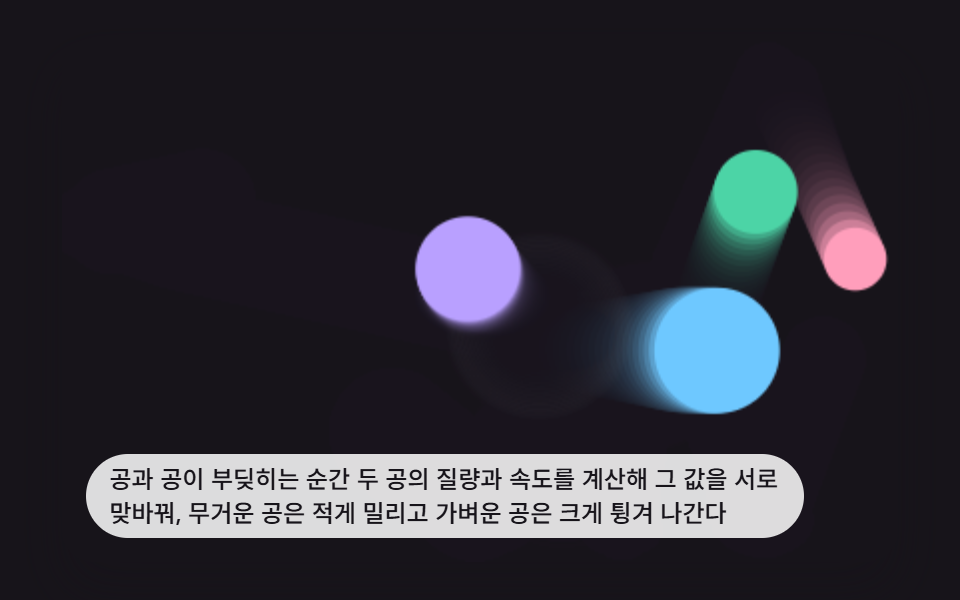 game9 Bouncing Ball Animation Patterns With Physics
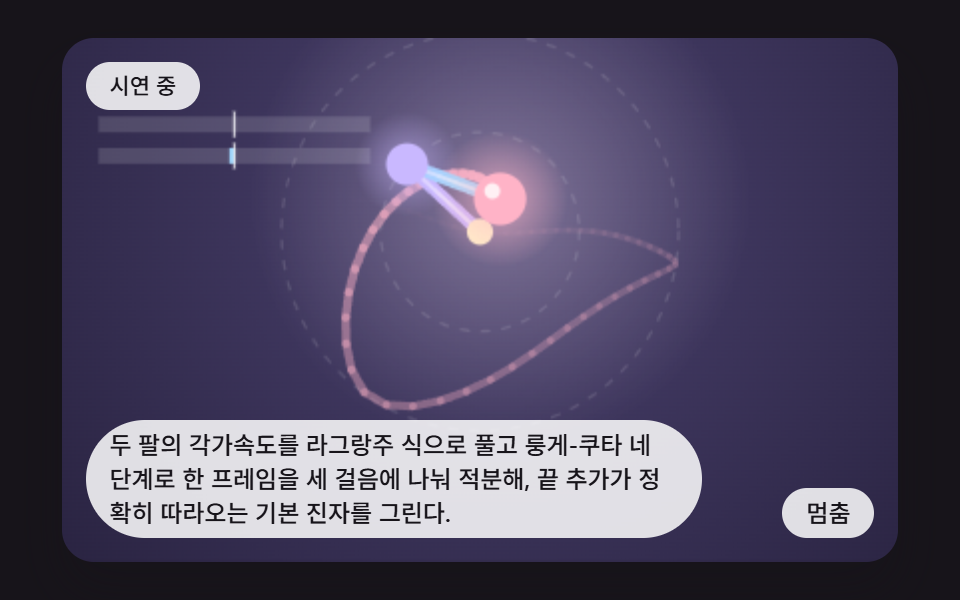 gameDouble Pendulum Simulation: 9 Chaos Scenes
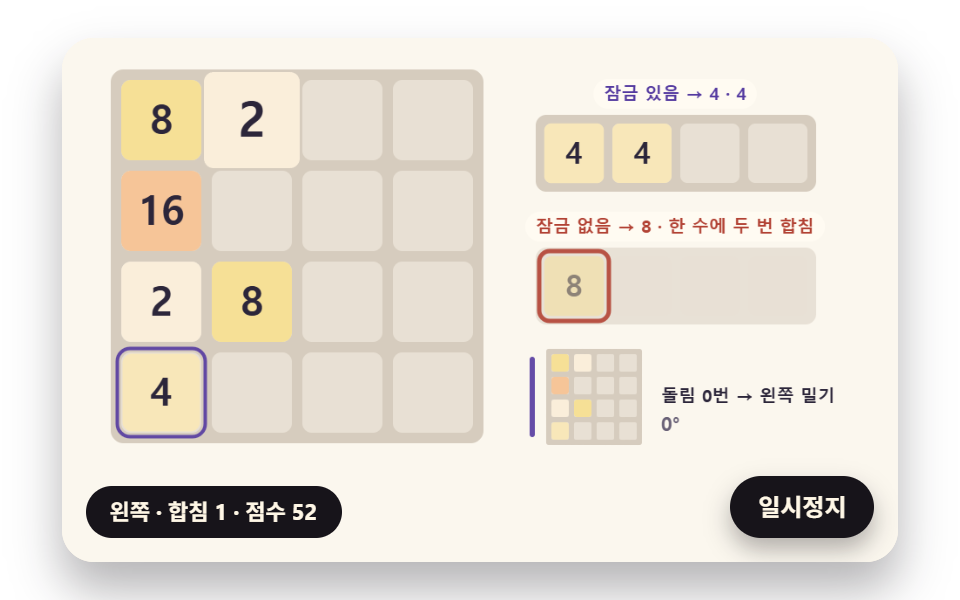 game2048 Game JavaScript: 9 Boards from Merges to AI
 gameSorting Algorithm Visualizer: 9 Sort Scenes
 gameMinesweeper JavaScript: 9 Minefield Scenes
 gameBrick Breaker Game: 9 Canvas Scenes
 gameSliding Puzzle: 9 Canvas Scenes, Parity to Search
 gameSudoku: 9 Scenes, Candidates to Unique Boards
 gameTetris JavaScript: Build It in 9 Canvas Steps
 gameSpin Wheel: 9 Canvas Roulettes, Flick to Stop