Double Pendulum Simulation: 9 Chaos Scenes
Change the start angle by one millionth of a radian and the tip draws a completely different path — scene 03 stacks two pendulums so you watch the fork happen.
See All Nine Double Pendulum Scenes Run Right on This Page
Every canvas in the grid is already moving on load, and all nine start from the same object: one arm hanging from a pivot with a second arm hanging from its end, which I call the tip. Nothing needs a click except scene 07, where your pointer or arrow keys choose the start angles.
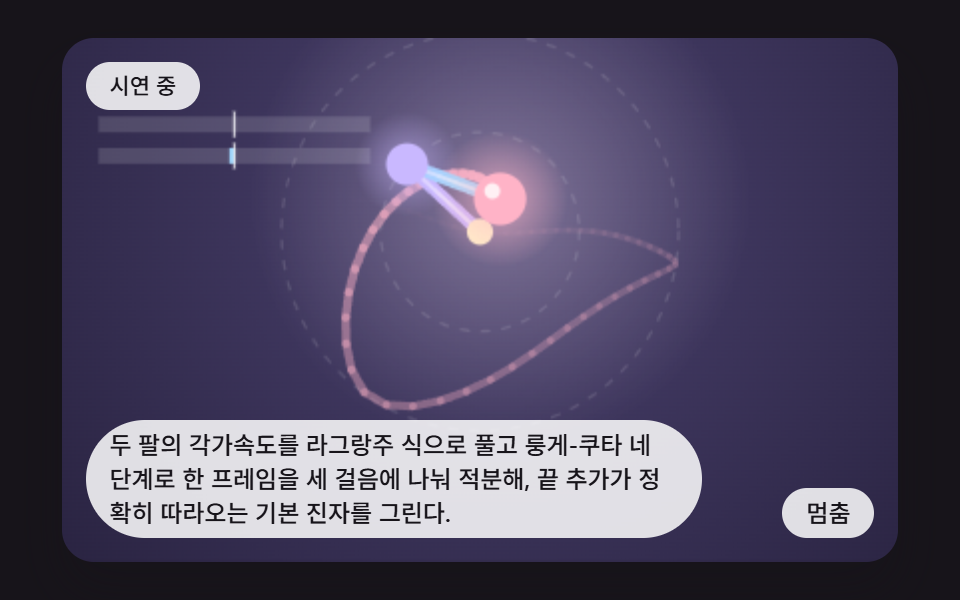 01 dp-rk4-two-arm-step-lagrangian
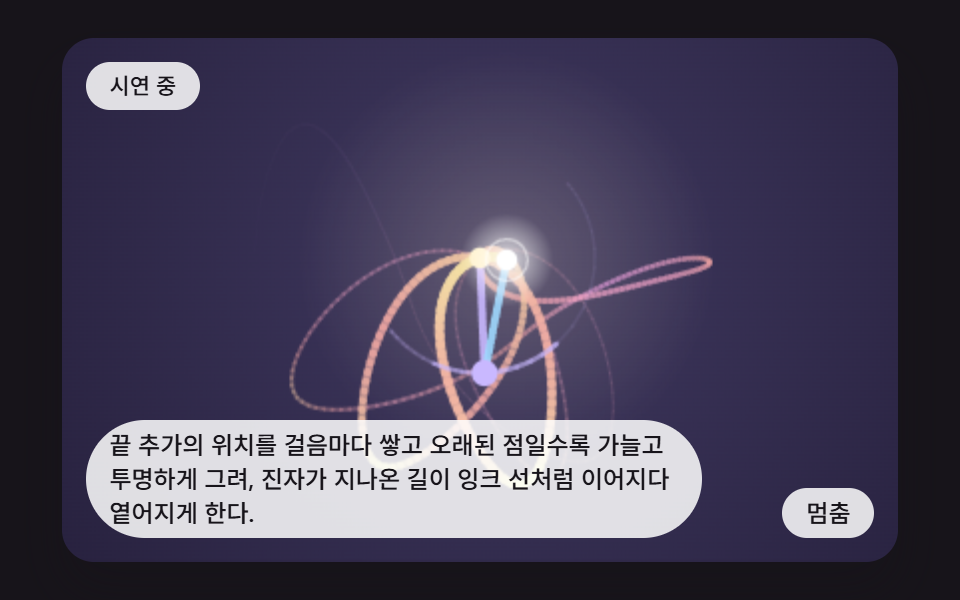 02 dp-fading-ink-trail-tip-path
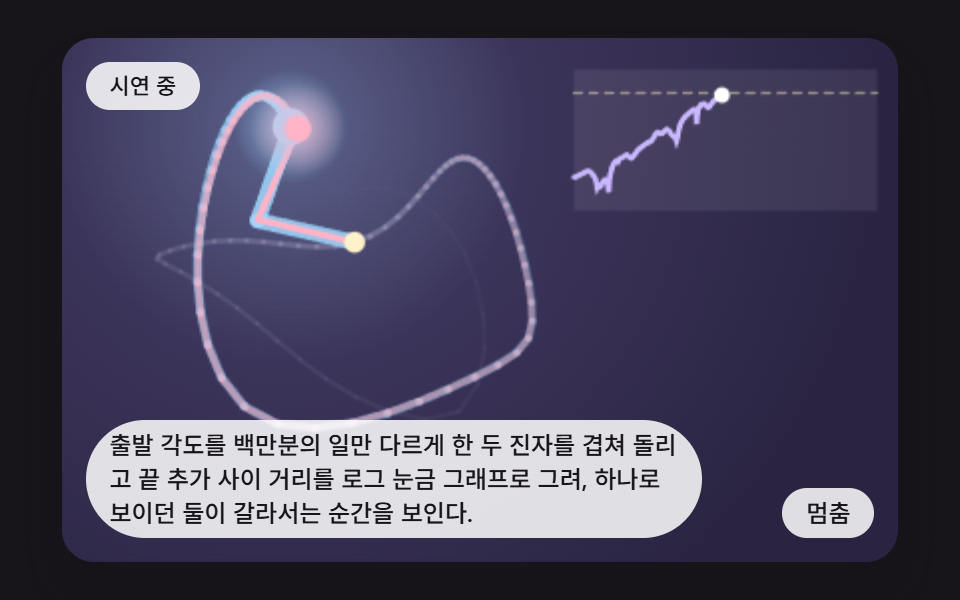 03 dp-twin-divergence-tiny-offset
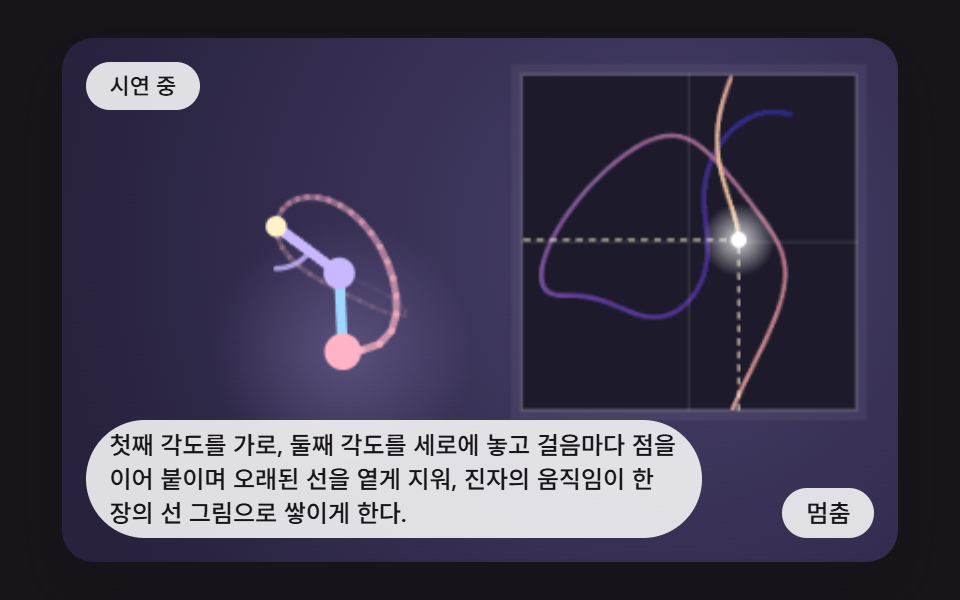 04 dp-phase-space-angle-plot-trace
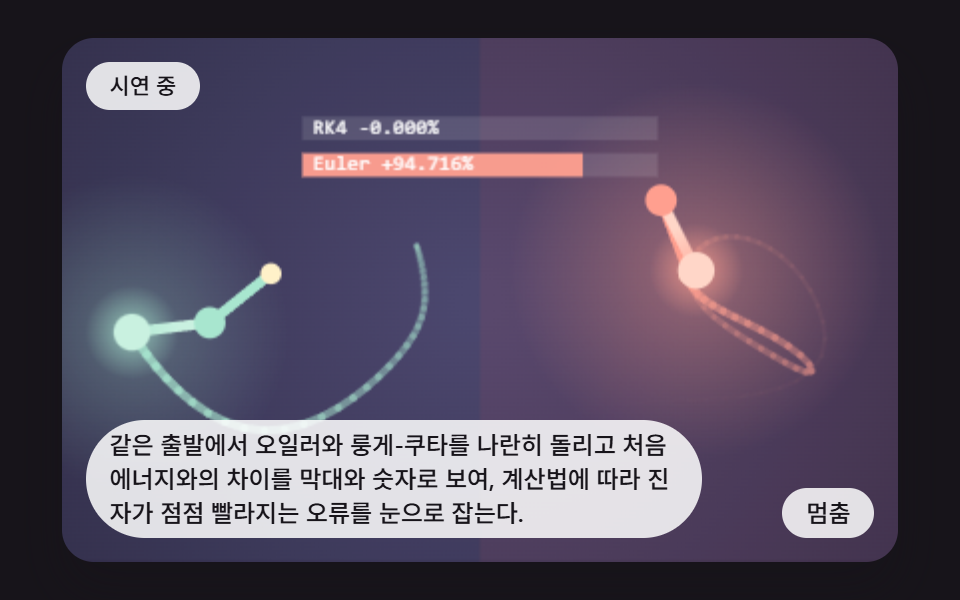 05 dp-energy-drift-meter-euler-vs-rk4
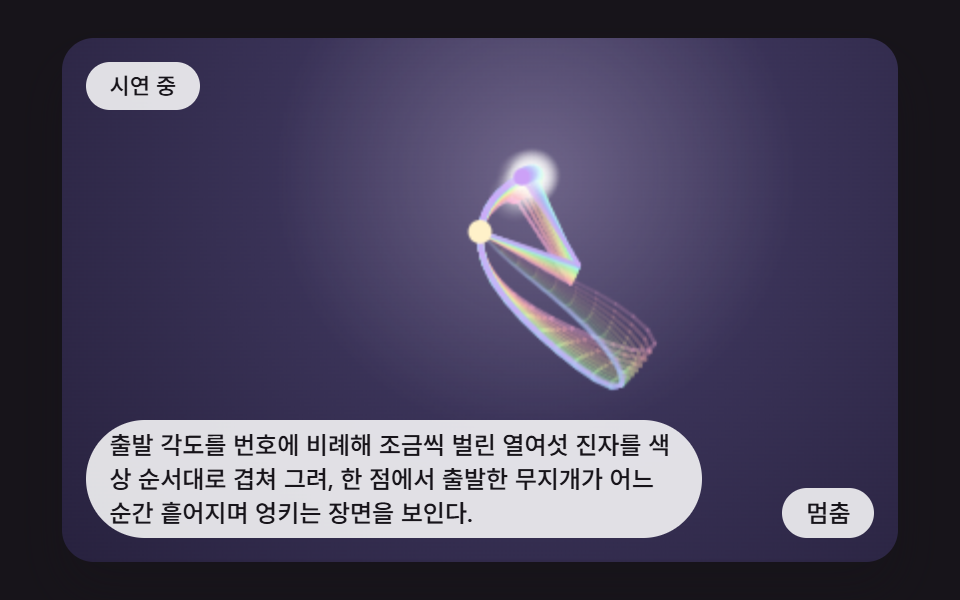 06 dp-sixteen-fan-ensemble-hue-spread
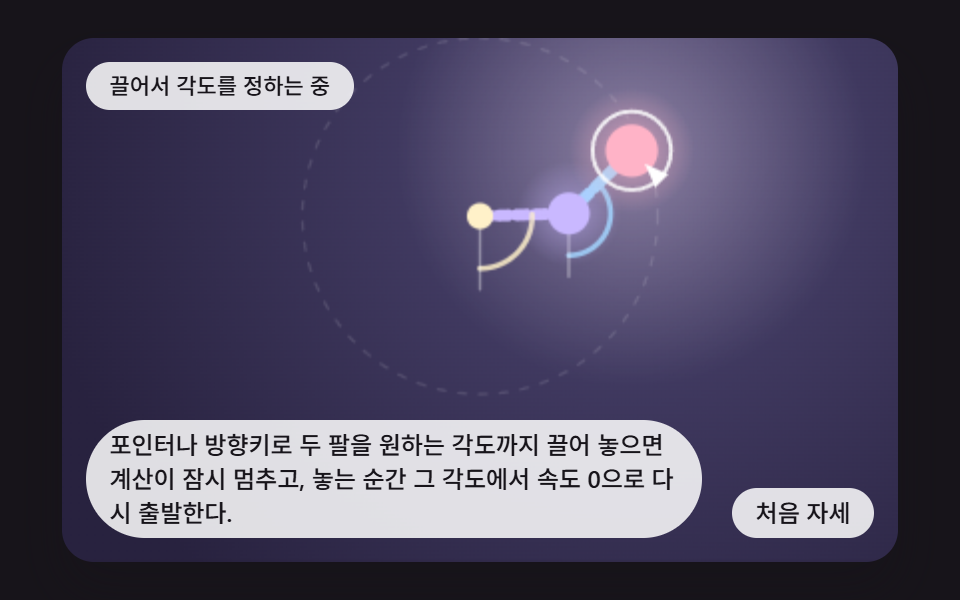 07 dp-drag-arm-set-release-angles
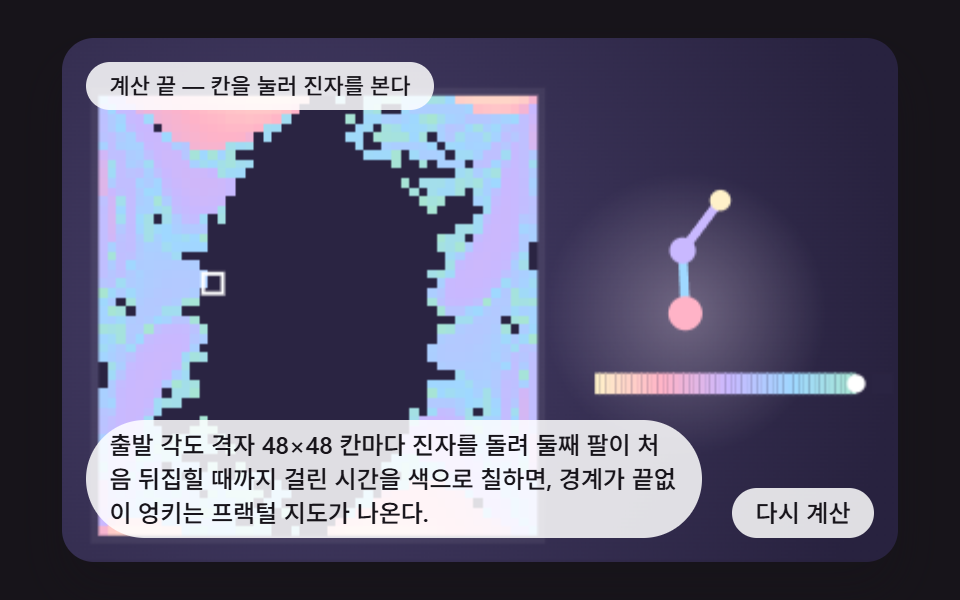 08 dp-flip-time-color-map-fractal-grid
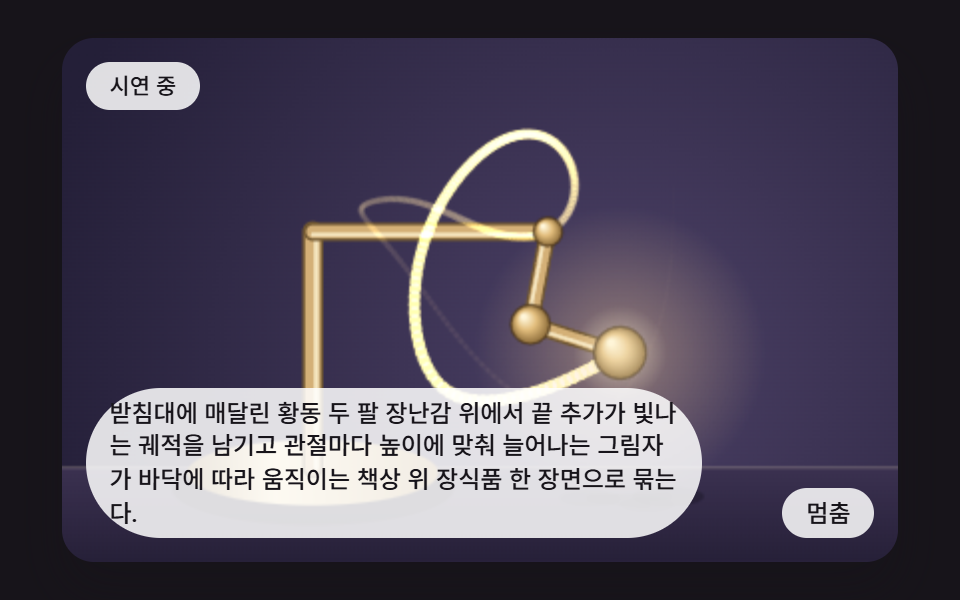 09 dp-hero-brass-desk-toy-scene
Auto-plays · click a tile to jump to its section · all nine in one zip
- 01 Pendulum Stepped by Solving Both Arm Accelerations
- 02 Tip Trail That Fades Like Ink
- 03 Twin Pendulums Split by a Hair's Difference
- 04 Phase-Plane Trace Drawn from Both Angles
- 05 Gauge Comparing How Far Each Method Drifts in Energy
- 06 Sixteen Pendulums Fanning Out in a Band of Hues
- 07 Pendulum Whose Start Angles You Set by Dragging
- 08 Start-Angle Map Colored by Time Until Flip
- 09 Hero Scene Leaving a Glowing Trail on a Brass Desk Toy
Double Pendulum Simulation: 9 Scenes Where One Integration Step Shapes the Chaos
If you want the double pendulum equations of motion in a form you can change and watch, this page keeps them to two functions. accTheta1 and accTheta2 turn the two arm angles and speeds into accelerations, and rk4Step pushes the state forward one small step with four Runge-Kutta stages. Both arm lengths L1 and L2 and both masses M1 and M2 are 1.0, gravity G is 9.81, and an angle of 0 means straight down. There is no random number and no clock call in any scene, so the same start angles always draw the same path.
The nine scenes keep that calculation and change only what is drawn from it. Scene 01 shows the bare skeleton, 02 keeps the path of the tip, and 04 draws the two angles against each other on one plane. Scenes 03 and 06 stack pendulums whose start angles differ by a hair, 05 compares two ways of stepping, 07 lets you set the start by hand, 08 colors every possible start as a map, and 09 ties it all into a brass desk toy.
All of them run faster than real time. Each frame advances SUBSTEPS steps of DT 0.01 seconds, which is 0.03 seconds per frame (0.04 in scene 03), and the fixed 16 ms accumulator makes that about twice real speed (about 2.5 times in scene 03). No library, no WebGL and no outside address is used. For a gentler physics warm-up, try 9 Bouncing Ball Animation Patterns With Physics or Spinning Top Animation: 9 Canvas Physics Scenes first.
Code for Each Pendulum Calculation Technique
Every snippet below is a run of consecutive lines cut from the demo source in their original order. The shared functions (accTheta1, accTheta2, rk4Step) are identical in all nine, so scene 01 uses them once and the other scenes show only the lines that make them different. You get the whole files by opening the zip.
01Pendulum Stepped by Solving Both Arm Accelerations
stepFrame() calls rk4Step(sim, DT) SUBSTEPS times per frame, then asks accTheta1 and accTheta2 again for the two accelerations accA and accB. The two bars at the top read them on a ±90 rad/s² scale while a 72-point trail follows the tip, which makes this a good base frame for any pendulum page. Scene 01 repainted 62.4% of the frame at an average intensity of 34.1 across 23/23 measured frames.
<main class="stage">
<div class="bp is-demo" id="bpRoot">
  <canvas class="bp__canvas" id="bpCanvas" width="480" height="300" tabindex="0" aria-label="It solves both arm accelerations with the Lagrangian equations and integrates each frame in three Runge-Kutta steps, drawing the base pendulum whose tip follows the exact motion."></canvas>
  <p class="bp__status" id="bpStatus" aria-live="polite">Demo running</p>
  <button class="bp__btn" id="bpBtn" type="button">Pause</button>
  <p class="bp__caption">It solves both arm accelerations with the Lagrangian equations and integrates each frame in three Runge-Kutta steps, drawing the base pendulum whose tip follows the exact motion.</p>
</div>
</main>
@use "../../../../site/static/demo-tokens" as *;
@include stage($stage-ink);
.bp {
position: relative;
width: min(92vw, calc(160vh - 12.8vw));
aspect-ratio: 480 / 300;
margin: 0 auto;
border-radius: $r-card;
overflow: hidden;
box-shadow: $shadow-raised;
background: $stage-ink;
}
.bp__canvas {
display: block;
width: 100%;
height: 100%;
touch-action: none;
}
.bp__canvas:focus-visible {
outline: 2px solid rgba(255, 255, 255, .85);
outline-offset: -6px;
}
.bp__status {
position: absolute;
left: $sp-3;
top: $sp-3;
max-width: 70%;
margin: 0;
padding: $sp-1 $sp-3;
border-radius: $r-pill;
background: rgba(255, 255, 255, .85);
color: $subject-ink;
font-weight: 500;
font-size: 11px;
line-height: 1.4;
pointer-events: none;
}
.bp__btn {
position: absolute;
right: $sp-3;
bottom: $sp-3;
margin: 0;
padding: $sp-1 $sp-3;
border: 0;
border-radius: $r-pill;
background: rgba(255, 255, 255, .85);
color: $subject-ink;
font: inherit;
font-weight: 500;
font-size: 12px;
line-height: 1.4;
cursor: pointer;
}
.bp__btn:focus-visible {
outline: 2px solid #ffffff;
outline-offset: 2px;
}
.bp__caption {
position: absolute;
left: $sp-3;
bottom: $sp-3;
max-width: 68%;
margin: 0;
padding: $sp-1 $sp-3;
border-radius: $r-pill;
background: rgba(255, 255, 255, .85);
color: $subject-ink;
font-weight: 500;
font-size: 12px;
line-height: 1.4;
pointer-events: none;
}
@media (max-width: 340px) {
.bp__caption, .bp__btn { font-size: 10px; padding: $sp-1 $sp-2; }
.bp__status { font-size: 10px; }
}
@media (prefers-reduced-motion: reduce) {
.bp { cursor: default; }
}html, body {
margin: 0;
overflow: hidden;
}
.stage {
box-sizing: border-box;
min-height: 100vh;
display: grid;
place-items: center;
margin: 0;
background: #17141a;
font-family: -apple-system, "Segoe UI", "Noto Sans KR", sans-serif;
padding: clamp(8px, 4vw, 24px);
}
.bp {
position: relative;
width: min(92vw, 160vh - 12.8vw);
aspect-ratio: 480/300;
margin: 0 auto;
border-radius: 16px;
overflow: hidden;
box-shadow: 0 14px 24px rgba(23, 20, 26, 0.32);
background: #17141a;
}
.bp__canvas {
display: block;
width: 100%;
height: 100%;
touch-action: none;
}
.bp__canvas:focus-visible {
outline: 2px solid rgba(255, 255, 255, 0.85);
outline-offset: -6px;
}
.bp__status {
position: absolute;
left: 12px;
top: 12px;
max-width: 70%;
margin: 0;
padding: 4px 12px;
border-radius: 999px;
background: rgba(255, 255, 255, 0.85);
color: #17141a;
font-weight: 500;
font-size: 11px;
line-height: 1.4;
pointer-events: none;
}
.bp__btn {
position: absolute;
right: 12px;
bottom: 12px;
margin: 0;
padding: 4px 12px;
border: 0;
border-radius: 999px;
background: rgba(255, 255, 255, 0.85);
color: #17141a;
font: inherit;
font-weight: 500;
font-size: 12px;
line-height: 1.4;
cursor: pointer;
}
.bp__btn:focus-visible {
outline: 2px solid #ffffff;
outline-offset: 2px;
}
.bp__caption {
position: absolute;
left: 12px;
bottom: 12px;
max-width: 68%;
margin: 0;
padding: 4px 12px;
border-radius: 999px;
background: rgba(255, 255, 255, 0.85);
color: #17141a;
font-weight: 500;
font-size: 12px;
line-height: 1.4;
pointer-events: none;
}
@media (max-width: 340px) {
.bp__caption, .bp__btn {
font-size: 10px;
padding: 4px 8px;
}
.bp__status {
font-size: 10px;
}
}
@media (prefers-reduced-motion: reduce) {
.bp {
cursor: default;
}
}(function () {
var root = document.getElementById('bpRoot');
var canvas = document.getElementById('bpCanvas');
var statusEl = document.getElementById('bpStatus');
var btnEl = document.getElementById('bpBtn');
"use strict";
function main(root, canvas, statusEl, btnEl) {
var ctx0 = canvas.getContext('2d');
if (!ctx0) {
return function () { return; };
}
var ctx = ctx0;
var wrap = canvas.parentElement ? canvas.parentElement : root;
var CALC_W = 320, CALC_H = 200;
var FIXED_DT = 16;
var REDUCE_STEP_FRAMES = 40;
var reduce = window.matchMedia('(prefers-reduced-motion: reduce)').matches;
var demo = !reduce;
if (!demo)
root.classList.remove('is-demo');
function stopDemo() { demo = false; root.classList.remove('is-demo'); }
var paused = false;
var ownInput = false;
var cw = 480, ch = 300, sc = 1.5, elapsed = 0, rafId = 0;
var cleaners = [];
function listen(target, type, fn) {
target.addEventListener(type, fn);
cleaners.push(function () { target.removeEventListener(type, fn); });
}
function clamp(v, lo, hi) { return v < lo ? lo : (v > hi ? hi : v); }
function setStatus(msg) { statusEl.textContent = msg; }
function hsl(h, s, l, a) {
return 'hsla(' + (h % 360) + ',' + s + '%,' + l + '%,' + a + ')';
}
function canvasPoint(e) {
var r = canvas.getBoundingClientRect();
return { x: (e.clientX - r.left) / r.width * CALC_W, y: (e.clientY - r.top) / r.height * CALC_H };
}
// 배경 — 어두운 잉크색 위에 방사형 빛무리를 (gx, gy) 에 깐다
function beginDraw(inner, outer, gx, gy) {
ctx.setTransform(1, 0, 0, 1, 0, 0);
ctx.fillStyle = '#1d1a2b';
ctx.fillRect(0, 0, cw, ch);
ctx.setTransform(sc, 0, 0, sc, 0, 0);
var g = ctx.createRadialGradient(gx, gy, 8, gx, gy, 230);
g.addColorStop(0, inner);
g.addColorStop(1, outer);
ctx.fillStyle = g;
ctx.fillRect(0, 0, CALC_W, CALC_H);
}
function seg(x1, y1, x2, y2, w, col) {
ctx.beginPath();
ctx.moveTo(x1, y1);
ctx.lineTo(x2, y2);
ctx.lineCap = 'round';
ctx.lineWidth = w;
ctx.strokeStyle = col;
ctx.stroke();
}
function disc(x, y, r, col) {
ctx.beginPath();
ctx.arc(x, y, r, 0, 6.2832);
ctx.fillStyle = col;
ctx.fill();
}
function glow(x, y, r, rgb, a) {
var g = ctx.createRadialGradient(x, y, 0, x, y, r);
g.addColorStop(0, 'rgba(' + rgb + ',' + a + ')');
g.addColorStop(1, 'rgba(' + rgb + ',0)');
ctx.fillStyle = g;
ctx.fillRect(x - r, y - r, r * 2, r * 2);
}
function drawTrail(arr, rgb, w, alpha) {
ctx.lineCap = 'round';
for (var i = 1; i < arr.length; i += 1) {
var f = i / arr.length;
ctx.beginPath();
ctx.moveTo(arr[i - 1].x, arr[i - 1].y);
ctx.lineTo(arr[i].x, arr[i].y);
ctx.strokeStyle = 'rgba(' + rgb + ',' + (alpha * f * f) + ')';
ctx.lineWidth = w * (0.3 + 0.7 * f);
ctx.stroke();
}
}
function pushTrail(arr, x, y, max) {
arr.push({ x: x, y: y });
if (arr.length > max) {
arr.shift();
}
}
function defaultToggle() {
if (reduce) {
for (var i = 0; i < REDUCE_STEP_FRAMES; i += 1) {
elapsed += FIXED_DT;
stepFrame();
}
draw();
setStatus('Stepping one scene at a time');
return;
}
paused = !paused;
btnEl.textContent = paused ? 'Play' : 'Pause';
setStatus(paused ? 'Paused' : 'Demo running');
}
var onButton = defaultToggle;
// 기법: 두 각도의 가속도를 라그랑주 식으로 풀고, 한 프레임을 SUBSTEPS 걸음으로 쪼개 룽게-쿠타로 적분한다
var DT = 0.01;
var SUBSTEPS = 3;
var START_T1 = 2.2;
var START_T2 = 2.6;
var TRAIL_LEN = 72;
var L1 = 1.0;
var L2 = 1.0;
var M1 = 1.0;
var M2 = 1.0;
var G = 9.81;
var UNIT = 38, PIVOT_X = 160, PIVOT_Y = 74;
var PREROLL_FRAMES = 30;
// 라그랑주 운동방정식 — 각도는 아래 방향이 0, 시계 방향이 양수
function accTheta1(t1, t2, w1, w2) {
var d = t1 - t2;
var den = L1 * (2 * M1 + M2 - M2 * Math.cos(2 * d));
return (-G * (2 * M1 + M2) * Math.sin(t1) - M2 * G * Math.sin(t1 - 2 * t2)
- 2 * Math.sin(d) * M2 * (w2 * w2 * L2 + w1 * w1 * L1 * Math.cos(d))) / den;
}
function accTheta2(t1, t2, w1, w2) {
var d = t1 - t2;
var den = L2 * (2 * M1 + M2 - M2 * Math.cos(2 * d));
return (2 * Math.sin(d) * (w1 * w1 * L1 * (M1 + M2) + G * (M1 + M2) * Math.cos(t1)
+ w2 * w2 * L2 * M2 * Math.cos(d))) / den;
}
// 룽게-쿠타 4단계 — 한 걸음을 네 번 기울기로 평균 낸다 (s = [t1, t2, w1, w2])
function rk4Step(s, h) {
var t1 = s[0], t2 = s[1], w1 = s[2], w2 = s[3];
var h2 = h * 0.5;
var k1a = w1, k1b = w2, k1c = accTheta1(t1, t2, w1, w2), k1d = accTheta2(t1, t2, w1, w2);
var u1 = t1 + h2 * k1a, u2 = t2 + h2 * k1b, u3 = w1 + h2 * k1c, u4 = w2 + h2 * k1d;
var k2a = u3, k2b = u4, k2c = accTheta1(u1, u2, u3, u4), k2d = accTheta2(u1, u2, u3, u4);
u1 = t1 + h2 * k2a;
u2 = t2 + h2 * k2b;
u3 = w1 + h2 * k2c;
u4 = w2 + h2 * k2d;
var k3a = u3, k3b = u4, k3c = accTheta1(u1, u2, u3, u4), k3d = accTheta2(u1, u2, u3, u4);
u1 = t1 + h * k3a;
u2 = t2 + h * k3b;
u3 = w1 + h * k3c;
u4 = w2 + h * k3d;
var k4a = u3, k4b = u4, k4c = accTheta1(u1, u2, u3, u4), k4d = accTheta2(u1, u2, u3, u4);
s[0] = t1 + h / 6 * (k1a + 2 * k2a + 2 * k3a + k4a);
s[1] = t2 + h / 6 * (k1b + 2 * k2b + 2 * k3b + k4b);
s[2] = w1 + h / 6 * (k1c + 2 * k2c + 2 * k3c + k4c);
s[3] = w2 + h / 6 * (k1d + 2 * k2d + 2 * k3d + k4d);
}
function bobOne(s, ox, oy) {
return { x: ox + UNIT * L1 * Math.sin(s[0]), y: oy + UNIT * L1 * Math.cos(s[0]) };
}
function bobTwo(s, ox, oy) {
var a = bobOne(s, ox, oy);
return { x: a.x + UNIT * L2 * Math.sin(s[1]), y: a.y + UNIT * L2 * Math.cos(s[1]) };
}
function drawArms(s, ox, oy, c1, c2, w) {
var a = bobOne(s, ox, oy), b = bobTwo(s, ox, oy);
seg(ox, oy, a.x, a.y, w, c1);
seg(a.x, a.y, b.x, b.y, w, c2);
}
      var sim = [START_T1, START_T2, 0, 0];
      var accA = 0, accB = 0;
      var trail = [];
      function stepFrame() {
          for (var i = 0; i < SUBSTEPS; i += 1) {
              rk4Step(sim, DT);
          }
          accA = accTheta1(sim[0], sim[1], sim[2], sim[3]);
          accB = accTheta2(sim[0], sim[1], sim[2], sim[3]);
          var p = bobTwo(sim, PIVOT_X, PIVOT_Y);
          pushTrail(trail, p.x, p.y, TRAIL_LEN);
      }
function meter(y, v, rgb) {
var half = 52;
ctx.fillStyle = 'rgba(255,255,255,0.14)';
ctx.fillRect(14, y, half * 2, 6);
ctx.fillStyle = 'rgba(' + rgb + ',0.95)';
var f = clamp(v / 90, -1, 1) * half;
ctx.fillRect(14 + half + (f < 0 ? f : 0), y, Math.abs(f), 6);
ctx.fillStyle = 'rgba(255,255,255,0.7)';
ctx.fillRect(14 + half - 0.5, y - 2, 1, 10);
}
function draw() {
var a = bobOne(sim, PIVOT_X, PIVOT_Y), b = bobTwo(sim, PIVOT_X, PIVOT_Y);
beginDraw('#4a416e', '#28223f', b.x, b.y);
glow(b.x, b.y, 96, '255,238,252', 0.3);
ctx.strokeStyle = 'rgba(255,255,255,0.12)';
ctx.lineWidth = 1;
ctx.setLineDash([3, 5]);
ctx.beginPath();
ctx.arc(PIVOT_X, PIVOT_Y, UNIT * (L1 + L2), 0, 6.2832);
ctx.stroke();
ctx.beginPath();
ctx.arc(PIVOT_X, PIVOT_Y, UNIT * L1, 0, 6.2832);
ctx.stroke();
ctx.setLineDash([]);
drawTrail(trail, '255,179,199', 4, 0.8);
drawArms(sim, PIVOT_X, PIVOT_Y, '#c9b8ff', '#9fd8ff', 5);
seg(PIVOT_X, PIVOT_Y, a.x, a.y, 1.5, 'rgba(255,255,255,0.55)');
seg(a.x, a.y, b.x, b.y, 1.5, 'rgba(255,255,255,0.55)');
disc(PIVOT_X, PIVOT_Y, 5, '#fff1c9');
glow(a.x, a.y, 20, '201,184,255', 0.55);
disc(a.x, a.y, 8, '#c9b8ff');
glow(b.x, b.y, 26, '255,179,199', 0.65);
disc(b.x, b.y, 10, '#ffb3c7');
disc(b.x - 3, b.y - 3, 3, 'rgba(255,255,255,0.8)');
meter(30, accA, '201,184,255');
meter(42, accB, '159,216,255');
}
function fit() {
var r = wrap.getBoundingClientRect();
cw = Math.max(1, Math.round(r.width));
ch = Math.max(1, Math.round(r.height));
canvas.width = cw;
canvas.height = ch;
sc = cw / CALC_W;
draw();
}
var lastTs = null;
var accMs = 0;
function tick(ts) {
if (lastTs === null) {
lastTs = ts;
}
var frameDt = Math.min(ts - lastTs, 48);
lastTs = ts;
if (!paused) {
accMs += frameDt;
while (accMs >= FIXED_DT) {
elapsed += FIXED_DT;
stepFrame();
accMs -= FIXED_DT;
}
}
draw();
rafId = requestAnimationFrame(tick);
}
for (var w0 = 0; w0 < PREROLL_FRAMES; w0 += 1) {
elapsed += FIXED_DT;
stepFrame();
}
fit();
listen(window, 'resize', fit);
listen(btnEl, 'click', function () { onButton(); });
if (!ownInput) {
listen(canvas, 'pointerdown', function () { onButton(); });
listen(canvas, 'keydown', function (e) {
var k = e.key;
if (k === 'Enter' || k === ' ') {
e.preventDefault();
onButton();
}
});
}
if (reduce) {
if (!ownInput) {
btnEl.textContent = 'Next scene';
setStatus('Stepping one scene at a time');
}
}
else {
rafId = requestAnimationFrame(tick);
}
function destroy() {
cancelAnimationFrame(rafId);
for (var i = 0; i < cleaners.length; i += 1) {
cleaners[i]();
}
}
return destroy;
}
main(root, canvas, statusEl, btnEl);
})();import { useEffect, useRef } from "react";
import styles from "./DpRk4TwoArmStepLagrangian.module.scss";
function main(root: HTMLDivElement, canvas: HTMLCanvasElement, statusEl: HTMLElement, btnEl: HTMLButtonElement): () => void {
type Pt = { x: number; y: number };
var ctx0 = canvas.getContext('2d');
if (!ctx0) { return function (): void { return; }; }
var ctx: CanvasRenderingContext2D = ctx0;
var wrap: HTMLElement = canvas.parentElement ? canvas.parentElement : root;
var CALC_W = 320, CALC_H = 200;
var FIXED_DT = 16;
var REDUCE_STEP_FRAMES = 40;
var reduce = window.matchMedia('(prefers-reduced-motion: reduce)').matches;
var demo = !reduce;
if (!demo) root.classList.remove('is-demo');
function stopDemo(): void { demo = false; root.classList.remove('is-demo'); }
var paused = false;
var ownInput = false;
var cw = 480, ch = 300, sc = 1.5, elapsed = 0, rafId = 0;
var cleaners: Array<() => void> = [];
function listen(target: EventTarget, type: string, fn: (e: Event) => void): void {
target.addEventListener(type, fn);
cleaners.push(function (): void { target.removeEventListener(type, fn); });
}
function clamp(v: number, lo: number, hi: number): number { return v < lo ? lo : (v > hi ? hi : v); }
function setStatus(msg: string): void { statusEl.textContent = msg; }
function hsl(h: number, s: number, l: number, a: number): string {
return 'hsla(' + (h % 360) + ',' + s + '%,' + l + '%,' + a + ')';
}
function canvasPoint(e: PointerEvent): Pt {
var r = canvas.getBoundingClientRect();
return { x: (e.clientX - r.left) / r.width * CALC_W, y: (e.clientY - r.top) / r.height * CALC_H };
}
// 배경 — 어두운 잉크색 위에 방사형 빛무리를 (gx, gy) 에 깐다
function beginDraw(inner: string, outer: string, gx: number, gy: number): void {
ctx.setTransform(1, 0, 0, 1, 0, 0);
ctx.fillStyle = '#1d1a2b';
ctx.fillRect(0, 0, cw, ch);
ctx.setTransform(sc, 0, 0, sc, 0, 0);
var g = ctx.createRadialGradient(gx, gy, 8, gx, gy, 230);
g.addColorStop(0, inner);
g.addColorStop(1, outer);
ctx.fillStyle = g;
ctx.fillRect(0, 0, CALC_W, CALC_H);
}
function seg(x1: number, y1: number, x2: number, y2: number, w: number, col: string): void {
ctx.beginPath();
ctx.moveTo(x1, y1);
ctx.lineTo(x2, y2);
ctx.lineCap = 'round';
ctx.lineWidth = w;
ctx.strokeStyle = col;
ctx.stroke();
}
function disc(x: number, y: number, r: number, col: string): void {
ctx.beginPath();
ctx.arc(x, y, r, 0, 6.2832);
ctx.fillStyle = col;
ctx.fill();
}
function glow(x: number, y: number, r: number, rgb: string, a: number): void {
var g = ctx.createRadialGradient(x, y, 0, x, y, r);
g.addColorStop(0, 'rgba(' + rgb + ',' + a + ')');
g.addColorStop(1, 'rgba(' + rgb + ',0)');
ctx.fillStyle = g;
ctx.fillRect(x - r, y - r, r * 2, r * 2);
}
function drawTrail(arr: Pt[], rgb: string, w: number, alpha: number): void {
ctx.lineCap = 'round';
for (var i = 1; i < arr.length; i += 1) {
var f = i / arr.length;
ctx.beginPath();
ctx.moveTo(arr[i - 1].x, arr[i - 1].y);
ctx.lineTo(arr[i].x, arr[i].y);
ctx.strokeStyle = 'rgba(' + rgb + ',' + (alpha * f * f) + ')';
ctx.lineWidth = w * (0.3 + 0.7 * f);
ctx.stroke();
}
}
function pushTrail(arr: Pt[], x: number, y: number, max: number): void {
arr.push({ x: x, y: y });
if (arr.length > max) { arr.shift(); }
}
function defaultToggle(): void {
if (reduce) {
for (var i = 0; i < REDUCE_STEP_FRAMES; i += 1) { elapsed += FIXED_DT; stepFrame(); }
draw();
setStatus('한 장면씩 넘기는 중');
return;
}
paused = !paused;
btnEl.textContent = paused ? '재생' : '멈춤';
setStatus(paused ? '일시정지됨' : '시연 중');
}
var onButton: () => void = defaultToggle;
// 기법: 두 각도의 가속도를 라그랑주 식으로 풀고, 한 프레임을 SUBSTEPS 걸음으로 쪼개 룽게-쿠타로 적분한다
var DT = 0.01;
var SUBSTEPS = 3;
var START_T1 = 2.2;
var START_T2 = 2.6;
var TRAIL_LEN = 72;
var L1 = 1.0;
var L2 = 1.0;
var M1 = 1.0;
var M2 = 1.0;
var G = 9.81;
var UNIT = 38, PIVOT_X = 160, PIVOT_Y = 74;
var PREROLL_FRAMES = 30;
// 라그랑주 운동방정식 — 각도는 아래 방향이 0, 시계 방향이 양수
function accTheta1(t1: number, t2: number, w1: number, w2: number): number {
var d = t1 - t2;
var den = L1 * (2 * M1 + M2 - M2 * Math.cos(2 * d));
return (-G * (2 * M1 + M2) * Math.sin(t1) - M2 * G * Math.sin(t1 - 2 * t2)
- 2 * Math.sin(d) * M2 * (w2 * w2 * L2 + w1 * w1 * L1 * Math.cos(d))) / den;
}
function accTheta2(t1: number, t2: number, w1: number, w2: number): number {
var d = t1 - t2;
var den = L2 * (2 * M1 + M2 - M2 * Math.cos(2 * d));
return (2 * Math.sin(d) * (w1 * w1 * L1 * (M1 + M2) + G * (M1 + M2) * Math.cos(t1)
+ w2 * w2 * L2 * M2 * Math.cos(d))) / den;
}
// 룽게-쿠타 4단계 — 한 걸음을 네 번 기울기로 평균 낸다 (s = [t1, t2, w1, w2])
function rk4Step(s: number[], h: number): void {
var t1 = s[0], t2 = s[1], w1 = s[2], w2 = s[3];
var h2 = h * 0.5;
var k1a = w1, k1b = w2, k1c = accTheta1(t1, t2, w1, w2), k1d = accTheta2(t1, t2, w1, w2);
var u1 = t1 + h2 * k1a, u2 = t2 + h2 * k1b, u3 = w1 + h2 * k1c, u4 = w2 + h2 * k1d;
var k2a = u3, k2b = u4, k2c = accTheta1(u1, u2, u3, u4), k2d = accTheta2(u1, u2, u3, u4);
u1 = t1 + h2 * k2a; u2 = t2 + h2 * k2b; u3 = w1 + h2 * k2c; u4 = w2 + h2 * k2d;
var k3a = u3, k3b = u4, k3c = accTheta1(u1, u2, u3, u4), k3d = accTheta2(u1, u2, u3, u4);
u1 = t1 + h * k3a; u2 = t2 + h * k3b; u3 = w1 + h * k3c; u4 = w2 + h * k3d;
var k4a = u3, k4b = u4, k4c = accTheta1(u1, u2, u3, u4), k4d = accTheta2(u1, u2, u3, u4);
s[0] = t1 + h / 6 * (k1a + 2 * k2a + 2 * k3a + k4a);
s[1] = t2 + h / 6 * (k1b + 2 * k2b + 2 * k3b + k4b);
s[2] = w1 + h / 6 * (k1c + 2 * k2c + 2 * k3c + k4c);
s[3] = w2 + h / 6 * (k1d + 2 * k2d + 2 * k3d + k4d);
}
function bobOne(s: number[], ox: number, oy: number): Pt {
return { x: ox + UNIT * L1 * Math.sin(s[0]), y: oy + UNIT * L1 * Math.cos(s[0]) };
}
function bobTwo(s: number[], ox: number, oy: number): Pt {
var a = bobOne(s, ox, oy);
return { x: a.x + UNIT * L2 * Math.sin(s[1]), y: a.y + UNIT * L2 * Math.cos(s[1]) };
}
function drawArms(s: number[], ox: number, oy: number, c1: string, c2: string, w: number): void {
var a = bobOne(s, ox, oy), b = bobTwo(s, ox, oy);
seg(ox, oy, a.x, a.y, w, c1);
seg(a.x, a.y, b.x, b.y, w, c2);
}
var sim: number[] = [START_T1, START_T2, 0, 0];
var accA = 0, accB = 0;
var trail: Pt[] = [];
function stepFrame(): void {
for (var i = 0; i < SUBSTEPS; i += 1) { rk4Step(sim, DT); }
accA = accTheta1(sim[0], sim[1], sim[2], sim[3]);
accB = accTheta2(sim[0], sim[1], sim[2], sim[3]);
var p = bobTwo(sim, PIVOT_X, PIVOT_Y);
pushTrail(trail, p.x, p.y, TRAIL_LEN);
}
function meter(y: number, v: number, rgb: string): void {
var half = 52;
ctx.fillStyle = 'rgba(255,255,255,0.14)';
ctx.fillRect(14, y, half * 2, 6);
ctx.fillStyle = 'rgba(' + rgb + ',0.95)';
var f = clamp(v / 90, -1, 1) * half;
ctx.fillRect(14 + half + (f < 0 ? f : 0), y, Math.abs(f), 6);
ctx.fillStyle = 'rgba(255,255,255,0.7)';
ctx.fillRect(14 + half - 0.5, y - 2, 1, 10);
}
function draw(): void {
var a = bobOne(sim, PIVOT_X, PIVOT_Y), b = bobTwo(sim, PIVOT_X, PIVOT_Y);
beginDraw('#4a416e', '#28223f', b.x, b.y);
glow(b.x, b.y, 96, '255,238,252', 0.3);
ctx.strokeStyle = 'rgba(255,255,255,0.12)';
ctx.lineWidth = 1;
ctx.setLineDash([3, 5]);
ctx.beginPath();
ctx.arc(PIVOT_X, PIVOT_Y, UNIT * (L1 + L2), 0, 6.2832);
ctx.stroke();
ctx.beginPath();
ctx.arc(PIVOT_X, PIVOT_Y, UNIT * L1, 0, 6.2832);
ctx.stroke();
ctx.setLineDash([]);
drawTrail(trail, '255,179,199', 4, 0.8);
drawArms(sim, PIVOT_X, PIVOT_Y, '#c9b8ff', '#9fd8ff', 5);
seg(PIVOT_X, PIVOT_Y, a.x, a.y, 1.5, 'rgba(255,255,255,0.55)');
seg(a.x, a.y, b.x, b.y, 1.5, 'rgba(255,255,255,0.55)');
disc(PIVOT_X, PIVOT_Y, 5, '#fff1c9');
glow(a.x, a.y, 20, '201,184,255', 0.55);
disc(a.x, a.y, 8, '#c9b8ff');
glow(b.x, b.y, 26, '255,179,199', 0.65);
disc(b.x, b.y, 10, '#ffb3c7');
disc(b.x - 3, b.y - 3, 3, 'rgba(255,255,255,0.8)');
meter(30, accA, '201,184,255');
meter(42, accB, '159,216,255');
}
function fit(): void {
var r = wrap.getBoundingClientRect();
cw = Math.max(1, Math.round(r.width));
ch = Math.max(1, Math.round(r.height));
canvas.width = cw;
canvas.height = ch;
sc = cw / CALC_W;
draw();
}
var lastTs: number | null = null;
var accMs = 0;
function tick(ts: number): void {
if (lastTs === null) { lastTs = ts; }
var frameDt = Math.min(ts - lastTs, 48);
lastTs = ts;
if (!paused) {
accMs += frameDt;
while (accMs >= FIXED_DT) { elapsed += FIXED_DT; stepFrame(); accMs -= FIXED_DT; }
}
draw();
rafId = requestAnimationFrame(tick);
}
for (var w0 = 0; w0 < PREROLL_FRAMES; w0 += 1) { elapsed += FIXED_DT; stepFrame(); }
fit();
listen(window, 'resize', fit);
listen(btnEl, 'click', function (): void { onButton(); });
if (!ownInput) {
listen(canvas, 'pointerdown', function (): void { onButton(); });
listen(canvas, 'keydown', function (e: Event): void {
var k = (e as KeyboardEvent).key;
if (k === 'Enter' || k === ' ') { e.preventDefault(); onButton(); }
});
}
if (reduce) {
if (!ownInput) { btnEl.textContent = '다음 장면'; setStatus('한 장면씩 넘기는 중'); }
} else {
rafId = requestAnimationFrame(tick);
}
function destroy(): void {
cancelAnimationFrame(rafId);
for (var i = 0; i < cleaners.length; i += 1) { cleaners[i](); }
}
return destroy;
}
export default function DpRk4TwoArmStepLagrangian() {
const rootRef = useRef<HTMLDivElement | null>(null);
const canvasRef = useRef<HTMLCanvasElement | null>(null);
const statusRef = useRef<HTMLParagraphElement | null>(null);
const btnRef = useRef<HTMLButtonElement | null>(null);
useEffect(() => {
const root = rootRef.current;
const canvas = canvasRef.current;
const statusEl = statusRef.current;
const btnEl = btnRef.current;
if (!root || !canvas || !statusEl || !btnEl) return;
return main(root, canvas, statusEl, btnEl);
}, []);
return (
<main className={styles.stage}>
<div className={`${styles.bp} is-demo`} ref={rootRef}>
<canvas className={styles.bp__canvas} ref={canvasRef} width={480} height={300} tabIndex={0} aria-label="두 팔의 각가속도를 라그랑주 식으로 풀고 룽게-쿠타 네 단계로 한 프레임을 세 걸음에 나눠 적분해, 끝 추가가 정확히 따라오는 기본 진자를 그린다." />
<p className={styles.bp__status} ref={statusRef} aria-live="polite">시연 중</p>
<button className={styles.bp__btn} ref={btnRef} type="button">멈춤</button>
<p className={styles.bp__caption}>두 팔의 각가속도를 라그랑주 식으로 풀고 룽게-쿠타 네 단계로 한 프레임을 세 걸음에 나눠 적분해, 끝 추가가 정확히 따라오는 기본 진자를 그린다.</p>
</div>
</main>
);
}01 · Pendulum Stepped by Solving Both Arm Accelerations — Measured area 62.437% · moving frames 23/23Original by GODRICH · SCSS and React ship in the zip · See the password
var sim = [START_T1, START_T2, 0, 0];
var accA = 0, accB = 0;
var trail = [];
function stepFrame() {
for (var i = 0; i < SUBSTEPS; i += 1) {
rk4Step(sim, DT);
}
accA = accTheta1(sim[0], sim[1], sim[2], sim[3]);
accB = accTheta2(sim[0], sim[1], sim[2], sim[3]);
var p = bobTwo(sim, PIVOT_X, PIVOT_Y);
pushTrail(trail, p.x, p.y, TRAIL_LEN);
}
02Tip Trail That Fades Like Ink
Each step pushes the tip position and its speed sp into the ink array and drops the oldest point past TRAIL_MAX 560. When drawing, every segment multiplies its alpha and width by (i / ink.length) raised to INK_FADE_POWER (1.6), so older lines thin out and the hue shifts where the tip moves fast. It pre-runs 150 frames, so a trail is already on screen when the page loads, and the scene repainted 62.4% at an average intensity of 31.4 across 23/23 frames.
<main class="stage">
<div class="bp is-demo" id="bpRoot">
  <canvas class="bp__canvas" id="bpCanvas" width="480" height="300" tabindex="0" aria-label="It stacks the tip's position at every step and draws older points thinner and more transparent, so the path trails off like a line of ink."></canvas>
  <p class="bp__status" id="bpStatus" aria-live="polite">Demo running</p>
  <button class="bp__btn" id="bpBtn" type="button">Pause</button>
  <p class="bp__caption">It stacks the tip's position at every step and draws older points thinner and more transparent, so the path trails off like a line of ink.</p>
</div>
</main>
@use "../../../../site/static/demo-tokens" as *;
@include stage($stage-ink);
.bp {
position: relative;
width: min(92vw, calc(160vh - 12.8vw));
aspect-ratio: 480 / 300;
margin: 0 auto;
border-radius: $r-card;
overflow: hidden;
box-shadow: $shadow-raised;
background: $stage-ink;
}
.bp__canvas {
display: block;
width: 100%;
height: 100%;
touch-action: none;
}
.bp__canvas:focus-visible {
outline: 2px solid rgba(255, 255, 255, .85);
outline-offset: -6px;
}
.bp__status {
position: absolute;
left: $sp-3;
top: $sp-3;
max-width: 70%;
margin: 0;
padding: $sp-1 $sp-3;
border-radius: $r-pill;
background: rgba(255, 255, 255, .85);
color: $subject-ink;
font-weight: 500;
font-size: 11px;
line-height: 1.4;
pointer-events: none;
}
.bp__btn {
position: absolute;
right: $sp-3;
bottom: $sp-3;
margin: 0;
padding: $sp-1 $sp-3;
border: 0;
border-radius: $r-pill;
background: rgba(255, 255, 255, .85);
color: $subject-ink;
font: inherit;
font-weight: 500;
font-size: 12px;
line-height: 1.4;
cursor: pointer;
}
.bp__btn:focus-visible {
outline: 2px solid #ffffff;
outline-offset: 2px;
}
.bp__caption {
position: absolute;
left: $sp-3;
bottom: $sp-3;
max-width: 68%;
margin: 0;
padding: $sp-1 $sp-3;
border-radius: $r-pill;
background: rgba(255, 255, 255, .85);
color: $subject-ink;
font-weight: 500;
font-size: 12px;
line-height: 1.4;
pointer-events: none;
}
@media (max-width: 340px) {
.bp__caption, .bp__btn { font-size: 10px; padding: $sp-1 $sp-2; }
.bp__status { font-size: 10px; }
}
@media (prefers-reduced-motion: reduce) {
.bp { cursor: default; }
}html, body {
margin: 0;
overflow: hidden;
}
.stage {
box-sizing: border-box;
min-height: 100vh;
display: grid;
place-items: center;
margin: 0;
background: #17141a;
font-family: -apple-system, "Segoe UI", "Noto Sans KR", sans-serif;
padding: clamp(8px, 4vw, 24px);
}
.bp {
position: relative;
width: min(92vw, 160vh - 12.8vw);
aspect-ratio: 480/300;
margin: 0 auto;
border-radius: 16px;
overflow: hidden;
box-shadow: 0 14px 24px rgba(23, 20, 26, 0.32);
background: #17141a;
}
.bp__canvas {
display: block;
width: 100%;
height: 100%;
touch-action: none;
}
.bp__canvas:focus-visible {
outline: 2px solid rgba(255, 255, 255, 0.85);
outline-offset: -6px;
}
.bp__status {
position: absolute;
left: 12px;
top: 12px;
max-width: 70%;
margin: 0;
padding: 4px 12px;
border-radius: 999px;
background: rgba(255, 255, 255, 0.85);
color: #17141a;
font-weight: 500;
font-size: 11px;
line-height: 1.4;
pointer-events: none;
}
.bp__btn {
position: absolute;
right: 12px;
bottom: 12px;
margin: 0;
padding: 4px 12px;
border: 0;
border-radius: 999px;
background: rgba(255, 255, 255, 0.85);
color: #17141a;
font: inherit;
font-weight: 500;
font-size: 12px;
line-height: 1.4;
cursor: pointer;
}
.bp__btn:focus-visible {
outline: 2px solid #ffffff;
outline-offset: 2px;
}
.bp__caption {
position: absolute;
left: 12px;
bottom: 12px;
max-width: 68%;
margin: 0;
padding: 4px 12px;
border-radius: 999px;
background: rgba(255, 255, 255, 0.85);
color: #17141a;
font-weight: 500;
font-size: 12px;
line-height: 1.4;
pointer-events: none;
}
@media (max-width: 340px) {
.bp__caption, .bp__btn {
font-size: 10px;
padding: 4px 8px;
}
.bp__status {
font-size: 10px;
}
}
@media (prefers-reduced-motion: reduce) {
.bp {
cursor: default;
}
}(function () {
var root = document.getElementById('bpRoot');
var canvas = document.getElementById('bpCanvas');
var statusEl = document.getElementById('bpStatus');
var btnEl = document.getElementById('bpBtn');
"use strict";
function main(root, canvas, statusEl, btnEl) {
var ctx0 = canvas.getContext('2d');
if (!ctx0) {
return function () { return; };
}
var ctx = ctx0;
var wrap = canvas.parentElement ? canvas.parentElement : root;
var CALC_W = 320, CALC_H = 200;
var FIXED_DT = 16;
var REDUCE_STEP_FRAMES = 40;
var reduce = window.matchMedia('(prefers-reduced-motion: reduce)').matches;
var demo = !reduce;
if (!demo)
root.classList.remove('is-demo');
function stopDemo() { demo = false; root.classList.remove('is-demo'); }
var paused = false;
var ownInput = false;
var cw = 480, ch = 300, sc = 1.5, elapsed = 0, rafId = 0;
var cleaners = [];
function listen(target, type, fn) {
target.addEventListener(type, fn);
cleaners.push(function () { target.removeEventListener(type, fn); });
}
function clamp(v, lo, hi) { return v < lo ? lo : (v > hi ? hi : v); }
function setStatus(msg) { statusEl.textContent = msg; }
function hsl(h, s, l, a) {
return 'hsla(' + (h % 360) + ',' + s + '%,' + l + '%,' + a + ')';
}
function canvasPoint(e) {
var r = canvas.getBoundingClientRect();
return { x: (e.clientX - r.left) / r.width * CALC_W, y: (e.clientY - r.top) / r.height * CALC_H };
}
// 배경 — 어두운 잉크색 위에 방사형 빛무리를 (gx, gy) 에 깐다
function beginDraw(inner, outer, gx, gy) {
ctx.setTransform(1, 0, 0, 1, 0, 0);
ctx.fillStyle = '#1d1a2b';
ctx.fillRect(0, 0, cw, ch);
ctx.setTransform(sc, 0, 0, sc, 0, 0);
var g = ctx.createRadialGradient(gx, gy, 8, gx, gy, 230);
g.addColorStop(0, inner);
g.addColorStop(1, outer);
ctx.fillStyle = g;
ctx.fillRect(0, 0, CALC_W, CALC_H);
}
function seg(x1, y1, x2, y2, w, col) {
ctx.beginPath();
ctx.moveTo(x1, y1);
ctx.lineTo(x2, y2);
ctx.lineCap = 'round';
ctx.lineWidth = w;
ctx.strokeStyle = col;
ctx.stroke();
}
function disc(x, y, r, col) {
ctx.beginPath();
ctx.arc(x, y, r, 0, 6.2832);
ctx.fillStyle = col;
ctx.fill();
}
function glow(x, y, r, rgb, a) {
var g = ctx.createRadialGradient(x, y, 0, x, y, r);
g.addColorStop(0, 'rgba(' + rgb + ',' + a + ')');
g.addColorStop(1, 'rgba(' + rgb + ',0)');
ctx.fillStyle = g;
ctx.fillRect(x - r, y - r, r * 2, r * 2);
}
function drawTrail(arr, rgb, w, alpha) {
ctx.lineCap = 'round';
for (var i = 1; i < arr.length; i += 1) {
var f = i / arr.length;
ctx.beginPath();
ctx.moveTo(arr[i - 1].x, arr[i - 1].y);
ctx.lineTo(arr[i].x, arr[i].y);
ctx.strokeStyle = 'rgba(' + rgb + ',' + (alpha * f * f) + ')';
ctx.lineWidth = w * (0.3 + 0.7 * f);
ctx.stroke();
}
}
function pushTrail(arr, x, y, max) {
arr.push({ x: x, y: y });
if (arr.length > max) {
arr.shift();
}
}
function defaultToggle() {
if (reduce) {
for (var i = 0; i < REDUCE_STEP_FRAMES; i += 1) {
elapsed += FIXED_DT;
stepFrame();
}
draw();
setStatus('Stepping one scene at a time');
return;
}
paused = !paused;
btnEl.textContent = paused ? 'Play' : 'Pause';
setStatus(paused ? 'Paused' : 'Demo running');
}
var onButton = defaultToggle;
// 기법: 끝 추가의 위치를 걸음마다 배열에 쌓고, 오래된 점일수록 투명하고 가늘게 그려 잉크처럼 옅어지게 한다
var DT = 0.01;
var SUBSTEPS = 3;
var START_T1 = 2.3;
var START_T2 = 2.0;
var TRAIL_MAX = 560;
var INK_FADE_POWER = 1.6;
var L1 = 1.0;
var L2 = 1.0;
var M1 = 1.0;
var M2 = 1.0;
var G = 9.81;
var UNIT = 44, PIVOT_X = 160, PIVOT_Y = 84;
var PREROLL_FRAMES = 150;
// 라그랑주 운동방정식 — 각도는 아래 방향이 0, 시계 방향이 양수
function accTheta1(t1, t2, w1, w2) {
var d = t1 - t2;
var den = L1 * (2 * M1 + M2 - M2 * Math.cos(2 * d));
return (-G * (2 * M1 + M2) * Math.sin(t1) - M2 * G * Math.sin(t1 - 2 * t2)
- 2 * Math.sin(d) * M2 * (w2 * w2 * L2 + w1 * w1 * L1 * Math.cos(d))) / den;
}
function accTheta2(t1, t2, w1, w2) {
var d = t1 - t2;
var den = L2 * (2 * M1 + M2 - M2 * Math.cos(2 * d));
return (2 * Math.sin(d) * (w1 * w1 * L1 * (M1 + M2) + G * (M1 + M2) * Math.cos(t1)
+ w2 * w2 * L2 * M2 * Math.cos(d))) / den;
}
// 룽게-쿠타 4단계 — 한 걸음을 네 번 기울기로 평균 낸다 (s = [t1, t2, w1, w2])
function rk4Step(s, h) {
var t1 = s[0], t2 = s[1], w1 = s[2], w2 = s[3];
var h2 = h * 0.5;
var k1a = w1, k1b = w2, k1c = accTheta1(t1, t2, w1, w2), k1d = accTheta2(t1, t2, w1, w2);
var u1 = t1 + h2 * k1a, u2 = t2 + h2 * k1b, u3 = w1 + h2 * k1c, u4 = w2 + h2 * k1d;
var k2a = u3, k2b = u4, k2c = accTheta1(u1, u2, u3, u4), k2d = accTheta2(u1, u2, u3, u4);
u1 = t1 + h2 * k2a;
u2 = t2 + h2 * k2b;
u3 = w1 + h2 * k2c;
u4 = w2 + h2 * k2d;
var k3a = u3, k3b = u4, k3c = accTheta1(u1, u2, u3, u4), k3d = accTheta2(u1, u2, u3, u4);
u1 = t1 + h * k3a;
u2 = t2 + h * k3b;
u3 = w1 + h * k3c;
u4 = w2 + h * k3d;
var k4a = u3, k4b = u4, k4c = accTheta1(u1, u2, u3, u4), k4d = accTheta2(u1, u2, u3, u4);
s[0] = t1 + h / 6 * (k1a + 2 * k2a + 2 * k3a + k4a);
s[1] = t2 + h / 6 * (k1b + 2 * k2b + 2 * k3b + k4b);
s[2] = w1 + h / 6 * (k1c + 2 * k2c + 2 * k3c + k4c);
s[3] = w2 + h / 6 * (k1d + 2 * k2d + 2 * k3d + k4d);
}
function bobOne(s, ox, oy) {
return { x: ox + UNIT * L1 * Math.sin(s[0]), y: oy + UNIT * L1 * Math.cos(s[0]) };
}
function bobTwo(s, ox, oy) {
var a = bobOne(s, ox, oy);
return { x: a.x + UNIT * L2 * Math.sin(s[1]), y: a.y + UNIT * L2 * Math.cos(s[1]) };
}
function drawArms(s, ox, oy, c1, c2, w) {
var a = bobOne(s, ox, oy), b = bobTwo(s, ox, oy);
seg(ox, oy, a.x, a.y, w, c1);
seg(a.x, a.y, b.x, b.y, w, c2);
}
var sim = [START_T1, START_T2, 0, 0];
var ink = [];
var armTrail = [];
      function stepFrame() {
          for (var i = 0; i < SUBSTEPS; i += 1) {
              rk4Step(sim, DT);
              var p = bobTwo(sim, PIVOT_X, PIVOT_Y);
              var sp = Math.abs(sim[3]) + Math.abs(sim[2]) * 0.5;
              ink.push({ x: p.x, y: p.y, sp: sp });
              if (ink.length > TRAIL_MAX) {
                  ink.shift();
              }
          }
          var q = bobOne(sim, PIVOT_X, PIVOT_Y);
          pushTrail(armTrail, q.x, q.y, 90);
      }
function draw() {
var b = bobTwo(sim, PIVOT_X, PIVOT_Y);
beginDraw('#3f385f', '#251f3b', b.x, b.y);
glow(b.x, b.y, 80, '255,241,201', 0.2);
          ctx.lineCap = 'round';
          for (var i = 1; i < ink.length; i += 1) {
              var f = Math.pow(i / ink.length, INK_FADE_POWER);
              ctx.beginPath();
              ctx.moveTo(ink[i - 1].x, ink[i - 1].y);
              ctx.lineTo(ink[i].x, ink[i].y);
              ctx.strokeStyle = hsl(250 + ink[i].sp * 7 + i * 0.12, 78, 80, 0.9 * f);
              ctx.lineWidth = 0.5 + 3.4 * f;
              ctx.stroke();
          }
drawTrail(armTrail, '201,184,255', 2, 0.4);
drawArms(sim, PIVOT_X, PIVOT_Y, 'rgba(201,184,255,0.9)', 'rgba(159,216,255,0.9)', 3);
var a = bobOne(sim, PIVOT_X, PIVOT_Y);
disc(PIVOT_X, PIVOT_Y, 4, '#fff1c9');
disc(a.x, a.y, 5, '#c9b8ff');
glow(b.x, b.y, 18, '255,255,255', 0.8);
disc(b.x, b.y, 4, '#ffffff');
ctx.beginPath();
ctx.arc(b.x, b.y, 8, 0, 6.2832);
ctx.strokeStyle = 'rgba(255,255,255,0.5)';
ctx.lineWidth = 1;
ctx.stroke();
}
function fit() {
var r = wrap.getBoundingClientRect();
cw = Math.max(1, Math.round(r.width));
ch = Math.max(1, Math.round(r.height));
canvas.width = cw;
canvas.height = ch;
sc = cw / CALC_W;
draw();
}
var lastTs = null;
var accMs = 0;
function tick(ts) {
if (lastTs === null) {
lastTs = ts;
}
var frameDt = Math.min(ts - lastTs, 48);
lastTs = ts;
if (!paused) {
accMs += frameDt;
while (accMs >= FIXED_DT) {
elapsed += FIXED_DT;
stepFrame();
accMs -= FIXED_DT;
}
}
draw();
rafId = requestAnimationFrame(tick);
}
for (var w0 = 0; w0 < PREROLL_FRAMES; w0 += 1) {
elapsed += FIXED_DT;
stepFrame();
}
fit();
listen(window, 'resize', fit);
listen(btnEl, 'click', function () { onButton(); });
if (!ownInput) {
listen(canvas, 'pointerdown', function () { onButton(); });
listen(canvas, 'keydown', function (e) {
var k = e.key;
if (k === 'Enter' || k === ' ') {
e.preventDefault();
onButton();
}
});
}
if (reduce) {
if (!ownInput) {
btnEl.textContent = 'Next scene';
setStatus('Stepping one scene at a time');
}
}
else {
rafId = requestAnimationFrame(tick);
}
function destroy() {
cancelAnimationFrame(rafId);
for (var i = 0; i < cleaners.length; i += 1) {
cleaners[i]();
}
}
return destroy;
}
main(root, canvas, statusEl, btnEl);
})();import { useEffect, useRef } from "react";
import styles from "./DpFadingInkTrailTipPath.module.scss";
function main(root: HTMLDivElement, canvas: HTMLCanvasElement, statusEl: HTMLElement, btnEl: HTMLButtonElement): () => void {
type Pt = { x: number; y: number };
var ctx0 = canvas.getContext('2d');
if (!ctx0) { return function (): void { return; }; }
var ctx: CanvasRenderingContext2D = ctx0;
var wrap: HTMLElement = canvas.parentElement ? canvas.parentElement : root;
var CALC_W = 320, CALC_H = 200;
var FIXED_DT = 16;
var REDUCE_STEP_FRAMES = 40;
var reduce = window.matchMedia('(prefers-reduced-motion: reduce)').matches;
var demo = !reduce;
if (!demo) root.classList.remove('is-demo');
function stopDemo(): void { demo = false; root.classList.remove('is-demo'); }
var paused = false;
var ownInput = false;
var cw = 480, ch = 300, sc = 1.5, elapsed = 0, rafId = 0;
var cleaners: Array<() => void> = [];
function listen(target: EventTarget, type: string, fn: (e: Event) => void): void {
target.addEventListener(type, fn);
cleaners.push(function (): void { target.removeEventListener(type, fn); });
}
function clamp(v: number, lo: number, hi: number): number { return v < lo ? lo : (v > hi ? hi : v); }
function setStatus(msg: string): void { statusEl.textContent = msg; }
function hsl(h: number, s: number, l: number, a: number): string {
return 'hsla(' + (h % 360) + ',' + s + '%,' + l + '%,' + a + ')';
}
function canvasPoint(e: PointerEvent): Pt {
var r = canvas.getBoundingClientRect();
return { x: (e.clientX - r.left) / r.width * CALC_W, y: (e.clientY - r.top) / r.height * CALC_H };
}
// 배경 — 어두운 잉크색 위에 방사형 빛무리를 (gx, gy) 에 깐다
function beginDraw(inner: string, outer: string, gx: number, gy: number): void {
ctx.setTransform(1, 0, 0, 1, 0, 0);
ctx.fillStyle = '#1d1a2b';
ctx.fillRect(0, 0, cw, ch);
ctx.setTransform(sc, 0, 0, sc, 0, 0);
var g = ctx.createRadialGradient(gx, gy, 8, gx, gy, 230);
g.addColorStop(0, inner);
g.addColorStop(1, outer);
ctx.fillStyle = g;
ctx.fillRect(0, 0, CALC_W, CALC_H);
}
function seg(x1: number, y1: number, x2: number, y2: number, w: number, col: string): void {
ctx.beginPath();
ctx.moveTo(x1, y1);
ctx.lineTo(x2, y2);
ctx.lineCap = 'round';
ctx.lineWidth = w;
ctx.strokeStyle = col;
ctx.stroke();
}
function disc(x: number, y: number, r: number, col: string): void {
ctx.beginPath();
ctx.arc(x, y, r, 0, 6.2832);
ctx.fillStyle = col;
ctx.fill();
}
function glow(x: number, y: number, r: number, rgb: string, a: number): void {
var g = ctx.createRadialGradient(x, y, 0, x, y, r);
g.addColorStop(0, 'rgba(' + rgb + ',' + a + ')');
g.addColorStop(1, 'rgba(' + rgb + ',0)');
ctx.fillStyle = g;
ctx.fillRect(x - r, y - r, r * 2, r * 2);
}
function drawTrail(arr: Pt[], rgb: string, w: number, alpha: number): void {
ctx.lineCap = 'round';
for (var i = 1; i < arr.length; i += 1) {
var f = i / arr.length;
ctx.beginPath();
ctx.moveTo(arr[i - 1].x, arr[i - 1].y);
ctx.lineTo(arr[i].x, arr[i].y);
ctx.strokeStyle = 'rgba(' + rgb + ',' + (alpha * f * f) + ')';
ctx.lineWidth = w * (0.3 + 0.7 * f);
ctx.stroke();
}
}
function pushTrail(arr: Pt[], x: number, y: number, max: number): void {
arr.push({ x: x, y: y });
if (arr.length > max) { arr.shift(); }
}
function defaultToggle(): void {
if (reduce) {
for (var i = 0; i < REDUCE_STEP_FRAMES; i += 1) { elapsed += FIXED_DT; stepFrame(); }
draw();
setStatus('한 장면씩 넘기는 중');
return;
}
paused = !paused;
btnEl.textContent = paused ? '재생' : '멈춤';
setStatus(paused ? '일시정지됨' : '시연 중');
}
var onButton: () => void = defaultToggle;
// 기법: 끝 추가의 위치를 걸음마다 배열에 쌓고, 오래된 점일수록 투명하고 가늘게 그려 잉크처럼 옅어지게 한다
var DT = 0.01;
var SUBSTEPS = 3;
var START_T1 = 2.3;
var START_T2 = 2.0;
var TRAIL_MAX = 560;
var INK_FADE_POWER = 1.6;
var L1 = 1.0;
var L2 = 1.0;
var M1 = 1.0;
var M2 = 1.0;
var G = 9.81;
var UNIT = 44, PIVOT_X = 160, PIVOT_Y = 84;
var PREROLL_FRAMES = 150;
// 라그랑주 운동방정식 — 각도는 아래 방향이 0, 시계 방향이 양수
function accTheta1(t1: number, t2: number, w1: number, w2: number): number {
var d = t1 - t2;
var den = L1 * (2 * M1 + M2 - M2 * Math.cos(2 * d));
return (-G * (2 * M1 + M2) * Math.sin(t1) - M2 * G * Math.sin(t1 - 2 * t2)
- 2 * Math.sin(d) * M2 * (w2 * w2 * L2 + w1 * w1 * L1 * Math.cos(d))) / den;
}
function accTheta2(t1: number, t2: number, w1: number, w2: number): number {
var d = t1 - t2;
var den = L2 * (2 * M1 + M2 - M2 * Math.cos(2 * d));
return (2 * Math.sin(d) * (w1 * w1 * L1 * (M1 + M2) + G * (M1 + M2) * Math.cos(t1)
+ w2 * w2 * L2 * M2 * Math.cos(d))) / den;
}
// 룽게-쿠타 4단계 — 한 걸음을 네 번 기울기로 평균 낸다 (s = [t1, t2, w1, w2])
function rk4Step(s: number[], h: number): void {
var t1 = s[0], t2 = s[1], w1 = s[2], w2 = s[3];
var h2 = h * 0.5;
var k1a = w1, k1b = w2, k1c = accTheta1(t1, t2, w1, w2), k1d = accTheta2(t1, t2, w1, w2);
var u1 = t1 + h2 * k1a, u2 = t2 + h2 * k1b, u3 = w1 + h2 * k1c, u4 = w2 + h2 * k1d;
var k2a = u3, k2b = u4, k2c = accTheta1(u1, u2, u3, u4), k2d = accTheta2(u1, u2, u3, u4);
u1 = t1 + h2 * k2a; u2 = t2 + h2 * k2b; u3 = w1 + h2 * k2c; u4 = w2 + h2 * k2d;
var k3a = u3, k3b = u4, k3c = accTheta1(u1, u2, u3, u4), k3d = accTheta2(u1, u2, u3, u4);
u1 = t1 + h * k3a; u2 = t2 + h * k3b; u3 = w1 + h * k3c; u4 = w2 + h * k3d;
var k4a = u3, k4b = u4, k4c = accTheta1(u1, u2, u3, u4), k4d = accTheta2(u1, u2, u3, u4);
s[0] = t1 + h / 6 * (k1a + 2 * k2a + 2 * k3a + k4a);
s[1] = t2 + h / 6 * (k1b + 2 * k2b + 2 * k3b + k4b);
s[2] = w1 + h / 6 * (k1c + 2 * k2c + 2 * k3c + k4c);
s[3] = w2 + h / 6 * (k1d + 2 * k2d + 2 * k3d + k4d);
}
function bobOne(s: number[], ox: number, oy: number): Pt {
return { x: ox + UNIT * L1 * Math.sin(s[0]), y: oy + UNIT * L1 * Math.cos(s[0]) };
}
function bobTwo(s: number[], ox: number, oy: number): Pt {
var a = bobOne(s, ox, oy);
return { x: a.x + UNIT * L2 * Math.sin(s[1]), y: a.y + UNIT * L2 * Math.cos(s[1]) };
}
function drawArms(s: number[], ox: number, oy: number, c1: string, c2: string, w: number): void {
var a = bobOne(s, ox, oy), b = bobTwo(s, ox, oy);
seg(ox, oy, a.x, a.y, w, c1);
seg(a.x, a.y, b.x, b.y, w, c2);
}
type InkPt = { x: number; y: number; sp: number };
var sim: number[] = [START_T1, START_T2, 0, 0];
var ink: InkPt[] = [];
var armTrail: Pt[] = [];
function stepFrame(): void {
for (var i = 0; i < SUBSTEPS; i += 1) {
rk4Step(sim, DT);
var p = bobTwo(sim, PIVOT_X, PIVOT_Y);
var sp = Math.abs(sim[3]) + Math.abs(sim[2]) * 0.5;
ink.push({ x: p.x, y: p.y, sp: sp });
if (ink.length > TRAIL_MAX) { ink.shift(); }
}
var q = bobOne(sim, PIVOT_X, PIVOT_Y);
pushTrail(armTrail, q.x, q.y, 90);
}
function draw(): void {
var b = bobTwo(sim, PIVOT_X, PIVOT_Y);
beginDraw('#3f385f', '#251f3b', b.x, b.y);
glow(b.x, b.y, 80, '255,241,201', 0.2);
ctx.lineCap = 'round';
for (var i = 1; i < ink.length; i += 1) {
var f = Math.pow(i / ink.length, INK_FADE_POWER);
ctx.beginPath();
ctx.moveTo(ink[i - 1].x, ink[i - 1].y);
ctx.lineTo(ink[i].x, ink[i].y);
ctx.strokeStyle = hsl(250 + ink[i].sp * 7 + i * 0.12, 78, 80, 0.9 * f);
ctx.lineWidth = 0.5 + 3.4 * f;
ctx.stroke();
}
drawTrail(armTrail, '201,184,255', 2, 0.4);
drawArms(sim, PIVOT_X, PIVOT_Y, 'rgba(201,184,255,0.9)', 'rgba(159,216,255,0.9)', 3);
var a = bobOne(sim, PIVOT_X, PIVOT_Y);
disc(PIVOT_X, PIVOT_Y, 4, '#fff1c9');
disc(a.x, a.y, 5, '#c9b8ff');
glow(b.x, b.y, 18, '255,255,255', 0.8);
disc(b.x, b.y, 4, '#ffffff');
ctx.beginPath();
ctx.arc(b.x, b.y, 8, 0, 6.2832);
ctx.strokeStyle = 'rgba(255,255,255,0.5)';
ctx.lineWidth = 1;
ctx.stroke();
}
function fit(): void {
var r = wrap.getBoundingClientRect();
cw = Math.max(1, Math.round(r.width));
ch = Math.max(1, Math.round(r.height));
canvas.width = cw;
canvas.height = ch;
sc = cw / CALC_W;
draw();
}
var lastTs: number | null = null;
var accMs = 0;
function tick(ts: number): void {
if (lastTs === null) { lastTs = ts; }
var frameDt = Math.min(ts - lastTs, 48);
lastTs = ts;
if (!paused) {
accMs += frameDt;
while (accMs >= FIXED_DT) { elapsed += FIXED_DT; stepFrame(); accMs -= FIXED_DT; }
}
draw();
rafId = requestAnimationFrame(tick);
}
for (var w0 = 0; w0 < PREROLL_FRAMES; w0 += 1) { elapsed += FIXED_DT; stepFrame(); }
fit();
listen(window, 'resize', fit);
listen(btnEl, 'click', function (): void { onButton(); });
if (!ownInput) {
listen(canvas, 'pointerdown', function (): void { onButton(); });
listen(canvas, 'keydown', function (e: Event): void {
var k = (e as KeyboardEvent).key;
if (k === 'Enter' || k === ' ') { e.preventDefault(); onButton(); }
});
}
if (reduce) {
if (!ownInput) { btnEl.textContent = '다음 장면'; setStatus('한 장면씩 넘기는 중'); }
} else {
rafId = requestAnimationFrame(tick);
}
function destroy(): void {
cancelAnimationFrame(rafId);
for (var i = 0; i < cleaners.length; i += 1) { cleaners[i](); }
}
return destroy;
}
export default function DpFadingInkTrailTipPath() {
const rootRef = useRef<HTMLDivElement | null>(null);
const canvasRef = useRef<HTMLCanvasElement | null>(null);
const statusRef = useRef<HTMLParagraphElement | null>(null);
const btnRef = useRef<HTMLButtonElement | null>(null);
useEffect(() => {
const root = rootRef.current;
const canvas = canvasRef.current;
const statusEl = statusRef.current;
const btnEl = btnRef.current;
if (!root || !canvas || !statusEl || !btnEl) return;
return main(root, canvas, statusEl, btnEl);
}, []);
return (
<main className={styles.stage}>
<div className={`${styles.bp} is-demo`} ref={rootRef}>
<canvas className={styles.bp__canvas} ref={canvasRef} width={480} height={300} tabIndex={0} aria-label="끝 추가의 위치를 걸음마다 쌓고 오래된 점일수록 가늘고 투명하게 그려, 진자가 지나온 길이 잉크 선처럼 이어지다 옅어지게 한다." />
<p className={styles.bp__status} ref={statusRef} aria-live="polite">시연 중</p>
<button className={styles.bp__btn} ref={btnRef} type="button">멈춤</button>
<p className={styles.bp__caption}>끝 추가의 위치를 걸음마다 쌓고 오래된 점일수록 가늘고 투명하게 그려, 진자가 지나온 길이 잉크 선처럼 이어지다 옅어지게 한다.</p>
</div>
</main>
);
}02 · Tip Trail That Fades Like Ink — Measured area 62.405% · moving frames 23/23Original by GODRICH · SCSS and React ship in the zip · See the password
function stepFrame() {
for (var i = 0; i < SUBSTEPS; i += 1) {
rk4Step(sim, DT);
var p = bobTwo(sim, PIVOT_X, PIVOT_Y);
var sp = Math.abs(sim[3]) + Math.abs(sim[2]) * 0.5;
ink.push({ x: p.x, y: p.y, sp: sp });
if (ink.length > TRAIL_MAX) {
ink.shift();
}
}
var q = bobOne(sim, PIVOT_X, PIVOT_Y);
pushTrail(armTrail, q.x, q.y, 90);
}
ctx.lineCap = 'round';
for (var i = 1; i < ink.length; i += 1) {
var f = Math.pow(i / ink.length, INK_FADE_POWER);
ctx.beginPath();
ctx.moveTo(ink[i - 1].x, ink[i - 1].y);
ctx.lineTo(ink[i].x, ink[i].y);
ctx.strokeStyle = hsl(250 + ink[i].sp * 7 + i * 0.12, 78, 80, 0.9 * f);
ctx.lineWidth = 0.5 + 3.4 * f;
ctx.stroke();
}
03Twin Pendulums Split by a Hair's Difference
restart() adds OFFSET (1e-6) to pendulum B's first angle only, advance() steps both the same way, and the gap between the two tips in UNIT is stacked in sepNow and drawn on a log-scale graph (logLevel). The status line changes to "The two pendulums split apart" on the first frame where the gap passes SPLIT_DIST 0.1, which the same equations place at 8.47 simulated seconds. To make the fork visible right away it pre-runs PREROLL_FRAMES 150 frames (6 simulated seconds) and then advances 0.04 seconds per frame (SUBSTEPS 4), and the scene repainted 62.9% at an average intensity of 36.3 across 23/23 frames.
<main class="stage">
<div class="bp is-demo" id="bpRoot">
  <canvas class="bp__canvas" id="bpCanvas" width="480" height="300" tabindex="0" aria-label="Two pendulums starting one millionth apart run on top of each other while a log-scale graph tracks the gap between their tips, showing the moment the pair that looked like one splits."></canvas>
  <p class="bp__status" id="bpStatus" aria-live="polite">Demo running</p>
  <button class="bp__btn" id="bpBtn" type="button">Pause</button>
  <p class="bp__caption">Two pendulums starting one millionth apart run on top of each other while a log-scale graph tracks the gap between their tips, showing the moment the pair that looked like one splits.</p>
</div>
</main>
@use "../../../../site/static/demo-tokens" as *;
@include stage($stage-ink);
.bp {
position: relative;
width: min(92vw, calc(160vh - 12.8vw));
aspect-ratio: 480 / 300;
margin: 0 auto;
border-radius: $r-card;
overflow: hidden;
box-shadow: $shadow-raised;
background: $stage-ink;
}
.bp__canvas {
display: block;
width: 100%;
height: 100%;
touch-action: none;
}
.bp__canvas:focus-visible {
outline: 2px solid rgba(255, 255, 255, .85);
outline-offset: -6px;
}
.bp__status {
position: absolute;
left: $sp-3;
top: $sp-3;
max-width: 70%;
margin: 0;
padding: $sp-1 $sp-3;
border-radius: $r-pill;
background: rgba(255, 255, 255, .85);
color: $subject-ink;
font-weight: 500;
font-size: 11px;
line-height: 1.4;
pointer-events: none;
}
.bp__btn {
position: absolute;
right: $sp-3;
bottom: $sp-3;
margin: 0;
padding: $sp-1 $sp-3;
border: 0;
border-radius: $r-pill;
background: rgba(255, 255, 255, .85);
color: $subject-ink;
font: inherit;
font-weight: 500;
font-size: 12px;
line-height: 1.4;
cursor: pointer;
}
.bp__btn:focus-visible {
outline: 2px solid #ffffff;
outline-offset: 2px;
}
.bp__caption {
position: absolute;
left: $sp-3;
bottom: $sp-3;
max-width: 68%;
margin: 0;
padding: $sp-1 $sp-3;
border-radius: $r-pill;
background: rgba(255, 255, 255, .85);
color: $subject-ink;
font-weight: 500;
font-size: 12px;
line-height: 1.4;
pointer-events: none;
}
@media (max-width: 340px) {
.bp__caption, .bp__btn { font-size: 10px; padding: $sp-1 $sp-2; }
.bp__status { font-size: 10px; }
}
@media (prefers-reduced-motion: reduce) {
.bp { cursor: default; }
}html, body {
margin: 0;
overflow: hidden;
}
.stage {
box-sizing: border-box;
min-height: 100vh;
display: grid;
place-items: center;
margin: 0;
background: #17141a;
font-family: -apple-system, "Segoe UI", "Noto Sans KR", sans-serif;
padding: clamp(8px, 4vw, 24px);
}
.bp {
position: relative;
width: min(92vw, 160vh - 12.8vw);
aspect-ratio: 480/300;
margin: 0 auto;
border-radius: 16px;
overflow: hidden;
box-shadow: 0 14px 24px rgba(23, 20, 26, 0.32);
background: #17141a;
}
.bp__canvas {
display: block;
width: 100%;
height: 100%;
touch-action: none;
}
.bp__canvas:focus-visible {
outline: 2px solid rgba(255, 255, 255, 0.85);
outline-offset: -6px;
}
.bp__status {
position: absolute;
left: 12px;
top: 12px;
max-width: 70%;
margin: 0;
padding: 4px 12px;
border-radius: 999px;
background: rgba(255, 255, 255, 0.85);
color: #17141a;
font-weight: 500;
font-size: 11px;
line-height: 1.4;
pointer-events: none;
}
.bp__btn {
position: absolute;
right: 12px;
bottom: 12px;
margin: 0;
padding: 4px 12px;
border: 0;
border-radius: 999px;
background: rgba(255, 255, 255, 0.85);
color: #17141a;
font: inherit;
font-weight: 500;
font-size: 12px;
line-height: 1.4;
cursor: pointer;
}
.bp__btn:focus-visible {
outline: 2px solid #ffffff;
outline-offset: 2px;
}
.bp__caption {
position: absolute;
left: 12px;
bottom: 12px;
max-width: 68%;
margin: 0;
padding: 4px 12px;
border-radius: 999px;
background: rgba(255, 255, 255, 0.85);
color: #17141a;
font-weight: 500;
font-size: 12px;
line-height: 1.4;
pointer-events: none;
}
@media (max-width: 340px) {
.bp__caption, .bp__btn {
font-size: 10px;
padding: 4px 8px;
}
.bp__status {
font-size: 10px;
}
}
@media (prefers-reduced-motion: reduce) {
.bp {
cursor: default;
}
}(function () {
var root = document.getElementById('bpRoot');
var canvas = document.getElementById('bpCanvas');
var statusEl = document.getElementById('bpStatus');
var btnEl = document.getElementById('bpBtn');
"use strict";
function main(root, canvas, statusEl, btnEl) {
var ctx0 = canvas.getContext('2d');
if (!ctx0) {
return function () { return; };
}
var ctx = ctx0;
var wrap = canvas.parentElement ? canvas.parentElement : root;
var CALC_W = 320, CALC_H = 200;
var FIXED_DT = 16;
var REDUCE_STEP_FRAMES = 40;
var reduce = window.matchMedia('(prefers-reduced-motion: reduce)').matches;
var demo = !reduce;
if (!demo)
root.classList.remove('is-demo');
function stopDemo() { demo = false; root.classList.remove('is-demo'); }
var paused = false;
var ownInput = false;
var cw = 480, ch = 300, sc = 1.5, elapsed = 0, rafId = 0;
var cleaners = [];
function listen(target, type, fn) {
target.addEventListener(type, fn);
cleaners.push(function () { target.removeEventListener(type, fn); });
}
function clamp(v, lo, hi) { return v < lo ? lo : (v > hi ? hi : v); }
function setStatus(msg) { statusEl.textContent = msg; }
function hsl(h, s, l, a) {
return 'hsla(' + (h % 360) + ',' + s + '%,' + l + '%,' + a + ')';
}
function canvasPoint(e) {
var r = canvas.getBoundingClientRect();
return { x: (e.clientX - r.left) / r.width * CALC_W, y: (e.clientY - r.top) / r.height * CALC_H };
}
// 배경 — 어두운 잉크색 위에 방사형 빛무리를 (gx, gy) 에 깐다
function beginDraw(inner, outer, gx, gy) {
ctx.setTransform(1, 0, 0, 1, 0, 0);
ctx.fillStyle = '#1d1a2b';
ctx.fillRect(0, 0, cw, ch);
ctx.setTransform(sc, 0, 0, sc, 0, 0);
var g = ctx.createRadialGradient(gx, gy, 8, gx, gy, 230);
g.addColorStop(0, inner);
g.addColorStop(1, outer);
ctx.fillStyle = g;
ctx.fillRect(0, 0, CALC_W, CALC_H);
}
function seg(x1, y1, x2, y2, w, col) {
ctx.beginPath();
ctx.moveTo(x1, y1);
ctx.lineTo(x2, y2);
ctx.lineCap = 'round';
ctx.lineWidth = w;
ctx.strokeStyle = col;
ctx.stroke();
}
function disc(x, y, r, col) {
ctx.beginPath();
ctx.arc(x, y, r, 0, 6.2832);
ctx.fillStyle = col;
ctx.fill();
}
function glow(x, y, r, rgb, a) {
var g = ctx.createRadialGradient(x, y, 0, x, y, r);
g.addColorStop(0, 'rgba(' + rgb + ',' + a + ')');
g.addColorStop(1, 'rgba(' + rgb + ',0)');
ctx.fillStyle = g;
ctx.fillRect(x - r, y - r, r * 2, r * 2);
}
function drawTrail(arr, rgb, w, alpha) {
ctx.lineCap = 'round';
for (var i = 1; i < arr.length; i += 1) {
var f = i / arr.length;
ctx.beginPath();
ctx.moveTo(arr[i - 1].x, arr[i - 1].y);
ctx.lineTo(arr[i].x, arr[i].y);
ctx.strokeStyle = 'rgba(' + rgb + ',' + (alpha * f * f) + ')';
ctx.lineWidth = w * (0.3 + 0.7 * f);
ctx.stroke();
}
}
function pushTrail(arr, x, y, max) {
arr.push({ x: x, y: y });
if (arr.length > max) {
arr.shift();
}
}
function defaultToggle() {
if (reduce) {
for (var i = 0; i < REDUCE_STEP_FRAMES; i += 1) {
elapsed += FIXED_DT;
stepFrame();
}
draw();
setStatus('Stepping one scene at a time');
return;
}
paused = !paused;
btnEl.textContent = paused ? 'Play' : 'Pause';
setStatus(paused ? 'Paused' : 'Demo running');
}
var onButton = defaultToggle;
// 기법: 출발 각도가 OFFSET 만 다른 두 진자를 같은 식으로 적분하고, 두 끝 추가 사이 거리를 로그 눈금으로 쌓는다
var DT = 0.01;
var SUBSTEPS = 4;
var START_T1 = 2.2;
var START_T2 = 2.6;
var OFFSET = 1e-6;
var SPLIT_DIST = 0.1;
var SIM_RESET_FRAMES = 420;
var TRAIL_LEN = 110;
var L1 = 1.0;
var L2 = 1.0;
var M1 = 1.0;
var M2 = 1.0;
var G = 9.81;
var UNIT = 38, PIVOT_X = 112, PIVOT_Y = 78;
var PREROLL_FRAMES = 150;
// 라그랑주 운동방정식 — 각도는 아래 방향이 0, 시계 방향이 양수
function accTheta1(t1, t2, w1, w2) {
var d = t1 - t2;
var den = L1 * (2 * M1 + M2 - M2 * Math.cos(2 * d));
return (-G * (2 * M1 + M2) * Math.sin(t1) - M2 * G * Math.sin(t1 - 2 * t2)
- 2 * Math.sin(d) * M2 * (w2 * w2 * L2 + w1 * w1 * L1 * Math.cos(d))) / den;
}
function accTheta2(t1, t2, w1, w2) {
var d = t1 - t2;
var den = L2 * (2 * M1 + M2 - M2 * Math.cos(2 * d));
return (2 * Math.sin(d) * (w1 * w1 * L1 * (M1 + M2) + G * (M1 + M2) * Math.cos(t1)
+ w2 * w2 * L2 * M2 * Math.cos(d))) / den;
}
// 룽게-쿠타 4단계 — 한 걸음을 네 번 기울기로 평균 낸다 (s = [t1, t2, w1, w2])
function rk4Step(s, h) {
var t1 = s[0], t2 = s[1], w1 = s[2], w2 = s[3];
var h2 = h * 0.5;
var k1a = w1, k1b = w2, k1c = accTheta1(t1, t2, w1, w2), k1d = accTheta2(t1, t2, w1, w2);
var u1 = t1 + h2 * k1a, u2 = t2 + h2 * k1b, u3 = w1 + h2 * k1c, u4 = w2 + h2 * k1d;
var k2a = u3, k2b = u4, k2c = accTheta1(u1, u2, u3, u4), k2d = accTheta2(u1, u2, u3, u4);
u1 = t1 + h2 * k2a;
u2 = t2 + h2 * k2b;
u3 = w1 + h2 * k2c;
u4 = w2 + h2 * k2d;
var k3a = u3, k3b = u4, k3c = accTheta1(u1, u2, u3, u4), k3d = accTheta2(u1, u2, u3, u4);
u1 = t1 + h * k3a;
u2 = t2 + h * k3b;
u3 = w1 + h * k3c;
u4 = w2 + h * k3d;
var k4a = u3, k4b = u4, k4c = accTheta1(u1, u2, u3, u4), k4d = accTheta2(u1, u2, u3, u4);
s[0] = t1 + h / 6 * (k1a + 2 * k2a + 2 * k3a + k4a);
s[1] = t2 + h / 6 * (k1b + 2 * k2b + 2 * k3b + k4b);
s[2] = w1 + h / 6 * (k1c + 2 * k2c + 2 * k3c + k4c);
s[3] = w2 + h / 6 * (k1d + 2 * k2d + 2 * k3d + k4d);
}
function bobOne(s, ox, oy) {
return { x: ox + UNIT * L1 * Math.sin(s[0]), y: oy + UNIT * L1 * Math.cos(s[0]) };
}
function bobTwo(s, ox, oy) {
var a = bobOne(s, ox, oy);
return { x: a.x + UNIT * L2 * Math.sin(s[1]), y: a.y + UNIT * L2 * Math.cos(s[1]) };
}
function drawArms(s, ox, oy, c1, c2, w) {
var a = bobOne(s, ox, oy), b = bobTwo(s, ox, oy);
seg(ox, oy, a.x, a.y, w, c1);
seg(a.x, a.y, b.x, b.y, w, c2);
}
var simA = [START_T1, START_T2, 0, 0];
var simB = [START_T1 + OFFSET, START_T2, 0, 0];
var trailA = [];
var trailB = [];
var sepHist = [];
var frameCount = 0;
var splitFrame = -1;
var sepNow = OFFSET;
      function advance() {
          for (var i = 0; i < SUBSTEPS; i += 1) {
              rk4Step(simA, DT);
              rk4Step(simB, DT);
          }
          var pa = bobTwo(simA, PIVOT_X, PIVOT_Y), pb = bobTwo(simB, PIVOT_X, PIVOT_Y);
          pushTrail(trailA, pa.x, pa.y, TRAIL_LEN);
          pushTrail(trailB, pb.x, pb.y, TRAIL_LEN);
          sepNow = Math.hypot(pa.x - pb.x, pa.y - pb.y) / UNIT;
          sepHist.push(sepNow);
          frameCount += 1;
          if (splitFrame < 0 && sepNow > SPLIT_DIST) {
              splitFrame = frameCount;
              setStatus('The two pendulums split apart');
          }
      }
      function restart() {
          simA = [START_T1, START_T2, 0, 0];
          simB = [START_T1 + OFFSET, START_T2, 0, 0];
          trailA = [];
          trailB = [];
          sepHist = [];
          frameCount = 0;
          splitFrame = -1;
          setStatus('Demo running');
          for (var i = 0; i < PREROLL_FRAMES; i += 1) {
              advance();
          }
      }
function stepFrame() {
advance();
if (frameCount >= SIM_RESET_FRAMES) {
restart();
}
}
function logLevel(d) { return clamp((Math.log(Math.max(d, 1e-9)) / Math.LN10 + 8) / 8.4, 0, 1); }
function draw() {
var pb = bobTwo(simB, PIVOT_X, PIVOT_Y);
var warm = splitFrame >= 0 ? clamp((frameCount - splitFrame) / 30, 0, 1) : 0;
beginDraw(warm > 0.5 ? '#5a4160' : '#463e68', warm > 0.5 ? '#2f2238' : '#2a2442', pb.x, pb.y);
glow(pb.x, pb.y, 90, '159,216,255', 0.24);
drawTrail(trailB, '159,216,255', 4, 0.85);
drawTrail(trailA, '255,179,199', 3, 0.85);
drawArms(simB, PIVOT_X, PIVOT_Y, 'rgba(159,216,255,0.85)', 'rgba(159,216,255,0.85)', 6);
drawArms(simA, PIVOT_X, PIVOT_Y, '#ffb3c7', '#ffb3c7', 2.5);
var pa = bobTwo(simA, PIVOT_X, PIVOT_Y);
disc(PIVOT_X, PIVOT_Y, 4, '#fff1c9');
glow(pb.x, pb.y, 22, '159,216,255', 0.7);
disc(pb.x, pb.y, 7, '#9fd8ff');
glow(pa.x, pa.y, 18, '255,179,199', 0.7);
disc(pa.x, pa.y, 5, '#ffb3c7');
if (splitFrame >= 0 && frameCount - splitFrame < 40) {
var f = (frameCount - splitFrame) / 40;
ctx.beginPath();
ctx.arc(pb.x, pb.y, 10 + f * 40, 0, 6.2832);
ctx.strokeStyle = 'rgba(255,241,201,' + (0.9 * (1 - f)) + ')';
ctx.lineWidth = 2;
ctx.stroke();
}
// 두 끝 추가 사이 거리 — 세로 로그 눈금
var cx = 196, cy = 12, cwid = 116, chei = 54;
ctx.fillStyle = 'rgba(255,255,255,0.08)';
ctx.fillRect(cx, cy, cwid, chei);
ctx.strokeStyle = 'rgba(255,241,201,0.5)';
ctx.lineWidth = 1;
ctx.setLineDash([3, 3]);
var ty = cy + chei - logLevel(SPLIT_DIST) * chei;
ctx.beginPath();
ctx.moveTo(cx, ty);
ctx.lineTo(cx + cwid, ty);
ctx.stroke();
ctx.setLineDash([]);
ctx.beginPath();
for (var i = 0; i < sepHist.length; i += 1) {
var px = cx + i / SIM_RESET_FRAMES * cwid;
var py = cy + chei - logLevel(sepHist[i]) * chei;
if (i === 0) {
ctx.moveTo(px, py);
}
else {
ctx.lineTo(px, py);
}
}
ctx.strokeStyle = '#c9b8ff';
ctx.lineWidth = 2;
ctx.stroke();
var lx = cx + (sepHist.length - 1) / SIM_RESET_FRAMES * cwid;
disc(lx, cy + chei - logLevel(sepNow) * chei, 3, '#ffffff');
}
function fit() {
var r = wrap.getBoundingClientRect();
cw = Math.max(1, Math.round(r.width));
ch = Math.max(1, Math.round(r.height));
canvas.width = cw;
canvas.height = ch;
sc = cw / CALC_W;
draw();
}
var lastTs = null;
var accMs = 0;
function tick(ts) {
if (lastTs === null) {
lastTs = ts;
}
var frameDt = Math.min(ts - lastTs, 48);
lastTs = ts;
if (!paused) {
accMs += frameDt;
while (accMs >= FIXED_DT) {
elapsed += FIXED_DT;
stepFrame();
accMs -= FIXED_DT;
}
}
draw();
rafId = requestAnimationFrame(tick);
}
for (var w0 = 0; w0 < PREROLL_FRAMES; w0 += 1) {
elapsed += FIXED_DT;
stepFrame();
}
fit();
listen(window, 'resize', fit);
listen(btnEl, 'click', function () { onButton(); });
if (!ownInput) {
listen(canvas, 'pointerdown', function () { onButton(); });
listen(canvas, 'keydown', function (e) {
var k = e.key;
if (k === 'Enter' || k === ' ') {
e.preventDefault();
onButton();
}
});
}
if (reduce) {
if (!ownInput) {
btnEl.textContent = 'Next scene';
setStatus('Stepping one scene at a time');
}
}
else {
rafId = requestAnimationFrame(tick);
}
function destroy() {
cancelAnimationFrame(rafId);
for (var i = 0; i < cleaners.length; i += 1) {
cleaners[i]();
}
}
return destroy;
}
main(root, canvas, statusEl, btnEl);
})();import { useEffect, useRef } from "react";
import styles from "./DpTwinDivergenceTinyOffset.module.scss";
function main(root: HTMLDivElement, canvas: HTMLCanvasElement, statusEl: HTMLElement, btnEl: HTMLButtonElement): () => void {
type Pt = { x: number; y: number };
var ctx0 = canvas.getContext('2d');
if (!ctx0) { return function (): void { return; }; }
var ctx: CanvasRenderingContext2D = ctx0;
var wrap: HTMLElement = canvas.parentElement ? canvas.parentElement : root;
var CALC_W = 320, CALC_H = 200;
var FIXED_DT = 16;
var REDUCE_STEP_FRAMES = 40;
var reduce = window.matchMedia('(prefers-reduced-motion: reduce)').matches;
var demo = !reduce;
if (!demo) root.classList.remove('is-demo');
function stopDemo(): void { demo = false; root.classList.remove('is-demo'); }
var paused = false;
var ownInput = false;
var cw = 480, ch = 300, sc = 1.5, elapsed = 0, rafId = 0;
var cleaners: Array<() => void> = [];
function listen(target: EventTarget, type: string, fn: (e: Event) => void): void {
target.addEventListener(type, fn);
cleaners.push(function (): void { target.removeEventListener(type, fn); });
}
function clamp(v: number, lo: number, hi: number): number { return v < lo ? lo : (v > hi ? hi : v); }
function setStatus(msg: string): void { statusEl.textContent = msg; }
function hsl(h: number, s: number, l: number, a: number): string {
return 'hsla(' + (h % 360) + ',' + s + '%,' + l + '%,' + a + ')';
}
function canvasPoint(e: PointerEvent): Pt {
var r = canvas.getBoundingClientRect();
return { x: (e.clientX - r.left) / r.width * CALC_W, y: (e.clientY - r.top) / r.height * CALC_H };
}
// 배경 — 어두운 잉크색 위에 방사형 빛무리를 (gx, gy) 에 깐다
function beginDraw(inner: string, outer: string, gx: number, gy: number): void {
ctx.setTransform(1, 0, 0, 1, 0, 0);
ctx.fillStyle = '#1d1a2b';
ctx.fillRect(0, 0, cw, ch);
ctx.setTransform(sc, 0, 0, sc, 0, 0);
var g = ctx.createRadialGradient(gx, gy, 8, gx, gy, 230);
g.addColorStop(0, inner);
g.addColorStop(1, outer);
ctx.fillStyle = g;
ctx.fillRect(0, 0, CALC_W, CALC_H);
}
function seg(x1: number, y1: number, x2: number, y2: number, w: number, col: string): void {
ctx.beginPath();
ctx.moveTo(x1, y1);
ctx.lineTo(x2, y2);
ctx.lineCap = 'round';
ctx.lineWidth = w;
ctx.strokeStyle = col;
ctx.stroke();
}
function disc(x: number, y: number, r: number, col: string): void {
ctx.beginPath();
ctx.arc(x, y, r, 0, 6.2832);
ctx.fillStyle = col;
ctx.fill();
}
function glow(x: number, y: number, r: number, rgb: string, a: number): void {
var g = ctx.createRadialGradient(x, y, 0, x, y, r);
g.addColorStop(0, 'rgba(' + rgb + ',' + a + ')');
g.addColorStop(1, 'rgba(' + rgb + ',0)');
ctx.fillStyle = g;
ctx.fillRect(x - r, y - r, r * 2, r * 2);
}
function drawTrail(arr: Pt[], rgb: string, w: number, alpha: number): void {
ctx.lineCap = 'round';
for (var i = 1; i < arr.length; i += 1) {
var f = i / arr.length;
ctx.beginPath();
ctx.moveTo(arr[i - 1].x, arr[i - 1].y);
ctx.lineTo(arr[i].x, arr[i].y);
ctx.strokeStyle = 'rgba(' + rgb + ',' + (alpha * f * f) + ')';
ctx.lineWidth = w * (0.3 + 0.7 * f);
ctx.stroke();
}
}
function pushTrail(arr: Pt[], x: number, y: number, max: number): void {
arr.push({ x: x, y: y });
if (arr.length > max) { arr.shift(); }
}
function defaultToggle(): void {
if (reduce) {
for (var i = 0; i < REDUCE_STEP_FRAMES; i += 1) { elapsed += FIXED_DT; stepFrame(); }
draw();
setStatus('한 장면씩 넘기는 중');
return;
}
paused = !paused;
btnEl.textContent = paused ? '재생' : '멈춤';
setStatus(paused ? '일시정지됨' : '시연 중');
}
var onButton: () => void = defaultToggle;
// 기법: 출발 각도가 OFFSET 만 다른 두 진자를 같은 식으로 적분하고, 두 끝 추가 사이 거리를 로그 눈금으로 쌓는다
var DT = 0.01;
var SUBSTEPS = 4;
var START_T1 = 2.2;
var START_T2 = 2.6;
var OFFSET = 1e-6;
var SPLIT_DIST = 0.1;
var SIM_RESET_FRAMES = 420;
var TRAIL_LEN = 110;
var L1 = 1.0;
var L2 = 1.0;
var M1 = 1.0;
var M2 = 1.0;
var G = 9.81;
var UNIT = 38, PIVOT_X = 112, PIVOT_Y = 78;
var PREROLL_FRAMES = 150;
// 라그랑주 운동방정식 — 각도는 아래 방향이 0, 시계 방향이 양수
function accTheta1(t1: number, t2: number, w1: number, w2: number): number {
var d = t1 - t2;
var den = L1 * (2 * M1 + M2 - M2 * Math.cos(2 * d));
return (-G * (2 * M1 + M2) * Math.sin(t1) - M2 * G * Math.sin(t1 - 2 * t2)
- 2 * Math.sin(d) * M2 * (w2 * w2 * L2 + w1 * w1 * L1 * Math.cos(d))) / den;
}
function accTheta2(t1: number, t2: number, w1: number, w2: number): number {
var d = t1 - t2;
var den = L2 * (2 * M1 + M2 - M2 * Math.cos(2 * d));
return (2 * Math.sin(d) * (w1 * w1 * L1 * (M1 + M2) + G * (M1 + M2) * Math.cos(t1)
+ w2 * w2 * L2 * M2 * Math.cos(d))) / den;
}
// 룽게-쿠타 4단계 — 한 걸음을 네 번 기울기로 평균 낸다 (s = [t1, t2, w1, w2])
function rk4Step(s: number[], h: number): void {
var t1 = s[0], t2 = s[1], w1 = s[2], w2 = s[3];
var h2 = h * 0.5;
var k1a = w1, k1b = w2, k1c = accTheta1(t1, t2, w1, w2), k1d = accTheta2(t1, t2, w1, w2);
var u1 = t1 + h2 * k1a, u2 = t2 + h2 * k1b, u3 = w1 + h2 * k1c, u4 = w2 + h2 * k1d;
var k2a = u3, k2b = u4, k2c = accTheta1(u1, u2, u3, u4), k2d = accTheta2(u1, u2, u3, u4);
u1 = t1 + h2 * k2a; u2 = t2 + h2 * k2b; u3 = w1 + h2 * k2c; u4 = w2 + h2 * k2d;
var k3a = u3, k3b = u4, k3c = accTheta1(u1, u2, u3, u4), k3d = accTheta2(u1, u2, u3, u4);
u1 = t1 + h * k3a; u2 = t2 + h * k3b; u3 = w1 + h * k3c; u4 = w2 + h * k3d;
var k4a = u3, k4b = u4, k4c = accTheta1(u1, u2, u3, u4), k4d = accTheta2(u1, u2, u3, u4);
s[0] = t1 + h / 6 * (k1a + 2 * k2a + 2 * k3a + k4a);
s[1] = t2 + h / 6 * (k1b + 2 * k2b + 2 * k3b + k4b);
s[2] = w1 + h / 6 * (k1c + 2 * k2c + 2 * k3c + k4c);
s[3] = w2 + h / 6 * (k1d + 2 * k2d + 2 * k3d + k4d);
}
function bobOne(s: number[], ox: number, oy: number): Pt {
return { x: ox + UNIT * L1 * Math.sin(s[0]), y: oy + UNIT * L1 * Math.cos(s[0]) };
}
function bobTwo(s: number[], ox: number, oy: number): Pt {
var a = bobOne(s, ox, oy);
return { x: a.x + UNIT * L2 * Math.sin(s[1]), y: a.y + UNIT * L2 * Math.cos(s[1]) };
}
function drawArms(s: number[], ox: number, oy: number, c1: string, c2: string, w: number): void {
var a = bobOne(s, ox, oy), b = bobTwo(s, ox, oy);
seg(ox, oy, a.x, a.y, w, c1);
seg(a.x, a.y, b.x, b.y, w, c2);
}
var simA: number[] = [START_T1, START_T2, 0, 0];
var simB: number[] = [START_T1 + OFFSET, START_T2, 0, 0];
var trailA: Pt[] = [];
var trailB: Pt[] = [];
var sepHist: number[] = [];
var frameCount = 0;
var splitFrame = -1;
var sepNow = OFFSET;
function advance(): void {
for (var i = 0; i < SUBSTEPS; i += 1) { rk4Step(simA, DT); rk4Step(simB, DT); }
var pa = bobTwo(simA, PIVOT_X, PIVOT_Y), pb = bobTwo(simB, PIVOT_X, PIVOT_Y);
pushTrail(trailA, pa.x, pa.y, TRAIL_LEN);
pushTrail(trailB, pb.x, pb.y, TRAIL_LEN);
sepNow = Math.hypot(pa.x - pb.x, pa.y - pb.y) / UNIT;
sepHist.push(sepNow);
frameCount += 1;
if (splitFrame < 0 && sepNow > SPLIT_DIST) {
splitFrame = frameCount;
setStatus('두 진자가 갈라졌다');
}
}
function restart(): void {
simA = [START_T1, START_T2, 0, 0];
simB = [START_T1 + OFFSET, START_T2, 0, 0];
trailA = [];
trailB = [];
sepHist = [];
frameCount = 0;
splitFrame = -1;
setStatus('시연 중');
for (var i = 0; i < PREROLL_FRAMES; i += 1) { advance(); }
}
function stepFrame(): void {
advance();
if (frameCount >= SIM_RESET_FRAMES) { restart(); }
}
function logLevel(d: number): number { return clamp((Math.log(Math.max(d, 1e-9)) / Math.LN10 + 8) / 8.4, 0, 1); }
function draw(): void {
var pb = bobTwo(simB, PIVOT_X, PIVOT_Y);
var warm = splitFrame >= 0 ? clamp((frameCount - splitFrame) / 30, 0, 1) : 0;
beginDraw(warm > 0.5 ? '#5a4160' : '#463e68', warm > 0.5 ? '#2f2238' : '#2a2442', pb.x, pb.y);
glow(pb.x, pb.y, 90, '159,216,255', 0.24);
drawTrail(trailB, '159,216,255', 4, 0.85);
drawTrail(trailA, '255,179,199', 3, 0.85);
drawArms(simB, PIVOT_X, PIVOT_Y, 'rgba(159,216,255,0.85)', 'rgba(159,216,255,0.85)', 6);
drawArms(simA, PIVOT_X, PIVOT_Y, '#ffb3c7', '#ffb3c7', 2.5);
var pa = bobTwo(simA, PIVOT_X, PIVOT_Y);
disc(PIVOT_X, PIVOT_Y, 4, '#fff1c9');
glow(pb.x, pb.y, 22, '159,216,255', 0.7);
disc(pb.x, pb.y, 7, '#9fd8ff');
glow(pa.x, pa.y, 18, '255,179,199', 0.7);
disc(pa.x, pa.y, 5, '#ffb3c7');
if (splitFrame >= 0 && frameCount - splitFrame < 40) {
var f = (frameCount - splitFrame) / 40;
ctx.beginPath();
ctx.arc(pb.x, pb.y, 10 + f * 40, 0, 6.2832);
ctx.strokeStyle = 'rgba(255,241,201,' + (0.9 * (1 - f)) + ')';
ctx.lineWidth = 2;
ctx.stroke();
}
// 두 끝 추가 사이 거리 — 세로 로그 눈금
var cx = 196, cy = 12, cwid = 116, chei = 54;
ctx.fillStyle = 'rgba(255,255,255,0.08)';
ctx.fillRect(cx, cy, cwid, chei);
ctx.strokeStyle = 'rgba(255,241,201,0.5)';
ctx.lineWidth = 1;
ctx.setLineDash([3, 3]);
var ty = cy + chei - logLevel(SPLIT_DIST) * chei;
ctx.beginPath();
ctx.moveTo(cx, ty);
ctx.lineTo(cx + cwid, ty);
ctx.stroke();
ctx.setLineDash([]);
ctx.beginPath();
for (var i = 0; i < sepHist.length; i += 1) {
var px = cx + i / SIM_RESET_FRAMES * cwid;
var py = cy + chei - logLevel(sepHist[i]) * chei;
if (i === 0) { ctx.moveTo(px, py); } else { ctx.lineTo(px, py); }
}
ctx.strokeStyle = '#c9b8ff';
ctx.lineWidth = 2;
ctx.stroke();
var lx = cx + (sepHist.length - 1) / SIM_RESET_FRAMES * cwid;
disc(lx, cy + chei - logLevel(sepNow) * chei, 3, '#ffffff');
}
function fit(): void {
var r = wrap.getBoundingClientRect();
cw = Math.max(1, Math.round(r.width));
ch = Math.max(1, Math.round(r.height));
canvas.width = cw;
canvas.height = ch;
sc = cw / CALC_W;
draw();
}
var lastTs: number | null = null;
var accMs = 0;
function tick(ts: number): void {
if (lastTs === null) { lastTs = ts; }
var frameDt = Math.min(ts - lastTs, 48);
lastTs = ts;
if (!paused) {
accMs += frameDt;
while (accMs >= FIXED_DT) { elapsed += FIXED_DT; stepFrame(); accMs -= FIXED_DT; }
}
draw();
rafId = requestAnimationFrame(tick);
}
for (var w0 = 0; w0 < PREROLL_FRAMES; w0 += 1) { elapsed += FIXED_DT; stepFrame(); }
fit();
listen(window, 'resize', fit);
listen(btnEl, 'click', function (): void { onButton(); });
if (!ownInput) {
listen(canvas, 'pointerdown', function (): void { onButton(); });
listen(canvas, 'keydown', function (e: Event): void {
var k = (e as KeyboardEvent).key;
if (k === 'Enter' || k === ' ') { e.preventDefault(); onButton(); }
});
}
if (reduce) {
if (!ownInput) { btnEl.textContent = '다음 장면'; setStatus('한 장면씩 넘기는 중'); }
} else {
rafId = requestAnimationFrame(tick);
}
function destroy(): void {
cancelAnimationFrame(rafId);
for (var i = 0; i < cleaners.length; i += 1) { cleaners[i](); }
}
return destroy;
}
export default function DpTwinDivergenceTinyOffset() {
const rootRef = useRef<HTMLDivElement | null>(null);
const canvasRef = useRef<HTMLCanvasElement | null>(null);
const statusRef = useRef<HTMLParagraphElement | null>(null);
const btnRef = useRef<HTMLButtonElement | null>(null);
useEffect(() => {
const root = rootRef.current;
const canvas = canvasRef.current;
const statusEl = statusRef.current;
const btnEl = btnRef.current;
if (!root || !canvas || !statusEl || !btnEl) return;
return main(root, canvas, statusEl, btnEl);
}, []);
return (
<main className={styles.stage}>
<div className={`${styles.bp} is-demo`} ref={rootRef}>
<canvas className={styles.bp__canvas} ref={canvasRef} width={480} height={300} tabIndex={0} aria-label="출발 각도를 백만분의 일만 다르게 한 두 진자를 겹쳐 돌리고 끝 추가 사이 거리를 로그 눈금 그래프로 그려, 하나로 보이던 둘이 갈라서는 순간을 보인다." />
<p className={styles.bp__status} ref={statusRef} aria-live="polite">시연 중</p>
<button className={styles.bp__btn} ref={btnRef} type="button">멈춤</button>
<p className={styles.bp__caption}>출발 각도를 백만분의 일만 다르게 한 두 진자를 겹쳐 돌리고 끝 추가 사이 거리를 로그 눈금 그래프로 그려, 하나로 보이던 둘이 갈라서는 순간을 보인다.</p>
</div>
</main>
);
}03 · Twin Pendulums Split by a Hair's Difference — Measured area 62.895% · moving frames 23/23Original by GODRICH · SCSS and React ship in the zip · See the password
function advance() {
for (var i = 0; i < SUBSTEPS; i += 1) {
rk4Step(simA, DT);
rk4Step(simB, DT);
}
var pa = bobTwo(simA, PIVOT_X, PIVOT_Y), pb = bobTwo(simB, PIVOT_X, PIVOT_Y);
pushTrail(trailA, pa.x, pa.y, TRAIL_LEN);
pushTrail(trailB, pb.x, pb.y, TRAIL_LEN);
sepNow = Math.hypot(pa.x - pb.x, pa.y - pb.y) / UNIT;
sepHist.push(sepNow);
frameCount += 1;
if (splitFrame < 0 && sepNow > SPLIT_DIST) {
splitFrame = frameCount;
setStatus('The two pendulums split apart');
}
}
function restart() {
simA = [START_T1, START_T2, 0, 0];
simB = [START_T1 + OFFSET, START_T2, 0, 0];
trailA = [];
trailB = [];
sepHist = [];
frameCount = 0;
splitFrame = -1;
setStatus('Demo running');
for (var i = 0; i < PREROLL_FRAMES; i += 1) {
advance();
}
}
04Phase-Plane Trace Drawn from Both Angles
The first angle goes on the horizontal axis through planeX, the second on the vertical through planeY, and each step joins the previous point to the new one. wrapAngle folds angles into -π to π, so a segment that jumps across the edge (more than half of PLANE_SIZE) is skipped. An invisible offscreen canvas gets a dark rectangle at FADE_ALPHA 0.012 every frame to erase old lines, and the repaint area is only 32.4% here, yet the average intensity of 54.5 is high and 23/23 frames moved.
<main class="stage">
<div class="bp is-demo" id="bpRoot">
  <canvas class="bp__canvas" id="bpCanvas" width="480" height="300" tabindex="0" aria-label="Putting the first angle on the horizontal axis and the second on the vertical, it joins a point at every step and fades old lines, so the motion piles up as one line drawing."></canvas>
  <p class="bp__status" id="bpStatus" aria-live="polite">Demo running</p>
  <button class="bp__btn" id="bpBtn" type="button">Pause</button>
  <p class="bp__caption">Putting the first angle on the horizontal axis and the second on the vertical, it joins a point at every step and fades old lines, so the motion piles up as one line drawing.</p>
</div>
</main>
@use "../../../../site/static/demo-tokens" as *;
@include stage($stage-ink);
.bp {
position: relative;
width: min(92vw, calc(160vh - 12.8vw));
aspect-ratio: 480 / 300;
margin: 0 auto;
border-radius: $r-card;
overflow: hidden;
box-shadow: $shadow-raised;
background: $stage-ink;
}
.bp__canvas {
display: block;
width: 100%;
height: 100%;
touch-action: none;
}
.bp__canvas:focus-visible {
outline: 2px solid rgba(255, 255, 255, .85);
outline-offset: -6px;
}
.bp__status {
position: absolute;
left: $sp-3;
top: $sp-3;
max-width: 70%;
margin: 0;
padding: $sp-1 $sp-3;
border-radius: $r-pill;
background: rgba(255, 255, 255, .85);
color: $subject-ink;
font-weight: 500;
font-size: 11px;
line-height: 1.4;
pointer-events: none;
}
.bp__btn {
position: absolute;
right: $sp-3;
bottom: $sp-3;
margin: 0;
padding: $sp-1 $sp-3;
border: 0;
border-radius: $r-pill;
background: rgba(255, 255, 255, .85);
color: $subject-ink;
font: inherit;
font-weight: 500;
font-size: 12px;
line-height: 1.4;
cursor: pointer;
}
.bp__btn:focus-visible {
outline: 2px solid #ffffff;
outline-offset: 2px;
}
.bp__caption {
position: absolute;
left: $sp-3;
bottom: $sp-3;
max-width: 68%;
margin: 0;
padding: $sp-1 $sp-3;
border-radius: $r-pill;
background: rgba(255, 255, 255, .85);
color: $subject-ink;
font-weight: 500;
font-size: 12px;
line-height: 1.4;
pointer-events: none;
}
@media (max-width: 340px) {
.bp__caption, .bp__btn { font-size: 10px; padding: $sp-1 $sp-2; }
.bp__status { font-size: 10px; }
}
@media (prefers-reduced-motion: reduce) {
.bp { cursor: default; }
}html, body {
margin: 0;
overflow: hidden;
}
.stage {
box-sizing: border-box;
min-height: 100vh;
display: grid;
place-items: center;
margin: 0;
background: #17141a;
font-family: -apple-system, "Segoe UI", "Noto Sans KR", sans-serif;
padding: clamp(8px, 4vw, 24px);
}
.bp {
position: relative;
width: min(92vw, 160vh - 12.8vw);
aspect-ratio: 480/300;
margin: 0 auto;
border-radius: 16px;
overflow: hidden;
box-shadow: 0 14px 24px rgba(23, 20, 26, 0.32);
background: #17141a;
}
.bp__canvas {
display: block;
width: 100%;
height: 100%;
touch-action: none;
}
.bp__canvas:focus-visible {
outline: 2px solid rgba(255, 255, 255, 0.85);
outline-offset: -6px;
}
.bp__status {
position: absolute;
left: 12px;
top: 12px;
max-width: 70%;
margin: 0;
padding: 4px 12px;
border-radius: 999px;
background: rgba(255, 255, 255, 0.85);
color: #17141a;
font-weight: 500;
font-size: 11px;
line-height: 1.4;
pointer-events: none;
}
.bp__btn {
position: absolute;
right: 12px;
bottom: 12px;
margin: 0;
padding: 4px 12px;
border: 0;
border-radius: 999px;
background: rgba(255, 255, 255, 0.85);
color: #17141a;
font: inherit;
font-weight: 500;
font-size: 12px;
line-height: 1.4;
cursor: pointer;
}
.bp__btn:focus-visible {
outline: 2px solid #ffffff;
outline-offset: 2px;
}
.bp__caption {
position: absolute;
left: 12px;
bottom: 12px;
max-width: 68%;
margin: 0;
padding: 4px 12px;
border-radius: 999px;
background: rgba(255, 255, 255, 0.85);
color: #17141a;
font-weight: 500;
font-size: 12px;
line-height: 1.4;
pointer-events: none;
}
@media (max-width: 340px) {
.bp__caption, .bp__btn {
font-size: 10px;
padding: 4px 8px;
}
.bp__status {
font-size: 10px;
}
}
@media (prefers-reduced-motion: reduce) {
.bp {
cursor: default;
}
}(function () {
var root = document.getElementById('bpRoot');
var canvas = document.getElementById('bpCanvas');
var statusEl = document.getElementById('bpStatus');
var btnEl = document.getElementById('bpBtn');
"use strict";
function main(root, canvas, statusEl, btnEl) {
var ctx0 = canvas.getContext('2d');
if (!ctx0) {
return function () { return; };
}
var ctx = ctx0;
var wrap = canvas.parentElement ? canvas.parentElement : root;
var CALC_W = 320, CALC_H = 200;
var FIXED_DT = 16;
var REDUCE_STEP_FRAMES = 40;
var reduce = window.matchMedia('(prefers-reduced-motion: reduce)').matches;
var demo = !reduce;
if (!demo)
root.classList.remove('is-demo');
function stopDemo() { demo = false; root.classList.remove('is-demo'); }
var paused = false;
var ownInput = false;
var cw = 480, ch = 300, sc = 1.5, elapsed = 0, rafId = 0;
var cleaners = [];
function listen(target, type, fn) {
target.addEventListener(type, fn);
cleaners.push(function () { target.removeEventListener(type, fn); });
}
function clamp(v, lo, hi) { return v < lo ? lo : (v > hi ? hi : v); }
function setStatus(msg) { statusEl.textContent = msg; }
function hsl(h, s, l, a) {
return 'hsla(' + (h % 360) + ',' + s + '%,' + l + '%,' + a + ')';
}
function canvasPoint(e) {
var r = canvas.getBoundingClientRect();
return { x: (e.clientX - r.left) / r.width * CALC_W, y: (e.clientY - r.top) / r.height * CALC_H };
}
// 배경 — 어두운 잉크색 위에 방사형 빛무리를 (gx, gy) 에 깐다
function beginDraw(inner, outer, gx, gy) {
ctx.setTransform(1, 0, 0, 1, 0, 0);
ctx.fillStyle = '#1d1a2b';
ctx.fillRect(0, 0, cw, ch);
ctx.setTransform(sc, 0, 0, sc, 0, 0);
var g = ctx.createRadialGradient(gx, gy, 8, gx, gy, 230);
g.addColorStop(0, inner);
g.addColorStop(1, outer);
ctx.fillStyle = g;
ctx.fillRect(0, 0, CALC_W, CALC_H);
}
function seg(x1, y1, x2, y2, w, col) {
ctx.beginPath();
ctx.moveTo(x1, y1);
ctx.lineTo(x2, y2);
ctx.lineCap = 'round';
ctx.lineWidth = w;
ctx.strokeStyle = col;
ctx.stroke();
}
function disc(x, y, r, col) {
ctx.beginPath();
ctx.arc(x, y, r, 0, 6.2832);
ctx.fillStyle = col;
ctx.fill();
}
function glow(x, y, r, rgb, a) {
var g = ctx.createRadialGradient(x, y, 0, x, y, r);
g.addColorStop(0, 'rgba(' + rgb + ',' + a + ')');
g.addColorStop(1, 'rgba(' + rgb + ',0)');
ctx.fillStyle = g;
ctx.fillRect(x - r, y - r, r * 2, r * 2);
}
function drawTrail(arr, rgb, w, alpha) {
ctx.lineCap = 'round';
for (var i = 1; i < arr.length; i += 1) {
var f = i / arr.length;
ctx.beginPath();
ctx.moveTo(arr[i - 1].x, arr[i - 1].y);
ctx.lineTo(arr[i].x, arr[i].y);
ctx.strokeStyle = 'rgba(' + rgb + ',' + (alpha * f * f) + ')';
ctx.lineWidth = w * (0.3 + 0.7 * f);
ctx.stroke();
}
}
function pushTrail(arr, x, y, max) {
arr.push({ x: x, y: y });
if (arr.length > max) {
arr.shift();
}
}
function defaultToggle() {
if (reduce) {
for (var i = 0; i < REDUCE_STEP_FRAMES; i += 1) {
elapsed += FIXED_DT;
stepFrame();
}
draw();
setStatus('Stepping one scene at a time');
return;
}
paused = !paused;
btnEl.textContent = paused ? 'Play' : 'Pause';
setStatus(paused ? 'Paused' : 'Demo running');
}
var onButton = defaultToggle;
// 기법: 첫째 각도를 가로, 둘째 각도를 세로에 놓고 걸음마다 점을 이어 붙이며 FADE_ALPHA 로 오래된 선을 옅게 지운다
var DT = 0.01;
var SUBSTEPS = 3;
var START_T1 = 1.9;
var START_T2 = 2.4;
var FADE_ALPHA = 0.012;
var PLANE_SIZE = 192;
var L1 = 1.0;
var L2 = 1.0;
var M1 = 1.0;
var M2 = 1.0;
var G = 9.81;
var UNIT = 30, PIVOT_X = 82, PIVOT_Y = 72;
var PREROLL_FRAMES = 90;
// 라그랑주 운동방정식 — 각도는 아래 방향이 0, 시계 방향이 양수
function accTheta1(t1, t2, w1, w2) {
var d = t1 - t2;
var den = L1 * (2 * M1 + M2 - M2 * Math.cos(2 * d));
return (-G * (2 * M1 + M2) * Math.sin(t1) - M2 * G * Math.sin(t1 - 2 * t2)
- 2 * Math.sin(d) * M2 * (w2 * w2 * L2 + w1 * w1 * L1 * Math.cos(d))) / den;
}
function accTheta2(t1, t2, w1, w2) {
var d = t1 - t2;
var den = L2 * (2 * M1 + M2 - M2 * Math.cos(2 * d));
return (2 * Math.sin(d) * (w1 * w1 * L1 * (M1 + M2) + G * (M1 + M2) * Math.cos(t1)
+ w2 * w2 * L2 * M2 * Math.cos(d))) / den;
}
// 룽게-쿠타 4단계 — 한 걸음을 네 번 기울기로 평균 낸다 (s = [t1, t2, w1, w2])
function rk4Step(s, h) {
var t1 = s[0], t2 = s[1], w1 = s[2], w2 = s[3];
var h2 = h * 0.5;
var k1a = w1, k1b = w2, k1c = accTheta1(t1, t2, w1, w2), k1d = accTheta2(t1, t2, w1, w2);
var u1 = t1 + h2 * k1a, u2 = t2 + h2 * k1b, u3 = w1 + h2 * k1c, u4 = w2 + h2 * k1d;
var k2a = u3, k2b = u4, k2c = accTheta1(u1, u2, u3, u4), k2d = accTheta2(u1, u2, u3, u4);
u1 = t1 + h2 * k2a;
u2 = t2 + h2 * k2b;
u3 = w1 + h2 * k2c;
u4 = w2 + h2 * k2d;
var k3a = u3, k3b = u4, k3c = accTheta1(u1, u2, u3, u4), k3d = accTheta2(u1, u2, u3, u4);
u1 = t1 + h * k3a;
u2 = t2 + h * k3b;
u3 = w1 + h * k3c;
u4 = w2 + h * k3d;
var k4a = u3, k4b = u4, k4c = accTheta1(u1, u2, u3, u4), k4d = accTheta2(u1, u2, u3, u4);
s[0] = t1 + h / 6 * (k1a + 2 * k2a + 2 * k3a + k4a);
s[1] = t2 + h / 6 * (k1b + 2 * k2b + 2 * k3b + k4b);
s[2] = w1 + h / 6 * (k1c + 2 * k2c + 2 * k3c + k4c);
s[3] = w2 + h / 6 * (k1d + 2 * k2d + 2 * k3d + k4d);
}
function bobOne(s, ox, oy) {
return { x: ox + UNIT * L1 * Math.sin(s[0]), y: oy + UNIT * L1 * Math.cos(s[0]) };
}
function bobTwo(s, ox, oy) {
var a = bobOne(s, ox, oy);
return { x: a.x + UNIT * L2 * Math.sin(s[1]), y: a.y + UNIT * L2 * Math.cos(s[1]) };
}
function drawArms(s, ox, oy, c1, c2, w) {
var a = bobOne(s, ox, oy), b = bobTwo(s, ox, oy);
seg(ox, oy, a.x, a.y, w, c1);
seg(a.x, a.y, b.x, b.y, w, c2);
}
var PI = Math.PI;
var plane = document.createElement('canvas');
plane.width = PLANE_SIZE;
plane.height = PLANE_SIZE;
var pg0 = plane.getContext('2d');
if (!pg0) {
return function () { return; };
}
var pg = pg0;
pg.fillStyle = '#1d1a2b';
pg.fillRect(0, 0, PLANE_SIZE, PLANE_SIZE);
var sim = [START_T1, START_T2, 0, 0];
var armTrail = [];
var lastPx = 0, lastPy = 0, hasLast = false;
      function wrapAngle(a) {
          var r = (a + PI) % (2 * PI);
          if (r < 0) {
              r += 2 * PI;
          }
          return r - PI;
      }
      function planeX(a) { return (wrapAngle(a) + PI) / (2 * PI) * PLANE_SIZE; }
      function planeY(a) { return (PI - wrapAngle(a)) / (2 * PI) * PLANE_SIZE; }
      function stepFrame() {
          pg.fillStyle = 'rgba(29,26,43,' + FADE_ALPHA + ')';
          pg.fillRect(0, 0, PLANE_SIZE, PLANE_SIZE);
          pg.lineWidth = 2.4;
          pg.lineCap = 'round';
          for (var i = 0; i < SUBSTEPS; i += 1) {
              rk4Step(sim, DT);
              var px = planeX(sim[0]), py = planeY(sim[1]);
              if (hasLast && Math.abs(px - lastPx) < PLANE_SIZE / 2 && Math.abs(py - lastPy) < PLANE_SIZE / 2) {
                  pg.beginPath();
                  pg.moveTo(lastPx, lastPy);
                  pg.lineTo(px, py);
                  pg.strokeStyle = hsl(250 + elapsed / 14, 80, 78, 0.95);
                  pg.stroke();
              }
              lastPx = px;
              lastPy = py;
              hasLast = true;
          }
          var q = bobTwo(sim, PIVOT_X, PIVOT_Y);
          pushTrail(armTrail, q.x, q.y, 50);
      }
function draw() {
var b = bobTwo(sim, PIVOT_X, PIVOT_Y);
beginDraw('#463e68', '#28223f', 230, 80);
var px0 = 176, py0 = 14, ps = 128;
ctx.fillStyle = 'rgba(255,255,255,0.05)';
ctx.fillRect(px0 - 4, py0 - 4, ps + 8, ps + 8);
ctx.drawImage(plane, px0, py0, ps, ps);
ctx.strokeStyle = 'rgba(255,255,255,0.2)';
ctx.lineWidth = 1;
ctx.strokeRect(px0, py0, ps, ps);
ctx.beginPath();
ctx.moveTo(px0 + ps / 2, py0);
ctx.lineTo(px0 + ps / 2, py0 + ps);
ctx.moveTo(px0, py0 + ps / 2);
ctx.lineTo(px0 + ps, py0 + ps / 2);
ctx.strokeStyle = 'rgba(255,255,255,0.1)';
ctx.stroke();
var cx = px0 + planeX(sim[0]) / PLANE_SIZE * ps;
var cy = py0 + planeY(sim[1]) / PLANE_SIZE * ps;
ctx.setLineDash([2, 3]);
ctx.strokeStyle = 'rgba(255,241,201,0.7)';
ctx.beginPath();
ctx.moveTo(cx, py0 + ps);
ctx.lineTo(cx, cy);
ctx.lineTo(px0, cy);
ctx.stroke();
ctx.setLineDash([]);
glow(cx, cy, 14, '255,255,255', 0.8);
disc(cx, cy, 3, '#ffffff');
glow(b.x, b.y, 50, '201,184,255', 0.25);
drawTrail(armTrail, '255,179,199', 3, 0.8);
drawArms(sim, PIVOT_X, PIVOT_Y, '#c9b8ff', '#9fd8ff', 4);
var a = bobOne(sim, PIVOT_X, PIVOT_Y);
disc(PIVOT_X, PIVOT_Y, 4, '#fff1c9');
disc(a.x, a.y, 6, '#c9b8ff');
disc(b.x, b.y, 7, '#ffb3c7');
// 두 각도를 팔 옆의 호로 — 위상 평면의 점과 같은 값
ctx.beginPath();
ctx.arc(PIVOT_X, PIVOT_Y, 16, Math.PI / 2 - sim[0], Math.PI / 2, sim[0] < 0);
ctx.strokeStyle = 'rgba(201,184,255,0.8)';
ctx.lineWidth = 2;
ctx.stroke();
}
function fit() {
var r = wrap.getBoundingClientRect();
cw = Math.max(1, Math.round(r.width));
ch = Math.max(1, Math.round(r.height));
canvas.width = cw;
canvas.height = ch;
sc = cw / CALC_W;
draw();
}
var lastTs = null;
var accMs = 0;
function tick(ts) {
if (lastTs === null) {
lastTs = ts;
}
var frameDt = Math.min(ts - lastTs, 48);
lastTs = ts;
if (!paused) {
accMs += frameDt;
while (accMs >= FIXED_DT) {
elapsed += FIXED_DT;
stepFrame();
accMs -= FIXED_DT;
}
}
draw();
rafId = requestAnimationFrame(tick);
}
for (var w0 = 0; w0 < PREROLL_FRAMES; w0 += 1) {
elapsed += FIXED_DT;
stepFrame();
}
fit();
listen(window, 'resize', fit);
listen(btnEl, 'click', function () { onButton(); });
if (!ownInput) {
listen(canvas, 'pointerdown', function () { onButton(); });
listen(canvas, 'keydown', function (e) {
var k = e.key;
if (k === 'Enter' || k === ' ') {
e.preventDefault();
onButton();
}
});
}
if (reduce) {
if (!ownInput) {
btnEl.textContent = 'Next scene';
setStatus('Stepping one scene at a time');
}
}
else {
rafId = requestAnimationFrame(tick);
}
function destroy() {
cancelAnimationFrame(rafId);
for (var i = 0; i < cleaners.length; i += 1) {
cleaners[i]();
}
}
return destroy;
}
main(root, canvas, statusEl, btnEl);
})();import { useEffect, useRef } from "react";
import styles from "./DpPhaseSpaceAnglePlotTrace.module.scss";
function main(root: HTMLDivElement, canvas: HTMLCanvasElement, statusEl: HTMLElement, btnEl: HTMLButtonElement): () => void {
type Pt = { x: number; y: number };
var ctx0 = canvas.getContext('2d');
if (!ctx0) { return function (): void { return; }; }
var ctx: CanvasRenderingContext2D = ctx0;
var wrap: HTMLElement = canvas.parentElement ? canvas.parentElement : root;
var CALC_W = 320, CALC_H = 200;
var FIXED_DT = 16;
var REDUCE_STEP_FRAMES = 40;
var reduce = window.matchMedia('(prefers-reduced-motion: reduce)').matches;
var demo = !reduce;
if (!demo) root.classList.remove('is-demo');
function stopDemo(): void { demo = false; root.classList.remove('is-demo'); }
var paused = false;
var ownInput = false;
var cw = 480, ch = 300, sc = 1.5, elapsed = 0, rafId = 0;
var cleaners: Array<() => void> = [];
function listen(target: EventTarget, type: string, fn: (e: Event) => void): void {
target.addEventListener(type, fn);
cleaners.push(function (): void { target.removeEventListener(type, fn); });
}
function clamp(v: number, lo: number, hi: number): number { return v < lo ? lo : (v > hi ? hi : v); }
function setStatus(msg: string): void { statusEl.textContent = msg; }
function hsl(h: number, s: number, l: number, a: number): string {
return 'hsla(' + (h % 360) + ',' + s + '%,' + l + '%,' + a + ')';
}
function canvasPoint(e: PointerEvent): Pt {
var r = canvas.getBoundingClientRect();
return { x: (e.clientX - r.left) / r.width * CALC_W, y: (e.clientY - r.top) / r.height * CALC_H };
}
// 배경 — 어두운 잉크색 위에 방사형 빛무리를 (gx, gy) 에 깐다
function beginDraw(inner: string, outer: string, gx: number, gy: number): void {
ctx.setTransform(1, 0, 0, 1, 0, 0);
ctx.fillStyle = '#1d1a2b';
ctx.fillRect(0, 0, cw, ch);
ctx.setTransform(sc, 0, 0, sc, 0, 0);
var g = ctx.createRadialGradient(gx, gy, 8, gx, gy, 230);
g.addColorStop(0, inner);
g.addColorStop(1, outer);
ctx.fillStyle = g;
ctx.fillRect(0, 0, CALC_W, CALC_H);
}
function seg(x1: number, y1: number, x2: number, y2: number, w: number, col: string): void {
ctx.beginPath();
ctx.moveTo(x1, y1);
ctx.lineTo(x2, y2);
ctx.lineCap = 'round';
ctx.lineWidth = w;
ctx.strokeStyle = col;
ctx.stroke();
}
function disc(x: number, y: number, r: number, col: string): void {
ctx.beginPath();
ctx.arc(x, y, r, 0, 6.2832);
ctx.fillStyle = col;
ctx.fill();
}
function glow(x: number, y: number, r: number, rgb: string, a: number): void {
var g = ctx.createRadialGradient(x, y, 0, x, y, r);
g.addColorStop(0, 'rgba(' + rgb + ',' + a + ')');
g.addColorStop(1, 'rgba(' + rgb + ',0)');
ctx.fillStyle = g;
ctx.fillRect(x - r, y - r, r * 2, r * 2);
}
function drawTrail(arr: Pt[], rgb: string, w: number, alpha: number): void {
ctx.lineCap = 'round';
for (var i = 1; i < arr.length; i += 1) {
var f = i / arr.length;
ctx.beginPath();
ctx.moveTo(arr[i - 1].x, arr[i - 1].y);
ctx.lineTo(arr[i].x, arr[i].y);
ctx.strokeStyle = 'rgba(' + rgb + ',' + (alpha * f * f) + ')';
ctx.lineWidth = w * (0.3 + 0.7 * f);
ctx.stroke();
}
}
function pushTrail(arr: Pt[], x: number, y: number, max: number): void {
arr.push({ x: x, y: y });
if (arr.length > max) { arr.shift(); }
}
function defaultToggle(): void {
if (reduce) {
for (var i = 0; i < REDUCE_STEP_FRAMES; i += 1) { elapsed += FIXED_DT; stepFrame(); }
draw();
setStatus('한 장면씩 넘기는 중');
return;
}
paused = !paused;
btnEl.textContent = paused ? '재생' : '멈춤';
setStatus(paused ? '일시정지됨' : '시연 중');
}
var onButton: () => void = defaultToggle;
// 기법: 첫째 각도를 가로, 둘째 각도를 세로에 놓고 걸음마다 점을 이어 붙이며 FADE_ALPHA 로 오래된 선을 옅게 지운다
var DT = 0.01;
var SUBSTEPS = 3;
var START_T1 = 1.9;
var START_T2 = 2.4;
var FADE_ALPHA = 0.012;
var PLANE_SIZE = 192;
var L1 = 1.0;
var L2 = 1.0;
var M1 = 1.0;
var M2 = 1.0;
var G = 9.81;
var UNIT = 30, PIVOT_X = 82, PIVOT_Y = 72;
var PREROLL_FRAMES = 90;
// 라그랑주 운동방정식 — 각도는 아래 방향이 0, 시계 방향이 양수
function accTheta1(t1: number, t2: number, w1: number, w2: number): number {
var d = t1 - t2;
var den = L1 * (2 * M1 + M2 - M2 * Math.cos(2 * d));
return (-G * (2 * M1 + M2) * Math.sin(t1) - M2 * G * Math.sin(t1 - 2 * t2)
- 2 * Math.sin(d) * M2 * (w2 * w2 * L2 + w1 * w1 * L1 * Math.cos(d))) / den;
}
function accTheta2(t1: number, t2: number, w1: number, w2: number): number {
var d = t1 - t2;
var den = L2 * (2 * M1 + M2 - M2 * Math.cos(2 * d));
return (2 * Math.sin(d) * (w1 * w1 * L1 * (M1 + M2) + G * (M1 + M2) * Math.cos(t1)
+ w2 * w2 * L2 * M2 * Math.cos(d))) / den;
}
// 룽게-쿠타 4단계 — 한 걸음을 네 번 기울기로 평균 낸다 (s = [t1, t2, w1, w2])
function rk4Step(s: number[], h: number): void {
var t1 = s[0], t2 = s[1], w1 = s[2], w2 = s[3];
var h2 = h * 0.5;
var k1a = w1, k1b = w2, k1c = accTheta1(t1, t2, w1, w2), k1d = accTheta2(t1, t2, w1, w2);
var u1 = t1 + h2 * k1a, u2 = t2 + h2 * k1b, u3 = w1 + h2 * k1c, u4 = w2 + h2 * k1d;
var k2a = u3, k2b = u4, k2c = accTheta1(u1, u2, u3, u4), k2d = accTheta2(u1, u2, u3, u4);
u1 = t1 + h2 * k2a; u2 = t2 + h2 * k2b; u3 = w1 + h2 * k2c; u4 = w2 + h2 * k2d;
var k3a = u3, k3b = u4, k3c = accTheta1(u1, u2, u3, u4), k3d = accTheta2(u1, u2, u3, u4);
u1 = t1 + h * k3a; u2 = t2 + h * k3b; u3 = w1 + h * k3c; u4 = w2 + h * k3d;
var k4a = u3, k4b = u4, k4c = accTheta1(u1, u2, u3, u4), k4d = accTheta2(u1, u2, u3, u4);
s[0] = t1 + h / 6 * (k1a + 2 * k2a + 2 * k3a + k4a);
s[1] = t2 + h / 6 * (k1b + 2 * k2b + 2 * k3b + k4b);
s[2] = w1 + h / 6 * (k1c + 2 * k2c + 2 * k3c + k4c);
s[3] = w2 + h / 6 * (k1d + 2 * k2d + 2 * k3d + k4d);
}
function bobOne(s: number[], ox: number, oy: number): Pt {
return { x: ox + UNIT * L1 * Math.sin(s[0]), y: oy + UNIT * L1 * Math.cos(s[0]) };
}
function bobTwo(s: number[], ox: number, oy: number): Pt {
var a = bobOne(s, ox, oy);
return { x: a.x + UNIT * L2 * Math.sin(s[1]), y: a.y + UNIT * L2 * Math.cos(s[1]) };
}
function drawArms(s: number[], ox: number, oy: number, c1: string, c2: string, w: number): void {
var a = bobOne(s, ox, oy), b = bobTwo(s, ox, oy);
seg(ox, oy, a.x, a.y, w, c1);
seg(a.x, a.y, b.x, b.y, w, c2);
}
var PI = Math.PI;
var plane = document.createElement('canvas');
plane.width = PLANE_SIZE;
plane.height = PLANE_SIZE;
var pg0 = plane.getContext('2d');
if (!pg0) { return function (): void { return; }; }
var pg: CanvasRenderingContext2D = pg0;
pg.fillStyle = '#1d1a2b';
pg.fillRect(0, 0, PLANE_SIZE, PLANE_SIZE);
var sim: number[] = [START_T1, START_T2, 0, 0];
var armTrail: Pt[] = [];
var lastPx = 0, lastPy = 0, hasLast = false;
function wrapAngle(a: number): number {
var r = (a + PI) % (2 * PI);
if (r < 0) { r += 2 * PI; }
return r - PI;
}
function planeX(a: number): number { return (wrapAngle(a) + PI) / (2 * PI) * PLANE_SIZE; }
function planeY(a: number): number { return (PI - wrapAngle(a)) / (2 * PI) * PLANE_SIZE; }
function stepFrame(): void {
pg.fillStyle = 'rgba(29,26,43,' + FADE_ALPHA + ')';
pg.fillRect(0, 0, PLANE_SIZE, PLANE_SIZE);
pg.lineWidth = 2.4;
pg.lineCap = 'round';
for (var i = 0; i < SUBSTEPS; i += 1) {
rk4Step(sim, DT);
var px = planeX(sim[0]), py = planeY(sim[1]);
if (hasLast && Math.abs(px - lastPx) < PLANE_SIZE / 2 && Math.abs(py - lastPy) < PLANE_SIZE / 2) {
pg.beginPath();
pg.moveTo(lastPx, lastPy);
pg.lineTo(px, py);
pg.strokeStyle = hsl(250 + elapsed / 14, 80, 78, 0.95);
pg.stroke();
}
lastPx = px;
lastPy = py;
hasLast = true;
}
var q = bobTwo(sim, PIVOT_X, PIVOT_Y);
pushTrail(armTrail, q.x, q.y, 50);
}
function draw(): void {
var b = bobTwo(sim, PIVOT_X, PIVOT_Y);
beginDraw('#463e68', '#28223f', 230, 80);
var px0 = 176, py0 = 14, ps = 128;
ctx.fillStyle = 'rgba(255,255,255,0.05)';
ctx.fillRect(px0 - 4, py0 - 4, ps + 8, ps + 8);
ctx.drawImage(plane, px0, py0, ps, ps);
ctx.strokeStyle = 'rgba(255,255,255,0.2)';
ctx.lineWidth = 1;
ctx.strokeRect(px0, py0, ps, ps);
ctx.beginPath();
ctx.moveTo(px0 + ps / 2, py0);
ctx.lineTo(px0 + ps / 2, py0 + ps);
ctx.moveTo(px0, py0 + ps / 2);
ctx.lineTo(px0 + ps, py0 + ps / 2);
ctx.strokeStyle = 'rgba(255,255,255,0.1)';
ctx.stroke();
var cx = px0 + planeX(sim[0]) / PLANE_SIZE * ps;
var cy = py0 + planeY(sim[1]) / PLANE_SIZE * ps;
ctx.setLineDash([2, 3]);
ctx.strokeStyle = 'rgba(255,241,201,0.7)';
ctx.beginPath();
ctx.moveTo(cx, py0 + ps);
ctx.lineTo(cx, cy);
ctx.lineTo(px0, cy);
ctx.stroke();
ctx.setLineDash([]);
glow(cx, cy, 14, '255,255,255', 0.8);
disc(cx, cy, 3, '#ffffff');
glow(b.x, b.y, 50, '201,184,255', 0.25);
drawTrail(armTrail, '255,179,199', 3, 0.8);
drawArms(sim, PIVOT_X, PIVOT_Y, '#c9b8ff', '#9fd8ff', 4);
var a = bobOne(sim, PIVOT_X, PIVOT_Y);
disc(PIVOT_X, PIVOT_Y, 4, '#fff1c9');
disc(a.x, a.y, 6, '#c9b8ff');
disc(b.x, b.y, 7, '#ffb3c7');
// 두 각도를 팔 옆의 호로 — 위상 평면의 점과 같은 값
ctx.beginPath();
ctx.arc(PIVOT_X, PIVOT_Y, 16, Math.PI / 2 - sim[0], Math.PI / 2, sim[0] < 0);
ctx.strokeStyle = 'rgba(201,184,255,0.8)';
ctx.lineWidth = 2;
ctx.stroke();
}
function fit(): void {
var r = wrap.getBoundingClientRect();
cw = Math.max(1, Math.round(r.width));
ch = Math.max(1, Math.round(r.height));
canvas.width = cw;
canvas.height = ch;
sc = cw / CALC_W;
draw();
}
var lastTs: number | null = null;
var accMs = 0;
function tick(ts: number): void {
if (lastTs === null) { lastTs = ts; }
var frameDt = Math.min(ts - lastTs, 48);
lastTs = ts;
if (!paused) {
accMs += frameDt;
while (accMs >= FIXED_DT) { elapsed += FIXED_DT; stepFrame(); accMs -= FIXED_DT; }
}
draw();
rafId = requestAnimationFrame(tick);
}
for (var w0 = 0; w0 < PREROLL_FRAMES; w0 += 1) { elapsed += FIXED_DT; stepFrame(); }
fit();
listen(window, 'resize', fit);
listen(btnEl, 'click', function (): void { onButton(); });
if (!ownInput) {
listen(canvas, 'pointerdown', function (): void { onButton(); });
listen(canvas, 'keydown', function (e: Event): void {
var k = (e as KeyboardEvent).key;
if (k === 'Enter' || k === ' ') { e.preventDefault(); onButton(); }
});
}
if (reduce) {
if (!ownInput) { btnEl.textContent = '다음 장면'; setStatus('한 장면씩 넘기는 중'); }
} else {
rafId = requestAnimationFrame(tick);
}
function destroy(): void {
cancelAnimationFrame(rafId);
for (var i = 0; i < cleaners.length; i += 1) { cleaners[i](); }
}
return destroy;
}
export default function DpPhaseSpaceAnglePlotTrace() {
const rootRef = useRef<HTMLDivElement | null>(null);
const canvasRef = useRef<HTMLCanvasElement | null>(null);
const statusRef = useRef<HTMLParagraphElement | null>(null);
const btnRef = useRef<HTMLButtonElement | null>(null);
useEffect(() => {
const root = rootRef.current;
const canvas = canvasRef.current;
const statusEl = statusRef.current;
const btnEl = btnRef.current;
if (!root || !canvas || !statusEl || !btnEl) return;
return main(root, canvas, statusEl, btnEl);
}, []);
return (
<main className={styles.stage}>
<div className={`${styles.bp} is-demo`} ref={rootRef}>
<canvas className={styles.bp__canvas} ref={canvasRef} width={480} height={300} tabIndex={0} aria-label="첫째 각도를 가로, 둘째 각도를 세로에 놓고 걸음마다 점을 이어 붙이며 오래된 선을 옅게 지워, 진자의 움직임이 한 장의 선 그림으로 쌓이게 한다." />
<p className={styles.bp__status} ref={statusRef} aria-live="polite">시연 중</p>
<button className={styles.bp__btn} ref={btnRef} type="button">멈춤</button>
<p className={styles.bp__caption}>첫째 각도를 가로, 둘째 각도를 세로에 놓고 걸음마다 점을 이어 붙이며 오래된 선을 옅게 지워, 진자의 움직임이 한 장의 선 그림으로 쌓이게 한다.</p>
</div>
</main>
);
}04 · Phase-Plane Trace Drawn from Both Angles — Measured area 32.436% · moving frames 23/23Original by GODRICH · SCSS and React ship in the zip · See the password
function wrapAngle(a) {
var r = (a + PI) % (2 * PI);
if (r < 0) {
r += 2 * PI;
}
return r - PI;
}
function planeX(a) { return (wrapAngle(a) + PI) / (2 * PI) * PLANE_SIZE; }
function planeY(a) { return (PI - wrapAngle(a)) / (2 * PI) * PLANE_SIZE; }
function stepFrame() {
pg.fillStyle = 'rgba(29,26,43,' + FADE_ALPHA + ')';
pg.fillRect(0, 0, PLANE_SIZE, PLANE_SIZE);
pg.lineWidth = 2.4;
pg.lineCap = 'round';
for (var i = 0; i < SUBSTEPS; i += 1) {
rk4Step(sim, DT);
var px = planeX(sim[0]), py = planeY(sim[1]);
if (hasLast && Math.abs(px - lastPx) < PLANE_SIZE / 2 && Math.abs(py - lastPy) < PLANE_SIZE / 2) {
pg.beginPath();
pg.moveTo(lastPx, lastPy);
pg.lineTo(px, py);
pg.strokeStyle = hsl(250 + elapsed / 14, 80, 78, 0.95);
pg.stroke();
}
lastPx = px;
lastPy = py;
hasLast = true;
}
var q = bobTwo(sim, PIVOT_X, PIVOT_Y);
pushTrail(armTrail, q.x, q.y, 50);
}
05Gauge Comparing How Far Each Method Drifts in Energy
From the same start it runs rk4Step and eulerStep (one jump using only the current slope) side by side, and totalEnergy with drift shows how far each is from the starting energy as bars and a percentage. Euler grows by +20.4% at 1 second, +61% at 3, +98% at 5 and +217% at 10, while RK4 stays within ±1e-4% at 10 seconds and the screen prints "-0.000%". The scene rewinds when Euler passes EULER_LIMIT_PCT 240 or reaches SIM_RESET_FRAMES 330, and it repainted 53.6% at an average intensity of 39.4 across 23/23 frames.
<main class="stage">
<div class="bp is-demo" id="bpRoot">
  <canvas class="bp__canvas" id="bpCanvas" width="480" height="300" tabindex="0" aria-label="It runs Euler and Runge-Kutta side by side from the same start and shows the gap from the initial energy as bars and numbers, so the error that speeds a pendulum up shows by eye."></canvas>
  <p class="bp__status" id="bpStatus" aria-live="polite">Demo running</p>
  <button class="bp__btn" id="bpBtn" type="button">Pause</button>
  <p class="bp__caption">It runs Euler and Runge-Kutta side by side from the same start and shows the gap from the initial energy as bars and numbers, so the error that speeds a pendulum up shows by eye.</p>
</div>
</main>
@use "../../../../site/static/demo-tokens" as *;
@include stage($stage-ink);
.bp {
position: relative;
width: min(92vw, calc(160vh - 12.8vw));
aspect-ratio: 480 / 300;
margin: 0 auto;
border-radius: $r-card;
overflow: hidden;
box-shadow: $shadow-raised;
background: $stage-ink;
}
.bp__canvas {
display: block;
width: 100%;
height: 100%;
touch-action: none;
}
.bp__canvas:focus-visible {
outline: 2px solid rgba(255, 255, 255, .85);
outline-offset: -6px;
}
.bp__status {
position: absolute;
left: $sp-3;
top: $sp-3;
max-width: 70%;
margin: 0;
padding: $sp-1 $sp-3;
border-radius: $r-pill;
background: rgba(255, 255, 255, .85);
color: $subject-ink;
font-weight: 500;
font-size: 11px;
line-height: 1.4;
pointer-events: none;
}
.bp__btn {
position: absolute;
right: $sp-3;
bottom: $sp-3;
margin: 0;
padding: $sp-1 $sp-3;
border: 0;
border-radius: $r-pill;
background: rgba(255, 255, 255, .85);
color: $subject-ink;
font: inherit;
font-weight: 500;
font-size: 12px;
line-height: 1.4;
cursor: pointer;
}
.bp__btn:focus-visible {
outline: 2px solid #ffffff;
outline-offset: 2px;
}
.bp__caption {
position: absolute;
left: $sp-3;
bottom: $sp-3;
max-width: 68%;
margin: 0;
padding: $sp-1 $sp-3;
border-radius: $r-pill;
background: rgba(255, 255, 255, .85);
color: $subject-ink;
font-weight: 500;
font-size: 12px;
line-height: 1.4;
pointer-events: none;
}
@media (max-width: 340px) {
.bp__caption, .bp__btn { font-size: 10px; padding: $sp-1 $sp-2; }
.bp__status { font-size: 10px; }
}
@media (prefers-reduced-motion: reduce) {
.bp { cursor: default; }
}html, body {
margin: 0;
overflow: hidden;
}
.stage {
box-sizing: border-box;
min-height: 100vh;
display: grid;
place-items: center;
margin: 0;
background: #17141a;
font-family: -apple-system, "Segoe UI", "Noto Sans KR", sans-serif;
padding: clamp(8px, 4vw, 24px);
}
.bp {
position: relative;
width: min(92vw, 160vh - 12.8vw);
aspect-ratio: 480/300;
margin: 0 auto;
border-radius: 16px;
overflow: hidden;
box-shadow: 0 14px 24px rgba(23, 20, 26, 0.32);
background: #17141a;
}
.bp__canvas {
display: block;
width: 100%;
height: 100%;
touch-action: none;
}
.bp__canvas:focus-visible {
outline: 2px solid rgba(255, 255, 255, 0.85);
outline-offset: -6px;
}
.bp__status {
position: absolute;
left: 12px;
top: 12px;
max-width: 70%;
margin: 0;
padding: 4px 12px;
border-radius: 999px;
background: rgba(255, 255, 255, 0.85);
color: #17141a;
font-weight: 500;
font-size: 11px;
line-height: 1.4;
pointer-events: none;
}
.bp__btn {
position: absolute;
right: 12px;
bottom: 12px;
margin: 0;
padding: 4px 12px;
border: 0;
border-radius: 999px;
background: rgba(255, 255, 255, 0.85);
color: #17141a;
font: inherit;
font-weight: 500;
font-size: 12px;
line-height: 1.4;
cursor: pointer;
}
.bp__btn:focus-visible {
outline: 2px solid #ffffff;
outline-offset: 2px;
}
.bp__caption {
position: absolute;
left: 12px;
bottom: 12px;
max-width: 68%;
margin: 0;
padding: 4px 12px;
border-radius: 999px;
background: rgba(255, 255, 255, 0.85);
color: #17141a;
font-weight: 500;
font-size: 12px;
line-height: 1.4;
pointer-events: none;
}
@media (max-width: 340px) {
.bp__caption, .bp__btn {
font-size: 10px;
padding: 4px 8px;
}
.bp__status {
font-size: 10px;
}
}
@media (prefers-reduced-motion: reduce) {
.bp {
cursor: default;
}
}(function () {
var root = document.getElementById('bpRoot');
var canvas = document.getElementById('bpCanvas');
var statusEl = document.getElementById('bpStatus');
var btnEl = document.getElementById('bpBtn');
"use strict";
function main(root, canvas, statusEl, btnEl) {
var ctx0 = canvas.getContext('2d');
if (!ctx0) {
return function () { return; };
}
var ctx = ctx0;
var wrap = canvas.parentElement ? canvas.parentElement : root;
var CALC_W = 320, CALC_H = 200;
var FIXED_DT = 16;
var REDUCE_STEP_FRAMES = 40;
var reduce = window.matchMedia('(prefers-reduced-motion: reduce)').matches;
var demo = !reduce;
if (!demo)
root.classList.remove('is-demo');
function stopDemo() { demo = false; root.classList.remove('is-demo'); }
var paused = false;
var ownInput = false;
var cw = 480, ch = 300, sc = 1.5, elapsed = 0, rafId = 0;
var cleaners = [];
function listen(target, type, fn) {
target.addEventListener(type, fn);
cleaners.push(function () { target.removeEventListener(type, fn); });
}
function clamp(v, lo, hi) { return v < lo ? lo : (v > hi ? hi : v); }
function setStatus(msg) { statusEl.textContent = msg; }
function hsl(h, s, l, a) {
return 'hsla(' + (h % 360) + ',' + s + '%,' + l + '%,' + a + ')';
}
function canvasPoint(e) {
var r = canvas.getBoundingClientRect();
return { x: (e.clientX - r.left) / r.width * CALC_W, y: (e.clientY - r.top) / r.height * CALC_H };
}
// 배경 — 어두운 잉크색 위에 방사형 빛무리를 (gx, gy) 에 깐다
function beginDraw(inner, outer, gx, gy) {
ctx.setTransform(1, 0, 0, 1, 0, 0);
ctx.fillStyle = '#1d1a2b';
ctx.fillRect(0, 0, cw, ch);
ctx.setTransform(sc, 0, 0, sc, 0, 0);
var g = ctx.createRadialGradient(gx, gy, 8, gx, gy, 230);
g.addColorStop(0, inner);
g.addColorStop(1, outer);
ctx.fillStyle = g;
ctx.fillRect(0, 0, CALC_W, CALC_H);
}
function seg(x1, y1, x2, y2, w, col) {
ctx.beginPath();
ctx.moveTo(x1, y1);
ctx.lineTo(x2, y2);
ctx.lineCap = 'round';
ctx.lineWidth = w;
ctx.strokeStyle = col;
ctx.stroke();
}
function disc(x, y, r, col) {
ctx.beginPath();
ctx.arc(x, y, r, 0, 6.2832);
ctx.fillStyle = col;
ctx.fill();
}
function glow(x, y, r, rgb, a) {
var g = ctx.createRadialGradient(x, y, 0, x, y, r);
g.addColorStop(0, 'rgba(' + rgb + ',' + a + ')');
g.addColorStop(1, 'rgba(' + rgb + ',0)');
ctx.fillStyle = g;
ctx.fillRect(x - r, y - r, r * 2, r * 2);
}
function drawTrail(arr, rgb, w, alpha) {
ctx.lineCap = 'round';
for (var i = 1; i < arr.length; i += 1) {
var f = i / arr.length;
ctx.beginPath();
ctx.moveTo(arr[i - 1].x, arr[i - 1].y);
ctx.lineTo(arr[i].x, arr[i].y);
ctx.strokeStyle = 'rgba(' + rgb + ',' + (alpha * f * f) + ')';
ctx.lineWidth = w * (0.3 + 0.7 * f);
ctx.stroke();
}
}
function pushTrail(arr, x, y, max) {
arr.push({ x: x, y: y });
if (arr.length > max) {
arr.shift();
}
}
function defaultToggle() {
if (reduce) {
for (var i = 0; i < REDUCE_STEP_FRAMES; i += 1) {
elapsed += FIXED_DT;
stepFrame();
}
draw();
setStatus('Stepping one scene at a time');
return;
}
paused = !paused;
btnEl.textContent = paused ? 'Play' : 'Pause';
setStatus(paused ? 'Paused' : 'Demo running');
}
var onButton = defaultToggle;
// 기법: 같은 출발에서 오일러와 룽게-쿠타를 나란히 돌리고, 둘 다 같은 totalEnergy 식으로 처음 에너지와의 차이를 잰다
var DT = 0.01;
var SUBSTEPS = 3;
var START_T1 = 2.0;
var START_T2 = 1.6;
var EULER_LIMIT_PCT = 240;
var BAR_FULL_PCT = 120;
var SIM_RESET_FRAMES = 330;
var L1 = 1.0;
var L2 = 1.0;
var M1 = 1.0;
var M2 = 1.0;
var G = 9.81;
var UNIT = 30, PIVOT_L = 80, PIVOT_R = 240, PIVOT_Y = 90;
var PREROLL_FRAMES = 60;
// 라그랑주 운동방정식 — 각도는 아래 방향이 0, 시계 방향이 양수
function accTheta1(t1, t2, w1, w2) {
var d = t1 - t2;
var den = L1 * (2 * M1 + M2 - M2 * Math.cos(2 * d));
return (-G * (2 * M1 + M2) * Math.sin(t1) - M2 * G * Math.sin(t1 - 2 * t2)
- 2 * Math.sin(d) * M2 * (w2 * w2 * L2 + w1 * w1 * L1 * Math.cos(d))) / den;
}
function accTheta2(t1, t2, w1, w2) {
var d = t1 - t2;
var den = L2 * (2 * M1 + M2 - M2 * Math.cos(2 * d));
return (2 * Math.sin(d) * (w1 * w1 * L1 * (M1 + M2) + G * (M1 + M2) * Math.cos(t1)
+ w2 * w2 * L2 * M2 * Math.cos(d))) / den;
}
// 룽게-쿠타 4단계 — 한 걸음을 네 번 기울기로 평균 낸다 (s = [t1, t2, w1, w2])
function rk4Step(s, h) {
var t1 = s[0], t2 = s[1], w1 = s[2], w2 = s[3];
var h2 = h * 0.5;
var k1a = w1, k1b = w2, k1c = accTheta1(t1, t2, w1, w2), k1d = accTheta2(t1, t2, w1, w2);
var u1 = t1 + h2 * k1a, u2 = t2 + h2 * k1b, u3 = w1 + h2 * k1c, u4 = w2 + h2 * k1d;
var k2a = u3, k2b = u4, k2c = accTheta1(u1, u2, u3, u4), k2d = accTheta2(u1, u2, u3, u4);
u1 = t1 + h2 * k2a;
u2 = t2 + h2 * k2b;
u3 = w1 + h2 * k2c;
u4 = w2 + h2 * k2d;
var k3a = u3, k3b = u4, k3c = accTheta1(u1, u2, u3, u4), k3d = accTheta2(u1, u2, u3, u4);
u1 = t1 + h * k3a;
u2 = t2 + h * k3b;
u3 = w1 + h * k3c;
u4 = w2 + h * k3d;
var k4a = u3, k4b = u4, k4c = accTheta1(u1, u2, u3, u4), k4d = accTheta2(u1, u2, u3, u4);
s[0] = t1 + h / 6 * (k1a + 2 * k2a + 2 * k3a + k4a);
s[1] = t2 + h / 6 * (k1b + 2 * k2b + 2 * k3b + k4b);
s[2] = w1 + h / 6 * (k1c + 2 * k2c + 2 * k3c + k4c);
s[3] = w2 + h / 6 * (k1d + 2 * k2d + 2 * k3d + k4d);
}
function bobOne(s, ox, oy) {
return { x: ox + UNIT * L1 * Math.sin(s[0]), y: oy + UNIT * L1 * Math.cos(s[0]) };
}
function bobTwo(s, ox, oy) {
var a = bobOne(s, ox, oy);
return { x: a.x + UNIT * L2 * Math.sin(s[1]), y: a.y + UNIT * L2 * Math.cos(s[1]) };
}
function drawArms(s, ox, oy, c1, c2, w) {
var a = bobOne(s, ox, oy), b = bobTwo(s, ox, oy);
seg(ox, oy, a.x, a.y, w, c1);
seg(a.x, a.y, b.x, b.y, w, c2);
}
function eulerStep(s, h) {
var a1 = accTheta1(s[0], s[1], s[2], s[3]);
var a2 = accTheta2(s[0], s[1], s[2], s[3]);
s[0] += h * s[2];
s[1] += h * s[3];
s[2] += h * a1;
s[3] += h * a2;
}
// 전체 에너지 = 운동 + 위치 (아래 방향이 기준 0 이 되도록 높이를 잰다)
function totalEnergy(s) {
var t1 = s[0], t2 = s[1], w1 = s[2], w2 = s[3];
var kinetic = 0.5 * (M1 + M2) * L1 * L1 * w1 * w1 + 0.5 * M2 * L2 * L2 * w2 * w2
+ M2 * L1 * L2 * w1 * w2 * Math.cos(t1 - t2);
var potential = -(M1 + M2) * G * L1 * Math.cos(t1) - M2 * G * L2 * Math.cos(t2);
return kinetic + potential;
}
var simR = [START_T1, START_T2, 0, 0];
var simE = [START_T1, START_T2, 0, 0];
var energyZero = totalEnergy(simR);
var driftR = 0, driftE = 0;
var frameCount = 0;
var trailR = [];
var trailE = [];
function drift(s) {
var d = (totalEnergy(s) - energyZero) / Math.abs(energyZero) * 100;
return isFinite(d) ? d : 9999;
}
function restart() {
simR = [START_T1, START_T2, 0, 0];
simE = [START_T1, START_T2, 0, 0];
trailR = [];
trailE = [];
frameCount = 0;
}
function stepFrame() {
for (var i = 0; i < SUBSTEPS; i += 1) {
rk4Step(simR, DT);
eulerStep(simE, DT);
}
driftR = drift(simR);
driftE = drift(simE);
var pr = bobTwo(simR, PIVOT_L, PIVOT_Y), pe = bobTwo(simE, PIVOT_R, PIVOT_Y);
pushTrail(trailR, pr.x, pr.y, 70);
pushTrail(trailE, pe.x, pe.y, 70);
frameCount += 1;
if (Math.abs(driftE) > EULER_LIMIT_PCT || frameCount >= SIM_RESET_FRAMES) {
restart();
}
}
function bar(y, pct, rgb, label) {
var x0 = 92, wid = 136;
ctx.fillStyle = 'rgba(255,255,255,0.12)';
ctx.fillRect(x0, y, wid, 9);
ctx.fillStyle = 'rgba(' + rgb + ',0.95)';
ctx.fillRect(x0, y, clamp(Math.abs(pct) / BAR_FULL_PCT, 0, 1) * wid, 9);
ctx.font = '8px monospace';
ctx.fillStyle = '#ffffff';
ctx.textBaseline = 'middle';
ctx.fillText(label + ' ' + (pct >= 0 ? '+' : '-') + Math.abs(pct).toFixed(3) + '%', x0 + 4, y + 4.5);
}
function draw() {
var pr = bobTwo(simR, PIVOT_L, PIVOT_Y), pe = bobTwo(simE, PIVOT_R, PIVOT_Y);
var heat = clamp(Math.abs(driftE) / EULER_LIMIT_PCT, 0, 1);
beginDraw(heat > 0.5 ? '#54405f' : '#463e68', '#28223f', 160, 100);
ctx.fillStyle = 'rgba(168,230,207,0.05)';
ctx.fillRect(0, 0, 160, CALC_H);
ctx.fillStyle = 'rgba(255,159,143,' + (0.04 + 0.16 * heat) + ')';
ctx.fillRect(160, 0, 160, CALC_H);
glow(pr.x, pr.y, 60, '168,230,207', 0.3);
glow(pe.x, pe.y, 60 + 30 * heat, '255,159,143', 0.3 + 0.3 * heat);
drawTrail(trailR, '168,230,207', 3.5, 0.8);
drawTrail(trailE, '255,159,143', 3.5, 0.8);
drawArms(simR, PIVOT_L, PIVOT_Y, '#a8e6cf', '#c9f1e0', 4);
drawArms(simE, PIVOT_R, PIVOT_Y, '#ff9f8f', '#ffd6c8', 4);
var ar = bobOne(simR, PIVOT_L, PIVOT_Y), ae = bobOne(simE, PIVOT_R, PIVOT_Y);
disc(PIVOT_L, PIVOT_Y, 4, '#fff1c9');
disc(PIVOT_R, PIVOT_Y, 4, '#fff1c9');
disc(ar.x, ar.y, 6, '#a8e6cf');
disc(ae.x, ae.y, 6, '#ff9f8f');
glow(pr.x, pr.y, 18, '168,230,207', 0.7);
disc(pr.x, pr.y, 7, '#c9f1e0');
glow(pe.x, pe.y, 18, '255,159,143', 0.7);
disc(pe.x, pe.y, 7, '#ffd6c8');
bar(30, driftR, '168,230,207', 'RK4');
bar(44, driftE, '255,159,143', 'Euler');
}
function fit() {
var r = wrap.getBoundingClientRect();
cw = Math.max(1, Math.round(r.width));
ch = Math.max(1, Math.round(r.height));
canvas.width = cw;
canvas.height = ch;
sc = cw / CALC_W;
draw();
}
var lastTs = null;
var accMs = 0;
function tick(ts) {
if (lastTs === null) {
lastTs = ts;
}
var frameDt = Math.min(ts - lastTs, 48);
lastTs = ts;
if (!paused) {
accMs += frameDt;
while (accMs >= FIXED_DT) {
elapsed += FIXED_DT;
stepFrame();
accMs -= FIXED_DT;
}
}
draw();
rafId = requestAnimationFrame(tick);
}
for (var w0 = 0; w0 < PREROLL_FRAMES; w0 += 1) {
elapsed += FIXED_DT;
stepFrame();
}
fit();
listen(window, 'resize', fit);
listen(btnEl, 'click', function () { onButton(); });
if (!ownInput) {
listen(canvas, 'pointerdown', function () { onButton(); });
listen(canvas, 'keydown', function (e) {
var k = e.key;
if (k === 'Enter' || k === ' ') {
e.preventDefault();
onButton();
}
});
}
if (reduce) {
if (!ownInput) {
btnEl.textContent = 'Next scene';
setStatus('Stepping one scene at a time');
}
}
else {
rafId = requestAnimationFrame(tick);
}
function destroy() {
cancelAnimationFrame(rafId);
for (var i = 0; i < cleaners.length; i += 1) {
cleaners[i]();
}
}
return destroy;
}
main(root, canvas, statusEl, btnEl);
})();import { useEffect, useRef } from "react";
import styles from "./DpEnergyDriftMeterEulerVsRk4.module.scss";
function main(root: HTMLDivElement, canvas: HTMLCanvasElement, statusEl: HTMLElement, btnEl: HTMLButtonElement): () => void {
type Pt = { x: number; y: number };
var ctx0 = canvas.getContext('2d');
if (!ctx0) { return function (): void { return; }; }
var ctx: CanvasRenderingContext2D = ctx0;
var wrap: HTMLElement = canvas.parentElement ? canvas.parentElement : root;
var CALC_W = 320, CALC_H = 200;
var FIXED_DT = 16;
var REDUCE_STEP_FRAMES = 40;
var reduce = window.matchMedia('(prefers-reduced-motion: reduce)').matches;
var demo = !reduce;
if (!demo) root.classList.remove('is-demo');
function stopDemo(): void { demo = false; root.classList.remove('is-demo'); }
var paused = false;
var ownInput = false;
var cw = 480, ch = 300, sc = 1.5, elapsed = 0, rafId = 0;
var cleaners: Array<() => void> = [];
function listen(target: EventTarget, type: string, fn: (e: Event) => void): void {
target.addEventListener(type, fn);
cleaners.push(function (): void { target.removeEventListener(type, fn); });
}
function clamp(v: number, lo: number, hi: number): number { return v < lo ? lo : (v > hi ? hi : v); }
function setStatus(msg: string): void { statusEl.textContent = msg; }
function hsl(h: number, s: number, l: number, a: number): string {
return 'hsla(' + (h % 360) + ',' + s + '%,' + l + '%,' + a + ')';
}
function canvasPoint(e: PointerEvent): Pt {
var r = canvas.getBoundingClientRect();
return { x: (e.clientX - r.left) / r.width * CALC_W, y: (e.clientY - r.top) / r.height * CALC_H };
}
// 배경 — 어두운 잉크색 위에 방사형 빛무리를 (gx, gy) 에 깐다
function beginDraw(inner: string, outer: string, gx: number, gy: number): void {
ctx.setTransform(1, 0, 0, 1, 0, 0);
ctx.fillStyle = '#1d1a2b';
ctx.fillRect(0, 0, cw, ch);
ctx.setTransform(sc, 0, 0, sc, 0, 0);
var g = ctx.createRadialGradient(gx, gy, 8, gx, gy, 230);
g.addColorStop(0, inner);
g.addColorStop(1, outer);
ctx.fillStyle = g;
ctx.fillRect(0, 0, CALC_W, CALC_H);
}
function seg(x1: number, y1: number, x2: number, y2: number, w: number, col: string): void {
ctx.beginPath();
ctx.moveTo(x1, y1);
ctx.lineTo(x2, y2);
ctx.lineCap = 'round';
ctx.lineWidth = w;
ctx.strokeStyle = col;
ctx.stroke();
}
function disc(x: number, y: number, r: number, col: string): void {
ctx.beginPath();
ctx.arc(x, y, r, 0, 6.2832);
ctx.fillStyle = col;
ctx.fill();
}
function glow(x: number, y: number, r: number, rgb: string, a: number): void {
var g = ctx.createRadialGradient(x, y, 0, x, y, r);
g.addColorStop(0, 'rgba(' + rgb + ',' + a + ')');
g.addColorStop(1, 'rgba(' + rgb + ',0)');
ctx.fillStyle = g;
ctx.fillRect(x - r, y - r, r * 2, r * 2);
}
function drawTrail(arr: Pt[], rgb: string, w: number, alpha: number): void {
ctx.lineCap = 'round';
for (var i = 1; i < arr.length; i += 1) {
var f = i / arr.length;
ctx.beginPath();
ctx.moveTo(arr[i - 1].x, arr[i - 1].y);
ctx.lineTo(arr[i].x, arr[i].y);
ctx.strokeStyle = 'rgba(' + rgb + ',' + (alpha * f * f) + ')';
ctx.lineWidth = w * (0.3 + 0.7 * f);
ctx.stroke();
}
}
function pushTrail(arr: Pt[], x: number, y: number, max: number): void {
arr.push({ x: x, y: y });
if (arr.length > max) { arr.shift(); }
}
function defaultToggle(): void {
if (reduce) {
for (var i = 0; i < REDUCE_STEP_FRAMES; i += 1) { elapsed += FIXED_DT; stepFrame(); }
draw();
setStatus('한 장면씩 넘기는 중');
return;
}
paused = !paused;
btnEl.textContent = paused ? '재생' : '멈춤';
setStatus(paused ? '일시정지됨' : '시연 중');
}
var onButton: () => void = defaultToggle;
// 기법: 같은 출발에서 오일러와 룽게-쿠타를 나란히 돌리고, 둘 다 같은 totalEnergy 식으로 처음 에너지와의 차이를 잰다
var DT = 0.01;
var SUBSTEPS = 3;
var START_T1 = 2.0;
var START_T2 = 1.6;
var EULER_LIMIT_PCT = 240;
var BAR_FULL_PCT = 120;
var SIM_RESET_FRAMES = 330;
var L1 = 1.0;
var L2 = 1.0;
var M1 = 1.0;
var M2 = 1.0;
var G = 9.81;
var UNIT = 30, PIVOT_L = 80, PIVOT_R = 240, PIVOT_Y = 90;
var PREROLL_FRAMES = 60;
// 라그랑주 운동방정식 — 각도는 아래 방향이 0, 시계 방향이 양수
function accTheta1(t1: number, t2: number, w1: number, w2: number): number {
var d = t1 - t2;
var den = L1 * (2 * M1 + M2 - M2 * Math.cos(2 * d));
return (-G * (2 * M1 + M2) * Math.sin(t1) - M2 * G * Math.sin(t1 - 2 * t2)
- 2 * Math.sin(d) * M2 * (w2 * w2 * L2 + w1 * w1 * L1 * Math.cos(d))) / den;
}
function accTheta2(t1: number, t2: number, w1: number, w2: number): number {
var d = t1 - t2;
var den = L2 * (2 * M1 + M2 - M2 * Math.cos(2 * d));
return (2 * Math.sin(d) * (w1 * w1 * L1 * (M1 + M2) + G * (M1 + M2) * Math.cos(t1)
+ w2 * w2 * L2 * M2 * Math.cos(d))) / den;
}
// 룽게-쿠타 4단계 — 한 걸음을 네 번 기울기로 평균 낸다 (s = [t1, t2, w1, w2])
function rk4Step(s: number[], h: number): void {
var t1 = s[0], t2 = s[1], w1 = s[2], w2 = s[3];
var h2 = h * 0.5;
var k1a = w1, k1b = w2, k1c = accTheta1(t1, t2, w1, w2), k1d = accTheta2(t1, t2, w1, w2);
var u1 = t1 + h2 * k1a, u2 = t2 + h2 * k1b, u3 = w1 + h2 * k1c, u4 = w2 + h2 * k1d;
var k2a = u3, k2b = u4, k2c = accTheta1(u1, u2, u3, u4), k2d = accTheta2(u1, u2, u3, u4);
u1 = t1 + h2 * k2a; u2 = t2 + h2 * k2b; u3 = w1 + h2 * k2c; u4 = w2 + h2 * k2d;
var k3a = u3, k3b = u4, k3c = accTheta1(u1, u2, u3, u4), k3d = accTheta2(u1, u2, u3, u4);
u1 = t1 + h * k3a; u2 = t2 + h * k3b; u3 = w1 + h * k3c; u4 = w2 + h * k3d;
var k4a = u3, k4b = u4, k4c = accTheta1(u1, u2, u3, u4), k4d = accTheta2(u1, u2, u3, u4);
s[0] = t1 + h / 6 * (k1a + 2 * k2a + 2 * k3a + k4a);
s[1] = t2 + h / 6 * (k1b + 2 * k2b + 2 * k3b + k4b);
s[2] = w1 + h / 6 * (k1c + 2 * k2c + 2 * k3c + k4c);
s[3] = w2 + h / 6 * (k1d + 2 * k2d + 2 * k3d + k4d);
}
function bobOne(s: number[], ox: number, oy: number): Pt {
return { x: ox + UNIT * L1 * Math.sin(s[0]), y: oy + UNIT * L1 * Math.cos(s[0]) };
}
function bobTwo(s: number[], ox: number, oy: number): Pt {
var a = bobOne(s, ox, oy);
return { x: a.x + UNIT * L2 * Math.sin(s[1]), y: a.y + UNIT * L2 * Math.cos(s[1]) };
}
function drawArms(s: number[], ox: number, oy: number, c1: string, c2: string, w: number): void {
var a = bobOne(s, ox, oy), b = bobTwo(s, ox, oy);
seg(ox, oy, a.x, a.y, w, c1);
seg(a.x, a.y, b.x, b.y, w, c2);
}
function eulerStep(s: number[], h: number): void {
var a1 = accTheta1(s[0], s[1], s[2], s[3]);
var a2 = accTheta2(s[0], s[1], s[2], s[3]);
s[0] += h * s[2];
s[1] += h * s[3];
s[2] += h * a1;
s[3] += h * a2;
}
// 전체 에너지 = 운동 + 위치 (아래 방향이 기준 0 이 되도록 높이를 잰다)
function totalEnergy(s: number[]): number {
var t1 = s[0], t2 = s[1], w1 = s[2], w2 = s[3];
var kinetic = 0.5 * (M1 + M2) * L1 * L1 * w1 * w1 + 0.5 * M2 * L2 * L2 * w2 * w2
+ M2 * L1 * L2 * w1 * w2 * Math.cos(t1 - t2);
var potential = -(M1 + M2) * G * L1 * Math.cos(t1) - M2 * G * L2 * Math.cos(t2);
return kinetic + potential;
}
var simR: number[] = [START_T1, START_T2, 0, 0];
var simE: number[] = [START_T1, START_T2, 0, 0];
var energyZero = totalEnergy(simR);
var driftR = 0, driftE = 0;
var frameCount = 0;
var trailR: Pt[] = [];
var trailE: Pt[] = [];
function drift(s: number[]): number {
var d = (totalEnergy(s) - energyZero) / Math.abs(energyZero) * 100;
return isFinite(d) ? d : 9999;
}
function restart(): void {
simR = [START_T1, START_T2, 0, 0];
simE = [START_T1, START_T2, 0, 0];
trailR = [];
trailE = [];
frameCount = 0;
}
function stepFrame(): void {
for (var i = 0; i < SUBSTEPS; i += 1) { rk4Step(simR, DT); eulerStep(simE, DT); }
driftR = drift(simR);
driftE = drift(simE);
var pr = bobTwo(simR, PIVOT_L, PIVOT_Y), pe = bobTwo(simE, PIVOT_R, PIVOT_Y);
pushTrail(trailR, pr.x, pr.y, 70);
pushTrail(trailE, pe.x, pe.y, 70);
frameCount += 1;
if (Math.abs(driftE) > EULER_LIMIT_PCT || frameCount >= SIM_RESET_FRAMES) { restart(); }
}
function bar(y: number, pct: number, rgb: string, label: string): void {
var x0 = 92, wid = 136;
ctx.fillStyle = 'rgba(255,255,255,0.12)';
ctx.fillRect(x0, y, wid, 9);
ctx.fillStyle = 'rgba(' + rgb + ',0.95)';
ctx.fillRect(x0, y, clamp(Math.abs(pct) / BAR_FULL_PCT, 0, 1) * wid, 9);
ctx.font = '8px monospace';
ctx.fillStyle = '#ffffff';
ctx.textBaseline = 'middle';
ctx.fillText(label + ' ' + (pct >= 0 ? '+' : '-') + Math.abs(pct).toFixed(3) + '%', x0 + 4, y + 4.5);
}
function draw(): void {
var pr = bobTwo(simR, PIVOT_L, PIVOT_Y), pe = bobTwo(simE, PIVOT_R, PIVOT_Y);
var heat = clamp(Math.abs(driftE) / EULER_LIMIT_PCT, 0, 1);
beginDraw(heat > 0.5 ? '#54405f' : '#463e68', '#28223f', 160, 100);
ctx.fillStyle = 'rgba(168,230,207,0.05)';
ctx.fillRect(0, 0, 160, CALC_H);
ctx.fillStyle = 'rgba(255,159,143,' + (0.04 + 0.16 * heat) + ')';
ctx.fillRect(160, 0, 160, CALC_H);
glow(pr.x, pr.y, 60, '168,230,207', 0.3);
glow(pe.x, pe.y, 60 + 30 * heat, '255,159,143', 0.3 + 0.3 * heat);
drawTrail(trailR, '168,230,207', 3.5, 0.8);
drawTrail(trailE, '255,159,143', 3.5, 0.8);
drawArms(simR, PIVOT_L, PIVOT_Y, '#a8e6cf', '#c9f1e0', 4);
drawArms(simE, PIVOT_R, PIVOT_Y, '#ff9f8f', '#ffd6c8', 4);
var ar = bobOne(simR, PIVOT_L, PIVOT_Y), ae = bobOne(simE, PIVOT_R, PIVOT_Y);
disc(PIVOT_L, PIVOT_Y, 4, '#fff1c9');
disc(PIVOT_R, PIVOT_Y, 4, '#fff1c9');
disc(ar.x, ar.y, 6, '#a8e6cf');
disc(ae.x, ae.y, 6, '#ff9f8f');
glow(pr.x, pr.y, 18, '168,230,207', 0.7);
disc(pr.x, pr.y, 7, '#c9f1e0');
glow(pe.x, pe.y, 18, '255,159,143', 0.7);
disc(pe.x, pe.y, 7, '#ffd6c8');
bar(30, driftR, '168,230,207', 'RK4');
bar(44, driftE, '255,159,143', 'Euler');
}
function fit(): void {
var r = wrap.getBoundingClientRect();
cw = Math.max(1, Math.round(r.width));
ch = Math.max(1, Math.round(r.height));
canvas.width = cw;
canvas.height = ch;
sc = cw / CALC_W;
draw();
}
var lastTs: number | null = null;
var accMs = 0;
function tick(ts: number): void {
if (lastTs === null) { lastTs = ts; }
var frameDt = Math.min(ts - lastTs, 48);
lastTs = ts;
if (!paused) {
accMs += frameDt;
while (accMs >= FIXED_DT) { elapsed += FIXED_DT; stepFrame(); accMs -= FIXED_DT; }
}
draw();
rafId = requestAnimationFrame(tick);
}
for (var w0 = 0; w0 < PREROLL_FRAMES; w0 += 1) { elapsed += FIXED_DT; stepFrame(); }
fit();
listen(window, 'resize', fit);
listen(btnEl, 'click', function (): void { onButton(); });
if (!ownInput) {
listen(canvas, 'pointerdown', function (): void { onButton(); });
listen(canvas, 'keydown', function (e: Event): void {
var k = (e as KeyboardEvent).key;
if (k === 'Enter' || k === ' ') { e.preventDefault(); onButton(); }
});
}
if (reduce) {
if (!ownInput) { btnEl.textContent = '다음 장면'; setStatus('한 장면씩 넘기는 중'); }
} else {
rafId = requestAnimationFrame(tick);
}
function destroy(): void {
cancelAnimationFrame(rafId);
for (var i = 0; i < cleaners.length; i += 1) { cleaners[i](); }
}
return destroy;
}
export default function DpEnergyDriftMeterEulerVsRk4() {
const rootRef = useRef<HTMLDivElement | null>(null);
const canvasRef = useRef<HTMLCanvasElement | null>(null);
const statusRef = useRef<HTMLParagraphElement | null>(null);
const btnRef = useRef<HTMLButtonElement | null>(null);
useEffect(() => {
const root = rootRef.current;
const canvas = canvasRef.current;
const statusEl = statusRef.current;
const btnEl = btnRef.current;
if (!root || !canvas || !statusEl || !btnEl) return;
return main(root, canvas, statusEl, btnEl);
}, []);
return (
<main className={styles.stage}>
<div className={`${styles.bp} is-demo`} ref={rootRef}>
<canvas className={styles.bp__canvas} ref={canvasRef} width={480} height={300} tabIndex={0} aria-label="같은 출발에서 오일러와 룽게-쿠타를 나란히 돌리고 처음 에너지와의 차이를 막대와 숫자로 보여, 계산법에 따라 진자가 점점 빨라지는 오류를 눈으로 잡는다." />
<p className={styles.bp__status} ref={statusRef} aria-live="polite">시연 중</p>
<button className={styles.bp__btn} ref={btnRef} type="button">멈춤</button>
<p className={styles.bp__caption}>같은 출발에서 오일러와 룽게-쿠타를 나란히 돌리고 처음 에너지와의 차이를 막대와 숫자로 보여, 계산법에 따라 진자가 점점 빨라지는 오류를 눈으로 잡는다.</p>
</div>
</main>
);
}05 · Gauge Comparing How Far Each Method Drifts in Energy — Measured area 53.567% · moving frames 23/23Original by GODRICH · SCSS and React ship in the zip · See the password
      function eulerStep(s, h) {
          var a1 = accTheta1(s[0], s[1], s[2], s[3]);
          var a2 = accTheta2(s[0], s[1], s[2], s[3]);
          s[0] += h * s[2];
          s[1] += h * s[3];
          s[2] += h * a1;
          s[3] += h * a2;
      }
      // total energy = kinetic + potential (height is measured so straight down is 0)
      function totalEnergy(s) {
          var t1 = s[0], t2 = s[1], w1 = s[2], w2 = s[3];
          var kinetic = 0.5 * (M1 + M2) * L1 * L1 * w1 * w1 + 0.5 * M2 * L2 * L2 * w2 * w2
              + M2 * L1 * L2 * w1 * w2 * Math.cos(t1 - t2);
          var potential = -(M1 + M2) * G * L1 * Math.cos(t1) - M2 * G * L2 * Math.cos(t2);
          return kinetic + potential;
      }
06Sixteen Pendulums Fanning Out in a Band of Hues
COUNT 16 pendulums start with first angles spread by OFFSET_STEP 0.004, so the last one leans 0.06 radians more than the first. hueOf(i) turns the hue in proportion to the index from 330 degrees across HUE_SPAN 300, and each pendulum drags a TRAIL_LEN 26-point tip trail, so a rainbow leaving one point scatters and tangles. The scene restarts at SIM_RESET_FRAMES 340 and repainted 62.5% at an average intensity of 38.6 across 23/23 frames.
<main class="stage">
<div class="bp is-demo" id="bpRoot">
  <canvas class="bp__canvas" id="bpCanvas" width="480" height="300" tabindex="0" aria-label="Sixteen pendulums whose start angles open up in proportion to their index are drawn on top of each other in hue order, showing a rainbow that leaves one point and then scatters and tangles."></canvas>
  <p class="bp__status" id="bpStatus" aria-live="polite">Demo running</p>
  <button class="bp__btn" id="bpBtn" type="button">Pause</button>
  <p class="bp__caption">Sixteen pendulums whose start angles open up in proportion to their index are drawn on top of each other in hue order, showing a rainbow that leaves one point and then scatters and tangles.</p>
</div>
</main>
@use "../../../../site/static/demo-tokens" as *;
@include stage($stage-ink);
.bp {
position: relative;
width: min(92vw, calc(160vh - 12.8vw));
aspect-ratio: 480 / 300;
margin: 0 auto;
border-radius: $r-card;
overflow: hidden;
box-shadow: $shadow-raised;
background: $stage-ink;
}
.bp__canvas {
display: block;
width: 100%;
height: 100%;
touch-action: none;
}
.bp__canvas:focus-visible {
outline: 2px solid rgba(255, 255, 255, .85);
outline-offset: -6px;
}
.bp__status {
position: absolute;
left: $sp-3;
top: $sp-3;
max-width: 70%;
margin: 0;
padding: $sp-1 $sp-3;
border-radius: $r-pill;
background: rgba(255, 255, 255, .85);
color: $subject-ink;
font-weight: 500;
font-size: 11px;
line-height: 1.4;
pointer-events: none;
}
.bp__btn {
position: absolute;
right: $sp-3;
bottom: $sp-3;
margin: 0;
padding: $sp-1 $sp-3;
border: 0;
border-radius: $r-pill;
background: rgba(255, 255, 255, .85);
color: $subject-ink;
font: inherit;
font-weight: 500;
font-size: 12px;
line-height: 1.4;
cursor: pointer;
}
.bp__btn:focus-visible {
outline: 2px solid #ffffff;
outline-offset: 2px;
}
.bp__caption {
position: absolute;
left: $sp-3;
bottom: $sp-3;
max-width: 68%;
margin: 0;
padding: $sp-1 $sp-3;
border-radius: $r-pill;
background: rgba(255, 255, 255, .85);
color: $subject-ink;
font-weight: 500;
font-size: 12px;
line-height: 1.4;
pointer-events: none;
}
@media (max-width: 340px) {
.bp__caption, .bp__btn { font-size: 10px; padding: $sp-1 $sp-2; }
.bp__status { font-size: 10px; }
}
@media (prefers-reduced-motion: reduce) {
.bp { cursor: default; }
}html, body {
margin: 0;
overflow: hidden;
}
.stage {
box-sizing: border-box;
min-height: 100vh;
display: grid;
place-items: center;
margin: 0;
background: #17141a;
font-family: -apple-system, "Segoe UI", "Noto Sans KR", sans-serif;
padding: clamp(8px, 4vw, 24px);
}
.bp {
position: relative;
width: min(92vw, 160vh - 12.8vw);
aspect-ratio: 480/300;
margin: 0 auto;
border-radius: 16px;
overflow: hidden;
box-shadow: 0 14px 24px rgba(23, 20, 26, 0.32);
background: #17141a;
}
.bp__canvas {
display: block;
width: 100%;
height: 100%;
touch-action: none;
}
.bp__canvas:focus-visible {
outline: 2px solid rgba(255, 255, 255, 0.85);
outline-offset: -6px;
}
.bp__status {
position: absolute;
left: 12px;
top: 12px;
max-width: 70%;
margin: 0;
padding: 4px 12px;
border-radius: 999px;
background: rgba(255, 255, 255, 0.85);
color: #17141a;
font-weight: 500;
font-size: 11px;
line-height: 1.4;
pointer-events: none;
}
.bp__btn {
position: absolute;
right: 12px;
bottom: 12px;
margin: 0;
padding: 4px 12px;
border: 0;
border-radius: 999px;
background: rgba(255, 255, 255, 0.85);
color: #17141a;
font: inherit;
font-weight: 500;
font-size: 12px;
line-height: 1.4;
cursor: pointer;
}
.bp__btn:focus-visible {
outline: 2px solid #ffffff;
outline-offset: 2px;
}
.bp__caption {
position: absolute;
left: 12px;
bottom: 12px;
max-width: 68%;
margin: 0;
padding: 4px 12px;
border-radius: 999px;
background: rgba(255, 255, 255, 0.85);
color: #17141a;
font-weight: 500;
font-size: 12px;
line-height: 1.4;
pointer-events: none;
}
@media (max-width: 340px) {
.bp__caption, .bp__btn {
font-size: 10px;
padding: 4px 8px;
}
.bp__status {
font-size: 10px;
}
}
@media (prefers-reduced-motion: reduce) {
.bp {
cursor: default;
}
}(function () {
var root = document.getElementById('bpRoot');
var canvas = document.getElementById('bpCanvas');
var statusEl = document.getElementById('bpStatus');
var btnEl = document.getElementById('bpBtn');
"use strict";
function main(root, canvas, statusEl, btnEl) {
var ctx0 = canvas.getContext('2d');
if (!ctx0) {
return function () { return; };
}
var ctx = ctx0;
var wrap = canvas.parentElement ? canvas.parentElement : root;
var CALC_W = 320, CALC_H = 200;
var FIXED_DT = 16;
var REDUCE_STEP_FRAMES = 40;
var reduce = window.matchMedia('(prefers-reduced-motion: reduce)').matches;
var demo = !reduce;
if (!demo)
root.classList.remove('is-demo');
function stopDemo() { demo = false; root.classList.remove('is-demo'); }
var paused = false;
var ownInput = false;
var cw = 480, ch = 300, sc = 1.5, elapsed = 0, rafId = 0;
var cleaners = [];
function listen(target, type, fn) {
target.addEventListener(type, fn);
cleaners.push(function () { target.removeEventListener(type, fn); });
}
function clamp(v, lo, hi) { return v < lo ? lo : (v > hi ? hi : v); }
function setStatus(msg) { statusEl.textContent = msg; }
function hsl(h, s, l, a) {
return 'hsla(' + (h % 360) + ',' + s + '%,' + l + '%,' + a + ')';
}
function canvasPoint(e) {
var r = canvas.getBoundingClientRect();
return { x: (e.clientX - r.left) / r.width * CALC_W, y: (e.clientY - r.top) / r.height * CALC_H };
}
// 배경 — 어두운 잉크색 위에 방사형 빛무리를 (gx, gy) 에 깐다
function beginDraw(inner, outer, gx, gy) {
ctx.setTransform(1, 0, 0, 1, 0, 0);
ctx.fillStyle = '#1d1a2b';
ctx.fillRect(0, 0, cw, ch);
ctx.setTransform(sc, 0, 0, sc, 0, 0);
var g = ctx.createRadialGradient(gx, gy, 8, gx, gy, 230);
g.addColorStop(0, inner);
g.addColorStop(1, outer);
ctx.fillStyle = g;
ctx.fillRect(0, 0, CALC_W, CALC_H);
}
function seg(x1, y1, x2, y2, w, col) {
ctx.beginPath();
ctx.moveTo(x1, y1);
ctx.lineTo(x2, y2);
ctx.lineCap = 'round';
ctx.lineWidth = w;
ctx.strokeStyle = col;
ctx.stroke();
}
function disc(x, y, r, col) {
ctx.beginPath();
ctx.arc(x, y, r, 0, 6.2832);
ctx.fillStyle = col;
ctx.fill();
}
function glow(x, y, r, rgb, a) {
var g = ctx.createRadialGradient(x, y, 0, x, y, r);
g.addColorStop(0, 'rgba(' + rgb + ',' + a + ')');
g.addColorStop(1, 'rgba(' + rgb + ',0)');
ctx.fillStyle = g;
ctx.fillRect(x - r, y - r, r * 2, r * 2);
}
function drawTrail(arr, rgb, w, alpha) {
ctx.lineCap = 'round';
for (var i = 1; i < arr.length; i += 1) {
var f = i / arr.length;
ctx.beginPath();
ctx.moveTo(arr[i - 1].x, arr[i - 1].y);
ctx.lineTo(arr[i].x, arr[i].y);
ctx.strokeStyle = 'rgba(' + rgb + ',' + (alpha * f * f) + ')';
ctx.lineWidth = w * (0.3 + 0.7 * f);
ctx.stroke();
}
}
function pushTrail(arr, x, y, max) {
arr.push({ x: x, y: y });
if (arr.length > max) {
arr.shift();
}
}
function defaultToggle() {
if (reduce) {
for (var i = 0; i < REDUCE_STEP_FRAMES; i += 1) {
elapsed += FIXED_DT;
stepFrame();
}
draw();
setStatus('Stepping one scene at a time');
return;
}
paused = !paused;
btnEl.textContent = paused ? 'Play' : 'Pause';
setStatus(paused ? 'Paused' : 'Demo running');
}
var onButton = defaultToggle;
// 기법: 출발 각도를 OFFSET_STEP 에 번호를 곱한 식으로만 벌려 열여섯 진자를 한 식으로 적분하고, 번호를 색상에 그대로 대응시킨다
var DT = 0.01;
var SUBSTEPS = 3;
var START_T1 = 2.4;
var START_T2 = 2.2;
var COUNT = 16;
var OFFSET_STEP = 0.004;
var HUE_SPAN = 300;
var SIM_RESET_FRAMES = 340;
var TRAIL_LEN = 26;
var L1 = 1.0;
var L2 = 1.0;
var M1 = 1.0;
var M2 = 1.0;
var G = 9.81;
var UNIT = 40, PIVOT_X = 160, PIVOT_Y = 74;
var PREROLL_FRAMES = 40;
// 라그랑주 운동방정식 — 각도는 아래 방향이 0, 시계 방향이 양수
function accTheta1(t1, t2, w1, w2) {
var d = t1 - t2;
var den = L1 * (2 * M1 + M2 - M2 * Math.cos(2 * d));
return (-G * (2 * M1 + M2) * Math.sin(t1) - M2 * G * Math.sin(t1 - 2 * t2)
- 2 * Math.sin(d) * M2 * (w2 * w2 * L2 + w1 * w1 * L1 * Math.cos(d))) / den;
}
function accTheta2(t1, t2, w1, w2) {
var d = t1 - t2;
var den = L2 * (2 * M1 + M2 - M2 * Math.cos(2 * d));
return (2 * Math.sin(d) * (w1 * w1 * L1 * (M1 + M2) + G * (M1 + M2) * Math.cos(t1)
+ w2 * w2 * L2 * M2 * Math.cos(d))) / den;
}
// 룽게-쿠타 4단계 — 한 걸음을 네 번 기울기로 평균 낸다 (s = [t1, t2, w1, w2])
function rk4Step(s, h) {
var t1 = s[0], t2 = s[1], w1 = s[2], w2 = s[3];
var h2 = h * 0.5;
var k1a = w1, k1b = w2, k1c = accTheta1(t1, t2, w1, w2), k1d = accTheta2(t1, t2, w1, w2);
var u1 = t1 + h2 * k1a, u2 = t2 + h2 * k1b, u3 = w1 + h2 * k1c, u4 = w2 + h2 * k1d;
var k2a = u3, k2b = u4, k2c = accTheta1(u1, u2, u3, u4), k2d = accTheta2(u1, u2, u3, u4);
u1 = t1 + h2 * k2a;
u2 = t2 + h2 * k2b;
u3 = w1 + h2 * k2c;
u4 = w2 + h2 * k2d;
var k3a = u3, k3b = u4, k3c = accTheta1(u1, u2, u3, u4), k3d = accTheta2(u1, u2, u3, u4);
u1 = t1 + h * k3a;
u2 = t2 + h * k3b;
u3 = w1 + h * k3c;
u4 = w2 + h * k3d;
var k4a = u3, k4b = u4, k4c = accTheta1(u1, u2, u3, u4), k4d = accTheta2(u1, u2, u3, u4);
s[0] = t1 + h / 6 * (k1a + 2 * k2a + 2 * k3a + k4a);
s[1] = t2 + h / 6 * (k1b + 2 * k2b + 2 * k3b + k4b);
s[2] = w1 + h / 6 * (k1c + 2 * k2c + 2 * k3c + k4c);
s[3] = w2 + h / 6 * (k1d + 2 * k2d + 2 * k3d + k4d);
}
function bobOne(s, ox, oy) {
return { x: ox + UNIT * L1 * Math.sin(s[0]), y: oy + UNIT * L1 * Math.cos(s[0]) };
}
function bobTwo(s, ox, oy) {
var a = bobOne(s, ox, oy);
return { x: a.x + UNIT * L2 * Math.sin(s[1]), y: a.y + UNIT * L2 * Math.cos(s[1]) };
}
function drawArms(s, ox, oy, c1, c2, w) {
var a = bobOne(s, ox, oy), b = bobTwo(s, ox, oy);
seg(ox, oy, a.x, a.y, w, c1);
seg(a.x, a.y, b.x, b.y, w, c2);
}
var fan = [];
var trails = [];
var frameCount = 0;
      function restart() {
          fan = [];
          trails = [];
          for (var i = 0; i < COUNT; i += 1) {
              fan.push([START_T1 + OFFSET_STEP * i, START_T2, 0, 0]);
              trails.push([]);
          }
          frameCount = 0;
      }
      restart();
      function stepFrame() {
          for (var i = 0; i < COUNT; i += 1) {
              for (var k = 0; k < SUBSTEPS; k += 1) {
                  rk4Step(fan[i], DT);
              }
              var p = bobTwo(fan[i], PIVOT_X, PIVOT_Y);
              pushTrail(trails[i], p.x, p.y, TRAIL_LEN);
          }
          frameCount += 1;
          if (frameCount >= SIM_RESET_FRAMES) {
              restart();
          }
      }
      function hueOf(i) { return 330 + HUE_SPAN * i / (COUNT - 1); }
function draw() {
var lead = bobTwo(fan[COUNT >> 1], PIVOT_X, PIVOT_Y);
beginDraw('#463e68', '#28223f', lead.x, lead.y);
glow(lead.x, lead.y, 100, '255,238,252', 0.22);
for (var i = 0; i < COUNT; i += 1) {
var col = hsl(hueOf(i), 85, 80, 1);
var p = bobTwo(fan[i], PIVOT_X, PIVOT_Y);
drawTrail(trails[i], '255,255,255', 2.2, 0.25);
ctx.lineCap = 'round';
for (var j = 1; j < trails[i].length; j += 1) {
var f = j / trails[i].length;
ctx.beginPath();
ctx.moveTo(trails[i][j - 1].x, trails[i][j - 1].y);
ctx.lineTo(trails[i][j].x, trails[i][j].y);
ctx.strokeStyle = hsl(hueOf(i), 85, 80, 0.6 * f);
ctx.lineWidth = 1 + 1.6 * f;
ctx.stroke();
}
drawArms(fan[i], PIVOT_X, PIVOT_Y, hsl(hueOf(i), 80, 82, 0.5), hsl(hueOf(i), 80, 82, 0.7), 1.4);
glow(p.x, p.y, 10, '255,255,255', 0.35);
disc(p.x, p.y, 3.2, col);
}
disc(PIVOT_X, PIVOT_Y, 4.5, '#fff1c9');
}
function fit() {
var r = wrap.getBoundingClientRect();
cw = Math.max(1, Math.round(r.width));
ch = Math.max(1, Math.round(r.height));
canvas.width = cw;
canvas.height = ch;
sc = cw / CALC_W;
draw();
}
var lastTs = null;
var accMs = 0;
function tick(ts) {
if (lastTs === null) {
lastTs = ts;
}
var frameDt = Math.min(ts - lastTs, 48);
lastTs = ts;
if (!paused) {
accMs += frameDt;
while (accMs >= FIXED_DT) {
elapsed += FIXED_DT;
stepFrame();
accMs -= FIXED_DT;
}
}
draw();
rafId = requestAnimationFrame(tick);
}
for (var w0 = 0; w0 < PREROLL_FRAMES; w0 += 1) {
elapsed += FIXED_DT;
stepFrame();
}
fit();
listen(window, 'resize', fit);
listen(btnEl, 'click', function () { onButton(); });
if (!ownInput) {
listen(canvas, 'pointerdown', function () { onButton(); });
listen(canvas, 'keydown', function (e) {
var k = e.key;
if (k === 'Enter' || k === ' ') {
e.preventDefault();
onButton();
}
});
}
if (reduce) {
if (!ownInput) {
btnEl.textContent = 'Next scene';
setStatus('Stepping one scene at a time');
}
}
else {
rafId = requestAnimationFrame(tick);
}
function destroy() {
cancelAnimationFrame(rafId);
for (var i = 0; i < cleaners.length; i += 1) {
cleaners[i]();
}
}
return destroy;
}
main(root, canvas, statusEl, btnEl);
})();import { useEffect, useRef } from "react";
import styles from "./DpSixteenFanEnsembleHueSpread.module.scss";
function main(root: HTMLDivElement, canvas: HTMLCanvasElement, statusEl: HTMLElement, btnEl: HTMLButtonElement): () => void {
type Pt = { x: number; y: number };
var ctx0 = canvas.getContext('2d');
if (!ctx0) { return function (): void { return; }; }
var ctx: CanvasRenderingContext2D = ctx0;
var wrap: HTMLElement = canvas.parentElement ? canvas.parentElement : root;
var CALC_W = 320, CALC_H = 200;
var FIXED_DT = 16;
var REDUCE_STEP_FRAMES = 40;
var reduce = window.matchMedia('(prefers-reduced-motion: reduce)').matches;
var demo = !reduce;
if (!demo) root.classList.remove('is-demo');
function stopDemo(): void { demo = false; root.classList.remove('is-demo'); }
var paused = false;
var ownInput = false;
var cw = 480, ch = 300, sc = 1.5, elapsed = 0, rafId = 0;
var cleaners: Array<() => void> = [];
function listen(target: EventTarget, type: string, fn: (e: Event) => void): void {
target.addEventListener(type, fn);
cleaners.push(function (): void { target.removeEventListener(type, fn); });
}
function clamp(v: number, lo: number, hi: number): number { return v < lo ? lo : (v > hi ? hi : v); }
function setStatus(msg: string): void { statusEl.textContent = msg; }
function hsl(h: number, s: number, l: number, a: number): string {
return 'hsla(' + (h % 360) + ',' + s + '%,' + l + '%,' + a + ')';
}
function canvasPoint(e: PointerEvent): Pt {
var r = canvas.getBoundingClientRect();
return { x: (e.clientX - r.left) / r.width * CALC_W, y: (e.clientY - r.top) / r.height * CALC_H };
}
// 배경 — 어두운 잉크색 위에 방사형 빛무리를 (gx, gy) 에 깐다
function beginDraw(inner: string, outer: string, gx: number, gy: number): void {
ctx.setTransform(1, 0, 0, 1, 0, 0);
ctx.fillStyle = '#1d1a2b';
ctx.fillRect(0, 0, cw, ch);
ctx.setTransform(sc, 0, 0, sc, 0, 0);
var g = ctx.createRadialGradient(gx, gy, 8, gx, gy, 230);
g.addColorStop(0, inner);
g.addColorStop(1, outer);
ctx.fillStyle = g;
ctx.fillRect(0, 0, CALC_W, CALC_H);
}
function seg(x1: number, y1: number, x2: number, y2: number, w: number, col: string): void {
ctx.beginPath();
ctx.moveTo(x1, y1);
ctx.lineTo(x2, y2);
ctx.lineCap = 'round';
ctx.lineWidth = w;
ctx.strokeStyle = col;
ctx.stroke();
}
function disc(x: number, y: number, r: number, col: string): void {
ctx.beginPath();
ctx.arc(x, y, r, 0, 6.2832);
ctx.fillStyle = col;
ctx.fill();
}
function glow(x: number, y: number, r: number, rgb: string, a: number): void {
var g = ctx.createRadialGradient(x, y, 0, x, y, r);
g.addColorStop(0, 'rgba(' + rgb + ',' + a + ')');
g.addColorStop(1, 'rgba(' + rgb + ',0)');
ctx.fillStyle = g;
ctx.fillRect(x - r, y - r, r * 2, r * 2);
}
function drawTrail(arr: Pt[], rgb: string, w: number, alpha: number): void {
ctx.lineCap = 'round';
for (var i = 1; i < arr.length; i += 1) {
var f = i / arr.length;
ctx.beginPath();
ctx.moveTo(arr[i - 1].x, arr[i - 1].y);
ctx.lineTo(arr[i].x, arr[i].y);
ctx.strokeStyle = 'rgba(' + rgb + ',' + (alpha * f * f) + ')';
ctx.lineWidth = w * (0.3 + 0.7 * f);
ctx.stroke();
}
}
function pushTrail(arr: Pt[], x: number, y: number, max: number): void {
arr.push({ x: x, y: y });
if (arr.length > max) { arr.shift(); }
}
function defaultToggle(): void {
if (reduce) {
for (var i = 0; i < REDUCE_STEP_FRAMES; i += 1) { elapsed += FIXED_DT; stepFrame(); }
draw();
setStatus('한 장면씩 넘기는 중');
return;
}
paused = !paused;
btnEl.textContent = paused ? '재생' : '멈춤';
setStatus(paused ? '일시정지됨' : '시연 중');
}
var onButton: () => void = defaultToggle;
// 기법: 출발 각도를 OFFSET_STEP 에 번호를 곱한 식으로만 벌려 열여섯 진자를 한 식으로 적분하고, 번호를 색상에 그대로 대응시킨다
var DT = 0.01;
var SUBSTEPS = 3;
var START_T1 = 2.4;
var START_T2 = 2.2;
var COUNT = 16;
var OFFSET_STEP = 0.004;
var HUE_SPAN = 300;
var SIM_RESET_FRAMES = 340;
var TRAIL_LEN = 26;
var L1 = 1.0;
var L2 = 1.0;
var M1 = 1.0;
var M2 = 1.0;
var G = 9.81;
var UNIT = 40, PIVOT_X = 160, PIVOT_Y = 74;
var PREROLL_FRAMES = 40;
// 라그랑주 운동방정식 — 각도는 아래 방향이 0, 시계 방향이 양수
function accTheta1(t1: number, t2: number, w1: number, w2: number): number {
var d = t1 - t2;
var den = L1 * (2 * M1 + M2 - M2 * Math.cos(2 * d));
return (-G * (2 * M1 + M2) * Math.sin(t1) - M2 * G * Math.sin(t1 - 2 * t2)
- 2 * Math.sin(d) * M2 * (w2 * w2 * L2 + w1 * w1 * L1 * Math.cos(d))) / den;
}
function accTheta2(t1: number, t2: number, w1: number, w2: number): number {
var d = t1 - t2;
var den = L2 * (2 * M1 + M2 - M2 * Math.cos(2 * d));
return (2 * Math.sin(d) * (w1 * w1 * L1 * (M1 + M2) + G * (M1 + M2) * Math.cos(t1)
+ w2 * w2 * L2 * M2 * Math.cos(d))) / den;
}
// 룽게-쿠타 4단계 — 한 걸음을 네 번 기울기로 평균 낸다 (s = [t1, t2, w1, w2])
function rk4Step(s: number[], h: number): void {
var t1 = s[0], t2 = s[1], w1 = s[2], w2 = s[3];
var h2 = h * 0.5;
var k1a = w1, k1b = w2, k1c = accTheta1(t1, t2, w1, w2), k1d = accTheta2(t1, t2, w1, w2);
var u1 = t1 + h2 * k1a, u2 = t2 + h2 * k1b, u3 = w1 + h2 * k1c, u4 = w2 + h2 * k1d;
var k2a = u3, k2b = u4, k2c = accTheta1(u1, u2, u3, u4), k2d = accTheta2(u1, u2, u3, u4);
u1 = t1 + h2 * k2a; u2 = t2 + h2 * k2b; u3 = w1 + h2 * k2c; u4 = w2 + h2 * k2d;
var k3a = u3, k3b = u4, k3c = accTheta1(u1, u2, u3, u4), k3d = accTheta2(u1, u2, u3, u4);
u1 = t1 + h * k3a; u2 = t2 + h * k3b; u3 = w1 + h * k3c; u4 = w2 + h * k3d;
var k4a = u3, k4b = u4, k4c = accTheta1(u1, u2, u3, u4), k4d = accTheta2(u1, u2, u3, u4);
s[0] = t1 + h / 6 * (k1a + 2 * k2a + 2 * k3a + k4a);
s[1] = t2 + h / 6 * (k1b + 2 * k2b + 2 * k3b + k4b);
s[2] = w1 + h / 6 * (k1c + 2 * k2c + 2 * k3c + k4c);
s[3] = w2 + h / 6 * (k1d + 2 * k2d + 2 * k3d + k4d);
}
function bobOne(s: number[], ox: number, oy: number): Pt {
return { x: ox + UNIT * L1 * Math.sin(s[0]), y: oy + UNIT * L1 * Math.cos(s[0]) };
}
function bobTwo(s: number[], ox: number, oy: number): Pt {
var a = bobOne(s, ox, oy);
return { x: a.x + UNIT * L2 * Math.sin(s[1]), y: a.y + UNIT * L2 * Math.cos(s[1]) };
}
function drawArms(s: number[], ox: number, oy: number, c1: string, c2: string, w: number): void {
var a = bobOne(s, ox, oy), b = bobTwo(s, ox, oy);
seg(ox, oy, a.x, a.y, w, c1);
seg(a.x, a.y, b.x, b.y, w, c2);
}
var fan: number[][] = [];
var trails: Pt[][] = [];
var frameCount = 0;
function restart(): void {
fan = [];
trails = [];
for (var i = 0; i < COUNT; i += 1) {
fan.push([START_T1 + OFFSET_STEP * i, START_T2, 0, 0]);
trails.push([]);
}
frameCount = 0;
}
restart();
function stepFrame(): void {
for (var i = 0; i < COUNT; i += 1) {
for (var k = 0; k < SUBSTEPS; k += 1) { rk4Step(fan[i], DT); }
var p = bobTwo(fan[i], PIVOT_X, PIVOT_Y);
pushTrail(trails[i], p.x, p.y, TRAIL_LEN);
}
frameCount += 1;
if (frameCount >= SIM_RESET_FRAMES) { restart(); }
}
function hueOf(i: number): number { return 330 + HUE_SPAN * i / (COUNT - 1); }
function draw(): void {
var lead = bobTwo(fan[COUNT >> 1], PIVOT_X, PIVOT_Y);
beginDraw('#463e68', '#28223f', lead.x, lead.y);
glow(lead.x, lead.y, 100, '255,238,252', 0.22);
for (var i = 0; i < COUNT; i += 1) {
var col = hsl(hueOf(i), 85, 80, 1);
var p = bobTwo(fan[i], PIVOT_X, PIVOT_Y);
drawTrail(trails[i], '255,255,255', 2.2, 0.25);
ctx.lineCap = 'round';
for (var j = 1; j < trails[i].length; j += 1) {
var f = j / trails[i].length;
ctx.beginPath();
ctx.moveTo(trails[i][j - 1].x, trails[i][j - 1].y);
ctx.lineTo(trails[i][j].x, trails[i][j].y);
ctx.strokeStyle = hsl(hueOf(i), 85, 80, 0.6 * f);
ctx.lineWidth = 1 + 1.6 * f;
ctx.stroke();
}
drawArms(fan[i], PIVOT_X, PIVOT_Y, hsl(hueOf(i), 80, 82, 0.5), hsl(hueOf(i), 80, 82, 0.7), 1.4);
glow(p.x, p.y, 10, '255,255,255', 0.35);
disc(p.x, p.y, 3.2, col);
}
disc(PIVOT_X, PIVOT_Y, 4.5, '#fff1c9');
}
function fit(): void {
var r = wrap.getBoundingClientRect();
cw = Math.max(1, Math.round(r.width));
ch = Math.max(1, Math.round(r.height));
canvas.width = cw;
canvas.height = ch;
sc = cw / CALC_W;
draw();
}
var lastTs: number | null = null;
var accMs = 0;
function tick(ts: number): void {
if (lastTs === null) { lastTs = ts; }
var frameDt = Math.min(ts - lastTs, 48);
lastTs = ts;
if (!paused) {
accMs += frameDt;
while (accMs >= FIXED_DT) { elapsed += FIXED_DT; stepFrame(); accMs -= FIXED_DT; }
}
draw();
rafId = requestAnimationFrame(tick);
}
for (var w0 = 0; w0 < PREROLL_FRAMES; w0 += 1) { elapsed += FIXED_DT; stepFrame(); }
fit();
listen(window, 'resize', fit);
listen(btnEl, 'click', function (): void { onButton(); });
if (!ownInput) {
listen(canvas, 'pointerdown', function (): void { onButton(); });
listen(canvas, 'keydown', function (e: Event): void {
var k = (e as KeyboardEvent).key;
if (k === 'Enter' || k === ' ') { e.preventDefault(); onButton(); }
});
}
if (reduce) {
if (!ownInput) { btnEl.textContent = '다음 장면'; setStatus('한 장면씩 넘기는 중'); }
} else {
rafId = requestAnimationFrame(tick);
}
function destroy(): void {
cancelAnimationFrame(rafId);
for (var i = 0; i < cleaners.length; i += 1) { cleaners[i](); }
}
return destroy;
}
export default function DpSixteenFanEnsembleHueSpread() {
const rootRef = useRef<HTMLDivElement | null>(null);
const canvasRef = useRef<HTMLCanvasElement | null>(null);
const statusRef = useRef<HTMLParagraphElement | null>(null);
const btnRef = useRef<HTMLButtonElement | null>(null);
useEffect(() => {
const root = rootRef.current;
const canvas = canvasRef.current;
const statusEl = statusRef.current;
const btnEl = btnRef.current;
if (!root || !canvas || !statusEl || !btnEl) return;
return main(root, canvas, statusEl, btnEl);
}, []);
return (
<main className={styles.stage}>
<div className={`${styles.bp} is-demo`} ref={rootRef}>
<canvas className={styles.bp__canvas} ref={canvasRef} width={480} height={300} tabIndex={0} aria-label="출발 각도를 번호에 비례해 조금씩 벌린 열여섯 진자를 색상 순서대로 겹쳐 그려, 한 점에서 출발한 무지개가 어느 순간 흩어지며 엉키는 장면을 보인다." />
<p className={styles.bp__status} ref={statusRef} aria-live="polite">시연 중</p>
<button className={styles.bp__btn} ref={btnRef} type="button">멈춤</button>
<p className={styles.bp__caption}>출발 각도를 번호에 비례해 조금씩 벌린 열여섯 진자를 색상 순서대로 겹쳐 그려, 한 점에서 출발한 무지개가 어느 순간 흩어지며 엉키는 장면을 보인다.</p>
</div>
</main>
);
}06 · Sixteen Pendulums Fanning Out in a Band of Hues — Measured area 62.547% · moving frames 23/23Original by GODRICH · SCSS and React ship in the zip · See the password
function restart() {
fan = [];
trails = [];
for (var i = 0; i < COUNT; i += 1) {
fan.push([START_T1 + OFFSET_STEP * i, START_T2, 0, 0]);
trails.push([]);
}
frameCount = 0;
}
restart();
function stepFrame() {
for (var i = 0; i < COUNT; i += 1) {
for (var k = 0; k < SUBSTEPS; k += 1) {
rk4Step(fan[i], DT);
}
var p = bobTwo(fan[i], PIVOT_X, PIVOT_Y);
pushTrail(trails[i], p.x, p.y, TRAIL_LEN);
}
frameCount += 1;
if (frameCount >= SIM_RESET_FRAMES) {
restart();
}
}
function hueOf(i) { return 330 + HUE_SPAN * i / (COUNT - 1); }
07Pendulum Whose Start Angles You Set by Dragging
When pointerdown lands near an arm tip (within GRAB_RADIUS 22, up to 1.6 times that far), held turns on and stepFrame() skips the integration while dragTo gets the angle with Math.atan2 and zeroes the speed. The arrow keys change the first angle (left and right) or the second (up and down) by KEY_ANGLE_STEP 0.12, and Space toggles hold and release. With nobody touching it, a fake pointer drags one of the four DEMO_POSES every DEMO_CYCLE_MS 4800 until a real input stops the demo, and the scene repainted 61.8% at an average intensity of 43.6 across 23/23 frames.
<main class="stage">
<div class="bp is-demo" id="bpRoot">
  <canvas class="bp__canvas" id="bpCanvas" width="480" height="300" tabindex="0" aria-label="Drag either arm with the pointer or arrow keys to any angle and the calculation pauses, then restarts from that angle at zero speed the moment you let go."></canvas>
  <p class="bp__status" id="bpStatus" aria-live="polite">Demo running</p>
  <button class="bp__btn" id="bpBtn" type="button">Start pose</button>
  <p class="bp__caption">Drag either arm with the pointer or arrow keys to any angle and the calculation pauses, then restarts from that angle at zero speed the moment you let go.</p>
</div>
</main>
@use "../../../../site/static/demo-tokens" as *;
@include stage($stage-ink);
.bp {
position: relative;
width: min(92vw, calc(160vh - 12.8vw));
aspect-ratio: 480 / 300;
margin: 0 auto;
border-radius: $r-card;
overflow: hidden;
box-shadow: $shadow-raised;
background: $stage-ink;
}
.bp__canvas {
display: block;
width: 100%;
height: 100%;
touch-action: none;
}
.bp__canvas:focus-visible {
outline: 2px solid rgba(255, 255, 255, .85);
outline-offset: -6px;
}
.bp__status {
position: absolute;
left: $sp-3;
top: $sp-3;
max-width: 70%;
margin: 0;
padding: $sp-1 $sp-3;
border-radius: $r-pill;
background: rgba(255, 255, 255, .85);
color: $subject-ink;
font-weight: 500;
font-size: 11px;
line-height: 1.4;
pointer-events: none;
}
.bp__btn {
position: absolute;
right: $sp-3;
bottom: $sp-3;
margin: 0;
padding: $sp-1 $sp-3;
border: 0;
border-radius: $r-pill;
background: rgba(255, 255, 255, .85);
color: $subject-ink;
font: inherit;
font-weight: 500;
font-size: 12px;
line-height: 1.4;
cursor: pointer;
}
.bp__btn:focus-visible {
outline: 2px solid #ffffff;
outline-offset: 2px;
}
.bp__caption {
position: absolute;
left: $sp-3;
bottom: $sp-3;
max-width: 68%;
margin: 0;
padding: $sp-1 $sp-3;
border-radius: $r-pill;
background: rgba(255, 255, 255, .85);
color: $subject-ink;
font-weight: 500;
font-size: 12px;
line-height: 1.4;
pointer-events: none;
}
@media (max-width: 340px) {
.bp__caption, .bp__btn { font-size: 10px; padding: $sp-1 $sp-2; }
.bp__status { font-size: 10px; }
}
@media (prefers-reduced-motion: reduce) {
.bp { cursor: default; }
}html, body {
margin: 0;
overflow: hidden;
}
.stage {
box-sizing: border-box;
min-height: 100vh;
display: grid;
place-items: center;
margin: 0;
background: #17141a;
font-family: -apple-system, "Segoe UI", "Noto Sans KR", sans-serif;
padding: clamp(8px, 4vw, 24px);
}
.bp {
position: relative;
width: min(92vw, 160vh - 12.8vw);
aspect-ratio: 480/300;
margin: 0 auto;
border-radius: 16px;
overflow: hidden;
box-shadow: 0 14px 24px rgba(23, 20, 26, 0.32);
background: #17141a;
}
.bp__canvas {
display: block;
width: 100%;
height: 100%;
touch-action: none;
}
.bp__canvas:focus-visible {
outline: 2px solid rgba(255, 255, 255, 0.85);
outline-offset: -6px;
}
.bp__status {
position: absolute;
left: 12px;
top: 12px;
max-width: 70%;
margin: 0;
padding: 4px 12px;
border-radius: 999px;
background: rgba(255, 255, 255, 0.85);
color: #17141a;
font-weight: 500;
font-size: 11px;
line-height: 1.4;
pointer-events: none;
}
.bp__btn {
position: absolute;
right: 12px;
bottom: 12px;
margin: 0;
padding: 4px 12px;
border: 0;
border-radius: 999px;
background: rgba(255, 255, 255, 0.85);
color: #17141a;
font: inherit;
font-weight: 500;
font-size: 12px;
line-height: 1.4;
cursor: pointer;
}
.bp__btn:focus-visible {
outline: 2px solid #ffffff;
outline-offset: 2px;
}
.bp__caption {
position: absolute;
left: 12px;
bottom: 12px;
max-width: 68%;
margin: 0;
padding: 4px 12px;
border-radius: 999px;
background: rgba(255, 255, 255, 0.85);
color: #17141a;
font-weight: 500;
font-size: 12px;
line-height: 1.4;
pointer-events: none;
}
@media (max-width: 340px) {
.bp__caption, .bp__btn {
font-size: 10px;
padding: 4px 8px;
}
.bp__status {
font-size: 10px;
}
}
@media (prefers-reduced-motion: reduce) {
.bp {
cursor: default;
}
}(function () {
var root = document.getElementById('bpRoot');
var canvas = document.getElementById('bpCanvas');
var statusEl = document.getElementById('bpStatus');
var btnEl = document.getElementById('bpBtn');
"use strict";
function main(root, canvas, statusEl, btnEl) {
var ctx0 = canvas.getContext('2d');
if (!ctx0) {
return function () { return; };
}
var ctx = ctx0;
var wrap = canvas.parentElement ? canvas.parentElement : root;
var CALC_W = 320, CALC_H = 200;
var FIXED_DT = 16;
var REDUCE_STEP_FRAMES = 40;
var reduce = window.matchMedia('(prefers-reduced-motion: reduce)').matches;
var demo = !reduce;
if (!demo)
root.classList.remove('is-demo');
function stopDemo() { demo = false; root.classList.remove('is-demo'); }
var paused = false;
var ownInput = false;
var cw = 480, ch = 300, sc = 1.5, elapsed = 0, rafId = 0;
var cleaners = [];
function listen(target, type, fn) {
target.addEventListener(type, fn);
cleaners.push(function () { target.removeEventListener(type, fn); });
}
function clamp(v, lo, hi) { return v < lo ? lo : (v > hi ? hi : v); }
function setStatus(msg) { statusEl.textContent = msg; }
function hsl(h, s, l, a) {
return 'hsla(' + (h % 360) + ',' + s + '%,' + l + '%,' + a + ')';
}
function canvasPoint(e) {
var r = canvas.getBoundingClientRect();
return { x: (e.clientX - r.left) / r.width * CALC_W, y: (e.clientY - r.top) / r.height * CALC_H };
}
// 배경 — 어두운 잉크색 위에 방사형 빛무리를 (gx, gy) 에 깐다
function beginDraw(inner, outer, gx, gy) {
ctx.setTransform(1, 0, 0, 1, 0, 0);
ctx.fillStyle = '#1d1a2b';
ctx.fillRect(0, 0, cw, ch);
ctx.setTransform(sc, 0, 0, sc, 0, 0);
var g = ctx.createRadialGradient(gx, gy, 8, gx, gy, 230);
g.addColorStop(0, inner);
g.addColorStop(1, outer);
ctx.fillStyle = g;
ctx.fillRect(0, 0, CALC_W, CALC_H);
}
function seg(x1, y1, x2, y2, w, col) {
ctx.beginPath();
ctx.moveTo(x1, y1);
ctx.lineTo(x2, y2);
ctx.lineCap = 'round';
ctx.lineWidth = w;
ctx.strokeStyle = col;
ctx.stroke();
}
function disc(x, y, r, col) {
ctx.beginPath();
ctx.arc(x, y, r, 0, 6.2832);
ctx.fillStyle = col;
ctx.fill();
}
function glow(x, y, r, rgb, a) {
var g = ctx.createRadialGradient(x, y, 0, x, y, r);
g.addColorStop(0, 'rgba(' + rgb + ',' + a + ')');
g.addColorStop(1, 'rgba(' + rgb + ',0)');
ctx.fillStyle = g;
ctx.fillRect(x - r, y - r, r * 2, r * 2);
}
function drawTrail(arr, rgb, w, alpha) {
ctx.lineCap = 'round';
for (var i = 1; i < arr.length; i += 1) {
var f = i / arr.length;
ctx.beginPath();
ctx.moveTo(arr[i - 1].x, arr[i - 1].y);
ctx.lineTo(arr[i].x, arr[i].y);
ctx.strokeStyle = 'rgba(' + rgb + ',' + (alpha * f * f) + ')';
ctx.lineWidth = w * (0.3 + 0.7 * f);
ctx.stroke();
}
}
function pushTrail(arr, x, y, max) {
arr.push({ x: x, y: y });
if (arr.length > max) {
arr.shift();
}
}
function defaultToggle() {
if (reduce) {
for (var i = 0; i < REDUCE_STEP_FRAMES; i += 1) {
elapsed += FIXED_DT;
stepFrame();
}
draw();
setStatus('Stepping one scene at a time');
return;
}
paused = !paused;
btnEl.textContent = paused ? 'Play' : 'Pause';
setStatus(paused ? 'Paused' : 'Demo running');
}
var onButton = defaultToggle;
// 기법: 포인터 위치에서 각도를 atan2 로 거꾸로 구해 팔 각도에 넣고, 끄는 동안은 적분을 멈췄다가 놓는 순간 속도 0 에서 출발시킨다
var DT = 0.01;
var SUBSTEPS = 3;
var START_T1 = 1.2;
var START_T2 = 2.0;
var GRAB_RADIUS = 22;
var KEY_ANGLE_STEP = 0.12;
var PATH_STEPS = 150;
var TRAIL_LEN = 80;
var DEMO_CYCLE_MS = 4800;
var DEMO_DRAG_START_MS = 200;
var DEMO_DRAG_END_MS = 1300;
var DEMO_POSES = [[1.6, 2.4], [-2.0, 1.1], [2.5, -1.5], [-1.1, -2.4]];
var L1 = 1.0;
var L2 = 1.0;
var M1 = 1.0;
var M2 = 1.0;
var G = 9.81;
var UNIT = 34, PIVOT_X = 160, PIVOT_Y = 68;
var PREROLL_FRAMES = 0;
// 라그랑주 운동방정식 — 각도는 아래 방향이 0, 시계 방향이 양수
function accTheta1(t1, t2, w1, w2) {
var d = t1 - t2;
var den = L1 * (2 * M1 + M2 - M2 * Math.cos(2 * d));
return (-G * (2 * M1 + M2) * Math.sin(t1) - M2 * G * Math.sin(t1 - 2 * t2)
- 2 * Math.sin(d) * M2 * (w2 * w2 * L2 + w1 * w1 * L1 * Math.cos(d))) / den;
}
function accTheta2(t1, t2, w1, w2) {
var d = t1 - t2;
var den = L2 * (2 * M1 + M2 - M2 * Math.cos(2 * d));
return (2 * Math.sin(d) * (w1 * w1 * L1 * (M1 + M2) + G * (M1 + M2) * Math.cos(t1)
+ w2 * w2 * L2 * M2 * Math.cos(d))) / den;
}
// 룽게-쿠타 4단계 — 한 걸음을 네 번 기울기로 평균 낸다 (s = [t1, t2, w1, w2])
function rk4Step(s, h) {
var t1 = s[0], t2 = s[1], w1 = s[2], w2 = s[3];
var h2 = h * 0.5;
var k1a = w1, k1b = w2, k1c = accTheta1(t1, t2, w1, w2), k1d = accTheta2(t1, t2, w1, w2);
var u1 = t1 + h2 * k1a, u2 = t2 + h2 * k1b, u3 = w1 + h2 * k1c, u4 = w2 + h2 * k1d;
var k2a = u3, k2b = u4, k2c = accTheta1(u1, u2, u3, u4), k2d = accTheta2(u1, u2, u3, u4);
u1 = t1 + h2 * k2a;
u2 = t2 + h2 * k2b;
u3 = w1 + h2 * k2c;
u4 = w2 + h2 * k2d;
var k3a = u3, k3b = u4, k3c = accTheta1(u1, u2, u3, u4), k3d = accTheta2(u1, u2, u3, u4);
u1 = t1 + h * k3a;
u2 = t2 + h * k3b;
u3 = w1 + h * k3c;
u4 = w2 + h * k3d;
var k4a = u3, k4b = u4, k4c = accTheta1(u1, u2, u3, u4), k4d = accTheta2(u1, u2, u3, u4);
s[0] = t1 + h / 6 * (k1a + 2 * k2a + 2 * k3a + k4a);
s[1] = t2 + h / 6 * (k1b + 2 * k2b + 2 * k3b + k4b);
s[2] = w1 + h / 6 * (k1c + 2 * k2c + 2 * k3c + k4c);
s[3] = w2 + h / 6 * (k1d + 2 * k2d + 2 * k3d + k4d);
}
function bobOne(s, ox, oy) {
return { x: ox + UNIT * L1 * Math.sin(s[0]), y: oy + UNIT * L1 * Math.cos(s[0]) };
}
function bobTwo(s, ox, oy) {
var a = bobOne(s, ox, oy);
return { x: a.x + UNIT * L2 * Math.sin(s[1]), y: a.y + UNIT * L2 * Math.cos(s[1]) };
}
function drawArms(s, ox, oy, c1, c2, w) {
var a = bobOne(s, ox, oy), b = bobTwo(s, ox, oy);
seg(ox, oy, a.x, a.y, w, c1);
seg(a.x, a.y, b.x, b.y, w, c2);
}
ownInput = true;
var sim = [START_T1, START_T2, 0, 0];
var held = reduce;
var grab = 0;
var ringArm = 1;
var trail = [];
var preview = [];
var demoFrom = [START_T1, START_T2];
var demoCycle = -1;
var demoDragging = false;
var cursor = { x: PIVOT_X, y: PIVOT_Y };
function makePreview() {
var s = [sim[0], sim[1], 0, 0];
preview = [];
for (var i = 0; i < PATH_STEPS; i += 1) {
for (var k = 0; k < SUBSTEPS; k += 1) {
rk4Step(s, DT);
}
var p = bobTwo(s, PIVOT_X, PIVOT_Y);
preview.push({ x: p.x, y: p.y });
}
}
function easeInOut(u) {
var v = clamp(u, 0, 1);
return v * v * (3 - 2 * v);
}
function setPose(t1, t2) {
sim[0] = t1;
sim[1] = t2;
sim[2] = 0;
sim[3] = 0;
trail = [];
}
function releaseArm() {
held = false;
grab = 0;
if (reduce) {
makePreview();
setStatus('Drew the path the tip will take after release');
}
else {
setStatus('Released: starting from this angle');
}
}
function stepDemo() {
var cyc = Math.floor(elapsed / DEMO_CYCLE_MS);
var local = elapsed - cyc * DEMO_CYCLE_MS;
if (cyc !== demoCycle) {
demoCycle = cyc;
demoFrom = [sim[0], sim[1]];
demoDragging = false;
}
var pose = DEMO_POSES[cyc % DEMO_POSES.length];
if (local >= DEMO_DRAG_START_MS && local < DEMO_DRAG_END_MS) {
if (!demoDragging) {
demoDragging = true;
held = true;
demoFrom = [sim[0], sim[1]];
setStatus('Dragging to set the angle');
}
var mid = DEMO_DRAG_START_MS + (DEMO_DRAG_END_MS - DEMO_DRAG_START_MS) * 0.5;
var u1 = easeInOut((local - DEMO_DRAG_START_MS) / (mid - DEMO_DRAG_START_MS));
var u2 = easeInOut((local - mid) / (DEMO_DRAG_END_MS - mid));
setPose(demoFrom[0] + (pose[0] - demoFrom[0]) * u1, demoFrom[1] + (pose[1] - demoFrom[1]) * u2);
ringArm = local < mid ? 1 : 2;
var target = local < mid ? bobOne(sim, PIVOT_X, PIVOT_Y) : bobTwo(sim, PIVOT_X, PIVOT_Y);
cursor = { x: target.x + 5, y: target.y + 5 };
}
else if (demoDragging && local >= DEMO_DRAG_END_MS) {
demoDragging = false;
held = false;
setStatus('Released: starting from this angle');
}
}
      function stepFrame() {
          if (demo) {
              stepDemo();
          }
          if (held) {
              return;
          }
          for (var i = 0; i < SUBSTEPS; i += 1) {
              rk4Step(sim, DT);
          }
          var p = bobTwo(sim, PIVOT_X, PIVOT_Y);
          pushTrail(trail, p.x, p.y, TRAIL_LEN);
      }
      function dragTo(x, y) {
          if (grab === 1) {
              sim[0] = Math.atan2(x - PIVOT_X, y - PIVOT_Y);
          }
          else if (grab === 2) {
              var a = bobOne(sim, PIVOT_X, PIVOT_Y);
              sim[1] = Math.atan2(x - a.x, y - a.y);
          }
          sim[2] = 0;
          sim[3] = 0;
          trail = [];
          if (reduce) {
              makePreview();
          }
      }
listen(canvas, 'pointerdown', function (e) {
var pt = canvasPoint(e);
var a = bobOne(sim, PIVOT_X, PIVOT_Y), b = bobTwo(sim, PIVOT_X, PIVOT_Y);
var da = Math.hypot(pt.x - a.x, pt.y - a.y), db = Math.hypot(pt.x - b.x, pt.y - b.y);
if (Math.min(da, db) > GRAB_RADIUS * 1.6) {
return;
}
stopDemo();
grab = db <= da ? 2 : 1;
ringArm = grab;
held = true;
canvas.setPointerCapture(e.pointerId);
setStatus('Dragging to set the angle');
dragTo(pt.x, pt.y);
draw();
});
listen(canvas, 'pointermove', function (e) {
if (grab === 0) {
return;
}
var pt = canvasPoint(e);
dragTo(pt.x, pt.y);
draw();
});
listen(canvas, 'pointerup', function () {
if (grab === 0) {
return;
}
releaseArm();
draw();
});
listen(canvas, 'keydown', function (e) {
var k = e.key;
var moved = false;
if (k === 'ArrowLeft') {
sim[0] -= KEY_ANGLE_STEP;
moved = true;
ringArm = 1;
}
if (k === 'ArrowRight') {
sim[0] += KEY_ANGLE_STEP;
moved = true;
ringArm = 1;
}
if (k === 'ArrowUp') {
sim[1] += KEY_ANGLE_STEP;
moved = true;
ringArm = 2;
}
if (k === 'ArrowDown') {
sim[1] -= KEY_ANGLE_STEP;
moved = true;
ringArm = 2;
}
if (moved) {
e.preventDefault();
stopDemo();
held = true;
sim[2] = 0;
sim[3] = 0;
trail = [];
if (reduce) {
makePreview();
}
setStatus('Arrow keys adjust the angle; Space releases');
draw();
}
else if (k === 'Enter' || k === ' ') {
e.preventDefault();
stopDemo();
if (held) {
releaseArm();
}
else {
held = true;
sim[2] = 0;
sim[3] = 0;
setStatus('Arrow keys adjust the angle; Space releases');
}
draw();
}
});
onButton = function () {
stopDemo();
setPose(START_T1, START_T2);
held = true;
releaseArm();
if (reduce) {
held = true;
}
draw();
};
if (reduce) {
makePreview();
setStatus('Dragging to set the angle');
}
function arc(cx, cy, r, from, to, rgb) {
ctx.beginPath();
ctx.arc(cx, cy, r, from, to, to < from);
ctx.strokeStyle = 'rgba(' + rgb + ',0.85)';
ctx.lineWidth = 2;
ctx.stroke();
}
function draw() {
var a = bobOne(sim, PIVOT_X, PIVOT_Y), b = bobTwo(sim, PIVOT_X, PIVOT_Y);
beginDraw(held ? '#4d4672' : '#463e68', '#28223f', b.x, b.y);
glow(b.x, b.y, 90, '255,238,252', held ? 0.34 : 0.22);
ctx.strokeStyle = 'rgba(255,255,255,0.12)';
ctx.lineWidth = 1;
ctx.setLineDash([3, 5]);
ctx.beginPath();
ctx.arc(PIVOT_X, PIVOT_Y, UNIT * (L1 + L2), 0, 6.2832);
ctx.stroke();
ctx.setLineDash([]);
if (reduce && preview.length > 0) {
for (var i = 0; i < preview.length; i += 3) {
disc(preview[i].x, preview[i].y, 1.6, 'rgba(255,179,199,0.8)');
}
}
drawTrail(trail, '255,179,199', 3.5, 0.8);
ctx.setLineDash(held ? [4, 3] : []);
drawArms(sim, PIVOT_X, PIVOT_Y, '#c9b8ff', '#9fd8ff', 4.5);
ctx.setLineDash([]);
if (held) {
arc(PIVOT_X, PIVOT_Y, 20, Math.PI / 2, Math.PI / 2 - sim[0], '255,241,201');
arc(a.x, a.y, 16, Math.PI / 2, Math.PI / 2 - sim[1], '159,216,255');
seg(PIVOT_X, PIVOT_Y, PIVOT_X, PIVOT_Y + 28, 1, 'rgba(255,255,255,0.4)');
seg(a.x, a.y, a.x, a.y + 24, 1, 'rgba(255,255,255,0.4)');
}
disc(PIVOT_X, PIVOT_Y, 5, '#fff1c9');
glow(a.x, a.y, 20, '201,184,255', 0.5);
disc(a.x, a.y, 8, '#c9b8ff');
glow(b.x, b.y, 24, '255,179,199', 0.6);
disc(b.x, b.y, 10, '#ffb3c7');
if (held) {
ctx.beginPath();
ctx.arc(ringArm === 1 ? a.x : b.x, ringArm === 1 ? a.y : b.y, 15, 0, 6.2832);
ctx.strokeStyle = 'rgba(255,255,255,0.85)';
ctx.lineWidth = 1.5;
ctx.stroke();
}
if (demoDragging) {
ctx.beginPath();
ctx.moveTo(cursor.x, cursor.y);
ctx.lineTo(cursor.x + 9, cursor.y + 4);
ctx.lineTo(cursor.x + 4, cursor.y + 9);
ctx.closePath();
ctx.fillStyle = '#ffffff';
ctx.fill();
}
}
function fit() {
var r = wrap.getBoundingClientRect();
cw = Math.max(1, Math.round(r.width));
ch = Math.max(1, Math.round(r.height));
canvas.width = cw;
canvas.height = ch;
sc = cw / CALC_W;
draw();
}
var lastTs = null;
var accMs = 0;
function tick(ts) {
if (lastTs === null) {
lastTs = ts;
}
var frameDt = Math.min(ts - lastTs, 48);
lastTs = ts;
if (!paused) {
accMs += frameDt;
while (accMs >= FIXED_DT) {
elapsed += FIXED_DT;
stepFrame();
accMs -= FIXED_DT;
}
}
draw();
rafId = requestAnimationFrame(tick);
}
for (var w0 = 0; w0 < PREROLL_FRAMES; w0 += 1) {
elapsed += FIXED_DT;
stepFrame();
}
fit();
listen(window, 'resize', fit);
listen(btnEl, 'click', function () { onButton(); });
if (!ownInput) {
listen(canvas, 'pointerdown', function () { onButton(); });
listen(canvas, 'keydown', function (e) {
var k = e.key;
if (k === 'Enter' || k === ' ') {
e.preventDefault();
onButton();
}
});
}
if (reduce) {
if (!ownInput) {
btnEl.textContent = 'Next scene';
setStatus('Stepping one scene at a time');
}
}
else {
rafId = requestAnimationFrame(tick);
}
function destroy() {
cancelAnimationFrame(rafId);
for (var i = 0; i < cleaners.length; i += 1) {
cleaners[i]();
}
}
return destroy;
}
main(root, canvas, statusEl, btnEl);
})();import { useEffect, useRef } from "react";
import styles from "./DpDragArmSetReleaseAngles.module.scss";
function main(root: HTMLDivElement, canvas: HTMLCanvasElement, statusEl: HTMLElement, btnEl: HTMLButtonElement): () => void {
type Pt = { x: number; y: number };
var ctx0 = canvas.getContext('2d');
if (!ctx0) { return function (): void { return; }; }
var ctx: CanvasRenderingContext2D = ctx0;
var wrap: HTMLElement = canvas.parentElement ? canvas.parentElement : root;
var CALC_W = 320, CALC_H = 200;
var FIXED_DT = 16;
var REDUCE_STEP_FRAMES = 40;
var reduce = window.matchMedia('(prefers-reduced-motion: reduce)').matches;
var demo = !reduce;
if (!demo) root.classList.remove('is-demo');
function stopDemo(): void { demo = false; root.classList.remove('is-demo'); }
var paused = false;
var ownInput = false;
var cw = 480, ch = 300, sc = 1.5, elapsed = 0, rafId = 0;
var cleaners: Array<() => void> = [];
function listen(target: EventTarget, type: string, fn: (e: Event) => void): void {
target.addEventListener(type, fn);
cleaners.push(function (): void { target.removeEventListener(type, fn); });
}
function clamp(v: number, lo: number, hi: number): number { return v < lo ? lo : (v > hi ? hi : v); }
function setStatus(msg: string): void { statusEl.textContent = msg; }
function hsl(h: number, s: number, l: number, a: number): string {
return 'hsla(' + (h % 360) + ',' + s + '%,' + l + '%,' + a + ')';
}
function canvasPoint(e: PointerEvent): Pt {
var r = canvas.getBoundingClientRect();
return { x: (e.clientX - r.left) / r.width * CALC_W, y: (e.clientY - r.top) / r.height * CALC_H };
}
// 배경 — 어두운 잉크색 위에 방사형 빛무리를 (gx, gy) 에 깐다
function beginDraw(inner: string, outer: string, gx: number, gy: number): void {
ctx.setTransform(1, 0, 0, 1, 0, 0);
ctx.fillStyle = '#1d1a2b';
ctx.fillRect(0, 0, cw, ch);
ctx.setTransform(sc, 0, 0, sc, 0, 0);
var g = ctx.createRadialGradient(gx, gy, 8, gx, gy, 230);
g.addColorStop(0, inner);
g.addColorStop(1, outer);
ctx.fillStyle = g;
ctx.fillRect(0, 0, CALC_W, CALC_H);
}
function seg(x1: number, y1: number, x2: number, y2: number, w: number, col: string): void {
ctx.beginPath();
ctx.moveTo(x1, y1);
ctx.lineTo(x2, y2);
ctx.lineCap = 'round';
ctx.lineWidth = w;
ctx.strokeStyle = col;
ctx.stroke();
}
function disc(x: number, y: number, r: number, col: string): void {
ctx.beginPath();
ctx.arc(x, y, r, 0, 6.2832);
ctx.fillStyle = col;
ctx.fill();
}
function glow(x: number, y: number, r: number, rgb: string, a: number): void {
var g = ctx.createRadialGradient(x, y, 0, x, y, r);
g.addColorStop(0, 'rgba(' + rgb + ',' + a + ')');
g.addColorStop(1, 'rgba(' + rgb + ',0)');
ctx.fillStyle = g;
ctx.fillRect(x - r, y - r, r * 2, r * 2);
}
function drawTrail(arr: Pt[], rgb: string, w: number, alpha: number): void {
ctx.lineCap = 'round';
for (var i = 1; i < arr.length; i += 1) {
var f = i / arr.length;
ctx.beginPath();
ctx.moveTo(arr[i - 1].x, arr[i - 1].y);
ctx.lineTo(arr[i].x, arr[i].y);
ctx.strokeStyle = 'rgba(' + rgb + ',' + (alpha * f * f) + ')';
ctx.lineWidth = w * (0.3 + 0.7 * f);
ctx.stroke();
}
}
function pushTrail(arr: Pt[], x: number, y: number, max: number): void {
arr.push({ x: x, y: y });
if (arr.length > max) { arr.shift(); }
}
function defaultToggle(): void {
if (reduce) {
for (var i = 0; i < REDUCE_STEP_FRAMES; i += 1) { elapsed += FIXED_DT; stepFrame(); }
draw();
setStatus('한 장면씩 넘기는 중');
return;
}
paused = !paused;
btnEl.textContent = paused ? '재생' : '멈춤';
setStatus(paused ? '일시정지됨' : '시연 중');
}
var onButton: () => void = defaultToggle;
// 기법: 포인터 위치에서 각도를 atan2 로 거꾸로 구해 팔 각도에 넣고, 끄는 동안은 적분을 멈췄다가 놓는 순간 속도 0 에서 출발시킨다
var DT = 0.01;
var SUBSTEPS = 3;
var START_T1 = 1.2;
var START_T2 = 2.0;
var GRAB_RADIUS = 22;
var KEY_ANGLE_STEP = 0.12;
var PATH_STEPS = 150;
var TRAIL_LEN = 80;
var DEMO_CYCLE_MS = 4800;
var DEMO_DRAG_START_MS = 200;
var DEMO_DRAG_END_MS = 1300;
var DEMO_POSES: number[][] = [[1.6, 2.4], [-2.0, 1.1], [2.5, -1.5], [-1.1, -2.4]];
var L1 = 1.0;
var L2 = 1.0;
var M1 = 1.0;
var M2 = 1.0;
var G = 9.81;
var UNIT = 34, PIVOT_X = 160, PIVOT_Y = 68;
var PREROLL_FRAMES = 0;
// 라그랑주 운동방정식 — 각도는 아래 방향이 0, 시계 방향이 양수
function accTheta1(t1: number, t2: number, w1: number, w2: number): number {
var d = t1 - t2;
var den = L1 * (2 * M1 + M2 - M2 * Math.cos(2 * d));
return (-G * (2 * M1 + M2) * Math.sin(t1) - M2 * G * Math.sin(t1 - 2 * t2)
- 2 * Math.sin(d) * M2 * (w2 * w2 * L2 + w1 * w1 * L1 * Math.cos(d))) / den;
}
function accTheta2(t1: number, t2: number, w1: number, w2: number): number {
var d = t1 - t2;
var den = L2 * (2 * M1 + M2 - M2 * Math.cos(2 * d));
return (2 * Math.sin(d) * (w1 * w1 * L1 * (M1 + M2) + G * (M1 + M2) * Math.cos(t1)
+ w2 * w2 * L2 * M2 * Math.cos(d))) / den;
}
// 룽게-쿠타 4단계 — 한 걸음을 네 번 기울기로 평균 낸다 (s = [t1, t2, w1, w2])
function rk4Step(s: number[], h: number): void {
var t1 = s[0], t2 = s[1], w1 = s[2], w2 = s[3];
var h2 = h * 0.5;
var k1a = w1, k1b = w2, k1c = accTheta1(t1, t2, w1, w2), k1d = accTheta2(t1, t2, w1, w2);
var u1 = t1 + h2 * k1a, u2 = t2 + h2 * k1b, u3 = w1 + h2 * k1c, u4 = w2 + h2 * k1d;
var k2a = u3, k2b = u4, k2c = accTheta1(u1, u2, u3, u4), k2d = accTheta2(u1, u2, u3, u4);
u1 = t1 + h2 * k2a; u2 = t2 + h2 * k2b; u3 = w1 + h2 * k2c; u4 = w2 + h2 * k2d;
var k3a = u3, k3b = u4, k3c = accTheta1(u1, u2, u3, u4), k3d = accTheta2(u1, u2, u3, u4);
u1 = t1 + h * k3a; u2 = t2 + h * k3b; u3 = w1 + h * k3c; u4 = w2 + h * k3d;
var k4a = u3, k4b = u4, k4c = accTheta1(u1, u2, u3, u4), k4d = accTheta2(u1, u2, u3, u4);
s[0] = t1 + h / 6 * (k1a + 2 * k2a + 2 * k3a + k4a);
s[1] = t2 + h / 6 * (k1b + 2 * k2b + 2 * k3b + k4b);
s[2] = w1 + h / 6 * (k1c + 2 * k2c + 2 * k3c + k4c);
s[3] = w2 + h / 6 * (k1d + 2 * k2d + 2 * k3d + k4d);
}
function bobOne(s: number[], ox: number, oy: number): Pt {
return { x: ox + UNIT * L1 * Math.sin(s[0]), y: oy + UNIT * L1 * Math.cos(s[0]) };
}
function bobTwo(s: number[], ox: number, oy: number): Pt {
var a = bobOne(s, ox, oy);
return { x: a.x + UNIT * L2 * Math.sin(s[1]), y: a.y + UNIT * L2 * Math.cos(s[1]) };
}
function drawArms(s: number[], ox: number, oy: number, c1: string, c2: string, w: number): void {
var a = bobOne(s, ox, oy), b = bobTwo(s, ox, oy);
seg(ox, oy, a.x, a.y, w, c1);
seg(a.x, a.y, b.x, b.y, w, c2);
}
ownInput = true;
var sim: number[] = [START_T1, START_T2, 0, 0];
var held = reduce;
var grab = 0;
var ringArm = 1;
var trail: Pt[] = [];
var preview: Pt[] = [];
var demoFrom: number[] = [START_T1, START_T2];
var demoCycle = -1;
var demoDragging = false;
var cursor: Pt = { x: PIVOT_X, y: PIVOT_Y };
function makePreview(): void {
var s = [sim[0], sim[1], 0, 0];
preview = [];
for (var i = 0; i < PATH_STEPS; i += 1) {
for (var k = 0; k < SUBSTEPS; k += 1) { rk4Step(s, DT); }
var p = bobTwo(s, PIVOT_X, PIVOT_Y);
preview.push({ x: p.x, y: p.y });
}
}
function easeInOut(u: number): number {
var v = clamp(u, 0, 1);
return v * v * (3 - 2 * v);
}
function setPose(t1: number, t2: number): void {
sim[0] = t1;
sim[1] = t2;
sim[2] = 0;
sim[3] = 0;
trail = [];
}
function releaseArm(): void {
held = false;
grab = 0;
if (reduce) {
makePreview();
setStatus('출발 뒤 끝 추가가 갈 길을 그렸다');
} else {
setStatus('놓았다 — 이 각도에서 출발');
}
}
function stepDemo(): void {
var cyc = Math.floor(elapsed / DEMO_CYCLE_MS);
var local = elapsed - cyc * DEMO_CYCLE_MS;
if (cyc !== demoCycle) {
demoCycle = cyc;
demoFrom = [sim[0], sim[1]];
demoDragging = false;
}
var pose = DEMO_POSES[cyc % DEMO_POSES.length];
if (local >= DEMO_DRAG_START_MS && local < DEMO_DRAG_END_MS) {
if (!demoDragging) { demoDragging = true; held = true; demoFrom = [sim[0], sim[1]]; setStatus('끌어서 각도를 정하는 중'); }
var mid = DEMO_DRAG_START_MS + (DEMO_DRAG_END_MS - DEMO_DRAG_START_MS) * 0.5;
var u1 = easeInOut((local - DEMO_DRAG_START_MS) / (mid - DEMO_DRAG_START_MS));
var u2 = easeInOut((local - mid) / (DEMO_DRAG_END_MS - mid));
setPose(demoFrom[0] + (pose[0] - demoFrom[0]) * u1, demoFrom[1] + (pose[1] - demoFrom[1]) * u2);
ringArm = local < mid ? 1 : 2;
var target = local < mid ?bobOne(sim, PIVOT_X, PIVOT_Y) : bobTwo(sim, PIVOT_X, PIVOT_Y);
cursor = { x: target.x + 5, y: target.y + 5 };
} else if (demoDragging && local >= DEMO_DRAG_END_MS) {
demoDragging = false;
held = false;
setStatus('놓았다 — 이 각도에서 출발');
}
}
function stepFrame(): void {
if (demo) { stepDemo(); }
if (held) { return; }
for (var i = 0; i < SUBSTEPS; i += 1) { rk4Step(sim, DT); }
var p = bobTwo(sim, PIVOT_X, PIVOT_Y);
pushTrail(trail, p.x, p.y, TRAIL_LEN);
}
function dragTo(x: number, y: number): void {
if (grab === 1) {
sim[0] = Math.atan2(x - PIVOT_X, y - PIVOT_Y);
} else if (grab === 2) {
var a = bobOne(sim, PIVOT_X, PIVOT_Y);
sim[1] = Math.atan2(x - a.x, y - a.y);
}
sim[2] = 0;
sim[3] = 0;
trail = [];
if (reduce) { makePreview(); }
}
listen(canvas, 'pointerdown', function (e: Event): void {
var pt = canvasPoint(e as PointerEvent);
var a = bobOne(sim, PIVOT_X, PIVOT_Y), b = bobTwo(sim, PIVOT_X, PIVOT_Y);
var da = Math.hypot(pt.x - a.x, pt.y - a.y), db = Math.hypot(pt.x - b.x, pt.y - b.y);
if (Math.min(da, db) > GRAB_RADIUS * 1.6) { return; }
stopDemo();
grab = db <= da ? 2 : 1;
ringArm = grab;
held = true;
canvas.setPointerCapture((e as PointerEvent).pointerId);
setStatus('끌어서 각도를 정하는 중');
dragTo(pt.x, pt.y);
draw();
});
listen(canvas, 'pointermove', function (e: Event): void {
if (grab === 0) { return; }
var pt = canvasPoint(e as PointerEvent);
dragTo(pt.x, pt.y);
draw();
});
listen(canvas, 'pointerup', function (): void {
if (grab === 0) { return; }
releaseArm();
draw();
});
listen(canvas, 'keydown', function (e: Event): void {
var k = (e as KeyboardEvent).key;
var moved = false;
if (k === 'ArrowLeft') { sim[0] -= KEY_ANGLE_STEP; moved = true; ringArm = 1; }
if (k === 'ArrowRight') { sim[0] += KEY_ANGLE_STEP; moved = true; ringArm = 1; }
if (k === 'ArrowUp') { sim[1] += KEY_ANGLE_STEP; moved = true; ringArm = 2; }
if (k === 'ArrowDown') { sim[1] -= KEY_ANGLE_STEP; moved = true; ringArm = 2; }
if (moved) {
e.preventDefault();
stopDemo();
held = true;
sim[2] = 0;
sim[3] = 0;
trail = [];
if (reduce) { makePreview(); }
setStatus('방향키로 각도 조정 — 스페이스로 놓기');
draw();
} else if (k === 'Enter' || k === ' ') {
e.preventDefault();
stopDemo();
if (held) { releaseArm(); } else { held = true; sim[2] = 0; sim[3] = 0; setStatus('방향키로 각도 조정 — 스페이스로 놓기'); }
draw();
}
});
onButton = function (): void {
stopDemo();
setPose(START_T1, START_T2);
held = true;
releaseArm();
if (reduce) { held = true; }
draw();
};
if (reduce) { makePreview(); setStatus('끌어서 각도를 정하는 중'); }
function arc(cx: number, cy: number, r: number, from: number, to: number, rgb: string): void {
ctx.beginPath();
ctx.arc(cx, cy, r, from, to, to < from);
ctx.strokeStyle = 'rgba(' + rgb + ',0.85)';
ctx.lineWidth = 2;
ctx.stroke();
}
function draw(): void {
var a = bobOne(sim, PIVOT_X, PIVOT_Y), b = bobTwo(sim, PIVOT_X, PIVOT_Y);
beginDraw(held ? '#4d4672' : '#463e68', '#28223f', b.x, b.y);
glow(b.x, b.y, 90, '255,238,252', held ? 0.34 : 0.22);
ctx.strokeStyle = 'rgba(255,255,255,0.12)';
ctx.lineWidth = 1;
ctx.setLineDash([3, 5]);
ctx.beginPath();
ctx.arc(PIVOT_X, PIVOT_Y, UNIT * (L1 + L2), 0, 6.2832);
ctx.stroke();
ctx.setLineDash([]);
if (reduce && preview.length > 0) {
for (var i = 0; i < preview.length; i += 3) { disc(preview[i].x, preview[i].y, 1.6, 'rgba(255,179,199,0.8)'); }
}
drawTrail(trail, '255,179,199', 3.5, 0.8);
ctx.setLineDash(held ? [4, 3] : []);
drawArms(sim, PIVOT_X, PIVOT_Y, '#c9b8ff', '#9fd8ff', 4.5);
ctx.setLineDash([]);
if (held) {
arc(PIVOT_X, PIVOT_Y, 20, Math.PI / 2, Math.PI / 2 - sim[0], '255,241,201');
arc(a.x, a.y, 16, Math.PI / 2, Math.PI / 2 - sim[1], '159,216,255');
seg(PIVOT_X, PIVOT_Y, PIVOT_X, PIVOT_Y + 28, 1, 'rgba(255,255,255,0.4)');
seg(a.x, a.y, a.x, a.y + 24, 1, 'rgba(255,255,255,0.4)');
}
disc(PIVOT_X, PIVOT_Y, 5, '#fff1c9');
glow(a.x, a.y, 20, '201,184,255', 0.5);
disc(a.x, a.y, 8, '#c9b8ff');
glow(b.x, b.y, 24, '255,179,199', 0.6);
disc(b.x, b.y, 10, '#ffb3c7');
if (held) {
ctx.beginPath();
ctx.arc(ringArm === 1 ? a.x : b.x, ringArm === 1 ? a.y : b.y, 15, 0, 6.2832);
ctx.strokeStyle = 'rgba(255,255,255,0.85)';
ctx.lineWidth = 1.5;
ctx.stroke();
}
if (demoDragging) {
ctx.beginPath();
ctx.moveTo(cursor.x, cursor.y);
ctx.lineTo(cursor.x + 9, cursor.y + 4);
ctx.lineTo(cursor.x + 4, cursor.y + 9);
ctx.closePath();
ctx.fillStyle = '#ffffff';
ctx.fill();
}
}
function fit(): void {
var r = wrap.getBoundingClientRect();
cw = Math.max(1, Math.round(r.width));
ch = Math.max(1, Math.round(r.height));
canvas.width = cw;
canvas.height = ch;
sc = cw / CALC_W;
draw();
}
var lastTs: number | null = null;
var accMs = 0;
function tick(ts: number): void {
if (lastTs === null) { lastTs = ts; }
var frameDt = Math.min(ts - lastTs, 48);
lastTs = ts;
if (!paused) {
accMs += frameDt;
while (accMs >= FIXED_DT) { elapsed += FIXED_DT; stepFrame(); accMs -= FIXED_DT; }
}
draw();
rafId = requestAnimationFrame(tick);
}
for (var w0 = 0; w0 < PREROLL_FRAMES; w0 += 1) { elapsed += FIXED_DT; stepFrame(); }
fit();
listen(window, 'resize', fit);
listen(btnEl, 'click', function (): void { onButton(); });
if (!ownInput) {
listen(canvas, 'pointerdown', function (): void { onButton(); });
listen(canvas, 'keydown', function (e: Event): void {
var k = (e as KeyboardEvent).key;
if (k === 'Enter' || k === ' ') { e.preventDefault(); onButton(); }
});
}
if (reduce) {
if (!ownInput) { btnEl.textContent = '다음 장면'; setStatus('한 장면씩 넘기는 중'); }
} else {
rafId = requestAnimationFrame(tick);
}
function destroy(): void {
cancelAnimationFrame(rafId);
for (var i = 0; i < cleaners.length; i += 1) { cleaners[i](); }
}
return destroy;
}
export default function DpDragArmSetReleaseAngles() {
const rootRef = useRef<HTMLDivElement | null>(null);
const canvasRef = useRef<HTMLCanvasElement | null>(null);
const statusRef = useRef<HTMLParagraphElement | null>(null);
const btnRef = useRef<HTMLButtonElement | null>(null);
useEffect(() => {
const root = rootRef.current;
const canvas = canvasRef.current;
const statusEl = statusRef.current;
const btnEl = btnRef.current;
if (!root || !canvas || !statusEl || !btnEl) return;
return main(root, canvas, statusEl, btnEl);
}, []);
return (
<main className={styles.stage}>
<div className={`${styles.bp} is-demo`} ref={rootRef}>
<canvas className={styles.bp__canvas} ref={canvasRef} width={480} height={300} tabIndex={0} aria-label="포인터나 방향키로 두 팔을 원하는 각도까지 끌어 놓으면 계산이 잠시 멈추고, 놓는 순간 그 각도에서 속도 0으로 다시 출발한다." />
<p className={styles.bp__status} ref={statusRef} aria-live="polite">시연 중</p>
<button className={styles.bp__btn} ref={btnRef} type="button">처음 자세</button>
<p className={styles.bp__caption}>포인터나 방향키로 두 팔을 원하는 각도까지 끌어 놓으면 계산이 잠시 멈추고, 놓는 순간 그 각도에서 속도 0으로 다시 출발한다.</p>
</div>
</main>
);
}07 · Pendulum Whose Start Angles You Set by Dragging — Measured area 61.799% · moving frames 23/23Original by GODRICH · SCSS and React ship in the zip · See the password
function stepFrame() {
if (demo) {
stepDemo();
}
if (held) {
return;
}
for (var i = 0; i < SUBSTEPS; i += 1) {
rk4Step(sim, DT);
}
var p = bobTwo(sim, PIVOT_X, PIVOT_Y);
pushTrail(trail, p.x, p.y, TRAIL_LEN);
}
function dragTo(x, y) {
if (grab === 1) {
sim[0] = Math.atan2(x - PIVOT_X, y - PIVOT_Y);
}
else if (grab === 2) {
var a = bobOne(sim, PIVOT_X, PIVOT_Y);
sim[1] = Math.atan2(x - a.x, y - a.y);
}
sim[2] = 0;
sim[3] = 0;
trail = [];
if (reduce) {
makePreview();
}
}
08Start-Angle Map Colored by Time Until Flip
One cell of the GRID 48 map is one pair of start angles, and flipTime(t1, t2) runs a pendulum from rest in FLIP_DT 0.02 second steps for FLIP_STEPS 500 steps (10 seconds) and returns the first moment the second arm's angle passes π, or -1 if it never does. flipColor paints that time on a five-color log scale and uses a dark ink color for starts that never flip, so the result is a double pendulum fractal whose borders tangle into a complex pattern. It fills 36 cells per frame (CELLS_PER_FRAME), so 2304 cells take about 64 frames, and it repainted 43.2% at an average intensity of 57.0 across 23/23 frames.
<main class="stage">
<div class="bp is-demo" id="bpRoot">
  <canvas class="bp__canvas" id="bpCanvas" width="480" height="300" tabindex="0" aria-label="Running a pendulum for each cell of a 48 by 48 start-angle grid and coloring the time until the second arm first flips yields a fractal map whose borders tangle endlessly."></canvas>
  <p class="bp__status" id="bpStatus" aria-live="polite">Computing: timing the flip in every cell</p>
  <button class="bp__btn" id="bpBtn" type="button">Recompute</button>
  <p class="bp__caption">Running a pendulum for each cell of a 48 by 48 start-angle grid and coloring the time until the second arm first flips yields a fractal map whose borders tangle endlessly.</p>
</div>
</main>
@use "../../../../site/static/demo-tokens" as *;
@include stage($stage-ink);
.bp {
position: relative;
width: min(92vw, calc(160vh - 12.8vw));
aspect-ratio: 480 / 300;
margin: 0 auto;
border-radius: $r-card;
overflow: hidden;
box-shadow: $shadow-raised;
background: $stage-ink;
}
.bp__canvas {
display: block;
width: 100%;
height: 100%;
touch-action: none;
}
.bp__canvas:focus-visible {
outline: 2px solid rgba(255, 255, 255, .85);
outline-offset: -6px;
}
.bp__status {
position: absolute;
left: $sp-3;
top: $sp-3;
max-width: 70%;
margin: 0;
padding: $sp-1 $sp-3;
border-radius: $r-pill;
background: rgba(255, 255, 255, .85);
color: $subject-ink;
font-weight: 500;
font-size: 11px;
line-height: 1.4;
pointer-events: none;
}
.bp__btn {
position: absolute;
right: $sp-3;
bottom: $sp-3;
margin: 0;
padding: $sp-1 $sp-3;
border: 0;
border-radius: $r-pill;
background: rgba(255, 255, 255, .85);
color: $subject-ink;
font: inherit;
font-weight: 500;
font-size: 12px;
line-height: 1.4;
cursor: pointer;
}
.bp__btn:focus-visible {
outline: 2px solid #ffffff;
outline-offset: 2px;
}
.bp__caption {
position: absolute;
left: $sp-3;
bottom: $sp-3;
max-width: 68%;
margin: 0;
padding: $sp-1 $sp-3;
border-radius: $r-pill;
background: rgba(255, 255, 255, .85);
color: $subject-ink;
font-weight: 500;
font-size: 12px;
line-height: 1.4;
pointer-events: none;
}
@media (max-width: 340px) {
.bp__caption, .bp__btn { font-size: 10px; padding: $sp-1 $sp-2; }
.bp__status { font-size: 10px; }
}
@media (prefers-reduced-motion: reduce) {
.bp { cursor: default; }
}html, body {
margin: 0;
overflow: hidden;
}
.stage {
box-sizing: border-box;
min-height: 100vh;
display: grid;
place-items: center;
margin: 0;
background: #17141a;
font-family: -apple-system, "Segoe UI", "Noto Sans KR", sans-serif;
padding: clamp(8px, 4vw, 24px);
}
.bp {
position: relative;
width: min(92vw, 160vh - 12.8vw);
aspect-ratio: 480/300;
margin: 0 auto;
border-radius: 16px;
overflow: hidden;
box-shadow: 0 14px 24px rgba(23, 20, 26, 0.32);
background: #17141a;
}
.bp__canvas {
display: block;
width: 100%;
height: 100%;
touch-action: none;
}
.bp__canvas:focus-visible {
outline: 2px solid rgba(255, 255, 255, 0.85);
outline-offset: -6px;
}
.bp__status {
position: absolute;
left: 12px;
top: 12px;
max-width: 70%;
margin: 0;
padding: 4px 12px;
border-radius: 999px;
background: rgba(255, 255, 255, 0.85);
color: #17141a;
font-weight: 500;
font-size: 11px;
line-height: 1.4;
pointer-events: none;
}
.bp__btn {
position: absolute;
right: 12px;
bottom: 12px;
margin: 0;
padding: 4px 12px;
border: 0;
border-radius: 999px;
background: rgba(255, 255, 255, 0.85);
color: #17141a;
font: inherit;
font-weight: 500;
font-size: 12px;
line-height: 1.4;
cursor: pointer;
}
.bp__btn:focus-visible {
outline: 2px solid #ffffff;
outline-offset: 2px;
}
.bp__caption {
position: absolute;
left: 12px;
bottom: 12px;
max-width: 68%;
margin: 0;
padding: 4px 12px;
border-radius: 999px;
background: rgba(255, 255, 255, 0.85);
color: #17141a;
font-weight: 500;
font-size: 12px;
line-height: 1.4;
pointer-events: none;
}
@media (max-width: 340px) {
.bp__caption, .bp__btn {
font-size: 10px;
padding: 4px 8px;
}
.bp__status {
font-size: 10px;
}
}
@media (prefers-reduced-motion: reduce) {
.bp {
cursor: default;
}
}(function () {
var root = document.getElementById('bpRoot');
var canvas = document.getElementById('bpCanvas');
var statusEl = document.getElementById('bpStatus');
var btnEl = document.getElementById('bpBtn');
"use strict";
function main(root, canvas, statusEl, btnEl) {
var ctx0 = canvas.getContext('2d');
if (!ctx0) {
return function () { return; };
}
var ctx = ctx0;
var wrap = canvas.parentElement ? canvas.parentElement : root;
var CALC_W = 320, CALC_H = 200;
var FIXED_DT = 16;
var REDUCE_STEP_FRAMES = 40;
var reduce = window.matchMedia('(prefers-reduced-motion: reduce)').matches;
var demo = !reduce;
if (!demo)
root.classList.remove('is-demo');
function stopDemo() { demo = false; root.classList.remove('is-demo'); }
var paused = false;
var ownInput = false;
var cw = 480, ch = 300, sc = 1.5, elapsed = 0, rafId = 0;
var cleaners = [];
function listen(target, type, fn) {
target.addEventListener(type, fn);
cleaners.push(function () { target.removeEventListener(type, fn); });
}
function clamp(v, lo, hi) { return v < lo ? lo : (v > hi ? hi : v); }
function setStatus(msg) { statusEl.textContent = msg; }
function hsl(h, s, l, a) {
return 'hsla(' + (h % 360) + ',' + s + '%,' + l + '%,' + a + ')';
}
function canvasPoint(e) {
var r = canvas.getBoundingClientRect();
return { x: (e.clientX - r.left) / r.width * CALC_W, y: (e.clientY - r.top) / r.height * CALC_H };
}
// 배경 — 어두운 잉크색 위에 방사형 빛무리를 (gx, gy) 에 깐다
function beginDraw(inner, outer, gx, gy) {
ctx.setTransform(1, 0, 0, 1, 0, 0);
ctx.fillStyle = '#1d1a2b';
ctx.fillRect(0, 0, cw, ch);
ctx.setTransform(sc, 0, 0, sc, 0, 0);
var g = ctx.createRadialGradient(gx, gy, 8, gx, gy, 230);
g.addColorStop(0, inner);
g.addColorStop(1, outer);
ctx.fillStyle = g;
ctx.fillRect(0, 0, CALC_W, CALC_H);
}
function seg(x1, y1, x2, y2, w, col) {
ctx.beginPath();
ctx.moveTo(x1, y1);
ctx.lineTo(x2, y2);
ctx.lineCap = 'round';
ctx.lineWidth = w;
ctx.strokeStyle = col;
ctx.stroke();
}
function disc(x, y, r, col) {
ctx.beginPath();
ctx.arc(x, y, r, 0, 6.2832);
ctx.fillStyle = col;
ctx.fill();
}
function glow(x, y, r, rgb, a) {
var g = ctx.createRadialGradient(x, y, 0, x, y, r);
g.addColorStop(0, 'rgba(' + rgb + ',' + a + ')');
g.addColorStop(1, 'rgba(' + rgb + ',0)');
ctx.fillStyle = g;
ctx.fillRect(x - r, y - r, r * 2, r * 2);
}
function drawTrail(arr, rgb, w, alpha) {
ctx.lineCap = 'round';
for (var i = 1; i < arr.length; i += 1) {
var f = i / arr.length;
ctx.beginPath();
ctx.moveTo(arr[i - 1].x, arr[i - 1].y);
ctx.lineTo(arr[i].x, arr[i].y);
ctx.strokeStyle = 'rgba(' + rgb + ',' + (alpha * f * f) + ')';
ctx.lineWidth = w * (0.3 + 0.7 * f);
ctx.stroke();
}
}
function pushTrail(arr, x, y, max) {
arr.push({ x: x, y: y });
if (arr.length > max) {
arr.shift();
}
}
function defaultToggle() {
if (reduce) {
for (var i = 0; i < REDUCE_STEP_FRAMES; i += 1) {
elapsed += FIXED_DT;
stepFrame();
}
draw();
setStatus('Stepping one scene at a time');
return;
}
paused = !paused;
btnEl.textContent = paused ? 'Play' : 'Pause';
setStatus(paused ? 'Paused' : 'Demo running');
}
var onButton = defaultToggle;
// 기법: 출발 각도 격자의 칸마다 진자를 돌려 둘째 팔이 처음 뒤집히는 시간(flipTime)을 재고, 프레임마다 CELLS_PER_FRAME 칸씩 색칠한다
var GRID = 48;
var CELLS_PER_FRAME = 36;
var FLIP_DT = 0.02;
var FLIP_STEPS = 500;
var HOLD_FRAMES = 80;
var CELL_PX = 3.5;
var MAP_X = 14, MAP_Y = 22;
var DT = 0.01;
var SUBSTEPS = 3;
var TRAIL_LEN = 60;
var SEL_HOLD_MS = 1500;
var DEMO_CELLS = [[30, 14], [12, 20], [24, 24], [36, 34], [8, 8], [40, 24]];
var L1 = 1.0;
var L2 = 1.0;
var M1 = 1.0;
var M2 = 1.0;
var G = 9.81;
var UNIT = 24, PIVOT_X = 252, PIVOT_Y = 62;
var PREROLL_FRAMES = 0;
// 라그랑주 운동방정식 — 각도는 아래 방향이 0, 시계 방향이 양수
function accTheta1(t1, t2, w1, w2) {
var d = t1 - t2;
var den = L1 * (2 * M1 + M2 - M2 * Math.cos(2 * d));
return (-G * (2 * M1 + M2) * Math.sin(t1) - M2 * G * Math.sin(t1 - 2 * t2)
- 2 * Math.sin(d) * M2 * (w2 * w2 * L2 + w1 * w1 * L1 * Math.cos(d))) / den;
}
function accTheta2(t1, t2, w1, w2) {
var d = t1 - t2;
var den = L2 * (2 * M1 + M2 - M2 * Math.cos(2 * d));
return (2 * Math.sin(d) * (w1 * w1 * L1 * (M1 + M2) + G * (M1 + M2) * Math.cos(t1)
+ w2 * w2 * L2 * M2 * Math.cos(d))) / den;
}
// 룽게-쿠타 4단계 — 한 걸음을 네 번 기울기로 평균 낸다 (s = [t1, t2, w1, w2])
function rk4Step(s, h) {
var t1 = s[0], t2 = s[1], w1 = s[2], w2 = s[3];
var h2 = h * 0.5;
var k1a = w1, k1b = w2, k1c = accTheta1(t1, t2, w1, w2), k1d = accTheta2(t1, t2, w1, w2);
var u1 = t1 + h2 * k1a, u2 = t2 + h2 * k1b, u3 = w1 + h2 * k1c, u4 = w2 + h2 * k1d;
var k2a = u3, k2b = u4, k2c = accTheta1(u1, u2, u3, u4), k2d = accTheta2(u1, u2, u3, u4);
u1 = t1 + h2 * k2a;
u2 = t2 + h2 * k2b;
u3 = w1 + h2 * k2c;
u4 = w2 + h2 * k2d;
var k3a = u3, k3b = u4, k3c = accTheta1(u1, u2, u3, u4), k3d = accTheta2(u1, u2, u3, u4);
u1 = t1 + h * k3a;
u2 = t2 + h * k3b;
u3 = w1 + h * k3c;
u4 = w2 + h * k3d;
var k4a = u3, k4b = u4, k4c = accTheta1(u1, u2, u3, u4), k4d = accTheta2(u1, u2, u3, u4);
s[0] = t1 + h / 6 * (k1a + 2 * k2a + 2 * k3a + k4a);
s[1] = t2 + h / 6 * (k1b + 2 * k2b + 2 * k3b + k4b);
s[2] = w1 + h / 6 * (k1c + 2 * k2c + 2 * k3c + k4c);
s[3] = w2 + h / 6 * (k1d + 2 * k2d + 2 * k3d + k4d);
}
function bobOne(s, ox, oy) {
return { x: ox + UNIT * L1 * Math.sin(s[0]), y: oy + UNIT * L1 * Math.cos(s[0]) };
}
function bobTwo(s, ox, oy) {
var a = bobOne(s, ox, oy);
return { x: a.x + UNIT * L2 * Math.sin(s[1]), y: a.y + UNIT * L2 * Math.cos(s[1]) };
}
function drawArms(s, ox, oy, c1, c2, w) {
var a = bobOne(s, ox, oy), b = bobTwo(s, ox, oy);
seg(ox, oy, a.x, a.y, w, c1);
seg(a.x, a.y, b.x, b.y, w, c2);
}
ownInput = true;
var PI = Math.PI;
var STOPS = [[255, 241, 201], [255, 179, 199], [201, 184, 255], [159, 216, 255], [168, 230, 207]];
var mapCv = document.createElement('canvas');
mapCv.width = GRID;
mapCv.height = GRID;
var mctx0 = mapCv.getContext('2d');
if (!mctx0) {
return function () { return; };
}
var mctx = mctx0;
var img = mctx.createImageData(GRID, GRID);
var flipAt = new Float32Array(GRID * GRID);
var done = 0;
var holdLeft = 0;
var selI = 30, selJ = 14;
var mini = [0, 0, 0, 0];
var trail = [];
      function startOf(i) { return -PI + (i + 0.5) * 2 * PI / GRID; }
      function startOfRow(j) { return PI - (j + 0.5) * 2 * PI / GRID; }
      function flipTime(t1, t2) {
          var s = [t1, t2, 0, 0];
          for (var n = 0; n < FLIP_STEPS; n += 1) {
              rk4Step(s, FLIP_DT);
              if (Math.abs(s[1]) > PI) {
                  return (n + 1) * FLIP_DT;
              }
          }
          return -1;
      }
      function flipColor(t) {
          if (t < 0) {
              return [42, 36, 66];
          }
          var u = clamp(Math.log(1 + t * 3) / Math.log(1 + FLIP_STEPS * FLIP_DT * 3), 0, 0.999) * (STOPS.length - 1);
          var k = Math.floor(u), f = u - k;
          var c0 = STOPS[k], c1 = STOPS[k + 1];
          return [c0[0] + (c1[0] - c0[0]) * f, c0[1] + (c1[1] - c0[1]) * f, c0[2] + (c1[2] - c0[2]) * f];
      }
function paintCell(idx) {
var i = idx % GRID, j = Math.floor(idx / GRID);
var t = flipTime(startOf(i), startOfRow(j));
flipAt[idx] = t;
var c = flipColor(t);
img.data[idx * 4] = c[0];
img.data[idx * 4 + 1] = c[1];
img.data[idx * 4 + 2] = c[2];
img.data[idx * 4 + 3] = 255;
}
function select(i, j) {
selI = clamp(i, 0, GRID - 1);
selJ = clamp(j, 0, GRID - 1);
mini = [startOf(selI), startOfRow(selJ), 0, 0];
trail = [];
}
function recompute() {
done = 0;
holdLeft = 0;
for (var p = 0; p < img.data.length; p += 1) {
img.data[p] = 0;
}
setStatus('Computing: timing the flip in every cell');
if (reduce) {
for (var idx = 0; idx < GRID * GRID; idx += 1) {
paintCell(idx);
}
done = GRID * GRID;
setStatus('Done: press a cell to watch its pendulum');
}
}
function stepFrame() {
if (done < GRID * GRID) {
var end = Math.min(GRID * GRID, done + CELLS_PER_FRAME);
for (var idx = done; idx < end; idx += 1) {
paintCell(idx);
}
done = end;
if (done >= GRID * GRID) {
holdLeft = HOLD_FRAMES;
setStatus('Done: press a cell to watch its pendulum');
}
}
else if (demo) {
holdLeft -= 1;
if (holdLeft <= 0) {
recompute();
}
}
if (demo) {
var k = Math.floor(elapsed / SEL_HOLD_MS) % DEMO_CELLS.length;
if (DEMO_CELLS[k][0] !== selI || DEMO_CELLS[k][1] !== selJ) {
select(DEMO_CELLS[k][0], DEMO_CELLS[k][1]);
}
}
if (!reduce) {
for (var i = 0; i < SUBSTEPS; i += 1) {
rk4Step(mini, DT);
}
var p = bobTwo(mini, PIVOT_X, PIVOT_Y);
pushTrail(trail, p.x, p.y, TRAIL_LEN);
}
}
function previewPath() {
var s = [mini[0], mini[1], 0, 0];
trail = [];
for (var n = 0; n < 90; n += 1) {
for (var k = 0; k < SUBSTEPS; k += 1) {
rk4Step(s, DT);
}
var p = bobTwo(s, PIVOT_X, PIVOT_Y);
trail.push({ x: p.x, y: p.y });
}
}
function choose(i, j) {
stopDemo();
select(i, j);
if (reduce) {
previewPath();
}
setStatus('Ran the pendulum from the chosen start angle');
draw();
}
listen(canvas, 'pointerdown', function (e) {
var pt = canvasPoint(e);
var i = Math.floor((pt.x - MAP_X) / CELL_PX), j = Math.floor((pt.y - MAP_Y) / CELL_PX);
if (i < 0 || j < 0 || i >= GRID || j >= GRID) {
return;
}
choose(i, j);
});
listen(canvas, 'keydown', function (e) {
var k = e.key;
if (k === 'ArrowLeft') {
e.preventDefault();
choose(selI - 1, selJ);
}
else if (k === 'ArrowRight') {
e.preventDefault();
choose(selI + 1, selJ);
}
else if (k === 'ArrowUp') {
e.preventDefault();
choose(selI, selJ - 1);
}
else if (k === 'ArrowDown') {
e.preventDefault();
choose(selI, selJ + 1);
}
else if (k === 'Enter' || k === ' ') {
e.preventDefault();
stopDemo();
recompute();
draw();
}
});
onButton = function () { stopDemo(); recompute(); draw(); };
select(selI, selJ);
recompute();
if (reduce) {
previewPath();
}
function draw() {
var b = bobTwo(mini, PIVOT_X, PIVOT_Y);
beginDraw('#463e68', '#28223f', 90, 100);
var size = GRID * CELL_PX;
ctx.fillStyle = 'rgba(255,255,255,0.06)';
ctx.fillRect(MAP_X - 3, MAP_Y - 3, size + 6, size + 6);
mctx.putImageData(img, 0, 0);
ctx.imageSmoothingEnabled = false;
ctx.drawImage(mapCv, MAP_X, MAP_Y, size, size);
if (done < GRID * GRID) {
var row = Math.floor(done / GRID);
ctx.fillStyle = 'rgba(255,255,255,0.55)';
ctx.fillRect(MAP_X, MAP_Y + row * CELL_PX, size, CELL_PX);
}
var sx = MAP_X + selI * CELL_PX, sy = MAP_Y + selJ * CELL_PX;
ctx.strokeStyle = '#ffffff';
ctx.lineWidth = 1.5;
ctx.strokeRect(sx - 2, sy - 2, CELL_PX + 4, CELL_PX + 4);
glow(b.x, b.y, 54, '255,238,252', 0.3);
drawTrail(trail, '255,179,199', 3, 0.85);
drawArms(mini, PIVOT_X, PIVOT_Y, '#c9b8ff', '#9fd8ff', 3.5);
var a = bobOne(mini, PIVOT_X, PIVOT_Y);
disc(PIVOT_X, PIVOT_Y, 4, '#fff1c9');
disc(a.x, a.y, 5, '#c9b8ff');
disc(b.x, b.y, 6.5, '#ffb3c7');
// 색 막대 — 짧은 시간에서 긴 시간으로
var lx = 204, ly = 128, lw = 100;
for (var q = 0; q < lw; q += 2) {
var tt = (Math.exp(q / lw * Math.log(1 + FLIP_STEPS * FLIP_DT * 3)) - 1) / 3;
var c = flipColor(tt);
ctx.fillStyle = 'rgb(' + Math.round(c[0]) + ',' + Math.round(c[1]) + ',' + Math.round(c[2]) + ')';
ctx.fillRect(lx + q, ly, 2, 8);
}
var ft = flipAt[selI + selJ * GRID];
if (done >= GRID * GRID || selJ * GRID + selI < done) {
var tu = ft < 0 ? 1 : Math.log(1 + ft * 3) / Math.log(1 + FLIP_STEPS * FLIP_DT * 3);
disc(lx + clamp(tu, 0, 1) * lw, ly + 4, 3.5, '#ffffff');
}
ctx.fillStyle = 'rgb(42,36,66)';
ctx.fillRect(lx + lw + 6, ly, 8, 8);
}
function fit() {
var r = wrap.getBoundingClientRect();
cw = Math.max(1, Math.round(r.width));
ch = Math.max(1, Math.round(r.height));
canvas.width = cw;
canvas.height = ch;
sc = cw / CALC_W;
draw();
}
var lastTs = null;
var accMs = 0;
function tick(ts) {
if (lastTs === null) {
lastTs = ts;
}
var frameDt = Math.min(ts - lastTs, 48);
lastTs = ts;
if (!paused) {
accMs += frameDt;
while (accMs >= FIXED_DT) {
elapsed += FIXED_DT;
stepFrame();
accMs -= FIXED_DT;
}
}
draw();
rafId = requestAnimationFrame(tick);
}
for (var w0 = 0; w0 < PREROLL_FRAMES; w0 += 1) {
elapsed += FIXED_DT;
stepFrame();
}
fit();
listen(window, 'resize', fit);
listen(btnEl, 'click', function () { onButton(); });
if (!ownInput) {
listen(canvas, 'pointerdown', function () { onButton(); });
listen(canvas, 'keydown', function (e) {
var k = e.key;
if (k === 'Enter' || k === ' ') {
e.preventDefault();
onButton();
}
});
}
if (reduce) {
if (!ownInput) {
btnEl.textContent = 'Next scene';
setStatus('Stepping one scene at a time');
}
}
else {
rafId = requestAnimationFrame(tick);
}
function destroy() {
cancelAnimationFrame(rafId);
for (var i = 0; i < cleaners.length; i += 1) {
cleaners[i]();
}
}
return destroy;
}
main(root, canvas, statusEl, btnEl);
})();import { useEffect, useRef } from "react";
import styles from "./DpFlipTimeColorMapFractalGrid.module.scss";
function main(root: HTMLDivElement, canvas: HTMLCanvasElement, statusEl: HTMLElement, btnEl: HTMLButtonElement): () => void {
type Pt = { x: number; y: number };
var ctx0 = canvas.getContext('2d');
if (!ctx0) { return function (): void { return; }; }
var ctx: CanvasRenderingContext2D = ctx0;
var wrap: HTMLElement = canvas.parentElement ? canvas.parentElement : root;
var CALC_W = 320, CALC_H = 200;
var FIXED_DT = 16;
var REDUCE_STEP_FRAMES = 40;
var reduce = window.matchMedia('(prefers-reduced-motion: reduce)').matches;
var demo = !reduce;
if (!demo) root.classList.remove('is-demo');
function stopDemo(): void { demo = false; root.classList.remove('is-demo'); }
var paused = false;
var ownInput = false;
var cw = 480, ch = 300, sc = 1.5, elapsed = 0, rafId = 0;
var cleaners: Array<() => void> = [];
function listen(target: EventTarget, type: string, fn: (e: Event) => void): void {
target.addEventListener(type, fn);
cleaners.push(function (): void { target.removeEventListener(type, fn); });
}
function clamp(v: number, lo: number, hi: number): number { return v < lo ? lo : (v > hi ? hi : v); }
function setStatus(msg: string): void { statusEl.textContent = msg; }
function hsl(h: number, s: number, l: number, a: number): string {
return 'hsla(' + (h % 360) + ',' + s + '%,' + l + '%,' + a + ')';
}
function canvasPoint(e: PointerEvent): Pt {
var r = canvas.getBoundingClientRect();
return { x: (e.clientX - r.left) / r.width * CALC_W, y: (e.clientY - r.top) / r.height * CALC_H };
}
// 배경 — 어두운 잉크색 위에 방사형 빛무리를 (gx, gy) 에 깐다
function beginDraw(inner: string, outer: string, gx: number, gy: number): void {
ctx.setTransform(1, 0, 0, 1, 0, 0);
ctx.fillStyle = '#1d1a2b';
ctx.fillRect(0, 0, cw, ch);
ctx.setTransform(sc, 0, 0, sc, 0, 0);
var g = ctx.createRadialGradient(gx, gy, 8, gx, gy, 230);
g.addColorStop(0, inner);
g.addColorStop(1, outer);
ctx.fillStyle = g;
ctx.fillRect(0, 0, CALC_W, CALC_H);
}
function seg(x1: number, y1: number, x2: number, y2: number, w: number, col: string): void {
ctx.beginPath();
ctx.moveTo(x1, y1);
ctx.lineTo(x2, y2);
ctx.lineCap = 'round';
ctx.lineWidth = w;
ctx.strokeStyle = col;
ctx.stroke();
}
function disc(x: number, y: number, r: number, col: string): void {
ctx.beginPath();
ctx.arc(x, y, r, 0, 6.2832);
ctx.fillStyle = col;
ctx.fill();
}
function glow(x: number, y: number, r: number, rgb: string, a: number): void {
var g = ctx.createRadialGradient(x, y, 0, x, y, r);
g.addColorStop(0, 'rgba(' + rgb + ',' + a + ')');
g.addColorStop(1, 'rgba(' + rgb + ',0)');
ctx.fillStyle = g;
ctx.fillRect(x - r, y - r, r * 2, r * 2);
}
function drawTrail(arr: Pt[], rgb: string, w: number, alpha: number): void {
ctx.lineCap = 'round';
for (var i = 1; i < arr.length; i += 1) {
var f = i / arr.length;
ctx.beginPath();
ctx.moveTo(arr[i - 1].x, arr[i - 1].y);
ctx.lineTo(arr[i].x, arr[i].y);
ctx.strokeStyle = 'rgba(' + rgb + ',' + (alpha * f * f) + ')';
ctx.lineWidth = w * (0.3 + 0.7 * f);
ctx.stroke();
}
}
function pushTrail(arr: Pt[], x: number, y: number, max: number): void {
arr.push({ x: x, y: y });
if (arr.length > max) { arr.shift(); }
}
function defaultToggle(): void {
if (reduce) {
for (var i = 0; i < REDUCE_STEP_FRAMES; i += 1) { elapsed += FIXED_DT; stepFrame(); }
draw();
setStatus('한 장면씩 넘기는 중');
return;
}
paused = !paused;
btnEl.textContent = paused ? '재생' : '멈춤';
setStatus(paused ? '일시정지됨' : '시연 중');
}
var onButton: () => void = defaultToggle;
// 기법: 출발 각도 격자의 칸마다 진자를 돌려 둘째 팔이 처음 뒤집히는 시간(flipTime)을 재고, 프레임마다 CELLS_PER_FRAME 칸씩 색칠한다
var GRID = 48;
var CELLS_PER_FRAME = 36;
var FLIP_DT = 0.02;
var FLIP_STEPS = 500;
var HOLD_FRAMES = 80;
var CELL_PX = 3.5;
var MAP_X = 14, MAP_Y = 22;
var DT = 0.01;
var SUBSTEPS = 3;
var TRAIL_LEN = 60;
var SEL_HOLD_MS = 1500;
var DEMO_CELLS: number[][] = [[30, 14], [12, 20], [24, 24], [36, 34], [8, 8], [40, 24]];
var L1 = 1.0;
var L2 = 1.0;
var M1 = 1.0;
var M2 = 1.0;
var G = 9.81;
var UNIT = 24, PIVOT_X = 252, PIVOT_Y = 62;
var PREROLL_FRAMES = 0;
// 라그랑주 운동방정식 — 각도는 아래 방향이 0, 시계 방향이 양수
function accTheta1(t1: number, t2: number, w1: number, w2: number): number {
var d = t1 - t2;
var den = L1 * (2 * M1 + M2 - M2 * Math.cos(2 * d));
return (-G * (2 * M1 + M2) * Math.sin(t1) - M2 * G * Math.sin(t1 - 2 * t2)
- 2 * Math.sin(d) * M2 * (w2 * w2 * L2 + w1 * w1 * L1 * Math.cos(d))) / den;
}
function accTheta2(t1: number, t2: number, w1: number, w2: number): number {
var d = t1 - t2;
var den = L2 * (2 * M1 + M2 - M2 * Math.cos(2 * d));
return (2 * Math.sin(d) * (w1 * w1 * L1 * (M1 + M2) + G * (M1 + M2) * Math.cos(t1)
+ w2 * w2 * L2 * M2 * Math.cos(d))) / den;
}
// 룽게-쿠타 4단계 — 한 걸음을 네 번 기울기로 평균 낸다 (s = [t1, t2, w1, w2])
function rk4Step(s: number[], h: number): void {
var t1 = s[0], t2 = s[1], w1 = s[2], w2 = s[3];
var h2 = h * 0.5;
var k1a = w1, k1b = w2, k1c = accTheta1(t1, t2, w1, w2), k1d = accTheta2(t1, t2, w1, w2);
var u1 = t1 + h2 * k1a, u2 = t2 + h2 * k1b, u3 = w1 + h2 * k1c, u4 = w2 + h2 * k1d;
var k2a = u3, k2b = u4, k2c = accTheta1(u1, u2, u3, u4), k2d = accTheta2(u1, u2, u3, u4);
u1 = t1 + h2 * k2a; u2 = t2 + h2 * k2b; u3 = w1 + h2 * k2c; u4 = w2 + h2 * k2d;
var k3a = u3, k3b = u4, k3c = accTheta1(u1, u2, u3, u4), k3d = accTheta2(u1, u2, u3, u4);
u1 = t1 + h * k3a; u2 = t2 + h * k3b; u3 = w1 + h * k3c; u4 = w2 + h * k3d;
var k4a = u3, k4b = u4, k4c = accTheta1(u1, u2, u3, u4), k4d = accTheta2(u1, u2, u3, u4);
s[0] = t1 + h / 6 * (k1a + 2 * k2a + 2 * k3a + k4a);
s[1] = t2 + h / 6 * (k1b + 2 * k2b + 2 * k3b + k4b);
s[2] = w1 + h / 6 * (k1c + 2 * k2c + 2 * k3c + k4c);
s[3] = w2 + h / 6 * (k1d + 2 * k2d + 2 * k3d + k4d);
}
function bobOne(s: number[], ox: number, oy: number): Pt {
return { x: ox + UNIT * L1 * Math.sin(s[0]), y: oy + UNIT * L1 * Math.cos(s[0]) };
}
function bobTwo(s: number[], ox: number, oy: number): Pt {
var a = bobOne(s, ox, oy);
return { x: a.x + UNIT * L2 * Math.sin(s[1]), y: a.y + UNIT * L2 * Math.cos(s[1]) };
}
function drawArms(s: number[], ox: number, oy: number, c1: string, c2: string, w: number): void {
var a = bobOne(s, ox, oy), b = bobTwo(s, ox, oy);
seg(ox, oy, a.x, a.y, w, c1);
seg(a.x, a.y, b.x, b.y, w, c2);
}
ownInput = true;
var PI = Math.PI;
var STOPS: number[][] = [[255, 241, 201], [255, 179, 199], [201, 184, 255], [159, 216, 255], [168, 230, 207]];
var mapCv = document.createElement('canvas');
mapCv.width = GRID;
mapCv.height = GRID;
var mctx0 = mapCv.getContext('2d');
if (!mctx0) { return function (): void { return; }; }
var mctx: CanvasRenderingContext2D = mctx0;
var img: ImageData = mctx.createImageData(GRID, GRID);
var flipAt = new Float32Array(GRID * GRID);
var done = 0;
var holdLeft = 0;
var selI = 30, selJ = 14;
var mini: number[] = [0, 0, 0, 0];
var trail: Pt[] = [];
function startOf(i: number): number { return -PI + (i + 0.5) * 2 * PI / GRID; }
function startOfRow(j: number): number { return PI - (j + 0.5) * 2 * PI / GRID; }
function flipTime(t1: number, t2: number): number {
var s = [t1, t2, 0, 0];
for (var n = 0; n < FLIP_STEPS; n += 1) {
rk4Step(s, FLIP_DT);
if (Math.abs(s[1]) > PI) { return (n + 1) * FLIP_DT; }
}
return -1;
}
function flipColor(t: number): number[] {
if (t < 0) { return [42, 36, 66]; }
var u = clamp(Math.log(1 + t * 3) / Math.log(1 + FLIP_STEPS * FLIP_DT * 3), 0, 0.999) * (STOPS.length - 1);
var k = Math.floor(u), f = u - k;
var c0 = STOPS[k], c1 = STOPS[k + 1];
return [c0[0] + (c1[0] - c0[0]) * f, c0[1] + (c1[1] - c0[1]) * f, c0[2] + (c1[2] - c0[2]) * f];
}
function paintCell(idx: number): void {
var i = idx % GRID, j = Math.floor(idx / GRID);
var t = flipTime(startOf(i), startOfRow(j));
flipAt[idx] = t;
var c = flipColor(t);
img.data[idx * 4] = c[0];
img.data[idx * 4 + 1] = c[1];
img.data[idx * 4 + 2] = c[2];
img.data[idx * 4 + 3] = 255;
}
function select(i: number, j: number): void {
selI = clamp(i, 0, GRID - 1);
selJ = clamp(j, 0, GRID - 1);
mini = [startOf(selI), startOfRow(selJ), 0, 0];
trail = [];
}
function recompute(): void {
done = 0;
holdLeft = 0;
for (var p = 0; p < img.data.length; p += 1) { img.data[p] = 0; }
setStatus('계산 중 — 칸마다 뒤집힘 시간을 잰다');
if (reduce) {
for (var idx = 0; idx < GRID * GRID; idx += 1) { paintCell(idx); }
done = GRID * GRID;
setStatus('계산 끝 — 칸을 눌러 진자를 본다');
}
}
function stepFrame(): void {
if (done < GRID * GRID) {
var end = Math.min(GRID * GRID, done + CELLS_PER_FRAME);
for (var idx = done; idx < end; idx += 1) { paintCell(idx); }
done = end;
if (done >= GRID * GRID) { holdLeft = HOLD_FRAMES; setStatus('계산 끝 — 칸을 눌러 진자를 본다'); }
} else if (demo) {
holdLeft -= 1;
if (holdLeft <= 0) { recompute(); }
}
if (demo) {
var k = Math.floor(elapsed / SEL_HOLD_MS) % DEMO_CELLS.length;
if (DEMO_CELLS[k][0] !== selI || DEMO_CELLS[k][1] !== selJ) { select(DEMO_CELLS[k][0], DEMO_CELLS[k][1]); }
}
if (!reduce) {
for (var i = 0; i < SUBSTEPS; i += 1) { rk4Step(mini, DT); }
var p = bobTwo(mini, PIVOT_X, PIVOT_Y);
pushTrail(trail, p.x, p.y, TRAIL_LEN);
}
}
function previewPath(): void {
var s = [mini[0], mini[1], 0, 0];
trail = [];
for (var n = 0; n < 90; n += 1) {
for (var k = 0; k < SUBSTEPS; k += 1) { rk4Step(s, DT); }
var p = bobTwo(s, PIVOT_X, PIVOT_Y);
trail.push({ x: p.x, y: p.y });
}
}
function choose(i: number, j: number): void {
stopDemo();
select(i, j);
if (reduce) { previewPath(); }
setStatus('선택한 출발각으로 진자를 돌렸다');
draw();
}
listen(canvas, 'pointerdown', function (e: Event): void {
var pt = canvasPoint(e as PointerEvent);
var i = Math.floor((pt.x - MAP_X) / CELL_PX), j = Math.floor((pt.y - MAP_Y) / CELL_PX);
if (i < 0 || j < 0 || i >= GRID || j >= GRID) { return; }
choose(i, j);
});
listen(canvas, 'keydown', function (e: Event): void {
var k = (e as KeyboardEvent).key;
if (k === 'ArrowLeft') { e.preventDefault(); choose(selI - 1, selJ); }
else if (k === 'ArrowRight') { e.preventDefault(); choose(selI + 1, selJ); }
else if (k === 'ArrowUp') { e.preventDefault(); choose(selI, selJ - 1); }
else if (k === 'ArrowDown') { e.preventDefault(); choose(selI, selJ + 1); }
else if (k === 'Enter' || k === ' ') { e.preventDefault(); stopDemo(); recompute(); draw(); }
});
onButton = function (): void { stopDemo(); recompute(); draw(); };
select(selI, selJ);
recompute();
if (reduce) { previewPath(); }
function draw(): void {
var b = bobTwo(mini, PIVOT_X, PIVOT_Y);
beginDraw('#463e68', '#28223f', 90, 100);
var size = GRID * CELL_PX;
ctx.fillStyle = 'rgba(255,255,255,0.06)';
ctx.fillRect(MAP_X - 3, MAP_Y - 3, size + 6, size + 6);
mctx.putImageData(img, 0, 0);
ctx.imageSmoothingEnabled = false;
ctx.drawImage(mapCv, MAP_X, MAP_Y, size, size);
if (done < GRID * GRID) {
var row = Math.floor(done / GRID);
ctx.fillStyle = 'rgba(255,255,255,0.55)';
ctx.fillRect(MAP_X, MAP_Y + row * CELL_PX, size, CELL_PX);
}
var sx = MAP_X + selI * CELL_PX, sy = MAP_Y + selJ * CELL_PX;
ctx.strokeStyle = '#ffffff';
ctx.lineWidth = 1.5;
ctx.strokeRect(sx - 2, sy - 2, CELL_PX + 4, CELL_PX + 4);
glow(b.x, b.y, 54, '255,238,252', 0.3);
drawTrail(trail, '255,179,199', 3, 0.85);
drawArms(mini, PIVOT_X, PIVOT_Y, '#c9b8ff', '#9fd8ff', 3.5);
var a = bobOne(mini, PIVOT_X, PIVOT_Y);
disc(PIVOT_X, PIVOT_Y, 4, '#fff1c9');
disc(a.x, a.y, 5, '#c9b8ff');
disc(b.x, b.y, 6.5, '#ffb3c7');
// 색 막대 — 짧은 시간에서 긴 시간으로
var lx = 204, ly = 128, lw = 100;
for (var q = 0; q < lw; q += 2) {
var tt = (Math.exp(q / lw * Math.log(1 + FLIP_STEPS * FLIP_DT * 3)) - 1) / 3;
var c = flipColor(tt);
ctx.fillStyle = 'rgb(' + Math.round(c[0]) + ',' + Math.round(c[1]) + ',' + Math.round(c[2]) + ')';
ctx.fillRect(lx + q, ly, 2, 8);
}
var ft = flipAt[selI + selJ * GRID];
if (done >= GRID * GRID || selJ * GRID + selI < done) {
var tu = ft < 0 ? 1 : Math.log(1 + ft * 3) / Math.log(1 + FLIP_STEPS * FLIP_DT * 3);
disc(lx + clamp(tu, 0, 1) * lw, ly + 4, 3.5, '#ffffff');
}
ctx.fillStyle = 'rgb(42,36,66)';
ctx.fillRect(lx + lw + 6, ly, 8, 8);
}
function fit(): void {
var r = wrap.getBoundingClientRect();
cw = Math.max(1, Math.round(r.width));
ch = Math.max(1, Math.round(r.height));
canvas.width = cw;
canvas.height = ch;
sc = cw / CALC_W;
draw();
}
var lastTs: number | null = null;
var accMs = 0;
function tick(ts: number): void {
if (lastTs === null) { lastTs = ts; }
var frameDt = Math.min(ts - lastTs, 48);
lastTs = ts;
if (!paused) {
accMs += frameDt;
while (accMs >= FIXED_DT) { elapsed += FIXED_DT; stepFrame(); accMs -= FIXED_DT; }
}
draw();
rafId = requestAnimationFrame(tick);
}
for (var w0 = 0; w0 < PREROLL_FRAMES; w0 += 1) { elapsed += FIXED_DT; stepFrame(); }
fit();
listen(window, 'resize', fit);
listen(btnEl, 'click', function (): void { onButton(); });
if (!ownInput) {
listen(canvas, 'pointerdown', function (): void { onButton(); });
listen(canvas, 'keydown', function (e: Event): void {
var k = (e as KeyboardEvent).key;
if (k === 'Enter' || k === ' ') { e.preventDefault(); onButton(); }
});
}
if (reduce) {
if (!ownInput) { btnEl.textContent = '다음 장면'; setStatus('한 장면씩 넘기는 중'); }
} else {
rafId = requestAnimationFrame(tick);
}
function destroy(): void {
cancelAnimationFrame(rafId);
for (var i = 0; i < cleaners.length; i += 1) { cleaners[i](); }
}
return destroy;
}
export default function DpFlipTimeColorMapFractalGrid() {
const rootRef = useRef<HTMLDivElement | null>(null);
const canvasRef = useRef<HTMLCanvasElement | null>(null);
const statusRef = useRef<HTMLParagraphElement | null>(null);
const btnRef = useRef<HTMLButtonElement | null>(null);
useEffect(() => {
const root = rootRef.current;
const canvas = canvasRef.current;
const statusEl = statusRef.current;
const btnEl = btnRef.current;
if (!root || !canvas || !statusEl || !btnEl) return;
return main(root, canvas, statusEl, btnEl);
}, []);
return (
<main className={styles.stage}>
<div className={`${styles.bp} is-demo`} ref={rootRef}>
<canvas className={styles.bp__canvas} ref={canvasRef} width={480} height={300} tabIndex={0} aria-label="출발 각도 격자 48×48 칸마다 진자를 돌려 둘째 팔이 처음 뒤집힐 때까지 걸린 시간을 색으로 칠하면, 경계가 끝없이 엉키는 프랙털 지도가 나온다." />
<p className={styles.bp__status} ref={statusRef} aria-live="polite">계산 중 — 칸마다 뒤집힘 시간을 잰다</p>
<button className={styles.bp__btn} ref={btnRef} type="button">다시 계산</button>
<p className={styles.bp__caption}>출발 각도 격자 48×48 칸마다 진자를 돌려 둘째 팔이 처음 뒤집힐 때까지 걸린 시간을 색으로 칠하면, 경계가 끝없이 엉키는 프랙털 지도가 나온다.</p>
</div>
</main>
);
}08 · Start-Angle Map Colored by Time Until Flip — Measured area 43.201% · moving frames 23/23Original by GODRICH · SCSS and React ship in the zip · See the password
function startOf(i) { return -PI + (i + 0.5) * 2 * PI / GRID; }
function startOfRow(j) { return PI - (j + 0.5) * 2 * PI / GRID; }
function flipTime(t1, t2) {
var s = [t1, t2, 0, 0];
for (var n = 0; n < FLIP_STEPS; n += 1) {
rk4Step(s, FLIP_DT);
if (Math.abs(s[1]) > PI) {
return (n + 1) * FLIP_DT;
}
}
return -1;
}
function flipColor(t) {
if (t < 0) {
return [42, 36, 66];
}
var u = clamp(Math.log(1 + t * 3) / Math.log(1 + FLIP_STEPS * FLIP_DT * 3), 0, 0.999) * (STOPS.length - 1);
var k = Math.floor(u), f = u - k;
var c0 = STOPS[k], c1 = STOPS[k + 1];
return [c0[0] + (c1[0] - c0[0]) * f, c0[1] + (c1[1] - c0[1]) * f, c0[2] + (c1[2] - c0[2]) * f];
}
09Hero Scene Leaving a Glowing Trail on a Brass Desk Toy
brassSeg draws each arm in three layers (dark outline, brass body, highlight), brassBall draws a sphere with a radial gradient, and shadowOf pushes each joint's shadow sideways by SHADOW_SKEW (0.42) times its height h = DESK_Y - p.y, larger and fainter the higher it is. The tip trail piles up to GLOW_TRAIL_MAX 300 points with lighter compositing so it glows, which suits a landing hero or an about-page ornament. Scene 09 repainted 48.5% at an average intensity of 40.5 across 23/23 frames.
<main class="stage">
<div class="bp is-demo" id="bpRoot">
  <canvas class="bp__canvas" id="bpCanvas" width="480" height="300" tabindex="0" aria-label="It ties everything into one desk-ornament scene: a brass two-arm toy hung from a stand, the tip leaving a glowing trail and a shadow for each joint that stretches with its height on the desk."></canvas>
  <p class="bp__status" id="bpStatus" aria-live="polite">Demo running</p>
  <button class="bp__btn" id="bpBtn" type="button">Pause</button>
  <p class="bp__caption">It ties everything into one desk-ornament scene: a brass two-arm toy hung from a stand, the tip leaving a glowing trail and a shadow for each joint that stretches with its height on the desk.</p>
</div>
</main>
@use "../../../../site/static/demo-tokens" as *;
@include stage($stage-ink);
.bp {
position: relative;
width: min(92vw, calc(160vh - 12.8vw));
aspect-ratio: 480 / 300;
margin: 0 auto;
border-radius: $r-card;
overflow: hidden;
box-shadow: $shadow-raised;
background: $stage-ink;
}
.bp__canvas {
display: block;
width: 100%;
height: 100%;
touch-action: none;
}
.bp__canvas:focus-visible {
outline: 2px solid rgba(255, 255, 255, .85);
outline-offset: -6px;
}
.bp__status {
position: absolute;
left: $sp-3;
top: $sp-3;
max-width: 70%;
margin: 0;
padding: $sp-1 $sp-3;
border-radius: $r-pill;
background: rgba(255, 255, 255, .85);
color: $subject-ink;
font-weight: 500;
font-size: 11px;
line-height: 1.4;
pointer-events: none;
}
.bp__btn {
position: absolute;
right: $sp-3;
bottom: $sp-3;
margin: 0;
padding: $sp-1 $sp-3;
border: 0;
border-radius: $r-pill;
background: rgba(255, 255, 255, .85);
color: $subject-ink;
font: inherit;
font-weight: 500;
font-size: 12px;
line-height: 1.4;
cursor: pointer;
}
.bp__btn:focus-visible {
outline: 2px solid #ffffff;
outline-offset: 2px;
}
.bp__caption {
position: absolute;
left: $sp-3;
bottom: $sp-3;
max-width: 68%;
margin: 0;
padding: $sp-1 $sp-3;
border-radius: $r-pill;
background: rgba(255, 255, 255, .85);
color: $subject-ink;
font-weight: 500;
font-size: 12px;
line-height: 1.4;
pointer-events: none;
}
@media (max-width: 340px) {
.bp__caption, .bp__btn { font-size: 10px; padding: $sp-1 $sp-2; }
.bp__status { font-size: 10px; }
}
@media (prefers-reduced-motion: reduce) {
.bp { cursor: default; }
}html, body {
margin: 0;
overflow: hidden;
}
.stage {
box-sizing: border-box;
min-height: 100vh;
display: grid;
place-items: center;
margin: 0;
background: #17141a;
font-family: -apple-system, "Segoe UI", "Noto Sans KR", sans-serif;
padding: clamp(8px, 4vw, 24px);
}
.bp {
position: relative;
width: min(92vw, 160vh - 12.8vw);
aspect-ratio: 480/300;
margin: 0 auto;
border-radius: 16px;
overflow: hidden;
box-shadow: 0 14px 24px rgba(23, 20, 26, 0.32);
background: #17141a;
}
.bp__canvas {
display: block;
width: 100%;
height: 100%;
touch-action: none;
}
.bp__canvas:focus-visible {
outline: 2px solid rgba(255, 255, 255, 0.85);
outline-offset: -6px;
}
.bp__status {
position: absolute;
left: 12px;
top: 12px;
max-width: 70%;
margin: 0;
padding: 4px 12px;
border-radius: 999px;
background: rgba(255, 255, 255, 0.85);
color: #17141a;
font-weight: 500;
font-size: 11px;
line-height: 1.4;
pointer-events: none;
}
.bp__btn {
position: absolute;
right: 12px;
bottom: 12px;
margin: 0;
padding: 4px 12px;
border: 0;
border-radius: 999px;
background: rgba(255, 255, 255, 0.85);
color: #17141a;
font: inherit;
font-weight: 500;
font-size: 12px;
line-height: 1.4;
cursor: pointer;
}
.bp__btn:focus-visible {
outline: 2px solid #ffffff;
outline-offset: 2px;
}
.bp__caption {
position: absolute;
left: 12px;
bottom: 12px;
max-width: 68%;
margin: 0;
padding: 4px 12px;
border-radius: 999px;
background: rgba(255, 255, 255, 0.85);
color: #17141a;
font-weight: 500;
font-size: 12px;
line-height: 1.4;
pointer-events: none;
}
@media (max-width: 340px) {
.bp__caption, .bp__btn {
font-size: 10px;
padding: 4px 8px;
}
.bp__status {
font-size: 10px;
}
}
@media (prefers-reduced-motion: reduce) {
.bp {
cursor: default;
}
}(function () {
var root = document.getElementById('bpRoot');
var canvas = document.getElementById('bpCanvas');
var statusEl = document.getElementById('bpStatus');
var btnEl = document.getElementById('bpBtn');
"use strict";
function main(root, canvas, statusEl, btnEl) {
var ctx0 = canvas.getContext('2d');
if (!ctx0) {
return function () { return; };
}
var ctx = ctx0;
var wrap = canvas.parentElement ? canvas.parentElement : root;
var CALC_W = 320, CALC_H = 200;
var FIXED_DT = 16;
var REDUCE_STEP_FRAMES = 40;
var reduce = window.matchMedia('(prefers-reduced-motion: reduce)').matches;
var demo = !reduce;
if (!demo)
root.classList.remove('is-demo');
function stopDemo() { demo = false; root.classList.remove('is-demo'); }
var paused = false;
var ownInput = false;
var cw = 480, ch = 300, sc = 1.5, elapsed = 0, rafId = 0;
var cleaners = [];
function listen(target, type, fn) {
target.addEventListener(type, fn);
cleaners.push(function () { target.removeEventListener(type, fn); });
}
function clamp(v, lo, hi) { return v < lo ? lo : (v > hi ? hi : v); }
function setStatus(msg) { statusEl.textContent = msg; }
function hsl(h, s, l, a) {
return 'hsla(' + (h % 360) + ',' + s + '%,' + l + '%,' + a + ')';
}
function canvasPoint(e) {
var r = canvas.getBoundingClientRect();
return { x: (e.clientX - r.left) / r.width * CALC_W, y: (e.clientY - r.top) / r.height * CALC_H };
}
// 배경 — 어두운 잉크색 위에 방사형 빛무리를 (gx, gy) 에 깐다
function beginDraw(inner, outer, gx, gy) {
ctx.setTransform(1, 0, 0, 1, 0, 0);
ctx.fillStyle = '#1d1a2b';
ctx.fillRect(0, 0, cw, ch);
ctx.setTransform(sc, 0, 0, sc, 0, 0);
var g = ctx.createRadialGradient(gx, gy, 8, gx, gy, 230);
g.addColorStop(0, inner);
g.addColorStop(1, outer);
ctx.fillStyle = g;
ctx.fillRect(0, 0, CALC_W, CALC_H);
}
function seg(x1, y1, x2, y2, w, col) {
ctx.beginPath();
ctx.moveTo(x1, y1);
ctx.lineTo(x2, y2);
ctx.lineCap = 'round';
ctx.lineWidth = w;
ctx.strokeStyle = col;
ctx.stroke();
}
function disc(x, y, r, col) {
ctx.beginPath();
ctx.arc(x, y, r, 0, 6.2832);
ctx.fillStyle = col;
ctx.fill();
}
function glow(x, y, r, rgb, a) {
var g = ctx.createRadialGradient(x, y, 0, x, y, r);
g.addColorStop(0, 'rgba(' + rgb + ',' + a + ')');
g.addColorStop(1, 'rgba(' + rgb + ',0)');
ctx.fillStyle = g;
ctx.fillRect(x - r, y - r, r * 2, r * 2);
}
function drawTrail(arr, rgb, w, alpha) {
ctx.lineCap = 'round';
for (var i = 1; i < arr.length; i += 1) {
var f = i / arr.length;
ctx.beginPath();
ctx.moveTo(arr[i - 1].x, arr[i - 1].y);
ctx.lineTo(arr[i].x, arr[i].y);
ctx.strokeStyle = 'rgba(' + rgb + ',' + (alpha * f * f) + ')';
ctx.lineWidth = w * (0.3 + 0.7 * f);
ctx.stroke();
}
}
function pushTrail(arr, x, y, max) {
arr.push({ x: x, y: y });
if (arr.length > max) {
arr.shift();
}
}
function defaultToggle() {
if (reduce) {
for (var i = 0; i < REDUCE_STEP_FRAMES; i += 1) {
elapsed += FIXED_DT;
stepFrame();
}
draw();
setStatus('Stepping one scene at a time');
return;
}
paused = !paused;
btnEl.textContent = paused ? 'Play' : 'Pause';
setStatus(paused ? 'Paused' : 'Demo running');
}
var onButton = defaultToggle;
// 기법: 같은 RK4 진자 위에 황동 질감(그라디언트 구체·선형 하이라이트)과 높이에 비례한 바닥 그림자, 가산 합성 궤적을 얹는다
var DT = 0.01;
var SUBSTEPS = 3;
var START_T1 = 2.1;
var START_T2 = 2.7;
var GLOW_TRAIL_MAX = 300;
var SHADOW_SKEW = 0.42;
var DESK_Y = 164;
var L1 = 1.0;
var L2 = 1.0;
var M1 = 1.0;
var M2 = 1.0;
var G = 9.81;
var UNIT = 36, PIVOT_X = 186, PIVOT_Y = 74;
var PREROLL_FRAMES = 90;
// 라그랑주 운동방정식 — 각도는 아래 방향이 0, 시계 방향이 양수
function accTheta1(t1, t2, w1, w2) {
var d = t1 - t2;
var den = L1 * (2 * M1 + M2 - M2 * Math.cos(2 * d));
return (-G * (2 * M1 + M2) * Math.sin(t1) - M2 * G * Math.sin(t1 - 2 * t2)
- 2 * Math.sin(d) * M2 * (w2 * w2 * L2 + w1 * w1 * L1 * Math.cos(d))) / den;
}
function accTheta2(t1, t2, w1, w2) {
var d = t1 - t2;
var den = L2 * (2 * M1 + M2 - M2 * Math.cos(2 * d));
return (2 * Math.sin(d) * (w1 * w1 * L1 * (M1 + M2) + G * (M1 + M2) * Math.cos(t1)
+ w2 * w2 * L2 * M2 * Math.cos(d))) / den;
}
// 룽게-쿠타 4단계 — 한 걸음을 네 번 기울기로 평균 낸다 (s = [t1, t2, w1, w2])
function rk4Step(s, h) {
var t1 = s[0], t2 = s[1], w1 = s[2], w2 = s[3];
var h2 = h * 0.5;
var k1a = w1, k1b = w2, k1c = accTheta1(t1, t2, w1, w2), k1d = accTheta2(t1, t2, w1, w2);
var u1 = t1 + h2 * k1a, u2 = t2 + h2 * k1b, u3 = w1 + h2 * k1c, u4 = w2 + h2 * k1d;
var k2a = u3, k2b = u4, k2c = accTheta1(u1, u2, u3, u4), k2d = accTheta2(u1, u2, u3, u4);
u1 = t1 + h2 * k2a;
u2 = t2 + h2 * k2b;
u3 = w1 + h2 * k2c;
u4 = w2 + h2 * k2d;
var k3a = u3, k3b = u4, k3c = accTheta1(u1, u2, u3, u4), k3d = accTheta2(u1, u2, u3, u4);
u1 = t1 + h * k3a;
u2 = t2 + h * k3b;
u3 = w1 + h * k3c;
u4 = w2 + h * k3d;
var k4a = u3, k4b = u4, k4c = accTheta1(u1, u2, u3, u4), k4d = accTheta2(u1, u2, u3, u4);
s[0] = t1 + h / 6 * (k1a + 2 * k2a + 2 * k3a + k4a);
s[1] = t2 + h / 6 * (k1b + 2 * k2b + 2 * k3b + k4b);
s[2] = w1 + h / 6 * (k1c + 2 * k2c + 2 * k3c + k4c);
s[3] = w2 + h / 6 * (k1d + 2 * k2d + 2 * k3d + k4d);
}
function bobOne(s, ox, oy) {
return { x: ox + UNIT * L1 * Math.sin(s[0]), y: oy + UNIT * L1 * Math.cos(s[0]) };
}
function bobTwo(s, ox, oy) {
var a = bobOne(s, ox, oy);
return { x: a.x + UNIT * L2 * Math.sin(s[1]), y: a.y + UNIT * L2 * Math.cos(s[1]) };
}
function drawArms(s, ox, oy, c1, c2, w) {
var a = bobOne(s, ox, oy), b = bobTwo(s, ox, oy);
seg(ox, oy, a.x, a.y, w, c1);
seg(a.x, a.y, b.x, b.y, w, c2);
}
var sim = [START_T1, START_T2, 0, 0];
var glowTrail = [];
function stepFrame() {
for (var i = 0; i < SUBSTEPS; i += 1) {
rk4Step(sim, DT);
var p = bobTwo(sim, PIVOT_X, PIVOT_Y);
glowTrail.push({ x: p.x, y: p.y });
if (glowTrail.length > GLOW_TRAIL_MAX) {
glowTrail.shift();
}
}
}
      function shadowOf(p, r) {
          var h = clamp(DESK_Y - p.y, 0, 200);
          var sx = p.x + h * SHADOW_SKEW;
          var sy = DESK_Y + 8 + h * 0.07;
          var k = 1 + h * 0.012;
          ctx.save();
          ctx.translate(sx, sy);
          ctx.scale(1, 0.28);
          ctx.beginPath();
          ctx.arc(0, 0, r * k, 0, 6.2832);
          ctx.fillStyle = 'rgba(8,6,16,' + (0.42 / k) + ')';
          ctx.fill();
          ctx.restore();
      }
      function brassSeg(x1, y1, x2, y2, w) {
          seg(x1, y1, x2, y2, w + 2, '#6f5630');
          seg(x1, y1, x2, y2, w, '#d4b077');
          var dx = x2 - x1, dy = y2 - y1;
          var len = Math.hypot(dx, dy) || 1;
          var nx = -dy / len, ny = dx / len;
          seg(x1 + nx * w * 0.22, y1 + ny * w * 0.22, x2 + nx * w * 0.22, y2 + ny * w * 0.22, w * 0.3, '#f6e7c1');
      }
function brassBall(x, y, r) {
var g = ctx.createRadialGradient(x - r * 0.35, y - r * 0.4, r * 0.1, x, y, r);
g.addColorStop(0, '#fff6d9');
g.addColorStop(0.45, '#e2bd7c');
g.addColorStop(1, '#8a6a38');
ctx.beginPath();
ctx.arc(x, y, r, 0, 6.2832);
ctx.fillStyle = g;
ctx.fill();
ctx.strokeStyle = 'rgba(60,40,16,0.55)';
ctx.lineWidth = 1;
ctx.stroke();
}
function draw() {
var a = bobOne(sim, PIVOT_X, PIVOT_Y), b = bobTwo(sim, PIVOT_X, PIVOT_Y);
beginDraw('#4a3f64', '#241f38', b.x, b.y);
// 책상 면과 받침대
var desk = ctx.createLinearGradient(0, DESK_Y, 0, CALC_H);
desk.addColorStop(0, '#3b3150');
desk.addColorStop(1, '#262038');
ctx.fillStyle = desk;
ctx.fillRect(0, DESK_Y, CALC_W, CALC_H - DESK_Y);
seg(0, DESK_Y, CALC_W, DESK_Y, 1, 'rgba(255,241,201,0.2)');
shadowOf({ x: PIVOT_X, y: PIVOT_Y }, 5);
shadowOf(a, 7);
shadowOf(b, 9);
var armShadowA = Math.hypot(a.x - PIVOT_X, a.y - PIVOT_Y);
if (armShadowA > 0) {
var hs = clamp(DESK_Y - PIVOT_Y, 0, 200);
ctx.beginPath();
ctx.moveTo(PIVOT_X + hs * SHADOW_SKEW, DESK_Y + 8 + hs * 0.07);
ctx.lineTo(a.x + clamp(DESK_Y - a.y, 0, 200) * SHADOW_SKEW, DESK_Y + 8 + clamp(DESK_Y - a.y, 0, 200) * 0.07);
ctx.lineTo(b.x + clamp(DESK_Y - b.y, 0, 200) * SHADOW_SKEW, DESK_Y + 8 + clamp(DESK_Y - b.y, 0, 200) * 0.07);
ctx.strokeStyle = 'rgba(8,6,16,0.28)';
ctx.lineWidth = 3;
ctx.lineJoin = 'round';
ctx.stroke();
}
ctx.save();
ctx.translate(96, DESK_Y + 8);
ctx.scale(1, 0.26);
ctx.beginPath();
ctx.arc(0, 0, 54, 0, 6.2832);
ctx.fillStyle = 'rgba(8,6,16,0.45)';
ctx.fill();
ctx.restore();
ctx.save();
ctx.translate(96, DESK_Y + 2);
ctx.scale(1, 0.26);
ctx.beginPath();
ctx.arc(0, 0, 48, 0, 6.2832);
var baseG = ctx.createLinearGradient(-48, 0, 48, 0);
baseG.addColorStop(0, '#8a6a38');
baseG.addColorStop(0.35, '#f1dba6');
baseG.addColorStop(1, '#a8834a');
ctx.fillStyle = baseG;
ctx.fill();
ctx.restore();
brassSeg(96, DESK_Y, 96, PIVOT_Y, 6);
brassSeg(96, PIVOT_Y, PIVOT_X, PIVOT_Y, 5);
// 발광 궤적 — 가산 합성
ctx.globalCompositeOperation = 'lighter';
ctx.lineCap = 'round';
for (var i = 1; i < glowTrail.length; i += 1) {
var f = i / glowTrail.length;
ctx.beginPath();
ctx.moveTo(glowTrail[i - 1].x, glowTrail[i - 1].y);
ctx.lineTo(glowTrail[i].x, glowTrail[i].y);
ctx.strokeStyle = hsl(40 + f * 20, 90, 70, 0.55 * f * f);
ctx.lineWidth = 1 + 4 * f;
ctx.stroke();
}
ctx.globalCompositeOperation = 'source-over';
glow(b.x, b.y, 56, '255,214,150', 0.4);
brassSeg(PIVOT_X, PIVOT_Y, a.x, a.y, 4.5);
brassSeg(a.x, a.y, b.x, b.y, 4.5);
brassBall(PIVOT_X, PIVOT_Y, 5.5);
brassBall(a.x, a.y, 7.5);
brassBall(b.x, b.y, 10);
glow(b.x, b.y, 18, '255,244,214', 0.5);
}
function fit() {
var r = wrap.getBoundingClientRect();
cw = Math.max(1, Math.round(r.width));
ch = Math.max(1, Math.round(r.height));
canvas.width = cw;
canvas.height = ch;
sc = cw / CALC_W;
draw();
}
var lastTs = null;
var accMs = 0;
function tick(ts) {
if (lastTs === null) {
lastTs = ts;
}
var frameDt = Math.min(ts - lastTs, 48);
lastTs = ts;
if (!paused) {
accMs += frameDt;
while (accMs >= FIXED_DT) {
elapsed += FIXED_DT;
stepFrame();
accMs -= FIXED_DT;
}
}
draw();
rafId = requestAnimationFrame(tick);
}
for (var w0 = 0; w0 < PREROLL_FRAMES; w0 += 1) {
elapsed += FIXED_DT;
stepFrame();
}
fit();
listen(window, 'resize', fit);
listen(btnEl, 'click', function () { onButton(); });
if (!ownInput) {
listen(canvas, 'pointerdown', function () { onButton(); });
listen(canvas, 'keydown', function (e) {
var k = e.key;
if (k === 'Enter' || k === ' ') {
e.preventDefault();
onButton();
}
});
}
if (reduce) {
if (!ownInput) {
btnEl.textContent = 'Next scene';
setStatus('Stepping one scene at a time');
}
}
else {
rafId = requestAnimationFrame(tick);
}
function destroy() {
cancelAnimationFrame(rafId);
for (var i = 0; i < cleaners.length; i += 1) {
cleaners[i]();
}
}
return destroy;
}
main(root, canvas, statusEl, btnEl);
})();import { useEffect, useRef } from "react";
import styles from "./DpHeroBrassDeskToyScene.module.scss";
function main(root: HTMLDivElement, canvas: HTMLCanvasElement, statusEl: HTMLElement, btnEl: HTMLButtonElement): () => void {
type Pt = { x: number; y: number };
var ctx0 = canvas.getContext('2d');
if (!ctx0) { return function (): void { return; }; }
var ctx: CanvasRenderingContext2D = ctx0;
var wrap: HTMLElement = canvas.parentElement ? canvas.parentElement : root;
var CALC_W = 320, CALC_H = 200;
var FIXED_DT = 16;
var REDUCE_STEP_FRAMES = 40;
var reduce = window.matchMedia('(prefers-reduced-motion: reduce)').matches;
var demo = !reduce;
if (!demo) root.classList.remove('is-demo');
function stopDemo(): void { demo = false; root.classList.remove('is-demo'); }
var paused = false;
var ownInput = false;
var cw = 480, ch = 300, sc = 1.5, elapsed = 0, rafId = 0;
var cleaners: Array<() => void> = [];
function listen(target: EventTarget, type: string, fn: (e: Event) => void): void {
target.addEventListener(type, fn);
cleaners.push(function (): void { target.removeEventListener(type, fn); });
}
function clamp(v: number, lo: number, hi: number): number { return v < lo ? lo : (v > hi ? hi : v); }
function setStatus(msg: string): void { statusEl.textContent = msg; }
function hsl(h: number, s: number, l: number, a: number): string {
return 'hsla(' + (h % 360) + ',' + s + '%,' + l + '%,' + a + ')';
}
function canvasPoint(e: PointerEvent): Pt {
var r = canvas.getBoundingClientRect();
return { x: (e.clientX - r.left) / r.width * CALC_W, y: (e.clientY - r.top) / r.height * CALC_H };
}
// 배경 — 어두운 잉크색 위에 방사형 빛무리를 (gx, gy) 에 깐다
function beginDraw(inner: string, outer: string, gx: number, gy: number): void {
ctx.setTransform(1, 0, 0, 1, 0, 0);
ctx.fillStyle = '#1d1a2b';
ctx.fillRect(0, 0, cw, ch);
ctx.setTransform(sc, 0, 0, sc, 0, 0);
var g = ctx.createRadialGradient(gx, gy, 8, gx, gy, 230);
g.addColorStop(0, inner);
g.addColorStop(1, outer);
ctx.fillStyle = g;
ctx.fillRect(0, 0, CALC_W, CALC_H);
}
function seg(x1: number, y1: number, x2: number, y2: number, w: number, col: string): void {
ctx.beginPath();
ctx.moveTo(x1, y1);
ctx.lineTo(x2, y2);
ctx.lineCap = 'round';
ctx.lineWidth = w;
ctx.strokeStyle = col;
ctx.stroke();
}
function disc(x: number, y: number, r: number, col: string): void {
ctx.beginPath();
ctx.arc(x, y, r, 0, 6.2832);
ctx.fillStyle = col;
ctx.fill();
}
function glow(x: number, y: number, r: number, rgb: string, a: number): void {
var g = ctx.createRadialGradient(x, y, 0, x, y, r);
g.addColorStop(0, 'rgba(' + rgb + ',' + a + ')');
g.addColorStop(1, 'rgba(' + rgb + ',0)');
ctx.fillStyle = g;
ctx.fillRect(x - r, y - r, r * 2, r * 2);
}
function drawTrail(arr: Pt[], rgb: string, w: number, alpha: number): void {
ctx.lineCap = 'round';
for (var i = 1; i < arr.length; i += 1) {
var f = i / arr.length;
ctx.beginPath();
ctx.moveTo(arr[i - 1].x, arr[i - 1].y);
ctx.lineTo(arr[i].x, arr[i].y);
ctx.strokeStyle = 'rgba(' + rgb + ',' + (alpha * f * f) + ')';
ctx.lineWidth = w * (0.3 + 0.7 * f);
ctx.stroke();
}
}
function pushTrail(arr: Pt[], x: number, y: number, max: number): void {
arr.push({ x: x, y: y });
if (arr.length > max) { arr.shift(); }
}
function defaultToggle(): void {
if (reduce) {
for (var i = 0; i < REDUCE_STEP_FRAMES; i += 1) { elapsed += FIXED_DT; stepFrame(); }
draw();
setStatus('한 장면씩 넘기는 중');
return;
}
paused = !paused;
btnEl.textContent = paused ? '재생' : '멈춤';
setStatus(paused ? '일시정지됨' : '시연 중');
}
var onButton: () => void = defaultToggle;
// 기법: 같은 RK4 진자 위에 황동 질감(그라디언트 구체·선형 하이라이트)과 높이에 비례한 바닥 그림자, 가산 합성 궤적을 얹는다
var DT = 0.01;
var SUBSTEPS = 3;
var START_T1 = 2.1;
var START_T2 = 2.7;
var GLOW_TRAIL_MAX = 300;
var SHADOW_SKEW = 0.42;
var DESK_Y = 164;
var L1 = 1.0;
var L2 = 1.0;
var M1 = 1.0;
var M2 = 1.0;
var G = 9.81;
var UNIT = 36, PIVOT_X = 186, PIVOT_Y = 74;
var PREROLL_FRAMES = 90;
// 라그랑주 운동방정식 — 각도는 아래 방향이 0, 시계 방향이 양수
function accTheta1(t1: number, t2: number, w1: number, w2: number): number {
var d = t1 - t2;
var den = L1 * (2 * M1 + M2 - M2 * Math.cos(2 * d));
return (-G * (2 * M1 + M2) * Math.sin(t1) - M2 * G * Math.sin(t1 - 2 * t2)
- 2 * Math.sin(d) * M2 * (w2 * w2 * L2 + w1 * w1 * L1 * Math.cos(d))) / den;
}
function accTheta2(t1: number, t2: number, w1: number, w2: number): number {
var d = t1 - t2;
var den = L2 * (2 * M1 + M2 - M2 * Math.cos(2 * d));
return (2 * Math.sin(d) * (w1 * w1 * L1 * (M1 + M2) + G * (M1 + M2) * Math.cos(t1)
+ w2 * w2 * L2 * M2 * Math.cos(d))) / den;
}
// 룽게-쿠타 4단계 — 한 걸음을 네 번 기울기로 평균 낸다 (s = [t1, t2, w1, w2])
function rk4Step(s: number[], h: number): void {
var t1 = s[0], t2 = s[1], w1 = s[2], w2 = s[3];
var h2 = h * 0.5;
var k1a = w1, k1b = w2, k1c = accTheta1(t1, t2, w1, w2), k1d = accTheta2(t1, t2, w1, w2);
var u1 = t1 + h2 * k1a, u2 = t2 + h2 * k1b, u3 = w1 + h2 * k1c, u4 = w2 + h2 * k1d;
var k2a = u3, k2b = u4, k2c = accTheta1(u1, u2, u3, u4), k2d = accTheta2(u1, u2, u3, u4);
u1 = t1 + h2 * k2a; u2 = t2 + h2 * k2b; u3 = w1 + h2 * k2c; u4 = w2 + h2 * k2d;
var k3a = u3, k3b = u4, k3c = accTheta1(u1, u2, u3, u4), k3d = accTheta2(u1, u2, u3, u4);
u1 = t1 + h * k3a; u2 = t2 + h * k3b; u3 = w1 + h * k3c; u4 = w2 + h * k3d;
var k4a = u3, k4b = u4, k4c = accTheta1(u1, u2, u3, u4), k4d = accTheta2(u1, u2, u3, u4);
s[0] = t1 + h / 6 * (k1a + 2 * k2a + 2 * k3a + k4a);
s[1] = t2 + h / 6 * (k1b + 2 * k2b + 2 * k3b + k4b);
s[2] = w1 + h / 6 * (k1c + 2 * k2c + 2 * k3c + k4c);
s[3] = w2 + h / 6 * (k1d + 2 * k2d + 2 * k3d + k4d);
}
function bobOne(s: number[], ox: number, oy: number): Pt {
return { x: ox + UNIT * L1 * Math.sin(s[0]), y: oy + UNIT * L1 * Math.cos(s[0]) };
}
function bobTwo(s: number[], ox: number, oy: number): Pt {
var a = bobOne(s, ox, oy);
return { x: a.x + UNIT * L2 * Math.sin(s[1]), y: a.y + UNIT * L2 * Math.cos(s[1]) };
}
function drawArms(s: number[], ox: number, oy: number, c1: string, c2: string, w: number): void {
var a = bobOne(s, ox, oy), b = bobTwo(s, ox, oy);
seg(ox, oy, a.x, a.y, w, c1);
seg(a.x, a.y, b.x, b.y, w, c2);
}
var sim: number[] = [START_T1, START_T2, 0, 0];
var glowTrail: Pt[] = [];
function stepFrame(): void {
for (var i = 0; i < SUBSTEPS; i += 1) {
rk4Step(sim, DT);
var p = bobTwo(sim, PIVOT_X, PIVOT_Y);
glowTrail.push({ x: p.x, y: p.y });
if (glowTrail.length > GLOW_TRAIL_MAX) { glowTrail.shift(); }
}
}
function shadowOf(p: Pt, r: number): void {
var h = clamp(DESK_Y - p.y, 0, 200);
var sx = p.x + h * SHADOW_SKEW;
var sy = DESK_Y + 8 + h * 0.07;
var k = 1 + h * 0.012;
ctx.save();
ctx.translate(sx, sy);
ctx.scale(1, 0.28);
ctx.beginPath();
ctx.arc(0, 0, r * k, 0, 6.2832);
ctx.fillStyle = 'rgba(8,6,16,' + (0.42 / k) + ')';
ctx.fill();
ctx.restore();
}
function brassSeg(x1: number, y1: number, x2: number, y2: number, w: number): void {
seg(x1, y1, x2, y2, w + 2, '#6f5630');
seg(x1, y1, x2, y2, w, '#d4b077');
var dx = x2 - x1, dy = y2 - y1;
var len = Math.hypot(dx, dy) || 1;
var nx = -dy / len, ny = dx / len;
seg(x1 + nx * w * 0.22, y1 + ny * w * 0.22, x2 + nx * w * 0.22, y2 + ny * w * 0.22, w * 0.3, '#f6e7c1');
}
function brassBall(x: number, y: number, r: number): void {
var g = ctx.createRadialGradient(x - r * 0.35, y - r * 0.4, r * 0.1, x, y, r);
g.addColorStop(0, '#fff6d9');
g.addColorStop(0.45, '#e2bd7c');
g.addColorStop(1, '#8a6a38');
ctx.beginPath();
ctx.arc(x, y, r, 0, 6.2832);
ctx.fillStyle = g;
ctx.fill();
ctx.strokeStyle = 'rgba(60,40,16,0.55)';
ctx.lineWidth = 1;
ctx.stroke();
}
function draw(): void {
var a = bobOne(sim, PIVOT_X, PIVOT_Y), b = bobTwo(sim, PIVOT_X, PIVOT_Y);
beginDraw('#4a3f64', '#241f38', b.x, b.y);
// 책상 면과 받침대
var desk = ctx.createLinearGradient(0, DESK_Y, 0, CALC_H);
desk.addColorStop(0, '#3b3150');
desk.addColorStop(1, '#262038');
ctx.fillStyle = desk;
ctx.fillRect(0, DESK_Y, CALC_W, CALC_H - DESK_Y);
seg(0, DESK_Y, CALC_W, DESK_Y, 1, 'rgba(255,241,201,0.2)');
shadowOf({ x: PIVOT_X, y: PIVOT_Y }, 5);
shadowOf(a, 7);
shadowOf(b, 9);
var armShadowA = Math.hypot(a.x - PIVOT_X, a.y - PIVOT_Y);
if (armShadowA > 0) {
var hs = clamp(DESK_Y - PIVOT_Y, 0, 200);
ctx.beginPath();
ctx.moveTo(PIVOT_X + hs * SHADOW_SKEW, DESK_Y + 8 + hs * 0.07);
ctx.lineTo(a.x + clamp(DESK_Y - a.y, 0, 200) * SHADOW_SKEW, DESK_Y + 8 + clamp(DESK_Y - a.y, 0, 200) * 0.07);
ctx.lineTo(b.x + clamp(DESK_Y - b.y, 0, 200) * SHADOW_SKEW, DESK_Y + 8 + clamp(DESK_Y - b.y, 0, 200) * 0.07);
ctx.strokeStyle = 'rgba(8,6,16,0.28)';
ctx.lineWidth = 3;
ctx.lineJoin = 'round';
ctx.stroke();
}
ctx.save();
ctx.translate(96, DESK_Y + 8);
ctx.scale(1, 0.26);
ctx.beginPath();
ctx.arc(0, 0, 54, 0, 6.2832);
ctx.fillStyle = 'rgba(8,6,16,0.45)';
ctx.fill();
ctx.restore();
ctx.save();
ctx.translate(96, DESK_Y + 2);
ctx.scale(1, 0.26);
ctx.beginPath();
ctx.arc(0, 0, 48, 0, 6.2832);
var baseG = ctx.createLinearGradient(-48, 0, 48, 0);
baseG.addColorStop(0, '#8a6a38');
baseG.addColorStop(0.35, '#f1dba6');
baseG.addColorStop(1, '#a8834a');
ctx.fillStyle = baseG;
ctx.fill();
ctx.restore();
brassSeg(96, DESK_Y, 96, PIVOT_Y, 6);
brassSeg(96, PIVOT_Y, PIVOT_X, PIVOT_Y, 5);
// 발광 궤적 — 가산 합성
ctx.globalCompositeOperation = 'lighter';
ctx.lineCap = 'round';
for (var i = 1; i < glowTrail.length; i += 1) {
var f = i / glowTrail.length;
ctx.beginPath();
ctx.moveTo(glowTrail[i - 1].x, glowTrail[i - 1].y);
ctx.lineTo(glowTrail[i].x, glowTrail[i].y);
ctx.strokeStyle = hsl(40 + f * 20, 90, 70, 0.55 * f * f);
ctx.lineWidth = 1 + 4 * f;
ctx.stroke();
}
ctx.globalCompositeOperation = 'source-over';
glow(b.x, b.y, 56, '255,214,150', 0.4);
brassSeg(PIVOT_X, PIVOT_Y, a.x, a.y, 4.5);
brassSeg(a.x, a.y, b.x, b.y, 4.5);
brassBall(PIVOT_X, PIVOT_Y, 5.5);
brassBall(a.x, a.y, 7.5);
brassBall(b.x, b.y, 10);
glow(b.x, b.y, 18, '255,244,214', 0.5);
}
function fit(): void {
var r = wrap.getBoundingClientRect();
cw = Math.max(1, Math.round(r.width));
ch = Math.max(1, Math.round(r.height));
canvas.width = cw;
canvas.height = ch;
sc = cw / CALC_W;
draw();
}
var lastTs: number | null = null;
var accMs = 0;
function tick(ts: number): void {
if (lastTs === null) { lastTs = ts; }
var frameDt = Math.min(ts - lastTs, 48);
lastTs = ts;
if (!paused) {
accMs += frameDt;
while (accMs >= FIXED_DT) { elapsed += FIXED_DT; stepFrame(); accMs -= FIXED_DT; }
}
draw();
rafId = requestAnimationFrame(tick);
}
for (var w0 = 0; w0 < PREROLL_FRAMES; w0 += 1) { elapsed += FIXED_DT; stepFrame(); }
fit();
listen(window, 'resize', fit);
listen(btnEl, 'click', function (): void { onButton(); });
if (!ownInput) {
listen(canvas, 'pointerdown', function (): void { onButton(); });
listen(canvas, 'keydown', function (e: Event): void {
var k = (e as KeyboardEvent).key;
if (k === 'Enter' || k === ' ') { e.preventDefault(); onButton(); }
});
}
if (reduce) {
if (!ownInput) { btnEl.textContent = '다음 장면'; setStatus('한 장면씩 넘기는 중'); }
} else {
rafId = requestAnimationFrame(tick);
}
function destroy(): void {
cancelAnimationFrame(rafId);
for (var i = 0; i < cleaners.length; i += 1) { cleaners[i](); }
}
return destroy;
}
export default function DpHeroBrassDeskToyScene() {
const rootRef = useRef<HTMLDivElement | null>(null);
const canvasRef = useRef<HTMLCanvasElement | null>(null);
const statusRef = useRef<HTMLParagraphElement | null>(null);
const btnRef = useRef<HTMLButtonElement | null>(null);
useEffect(() => {
const root = rootRef.current;
const canvas = canvasRef.current;
const statusEl = statusRef.current;
const btnEl = btnRef.current;
if (!root || !canvas || !statusEl || !btnEl) return;
return main(root, canvas, statusEl, btnEl);
}, []);
return (
<main className={styles.stage}>
<div className={`${styles.bp} is-demo`} ref={rootRef}>
<canvas className={styles.bp__canvas} ref={canvasRef} width={480} height={300} tabIndex={0} aria-label="받침대에 매달린 황동 두 팔 장난감 위에서 끝 추가가 빛나는 궤적을 남기고 관절마다 높이에 맞춰 늘어나는 그림자가 바닥에 따라 움직이는 책상 위 장식품 한 장면으로 묶는다." />
<p className={styles.bp__status} ref={statusRef} aria-live="polite">시연 중</p>
<button className={styles.bp__btn} ref={btnRef} type="button">멈춤</button>
<p className={styles.bp__caption}>받침대에 매달린 황동 두 팔 장난감 위에서 끝 추가가 빛나는 궤적을 남기고 관절마다 높이에 맞춰 늘어나는 그림자가 바닥에 따라 움직이는 책상 위 장식품 한 장면으로 묶는다.</p>
</div>
</main>
);
}09 · Hero Scene Leaving a Glowing Trail on a Brass Desk Toy — Measured area 48.535% · moving frames 23/23Original by GODRICH · SCSS and React ship in the zip · See the password
function shadowOf(p, r) {
var h = clamp(DESK_Y - p.y, 0, 200);
var sx = p.x + h * SHADOW_SKEW;
var sy = DESK_Y + 8 + h * 0.07;
var k = 1 + h * 0.012;
ctx.save();
ctx.translate(sx, sy);
ctx.scale(1, 0.28);
ctx.beginPath();
ctx.arc(0, 0, r * k, 0, 6.2832);
ctx.fillStyle = 'rgba(8,6,16,' + (0.42 / k) + ')';
ctx.fill();
ctx.restore();
}
function brassSeg(x1, y1, x2, y2, w) {
seg(x1, y1, x2, y2, w + 2, '#6f5630');
seg(x1, y1, x2, y2, w, '#d4b077');
var dx = x2 - x1, dy = y2 - y1;
var len = Math.hypot(dx, dy) || 1;
var nx = -dy / len, ny = dx / len;
seg(x1 + nx * w * 0.22, y1 + ny * w * 0.22, x2 + nx * w * 0.22, y2 + ny * w * 0.22, w * 0.3, '#f6e7c1');
}
Where the Values Change the Scene — Arm Length, Mass, Time Step
Three values change the look the most. The arm lengths L1 and L2 set the size and speed of the path the tip draws, the time step DT (with SUBSTEPS per frame) sets how far the calculation drifts from the real motion, and OFFSET in scene 03 sets when two pendulums part. The masses M1 and M2 stay at 1.0 here and I did not change them to measure anything.
The table collects the measurements for all nine scenes. Scene 03 is widest because two tips leave wide paths while a graph moves too, and scene 04 is narrowest because its picture lives inside a 192-pixel square plane. Every scene moved in all 23 frames.
| Item | Technique | Repaint area | Avg. intensity | Moved frames |
|---|---|---|---|---|
| 01 | RK4 base pendulum | 62.4% | 34.1 | 23/23 |
| 02 | Ink trail | 62.4% | 31.4 | 23/23 |
| 03 | Twin divergence | 62.9% | 36.3 | 23/23 |
| 04 | Phase plane | 32.4% | 54.5 | 23/23 |
| 05 | Energy gauge | 53.6% | 39.4 | 23/23 |
| 06 | Sixteen-pendulum fan | 62.5% | 38.6 | 23/23 |
| 07 | Drag and release | 61.8% | 43.6 | 23/23 |
| 08 | Flip-time map | 43.2% | 57.0 | 23/23 |
| 09 | Brass hero | 48.5% | 40.5 | 23/23 |
Where It Breaks — Large Time Steps, Accumulated Energy Error, Narrow Screens
The time step breaks first. Raising DT in scene 01 from 0.01 to 0.05 lifts the RK4 energy error over 20 seconds from at most 0.03% to 13.5%, and 0.1 reaches 140.7%. The steps per frame stay the same, so the scene also runs five times faster, and trying to speed things up this way gives you a pendulum whose calculation has gone wrong. The cruder method in scene 05 already drifts by +20% after one second at the normal DT.
A narrow screen does not change the calculation. The canvas only scales by CSS, the calculation space stays fixed at CALC_W 320 by CALC_H 200, and the pointer in scene 07 is converted to that space as a ratio of the canvas size. No scene overflowed a phone width in the measurements. When you unpack the zip to try your own values, enter the password jep9f6eb to open it.
Three Variants and Accessibility
| Variant | Value | Effect |
|---|---|---|
| Change the arm length ratio | 02 L2 1.0 → 0.6 |
Shortening the second arm raises its peak angular speed from 13.6 to 20.7 rad/s over 15 simulated seconds, so the tip whirls faster, and the path length falls from 86 to 77 and packs into a tighter area. |
| Enlarge the time step | 01 DT 0.01 → 0.05 |
Over the same 20 seconds the RK4 energy error grows from at most 0.03% to 13.5%, so the motion drifts from the real one, and the scene also runs five times faster. |
| Adjust the starting offset | 03 OFFSET 1e-6 → 1e-3 |
The moment the gap between the tips passes 0.1 moves from 8.5 to 4.0 simulated seconds, so the split arrives almost twice as early. |
With prefers-reduced-motion on, all nine scenes skip the requestAnimationFrame loop and instantly draw one still frame after the pre-run set by each scene's own PREROLL_FRAMES. In scenes 01 to 06 and 09, pressing the button, clicking the canvas, or hitting Enter or Space advances 40 frames at once and the status line says it is stepping scene by scene. Scenes 07 and 08 replace that button action and do not advance 40 frames, and their PREROLL_FRAMES is 0: scene 07 skips integration entirely and draws a dotted preview of the next 150 steps, and scene 08 computes all 2304 cells at once. Each canvas can take focus and has a button that works with the keyboard, and the status line is aria-live="polite".
Why Can't a Double Pendulum Be Predicted?
In this code the equations are deterministic, so identical start angles give an identical path every time. Unpredictable here means you can never know the start angle exactly, and double pendulum chaos theory comes down to that small difference being multiplied at every step. Scene 03 shows it in numbers: the gap between the tips is 1.8e-6 at 1 second, 4.7e-4 at 5, 1.5e-2 at 7 and about 1.2 at 9, growing by more than 30 times every 2 to 4 seconds until a millionth of a difference becomes as large as an arm. The tangled color borders in scene 08 come from the same effect, because a slightly different start flips at a different time.
So drawing the motion accurately far into the future is a problem of the start values, not of the calculation. For canvas scenes that work down to the pixel, see HTML5 Canvas Animation: 9 Warp & Droplet Effects, and for chaos built from a different kind of equation, see Lorenz Attractor: 9 Butterfly Chaos Demos. The drawing functions used here are documented in the Canvas API reference.
Frequently Asked Questions Before You Use These Pendulum Scenes
Can I run a double pendulum simulation on my own page without a library?
Yes. Open scene 07 to drag the start angles, then change START_T1 and START_T2 in the code. To see when the pair splits, raise the OFFSET in scene 03 from 1e-6 to 1e-3 and the moment the gap passes 0.1 moves from 8.47 to 4.04 seconds.
Do the scenes need external images or scripts?
No. All nine run on canvas 2d and one script in a single file, with no outside address and no random function, so copying the code gives you the same picture.
What do I change if the pendulum jumps or gains energy?
Lower DT or raise SUBSTEPS so each step is smaller. As the variant above showed, DT 0.05 gave an energy error of up to 13.5% while 0.01 gave 0.03%. Check the method too: switching to Euler as in scene 05 already adds +20% energy after the first second at the same DT.
You might also like
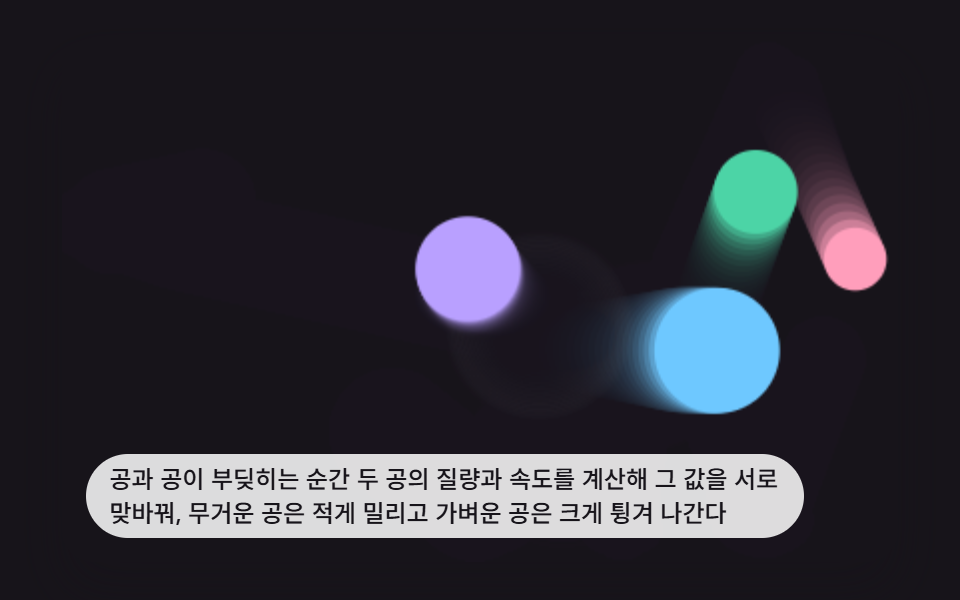 game9 Bouncing Ball Animation Patterns With Physics
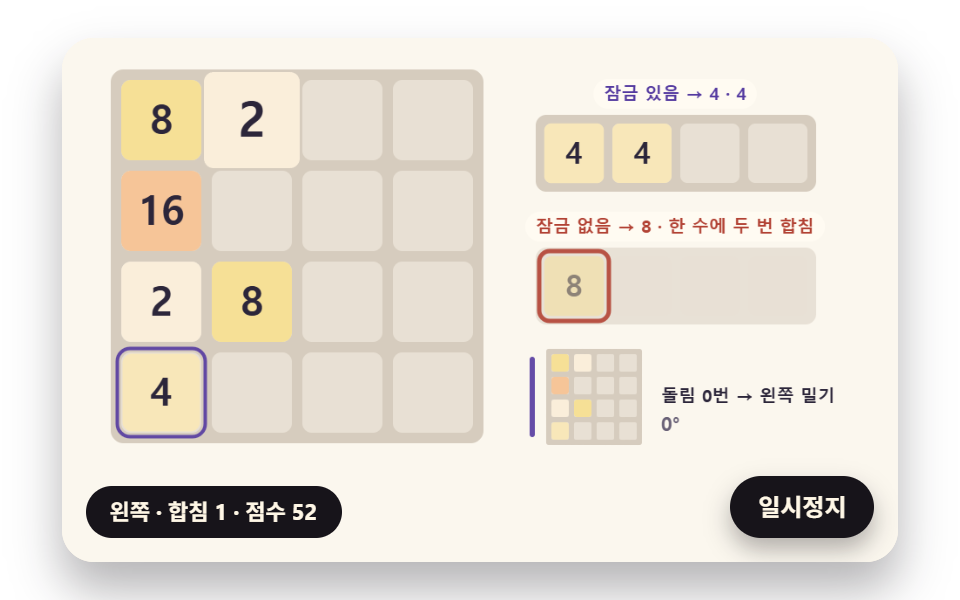 game2048 Game JavaScript: 9 Boards from Merges to AI
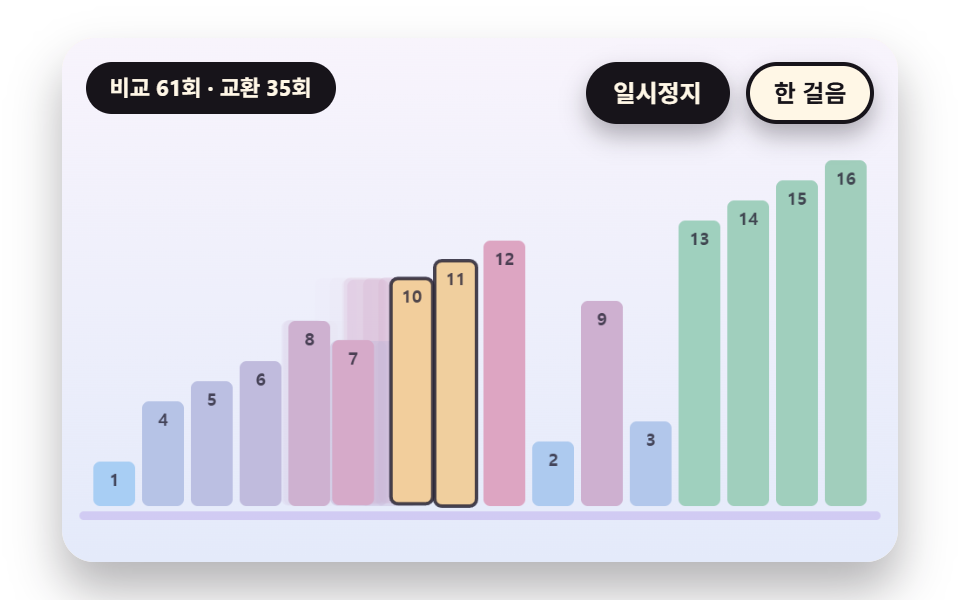 gameSorting Algorithm Visualizer: 9 Sort Scenes
 gameMinesweeper JavaScript: 9 Minefield Scenes
 gameBrick Breaker Game: 9 Canvas Scenes
 gameSliding Puzzle: 9 Canvas Scenes, Parity to Search
 gameWalking Animation Cycle: 9 Calculated Scenes
 gameSudoku: 9 Scenes, Candidates to Unique Boards
 gameTetris JavaScript: Build It in 9 Canvas Steps
 gameSpin Wheel: 9 Canvas Roulettes, Flick to Stop